Digianswer A S 13192-SARD IEEE 802.15.4 Transceiver User Manual SARD

Digianswer A/S IEEE 802.15.4 Transceiver SARD

User guide

MC13192SARDUG/DRev. 1.1, 08/2004Sensor Applications ReferenceDesign (SARD)User’s Guide
HOW TO REACH US:USA/EUROPE/LOCATIONS NOT LISTED:Motorola Literature Distribution; P.O. Box 5405, Denver, Colorado 80217 1-303-675-2140 or 1-800-441-2447JAPAN:Motorola Japan Ltd.; SPS, Technical Information Center, 3-20-1, Minami-Azabu Minato-ku, Tokyo 106-8573 Japan81-3-3440-3569ASIA/PACIFIC:Motorola Semiconductors H.K. Ltd.; Silicon Harbour Centre, 2 Dai King Street, Tai Po Industrial Estate, Tai Po, N.T., Hong Kong852-26668334TECHNICAL INFORMATION CENTER:1-800-521-6274HOME PAGE: http://www.motorola.com/semiconductorsInformation in this document is provided solely to enable system and software implementers to use Motorola products. There are no express or implied copyright licenses granted hereunder to design or fabricate any integrated circuits or integrated circuits based on the information in this document.Motorola reserves the right to make changes without further notice to any products herein. Motorola makes no warranty, representation or guarantee regarding the suitability of its products for any particular purpose, nor does Motorola assume any liability arising out of the application or use of any product or circuit, and specifically disclaims any and all liability, including without limitation consequential or incidental damages. “Typical” parameters which may be provided in Motorola data sheets and/or specifications can and do vary in different applications and actual performance may vary over time. All operating parameters, including “Typicals” must be validated for each customer application by customer’s technical experts. Motorola does not convey any license under its patent rights nor the rights of others. Motorola products are not designed, intended, or authorized for use as components in systems intended for surgical implant into the body, or other applications intended to support or sustain life, or for any other application in which the failure of the Motorola product could create a situation where personal injury or death may occur. Should Buyer purchase or use Motorola products for any such unintended or unauthorized application, Buyer shall indemnify and hold Motorola and its officers, employees, subsidiaries, affiliates, and distributors harmless against all claims, costs, damages, and expenses, and reasonable attorney fees arising out of, directly or indirectly, any claim of personal injury or death associated with such unintended or unauthorized use, even if such claim alleges that Motorola was negligent regarding the design or manufacture of the part.Motorola and the Stylized M Logo are registered in the U.S. Patent and Trademark Office. All other product or service names are the property of their respective owners. Motorola, Inc. is an Equal Opportunity/Affirmative Action Employer.© Motorola, Inc. 2004
MOTOROLA Contents iiiContentsChapter 1Introduction and Configuration1.1 Safety Information  . . . . . . . . . . . . . . . . . . . . . . . . . . . . . . . . . . . . . . . . . . . . . . . . . . . . . 1-11.2 MC13192 Sensor Applications Reference Design (SARD) Components . . . . . . . . . . .  1-21.3 Hardware Description . . . . . . . . . . . . . . . . . . . . . . . . . . . . . . . . . . . . . . . . . . . . . . . . . . .  1-31.3.1 MC13192 SARD Circuit Description. . . . . . . . . . . . . . . . . . . . . . . . . . . . . . . . . . . .  1-31.3.2 RS232 Connector J102 . . . . . . . . . . . . . . . . . . . . . . . . . . . . . . . . . . . . . . . . . . . . . . .  1-51.3.3 Power Capability. . . . . . . . . . . . . . . . . . . . . . . . . . . . . . . . . . . . . . . . . . . . . . . . . . . .  1-61.3.4 LEDs and Switches. . . . . . . . . . . . . . . . . . . . . . . . . . . . . . . . . . . . . . . . . . . . . . . . . .  1-61.3.5 Board Reset Function . . . . . . . . . . . . . . . . . . . . . . . . . . . . . . . . . . . . . . . . . . . . . . . .  1-61.3.6 MCU General Purpose Input/Output (GPIO) . . . . . . . . . . . . . . . . . . . . . . . . . . . . . .  1-61.3.7 BDM Port . . . . . . . . . . . . . . . . . . . . . . . . . . . . . . . . . . . . . . . . . . . . . . . . . . . . . . . . . 1-61.4 Applications and Programming Information  . . . . . . . . . . . . . . . . . . . . . . . . . . . . . . . . .  1-71.4.1 Accelerometer Application Demo  . . . . . . . . . . . . . . . . . . . . . . . . . . . . . . . . . . . . . .  1-71.4.2 Programming the SARD (User Defined Software)  . . . . . . . . . . . . . . . . . . . . . . . . .  1-7Appendix A SARD Board Layout and Bill of Materials
iv Sensor Applications Reference Design (SARD) User’s Guide MOTOROLA
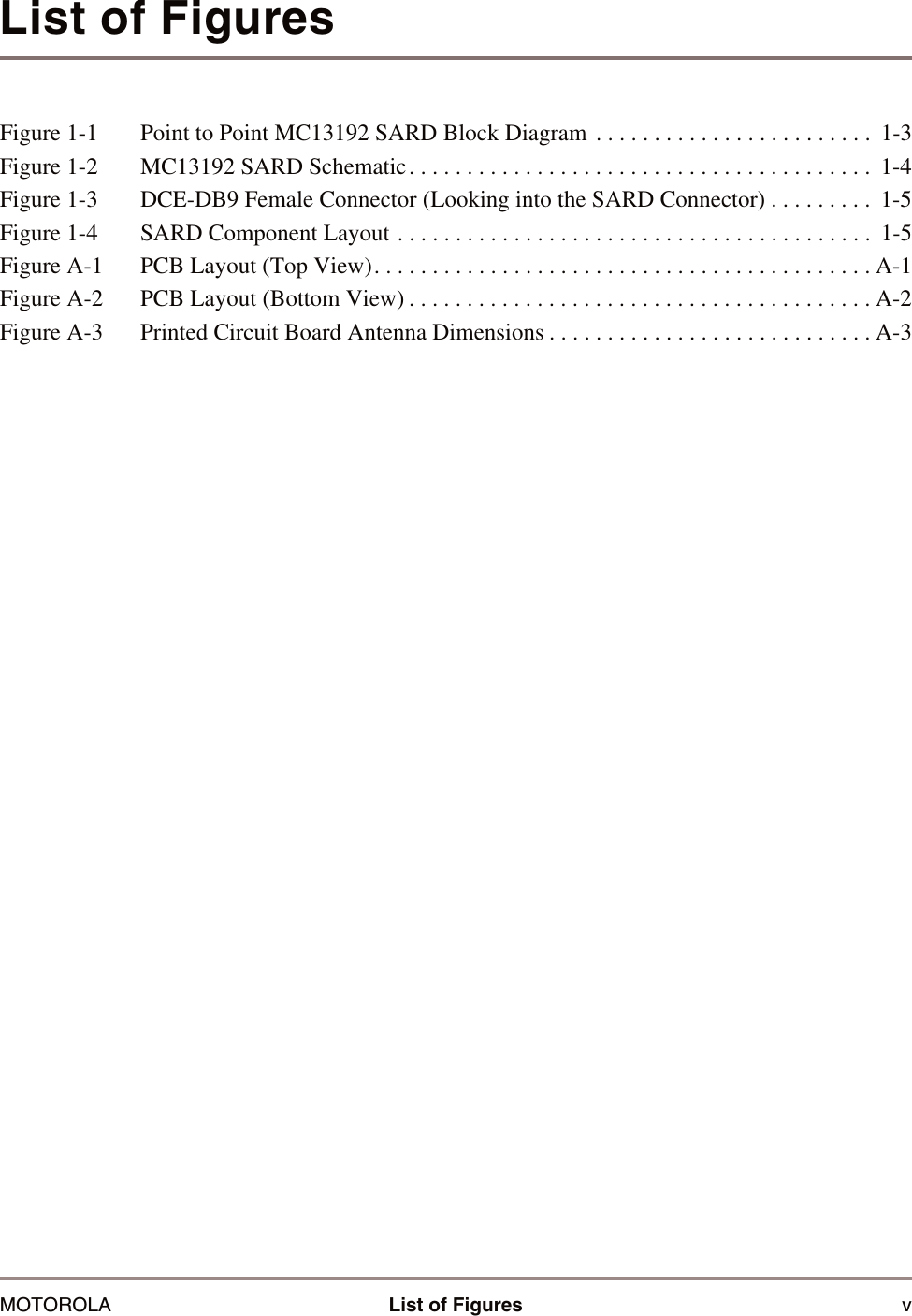
MOTOROLA List of Figures vList of FiguresFigure 1-1 Point to Point MC13192 SARD Block Diagram . . . . . . . . . . . . . . . . . . . . . . . .  1-3Figure 1-2 MC13192 SARD Schematic. . . . . . . . . . . . . . . . . . . . . . . . . . . . . . . . . . . . . . . .  1-4Figure 1-3 DCE-DB9 Female Connector (Looking into the SARD Connector) . . . . . . . . .  1-5Figure 1-4 SARD Component Layout . . . . . . . . . . . . . . . . . . . . . . . . . . . . . . . . . . . . . . . . .  1-5Figure A-1 PCB Layout (Top View). . . . . . . . . . . . . . . . . . . . . . . . . . . . . . . . . . . . . . . . . . . A-1Figure A-2 PCB Layout (Bottom View) . . . . . . . . . . . . . . . . . . . . . . . . . . . . . . . . . . . . . . . . A-2Figure A-3 Printed Circuit Board Antenna Dimensions . . . . . . . . . . . . . . . . . . . . . . . . . . . . A-3
vi Sensor Applications Reference Design (SARD) User’s Guide MOTOROLA
MOTOROLA List of Tables viiList of TablesTable 1-1 LED and Switch Port Connection. . . . . . . . . . . . . . . . . . . . . . . . . . . . . . . . . . . .  1-6Table A-1 Bill of Materials (BOM) . . . . . . . . . . . . . . . . . . . . . . . . . . . . . . . . . . . . . . . . . . . A-4
viii Sensor Applications Reference Design (SARD) User’s Guide MOTOROLA
MOTOROLA About This Book ixAbout This BookThis guide provides detailed information about the MC13192 Sensor Applications Reference Design (SARD). The SARD provides all the components to evaluate and use an MC13192. It is intended to allow a system engineer or software developer to gain an understanding of the MC13192 and its protocol.AudienceThe guide is intended for software and system engineers who are developing their products or software applications making use of the MC13192 to achieve wireless connectivity capability.It is assumed that the reader has a good working knowledge of general-purpose microcontrollers (MCU).OrganizationThe book is divided into 1 chapter and 1 appendix. Chapter 1 introduces the MC13192 Sensor Applications Reference Design (SARD) functionality and features.Appendix A provides figures of the SARD printed circuit board.ConventionsThis section names, describes, and defines the conventions used in the book. This document uses the following conventions: • OVERBAR is used to indicate a signal that is active when pulled low: for example, RESET.•Logic level one is a voltage that corresponds to Boolean true (1) state.•Logic level zero is a voltage that corresponds to Boolean false (0) state.•To set a bit or bits means to establish logic level one.•To clear a bit or bits means to establish logic level zero.•A signal is an electronic construct whose state conveys or changes in state convey information.•A pin is an external physical connection. The same pin can be used to connect a number of signals.•Asserted means that a discrete signal is in active logic state.—Active low signals change from logic level one to logic level zero.—Active high signals change from logic level zero to logic level one.•Negated means that an asserted discrete signal changes logic state.—Active low signals change from logic level zero to logic level one.—Active high signals change from logic level one to logic level zero.• LSB means least significant bit or bits, and MSB means most significant bit or bits. References to low and high bytes or words are spelled out.
xSensor Applications Reference Design (SARD) User’s Guide MOTOROLADefinitions, Acronyms, and AbbreviationsThe following list defines the acronyms and abbreviations used in this document. As this template develops, this list will be generated from the document. As we develop more group resources, these acronyms will be easily defined from a common acronym dictionary. Please note that while the acronyms are in solid caps, terms in the definition should be initial capped ONLY IF they are trademarked names or proper nouns.ISM Industrial Scientific MedicalPER packet error rateRF radio frequencyRx receiveSPI serial peripheral interfaceTx transmitReferencesThe following sources were referenced to produce this book:[1] ESD Style Guide.[2] IEEE Guide to Software Requirements Specifications, July1984Document Change HistoryRelease Date Change Summary0.1 May 21, 2004 Initial document creation. 0.2 May 24, 2004 Multiple edits, new lo resolution board picture, new BOM.0.3 May 27, 2004 Multiple edits.0.4 June 18, 2004 Updated BOM, PCB layouts, and text edits throughout.0.5 June 21, 2004 Removed 191 references, changed to UG
MOTOROLA Introduction and Configuration 1-1Chapter 1Introduction and ConfigurationThis section introduces the MC13192 Sensor Applications Reference Design (SARD) basic components, features, hardware configuration, and applications and programming options.1.1   Safety InformationAny modifications to this product may violate the rules of the Federal Communications Commission and make operation of the product unlawful.47 C.F.R. Sec. 15.21This equipment has been tested and found to comply with the limits for a Class B digital device, pursuant to part 15 of the FCC Rules. These limits are designed to provide reasonable protection against harmful interference in a residential installation. This equipment generates, uses and can radiate radio frequency energy and, if not installed and used in accordance with the instructions, may cause harmful interference to radio communications. However, there is no guarantee that interference will not occur in a particular installation.  If this equipment does cause harmful interference to radio or television reception, which can be determined by turning the equipment off and on, the user is encouraged to try to correct the interference by one or more of the following measures:• Reorient or relocate the receiving antenna.• Increase the separation between the equipment and receiver.• Connect the equipment into an outlet on a circuit different from that to which the receiver is connected.• Consult the dealer or an experienced radio/TV technician for help.47 C.F.R. Sec.15.105(b)This equipment complies with FCC radiation exposure limits set forth for an uncontrolled environment. The antenna(s) used for this equipment must be installed to provide a separation distance of at least 8 inches (20cm) from all persons.This device complies with Part 15 of the FCC Rules.  Operation is subject to the following two conditions:1. This device may not cause harmful interference.2. This device must accept any interference received, including interference that may cause undesired operation.
1-2 Sensor Applications Reference Design (SARD) User’s Guide MOTOROLAIntroduction and Configuration1.2   MC13192 Sensor Applications Reference Design (SARD) ComponentsThe MC13192 Sensor Applications Reference Design (SARD) introduces users to the MC13192 2.4 GHz wireless data transceiver. It includes an RS232 port, background debug module for in-circuit hardware debug, switches, LEDs, and a host MCU and allows the user flexibility in establishing wireless data networks. Features of the MC13192 SARD include:• Provides all hardware required for a complete 2.4 GHz wireless node using IEEE 802.15.4 packet structure.• One MC13192 2.4 GHz transceiver RF reference design with printed circuit antenna.• One MC9S08GT60 low-power, low-voltage MCU with 60KB of on-chip Flash.• Background Debug Module (BDM) programming port for support of Metrowerks CodeWarrior™ Development Studio.• Provides IEEE 802.15.4 modem.• Two Accelerometers: MMA6261Q (X and Y axis), MMA1260D (Z axis) • RS-232 port for interface with a personal computer.• Four switches and LEDs for control and monitoring.• Reset switch for program reset.• Scalable software support:— Proprietary point-to-point or star networking using Freescale’s Simple Medium Access Control (SMAC) software— IEEE 802.15.4 Standard compliant networking using Freescale’s MAC/PHY— ZigBee™ networking using Freescale’s Z-stack software
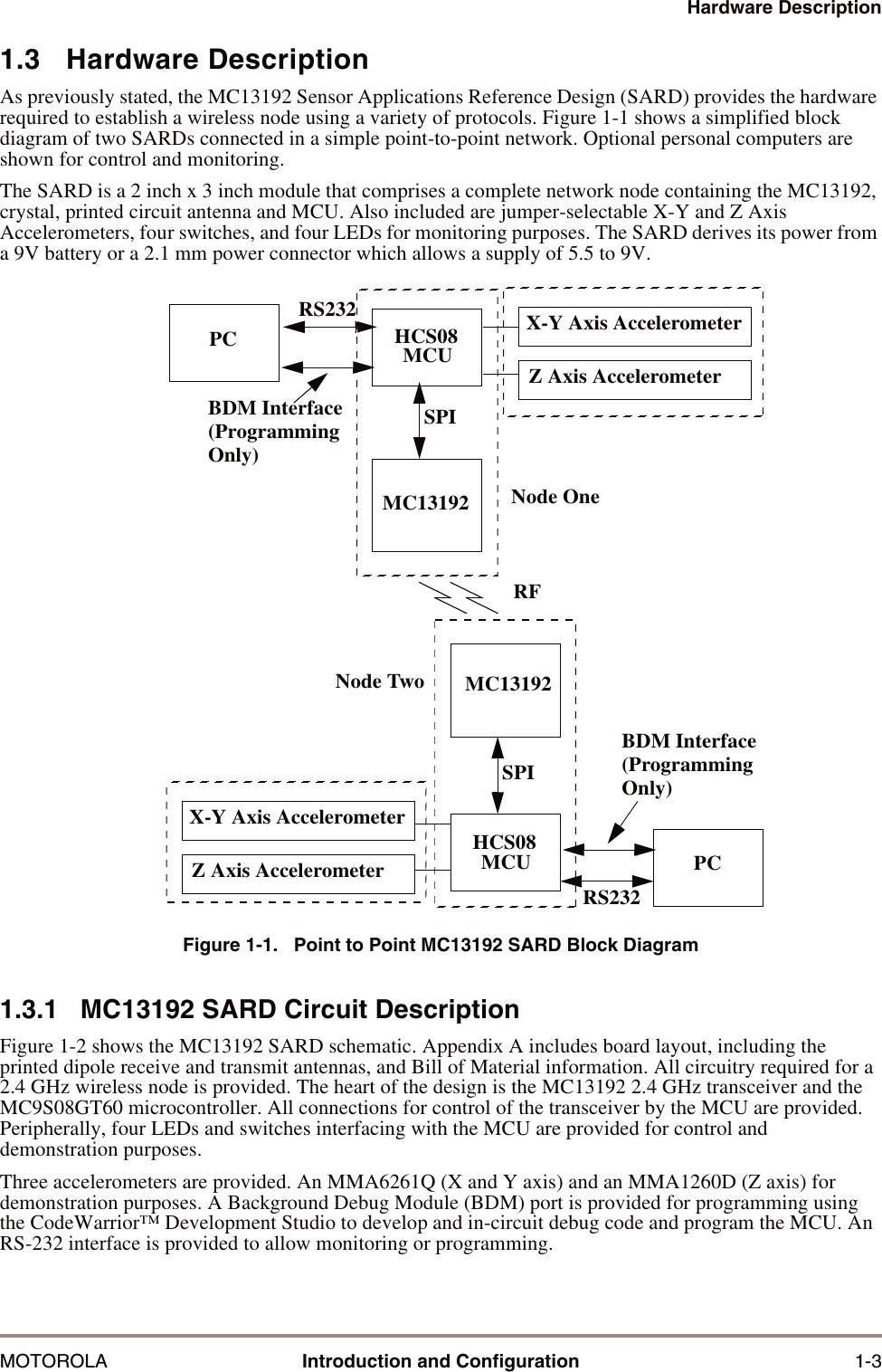
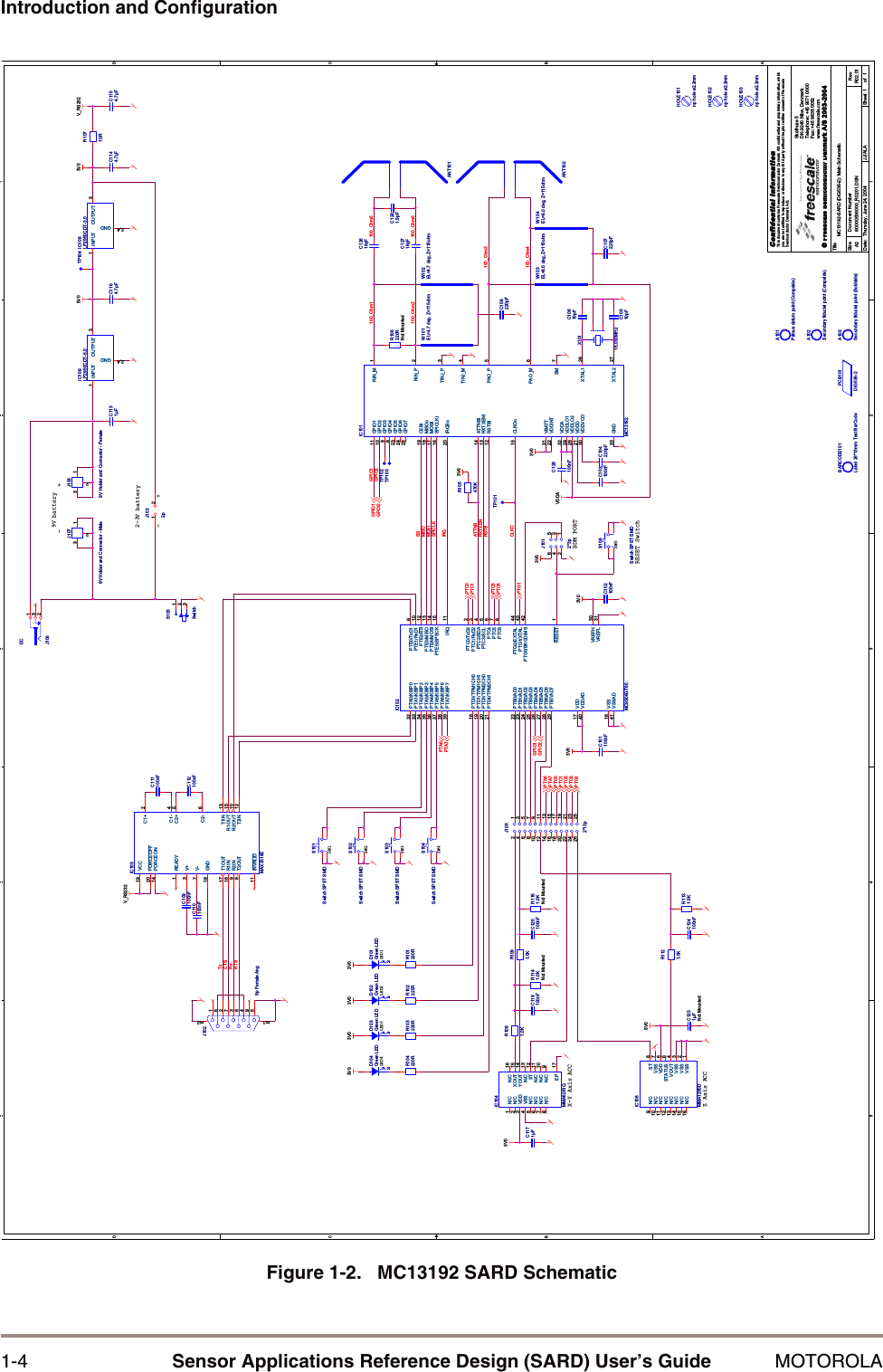
Hardware DescriptionMOTOROLA Introduction and Configuration 1-31.3   Hardware DescriptionAs previously stated, the MC13192 Sensor Applications Reference Design (SARD) provides the hardware required to establish a wireless node using a variety of protocols. Figure 1-1 shows a simplified block diagram of two SARDs connected in a simple point-to-point network. Optional personal computers are shown for control and monitoring.The SARD is a 2 inch x 3 inch module that comprises a complete network node containing the MC13192, crystal, printed circuit antenna and MCU. Also included are jumper-selectable X-Y and Z Axis Accelerometers, four switches, and four LEDs for monitoring purposes. The SARD derives its power from a 9V battery or a 2.1 mm power connector which allows a supply of 5.5 to 9V.Figure 1-1.   Point to Point MC13192 SARD Block Diagram1.3.1   MC13192 SARD Circuit DescriptionFigure 1-2 shows the MC13192 SARD schematic. Appendix A includes board layout, including the printed dipole receive and transmit antennas, and Bill of Material information. All circuitry required for a 2.4 GHz wireless node is provided. The heart of the design is the MC13192 2.4 GHz transceiver and the MC9S08GT60 microcontroller. All connections for control of the transceiver by the MCU are provided. Peripherally, four LEDs and switches interfacing with the MCU are provided for control and demonstration purposes. Three accelerometers are provided. An MMA6261Q (X and Y axis) and an MMA1260D (Z axis) for demonstration purposes. A Background Debug Module (BDM) port is provided for programming using the CodeWarrior™ Development Studio to develop and in-circuit debug code and program the MCU. An RS-232 interface is provided to allow monitoring or programming.PCRS232SPIMC13192SPIMC13192RS232PCNode OneRFBDM Interface(ProgrammingOnly)BDM Interface(ProgrammingOnly)X-Y Axis AccelerometerZ Axis AccelerometerNode TwoX-Y Axis AccelerometerZ Axis AccelerometerHCS08MCUHCS08MCU
1-4 Sensor Applications Reference Design (SARD) User’s Guide MOTOROLAIntroduction and ConfigurationFigure 1-2.   MC13192 SARD Schematic5544332211D DC CB BA AMOSIGPIO1SSIRQCLKOMISOSPICLKRSTBRXTXEN100_Ohm3100_Ohm1GPIO2ATTNBTxRxCTSRTS100_Ohm4100_Ohm5100_Ohm6100_Ohm2VDDAV_RS2323V05V03V03V0 3V0 3V0 3V03V03V03V03V03V0V_RS2325V0GPIO1GPOI2GPIO2GPIO1PTC5PTC6PTG1PTG1PTA7PTA6PTA6PTA7PTC6PTC5PTC0PTC1PTC0PTC1TitleSize Document Number RevDate: Sheet ofConfidential InformationThis document contains Freescale Semiconductor Danmark A/S confidential and proprietary information, whichyou are not entitled to reproduce or disclose to any third party without the prior written  consent of FreescaleSemiconductor Danmark A/S.© Freescale Semiconductor Danmark A/S80000536000_R0201.DSN R02.01MC13192-SARD (DIG536-2): Main SchematicSkalhuse 5DK-9240 Nibe, DenmarkTelephone: +45 9671 0000           A211Thursday, June 24, 2004 JJ/ALA2003-2004www.freescale.comFax: +45 9835 0052BDM PORTLED4 LED3SW3SW4LED2 LED1SW1SW2Z Axis ACCX-Y Axis ACC9V battery+-+-2-3V batterySW5RESET SwitchA102Secundary fiducial point (Compside)C112100nFC1144.7µFC120100nFC1164.7µFHOLE103np hole ø2.2mmR1091.0KBARCODE101Label 26*13mm Test BarCodeW103EL=8.0 deg, Z=115ohmIC104MMA6261QXOUT 15N/C 11N/C 10N/C 9N/C8N/C6N/C5N/C1N/C2N/C7N/C 16VSS4VDD3EP 17ST 12N/C 13YOUT 14C107220pFD104Green LEDC1231µFNot MountedC12618pFX10116.000MHzANT102R104220RA103Secundary fiducial point (Soldside)R1121.0KC101100nF C102100nFC111100nFC1154.7µFS101Switch SPST SMDR106220RNot MountedJ1032p1 2W104EL=8.0 deg, Z=115ohmJ1012*3p123456IC106MMA1260DN/C15N/C11 N/C10 N/C9ST 8VDD 6STATUS 5VSS 1VSS 2VSS 7N/C16VOUT 4VSS 3N/C12N/C13N/C14C103100nFC124100nFR1131.5KS103Switch SPST SMDA101Primus datum point (Compside)C10510pFC1281.5pFC1171µFR103220RD101Green LEDJ1029p Female Ang594837261m1 m2C109100nFJ1089V Holder and Connector - Female123R10710RIC102MC9S08GT60IRQ 11PTA0/KBIP032PTA1/KBIP133PTA2/KBIP234PTA3/KBIP335PTA4/KBIP436PTA5/KBIP537PTA6/KBIP638PTA7/KBIP739PTB0/AD022PTB1/AD123PTB2/AD224PTB3/AD325PTB4/AD426PTB5/AD527PTB6/AD628PTB7/AD729PTC0/TxD2 2PTC1/RxD2 3PTC2/SDA 4PTC3/SCL 5PTC4 6PTC5 7PTC6 8PTD0/TPM1CH018PTD1/TPM1CH119PTD3/TPM2CH020PTD4/TPM2CH121PTE0/TxD1 9PTE1/RxD1 10PTE2/SS 12PTE3/MISO 13PTE4/MOSI 14PTE5/SPSCK 15PTG0/BKGD/MS 42PTG1/XTAL 43PTG2/EXTAL 44RESET 1VDD17VDDAD40VREFH 30VREFL 31VSS16VSSAD41IC108LP2950CDT-3.0INPUT1OUTPUT 3GND2,4IC103MAX3318EC1+ 2C1- 4C2+ 5C2- 6T1IN 13T2IN 12R1OUT 15R2OUT 10VCC19V+3V-7GND18T1OUT17T2OUT8R1IN16R2IN9FORCEON14 FORCEOFF20READY1INVALID11D102Green LEDC1131µFJ106DC231C104220pFPCB101DIG536-2ANT101TP104R1141.0KNot MountedR1161.0KNot MountedC108220pFTP101S102Switch SPST SMDHOLE101np hole ø2.2mmW101EL=4.7 deg, Z=115ohmC10610pFTP103C110100nFS105Switch123C119100nFR1081.0KR102220RS104Switch SPST SMDIC101MC13192ATTNBi14CEBi19CLKOo15GPIO111GPIO210GPIO39GPIO48GPIO725GPIO523GPIO624IRQBo20MISOo18MOSIi17PAO_M 6PAO_P 5RIN_M 1RIN_P 2RSTBi12 RXTXENi13SM 7SPICLKi16TINJ_M 4TINJ_P 3XTAL1 26XTAL2 27VBATT31VDDA32VDDD21VDDINT22VDDLO129VDDLO228VDDVCO30GND33C12718pFR105470KTP102J1079V Holder and Connector - Male123IC109LP2950CDT-5.0INPUT1OUTPUT 3GND2,4W102EL=4.7 deg, Z=115ohmHOLE102np hole ø2.2mmC129100nFJ1052*13p1234567891011121314151617181920212223242526D103Green LEDS106Switch SPST SMDR101220R
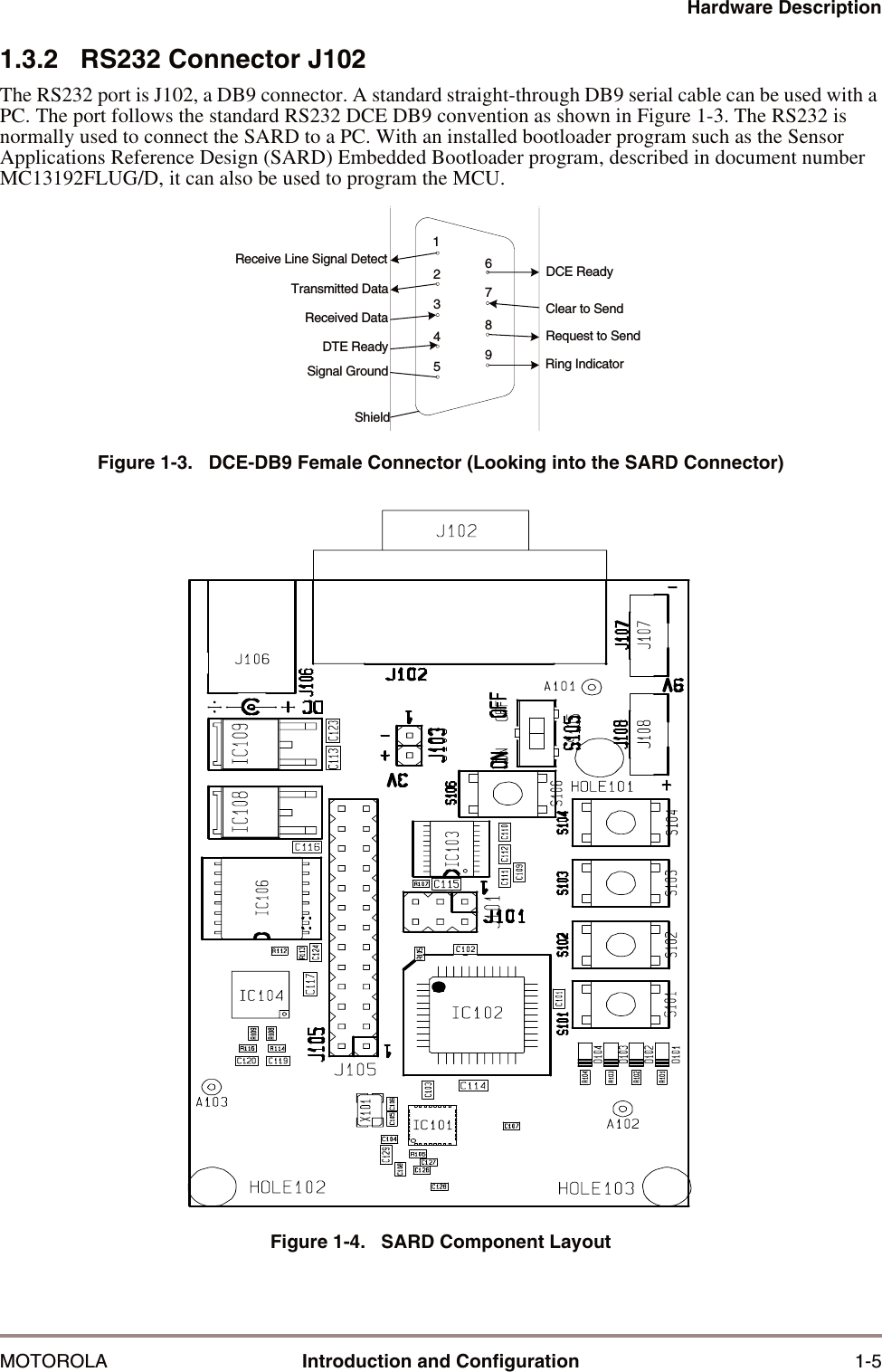
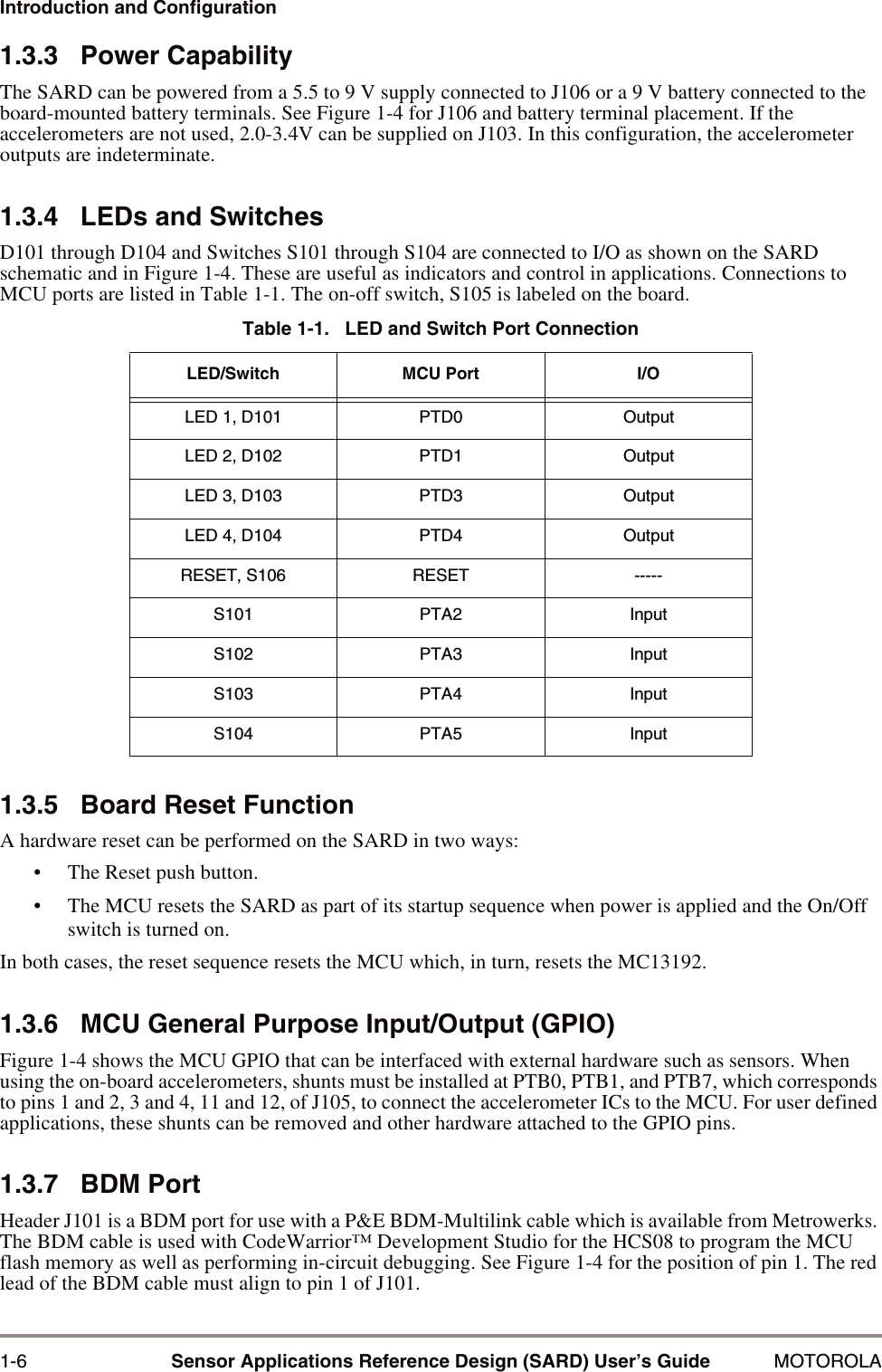
Hardware DescriptionMOTOROLA Introduction and Configuration 1-51.3.2   RS232 Connector J102The RS232 port is J102, a DB9 connector. A standard straight-through DB9 serial cable can be used with a PC. The port follows the standard RS232 DCE DB9 convention as shown in Figure 1-3. The RS232 is normally used to connect the SARD to a PC. With an installed bootloader program such as the Sensor Applications Reference Design (SARD) Embedded Bootloader program, described in document number MC13192FLUG/D, it can also be used to program the MCU.Figure 1-3.   DCE-DB9 Female Connector (Looking into the SARD Connector)Figure 1-4.   SARD Component LayoutDCE ReadyClear to SendRequest to SendRing IndicatorReceive Line Signal DetectTransmitted DataReceived DataDTE ReadySignal Ground123456789Shield
1-6 Sensor Applications Reference Design (SARD) User’s Guide MOTOROLAIntroduction and Configuration1.3.3   Power CapabilityThe SARD can be powered from a 5.5 to 9 V supply connected to J106 or a 9 V battery connected to the board-mounted battery terminals. See Figure 1-4 for J106 and battery terminal placement. If the accelerometers are not used, 2.0-3.4V can be supplied on J103. In this configuration, the accelerometer outputs are indeterminate.1.3.4   LEDs and SwitchesD101 through D104 and Switches S101 through S104 are connected to I/O as shown on the SARD schematic and in Figure 1-4. These are useful as indicators and control in applications. Connections to MCU ports are listed in Table 1-1. The on-off switch, S105 is labeled on the board.1.3.5   Board Reset FunctionA hardware reset can be performed on the SARD in two ways:• The Reset push button.• The MCU resets the SARD as part of its startup sequence when power is applied and the On/Off switch is turned on.In both cases, the reset sequence resets the MCU which, in turn, resets the MC13192. 1.3.6   MCU General Purpose Input/Output (GPIO)Figure 1-4 shows the MCU GPIO that can be interfaced with external hardware such as sensors. When using the on-board accelerometers, shunts must be installed at PTB0, PTB1, and PTB7, which corresponds to pins 1 and 2, 3 and 4, 11 and 12, of J105, to connect the accelerometer ICs to the MCU. For user defined applications, these shunts can be removed and other hardware attached to the GPIO pins.1.3.7   BDM PortHeader J101 is a BDM port for use with a P&E BDM-Multilink cable which is available from Metrowerks. The BDM cable is used with CodeWarrior™ Development Studio for the HCS08 to program the MCU flash memory as well as performing in-circuit debugging. See Figure 1-4 for the position of pin 1. The red lead of the BDM cable must align to pin 1 of J101.Table 1-1.   LED and Switch Port ConnectionLED/Switch MCU Port I/OLED 1, D101 PTD0 OutputLED 2, D102 PTD1 OutputLED 3, D103 PTD3 OutputLED 4, D104 PTD4 OutputRESET, S106 RESET -----S101 PTA2 InputS102 PTA3 InputS103 PTA4 InputS104 PTA5 Input
Applications and Programming InformationMOTOROLA Introduction and Configuration 1-7When using the parallel port version of the BDM cable, the BDM pod should be powered with a 2 - 5 V negative center contact power supply or the SARD should be powered by a power supply through J106. A 9 V battery is not capable of sourcing the current required by the parallel BDM pod during programming and debug.1.4   Applications and Programming Information1.4.1   Accelerometer Application DemoThe SARD comes pre-programmed with the accelerometer demo software. Consult the “Accelerometer Demonstration Quick Start Guide”, document number AN2762/D for installation and startup instructions. The receiver is connected to a PC COM port via an RS232 cable. The 9 V battery needs to be installed on the battery terminals or a power supply must be connected to J106 and the on/off switch turned on. Start the accelerometer GUI software, available from our website, and choose the COM port you are using in the dialog box. Install the 9 V battery on the transmitter and turn it on. On the PC screen you can select various ways to display the accelerometer data. One popular way is the cursor mode where you can watch the cursor position move as the transmitter is moved.1.4.2   Programming the SARD (User Defined Software)A BDM programmer is used to load the MCU flash memory. Alternatively, the Embedded Bootloader software, described in the, Embedded Bootloader User’s Guide, document number MC13192FLUG/D, can be installed and the SARD can be programmed through the RS-232 port.
1-8 Sensor Applications Reference Design (SARD) User’s Guide MOTOROLAIntroduction and Configuration
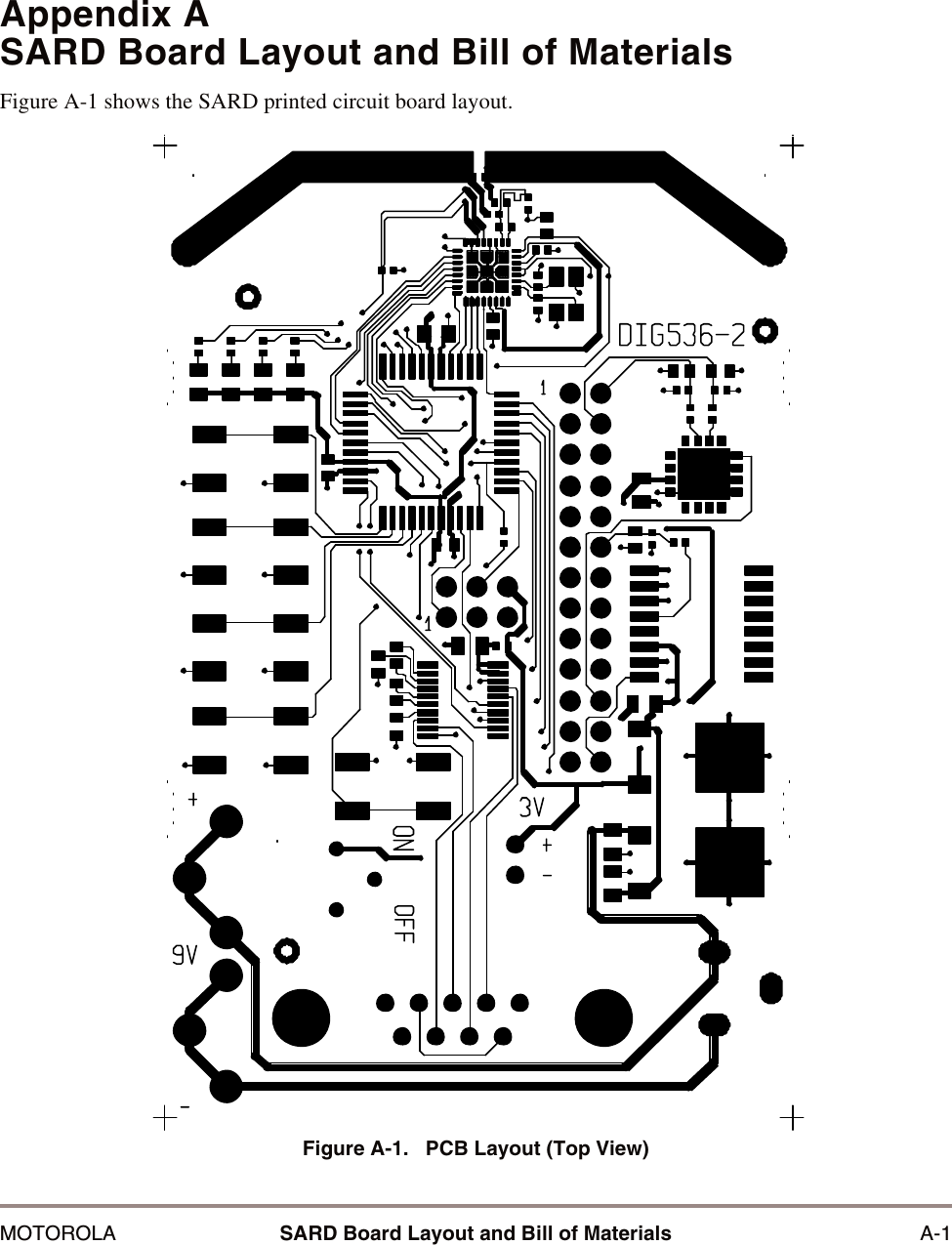
MOTOROLA SARD Board Layout and Bill of Materials A-1Appendix ASARD Board Layout and Bill of MaterialsFigure A-1 shows the SARD printed circuit board layout.Figure A-1.   PCB Layout (Top View)
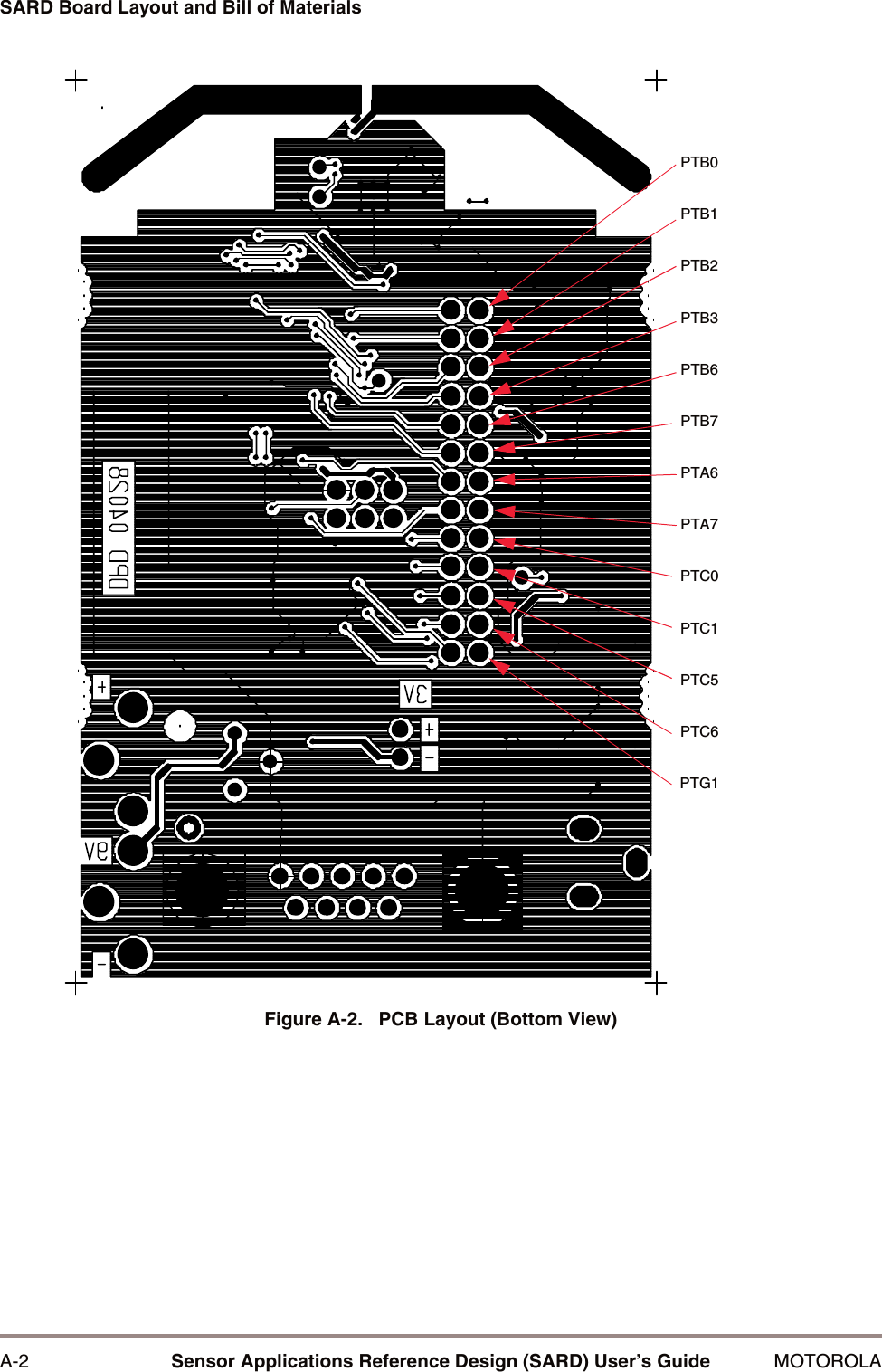
A-2 Sensor Applications Reference Design (SARD) User’s Guide MOTOROLASARD Board Layout and Bill of MaterialsFigure A-2.   PCB Layout (Bottom View)PTB0PTB1PTB2PTB3PTB6PTB7PTA6PTA7PTC0PTC1PTC5PTC6PTG1
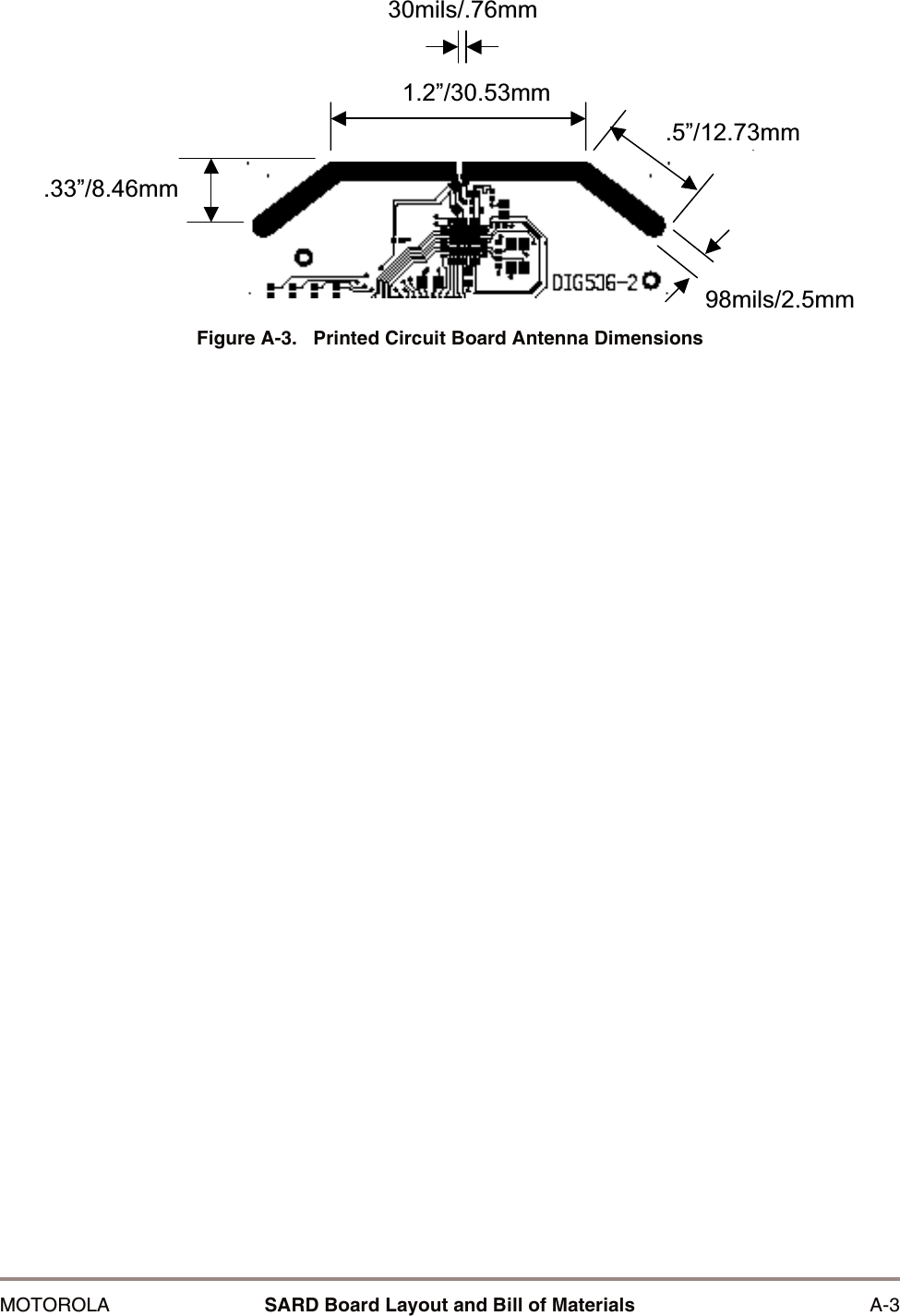
MOTOROLA SARD Board Layout and Bill of Materials A-3Figure A-3.   Printed Circuit Board Antenna Dimensions´PP´PP´PPPLOVPPPLOVPP
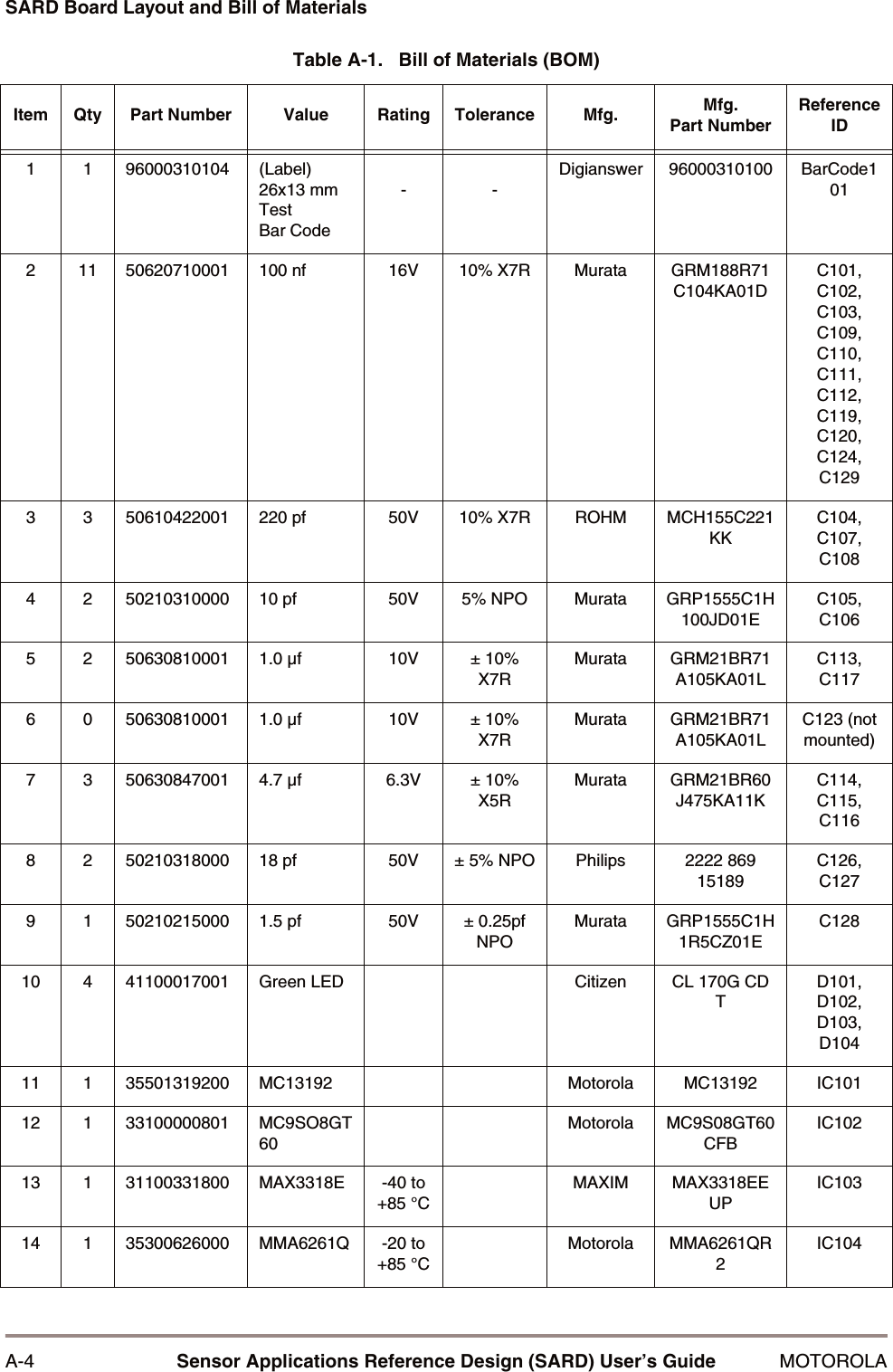
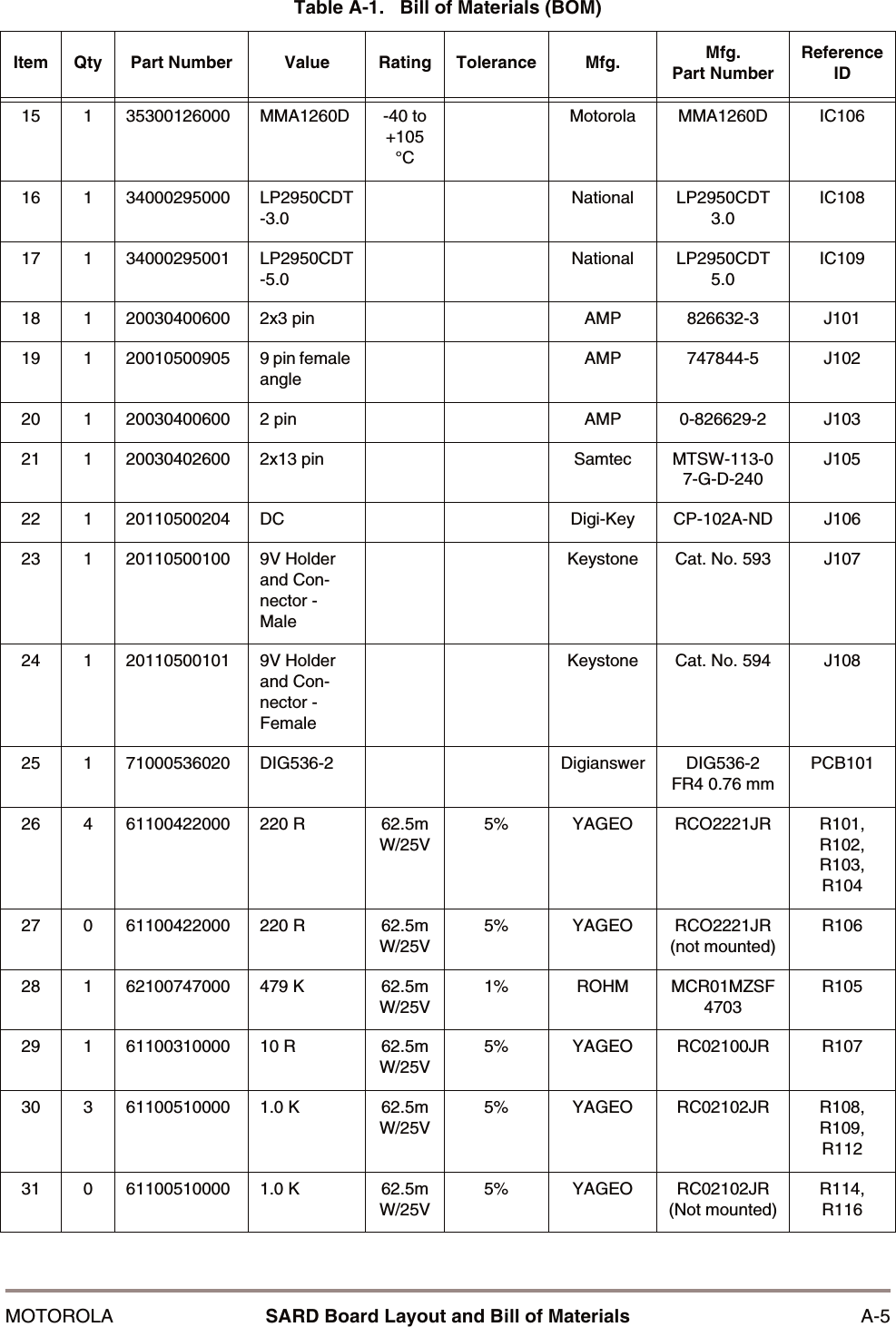
A-4 Sensor Applications Reference Design (SARD) User’s Guide MOTOROLASARD Board Layout and Bill of MaterialsTable A-1.   Bill of Materials (BOM)Item Qty Part Number Value Rating Tolerance Mfg. Mfg.Part NumberReference ID1 1 96000310104 (Label) 26x13 mm Test Bar Code--Digianswer 96000310100 BarCode1012 11 50620710001 100 nf 16V 10% X7R Murata GRM188R71C104KA01DC101, C102, C103, C109, C110, C111, C112, C119, C120, C124, C1293 3 50610422001 220 pf 50V 10% X7R ROHM MCH155C221KKC104, C107, C1084 2 50210310000 10 pf 50V 5% NPO Murata GRP1555C1H100JD01EC105, C1065 2 50630810001 1.0 µf 10V ± 10% X7RMurata GRM21BR71A105KA01LC113, C1176 0 50630810001 1.0 µf 10V ± 10% X7RMurata GRM21BR71A105KA01LC123 (not mounted)7 3 50630847001 4.7 µf 6.3V ± 10% X5RMurata GRM21BR60J475KA11KC114, C115, C1168 2 50210318000 18 pf 50V ± 5% NPO Philips 2222 869 15189C126, C1279 1 50210215000 1.5 pf 50V ± 0.25pf NPOMurata GRP1555C1H1R5CZ01EC12810 4 41100017001 Green LED Citizen CL 170G CD TD101, D102, D103, D10411 1 35501319200 MC13192 Motorola MC13192 IC10112 1 33100000801 MC9SO8GT60Motorola MC9S08GT60CFBIC10213 1 31100331800 MAX3318E -40 to +85 °CMAXIM MAX3318EEUPIC10314 1 35300626000 MMA6261Q -20 to +85 °CMotorola MMA6261QR2IC104
MOTOROLA SARD Board Layout and Bill of Materials A-515 1 35300126000 MMA1260D -40 to +105 °CMotorola MMA1260D IC10616 1 34000295000 LP2950CDT-3.0National LP2950CDT 3.0IC10817 1 34000295001 LP2950CDT-5.0National LP2950CDT 5.0IC10918 1 20030400600 2x3 pin AMP 826632-3 J10119 1 20010500905 9 pin female angleAMP 747844-5 J10220 1 20030400600 2 pin AMP 0-826629-2 J10321 1 20030402600 2x13 pin Samtec MTSW-113-07-G-D-240J10522 1 20110500204 DC Digi-Key CP-102A-ND J10623 1 20110500100 9V Holder and Con-nector - MaleKeystone Cat. No. 593 J10724 1 20110500101 9V Holder and Con-nector - FemaleKeystone Cat. No. 594 J10825 1 71000536020 DIG536-2 Digianswer DIG536-2 FR4 0.76 mmPCB10126 4 61100422000 220 R 62.5mW/25V5% YAGEO RCO2221JR R101, R102, R103, R10427 0 61100422000 220 R 62.5mW/25V5% YAGEO RCO2221JR (not mounted)R10628 1 62100747000 479 K 62.5mW/25V1% ROHM MCR01MZSF4703R10529 1 61100310000 10 R 62.5mW/25V5% YAGEO RC02100JR R10730 3 61100510000 1.0 K 62.5mW/25V5% YAGEO RC02102JR R108, R109, R11231 0 61100510000 1.0 K 62.5mW/25V5% YAGEO RC02102JR (Not mounted)R114, R116Table A-1.   Bill of Materials (BOM)Item Qty Part Number Value Rating Tolerance Mfg. Mfg.Part NumberReference ID
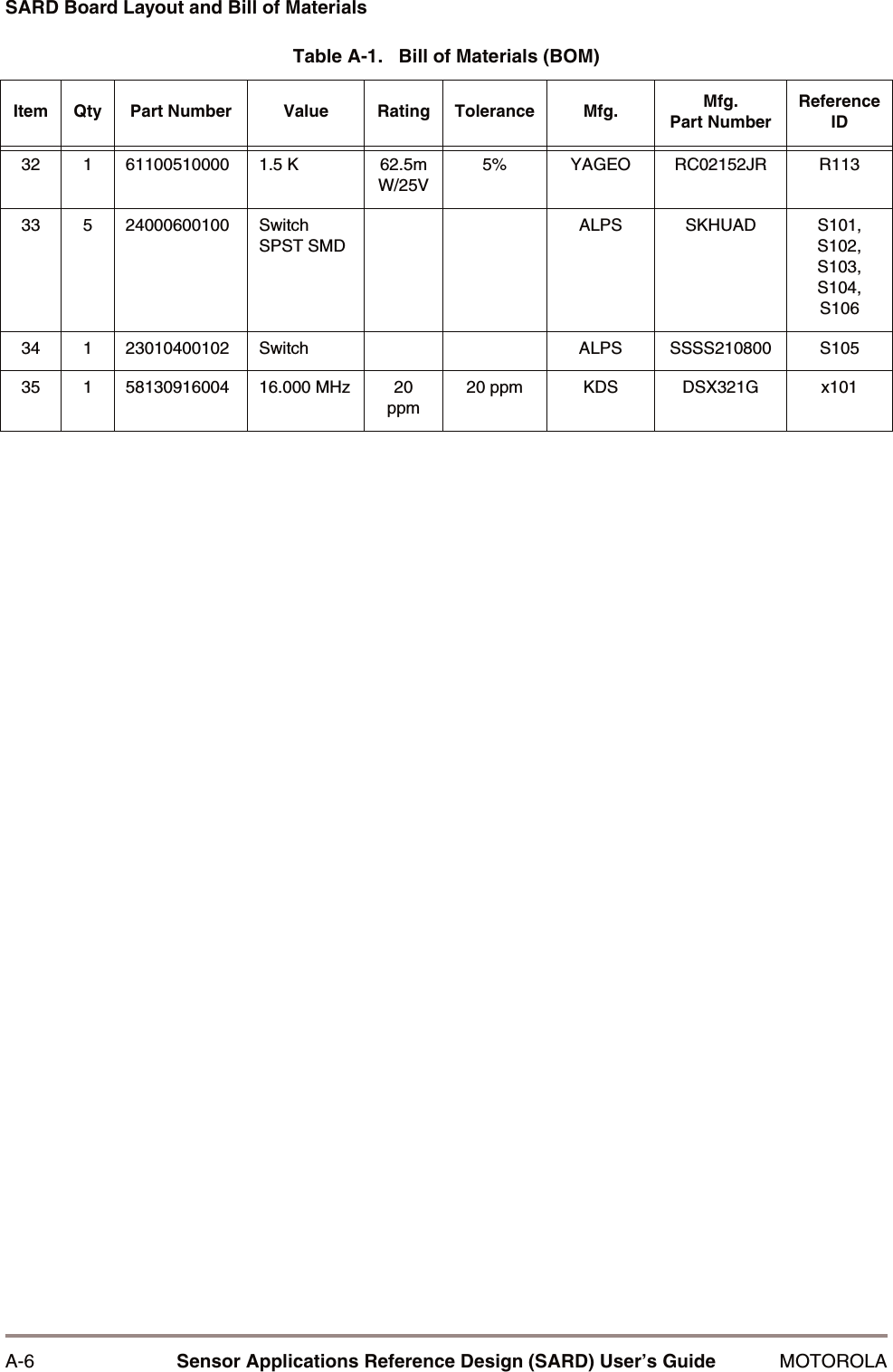
A-6 Sensor Applications Reference Design (SARD) User’s Guide MOTOROLASARD Board Layout and Bill of Materials32 1 61100510000 1.5 K 62.5mW/25V5% YAGEO RC02152JR R11333 5 24000600100 Switch SPST SMDALPS SKHUAD S101, S102, S103, S104, S10634 1 23010400102 Switch ALPS SSSS210800 S10535 1 58130916004 16.000 MHz 20 ppm20 ppm KDS DSX321G x101Table A-1.   Bill of Materials (BOM)Item Qty Part Number Value Rating Tolerance Mfg. Mfg.Part NumberReference ID

Navigation menu