Digital China Networks EAP280-L Wireless Access Point User Manual

Digital China Networks (Beijing) Limited Wireless Access Point Users Manual

User Manual

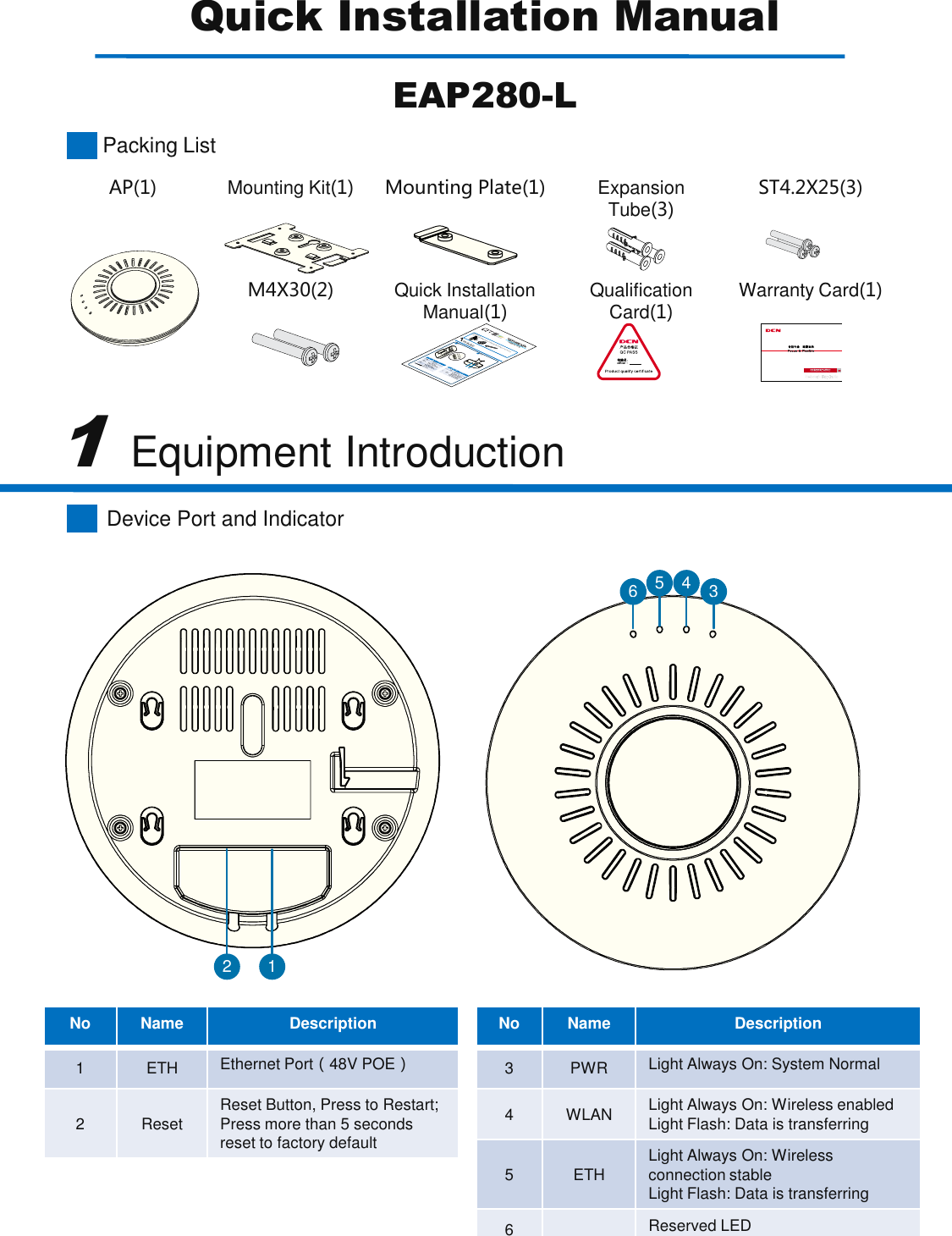
Device Port and IndicatorNoNameDescription1ETHEthernet Port(48V POE)2ResetReset Button, Press to Restart; Press more than 5 seconds reset to factory default1Equipment Introduction21436 5NoNameDescription3PWRLight Always On: System Normal4WLANLight Always On: Wireless enabledLight Flash: Data is transferring5ETHLight Always On: Wirelessconnection stableLight Flash: Data is transferring6Reserved LEDQuick Installation ManualEAP280-LAP(1)Mounting Kit(1)Mounting Plate(1)Expansion Tube(3)ST4.2X25(3)M4X30(2)Quick Installation Manual(1)Qualification Card(1)Warranty Card(1)Packing ListQuickInstallGuideOutdoorCPEPackingListTheQTS210CPE(1)PowerAdapter(1)StrappingBelt(2)QuickInstallGuide(1)LEDStatePWROn:PowerUpWLANOn:Wi-FiLinkBlinking:DataTransmitETHOn:EthernetLinkBlinking:DataTransmitWirelessRSSILEDNo.NameDescription1ETHEthernetPort2RESETResetButton,shortpushtosystemreset,andpushmorethan5secondstorestoretofactorydefault1IntroductionInterfacePWRWLANETH12PWRWLANETHPWRWLANETHDCN Pr oduct s Warr anty C ard
Wall Mounting2 3Please follow the length and width in picture 1, and then use marker pen to mark the drilling location.    is covert security installation is insecurity installation (The figure draw line downward).Please use 6mm drill head, drill holes with a depth of 35-40mm according to the marked place.Plug in the holes with nut and use a hammer to knock the nut.Put the mounting kit’s hole accurate to nut and use three screw to install mounting kit to the wall.Put the mounting holes behind of  the AP onto the mounting kit’s pegs and then pull the AP down until  copper direction to complete installation.21354Preparing for Installation2Equipment InstallationBefore installation, installation personnel must take the necessary safetymeasures to ensure personal safetyDo not put AP and Tool on walkways to avoid damageDevice support wall mounting and ceiling mounting,make sure the ceiling and walls  can bear safety before installation Installation may need tools listed on the below picture.(Tools need to self prepared)AB54baLadderMarker PenHand DrillerPhillips screwdriverClaw HammerPlease plug in cable before the installation to the wall else after installation, cable cannot be plugged in.Attention
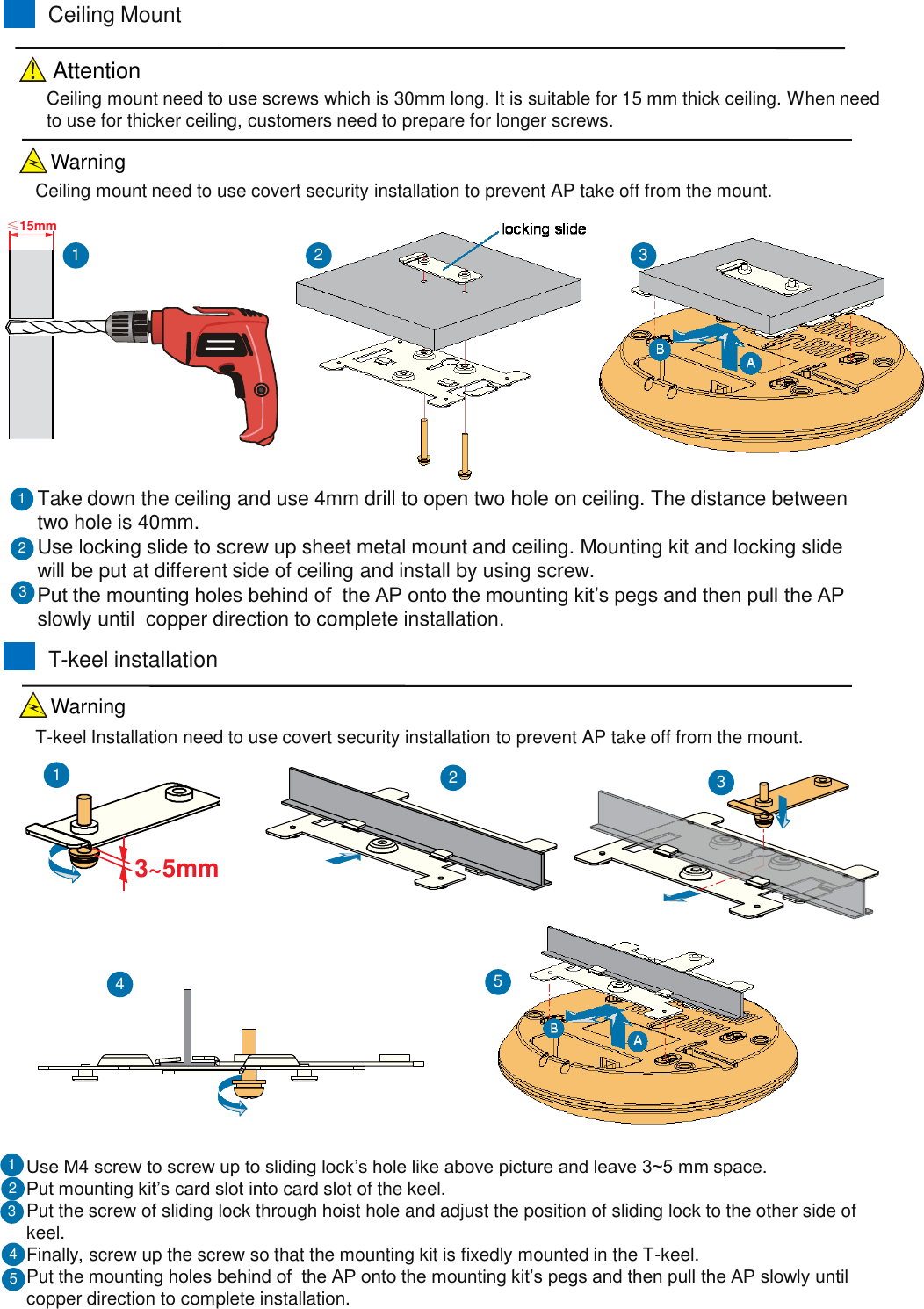
≤15mmCeiling MountTake down the ceiling and use 4mm drill to open two hole on ceiling. The distance between two hole is 40mm.Use locking slide to screw up sheet metal mount and ceiling. Mounting kit and locking slide will be put at different side of ceiling and install by using screw.Put the mounting holes behind of  the AP onto the mounting kit’s pegs and then pull the AP slowly until  copper direction to complete installation.213Ceiling mount need to use screws which is 30mm long. It is suitable for 15 mm thick ceiling. When need to use for thicker ceiling, customers need to prepare for longer screws.123T-keel installationUse M4 screw to screw up to sliding lock’s hole like above picture and leave 3~5 mm space.Put mounting kit’s card slot into card slot of the keel.Put the screw of sliding lock through hoist hole and adjust the position of sliding lock to the other side of keel.Finally, screw up the screw so that the mounting kit is fixedly mounted in the T-keel.Put the mounting holes behind of  the AP onto the mounting kit’s pegs and then pull the AP slowly until  copper direction to complete installation.2133~5mm123Ceiling mount need to use covert security installation to prevent AP take off from the mount.T-keel Installation need to use covert security installation to prevent AP take off from the mount.5454AttentionWarningWarning
FCC NoticeChanges or modifications not expressly approved by the party responsible for compliance could void the user's authority to operate the equipment NOTE: This equipment has been tested and found to comply with the limits for a Class B digital device, pursuant to Part 15 of the FCC Rules. These limits are designed to provide reasonable protection against harmful interference in a  residential installation. This equipment generates, uses and can radiate radio  frequency energy and, if not installed and used in accordance with the  instructions, may cause harmful interference to radio communications. However,  there is no guarantee that interference will not occur in a particular installation. If this equipment does cause harmful interference to radio or television reception, which can be determined by turning the equipment off and on, the user is encouraged to try to correct the interference by one or more of the following measures: -- Reorient or relocate the receiving antenna. -- Increase the separation between the equipment and receiver.    -- Connect the equipment into an outlet on a circuit different  from that to which the receiver is connected. -- Consult the dealer or an experienced radio/TV technician for help. This device complies with Part 15 of the FCC Rules. Operation is subject to the following two conditions: (1) this device may not cause  harmful interference, and (2) this device must accept any interference received, including interference that may cause undesired operation. When using this product, it should be installed and operated with a minimum distance of 7.9 in.(20 cm) for 2.4 GHz operations between the radiator and your body. This transmitter must not  be collocated or operate in conjunction with any other antenna or transmitter.This equipment complies with FCC radiation exposure limits set forth for an uncontrolled  environment. End users must follow the specific operating instructions for satisfying RF exposure  compliance. This transmitter must not be co-located or operating in conjunction with any other  antenna or transmitter.Released: Rev 2.0 (1-16-2015)
EAP280-L Indoor Wireless AP
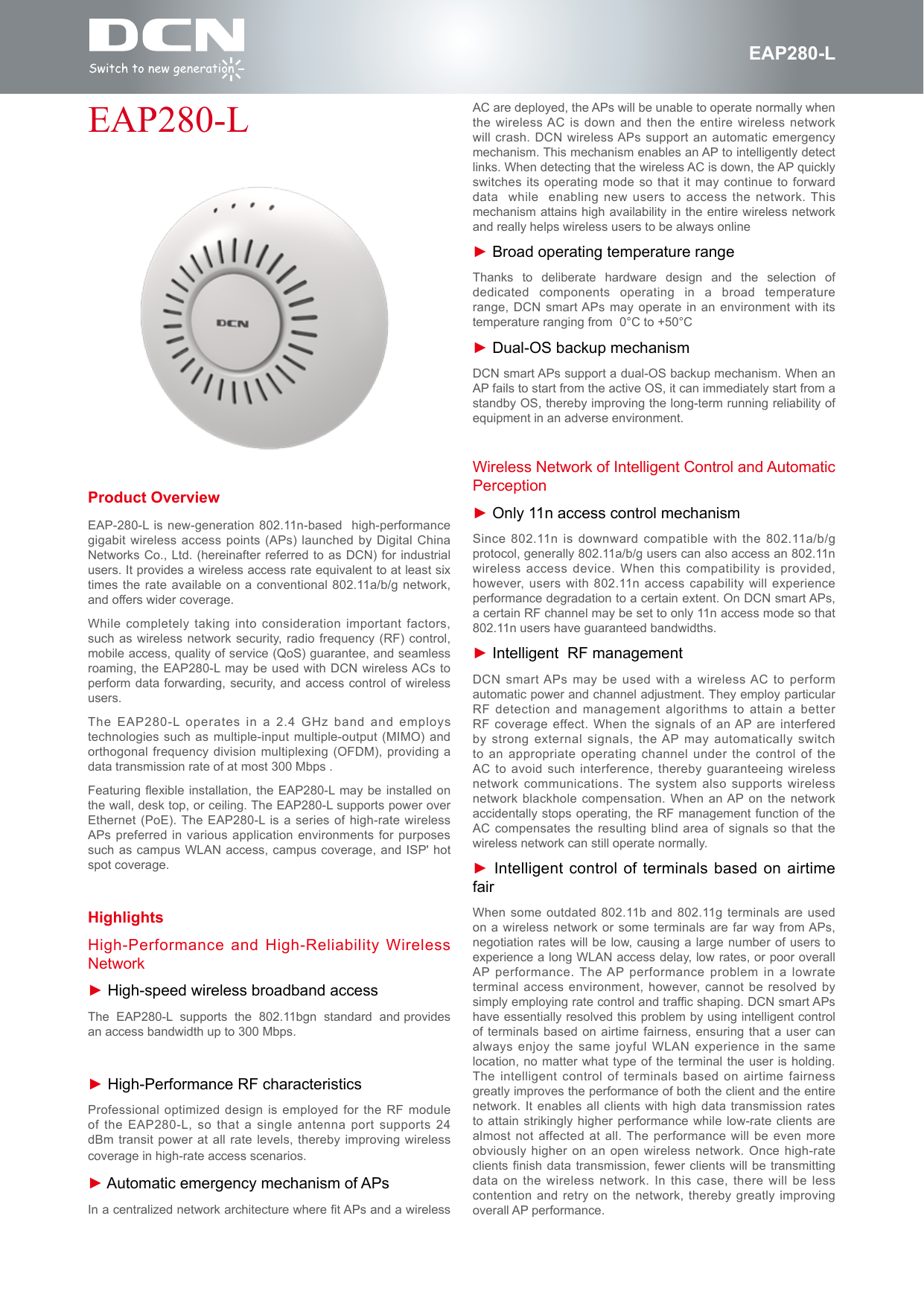
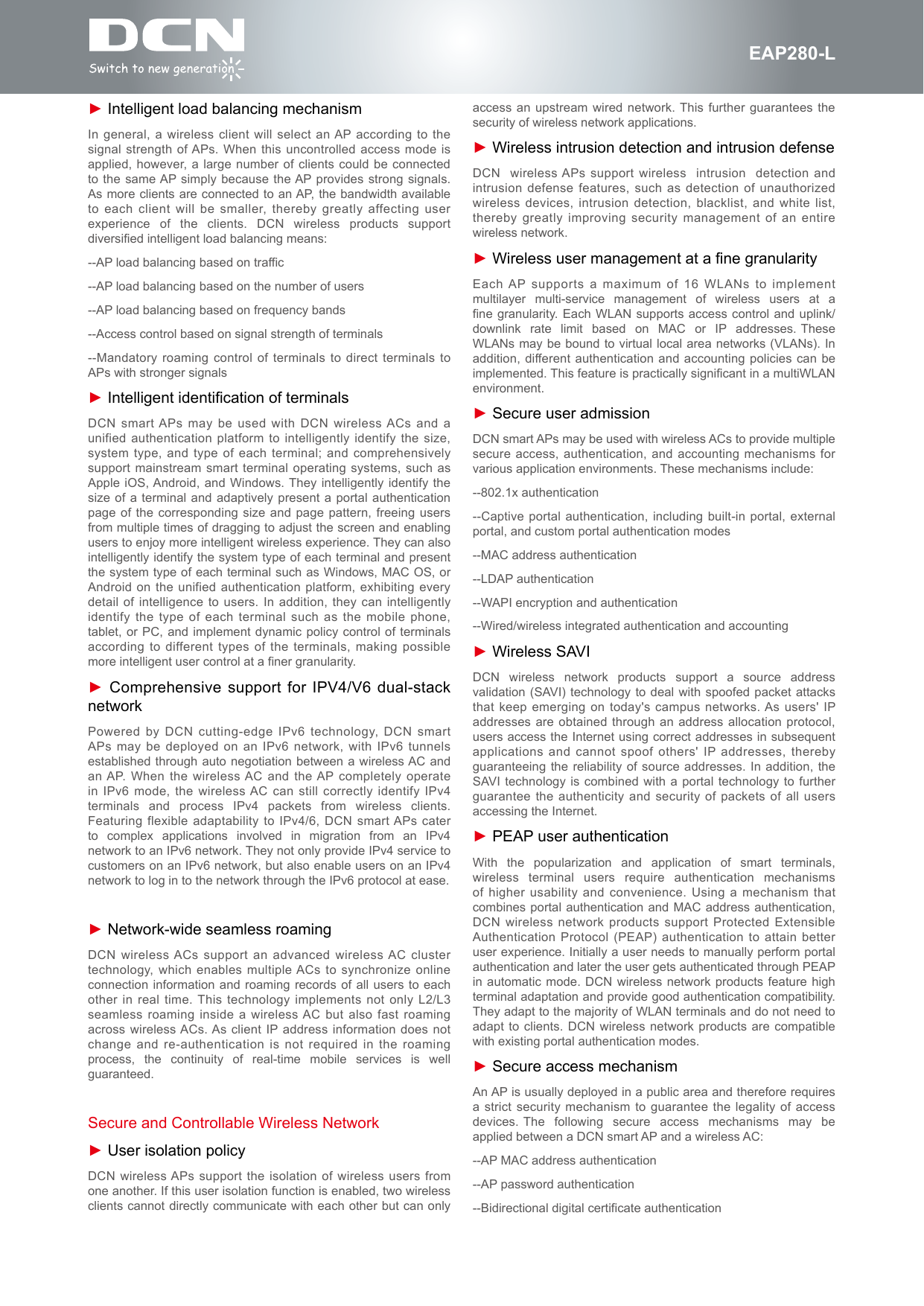
fEAP280-LProduct OverviewEAP-280-L is new-generation 802.11n-based  high-performance gigabit wireless access points (APs) launched by Digital China Networks Co., Ltd. (hereinafter referred to as DCN) for industrial users. It provides a wireless access rate equivalent to at least six times the rate available on a conventional 802.11a/b/g network, and offers wider coverage.While completely taking into consideration important factors, such as wireless network security, radio frequency (RF) control, mobile access, quality of service (QoS) guarantee, and seamless roaming, the EAP280-L may be used with DCN wireless ACs to perform data forwarding, security, and access control of wireless users.The EAP280-L operates in a 2.4 GHz band and employs technologies such as multiple-input multiple-output (MIMO) and orthogonal frequency division multiplexing (OFDM), providing a data transmission rate of at most 300 Mbps .Featuring exible installation,  the EAP280-L may be installed on the wall, desk top, or ceiling. The EAP280-L supports power over Ethernet (PoE). The EAP280-L is a series of high-rate wireless APs preferred in various application environments for purposes such as campus WLAN access, campus coverage, and ISP' hot spot coverage.HighlightsHigh-Performance and High-Reliability Wireless Network► High-speed wireless broadband accessThe  EAP280-L  supports  the  802.11bgn  standard  and provides an access bandwidth up to 300 Mbps.► High-Performance RF characteristicsProfessional optimized design is employed for the RF module of the EAP280-L, so that a single antenna port supports 24 dBm transit power at all rate levels, thereby improving wireless coverage in high-rate access scenarios.► Automatic emergency mechanism of APsIn a centralized network architecture where fit APs and a wireless EAP280-L AC are deployed, the APs will be unable to operate normally when the wireless AC is down and then the entire wireless network will crash. DCN wireless APs support an automatic emergency mechanism. This mechanism enables an AP to intelligently detect links. When detecting that the wireless AC is down, the AP quickly switches its operating mode so that it may continue to forward data  while  enabling new users to access the network. This mechanism attains high availability in the entire wireless network and really helps wireless users to be always online► Broad operating temperature rangeThanks  to  deliberate  hardware  design  and  the  selection  of dedicated  components  operating  in  a  broad  temperature range, DCN smart APs may operate in an environment with its temperature ranging from  0°C to +50°C► Dual-OS backup mechanismDCN smart APs support a dual-OS backup mechanism. When an AP fails to start from the active OS, it can immediately start from a standby OS, thereby improving the long-term running reliability of equipment in an adverse environment.Wireless Network of Intelligent Control and Automatic Perception► Only 11n access control mechanismSince 802.11n is downward compatible with the 802.11a/b/g protocol, generally 802.11a/b/g users can also access an 802.11n wireless access device. When this compatibility is provided, however, users with 802.11n access capability will experience performance degradation to a certain extent. On DCN smart APs, a certain RF channel may be set to only 11n access mode so that 802.11n users have guaranteed bandwidths. ► Intelligent  RF managementDCN smart APs may be used with a wireless AC to perform automatic power and channel adjustment. They employ particular RF detection and management algorithms to attain a better RF coverage effect. When the signals of an AP are interfered by strong external signals, the AP may automatically switch to an appropriate operating channel under the control of the AC to avoid such interference, thereby guaranteeing wireless network communications. The system also supports wireless network blackhole compensation. When an AP on the network accidentally stops operating, the RF management function of the AC compensates the resulting blind area of signals so that the wireless network can still operate normally.► Intelligent control of terminals based on airtime fairWhen some outdated 802.11b and 802.11g terminals are used on a wireless network or some terminals are far way from APs, negotiation rates will be low, causing a large number of users to experience a long WLAN access delay, low rates, or poor overall AP performance. The AP performance problem in a lowrate terminal access environment, however, cannot be resolved by simply employing rate control and traffic shaping. DCN smart APs have essentially resolved this problem by using intelligent control of terminals based on airtime fairness, ensuring that a user can always enjoy the same joyful WLAN experience in the same location, no matter what type of the terminal the user is holding.The intelligent control of terminals based on airtime fairness greatly improves the performance of both the client and the entire network. It enables all clients with high data transmission rates to attain strikingly higher performance while low-rate clients are almost not affected at all. The performance will be even more obviously higher on an open wireless network. Once high-rate clients finish data transmission, fewer clients will be transmitting data on the wireless network. In this case, there will be less contention and retry on the network, thereby greatly improving overall AP performance.
fEAP280-L► Intelligent load balancing mechanismIn general, a wireless client will select an AP according to the signal strength of APs. When this uncontrolled access mode is applied, however, a large number of clients could be connected to the same AP simply because the AP provides strong signals. As more clients are connected to an AP, the bandwidth available to each client will be smaller, thereby greatly affecting user experience  of  the  clients.  DCN  wireless  products  support diversified intelligent load balancing means:--AP load balancing based on traffic--AP load balancing based on the number of users--AP load balancing based on frequency bands--Access control based on signal strength of terminals--Mandatory roaming control of terminals to direct terminals to APs with stronger signals► Intelligent identification of terminalsDCN smart APs may be used with DCN wireless ACs and a unified authentication platform to intelligently identify the size, system type, and type of each terminal; and comprehensively support mainstream smart terminal operating systems, such as Apple iOS, Android, and Windows. They intelligently identify the size of a terminal and adaptively present a portal authentication page of the corresponding size and page pattern, freeing users from multiple times of dragging to adjust the screen and enabling users to enjoy more intelligent wireless experience. They can also intelligently identify the system type of each terminal and present the system type of each terminal such as Windows, MAC OS, or Android on the unified authentication platform, exhibiting every detail of intelligence to users. In addition, they can intelligently identify the type of each terminal such as the mobile phone, tablet, or PC, and implement dynamic policy control of terminals according to different types of the terminals, making possible more intelligent user control at a finer granularity.► Comprehensive support for IPV4/V6 dual-stack networkPowered by DCN cutting-edge IPv6 technology, DCN smart APs may be deployed on an IPv6 network, with IPv6 tunnels established through auto negotiation between a wireless AC and an AP. When the wireless AC and the AP completely operate in IPv6 mode, the wireless AC can still correctly identify IPv4 terminals  and  process  IPv4  packets  from  wireless  clients. Featuring flexible adaptability to IPv4/6, DCN smart APs cater to  complex  applications  involved  in  migration  from  an  IPv4 network to an IPv6 network. They not only provide IPv4 service to customers on an IPv6 network, but also enable users on an IPv4 network to log in to the network through the IPv6 protocol at ease.► Network-wide seamless roamingDCN wireless ACs support an advanced wireless AC cluster technology, which enables multiple ACs to synchronize online connection information and roaming records of all users to each other in real time. This technology implements not only L2/L3 seamless roaming inside a wireless AC but also fast roaming across wireless ACs. As client IP address information does not change and re-authentication is not required in the roaming process,  the  continuity  of  real-time  mobile  services  is  well guaranteed.Secure and Controllable Wireless Network► User isolation policyDCN wireless APs support the isolation of wireless users from one another. If this user isolation function is enabled, two wireless clients cannot directly communicate with each other but can only access an upstream wired network. This further guarantees the security of wireless network applications.► Wireless intrusion detection and intrusion defenseDCN  wireless APs support wireless  intrusion  detection and intrusion defense features, such as detection of unauthorized wireless devices, intrusion detection, blacklist, and white list, thereby greatly improving security management of an entire wireless network.► Wireless user management at a fine granularityEach AP supports a maximum of 16 WLANs to implement multilayer  multi-service  management  of  wireless  users  at  a  fine granularity. Each WLAN supports access control and uplink/downlink  rate  limit  based  on  MAC  or  IP  addresses. These WLANs may be bound to virtual local area networks (VLANs). In addition, different authentication and accounting policies can be implemented. This feature is practically significant in a multiWLAN environment.► Secure user admissionDCN smart APs may be used with wireless ACs to provide multiple secure access, authentication, and accounting mechanisms for various application environments. These mechanisms include:--802.1x authentication--Captive portal authentication, including built-in portal, external portal, and custom portal authentication modes--MAC address authentication--LDAP authentication--WAPI encryption and authentication--Wired/wireless integrated authentication and accounting► Wireless SAVIDCN  wireless  network  products  support  a  source  address validation (SAVI) technology to deal with spoofed packet attacks that keep emerging on today's campus networks. As users' IP addresses are obtained through an address allocation protocol, users access the Internet using correct addresses in subsequent applications and cannot spoof others' IP addresses, thereby guaranteeing the reliability of source addresses. In addition, the SAVI technology is combined with a portal technology to further guarantee the authenticity and security of packets of all users accessing the Internet.► PEAP user authenticationWith  the  popularization  and  application  of  smart  terminals, wireless  terminal  users  require  authentication  mechanisms of higher usability and convenience. Using a mechanism that combines portal authentication and MAC address authentication, DCN wireless network products support Protected Extensible Authentication Protocol (PEAP) authentication to attain better user experience. Initially a user needs to manually perform portal authentication and later the user gets authenticated through PEAP in automatic mode. DCN wireless network products feature high terminal adaptation and provide good authentication compatibility. They adapt to the majority of WLAN terminals and do not need to adapt to clients. DCN wireless network products are compatible with existing portal authentication modes.► Secure access mechanismAn AP is usually deployed in a public area and therefore requires a strict security mechanism to guarantee the legality of access devices. The  following  secure  access  mechanisms  may  be applied between a DCN smart AP and a wireless AC:--AP MAC address authentication--AP password authentication--Bidirectional digital certificate authentication
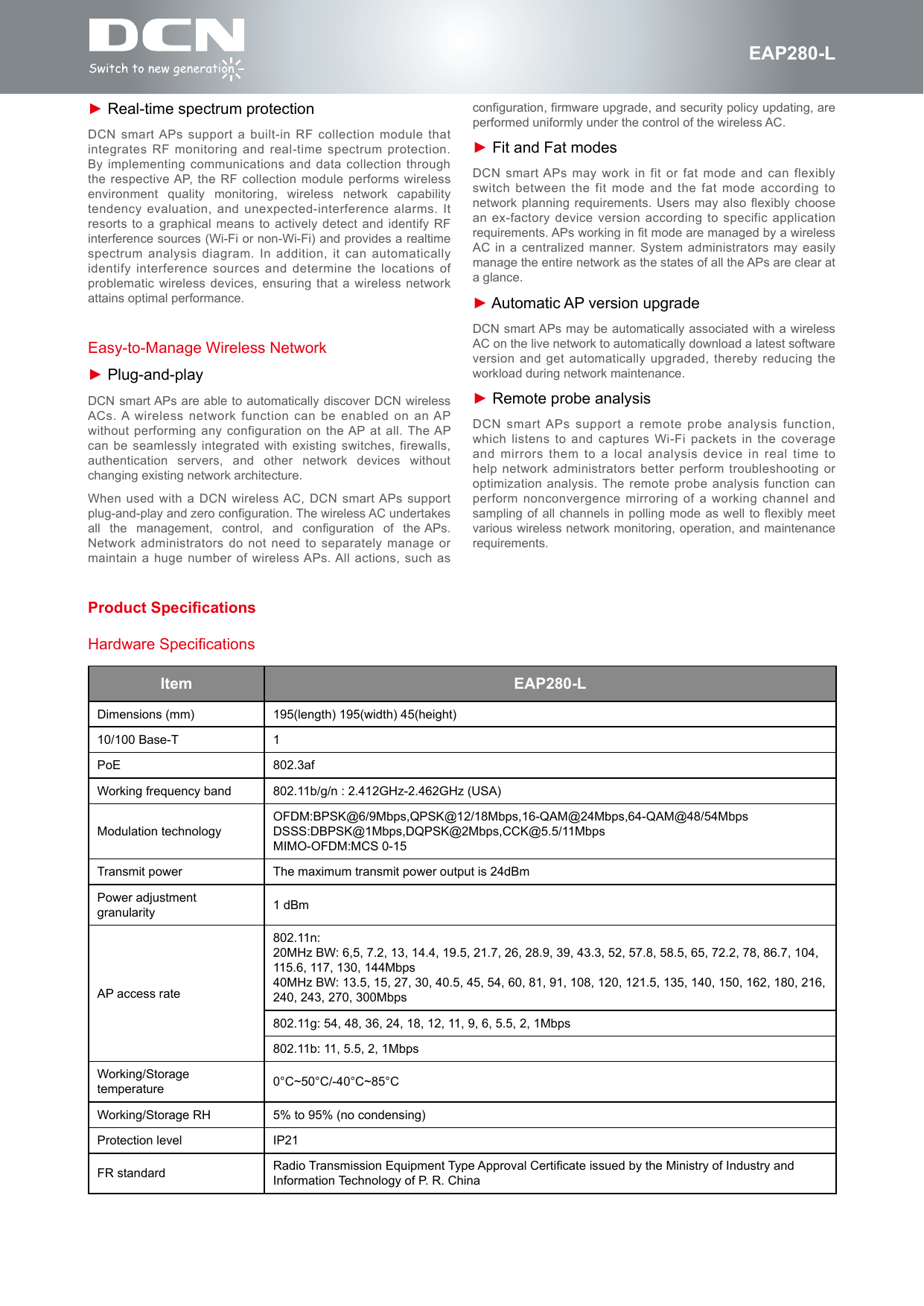
fEAP280-L► Real-time spectrum protectionDCN smart APs support a built-in RF collection module that integrates RF monitoring and real-time spectrum protection. By implementing communications and data collection through the respective AP, the RF collection module performs wireless environment  quality  monitoring,  wireless  network  capability tendency evaluation, and unexpected-interference alarms. It resorts to a graphical means to actively detect and identify RF interference sources (Wi-Fi or non-Wi-Fi) and provides a realtime spectrum analysis diagram. In addition, it can automatically identify interference sources and determine the locations of problematic wireless devices, ensuring that a wireless network attains optimal performance.Easy-to-Manage Wireless Network► Plug-and-playDCN smart APs are able to automatically discover DCN wireless ACs. A wireless network function can be enabled on an AP without performing any configuration on the AP at all. The AP can be seamlessly integrated with existing switches, firewalls, authentication  servers,  and  other  network  devices  without changing existing network architecture.When used with a DCN wireless AC, DCN smart APs support plug-and-play and zero configuration. The wireless AC undertakes all  the  management,  control,  and  configuration  of  the APs. Network administrators do not need to separately manage or maintain a huge number of wireless APs. All actions, such as Item EAP280-LDimensions (mm) 195(length) 195(width) 45(height)10/100 Base-T 1PoE 802.3afWorking frequency band 802.11b/g/n : 2.412GHz-2.462GHz (USA)Modulation technologyOFDM:BPSK@6/9Mbps,QPSK@12/18Mbps,16-QAM@24Mbps,64-QAM@48/54Mbps DSSS:DBPSK@1Mbps,DQPSK@2Mbps,CCK@5.5/11Mbps MIMO-OFDM:MCS 0-15Transmit power The maximum transmit power output is 24dBmPower adjustment granularity 1 dBmAP access rate802.11n: 20MHz BW: 6,5, 7.2, 13, 14.4, 19.5, 21.7, 26, 28.9, 39, 43.3, 52, 57.8, 58.5, 65, 72.2, 78, 86.7, 104, 115.6, 117, 130, 144Mbps 40MHz BW: 13.5, 15, 27, 30, 40.5, 45, 54, 60, 81, 91, 108, 120, 121.5, 135, 140, 150, 162, 180, 216, 240, 243, 270, 300Mbps802.11g: 54, 48, 36, 24, 18, 12, 11, 9, 6, 5.5, 2, 1Mbps802.11b: 11, 5.5, 2, 1MbpsWorking/Storage temperature 0°C~50°C/-40°C~85°CWorking/Storage RH 5% to 95% (no condensing)Protection level IP21FR standard Radio Transmission Equipment Type Approval Certicate issued by the Ministry of Industry and Information Technology of P. R. ChinaHardware Specificationsconfiguration, firmware upgrade, and security policy updating, are performed uniformly under the control of the wireless AC.► Fit and Fat modesDCN smart APs may work in fit or fat mode and can flexibly switch between the fit mode and the fat mode according to network planning requirements. Users may also flexibly choose an ex-factory device version according to specific application requirements. APs working in fit mode are managed by a wireless AC in a centralized manner. System administrators may easily manage the entire network as the states of all the APs are clear at a glance.► Automatic AP version upgradeDCN smart APs may be automatically associated with a wireless AC on the live network to automatically download a latest software version and get automatically upgraded, thereby reducing the workload during network maintenance.► Remote probe analysisDCN smart APs support a remote probe analysis function, which listens to and captures Wi-Fi packets in the coverage and mirrors them to a local analysis device in real time to help network administrators better perform troubleshooting or optimization analysis. The remote probe analysis function can perform nonconvergence mirroring of a working channel and sampling of all channels in polling mode as well to flexibly meet various wireless network monitoring, operation, and maintenance requirements.Product Specications
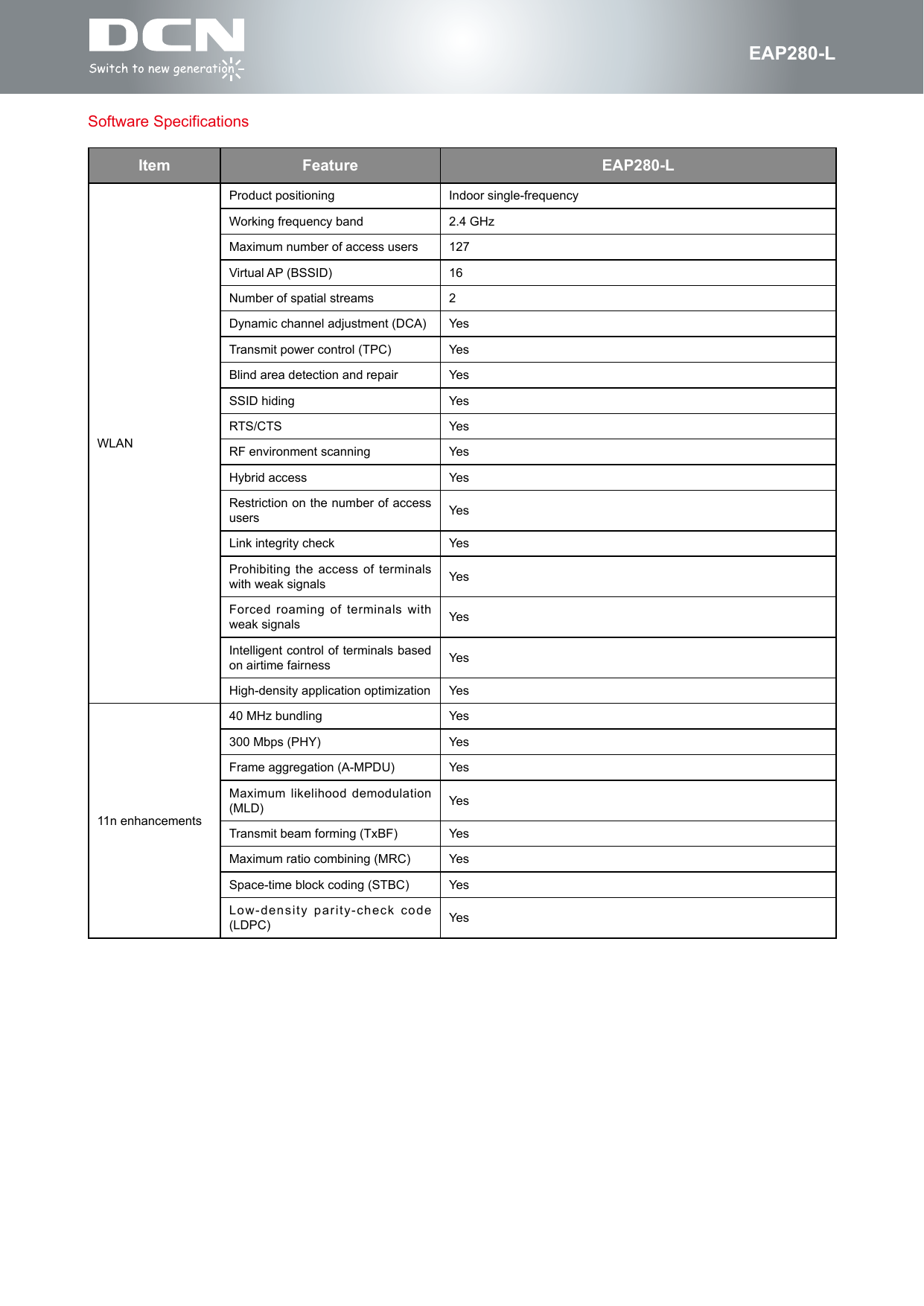
fEAP280-LSoftware SpecificationsItem Feature EAP280-LWLANProduct positioning Indoor single-frequencyWorking frequency band 2.4 GHzMaximum number of access users 127Virtual AP (BSSID)  16Number of spatial streams 2Dynamic channel adjustment (DCA) YesTransmit power control (TPC) YesBlind area detection and repair YesSSID hiding YesRTS/CTS YesRF environment scanning YesHybrid access YesRestriction on the number of access users YesLink integrity check YesProhibiting the access of terminals with weak signals YesForced roaming of terminals with weak signals YesIntelligent control of terminals based on airtime fairness YesHigh-density application optimization Yes11n enhancements40 MHz bundling Yes300 Mbps (PHY) YesFrame aggregation (A-MPDU) YesMaximum likelihood demodulation (MLD) YesTransmit beam forming (TxBF) YesMaximum ratio combining (MRC) YesSpace-time block coding (STBC) YesLow-density parity-check code (LDPC) Yes
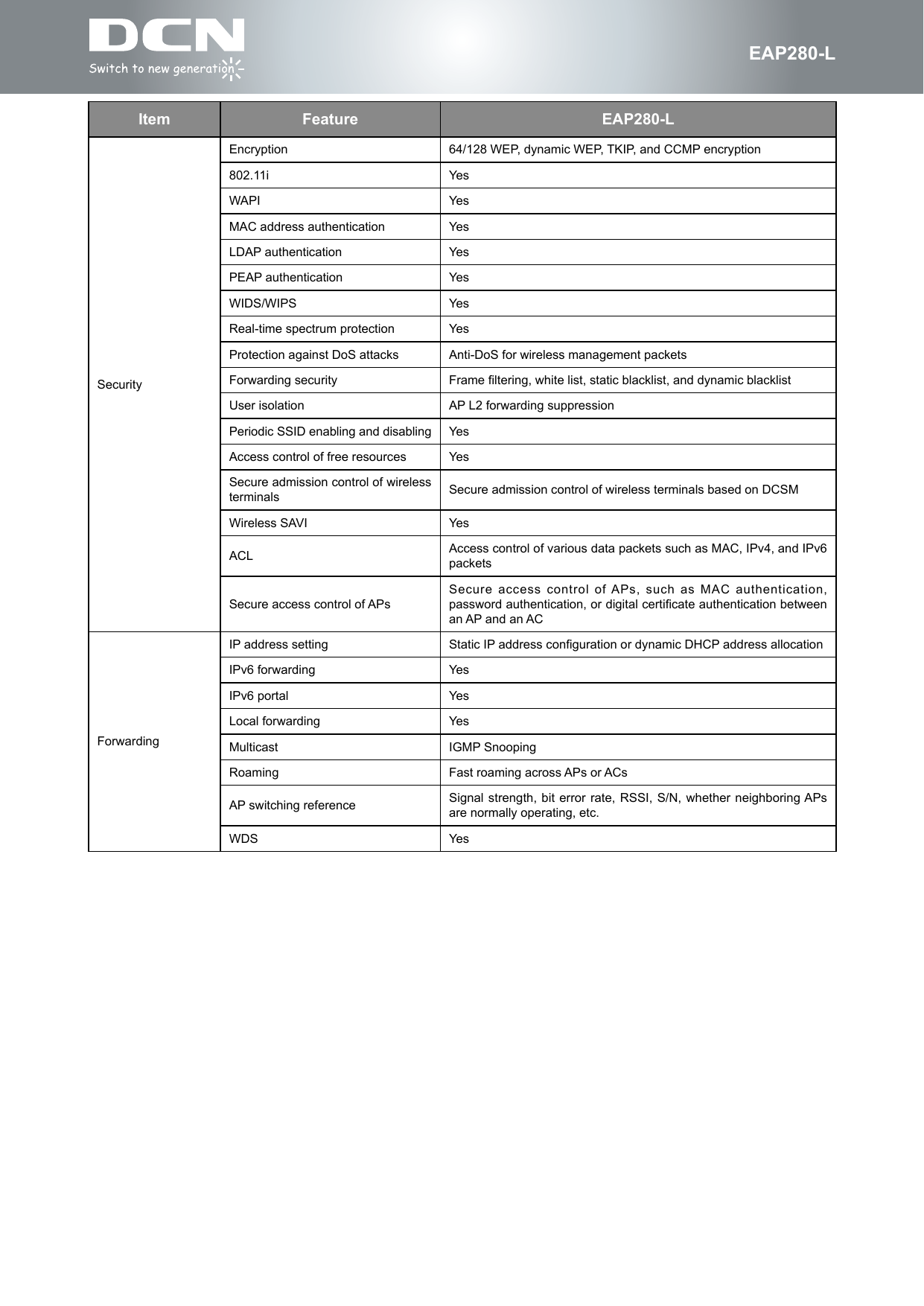
fEAP280-LItem Feature EAP280-LSecurityEncryption 64/128 WEP, dynamic WEP, TKIP, and CCMP encryption802.11i YesWAPI YesMAC address authentication YesLDAP authentication YesPEAP authentication YesWIDS/WIPS YesReal-time spectrum protection YesProtection against DoS attacks Anti-DoS for wireless management packetsForwarding security Frame ltering, white list, static blacklist, and dynamic blacklistUser isolation AP L2 forwarding suppressionPeriodic SSID enabling and disabling YesAccess control of free resources YesSecure admission control of wireless terminals Secure admission control of wireless terminals based on DCSMWireless SAVI YesACL Access control of various data packets such as MAC, IPv4, and IPv6 packetsSecure access control of APsSecure access control of APs, such as MAC authentication, password authentication, or digital certicate authentication between an AP and an ACForwardingIP address setting Static IP address conguration or dynamic DHCP address allocationIPv6 forwarding YesIPv6 portal YesLocal forwarding YesMulticast IGMP Snooping Roaming Fast roaming across APs or ACsAP switching reference Signal strength, bit error rate, RSSI, S/N, whether neighboring APs are normally operating, etc.WDS Yes
fEAP280-LItem Feature EAP280-LQoSWMM YesPriority mapping Ethernet port 802.1P identication and markingMapping from wireless priorities to wired prioritiesQoS policy mappingMapping of different SSIDs/VLANs to different QoS policiesMapping of data streams that match with different packet fields to different QoS policiesL2-L4 packet ltering and owclassication Yes: MAC, IPv4, and IPv6 packetsLoad balanceLoad balancing based on the number of usersLoad balancing based on user trafcLoad balancing based on frequency bandsBandwidth limitBandwidth limit based on APsBandwidth limit based on SSIDsBandwidth limit based on terminalsBandwidth limit based on specic data streamsPower saving mode YesAutomatic emergency mechanism of APs YesIntelligent identication of terminals YesMulticast enhancement Multicast to unicastManagementNetwork management Centralized management through an AC; both t and fat modesMaintenance mode Both local and remote maintenanceLogging Local logs, Syslog, and log le exportAlarming YesFault detection YesStatistics YesSwitching between the fat and fit modesAP working in t mode can switch to the fat mode through a wireless AC; AP working in fat mode can switch to the t mode through a local control port or Telnet.Remote probe analysis YesDual-image (dual-OS) backupmechanism YesWatchdog YesOrdering InformationProduct Model Description RemarksEAP280-L802.11n indoor wireless AP, provides an access bandwidth up to 300 Mbps (2.4 GHz single-channel single-frequency, built-in antenna, 802.3af PoE) (PoE module need to be separately purchased.Don’t support local power)MandatoryDCWL-PoEINJ-G+ 10/100/1000 Mbps 1-port 802.3at PoE module OptionalContact usDigital China Networks LimitedFor more detail information about DCN product, contact:URL: http://www.dcnglobal.comEmail: sales@dcnglobal.comAddress: Digital Technology Plaza, NO.9 Shangdi 9th Street, Haidian District, Beijing, China

Navigation menu