Digitech Vocal 300 Owner S Manual
Quick Start Guide (EN) English 886 KB Vocal300_OM_EN JBL Voyager | Portable Wireless Home Speaker
2014-07-05
: Digitech Digitech-Vocal-300-Owner-S-Manual digitech-vocal-300-owner-s-manual digitech pdf
Open the PDF directly: View PDF  .
.
Page Count: 15

User’s
Guide
Vocal 300 Manual 11/20/01 8:23 AM Page 1
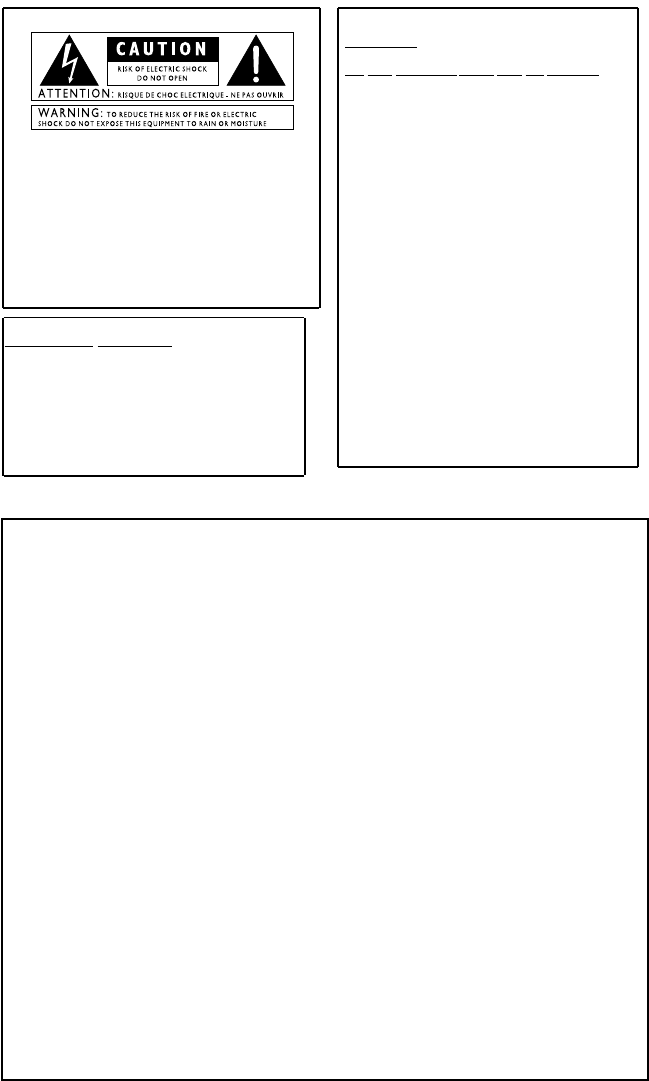
These symbols are internationally accepted symbols that warn of potential
hazards with electrical products.The lightning flash means that there are
dangerous voltages present within the unit.The exclamation point indicates
that it is necessary for the user to refer to the owners manual.
These symbols warn that there are no user serviceable parts inside the unit.
Do not open the unit.Do not attempt to service the unit yourself. Refer all
servicing to qualified personnel. Opening the chassis for any reason will void
the manufacturer’s warranty.Do not get the unit wet.If liquid is spilled on
the unit,shut it off immediately and take it to a dealer for service.
Disconnect the unit during storms to prevent damage.
Warning
For your protection, please read the following:
Water and Moisture:Appliances should not be used near water
(e.g. near a bathtub, washbowl,kitchen sink,laundry tub, in a wet
basement,or near a swimming pool,etc.) Care should be taken so
that objects do not fall and liquids are not spilled into the enclosure
through openings.
Power Sources:The appliance should be connected to a power
supply only of the type described in the operating instructions or as
marked on the appliance.
Grounding or Polarization: Precautions should be taken so that
the grounding or polarization means of an appliance is not defeated.
Power Cord Protection: Power supply cords should be routed so
that they are not likely to be walked on or pinched by items placed
upon or against them,paying particular attention to cords at plugs,
convenience receptacles, and the point where they exit from the
appliance.
Servicing: To reduce the risk of fire or electrical shock,the user
should not attempt to service the appliance beyond that described in
the operating instructions.All other servicing should be referred to
qualified service personnel.
For units equipped with externally accessible fuse recepta-
cle: Replace fuse with same type and rating only.
Electromagnetic Compatibility
Operation is subject to the following conditions:
•This device may not cause harmful interference.
•This device must accept any interference received,including interfer-
ence that may cause undesired operation.
•Use only shielded interconnecting cables.
•Operation of this unit within significant electromagnetic fields should
be avoided.
DECLARATION OF CONFORMITY
Manufacturer’s Name: DigiTech
Manufacturer’s Address: 8760 S. Sandy Parkway
Sandy, Utah 84070,USA
declares that the product:
Product name: Vocal300
Note:Product name may be suffixed by the letters EU,JA,NP and UK.
Product option: none
conforms to the following Product Specifications:
Safety: IEC 60065 (1998)
EMC: EN 55013 (1990)
EN 55020 (1991)
Supplementary Information:
The product herewith complies with the requirements of the Low Voltage Directive 72/23/EEC and the EMC
Directive 89/336/EEC as amended by Directive 93/68/EEC.
President of Harman Music Group
8760 S.Sandy Parkway
Sandy, Utah 84070,USA
Date:October 10, 2001
European Contact: Your local DigiTech Sales and Service Office or
Harman Music Group
8760 South Sandy Parkway
Sandy, Utah 84070 USA
Ph:(801) 566-8800
Vocal 300 Manual 11/20/01 8:23 AM Page 2

Table of Contents
Introduction . . . . . . . . . . . . . . . . . . .1
Included Items . . . . . . . . . . . . . . . . . .1
Top Panel . . . . . . . . . . . . . . . . . . . . .1
Rear Panel . . . . . . . . . . . . . . . . . . . . .2
Connecting the Vocal 300 . . . . . . . . .2
Mono Operation . . . . . . . . . . . . . . . .2
Stereo Operation . . . . . . . . . . . . . . .3
Modes and Functions . . . . . . . . . . . . .4
Performance Mode . . . . . . . . . . . . . .4
Edit Mode . . . . . . . . . . . . . . . . . . . . .5
Store Mode . . . . . . . . . . . . . . . . . . . .5
Bypass Mode . . . . . . . . . . . . . . . . . . .5
Expression Pedal . . . . . . . . . . . . . . . .6
Assigning a Parameter . . . . . . . . . . . .6
V-Switch/Pedal Calibration . . . . . . . .7
Factory Reset . . . . . . . . . . . . . . . . . .7
Effects and Parameters . . . . . . . . . . .8
Signal Path . . . . . . . . . . . . . . . . . . . . .8
Compressor . . . . . . . . . . . . . . . . . . .8
Mic Pre/Voice . . . . . . . . . . . . . . . . . .8
Voice Parameters . . . . . . . . . . . . . . .8
EQ . . . . . . . . . . . . . . . . . . . . . . . . . .9
Noise Gate . . . . . . . . . . . . . . . . . . . .9
Mod.Effects . . . . . . . . . . . . . . . . . . . .9
Mod Parameters . . . . . . . . . . . . . . .10
Delay . . . . . . . . . . . . . . . . . . . . . . . .10
Reverb . . . . . . . . . . . . . . . . . . . . . .10
Appendix . . . . . . . . . . . . . . . . . . . . .11
Preset List . . . . . . . . . . . . . . . . . . . .11
Specifications . . . . . . . . . . . . . . . . . .11
Warranty
We at DigiTech are very proud of our products and back-up each one we sell with the following warranty:
1.The warranty registration card must be mailed within ten days after purchase date to validate this
warranty.
2.DigiTech warrants this product,when used solely within the U.S.,to be free from defects in materials and
workmanship under normal use and service.
3.DigiTech liability under this warranty is limited to repairing or replacing defective materials that show
evidence of defect,provided the product is returned to DigiTech WITH RETURN AUTHORIZATION,where
all parts and labor will be covered up to a period of one year.A Return Authorization number may be
obtained from DigiTech by telephone.The company shall not be liable for any consequential damage as a
result of the product's use in any circuit or assembly.
4.Proof-of-purchase is considered to be the burden of the consumer.
5.DigiTech reserves the right to make changes in design,or make additions to,or improvements upon this
product without incurring any obligation to install the same on products previously manufactured.
6.The consumer forfeits the benefits of this warranty if the product's main assembly is opened and tampered
with by anyone other than a certified DigiTech technician or,if the product is used with AC voltages outside
of the range suggested by the manufacturer.
7.The foregoing is in lieu of all other warranties,expressed or implied,and DigiTech neither assumes nor
authorizes any person to assume any obligation or liability in connection with the sale of this product.In no
event shall DigiTech or its dealers be liable for special or consequential damages or from any delay in the
performance of this warranty due to causes beyond their control.
NOTE:The information contained in this manual is subject to change at any time without notification.Some
information contained in this manual may also be inaccurate due to undocumented changes in the product or
operating system since this version of the manual was completed.The information contained in this version
of the owner's manual supersedes all previous versions.
Vocal 300 Manual 11/20/01 8:23 AM Page 3
Introduction
The features and functions of the the Vocal 300 ‘s knob based matrix editing system are
extremely user friendly. To familiarize yourself with the Vocal 300,we recommend you
go through this User’s Guide with your Vocal 300 in front of you.
Included Items
This User Guide, and the following items have been included with the Vocal 300:
1.PS0913B Power Supply
2.Warranty Card
The utmost care was taken while your Vocal 300 was manufactured. If anything is
missing or not working,please contact the factory at once. To register your
product for warranty benefits,please return the warranty card.
Top Panel
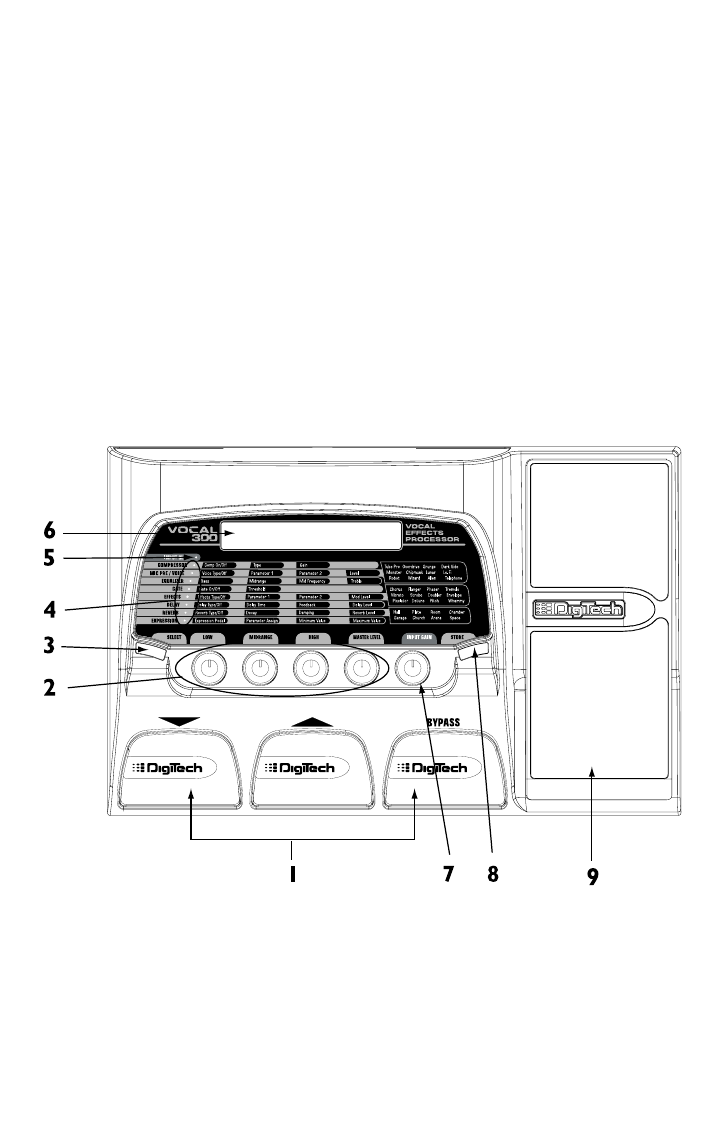
1.DOWN, UP, and BYPASS footswitches - Move through the Vocal 300’s
presets and bypass effects.
2.LOW,MIDRANGE,HIGH,AND MASTER LEVEL knobs - Adjusts the
effect’s parameters in Edit mode.
3.SELECT button - Accesses edit mode and selects the effects to edit.
4.MATRIX and LEDs - The matrix provides information regarding the current
preset and parameter edit functions.
1
Vocal 300 Manual 11/20/01 8:23 AM Page 1
5.INPUT CLIP LED - Lights if the incoming signal is distorting.
6.DISPLAY - Provides information for the different functions.
7.INPUT GAIN knob - Adjusts the input signal level.
8.STORE Button - Stores or copies presets to User preset locations.
9.EXPRESSION PEDAL - Controls the Vocal 300’s parameters in real time.
Rear Panel
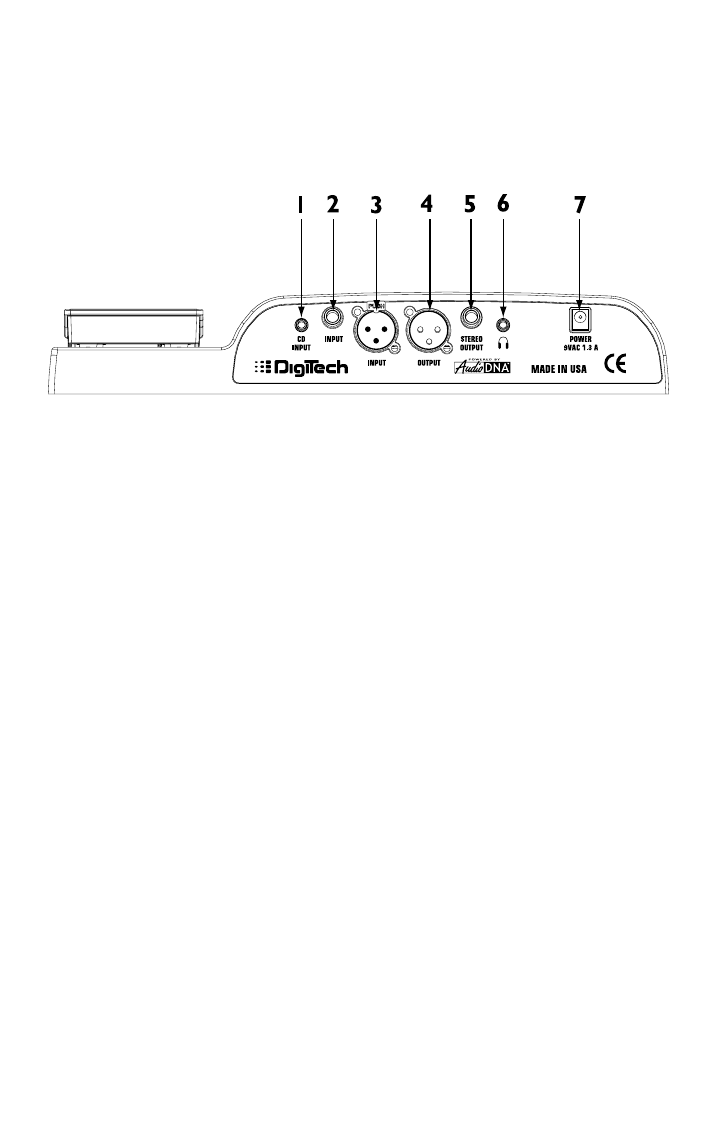
1.1/8” CD INPUT - Connect the headphone output of your CD,tape,or MP3
player to this jack. This jack is used to sing-along with recorded music.
2.1/4” Unbalanced INPUT - Connect a CD player,mixer,or other line level
device output to this jack.
Note: If this input is used, the XLR input is disabled.
3.XLR Balanced INPUT - Connect a microphone to this jack.
4.XLR Balanced Mono OUTPUT - Connect to a mixer XLR input.
5.1/4” TRS STEREO OUTPUT - Connect a 1/4” stereo “Y” cable to this output
(becomes a 1/4” Mono output if 1/4” mono TS plug is used).
6.1/8” HEADPHONE Output - Connect a pair of stereo headphones to this
jack.
7.POWER jack - Connect only the DigiTech PS0913B power supply to this jack.
Connecting the Vocal 300
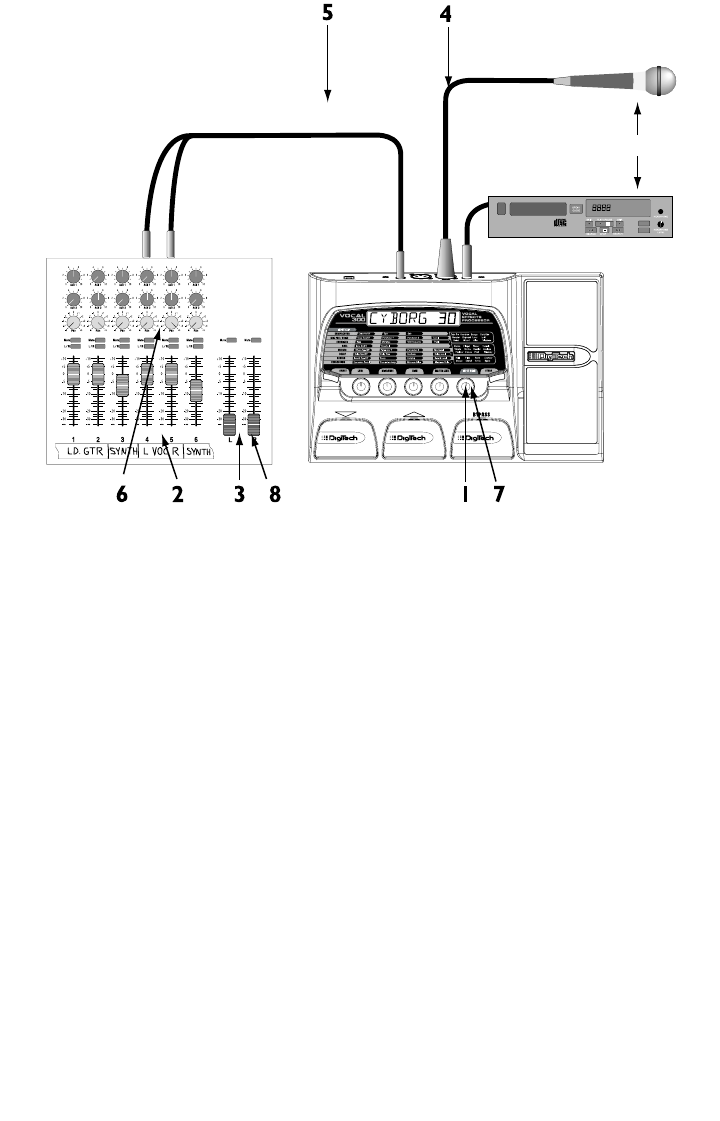
The Vocal 300 can be connected in several different ways. The following diagrams
show a few possible options.
Mono Operation
1.Turn the INPUT GAIN knob completely counter-clockwise (7 o’clock)
position.
2.Set the mixer channel’s fader to 0dB.
3.Set the mixer’s master fader to its minimum position (no output signal).
4.Connect the microphone to the Vocal 300’s XLR INPUT.
5.Connect an XLR cable from the Vocal 300’s XLR OUTPUT to the XLR
mic input on the selected mixer channel.
2
Vocal 300 Manual 11/20/01 8:23 AM Page 2

6.While singing,gradually turn up the Vocal 300’s INPUT GAIN knob until
the INPUT CLIP LED lights with the strongest signals.
7.Gradually bring the mixer’s master fader up.
Note: It may be necessary to consult your mixer’s owners manual
for the proper mixer setup.
Stereo Operation
1.Turn the INPUT GAIN knob completely counter-clockwise (7 o’clock)
position.
2.Set the mixer channel’s fader to 0dB.
3.Set the mixer’s master fader to its minimum position (no output signal).
4.Connect the microphone to the Vocal 300’s XLR INPUT.
5.Connect an 1/4” TS cable or stereo TRS “Y” cable from the Vocal 300’s 1/4”
OUTPUT to the 1/4” line input of the selected mixer channel.
6.Set the pan controls on the selected mixer channel hard left and hard right.
7.While singing,gradually turn up the Vocal 300’s INPUT GAIN knob until
the INPUT CLIP LED lights with the strongest signals.
8.Gradually bring the mixer’s master fader up.
Note: It may be necessary to consult your mixer’s owners manual
for the proper mixer setup.
MASTER
or
From Line
Level Output
Balanced
XLR Cable
Balanced
XLR Cable
3
Vocal 300 Manual 11/20/01 8:23 AM Page 3
Modes and Functions
Performance Mode
The Vocal 300 initially powers up in performance mode.
SELECT Button - Enters edit mode. Each press of this button moves to the next
row of effects in the matrix. Press and hold this button to return to performance
mode.
STORE Button - Begins the storing process.
INPUT GAIN knob - Sets the input gain for your microphone.
LOW, MIDRANGE, HIGH,AND MASTER LEVEL Knobs - These knobs
control the Bass,Mid Level,Treble, and Master Level of the presets.
FOOTSWITCHES – The UP and DOWN footswitches move through the presets
(1-40 User and 41-80 Factory). Pressing the BYPASS footswitch bypasses all
effects. While in preset bypass,you can select the next preset using the UP and
DOWN footswitches. This preset will then be loaded when bypass is exited.
Expression Pedal - Controls the assigned parameter of the current preset.
MASTER
or
From Line
Level Output
Balanced
XLR Cable
1/4" Stereo "Y" Cable
4
Vocal 300 Manual 11/20/01 8:23 AM Page 4

Edit Mode
The Vocal 300 lets you create your own presets,and modify existing presets. To
create your own preset,do the following:
1.Select a User or Factory Preset.
2.Press the SELECT button. The Matrix’s first effect row LED begins flashing.
3.Modify the parameters in the selected row using the LOW,MIDRANGE,
HIGH,and MASTER LEVEL knobs.When changes are made, the Store LED
lights,and the abbreviated parameter name with a space followed by a two digit
parameter value is displayed.
4. To move to the next effect in the Matrix,press the SELECT button again.
5.Press the STORE button to save your changes.
Note: Pressing the UP or DOWN footswitches returns you to
Performance mode. Pressing the BYPASS footswitch bypasses all
effects.
Store Mode
After modifying a preset,you must store your settings to one of the 40 User
Preset locations. To store changes to a preset or store a preset to a different
location,do the following:
1.Press the STORE button. The Store LED begins blinking on and off,and the
first character of the name flashes.
2.Use the LOW knob to change the character. Use the MIDRANGE knob to
move to the next character (left or right) in the name.
3.Press the STORE button again. The preset’s name and number are displayed.
4.If you want to change where the preset is stored,rotate the MASTER LEVEL
knob to select a new preset location. Only User presets 1-40 can be
overwritten.
5.Press the STORE button a final time to store your changes. Stored followed
by the preset name is displayed.
Note: Pressing the SELECT button aborts the storing process.
Bypass Mode
The Vocal 300 can be bypassed so only a clean,unprocessed signal is heard. To
bypass the Vocal 300, do the following:
1.Press the BYPASS footswitch. Bypass appears in the display.
2.Press the BYPASS footswitch again to return to performance mode. If a new
preset was selected while in bypass mode, you will exit bypass mode to the new
preset. If a new preset was not selected,you will return to the preset in use
before you entered bypass mode.
5
Vocal 300 Manual 11/20/01 8:23 AM Page 5

Expression Pedal
Assigning a Parameter
The Vocal 300 includes a built-in Expression pedal. The Expression pedal is
used to control many of the Vocal 300’s effect parameters in real time. To
assign a parameter to the Expression pedal,do the following:
1.Select a User or Factory Preset.
2.Press the SELECT button until the Matrix’s last effect row LED begins
flashing.
3.Rotate the LOW knob to select the Expression pedal 1,2,or 3.
Note: You can assign three parameters to the Expression pedal per
preset.
4.Rotate the MIDRANGE knob to select the parameter the pedal will
control.
5.Rotate the HIGH knob to adjust the minimum value the pedal (toe up)
reaches.
6.Rotate the MASTER LEVEL knob to adjust the maximum value the pedal
(toe down) reaches.
7.Press the STORE button to store the changes. See page 5 for more
information on storing presets.
The following is a list of the parameters that can be assigned to the
Expression pedal:
Parameter Display Min Value Max Value
Voice Param 1 Varies Varies Varies
Voice Param 2 Varies Varies Varies
Voice Level Voxlvl 199
Effect Speed Speed 199
Effect Amount amount 199
Effect Level Fx lvl 099
Effect Mix Fx MIX 099
Whammy whmamt 199
Delay Feedback fback 1 99 R-hold
Delay In Level Dly in 099
Delay Out Level Dlyout 099
Reverb Decay Decay 199
Reverb In Level Rev in 099
Reverb Out Level Revout 099
Volume Pre Volpre ------ ------
Volume Post volpst ------ ------
6
Vocal 300 Manual 11/20/01 8:23 AM Page 6

V-Switch/Pedal Calibration
The Vocal 300 has an expression pedal feature called V-Switch. V-Switch is a
pressure sensitive virtual switch,that turns the Vocal Character module off and
on. The expression pedal must be calibrated for the Vocal Character module
to work. The expression pedal will continue to control the parameter it is
assigned to regardless of the Vocal Character status. However, it is important
to calibrate the expression pedal for it to function properly. To calibrate the
expression pedal,do the following:
1.Press the DOWN footswitch and connect the power. CALIB briefly
displays,and then TOE DN is displayed.
2.Press the expression pedal forward (toe down).
3.Press a footswitch,and TOE UP appears in the display.
4.Press the expression pedal toe up.
5.Press a footswitch,and VSWTCH appears in the display.
6.To calibrate the V-Switch press down hard on the toe until DONE appears in
the display. The sensitivity value appears in the numeric display. The display
toggles between VSWTCHOn and VSWTCHOf.
7.(Optional)Rotate the Master Level knob to adjust the V-Switch sensitivity.
8.Press any footswitch to return to Performance mode with the changes
saved.
Factory Reset
This function resets the Vocal 300 to its original factory status. This procedure
erases all custom user presets,and requires the expression pedal be recalibrated.
To complete a factory reset,do the following:
1.Disconnect the power supply from the Vocal 300.
2.Press and hold the SELECT button while connecting the power supply.
3.When reset? displays, release the button and press the STORE button. reset
is displayed and the and Vocal 300 is reset.
4.Calibrate the expression pedal (see previous section).
7
Vocal 300 Manual 11/20/01 8:23 AM Page 7

Effects and Parameters
Signal Path
Compressor
The compressor module is used to control the dynamics of varying signal
strengths.
On/Off - Rotate the LOW knob to turn the effect on and off.
Type - Rotate the MIDRANGE knob to select the type of compression to be
used,Low, Medium or High.
Gain - Rotate the MIDRANGE knob to increase the compressor’s output gain.
Mic Pre/Voice
This module selects various mic preamp and voice character types. Tube Pre is a
warm professional mic preamp type for standard vocal usage. Overdrive and
Grunge are cutting edge distortion preamp types. The other 9 voice characters
produce wild and unnatural vocal sounds.
Voice - Rotate the LOW knob to select a vocal character. Voice types are:Tube
Pre,Overdrive, Grunge, Dark Side,Monster,Chipmunk,Lunar,Lo-Fi,
Robot,Wizard,Alien,and Telephone.
Parameter 1 – Rotate the MIDRANGE knob to adjust the first parameter of
the Voice type selected. (see Voice Parameter chart following
these instructions)
Parameter 2 – Rotate the HIGH knob to adjust the second parameter of the
Voice type selected. (see Voice Parameter chart following these
instructions)
Level - Rotate the MASTER LEVEL knob to controls the preset level for the
selected model.
Voice Parameters
Character Param 1 Display Param 2 Display
Tube Pre Gain gain De-Esser de ess
Overdrive Gain gain De-Esser de ess
Input Level EqualizerMic Pre / Voice
Compressor
Noise Gate Effects Delay Reverb Volume
Pedal - Post
Volume
Pedal - Pre
8
Vocal 300 Manual 11/20/01 8:23 AM Page 8

Character Param 1 Display Param 2 Display
Grunge Gain gain De-Esser de ess
Dark Side Breath breath n/a
Monster Size size Growl growl
Chipmunk Size size n/a
Lunar Range range n/a
Lo-Fi Gain gain Sub Frequency subfrq
Robot Range range Edge edge
Wizard Range range n/a
Alien Rate rate Intensity intens
Telephone Sub Frequency subfrq Sibilance siblnc
EQ
The EQ module is a 3-band EQ consisting of Bass,Mid and Treble. The frequency
centers for each band may vary depending on the selected model.
Bass – Rotate the LOW knob to adjust the low frequency gain.
Midrange - Rotate the MIDRANGE knob to adjust the midrange frequency gain.
Mid Frequency - Rotate the HIGH knob to adjust the midrange frequency.
High - Rotate the MASTER LEVEL knob to adjust the high frequency gain.
Noise Gate
The noise gate eliminates unwanted noise when a signal isn’t present.
Gate On/Off - Rotate the LOW knob to turn the noise gate on and off.
Threshold - Rotate the MIDRANGE knob to select the noise gate’s threshold.
A higher setting requires a stronger signal to open the gate.
Mod.Effects
The Mod Effects module has several effects to choose from:Off,Chorus, Flanger,
Phaser,Tremolo,Vibrato, Strobe, Doubler, Envelope,Pixelator, Detune, Pitch, and
Whammy. When the Mod.Effects row is selected,the following settings apply:
Type/Off - Rotate the LOW knob to select an effect and turn the effect on and
off.
Parameter 1 - Rotate the MIDRANGE knob to adjust the first parameter of
the selected effect type (see the parameter list following these
instructions).
Parameter 2 - Rotate the HIGH knob to adjust the second parameter of the
selected effect type (see the parameter list following these
instructions).
Mod Level - Rotate the MASTER LEVEL knob to control the effect’s level.
Note: Only one of the effects in this row can be used at a time. 9
Vocal 300 Manual 11/20/01 8:23 AM Page 9

Mod Parameters
Effect Parameter 1 Parameter 2 Mod Level
Chorus Speed Depth wet level
Flanger Speed Depth wet/dry mix
Phaser Speed Depth wet/dry mix
Tremolo Speed Depth n/a
Vibrato Speed Depth n/a
Strobe Speed Depth n/a
Doubler n/a n/a wet level
Envelope Range Sensitivity wet/dry mix
Pixelator Amount Speed wet/dry mix
Detune Amount n/a wet level
Pitch Amount n/a wet/dry mix
Whammy Amount Whammy Amount wet/dry mix
Delay
Delay records a portion of the incoming signal, and plays it back a short time later.
The recording can repeat just once or several times. The Delay module has three
types of delay effects:Digital,Analog,and Ping Pong.
Type /Off - Rotate the LOW knob to select the delay type and to turn the delay
on and off.
Delay Time - Rotate the MIDRANGE knob to select the delay time.
Feedback - Rotate the HIGH knob to select the number of delay repeats and
the repeat hold.
Delay Level - Rotate the MASTER LEVEL knob to adjust the delay effect level.
Reverb
Using reverb in recorded program material gives the listener a sense that the
material is being performed in an actual room or hall. This similarity to actual
acoustic space makes reverberation a useful tool in recorded music.
Type/Off - Rotate the LOW knob to select 1 of 8 reverb types and to turn the
reverb on and off.
Decay - Rotate the MIDRANGE knob to adjust the reverb decay time.
Damping - Rotate the HIGH knob to adjust the amount of high frequency
damping in the reverb signal.
Reverb Level - Rotate the MASTER LEVEL knob to adjust the effect’s input
level.
10
Vocal 300 Manual 11/20/01 8:23 AM Page 10

Appendix
Preset List
Specifications
Line Input: 1/4” TS Unbalanced
CD Input: 1/4” TRS Stereo
Mic Input: Balanced XLR
Mic Output: Balanced XLR
Stereo Output: 1/4” TRS Stereo
Headphone Output: 1/8” TRS Stereo
A/D/A Converter: 24 bit Delta SIgma
Sample Rate: 44.1 kHz
Frequency Response: 20-20kHz +0,-3dB
Signal to Noise: 97dB (A weighted);ref = max level,
22kHz bandwidth
Equivalent Input Noise (EIN): 120dB (A weighted) 150 Ohm Source
Impedance, 22kHz bandwidth
THD: Less than 0.04% (1kHz)
Memory: 40 User Presets/40 Factory Presets
Power Supply: 9V AC, 1.3A (PS0913)
Power Consumption: 10 Watts
Dimensions: 8.5” L x 13” W x 2.25” H
Weight: 3.75 lbs
Number Preset Name Display Name Number Preset Name Display Name
1/41 Vocal Delay vocdly 21/61 Wizard wizard
2/42 Monster monster 22/62 Warm Tube Delay tubdly
3/43 50's Slapback Delay slapbk 23/63 Distorted Tremolo dstrem
4/44 Grunge Vocal grunge 24/64 Karaoke Delay karoke
5/45 Thicken thickn 25/65 Mars Man mars
6/46 Vocal Plate plate 26/66 Whammy Man whaman
7/47 Wah Voice wahvoc 27/67 Big Verb bigvrb
8/48 Vibrato vibrto 28/68 Distorted Delay dstdly
9/49 Tube Mic Preamp tubpre 29/69 Helium helium
10/50 Oh Yeah! ohyeah 30/70 Cyborg cyborg
11/51 Breathy brethy 31/71 Billy Goat goat
12/52 5th Up Pitch Shift 5th up 32/72 Invaders invadr
13/53 Telephone telphn 33/73 Megaphone megphn
14/54 Alvin alvin 34/74 Chorus Verb chorvb
15/55 Strobovoice strobe 35/75 Wiggle wiggle
16/56 Rich Detune detune 36/76 Monster Pong monpng
17/57 Lo-Fi lo fi 37/77 Robot robot
18/58 Phased Pong phspng 38/78 Stutterer stuttr
19/59 Compressed cmprssd 39/79 Pixelator pixltr
20/60 Dark Force force 40/80 Space Reverb space
11
Vocal 300 Manual 11/20/01 8:23 AM Page 11

DigiTech
8760 S. Sandy Parkway, Sandy, Utah 84070
PH (801) 566-8800 FAX (801) 566-7005
International Distribution
8760 S. Sandy Parkway, Sandy, Utah 84070
USA
PH (801) 566-8800 FAX (801) 566-7005
DigiTech and Vocal 300 are trade marks of the
Harman Music Group Inc.
Copyright the Harman Music Group
Printed in the USA 10/2001
Manufactured in the USA
Vocal 300 Owners Manual 18-1316-A
Please visit DigiTech on the World Wide Web
at:
http://www.digitech.com
A Harman International Company
Vocal 300 Manual 11/20/01 8:23 AM Page 12
