Dish 500 1000 Pointing Angles
2015-04-01
: Dish Dish-Dish-500-Dish-1000-Pointing-Angles-686675 dish-dish-500-dish-1000-pointing-angles-686675 dish pdf
Open the PDF directly: View PDF  .
.
Page Count: 28

DISH 500+ and DISH 1000+
Installation Instructions

Attention and Warning Symbols
You must be aware of safety when you install and use this system. This guide provides various procedures.
If you do some of these procedures carelessly, you could injure or kill yourself or damage equipment or
property. Some other procedures require special attention.
Marks a procedure where the following may happen:
• Personal injury or death may occur.
• Equipment or property may be damaged.
Marks the following issues:
• Important operation or maintenance instructions follow.
• Special attention is required.
Important Safety Instructions
You must keep safety in mind when you install and use the DISH 500+ and DISH 1000+ antenna
assembly. Refer to the safety instructions in the installation instructions that came with your system. In this
guide, the following notes tell you when you need to pay special attention:
1. Read these instructions.
2. Keep these instructions.
3. Heed all warnings.
4. Follow all instructions.
Keep the following in mind when you install the DISH 500+ and DISH 1000+ antenna assembly:
• Before you drill any holes in your building, make sure there are no wires or pipes near the holes.
• Install the equipment in accordance with the local building and electrical codes. If you are not
sure, call a licensed building inspector or electrician for help.
• Never install the antenna assembly near power lines.
• Don’tinstalltheantennaassemblyoncompositematerialssuchasstrand,chip,ber,orparticle
board unless the fastener attaches securely to a wall stud, rafter, or other foundation material
beneath the surface.
Note to Satellite TV System Installer: This reminder is provided to call the antenna installer’s
attention to the National Electrical Code® (NEC) which provides guidelines for proper bonding and
grounding of antennas and their associated cabling.
1
Attention! Theseinstallationinstructionsareintendedforusebyqualied
professional technicians due to the complexity of the installation and compliance
to national/local building and electrical codes.
Never handle coax connection installations that are connected to a receiver or
accessory when that receiver or accessory is plugged into a live AC outlet.
Overview
Your DISH 500+/DISH 1000+ antenna system consists of a antenna assembly and a separate DISH Pro or
DISH Pro Plus LNBF kit.
These instructions guide you through the installation of a DISH 500+ and DISH 1000+ antenna system. The
DISH 500+ is capable of receiving digital television signals from three satellite locations: 110°W (DBS),
118.7°W (FSS), and 119°W (DBS). The DISH 1000+ is capable of receiving digital television signals from
four satellite locations: 110°W (DBS), 118.7°W (FSS), 119°W (DBS), and 129°W (DBS). These instructions
cover wall mounting only. For other mounting options (for example, pole mounting or non-penetrating
mounting), see the Retailer Care Site at retailer.dishnetwork.com.
Installation Considerations
This installation supports legacy receivers, but restrictions based on the connected switch must be followed.
Refer to the Installation Instructions for the switch used in your installation. Legacy receivers are receivers that
do not have the DISH Pro, DISH Pro Plus, or DISH Pro X logo (shown below).
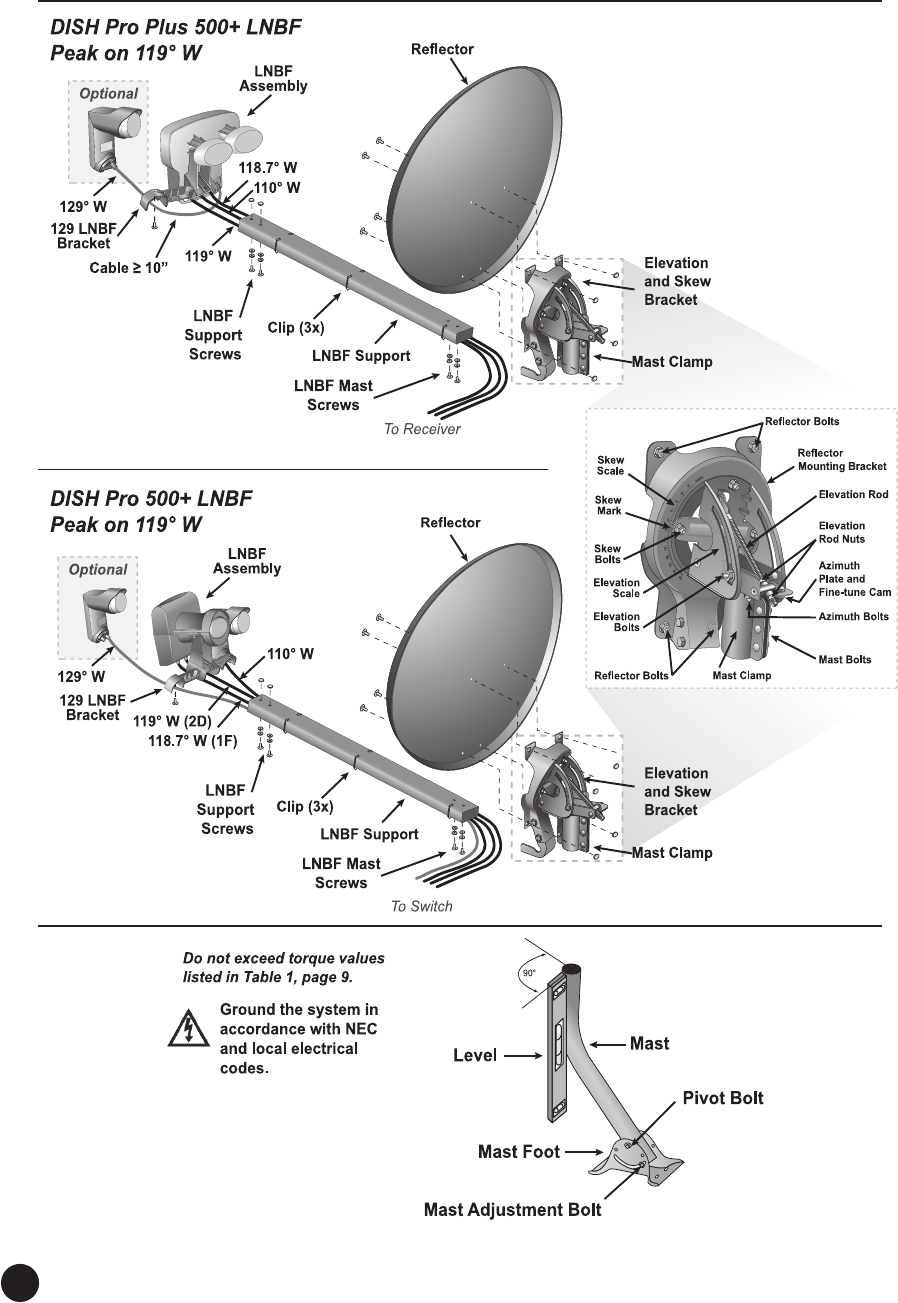
This antenna assembly includes enhanced peaking controls for the azimuth and elevation settings that provide
the ability to more easily obtain an optimal peaking of the antenna system. Refer to Figure 1 on page 2 for
more details on the enhanced peaking controls.
Thene-tuneazimuthandelevationsettingsrequiretheuseofa1/2”wrench.
About the System
This system supports both DISH Pro and DISH Pro Plus 500+/1000+ LNBF assemblies.
The DISH Pro 500+ LNBF assembly provides reception from the 110°W, 118.7°W, and 119°W orbital
locations and supports a switch. Use a DISH Pro 34 (DP34) switch, DISH Pro Plus 33 (DPP33) switch, or
DISH Pro Plus 44 (DPP44) switch with the DISH Pro 500+ LNBF.
The DISH Pro 1000+ LNBF assembly provides reception from the 110°W, 118.7°W, 119°W, and 129°W
orbital locations. Use a DPP44 switch with the DISH 1000+. The DISH Pro 1000+ LNBF assembly uses the
included bracket to mount a DISH Pro Dual or DISH Pro Single to the DISH Pro 500+ LNBF assembly to
support the 129°W orbital location.
The DISH Pro Plus 500+ LNBF assembly provides reception from the 110°W, 118.7°W, and 119°W orbital
locations and does not require a switch for up to three receivers. If there are more than three receivers, a DISH
Pro Plus 44 (DPP44) switch can be added to support four receivers.
The DISH Pro Plus 1000+ LNBF assembly provides reception from the 110°W, 118.7°W, 119°W, and 129°W
orbital locations. The DISH Pro Plus 1000+ LNBF assembly uses the included bracket to mount a DISH Pro
Single to the DISH Pro Plus 500+ LNBF assembly to support the 129°W orbital location. The DISH Pro Single
connects to the DISH Pro Plus 500+ LNBF through the LNB In port.
Installation Instructions
2
Quick Installation Instructions
Figure 1. DISH 500+ and DISH 1000+ Antenna System Overview

3
1. Find Elevation/Skew/Azimuth angles for the DISH 500+ or DISH 1000+ and your location (instructions on
page 4 and tables begin on page 15).
2. Findalocationforthereectorwithaclearlineofsightandasturdymountingsurface(page4,step1).
3. Mount the mast, making sure it is absolutely vertical (page 4, steps 2-4). Attach struts to the mast, using the
instructions that came with the struts.
4. Assemble the antenna assembly, setting the skew and elevation angles during assembly (pages 4-5, steps 5-7).
5. Mounttheantennaassemblyonthemastandpointthereectortotheazimuthangle(page6,step8).
6. For DISH 1000+ only, attach the 1000+ LNBF bracket and a separate DP (Dual or Single) LNBF to the DISH
Pro500+orDISHProPlus500+LNBFassembly(page6,step9).
7. Run coaxial between the antenna system and the receiver(s) including the Node in DPX installations, leaving a
service loop around the Mast Clamp (page 8, step 1).
8. Using a peaking meter attached to either the Dual Band LNBF Port 2D (DISH Pro 500+) or Port 1 (DISH Pro
Plus500+),roughpeakthereectoron119°Wusingtransponder13formaximumstrength(pages7-9,steps
1-4).Lockthemastbolts(seeTable1,page9)andreconrmsignal(seepage9,step4).
9. For the DISH Pro 500+ LNBF (Dual Band), move the temporary peaking cable from Port 2D to Port 1F.
For the DISH Pro Plus 500+ LNBF and if using a meter not capable of selecting orbits, move the temporary
peaking cable to Port 3. For the DISH Pro Plus 500+ LNBF and if using a meter capable of selecting orbits,
continuetothenextsentence.Usingtheazimuthne-tunecam,ne-tunetheazimuthangletoachieve
maximumsignal,ne-peakingon118.7°Wandtransponder13.TightentheazimuthboltslabeledwithaTand
reconrmsignal(seeFigure8,page10).Donottightentheazimuthne-tunecam(seepage10,step5).
10. Usingtheelevationrod,ne-tunetheelevationangletoachievemaximumsignal,ne-peakingon118.7°W.
TightenthetopelevationrodnutandthentightentheelevationboltsmarkedT.Reconrmsignalafter
tighteningallelevationbolts(seepage10,step6).
11. For switch installation with DISH Pro 500+ LNBF: Connect the switch cables from the DISH Pro 500+
LNBF’s Port 1F (118.7°W) and Port 2D (119°W) and the DP Single or DP Dual(s), if being used, to the
switch, leaving a service loop around the elevation and skew bracket. Attach cables to the LNBF support using
included cable clips (page 11, step 7).
For installation with the DISH Pro Plus 500+ LNBF (supports up to three receivers): Connect cables to
Port 1, Port 2, and Port 3, leaving a service loop around the elevation and skew bracket. These cables connect
the LNBF to the receive (see step 11). If using a DISH 1000+, run a cable (at least 10 inches) from the port on
the DP Single or DP Dual LNBF to the LNB In port of the DPP 500+ LNBF. Attach cables to LNBF support
using included cable clips (page 11, step 7).
For switch installation with DISH Pro Plus 500+ LNBF (supports up to four receivers): Connect the switch
cables from the DISH Pro Plus 500+ LNBF’s Port 1, Port 2, and Port 3 to the switch, as needed, leaving a
service loop around the elevation and skew bracket. If using a DISH 1000+, connect the DP Single or DP Dual
to the switch; the LNB In port of the DISH Pro Plus 500+ LNBF is disabled with a switch. Attach cables to the
LNBF support using included cable clips (page 11, step 7).
12. Connect the cables coming from either the DISH Pro Plus 500+ LNBF or from a switch to either a DPP
triplexer or separator or a receiver. If connecting to a DPP triplexer or separator, connect the DPP triplexer or
separator to a receiver. Connect the TV to the receiver (page 11, steps 8 and 9). Some restrictions apply when
connecting legacy receivers (refer to the switch’s installation instructions).
13. IftheReceiverSetupWizardappears,continuewiththeon-screenprompts;whennished,continuewith
step 14. If a Receiver Setup Wizard does not appear, run Check Switchtestandconrm110°W,and119°W
reception (pages 12-13, steps 10 and 11). You may or may not see the 118.7°W or 129°W locations until steps
14 and 15 below are completed.
14. Take a software download, if you did not already (page 13, step 12).
15. Run a second Check Switchtestandconrm110°W,118.7°W,119°W,and129°W(forDISH1000+)
reception (page 14, step 13).
16. Install additional receiver(s), if necessary (page 14, step 14 and pages 11-14, steps 8-13).

4
Locating the Antenna Assembly
Use the Reector Pointing Angles thatbeginonpage15tondtheelevation,skew,andazimuthangles
using your location’s ZIP code. DISH 500+ and DISH 1000+ use slightly different skew angles.Ensure
you choose the correct set of angles for the antenna system you are installing. Write the angles in the
space provided below.
Usingtheseelevationandazimuthangles,ndamountinglocationfortheantennaassemblywhereit
canbepointedtowardthesatelliteslocatedattheseangles.Useacompassandazimuthangletondthe
directionalongthehorizonwherethereectorshouldbepointed.Thenusetheelevationangletondout
how high the satellites are in the sky from your location. Make sure this line of sight will not be blocked
by future growth of nearby trees or other foliage. Also make sure your mounting location provides
sufcientclearancetorotatethereectorasneededtopointtowardthesatellites.
Assembling and Mounting the Antenna System
Follow these instructions to assemble the antenna system, mount it, and point it in the direction of the
satellites.
Find location for the reector.Usingacompassandtheazimuthandelevationangles,nd
alocationforthereectorwhereitcanbepointedtowardthesatelliteslocatedattheangles
provided in the Reector Pointing Angles tables. Make sure nothing blocks the line of sight
betweenthereectorandthesatellites.
Mount mast to solid surface. Mountthemasttoasolidsurfacesothatthereectorcannot
move or be bumped out of alignment. Keep in mind that physical and environmental conditions
canblockyourreector’sabilitytoreceiveaclearsatellitesignal.Nevermounttheantenna
assembly to a tree or a public utility pole.
Install struts. Install struts at this time, using the instructions that came with the struts.
Align mast vertically. Align the top part of the mast so that it is absolutely vertical. If the top
partofthemastisoffverticalbyonlyafewdegrees,itwillbedifcultormaybeevenimpossible
foryoutondthesatellites.Takeatleasttworeadingswithalevel,ontheuppermast,thatare
90 degrees apart from one another (see Figure 1).
Assemble the antenna assembly without LNBF. Assemble the antenna assembly as
shown in Figure 1, except do not attach the LNBF assembly at this time.
1.
2.
3.
Elevation: Skew: Azimuth:
4.
5.
5
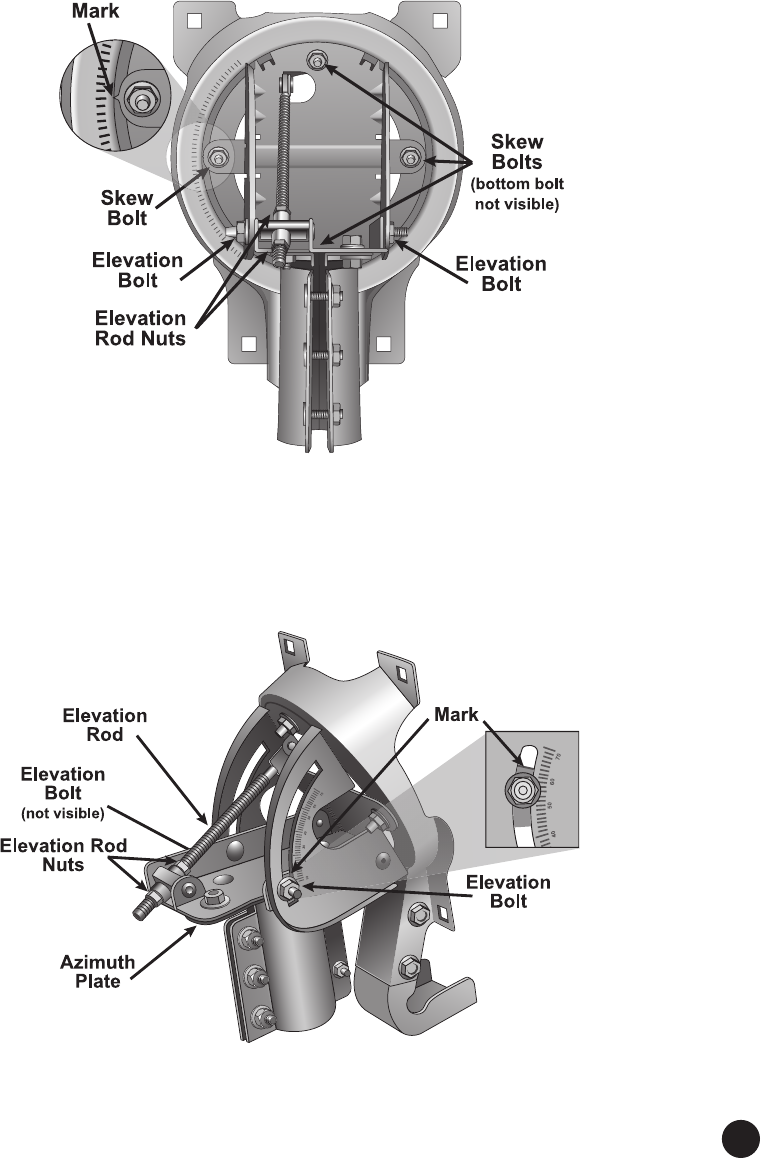
Set skew. To access the skew bolts, loosen the elevation bolts and elevation rod nuts. Loosen
the skew bolts. Set the skew by rotating the elevation and skew bracket to align the mark with the
required angle on the skew scale that you entered on page 4 (see Figure 2). Tighten the skew bolts
securelytokeepthereectorfromrotating.SeeTable1onpage9fortherequiredtorquevalues.
Note: Aftertheskewisset,donottrytone-tunetheskewanglewhenaimingthereector.
Figure 2. Skew Plate
Set elevation. Set the elevation by loosening the elevation bolts and elevation rod nuts. Tilt the
elevation and skew bracket to align the edge of the azimuth plate with the required angle on the
elevation scale. Tighten both nuts on the elevation rod to hold the elevation, but do not tighten the
elevation bolts at this time (see Figure 3).
Figure 3. Setting the Rough Elevation Angle
7.
6.
6
Mount the reector on the mast and point the reector. Slidethereectordownonto
themast.Makesuretheazimuthplaterestsontopofthemast.Turnthereectorsothatitpoints
in the general direction of the satellites, using the azimuth angle you wrote on page 4.
Note: The DISH 500+ mast clamp may have a gripping feature that helps prevent movement of
the mast clamp when fully installed. This gripping feature may have a slightly rough feel when
installing the mast clamp onto the mast or when adjusting the azimuth angle.
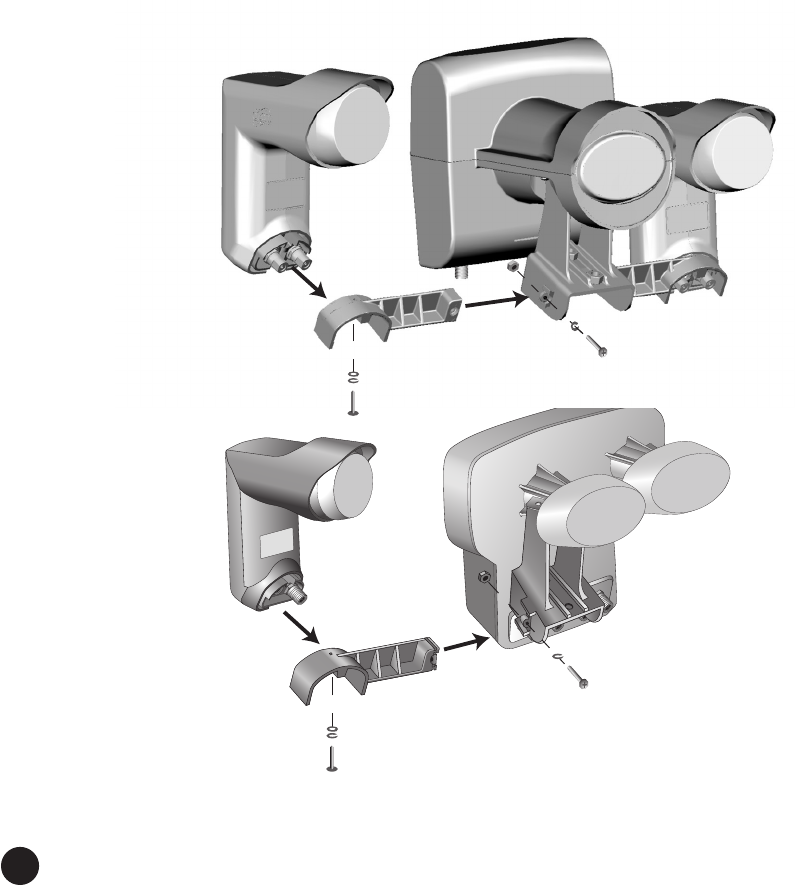
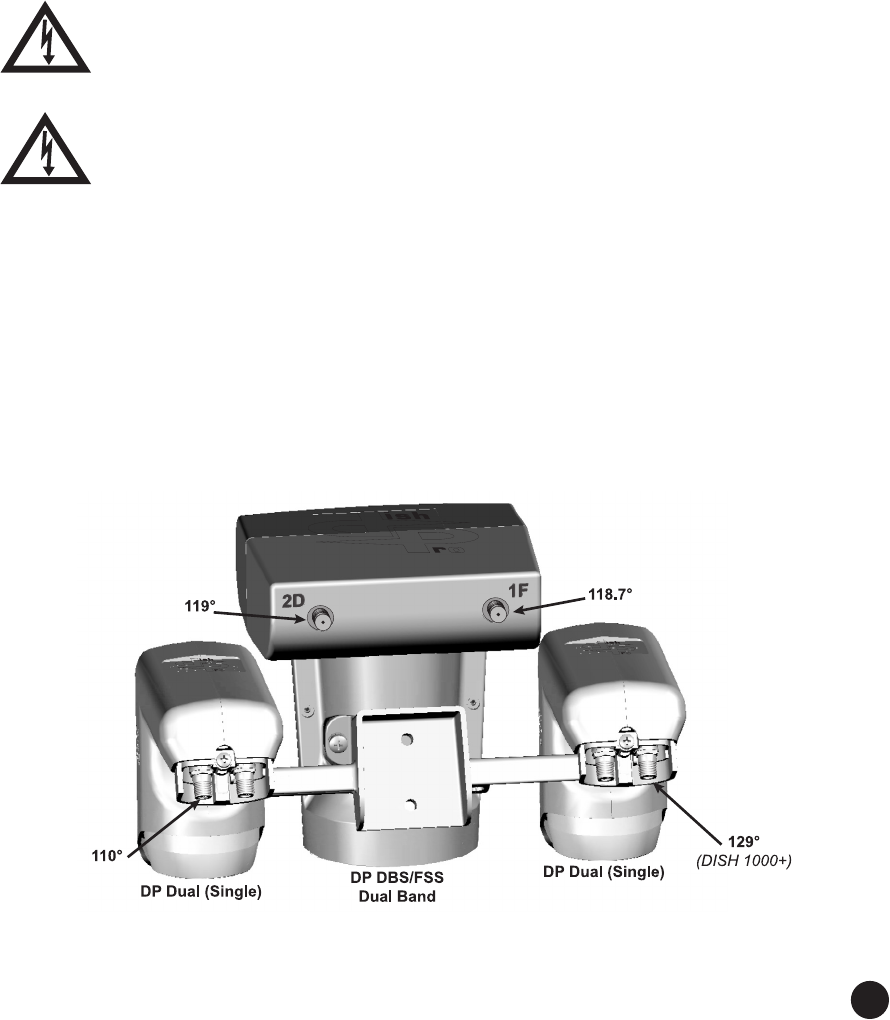
For DISH 1000+ installation, attach LNBF. For DISH 1000+ installations, attach a separate
DP Dual (or DP Single) to the 1000+ LNBF bracket using the included washers and screws. Slide
the bracket onto the DP 500+ LNBF assembly. Place the nut into the retaining feature on the
back of the assembly. Insert the screw from the front of the assembly and tighten according to the
torque value (see Table 1 on page 9) to attach the bracket. See Figure 4.
Note: Handle the LNBF assembly using the DBS/FSS Dual Band LNBF. Do not handle it by the
110°W or 129°W brackets or LNBFs.
Figure 4. Optional bracket for attaching DP Dual (or DP Single) for 129°W
8.
9.
7
Completing Installation
Use the steps below while referring to Figure 1, page 2 for this installation.
Note:UseRG-6coaxialconnectionsbetweentheantennasystemandtheswitchandfromtheswitch
to the receiver location(s), using the following cable requirements. Grounding, other devices, and in-
home cabling must also meet these requirements.
• RG-6coaxialcablesratedforatleast950MHzto3GHzmustbeusedinthisinstallation.Do
not use existing cables such as RG-59 as it may cause signal loss. Also, be sure that any outdoor
connections are made using waterproof F-connectors rated for 3 GHz or greater.
• Follow the installation instructions included with the switch for cable length limitations.
The coaxial connection’s center conductor must not extend past the rim of the
F-connector;itmustbemorethanushwiththeF-connectorandnomorethanthe
thickness of a nickel.
Tighten all outdoor coaxial connections up to the torque values recommended by the
manufacturer to ensure seal against moisture. Damage caused by over-tightening is not
covered by the limited warranty. Tighten all indoor coaxial connections to the receiver
only by hand. If you use a wrench, you may over-tighten the connections and damage
your equipment.
Mount LNBF onto LNBF support. Mount the LNBF assembly on the LNBF support as
shown on Figure 1 (see page 2).
Connect peaking meter to LNBF. Connect a temporary cable to a peaking meter.
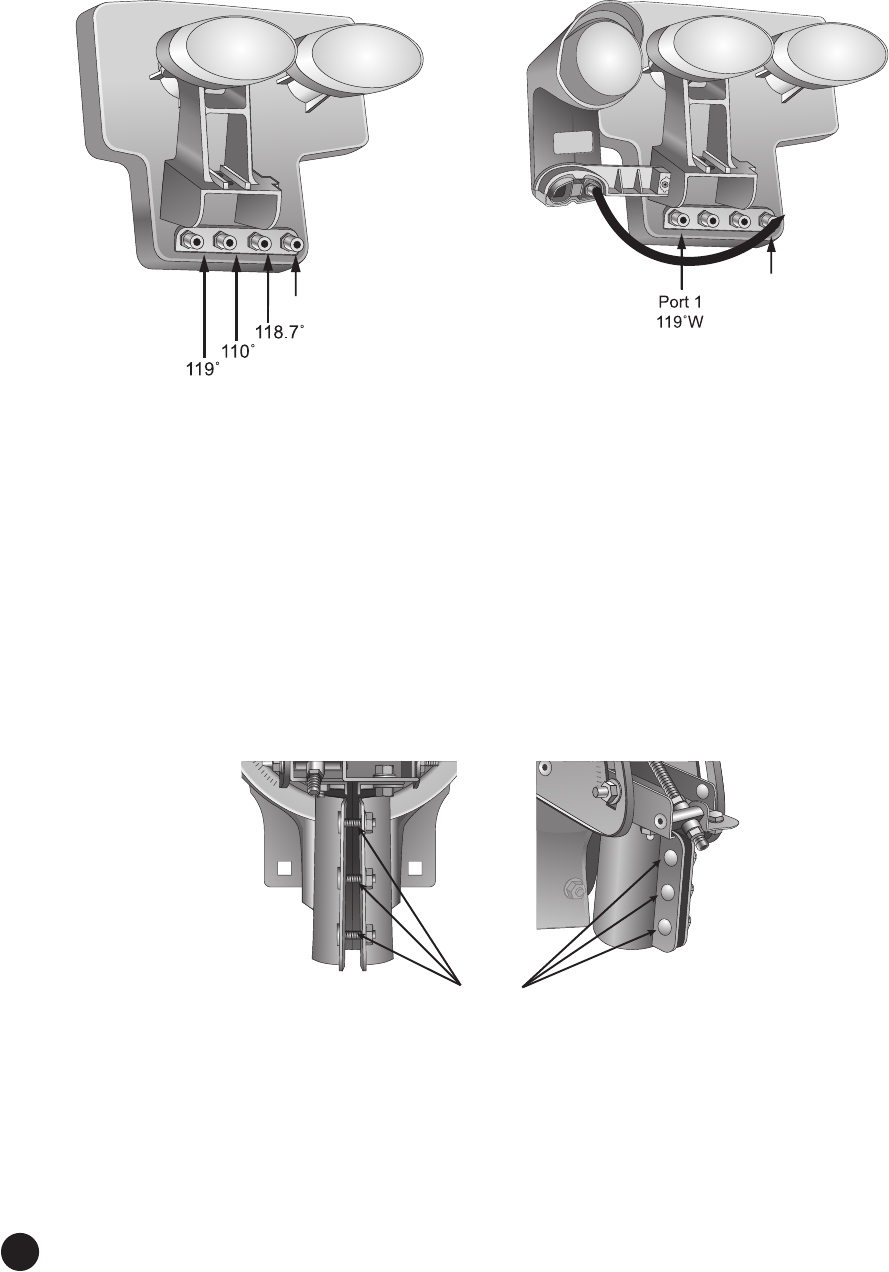
For the DISH Pro LNBF assembly: Connect the temporary cable to Port 2D (119°W) of the
DISH Pro DBS/FSS Dual Band LNBF. Port 2D provides signal from the 119°W satellite, while
Port 1F provides signal from the 118.7°W satellite (see Figure 5).
Figure 5: Bottom view of LNBF Assembly showing Port 2D (119°W) and
Port 1F (118.7°W) on DBS/FSS Dual Band LNBF
1.
2.
8
For DISH Pro Plus LNBF assembly: Connect the tempoary cable to Port 1 (119°W) of the
LNBF(seeFigure6).
Figure 6: DISH Pro Plus 500+ and 1000+ LNBF Assembly with Port 1 (119°W)
Peak the reector for signal on the 119°W.Peakthereectorforsignalonthe119°W
satellite sign and transponder 13 using the azimuth and elevation settings you wrote on page 4.
Do not adjust the skew.
Note:Ifyoucannotndthe119°Wsignal,tryadjustingtheelevationupordownoneortwo
degrees.Ensureyouarepeakingthereectorusingtransponder13.
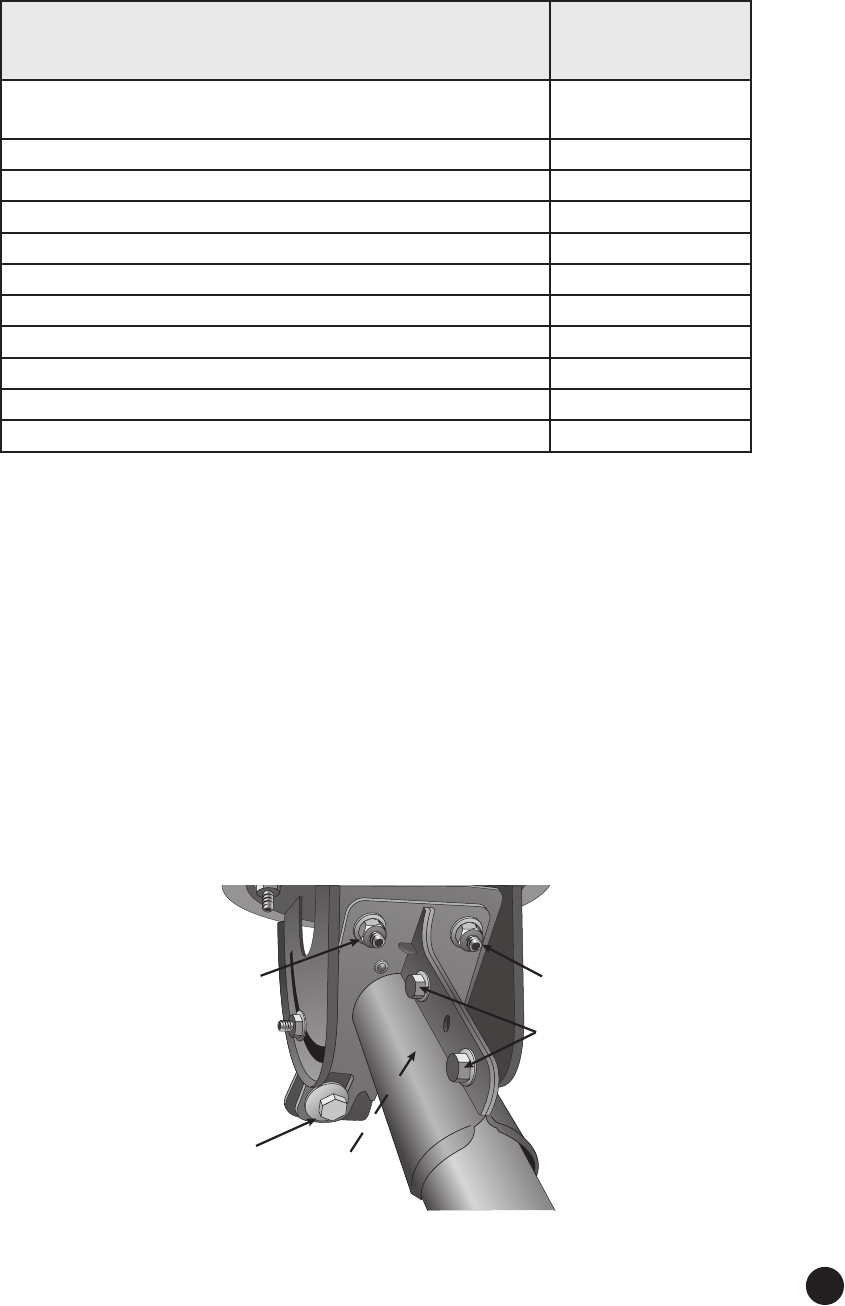
Tighten three mast bolts and reconrm signal strength. With the peaking meter still
connected, tighten the three mast bolts labeled with a T to the torque values listed in Table 1 (see
Figure7).Reconrmsignalstrengthaftertighteningthebolts.
Figure 7. Mast bolts
4.
LNB In
LNB In
Mast
Bolts
3.
9
Table 1: Torque Values
Location
Torque Value
(ft-lbs unless
otherwise noted)
Pivot bolt (Mast foot; ensure no mast deformation occurs
during tightening)
4.5
Mast adjustment bolts 12
Reectormountingbolts 8
Mast bolts 12
Elevation bolts 12
Elevation rod nuts Handtight
Azimuthbolts(donottightenazimuthne-tunecam) 12
Skew bolts 12
LNBF support to elevation and skew bracket bolts 4
LNBF support to 129 LNBF bracket bolts 2
LNBF and LNBF bracket attachment hardware 2
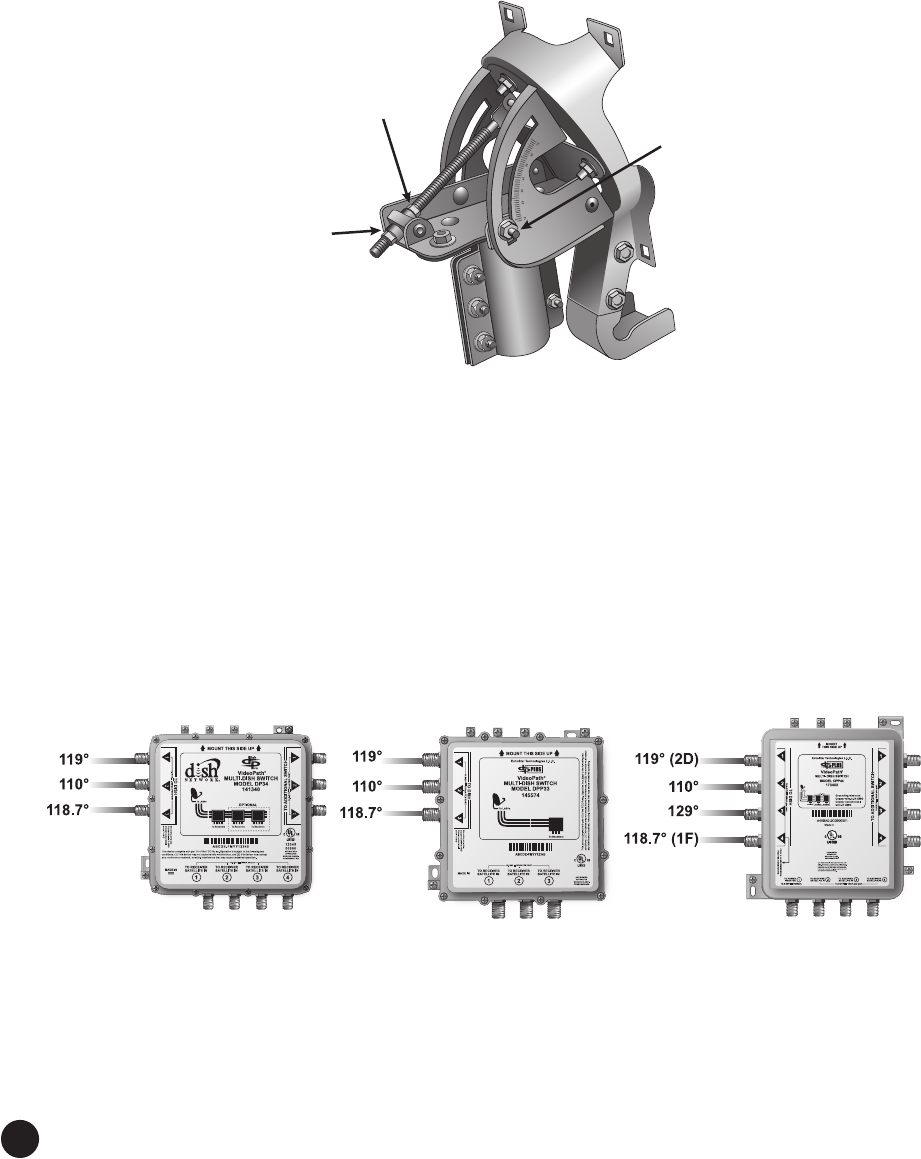
Fine-tune the azimuth angle. For the DISH Pro 500+ (Dual Band) LNBF, move the
temporary peaking cable from Port 2D to Port 1F. For the DISH Pro Plus 500+ LNBF and if
using a meter that is not capable of selecting orbits, move the tempoarary peaking cable to
Port 3. For the DISH Pro Plus 500+ LNBF and if using a meter that is capable of selecting orbits,
continuetothenextsentence.Withthepeakingmeterstillconnected,ne-tunetheazimuthangle
(see Figure 8). Loosen the three azimuth bolts enough so that the two azimuth plates can rotate.
Usinga1/2”wrench,rotatetheazimuthne-tunecamtoadjusttheazimuthangletoachieve
maximum signal, using the 118.7°W satellite and transponder 13. After obtaining maximum
signal, tighten the three azimuth bolts labeled with a T to the recommended torque value given in
Table 1 on page 9. Do not torque the azimuth ne-tuning cam.
Note:Youcanadjusttheazimuthanglethreedegreesineitherdirectionusingtheazimuthne-
tune cam. If the azimuth angle needs to be adjusted more than three degrees, loosen the mast bolts
to make the adjustment.
Figure 8. Fine tuning the azimuth angle
5.
Azimuth
Bolt
Azimuth
Bolt
Mast
Bolts
Azimuth
Fine-tune
Cam
Do Not Tighten!
Azimuth
Bolt
(Not Shown)
10
Fine-tune elevation angle.Usingthepeakingmeter,ne-tunetheelevationangle.Usinga
1/2”wrench,loosenthetopelevationnutontheelevationrodtoallowthereectortobemoved
up and down in elevation. Move the bottom elevation nut along the elevation rod to adjust
thereector’selevationangleandtoacievemaximumsignal,usingthe118.7°Wsatelliteand
transponder 13. After obtaining maximum signal, tighten the top elevation nut on the elevation
rod, then tighten the elevation bolts labeled with a T to the recommended torque value given in
Table 1 on page 9 (see Figure 9).
Figure 9. Fine tuning the elevation angle
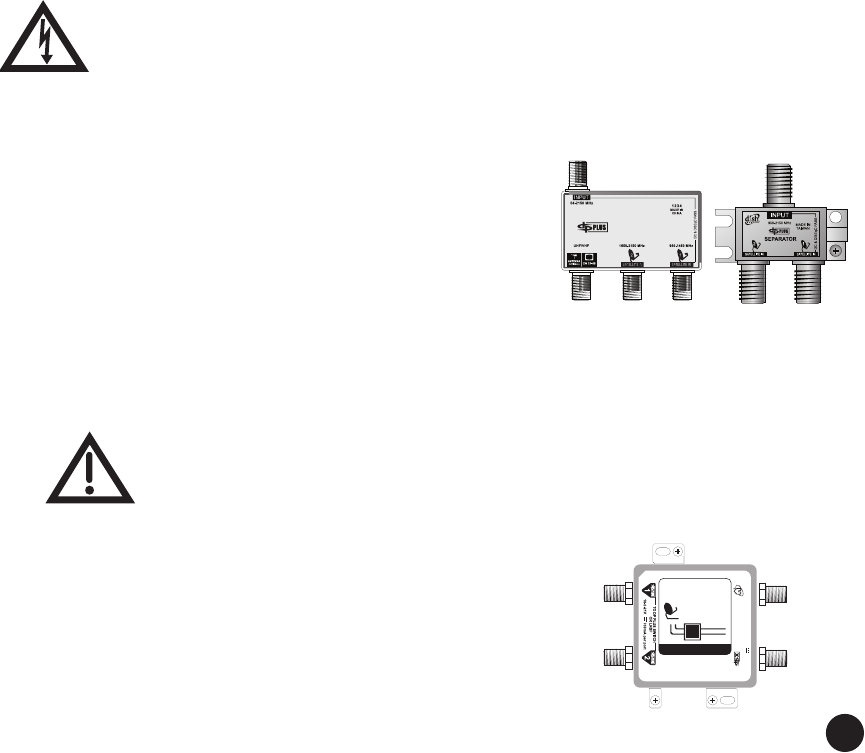
Connect cables to LNBF and/or swtich, if a switch is being used. Remove the
temporarycableusedforpeakingthereector.
For switch installation with DISH Pro 500+ LNBF. Connect a cable from Port 2D (119°W) to
Port 1 of the switch. Connect a cable from Port 1F (118.7°W) of the DISH Pro 500+ LNBF to
the switch (see Figure 10). If a DP Single or a DP Dual LNBF(s) is being used (DISH Pro 1000+),
connect a cable(s) from the LNBF to the switch (see Figure 5). See Figure 10 for DISH Pro 500+
recommended connection order to a DP34 or DPP33 switch and for DISH 1000+ recommended
connection order to a DPP44 switch. Refer to the switch’s instlalation instructions for additional
details. Leave a service loop around the elevation and skew bracket. Attach the cables to the
bottom of the LNBF support using the included cable clips.
Figure 10. DISH Pro 500+ to DP34 Switch, DISH Pro 500+ to DPP33 Switch, and
DISH Pro 1000+, DISH Pro Plus 500+, and DISH Pro Plus 1000+ to DPP44 Switch
6.
Top
Elevation
Nut
Elevation
Bolt
Bottom
Elevation
Nut
7.
11
For installation of the DISH Pro Plus 500+ LNBF (supports up to three receivers): Connect
the cables from Port 1, Port 2, and Port 3, leaving a service loop around the elevation and skew
bracket. These cables are using in Step 8 for connecting the receiver or DPP triplexer/separator if
needed. If using a DISH 1000+, run a cable, at least 10 inches, from a port on the DP Single LNBF
or DP Dual LNBF to the LNB In port of the DPP 500+ LNBF. Attach the cables to the bottom of
the LNBF support using the included cable clips.
For installation of the DISH Pro Plus 500+ LNBF with a switch (supports four receivers):
Connect the switch cables from the DISH Pro Plus 500+ LNBF’s Port 1, Port 2, and Port 3 to the
switch (see Figure 10). If using a DISH 1000+ and a switch, connect the DP Single or DP Dual
to the switch (see Figure 10); the LNB In port of the DISH Pro Plus 500+ LNBF is disabled when
using a switch. Leave a service loop around the elevation and skew bracket. Attach the cables to
the bottom of the LNBF support using the included cable clips.
Connect LNBF and receiver, which is not powered on. For DP or DPP installations,
connect a coaxial connection from either the switch’s port(s) or the DPP 500+ LNBF’s receiver
ports to a DPP triplexer or separator or to a receiver’s Satellite In connection(s). If connecting to a
DPP Triplexer or Separator, connect the DPP Triplexer or Separator to the receiver. For DISH Pro
X installations, connect a coaxial connection from either the LNBF Port 1 (or Port 2 or Port 3) or
the switch’s port(s) to a Node (two connections to a Single Node and three connections to a Duo
Node), and from the Node, connect to the DISH Pro X receiver.
Tighten all indoor coaxial cable connections to the receiver only by hand. If you use a
wrench, you may over-tighten the connections and damage your equipment.
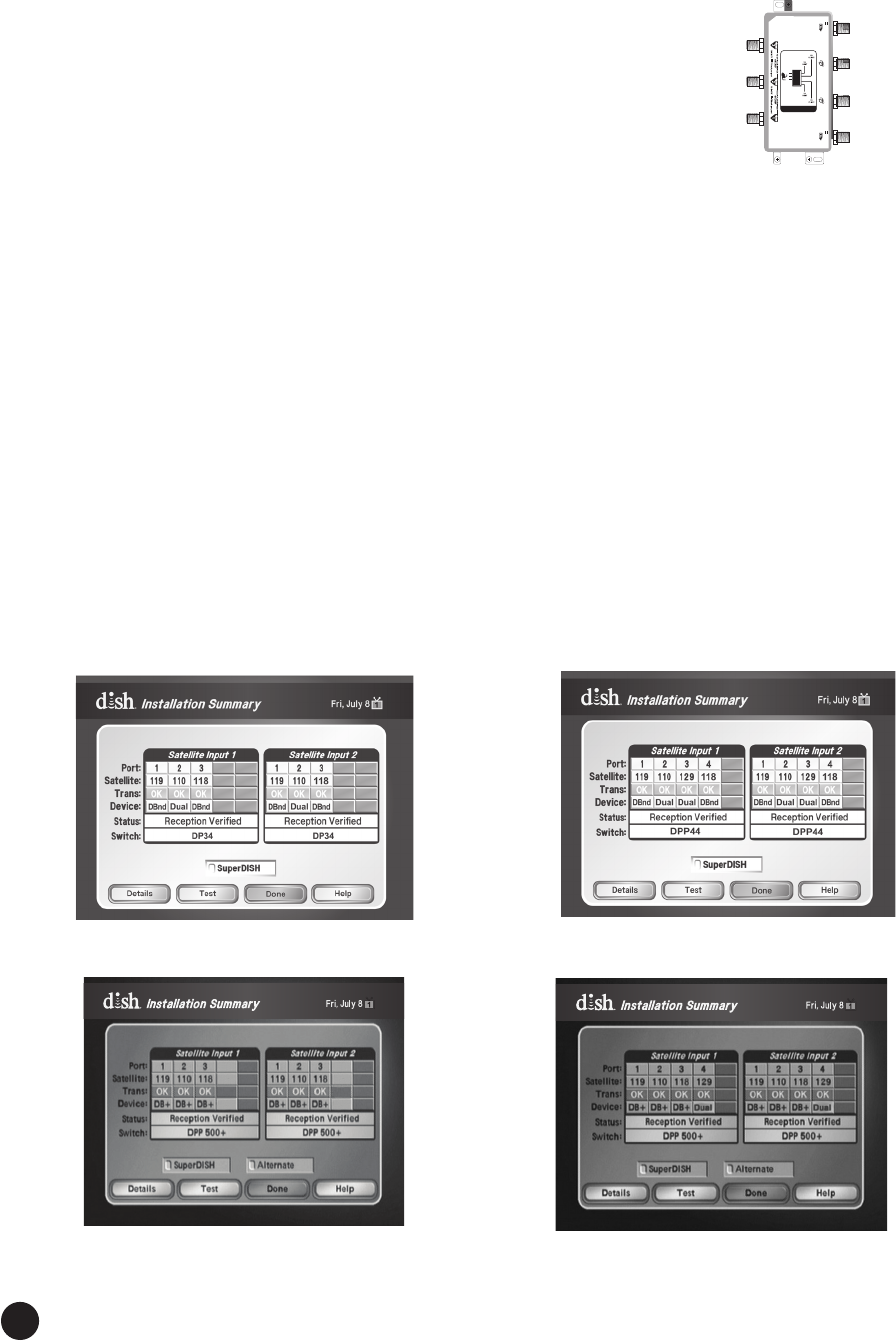
Connecting DPP Receivers
To connect DISH Pro Plus (dual-tuner) receivers with a single
coaxial connection, install a DISH Pro Plus Triplexer or a
DISH Pro Plus Separator as follows:
a. Connect a coaxial connection from the LNBF output
(Port 1, Port 2, or Port 3) to the DISH Pro Plus
Triplexer or DISH Pro Plus Separator Input.
b. Connect coaxial connections between the receiver’s
Satellite In 1 and Satellite In 2 to Satellite In 1 and
Satellite In 2 respectively on the DISH Pro Plus Triplexer or DISH Pro
Plus Separator.
You must use a DISH Pro Plus Triplexer or DISH Pro Plus Separator to achieve a
single-coaxial connection installation with a dual-tuner receiver. A splitter or
otherdevicewillnotworkinthisconguration.
Connecting DPX Receivers
a. Connect a coaxial connection from the LNBF output
(Port 1, Port 2, or Port 3) to either a Solo or Duo Node.
The LNBF output goes into the Node (either Port 1,
Port 2, or Port 3 for a Duo or Port 1 or Port 2 for a Solo
Node).
MMTTVV-FMYYXXXXX
SOLO NODE
185834
TO
SERVER
TO LNBFs TO
CLIENT
TO SERVER
10.5-28V
Grounding wire size: Copper wire-8-14 AWG
Copper coated steel wire-17 AWG
EchoStar Technologies L.L.C.
TO CLIENT
To LNBF
To DPX
Receiver
To Home
Network
8.
To Port 1 or 2
on the LNBF
To DP Plus
Receiver
To Port 1 or 2
on the LNBF
To DP Plus
Receiver
TRIPLEXER
175284
EchoStar
Technologies L.L.C.
12
b. From the Node’s DPX port, connect a coaxial connection to the
DPX receiver’s To Node DPX port.
c. Connect the Node to the DPX receiver and to the Home
Network. For additional information, see the
Product Launch Bulletin, Whole-Home HD DVR System.
Connect TV and receiver. Connect the receiver(s) to the TV(s) and power on the receiver(s)
and the TV(s). If a Receiver Setup Wizard displays, follow the on-screen prompts for this Wizard
to program the remote to the receiver, download software, and run Check Switch. Proceed to
step 8 after the Receiver Setup Wizard is complete.
Note:TheDownloadSoftwarestepoftheReceiverSetupWizardfailstoproceedifthereector
is not pointed correctly. If you see a pop-up instructing you to make sure that all cables leading to
thereceiverareconnectedsecurelyandcorrectly,verifyyourreectorispointedcorrectlybefore
selecting Continue on this screen.
If a Receiver Setup Wizard does not appear, display the Point Dish screen (if not shown, for most
receivers, press MENU-1-1 if in Factory software or MENU-6-1-1 if in Production software on
the remote control) and continue to step 10.
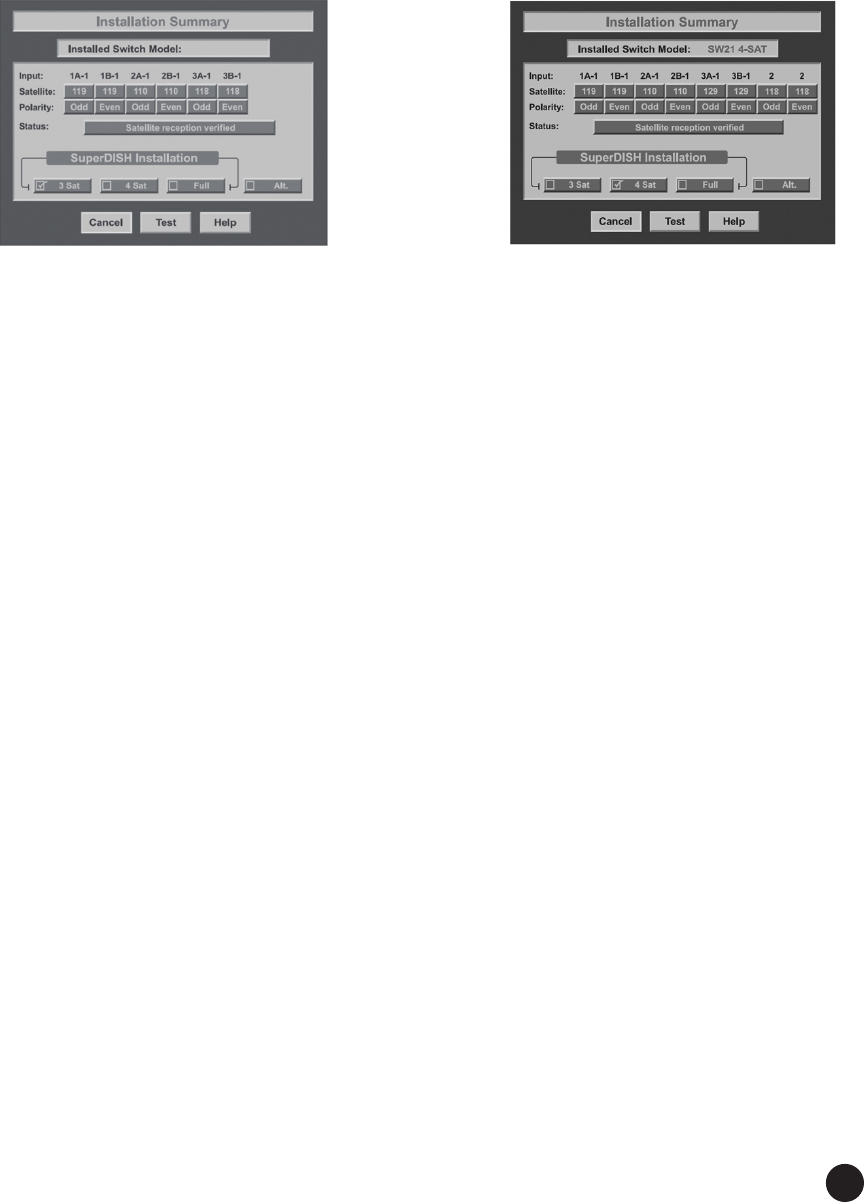
Follow instructions provided in the Installation Wizard or Run Check Switch. If
the Receiver Setup Wizard appears, follow the instructions provided and continue with step 13;
otherwise, from the Point Dish screen, run Check Switch. When the Check Switch procedure
nishes,youshouldseeanInstallation Summary screen similar to the ones shown in Figures
11, 12, 13, or 14. Make sure the summary screen shows reception from the 110°W, 118.7°W, and
119°W (and129°W for DISH 1000+) satellites on all available satellite tuners. The Installation
Summary screen only displays if you have run Check Switch.
9.
10.
MMTTVV-FMYYXXXXX
TO CLIENTT O CLIENT
EchoStar Technologies L.L.C.
Grounding wire size: Copper wire-8-14 AWG
Copper coated steel wire-17 AWG
T
O
L
N
B
F
S
DUO NODE
185836
TO HOST
10.5-28V
TO HOST
10.5-28V
To
LNBF
To Home
Network
To DPX
Receiver
To DPX
Receiver
Figure 11. DISH 500+
Installation Summary
Figure 12. DISH 1000+
Installation Summary
Figure 13. DISH 500+ with DPP
500+ LNBF Installation Summary
Figure 14. DISH 1000+ with DPP
1000+ LNBF Installation Summary
13
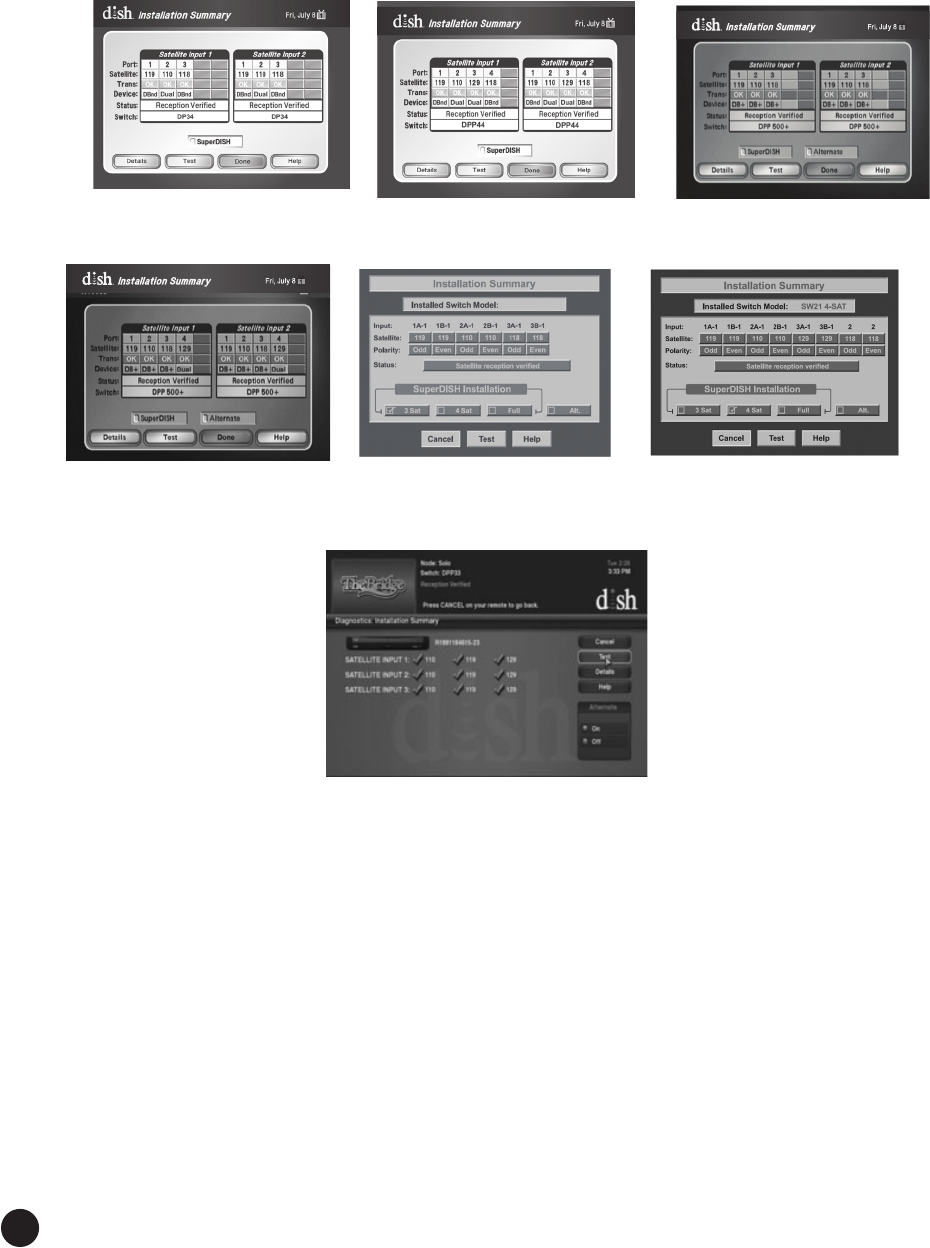
Thesummaryscreensbelow(seeFigures15and16)aresimilartowhatshouldbeshownfora
legacy receiver connected to the DISH 500+ or DISH 1000+. Make sure the summary screen
shows reception from 110°W, 118.7°W, and 119°W (and 129°W for DISH 1000+) satellites on
all available satellite tuners. Select 3 SAT or 4 SAT for DISH 500+ or DISH 1000+ on a legacy
receiver.
Figure 15. DISH 500+ Figure 16. DISH 1000+
Installation Summary Installation Summary
Verify signal strength bar is green and locked. Exit the Installation Summary screen to
display the Point Dish/Signal screen. Make sure the signal strength bar is green and locked for
the 119°W, 110°W, 118.7°W (and 129°W for DISH 1000+) satellites.
Note: You might not see signal from 118.7°W and/or 129°W until you take a software download
and run a check switch in step 10.
Take a software download. Exit the Point Dish/Signal screen and follow the on-screen
instructions for taking a receiver software download. Do not disturb the receiver during the
process of downloading software. If exiting the Point Dish screen does not start the download
process, put the receiver in standby mode for at least 20 minutes (on most receivers) to allow the
receiver to take a software download.
11.
12.
14
Run Check Switch. Run Check Switchagainandconrmreceptionfor110°W,119°W,and
118.7°W satellites if using DISH 500+ and for 110°W, 119°W, 129°W, and 118.7°W satellites if
usingDISH1000+(seeFigures17,18,19,20,21,22,and23dependingonyourconguration).
Install additional receivers. If installing an additional receiver, follow steps 7 through 13,
pages 10-12. Make sure the Installation Summary screen shows reception from the 110ºW,
119ºW, and 118.7°W satellites for DISH 500+ and from the 110ºW, 119ºW, 129ºW, and 118.7°W
satellites for DISH 1000+. If using a legacy receiver, keep a DISH Pro, DISH Pro Plus, or a DISH
Pro X receiver connected and powered at all times to power the LNBF.
13.
14.
Figure 17. DISH 500+
Installation Summary
Figure 18. DISH 1000+
Installation Summary Figure 19. DISH 500+
Installation Summary
Figure 20. DISH 1000+
Installation Summary
Figure 21. DISH 500+
Installation Summary
Figure 22. DISH 1000+
Installation Summary
Figure 23. XiP
Installation Summary
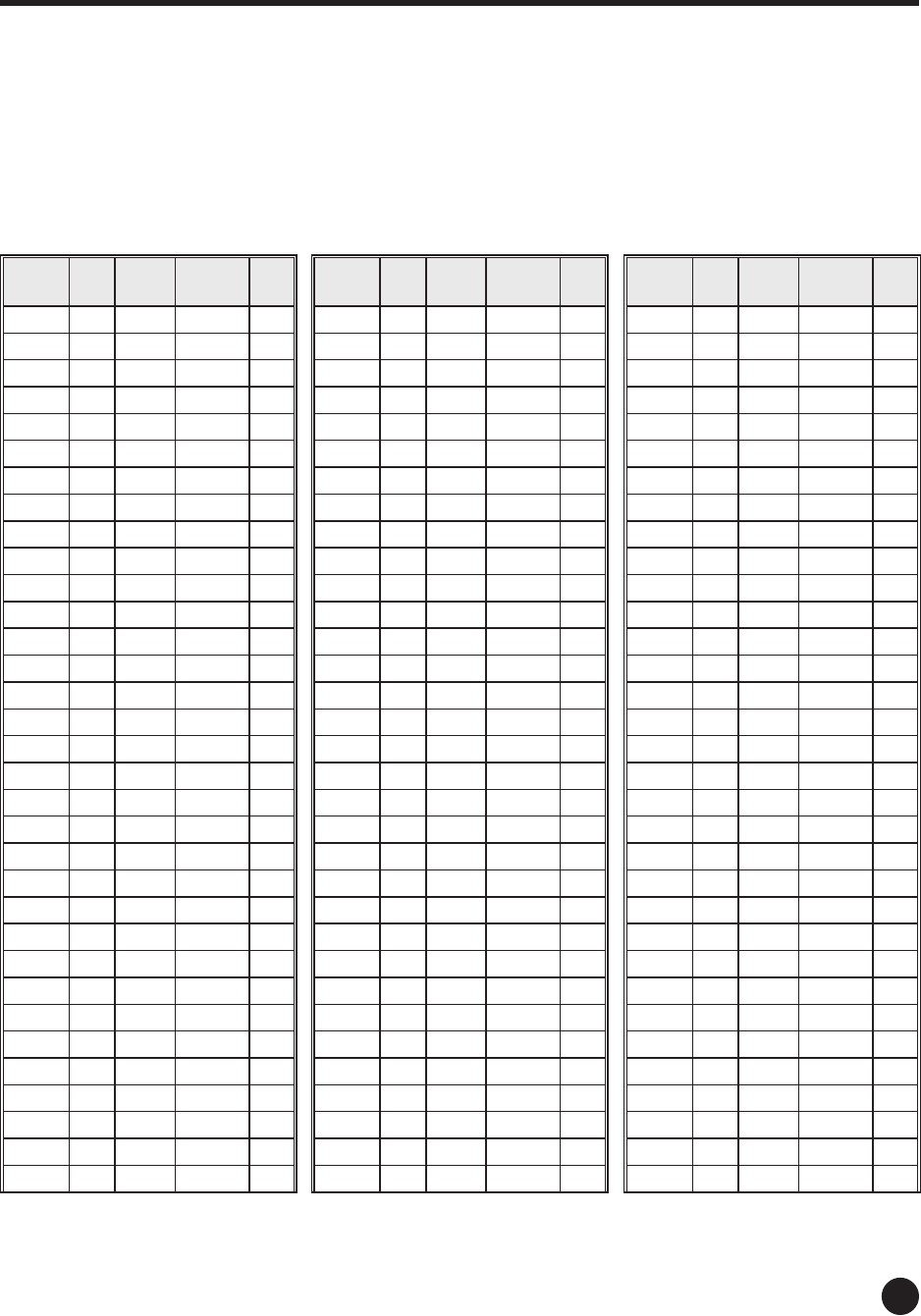
15
ZIP
Code EL D500+
SK
D1000+
SK AZ
00001 15 69 71 117
00002 12 77 78 120
00003 17 67 69 117
00004 16 71 73 120
00006 15 73 76 121
00007 9 77 78 116
00008 26 79 83 140
00010 11 69 71 115
00011 17 71 74 121
00013 45 83 89 162
00019 43 83 89 160
00020 46 84 90 164
00022 44 79 85 155
00025 42 83 89 160
00028 44 82 88 160
00031 49 81 88 161
00032 49 82 89 164
00033 44 83 89 162
00034 42 80 86 156
00035 42 82 87 158
00037 44 80 86 157
00038 43 81 87 158
00039 43 80 86 156
00040 46 83 90 164
00044 45 83 90 162
00047 44 81 87 158
00048 44 80 86 158
00049 42 80 85 155
00050 42 80 85 156
00051 45 83 89 161
00052 45 83 89 161
00054 42 79 85 155
00055 42 80 86 156
ZIP
Code EL D500+
SK
D1000+
SK AZ
00058 46 83 90 164
00065 44 82 88 161
00087 37 136 140 243
00097 39 139 142 244
00116 45 124 129 222
00119 44 126 131 225
00120 44 126 131 225
00124 44 123 128 222
00125 18 123 126 257
00126 20 124 126 255
00127 19 126 128 259
00128 20 124 126 254
00130 18 125 127` 258
00132 19 124 126 257
00133 20 124 127 256
00134 18 126 128 259
00135 19 124 126 257
00136 19 124 126 258
00137 18 124 126 259
00138 18 125 127 258
00139 20 125 127 255
00140 20 124 127 256
00141 18 125 127 259
00145 19 125 127 256
00147 20 125 127 256
00148 18 124 126 259
00151 18 126 128 260
00152 27 129 131 248
00155 28 128 131 246
00156 28 128 131 246
00157 28 128 131 246
00159 22 128 130 254
00160 29 110 113 216
ZIP
Code EL D500+
SK
D1000+
SK AZ
00161 29 109 113 214
00164 30 106 110 205
00165 30 106 110 206
00166 30 106 110 206
00168 21 125 127 255
00169 21 125 127 254
00170 20 124 127 254
00172 21 125 127 254
00173 21 125 127 254
00174 21 125 127 254
00176 21 125 127 254
00177 21 125 127 254
00179 21 125 127 254
00180 21 125 127 254
00181 21 125 127 254
00182 21 125 127 254
00183 21 125 127 254
00184 21 125 127 254
00185 21 125 127 254
00186 21 124 127 254
00187 20 124 127 254
00188 51 120 126 214
00189 50 119 126 214
00190 21 124 126 253
00191 21 124 126 254
00192 21 124 126 254
00195 36 81 86 153
00198 17 73 75 121
00199 51 93 100 179
00200 52 92 100 179
00201 51 96 104 183
00203 49 84 91 166
00205 47 84 91 165
Reector Pointing Angles
Use the tables below as follows:
1. Find the ZIP code for your location.
2.FindtherowthatcontainstheZIPcodeortherstthreedigitsoftheZIPcode.Forexample,thecorrectrow
for ZIP code 80112 is 801XX.
3.WritedownthenumberintheELcolumninthe“Elevation”blankonpage4.
4.WritedownthenumberintheSKcolumninthe“Skew”blankonpage4.
Note: The skew varies if using a DISH 500+ or DISH 1000+. Ensure you select the correct skew for the
antenna system you are installing.
5.WritedownthenumberintheAZcolumninthe“Azimuth”blankonpage4.
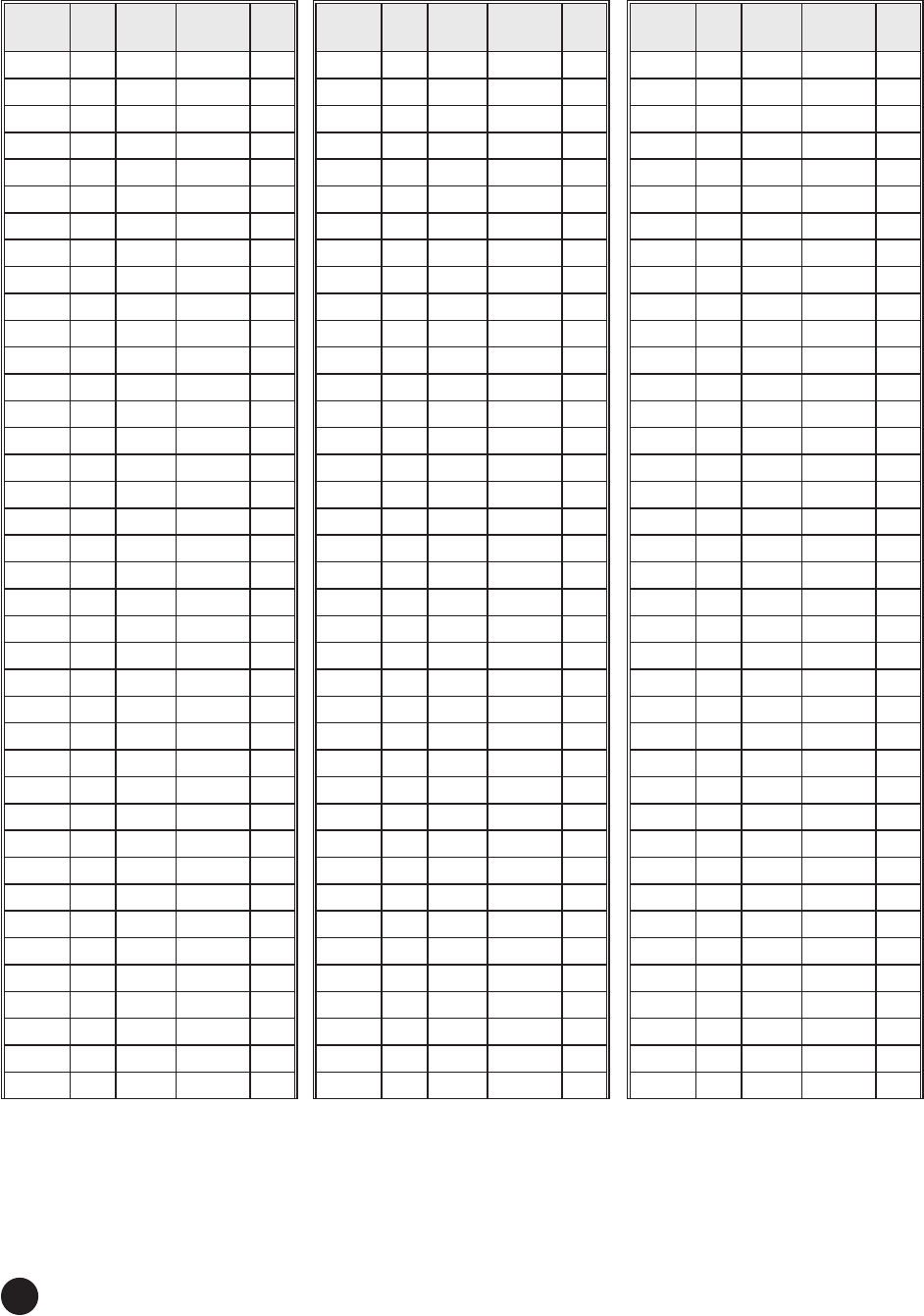
16
ZIP
Code EL D500+
SK
D1000+
SK AZ
00284 21 124 126 252
00285 25 127 129 250
00286 31 131 134 245
00401 24 126 129 250
00501 24 127 130 251
00544 24 127 130 251
006XX 28 156 157 268
007XX 28 156 157 268
008XX 26 157 158 270
009XX 27 156 157 268
010XX 23 126 129 252
011XX 23 126 129 252
012XX 23 126 128 251
013XX 23 126 128 252
014XX 22 126 129 253
015XX 22 126 129 253
016XX 22 126 129 253
017XX 22 127 129 254
018XX 22 126 129 254
019XX 22 127 129 255
020XX 22 127 129 255
021XX 22 127 129 254
022XX 22 127 129 254
023XX 22 127 130 255
024XX 22 127 129 255
025XX 22 128 130 255
026XX 22 128 130 256
027XX 22 127 130 254
028XX 23 127 130 253
029XX 22 127 130 253
030XX 22 126 128 254
031XX 22 126 128 254
032XX 22 125 128 253
033XX 22 126 128 254
034XX 22 126 128 252
035XX 21 124 127 254
036XX 22 125 128 252
037XX 22 125 127 253
038XX 21 126 128 254
ZIP
Code EL D500+
SK
D1000+
SK AZ
039XX 21 126 128 254
040XX 21 126 128 255
041XX 21 126 128 256
042XX 20 125 128 255
043XX 20 126 128 257
044XX 19 125 127 258
045XX 20 126 128 256
046XX 19 126 128 259
047XX 18 124 126 259
048XX 20 126 128 257
049XX 20 125 127 257
050XX 22 125 127 253
051XX 22 125 128 252
052XX 23 125 128 251
053XX 23 125 128 252
054XX 22 124 126 252
055XX 22 126 129 254
056XX 22 124 127 252
057XX 22 124 127 251
058XX 21 124 126 252
059XX 21 124 127 254
060XX 23 126 129 251
061XX 23 126 129 251
062XX 23 127 129 253
063XX 23 127 130 253
064XX 24 127 129 251
065XX 24 127 129 251
066XX 24 127 129 251
067XX 24 126 129 251
068XX 24 127 129 250
069XX 24 127 129 250
070XX 25 127 129 249
071XX 25 127 129 249
072XX 25 127 129 249
073XX 25 127 129 250
074XX 25 126 129 249
075XX 25 126 129 249
076XX 25 127 129 250
077XX 25 127 130 250
ZIP
Code EL D500+
SK
D1000+
SK AZ
00206 50 83 91 165
00214 50 81 89 163
00215 51 82 89 164
00216 51 82 90 164
00217 48 84 91 165
00218 44 82 88 160
00219 43 101 107 190
00222 37 134 137 241
00223 38 138 142 244
00225 37 136 139 243
00226 39 139 143 244
00228 38 139 142 245
00229 37 134 138 240
00232 39 136 140 241
00234 38 138 141 244
00236 40 88 94 167
00238 44 123 129 223
00241 29 109 112 213
00243 42 127 131 227
00246 35 93 97 174
00250 47 101 107 189
00252 50 102 109 191
00255 44 111 117 206
00257 39 80 86 155
00258 39 82 87 157
00259 41 81 87 157
00260 38 83 88 156
00266 43 94 100 177
00267 34 84 88 157
00268 37 85 90 160
00270 37 84 89 158
00276 38 94 99 176
00277 34 85 89 158
00278 39 82 87 157
00279 38 93 99 176
00280 45 83 89 162
00281 41 93 99 176
00282 41 93 99 177
00283 28 122 125 238
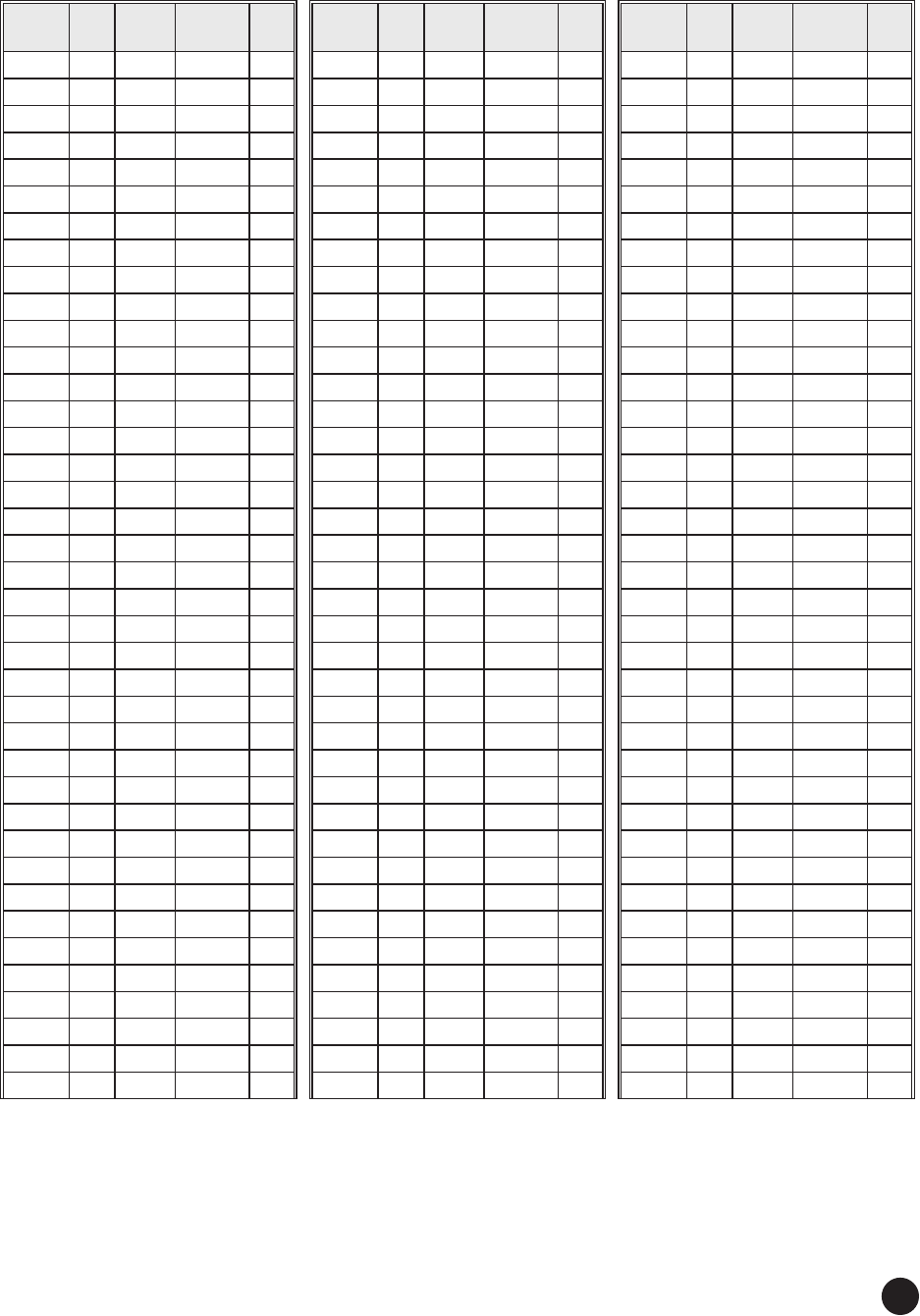
17
ZIP
Code EL D500+
SK
D1000+
SK AZ
078XX 25 126 129 248
079XX 25 126 129 249
080XX 26 127 130 248
081XX 26 127 130 248
082XX 26 128 131 249
083XX 26 127 130 248
084XX 26 128 131 249
085XX 25 127 130 248
086XX 26 127 130 248
087XX 25 127 130 249
088XX 25 127 129 248
089XX 25 127 129 248
100XX 25 127 129 250
101XX 25 127 129 250
102XX 25 127 129 250
103XX 25 127 129 250
104XX 25 127 129 250
105XX 24 126 129 250
106XX 24 127 129 250
107XX 25 127 129 250
108XX 24 127 129 250
109XX 25 126 129 252
110XX 25 127 130 250
111XX 25 127 129 250
112XX 25 127 130 250
113XX 25 127 129 250
114XX 25 127 130 250
115XX 25 127 130 250
116XX 25 127 130 250
117XX 24 127 130 250
118XX 24 127 130 250
119XX 24 127 130 252
120XX 24 125 128 250
121XX 24 125 128 250
122XX 23 125 128 250
123XX 23 125 127 250
124XX 24 125 128 249
125XX 24 126 128 250
126XX 24 126 129 249
ZIP
Code EL D500+
SK
D1000+
SK AZ
127XX 25 125 128 248
128XX 23 124 127 249
129XX 22 123 126 250
130XX 25 123 126 245
131XX 25 123 126 245
132XX 25 123 126 245
133XX 24 124 126 247
134XX 24 124 126 247
135XX 24 124 127 247
136XX 24 123 125 247
137XX 25 124 127 246
138XX 25 124 127 246
139XX 25 124 127 246
140XX 26 122 125 241
141XX 26 122 125 241
142XX 26 122 125 241
143XX 26 122 125 241
144XX 26 123 125 243
145XX 26 123 126 243
146XX 26 122 125 243
147XX 27 122 125 241
148XX 26 123 126 244
149XX 26 124 127 244
150XX 29 123 126 239
151XX 29 123 127 239
152XX 29 123 127 239
153XX 29 124 127 239
154XX 29 124 127 240
155XX 28 125 128 241
156XX 29 124 127 240
157XX 28 124 127 241
158XX 28 123 126 241
159XX 28 124 127 241
160XX 28 123 126 239
161XX 29 122 126 238
162XX 28 123 126 240
163XX 28 123 126 240
164XX 28 122 125 238
165XX 28 122 125 238
ZIP
Code EL D500+
SK
D1000+
SK AZ
166XX 28 124 127 242
167XX 27 123 126 242
168XX 27 124 127 243
169XX 26 124 127 244
170XX 27 125 128 244
171XX 27 126 128 244
172XX 28 125 128 244
173XX 27 126 129 244
174XX 27 126 129 245
175XX 27 126 129 246
176XX 27 126 129 246
177XX 26 124 127 244
178XX 27 125 128 245
179XX 26 125 128 246
180XX 26 126 129 247
181XX 26 126 129 247
182XX 26 125 128 247
183XX 25 126 128 247
184XX 25 125 128 247
185XX 25 125 128 247
186XX 26 125 128 246
187XX 26 125 128 247
188XX 25 125 127 246
189XX 26 126 129 248
190XX 26 127 130 248
191XX 26 127 130 248
192XX 26 127 130 248
193XX 26 127 129 246
194XX 26 126 129 248
195XX 26 126 129 246
196XX 26 126 129 246
197XX 27 127 130 247
198XX 26 127 130 247
199XX 27 128 131 247
200XX 28 127 130 245
201XX 28 126 129 244
202XX 28 127 130 245
203XX 28 127 130 245
204XX 28 127 130 245
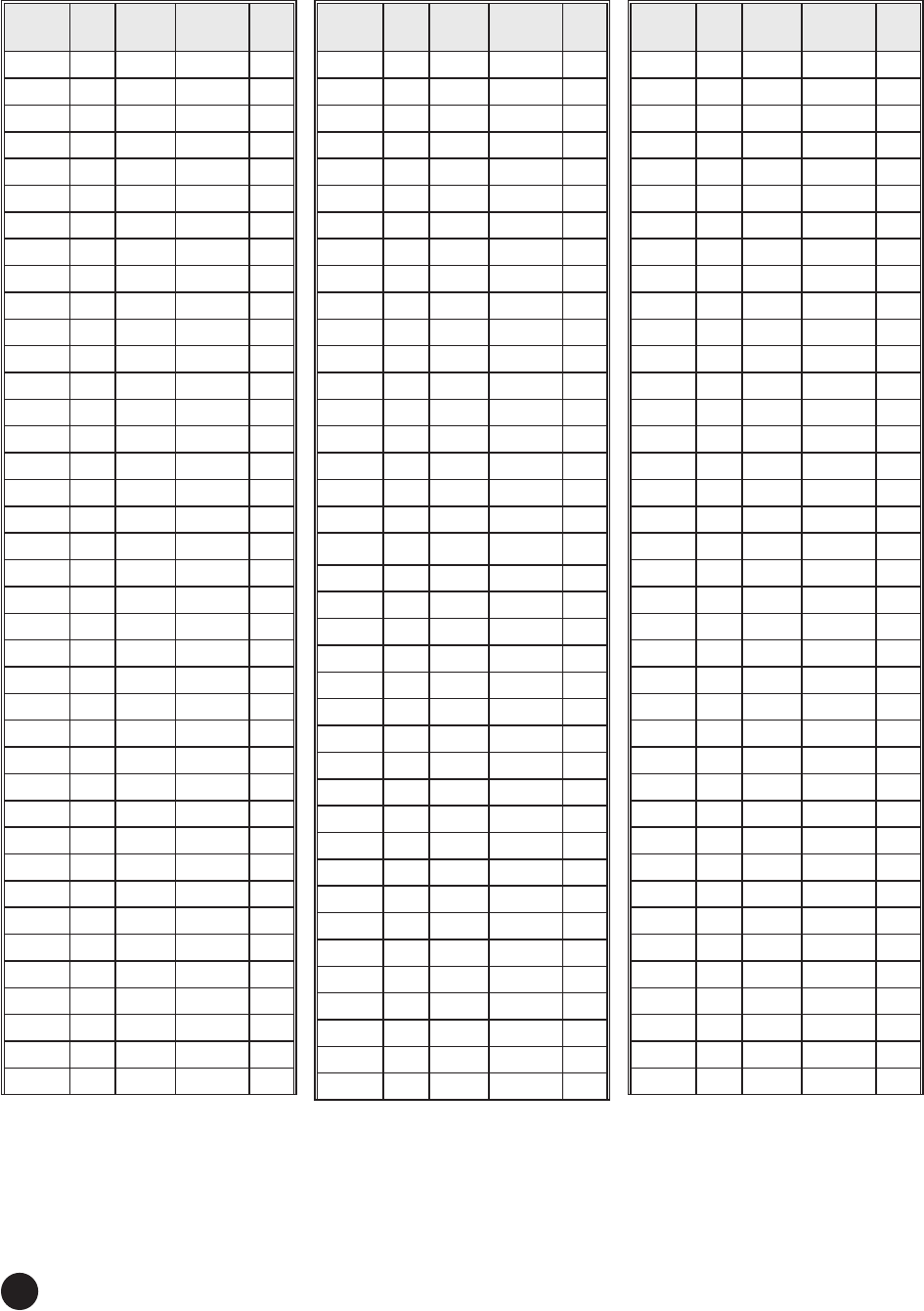
18
ZIP
Code EL D500+
SK
D1000+
SK AZ
285XX 30 131 134 245
286XX 33 127 130 237
287XX 34 126 130 235
288XX 34 126 130 236
289XX 35 126 129 233
290XX 34 129 133 239
291XX 34 129 133 239
292XX 34 129 133 239
293XX 34 127 131 237
294XX 34 131 134 241
295XX 33 130 133 242
296XX 35 127 131 236
297XX 33 128 132 239
298XX 35 129 133 238
299XX 35 131 134 240
300XX 36 127 130 233
301XX 37 126 130 232
302XX 37 127 131 233
303XX 36 127 131 233
304XX 36 130 134 238
305XX 35 126 130 234
306XX 36 127 131 235
307XX 36 125 129 231
308XX 35 129 132 237
309XX 35 129 132 238
310XX 37 129 132 236
311XX 36 127 131 233
312XX 36 128 132 235
313XX 35 131 135 239
314XX 35 131 135 239
315XX 36 131 135 238
316XX 37 131 134 237
317XX 38 129 133 235
318XX 38 128 132 233
319XX 38 128 132 233
320XX 37 132 136 239
321XX 37 134 138 241
322XX 37 133 136 240
323XX 39 130 134 236
ZIP
Code EL D500+
SK
D1000+
SK AZ
245XX 30 127 130 241
246XX 32 125 129 236
247XX 32 125 129 238
248XX 32 125 129 237
249XX 31 126 129 239
250XX 31 124 128 237
251XX 31 124 128 237
252XX 31 124 127 237
253XX 31 124 128 237
254XX 28 126 129 243
255XX 32 124 127 235
256XX 32 124 128 236
257XX 32 124 127 235
258XX 31 125 128 237
259XX 31 125 129 238
260XX 29 123 126 238
261XX 31 124 127 237
262XX 30 125 128 239
263XX 30 124 127 238
264XX 30 124 127 238
265XX 30 124 127 239
266XX 31 125 128 238
267XX 29 125 128 241
268XX 29 125 129 241
270XX 32 127 131 239
271XX 32 127 131 239
272XX 32 128 131 241
273XX 32 128 131 241
274XX 32 128 131 241
275XX 31 129 132 242
276XX 31 129 132 242
277XX 31 128 132 242
278XX 30 129 133 244
279XX 29 130 133 246
280XX 33 128 131 238
281XX 33 128 131 239
282XX 33 128 131 238
283XX 32 129 133 242
284XX 32 131 134 244
ZIP
Code EL D500+
SK
D1000+
SK AZ
205XX 28 127 130 245
206XX 28 127 130 245
207XX 28 127 130 245
208XX 28 126 129 245
209XX 28 127 130 245
210XX 27 127 129 245
211XX 27 126 129 245
212XX 27 127 130 245
214XX 28 127 130 245
215XX 29 125 128 242
216XX 27 127 130 247
217XX 28 126 129 244
218XX 27 128 131 248
219XX 27 127 130 246
220XX 28 127 130 244
221XX 28 127 130 244
222XX 28 127 130 245
223XX 28 127 130 245
224XX 28 128 131 245
225XX 28 128 131 245
226XX 29 126 129 243
227XX 29 126 130 243
228XX 29 126 129 241
229XX 30 127 130 242
230XX 29 128 131 245
231XX 29 128 131 245
232XX 29 128 131 244
233XX 28 129 132 247
234XX 28 129 132 247
235XX 29 129 132 247
236XX 29 129 132 247
237XX 29 129 132 247
238XX 29 128 131 245
239XX 30 128 131 243
240XX 31 126 130 240
241XX 31 126 130 240
242XX 33 125 129 236
243XX 32 126 129 238
244XX 30 126 129 241
19
ZIP
Code EL D500+
SK
D1000+
SK AZ
324XX 40 129 133 233
325XX 41 128 132 231
326XX 38 133 137 239
327XX 37 135 138 241
328XX 37 135 139 242
329XX 37 136 140 243
330XX 38 139 142 244
331XX 38 139 142 245
332XX 38 139 142 245
333XX 38 139 142 245
334XX 38 138 141 245
335XX 38 135 138 241
336XX 39 135 138 240
337XX 39 135 139 239
338XX 38 135 139 241
339XX 39 137 141 242
342XX 39 135 139 240
344XX 38 134 137 240
346XX 39 134 138 239
347XX 38 135 138 241
349XX 37 137 141 244
350XX 38 125 129 229
351XX 38 125 129 229
352XX 38 125 129 228
354XX 39 124 129 228
355XX 39 124 128 227
356XX 38 123 127 227
357XX 37 124 128 229
358XX 37 124 128 229
359XX 37 125 129 230
360XX 39 127 131 231
361XX 39 127 131 230
362XX 38 126 130 231
363XX 39 128 132 233
364XX 40 127 131 230
365XX 41 126 131 228
366XX 41 127 131 228
367XX 40 126 130 229
368XX 38 127 131 232
ZIP
Code EL D500+
SK
D1000+
SK AZ
369XX 40 125 129 227
370XX 36 122 126 228
371XX 36 122 126 228
372XX 36 122 126 228
373XX 36 124 128 231
374XX 36 125 129 231
375XX 39 120 125 222
376XX 33 126 129 236
377XX 34 125 128 233
378XX 34 125 128 233
379XX 35 125 129 233
380XX 39 120 125 223
381XX 39 120 125 222
382XX 37 120 125 223
383XX 38 121 126 224
384XX 37 123 127 227
385XX 35 123 127 230
386XX 39 121 126 222
387XX 41 121 126 222
388XX 39 122 127 225
389XX 40 122 126 223
390XX 41 123 127 223
391XX 42 123 128 223
392XX 42 123 128 224
393XX 41 124 129 226
394XX 42 125 129 225
395XX 42 126 131 226
396XX 43 123 128 223
397XX 40 123 127 225
398XX 39 128 128 228
399XX 36 127 130 233
400XX 34 122 125 230
401XX 35 121 125 228
402XX 34 121 125 228
403XX 33 123 126 232
404XX 34 123 127 231
405XX 33 122 126 231
406XX 34 122 126 230
407XX 34 124 127 232
ZIP
Code EL D500+
SK
D1000+
SK AZ
408XX 33 124 128 234
409XX 34 124 128 233
410XX 33 122 125 231
411XX 32 123 127 234
412XX 32 124 127 235
413XX 33 124 127 233
414XX 33 124 127 233
415XX 32 125 128 235
416XX 33 124 128 235
417XX 33 124 128 234
418XX 33 124 128 234
420XX 37 120 124 224
421XX 35 122 126 229
422XX 36 121 125 227
423XX 35 121 125 226
424XX 36 120 124 225
425XX 34 123 127 231
426XX 35 123 127 231
427XX 35 122 126 229
430XX 31 122 125 233
431XX 31 122 126 234
432XX 31 122 125 233
433XX 31 121 124 233
434XX 30 120 124 234
435XX 31 120 123 231
436XX 30 120 123 232
437XX 30 123 126 236
438XX 30 122 126 235
439XX 30 123 126 237
440XX 29 121 125 236
441XX 29 121 125 236
442XX 29 122 125 236
443XX 29 122 125 236
444XX 29 122 125 237
445XX 29 122 126 238
446XX 30 122 125 236
447XX 29 122 125 236
448XX 30 121 124 234
449XX 30 121 125 234
20
ZIP
Code EL D500+
SK
D1000+
SK AZ
532XX 32 115 119 222
534XX 32 116 119 223
535XX 32 114 118 219
537XX 32 114 118 219
538XX 33 113 117 217
539XX 32 114 118 219
540XX 32 110 114 213
541XX 30 114 117 222
542XX 30 114 118 223
543XX 30 114 118 222
544XX 31 113 116 218
545XX 30 112 115 217
546XX 32 112 116 216
547XX 32 111 115 215
548XX 31 110 114 214
549XX 31 114 118 221
550XX 32 110 114 211
551XX 32 110 114 211
553XX 33 109 113 209
554XX 32 110 114 211
555XX 33 109 113 209
556XX 29 110 113 215
557XX 30 109 113 212
558XX 30 109 113 213
559XX 33 111 115 214
560XX 34 110 114 210
561XX 34 108 113 207
562XX 33 108 112 206
563XX 32 108 112 208
564XX 31 108 112 208
565XX 32 106 110 204
566XX 30 107 111 207
567XX 30 105 109 203
570XX 35 107 112 204
571XX 35 108 112 204
572XX 34 106 111 203
573XX 36 106 110 201
574XX 34 105 109 199
575XX 36 104 109 197
ZIP
Code EL D500+
SK
D1000+
SK AZ
489XX 30 118 122 230
490XX 31 118 121 228
491XX 32 117 121 226
492XX 30 119 122 231
493XX 30 117 121 228
494XX 30 117 120 226
495XX 30 117 121 228
496XX 29 116 119 227
497XX 28 116 119 230
498XX 29 114 117 223
499XX 29 112 115 220
500XX 36 111 116 211
501XX 36 112 116 211
502XX 36 112 116 211
503XX 36 112 116 211
504XX 34 111 115 212
505XX 35 110 115 210
506XX 34 112 116 213
507XX 34 112 116 214
508XX 37 111 116 209
509XX 36 112 116 211
510XX 36 109 113 206
511XX 36 109 113 205
512XX 35 108 113 205
513XX 35 109 114 207
514XX 36 110 114 208
515XX 37 110 115 208
516XX 37 111 115 209
520XX 34 113 117 217
521XX 33 112 116 215
522XX 34 113 117 215
523XX 34 113 117 215
524XX 34 113 117 215
525XX 36 113 118 214
526XX 35 114 118 216
527XX 34 114 118 218
528XX 34 114 118 218
530XX 31 115 119 222
531XX 32 115 119 222
ZIP
Code EL D500+
SK
D1000+
SK AZ
450XX 32 121 125 231
451XX 32 122 125 232
452XX 33 121 125 231
453XX 32 121 124 231
454XX 32 121 125 231
455XX 32 121 125 231
456XX 32 123 126 234
457XX 31 123 127 236
458XX 31 120 124 230
459XX 33 121 125 231
460XX 33 119 123 227
461XX 33 120 123 227
462XX 33 119 123 227
463XX 32 117 121 225
464XX 32 117 121 225
465XX 32 118 122 227
466XX 32 118 121 227
467XX 32 119 123 228
468XX 32 119 123 228
469XX 32 119 122 227
470XX 33 121 125 230
471XX 34 121 125 228
472XX 33 120 124 228
473XX 32 120 124 229
474XX 34 120 124 227
475XX 35 120 124 226
476XX 35 120 124 226
477XX 35 120 124 226
478XX 34 119 123 225
479XX 33 118 122 226
480XX 29 119 123 233
481XX 30 119 123 231
482XX 29 119 123 233
483XX 29 119 122 232
484XX 29 119 122 232
485XX 29 119 122 232
486XX 29 117 121 230
487XX 29 118 121 231
488XX 30 118 121 230
21
ZIP
Code EL D500+
SK
D1000+
SK AZ
576XX 35 102 107 194
577XX 37 101 106 191
580XX 32 105 110 201
581XX 32 106 110 203
582XX 31 104 108 200
583XX 31 103 107 197
584XX 33 104 108 198
585XX 34 102 107 194
586XX 34 101 105 190
587XX 32 101 105 192
588XX 33 99 104 188
590XX 36 95 100 180
591XX 36 96 101 180
592XX 33 98 102 185
593XX 35 98 103 185
594XX 35 93 97 174
595XX 34 94 99 176
596XX 36 92 97 173
597XX 37 92 97 173
598XX 36 90 95 169
599XX 34 90 95 168
600XX 32 116 120 223
601XX 33 116 120 222
602XX 32 116 120 223
603XX 32 116 120 223
604XX 33 117 120 223
605XX 33 116 120 222
606XX 32 116 120 223
607XX 32 116 120 223
609XX 33 117 121 223
610XX 33 115 119 220
611XX 33 115 119 220
612XX 34 115 119 218
613XX 34 116 120 221
614XX 35 115 119 219
615XX 34 116 120 219
616XX 34 116 120 221
617XX 34 117 121 221
618XX 34 118 122 224
ZIP
Code EL D500+
SK
D1000+
SK AZ
619XX 34 118 122 223
620XX 36 117 121 220
622XX 36 118 122 221
623XX 36 115 119 217
624XX 35 118 122 223
625XX 35 117 121 222
626XX 35 116 120 220
627XX 35 117 121 220
628XX 36 119 123 223
629XX 37 119 123 223
630XX 37 117 121 219
631XX 36 117 121 220
633XX 37 116 120 218
634XX 36 114 119 216
635XX 36 114 118 214
636XX 37 117 122 219
637XX 37 118 123 221
638XX 38 119 124 222
639XX 38 118 123 220
640XX 38 113 118 212
641XX 38 113 117 210
644XX 37 112 116 210
645XX 38 112 117 210
646XX 37 113 118 212
647XX 39 114 118 211
648XX 40 114 119 212
649XX 38 113 117 211
650XX 38 115 120 216
651XX 38 115 120 216
652XX 37 115 119 215
653XX 38 114 119 213
654XX 38 116 121 217
655XX 38 116 121 217
656XX 39 116 120 215
657XX 39 116 120 215
658XX 39 115 120 214
659XX 39 120 120 216
660XX 39 112 117 210
661XX 38 112 117 210
ZIP
Code EL D500+
SK
D1000+
SK AZ
662XX 39 112 117 210
664XX 39 111 116 207
665XX 39 111 116 207
666XX 39 111 116 209
667XX 40 113 118 211
668XX 40 111 116 208
669XX 39 109 114 204
670XX 41 110 116 205
671XX 41 110 116 205
672XX 41 111 116 206
673XX 41 113 118 209
674XX 40 109 115 204
675XX 41 109 114 202
676XX 40 107 113 201
677XX 41 106 111 198
678XX 42 107 113 199
679XX 43 106 112 198
680XX 37 109 114 206
681XX 37 110 114 206
683XX 38 109 114 206
684XX 38 110 114 206
685XX 38 109 114 206
686XX 37 108 113 203
687XX 37 107 112 203
688XX 38 107 112 201
689XX 39 107 112 201
690XX 40 105 110 197
691XX 39 104 109 196
692XX 38 104 109 197
693XX 39 102 107 192
700XX 43 125 130 226
701XX 43 125 130 226
703XX 44 125 130 224
704XX 43 125 130 225
705XX 44 123 128 221
706XX 45 122 127 219
707XX 44 124 129 223
708XX 44 124 129 223
710XX 43 119 124 217
22
ZIP
Code EL D500+
SK
D1000+
SK AZ
793XX 47 108 114 199
794XX 47 108 114 200
795XX 47 111 117 204
796XX 47 112 118 205
797XX 49 108 115 200
798XX 51 106 113 197
799XX 51 103 110 192
800XX 42 101 107 190
801XX 42 101 107 190
802XX 42 101 107 190
803XX 42 101 106 189
804XX 42 100 106 188
805XX 41 101 106 189
806XX 41 101 107 190
807XX 41 103 108 193
808XX 42 103 108 192
809XX 43 102 107 191
810XX 43 103 109 193
811XX 45 101 107 189
812XX 44 100 106 189
813XX 45 98 104 185
814XX 44 98 104 185
815XX 44 97 103 183
816XX 43 98 104 185
820XX 40 100 106 189
821XX 38 94 99 177
822XX 39 101 106 190
823XX 40 98 103 184
824XX 38 96 101 181
825XX 39 96 101 180
826XX 39 98 103 185
827XX 37 99 104 187
828XX 37 97 102 184
829XX 41 95 101 179
830XX 39 94 99 177
831XX 40 94 99 178
832XX 40 92 98 174
833XX 40 90 96 171
834XX 39 92 98 174
ZIP
Code EL D500+
SK
D1000+
SK AZ
753XX 45 115 121 211
754XX 44 116 121 212
755XX 43 117 123 215
756XX 44 118 123 215
757XX 45 117 123 214
758XX 46 117 123 213
759XX 45 119 125 216
760XX 46 114 120 210
761XX 46 114 120 209
762XX 45 114 120 208
763XX 45 112 118 206
764XX 46 113 119 207
765XX 47 116 122 210
766XX 46 116 122 211
767XX 47 116 122 211
768XX 48 113 119 207
769XX 49 111 118 204
770XX 47 119 125 215
772XX 47 120 125 215
773XX 46 119 125 215
774XX 48 119 125 214
775XX 47 120 126 217
776XX 46 121 126 217
777XX 46 121 126 217
778XX 47 117 123 213
779XX 49 118 125 213
780XX 50 116 122 210
781XX 49 117 123 211
782XX 49 116 122 210
783XX 50 118 125 212
784XX 50 119 125 213
785XX 52 120 126 213
786XX 48 116 122 210
787XX 48 116 122 210
788XX 50 114 120 206
789XX 48 118 124 212
790XX 45 107 113 199
791XX 45 107 113 199
792XX 46 109 115 202
ZIP
Code EL D500+
SK
D1000+
SK AZ
711XX 44 119 124 216
712XX 43 121 126 220
713XX 44 122 127 221
714XX 44 121 126 219
716XX 41 120 125 220
717XX 42 119 124 217
718XX 43 118 123 215
719XX 42 117 122 216
720XX 41 118 123 218
721XX 41 118 123 218
722XX 41 118 123 218
723XX 39 120 124 221
724XX 39 119 123 220
725XX 40 118 122 218
726XX 40 117 121 215
727XX 41 115 120 213
728XX 41 117 122 215
729XX 41 116 121 213
730XX 43 112 118 207
731XX 43 112 118 207
733XX 48 116 122 210
734XX 44 114 119 209
735XX 45 111 117 206
736XX 44 110 116 203
737XX 43 111 116 205
738XX 43 109 115 202
739XX 44 107 112 198
740XX 42 113 118 209
741XX 42 113 119 209
743XX 41 114 119 211
744XX 42 114 120 211
745XX 43 115 120 211
746XX 42 112 117 208
747XX 43 115 121 212
748XX 43 113 119 209
749XX 42 115 121 213
750XX 45 115 121 210
751XX 45 116 121 211
752XX 45 115 121 211
23
ZIP
Code EL D500+
SK
D1000+
SK AZ
835XX 37 88 93 165
836XX 39 88 93 167
837XX 40 88 93 167
838XX 35 88 93 165
840XX 42 94 99 177
841XX 42 93 99 176
842XX 42 93 98 175
843XX 41 93 98 175
844XX 42 93 98 175
845XX 44 95 101 180
846XX 44 93 99 177
847XX 46 92 99 176
850XX 50 93 101 180
852XX 51 94 102 181
853XX 51 92 100 177
855XX 50 96 104 183
856XX 52 96 104 183
857XX 52 95 103 182
859XX 49 97 104 184
860XX 48 94 101 180
863XX 49 93 100 178
864XX 49 90 98 175
865XX 47 97 103 183
870XX 47 101 107 189
871XX 47 101 108 189
872XX 47 101 108 190
873XX 47 98 105 185
874XX 46 98 105 185
875XX 46 101 108 190
877XX 46 103 109 192
878XX 49 100 107 188
879XX 50 101 108 189
880XX 50 100 108 189
881XX 47 105 112 196
882XX 49 106 113 196
883XX 49 103 110 193
884XX 46 104 111 195
885XX 51 103 110 192
889XX 48 89 96 172
ZIP
Code EL D500+
SK
D1000+
SK AZ
935XX 49 85 92 167
936XX 47 83 90 163
937XX 47 83 90 163
938XX 47 83 90 163
939XX 48 80 87 160
940XX 46 80 86 158
941XX 46 80 86 158
942XX 45 81 88 160
943XX 47 80 87 158
944XX 46 80 86 158
945XX 46 80 87 159
946XX 46 80 87 158
947XX 46 80 87 158
948XX 46 80 86 158
949XX 46 80 86 158
950XX 47 80 87 159
951XX 47 80 87 159
952XX 46 82 88 160
953XX 46 82 89 161
954XX 45 79 86 157
955XX 43 79 85 155
956XX 45 82 88 160
957XX 45 82 88 160
958XX 45 81 88 160
959XX 44 81 88 160
960XX 43 81 87 158
961XX 44 83 89 162
967XX 41 30 32 99
968XX 40 30 32 98
970XX 38 82 87 156
971XX 37 81 86 154
972XX 38 82 87 156
973XX 38 81 86 155
974XX 40 81 86 155
975XX 41 81 86 156
976XX 41 83 88 159
977XX 40 84 89 159
978XX 38 86 91 162
979XX 39 87 92 165
ZIP
Code EL D500+
SK
D1000+
SK AZ
890XX 47 89 95 171
891XX 48 89 96 172
893XX 44 89 95 170
894XX 44 84 91 164
895XX 44 84 90 162
897XX 45 84 90 162
898XX 42 89 94 169
900XX 50 84 92 167
902XX 51 84 92 167
903XX 51 84 92 167
904XX 51 84 92 166
905XX 51 84 92 167
906XX 51 85 92 167
907XX 51 84 92 167
908XX 51 84 92 167
910XX 50 85 92 167
911XX 50 85 92 167
912XX 50 84 92 167
913XX 50 84 91 166
914XX 50 84 92 166
915XX 50 84 92 167
916XX 50 84 92 167
917XX 50 85 93 168
918XX 50 85 92 167
919XX 52 86 94 170
920XX 52 86 94 170
921XX 52 86 94 170
922XX 51 88 95 172
923XX 50 86 94 169
924XX 50 86 93 169
925XX 51 86 93 169
926XX 51 85 93 168
927XX 51 85 93 168
928XX 51 85 92 167
930XX 50 83 91 165
931XX 50 82 90 164
932XX 48 83 90 164
933XX 49 84 91 166
934XX 49 81 89 162

24
ZIP
Code EL D500+
SK
D1000+
SK AZ
980XX 35 83 88 155
981XX 35 83 87 155
982XX 34 83 88 155
983XX 35 83 87 155
984XX 36 83 87 155
985XX 36 82 87 154
986XX 37 82 87 156
988XX 35 85 90 159
989XX 36 84 89 159
990XX 35 87 92 163
991XX 35 87 91 162
992XX 35 87 92 163
993XX 37 86 91 161
994XX 37 87 92 164
995XX 15 69 71 118
996XX 15 69 71 117
997XX 11 74 76 118
998XX 23 78 81 135
999XX 25 78 82 138

25
Federal Communications Commission (FCC) Notication
Regulatory Information
This device complies with Part 15 of the FCC rules. Operation is subject to the following two conditions:
(1) this device may not cause harmful interference, and
(2) this device must accept any interference received, including interference that may cause undesired operation.
This equipment has been tested and found to comply with the limits for a Class B digital device, pursuant to
Part 15 of the FCC Rules. These limits are designed to provide reasonable protection against harmful interference in
a residential installation. This equipment generates, uses and can radiate radio frequency energy and, if not installed
and used in accordance with the instructions, may cause harmful interference to radio communications. However,
there is no guarantee that interference will not occur in a particular installation.
If this equipment does cause harmful interference to radio or television reception, which can be determined by
turning the equipment off and on, the user is encouraged to try to correct the interference by one or more of the
following measures:
• Reorient or relocate the receiving antenna.
• Increase the separation between the equipment and receiver.
• Connect the equipment into an outlet on a circuit different from that to which the receiver is connected.
• Consult the dealer or an experienced radio/TV technician for help.
Donotmakechangesormodicationstothisequipment.Thiscouldvoidtheuser’sauthoritytooperatethe
equipment.
If none of the remedies stops the radio interference, you should contact a licensed radio/television technician, your
satellite dealer, or call the Customer Service Center at 1-800-333-DISH (3474) for assistance.
Copyright Notice
Copyright © 2013. EchoStar Technologies L.L.C., Englewood, Colorado 80112. All rights reserved.
The information in this guide may change without notice. We may issue revisions to tell you about such changes.
Please send comments or questions about this guide to Technical Publications, EchoStar Technologies L.L.C.,
90 Inverness Drive Circle East, Englewood, Colorado 80112.
Email: techpubs@echostar.com
PartNumber:196902
Printed in
DISH is a registered trademark of DISH Network L.L.C. For information about DISH, please visit our website at
mydish.com.
We acknowledge all product names, trade names, or corporate names we mention in the Installation Instructions to be
the proprietary property of the registered owners.