Disney Interactive Studios 8032385 13.56MHz RFID Reader User Manual QOF 8032385 Draft
Disney Interactive Studios, Inc. 13.56MHz RFID Reader QOF 8032385 Draft
QOF-8032385 User Manual (Draft)

DRAFT
Disney INFINITY Start Up Guide for Xbox 360® video game and
entertainment system.
****ALL IMAGERY IS PLACEHOLDER/PRELIMINARY****
Disney INFINITY Start Up Guide -- Table Of Contents
• Safety Precautions
• Package Contents
• Disney INFINITY Base Instructions
o Set Up
o Using the Disney INFINITY Base
• Troubleshooting
• Tech/Customer Support Information
• Legal

Safety Precautions:
WARNING! CHOKING HAZARD Small parts.
Not suitable for children under 3 years
Use the Disney INFINITY webcode at disney.com/infinity to unlock new content on
the web! Just enter the Disney INFINITY webcode provided with your interactive
Disney INFINITY Figure.
Terms and Conditions apply. disney.com/infinity
For your safety and the safety of others, please read the following product care
information and the game manual before using this product. Keep all game manuals
because they contain important information about using and caring for the product.
Product Care: (1) Only use the products with the gaming system for which they are
designed. (2) Keep the products dry and away from open flames or other heat
sources. (3) Do not modify or take apart the products. (4) Use a dry cloth to clean
the products.
Questions or issues when setting up your new products?
Please refer to the game manual in your Disney INFINITY Starter Pack for Customer
Support details.
Product Disposal Information: Dispose of this product in accordance with local
and national disposal regulations (if any), including those governing the recovery
and recycling of waste electrical and electronic equipment (WEEE Directive
2002/96/EC).
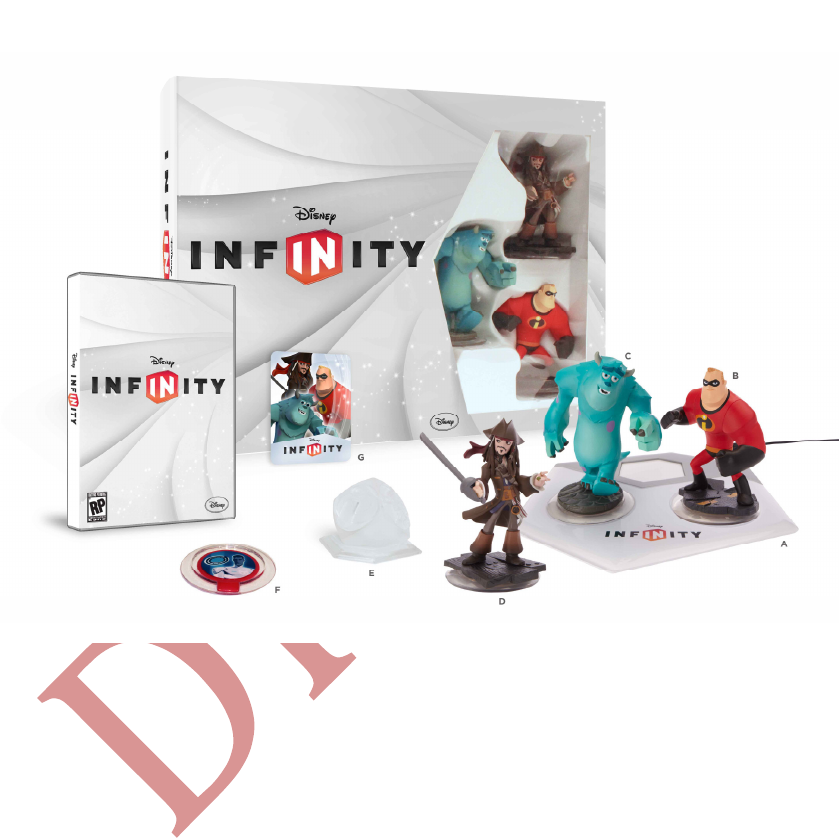
Package Contents:
The Disney INFINITY Starter Pack includes the following components:
[INSERT SHOT OF STARTER PACK ITEMS]
A) Disney INFINITY Base
B) Disney INFINITY Figure
C) Disney INFINITY Figure
D) Disney INFINITY Figure
E) Disney INFINITY Play Set Piece
F) Disney INFINITY Power Disc (each Disney INFINITY Starter Pack contains a
randomly selected Power Disc)
G) Disney INFINITY Webcode Card
Setting Up the Disney INFINITY Base:
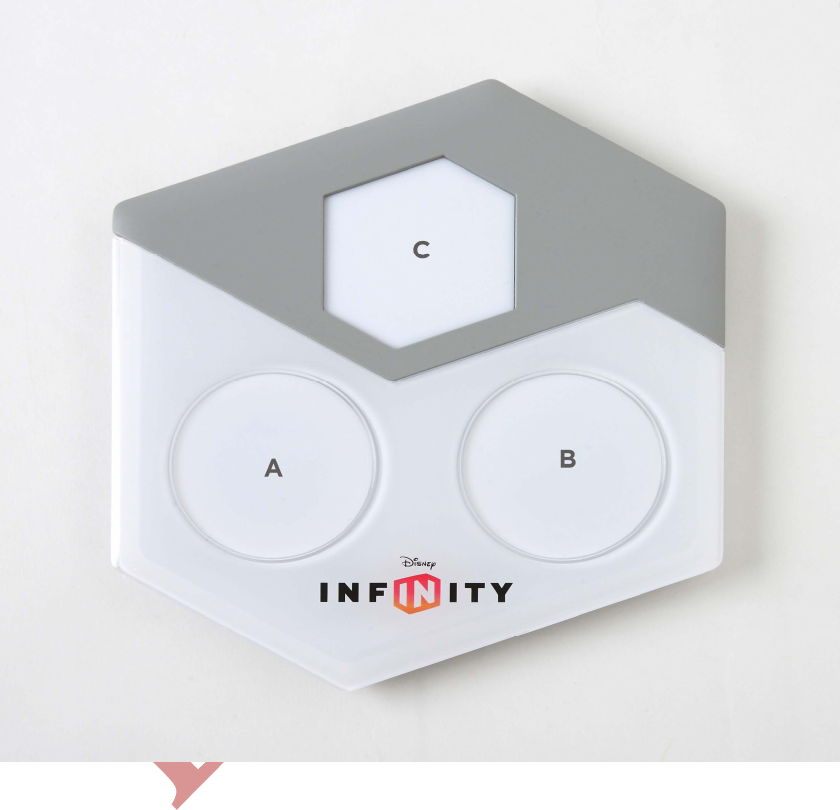
1) Once removed from the packaging, the Disney INFINITY Base (pictured below)
needs to be placed on a stable, secure and even surface near the Xbox 360® console.
[INSERT PIC OF BASE]
A) Disney INFINITY Figure and/or Power Disc spot
B) Disney INFINITY Figure and/or Power Disc spot
C) Disney INFINITY Play Set Piece and/or Power Disc spot
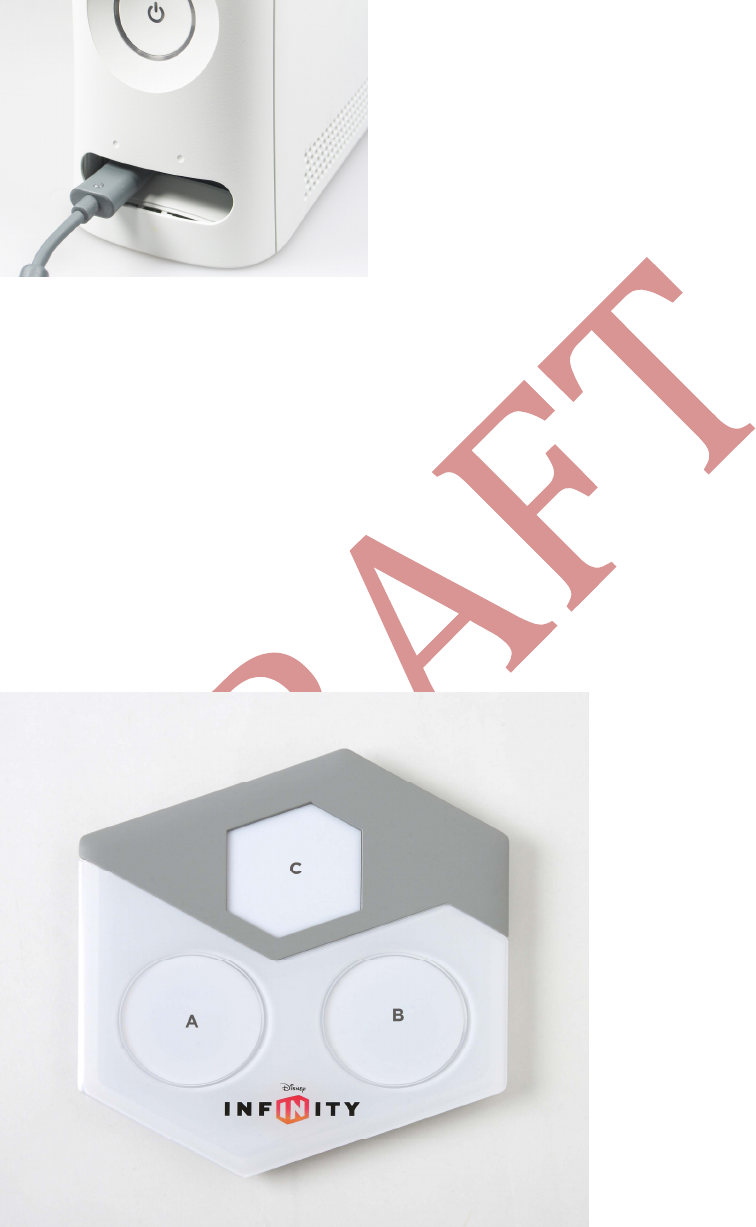
2) Plug the USB connector from the Disney INFINITY Base into an available USB port
(pictured below) on the front of your Xbox 360 console.
Xbox 360 console USB Port
[INSERT SHOT OF XBOX USB PORT]
3) Use the power button on the front of the Xbox 360 console to power ON the
system. This will also power up the Disney INFINITY Base unit.
4) Insert the Disney INFINITY game disc into the Xbox 360 console in order to
launch the game.
Using the Disney INFINITY Base:
When a player enters the game, they will be prompted to place a Disney INFINITY
Figure on the Base. Be sure the Disney INFINITY Figure is placed on one of the two
circular spots on the Base (see A or B below). The Disney INFINITY Play Set Piece
will need to be placed on hexagonal spot C.
[INSERT PIC OF BASE]

Troubleshooting:
Disney INFINITY Character is not appearing in-game: Be sure the Base is on a flat
surface and the Disney INFINITY Figure is placed completely flush with the circular
spot with nothing in between the Base and the Disney INFINITY Figure (unless a
Power Disc is being used). If a Power Disc or Power Discs are being used, be sure no
more than two are used in each spot.

Customer Support Information
Internet Support
To access support for Disney Interactive Studios on the World Wide Web, point your
browser to disney.com/videogames and click on “Support” at the top of the page.
Game Hints and Tips
Game hints and tips are available on our Customer Support website. To access Game
Hints and Tips on the World Wide Web, point your browser to
disney.com/videogames and click on “Support” at the top of the page.
Mailing Address
If you wish to write us, our address is: Disney Interactive Studios Customer
Support, 500 South Buena Vista Street, Burbank, CA 91521-9323.
Telephone Support
You may contact Customer Support at (866) 252-8108. If you need additional
information, our Customer Support staff for the U.S. and Canada is available Monday
through Friday from 9:00 a.m. to 6:00 p.m. (Pacific Time).
TTY/TDD Users
Please contact us by telephone through your local relay service. Customer Support
staff for TTY/TDD users is available Monday through Friday 9:00 a.m. to 6:00 p.m.
(Pacific Time). Our toll free number is (866) 252-8108.
Model No.: INF-8032385
FCC Information
FCC ID: QOF-8032385
This device complies with FCC radiation exposure limits set forth for an
uncontrolled environment and it also complies with Part 15 of the FCC RF Rules.
Operation is subject to the following two conditions: (1) this device may not cause
harmful interference, and (2) this device must accept any interference received,
including interference that may cause undesired operation.
Caution: The user is cautioned that changes or modifications not expressly approved
by the party responsible for compliance could void the user's authority to operate
the equipment.

NOTE: This equipment has been tested and found to comply with the limits for a
Class B digital device, pursuant to Part 15 of the FCC Rules. These limits are
designed to provide reasonable protection against harmful interference in a
residential installation. This equipment generates, uses and can radiate radio
frequency energy and, if not installed and used in accordance with the instructions,
may cause harmful interference to radio communications. However, there is no
guarantee that interference will not occur in a particular installation.
If this equipment does cause harmful interference to radio or television reception,
which can be determined by turning the equipment off and on, the user is
encouraged to try to correct the interference by one or more of the following
measures:
-- Reorient or relocate the receiving antenna.
-- Increase the separation between the equipment and receiver.
-- Connect the equipment into an outlet on a circuit different from that to which the
receiver is connected.
-- Consult the dealer or an experienced radio/TV technician for help.
IC:
IC: 10749A-8032385
This device complies with Industry Canada licence-exempt RSS standard(s).
Operation is subject to the following two conditions: (1) this device may not cause
harmful interference, and (2) this device must accept any interference received,
including interference that may cause undesired operation.
Le présent appareil est conforme aux CNR d'Industrie Canada applicables aux
appareils radio exempts. L'exploitation est autorisée aux deux conditions suivantes :
(1) l'appareil ne doit pas produire de brouillage, et
(2) l'utilisateur de l'appareil doit accepter tout brouillage radioélectrique subi,
même si le brouillage est susceptible d'en compromettre le fonctionnement.
Legal
© Disney. © Disney/Pixar.