Disney Interactive Studios 8040889 Disney Infinity Base INF-8040889 User Manual INF2 BLE MAN WIP 081415 1 x
Disney Interactive Studios, Inc. Disney Infinity Base INF-8040889 INF2 BLE MAN WIP 081415 1 x
User manual-Updated

DRAFT
****ALL IMAGERY IS PLACEHOLDER/PRELIMINARY****
Disney Infinity
[3.0 Edition]
[iOS product]

[ANY REQUIRED WARNINGS GO ON INSIDE/FRONT MANUAL COVER]
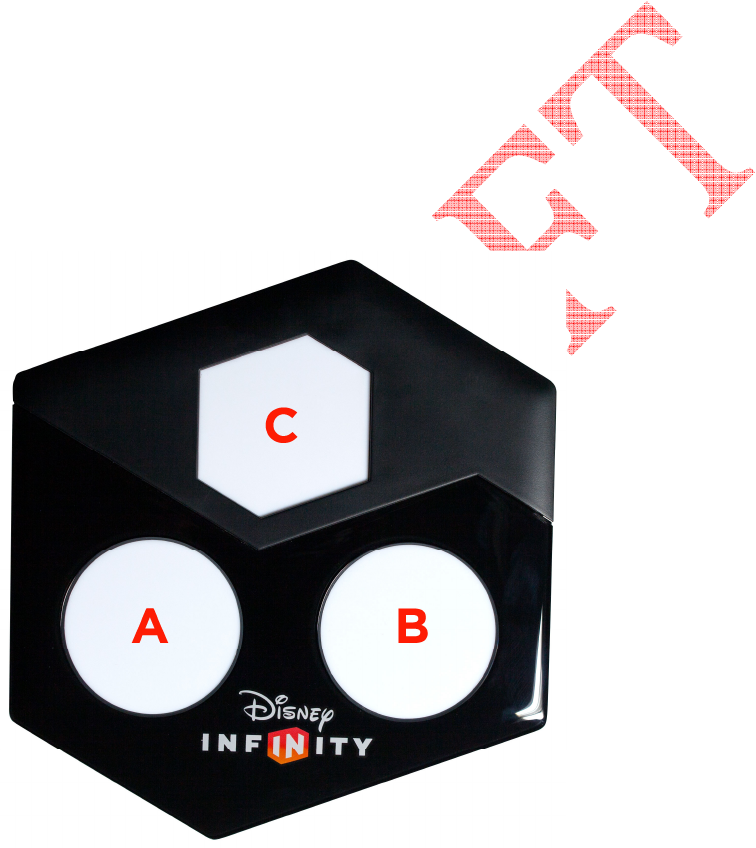
TABLE OF CONTENTS
QUICK START GUIDE ………………………….XX
CONTROLS ……………………….………………..XX
TROUBLESHOOTING……………………………XX
SAFETY PRECAUTIONS ………..……………..XX
CUSTOMER SUPPORT INFORMATION …XX
TERMS OF USE ……….….………………………XX
FRENCH ……………………………..………………XX
SPANISH ……………………….……………………XX
PORTUGUESE …………….………………………XX
QUICK START GUIDE
Setting Up the Disney Infinity Base
Once removed from the packaging, the Disney Infinity Base (pictured below) needs to
be placed on a stable, secure and even surface near the iOS device. Do not place on
metal surfaces, or have metallic objects nearby.
A Disney Infinity Figure and Power Disc spot (Player 1)
B Disney Infinity Figure and Power Disc spot (Player 2)
C Disney Infinity Play Set Piece, Power Disc or Toy Box Expansion Game Piece spot

Pairing the Disney Infinity Base
1 The Disney Infinity Base needs to connect with the iOS device via wireless Bluetooth®
technology. Make sure the iOS device is turned ON and Bluetooth® is turned ON in the
Settings menu.
2 Plug in the Disney Infinity Base using the NA USB power adaptor.
3 The Disney Infinity Base will enter into pairing mode and the Blue LED light on the
hexagonal spot C of the Disney Infinity Base will blink.
4 Once connected, the Blue LED light on the hexagonal spot C of the Disney Infinity Base
will stop blinking.
Using the Disney Infinity Base
When a player enters gameplay, they will be prompted to place a Disney Infinity Figure
on the Base after the introduction. For single player gameplay, be sure the Disney
Infinity Figure is placed on the circular spot A of the Base. The Disney Infinity Play Set
Piece or Toy Box Expansion Game Piece will need to be placed on the hexagonal spot C
in order to enter a Play Set or Toy Box Expansion Game. For two-player gameplay, place
a Disney Infinity Figure on each of the circular spots A and B to begin your adventure.
Using the Disney Infinity Power Discs
Expand your adventure with the Disney Infinity Power Discs. While playing in Play Sets
or the Toy Box, place up to two circular Power Discs under a Disney Infinity Figure on
the circular spots, A and/or B of the Disney Infinity Base, to power up character abilities
or add a costume, team-up or event. You can also unleash new gadgets and customize
your Toy Box by placing up to three hexagonal Power Discs on the hexagonal spot C.
Using the Disney Infinity Web Code Card
Use the Disney Infinity Web Code at Disney.com/Infinity to unlock new content on the
web. Just enter the Web Code provided in the Disney Infinity Starter Pack.
CONTROLS
Biped Controls
Jump A
Flight/Force Jump A (hold)
Pick Up/Interact/Force Power X
Combo Finisher X (hold when prompted)
Drop Item/ Exit Vehicle B
Block B (hold)
Attack Y
Special Ability RB
Run L stick
Camera Rotate R stick

Tool/Packs Select LB
Editor Back button
Pause Menu Start button
Aim/Target LT (hold)
Shoot/Throw/Force Dash RT
Note: Some of the Biped Controls do not apply to all characters.
Vehicle Controls
Jump A
Enter Vehicle/Tow/Interact X
Attack/Honk Horn/Throw Y
Move Forward RT (hold)
Brake/Reverse LT (hold)
Steer L stick
Camera Rotate/Boost R stick
Loadouts LB
180 Degree Turn RB
Drift RT + LT + L stick
Spaceship Controls
Take-Off/Land A
Engage/Disengage X-foils X
Fire Main Weapon Y
Forward Thrusters RT (hold)
Brake LT (hold)
Steer L stick
Bank Left LB (hold)
Bank Right RB (hold)
180 Degree Flip R stick down
Forward Roll R stick up
Left Barrel Roll R stick left
Right Barrel Roll R stick right
Editor Controls
Place A
Undo Y
Exit B
Add Favorite X
Spark Mode RB
Filters LB
Move Selected Toy L stick
Rotate Selected Toy RT + Left stick LEFT/RIGHT
Raise/Lower Selected Toy RT + Left stick UP/DOWN

Toy Scroll D-pad LEFT/RIGHT
Toy Category Scroll D-pad UP/DOWN
Camera Rotate R stick
Spark Mode Controls
Move A
Customize Y
Delete B
Assign Logic X
Exit Spark Mode RB
Move Selected Toy L stick
Raise/Lower Selected Item RT + L stick UP/DOWN
Camera Rotate R stick
TROUBLESHOOTING
Disney Infinity Figure is not appearing in-game
Be sure the Base is on a flat surface and the Disney Infinity Figure is placed completely
flush with the circular spot with nothing in between the Base and the Disney Infinity
Figure (unless a Power Disc is being used). If a Power Disc or Power Discs are being used,
be sure no more than two are used in each spot. Do not place Base on metal surfaces, or
have metallic objects nearby.
How do I add a second player in Disney Infinity (3.0 Edition)?
1. Press the center Xbox Button on the second controller.
2. Select the second player profile or Profile to play as a guest.
3. Place your Disney Infinity Figure on the circular spot B on the Disney Infinity Base.
4. Press the Start button.
5. The game will go into split-screen mode and the second character will appear!
SAFETY PRECAUTIONS
WARNING! CHOKING HAZARD Small parts. Not suitable for children under 3 years. For
your safety and the safety of others, please read the following product care information
and the game manual before using this product. Keep all game manuals because they
contain important information about using and caring for the product.
The USB Cable is used for power on the Disney Infinity base and does not transmit data.
SOUND PRESSURE WARNING
1) “To prevent possible hearing damage, do not listen at high volume levels for long
periods.”
2) “Fully understand user manual before use.”
3) “Ensure your device is at low volume or powered off before ceasing to use device.”
PRODUCT CARE
(1) Only use the products with the gaming system for which they are designed. (2) Keep
the products dry and away from open flames or other heat sources. (3) Do not modify or
take apart the products. (4) Use a dry cloth to clean the products
Questions or issues when setting up your new products? Please refer to the game
manual in your Disney Infinity Starter Pack for Customer Support details.
CUSTOMER SUPPORT INFORMATION
Internet Support
To access support for Disney Infinity on the internet, please visit our Customer Support
website at help.disney.com/Disney-Infinity.
Game Hints and Tips
Game hints and tips are available on our Customer Support website. To view, please
visit help.disney.com/Disney-Infinity.
Mailing Address
If you wish to write us, our address is: Disney Interactive Studios Customer Support,
1200 Grand Central Avenue, Glendale, CA 91201-8793
TERMS OF USE
DISNEY INTERACTIVE’S GENERAL TERMS OF USE GOVERNING ITS PRODUCTS AND
SERVICES, INCLUDING DISNEY INFINITY, IS AVAILABLE AT
WWW.DISNEYTERMSOFUSE.COM.
Model No.: INF-8040889
FCC INFORMATION
FCC ID: QOF-8040889
This device complies with FCC radiation exposure limits set forth for an uncontrolled
environment and it also complies with Part 15 of the FCC RF Rules. Operation is subject
to the following two conditions: (1) this device may not cause harmful interference, and
(2) this device must accept any interference received, including interference that may
cause undesired operation.
Caution: The user is cautioned that changes or modifications not expressly approved by
the party responsible for compliance could void the user’s authority to operate the
equipment.
NOTE: This equipment has been tested and found to comply with the limits for a Class B
digital device, pursuant to Part 15 of the FCC Rules. These limits are designed to provide
reasonable protection against harmful interference in a residential installation.
This equipment generates, uses and can radiate radio frequency energy and, if not
installed and used in accordance with the instructions, may cause harmful interference
to radio communications. However, there is no guarantee that interference will not
occur in a particular installation.
If this equipment does cause harmful interference to radio or television reception,
which can be determined by turning the equipment off and on, the user is encouraged
to try to correct the interference by one or more of the following measures:
- Reorient or relocate the receiving antenna.
- Increase the separation between the equipment and receiver.
- Connect the equipment into an outlet on a circuit different from that to which the
receiver is connected.
- Consult the dealer or an experienced radio/TV technician for help.
IC INFORMATION
IC: 10749A-8040889
This device complies with Industry Canada licence-exempt RSS standard(s). Operation is
subject to the following two conditions: (1) this device may not cause harmful
interference, and (2) this device must accept any interference received, including
interference that may cause undesired operation.

Le présent appareil est conforme aux CNR d'Industrie Canada applicables aux appareils
radio exempts de licence. L'exploitation est autorisée aux deux conditions suivantes :
(1) l'appareil ne doit pas causer d'interférences, et
(2) l'utilisateur de l'appareil doit accepter tout brouillage radioélectrique subi, même si
le brouillage est susceptible d'en compromettre le fonctionnement.
Legal
© Disney. STAR WARS © & ™ Lucasfilm Ltd. All rights reserved.