Dive In Ventures HeadsUp Systems SIGN Visual Indicator User Manual HeadsUp Systems User Guide

Dive In Ventures, LLC dba HeadsUp Systems Visual Indicator HeadsUp Systems User Guide

Users Manual

User & Setup GuideV1.3
2
TABLE OF CONTENTS1. Box Contents2. Setup 3. How It Works4. Warranty & Legal5. Product Registration & Feedback3
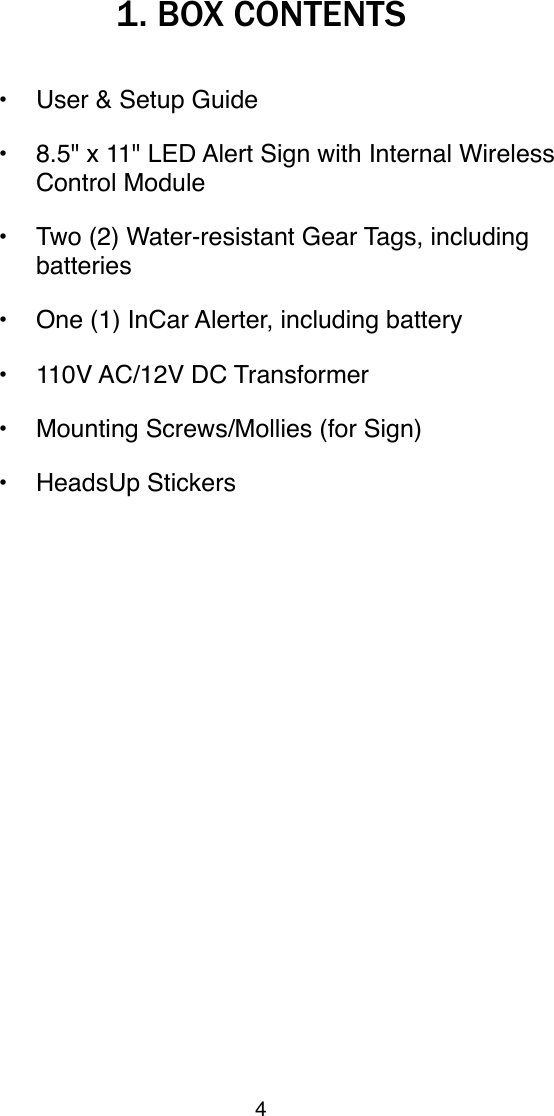
1. BOX CONTENTS• User & Setup Guide • 8.5" x 11" LED Alert Sign with Internal Wireless Control Module• Two (2) Water-resistant Gear Tags, including batteries• One (1) InCar Alerter, including battery• 110V AC/12V DC Transformer • Mounting Screws/Mollies (for Sign)• HeadsUp Stickers4
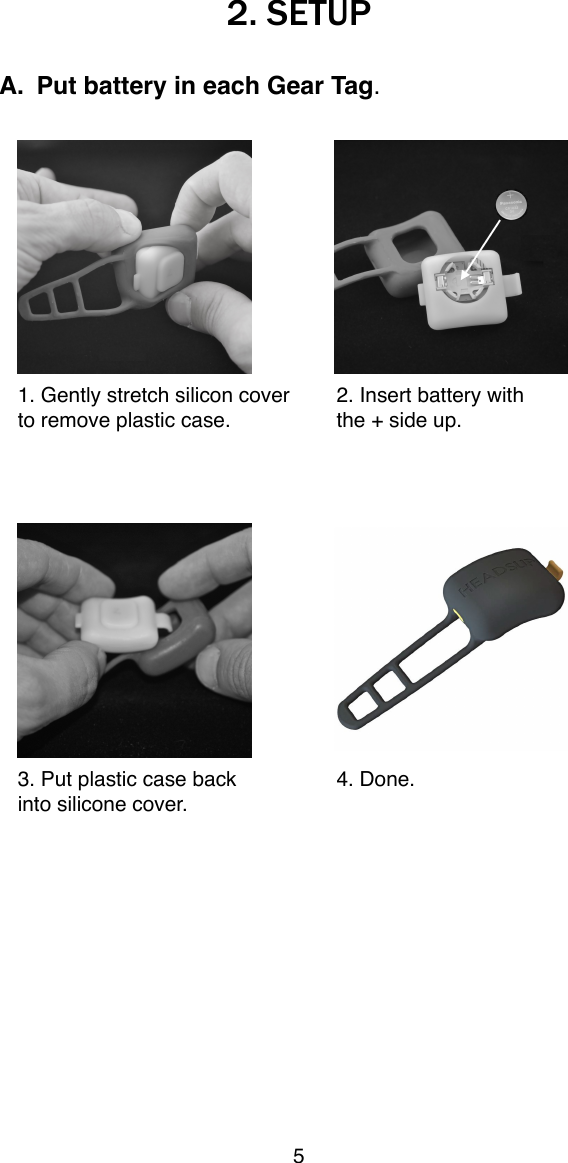
2. SETUPA. Put battery in each Gear Tag.1. Gently stretch silicon cover!2. Insert battery with to remove plastic case.!the + side up.3. Put plastic case back!4. Done.into silicone cover.5
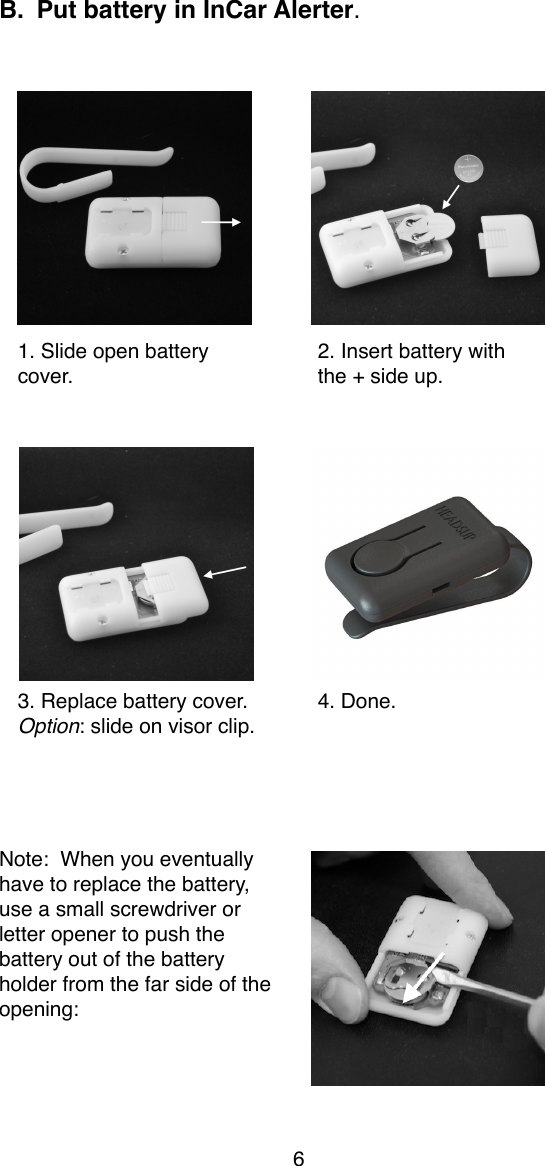
B. Put battery in InCar Alerter.    1. Slide open battery!2. Insert battery withcover.!the + side up.3. Replace battery cover.!4. Done.Option: slide on visor clip.Note:  When you eventually have to replace the battery, use a small screwdriver or letter opener to push the battery out of the battery holder from the far side of the opening:6
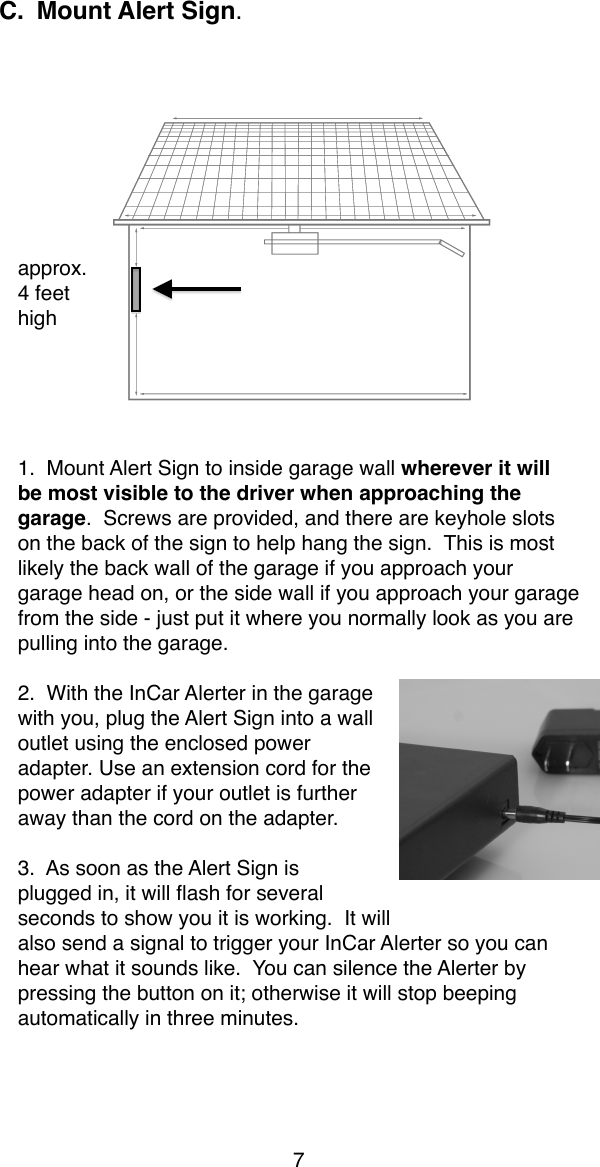
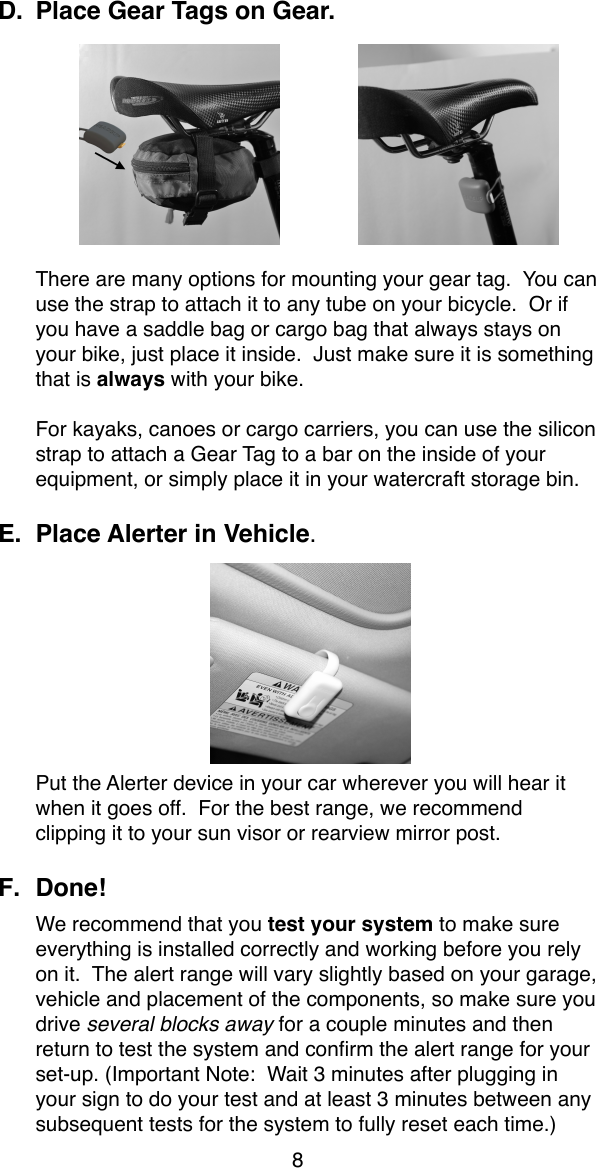
C. Mount Alert Sign.  approx.4 feethigh1.  Mount Alert Sign to inside garage wall wherever it will be most visible to the driver when approaching the garage.  Screws are provided, and there are keyhole slots on the back of the sign to help hang the sign.  This is most likely the back wall of the garage if you approach your garage head on, or the side wall if you approach your garage from the side - just put it where you normally look as you are pulling into the garage.2.  With the InCar Alerter in the garage with you, plug the Alert Sign into a wall outlet using the enclosed power adapter. Use an extension cord for the power adapter if your outlet is further away than the cord on the adapter.3.  As soon as the Alert Sign is plugged in, it will flash for several seconds to show you it is working.  It will also send a signal to trigger your InCar Alerter so you can hear what it sounds like.  You can silence the Alerter by pressing the button on it; otherwise it will stop beeping automatically in three minutes.7
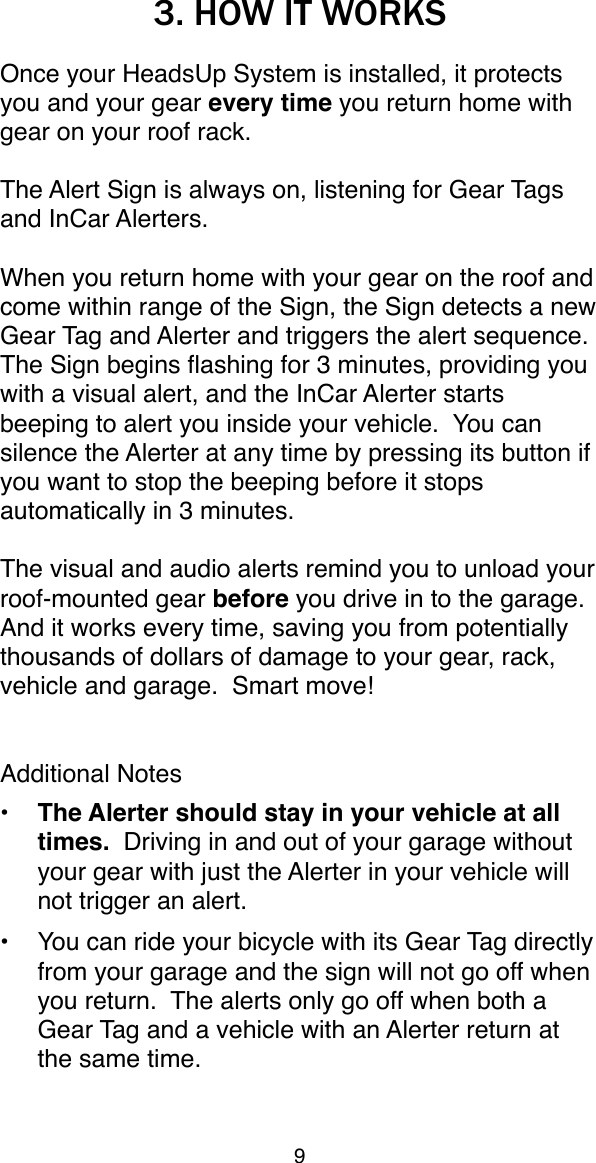
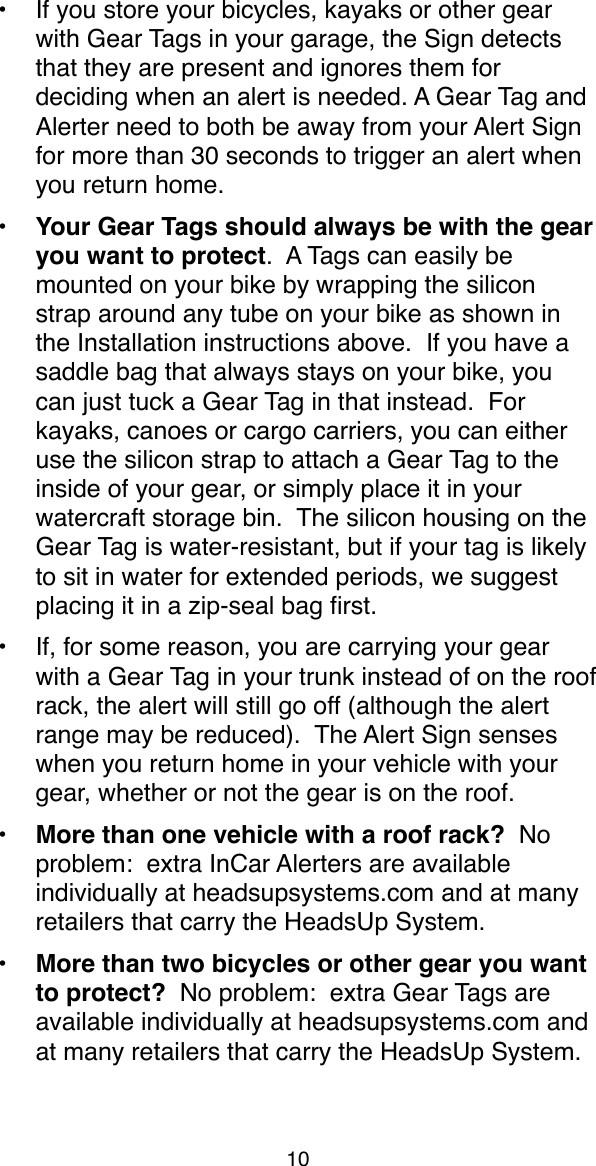
D. Place Gear Tags on Gear.There are many options for mounting your gear tag.  You can use the strap to attach it to any tube on your bicycle.  Or if you have a saddle bag or cargo bag that always stays on your bike, just place it inside.  Just make sure it is something that is always with your bike.For kayaks, canoes or cargo carriers, you can use the silicon strap to attach a Gear Tag to a bar on the inside of your equipment, or simply place it in your watercraft storage bin.E. Place Alerter in Vehicle. Put the Alerter device in your car wherever you will hear it when it goes off.  For the best range, we recommend clipping it to your sun visor or rearview mirror post.F. Done!  We recommend that you test your system to make sure everything is installed correctly and working before you rely on it.  The alert range will vary slightly based on your garage, vehicle and placement of the components, so make sure you drive several blocks away for a couple minutes and then return to test the system and confirm the alert range for your set-up. (Important Note:  Wait 3 minutes after plugging in your sign to do your test and at least 3 minutes between any subsequent tests for the system to fully reset each time.)8
3. HOW IT WORKSOnce your HeadsUp System is installed, it protects you and your gear every time you return home with gear on your roof rack.  The Alert Sign is always on, listening for Gear Tags and InCar Alerters.  When you return home with your gear on the roof and come within range of the Sign, the Sign detects a new Gear Tag and Alerter and triggers the alert sequence.  The Sign begins flashing for 3 minutes, providing you with a visual alert, and the InCar Alerter starts beeping to alert you inside your vehicle.  You can silence the Alerter at any time by pressing its button if you want to stop the beeping before it stops automatically in 3 minutes.The visual and audio alerts remind you to unload your roof-mounted gear before you drive in to the garage.  And it works every time, saving you from potentially thousands of dollars of damage to your gear, rack, vehicle and garage.  Smart move!Additional Notes• The Alerter should stay in your vehicle at all times.  Driving in and out of your garage without your gear with just the Alerter in your vehicle will not trigger an alert.•You can ride your bicycle with its Gear Tag directly from your garage and the sign will not go off when you return.  The alerts only go off when both a Gear Tag and a vehicle with an Alerter return at the same time.9
•If you store your bicycles, kayaks or other gear with Gear Tags in your garage, the Sign detects that they are present and ignores them for deciding when an alert is needed. A Gear Tag and Alerter need to both be away from your Alert Sign for more than 30 seconds to trigger an alert when you return home.• Your Gear Tags should always be with the gear you want to protect.  A Tags can easily be mounted on your bike by wrapping the silicon strap around any tube on your bike as shown in the Installation instructions above.  If you have a saddle bag that always stays on your bike, you can just tuck a Gear Tag in that instead.  For kayaks, canoes or cargo carriers, you can either use the silicon strap to attach a Gear Tag to the inside of your gear, or simply place it in your watercraft storage bin.  The silicon housing on the Gear Tag is water-resistant, but if your tag is likely to sit in water for extended periods, we suggest placing it in a zip-seal bag first.•If, for some reason, you are carrying your gear with a Gear Tag in your trunk instead of on the roof rack, the alert will still go off (although the alert range may be reduced).  The Alert Sign senses when you return home in your vehicle with your gear, whether or not the gear is on the roof.• More than one vehicle with a roof rack?  No problem:  extra InCar Alerters are available individually at headsupsystems.com and at many retailers that carry the HeadsUp System.  • More than two bicycles or other gear you want to protect?  No problem:  extra Gear Tags are available individually at headsupsystems.com and at many retailers that carry the HeadsUp System. 10
 •One HeadsUp System can support up to 100 Gear Tags and Alerters.  This means it works not only for households with multiple roof racks and lots of gear, but even for condos or apartment buildings with multiple athletes.  Just mount one sign in the condo/apartment garage, and each resident can purchase Alerters and Gear Tags separately.•The batteries in your Gear Tags and InCar Alerter are expected to last a minimum of one year with normal usage.  The HeadsUp System includes a low-battery warning feature that lights a low-battery LED on the Alert Sign when a Gear Tag or Alerter with a low battery is within range.  This way you’ll know to replace the battery before your system stops working.•Please do not remove the battery from a Tag or Alerter unless you are replacing it with a fresh, new battery.  The battery use meter is reset each time a battery is replaced, so if you use an old battery, the low-battery indicator will not work properly.•If you are testing your system to verify the range and function, the tag and alerter must be completely removed from the range of the sign (at least 500 feet away in open air) for more than 30 seconds to trigger then sign upon returning home.  Also, please wait at least three minutes between tests for the system to reset. •See the FAQ section or Contact Us on headsupsystems.com if you have any questions about your new HeadsUp System and how it works.  We’re happy to help!11
4. WARRANTY & LEGALIf any part of your system stops working within 12 months from the time of purchase, we’ll repair or replace it at no charge.The HeadsUp System has undergone rigorous product testing, and 100% of units are QA tested after assembly, so you are unlikely to have a problem. However, if you do, please first email us at service@headsupsystems.com or contact us at headsupsystems.com (look for the Contact Us link) with a brief description of the problem in case we can solve it without you having to return anything to us.  If something does need to be returned, you can return it to us at the address on on the last page of this guide, along with a copy of your purchase receipt. Your receipt is not required if you purchased it directly from us or previously registered your product with us on our website. "We like happy customers, so we'll do everything we can to make it right.The legal details:Limited  Warranty." "HeadsUp   Systems  represents  and warrants  that  the  Products  sold  pursuant  to  this Agreement, when  used  in  accordance  with  the  instructions  in  the Documentation,  will  operate  as  described  in  the Documentation in  all material  respects for  a  period of one  (1) year  from  shipment  or  purchase  (“Warranty  Period”)."  The foregoing warranty does not apply to any Products which have been  subject  to  Buyer’s  own  misuse,  unauthorized modifications, neglect, improper  testing, attempts to repair, or by accident,  fire or  other  hazard while such  materials were  in the possession or control of Buyer." HeadsUp Systems shall, at its  own  expense  and  as  its  sole  obligation  and  Buyer’s exclusive  remedy  for  any  breach  of  this  warranty,  repair  or replace the defective  Products reported to HeadsUp  Systems by Buyer in writing during the Warranty Period.Disclaimer  of  Warranties."  EXCEPT  AS  EXPRESSLY  SET FORTH IN THIS  AGREEMENT,  HEADSUP SYSTEMS  MAKES NO  WARRANTY   IN  CONNECTION  WITH  THE  SUBJECT 12
MATTER OF  THIS  AGREEMENT  AND  HEREBY DISCLAIMS ANY   AND  ALL  IMPLIED  OR  STATUTORY  WARRANTIES, INCLUDING  ALL  IMPLIED  WARRANTIES  OF  TITLE,  NON-INFRINGEMENT, MERCHANTABILITY AND  FITNESS  FOR A PARTICULAR  USE  OR  PURPOSE  REGARDING  SUCH SUBJECT MATTER." To the extent that a  party may not,  as a matter  of  applicable  law,  disclaim  any  implied  warranty,  the scope  and  duration  of  such  warranty  shall  be  the  minimum permitted under such law.Disclaimer.    Although  the  products  and  services  HeadsUp Systems sells are  some of  the  best in  the industry, HeadsUp Systems does not guarantee or  promise that  a  user  will avoid accidents  or  collisions  while  using  its  products.  HeadsUp Systems makes no claims as to the accuracy or functionality of any of its products and is not responsible for  damages or  injury resulting from the use of any of its products. The operator  of a motorized vehicle is responsible for  his or  her  own actions and the products of HeadsUp Systems are not intended in any way to be  a  substitute  for  careful  and  cautious  driving  and should only  be used  as  a  supplemental  aide.  The  user  assumes  all responsibility for the use of HeadsUp Systems’ products.Regulatory Notices.Model: EGAS BeaconFCC ID: Z9B-BEACONIC: 10011A-BEACONModel: EGAS AlerterFCC ID: Z9B-ALERTERIC: 1001A-ALERTERModel: EGAS SignFCC ID: Z9B-SIGNIC: 10011A-SIGN13
FCC  Statement: These  devices comply with  part 15  of  FCC rules. Operation is subject to the following two conditions:(1) These devices may not cause harmful interference and(2)  These  devices  must  accept  any  interference  received, including interference that may cause undesired operation.Changes or  modifications not expressly approved by the party responsible  for  compliance  could  void  the  user's  authority to operate the equipment.This equipment has been tested and found to  comply with the limits for  a  Class B  digital  device,  pursuant to  Part 15  of the FCC Rules.   These limits are  designed  to provide  reasonable protection  against  harmful  interference  in  a  residential installation.   This equipment generates, uses and can  radiate radio  frequency  energy  and,  if  not  installed  and  used  in accordance  with  the  instructions,  may  cause  harmful interference  to  radio  communications.    However,  there  is  no guarantee  that  interference  will  not  occur  in  a  particular installation.  If this equipment does cause harmful interference to  radio  or  television  reception, which  can  be  determined  by turning the equipment off and on, the user  is encouraged to try to  correct  the  interference  by  one  or  more  of  the  following measures:- Reorient or relocate the receiving antenna.- Increase the separation between the equipment and receiver.-  Connect  the  equipment  into  an  outlet  on  a  circuit  different from that to which the receiver is connected.-Consult the  dealer  or  an experienced radio/TV  technician for help.CE Statement: This equipment has been tested and found tocomply with the limits of the European Council Directive on theapproximation of the law of the member states relating toelectromagnetic compatibility (89/336/EEC) according to EN55022 Class B. Industry Canada Equipment Notice: This device complies with Industry Canada license-exempt RSS  standard(s). Operation is subject to the following two conditions: (1) this device may not cause  interference,  and  (2)  this  device  must  accept  any interference, including  interference  that  may  cause undesired operation of the device.14
En Français:Le présent appareil est conforme aux CNR d'Industrie Canada applicables  aux  appareils  radio  exempts  de  licence. L'exploitation est autorisée aux deux conditions suivantes : (1) l'appareil ne  doit pas produire  de brouillage, et (2)  l'utilisateur de  l'appareil  doit accepter  tout brouillage  radioélectrique  subi, même  si  le  brouillage  est  susceptible  d'en  compromettre  le fonctionnement.15
5. PRODUCT REGISTRATION & FEEDBACKProduct RegistrationPlease take a moment to visit headsupsystems.com to register your product – just look for the Register link on the home page.  If you purchased your HeadsUp System directly from our website, you are already registered and don’t need to register again.We want to hear your feedback!Please let us know what you think about the HeadsUp System and how it works for you. Email your comments and suggestions to service@headsupsystems.com or visit the Contact Us page at headsupsystems.com and tell us your thoughts.  We appreciate and value your feedback.HeadsUp Systems283 Columbine Street, Unit 164Denver, CO 80206We Get It Because We’re Out There Too.HeadsUp  Systems  was  founded  by!two  guys  in Colorado!who  are  crazy  passionate  about  outdoor sports,  solving  problems  and  yes,  even  customer service.  We pledge  to  make it  right:  if you  have  a problem  or  question  about  your  order  or  your HeadsUp System, contact us and we’ll make it right. We  are  proud  to  say  that  HeadsUp  Systems  are designed in Colorado.www.headsupsystems.comCopyright © 2012, HeadsUp Systems. All rights reserved.16

Navigation menu