007 3216 005
User Manual: 007-3216-005
Open the PDF directly: View PDF  .
.
Page Count: 109 [warning: Documents this large are best viewed by clicking the View PDF Link!]
- New Features in This Guide
- Table of Contents
- About This Guide
- 1. OpenVault Overview
- 2. Client and Administrative API
- 3. OpenVault Programming with Perl
- 4. Programming the C Interface
- A. Error Messages
- B. Syntax Specification
- Glossary
- Index
OpenVaultTM Application Programmer’s
Guide
007–3216–005 Version 1.5

COPYRIGHT
© 1997, 1998, 2000, 2002–2003, Silicon Graphics, Inc. All rights reserved; provided portions may be copyright in third parties, as
indicated elsewhere herein. No permission is granted to copy, distribute, or create derivative works from the contents of this electronic
documentation in any manner, in whole or in part, without the prior written permission of Silicon Graphics, Inc.
LIMITED RIGHTS LEGEND
The electronic (software) version of this document was developed at private expense; if acquired under an agreement with the USA
government or any contractor thereto, it is acquired as "commercial computer software" subject to the provisions of its applicable
license agreement, as specified in (a) 48 CFR 12.212 of the FAR; or, if acquired for Department of Defense units, (b) 48 CFR 227-7202 of
the DoD FAR Supplement; or sections succeeding thereto. Contractor/manufacturer is Silicon Graphics, Inc., 1600 Amphitheatre Pkwy
2E, Mountain View, CA 94043-1351.
TRADEMARKS AND ATTRIBUTIONS
Silicon Graphics, SGI, the SGI logo, and IRIX are registered trademarks, and Altix, OpenVault, Performance Co-Pilot, and SGI ProPack
are trademarks of Silicon Graphics, Inc, in the United States and/or other countries worldwide.
Ampex and DST are trademarks of Ampex Corp. Digital is a trademark of Digital Equipment Corporation. DLT and Quantum are
trademarks of Quantum Corp. EXABYTE is a trademark of EXABYTE Corp. IBM and Magstar are trademarks of International
Business Machines Corp. Linux is a registered trademark of Linus Torvalds, used with permission by Silicon Graphics, Inc. RedWood,
TimberLine, STK, and StorageTek are trademarks of Storage Technology Corp. Sony is a registered trademark of Sony Corp. UNIX is a
registered trademark of the Open Group in the United States and other countries.
Cover design by Sarah Bolles, Sarah Bolles Design, and Dany Galgani, SGI Technical Publications.

New Features in This Guide
This revision of the OpenVault Application Programmer’s Guide supports the OpenVault
release 1.5 and incorporates support for SGI ProPack for Linux family of servers and
superclusters.
On IRIX system, the location of OpenVault files has been changed in accordance with
the Linux Filesystem Hierarchy, where possible.
007–3216–005 iii

Record of Revision
Version Description
001 December 1997
Original publication.
002 September 1998
Incorporates information in support of the OpenVault release 1.2.
003 November 2000
Incorporates information in support of the OpenVault release 1.4 for
systems running on the IRIX release 6.2 with License Tools 2.1.1 or
higher, IRIX release 6.4 with License Tools 3.0 or higher, or IRIX
release 6.5, which includes the appropriate License Tools.
004 January 2002
Incorporates information in support of the OpenVault release 1.4.1
which runs on IRIX systems release 6.5.14 with patch (see the
Release Notes for the specific patch number), IRIX release 6.5.15, or
later.
005 June 2003
Incorporates information in support of the OpenVault release 1.5
which runs on IRIX systems release 6.5.15 and later and SGI
ProPack for Linux, version 2.2
007–3216–005 v

Contents
About This Guide ..................... xxi
Intended Audience ....................... xxi
What This Guide Contains . ................... xxi
Related Publications . . . ...................xxii
Obtaining Publications . . . ...................xxii
Conventions . ........................xxiii
Reader Comments .......................xxiii
1. OpenVault Overview . . ................. 1
What OpenVault Does . . . ................... 1
Why OpenVault Is Needed . ................... 2
OpenVault as Middleware . . ................... 2
OpenVault Architecture . . ................... 3
MLM Server ........................ 4
Cartridge Naming . . . ................... 5
Communication Paths . . ................... 5
OpenVault Interfaces . . . ................... 6
CAPI for Client Applications ................... 6
AAPI for Administrative Applications . . .............. 7
Abstract Library Interface (ALI) .................. 7
ALI Commands . . . ................... 8
ALI/R Commands . . ................... 9
Abstract Drive Interface (ADI) .................. 9
ADI Commands . . . ................... 10
007–3216–005 vii

Contents
ADI/R Commands . . ................... 10
Administrative Commands ................... 11
2. Client and Administrative API . . . . . .......... 13
Communication Protocols . . ................... 13
Version Negotiation Language .................. 13
Authentication Requests . ................... 13
Command Phases . . . ................... 14
Protocol Layers ....................... 15
Semantic Layer . . . ................... 15
Parser and Generator Layer .................. 16
Over-the-Wire CAPI and CAPI/R Layer . .............. 16
OpenVault IPC Layer . ................... 16
TCP/IP Socket Layer . ................... 17
Language Conventions . . ................... 17
Persistent Storage ....................... 17
CAPI/AAPI Operational Model ................... 18
Command Sequencing . . ................... 18
Objects and Their Attributes ................... 19
Relationships between Objects .................. 28
Function Oriented Commands .................. 28
Security Model ....................... 28
OpenVault Timestamps . . ................... 28
AAPI Command Descriptions ................... 29
Character Set and Quoting Considerations . .............. 30
Command Element Ordering ................... 30
Session Management Commands .................. 30
Device Control Commands ................... 31
viii 007–3216–005

OpenVaultTM Application Programmer’s Guide
eject Command . . ................... 31
inject Command . . ................... 32
mount Command . . ................... 32
move Command . . . ................... 34
reject Command . . ................... 35
unmount Command . . ................... 35
Database Manipulation Commands . . . .............. 36
allocate Command . ................... 36
attribute Command . ................... 36
create Command . . ................... 37
deallocate Command ................... 38
delete Command . . ................... 39
forget Command . . ................... 39
rename Command . . ................... 40
show Command . . . ................... 41
Semantics of Common Syntactic Elements . . .............. 42
General Order of Operator Evaluation . . .............. 42
Description of Shared Syntax Elements . . .............. 42
Object Type and Field Name .................. 42
volname Operator . . ................... 43
match Operator . . . ................... 43
order Operator . . . ................... 44
number Operator . . . ................... 45
report and reportMode Operators . .............. 46
text Operator . . . ................... 47
Glossary of match Keywords ................... 47
Command Return Formats and Values . . .............. 49
AAPI Command Examples . ................... 49
007–3216–005 ix

Contents
3. OpenVault Programming with Perl . . . . .......... 51
Disabling Security ....................... 51
Programming OpenVault with Perl .................. 51
Outline of an OpenVault Perl Script . . . .............. 52
Hints for Writing OpenVault Perl Scripts . .............. 53
Sample Perl Scripts ....................... 53
demo_stat.pl Script . . ................... 53
ov_stat with -u Option ................... 54
demo_stat.pl Example ................... 54
demo_show Script . . . ................... 56
ov_drive with -l .* and -Z Options . .............. 56
demo_show Example . ................... 57
4. Programming the C Interface . . . . . . .......... 59
CAPI and AAPI ........................ 59
Client Development Framework ................... 59
OpenVault Client-Server IPC ................... 60
CAPI Generator and CAPI/R Parser . . . .............. 60
C Library Routines . . . ................... 61
Common Framework . . ................... 62
Defined Tokens List . . . ................... 62
Drive Capabilities . . . ................... 62
Cartridge Form Factors . . ................... 63
Media Bit Formats . . . ................... 64
Cartridge Types ....................... 65
Partition Names ....................... 66
Attribute Names ....................... 67
x 007–3216–005

OpenVaultTM Application Programmer’s Guide
Appendix A. Error Messages ................. 69
AAPI Error Messages and Commands . . . .............. 69
AAPI Command Error Messages .................. 70
OpenVault Error Tokens . . ................... 70
Appendix B. Syntax Specification . . . . . .......... 71
AAPI Language Syntax . . ................... 71
CAPI Language Differences . ................... 80
Glossary . . . ..................... 81
Index . ......................... 83
007–3216–005 xi

Figures
Figure 1-1 OpenVault Architecture . . . .............. 3
Figure 2-1 Communication Layers . . . .............. 15
007–3216–005 xiii

Tables
Table 2-1 OpenVault Objects ................... 20
Table 2-2 mount Mode Tokens .................. 33
Table 2-3 Current Working Set 1 of Volumes and Attributes ......... 44
Table 2-4 Current Working Set 2 of Volumes and Attributes ......... 44
Table 2-5 Current Working Set 3 of Volumes and Attributes ......... 45
Table 2-6 Current Working Set 4 of Volumes and Attributes ......... 46
Table 2-7 String Comparison Suffixes ................ 48
Table 4-1 CAPI and CAPI/R Lexical Library Routines . . ......... 61
Table 4-2 Predefined mount Tokens . . . .............. 62
Table 4-3 Predefined Cartridge Form Factor Tokens . . . ......... 63
Table 4-4 Predefined Bit Format Tokens . . .............. 64
Table 4-5 Predefined Media Type Tokens . .............. 65
Table 4-6 Predefined Partition Name Tokens .............. 67
Table 4-7 Predefined Attribute Name Tokens .............. 67
Table A-1 Error Messages for AAPI and CAPI .............. 69
Table A-2 AAPI Commands and Their Error Messages . . ......... 70
Table B-1 AAPI and CAPI Language Syntax .............. 71
007–3216–005 xv

Examples
Example 2-1 Using Quote Characters in Strings ............. 17
Example 2-2 CAPI/AAPI Command Sequence ............. 18
Example 2-3 Session Closing ................... 30
Example 2-4 welcome Response .................. 31
Example 2-5 unwelcome Response . . . .............. 31
Example 2-6 Ejecting a Cartridge .................. 32
Example 2-7 Injecting a New Cartridge . . .............. 32
Example 2-8 Mounting Explicitly Enumerated Volume . . ......... 34
Example 2-9 Mounting Implicitly Enumerated Volume . . ......... 34
Example 2-10 Moving a Cartridge . . . .............. 34
Example 2-11 Unmounting Explicitly Enumerated Volume . ......... 35
Example 2-12 Unmounting Implicitly Enumerated Volume . ......... 35
Example 2-13 Allocating a Volume . . . .............. 36
Example 2-14 Modifying Values of Object Attributes 1 . . ......... 37
Example 2-15 Modifying Values of Object Attributes 2 . . ......... 37
Example 2-16 create Usage ................... 38
Example 2-17 Deallocating a Volume . . .............. 39
Example 2-18 Deleting an Object .................. 39
Example 2-19 Deleting a Volume 1 . . . .............. 40
Example 2-20 Deleting a Volume 2 . . . .............. 40
Example 2-21 Renaming Volumes . . . .............. 40
Example 2-22 Showing Drive List . . . .............. 41
Example 2-23 Showing Slot Names . . . .............. 41
007–3216–005 xvii

Contents
Example 2-24 Reporting Physical Cartridge Labels . . . ......... 42
Example 2-25 Reporting a Library Name . .............. 43
Example 2-26 volname to match Comparison ............. 43
Example 2-27 match Usage ................... 44
Example 2-28 number Usage ................... 46
Example 2-29 report Usage ................... 46
Example 2-30 reportMode Usage . . . .............. 47
Example 2-31 text Usage . ................... 47
Example 2-32 Showing Volume Names . . .............. 50
Example 2-33 Setting an Attribute . . . .............. 50
Example 3-1 demo_stat.pl Script . . . .............. 54
Example 3-2 demo_show Script .................. 57
xviii 007–3216–005

Procedures
Procedure 3-1 OpenVault Perl Script . . .............. 52
007–3216–005 xix

About This Guide
This guide documents OpenVault release 1.5 running on IRIX operating systems and
on SGI ProPack for Linux, version 2.2.
OpenVault is a package of mediation software that helps other applications manage
removable media:
•This facility can support a wide range of removable media libraries, as well as a
variety of drives interfaced to these libraries.
•The modular design of OpenVault eases the task of adding support for new
robotic libraries and drives.
•User interfaces are provided by OpenVault client applications, which perform I/O
to drives using standard system facilities after OpenVault has mounted and loaded
media for the application.
The OpenVault Application Programmer’s Guide describes the client side of OpenVault,
where applications make requests that the media library manager (MLM) fulfills by
directing control programs to perform media management operations (including
mount and unmount) on storage devices.
Intended Audience
This guide is intended for application programmers and system administrators who
are involved in supporting removable media libraries and drives. By using standard
OpenVault interfaces, you can improve return on hardware investments by sharing
devices between multiple applications, partitioning for security where necessary.
What This Guide Contains
Here is an overview of the material in this guide:
•Chapter 1, page 1, contains a thumbnail sketch of components.
•Chapter 2, page 13, describes the client and administrative application
programming interface.
007–3216–005 xxi

About This Guide
•Chapter 3, page 51, contains OpenVault Perl scripts.
•Chapter 4, page 59, offers an introduction to writing C-language CAPI applications.
•Appendix A, page 69, lists error messages and originating commands.
•Appendix B, page 71, provides a synopsis of CAPI and AAPI syntax.
Related Publications
The following documents contain additional information that may be helpful:
•The OpenVault Infrastructure Programmer’s Guide describes the server side of
OpenVault, showing how to write control programs for removable media libraries
and drives.
•The OpenVault Operator’s and Administrator’s Guide describes how to develop
OpenVault applications and device support.
•Release notes: On IRIX systems, you can view release notes by typing either
grelnotes or relnotes as the command line. On SGI ProPack for Linux
systems, see the documentation in /usr/share/doc/openvault-version.
Obtaining Publications
You can obtain SGI documentation in the following ways:
•See the SGI Technical Publications Library at http://docs.sgi.com. Various
formats are available. This library contains the most recent and most
comprehensive set of online books, release notes, man pages, and other
information.
•If it is installed on your SGI system, you can use InfoSearch, an online tool that
provides a more limited set of online books, release notes, and man pages. With
an IRIX system, select Help from the Toolchest, and then select InfoSearch.Or
you can type infosearch on a command line.
•You can also view man pages by typing man title on a command line.
xxii 007–3216–005

OpenVaultTM Application Programmer’s Guide
Conventions
The following conventions are used throughout this document:
Convention Meaning
command This fixed-space font denotes literal items such as
commands, files, routines, path names, signals,
messages, and programming language structures.
manpage(x) Man page section identifiers appear in parentheses after
man page names.
variable Italic typeface denotes variable entries and words or
concepts being defined.
user input This bold, fixed-space font denotes literal items that the
user enters in interactive sessions. (Output is shown in
nonbold, fixed-space font.)
[ ] Brackets enclose optional portions of a command or
directive line.
... Ellipses indicate that a preceding element can be
repeated.
Reader Comments
If you have comments about the technical accuracy, content, or organization of this
publication, contact SGI. Be sure to include the title and document number of the
publication with your comments. (Online, the document number is located in the
front matter of the publication. In printed publications, the document number is
located at the bottom of each page.)
You can contact SGI in any of the following ways:
•Send e-mail to the following address:
techpubs@sgi.com
•Use the Feedback option on the Technical Publications Library Web page:
http://docs.sgi.com
007–3216–005 xxiii

About This Guide
•Contact your customer service representative and ask that an incident be filed in
the SGI incident tracking system.
•Send mail to the following address:
Technical Publications
SGI
1600 Amphitheatre Parkway, M/S 535
Mountain View, California 94043–1351
•Send a fax to the attention of “Technical Publications”at +1 650 932 0801.
SGI values your comments and will respond to them promptly.
xxiv 007–3216–005

Chapter 1
OpenVault Overview
OpenVault helps simplify the engineering of software to control removable media
libraries, by providing standard interfaces for robotic libraries, loadable drives, client
applications, and library administration.
This chapter describes in more detail what this product provides and why it is useful,
and gives an overview of OpenVault architecture and its standard interfaces.
1.1 What OpenVault Does
OpenVault is a package of mediation software that helps other applications manage
removable media. This facility can support a wide range of removable media libraries,
as well as a variety of drives interfaced to these libraries. The modular design of
OpenVault eases the task of adding support for new robotic libraries and drives.
A unit of removable media is called a cartridge. This could be a tape reel, a tape
cartridge, an optical disc, a removable magnetic disk, or a videotape.
OpenVault itself does not provide an end-user interface, nor does it generally become
involved in I/O operations to cartridges loaded in drives. User interfaces are provided
by OpenVault client applications, which perform I/O to drives using system facilities
after control programs have mounted and loaded a cartridge for the application.
The following tertiary storage applications can all benefit from OpenVault:
•Tape access, for example with tar or cpio
•Backup, to guard against system crash or accidental data loss
•Archive, for long-term storage of unused data
•Hierarchical storage management (HSM)
•CD-ROM jukeboxes or information libraries
•Broadcast libraries containing videotapes
007–3216–005 1

1: OpenVault Overview
1.2 Why OpenVault Is Needed
Because of the proliferation of data, many information professionals have trouble
putting their fingers on the data they want. Secondary storage on disk drives is
usually near capacity, and is generally devoted to system overhead and working files.
Tertiary storage often contains the desired data, but is reachable only after expenditure
of time and effort. Attentive management of removable media libraries can enhance
the availability of information without significantly increasing overall system cost.
The traditional way of dealing with robotic libraries is with specialized applications
that interface to particular libraries and drives. Generally, devices are monopolized by
a single application. This approach has several shortcomings:
•Manufacturers of robotic libraries and drives have to develop device drivers for
each new product on all supported system platforms.
•Software vendors must develop additional code to integrate new robotic libraries
and drives, resulting in product support delays.
•Computer system providers have a difficult time offering a complete range of
robotic libraries and applications when customers want them.
•Users and administrators have no access to the removable media library except as
granted by a specialized application—sharing is not possible.
OpenVault solves these problems by providing a set of standard interfaces that raise
the level of abstraction, enabling rapid deployment of removable media libraries,
drives, systems, and client applications.
1.3 OpenVault as Middleware
Software that mediates between operating systems and application programs is called
middleware. Middleware creates a common language so that users can access data in a
variety of formats or using devices from different vendors. OpenVault is middleware
in the sense that it mediates between client applications and device control programs,
making it possible for different users to share a removable media library.
Middleware can often improve release independence. With its modular architecture,
OpenVault assists vendors in adding support for new removable media libraries and
drives and delivering upgraded client applications, without requiring rerelease of
other OpenVault components.
2 007–3216–005
OpenVaultTM Application Programmer’s Guide
1.4 OpenVault Architecture
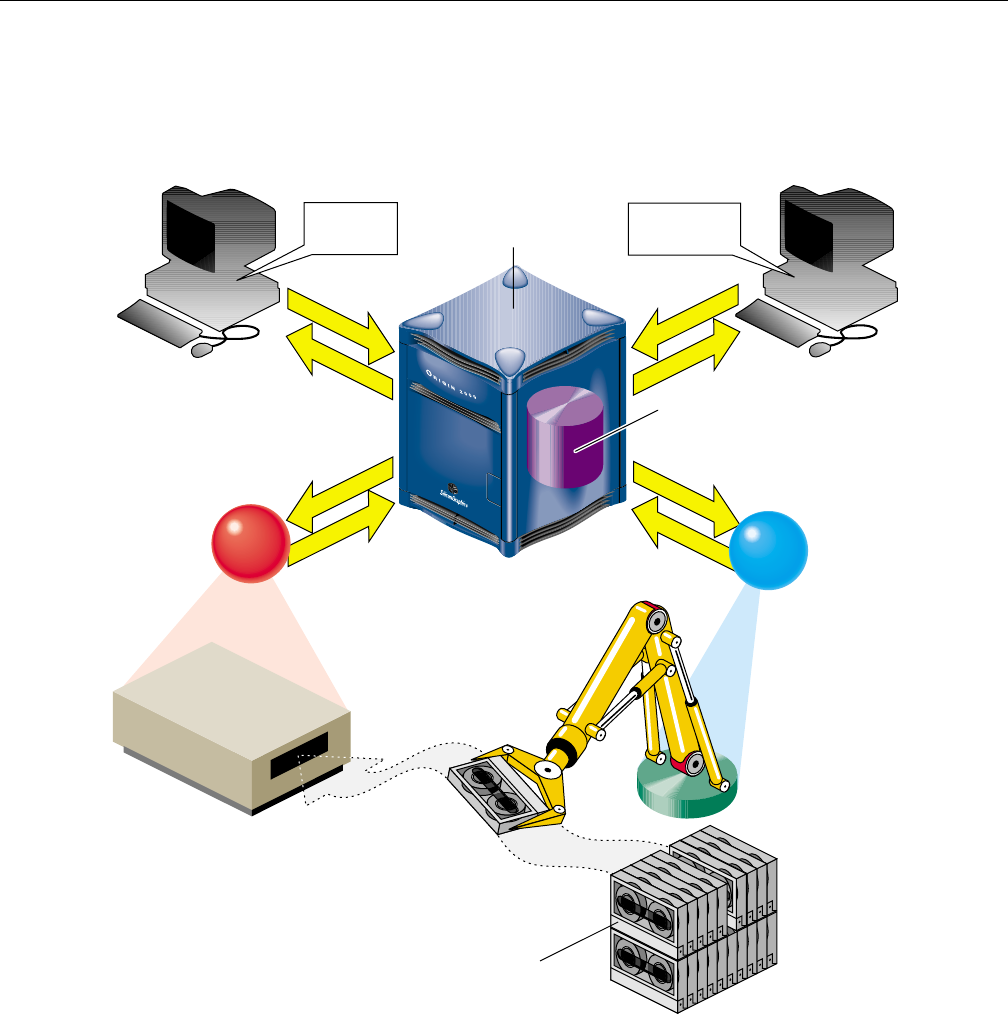
OpenVault is organized as a set of cooperating components, as shown in Figure 1-1.
CAPI
CAPI/R
LCP
ALI
ALI/R
DCP
ADI
ADI/R
AAPI
AAPI/R
MLM server
Client
application Administrator
interface
Persistent
storage
Removable
media library
/dev/mount/* drive
Figure 1-1 OpenVault Architecture
007–3216–005 3

1: OpenVault Overview
The central mediation component is the media library manager (MLM), a
multithreaded process that accepts client connections and fulfills access requests by
forwarding them to appropriate library and drive control programs. The MLM server
maintains persistent storage containing information about cartridges in the system,
and descriptions of authorized applications, libraries, and drives.
OpenVault consists of the following pieces:
1. One MLM server process mediates among other components.
2. Any number of client applications can make requests using the client application
programming interface, CAPI; the MLM server replies in CAPI
response (CAPI/R).
3. An administrative interface makes system requests in a similar but less restricted
administrative API, AAPI; the MLM server replies in AAPI response (AAPI/R).
4. Persistent storage (a database) tracks cartridges and system components.
5. A library control program (LCP) is required for each removable media library
controlled by the MLM server.
The MLM server talks to an LCP using the abstract library interface (ALI), and
receives answers in ALI response (ALI/R). An LCP translates from ALI to the
actual library control interface, and replies in ALI/R.
6. A drive control program (DCP) is required for each drive controlled by the MLM
server. Some removable media libraries contain multiple drives, in which case
each drive has its own DCP. Drives need not be associated with a robotic library.
The MLM server talks to a DCP using the abstract drive interface (ADI), and
receives answers in ADI response (ADI/R). A DCP translates from ADI to the
actual drive control interface, and replies in ADI/R.
The OpenVault languages consist entirely of ASCII strings.
1.4.1 MLM Server
The MLM server accepts requests from applications, and forwards commands to an
LCP and DCP, which translate them into low-level robotic and drive control
operations to serve that request. MLM also schedules competing requests from
different applications, creates and enforces cartridge groups for each application, and
maps logical cartridge names (used by applications) to physical cartridge labels (used
by libraries).
4 007–3216–005

OpenVaultTM Application Programmer’s Guide
The MLM server manages cartridges, directing LCP and DCP to mount and unmount
a cartridge. Often, cartridges store data. After requesting that a cartridge be mounted,
the client application may read and write the media using POSIX standard I/O
interfaces. Cartridges can also store audio-video streams for broadcast. In either case,
MLM is not directly involved in I/O operations.
Client applications, libraries, and drives may be added to a live MLM server. The
system administrator installs new programs on the appropriate hosts, and issues
administrative commands on a live system to inform the MLM server that these new
programs exist.
1.4.2 Cartridge Naming
Client applications may choose their own names for cartridges. Because OpenVault
client applications operate in separate name spaces, different applications may use the
same name for different cartridges. Moreover, cartridges used by one application are
not visible to or accessible from another application, unless the system administrator
permits specific cartridges to be moved from one application to another.
Some robotic libraries can interpret barcodes and labels affixed to cartridges. It is the
responsibility of the LCP to pass any physical cartridge label (PCL) information to the
MLM server.
1.4.3 Communication Paths
The OpenVault languages CAPI, CAPI/R, AAPI, AAPI/R, ALI, ALI/R, ADI, and
ADI/R are expressed exclusively in text strings, which travel between components by
means of TCP sockets. The underlying communications layer is encapsulated in a C
library; so OpenVault developers need not worry about the details.
007–3216–005 5

1: OpenVault Overview
1.5 OpenVault Interfaces
This section describe the various OpenVault programming interfaces.
1.5.1 CAPI for Client Applications
CAPI (client application programming interface) is the language client applications
use to communicate with the MLM server.
The command-response format is semi-asynchronous. After submitting each
command, the application waits for the server to acknowledge receiving the
command, but need not wait for results before sending the next command. CAPI
communications libraries can also work synchronously if this makes implementation
more convenient.
Access to the server is session-oriented. The application initiates a session with the
hello command, and ends with a goodbye. Meanwhile, the application may send
commands to the server to mount and unmount removable media, or to change
attributes of media.
Here is a list of CAPI commands organized alphabetically:
•allocate requests volumes for use by this application.
•attribute sets attribute-value pairs associated with OpenVault volumes.
•deallocate returns volumes to the free pool.
•mount asks the MLM server to provide volumes for data access.
•reject tells the server to recategorize a volume.
•rename declares a new name for a volume.
•show displays information about OpenVault volumes.
•unmount says that volumes are no longer needed for data access.
•unwelcome informs the client of an MLM server version mismatch.
•welcome tells the client which version of the MLM server is responding.
The OpenVault Application Programmer’s Guide describes how to program CAPI.
6 007–3216–005

OpenVaultTM Application Programmer’s Guide
1.5.2 AAPI for Administrative Applications
AAPI (administrative API) is the language that administrative applications use to
communicate with the MLM server. AAPI commands and responses are ASCII
strings. As with CAPI, the command-response format is semi-asynchronous, and
access to the server is session-oriented. AAPI is a superset of CAPI.
Here is a list of AAPI commands organized alphabetically:
•attribute sets attribute-value pairs associated with OpenVault volumes.
•create establishes a volume or object in the OpenVault database.
•delete removes a volume or object from the OpenVault database.
•eject pushes a cartridge out of a library into the operator’s hand.
•export removes a volume from the OpenVault database.
•inject allows the operator to insert a cartridge into a library.
•mount tells the MLM server to provide data access to a volume.
•move relocates a cartridge from one slot in a library to another.
•rename declares a new name for a volume.
•show displays information about OpenVault volumes.
•unwelcome informs the client of an MLM server version mismatch.
•unmount says that volumes are no longer needed for data access.
•welcome tells the client which version of the MLM server is responding.
The OpenVault Application Programmer’s Guide describes how to program the AAPI.
1.5.3 Abstract Library Interface (ALI)
A library control program (LCP) is a part of OpenVault that deals with low-level
details of a removable media library and its configuration and control procedures.
There is at least one LCP associated with each MLM-managed library. The purpose of
an LCP is to expose library configuration to the MLM server, and to control a library
as requested.
007–3216–005 7

1: OpenVault Overview
The MLM server issues directives to the LCP in a language called ALI. The LCP
replies to the MLM server in a language called ALI response (ALI/R).
ALI/R implements a different command set from ALI, reflecting different needs of an
LCP and the MLM server. The ALI language is primarily a library control interface,
whereas ALI/R constitutes a status reporting interface with support for
administration and configuration. Like CAPI, ALI and ALI/R are semi-asynchronous.
If you are developing a library control program, your program must be able to read
ALI from, and write ALI/R to, the MLM server. The OpenVault infrastructure
developer’s kit includes an ALI parser and ALI/R generator. The parser and
generator, as well as the communications layer, are delivered with a C language
interface.
The OpenVault Infrastructure Programmer’s Guide describes the ALI and ALI/R
languages, and offers an introduction to creating library control programs.
1.5.3.1 ALI Commands
Here is a list of ALI commands organized alphabetically:
•activate disable forces the LCP to stop talking to the library.
•activate enable forces the LCP to resynchronize its internal information with
the physical state of the library, and keep it synchronized.
•attribute sets and unsets named attributes in the LCP.
•barrier tells the LCP to complete all asynchronous commands before continuing.
•cancel revokes a command that the LCP has queued but not yet started.
•eject pushes a cartridge out of the library immediately, or queues a cartridge to
be pushed out of the library (if queueing is implemented).
•exit tells the LCP to store state information, clean up, and exit.
•mount asks the LCP to put cartridges into drives.
•move requests transfer of a cartridge from one physical slot into another.
•openPort instructs the LCP to open the library door, so that cartridges can be
added to or removed from the library.
•reset instructs the LCP to reinitialize its library.
8 007–3216–005

OpenVaultTM Application Programmer’s Guide
•scan has the LCP ask its library to verify physical labels of cartridges in the
library.
•show obtains the current value of an attribute.
•unmount tells the LCP to take cartridges out of drives.
1.5.3.2 ALI/R Commands
Here is a list of ALI/R commands organized alphabetically:
•attribute sets and unsets named attributes in the OpenVault database.
•cancel prevents execution of a command that has been queued but not yet
started.
•config copies information (such as slot state) from the LCP to the MLM server.
•goodbye asks MLM to end this session (vice versa for ALI).
•message sends a message of a specified severity level to an operator or logfile.
•ready tells the MLM server about library status for cartridge operations.
•response indicates success or failure of an ALI command, and returns results.
•show obtains values of attributes stored in the OpenVault database.
1.5.4 Abstract Drive Interface (ADI)
A drive control program (DCP) manages the configuration of drives, and performs the
drive control tasks associated with CAPI mount and unmount requests. There is at
least one DCP associated with each MLM-managed drive. The purpose of DCP is to
expose the drive configuration to the MLM server, and to control drives as requested.
The MLM server issues directives to the DCP in a language called ADI. The DCP
replies to the MLM server in a language called ADI response (ADI/R).
ADI/R implements a different command set from ADI, reflecting different needs of a
DCP and the MLM server. The ADI language is primarily a drive control interface,
whereas the ADI/R language constitutes a status reporting interface with support for
administration and configuration. Like CAPI, ADI and ADI/R are semi-asynchronous
If you are developing a drive control program, your program must be able to read ADI
from, and write ADI/R to, the MLM server. The OpenVault infrastructure developer’s
007–3216–005 9

1: OpenVault Overview
kit includes an ADI parser and ADI/R generator. The parser and generator, as well as
the communications layer, are delivered with a C language interface.
The OpenVault Infrastructure Programmer’s Guide describes the ADI and ADI/R
languages, and offers an introduction to creating drive control programs.
1.5.4.1 ADI Commands
Here is a list of ADI commands organized alphabetically:
•activate disable forces the DCP to store persistent state and stop
communicating with its hardware.
•activate enable forces the DCP to resynchronize with its drive hardware,
ensuring that the DCP has the current drive state.
•attach selects the appropriate access method, and binds it to a drive handle.
•attribute sets and unsets named attributes in the DCP.
•barrier tells the DCP to complete all asynchronous commands before continuing.
•cancel requests the DCP to stop execution of a command, if possible.
•detach removes the access method binding created by an attach command.
•exit tells the DCP to store state information, clean up, and exit.
•load pushes a cartridge into the drive and engages media at the media access
point (read/write head), or verifies that the drive is loaded.
•reset instructs the DCP to attempt drive reinitialization.
•response indicates success or failure of an ADI command, and returns results.
•show asks the DCP to return state or configuration information.
•unload rewinds if necessary, disengages media from the media access point, and
returns media to its cartridge.
1.5.4.2 ADI/R Commands
Here is a list of ADI/R commands organized alphabetically:
•attribute stores persistent state in the OpenVault database.
10 007–3216–005

OpenVaultTM Application Programmer’s Guide
•cancel tells OpenVault to prevent execution of a particular command, if possible.
•config tells OpenVault about access modes, form factors, and media formats.
•goodbye asks MLM to end this session (vice versa for ADI).
•message sends a message of some severity level to an operator or logfile.
•ready informs OpenVault of the status of the DCP’s connection to the drive.
•response indicates success or failure of an ADI command, and returns results.
•show queries persistent state stored in the OpenVault database.
1.5.5 Administrative Commands
OpenVault can be administered with commands given from the system prompt. Most
of these commands cause MLM to forward library or drive requests to a particular
LCP or DCP. Most OpenVault commands produce helpful usage messages when
invoked with the wrong syntax or with the -help option. For a list of OpenVault
commands, see the OpenVault Operator’s and Administrator’s Guide
The user mount shell, umsh, is a system command that provides user and
administrator access to OpenVault volumes. See the umsh(1M) man page for details.
Note: To access OpenVault man pages, on IRIX systems add /usr/openvault/man
to the MANPATH environment variable. On SGI ProPack for Linux systems, add /opt/
openvault/man to the MANPATH environment variable. See man(1) for more
information.
007–3216–005 11

Chapter 2
Client and Administrative API
The Client Application Programming Interface (CAPI) and Administrative
Application Programming Interface (AAPI) are languages that OpenVault client and
administrative programs use to communicate with the MLM server. CAPI commands
are a subset of AAPI commands, which are more powerful.
2.1 Communication Protocols
CAPI and AAPI are based on message passing. OpenVault client and administrative
programs communicate with the MLM server through TCP/IP sockets. Only ASCII
strings travel across these sockets. The hello-welcome command sequence
establishes an IPC connection based on a socket.
Once an IPC connection has been established, the entity at either end of the
connection may send and receive commands compatible with the negotiated language
and version. The sender of a command generates a unique task ID for that command.
The task ID is used in subsequent responses to that command. In some releases, the
sender may also use the task ID to cancel the command or to obtain command status.
2.1.1 Version Negotiation Language
To allow partial upgrades and peaceful coexistence of different language versions,
OpenVault includes a session initiation facility to negotiate language version. When
connecting to the MLM server, a client or administrative program announces which
language it uses, and which versions of the language it understands. The MLM
server selects one version and says which one to use for the current session.
The OpenVault session is demarcated by version negotiation (hello and welcome or
possibly unwelcome) at the beginning, and close of session (goodbye) at the end.
2.1.2 Authentication Requests
Before a session can be established between the initiator and its recipient,
authentication is needed. OpenVault employs public key session verification to
provide a modicum of security while still avoiding export restrictions.
007–3216–005 13

2: Client and Administrative API
As an example, assume that Alice represents the client that initiates communication
with the MLM server. Bob represents the MLM server. The authentication process
begins with Alice sending her name to Bob. Bob replies by generating a 32-bit
random number (R1) and sending it to Alice as a challenge. Upon receiving this
number, Alice encrypts it with the key she shares with Bob and sends this value,
along with another 32-bit random number she has generated herself (R2) to Bob.
After checking to make sure that Alice has successfully encrypted R1, Bob then
encrypts R2 and generates a third random number (R3). Bob now sends the
encrypted R2 and R3 to Alice. Alice verifies that R2 has been properly encrypted and
then decrypts R3 and stores it as the session key.
Application developers do not need to be concerned about details of the OpenVault
authentication method. The OpenVault transport layer handles authentication
requests from client applications transparently.
2.1.3 Command Phases
A communication session between the MLM server and a client or control program
employs a stylized sequence of phases. Since the interface is a full-duplex
bidirectional peer-to-peer interface, phase sequencing applies to both directions of a
session. The phases are as follows:
Command In this phase, the sender transmits the text of the command, plus a task
ID it assigns to the command, to help track responses.
Ack The receiver sends back an intermediate response indicating that it
accepted a command with the given task ID. The receiver may send
back an unacceptable response if the command was incorrectly
constructed, in which case there is no data phase. The sender cannot
transmit another command until it receives an accepted or unaccepted
response.
Data The receiver of the command sends back a final response, including the
task ID, so as to identify the original command, a return value, which
could be an indication of success or failure, and possibly some data.
Associated CAPI/R or AAPI/R commands may intervene between transmission of a
command and receipt of the corresponding final response.
Because sessions are full-duplex, each endpoint must be prepared both to read and
write on a session without blocking for either. For example, if the application is
sending but the MLM server is not responding and its buffers are full, the application
must remain ready to accept incoming data from the server. The only permitted
14 007–3216–005
OpenVaultTM Application Programmer’s Guide
blocking I/O operation is a select() function call. This requirement helps reduce
the likelihood of deadlocks.
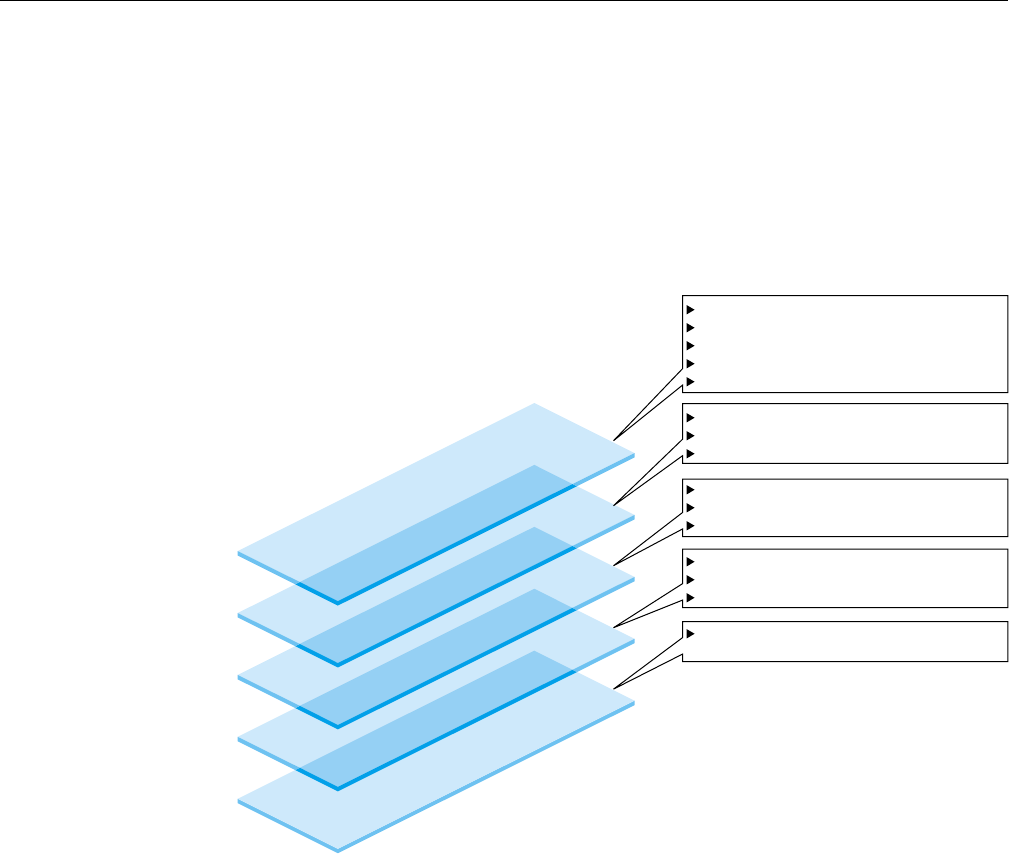
2.1.4 Protocol Layers
Figure 2-1 shows OpenVault communication layers, which are described in this
section.
TCP/IP Sockets Layer
OpenVault IPC Layer
Over-the-Wire CAPI or CAPI/R
Parser and Generator Layer
Semantic Layer
Implementing CAPI or AAPI commands
Acknowledgment processing
Ready state transitions
Response sequencing
Handling device state changes
Language version negotiation
Session establishment
Convert between ASCII and C structures
Pure ASCII representation
Phases: command, acknowledgment, data
Conforms to language conventions
Provides server/client communications
Underlying session and packetization
Performs authentication
Employs standard networks, even when
used on local host
Figure 2-1 Communication Layers
2.1.4.1 Semantic Layer
The function of the semantic layer is the same for CAPI and AAPI. It is responsible
for the following:
007–3216–005 15

2: Client and Administrative API
•Implementation of CAPI and AAPI commands
•Ack processing—synchronizing commands by ensuring that a command is not
sent until an acknowledgment is received for the previous command
•Response sequencing
•Detection and handling of device state changes
2.1.4.2 Parser and Generator Layer
The parser and generator layer uses the POSIX compliant GNU utilities bison and
flex, and is responsible for the following:
•Language version negotiation and session establishment
The source files involved are ovsrc/include/hello.h and ovsrc/libs/
hellor/*.
•Converting commands between C data structures and ASCII representations
The source files involved are ovsrc/include/capi.h and ovsrc/libs/
{capi,capir}/*.
2.1.4.3 Over-the-Wire CAPI and CAPI/R Layer
The over-the-wire CAPI and CAPI/R layer employs nothing but ASCII strings, and is
responsible for the following:
•Transitioning between command phases (command, ack, data)
•Conforming to language conventions (the parser enforces this)
2.1.4.4 OpenVault IPC Layer
The OpenVault IPC layer is responsible for the following:
•Providing OpenVault interprocess communication between clients and the server
•Implementing underlying session connections for OpenVault processes, including
the packetization of over-the-wire ASCII commands
•Authentication
16 007–3216–005

OpenVaultTM Application Programmer’s Guide
2.1.4.5 TCP/IP Socket Layer
The TCP/IP socket layer employs standard networks to aid portability.
2.1.5 Language Conventions
All commands are designed so that the basic arguments of the command may be
entered in any order. For example, these two commands are equivalent:
mount slot["#12", "vol.001", "sideA"] drive["DLT2"] task["1"];
mount drive["DLT2"] slot["#12", "vol.001", "sideA"] task["1"];
OpenVault strings are composed of ASCII characters in the range 32 to 126 (decimal).
Strings must be quoted with either a double-quote or single-quote (“or ‘). OpenVault
considers these different quote characters to be identical.
Example 2-1 Using Quote Characters in Strings
To include either quote character in a string, precede it with backslash (\). To include
a single backslash character in a string, put two backslash characters in a row:
"This string contains a backslash \\ and a double quote \" character."
Potential return value types depend on the command issued. In general, when a
command is successful, the return value specification is the following:
response task success text [retValue(s)]
When a command is unsuccessful, the error return value conforms to the following
specification:
response task error errorSpec
Boolean return values are the predefined strings “true”and “false”.
2.2 Persistent Storage
The OpenVault persistent store is implemented as a database subsystem that resides
in the MLM server. This is a multiuser, in-memory relational database subsystem
whose clients are the modules that make up core OpenVault services. Each
OpenVault module is linked with a C library to handle the following:
•Constructing queries and other data update operations
007–3216–005 17

2: Client and Administrative API
•Assembling and disassembling the data update structures
One important OpenVault process is the Catalog Manager, which handles database
startup and recovery, manages the on-disk transactional log file, and takes periodic
snapshots of the database.
The OpenVault applications programmer does not need to be concerned about details
of the OpenVault database. The MLM server handles database operations triggered
by hardware events or by CAPI requests from client applications transparently. Client
applications interact with the persistent store through the CAPI language.
2.3 CAPI/AAPI Operational Model
CAPI and AAPI use a hybrid of an object attribute interface and procedural
commands to accomplish tasks required in a media management system.
The command-response format is semi-asynchronous. After submitting each
command, the application waits for the server to acknowledge receiving the
command, but need not wait for results before sending the next command. CAPI
communications libraries can also work synchronously if this makes implementation
more convenient.
2.3.1 Command Sequencing
During a session, the client sends a command with task ID, and waits for the MLM
server to acknowledge receipt of that command. Some time later the MLM server
sends the client a response to the command, including the original task ID. The client
application can thus determine which response goes with which command. Example
2-2 shows this arrangement (arrows indicate command direction):
Example 2-2 CAPI/AAPI Command Sequence
The client application sends a command to the MLM server:
mount task["1"] match [streq(VOLUME."VolumeName" "v1")];
The MLM server sends an acknowledgment:
response task["1"] accepted;
Some time later, MLM sends a response to the original command:
18 007–3216–005

OpenVaultTM Application Programmer’s Guide
response task["1"] success;
Because the application can determine which response came from the execution of
each individual command, the sequence could look something more like this:
mount task["1"] match [streq(VOLUME."VolumeName" "v1")];
response task["1"] accepted;
attribute task["a43"] match [streq(VOLUME."VolumeName" "v1")]
set[VOLUME."Color" "green"];
response task["a43"] accepted;
response task["a43"] success;
response task["1"] success;
In this example, the client sent a second command before the first command
completed. In fact, the second command completed before the first.
2.3.2 Objects and Their Attributes
OpenVault defines 27 types of objects that comprise a media environment. Table 2-1,
page 20, provides a complete list of object types known to OpenVault, the predefined
attributes for each object, and a short description of the object type. Applications can
add more attributes to any given instance of an object, and can modify the values of
most predefined attributes, but may not remove a predefined attribute.
007–3216–005 19

2: Client and Administrative API
Table 2-1 OpenVault Objects
Object Type and Class Name Predefined Attributes Object Description
Application Instance
AI
AIKey
AIName
ApplicationName
Entity
An instance of an application.
Holds the security key as well as
language and version information
for the point-to-point
communication link relating to
this AI. Used as a storage location
for attribute name/value data. For
applications, the SELF meta-object
resolves to a particular AI.
Application
APPLICATION
ApplicationName
Language
An application. Used as a storage
location for attribute name/value
data. Declares the language used
(either “AAPI”or “CAPI”). For
applications, the PARENT
meta-object resolves to a
particular APPLICATION.
Bay
BAY
BayAccessible
BayName
LCPName
A physical region of a robot. This
is the only specifier of locality or
adjacency that is exposed, or
indeed known to OpenVault, for
slots and drives within a robot.
This exists both for efficiency and
administrability.
Cartridge
CARTRIDGE
ApplicationName
CartridgeGroupName
CartridgeID
CartridgeNumberMounts
CartridgeNumberVolumes
CartridgePCL
CartridgeState
CartridgeTimeCreated
CartridgeTimeMountedLast
CartridgeTimeMountedTotal
CartridgeTypeName
LibraryName
A physical cartridge, for example
a DLT cartridge or a 3480
cartridge. A cartridge contains
media, which is physically
organized into one or more sides.
Each side is logically organized as
one or more partitions.
20 007–3216–005

OpenVaultTM Application Programmer’s Guide
Object Type and Class Name Predefined Attributes Object Description
Cartridge Group
CARTRIDGEGROUP
CartridgeGroupName
CartridgeGroupPriority
Data for one of the two
permissions-related parts of
OpenVault. The other is the
DriveGroup abstraction. Each
cartridge is in exactly one
cartridge group.
Cartridge Group Application
CARTRIDGE GROUP
APPLICATION
ApplicationName
CartridgeGroupApplicationPriority
CartridgeGroupName
Data for one of the two
permissions-related parts of
OpenVault. The other is the
DriveGroup abstraction. Each
Cartridge Group Application
object shows the relationship
between one application and one
cartridge group. If and only if
there exists a cartridge group
application object referencing both
the application and the cartridge
group, an application can allocate
volumes on cartridges in that
cartridge group.
Cartridge Type
CARTRIDGETYPE
CartridgeTypeMediaLength
CartridgeTypeMediaType
CartridgeTypeName
CartridgeTypeNumberSides
SlotTypeName
Particular type of cartridge. This
includes the cartridge’s media
type, media length, number of
sides (for a tape, this is always 1),
and the name of the type of slot
into which this cartridge fits.
Client Connection
CONNECTION
ConnectionClientHost
ConnectionClientPort
ConnectionID
ConnectionTimeCreated
ConnectionTimeLastActive
Entity
SessionID
Every time a client (an LCP, DCP,
CAPI or AAPI client) connects to
MLM, the server creates a
CONNECTION object that uniquely
defines the connection. This object
allows request responses to be
returned to the requestor, and
allows the OpenVault
administrator a better view of the
running system.
007–3216–005 21

2: Client and Administrative API
Object Type and Class Name Predefined Attributes Object Description
Drive Control Program
DCP
DCPHost
DCPKey
DCPName
DCPStateHard
DCPStateSoft
DriveName
Entity
For a drive to function, at least
one DCP object is required for that
drive. More than one DCP can be
used per drive in fault-tolerant
configurations.
Drive Control Program
Capability
DCPCAPABILITY
DCPCapabilityName
DCPName
Tag attached to a particular set of
simultaneously available
capabilities of a drive, as exposed
by a particular DCP. For example,
in the OpenVault sample source,
the EXB-8505 DCP encodes the
capabilities {“norewind”
“variable_block”“compression”}
under the tag named nrvc.
Drive Control Program
Capability String
DCPCAPABILITYSTRING
DCPCapabilityName
DCPCapabilityStringName
DCPName
One of these objects for each of
the strings listed above in
DCPCAPABILITY. Each
DCPCAPABILITY can be thought
of as a container that holds some
number of
DCPCAPABILITYSTRING objects.
22 007–3216–005

OpenVaultTM Application Programmer’s Guide
Object Type and Class Name Predefined Attributes Object Description
Drive
DRIVE
BayName
CartridgePCL
DCPName
DriveBroken
DriveGroupName
DriveLibraryAccessible
DriveLibraryOccupied
DriveName
DriveOnline
DriveStateHard
DriveStateSoft
DriveTimeCreated
DriveTimeLastMounted
DriveTimeMountedTotal
LibraryName
A device to access the contents of
a piece of media. DRIVE refers to
the drive, and not to the DCP that
controls it. For example, a tape
drive, magneto-optical drive,
CDROM drive, and so forth. This
object is in a one-to-one
relationship with the physical
pieces of hardware.
Drive Group
DRIVEGROUP
DriveGroupName
DriveGroupUnloadTime
Data for one of the two
permissions-related parts of
OpenVault. The other is the
cartridge group abstraction. Each
drive is in exactly one drive
group.
Drive Group Application
DRIVE GROUP
APPLICATION
ApplicationName
DriveGroupApplicationPriority
DriveGroupApplicationUnloadTime
DriveGroupName
Data for one of the two
permissions-related parts of
OpenVault. The other is the
cartridge group abstraction. Each
drive is in exactly one drive
group. Each Drive Group
Application object shows the
relationship between one
application and one drive group.
If and only if there exists a drive
group application object
referencing both the application
and the drive group, an
application can mount volumes in
drives belonging to that drive
group.
007–3216–005 23

2: Client and Administrative API
Object Type and Class Name Predefined Attributes Object Description
Library Control Program
LCP
Entity
LCPHost
LCPName
LCPStateHard
LCPStateSoft
LibraryName
For a library to function, at least
one LCP object is required for that
library. More than one LCP can be
used per library in certain
fault-tolerant configurations.
Library
LIBRARY
LCPName
LibraryBroken
LibraryName
LibraryOnline
LibraryStateHard
LibraryStateSoft
This refers to the library, and not
the LCP that controls it. A library
can be automated (a robotic tape
changer) or manual (a person
changing tapes).
Logical Mount
MOUNTLOGICAL
ApplicationName
DCPCapabilityName
DCPName
DriveName
MountLogicalHandle
MountLogicalTimeWhenMounted
PartitionName
VolumeName
Stored information about a
particular logical mount. One
MOUNTLOGICAL object is created
by MLM for each drive access
handle that is returned as the
result of a CAPI or AAPI mount
request. The object is destroyed
during the processing of a CAPI
or AAPI unmount request.
Physical Mount
MOUNTPHYSICAL
CartridgeID
CartridgePCL
DriveName
LibraryName
MountPhysicalState
MountPhysicalTimeWhenMounted
SideNumber
SlotName
Stored information about a
particular physical mount. MLM
creates one such object when a
cartridge is inserted into a drive,
and deletes it when that cartridge
is removed.
24 007–3216–005

OpenVaultTM Application Programmer’s Guide
Object Type and Class Name Predefined Attributes Object Description
Partition
PARTITION
CartridgeID
PartitionAllocatable
PartitionBitFormat
PartitionName
PartitionNumberMounts
PartitionSignature
PartitionSize
PartitionTimeCreated
PartitionTimeMountedLast
PartitionTimeMountedTotal
SideNumber
A logical subrange of a side.
Some tape technologies support
multiple partitions per side. For
example, a filesystem resides in a
disk partition.
Request
REQUEST
RequestAcceptances
RequestID
RequestInitiatorSessionID
RequestRequest
RequestResponderSessionID
RequestResponse
RequestState
RequestTimeAccepted
RequestTimeClosed
RequestTimeCreated
RequestType
LCPs, DCPs, and CAPI/AAPI
clients may request actions by the
OpenVault operator. Each request
command causes the creation of a
REQUEST object in MLM. When
the original requestor receives its
results, the REQUEST object is
deleted.
Session
SESSION
ApplicationName
Language
SessionAttached
SessionClientHost
SessionClientPort
SessionID
SessionTimeCreated
SessionTimeLastActive
Every time a CAPI or AAPI client
makes a recognized (authorized)
connection to MLM, the server
creates a SESSION object. The
session name (SessionID) ties
the client to other objects in MLM.
When a CAPI or AAPI client
sends the goodbye command, its
session object is destroyed. When
a CAPI or AAPI client sends the
detach command, its SESSION
lives on, but its CONNECTION is
destroyed. The session object can
be reattached to the client if the
client sends an attach command
upon reconnection.
007–3216–005 25

2: Client and Administrative API
Object Type and Class Name Predefined Attributes Object Description
Side
SIDE
CartridgeID
SideNumber
SideNumberMounts
SideTimeCreated
SideTimeMountedLast
SideTimeMountedTotal
SIDE objects are created
automatically at cartridge-creation
time. When a cartridge object is
created, one of the fields required
is CartridgeTypeName. From the
CARTRIDGETYPE object, MLM
determines the number of sides to
make, and creates them. Sides
exist as objects so that partitions
can be attached to them.
Slot
SLOT
BayName
CartridgeID
CartridgePCL
LCPName
SlotAccessible
SlotName
SlotOccupied
SlotTypeName
A position in the library that can
hold a cartridge. It may contain a
cartridge or it may be empty.
Slot Configuration
SLOTCONFIG
BayName
LCPName
SlotConfigNumberFree
SlotConfigNumberTotal
SlotTypeName
One or more SLOTCONFIG objects
must be declared for each
SlotTypeName of each BAY that
an LCP declares within a
LIBRARY. Each of these objects
stores the total number of slots
and also the number of free slots
of that particular slot type.
Slot Type
SLOTTYPE
SlotTypeName The family of SLOTTYPE objects
defines the registry of valid slot
types that may be used in
SlotTypeName fields in various
other object types.
26 007–3216–005
OpenVaultTM Application Programmer’s Guide
Object Type and Class Name Predefined Attributes Object Description
System Attributes
SYSTEM
Administrator Stored e-mail address of the
system administrator, and all the
attribute/value pairs that the
administrator has attached as
annotations to the system as a
whole. There is only one SYSTEM
object in MLM.
Volume
VOLUME
ApplicationName
CartridgeID
PartitionName
SideNumber
VolumeName
VolumeNumberMounts
VolumeTimeCreated
VolumeTimeMountedLast
VolumeTimeMountedTotal
An application’s view of a
partition. There can be zero, one,
or many volumes that map to a
particular partition. If zero, then
no CAPI application can mount
that partition. Since AAPI
applications can mount partitions
and sides as well as volumes, this
restriction does not apply. If only
one volume exists for a given
partition, the partition is owned
by a particular application; if
more than one volume exists for a
given partition, it is shared by
several applications.
The show and attribute commands are used to query the state of an object’s
attributes and set them, respectively.
Each object has various attributes that either describe its current state or control its
behavior. An example of a state attribute is “SlotOccupied”—true if there is a
cartridge in the slot and false if there is none. An example of behavior controlling
attribute is “LibraryOnline”—if set to false, MLM does not use that library even if
everything it requires is available and functioning perfectly (this is an administrative
disable switch).
See the OpenVault Infrastructure Programmer’s Guide for more information about library
and drive hardware and control programs.
007–3216–005 27

2: Client and Administrative API
2.3.3 Relationships between Objects
OpenVault objects are all related to each other. Some relationships are physical, such
as those between cartridges, sides, partitions, and those between libraries, bays, and
slots. Some relationships are logical, such as the connection between applications,
volumes, and partitions. The system administrator must understand these
relationships in order to administer the OpenVault environment effectively.
2.3.4 Function Oriented Commands
In addition to objects and their attributes, an administrative application can directly
cause some operations to occur. For example, an application can eject a cartridge from
a library into an operator’s hand.
There is a set of commands in the AAPI language that implement those operations.
The objects and the attributes that control them are still active and will influence
exactly what happens when one of the operation-oriented commands is executed. For
example, the current value of any drive group attributes on the drives in the system
will affect an AAPI mount command by influencing which drives are candidates for
the mount.
2.3.5 Security Model
The OpenVault security model is based on both applications and the limitations of the
interface to which that application has access. A normal client application has access
only to the CAPI interface, with the limitations in control that implies: no visibility of
volume namespaces for other applications, read-only access to drive or library
attributes, no ability to directly create or destroy objects, and so on. An
administrative application has access to the much more powerful AAPI language,
implying: read-write access to attributes on any object in the system, and the ability
to create and destroy objects.
CAPI client applications are protected from each other, but all AAPI applications
share complete access to the entire system. It is expected that in Release 1 of
OpenVault only trusted applications will be granted access to the AAPI interface.
2.3.6 OpenVault Timestamps
Time values stored in the OpenVault catalog are expressed in UCT (GMT), not local
time.
28 007–3216–005

OpenVaultTM Application Programmer’s Guide
2.4 AAPI Command Descriptions
AAPI and CAPI commands fall into three basic groupings: session management,
device control, and database manipulation.
•Session Management
–attach reconnects to a previously established session.
–detach disconnects from a session but leaves it running.
–goodbye ends a session with the MLM server.
–hello initiates a session with the MLM server.
•Device Control
–eject pushes a cartridge out of a library into the operator’s hand (AAPI only).
–inject allows the operator to insert a cartridge into a library (AAPI only).
–mount tells the MLM server to provide data access to a volume.
–move relocates a cartridge from one slot in a library to another (AAPI only).
–reject informs the MLM server that it mounted the wrong volume.
–unmount says that volumes are no longer needed for data access.
•Database Manipulation
–allocate associates volume names with a cartridge group (AAPI only).
–attribute sets attribute-value pairs associated with OpenVault volumes.
–create establishes an object in the persistent store (AAPI only).
–deallocate disassociates volume names with a cartridge group (AAPI only).
–delete removes an object from the persistent store (AAPI only).
–forget deletes volumes from the list known to the MLM server (AAPI only).
–rename declares a new name for a volume.
–show displays information about OpenVault volumes.
007–3216–005 29

2: Client and Administrative API
2.4.1 Character Set and Quoting Considerations
The OpenVault character set for strings includes all 7-bit ASCII characters in the
decimal value range 32 to 126 (hex 20 to 7E).
Strings must be quoted with either a double-quote (") or single-quote (‘) character.
OpenVault treats the single quote and double quote characters as identical. To include
a double quote or single quote in a string, precede it with a backslash (\). To include
one backslash character in a string, put two backslash characters in your string (\\).
2.4.2 Command Element Ordering
All commands are designed so that constituent elements may be entered in any order.
In the syntax summaries below, words in fixed-space font indicate commands,
filenames, routines, path names, signals, messages, signals, messages, and
programming language structures. Words in italics represent variable entries and
words or concepts being defined. Braces enclose optional portions of a command or
directive line where order does not matter. Inside braces, vertical bars indicate a
choice of only one element. Ellipses (...) indicate that a preceding element can be
repeated.
2.4.3 Session Management Commands
This section describes the AAPI and CAPI commands for session management.
The attach command may reconnect to an earlier session.
The detach command may relinquish a session connection.
The goodbye command severs the connection from an application to the MLM
server. The syntax is as follows:
goodbye task["taskID"];
Example 2-3 shows the application closing a session, and two possible responses from
the MLM server:
Example 2-3 Session Closing
goodbye task [’1234’];
response whichtask [’1234’] accepted;
response whichtask [’1234’] success;
30 007–3216–005

OpenVaultTM Application Programmer’s Guide
The hello command initiates a connection from a client or administrative application
to the MLM server. The syntax is as follows:
hello { client["cli"] instance ["inst"]language["lang"] versions ["vers"] }
MLM returns a hello response, either welcome or unwelcome. The syntax is as
follows:
welcome version "ver";
unwelcome { error ["errNum"] | text["errText"] } ... ;
Example 2-4 shows the MLM server agreeing to talk version 1.1 of AAPI:
Example 2-4 welcome Response
hello client [’admin’] instance [’fred’]
language [’AAPI’] versions [’1.0’’1.1’];
welcome version [’1.1’];
Example 2-5 shows the MLM server unwilling to talk version 1.2 or 1.7 of AAPI:
Example 2-5 unwelcome Response
hello client [’admin’] instance [’jane’]
language [’AAPI’] versions [’1.2’’1.7’];
unwelcome error [’EBADVERSION’] text [’No Version Supported’];
2.4.4 Device Control Commands
This section describes AAPI and CAPI commands for controlling cartridge movement.
2.4.4.1 eject Command
The eject command is used by an administrative application when it wants to have
a media cartridge pushed out of a library into a human’s hand. The syntax is as
follows:
eject
{ task [taskID]
match [matchSpec(s)]
order [orderSpec(s)]
number [number(s)]
report [reportSpec]
reportMode [modeName]};
007–3216–005 31

2: Client and Administrative API
The match operator must resolve to a library.
Example 2-6 asks the alexandria library to eject the cartridge in slot 24:
Example 2-6 Ejecting a Cartridge
eject match [and(
strEQ (LIBRARY."LibraryName" "alexandria")
strEQ (SLOT."SlotName" "slot 24"))]
task["0"];
2.4.4.2 inject Command
The inject command is used by an administrative application when it wants to
allow the human operator to insert a cartridge into a library. The syntax is as follows:
inject
{ task [taskID]
match [matchSpec(s)]
order [orderSpec(s)]
number [number(s)]
report [reportSpec]
reportMode [modeName]};
The match operator must resolve to a library.
Example 2-7 requests the alexandria library to accept a new cartridge:
Example 2-7 Injecting a New Cartridge
inject match [strEQ(LIBRARY."LibraryName" "alexandria")] task["0"];
2.4.4.3 mount Command
The mount command provides data access to one or more volumes, partitions, or
sides. Things to be mounted may be explicitly enumerated or may be implicitly
declared by a match operator. The syntax is as follows:
mount
{ mountMode [mountMode]
volname [volNameSpec ...]
task [taskID]
match [matchSpec(s)]
order [orderSpec(s)]
32 007–3216–005
OpenVaultTM Application Programmer’s Guide
number [number(s)]
report [reportSpec]
reportMode [modeName]};
See Section 2.5, page 42, for information about the match,order,number, and
report operators.
Table 2-2 lists the tokens that specify different mount modes.
Table 2-2 mount Mode Tokens
Token Description
audio Mount point allows playing audio data from media (often
unimplemented).
compression Attempts compression of the data stream.
fixed Blocks on the media are a fixed size.
readonly The mount point allows reading of the media.
readwrite The mount point allows writing of the media.
rewind Rewinds the media on close of the mount point.
status A status-only mount point is also created (in a directory created
for the session).
variable Blocks on the media are variable sized.
The following default applies only to the mount command:
mountMode ["read" "write"]
The following defaults apply to all commands containing a number or reportMode
clause:
number [FIRST..LAST]
reportMode [value]
Whether volumes are explicitly or implicitly enumerated, any number of volumes
may be specified for mounting. Some volumes must be mounted read-only, others
read-write, or an application can specify a preference, if mount mode is not volume
dependent.
007–3216–005 33

2: Client and Administrative API
Example 2-8 mounts volume myVolume-003 for reading and writing:
Example 2-8 Mounting Explicitly Enumerated Volume
mount mountMode ["read" "write"] volname ["myVolume-003"]
task["0"];
Example 2-9 mounts the first available DLT volume that is less than 60% full for
reading and writing (note that percentFull is a user-defined token):
Example 2-9 Mounting Implicitly Enumerated Volume
mount mountMode ["read" "write"]
number [FIRST] match [and(
strEq (CARTRIDGE."CartridgeTypeName" "DLT")
numLe (VOLUME."percentFull" "60"))
task["0"]];
2.4.4.4 move Command
The move command is used by an administrative application when it wants to have a
cartridge moved from one library slot to another. The syntax is as follows:
move
{ fromslot [slotID]
fromPCL [PCL]
toslot [slotID]
task [taskID]
match [matchSpec(s)]
order [orderSpec(s)]
number [number(s)]
report [reportSpec]
reportMode [modeName]};
Example 2-10 moves the cartridge labeled AB1234 from slot 12 to slot 24 in the
library named alexandria if all these objects exist:
Example 2-10 Moving a Cartridge
move match [strEQ(LIBRARY."LibraryName" "alexandria")]
fromslot ["slot 12"] fromPCL["AB1234"] toslot["slot 24"] task["0"];
34 007–3216–005

OpenVaultTM Application Programmer’s Guide
2.4.4.5 reject Command
Note: The reject command is not supported in the OpenVault releases 1.x.
Implemented but currently disabled, this allowed applications to refuse acceptance of
OpenVault-assigned volumes. It is unclear whether this should be allowed.
2.4.4.6 unmount Command
When an application is done accessing a partition, side, or volume, it can use the
unmount command to free the drive for use by another application. The unmount
command must specify currently mounted volumes, either by enumerating volumes
to be unmounted, or by means of a match operation. The thing to be unmounted
must be mounted when this command is given. The syntax is as follows:
unmount
{ volname [volNameSpec ...]
task [taskID]
match [matchSpec(s)]
order [orderSpec(s)]
number [number(s)]
report [reportSpec]
reportMode [modeName]};
The unmount command does not immediately unload media—delay is affected by the
default unload time specified as drive group attribute (DriveGroupUnloadTime).
Example 2-11 unmounts volume myVolume-003:
Example 2-11 Unmounting Explicitly Enumerated Volume
unmount volname ["myVolume-003"] task["0"];
Example 2-12 unmounts the two volumes in pool servers that are nearest to full
capacity (note that all these VOLUME attributes are user-defined tokens):
Example 2-12 Unmounting Implicitly Enumerated Volume
unmount number[2]
order [numHiLo(VOLUME."percentFull")] match [and (
strEq (VOLUME."allFull" "true")
strEq (VOLUME."pool" "servers"))
task["0"]];
007–3216–005 35

2: Client and Administrative API
2.4.5 Database Manipulation Commands
This section describes the AAPI and CAPI commands for handling persistent storage.
2.4.5.1 allocate Command
Unprivileged applications may obtain ownership of cartridges and create new
volumes on those cartridges by using the allocate command. When a volume is
created, it immediately takes its place next to all other volumes owned by that
application. No other non-privileged application can see the new volume or allocate a
volume on the same cartridge. The syntax is as follows:
allocate
{ volname [volNameSpec] ...
task [taskID]
match [matchSpec(s)]
order [orderSpec(s)]
number [number(s)]
report [reportSpec]
reportMode [modeName]};
In Example 2-13, OpenVault allocates any convenient volume as the first named
Servers:
Example 2-13 Allocating a Volume
allocate volname ["Servers.001"] task["0"];
2.4.5.2 attribute Command
An administrative application may modify the values of object attributes in
OpenVault. The attribute command modifies behavior-controlling object attributes,
thus permitting administrative control of the MLM server. The syntax is as follows:
attribute
{ volname [volNameSpec] ...
task [taskID]
match [matchSpec(s)]
order [=orderSpec(s)]=
number [=number(s)]=
set [setSpec(s)]
unset [unsetSpec(s)]
36 007–3216–005

OpenVaultTM Application Programmer’s Guide
report [reportSpec]
reportMode [modeName]};
Applications can also use the attribute command to attach or remove
non-system-defined attribute-value pairs from objects in the system.
When using the attribute command, the list of objects to operate on is primarily
specified using the match element. There are additional elements that can be used to
order the list of objects and even to restrict that list to a certain subset.
An application may disassociate attributes that it has associated with an object in
exactly the same way it associated them, except that it will use the unset rather than
the set operator. Set and unset operators may be freely mixed, but a single
attribute command may not contain more than one set or unset operator
referencing the same attribute.
Note: System-defined attributes may not be disassociated from an object. Any
attempt to do so returns an error. Example 2-14 and Example 2-15 show how you can
use the attribute command.
Example 2-14 Modifying Values of Object Attributes 1
attribute
match [strEQ( VOLUME."VolumeName" "vol001")]
set [VOLUME."PartitionName" "PART 2"]
task ["0"];
Example 2-15 Modifying Values of Object Attributes 2
attribute
match [and (strEQ(SLOT."SlotName" "Slot 1")
strEQ(SLOT."BayName" BAY."BayName")]
set [SLOT."SlotOccupied" "true"]
report [BAY."BayName"]
task ["0"];
2.4.5.3 create Command
Administrative applications may create new objects. Once an object has been created,
it immediately takes its place next to all other objects of that type. The syntax is as
follows:
007–3216–005 37

2: Client and Administrative API
create type [tableNameSpec]
{ set [setSpec]...
task [taskID]
match [matchSpec(s)]
order [orderSpec(s)]
number [number(s)]
report [reportSpec]
reportMode [modeName]};
The application must specify all required attributes for the type of object being
created, or the MLM server returns failure. The application may specify additional
attributes and values beyond those required.
In Example 2-16, the administrative application creates an object of type LIBRARY
named alexandria in group physics but not currently online:
Example 2-16 create Usage
create type [LIBRARY]
set [LIBRARY."LibraryName" "alexandria"]
set [LIBRARY."Group" "physics"]
set [LIBRARY."Online" "false"]
task["0"];
2.4.5.4 deallocate Command
Applications may delete volumes that they own. The volume immediately
disappears—there is neither a grace period nor an undo operation. Lacking a volume
name, that portion of the cartridge is no longer available to the application for mount
operations. Non-privileged applications can delete only volumes that they own, but
they can do so at any time and with no restrictions. The syntax is as follows:
deallocate
{ volname [volNameSpec] ...
task [taskID]
match [matchSpec(s)]
order [orderSpec(s)]
number [number(s)]
report [reportSpec]
reportMode [modeName]};
In Example 2-17, OpenVault deallocates the volume named Servers.001:
38 007–3216–005

OpenVaultTM Application Programmer’s Guide
Example 2-17 Deallocating a Volume
deallocate volname ["Servers.001"] task["0"];
2.4.5.5 delete Command
Administrative applications may delete existing objects by using the delete
command. Deleted objects disappear immediately—there is neither a grace period nor
an undo operation. The syntax is as follows:
delete type [tableNameSpec]
{ task [taskID]
match [matchSpec(s)]
order [orderSpec(s)]
number [number(s)]
report [reportSpec]
reportMode [modeName]};
Permission to delete an object is subject to the internal consistency constraints of
MLM. If the object is still in use or being referenced by other objects, then the delete
operation fails. For example, a LIBRARY object may not be deleted until all DRIVE
objects for that library have been deleted.
In Example 2-18, the administrative application deletes the LIBRARY object named
alexandria previously created:
Example 2-18 Deleting an Object
delete type [LIBRARY] match [strEQ(LIBRARY."LibraryName" "alexandria")]
task["0"];
2.4.5.6 forget Command
An administrative application may delete volumes from the list known to the MLM
server, using the forget command. The volumes cannot be in use by any
application. The syntax is as follows:
forget
{ volname [volNameSpec] ...
task [taskID]
match [matchSpec(s)]
ordermm [orderSpec(s)]
number [number(s)]
007–3216–005 39

2: Client and Administrative API
reportm [reportSpec]
reportModem [modeName]};
In Example 2-19, the lack of an application name might cause the MLM server to
delete database information for several volumes from different applications:
Example 2-19 Deleting a Volume 1
forget match [strEQ(VOLUME."VolumeName", "servers.001")]
task["0"];
Example 2-20 is more limiting and thus more realistic:
Example 2-20 Deleting a Volume 2
forget match [and (strEq (APPLICATION."ApplicationName" "deadApp")
strEq (CARTRIDGE."CartridgeTypeName" "8mm-112m"))]
task["0"];
2.4.5.7 rename Command
Client applications may rename their own volumes, while administrative applications
may rename any volumes, using the rename command. The syntax is as follows:
rename
{ volname [volNameSpec]
volnewname [volNameSpec]
task [taskID]
match [matchSpec(s)]
order [orderSpec(s)]
number [number(s)]
report [reportSpec]
reportMode [modeName]};
Because Example 2-21 contains no match component, this command renames all
volumes of that name, no matter which application owns the volumes.
Example 2-21 Renaming Volumes
rename volname ["servers.001"] volnewname ["servers.003"] task["0"];
40 007–3216–005

OpenVaultTM Application Programmer’s Guide
2.4.5.8 show Command
The show command displays data from the OpenVault environment to application
users, often in ways not directly supported by the MLM server. The syntax is as
follows:
show
{ volname [volNameSpec] ...
task [taskID]
match [matchSpec(s)]
order [orderSpec(s)]
number [number(s)]
report [reportSpec]
reportMode [modeName]};
The application may use the match operator to select objects to be operated on, the
order operator to specify that the results of the command be ordered in some manner,
the number operator to specify that only certain numbers of records be returned, the
report operator to specify attributes of the selected objects to be returned, and the
reportMode operator to specify how the results should be formatted.
!
Caution: Things can change in MLM between show commands or between a show
command and a command intended to act on the information returned by show.
In Example 2-22, OpenVault reports about all drives known to the MLM server:
Example 2-22 Showing Drive List
show report [DRIVE."DriveName"]
task["0"];
In Example 2-23, the MLM server selects bay 1 in the library named alexandria,
sorts the slot names in ascending order, and reports the names of the first four:
Example 2-23 Showing Slot Names
show match [and (strEQ (LIBRARY."BayName" "bay 1")
strEq (LIBRARY."LibraryName" "alexandria"))]
order [strLoHi (SLOT."SlotName")]
number [1..4]
report [SLOT."SlotName"]
reportMode [nameValue]
task["0"];
007–3216–005 41

2: Client and Administrative API
2.5 Semantics of Common Syntactic Elements
Several syntactic elements are common to many AAPI and CAPI commands,
including match,order,number,report,reportMode, and others. The meaning
of each of these elements is constant no matter what the command.
2.5.1 General Order of Operator Evaluation
The syntax elements described in the sections below are evaluated in the following
order:
1. Start with the whole object name space as the working set.
2. Restrict the working set to objects with specified attributes using the match
operator.
3. Sort the working set on values of specified attributes using the order operator.
4. Select specified ordinal elements from the working set using the number operator.
5. Display attributes of objects that remain in the working set using the report
operator. The reportMode operator influences the report output format.
2.5.2 Description of Shared Syntax Elements
The sections below provide a description of common AAPI and CAPI syntax elements.
2.5.2.1 Object Type and Field Name
An attribute may be interpolated by referring to its object type and field name. This
syntax is used in combination with the match and order operators. The object type
is chosen from a predefined list; see Table 2-1, page 20. The field name may be
predefined or user defined. The object type is all uppercase, while the field name is
enclosed in quotes:
OBJECTTYPE."fieldname"
Example 2-24 reports the physical cartridge labels of all the volumes named
servers.001, from all applications shows all on the servers.001 volume:
Example 2-24 Reporting Physical Cartridge Labels
show volname ["servers.001"] report[CARTRIDGE."CartridgePCL"];
42 007–3216–005

OpenVaultTM Application Programmer’s Guide
Example 2-25 reports the name of the library containing the physics1 drive:
Example 2-25 Reporting a Library Name
show match [strEQ(DRIVE."DriveName" "physics1")]
report [LIBRARY."LibraryName"];
2.5.2.2 volname Operator
The volname operator restricts the set of volumes to which a command is applied. It
is shorthand for a much more complicated match statement as shown in Example
2-26.
Example 2-26 volname to match Comparison
The volname operator is given a list of volume names:
volname ["servers.001" "servers.002" "servers.003" ]
The following match statement is equivalent to this volname statement.
match [ or(
strEQ (VOLUME."VolumeName" "servers.001")
strEQ (VOLUME."VolumeName" "servers.002")
strEQ (VOLUME."VolumeName" "servers.003")
)];
Note: If the volname operator is given, it is illegal to supply a match operator also.
2.5.2.3 match Operator
The match operator restricts the set of objects to which a command is applied.
Restriction is accomplished by applying various functions to specified object
attributes in order to determine true or false status, which in turn determines
membership or exclusion from the working set. As an example, suppose the current
working set of volumes and attributes is shown in Table 2-3:
007–3216–005 43

2: Client and Administrative API
Table 2-3 Current Working Set 1 of Volumes and Attributes
Volume Group Attribute Handler Attribute
"vol1" Group="Servers" Handler="Marge"
"vol2" Group="Clients" Handler="Sam"
"vol3" Group="Servers" Handler="Bill"
"vol4" Group="Clients" Handler="Marge"
With that working set, Example 2-27 shows the match statement returns vol3 as its
result (the Ne in strNe means not equal to):
Example 2-27 match Usage
match [and(
strEq (VOLUME."Group" "Servers")
strNe (VOLUME."Handler" "Marge")
)];
Roughly translated, the match statement would read: “Find volumes where the
Group attribute is set to Servers and the Handler attribute is not set to Marge.”After
evaluation, only the volume named vol3 and related objects remain in the working set.
2.5.2.4 order Operator
The order operator sorts the set of objects in the working set. It is useful in cases
where the application wants to optimize its activities as much as possible.
As an example, suppose the current working set of volumes and attributes is shown
in Table 2-4:
Table 2-4 Current Working Set 2 of Volumes and Attributes
Volume Attribute
“vol1”percentFull=”40”
“vol2”percentFull=”31”
44 007–3216–005

OpenVaultTM Application Programmer’s Guide
Volume Attribute
“vol3”percentFull=”93”
“vol4”percentFull=”11”
With that working set, this order statement returns vol3 vol1 vol2 vol4 as its result:
order [numHiLo(VOLUME."percentFull")];
2.5.2.5 number Operator
The number operator declares which elements in the current working set are reported.
The elements given after number specify ordinal numbers of items in the work list
for further operation. It is possible to specify both single items and ranges of items.
A range is specified by numbers separated by two periods (..) and includes elements
at each end of the range. The additional tokens FIRST and LAST refer to the initial
and final elements of the work list. Negative numbers are offsets from the end of the
work list.
The specification number [1 3 5] means that the first, third, and fifth items from
the ordered work list should be used. Specifications number [2..4] and number
[2 3 4] are identical. The specification number [FIRST..3 7..-8
-3..LAST] is equivalent to number [1 2 3 7 8 9 14 15 16] if there are 16
elements in the working set.
As an example, suppose the current working set of volumes and attributes is shown
in Table 2-5:
Table 2-5 Current Working Set 3 of Volumes and Attributes
Volume Group Attribute Handler Attribute
"vol1" Group="Servers" Handler="Marge"
"vol2" Group="Clients" Handler="Sam"
"vol3" Group="Servers" Handler="Bill"
"vol4" Group="Clients" Handler="Marge"
Example 2-28 shows the output that is produced by the number and report
statements using this working set:
007–3216–005 45

2: Client and Administrative API
Example 2-28 number Usage
number[2 4]
report [VOLUME."group" VOLUME."VolumeName" VOLUME."handler"]
text ["Clients" "vol2" "Sam"]
text ["Clients" "vol4" "Marge"]
2.5.2.6 report and reportMode Operators
The report operator declares attributes or attribute values that are to be returned by
the current command.
The reportMode operator declares whether the report contains only the “name”of
each reported attribute, only the “value”of each attribute, or both (specified as
“nameValue”).
As an example, suppose the current working set of volumes and attributes is shown
in Table 2-6, page 46:
Table 2-6 Current Working Set 4 of Volumes and Attributes
Volume Group Attribute Handler Attribute
"vol1" Group="Servers" Handler="Marge"
"vol2" Group="Clients" Handler="Sam"
"vol3" Group="Servers" Handler="Bill"
"vol4" Group="Clients" Handler="Marge"
Example 2-29 shows the output produced a report statement and that working set:
Example 2-29 report Usage
report [VOLUME."group" VOLUME."VolumeName" VOLUME."handler"]
text ["Servers" "vol1" "Marge"]
text ["Clients" "vol2" "Sam"]
text ["Servers" "vol3" "Bill"]
text ["Clients" "vol4" "Marge"]
Example 2-30 shows the output produced when a reportMode statement is added:
46 007–3216–005

OpenVaultTM Application Programmer’s Guide
Example 2-30 reportMode Usage
reportMode [nameValue]
text[
text [VOLUME."group" "Servers"]
text [VOLUME."VolumeName" "vol1"]
text [VOLUME."handler" "Marge"]]
text[
text [VOLUME."group" "Clients"]
text [VOLUME."VolumeName" "vol2"]
text [VOLUME."handler" "Sam"] ]
text[
text [VOLUME."group" "Servers"]
text [VOLUME."VolumeName" "vol3"]
text [VOLUME."handler" "Bill"]]
text[
text [VOLUME."group" "Clients"]
text [VOLUME."VolumeName" "vol4"]
text [VOLUME."handler" "Marge"]]
2.5.2.7 text Operator
The text operator is a general container for lists of character strings or object
references. In some contexts, such as the use of this operator in the rename
command, the number of and content of strings that can be enclosed by the text
operator may be constrained. But usually, command responses are encapsulated in
one or more text statements.
Example 2-31 shows use of the text operator in a reject command:
Example 2-31 text Usage
reject volname ["myVolume-003"]
text ["This is not what I thought it was"];
2.5.3 Glossary of match Keywords
The functions described in this section operate in the context of the CAPI or AAPI
match operator. For each possible combination of objects in the system, an expression
made up of field references (OBJECT."field") can be evaluated in combination with the
following functions. If the expression returns false, the object is not included in the
007–3216–005 47

2: Client and Administrative API
working set for the enclosing operation of the match operator. All functions return
either true or false.
isAttr (nameSpec)
Returns true if the attribute nameSpec is defined on this object,
otherwise returns false.
noAttr (nameSpec)
Returns false if the attribute nameSpec is defined on this object,
otherwise returns true.
regex ((regExpr)expression)
Returns true if regular expression regExpr matches expression,
otherwise returns false. For regular expression rules, see the
regcmp(3G) man page.
strXX (expression1 expression2)
Returns true if the defined relationship between the values denoted
by expression1 and expression2 is true; otherwise returns false.
Note: In strXX, replace XX with the appropriate suffix in Table 2-7.
Suffixes are case insensitive. Comparisons are made on the entire
lengths of the two strings, based on machine collation ordering.
Table 2-7 String Comparison Suffixes
Suffix Meaning
Eq value1 identical to value2
Ne value1 not identical to value2
Lt value1 less than value2
Le value1 less than or equal to value2
48 007–3216–005

OpenVaultTM Application Programmer’s Guide
Suffix Meaning
Ge value1 greater than or equal to value2
Gt value1 greater than value2
numXX (value1 value2)
Returns true if the defined relationship between the values denoted
by value1 and value2 is true, otherwise returns false.
Note: In numXX, replace XX with the appropriate suffix in Table 2-7.
Suffixes are case-insensitive. Values are defined as numbers expressed
as digits [-0-9] that fit into a signed 32-bit word. Numeric conversion
is performed by atoi() or equivalent.
and (expression ...)
Returns true if all expressions are true, or false if any expression is
false.
or (expression ...)
Returns true if any expression is true, or false if all listed
expressions are false.
2.5.4 Command Return Formats and Values
Potential return values and types depend on the command issued. In general, when a
command is successful, the return value specification is the following:
response success successSpec
When a command is unsuccessful, the error return value specification is the following:
response error errorSpec
2.6 AAPI Command Examples
Example 2-32 and Example 2-33 illustrate AAPI command usage:
007–3216–005 49

2: Client and Administrative API
Example 2-32 Showing Volume Names
This show command returns the volume names of all volumes that have an attribute
called VolumeNumberMounts with a numeric value greater that 10:
show match [ numGt (VOLUME."VolumeNumberMounts" "10")]
report [VOLUME."VolumeName"]
task ["0"];
Example 2-33 Setting an Attribute
This attribute command sets or creates an attribute named
CartridgeGroupName with a value of CART 4 on all volumes that have an attribute
named CartridgeNumberMounts with numeric value greater than 10 and an
attribute named LibraryName with a lib1 value:
attribute
match [and (numGt (CARTRIDGE."CartridgeNumberMounts" "10))
strEQ (CARTRIDGE."LibraryName" "Lib1"))]
set [ nameValue[CARTRIDGE."CartridgeGroupName" "CART 4"]]
task ["0"];
50 007–3216–005

Chapter 3
OpenVault Programming with Perl
This chapter describes how to write OpenVault applications using the Perl language.
You can write OpenVault applications in Perl (an interpretive programming language
by Larry Wall) without access to an OpenVault application developer’s kit. This is
because Perl offers a socket library that can interface to the MLM server.
The Perl interpreter is available precompiled in an IRIX subsystem from several
locations, including fw_LWperl5.sw.perl on the Freeware distribution. It can also
be compiled from scratch with modest effort.
Commercial OpenVault applications are best written in C, for two reasons:
1. You can distribute them in binary form to help keep source code proprietary.
2. Compiled applications can take advantage of security features built into the
CAPI/AAPI libraries. See Chapter 4, page 59, for an introduction to OpenVault
programming in C.
3.1 Disabling Security
When new sessions are established, OpenVault employs public key session
verification to authenticate the connecting client. At setup time, the OpenVault system
administrator configures a password for each application, library, and drive.
Specifying a password of “none”disables security checking.
A Perl application must be configured with a password of “none”and the MLM
server grants it access only to libraries and drives configured with the “none”
password. This implies that a Perl application cannot share libraries or drives with
any applications that use the OpenVault security facilities.
3.2 Programming OpenVault with Perl
There are two different areas to learn about before writing OpenVault Perl scripts:
•Perl code that connects with and talks to the OpenVault server
•CAPI/AAPI language to request OpenVault actions
007–3216–005 51

3: OpenVault Programming with Perl
The code that connects with and talks to the OpenVault server is basically the same in
every script. Depending on your knowledge of Perl, the learning curve may be steep,
but needs to be learned only once. Code shown in this chapter can be used almost
verbatim for new scripts; so true understanding might not be necessary.
Learning to write CAPI/AAPI language requires a less steep learning curve, but is an
ongoing process. CAPI/AAPI commands could be entirely different for different
scripts. The most difficult part is writing code to deal with the results of CAPI/AAPI
commands. Some form of parsing may be required, or scripts must assume fixed
results. For information about AAPI and CAPI commands, see Section 2.4, page 29.
The scripts provided in this chapter are intended only for use as examples. They are
not guaranteed to be free of bugs. Some have limitations, or make possibly false
assumptions about OpenVault configuration.
3.2.1 Outline of an OpenVault Perl Script
Procedure 3-1 describes the steps involved in creating an OpenVault Perl script:
Procedure 3-1 OpenVault Perl Script
1. Open connection to the OpenVault server.
2. Send initial startup (hello) commands.
3. Repeat the following steps as necessary:
•Send CAPI/AAPI command.
•Receive command acknowledgment.
•When command succeeds, receive command results.
•Do something with results.
4. Close connection to the OpenVault server.
Note: The code for the first two and final steps is the same for each script.
52 007–3216–005

OpenVaultTM Application Programmer’s Guide
3.2.2 Hints for Writing OpenVault Perl Scripts
There are a few things to know about OpenVault Perl scripts to make writing them
easier.
1. CAPI/AAPI commands and responses are composed of a single line, ending with
a semicolon, a carriage return (\r), and a line feed (\n).
Failing to end a command with a semicolon results in an error being returned
from the OpenVault server. Not ending a command with “\r\n”results in the
script seeming to hang, as the OpenVault server waits for the end of a command
line.
2. Use the -Z option of OpenVault commands to see the structure of CAPI/AAPI
commands and responses.
Try running OpenVault commands that are similar to what your script is
attempting to do. This may provide you with a general idea of the commands to
write, and may also give you an idea of what the results look like. Examples in
this chapter use OpenVault commands, with the -Z option, as a basis for CAPI/
AAPI commands. This allows for easy comparison of CAPI/AAPI commands
and responses between the OpenVault command and the Perl script.
3. If you find it difficult to understand the perl code that establishes a connection
to the OpenVault server, just use the code verbatim, changing variables as
necessary, and trust that it works.
3.3 Sample Perl Scripts
This section contains two sample Perl scripts for your use: demo_stat.pl and
demo_show.pl
3.3.1 demo_stat.pl Script
Example 3-1, page 54, contains the simplest and smallest possible OpenVault Perl
script, equivalent to the ov_stat command with the -u option, which checks to see
if the OpenVault server is up or not.
007–3216–005 53

3: OpenVault Programming with Perl
3.3.1.1 ov_stat with -u Option
The ov_stat command checks to see if the OpenVault server is up or not by
connecting and saying hello to the OpenVault server. Once a response comes back,
it is known that the server is up; so the script sends a goodbye command and exits
(there is no time-out mechanism).
To show content of the conversation, run the ov_stat command with the -u and -Z
options:
vega# ov_stat -uZ
WRITTEN: vega
WRITTEN: SYSTEM
WRITTEN: onlyInstance
WRITTEN: AAPI
WRITTEN: 0
READ: ok
WRITTEN: hello language [‘AAPI’]versions[‘1.0’]
instance[‘onlyInstance’] client[‘SYSTEM’];
READ: welcome version[‘1.0’];
The OV server ‘vega’is UP.
WRITTEN: goodbye task[‘0’];
READ: response whichtask[‘0’] accepted ;
READ: response whichtask[‘0’] success ;
Lines starting with WRITTEN: are commands sent to the server. Lines starting with
READ: are responses coming back from the server.
3.3.1.2 demo_stat.pl Example
The Perl script in Example 3-1 sends the exact same commands:
Example 3-1 demo_stat.pl Script
#! /usr/bin/perl -w
# demo_stat.pl
#
# This script will attempt to connect to the OpenVault server and
# get a response. If for some reason we can’t connect to the
# server, we know OpenVault is down.
require 5.002;
use Socket;
use FileHandle;
54 007–3216–005

OpenVaultTM Application Programmer’s Guide
# This assumes that the OV core is on the same host as
# this script is running.
$ov_server = h
` ostname ;`
chop $ov_server;
$ov_port = ‘‘44444’’;
# Setup connection to OpenVault server process.
# See ‘‘Programming Perl’’ 2nd ED. P. 498 for discussion
# on network programming with Perl.
$iaddr = inet_aton($ov_server) or die ‘‘no host: $ov_server’’;
$paddr = sockaddr_in($ov_port, $iaddr);
$proto = getprotobyname(‘‘tcp’’);
socket(SOCK, PF_INET, SOCK_STREAM, $proto) or die ‘‘socket: $!’’;
connect(SOCK, $paddr) or die ‘‘connect: $!’’;
SOCK -> autoflush();
# Now that a connection is made to the OpenVault server
# process, we treat it just like another other file.
# Send initial data to server
print SOCK ‘‘$ov_server\r\nSYSTEM\r\nonlyInstance\r\nAAPI\r\n0\r\n’’;
# Get response and ignore it
# Response should only be ‘ok’
$line = <SOCK>;
# Send HELLO greeting
print SOCK ‘‘hello client[‘SYSTEM’]instance[‘onlyInstance’]’’;
print SOCK ‘‘language[‘AAPI’]versions[‘1.0’];\r\n’’;
$line = <SOCK>;
if (substr($line,0,7) eq ‘‘welcome’’){
# Welcome is good and what we want
}
elsif (substr($line,0,9) eq ‘‘unwelcome’’){
# Server has rejected us
die ‘‘Server Not Allowing Request\n’’;
}
else {
#Got an undefined answer from server
#We should not get here
die ‘‘Undefined Error\n’’;
}
# Since we have communicated with the server,
# we know that OpenVault is running.
print ‘‘OpenVault server $ov_server is UP\n\n’’;
# Send goodbye command
007–3216–005 55

3: OpenVault Programming with Perl
print SOCK ‘‘goodbye task[‘0’];\r\n’’;
# Get command ‘accepted’from server.
$line = <SOCK>;
# Get command ‘success’from server.
$line = <SOCK>;
close(SOCK) or die ‘‘close: $!’’;
exit;
3.3.2 demo_show Script
Example 3-2, page 57, contains a Perl script that sends an OpenVault command and
receives a reply. This script queries the server for a list of drives, and is similar to the
ov_drive command.
3.3.2.1 ov_drive with -l .* and -Z Options
To see the CAPI/AAPI commands involved, run the ov_drive command with -l
.* and -Z options, as follows:
vega# ov_drive -lZ ".*"
WRITTEN: vega
WRITTEN: SYSTEM
WRITTEN: onlyInstance
WRITTEN: AAPI
WRITTEN: 0
READ: ok
WRITTEN: hello language[‘AAPI’] versions[ ‘1.0’]
instance[‘onlyInstance’] client[‘SYSTEM’];
READ: welcome version[‘1.0’];
WRITTEN: show match[ regEx(‘.*’DRIVE.’DriveName’)]
report[DRIVE.’DriveName’
DRIVE.’DriveGroupName’DRIVE.’DriveDisabled’] reportmode[value]
task[‘0’];
READ: response whichtask[‘0’] accepted ;
READ: response whichtask[‘0’] success text[‘tape1’‘drives’‘false’]
text[‘tape2’‘drives’‘false’];
Drives:
Drive Drive Group Disabled
tape1 drives false
tape2 drives false
WRITTEN: goodbye task[‘1’];
56 007–3216–005

OpenVaultTM Application Programmer’s Guide
READ: response whichtask[‘1’] accepted ;
READ: response whichtask[‘1’] success ;
3.3.2.2 demo_show Example
The Perl script in Example 3-2 issues a similar set of CAPI/AAPI commands, but is a
bit simpler. Instead of requesting the DriveName,DriveGroupName, and
DriveDisabled, this script only requests the DriveName:
Example 3-2 demo_show Script
#! /usr/bin/perl -w
require 5.002;
use Socket;
use FileHandle;
$ov_server = h` ostname ;`
chop $ov_server;
$ov_port = ‘‘44444’’;
# Setup connection to OpenVault server process.
# See ‘‘Programming Perl’’ 2nd ED. P. 498 for discussion
# on network programming with Perl.
$iaddr = inet_aton($ov_server) or die ‘‘no host: $ov_server’’;
$paddr = sockaddr_in($ov_port, $iaddr);
$proto = getprotobyname(‘‘tcp’’);
socket(SOCK, PF_INET, SOCK_STREAM, $proto) or die ‘‘socket: $!’’;
connect(SOCK, $paddr) or die ‘‘connect: $!’’;
SOCK -> autoflush();
# Now that a connection is made to the OpenVault server
# process, we treat it just like another other file.
#Send initial data to server
print SOCK ‘‘$ov_server\r\nSYSTEM\r\nOnlyInstance\r\nAAPI\r\n0\r\n’’;
#Get response and ignore it
# Response should only be ‘ok’
$line = <SOCK>;
# Send HELLO greeting
print SOCK ‘‘hello client[‘SYSTEM’]instance[‘onlyInstance’]’’;
print SOCK ‘‘language[‘AAPI’]versions[‘1.0’];\r\n’’;
$line = <SOCK>;
if (substr($line,0,7) eq ‘‘welcome’’){
# Welcome is good and what we want
}
elsif ( substr($line,0,9) eq ‘‘unwelcome’’){
007–3216–005 57

3: OpenVault Programming with Perl
# Server has rejected us
die ‘‘Server Not Allowing Request\n’’;
}
else {
#Got an undefined answer from server
#We should not get here
die ‘‘Undefined Error\n’’;
}
# Send show command
print SOCK ‘‘show match[ regEx (‘.*’DRIVE.’DriveName’)]’’;
print SOCK ‘‘report[DRIVE.’DriveName’] task[‘0’];\r\n’’;
# Get command ‘accepted’from server
$line = <SOCK>;
# Get command ‘success’from server with results of command
# along with results
$line = <SOCK>;
#Now we need to do something with the data
#A non-trivial script would parse out the results
#and display it in a more human readable form.
print $line;
print SOCK ‘‘goodbye task[‘1’];\r\n’’;
# Get command ‘accepted’from server
$line = <SOCK>;
# Get command ‘success’from server
$line = <SOCK>;
close(SOCK) or die ‘‘close: $!’’;
exit;
58 007–3216–005

Chapter 4
Programming the C Interface
This chapter introduces CAPI programming, and includes the following topics:
•Section 4.1 introduces the CAPI and AAPI languages.
•Section 4.2 describes CAPI subroutine libraries.
•Section 4.3, page 62, presents tables of OpenVault tokens.
4.1 CAPI and AAPI
The Client Application Programming Interface (CAPI) and Administrative
Application Programming Interface (AAPI) are languages that OpenVault client and
administrative programs use to communicate with the MLM server.
CAPI commands are a subset of AAPI commands, which are granted more privileges.
For a list of AAPI language elements not available in the more limited CAPI
language, see Section B.2, page 80.
A client application speaks to the MLM server in CAPI, and the server replies in
CAPI/R. An administrative application speaks to the MLM server in AAPI, and the
server replies in AAPI/R.
4.2 Client Development Framework
The application developer’s kit includes a framework for writing CAPI or AAPI that
helps ease the development, porting, and maintenance effort for client or
administrative applications. This section describes the general source tree layout.
007–3216–005 59

4: Programming the C Interface
4.2.1 OpenVault Client-Server IPC
OpenVault clients and servers communicate using a custom interprocess
communication (IPC) layer. Modules using this PIC layer need to include the
following header file, and be loaded with the following C library:
ovsrc/include/ov_lib.h
C data structures, macros, and subroutine prototypes for IPC
ovsrc/libs/comm/libov_comm.so
C library containing IPC subroutines
4.2.2 CAPI Generator and CAPI/R Parser
OpenVault includes language parsers and generators. Modules using these facilities
need to include the following header files, and be loaded with the following
C libraries:
ovsrc/include/capi.h
Supported CAPI and CAPI/R version number, command
enumeration, definitions for CAPI objects, C data structures for
command sequences, and library function prototypes
ovsrc/include/hello.h
C data structures for HELLO and WELCOME command representation
ovsrc/libs/hellor/libov_hello.so
C library (DSO) that contains HELLO parser-generator subroutines
ovsrc/libs/capi/libov_capi.so
C library (DSO) that contains CAPI parser-generator subroutines
60 007–3216–005
OpenVaultTM Application Programmer’s Guide
4.2.3 C Library Routines
Table 4-1 offers a summary of the CAPI and CAPI/R lexical library routines that you
employ when writing client or administrative applications.
Table 4-1 CAPI and CAPI/R Lexical Library Routines
Purpose of Activity CAPI Function Short Description
To initiate session with
MLM server
CAPI_initiate_session() Begins session with a specific MLM server,
including HELLO version negotiation.
To parse CAPI/R
command from MLM
server
CAPIR_receive() Parses a CAPI/R command from the server and
returns a CAPIR_cur_cmd structure
To acknowledge CAPI/
R command
CAPIR_acknowledge() Informs MLM server that the client received a
CAPIR command.
To send string to server CAPI_send_string() Sends string from application to the server.
To formulate CAPI
commands to send
MLM server
CAPI_alloc_cmd()
CAPI_alloc_string()
CAPI_alloc_substring()
CAPI_alloc_attrlist()
Allocates CAPI command structure.
Allocates CAPI stringlist structure.
Allocates CAPI string sublist.
Allocates attribute structure linked into list.
To formulate match,
order, and number
clauses for sending to
MLM server
CAPI_alloc_match_binary()
CAPI_alloc_match_unary()
CAPI_alloc_match_object()
CAPI_alloc_match_literal()
CAPI_alloc_order()
CAPI_alloc_number()
Allocates element of MATCH clause list.
Allocates element of MATCH clause list.
Allocates element of MATCH clause list.
Allocates element of MATCH clause list.
Allocates element of ORDER clause list.
Allocates element of NUMBER clause list.
To find attribute in list CAPI_find_attr()
CAPI_find_attr_byvalue()
Returns first instance of argument in the
argument list.
Returns first match of argument in the argument
list.
To send CAPI command CAPI_send() Sends CAPI command to MLM server.
To free CAPI command CAPI_free() Deallocates CAPI command structure.
To close session with
MLM server
CAPI_conclude_session() Ends session with a specific MLM server,
including memory deallocation.
007–3216–005 61

4: Programming the C Interface
4.2.4 Common Framework
The application developer’s kit includes common utility code for writing applications.
To use this code, include the following header files, and read the following C module:
ovsrc/include/cctxt.h
Generic command queuing mechanism.
ovsrc/include/ov_lib.h
OpenVault data structures and MLM definitions and limits.
ovsrc/include/queue.h
Generic queue and linked list implementation.
ovsrc/clients/admin/common/capi_utils.c.
Convenience routines for writing client and administrative
applications.
The capi_utils.h header file defines a simplified CAPI send and
receive interface, used by the ov_* administrative commands.
4.3 Defined Tokens List
This section documents the predefined strings that are relevant to CAPI programming.
4.3.1 Drive Capabilities
OpenVault assumes that there is a default set of drive capabilities. Table 4-2 shows
the tokens that describe changes from a standard drive.
Table 4-2 Predefined mount Tokens
Token Description
audio Mount point allows playing audio data from media
(often unimplemented).
compression Attempts compression of the data stream.
62 007–3216–005

OpenVaultTM Application Programmer’s Guide
Token Description
fixed Blocks on the media are a fixed size.
readonly The mount point allows reading of the media.
readwrite The mount point allows writing of the media.
rewind Rewinds the media on close of the mount point.
status A status-only mount point is also created (in a
directory created for the session).
variable Blocks on the media are variable sized.
Drive capabilities are extensible; so this list is not exhaustive.
4.3.2 Cartridge Form Factors
Table 4-3 shows a list of predefined slot type names, or cartridge form factors.
Table 4-3 Predefined Cartridge Form Factor Tokens
Token Description or Usage
8mm Any generic 8-mm shell
3480 For example: IBM 3480/3490/3495, STK 4480/4490, and so forth
DLT Digital linear tape (Quantum)
DAT 4-mm digital audio tape (DDS1 and DDS2)
D2-S Small DST cartridges (25 GB capacity)
D2-M Medium DST cartridges (75 GB capacity)
D2-L Large DST cartridges (165 GB capacity)
DTF 20 GB cartridges from Sony
007–3216–005 63
4: Programming the C Interface
4.3.3 Media Bit Formats
The format of bits recorded on media is independent of external cartridge appearance.
One well-known case is the EXABYTE 8200 versus EXABYTE 8500 format, both being
recorded on 8–mm media.
Table 4-4 shows tokens for each bit format, what form factors use it, and a description
of how the format is generated.
Table 4-4 Predefined Bit Format Tokens
Token Form Factor Description
8200 8 mm EXABYTE 8200 native
8200c 8 mm EXABYTE 8200 compressed
8500 8 mm EXABYTE 8500 native
8500c 8 mm EXABYTE 8500 compressed
mammoth 8 mm EXABYTE mammoth native
mammothc 8 mm EXABYTE mammoth compressed
3480 3480 3480 native
3490 3480 3490 native
3490E 3480 3490E native
3495 3480 IBM Magstar native
4480 3480 STK TimberLine native
4490 3480 STK RedWood native
DLT2000 DLT DLT2000 native
DLT2000c DLT DLT2000 compressed
DLT4000 DLT DLT4000 native
DLT4000cDLT DLT4000 compressed
DLT7000 DLT DLT7000 native
DLT7000cDLT DLT7000 compressed
DDS1 DAT Digital data storage 1.3 GB
64 007–3216–005

OpenVaultTM Application Programmer’s Guide
Token Form Factor Description
DDS2 DAT Digital data storage 2.0 GB
DDS3 DAT Digital data storage 4.0 GB
D2 D2-[SML] Ampex DST-310
DTF DTF Sony GY-10
QIC80 QIC Quarter-inch cartridge 80 MB
QIC100 QIC Quarter-inch cartridge 100 MB
QIC150 QIC Quarter-inch cartridge 150 MB
QIC525 QIC Quarter-inch cartridge 525 MB
QIC1024 QIC Quarter-inch cartridge 1024 MB
ISO9660 CDROM DOS-like (8.3) filesystem on CD-ROM
4.3.4 Cartridge Types
Table 4-5 shows tokens used to describe media inside a cartridge.
Table 4-5 Predefined Media Type Tokens
Token Product Name or Description
8mm-12m 12 meter 8 mm
8mm-60m 60 meter 8 mm
8mm-90m 90 meter 8 mm
8mm-112m 112 meter 8 mm
8mm-160m 160 meter 8 mm
mammoth EXABYTE mammoth
3480 IBM 3480
3490 IBM 3490
3490E IBM 3490E
007–3216–005 65
4: Programming the C Interface
Token Product Name or Description
3495 IBM Magstar native
4480 STK TimberLine native
4490 STK RedWood native
DLT2000 Quantum DLT2000
DLT2000XT Quantum DLT2000XT
DLT4000 Quantum DLT4000
DLT7000 Quantum DLT7000
DDS1 DAT 60 meter
DDS2 DAT 90 meter
DDS3 DAT 120 meter
D2-S Ampex DST-310 small format
D2-M Ampex DST-310 medium format
D2-L Ampex DST-310 165GB large format
DTF Sony GY-10
QIC Quarter-inch cartridge tape
ISO9660 CD-ROM
4.3.5 Partition Names
The ADI interface assumes that there is a standard set of names used for partitioned
media. Table 4-6 shows the tokens used for naming partitions.
66 007–3216–005
OpenVaultTM Application Programmer’s Guide
Table 4-6 Predefined Partition Name Tokens
Token Description
PART 1 The first partition on the media. For magneto-optical or two-sided
optical disc, this would be side one or side A.
PART 2 The second partition on the media. On linear media such as a tape,
PART 2 immediately follows PART 1. On non-linear media such as a
disk, PART 2 is the second-lowest numbered or lettered partition. Note
that PART 2 does not refer to the next partition that is in use, it refers to
the next partition.
4.3.6 Attribute Names
Table 4-7 shows attributes used in OpenVault, where they are used, and what they
mean.
Table 4-7 Predefined Attribute Name Tokens
Attribute Name Where Used Possible Values Required? Description
ReadBandwidth ADI config
command,
perf clause
Numeric, in
bytes per second
Yes The total effective bandwidth that
an application should be able to
sustain when reading from that
drive using the given capability set.
WriteBandwidth ADI config
command,
perf clause
Numeric, in
bytes per second
Yes The total effective bandwith that
an application should be able to
sustain when writing to that drive
using the given capability set.
Capacity ADI config
command,
perf clause
Numeric, in
bytes
Yes The total storage capacity of the
cartridge that an application
should be able to expect when
accessing that drive using the
given capability set.
007–3216–005 67
4: Programming the C Interface
Attribute Name Where Used Possible Values Required? Description
BlockSize ADI config
command,
perf clause
Numeric, in
bytes
Yes The I/O size that would best use
the drive/cartridge combination
with that drive with the given
capability set.
LoadTime ADI config
command,
perf clause
Numeric, in
seconds
Yes The number of seconds between
the time a cartridge is first inserted
into a drive and the time that the
drive is ready to read/write data.
SlotTypeName ADI config
command,
config
clause
Cartridge
FormFactor
token (see Table
4-3)
Yes A supported form factor when the
drive is using the given capability
set.
CartridgeTypeName ADI config
command,
config
clause
MediaType token Yes A supported media type, usually
indicating tape length.
BitFormat ADI config
command,
config
clause
Bit Format token Yes A supported recording format
when the drive is using the given
capability set.
NominalLoad ALI config
command,
perf clause
Numeric, in
seconds
Yes Approximate time it takes for the
library to move a cartridge from
its home location to a drive, or
back, not including drive load/
unload time. This is analogous to
nominal seek time of a disk drive.
It is defined as the total real time to
execute a large number of cartridge
move-load operations randomly
spread through the physical space
of a library, divided by the number
of such operations performed.
68 007–3216–005

Appendix A
Error Messages
This appendix lists error messages for AAPI, of which CAPI messages are a subset.
A.1 AAPI Error Messages and Commands
Table A-1 shows AAPI errors with commands that can encounter them.
Table A-1 Error Messages for AAPI and CAPI
Error Message Originating Commands
cannot meet ‘‘match’’ specification show
create
delete
attribute
mount
unmount
cannot meet ‘‘mountMode’’ specification mount
duplicate object name create
rename
read-only attribute attribute
reserved attribute name attribute
unknown object name show
attribute
delete
rename
mount
unmount
007–3216–005 69

A: Error Messages
A.2 AAPI Command Error Messages
Table A-2 shows AAPI commands with the error messages they can produce.
Table A-2 AAPI Commands and Their Error Messages
Command Error Messages
attribute cannot meet ‘‘match’’ specification
read-only attribute
reserved attribute name
unknown object name
create cannot meet ‘‘match’’ specification
duplicate object name
delete unknown object name
mount cannot meet ‘‘match’’ specification
cannot meet ‘‘mountMode’’ specification
volume mounted
unknown object name
rename duplicate object name
unknown object name
show cannot meet ‘‘match’’ specification
unknown object name specification
unmount volume not mounted
unknown object name
A.3 OpenVault Error Tokens
OpenVault error tokens are defined in the <ov_tokens.h> include file, available as
part of the developer kits, and installed as /usr/include/ov_tokens.h on some
systems.
70 007–3216–005

Appendix B
Syntax Specification
This appendix documents AAPI and CAPI syntax, expressed in abstract form. Words
in fixed-space font represent commands and literals, as do square brackets and
semicolons. Words in italics are substitutable syntax elements.
B.1 AAPI Language Syntax
Table B-1 provides a syntax specification for the AAPI language; the CAPI language is
a subset of AAPI.
Table B-1 AAPI and CAPI Language Syntax
Syntactic Element Valid Syntax Statements
commands goodbyeStmt
attachStmt
detachStmt
allocateStmt
deallocateStmt
renameStmt
rejectStmt
mountStmt
unmountStmt
attributeStmt
showStmt
cancelStmt
responseStmt
createStmt
deleteStmt
injectStmt
ejectStmt
moveStmt
forgetStmt
goodbyeStmt goodbye task [ string ];
attachStmt attach attachArgs ;
007–3216–005 71

B: Syntax Specification
Syntactic Element Valid Syntax Statements
attachArgs /* empty */
task [ string ]attachArgs
match [ baseMatchSpec ]attachArgs
order [ orderSpec ]attachArgs
report [ listOfObjRefs ]attachArgs
reportmode [ reportMode ]attachArgs
detachStmt detach detachArgs ;
detachArgs /* empty */
task [ string ]detachArgs
report [ listOfObjRefs ]detachArgs
reportmode [ reportMode ]detachArgs
allocateStmt allocate allocateArgs ;
allocateArgs /* empty */
task [ string ]allocateArgs
volname [ listOfStrings ]allocateArgs
match [ baseMatchSpec ]allocateArgs
order [ orderSpec ]allocateArgs
number [ numberSpec ]allocateArgs
report [ listOfObjRefs ]allocateArgs
reportmode [ reportMode ]allocateArgs
deallocateStmt deallocate deallocateArgs ;
deallocateArgs /* empty */
task [ string ]deallocateArgs
volname [ listOfStrings ]deallocateArgs
match [ baseMatchSpec ]deallocateArgs
order [ orderSpec ]deallocateArgs
number [ numberSpec ]deallocateArgs
report [ listOfObjRefs ]deallocateArgs
reportmode [ reportMode ]deallocateArgs
rejectStmt reject rejectArgs ;
72 007–3216–005

OpenVaultTM Application Programmer’s Guide
Syntactic Element Valid Syntax Statements
rejectArgs /* empty */
task [ string ]rejectArgs
volname [ listOfStrings ]rejectArgs
text [ listOfStrings ]rejectArgs
match [ baseMatchSpec ]rejectArgs
order [ orderSpec ]rejectArgs
number [ numberSpec ]rejectArgs
report [ listOfObjRefs ]rejectArgs
reportmode [ reportMode ]rejectArgs
renameStmt rename renameArgs ;
renameArgs /* empty */
task [ string ]renameArgs
newvolname [ string ]renameArgs
volname [ listOfStrings ]renameArgs
match [ baseMatchSpec ]renameArgs
order [ orderSpec ]renameArgs
number [ numberSpec ]renameArgs
report [ listOfObjRefs ]renameArgs
reportmode [ reportMode ]renameArgs
mountStmt mount mountArgs ;
mountArgs /* empty */
task [ string ]mountArgs
volname [ listOfStrings ]mountArgs
match [ baseMatchSpec ]mountArgs
order [ orderSpec ]mountArgs
number [ numberSpec ]mountArgs
report [ listOfObjRefs ]mountArgs
reportmode [ reportMode ]mountArgs
mountmode [ listOfTexts ]mountArgs
type [ objectName ]mountArgs
unmountStmt unmount unmountArgs ;
007–3216–005 73

B: Syntax Specification
Syntactic Element Valid Syntax Statements
unmountArgs /* empty */
task [ string ]unmountArgs
volname [ listOfStrings ]unmountArgs
match [ baseMatchSpec ]unmountArgs
order [ orderSpec ]unmountArgs
number [ numberSpec ]unmountArgs
report [ listOfObjRefs ]unmountArgs
reportmode [ reportMode ]unmountArgs
attributeStmt attribute attributeArgs ;
attributeArgs /* empty */
task [ string ]attributeArgs
volname [ listOfStrings ]attributeArgs
match [ baseMatchSpec ]attributeArgs
order [ orderSpec ]attributeArgs
number [ numberSpec ]attributeArgs
report [ listOfObjRefs ]attributeArgs
reportmode [ reportMode ]attributeArgs
set [ objectRef string ]attributeArgs
unset [ objectRef ]attributeArgs
showStmt show showArgs ;
showArgs /* empty */
task [ string ]showArgs
volname [ listOfStrings ]showArgs
match [ baseMatchSpec ]showArgs
order [ orderSpec ]showArgs
number [ numberSpec ]showArgs
report [ listOfObjRefs ]showArgs
reportmode [ reportMode ]showArgs
cancelStmt cancel cancelArgs ;
cancelArgs /* empty */
task [ string ]cancelArgs
match [ baseMatchSpec ]cancelArgs
order [ orderSpec ]cancelArgs
number [ numberSpec ]cancelArgs
report [ listOfObjRefs ]cancelArgs
reportmode [ reportMode ]cancelArgs
74 007–3216–005

OpenVaultTM Application Programmer’s Guide
Syntactic Element Valid Syntax Statements
responseStmt response responseArgs ;
responseArgs /* empty */
whichtask [ string ]responseArgs
accepted responseArgs
unacceptable responseArgs
success responseArgs
error [ string ]responseArgs
cancelled responseArgs
text [ listOfStrings ]responseArgs
createStmt create createArgs ;
createArgs /* empty */
task [ string ]createArgs
type [ objectName ]createArgs
set [ objectRef string ]createArgs
report [ listOfObjRefs ]createArgs
reportmode [ reportMode ]createArgs
deleteStmt delete deleteArgs ;
deleteArgs /* empty */
task [ string ]deleteArgs
type [ objectName ]deleteArgs
match [ baseMatchSpec ]deleteArgs
order [ orderSpec ]deleteArgs
number [ numberSpec ]deleteArgs
report [ listOfObjRefs ]deleteArgs
reportmode [ reportMode ]deleteArgs
injectStmt inject injectArgs ;
injectArgs /* empty */
task [ string ]injectArgs
match [ baseMatchSpec ]injectArgs
order [ orderSpec ]injectArgs
number [ numberSpec ]injectArgs
report [ listOfObjRefs ]injectArgs
reportmode [ reportMode ]injectArgs
ejectStmt eject ejectArgs ;
007–3216–005 75

B: Syntax Specification
Syntactic Element Valid Syntax Statements
ejectArgs /* empty */
task [ string ]ejectArgs
match [ baseMatchSpec ]ejectArgs
order [ orderSpec ]ejectArgs
number [ numberSpec ]ejectArgs
report [ listOfObjRefs ]ejectArgs
reportmode [ reportMode ]ejectArgs
moveStmt move moveArgs ;
moveArgs /* empty */
task [ string ]moveArgs
fromslot [ string ]moveArgs
frompcl [ string ]moveArgs
toslot [ string ]moveArgs
match [ baseMatchSpec ]moveArgs
order [ orderSpec ]moveArgs
number [ numberSpec ]moveArgs
report [ listOfObjRefs ]moveArgs
reportmode [ reportMode ]moveArgs
forgetStmt forget forgetArgs ;
forgetArgs /* empty */
task [ string ]forgetArgs
match [ baseMatchSpec ]forgetArgs
order [ orderSpec ]forgetArgs
number [ numberSpec ]forgetArgs
report [ listOfObjRefs ]forgetArgs
reportmode [ reportMode ]forgetArgs
orderSpec orderSpecOne orderSpecMore
orderSpecMore orderSpecOne orderSpecMore
/* empty */
orderSpecOne orderOpSpec (orderMultiSpec
orderMultiSpec matchSpec orderMultiSpecMore
orderMultiSpecMore matchSpec orderMultiSpecMore )
76 007–3216–005

OpenVaultTM Application Programmer’s Guide
Syntactic Element Valid Syntax Statements
orderOpSpec strLoHi
strHiLo
numLoHi
numHiLo
baseMatchSpec unaryOpSpec (matchSpec )
binaryOpSpec (matchSpec matchSpec )
multiOpSpec (matchMultiSpec
matchSpec baseMatchSpec
objectRef
string
number
matchMultiSpec matchSpec matchMultiSpecMore
matchMultiSpecMore matchSpec matchMultiSpecMore )
unaryOpSpec isAttr
noAttr
not
binaryOpSpec regx
streq
strne
strlt
strle
strgt
strge
numeq
numne
numlt
numle
numgt
numge
multiOpSpec and
or
numberSpec numberSpecDouble numberSpecMore
numberSpecSingle numberSpecMore
007–3216–005 77

B: Syntax Specification
Syntactic Element Valid Syntax Statements
numberSpecMore numberSpecDouble numberSpecMore
numberSpecSingle numberSpecMore
/* empty */
numberSpecOne number
FIRST
numberSpecDouble numberSpecOne .. number
numberSpecOne .. LAST
numberSpecSingle numberSpecOne
LAST
listOfObjRefs objectRef listOfObjRefs
/* empty */
objectRef objectName .string
78 007–3216–005

OpenVaultTM Application Programmer’s Guide
Syntactic Element Valid Syntax Statements
objectName AI
APPLICATION
BAY
CARTRIDGE
CARTRIDGEGROUP
CARTRIDGEGROUPAPPLICATION
CARTRIDGETYPE
CONNECTION
DCP
DCPCAPABILITY
DRIVE
DRIVEGROUP
DRIVEGROUPAPPLICATION
LCP
LIBRARY
MOUNTLOGICAL
MOUNTPHYSICAL
PARTITION
REQUEST
SESSION_TABLE
SIDE
SLOT
SLOTCONFIG
SLOTTYPE
SYSTEM
VOLUME
reportMode name
namevalue
value
unique
name unique
unique name
namevalue unique
unique namevalue
value unique
unique value
listOfTexts text [ listOfStrings ]listOfTexts
/* empty */
007–3216–005 79
B: Syntax Specification
Syntactic Element Valid Syntax Statements
listOfStrings string listOfStrings
/* empty */
number A set of digits [-][0-9]+ that resolves to a 32-bit signed
integer.
string A string of characters ≤65536 bytes long, surrounded by
quotes.
B.2 CAPI Language Differences
The following AAPI commands are not available at the CAPI program interface level:
•allocate associates volume names with a cartridge group.
•create establishes an object in the persistent store.
•deallocate disassociates volume names with a cartridge group.
•delete removes an object from the persistent store.
•eject pushes a cartridge out of a library into the operator’s hand.
•forget deletes volumes from the list known to the MLM server.
•inject allows the operator to insert a cartridge into a library.
•move relocates a cartridge from one slot in a library to another.
80 007–3216–005

Glossary
AAPI and AAPI/R
Administrative application programming interface and administrative API response,
languages for communicating between OpenVault administrative applications and the
media library manager (MLM) server.
barcode
A machine-readable representation of a physical cartridge label (PCL).
barcode reader
A laser-optical reader that scans a barcode and then uses logic to translate from a
scanned barcode to a human-readable representation, such as volume serial number.
bay
A physical grouping of slots in a common unit of housing where cartridges are
stored. Usually a bay contains storage locations for cartridges, optional drives, and
one or more transfer agents to move cartridges around.
cartridge
A cartridge is the unit of physical operation and management within a library. A
cartridge contains one or more pieces of media, and has a certain form factor. The
most common forms of cartridge are for magnetic tape and laser- or magneto-optical
disk.
CAPI and CAPI/R
Client application programming interface and client API response, languages for
communicating between OpenVault client applications and the media library manager
(MLM) server.
drive
A magnetic or optical device for accessing media inside a cartridge mounted in a slot.
007–3216–005 81

Glossary
MLM server
The mediator between OpenVault applications and library or drive control programs.
partition
A region on the recording surface of a piece of media that has a physical beginning
and ending that can be accessed by a drive. Typically, each piece of media has a
single partition, which spans the entire recordable surface of the media. However,
there are drives that support partitioning of this recordable surface, such as DDS2 and
D2 tape, such that a single piece of media may contain multiple partitions.
PCL (physical cartridge label)
Some form of identification on the outside of the cartridge, as opposed to being
stored on media inside the cartridge. A PCL may contain a machine-readable label
(barcode), but it must also contain a human-readable text portion.
port
A door or opening where cartridges may be inserted into or removed from the library.
removable media library
A robotic device (usually) with storage slots and drives for accessing multiple
cartridges.
side
For tape cartridges containing one piece of recording media, with all recording
surfaces accessible when loaded in a drive, the cartridge contains one side. For a
multi-sided cartridge, access to a side requires that the cartridge be mounted in a
drive with a particular orientation (for side A of optical disk, the cartridge must be
positioned for mount with side A up).
slot
A storage location for a cartridge, with a form factor that determines which kinds of
cartridges it can hold.
slotmap
A persistent table associated with a single library. For each cartridge contained by that
library, this table maps the physical cartridge label (PCL) to a slot within the library.
82 007–3216–005

Index
A
AAPI (administrative API) . . . . . . . . 4, 7
AAPI language syntax . . . . . . . . . 71, 80
ack command phase . . . . . . . . . . . . 14
ADI (abstract drive interface) . . . . . . . 4, 9
ADI lexical functions
ADI_acknowledge() . . . . . . . . . . . 61
ADI_free() . . . . . . . . . . . . . . . 61
ADI_receive() . . . . . . . . . . . . . . 61
ADIR lexical functions
ADIR_alloc_*() . . . . . . . . . . . . . 61
ADIR_initiate_session() . . . . . . . . . . 61
administrative interface . . . . . . . . . . . 11
ALI (abstract library interface) . . . . . . . 4, 8
allocate—AAPI command . . . . . . . . . . 36
“and”match keyword . . . . . . . . . . . 49
Application Instance object . . . . . . . . . 20
Application object . . . . . . . . . . . . . 20
architecture of OpenVault . . . . . . . . . . 3
attach—AAPI and CAPI command . . . . . . 30
attribute—AAPI and CAPI command . . . . . 36
authentication requests to MLM . . . . . . . 14
B
Bay object . . . . . . . . . . . . . . . . 20
bit format tokens . . . . . . . . . . . . . 64
BitFormat attribute . . . . . . . . . . . . . 68
BlockSize attribute . . . . . . . . . . . . . 68
Boolean return values . . . . . . . . . . . 17
C
Capability object . . . . . . . . . . . . . . 22
Capacity attribute . . . . . . . . . . . . . 67
CAPI (client API) . . . . . . . . . . . . 4, 6
CAPI language syntax . . . . . . . . . 71, 80
Cartridge Group Application object . . . . . 21
Cartridge Group object . . . . . . . . . . . 21
cartridge naming conventions . . . . . . . . 5
Cartridge object . . . . . . . . . . . . . . 20
Cartridge Type object . . . . . . . . . . . . 21
cartridge type tokens . . . . . . . . . . . . 65
CartridgeTypeName attribute . . . . . . . . 68
character set for AAPI and CAPI . . . . . . 30
Client Connection object . . . . . . . . . . 21
command element ordering . . . . . . . . . 30
command phases . . . . . . . . . . . . . 14
command sequencing for CAPI and AAPI . . 18
command-line interface to OpenVault . . . . 11
commands and their error messages . . . . . 70
communication paths and methods . . . . . 5
communication protocols . . . . . . . . . . 13
create—AAPI command . . . . . . . . . . 38
D
data command phase . . . . . . . . . . . . 14
database manipulation commands . . . . . . 29
DCP (drive control program) . . . . . . . . 4
deallocate—AAPI command . . . . . . . . . 38
defined tokens list . . . . . . . . . . . . . 62
delete—AAPI command . . . . . . . . . . 39
detach——AAPI and CAPI command . . . . 30
device control commands . . . . . . . . . . 29
drive capability tokens . . . . . . . . . . . 62
Drive Control Program . . . . . . . . . . . 22
Drive Control Program Capability String object 22
Drive Control Program object . . . . . . . . 22
Drive Group Application object . . . . . . . 23
007–3216–005 83

Index
Drive Group object . . . . . . . . . . . . . 23
Drive object . . . . . . . . . . . . . . . . 23
E
eject—AAPI command . . . . . . . . . . . 31
error messages by command . . . . . . . . 69
examples of AAPI commands . . . . . . . . 50
F
field name in object type . . . . . . . . . . 42
forget—AAPI command . . . . . . . . . . 39
function oriented commands . . . . . . . . 28
functions . . . . . . . . . . . . . . . . . 61
G
goodbye—AAPI and CAPI command . . . . 30
H
hello—AAPI and CAPI command . . . . . . 31
I
inject—AAPI command . . . . . . . . . . . 32
IPC layer . . . . . . . . . . . . . . . 16, 60
isAttr match keyword . . . . . . . . . . . 48
L
language syntax for AAPI and CAPI . . . . . 71
LCP (library control program) . . . . . . . . 4
Library Control Program object . . . . . . . 24
Library object . . . . . . . . . . . . . . . 24
library routines . . . . . . . . . . . . . . 61
LoadTime attribute . . . . . . . . . . . . . 68
Logical Mount object . . . . . . . . . . . . 24
M
match operator . . . . . . . . . . . . . . 43
media bit format tokens . . . . . . . . . . 64
media cartridge type tokens . . . . . . . . . 65
middleware, OpenVault as . . . . . . . . . 2
MLM (media library manager) . . . . . . . 5
mount—AAPI and CAPI command . . . . . 32
move—AAPI command . . . . . . . . . . 34
N
noAttr match keyword . . . . . . . . . . . 48
NominalLoad attribute . . . . . . . . . . . 68
number operator . . . . . . . . . . . . . . 45
numXX match keyword . . . . . . . . . . 49
O
object type and field name . . . . . . . . . 42
OpenVault error tokens . . . . . . . . . . . 70
operation model for CAPI and AAPI . . . . . 18
operator evaluation order . . . . . . . . . . 42
“or”match keyword . . . . . . . . . . . . 49
order operator . . . . . . . . . . . . . . . 44
ordering of command elements . . . . . . . 30
over-the-wire layer, protocols . . . . . . . . 16
overview . . . . . . . . . . . . . . . . . 1
P
parser and generator layer . . . . . . . 16, 60
partition name tokens . . . . . . . . . . . 66
84 007–3216–005

OpenVaultTM Application Programmer’s Guide
Partition object . . . . . . . . . . . . . . 25
persistent storage . . . . . . . . . . . . 4, 18
Physical Mount object . . . . . . . . . . . 24
Q
quoting conventions . . . . . . . . . . . . 30
R
ReadBandwidth attribute . . . . . . . . . . 67
regex match keyword . . . . . . . . . . . 48
reject—AAPI and CAPI command . . . . . . 35
relationships between objects . . . . . . . . 28
rename—AAPI and CAPI command . . . . . 40
report and reportMode operators . . . . . . 46
Request object . . . . . . . . . . . . . . . 25
response error . . . . . . . . . . . . . . . 49
response success . . . . . . . . . . . . . . 49
S
security model for OpenVault . . . . . . . . 28
semantic layer, protocols . . . . . . . . . . 15
semantics of syntax elements . . . . . . . . 42
session management commands . . . . . . . 29
Session object . . . . . . . . . . . . . . . 25
show—AAPI and CAPI command . . . . . . 41
Side object . . . . . . . . . . . . . . . . 26
Slot Configuration object . . . . . . . . . . 26
Slot object . . . . . . . . . . . . . . . . 26
Slot Type object . . . . . . . . . . . . . . 26
SlotTypeName attribute . . . . . . . . . . . 68
strXX match keyword . . . . . . . . . . . 48
syntax of AAPI and CAPI commands . . . . 71
System Attributes object . . . . . . . . . . 27
T
TCP/IP layer, protocols . . . . . . . . . . . 17
tertiary storage applications . . . . . . . . . 1
text operator . . . . . . . . . . . . . . . 47
U
umsh command, user mount shell . . . . . . 11
unmount—AAPI and CAPI command . . . . 35
usefulness of OpenVault . . . . . . . . . . 2
V
version negotiation language . . . . . . . . 13
volname operator . . . . . . . . . . . . . 43
Volume object . . . . . . . . . . . . . . . 27
W
WriteBandwidth attribute . . . . . . . . . . 67
007–3216–005 85
