Magnus VT 100, 200, 300 Tripods User Manual 104488
104488 104488 104488 files 7826 data gradusgroup 3:
104488 104488 104488 files 7831 data gradusgroup 3:
2018-05-07
: 104488 104488 files 7828 data
Open the PDF directly: View PDF  .
.
Page Count: 5
Owner’s
Manual
Video Tripod
VT-100/200/300
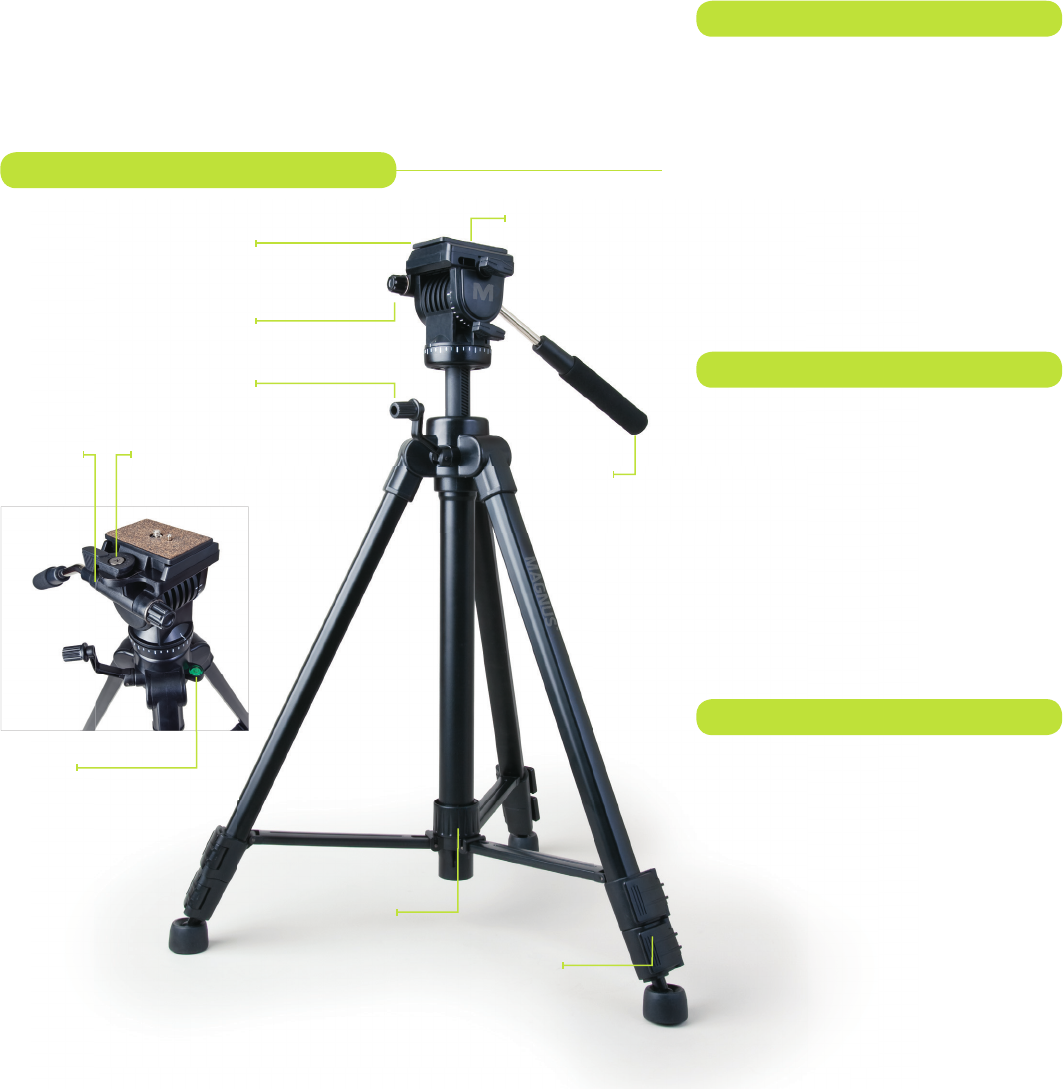
Tilt/Pan
Bar
Universal ¼-20
Mounting Screw
Locking Mid-Level
Spreader
Center Column
Hand Crank
Quick-Release
Mounting Plate
Leg
Flip-Lock
Tilt/Pan Bar
Locking Knob
Congratulations
on your
purchase of the
VT-100/200/300
Video Tripod by
Magnus.
All Magnus tripods are designed to
balance features professionals want
with the affordability they need, yet
be durable enough to provide many
years of trouble-free service and
enjoyment. Please carefully read
these instructions for setting up and
breaking down your tripod.
Key Features
• Two-way pan head for smooth motion
• Gear-driven center column with friction
control
• Auto-lock, quick-release mounting
• Separate pan and tilt locks
• Bubble level for accurate setup
• Mid-level spreader for stability on uneven
surfaces
• Full 360° pan range
• Carry case with shoulder strap
Safety Warnings
• Never set up or pull down a tripod while a
camera is mounted
• Do not move the tripod or adjust the legs
while a camera is mounted
• Do not exceed the maximum weight
capacity of the tripod
• Never leave a camera unattended on the
tripod
• The camera should be securely fastened
to the quick-release mounting plate before
mounting it to the tripod
• Never mount a camera to the tripod until all
tripod legs are locked and stabilized
• Do not stand on, rest on, or hang anything
from the mid-level spreader
• Do not attempt to remove the mid-level
spreader
• Do not lift or move the tripod by the head
• Keep hands clear of the inside of the legs, to
avoid trapping fingers
• Safe operation of the tripod is the user’s
responsibility
Video Tripod Components
Float Level
Mounting Plate
Capture Release
Tilt/Pan Bar
Mount
VT-100 Specs
• 4.4 lb. (2 kg) load capacity
• 59˝ (150 cm) to 18.75˝ (47.5 cm) height
range
• 20˝ (50.8 cm) folded length
• 3.15 lb. (1.4 kg) weight
VT-200 Specs
• 6.6 lb. (3 kg) load capacity
• 60˝ (152 cm) to 20˝ (50.8 cm) height
range
• 21.75˝ (55.25 cm) folded length
• 3.45 lb. (1.5 kg) weight
VT-300 Specs
• 15 lb. (6.8 kg) load capacity
• 64.3˝ (163 cm) to 25˝ (63.5 cm) height
range
• 26.5˝ (67.3 cm) folded length
• 4.5 lb. (2 kg) weight
VT-200 Specs
VT-100 Specs
VT-300 Specs
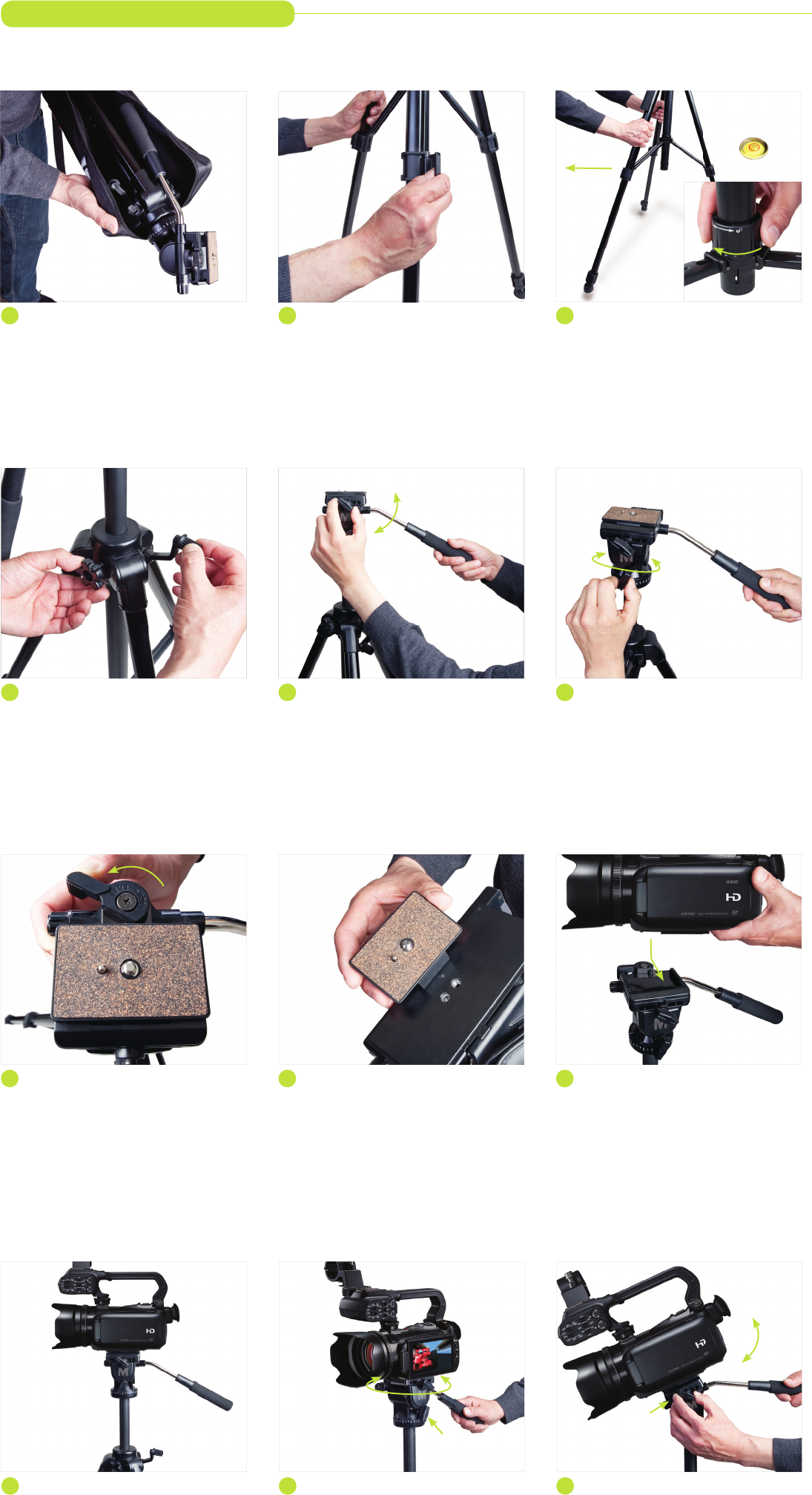
4 Raise Center Column
If you need to raise the center column, unlock
the center column by turning the locking knob
counterclockwise. Use the hand crank to raise
or lower the head platform. Never raise or lower
the head by pushing or pulling it.
10 Start Shooting
If you do not need to pan or tilt during your
shot, keep the pan and tilt knobs locked.
Setting Up Your Tripod
6 Set the Pan Angle
Release the pan lock. Using the tilt/pan bar,
rotate the head to set it in the direction you will
be shooting. Retighten the pan lock.
12 Tilt
Release the tilt-lock knob, and use the tilt/pan
bar to tilt the tripod head up or down.
1 Assess Shooting Area
To set up your tripod, begin by removing the
tripod from the box and/or carry case. Assess
your shooting area to determine a stable area
to set up your camera.
7 Remove the Mounting Plate
Rotate the mounting plate lock so that the
flat side is against the mounting plate. The
mounting plate will pop free.
3 Spread the Tripod
Plant the front leg of the tripod. Lift the back two
legs and pull back to spread the tripod to the
full extension of the mid-level spreader. Check
the float level to verify that the tripod is level.
Readjust the legs if necessary. Lock the mid-level
spreader by rotating the knob clockwise.
9 Mount Camera to Tripod
Make certain that your tripod legs are locked
and the tripod is stable and ready for mounting
your camera. From the right side of the tripod,
slide the mounting plate down and left onto
the tripod head. Push down until the mounting
plate clicks.
2 Extend Legs
Always extend the legs from the top flip-locks
first. Pull each flip-lock and extend the leg to its
desired height. Match the length of the legs and
relock the flip-locks.
8 Mount Camera to Plate
Attach the mounting plate to your camera.
Be certain that the retractable alignment pin
sets into its pocket on the camera. Screw the
threaded stud on the plate into the bottom of
the camera.
5 Set the Tilt
Release the tilt lock. Using the tilt/pan bar, set
the tilt so that the head is level and ready for
mounting your camera. Retighten the tilt lock.
11 Pan
Release the pan lock knob. Using the tilt/pan
bar, rotate the tripod head left or right to pan.
Tilt Lock
Pan Lock
Float
Level
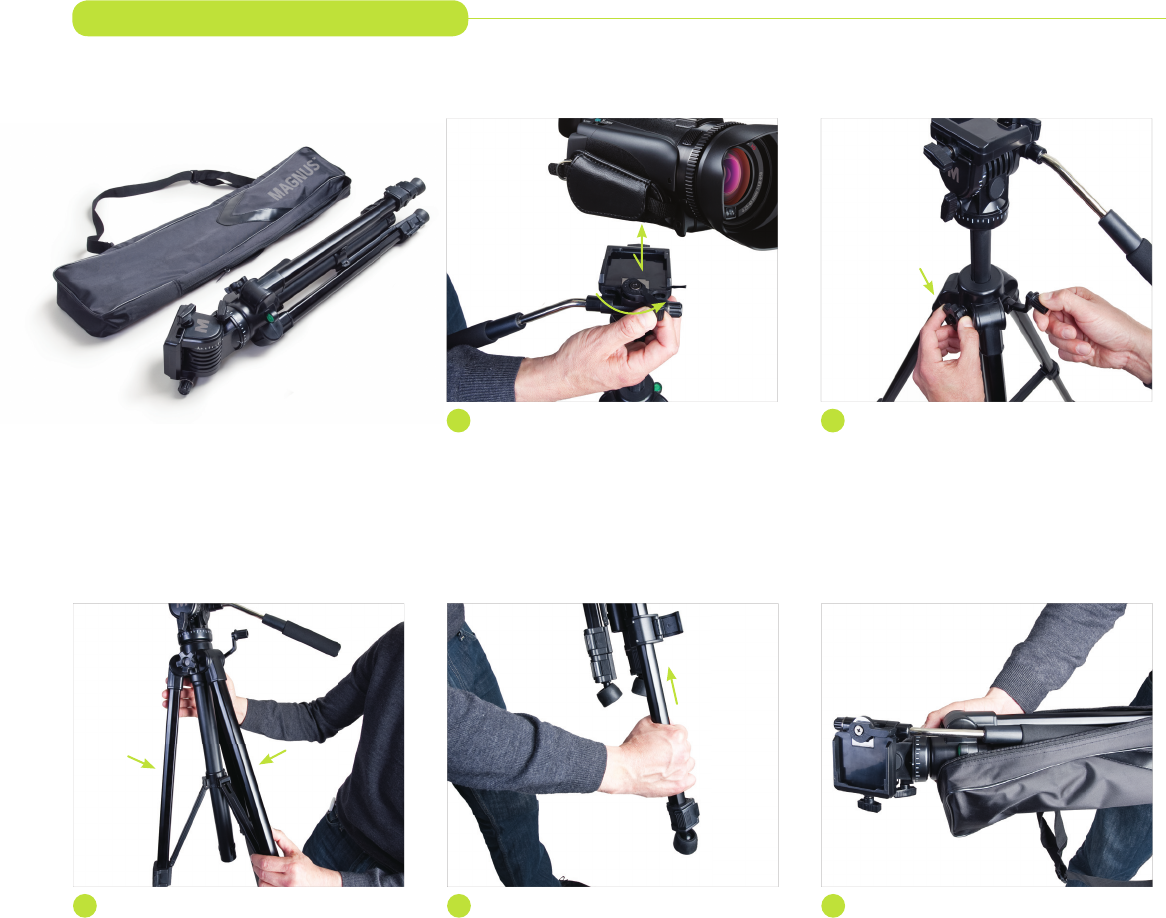
Tearing Down Your Tripod
5 Store in Carry Case
Store your tripod in its carry case until the
next shoot. You can leave the mounting plate
attached to your camera for quick mounting.
1 Unmount Camera
Rotate the mounting plate lock forward until the
mounting plate pops free. Lift the camera up
and out until it is free of the tripod.
3 Collapse the Tripod
Unlock the mid-level spreader. Push the legs
together, collapsing the mid-level spreader.
2 Lower Center Column (if raised)
Release the center column locking knob. Using
the hand crank, lower the center column all the
way down. Secure the locking knob and fold the
hand crank down.
4 Shorten Legs
Release the flip-locks and slide each leg section
to its closed position. Secure the flip-locks.
Release the pan and tilt locks and fold the tilt/
pan bar toward the legs.
All images are for illustrative purposes only.
Your tripod may look slightly different.
Center Column
Lock Knob
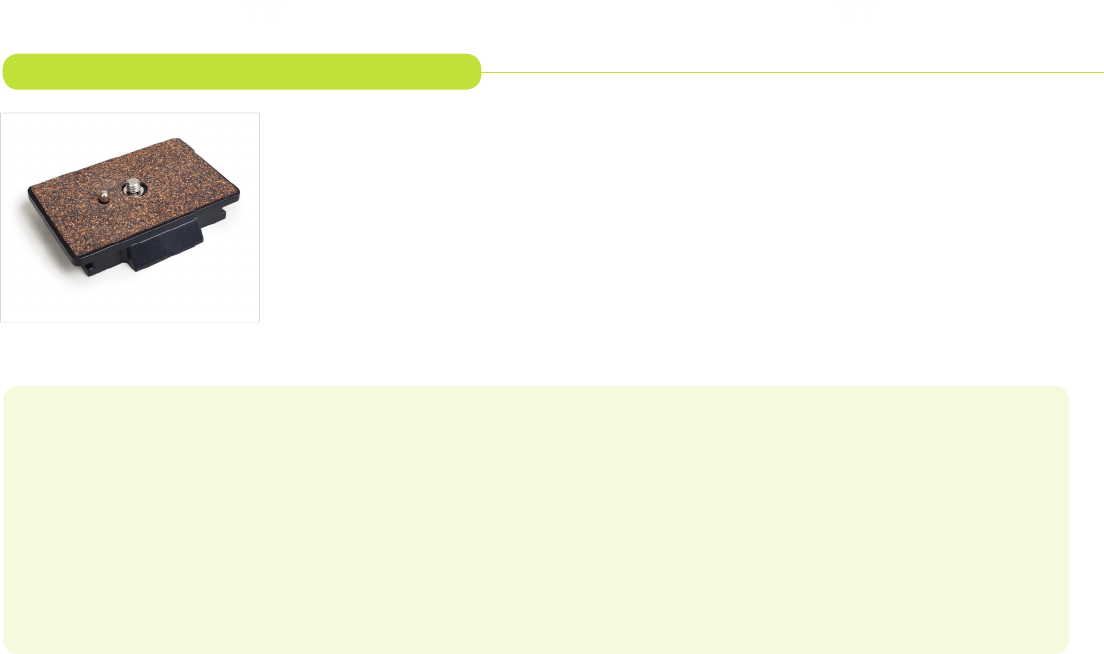
Magnus offers a spare or replacement quick-release plate for the VT-100/200/300 tripod head. Having a
quick-release plate attached to the camera’s base at all times allows you to attach or remove the camera from
the tripod without having to waste time fumbling with the threaded mount. Your VT-100/200/300 Tripod
includes one quick-release plate, but you may want to have spares for other cameras. The Magnus VT-QRP10
(for VT-100/200) or QRP30 (for VT300) has a 1/4˝-20 mounting stud and a retractable register pin for correct
camera positioning. The anti-skid mounting surface stabilizes the camera.
ONE (1) YEAR LIMITED WARRANTY
Magnus provides a limited warranty that this product is free from defects in materials and workmanship to the original purchaser under normal use for a
period of one (1) year from the original purchase date or thirty (30) days after replacement whichever occurs later. Our responsibility with respect to this
limited warranty shall be limited solely to repair or replacement, at its option, of any product which fails during normal consumer use. To obtain warranty
coverage during the Warranty Period, contact your place of purchase (“Seller”) to obtain a return merchandise authorization (“RMA”) number, and return
to Seller the defective product along with proof of purchase and the RMA number. This warranty does not extend to damage or failure which results from
misuse, neglect, accident, alteration, abuse, improper installation or maintenance. EXCEPT AS PROVIDED HEREIN, MAGNUS MAKES NEITHER ANY EXPRESS
WARRANTIES NOR ANY IMPLIED WARRANTIES, INCLUDING BUT NOT LIMITED TO ANY IMPLIED WARRANTY OF MERCHANTABILITY OR FITNESS
FOR A PARTICULAR PURPOSE. This warranty provides you with specific legal rights, and you may also have additional rights which vary from state to state.
www.SupportsByMagnus.com
Quick-Release Plate for VT-100/200/300 Tripod
