1502415_SCRIPT_PC_Book_2_Quick_Reference_Jan84 1502415 SCRIPT PC Book 2 Quick Reference Jan84
1502415_SCRIPT_PC_Book_2_Quick_Reference_Jan84 1502415_SCRIPT_PC_Book_2_Quick_Reference_Jan84
User Manual: 1502415_SCRIPT_PC_Book_2_Quick_Reference_Jan84
Open the PDF directly: View PDF  .
.
Page Count: 24
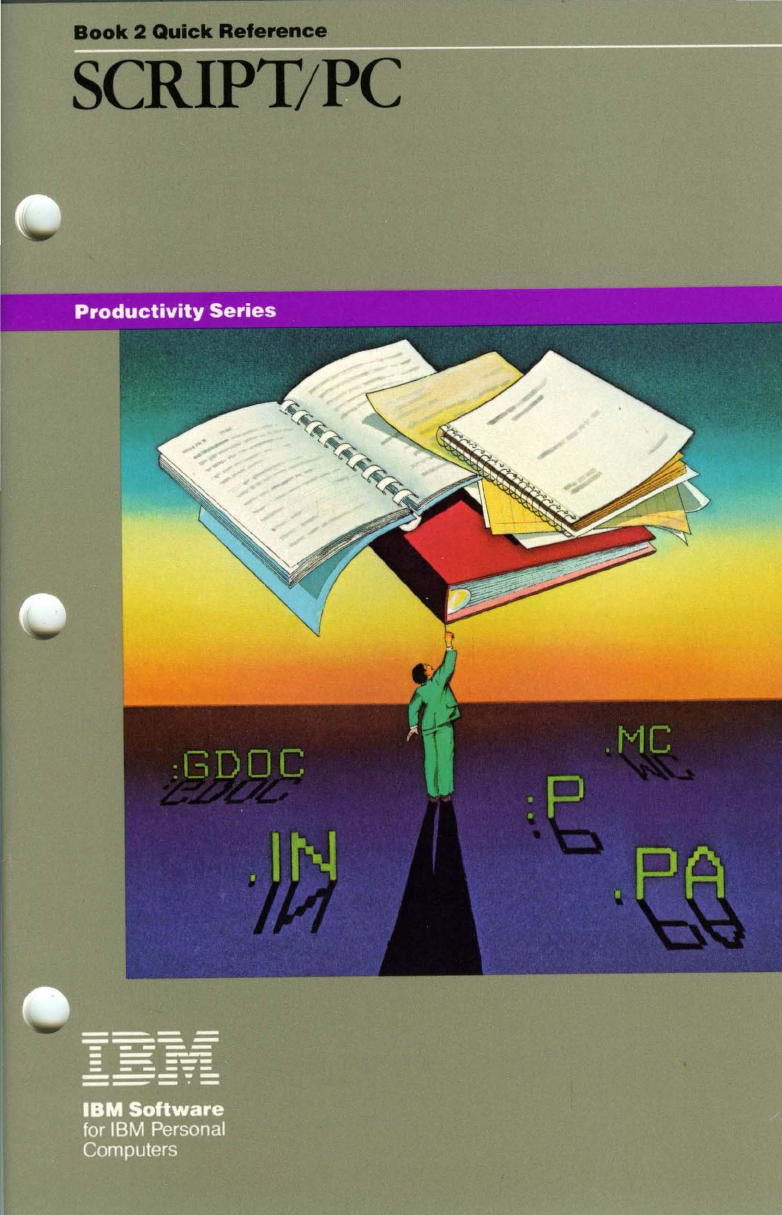
Book
2 Quick
Reference
SCRIPT/PC
---
-
----
--
---
-
---
--
---
-
------
-----
--_.-
SCRIPT/PC
Personal Computer
Productivity Series
Book 2 Quick Reference
Program by: Robert
N.
Seidel
Charles
W.
Gainey
Jr.
First Edition (January, 1984)
The
following paragraph does
not
apply
to
the
United Kingdom
or
any country where such provisions
are
contrary
to
local law:
International Business Machines Corporation provides this
manual "as is", without warranty
of
any kind, either expressed
or
implied, including,
but
not
limited to, the implied warranties of
merchantability and fitness for a particular purpose. IBM may
make improvements
and/or
changes in the product(s)
and/or
the
program(s) described in this manual at any time
and
without
notice.
This publication contains examples
of
data markup and text. All
names of individuals, companies, brands, and products used in
these examples are fictitious, and any similarity to the names,
addresses
or
products used
by
an actual business
is
entirely
coincidental.
This product could include technical inaccuracies
or
typographical
errors. Changes are periodically made to the information herein;
these changes will
be
incorporated in new editions of this
publication.
Products are
not
stocked
at
the address below. Requests for
copies of this product and for technical information about the
system should be made to your authorized IBM Personal
Computer dealer.
A Reader's Comment
Form
is
provided at the back of this
publication.
If
the form has
been
removed, address comments to:
IBM Corp; Personal Computer, P.O. Box 1328-C, Boca Raton,
Florida 33432. IBM may use
or
distribute any
of
the information
you supply in any way it believes appropriate without incurring
any obligations whatever.
©Copyright
IBM Corporation
1978,1983,
All Rights Reserved
About This Book
How to
Use
This Book
This
book
is
the Quick Reference
to
SCRIPT/PC
Control
Words
and
the Generalized Markup Language
(G
ML)
Starter Set
of
tags.
The information in this
book
is
organized as follows:
•
The
first
part
gives you a quick reference to each
SCRIPT
fPC
control word
and
its options.
•
The
second
part
gives you
an
equivalent explanation
of
every tag supported
by
SCRIPT/PC's
Starter Set
of
GML
tags.
iii

iv
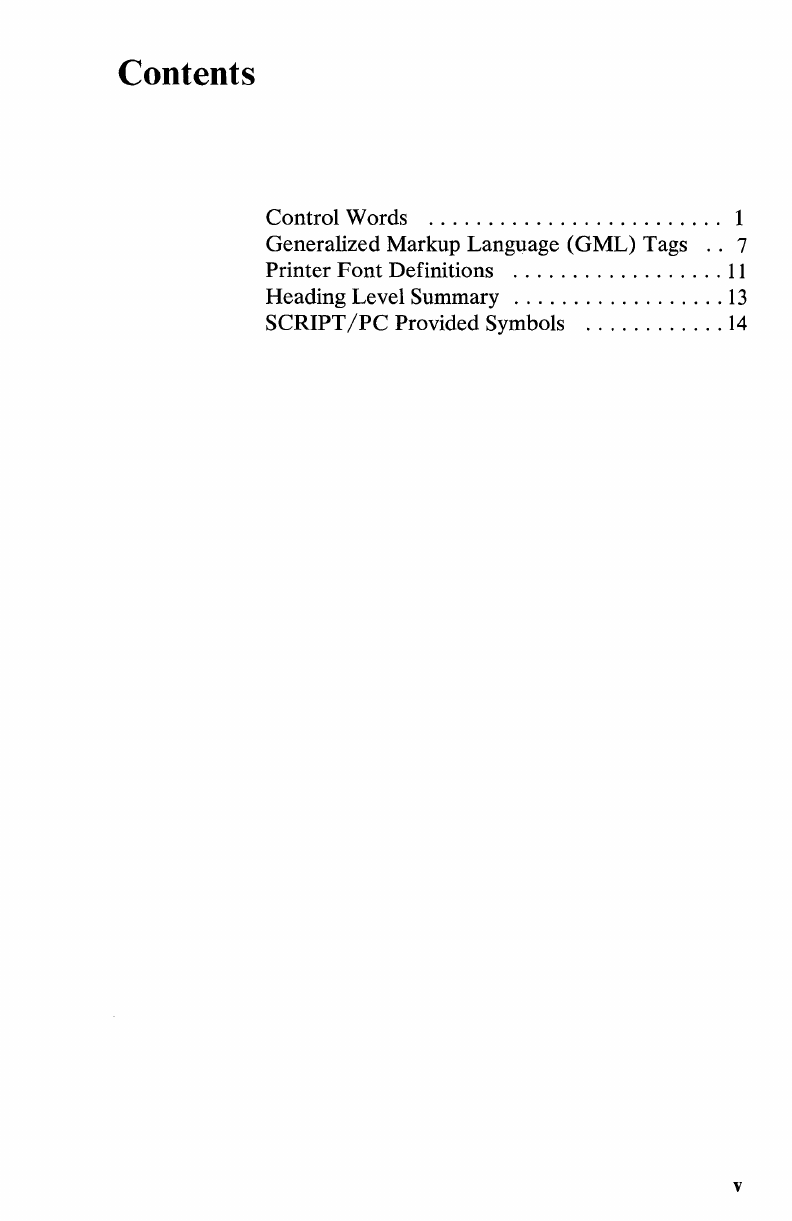
Contents
Control Words
.........................
1
Generalized Markup Language (GML) Tags
..
7
Printer
Font
Definitions
..................
11
Heading Level Summary
..................
13
SCRIPT
fPC
Provided Symbols
............
14
v

vi
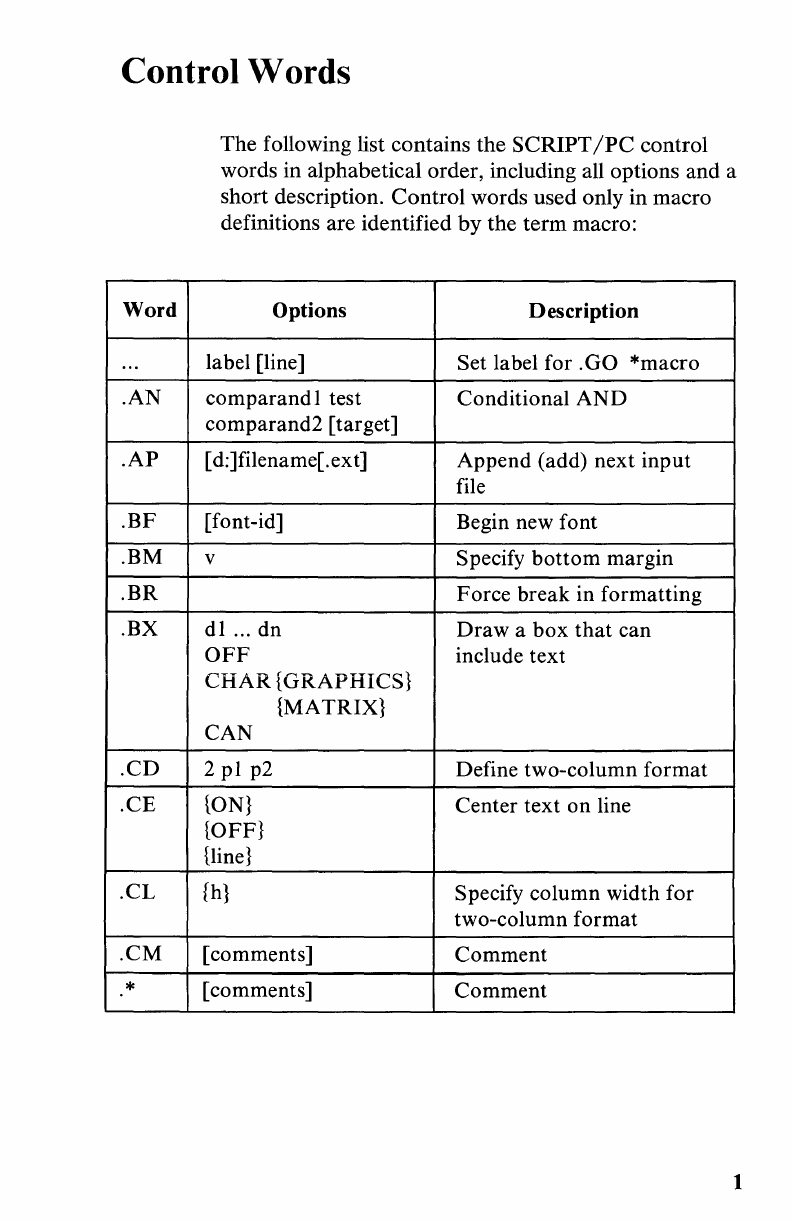
Control Words
Word
...
.AN
.AP
.BF
.BM
.BR
.BX
.CD
.CE
.CL
.CM
*
The
following list contains the
SCRIPT/PC
control
words in alphabetical order, including all options
and
a
short description.
Control
words used only in macro
definitions are identified
by
the
term
macro:
Options Description
la bel [line] Set label for .GO *macro
comparandl
test Conditional
AND
comparand2 [target]
[ d:]filename[.ext] Append (add) next
input
file
[font-id] Begin new font
v Specify
bottom
margin
Force break in formatting
dl
... dn
Draw
a
box
that
can
OFF
include text
CHAR
{GRAPHICS}
{MATRIX}
CAN
2
pI
p2 Define two-column
format
{ON}
Center
text
on
line
{OFF}
{line}
fh}
Specify column width for
two-column
format
[comments]
Comment
[comments]
Comment
1
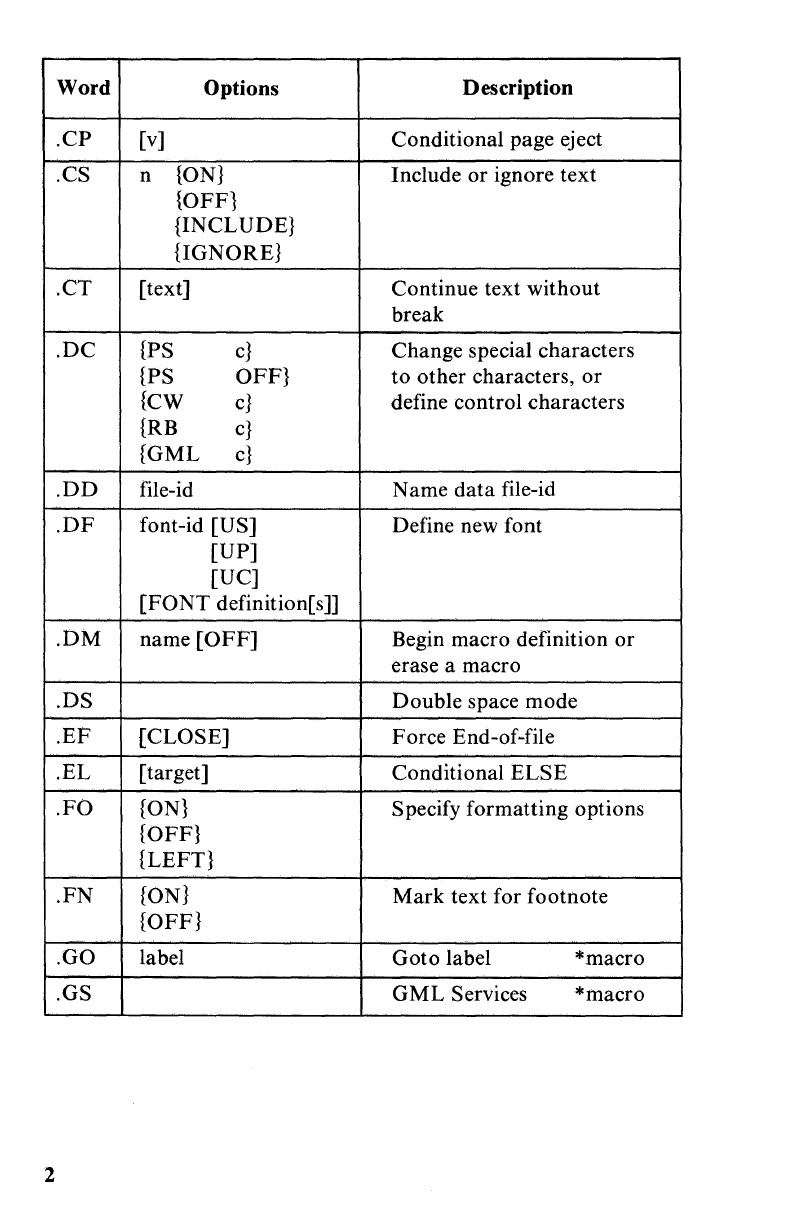
Word Options Description
.CP
[v] Conditional page
ej
ect
.CS n
{ON}
Include
or
ignore
text
{OFF}
{INCLUDE}
{IGNORE}
.CT
[text] Continue text
without
break
.DC
{PS
c}
Change special characters
{PS OFF}
to
other
characters,
or
{CW
c}
define control characters
{RB
c}
{GML
c}
.DD
file-id Name
data
file-id
.DF
font-id [US] Define new font
[UP]
[UC]
(FONT
definition[s]]
.DM
name
[OFF]
Begin macro definition
or
erase a macro
.DS
Double
space
mode
.EF
[CLOSE]
Force End-of-file
.EL
[target] Conditional
ELSE
.FO
{ON}
Specify formatting options
{OFF}
{LEFT}
.FN
{ON}
Mark
text for footnote
{OFF}
.GO label
Goto
label *macro
.GS
GML
Services *macro
2
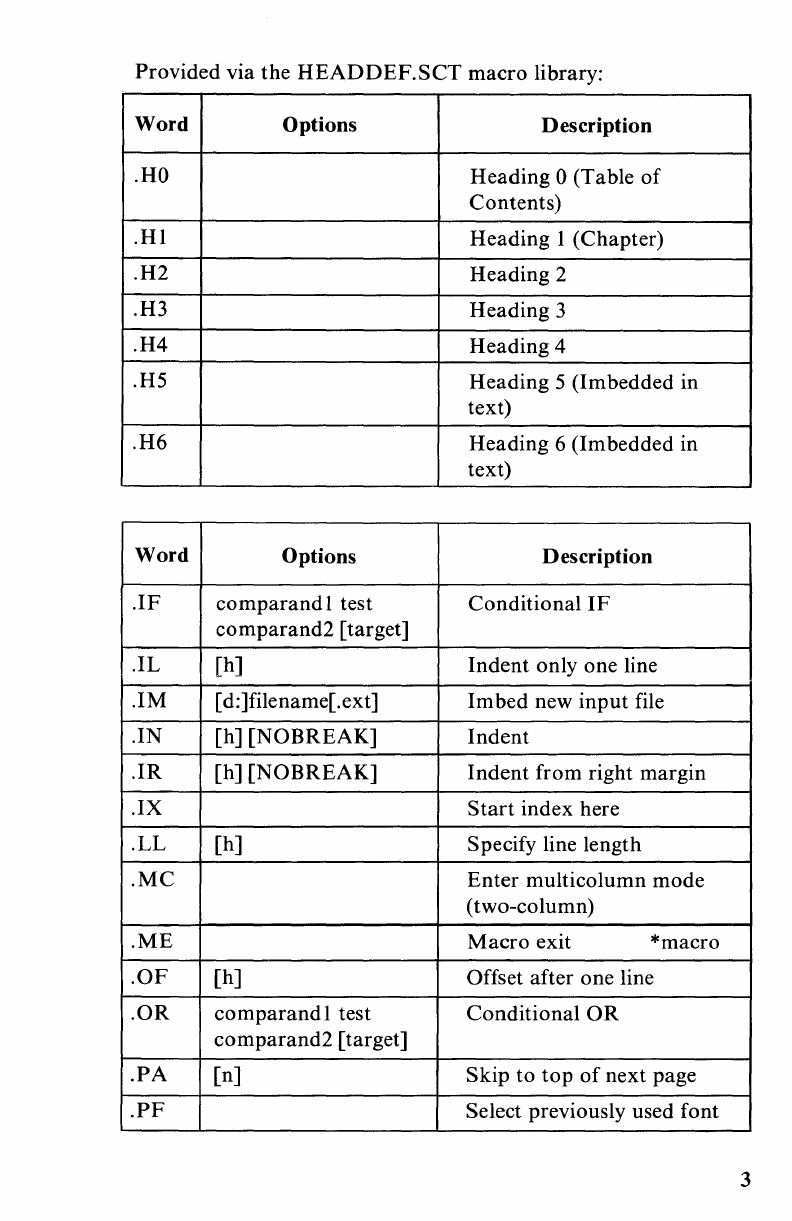
Provided via the
HEADDEF.SCT
macro library:
Word
Options Description
.HO
Heading 0 (Table
of
Contents)
.HI
Heading I (Chapter)
.H2
Heading 2
.H3 Heading 3
.H4
Heading 4
.HS Heading S (Imbedded in
text)
.H6
Heading 6
(1m
bedded in
text)
Word
Options Description
.IF
comparand
I test Conditional
IF
comparand2
[target]
.IL
[h] Indent only one line
.1M [ d:]filename[.ext]
Imbed
new
input
file
.IN [h]
[NOBREAK]
Indent
.IR
[h]
[NOBREAK]
Indent
from right margin
.IX
Start
index here
.LL
[h] Specify line length
.MC
Enter multicolumn mode
(two-column)
.ME
Macro
exit *macro
.OF
[h] Offset after one line
.OR
comparandl
test Conditional
OR
comparand2
[target]
.PA
En]
Skip
to
top
of
next page
.PF
Select previously used font
3
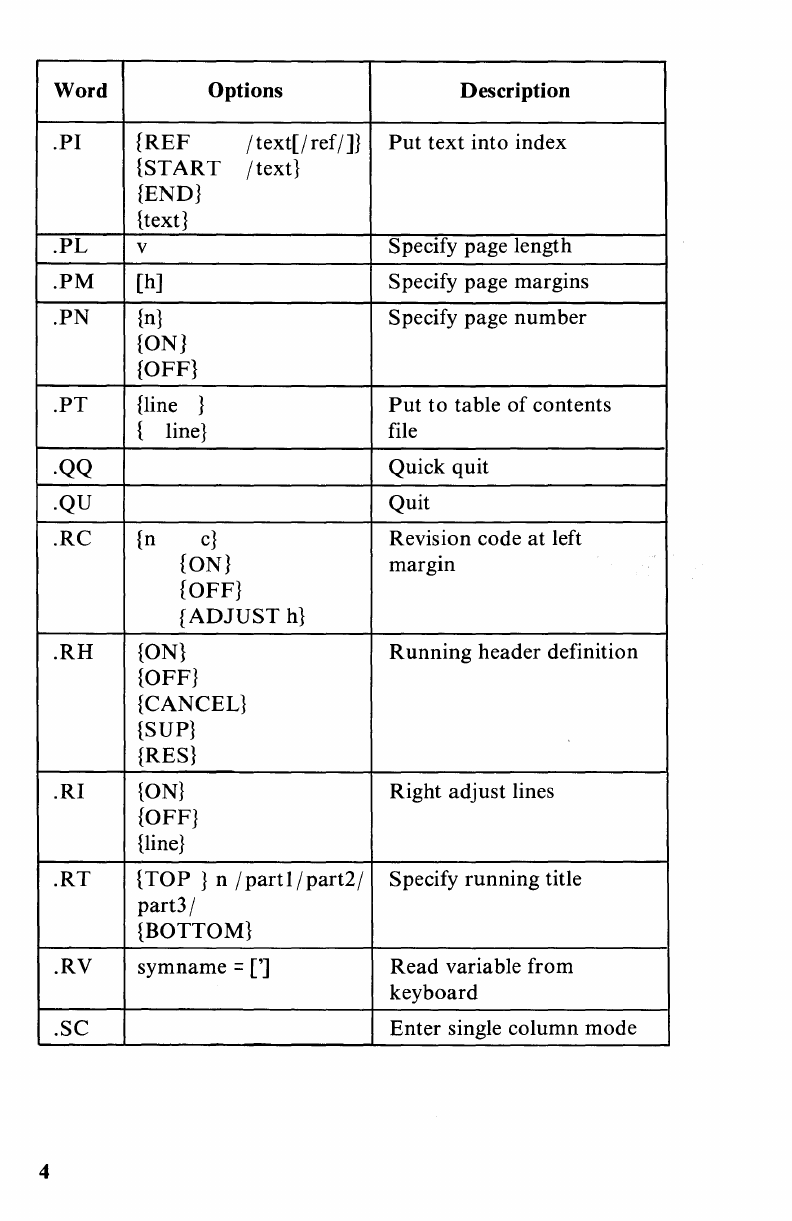
Word Options Description
.PI
{REF
/ text[j ref /]}
Put
text
into index
{START
/text}
{END}
{text}
.PL
v Specify page length
.PM
[h] Specify page margins
.PN
{n}
Specify page
number
{ON}
{OFF}
.PT
{line }
Put
to
table
of
contents
{ line} file
.QQ Quick quit
.QU Quit
.RC
{n
c}
Revision code
at
left
{ON} margIn
{OFF}
{ADJUST
h}
.RH
{ON}
Running
header definition
{OFF}
{CANCEL}
{SUP}
{RES}
.RI
{ON}
Right adjust lines
{OFF}
{line}
.RT
{TOP}
n /
part!
/
part2/
Specify
running
title
part3/
{BOTTOM}
.RV
symname =
[']
Read variable from
keyboard
.SC
Enter single column mode
4
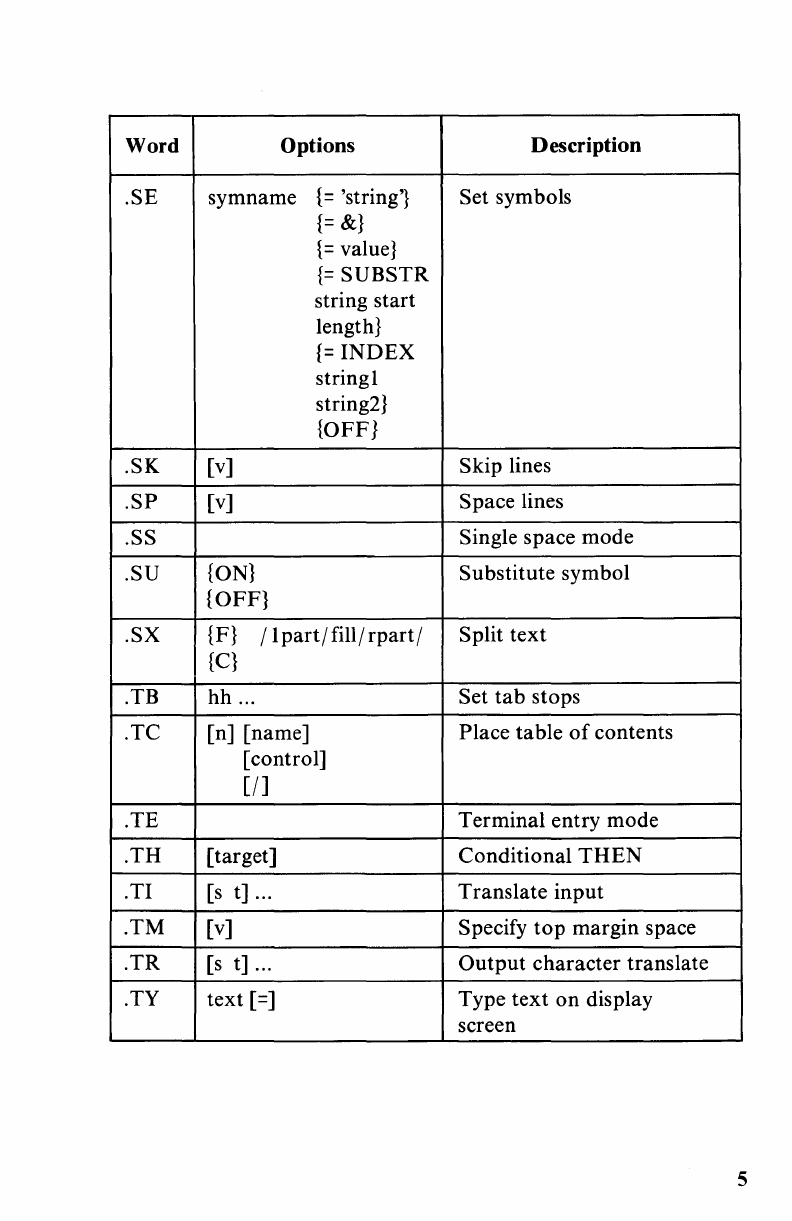
Word
Options Description
.SE symname
{=
'string'} Set symbols
{=
&}
{=
value}
{=
SUBSTR
string start
length}
{=
INDEX
stringl
string2}
{OFF}
.SK [v] Skip lines
.SP
[v] Space lines
.SS Single space
mode
.SU
{ON}
Substitute symbol
{OFF}
.SX
{F}
/ 1
part
/ fill /
rpart
/ Split
text
{C}
. TB
hh
... Set
tab
stops
.TC
[n] [name] Place table
of
contents
[control]
[I]
.TE Terminal entry mode
.TH
[target] Conditional
THEN
.
TI
[s
t] ...
Translate
input
.TM
[v] Specify
top
margin space
.TR
[s
t] ...
Output
character translate
.TY
text
[=]
Type
text
on
display
screen
5
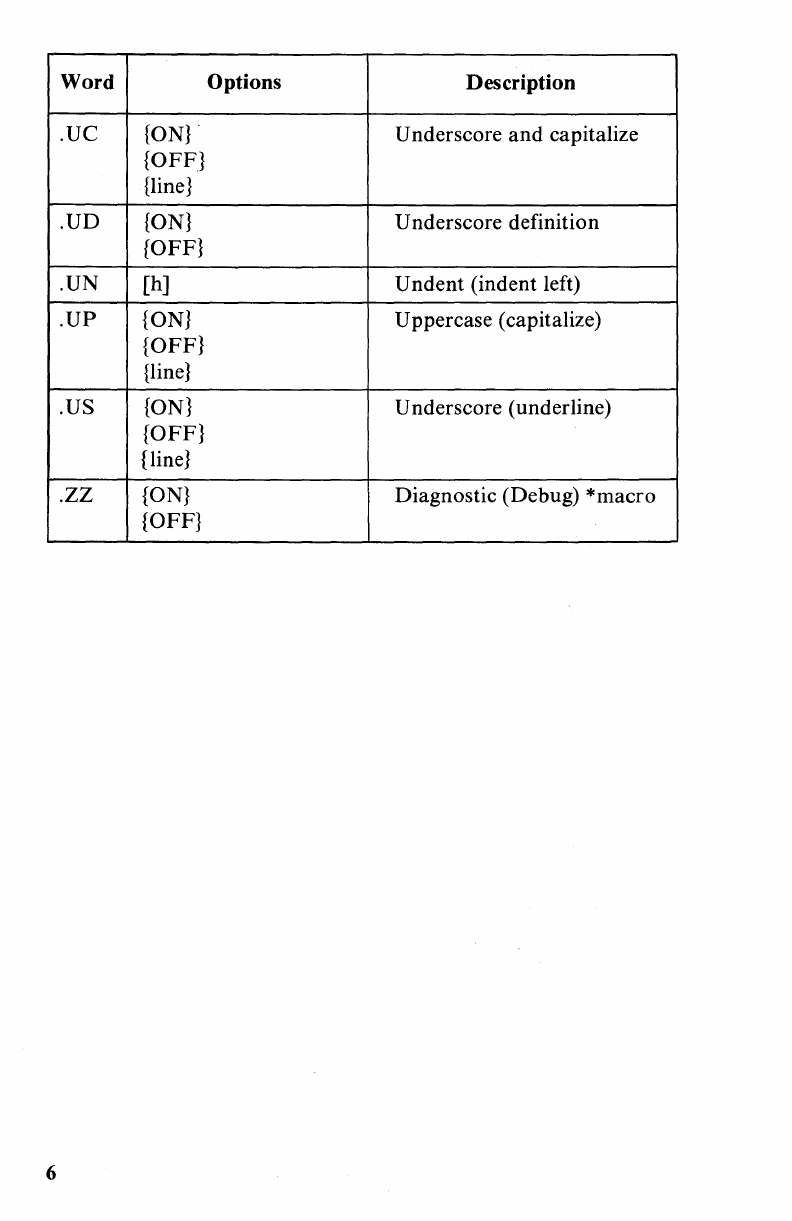
Word Options Description
.UC
{ON}
. Underscore
and
capitalize
{OFF}
{line}
.UD
{ON}
Underscore definition
{OFF}
.UN
[h] U
ndent
(indent left)
.UP
{ON} Uppercase (capitalize)
{OFF}
{line}
.US
{ON}
Underscore (under line)
{OFF}
{line}
.zz
{ON}
Diagnostic (Debug)
*macro
{OFF}
6
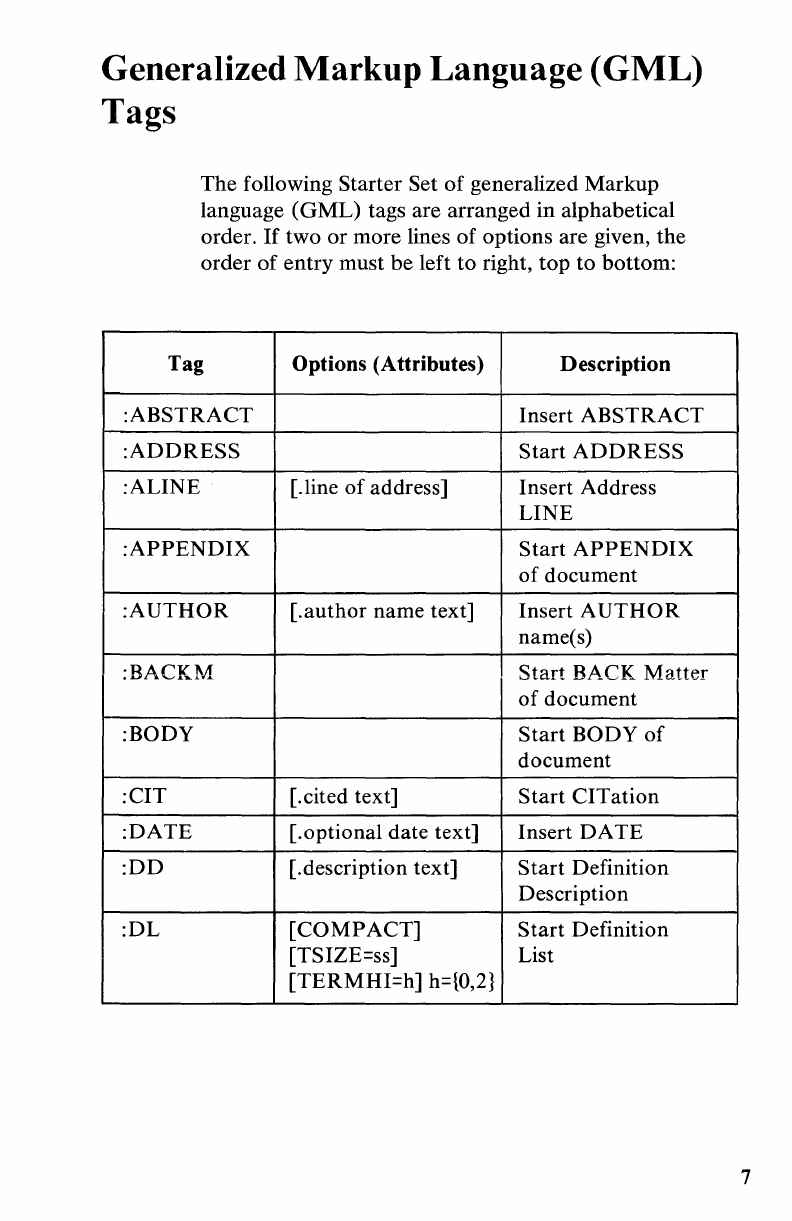
Generalized Markup Language (GML)
Tags
The
following Starter Set
of
generalized Markup
language
(GML)
tags are arranged in alphabetical
order.
If
two
or
more lines
of
options are given, the
order
of
entry
must
be
left
to
right,
top
to
bottom:
Tag Options (Attributes) Description
:ABSTRACT
Insert
ABSTRACT
:ADDRESS
Start
ADDRESS
:ALINE
[.line
of
address] Insert Address
LINE
:APPENDIX
Start
APPENDIX
of
document
:AUTHOR
[.author
name text] Insert A
UTH
0 R
name(s)
:BACKM
Start
BACK
Matter
of
document
:BODY
Start
BODY
of
document
:CIT
[.cited text]
Start
CITation
:DATE
[.optional date text] Insert
DATE
:DD
[.description text]
Start
Definition
Description
:DL
[COMPACT]
Start
Definition
[TSIZE=ss] List
[TERMHI=h]
h=tQ,2}
7
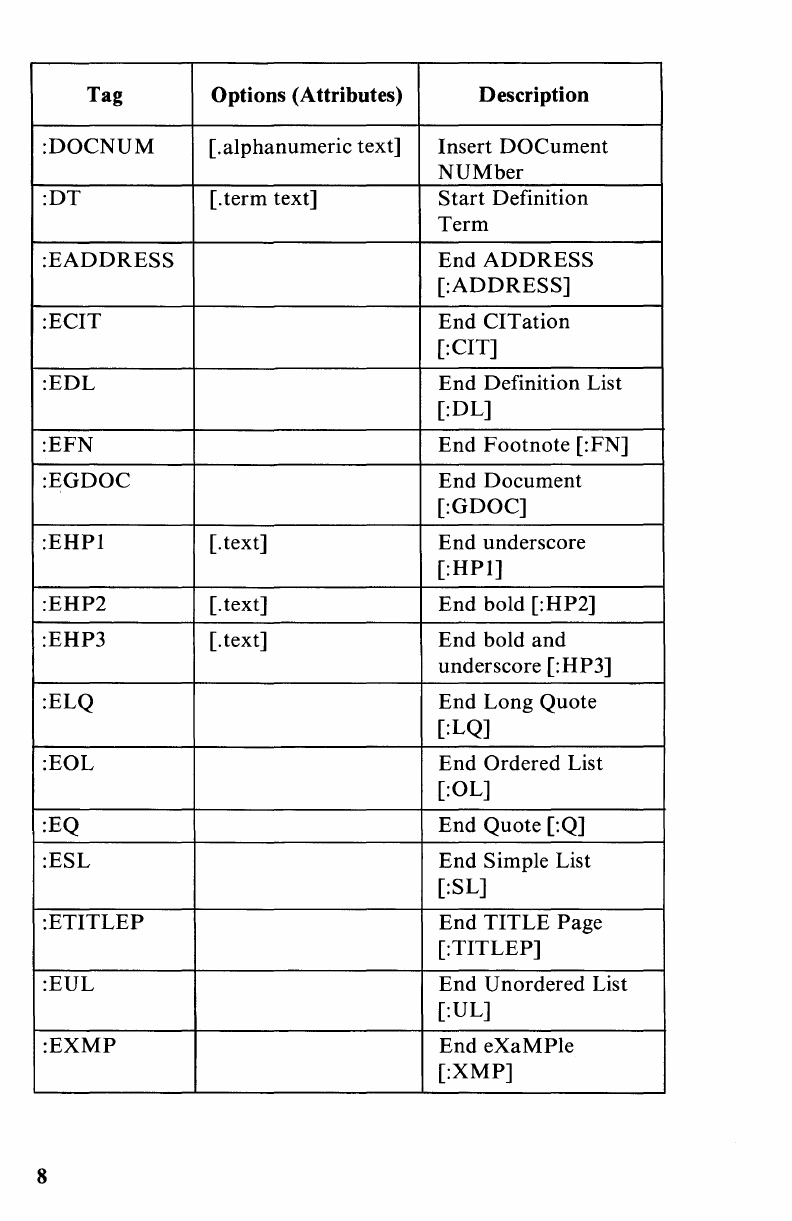
Tag Options (Attributes) Description
:DOCNUM
[.alphanumeric text] Insert
DOCument
NUMber
:DT
[.
term
text]
Start
Definition
Term
:EADDRESS
End
ADDRESS
[:ADDRESS]
:ECIT
End
CITation
[:CIT]
:EDL
End
Definition List
[:DL]
:EFN
End
Footnote
[:FN]
:EGDOC
End
Document
[:GDOC]
:EHPI
[. text]
End
underscore
[:HPl]
:EHP2
[.text]
End
bold [:HP2]
:EHP3
[.text]
End
bold
and
underscore [:HP3]
:ELQ
End
Long Quote
[:LQ]
:EOL
End
Ordered List
[:OL]
:EQ
End
Quote [:Q]
:ESL
End
Simple List
[:SL]
:ETITLEP
End
TITLE
Page
[:TITLEP]
:EUL
End
Unordered List
[:UL]
:EXMP
End
eXaMPle
[:XMP]
8
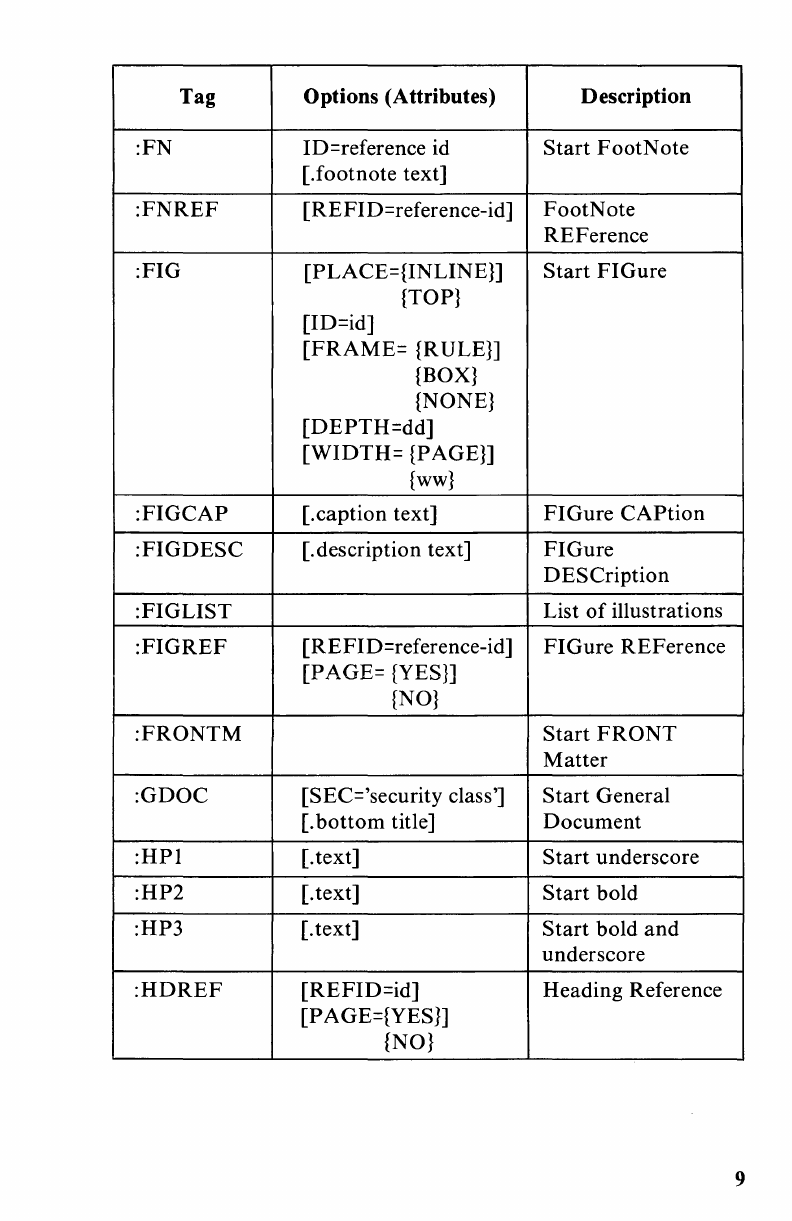
Tag Options (Attributes) Description
:FN
ID=reference id
Start
FootNote
[.footnote text]
:FNREF
[REFID=reference-id]
FootNote
REFerence
:FIG
[PLACE={INLINE}]
Start
FI
Gure
{TOP}
[ID=id]
[FRAME=
{RULE}]
{BOX}
{NONE}
[DEPTH=dd]
[WIDTH=
{PAGE}]
{ww}
:FIGCAP
[.caption text]
FIGure
CAPtion
:FIGDESC
[.
description text]
FIGure
DESCription
:FIGLIST
List
of
illustrations
:FIGREF
[REFID=reference-id]
FIGure
REFerence
[PAGE= {YES}]
{NO}
:FRONTM
Start
FRONT
Matter
:GDOC
[SEC='security class']
Start
General
[.
bottom
title] Document
:HPI
[.
text] S
tart
underscore
:HP2
[. text]
Start
bold
:HP3 [. text]
Start
bold
and
underscore
:HDREF
[REFID=id]
Heading Reference
[PAGE={YES}]
{NO}
9
Tag Options (Attributes) Description
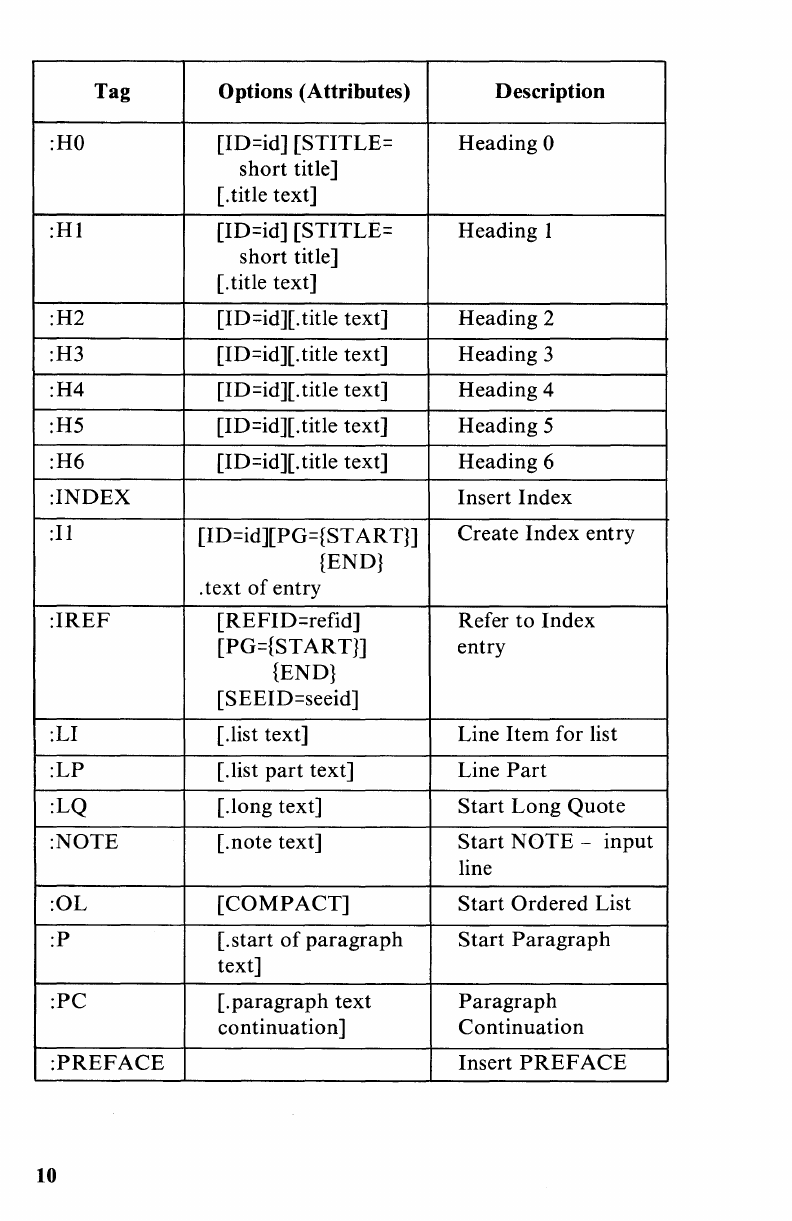
:HO
[ID=id] [STITLE= Heading 0
short
title]
[. title text]
:Hl
[ID=id] [STITLE= Heading I
short title]
[.
title text]
:H2
[ID=id][. title text] Heading 2
:H3 [ID=id][. title text] Heading 3
:H4
[ID=id][. title text] Heading 4
:H5 [ID=id][. title text] Heading 5
:H6
[ID=id][. title text] Heading 6
:INDEX
Insert
Index
:11
[ID=id][PG={ST
AR
Tn
Create
Index
entry
{END}
. text
of
entry
:IREF
[REFID=refid] Refer
to
Index
[PG={ST
AR
TJ] entry
{END}
[SEEID=seeid]
:LI [.list text] Line
Item
for list
:LP
[.list
part
text] Line
Part
:LQ [.long text]
Start
Long
Quote
:NOTE
[.note text]
Start
NOTE
-
input
line
:OL
[COMPACT]
Start
Ordered List
:P
[.start
of
paragraph
Start
Paragraph
text]
:PC
[.
paragraph
text
Paragraph
continuation]
Continuation
:PREFACE
Insert
PREFACE
10
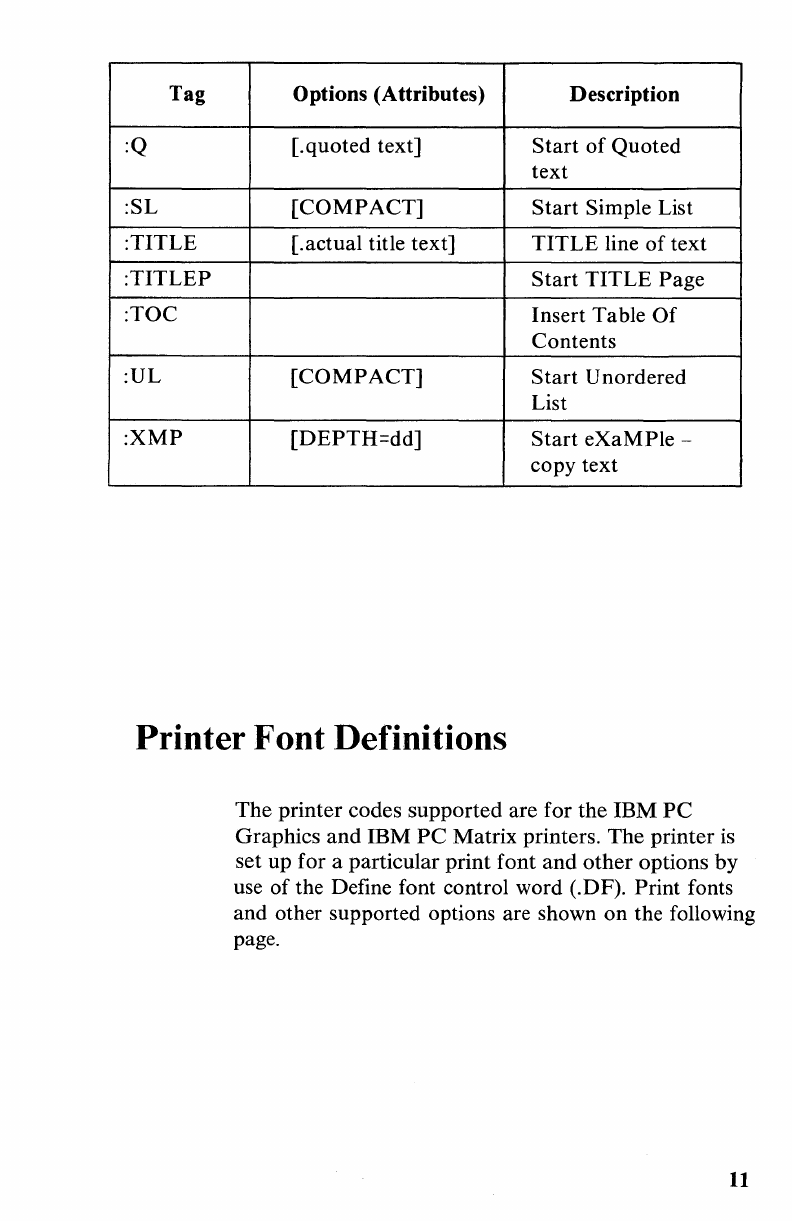
Tag Options (Attributes) Description
:Q [.quoted text]
Start
of
Quoted
text
:SL
[COMPACT]
Start
Simple List
:TITLE
[.actual title text]
TITLE
line
of
text
:TITLEP
Start
TITLE
Page
:TOC
Insert Table
Of
Contents
:UL
[COMPACT]
Start
Unordered
List
:XMP
[DEPTH=dd]
Start
eXaMPle
-
copy text
Printer Font Definitions
The
printer codes supported are for the
IBM
PC
Graphics
and
IBM
PC
Matrix printers.
The
printer is
set up for a particular print
font
and
other
options
by
use
of
the Define font control word (.DF). Print fonts
and other supported options are shown
on
the following
page.
11
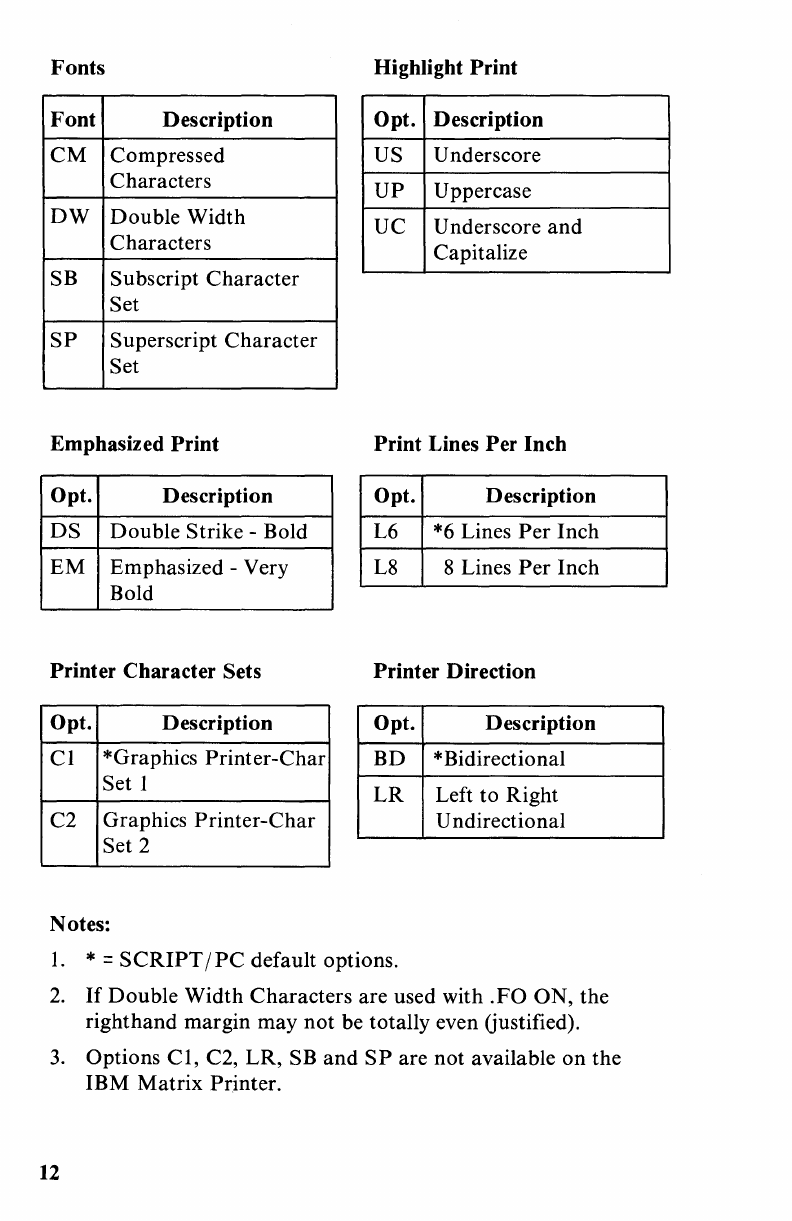
Fonts
Highlight
Print
Font
Description
Opt.
Description
CM
Compressed US Underscore
Characters
UP
Uppercase
DW
Double
Width
UC Underscore
and
Characters Capitalize
SB Subscript
Character
Set
SP
Superscript
Character
Set
Emphasized
Print
Print
Lines
Per
Inch
Opt.
Description Opt. Description
DS
Double
Strike
-Bold L6 *6 Lines
Per
Inch
EM
Emphasized -Very L8 8 Lines
Per
Inch
Bold
Printer
Character
Sets
Printer
Direction
Opt.
Description Opt. Description
Cl
*Graphics
Printer-Char
BD
*Bidirectional
Set 1
LR
Left to Right
C2 Graphics
Printer-Char
U ndirectional
Set 2
Notes:
1.
* =
SCRIPT
/
PC
default options.
2.
If
Double
Width
Characters
are used with
.FO
ON, the
right
hand
margin may
not
be totally even Gustified).
3.
Options
Cl,
C2,
LR,
SB
and
SP
are
not
available
on
the
IBM
Matrix
Printer.
12

Heading Level Summary
The following chart
is
a summary
of
the G
ML
Heading
levels.
The
heading levels are listed across the
top
and
the summary directly below each heading level:
Heading
Level
New
Page
Space Before
Heading
S pace After
Heading
Heading
Inline
Capitalized
Underscored
Boldface
Table
of
Contents
entry
ID
Attribute
recognized
STITLE
Attribute
recognized
HO
HI
H2
H3 H4
H5
H6
yes yes
0 0 3 3 3 1 1
5 3 2 2 2 0 0
yes yes
yes yes yes
yes yes yes yes yes
yes yes yes yes yes yes
yes yes yes yes yes
yes yes yes yes yes yes yes
yes yes
13
SCRIPT
fPC
Provided Symbols
14
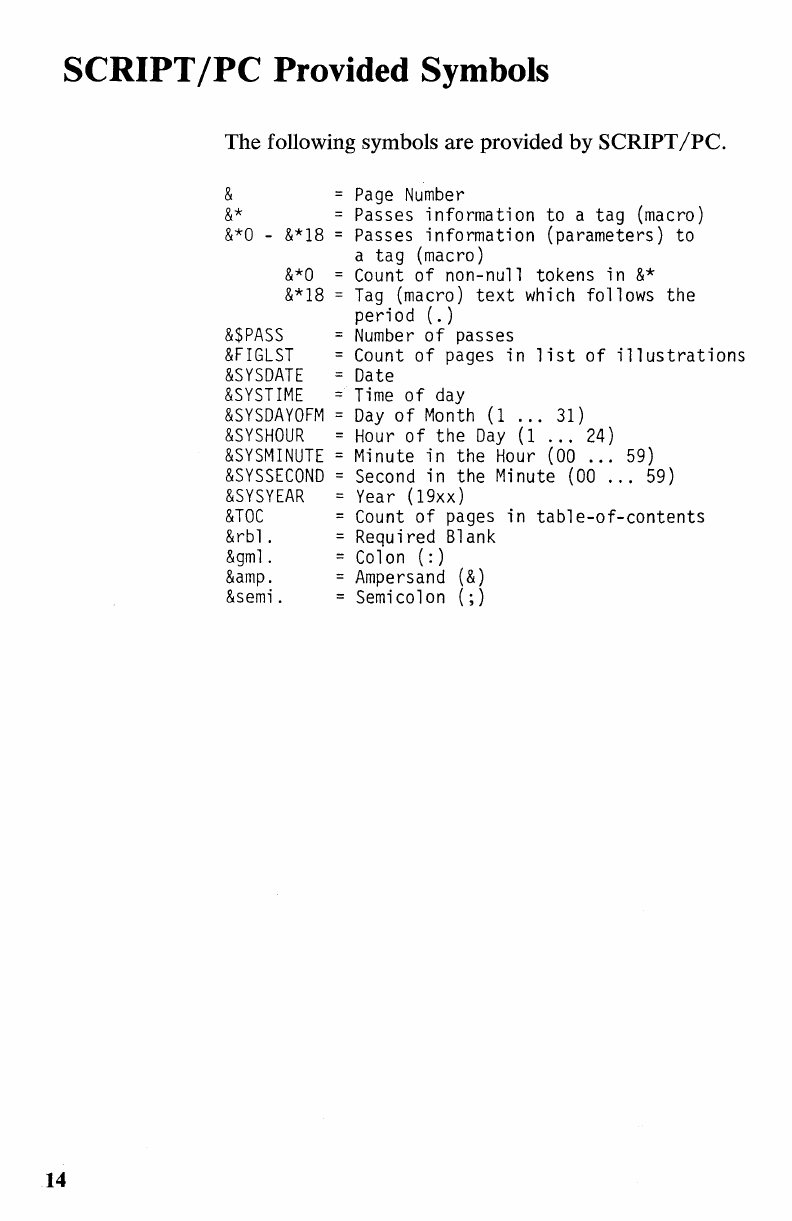
The following symbols are provided
by
SCRIPT/PC.
&
Page
Number
&*
Passes information to a tag (macro)
&*0
-
&*18
= Passes information (parameters) to
a tag (macro)
&*0
=
Count
of non-null tokens in
&*
&*18
=
Tag
(macro)
text
which
follows the
period
(.)
&$PASS
=
Number
of
passes
&FIGLST
=
Count
of
pages in
list
of
illustrations
&SYSDATE
=
Date
&SYSTIME
=
Time
of
day
&SYSDAYOFM
=
Day
of
Month
(1
...
31)
&SYSHOUR
=
Hour
of
the
Day
(1
...
24)
&SYSMINUTE
= Minute in the
Hour
(00
...
59)
&SYSSECOND
=
Second
in the
Minute
(00
...
59)
&SYSYEAR
=
Year
(19xx)
&TOC
=
Count
of
pages in
table-of-contents
&rbl. = Required
Blank
&gml.
=
Colon
(:)
&.
=
Ampersand
(&)
&semi.
= Semicolon
(;)
----
----
-
----
---
--
---
- - -
---
-----
--_.-
Reader's Comment Form
SCRIPT/PC
Book 2 Quick Reference
The Personal Computer
Software Library
1502415
Your comments assist us in improving the usefulness
of
our
publication; they are
an
important part
of
the input
used for revisions.
IBM may use and distribute any
of
the information you
supply in any way it believes appropriate without
incurring any obligation whatever. You may,
of
course,
continue to use the information you supply.
Please
do
not use this form for technical questions
regarding the IBM Personal Computer
or
programs for
the IBM Personal Computer,
or
for requests for
additional publications; this only delays the response.
Instead, direct
your
inquiries
or
request to your
authorized IBM Personal Computer dealer.
Comments:
8dBl.
111111
BUSINESS
REPLY
MAIL
FIRST
CLASS
PERMIT
NO.
321
BOCA
RATON,
FLORIDA
33432
POSTAGE
WILL
BE
PAID
BY
ADDRESSEE
IBM
PERSONAL
COMPUTER
SALES
&
SERVICE
P.O.
BOX
1328-C
BOCA
RATON,
FLORIDA
33432
8J8lj
PIO::l
81dBlS
lOU
op
8SB81d
NO
POSTAGE
NECESSARY
IF
MAILED
IN
THE
UNITED
STATES
----
-
-----
--
---
-
---
--
---
- --
---
------
----
,-
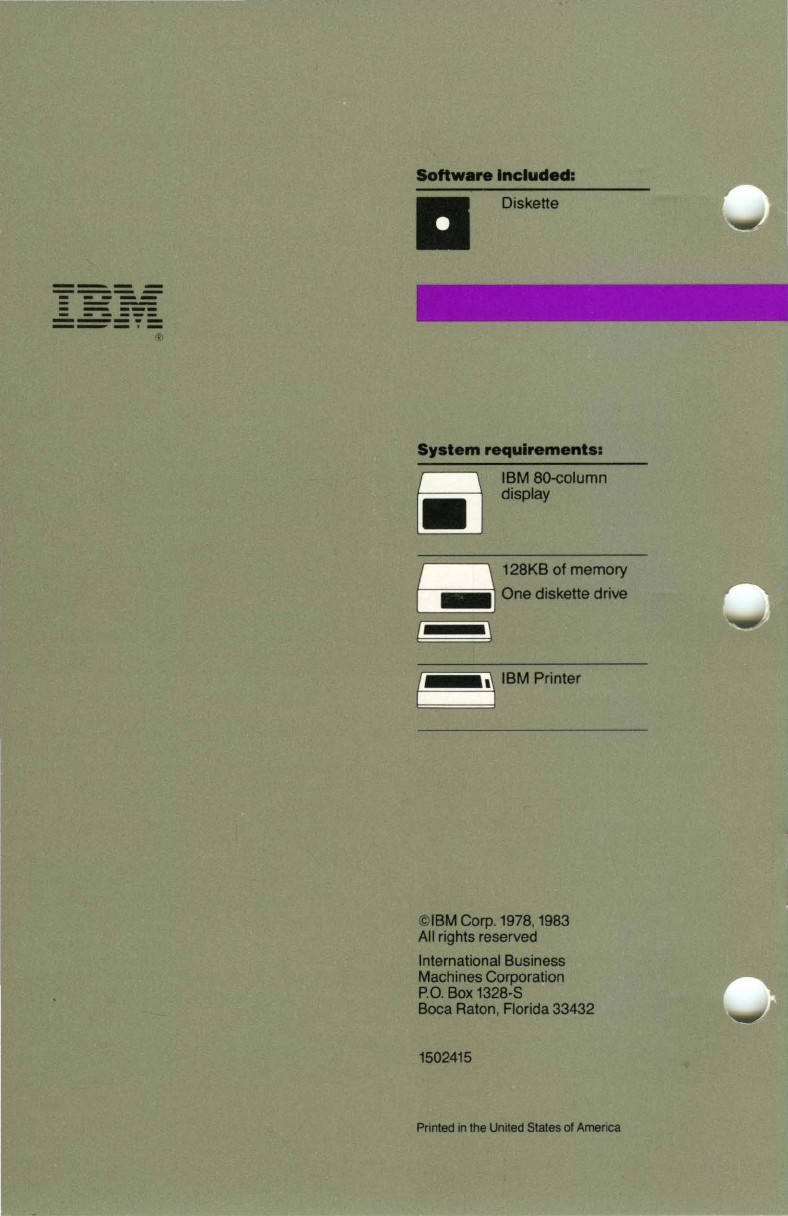
Software
Included:
System
requirements:
Q
IBM
80-column
lII.J display
r-\
128KB
of
memory
~
One
diskette drive
( : ,)
IBM
Printer
©IBM Corp. 1978, 1983
All rights reserved
International Business
Machines Corporation
P.O.
Box 1328-8
Boca Raton, Florida 33432
1502415
Printed in the United States of America
