ST31081A 1621pma
User Manual: ST31081A
Open the PDF directly: View PDF  .
.
Page Count: 94

...................................
ST31081A
...................................
ST31621A
...................................
...................................
ATA Interface Drive
...................................
Product Manual
...................................

ST31081A/ST31621A
Intelligent Disk Drive
Product Manual
Production Release per ECO SJD7262
P/N 20401030-001
Revision A
May 1996
920 Disc Drive
Scotts Valley, California
95066

FCC Notice This equipment generates and uses radio frequency energy and, if not installed
and used properly; that is, in strict accordance with the manufacturer's
instructions, may cause interference to radio and television reception. It has
been type tested and found to comply with the limits for a Class B computing
device in accordance with the specifications in Part 15 of FCC Rules, which are
designed to provide reasonable protection against such interference in a
residential installation. However, there is no guarantee that interference will
not occur in a particular installation. If this equipment does cause interference
to radio or television reception, which can be determined by turning the
equipment on and off, you are encouraged to try to correct the interference by
one or more of the following measures:
• Reorient the receiving antenna.
• Relocate the computer with respect to the receiver.
• Move the computer into a different outlet so that the computer and receiver
are on different branch circuits.
If necessary, you should consult the dealer or an experienced radio/television
technician for additional suggestions. You may find the following booklet
prepared by the Federal Communications Commission helpful:
How to Identify and Resolve Radio-TV Interference Problems
This booklet (Stock No. 004-000-00345-4) is available from the U.S. Government
Printing Office, Washington, DC 20402.
Warning: Changes or modifications made to this equipment which have not
been expressly approved by Seagate Technology, Inc. may cause radio and
television interference problems that could void the user's authority to operate
the equipment.
Further, this equipment complies with the limits for a Class B digital apparatus
in accordance with Canadian Radio Interference Regulations.
Cet appareil numérique de la classe B est conforme au Règlement sur le
brouillage radioélectrique, C.R.C., ch. 1374.
Seagate, Seagate Technology and the Seagate logo are registered trademarks of
Seagate Technology, Inc. All other trademarks mentioned in this manual are
property of their respective owners.
Copyright 1996, Seagate Technology, Inc.
All rights reserved.
Document No. 501-087 10/95

Important Information About this Manual
All information contained in or disclosed by this document is considered
proprietary by Seagate Technology, Inc. By accepting this material, the
recipient agrees that this material and the information contained therein are
held in confidence and in trust and will not be used, reproduced in whole or in
part, nor its contents revealed to others, except to meet the purpose for which it
was delivered. It is understood that no right is conveyed to reproduce or
translate any item herein disclosed without express written permission from
Seagate Technology, Inc.
Seagate Technology, Inc. provides this manual "as is," without warranty of any
kind, either expressed or implied, including, but not limited to, the implied
warranties of merchantability and fitness for a particular purpose. Seagate
Technology, Inc. reserves the right to change, without notification, the
specifications contained in this manual.
Seagate Technology, Inc. assumes no responsibility for the accuracy,
completeness, sufficiency, or usefulness of this manual, nor for any problem
that might arise from the use of the information in this manual.

Technical Reference Manual Page i
Table of Contents
1. Overview of the Drive 1
What is the Drive? 1
Features of the Drive 1
What the Drive is Composed Of 2
Mechanical Design Features 2
Drive Assembly Housing 2
Head Positioning Mechanism 2
Read/Write Heads and Disks 2
Electrical Design Features 4
Data and Power Connections 4
Preamplifier 4
Circuit Board 4
Firmware 4
2. Specifications 5
Specifications In This Chapter 5
Drive Capacity 6
Physical Configuration 6
Performance Characteristics 7
Read/Write Characteristics 8
Reliability 8
Power Requirements 9
Environmental Tolerances 9
Product Test Standards 10
Physical Characteristics 11
3. How the Drive Operates 13
Functions of the Drive 13
Drive Operational Modes 13
Error Correction 13
Universal Translate Mode 14
Master/Slave Configuration 14
Cable Select 15
4. Installing the Drive 17
Take These Precautions 17
Installing the Drive 17
Setting the Drive’s Jumpers 18
Attaching a Data Cable to the Drive 20
Attaching Power to the Drive 22
Mounting the Drive 23

Page ii ST31081A/ST31621A
5. Host Interface 25
About the Host Interface 25
Signal Conventions 25
Signal Levels 25
Signal Descriptions 26
ATA/CAM Master/Slave Reset Timing 28
Host PI0 16-Bit Timing Values 30
Host Demand Mode DMA 16-bit Interface Timing Values 31
6. Register Addresses and Functions 33
Host Address Decoding 33
Addressing the Data 35
Cylinder-head-sector (CHS) mode 35
Logical Block Addressing (LBA) Mode 35
Descriptions of the Registers 36
Data Register 36
Error Register 37
Features Register (formerly Write Precomp Register) 38
Sector Count 38
Sector Number 38
Cylinder Low 39
Cylinder High 39
Device/Head Register 40
Status Register 41
Alternate Status Register 42
Device Control Register 43
Drive Address Register 44
Command Register 44
7. Command Set 47
Command Register 47
Seagate Specific 48
Get Drive Feature word (00) 49
Read the Drive Switches (02) 50
Power Lock (08) 50
Power Unlock (09) 50
Execute Drive Diagnostic 51
Format Track 51
Identify Device 52
Initialize Device Parameters 55
Power Commands 56
Read DMA 57
Read Multiple 58
Read Sector(s) 59
Read Sector Buffer 60
Read Verify Sectors 61
Recalibrate 61
Seek 62
Set Features (Set Look Ahead Read) 62
Set Multiple Mode 63
S.M.A.R.T. 64
Device Attributes Data Structure 67

ST31081A/ST31621A Table of Contents
Technical Reference Manual Page iii
Device Attribute Thresholds Data Structure 70
Error Reporting 72
Write DMA 73
Write Caching 73
Write Multiple 74
Write Caching 74
Write Sector(s) 76
Write Caching 77
Write Sector Buffer 78
8. Error Reporting 81
Error and Status Detection 81
Error and Status Messages 81
Glossary 83

Page iv ST31081A/ST31621A

Technical Reference Manual Page 1
Overview of the Drive
1
What is the Drive?
The ST31081A and ST31621A are high-performance, low-profile hard disk
drives that are designed to operate with an IBM PC/AT or equivalent host
computer system in translate mode.
Drive Model: Form Factor:
Capacity (formatted):
No. of disks/heads:
ST31081A inch high, 3.5 inch
1080MB
2 disk/4 heads
ST31621A inch high, 3.5 inch
1620MB
3 disk/6 heads
For simplicity, we often refer to these drives collectively in the manual as “The
Drive”.
Features of the Drive
The drive provides these features:
• can be installed in a wide range of host systems
• high-performance rotary voice coil actuator with embedded servo
• one-of-seven run-length limited code
• high shock resistance
• automatic actuator latch against inner stop upon power-down
• microprocessor-controlled diagnostic routines that are automatically
executed at start-up
• PIO mode 4, multiword DMA 2 support
• 64KB buffer with adaptive cache management
• Read Look Ahead and Write Caching
• automatic error correction and retries, ECC on the fly
• 512-byte block size
• emulates IBM Task File and supports additional commands
• allows daisy-chaining up to two drives on the AT interface
• Auto-Translate (Universal Translate)
• 4-byte ECC diagnostic check in read/write
• Supports the ATA (AT Attachment) Interface Standard

Chapter 1 Overview of the Drives
Page 2 ST31081A/ST31621A
What the Drive is Composed Of
The drive is composed of mechanical, electrical, and firmware elements.
Mechanical Design Features
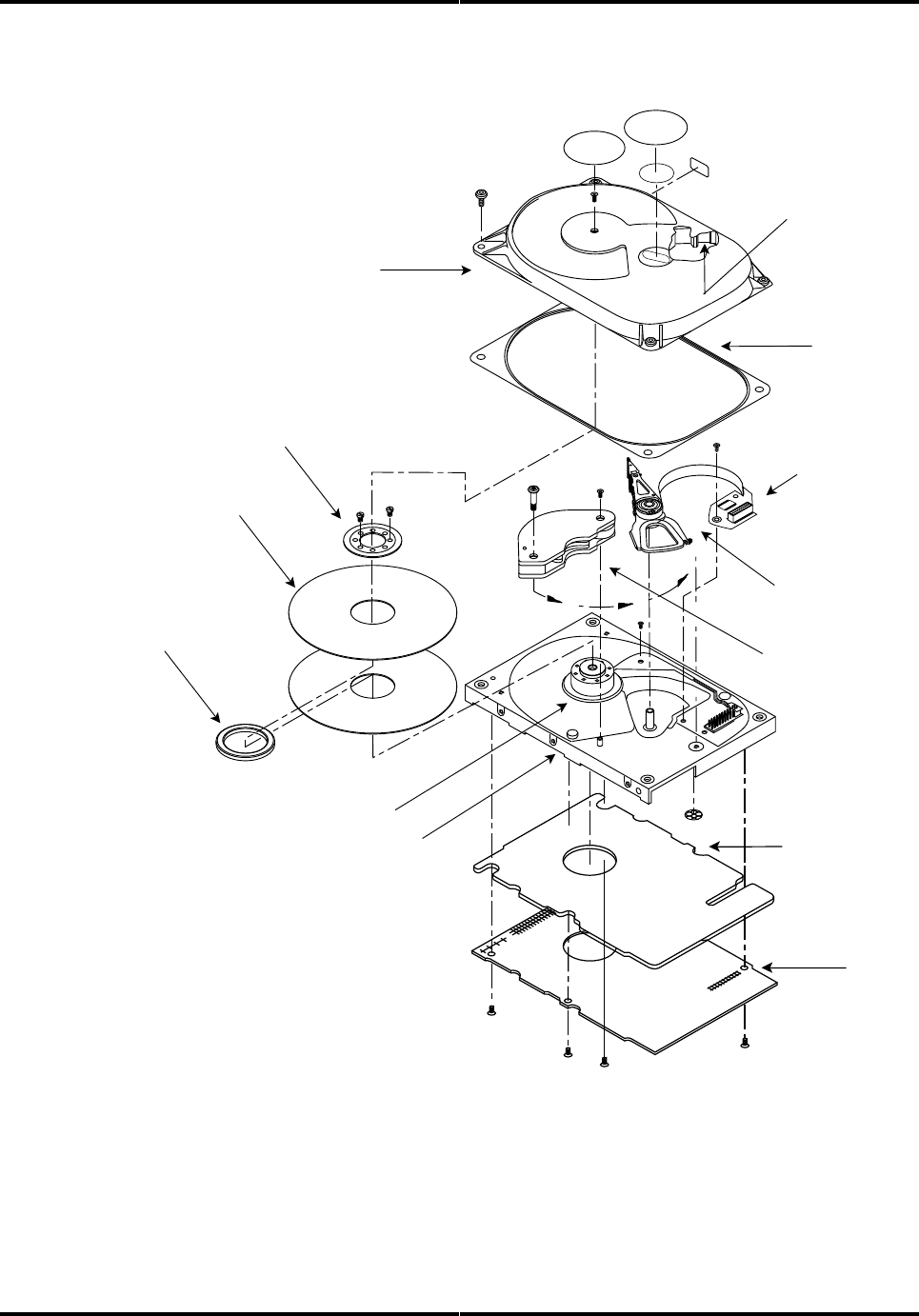
The drive’s hardware includes the components described in the following
sections. Figure 1-1 shows some of these components.
Drive Assembly Housing
The drive assembly housing, or Head-Disk Assembly (HDA) consists of a die
cast aluminum base on which is mounted a die cast aluminum cover. A gasket
seals the joint between the base and cover to retard the entry of moisture and
environmental contaminants from the assembly.
This assembly, the Head-Disk Assembly, contains an integral 0.3 micron filter,
which maintains a clean environment. Critical drive components are contained
within this contaminant-free environment.
Drive Motor and Spindle
A brushless DC direct-drive motor assembly is mounted on the drive’s base.
The motor rotates the drive’s spindle at 3600 RPM. The motor/spindle assembly
is dynamically balanced to provide minimal mechanical runout to the disks. A
dynamic brake is used to provide a fast stop to the spindle motor and return the
heads to the landing zone when power is removed.
Head Positioning Mechanism
The read/write heads are supported by a mechanism coupled to a rotary voice
coil actuator.
Read/Write Heads and Disks
Data is recorded on a 95mm diameter disk using Metal In Gap (MIG) composite
heads.
The ST31081A contains:
• two disk with four data surfaces
• four read/write heads
The ST31621A contains:
• three disk with six data surfaces
• six read/write heads
At power-down, the heads are automatically retracted to the inner diameter of
the disk and are latched and parked on a landing zone that is separate from the
data tracks.
Overview of the Drives Chapter 1
Technical Reference Manual Page 3
Figure 1-1
Hard Drive Components (ST31081A)
Printed
Circuit
Board
Assembly
Disk Clamp
Disk (1 of 2)
Disk
Spacer
Spindle Motor
Rotary Actuator /
Head-Stack
Assembly
Actuator
Magnet
Assembly
Base Assembly
Gasket
Top Cover
Preamplifier/
Flex Circuit
Assembly
850A_1_2
Filter
Printed Circuit
Board Assembly
Shield

Chapter 1 Overview of the Drives
Page 4 ST31081A/ST31621A
Electrical Design Features
Data and Power Connections
The drive has a single 40-pin data connector, as well as an auxiliary connector
which is reserved for factory or engineering evaluation use.
Electrical power is supplied to the drive using an industry standard 4-pin power
connector.
The drive also has a jumper block which can be set to specify drive operational
parameters. For more information on the drive’s connectors and on setting
jumpers, refer to chapters 3 and 4.
Preamplifier
A single integrated circuit (IC) is mounted within the head disk assembly, in
close proximity to the read/write heads. The IC provides head selection, read
pre-amplification, and write drive circuitry.
Circuit Board
The drive’s microprocessor-controlled circuit board provides the remaining
electronic functions, which include:
• read/write circuitry
• rotary actuator control
• interface control
• spin speed control
• auto-park
• power management
Firmware
The drive’s firmware includes a command set which the host uses to control the
drive. The command set allows the host to request the following types of
actions:
• report drive status
• seek a specific point on the disk
• read and write data
For more information on the drive’s command set, refer to chapters 6 and 7.

Technical Reference Manual Page 5
Specifications
2
Specifications In This Chapter
This chapter defines the following specifications for the drive:
• drive capacity
• physical configuration
• performance characteristics
• read/write characteristics
• reliability
• power requirements
• environmental tolerances
• safety standards
• physical characteristics
Chapter 2 Specifications
Page 6 ST31081A/ST31621A
Drive Capacity
Formatted Capacity:
• ST31081A: 1081.6MB
• ST31621A: 1621.9MB
* 1MB = 1 x 106 bytes
Physical Configuration
Specification ST31081A: ST31621A:
Disk Type Sputtered Thin Film Sputtered Thin Film
Head Type MIG MIG
Actuator Type Rotary Voice Coil Rotary Voice Coil
Number of Disks 23
Data Surfaces 46
Data Heads 46
Servo Embedded Embedded
Tracks per Surface 3919 3919
Buffer Size 64KB 64KB
Track Density 4100 tpi 4100 tpi
Formatted Track Capacity 45,568-86,528 bytes 45,568-86,528 bytes
Bytes per Block 512 512
Blocks per Drive 2,113,776 3,171,168
Sectors per Track (User) 89 -169 89 -169
Translate Universal Universal
* Refer to chapter 3 for a definition of Universal Translate Mode

Specifications Chapter 2
Technical Reference Manual Page 7
Performance Characteristics
Seek Times (typical)* :
• Track to track: 3.0 ms
• Average: 14 ms **
• Maximum: 28 ms
•The timing is measured through the interface with the drive operating at nominal DC input voltage
and nominal operating temperature. The timing also assumes that:
•BIOS and PC system hardware dependency have been subtracted from timing measurements
•the drive is operated using its native drive parameters
•the controller overhead is the time it takes to assert +HOST IRQ after the host writes the
command register with a READ instruction, for the case where the data already resides in the
buffer
** The average seek time is determined by averaging the seek time for a minimum of 1000 seeks of
random length over the surface of the disk.
Average Latency:
• 8.3 ms
Rotation Speed:
• 3600 RPM (+ 0.25%)
Controller Overhead:
• <1.0ms
Start Time at Power-Up: *
• 0 RPM to 3600 RPM
- Typical: 6 seconds
- Maximum: 10 seconds
• 0 RPM to Ready
- Typical: 8 seconds
- Maximum: 16 seconds
* These numbers assume spin recovery is not invoked. If spin recovery is invoked, the maximum
could be 40 seconds. Briefly removing power can lead to spin recovery being invoked.
Stop Time at Power-Down:
• Typical: 15 seconds
• Maximum: 20 seconds
Interleave:
• 1:1

Chapter 2 Specifications
Page 8 ST31081A/ST31621A
Read/Write Characteristics
Interface:
• Task File
Recording Method:
• 1 of 7 RLL code
Recording Density (ID):
• 93,000 bits per inch
Flux Density (ID):
• 70,000 flux reversals per inch
Data Transfer Rate:
• To/From Media: 29.2 - 54.7 Mb/second
• To/From Host: PIO Mode 4 (16.7 MB/second) or Multiword DMA Mode 2
Reliability
Data Reliability:
• < 1 non-recoverable error in 1014 bits read
Component Design Life:
• 5 years
Start/Stop Cycles:
• 40,000 minimum
Mean Time Between Failures:
• 300,000 power-on hours
Mean Time to Repair:
• 10 minutes typical
Preventive Maintenance:
• none

Specifications Chapter 2
Technical Reference Manual Page 9
Power Requirements
Mode: *
+5 Volts
(typical): +12 Volts
(typical): Watts
(typical): (maximum):
Read/Write 430 mA 150 mA 3.5 W 4.0 W
Seek/Rd/Wr 200 mA 240 mA 3.9 W 4.5 W
Idle 370 mA 125 mA 3.0 W 3.0 W
Standby 190 mA 0 mA 0.5 W <1.0 W
Sleep 500 mA 0 mA 0.5 W <1.0 W
Spin-Up 500 mA 1100 mA N/A N/A
* Refer to chapter 3 for the definitions of the modes. Spin-Up Mode current draw is for 7 seconds,
maximum. Maximum power is when the supply voltage is at the worst case condition.
Minimum/Maximum Voltage:
• +5V: +5%
• +12V: +5%
Maximum Peak-to-Peak Noise Allowed (DC to 1 MHz, with equivalent
resistive load):
• +5V: 2%
• +12V: 1%
Environmental Tolerances
Temperature:
• Operating: 5° to 55° C
• Non-operating: -40° to 60° C
• Thermal Gradient: 20o C per hour maximum
Relative Humidity (non-condensing):
• Operating: 8 to 80%
• Non-operating: 8 to 80%
• Wet Bulb: 28.9o C maximum
Altitude (relative to sea level):
• Operating: -200 to 10,000 feet
• Non-operating:-200 to 40,000 feet (maximum)
• Altitude Gradient: 1,000 feet/minute
Shock (half-sine pulse, 11 ms duration):
• Operating: 5G without non-recoverable errors
• Non-operating: 75G without non-recoverable errors

Chapter 2 Specifications
Page 10 ST31081A/ST31621A
Vibration (swept-sine, one octave per minute):
• Operating
−5 - 22 Hz: 0.020 inch displacement; double amplitude, 1 octave per
minute.
−23 - 400 Hz: 0.5G peak without non-recoverable errors
• Non-operating
−5 - 22 Hz: 0.20 inch displacement; double amplitude, 1 octave per
minute
−23 - 400 Hz: 5G peak
Magnetic Field:
• The disk drive will meet its specified performance while operating in the
presence of an externally-produced magnetic field under the following
conditions:
Field Frequency Intensity
DC 6 gauss
to 700 Khz 7 milligauss
700 Khz to 1.5 Mhz 3 milligauss
Acoustic Noise:
• The sound power level measured based on ISO 7779 will not exceed 4.0 Bel
in Idle Mode.
Product Test Standards
The drive is designed to comply with relevant product safety standards,
including:
• UL 478, 5th edition, Standard for Safety of Information Processing and
Business Equipment
• UL 1950, Standard for Safety of Information Technology Equipment
• CSA 22.2 #220, Information Processing and Business Equipment
• CSA 22.2 #950, Safety of Information Technology Equipment
• IEC 380, Safety of Electrically Energized Office Machines
• IEC 950, Safety of information Technology Equipment Including Electrical
Business Equipment
• VDE 0805, VDE 0805 TIEL 100, and VDE 0806
The drive has been tested for compliance with FCC Class B, Part 15, Subpart J
The drive has been tested to be compatible with EMC directive 89/336/EEC.
Specifications Chapter 2
Technical Reference Manual Page 11
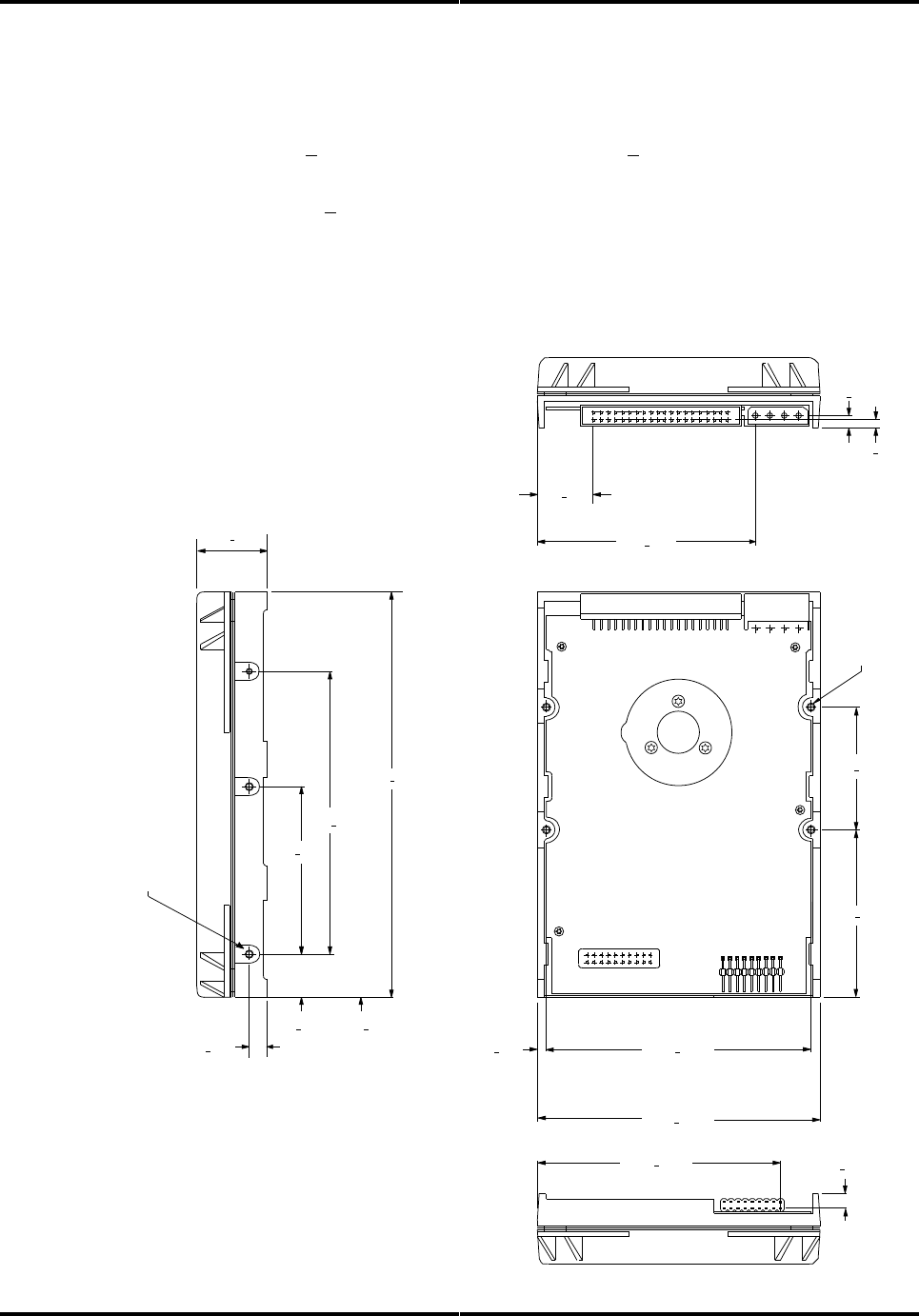
Physical Characteristics
Height:
•1.0 inch + .030 Depth:
•5.75 inches + .020
Width:
•4.0 inches + .020 Weight:
• 1.25 pounds (ST31080A).
• 1.3 pounds (ST31651A)
Figure 2-1
The Drive’s Physical Dimensions
4X 6-32 UNC-2B
6X 6-32 UNC-2B
.795 + .015
3.095 + .030
.178 + .025
.119 + .022
1.750 + .005
2.375 + .005
3.750 + .005
4.00 + .020
.125 + .005
1.00 + .030
5.75 + .020
4.000 + .0035
2.363 + .0035
.630 + .0035
.234 + .005
.250 + .010
.16 MAX. INSERTION
3.425 + .015 .184 + .025
.22 MAX. INSERTION
CFS850A_2_1

Chapter 2 Specifications
Page 12 ST31081A/ST31621A

Technical Reference Manual Page 13
How the Drive Operates
3
Functions of the Drive
This chapter describes certain operational aspects of the drive, including
discussions of:
• drive operational modes
• error correction
• Universal Translate Mode
• master/slave configurations
Drive Operational Modes
The drive operates in the following modes:
•Read/Write Mode occurs when data is read from or written to the disk.
•Seek/Rd/Wr Mode occurs when the drive is operated in a random seeking
read/write mode with a 30% seek duty cycle.
•Idle Mode occurs when the drive is not reading, writing, or seeking. The
motor is up to speed and the Drive Ready condition exists. The actuator
is residing on the last-accessed track.
•Standby Mode occurs when the motor is stopped and the actuator is
parked. Standby Mode occurs after a programmable time-out since the last
host access occurs. The drive will leave Standby Mode upon receipt of a
command which requires disk access, or upon receipt of a spin-up
command.
•Sleep Mode occurs when all electronics are disabled. The host is required
to issue a Reset command to exit the Sleep Mode.
•Spin-Up Mode occurs while the drive is spun up to speed after being
powered on or after exiting Standby or Sleep Mode.
Error Correction
The drive uses a Reed-Solomon code to perform error detection and correction.
For each 512-byte block, the software error correction polynomial is capable of
correcting:
• one error burst up to 41 bits
• two error bursts up to 17 bits each
Single bursts of 11 bits or less are corrected on the fly (OTF) with no
performance degradation.

Chapter 3 How the Drive Operates
Page 14 ST31081A/ST31621A
Universal Translate Mode
Seagate has established a Universal Translate Mode which enables you to
configure the drive in an AT environment to any cylinder, head, and sector
configuration desired. The translate configuration is limited by the maximum
capacity of the drive and host system parameters. Upon initial power-up of the
drive, it will default to the configuration shown below:
Drive:
No. of
Cylinders: No. of Heads
No. of
Sectors:
ST31081A 2097 16
63
ST31621A 3146 16
63
After the drive is ready, the host system may issue an Initialize Device
Parameters command (command code 91 hex) to alter the translate
configuration (number of heads and number of sectors per track). The drive
will then calculate the total number of available logical cylinders based upon
the values contained in the Sector Count and Drive/Head registers.
Master/Slave Configuration
When two drives are daisy-chained on the host interface, one must be
designated as the master drive (C: drive) and one as the slave drive (D:
drive). Commands from the host are written in parallel to both drives.
When the C/D jumper on the drive is closed, the drive will assume the role of a
master. When C/D is open, the drive will act as a slave. In single-drive
configurations, C/D must remain in the closed (master) position. For more
information on setting the C/D jumper, refer to chapter 4.
For each command sent from the host, the DRV bit in the Device/Head register
selects the master or the slave drive. When the DRV bit is reset (0), the master
drive is selected, and when the DRV bit is set (1), the slave drive is selected.
Once the drives receive the command, only the drive with jumper C/D set to the
appropriate position will execute the command. For example, if the DRV bit is
set, only the slave drive (jumper C/D open) will execute the command.
☞☞ Note: If the command is a diagnostic command, both drives will execute the command and the slave
will report its status to the master via the Host PDIAG signal.
Throughout this manual, drive selection always refers to the state of the DRV
bit and the position of the C/D jumper.

How the Drive Operates Chapter 3
Technical Reference Manual Page 15
Cable Select
This optional method of drive Master/Slave designation can be enabled by
jumper selection as described in Chapter 4. If used, special cabling can be used
to selectively ground CSEL of the drive intended to be drive C (0). This drive
will then function as the Master. If CSEL is allowed to float the drive will
recognize itself as drive D (1) and function as the Slave.

Chapter 3 How the Drive Operates
Page 16 ST31081A/ST31621A

Technical Reference Manual Page 17
Installing the Drive
4
Take These Precautions
To protect your equipment from electrostatic damage,
perform the installation at a static-safe workstation. If one is
not available, follow these guidelines:
1. Work in an uncarpeted area.
2. Before removing the equipment from its anti-static bag,
discharge static electricity by touching your computer's
metal chassis (or any other grounded object) while
touching the anti-static bag.
3. Do not touch circuit boards unless instructed to do so.
0170
Installing the Drive
To install the drive, you must:
• set the drive’s jumpers, if desired
• attach a data cable to the drive
• attach power to the drive
• mount the drive
Chapter 4 Installing the Drive
Page 18 ST31081A/ST31621A
Setting the Drive’s Jumpers
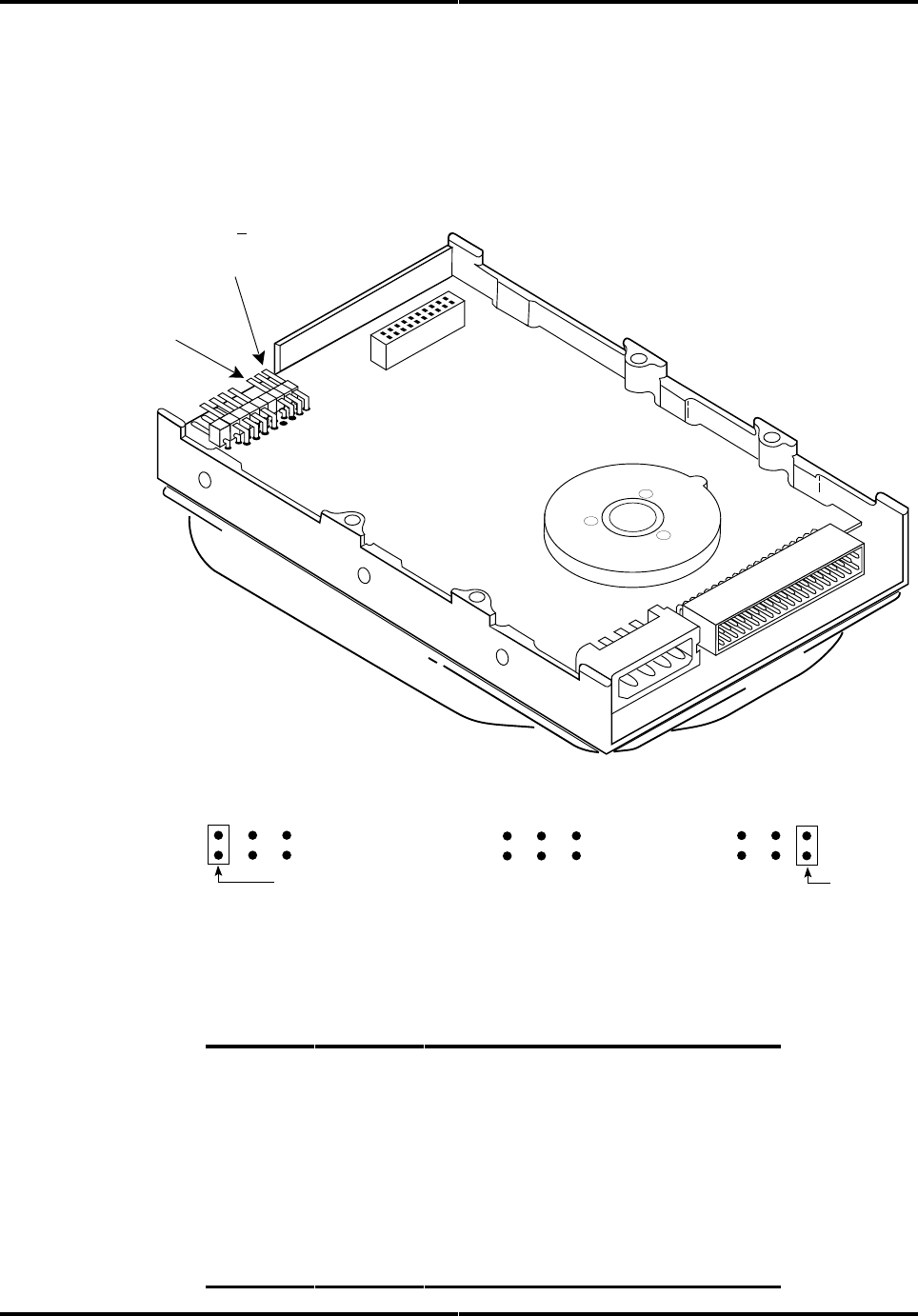
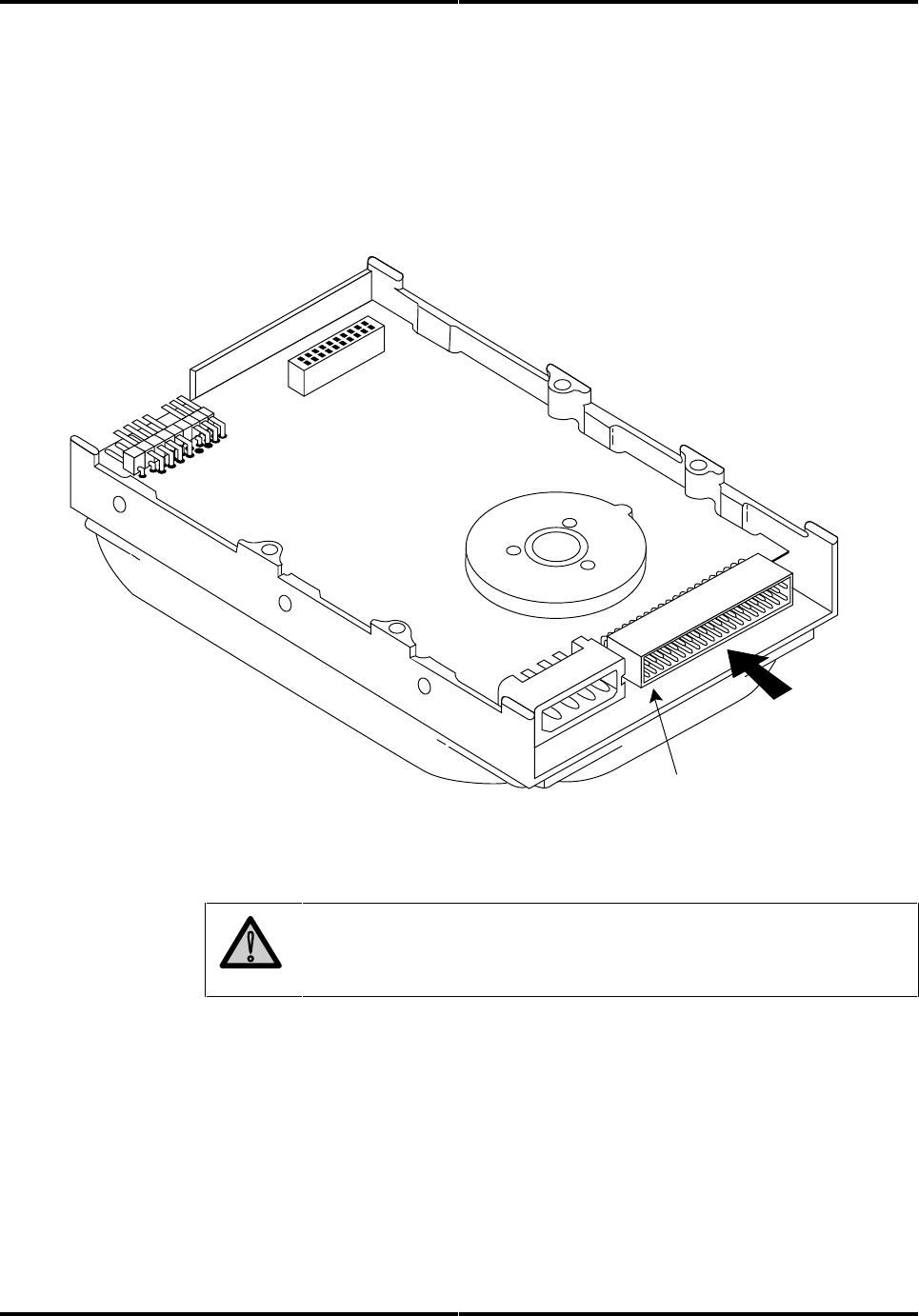
Figure 4-1 shows you how to access the drive’s jumpers.
Figure 4-1
Jumper Locations
C/D
Jumper
CS
Master/Standalone
C/D
Slave
C/D
CS CS
Jumper
Cable Select
Master or Slave
CS
C/D
Jumper
No Jumpers
Here is how you can set these jumpers. Pins described as “reserved” should not
be used.
Pins: Signal: Description
1 and 2 C/D Open: Drive will act as slave.
Closed: Drive will act as master.
3 and 4 N/C Reserved
5 and 6
Note:
CS Open: Cable select option disabled
closed: Cable Select enabled
When using C/S option, the C/D
jumper must be open
7 to 18 N/A Reserved

Installing the Drive Chapter 4
Technical Reference Manual Page 19
Chapter 4 Installing the Drive
Page 20 ST31081A/ST31621A
Attaching a Data Cable to the Drive
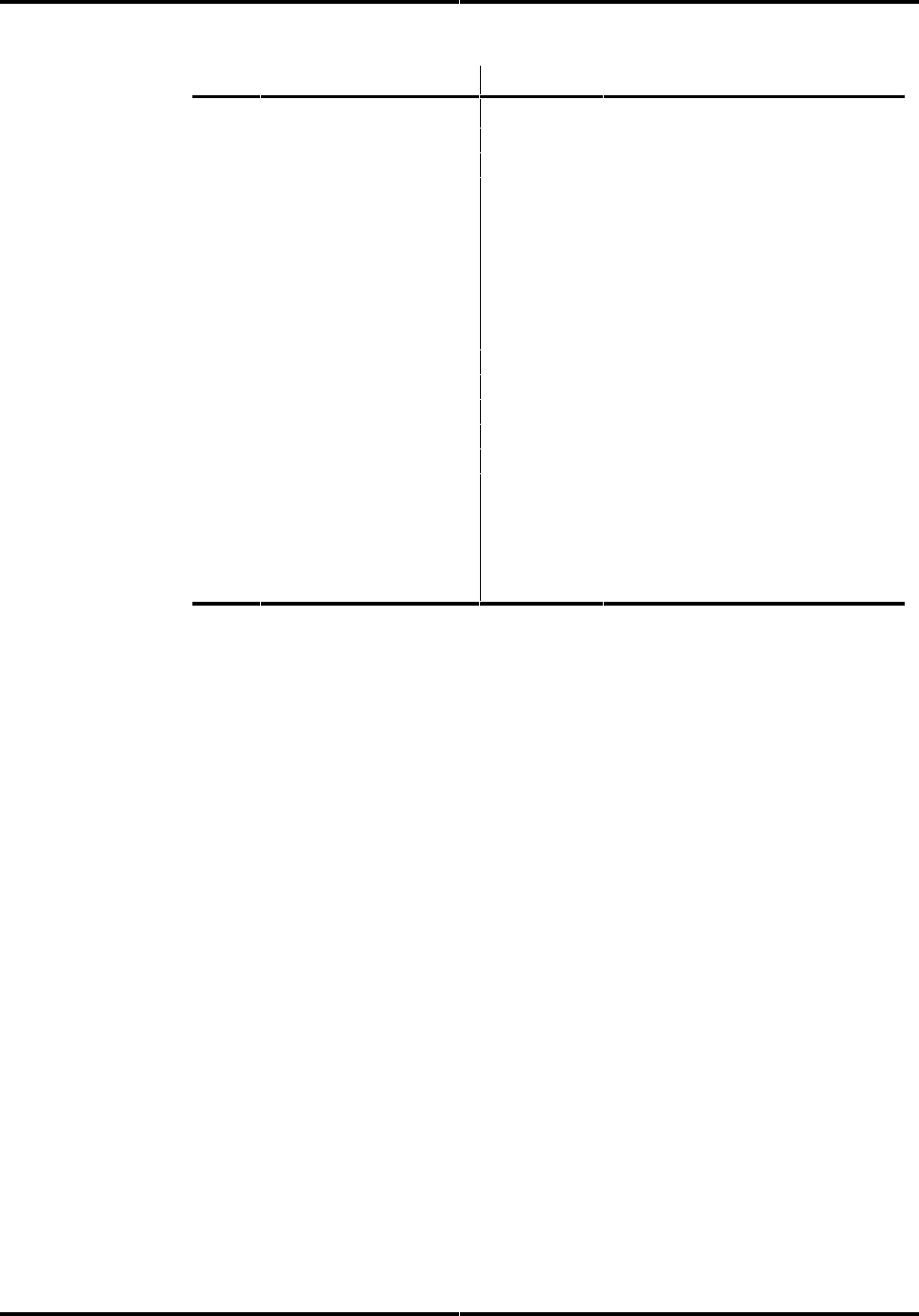
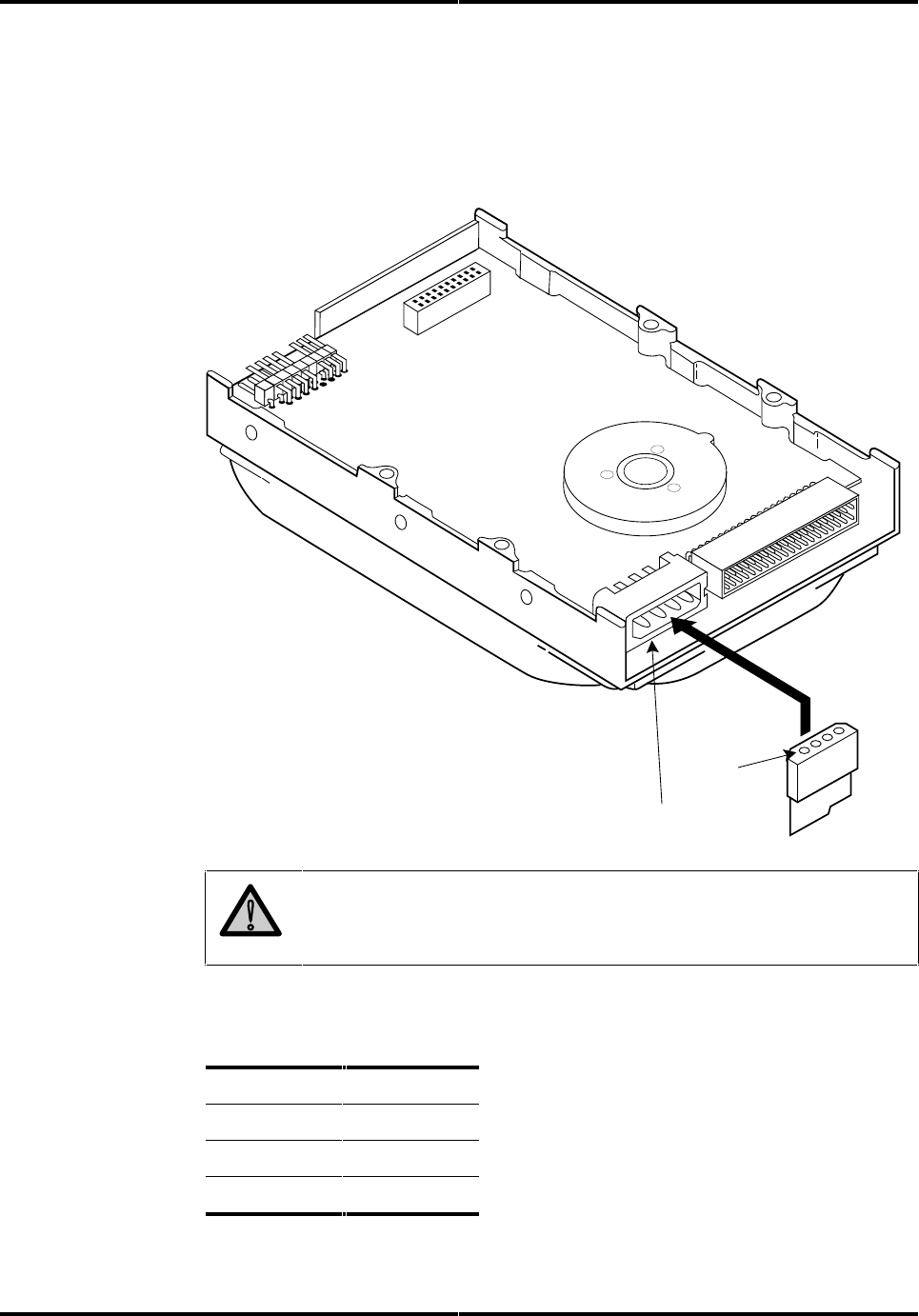
Attach the data cable from the host to the Task File Interface connector, as
shown in figure 4-2. Refer to the table on the following page for pin out
information.
Figure 4-2
Attaching a Data Cable
CFA425_4_2
Pin 1 (typically indicated by a
colored stripe on the data cable
40-pin
Task File Interface
Data Connection
!
Caution: Do not route the data cable next to the drive PCB or
any other high frequency or large current switching signals.
Improper drive operation can result from improper cable routing.
Installing the Drive Chapter 4
Technical Reference Manual Page 21
Pin: Signal: Pin: Signal:
01 - HOST RESET 02 GND
03 + HOST DATA 7 04 + HOST DATA 8
05 + HOST DATA 6 06 + HOST DATA 9
07 + HOST DATA 5 08 + HOST DATA 10
09 + HOST DATA 4 10 + HOST DATA 11
11 + HOST DATA 3 12 + HOST DATA 12
13 + HOST DATA 2 14 + HOST DATA 13
15 + HOST DATA 1 16 + HOST DATA 14
17 + HOST DATA 0 18 + HOST DATA 15
19 GND 20 KEY
21 + DMARQ 22 GND
23 - HOST IOW 24 GND
25 - HOST IOR 26 GND
27 + IOCHRDY 28 + CSEL (optional)
29 - DMACK 30 GND
31 + HOST IRQ14 32 - HOST IO16
33 + ADDR1 34 - HOST PDIAG
35 + ADDR0 36 + ADDR2
37 - HOST CS0 38 - HOST CS1
39 - DASP 40 GND
The recommended mating connector for the Task File Interface is Molex P/N
15-47-5401 or equivalent. You may daisy-chain two drives on this connector.
The maximum cable length is 18 inches.
Chapter 4 Installing the Drive
Page 22 ST31081A/ST31621A
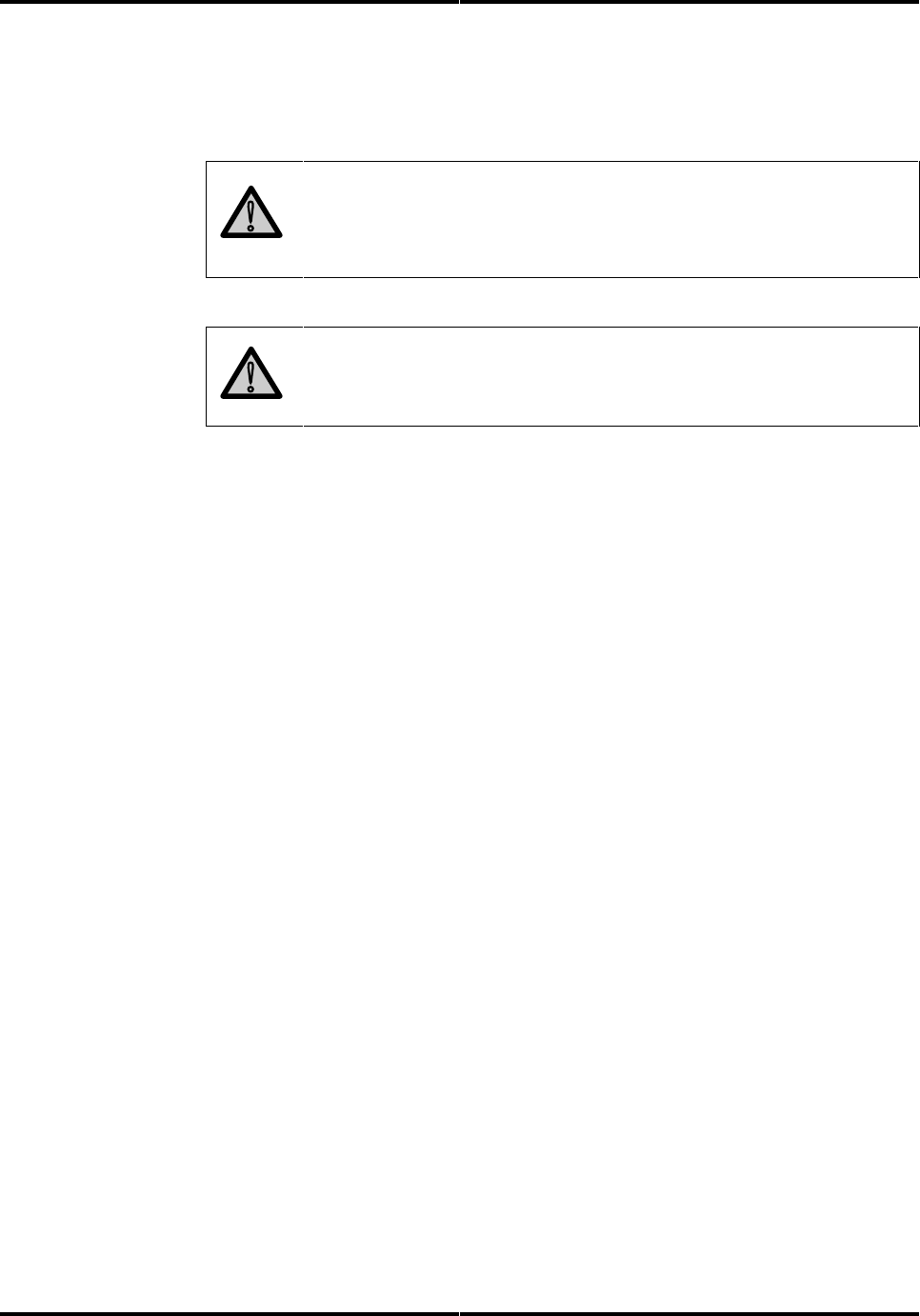
Attaching Power to the Drive
The drive has a standard 4-pin DC power connector.
Figure 4-3
Attaching a Power Cable
Standard 4-Pin
Power Connector
Pin 1
!
Caution: Do not route the power cable next to the drive PCB or
any other high frequency or large current switching signals.
Improper drive operation can result from improper cable routing.
The following table describes the 4-pin power connector pins:
Pin: Signal:
1+12 Volts
2GND
3GND
4+5 Volts
The mating connector for the 4 pin connector is AMP 1-480424-0 (housing) and
AMP 60619-4 (loose piece) or 61117-4 (strip) contacts.
Installing the Drive Chapter 4
Technical Reference Manual Page 23
Mounting the Drive
You can mount the drive either vertically or horizontally. The drive will meet
all performance specifications when mounted at any orientation.
!
Caution: The surface(s) on which you mount the drive should be
flat and parallel to prevent uneven pressure on the drive.
Mounting the drive on an uneven surface could cause the drive’s
base to deform, degrading drive performance.
!
Caution: When using the side mounting holes, verify the screw
length to ensure clearance from the drive's printed circuit board
before tightening the screw.
Refer to figure 2-1 in chapter 2 for dimensions and the location of mounting
screw holes.

Chapter 4 Installing the Drive
Page 24 ST31081A/ST31621A

Technical Reference Manual Page 25
Host Interface
5
About the Host Interface
The interface between the drive adapter and the drive is called the host
interface. The set of registers in the I/O space of the host that are controlled
through the host interface is known as the task file.
The physical interface from the drive to the host is called the task file
interface and is implemented using a 40-pin connector. The pin assignments
were described in chapter 4.
Definitions of signals are listed beginning on the next page under Signal
Descriptions.
Signal Conventions
The following conventions are used in the discussions that follow:
• All signals on the host interface shall have the prefix HOST.
• All negatively-active signals shall be further prefixed with a “-” designation.
• All positive-active signals shall be prefixed with a “+” designation.
• Signals whose source is the host are said to be “outbound” and those whose
source is the drive are said to be “inbound.”
Signal Levels
All signal levels are TTL compatible. A logic “1” is >2.0 Volts. A logic “0” is
from 0.00 Volts to 0.70 Volts. The drive capability of each of the inbound
signals is described below.

Chapter 5 Host Interface
Page 26 ST31081A/ST31621A
Signal Descriptions
The following table describes signals on the task file interface.
Signal Name: Dir: Pin: Description:
-HOST RESET O 1 Reset signal from the host system which is active low during
power-up and inactive thereafter.
GND O 2, 19,
22, 24,
26,30,
40
Ground between the drive and the host.
+HOST DATA I/O 3 - 18 16-bit bi-directional data bus 0 - 15 between the host and the
drive. The lower 8 bits, HD0 - HD7, are used for register and
ECC access. All 16 bits are used for data transfers. These
are tri-state lines with 24 mA drive capability.
KEY N/C 20 An unused pin clipped on the drive and plugged on the cable.
Used to guarantee correct orientation of the cable.
+DMARQ I 21 Host DMA request handshake signal.
-HOST IOW O 23 Write strobe, the rising edge of which clocks data from the host
data bus, HD0 - HD15, into a task file register or the data
register on the drive.
-HOST IOR O 25 Read strobe, which when low enables data from the Task File
on the drive onto the host data bus, HD0 - HD15. The rising
edge of -HOST IOR latches data from the drive at the host.
+IOCHRDY I 27 This signal is negated to extend host transfer cycles when the
controller is not ready to respond.
+CSEL I/O 28 Cable Select is functional when the C/S jumper is inserted,
which routes the C/D select to this pin. When set high, drive
D: is selected; when set low, drive C: is selected.
-DMACK O 29 Host DMA acknowledge handshake signal.
+HOST IRQ14 I 31 Interrupt to the host system, enabled only when the drive is
selected and the host activates the -IEN bit in the Device
Control register. When the -IEN bit is inactive or when the
drive is not selected, this output is in a high impedance state,
regardless of the state of the IRQ bit.
IRQ is reset to zero by a host read of the Status register after
completion of a data transfer phase or a write to the Command
register. This signal is a tri-state line with 8 mA drive capacity.

Host Interface Chapter 5
Technical Reference Manual Page 27
Signal Name: Dir: Pin: Description:
-HOST IO16 I 32 Indication to the host system that the 16-bit data register has
been addressed and that the drive is prepared to send or
receive a 16-bit data word. This line is tri-state line with 24 mA
drive capacity.
-HOST PDIAG I 34 This signal shall be asserted by the slave to the master that it
has completed diagnostics. A 10K ohm pull-up resistor shall
be used on this signal by each drive.
Following a POR, a software reset, or a RESET-, the slave will
negate PDIAG- within 1 ms (to indicate to the master that it is
busy). The slave will then assert PDIAG- within 30 seconds to
indicate that it is no longer busy and is able to provide status.
After the assertion of PDIAG-, the slave may be unable to
accept commands until it has finished its reset procedure and
is ready (DRDY =1).
Following the receipt of a valid Execute Drive Diagnostics
command, the slave will negate PDIAG- within 1 ms to indicate
to the master that it is busy and has not yet passed its drive
diagnostics. If the slave is present, then the master will wait
for up to 5 seconds from the receipt of a valid Execute Drive
Diagnostics command for the slave to assert PDIAG-. The
slave should clear BSY before asserting PDIAG-, as PDIAG- is
used to indicate that the slave has passed its diagnostics and
is ready to post status.
If DASP- was not asserted by the slave during reset
initialization, the master will post its own status immediately
after it completed diagnostics and clear the slave status
register to 00 hex. The master may be unable to accept
commands until it has finished its reset procedure and is
Ready (DRDY = 1).
+HOST
A0,A1,A2
O 35, 33,
36
Bit binary coded address used to select the individual registers
in the task file.
-HOST CS0 O 37 Chip select decoded from the host address bus. Used to
select most of the host-accessible registers.
-HOST CS1 O 38 Chip select decoded from the host address bus. Used to
select three of the registers in the task file.
Chapter 5 Host Interface
Page 28 ST31081A/ST31621A
Signal Name: Dir: Pin: Description:
-DASP I 39 DASP- (drive active/slave present). This is a time-multiplexed
signal which indicates that a drive is active, or that the slave is
present. This signal is an open-collector output and each drive
has a 10K pull-up resistor.
During power-on initialization or after RESET is negated,
DASP- shall be asserted by the slave within 400 ms to indicate
that the slave is present.
The master shall allow up to 450 ms for the slave to assert
DASP-. If the slave is not present, the master may assert
DASP- to drive an activity LED.
DASP- shall be negated following acceptance of the first valid
command by drive 1 or after 31 seconds, whichever comes
first.
Any time after negation of DASP-, either drive may assert
DASP- to indicate that a drive is active.
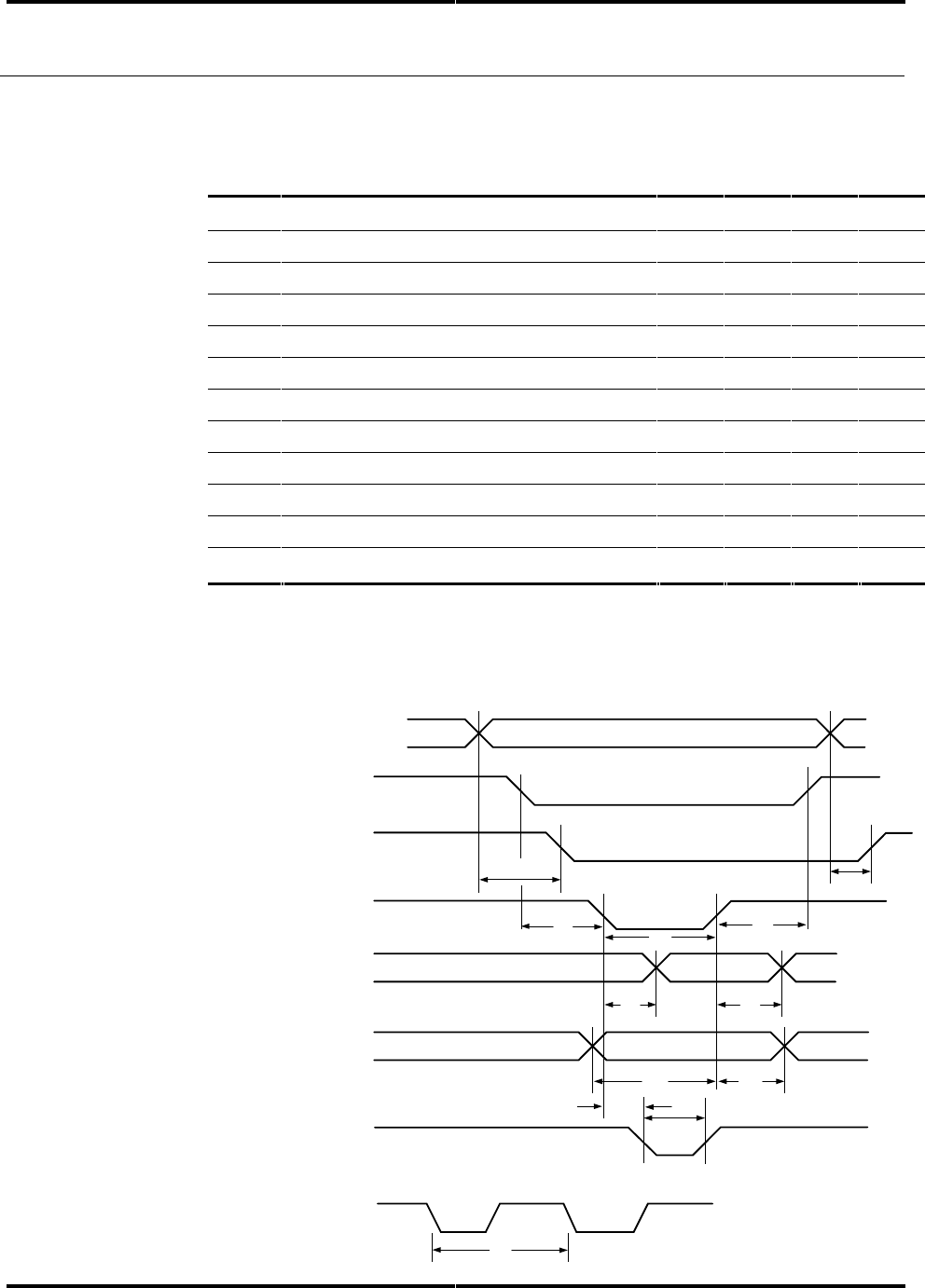
ATA/CAM Master/Slave Reset Timing
Figure 5-1 illustrates the ATA/CAM Master/Slave reset sequence.
Figure 5-1
ATA/CAM Reset Sequence
-DASP
-PDIAG
-Reset
TM
BSY bit in
Status Register
TR
TQ
TS
TB
TN
TD
TD
0165

Host Interface Chapter 5
Technical Reference Manual Page 29
Description
Label
POR Value Soft Reset Value
-Reset width (min)
TM
25µs N/A
-DASP asserted (max)
TS
31s 31s
-DASP after Reset (max)
TR
450ms N/A
Slave DIAG complete (max)
TQ
30s 30s
Drive BSY (max)
TB
31s 31s
-DASP after -PDIAG (min)
TD
>0 N/A
BSY status after Reset
(max)
TN
400ns 400ns
-PDIAG after Reset (max)
TA
N/A 1ms
Notes:
1. -DASP is asserted by both the master and the slave. The signal on the bus
is the “wired OR” of -DASP from both drives. The master de-asserts -DASP
within 1ms after reset and waits for up to 450ms for the slave to assert
-DASP to signal its presence.
2. During a reset condition, the host BIOS checks drive 0 for BSY to be reset.
Drive 0 monitors the -PDIAG signal from the slave. When the slave
completes its diagnostics, it clears its BSY and asserts -PDIAG. The master
will wait for up to 31 seconds for -PDIAG, then clears its BSY and de-
asserts
-DASP.
Chapter 5 Host Interface
Page 30 ST31081A/ST31621A
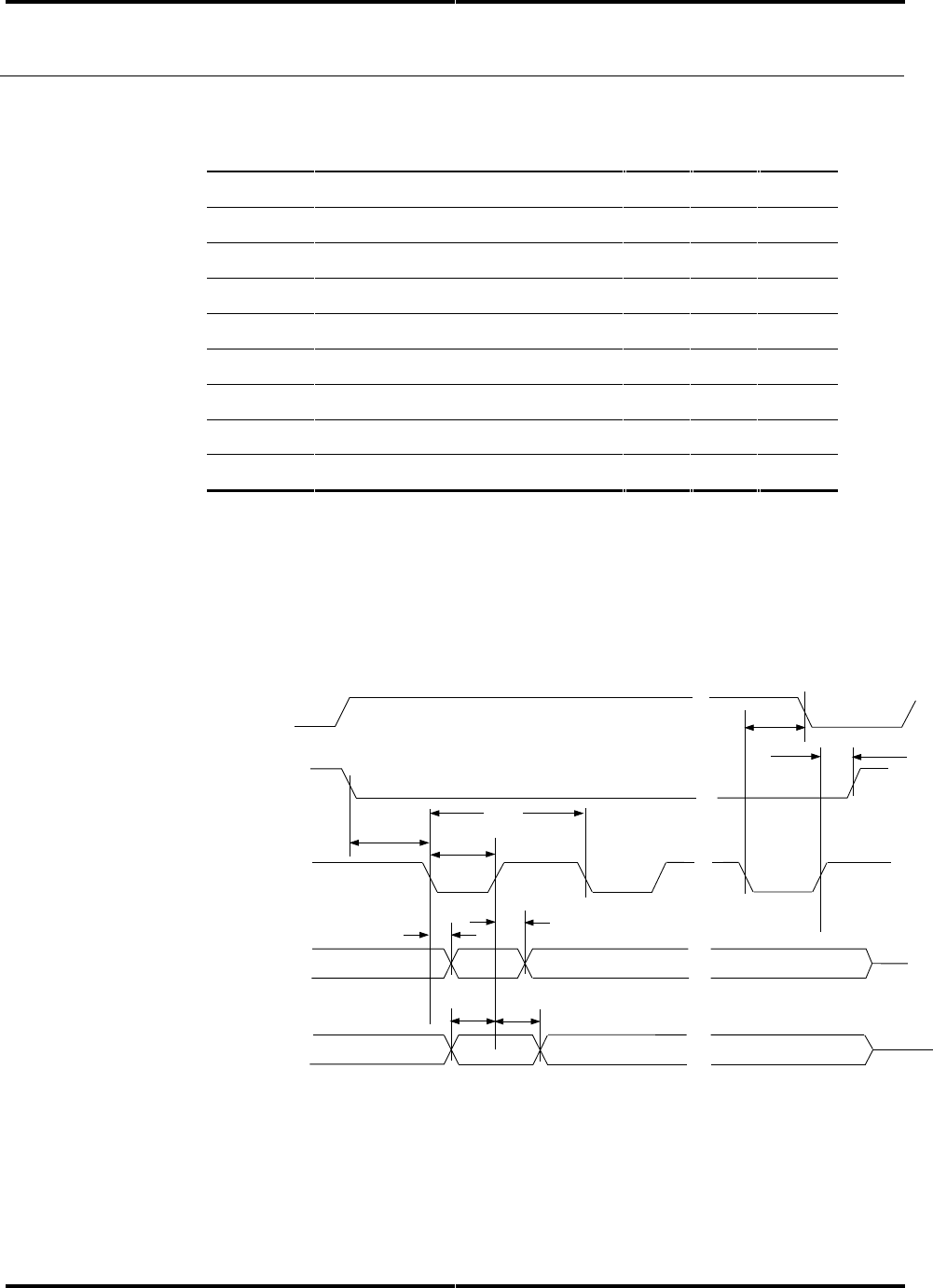
Host PI0 16-Bit Timing Values
The values* in the table below refer to the timing diagram in figure 5-3.
S
ymbo
l
Parameter Units Min: Typ Max: Unit:
T1A[0:2] active until -IOCS16 active 20 ns
T2A[0:2] inactive until -IOCS16 inactive 8 ns
T3-CS0 or -CS1 active until -IOR or -IOW 10 ns
T4-CS0 or -CS1 active after -IOR or IOW 10 ns
T5-IOW or -IOR pulse width 60 ns
T6Read Data active after -IOR active 30 ns
T7Read Data active after -IOR inactive 5 ns
T8Write Data active until -IOW inactive 20 ns
T9Write Data active after -IOW inactive 10 ns
T10 -IOR or -IOW active until -IOCHRDY 30 ns
T11 -IOCHRDY pulse width 1,250 ns
T12 -IOR/-IOW cycle time (w/ IOCHRDY) 120 ns
*
Under conditions equivalent to a 330 ohm pullup and a 56pf load. Cable type and length
may affect the values measured at the drive or host interface.
Figure 5-3
Interface PIO Timing Diagram
T
10
T
1
T
3
T
5
T
4
T
6
T
7
T
9
T
8
T
2
A[0:2]
-HCS0/-HCS1
-IOCS16
-IOR/-IOW
HDB[0:15]
(read)
HDB[0:15]
(write)
-IOR/-IOW
-IOR or -IOW CYCLE TIME
S541_5_3
T
11
T
12
-IOCHRDY
Host Interface Chapter 5
Technical Reference Manual Page 31
Host Demand Mode DMA 16-bit Interface Timing Values
The values* in the table below refer to the timing diagram in figure 5-4.
Symbol
Parameter: Min: Max: Units:
T1+DMARQ low from -IOR/-IOW low 60 ns
T2-DACK hold from -IOR/-IOW high 10 ns
T3-DACK low to -IOR/-IOW low 10 ns
T4-IOR/-IOW pulse width 60 ns
T5--IOR/-IOW cycle time 120 ns
T6-IOR low to HDB[15:0] active 30 ns
T7-IOR high to HDB[15:0] inactive 5 ns
T9HDB[15:0] set-up to -IOW high 20 ns
T10 HDB[15:0] hold from -IOW high 10 ns
* Under conditions equivalent to a 330 ohm pull-up and a 56pf load. Cable type and length
may affect the values measured at the drive or host interface
Figure 5-4
Interface DMA Timing Diagram
-DACK
HDB[15:0]
(Read)
HDB[15:0]
(Write)
+DMARQ
-IOR/-IOW
T1T2
T10
T3
T5
T7
T6
T9
541_5_4
T4

Chapter 5 Host Interface
Page 32 ST31081A/ST31621A

Technical Reference Manual Page 33
Register Addresses and Functions
6
Host Address Decoding
The host computer addresses the drive using programmed I/O. This method
requires that:
• a proper chip select be asserted
• the desired register address be placed on the three host address lines
(HA2 - HA0)
•a Read or Write strobe (-HOST IOR/-HOST IOW) is given to the chip
The host generates two independent chip selects on the interface.
• The high order chip select, -HOST CS1, is used to access register 3F6 or
3F7.
• The low order chip select, -HOST CS0, is used to address registers 1F0
through 1F7.
ECC bytes are transferred on bits 7 - 0.
The host data bus 15 - 8 is only enabled when:
• -IO16 is active
• the host is addressing the data register for transferring data
• the host is not transferring ECC bytes, which are only transferred if the
operation is a Read Long or Write Long
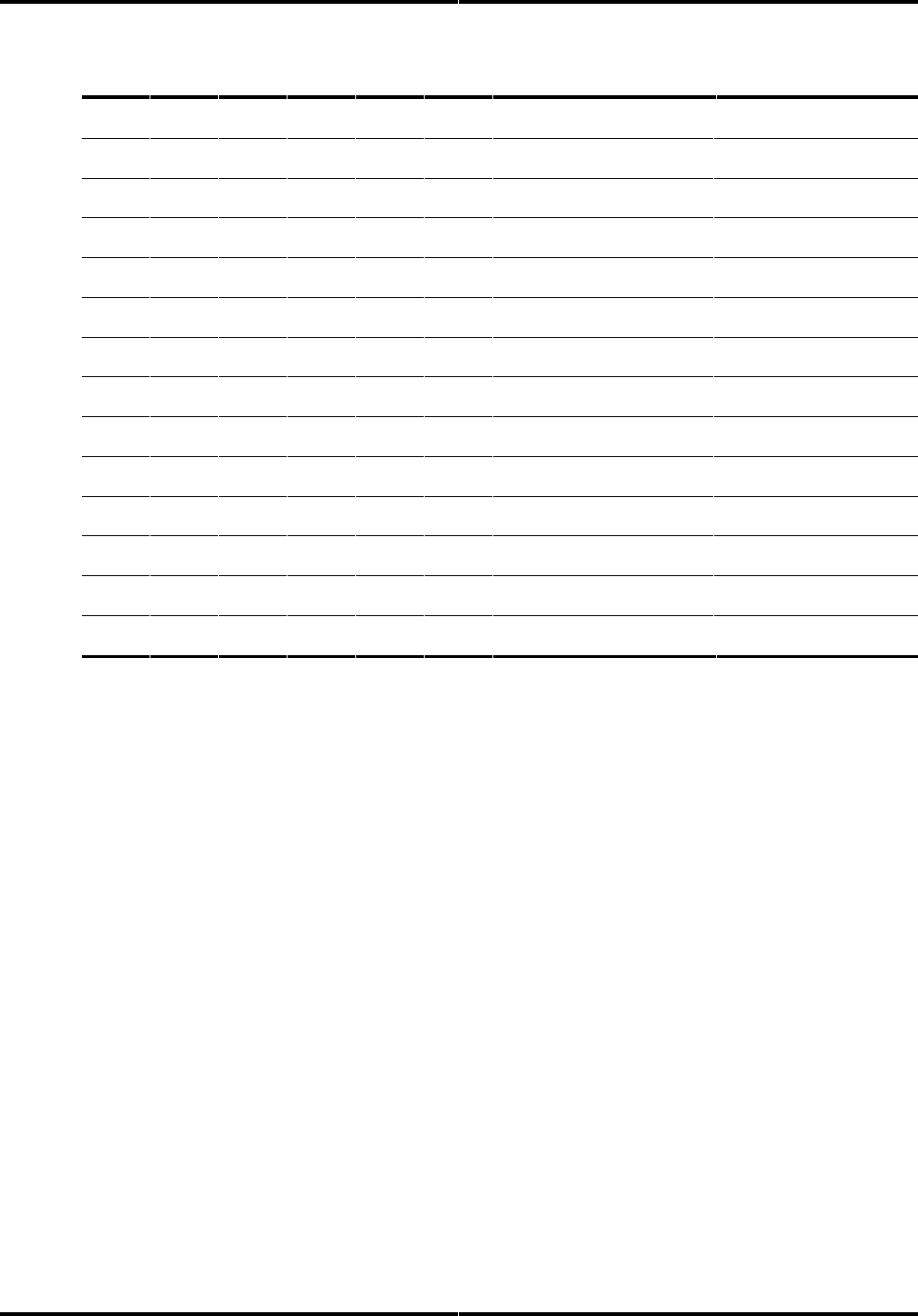
The I/O map on the next page defines all of the register addresses and the
functions for these I/O locations.
The sections that follow the I/O map describe each of the registers.
Chapter 6 Register Addresses and Functions
Page 34 ST31081A/ST31621A
Addr* -CSO -CS1 HA2 HA1 HA0 Read Function
Write Function
1 1 x x x No Operation
No Operation
0 0 x x x Invalid Address
Invalid Address
1 0 0 x x High Impedance
Not Used
1010xHigh Impedance
Not Used
1F0 01000Data Register
Data Register
1F1 01001Error Register
Features Register
1F2 01010Sector Count
Sector Count
1F3 01011Sector Number
Sector Number
1F4 01100Cylinder Low
Cylinder Low
1F5 01101Cylinder High
Cylinder High
1F6 01110Device/Head Register
Device/Head Register
1F7 01111Status Register
Command Register
3F6 10110Alternate Status Register
Device Control Register
3F7 10111Device Address Register
Not Used
x = don't care
* These I/O port addresses are listed for programmer reference. They are a function
of I/O decoding in the Host Adapter. These addresses are required for compatibility
with most AT BIOS.

Register Addresses and Functions Chapter 6
Technical Reference Manual Page 35
Addressing the Data
There are two methods of addressing the sectors on the disk drive.
Cylinder-head-sector (CHS) mode
The first method, which is the traditional approach, uses Cylinder-Head-Sector
(CHS) addressing. Most disk drives today exceed the number of cylinders limit
of DOS or use zone recording (different number of sectors per track in each
zone) so the parameters reported by the drive in the Identify Device command
are logical translations done by the drive. Logical translation within the drive
limits DOS to 528 MB because of the combined limitations of DOS and the
traditional definition of the IDE registers. BIOS and Device Drivers may
provide another layer of translation to map the DOS accessible address space to
the IDE register accessible address space.
Some non-DOS operating systems utilize additional bits in the Cylinder High
register to go beyond the DOS limit.
Logical Block Addressing (LBA) Mode
The second method uses Logical Block Addressing (LBA), which is common to
SCSI. This method re-defines the content of the Task File registers, which are
described later in this chapter. This drive operates with either CHS or LBA
addressing by responding to the switch in the Device/Head register. The
registers affected by LBA mode are the Sector Number, Cylinder Low,
Cylinder High, and Device/Head. The use of these registers allows a 28-bit
address space capable of handling up to 128GB of data.
In LBA mode, the sectors on the disk are linearly mapped with the first logical
block (LBA 0) defined as cylinder 0, Head 0, Sector 1. The subsequent logical
blocks are defined by the formula:
LBA= [(cylinder * no. of heads + heads ) * sectors/track] + (sector - 1)

Chapter 6 Register Addresses and Functions
Page 36 ST31081A/ST31621A
Descriptions of the Registers
The following sections describe the registers used for read and write functions.
In these descriptions, unused write bits should be treated as “don’t cares” and
other unused bits should be read as zeroes.
Data Register
Port Select: 1F0
Chip Select: HOST CS0
Register Address: 0
Function: Read/Write
Description: This is the register:
• through which all data is passed on Read and Write commands
• to which the sector table is transferred during Format commands
• to which data associated with the Identify command is transferred
All transfers are high speed 16-bit I/O operations except for ECC bytes
transferred during R/W Long commands, which are slower 8-bit operations
that occur after the transfer of the data.
Data is stored on the disk with the Least Significant Byte (LSB) first, then the
Most Significant Byte (MSB) for each word. This is important to remember
when testing the ECC circuitry.
Register Addresses and Functions Chapter 6
Technical Reference Manual Page 37
Error Register
Port Address: 1F1
Chip Select: -HOST CS0
Register Address: 1
Function: Read only
Description: This register contains status from the last command executed by
the drive.
The contents of this register are only valid when the error bit (ERR) is set in
the Status Register, unless the drive has just powered up or completed
execution of its internal diagnostic, in which case the register contains a status
code. The status codes are discussed in chapter 7 in the description of the
Diagnostic command.
The bits in the register are defined below:
Bit 7 Bit 6 Bit 5 Bit 4 Bit 3
Bit 2
Bit 1 Bit 0
BBK UNC not
used
IDNF not
used
ABRT
TK0 not
used
where:
•BBK indicates that a bad block mark was detected in the requested sector’s
ID field. A bad block mark is not created in the factory, but only when
requested in the format command.
•UNC indicates that a non-correctable data error has been encountered.
•IDNF indicates that the requested sector’s ID field could not be found.
•ABRT indicates that the requested command has been aborted due to a
drive status error (not ready, write fault, etc.) or because the command code
is invalid.
•TK0 indicates that track 0 has not been found during a Recalibrate
command.
For other drives Bit 0 is AMNF (Address Mark Not Found.) This is not used on
Seagate drives.

Chapter 6 Register Addresses and Functions
Page 38 ST31081A/ST31621A
Features Register (formerly Write Precomp Register)
Port Address: 1F1
Chip Select: -HOST CS0
Register Address: 1
Function: Write only
Description: This register was previously used to set write precompensation
in non-intelligent (pre-IDE) disk drives. This drive uses this register for
commands EF and F1 through F6. The ATA specification defines this register
as the Features register.
Sector Count
Port Address: 1F2
Chip Select: -HOST CS0
Register Address: 2
Function: Read/Write
Description: This register defines the number of sectors of data to be
transferred on read or write commands.
If the value in this register is zero, a count of 256 sectors is specified. This
count is decremented as each sector is read, such that the register contains the
number of sectors left to access in the event of an error in a multi-sector
operation.
The contents of this register define the number of sectors per track when
executing an Initialize Device Parameters command. This register is also
used in the power commands to provide the power-down time-out parameter
and status.
Sector Number
Port Address: 1F3
Chip Select: -HOST CS0
Register Address: 3
Function: Read/Write
CHS Description: This register contains the starting sector number for any
disk access.
LBA Description: This register contains bits 0-7 of the logical block address.
At the completion of each sector and at the end of the command, this register is
updated to reflect the last sector read correctly or the sector on which an error
occurred. During multiple sector transfers, this register is updated to point at

Register Addresses and Functions Chapter 6
Technical Reference Manual Page 39
the next sector to be read/written if the previous sector’s operation was
successful.
Cylinder Low
Port Address: 1F4
Chip Select: -HOST CS0
Register Address: 4
Function: Read/Write
CHS Description: This register contains the low-order 8 bits of the starting
cylinder number for any disk access.
LBA Description: This register contains bits 8-15 of the logical block address.
At the completion of each sector and at the end of the command, this register is
updated to reflect the current cylinder number.
Cylinder High
Port Address: 1F5
Chip Select: -HOST CS0
Register Address: 5
Function: Read/Write
CHS Description: This register contains the high-order bits of the starting
cylinder number for any disk access. Non-enhanced BIOS will only use the first
two bits of this register, forming a 10-bit cylinder address.
LBA Description: This register contains bits 16-23 of the logical block
address.
At the completion of each sector, and at the end of the command, this register is
updated to reflect the current cylinder number.

Chapter 6 Register Addresses and Functions
Page 40 ST31081A/ST31621A
Device/Head Register
Port Address: 1F6
Chip Select: -HOST CS0
Register Address: 6
Function: Read/Write
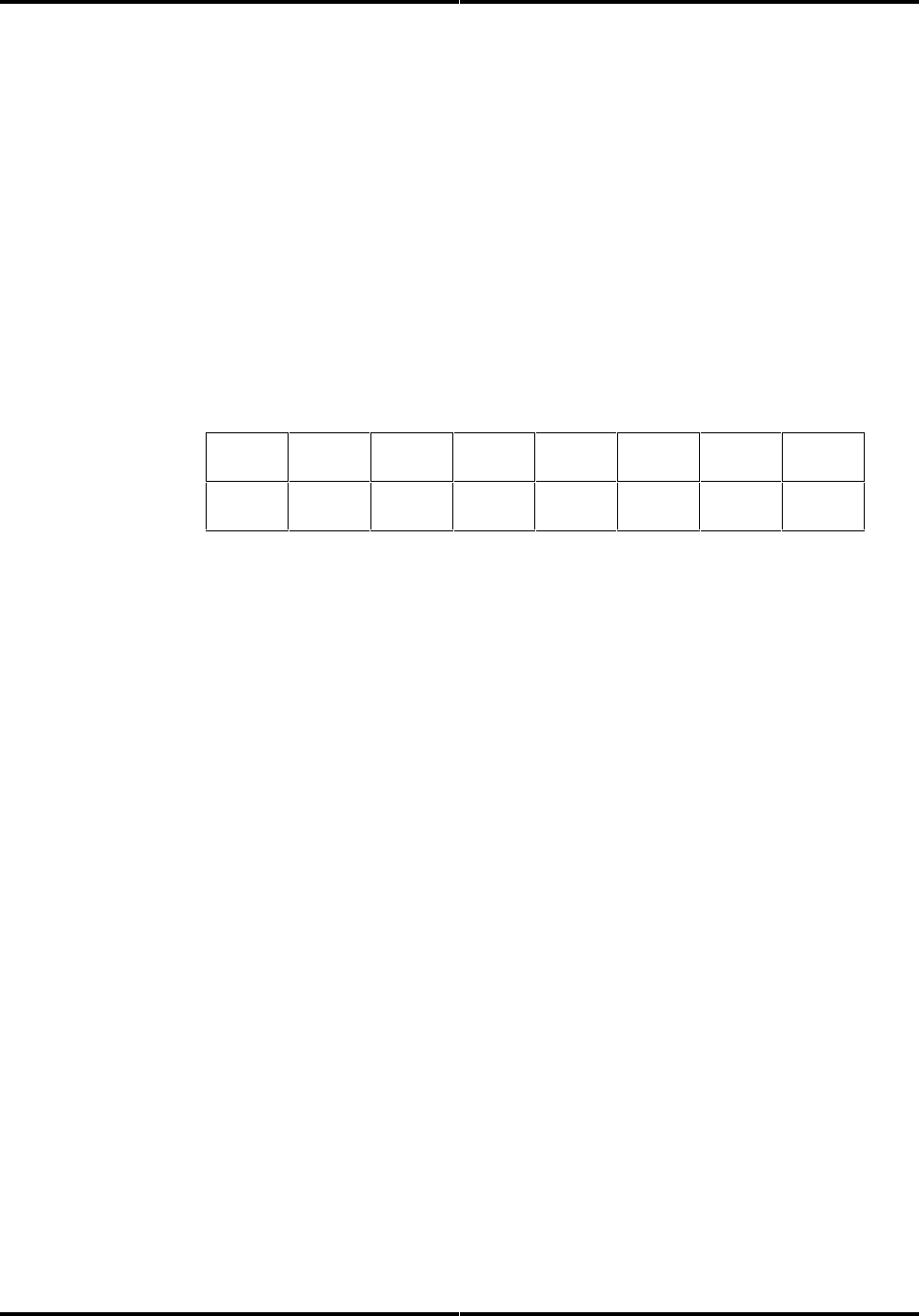
Description: This register contains the drive and head numbers, as defined
below:
Bit 7 Bit 6 Bit 5 Bit 4 Bit 3 Bit 2
Bit 1
Bit 0
1 LBA 1 DRV HEAD
where:
•DRV is the binary encoded drive select number. When this bit is reset,
the master drive is selected, and when this bit is set, the slave drive is
selected. While both drive’s Task File registers are always written, this
bit selects which drive will respond and execute a command.
•LBA is the binary coded address mode select. When L = 0, addressing is
by CHS mode. When L = 1, addressing is by LBA mode. This bit was
RSVD (reserved) for use by the host and set to 0 prior to introduction of
LBA.
•HEAD
CHS Description: This is the four-bit binary encoded head select
number.
LBA Description: This register contains bits 24-27 of the logical block
address.
At the completion of each sector and at the end of the command, this register is
updated to reflect the currently selected head.
Register Addresses and Functions Chapter 6
Technical Reference Manual Page 41
Status Register
Port Address: 1F7
Chip Select: -HOST CS0
Register Address: 7
Function: Read only
Description: This register contains the drive/controller status. The contents
of this register are updated at the completion of each command.
If the Busy bit is active, no other bits are valid. The host reading this register
when an interrupt is pending is considered to be the interrupt acknowledge,
and any pending interrupt is therefore cleared whenever this register is read.
The bits in this register are defined below:
Bit 7 Bit 6 Bit 5 Bit 4 Bit 3
Bit 2
Bit 1 Bit 0
BSY DRDY DWF DSC DRQ
CORR
IDX ERR
where:
•BSY is the Busy bit, which is set whenever the drive has access to the Task
File registers and the host is locked out from accessing the Task File. This
bit is set under any the following circumstances:
−At activation of the Host Reset pin in the interface, or at activation of
the software reset bit in the digital output register.
−Immediately upon host write of the command register with a Read,
Read Long, Read Buffer, Seek, Recalibrate, Initialize Device
Parameters, Read Verify, Identify, or Execute Drive Diagnostic
command.
−Immediately following transfer of 256 words of data after host write of
the command register with a Write, or Write Buffer command.
−Immediately following transfer of 256 words of data and the ECC bytes
after a host write of the Command register with a Write Long
command.
When BSY is active, any host read of a Task File register is inhibited and
the Status register is read instead.
•DRDY is the drive ready indication. When there is an error, this bit is not
changed until the Status register is read by the host, at which time the bit
again indicates the current readiness of the drive. This bit will be reset at
power-up and remain reset until the drive is up to speed and ready to
accept a command.

Chapter 6 Register Addresses and Functions
Page 42 ST31081A/ST31621A
•DWF is the drive write fault bit. When there is an error, this bit is not
changed until the Status register is read by the host, at which time the bit
again indicates the current write fault status.
•DSC is the drive seek complete bit. It is an indication that the actuator is
on track. When there is an error, this bit is not changed until the Status
register is read by the host, at which time the bit again indicates the
current readiness of the drive. This bit will be reset at power-up and will
remain reset until the drive is up to speed and ready to accept a command.
•DRQ is the data request bit, which indicates that the drive is ready for
transfer of a word or a byte of data between the host and the Data register.
•CORR is the corrected data bit, which is set:
−when a correctable data error has been encountered and the data has
been corrected
−on a read verify if any sector was corrected the bit is valid
This condition will not terminate either a Multi-Sector Read or a Read
Multiple command.
•IDX is the index bit which is set once per disk revolution. This function is
not updated by this drive.
•ERR is the error bit, which indicates that the previous command ended in
some type of error. The other bits in the Status register, as well as the bits
in the Error register, will have additional information as to the cause of the
error.
Alternate Status Register
Port Address: 3F6
Chip Select: -HOST CS1
Register Address: 6
Function: Read only
Description: This register contains the same information as the Status
register in the Task File. The only difference is that reading this register does
not imply interrupt acknowledge to reset a pending interrupt.
The bits in this register are defined below:
Bit 7 Bit 6 Bit 5 Bit 4 Bit 3 Bit 2
Bit 1
Bit 0
BSY DRDY DWF DSC DRQ CORR
IDX
ERR
See the description of the Status register for definitions of the bits in this
register.

Register Addresses and Functions Chapter 6
Technical Reference Manual Page 43
Device Control Register
Port Address: 3F6
Chip Select: -HOST CS1
Register Address: 6
Function: Write only
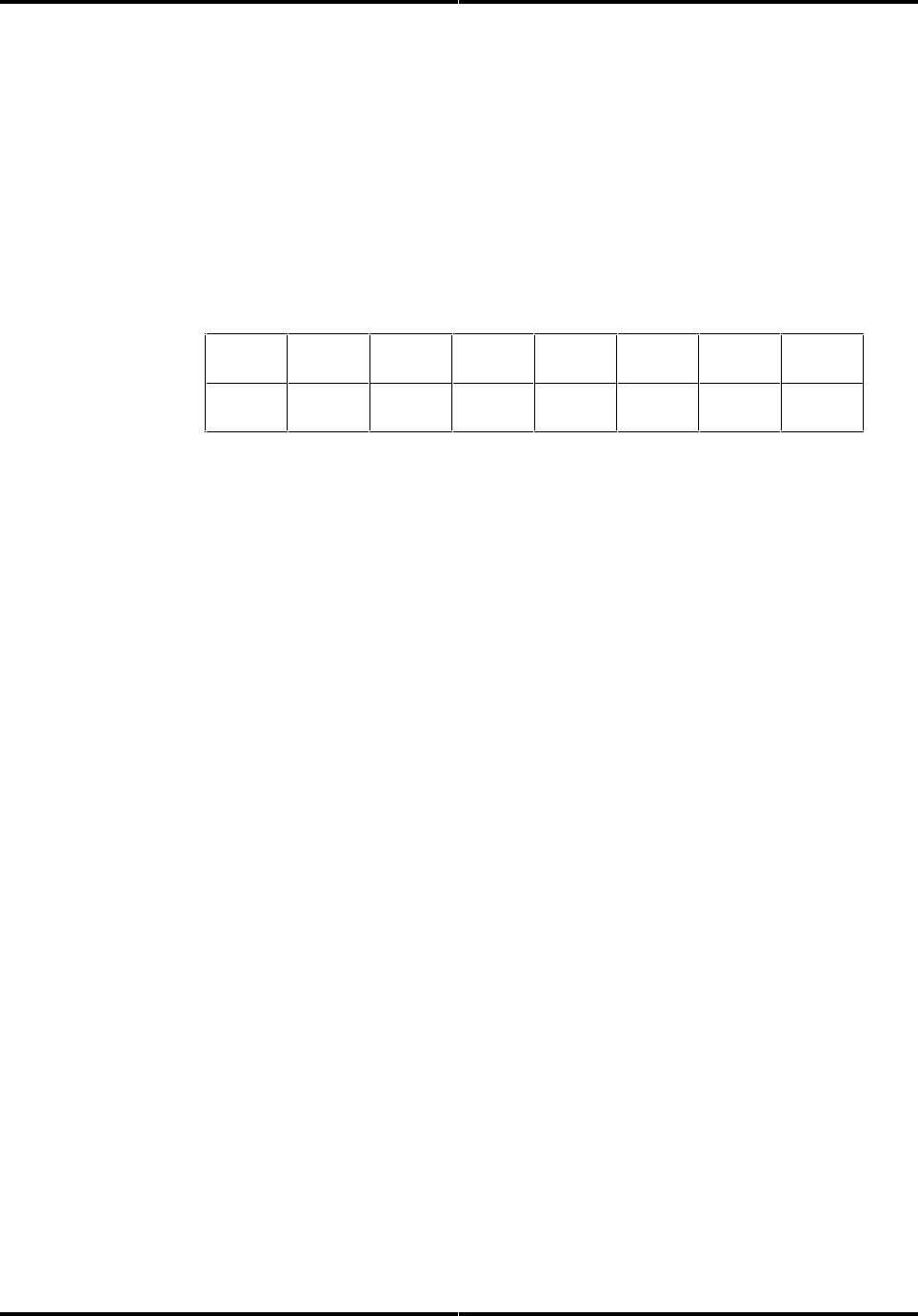
Description: This register contains two control bits as follows:
Bit 7 Bit 6 Bit 5 Bit 4 Bit 3
Bit 2
Bit 1 Bit 0
not
used
not
used
not
used
not
used
not
used
SRST
-IEN not
used
where:
•SRST is the host software reset bit. The drive is held reset when this bit is
active, and enabled when this bit is inactive.
•-IEN is the enable bit for this disk drive interrupt to the host.
−When this bit is active (=0) and the drive is selected, the host interrupt,
+IRQ, is enabled through a tri-state buffer to the host.
−When this bit is inactive (=1), or the drive is not selected, the +IRQ pin
will be in a high impedance state, regardless of the presence or absence
of a pending interrupt.
Chapter 6 Register Addresses and Functions
Page 44 ST31081A/ST31621A
Drive Address Register
Port Address: 3F7
Chip Select: -HOST CS1
Register Address: 7
Function: Read only
Description: This register loops back the drive select and head select
addresses of the currently selected drive.
The bits in this register are as follows:
Bit 7 Bit 6 Bit 5 Bit 4 Bit 3 Bit 2
Bit 1
Bit 0
RSVD -WTG -HS3 -HS2 -HS1 -HS0
-DS1
-DS0
where:
•RSVD is reserved and negated by the drive. When the host reads the drive
address register, this bit must be in a high impedance state.
•-WTG is the write gate bit, which is active when writing to the disk drive is
in progress.
•-HS3 through -HS0 are the one’s complement of the binary coded address
of the currently-selected head. For example, if -HS3 through -HS0 are 1 1
0 0, respectively, head 3 is selected.
•-DS1 is the drive select bit for drive 1, and should be active when drive 1 is
selected and active.
•-DS0 is the drive select bit for drive 0, and should be active when drive 0 is
selected and active.
☞☞ Note: Bit 7 is not driven for compatibility with the floppy drive address space. If your system is
different, you may have to drive this bit when this register is read.
Command Register
Port Address: 1F7
Chip Select: -HOST CS0
Register Address: 7
Function: Write only
Description: The eight-bit code written to this register passes the command
from the host to the drive. Command execution begins immediately after this
register is written.
Refer to chapter 7 for a list of executable commands with the command codes
and necessary parameters for each command.

Register Addresses and Functions Chapter 6
Technical Reference Manual Page 45
This I/O map defines the register addresses and functions for these I/O
locations. For ease of reference, the commands are listed in alphabetical order.
Command Code Parameters:
Command: b7 b6 b5 b4
b3
b2 b1 b0
SC
SN CY
DH
FR
Seagate Specific 1001
1
010
y
yydn
Execute Drive Diagnostic 1001
0
000
n
nndn
Identify Device 1110
1
100
n
nndn
Init. Device Parameters 1001
0
001
y
nnyn
Power Commands 1110
0
ppp
y
nndn
Read DMA 1100
1
00r
y
yyyn
Read Multiple 1100
0
100
y
yyyn
Read Sector(s) 0010
0
0Lr
y
yyyn
Read Sector Buffer 1110
0
100
e
nedn
Read Verify Sector(s) 0100
0
00r
y
yyyn
Recalibrate 0001
x
xxx
n
nndn
Seek 0111
x
xxx
n
nyyn
Set Features 1110
1
111
n
nndy
Set Multiple Mode 1100
0
110
y
nndn
S.M.A.R.T. 1011
0
000
n
nydy
Write DMA 1100
1
01r
y
yyyn
Write Multiple 1100
0
101
y
yyyn
Write Sectors 0011
0
0Lr
y
yyyn
Write Sector Buffer 1110
1
000
e
nedn
where:
•L is the long bit, if 1, R/W Long commands are executed, if 0, normal R/W
commands are performed.
•r is the retry bit; 0 = retries are enabled, 1 = retries are disabled. Retries
that may be enabled/disabled are those on ECC and data errors. When
retries are disabled at the start of a command, they are always
automatically enabled at the end of the command.
•SC is the sector count register.
•SN is the sector number register.
•CY are the cylinder registers.
•DH is the device/head register.
•FR is the features (write precomp) register.
•y means the register contains a valid parameter for this command. For the
device/head register, y means that both the drive and head parameters are
used.
•n means the register does not contain a valid parameter for this command.

Chapter 6 Register Addresses and Functions
Page 46 ST31081A/ST31621A
•d means only the drive parameter is valid and not the head parameter.
•p is a valid bit for power commands E0 - E3 and E5 - E6.
•e means the registers contain valid parameters when performing extended
commands.
•x = don’t care.

Technical Reference Manual Page 47
Command Set
7
Command Register
All commands are decoded from the Command Register. The drive’s host
interface shall be programmed by the host computer to perform commands and
will return status to the host at command completion.
To issue a command, the host must:
• load the pertinent registers in the Task File
• activate the interrupt enable bit, -IEN, in the Device Control register
• write the command code to the Command register
Execution begins as soon as the Command register is written.
The following sections describe the drive’s supported command set. For ease of
reference, the commands are listed in alphabetical order.

Chapter 7 Command Set
Page 48 ST31081A/ST31621A
Seagate Specific
Command Number: 9A hex
Description: The Seagate drive provides vendor-unique commands to allow
for certain operations not provided by the standard command set. The Sector
Number register must be set to 9A hex and the specific command in the Sector
Count register. The Cylinder High and Low registers are used to pass any
bytes used in a write operation.
The Seagate specific command has the following decodes:
Decode: Description:
00HGet Feature Word
01HReserved
02 HRead drive switches
03HAbort command
04HReserved
05HReserved
06HAbort command
07HAbort command
08H*Power lock
09H * Power unlock
0A-FFHReserved
* only valid on drives which implement Seagate Power commands
The following sections describe these decodes in more detail.

Command Set Chapter 7
Technical Reference Manual Page 49
Get Drive Feature word (00)
This command fetches the drive feature word and returns it in the Cylinder
High and Cylinder Low registers. The bit meaning is as follows:
Bit: Description:
15 Reserved
14 Reserved
13 Customer Reserved
12 Reserved
11 Reserved
10 Reserved
9Reserved
8ATA/CAM mode = 1
7Reserved
6Reserved
5Reserved (enable no spin on POR)
4Reserved
3Disable Read Look Ahead Caching
2Enable Write Caching
1Customer Reserved
0Customer Reserved
It is important to read the Feature word and then only change the bits of
interest leaving the other bits unaffected using specific commands supported by
this drive.

Chapter 7 Command Set
Page 50 ST31081A/ST31621A
Read the Drive Switches (02)
This command returns the drive switches in the Cylinder Low Register. The bit
meaning is as follows:
Bit: Description:
7Reserved
6Reserved
5-C/D
4Reserved
3Reserved
2Reserved
1Reserved
0Reserved
Power Lock (08)
This command prevents the drive from spinning down, and spins the drive up if
the drive had been spun down.
Power Unlock (09)
This allows the drive to respond to the Power command and re-enables the
power down time if applicable.

Command Set Chapter 7
Technical Reference Manual Page 51
Execute Drive Diagnostic
Command Number: 90 hex
Description: This command performs the internal diagnostic tests
implemented by the drive. The diagnostic tests are only executed upon receipt
of this command.
The drive sets BSY immediately upon receipt of the command. If the drive is a
master, the drive performs the diagnostic tests and saves the results. It then
checks to see if a slave drive is present and waits up to 5 seconds for the slave to
complete its diagnostics. If the slave successfully completes its diagnostics, it
asserts -HOST PDIAG. If unsuccessful, the master drive resets BSY in the
Status register and generates an interrupt. The Error bit (ERR) is set in the
Status register and the Error register is updated.
The value in the Error register should be viewed as a unique 8-bit code and not
as the single-bit flags defined previously. The interface registers are set to
initial values except for the Error register.
The table below details the codes in the Error register and a corresponding
explanation:
Error Code: Description:
01HNo error detected
02HFormat device error
03HSector buffer error
8xHSlave drive failed
Additional codes may be implemented at the manufacturer’s option.
☞☞ Note: If the slave drive fails diagnostics, the master drive shall “OR” 80 hex with its own status and
load that code into the Error register. If the slave drive passes diagnostics or there is no slave drive
connected, the master drive shall set bit 7 of the Error register in the Task File to 0.
Format Track
Command Number: 50 hex
This command is not supported on the drive. The implementation of this
command has become vendor specific due to the complexities of address
translation and is not required for ATA compliance.

Chapter 7 Command Set
Page 52 ST31081A/ST31621A
Identify Device
Command Number: EC hex
Description: This command allows the host to receive parameter information
from the drive.
When the command is issued, the drive sets BSY, stores the required parameter
information in the sector buffer, sets the DRQ bit, and generates an interrupt.
The host may then read the information out of the sector buffer.
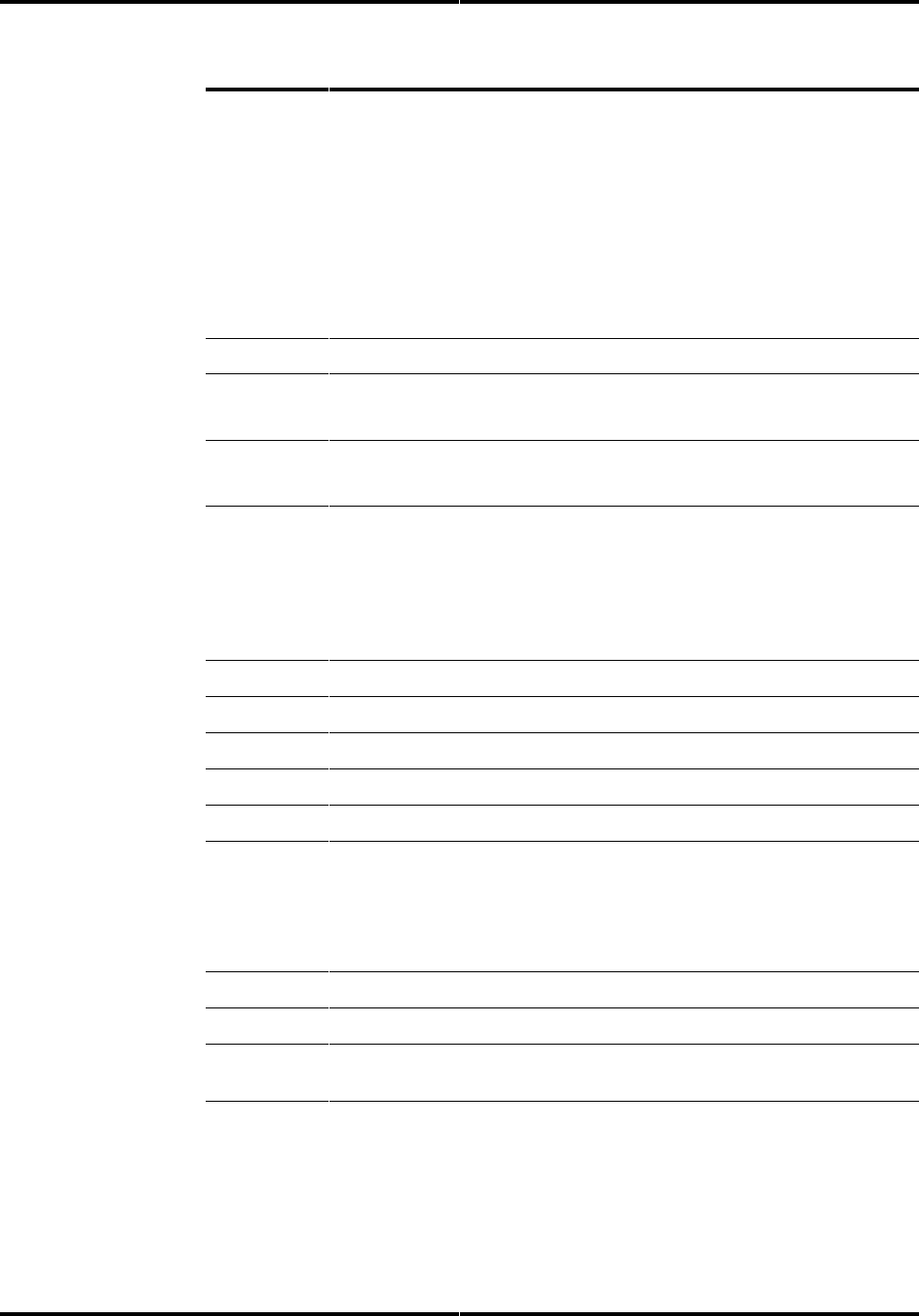
The parameter words in the buffer are arranged as follows. All reserved bits or
words should be zeroes. All numbers are given in hexadecimal format, right-
justified.
Word
(hex)
: Description:
0General configuration bit significant information (0C5A)
1Default number of logical cylinders
2Reserved
3Default number of logical heads
4Vendor specific (Obsolete)
5Vendor specific (Obsolete)
6Default Number of logical sectors per logical track
7Vendor specific (Obsolete)
8Vendor specific (Obsolete)
9Vendor specific (Obsolete)
10-19 Serial number right justification
20 Vendor specific (Obsolete)
21 Vendor specific (Obsolete)
22 Number of ECC bytes on R/W long commands
23-26 Controller firmware revision
27-46 Model number
47 Number of sectors per interrupt on Multiple commands:
•bits 15-8: 80H
•bits 7-0: 00H means Read/Write multiple not implemented;
xxH is the maximum number of sectors that can be
transferred per multiple command
48 Reserved
Command Set Chapter 7
Technical Reference Manual Page 53
Word
(hex)
: Description:
49 Capabilities definitions
bits 15-14 0 = (reserved)
bit 13 1 = Standby timer as specified in ATA
bit 12 0 = (reserved)
bit 11 1 = IORDY supported
bit 10 1 = IORDY can be disabled
bit 9 1 = LBA supported
bits 8 1 = DMA supported
bits 7-1 0 = (vendor specific)
bits 0 1 = assign alternate supported (vendor specific)
50 Reserved
51 bits 15-8 PIO data transfer cycle timing mode (w/o IORDY)
bits 7-0 Vendor specific
52 bits 15-8 = DMA data transfer timing mode
bits 7-0 Vendor specific
53 bits 15-2 Reserved
bit 1 1 = the fields reported in words 64-70 are valid
0 = the fields reported in words 64-70 are not valid
bit 0 1 = the fields reported in words 54-58 are valid
0 = the fields reported in words 54-58 are not valid
54 Number of current logical cylinders
55 Number of current logical heads
56 Number of current sectors per logical track
57 LSW Current capacity in sectors
58 MSW Current capacity in sectors
59 bits 15-9 Reserved
bit 8 1 = Multiple sector setting is valid
bits 7-0 xx = current setting for number of sectors per
transfer on R/W Multiple commands
60 LSW Total number of user addressable sectors (LBA mode only)
61 MSW Total number of user addressable sectors (LBA mode only)
62 bits 15-8 Vendor specific (Obsolete)
bits 7-0 Vendor specific (Obsolete)
Chapter 7 Command Set
Page 54 ST31081A/ST31621A
Word
(hex)
: Description:
63 bits 15-8 01H = Multiword DMA transfer mode active
bits 7-3 reserved for future Multiword DMA transfer modes**
bit 2 1 = Multiword DMA transfer Mode 2 supported
0 = Multiword DMA transfer Mode 2 NOT supported
bit 1 1 = Multiword DMA transfer Mode 1 supported
0 = Multiword DMA transfer Mode 1 NOT supported
bit 0 1 = Multiword DMA transfer Mode 0 supported
0 = Multiword DMA transfer Mode 0 NOT supported
64 bits 15-8 Reserved
bits 7-2 reserved for future Advanced PIO Modes***
bit 1 1 = PIO Mode 4 supported
0 = PIO Mode 4 not supported
bit 0 1 = PIO Mode 3 supported
0 = PIO Mode 3 not supported
65 Minimum multiword DMA transfer cycle time per word (ns)
66 Recommended multiword DMA transfer cycle time (ns)
67 Minimum PIO transfer cycle time without flow control (ns)
68 Minimum PIO transfer cycle time with IORDY flow control (ns)
69-128 Reserved
129-133 Vendor specific (not used)
134 bit 15-2: reserved
bit 1: ATA/CAM compliant
bit 0: 1= current logical numbers, 0 = default logical numbers
135-159 Vendor specific
160-255 Reserved
*
PIO Timing Parameters
Cycle Time
Mode 0
(nsec)
600
Mode 1
(nsec)
383
Mode 2
(nsec)
240
**
Multiword DMA Timing
Cycle Time
Mode 0
(nsec)
480
Mode 1
(nsec)
>= 150
Mode 2
(nsec)
>= 120
***
Advanced PIO Timing
Cycle Time
Mode 3
(nsec)
>= 180
Mode 4
(nsec)
>= 120

Command Set Chapter 7
Technical Reference Manual Page 55
Initialize Device Parameters
Command Number: 91 hex
Description: This command enables the host to set the head switch and
cylinder increment points for multiple sector operations. The drive calculates
the number of available logical cylinders based upon the total number of
available blocks and the values contained in the Sector Count and Drive/Head
registers.
The sector and head values in the Task File are not checked for validity by this
command. If they are invalid, no error will be reported until an illegal access is
made by some other command. Cylinder head increments on subsequent
commands will occur after access of the maximum sector and maximum head
specified by this command. Upon receipt of the command, the drive sets BSY,
saves the parameters, resets BSY, and generates an interrupt.
Seagate has established a Universal Translate Mode which enables the you to
configure the drive in an AT environment to any cylinder, head, and sector
configuration desired (refer to chapter 3).

Chapter 7 Command Set
Page 56 ST31081A/ST31621A
Power Commands
Command Number: Ex hex
Description: The Power commands are supported on some Seagate drives,
including the ST32161A. If a Power command is issued to a drive that does
not support the Power commands, an Abort status will be returned to the host
in the Error register.
Commands E0 through E3 and E5-E6 constitute the Power commands. The
following table describes these commands:
Error Code: Description:
E0HThe drive enters Standby Mode immediately
E1HThe drive enters Idle Mode immediately
E2HThe drive enters Standby Mode immediately.
If the Sector Count register is non-zero, then the Auto
Power-Down feature is enabled and will take effect
when the drive returns to Idle Mode.
If the Sector Count register is zero, then the Auto
Power-Down feature is disabled.
E3HThe drive enters Idle Mode immediately.
If the Sector Count register is non-zero, then the Auto
Power-Down feature is enabled and will take effect
immediately.
If the Sector Count register is zero, then the Auto
Power-Down feature is disabled.
E5HPuts FF hex in the Sector Count register if the drive is
in Idle Mode.
Puts 00 hex in the Sector Count register if the drive is
in, going to, or recovering from the Standby Mode.
Puts BB hex in the Sector Count register if power lock
is enabled.
E6HThe drive enters Sleep Mode. A reset is required to
bring the drive out of Sleep Mode.
☞☞ Note: Minimum power off/on cycle time is 60 seconds.

Command Set Chapter 7
Technical Reference Manual Page 57
All of the Power commands except command E6 will execute immediately and
return the ending interrupt after the spin up/down sequence is initiated.
Please note that if the drive is already spinning (Idle Mode) and a spin-up
command is issued from the host, the spin-up sequence is not initiated.
Similarly, if the drive is in Standby Mode and the host issues a spin-down
command, the spin-down sequence is not initiated.
Return of the ending interrupt does not mean that the drive has fully
transitioned to the desired operating mode. The Sleep command is the
exception. In command E6, the drive is spun down and when it is stopped, the
drive returns the ending interrupt and the Sleep Mode begins.
When enabling the Auto Power-Down feature, the value in the Sector Count
register specifies the number of 5-second increments for the time-out value. If
the drive does not receive a command within the specified time, the drive will
enter Standby Mode. The drive does not support the ATA extended timer
periods (0xF1 hex through 0xFF hex).
The minimum time-out value is 60 seconds, which means the smallest value for
the Sector Count register is 12 (0x0C hex) when enabling the Auto Power-down
feature. If a number between 1 and 11 inclusive is specified in the Sector Count
register, a value of 12 is used. This prevents overheating of the drive during
spin-up/down sequences.
Assertion of Host Reset will only affect the current state of the Sleep Mode. If
the drive is in Sleep Mode and Host Reset is asserted, the drive wakes up into
Standby Mode. Please note that the drive will not return to the state it was in
when the host issued the Sleep command. The default power-on condition of
the drive is Idle Mode.
Read DMA
Command Number: Cx hex
Description: This command enables the controller to do multiword DMA
reads. These are two versions of this command, as shown below:
Command Number: Command Name
C8HDMA Read with retries
C9HDMA Read without retries
When the command is received, the drive will go busy and read the data into
the buffer from the disk. When a sector is in the buffer, the drive will go not
busy and activate Host DMA Request (+DMARQ) to initiate the transfer. The
drive will then place data on the Host Data Bus whenever the host activates -
IOR and
-DMACK.

Chapter 7 Command Set
Page 58 ST31081A/ST31621A
The drive will leave +DMARQ active as long as there is data to transfer. When
waiting for more data to be placed in the buffer, the drive will inactivate -
+DMARQ until there is enough data in the buffer to transfer again. When the
transfer is complete, the drive will become busy, verify no errors, and then go
not busy and activate the +IRQ line.
If the command is performed with the retries disabled bit active retries will be
disabled.
Read Multiple
Command Number: C4 hex
Description: This command is identical to the Read Sector operation but
several sectors are transferred to the host as a block without intervening
interrupts and only requiring DRQ qualification of the transfer on the first
sector of the block of sectors to be transferred. Long transfers are not
permitted.
The block count, which is the number of sectors to be transferred as a block, is
programmed by the Set Multiple mode command which must be executed
prior to the Read Multiple command. When the Read Multiple command is
issued, the Sector Count register will contain the number of sectors (not the
number of blocks or the block count) requested.
If this sector count is not evenly divisible by the block count, as many full blocks
as possible are transferred, followed by a final, partial block transfer. The
partial block transfer will be for N sectors, where:
N = (sector count) modulo (block count)
If the Read Multiple command is attempted before the Set Multiple mode
command has been executed or when multiple commands are disabled, the
multiple operation will be rejected with an Aborted Command Error.
Disk errors encountered during multiple commands will be reported at the
beginning of the block or partial block transfer, but DRQ will still be set and the
transfer will take place as it normally would, including transfer of corrupt data,
if any. Subsequent blocks or partial blocks will only be transferred if the error
was a correctable data error. All other errors will cause the command to stop
after transfer of the block which contained the error. Interrupts are generated
when DRQ is set at the beginning of each block or partial block.

Command Set Chapter 7
Technical Reference Manual Page 59
Read Sector(s)
Command Number: 2x hex
Description: This command will read from 1 to 256 sectors as specified in the
Task File (a sector count of 0 is a request for 256 sectors), beginning at the
specified sector. There are four versions of this command, as shown below:
Command Number: Command Name
20HRead with retries
21HRead without retries
22HRead long with retries
23HRead long without retries
As soon as the Command register is written, the drive sets the BSY bit and
begins execution of the command.
Upon execution, the Error bit (ERR) is set in the Status register and the Error
register is updated. Also:
• If bits 2 and 3 of the Command register are not equal to zero, then the
Aborted Command bit (ABRT) is set.
• If incorrect Task File parameters are passed, the ID Not Found Error
(IDNF) is set.
If the drive is not already on the desired track, an implied Seek is performed.
Once at the desired track, the drive begins searching for the appropriate ID
field.
• If the ID is read correctly, the data field is read into the sector buffer.
• Error Bits are set if an error was encountered.
The DRQ bit is set and an interrupt is generated. The DRQ bit is always set
regardless of presence or absence of an error condition at the end of the sector.
Upon command completion, the Task File registers contain the cylinder, head,
and sector number of the last sector read. The sector count is zero after
successful execution of the command.
Multiple sector reads set DRQ and generate an interrupt when the sector buffer
is filled at the completion of each sector and the drive is ready for the data to be
transferred to the host. DRQ is reset and BSY is set immediately after the host
empties the sector buffer.
If no error is detected, the cylinder, head, and sector registers are updated to
point to the next sequential sector.

Chapter 7 Command Set
Page 60 ST31081A/ST31621A
If either a correctable data error or a non-correctable data error occurs, the
flawed data is loaded into the sector buffer.
• The read does not terminate if the error was a correctable data error.
• If a non-correctable data error occurs during a multiple sector read, the
read will terminate at the sector where the error occurs. The Task File
Registers will contain the cylinder, head, and sector number of the sector
where the error occurred. The host may then read the Task File to
determine what error has occurred, and on which sector.
A Read Long may be executed by setting the long bit in command code. The
Read Long command returns the data and the ECC bytes contained in the
data field of the desired sector. During a read long, the drive does not check the
ECC bytes to determine there has been any type of data error. Data bytes are
16-bit transfers and ECC bytes are 8-bit transfers.
Read Sector Buffer
Command Number: E4 hex
Description: The Read Buffer command allows the host to read the current
contents of the drive’s sector buffer. Only the Command register is valid for
this command.
When this command is issued, the drive will set BSY, set up the sector buffer
for a read operation, set DRQ, reset BSY, and generate an interrupt. The host
may then read up to 512 bytes of data from the buffer.
An option provided by Seagate is to perform an extended Read Buffer
command. If 599AH is placed in the Cylinder register, then the Sector Count
register is used to pass that many sectors out of the buffer. If the requested
sector count is larger than the buffer, an Aborted Command error status is
returned.

Command Set Chapter 7
Technical Reference Manual Page 61
Read Verify Sectors
Command Number: 4x hex
Description: This command functions similarly to the Read Sectors
command, except that no data is transferred to the host and at completion of
the command. There are two versions of this command, as shown below:
Command Number: Command Name
40HRead Verify with retries
41HRead Verify without retries
The CORR bit is set if software ECC correction was required. The drive
remains Busy until all data is verified. If Look Ahead Read is active, the
Verify command will also work the same as when a Read is performed.
Recalibrate
Command Number: 10 hex
Description: This command will move the read/write heads from anywhere on
the disk to cylinder 0.
Upon receipt of the command, the drive sets BSY, resets DSC, and executes a
Seek to cylinder zero. The drive then waits for the Seek to complete before
updating status, resetting BSY, setting DSC, and generating an interrupt.
If the drive cannot reach cylinder 0, the Error Bit (ERR) is set in the Status
register and the track 0 (TK0) bit is set in the Error register.
If the drive is not spinning or is not on track, an aborted command (ABRT)
response will be given in the Error register.
Upon successful completion of the command, the Task File registers will be as
follows:
Register: Value:
Error 00
Sector Count Unchanged
Sector Number Unchanged
Cylinder Low 00
Cylinder High 00
Device/Head Unchanged

Chapter 7 Command Set
Page 62 ST31081A/ST31621A
Seek
Command Number: 70 hex
Description: This command initiates a seek to the specified track and selects
the head specified in the Task File.
When the command is issued, the drive sets BSY in the Status register, resets
Seek Complete (DSC), initiates the seek, waits for the seek to complete, then
resets BSY, and generates an interrupt. Only the Cylinder register and Drive
Head register are valid for this command.
No checks are made on the validity of the Sector number in the Task File. The
Error Bit (ERR) in the Status register and the ID Not Found (IDNF) bit in the
Error register of the Task File will be set if an illegal cylinder number is passed.
Set Features (Set Look Ahead Read)
Command Number: EF hex
Description: This command is used by the host to establish the following
parameters which affect the execution of certain drive features as shown below:
Features Register
Contents (hex) Sub Command Description
02HEnables write cache
82HDisables write cache
AAHEnables Read Look Ahead
55HDisables Read Look Ahead
03HSet Transfer Mode
Any other values in the Features (Write Precompensation) register will result
in the Error bit set in the Status Register and the ABRT (abort) bit set in the
Error Register. The default state on power up (Power On Reset) is determined
by the value of the Feature Word, which is factory set. The drive will retain the
settings through both soft and hard resets.
The Set Transfer Mode command set the current transfer mode according to the
content of the Sector Count Register. The valid Sector Count Register values
are shown in the table below:

Command Set Chapter 7
Technical Reference Manual Page 63
Sector Count
Register Transfer Mode
00 hex Set default PIO transfer mode
01 hex Disable IOCHRDY
08 hex Enable Mode 0 PIO with IOCHRDY enabled
09 hex Enable Mode 1 PIO with IOCHRDY enabled
0A hex Enable Mode 2 PIO with IOCHRDY enabled
0B hex Enable Mode 3 PIO with IOCHRDY enabled
0C hex Enable Mode 4 PIO with IOCHRDY enabled
20 hex Enable Multiword DMA Mode 0
21 hex Enable Multiword DMA Mode 1
22 hex Enable Multiword DMA Mode 2
One transfer mode subcommand may be issued for each SET FEATURES
Command.
Set Multiple Mode
Command Number: C6 hex
Description: This command enables the controller to perform Read Multiple
and Write Multiple operations and establishes the block count for these
commands. Prior to command issuance, the Sector Count register should be
loaded with the number of sectors per block. Block counts supported are
multiples of 2 up to the buffer size of each drive, e.g. 1,2,4,8.
Upon receipt of the command, the controller sets BSY and looks at the Sector
Count register contents. If the register contents are valid and a supported
block count is supplied, that value is loaded for all subsequent Read Multiple
and Write Multiple commands and execution of these commands is enabled.
Any unsupported block count in the register will result in an Aborted Command
Error and any Read Multiple and Write Multiple commands will be
disabled.
If the Sector Count register contains 0 when the command is issued, any Read
Multiple and Write Multiple commands will be disabled. Once the
appropriate action has been taken, the controller resets BSY and generates an
interrupt. At power-up the default is for Read Multiple and Write Multiple
to be disabled.
The state of Read Multiple and Write Multiple is maintained through both
hardware and software resets when the drive is in ISA/Seagate mode.

Chapter 7 Command Set
Page 64 ST31081A/ST31621A
S.M.A.R.T.
Command Number: B0 hex
S.M.A.R.T. stands for Self Monitoring, Analysis and Reporting Technology.
This command provides access to Attribute Values, Attribute Thresholds and
other low level subcommands that can be used for logging and reporting
purposes and to accommodate special user needs. There are several sub-
commands which can be selected via the Features Register when the command
is issued by the host.
The Cylinder Low and Cylinder High Registers must be written with the key
values shown below prior to writing the command register or the command will
terminate with the error bit set in the status register Refer to the paragraph on
error reporting at the end of the description of this command for additional
information regarding error reporting.
Any register is not specified as being written with a value by the host for this
command is undefined and is ignored by the drive. The key values are shown
below.
Key Value Register
4F hex Cylinder Low (1F4H)
C2 hex Cylinder High (1F5H)
In order to select a subcommand the host must write the subcommand code to
the drive’s Features Register before issuing the Execute S.M.A.R.T. Function
command. The subcommands and their respective codes are listed below.
Code
(hex) Subcommand
00-CF
D0
Reserved
Read Attribute Values returns the drive’s Attribute Values to the
host. Upon receipt of the Read Attribute Values subcommand from
the host, the drive asserts BSY, saves any updated Attribute Values
to non-volatile memory, asserts DRQ, clears BSY, asserts INTRQ,
and then waits for the host to transfer the 512 bytes of Attribute Value
information from the drive via the Data Register.
D1 Read Attribute Thresholds returns the drive’s Attribute Thresholds
to the host. Upon receipt of this subcommand from the host, the
drive asserts BSY, reads the Attribute Thresholds from non-volatile
memory, asserts DRQ, clears BSY, asserts INTRQ, and then waits
for the host to transfer the 512 bytes of Attribute Threshold
information from the drive via the Data register.
D2 Enable/Disable Attribute Autosave enables and disables the
Attribute AutoSave feature of the device. This feature is automatically
enabled when S.M.A.R.T. is enabled. Enable/Disable Attribute
Autosave may be set to automatically save its updated Attribute

Command Set Chapter 7
Technical Reference Manual Page 65
Values to non-volatile memory periodically ; or this subcommand may
be used to disable the AutoSave feature. The state of the Attribute
AutoSave feature (either enabled or disabled) will be preserved by the
device across power cycles.
A value of zero written by the host into the drive’s Sector Count
register before issuing the Enable/Disable Attribute Autosave
subcommand will cause this feature to be disabled. A value of F1H
written by the host into the device's Sector Count register before
issuing the Enable/Disable Attribute Autosave subcommand will
cause this feature to be enabled.
Upon receipt of the subcommand from the host, the device asserts
BSY, enables or disables the AutoSave feature (depending upon
Sector Count ), clears BSY and activates IRQ.
During execution of its AutoSave routine the device does not set BSY
nor clear DRDY. If the device receives a command from the host
while executing its AutoSave routine it will respond to the host within
two seconds.

Chapter 7 Command Set
Page 66 ST31081A/ST31621A
Code
(hex) Subcommand
D3 Save Attribute Values causes the drive to immediately save any
updated Attribute Values to the drive’s non-volatile memory. Upon
receipt of this subcommand from the host, the drive asserts BSY,
writes any updated Attribute Values to non-volatile memory, clears
BSY and asserts INTRQ.
D4 - D6 Reserved
D7 Vendor Specific
D8 Enable S.M.A.R.T. Operations enables access to all S.M.A.R.T.
capabilities within the drive. Prior to receipt of an Enable Smart
Operations subcommand Attribute Values are neither monitored nor
saved by the drive. The state of S.M.A.R.T. (either enabled or
disabled) will be preserved by the drive across power cycles. Once
enabled, the receipt of subsequent Enable Smart Operations
subcommands shall not affect any of the Attribute Values.
Upon receipt of this subcommand from the host, the drive asserts BSY,
enables S.M.A.R.T. capabilities and functions, clears BSY and asserts
INTRQ.
D9 Disable S.M.A.R.T. Operations This subcommand disables all
S.M.A.R.T. capabilities within the drive. After receipt of the Disable
Smart Operations subcommand the drive will disable all S.M.A.R.T.
operations. Attribute Values will no longer be monitored or saved by
the drive. The state of S.M.A.R.T. (either enabled or disabled) will be
preserved by the drive across power cycles.
Upon receipt of the Disable Smart Operations subcommand from the
host, the drive asserts BSY, disables S.M.A.R.T. capabilities and
functions, clears BSY and asserts INTRQ.
After receipt by the drive of the Disable Smart Operations sub-
command from the host, all other S.M.A.R.T. subcommands with the
exception of Enable Smart Operations subcommand are disabled and
invalid. They will be aborted by the drive (including the Disable Smart
Operations subcommand), returning the error code specified at the end
of this command description.
Any Attribute Values accumulated and saved to non-volatile memory
prior to receipt of the Disable Smart Operations command will be
preserved in the drive's non-volatile memory. If the drive is re-enabled,
these Attribute Values will be updated, as needed, upon receipt of a
Read Attribute Values or Save Attribute Values command.
DA Return S.M.A.R.T. Status is used to communicate the reliability status
of the device to the host. Upon receipt of the Return S.M.A.R.T.
Status subcommand the device asserts BSY, saves any updated
Attribute Values to non-volatile memory and compares the updated
Command Set Chapter 7
Technical Reference Manual Page 67
Attribute Values to the Attribute Thresholds and checks the Pre-
Failure/Advisory bit in the Status Flags.
If the device does not detect a Threshold Exceeded Condition, the
device loads 4FH into the Cylinder Low register, C2H into the Cylinder
High register, clears BSY, and activates +IRQ.
If the device does detect a Threshold Exceeded Condition, the device
loads F4H into the Cylinder Low register, 2CH in the Cylinder High
register, clears BSY, and activates +IRQ.
DB - DF Reserved
E0 - EF Vendor Specific
Device Attributes Data Structure
The following defines the 512 bytes that make up the Attribute Value
information. This data structure is accessed by the host in its entirety using
the Read Attribute Values subcommand. All multi-byte fields shown in these
data structures follow the ATA-2 convention for byte ordering, i.e., the least
significant byte occupies the lowest numbered byte address location in the field.
Table 7-1 - Device Attributes Data Structure
Description
Bytes
Format Type
Data Structure Revision Number = 0004H2 binary Rd only
1st Device Attribute 12 see below Rd/Wrt
..
..
..
30th Device Attribute 12 see below Rd/Wrt
Reserved (00 H) 6 Rd only
S.M.A.R.T. Capability = 0000H2 Rd only
Reserved (00H) 16 Rd/Wrt
Vendor Specific 125 Rd only
Data Structure Checksum 1 Rd only
Total Bytes 512
Data Structure Revision Number
The Data Structure Revision Number identifies which version of this data
structure is implemented by the drive. The ST32161A supports S.M.A.R.T.
revision 4.0.
Chapter 7 Command Set
Page 68 ST31081A/ST31621A
Individual Attribute Data Structure
The following defines the twelve bytes that make up the information for each
Attribute entry in the Device Attributes Data Structure.
Table 7-2 - Individual Attribute Data Structure
Description Bytes Format Type
Attribute ID Number (01H to FFH) 1 binary Rd only
Status Flags 2 bit flags Rd only
Pre-Failure/Advisory bit
Vendor Specific (5 bits)
Reserved (10 bits)
Attribute Value (valid values from 01 hex to FE hex) 1 binary Rd only
00H: invalid for Attribute value- not to be used
01H: minimum value
64H: initial value for all attributes prior to any data
collection
FDH: maximum value
FEH: value is not valid.
FFH: invalid for Attribute value not to be used
Vendor Specific 8 binary Rd only
Total Bytes 12
Attribute ID Numbers
The Attribute ID Numbers and their definitions are shown below. Any non-zero
value in the Attribute ID Number indicates an active attribute. Valid values for
this byte are from 01H through FFH.
Attibute ID Description
1 Firm error rate
3 Spin up time
4 Spin up count
5 Retired sectors
7 Seek error rate
10 Spin retries
12 Drive power cycle count
Command Set Chapter 7
Technical Reference Manual Page 69
Status Flags
The following describes the definitions for the Status Flags:
bit hex
value Description
0 0001
Pre-Failure/Advisory Bit when = 0 means an Attribute Value less
than or equal to its corresponding Attribute Threshold is indicating an
advisory condition where the usage or age of the drive has exceeded
its intended design life period.
When = 1 means that an Attribute Value less than or equal to its
corresponding Attribute Threshold is indicating a Pre-Failure condition
where imminent loss of data is being predicted.
1 0002
Reserved
2 0004
Vendor Specific
3 0008
Vendor Specific
4 0010
Vendor Specific
5 0020
Vendor Specific
6-F 0040-
8000
Reserved
Attribute Values
The range and meaning of the Attribute Values is defined in Table 7-2. Prior to
the monitoring and saving of Attribute Values, all values are set to 64 hex. The
Attribute Values of 00 hex and FF hex are reserved and should not be used by
the drive.
S.M.A.R.T. Capability
This word of bit flags describes the S.M.A.R.T. capabilities of the drive. This
word is equal to 0000 for this drive.
bit hex
value Description
0 0001 Pre-Power Mode Attribute Saving Capability Bit, when = 1,
means the drive will save its Attribute Values prior to going into a
power saving mode (Idle, Standby or Sleep modes.)
1 0002 Attribute AutoSave After Event Capability Bit when = 1, means
that the drive supports the Enable/Disable Attribute Autosave
subcommand.
2-F 0004
-
8000
Reserved for future use
Chapter 7 Command Set
Page 70 ST31081A/ST31621A
Data Structure Checksum
The Data Structure Checksum is the two's compliment of the result of a simple
eight-bit addition of the first 511 bytes in the data structure.
Device Attribute Thresholds Data Structure
The following defines the 512 bytes that make up the Attribute Threshold
information. This data structure is accessed by the host in its entirety using
the Read Attribute Thresholds subcommand. All multi-byte fields shown in
these data structures follow the ATA-2 specification for byte ordering, namely
that the least significant byte occupies the lowest numbered byte address
location in the field.
The sequence of active Attribute Thresholds must appear in the same order as
their corresponding Attribute Values.
Table 7-3 - Device Attribute Thresholds Data Structure
Description Bytes Format Type
Data Structure Revision Number = 0004H2 binary Rd only
1st Device Attribute Threshold 12 see below Rd/Wrt
..
..
..
30th Device Attribute 12 see below Rd/Wrt
Reserved (00H) 18 Rd only
Vendor Specific 131 Rd only
Data Structure Checksum 1 Rd only
Total Bytes 512
Data Structure Revision Number
This value will be the same as the value used in the Device Attributes Values
Data Structure.
Command Set Chapter 7
Technical Reference Manual Page 71
Individual Threshold Data Structure
The following defines the twelve bytes that make up the information for each
Threshold entry in the Device Attribute Thresholds Data Structure. Attribute
entries in the Individual Threshold Data Structure must be in the same order
and correspond to the entries in the Individual Attribute Data Structure.
Table 7-4 - Individual Threshold Data Structure
Description Bytes Format Type
Attribute ID Number 1 binary Rd only
Attribute Threshold (for comparison with Attribute
values from 00 hex to FFH)1 binary Rd only
00H: “always passing” threshold value to be used
for code test purposes
01H: minimum value for normal operation
64H: maximum value for normal operation
FDH: maximum value
FEH: invalid for threshold value-not to be used.
FFH: “always failing” threshold value to be used
for code test purposes
Reserved 10 binary Rd only
Total Bytes 12
Attribute ID Numbers
The Attribute ID Numbers must match the ID numbers in the Attribute Data
Structure. Any non-zero value in the Attribute ID Number indicates an active
attribute.
Attribute Threshold
These values are set at the factory and are not changeable in the field.
Data Structure Checksum
The Data Structure Checksum is the two's compliment of the result of a simple
eight-bit addition of the first 511 bytes in the data structure.
Chapter 7 Command Set
Page 72 ST31081A/ST31621A
Error Reporting
The Execute S.M.A.R.T. Function command will terminate with an aborted
command error condition under the following circumstances:
• The required key values were not loaded into the Cylinder High and
Cylinder Low registers.
• An invalid or not supported subcommand code in the Features Register.
• The command is received by the drive while the drive was in a "S.M.A.R.T.
disabled" state.
• The drive is unable to read its Attribute Values or Attribute Threshold data
structure
• The drive is unable to write to its Attribute Values data structure.
The meaning of the following bits in the Error register do not correspond the
definitions found in the description of the Error register:
bit Value
(Hex) Description
001
The Data Structure Revision Number in the drive's Attribute
Values data structure does not match the Data Structure
Revision Number in the drive's Attribute Thresholds data
structure.
A mismatch has occurred between the entries in the drive's
Attribute Values data structure and Attribute Thresholds data
structure.
410
The drive has detected a checksum error in its Attribute
Threshold data structure.

Command Set Chapter 7
Technical Reference Manual Page 73
Write DMA
Command Number: Cx hex
Description: This command allows the drive to perform write operations
using multiword DMA transfers. These are two versions of this command, as
shown below:
Command Number: Command Name
CA hex DMA Write with retries
CB hex DMA Write without retries
When the command is received, the drive will go busy and activate Host DMA
Request (+DMARQ). The drive will then accept data into its Data register
whenever the host activates both -IOW and -DMACK. +DMARQ will remain
active until all data has been transferred.
Following the completion of the data transfer, the drive will go busy. When all
the data is on the disk and the operation is complete, the drive will go not busy
and activate +IRQ.
If the command is performed with the retries disabled bit active, retries will be
disabled.
Write Caching
Write caching is activated by setting the Feature Word bit 2. Once write
caching is active, the Write DMA command is cached. This command is then
referred to as a “cached write.”
When a cached write command is received, the data is taken from the host and
ending status is posted before the data has been written to the disk.
• If the next command is a cached write and the data is logically sequential,
the data is taken from the host immediately.
• If the next command is a cached write that is not logically sequential, the
drive will wait for the previous write to finish before taking the data from
the new write. Read commands work similarly; the previous write is
allowed to finish before the read operation starts.
In addition to caching, dynamic sparing of bad sectors has been implemented
for cached write commands. This ensures that cached data that has already
been reported as written successfully gets written, even if an error should
occur.
If a sector cannot be written, the drive will dynamically assign an alternate
sector and continue writing the data. A limit of 100 spares has been set and if
reached, the drive will drop out of write caching and report the error as an ID

Chapter 7 Command Set
Page 74 ST31081A/ST31621A
Not Found. If the write command is still active on the AT interface, the error is
reported during that command; otherwise, it is reported on the next command.
Write Multiple
Command Number: C5 hex
Description: This command performs similarly to the Write Sector command
except that the controller sets BSY immediately upon receipt of the command,
data transfers are multiple sector blocks, and the long bit is not valid. Several
sectors are transferred to the host as a block without intervening interrupts and
only requiring DRQ qualification of the transfer at the start of the block, not on
each sector. There is no IRQ prior to the first block transfer.
The block count, which is the number of sectors to be transferred as a block, is
programmed by the Set Multiple mode command, which must be executed
prior to the Write Multiple command. When the Write Multiple command is
issued, the Sector Count register will contain the number of sectors (not the
number of blocks or the block count) requested.
If this sector count is not evenly divisible by the block count, as many full blocks
as possible are transferred, followed by a final, partial block transfer. The
partial block transfer will be for N sectors, where:
N = (sector count) modulo (block count)
If the Write Multiple command is attempted before the Set Multiple mode
command has been executed or when Write Multiple commands are disabled,
the Write Multiple operation will be rejected with an Aborted Command
Error.
All disk errors encountered during Write Multiple commands will be reported
after the attempted disk write of the block or partial block is transferred. The
write operation will end with the sector in error, even if it was in the middle of
a block. Subsequent blocks will not be transferred in the event of an error.
Interrupts are generated when DRQ is set at the beginning of each block or
partial block.
Write Caching
Write caching is activated by setting the Feature Word bit 2. Once write
caching is active, the Write Multiple command is cached. This command is
then referred to as a “cached write.”
When a cached write command is received, the data is taken from the host and
ending status is posted before the data has been written to the disk.
• If the next command is a cached write and the data is logically sequential,
the data is taken from the host immediately.
• If the next command is a cached write that is not logically sequential, the
drive will wait for the previous write to finish before taking the data from

Command Set Chapter 7
Technical Reference Manual Page 75
the new write. Read commands work similarly; the previous write is
allowed to finish before the read operation starts.
In addition to caching, dynamic sparing of bad sectors has been implemented
for cached write commands. This ensures that cached data that has already
been reported as written successfully gets written, even if an error should
occur.
If a sector cannot be written, the drive will dynamically assign an alternate
sector and continue writing the data. A limit of 100 spares has been set and if
reached, the drive will drop out of write caching and report the error as an ID
Not Found. If the write command is still active on the AT interface, the error is
reported during that command; otherwise, it is reported on the next command.

Chapter 7 Command Set
Page 76 ST31081A/ST31621A
Write Sector(s)
Command Number: 3x hex
Description: This command will write from 1 to 256 sectors as specified in the
Task File (a sector count of 0 is a request for 256 sectors), beginning at the
specified sector. There are four versions of this command, as shown below:
Command Number: Command Name
30 hex Write with retries
31 hex Write without retries
32 hex Write long with retries
33 hex Write long without retries
As soon as the Command register is written, the drive waits for the host to fill
the sector buffer with the data to be written. No interrupt is generated to start
the first buffer fill operation. Once the buffer is full, the drive sets BSY and
begins command execution.
• If bits 2 and 3 of the Command register are on, the command terminates
with Aborted Command.
• If incorrect task file parameters are passed, an H ID Not Found error is
returned.
If the drive is not already on the desired track, an implied Seek is performed.
Once at the desired track, the drive begins searching for the appropriate ID
field.
• If the ID is correct, the data loaded in the buffer is written to the data field
of the sector, followed by the ECC bytes.
• Error bits are set if an error was encountered.
Upon command completion, the Task File registers contain the cylinder, head,
and sector number of the last sector written. The sector count is zero after
successful execution of the command.
Multiple sector writes set DRQ and generate an interrupt each time the buffer
is ready to be filled. DRQ is reset and BSY is set immediately when the host
fills the sector buffer.
If no error is detected, the cylinder, head, and sector registers are updated to
point at the next sequential sector.
If an error occurs during a multiple sector write, it will terminate at the sector
where the error occurs. The Task File indicates the location of the sector where
the error occurred. The host may then read the Task File to determine what
error has occurred, and on which sector.

Command Set Chapter 7
Technical Reference Manual Page 77
A Write Long may be executed by setting the long bit in the command code.
The Write Long command writes the data and the ECC bytes directly from the
sector buffer; the drive will not generate the ECC bytes itself for the Write
Long command. Data byte transfers are 16-bit transfers and ECC bytes are 8-
bit transfers.
Write Caching
Write caching is activated by setting the Feature Word bit 2. Once write
caching is active, the Write Sector(s) command is cached. This command is
then referred to as a “cached write.”
When a cached write command is received, the data is taken from the host and
ending status is posted before the data has been written to the disk.
• If the next command is a cached write and the data is logically sequential,
the data is taken from the host immediately.
• If the next command is a cached write that is not logically sequential, the
drive will wait for the previous write to finish before taking data from the
new write. Read commands work similarly; the previous write is allowed
to finish before the read operation starts.
In addition to caching, dynamic sparing of bad sectors has been implemented
for cached write commands. This ensures that cached data that has already
been reported as written successfully gets written, even if an error should
occur.
If a sector cannot be written, the drive will dynamically assign an alternate
sector and continue writing the data. A limit of 100 spares has been set and if
reached, the drive will drop out of write caching and report the error as an ID
Not Found. If the write command is still active on the AT interface, the error is
reported during that command; otherwise, it is reported on the next command.

Chapter 7 Command Set
Page 78 ST31081A/ST31621A
Write Sector Buffer
Command Number: E8 hex
Description: The Write Buffer command allows the host to overwrite the
contents of the drive’s sector buffer with any data pattern desired. Only the
Command register is valid for this command.
When this command is issued, the drive will set BSY, set up the sector buffer
for a write operation, set DRQ, reset BSY. The host may then write up to 512
bytes of data to the buffer.
An option provided by Seagate is to perform an extended Write Buffer
command. If 599A hex is placed in the Cylinder Register, the Sector Count
register is used to determine how many sectors will be written. If the Sector
Count is larger than the buffer, an Aborted Command error status is returned.

Command Set Chapter 7
Technical Reference Manual Page 79

Chapter 7 Command Set
Page 80 ST31081A/ST31621A

Technical Reference Manual Page 81
Error Reporting
8
Error and Status Detection
In general, status and errors are detected in the following fashion by the drive
microprocessor.
At the start of the execution of the command, the command register is checked
for conditions that would lead to an aborted command. If an error is found, an
error message is returned in the error register. Otherwise, the operation is
attempted.
If the operation is attempted and fails, a message is returned. Any error
terminates the command at the point that it is discovered.
Error and Status Messages
The error and status bits that are valid for each command are summarized
below. When BSY=1, all other bits in the Status register are not valid. The bits
in the Error register are valid only when ERR is set in the Status Register and
BSY=0. The definitions of each of these messages are found in chapter 6.
Command Valid Bits in Status
Register Valid Bits in Error Register
Execute Drive
Diagnostics
ERR Refer to command
description on page 51.
Identify Device ERR ABRT
Init Device Parameters ERR ABRT
Power Commands ERR ABRT
Read Buffer ERR ABRT
Read Long DRDY, DWF, DSC, ERR BBK, IDNF, ABRT
Read Multiple DRDY, DWF, DSC, CORR,
ERR
BBK, UNC, IDNF, ABRT
Read Sector(s) DRDY, DWF, DSC, CORR,
ERR
BBK, UNC, IDNF, ABRT
Recalibrate DRDY, DSC, ERR ABRT, TKO
Seek DRDY, DSC, ERR IDNF, ABRT
Set Features ERR ABRT

Chapter 8 Error Reporting
Page 82 ST31081A/ST31621A
Command Valid Bits in Status
Register Valid Bits in Error Register
Set Multiple ERR ABRT
S.M.A.R.T. DRDY, DWF, DSC, ERR ABRT, IDNF (refer to
S.M.A.R.T. command on
page 64)
Write Buffer ERR ABRT
Write Multiple DRDY, DWF, DSC, ERR BBK, IDNF, ABRT
Write Sector(s) DRDY, DWF, DSC, ERR BBK, IDNF, ABRT
Write Long DRDY, DWF, DSC, ERR BBK, IDNF, ABRT
Verify Sectors DRDY, DWF, DSC, CORR,
ERR
BBK, UNC, IDNF, ABRT
Invalid Command
Code
ERR ABRT

Technical Reference Manual Page 83
Glossary
9
Actuator - An electro-mechanical apparatus which is used to move one or more
read/write heads attached to a common boom.
ATA (AT Attachment) - ATA defines the physical, electrical, transport, and
command protocols for the internal attachment of block storage devices to hosts.
ATA-1 device - A device which complies with X3.221-1994, the AT Attachment
Interface for Disk Drives.
ATA-2 device - A device which complies with X3T10.279-199x, the AT
Attachment Interface with Extensions.
AWG - American Wire Gauge.
Command acceptance - A command is considered accepted whenever the host
writes to the Command Register and the device currently selected has its BSY
bit equal to zero. An exception exists for the EXECUTE DIAGNOSTIC
command.
CHS (Cylinder-Head-Sector) - This term defines the addressing of the device
by cylinder number, head number and sector number.
Cylinder, physical - An ordered grouping of tracks which can be accessed
without moving the actuator.
Cylinder, logical - A mapping of sectors on the disk drive into an imaginary
cylinder for purposes of achieving compatibility with legacy addressing
schemes..
Device - Device is a storage peripheral. Traditionally, a device on the ATA
interface has been a hard disk drive, but any form of storage device may be
placed on the ATA interface provided it adheres to this standard.
Device selection - A device is selected when the DEV bit of the Drive/Head
register is equal to the device number assigned to the device by means of a
Device 0/Device 1 jumper or switch, or use of the CSEL signal.
DMA (Direct memory access) - A means of data transfer between device and
host memory without host processor intervention.
Head, physical - A transducer which translates the fluctuations in the
magnetic orientation of the recording layer of the disk into electrical signals
that can be decoded into bits of data.
Head, logical - A mapping of sectors on the disk drive into an imaginary
surface of a disk for purposes of achieving compatibility with legacy addressing
schemes.

Chapter 8 Error Reporting
Page 84 ST31081A/ST31621A
LBA (Logical block address) - This term defines the addressing of the device
as being by the linear mapping of sectors.
Master - The device which is accessed when the DEV bit of the Drive/Head
register is equal to zero. A hard drive addressed as master on the primary IDE
port of a system is typically designated drive “C” by PC operating systems.
MIG (Head) - Metal in Gap (MIG) heads are read/write heads constructed using
a coil of wire around a ferrite core with a gap that generates the field which
changes the magnetic flux of the medium during a write process and which
focuses the magnetic field during the read process. A small amount of high
permeability metal is placed on the ferrite near the gap to increase the ability to
carry magnetic flux during the write process.
Optional - This term describes features which are not required by the ATA
standard.
PIO (Programmed input/output) - A means of accessing device registers.
PIO is also used to describe one form of data transfers. PIO data transfers are
performed by the host processor utilizing PIO register accesses to the Data
register.
Reserved - Reserved bits, bytes, words, fields and code values are set aside for
future standardization. Their use and interpretation may be specified by future
extensions to this or other standards.
Sector - A uniquely addressable set of 256 words (512 bytes).
Slave - The device which is accessed when the DEV bit of the Drive/Head
register is equal to one. A hard drive addressed as master on the primary IDE
port of a system is typically designated drive “D” by PC operating systems.
S.M.A.R.T. - Self-monitoring, analysis, and reporting technology for prediction
of device degradation and/or faults.
Track, physical - An ordered set of sectors that can be accessed when the
actuator is held stationary and the disk is rotated one complete revolution.
Track, logical - A mapping of sectors on the disk drive into an imaginary track
of a disk for purposes of achieving compatibility with legacy addressing
schemes.
Unrecoverable error - An unrecoverable error is defined as having occurred
at any point when the device sets either the ERR bit to one and the BSY bit to
zero in the Status register when processing a command.
VS (Vendor specific) - This term is used to describe bits, bytes, fields and code
values which are reserved for vendor specific purposes. These bits, bytes, fields
and code values are not described in the ATA standard, and may vary among
vendors. This term is also applied to levels of functionality whose definition is
left to the vendor.
