33 00332 07 Smart Home Security Quick Start Guide For (English) S: RCHS5200WF
User Manual: Quick Start Guide for Smart Home Security (English) - s: RCHS5200WF Honeywell Smart Home Security
Open the PDF directly: View PDF  .
.
Page Count: 2
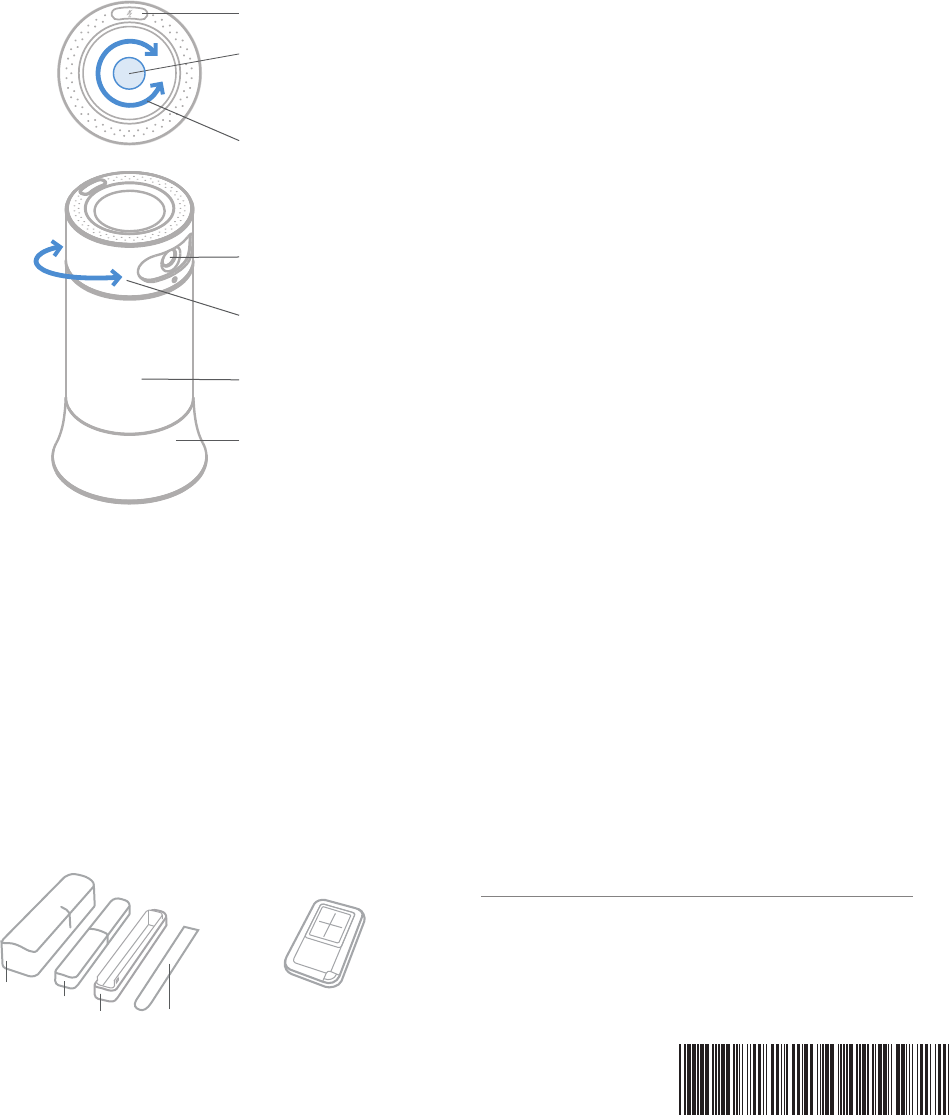
Microphone Off
Volume
Action
Camera Base Station
Voice commands
Example: “Ok Security, I’m leaving”
Say “Ok Security”, then say one of the commands listed in the app. Go to
device settings for list of commands. Range for commands is 6–8 ft).
Speaker
Camera
Privacy Ring
Light
Devices
You can add more devices to your Base Station to cover other areas in
your home. These include Motion Sensors and Access Sensors, Indoor
and Outdoor Motion Viewers, and a Key Fob available separately.
Access Sensors Key Fob
FCC Regulations
§ 15.19 (a)(3)
This device complies with part 15 of the FCC Rules. Operation is
subject to the following two conditions: (1) This device may not cause
harmful interference, and (2) this device must accept any interference
received, including interference that may cause undesired operation.
§ 15.21
Changes or modifications not expressly approved by the party
responsible for compliance could void the user’s authority to operate
the equipment.
§ 15.105
This equipment has been tested and found to comply with the limits
for a Class B digital device, pursuant to part 15 of the FCC Rules. These
limits are designed to provide reasonable protection against harmful
interference in a residential installation. This equipment generates,
uses and can radiate radio frequency energy and, if not installed and
used in accordance with the instructions, may cause harmful
interference to radio communications. However, there is no guarantee
that interference will not occur in a particular installation. If this
equipment does cause harmful interference to radio or television
reception, which can be determined by turning the equipment off and
on, the user is encouraged to try to correct the interference by one or
more of the following measures:
• Reorient or relocate the receiving antenna.
• Increase the separation between the equipment and receiver.
• Connect the equipment into an outlet on a circuit different from that
to which the receiver is connected.
• Consult the dealer or an experienced radio/TV technician for help.
FCC Radiation Exposure Statement:
®U.S. Registered Trademark
©2018 Honeywell International Inc.
33-00332—07 M.S. Rev. 02-18
Designed in U.S. A. | Printed in U.S.A.
Honeywell | HOMES
1985 Douglas Drive North
Golden Valley, MN 55422
1-800-633-3991
yourhome.honeywell.com
This equipment complies with FCC radiation exposure limits set forth for
an uncontrolled environment. This equipment should be installed and
operated with a minimum distance of 20cm between the radiator & your
body and must not be co-located or operating in conjunction with any
other antenna or transmitter except in accordance with FCC multi-
transmitter product procedures.
Contains lithium ion batteries. Please dispose of properly and in
accordance with local law.
Large
halfSmall
halfOptional
spacer
Tape
strip
33-00332-07
Home
SMART HOME
SECURITY
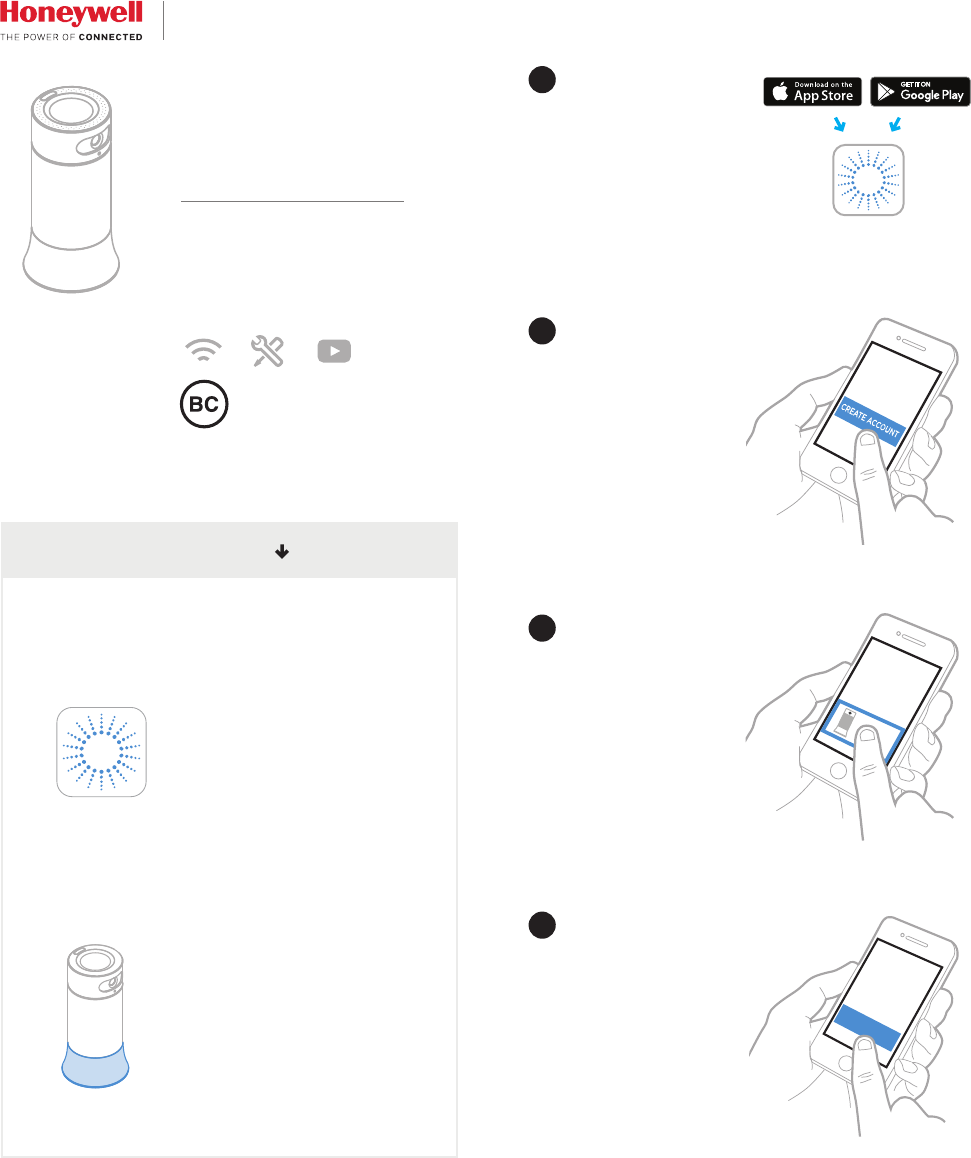
Select “Add new device” from menu.
Choose “Smart Home Security”
App Setup Process
NEXT
3
4
Follow instructions in the app
to configure your system.
1
Download Honeywell Lyric app
2
Create account or log in to
existing account
Install app
Power Base Station
The Honeywell Lyric app will be used
to guide you through placing and
configuring your new system.
See steps 1-4 to get started.
Place Base Station near power
outlet and at least 6 ft away from
router. Do not use an extension
cord to power your device. Plug in
to power up.
(Operating temp: 32°F - 104°F)
Get Started
Quick Start Guide
App will provide all
information on how to install
yourhome.honeywell.com
