6.2.2.4 Packet Tracer Configuring IPv4 Static And Routes Instructions CCNAv6.com
User Manual:
Open the PDF directly: View PDF  .
.
Page Count: 4
© 2013 Cisco and/or its affiliates. All rights reserved. This document is Cisco Public. Page 1 of 4
Packet Tracer - Configuring IPv4 Static and Default Routes
(Instructor Version)
Instructor Note: Red font color or Gray highlights indicate text that appears in the instructor copy only.
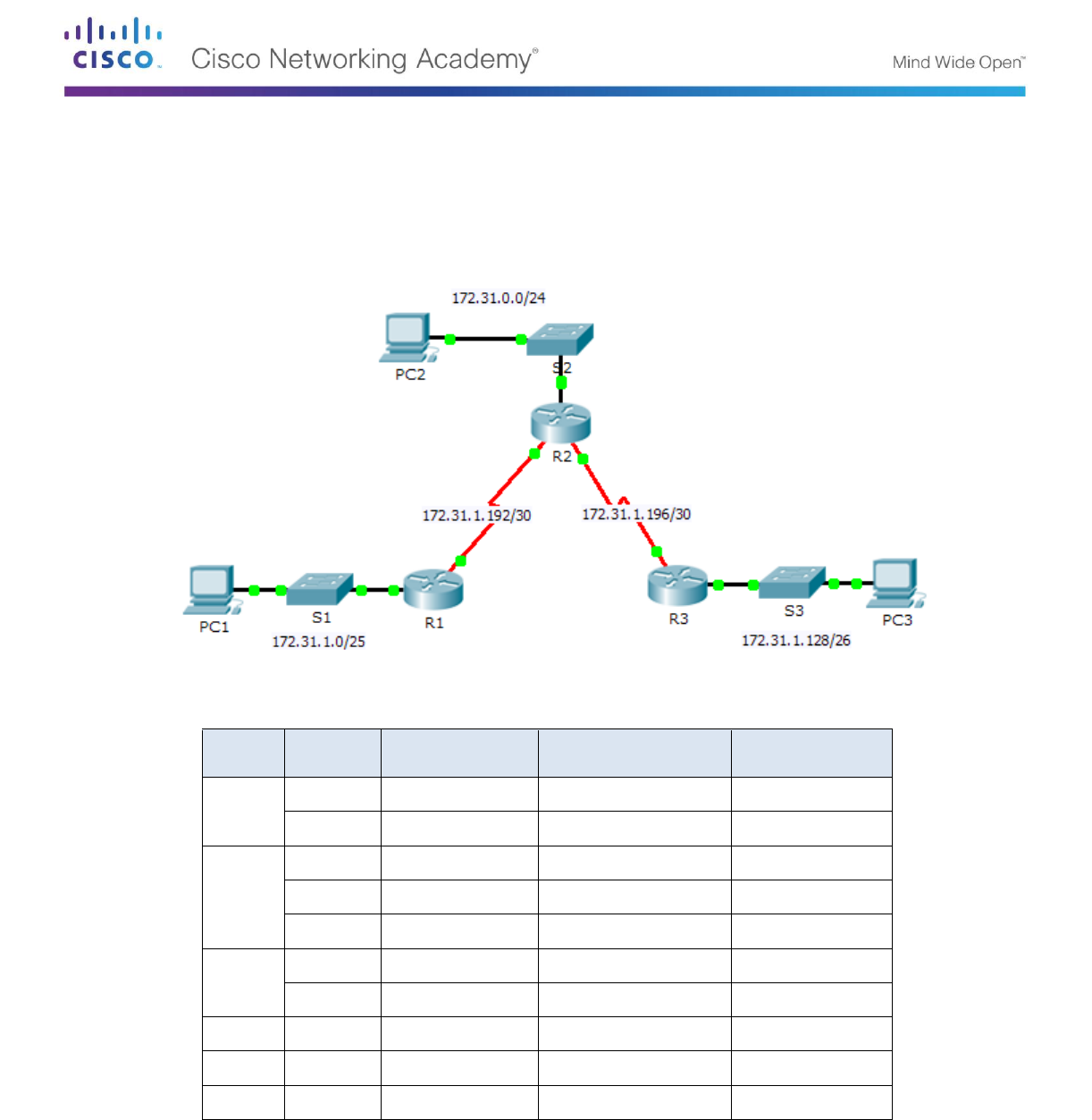
Topology
Addressing Table
Device
Interface
IPv4 Address
Subnet Mask
Default Gateway
R1
G0/0
172.31.1.1
255.255.255.128
N/A
S0/0/0
172.31.1.194
255.255.255.252
N/A
R2
G0/0
172.31.0.1
255.255.255.0
N/A
S0/0/0
172.31.1.193
255.255.255.252
N/A
S0/0/1
172.31.1.197
255.255.255.252
N/A
R3
G0/0
172.31.1.129
255.255.255.192
N/A
S0/0/1
172.31.1.198
255.255.255.252
N/A
PC1
NIC
172.31.1.126
255.255.255.128
172.31.1.1
PC2
NIC
172.31.0.254
255.255.255.0
172.31.0.1
PC3
NIC
172.31.1.190
255.255.255.192
172.31.1.129
Objectives
Part 1: Examine the Network and Evaluate the Need for Static Routing
Part 2: Configure Static and Default Routes
Part 3: Verify Connectivity

Packet Tracer - Configuring IPv4 Static and Default Routes
© 2013 Cisco and/or its affiliates. All rights reserved. This document is Cisco Public. Page 2 of 4
Background
In this activity, you will configure static and default routes. A static route is a route that is entered manually by
the network administrator to create a reliable and safe route. There are four different static routes that are
used in this activity: a recursive static route, a directly attached static route, a fully specified static route, and a
default route.
Part 1: Examine the Network and Evaluate the Need for Static Routing
a. Looking at the topology diagram, how many networks are there in total? 5
b. How many networks are directly connected to R1, R2, and R3? R1 has 2, R2 has 3, and R3 has 2.
c. How many static routes are required by each router to reach networks that are not directly connected? R1
needs 3 static routes, R2 needs 2 static routes, and R3 needs 3 static routes.
d. Test connectivity to the R2 and R3 LANs by pinging PC2 and PC3 from PC1.
Why were you unsuccessful? Because there are no routes to these networks on R1.
Part 2: Configure Static and Default Routes
Step 1: Configure recursive static routes on R1.
a. What is recursive static route? A recursive static route relies on the next hop router in order for packets to
be sent to its destination. A recursive static route requires two routing table lookups.
b. Why does a recursive static route require two routing table lookups? It must first look in the routing table
for the destination network and then look up the exit interface/direction of the network for the next hop
router.
c. Configure a recursive static route to every network not directly connected to R1, including the WAN link
between R2 and R3.
ip route 172.31.0.0 255.255.255.0 172.31.1.193
ip route 172.31.1.196 255.255.255.252 172.31.1.193
ip route 172.31.1.128 255.255.255.192 172.31.1.193
d. Test connectivity to the R2 LAN and ping the IP addresses of PC2 and PC3.
Why were you unsuccessful? R1 has a route to the R2 and R3 LANs, but R2 and R3 do not have a routes
to R1.
Step 2: Configure directly attached static routes on R2.
a. How does a directly attached static route differ from a recursive static route? A directly attached static
route relies on its exit interface in order for packets to be sent to its destination, while a recursive static
route uses the IP address of the next hop router.
b. Configure a directly attached static route from R2 to every network not directly connected.
ip route 172.31.1.0 255.255.255.128 Serial0/0/0
ip route 172.31.1.128 255.255.255.192 Serial0/0/1
c. Which command only displays directly connected networks? show ip route connected
d. Which command only displays the static routes listed in the routing table? show ip route static
e. When viewing the entire routing table, how can you distinguish between a directly attached static route
and a directly connected network? The static route has an S and a directly connected network has a C.

Packet Tracer - Configuring IPv4 Static and Default Routes
© 2013 Cisco and/or its affiliates. All rights reserved. This document is Cisco Public. Page 3 of 4
Step 3: Configure a default route on R3.
a. How does a default route differ from a regular static route? A default route, also known as the gateway of
last resort, is the network route used by a router when no other known route exists for a destination
network. A static route is used to route traffic to a specific network.
b. Configure a default route on R3 so that every network not directly connected is reachable.
ip route 0.0.0.0 0.0.0.0 Serial0/0/1
c. How is a static route displayed in the routing table? S* 0.0.0.0/0
Step 4: Document the commands for fully specified routes.
Note: Packet Tracer does not currently support configuring fully specified static routes. Therefore, in this step,
document the configuration for fully specified routes.
a. Explain a fully specified route. A fully specified route is a static route that is configured with an exit
interface and the next hop address.
b. Which command provides a fully specified static route from R3 to the R2 LAN?
R3(config)# ip route 172.31.0.0 255.255.255.0 s0/0/1 172.31.1.197
c. Write a fully specified route from R3 to the network between R2 and R1. Do not configure the route; just
calculate it.
R3(config)# ip route 172.31.1.192 255.255.255.252 s0/0/1 172.31.1.197
d. Write a fully specified static route from R3 to the R1 LAN. Do not configure the route; just calculate it.
R3(config)# ip route 172.31.1.0 255.255.255.128 s0/0/1 172.31.1.197
Step 5: Verify static route configurations.
Use the appropriate show commands to verify correct configurations.
Which show commands can you use to verify that the static routes are configured correctly? show ip
route, show ip route static, and the show ip route [network] commands
Part 3: Verify Connectivity
Every device should now be able to ping every other device. If not, review your static and default route
configurations.
Packet Tracer - Configuring IPv4 Static and Default Routes
© 2013 Cisco and/or its affiliates. All rights reserved. This document is Cisco Public. Page 4 of 4
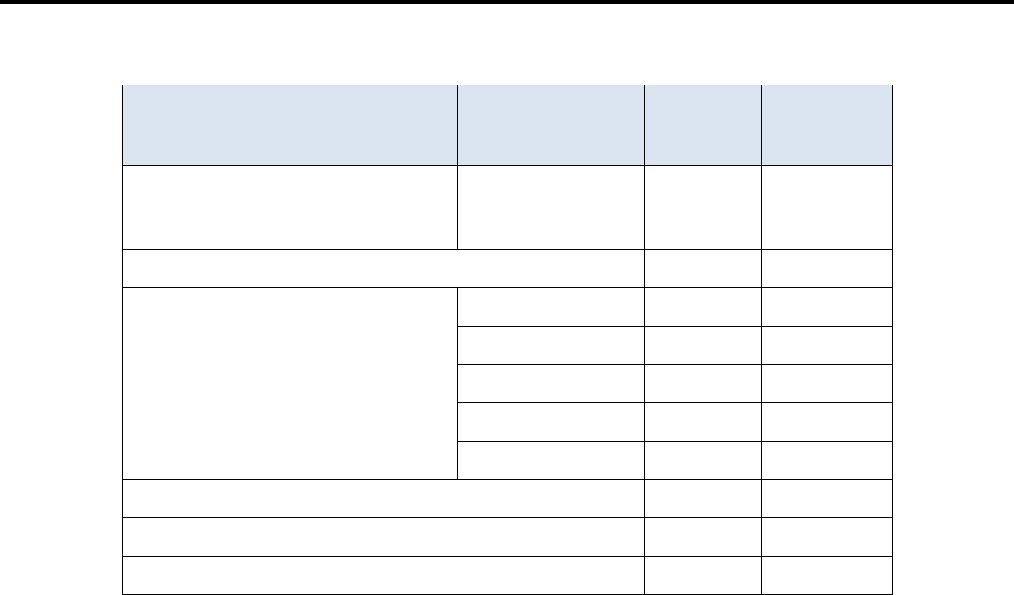
Suggested Scoring Rubric
Activity Section
Question
Location
Possible
Points
Earned
Points
Part 1: Examine the Network and
Evaluate the Need for Static
Routing
a - d
10
Part 1 Total
10
Part 2: Configure Static and
Default Routes
Step 1
7
Step 2
7
Step 3
3
Step 4
10
Step 5
3
Part 2 Total
30
Packet Tracer Score
60
Total Score
100
