6.3.4.4 Packet Tracer Investigating DUAL FSM Instructions
6.3.4.4%20Packet%20Tracer%20-%20Investigating%20DUAL%20FSM%20Instructions
6.3.4.4%20Packet%20Tracer%20-%20Investigating%20DUAL%20FSM%20Instructions
User Manual:
Open the PDF directly: View PDF  .
.
Page Count: 4
© 2013 Cisco and/or its affiliates. All rights reserved. This document is Cisco Public. Page 1 of 4
Packet Tracer – Investigating DUAL FSM
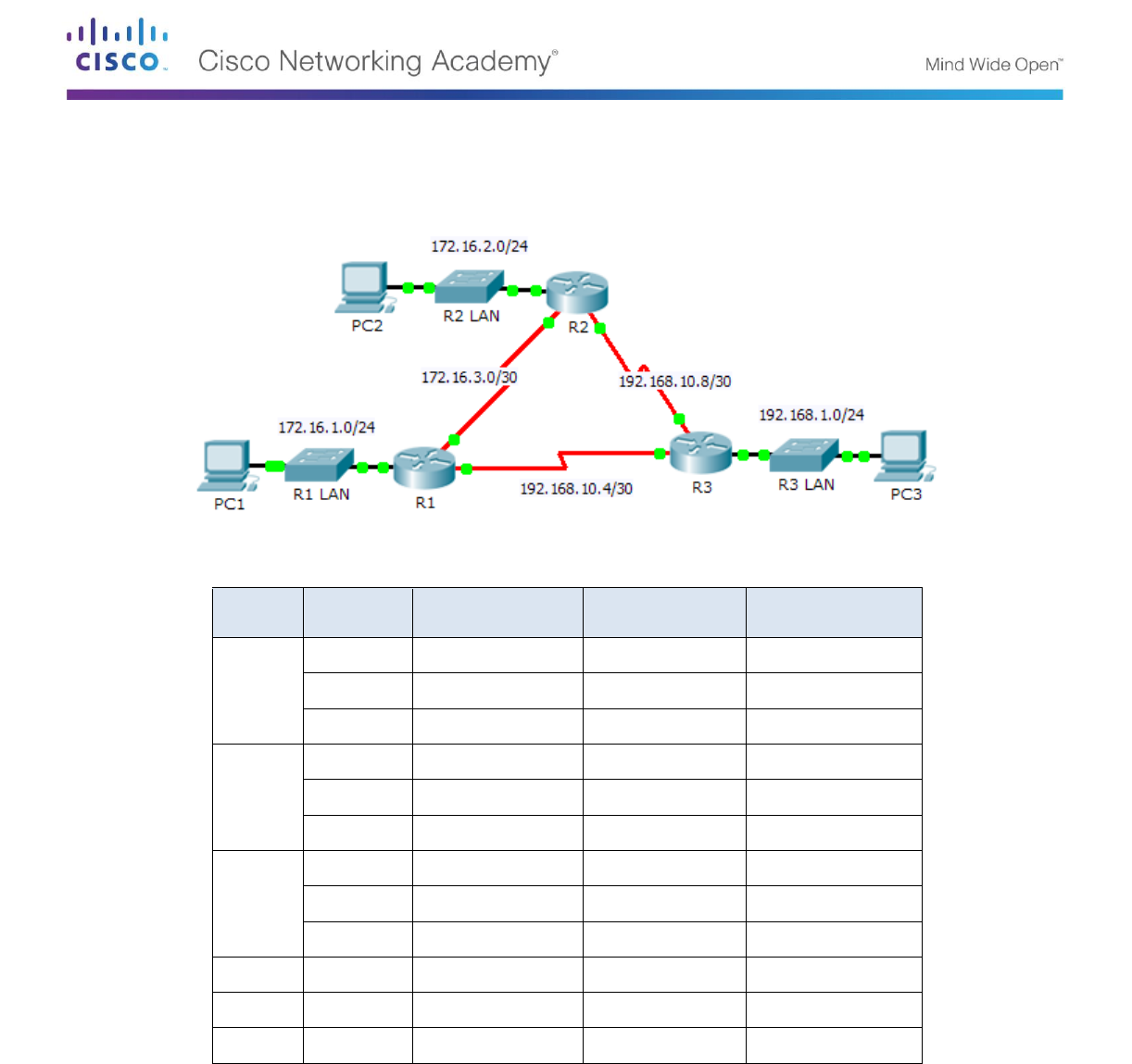
Topology
Addressing Table
Device
Interface
IP Address
Subnet Mask
Default Gateway
R1
G0/0
172.16.1.254
255.255.255.0
N/A
S0/0/0
172.16.3.1
255.255.255.252
N/A
S0/0/1
192.168.10.5
255.255.255.252
N/A
R2
G0/0
172.16.2.254
255.255.255.0
N/A
S0/0/0
172.16.3.2
255.255.255.252
N/A
S0/0/1
192.168.10.9
255.255.255.252
N/A
R3
G0/0
192.168.1.254
255.255.255.0
N/A
S0/0/0
192.168.10.6
255.255.255.252
N/A
S0/0/1
192.168.10.10
255.255.255.252
N/A
PC1
NIC
172.16.1.1
255.255.255.0
172.16.1.254
PC2
NIC
192.168.1.1
255.255.255.0
192.168.1.254
PC3
NIC
192.168.2.1
255.255.255.0
192.168.2.254
Objectives
Part 1: Verify the EIGRP Configuration
Part 2: Observe the EIGRP DUAL FSM
Background
In this activity, you will modify the EIGRP metric formula to cause a change in the topology. This will allow you to
see how EIGRP reacts when a neighbor goes down due to unforeseen circumstances. You will then use the

Packet Tracer – Investigating DUAL FSM
© 2013 Cisco and/or its affiliates. All rights reserved. This document is Cisco Public. Page 2 of 4
debug command to view topology changes and how the DUAL Finite State Machine determines successor and
feasible successor paths to re-converge the network.
Part 1: Verify EIGRP Configuration
Step 1: Examine the routing tables of each router and verify that there is a path to every
network in the topology.
What command displays the routing table?
Are any of the routers load balancing between any network?
Step 2: Verify that each router has entries in its neighbor table.
What command displays the neighbor table?
How many neighbors does each router have?
Step 3: Analyze the topology table of each router.
a. What command displays the topology table?
Based on the output in the topology table, how many successor paths does each router have?
Why are there more successor paths than networks?
b. Copy the output for R1's topology table to a text editor or the space below so that you can refer to it later.
Part 2: Observe the EIGRP DUAL FSM
Step 1: On R1, turn on the debugging feature that will display DUAL FSM notifications.
What command enables debugging for the EIGRP DUAL FSM?
Step 2: Force a DUAL FSM update to generate debug output.
a. Place the R1 and R3 windows side by side so that you can observe the debug output. Then on R3,
disable the serial 0/0/0 interface.
R3(config)# interface s0/0/0
R3(config-if)# shutdown
b. Do not disable debugging yet. What debug output indicated changes to the routing table?

Packet Tracer – Investigating DUAL FSM
© 2013 Cisco and/or its affiliates. All rights reserved. This document is Cisco Public. Page 3 of 4
Step 3: Display the routing table of R1.
Verify that 192.168.10.4/30 network is no longer in R1’s routing table.
Describe any other changes to the R1 routing table?
Step 4: Determine the difference in the topology table.
Examine the topology table of R1 and compare it to the previous output from Part 1.
Are there any other changes to the R1’s topology table?
Step 5: Document changes in each router’s neighbor table.
Examine the neighbor table of each router and compare it to the previous one from Part 1.
Are there any changes to the neighbor table?
Step 6: Restore connectivity between R1 and R2.
a. With the R1 and R3 windows side by side, on R3 activate the serial 0/0/0 interface and observe the
debug output on R1.
b. Disable debugging by entering the no form of the debug command or simply enter undebug all. What
debug output indicated changes to the routing table?
How did the DUAL FSM handle the change in topology when the route to R1 came back up?
Packet Tracer – Investigating DUAL FSM
© 2013 Cisco and/or its affiliates. All rights reserved. This document is Cisco Public. Page 4 of 4
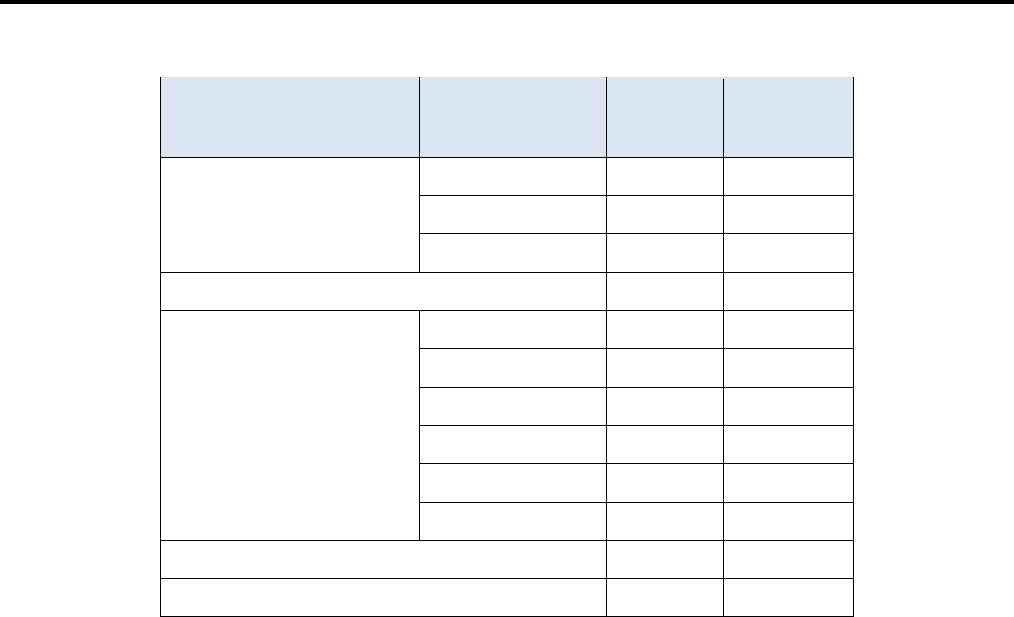
Suggested Scoring Rubric
Activity Section
Question
Location
Possible
Points
Earned
Points
Part 1: Verify EIGRP
Configuration
Step 1
12
Step 2
12
Step 3
12
Part 1 Total
36
Part 2: Observe the
EIGRP DUAL FSM
Step 1
10
Step 2
12
Step 3
10
Step 4
10
Step 5
10
Step 6
12
Part 2 Total
64
Total Score
100
