8 Data Set Processing Using ISPF Programmer’s Guide
User Manual:
Open the PDF directly: View PDF  .
.
Page Count: 30

2/26/2019 8 Data set processing using ISPF - ISPF Programmer’s Guide
https://learning.oreilly.com/library/view/ispf-programmers-guide/9783110407655/xhtml/Ch08.xhtml 1/30
8 Data set processing using ISPF
ISPF offers a wide range of services for processing data sets. Except for a few
special commands, all dataset services in ISPF begin with the prefix LM. This
prefix stands for: Library Management. All together, I counted 25 services that
are currently available. If you are concerned for the first time with the LM
services, immediately the question arises: What do I need for a specific project?
A first example is shown in the Program 7.3: IOEXMPL2 – Read records using
LM services of ISPF on page 120.
Note:
The commands that I describe in the following chapters, usually know many
more parameters than I will discuss. I explain only parameters I have already
used during my practical work in ISPF.
8.1 THE LM SERVICES
When using the LM Services several service calls in the correct order are always
required.
8.1.1 Grouping of LM services
Whenever I need to accomplish something with data sets in a REXX program, I
am faced with the question: With or without ISPF services? One thing is
immediately clear. The use of ISPF Services requires a higher programming
effort than simply the EXECIO command from the supply of TSO REXX
commands to use. See Program 7.3: IOEXMPL2 – Read records using LM
services of ISPF on page 120. So, what are the reasons to take ISPF services for
data set processing anyway? The reasons may be:
– File processing with ISPF services have a much better performance.
– Error control and error analysis is much better.
– There are extensive opportunities with members and member lists to work.
While only a TSO ALLOC command must be executed before using the
EXECIO command, a whole series of commands is necessary to use the ISPF
services for data set processing. Moreover, these commands must run in the right
sequence. I would like to provide guidance to use the right services for a
particular task in the table below. In the right column, you will see the commands
that are necessary to perform a complete service process. The one or more
nucleus commands for performing a service project are displayed in gray. I added
options that must be necessarily set for certain tasks. I also added notes behind
individual commands that are important when using this service.
Attention:
Never forget to execute the final commands LMCLOSE and LMFREE so that the
used resources are completely free after the action. If these two commands are
not executed, the resources remain locked for further editing. There is no way to
subsequently execute the two commands when the program has ended. In this
case, the blocking of resources can only be lifted by LOGOFF and LOGON.
Table 8.1: Grouping of LM commands necessary for a particular type of
data processing
Processing type Necessary services sequence
PREV
7 Introduction to ISPF programming
⏮
NEXT
9 Messages – Definition, setting, output
⏭
🔎
ISPF Programmer’s Guide
Find answers on the fly, or master something new. Subscribe today. See pricing options.

2/26/2019 8 Data set processing using ISPF - ISPF Programmer’s Guide
https://learning.oreilly.com/library/view/ispf-programmers-guide/9783110407655/xhtml/Ch08.xhtml 2/30
Read a sequential
data set
LMINIT
LMOPEN
LMGET (in a DO loop)
LMCLOSE
LMFREE
Read a member
sequential
LMINIT
LMOPEN
LMMFIND (localize a member)
LMGET (in a DO loop)
LMCLOSE LMFREE
Write a sequential
data set
LMINIT
LMOPEN
LMPUT (in A DO loop)
LMCLOSE
LMFREE
Write a member
sequential
LMINIT
LMOPEN ... OPTION(OUTPUT)
LMPUT (in A DO loop)
LMMREP (write a member)
LMCLOSE
LMFREE
Copy a member LMINIT (Input)
LMINIT ... ENQ(SHR) (Output)
LMCOPY
LMFREE (Input)
LMFREE (Output)
Move members LMINIT (Input)
LMINIT ... ENQ(SHR) (Output)
LMMOVE
LMFREE (Input)
LMFREE (Output)
Processing type Necessary services
sequence
Delete members LMINIT ... ENQ(EXCLU)
LMOPEN ...
OPTION(OUTPUT)
Find answers on the fly, or master something new. Subscribe today. See pricing options.

2/26/2019 8 Data set processing using ISPF - ISPF Programmer’s Guide
https://learning.oreilly.com/library/view/ispf-programmers-guide/9783110407655/xhtml/Ch08.xhtml 3/30
LMMDEL
LMCLOSE
LMFREE
Rename members LMINIT ... ENQ(EXCLU)
LMOPEN ...
OPTION(OUTPUT)
LMMREN
LMCLOSE
LMFREE
Display or change member
statistics
LMINIT
LMMSTATS
LMFREE
Compress a PDS LMINIT ... ENQ(EXCLU)
LMCOMP LMFREE
Read the member list of a
PDS
LMINIT
LMOPEN
LMMLIST (in A DO loop)
MLCLOSE
LMFREE
Display the member list of a
PDS in a panel.
LMINIT ... ENQ(EXCLU)
Members can be selected.
The selected
LMOPEN ...
OPTION(OUTPUT)
member name is returned. LMMDISP
LMCLOSE
LMFREE
View member list of several
concatenated
address TSO “alloc
...dsn(dsnlist)”
data sets for editing. LMINIT
MEMLIST
LMFREE
address TSO “free ...”
Display DSLISTs like in the
ISPF menu 3.4
lvl = “PROX.LANZ.**”
LMDINIT ... LEVEL(“lvl”)”
LMDDISP
LMDFREE
Notes:
Find answers on the fly, or master something new. Subscribe today. See pricing options.
2/26/2019 8 Data set processing using ISPF - ISPF Programmer’s Guide
https://learning.oreilly.com/library/view/ispf-programmers-guide/9783110407655/xhtml/Ch08.xhtml 4/30
In the following description of the individual services, I will mainly use the
descriptions of the IBM brochure ISPF Services Guide to explain a service.
Since however as the accompanying examples are very brief in all the brochures
of ISPF, I will bring to (almost) every service a sample program that was tested
by me. The resulting printout of the programs will always be shown. Only for
services where the function is very simple (e.g. LMFREE), I will not spend any
time explaining. In the descriptions of the individual parameters, I will always
mark the default values in gray.
8.1.2 LMINIT – Start of the data set processing
Function:
Each data set processed by ISPF services begins with LMINIT. The main purpose
of this command is to link the physical data set(s) with an ISPF DATAID. This
DATAID is used by the following commands to identify the data object. The
DATAID is at the execution of the LMINIT command automatically defined by
the system and stored into the variable specified in the LIMINIT command.
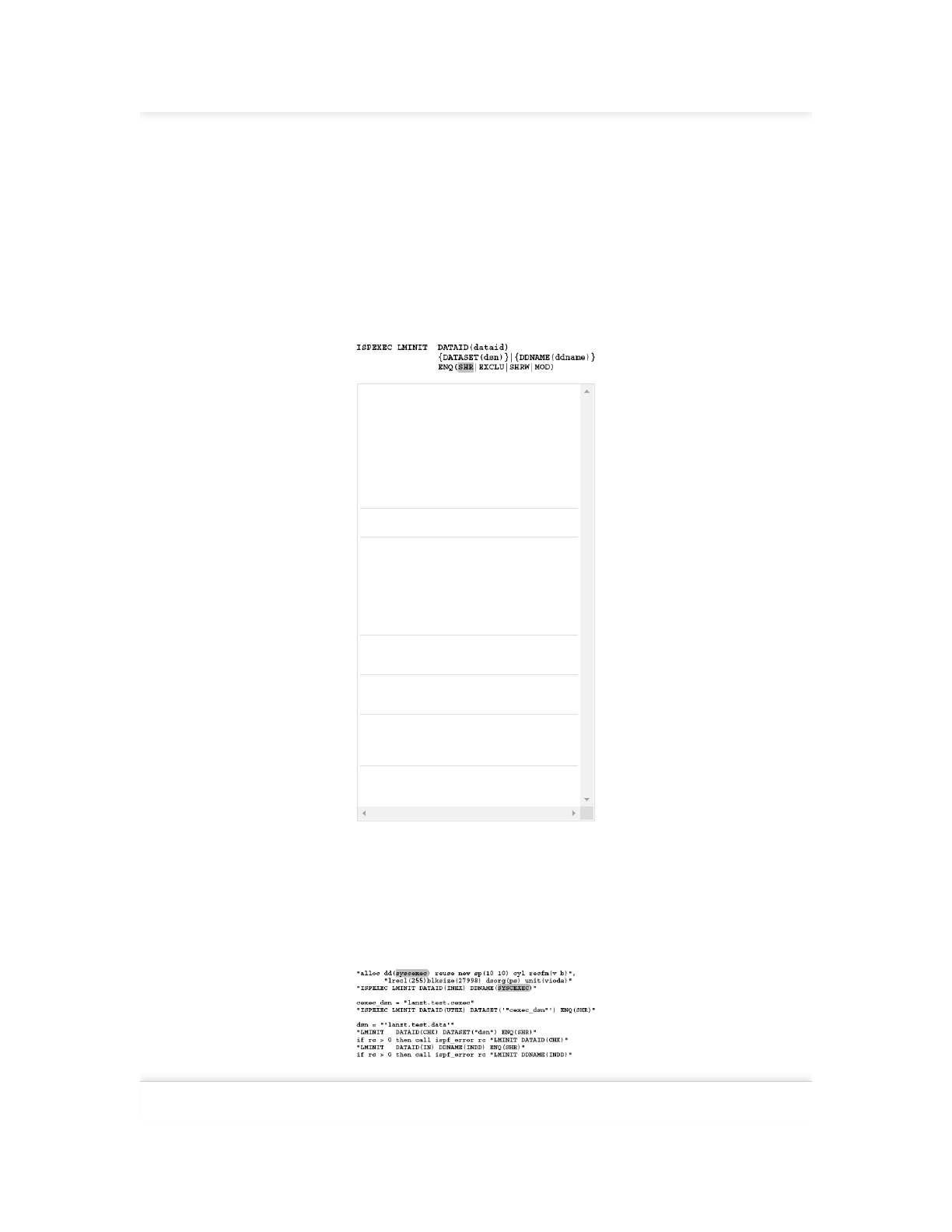
Format:
dataid Here a name of maximal 8 characters must be
specified. It is not necessary to enclose the name
at this point in apostrophes. This name must be
used in all subsequent LM services concerning
this data set. In the following LM service
statements must the DATAID entered in a
variable notation as shown below:
DATAID(“dataid”) or DATAID(&dataid)
Both notations can be applied.
dsn Name of the data set addressed with this LMINIT.
ddname DD name of the data set addressed with this
LMINIT. When a DD name is specified, this must
have been previously allocated to a data set. This
DD allocation can be present by a previously
executed TSO ALLOC command in the program,
or come by a defined DD statement from the
outside in a BATCH JCL.
SHR Shared access to this data set is allowed. Other
users can also access this data set.
EXCLU Exclusive access. No other users can
simultaneously access the data set.
SHRW Works like SHR. However, members can be
written into the PDS. This option only applies for
access to a PDS.
MOD Records can be added to an existing sequential
data set.
Rules:
– The ENQ option can be used only if the data set is addressed using the
DATASET option. In addressing via DDNAME, the ENQ option conditions
determines the ALLOC or DD statement.
– If the LMINIT function addresses a set of concatenated data sets, then this is
only possible by using the DDNAME parameter. The concatenation of the data
sets must be previously performed using a TSO ALLOC statement or by a DD
statement in the JCL of a batch job.
LMINIT examples:
8.1.3 LMFREE – Free a data set
Function:
Find answers on the fly, or master something new. Subscribe today. See pricing options.
2/26/2019 8 Data set processing using ISPF - ISPF Programmer’s Guide
https://learning.oreilly.com/library/view/ispf-programmers-guide/9783110407655/xhtml/Ch08.xhtml 5/30
LMFREE frees a data set allocation established by a LMINIT command.
LMINIT and the associated LMFREE must occur in pairs with the same
DATAID in the program. All set ENQs by the LMINIT will be released.
Format:
ISPEXEC LMFREE DATAID(data-id)
data-
id
Here, the same variable must be specified which
was used in the corresponding LMINIT.
8.1.4 LMOPEN – Open a data set for processing Function:
Depending on what data set processing is planned, a LMOPEN must be
performed before the data set processing can start. See Table 8.1: Grouping of
LM commands necessary for a particular type of data processing on page 134.
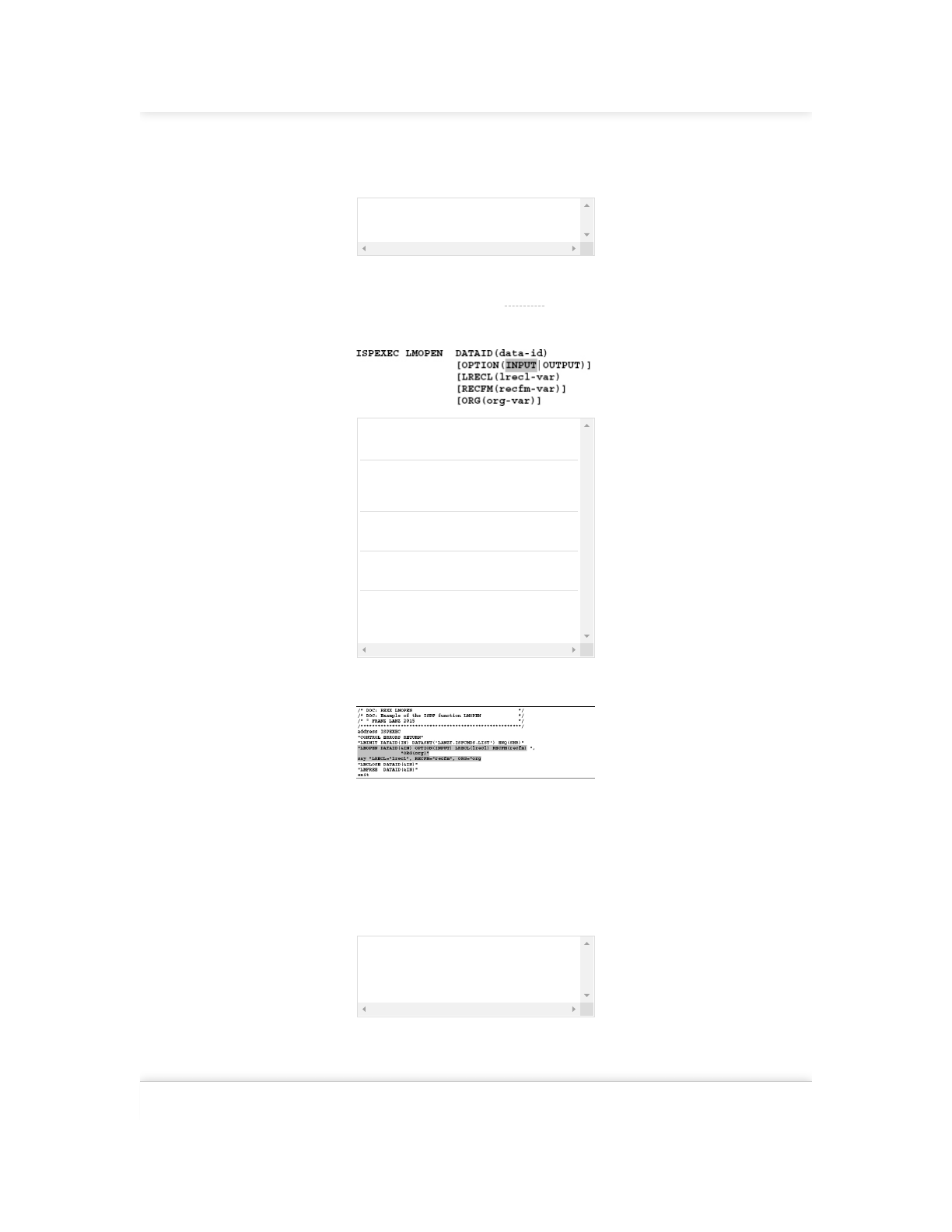
Format:
DATAID Here the same variable must be specified which
was used in the corresponding LMINIT.
OPTION This determines whether the data set should be
opened for input or for output. INPUT is the
default value.
LRECL If this option is used, then LMOPEN stores the
LRECL of the data set in the lrecl-var.
RECFM If this option is used, then LMOPEN stores the
RECFM of the data set in the recfm-var.
ORG If this option is used, then LMOPEN stores the
organization form of the data set (PO or PS) in
the org-var.
Example:
Program 8.1: LMOPEN example
The SAY statement prints the following output:
LRECL=000007 96, RECFM=VB , ORG=PS
8.1.5 LMCLOSE – Close a data set
Function:
The data set associated with this DATAID is closed.
Format:
ISPEXEC LMCLOSE DATAID(data-id)
DATAID Here the same variable must be specified, which
was used in the LMINIT and LMOPEN. The
possible setting of ENQs performed by LMINIT
will be freed.
8.1.6 LMMFIND – Localize a member
Function:
The LMMFIND function searches for a member in a PDS/PDSE or in a chain of
such data sets. LMMFIND can also return member statistics. If the object
addressed by LMINIT and LMOPEN is a concatenated data set, then LMMFIND
locates the first occurrence of the member found in the chain. The LMINIT and
Find answers on the fly, or master something new. Subscribe today. See pricing options.
2/26/2019 8 Data set processing using ISPF - ISPF Programmer’s Guide
https://learning.oreilly.com/library/view/ispf-programmers-guide/9783110407655/xhtml/Ch08.xhtml 6/30
LMOPEN services must have been executed before the command LMMFIND
can be executed.
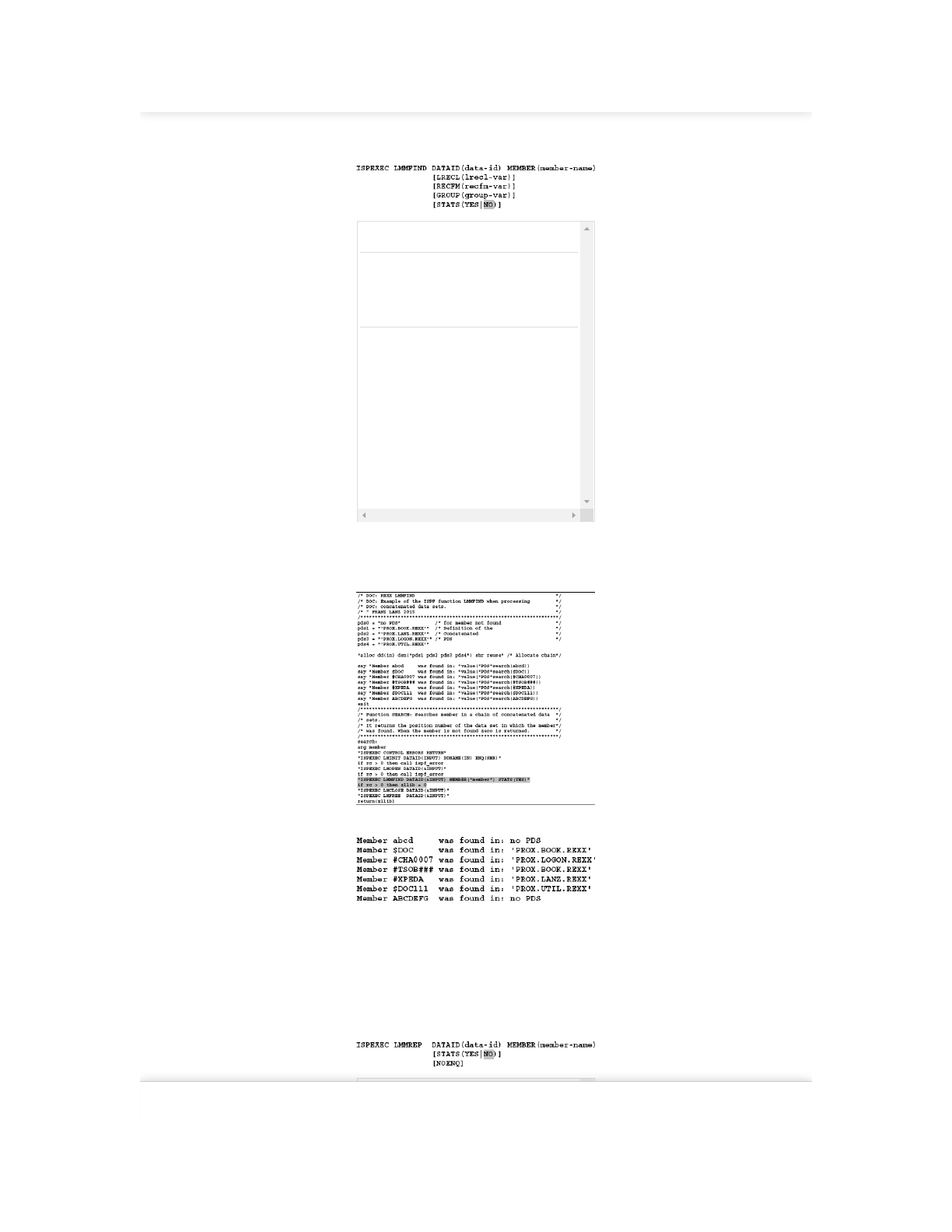
Format:
MEMBER Enter here the name of the desired member.
LRECL This is the same parameter as used in the
LMOPEN function. The difference, however, is
that when searching in a concatenated data set
the characteristic values of the PDS will be
transferred in which the member was found.
RECFM Here mutatis mutandis applies the same to say
as for LRECL. If YES is specified, then some
variables are set by ISPF containing values of
the member statistics of the member found.
Here especially the ZLIB variable is of interest.
When the LMOPEN refers to a list of
concatenated data sets, this variable contains
the position number of the data set within the
chain of PDS in which the member was found.
Since number, name and type of the returned
variables depend on the type of data set, I will
refrain from a detailed description. If you want
to pursue the issue further, I recommend the
manual ISPF Services Guide.
Example:
The following program shows how to search members in a concatenated data set.
Program 8.2: LMMFIND example
I ran the program. The result is shown here:
8.1.7 LMMREP – Replace a member
Function:
The LMMREP service replaced a member in a PDS. If the member does not
exist, it is added to the PDS. Before executing the command LMMREP, the
LMINIT service must have been performed with option ENQ (SHRW) or ENQ
(EXCLU) and the LMOPEN command with OPTION (OUTPUT). Additionally,
a LMPUT service must previously be used to produce data records in storage.
Format:
DATAID Specifies the data-id that has already been used
by LMINIT and LMOPEN service.
Find answers on the fly, or master something new. Subscribe today. See pricing options.
2/26/2019 8 Data set processing using ISPF - ISPF Programmer’s Guide
https://learning.oreilly.com/library/view/ispf-programmers-guide/9783110407655/xhtml/Ch08.xhtml 7/30
MEMBER Specifies the name of the member to be written
to the PDS.
STATS The STATS (YES) option specifies that the
member statistics will be set or updated after
insertion of the member. The program must at
least have set the values ZLCDATE for the
creation date and ZLMDATE for the
modification date. For information about other
variables that can also be set, see the description
of the service LMMREP in the brochure ISPF
Services Guide.
NOENQ This option causes the ISPF while deposing the
execution of the command to set no ENQ on the
relevant PDS.
Advice:
If a particular member is not in the PDS available when running LMMREP, the
LMMREP command ends with a RC = 8, although everything was done
correctly. This must be observed when checking the return codes.
8.1.8 LMMADD – Add a member
Function:
This service works the same as the LMMREP service. The only difference is that
an existing member will not be replaced. This service should always be used if
you never want to overwrite already existing members. If the concerned member
is available in the PDS when running LMMADD, the LMMADD command ends
with a RC = 4 and the member is not written into the PDS.
8.1.9 LMGET – Read a data records
Function:
LMGET reads a record from the data set provided under the same DATAID by
LMINIT and LMOPEN. If a member should be read sequentially, the member
must previously be located using a LMMFIND.
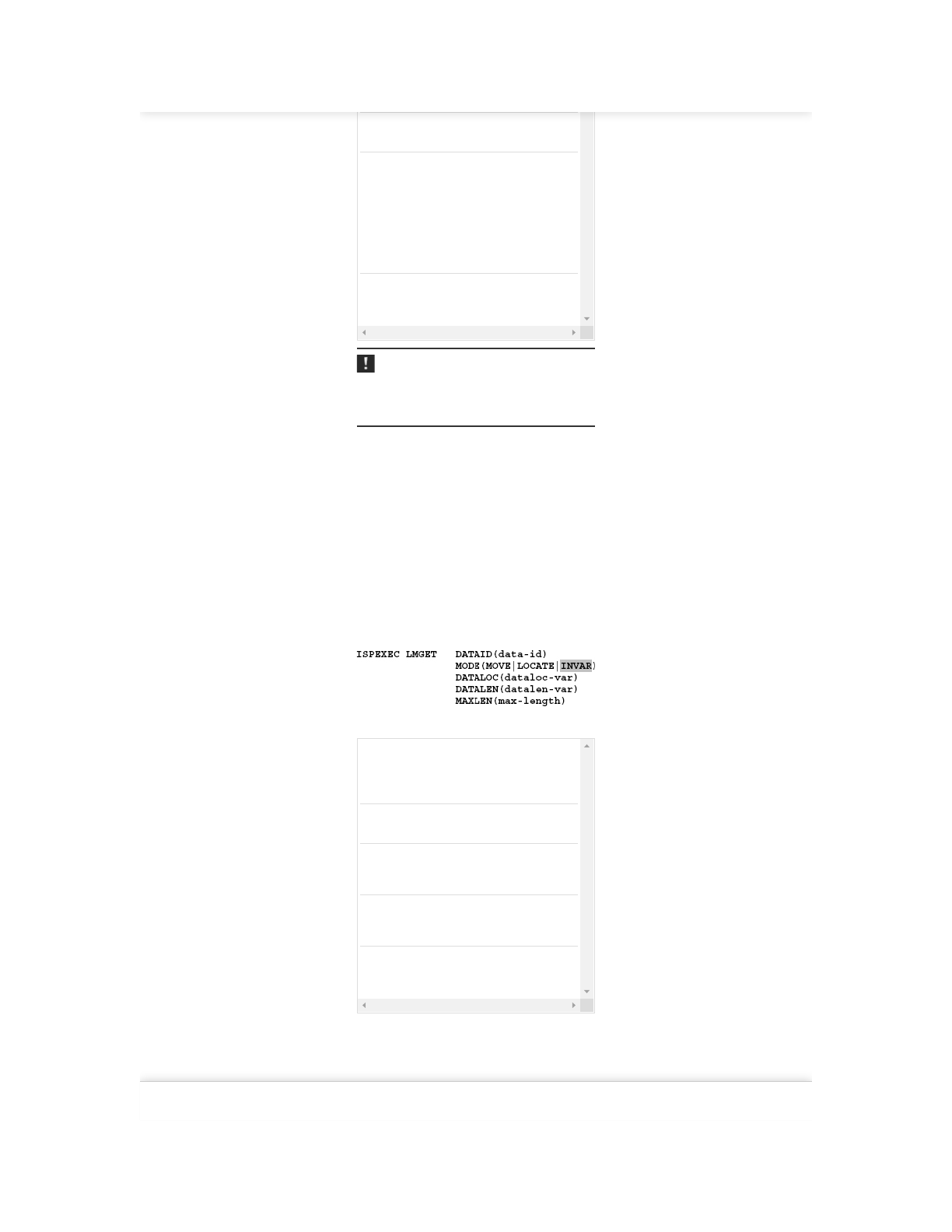
Format:
All parameters must always be specified!
DATAID data-id refers to the same DATAID for which
the LMINIT, the LMOPEN and possibly the
LMMFIND service had already been
performed.
MODE Defines whether the data is to be moved,
located or stored into an ISPF dialog variable.
DATALOC dataloc-var is the name of a REXX variable in
which the read data record is stored when
mode INVAR was specified.
DATALEN datalen-var is the name of a REXX variable in
which the length of the read data record is
saved.
MAXLENE max-length is an input variable that contains
the maximum length of a record. You can
always specify the number 32760 here.
Example:
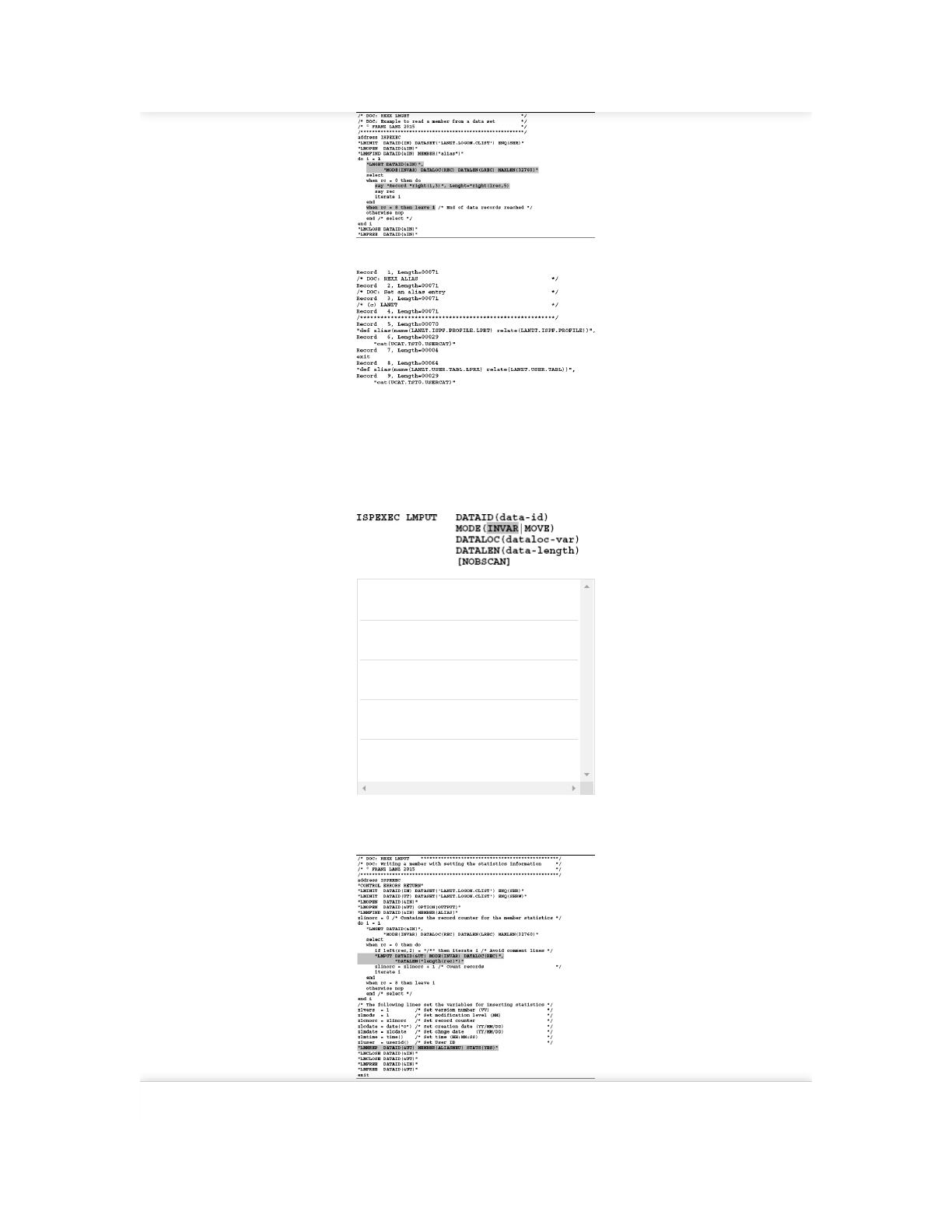
Read the member LANZT.LOGON.CLIST(ALIAS). This data set is defined with
RECFM=VB. I have deliberately avoided any error checking during development
of the program to make the example easier to read.
Program 8.3: LMGET – Read data records
Find answers on the fly, or master something new. Subscribe today. See pricing options.
2/26/2019 8 Data set processing using ISPF - ISPF Programmer’s Guide
https://learning.oreilly.com/library/view/ispf-programmers-guide/9783110407655/xhtml/Ch08.xhtml 8/30
Here are the results of program execution:
8.1.10 LMPUT – Output data records
Function:
LMPUT writes a data record into a data set or a member that is defined with
LMINIT and LMOPEN using the same DATAID. If the records are written to a
member, then a LMMADD or LMMREP must be performed with the same
DATAID for this member after all records are written by LMPUT.
Format:
DATAID Specifies the same data-id that is already used
by LMINIT and LMOPEN service.
MODE Mode INVAR must always be used in REXX
programs.
DATALOC dataloc-var is the name of a REXX variable
which contains the data to be written.
DATALEN data-length must contain the length of the
record to be written.
[NOBSCAN] This option specifies that the trailing blanks
will not cut off when writing VB records.
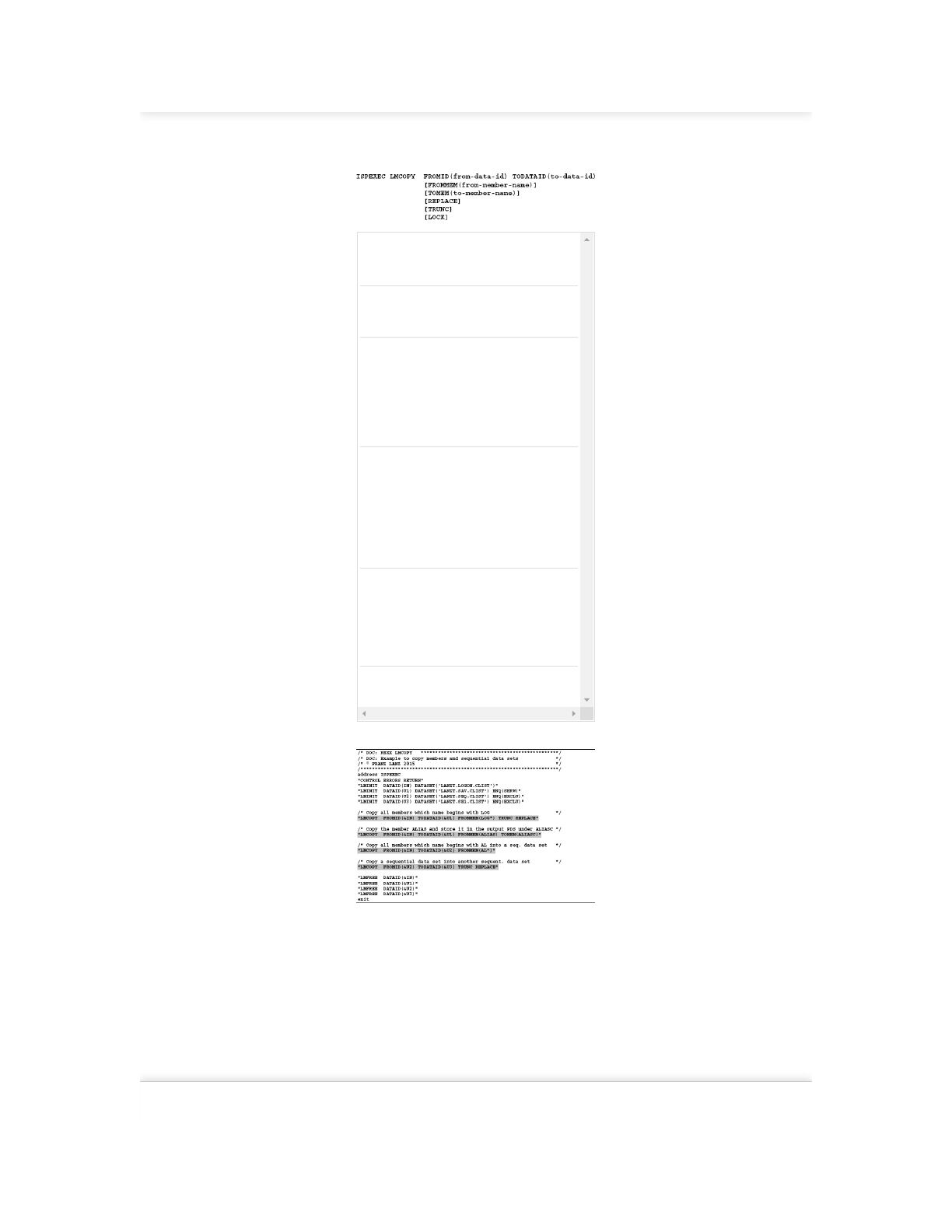
Example:
Program 8.4: LMPUT – Writing a member with setting the statistic
information
8.1.11 LMCOPY – Copy data
Find answers on the fly, or master something new. Subscribe today. See pricing options.
2/26/2019 8 Data set processing using ISPF - ISPF Programmer’s Guide
https://learning.oreilly.com/library/view/ispf-programmers-guide/9783110407655/xhtml/Ch08.xhtml 9/30
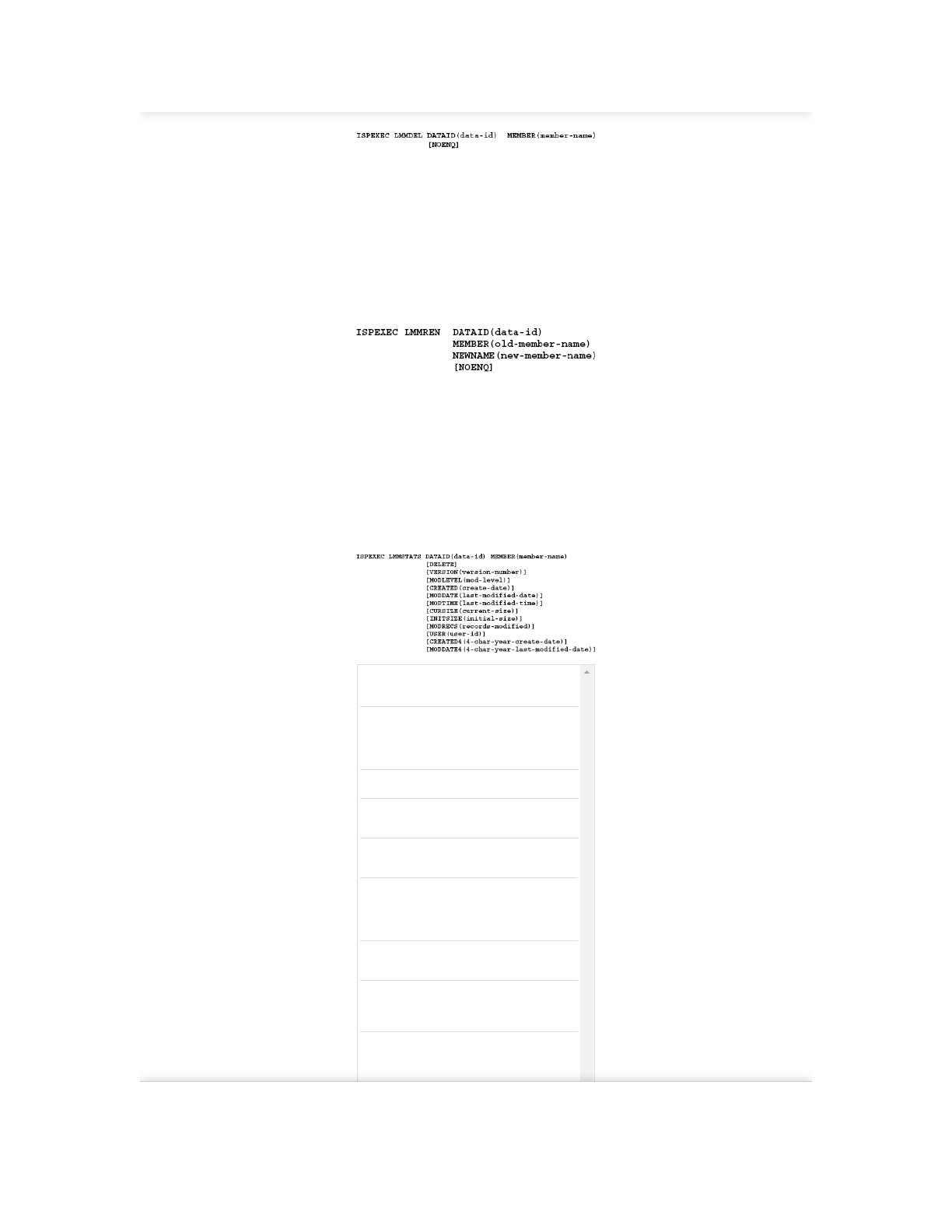
Function:
The LMCOPY service copies PDS members or entire sequential data sets.
Format:
FROMID Specifies the same data-id that is already used
by LMINIT and LMOPEN service to allocate
the input data set.
TODATAID Specifies the same data-id that is already used
by LMINIT and LMOPEN service to allocate
the output data set.
FROMMEM from-member-name is the name of the source
member or a mask through which the
members to be copied are generically selected.
If an asterisk (*) is specified, all members are
copied. If the source data set is a PDS, this
parameter must be specified. If the source
data set is of type sequential, this parameter
must not be specified.
TOMEM to-member-name is the member name of the
member in the output data set. If the from-
member-name is specified and the to-member
name not, the member is copied using the
from-member-name in the output data set. If
the source data set is of type sequential to-
member-name, this must be specified. If the
target data set is of type sequential the to-
member-name cannot be specified.
REPLACE Specifies that existing members are replaced.
If this parameter is not specified when
copying multiple members, only those
members that are not present in the output
data set will be copied. If members are not
copied because they are already present, then
the RC=12 is set.
TRUNC Allows clipping of the input data to the
LRECL of the output data set.
Program 8.5: LMCOPY example
8.1.12 LMMOVE – Move data
Function:
The LMMOVE service moves members of PDS or entire sequential data sets.
Since LMMOVE has the same functions and parameters as LMCOPY, I will
refrain from giving a complete description. The difference to LMCOPY is merely
that LMMOVE deletes the data source after copying.
8.1.13 LMMDEL – Delete members
Function:
The LMMDEL service deletes a member of a PDS. The following services must
be called first:
1. LMINIT with parameters ENQ(SHRW) or ENQ(EXCLU)
2. LMOPEN with the OPTION parameter (OUTPUT)
Find answers on the fly, or master something new. Subscribe today. See pricing options.
2/26/2019 8 Data set processing using ISPF - ISPF Programmer’s Guide
https://learning.oreilly.com/library/view/ispf-programmers-guide/9783110407655/xhtml/Ch08.xhtml 10/30
Format:
The parameters are the same as those described in the previous services. Since
this is a very simple function, I will refrain from giving a detailed example.
8.1.14 LMMREN – Rename members
Function:
The LMMREN service renames a member of a PDS. The following services
must be called first:
1. LMINIT with parameters ENQ(SHRW) or ENQ(EXCLU)
2. LMOPEN with the OPTION parameter (OUTPUT)
Format:
The parameters are the same as those described in the previous services. Since
this is a very simple function, I will refrain from giving a detailed example.
8.1.15 LMMSTATS – Display or change member statistics
Function:
The LMMSTATS service sets or clears the member statistics for a member in a
PDS. Not all statistic values must be set when calling the service. If some values
are not set, LMMSTATS tries to determine the remaining values (such as the
number of records in a member) to set it correctly.
Prior to the execution of this command, LMINIT must be performed.
Format:
DATAID Variable name of DATAID from the
associated LMINIT.
MEMBER The name of the member, which statistics
should be changed. There can be a generic
mask entered to set statistics for multiple
members.
DELETE With this option, all statistics will be deleted.
VERSION Version number that is to be set. Here a
number from 1 to 99 must be specified.
MODLEVEL Modification level that is to be set. Here a
number from 1 to 99 must be specified.
CREATED Creation date of the members. A date in the
form valid for the respective country must be
entered. This form is provided in REXX by
calling the function DATE (“O”).
MODDATE Modification date of the members. The shape
is the same as in CREATED.
MODTIME Time of the modification of the member in
the form HH:MM:SS. This format is provided
by the function TIME () in REXX.
CURSIZE Number of records in the members. This
parameter should never be specified. The
system determines and sets this value.
INITSIZE The same as in CURSIZE.
Find answers on the fly, or master something new. Subscribe today. See pricing options.
2/26/2019 8 Data set processing using ISPF - ISPF Programmer’s Guide
https://learning.oreilly.com/library/view/ispf-programmers-guide/9783110407655/xhtml/Ch08.xhtml 11/30
MODRECS Specifies the number of modified records.
This value can only be set by the system.
USER The user ID that is inserted in the member
statistics. This information may contain a
maximum of 7 characters. When the ISPF
editor edits the member, the editor sets the
user ID automatically when the member is
stored.
CREATED4 Creation date of the member in the form with
four-digit year. A date in the form valid for
the respective country must be entered.
Normally the form YYYY/MM/DD is used in
Europe. The text must be assembled to
contain the correct form for the appropriate
country.
MODDATE4 The same as for CREATED4.
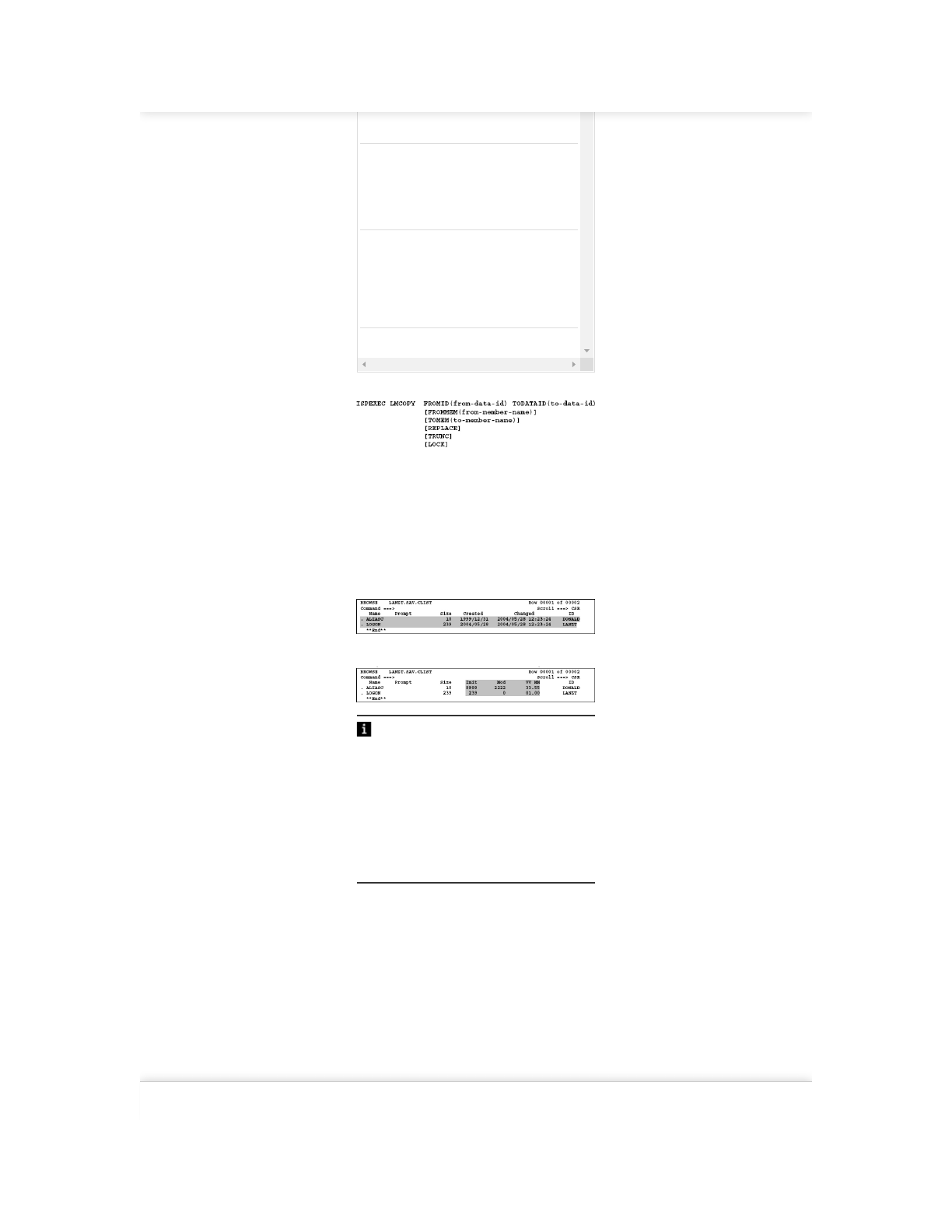
Program 8.6: LMMSTATS example
Prior to the creation of statistics, the existing values are deleted (lines 09 and 14).
On line 12, the statistics for the member login are created without any indication
of parameters. In this case, the system searches for the values itself. The date and
time values are taken from the date of execution of the command. The number of
records in the data set and the user ID will also be determined and entered by the
system.
The following two displays show the member lists after the execution of the
above program:
Display 1: Normal view
Display 2: The alternative view after shift right using the PF11 key
Tips:
When you use LMMREP or LMMADD to create a new member, then it is easiest
to execute these commands with the STATS option NO, the default value, and
then right after that execute a call to LMMSTATS with no parameters. Make sure
in this case that you run a LMCLOSE before LMMSTATS because LMMSTATS
may only be applied to a DATAID not opened. This procedure has the advantage
that the LMMSTATS command determines the statistics values based on existing
physics and the present time itself.
When you use LMMREP or LMMADD you must, however, determine the values
yourself and set the corresponding variables. When using STATS (YES) in
LMMREP or LMMADD you need to previously fill some values, otherwise
nothing is entered.
8.1.16 LMCOMP – Compress a PDS
Function:
With LMCOMP, a PDS is compressed. A PDSE can and does not need be
compressed! If no compress exit is installed in the system, the program
LMCOMP uses IEBCOPY for the execution of COMPRESS.
Format:
ISPEXEC LMCOMP DATAID(data-id)
Before executing the command LMCOMP, a LMINIT command with the option
ENQ(EXCLU) must be executed.
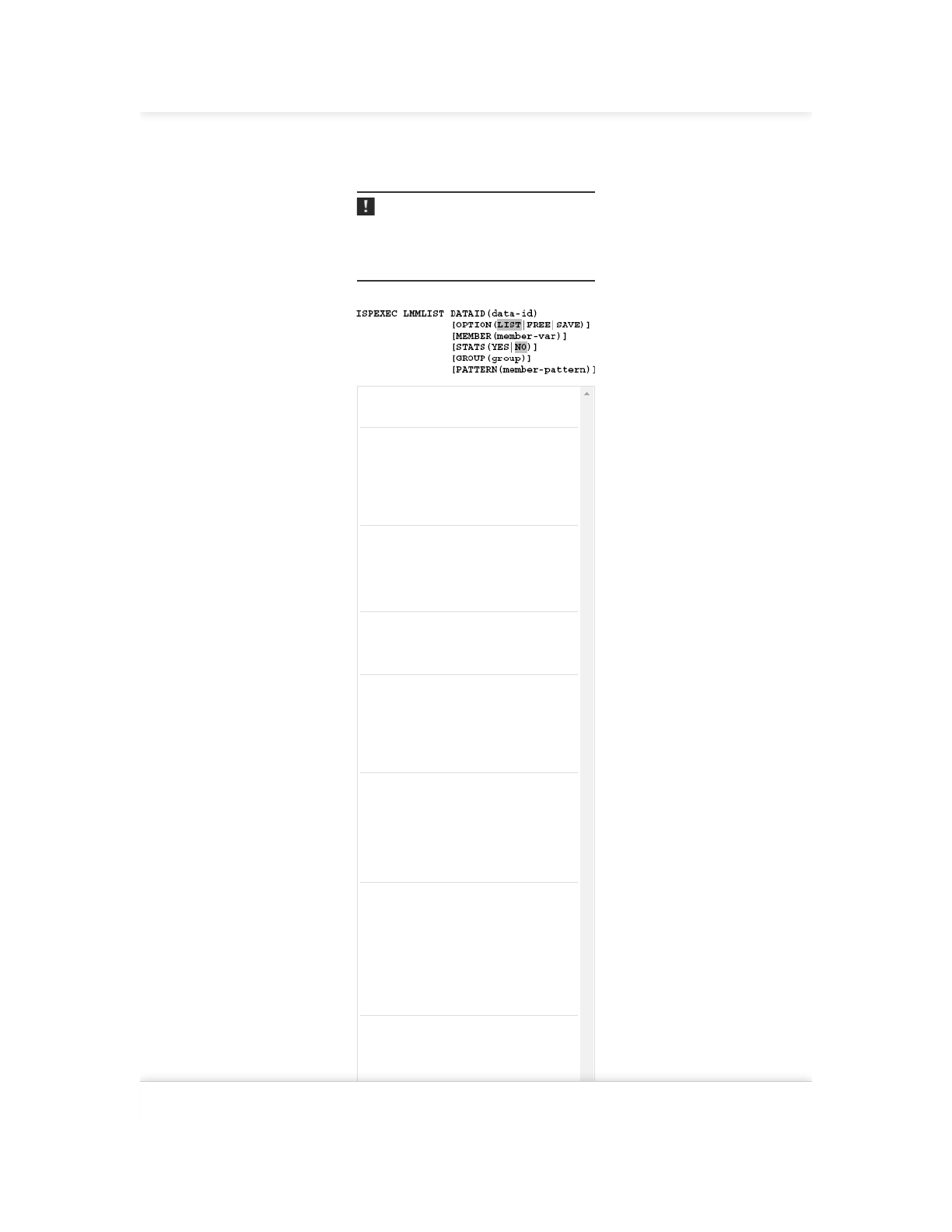
8.1.17 LMMLIST – Display a member list
Function:
If the LMMLIST service is executed with the LIST or the SAVE option, it will
generate a list of the first occurrence of a member in a concatenated data set. If
Find answers on the fly, or master something new. Subscribe today. See pricing options.
2/26/2019 8 Data set processing using ISPF - ISPF Programmer’s Guide
https://learning.oreilly.com/library/view/ispf-programmers-guide/9783110407655/xhtml/Ch08.xhtml 12/30
only one data set is specified in the TSO ALLOC statement that precedes the
LMINIT service, only the member names of this data set will be listed. When
LMMLIST is executed for first time in a program the content of the MEMBER
variable determines the touchdown point for the selection of members returned.
If the MEMBER variable contains a BLANK, then all member names of the PDS
will be returned.
Note:
LMMLIST returns for each call only the next name in ascending alphabetical sort
order in the PDS directory. Therefore, you must call LMMLIST in a loop if you
want to capture multiple members of a PDS. Before LMMLIST is used, the
LMINIT and LMOPEN service have to be run.
Format:
DATAID Variable name of DATAID from the
associated LMINIT.
OPTION(LIST) The first call of LMMLIST creates an
internal member list. If the member-var
is initialized with blanks, then LMMLIST
returns on each call the next member in
the list beginning with the first member in
the PDS. In this case, you successively get
all members contained in the PDS.
OPTION(FREE) FREE releases the occupied shared
memory. Whenever a loop for the
determination of member names is
completed, perform a single call to
LMMLIST with the FREE option to free
the occupied memory.
OPTION(SAVE) With the SAVE option, the list of members
is outputted to a data set. The GROUP
parameter defines the name of this data
set.
MEMBER Before the first call to LMMLIST, initially
specify in member-var the starting
position for the search for the members in
the member list. The member-var
contains after the call either the name of
the directly addressed member or the
name of the member that is found next.
STATS When YES is specified then, LMMLIST
stores for each member the member
statistics information in the
corresponding variables. A detailed
description of the member statistics
variable can be found in section 8.1.15
LMMSTATS – Display or change member
statistics on page 147.
GROUP Here, an up to eight characters long name
can be specified from which a DSN of a
data set is formed in which then, when
specifying OPTION(SAVE), the member
list is written. When the GROUP
parameter is omitted and OPTION(SAVE)
is specified, then the output of the
member names list is written in the LIST
data set of ISPF. The DSN will be formed
as follows: <prefix>.<group>.members.
PATTERN You can specify a mask here, which
determines the actually returned
members. The description of how the
mask must be set up, can be taken from
ISPF Services Guide.
Find answers on the fly, or master something new. Subscribe today. See pricing options.
2/26/2019 8 Data set processing using ISPF - ISPF Programmer’s Guide
https://learning.oreilly.com/library/view/ispf-programmers-guide/9783110407655/xhtml/Ch08.xhtml 13/30
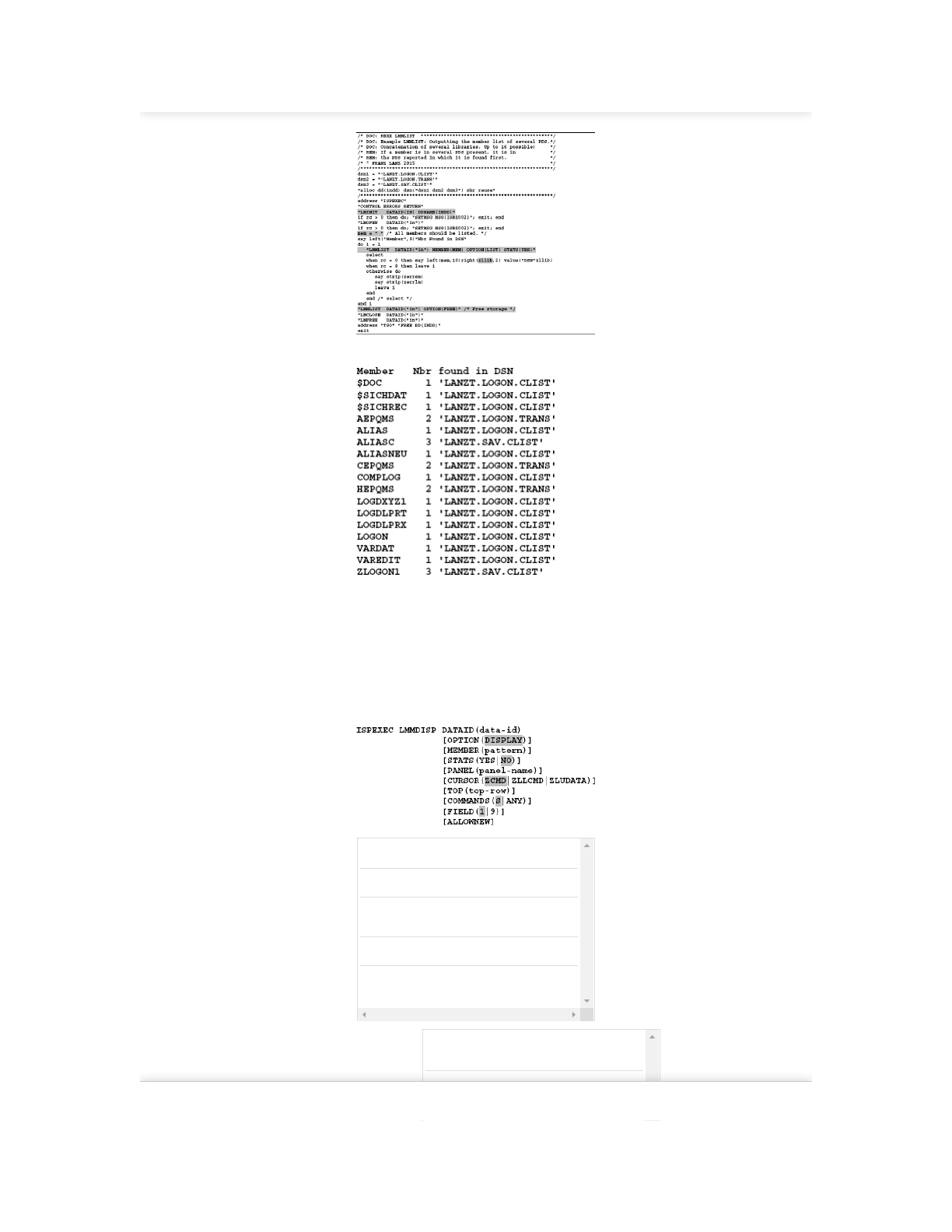
Program 8.7: LMMLIST example
I executed the above program and got the following output:
8.1.18 LMMDISP – Display and edit a member list
Function:
LMMDISP displays member names in an ISPF panel. In front of each member,
you can enter a command, which can be used for further processing in the
program. The members may also originate from a string of concatenated data
sets. LMMDISP has a very large scope of functions. I will only explain the
DISPLAY option here. If you are interested in other options, please take a look to
the brochure ISPF Dialog Services.
Format:
OPTION This option starts the display functionality.
MEMBER Here, a member selection mask can be specified.
STATS STATS(YES) specifies that LMMDISP returns
the statistic values for each selected member.
PANEL Determines an optional (own) panel for display.
CURSOR CURSOR defines at which position the cursor
should be displayed for the panel.
ZCMD The cursor is positioned on the command line
of the panel.
ZLLCMD The cursor is positioned at the beginning of the
first line of data.
Find answers on the fly, or master something new. Subscribe today. See pricing options.
2/26/2019 8 Data set processing using ISPF - ISPF Programmer’s Guide
https://learning.oreilly.com/library/view/ispf-programmers-guide/9783110407655/xhtml/Ch08.xhtml 14/30
ZLUDATA The cursor is positioned in the second input
field of the first row of data.
TOP This is a very complicated parameter. Here
the original text from the manual ISPF
Services Guide:
The name that designates which member is to
appear first on the display. If the member cannot
be found and the list is sorted by name, the
member immediately preceding the requested one
in the member list is scrolled to the top. If the list
is not sorted by name and the member is not
found, the list is scrolled to the top.
COMMANDS S means: Only S can be entered as a
selection code.
ANY means: Any selection codes can be
entered.
FIELD 1 Only single-character selection codes can
be entered.
9 Eight-character selection codes can be
entered. Nine-character commands are not
possible in ISPF.
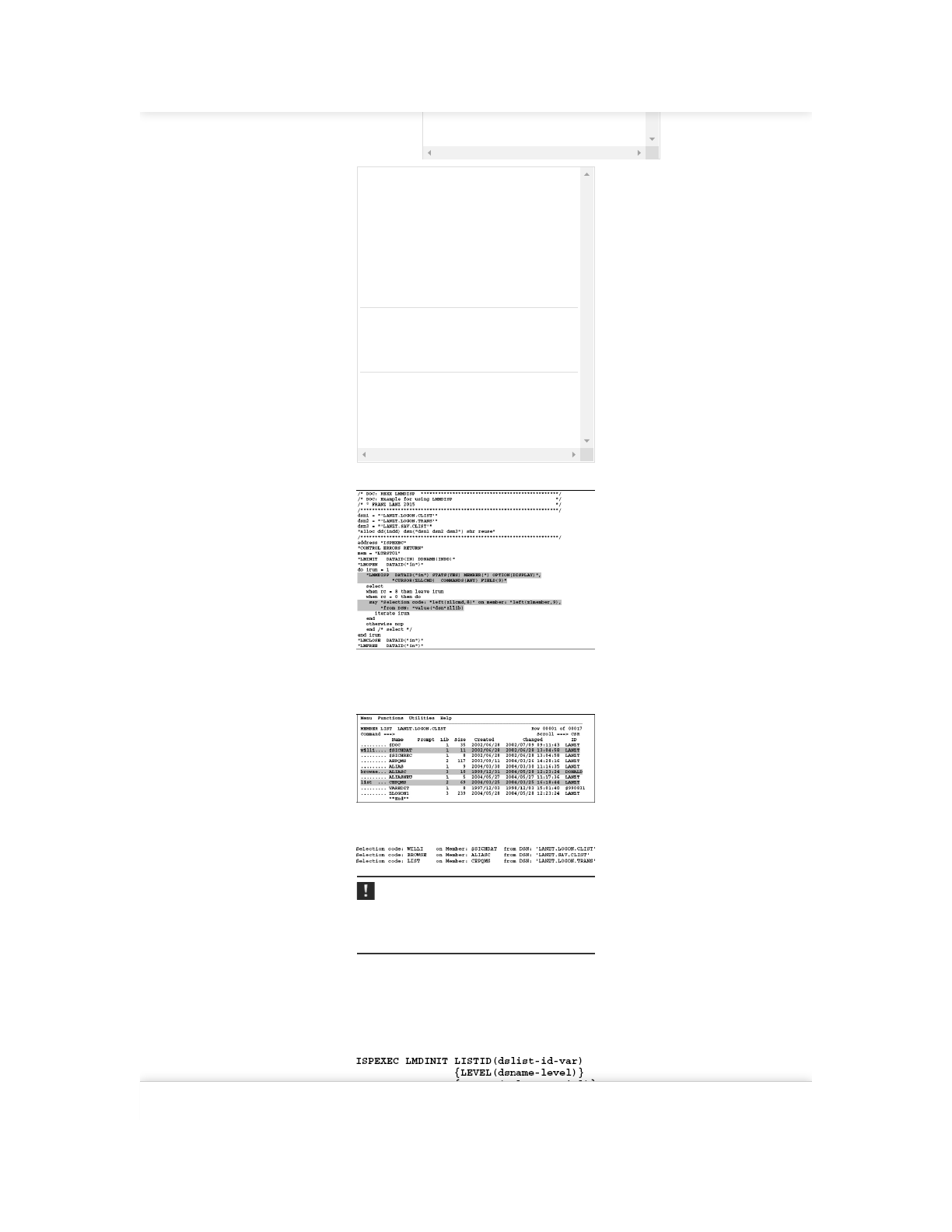
Program 8.8: LMMDISP example
I ran the program and entered a few commands. Expenditures incurred there can
be found behind the display of the panel.
Screen 8.1: LMMDISP panel display
I entered line commands in the panel display and then pressed the enter key and
three times. Successively the following lines appeared:
Note:
The column Lib in the panel shows the data sets position in the chain in which
the member is first found. The member may still occur, but often in the
underlying data sets of the chain.
8.1.19 LMDINIT – Initialize the LMDDISP service
Function:
The LMDINIT service generates a DATAID for a subsequent LMDDISP or
LMDLIST service.
Format:
Find answers on the fly, or master something new. Subscribe today. See pricing options.
2/26/2019 8 Data set processing using ISPF - ISPF Programmer’s Guide
https://learning.oreilly.com/library/view/ispf-programmers-guide/9783110407655/xhtml/Ch08.xhtml 15/30
LEVEL The dsname-level defines a mask for selecting
the DSNs. The rules for the design of the mask
are the same as in the ISPF menu 3.4.
VOLUME Here a VOLSER (a disk name) can be specified.
If a VOLSER is specified, the data sets are only
searched in the VTOC of this disk.
8.1.20 LMDDISP – Data set list service
Function:
The LMDDISP service displays a panel, which is similar to that in ISPF menu
3.4. The displayed DSNs are determined by the mask which is specified when
calling the command LMDINIT and must have been called before calling
LMDDISP.
Format:
LISTID Here the LISTID from an earlier performed
LMDINIT must be specified.
VIEW Here you can specify what additional
information should appear when displaying the
panel.
CONFIRM YES means: The confirm delete panel appears
always before the DELETE of a data set is
performed.
NO means: The confirm delete panel appears
only when a data set should be deleted, which
expiration date has still not expired.
PANEL Here you can specify a panel that you want to
use instead of the default panel as used in ISPF
menu 3.4.
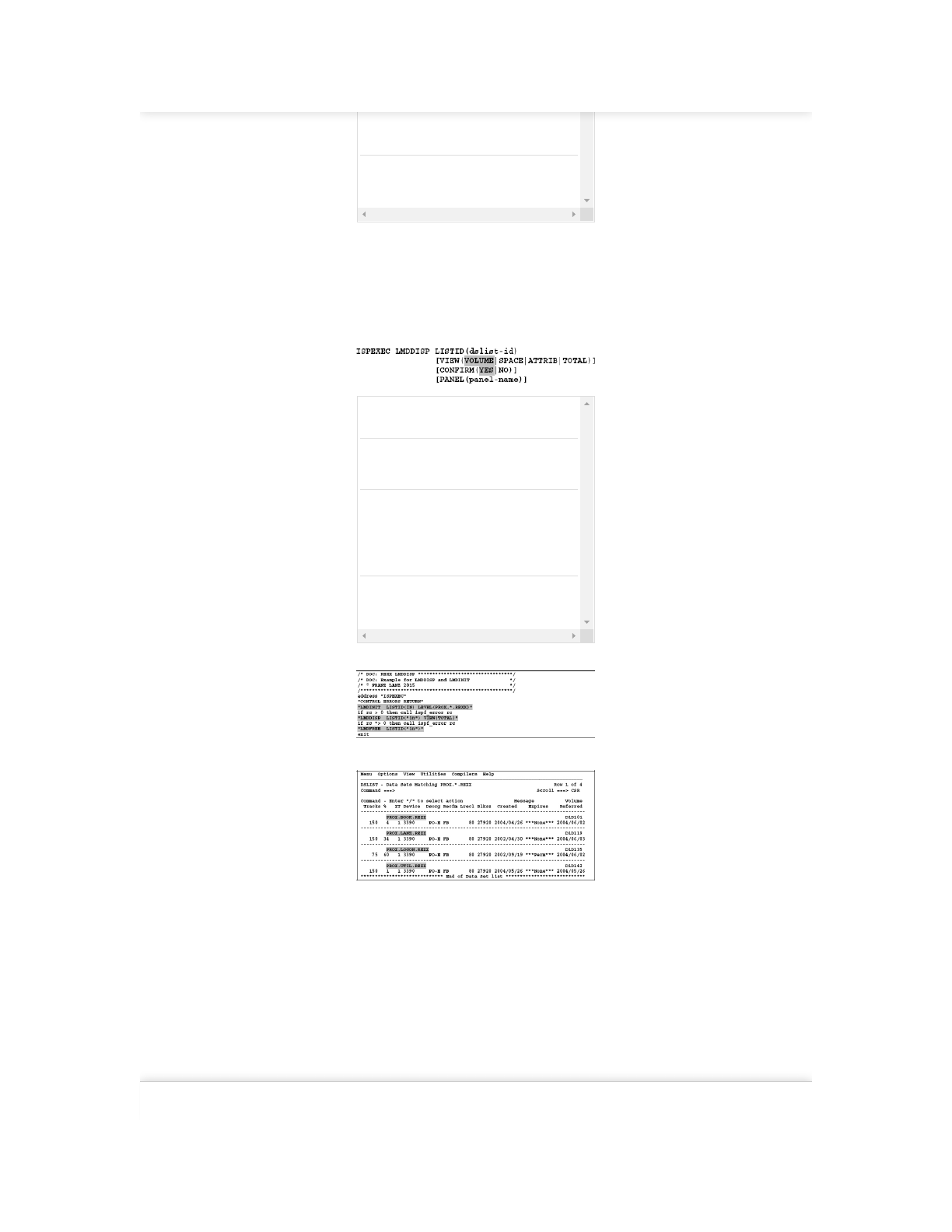
Program 8.9: LMDDISP – Display data sets in a panel
When the program executes, the following panel will be displayed:
Due to using the option VIEW(TOTAL) in the LMDDISP call, all data set
attributes are displayed.
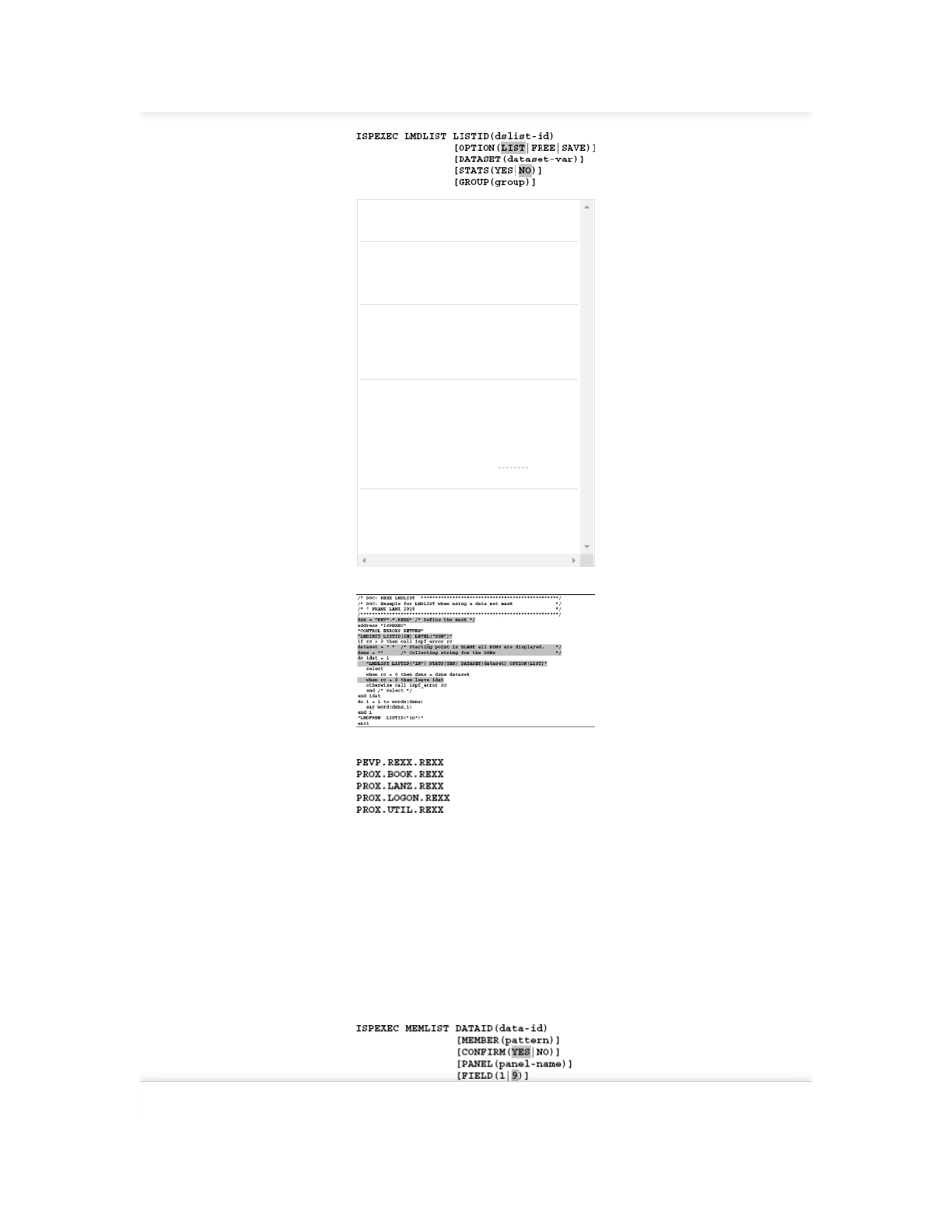
8.1.21 LMDLIST – List of data sets
Function:
This service works almost exactly like the LMDDISP service. The difference is
that each time you run the LMDLIST function selected by the mask, DSNs are
returned one at a time. The LMDINIT service must be executed prior to calling
LMDLIST service.
For return of the internally stored DSNs, you have two options:
– When using the LIST option, one name per call will be returned. Therefore,
in this way the LMDLIST command must be called so long in a loop until the
RC=8 occurs.
– When using the SAVE option, the DSNs are written to a data set. Of course,
in this case only one call is required.Find answers on the fly, or master something new. Subscribe today. See pricing options.
2/26/2019 8 Data set processing using ISPF - ISPF Programmer’s Guide
https://learning.oreilly.com/library/view/ispf-programmers-guide/9783110407655/xhtml/Ch08.xhtml 16/30
Format:
LISTID Specifying the dslist-id from the LMDINIT
statement.
OPTION The description of these options is very
complicated and extensive. Please see this in the
brochure ISPF Services Guide. A simple
example of using LMDLIST is shown below.
DATASET Before the first call to LMDLIST you must
initialize dataset-var with a DSN mask. At
each return from LMDLIST, this variable
contains the name of the next DSN found in the
list.
STATS If you set STATS(YES) then for each returned
DSN, the statistic information of the data set is
returned in special variables. Please see the
descriptions of the variables in the brochure
ISPF Services Guide. See also section 8.1.15
LMMSTATS – Display or change member
statistics on page 147 and Table 8.3: Variables
returned by the LMDLIST service on page 161.
GROUP If you entered OPTION(SAVE), then you must
specify a 8-character value. The data set list is
then written into a data set. Its name is built up
as follows: <prefix>.<group>.DATASET.
Program 8.10: LMDLIST example
The above program prints out the follwing list:
8.1.22 LMDFREE – Free a LISTID
Function:
Release a resource that was initialized with LMDINIT.
Format:
ISPEXEC LMDFREE LISTID(list-id)
8.1.23 MEMLIST – member list dialog service
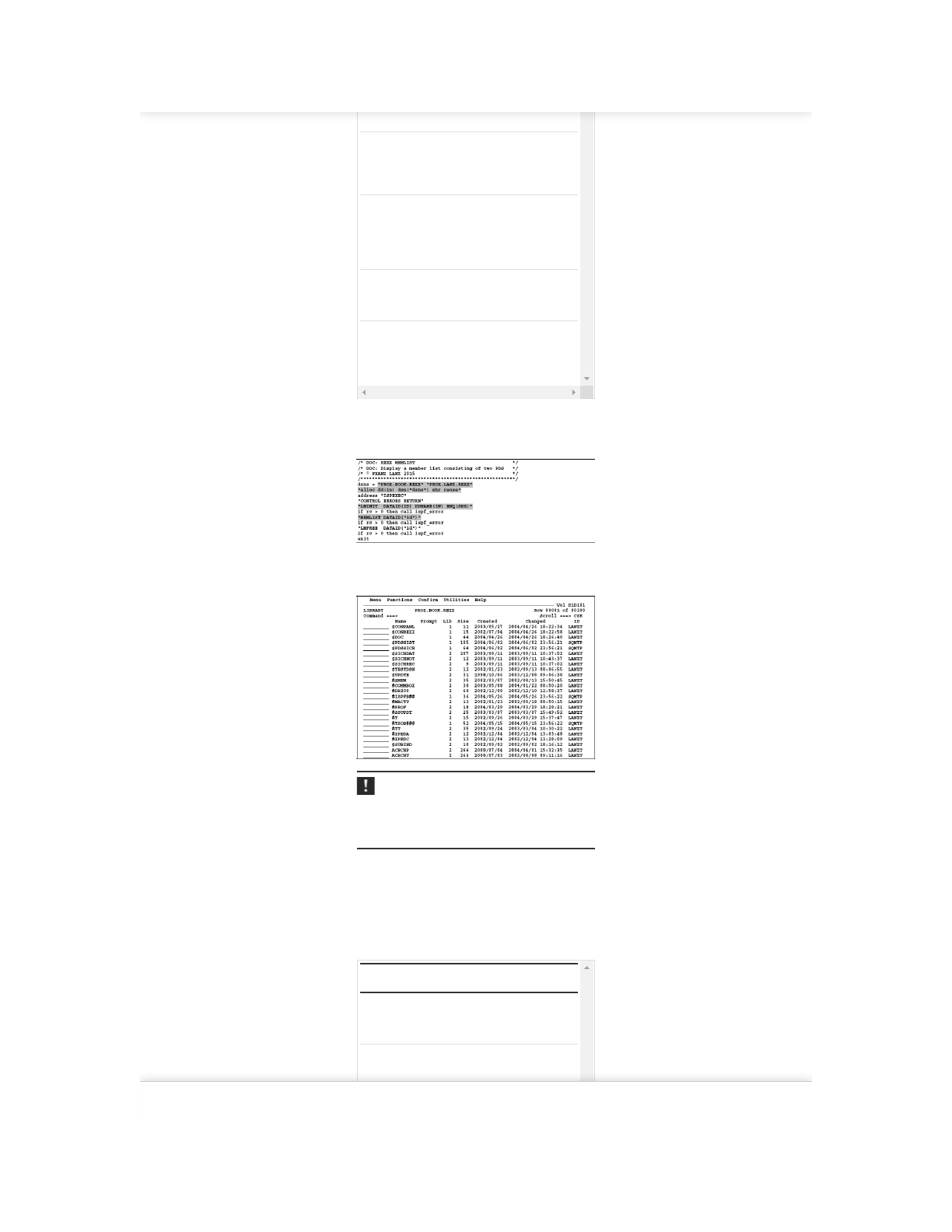
The MEMLIST service displays a panel that displays the members of one or
more PDS. In front of each member commands can be entered like in the panel of
an ISPF menu 3.4/M screen. The LMINIT service must be executed before
calling the MEMLIST service.
Format:
DATAID Specify the DATAID from the associated
Find answers on the fly, or master something new. Subscribe today. See pricing options.
2/26/2019 8 Data set processing using ISPF - ISPF Programmer’s Guide
https://learning.oreilly.com/library/view/ispf-programmers-guide/9783110407655/xhtml/Ch08.xhtml 17/30
LMINIT service call.
MEMBER A mask for the selection of member names can
be specified here. If there is no mask specified,
all members of the PDS appear in the displayed
panel.
CONFIRM If YES is active, the confirm delete panel
appears after entering a delete command in
front of a member and before the deletion is
performed. Otherwise, the deletion will be
executed immediately.
PANEL You can specify the name of a panel here that
you want to use instead of the default panel for
the display of the member list.
FIELD Defines the length of the line command fields.
If 1 is specified, only single digit line commands
such as B, E, V, etc. can be entered. See also the
command LMMDISP service on page 153.
In the following example, by using ALLOC and LMINIT, an access to a chain of
two PDS will be defined.
Program 8.11: Display a MEMLIST consisting of two data sets
When calling this program, the following panel is displayed:
Screen 8.2: MEMLIST display
Note:
The column Lib in the panel shows the data set position in the chain in which the
member is first found. However, the member may still occur very often in the
data sets further down in the chain.
8.2 DATA SET QUERY SERVICES
In programming of ISPF applications, you very often need information about
data sets. Unfortunately, there is no service that will deliver all data set
characteristics in one call. If you need ALL information about a data set, you
have to call even three services. See following table:
Table 8.2: Data set query services
Function System Description
LMDLIST ISPF This service is the only data set
list service that returns the HSM
migration status.
DSINFO ISPF This service provides a very
comprehensive overview of the
characteristics of a data set.
LISTDSI REXX This service almost provides the
Find answers on the fly, or master something new. Subscribe today. See pricing options.

2/26/2019 8 Data set processing using ISPF - ISPF Programmer’s Guide
https://learning.oreilly.com/library/view/ispf-programmers-guide/9783110407655/xhtml/Ch08.xhtml 18/30
same information as DSINFO, but
some of the information is to use
something better.
8.2.1 LMDLIST – Data set list service
This service is described already earlier in section 8.1.21 LMDLIST – List of
data sets on page 157. The following table lists the names and contents of the
variables that are provided when invoking the service with the STATS(YES)
option.
Table 8.3: Variables returned by the LMDLIST service
Variable Description
ZDLVOL Volume serial number
ZDLDEV Device type
ZDLDSORG Data set organization
ZDLRECFM Record format
ZDLLRECL Logical record length
ZDLBLKSZ Block size
ZDLSIZE Data set size in tracks
ZDLUSED Used space in % (PDSE only).
ZDLEXT Number of blocks of the data set.
ZDLCDATE Creation date
ZDLEDATE Expiration date
ZDLRDATE Date last referenced
ZDLMIGR HSM migration status (YES or NO)
ZDLDSNTP Data set type. (‘PDS’, ‘LIBRARY’, or ‘ ’
ZDLSPACU Units of the size specified (CYLINDERS,
TRACKS, BLOCKS)
ZDLMVOL Specifies whether this data set spans over
multiple volumes. (Y or N)
Remark:
The LMDLIST service is the only service that returns the information on the
migration status of a data set. Therefore, I marked the variable ZDLMIGR.
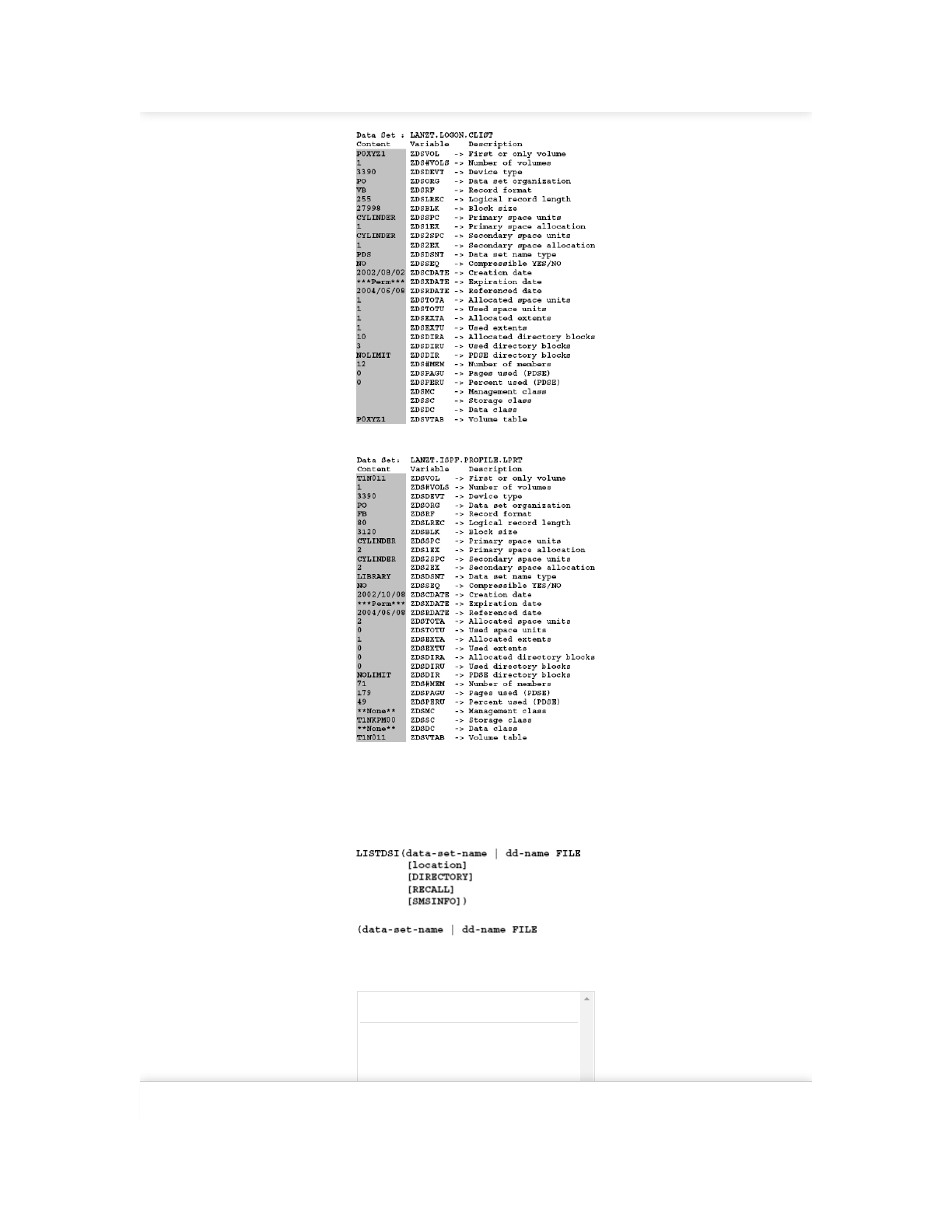
8.2.2 DSINFO – ISPF service which provides data set information
This service mainly provides the same information as the REXX function
LISTDSI.
Format:
DATASET DSNAME is the name of the dataset for the
information be returned.
VOLUME VOLSER is the volume serial number (disk
name) on which the data set is located. Specify
this parameter only when the data set is not
cataloged. The following table shows the
variables that this service returns.
Find answers on the fly, or master something new. Subscribe today. See pricing options.

2/26/2019 8 Data set processing using ISPF - ISPF Programmer’s Guide
https://learning.oreilly.com/library/view/ispf-programmers-guide/9783110407655/xhtml/Ch08.xhtml 19/30
Table 8.4: DSINFO variables content
Variable Description
ZDSVOL VOLSER of the first or only volume
ZDS#VOLS Number of volumes over which the data set
extends
ZDSDEVT Device type
ZDSORG DSORG (PS or PO)
ZDSRF Record format (RECFM)
ZDSLREC Record length (LRECL)
ZDSBLK Block size (BLKSIZE)
ZDSSPC Primary space units
ZDS1EX Primary space allocated
ZDS2SPC Secondary space unit
ZDS2EX Secondary space allocated
ZDSDSNT Data set name type
ZDSSEQ Compressible YES/NO
ZDSCDATE Creation date
ZDSXDATE Expiration date
ZDSRDATE Last referenced ate
ZDSTOTA Units of allocated space
ZDSTOTU Used space units
Variable Description
ZDSEXTA Allocated extents
ZDSEXTU Used extents
ZDSDIRA Allocated directory blocks (PDS only)
ZDSDIRU Used directory blocks (PDS only)
DZSDIR Always NOLIMIT for PDSE
ZDS#MEM Number of members
DZSPAGU Number of used pages of a PDSE
ZDSPERU % used space of a PDSE
ZDSMC SMS – Management class
ZDSSC SMS – Storage class
ZDSDC SMS – Data class
ZDSCB1 Format 1 data control block
ZDSVTAB String of volsers of all used disks
Find answers on the fly, or master something new. Subscribe today. See pricing options.
2/26/2019 8 Data set processing using ISPF - ISPF Programmer’s Guide
https://learning.oreilly.com/library/view/ispf-programmers-guide/9783110407655/xhtml/Ch08.xhtml 20/30
Example 1: PDS not SMS managed
Example 2: PDSE SMS managed
8.2.3 LISTDSI – REXX function to list data set information
Function:
LISTDSI is a TSO/REXX function. Depending on the call type, it provides
different information about data sets.
Format:
Data set name or DD name. If a DD name is specified, FILE must also be
specified. You must use the DD name notation when the REXX program runs in
a batch job and a DD statement specifies the data set.
location This option is normally not used.
DIRECTORY The option DIRECTORY specifies whether
the requested directory information of a
PDS/PDSE is stored in the corresponding
variables. When NODIRECTORY or nothing
is specified, then this information will not be
returned. DIRECTORY should only specified
if the corresponding information is really
Find answers on the fly, or master something new. Subscribe today. See pricing options.

2/26/2019 8 Data set processing using ISPF - ISPF Programmer’s Guide
https://learning.oreilly.com/library/view/ispf-programmers-guide/9783110407655/xhtml/Ch08.xhtml 21/30
needed because determination of the
directory information takes a long time.
RECALL When entering RECALL, then a data set that
is HSM migrated is loaded back to the
normal disk environment. NORECALL is the
default value.
SMSINFO When you type the SMSINFO option, then
the SMS information about this data set will
be determined and set into the appropriate
variables. Because this option causes much
more work by the system, you should use this
option only when you need the information.
NOSMSINFO is the default value.
Variables set by LISTDSI:
The following table shows the variables that are set by LISTDSI. This is an
excerpt from the IBM brochure TSO/E REXX Reference. For VSAM data sets,
only the variables SYSVOLUME, SYSUNIT and SYSDSORG are set. All other
variables contains a question mark (?).
Table 8.5: LISTDSI – Variables and their contents
Variable
name
Description
SYSDSNAME Data set name
SYSVOLUME Volume serial ID
SYSUNIT Generic device type on which volume
resides, for e example 3390.
SYSDSORG Data set organization:
PS Physical sequential
PSU Physical sequential unmovable
DA Direct organization
DAU Direct organization unmovable
IS Indexed sequential
ISU Indexed sequential unmovable
OP Partitioned organization
POU Partitioned organization unmovable
VS VSAM
??? Unknown
SYSLRECL Logical record length
SYSBLKSIZE Block size
Variable
name
Description
SYSKEYLEN Key length
SYSALLOC Allocation, in space units
SYSUSED Allocation used, in space units. For a
partitioned data set extended (PDSE),
‘N/A’ will be returned see the description
Find answers on the fly, or master something new. Subscribe today. See pricing options.

2/26/2019 8 Data set processing using ISPF - ISPF Programmer’s Guide
https://learning.oreilly.com/library/view/ispf-programmers-guide/9783110407655/xhtml/Ch08.xhtml 22/30
of the variable SYSUSEDPAGES for used
space of a PDSE.
SYSUSEDPAGES The used space of a partitioned data set
extended (PDSE) in 4K pages.
SYSPRIMARY Primary allocation in space units
SYSSECONDS Secondary allocation in space units
SYSREASON LISTDSI reason code
SYSMSGLVL1 First-level message if an error occurred
SYSMSGLVL2 Second-level message if an error
occurred
SYSRECFM Record format one to six character
combination of the following:
U Records of undefined length
F Records of fixed length
V Records of variable length
B Records blocked
S Records written as standard or
spanned variable-length blocks
A Records contain ASCII control
characters
M Records contain machine code
control characters
?????? Unknown
SYSUNITS Space units:
CYLINDER Space units in cylinders
TRACK Space units in tracks
BLOCK Space units in blocks ????????
Space units are unknown
SYSEXTENTS Number of extents allocated
SYSCREATE Creation date Year/day format, for
example: 1990/102
SYSREFDATE Last referenced date in Year/day format,
for example: 1990/107 (Specifying
DIRECTORY causes the date to be
updated
SYSEXDATE Expiration date in Year/day format, for
example: 1990/365
SYSPASSWORD Password indication:
NONE No password protection
READ Password required to read
WRITE Password required to write
SYSRACFA RACF indication:
NONE No RACF protection
Find answers on the fly, or master something new. Subscribe today. See pricing options.

2/26/2019 8 Data set processing using ISPF - ISPF Programmer’s Guide
https://learning.oreilly.com/library/view/ispf-programmers-guide/9783110407655/xhtml/Ch08.xhtml 23/30
GENERIC Generic profile covers this
data set
DISCRETE Discrete profile covers this
data set
SYSUPDATED Change indicator:
YES Data set has been updated
NO Data set has not been updated
SYSTRKSCYL Tracks per cylinder for the unit identified
in the SYSUNIT variable
Variable name Description
SYSBLKSTRK Blocks (whose size is given in variable
SYSBLKSIZE) per track for the unit
identified in the SYSUNIT variable. For
a PDSE, the value “N/A” is returned
because a block of size SYSBLKSIZE
can ‘span’ a track in a PDSE. The value
contained in SYSUSEDPAGES is a more
meaningful measurement of space
usage for a PDSE.
SYSRACFA RACF indication:
NONE No RACF protection
GENERIC Generic profile covers this
data set
DISCRETE Discrete profile covers this
data set
SYSUPDATED Change indicator:
YES Data set has been updated
NO Data set has not been updated
SYSTRKSCYL Tracks per cylinder for the unit
identified in the SYSUNIT variable
SYSBLKSTRK Blocks (whose size is given in variable
SYSBLKSIZE) per track for the unit
identified in the SYSUNIT variable. For
a PDSE, the value “N/A” is returned
because a block of size SYSBLKSIZE
can ‘span’ a track in a PDSE. The value
contained in SYSUSEDPAGES is a more
meaningful measurement of space
usage for a PDSE.
SYSADIRBLK For a partitioned data set (PDS) the
number of directory blocks allocated
will be returned. For a partitioned data
set extended (PDSE), “NO_LIM” will be
returned because there is no static
allocation for its directory. A value is
returned only if DIRECTORY is
specified on the LISTDSI statement.
SYSUDIRBLK For a partitioned data set (PDS) the
number of directory blocks used will be
returned. For a partitioned data set
extended (PDSE), "N/A" will be
returned because it is not a static value.
A value is returned only if DIRECTORY
is specified on the LISTDSI statement.
SYSMEMBERS Number of members – returned only
for partitioned data sets when
DIRECTORY is specified
Find answers on the fly, or master something new. Subscribe today. See pricing options.

2/26/2019 8 Data set processing using ISPF - ISPF Programmer’s Guide
https://learning.oreilly.com/library/view/ispf-programmers-guide/9783110407655/xhtml/Ch08.xhtml 24/30
SYSDSSMS Contains information about the type of
a data set, provided by DFSMS/MVS. If
the SMS DSNTYPE information could
not be retrieved, the SYSDSSMS
variable contains:
SEQ for a sequential data set
PDS for a partitioned data set
PDSE for a partitioned data set
extended.
If the data set is a PDSE and the SMS
DSNTYPE information could be
retrieved, the SYSDSSMS variable
contains:
LIBRARY for an empty PDSE
PROGRAM_LIBRARY for a
partitioned data set extended program
library
DATA_LIBRARY for a partitioned data
set extended data library.
SYSDATACLASS The SMS data class name – returned
only if SMSINFO is specified on the
LISTDSI statement and the data set is
managed by SMS.
SYSSTORCLASS The SMS storage class name – returned
only if SMSINFO is specified on the
LISTDSI statement and the data set is
managed by SMS.
SYSMGMTCLASS The SMS management class name –
returned only if SMSINFO is specified
on the LISTDSI statement and the data
set is managed by SMS.
If errors are detected in the LISTDSI call or when specific information is to be
returned, the variable SYSREASON contains a reason code as a numerical value.
The following table contains the description of the individual reason codes:
Table 8.6: LISTDSI – Description of reason codes
Code Description
1 error parsing LISTDSI statement.
2 dynamic allocation (SVC 99) error.
3 data set type prohibits its being processed.
4 error extracting unit name.
5 data set is not cataloged.
6 error obtaining data set name from VTOC.
7 error finding device type.
8 data set is not on DASD.
9 HSM migrated data set & NORECALL was
specified.
11 Directory info was asked for but user ID has
insufficient, access authority for this data set.
12 VSAM data set.
Find answers on the fly, or master something new. Subscribe today. See pricing options.

2/26/2019 8 Data set processing using ISPF - ISPF Programmer’s Guide
https://learning.oreilly.com/library/view/ispf-programmers-guide/9783110407655/xhtml/Ch08.xhtml 25/30
13 data set OPEN failed.
14 device type not found in UCB tables.
17 ABEND occurred.
18 partial data set information obtained.
19 multi-volume data set.
20 device type not found in EDT table.
21 catalog error prevented LOCATE completion.
22 volume not mounted.
23 I/O error during OBTAIN macro.
42 OBTAIN could not find data set in VTOC.
25 data set migrated off of DASD.
26 data set is on a mass storage device.
27 no volume serial number is allocated for this data
set.
28 DD name is invalid, must be 1 to 8 characters.
29 both data set name and filename were omitted on
call.
30 Data set is not SMS-managed.
31 ISITMGD macro returned with bad return code and
reason code. Return code and reason code can be
found in message IKJ58431I, which is returned in
variable &SYSMSGLVL2.
32 Unable to retrieve SMS information. DFSMS/MVS
has incorrect level.
33 Unable to retrieve SMS information. DFSMS/MVS
is not active.
34 Unable to retrieve SMS information. OPEN error.
35 Unexpected error from DFSMS/MVS internal
service IGWFAM.
36 Unexpected error from the SMS service module.
37 Unexpected error from DFSMS service IGGCSI00
Tips:
If you want to use the LISTDSI function in one of your programs, then you find
in the program SSC of the SMART ISPF utilities an internal subroutine named
DSLSTRC that contains the appropriate description for each reason code. You
can copy this subroutine to your program.
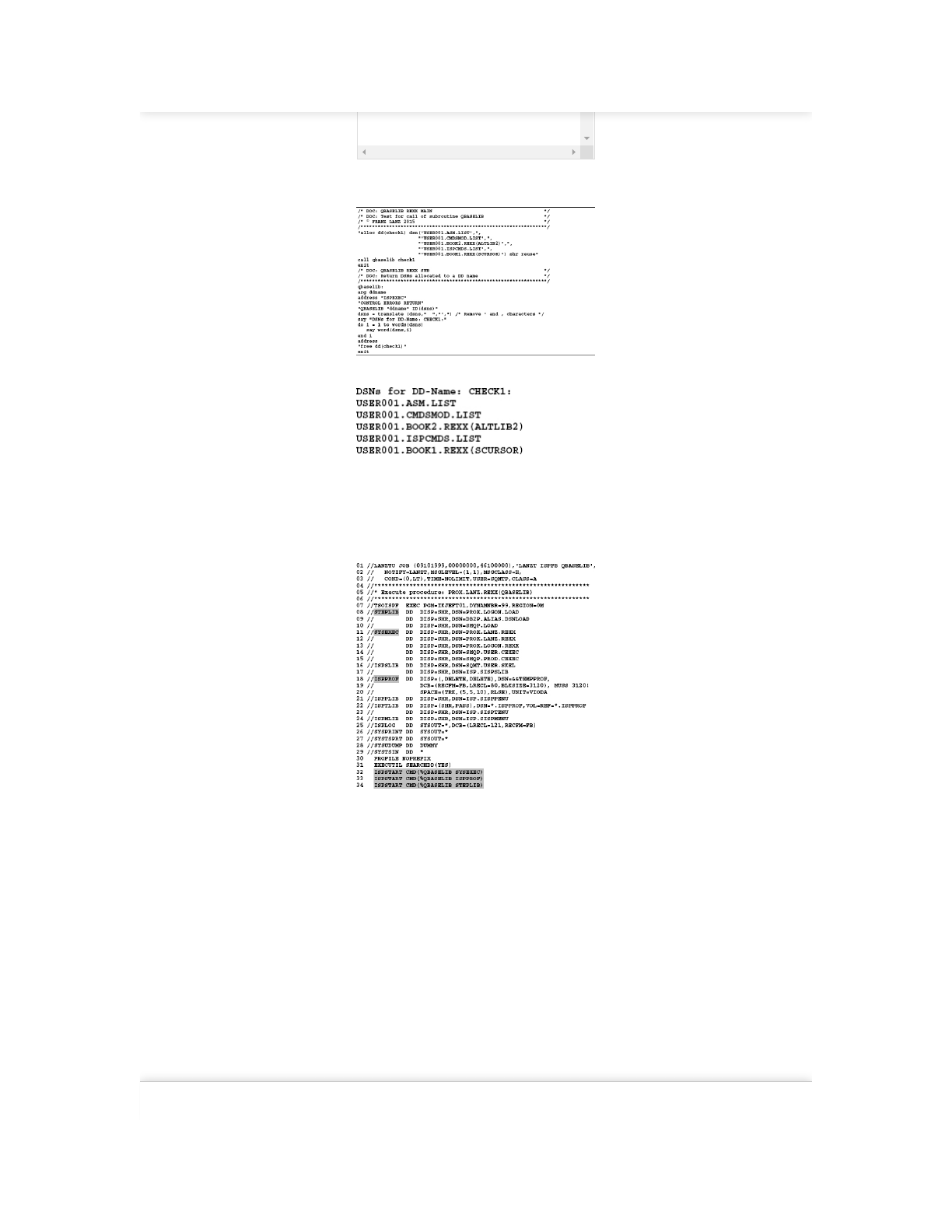
8.2.4 QBASELIB – Query DSN information
Function:
Returns the DSNs of an allocated DD name. Format:
Format:
ISPEXEC QBASELIB dd-name ID(id-var)
dd-
name
DD name.
Find answers on the fly, or master something new. Subscribe today. See pricing options.
2/26/2019 8 Data set processing using ISPF - ISPF Programmer’s Guide
https://learning.oreilly.com/library/view/ispf-programmers-guide/9783110407655/xhtml/Ch08.xhtml 26/30
ID The DSNs are stored by the function in this
string.
Example 1: Use of QBASELIB in an online allocation:
Program 8.12: Test of QBASELIB in an online call
The printed output:
Example 2: Use of QBASELIB in a batch job:
I have created and executed the following batch job. Because QBASELIB is an
ISPF service, the batch job has to build here in such a way, that ISPF commands
can be executed within the REXX program. We have already dealt with the issue
in ISPF batch jobs in detail.
JCL 8.5: QBASELIB function used in a batch job
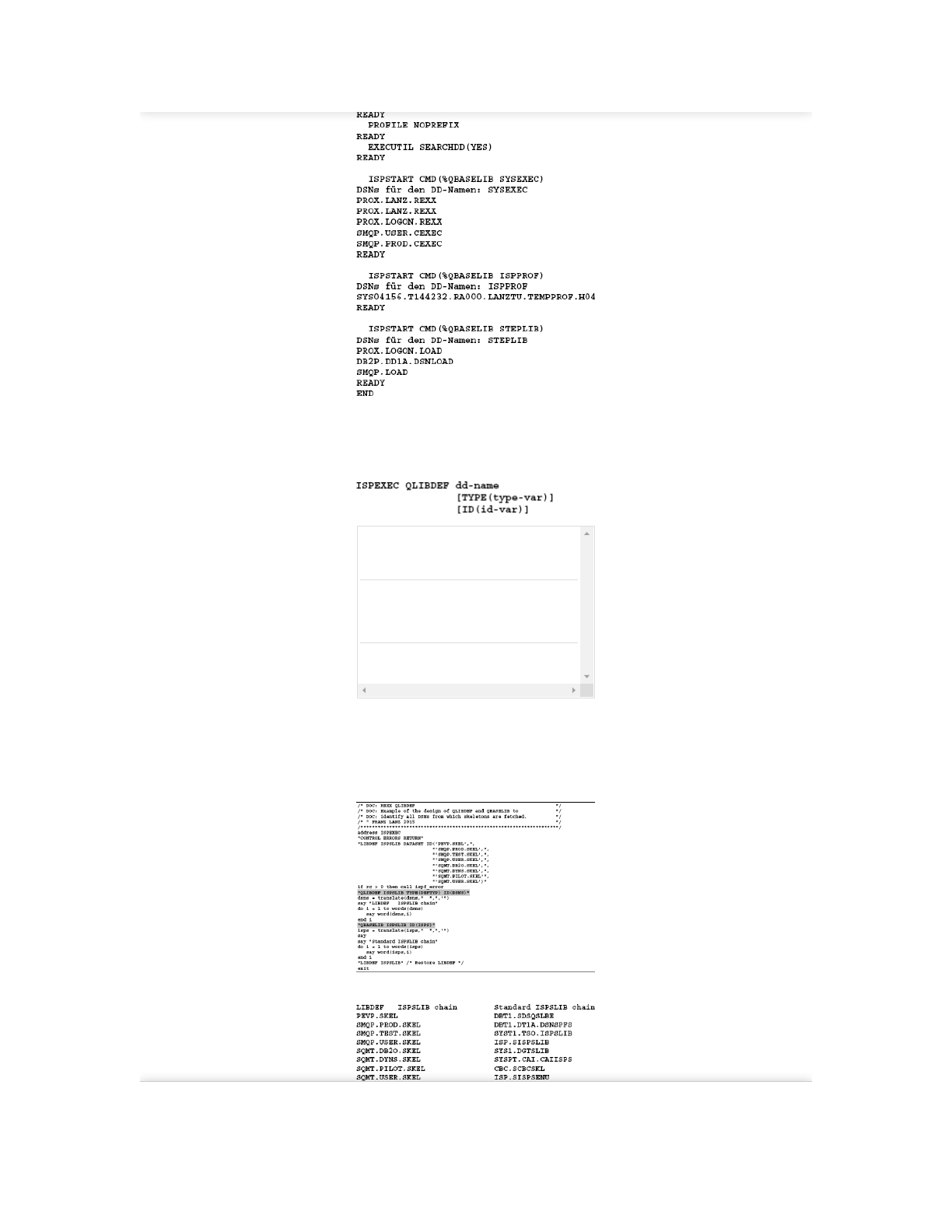
In lines 32 through 34 are respectively the ISPF started while the REXX program
QBASELIB was called with a DD name as a parameter.
During execution of the job, SYSTSPRT puts out the following lists:
Find answers on the fly, or master something new. Subscribe today. See pricing options.
2/26/2019 8 Data set processing using ISPF - ISPF Programmer’s Guide
https://learning.oreilly.com/library/view/ispf-programmers-guide/9783110407655/xhtml/Ch08.xhtml 27/30
8.2.5 QLIBDEF – Query LIBDEF Information Function:
QLIBDEF returns the DSNs of an active LIBDEF chain. If there is no LIBDEF
chain for the entered ISPF library available, the return code is set to 4.
Format:
dd-
name
DD Name of the ISPF library. The value may be
ISPPLIB, ISPMLIB, ISPSLIB, ISPTLIB, ISPLLIB,
ISPILIB, ISPTABL and ISPFILE.
TYPE
ID
type-var is a variable where the QLIBDEF service
returns the definition type from the original LIBDEF
statement. The returned value can be DATASET,
EXCLDATA, LIBRARY or EXCLLIBR.
ID id-var is a variable into which the QLIBDEF service
stores the DSNs of active LIBDEF chain.
Example:
First executes the program a LIBDEF command for ISPSLIB (skeletons). Then
the existing LIBDEF chain for ISPSLIB is queried and displayed using
QLIBDEF. Then the function QBASELIB is executed to print the ISPSLIB chain
as well.
Program 8.13: QLIBDEF example
The output of the program (side by side):
8.2.6 QUERYENQ – ENQs determinationFind answers on the fly, or master something new. Subscribe today. See pricing options.

2/26/2019 8 Data set processing using ISPF - ISPF Programmer’s Guide
https://learning.oreilly.com/library/view/ispf-programmers-guide/9783110407655/xhtml/Ch08.xhtml 28/30
Function:
With QUERYENQ can you check whether any users are holding a particular
resource.
Format:
TABLE A freely chosen name for the ISPF table into
which this service stores its information about the
ENQs found. This table is returned to program in
open state and it must not exist before calling
QUERYENQ. The program must delete the table
at the end of the program with TBEND.
QNAME The user must define the type prior to the call of
the QUERYENQ in this variable. Query types can
be SYSDSN, SPFEDIT, SPFUSER etc. Normally,
an asterisk (*) is assigned. This means that all
query types are queried.
RNAME Before calling QUERYENQ this variable must
contain the name of the queried resource. This
can also be a generic mask ending with an
asterisk.
REQ The description for this value is very complex. I
refrain from taking this opportunity to give a
comprehensive explanation and always
recommend to keep the characters %* for use.
Look at the following example.
WAIT If you specify this option, only the currently
pending ENQ contentions will be issued. The
information in rname and qname has no
significance in this case.
LIMIT LIMIT is the number of rows that the function
maximally returns. The default value is 5000. The
specification of zero (0) cancels the limit.
SAVE If you specify an up to eight digits long name of a
DSN qualifier here, then the QUERYENQ service
writes the results to a data set with the following
name: prefix.userid.listid.ENQLIST.
XSYS Indicates that the XSYS=YES parameter should
be used on the GQSCAN macro call. This option
causes that all available LPARs are searched for
the resource, which may mean a lot of effort. If
you are interested in this option, please look at
the description of the GQSCAN macro.
Functioning of the QUERYENQ function
The QUERYENQ function generates an ISPF table which name is specified by
the TABLE parameter. After a successful call to QUERYENQ rows in the table
containing information on the ENQs are found. The following table is an excerpt
from the brochure ISPF Services Guide. It contains the column names that
appear in the returned ISPF table with their descriptions:
Table 8.7: Variables description of the QUERYENQ ISPF table
Name Size Descriptione
ZENJOB 8 Job or address space name holding
or requesting the ENQ
ZENQNAME 8 Qname portion of the ENQ
ZENRNAME 255 Rname portion of the ENQ
Find answers on the fly, or master something new. Subscribe today. See pricing options.

2/26/2019 8 Data set processing using ISPF - ISPF Programmer’s Guide
https://learning.oreilly.com/library/view/ispf-programmers-guide/9783110407655/xhtml/Ch08.xhtml 29/30
ZENDISP 5 SHARE or EXCLU
ZENHOLD 4 OWN or WAIT
ZENSCOPE 7 SYSTEM or SYSTEMS
ZENSTEP 7 STEP or blank
ZENGLOBL 6 GLOBAL or blank
ZENSYST 8 System name
ZENRESV 7 RESERVE or blank
Return codes of QUERYENQ:
The descriptions of the return codes that can occur after a call to QUERYENQ
have also been taken from the above brochure:
Table 8.8: QUERYENQ return codes
RC Description
0 Table returned or data set written, but XSYS
parameter was not specified and the system is running
in STAR mode. The data returned may not reflect all
ENQs on all systems.
2 Table returned or data set written.
4 Table returned but truncated due to limit.
8 No ENQs satisfy the request.
10 No ENQs satisfy the request, but XSYS parameter was
not specified and the system is running in STAR
mode. The data returned may not reflect all ENQs on
all systems.
12 Table creation error, parameter or other termination
error. See messages for more detail. This includes
services not available due to configuration table
restrictions.
14 The SAVE data set is in use by another user.
20 Severe error, including TBADD error or data set
creation errors.
Note:
Please note that even if a RC>0 appears, quite useful results can be returned.
When requesting the RC, you must always consider possible situations.
Example:
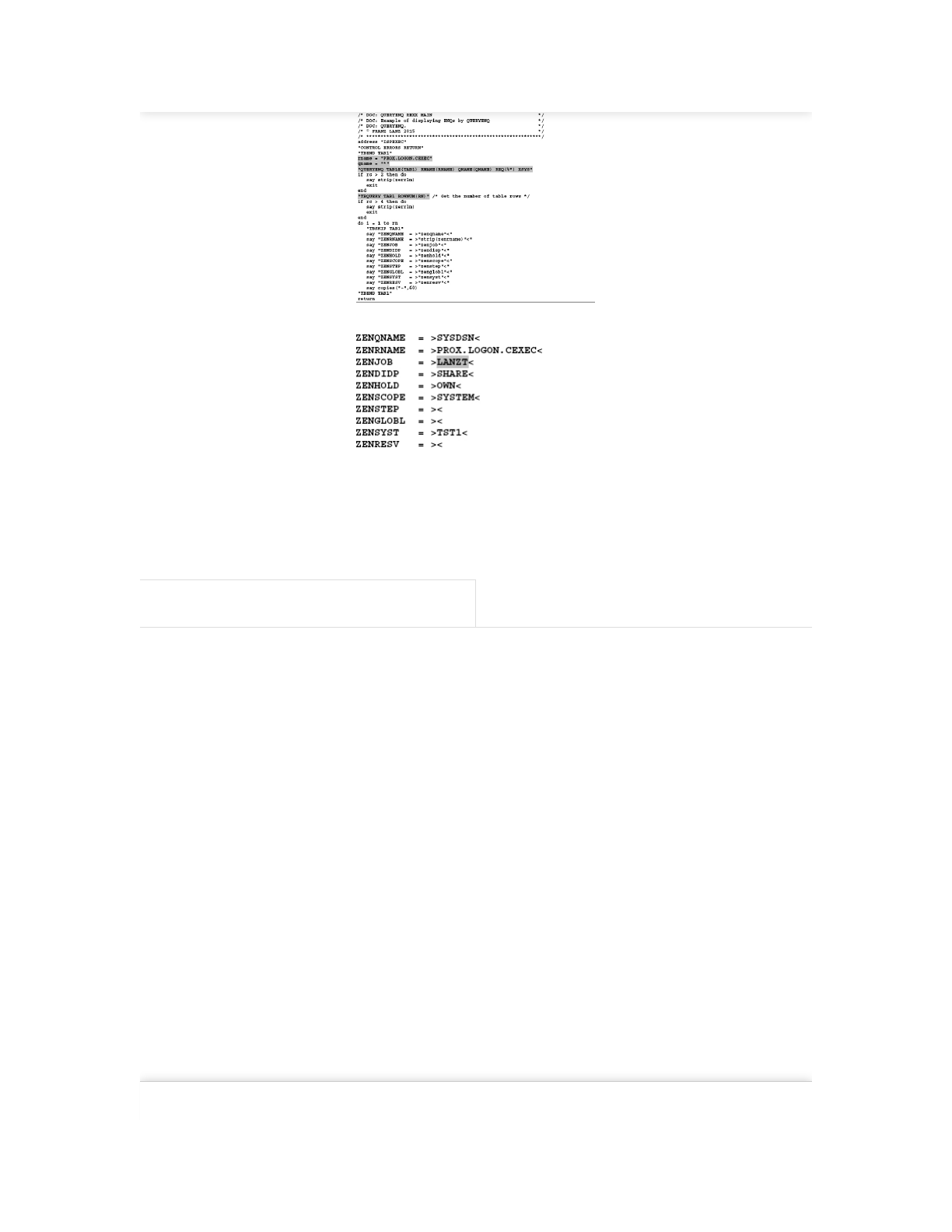
The following program investigates whether a specific data set has any ENQs.
Program 8.14: QUERYENQ example
Find answers on the fly, or master something new. Subscribe today. See pricing options.
2/26/2019 8 Data set processing using ISPF - ISPF Programmer’s Guide
https://learning.oreilly.com/library/view/ispf-programmers-guide/9783110407655/xhtml/Ch08.xhtml 30/30
Recommended / Playlists / History / Topics / Settings / Get the App / Sign Out
© 2019 Safari. Terms of Service / Privacy Policy
The program produced the following output:
As you can see, only the gray shaded user is currently using the data set.
PREV
7 Introduction to ISPF programming
⏮
NEXT
9 Messages – Definition, setting, output
⏭
Find answers on the fly, or master something new. Subscribe today. See pricing options.
