8.2.2.7 Packet Tracer Configuring OSPFv2 In A Single Area Instructions
8.2.2.7%20Packet%20Tracer%20-%20Configuring%20OSPFv2%20in%20a%20Single%20Area%20Instructions
8.2.2.7%20Packet%20Tracer%20-%20Configuring%20OSPFv2%20in%20a%20Single%20Area%20Instructions
User Manual:
Open the PDF directly: View PDF  .
.
Page Count: 2
© 2013 Cisco and/or its affiliates. All rights reserved. This document is Cisco Public. Page 1 of 2
Packet Tracer – Configuring OSPFv2 in a Single Area
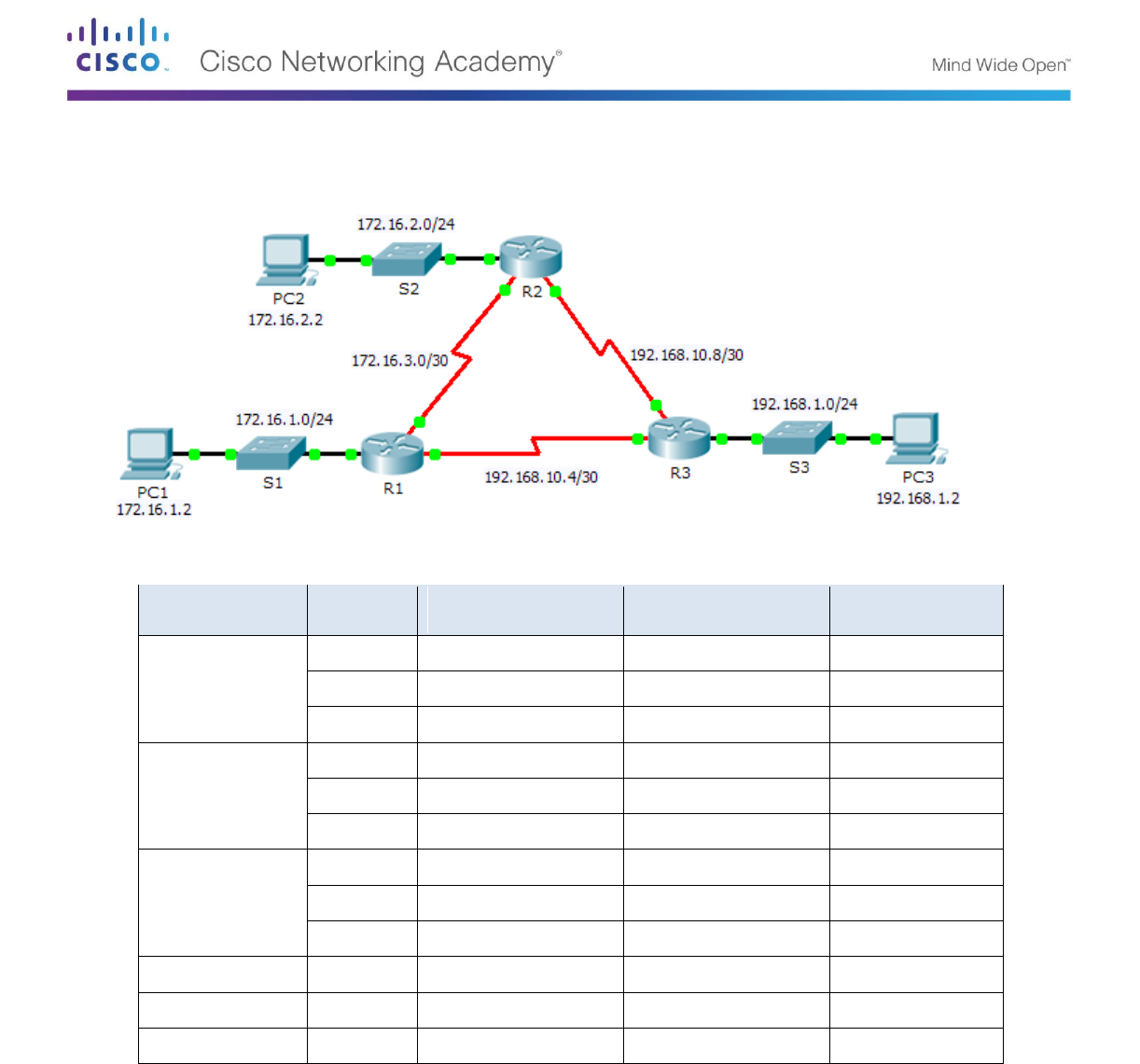
Topology
Addressing Table
Device
Interface
IP Address
Subnet Mask
Default Gateway
R1
G0/0
172.16.1.1
255.255.255.0
N/A
S0/0/0
172.16.3.1
255.255.255.252
N/A
S0/0/1
192.168.10.5
255.255.255.252
N/A
R2
G0/0
172.16.2.1
255.255.255.0
N/A
S0/0/0
172.16.3.2
255.255.255.252
N/A
S0/0/1
192.168.10.9
255.255.255.252
N/A
R3
G0/0
192.168.1.1
255.255.255.0
N/A
S0/0/0
192.168.10.6
255.255.255.252
N/A
S0/0/1
192.168.10.10
255.255.255.252
N/A
PC1
NIC
172.16.1.2
255.255.255.0
172.16.1.1
PC2
NIC
172.16.2.2
255.255.255.0
172.16.2.1
PC3
NIC
192.168.1.2
255.255.255.0
192.168.1.1
Objectives
Part 1: Configure OSPFv2 Routing
Part 2: Verify the Configurations
Background
In this activity, the IP addressing is already configured. You are responsible for configuring the three router
topology with basic single area OSPFv2 and then verifying connectivity between end devices.

Packet Tracer – Configuring OSPFv2 in a Single Area
© 2013 Cisco and/or its affiliates. All rights reserved. This document is Cisco Public. Page 2 of 2
Part 1: Configure OSPFv2 Routing
Step 1: Configure OSPF on the R1, R2 and R3.
Use the following requirements to configure OSPF routing on all three routers:
- Process ID 10
- Router ID for each router: R1 = 1.1.1.1; R2 = 2.2.2.2; R3 = 3.3.3.3
- Network address for each interface
- LAN interface set to passive (do not use the default keyword)
Step 2: Verify OSPF routing is operational.
On each router, the routing table should now have a route to every network in the topology.
Part 2: Verify the Configurations
Each PC should be able to ping the other two PCs. If not, check your configurations.
