Ing Guidelines Of Basic Software EA UML AUTOSAR TR BSWUML Guide
AUTOSAR_TR_BSWUMLingGuide
AUTOSAR_TR_BSWUMLingGuide
AUTOSAR_TR_BSWUMLingGuide
User Manual:
Open the PDF directly: View PDF  .
.
Page Count: 47
- 1 Scope of this Document
- 2 Related Documentation
- 3 Terms and abbreviations
- 4 Requirements on the modeling of the Basic Software
- 4.1 General
- 4.1.1 [TR_BSWUML_00017] UML 2.0
- 4.1.2 [TR_BSWUML_00065] Application of the BSW UML Profile
- 4.1.3 [TR_BSWUML_00001] Allowed elements
- 4.1.4 [TR_BSWUML_00002] Allowed relationships
- 4.1.5 [TR_BSWUML_00053] Allowed set of diagrams
- 4.1.6 [TR_BSWUML_00060] Documentation of elements
- 4.1.7 [TR_BSWUML_00047] Links between diagrams shall be hyperlinks
- 4.2 Structural Design
- 4.2.1 [TR_BSWUML_00054] Use of Packages
- 4.2.2 [TR_BSWUML_00003] Diagrams usage
- 4.2.3 [TR_BSWUML_00038] Component diagram appearance options
- 4.2.4 [TR_BSWUML_00039] Component diagram appearance of BSW module diagrams
- 4.2.5 [TR_BSWUML_00004] Header File Modeling
- 4.2.6 [TR_BSWUML_00005] Basic Software Module Modeling
- 4.2.7 [TR_BSWUML_00010] Component Definition
- 4.2.8 [TR_BSWUML_00009] Version numbers of software modules
- 4.2.9 [TR_BSWUML_00025] ‘Language’ definition of Components
- 4.2.10 [TR_BSWUML_00052] Interface creation
- 4.2.11 [TR_BSWUML_00006] Interface Modeling
- 4.2.12 [TR_BSWUML_00011] Accessing interfaces of other components
- 4.2.13 [TR_BSWUML_00027] Definition of structures
- 4.2.14 [TR_BSWUML_00026] Definition of enumerations
- 4.2.15 [TR_BSWUML_00028] Definition of simple types
- 4.2.16 [TR_BSWUML_00059] Definition of typedefs
- 4.2.17 [TR_BSWUML_00066] Definition of ranges for typedefs
- 4.2.18 [TR_BSWUML_00062] Definition of functions and callbacks
- 4.2.19 [TR_BSWUML_00068] Definition of parameters
- 4.2.20 [TR_BSWUML_00037] Definition of pointer types
- 4.2.21 [TR_BSWUML_00055] Use of parameter kind
- 4.2.22 [TR_BSWUML_00061] Definition of return type
- 4.2.23 [TR_BSWUML_00063] Definition of scheduled functions
- 4.2.24 [TR_BSWUML_00035] Sub elements of BSW modules
- 4.3 Behavioral Design
- 4.3.1 General
- 4.3.2 Sequence Diagrams
- 4.3.3 [TR_BSWUML_00057] Parameter values in sequence diagrams
- 4.3.4 State Machine Diagrams
- 4.3.4.1 [TR_BSWUML_00041] States shall have thick lines
- 4.3.4.2 [TR_BSWUML_00042] A trigger condition shall be defined for each transition
- 4.3.4.3 [TR_BSWUML_00043] Transitions may be modeled with sub-activities
- 4.3.4.4 [TR_BSWUML_00046] Links to parent diagrams shall be drawn as hyperlink diagram references
- 4.3.5 Activity Diagrams
- 4.4 Model synchronization
- 4.5 Documentation generation
- 4.1 General
- 5 BSW UML Profile
- 6 Administrative Info

Modeling Guidelines of Basic
Software EA UML Model
AUTOSAR Release 4.2.1
1 of 47 Document ID 117: AUTOSAR_TR_BSWUMLModelModelingGuide
- AUTOSAR confidential -
Document Title
Modeling Guidelines of Basic
Software EA UML Model
Document Owner
AUTOSAR
Document Responsibility
AUTOSAR
Document Identification No
117
Document Classification
Auxiliary
Document Status
Final
Part of AUTOSAR Release
4.2.1
Document Change History
Release
Changed by
Change Description
4.2.1
AUTOSAR
Release
Management
Editorial changes
4.1.1
AUTOSAR
Administration
Finalized for Release 4.1
3.1.4
AUTOSAR
Administration
Modeling of header files has been revised
Description of parameter modeling has been
reworked
Legal disclaimer revised
3.1.1
AUTOSAR
Administration
Legal disclaimer revised
3.0.1
AUTOSAR
Administration
Added description for range stereotype
Change Requirements for function parameter
and structure attributes
Document meta information extended
Small layout adaptations made
2.1.1
AUTOSAR
Administration
Usage of packages clarified
Sequence diagram modeling clarified
Legal disclaimer revised
2.0
AUTOSAR
Administration
Initial release

Modeling Guidelines of Basic
Software EA UML Model
AUTOSAR Release 4.2.1
2 of 47 Document ID 117: AUTOSAR_TR_BSWUMLModelModelingGuide
- AUTOSAR confidential -
Disclaimer
This specification and the material contained in it, as released by AUTOSAR, is for
the purpose of information only. AUTOSAR and the companies that have contributed
to it shall not be liable for any use of the specification.
The material contained in this specification is protected by copyright and other types
of Intellectual Property Rights. The commercial exploitation of the material contained
in this specification requires a license to such Intellectual Property Rights.
This specification may be utilized or reproduced without any modification, in any form
or by any means, for informational purposes only.
For any other purpose, no part of the specification may be utilized or reproduced, in
any form or by any means, without permission in writing from the publisher.
The AUTOSAR specifications have been developed for automotive applications only.
They have neither been developed, nor tested for non-automotive applications.
The word AUTOSAR and the AUTOSAR logo are registered trademarks.
Advice for users
AUTOSAR specifications may contain exemplary items (exemplary reference
models, "use cases", and/or references to exemplary technical solutions, devices,
processes or software).
Any such exemplary items are contained in the specifications for illustration purposes
only, and they themselves are not part of the AUTOSAR Standard. Neither their
presence in such specifications, nor any later documentation of AUTOSAR
conformance of products actually implementing such exemplary items, imply that
intellectual property rights covering such exemplary items are licensed under the
same rules as applicable to the AUTOSAR Standard.

Modeling Guidelines of Basic
Software EA UML Model
AUTOSAR Release 4.2.1
3 of 47 Document ID 117: AUTOSAR_TR_BSWUMLModelModelingGuide
- AUTOSAR confidential -
Table of Contents
1 Scope of this Document ............................................................................ 5
2 Related Documentation ............................................................................ 6
2.1 Deliverables of AUTOSAR work packages ............................................... 6
2.2 Related standards and norms ................................................................... 6
3 Terms and abbreviations .......................................................................... 7
4 Requirements on the modeling of the Basic Software .............................. 8
4.1 General ..................................................................................................... 8
4.1.1 [TR_BSWUML_00017] UML 2.0 ............................................................... 8
4.1.2 [TR_BSWUML_00065] Application of the BSW UML Profile .................... 8
4.1.3 [TR_BSWUML_00001] Allowed elements ................................................ 9
4.1.4 [TR_BSWUML_00002] Allowed relationships ......................................... 10
4.1.5 [TR_BSWUML_00053] Allowed set of diagrams .................................... 11
4.1.6 [TR_BSWUML_00060] Documentation of elements ............................... 11
4.1.7 [TR_BSWUML_00047] Links between diagrams shall be hyperlinks ..... 12
4.2 Structural Design .................................................................................... 13
4.2.1 [TR_BSWUML_00054] Use of Packages ............................................... 13
4.2.2 [TR_BSWUML_00003] Diagrams usage ................................................ 13
4.2.3 [TR_BSWUML_00038] Component diagram appearance options .......... 13
4.2.4 [TR_BSWUML_00039] Component diagram appearance of BSW module
diagrams ................................................................................................. 14
4.2.5 [TR_BSWUML_00004] Header File Modeling ........................................ 15
4.2.6 [TR_BSWUML_00005] Basic Software Module Modeling ...................... 16
4.2.7 [TR_BSWUML_00010] Component Definition ........................................ 16
4.2.8 [TR_BSWUML_00009] Version numbers of software modules .............. 17
4.2.9 [TR_BSWUML_00025] ‘Language’ definition of Components ................ 18
4.2.10 [TR_BSWUML_00052] Interface creation ............................................... 19
4.2.11 [TR_BSWUML_00006] Interface Modeling ............................................. 20
4.2.12 [TR_BSWUML_00011] Accessing interfaces of other components ........ 21
4.2.13 [TR_BSWUML_00027] Definition of structures ....................................... 21
4.2.14 [TR_BSWUML_00026] Definition of enumerations ................................. 22
4.2.15 [TR_BSWUML_00028] Definition of simple types ................................... 23
4.2.16 [TR_BSWUML_00059] Definition of typedefs ......................................... 24
4.2.17 [TR_BSWUML_00066] Definition of ranges for typedefs ........................ 24
4.2.18 [TR_BSWUML_00062] Definition of functions and callbacks .................. 25
4.2.19 [TR_BSWUML_00068] Definition of parameters .................................... 25
4.2.20 [TR_BSWUML_00037] Definition of pointer types .................................. 26
4.2.21 [TR_BSWUML_00055] Use of parameter kind ....................................... 27
4.2.22 [TR_BSWUML_00061] Definition of return type ..................................... 27
4.2.23 [TR_BSWUML_00063] Definition of scheduled functions ....................... 28
4.2.24 [TR_BSWUML_00035] Sub elements of BSW modules ......................... 28
4.3 Behavioral Design ................................................................................... 29
4.3.1 General ................................................................................................... 29
4.3.2 Sequence Diagrams ............................................................................... 30
4.3.3 [TR_BSWUML_00057] Parameter values in sequence diagrams .......... 31

Modeling Guidelines of Basic
Software EA UML Model
AUTOSAR Release 4.2.1
4 of 47 Document ID 117: AUTOSAR_TR_BSWUMLModelModelingGuide
- AUTOSAR confidential -
4.3.4 State Machine Diagrams ......................................................................... 35
4.3.5 Activity Diagrams .................................................................................... 39
4.4 Model synchronization ............................................................................ 41
4.4.1 [TR_BSWUML_00013] Creating a Design Master .................................. 41
4.4.2 [TR_BSWUML_00023] Design Master naming convention .................... 41
4.4.3 [TR_BSWUML_00014] Creating replicas from the Design Master ......... 42
4.4.4 [TR_BSWUML_00022] Replica naming convention ............................... 42
4.5 Documentation generation ...................................................................... 43
4.5.1 [TR_BSWUML_00067] Providing an alternative name for generated
tables ...................................................................................................... 43
5 BSW UML Profile .................................................................................... 44
5.1.1 Stereotypes callback, function and scheduled function........................... 44
5.1.2 Stereotypes module, type, typedef and structure .................................... 44
5.1.3 Stereotypes mandatory, configurable and optional ................................. 45
5.1.4 Stereotype range .................................................................................... 45
6 Administrative Info .................................................................................. 47

Modeling Guidelines of Basic
Software EA UML Model
AUTOSAR Release 4.2.1
5 of 47 Document ID 117: AUTOSAR_TR_BSWUMLModelModelingGuide
- AUTOSAR confidential -
1 Scope of this Document
This Modeling Guideline contains guidelines for the usage of the Enterprise Architect
UML Modeling Tool (EA) that is used for the detailed architecture design of the
AUTOSAR Basic Software.
Each guideline has its unique identifier starting with the prefix “TR_BSWUML_” (BSW
= Basic Software). For any review annotations, remarks or questions please refer to
this unique ID rather than chapter or page numbers!

Modeling Guidelines of Basic
Software EA UML Model
AUTOSAR Release 4.2.1
6 of 47 Document ID 117: AUTOSAR_TR_BSWUMLModelModelingGuide
- AUTOSAR confidential -
2 Related Documentation
2.1 Deliverables of AUTOSAR work packages
[1] List of Basic Software Modules
AUTOSAR_TR_BSWModuleList.pdf
[2] General Requirements on Basic Software Modules
AUTOSAR_SRS_BSWGeneral.pdf
[3] Layered Software Architecture
AUTOSAR_EXP_LayeredSoftwareArchitecture.pdf
2.2 Related standards and norms
[4] UML 2.0, Unified Modeling Language: Superstructure, Version 2.0, OMG
document formal/05-07-04."
Modeling Guidelines of Basic
Software EA UML Model
AUTOSAR Release 4.2.1
7 of 47 Document ID 117: AUTOSAR_TR_BSWUMLModelModelingGuide
- AUTOSAR confidential -
3 Terms and abbreviations
Terms
Definitions
BSW Module Component
Each BSW module is modeled using one “UML Component” and
several “Interface Classes” within the BSW UML model. The
“UML Component” represents the internal behavior or C-file(s) of
the BSW module. It is called “BSW Module Component”
UML Component
Model element defined by [4].
Interface class
UML 2.0 class with stereotype “interface”.
BSW Module Interface
Each BSW module is modeled using one “UML Component” and
several “Interface Classes” within the BSW UML model. The
“Interface classes” represent the header files of a specific BSW
module. They are called “BSW Module Interfaces”
Tree view
The “project view” window within the Enterprise Architect is
called “Tree view”.
Modeling Guidelines of Basic
Software EA UML Model
AUTOSAR Release 4.2.1
8 of 47 Document ID 117: AUTOSAR_TR_BSWUMLModelModelingGuide
- AUTOSAR confidential -
4 Requirements on the modeling of the Basic Software
4.1 General
4.1.1 [TR_BSWUML_00017] UML 2.0
ID:
TR_BSWUML_00017
Initiator:
WP Architecture
Date:
14.10.2004
Short Description:
UML 2.0 shall be used for modeling the BSW UML model.
Type:
Changed
Importance:
high
Description:
The UML specification 2.0 shall be used for modeling the AUTOSAR Basic
Software with the tool Enterprise Architect (EA).
Rationale:
Not defining new modeling techniques when there are techniques already
available and standardized.
Use Case:
Modeling the Basic Software of AUTOSAR.
Dependencies:
--
Conflicts:
--
Supporting Material:
--
Contributes to:
--
4.1.2 [TR_BSWUML_00065] Application of the BSW UML Profile
ID:
TR_BSWUML_00065
Initiator:
Technical Office
Date:
27.04.2007
Short Description:
BSW UML profile
Type:
Application of the BSW UML Profile
Importance:
high
Description:
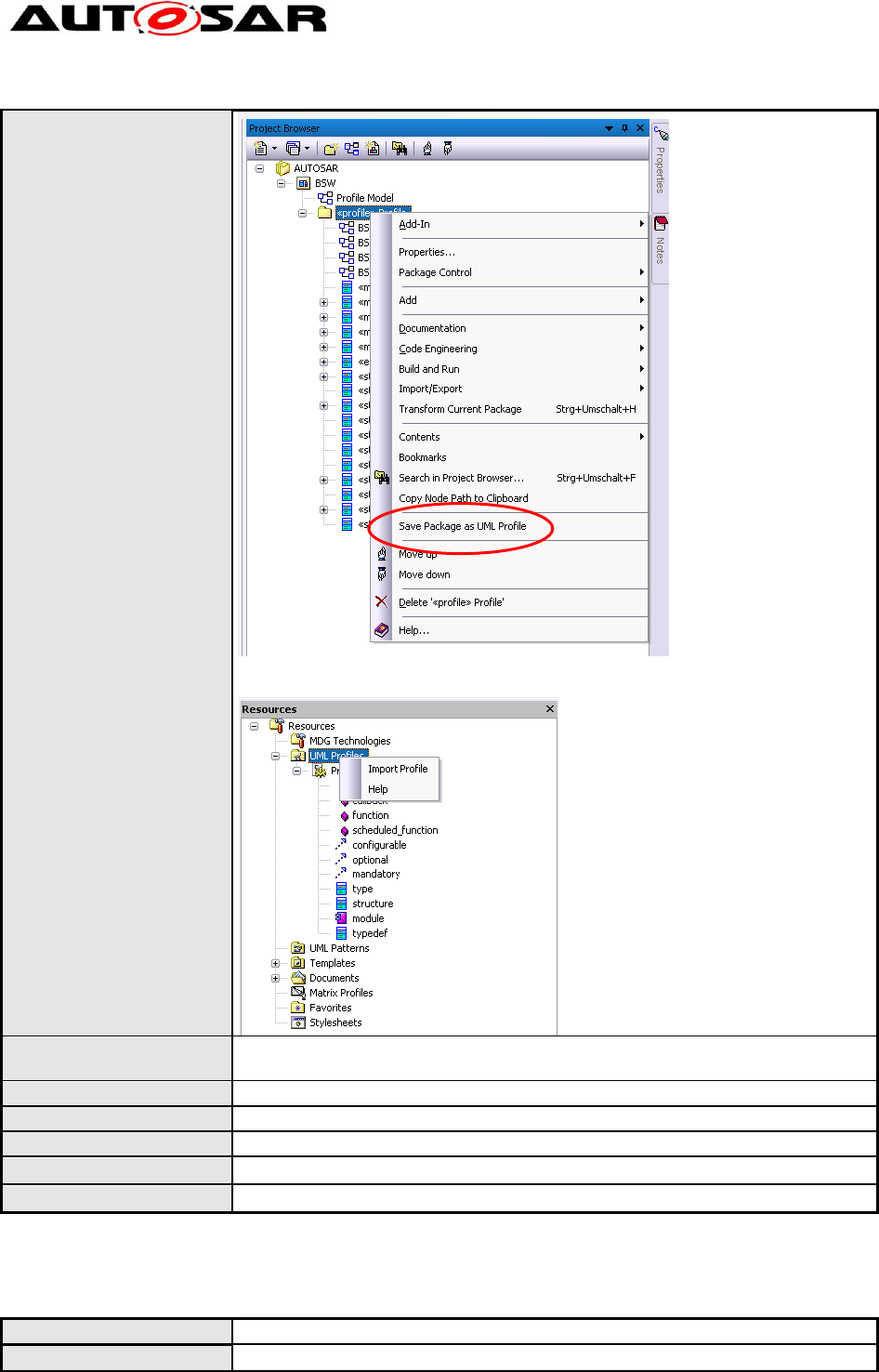
The latest version of the BSW UML profile has to be applied to the BSW
UML model. When a new version of the BSW UML profile has been
released, it has to be reapplied to the BSW UML model. To apply the profile,
it has to be exported to XML via the “Save Package as UML Profile” menu
entry.
Modeling Guidelines of Basic
Software EA UML Model
AUTOSAR Release 4.2.1
9 of 47 Document ID 117: AUTOSAR_TR_BSWUMLModelModelingGuide
- AUTOSAR confidential -
The exported XML file than has to be reimported on the BSW UML model file
via the “Import Profile” menu.
Rationale:
The BSW UML profile is needed to store additional BSW specific information
in the model.
Use Case:
--
Dependencies:
--
Conflicts:
--
Supporting Material:
Contributes to:
4.1.3 [TR_BSWUML_00001] Allowed elements
ID:
TR_BSWUML_00001
Initiator:
WP Architecture
Modeling Guidelines of Basic
Software EA UML Model
AUTOSAR Release 4.2.1
10 of 47 Document ID 117: AUTOSAR_TR_BSWUMLModelModelingGuide
- AUTOSAR confidential -
Date:
27.04.2007
Short Description:
Allowed elements
Type:
Importance:
high
Description:
The following elements of UML are allowed to use within the Basic software
overall UML model:
- package
- class (‘typedef’) for classes describing C typedefs
- class (‘type’) for classes describing C types
- class (‘structure’) for classes describing C structs
- enumeration for C enums
- operation (‘function’) for functions
- operation (‘scheduled_function’) for scheduled functions
- operation (‘callback’) for callbacks
- component (‘module’) for components describing the interfaces of a
BSW module
- interface
- lifeline
- fragment
- note
- node (with stereotype peripheral or cluster)
- state (including initial, final, fork/join, choice, exit)
- action
- decision
- activity
- boundary
Other elements shall not be used.
Rationale:
Restriction of different modeling techniques.
Use Case:
Modeling of the complete communication stack
Dependencies:
[TR_BSWUML_00053] Allowed diagrams
Conflicts:
--
Supporting Material:
--
Contributes to:
--
4.1.4 [TR_BSWUML_00002] Allowed relationships
ID:
TR_BSWUML_00002
Initiator:
WP Architecture
Date:
07.10.2004
Short Description:
Allowed relationships
Type:
Changed
Importance:
high
Description:
The following relationships are allowed to use within the Basic software
overall UML model:
- realize
- nesting
- dependency (‘mandatory’) : for mandatory interfaces of a component
- dependency (‘optional’) : for optional interfaces of a component
- dependency (‘configurable”) : for configurable interfaces of a component
- message
- Self-message
- Call
- transition
- activity edge
Modeling Guidelines of Basic
Software EA UML Model
AUTOSAR Release 4.2.1
11 of 47 Document ID 117: AUTOSAR_TR_BSWUMLModelModelingGuide
- AUTOSAR confidential -
Other relationships shall not be used.
Rationale:
Restriction of different modeling techniques.
Use Case:
Modeling of the complete communication stack
Dependencies:
[TR_BSWUML_00053] Allowed diagrams
Conflicts:
--
Supporting Material:
--
Contributes to:
--
4.1.5 [TR_BSWUML_00053] Allowed set of diagrams
ID:
TR_BSWUML_00053
Initiator:
WP Architecture
Date:
07.10.2004
Short Description:
Allowed set of diagrams
Type:
Changed
Importance:
high
Description:
Only a reduced set of diagrams shall be used.
Allowed structural diagrams are :
- Package diagrams and
- Component diagrams.
Allowed sequence diagrams are:
- Sequence diagrams
- Activity diagrams and
- State machine diagrams.
Rationale:
Restriction of different modeling techniques.
Use Case:
Modeling of the complete communication stack
Dependencies:
[TR_BSWUML_00001] Allowed elements
[TR_BSWUML_00002] Allowed relationships
Conflicts:
--
Supporting Material:
--
Contributes to:
--
4.1.6 [TR_BSWUML_00060] Documentation of elements
ID:
TR_BSWUML_00060
Initiator:
Technical office
Date:
27.04.2007
Short Description:
Elements used for generating SWS tables must be documented
Type:
Importance:
High
Description:
Documentation (‘Notes’) must be provided for the following element types:
class (‘type’, ‘typedef’, ‘structure’)
attributes
operation (‘function’, ‘scheduled_function’, ‘callback’)
enumeration
parameter
Rationale:
BSW documentation generator needs description for these elements to be
able to generate the tables.
Use Case:
Modeling Guidelines of Basic
Software EA UML Model
AUTOSAR Release 4.2.1
12 of 47 Document ID 117: AUTOSAR_TR_BSWUMLModelModelingGuide
- AUTOSAR confidential -
Dependencies:
--
Conflicts:
--
Supporting Material:
--
Contributes to:
--
4.1.7 [TR_BSWUML_00047] Links between diagrams shall be hyperlinks
ID:
TR_BSWUML_00047
Initiator:
WP Mode Management
Date:
14.02.2005
Short Description:
Links between diagrams shall be hyperlinks
Type:
Changed
Importance:
High
Description:
If the relationship between two diagrams shall be visualized, then the link
shall be modeled as a hyperlink.
Rationale:
Easier navigation between diagrams.
Use Case:
Dependencies:
--
Conflicts:
--
Supporting Material:
--
Contributes to:
--
Modeling Guidelines of Basic
Software EA UML Model
AUTOSAR Release 4.2.1
13 of 47 Document ID 117: AUTOSAR_TR_BSWUMLModelModelingGuide
- AUTOSAR confidential -
4.2 Structural Design
4.2.1 [TR_BSWUML_00054] Use of Packages
ID:
TR_BSWUML_00054
Initiator:
Technical Office
Date:
31.07.2006
Short Description:
Use of Packages
Type:
New
Importance:
High
Description:
Packages may be used in three ways: (1) To group (only) sub-packages, (2)
to represent one BSW module, grouping the BSW module component and
its interfaces or (3) placed below a package of the second type to group
additional elements detailing a BSW module. Packages of the first or second
type shall only be added by the technical office.
Rationale:
Clear structure of the BSW UML model.
Use Case:
Modeling of the complete software architecture
Dependencies:
[TR_BSWUML_00003] Diagrams usage
[TR_BSWUML_00009] Version numbers of software modules
[TR_BSWUML_00035] Sub elements of BSW modules
Conflicts:
--
Supporting Material:
--
Contributes to:
--
4.2.2 [TR_BSWUML_00003] Diagrams usage
ID:
TR_BSWUML_00003
Initiator:
WP Architecture
Date:
07.10.2004
Short Description:
Diagram usage
Type:
Changed .
Importance:
high
Description:
Each package containing only sub-packages shall at least have one
structural “Component” diagram which shows the contents and, if possible,
the relationships of the packages which it contains. Each package
representing a BSW module shall at least have one structural “Component”
diagram which shows at least the "realize", "mandatory", “optional” and
“configurable” relationships of the BSW module component which it contains.
The name of this diagram shall be equal to the BSW module component
name.
This diagram shall be placed below the appropriate diagram within the tree
view.
Rationale:
Have for each structural element a diagram showing the elements containing
it.
Contributes to:
--
4.2.3 [TR_BSWUML_00038] Component diagram appearance options
ID:
TR_BSWUML_00038
Modeling Guidelines of Basic
Software EA UML Model
AUTOSAR Release 4.2.1
14 of 47 Document ID 117: AUTOSAR_TR_BSWUMLModelModelingGuide
- AUTOSAR confidential -
Initiator:
WP Architecture
Date:
08.02.2005
Short Description:
Component diagram appearance options
Type:
New
Importance:
high
Description:
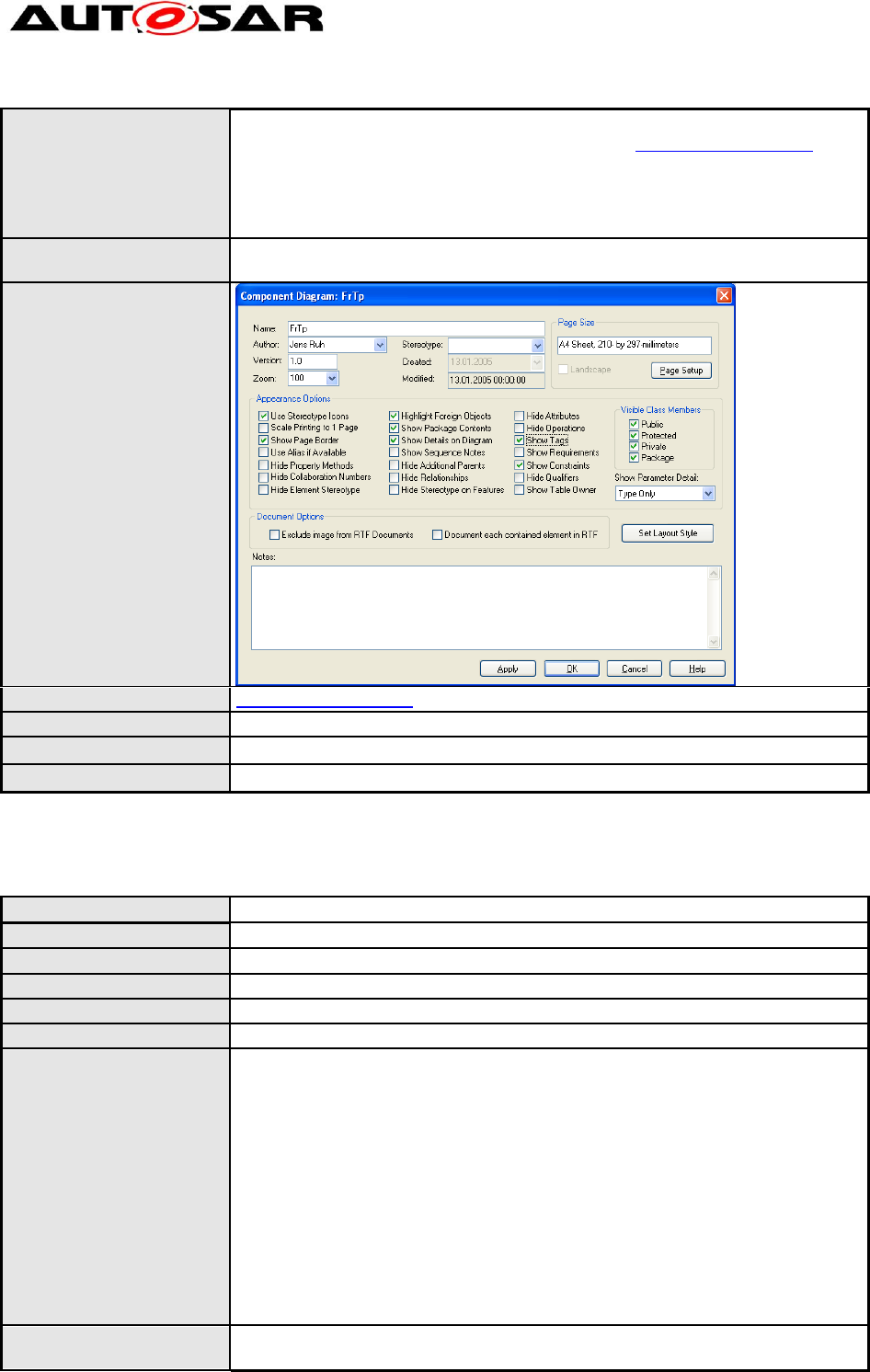
In general only the following appearance options of component diagrams
shall be set:
- Use stereotype icons - yes
- Scale printing to 1 page - optional
- Show page border - yes
- Highlight foreign objects - yes
- Show package contents - optional
- Show details on diagram - yes
- Hide operations - yes
- Hide attributes - yes
If a user requires more options, he shall ask the technical office for
clearance: technical.office@autosar.org.
Rationale:
Harmonization of diagram appearance.
Use Case:
Dependencies:
--
Conflicts:
--
Supporting Material:
--
Contributes to:
--
4.2.4 [TR_BSWUML_00039] Component diagram appearance of BSW module
diagrams
ID:
TR_BSWUML_00039
Initiator:
WP Architecture
Date:
13.01.2005
Short Description:
Component diagram appearance of BSW module diagrams
Type:
new
Importance:
high
Modeling Guidelines of Basic
Software EA UML Model
AUTOSAR Release 4.2.1
15 of 47 Document ID 117: AUTOSAR_TR_BSWUMLModelModelingGuide
- AUTOSAR confidential -
Description:
Diagrams placed below the BSW module package shall apply the following
changes to the appearance options compared to TR_BSWUML_00038:
- Hide attributes - No
- Hide operations - No
- Show constraints - yes
- Show Tags - yes
Rationale:
Visualizing all attributes, operations and constraints of a BSW module
component.
Use Case:
Dependencies:
TR_BSWUML_00038
Conflicts:
--
Supporting Material:
--
Contributes to:
--
4.2.5 [TR_BSWUML_00004] Header File Modeling
ID:
TR_BSWUML_00004
Initiator:
WP Architecture
Date:
03.09.2009
Short Description:
Header File Modeling
Type:
Changed
Importance:
High
Description:
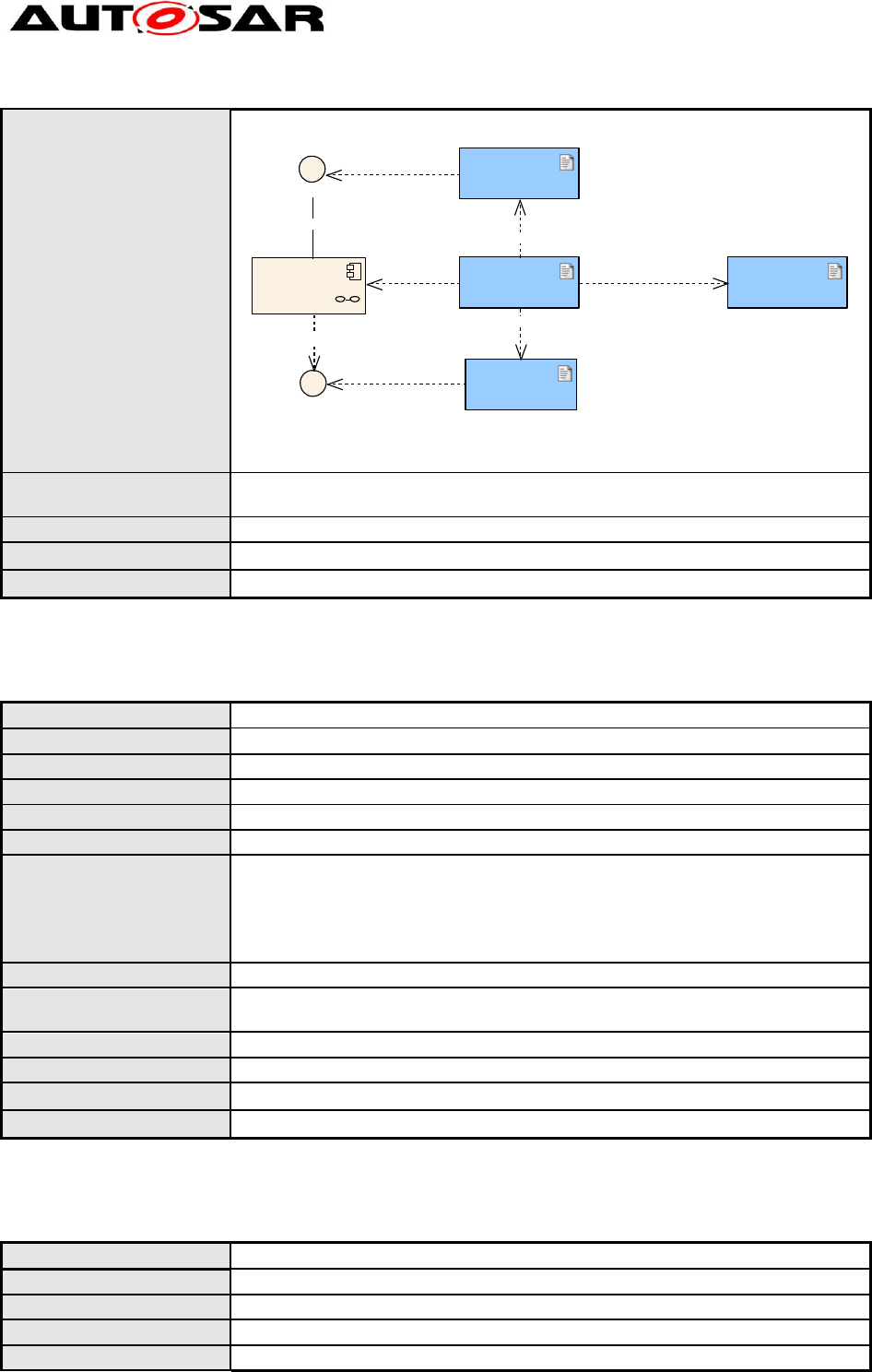
Each file of a basic software module being of external relevance shall be
modeled as an own public document artifact (see Toolbox>Component). The
document artifacts shall be declared as either header or source file using the
stereotypes “header” and “source”.
Document artifacts can include other artifacts using a dependency with
stereotype “include”. With the additional stereotype “optional”, optional
inclusion can be expressed.
Document artifacts with stereotype “header” can relate to interfaces, using a
dependency with stereotype “declares”, artifacts with stereotype “source”
can relate to modules, using a dependency with stereotype “realize”.
The following consistency constraints apply:
A source file realizing a module shall include header files declaring all
interfaces that are realized and required by the module.
Rationale:
Enabling the showing of “include” relationships between source and header
files.
Modeling Guidelines of Basic
Software EA UML Model
AUTOSAR Release 4.2.1
16 of 47 Document ID 117: AUTOSAR_TR_BSWUMLModelModelingGuide
- AUTOSAR confidential -
Use Case:
Modeling of Eep header file inclusion
«header»
Eep.h
«source»
Eep.c
«header»
Eep_Cbk.h
«header»
Dem::Dem.h
Eep
«module»
Eep
Dem_ReportErrorStatus
«includes»
«optional,includes»
«includes»
«declares»
«real ize»
«real ize»
«mandatory»
«declares»
Dependencies:
SRS_BSW_00370, SRS_BSW_00346, SRS_BSW_00353,
SRS_BSW_00361
Conflicts:
--
Supporting Material:
--
Contributes to:
--
4.2.6 [TR_BSWUML_00005] Basic Software Module Modeling
ID:
TR_BSWUML_00005
Initiator:
WP Architecture
Date:
27.04.2007
Short Description:
Basic Software Module Modeling
Type:
new
Importance:
high
Description:
Each basic software module source code file(s) shall be modeled as an UML
package containing one component with stereotype “module” (the “BSW
Module Component”) and the appropriate interfaces (the “BSW Module
Interfaces”). The name of the package and component shall be the Prefix of
the basic software module (specified within the basic software list).
Rationale:
Restriction of different modeling techniques.
Use Case:
Modeling of ECU State Manager.
Name of this component: EcuM
Dependencies:
--
Conflicts:
--
Supporting Material:
--
Contributes to:
--
4.2.7 [TR_BSWUML_00010] Component Definition
ID:
TR_BSWUML_00010
Initiator:
WP Architecture
Date:
08.10.2004
Short Description:
Component Definition
Type:
new
Modeling Guidelines of Basic
Software EA UML Model
AUTOSAR Release 4.2.1
17 of 47 Document ID 117: AUTOSAR_TR_BSWUMLModelModelingGuide
- AUTOSAR confidential -
Importance:
high
Description:
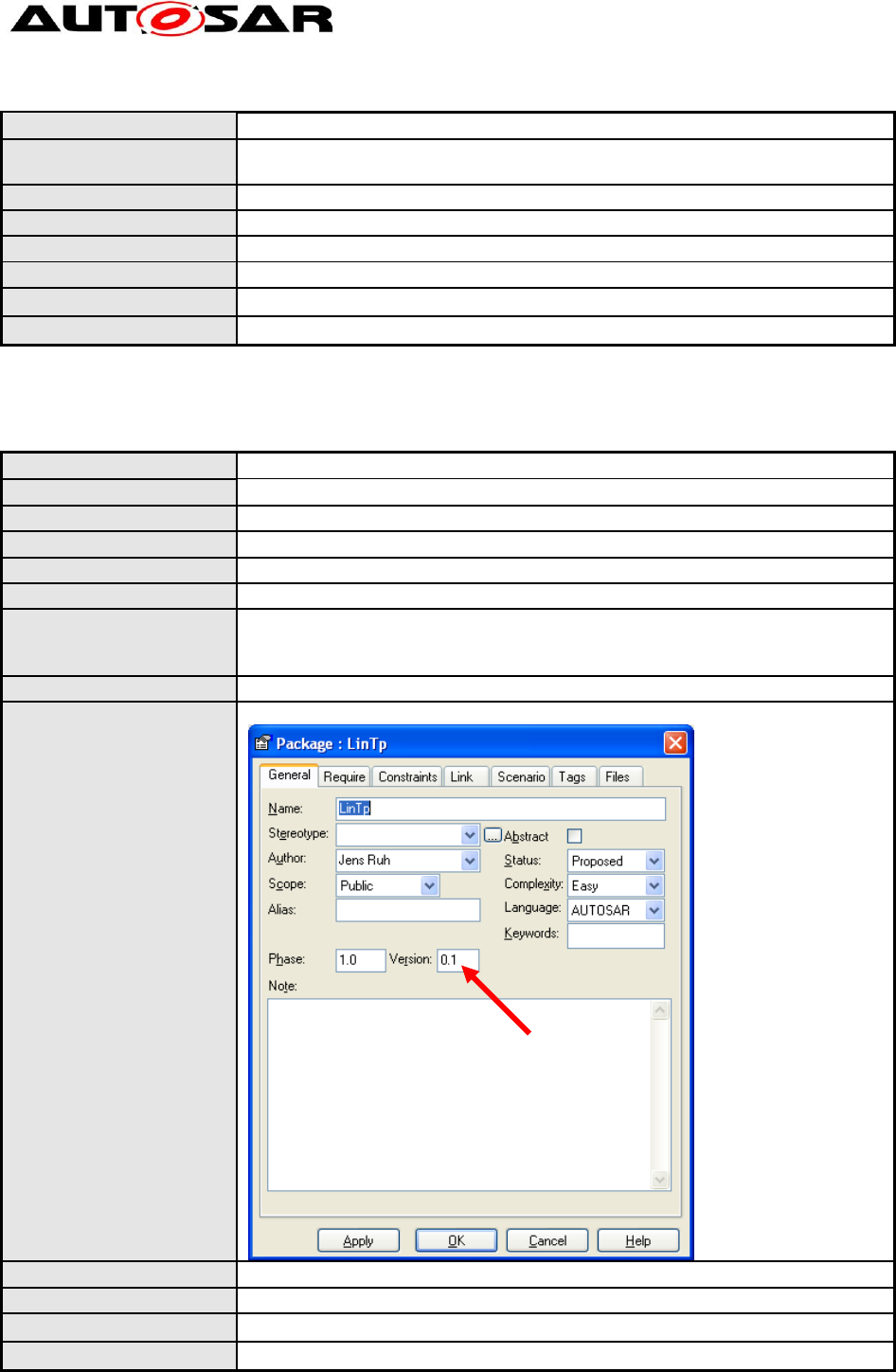
Each “BSW Module Component” in the cluster diagram shall be marked as
“Composite Element”.
Rationale:
Easier navigation within the model
Use Case:
Look into the details of one specific component.
Dependencies:
--
Conflicts:
--
Supporting Material:
--
Contributes to:
--
4.2.8 [TR_BSWUML_00009] Version numbers of software modules
ID:
TR_BSWUML_00009
Initiator:
WP Architecture
Date:
07.10.2004
Short Description:
Version numbers of software modules
Type:
Changed
Importance:
High
Description:
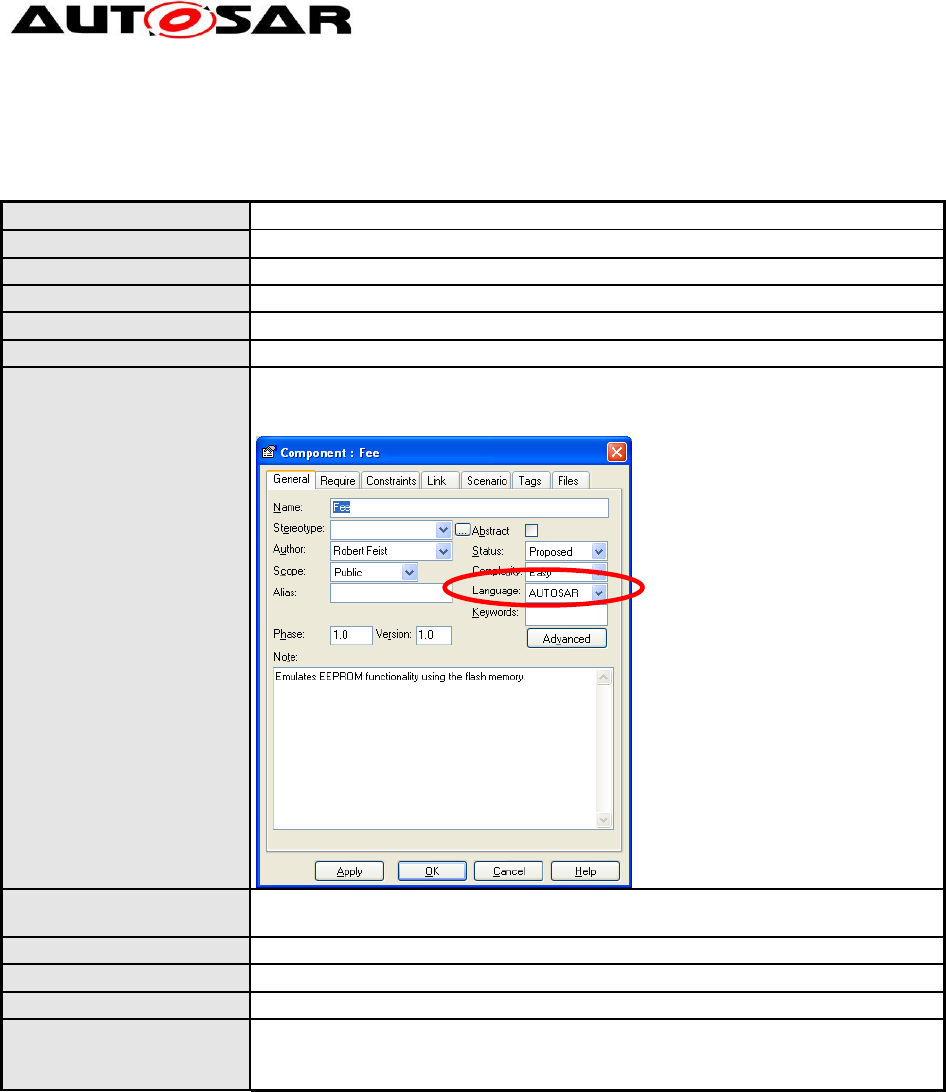
For each component which has the ‘module’ stereotype (represents a BSW
module) the version must be specified according to the modules version
number.
Rationale:
Model everything in the same style so that it is easier to understand
Use Case:
Modeling of Fls Interfaces:
Dependencies:
--
Conflicts:
--
Supporting Material:
--
Contributes to:
--
Modeling Guidelines of Basic
Software EA UML Model
AUTOSAR Release 4.2.1
18 of 47 Document ID 117: AUTOSAR_TR_BSWUMLModelModelingGuide
- AUTOSAR confidential -
4.2.9 [TR_BSWUML_00025] ‘Language’ definition of Components
ID:
TR_BSWUML_00025
Initiator:
WP Architecture
Date:
26.11.2004
Short Description:
‘Language’ definition of Components
Type:
Changed (supporting material added)
Importance:
high
Description:
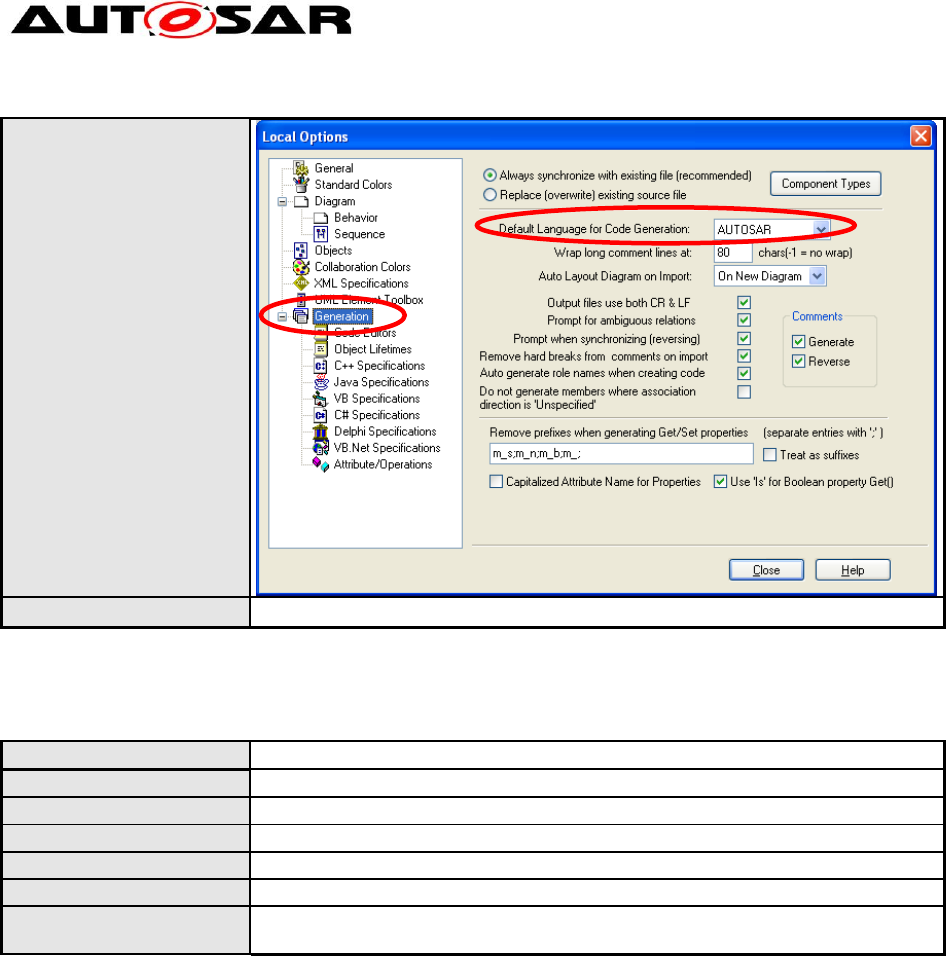
The ‘Language’ Attribute of at least each Component which represents a
Software module shall be set to AUTOSAR.
Rationale:
The AUTOSAR language defines a set of basic types which shall be used
within AUTOSAR.
Use Case:
Using AUTOSAR type uint8 as return value.
Dependencies:
--
Conflicts:
--
Supporting Material:
If you set in the options menu AUTOSAR to the default language the correct
language will be set automatically:
Tools -> Options ->
Modeling Guidelines of Basic
Software EA UML Model
AUTOSAR Release 4.2.1
19 of 47 Document ID 117: AUTOSAR_TR_BSWUMLModelModelingGuide
- AUTOSAR confidential -
Contributes to:
--
4.2.10 [TR_BSWUML_00052] Interface creation
ID:
TR_BSWUML_00052
Initiator:
WP Architecture
Date:
07.11.2005
Short Description:
Interface creation
Type:
new
Importance:
high
Description:
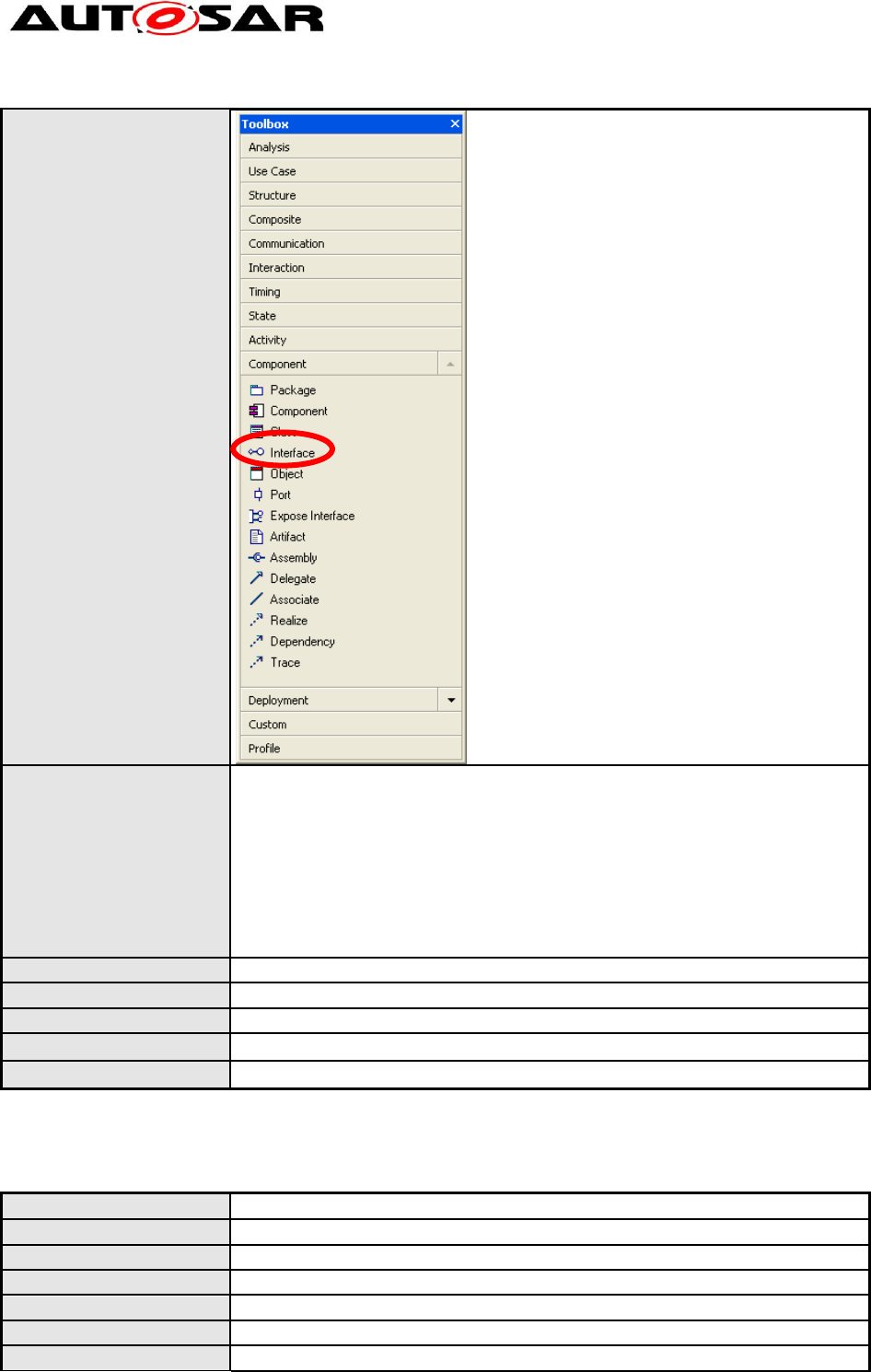
Interfaces shall only be created by dragging “Interface” from the toolbox into
a diagram.
Modeling Guidelines of Basic
Software EA UML Model
AUTOSAR Release 4.2.1
20 of 47 Document ID 117: AUTOSAR_TR_BSWUMLModelModelingGuide
- AUTOSAR confidential -
Rationale:
There are two ways in EA to create an interface class:
(a) Create a regular class and afterwards add the stereotype <<interface>>.
(b) Directly drag a new interface into a diagram (e.g. from the toolbox
window).
Only (b) leads to a real interface in the EA sense:
o correct icon in the project view
o class and all operations are enforced to be abstract
Use Case:
Modeling of the complete communication stack
Dependencies:
--
Conflicts:
--
Supporting Material:
--
Contributes to:
--
4.2.11 [TR_BSWUML_00006] Interface Modeling
ID:
TR_BSWUML_00006
Initiator:
WP Architecture
Date:
07.10.2004
Short Description:
Interface Modeling
Type:
new
Importance:
high
Description:
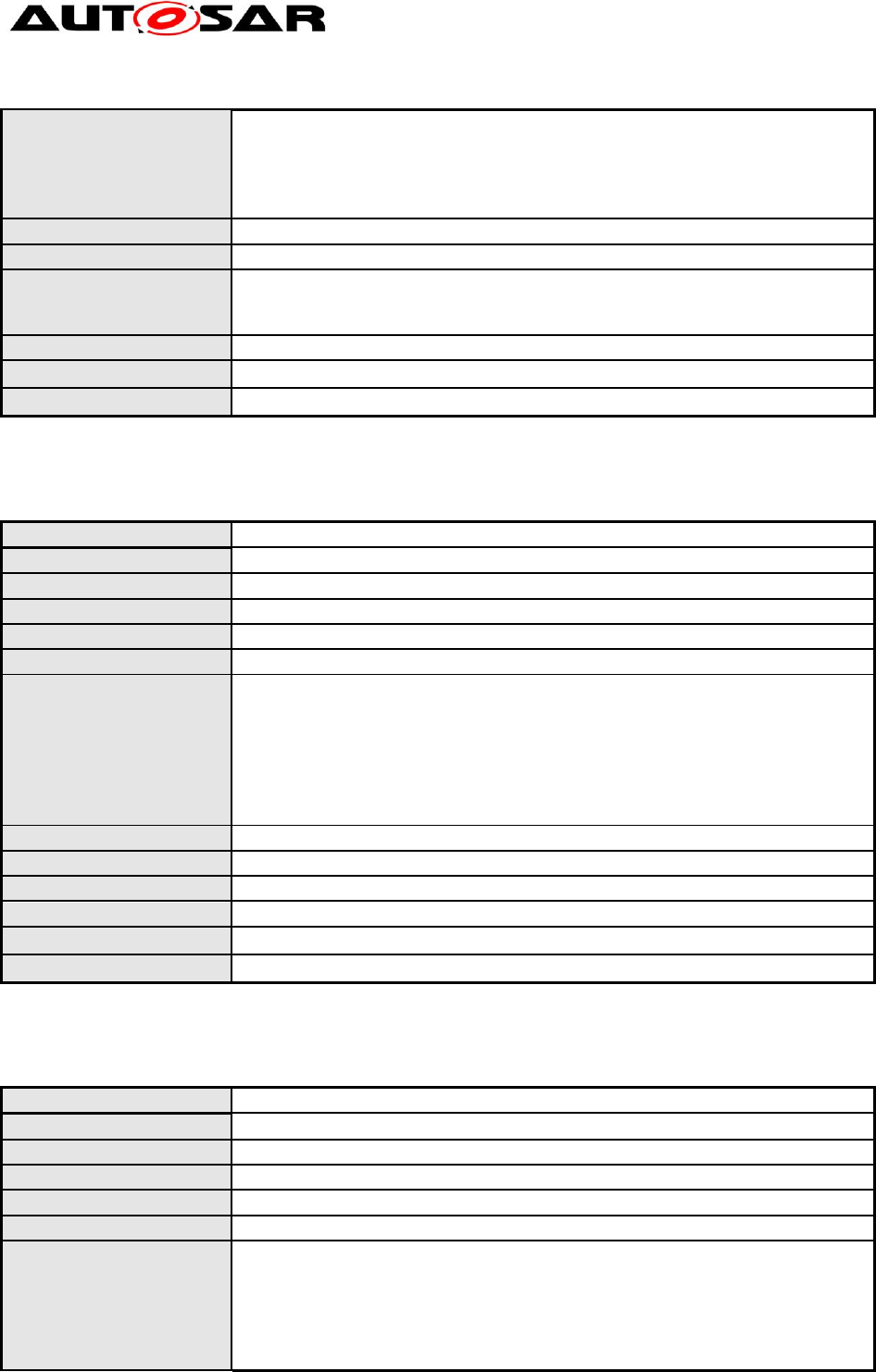
Each external interface class shall be modeled in “circle notation” within the
Modeling Guidelines of Basic
Software EA UML Model
AUTOSAR Release 4.2.1
21 of 47 Document ID 117: AUTOSAR_TR_BSWUMLModelModelingGuide
- AUTOSAR confidential -
“component diagram” of a package containing the basic software module
components and/or classes.
Interfaces are the containers for subsequent API elements, they can contain
type definitions and functions. See according sections for descriptions, how
to model elements of interfaces.
Rationale:
Restriction of different modeling techniques.
Use Case:
Modeling of ECU State manager.
Dependencies:
Type definitions: TR_BSWUML_00026, TR_BSWUML_00027,
TR_BSWUML_00028, [TR_BSWUML_00059
Function definitions: TR_BSWUML_00062, TR_BSWUML_00063
Conflicts:
--
Supporting Material:
--
Contributes to:
--
4.2.12 [TR_BSWUML_00011] Accessing interfaces of other components
ID:
TR_BSWUML_00011
Initiator:
WP Architecture
Date:
27.04.2007
Short Description:
Accessing interfaces of other components
Type:
Changed
Importance:
high
Description:
If a basic software module requires the access of another module this
relation shall be modeled as a “mandatory” dependency between the
component of the basic software module requiring the access and the
appropriate Interface class of the other basic software module.
If the interface to be accessed is not in the same package a link to the
interface shall be copied into the appropriate diagram. The link shall be
modeled in circle notation.
Rationale:
Restriction of modeling techniques
Use Case:
Eep Interface “uses” interface of Eep driver.
Dependencies:
--
Conflicts:
--
Supporting Material:
--
Contributes to:
--
4.2.13 [TR_BSWUML_00027] Definition of structures
ID:
TR_BSWUML_00027
Initiator:
WP Architecture
Date:
27.04.2007
Short Description:
Definition of structures
Type:
Importance:
high
Description:
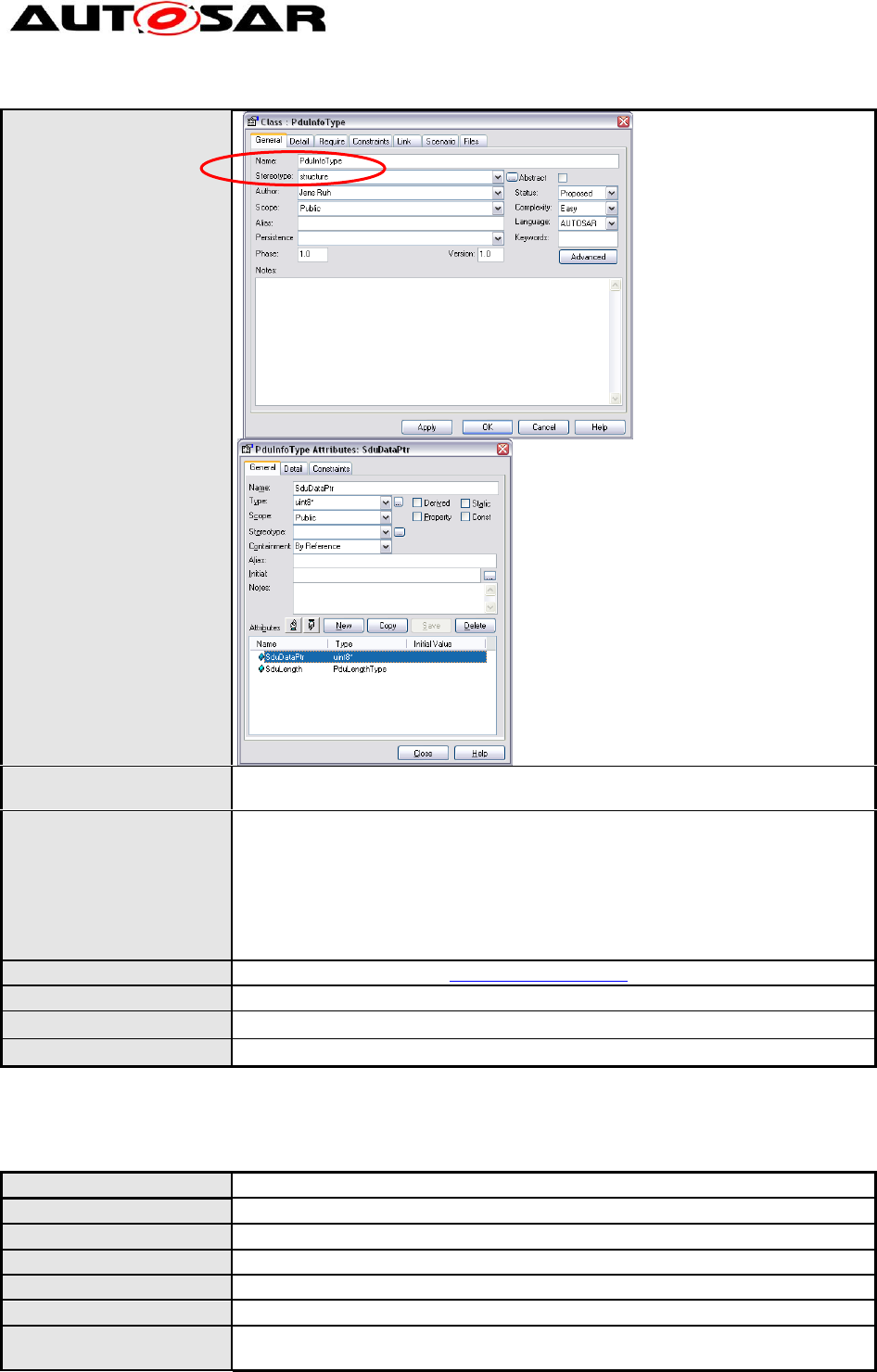
Each type definition which represents a structure declaration shall be
modeled as a class with the stereotype ‘structure’.
All possible entries shall be defined as attributes of that class. The attributes
shall have the scope “public”. The ordering of the attributes shall be the
same as expected in the generated table.
For each attribute the appropriate type shall be specified:
Modeling Guidelines of Basic
Software EA UML Model
AUTOSAR Release 4.2.1
22 of 47 Document ID 117: AUTOSAR_TR_BSWUMLModelModelingGuide
- AUTOSAR confidential -
Rationale:
All types have to be defined in the same way, so that there are no
inconsistencies within the model.
Use Case:
The example shown in the description represents the following Std_Types
enumeration:
typedef struct PduInfoType
{
uint8* SduDataPtr,
uint16 Length
};
Dependencies:
Definition of simple types TR_BSWUML_00028
Conflicts:
--
Supporting Material:
--
Contributes to:
--
4.2.14 [TR_BSWUML_00026] Definition of enumerations
ID:
TR_BSWUML_00026
Initiator:
WP Architecture
Date:
26.11.2004
Short Description:
Definition of enumerations
Type:
Changed
Importance:
high
Description:
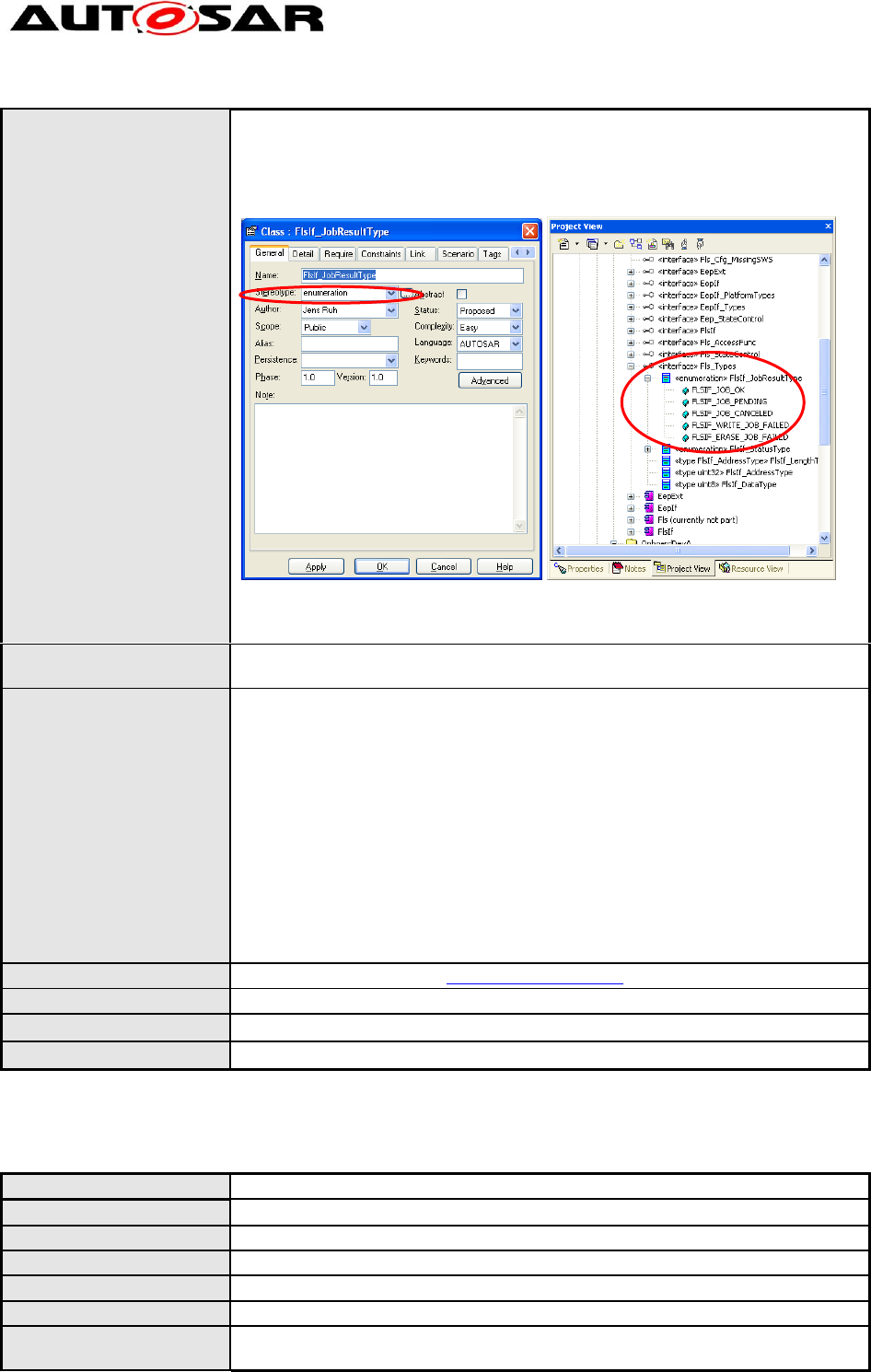
Each type definition representing an enumeration shall be modeled as a n
UML enumeration.
Modeling Guidelines of Basic
Software EA UML Model
AUTOSAR Release 4.2.1
23 of 47 Document ID 117: AUTOSAR_TR_BSWUMLModelModelingGuide
- AUTOSAR confidential -
All possible entries have to be defined as attributes of this class. The order
of the attributes from top to bottom shall represent the order of the
enumeration specified.
The Attributes shall have no type and the ‘scope’ has to be set to ‘public’.
It shall be placed below the interface specifying it.
For attribute names, the AUTOSAR-conform attribute values shall be used. If
for this attribute value a code number exist, this code number shall be placed
in the "initial” value entry of a type's detailed properties form in EA.
Rationale:
All types have to be defined in the same way, so that there are no
inconsistencies within the model.
Use Case:
The example shown in the description represents the following Std_Types
enumeration:
typedef enum FlsIf_JobResultType
{
FLSIF_JOB_OK,
FLSIF_JOB_PENDING,
…
};
Need to represent DCM's Neg Resp Codes (NRCs), for which an enum type
is defined in SWS DCM v1.1.6, section 8.1.2.8. Place the NRC
"DEM_E_xxx" in [attribute]"name" and the 0x value in "initial”
value.
Dependencies:
Definition of simple types TR_BSWUML_00028
Conflicts:
--
Supporting Material:
--
Contributes to:
--
4.2.15 [TR_BSWUML_00028] Definition of simple types
ID:
TR_BSWUML_00028
Initiator:
WP Architecture
Date:
27.04.2007
Short Description:
Definition of simple types
Type:
Importance:
high
Description:
Each type definition shall be modeled as a separate class with stereotype
‘type’. If the type has a hardware and configuration independent type (e.g.
Modeling Guidelines of Basic
Software EA UML Model
AUTOSAR Release 4.2.1
24 of 47 Document ID 117: AUTOSAR_TR_BSWUMLModelModelingGuide
- AUTOSAR confidential -
‘unit8’), the tagged value ‘range’ has to specify the range as text.
Rationale:
All types have to be defined in the same way, so that there are no
inconsistencies within the model.
Use Case:
--
Dependencies:
Definition of structures [TR_BSWUML_00027],
Definition of enumerations TR_BSWUML_00026
Conflicts:
--
Supporting Material:
Contributes to:
--
4.2.16 [TR_BSWUML_00059] Definition of typedefs
ID:
TR_BSWUML_00059
Initiator:
Technical Office
Date:
27.04.2007
Short Description:
Definition of typedefs
Type:
Importance:
high
Description:
Each type definition shall be modeled as a separate class with stereotype
‘typedef’.
If the typedef is independent from the configuration, the typedef must be a
specialization of the type it is referring to.
If the typedef can refer to different types depending on the configuration, the
typedef must be a specialization of those types.
Rationale:
The documentation generator has extract information regarding the typedefs
from the UML model.
Use Case:
--
Dependencies:
Definition of structures TR_BSWUML_00028, Definition of enumerations
TR_BSWUML_00026
Conflicts:
--
Supporting Material:
--
Contributes to:
--
4.2.17 [TR_BSWUML_00066] Definition of ranges for typedefs
ID:
TR_BSWUML_00066
Initiator:
Technical Office
Date:
23.07.2007
Short Description:
Definition of ranges for typedefs
Type:
Importance:
high
Description:
If a typedef (class with stereotype <<typedef>>) has a restricted set of
ranges, an attribute with stereotype <<range>> has to be created for each
such range. The name of the attribute specifies the range label and the
notes field describes the range.
Rationale:
The documentation generator has to extract information regarding the range
of typedefs from the UML model.
Use Case:
See «typedef» Fim_FunctionIdType.
Dependencies:
Definition of structures TR_BSWUML_00028
Conflicts:
--
Modeling Guidelines of Basic
Software EA UML Model
AUTOSAR Release 4.2.1
25 of 47 Document ID 117: AUTOSAR_TR_BSWUMLModelModelingGuide
- AUTOSAR confidential -
Supporting Material:
--
Contributes to:
--
4.2.18 [TR_BSWUML_00062] Definition of functions and callbacks
ID:
TR_BSWUML_00062
Initiator:
Technical Office
Date:
27.04.2007
Short Description:
Definition of functions
Type:
Importance:
high
Description:
Each BSW function must be represented by an operation with stereotype
‘function’.
Each BSW callback must be represented by an operation with stereotype
‘callback’.
The following tagged values must be specified:
ServiceID: numeric id of the function
Synchronous: must be set to ‘true’ if this function is synchronous,
must be set to ‘false’ otherwise
Reentrancy: description of the reentrancy for this function.
Should be set to “Reentrant” for reentrant functions.
Should be set to “Non-Reentrant” for non-reentrant functions.
Rationale:
The documentation generator needs this information to generate the function
tables.
Use Case:
--
Dependencies:
--
Conflicts:
--
Supporting Material:
--
Contributes to:
--
4.2.19 [TR_BSWUML_00068] Definition of parameters
ID:
TR_BSWUML_00068
Initiator:
WP Virtual Functional Bus
Date:
09.07.2009
Short Description:
Definition of parameters
Type:
New
Importance:
High
Description:
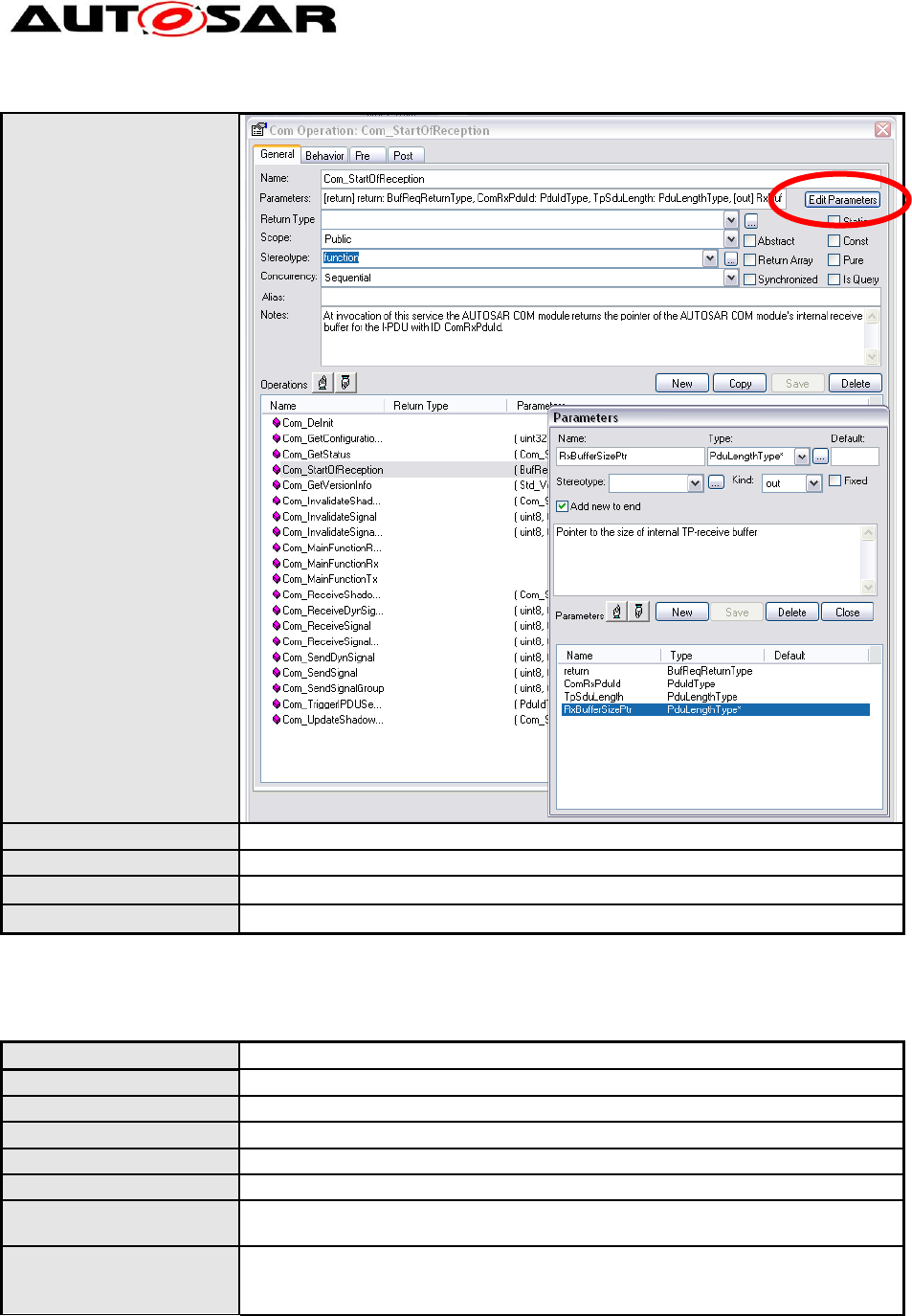
Parameters of functions are defined, by going to the “Edit Parameters” dialog
and adding the parameters with the “New” button.
All parameters must have a name and a type. Type names in braces (e.g.
“<type>”) are considered to be generic. A C ellipse can be used by typing a
blank as name and “…” as type. It is as well considered a generic type.
Parameters shall not have stereotypes. All parameters must have a kind
indicating the direction of the information flow. The order of the parameters
in the list is relevant.
Rationale:
Harmonization of modeling techniques.
Modeling Guidelines of Basic
Software EA UML Model
AUTOSAR Release 4.2.1
26 of 47 Document ID 117: AUTOSAR_TR_BSWUMLModelModelingGuide
- AUTOSAR confidential -
Use Case:
Dependencies:
--
Conflicts:
--
Supporting Material:
--
Contributes to:
--
4.2.20 [TR_BSWUML_00037] Definition of pointer types
ID:
TR_BSWUML_00037
Initiator:
WP Architecture
Date:
13.01.2005
Short Description:
Definition of pointer types
Type:
new
Importance:
high
Description:
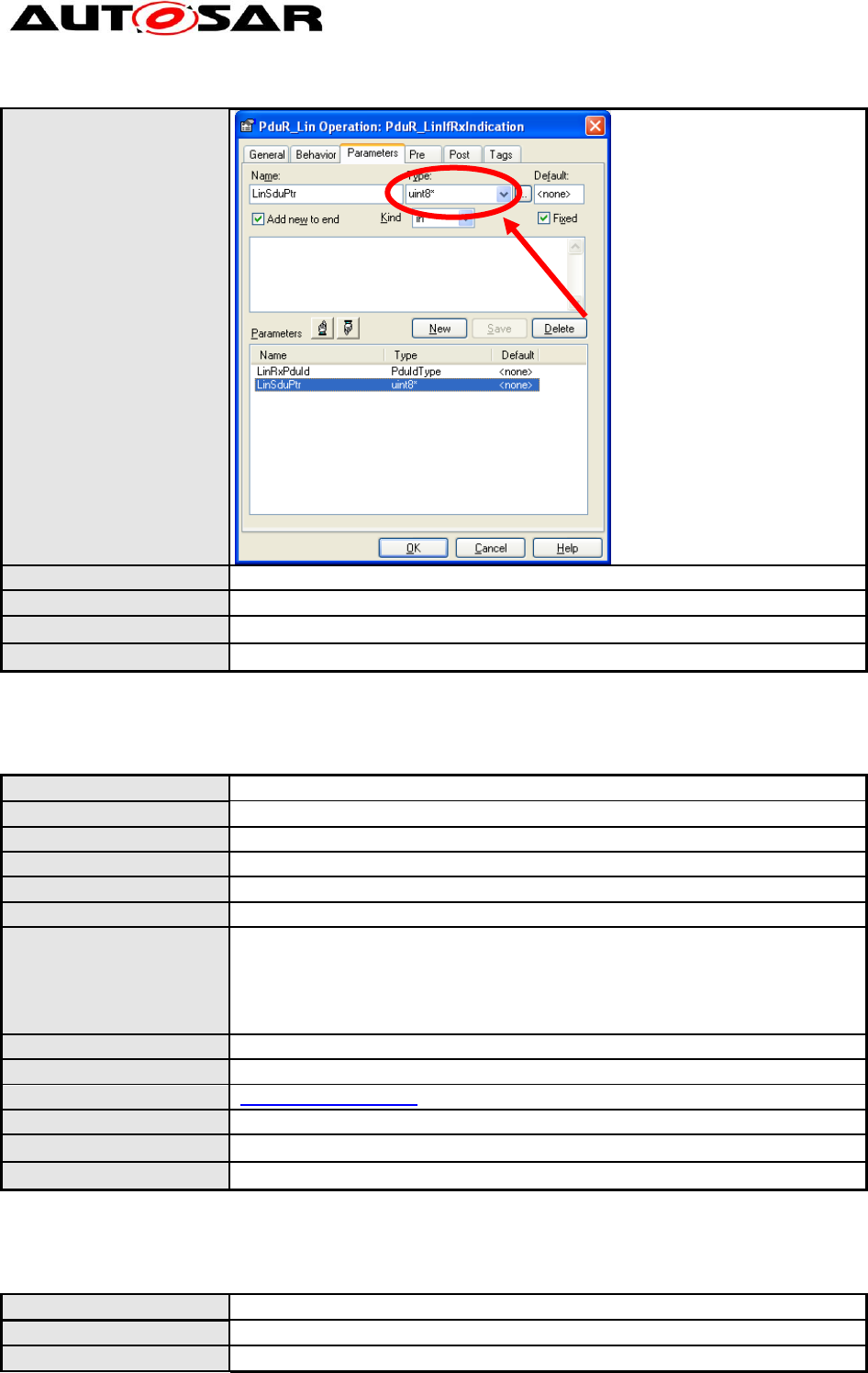
If a parameter or a return value of a module interface represents a pointer
the asterix(es) shall be placed directly after the original type.
Rationale:
Readability of the module (specific views will otherwise filter out that
information).
Harmonization of modeling techniques.
Modeling Guidelines of Basic
Software EA UML Model
AUTOSAR Release 4.2.1
27 of 47 Document ID 117: AUTOSAR_TR_BSWUMLModelModelingGuide
- AUTOSAR confidential -
Use Case:
Dependencies:
--
Conflicts:
--
Supporting Material:
--
Contributes to:
--
4.2.21 [TR_BSWUML_00055] Use of parameter kind
ID:
TR_BSWUML_00055
Initiator:
Technical Office
Date:
27.04.2007
Short Description:
Use of parameter kind
Type:
New
Importance:
High
Description:
The drop down list for the 'kind' of function parameters should be set to the
appropriate value (in, out, in/out, return). In the case that EA adds a "*" to the
parameter type (for 'out') although it is already a pointer (by a typedef), this
should be annotated in the field 'notes' of the respective function.
Note that all out and inout parameters must be pointer types.
Rationale:
Use the in/out feature and work around the EA bug.
Use Case:
Modeling of the com stack types
Dependencies:
[TR_BSWUML_00037] Definition of pointer types
Conflicts:
--
Supporting Material:
--
Contributes to:
--
4.2.22 [TR_BSWUML_00061] Definition of return type
ID:
TR_BSWUML_00061
Initiator:
Technical Office
Date:
27.04.2007
Modeling Guidelines of Basic
Software EA UML Model
AUTOSAR Release 4.2.1
28 of 47 Document ID 117: AUTOSAR_TR_BSWUMLModelModelingGuide
- AUTOSAR confidential -
Short Description:
Definition of return type
Type:
New
Importance:
High
Description:
The return type of a function must not be specified. Instead a parameter with
kind ‘return’ must be used.
Rationale:
Return parameters must be documented. This is not possible when just the
return type is specified.
Use Case:
Dependencies:
Conflicts:
--
Supporting Material:
--
Contributes to:
--
4.2.23 [TR_BSWUML_00063] Definition of scheduled functions
ID:
TR_BSWUML_00063
Initiator:
Technical Office
Date:
27.04.2007
Short Description:
Definition of functions
Type:
Importance:
High
Description:
Each BSW scheduled function must be represented by an operation with
stereotype ‘scheduled function’. In addition to the tagged values for
functions, the following tagged values must be specified:
schedule: Must be set to one of the following values
o FIXED_CYCLIC
o ON_PRE_CONDITION
o VARIABLE_CYCLIC
o VARIABLE_CYCLIC_OR_ON_PRE_CONDITION
Rationale:
The documentation generator needs this information to generate the function
tables.
Use Case:
--
Dependencies:
--
Conflicts:
--
Supporting Material:
--
Contributes to:
--
4.2.24 [TR_BSWUML_00035] Sub elements of BSW modules
ID:
TR_BSWUML_00035
Initiator:
WP Architecture
Date:
13.01.2005
Short Description:
Sub elements of BSW modules
Type:
Changed
Importance:
high
Description:
The internal behaviour of BSW modules may be modeled in two ways:
(1) A package may be added to the package representing the BSW module
or
(2) elements can be placed below the BSW module component.
In case of optional functionality or scaled functionality the respective
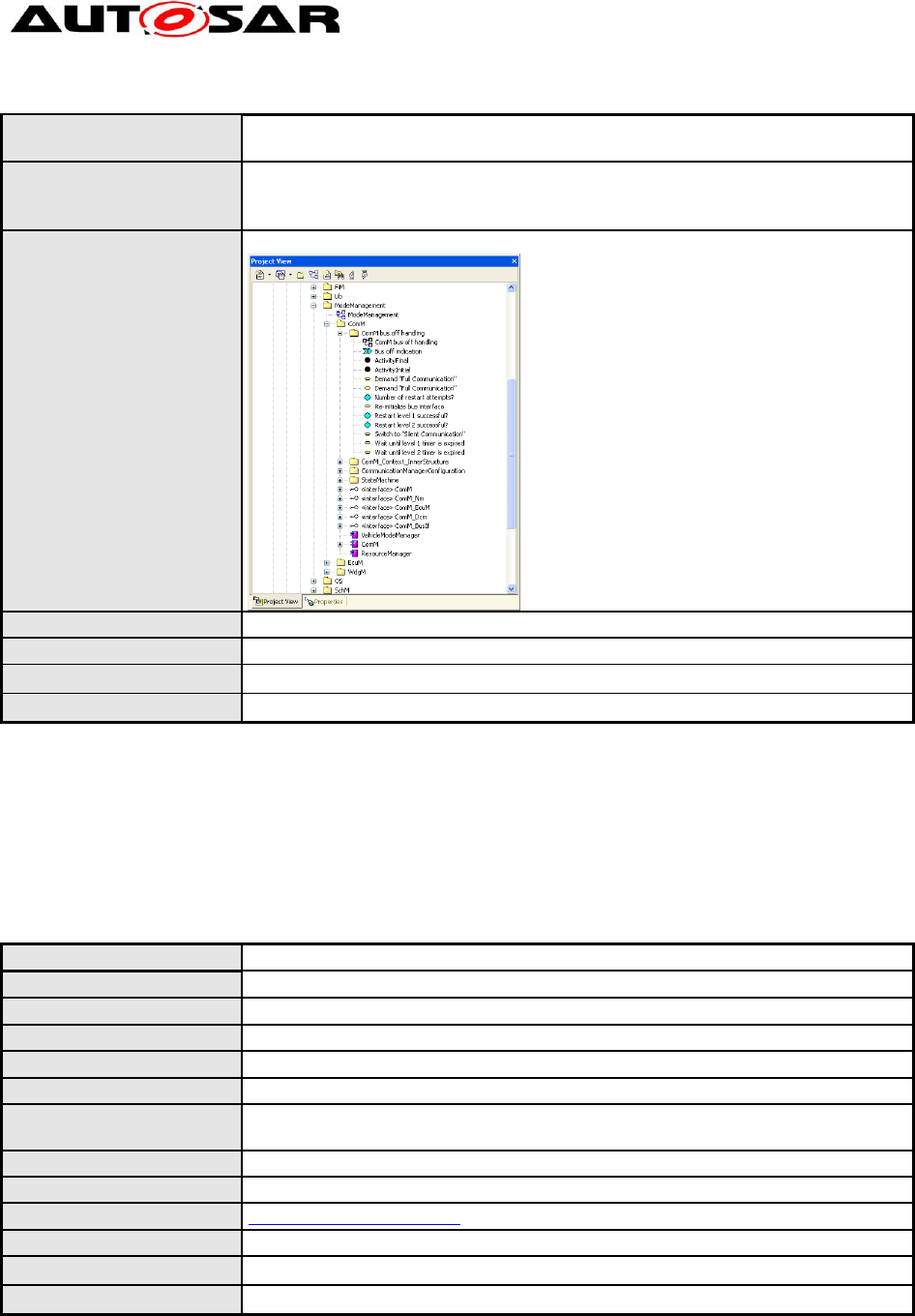
Modeling Guidelines of Basic
Software EA UML Model
AUTOSAR Release 4.2.1
29 of 47 Document ID 117: AUTOSAR_TR_BSWUMLModelModelingGuide
- AUTOSAR confidential -
dependency in the respective diagram shall be commented by selecting
‘Attach Note or Constraint’.
Rationale:
The Sub elements of a component could be of type:
- separation of concerns / grouping of functionality
- optionally / scalability
Use Case:
Refinement of ComM.
Dependencies:
--
Conflicts:
--
Supporting Material:
--
Contributes to:
--
4.3 Behavioral Design
4.3.1 General
4.3.1.1 [TR_BSWUML_00030] Usage of Sequence Diagrams
ID:
TR_BSWUML_00030
Initiator:
WP Architecture
Date:
13.01.2005
Short Description:
Usage of Sequence Diagrams
Type:
new
Importance:
high
Description:
Only sequence diagrams shall be used for modeling interactions of different
modules.
Rationale:
Restriction of different modeling techniques.
Use Case:
Modeling of the sequences of API calls during a LIN frame transmission.
Dependencies:
BSW_UMLGuide_00007
Conflicts:
--
Supporting Material:
--
Contributes to:
--
4.3.1.2 [TR_BSWUML_00031] Usage of State Machine Diagrams
Modeling Guidelines of Basic
Software EA UML Model
AUTOSAR Release 4.2.1
30 of 47 Document ID 117: AUTOSAR_TR_BSWUMLModelModelingGuide
- AUTOSAR confidential -
ID:
TR_BSWUML_00031
Initiator:
WP Architecture
Date:
13.01.2005
Short Description:
Usage of State Machine Diagrams
Type:
new
Importance:
high
Description:
Only state machine diagrams shall be used for modeling state dependencies
within and in between elements.
Rationale:
Restriction of different modeling techniques.
Use Case:
Modeling of ECU Manager state changes.
Dependencies:
BSW_UMLGuide_00007
Conflicts:
--
Supporting Material:
--
Contributes to:
--
4.3.2 Sequence Diagrams
4.3.2.1 [TR_BSWUML_00012] Location of Sequence Diagrams
ID:
TR_BSWUML_00012
Initiator:
WP Architecture
Date:
13.01.2005
Short Description:
Location of Sequence Diagrams
Type:
Renamed
Importance:
High
Description:
All sequence diagrams have to be placed within the “Interaction View
Package”
Rationale:
Definition of similar model structures
Use Case:
Modeling of the AUTOSAR COM stack
Dependencies:
--
Conflicts:
--
Supporting Material:
--
Contributes to:
--
4.3.2.2 [TR_BSWUML_00020] Packages to contain sequence diagrams
ID:
TR_BSWUML_00020
Initiator:
WP Architecture
Date:
25.01.2005
Short Description:
Packages to contain sequence diagrams
Type:
Changed
Importance:
High
Description:
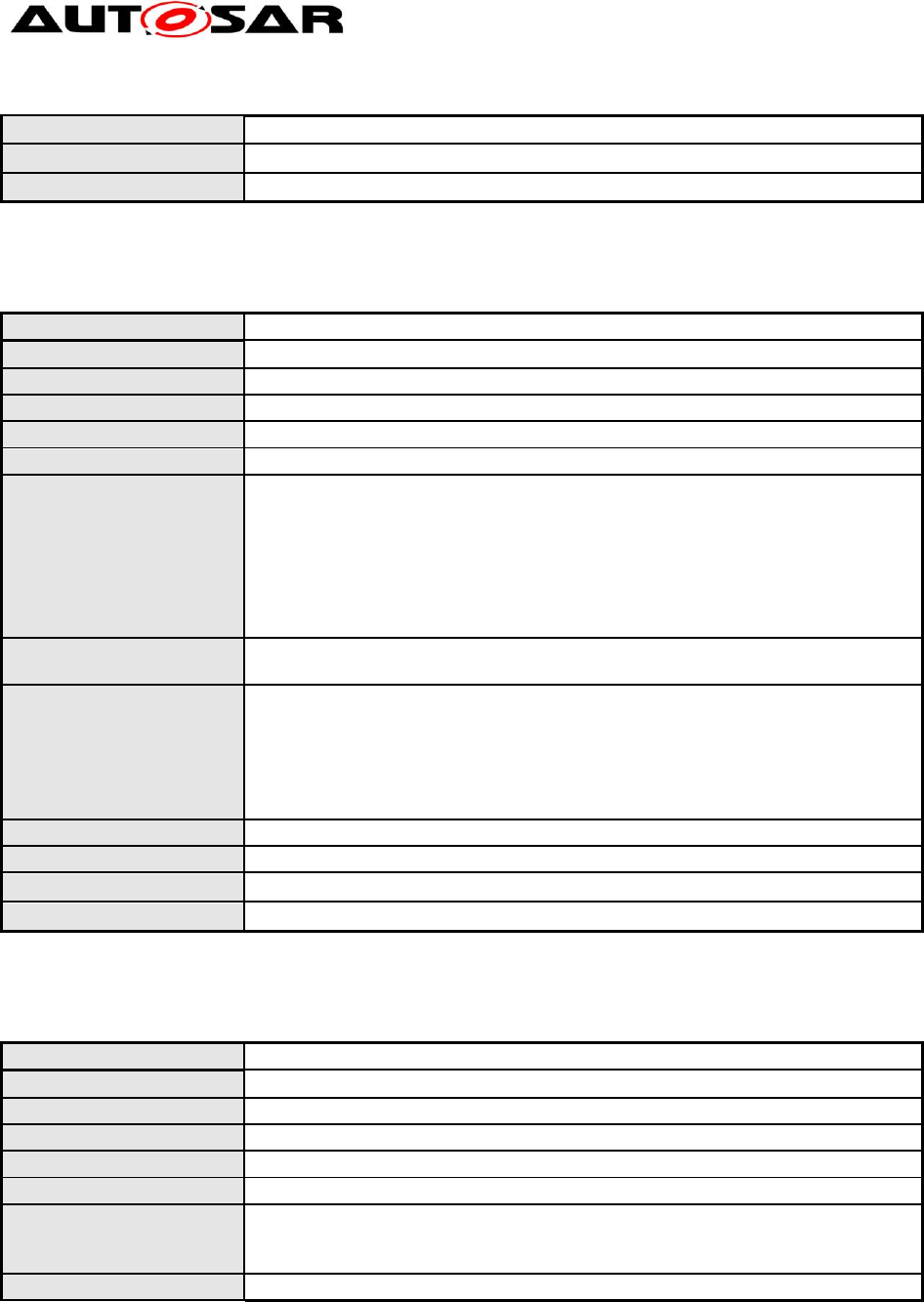
A new sequence diagram shall be put into an appropriate package. If no
such package is available, it shall be requested from the technical office:
technical.office@autosar.org.
Rationale:
Guarantee of readability and correct placement of the sequence tree.
Use Case:
--
Dependencies:
--
Modeling Guidelines of Basic
Software EA UML Model
AUTOSAR Release 4.2.1
31 of 47 Document ID 117: AUTOSAR_TR_BSWUMLModelModelingGuide
- AUTOSAR confidential -
Conflicts:
--
Supporting Material:
--
Contributes to:
--
4.3.2.3 [TR_BSWUML_00021] Commenting of Sequence Diagrams
ID:
TR_BSWUML_00021
Initiator:
WP Architecture
Date:
19.10.2004
Short Description:
Commenting of Sequence Diagrams
Type:
New
Importance:
High
Description:
Each Sequence diagram shall have a comment placed as ‘note’ within the
diagram that contains the following items:
Status (open – proposed – approved – conflict – rejected)
Description
Comment
If a sequence diagram is rejected or on conflict, the reason shall be
described within the comment.
Rationale:
Give other people the chance to understand.
Traceability
Use Case:
Status: approved
Description: A CAN frame is received and indicated to
the upper layer in interrupt context.
Comment: -none-
Dependencies:
--
Conflicts:
--
Supporting Material:
--
Contributes to:
--
4.3.3 [TR_BSWUML_00057] Parameter values in sequence diagrams
ID:
TR_BSWUML_00057
Initiator:
Technical Office
Date:
31.07.2006
Short Description:
Parameter values in sequence diagrams
Type:
New
Importance:
High
Description:
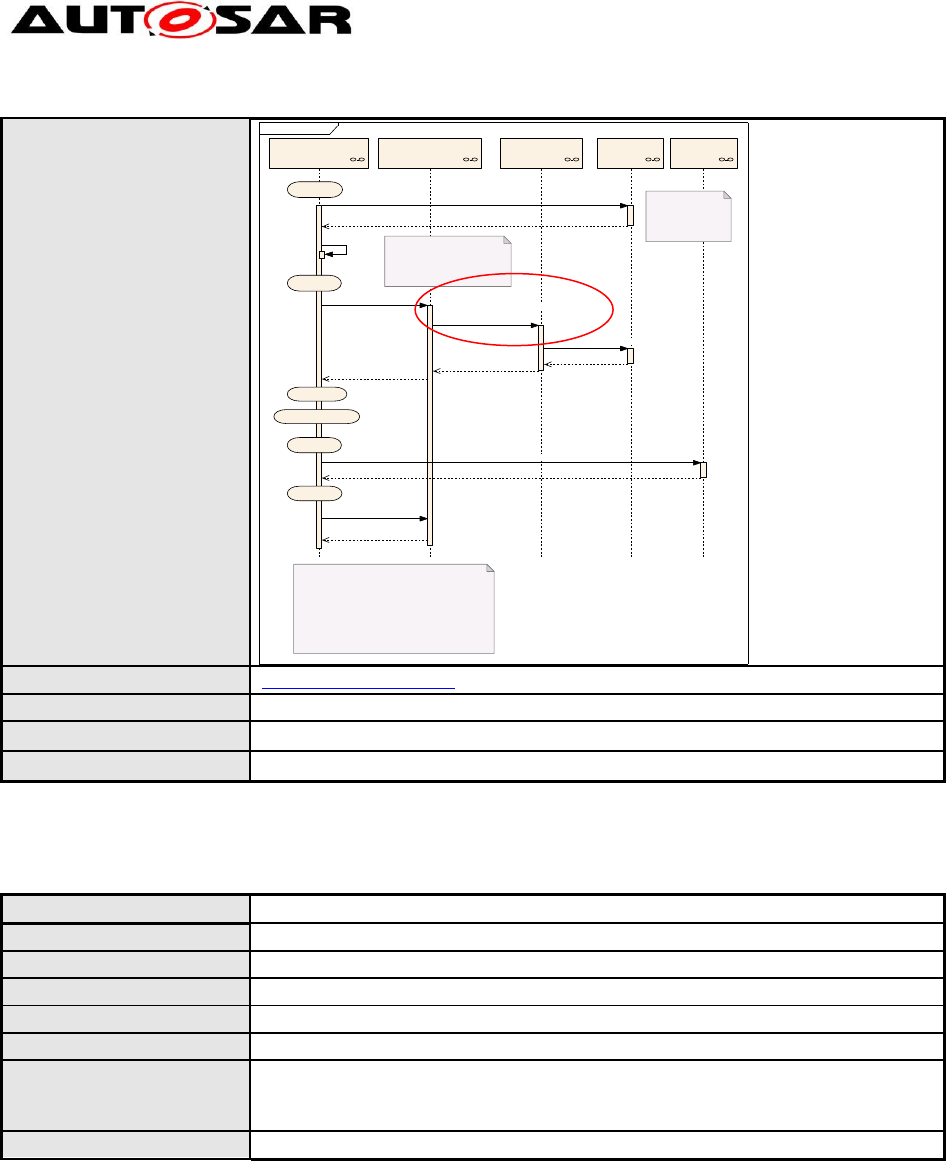
If a function is called with a fixed value for one or more of its parameters in a
sequence diagram, then this should be modeled by writing 'ParName:=value'
in the field 'Parameters' of the respective message.
Rationale:
Unified message modeling.
Modeling Guidelines of Basic
Software EA UML Model
AUTOSAR Release 4.2.1
32 of 47 Document ID 117: AUTOSAR_TR_BSWUMLModelModelingGuide
- AUTOSAR confidential -
Use Case:
sd startup & shutdown
WdgM::WdgMEcuM::EcuM Wdg::Wdg Mcu::Mcu
Initi alizati on of Watchdog
Driver in SLOW_MODE for
startup phase
WdgIf::WdgIf
If necessary, EcuM Callout can be used to
trigger the Watchdog Driver before
Watchdog Manager initialization
{Startup I}
{Startup II}
{Run}
{Prep Shutdown}
{Go Sleep}
{Go OFF I}
Status: Proposed by T O as per SWS WdgM 0.9
Description:
Comments:
Preconditions:
HW Watchdog supports "SLOW" and "FAST" modes
Wdg_Init(ConfigPtr)
Wdg_Init
EcuM
Callout
WdgM_Init(ConfigPtr) Std_ReturnType:=
WdgIf_SetMode(DeviceIndex,WdgMode:
=WDGIF_FAST_MODE)
Std_ReturnT ype:= Wdg_SetMode(Mode)
Wdg_SetMode
WdgIf_SetMode
WdgM_Init
Mcu_SetMode(McuMode:=SLEEP_MODE)
Mcu_SetMode
WdgM_DeInit()
WdgM_DeInit()
Dependencies:
[TR_BSWUML_00019] Labeling returns
Conflicts:
--
Supporting Material:
--
Contributes to:
--
4.3.3.1 [TR_BSWUML_00058] Return values in sequence diagrams
ID:
TR_BSWUML_00058
Initiator:
Technical Office
Date:
31.07.2006
Short Description:
Return values in sequence diagrams
Type:
New
Importance:
High
Description:
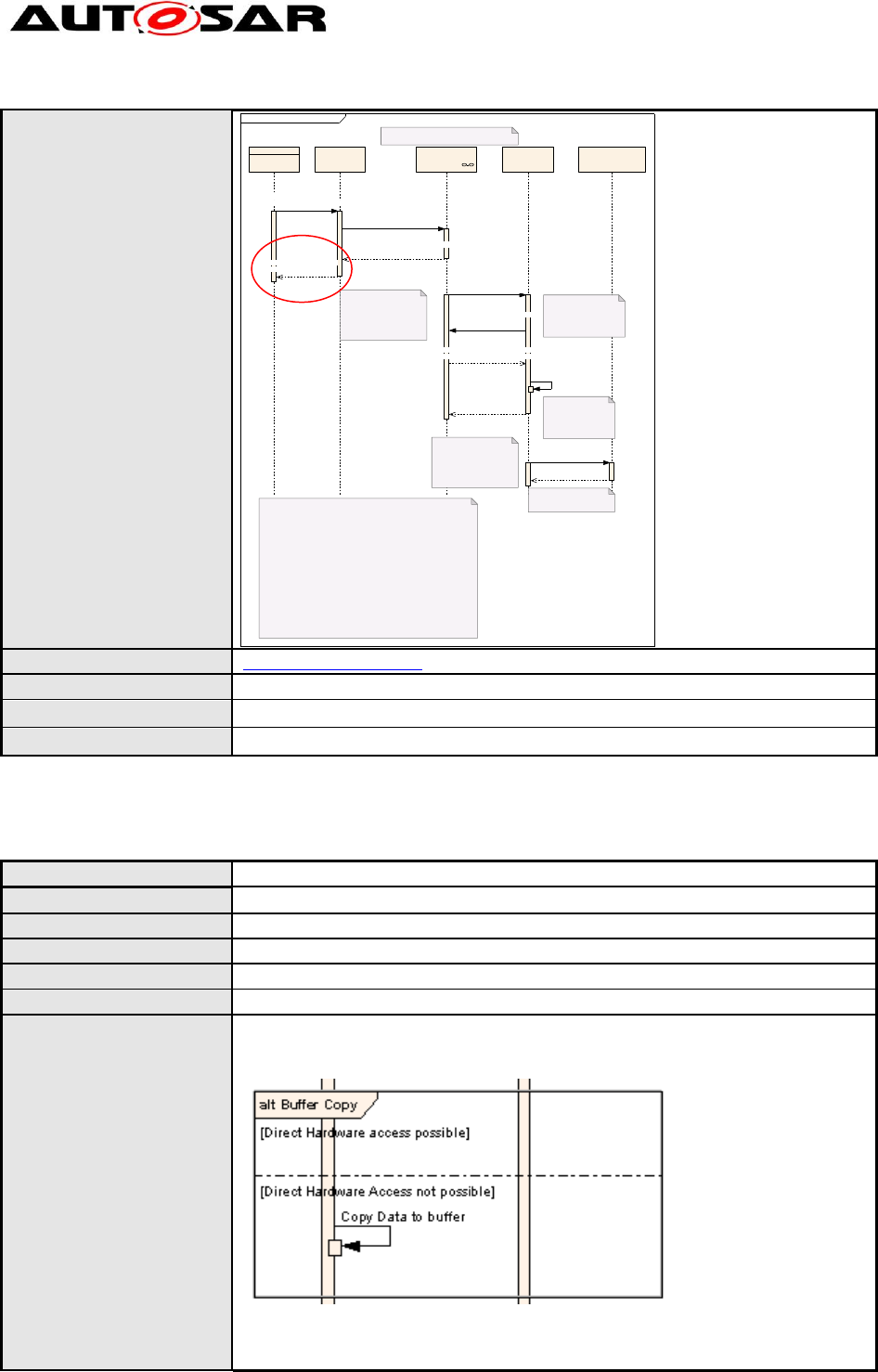
If the return of a function should be shown to give a specific value, then this
should be modeled by writing 'FuncName=value' in the field 'Message' of the
respective return-message.
Rationale:
Unified message modeling.
Modeling Guidelines of Basic
Software EA UML Model
AUTOSAR Release 4.2.1
33 of 47 Document ID 117: AUTOSAR_TR_BSWUMLModelModelingGuide
- AUTOSAR confidential -
Use Case:
sd Sender_Receiv er_Ev ent_Runnable
RunnableSender :RTE Receiv er :RTECom::Com
Sender's COM & Network & Receiver's COM
(1) The receiver's COM puts the
received event item into i ts
COM-queue and invokes the
callback function provided by RTE.
(2) RTE receives the event item
e from COM and puts it i nto the
RTE-queue for event e.
(4) RTE fetches an event from the
event e queue and call s the
receiver's runnable with the
fetched event as input parameter.
(5) The task is completed.
Status: Proposed by TO as per RTE SWS 0.07
Description:
Inter-ECU communication
Expl icit Sender-Recei ver communication:
INFORMAT ION_TYPE = event
Port name = p, Event item name = e
Sender attribute:
SUCCESS = no
SEND_MODE = once
receiver attribute:
RECEIVE_MODE = acti vation_of_runnable_entity
BUFFERING = queue(x) (The recei ver's COM is implementing the queue)
Sender :Application
(3) The OSEK task that wil l
execute the receiver's
runnabl e is started.
Rte_StatusType:=
Rte_Send_p_e(instance,data)
Com_SendSignal(SignalId,
SignalDataPtr)
Com_SendSignal(Com_SignalIdType,
Com_Applicati onDataRefType)
Rte_Send_p_e(Rte_Instance,
void)=RTE_E_OK
Rte_COMCal lback_Signal_e()
Com_ReturnType:=
Com_ReceiveSignal (Signal Id,
SignalDataPtr)
Com_ReceiveSignal (Com_SignalIdT ype,
Com_Applicati onDataRefType*)=COM_E_OK
Activate an
OSEK Task
Rte_COMCal lback_Signal_e()
Receivers Runnable
Receivers Runnable
Dependencies:
[TR_BSWUML_00019] Labeling returns
Conflicts:
--
Supporting Material:
--
Contributes to:
--
4.3.3.2 [TR_BSWUML_00018] Modeling of data copying
ID:
TR_BSWUML_00018
Initiator:
WP Architecture
Date:
18.10.2004
Short Description:
Modeling of data copying
Type:
new
Importance:
high
Description:
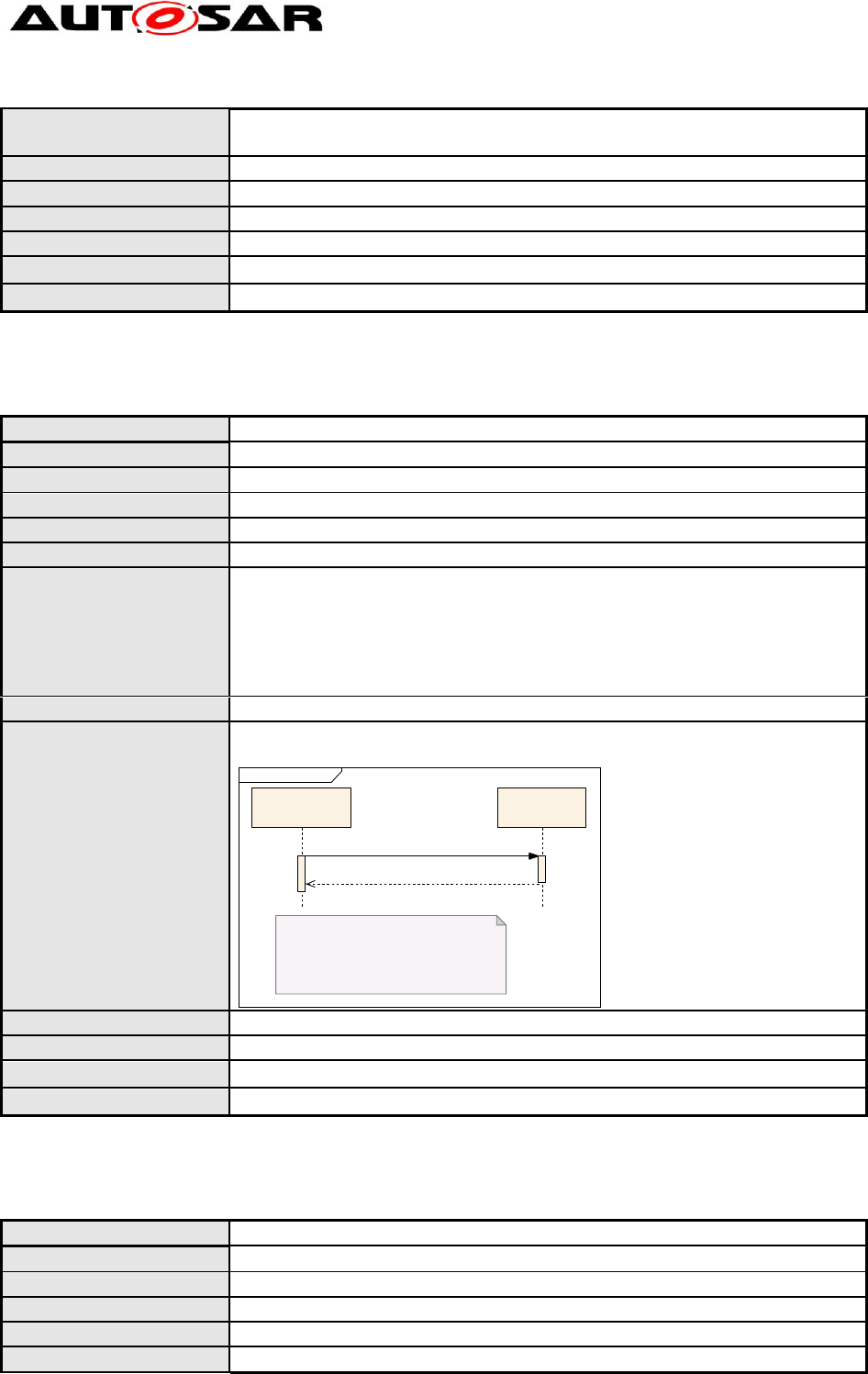
Within sequence diagrams, the following scheme shall be used for modeling
data copied/stored/…:
Data flow is depicted as Self-Message plus a comment field
In the message text is documented:
What data is copied
Modeling Guidelines of Basic
Software EA UML Model
AUTOSAR Release 4.2.1
34 of 47 Document ID 117: AUTOSAR_TR_BSWUMLModelModelingGuide
- AUTOSAR confidential -
From source
To target
Rationale:
Definition of uniform data exchange modeling
Use Case:
Modeling of data exchange between buffers of different layers
Dependencies:
--
Conflicts:
--
Supporting Material:
--
Contributes to:
--
4.3.3.3 [TR_BSWUML_00019] Labeling returns
ID:
TR_BSWUML_00019
Initiator:
WP Architecture
Date:
07.10.2004
Short Description:
Labeling returns
Type:
Changed
Importance:
High
Description:
Returns shall be labeled. The label shall be the name of the function it
belongs to without parameter names or -types. Returns shall be marked as
“Is Return”.
It is announced that in future return labels can be automatically be selected
within the Enterprise architect. If this is possible no hand-made adaptations
shall be done after selection.
Rationale:
Allow easy identification to which function a return belongs
Use Case:
A UML message has the name “Transmit CAN PDU”.
The return message has the same name.
sd Nv M_GetDataIndex
NvM::NvM
Status: Proposed by TO as per NvM SWS 1.44
Description:
Comments:
Generic Elements::NvM
User
NvM_GetDataIndex(BlockId,DataIndexPtr)
NvM_GetDataIndex
Dependencies:
--
Conflicts:
--
Supporting Material:
--
Contributes to:
--
4.3.3.4 [TR_BSWUML_00036] Linking sequence diagrams
ID:
TR_BSWUML_00036
Initiator:
WP Architecture
Date:
13.01.2005
Short Description:
Linking sequence diagrams
Type:
new
Importance:
high
Modeling Guidelines of Basic
Software EA UML Model
AUTOSAR Release 4.2.1
35 of 47 Document ID 117: AUTOSAR_TR_BSWUMLModelModelingGuide
- AUTOSAR confidential -
Description:
Each package within the ‘Interaction Views’ package shall contain dedicated
diagrams containing descriptions and links to sub diagrams.
These diagrams will be generated by the model owner. The author of a
sequence diagram shall therefore provide a short description of contents of
generated packages and diagrams to the model owner.
Rationale:
Readability of overall module
Use Case:
--
Dependencies:
--
Conflicts:
--
Supporting Material:
--
Contributes to:
--
4.3.4 State Machine Diagrams
4.3.4.1 [TR_BSWUML_00041] States shall have thick lines
ID:
TR_BSWUML_00041
Initiator:
WP Mode Management
Date:
14.02.2005
Short Description:
States shall have thick lines
Type:
new
Importance:
high
Description:
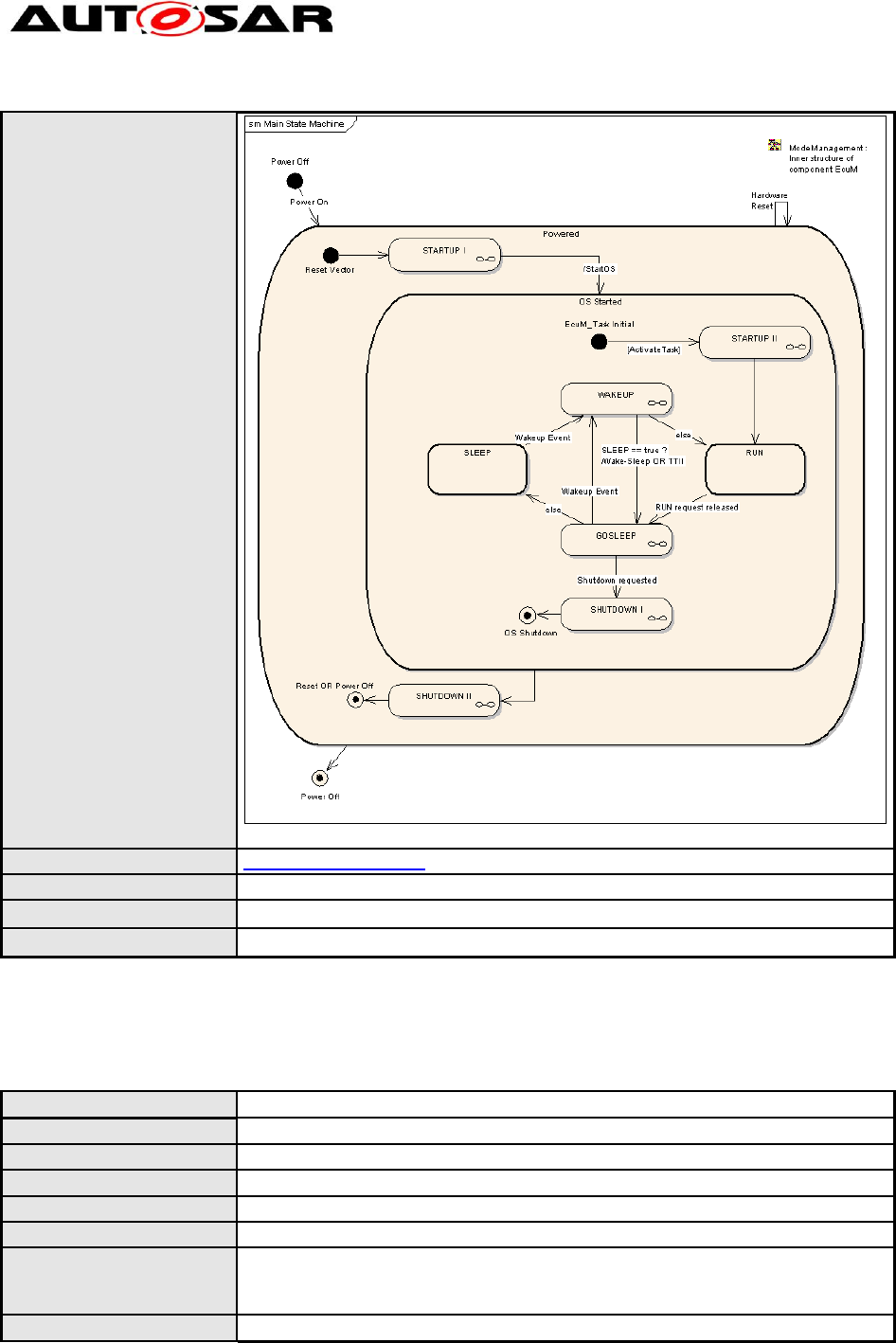
The state boxes shall have an outline of 2 points
Rationale:
Allow easier distinction between states and activities
Modeling Guidelines of Basic
Software EA UML Model
AUTOSAR Release 4.2.1
36 of 47 Document ID 117: AUTOSAR_TR_BSWUMLModelModelingGuide
- AUTOSAR confidential -
Use Case:
(to see what is meant please zoom to 200%)
Dependencies:
TR_BSWUML_00048
Conflicts:
--
Supporting Material:
--
Contributes to:
--
4.3.4.2 [TR_BSWUML_00042] A trigger condition shall be defined for each
transition
ID:
TR_BSWUML_00042
Initiator:
WP Mode Management
Date:
14.02.2005
Short Description:
A trigger condition shall be defined for each transition
Type:
Changed
Importance:
High
Description:
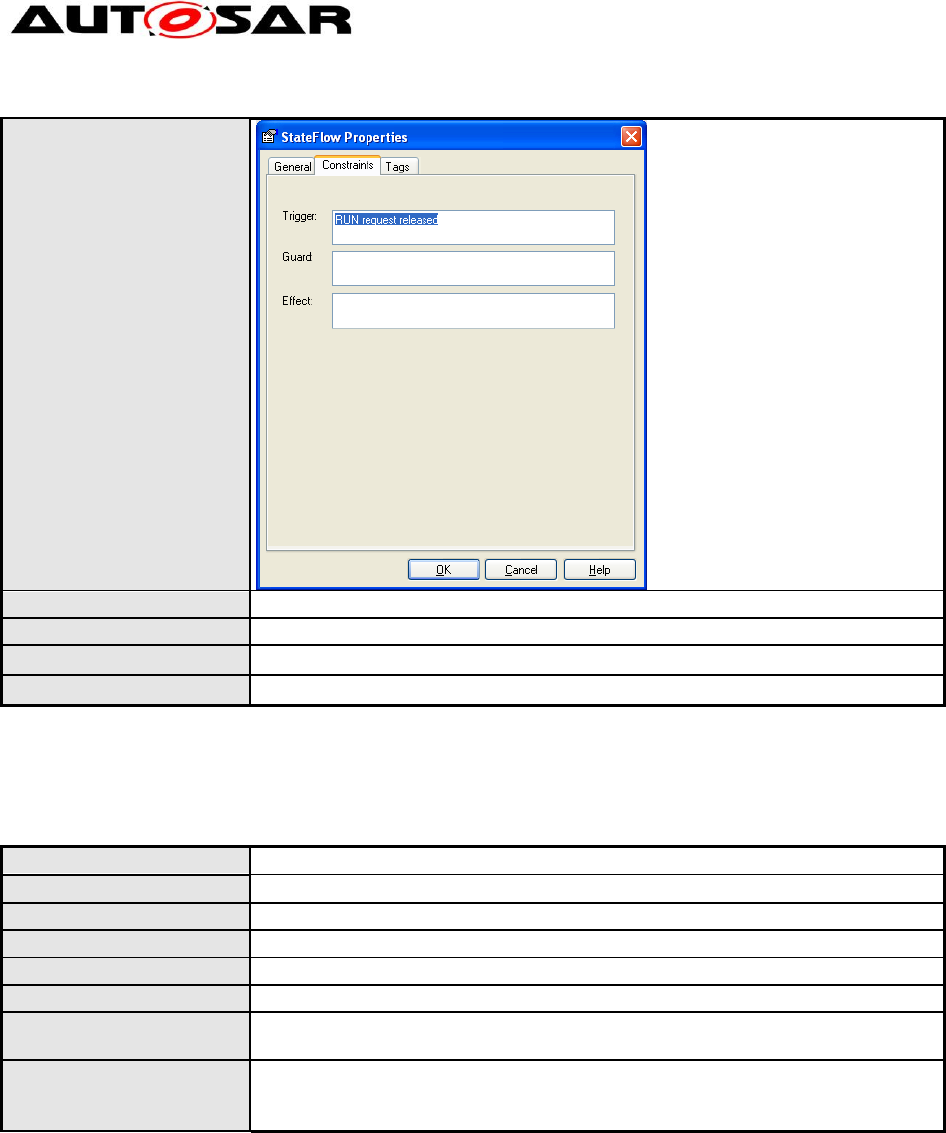
In each transition between two states the trigger of the transition (the
condition to make a transition) shall be defined in the ‘Trigger’ field of the
‘State Flow Properties’.
Rationale:
Necessary for complete behavioral description
Modeling Guidelines of Basic
Software EA UML Model
AUTOSAR Release 4.2.1
37 of 47 Document ID 117: AUTOSAR_TR_BSWUMLModelModelingGuide
- AUTOSAR confidential -
Use Case:
Dependencies:
--
Conflicts:
--
Supporting Material:
--
Contributes to:
--
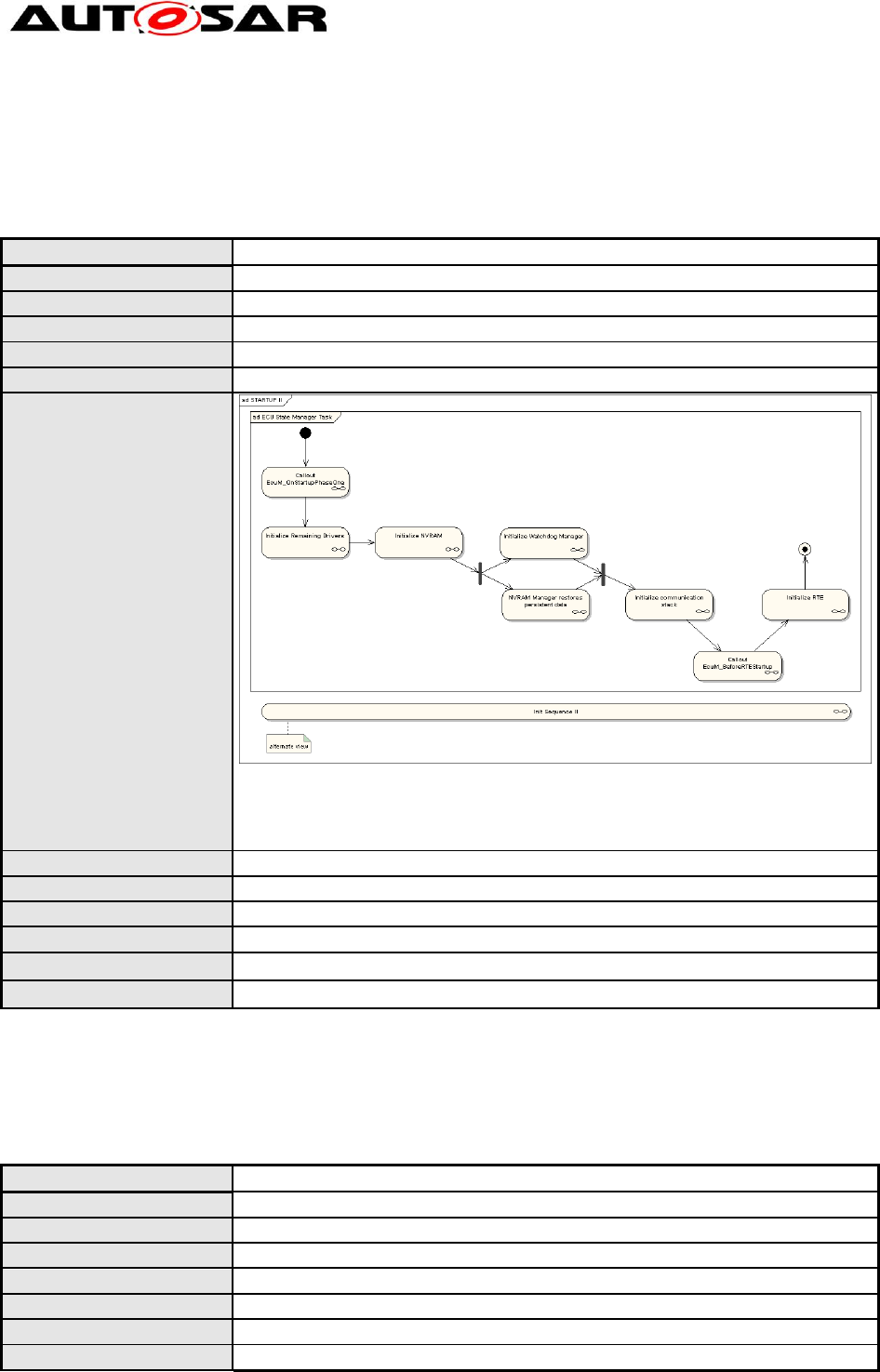
4.3.4.3 [TR_BSWUML_00043] Transitions may be modeled with sub-
activities
ID:
TR_BSWUML_00043
Initiator:
WP Mode Management
Date:
14.02.2005
Short Description:
Transitions may be modeled with sub-activities
Type:
Changed
Importance:
High
Description:
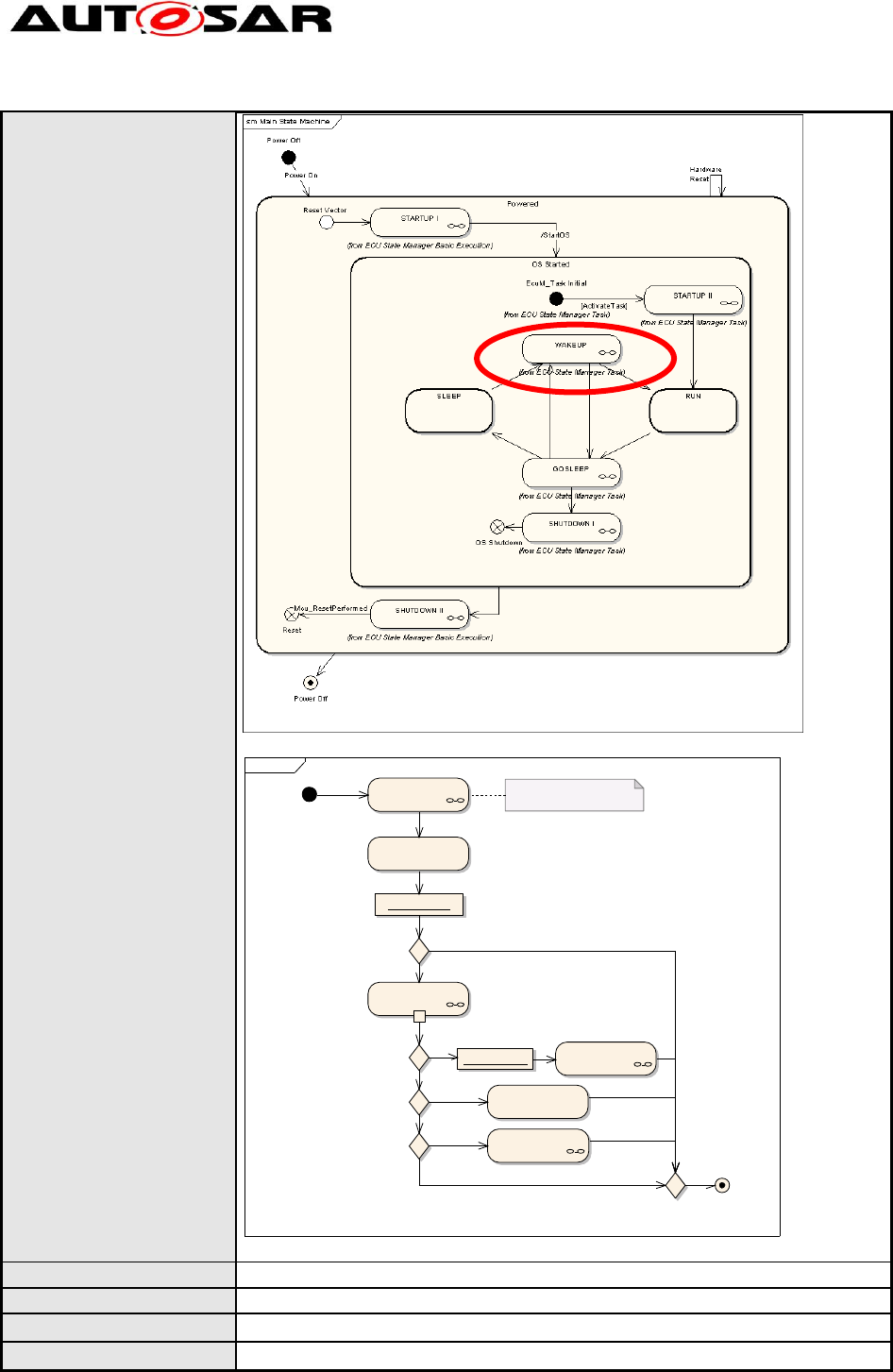
To reduce complexity of diagrams Activities may be modeled in a
hierarchical way by using sub-activities.
Rationale:
In some cases complex activities could trigger a transition. In these cases
the diagrams become rather complex. These sub-activities may be
visualized as sub activities to reduce complexity in one diagram.
Modeling Guidelines of Basic
Software EA UML Model
AUTOSAR Release 4.2.1
38 of 47 Document ID 117: AUTOSAR_TR_BSWUMLModelModelingGuide
- AUTOSAR confidential -
Use Case:
Overview State diagram.
ad WAKEUP
Perform WAKEUP I
Perform WAKEUP
VALIDATION
Perform WAKEUP
REACTION
WKACT
Wake-Sleep-Operation
Time Triggered Increased
Inoperation
WKACT == ECUM_WKACT_FULLBOOT ?
Validation Successful?
from SLEEP and GOSLEEP
SleepFlag := true
WKACT == ECUM_WKACT_SLEEP_OP ?
WKACT == ECUM_WKACT_TTII ?
SleepFlag:= false
return SleepFlag
Caution:
This activity may issue an ECU reset.
Perform WAKEUP II
[no]
[yes]
[no]
[yes]
[no]
[yes]
[no]
[yes]
Refined activity ‘WAKEUP’.
Dependencies:
--
Conflicts:
--
Supporting Material:
--
Contributes to:
--
Modeling Guidelines of Basic
Software EA UML Model
AUTOSAR Release 4.2.1
39 of 47 Document ID 117: AUTOSAR_TR_BSWUMLModelModelingGuide
- AUTOSAR confidential -
4.3.4.4 [TR_BSWUML_00046] Links to parent diagrams shall be drawn as
hyperlink diagram references
ID:
TR_BSWUML_00046
Initiator:
WP Mode Management
Date:
14.02.2005
Short Description:
Links to parent diagrams shall be drawn as diagram references
Type:
Changed
Importance:
medium
Description:
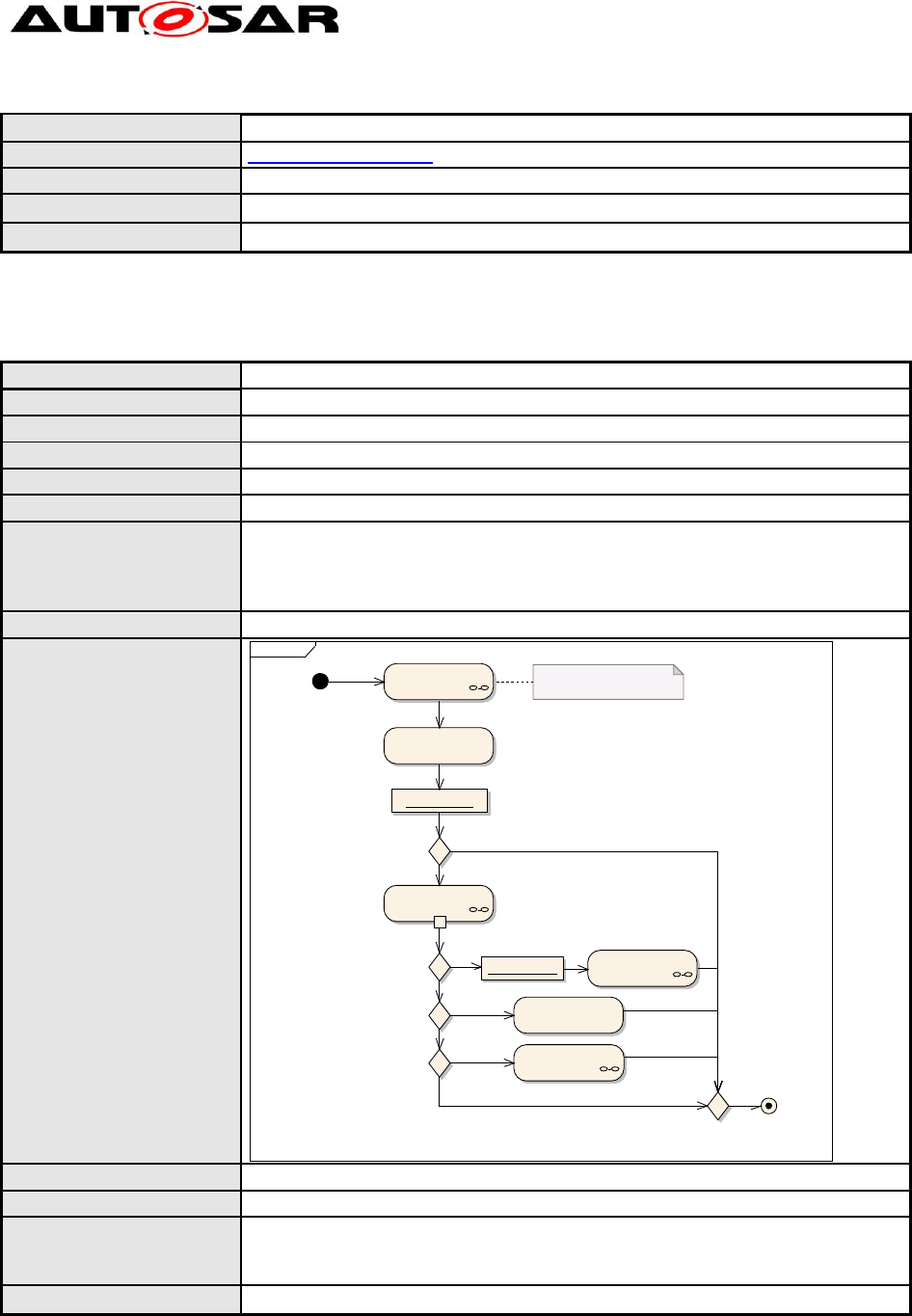
The shown diagram (which is only an example) shows an activity diagram of
a sub-activity of a larger system. The frame around the diagram indicates the
link to the parent diagram. Applies to state and activity diagrams
similarly.
Rationale:
Simple forward/backward navigation
Use Case:
--
Dependencies:
--
Conflicts:
--
Supporting Material:
Diagram references do not work in the HTML-Report!
Contributes to:
--
4.3.5 Activity Diagrams
4.3.5.1 [TR_BSWUML_00048] Activities shall have thin lines
ID:
TR_BSWUML_00048
Initiator:
WP Mode Management
Date:
14.02.2005
Short Description:
Activities shall have thin lines
Type:
new
Importance:
high
Description:
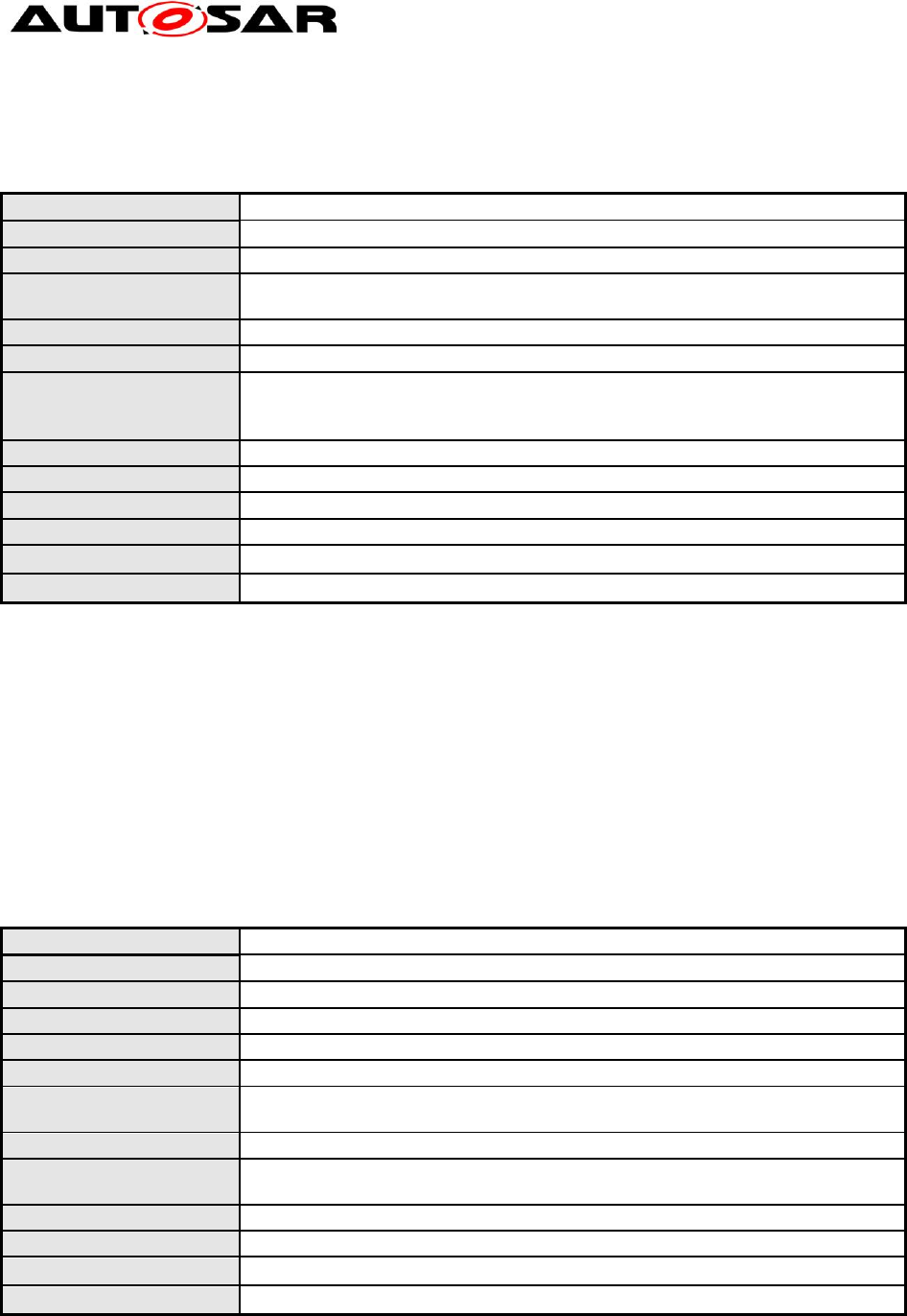
The activity boxes shall have an outline of 1 point
Rationale:
Allow easier distinction between states and activities
Modeling Guidelines of Basic
Software EA UML Model
AUTOSAR Release 4.2.1
40 of 47 Document ID 117: AUTOSAR_TR_BSWUMLModelModelingGuide
- AUTOSAR confidential -
Use Case:
--
Dependencies:
TR_BSWUML_00041
Conflicts:
--
Supporting Material:
--
Contributes to:
--
4.3.5.2 [TR_BSWUML_00049] Conditions to be defined for each branch
ID:
TR_BSWUML_00049
Initiator:
WP Mode Management
Date:
14.02.2005
Short Description:
Conditions to be defined for each branch
Type:
Changed
Importance:
High
Description:
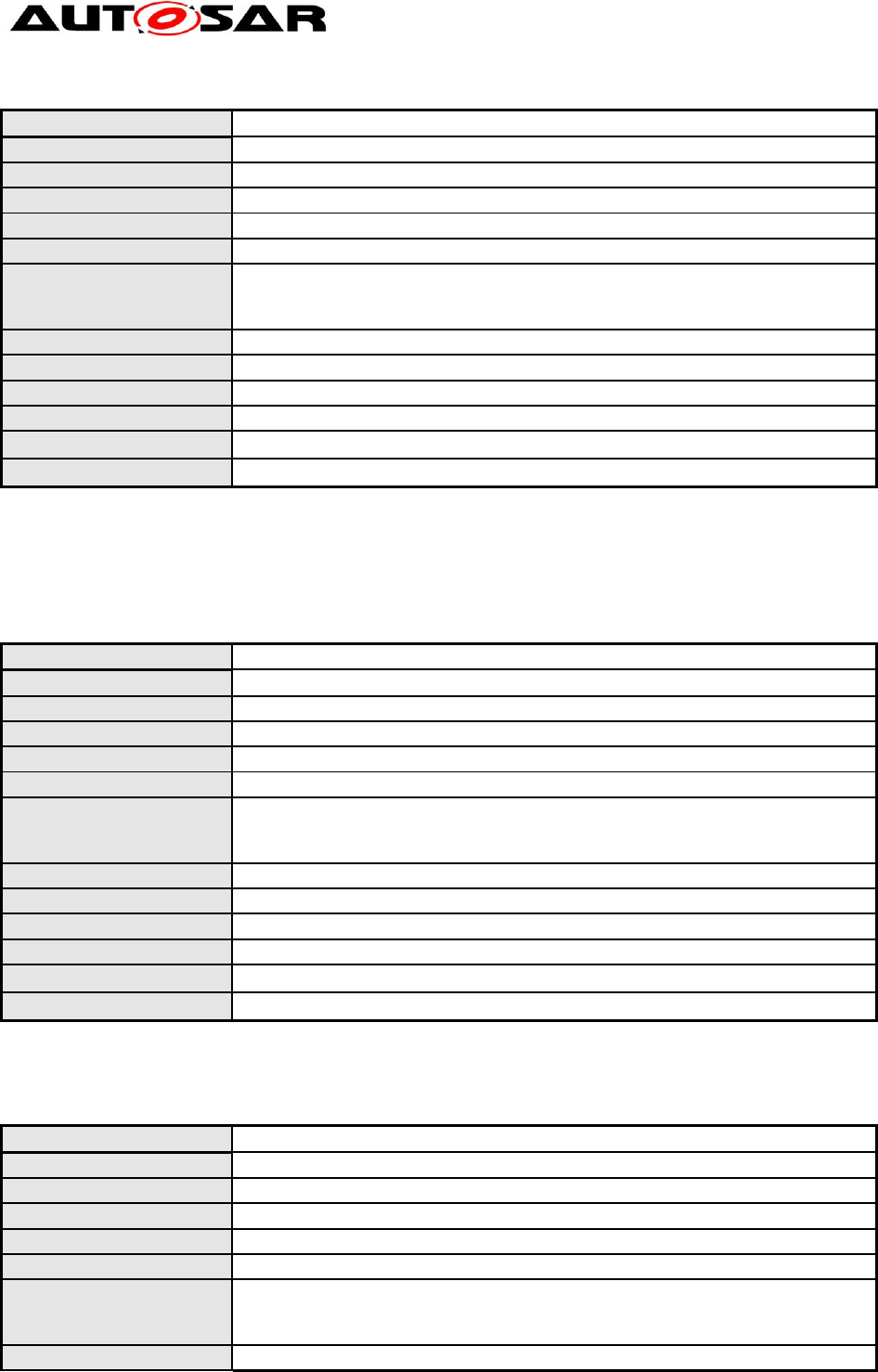
If a flow branches because of a condition, the ‘Decision’ element shall be
used. All outgoing control flows must have set a ‘Guard’ constraint in ‘Control
Flow Properties’.
If different flows shall be merged, also the “Decision” element shall be used.
Rationale:
--
Use Case:
ad WAKEUP
Perform WAKEUP I
Perform WAKEUP
VALIDATION
Perform WAKEUP
REACTION
WKACT
Wake-Sleep-Operation
Time Triggered Increased
Inoperation
WKACT == ECUM_WKACT_FULLBOOT ?
Validation Successful?
from SLEEP and GOSLEEP
SleepFlag := true
WKACT == ECUM_WKACT_SLEEP_OP ?
WKACT == ECUM_WKACT_TTII ?
SleepFlag:= false
return SleepFlag
Caution:
This activity may issue an ECU reset.
Perform WAKEUP II
[no]
[yes]
[no]
[yes]
[no]
[yes]
[no]
[yes]
Dependencies:
--
Conflicts:
--
Supporting Material:
Similar rules apply for forks/joins. The idea is to have the control flow clearly
defined. Object flow follows slightly different rules. Such as strict rules make
UML clumsy for use with object flow elements.
Contributes to:
--
Modeling Guidelines of Basic
Software EA UML Model
AUTOSAR Release 4.2.1
41 of 47 Document ID 117: AUTOSAR_TR_BSWUMLModelModelingGuide
- AUTOSAR confidential -
4.3.5.3 [TR_BSWUML_00050] Activities to be re-used in sequence
diagrams should also be drawn as sequence diagrams
ID:
TR_BSWUML_00050
Initiator:
WP Mode Management
Date:
14.02.2005
Short Description:
Activities to be re-used in sequence diagrams must also be drawn as
sequence diagrams
Type:
new
Importance:
medium
Description:
If an activity is to be referenced within a sequence diagram the drawing
messages will not look nice. Therefore this type of activities should also be
modeled as sequence diagrams.
Rationale:
Nice modeling.
Use Case:
--
Dependencies:
--
Conflicts:
--
Supporting Material:
--
Contributes to:
--
4.4 Model synchronization
All guidelines related to the design master are not intended for ‘normal’ users,
because the master of the BSW UML model will not be distributed. This chapter will
be refined as soon as the process of collaborative work on the BSW UML model has
been agreed.
4.4.1 [TR_BSWUML_00013] Creating a Design Master
ID:
TR_BSWUML_00013
Initiator:
WP Architecture
Date:
14.10.2004
Short Description:
Creating a Design Master
Type:
Changed
Importance:
High
Description:
Convert the base project to a Design Master using the Make Design Master
option in the Tools ( Manage .EAP File submenu.
Rationale:
--
Use Case:
This shall be done once for the project by AUTOSAR Technical Office only
(already done – no more actions required).
Dependencies:
--
Conflicts:
--
Supporting Material:
--
Contributes to:
--
4.4.2 [TR_BSWUML_00023] Design Master naming convention
Modeling Guidelines of Basic
Software EA UML Model
AUTOSAR Release 4.2.1
42 of 47 Document ID 117: AUTOSAR_TR_BSWUMLModelModelingGuide
- AUTOSAR confidential -
ID:
TR_BSWUML_00023
Initiator:
WP Architecture
Date:
14.10.2004
Short Description:
Design Master naming convention
Type:
New
Importance:
High
Description:
The file name of the Design Master shall have the following naming:
Master_AR_BasicSWArchitecture.eap and to be managed by a version
management tool.
Rationale:
--
Use Case:
Master_AR_BasicSWArchitecture.eap
Dependencies:
--
Conflicts:
--
Supporting Material:
--
Contributes to:
--
4.4.3 [TR_BSWUML_00014] Creating replicas from the Design Master
ID:
TR_BSWUML_00014
Initiator:
WP Architecture
Date:
14.10.2004
Short Description:
Creating replicas from the Design Master
Type:
new
Importance:
high
Description:
Create replicas from the design master using the Create New Replica option
in the Tools ( Manage .EAP File submenu.
Further work must be done on the replica.
Rationale:
--
Use Case:
To create your own local working model. This has to be done only once.
Dependencies:
--
Conflicts:
--
Supporting Material:
--
Contributes to:
--
4.4.4 [TR_BSWUML_00022] Replica naming convention
ID:
TR_BSWUML_00022
Initiator:
WP Architecture
Date:
14.10.2004
Short Description:
Replica naming convention
Type:
new
Importance:
high
Description:
Replicas of the design master shall have the following naming convention:
Replica_AR_BasicSWArchitecture_<Version number>_<Author
short name>.eap
Rationale:
--
Modeling Guidelines of Basic
Software EA UML Model
AUTOSAR Release 4.2.1
43 of 47 Document ID 117: AUTOSAR_TR_BSWUMLModelModelingGuide
- AUTOSAR confidential -
Use Case:
Replica_AR_BasicSWArchitecture_V24.1_CMA.eap
Dependencies:
--
Conflicts:
--
Supporting Material:
--
Contributes to:
--
4.5 Documentation generation
4.5.1 [TR_BSWUML_00067] Providing an alternative name for generated tables
ID:
TR_BSWUML_00067
Initiator:
TO
Date:
05.09.2007
Short Description:
Providing an alternative name for generated tables
Type:
new
Importance:
high
Description:
The documentation generator for the API tables uses the element name as
table name for the inclusion in the SWS Word document. This name has a
limited length in Word, which some elements in the BSW UML model
exceed. An alternative shorter name can be added by editing the tagged
value “aName”.
Rationale:
Limitation on the length of anchors in Word.
Use Case:
--
Dependencies:
--
Conflicts:
--
Supporting Material:
AUTOSAR_SWS_DEM.doc
Contributes to:
--
Modeling Guidelines of Basic
Software EA UML Model
AUTOSAR Release 4.2.1
44 of 47 Document ID 117: AUTOSAR_TR_BSWUMLModelModelingGuide
- AUTOSAR confidential -
5 BSW UML Profile
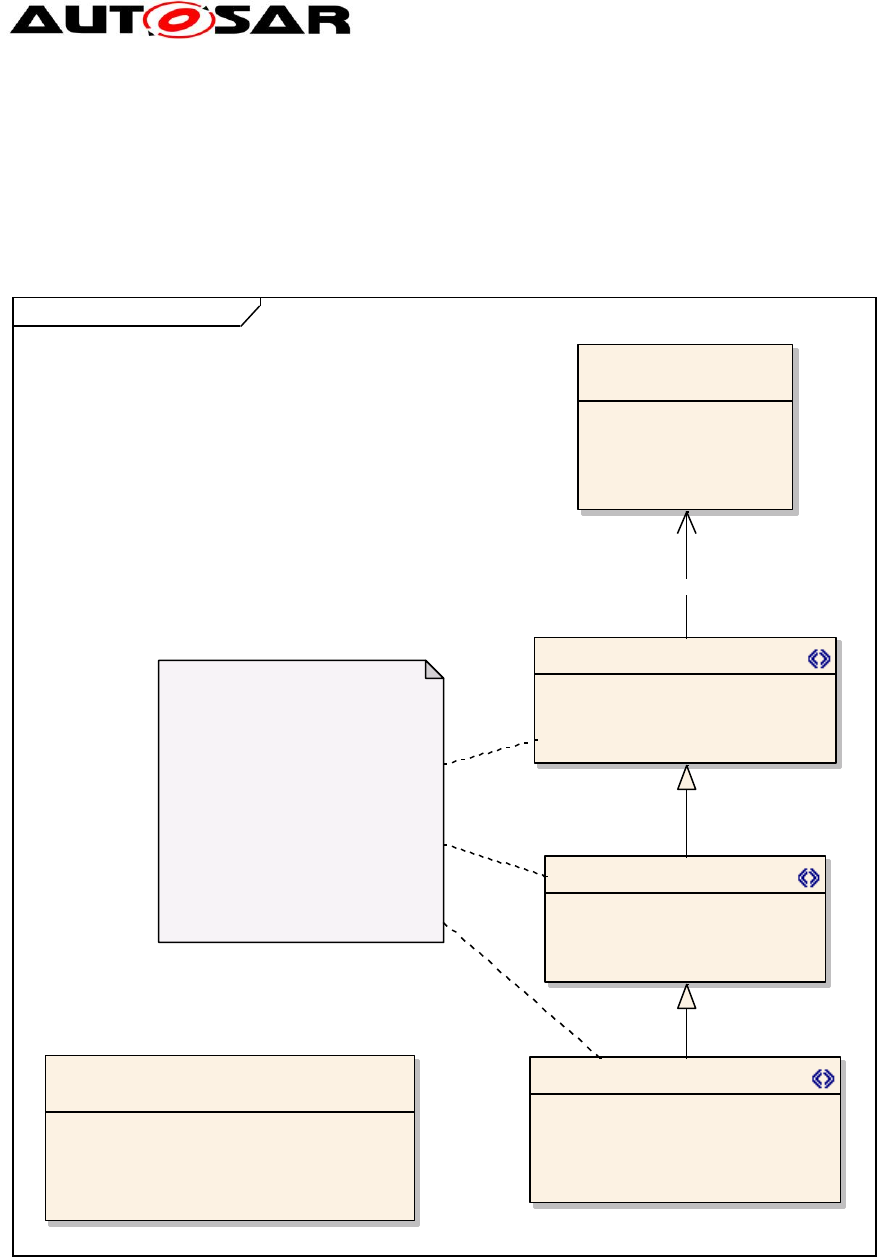
5.1.1 Stereotypes callback, function and scheduled function
class BSW-Profile Operations
«metaclass»
Operation
+ isOrdered: Boolean
+ isQuery: Boolean = false
+ isUnique: Boolean
+ lower: Integer
+ upper: UnlimitedNatural
callback
- Synchronous: char = Synchronous
- Reentrant: char = Non Reentrant
- ServiceID: int = 0
- aName: char
scheduled_function
-/ Synchronous: char = Synchronous
-/ Reentrant: char = Non Reentrant
-/ ServiceID: int = 0
-/ aName: char
- schedule: Schedule = FIXED_CYCLIC
«enumeration»
Schedule
FIXED_CYCLIC
FIXED_CYCLIC_WITH_PRECONDITION
ON_PRE_CONDITION
VARIABLE_CYCLIC_OR_ON_PRECONDITION
VARIABLE_CYCLIC
function
-/ Synchronous: char = Synchronous
-/ Reentrant: char = Non Reentrant
-/ ServiceID: int = 0
-/ aName: char
Since EA doesn't support inheritance
for stereotypes, we have to duplicate
all attributes in derived class. To allow
mapping to eclipse UML2, which does
support inheritance in stereotypes, we
have to set the duplicated attributes to
derived, so that the converter doesn't
duplicate the attributes.
Using inheritance allows us to write
oAW templates in a more maintainable
fashion, since it also supports
inheritance in stereotypes.
«extends»
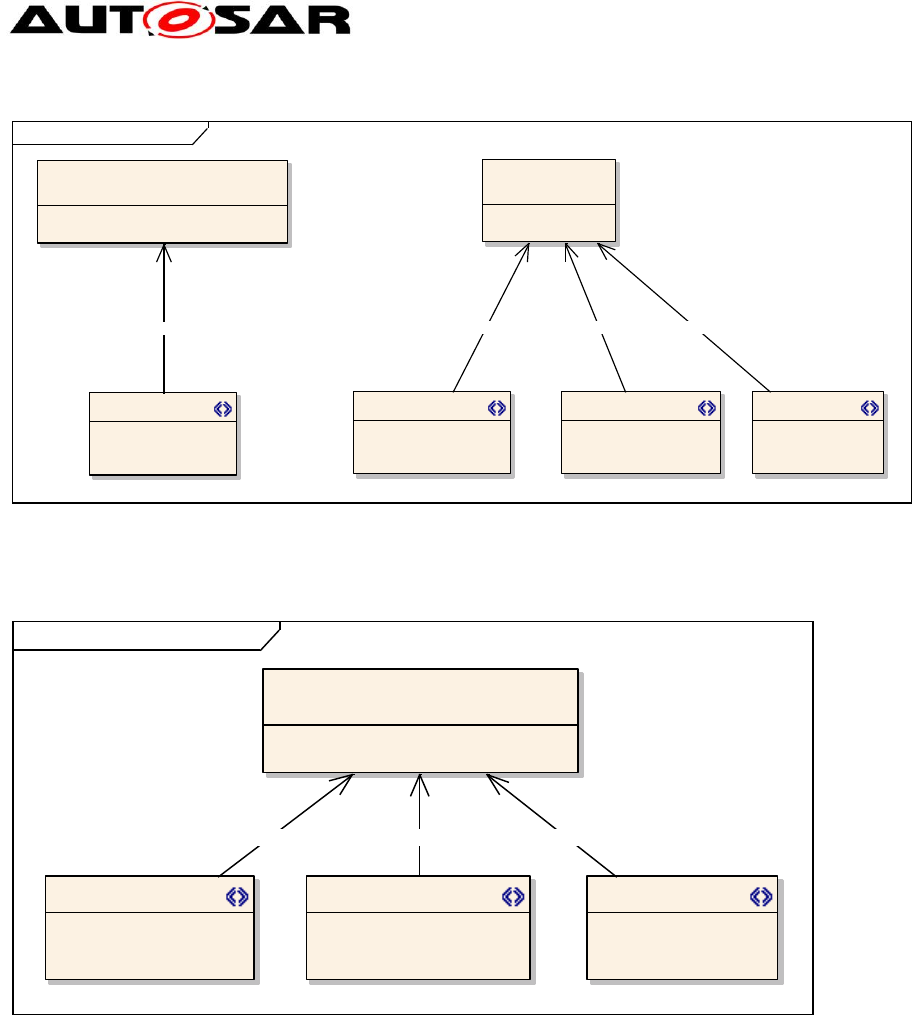
5.1.2 Stereotypes module, type, typedef and structure
Modeling Guidelines of Basic
Software EA UML Model
AUTOSAR Release 4.2.1
45 of 47 Document ID 117: AUTOSAR_TR_BSWUMLModelModelingGuide
- AUTOSAR confidential -
class BSW-Profile Classifiers
«metaclass»
Class
+ isActive: Boolean
typedef
- aName: char
«metaclass»
Component
+ isIndirectlyInstantiated: Boolean = true
module structure
- aName: char
type
- Range: char
- aName: char
«extends»«extends»
«extends» «extends»
5.1.3 Stereotypes mandatory, configurable and optional
class BSW-Profile Relationships
«metaclass»
Dependency
+ direction: Direction = Source -> Desti...
mandatory optionalconfigurable
«extends» «extends»«extends»
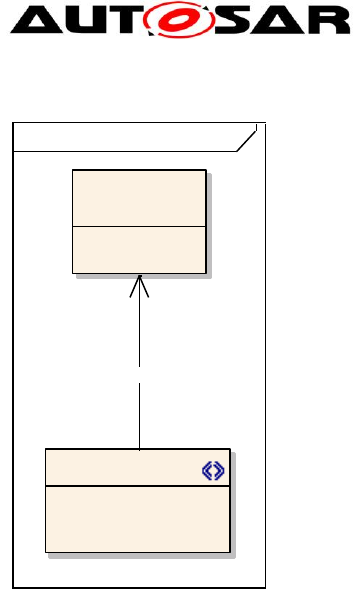
5.1.4 Stereotype range
Modeling Guidelines of Basic
Software EA UML Model
AUTOSAR Release 4.2.1
46 of 47 Document ID 117: AUTOSAR_TR_BSWUMLModelModelingGuide
- AUTOSAR confidential -
class BSW-Profile Properties
«metaclass»
Attribute
range
«extends»

Modeling Guidelines of Basic
Software EA UML Model
AUTOSAR Release 4.2.1
47 of 47 Document ID 117: AUTOSAR_TR_BSWUMLModelModelingGuide
- AUTOSAR confidential -
6 Administrative Info
Last used Requirements ID is [TR_BSWUML_00068]
