SW C And System Ing Guide AUTOSAR TR SWCing
User Manual:
Open the PDF directly: View PDF  .
.
Page Count: 57
- 1 References
- 2 Scope
- 3 How to read this document
- 4 Requirements traceability
- 5 Modeling Rules
- 6 Naming Convention for AUTOSAR Model Elements
- 6.1 General Rules for Long Names
- 6.2 General Rules for Short Names
- 6.3 Relation between Model Level and the Implementation Level
- 6.4 Usage of Keywords
- 6.5 Model Elements
- 6.5.1 ARPackage (AR-PACKAGE)
- 6.5.2 SenderReceiverInterface (SENDER-RECEIVER-INTERFACE)
- 6.5.3 VariableDataPrototype (VARIABLE-DATA-PROTOTYPE)
- 6.5.4 ApplicationDataType
- 6.5.5 CompuMethod (COMPU-METHOD)
- 6.5.6 SwComponentType (COMPOSITION-SW-COMPONENT-TYPE)
- 6.5.7 System (SYSTEM)
- 6.5.8 SwComponentPrototype (SW-COMPONENT-PROTOTYPE)
- 6.5.9 PortPrototype (P-PORT-PROTOTYPE, R-PORT-PROTOTYPE)
- 6.5.10 Units (UNIT)
- 6.5.11 Physical Dimensions
- 6.5.12 Enumerations
- 6.5.13 ClientServerInterface (CLIENT-SERVER-INTERFACE)
- 6.5.14 ParameterInterface (PARAMETER-INTERFACE)
- 6.5.15 ParameterDataPrototype (PARAMETER-DATA-PROTOTYPE)
- 6.5.16 DataConstrs (DATA-CONSTRS)
- 6.5.17 Blueprintable Elements in Application Interfaces Domain
- 6.5.18 PortPrototypeBlueprint (PORT-PROTOTYPE-BLUEPRINT)
- 6.5.19 Keywords
- 6.5.20 Guidelines for Float Datatype representation at Application Level

SW-C and System Modeling Guide
AUTOSAR CP Release 4.4.0
1 of 57 Document ID 207: AUTOSAR_TR_SWCModelingGuide
- AUTOSAR Confidential -
Document Title
SW-C and System Modeling
Guide
Document Owner
AUTOSAR
Document Responsibility
AUTOSAR
Document Identification No
207
Document Status
Final
Part of AUTOSAR Standard
Classic Platform
Part of Standard Release
4.4.0
Document Change History
Date
Release
Changed by
Change Description
2018-10-31
4.4.0
AUTOSAR
Release
Management
Editorial changes
2017-12-08
4.3.1
AUTOSAR
Release
Management
Editorial changes
2016-11-30
4.3.0
AUTOSAR
Release
Management
New modeling rules for Units and
Physical Dimensions elements.
Extended formulas expression for
Units in Display names.
2015-07-31
4.2.2
AUTOSAR
Release
Management
System Level description introduced
in the CompositionSWComponents
domain.
IDENTICAL CompuMethods
modeling rules aligned to ASAM
representation.
Complete traceability towards
Modeling Requirements Document.
2014-10-31
4.2.1
AUTOSAR
Release
Management
Generic CompuMethods reuse
mechanism enhanced through new
modeling rules
Extended naming rules and
recommendations for Long Names
standardization
Extended description of blueprint
mechanism applied to Application
Interfaces Domain

SW-C and System Modeling Guide
AUTOSAR CP Release 4.4.0
2 of 57 Document ID 207: AUTOSAR_TR_SWCModelingGuide
- AUTOSAR Confidential -
Document Change History
Date
Release
Changed by
Change Description
2013-03-15
4.1.1
AUTOSAR
Administration
Document’s scope extended to
support rules for Long Names.
Rules and recommendations
defined for Long Names
standardizations.
Rules defined to support multiple
meaning of keyword abbreviations.
Support reuse of CompuMethods for
specific resolutions.
Extended structure of blueprintable
packages
2011-12-22
4.0.3
AUTOSAR
Administration
Description of “Blueprint”
mechanism and its impact on
Blueprintable elements in
Application Interfaces domain
New Autosar Application Interfaces
Package Structure
Keywords handling reformulated
according to the Standardization
Template specification and the new
Application Interfaces Packages
Structure
“Units” section enhanced and new
“Physical Dimensions” section
introduced
2010-09-30
3.1.5
AUTOSAR
Administration
Modeling rules optimization for
multiple instances.
New description of the standardized
Autosar packages structure.
New RTE specification and
requirements references introduced.

SW-C and System Modeling Guide
AUTOSAR CP Release 4.4.0
3 of 57 Document ID 207: AUTOSAR_TR_SWCModelingGuide
- AUTOSAR Confidential -
Document Change History
Date
Release
Changed by
Change Description
2010-02-02
3.1.4
AUTOSAR
Administration
Set of modelling rules changed to
allow different styles of modelling
with respect to clustering and future
extensibility.
Set of naming convention rules
changed to allow more flexibility in
creation of self-explicable names.
Name and number of standardized
AR-Packages have changed. Scope
of naming convention has been
extended accordingly.
Blueprints concept supported as a
dedicated AR-Package for Ports
Long Names are now out of scope
Legal disclaimer revised
2008-08-13
3.1.1
AUTOSAR
Administration
Legal disclaimer revised
2007-12-21
3.0.1
AUTOSAR
Administration
Initial Release

SW-C and System Modeling Guide
AUTOSAR CP Release 4.4.0
4 of 57 Document ID 207: AUTOSAR_TR_SWCModelingGuide
- AUTOSAR Confidential -
Disclaimer
This work (specification and/or software implementation) and the material contained
in it, as released by AUTOSAR, is for the purpose of information only. AUTOSAR and
the companies that have contributed to it shall not be liable for any use of the work.
The material contained in this work is protected by copyright and other types of
intellectual property rights. The commercial exploitation of the material contained in
this work requires a license to such intellectual property rights.
This work may be utilized or reproduced without any modification, in any form or by
any means, for informational purposes only. For any other purpose, no part of the
work may be utilized or reproduced, in any form or by any means, without permission
in writing from the publisher.
The work has been developed for automotive applications only. It has neither been
developed, nor tested for non-automotive applications.
The word AUTOSAR and the AUTOSAR logo are registered trademarks.

SW-C and System Modeling Guide
AUTOSAR CP Release 4.4.0
5 of 57 Document ID 207: AUTOSAR_TR_SWCModelingGuide
- AUTOSAR Confidential -
Table of Contents
1 References ........................................................................................................... 7
2 Scope ................................................................................................................... 8
3 How to read this document ................................................................................... 9
3.1 Conventions used .......................................................................................... 9
3.2 Acronyms and Abbreviations ....................................................................... 10
4 Requirements traceability ................................................................................... 11
5 Modeling Rules ................................................................................................... 14
5.1 Reuse of model element .............................................................................. 14
5.1.1 Reuse of one interface for multiple ports ............................................. 14
5.1.2 Reuse of one data type for multiple interfaces .................................... 15
5.2 Use of multiple ComponentPrototypes ........................................................ 16
5.3 Clustering .................................................................................................... 16
5.3.1 Clustering through Sender Receiver Interfaces ................................... 17
5.4 Future extensibility ...................................................................................... 17
6 Naming Convention for AUTOSAR Model Elements .......................................... 20
6.1 General Rules for Long Names ................................................................... 20
6.2 General Rules for Short Names .................................................................. 21
6.3 Relation between Model Level and the Implementation Level ..................... 23
6.3.1 Length Restrictions.............................................................................. 23
6.3.2 Data Types .......................................................................................... 23
6.3.3 RTE rules of name mapping ................................................................ 23
6.3.4 Components and Ports ........................................................................ 25
6.3.5 Sender Receiver Interfaces and Data Elements ................................. 27
6.3.6 Client Server Interfaces, Operations, and Arguments ......................... 28
6.4 Usage of Keywords ..................................................................................... 28
6.4.1 Keyword Composition Semantic Rules ............................................... 29
6.5 Model Elements ........................................................................................... 35
6.5.1 ARPackage (AR-PACKAGE) .............................................................. 35
6.5.2 SenderReceiverInterface (SENDER-RECEIVER-INTERFACE) ......... 36
6.5.3 VariableDataPrototype (VARIABLE-DATA-PROTOTYPE) ................. 37
6.5.4 ApplicationDataType ........................................................................... 39
6.5.5 CompuMethod (COMPU-METHOD) ................................................... 40
6.5.6 SwComponentType (COMPOSITION-SW-COMPONENT-TYPE) ...... 41
6.5.7 System (SYSTEM) .............................................................................. 43
6.5.8 SwComponentPrototype (SW-COMPONENT-PROTOTYPE) ............. 44
6.5.9 PortPrototype (P-PORT-PROTOTYPE, R-PORT-PROTOTYPE) ....... 44
6.5.10 Units (UNIT) ........................................................................................ 45
6.5.11 Physical Dimensions ........................................................................... 46
6.5.12 Enumerations ...................................................................................... 47
6.5.13 ClientServerInterface (CLIENT-SERVER-INTERFACE) ..................... 49
6.5.14 ParameterInterface (PARAMETER-INTERFACE) .............................. 50
6.5.15 ParameterDataPrototype (PARAMETER-DATA-PROTOTYPE) ......... 50
6.5.16 DataConstrs (DATA-CONSTRS) ......................................................... 50
6.5.17 Blueprintable Elements in Application Interfaces Domain ................... 50
6.5.18 PortPrototypeBlueprint (PORT-PROTOTYPE-BLUEPRINT) .............. 52
6.5.19 Keywords ............................................................................................ 54
6.5.20 Guidelines for Float Datatype representation at Application Level ...... 55

SW-C and System Modeling Guide
AUTOSAR CP Release 4.4.0
6 of 57 Document ID 207: AUTOSAR_TR_SWCModelingGuide
- AUTOSAR Confidential -
List of Tables
Table 1 Example of keywords abbreviation of common usage .......................... 31
Table 2 Fields ........................................................................................................... 32
Table 3 Category of ARPackages ........................................................................... 36

SW-C and System Modeling Guide
AUTOSAR CP Release 4.4.0
7 of 57 Document ID 207: AUTOSAR_TR_SWCModelingGuide
- AUTOSAR Confidential -
1 References
[1] Template UML Profile and Modeling Guide
AUTOSAR_TemplateModelingGuide.pdf
[2] Specification of RTE Software
AUTOSAR_SWS_RTE.pdf
[3] Software Component Template
AUTOSAR_TPS_SoftwareComponentTemplate.pdf
[4] AUTOSAR Model Persistence Rules for XML
AUTOSAR_TR_XMLPersistenceRules.pdf
[5] MISRA-C: 2004. Guidelines for the use of the C language in critical systems.
[6] Autosar Methodology
AUTOSAR_TR_Methodology.pdf
[7] Generic Structure Template
AUTOSAR_TPS_GenericStructureTemplate.pdf
[8] Requirements on Runtime Environment
AUTOSAR_SRS_RTE.pdf
[9] Standardization Template
AUTOSAR_TPS_StandardizationTemplate.pdf
[10] Requirements for Software Component Modeling
AUTOSAR_RS_SWCModeling.pdf
[11] AUTOSAR System Template
AUTOSAR_TPS_SystemTemplate.pdf

SW-C and System Modeling Guide
AUTOSAR CP Release 4.4.0
8 of 57 Document ID 207: AUTOSAR_TR_SWCModelingGuide
- AUTOSAR Confidential -
2 Scope
The limits of my language mean the limits of my world. Ludwig Wittgenstein
This document gives guidelines and conventions on using the AUTOSAR model
elements in order to build AUTOSAR systems. It does not contain guidelines for the
AUTOSAR meta model. This is already covered by [1].

SW-C and System Modeling Guide
AUTOSAR CP Release 4.4.0
9 of 57 Document ID 207: AUTOSAR_TR_SWCModelingGuide
- AUTOSAR Confidential -
3 How to read this document
All rules are identified by an ID.
The ID starts with “TR_SWMG_” for the Modeling Rules followed by four digits
(TR_SWMG_xxxx).
The ID starts with “TR_SWNR_” for the Naming Rules followed by four digits
(TR_SWNR_xxxx).
The provided XML examples conform to the AUTOSAR metamodel.
3.1 Conventions used
In requirements, the following specific semantics are used (taken from Request for
Comment RFC 2119 from the Internet Engineering Task Force IETF)
The key words "MUST", "MUST NOT", "REQUIRED", "SHALL", "SHALL NOT",
"SHOULD", "SHOULD NOT", "RECOMMENDED", "MAY", and "OPTIONAL" in this
document are to be interpreted as described in RFC 2119. Note that the requirement
level of the document in which they are used modifies the force of these words.
MUST: This word, or the terms "REQUIRED" or "SHALL", mean that the
definition is an absolute requirement of the specification.
MUST NOT: This phrase, or the phrase „SHALL NOT“, means that the
definition is an absolute prohibition of the specification.
SHOULD: This word, or the adjective "RECOMMENDED", mean that there
may exist valid reasons in particular circumstances to ignore a particular item,
but the full implications must be understood and carefully weighed before
choosing a different course.
SHOULD NOT: This phrase, or the phrase "NOT RECOMMENDED" mean
that there may exist valid reasons in particular circumstances when the
particular behavior is acceptable or even useful, but the full implications should
be understood and the case carefully weighed before implementing any
behavior described with this label.
MAY: This word, or the adjective „OPTIONAL“, means that an item is truly
optional. One vendor may choose to include the item because a particular
marketplace requires it or because the vendor feels that it enhances the
product while another vendor may omit the same item. An implementation,
which does not include a particular option, MUST be prepared to interoperate
with another implementation, which does include the option, though perhaps
with reduced functionality. In the same vein an implementation, which does
include a particular option, MUST be prepared to interoperate with another
implementation, which does not include the option (except, of course, for the
feature the option provides.)

SW-C and System Modeling Guide
AUTOSAR CP Release 4.4.0
10 of 57 Document ID 207: AUTOSAR_TR_SWCModelingGuide
- AUTOSAR Confidential -
3.2 Acronyms and Abbreviations
API: Application Programming Interface
AR: AUTOSAR
CAN: Controller Area Network
ECU: Electronic Control Unit
HMI: Human Machine Interface
MISRA: Motor Industry Software Reliability Association
RTE: Real Time Environment
SW-C: Software Component
WP: Work Package
XML: eXtensible Markup Language

SW-C and System Modeling Guide
AUTOSAR CP Release 4.4.0
11 of 57 Document ID 207: AUTOSAR_TR_SWCModelingGuide
- AUTOSAR Confidential -
4 Requirements traceability
Requirements against this document are exclusively stated in the corresponding
requirements document [10].
The following table references the requirements specified in [10] and provides information
about individual specification items that fulfill a given requirement.
Requirement
Description
Satisfied by
RS_SWMG_00001
Distinguish Standardized
vs not standardized model
elements of type
ARElement
TR_SWMG_00003, TR_SWMG_00004,
TR_SWMG_00017, TR_SWMG_00018,
TR_SWNR_00022, TR_SWNR_00023
RS_SWMG_00002
Name shall reflect the
purpose of the model
element
TR_SWMG_00009, TR_SWMG_00011,
TR_SWNR_00004, TR_SWNR_00006
RS_SWMG_00005
Easy creation of names
TR_SWNR_00010
RS_SWMG_00006
Model Elements names
shall be self-explanatory
TR_SWMG_00009, TR_SWMG_00011,
TR_SWNR_00004, TR_SWNR_00006,
TR_SWNR_00037
RS_SWMG_00007
Distinguish model elements
of different model element
suppliers
TR_SWMG_00003, TR_SWMG_00004,
TR_SWMG_00017, TR_SWNR_00059
RS_SWMG_00010
Model Element Names
shall follow semantic rules
TR_SWMG_00010, TR_SWMG_00011,
TR_SWMG_00012, TR_SWMG_00013,
TR_SWMG_00014, TR_SWMG_00015,
TR_SWMG_00016, TR_SWMG_00019,
TR_SWNR_00005, TR_SWNR_00008,
TR_SWNR_00026, TR_SWNR_00027,
TR_SWNR_00029, TR_SWNR_00040,
TR_SWNR_00041, TR_SWNR_00042,
TR_SWNR_00043, TR_SWNR_00044,
TR_SWNR_00051, TR_SWNR_00055,
TR_SWNR_00056, TR_SWNR_00057,
TR_SWNR_00062, TR_SWNR_00069,
TR_SWNR_00070, TR_SWNR_00071,
TR_SWNR_00072
RS_SWMG_00011
Model Element Names are
composed by arranging
standardized keywords
TR_SWNR_00009, TR_SWNR_00010,
TR_SWNR_00011, TR_SWNR_00013,
TR_SWNR_00018, TR_SWNR_00066
RS_SWMG_00012
Semantic of Model Element
Names shall allow variable
number of keywords
TR_SWNR_00019, TR_SWNR_00020,
TR_SWNR_00034, TR_SWNR_00050,
TR_SWNR_00058
RS_SWMG_00014
Length restriction for short
names of Identifiable
TR_SWNR_00002
RS_SWMG_00016
Names shall allow to
indicate if the value is a
direct measurement or a
conditioned value
TR_SWNR_00019, TR_SWNR_00058
RS_SWMG_00017
Names shall follow the ISO
8855 for English naming.
TR_SWNR_00001

SW-C and System Modeling Guide
AUTOSAR CP Release 4.4.0
12 of 57 Document ID 207: AUTOSAR_TR_SWCModelingGuide
- AUTOSAR Confidential -
RS_SWMG_00030
Use English as Standard
Language for Names.
TR_SWNR_00001, TR_SWNR_00013
RS_SWMG_00031
No Architectural
Information in Names
TR_SWNR_00007, TR_SWNR_00035,
TR_SWNR_00036, TR_SWNR_00048
RS_SWMG_00034
Usage of Unique Keywords
TR_SWNR_00066, TR_SWNR_00067,
TR_SWNR_00068
RS_SWMG_00039
Avoid usage of Trailing
underscores
TR_SWNR_00003
RS_SWMG_00040
Avoid sequences of
underscores characters.
TR_SWNR_00003, TR_SWNR_00009
RS_SWMG_00041
Do not rely on
uppercase/lowercase
difference only.
TR_SWNR_00004, TR_SWNR_00011
RS_SWMG_00048
Easy lookup of names in
databases
TR_SWMG_00008
RS_SWMG_00049
Support Identifiable already
present in the MasterTable
TR_SWMG_00018
RS_SWMG_00052
Definition of Package
Structure
TR_SWMG_00008
RS_SWMG_00053
Model shall be compliant to
the Meta Model
TR_SWMG_00001
RS_SWMG_00054
Provide guidelines how to
resolve name conflicts
TR_SWNR_00001, TR_SWNR_00002,
TR_SWNR_00003, TR_SWNR_00004,
TR_SWNR_00005, TR_SWNR_00006,
TR_SWNR_00007, TR_SWNR_00008,
TR_SWNR_00009, TR_SWNR_00010,
TR_SWNR_00011, TR_SWNR_00013,
TR_SWNR_00017, TR_SWNR_00018,
TR_SWNR_00019, TR_SWNR_00020,
TR_SWNR_00022, TR_SWNR_00023,
TR_SWNR_00026, TR_SWNR_00027,
TR_SWNR_00029, TR_SWNR_00034,
TR_SWNR_00035, TR_SWNR_00036,
TR_SWNR_00037, TR_SWNR_00040,
TR_SWNR_00041, TR_SWNR_00042,
TR_SWNR_00043, TR_SWNR_00044,
TR_SWNR_00048, TR_SWNR_00050,
TR_SWNR_00051, TR_SWNR_00055,
TR_SWNR_00056, TR_SWNR_00057,
TR_SWNR_00058, TR_SWNR_00059,
TR_SWNR_00062, TR_SWNR_00063,
TR_SWNR_00064, TR_SWNR_00065,
TR_SWNR_00066, TR_SWNR_00067,
TR_SWNR_00068, TR_SWNR_00069,
TR_SWNR_00070, TR_SWNR_00071,
TR_SWNR_00072
RS_SWMG_00055
Continuous Data Type
resolution should be a
power of two
TR_SWMG_00004
RS_SWMG_00056
Standardized model
elements shall not contain
non standardized elements
TR_SWMG_00003, TR_SWMG_00004,
TR_SWMG_00017, TR_SWNR_00022
RS_SWMG_00057
Modeling Guide shall
TR_SWMG_00001
SW-C and System Modeling Guide
AUTOSAR CP Release 4.4.0
13 of 57 Document ID 207: AUTOSAR_TR_SWCModelingGuide
- AUTOSAR Confidential -
support the AUTOSAR
methodology
RS_SWMG_00059
There shall be a single set
of keywords
TR_SWNR_00010
RS_SWMG_00060
Applicability of Naming
Convention
TR_SWNR_00059
RS_SWMG_00061
Naming convention shall be
unique
TR_SWNR_00001, TR_SWNR_00002,
TR_SWNR_00003, TR_SWNR_00004,
TR_SWNR_00005, TR_SWNR_00006,
TR_SWNR_00007, TR_SWNR_00063,
TR_SWNR_00064, TR_SWNR_00065
RS_SWMG_00062
Naming Convention shall
rule Short Names and Long
Names construction.
TR_SWNR_00001, TR_SWNR_00002,
TR_SWNR_00050, TR_SWNR_00063,
TR_SWNR_00064, TR_SWNR_00065

SW-C and System Modeling Guide
AUTOSAR CP Release 4.4.0
14 of 57 Document ID 207: AUTOSAR_TR_SWCModelingGuide
- AUTOSAR Confidential -
5 Modeling Rules
[TR_SWMG_00001] Compliance to Autosar Meta Model ⌈ Model shall be
compliant to the Meta Model.⌋( RS_SWMG_00053 , RS_SWMG_00057)
[TR_SWMG_00003] Usage of AR Package concept for SW-Cs ⌈Use AR
Package concept for SW-C to distinguish different providers of SW-C.⌋(
RS_SWMG_00001 , RS_SWMG_00007 , RS_SWMG_00056)
Ex: Autosar_AISpecification, Supplier1, Supplier2, OEM1
[TR_SWMG_00017] Usage of AR Package category ⌈ Use AR Package category
to distinguish what is standardized, according to the provider of the ARPackage, from
what is not.⌋( RS_SWMG_00001, RS_SWMG_00007 , RS_SWMG_00056)
See document [7] for AR Package categories classification.
[TR_SWMG_00004] Separate packages for elements not defined by AUTOSAR
partnership ⌈ Each element not defined by the AUTOSAR partnership, shall be
included in a AR Package different from the one officially released by AUTOSAR, i.e.
the AR Package ShortName shall be changed (e.g. SUPPLIER1) and the category
may be changed or not according to AR packages category classification and
stakeholder specific standard elements handling.⌋( RS_SWMG_00001 ,
RS_SWMG_00007 , RS_SWMG_00055 , RS_SWMG_00056)
Recommendations:
- continuous Data Type resolution should be a power of two.
5.1 Reuse of model element
5.1.1 Reuse of one interface for multiple ports
The reuse of interfaces is encouraged.
Example:
The Temperature interface is used for the InsideTemperature port and
OutsideTemperature port of a component type.
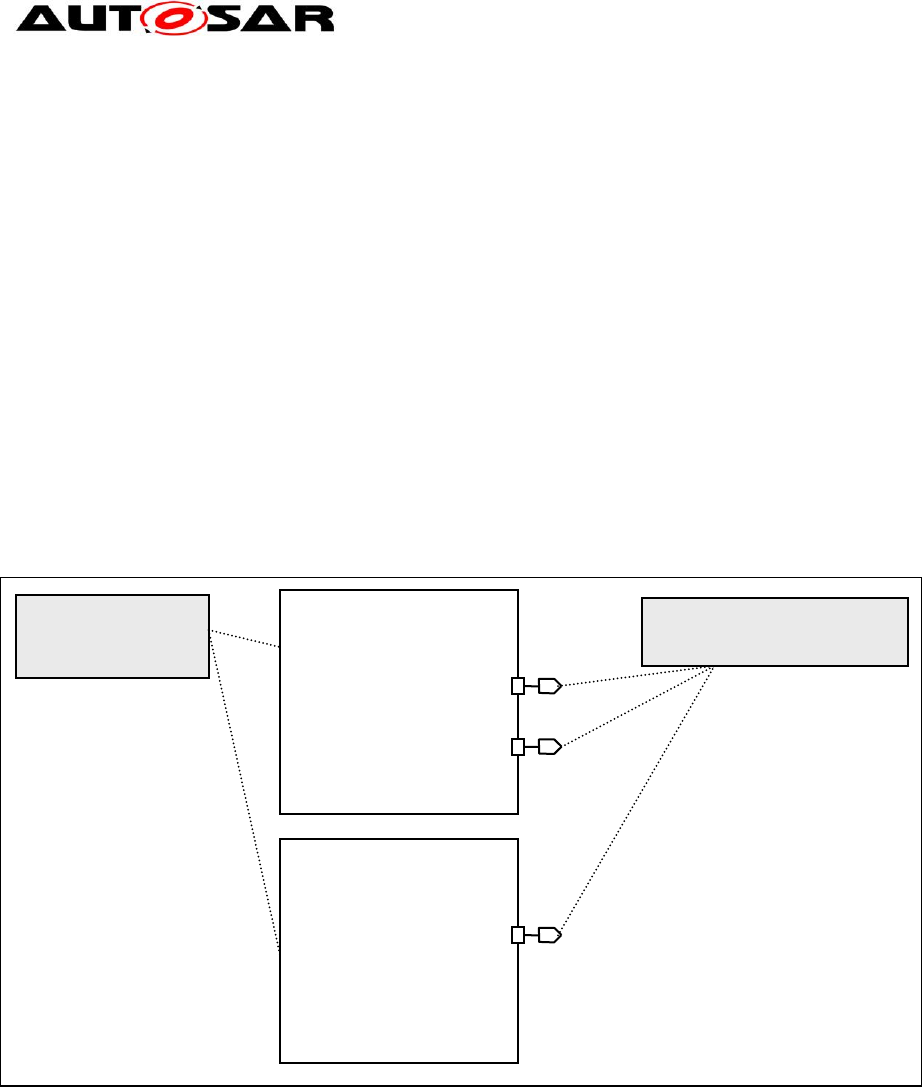
[TR_SWMG_00011] Independence of Interfaces definition from variants ⌈ Do
not define different interfaces to implement variants. Define one interface that is
independent on the variant and define several ports using this interface which are
dependent on the variant.⌋( RS_SWMG_00002 , RS_SWMG_00006 ,
RS_SWMG_00010)
Using one interface for multiple ports makes variant handling more understandable
since the interfaces are not affected by the variant. Ports can be enabled or disabled
depending on the selected variant.
SW-C and System Modeling Guide
AUTOSAR CP Release 4.4.0
15 of 57 Document ID 207: AUTOSAR_TR_SWCModelingGuide
- AUTOSAR Confidential -
Example:
Gasoline spark ignition engine management systems know the concept of a slow
path and a fast path for torque intervention. Current diesel systems do not know this
distinction.
The following modeling is not recommended:
Define an interface TorqueInterventionSlow and an interface
TorqueInterventionFast.
Define a port TorqeInterventionSlow with the interface TorqueInterventionSlow
and a port TorqueInterventionFast with the interface TorqueInterventionFast.
In a diesel variant the TorqueInterventionSlow port and interface are ignored.
The following modeling is recommended:
Define an interface TorqueIntervention1.
Define a port TorqueInterventionSlow and a port TorqueInterventionFast which
both have the interface TorqueIntervention1.
In a diesel variant the TorqueInterventionSlow port is disabled.
Figure 1: Re-use of PortInterfaces in Ports with variants.
Please note that in the example, as result of variant handling approach, the two
ComponentPrototypes are of the same ComponentType.
5.1.2 Reuse of one data type for multiple interfaces
The reuse of data types is encouraged.
Example:
The Torque data type is used in the Data Elements of the interfaces
MinimumTorqueAtClutch and MaximumTorqueAtClutch.
AtomicSoftwareComponent
EngineControl
PortInterface
TorqueIntervention1
EngineControl
(gasoline variant)
TorqueInterventionFast
ComponentPrototype
PPort
PPort
TorqueInterventionSlow
EngineControl
(diesel variant)
TorqueInterventionFast
ComponentPrototype
PPort
SW-C and System Modeling Guide
AUTOSAR CP Release 4.4.0
16 of 57 Document ID 207: AUTOSAR_TR_SWCModelingGuide
- AUTOSAR Confidential -
5.2 Use of multiple ComponentPrototypes
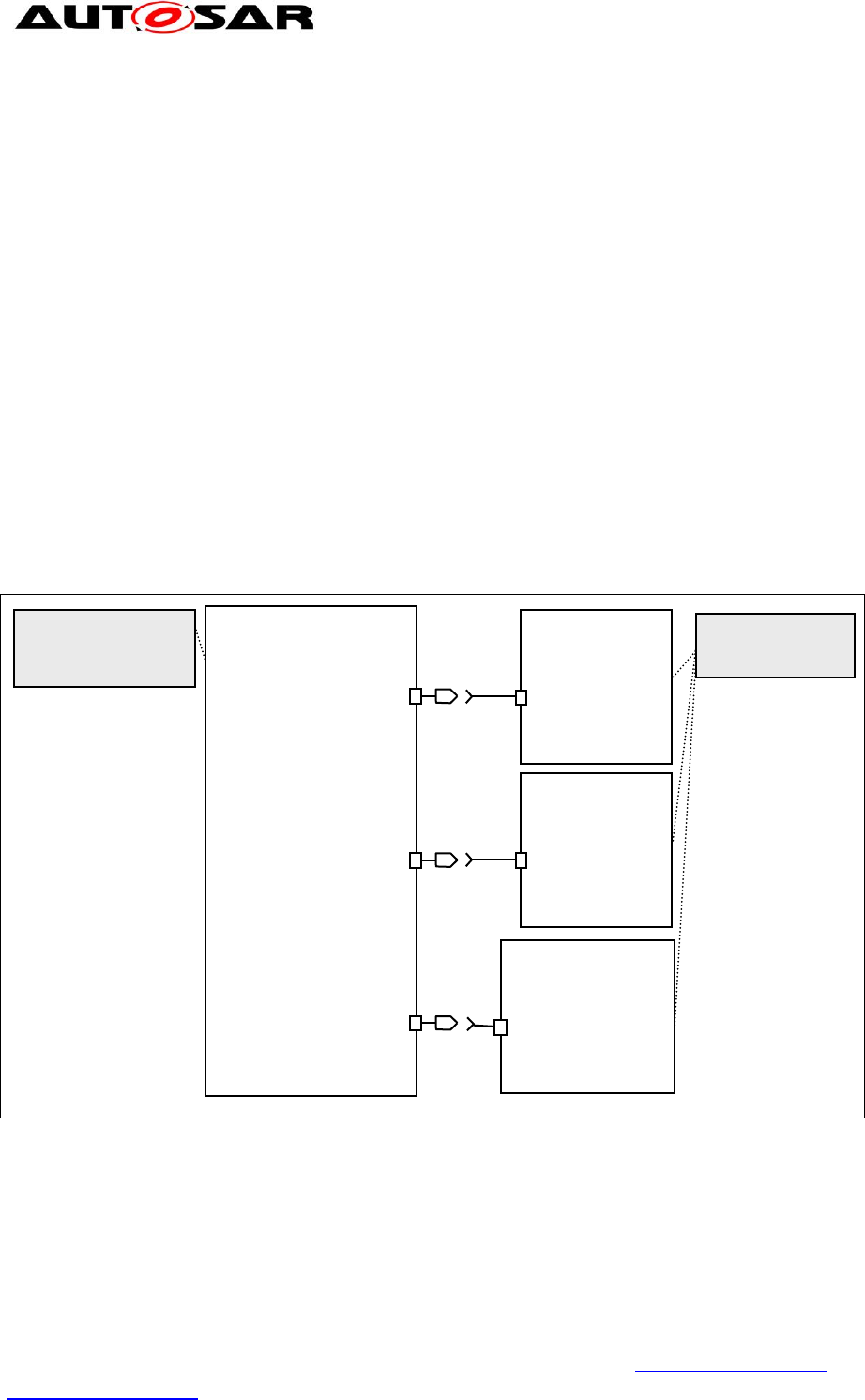
If the same port P (either RPort or PPort) of multiple ComponentPrototypes A1..n of
the same ComponentType is connected to another ComponentPrototype B, the
name of the ports should be constructed by concatenating the name of the connected
ComponentPrototype Ai and the name of the connected port P.
It is recommended to do the concatenation by means of a preposition (see chapter 6)
in the following order:
<Port name>+<Preposition>+[<ComponentPrototype name>]
Example: The “Washer” ComponentType has an RPort “Activation”. There are three
ComponentPrototypes of this type: “WasherFront”, “WasherRear”, and
“WasherHeadlamp”. The WiperWasherManager ComponentType should have
separate PPorts that are connected to the RPorts of the three ComponentPrototypes.
These PPorts should have the names “ActivationOfWasherFront”,
“ActivationOfWasherRear”, and “ActivationOfWasherHeadlamp”.
Figure 2: Ports of multiple ComponentPrototypes.
5.3 Clustering
[TR_SWMG_00008] Clustering ⌈ Functional elements that belong together shall
also be represented in the model together. ⌋( RS_SWMG_00048 ,
RS_SWMG_00052)
AtomicSoftwareComponent
WiperWasherMgr
WasherFront
RPort
Activation
ComponentPrototype
WasherRear
RPort
Activation
ComponentPrototype
WasherHeadlamp
RPort
Activation
ComponentPrototype
WiperWasherMgr
ActivationOfWasherFront
ComponentPrototype
PPort
PPort
PPort
ActivationOfWasherRear
ActivationOfWasherHeadlamp
AtomicSoftwareComponet
Washer

SW-C and System Modeling Guide
AUTOSAR CP Release 4.4.0
17 of 57 Document ID 207: AUTOSAR_TR_SWCModelingGuide
- AUTOSAR Confidential -
The AUTOSAR meta model provides several features to support clustering of model
elements. For example, interfaces can contain multiple data elements, record data
types and array data types can contain multiple elements. The use of structuring
features improves the structure and comprehensibility of the model.
5.3.1 Clustering through Sender Receiver Interfaces
If elements are clustered through Sender receiver Interfaces there is a choice
between using three alternatives that have different behaviors and usually fit to
different application scenarios:
A) record data types,
elements of a record are transmitted atomically (in one block).
elements of record data types can have different data types.
B) array data types
elements of arrays are transmitted atomically (in one block),
all elements of an array have to use the same data type.
C) interfaces with multiple data elements.
The data elements of interfaces are transmitted separately.
Data elements of interfaces can have different data types.
Examples for usage of these three alternatives are:
To A): use a record data type that includes the
o status and its value that belong together, e.g. for an actuator
o wheel dependent information that belong together,
o axle dependant information that belong together,
o value(s) and their derivation(s).
To B): use an array data type
o sending of dynamic configuration data, e.g. engine full-load curve, or
retarder brake torque curve which may change when vehicle is driven,
depending on temperature or altitude. This use case is common in
commercial vehicles J1939 bus protocol on CAN.
To C): data that belongs together with independent update times:
o default for most signals, allows the system configurator most flexibility in
scheduling communication.
The advantage to use a record instead of an array data type is that a separate name
for each element is used.
5.4 Future extensibility
It is often necessary to adapt and extend model elements to cope with new
requirements.
Defining or standardizing elements named “Reserved” (or with other names indicating
a project dependent solution) with undefined meaning as placeholders for future

SW-C and System Modeling Guide
AUTOSAR CP Release 4.4.0
18 of 57 Document ID 207: AUTOSAR_TR_SWCModelingGuide
- AUTOSAR Confidential -
extensions would lead to non standardized elements when customization is
performed at a project level.
[TR_SWMG_00009] Placeholder model elements with undefined meaning not
allowed ⌈ Placeholder model elements with undefined meaning are not allowed. ⌋
( RS_SWMG_00002 , RS_SWMG_00006 )
The following rules ensure forward compatibility of relevant model elements towards
new AUTOSAR releases.
[TR_SWMG_00010] Standardized Enumeration DataTypes names differentiation
⌈ If a new application requires the modification of any attribute (Enumeration Values,
Enumeration Value Names) of a standardized enumeration data type, the existing
data type shall not be changed, but a new enumeration data type shall be created.
The name of the new data type shall differ from the name of the original data type
only in the sequence number. ⌋( RS_SWMG_00010)
[TR_SWMG_00012] Standardized Continuous Datatypes names differentiation
⌈ If a new application requires the modification of any attribute (Resolution, Physical
Limits, Offset, Unit) of a standardized continuous data type, the existing data type
shall not be changed, but a new continuous data type shall be created. The name of
the new data type shall differ from the name of the original data type only in the
sequence number. ⌋( RS_SWMG_00010)
[TR_SWMG_00013] Standardized Array DataTypes names differentiation ⌈ If a
new application requires the modification of any attribute (number of elements, type
of elements) of a standardized array data type, the existing data type shall not be
changed, but a new array data type shall be created. The name of the new data type
shall differ from the name of the original data type only in the sequence number. ⌋(
RS_SWMG_00010)
[TR_SWMG_00014] Standardized Record Datatypes names differentiation ⌈ If a
new application requires the modification of any attribute (Number of Elements,
Elements Name, Elements Type) of a standardized record data type, the existing
data type shall not be changed, but a new record data type shall be created. The
name of the new data type shall differ from the name of the original data type only in
the sequence number. ⌋( RS_SWMG_00010)
[TR_SWMG_00015] Standardized Sender-Receiver Interfaces names
differentiation ⌈ If a new application requires the modification of any attribute
(number of data elements, name of the data elements, type of the data elements) of
a standardized sender-receiver interface, the existing interface shall not be changed,
but a new sender-receiver interface shall be created. The name of the new interface
shall differ from the name of the original interface only in the sequence number. ⌋(
RS_SWMG_00010)
[TR_SWMG_00016] Standardized Client-Server Interfaces names differentiation
⌈ If a new application requires the modification of any attribute (operation name,
number of arguments, argument names, argument data types, argument in/out

SW-C and System Modeling Guide
AUTOSAR CP Release 4.4.0
19 of 57 Document ID 207: AUTOSAR_TR_SWCModelingGuide
- AUTOSAR Confidential -
property) of a standardized client-server interface, the existing interface shall not be
changed, but a new interface shall be created. The name of the new interface shall
differ from the name of the original interface only in the sequence number. ⌋(
RS_SWMG_00010)
[TR_SWMG_00019] Standardized PortPrototypeBlueprints names differentiation
⌈ If a new application requires the modification of the name (shortname) of a
standardized PortPrototypeBlueprint, or any change in the referenced elements (port
interfaces, application data types, unit) the existing PortPrototypeBlueprint shall not
be changed, but a new PortPrototypeBlueprint shall be created. The name
(shortname) of the new PortPrototypeBlueprint shall differ from the name of the
original PortPrototypeBlueprint only in the sequence number. Changes in the
descriptive elements of the PortPrototypeBlueprint (description, longname,
introduction) not necessary lead to a new version of the PortPrototypeBlueprint
except when the meaning of the original element is modified.⌋( RS_SWMG_00010)

SW-C and System Modeling Guide
AUTOSAR CP Release 4.4.0
20 of 57 Document ID 207: AUTOSAR_TR_SWCModelingGuide
- AUTOSAR Confidential -
6 Naming Convention for AUTOSAR Model Elements
This section contains naming conventions for AUTOSAR model elements.
This naming convention is applicable in any vehicle application domain of AUTOSAR.
[TR_SWNR_00059] Scope of naming convention ⌈ The naming convention
applies to the following Model Elements:
SwComponentTypes
SwComponentPrototypes
ApplicationDataTypes
Units
PhysicalDimensions
PortInterfaces
PortPrototypeBlueprints
PortPrototypes
DataPrototypes
CompuMethods
DataConstrs
Keywords
⌋( RS_SWMG_00007 , RS_SWMG_00054 , RS_SWMG_00060)
The XML code which is shown in the document is compliant to the AUTOSAR
schema xsd.
The Naming Convention defined in this document focus on defining rules for building
contents of three main Autosar metamodel elements
1. attribute longName, derived from the abstract class MultilanguageReferrable
2. attribute shortName, derived from to the abstract class Referrable
3. keywords and keywords abbreviations
Attributes longName and shortName are common to all Autosar elements listed in
TR_SWNR_00059. The concept of keyword abbreviation is rather closed to the
keyword class definition [9] and will be discussed in chapter 6.4
6.1 General Rules for Long Names
According to 7 Long Names (attribute longName) are targeted to humans readers
and could be expressed in different languages. They contain the headline of the
objects as single line text.
[TR_SWNR_00063] Mandatory Long Names in Application Inerfaces context ⌈
In the context of Application Interfaces Domain longName is a mandatory attribute
even if its multiplicity is 0..1 in the Autosar MetaModel.⌋( RS_SWMG_00054 ,
RS_SWMG_00061 , RS_SWMG_00062)
[TR_SWNR_00064] Capital and lower letters in English Long Name construction
⌈ In order to improve readability:

SW-C and System Modeling Guide
AUTOSAR CP Release 4.4.0
21 of 57 Document ID 207: AUTOSAR_TR_SWCModelingGuide
- AUTOSAR Confidential -
Every first word of a long name shall start with a capital letter.
Articles (e.g. “a”, “the”), Prepositions (e.g. “at”, “by”, “to”) and Conjunctions
(e.g. “and”, “or”) shall be expressed by small letters.
All other words in the text line shall start with a capital letter.⌋(
RS_SWMG_00054 , RS_SWMG_00061 , RS_SWMG_00062)
[TR_SWNR_00065] Usage of spaces in Long Name construction ⌈ The Usage of
spaces between words shall be mandatory.⌋( RS_SWMG_00054 ,
RS_SWMG_00061 , RS_SWMG_00062)
Additionally some specific recommendations are strongly suggested when dealing
with long names constructions:
Usage of abbreviations:
Abbreviations should be avoided as much as possible. If required, only well-
known abbreviations should be used in long names.
If present, all the abbreviations need to be explained in the description.
Abbreviations for functionalities and systems should use the long name of the
keywords (e.g. “ABS”). If the abbreviation is not very well known, put it into
brackets, e.g. “Application Interfaces, (AI)”.
Long Names constructions:
Long names should not contain tailing numbers/sequence number in order to
avoid the same long names for several entries
The base of a long name should be the extended form of the short name.
Order of words may be changed and additional terms may be added. Single
terms may be exchanged in order to increase understandability.
Maximal length of a long name should be limited to 80 characters, according to
7. Exception: Long names of keywords follow different rules, see chapter
6.4.1.
6.2 General Rules for Short Names
In this chapter and in the rest of the document from now on, the term “name” refers to
“short name” only.
[TR_SWNR_00001] The language for the names shall be English ⌈ The
language for the names shall be English.⌋( RS_SWMG_00017 , RS_SWMG_00030
, RS_SWMG_00054 , RS_SWMG_00061 , RS_SWMG_00062)
A model element name shows up as a SHORT-NAME in XML in, for example:
<SHORT-NAME>MyName</SHORT-NAME>
According to the rules for AUTOSAR XML files the short name has the type
AR:IDENTIFIER (see document [4]) and is restricted by the following regular
expression: [a-zA-Z][a-zA-Z0-9_]{0,127}
SW-C and System Modeling Guide
AUTOSAR CP Release 4.4.0
22 of 57 Document ID 207: AUTOSAR_TR_SWCModelingGuide
- AUTOSAR Confidential -
[TR_SWNR_00002] Length of Short Names ⌈ A short name shall be between 1
and 128 characters long, shall begin with an alphabet, and shall consists of alphabets
and numbers. ⌋( RS_SWMG_00014 , RS_SWMG_00054 , RS_SWMG_00061 ,
RS_SWMG_00062)
[TR_SWNR_00003] Forbidden usage of underscores in Short Names ⌈ As
additional requirement to the MetaModel, underscores are not allowed in the short
names.⌋( RS_SWMG_00039 , RS_SWMG_00040 , RS_SWMG_00054 ,
RS_SWMG_00061)
Rules TR_SWNR_00002 and TR_SWNR_00003 lead to the following regular
expression for short names:
[a-zA-Z][a-zA-Z0-9]{0,127}
[TR_SWNR_00004] Differentiation based on capitalization not allowed ⌈ Within
one name space ShortNames shall not differ in capitalization only.⌋(
RS_SWMG_00002 , RS_SWMG_00006 , RS_SWMG_00041 , RS_SWMG_00054 ,
RS_SWMG_00061)
Do not distinguish names only from uppercase/lowercase format since the user can
easily mix up names that differ only for capitalization. The following example lists not
allowed name differentiation:
Short name 1: DoorLocked
Short name 2: doorLocked
[TR_SWNR_00005] Valid identifier in source code for C, C++ and C-
preprocessor ⌈ A name must be usable as valid identifier in source code for C, C++
and C-preprocessor. ⌋( RS_SWMG_00010 , RS_SWMG_00054 ,
RS_SWMG_00061)
The rationale behind this rule is, that some of the names are used by code
generators, especially the RTE generator, to produce source code symbols. Since it
would be difficult to state for each individual name if and in which context it will ever
be used by generators, this general restriction is made.
[TR_SWNR_00006] Short Names meaning ⌈ The names of elements shall
document their meaning or use.⌋( RS_SWMG_00002 , RS_SWMG_00006 ,
RS_SWMG_00054, RS_SWMG_00061)
[TR_SWNR_00007] Usage of prefixes to identify kind of element not allowed ⌈
No prefixes related to the kind of the element shall be used in the name of the model
elements covered by this Naming Convention, listed in TR_SWNR_00059.⌋(
RS_SWMG_00031 , RS_SWMG_00054 , RS_SWMG_00061)
Reasons for not using prefixes:
Shorter names, e.g. if it shows up in the RTE API in names as RTE_...
If we had any prefix for e.g. interfaces, prefixes would have to be defined for
all elements (ports, SWCs, data types,...).

SW-C and System Modeling Guide
AUTOSAR CP Release 4.4.0
23 of 57 Document ID 207: AUTOSAR_TR_SWCModelingGuide
- AUTOSAR Confidential -
Prefixes can be introduced by code generators for the identifiers of
programming language APIs.
The information, whether some element is a Component, DataType, Interface,
etc., is already contained in the structure of the XML file.
6.3 Relation between Model Level and the Implementation Level
This section describes the relation between the model level of AUTOSAR and the
implementation level. A “model” in this chapter means an AUTOSAR model, i.e., an
instance of the AUTOSAR meta model. “Implementation” means the realization of the
model in a programming language, like C. For a more detailed explanation please
refers to AUTOSAR Methodology document [6].
6.3.1 Length Restrictions
The RTE Specification [2] contains rules on how to map model-level names to
generated names on implementation-level.
For example, an implementation-level name for a sender/receiver implicit write is
created as follows:
Rte_IWrite_<runnable-entity-name>_<port-name>_<data-element-name>
This name is visible to the linker as an external identifier. MISRA [5] rule 1.4 requires
that the significant part of such a name shall not exceed 31 chars. Since AUTOSAR
decided to allow a deviation from this rule, the size of the generated name can
exceed 31. Taking into account that each single name from the model cannot exceed
128 characters, the name given above could have as much as
10 + 1 + 128 + 1 +128 + 1 + 128 = 397 characters.
6.3.2 Data Types
[TR_SWNR_00008] Data type names shall conform to C/C++ names for typedefs
⌈ Data type names in an AUTOSAR model shall conform to C/C++ names for
typedefs (e.g. they shall not be C keywords).⌋( RS_SWMG_00010 ,
RS_SWMG_00054)
.
6.3.3 RTE rules of name mapping
The following RTE requirements describe the mapping from modeling level to
implementation level:
SWS_Rte_1153
SWS_Rte_3837

SW-C and System Modeling Guide
AUTOSAR CP Release 4.4.0
24 of 57 Document ID 207: AUTOSAR_TR_SWCModelingGuide
- AUTOSAR Confidential -
Such SWS_Rte rules define the sequence in which model element ShortNames are
concatenated to obtain generated function names in the RTE C Code.
Example:
1
ShortName of component type: Wshr
ShortName of the component prototype: WshrFrnt
ShortName of runnable entity: Monr
ShortName of provide port: OutdT
ShortName of sender-receiver interface of this port: T1
ShortName the data element: Val
Examples of generated function names for rule SWS_Rte_3837:
Rte_IRead_Monr_OutdT_Val
Rte_IRead_Wshr_Monr_OutdT_Val
1
The keywords and keyword abbreviations used in this example may not be consistent to the keyword
list.
SW-C and System Modeling Guide
AUTOSAR CP Release 4.4.0
25 of 57 Document ID 207: AUTOSAR_TR_SWCModelingGuide
- AUTOSAR Confidential -
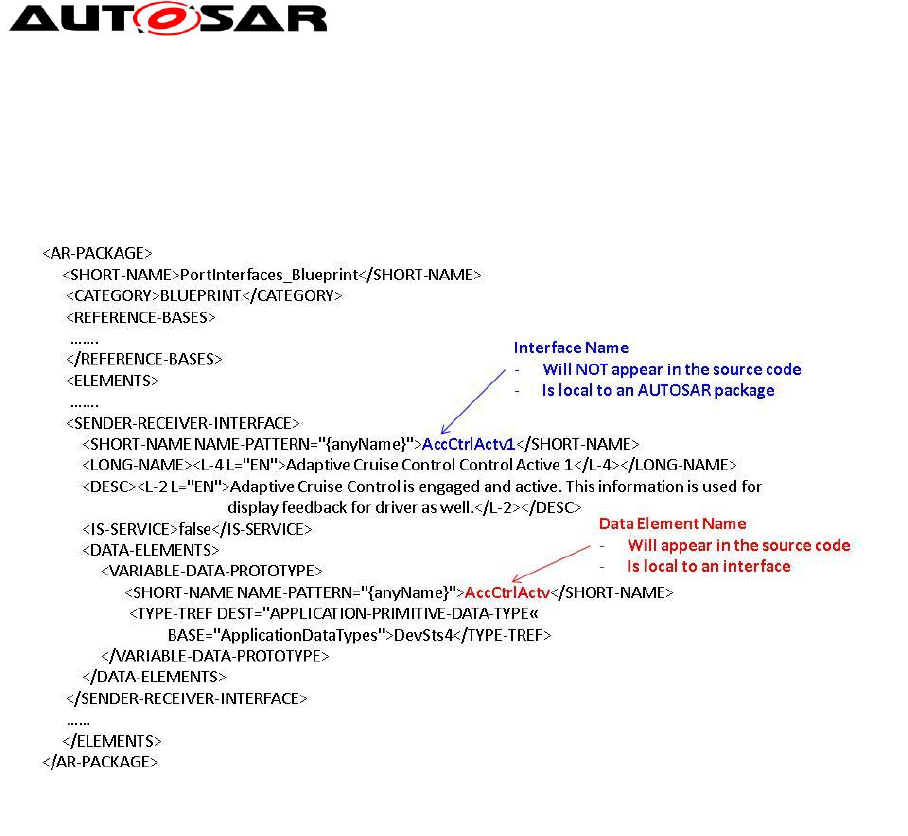
6.3.4 Components and Ports
Figure 3: Components and ports
The abstract SwComponentType cannot be instantiated, there can only be either a
CompositionSwComponentType, a ParameterSwComponentType or a specialized
inherited class of the AtomicSwComponentType class. See [3] for more details.
Such AtomicSwComponentTypes encapsulate the implementation of their
functionality and behavior and merely expose well-defined connection points, called
PortPrototypes, to the outside world.
<AR-PACKAGE>
<SHORT-NAME>Package1</SHORT-NAME>
…..
<ELEMENTS>
<COMPOSITION-SW-COMPONENT-TYPE>
<SHORT-NAME>Composition</SHORT-NAME>
……
<PORTS></PORTS>
<COMPONENTS>
<SW-COMPONENT-PROTOTYPE>
<SHORT-NAME>SwComponentPrototype1</SHORT-NAME>
…….
<TYPE-TREF ….>SwComponentPrototype1</TYPE-TREF>
</SW-COMPONENT-PROTOTYPE>
…
</COMPONENTS>
<COMPOSITION-SW-COMPONENT-TYPE>
<SHORT-NAME>SwComponentPrototype1</SHORT-NAME>
...
<PORTS>
<P-PORT-PROTOTYPE>
<SHORT-NAME>pp1</SHORT-NAME>
…….
<PROVIDED-INTERFACE-TREF>Interface1</PROVIDED-INTERFACE-TREF>
</P-PORT-PROTOTYPE>
…..
<R-PORT-PROTOTYPE>
</PORTS>
</COMPOSITION-SW-COMPONENT-TYPE>
…
</ELEMENTS>
</AR-PACKAGE>
SwComponentPrototype 2
SwComponentPrototype 3
pp2
rp3
rp2
rp1
pp2
pp1
pp1
rp1
rp2
SwComponentPrototype Name (typed
by SwComponentType)
- will not appear in the source code
(but in the header file and the binary
interface)
- will be used as part of the file name
of the header file
- Is local to an AUTOSAR package
- is local to a
CompositionSWComponentType
Port Name
- will appear in the source code
- is local to a SWComponentType (in the
role of CompositionSWComponentType)
pp1
SwComponentPrototype 1
Composition

SW-C and System Modeling Guide
AUTOSAR CP Release 4.4.0
26 of 57 Document ID 207: AUTOSAR_TR_SWCModelingGuide
- AUTOSAR Confidential -
CompositionSwComponentType, which are SwComponentTypes as well, may be
aggregated in further CompositionSwComponentTypes, and their purpose is to allow
existing software components aggregation.
In a CompositionSwComponentType the SwComponentTypes are occurring in
specific roles which are called SwComponetPrototypes.
The figure above shows the scope of Components and Ports names.
SwComponentTypes names are local to an AR-Package therefore within an AR-
Package there must not be two SwComponentTypes having the same name, i.e, the
short-names shall be unique. This is explicitly required by RTE implementation since
RTE generator rejects those configurations where multiple SwComponentTypes have
the same short name (see [SWS_Rte_7190] in [2] for more details)
The same applies for:
SwComponentPrototypes within a CompositionSwComponentType
PortPrototypes within a SwComponentType.
See document [3] for detailed information on name space provided by Software
Components.
Port names will appear in the RTE APIs, see RTE specifications [2].
The figure also shows that names of connected ports can be different (example: pp2
from Component3 connected to rp3 of Component2).
SW-C and System Modeling Guide
AUTOSAR CP Release 4.4.0
27 of 57 Document ID 207: AUTOSAR_TR_SWCModelingGuide
- AUTOSAR Confidential -
6.3.5 Sender Receiver Interfaces and Data Elements
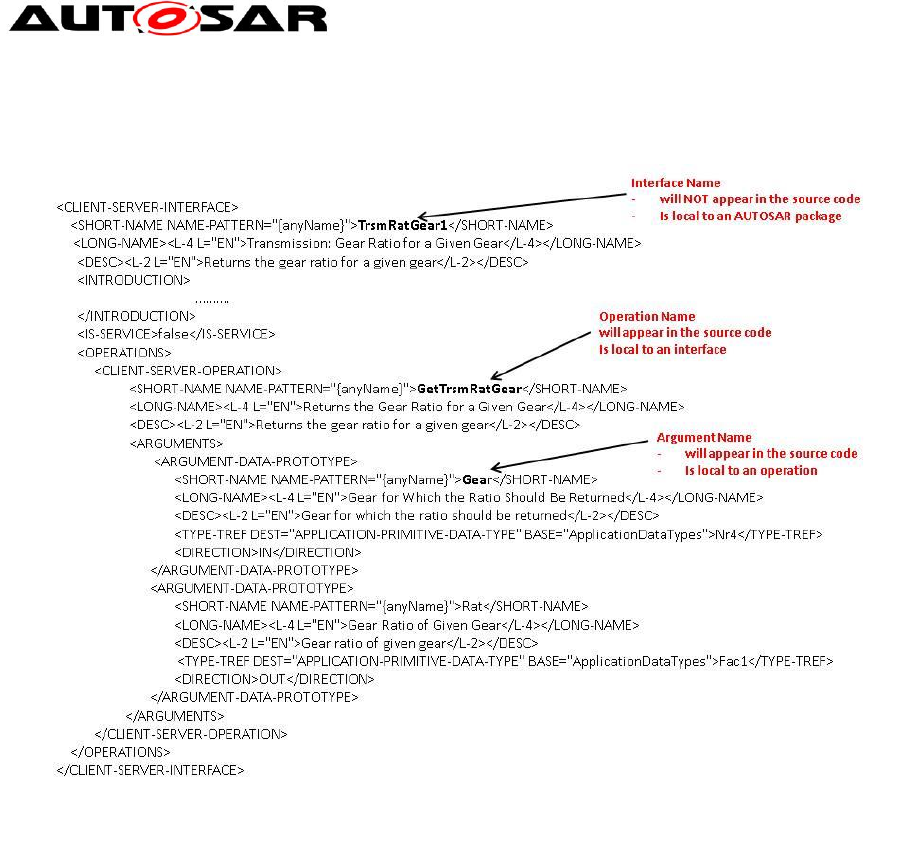
Figure 4: SenderReceiverInterfaces and Data Elements
The figure above shows the scope of SenderReceiverInterfaces and Data Elements
names.
Interface names are local to an AR-Package therefore within an AR-Package there
must not be two Interfaces having the same name, i.e, the short-names shall be
unique.
The same applies for Data Elements i.e. within an Interface, Data Element names
shall be unique.
See document [3] for detailed information on name space provided by Sender
Receiver Interfaces.
Data Element names will appear in the RTE APIs, see RTE specifications [2].
SW-C and System Modeling Guide
AUTOSAR CP Release 4.4.0
28 of 57 Document ID 207: AUTOSAR_TR_SWCModelingGuide
- AUTOSAR Confidential -
6.3.6 Client Server Interfaces, Operations, and Arguments
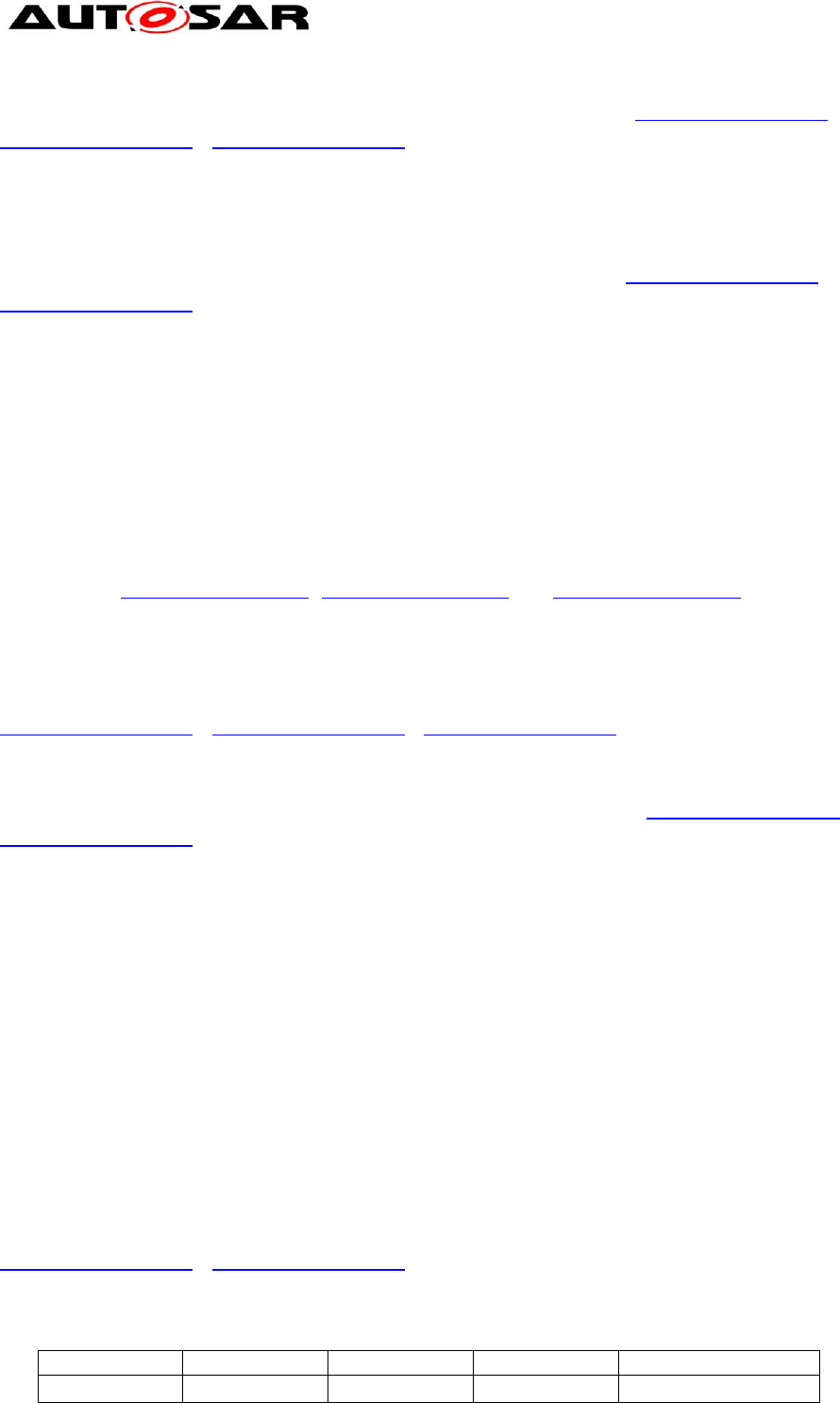
Figure 5: ClientServerInterfaces and Operations
The figure above shows the scope of ClientServerInterfaces, Operations, and
Argument names.
Interface names are local to an AR-Package therefore within an AR-Package there
must not be two Interfaces having the same name, i.e, the short-names shall be
unique.
The same applies for:
Operations within a ClientServerInterface.
Arguments within an Operation.
See document [3] for detailed information on name space provided by Client Server
Interfaces.
Data Element names will appear in the RTE APIs, see RTE specifications [2].
6.4 Usage of Keywords
Depending on its role in the component design, short names for component types,
ports, port interfaces or data elements can make use of the predefined keywords and
their abbreviations, which are described in more detail in 6.4.1. The advantage is,
that this results in relatively short names with established meaning.

SW-C and System Modeling Guide
AUTOSAR CP Release 4.4.0
29 of 57 Document ID 207: AUTOSAR_TR_SWCModelingGuide
- AUTOSAR Confidential -
6.4.1 Keyword Composition Semantic Rules
According to [9] each keyword is described by the following attributes:
shortName: represent the unique name of the keyword, it’s not involved in
name construction
longName: represent the long form of the keyword
desc: represent the definition of the keyword
introduction: verbal description of the use case (not used at the moment)
abbrName: specifies the abbreviated name of the keyword and it’s used to
build shortNames
classification: describe the semantic field of the keyword (Mean-
Environment-Device, Action-PhysicalType, Condition-Qualifier, Index,
Preposition)
If not differently specified in the rest of the document the term keyword will refer to
the longName of the keyword, while the abbreviated name could be referred as
“abbrName attribute” or “keyword abbreviation” as well.
Example:
Definition of keyword describing the driver of a vehicle
longName : Driver
abbrName: Drvr
Usecases (shortName of ports using abbrName attribute): DrvrProf, DrvrDoorLockSt
[TR_SWNR_00009] Invalid usage of underscores for keywords separation ⌈ No
underscores shall be used to separate keyword abbreviations (abbrName attribute) in
short names, because the RTE uses them to separate port names from Data Element
names. Instead of underscores capital letters shall be used to separate the keyword
abbreviations.⌋( RS_SWMG_00011 , RS_SWMG_00040 , RS_SWMG_00054)
[TR_SWNR_00010] Building Short Names with Keywords ⌈ Short names are
composed by concatenating predefined keyword abbreviations (abbrName attribute).
⌋( RS_SWMG_00005 , RS_SWMG_00011 , RS_SWMG_00054 ,
RS_SWMG_00059)
[TR_SWNR_00011] Each keyword shall start with an uppercase letter, or a
number, followed by lowercase letters or “-” ⌈ Each keyword shall start with an
uppercase letter, or a number, followed by lowercase letters or “-”.
⌋( RS_SWMG_00011 , RS_SWMG_00041 , RS_SWMG_00054)
Examples: Keyword abbreviation (abbrName): “Apil”,
Long Name of Keyword: “A-Pillar”
[TR_SWNR_00013] English as language for Keywords definition ⌈ A keyword
shall be a single English word or a multiplier prefix, such as “kilo”, “giga” or “milli”. To
shorten the names within maximum allowed numbers of characters keyword
SW-C and System Modeling Guide
AUTOSAR CP Release 4.4.0
30 of 57 Document ID 207: AUTOSAR_TR_SWCModelingGuide
- AUTOSAR Confidential -
abbreviations (abbrName attribute) are provided. ⌋( RS_SWMG_00011 ,
RS_SWMG_00030 , RS_SWMG_00054)
[TR_SWNR_00018] Rule for keyword abbreviation definition ⌈ A keyword
abbreviation (abbrName attribute) shall not be a valid single English word unless the
meanings of the keyword and the English word are the same. This avoids potential
misunderstanding while reading short names.⌋( RS_SWMG_00011 ,
RS_SWMG_00054)
The following example is not a valid short name, because non-abbreviated keywords
are used: EngineSpd. The correct short name would be: EngSpd.
It could happen that some keywords which are different in their longName form need
to be abbreviated in the same way, since different scientific or technical communities
usually adopt well-know and wide accepted acronyms or abbreviations in their
domain. These acronyms and abbreviations can be tha exactly the same, even if
representing different contentsAccording to the definition of keyword class in [9]
multiple meaning for keyword abbreviations can be handled by the following set of
three rules (TR_SWNR_00066, TR_SWNR_00067 andTR_SWNR_00068)
[TR_SWNR_00066] Defined attributes of Keywords in Application Interfaces
context ⌈ Each keyword shall have exactly one shortName, exactly one longName,
exactly one desc, exactly one abbrName and exactly one classification.⌋(
RS_SWMG_00011 , RS_SWMG_00034 , RS_SWMG_00054)
[TR_SWNR_00067] Multiple meanings through abbrName attribute ⌈ Two or
more different keywords can share the same abbrName.⌋( RS_SWMG_00034 ,
RS_SWMG_00054)
According to [7] and [9], if an Identifiable element is contained into another
Identifiable element, the shortName of the contained Identifiable element shall be
unique into the context of the Identifiable element that contains it (in this case
Keywords are identifiable elements contained into the identifiable element
KeywordSet)
As a consequence, each shortName shall be unique in the KeywordSet.
If keywords share the same abbrName it is recommended to use abbrName plus
index for the shortName.
[TR_SWNR_00068] Rule for shortNames keywords definition in case of multiple
meanings ⌈ If a keyword abbreviation (attribute abbrName) is intended to have N
different meanings, N keywords (elements belonging to the class Keyword) sharing
the same value of abbrName attribute shall be present and each different meaning
shall be described into the corresponding keyword desc attribute. ⌋(
RS_SWMG_00034 , RS_SWMG_00054)
Example:
shortName
longName
abbrName
desc
classification
Ch (*)
Charge
Ch
……….
Condition/qualifier
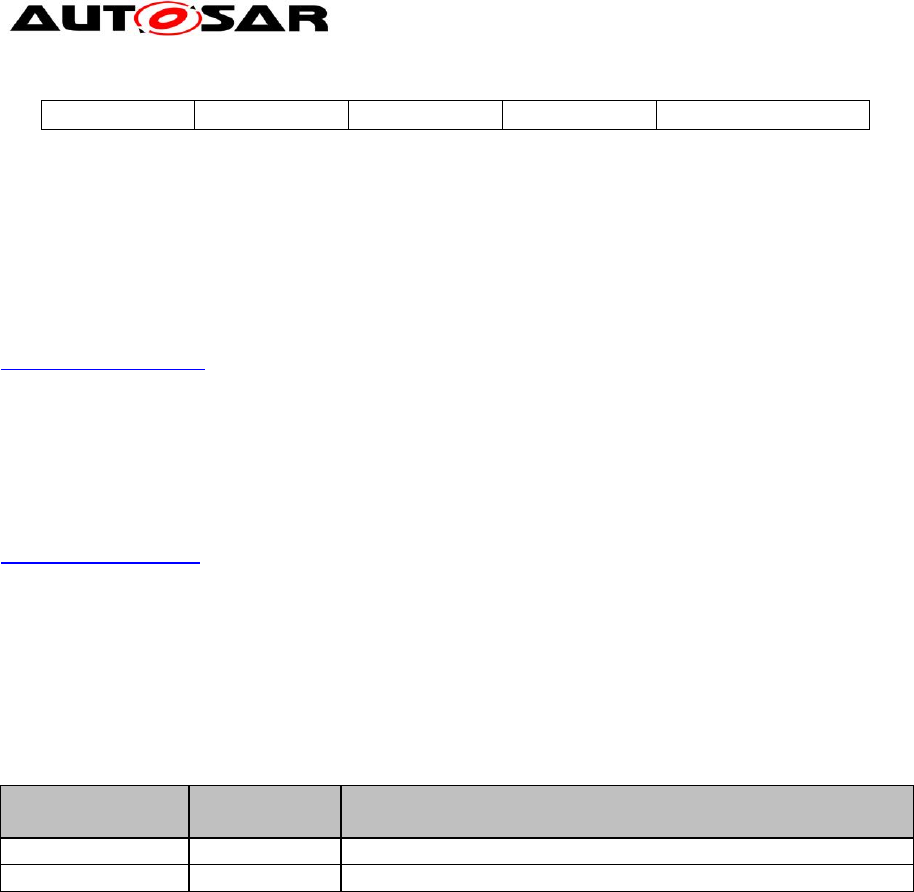
SW-C and System Modeling Guide
AUTOSAR CP Release 4.4.0
31 of 57 Document ID 207: AUTOSAR_TR_SWCModelingGuide
- AUTOSAR Confidential -
Ch1 (*)
Channel
Ch
……….
Condition/qualifier
(*) this example doesn’t represent the current implementation but just one possible implementation preserving the
uniqueness of the shortnames into the keywords package
[TR_SWNR_00017] Special Keywords as well-known acronyms ⌈ Some terms of
common usage in the automotive environment cannot be expressed by a single
English word. In such a case the abbreviation (abbrName) and the keyword
(longName) shall be identical except for camelcase and adding “-”.⌋(
RS_SWMG_00054)
Examples: Keyword abbr.: “Abs”, Long Name of Keyword: “ABS”
Keyword abbr.: “Nox”, Long Name of Keyword: “NOx”
As an exception for the long name definition, in case of terms of common usage and
well known acronyms (mainly keywords belonging to the set of keywords ruled by
TR_SWNR_00017), the long name of the keyword can be expressed entirely by
capital letters.
Examples:
Keyword
Keyword
Abbreviation
DefinitionEnglish
Engine
Eng
Engine
ABS
Abs
Antilock Braking System
Table 1 Example of keywords abbreviation of common usage
[TR_SWNR_00058] Semantic rules for readable and understandable names ⌈In
order to build readable and understandable names, keywords shall be arranged
according to semantic rules. Such rules define Semantic Fields that must be used in
a defined sequence:
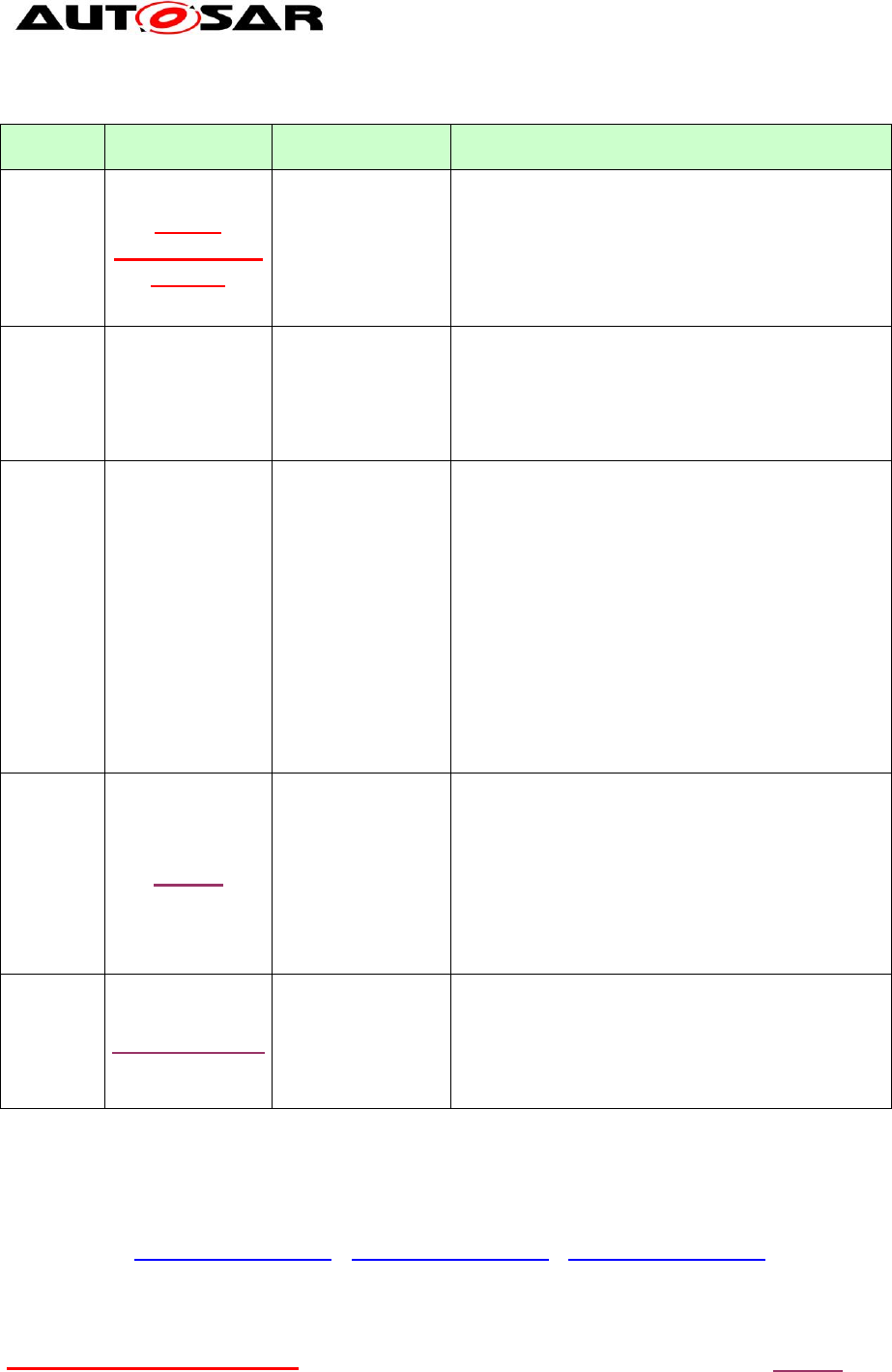
SW-C and System Modeling Guide
AUTOSAR CP Release 4.4.0
32 of 57 Document ID 207: AUTOSAR_TR_SWCModelingGuide
- AUTOSAR Confidential -
Sequence
Semantic Field
Name
Description
Rules and Examples
1
Mean-
Environment-
Device
Physical mean,
environment.
Define the element
subject of Action-
PhysicalType.
It shall be a noun. It can be also a compound
definition. Abbreviation or acronym cannot end
with a digit.
Examples for Mean: Fuel
Examples for Environment: Air, Ambient
Examples for Device: Accelerator,
AcceleratorPedal, Engine
2
Action-
Physical
Type
Action or physical
type conditioning
or modifying the
Mean-
Environment-
Device.
The Action shall be a verb. The Physical Type
shall be a noun. It can be also a compound.
Abbreviation or acronym cannot end with a digit.
Examples for Action: Move, Pull, Release, Lock,
OpenClose, ShiftUp
Examples for Physical Type: Temperature, Speed
3
Condition-
Qualifier
Qualifies the
Mean-
Environment-
Device or Action-
PhysicalType in
terms of data flow,
event issuing or
expresses a
particular condition
of the signal in
terms of numeric
treatment, time
validity, precision
quality, location.
It shall be a noun or an adjective. It can be also a
compound definition. Abbreviation or acronym
cannot end with a digit.
Examples for Condition: Absolute, Old, New,
AbsoluteEstimated,
Examples for Qualifier: Request, Command,
Status
4
Index
Identifies the
signal as part of a
logically structured
information. Can
be used to identify
elements multiply
instanced (index)
or section of
information.
It shall be a number, a single character, or an
adjective describing the part.
When used, it is always the last keyword in the
sequence:
Examples for Index: BrakeSwitch1
5
Preposition
Used for
joining/separating
complex naming
patterns made by
several semantic
fields
Example:
EngSpdAndPosn
CoolgReqFromSteer
TqActAtClu
Table 2 Fields
All the predefined keywords and their corresponding keyword abbreviations are
classified according to the semantic fields. This is specified using the classification
attribute.⌋( RS_SWMG_00012 , RS_SWMG_00016 , RS_SWMG_00054)
Semantic fields are concatenated according to the Sequence column numbering:
Mean-Environment-DeviceAction-PhysicalTypeCondition-QualifierIndex -
this sequence is called FieldBlock.
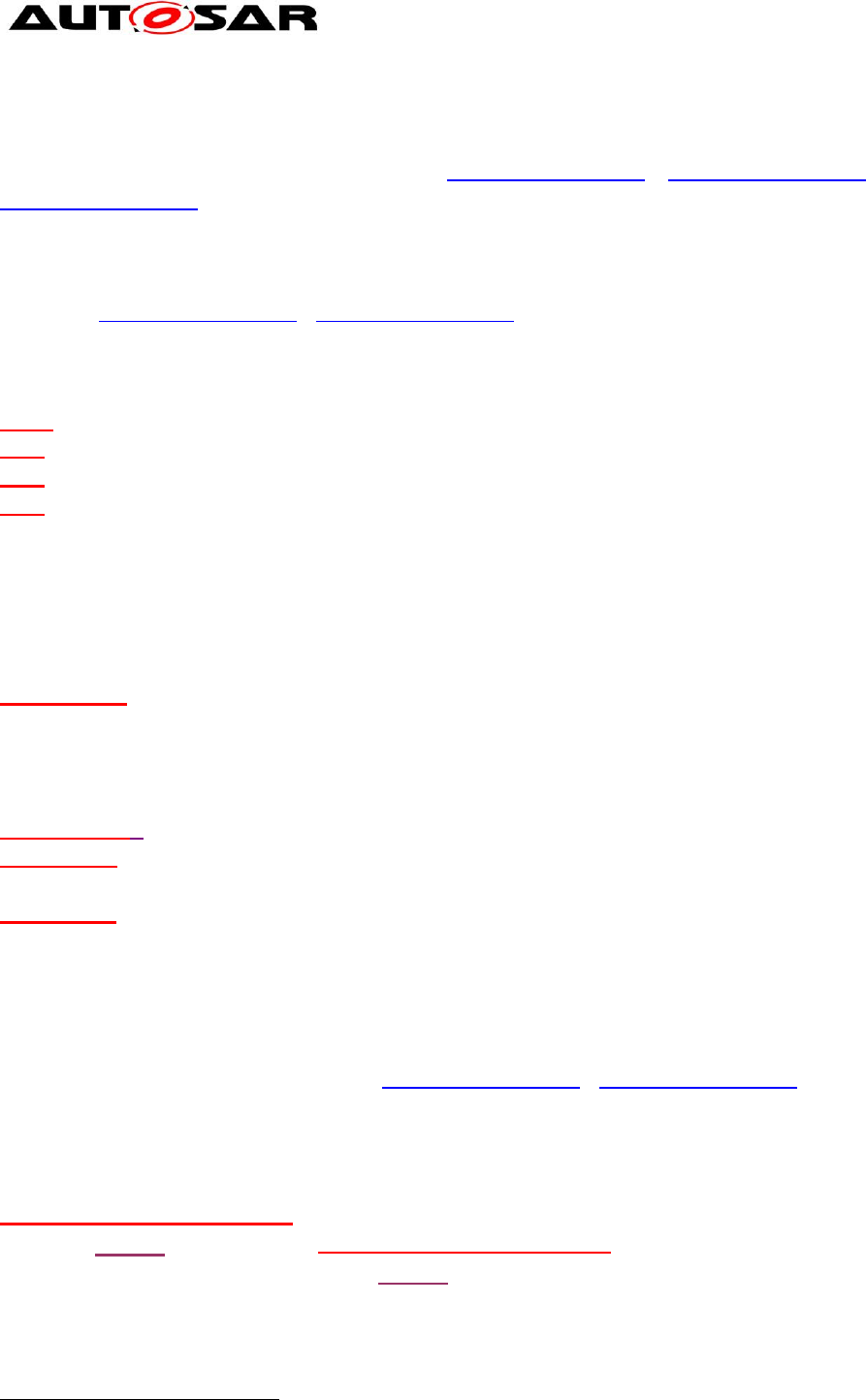
SW-C and System Modeling Guide
AUTOSAR CP Release 4.4.0
33 of 57 Document ID 207: AUTOSAR_TR_SWCModelingGuide
- AUTOSAR Confidential -
[TR_SWNR_00019] Sematic fields not mandatory ⌈ None of the semantic fields
are mandatory and semantic fields can be repeated, i.e. names can be built by using
an arbitrary number of semantic fields.⌋( RS_SWMG_00012 , RS_SWMG_00016 ,
RS_SWMG_00054)
[TR_SWNR_00020] Indexes start with number ⌈ Only keywords classified as
Index shall start with a number. When used, Index field is always the last in the field
block.⌋( RS_SWMG_00012 , RS_SWMG_00054)
The following examples are valid short names
2
:
GearAct
MirrMoveCmd
EngSpd
EngSpdMax
Recommendation: if a semantic field contains more than one keyword they either
have to be arranged in a natural English order or the most important keyword has to
come first.
Example:
BrakePedalStatus
PedalBrake is not recommended, since “brake pedal” is a very well-known English
term.
Other examples of compound definitions where not all semantic fields are present:
BrkPedlSwt1
VehBodyAVertBasMeasd
OpenClsReq
AcvDamprSt
To increase readability of names, a list of predefined Prepositions is provided within
the standardized keyword list.
[TR_SWNR_00034] Arbitrary number of field blocks ⌈ An arbitrary number of
field blocks can be concatenated.⌋( RS_SWMG_00012 , RS_SWMG_00054)
However, the number of field blocks should be limited. It is encouraged to separate
each field block by adding an appropriate preposition. This leads to the following
naming pattern:
Mean-Environment-DeviceAction-PhysicalTypeCondition-
QualifierIndexPrepositionMean-Environment-DeviceAction-
PhysicalTypeCondition-QualifierIndexPreposition …
Portion of names separated by prepositions are called FieldBlocks:
2
The keywords and keyword abbreviations used in the examples of this chapter may not be consistent
to the keyword list

SW-C and System Modeling Guide
AUTOSAR CP Release 4.4.0
34 of 57 Document ID 207: AUTOSAR_TR_SWCModelingGuide
- AUTOSAR Confidential -
FieldBlock1Preposition1FieldBlock2Preposition2…FieldBlockN.
The following example shows the usage of prepositions:
EngSpdAtGearTar
It’s strongly recommended that each FieldBlock has a meaning independent of the
other FieldBlocks.
Example:
The interface with the description “Generic interface for total powertrain torque at
wheels” can not be represented by “PtTqAtWhlsTot”. The FieldBlock “WhlsTot” has
not the intended meaning, because “Tot” relates to “Tq”. Therefore, one of the
possible compliant solutions for the name is “PtTqTotAtWhls”.
[TR_SWNR_00050] Order of FieldBlocks in case of usage of prepositions ⌈ If
one or more prepositions are used to build a short name the most essential /
important element has to be in the FieldBlock1. FieldBlocks that are following are
refining the before mentioned FieldBlock. ⌋( RS_SWMG_00012 ,
RS_SWMG_00054, RS_SWMG_00062)
TR_SWNR_00050 ensures that the names start with most essential information and
end with very special details.
Example:
The following interface description: “Driver request torque limitation if accelerator and
brake pedal pressed at the same time and implausibilities have occurred.” would
result in the following name: DrvrTqLimnReqForBrkAccrPedlImpy1. The whole
interface describes a driver torque limitation request. Therefore, DrvrTqLimnReq is
the most important FieldBlock. Hence it is the first FieldBlock.
The following examples show incorrect names:
Naming a PortPrototype: MaximumEngineSpeed causes a keyword sequence
error: Condition-Qualifier keyword cannot precede Mean-Environment-Device
keyword. The correct sequencing is: EngineSpeedMaximum.

SW-C and System Modeling Guide
AUTOSAR CP Release 4.4.0
35 of 57 Document ID 207: AUTOSAR_TR_SWCModelingGuide
- AUTOSAR Confidential -
6.5 Model Elements
The naming conventions apply to the ShortName (SHORT-NAME) attribute of the
element. The element must be a specialization of Identifiable. The elements are
referred to by their meta-model name. The names in brackets are the XML element
names.
To come to a reasonable naming conventions, for each element the objectives of the
convention are described first.
6.5.1 ARPackage (AR-PACKAGE)
An ARPackage creates a name space
3
. In one system package names have to be
unique. Packages can have sub-packages.
The following rules are defined for the standardized package structure:
[TR_SWNR_00022] ARPackage AUTOSAR ⌈ According to [7], chapter 3,
below the root an ARPackage with LongName AUTOSAR and ShortName
AUTOSAR shall be placed. Everything inside the top-level package
AUTOSAR is released by the AUTOSAR partnership (see requirements
RS_SWMG_00001, RS_SWMG_00056). The top-level package
LongName and ShortName AUTOSAR is reserved by the AUTOSAR
partnership and shall not be used elsewhere.⌋( RS_SWMG_00001 ,
RS_SWMG_00054, RS_SWMG_00056)
[TR_SWNR_00023] Packages contained into ARPackage AUTOSAR ⌈
Within this ARPackage “AUTOSAR” the following packages are contained
(ShortNames):
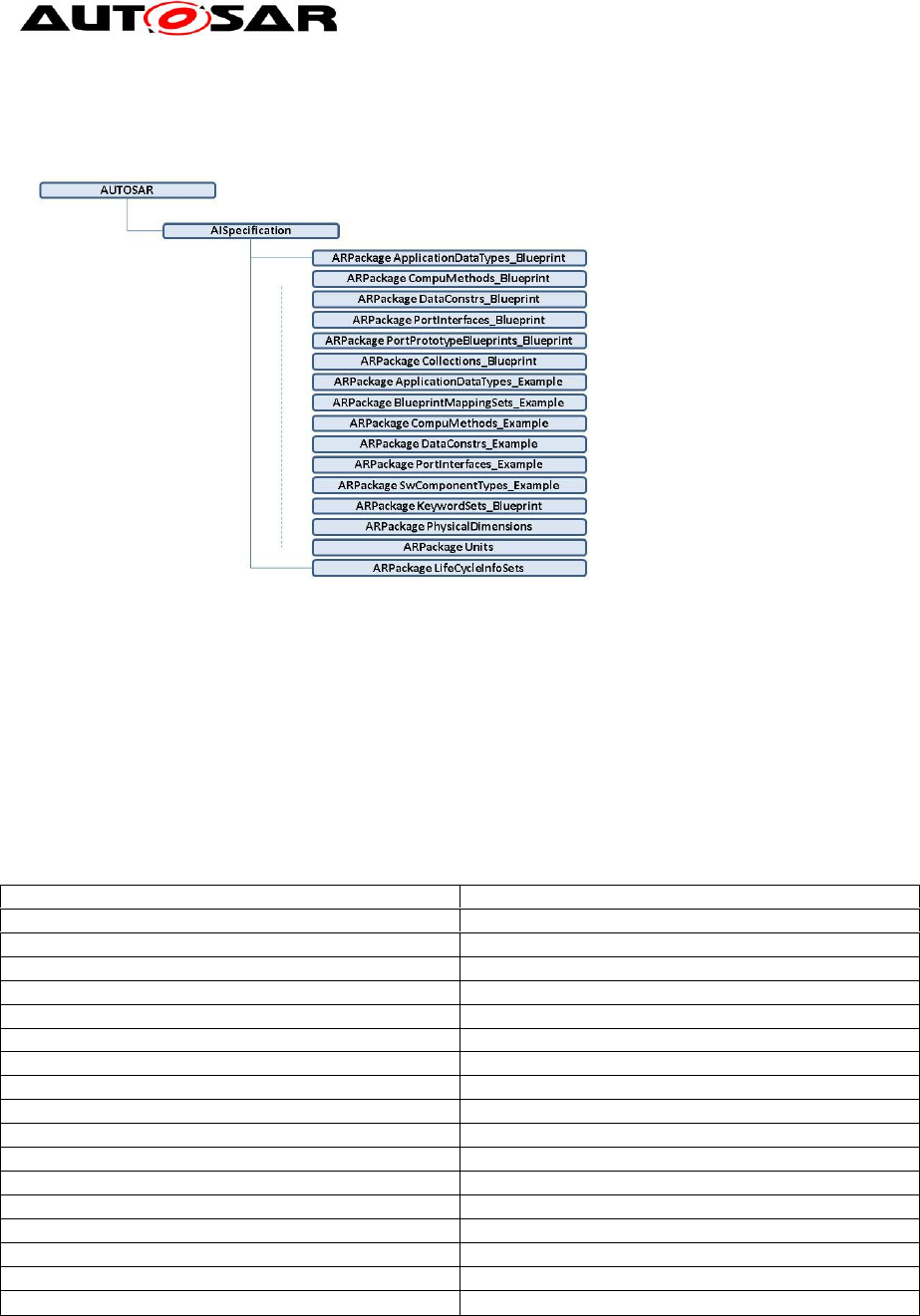
AISpecification, ApplicationDataTypes_Blueprint,
CompuMethods_Blueprint, DataConstrs_Blueprint,
PortInterfaces_Blueprint, PortPrototypeBlueprints_Blueprint,
Collections_Blueprint, KeywordSets_Blueprint,
ApplicationDataTypes_Example, BlueprintMappingSets_Example,
CompuMethods_Example, DataConstrs_Example,
PortInterfaces_Example, SwComponentTypes_Example,
PhysicalDimensions, Units, LifeCycleInfoSets, Systems.⌋(
RS_SWMG_00001 , RS_SWMG_00054)
These rules define the standardized package structure for the defined elements of
the M2 [1] modeling level. According to requirement RS_SWMG_00056 the
AUTOSAR package is a reserved name space.
[TR_SWMG_00018] Policy of names standardization ⌈ Only elements which are
defined by the AUTOSAR partnership shall be added to this name space. These
elements shall not be modified (see [7])⌋( RS_SWMG_00001 , RS_SWMG_00049)
3
For a description of the name space concept see [4].
SW-C and System Modeling Guide
AUTOSAR CP Release 4.4.0
36 of 57 Document ID 207: AUTOSAR_TR_SWCModelingGuide
- AUTOSAR Confidential -
The following figure shows an example for the resulting standardized package
structure
.
Figure 6: AUTOSAR Package structure
As recommendation, names of non standardized AUTOSAR packages should follow
the general rules defined in chapter 6.4.1.
ARPackage AUTOSAR does not have a category, while its sub-packages do.
Categories of the sub-packages are set as follows:
ARPackage
Category
PhysicalDimensions
STANDARD
Units
STANDARD
LifeCycleInfoSets
STANDARD
DataConstrs_Blueprint
BLUEPRINT
ApplicationDataTypes_Blueprint
BLUEPRINT
CompuMethods_Blueprint
BLUEPRINT
PortInterfaces_Blueprint
BLUEPRINT
PortPrototypeBlueprints_Blueprint
BLUEPRINT
KeywordSets_Blueprint
BLUEPRINT
Collections_Blueprint
BLUEPRINT
ApplicationDataTypes_Example
EXAMPLE
BlueprintMappingSets_Example
EXAMPLE
CompuMethods_Example
EXAMPLE
PortInterfaces_Example
EXAMPLE
SwComponentTypes_Example
EXAMPLE
DataConstrs_Example
EXAMPLE
Systems
EXAMPLE
Table 3 Category of ARPackages
6.5.2 SenderReceiverInterface (SENDER-RECEIVER-INTERFACE)
[TR_SWNR_00051] Usage of sequence number in the Sender-Receiver
Interfaces names ⌈ The interface name shall end with a sequence number to take

SW-C and System Modeling Guide
AUTOSAR CP Release 4.4.0
37 of 57 Document ID 207: AUTOSAR_TR_SWCModelingGuide
- AUTOSAR Confidential -
into account the future evolution of interfaces.⌋( RS_SWMG_00010 ,
RS_SWMG_00054)
The rule TR_SWNR_00051 for interfaces is similar to TR_SWNR_00044 for data
types.
Example:
<SENDER-RECEIVER-INTERFACE>
<SHORT-NAME NAME-PATTERN="{anyName}">BattU1</SHORT-NAME>
<LONG-NAME><L-4 L="EN">Battery Voltage</L-4></LONG-NAME>
<DESC><L-2 L="EN">This interface provides the actual voltage level as measured at the
battery.</L-2></DESC>
<IS-SERVICE>false</IS-SERVICE>
<DATA-ELEMENTS>
<VARIABLE-DATA-PROTOTYPE>
<SHORT-NAME NAME-PATTERN="{anyName}">BattU</SHORT-NAME>
<TYPE-TREF DEST="APPLICATION-PRIMITIVE-DATA-TYPE"
BASE="ApplicationDataTypes">U1</TYPE-TREF>
</VARIABLE-DATA-PROTOTYPE>
</DATA-ELEMENTS>
</SENDER-RECEIVER-INTERFACE>
Recommendations:
A SenderReceiverInterface should be a reusable element. The name should be
independent of its concrete usage by components and ports and should only reflect
its general purpose.
To allow reuse, the communication path (the indication of source or destination of
ports using the interface) should not be encoded in the interface name.
The following short names are bad examples for interface names:
YawRateStdByEsc
YawRateStdBySecCtrlrYawRate
The interface name in this example shall be “YawRate1” and reused by two ports
whose names could be “YawRateStdByEsc” and “YawRateStdBySecCtrlrYawRate”.
6.5.3 VariableDataPrototype (VARIABLE-DATA-PROTOTYPE)
Objectives:
Should only be significant relative to the SenderReceiverInterface.
Shall be a unique name per SenderReceiverInterface.
Rules:
[TR_SWNR_00026] Name reflecting data content ⌈The name shall reflect
the content of the data. If no sensible name for the data element can be found

SW-C and System Modeling Guide
AUTOSAR CP Release 4.4.0
38 of 57 Document ID 207: AUTOSAR_TR_SWCModelingGuide
- AUTOSAR Confidential -
and the interface is used to indicate a data transfer, it is recommended to use
the name Val (abbreviation of Value).⌋( RS_SWMG_00010 ,
RS_SWMG_00054)
Example:
<VARIABLE-DATA-PROTOTYPE>
<SHORT-NAME NAME-PATTERN="{anyName}">Val</SHORT-NAME>
<TYPE-TREF DEST="APPLICATION-PRIMITIVE-DATA-TYPE"
BASE="ApplicationDataTypes">T1</TYPE-TREF>
</VARIABLE-DATA-PROTOTYPE>
[TR_SWNR_00027] Name reflecting operation ⌈ If the data element
prototype contains no value information, but an operation, the name shall
reflect the operation that is driven by the data element prototype.⌋(
RS_SWMG_00010 , RS_SWMG_00054)
Example: Cls (abbreviation of Close).
If no sensible name for the data element prototype can be found and the
interface is used to indicate an operation, the name Oper (abbreviation of
Operation) should be used.
[TR_SWNR_00029] Multiple data denoting same operations ⌈ If the
SenderReceiverInterface contains more than one data element prototype
denoting the same operation, a “Mean-Environment-Device” keyword must be
used to differentiate the operations. (Here “operation” is not used in the sense
of ClientServerInterface operations, but as an operation or action which is
triggered by a SenderReceiver communication. “Operation” is also not
identical to the semantic field “Action”.)⌋( RS_SWMG_00010 ,
RS_SWMG_00054)
Example:
UserTransmit UsrTx
TelegramTransmit TelgrmTx
ExteriorLightDisplay ExtrLiDisp
ParkingLightDisplay PrkgLiDisp
Remark: In the last two examples all keywords are classified as “Mean-
Environment-Device” so they can be arranged in any order
Recommendations:
Repeating the name of the enclosing interface in the name of the data element
is allowed, but not recommended. Repetition of the name would result in
redundant information and would reflect negatively in RTE generated function
names (see chapter 6.3.3 for an example of distribution of information between
interface name and data element name).

SW-C and System Modeling Guide
AUTOSAR CP Release 4.4.0
39 of 57 Document ID 207: AUTOSAR_TR_SWCModelingGuide
- AUTOSAR Confidential -
6.5.4 ApplicationDataType
The following classes are subclasses of the class ApplicationDataType in the
AUTOSAR meta model. Therefore, the naming convention applies also to these
classes:
ApplicationPrimitiveDataType (APPLICATION-PRIMITIVE-DATA-TYPE)
ApplicationRecordDataType (APPLICATION-RECORD-DATA-TYPE)
ApplicationArrayDataType (APPLICATION-ARRAY-DATA-TYPE)
Rules:
[TR_SWNR_00056] The name shall reflect the meaning of the type ⌈ The
name shall reflect the meaning of the type.⌋( RS_SWMG_00010 ,
RS_SWMG_00054)
[TR_SWNR_00057] Usage of prefixes not allowed ⌈ No prefixes, such as
“t_” shall be used in the type name.⌋( RS_SWMG_00010 ,
RS_SWMG_00054)
[TR_SWNR_00055] Information about array length not allowed in names
⌈ No numbers shall be used in an ApplicationArrayDataType name to specify
its length.⌋( RS_SWMG_00010 , RS_SWMG_00054)
[TR_SWNR_00044] Usage of sequence number in the datatypes names ⌈
The data type name shall end with a sequence number to take into account
the future evolution. This rule shall also be applied to distinguish data types,
which represent the same physical entity, but with different ranges or
resolution i.e. names of such data types shall differ only for the sequence
number.⌋( RS_SWMG_00010 , RS_SWMG_00054)
Example:
Temperature1 T1
Temperature2 T2
Temperature3 T3
The rules TR_SWNR_00044 ensures the reusability of the data types.
[TR_SWNR_00048] No information about communication in names ⌈ To
allow reuse, the communication path shall not be encoded in the data type
name.⌋( RS_SWMG_00031 , RS_SWMG_00054)
Example XML:

SW-C and System Modeling Guide
AUTOSAR CP Release 4.4.0
40 of 57 Document ID 207: AUTOSAR_TR_SWCModelingGuide
- AUTOSAR Confidential -
<APPLICATION-PRIMITIVE-DATA-TYPE>
<SHORT-NAME NAME-PATTERN="{anyName}">U1</SHORT-NAME>
<LONG-NAME><L-4 L="EN">Voltage 1</L-4></LONG-NAME>
<DESC><L-2 L="EN">Generic data type for voltage</L-2></DESC>
<CATEGORY>VALUE</CATEGORY>
<SW-DATA-DEF-PROPS>
<SW-DATA-DEF-PROPS-VARIANTS>
<SW-DATA-DEF-PROPS-CONDITIONAL>
<SW-CALIBRATION-ACCESS>READ-ONLY</SW-CALIBRATION-ACCESS>
<COMPU-METHOD-REF DEST="COMPU-METHOD" BASE="CompuMethods">U1</COMPU-METHOD-REF>
<DATA-CONSTR-REF DEST="DATA-CONSTR" BASE="DataConstrs">U1</DATA-CONSTR-REF>
<SW-INTENDED-RESOLUTION>0.1</SW-INTENDED-RESOLUTION>
<UNIT-REF DEST="UNIT" BASE="Units">Volt</UNIT-REF>
</SW-DATA-DEF-PROPS-CONDITIONAL>
</SW-DATA-DEF-PROPS-VARIANTS>
</SW-DATA-DEF-PROPS>
</APPLICATION-PRIMITIVE-DATA-TYPE>
6.5.5 CompuMethod (COMPU-METHOD)
COMPU-METHOD shortnames elements fullfill naming convention rules.
Specific name patterns shall be followed in order to distinguish special use cases:
[TR_SWNR_00069] Generic CompuMethod per Unit for category
IDENTICAL ⌈ Generic CompuMethod per Unit for category IDENTICAL shall
follow the following pattern:
{shortName of Unit}Identcl (mandatory)⌋( RS_SWMG_00010 ,
RS_SWMG_00054)
[TR_SWNR_00070] Generic CompuMethod per Unit for category LINEAR
⌈ Generic CompuMethod per Unit for category LINEAR (to support reuse of
CompuMethods for specific resolutions) shall follow the following pattern:
{shortName of Unit}Lnr{sequence number}
(mandatory after release 4.2.1 for new compuMethod creation)⌋(
RS_SWMG_00010 , RS_SWMG_00054)
[TR_SWNR_00071] Generic CompuMethod for category TEXTTABLE ⌈
Generic CompuMethod for category TEXTTABLE (typically used for
enumeration types) shall follow the following pattern:
{shortName of the corresponding ApplicationDataType} (mandatory)⌋(
RS_SWMG_00010 , RS_SWMG_00054)
Examples:
1) IDENTICAL CompuMethod (as it would be for float implementation, no compu scales
required)
<COMPU-METHOD>
<SHORT-NAME NAME-PATTERN="{anyName}">KelvinIdentcl</SHORT-NAME>
<LONG-NAME><L-4 L="EN">Kelvin Identical</L-4></LONG-NAME>
<CATEGORY>IDENTICAL</CATEGORY>
<UNIT-REF BASE="Units" DEST="UNIT">Kelvin</UNIT-REF>
</COMPU-METHOD>

SW-C and System Modeling Guide
AUTOSAR CP Release 4.4.0
41 of 57 Document ID 207: AUTOSAR_TR_SWCModelingGuide
- AUTOSAR Confidential -
2) LINEAR CompuMethod
<COMPU-METHOD>
<SHORT-NAME NAME-PATTERN="{anyName}">VoltLnr1</SHORT-NAME>
<LONG-NAME><L-4 L="EN">Voltage 1</L-4></LONG-NAME>
<DESC><L-2 L="EN">Generic data type for voltage</L-2></DESC>
<CATEGORY>LINEAR</CATEGORY>
<UNIT-REF BASE="Units" DEST="UNIT">Volt</UNIT-REF>
<COMPU-PHYS-TO-INTERNAL>
<COMPU-SCALES>
<COMPU-SCALE>
<LOWER-LIMIT INTERVAL-TYPE="CLOSED">0</LOWER-LIMIT>
<UPPER-LIMIT INTERVAL-TYPE="CLOSED">25.2</UPPER-LIMIT>
<COMPU-RATIONAL-COEFFS>
<COMPU-NUMERATOR>
<V>0</V>
<V>1</V>
</COMPU-NUMERATOR>
<COMPU-DENOMINATOR>
<V>0.1</V>
</COMPU-DENOMINATOR>
</COMPU-RATIONAL-COEFFS>
</COMPU-SCALE>
</COMPU-SCALES>
</COMPU-PHYS-TO-INTERNAL>
</COMPU-METHOD>
3) TEXTTABLE CompuMethod (for Enumeration datatype)
<COMPU-METHOD>
<SHORT-NAME NAME-PATTERN="{anyName}">AckSt1</SHORT-NAME>
<LONG-NAME><L-4 L="EN">Acknowledge Status 1</L-4></LONG-NAME>
<CATEGORY>TEXTTABLE</CATEGORY>
<UNIT-REF BASE="Units" DEST="UNIT">NoUnit</UNIT-REF>
<COMPU-INTERNAL-TO-PHYS>
<COMPU-SCALES>
<COMPU-SCALE>
<DESC><L-2 L="EN">0 = NotAcpt (Request not accepted.)</L-2></DESC>
<LOWER-LIMIT INTERVAL-TYPE="CLOSED">0</LOWER-LIMIT>
<UPPER-LIMIT INTERVAL-TYPE="CLOSED">0</UPPER-LIMIT>
<COMPU-CONST>
<VT>NotAcpt</VT>
</COMPU-CONST>
</COMPU-SCALE>
<COMPU-SCALE>
<DESC><L-2 L="EN">1 = Acpt (Request accepted.)</L-2></DESC>
<LOWER-LIMIT INTERVAL-TYPE="CLOSED">1</LOWER-LIMIT>
<UPPER-LIMIT INTERVAL-TYPE="CLOSED">1</UPPER-LIMIT>
<COMPU-CONST>
<VT>Acpt</VT>
</COMPU-CONST>
</COMPU-SCALE>
</COMPU-SCALES>
</COMPU-INTERNAL-TO-PHYS>
</COMPU-METHOD>
6.5.6 SwComponentType (COMPOSITION-SW-COMPONENT-TYPE)
The naming convention applies to the following subclasses of the class
SwComponentType:
ApplicationSwComponentType
CompositionSwComponentType
SensorActuatorSwComponentType
ParameterSwComponentType

SW-C and System Modeling Guide
AUTOSAR CP Release 4.4.0
42 of 57 Document ID 207: AUTOSAR_TR_SWCModelingGuide
- AUTOSAR Confidential -
Objectives:
Avoid name clashes within the package
Classification of components
Not for component prototypes (see 6.5.7)
Rules
[TR_SWNR_00035] Prefixes referring specific domains not allowed for
SwComponentTypes ⌈ Using a prefix to indicate the application domain
(such as powertrain, body, chassis) of the SwComponentType is not allowed.
⌋( RS_SWMG_00031 , RS_SWMG_00054)
Recommendations:
Use a noun or concatenation of nouns.
Example
SensorSpeed SnsrSpd
The name should be understandable.
Examples
VehicleSpeed VehSpd
VehicleMotionDemand VehMtnDmd
WiperWasher WiprWshr
Example (to shorten the example, some lines have been removed):
<COMPOSITION-SW-COMPONENT-TYPE>
<SHORT-NAME>KeyPad</SHORT-NAME>
<PORTS>
<P-PORT-PROTOTYPE>
<SHORT-NAME>DrvrDoorKeyPad</SHORT-NAME>
<LONG-NAME><L-4 L="EN">Driver Door Keypad</L-4></LONG-NAME>
<DESC><L-2 L="EN">Request to activate central locking master from the driver
door key pad</L-2></DESC>
<PROVIDED-INTERFACE-TREF DEST="SENDER-RECEIVER-INTERFACE"
BASE="PortInterfaces_Blueprint">LockgCenReq1</PROVIDED-INTERFACE-TREF>
</P-PORT-PROTOTYPE>
…some ports skipped
<P-PORT-PROTOTYPE>
<SHORT-NAME>KeyPadOfLidRe</SHORT-NAME>
<LONG-NAME><L-4 L="EN">Rear Lid Keypad</L-4></LONG-NAME>
<DESC><L-2 L="EN">Request to activate central locking master on the rear
lid from lid key pad</L-2></DESC>
<PROVIDED-INTERFACE-TREF DEST="SENDER-RECEIVER-INTERFACE"
BASE="PortInterfaces_Blueprint">LockgCenReq1</PROVIDED-INTERFACE-TREF>
</P-PORT-PROTOTYPE>
</PORTS>
<COMPONENTS>
<SW-COMPONENT-PROTOTYPE>
<SHORT-NAME>KeyPadMgr</SHORT-NAME>
<LONG-NAME><L-4 L="EN">KeyPadManager</L-4></LONG-NAME>
<DESC><L-2 L="EN">Key Pad Manager</L-2></DESC>
<TYPE-TREF DEST="COMPOSITION-SW-COMPONENT-TYPE"
BASE="SwComponentTypes_Example">KeyPadMgr</TYPE-TREF>
</SW-COMPONENT-PROTOTYPE>
</COMPONENTS>
<CONNECTORS>
<DELEGATION-SW-CONNECTOR>
<SHORT-NAME>delcon_0</SHORT-NAME>
<INNER-PORT-IREF>
<P-PORT-IN-COMPOSITION-INSTANCE-REF>
SW-C and System Modeling Guide
AUTOSAR CP Release 4.4.0
43 of 57 Document ID 207: AUTOSAR_TR_SWCModelingGuide
- AUTOSAR Confidential -
<CONTEXT-COMPONENT-REF DEST="SW-COMPONENT-PROTOTYPE"
BASE="SwComponentTypes_Example">KeyPad/KeyPadMgr</CONTEXT-COMPONENT-REF>
<TARGET-P-PORT-REF DEST="P-PORT-PROTOTYPE"
BASE="SwComponentTypes_Example">KeyPadMgr/DrvrDoorKeyPad</TARGET-P-PORT-REF>
</P-PORT-IN-COMPOSITION-INSTANCE-REF>
</INNER-PORT-IREF>
<OUTER-PORT-REF DEST="P-PORT-PROTOTYPE"
BASE="SwComponentTypes_Example">KeyPad/DrvrDoorKeyPad</OUTER-PORT-REF>
</DELEGATION-SW-CONNECTOR>
….some delegation ports skipped
</CONNECTORS>
</COMPOSITION-SW-COMPONENT-TYPE>
Figure 7: Example of SwComponentType
6.5.7 System (SYSTEM)
Even if not in the scope of this document, it’s important to know that the top level
element of an AUTOSAR System Description is represented by the System element.
The System description defines five major elements: Topology, Software,
Communication, Mapping and Mapping, Constraints.
With respect to [11] and [3], in AUTOSAR, Software Components can either be
atomic or may consist of a composition of other Software Components and
CompositionSwComponentType. In order to assemble non-trivial applications from
AUTOSAR components, such compositions can be built up hierarchically, until the
outermost CompositionSwComponentType forms a kind of top-level composition.
The System element directly aggregates the root software composition, containing all
software components in the System in a hierarchical structure.
This element is not required when the System description is used for a network-only
use-case.
Moreover, for the purpose of this document the System element always references
the highest level of SW Compsitiojn, called TopLv (Top Level), and can be modeled
just once.
<AR-PACKAGE>
<SHORT-NAME>Systems</SHORT-NAME>
<CATEGORY>EXAMPLE</CATEGORY>
<REFERENCE-BASES>
<REFERENCE-BASE>
<SHORT-LABEL>SwComponentTypes</SHORT-LABEL>
<IS-DEFAULT>false</IS-DEFAULT>
<IS-GLOBAL>false</IS-GLOBAL>
<BASE-IS-THIS-PACKAGE>false</BASE-IS-THIS-PACKAGE>
<PACKAGE-REF DEST="AR-PACKAGE">/AUTOSAR/AISpecification/SwComponentTypes_Example</PACKAGE-REF>
</REFERENCE-BASE>
</REFERENCE-BASES>
KeyPadOfLidRe
KeyPadMgr
DrvrDoorKeypad
DrvrDoorKeypad
KeyPad
SwComponentPrototype
SwComponentType

SW-C and System Modeling Guide
AUTOSAR CP Release 4.4.0
44 of 57 Document ID 207: AUTOSAR_TR_SWCModelingGuide
- AUTOSAR Confidential -
<ELEMENTS>
<SYSTEM>
<SHORT-NAME>System</SHORT-NAME>
<CATEGORY>SYSTEM_DESCRIPTION</CATEGORY>
<ROOT-SOFTWARE-COMPOSITIONS>
<ROOT-SW-COMPOSITION-PROTOTYPE>
<SHORT-NAME>TopLvl</SHORT-NAME>
<SOFTWARE-COMPOSITION-TREF BASE="SwComponentTypes" DEST="COMPOSITION-SW-COMPONENT-
TYPE">TopLvl</SOFTWARE-COMPOSITION-TREF>
</ROOT-SW-COMPOSITION-PROTOTYPE>
</ROOT-SOFTWARE-COMPOSITIONS>
</SYSTEM>
</ELEMENTS>
</AR-PACKAGE>
6.5.8 SwComponentPrototype (SW-COMPONENT-PROTOTYPE)
Objectives of naming conventions for component prototypes (which are the instances
of each component type):
avoid name clashes within the composition
classification of components
These names are not used within the API to the RTE.
Rules:
[TR_SWNR_00036] Prefixes referring specific domains not allowed for
SwComponentPrototypes ⌈ Using a prefix to indicate the application
domain (such as powertrain, body, chassis) of the SwComponentPrototype is
not allowed.⌋( RS_SWMG_00031 , RS_SWMG_00054)
Recommendations:
The name should be understandable. In case a composition contains more
than one instance of the same component type, the prototype name should
reflect the role of this specific instance in the composition. An example on how
to name multiple SwComponentPrototypes is given in section 5.2.
Example: DoorLe, DoorRi
Example:
<SW-COMPONENT-PROTOTYPE>
<SHORT-NAME>MgrOfMirrAdjAutReqByUsr</SHORT-NAME>
<LONG-NAME><L-4 L="EN">ManagerOfMirrorAdjustmentAutomaticRequestByUser</L-4></LONG-NAME>
<DESC><L-2 L="EN">Component treating the Automatic mirror movement
requests - memory recall. </L-2></DESC>
<TYPE-TREF DEST="COMPOSITION-SW-COMPONENT-TYPE"
BASE="SwComponentTypes">MgrOfMirrAdjAutReqByUsr</TYPE-TREF>
</SW-COMPONENT-PROTOTYPE>
6.5.9 PortPrototype (P-PORT-PROTOTYPE, R-PORT-PROTOTYPE)
Objectives:
should only be significant relative to the SW component (e.g. left, right etc.)

SW-C and System Modeling Guide
AUTOSAR CP Release 4.4.0
45 of 57 Document ID 207: AUTOSAR_TR_SWCModelingGuide
- AUTOSAR Confidential -
unique name per component
PortProtoypes can be connected as long as they are typed with compatible
PortInterfaces. Please refer to document [3] for such compatibility rules.
Example:
Short-Name: EmgyLockg
<R-PORT-PROTOTYPE>
<SHORT-NAME>EmgyLockg</SHORT-NAME>
<LONG-NAME><L-4 L="EN">Emergency Locking</L-4></LONG-NAME>
<DESC><L-2 L="EN">User request for emergency locking in case of danger.</L-2></DESC>
<REQUIRED-INTERFACE-TREF DEST="SENDER-RECEIVER-INTERFACE"
BASE="PortInterfaces">LockUnlckReq1</REQUIRED-INTERFACE-TREF>
</R-PORT-PROTOTYPE>
6.5.10 Units (UNIT)
Objectives:
Shall be unique.
Rules:
[TR_SWNR_00040] Formulas containing “x to power of 2” ⌈ If the unit is a
formula containing “x to the power of 2” the short name shall contain “Sqd”
(abbreviation of keyword “Squared”).⌋( RS_SWMG_00010 ,
RS_SWMG_00054)
[TR_SWNR_00041] Formulas containing “x to power of 3” ⌈ If the unit is
a formula containing “x to the power of 3” the short name shall contain “Cubd”
(abbreviation of keyword “Cubed”).⌋( RS_SWMG_00010 ,
RS_SWMG_00054)
[TR_SWNR_00042] Formulas containing “x to power greater than 3” ⌈ If
the unit is a formula containing “x to the power of number >3” the short name
shall contain ToPwrOf<number>.⌋( RS_SWMG_00010 , RS_SWMG_00054)
[TR_SWNR_00043] Formulas containing division ⌈ If the unit is a formula
containing a division the short name shall contain “Per”⌋( RS_SWMG_00010
, RS_SWMG_00054)
[TR_SWNR_00073] Special characters in Display Names ⌈To describe
formula expressions in Display names of Units, the following list of special
characters shall be applied:
Use
multiplication
*
division
/
square
^2
cubic
^3
square root
^(1/2)
cubic root
^(1/3)
x root
^(1/x)
y/x root
^(y/x)

SW-C and System Modeling Guide
AUTOSAR CP Release 4.4.0
46 of 57 Document ID 207: AUTOSAR_TR_SWCModelingGuide
- AUTOSAR Confidential -
Micro
µ
Percent
%
Per mil
‰
Ohm
Ω
No unit
-
Opening Bracket
(
Closing Bracket
)
⌋( RS_SWMG_00010 , RS_SWMG_00054)
Recommendation: it's recommended to use brackets in specific order to clearly
identify physical meanings in Display Names of Units.
Example: Instead of writing J/Kg*K, we recommend to write (J/Kg)*K or
(J*K)/Kg, based on the physical meaning
Examples:
<UNIT>
<SHORT-NAME>NwtPerMtr</SHORT-NAME>
<LONG-NAME><L-4 L="EN">Newton Per Meter</L-4></LONG-NAME>
<DESC><L-2 L="EN">surface tension (derived from SI units)</L-2></DESC>
<DISPLAY-NAME>N/m</DISPLAY-NAME>
<FACTOR-SI-TO-UNIT>1</FACTOR-SI-TO-UNIT>
<PHYSICAL-DIMENSION-REF DEST="PHYSICAL-DIMENSION"
BASE="PhysicalDimensions">M1TiNeg2</PHYSICAL-DIMENSION-REF>
</UNIT>
<UNIT>
<SHORT-NAME>MtrPerSecCubd</SHORT-NAME>
<LONG-NAME><L-4 L="EN">Meter Per Second Cubed</L-4></LONG-NAME>
<DESC><L-2 L="EN">jerk (derived from SI units), also called jolt (esp. in British
English), surge or lurch, is the rate of change of acceleration; more precisely, the
derivative of acceleration with respect to time, the second derivative of velocity, or the
third derivative of displacement.</L-2></DESC>
<DISPLAY-NAME>m/s^3</DISPLAY-NAME>
<FACTOR-SI-TO-UNIT>1</FACTOR-SI-TO-UNIT>
<PHYSICAL-DIMENSION-REF DEST="PHYSICAL-DIMENSION"
BASE="PhysicalDimensions">Len1TiNeg3</PHYSICAL-DIMENSION-REF>
</UNIT>
6.5.11 Physical Dimensions
Physical Dimensions are used to entirely describe and classify elements inside the
Units Package. Each unit’s physical dimension is represented as generic combination
of 7 base physical quantities: electrical current, luminous intensity, time, mass,
amount of substance, thermodynamic temperature, length , with specific exponents.
The short name of a physical dimension is built as a sequence of keywords
expressing the seven basic physical quantities with corresponding numbers
expressing correct exponents. Physical quantities whose exponents are equal to 0
are not mentioned in the short name of the physical dimension.In specific cases in
which uniqueness must be guaranteed, specific indexes can be used.
The following grammar shall be used:
[TR_SWNR_00072] Long and short name of Physical Dimensions ⌈The
following grammar shall be used:

SW-C and System Modeling Guide
AUTOSAR CP Release 4.4.0
47 of 57 Document ID 207: AUTOSAR_TR_SWCModelingGuide
- AUTOSAR Confidential -
ShortNamePhysDimension : ({Dim}* | NoDimension)(_{Index})
Dim :: {PhysDim}(Neg){Number}
PhysDim :: Len | M | Ti | I | T | Amnt | Lumi
Index: 1, 2, 3, 4, 5, 6, 7, …
Examples
Ex 1: existing "Len1TiNeg1" remains unchanged and then “Len1TiNeg1_1” could be
created according the needs.
Ex 2: "Len2M1TiNeg2" for torque and "Len2M1TiNeg2_1" for Energy
Longnames shall describe physical meaning.
⌋( RS_SWMG_00010 , RS_SWMG_00054)
Ex 1: Unit: Nm
shortname: "Len2M1TiNeg2" for torque
longname : Torque
<PHYSICAL-DIMENSION>
<SHORT-NAME>Len2M1TiNeg2</SHORT-NAME>
<LONG-NAME>
<L-4 L="EN">Torque</L-4>
</LONG-NAME>
<LENGTH-EXP>2</LENGTH-EXP>
<MASS-EXP>1</MASS-EXP>
<TIME-EXP>-2</TIME-EXP>
</PHYSICAL-DIMENSION>
Ex 2: Unit : Joule
shortname: "Len2M1TiNeg2_1" for energy
longname : Energy
<PHYSICAL-DIMENSION>
<SHORT-NAME>Len2M1TiNeg2_1</SHORT-NAME>
<LONG-NAME>
<L-4 L="EN">Energy</L-4>
</LONG-NAME>
<LENGTH-EXP>2</LENGTH-EXP>
<MASS-EXP>1</MASS-EXP>
<TIME-EXP>-2</TIME-EXP>
</PHYSICAL-DIMENSION>
6.5.12 Enumerations
There is no explicit support for enumeration types in the metamodel. Enumerations
are modeled by using a DataType and a CompuMethod.
Example:
<APPLICATION-PRIMITIVE-DATA-TYPE>

SW-C and System Modeling Guide
AUTOSAR CP Release 4.4.0
48 of 57 Document ID 207: AUTOSAR_TR_SWCModelingGuide
- AUTOSAR Confidential -
<SHORT-NAME NAME-PATTERN="{anyName}">UsrReqForWipg1</SHORT-NAME>
<LONG-NAME><L-4 L="EN">User Request For Wiping</L-4></LONG-NAME>
<DESC><L-2 L="EN">It represents the selection of the interval time or the speed of the
wiper requested by the user. The exact timings and wipe speeds are not standardized and need
therefore to be parameterized.</L-2></DESC>
<CATEGORY>VALUE</CATEGORY>
<SW-DATA-DEF-PROPS>
<SW-DATA-DEF-PROPS-VARIANTS>
<SW-DATA-DEF-PROPS-CONDITIONAL>
<SW-CALIBRATION-ACCESS>READ-ONLY</SW-CALIBRATION-ACCESS>
<COMPU-METHOD-REF DEST="COMPU-METHOD" BASE="CompuMethods">UsrReqForWipg1</COMPU-
METHOD-REF>
<DATA-CONSTR-REF DEST="DATA-CONSTR" BASE="DataConstrs">UsrReqForWipg1</DATA-CONSTR-
REF>
</SW-DATA-DEF-PROPS-CONDITIONAL>
</SW-DATA-DEF-PROPS-VARIANTS>
</SW-DATA-DEF-PROPS>
</APPLICATION-PRIMITIVE-DATA-TYPE>
<COMPU-METHOD>
<SHORT-NAME NAME-PATTERN="{anyName}">UsrReqForWipg1</SHORT-NAME>
<LONG-NAME><L-4 L="EN">User Request For Wiping</L-4></LONG-NAME>
<CATEGORY>TEXTTABLE</CATEGORY>
<COMPU-INTERNAL-TO-PHYS>
<COMPU-SCALES>
<COMPU-SCALE>
<DESC><L-2 L="EN">4 = UsrReqForWipgSpdHi</L-2></DESC>
<LOWER-LIMIT INTERVAL-TYPE="CLOSED">4</LOWER-LIMIT>
<UPPER-LIMIT INTERVAL-TYPE="CLOSED">4</UPPER-LIMIT>
<COMPU-CONST><VT>UsrReqForWipgSpdHi</VT></COMPU-CONST>
</COMPU-SCALE>
<COMPU-SCALE>
<DESC><L-2 L="EN">2 = UsrReqForWipgIntl</L-2></DESC>
<LOWER-LIMIT INTERVAL-TYPE="CLOSED">2</LOWER-LIMIT>
<UPPER-LIMIT INTERVAL-TYPE="CLOSED">2</UPPER-LIMIT>
<COMPU-CONST><VT>UsrReqForWipgIntl</VT></COMPU-CONST>
</COMPU-SCALE>
<COMPU-SCALE>
<DESC><L-2 L="EN">3 = UsrReqForWipgSpdLo</L-2></DESC>
<LOWER-LIMIT INTERVAL-TYPE="CLOSED">3</LOWER-LIMIT>
<UPPER-LIMIT INTERVAL-TYPE="CLOSED">3</UPPER-LIMIT>
<COMPU-CONST><VT>UsrReqForWipgSpdLo</VT></COMPU-CONST>
</COMPU-SCALE>
<COMPU-SCALE>
<DESC><L-2 L="EN">0 = UsrReqForWipgOff</L-2></DESC>
<LOWER-LIMIT INTERVAL-TYPE="CLOSED">0</LOWER-LIMIT>
<UPPER-LIMIT INTERVAL-TYPE="CLOSED">0</UPPER-LIMIT>
<COMPU-CONST><VT>UsrReqForWipgOff</VT></COMPU-CONST>
</COMPU-SCALE>
<COMPU-SCALE>
<DESC><L-2 L="EN">1 = WipgStrikeSngReqByUsr</L-2></DESC>
<LOWER-LIMIT INTERVAL-TYPE="CLOSED">1</LOWER-LIMIT>
<UPPER-LIMIT INTERVAL-TYPE="CLOSED">1</UPPER-LIMIT>
<COMPU-CONST><VT>WipgStrikeSngReqByUsr</VT></COMPU-CONST>
</COMPU-SCALE>
</COMPU-SCALES>
</COMPU-INTERNAL-TO-PHYS>
</COMPU-METHOD>
In the Application Domain, but not only, a common use case is representing by the
existence of two or more enumeration datatypes sharing the same enumeration label
with different value:
e.g:
enum datatype CluSt1 defines Opend = 0
enum datatype LockSt2 defines Opend = 1

SW-C and System Modeling Guide
AUTOSAR CP Release 4.4.0
49 of 57 Document ID 207: AUTOSAR_TR_SWCModelingGuide
- AUTOSAR Confidential -
In order to allow the definition of different enumeration datatypes sharing the same
enumeration labels but with different point range, the RTE layer provides a specific
mechanism to solve configuration errors that otherwise would arise.
This is also necessary in order to handle enumeration constants supplied by Basic
Software modules which all use their own prefix convention. Such Enumeration
constant names have to be unique in the whole AUTOSAR system.
Skipping implementation details of the RTE layer (please see [2]), it can be resumed
that before generating the final code the RTE combines some specific information
coming from the CompuMethod used for the enumeration datatype definition and
other specific information derived from the set of data that each SW-C declares to
use.
All these information guarantee the uniqueness of the enumeration labels into the
software architecture. If the set of information required by the RTE is not complete,
the RTE generator shall reject this input as an invalid configuration.
6.5.13 ClientServerInterface (CLIENT-SERVER-INTERFACE)
While modeling a ClientServerInterface, names for the following attributes shall be
also defined:
OperationPrototype
ArgumentPrototype
Rules:
[TR_SWNR_00062] Usage of sequence number in the Client-Server
Interfaces names ⌈ The interface name shall end with a sequence number
to take into account the future evolution of interfaces.⌋( RS_SWMG_00010 ,
RS_SWMG_00054)
The name of OperationPrototype attribute shall follow rule TR_SWNR_00029
in place for VariableDataPrototype (see 6.5.3)
The name of ArgumentPrototype attribute shall follow all the rules in place for
VariableDataPrototype (see 6.5.3)
Recommendations:
A ClientServerInterface should be a reusable element. The name of interface
should be independent of its concrete usage by components and ports and
should only reflect its general purpose.
To allow reuse, the communication path (the indication of source or destination
of ports using the interface) shall not be encoded in the interface name.
The name of ArgumentPrototype attribute should follow all the
recommendation in place for VariableDataPrototype (see 6.5.3)
The name of OperationPrototype attribute should start with a keyword
classified as “Action / Physical Type”
Example for OperationPrototype:
Short-Name: SetEveSt

SW-C and System Modeling Guide
AUTOSAR CP Release 4.4.0
50 of 57 Document ID 207: AUTOSAR_TR_SWCModelingGuide
- AUTOSAR Confidential -
6.5.14 ParameterInterface (PARAMETER-INTERFACE)
To this model element, same rules and recommendations as for
SenderReceiverInterface (see chapter 6.5.2) apply.
6.5.15 ParameterDataPrototype (PARAMETER-DATA-PROTOTYPE)
Objectives:
Should only be significant relative to the ParameterInterface.
Shall be a unique name per ParameterInterface.
To this model element, same rules and recommendations as for
VariableDataPrototype (see chapter 6.5.3) apply.
6.5.16 DataConstrs (DATA-CONSTRS)
DATA-CONSTRS shortname elements fullfill naming convention rules..
Example:
<DATA-CONSTR>
<SHORT-NAME NAME-PATTERN="{anyName}">Flg1</SHORT-NAME>
<DATA-CONSTR-RULES>
<DATA-CONSTR-RULE>
<INTERNAL-CONSTRS>
<LOWER-LIMIT INTERVAL-TYPE="CLOSED">0</LOWER-LIMIT>
<UPPER-LIMIT INTERVAL-TYPE="CLOSED">1</UPPER-LIMIT>
</INTERNAL-CONSTRS>
</DATA-CONSTR-RULE>
</DATA-CONSTR-RULES>
/DATA-CONSTR>
6.5.17 Blueprintable Elements in Application Interfaces Domain
AUTOSAR metamodel provides and supports mechanism to allow users to create
and expand model elements starting from a well defined model elements base.
Its goal is to provide the possibility of deriving elements with enhancing features and
attributes that can be used in different contexts (e.g series projects).(for more details
and for a complete definition of Blueprint mechanism and meta model UML classes at
each AUTOSAR level, please refer to [9])
This blueprint mechanism is mainly based on three entities :
Blueprint:
acts as the predefinition of the element. Basically it follows the same structure
as the derived elements.
Blueprinted Element:

SW-C and System Modeling Guide
AUTOSAR CP Release 4.4.0
51 of 57 Document ID 207: AUTOSAR_TR_SWCModelingGuide
- AUTOSAR Confidential -
acts as the element which was derived from the Blueprint. These elements are
derived from blueprints mainly by copy and refine. This "refine" may add
further attribute values’
Blueprint Mapping:
acts as a reference between blueprints and their derived elements. The main
purpose of this blueprint mapping is the ability to validate for each derived
elements that they conform the the blueprint.
Focusing on the Application Interfaces domain the goal is to promote the reuse of
model elements outside the scope of SwComponentType.
Blueprintable elements are collected into a sort of stand alone elements library from
which derived elements (for example PortPrototypes) can be created, refined and
plugged into SWComponentsProtoTypes.
Blueprintable elements have no impact on the AUTOSAR RTE level (impact covered
by derive prototype elements)
There are different types of Blueprintable elements in the Application Interface
domain. They are collected into different packages categorized as BLUEPRINT:
DataConstrs
ApplicationDataTypes
CompuMethods
PortInterfaces
PortPrototypeBlueprints
Keywords
Collections
In the scope of Application Interfaces, the general rules for compliance of blueprint
and blueprinted elements are strictly followed [9].
Derived elements from blueprint are allowed to change longName, desc (description)
and introduction attributes, while a specific attribute, called namePattern is specified
if the shortName, respectively a symbol, is not fixed but intended to be defined when
objects are derived from blueprints (e.g. in series projects).
The shortName of the derived obiects shall follow the pattern defined in namePattern
attribute.
The complete syntax used by the namePattern attribute is defined in [9] and it will not
be reported here in detail.
Nevertheless since this syntax nearly leads to any possible solution for building
shortNames, it’s strongly suggested that it‘s used to stick with rules for shortName
construction, already defined for each kind of elements in this document.
Even if no obligatory pattern is defined and the value of the attribute is ‘anyName’,
the following use cases and relative syntax usage are strongly recommended:
Use case 1: element used once (one derived element): {blueprintName}
Use case 2: element used twice or more (two or more derived elements):
{blueprintName}({<Keyword>})0..n
where {blueprintName} represents the shortName / shortLabel / symbol of the applied
blueprint.

SW-C and System Modeling Guide
AUTOSAR CP Release 4.4.0
52 of 57 Document ID 207: AUTOSAR_TR_SWCModelingGuide
- AUTOSAR Confidential -
Special attention will be payed now to PortPrototypeBlueprint elements since the
following considerations are also valid for other blueprintable elements in general
(Please check [9] for more specific details).
6.5.18 PortPrototypeBlueprint (PORT-PROTOTYPE-BLUEPRINT)
For the scope of this document a PortPrototypeBlueprint has the following
characteristics:
It is an ARElement and does therefore not require any element other than an
ARPackage as context. It is therefore not necessary to involve “auxiliary”
model elements into the definition of a standardized “application interface” for
the mere purpose of conforming to the AUTOSAR meta-model.
The structure of the created PortPrototype is indistinguishable from a
PortPrototype created without taking a PortPrototypeBlueprint as a blueprint. A
PortPrototypeBlueprint can be taken as the blueprint for as many
PortPrototypes as required.
It can only be used for the standardization of “application interfaces”. A
PortPrototypeBlueprint does not play any role in the formal description of any
SwComponentType or related model artifacts. To be sure, the existence of a
PortPrototypeBlueprint has no impact on the AUTOSAR RTE.
Derived PortPrototypes may have more attributes than the
PortPrototypeBlueprint
The attributes of derived PortPrototypes are copied from the
PortPrototypeBlueprint with one exception, the attribute namePattern that
may not be copied.
The attribute namePattern represents the pattern which shall be used to build the
shortName of the derived elements (in this case PortPrototypes).
This allows to change the shortName of a PortPrototype derived from a
PortPrototypeBlueprint according to predefined rules.
[TR_SWNR_00037] Indication of provided/required operation or data ⌈ The
PortPrototypeBlueprint shall indicate the operation or data that is provided/required
by the port.⌋( RS_SWMG_00006 , RS_SWMG_00054)
<AR-PACKAGE>
<SHORT-NAME>PortPrototypeBlueprints_Blueprint</SHORT-NAME>
<CATEGORY>BLUEPRINT</CATEGORY>
<REFERENCE-BASES>
<REFERENCE-BASE>
<SHORT-LABEL>PortInterfaces</SHORT-LABEL>
<IS-DEFAULT>false</IS-DEFAULT>
<IS-GLOBAL>false</IS-GLOBAL>
<BASE-IS-THIS-PACKAGE>false</BASE-IS-THIS-PACKAGE>
<PACKAGE-REF DEST="AR-
PACKAGE">/AUTOSAR/AISpecification/PortInterfaces_Blueprint</PACKAGE-REF>
</REFERENCE-BASE>
</REFERENCE-BASES>
<ELEMENTS>
.
.
.
<PORT-PROTOTYPE-BLUEPRINT>
<SHORT-NAME NAME-PATTERN="{anyName}">DrvrProf</SHORT-NAME>

SW-C and System Modeling Guide
AUTOSAR CP Release 4.4.0
53 of 57 Document ID 207: AUTOSAR_TR_SWCModelingGuide
- AUTOSAR Confidential -
<LONG-NAME><L-4 L="EN">Driver Profile</L-4></LONG-NAME>
<DESC><L-2 L="EN">Status of current selected personalization profile from profile
manager. It is a common profile selectable from transponder, remote key, keyless access, Human
Machine Interface (HMI),...</L-2></DESC>
<INTERFACE-REF DEST="SENDER-RECEIVER-INTERFACE"
BASE="PortInterfaces">ProfPenSt1</INTERFACE-REF>
</PORT-PROTOTYPE-BLUEPRINT>
.
.
.
</ELEMENTS>
</AR-PACKAGE>

SW-C and System Modeling Guide
AUTOSAR CP Release 4.4.0
54 of 57 Document ID 207: AUTOSAR_TR_SWCModelingGuide
- AUTOSAR Confidential -
6.5.19 Keywords
Keywords, which represent a set of basic elements for short names construction, are
collected into one package, named KeywordSets_Blueprint, and categorized as
BLUEPRINT in order to support the addition of long names and documentation in
different languages.
Rules for using keywords and their abbreviated names (in the role of abbrName
attribute) in shortnames construction are described in chapter 6.3.1.
Example :
<AR-PACKAGE>
<SHORT-NAME>KeywordSets_Blueprint</SHORT-NAME>
<CATEGORY>BLUEPRINT</CATEGORY>
<ELEMENTS>
<KEYWORD-SET>
<SHORT-NAME>KeywordList</SHORT-NAME>
<LONG-NAME><L-4 L="EN">AUTOSAR Keywords and Keywords Abbreviations</L-4></LONG-NAME>
<KEYWORDS>
<KEYWORD>
<SHORT-NAME>Idx0</SHORT-NAME>
<LONG-NAME><L-4 L="EN">0</L-4></LONG-NAME>
<DESC><L-2 L="EN">Index 0. This keyword is used to express the number zero
in form of an index</L-2></DESC>
<ABBR-NAME>0</ABBR-NAME>
<CLASSIFICATIONS>
<CLASSIFICATION>Index</CLASSIFICATION>
</CLASSIFICATIONS>
</KEYWORD>
.
.
.
<KEYWORD>
<SHORT-NAME>Abs</SHORT-NAME>
<LONG-NAME><L-4 L="EN">Abs</L-4></LONG-NAME>
<DESC><L-2 L="EN">antilock braking system</L-2></DESC>
<ABBR-NAME>Abs</ABBR-NAME>
<CLASSIFICATIONS>
<CLASSIFICATION>Mean-Environment-Device</CLASSIFICATION>
</CLASSIFICATIONS>
</KEYWORD>
<KEYWORD>
<SHORT-NAME>Abslt</SHORT-NAME>
<LONG-NAME><L-4 L="EN">Absolute</L-4></LONG-NAME>
<DESC><L-2 L="EN">Absolute value</L-2></DESC>
<ABBR-NAME>Abslt</ABBR-NAME>
<CLASSIFICATIONS>
<CLASSIFICATION>Condition-Qualifier</CLASSIFICATION>
</CLASSIFICATIONS>
</KEYWORD>
.
.
</KEYWORDS>
</KEYWORD-SET>
</ELEMENTS>
</AR-PACKAGE>

SW-C and System Modeling Guide
AUTOSAR CP Release 4.4.0
55 of 57 Document ID 207: AUTOSAR_TR_SWCModelingGuide
- AUTOSAR Confidential -
6.5.20 Guidelines for Float Datatype representation at Application Level
The Software Component Template [3] does not specify clearly how to realize float
application datatype. Three level of datatype abstraction are present in Autosar:
Application datatypes, Implementation datatypes and Base types.
Usage of float datatype in general impact at low levels of data implementation.
An extract of final arxml at ECU level would be the following:
….
<AR-PACKAGES>
<AR-PACKAGE>
<SHORT-NAME>AUTOSAR_PlatformTypes</SHORT-NAME>
<AR-PACKAGES>
<AR-PACKAGE>
<SHORT-NAME>SwBaseTypes</SHORT-NAME>
<ELEMENTS>
…
<SW-BASE-TYPE>
<SHORT-NAME>float32</SHORT-NAME>
<LONG-NAME>
<L-4 L="EN">Float</L-4>
</LONG-NAME>
<CATEGORY>FIXED_LENGTH</CATEGORY>
<BASE-TYPE-SIZE>32</BASE-TYPE-SIZE>
<BASE-TYPE-ENCODING>IEEE754</BASE-TYPE-ENCODING>
<MEM-ALIGNMENT>32</MEM-ALIGNMENT>
<BYTE-ORDER>MOST-SIGNIFICANT-BYTE-LAST</BYTE-ORDER>
</SW-BASE-TYPE>
…
</ELEMENTS>
</AR-PACKAGE>
<AR-PACKAGE>
<SHORT-NAME>ImplementationDataTypes</SHORT-NAME>
<LONG-NAME>
<L-4 L="EN">AUTOSAR Platform types</L-4>
</LONG-NAME>
<ELEMENTS>
….
<IMPLEMENTATION-DATA-TYPE>
<SHORT-NAME>float32</SHORT-NAME>
<LONG-NAME>
<L-4 L="EN">Float</L-4>
</LONG-NAME>
<CATEGORY>VALUE</CATEGORY>
<INTRODUCTION>
<TRACE>
<SHORT-NAME>PLATFORM041</SHORT-NAME>
<CATEGORY>SPECIFICATION_ITEM</CATEGORY>
<P>
<L-1 L="EN">This standard AUTOSAR type shall be mapped as a single precision (32 bit) floating-point number.</L-1>
</P>
</TRACE>
</INTRODUCTION>
<SW-DATA-DEF-PROPS>
<SW-DATA-DEF-PROPS-VARIANTS>
<SW-DATA-DEF-PROPS-CONDITIONAL>
<BASE-TYPE-REF DEST="SW-BASE-TYPE">/AUTOSAR_PlatformTypes/SwBaseTypes/float32</BASE-TYPE-REF>
</SW-DATA-DEF-PROPS-CONDITIONAL>
</SW-DATA-DEF-PROPS-VARIANTS>
</SW-DATA-DEF-PROPS>
</IMPLEMENTATION-DATA-TYPE>
….
</AR-PACKAGE>
</AR-PACKAGES>
In order to take into account some preliminary requirements for the usage of float
datatypes definition at Application Level, some reccomendations are defined:
Recommendations at PortprototypeBlueprint level:
Use Always 1:1 scaling: e.g. internal representation = 10.1 Physical Value
10.1Pa
Only single precision calculations shall be done (float 64 is not recommended)
In case the target ECU is known do not use float if the RAM/Stack resources
are more critical than CPU load.

SW-C and System Modeling Guide
AUTOSAR CP Release 4.4.0
56 of 57 Document ID 207: AUTOSAR_TR_SWCModelingGuide
- AUTOSAR Confidential -
Float should always be used together with SI Unit as physical representation.
Float is strictly recommended if for one and the same signal either large range
and low precision or small range and high precision is required.
Examples:
• Float is strictly recommended for Pressure ([Pa])
• Float is strictly recommended for Injection Quantity ([kg])
Float should not be used whenever integer precision is sufficient (e.g.
Temperature ([K]))
Recommendations for the usage of Float data types in AUTOSAR for Flat Instance
Descriptors (SW Signals):
the compatibility rules of AUTOSAR meta model have to be fulfilled
Any physical display representation can be used.
Application datatype which are supposed to implemented with float datatypes simply
differ from other continuos value datatypes in
Compumethod:
They refer to the corresponding IDENTICAL compumethod related to involved
Unit
DataConstrs:
unlimited ([-INF..+INF]) range, defined once into Application level by
dataconstrs element RngUnlimd
swIntendedResolution:
the default value 0.0000001 represents machine epsilon for 32bits, IEEE754
(ISO C standard; C, C++ and Python language constants)
E.g T6, float datatype for temperature:
Definition of ApplicationDatatype:
<APPLICATION-PRIMITIVE-DATA-TYPE>
<SHORT-NAME NAME-PATTERN="{anyName}">T6</SHORT-NAME>
<LONG-NAME><L-4 L="EN">Temperature 6</L-4> </LONG-NAME>
<DESC> <L-2 L="EN">Generic data type for temperature</L-2> </DESC>
<CATEGORY>VALUE</CATEGORY>
<INTRODUCTION>
<P> <L-1 L="EN">Examples for usage: glow plugs temperature, oil temperature, environment temperature, temperature differences
Remark: use for floating point implementation</L-1>
</P>
</INTRODUCTION>
<SW-DATA-DEF-PROPS>
<SW-DATA-DEF-PROPS-VARIANTS>
<SW-DATA-DEF-PROPS-CONDITIONAL>
<SW-CALIBRATION-ACCESS>READ-ONLY</SW-CALIBRATION-ACCESS>
<COMPU-METHOD-REF BASE="CompuMethods" DEST="COMPU-METHOD">KelvinIdentcl</COMPU-METHOD-REF>
<DATA-CONSTR-REF BASE="DataConstrs" DEST="DATA-CONSTR">RngUnlimd</DATA-CONSTR-REF>
<SW-INTENDED-RESOLUTION>0.0000001</SW-INTENDED-RESOLUTION>
<UNIT-REF BASE="Units" DEST="UNIT">Kelvin</UNIT-REF>
</SW-DATA-DEF-PROPS-CONDITIONAL>
</SW-DATA-DEF-PROPS-VARIANTS>
</SW-DATA-DEF-PROPS>
</APPLICATION-PRIMITIVE-DATA-TYPE>
Definition of CompuMethod
<COMPU-METHOD>
<SHORT-NAME NAME-PATTERN="{anyName}">KelvinIdentcl</SHORT-NAME>
<LONG-NAME> <L-4 L="EN">Kelvin Identical</L-4> </LONG-NAME>
<DESC/>
<CATEGORY>IDENTICAL</CATEGORY>
<UNIT-REF BASE="Units" DEST="UNIT">Kelvin</UNIT-REF>
</COMPU-METHOD>
Definition of unlimited DataConstrs
<DATA-CONSTR>
<SHORT-NAME NAME-PATTERN="{anyName}">RngUnlimd</SHORT-NAME>
<LONG-NAME><L-4 L="EN">Range Unlimited</L-4></LONG-NAME>
<DATA-CONSTR-RULES>
<DATA-CONSTR-RULE>

SW-C and System Modeling Guide
AUTOSAR CP Release 4.4.0
57 of 57 Document ID 207: AUTOSAR_TR_SWCModelingGuide
- AUTOSAR Confidential -
<PHYS-CONSTRS>
<LOWER-LIMIT INTERVAL-TYPE="CLOSED">-INF</LOWER-LIMIT>
<UPPER-LIMIT INTERVAL-TYPE="CLOSED">+INF</UPPER-LIMIT>
</PHYS-CONSTRS>
</DATA-CONSTR-RULE>
</DATA-CONSTR-RULES>
</DATA-CONSTR>
