Advanced Security Guide Adv Sec 02 PDF 121 E50333 18
User Manual:
Open the PDF directly: View PDF  .
.
Page Count: 240 [warning: Documents this large are best viewed by clicking the View PDF Link!]
- Contents
- Preface
- Changes in This Release for Oracle Database Advanced Security Guide
- 1 Introduction to Oracle Advanced Security
- Part I Using Transparent Data Encryption
- 2 Introduction to Transparent Data Encryption
- 2.1 What Is Transparent Data Encryption?
- 2.2 Benefits of Using Transparent Data Encryption
- 2.3 Who Can Configure Transparent Data Encryption?
- 2.4 Types and Components of Transparent Data Encryption
- 2.4.1 About Transparent Data Encryption Types and Components
- 2.4.2 How Transparent Data Encryption Column Encryption Works
- 2.4.3 How Transparent Data Encryption Tablespace Encryption Works
- 2.4.4 How the Keystore for the Storage of TDE Master Encryption Keys Works
- 2.4.5 Supported Encryption and Integrity Algorithms
- 3 Configuring Transparent Data Encryption
- 3.1 Configuring a Software Keystore
- 3.1.1 About Configuring a Software Keystore
- 3.1.2 Step 1: Set the Software Keystore Location in the sqlnet.ora File
- 3.1.2.1 About the Keystore Location in the sqlnet.ora File
- 3.1.2.2 Configuring the sqlnet.ora File for a Software Keystore Location
- 3.1.2.3 Example: Configuring a Software Keystore for a Regular File System
- 3.1.2.4 Example: Configuring a Software Keystore When Multiple Databases Share the sqlnet.ora File
- 3.1.2.5 Example: Configuring a Software Keystore for Oracle Automatic Storage Management
- 3.1.2.6 Example: Configuring a Software Keystore for an Oracle Automatic Storage Management Disk Group
- 3.1.3 Step 2: Create the Software Keystore
- 3.1.4 Step 3: Open the Software Keystore
- 3.1.5 Step 4: Set the Software TDE Master Encryption Key
- 3.1.6 Step 5: Encrypt Your Data
- 3.2 Configuring a Hardware Keystore
- 3.2.1 About Configuring a Hardware (External) Keystore
- 3.2.2 Step 1: Set the Hardware Keystore Type in the sqlnet.ora File
- 3.2.3 Step 2: Configure the Hardware Security Module
- 3.2.4 Step 3: Open the Hardware Keystore
- 3.2.5 Step 4: Set the Hardware Keystore TDE Master Encryption Key
- 3.2.6 Step 5: Encrypt Your Data
- 3.3 Encrypting Columns in Tables
- 3.3.1 About Encrypting Columns in Tables
- 3.3.2 Data Types That Can Be Encrypted with TDE Column Encryption
- 3.3.3 Restrictions on Using Transparent Data Encryption Column Encryption
- 3.3.4 Creating Tables with Encrypted Columns
- 3.3.4.1 About Creating Tables with Encrypted Columns
- 3.3.4.2 Creating a Table with an Encrypted Column Using the Default Algorithm
- 3.3.4.3 Creating a Table with an Encrypted Column Using No Algorithm or a Non-Default Algorithm
- 3.3.4.4 Using the NOMAC Parameter to Save Disk Space and Improve Performance
- 3.3.4.5 Example: Using the NOMAC Parameter in a CREATE TABLE Statement
- 3.3.4.6 Example: Changing the Integrity Algorithm for a Table
- 3.3.4.7 Creating an Encrypted Column in an External Table
- 3.3.5 Encrypting Columns in Existing Tables
- 3.3.6 Creating an Index on an Encrypted Column
- 3.3.7 Adding Salt to an Encrypted Column
- 3.3.8 Removing Salt from an Encrypted Column
- 3.3.9 Changing the Encryption Key or Algorithm for Tables with Encrypted Columns
- 3.4 Encrypting Tablespaces
- 3.5 Transparent Data Encryption Data Dynamic and Data Dictionary Views
- 3.1 Configuring a Software Keystore
- 4 Managing the Keystore and the TDE Master Encryption Key
- 4.1 Managing the Keystore
- 4.1.1 Changing the Password of a Password-Based Software Keystore
- 4.1.2 Changing the Password of a Hardware Keystore
- 4.1.3 Backing Up Password-Based Software Keystores
- 4.1.4 Backups of the Hardware Keystore
- 4.1.5 Merging Software Keystores
- 4.1.5.1 About Merging Software Keystores
- 4.1.5.2 Merging Two Software Keystores into a Third New Keystore
- 4.1.5.3 Merging One Software Keystore into an Existing Software Keystore
- 4.1.5.4 Merging an Auto-Login Software Keystore into an Existing Password-Based Software Keystore
- 4.1.5.5 Reversing a Software Keystore Merge Operation
- 4.1.6 Moving a Software Keystore to a New Location
- 4.1.7 Moving a Software Keystore Out of Automatic Storage Management
- 4.1.8 Migrating Between a Software Password Keystore and a Hardware Keystore
- 4.1.9 Migration of Keystores to and from Oracle Key Vault
- 4.1.10 Closing a Keystore
- 4.1.11 Using a Software Keystore That Resides on ASM Volumes
- 4.1.12 Backup and Recovery of Encrypted Data
- 4.1.13 Deletion of Keystores
- 4.2 Managing the TDE Master Encryption Key
- 4.2.1 Creating TDE Master Encryption Keys for Later Use
- 4.2.2 Activation of TDE Master Encryption Keys
- 4.2.3 TDE Master Encryption Key Attribute Management
- 4.2.4 Creating Custom TDE Master Encryption Key Attributes for Reporting Purposes
- 4.2.5 Setting and Resetting the TDE Master Encryption Key in the Keystore
- 4.2.6 Exporting and Importing the TDE Master Encryption Key
- 4.2.6.1 About Exporting and Importing the TDE Master Encryption Key
- 4.2.6.2 About Exporting TDE Master Encryption Keys
- 4.2.6.3 Exporting a TDE Master Encryption Key
- 4.2.6.4 Example: Exporting a TDE Master Encryption Key by Using a Subquery
- 4.2.6.5 Example: Exporting a List of TDE Master Encryption Key Identifiers to a File
- 4.2.6.6 Example: Exporting All TDE Master Encryption Keys of the Database
- 4.2.6.7 About Importing TDE Master Encryption Keys
- 4.2.6.8 Importing a TDE Master Encryption Key
- 4.2.6.9 Example: Importing a TDE Master Encryption Key
- 4.2.6.10 How Keystore Merge Differs from TDE Master Encryption Key Export or Import
- 4.2.7 Management of TDE Master Encryption Keys Using Oracle Key Vault
- 4.3 Storing Secrets Used by Oracle Database
- 4.3.1 About Storing Oracle Database Secrets in a Keystore
- 4.3.2 Storage of Oracle Database Secrets in a Software Keystore
- 4.3.3 Example: Adding an HSM Password to a Software Keystore
- 4.3.4 Example: Changing an HSM Password That Is Stored as a Secret in a Software Keystore
- 4.3.5 Example: Deleting an HSM Password That Is Stored as a Secret in a Software Keystore
- 4.3.6 Storage of Oracle Database Secrets in a Hardware Keystore
- 4.3.7 Example: Adding an Oracle Database Secret to a Hardware Keystore
- 4.3.8 Example: Changing an Oracle Database Secret in a Hardware Keystore
- 4.3.9 Example: Deleting an Oracle Database Secret in a Hardware Keystore
- 4.3.10 Configuring Auto-Login Hardware Security Modules
- 4.4 Storing Oracle GoldenGate Secrets in a Keystore
- 4.1 Managing the Keystore
- 5 General Considerations of Using Transparent Data Encryption
- 5.1 Compression and Data Deduplication of Encrypted Data
- 5.2 Security Considerations for Transparent Data Encryption
- 5.3 Performance and Storage Overhead of Transparent Data Encryption
- 5.4 Modifying Your Applications for Use with Transparent Data Encryption
- 5.5 How ALTER SYSTEM and orapki Map to ADMINISTER KEY MANAGEMENT
- 5.6 Using Transparent Data Encryption with PKI Encryption
- 6 Using Transparent Data Encryption with Other Oracle Features
- 6.1 How Transparent Data Encryption Works with Export and Import Operations
- 6.2 How Transparent Data Encryption Works with Oracle Data Guard
- 6.3 How Transparent Data Encryption Works with Oracle Real Application Clusters
- 6.4 How Transparent Data Encryption Works with SecureFiles
- 6.5 How Transparent Data Encryption Works in a Multitenant Environment
- 6.5.1 About Using Transparent Data Encryption in a Multitenant Environment
- 6.5.2 Operations That Must Be Performed in Root
- 6.5.3 Operations That Can Be Performed in Root or in a PDB
- 6.5.4 Exporting and Importing TDE Master Encryption Keys for a PDB
- 6.5.5 Unplugging and Plugging a PDB with Encrypted Data in a CDB
- 6.5.6 How Keystore Open and Close Operations Work in a Multitenant Environment
- 6.5.7 Finding the Keystore Status for All of the PDBs in a Multitenant Environment
- 6.6 How Transparent Data Encryption Works with Oracle Call Interface
- 6.7 How Transparent Data Encryption Works with Editions
- 6.8 Configuring Transparent Data Encryption to Work in a Multidatabase Environment
- 7 Frequently Asked Questions About Transparent Data Encryption
- 2 Introduction to Transparent Data Encryption
- Part II Using Oracle Data Redaction
- 8 Introduction to Oracle Data Redaction
- 9 Oracle Data Redaction Features and Capabilities
- 9.1 Full Data Redaction to Redact All Data
- 9.2 Partial Data Redaction to Redact Sections of Data
- 9.3 Regular Expressions to Redact Patterns of Data
- 9.4 Random Data Redaction to Generate Random Values
- 9.5 Comparison of Full, Partial, and Random Redaction Based on Data Types
- 9.6 No Redaction for Testing Purposes
- 10 Configuring Oracle Data Redaction Policies
- 10.1 About Oracle Data Redaction Policies
- 10.2 Who Can Create Oracle Data Redaction Policies?
- 10.3 Planning an Oracle Data Redaction Policy
- 10.4 General Syntax of the DBMS_REDACT.ADD_POLICY Procedure
- 10.5 Using Expressions to Define Conditions for Data Redaction Policies
- 10.5.1 About Using Expressions in Data Redaction Policies
- 10.5.2 Applying the Redaction Policy Based on User Environment
- 10.5.3 Applying the Redaction Policy Based on Database Roles
- 10.5.4 Applying the Redaction Policy Based on Oracle Label Security Label Dominance
- 10.5.5 Applying the Redaction Policy Based on Application Express Session States
- 10.5.6 Applying the Redaction Policy to All Users
- 10.6 Creating a Full Redaction Policy and Altering the Full Redaction Value
- 10.7 Creating a Partial Redaction Policy
- 10.7.1 About Creating Partial Redaction Policies
- 10.7.2 Syntax for Creating a Partial Redaction Policy
- 10.7.3 Creating Partial Redaction Policies Using Fixed Character Formats
- 10.7.4 Creating Partial Redaction Policies Using Character Data Types
- 10.7.5 Creating Partial Redaction Policies Using Number Data Types
- 10.7.6 Creating Partial Redaction Policies Using Date-Time Data Types
- 10.8 Creating a Regular Expression-Based Redaction Policy
- 10.9 Creating a Random Redaction Policy
- 10.10 Creating a Policy That Uses No Redaction
- 10.11 Exemption of Users from Oracle Data Redaction Policies
- 10.12 Altering an Oracle Data Redaction Policy
- 10.13 Redacting Multiple Columns
- 10.14 Disabling and Enabling an Oracle Data Redaction Policy
- 10.15 Dropping an Oracle Data Redaction Policy
- 10.16 Tutorial: SQL Expressions to Build Reports with Redacted Values
- 10.17 Oracle Data Redaction Policy Data Dictionary Views
- 11 Using Oracle Data Redaction in Oracle Enterprise Manager
- 11.1 About Using Oracle Data Redaction in Oracle Enterprise Manager
- 11.2 Oracle Data Redaction Workflow
- 11.3 Management of Sensitive Column Types in Enterprise Manager
- 11.4 Managing Oracle Data Redaction Formats Using Enterprise Manager
- 11.5 Managing Oracle Data Redaction Policies Using Enterprise Manager
- 11.5.1 About Managing Oracle Data Redaction Policies Using Enterprise Manager
- 11.5.2 Creating an Oracle Data Redaction Policy Using Enterprise Manager
- 11.5.3 Editing an Oracle Data Redaction Policy Using Enterprise Manager
- 11.5.4 Viewing Oracle Data Redaction Policy Details Using Enterprise Manager
- 11.5.5 Enabling or Disabling an Oracle Data Redaction Policy in Enterprise Manager
- 11.5.6 Deleting an Oracle Data Redaction Policy Using Enterprise Manager
- 12 Oracle Data Redaction Use with Oracle Database Features
- 12.1 Oracle Data Redaction and DML and DDL Operations
- 12.2 Oracle Data Redaction and Nested Functions, Inline Views, and the WHERE Clause
- 12.3 Oracle Data Redaction and Database Links
- 12.4 Oracle Data Redaction and Aggregate Functions
- 12.5 Oracle Data Redaction and Object Types
- 12.6 Oracle Data Redaction and XML Generation
- 12.7 Oracle Data Redaction and Editions
- 12.8 Oracle Data Redaction in a Multitenant Environment
- 12.9 Oracle Data Redaction and Oracle Virtual Private Database
- 12.10 Oracle Data Redaction and Oracle Database Real Application Security
- 12.11 Oracle Data Redaction and Oracle Database Vault
- 12.12 Oracle Data Redaction and Oracle Data Pump
- 12.13 Oracle Data Redaction and Data Masking and Subsetting Pack
- 13 Security Considerations for Oracle Data Redaction
- 13.1 Oracle Data Redaction General Usage Guidelines
- 13.2 Restriction of Administrative Access to Oracle Data Redaction Policies
- 13.3 How Oracle Data Redaction Affects the SYS, SYSTEM, and Default Schemas
- 13.4 Policy Expressions That Use SYS_CONTEXT Attributes
- 13.5 Oracle Data Redaction Policies on Materialized Views
- 13.6 Dropped Oracle Data Redaction Policies When the Recycle Bin Is Enabled
- Glossary
- actual data
- auto-login software keystore
- cipher suite
- ciphertext
- data redaction
- decryption
- encrypted text
- encryption
- hardware keystore
- hardware security module
- inference
- key pair
- keystore
- local auto-login software keystore
- mask
- password-based software keystore
- plaintext
- private key
- public key
- public key encryption
- public and private key pair
- public key infrastructure (PKI)
- redacted data
- salt
- software keystore
- tablespace encryption key
- TDE master encryption key
- TDE table key
- wallet
- wallet obfuscation
- Wallet Resource Locator (WRL)
- Index

Oracle® Database
Advanced Security Guide
12c Release 1 (12.1)
E50333-18
June 2017
Oracle Database Advanced Security Guide, 12c Release 1 (12.1)
E50333-18
Copyright © 1996, 2017, Oracle and/or its affiliates. All rights reserved.
Primary Author: Patricia Huey
Contributors: Rahil Mir, Paul Youn, Adam Lee, Preetam Ramakrishna, Gopal Mulagund, Rajbir Chahal, Min-
Hank Ho, Michael Hwa, Sudha Iyer, Adam Lindsey, Supriya Kalyanasundaram, Lakshmi Kethana, Andrew
Koyfman, Vikram Pesati, Andy Philips, Philip Thornton, Paul Needham, Peter Wahl
This software and related documentation are provided under a license agreement containing restrictions on
use and disclosure and are protected by intellectual property laws. Except as expressly permitted in your
license agreement or allowed by law, you may not use, copy, reproduce, translate, broadcast, modify, license,
transmit, distribute, exhibit, perform, publish, or display any part, in any form, or by any means. Reverse
engineering, disassembly, or decompilation of this software, unless required by law for interoperability, is
prohibited.
The information contained herein is subject to change without notice and is not warranted to be error-free. If
you find any errors, please report them to us in writing.
If this is software or related documentation that is delivered to the U.S. Government or anyone licensing it on
behalf of the U.S. Government, then the following notice is applicable:
U.S. GOVERNMENT END USERS: Oracle programs, including any operating system, integrated software,
any programs installed on the hardware, and/or documentation, delivered to U.S. Government end users are
"commercial computer software" pursuant to the applicable Federal Acquisition Regulation and agency-
specific supplemental regulations. As such, use, duplication, disclosure, modification, and adaptation of the
programs, including any operating system, integrated software, any programs installed on the hardware,
and/or documentation, shall be subject to license terms and license restrictions applicable to the programs.
No other rights are granted to the U.S. Government.
This software or hardware is developed for general use in a variety of information management applications.
It is not developed or intended for use in any inherently dangerous applications, including applications that
may create a risk of personal injury. If you use this software or hardware in dangerous applications, then you
shall be responsible to take all appropriate fail-safe, backup, redundancy, and other measures to ensure its
safe use. Oracle Corporation and its affiliates disclaim any liability for any damages caused by use of this
software or hardware in dangerous applications.
Oracle and Java are registered trademarks of Oracle and/or its affiliates. Other names may be trademarks of
their respective owners.
Intel and Intel Xeon are trademarks or registered trademarks of Intel Corporation. All SPARC trademarks are
used under license and are trademarks or registered trademarks of SPARC International, Inc. AMD, Opteron,
the AMD logo, and the AMD Opteron logo are trademarks or registered trademarks of Advanced Micro
Devices. UNIX is a registered trademark of The Open Group.
This software or hardware and documentation may provide access to or information about content, products,
and services from third parties. Oracle Corporation and its affiliates are not responsible for and expressly
disclaim all warranties of any kind with respect to third-party content, products, and services unless
otherwise set forth in an applicable agreement between you and Oracle. Oracle Corporation and its affiliates
will not be responsible for any loss, costs, or damages incurred due to your access to or use of third-party
content, products, or services, except as set forth in an applicable agreement between you and Oracle.

Contents
Preface................................................................................................................................................................ xi
Audience ....................................................................................................................................................... xi
Documentation Accessibility ..................................................................................................................... xi
Related Documents...................................................................................................................................... xi
Conventions................................................................................................................................................. xii
Changes in This Release for Oracle Database Advanced Security Guide ..................... xiii
Changes in Oracle Database Advanced Security 12c Release 1 (12.1.0.2) ......................................... xiii
New Features ..................................................................................................................................... xiii
Changes in Oracle Database Advanced Security 12c Release 1 (12.1.0.1) ......................................... xiv
New Features ..................................................................................................................................... xiv
Deprecated Features........................................................................................................................... xv
Other Changes .................................................................................................................................... xv
1 Introduction to Oracle Advanced Security
1.1 Transparent Data Encryption.................................................................................................................. 1-1
1.2 Oracle Data Redaction.............................................................................................................................. 1-1
Part I Using Transparent Data Encryption
2 Introduction to Transparent Data Encryption
2.1 What Is Transparent Data Encryption? ......................................................................................... 2-1
2.2 Benefits of Using Transparent Data Encryption .......................................................................... 2-1
2.3 Who Can Configure Transparent Data Encryption? ................................................................... 2-2
2.4 Types and Components of Transparent Data Encryption.......................................................... 2-2
2.4.1 About Transparent Data Encryption Types and Components....................................... 2-3
2.4.2 How Transparent Data Encryption Column Encryption Works ................................... 2-3
2.4.3 How Transparent Data Encryption Tablespace Encryption Works .............................. 2-4
2.4.4 How the Keystore for the Storage of TDE Master Encryption Keys Works................. 2-5
2.4.5 Supported Encryption and Integrity Algorithms............................................................. 2-7
iii
3 Configuring Transparent Data Encryption
3.1 Configuring a Software Keystore ................................................................................................... 3-1
3.1.1 About Configuring a Software Keystore ........................................................................... 3-1
3.1.2 Step 1: Set the Software Keystore Location in the sqlnet.ora File................................... 3-2
3.1.3 Step 2: Create the Software Keystore.................................................................................. 3-4
3.1.4 Step 3: Open the Software Keystore ................................................................................... 3-7
3.1.5 Step 4: Set the Software TDE Master Encryption Key...................................................... 3-8
3.1.6 Step 5: Encrypt Your Data.................................................................................................. 3-10
3.2 Configuring a Hardware Keystore............................................................................................... 3-10
3.2.1 About Configuring a Hardware (External) Keystore..................................................... 3-11
3.2.2 Step 1: Set the Hardware Keystore Type in the sqlnet.ora File .................................... 3-11
3.2.3 Step 2: Configure the Hardware Security Module ......................................................... 3-11
3.2.4 Step 3: Open the Hardware Keystore............................................................................... 3-12
3.2.5 Step 4: Set the Hardware Keystore TDE Master Encryption Key ................................ 3-14
3.2.6 Step 5: Encrypt Your Data.................................................................................................. 3-16
3.3 Encrypting Columns in Tables ..................................................................................................... 3-16
3.3.1 About Encrypting Columns in Tables.............................................................................. 3-16
3.3.2 Data Types That Can Be Encrypted with TDE Column Encryption ........................... 3-17
3.3.3 Restrictions on Using Transparent Data Encryption Column Encryption ................. 3-18
3.3.4 Creating Tables with Encrypted Columns ...................................................................... 3-18
3.3.5 Encrypting Columns in Existing Tables........................................................................... 3-22
3.3.6 Creating an Index on an Encrypted Column .................................................................. 3-23
3.3.7 Adding Salt to an Encrypted Column.............................................................................. 3-24
3.3.8 Removing Salt from an Encrypted Column .................................................................... 3-24
3.3.9 Changing the Encryption Key or Algorithm for Tables with Encrypted Columns... 3-24
3.4 Encrypting Tablespaces ................................................................................................................. 3-25
3.4.1 Restrictions on Using Transparent Data Encryption Tablespace Encryption ............ 3-25
3.4.2 Step 1: Set the COMPATIBLE Initialization Parameter for Tablespace Encryption.. 3-25
3.4.3 Step 2: Set the Tablespace TDE Master Encryption Key................................................ 3-27
3.4.4 Step 3: Create the Encrypted Tablespace ......................................................................... 3-27
3.5 Transparent Data Encryption Data Dynamic and Data Dictionary Views ............................ 3-29
4 Managing the Keystore and the TDE Master Encryption Key
4.1 Managing the Keystore.................................................................................................................... 4-1
4.1.1 Changing the Password of a Password-Based Software Keystore ................................ 4-2
4.1.2 Changing the Password of a Hardware Keystore ............................................................ 4-3
4.1.3 Backing Up Password-Based Software Keystores............................................................ 4-3
4.1.4 Backups of the Hardware Keystore.................................................................................... 4-5
4.1.5 Merging Software Keystores................................................................................................ 4-6
4.1.6 Moving a Software Keystore to a New Location .............................................................. 4-9
4.1.7 Moving a Software Keystore Out of Automatic Storage Management....................... 4-10
4.1.8 Migrating Between a Software Password Keystore and a Hardware Keystore ........ 4-11
iv
4.1.9 Migration of Keystores to and from Oracle Key Vault.................................................. 4-17
4.1.10 Closing a Keystore............................................................................................................. 4-17
4.1.11 Using a Software Keystore That Resides on ASM Volumes ....................................... 4-20
4.1.12 Backup and Recovery of Encrypted Data...................................................................... 4-20
4.1.13 Deletion of Keystores........................................................................................................ 4-21
4.2 Managing the TDE Master Encryption Key................................................................................ 4-22
4.2.1 Creating TDE Master Encryption Keys for Later Use.................................................... 4-22
4.2.2 Activation of TDE Master Encryption Keys .................................................................... 4-24
4.2.3 TDE Master Encryption Key Attribute Management .................................................... 4-26
4.2.4 Creating Custom TDE Master Encryption Key Attributes for Reporting Purposes . 4-28
4.2.5 Setting and Resetting the TDE Master Encryption Key in the Keystore..................... 4-29
4.2.6 Exporting and Importing the TDE Master Encryption Key.......................................... 4-33
4.2.7 Management of TDE Master Encryption Keys Using Oracle Key Vault .................... 4-38
4.3 Storing Secrets Used by Oracle Database.................................................................................... 4-38
4.3.1 About Storing Oracle Database Secrets in a Keystore ................................................... 4-38
4.3.2 Storage of Oracle Database Secrets in a Software Keystore .......................................... 4-39
4.3.3 Example: Adding an HSM Password to a Software Keystore...................................... 4-40
4.3.4 Example: Changing an HSM Password That Is Stored as a Secret in a Software
Keystore...................................................................................................................................... 4-40
4.3.5 Example: Deleting an HSM Password That Is Stored as a Secret in a Software
Keystore...................................................................................................................................... 4-41
4.3.6 Storage of Oracle Database Secrets in a Hardware Keystore........................................ 4-41
4.3.7 Example: Adding an Oracle Database Secret to a Hardware Keystore....................... 4-42
4.3.8 Example: Changing an Oracle Database Secret in a Hardware Keystore................... 4-42
4.3.9 Example: Deleting an Oracle Database Secret in a Hardware Keystore ..................... 4-42
4.3.10 Configuring Auto-Login Hardware Security Modules ............................................... 4-42
4.4 Storing Oracle GoldenGate Secrets in a Keystore...................................................................... 4-44
4.4.1 About Storing Oracle GoldenGate Secrets in Keystores................................................ 4-45
4.4.2 Oracle GoldenGate Extract Classic Capture Mode TDE Requirements...................... 4-45
4.4.3 Configuring TDE Keystore Support for Oracle GoldenGate........................................ 4-46
5 General Considerations of Using Transparent Data Encryption
5.1 Compression and Data Deduplication of Encrypted Data......................................................... 5-1
5.2 Security Considerations for Transparent Data Encryption ........................................................ 5-2
5.2.1 Transparent Data Encryption General Security Advice .................................................. 5-2
5.2.2 Transparent Data Encryption Column Encryption-Specific Advice ............................. 5-2
5.2.3 Managing Security for Plaintext Fragments...................................................................... 5-3
5.3 Performance and Storage Overhead of Transparent Data Encryption..................................... 5-3
5.3.1 Performance Overhead of Transparent Data Encryption................................................ 5-3
5.3.2 Storage Overhead of Transparent Data Encryption......................................................... 5-4
5.4 Modifying Your Applications for Use with Transparent Data Encryption ............................. 5-5
5.5 How ALTER SYSTEM and orapki Map to ADMINISTER KEY MANAGEMENT ................ 5-5
5.6 Using Transparent Data Encryption with PKI Encryption......................................................... 5-9
v
5.6.1 Software Master Encryption Key Use with PKI Key Pairs.............................................. 5-9
5.6.2 TDE Tablespace and Hardware Keystores with PKI Encryption ................................ 5-10
5.6.3 Backup and Recovery of a PKI Key Pair.......................................................................... 5-10
6 Using Transparent Data Encryption with Other Oracle Features
6.1 How Transparent Data Encryption Works with Export and Import Operations ................... 6-1
6.1.1 About Exporting and Importing Encrypted Data ............................................................ 6-1
6.1.2 Exporting and Importing Tables with Encrypted Columns ........................................... 6-2
6.1.3 Using Oracle Data Pump to Encrypt Entire Dump Sets.................................................. 6-3
6.2 How Transparent Data Encryption Works with Oracle Data Guard ....................................... 6-4
6.3 How Transparent Data Encryption Works with Oracle Real Application Clusters............... 6-4
6.3.1 About Using Transparent Data Encryption with Oracle Real Application Clusters .. 6-5
6.3.2 Using a Non-Shared File System to Store a Software Keystore in Oracle RAC........... 6-5
6.4 How Transparent Data Encryption Works with SecureFiles ..................................................... 6-6
6.4.1 About Transparent Data Encryption and SecureFiles ..................................................... 6-6
6.4.2 Example: Creating a SecureFiles LOB with a Specific Encryption Algorithm ............. 6-7
6.4.3 Example: Creating a SecureFiles LOB with a Column Password Specified................. 6-7
6.5 How Transparent Data Encryption Works in a Multitenant Environment ............................. 6-7
6.5.1 About Using Transparent Data Encryption in a Multitenant Environment................. 6-8
6.5.2 Operations That Must Be Performed in Root.................................................................... 6-8
6.5.3 Operations That Can Be Performed in Root or in a PDB............................................... 6-10
6.5.4 Exporting and Importing TDE Master Encryption Keys for a PDB............................. 6-10
6.5.5 Unplugging and Plugging a PDB with Encrypted Data in a CDB............................... 6-12
6.5.6 How Keystore Open and Close Operations Work in a Multitenant Environment ... 6-14
6.5.7 Finding the Keystore Status for All of the PDBs in a Multitenant Environment....... 6-15
6.6 How Transparent Data Encryption Works with Oracle Call Interface................................... 6-16
6.7 How Transparent Data Encryption Works with Editions ........................................................ 6-16
6.8 Configuring Transparent Data Encryption to Work in a Multidatabase Environment ....... 6-16
7 Frequently Asked Questions About Transparent Data Encryption
7.1 Transparency Questions About Transparent Data Encryption ................................................. 7-1
7.2 Performance Questions About Transparent Data Encryption................................................... 7-4
Part II Using Oracle Data Redaction
8 Introduction to Oracle Data Redaction
8.1 What Is Oracle Data Redaction? ..................................................................................................... 8-1
8.2 When to Use Oracle Data Redaction.............................................................................................. 8-2
8.3 Benefits of Using Oracle Data Redaction ...................................................................................... 8-2
8.4 Target Use Cases for Oracle Data Redaction ................................................................................ 8-2
8.4.1 Oracle Data Redaction Use with Database Applications ................................................ 8-3
8.4.2 Oracle Data Redaction with Ad Hoc Database Queries Considerations ...................... 8-3
vi
9 Oracle Data Redaction Features and Capabilities
9.1 Full Data Redaction to Redact All Data......................................................................................... 9-1
9.2 Partial Data Redaction to Redact Sections of Data....................................................................... 9-2
9.3 Regular Expressions to Redact Patterns of Data .......................................................................... 9-3
9.4 Random Data Redaction to Generate Random Values ............................................................... 9-4
9.5 Comparison of Full, Partial, and Random Redaction Based on Data Types ........................... 9-5
9.5.1 Oracle Built-in Data Types Redaction Capabilities .......................................................... 9-5
9.5.2 ANSI Data Types Redaction Capabilities .......................................................................... 9-6
9.5.3 User Defined Data Types or Oracle Supplied Types Redaction Capabilities .............. 9-7
9.6 No Redaction for Testing Purposes................................................................................................ 9-7
10 Configuring Oracle Data Redaction Policies
10.1 About Oracle Data Redaction Policies....................................................................................... 10-1
10.2 Who Can Create Oracle Data Redaction Policies? ................................................................... 10-2
10.3 Planning an Oracle Data Redaction Policy ............................................................................... 10-3
10.4 General Syntax of the DBMS_REDACT.ADD_POLICY Procedure...................................... 10-3
10.5 Using Expressions to Define Conditions for Data Redaction Policies.................................. 10-5
10.5.1 About Using Expressions in Data Redaction Policies.................................................. 10-6
10.5.2 Applying the Redaction Policy Based on User Environment..................................... 10-6
10.5.3 Applying the Redaction Policy Based on Database Roles........................................... 10-7
10.5.4 Applying the Redaction Policy Based on Oracle Label Security Label Dominance 10-7
10.5.5 Applying the Redaction Policy Based on Application Express Session States ........ 10-7
10.5.6 Applying the Redaction Policy to All Users.................................................................. 10-8
10.6 Creating a Full Redaction Policy and Altering the Full Redaction Value ............................ 10-8
10.6.1 Creating a Full Redaction Policy..................................................................................... 10-9
10.6.2 Altering the Default Full Data Redaction Value......................................................... 10-11
10.7 Creating a Partial Redaction Policy.......................................................................................... 10-13
10.7.1 About Creating Partial Redaction Policies .................................................................. 10-13
10.7.2 Syntax for Creating a Partial Redaction Policy ........................................................... 10-13
10.7.3 Creating Partial Redaction Policies Using Fixed Character Formats ...................... 10-14
10.7.4 Creating Partial Redaction Policies Using Character Data Types............................ 10-16
10.7.5 Creating Partial Redaction Policies Using Number Data Types .............................. 10-18
10.7.6 Creating Partial Redaction Policies Using Date-Time Data Types .......................... 10-19
10.8 Creating a Regular Expression-Based Redaction Policy....................................................... 10-20
10.8.1 About Creating Regular Expression-Based Redaction Policies................................ 10-20
10.8.2 Syntax for Creating a Regular Expression-Based Redaction Policy ........................ 10-21
10.8.3 Regular Expression-Based Redaction Policies Using Formats ................................. 10-22
10.8.4 Custom Regular Expression Redaction Policies ......................................................... 10-26
10.9 Creating a Random Redaction Policy ...................................................................................... 10-27
10.9.1 Syntax for Creating a Random Redaction Policy........................................................ 10-28
10.9.2 Example: Random Redaction Policy............................................................................. 10-28
10.10 Creating a Policy That Uses No Redaction ........................................................................... 10-29
vii
10.10.1 Syntax for Creating a Policy with No Redaction ...................................................... 10-29
10.10.2 Example: Performing No Redaction........................................................................... 10-29
10.11 Exemption of Users from Oracle Data Redaction Policies.................................................. 10-30
10.12 Altering an Oracle Data Redaction Policy ............................................................................ 10-31
10.12.1 About Altering Oracle Data Redaction Policies........................................................ 10-31
10.12.2 Syntax for the DBMS_REDACT.ALTER_POLICY Procedure................................ 10-31
10.12.3 Parameters Required for DBMS_REDACT.ALTER_POLICY Actions.................. 10-32
10.12.4 Tutorial: Altering an Oracle Data Redaction Policy................................................. 10-33
10.13 Redacting Multiple Columns .................................................................................................. 10-36
10.13.1 Adding Columns to a Data Redaction Policy for a Single Table or View............. 10-36
10.13.2 Example: Redacting Multiple Columns ..................................................................... 10-37
10.14 Disabling and Enabling an Oracle Data Redaction Policy.................................................. 10-37
10.14.1 Disabling an Oracle Data Redaction Policy............................................................... 10-37
10.14.2 Enabling an Oracle Data Redaction Policy ................................................................ 10-38
10.15 Dropping an Oracle Data Redaction Policy.......................................................................... 10-39
10.16 Tutorial: SQL Expressions to Build Reports with Redacted Values.................................. 10-39
10.17 Oracle Data Redaction Policy Data Dictionary Views ........................................................ 10-41
11 Using Oracle Data Redaction in Oracle Enterprise Manager
11.1 About Using Oracle Data Redaction in Oracle Enterprise Manager..................................... 11-1
11.2 Oracle Data Redaction Workflow............................................................................................... 11-2
11.3 Management of Sensitive Column Types in Enterprise Manager......................................... 11-2
11.4 Managing Oracle Data Redaction Formats Using Enterprise Manager ............................... 11-4
11.4.1 About Managing Oracle Data Redaction Formats Using Enterprise Manager........ 11-4
11.4.2 Creating a Custom Oracle Data Redaction Format...................................................... 11-5
11.4.3 Editing a Custom Oracle Data Redaction Format ........................................................ 11-7
11.4.4 Viewing Oracle Data Redaction Formats....................................................................... 11-7
11.4.5 Deleting a Custom Oracle Data Redaction Format ...................................................... 11-8
11.5 Managing Oracle Data Redaction Policies Using Enterprise Manager ................................ 11-9
11.5.1 About Managing Oracle Data Redaction Policies Using Enterprise Manager......... 11-9
11.5.2 Creating an Oracle Data Redaction Policy Using Enterprise Manager................... 11-10
11.5.3 Editing an Oracle Data Redaction Policy Using Enterprise Manager ..................... 11-13
11.5.4 Viewing Oracle Data Redaction Policy Details Using Enterprise Manager ........... 11-14
11.5.5 Enabling or Disabling an Oracle Data Redaction Policy in Enterprise Manager... 11-15
11.5.6 Deleting an Oracle Data Redaction Policy Using Enterprise Manager ................... 11-16
12 Oracle Data Redaction Use with Oracle Database Features
12.1 Oracle Data Redaction and DML and DDL Operations ......................................................... 12-1
12.2 Oracle Data Redaction and Nested Functions, Inline Views, and the WHERE Clause ..... 12-2
12.3 Oracle Data Redaction and Database Links.............................................................................. 12-2
12.4 Oracle Data Redaction and Aggregate Functions.................................................................... 12-2
12.5 Oracle Data Redaction and Object Types.................................................................................. 12-3
12.6 Oracle Data Redaction and XML Generation ........................................................................... 12-3
viii
12.7 Oracle Data Redaction and Editions .......................................................................................... 12-3
12.8 Oracle Data Redaction in a Multitenant Environment............................................................ 12-3
12.9 Oracle Data Redaction and Oracle Virtual Private Database................................................. 12-3
12.10 Oracle Data Redaction and Oracle Database Real Application Security............................ 12-4
12.11 Oracle Data Redaction and Oracle Database Vault ............................................................... 12-4
12.12 Oracle Data Redaction and Oracle Data Pump ...................................................................... 12-4
12.12.1 Oracle Data Pump Security Model for Oracle Data Redaction ................................ 12-4
12.12.2 Export of Objects That Have Oracle Data Redaction Policies Defined ................... 12-5
12.12.3 Export of Data Using the EXPDP Utility access_method Parameter....................... 12-6
12.12.4 Import of Data into Objects Protected by Oracle Data Redaction............................ 12-7
12.13 Oracle Data Redaction and Data Masking and Subsetting Pack ......................................... 12-7
13 Security Considerations for Oracle Data Redaction
13.1 Oracle Data Redaction General Usage Guidelines .................................................................. 13-1
13.2 Restriction of Administrative Access to Oracle Data Redaction Policies ............................. 13-2
13.3 How Oracle Data Redaction Affects the SYS, SYSTEM, and Default Schemas................... 13-2
13.4 Policy Expressions That Use SYS_CONTEXT Attributes ....................................................... 13-3
13.5 Oracle Data Redaction Policies on Materialized Views .......................................................... 13-3
13.6 Dropped Oracle Data Redaction Policies When the Recycle Bin Is Enabled....................... 13-3
Glossary
Index
ix
x

Preface
Welcome to Oracle Database Advanced Security Guide for the 12g Release 1 (12.1) of
Oracle Advanced Security. This guide describes how to implement, configure, and
administer Oracle Advanced Security.
This preface contains:
•Audience (page xi)
•Documentation Accessibility (page xi)
•Related Documents (page xi)
•Conventions (page xii)
Audience
Oracle Database Advanced Security Guide is intended for users and systems professionals
involved with the implementation, configuration, and administration of Oracle
Advanced Security including:
• Implementation consultants
• System administrators
• Security administrators
• Database administrators (DBAs)
Documentation Accessibility
For information about Oracle's commitment to accessibility, visit the Oracle
Accessibility Program website at http://www.oracle.com/pls/topic/lookup?
ctx=acc&id=docacc.
Access to Oracle Support
Oracle customers that have purchased support have access to electronic support
through My Oracle Support. For information, visit http://www.oracle.com/pls/
topic/lookup?ctx=acc&id=info or visit http://www.oracle.com/pls/topic/lookup?
ctx=acc&id=trs if you are hearing impaired.
Related Documents
For more information, see these Oracle resources:
xi

•Oracle Database Administrator's Guide
•Oracle Database Security Guide
Many books in the documentation set use the sample schemas of the default database.
Refer to Oracle Database Sample Schemas for information about how these schemas were
created and how you can use them.
To download free release notes, installation documentation, white papers, or other
collateral, visit the Oracle Technology Network (OTN). You must register online
before using OTN; registration is free and can be done at
http://www.oracle.com/technetwork/index.html
If you already have a user name and password for OTN, then you can go directly to
the documentation section of the OTN website at
http://www.oracle.com/technetwork/documentation/index.html
Conventions
The following text conventions are used in this document:
Convention Meaning
boldface Boldface type indicates graphical user interface elements associated
with an action, or terms defined in text or the glossary.
italic Italic type indicates book titles, emphasis, or placeholder variables for
which you supply particular values.
monospace Monospace type indicates commands within a paragraph, URLs, code
in examples, text that appears on the screen, or text that you enter.
xii

Changes in This Release for
Oracle Database Advanced Security Guide
Oracle Database Advanced Security Guide has had changes in both Oracle Database
Release 1 (12.1.0.1) and Release 1 (12.1.0.2).
•Changes in Oracle Database Advanced Security 12c Release 1 (12.1.0.2) (page xiii)
•Changes in Oracle Database Advanced Security 12c Release 1 (12.1.0.1) (page xiv)
Changes in Oracle Database Advanced Security 12c Release 1 (12.1.0.2)
The following are changes in Oracle Database Advanced Security Guide for Oracle
Database 12c Release 1 (12.1.0.2).
•New Features (page xiii)
New Features
The following features are new to this release:
•Support for OLS_LABEL_DOMINATES in Data Redaction Policies (page xiii)
•Support for Oracle Key Vault for Keystore and Encryption Key Management
(page xiii)
Support for OLS_LABEL_DOMINATES in Data Redaction Policies
Starting with this release, you can use the public standalone function
OLS_LABEL_DOMINATES in Oracle Data Redaction policies. This function replaces the
SA_UTL.DOMINATES function that takes VARCHAR2 datatype values as input.
See "Applying the Redaction Policy Based on Oracle Label Security Label Dominance
(page 10-7)" for more information.
Support for Oracle Key Vault for Keystore and Encryption Key Management
Oracle Key Vault enables you to centralize the management of software keystores and
TDE encryption keys, as well as other security objects (Java keystores (JKS)), Java
Cryptography Extension (JCEKS) keystores, and credential files) across the enterprise.
See Oracle Key Vault Administrator's Guide for more information
xiii
Changes in Oracle Database Advanced Security 12c Release 1 (12.1.0.1)
The following are changes in Oracle Database Advanced Security Guide for Oracle
Database 12c Release 1 (12.1.0.1).
•New Features (page xiv)
•Deprecated Features (page xv)
•Other Changes (page xv)
New Features
The following features are new in this release:
•New Keystore and Keystore Management functionality for Transparent Data
Encryption and Other Database Components (page xiv)
•New Administrative Privilege for Transparent Data Encryption (page xiv)
•Oracle Data Redaction for Limiting Access to Sensitive Data (page xiv)
New Keystore and Keystore Management functionality for Transparent Data
Encryption and Other Database Components
Oracle Database 12c Release 1 (12.1) introduces a unified key management interface
for Transparent Data Encryption (TDE) and other database components. This eases
key administration tasks, provides for better compliance and tracking, and improves
separation of duty between the database administrator and security administrator.
You now can perform all of the key and keystore management commands by using
the ADMINISTER KEY MANAGEMENT statement instead of the mkstore or orapki
command-line utility, Oracle Wallet Manager utility, and ALTER SYSTEM statement.
See Introduction to Transparent Data Encryption (page 2-1).
New Administrative Privilege for Transparent Data Encryption
For better security and separation of duties, you now can grant the SYSKM
administrative privilege to users who are responsible for managing Transparent Data
Encryption.
See Introduction to Transparent Data Encryption (page 2-1).
Oracle Data Redaction for Limiting Access to Sensitive Data
Oracle Data Redaction (Data Redaction) gives you the ability to disguise (mask) data
from low-privileged users or applications.
For example, suppose you have the following credit card numbers:
•5105 1051 0510 5100
•5111 1111 1111 1118
•5454 5454 5454 5454
You can use Data Redaction to disguise the first 12 digits as follows:
•**** **** **** 5100
xiv
•**** **** **** 1118
•**** **** **** 5454
The data is redacted at runtime, that is, it is hidden when the user accesses the page
containing the data, but it is not hidden in the database. This enables the sensitive data
to be processed normally, and it preserves the back-end referential integrity and
constraints for the data. You have the option of redacting the data partially so that
some of the original data is preserved (such as the last 4 digits of a credit card
number), entirely by replacing it with a fixed value, or by replacing the data with an
encrypted value. You also can apply Oracle Data Redaction policies throughout the
databases in your enterprise.
See Introduction to Oracle Data Redaction (page 8-1) for more information.
Deprecated Features
The following feature is deprecated:
•The Use of PKI to Manage Transparent Data Encryption Keys (page xv)
The Use of PKI to Manage Transparent Data Encryption Keys
The use of PKI for managing Transparent Data Encryption keys is deprecated. Instead,
use the ADMINISTER KEY MANAGEMENT SQL statement to manage Transparent Data
Encryption keys.
See Using Transparent Data Encryption with PKI Encryption (page 5-9) for more
information.
Other Changes
Oracle Advanced Security has been repackaged for greater availability. The following
strong authentication features are now no longer part of Oracle Advanced Security
and are provided with the default Oracle Database installation.
• Thin JDBC Client Network support
• RADIUS authentication
• Kerberos authentication
• Secure Sockets Layer (SSL) authentication
• Multiple authentication support
For detailed information about these features, see Oracle Database Security Guide.
The following features are part of Oracle Advanced Security and are covered in this
guide:
• Transparent Data Encryption
• Oracle Data Redaction
As part of this change, this guide has been renamed to Oracle Database Advanced
Security Guide. In previous releases, it was Oracle Database Advanced Security
Administrator's Guide.
xv

1
Introduction to Oracle Advanced Security
Two features comprise Oracle Advanced Security: Transparent Data Encryption and
Oracle Data Redaction.
Topics:
•Transparent Data Encryption (page 1-1)
•Oracle Data Redaction (page 1-1)
1.1 Transparent Data Encryption
Transparent Data Encryption (TDE) enables you to encrypt data so that only an
authorized recipient can read it.
Use encryption to protect sensitive data in a potentially unprotected environment,
such as data you placed on backup media that is sent to an off-site storage location.
You can encrypt individual columns in a database table, or you can encrypt an entire
tablespace.
To use Transparent Data Encryption, you do not need to modify your applications.
TDE enables your applications to continue working seamlessly as before. It
automatically encrypts data when it is written to disk, and then automatically
decrypts the data when your applications access it. Key management is built-in,
eliminating the complex task of managing and securing encryption keys.
1.2 Oracle Data Redaction
Oracle Data Redaction enables you to redact (mask) column data using several
redaction types.
The types of redaction that you can perform are as follows:
•Full redaction. You redact all of the contents of the column data. The redacted
value that is returned to the querying user depends on the data type of the
column. For example, columns of the NUMBER data type are redacted with a zero
(0) and character data types are redacted with a blank space.
•Partial redaction. You redact a portion of the column data. For example, you can
redact most of a Social Security number with asterisks (*), except for the last 4
digits.
•Regular expressions. You can use regular expressions in both full and partial
redaction. This enables you to redact data based on a search pattern for the data.
For example, you can use regular expressions to redact specific phone numbers or
email addresses in your data.
Introduction to Oracle Advanced Security 1-1

•Random redaction. The redacted data presented to the querying user appears as
randomly generated values each time it is displayed, depending on the data type
of the column.
•No redaction. This option enables you to test the internal operation of your
redaction policies, with no effect on the results of queries against tables with
policies defined on them. You can use this option to test the redaction policy
definitions before applying them to a production environment.
Data Redaction performs the redaction at runtime, that is, the moment that the user
tries to view the data. This functionality is ideally suited for dynamic production
systems in which data constantly changes. While the data is being redacted, Oracle
Database is able to process all of the data normally and to preserve the back-end
referential integrity constraints. Data redaction can help you to comply with industry
regulations such as Payment Card Industry Data Security Standard (PCI DSS) and the
Sarbanes-Oxley Act.
Oracle Data Redaction
1-2 Oracle Database Advanced Security Guide

Part I
Using Transparent Data Encryption
Part I describes how to use Transparent Data Encryption.
Topics:
•Introduction to Transparent Data Encryption (page 2-1)
•Configuring Transparent Data Encryption (page 3-1)
•Managing the Keystore and the TDE Master Encryption Key (page 4-1)
•General Considerations of Using Transparent Data Encryption (page 5-1)
•Using Transparent Data Encryption with Other Oracle Features (page 6-1)

2
Introduction to Transparent Data
Encryption
Transparent Data Encryption enables you to encrypt data. Typically, you encrypt
sensitive data, such as credit card numbers or Social Security numbers.
Topics:
•What Is Transparent Data Encryption? (page 2-1)
•Benefits of Using Transparent Data Encryption (page 2-1)
•Who Can Configure Transparent Data Encryption? (page 2-2)
•Types and Components of Transparent Data Encryption (page 2-2)
2.1 What Is Transparent Data Encryption?
Transparent Data Encryption (TDE) enables you to encrypt sensitive data that you
store in tables and tablespaces.
After the data is encrypted, this data is transparently decrypted for authorized users
or applications when they access this data. TDE helps protect data stored on media
(also called data at rest) in the event that the storage media or data file is stolen.
Oracle Database uses authentication, authorization, and auditing mechanisms to
secure data in the database, but not in the operating system data files where data is
stored. To protect these data files, Oracle Database provides Transparent Data
Encryption (TDE). TDE encrypts sensitive data stored in data files. To prevent
unauthorized decryption, TDE stores the encryption keys in a security module
external to the database, called a keystore.
You can configure Oracle Key Vault as part of the TDE implementation. This enables
you to centrally manage TDE keystores (called TDE wallets in Oracle Key Vault) in
your enterprise. For example, you can upload a software keystore to Oracle Key Vault
and then make the contents of this keystore available to other TDE-enabled databases.
See Oracle Key Vault Administrator's Guide for more information.
2.2 Benefits of Using Transparent Data Encryption
Transparent Data Encryption (TDE) ensures that sensitive data is encrypted, meets
compliance, and provides functionality that streamlines encryption operations.
Benefits are as follows:
• As a security administrator, you can be sure that sensitive data is encrypted and
therefore safe in the event that the storage media or data file is stolen.
• Using TDE helps you address security-related regulatory compliance issues.
Introduction to Transparent Data Encryption 2-1

• You do not need to create auxiliary tables, triggers, or views to decrypt data for
the authorized user or application. Data from tables is transparently decrypted for
the database user and application. An application that processes sensitive data can
use TDE to provide strong data encryption with little or no change to the
application.
• Data is transparently decrypted for database users and applications that access
this data. Database users and applications do not need to be aware that the data
they are accessing is stored in encrypted form.
• You can encrypt data with zero downtime on production systems by using online
table redefinition or you can encrypt it offline during maintenance periods. (See
Oracle Database Administrator’s Guide for more information about online table
redefinition.)
• You do not need to modify your applications to handle the encrypted data. The
database manages the data encryption and decryption.
• Oracle Database automates TDE master encryption key and keystore management
operations. The user or application does not need to manage TDE master
encryption keys.
2.3 Who Can Configure Transparent Data Encryption?
You must be granted the ADMINISTER KEY MANAGEMENT system privilege to
configure Transparent Data Encryption (TDE).
If you must open the keystore at the mount stage, then you must be granted the
SYSKM administrative privilege, which includes the ADMINISTER KEY MANAGEMENT
system privilege and other necessary privileges.
When you grant the SYSKM administrative privilege to a user, ensure that you create a
password file for it so that the user can connect to the database as SYSKM using a
password. This enables the user to perform actions such as querying the V$DATABASE
view.
To configure TDE column or tablespace encryption, you do not need the SYSKM or
ADMINISTER KEY MANAGEMENT privileges. You must have the following additional
privileges to create TDE policies on tables and tablespaces:
•CREATE TABLE
•ALTER TABLE
•CREATE TABLESPACE
2.4 Types and Components of Transparent Data Encryption
Transparent Data Encryption can be applied to individual columns or entire
tablespaces.
Topics:
•About Transparent Data Encryption Types and Components (page 2-3)
•How Transparent Data Encryption Column Encryption Works (page 2-3)
•How Transparent Data Encryption Tablespace Encryption Works (page 2-4)
Who Can Configure Transparent Data Encryption?
2-2 Oracle Database Advanced Security Guide
•How the Keystore for the Storage of TDE Master Encryption Keys Works
(page 2-5)
•Supported Encryption and Integrity Algorithms (page 2-7)
2.4.1 About Transparent Data Encryption Types and Components
You can encrypt sensitive data at the column level or the tablespace level.
At the column level, you can encrypt data using selected table columns. TDE
tablespace encryption enables you to encrypt all of the data that is stored in a
tablespace.
Both TDE column encryption and TDE tablespace encryption use a two-tiered key-
based architecture. Unauthorized users, such as intruders who are attempting security
attacks, cannot read the data from storage and back up media unless they have the
TDE master encryption key to decrypt it.
2.4.2 How Transparent Data Encryption Column Encryption Works
Transparent Data Encryption (TDE) column encryption protects confidential data,
such as credit card and Social Security numbers, that is stored in table columns.
TDE column encryption uses the two-tiered key-based architecture to transparently
encrypt and decrypt sensitive table columns. The TDE master encryption key is stored
in an external security module, which can be an Oracle software keystore or hardware
keystore. This TDE master encryption key encrypts and decrypts the TDE table key,
which in turn encrypts and decrypts data in the table column.
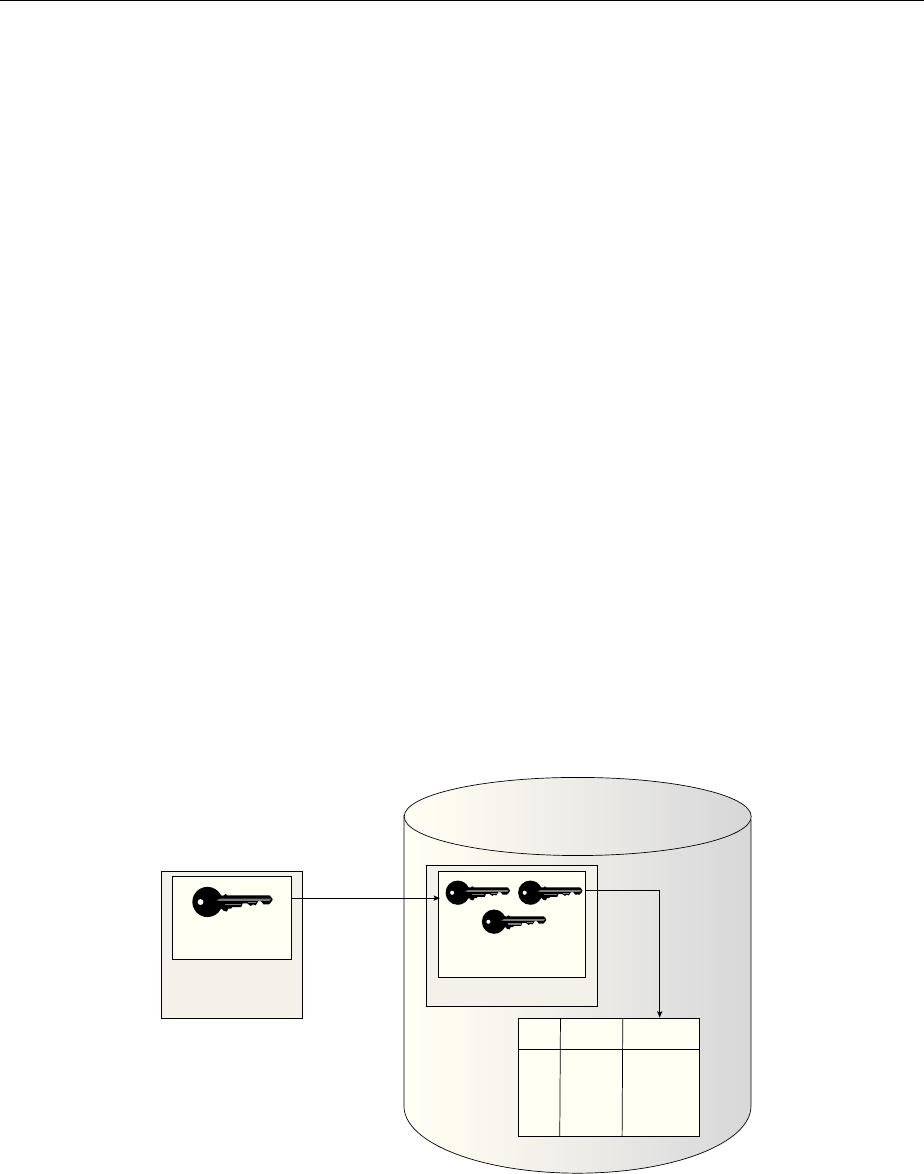
Figure 2-1 (page 2-3) an overview of the TDE column encryption process.
Figure 2-1 TDE Column Encryption Overview
Data Dictionary
S.No Name Credit Card
No.
1. SCOTT #!&*!%@)$(
3. MARY @!@*!$%)#&
2. JOHN !#%&*@!)$(
TDE Master
Encryption Key
External Security
Module
(Software/Hardware
Keystore)
TDE Table
Keys
Encrypt/Decrypt
Encrypt/
Decrypt
Oracle Database
As shown in Figure 2-1 (page 2-3), the TDE master encryption key is stored in an
external security module that is outside of the database and accessible only to a user
who was granted the appropriate privileges. For this external security module, Oracle
Database uses an Oracle software keystore (wallet, in previous releases) or hardware
security module (HSM) keystore. Storing the TDE master encryption key in this way
prevents its unauthorized use.
Types and Components of Transparent Data Encryption
Introduction to Transparent Data Encryption 2-3

Using an external security module separates ordinary program functions from
encryption operations, making it possible to assign separate, distinct duties to
database administrators and security administrators. Security is enhanced because the
keystore password can be unknown to the database administrator, requiring the
security administrator to provide the password.
When a table contains encrypted columns, TDE uses a single TDE table key regardless
of the number of encrypted columns. Each TDE table key is individually encrypted
with the TDE master encryption key. All of the TDE table keys are located together in
the colklc column of the ENC$ data dictionary table. No keys are stored in plaintext.
2.4.3 How Transparent Data Encryption Tablespace Encryption Works
Transparent Data Encryption (TDE) tablespace encryption enables you to encrypt an
entire tablespace.
All of the objects that are created in the encrypted tablespace are automatically
encrypted. TDE tablespace encryption is useful if your tables contain sensitive data in
multiple columns, or if you want to protect the entire table and not just individual
columns. You do not need to perform a granular analysis of each table column to
determine the columns that need encryption.
In addition, TDE tablespace encryption takes advantage of bulk encryption and
caching to provide enhanced performance. The actual performance impact on
applications can vary.
TDE tablespace encryption encrypts all of the data stored in an encrypted tablespace
including its redo data. TDE tablespace encryption does not encrypt data that is stored
outside of the tablespace. For example, BFILE data is not encrypted because it is
stored outside the database. If you create a table with a BFILE column in an encrypted
tablespace, then this particular column will not be encrypted.
All of the data in an encrypted tablespace is stored in encrypted format on the disk.
Data is transparently decrypted for an authorized user having the necessary privileges
to view or modify the data. A database user or application does not need to know if
the data in a particular table is encrypted on the disk. In the event that the data files on
a disk or backup media is stolen, the data is not compromised.
TDE tablespace encryption uses the two-tiered, key-based architecture to
transparently encrypt (and decrypt) tablespaces. The TDE master encryption key is
stored in an external security module (software or hardware keystore). This TDE
master encryption key is used to encrypt the TDE tablespace encryption key, which in
turn is used to encrypt and decrypt data in the tablespace.
Figure 2-2 (page 2-5) shows an overview of the TDE tablespace encryption process.
Types and Components of Transparent Data Encryption
2-4 Oracle Database Advanced Security Guide
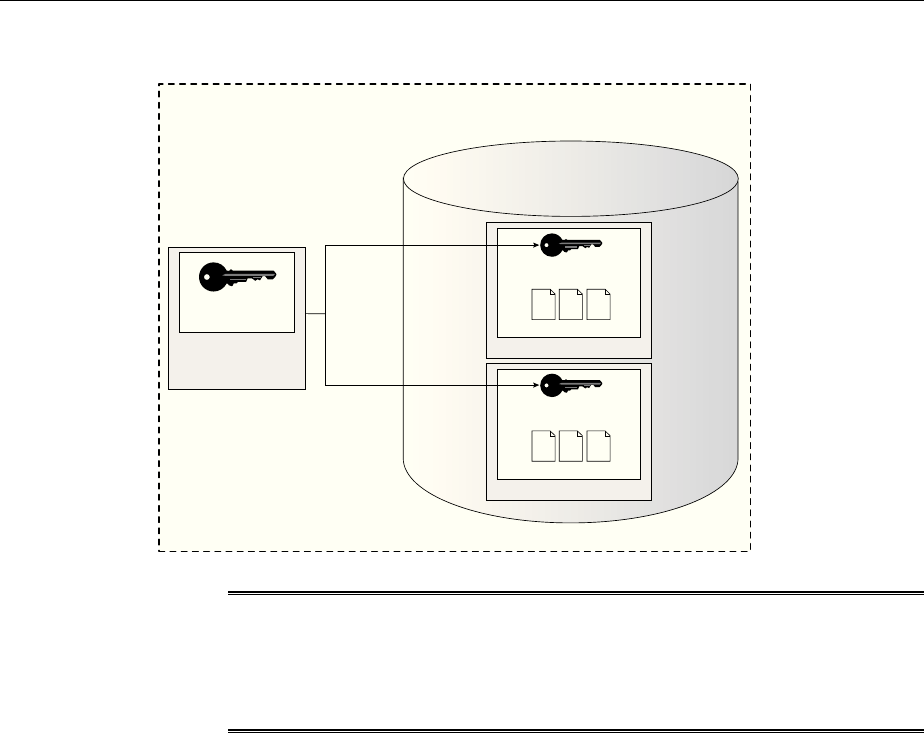
Figure 2-2 TDE Tablespace Encryption
TDE Master
Encryption Key
External Security
Module
(Software/Hardware
Keystore)
Tablespace
TDE Tablespace
Encryption Key
Encrypt /
Decrypt
Encrypt /
Decrypt
Oracle Database
TDE Tablespace Encryption
@!@*!
@!@*!
@!@*!
@!@*!
@!@*!
@!@*!
@!@*!
@!@*!
@!@*!
Encrypted Data Files
Tablespace
TDE Tablespace
Encryption Key
@!@*!
@!@*!
@!@*!
@!@*!
@!@*!
@!@*!
@!@*!
@!@*!
@!@*!
Encrypted Data Files
Note:
The encrypted data is protected during operations such as JOIN and SORT.
This means that the data is safe when it is moved to temporary tablespaces.
Data in undo and redo logs is also protected.
TDE tablespace encryption also allows index range scans on data in encrypted
tablespaces. This is not possible with TDE column encryption.
Oracle Database implements the following features to TDE tablespace encryption:
• It uses a unified TDE master encryption key for both TDE column encryption and
TDE tablespace encryption.
• You can reset the unified TDE master encryption key. This provides enhanced
security and helps meet security and compliance requirements.
2.4.4 How the Keystore for the Storage of TDE Master Encryption Keys Works
To control the encryption, you use a keystore and TDE master encryption key.
Topics:
•About the Keystore Storage of TDE Master Encryption Keys (page 2-5)
•Benefits of the Keystore Storage Framework (page 2-6)
•Types of Keystores (page 2-6)
2.4.4.1 About the Keystore Storage of TDE Master Encryption Keys
Oracle Database provides a key management framework for Transparent Data
Encryption that stores and manages keys and credentials.
Types and Components of Transparent Data Encryption
Introduction to Transparent Data Encryption 2-5

The key management framework includes the keystore to securely store the TDE
master encryption keys and the management framework to securely and efficiently
manage keystore and key operations for various database components.
The Oracle keystore stores a history of retired TDE master encryption keys, which
enables you to change them and still be able to decrypt data that was encrypted under
an earlier TDE master encryption key.
2.4.4.2 Benefits of the Keystore Storage Framework
The key management framework provides several benefits for Transparent Data
Encryption.
• Enables separation of duty between the database administrator and the security
administrator who manages the keys. You can grant the ADMINISTER KEY
MANAGEMENT or SYSKM privilege to users who are responsible for managing the
keystore and key operations.
• Facilitates compliance, because it helps you to track encryption keys and
implement requirements such as keystore password rotation and TDE master
encryption key reset or rekey operations.
• Facilitates and helps enforce keystore backup requirements. A backup is a copy of
the password-based software keystore that is created for all of the critical keystore
operations.
You must make a backup of the keystore for all of the critical keystore operations.
You must also make a backup of the TDE master encryption key before you reset
or rekey this TDE master encryption key.
• Enables the keystore to be stored on an ASM file system. This is particularly
useful for Oracle Real Application Clusters (Oracle RAC) environments where
database instances share a unified file system view.
• Enables reverse migration from a Hardware Security Module (HSM) keystore to a
file system-based software keystore. This option is useful if you must migrate
back to a software keystore.
2.4.4.3 Types of Keystores
Oracle Database supports software keystores and hardware (HSM-based) keystores.
You can configure the following types of software keystores:
•Password-based software keystores: Password-based software keystores are
protected by using a password that you create. You must open this type of
keystore before the keys can be retrieved or used.
•Auto-login software keystores: Auto-login software keystores are protected by a
system-generated password, and do not need to be explicitly opened by a security
administrator. Auto-login software keystores are automatically opened when
accessed. Auto-login software keystores can be used across different systems. If
your environment does not require the extra security provided by a keystore that
must be explicitly opened for use, then you can use an auto-login software
keystore. Auto-login software keystores are ideal for unattended scenarios.
•Local auto-login software keystores: Local auto-login software keystores are
auto-login software keystores that are local to the computer on which they are
created. Local auto-login keystores cannot be opened on any computer other than
the one on which they are created. This type of keystore is typically used for
Types and Components of Transparent Data Encryption
2-6 Oracle Database Advanced Security Guide

scenarios where additional security is required (that is, to limit the use of the auto-
login for that computer) while supporting an unattended operation.
Software keystores can be stored on ASM disk groups or in a regular file system.
Hardware Security Modules are physical devices that provide secure storage for
encryption keys, in hardware keystores. HSMs also provide secure computational
space (memory) to perform encryption and decryption operations.
When using an HSM, all encryption and decryption operations that use the TDE
master encryption key are performed inside the HSM. This means that the TDE master
encryption key is never exposed in insecure memory.
2.4.5 Supported Encryption and Integrity Algorithms
By default, Transparent Data Encryption (TDE) Column encryption uses the
Advanced Encryption Standard with a 192-bit length cipher key (AES192).
In addition, salt is added by default to plaintext before encryption unless specified
otherwise. You cannot add salt to indexed columns that you want to encrypt. For
indexed columns, choose the NO SALT parameter for the SQL ENCRYPT clause.
For Transparent Data Encryption (TDE) Tablespace encryption, the default is to use
the Advanced Encryption Standard with a 128-bit length cipher key (AES128). In
addition, salt is always added to plaintext before encryption.
You can change encryption algorithms and encryption keys on existing encrypted
columns by setting a different algorithm with the SQL ENCRYPT clause.
Table 2-1 (page 2-7) lists the supported encryption algorithms.
Table 2-1 Supported Encryption Algorithms for Transparent Data Encryption
Algorithm Key Size Parameter Name
Triple Encryption Standard (DES) 168 bits 3DES168
Advanced Encryption Standard (AES) 128 bits AES128
AES • Default for
column level
encryption is
192 bits
• Default for
tablespace
encryption is
128 bits
•AES192 for
column level
encryption
•AES128 for
tablespace
encryption
AES 256 bits AES256
For integrity protection of TDE column encryption, the SHA-1 hashing algorithm is
used. If you have storage restrictions, then use the NOMAC option.
Types and Components of Transparent Data Encryption
Introduction to Transparent Data Encryption 2-7

See Also:
•Creating a Table with an Encrypted Column Using No Algorithm or a
Non-Default Algorithm (page 3-20) for the correct syntax when choosing
the NO SALT parameter for the SQL ENCRYPT clause
•Using the NOMAC Parameter to Save Disk Space and Improve
Performance (page 3-20) for more information about the NOMAC option in
the CREATE TABLE statement
•Changing the Encryption Key or Algorithm for Tables with Encrypted
Columns (page 3-24) for syntax examples when setting a different
algorithm with the SQL ENCRYPT clause
Types and Components of Transparent Data Encryption
2-8 Oracle Database Advanced Security Guide

3
Configuring Transparent Data Encryption
You can configure software or hardware keystores, for use on both individual table
columns or entire tablespaces.
Topics:
•Configuring a Software Keystore (page 3-1)
•Configuring a Hardware Keystore (page 3-10)
•Encrypting Columns in Tables (page 3-16)
•Encrypting Tablespaces (page 3-25)
•Transparent Data Encryption Data Dynamic and Data Dictionary Views
(page 3-29)
3.1 Configuring a Software Keystore
A software keystore is a container for the TDE master encryption key, and it resides in
the software file system.
Topics:
•About Configuring a Software Keystore (page 3-1)
•Step 1: Set the Software Keystore Location in the sqlnet.ora File (page 3-2)
•Step 2: Create the Software Keystore (page 3-4)
•Step 3: Open the Software Keystore (page 3-7)
•Step 4: Set the Software TDE Master Encryption Key (page 3-8)
•Step 5: Encrypt Your Data (page 3-10)
3.1.1 About Configuring a Software Keystore
A software keystore is a container that stores the Transparent Data Encryption master
encryption key.
Before you can configure the keystore, you first must define a location for it in the
sqlnet.ora file. There is one keystore per database, and the database locates this
keystore by checking the keystore location that you define in the sqlnet.ora file.
You can create other keystores, such as copies of the keystore and export files that
contain keys, depending on your needs. However, you must never remove or delete
the keystore that you configured in the sqlnet.ora location, nor replace it with a
different keystore.
Configuring Transparent Data Encryption 3-1

After you configure the software keystore location in the sqlnet.ora file, you can
log in to the database instance to create and open the keystore, and then set the TDE
master encryption key. After you complete these steps, you can begin to encrypt data.
3.1.2 Step 1: Set the Software Keystore Location in the sqlnet.ora File
The first step you must take to configure a software keystore is to designate a location
for it in the sqlnet.ora file.
Topics:
•About the Keystore Location in the sqlnet.ora File (page 3-2)
•Configuring the sqlnet.ora File for a Software Keystore Location (page 3-3)
•Example: Configuring a Software Keystore for a Regular File System (page 3-3)
•Example: Configuring a Software Keystore When Multiple Databases Share the
sqlnet.ora File (page 3-3)
•Example: Configuring a Software Keystore for Oracle Automatic Storage
Management (page 3-4)
•Example: Configuring a Software Keystore for an Oracle Automatic Storage
Management Disk Group (page 3-4)
3.1.2.1 About the Keystore Location in the sqlnet.ora File
Oracle Database checks the sqlnet.ora file for the directory location of the keystore,
whether it is a software keystore, a hardware module security (HSM) keystore, or an
Oracle Key Vault keystore.
You must edit the sqlnet.ora file to define a directory location for the keystore that
you plan to create. Ensure that this directory exists beforehand. Preferably, this
directory should be empty.
Note the following behavior when you must edit the sqlnet.ora file in an Oracle
Real Application Clusters (Oracle RAC) or a multitenant environment:
•In an Oracle RAC environment: If you are using the srvctl utility and if you
want to include environment variables in the sqlnet.ora configuration file,
then you must set these environment variables in both the operating system and
the srvctl environment. Oracle recommends that you place the keystore on a
shared file system, such as Oracle Automatic Storage Management (ASM) or NFS.
•In a multitenant environment: The keystore location is set for the entire
multitenant container database (CDB), not for individual pluggable databases
(PDBs).
In the sqlnet.ora file, you must set the ENCRYPTION_WALLET_LOCATION
parameter to specify the keystore location. When determining which keystore to use,
Oracle Database searches for the keystore location in the following places, in this
order:
1. It attempts to use the keystore in the location specified by the parameter
ENCRYPTION_WALLET_LOCATION in the sqlnet.ora file.
2. If the ENCRYPTION_WALLET_LOCATION parameter is not set, then it attempts to
use the keystore in the location that is specified by the parameter
WALLET_LOCATION.
Configuring a Software Keystore
3-2 Oracle Database Advanced Security Guide

3. If the WALLET_LOCATION parameter is also not set, then Oracle Database looks
for a keystore at the default database location, which is ORACLE_BASE/admin/
DB_UNIQUE_NAME/wallet or ORACLE_HOME/admin/DB_UNIQUE_NAME/
wallet. (DB_UNIQUE_NAME is the unique name of the database specified in the
initialization parameter file.) When the keystore location is not set in the
sqlnet.ora file, then the V$ENCRYPTION_WALLET view displays the default
location. You can check the location and status of the keystore in the V
$ENCRYPTION_WALLET view.
By default, the sqlnet.ora file is located in the ORACLE_HOMEdbs directory or in
the location set by the TNS_ADMIN environment variable. Ensure that you have
properly set the TNS_ADMIN environment variable to point to the correct
sqlnet.ora file.
See Also: SQL*Plus User's Guide and Reference for more information and
examples of setting the TNS_ADMIN environment variable
3.1.2.2 Configuring the sqlnet.ora File for a Software Keystore Location
Use the sqlnet.ora file to configure the keystore location for a regular file system,
for multiple database access, and for use with Oracle Automatic Storage Management
(ASM).
• To create a software keystore on a regular file system, use the following format
when you edit the sqlnet.ora file:
ENCRYPTION_WALLET_LOCATION=
(SOURCE=
(METHOD=FILE)
(METHOD_DATA=
(DIRECTORY=path_to_keystore)))
If the path_to_keystore will contain an environment variable, then set this variable
in the environment where the database instance is started and before you start the
database. If you are using the srvctl utility to start the database, then set the
environment variable in the srvctl environment as well, using the following
command:
srvctl setenv database -db database_name -env
"environment_variable_name=environment_variable_value"
3.1.2.3 Example: Configuring a Software Keystore for a Regular File System
You can configure a software keystore for a regular file system.
The following example shows how to configure a software keystore location in the
sqlnet.ora file for a regular file system in which the database name is orcl.
ENCRYPTION_WALLET_LOCATION=
(SOURCE=
(METHOD=FILE)
(METHOD_DATA=
(DIRECTORY=/etc/ORACLE/WALLETS/orcl)))
3.1.2.4 Example: Configuring a Software Keystore When Multiple Databases Share
the sqlnet.ora File
You can configure multiple databases to share the sqlnet.ora file.
Configuring a Software Keystore
Configuring Transparent Data Encryption 3-3

The following example shows how to configure a software keystore location when
multiple databases share the sqlnet.ora file.
ENCRYPTION_WALLET_LOCATION=
(SOURCE=
(METHOD=FILE)
(METHOD_DATA=
(DIRECTORY=/etc/ORACLE/WALLETS/$ORACLE_SID/)))
3.1.2.5 Example: Configuring a Software Keystore for Oracle Automatic Storage
Management
You can configure sqlnet.ora for an Automatic Storage Management (ASM) file
system
The following example shows how to configure a software keystore location in the
sqlnet.ora file for an ASM file system:
ENCRYPTION_WALLET_LOCATION=
(SOURCE=
(METHOD=FILE)
(METHOD_DATA=
(DIRECTORY=+disk1/mydb/wallet)))
3.1.2.6 Example: Configuring a Software Keystore for an Oracle Automatic Storage
Management Disk Group
You can configure sqlnet.ora for an Oracle Automatic Storage Management (ASM)
disk group.
The following format shows how to configure a software keystore if you want to
create a software keystore location on an ASM disk group:
ENCRYPTION_WALLET_LOCATION=
(SOURCE=
(METHOD=FILE)
(METHOD_DATA=
(DIRECTORY=+ASM_file_path_of_the_diskgroup)))
3.1.3 Step 2: Create the Software Keystore
After you have specified a directory location for the software keystore, you can create
the keystore.
Topics:
•About Creating Software Keystores (page 3-4)
•Creating a Password-Based Software Keystore (page 3-5)
•Creating an Auto-Login or a Local Auto-Login Software Keystore (page 3-6)
3.1.3.1 About Creating Software Keystores
There are three different types of software keystores.
You can create password-based software keystores, auto-login software keystores, and
local auto-login software keystores.
Be aware that executing the query SELECT * FROM V$ENCRYPTION_WALLET will
automatically open an auto-login software keystore. For example, suppose you have a
password-based keystore and an auto-login keystore. If the password-based keystore
Configuring a Software Keystore
3-4 Oracle Database Advanced Security Guide

is open and you close the password-based keystore and then query the V
$ENCRYPTION_WALLET view, then the output will indicate that a keystore is open.
However, this is because V$ENCRYPTION_WALLET opened up the auto-login software
keystore and then displayed the status of the auto-login keystore.
See Also:
Types of Keystores (page 2-6) for more information about software keystores
3.1.3.2 Creating a Password-Based Software Keystore
A password-based software keystore requires a user password, which is used to
protect the keys and credentials stored in the keystore.
1. Ensure that you complete the procedure described in Step 1: Set the Software
Keystore Location in the sqlnet.ora File (page 3-2).
2. Log in to the database instance as a user who has been granted the ADMINISTER
KEY MANAGEMENT or SYSKM privilege.
In a multitenant environment, log in to the root. For example:
sqlplus c##sec_admin as syskm
Enter password: password
Connected.
If SQL*Plus is already open and you had modified the sqlnet.ora file during
this time, then reconnect to SQL*Plus. The database session must be changed
before the sqlnet.ora changes can take effect.
3. Run the ADMINISTER KEY MANAGEMENT SQL statement to create the keystore.
The syntax is as follows:
ADMINISTER KEY MANAGEMENT CREATE KEYSTORE 'keystore_location' IDENTIFIED BY
software_keystore_password;
In this specification:
•keystore_location is the path to the keystore directory location of the
password-based keystore for which you want to create the auto-login
keystore (for example, /etc/ORACLE/WALLETS/orcl). Enclose the
keystore_location setting in single quotation marks (' '). To find this
location, you can query the WRL_PARAMETER column of the V
$ENCRYPTION_WALLET view. (If the keystore was not created in the default
location, then the STATUS column of the V$ENCRYPTION_WALLET view is
NOT_AVAILABLE.)
•software_keystore_password is the password of the keystore that you,
the security administrator, creates.
For example, to create the keystore in the /etc/ORACLE/WALLETS/orcl
directory:
ADMINISTER KEY MANAGEMENT CREATE KEYSTORE '/etc/ORACLE/WALLETS/orcl'
IDENTIFIED BY password;
keystore altered.
Configuring a Software Keystore
Configuring Transparent Data Encryption 3-5

After you run this statement, the ewallet.p12 file, which is the keystore,
appears in the keystore location.
3.1.3.3 Creating an Auto-Login or a Local Auto-Login Software Keystore
As an alternative to password-based keystores, you can create either an auto-login or
local auto-login software keystore.
Both of these keystores have system-generated passwords. They are also PKCS#12-
based files. The auto-login software keystore can be opened from different computers
from the computer where this keystore resides, but the local auto-login software
keystore can only be opened from the computer on which it was created. Both the
auto-login and local auto-login keystores are created from the password-based
software keystores.
1. Ensure that you complete the procedure described in Step 1: Set the Software
Keystore Location in the sqlnet.ora File (page 3-2).
2. Log in to the database instance as a user who has been granted the ADMINISTER
KEY MANAGEMENT or SYSKM privilege.
In a multitenant environment, log in to the root. For example:
sqlplus c##sec_admin as syskm
Enter password: password
Connected.
If SQL*Plus is already open and you had modified the sqlnet.ora file during
this time, then reconnect to SQL*Plus. The database session must be changed
before the sqlnet.ora changes can take effect.
3. Create a password-based software keystore, as described in Creating a Password-
Based Software Keystore (page 3-5).
4. Run the ADMINISTER KEY MANAGEMENT SQL statement to create the keystore.
The syntax is as follows:
ADMINISTER KEY MANAGEMENT CREATE [LOCAL] AUTO_LOGIN KEYSTORE FROM KEYSTORE
'keystore_location' IDENTIFIED BY software_keystore_password;
In this specification:
•LOCAL enables you to create a local auto-login software keystore. Otherwise,
omit this clause if you want the keystore to be accessible by other computers.
•keystore_location is the path to the directory location of the password-
based keystore for which you want to create the auto-login keystore (for
example, /etc/ORACLE/WALLETS/orcl). Enclose this setting in single
quotation marks (' '). To find this location, query the WRL_PARAMETER
column of the V$ENCRYPTION_WALLET view.
•software_keystore_password is the password-based keystore for which
you want to create the auto-login keystore.
For example, to create an auto-login software keystore of the password-based
keystore that is located in the/etc/ORACLE/WALLETS/orcl directory:
ADMINISTER KEY MANAGEMENT CREATE AUTO_LOGIN KEYSTORE FROM KEYSTORE '/etc/
ORACLE/WALLETS/orcl' IDENTIFIED BY password;
Configuring a Software Keystore
3-6 Oracle Database Advanced Security Guide

keystore altered.
After you run this statement, the cwallet.sso file appears in the keystore
location. The ewallet.p12 file is the password-based wallet.
Note:
Do not remove the PKCS#12 wallet (ewallet.p12 file) after you create the
auto login keystore (.sso file). You must have the PKCS#12 wallet to
regenerate or rekey the TDE master encryption key in the future. By default,
this file is located in the $ORACLE_HOME/admin/ORACLE_SID/wallet
directory.
Transparent Data Encryption uses an auto login keystore only if it is available at the
correct location (ENCRYPTION_WALLET_LOCATION, WALLET_LOCATION, or the
default keystore location), and the SQL statement to open an encrypted keystore has
not already been executed. (Note that auto-login keystores are encrypted, because they
have system-generated passwords.)
See Also:
Deletion of Keystores (page 4-21)
3.1.4 Step 3: Open the Software Keystore
Depending on the type of keystore you create, you must manually open the keystore
before you can use it.
Topics:
•About Opening Software Keystores (page 3-7)
•Opening a Software Keystore (page 3-8)
3.1.4.1 About Opening Software Keystores
You must manually open a password-based software keystore before any TDE master
encryption keys can be created or accessed in the keystore.
You do not need to manually open auto-login or local auto-login software keystores.
These keystore are automatically opened when it is required, that is, when an
encryption operation must access the key. If necessary, you can explicitly close any of
these types of keystores. You can check the status of whether a keystore is open,
closed, open but with no master key, or open but with an unknown master key by
querying the STATUS column of the V$ENCRYPTION_WALLET view.
After you open a keystore, it remains open until you manually close it. Each time you
restart a database instance, you must manually open the password keystore to
reenable encryption and decryption operations.
Configuring a Software Keystore
Configuring Transparent Data Encryption 3-7

See Also:
How Keystore Open and Close Operations Work in a Multitenant
Environment (page 6-14)
3.1.4.2 Opening a Software Keystore
To open a software keystore, you must use the ADMINISTER KEY MANAGEMENT
statement with the SET KEYSTORE OPEN clause.
1. Ensure that you complete the procedure described in Step 2: Create the Software
Keystore (page 3-4).
2. Log in to the database instance as a user who has been granted the ADMINISTER
KEY MANAGEMENT or SYSKM privilege.
In a multitenant environment, you must open the keystore first in the root before
you can open it in a PDB. For example, to log in to the root:
sqlplus c##sec_admin as syskm
Enter password: password
Connected.
To find the available PDBs, query the DBA_PDBS data dictionary view. To check the
current PDB, run the show con_name command.
3. Run the ADMINISTER KEY MANAGEMENT statement.
Use the following syntax:
ADMINISTER KEY MANAGEMENT SET KEYSTORE OPEN IDENTIFIED BY
software_keystore_password [CONTAINER = ALL | CURRENT];
In this specification:
•software_keystore_password is the same password that you used to
create the keystore in Step 2: Create the Software Keystore (page 3-4).
•CONTAINER is for use in a multitenant environment. Enter ALL to set the
keystore in all of the PDBs in this CDB, or CURRENT for the current PDB.
For example:
ADMINISTER KEY MANAGEMENT SET KEYSTORE OPEN IDENTIFIED BY password;
keystore altered.
Note that if the keystore is open but you have not created a TDE master encryption
key yet (described next), the STATUS column of the V$ENCRYPTION_WALLET view
reminds you with an OPEN_NO_MASTER_KEY status.
3.1.5 Step 4: Set the Software TDE Master Encryption Key
Once the keystore is open, you can set a TDE master encryption key for it.
Topics:
•About Setting the Software TDE Master Encryption Key (page 3-9)
•Setting the TDE Master Encryption Key in the Software Keystore (page 3-9)
Configuring a Software Keystore
3-8 Oracle Database Advanced Security Guide

3.1.5.1 About Setting the Software TDE Master Encryption Key
The TDE master encryption key is stored in the keystore.
This key protects the TDE table keys and tablespace encryption keys. By default, the
TDE master encryption key is a key that Transparent Data Encryption (TDE)
generates. You can find if a keystore has no master key set or an unknown master key
by querying the STATUS column of the V$ENCRYPTION_WALLET view.
In a multitenant environment, you can create and manage the TDE master encryption
key from either the root or the PDB.
Note:
You can create TDE master encryption keys for use later on, and then
manually activate them. See Creating TDE Master Encryption Keys for Later
Use (page 4-22) for more information.
3.1.5.2 Setting the TDE Master Encryption Key in the Software Keystore
To set the TDE master encryption key in a software keystore, use the ADMINISTER
KEY MANAGEMENT statement with the SET KEY clause.
1. For password software keystores, ensure that you complete the procedure
described in Step 3: Open the Software Keystore (page 3-7) to open the key.
Auto-login or local auto-login software keys are opened automatically after you
create them. Password-based software keystores must be open before you can set
the TDE master encryption key. If the auto-login software keystore is open, then
you must close it and open the password-based software keystore. If both the
password-based keystore and auto-login keystores are present in the configured
location and the password-based keystore is open, then the TDE master
encryption key is automatically written to the auto-login keystore as well.
2. Log in to the database instance as a user who has been granted the ADMINISTER
KEY MANAGEMENT or SYSKM privilege.
In a multitenant environment, log in to the root or to the PDB. For example, to log
in to a PDB:
sqlplus sec_admin@hrpdb as syskm
Enter password: password
Connected.
To find the available PDBs, query the DBA_PDBS data dictionary view. To check
the current PDB, run the show con_name command.
3. Ensure that the database is open in READ WRITE mode.
You can set the TDE master encryption key if OPEN_MODE is set to READ WRITE.
To find the status, for a non-multitenant environment, query the OPEN_MODE
column of the V$DATABASE dynamic view. If you are using a multitenant
environment, then query the V$PDBS view. (If you cannot access these views, then
connect as SYSDBA and try the query again. In order to connect as SYSKM for this
type of query, you must create a password file for it. See Oracle Database
Administrator’s Guide for more information.)
Configuring a Software Keystore
Configuring Transparent Data Encryption 3-9

4. Connect using the SYSKM administrative privilege and then run the ADMINISTER
KEY MANAGEMENT SQL statement to set the software management keystore.
ADMINISTER KEY MANAGEMENT SET KEY [USING TAG 'tag'] IDENTIFIED BY
keystore_password [WITH BACKUP [USING 'backup_identifier']] [CONTAINER = ALL |
CURRENT];
In this specification:
•tag is the associated attributes and information that you define. Enclose this
setting in single quotation marks (' ').
•password is the mandatory keystore password that you created when you
created the keystore in Step 2: Create the Software Keystore (page 3-4).
•WITH BACKUP creates a backup of the keystore. You must use this option for
password-based keystores. Optionally, you can use the USING clause to add a
brief description of the backup. Enclose this description in single quotation
marks (' '). This identifier is appended to the named keystore file (for
example, ewallet_time_stamp_emp_key_backup.p12, with
emp_key_backup being the backup identifier). Follow the file naming
conventions that your operating system uses.
•CONTAINER is for use in a multitenant environment. Enter ALL to set the key
in all of the PDBs in this CDB, or CURRENT for the current PDB.
For example:
ADMINISTER KEY MANAGEMENT SET KEY IDENTIFIED BY keystore_password WITH BACKUP
USING 'emp_key_backup';
keystore altered.
3.1.6 Step 5: Encrypt Your Data
After you complete the software keystore configuration, you can begin to encrypt
data.
You can encrypt data in individual table columns or in entire tablespaces.
• See the following topics for information about encrypting data:
–Encrypting Columns in Tables (page 3-16)
–Encrypting Tablespaces (page 3-25)
3.2 Configuring a Hardware Keystore
A hardware keystore resides in a hardware security module (HSM), which is designed
to store encryption keys.
Topics:
•About Configuring a Hardware (External) Keystore (page 3-11)
•Step 1: Set the Hardware Keystore Type in the sqlnet.ora File (page 3-11)
•Step 2: Configure the Hardware Security Module (page 3-11)
•Step 3: Open the Hardware Keystore (page 3-12)
Configuring a Hardware Keystore
3-10 Oracle Database Advanced Security Guide

•Step 4: Set the Hardware Keystore TDE Master Encryption Key (page 3-14)
•Step 5: Encrypt Your Data (page 3-16)
3.2.1 About Configuring a Hardware (External) Keystore
A hardware keystore is a separate server or device that provides security storage for
encryption keys.
External keystores are external to an Oracle database. Oracle Database can interface
with external keystores but cannot manipulate them outside of the Oracle interface.
The Oracle database can request the external keystore to create a key but it cannot
define how this key is stored in an external database. (Conversely, for software
keystores that are created using TDE, Oracle Database has full control: that is, you can
use SQL statements to manipulate this type of keystore.) Examples of external
keystores are hardware security modules or Oracle Key Vault keystores. External
keystores among multiple databases can be managed centrally, such as with Oracle
Key Vault.
To configure a keystore for a hardware security module (hardware keystore), you
must first include the keystore type in the sqlnet.ora file, configure and open the
hardware keystore, and then set the hardware keystore TDE master encryption key. In
short, there is one hardware keystore per database, and the database locates this
keystore by checking the keystore type that you define in the sqlnet.ora file.
After you configure the hardware keystore, you are ready to begin encrypting your
data.
3.2.2 Step 1: Set the Hardware Keystore Type in the sqlnet.ora File
Before you can configure a hardware keystore, you must modify the sqlnet.ora file.
By default, this file is located in the ORACLE_HOMEdbs directory or in the location set
by the TNS_ADMIN environment variable.
• Use the following setting in the sqlnet.ora file to define the hardware keystore
type, which is HSM.
ENCRYPTION_WALLET_LOCATION=
(SOURCE=
(METHOD=HSM))
See Also:
•About the Keystore Location in the sqlnet.ora File (page 3-2) for more
information about how Oracle Database finds the keystore location
•Migrating Between a Software Password Keystore and a Hardware
Keystore (page 4-11) for information about how to configure the
sqlnet.ora file for migration between these two keystore types
3.2.3 Step 2: Configure the Hardware Security Module
To configure a third-party hardware security module, you must copy the PKCS#11
library to the correct location and follow your vendor's instructions.
Configuring a Hardware Keystore
Configuring Transparent Data Encryption 3-11

1. Ensure that you complete the procedure described in Step 1: Set the Hardware
Keystore Type in the sqlnet.ora File (page 3-11).
2. Copy the PKCS#11 library to its correct path.
Your hardware security module vendor should provide you with an associated
PKCS#11 library. Only one PKCS#11 library is supported at a time. If you want to
use an HSM from a new vendor, then you must replace the PKCS#11 library from
the earlier vendor with the library from the new vendor.
Copy this library to the appropriate location to ensure that Oracle Database can
find this library:
•UNIX systems: Use the following syntax to copy the library to this directory:
/opt/oracle/extapi/[32,64]/hsm/{VENDOR}/{VERSION}/libapiname.so
•Windows systems: Use the following syntax to copy the library to this
directory:
%SYSTEM_DRIVE%\oracle\extapi\[32,64]\hsm\{VENDOR}\{VERSION}\libapiname.dll
In this specification:
•[32,64] specifies whether the supplied binary is 32 bits or 64 bits.
•VENDOR stands for the name of the vendor supplying the library
•VERSION refers to the version of the library. This should preferably be in the
format, number.number.number
•apiname requires no special format. However, the apiname must be
prefixed with the word lib, as illustrated in the syntax.
3. Follow your vendor's instructions to set up the hardware security module.
Use your hardware security module management interface and the instructions
provided by your HSM vendor to set up the hardware security module. Create
the user account and password that must be used by the database to interact with
the hardware security module. This process creates and configures a hardware
keystore that communicates with your Oracle database.
3.2.4 Step 3: Open the Hardware Keystore
After you have configured the hardware security module, you must open the
hardware keystore before it can be used.
Topics:
•About Opening the Hardware Keystore (page 3-12)
•Opening the Hardware Keystore (page 3-13)
3.2.4.1 About Opening the Hardware Keystore
You must open the hardware keystore so that it is accessible to the database before
you can perform any encryption or decryption.
You can check the status of whether a keystore is open, closed, open but with no TDE
master encryption key, or open but with an unknown master encryption key by
querying the STATUS column of the V$ENCRYPTION_WALLET view.
Configuring a Hardware Keystore
3-12 Oracle Database Advanced Security Guide

See Also:
How Keystore Open and Close Operations Work in a Multitenant
Environment (page 6-14)
3.2.4.2 Opening the Hardware Keystore
To open a hardware keystore, use the ADMINISTER KEY MANAGEMENT statement
with the SET KEYSTORE OPEN clause.
1. Ensure that you complete the procedure described in Step 2: Configure the
Hardware Security Module (page 3-11).
2. Log in to the database instance as a user who has been granted the ADMINISTER
KEY MANAGEMENT or SYSKM privilege.
In a multitenant environment, you must open the keystore first in the root before
you can open it in a PDB. For example, to log in to the root:
sqlplus sec_admin as syskm
Enter password: password
Connected.
To find the available PDBs, query the DBA_PDBS data dictionary view. To check
the current PDB, run the show con_name command.
If SQL*Plus is already open and you had modified the sqlnet.ora file during
this time, then reconnect to SQL*Plus. The database session must be changed
before the sqlnet.ora changes can take effect.
3. Run the ADMINISTER KEY MANAGEMENT SQL statement using the following
syntax:
ADMINISTER KEY MANAGEMENT SET KEYSTORE OPEN IDENTIFIED BY "user_id:password"
[CONTAINER = ALL | CURRENT];
In this specification:
•user_id is the user ID created for the database using the HSM management
interface
•password is the password created for the user ID using the HSM
management interface.
Enclose the user_id:password string in double quotation marks (" ") and
separate user_id and password with a colon (:).
•CONTAINER is for use in a multitenant environment. Enter ALL to set the
keystore in all of the PDBs in this CDB, or CURRENT for the current PDB.
For example:
ADMINISTER KEY MANAGEMENT SET KEYSTORE OPEN IDENTIFIED BY "psmith:password";
keystore altered.
4. Repeat this procedure each time you restart the database instance.
Configuring a Hardware Keystore
Configuring Transparent Data Encryption 3-13

3.2.5 Step 4: Set the Hardware Keystore TDE Master Encryption Key
After you have opened the hardware keystore, you are ready to set the hardware
keystore TDE master encryption key.
Topics:
•About Setting the Hardware Keystore TDE Master Encryption Key (page 3-14)
•Setting a TDE Master Encryption Key if You Have Not Previously Configured
One (page 3-14)
•Migration of a Previously Configured TDE Master Encryption Key (page 3-15)
3.2.5.1 About Setting the Hardware Keystore TDE Master Encryption Key
You must create a TDE master encryption key that is stored inside the hardware
keystore.
Oracle Database uses the TDE master encryption key to encrypt or decrypt TDE table
keys or tablespace encryption keys inside the hardware security module.
If you have not previously configured a software keystore for Transparent Data
Encryption, then follow the steps in Setting a TDE Master Encryption Key if You Have
Not Previously Configured One (page 3-14). If you have already configured a
software keystore for TDE, then you must migrate it to the hardware security module,
as described in Migration of a Previously Configured TDE Master Encryption Key
(page 3-15).
Along with the current TDE master key, Oracle wallets maintain historical TDE master
keys that are generated after every re-key operation that rotates the TDE master key.
These historical TDE master keys help to restore Oracle database backups that were
taken previously using one of the historical TDE master keys.
3.2.5.2 Setting a TDE Master Encryption Key if You Have Not Previously Configured
One
You should complete this procedure if you have not previously configured a software
keystore for Transparent Data Encryption.
In a multitenant environment, you can create and manage the TDE master encryption
key from either the root or the PDB.
Note:
You can create TDE master encryption keys for use later on, and then
manually activate them. See Creating TDE Master Encryption Keys for Later
Use (page 4-22) for more information.
1. Ensure that you complete the procedure described in Step 3: Open the Hardware
Keystore (page 3-12).
2. Log in to the database instance as a user who has been granted the ADMINISTER
KEY MANAGEMENT or SYSKM privilege.
In a multitenant environment, log in to the root or to the PDB. For example:
Configuring a Hardware Keystore
3-14 Oracle Database Advanced Security Guide

sqlplus sec_admin@hrpdb as syskm
Enter password: password
Connected.
To find the available PDBs, query the DBA_PDBS data dictionary view. To check
the current PDB, run the show con_name command.
3. Ensure that the database is open in READ WRITE mode.
You can set the TDE master encryption key if OPEN_MODE is set to READ WRITE.
To find the status, for a non-multitenant environment, query the OPEN_MODE
column of the V$DATABASE dynamic view. If you are in a multitenant
environment, then query the V$PDBS view. (If you cannot access these views, then
connect as SYSDBA and try the query again. In order to connect as SYSKM for this
type of query, you must create a password file for it. See Oracle Database
Administrator’s Guide for more information.)
4. Run the following SQL statement:
ADMINISTER KEY MANAGEMENT SET KEY [USING TAG 'tag'] [FORCE KEYSTORE] IDENTIFIED
BY [EXTERNAL STORE | "user_id:password"] [CONTAINER = ALL | CURRENT];
In this specification:
•tag is the associated attributes and information that you define. Enclose this
setting in single quotation marks (' ').
•FORCE KEYSTORE enables the keystore operation if the keystore is closed.
•IDENTIFIED BY can be one of the following settings:
–EXTERNAL STORE uses the keystore password stored in the external
store to perform the keystore operation.
–user_id:password: user_id is the user ID created for the hardware
keystore; password is the password created for the hardware keystore.
Enclose the user_id:password string in double quotation marks (" ")
and separate user_id and password with a colon (:).
•CONTAINER is for use in a multitenant environment. Enter ALL to set the
keystore in all of the PDBs in this CDB, or CURRENT for the current PDB.
For example:
ADMINISTER KEY MANAGEMENT SET KEY IDENTIFIED BY "psmith:password";
keystore altered.
3.2.5.3 Migration of a Previously Configured TDE Master Encryption Key
You must migrate the previously configured TDE master encryption key if you
previously configured a software keystore.
Tools such as Oracle Data Pump and Oracle Recovery Manager require access to the
old software keystore to perform decryption and encryption operations on data
exported or backed up using the software keystore. You can migrate from the software
to the hardware keystore by following the instructions in Migrating Between a
Software Password Keystore and a Hardware Keystore (page 4-11).
Along with the current TDE master key, Oracle wallets maintain historical TDE master
keys that are generated after every re-key operation that rotates the TDE master key.
Configuring a Hardware Keystore
Configuring Transparent Data Encryption 3-15

These historical TDE master keys help to restore Oracle database backups that were
taken previously using one of the historical TDE master keys.
3.2.6 Step 5: Encrypt Your Data
After you have completed the hardware keystore configuration, you can begin to
encrypt data.
You can encrypt individual columns in a table or entire tablespaces.
• See the following topics for more information about encrypting data:
–Encrypting Columns in Tables (page 3-16)
–Encrypting Tablespaces (page 3-25)
3.3 Encrypting Columns in Tables
You can use Transparent Data Encryption to encrypt individual columns in database
tables.
Topics:
•About Encrypting Columns in Tables (page 3-16)
•Data Types That Can Be Encrypted with TDE Column Encryption (page 3-17)
•Restrictions on Using Transparent Data Encryption Column Encryption
(page 3-18)
•Creating Tables with Encrypted Columns (page 3-18)
•Encrypting Columns in Existing Tables (page 3-22)
•Creating an Index on an Encrypted Column (page 3-23)
•Adding Salt to an Encrypted Column (page 3-24)
•Removing Salt from an Encrypted Column (page 3-24)
•Changing the Encryption Key or Algorithm for Tables with Encrypted Columns
(page 3-24)
3.3.1 About Encrypting Columns in Tables
You can encrypt individual columns in tables.
Whether you choose to encrypt individual columns or entire tablespaces depends on
the data types that the table has. There are also several features that do not support
TDE column encryption.
See Also:
•Data Types That Can Be Encrypted with TDE Column Encryption
(page 3-17)
•Restrictions on Using Transparent Data Encryption Column Encryption
(page 3-18)
Encrypting Columns in Tables
3-16 Oracle Database Advanced Security Guide

3.3.2 Data Types That Can Be Encrypted with TDE Column Encryption
Oracle Database supports a specific set of data types that can be used with TDE
column encryption.
You can encrypt data columns that use a variety of different data types.
Supported data types are as follows:
•BINARY_DOUBLE
•BINARY_FLOAT
•CHAR
•DATE
•INTERVAL DAY TO SECOND
•INTERVAL YEAR TO MONTH
•NCHAR
•NUMBER
•NVARCHAR2
•RAW (legacy or extended)
•TIMESTAMP (includes TIMESTAMP WITH TIME ZONE and TIMESTAMP WITH
LOCAL TIME ZONE)
•VARCHAR2 (legacy or extended)
You cannot encrypt a column if the encrypted column size is greater than the size
allowed by the data type of the column.
Table 3-1 (page 3-17) shows the maximum allowable sizes for various data types.
Table 3-1 Maximum Allowable Size for Data Types
Data Type Maximum Size
CHAR 1932 bytes
VARCHAR2 (legacy) 3932 bytes
VARCHAR2 (extended) 32,699 bytes
NVARCHAR2 (legacy) 1966 bytes
NVARCHAR2 (extended) 16,315 bytes
NCHAR 966 bytes
RAW (extended) 32,699 bytes
Encrypting Columns in Tables
Configuring Transparent Data Encryption 3-17

Note:
TDE tablespace encryption does not have these data type restrictions. See
Encrypting Tablespaces (page 3-25) for more information.
3.3.3 Restrictions on Using Transparent Data Encryption Column Encryption
TDE encrypts at the SQL layer. Oracle Database utilities that bypass the SQL layer
cannot use the TDE column encryption services.
Do not use TDE column encryption with the following database features:
• Index types other than B-tree
• Range scan search through an index
• Synchronous change data capture
• Transportable tablespaces
In addition, you cannot use TDE column encryption to encrypt columns used in
foreign key constraints.
Applications that must use these unsupported features can use the DBMS_CRYPTO
PL/SQL package for their encryption needs.
Transparent Data Encryption protects data stored on a disk or other media. It does not
protect data in transit. Use the network encryption solutions discussed in Oracle
Database Security Guide to encrypt data over the network.
See Also:
•How Transparent Data Encryption Works with Export and Import
Operations (page 6-1)
•Data Types That Can Be Encrypted with TDE Column Encryption
(page 3-17)
•Oracle Database PL/SQL Packages and Types Reference for information about
the DBMS_CRYPTO PL/SQL package
•Oracle Database SQL Language Reference for more information about
identity columns, which are created with the CREATE TABLE statement
3.3.4 Creating Tables with Encrypted Columns
You can create new tables that have encrypted columns. Oracle Database provides a
selection of different algorithms that you can use to definite the encryption.
Topics:
•About Creating Tables with Encrypted Columns (page 3-19)
•Creating a Table with an Encrypted Column Using the Default Algorithm
(page 3-19)
Encrypting Columns in Tables
3-18 Oracle Database Advanced Security Guide

•Creating a Table with an Encrypted Column Using No Algorithm or a Non-
Default Algorithm (page 3-20)
•Using the NOMAC Parameter to Save Disk Space and Improve Performance
(page 3-20)
•Example: Using the NOMAC Parameter in a CREATE TABLE Statement
(page 3-21)
•Example: Changing the Integrity Algorithm for a Table (page 3-21)
•Creating an Encrypted Column in an External Table (page 3-21)
3.3.4.1 About Creating Tables with Encrypted Columns
You can use the CREATE TABLE SQL statement to create a table with an encrypted
column.
To create relational tables with encrypted columns, you can specify the SQL ENCRYPT
clause when you define database columns with the CREATE TABLE SQL statement.
3.3.4.2 Creating a Table with an Encrypted Column Using the Default Algorithm
By default, TDE uses the AES encryption algorithm with a 192-bit key length
(AES192).
If you encrypt a table column without specifying an algorithm, then the column is
encrypted using the AES192 algorithm.
TDE adds salt to plaintext before encrypting it. Adding salt makes it harder for
attackers to steal data through a brute force attack. TDE also adds a Message
Authentication Code (MAC) to the data for integrity checking. The SHA-1 integrity
algorithm is used by default.
• To create a table that encrypts a column, use the CREATE TABLE SQL statement
with the ENCRYPT clause.
For example, to encrypt a table column using the default algorithm:
CREATE TABLE employee (
first_name VARCHAR2(128),
last_name VARCHAR2(128),
empID NUMBER,
salary NUMBER(6) ENCRYPT);
This example creates a new table with an encrypted column (salary). The
column is encrypted using the default encryption algorithm (AES192). Salt and
MAC are added by default. This example assumes that the wallet is open and a
master key is set.
Note:
If there are multiple encrypted columns in a table, then all of these columns
must use the same pair of encryption and integrity algorithms.
Salt is specified at the column level. This means that an encrypted column in a
table can choose not to use salt irrespective of whether or not other encrypted
columns in the table use salt.
Encrypting Columns in Tables
Configuring Transparent Data Encryption 3-19

3.3.4.3 Creating a Table with an Encrypted Column Using No Algorithm or a Non-
Default Algorithm
You an use the CREATE TABLE SQL statement to create a table with an encrypted
column.
By default, TDE adds salt to plaintext before encrypting it. Adding salt makes it
harder for attackers to steal data through a brute force attack. However, if you plan to
index the encrypted column, then you must use the NO SALT parameter.
• To create a table that uses an encrypted column that is a non-default algorithm or
no algorithm, run the CREATE TABLE SQL statement as follows:
– If you do not want to use any algorithm, then include the ENCRYPT NO SALT
clause.
– If you want to use a non-default algorithm, then use the ENCRYPT USING
clause, followed by one of the following algorithms enclosed in single
quotation marks:
*3DES168
*AES128
*AES192 (default)
*AES256
The following example shows how to specify encryption settings for the empID and
salary columns.
CREATE TABLE employee (
first_name VARCHAR2(128),
last_name VARCHAR2(128),
empID NUMBER ENCRYPT NO SALT,
salary NUMBER(6) ENCRYPT USING '3DES168');
In this example:
• The empID column is encrypted and does not use salt. Both the empID and
salary columns will use the 3DES168 encryption algorithm, because all of the
encrypted columns in a table must use the same encryption algorithm.
• The salary column is encrypted using the 3DES168 encryption algorithm. Note
that the string that specifies the algorithm must be enclosed in single quotation
marks (' '). The salary column uses salt by default.
3.3.4.4 Using the NOMAC Parameter to Save Disk Space and Improve Performance
You can bypass checks that TDE performs. This can save up to 20 bytes of disk space
per encrypted value.
If the number of rows and encrypted columns in the table is large, then bypassing TDE
checks can add up to a significant amount of disk space. In addition, this saves
processing cycles and reduces the performance overhead associated with TDE.
TDE uses the SHA-1 integrity algorithm by default. All of the encrypted columns in a
table must use the same integrity algorithm. If you already have a table column using
the SHA-1 algorithm, then you cannot use the NOMAC parameter to encrypt another
column in the same table.
Encrypting Columns in Tables
3-20 Oracle Database Advanced Security Guide

• To bypass the integrity check during encryption and decryption operations, use
the NOMAC parameter in the CREATE TABLE and ALTER TABLE statements.
See Also:
Performance and Storage Overhead of Transparent Data Encryption
(page 5-3)
3.3.4.5 Example: Using the NOMAC Parameter in a CREATE TABLE Statement
You can use the CREATE TABLE SQL statement to encrypt a table column using the
NOMAC parameter.
Example 3-1 (page 3-21) creates a table with an encrypted column. The empID
column is encrypted using the NOMAC parameter.
Example 3-1 Using the NOMAC parameter in a CREATE TABLE statement
CREATE TABLE employee (
first_name VARCHAR2(128),
last_name VARCHAR2(128),
empID NUMBER ENCRYPT 'NOMAC' ,
salary NUMBER(6));
3.3.4.6 Example: Changing the Integrity Algorithm for a Table
You can use the ALTER TABLE SQL statement to change the integrity algorithm for a
database table.
Example 3-2 (page 3-21) shows how to change the integrity algorithm for encrypted
columns in a table. The encryption algorithm is set to 3DES168 and the integrity
algorithm is set to SHA-1. The second ALTER TABLE statement sets the integrity
algorithm to NOMAC.
Example 3-2 Changing the Integrity Algorithm for a Table
ALTER TABLE EMPLOYEE REKEY USING '3DES168' 'SHA-1';
ALTER TABLE EMPLOYEE REKEY USING '3DES168' 'NOMAC';
3.3.4.7 Creating an Encrypted Column in an External Table
The external table feature enables you to access data in external sources as if the data
were in a database table.
External tables can be updated using the ORACLE_DATAPUMP access driver.
• To encrypt specific columns in an external table, use the ENCRYPT clause when
you define those columns:
A system-generated key encrypts the columns. For example, the following
CREATE TABLE SQL statement encrypts the ssn column using the 3DES168
algorithm:
CREATE TABLE emp_ext (
first_name,
....
ssn ENCRYPT USING '3DES168',
....
Encrypting Columns in Tables
Configuring Transparent Data Encryption 3-21

If you plan to move an external table to a new location, then you cannot use a
randomly generated key to encrypt the columns. This is because the randomly
generated key will not be available at the new location.
For such scenarios, you should specify a password while you encrypt the columns.
After you move the data, you can use the same password to regenerate the key
required to access the encrypted column data at the new location.
Table partition exchange also requires a password-based TDE table key.
Example 3-3 (page 3-22) creates an external table using a password to create the TDE
table key.
Example 3-3 Creating a New External Table with a Password-Generated TDE Table
Key
CREATE TABLE emp_ext (
first_name,
last_name,
empID,
salary,
ssn ENCRYPT IDENTIFIED BY password
) ORGANIZATION EXTERNAL
(
TYPE ORACLE_DATAPUMP
DEFAULT DIRECTORY "D_DIR"
LOCATION('emp_ext.dat')
)
REJECT LIMIT UNLIMITED
AS SELECT * FROM EMPLOYEE;
3.3.5 Encrypting Columns in Existing Tables
You can encrypt columns in existing tables. As with new tables, you have a choice of
different algorithms to use to definite the encryption.
Topics:
•About Encrypting Columns in Existing Tables (page 3-22)
•Adding an Encrypted Column to an Existing Table (page 3-22)
•Encrypting an Unencrypted Column (page 3-23)
•Disabling Encryption on a Column (page 3-23)
3.3.5.1 About Encrypting Columns in Existing Tables
The ALTER TABLE SQL statement enables you to encrypt columns in an existing table.
To add an encrypted column to an existing table, or to encrypt or decrypt an existing
column, you use the ALTER TABLE SQL statement with the ADD or MODIFY clause.
3.3.5.2 Adding an Encrypted Column to an Existing Table
You can encrypt columns in existing tables, use a different algorithm, and use NO
SALT to index the column.
• To add an encrypted column to an existing table, use the ALTER TABLE ADD
statement, specifying the new column with the ENCRYPT clause.
Encrypting Columns in Tables
3-22 Oracle Database Advanced Security Guide

Example 3-4 (page 3-23) adds an encrypted column, ssn, to an existing table, called
employee. The ssn column is encrypted with the default AES192 algorithm. Salt and
MAC are added by default.
Example 3-4 Adding an Encrypted Column to an Existing Table
ALTER TABLE employee ADD (ssn VARCHAR2(11) ENCRYPT);
3.3.5.3 Encrypting an Unencrypted Column
You can use the ALTER TABLE MODIFY statement to encrypt an existing unencrypted
column.
• To encrypt an existing unencrypted column, use the ALTER TABLE MODIFY
statement, specifying the unencrypted column with the ENCRYPT clause.
The following example encrypts the first_name column in the employee table. The
first_name column is encrypted with the default AES192 algorithm. Salt is added to
the data, by default. You can encrypt the column using a different algorithm. If you
want to index a column, then you must specify NO SALT. You can also bypass
integrity checks by using the NOMAC parameter.
ALTER TABLE employee MODIFY (first_name ENCRYPT);
The following example encrypts the first_name column in the employee table using
the NOMAC parameter.
ALTER TABLE employee MODIFY (first_name ENCRYPT 'NOMAC');
3.3.5.4 Disabling Encryption on a Column
You may want to disable encryption for reasons of compatibility or performance.
• To disable column encryption, use the ALTER TABLE MODIFY command with
the DECRYPT clause.
Example 3-5 (page 3-23) decrypts the first_name column in the employee table.
Example 3-5 Turning Off Column Encryption
ALTER TABLE employee MODIFY (first_name DECRYPT);
3.3.6 Creating an Index on an Encrypted Column
You can create an index on an encrypted column.
The column being indexed must be encrypted without salt. If the column is encrypted
with salt, then the ORA-28338: cannot encrypt indexed column(s) with
salt error is raised.
• To create an index on an encrypted column, use the CREATE INDEX statement
with the ENCRYPT NO SALT clause.
Example 3-6 (page 3-23) shows how to create an index on a column that has been
encrypted without salt.
Example 3-6 Creating Index on a Column Encrypted Without Salt
CREATE TABLE employee (
first_name VARCHAR2(128),
last_name VARCHAR2(128),
empID NUMBER ENCRYPT NO SALT,
salary NUMBER(6) ENCRYPT USING '3DES168');
Encrypting Columns in Tables
Configuring Transparent Data Encryption 3-23

CREATE INDEX employee_idx on employee (empID);
3.3.7 Adding Salt to an Encrypted Column
Salt, which is a random string added to data before encryption, is a way to strengthen
the security of encrypted data. .
Salt ensures that the same plaintext data does not always translate to the same
encrypted text. Salt removes the one common method that intruders use to steal data,
namely, matching patterns of encrypted text. Adding salt requires an additional 16
bytes of storage per encrypted data value.
• To add or remove salt from encrypted columns, use the ALTER TABLE MODIFY
SQL statement.
For example, suppose you want to encrypt the first_name column using salt. If the
first_name column was encrypted without salt earlier, then the ALTER TABLE
MODIFY statement reencrypts it using salt.
ALTER TABLE employee MODIFY (first_name ENCRYPT SALT);
3.3.8 Removing Salt from an Encrypted Column
You can use the ALTER TABLE SQL statement to remove salt from an encrypted
column.
• To remove salt from an encrypted column, use the ENCRYPT NO SALT clause in
the ALTER TABLE SQL statement.
For example, suppose you wanted to remove salt from the first_name column. If
you must index a column that was encrypted using salt, then you can use this
statement to remove the salt before indexing
ALTER TABLE employee MODIFY (first_name ENCRYPT NO SALT);
3.3.9 Changing the Encryption Key or Algorithm for Tables with Encrypted Columns
You can use the ALTER TABLE SQL statement to change the encryption key or
algorithm used in encrypted columns.
Each table can have only one TDE table key for its columns. You can regenerate the
TDE table key with the ALTER TABLE statement. This process generates a new key,
decrypts the data in the table using the previous key, reencrypts the data using the
new key, and then updates the table metadata with the new key information. You can
also use a different encryption algorithm for the new TDE table key.
• To change the encryption key or algorithm for tables that contain encrypted
columns, use the ALTER TABLE SQL statement with the REKEY or REKEY USING
clause.
For example:
ALTER TABLE employee REKEY;
Example 3-7 (page 3-24) regenerates the TDE table key for the employee table by
using the 3DES168 algorithm.
Example 3-7 Changing an Encrypted Table Column Encryption Key and Algorithm
ALTER TABLE employee REKEY USING '3DES168';
Encrypting Columns in Tables
3-24 Oracle Database Advanced Security Guide

3.4 Encrypting Tablespaces
You can perform encryption operations on both offline and online tablespaces and
databases.
Topics:
•Restrictions on Using Transparent Data Encryption Tablespace Encryption
(page 3-25)
•Step 1: Set the COMPATIBLE Initialization Parameter for Tablespace Encryption
(page 3-25)
•Step 2: Set the Tablespace TDE Master Encryption Key (page 3-27)
•Step 3: Create the Encrypted Tablespace (page 3-27)
3.4.1 Restrictions on Using Transparent Data Encryption Tablespace Encryption
You should be aware of restrictions on using Transparent Data Encryption when you
encrypt a tablespace.
Note the following restrictions:
• Transparent Data Encryption (TDE) tablespace encryption encrypts or decrypts
data during read and write operations, as opposed to TDE column encryption,
which encrypts and decrypts data at the SQL layer. This means that most
restrictions that apply to TDE column encryption, such as data type restrictions
and index type restrictions, do not apply to TDE tablespace encryption.
• To perform import and export operations, use Oracle Data Pump.
See Also:
Oracle Database Utilities for more information about Oracle Data Pump
3.4.2 Step 1: Set the COMPATIBLE Initialization Parameter for Tablespace Encryption
You must set the COMPATIBLE initialization parameter before creating an encrypted
tablespace.
Topics:
•About Setting the COMPATIBLE Initialization Parameter for Tablespace
Encryption (page 3-25)
•Setting the COMPATIBLE Initialization Parameter for Tablespace Encryption
(page 3-26)
3.4.2.1 About Setting the COMPATIBLE Initialization Parameter for Tablespace
Encryption
A minimum COMPATIBLE setting of 11.2.0.0 enables the full set of tablespace
encryption features.
Setting the compatibility to 11.2.0.0 instead of 11.1.0.0 enables the following
additional features:
Encrypting Tablespaces
Configuring Transparent Data Encryption 3-25

• The 11.2.0.0 setting enables the database to use any of the four supported
algorithms for data encryption (3DES168, AES128, AES192, and AES256).
• The 11.2.0.0 setting enables the migration of a key from a software keystore to
a hardware keystore (ensure that the TDE master encryption key was configured
for the hardware keystore)
• The 11.2.0.0 setting enables resetting and rotating the TDE master encryption
key
Be aware that once you set this parameter to 11.2.0.0, the change is irreversible. To
use tablespace encryption, ensure that the compatibility setting is at the minimum,
which is 11.1.0.0.
See Also:
•Oracle Database SQL Language Reference for more information about the
COMPATIBLE parameter
•Oracle Database Administrator’s Guide for more information about
initialization parameter files
3.4.2.2 Setting the COMPATIBLE Initialization Parameter for Tablespace Encryption
To set the COMPATIBLE initialization parameter, you must edit the initialization
parameter file for the database instance.
1. Log in to the database instance.
In a multitenant environment, log in to the PDB. For example:
sqlplus sec_admin@hrpdb
Enter password: password
Connected.
To find the available PDBs, query the DBA_PDBS data dictionary view. To check
the current PDB, run the show con_name command.
2. Check the current setting of the COMPATIBLE parameter.
For example:
SHOW PARAMETER COMPATIBLE
NAME TYPE VALUE
------------------------------------ ----------- ------------------------------
compatible string 11.0.0.0
noncdbcompatible BOOLEAN FALSE
3. If you must change the COMPATIBLE parameter, then complete the remaining
steps in this procedure.
The value should be 11.2.0.0 or higher.
4. Locate the initialization parameter file for the database instance.
•UNIX systems: This file is in the ORACLE_HOME/dbs directory and is named
initORACLE_SID.ora (for example, initmydb.ora).
Encrypting Tablespaces
3-26 Oracle Database Advanced Security Guide

•Windows systems: This file is in the ORACLE_HOME\database directory and
is named initORACLE_SID.ora (for example, initmydb.ora).
5. Edit the initialization parameter file to use the new COMPATIBLE setting.
For example:
compatible=11.2.0.0.0
6. In SQL*Plus, connect as a user who has the SYSDBA administrative privilege, and
then shut down the database.
For example:
CONNECT /AS SYSDBA
SHUTDOWN
7. Edit the initialization parameter file to use the correct COMPATIBLE setting.
For example:
COMPATIBLE = 12.1.0.0
8. In SQL*Plus, ensure that you are connected as a user who has the SYSDBA
administrative privilege, and then start the database.
For example:
CONNECT /AS SYSDBA
STARTUP
If tablespace encryption is in use, then open the keystore at the database mount.
The keystore must be open before you can access data in an encrypted tablespace.
STARTUP MOUNT;
ADMINISTER KEY MANAGEMENT SET KEYSTORE OPEN IDENTIFIED BY keystore_password;
ALTER DATABASE OPEN;
3.4.3 Step 2: Set the Tablespace TDE Master Encryption Key
You should ensure that you have configured the TDE master encryption key.
• Set the TDE master encryption key as follows:
– For software TDE master encryption keys, see Step 4: Set the Software TDE
Master Encryption Key (page 3-8).
– For hardware TDE master encryption keys, see Step 4: Set the Hardware
Keystore TDE Master Encryption Key (page 3-14).
3.4.4 Step 3: Create the Encrypted Tablespace
After you have set the COMPATIBLE initialization parameter, you are ready to create
the encrypted tablespace.
Topics:
•About Creating Encrypted Tablespaces (page 3-28)
•Creating an Encrypted Tablespace (page 3-28)
•Example: Creating an Encrypted Tablespace That Uses 3DES168 (page 3-29)
Encrypting Tablespaces
Configuring Transparent Data Encryption 3-27

•Example: Creating an Encrypted Tablespace That Uses the Default Algorithm
(page 3-29)
3.4.4.1 About Creating Encrypted Tablespaces
To create an encrypted tablespace, you can use the CREATE TABLESPACE SQL
statement.
You must have the CREATE TABLESPACE system privilege to create an encrypted
tablespace.
You cannot change an existing tablespace to make it encrypted. You can, however,
import data into an encrypted tablespace by using Oracle Data Pump. You can also
use a SQL statement such as CREATE TABLE...AS SELECT...or ALTER
TABLE...MOVE... to move data into an encrypted tablespace. The CREATE
TABLE...AS SELECT... statement creates a table from an existing table. The ALTER
TABLE...MOVE... statement moves a table into the encrypted tablespace.
For security reasons, you cannot encrypt a tablespace with the NO SALT option.
You can query the ENCRYPTED column of the DBA_TABLESPACES and
USER_TABLESPACES data dictionary views to verify if a tablespace was encrypted.
See Also:
Oracle Database Reference for more information about these data dictionary
views
3.4.4.2 Creating an Encrypted Tablespace
To create an encrypted tablespace, you must use the CREATE TABLESPACE statement
with the ENCRYPTION USING clause.
1. Log in to the database instance as a user who has been granted the CREATE
TABLESPACE system privilege.
In a multitenant environment, log in to the PDB. For example:
sqlplus sec_admin@hrpdb as syskm
Enter password: password
Connected.
To find the available PDBs, query the DBA_PDBS data dictionary view. To check
the current PDB, run the show con_name command.
2. Run the CREATE TABLESPACE statement, using its encryption clauses.
For example:
CREATE TABLESPACE encrypt_ts
DATAFILE '$ORACLE_HOME/dbs/encrypt_df.dbf' SIZE 1M
ENCRYPTION USING 'AES256'
DEFAULT STORAGE (ENCRYPT);
In this specification:
•ENCRYPTION USING 'AES256' specifies the encryption algorithm and the
key length for the encryption. Enclose this setting in single quotation marks ('
'). The key lengths are included in the names of the algorithms. If you do not
Encrypting Tablespaces
3-28 Oracle Database Advanced Security Guide

specify an encryption algorithm, then the default encryption algorithm,
AES128, is used. Choose from the following algorithms:
–3DES168
–AES128
–AES192
–AES256
•ENCRYPT in the DEFAULT STORAGE clause encrypts the tablespace.
See Also:
Oracle Database SQL Language Reference for the CREATE TABLESPACE
statement syntax
3.4.4.3 Example: Creating an Encrypted Tablespace That Uses 3DES168
You can use the CREATE TABLESPACE SQL statement to create an encrypted
tablespace.
Example 3-8 (page 3-29) creates a tablespace called securespace_1 that is
encrypted using the 3DES algorithm. The key length is 168 bits.
Example 3-8 Creating an Encrypted Tablespace That Uses 3DES168
CREATE TABLESPACE securespace_1
DATAFILE '/home/user/oradata/secure01.dbf'
SIZE 150M
ENCRYPTION USING '3DES168'
DEFAULT STORAGE(ENCRYPT);
3.4.4.4 Example: Creating an Encrypted Tablespace That Uses the Default Algorithm
You can use the CREATE TABLESPACE SQL statement to create an encrypted
tablespace that uses the default algorithm.
Example 3-9 (page 3-29) creates a tablespace called securespace_2. Because no
encryption algorithm is specified, the default encryption algorithm (AES128) is used.
The key length is 128 bits.
You cannot encrypt an existing tablespace.
Example 3-9 Creating an Encrypted Tablespace That Uses the Default Algorithm
CREATE TABLESPACE securespace_2
DATAFILE '/home/user/oradata/secure01.dbf'
SIZE 150M
ENCRYPTION
DEFAULT STORAGE(ENCRYPT);
3.5 Transparent Data Encryption Data Dynamic and Data Dictionary Views
Oracle Database provides a set of dynamic and data dictionary views that you can
query to find more information about Transparent Data Encryption data.
Table 3-2 (page 3-30) describes these dynamic and data dictionary views.
Transparent Data Encryption Data Dynamic and Data Dictionary Views
Configuring Transparent Data Encryption 3-29

Table 3-2 Transparent Data Encryption Related Views
View Description
ALL_ENCRYPTED_COLUMNS Displays encryption information about encrypted columns
in the tables accessible to the current user
DBA_ENCRYPTED_COLUMNS Displays encryption information for all of the encrypted
columns in the database
USER_ENCRYPTED_COLUMNS Displays encryption information for encrypted table
columns in the current user's schema
DBA_TABLESPACE_USAGE_M
ETRICS
Describes tablespace usage metrics for all types of
tablespaces, including permanent, temporary, and undo
tablespaces
V$CLIENT_SECRETS Lists the properties of the strings (secrets) that were stored in
the keystore for various features (clients).
In a multitenant environment, when you query this view in a
PDB, then it displays information about keys that were
created or activated for the current PDB. If you query this
view in the root, then it displays this information about keys
for all of the PDBs.
V
$ENCRYPTED_TABLESPACES
Displays information about the tablespaces that are
encrypted
V$ENCRYPTION_KEYS When used with keys that have been rotated with the
ADMINISTER KEY MANAGEMENT statement, displays
information about the TDE master encryption keys.
In a multitenant environment, when you query this view in a
PDB, it displays information about keys that were created or
activated for the current PDB. If you query this view in the
root, it displays this information about keys for all of the
PDBs.
V$ENCRYPTION_WALLET Displays information on the status of the keystore and the
keystore location for TDE
V$WALLET Displays metadata information for a PKI certificate, which
can be used as a master encryption key for TDE
See Also:
Oracle Database Reference for detailed information about these views
Transparent Data Encryption Data Dynamic and Data Dictionary Views
3-30 Oracle Database Advanced Security Guide

4
Managing the Keystore and the TDE
Master Encryption Key
You can modify and manage settings for the keystore and TDE master encryption key,
and store secrets used by Oracle Database and store Oracle GoldenGate secrets in a
keystore.
Topics:
•Managing the Keystore (page 4-1)
•Managing the TDE Master Encryption Key (page 4-22)
•Storing Secrets Used by Oracle Database (page 4-38)
•Storing Oracle GoldenGate Secrets in a Keystore (page 4-44)
4.1 Managing the Keystore
You can perform maintenance activities on keystores such as changing passwords, and
backing up, merging, and moving keystores.
Topics:
•Changing the Password of a Password-Based Software Keystore (page 4-2)
•Changing the Password of a Hardware Keystore (page 4-3)
•Backing Up Password-Based Software Keystores (page 4-3)
•Backups of the Hardware Keystore (page 4-5)
•Merging Software Keystores (page 4-6)
•Moving a Software Keystore to a New Location (page 4-9)
•Moving a Software Keystore Out of Automatic Storage Management (page 4-10)
•Migrating Between a Software Password Keystore and a Hardware Keystore
(page 4-11)
•Migration of Keystores to and from Oracle Key Vault (page 4-17)
•Closing a Keystore (page 4-17)
•Using a Software Keystore That Resides on ASM Volumes (page 4-20)
•Backup and Recovery of Encrypted Data (page 4-20)
•Deletion of Keystores (page 4-21)
Managing the Keystore and the TDE Master Encryption Key 4-1

See Also:
•Configuring a Software Keystore (page 3-1)
•Configuring a Hardware Keystore (page 3-10)
4.1.1 Changing the Password of a Password-Based Software Keystore
Oracle Database enables you to easily change password-based software keystore
passwords.
Topics:
•About Changing the Password of a Password-Based Software Keystore
(page 4-2)
•Changing the Password-Based Software Keystore Password (page 4-2)
4.1.1.1 About Changing the Password of a Password-Based Software Keystore
You can only change (rotate) the password for password-based software keystores.
You can change this password at any time, as per the security policies, compliance
guidelines, and other security requirements of your site. As part of the command to
change the password, you will be forced to specify the WITH BACKUP clause, and thus
forced to make a backup of the current keystore. During the password change
operation, Transparent Data Encryption operations such as encryption and decryption
will continue to work normally.
You can change this password at any time. You may want to change this password if
you think it was compromised.
4.1.1.2 Changing the Password-Based Software Keystore Password
To change the password of a password-based software keystore, you must use the
ADMINISTER KEY MANAGEMENT statement.
1. Log in to the database instance as a user who has been granted the ADMINISTER
KEY MANAGEMENT or SYSKM privilege.
In a multitenant environment, log in to the root. For example:
sqlplus c##sec_admin as syskm
Enter password: password
Connected.
2. Run the following SQL statement:
ADMINISTER KEY MANAGEMENT ALTER KEYSTORE PASSWORD IDENTIFIED BY
old_password SET new_password [WITH BACKUP [USING 'backup_identifier']];
In this specification:
•old_password is the current keystore password that you want to change.
•new_password is the new password that you set for the keystore.
•WITH BACKUP creates a backup of the current keystore before the password
is changed. You must include this clause.
Managing the Keystore
4-2 Oracle Database Advanced Security Guide

•backup_identifier specifies an optional identifier string for the backup
that is created. The backup_identifier is added to the name of the
backup file. Enclose backup_identifier in single quotation marks (' ').
This identifier is appended to the named keystore file (for example,
ewallet_time_stamp_emp_key_pwd_change.p12).
The following example backs up the current keystore and then changes the
password for the keystore:
ADMINISTER KEY MANAGEMENT ALTER KEYSTORE PASSWORD IDENTIFIED BY
old_password SET new_password WITH BACKUP USING 'pwd_change';
keystore altered.
4.1.2 Changing the Password of a Hardware Keystore
To change the password of a hardware keystore, you must use the ADMINISTER KEY
MANAGEMENT statement.
1. Log in to the database instance as a user who has been granted the ADMINISTER
KEY MANAGEMENT or SYSKM privilege.
In a multitenant environment, log in to the root. For example:
sqlplus c##sec_admin as syskm
Enter password: password
Connected.
2. Close the hardware keystore.
For example:
ADMINISTER KEY MANAGEMENT SET KEYSTORE CLOSE IDENTIFIED BY "psmith:password";
See "Closing a Hardware Keystore (page 4-19)".
3. From the hardware security module management interface, create a new
hardware security module password.
4. In SQL*Plus, open the hardware keystore.
ADMINISTER KEY MANAGEMENT SET KEYSTORE OPEN IDENTIFIED BY "psmith:new_password";
See "Step 3: Open the Software Keystore (page 3-7)".
4.1.3 Backing Up Password-Based Software Keystores
When you back up a password-based software keystore, you optionally can create a
backup identifier string to describe the type of backup.
Topics:
•About Backing Up Password-Based Software Keystores (page 4-4)
•Creating a Backup Identifier String for the Backup Keystore (page 4-4)
•How the V$ENCRYPTION_WALLET View Interprets Backup Operations
(page 4-4)
•Backing Up a Password-Based Software Keystore (page 4-5)
Managing the Keystore
Managing the Keystore and the TDE Master Encryption Key 4-3

4.1.3.1 About Backing Up Password-Based Software Keystores
You must back up password-based software keystores, as per the security policy and
requirements of your site.
A backup of the keystore contains all of the keys contained in the original keystore.
Oracle Database prefixes the backup keystore with the creation time stamp (UTC). If
you provide an identifier string, then this string is inserted between the time stamp
and keystore name.
After you complete the backup operation, the keys in the original keystore are marked
as "backed up". You can check the status of keys querying the V
$ENCRYPTION_WALLET data dictionary view.
You cannot back up auto-login or local auto-login software keystores. No new keys
can be added to them directly through the ADMINISTER KEY MANAGEMENT
statement operations. The information in these keystores is only read and hence there
is no need for a backup.
If you have not yet backed up the keystore, then you can include the BACKUP clause in
the ADMINISTER KEY MANAGEMENT statement when you create the TDE master
encryption key. This both backs up the keystore and creates the TDE master
encryption key. (Step 4: Set the Software TDE Master Encryption Key (page 3-8) shows
an example of how to accomplish this.)
4.1.3.2 Creating a Backup Identifier String for the Backup Keystore
The backup file name of a software password keystore is derived from the name of the
password-based software keystore.
Oracle Database prefixes the software keystore password file name with the file
creation time stamp in UTC format. If you provide an identifier string, then this string
is inserted between the time stamp and keystore name.
• To create a backup identifier string for a backup keystore, use the ADMINISTER
KEY MANAGEMENT SQL statement with the BACKUP KEYSTORE clause, with the
following syntax:
ewallet_creation-time-stamp-in-UTC_user-defined-string.p12
When you create the backup identifier (user_defined_string), use the
operating system file naming convention. For example, in UNIX systems, you
may want to ensure that this setting does not have spaces.
Example 4-1 (page 4-4) shows the creation of a backup keystore that uses a bug
number as the user-identified string, and how the resultant keystore appears in the file
system.
Example 4-1 Creating a Backup Identifier String for a Backup Keystore
ADMINISTER KEY MANAGEMENT BACKUP KEYSTORE USING 'BUG12966094' IDENTIFIED BY
keystore_password;
Resultant keystore file:
ewallet_2013041513244657_BUG12966094.p12
4.1.3.3 How the V$ENCRYPTION_WALLET View Interprets Backup Operations
In the V$ENCRYPTION_WALLET view, the BACKUP column indicates if a copy of the
keystore had been created with the WITH BACKUP clause of the ADMINISTER KEY
Managing the Keystore
4-4 Oracle Database Advanced Security Guide

MANAGEMENT statement or the ADMINISTER KEY MANAGEMENT BACKUP KEYSTORE
statement.
When you modify a key or a secret, the modifications that you make do not exist in the
previously backed-up copy, because you make a copy and then modify the key itself.
Because there is no copy of the modification in the previous keystores, the BACKUP
column is set to NO, even if the BACKUP had been set to YES previously. Hence, if the
BACKUP column is YES, then after you perform an operation that requires a backup,
such as adding a custom attribute tag, the BACKUP column value changes to NO.
4.1.3.4 Backing Up a Password-Based Software Keystore
To back up a password-based software keystore, you must use the ADMINISTER KEY
MANAGEMENT statement with the BACKUP KEYSTORE clause.
1. Log in to the database instance as a user who has been granted the ADMINISTER
KEY MANAGEMENT or SYSKM privilege.
In a multitenant environment, log in to the root. For example:
sqlplus c##sec_admin as syskm
Enter password: password
Connected.
2. Run the following SQL statement:
ADMINISTER KEY MANAGEMENT BACKUP KEYSTORE [USING 'backup_identifier']
IDENTIFIED BY software_keystore_password [TO 'keystore_location'];
In this specification:
•USING backup_identifier is an optional string that you can provide to
identify the backup. Enclose this identifier in single quotation marks (' '). This
identifier is appended to the named keystore file (for example,
ewallet_time-stamp_emp_key_backup.p12).
•software_keystore_password is the password for the keystore.
•keystore_location is the path at which the backup keystore is stored. If
you do not specify the keystore_location, then the backup is created in
the same directory as the original keystore. Enclose this location in single
quotation marks (' ').
The following example backs up a software keystore in the same location as the
source keystore:
ADMINISTER KEY MANAGEMENT BACKUP KEYSTORE USING 'hr.emp_keystore' IDENTIFIED BY
password TO '/etc/ORACLE/KEYSTORE/DB1/';
keystore altered.
After you run this statement, an ewallet_identifier.p12 file (for example,
ewallet_time-stamp_hr.emp_keystore.p12) appears in the keystore
location.
4.1.4 Backups of the Hardware Keystore
You cannot use Oracle Database to back up hardware keystores.
See your HSM vendor instructions for information about backing up keys for
hardware keystores.
Managing the Keystore
Managing the Keystore and the TDE Master Encryption Key 4-5

4.1.5 Merging Software Keystores
You can merge software keystores in a variety of ways, such as merging two keystores
to create a third keystore, merging one keystore into an existing keystore, or merging
an auto-login software keystore into a password-based software keystore.
Topics:
•About Merging Software Keystores (page 4-6)
•Merging Two Software Keystores into a Third New Keystore (page 4-6)
•Merging One Software Keystore into an Existing Software Keystore (page 4-7)
•Merging an Auto-Login Software Keystore into an Existing Password-Based
Software Keystore (page 4-8)
•Reversing a Software Keystore Merge Operation (page 4-8)
4.1.5.1 About Merging Software Keystores
You can merge any combination of the software keystores. However, the merged
keystore must be a password-based software keystore, and it can have a password that
is different from the constituent keystores.
To use the merged keystore, you must explicitly open the merged keystore after you
create it, even if one of the constituent keystores was already open before the merge.
Whether a common key from two source keystores is added or overwritten to a
merged keystore depends on how you write the ADMINISTER KEY MANAGEMENT
merge statement. For example, if you merge Keystore 1 and Keystore 2 to create
Keystore 3, then the key in Keystore 1 is added to Keystore 3. If you merge Keystore 1
into Keystore 2, then the common key in Keystore 2 is not overwritten.
The ADMINISTER KEY MANAGEMENT merge statement has no bearing on the
configured keystore that is in use. However, the merged keystore can be used as the
new configured database keystore if you want. Remember that you must reopen the
keystore if you are using the newly created keystore as the keystore for the database at
the location configured by the sqlnet.ora file.
See Also:
•Migrating Between a Software Password Keystore and a Hardware
Keystore (page 4-11)
•Step 3: Open the Software Keystore (page 3-7)
4.1.5.2 Merging Two Software Keystores into a Third New Keystore
You can merge two software keystores into a third new keystore, so that the two
existing keystores are not changed.
1. Log in to the database instance as a user who has been granted the ADMINISTER
KEY MANAGEMENT or SYSKM privilege.
In a multitenant environment, log in to the root. For example:
Managing the Keystore
4-6 Oracle Database Advanced Security Guide

sqlplus c##sec_admin as syskm
Enter password: password
Connected.
2. Run the following SQL statement:
ADMINISTER KEY MANAGEMENT MERGE KEYSTORE 'keystore1_location'
[IDENTIFIED BY software_keystore1_password] AND KEYSTORE 'keystore2_location'
[IDENTIFIED BY software_keystore2_password]
INTO NEW KEYSTORE 'keystore3_location'
IDENTIFIED BY software_keystore3_password;
In this specification:
•keystore1_location is the directory location of the first keystore, which
will be left unchanged after the merge. Enclose this path in single quotation
marks (' ').
• The IDENTIFIED BY clause is required for the first keystore if it is a
password-based keystore. software_keystore1_password is the current
password for the first keystore.
•keystore2_location is the directory location of the second keystore.
Enclose this path in single quotation marks (' ').
• The IDENTIFIED BY clause is required for the second keystore if it is a
password-based keystore. software_keystore2_password is the current
password for the second keystore.
•keystore3_location specifies the directory location of the new, merged
keystore. Enclose this path in single quotation marks (' '). If there is already an
existing keystore at this location, the command exits with an error.
•software_keystore3_password is the new password for the merged
keystore.
The following example merges an auto-login software keystore with a password-
based keystore to create a merged password-based keystore at a new location:
ADMINISTER KEY MANAGEMENT MERGE KEYSTORE '/etc/ORACLE/KEYSTORE/DB1'
AND KEYSTORE '/etc/ORACLE/KEYSTORE/DB2'
IDENTIFIED BY existing_password_for_keystore_2
INTO NEW KEYSTORE '/etc/ORACLE/KEYSTORE/DB3'
IDENTIFIED BY new_password_for_keystore_3;
keystore altered.
4.1.5.3 Merging One Software Keystore into an Existing Software Keystore
You can use the ADMINISTER KEY MANAGEMENT statement with the MERGE
KEYSTORE clause to merge one software keystore into another existing software
keystore.
• To perform this type of merge, follow the steps in Merging Two Software
Keystores into a Third New Keystore (page 4-6) but use the following SQL
statement:
ADMINISTER KEY MANAGEMENT MERGE KEYSTORE 'keystore1_location'
[IDENTIFIED BY software_keystore1_password]
INTO EXISTING KEYSTORE 'keystore2_location'
Managing the Keystore
Managing the Keystore and the TDE Master Encryption Key 4-7

IDENTIFIED BY software_keystore2_password
[WITH BACKUP [USING 'backup_identifier]];
In this specification:
–keystore1_location is the directory location of the first keystore, which
will be left unchanged after the merge. Enclose this path in single quotation
marks (' ').
– The IDENTIFIED BY clause is required for the first keystore if it is a
password-based keystore. software_keystore1_password is the
password for the first keystore.
–keystore2_location is the directory location of the second keystore into
which the first keystore is to be merged. Enclose this path in single quotation
marks (' ').
–software_keystore2_password is the password for the second keystore.
–WITH BACKUP creates a backup of the software keystore. Optionally, you can
use the USING clause to add a brief description of the backup. Enclose this
description in single quotation marks (' '). This identifier is appended to the
named keystore file (for example, ewallet_time-
stamp_emp_key_backup.p12, with emp_key_backup being the backup
identifier). Follow the file naming conventions that your operating system
uses.
The resultant keystore after the merge operation is always a password-based keystore.
4.1.5.4 Merging an Auto-Login Software Keystore into an Existing Password-Based
Software Keystore
You can merge an auto-login software keystore into an existing password-based
software keystore.
• Use the ADMINISTER KEY MANAGEMENT MERGE KEYSTORE SQL statement to
merge an auto-login software keystore into an existing password-based software
keystore.
Example 4-2 (page 4-8) shows how to merge an auto-login software keystore into a
password-based software keystore. It also creates a backup of the second keystore
before creating the merged keystore.
Example 4-2 Merging a Software Auto-Login Keystore into a Password Keystore
ADMINISTER KEY MANAGEMENT MERGE KEYSTORE '/etc/ORACLE/KEYSTORE/DB1'
INTO EXISTING KEYSTORE '/etc/ORACLE/KEYSTORE/DB2'
IDENTIFIED BY password WITH BACKUP;
In this specification:
•MERGE KEYSTORE must specify the auto-login keystore.
•EXISTING KEYSTORE refers to the password keystore.
4.1.5.5 Reversing a Software Keystore Merge Operation
You cannot directly reverse a keystore merge operation.
When you merge a keystore into an existing keystore (rather than creating a new one),
you must include the WITH BACKUP clause in the ADMINISTER KEY MANAGEMENT
Managing the Keystore
4-8 Oracle Database Advanced Security Guide

statement to create a backup of this existing keystore. Later on, if you decide that you
must reverse the merge, you can replace the merged software keystore with the one
that you backed up.
In other words, suppose you want merge Keystore A into Keystore B. By using the
WITH BACKUP clause, you create a backup for Keystore B before the merge operation
begins. (The original Keystore A is still intact.) To reverse the merge operation, revert
to the backup that you made of Keystore B.
• Use the ADMINISTER KEY MANAGEMENT MERGE KEYSTORE SQL statement to
perform merge operations.
– For example, to perform a merge operation into an existing keystore:
ADMINISTER KEY MANAGEMENT MERGE KEYSTORE '/etc/ORACLE/KEYSTORE/DB1'
INTO EXISTING KEYSTORE '/etc/ORACLE/KEYSTORE/DB2'
IDENTIFIED BY password WITH BACKUP USING "merge1";
Replace the new keystore with the backup keystore, which in this case would
be named ewallet_time-stamp_merge1.p12.
– To merge an auto-login keystore into a password-based keystore, use the
ADMINISTER KEY MANAGEMENT MERGE KEYSTORE SQL statement.
4.1.6 Moving a Software Keystore to a New Location
To move a software keystore to a new location, you must back up and close the
keystore, edit the sqlnet.ora file, and then physically move the keystore to the new
location.
If you are using Oracle Key Vault, then you can configure a TDE direct connection
where Key Vault directly manages the TDE master keys. In this case, you will never
need to manually move the keystore to a new location. See Oracle Key Vault
Administrator's Guide for more information about using a TDE direct connection.
1. Log in to the database instance as a user who has been granted the ADMINISTER
KEY MANAGEMENT or SYSKM privilege.
In a multitenant environment, log in to the root or to the pluggable database
(PDB). For example, to log in to a PDB called hrpdb:
sqlplus sec_admin@hrpdb as syskm
Enter password: password
Connected.
To find the available PDBs, query the DBA_PDBS data dictionary view. To check
the current PDB, run the show con_name command.
2. Make a backup copy of the software keystore.
See "Backing Up Password-Based Software Keystores (page 4-3)".
3. Close the software keystore.
For example:
ADMINISTER KEY MANAGEMENT SET KEYSTORE CLOSE; -- For an auto-login software
keystore
ADMINISTER KEY MANAGEMENT SET KEYSTORE CLOSE IDENTIFIED BY
software_keystore_password; -- For a password-based software keystore
Managing the Keystore
Managing the Keystore and the TDE Master Encryption Key 4-9

4. Exit the database session.
For example, if you are logged in to SQL*Plus:
EXIT
5. Back up and then manually edit the sqlnet.ora file to point to the new location
where you want to move the keystore.
See the "Step 1: Set the Software Keystore Location in the sqlnet.ora File
(page 3-2)" for more information.
6. Use the operating system move command (such as mv) to move the keystore with
all of its keys to the new directory location.
4.1.7 Moving a Software Keystore Out of Automatic Storage Management
You can use the ADMINISTER KEY MANAGEMENT statement to move a software
keystore out Automatic Storage Management.
1. Log in to the database instance as a user who has been granted the ADMINISTER
KEY MANAGEMENT or SYSKM privilege.
In a multitenant environment, log in to the root. For example:
sqlplus c##sec_admin as syskm
Enter password: password
Connected.
To find the available PDBs, query the DBA_PDBS data dictionary view. To check the
current PDB, run the show con_name command.
2. Initialize a target keystore on the file system by using the following syntax:
ADMINISTER KEY MANAGEMENT CREATE KEYSTORE targetKeystorePath IDENTIFIED BY
targetKeystorePassword;
In this specification:
•targetKeystorePath is the directory path to the target keystore on the file
system.
•targetKeystorePassword is a password that you create for the keystore.
For example:
ADMINISTER KEY MANAGEMENT CREATE KEYSTORE '/etc/ORACLE/KEYSTORE/DB1/' IDENTIFIED
BY "targetKeystorePassword";
3. Copy the keystore from ASM to the target keystore that you just created.
This step requires that you merge the keystore from ASM to the file system, as
follows:
ADMINISTER KEY MANAGEMENT MERGE KEYSTORE srcKeystorePath IDENTIFIED BY
srcKeystorePassword INTO EXISTING KEYSTORE targetKeystorePath IDENTIFIED BY
targetKeystorePassword WITH BACKUP USING backupIdentifier;
In this specification:
•srcKeystorePath is the directory path to the source keystore.
Managing the Keystore
4-10 Oracle Database Advanced Security Guide

•srcKeystorePassword is th source keystore password.
•targetKeystorePath is the path to the target keystore.
•targetKeystorePassword is the target keystore password.
•backupIdentifier is the backup identifier to be added to the backup file
name.
For example:
ADMINISTER KEY MANAGEMENT MERGE KEYSTORE '+DATAFILE' IDENTIFIED BY "srcPassword"
INTO EXISTING KEYSTORE '/etc/ORACLE/KEYSTORE/DB1/' IDENTIFIED BY
"targetKeystorePassword" WITH BACKUP USING "bkup";
4.1.8 Migrating Between a Software Password Keystore and a Hardware Keystore
You can migrate between password-based software keystores and hardware
keystores.
Topics:
•Migrating from a Password-Based Software Keystore to a Hardware Keystore
(page 4-11)
•Migrating from a Hardware Keystore to a Password-Based Software Keystore
(page 4-14)
•Keystore Order After a Migration (page 4-16)
4.1.8.1 Migrating from a Password-Based Software Keystore to a Hardware Keystore
You can migrate from a password-based software keystore to a hardware keystore.
Topics:
•Step 1: Convert the Software Keystore to Open with the Hardware Keystore
(page 4-11)
•Step 2: Configure sqlnet.ora for the Migration of the Password-Based Software
Keystore (page 4-12)
•Step 3: Perform the Hardware Keystore Migration (page 4-13)
4.1.8.1.1 Step 1: Convert the Software Keystore to Open with the Hardware Keystore
Tools such as Oracle Data Pump and Oracle Recovery Manager require access to the
old software keystore to perform decryption and encryption operations on data that
was exported or backed up using the software keystore.
• Use the ADMINISTER KEY MANAGEMENT SQL statement to convert a software
keystore to a open with a hardware keystore.
– To set the software keystore password as that of the hardware keystore, use
the following syntax:
ADMINISTER KEY MANAGEMENT ALTER KEYSTORE PASSWORD
IDENTIFIED BY software_keystore_password
SET "user_id:password" WITH BACKUP [USING 'backup_identifier'];
In this specification:
Managing the Keystore
Managing the Keystore and the TDE Master Encryption Key 4-11

*software_keystore_password is the same password that you used
when creating the software keystore.
*user_id:password is the new software keystore password which is the
same as the password of the HSM.
*WITH BACKUP creates a backup of the software keystore. Optionally, you
can use the USING clause to add a brief description of the backup.
Enclose this description in single quotation marks (' '). This identifier is
appended to the named keystore file (for example, ewallet_time-
stamp_emp_key_backup.p12, with emp_key_backup being the
backup identifier). Follow the file naming conventions that your
operating system uses.
– To create an auto-login keystore for a software keystore, use the following
syntax:
ADMINISTER KEY MANAGEMENT CREATE [LOCAL] AUTO_LOGIN KEYSTORE
FROM KEYSTORE 'keystore_location'
IDENTIFIED BY software_keystore_password;
In this specification:
*LOCAL enables you to create a local auto-login software keystore.
Otherwise, omit this clause if you want the keystore to be accessible by
other computers.
*keystore_location is the path to the keystore directory location of
the keystore that is configured in the sqlnet.ora file.
*software_keystore_password is the existing password of the
configured software keystore.
4.1.8.1.2 Step 2: Configure sqlnet.ora for the Migration of the Password-Based Software Keystore
After keystore migration, you are ready to open both the software and hardware
keystore operations to enable access to keys created in the software keystore when
required.
For the software keystore to open with the hardware keystore, either the software
keystore must have the same password as the hardware keystore, or alternatively, you
can create an auto-login keystore for the software keystore.
If you are migrating from a software keystore to a hardware keystore, then you must
edit the sqlnet.ora file to use the METHOD=HSM setting.
See Also:
About the Keystore Location in the sqlnet.ora File (page 3-2)
• Use the following format in the sqlnet.ora file:
ENCRYPTION_WALLET_LOCATION=
(SOURCE=(METHOD=HSM)(METHOD_DATA=
(DIRECTORY=path_to_keystore)))
path_to_software_keystore is the path to the previously configured
software keystore. Having both HSM and the DIRECTORY location in the
Managing the Keystore
4-12 Oracle Database Advanced Security Guide

ENCRYPTION_WALLET_LOCATION parameter indicates that you switched
between using the software keystore and the hardware keystore in the past, and it
also enables you to switch back easily in the future.
Note:
If a DIRECTORY value is present in the ENCRYPTION_WALLET_LOCATION
parameter setting, then ensure that you do not delete it.
Although hardware keystores do not require a DIRECTORY value, Oracle
Database uses this value to locate your software keystore when you migrate to
and from a hardware security module.
Example 4-3 (page 4-13) shows how to edit the sqlnet.ora file to format a software
keystore to hardware security module-based keystore or the reverse:
Example 4-3 Sample ENCRYPTION_WALLET_LOCATION Entries
ENCRYPTION_WALLET_LOCATION=
(SOURCE=(METHOD=HSM)(METHOD_DATA=
(DIRECTORY=/app/wallet)))
4.1.8.1.3 Step 3: Perform the Hardware Keystore Migration
You can use the ADMINISTER KEY MANAGEMENT SQL statement to perform a
hardware keystore migration.
To migrate from the software keystore to hardware keystore, you must use the
MIGRATE USING keystore_password clause in the ADMINISTER KEY
MANAGEMENT SET KEY SQL statement to decrypt the existing TDE table keys and
the tablespace encryption keys with the TDE master encryption key in the software
keystore and then reencrypt them with the newly created TDE master encryption key
in the hardware keystore.
After you complete the migration, you do not need to restart the database, nor do you
need to manually re-open the hardware keystore. The migration process automatically
reloads the keystore keys in memory.
• Use the following syntax when you run the ADMINISTER KEY MANAGEMENT
SQL statement for migration:
ADMINISTER KEY MANAGEMENT SET ENCRYPTION KEY IDENTIFIED BY "user_id:password"
MIGRATE USING software_keystore_password [WITH BACKUP [USING
'backup_identifier']];
In this specification:
–user_id:password is the user ID and password that was created in Step 3
(page 3-12) under Step 2: Configure the Hardware Security Module
(page 3-11) (in Configuring Transparent Data Encryption (page 3-1)). Enclose
this setting in double quotation marks (" ") and separate user_id and
password with a colon (:).
–software_keystore_password is the same password that you used when
creating the software keystore or that you have changed to in Step 1: Convert
the Software Keystore to Open with the Hardware Keystore (page 4-11).
–USING enables you to add a brief description of the backup. Enclose this
description in single quotation marks (' '). This identifier is appended to the
Managing the Keystore
Managing the Keystore and the TDE Master Encryption Key 4-13

named keystore file (for example, ewallet_time-
stamp_emp_key_backup.p12, with emp_key_backup being the backup
identifier). Follow the file naming conventions that your operating system
uses.
Note:
If the database contains columns encrypted with a public key, then the
columns are decrypted and reencrypted with an AES symmetric key
generated by HSM-based Transparent Data Encryption.
4.1.8.2 Migrating from a Hardware Keystore to a Password-Based Software Keystore
You can migrate a hardware keystore to a software keystore.
Topics:
•About Migrating Back from a Hardware Keystore (page 4-14)
•Step 1: Configure sqlnet.ora for the Reverse Migration (page 4-15)
•Step 2: Configure the Keystore for the Reverse for the Reverse Migration
(page 4-15)
•Step 3: Configure the Hardware Keystore to Open with the Software Keystore
(page 4-16)
4.1.8.2.1 About Migrating Back from a Hardware Keystore
If you want to switch from using a hardware keystore solution to a software keystore,
then you can use reverse migration of the keystore.
After you complete the switch, keep the hardware security module, in case earlier
backup files rely on the TDE master encryption keys in the hardware security module.
If you had originally migrated from the software keystore to the hardware security
module and reconfigured the software keystore as described in Migration of a
Previously Configured TDE Master Encryption Key (page 3-15), then you already have
an existing keystore with the same password as the HSM password. Reverse
migration configures this keystore to act as the new software keystore with a new
password. If your existing keystore is an auto-login software keystore and you have
the password-based software keystore for this auto-login keystore, then use the
password-based keystore. If the password-based keystore is not available, then merge
the auto-login keystore into a newly created empty password-based keystore, and use
the newly create password-based keystore.
If you do not have an existing keystore, then you must specify a keystore location in
the sqlnet.ora file using the ENCRYPTION_WALLET_LOCATION parameter. When
you perform the reverse migration, migrate to the previous keystore so that you do
not lose the keys.
See Also:
Merging Software Keystores (page 4-6)
Managing the Keystore
4-14 Oracle Database Advanced Security Guide

4.1.8.2.2 Step 1: Configure sqlnet.ora for the Reverse Migration
First, you must edit the sqlnet.ora file.
• Set the following configuration in the sqlnet.ora file:
ENCRYPTION_WALLET_LOCATION=
(SOURCE=(METHOD=FILE)(METHOD_DATA=
(DIRECTORY=path_to_keystore)))
Replace path_to_keystore with the directory location of the destination
keystore.
See Also:
About the Keystore Location in the sqlnet.ora File (page 3-2)
4.1.8.2.3 Step 2: Configure the Keystore for the Reverse for the Reverse Migration
To perform a reverse migration on a keystore, you can use the ADMINISTER KEY
MANAGEMENT statement with the SET ENCRYPTION KEY and REVERSE MIGRATE
clauses.
1. Log in to the database instance as a user who has been granted the ADMINISTER
KEY MANAGEMENT or SYSKM privilege.
In a multitenant environment, log in to the root. For example:
sqlplus c##sec_admin as syskm
Enter password: password
Connected.
2. Run the following SQL statement:
ADMINISTER KEY MANAGEMENT SET ENCRYPTION KEY IDENTIFIED BY
software_keystore_password REVERSE MIGRATE USING "user_id:password" [WITH BACKUP
[USING 'backup_identifier']];
In this specification:
•software_keystore_password is the password for the existing keystore
or the new keystore.
•user_id:password is the user ID and password that was created in Step 3
(page 3-12) in Step 2: Configure the Hardware Security Module (page 3-11)
(in Configuring Transparent Data Encryption (page 3-1)). If the pre-hardware
security module software keystore is the new keystore, then you must ensure
that it has the same password as the user_id:password before issuing the
reverse migration command. Enclose this setting in double quotation marks ("
").
•WITH BACKUP creates a backup of the software keystore. Optionally, you can
include the USING clause to add a brief description of the backup. Enclose
this description in single quotation marks (' '). This identifier is appended to
the named keystore file (for example, ewallet_time-
stamp_emp_key_backup.p12, with emp_key_backup being the backup
identifier). Follow the file naming conventions that your operating system
uses.
Managing the Keystore
Managing the Keystore and the TDE Master Encryption Key 4-15

For example:
ADMINISTER KEY MANAGEMENT SET ENCRYPTION KEY IDENTIFIED BY password REVERSE
MIGRATE USING "psmith:password" WITH BACKUP;
keystore altered.
3. Optionally, change the keystore password.
See Changing the Password of a Password-Based Software Keystore (page 4-2) for
more information.
4.1.8.2.4 Step 3: Configure the Hardware Keystore to Open with the Software Keystore
After you complete the migration, you do not need to restart the database, nor do you
need to manually re-open the software keystore. The migration process automatically
reloads the keystore keys in memory.
The hardware keystore may still be required after reverse migration because the old
keys are likely to have been used for encrypted backups or by tools such as Oracle
Data Pump and Oracle Recovery Manager. You should cache the hardware keystore
credentials in the keystore so that the HSM can be opened with the software keystore.
See Configuring Auto-Login Hardware Security Modules (page 4-42) for more
information about how to store the HSM credential in a migrated keystore.
4.1.8.3 Keystore Order After a Migration
After you perform a migration, keystores can be either primary or secondary in their
order.
The WALLET_ORDER column of the V$ENCRYPTION_WALLET dynamic view describes
whether a keystore is primary (that is, it holds the current TDE master encryption key)
or if it is secondary (it holds the previous TDE master encryption key). The WRL_TYPE
column describes the type of locator for the keystore (for example, FILE for the
sqlnet.ora file). The WALLET_ORDER column shows SINGLE if two keystores are
not configured together and no migration was ever performed previously.
Table 4-1 (page 4-16) describes how the keystore order works after you perform a
migration.
Table 4-1 Keystore Order After a Migration
Type of Migration
Done WRL_TYPE WALLET_ORDER Description
Migration of software
keystore to HSM
HSM
FILE
PRIMARY
SECONDARY
Both the HSM and software keystore are
configured. The TDE master encryption key
can be either in the HSM or the software
keystore.
The TDE master encryption key is first
searched in the HSM.
If the TDE master encryption key is not in
the primary keystore (HSM), then it will be
searched for in the software keystore.
All of the new TDE master encryption keys
will be created in the primary keystore (in
this case, the HSM).
Managing the Keystore
4-16 Oracle Database Advanced Security Guide

Table 4-1 (Cont.) Keystore Order After a Migration
Type of Migration
Done WRL_TYPE WALLET_ORDER Description
Reverse migration of
HSM to software
keystore
FILE
HSM
PRIMARY
SECONDARY
Both the HSM and software keystore are
configured. The TDE master encryption key
can be either in the HSM or the software
keystore.
The TDE master encryption key is first
searched for in the software keystore.
If the TDE master encryption key is not
present in the primary (that is, software)
keystore, then it will be searched for in the
HSM.
All of the new TDE master encryption keys
will be created in the primary keystore (in
this case, the software keystore).
4.1.9 Migration of Keystores to and from Oracle Key Vault
You can use Oracle Key Vault to migrate both software and hardware keystores to and
from Oracle Key Vault. This enables you to manage the keystores centrally, and then
share the keystores as necessary with other TDE-enabled databases in your enterprise.
Oracle Key Vault enables you to upload a keystore to a container called a virtual
wallet, and then create a new virtual wallet from the contents of previously uploaded
Oracle keystores. For example, suppose you previously uploaded a keystore that
contains 5 keys. You can create a new virtual wallet that consists of only 3 of these
keys. You then can download this keystore to another TDE-enabled database. This
process does not modify the original keystore.
In addition to Oracle keystores, Oracle Key Vault enables you to securely share other
security objects, such as credential files and Java keystores, across the enterprise. It
prevents the loss of keys and keystores due to forgotten passwords or accidentally
deleted keystores. You can use Oracle Key Vault with products other than TDE: Oracle
Real Application Security, Oracle Active Data Guard, and Oracle GoldenGate. Oracle
Key Vault facilitates the movement of encrypted data using Oracle Data Pump and
Oracle Transportable Tablespaces.
See Also:
Oracle Key Vault Administrator's Guide
4.1.10 Closing a Keystore
You can manually close software and hardware keystores.
Topics:
•About Closing Keystores (page 4-18)
•Closing a Software Keystore (page 4-18)
•Closing a Hardware Keystore (page 4-19)
Managing the Keystore
Managing the Keystore and the TDE Master Encryption Key 4-17

See Also:
•Step 3: Open the Software Keystore (page 3-7)
•Step 3: Open the Hardware Keystore (page 3-12)
4.1.10.1 About Closing Keystores
After you open a keystore, it remains open until you shut down the database instance.
When you restart the database instance, then auto-login and local auto-login software
keystores automatically open when required (that is, when the TDE master encryption
key must be accessed). However, software password-based and hardware keystores
do not automatically open. You must manually open them again before you can use
them.
When you close a software or hardware keystore, you disable all of the encryption and
decryption operations on the database. Hence, a database user or application cannot
perform any operation involving encrypted data until the keystore is reopened.
When you re-open a keystore after closing it, the keystore contents are reloaded back
into the database. Thus, if the contents had been modified (such as during a
migration), the database will have the latest keystore contents.
You can check the status of a keystore, whether it is open or closed, by querying the
STATUS column of the V$ENCRYPTION_WALLET view.
The following data operations will fail if the keystore is not accessible:
•SELECT data from an encrypted column
•INSERT data into on an encrypted column
•CREATE a table with encrypted columns
•CREATE an encrypted tablespace
See Also:
"How Open and Close Operations for a Keystore Work in a Multitenant
Environment (page 6-14)"
4.1.10.2 Closing a Software Keystore
You can manually close password-based software keystores, auto-login software
keystores, and local auto-login software keystores.
In the case of an auto-login keystore, which opens automatically when it is accessed,
manually close it if you moved it to a new location. You do this if you are changing
your configuration from an auto-login keystore to a password-based keystore: you
move out the auto-login keystore, and then close the auto-login keystore.
1. Log in to the database instance as a user who has been granted the ADMINISTER
KEY MANAGEMENT or SYSKM privilege.
In a multitenant environment, you must close the keystore first in the root.
Afterward, all keystores in the PDBs will close as well. For example, to log in to
the root:
Managing the Keystore
4-18 Oracle Database Advanced Security Guide

sqlplus sec_admin as syskm
Enter password: password
Connected.
To find the available PDBs, query the DBA_PDBS data dictionary view. To check
the current PDB, run the show con_name command.
2. Run the ADMINISTER KEY MANAGEMENT SQL statement.
• For a password-based software keystore, use the following syntax:
ADMINISTER KEY MANAGEMENT SET KEYSTORE CLOSE [IDENTIFIED BY
software_keystore_password] [CONTAINER = ALL | CURRENT];
In this specification:
–software_keystore_password is the password of the user who
created the keystore.
–CONTAINER is for use in a multitenant environment. Enter ALL to close
the keystore in all of the PDBs in this multitenant container database
(CDB), or CURRENT for the current PDB. If you run this ADMINISTER
KEY MANAGEMENT statement in the root, then all of the keystores on all
of the PDBs will close, irrespective of whether CONTAINER is set to ALL
or to CURRENT.
• For an auto-login or local auto-login software keystore, use the following SQL
statement:
ADMINISTER KEY MANAGEMENT SET KEYSTORE CLOSE;
You do not need to specify a password for this statement.
Closing a keystore disables all of the encryption and decryption operations. Any
attempt to encrypt or decrypt data or access encrypted data results in an error.
See Also:
"Step 3: Open the Software Keystore (page 3-7)"
4.1.10.3 Closing a Hardware Keystore
To close a hardware keystore, you must use the ADMINISTER KEY MANAGEMENT
statement with the SET KEYSTORE CLOSE clause.
1. Log into the database instance as a user who has been granted the ADMINISTER
KEY MANAGEMENT or SYSKM privilege.
In a multitenant environment, log in to the root. For example:
sqlplus c##sec_admin as syskm
Enter password: password
Connected.
2. Run the following SQL statement:
ADMINISTER KEY MANAGEMENT SET KEYSTORE CLOSE IDENTIFIED BY "user_id:password"
[CONTAINER = ALL | CURRENT];
In this specification:
Managing the Keystore
Managing the Keystore and the TDE Master Encryption Key 4-19

•user_id:password is the user ID and password that was created in Step 3
(page 3-12) in "Step 2: Configure the Hardware Security Module (page 3-11)".
Enclose this setting in double quotation marks (" ") and separate user_id
and password with a colon (:).
•CONTAINER is for use in a multitenant environment. Enter ALL to close the
keystore in all of the PDBs in this CDB, or CURRENT for the current PDB. If
you run this ADMINISTER KEY MANAGEMENT statement in the root, then all
of the keystores on all of the PDBs will close, irrespective of whether
CONTAINER is set to ALL or to CURRENT.
For example:
ADMINISTER KEY MANAGEMENT SET KEYSTORE CLOSE IDENTIFIED BY "psmith:password";
See Also:
"Step 3: Open the Hardware Keystore (page 3-12)"
4.1.11 Using a Software Keystore That Resides on ASM Volumes
You can store a software keystore on an Automatic Storage Management (ASM) disk
group.
• Edit the sqlnet.ora file to use the location of an ASM disk group specified
using the ASM file naming convention when you configure the DIRECTORY
setting in the ENCRYPTION_WALLET_LOCATION setting. That is, you must use the
plus sign (+) notation for the ASM file name.
For example:
ENCRYPTION_WALLET_LOCATION=
(SOURCE=(METHOD=FILE)(METHOD_DATA=
(DIRECTORY=+disk1/mydb/wallet)))
If you must move or merge software keystores between a regular file system and an
ASM file system, then you can use the same keystore merge statements described in
"Merging Software Keystores (page 4-6)".
To manage keystores in an ASM environment, you can use the ASMCMD utility.
See Also:
•Configuring the sqlnet.ora File for a Software Keystore Location
(page 3-3)
•Oracle Database Storage Administrator's Guide for detailed information
about using the ASMCMD utility
4.1.12 Backup and Recovery of Encrypted Data
For software keystores, you cannot access encrypted data without the TDE master
encryption key.
Because the TDE master encryption key is stored in the keystore, you should
periodically back up the software keystore in a secure location. You must back up a
Managing the Keystore
4-20 Oracle Database Advanced Security Guide

copy of the keystore whenever you set a new TDE master encryption key or perform
any operation that writes to the keystore.
Do not back up the software keystore in the same location as the encrypted data. Back
up the software keystore separately. This is especially true when you use the auto-
login keystore, which does not require a password to open. In case the backup tape is
lost, a malicious user should not be able to get both the encrypted data and the
keystore.
Oracle Recovery Manager (Oracle RMAN) does not back up the software keystore as
part of the database backup. When using a media manager such as Oracle Secure
Backup with Oracle RMAN, Oracle Secure Backup automatically excludes auto-open
keystores (the cwallet.sso files). However, it does not automatically exclude
encryption keystores (the ewallet.p12 files). It is a good practice to add the
following exclude data set statement to your Oracle Secure Backup configuration:
exclude name *.p12
This setting instructs Oracle Secure Backup to exclude the encryption keystore from
the backup set.
If you lose the software keystore that stores the TDE master encryption key, then you
can restore access to encrypted data by copying the backed-up version of the keystore
to the appropriate location. If you archived the restored keystore after the last time
that you reset the TDE master encryption key, then you do not need to take any
additional action.
If the restored software keystore does not contain the most recent TDE master
encryption key, then you can recover old data up to the point when the TDE master
encryption key was reset by rolling back the state of the database to that point in time.
All of the modifications to encrypted columns after the TDE master encryption key
was reset are lost.
See Also:
Oracle Database Backup and Recovery User's Guide for information about
recovering a database
4.1.13 Deletion of Keystores
Oracle strongly recommends that you do not delete keystores, particularly after you
have configured Transparent Data Encryption and the keystore is in use.
You can find if a keystore is in use by querying the WRL_PARAMETER column of the V
$ENCRYPTION_WALLET view after you open the keystore.
The reason you should not delete a keystore is because the keystore contains a list of
all of the keys that were used for the database. Deleting the keystore deletes these
keys, and could result in the loss of encrypted data. The deletion of a keystore can
even hamper the normal functioning of the Oracle database. Even if you decrypted all
of the data in your database, you still should not delete the keystore, because the TDE
master encryption key in the keystore is also used for other Oracle Database features,
such as off-lined tablespaces, Oracle Recovery Manager, and Oracle Secure Backup.
Even after you have migrated your keystores to a hardware security module, you
should not delete the original keystore. The keys in the original keystore will be
needed at a later time, for example when recovering an offline encrypted tablespace.
Even if there is no data online that are not encrypted, the key may still be in use.
Managing the Keystore
Managing the Keystore and the TDE Master Encryption Key 4-21

The exception is in the case of software auto-login (or auto-login local) keystores. If
you do not want to use this type of keystore, then ideally you should move it to a
secure directory. Only delete an auto-login keystore if you are sure that it comes from
a specific password-based software keystore and that this keystore is available. The
keystore should be available and known.
4.2 Managing the TDE Master Encryption Key
You can manage the TDE master encryption key in several ways.
Topics:
•Creating TDE Master Encryption Keys for Later Use (page 4-22)
•Activation of TDE Master Encryption Keys (page 4-24)
•TDE Master Encryption Key Attribute Management (page 4-26)
•Creating Custom TDE Master Encryption Key Attributes for Reporting Purposes
(page 4-28)
•Setting and Resetting the TDE Master Encryption Key in the Keystore (page 4-29)
•Exporting and Importing the TDE Master Encryption Key (page 4-33)
•Management of TDE Master Encryption Keys Using Oracle Key Vault
(page 4-38)
4.2.1 Creating TDE Master Encryption Keys for Later Use
You can create a TDE master encryption key that can be activated at a later date.
Topics:
•About Creating a TDE Master Encryption Key for Later Use (page 4-22)
•Creating a TDE Master Encryption Key for Later Use (page 4-23)
•Example: Creating a TDE Master Encryption Key in a Single Database
(page 4-23)
•Example: Creating a TDE Master Encryption Key in All PDBs (page 4-24)
4.2.1.1 About Creating a TDE Master Encryption Key for Later Use
The CREATE KEY clause of the ADMINISTER KEY MANAGEMENT statement can create
a TDE master encryption key to be activated at a later date.
You then can activate this key on the same database or export it to another database
and activate it there.
This method of TDE master encryption key creation is useful in a multitenant
environment when you must re-create the TDE master encryption keys. The CREATE
KEY clause enables you to use a single SQL statement to generate a new TDE master
encryption key for all of the PDBs within a multitenant environment. The creation
time of the new TDE master encryption key is later than the activation of the TDE
master encryption key that is currently in use. Hence, the creation time can serve as a
reminder to all of the PDBs to activate the most recently created TDE master
encryption key as soon as possible.
Managing the TDE Master Encryption Key
4-22 Oracle Database Advanced Security Guide

4.2.1.2 Creating a TDE Master Encryption Key for Later Use
A keystore must be opened before you can create a TDE master encryption key for use
later on.
1. Log in to the database instance as a user who has been granted the ADMINISTER
KEY MANAGEMENT or SYSKM privilege.
In a multitenant environment, log in to the root. For example:
sqlplus c##sec_admin as syskm
Enter password: password
Connected.
2. Ensure that the keystore is open.
You can query the STATUS column of the V$ENCRYPTION_WALLET view to find if
the keystore is open. If you find that you must open the keystore, then see the
following sections:
•Step 3: Open the Software Keystore (page 3-7)
•Step 3: Open the Hardware Keystore (page 3-12)
3. Run the following SQL statement:
ADMINISTER KEY MANAGEMENT CREATE KEY [USING TAG 'tag'] IDENTIFIED BY
keystore_password [WITH BACKUP [USING 'backup_identifier']] [CONTAINER = (ALL|
CURRENT)];
In this specification:
•tag is the associated attribute and information that you define. Enclose this
setting in single quotation marks (' ').
•keystore_password is the mandatory keystore password that you used
when you created the original keystore. It is case sensitive.
•WITH BACKUP backs up the TDE master encryption key in the same location
as the key, as identified by the WRL_PARAMETER column of the V
$ENCRYPTION_WALLET view. To find the key locations for all of the database
instances, query the GV$ENCRYPTION_WALLET view.
You must back up password-based software keystores. You do not need to
back up auto-login or local auto-login software keystores. Optionally, include
the USING backup_identifier clause to add a description of the backup.
Enclose backup_identifier in single quotation marks (' ').
•CONTAINER is for use in a multitenant environment. Enter ALL to set the
encryption key in all of the PDBs in this CDB, or CURRENT for the current
PDB.
4. If necessary, activate the TDE master encryption key.
See Activation of TDE Master Encryption Keys (page 4-24).
4.2.1.3 Example: Creating a TDE Master Encryption Key in a Single Database
You can use the ADMINISTER KEY MANAGEMENT CREATE KEY USING TAG
statement to create a TDE master encryption key in a single database.
Managing the TDE Master Encryption Key
Managing the Keystore and the TDE Master Encryption Key 4-23

Example 4-4 (page 4-24) shows how to create a TDE master encryption key in a single
database. After you run this statement, a TDE master encryption key with the tag
definition is created in the keystore for that database. You can query the TAG column
of the V$ENCRYPTION_KEYS view for the identifier of the newly created key. You can
query the CREATION_TIME column to find the most recently created key, which
would be the key that you created from this statement. You can export this key to
another database if you want or activate it locally later on, as described in Activation
of TDE Master Encryption Keys (page 4-24).
Example 4-4 Creating a TDE Master Encryption Key in a Single Database
ADMINISTER KEY MANAGEMENT CREATE KEY USING TAG
'source:admin@source;target:db1@target'
IDENTIFIED BY password WITH BACKUP;
keystore altered.
4.2.1.4 Example: Creating a TDE Master Encryption Key in All PDBs
The ADMINISTER KEY MANAGEMENT CREATE KEY USING TAG SQL statement
creates a TDE master encryption key in all PDBs.
Example 4-5 (page 4-24) shows how to create a TDE master encryption key in all of
the PDBs in a multitenant environment. After you run this statement, a TDE master
encryption key is created in each PDB. You can find the identifiers for these keys as
follows:
• Log in to the PDB and then query the TAG column of the V$ENCRYPTION_KEYS
view.
• Log in to the root and then query the INST_ID and TAG columns of the GV
$ENCRYPTION_KEYS view.
You also can check the CREATION_TIME column of these views to find the most
recently created key, which would be the key that you created from this statement.
After you create the keys, you can individually activate the keys in each of the PDBs.
Example 4-5 Creating a TDE Master Encryption Key in All of the PDBs
ADMINISTER KEY MANAGEMENT CREATE KEY USING TAG
'scope:all pdbs;description:Create Key for ALL PDBS'
IDENTIFIED BY password WITH BACKUP CONTAINER=ALL;
keystore altered.
4.2.2 Activation of TDE Master Encryption Keys
After you activate a TDE master encryption key, it can be used.
Topics:
•About Activating TDE Master Encryption Keys (page 4-24)
•Activating a TDE Master Encryption Key (page 4-25)
•Example: Activating a TDE Master Encryption Key (page 4-26)
4.2.2.1 About Activating TDE Master Encryption Keys
You can activate a previously created or imported TDE master encryption key by
using the USE KEY clause of ADMINSTER KEY MANAGEMENT.
Managing the TDE Master Encryption Key
4-24 Oracle Database Advanced Security Guide

After you activate the key, it is available for use. The key will be used to protect all of
the column keys and all of the tablespace encryption keys. If you have deployed a
logical standby database, then you must export the TDE master encryption keys after
recreating them, and then import them into the standby database. You can have the
TDE master encryption key in use on both the primary and the standby databases. To
do so, you must activate the TDE master encryption key after you import it to the
logical standby database.
4.2.2.2 Activating a TDE Master Encryption Key
To activate a TDE master encryption key, you must open the keystore and use
ADMINISTER KEY MANAGEMENT with the USE KEY clause.
1. Log in to the database instance as a user who has been granted the ADMINISTER
KEY MANAGEMENT or SYSKM privilege.
In a multitenant environment, log in to the root. For example:
sqlplus c##sec_admin as syskm
Enter password: password
Connected.
2. Ensure that the keystore is open.
You can query the STATUS column of the V$ENCRYPTION_WALLET view to find if
the keystore is open. If you find that you must open the keystore, see the
following sections:
•Step 3: Open the Software Keystore (page 3-7)
•Step 3: Open the Hardware Keystore (page 3-12)
3. Query the KEY_ID column of the V$ENCRYPTION_KEYS view to find the key
identifier.
For example:
SELECT KEY_ID FROM V$ENCRYPTION_KEYS;
KEY_ID
----------------------------------------------------
ARaHD762tUkkvyLgPzAi6hMAAAAAAAAAAAAAAAAAAAAAAAAAAAAA
4. Run the following SQL statement:
ADMINISTER KEY MANAGEMENT USE KEY 'key_identifier' [USING TAG 'tag']
IDENTIFIED BY keystore_password [WITH BACKUP [USING 'backup_identifier']];
In this specification:
•key_identifier is the key identifier that you find from querying the
KEY_ID column of the V$ENCRYPTION_KEYS view. Enclose this setting in
single quotation marks (' ').
•tag is the associated attributes and information that you define. Enclose this
setting in single quotation marks (' ').
•keystore_password is the mandatory keystore password that you used
when you created the original keystore.
•WITH BACKUP backs up the TDE master encryption key in the same location
as the key, as identified by the WRL_PARAMETER column of the V
Managing the TDE Master Encryption Key
Managing the Keystore and the TDE Master Encryption Key 4-25

$ENCRYPTION_WALLET view. To find the key locations for all of the database
instances, query the GV$ENCRYPTION_WALLET view.
You must back up password-based software keystores. You do not need to
back up auto-login or local auto-login software keystores. Optionally, include
the USING backup_identifier clause to add a description of the backup.
Enclose backup_identifier in single quotation marks (' ').
•CONTAINER is for use in a multitenant environment. Enter ALL to set the
encryption key in all of the PDBs in this CDB, or CURRENT for the current
PDB.
4.2.2.3 Example: Activating a TDE Master Encryption Key
You can use the ADMINISTER KEY MANAGEMENT SQL statement to activate a TDE
master encryption key.
Example 4-6 (page 4-26) shows how to activate a previously imported TDE master
encryption key and then update its tag. This key is activated with the current database
time stamp and time zone.
Example 4-6 Activating a TDE Master Encryption Key
ADMINISTER KEY MANAGEMENT USE KEY
'ARaHD762tUkkvyLgPzAi6hMAAAAAAAAAAAAAAAAAAAAAAAAAAAAA'
USING TAG 'quarter:second;description:Activate Key on standby'
IDENTIFIED BY password WITH BACKUP;
keystore altered.
4.2.3 TDE Master Encryption Key Attribute Management
Master encryption key attributes store information about the TDE master encryption
key.
Topics:
•TDE Master Encryption Key Attributes (page 4-26)
•Finding the TDE Master Encryption Key That Is in Use (page 4-27)
4.2.3.1 TDE Master Encryption Key Attributes
Master encryption key attributes include detailed information about the TDE master
encryption key.
The information contains the following types:
•Key time stamp information: Internal security policies and compliance policies
usually determine the key rotation frequency. You should expire keys when they
reach the end of their lifetimes and then generate new keys. Time stamp attributes
such as key creation time and activation time help you to determine the key age
accurately, and automate key generation.
The V$ENCRYPTION_KEYS view includes columns such as CREATION_TIME and
ACTIVATION_TIME. See Oracle Database Reference for a complete description of
the V$ENCRYPTION_KEYS view.
•Key owner information: Key owner attributes help you to determine the user
who created or activated the key. These attributes can be important for security,
Managing the TDE Master Encryption Key
4-26 Oracle Database Advanced Security Guide

auditing, and tracking purposes. Key owner attributes also include key use
information, such as whether the key is used for standalone TDE operations or
used in a multitenant environment.
The V$ENCRYPTION_KEYS view includes columns such as CREATOR,
CREATOR_ID, USER, USER_ID, and KEY_USE.
•Key source information: Keys often must be moved between databases for
operations such as import-export operations and Data Guard-related operations.
Key source attributes enable you to track the origin of each key. You can track
whether a key was created locally or imported, and the database name and
instance number of the database that created the key. In a multitenant
environment, you can track the PDB where the key was created.
The V$ENCRYPTION_KEYS view includes columns such as CREATOR_DBNAME,
CREATOR_DBID, CREATOR_INSTANCE_NAME,
CREATOR_INSTANCE_NUMBER, CREATOR_PDBNAME, and so on.
•Key usage information: Key usage information determines the database or PDB
where the key is being used. It also helps determine whether a key is in active use
or not.
The V$ENCRYPTION_KEYS view includes columns such as
ACTIVATING_DBNAME, ACTIVATING_DBID,
ACTIVATING_INSTANCE_NAME, ACTIVATING_PDBNAME, and so on.
•User-defined information and other information: When creating a key, you can
tag it with information using the TAG option. Each key contains important
information such as whether or not it has been backed up.
The V$ENCRYPTION_KEYS view includes columns such as KEY_ID, TAG, and
other miscellaneous columns, for example BACKED_UP.
4.2.3.2 Finding the TDE Master Encryption Key That Is in Use
A TDE master encryption key that is in use is the key that was activated most recently
for the database.
In a multitenant environment, the master key in use of the PDB is the one that was
activated most recently for that PDB.
• To find the master key, query the V$ENCRYPTION_KEYS dynamic view.
– To find the master key in use in a non-CDB:
SELECT KEY_ID
FROM V$ENCRYPTION_KEYS
WHERE ACTIVATION_TIME = (SELECT MAX(ACTIVATION_TIME)
FROM V$ENCRYPTION_KEYS
WHERE ACTIVATING_DBID = (SELECT DBID FROM V
$DATABASE));
– To find the master key in use in a CDB:
SELECT KEY_ID
FROM V$ENCRYPTION_KEYS
WHERE ACTIVATION_TIME = (SELECT MAX(ACTIVATION_TIME)
FROM V$ENCRYPTION_KEYS
WHERE ACTIVATING_PDBID = SYS_CONTEXT('USERENV',
'CON_ID'));
Managing the TDE Master Encryption Key
Managing the Keystore and the TDE Master Encryption Key 4-27

4.2.4 Creating Custom TDE Master Encryption Key Attributes for Reporting Purposes
Custom TDE master encryption key attributes enable you to defined attributes that are
specific to your needs.
Topics:
•About Creating Custom Attribute Tags (page 4-28)
•Creating a Custom Attribute Tag (page 4-28)
4.2.4.1 About Creating Custom Attribute Tags
Attribute tags enable you to monitor specific activities users perform, such as
accessing a particular terminal ID.
By default, Oracle Database defines a set of attributes that describe various
characteristics of the TDE master encryption keys that you create, such as the creation
time, database in which the TDE master encryption key is used, and so on. These
attributes are captured by the V$ENCRYPTION_KEY dynamic view.
You can create custom attributes that can be captured by the TAG column of the V
$ENCRYPTION_KEYS dynamic view. This enables you to define behaviors that you
may want to monitor, such as users who perform activities on encryption keys. The
tag can encompass multiple attributes, such as session IDs from a specific terminal.
4.2.4.2 Creating a Custom Attribute Tag
To create a custom attribute tag, you must use the SET TAG clause of the
ADMINISTER KEY MANAGEMENT statement.
1. Log in to the database instance as a user who has been granted the ADMINISTER
KEY MANAGEMENT or SYSKM privilege.
In a multitenant environment, log in to the root. For example:
sqlplus c##sec_admin as syskm
Enter password: password
Connected.
2. If necessary, query the TAG column of the V$ENCRYPTION_KEY dynamic view to
find a listing of existing tags for the TDE master encryption keys.
When you create a new tag for a TDE master encryption key, it overwrites the
existing tag for that TDE master encryption key.
3. Create the tag as follows:
ADMINISTER KEY MANAGEMENT SET TAG 'tag' FOR 'master_key_identifier'
IDENTIFIED BY keystore_password
[WITH BACKUP [USING 'backup_identifier']];
In this specification
•tag is the associated attributes or information that you define. Enclose this
information in single quotation marks (' ').
•master_key_identifier identifies the TDE master encryption key for
which the tag is set. To find a list of TDE master encryption key identifiers,
query the KEY_ID column of the V$ENCRYPTION_KEYS dynamic view.
Managing the TDE Master Encryption Key
4-28 Oracle Database Advanced Security Guide

•keystore_password is the password that was used to create the keystore.
•backup_identifier defines the tag values. Enclose this setting in single
quotation marks (' ') and separate each value with a colon.
For example, to create a tag that uses two values, one to capture a specific session
ID and the second to capture a specific terminal ID:
ADMINISTER KEY MANAGEMENT SET ENCRYPTION KEY USING TAG
'sessionid=3205062574:terminal=xcvt'
IDENTIFIED BY keystore_password WITH BACKUP;
keystore altered.
Both the session ID (3205062574) and terminal ID (xcvt) can derive their values
by using either the SYS_CONTEXT function with the USERENV namespace, or by
using the USERENV function. For a full list of predefined parameters for the
USERENV namespace in the SYS_CONTEXT function, see Oracle Database SQL
Language Reference.
After you create the tag for a TDE master encryption key, its name should appear in
the TAG column of the V$ENCRYPTION_KEYS view for that TDE master encryption
key. If you create a tag for the secret, then the tag appears in the SECRET_TAG column
of the V$CLIENT_SECRETS view. If you create a secret with a tag, then the tag
appears in the SECRET_TAG column of the V$CLIENT_SECRETS view.
See Also:
Storing Oracle GoldenGate Secrets in a Keystore (page 4-44) for information
about creating secrets
4.2.5 Setting and Resetting the TDE Master Encryption Key in the Keystore
You can set and reset the TDE master encryption key for both software keystores and
hardware keystores.
Topics:
•About Setting or Rotating the TDE Master Encryption Key in the Keystore
(page 4-29)
•Creating and Backing Up a TDE Master Encryption Key and Applying a Tag to It
(page 4-30)
•About Rotating the TDE Master Encryption Key (page 4-31)
•Rotating the TDE Master Encryption Key (page 4-31)
4.2.5.1 About Setting or Rotating the TDE Master Encryption Key in the Keystore
You can set or rotate the TDE master encryption key for both software password-
based and hardware keystores.
The TDE master encryption key is stored in an external security module (keystore),
and it is used to protect the TDE table keys and tablespace encryption keys. By
default, the TDE master encryption key is a system-generated random value created
by Transparent Data Encryption (TDE).
Managing the TDE Master Encryption Key
Managing the Keystore and the TDE Master Encryption Key 4-29

Use the ADMINISTER KEY MANAGEMENT statement to set or reset (REKEY) the TDE
master encryption key. When the master encryption key is set, then TDE is considered
enabled and cannot be disabled.
Before you can encrypt or decrypt database columns or tablespaces, you must
generate a TDE master encryption key. Oracle Database uses the same TDE master
encryption key for both TDE column encryption and TDE tablespace encryption. The
following sections explain how to create a basic TDE master encryption key:
•Master encryption key for software keystores: Step 4: Set the Software TDE
Master Encryption Key (page 3-8)
•Master encryption key for hardware keystores: Step 4: Set the Hardware
Keystore TDE Master Encryption Key (page 3-14)
4.2.5.2 Creating and Backing Up a TDE Master Encryption Key and Applying a Tag to
It
The ADMINISTER KEY MANAGEMENT statement enables you to create and back up a
TDE master encryption key and apply a tag to it.
1. Log in to the database instance as a user who has been granted the ADMINISTER
KEY MANAGEMENT or SYSKM privilege.
In a multitenant environment, log in to the root or to the PDB. For example:
sqlplus sec_admin@hrpdb as syskm
Enter password: password
Connected.
To find the available PDBs, query the DBA_PDBS data dictionary view. To check
the current PDB, run the show con_name command.
2. Run the following SQL statement:
ADMINISTER KEY MANAGEMENT SET ENCRYPTION KEY [USING TAG 'tag']
IDENTIFIED BY keystore_password WITH BACKUP
[USING 'backup_identifier'] [CONTAINER = ALL | CURRENT];
In this specification:
•tag is the tag that you want to create. Enclose this tag in single quotation
marks (' '). (See Creating Custom TDE Master Encryption Key Attributes for
Reporting Purposes (page 4-28) for more information about tags.)
•keystore_password is either software_keystore_password or
user_id:password. The user_id:password setting is the hardware
keystore user ID and password that was created in Step 3 (page 3-12) under
Step 2: Configure the Hardware Security Module (page 3-11). As with
software passwords, it is case sensitive. You must enclose the password string
in double quotation marks (" "). Separate user_id and password with a
colon (:).
•WITH BACKUP backs the TDE master encryption key up in the same location
as the key, as identified by the WRL_PARAMETER column of the V
$ENCRYPTION_WALLET view. To find the WRL_PARAMETER values for all of
the database instances, query the GV$ENCRYPTION_WALLET view.
You must back up password-based software keystores. You do not need to
use it for auto-login or local auto-login software keystores. Optionally,
Managing the TDE Master Encryption Key
4-30 Oracle Database Advanced Security Guide

include the USING backup_identifier clause to add a description of the
backup. Enclose this identifier in single quotation marks (' ').
•CONTAINER is for use in a multitenant environment. Enter ALL to set the
encryption key in all of the PDBs in this CDB, or CURRENT for the current
PDB.
For example:
ADMINISTER KEY MANAGEMENT SET ENCRYPTION KEY USING TAG 'backups"
IDENTIFIED BY password WITH BACKUP USING 'hr.emp_key_backup';
keystore altered.
Oracle Database uses the keystore in the keystore location specified by the
ENCRYPTION_WALLET_LOCATION parameter in the sqlnet.ora file to store the
TDE master encryption key. See About the Keystore Location in the sqlnet.ora File
(page 3-2) for information about how the ENCRYPTION_WALLET_LOCATION
parameter works in the sqlnet.ora file.
4.2.5.3 About Rotating the TDE Master Encryption Key
Oracle Database uses a unified master encryption key for both TDE column
encryption and TDE tablespace encryption.
When you rotate (also called rekeying) the TDE master encryption key for TDE
column encryption, the master encryption key for TDE tablespace encryption also is
rotated. Rotate the master encryption key only if it was compromised or as per the
security policies of the organization. This process deactivates the previous TDE master
encryption key.
You cannot change the TDE master encryption key or rotate a TDE master encryption
key for an auto-login keystore. Because auto-login keystores do not have a password,
an administrator or a privileged user can change the keys without the knowledge of
the security officer. However, if both the auto-login and the password-based keystores
are present in the configured location (as set in the sqlnet.ora file), then when you
rotate the TDE master encryption key, a TDE master encryption key is added to both
the auto-login and password-based keystores. If the auto-login keystore is in use in a
location that is different from that of the password-based keystore, then you must re-
create the auto-login keystore.
Note:
You cannot add new information to auto-login keystores separately.
4.2.5.4 Rotating the TDE Master Encryption Key
You can use the ADMINISTER KEY MANAGEMENT statement to rotate (also called
rekeying) a TDE master encryption key.
1. Log in to the database instance as a user who has been granted the ADMINISTER
KEY MANAGEMENT or SYSKM privilege.
In a multitenant environment, log in to the root or to the PDB. For example, to log
in to a PDB called hrpdb:
sqlplus sec_admin@hrpdb as syskm
Enter password: password
Connected.
Managing the TDE Master Encryption Key
Managing the Keystore and the TDE Master Encryption Key 4-31

To find the available PDBs, query the DBA_PDBS data dictionary view. To check
the current PDB, run the show con_name command.
2. Ensure that the keystore is open.
Query the STATUS column of the V$ENCRYPTION_WALLET view to find if the
keystore is open. If the keystore is closed, then see the following sections for
information about opening it:
•Step 3: Open the Software Keystore (page 3-7)
•Step 3: Open the Hardware Keystore (page 3-12)
3. If you are rotating the TDE master encryption key for a keystore that has auto
login enabled, then ensure that both the auto login keystore, identified by
the .sso file, and the encryption keystore, identified by the .p12 file, are present.
You can find the location of these files by querying the WRL_PARAMETER column
of the V$ENCRYPTION_WALLET view. To find the WRL_PARAMETER values for all
of the database instances, query the GV$ENCRYPTION_WALLET view.
4. Rotate the TDE master encryption key by using the following statement:
ADMINISTER KEY MANAGEMENT SET ENCRYPTION KEY [USING TAG 'tag'] IDENTIFIED BY
keystore_password WITH BACKUP [USING 'backup_identifier'] [CONTAINER = ALL |
CURRENT];
In this specification:
•tag is the associated attributes and information that you define. Enclose this
setting in single quotation marks (' ').
•keystore_password is the mandatory keystore password that you created
when you created the keystore in Step 2: Create the Software Keystore
(page 3-4).
•WITH BACKUP creates a backup of the keystore. You must use this option for
password-based and hardware keystores. Optionally, you can use the USING
clause to add a brief description of the backup. Enclose this description in
single quotation marks (' '). This identifier is appended to the named keystore
file (for example, ewallet_time-stamp_emp_key_backup.p12). Follow
the file naming conventions that your operating system uses.
•CONTAINER is for use in a multitenant environment. Enter ALL to open the
keystore in all of the PDBs in this CDB, or CURRENT for the current PDB.
For example:
ADMINISTER KEY MANAGEMENT SET KEY IDENTIFIED BY password WITH BACKUP USING
'emp_key_backup';
keystore altered.
For better security and to meet compliance regulations, periodically rotate the TDE
master encryption key. This process deactivates the previous TDE master encryption
key, creates a new TDE master encryption key, and then activates it. You can check the
keys that were created recently by querying the CREATION_TIME column in the V
$ENCRYPTION_KEYS view. To find the keys that were activated recently, query the
ACTIVATION_TIME column in the V$ENCRYPTION_KEYS view.
Managing the TDE Master Encryption Key
4-32 Oracle Database Advanced Security Guide

4.2.6 Exporting and Importing the TDE Master Encryption Key
You can export and import the TDE master encryption key in a variety ways, to satisfy
the needs of other Oracle features, such as a multitenant environment or Oracle Data
Guard.
Topics:
•About Exporting and Importing the TDE Master Encryption Key (page 4-33)
•About Exporting TDE Master Encryption Keys (page 4-33)
•Exporting a TDE Master Encryption Key (page 4-34)
•Example: Exporting a TDE Master Encryption Key by Using a Subquery
(page 4-35)
•Example: Exporting a List of TDE Master Encryption Key Identifiers to a File
(page 4-35)
•Example: Exporting All TDE Master Encryption Keys of the Database (page 4-35)
•About Importing TDE Master Encryption Keys (page 4-36)
•Importing a TDE Master Encryption Key (page 4-36)
•Example: Importing a TDE Master Encryption Key (page 4-37)
•How Keystore Merge Differs from TDE Master Encryption Key Export or Import
(page 4-37)
See Also:
Using Oracle Data Pump to Encrypt Entire Dump Sets (page 6-3)
4.2.6.1 About Exporting and Importing the TDE Master Encryption Key
Oracle Database features such as transportable tablespaces and Oracle Data Pump
move data that is possibly encrypted between databases.
In addition, CDBs contain PDBs that can be plugged in or unplugged. These are some
common scenarios in which you can choose to export and import TDE master
encryption keys to move them between source and target keystores. For Data Guard
(Logical Standby), you must copy the keystore that is in the primary database to the
standby database. Instead of merging the primary database keystore with the standby
database, you can export the TDE master encryption key that is in use and then import
it to the standby database. Moving transportable tablespaces that are encrypted
between databases requires that you export the TDE master encryption key at the
source database and then import it into the target database.
4.2.6.2 About Exporting TDE Master Encryption Keys
You can use ADMINISTER KEY MANAGEMENT EXPORT to export TDE master
encryption keys from a keystore, and then import them into another keystore.
A TDE master encryption key is exported together with its key identifier and key
attributes. The exported keys are protected with a password (secret) in the export file.
Managing the TDE Master Encryption Key
Managing the Keystore and the TDE Master Encryption Key 4-33

You can specify the TDE master encryption keys to be exported by using the WITH
IDENTIFIER clause of the ADMINSITER KEY MANAGENT EXPORT statement. To
export the TDE master encryption keys, you can either specify their key identifiers as a
comma-separated list, or you can specify a query that enumerates their key identifiers.
Be aware that Oracle Database executes the query determining the key identifiers
within the current user's rights and not with definer's rights.
If you omit the WITH IDENTIFER clause, then all of the TDE master encryption keys
of the database are exported.
In a consolidated database, you can export the keys from within a PDB for a PDB to be
unplugged. In this scenario, you can only use the WITH IDENTIFIER clause in the
root and not in a PDB. See Exporting and Importing TDE Master Encryption Keys for a
PDB (page 6-10) for information about exporting keys in a PDB.
To export a set of TDE master encryption keys:
See Also:
Exporting and Importing TDE Master Encryption Keys for a PDB (page 6-10)
for an example of using this statement in a multitenant environment
4.2.6.3 Exporting a TDE Master Encryption Key
The ADMINISTER KEY MANAGEMENT statement with the EXPORT [ENCRYPTION]
KEYS WITH SECRET clause exports a TDE master encryption key.
1. Log in to the database instance as a user who has been granted the ADMINISTER
KEY MANAGEMENT or SYSKM privilege.
In a multitenant environment, log in to the root. For example:
sqlplus c##sec_admin as syskm
Enter password: password
Connected.
2. If necessary, open the keystore.
See Step 3: Open the Software Keystore (page 3-7) for information about opening a
keystore.
3. Run the following SQL statement to export a set of TDE master encryption keys:
ADMINISTER KEY MANAGEMENT EXPORT [ENCRYPTION] KEYS
WITH SECRET "export_secret"
TO 'file_path' IDENTIFIED BY software_keystore_password
[WITH IDENTIFIER IN 'key_id1', 'key_id2', 'key_idn' | (SQL_query)];
In this specification:
•export_secret is a password that you can specify to encrypt the export the
file that contains the exported keys. Enclose this secret in double quotation
marks (" "), or you can omit the quotation marks if the secret has no spaces.
•file_path is the complete path and name of the file to which the keys must
be exported. Enclose this path in single quotation marks (' ').
•software_keystore_password is the password of the keystore containing
the keys.
Managing the TDE Master Encryption Key
4-34 Oracle Database Advanced Security Guide

•key_id1, key_id2, key_idn is a string of one or more TDE master
encryption key identifiers for the TDE master encryption key being exported.
Separate each key identifier with a comma and enclose each of these key
identifiers in single quotation marks (' '). To find a list of TDE master
encryption key identifiers, query the KEY_ID column of the V
$ENCRYPTION_KEYS dynamic view.
•SQL_query is a query that fetches a list of the TDE master encryption key
identifiers. It should return only one column which contains the TDE master
encryption key identifiers. This query is executed with current user rights.
4.2.6.4 Example: Exporting a TDE Master Encryption Key by Using a Subquery
The ADMINISTER KEY MANAGEMENT EXPORT ENCRYPTION KEYS statement can
export a TDE master encryption key by using a subquery.
Example 4-8 (page 4-35) shows how to export TDE master encryption keys whose
identifiers are fetched by a query to a file called export.exp. The TDE master
encryption keys in the file are encrypted using the secret my_secret. The SELECT
statement finds the identifiers for the TDE master encryption keys to be exported.
Be aware that in a multitenant environment, the WITH IDENTIFIER clause is not
supported when you try to import or export keys inside a PDB. It is only permitted in
the root. See Exporting and Importing TDE Master Encryption Keys for a PDB
(page 6-10) for information about exporting keys in a PDB.
Example 4-7 Exporting a List of TDE Master Encryption Key Identifiers to a File
ADMINISTER KEY MANAGEMENT EXPORT ENCRYPTION KEYS WITH SECRET "my_secret"
TO '/TDE/export.exp' IDENTIFIED BY password
WITH IDENTIFIER IN 'AdoxnJ0uH08cv7xkz83ovwsAAAAAAAAAAAAAAAAAAAAAAAAAAAAA',
'AW5z3CoyKE/yv3cNT5CWCXUAAAAAAAAAAAAAAAAAAAAAAAAAAAAA';
keystore altered.
4.2.6.5 Example: Exporting a List of TDE Master Encryption Key Identifiers to a File
The ADMINISTER KEY MANAGEMENT EXPORT ENCRYPTION KEYS WITH SECRET
statement can export a list of TDE master encryption key identifiers to a file.
Example 4-7 (page 4-35) shows how to export TDE master encryption keys by
specifying their identifiers as a list, to a file called export.exp. Master encryption
keys in the file are encrypted using the secret my_secret. The identifiers of the TDE
master encryption key to be exported are provided as a comma-separated list.
Example 4-8 Exporting TDE Master Encryption Key Identifiers by Using a Subquery
ADMINISTER KEY MANAGEMENT EXPORT ENCRYPTION KEYS WITH SECRET "my_secret"
TO '/etc/TDE/export.exp' IDENTIFIED BY password
WITH IDENTIFIER IN (SELECT KEY_ID FROM V$ENCRYPTION_KEYS WHERE ROWNUM <3);
keystore altered.
4.2.6.6 Example: Exporting All TDE Master Encryption Keys of the Database
The ADMINISTER KEY MANAGEMENT EXPORT ENCRYPTION KEYS SQL statement
can export all TDE master encryption keys of a database.
Example 4-9 (page 4-36) shows how to export all of the TDE master encryption keys
of the database to a file called export.exp. The TDE master encryption keys in the
file are encrypted using the secret my_secret.
Managing the TDE Master Encryption Key
Managing the Keystore and the TDE Master Encryption Key 4-35

Example 4-9 Exporting All of the TDE Master Encryption Keys of the Database
ADMINISTER KEY MANAGEMENT EXPORT ENCRYPTION KEYS WITH SECRET "my_secret" TO
'/etc/TDE/export.exp' IDENTIFIED BY password;
keystore altered.
4.2.6.7 About Importing TDE Master Encryption Keys
The ADMINISTER KEY MANAGEMENT IMPORT statement can import exported TDE
master encryption keys from a key export file into a target keystore.
You cannot re-import TDE master encryption keys that have already been imported.
In a consolidated database, you can import the keys from within a PDB for a PDB to be
plugged. See Exporting and Importing TDE Master Encryption Keys for a PDB
(page 6-10) for information about exporting keys in a PDB.
4.2.6.8 Importing a TDE Master Encryption Key
The ADMINISTER KEY MANAGEMENT statement with the IMPORT [ENCRYPTION]
KEYS WITH SECRET clause can import a TDE master encryption key.
1. Log in to the database instance as a user who has been granted the ADMINISTER
KEY MANAGEMENT or SYSKM privilege.
In a multitenant environment, log in to the root. The following command logs
user c##sec_admin into the root.
sqlplus c##sec_admin as syskm
Enter password: password
Connected.
2. If necessary, open the keystore.
See Step 3: Open the Software Keystore (page 3-7) for information about opening a
keystore.
3. Run the following SQL statement:
ADMINISTER KEY MANAGEMENT IMPORT [ENCRYPTION] KEYS
WITH SECRET "import_secret" FROM 'file_name' | FROM 'file_name'
IDENTIFIED BY [EXTERNAL STORE | keystore_password]
[WITH BACKUP [USING 'backup_identifier']];
In this specification:
•import_secret is the same password that was used to encrypt the keys
during the export operation. Enclose this secret in double quotation marks ("
"), or you can omit the quotation marks if the secret has no spaces.
•file_name is the complete path and name of the file from which the keys
need to be imported. Enclose this setting in single quotation marks (' ').
•IDENTIFIED BY can be one of the following settings:
–EXTERNAL STORE uses the keystore password stored in the external
store to perform the keystore operation.
–software_keystore_password is the password of the software
keystore where the keys are being imported.
Managing the TDE Master Encryption Key
4-36 Oracle Database Advanced Security Guide

•WITH BACKUP must be used in case the target keystore was not backed up
before the import operation. backup_identifier is an optional string that
you can provide to identify the keystore backup. Enclose this setting in single
quotation marks (' ').
4.2.6.9 Example: Importing a TDE Master Encryption Key
You can use the ADMINISTER KEY MANAGEMENT IMPORT KEYS SQL statement to
import a TDE master encryption key.
Example 4-10 (page 4-37) shows how to import the TDE master encryption key
identifiers that are stored in the file export.exp and encrypted with the secret
my_secret.
Example 4-10 Importing TDE Master Encryption Key Identifiers from an Export File
ADMINISTER KEY MANAGEMENT IMPORT KEYS WITH SECRET "my_secret"
FROM '/etc/TDE/export.exp' IDENTIFIED BY password WITH BACKUP;
keystore altered.
4.2.6.10 How Keystore Merge Differs from TDE Master Encryption Key Export or
Import
The keystore merge operation differs from the TDE master encryption key export and
import operations.
Even though both the ADMINISTER KEY MANAGEMENT MERGE statement and the
ADMINISTER KEY MANAGEMENT EXPORT and IMPORT statements eventually move
the TDE master encryption keys from one keystore to the next, there are differences in
how these two statements function.
• The MERGE statement merges two keystores whereas the EXPORT and IMPORT
statements export the keys to a file or import the keys from a file. The keystore is
different from the export file, and the two cannot be used interchangeably. The
export file is not a keystore and cannot be configured to be used with a database
as a keystore. Similarly, the IMPORT statement cannot extract the TDE master
encryption keys from the keystore.
• The MERGE statement merges all of the TDE master encryption keys of the
specified keystores where as the EXPORT and IMPORT statements can be selective.
• The EXPORT and IMPORT statements require the user to provide both a location
(filepath) and the file name of the export file, whereas the MERGE statement
only takes in the location of the keystores.
• The file name of the keystores is fixed and is determined by the MERGE operation
and can be either ewallet.p12 or cwallet.sso. The file names for the export
files used in the EXPORT the IMPORT statements are specified by the user.
• The keystores on Automatic Storage Management (ASM) disk groups or regular
file systems can be merged with MERGE statements. The export files used in the
EXPORT and the IMPORT statements can only be a regular operating system file
and cannot be located on an ASM disk group.
• The keystores merged using the MERGE statement do not need to be configured or
in use with the database. The EXPORT statement can only export the keys from a
keystore that is configured and in use with the database and is also open when the
export is done. The IMPORT statement can only import the keys into a keystore
that is open, configured, and in use with the database.
Managing the TDE Master Encryption Key
Managing the Keystore and the TDE Master Encryption Key 4-37

• The MERGE statement never modifies the metadata associated with the TDE
master encryption keys. The EXPORT and IMPORT operations can modify the
metadata of the TDE master encryption keys when required, such as during a
PDB plug operation.
4.2.7 Management of TDE Master Encryption Keys Using Oracle Key Vault
You can use Oracle Key Vault to manage and share TDE master encryption keys
across an enterprise.
Oracle Key Vault securely stores the keys in a central repository, along with other
security objects such as credential files and Java keystores, and enables you to share
these objects with other TDE-enabled databases.
See Also:
•Migration of Keystores to and from Oracle Key Vault (page 4-17) for
additional benefits of using Oracle Key Vault
•Oracle Key Vault Administrator's Guide
4.3 Storing Secrets Used by Oracle Database
Secrets are data that support internal Oracle Database features and enable external
clients such as Oracle GoldenGate to be integrated into the database.
Topics:
•About Storing Oracle Database Secrets in a Keystore (page 4-38)
•Storage of Oracle Database Secrets in a Software Keystore (page 4-39)
•Example: Adding an HSM Password to a Software Keystore (page 4-40)
•Example: Changing an HSM Password That Is Stored as a Secret in a Software
Keystore (page 4-40)
•Example: Deleting an HSM Password That Is Stored as a Secret in a Software
Keystore (page 4-41)
•Storage of Oracle Database Secrets in a Hardware Keystore (page 4-41)
•Example: Adding an Oracle Database Secret to a Hardware Keystore (page 4-42)
•Example: Changing an Oracle Database Secret in a Hardware Keystore
(page 4-42)
•Example: Deleting an Oracle Database Secret in a Hardware Keystore (page 4-42)
•Configuring Auto-Login Hardware Security Modules (page 4-42)
4.3.1 About Storing Oracle Database Secrets in a Keystore
Keystores can store secrets that support internal Oracle Database features and
integrate external clients such as Oracle GoldenGate.
The secret key must be a string adhering to Oracle identifier rules. You can add,
update, or delete a client secret in an existing keystore. The Oracle GoldenGate Extract
Storing Secrets Used by Oracle Database
4-38 Oracle Database Advanced Security Guide

process must have data encryption keys to decrypt the data that is in data files and in
REDO or UNDO logs. Keys are encrypted with shared secrets when you share the keys
between an Oracle database and an Oracle GoldenGate client. The software keystore
stores the shared secrets.
Depending on your site's requirements, you may require automated open keystore
operations even when a hardware security module is configured. For this reason, the
hardware security module password can be stored in a software auto-login keystore,
which enables the auto-login capability for the hardware security module. The Oracle
Database side can also store the credentials for the database to log in to an external
storage server in the software keystore.
You can store Oracle Database secrets in both software keystores and hardware
keystores:
•Software keystores: You can store secrets in software password-based, auto-login,
and local auto-login software keystores. If you want to store secrets in an auto-
login (or auto-login local) keystore, then note the following:
– If the software auto-login keystore is in the same location as its corresponding
password-based software keystore, then the secrets are added automatically.
– If the software auto-login keystore is in a different location from its
corresponding password-based software keystore, then you must create the
auto-login keystore again from the password-based keystore, and keep the
two keystores in synchronization.
•Hardware keystores: You can store secrets in standard hardware security
modules.
See Also:
•Storage of Oracle Database Secrets in a Hardware Keystore (page 4-41)
•Configuring Auto-Login Hardware Security Modules (page 4-42)
4.3.2 Storage of Oracle Database Secrets in a Software Keystore
The ADMINISTER KEY MANAGEMENT ADD SECRET|UPDATE SECRET|DELETE
CLIENT statements can add secrets, update secrets, and delete secrets from a keystore.
As with all of the ADMINISTER KEY MANAGEMENT statements, you must have the
ADMINISTER KEY MANAGEMENT or the SYSKM administrative privilege. In a
multitenant environment, run the statement in the root.
•Adding a secret: Use the following syntax:
ADMINISTER KEY MANAGEMENT
ADD SECRET 'secret' FOR CLIENT 'client_identifier' [USING TAG 'tag']
IDENTIFIED BY keystore_password [WITH BACKUP [USING 'backup_identifier'];
•Updating a secret: Use the following syntax:
ADMINISTER KEY MANAGEMENT
UPDATE SECRET 'secret' FOR CLIENT 'client_identifier' [USING TAG 'tag']
IDENTIFIED BY keystore_password [WITH BACKUP [USING 'backup_identifier'];
•Deleting a secret: Use the following syntax:
Storing Secrets Used by Oracle Database
Managing the Keystore and the TDE Master Encryption Key 4-39

ADMINISTER KEY MANAGEMENT
DELETE SECRET FOR CLIENT 'client_identifier'
IDENTIFIED BY keystore_password [WITH BACKUP [USING 'backup_identifier'];
In all of these statements, the specification is as follows:
•secret is the client secret key to be stored, updated, or deleted. Enclose this
setting in single quotation marks (' ') or omit the quotation marks if the secret has
no spaces.
•client_identifier is an alphanumeric string used to identify the secret key.
client_identifier does not have a default value. Enclose this setting in single
quotation marks (' ').
•tag is an optional, user-defined description for the secret key to be stored. You
can use tag with the ADD and UPDATE operations. Enclose this setting in single
quotation marks (' '). This tag appears in the SECRET_TAG column of the V
$CLIENT_SECRETS view. See Creating Custom TDE Master Encryption Key
Attributes for Reporting Purposes (page 4-28) for more information about tags.
•keystore_password is the password for the keystore.
•WITH BACKUP is required in case the keystore was not backed up before the ADD,
UPDATE, or DELETE operation. backup_identifier is an optional user-defined
description for the backup. Enclose backup_identifier in single quotation
marks (' ').
4.3.3 Example: Adding an HSM Password to a Software Keystore
The ADMINISTER KEY MANAGEMENT ADD SECRET statement can add an HSM
password to a software keystore.
Example 4-11 (page 4-40) shows how to add a hardware security module (HSM)
password as a secret to a software keystore.
Example 4-11 Adding an Oracle Database Secret to a Software Keystore
ADMINISTER KEY MANAGEMENT
ADD SECRET 'psmith:password' FOR CLIENT 'HSM_PASSWORD'
USING TAG 'HSM credentials' IDENTIFIED BY password WITH BACKUP;
4.3.4 Example: Changing an HSM Password That Is Stored as a Secret in a Software
Keystore
The ADMINISTER KEY MANAGEMENT UPDATE SECRET statement can change an
HSM password that is stored as a secret in a software keystore.
Example 4-12 (page 4-40) shows how to change an HSM password that is stored as a
secret in a software keystore.
Example 4-12 Changing an Oracle Database Secret to a Software Keystore
ADMINISTER KEY MANAGEMENT
UPDATE SECRET admin_password FOR CLIENT 'HSM_PASSWORD'
USING TAG 'new_host_credentials' IDENTIFIED BY software_keytore_password;
Storing Secrets Used by Oracle Database
4-40 Oracle Database Advanced Security Guide

4.3.5 Example: Deleting an HSM Password That Is Stored as a Secret in a Software
Keystore
The ADMINISTER KEY MANAGEMENT DELETE SECRET statement can delete HSM
passwords that are stored as secrets in a software keystore.
Example 4-13 (page 4-41) shows how to delete an HSM password that is stored as a
secret in the software keystore.
Example 4-13 Deleting an Oracle Database Secret in a Software Keystore
ADMINISTER KEY MANAGEMENT
DELETE SECRET FOR CLIENT 'HSM_PASSWORD'
IDENTIFIED BY password WITH BACKUP;
4.3.6 Storage of Oracle Database Secrets in a Hardware Keystore
The ADMINISTER KEY MANAGEMENT ADD SECRET|UPDATE SECRET|DELETE
CLIENT statements can add, update, and delete secrets.
As with all ADMINISTER KEY MANAGEMENT statements, you must have the
ADMINISTER KEY MANAGEMENT or the SYSKM administrative privilege. In a
multitenant environment, run the statement in the root.
Note:
Before you attempt to add a secret to a hardware security module, ensure that
it has PDCS#11 data object support.
•Adding a secret: Use the following syntax:
ADMINISTER KEY MANAGEMENT ADD SECRET 'secret'
FOR CLIENT 'client_identifier' [USING TAG 'tag']
IDENTIFIED BY "user_id:password";
•Updating a secret: Use the following syntax:
ADMINISTER KEY MANAGEMENT UPDATE SECRET 'secret'
FOR CLIENT 'client_identifier' [USING TAG 'tag']
IDENTIFIED BY "user_id:password";
•Deleting a secret: Use the following syntax:
ADMINISTER KEY MANAGEMENT DELETE SECRET FOR CLIENT 'client_identifier'
IDENTIFIED BY "user_id:password";
In all of these statements, the specification as follows:
•secret is the client secret key to be stored, updated, or deleted. Enclose this
setting in double quotation marks (' ') or omit the quotation marks if the secret has
no spaces.
•client_identifier is an alphanumeric string used to identify the secret key.
client_identifier does not have a default value. Enclose this setting in single
quotation marks (' ').
•tag is an optional, user-defined description for the secret key to be stored. You
can use tag with the ADD and UPDATE operations. Enclose this setting in single
quotation marks (' '). This tag appears in the SECRET_TAG column of the V
Storing Secrets Used by Oracle Database
Managing the Keystore and the TDE Master Encryption Key 4-41

$CLIENT_SECRETS view. See Creating Custom TDE Master Encryption Key
Attributes for Reporting Purposes (page 4-28) for more information about tags.
•user_id:password is the password for the hardware keystore. Separate the
user_id and the password with a colon, and enclose this setting in double
quotation marks (" ").
4.3.7 Example: Adding an Oracle Database Secret to a Hardware Keystore
The ADMINISTER KEY MANAGEMENT ADD SECRET statement can add an Oracle
Database secret to a hardware keystore.
Example 4-14 (page 4-42) shows how to add a password for a user to a hardware
keystore.
Example 4-14 Adding an Oracle Database Secret to a Hardware Keystore
ADMINISTER KEY MANAGEMENT ADD SECRET 'password'
FOR CLIENT 'admin@myhost' USING TAG 'myhost admin credentials'
IDENTIFIED BY "psmith:password";
4.3.8 Example: Changing an Oracle Database Secret in a Hardware Keystore
The ADMINISTER KEY MANAGEMENT MANAGEMENT UPDATE SECRET statement can
change an Oracle Database secret in a hardware keystore.
Example 4-15 (page 4-42) shows how to change a password that is stored as a secret
in a hardware keystore.
Example 4-15 Changing an Oracle Database Secret in a Hardware Keystore
ADMINISTER KEY MANAGEMENT MANAGEMENT UPDATE SECRET 'password2'
FOR CLIENT 'admin@myhost' USING TAG 'New host credentials'
IDENTIFIED BY "psmith:password";
4.3.9 Example: Deleting an Oracle Database Secret in a Hardware Keystore
The ADMINISTER KEY MANAGEMENT DELETE SECRET FOR CLIENT statement can
delete an Oracle Database secret that is in a hardware keystore.
Example 4-16 (page 4-42) shows how to delete a hardware security module password
that is stored as a secret in the hardware keystore.
Example 4-16 Deleting an Oracle Database Secret in a Hardware Keystore
ADMINISTER KEY MANAGEMENT DELETE SECRET FOR CLIENT 'admin@myhost'
IDENTIFIED BY "psmith:password";
4.3.10 Configuring Auto-Login Hardware Security Modules
A hardware security module can be configured to use the auto-login capability.
Topics:
•About Configuring Auto-Login Hardware Security Modules (page 4-42)
•Configuring an Auto-Login Hardware Security Module (page 4-43)
4.3.10.1 About Configuring Auto-Login Hardware Security Modules
An auto-login hardware security module stores the hardware security module
credentials in an auto-login keystore.
Storing Secrets Used by Oracle Database
4-42 Oracle Database Advanced Security Guide

This configuration reduces the security of the system as a whole. However, this
configuration does support unmanned or automated operations and is useful in
deployments where automatic re-login of the hardware security module is necessary.
Be aware that executing the query SELECT * FROM V$ENCRYPTION_WALLET will
automatically open an auto-login hardware security module. For example, suppose
you have an auto-login hardware security module configured. If you close the
keystore and query the V$ENCRYPTION_WALLET view, then the output will indicate
that a keystore is open. This is because V$ENCRYPTION_WALLET opened up the auto-
login hardware and then displayed the status of the auto-login keystore.
To enable the auto-login capability for a hardware security module, you must store the
hardware security module credentials in the hardware keystore.
4.3.10.2 Configuring an Auto-Login Hardware Security Module
The ADMINISTER KEY MANAGEMENT statement configures an auto-login hardware
security module.
1. Ensure that you configured the TDE hardware keystore. using Configuring a
Hardware Keystore (page 3-10).
2. Close the hardware security module if it is open. (You can check the status of
whether a keystore is open or closed by querying the STATUS column of the V
$ENCRYPTION_WALLET view.)
For example:
ADMINISTER KEY MANAGEMENT SET KEYSTORE CLOSE IDENTIFIED BY "psmith:password";
See Closing a Hardware Keystore (page 4-19) for more information.
3. If you have not migrated from a software keystore, then create the software
keystore with the hardware keystore password in the appropriate location (for
example, /etc/ORACLE/WALLETS/orcl).
For example:
ADMINISTER KEY MANAGEMENT CREATE KEYSTORE '/etc/ORACLE/WALLETS/orcl'
IDENTIFIED BY "psmith:password";
4. If you have migrated and are using an auto-login software keystore in a specific
location (for example, /etc/ORACLE/WALLETS/HSM), then create the software
password keystore with the hardware keystore password from the auto-login
keystore.
For example:
ADMINISTER KEY MANAGEMENT CREATE KEYSTORE '/etc/ORACLE/WALLETS/orcl' IDENTIFIED
BY "psmith:password";
ADMINISTER KEY MANAGEMENT
MERGE KEYSTORE '/etc/ORACLE/WALLETS/HSM' -- Example keystore path
INTO EXISTING KEYSTORE '/etc/ORACLE/WALLETS/HSM' -- Example keystore location
IDENTIFIED BY "psmith:password" WITH BACKUP;
The location of the keystore for the ADMINISTER KEY MANAGEMENT merge
statement does not need to be the location of the keystore in use.
5. Reconfigure the sqlnet.ora file and add the keystore location of the software
keystore created in Step 3 (page 4-43) or Step 4 (page 4-43) to the DIRECTORY
setting of the ENCRYPTION_WALLET_LOCATION setting.
Storing Secrets Used by Oracle Database
Managing the Keystore and the TDE Master Encryption Key 4-43

For example:
ENCRYPTION_WALLET_LOCATION=
(SOURCE=(METHOD=FILE)(METHOD_DATA=
(DIRECTORY=/etc/ORACLE/WALLETS/orcl)))
About the Keystore Location in the sqlnet.ora File (page 3-2) provides more
information about how Oracle Database finds the keystore location.
6. Reconnect to the database, or log out and then log back in again, so that the
change that you made in the previous step takes effect.
For example:
CONNECT psmith/AS SYSKM
Enter password: password
7. Open the software keystore.
For example:
ADMINISTER KEY MANAGEMENT SET KEYSTORE OPEN IDENTIFIED BY
software_keystore_password;
8. Add or update the secret in the software keystore.
The secret is the hardware security module password and the client is the
HSM_PASSWORD. HSM_PASSWORD is an Oracle-defined client name that is used to
represent the HSM password as a secret in the software keystore.
For example:
ADMINISTER KEY MANAGEMENT ADD SECRET "user_id:password"
FOR CLIENT "HSM_PASSWORD" IDENTIFIED BY software_keystore_password
WITH BACKUP;
9. Close the software keystore.
For example:
ADMINISTER KEY MANAGEMENT SET KEYSTORE CLOSE IDENTIFIED BY
software_keystore_password;
10. Create (or re-create) the auto-login keystore.
ADMINISTER KEY MANAGEMENT CREATE AUTO_LOGIN KEYSTORE
FROM KEYSTORE '/etc/ORACLE/WALLETS/orcl/hsm' -- Keystore location
IDENTIFIED BY software_keystore_password;
11. Update the sqlnet.ora file to use the hardware security module location.
For example:
ENCRYPTION_WALLET_LOCATION=
(SOURCE=(METHOD=HSM)(METHOD_DATA=
(DIRECTORY=/etc/ORACLE/WALLETS/orcl)))
At this stage, the next time that a TDE operation executes, the hardware security
module auto-login keystore opens automatically.
4.4 Storing Oracle GoldenGate Secrets in a Keystore
You can store Oracle GoldenGate secrets in Transparent Data Encryption keystores.
Topics:
Storing Oracle GoldenGate Secrets in a Keystore
4-44 Oracle Database Advanced Security Guide

•About Storing Oracle GoldenGate Secrets in Keystores (page 4-45)
•Oracle GoldenGate Extract Classic Capture Mode TDE Requirements (page 4-45)
•Configuring TDE Keystore Support for Oracle GoldenGate (page 4-46)
See Also:
Oracle Key Vault Administrator's Guide about how to use TDE with Oracle
GoldenGate in an Oracle Key Vault environment
4.4.1 About Storing Oracle GoldenGate Secrets in Keystores
You can use a keystore to store secret keys for tools and external clients such as Oracle
GoldenGate.
The secret key must be a string adhering to Oracle identifier rules. You can add,
update, or delete a client secret in an existing keystore. This section describes how to
capture Transparent Data Encryption encrypted data in the Oracle GoldenGate Extract
(Extract) process using classic capture mode.
TDE support when Extract is in classic capture mode requires the exchange of the
following keys:
• TDE support for Oracle GoldenGate in the classic capture mode of the Extract
process requires that an Oracle database and the Extract process share the secret
to encrypt sensitive information being exchanged. The shared secret is stored
securely in the Oracle database and Oracle GoldenGate domains. The shared
secret is stored in the software keystore or the HSM as the database secret.
• The decryption key is a password known as the shared secret that is stored
securely in the Oracle database and Oracle GoldenGate domains. Only a party
that has possession of the shared secret can decrypt the table and redo log keys.
After you configure the shared secret, Oracle GoldenGate Extract uses the shared
secret to decrypt the data. Oracle GoldenGate Extract does not handle the TDE master
encryption key itself, nor is it aware of the keystore password. The TDE master
encryption key and password remain within the Oracle database configuration.
Oracle GoldenGate Extract only writes the decrypted data to the Oracle GoldenGate
trail file, which Oracle GoldenGate persists during transit. You can protect this file
using your site's operating system standard security protocols, as well as the Oracle
GoldenGate AES encryption options. Oracle GoldenGate does not write the encrypted
data to a discard file (specified with the DISCARDFILE parameter). The word
ENCRYPTED will be written to any discard file that is in use.
Oracle GoldenGate does require that the keystore be open when processing encrypted
data. There is no performance effect of Oracle GoldenGate feature on the TDE
operations.
4.4.2 Oracle GoldenGate Extract Classic Capture Mode TDE Requirements
Ensure that you meet the requirements for Oracle GoldenGate Extract to support
Transparent Data Encryption capture.
The requirements are as follows:
Storing Oracle GoldenGate Secrets in a Keystore
Managing the Keystore and the TDE Master Encryption Key 4-45

• To maintain high security standards, ensure that the Oracle GoldenGate Extract
process runs as part of the Oracle user (the user that runs the Oracle database).
That way, the keys are protected in memory by the same privileges as the Oracle
user.
• Run the Oracle GoldenGate Extract process on the same computer as the Oracle
database installation.
4.4.3 Configuring TDE Keystore Support for Oracle GoldenGate
To configure Transparent Data Encryption keystore support for Oracle GoldenGate,
you must decide on a shared secret for the keystore, configure the Oracle database,
store the shared secret in the keystore, and then set the shared secret in the extract
process.
Topics:
•Step 1: Decide on a Shared Secret for the Keystore (page 4-46)
•Step 2: Configure Oracle Database for TDE Support for Oracle GoldenGate
(page 4-46)
•Step 3: Store the TDE GoldenGate Shared Secret in the Keystore (page 4-47)
•Step 4: Set the TDE Oracle GoldenGate Shared Secret in the Extract Process
(page 4-48)
4.4.3.1 Step 1: Decide on a Shared Secret for the Keystore
A shared secret for a keystore is a password.
• Decide on a shared secret that meets or exceeds Oracle Database password
standards.
Do not share this password with any user other than trusted administrators who are
responsible for configuring Transparent Data Encryption to work with Oracle
GoldenGate Extract.
See Also:
Oracle Database Security Guide for guidelines on creating secure passwords
4.4.3.2 Step 2: Configure Oracle Database for TDE Support for Oracle GoldenGate
The DBMS_INTERNAL_CLKM PL/SQL package enables you to configure TDE support
for Oracle GoldenGate.
1. Log in to the database instance as user SYS with the SYSDBA administrative
privilege.
For example
sqlplus sys as sysdba
Enter password: password
Connected.
2. In a multitenant environment, connect to the appropriate PDB.
For example:
Storing Oracle GoldenGate Secrets in a Keystore
4-46 Oracle Database Advanced Security Guide

CONNECT SYS@hrpdb AS SYSDBA
Enter password: password
To find the available PDBs, query the DBA_PDBS data dictionary view. To check
the current PDB, run the show con_name command.
3. Load the Oracle Database-supplied DBMS_INTERNAL_CLKM PL/SQL package.
For example:
@?/app/oracle/product/12.1/rdbms/admin/prvtclkm.plb
The prvtclkm.plb file also enables Oracle GoldenGate to extract encrypted data
from an Oracle database.
4. Grant the EXECUTE privilege on the DBMS_INTERNAL_CLKM PL/SQL package to
the Oracle GoldenGate Extract database user.
For example:
GRANT EXECUTE ON DBMS_INTERNAL_CLKM TO psmith;
This procedure enables the Oracle database and Oracle GoldenGate Extract to
exchange information.
5. Exit SQL*Plus.
4.4.3.3 Step 3: Store the TDE GoldenGate Shared Secret in the Keystore
The ADMINISTER KEY MANAGEMENT statement can store a TDE GoldenGate shared
secret in a keystore.
1. Ensure that you have configured the TDE software or hardware keystore, based
on the following topics:
•Configuring a Software Keystore (page 3-1)
•Configuring a Hardware Keystore (page 3-10)
2. Set the Oracle GoldenGate-Transparent Data Encryption key in the keystore.
The syntax is as follows:
ADMINISTER KEY MANAGEMENT ADD|UPDATE|DELETE SECRET 'secret'
FOR CLIENT 'secret_identifier' [USING TAG 'tag']
IDENTIFIED BY keystore_password [WITH BACKUP [USING 'backup_identifier']];
In this specification:
•secret is the client secret key to be stored, updated, or deleted. Enclose this
setting in single quotation marks (' ').
•secret_identifier is an alphanumeric string used to identify the secret
key. secret_identifier does not have a default value. Enclose this setting
in single quotation marks (' ').
•tag is an optional, user-defined description for the secret key to be stored.
tag can be used with the ADD and UPDATE operations. Enclose this setting in
single quotation marks (' '). This tag appears in the SECRET_TAG column of
the V$CLIENT_SECRETS view. Creating Custom TDE Master Encryption Key
Attributes for Reporting Purposes (page 4-28) provides more information
about tags.
Storing Oracle GoldenGate Secrets in a Keystore
Managing the Keystore and the TDE Master Encryption Key 4-47

•keystore_password is the password for the keystore that is configured.
•WITH BACKUP is required in case the keystore was not backed up before the
ADD, UPDATE or DELETE operation. backup_identifier is an optional
user-defined description for the backup. Enclose backup_identifier in
single quotation marks (' ').
The following example adds a secret key to the keystore and creates a backup in
the same directory as the keystore:
ADMINISTER KEY MANAGEMENT ADD SECRET 'some_secret'
FOR CLIENT 'ORACLE_GG' USING TAG 'GoldenGate Secret'
IDENTIFIED BY password WITH BACKUP USING 'GG backup';
3. Verify the entry that you just created.
For example:
SELECT CLIENT, SECRET_TAG FROM V$CLIENT_SECRETS WHERE CLIENT = 'ORACLEGG';
CLIENT SECRET_TAG
-------- ------------------------------------------
ORACLEGG some_secret
4. Switch the log files.
CONNECT / AS SYSDBA
ALTER SYSTEM SWITCH LOGFILE;
Oracle Database Administrator’s Guide provides more information about switching
log files.
See Also:
How Transparent Data Encryption Works with Oracle Real Application
Clusters (page 6-4) if you are having problems using this procedure in an
Oracle Real Application Clusters environment
4.4.3.4 Step 4: Set the TDE Oracle GoldenGate Shared Secret in the Extract Process
The GoldenGate Software Command Interface (GGSCI) utility set the TDE Oracle
GoldenGate shared secret in the extract process.
1. Start the GGSCI utility.
For example:
ggsci
2. In the GGSCI utility, run the ENCRYPT PASSWORD command to encrypt the
shared secret so that it is obfuscated within the Oracle GoldenGate Extract
parameter file.
ENCRYPT PASSWORD shared_secret algorithm ENCRYPTKEY keyname
In this specification:
•shared_secret is the clear-text shared secret that you created in Step 1:
Decide on a Shared Secret for the Keystore (page 4-46). This setting is case
sensitive.
Storing Oracle GoldenGate Secrets in a Keystore
4-48 Oracle Database Advanced Security Guide

•algorithm is one of the following values to specify AES encryption:
–AES128
–AES192
–AES256
•keyname is the logical name of the encryption key in the ENCKEYS lookup
file. Oracle GoldenGate uses this name to look up the actual key in the
ENCKEYS file.
For example:
ENCRYPT PASSWORD password AES256 ENCRYPTKEY mykey1
3. In the Oracle GoldenGate Extract parameter file, set the DBOPTIONS parameter
with the DECRYPTPASSWORD option.
As input, supply the encrypted shared secret and the Oracle GoldenGate-
generated or user-defined decryption key.
DBOPTIONS DECRYPTPASSWORD shared_secret algorithm ENCRYPTKEY keyname
In this specification:
•shared_secret is the clear-text shared secret that you created in Step 1:
Decide on a Shared Secret for the Keystore (page 4-46). This setting is case
sensitive.
•algorithm is one of the following values to specify AES encryption:
–AES128
–AES192
–AES256
•keyname is the logical name of the encryption key in the ENCKEYS lookup
file.
For example:
DBOPTIONS DECRYPTPASSWORD AACAAAAAAAAAAAIALCKDZIRHOJBHOJUH AES256
ENCRYPTKEY mykey1
Storing Oracle GoldenGate Secrets in a Keystore
Managing the Keystore and the TDE Master Encryption Key 4-49

Storing Oracle GoldenGate Secrets in a Keystore
4-50 Advanced Security Guide

5
General Considerations of
Using Transparent Data Encryption
When you use Transparent Data Encryption, you should consider factors such as
security, performance, and storage overheads.
Topics:
•Compression and Data Deduplication of Encrypted Data (page 5-1)
•Security Considerations for Transparent Data Encryption (page 5-2)
•Performance and Storage Overhead of Transparent Data Encryption (page 5-3)
•Modifying Your Applications for Use with Transparent Data Encryption
(page 5-5)
•How ALTER SYSTEM and orapki Map to ADMINISTER KEY MANAGEMENT
(page 5-5)
•Using Transparent Data Encryption with PKI Encryption (page 5-9)
5.1 Compression and Data Deduplication of Encrypted Data
With tablespace encryption, Oracle Database compresses tables and indexes before
encrypting the tablespace.
This ensures that you receive the maximum space and performance benefits from
compression, while also receiving the security of encryption at rest. In the CREATE
TABLESPACE SQL statement, include both the COMPRESS and ENCRYPT clauses.
With column encryption, Oracle Database compresses the data after it encrypts the
column. This means that compression will have minimal effectiveness on encrypted
columns. There is one notable exception: if the column is a SecureFiles LOB, and the
encryption is implemented with SecureFiles LOB Encryption, and the compression
(and possibly deduplication) are implemented with SecureFiles LOB Compression &
Deduplication, then compression is performed before encryption. Similar to the
CREATE TABLESPACE statement for tablespace encryption, include both the
COMPRESS and ENCRYPT clauses.
General Considerations of Using Transparent Data Encryption 5-1

See Also:
•Oracle Database Backup and Recovery User’s Guide for more information
about the Advanced Compression Option
•Oracle Database SecureFiles and Large Objects Developer's Guide for
information about SecureFiles LOB storage
•Oracle Database SecureFiles and Large Objects Developer's Guide for
information about SecureFiles Compression
5.2 Security Considerations for Transparent Data Encryption
As with all Oracle Database features, you should consider security when you create
TDE policies.
Topics:
•Transparent Data Encryption General Security Advice (page 5-2)
•Transparent Data Encryption Column Encryption-Specific Advice (page 5-2)
•Managing Security for Plaintext Fragments (page 5-3)
5.2.1 Transparent Data Encryption General Security Advice
Security considerations for Transparent Data Encryption (TDE) operate within the
broader area of total system security.
Follow these general guidelines:
• Identify the degrees of sensitivity of data in your database, the protection that
they need, and the levels of risk to be addressed. For example, highly sensitive
data requiring stronger protection can be encrypted with the AES256 algorithm. A
database that is not as sensitive can be protected with no salt or the nomac option
to enable performance benefits.
• Evaluate the costs and benefits that are acceptable to data and keystore protection.
Protection of keys determines the type of keystore to be used: auto-login software
keystores, password-based software keystores, or hardware keystores.
• Consider having separate security administrators for TDE and for the database.
• Consider having a separate and exclusive keystore for TDE.
• Implement protected back-up procedures for your encrypted data.
5.2.2 Transparent Data Encryption Column Encryption-Specific Advice
Additional security considerations apply to normal database and network operations
when using TDE.
Encrypted column data stays encrypted in the data files, undo logs, redo logs, and the
buffer cache of the system global area (SGA). However, data is decrypted during
expression evaluation, making it possible for decrypted data to appear in the swap file
on the disk. Privileged operating system users can potentially view this data.
Column values encrypted using TDE are stored in the data files in encrypted form.
However, these data files may still contain some plaintext fragments, called ghost
Security Considerations for Transparent Data Encryption
5-2 Oracle Database Advanced Security Guide

copies, left over by past data operations on the table. This is similar to finding data on
the disk after a file was deleted by the operating system.
5.2.3 Managing Security for Plaintext Fragments
You should remove old plaintext fragments that can appear over time.
Old plaintext fragments may be present for some time until the database overwrites
the blocks containing such values. If privileged operating system users bypass the
access controls of the database, then they might be able to directly access these values
in the data file holding the tablespace.
To minimize this risk:
1. Create a new tablespace in a new data file.
You can use the CREATE TABLESPACE statement to create this tablespace.
2. Move the table containing encrypted columns to the new tablespace. You can use
the ALTER TABLE.....MOVE statement.
Repeat this step for all of the objects in the original tablespace.
3. Drop the original tablespace.
You can use the DROP TABLESPACE tablespace INCLUDING CONTENTS
KEEP DATAFILES statement. Oracle recommends that you securely delete data
files using platform-specific utilities.
4. Use platform-specific and file system-specific utilities to securely delete the old
data file. Examples of such utilities include shred (on Linux) and sdelete (on
Windows).
5.3 Performance and Storage Overhead of Transparent Data Encryption
The performance of Transparent Data Encryption can vary. There are no storage
overheads, but TDE column encryption has some associated storage overhead.
Topics:
•Performance Overhead of Transparent Data Encryption (page 5-3)
•Storage Overhead of Transparent Data Encryption (page 5-4)
See Also:
Performance Questions About Transparent Data Encryption (page 7-4)
5.3.1 Performance Overhead of Transparent Data Encryption
Transparent Data Encryption tablespace encryption has small associated performance
overhead.
The actual performance impact on applications can vary. TDE column encryption
affects performance only when data is retrieved from or inserted into an encrypted
column. No reduction in performance occurs for operations involving unencrypted
columns, even if these columns are in a table containing encrypted columns. Accessing
data in encrypted columns involves small performance overhead, and the exact
overhead you observe can vary.
Performance and Storage Overhead of Transparent Data Encryption
General Considerations of Using Transparent Data Encryption 5-3

The total performance overhead depends on the number of encrypted columns and
their frequency of access. The columns most appropriate for encryption are those
containing the most sensitive data.
Enabling encryption on an existing table results in a full table update like any other
ALTER TABLE operation that modifies table characteristics. Keep in mind the
potential performance and redo log impact on the database server before enabling
encryption on a large existing table.
A table can temporarily become inaccessible for write operations while encryption is
being enabled, TDE table keys are being rekeyed, or the encryption algorithm is being
changed. You can use online table redefinition to ensure that the table is available for
write operations during such procedures.
If you enable TDE column encryption on a very large table, then you may need to
increase the redo log size to accommodate the operation.
Encrypting an indexed column takes more time than encrypting a column without
indexes. If you must encrypt a column that has an index built on it, you can try
dropping the index, encrypting the column with NO SALT, and then re-creating the
index.
If you index an encrypted column, then the index is created on the encrypted values.
When you query for a value in the encrypted column, Oracle Database transparently
encrypts the value used in the SQL query. It then performs an index lookup using the
encrypted value.
Note:
If you must perform range scans over indexed, encrypted columns, then use
TDE tablespace encryption in place of TDE column encryption.
See Also:
•Creating an Encrypted Column in an External Table (page 3-21)
•Oracle Database Administrator’s Guide for information about redefining
tables online
5.3.2 Storage Overhead of Transparent Data Encryption
TDE tablespace encryption has no storage overhead, but TDE column encryption has
some associated storage overhead.
Encrypted column data must have more storage space than plaintext data. In addition,
TDE pads out encrypted values to multiples of 16 bytes. This means that if a credit
card number requires nine bytes for storage, then an encrypted credit card value will
require an additional seven bytes.
Each encrypted value is also associated with a 20-byte integrity check. This does not
apply if you have encrypted columns using the NOMAC parameter. If data was
encrypted with salt, then each encrypted value requires an additional 16 bytes of
storage.
The maximum storage overhead for each encrypted value is from one to 52 bytes.
Performance and Storage Overhead of Transparent Data Encryption
5-4 Oracle Database Advanced Security Guide

See Also:
Creating an Encrypted Column in an External Table (page 3-21)
5.4 Modifying Your Applications for Use with Transparent Data
Encryption
You can modify your applications to use Transparent Data Encryption.
1. Configure the software or hardware keystore for TDE, and then set the master
encryption key.
See the following sections for more information:
•Configuring a Software Keystore (page 3-1)
•Configuring a Hardware Keystore (page 3-10)
2. Verify that the master encryption key was created by querying the KEY_ID
column of the V$ENCRYPTION_KEYS view.
3. Identify the sensitive columns (such as those containing credit card data) that
require Transparent Data Encryption protection.
4. Decide whether to use TDE column encryption or TDE tablespace encryption.
See the following sections for more information:
•How Transparent Data Encryption Column Encryption Works (page 2-3)
•How Transparent Data Encryption Tablespace Encryption Works (page 2-4)
5. Open the keystore.
See the following sections for more information:
•Step 3: Open the Software Keystore (page 3-7)
•Step 3: Open the Hardware Keystore (page 3-12)
6. Encrypt the columns or tablespaces.
See the following sections for more information:
•Encrypting Columns in Tables (page 3-16)
•Encrypting Tablespaces (page 3-25)
5.5 How ALTER SYSTEM and orapki Map to ADMINISTER KEY
MANAGEMENT
Many of the clauses from the ALTER SYSTEM statement correspond to the
ADMINISTER KEY MANAGEMENT statement.
Table 5-1 (page 5-6) compares the Transparent Data Encryption usage of the ALTER
SYSTEM statement and the orapki utility from previous releases with the
ADMINISTER KEY MANAGEMENT statement.
Modifying Your Applications for Use with Transparent Data Encryption
General Considerations of Using Transparent Data Encryption 5-5

Table 5-1 How ALTER SYSTEM and orapki Map to ADMINISTER KEY MANAGEMENT
Behavior ALTER SYSTEM or
orapki ADMINISTER KEY MANAGEMENT
Creating a keystore For software keystores (called
wallets in previous releases):
ALTER SYSTEM SET ENCRYPTION KEY
["certificate_ID"] IDENTIFIED
BY keystore_password;
For hardware keystores, the
keystore is available after you
configure the hardware security
module.
For software keystores:
ADMINISTER KEY MANAGEMENT CREATE KEYSTORE
'keystore_location'
IDENTIFIED BY software_keystore_password
For hardware keystores, the keystore is available
after you configure the hardware security
module.
Creating an auto-login
keystore
orapki wallet create -wallet
wallet_location
-auto_login [-pwd password]
For software keystores:
ADMINISTER KEY MANAGEMENT CREATE [LOCAL]
AUTO_LOGIN KEYSTORE FROM KEYSTORE
'keystore_location'
IDENTIFIED BY software_keystore_password;
This type of keystore applies to software
keystores only.
Opening a keystore
ALTER SYSTEM SET ENCRYPTION
WALLET OPEN IDENTIFIED BY
password;
ADMINISTER KEY MANAGEMENT SET KEYSTORE
OPEN IDENTIFIED BY keystore_password
[CONTAINER = ALL | CURRENT];
Closing a keystore
ALTER SYSTEM SET ENCRYPTION
WALLET CLOSE IDENTIFIED BY
password;
For both software and hardware keystores:
ADMINISTER KEY MANAGEMENT SET KEYSTORE
CLOSE IDENTIFIED BY keystore_password
[CONTAINER = ALL | CURRENT];
Migrating from a
hardware keystore to
a software keystore
Not available
ADMINISTER KEY MANAGEMENT SET ENCRYPTION
KEY IDENTIFIED BY
software_keystore_password
REVERSE MIGRATE USING "user_id:password"
[WITH BACKUP [USING 'backup_identifier']];
Migrating from a
software keystore to a
hardware keystore
ALTER SYSTEM SET ENCRYPTION KEY
IDENTIFIED BY
"user_id:password" MIGRATE
USING wallet_password;
ADMINISTER KEY MANAGEMENT SET ENCRYPTION
KEY IDENTIFIED BY "user_id:password"
MIGRATE USING software_keystore_password;
How ALTER SYSTEM and orapki Map to ADMINISTER KEY MANAGEMENT
5-6 Oracle Database Advanced Security Guide

Table 5-1 (Cont.) How ALTER SYSTEM and orapki Map to ADMINISTER KEY MANAGEMENT
Behavior ALTER SYSTEM or
orapki ADMINISTER KEY MANAGEMENT
Changing a keystore
password
orapki wallet change_pwd
-wallet wallet_location
[-oldpwd password ]
[-newpwd password]
For password-based software keystores:
ADMINISTER KEY MANAGEMENT ALTER KEYSTORE
PASSWORD IDENTIFIED BY
software_keystore_old_password
SET software_keystore_new_password
[WITH BACKUP [USING 'backup_identifier']];
For hardware keystores, you close the keystore,
change it in the hardware security module
interface, and then reopen the keystore.
Backing up a
password-based
software keystore
Not available
ADMINISTER KEY MANAGEMENT BACKUP KEYSTORE
[USING 'backup_identifier'] IDENTIFIED BY
software_keystore_password
[TO 'keystore_location'];
Merging two software
keystores into a third
new keystore
Not available
ADMINISTER KEY MANAGEMENT MERGE KEYSTORE
'keystore1_location' [IDENTIFIED BY
software_keystore1_password]
AND KEYSTORE 'keystore2_location'
[IDENTIFIED BY software_keystore2_password]
INTO NEW KEYSTORE 'keystore3_location'
IDENTIFIED BY software_keystore3_password;
Merging one software
keystore into another
existing keystore
Not available
ADMINISTER KEY MANAGEMENT MERGE KEYSTORE
'keystore1_location' [IDENTIFIED BY
software_keystore1_password]
INTO EXISTNG KEYSTORE 'keystore2_location'
IDENTIFIED BY software_keystore2_password
[WITH BACKUP [USING 'backup_identifier']];
Setting or rotating the
master encryption key
For software wallets:
ALTER SYSTEM SET ENCRYPTION KEY
["certificate_ID"] IDENTIFIED
BY keystore_password;
For hardware security modules:
ALTER SYSTEM SET ENCRYPTION KEY
IDENTIFIED BY
"user_id:password"
Note: The ALTER SYSTEM SET
ENCRYPTION KEY statement does
not update the V
$ENCRYPTION_KEYS dynamic
view after you rotate the encryption
key.
ADMINISTER KEY MANAGEMENT
SET ENCRYPTION KEY [USING TAG 'tag']
IDENTIFIED BY keystore_password
WITH BACKUP [USING 'backup_identifier']
[CONTAINER = ALL | CURRENT];
After you rotate the encryption key, the V
$ENCRYPTION_KEYS dynamic view is updated.
How ALTER SYSTEM and orapki Map to ADMINISTER KEY MANAGEMENT
General Considerations of Using Transparent Data Encryption 5-7

Table 5-1 (Cont.) How ALTER SYSTEM and orapki Map to ADMINISTER KEY MANAGEMENT
Behavior ALTER SYSTEM or
orapki ADMINISTER KEY MANAGEMENT
Creating a master
encryption key for
later user
Not available
ADMINISTER KEY MANAGEMENT CREATE KEY
[USING TAG 'tag']
IDENTIFIED BY keystore_password
[WITH BACKUP [USING 'backup_identifier']]
[CONTAINER = (ALL|CURRENT)];
Activating a master
encryption key
Not available
ADMINISTER KEY MANAGEMENT USE KEY
'key_identifier' [USING TAG 'tag']
IDENTIFIED BY keystore_password
[WITH BACKUP [USING 'backup_identifier']];
Creating custom tags
for master encryption
keys
Not available
ADMINISTER KEY MANAGEMENT SET TAG 'tag'
FOR 'master_key_identifier'
IDENTIFIED BY keystore_password
[WITH BACKUP [USING 'backup_identifier']];
Exporting a master
encryption key
Not available
ADMINISTER KEY MANAGEMENT
EXPORT [ENCRYPTION] KEYS
WITH SECRET "export_secret"
TO 'file_path'
IDENTIFIED BY software_keystore_password
[WITH IDENTIFIER IN
'key_id1', 'key_id2', 'key_idn' |
(SQL_query)]
Importing a master
encryption key
Not available
ADMINISTER KEY MANAGEMENT
IMPORT [ENCRYPTION] KEYS
WITH SECRET "import_secret" |
FROM 'file_name'
IDENTIFIED BY software_keystore_password
[WITH BACKUP [USING 'backup_identifier']];
How ALTER SYSTEM and orapki Map to ADMINISTER KEY MANAGEMENT
5-8 Oracle Database Advanced Security Guide

Table 5-1 (Cont.) How ALTER SYSTEM and orapki Map to ADMINISTER KEY MANAGEMENT
Behavior ALTER SYSTEM or
orapki ADMINISTER KEY MANAGEMENT
Storing Oracle
Database secrets in a
keystore
Not available For software keystores:
ADMINISTER KEY MANAGEMENT
ADD SECRET|UPDATE SECRET|DELETE SECRET
"secret" FOR CLIENT 'client_identifier'
[USING TAG'tag']
IDENTIFIED BY keystore_password
[WITH BACKUP [USING 'backup_identifier'];
For hardware keystores:
ADMINISTER KEY MANAGEMENT
ADD SECRET|UPDATE SECRET|DELETE SECRET
"secret" FOR CLIENT 'client_identifier'
[USING TAG 'tag']
IDENTIFIED BY "user_id:password"
[WITH BACKUP [USING 'backup_identifier'];
5.6 Using Transparent Data Encryption with PKI Encryption
PKI encryption is deprecated, but if you are still using it, then there are several issues
you must consider.
Topics:
•Software Master Encryption Key Use with PKI Key Pairs (page 5-9)
•TDE Tablespace and Hardware Keystores with PKI Encryption (page 5-10)
•Backup and Recovery of a PKI Key Pair (page 5-10)
Note:
The use of PKI encryption with Transparent Data Encryption is deprecated. To
configure Transparent Data Encryption, use the ADMINISTER KEY
MANAGEMENT SQL statement.
5.6.1 Software Master Encryption Key Use with PKI Key Pairs
A master encryption key can be an existing key pair from a PKI certificate designated
for encryption.
Note the following:
• If you have already deployed PKI in your organization, then you can use PKI
services such as key escrow and recovery. However, encryption using current PKI
algorithms requires significantly more system resources than symmetric key
encryption. Using a PKI key pair as a master encryption key may result in greater
performance degradation when accessing encrypted columns in the database.
• For PKI-based keys, certificate revocation lists are not enforced because enforcing
certificate revocation may lead to losing access to all of the encrypted information
Using Transparent Data Encryption with PKI Encryption
General Considerations of Using Transparent Data Encryption 5-9

in the database. However, you cannot use the same certificate to create the master
encryption key again.
5.6.2 TDE Tablespace and Hardware Keystores with PKI Encryption
PKI encryption is a cryptographic system that uses two keys, a public key and a
private key, to encrypt data.
You cannot use PKI-based encryption with TDE tablespace encryption or with
hardware keystores.
5.6.3 Backup and Recovery of a PKI Key Pair
For software keystores, Transparent Data Encryption supports the use of PKI
asymmetric key pairs as master encryption keys for column encryption.
This enables the database to use existing key backup, escrow, and recovery facilities
from leading certificate authority vendors.
In current key escrow or recovery systems, the certificate authority with key recovery
capabilities typically stores a version of the private key, or a piece of information that
helps recover the private key. If the private key is lost, then you can recover the
original key and certificate by contacting the certificate authority and initiating a key
recovery process.
Typically, the key recovery process is automated and requires the user to present
certain authenticating credentials to the certificate authority. TDE puts no restrictions
on the key recovery process other than that the recovered key and its associated
certificate be a PKCS#12 file that can be imported into an keystore. This requirement is
consistent with the key recovery mechanisms of leading certificate authorities.
After obtaining the PKCS#12 file with the original certificate and private key, you
must create an empty keystore in the same location as the previous keystore. You can
then import the PKCS#12 file into the new keystore by using the same utility. Choose a
strong password to protect the keystore.
After you use the ADMINISTER KEY MANAGEMENT statements to create the keystore
and import the correct encryption keys, log in to the database and run the following
ALTER SYSTEM statement at the SQL prompt to complete the recovery process:
ALTER SYSTEM SET ENCRYPTION KEY "cert_id" IDENTIFIED BY keystore_password;
In this specification:
•cert_id is the certificate ID of the certificate to be used as the master encryption
key.
•keystore_password is a password that you create.
Note:
You must use the ALTER SYSTEM statement to regenerate encryption keys for
PKI key pairs only. This restriction does not apply to non-PKI encryption
keys.
Using Transparent Data Encryption with PKI Encryption
5-10 Oracle Database Advanced Security Guide

6
Using Transparent Data Encryption
with Other Oracle Features
You can use Oracle Data Encryption with other Oracle features, such as Oracle Data
Guard or Oracle Real Application Clusters.
Topics:
•How Transparent Data Encryption Works with Export and Import Operations
(page 6-1)
•How Transparent Data Encryption Works with Oracle Data Guard (page 6-4)
•How Transparent Data Encryption Works with Oracle Real Application Clusters
(page 6-4)
•How Transparent Data Encryption Works with SecureFiles (page 6-6)
•How Transparent Data Encryption Works in a Multitenant Environment
(page 6-7)
•How Transparent Data Encryption Works with Oracle Call Interface (page 6-16)
•How Transparent Data Encryption Works with Editions (page 6-16)
•Configuring Transparent Data Encryption to Work in a Multidatabase
Environment (page 6-16)
6.1 How Transparent Data Encryption Works with Export and Import
Operations
You can use Oracle Data Pump to export and import tables that contain encrypted
columns, as well as encrypt entire dump sets.
Topics:
•About Exporting and Importing Encrypted Data (page 6-1)
•Exporting and Importing Tables with Encrypted Columns (page 6-2)
•Using Oracle Data Pump to Encrypt Entire Dump Sets (page 6-3)
6.1.1 About Exporting and Importing Encrypted Data
You can use Oracle Data Pump to export and import tables that have encrypted
columns.
For both software and hardware keystores, the following points are important when
you must export tables containing encrypted columns:
Using Transparent Data Encryption with Other Oracle Features 6-1

• Sensitive data should remain unintelligible during transport.
• Authorized users should be able to decrypt the data after it is imported at the
destination.
When you use Oracle Data Pump to export and import tables containing encrypted
columns, it uses the ENCRYPTION parameter to enable encryption of data in dump file
sets. The ENCRYPTION parameter allows the following values:
•ENCRYPTED_COLUMNS_ONLY: Writes encrypted columns to the dump file set in
encrypted format
•DATA_ONLY: Writes all of the data to the dump file set in encrypted format
•METADATA_ONLY: Writes all of the metadata to the dump file set in encrypted
format
•ALL: Writes all of the data and metadata to the dump file set in encrypted format
•NONE: Does not use encryption for dump file sets
6.1.2 Exporting and Importing Tables with Encrypted Columns
You can export and import tables with encrypted columns using the
ENCRYPTION=ENCRYPTED_COLUMNS_ONLY setting.
1. Ensure that the keystore is open before you attempt to export tables containing
encrypted columns.
In a multitenant environment, if you are exporting data in a pluggable database
(PDB), then ensure that the wallet is open in the PDB. If you are exporting into the
root, then ensure that the wallet is open in the root.
To find if the keystore is open, query the STATUS column of the V
$ENCRYPTION_WALLET view. If you must open the keystore, then run the
following SQL statement:
ADMINISTER KEY MANAGEMENT SET KEYSTORE OPEN IDENTIFIED BY
software_keystore_password [CONTAINER = ALL | CURRENT];
The software_keystore_password setting is the password for the keystore.
The keystore must be open because the encrypted columns must be decrypted
using the TDE table keys, which requires access to the TDE master encryption
key. The columns are reencrypted using a password, before they are exported.
2. Run the EXPDP command, using the ENCRYPTION_PASSWORD parameter to
specify a password that is used to encrypt column data in the export dump file
set.
The following example exports the employee_data table. The
ENCRYPTION_PWD_PROMPT = YES setting enables you to prompt for the
password interactively, which is a recommended security practice.
expdp hr TABLES=employee_data DIRECTORY=dpump_dir
DUMPFILE=dpcd2be1.dmp ENCRYPTION=ENCRYPTED_COLUMNS_ONLY
ENCRYPTION_PWD_PROMPT = YES
Password: password_for_hr
How Transparent Data Encryption Works with Export and Import Operations
6-2 Oracle Database Advanced Security Guide

3. To import the exported data into the target database, ensure that you specify the
same password that you used for the export operation, as set by the
ENCRYPTION_PASSWORD parameter.
The password is used to decrypt the data. Data is reencrypted with the new TDE
table keys generated in the target database. The target database must have the
keystore open to access the TDE master encryption key. The following example
imports the employee_data table:
impdp hr TABLES=employee_data DIRECTORY=dpump_dir
DUMPFILE=dpcd2be1.dmp
ENCRYPTION_PWD_PROMPT = YES
Password: password_for_hr
6.1.3 Using Oracle Data Pump to Encrypt Entire Dump Sets
Oracle Data Pump can encrypt entire dump sets, not just Transparent Data Encryption
columns.
While importing, you can use either the password or the keystore TDE master
encryption key to decrypt the data. If the password is not supplied, then the TDE
master encryption key in the keystore is used to decrypt the data. The keystore must
be present and open at the target database. The open keystore is also required to
reencrypt column encryption data at the target database.
You can use the ENCRYPTION_MODE=TRANSPARENT setting to transparently encrypt
the dump file set with the TDE master encryption key stored in the keystore. A
password is not required in this case. The keystore must be present and open at the
target database, and it must contain the TDE master encryption key from the source
database for a successful decryption of column encryption metadata during an import
operation.
The open keystore is also required to reencrypt column encryption metadata at the
target database. If a keystore already exists on the target database, then you can export
the current TDE master encryption key from the keystore of the source database and
import it into the keystore of the target database.
• Use the ENCRYPTION_MODE parameter to specify the encryption mode.
ENCRYPTION_MODE=DUAL encrypts the dump set using the TDE master
encryption key stored in the keystore and the password provided.
For example, to use dual encryption mode to export encrypted data:
expdp hr DIRECTORY=dpump_dir1 DUMPFILE=hr_enc.dmp
ENCRYPTION=all ENCRYPTION_PASSWORD=encryption_password
ENCRYPTION_ALGORITHM=AES256 ENCRYPTION_MODE=dual
Password: password_for_hr
See Also:
•Exporting and Importing the TDE Master Encryption Key (page 4-33)
•Oracle Database Utilities for details on using Oracle Data Pump and the
associated encryption parameters
•Creating an Encrypted Column in an External Table (page 3-21)
How Transparent Data Encryption Works with Export and Import Operations
Using Transparent Data Encryption with Other Oracle Features 6-3

6.2 How Transparent Data Encryption Works with Oracle Data Guard
For both software keystores and hardware keystores, Oracle Data Guard supports
Transparent Data Encryption (TDE).
If the primary database uses TDE, then each standby database in a Data Guard
configuration must have a copy of the encryption keystore from the primary database.
If the primary database uses TDE, then each standby database in a Data Guard
configuration must have an encryption keystore with the keystore from the primary
database merged into it. If you reset the TDE master encryption key in the primary
database, then you must merge the keystore on the primary database that contains the
TDE master encryption key to each standby database.
Note the following:
• Encrypted data in log files remains encrypted when data is transferred to the
standby database. Encrypted data also stays encrypted during transit.
• TDE works with SQL*Loader direct path loads. The data loaded into encrypted
columns is transparently encrypted during the direct path load.
• Materialized views work with TDE tablespace encryption. You can create both
materialized views and materialized view logs in encrypted tablespaces.
Materialized views also work with TDE column encryption.
See Also:
•Merging Software Keystores (page 4-6)
•Oracle Data Guard Concepts and Administration more information about the
use of TDE with logical standby databases
•Oracle Database Advanced Replication for more information about
materialized views
•Oracle Key Vault Administrator's Guide for information about how to use
TDE with Oracle Data Guard in an Oracle Key Vault environment
6.3 How Transparent Data Encryption Works with Oracle Real Application
Clusters
Oracle Real Application Clusters (Oracle RAC) nodes can share software keystores.
Hardware security module keystores must be shared by using a network connection.
You can store software keystores on non-shared file systems in Oracle RAC.
Topics:
•About Using Transparent Data Encryption with Oracle Real Application Clusters
(page 6-5)
•Using a Non-Shared File System to Store a Software Keystore in Oracle RAC
(page 6-5)
How Transparent Data Encryption Works with Oracle Data Guard
6-4 Oracle Database Advanced Security Guide

See Also:
Oracle Key Vault Administrator's Guide for information about using TDE with
Oracle RAC in an Oracle Key Vault environment
6.3.1 About Using Transparent Data Encryption with Oracle Real Application Clusters
Oracle Database enables Oracle Real Application Clusters nodes to share a software
keystore. Hardware security modules use a network connection for each database
instance.
This eliminates the need to manually copy and synchronize the software keystore
across all of the nodes. Oracle recommends that you create the software keystore on a
shared file system. This enables all of the instances to access the same shared software
keystore. If you configure Oracle RAC to use Automatic Storage Management (ASM),
then store the keystore on the ASM disk group.
For hardware security modules, use a network connection for each database instance.
Thus, all database instances have access to the hardware security module.
Keystore operations that must be performed or synchronized on all of the instances,
such as opening or closing the keystore or rekeying can be performed on any one
Oracle RAC instance. The synchronization operation applies to all of the other Oracle
RAC instances in the cluster. This means that when you open and close a keystore for
one instance, then it opens and closes for all of the Oracle RAC instances. Similarly, a
TDE master encryption key rekey operation that you perform on one database
instance applies to all of the database instances. You can perform other keystore
operations, such as exporting TDE master encryption keys, rotating the keystore
password, merging keystores, or backing up keystores, from a single instance only.
When using a shared file system, ensure that the ENCRYPTION_WALLET_LOCATION
or WALLET_LOCATION parameter setting in the sqlnet.ora file for all of the Oracle
RAC instances point to the same shared software keystore location. You also must
ensure security of the shared software keystore by assigning the appropriate directory
permissions.
6.3.2 Using a Non-Shared File System to Store a Software Keystore in Oracle RAC
If you do not use a shared file system to store the software keystore, then you must
copy the keystore to the associated nodes.
1. Log in to the database instance as a user who has been granted the ADMINISTER
KEY MANAGEMENT or SYSKM privilege.
In a multitenant environment, log in to the root or the appropriate PDB. For
example:
sqlplus sec_admin@hrpdb as syskm
Enter password: password
Connected.
2. Reset the TDE master encryption key on the first Oracle Real Application Clusters
(Oracle RAC) node.
See Setting and Resetting the TDE Master Encryption Key in the Keystore
(page 4-29) for more information.
3. Copy the keystore file with the new TDE master encryption key from the first
node to all of the other nodes.
How Transparent Data Encryption Works with Oracle Real Application Clusters
Using Transparent Data Encryption with Other Oracle Features 6-5

To find the keystore file location, query the WRL_PARAMETER column in the V
$ENCRYPTION_WALLET view. To find the WRL_PARAMETER settings for all of the
database instances, query the GV$ENCRYPTION_WALLET view.
4. Close and then reopen the keystore on any node. (If you are using a multitenant
container database (CDB), then run these statements in the root.)
ADMINISTER KEY MANAGEMENT SET KEYSTORE CLOSE IDENTIFIED BY
software_keystore_password;
ADMINISTER KEY MANAGEMENT SET KEYSTORE OPEN IDENTIFIED BY
software_keystore_password [CONTAINER = ALL | CURRENT];
Note:
Any keystore operation, such as opening or closing the keystore, performed
on any one Oracle RAC instance applies to all other Oracle RAC instances.
This is true even if you are not using a shared file system.
All of the Oracle RAC nodes are now configured to use the new TDE master
encryption key.
See Also:
•Step 3: Open the Software Keystore (page 3-7)
•Closing a Software Keystore (page 4-18)
6.4 How Transparent Data Encryption Works with SecureFiles
You can use SecureFiles to store LOBS. SecureFile storage has three features:
compression, deduplication, and encryption.
Topics:
•Example: Creating a SecureFiles LOB with a Specific Encryption Algorithm
(page 6-7)
•Example: Creating a SecureFiles LOB with a Column Password Specified
(page 6-7)
See Also:
Oracle Database SecureFiles and Large Objects Developer's Guide for more
information about SecureFiles encryption
6.4.1 About Transparent Data Encryption and SecureFiles
SecureFiles encryption uses TDE to provide the encryption facility for LOBs.
When you create or alter tables, you can specify the SecureFiles encryption or LOB
columns that must use the SecureFiles storage. You can enable the encryption for a
LOB column by either using the current Transparent Data Encryption (TDE) syntax or
How Transparent Data Encryption Works with SecureFiles
6-6 Oracle Database Advanced Security Guide

by using the ENCRYPT clause as part of the LOB parameters for the LOB column. The
DECRYPT option in the current syntax or the LOB parameters turn off encryption.
6.4.2 Example: Creating a SecureFiles LOB with a Specific Encryption Algorithm
The CREATE TABLE statement can create a SecureFiles LOB with encryption specified.
Example 6-1 (page 6-7) shows how to create a SecureFiles LOB in a CREATE TABLE
statement.
Example 6-1 Creating a SecureFiles LOB with a Specific Encryption Algorithm
CREATE TABLE table1 ( a BLOB ENCRYPT USING 'AES256')
LOB(a) STORE AS SECUREFILE (
CACHE
);
6.4.3 Example: Creating a SecureFiles LOB with a Column Password Specified
The CREATE TABLE statement can create a SecureFiles LOB with a column password.
Example 6-2 (page 6-7) shows an example of creating a SecureFiles LOB that uses
password protections for the encrypted column.
All of the LOBS in the LOB column are encrypted with the same encryption
specification.
Example 6-2 Creating a SecureFiles LOB with a Column Password Specified
CREATE TABLE table1 (a VARCHAR2(20), b BLOB)
LOB(b) STORE AS SECUREFILE (
CACHE
ENCRYPT USING 'AES192' IDENTIFIED BY password
);
6.5 How Transparent Data Encryption Works in a Multitenant Environment
In a multitenant environment, the TDE operations that you can perform depend on
whether you are in the root or a PDB.
Topics:
•About Using Transparent Data Encryption in a Multitenant Environment
(page 6-8)
•Operations That Must Be Performed in Root (page 6-8)
•Operations That Can Be Performed in Root or in a PDB (page 6-10)
•Exporting and Importing TDE Master Encryption Keys for a PDB (page 6-10)
•Unplugging and Plugging a PDB with Encrypted Data in a CDB (page 6-12)
•How Keystore Open and Close Operations Work in a Multitenant Environment
(page 6-14)
•Finding the Keystore Status for All of the PDBs in a Multitenant Environment
(page 6-15)
How Transparent Data Encryption Works in a Multitenant Environment
Using Transparent Data Encryption with Other Oracle Features 6-7

6.5.1 About Using Transparent Data Encryption in a Multitenant Environment
You can use Transparent Data Encryption for both columns and tablespaces in a
multitenant environment.
Note the following:
•The keystore that you create resides in the host multitenant environment, not
within any particular PDB. Multiple PDBs can access a single keystore while
running on this host. Each PDB that uses encryption has a Transparent Data
Encryption TDE master encryption key stored in this keystore.
•Each PDB has its own TDE master encryption key. You must manage the TDE
master encryption key for each PDB from within the PDB only, using the PDB-
specific key management ADMINISTER KEY MANAGEMENT statements. From the
root or a PDB, you can query the appropriate views to find information about the
TDE master encryption keys of the PDBs in a CDB. For example, the PDBID
column of the V$ENCYRYPTION_KEYS view indicates the PDBs to which a TDE
master encryption key belongs.
•You can manage the Transparent Data Encryption TDE master encryption keys
independently within the keystore for each PDB. You can rotate the TDE master
encryption keys for each PDB individually. See "Exporting and Importing the TDE
Master Encryption Key (page 4-33)" for more information.
•You perform most of the keystore operations from the root. Keystore operations
such as rotating a keystore password, merging keystores, and so on must be
performed in the root. There are a few key management operations that you can
perform within a PDB, such as opening, closing, resetting, and creating keys. The
operations can also be performed for all of the PDBs from the root. Where
applicable, the ADMINISTER KEY MANAGEMENT statement has the CONTAINER
clause. Setting CONTAINER=ALL performs the action on all of the PDBs.
See the following sections for more information:
– "Operations That Must Be Performed in Root (page 6-8)"
– "Operations That Can Be Performed in Root or in a PDB (page 6-10)"
•If you plan to move a PDB that uses Transparent Data Encryption to a new host
computer, then you must move its TDE master encryption key as well. To move
the TDE master encryption key from one host computer to another, use the
procedures described in "Exporting and Importing the TDE Master Encryption
Key (page 4-33)".
6.5.2 Operations That Must Be Performed in Root
You must perform specific ADMINISTER KEY MANAGEMENT keystore operations only
in the root.
These operations are as follows:
•Creating password-based software keystores, using the ADMINISTER KEY
MANAGEMENT CREATE KEYSTORE statement
•Creating auto-login software keystores, using the ADMINISTER KEY
MANAGEMENT CREATE [LOCAL] AUTO_LOGIN KEYSTORE FROM KEYSTORE
statement
How Transparent Data Encryption Works in a Multitenant Environment
6-8 Oracle Database Advanced Security Guide

•Changing the software keystore password, using the ADMINISTER KEY
MANAGEMENT ALTER KEYSTORE PASSWORD statement
•Merging software keystores, using the ADMINISTER KEY MANAGEMENT MERGE
KEYSTORE statement
•Backing up software keystores, using the ADMINISTER KEY MANAGEMENT
BACKUP KEYSTORE keystore
•Migrating from a software keystore to a hardware keystore, using the
ADMINISTER KEY MANAGEMENT SET ENCRYPTION KEY... MIGRATE
USING statement
•Reverse migrating from a hardware security module to a software keystore,
using the ADMINISTER KEY MANAGEMENT SET ENCRYPTION KEY...
REVERSE MIGRATE statement
•Adding, updating, and deleting secrets, using the ADMINISTER KEY
MANAGEMENT ADD|UPDATE|DELETE SECRET statement
•Selectively exporting and importing keys, based on a query or identifier list
How the CONTAINER=ALL Setting Works for Key and Keystore Operations
You can specify the CONTAINER=ALL setting for the key and keystore operations
described in this section. Specifying the CONTAINER=ALL setting performs the same
operation on all of the PDBs within the CDB. Remember that you can only use the
CONTAINER=ALL setting in the root. The CONTAINER clause is optional. If you omit
the CONTAINER clause, then the default is CONTAINER = CURRENT.
The permitted CONTAINER=ALL operations are as follows:
•Opening a keystore. If you open the keystore using the CONTAINER=ALL setting,
then the keystores on all of the associated PDBs open.
•Closing a keystore. Closing a keystore using the CONTAINER=ALL setting closes
the keystores on all of the associated PDBs.
•Creating a TDE master encryption key. Creating a TDE master encryption key
using the CONTAINER=ALL setting creates the key on all of the PDBs that are
open. You can check the keys that were created recently by querying the
CREATION_TIME column in the V$ENCRYPTION_KEYS view. You can also
specify a tag with CONTAINER=ALL operation, but be aware that this operation
creates the keys in all of the PDBs with the same tag. You should have individual
tags for each TDE master encryption key, because the tags can help identify PDBs
on which the create key operation succeeded in case of an error. You can modify
the tag by using the ADMINISTER KEY MANAGEMENT SET TAG statement later
on.
•Performing a rekey operation. Performing a rekey operation with the
CONTAINER=ALL setting creates and then activates the key on all of the PDBs that
are open. You can check the keys that were created recently by querying the
CREATION_TIME column in the V$ENCRYPTION_KEYS view. To find the keys
that were activated recently, query the ACTIVATION_TIME column in the V
$ENCRYPTION_KEYS view. You can also specify a tag with CONTAINER=ALL
operation, but be aware that this operation creates the keys in all of the PDBs with
the same tag. The tag can also help identify PDBs on which the create key
operation succeeded in case of an error. You can modify the tag by using the
ADMINISTER KEY MANAGEMENT SET TAG statement later on.
How Transparent Data Encryption Works in a Multitenant Environment
Using Transparent Data Encryption with Other Oracle Features 6-9

6.5.3 Operations That Can Be Performed in Root or in a PDB
You can perform the some keystore operations in either the root or a PDB.
These operations are as follows:
•Opening keystores, using the ADMINISTER KEY MANAGEMENT SET KEYSTORE
OPEN statement
•Closing keystores, using the ADMINISTER KEY MANAGEMENT SET KEYSTORE
CLOSE statement
You can perform the following key management operations either in the root or a
PDB:
•Creating a tag for the TDE master encryption key, using the ADMINISTER KEY
MANAGEMENT SET TAG statement
•Creating a TDE master encryption key, using the ADMINISTER KEY
MANAGEMENT CREATE KEY statement
•Resetting or rotating the TDE master encryption key, using the ADMINISTER
KEY MANAGEMENT SET ENCRYPTION KEY statement
•Activating a TDE master encryption key, using the ADMINISTER KEY
MANAGEMENT USE KEY statement
•Exporting TDE master encryption keys, using the ADMINISTER KEY
MANAGEMENT EXPORT ENCRYPTION KEYS statement
•Importing TDE master encryption keys, using the ADMINISTER KEY
MANAGEMENT IMPORT ENCRYPTION KEYS statement
6.5.4 Exporting and Importing TDE Master Encryption Keys for a PDB
To export or import TDE master encryption keys for a PDB, you use the ADMINISTER
KEY MANAGEMENT EXPORT and ADMINISTER KEY MANAGEMENT IMPORT
statements.
Topics:
•About Exporting and Importing TDE Master Encryption Keys for a PDB
(page 6-10)
•Exporting or Importing a TDE Master Encryption Key for a PDB (page 6-11)
•Example: Exporting a TDE Master Encryption Key from a PDB (page 6-12)
•Example: Importing a TDE Master Encryption Key into a PDB (page 6-12)
6.5.4.1 About Exporting and Importing TDE Master Encryption Keys for a PDB
You can export and import any TDE master encryption key from the root in the same
way that you export and import the TDE master encryption key for a non-CDB
database.
You can export and import all of the TDE master encryption keys that belong to the
PDB by exporting and importing the TDE master encryption keys from within a PDB.
Export and import of TDE master encryption keys in a PDB supports the PDB unplug
How Transparent Data Encryption Works in a Multitenant Environment
6-10 Oracle Database Advanced Security Guide

and plug operations. During a PDB unplug and plug, all of the TDE master encryption
keys that belong to a PDB, as well as the metadata, are involved. Therefore, the WITH
IDENTIFIER clause of the ADMINISTER KEY MANAGEMENT EXPORT statement is
not allowed when you export keys from within a PDB. The WITH IDENTIFIER clause
is only permitted in the root.
You should include the FORCE KEYSTORE clause if the root has an auto-login
keystore or if the keystore is closed. If the keystore has been configured to use an
external store for the password, then use the IDENTIFIED BY EXTERNAL STORE
clause. For example, to perform an export operation for this scenario:
ADMINISTER KEY MANAGEMENT EXPORT KEYS WITH SECRET "my_secret"
TO '/etc/TDE/export.exp'
FORCE KEYSTORE IDENTIFIED BY EXTERNAL STORE;
This ADMINISTER KEY MANAGEMENT EXPORT operation exports not only the keys
but creates metadata that is necessary for PDB environments (as well as for cloning
operations).
Inside a PDB, the export operation of TDE master encryption keys exports the keys
that were created or activated by a PDB with the same GUID as the PDB where the
keys are being exported. Essentially, all of the keys that belong to a PDB where the
export is being performed will be exported.
The importing of TDE master encryption keys from an export file within a PDB takes
place only if the TDE master encryption key was exported from another PDB with the
same GUID. To support the plug-in of a PDB into a CDB, the import will also import
the TDE master encryption keys from an export file that contains the TDE master
encryption keys of a non-CDB exported without the WITH IDENTIFIER clause.
Because the PDB-specific details, such as the PDB name and database ID, can change
from one CDB to the next, the PDB-specific information is modified during the import
to reflect the updated PDB information.
Note:
Within a PDB, you can only export the keys of a PDB as a whole. The ability to
export them selectively based on a query or an identifier is restricted to the
root.
6.5.4.2 Exporting or Importing a TDE Master Encryption Key for a PDB
To export or import a TDE master encryption for a PDB, you must open the keystore
and then use the ADMINISTER KEY MANAGEMENT statement with the EXPORT
ENCRYPTION KEYS WITH SECRET or IMPORT ENCRYPTION KEYS WITH SECRET
clause.
1. Log in to the PDB as a user who was granted the ADMINISTER KEY
MANAGEMENT or SYSKM privilege.
For example:
sqlplus sec_admin@hr_pdb as syskm
Enter password: password
Connected.
To find the available PDBs, query the DBA_PDBS data dictionary view. To check
the current PDB, run the show con_name command.
How Transparent Data Encryption Works in a Multitenant Environment
Using Transparent Data Encryption with Other Oracle Features 6-11

2. Ensure that the keystore is open.
You can query the STATUS column of the V$ENCRYPTION_WALLET view to find if
the keystore is open.
If you find that you must open the keystore, then see "Step 3: Open the Software
Keystore (page 3-7)".
3. Perform the export or import operation, as shown in the examples in "Example:
Exporting a TDE Master Encryption Key from a PDB (page 6-12)".
6.5.4.3 Example: Exporting a TDE Master Encryption Key from a PDB
You can use the ADMINISTER KEY MANAGEMENT EXPORT ENCRYPTION KEYS SQL
statement to export TDE master encryption keys for a PDB.
Example 6-3 (page 6-12) shows how to export a TDE master encryption key from the
PDB hr_pdb1.
Example 6-3 Exporting a TDE Master Encryption Key from a PDB
sqlplus sec_admin@hr_pdb1 as syskm
Enter password: password
Connected.
ADMINISTER KEY MANAGEMENT EXPORT ENCRYPTION KEYS WITH SECRET "my_secret" TO '/
export.p12' IDENTIFIED BY password_cdb1;
6.5.4.4 Example: Importing a TDE Master Encryption Key into a PDB
You can use the ADMINISTER KEY MANAGEMENT IMPORT ENCRYPTION KEYS SQL
statement to import a TDE master encryption key into a PDB.
Example 6-4 (page 6-12) shows how to import a TDE master encryption key into the
PDB hr_pdb2.
Example 6-4 Importing a TDE Master Encryption Key into a PDB
sqlplus sec_admin@hr_pdb2 as syskm
Enter password: password
Connected.
ADMINISTER KEY MANAGEMENT IMPORT ENCRYPTION KEYS WITH SECRET "my_secret" FROM '/tmp/
export.p12' IDENTIFIED BY password_cdb2 WITH BACKUP;
6.5.5 Unplugging and Plugging a PDB with Encrypted Data in a CDB
You can add or remove PDBs that have encrypted data to and from a CDB.
6.5.5.1 Unplugging a PDB That Has Encrypted Data
You can unplug a PDB from one CDB and then plug it into another CDB.
The database that was unplugged contains data files and other associated files. The
export file is another file that forms part of the unplugged PDB files and should be
transported with the unplugged PDB.
1. Export the TDE master encryption key of the PDB that you want to unplug.
See Exporting and Importing TDE Master Encryption Keys for a PDB (page 6-10).
2. Unplug the PDB, as described in Oracle Database Administrator's Guide.
How Transparent Data Encryption Works in a Multitenant Environment
6-12 Oracle Database Advanced Security Guide

Note:
If you inadvertently unplug the PDB without first exporting the TDS master
encryption key, the encryption key is not lost. This information is still in the
database. Plug the PDB back into the CDB, export the TDE master encryption
key, and then unplug the PDB.
6.5.5.2 Plugging a PDB That Has Encrypted Data into a CDB
To plug a PDB that has encrypted data into a CDB, you must import the TDE master
encryption key into the PDB and then configure it there.
1. Create the PDB by plugging the unplugged PDB into the CDB, as described in
Oracle Database Administrator's Guide.
During the open operation of the PDB after the plug operation, Oracle Database
determines if the PDB has encrypted data. If so, it opens the PDB in the
RESTRICTED mode.
See Oracle Database Administrator's Guide for more information about the Open
Mode of a PDB.
2. Import the TDE master encryption key into the PDB.
See "Exporting and Importing TDE Master Encryption Keys for a PDB
(page 6-10)".
3. Close the PDB and then re-open the PDB, as described in Oracle Database
Administrator's Guide.
4. Open the keystore.
See the following sections:
• "Step 3: Open the Software Keystore (page 3-7)"
• "Step 3: Open the Hardware Keystore (page 3-12)"
5. Set the TDE master encryption key for the PDB.
See the following sections:
• "Step 4: Set the Software TDE Master Encryption Key (page 3-8)"
• "Step 4: Set the Hardware Keystore TDE Master Encryption Key (page 3-14)"
• "Creating TDE Master Encryption Keys for Later Use (page 4-22)"
6.5.5.3 Unplugging a PDB That Has Master Keys Stored in an HSM
You can unplug a PDB from one CDB that has been configured with a hardware
security module (HSM) and then plug it into another CDB that is configured with an
HSM.
1. Unplug the PDB.
See Oracle Database Administrator’s Guide for information about unplugging PDBs.
2. Move the master keys of the unplugged PDB in the HSM that was used at the
source CDB to the HSM that is in use at the destination CDB.
How Transparent Data Encryption Works in a Multitenant Environment
Using Transparent Data Encryption with Other Oracle Features 6-13

Refer to the documentation for the HSM for information about moving master keys
between HSMs.
6.5.5.4 Plugging a PDB That Has Master Keys Stored in an HSM
You can use the ADMINISTER KEY MANAGEMENT statement to import an HSM master
key to a PDB that has been moved to another CDB.
1. Plug that unplugged PDB into the destination CDB that has been configured with
the HSM.
After the plug-in operation, the PDB that has been plugged in will be in restricted
mode. See Oracle Database Administrator’s Guide for information about plugging
PDBs.
2. Ensure that the master keys from the HSM that has been configured with the
source CDB are available in the HSM of the destination CDB.
3. Log in to the plugged PDB as a user who was granted the ADMINISTER KEY
MANAGEMENT or SYSKM privilege.
For example:
sqlplus sec_admin@hr_pdb as syskm
Enter password: password
Connected.
To find the available PDBs, query the DBA_PDBS data dictionary view. To check the
current PDB, run the show con_name command.
4. Open the master encryption key of the plugged PDB.
For example, for a PDB called PDB1:
ALTER SESSION SET CONTAINER = PDB1;
ADMINISTER KEY MANAGEMENT SET KEYSTORE OPEN IDENTIFIED BY "keystore_passsword";
5. Import the HSM master key into the PDB.
ADMINISTER KEY MANAGEMENT IMPORT ENCRYPTION KEYS WITH SECRET "HSM" FROM 'HSM'
IDENTIFIED BY "keystore_password";
6. Restart the PDB.
ALTER PLUGGABLE DATABASE PDB1 CLOSE;
ALTER PLUGGABLE DATABASE PDB1 OPEN;
6.5.6 How Keystore Open and Close Operations Work in a Multitenant Environment
You should be aware of how keystore open and close operations work in a multitenant
environment.
For each PDB in a multitenant environment, you must explicitly open the password-
based software keystore or hardware keystore in the PDB to enable the Transparent
Data Encryption operations to proceed. (Auto-login and local auto-login software
keystores open automatically.) Closing a keystore on a PDB blocks all of the
Transparent Data Encryption operations on that PDB.
In a CDB, the open and close keystore operations in a PDB depends on the open and
close status of the keystore in the root.
Note the following:
How Transparent Data Encryption Works in a Multitenant Environment
6-14 Oracle Database Advanced Security Guide

• Before you can manually open a software password-based or hardware keystore
in an individual PDB, you must open the keystore in the root.
• Before you can set a TDE master encryption key in an individual PDB, you must
set the key in the root.
• Auto-login and local auto-login software keystores open automatically. You do
not need to manually open these from the root first, or from the PDB.
• If you close a keystore in the root, then the keystores in the dependent PDBs also
close. A keystore close operation in the root is the equivalent of performing a
keystore close operation with the CONTAINER clause set to ALL.
• If you open a keystore in the root and set the CONTAINER clause to ALL, then the
keystores in the dependent PDBs also open.
6.5.7 Finding the Keystore Status for All of the PDBs in a Multitenant Environment
The V$ENCRYPTION_WALLET view displays the status of the keystore in a PDB,
whether it is open, closed, uses a software or hardware keystore, and so on. You can
create a convenience function that uses this view to find the status for keystores in all
of the PDBs in a CDB.
• To create a function that uses theV$ENCRYPTION_WALLET view to find the
keystore status, use the CREATE PROCEDURE PL/SQL statement.
Example 6-5 (page 6-15) shows how to create this function.
Example 6-5 Function to Find the Keystore Status of All of the PDBs in a CDB
CREATE OR REPLACE PROCEDURE all_pdb_v$encryption_wallet
IS
err_occ BOOLEAN;
curr_pdb VARCHAR2(30);
pdb_name VARCHAR2(30);
wrl_type VARCHAR2(20);
status VARCHAR2(30);
wallet_type VARCHAR2(20);
wallet_order VARCHAR2(12);
fully_backed_up VARCHAR2(15);
wrl_parameter VARCHAR2(4000);
cursor sel_pdbs IS SELECT NAME FROM V$CONTAINERS
WHERE NAME <> 'PDB$SEED' order by con_id desc;
BEGIN
-- Store the original PDB name
SELECT sys_context('userenv', 'con_name') INTO curr_pdb FROM DUAL;
IF curr_pdb <> 'CDB$ROOT' THEN
dbms_output.put_line('Operation valid in ROOT only');
END IF;
err_occ := FALSE;
dbms_output.put_line('---');
dbms_output.put_line('PDB_NAME WRL_TYPE STATUS ');
dbms_output.put_line('------------------------------ -------- ------------------------------');
dbms_output.put_line('WALLET_TYPE WALLET_ORDER FULLY_BACKED_UP');
dbms_output.put_line('-------------------- ------------ ---------------');
dbms_output.put_line('WRL_PARAMETER');
dbms_output.put_line('--------------------------------------------------------------------------');
FOR pdbinfo IN sel_pdbs LOOP
How Transparent Data Encryption Works in a Multitenant Environment
Using Transparent Data Encryption with Other Oracle Features 6-15

pdb_name := DBMS_ASSERT.ENQUOTE_NAME(pdbinfo.name, FALSE);
EXECUTE IMMEDIATE 'ALTER SESSION SET CONTAINER = ' || pdb_name;
BEGIN
pdb_name := rpad(substr(pdb_name,1,30), 30, ' ');
EXECUTE IMMEDIATE 'SELECT wrl_type from V$ENCRYPTION_WALLET' into wrl_type;
wrl_type := rpad(substr(wrl_type,1,8), 8, ' ');
EXECUTE IMMEDIATE 'SELECT status from V$ENCRYPTION_WALLET' into status;
status := rpad(substr(status,1,30), 30, ' ');
EXECUTE IMMEDIATE 'SELECT wallet_type from V$ENCRYPTION_WALLET' into wallet_type;
wallet_type := rpad(substr(wallet_type,1,20), 20, ' ');
EXECUTE IMMEDIATE 'SELECT wallet_order from V$ENCRYPTION_WALLET' into wallet_order;
wallet_order := rpad(substr(wallet_order,1,9), 12, ' ');
EXECUTE IMMEDIATE 'SELECT fully_backed_up from V$ENCRYPTION_WALLET' into fully_backed_up;
fully_backed_up := rpad(substr(fully_backed_up,1,9), 15, ' ');
EXECUTE IMMEDIATE 'SELECT wrl_parameter from V$ENCRYPTION_WALLET' into wrl_parameter;
wrl_parameter := rpad(substr(wrl_parameter,1,79), 79, ' ');
dbms_output.put_line(pdb_name || ' ' || wrl_type || ' ' || status);
dbms_output.put_line(wallet_type || ' ' || wallet_order || ' ' || fully_backed_up);
dbms_output.put_line(wrl_parameter);
EXCEPTION
WHEN OTHERS THEN
err_occ := TRUE;
END;
END LOOP;
IF err_occ = TRUE THEN
dbms_output.put_line('One or more PDB resulted in an error');
END IF;
END;
.
/
set serveroutput on
exec all_pdb_v$encryption_wallet;
6.6 How Transparent Data Encryption Works with Oracle Call Interface
Transparent Data Encryption does not have any effect on the operation of Oracle Call
Interface (OCI).
For most practical purposes, TDE is transparent to OCI except for the row shipping
feature. You cannot use the OCI row shipping feature with TDE because the key to
make the row usable is not available at the receipt-point.
6.7 How Transparent Data Encryption Works with Editions
Transparent Data Encryption does not have any effect on the Editions feature of
Oracle Database.
For most practical purposes, TDE is transparent to Editions. Tables are always
noneditioned objects. TDE Column Encryption encrypts columns of the table. Editions
are not affected by TDE tablespace encryption.
6.8 Configuring Transparent Data Encryption to Work in a Multidatabase
Environment
Each Oracle database on the same server (such as databases sharing the same Oracle
binary but using different data files) must access its own TDE keystore.
How Transparent Data Encryption Works with Oracle Call Interface
6-16 Oracle Database Advanced Security Guide

Keystores are not designed to be shared among databases. By design, there must be
one keystore per database. You cannot use the same keystore for more than one
database.
• To configure the sqlnet.ora file for a multidatabase environment, use one of
the following options:
–Option 1: If the databases share the same Oracle home, then keep the
sqlnet.ora file in the default location, which is in the ORACLE_HOME/
network/admin directory.
In this case, it is ideal to use the default location. Ensure that the sqlnet.ora
file has no WALLET_LOCATION or ENCRYPTION_WALLET_LOCATION entries.
Transparent Data Encryption accesses the keystore from the default
sqlnet.ora location if these two entries are not in the sqlnet.ora file.
–Option 2: If Option 1 is not feasible for your site, then you can specify the
keystore location based on an environment variable setting, such as
ORACLE_SID.
For example:
ENCRYPTION_WALLET_LOCATION =
(SOURCE =
(METHOD = FILE)
(METHOD_DATA =
(DIRECTORY = /home/oracle/wallet/$ORACLE_SID)
–Option 3: If Options 1 and 2 are not feasible, then use separate sqlnet.ora
files, one for each database. Ensure that you correctly set the TNS_ADMIN
environment variable to point to the correct database configuration. See
SQL*Plus User's Guide and Reference for more information and examples of
setting the TNS_ADMIN variable.
Caution:
Using a keystore from another database can cause partial or complete data
loss.
Configuring Transparent Data Encryption to Work in a Multidatabase Environment
Using Transparent Data Encryption with Other Oracle Features 6-17

Configuring Transparent Data Encryption to Work in a Multidatabase Environment
6-18 Advanced Security Guide

7
Frequently Asked Questions About
Transparent Data Encryption
Users frequently have questions about transparency and performance issues with
Transparent Data Encryption.
Topics:
•Transparency Questions About Transparent Data Encryption (page 7-1)
•Performance Questions About Transparent Data Encryption (page 7-4)
7.1 Transparency Questions About Transparent Data Encryption
Transparent Data encryption handles transparency in data in a variety of ways.
Security auditors occasionally ask detailed questions about the encryption used by
Oracle Advanced Security Transparent Data Encryption (TDE). They request
information about TDE keys, algorithms, lengths, and keystores and then directly
compare to requirements of regulations such as PCI-DSS. This topic contains
important details about TDE encryption and key management. This information is
current as of Oracle Database 12c (12.1.0.2). It is intended to help TDE customers
respond to auditor questions quickly and accurately.
1. Is Transparent Data Encryption compatible with my application software?
Transparent Data Encryption is compatible with applications by default because it
does not alter the inbound SQL statements or the outbound SQL query results.
Oracle executes internal testing and validation of certain Oracle and third-party
application software to capture helpful deployment tips or scripts, and to evaluate
performance profiles. See the following Oracle Technology Network page to find
more information about deployment scripts that you can use for various
applications.
http://www.oracle.com/technetwork/database/options/advanced-
security/index-099011.html
Be aware of the difference between Transparent Data Encryption and the
DBMS_CRYPTO PL/SQL package. This package is intended for different customer
use cases. It is an API and toolkit solution and as such, it is non-transparent.
2. Is Transparent Data Encryption compatible with other Oracle Database tools
and technologies that I am using?
One of the chief benefits of Transparent Data Encryption is its integration with
frequently used Oracle Database tools and technologies such as high-availability
clusters, storage compression, backup compression, data movement, database
backup and restore, and database replication. Specific Oracle technologies that are
integrated directly with Transparent Data Encryption include Oracle Real
Application Clusters (Oracle RAC), Oracle Recovery Manager (RMAN), Oracle
Frequently Asked Questions About Transparent Data Encryption 7-1

Data Guard, Advanced Compression, Oracle Data Pump, and Oracle GoldenGate,
among others. Transparent Data Encryption also has special points of integration
with Oracle Exadata that fully use unique features of Oracle-engineered systems.
Transparent Data Encryption also works easily with security features of the
Oracle Database. With Transparent Data Encryption, privilege grants, roles,
Oracle Database Vault realms, Virtual Private Database policies, and Oracle Label
Security labels remain in effect. You can use these and other security features in
tandem with Transparent Data Encryption encryption.
3. Are there any known Transparent Data Encryption limitations or
incompatibilities?
•TDE column encryption: TDE column encryption encrypts and decrypts data
transparently when data passes through the SQL layer. Some features of
Oracle will bypass the SQL layer, and hence cannot benefit from TDE column
encryption. The following are known database features that TDE column
encryption does not support, and their relevant software version numbers:
– Materialized View Logs (not supported prior to Oracle Database 11g
Release 2)
– Streams (not supported prior to Oracle Database 11g Release 1)
– Synchronous and asynchronous change data capture for data
warehousing (CDC)
– Transportable Tablespaces
– LOBs
Note that Secure Files were introduced in Oracle Database 11g Release 1, so it
is not supported with TDE column encryption prior to that release
•TDE tablespace encryption: TDE tablespace encryption encrypts all content
that is stored in the tablespace at the block level in storage, and it generally
does not conflict with other database features. TDE tablespace encryption
does not have any of the limitations that TDE column encryption has.
However, you should be aware of the following:
– You can use full transportable tablespaces (TTS) with Oracle Data Pump
compression and encryption when going from a TDE-encrypted source to
a TDE-encrypted destination. You must have an Oracle Database Release
12c database instance available so that you can use its key export or
keystore (wallet) merge capabilities to get the correct TDE master key to
the destination database host without having to overwrite the original
Oracle wallet file. This process is subject to the standard TTS limitations,
and you must remember to check for compatible endianness.
– Do not attempt to encrypt database internal objects such as the SYSTEM,
SYSAUX, UNDO, or TEMP tablespaces using TDE tablespace encryption.
You should focus TDE tablespace encryption on tablespaces that hold
application data, not on these core components of the Oracle database.
4. What types of keys and algorithms does TDE use?
TDE relies on two distinct sets of encryption keys. The first set of encryption keys
are data encryption keys (DEK), which are used to transparently encrypt and
decrypt stored data. DEKs are generated automatically by the database, stored
Transparency Questions About Transparent Data Encryption
7-2 Oracle Database Advanced Security Guide

internally in the database in encrypted form, and managed mostly behind the
scenes. One place where end-users interact with DEKs is when selecting the
encryption algorithm and key length that TDE will use, which can be 3DES168,
AES128, AES192, or AES256. This selection is made independently for each table
containing encrypted columns and for each encrypted tablespace. You may also
hear DEKs referred to as table keys (column encryption) or tablespace keys
(tablespace encryption). The table keys are used in cipher block chaining (CBC)
operating mode, and the tablespace keys are used in cipher feedback (CFB)
operating mode.
The second set of encryption keys consists of current and historical key encryption
keys (KEK), also known as TDE master keys. The TDE master keys are generated
automatically by the database, used automatically to encrypt and decrypt DEKs as
needed, and stored externally in a protected keystore. Users may interact with the
current TDE master key by periodically rotating it, modifying certain key
attributes, and so forth. Typically, the keystore for TDE master keys is either an
Oracle wallet (out-of-the-box solution) or Oracle Key Vault (a specialized key
management product). Although the database uses only one TDE master key at a
time, all rotated TDE master keys are retained in the keystore for long-term
recovery of encrypted data backups. TDE master keys always are AES256. They
encrypt and decrypt DEKs using CBC operating mode. For both DEKs and TDE
master keys, the underlying key material is not directly exposed. End-users see
only attributes of keys necessary to manage TDE.
5. How are Oracle wallets containing TDE master keys protected?
There are three different types of wallets to consider when you use an Oracle
wallet as the keystore for TDE master keys: password-based wallet, auto-login
wallet, and local auto-login wallet. All of these wallets externalize TDE master
keys, so they are separate from TDE-encrypted data. Oracle recommends that you
place wallet files in local or network directories that are protected by tight file
permissions and other security measures.
The password-based wallet is an encrypted key storage file (ewallet.p12) that
follows the PKCS #12 standard. It is encrypted by a password-derived key
according to the PKCS #5 standard. A human user must enter a command
containing the password for the database to open the wallet, decrypt its contents,
and gain access to keys. The password-based wallet is the default keystore for
TDE master keys. In the past, it was encrypted using the 3DES168 encryption
algorithm and CBC operating mode. Starting in Oracle Database 12c (12.1.0.2), a
new orapki command, convert wallet, enables you to convert password-
based wallets to AES256 and CBC operating mode. (See Oracle Database Security
Guide for more information about using orapki to convert wallets).
Auto-login wallets (cwallet.sso) optionally are derived from standard
password-based wallets for special cases where automatic startup of the database
is required with no human interaction to enter a wallet password. When using
auto-login wallet, the master password-based wallet must be preserved because it
is needed to rotate the TDE master key. In addition to the best practice of storing
auto-login wallet in a local or network directory that is protected by tight file
permissions, the file contents are scrambled by the database using a proprietary
method for added security. A slight variation on the auto-login wallet called local
auto-login wallet has similar behavior. One notable difference with local auto-
login wallet is that its contents are scrambled using additional factors taken from
the host machine where the file was created. This renders the local auto-login
wallet unusable on other host machines. Details of the host factors and scrambling
technique are proprietary.
Transparency Questions About Transparent Data Encryption
Frequently Asked Questions About Transparent Data Encryption 7-3

6. What is Oracle Key Vault and how does it manage TDE master keys?
Oracle Key Vault centrally manages TDE master keys, Oracle wallets, Java
keystores, and more. It helps you to take control of proliferating keys and key
storage files. It includes optimizations specifically for TDE and other components
of the Oracle stack. For more information about using Oracle Key Vault with TDE,
see the product pages on www.oracle.com and Oracle Technology Network and
Oracle Key Vault Administrator's Guide.
7.2 Performance Questions About Transparent Data Encryption
There are several performance issues to consider when using Transparent Data
Encryption.
1. What is the typical performance overhead from Transparent Data Encryption?
There are many different variables involved in the creation of an accurate
Transparent Data Encryption performance test. The results can vary depending on
the test environment, test case or workload, measurement metrics or methods,
and so on. Oracle cannot guarantee a specific performance overhead percentage
that can apply in all possible scenarios. In practice, the performance tests by many
Transparent Data Encryption customers are often in the low single digits as a
percentage, but that is not universally the case. Customer examples that cite 1
percent and 2 percent overhead respectively are published on Oracle Technology
Network in the following URL:
http://streaming.oracle.com/ebn/podcasts/media/
12740910_ColumbiaU_120312.mp3
If possible, use Oracle Real Application Testing (Oracle RAT) to capture a real
production workload and then replay it against Transparent Data Encryption to
get a true indication of the performance overhead that the you can expect within
your environment.
See also:
•Performance and Storage Overhead of Transparent Data Encryption
(page 5-3)
•Oracle Database Testing Guide for more information about the Oracle Real
Application Testing option
2. How can I tune for optimal Transparent Data Encryption performance?
•TDE column encryption:
– Limit the crypto processing by only encrypting the subset of columns
that are strictly required to be protected. In addition, turn off the optional
integrity checking feature.
– After you apply column encryption, rebuild the column indexes.
•TDE tablespace encryption: TDE tablespace encryption improves
performance by caching unencrypted data in memory in the SGA buffer
cache. This feature reduces the number of crypto operations that must be
performed when users run SELECT queries, which draw from the SGA
instead of drawing from disk. (Drawing from disk forces the database to
perform decrypt operations.) Ensure that the size of the SGA buffer cache is
large enough to take full advantage of this performance optimization.
Performance Questions About Transparent Data Encryption
7-4 Oracle Database Advanced Security Guide

Another major performance boost comes from using hardware and software
that supports CPU-based cryptographic acceleration available in Intel AES-NI
and Oracle SPARC T4/T5. To take advantage of this feature, you must be
running a recent version of the database, have a recent version of the
operating system installed, and be using hardware that includes crypto
acceleration circuitry within its CPUs/cores.
Database compression further speeds up Transparent Data Encryption
performance because the crypto processing occurs on data that already is
compressed, resulting in less total data to encrypt and decrypt.
•In general:
– Ensure that you have applied the latest patches, which you can download
from My Oracle Support at
https://support.oracle.com
– When you specify an encryption algorithm, remember that AES is
slightly faster than 3DES. Use AES128 where possible. Be aware that the
performance benefit is small.
– Use Exadata, which includes additional performance benefits. For more
information about Oracle Exadata, see Oracle Database Testing Guide.
3. Are there specific issues that may slow down TDE performance, and if so, how
do I avoid them?
TDE tablespace performance is slower if the database cannot use CPU-based
hardware acceleration on the host machine due to factors such as older hardware,
an older database version, or an older operating system.
Note the following with regard to specific database workloads:
•Encrypting the whole data set at once (for example, while doing “Bulk Data
Load" into an Oracle data warehouse): Lower crypto performance has been
observed during bulk load of new data into the database or data warehouse.
New data cannot be cached in SGA, so TDE tablespace encryption
performance optimizations are bypassed. Hence, Transparent Data
Encryption has no bonus performance benefits in this type of operation.
Follow these guidelines:
– Ensure that the database is running on servers with CPU-based
cryptographic acceleration. This accelerates not only decrypt operations,
but also encrypt operations as well (for loading new data). Take the
crypto processing out of band by pre-encrypting the data set and then
using Transportable Tablespaces (TTS) to load into the database. Try to
parallelize this procedure where possible. This requires the database
instance to copy the required TDE key to the keystore on the destination
database. The procedure may not be feasible when there is a fixed time
window for encryption and loading, and these must be done serially.
– Consider using TDE column encryption. Encrypt only the handful of
sensitive regulated columns instead of encrypting an entire tablespace.
•Decrypting an entire data set at once (for example, while performing a full
table scan by reading directly from disk, with no reading from SGA):
Performance Questions About Transparent Data Encryption
Frequently Asked Questions About Transparent Data Encryption 7-5

Lower crypto performance is observed when running full table scan queries
where data is read directly from storage. Certain performance optimizations
of TDE tablespace encryption are bypassed (no caching). Hence, Transparent
Data Encryption has no bonus performance benefits in this type of operation.
Follow these guidelines:
– Ensure that the database is running on servers with CPU-based
cryptographic acceleration.
– Retest the full table scan queries with a larger SGA size to measure
performance when data is read from cache. Try setting the Oracle event
number 10949 to disable direct path read.
– Partition the database so that less data is scanned by full table scan
operations. Production databases often use partitioning for this kind of
scenario (that is, to limit the total amount of data scanned).
– Consider using TDE column encryption. Encrypt only the handful of
sensitive regulated columns instead of encrypting an entire tablespace.
Performance Questions About Transparent Data Encryption
7-6 Oracle Database Advanced Security Guide

Part II
Using Oracle Data Redaction
Part II describes how to use Oracle Data Redaction.
Topics:
•Introduction to Oracle Data Redaction (page 8-1)
•Oracle Data Redaction Features and Capabilities (page 9-1)
•Configuring Oracle Data Redaction Policies (page 10-1)
•Using Oracle Data Redaction in Oracle Enterprise Manager (page 11-1)
•Oracle Data Redaction Use with Oracle Database Features (page 12-1)
•Security Considerations for Oracle Data Redaction (page 13-1)

8
Introduction to Oracle Data Redaction
Oracle Data Redaction is the ability to redact sensitive data in real time.
Topics:
•What Is Oracle Data Redaction? (page 8-1)
•When to Use Oracle Data Redaction (page 8-2)
•Benefits of Using Oracle Data Redaction (page 8-2)
•Target Use Cases for Oracle Data Redaction (page 8-2)
See Also:
•Oracle Database 2 Day + Security Guide for a tutorial about creating Oracle
Data Redaction policies
•Oracle Database Security Guide for information about using Transparent
Sensitive Data Protection policies with Oracle Data Redaction
8.1 What Is Oracle Data Redaction?
Oracle Data Redaction enables you to mask (redact) data that is returned from queries
issued by applications.
You can redact column data by using one of the following methods:
•Full redaction. You redact all of the contents of the column data. The redacted
value returned to the querying application user depends on the data type of the
column. For example, columns of the NUMBER data type are redacted with a zero
(0), and character data types are redacted with a single space.
•Partial redaction. You redact a portion of the column data. For example, you can
redact a Social Security number with asterisks (*), except for the last 4 digits.
•Regular expressions. You can use regular expressions to look for patterns of data
to redact. For example, you can use regular expressions to redact email addresses,
which can have varying character lengths. It is designed for use with character
data only.
•Random redaction. The redacted data presented to the querying application user
appears as randomly generated values each time it is displayed, depending on the
data type of the column.
•No redaction. The None redaction type option enables you to test the internal
operation of your redaction policies, with no effect on the results of queries
Introduction to Oracle Data Redaction 8-1

against tables with policies defined on them. You can use this option to test the
redaction policy definitions before applying them to a production environment.
Oracle Database applies the redaction at runtime, when users access the data (that is,
at query-execution time). This solution works well in a production system. During the
time that the data is being redacted, all of the data processing is performed normally,
and the back-end referential integrity constraints are preserved.
Data redaction can help you to comply with industry regulations such as Payment
Card Industry Data Security Standard (PCI DSS) and the Sarbanes-Oxley Act.
8.2 When to Use Oracle Data Redaction
Use Oracle Data Redaction when you must disguise sensitive data that your
applications and application users must access.
Data Redaction enables you to easily disguise the data using several different
redaction styles.
Oracle Data Redaction is ideal for situations in which you must redact specific
characters out of the result set of queries of Personally Identifiable Information (PII)
returned to certain application users. For example, you may want to present a U.S.
Social Security number that ends with the numbers 4320 as ***-**-4320.
Oracle Data Redaction is particularly suited for call center applications and other
applications that are read-only. Take care when using Oracle Data Redaction with
applications that perform updates back to the database, because redacted data can be
written back to this database.
8.3 Benefits of Using Oracle Data Redaction
Oracle Data Redaction provides several benefits when you use it to protect your data.
These benefits are as follows:
• You have different styles of redaction from which to choose.
• Because the data is redacted at runtime, Data Redaction is well suited to
environments in which data is constantly changing.
• You can create the Data Redaction policies in one central location and easily
manage them from there.
• The Data Redaction policies enable you to create a wide variety of function
conditions based on SYS_CONTEXT values, which can be used at runtime to
decide when the Data Redaction policies will apply to the results of the
application user's query.
8.4 Target Use Cases for Oracle Data Redaction
Oracle Data Redaction fulfils common use case scenarios.
Topics:
•Oracle Data Redaction Use with Database Applications (page 8-3)
•Oracle Data Redaction with Ad Hoc Database Queries Considerations
(page 8-3)
When to Use Oracle Data Redaction
8-2 Oracle Database Advanced Security Guide

8.4.1 Oracle Data Redaction Use with Database Applications
Oracle Data Redaction protects sensitive data that is displayed in database
applications.
Data Redaction is transparent to application users because it preserves the original
data type and (optionally) the formatting. It is highly transparent to the database
because the data remains the same in buffers, caches, and storage—only being
changed at the last minute just before SQL query results are returned to the caller. The
redaction is enforced consistently across all of the applications that use the same
underlying database. You can specify which application users should see only
redacted data by checking application user information that is passed into the
database through the SYS_CONTEXT function; you can redact data based on attributes
of the current database or application user; and you can implement multiple logical
conditions within a given redaction policy. In addition, Data Redaction is
implemented in a way that minimizes performance overhead. These characteristics
make Oracle Data Redaction particularly well suited for usage by a range of
applications, analytics tools, reporting tools, and monitoring tools that share common
production databases. Although its primary target is redaction of production data for
applications, Oracle Data Redaction also can be used in combination with Oracle
Enterprise Manager Data Masking and Subsetting Pack for protecting sensitive data in
testing and development environments.
See Also:
•Oracle Data Masking and Subsetting Guide for more information about data
masking and subsetting
•Oracle Data Redaction and Data Masking and Subsetting Pack
(page 12-7)
8.4.2 Oracle Data Redaction with Ad Hoc Database Queries Considerations
You may encounter situations where it is convenient to redact sensitive data for ad hoc
queries that are performed by database users.
For example, in the course of supporting a production application, a user may need to
run ad hoc database queries to troubleshoot and fix an urgent problem with the
application. This is different from the application-based scenarios described in Oracle
Data Redaction Use with Database Applications (page 8-3), which typically generate a
bounded set of SQL queries, use defined database accounts, and have fixed privileges.
Even though Oracle Data Redaction is not designed to prevent data exposure to
database users who run ad hoc queries directly against the database, it can provide an
additional layer to reduce the chances of accidental data exposure. Because such users
may have rights to change data, alter the database schema, and circumvent the SQL
query interface entirely, it is possible for a malicious user to bypass Data Redaction
policies in certain circumstances.
Remember that the Oracle Database security tools are designed to be used together to
improve overall security. By deploying one or more of these tools as a complement to
Oracle Data Redaction, you can securely increase your overall security posture.
Target Use Cases for Oracle Data Redaction
Introduction to Oracle Data Redaction 8-3


9
Oracle Data Redaction Features and
Capabilities
Oracle Data Redaction provides a variety of ways to redact different types of data.
Topics:
•Full Data Redaction to Redact All Data (page 9-1)
•Partial Data Redaction to Redact Sections of Data (page 9-2)
•Regular Expressions to Redact Patterns of Data (page 9-3)
•Random Data Redaction to Generate Random Values (page 9-4)
•Comparison of Full, Partial, and Random Redaction Based on Data Types
(page 9-5)
•No Redaction for Testing Purposes (page 9-7)
9.1 Full Data Redaction to Redact All Data
Full data redaction redacts the entire contents of the specified table or view column.
By default the output is displayed as follows:
•Character data types: The output text is a single space.
•Number data types: The output text is a zero (0).
•Date-time data types: The output text is set to the first day of January, 2001,
which appears as 01-JAN-01.
Full redaction is the default and is used whenever a Data Redaction policy specifies
the column but omits the function_type parameter setting. When you run the
DBMS_REDACT.ADD_POLICY procedure, to set the function_type parameter
setting for full redaction, you enter the following setting:
function_type => DBMS_REDACT.FULL
You can use the DBMS_REDACT.UPDATE_FULL_REDACTION_VALUES procedure to
change the full redaction output to different values.
See Also:
•Syntax for Creating a Full Redaction Policy (page 10-9)
•Altering the Default Full Data Redaction Value (page 10-11)
Oracle Data Redaction Features and Capabilities 9-1

9.2 Partial Data Redaction to Redact Sections of Data
In partial data redaction, you redact portions of the displayed output.
You can set the position within the actual data at which to begin the redaction, the
number of characters to redact starting from that position, and the redaction character
to use. This type of redaction is useful for situations where you want it to be obvious
to the person viewing the data that it was redacted in some way. Typically, you use
this type of redaction for credit cards or ID numbers.
Be aware that partial data redaction requires that your data width remain fixed. If you
want to redact columns containing string values of variable length, then you must use
regular expressions, as described in Regular Expressions to Redact Patterns of Data
(page 9-3).
To specify partial redaction, you must set the DBMS_REDACT.ADD_POLICY procedure
function_type parameter to DBMS_REDACT.PARTIAL and use the
function_parameters parameter to define the partial redaction behavior.
The displayed output for partial data redaction can be as follows:
•Character data types: When partially redacted, a Social Security number
(represented as a hyphenated string within a character data type) with value
987-65-4320 could be redacted so that it is displayed as shown in the following
examples. The code on the right specifies how to redact the character data: it
specifies the expected input format of the actual data, the format to use for the
display of the redacted output, the start position at which to begin the redaction,
the character to use for the redaction, and how many characters to redact. The first
example uses a predefined format (in previous releases called a shortcut) for
character data type Social Security numbers, and the second example replaces the
first five numbers with an asterisk (*) while preserving the hyphens (-) in
between the numbers.
XXX-XX-4320 function_parameters => DBMS_REDACT.REDACT_US_SSN_F5,
***-**-4320 function_parameters => 'VVVFVVFVVVV,VVV-VV-VVVV,*,1,5',
•Number data types: The partially redacted NUMBER data type Social Security
number 987654328 could appear as follows. Both redact the first five digits. The
first example uses a predefined format that is designed for Social Security
numbers in the NUMBER data type, and the second replaces the first five numbers
with the number 9, starting from the first digit.
XXXXX4328 function_parameters => DBMS_REDACT.REDACT_NUM_US_SSN_F5,
999994328 function_parameters => '9,1,5',
•Date-time data types: Partially redacted datetime values can appear simply as
different dates. For example, the date 29-AUG-11 10.20.50.000000 AM could
appear as follows. In the first example, the day of the month is redacted to 02
(using the setting d02) and in the second example, the month is redacted to DEC
(using m12). The uppercase values show the actual month (M), year (Y), hour (H),
minute (M), and second (S).
02-AUG-11 10.20.50.000000 AM function_parameters => 'Md02YHMS',
29-DEC-11 10.20.50.000000 AM function_parameters => 'm12DYHMS',
Partial Data Redaction to Redact Sections of Data
9-2 Oracle Database Advanced Security Guide

See Also:
•Syntax for Creating a Regular Expression-Based Redaction Policy
(page 10-21)
•Syntax for Creating a Partial Redaction Policy (page 10-13)
9.3 Regular Expressions to Redact Patterns of Data
You can use regular expressions to redact specific data within a column data value,
based on a pattern search.
For example, you can redact the user name of email addresses, so that only the domain
shows (for example, replacing hpreston in the email address
hpreston@example.com with [redacted] so that it appears as
[redacted]@example.com). To perform the redaction, set the
DBMS_REDACT.ADD_POLICY procedure function_type parameter to
DBMS_REDACT.REGEXP, and then use the following parameters to build the regular
expression:
• A string search pattern (that is, the values to search for), such as:
regexp_pattern => '(.+)@(.+\.[A-Za-z]{2,4})'
This setting looks for a pattern of the following form:
one_or_more_characters@one_or_more_characters.2-4_characters_in_range_A-Z_or_a-z
• A replacement string, which replaces the value matched by the regexp_pattern
setting. The replacement string can include back references to sub-expressions of
the main regular expression pattern. The following example replaces the data
before the @ symbol (from the regexp_pattern setting) with the text
[redacted]. The \2 setting refers to the second match group, which is (.+\.
[A-Za-z]{2,4}) from the regexp_pattern setting.
regexp_replace_string => '[redacted]@\2'
• The starting position for the string search string, such as the first character of the
data, such as:
regexp_position => DBMS_REDACT.RE_BEGINNING
• The kind of search and replace operation to perform, such as the first occurrence,
every fifth occurrence, or all of the occurrences, such as:
regexp_occurrence => DBMS_REDACT.RE_ALL
• The default matching behavior for the search and replace operation, such as
whether the search is case-sensitive (i sets it to be not case-sensitive):
regexp_match_parameter => 'i
In addition to the default parameters, you can use a set of predefined formats that
enable you to use commonly used regular expressions for telephone numbers, email
addresses, and credit card numbers.
Regular Expressions to Redact Patterns of Data
Oracle Data Redaction Features and Capabilities 9-3

See Also:
Syntax for Creating a Regular Expression-Based Redaction Policy (page 10-21)
9.4 Random Data Redaction to Generate Random Values
In random data redaction, the entire value is redacted by replacing it with a random
value.
The redacted values displayed in the result set of the query change randomly each
time application users run the query.
This type of redaction is useful in cases where you do not want it to be obvious that
the data was redacted. It works especially well for number and datetime data types,
where it is difficult to distinguish between random and real data.
The displayed output for random values changes based on the data type of the
redacted column, as follows:
•Character data types: The random output is a mixture of characters (for example,
HTU[G{\pjkEWcK). It behaves differently for the CHAR and VARCHAR2 data
types, as follows:
–CHAR data type: The redacted output is always in the same character set as
the character set of the column. The byte length of the redacted output is
always the same as the column definition length (that is, the column length
that was provided at the time of table creation). For example, if the column is
CHAR(20), then a string of 20 random characters is provided in the redacted
output of the user's query.
–VARCHAR2 data type: For random redaction of a VARCHAR data type, the
redacted output is always in the same character set as the character set of the
column. The length of the redacted output is limited based on the length of
the actual data in the column. No characters in excess of the length of the
actual data are displayed. For example, if the column is VARCHAR2(20) and
the row being redacted contains actual data with a length of 12, then a string
of 12 random characters (not 20) is provided in the redacted output of the
user's query for that row.
•Number data types: Each actual number value is redacted by replacing it with a
random, non-negative number modulo the absolute value of the actual data. This
redaction results in random numbers that do not exceed the precision of the actual
data. For example, the number 987654321 can be redacted by replacing it with
any of the numbers 12345678, 13579, 0, or 987654320, but not by replacing it
with any of the numbers 987654321, 99987654321, or -1. The number -123
could be redacted by replacing it with the numbers 122, 0, or 83, but not by
replacing it with any of the numbers 123, 1123, or -2.
The only exception to the above is when the actual value is an integer between -1
and 9. In this case, the actual data is redacted by replacing it with a random, non-
negative integer modulo ten (10).
•Date-time data types: When values of the date data type are redacted using
random Data Redaction, Oracle Database displays them with random dates that
are always different from those of the actual data.
The setting for using random redaction is as follows:
Random Data Redaction to Generate Random Values
9-4 Oracle Database Advanced Security Guide

function_type => DBMS_REDACT.RANDOM
See Also:
Syntax for Creating a Random Redaction Policy (page 10-28)
9.5 Comparison of Full, Partial, and Random Redaction Based on Data
Types
The full, partial, and random data redaction styles affect the Oracle built-in, ANSI,
user-defined, and Oracle supplied types in different ways.
Topics:
•Oracle Built-in Data Types Redaction Capabilities (page 9-5)
•ANSI Data Types Redaction Capabilities (page 9-6)
•User Defined Data Types or Oracle Supplied Types Redaction Capabilities
(page 9-7)
9.5.1 Oracle Built-in Data Types Redaction Capabilities
Oracle Data Redaction handles the Oracle built-in data types depending on the type of
Data Redaction policies are used.
Table 9-1 (page 9-5) compares how the full, partial, and random redaction styles
work for Oracle built-in data types.
Table 9-1 Redaction Capabilities for Oracle Built-in Data Types
Data Type Full Redaction Partial Redaction Random Redaction
Character: CHAR, VARCHAR2 (including
long VARCHAR2, for example,
VARCHAR2(20000)), NCHAR,
NVARCHAR2
Default redacted value is a
single blank space
Supported data
type
Supported data
type
Number: NUMBER, FLOAT,
BINARY_FLOAT, BINARY_DOUBLE
Default redacted value is
zero (0).
Supported data
type
Supported data
type
Raw: LONG RAW, RAW Not a supported data type Not a supported
data type
Not a supported
data type
Date-time: DATE, TIMESTAMP,
TIMESTAMP WITH TIME ZONE,
TIMESTAMP WITH LOCAL TIME
ZONE
Default redacted value is
01-01-01 or 01-01-01
01:00:00.
Supported data
type
Supported data
type
Interval: INTERVAL YEAR TO MONTH,
INTERVAL DAY TO SECOND
Not a supported data type Not a supported
data type
Not a supported
data type
Large Object: BFILE Not a supported data type Not a supported
data type
Not a supported
data type
Large Object: BLOB Oracle's raw representation
of [redacted]
1
Not a supported
data type
Not a supported
data type
Comparison of Full, Partial, and Random Redaction Based on Data Types
Oracle Data Redaction Features and Capabilities 9-5

Table 9-1 (Cont.) Redaction Capabilities for Oracle Built-in Data Types
Data Type Full Redaction Partial Redaction Random Redaction
Large Object: CLOB, NCLOB Default redacted value is
[redacted].
Not a supported
data type
Not a supported
data type
Rowid: ROWID, UROWID Not a supported data type Not a supported
data type
Not a supported
data type
1If you have changed the character set, then you may need to invoke the
DBMS_REDACT.UPDATE_FULL_REDACTION_VALUES procedure to set the value to the raw representation in the
new character set, as follows:
DECLARE
new_red_blob BLOB;
BEGIN
DBMS_LOB.CREATETEMPORARY(new_red_blob, TRUE);
DBMS_LOB.WRITE(new_red_blob, 10, 1, UTL_RAW.CAST_TO_RAW('[redacted]'));
dbms_redact.update_full_redaction_values(
blob_val => new_red_blob);
DBMS_LOB.FREETEMPORARY(new_red_blob);
END;
/
After you run this procedure, restart the database.
See also Altering the Default Full Data Redaction Value (page 10-11) for more information about using the
DBMS_REDACT.UPDATE_FULL_REDACTION_VALUES procedure.
9.5.2 ANSI Data Types Redaction Capabilities
Oracle Data Redaction converts ANSI data types in specific ways, depending on the
type of redaction the Data Redaction policy has.
Table 9-2 (page 9-6) compares how the full, partial, and random redaction styles
work for ANSI data types.
Table 9-2 Redaction Capabilities for the ANSI Data Types
Data Type How
Converted Full Redaction Partial Redaction Random Redaction
CHARACTER(n),
CHAR(n)
Converted to
CHAR(n)
Yes Yes Yes
CHARACTER VARYING(n),
CHAR VARYING(n)
Converted to
VARCHAR2(n)
Yes Yes Yes
NATIONAL CHARACTER(n),
NATIONAL CHAR(n),
NCHAR(n)
Converted to
NCHAR(n)
Yes Yes Yes
NATIONAL CHARACTER
VARYING(n),
NATIONAL CHAR
VARYING(n),
NCHAR VARYING(n)
Converted to
NVARCHAR2(n
)
Yes Yes Yes
Comparison of Full, Partial, and Random Redaction Based on Data Types
9-6 Oracle Database Advanced Security Guide

Table 9-2 (Cont.) Redaction Capabilities for the ANSI Data Types
Data Type How
Converted Full Redaction Partial Redaction Random Redaction
NUMERIC[(p,s)]
DECIMAL[(p,s)]
Converted to
NUMBER(p,s)
Yes Yes Yes
INTEGER
INT
SMALLINT
Converted to
NUMBER(38)
Yes Yes Yes
FLOAT
DOUBLE PRECISION
Converted to
FLOAT(126)
Yes Yes Yes
REAL Converted to
FLOAT(63)
Yes Yes Yes
GRAPHIC
LONG VARGRAPHIC
VARGRAPHIC
TIME
No conversion No No No
9.5.3 User Defined Data Types or Oracle Supplied Types Redaction Capabilities
Several data types or types are not supported by Oracle Data Redaction.
Table 9-3 (page 9-7) compares how the full, partial, and random redaction styles
work for user defined and Oracle supplied types.
Table 9-3 Redaction Capabilities for the User Defined Data Types or Oracle Supplied Types
Data Type or Type Full Redaction Partial Redaction Random Redaction
User-defined data types Not a supported data type Not a supported
data type
Not a supported
data type
Oracle supplied types: Any types, XML
types, Oracle Spatial types, Oracle
Media types
Not a supported data type Not a supported
data type
Not a supported
data type
9.6 No Redaction for Testing Purposes
You can create a Data Redaction policy that does not perform redaction.
This is useful for cases in which you have a redacted base table, yet you want a
specific application user to have a view that always shows the actual data. You can
create a new view of the redacted table and then define a Data Redaction policy for
this view. The policy still exists on the base table, but no redaction is performed when
the application queries using the view as long as the DBMS_REDACT.NONE
function_type setting was used to create a policy on the view.
No Redaction for Testing Purposes
Oracle Data Redaction Features and Capabilities 9-7

No Redaction for Testing Purposes
9-8 Advanced Security Guide

10
Configuring Oracle Data Redaction Policies
An Oracle Data Redaction policy defines how to redact data in a column based on the
table column type and the type of redaction you want to use.
Topics:
•About Oracle Data Redaction Policies (page 10-1)
•Who Can Create Oracle Data Redaction Policies? (page 10-2)
•Planning an Oracle Data Redaction Policy (page 10-3)
•General Syntax of the DBMS_REDACT.ADD_POLICY Procedure (page 10-3)
•Using Expressions to Define Conditions for Data Redaction Policies (page 10-5)
•Creating a Full Redaction Policy and Altering the Full Redaction Value
(page 10-8)
•Creating a Partial Redaction Policy (page 10-13)
•Creating a Regular Expression-Based Redaction Policy (page 10-20)
•Creating a Random Redaction Policy (page 10-27)
•Creating a Policy That Uses No Redaction (page 10-29)
•Exemption of Users from Oracle Data Redaction Policies (page 10-30)
•Altering an Oracle Data Redaction Policy (page 10-31)
•Redacting Multiple Columns (page 10-36)
•Altering the Default Full Data Redaction Value (page 10-11)
•Disabling and Enabling an Oracle Data Redaction Policy (page 10-37)
•Dropping an Oracle Data Redaction Policy (page 10-39)
•Tutorial: SQL Expressions to Build Reports with Redacted Values (page 10-39)
•Oracle Data Redaction Policy Data Dictionary Views (page 10-41)
10.1 About Oracle Data Redaction Policies
An Oracle Data Redaction policy defines the conditions in which redaction must occur
for a table or view.
A Data Redaction policy has the following characteristics:
Configuring Oracle Data Redaction Policies 10-1

• The Data Redaction policy defines the following: What kind of redaction to
perform, how the redaction should occur, and when the redaction takes place.
Oracle Database performs the redaction at execution time, just before the data is
returned to the application.
• A Data Redaction policy can fully redact values, partially redact values, or
randomly redact values. In addition, you can define a Data Redaction policy to
not redact any data at all, for when you want to test your policies in a test
environment.
• A Data Redaction policy can be defined with a policy expression which allows for
different application users to be presented with either redacted data or actual
data, based on whether the policy expression returns TRUE or FALSE. Redaction
takes place when the boolean result of evaluating the policy expression is TRUE.
For security reasons, the functions and operators that can be used in the policy
expression are limited to SYS_CONTEXT and a few others. User-created functions
are not allowed. Policy expressions can make use of the SYS_SESSION_ROLES
namespace with the SYS_CONTEXT function to check for enabled roles.
Table 10-1 (page 10-2) lists the procedures in the DBMS_REDACT package.
Table 10-1 DBMS_REDACT Procedures
Procedure Description
DBMS_REDACT.ADD_POLICY Adds a Data Redaction policy to a table or view
DBMS_REDACT.ALTER_POLICY Modifies a Data Redaction policy
DBMS_REDACT.UPDATE_FULL_RED
ACTION_VALUES
Globally updates the full redaction value for a given
data type. You must restart the database instance
before the updated values can be used.
DBMS_REDACT.ENABLE_POLICY Enables a Data Redaction policy
DBMS_REDACT.DISABLE_POLICY Disables a Data Redaction policy
DBMS_REDACT.DROP_POLICY Drops a Data Redaction policy
See Also:
•Oracle Database PL/SQL Packages and Types Reference for detailed
information about the DBMS_REDACT PL/SQL package
•Using Oracle Data Redaction in Oracle Enterprise Manager
(page 11-1)for information about using Oracle Enterprise Manager
Cloud Control to create and manage Oracle Data Redaction policies and
formats
10.2 Who Can Create Oracle Data Redaction Policies?
Because data redaction involves the protection of highly sensitive data, only trusted
users should create Oracle Data Redaction policies.
Who Can Create Oracle Data Redaction Policies?
10-2 Oracle Database Advanced Security Guide

To create redaction policies, you must have the EXECUTE privilege on the
DBMS_REDACT PL/SQL package. To find the privileges that a user has been granted,
you can query the DBA_SYS_PRIVS data dictionary view.
You do not need any privileges to access the underlying tables or views that will be
protected by the policy.
10.3 Planning an Oracle Data Redaction Policy
Before you create a Oracle Data Redaction policy, you should plan the data redaction
policy that best suits your site’s needs.
1. Ensure that you have been granted the EXECUTE privilege on the DBMS_REDACT
PL/SQL package.
2. Determine the data type of the table or view column that you want to redact.
3. Ensure that this column is not used in an Oracle Virtual Private Database (VPD)
row filtering condition. That is, it must not be part of the VPD predicate generated
by the VPD policy function.
4. Decide on the type of redaction that you want to perform: full, random, partial,
regular expressions, or none.
5. Decide which users to apply the Data Redaction policy to.
6. Based on this information, create the Data Redaction policy by using the
DBMS_REDACT.ADD_POLICY procedure.
7. Configure the policy to have additional columns to be redacted, as described in
Redacting Multiple Columns (page 10-36).
After you create the Data Redaction policy, it is automatically enabled and ready to
redact data.
10.4 General Syntax of the DBMS_REDACT.ADD_POLICY Procedure
To create a Data Redaction policy, you must use the DBMS_REDACT.ADD_POLICY
procedure.
The complete syntax for the DBMS_REDACT.ADD_POLICY procedure is as follows:
DBMS_REDACT.ADD_POLICY (
object_schema IN VARCHAR2 := NULL,
object_name IN VARCHAR2 := NULL,
policy_name IN VARCHAR2,
policy_description IN VARCHAR2 := NULL,
column_name IN VARCHAR2 := NULL,
column_description IN VARCHAR2 := NULL,
function_type IN BINARY_INTEGER := DBMS_REDACT.FULL,
function_parameters IN VARCHAR2 := NULL,
expression IN VARCHAR2,
enable IN BOOLEAN := TRUE,
regexp_pattern IN VARCHAR2 := NULL,
regexp_replace_string IN VARCHAR2 := NULL,
regexp_position IN BINARY_INTEGER :=1,
regexp_occurrence IN BINARY_INTEGER :=0,
regexp_match_parameter IN VARCHAR2 := NULL);
In this specification:
Planning an Oracle Data Redaction Policy
Configuring Oracle Data Redaction Policies 10-3

•object_schema: Specifies the schema of the object on which the Data Redaction
policy will be applied. If you omit this setting (or enter NULL), then Oracle
Database uses the current user's name. Be aware that the meaning of "current
user" here can change, depending on where you invoke the
DBMS_REDACT.ADD_POLICY procedure.
For example, suppose user mpike grants user fbrown the EXECUTE privilege on
a definer's rights PL/SQL package called mpike.protect_data in mpike's
schema. From within this package, mpike has coded a procedure called
protect_cust_data, which invokes the DBMS_REDACT.ADD_POLICY
procedure. User mpike has set the object_schema parameter to NULL.
When fbrown invokes the protect_cust_data procedure in the
mpike.protect_data package, Oracle Database attempts to define the Data
Redaction policy around the object cust_data in the mpike schema, not the
cust_data object in the schema that belongs to fbrown.
•object_name: Specifies the name of the table or view to which the Data
Redaction policy applies.
•policy_name: Specifies the name of the policy to be created. Ensure that this
name is unique in the database instance. You can find a list of existing Data
Redaction policies by querying the POLICY_NAME column of the
REDACTION_POLICIES data dictionary view.
•policy_description: Specifies a brief description of the purpose of the policy.
•column_name: Specifies the column whose data you want to redact. Note the
following:
–You can apply the Data Redaction policy to multiple columns. If you want
to apply the Data Redaction policy to multiple columns, then after you use
DBMS_REDACT.ADD_POLICY to create the policy, run the
DBMS_REDACT.ALTER_POLICY procedure as many times as necessary to
add each of the remaining required columns to the policy. See Altering an
Oracle Data Redaction Policy (page 10-31).
–Only one policy can be defined on a table or view. You can, however, create
a new view on the table, and by defining a second redaction policy on this
new view, you can choose to redact the columns in a different way when a
query is issued against this new view. When deciding how to redact a given
column, Oracle Database uses the policy of the earliest view in a view chain.
–If you do not specify a column (for example, by entering NULL), then no
columns are redacted by the policy. This enables you to create your policies
so that they are in place, and then later on, you can add the column
specification when you are ready.
–Do not use a column that is currently used in an Oracle Virtual Private
Database (VPD) row filtering condition. In other words, the column should
not be part of the VPD predicate generated by the VPD policy function. (See
Oracle Data Redaction and Oracle Virtual Private Database (page 12-3) for
more information about using Data Redaction with VPD.)
–You cannot define a Data Redaction policy on a virtual column. In addition,
you cannot define a Data Redaction policy on a column that is involved in the
SQL expression of any virtual column.
General Syntax of the DBMS_REDACT.ADD_POLICY Procedure
10-4 Oracle Database Advanced Security Guide

•column_description: Specifies a brief description of the column that you are
redacting.
•function_type: Specifies a function that sets the type of redaction. See the
following sections for more information:
–Syntax for Creating a Full Redaction Policy (page 10-9)
–Syntax for Creating a Partial Redaction Policy (page 10-13)
–Syntax for Creating a Regular Expression-Based Redaction Policy
(page 10-21)
–Syntax for Creating a Random Redaction Policy (page 10-28)
–Syntax for Creating a Policy with No Redaction (page 10-29)
If you omit the function_type parameter, then the default redaction
function_type setting is DBMS_REDACT.FULL.
•function_parameters: Specifies how the column redaction should appear for
partial redaction. See Syntax for Creating a Partial Redaction Policy (page 10-13).
•expression: Specifies a Boolean SQL expression to determine how the policy is
applied. Redaction takes place only if this policy expression evaluates to TRUE.
See Using Expressions to Define Conditions for Data Redaction Policies
(page 10-5).
•enable: When set to TRUE, enables the policy upon creation. When set to FALSE,
it creates the policy as a disabled policy. The default is TRUE. After you create the
policy, you can disable or enable it. See the following sections:
–Disabling an Oracle Data Redaction Policy (page 10-37)
–Enabling an Oracle Data Redaction Policy (page 10-38)
•regexp_pattern, regexp_replace_string, regexp_position,
regexp_position, regexp_occurrence, regexp_match_parameter:
Enable you to use regular expressions to redact data, either fully or partially. If the
regexp_pattern does not match anything in the actual data, then full redaction
will take place, so be careful when specifying the regexp_pattern. Ensure that
all of the values in the column conform to the semantics of the regular expression
you are using. See Syntax for Creating a Regular Expression-Based Redaction
Policy (page 10-21) for more information.
10.5 Using Expressions to Define Conditions for Data Redaction Policies
The expression parameter in the DBMS_REDACT.ADD_POLICY procedure specifies
the conditions to which the policy applies.
Topics:
•About Using Expressions in Data Redaction Policies (page 10-6)
•Applying the Redaction Policy Based on User Environment (page 10-6)
•Applying the Redaction Policy Based on Database Roles (page 10-7)
•Applying the Redaction Policy Based on Oracle Label Security Label Dominance
(page 10-7)
Using Expressions to Define Conditions for Data Redaction Policies
Configuring Oracle Data Redaction Policies 10-5

•Applying the Redaction Policy Based on Application Express Session States
(page 10-7)
•Applying the Redaction Policy to All Users (page 10-8)
10.5.1 About Using Expressions in Data Redaction Policies
The DBMS_REDACT.ADD_POLICY and DBMS_REDACT.ALTER_POLICY expression
parameter defines a Boolean expression that must evaluate to TRUE to enable a
redaction.
This expression must be based on one of the following functions:
•SYS_CONTEXT, using a specified namespace. The default namespace for
SYS_CONTEXT is USERENV, which includes values such as SESSION_USER and
CLIENT_IDENTIFIER. (See Oracle Database SQL Language Reference for detailed
information about this function.) Another namespace that you can use is the
SYS_SESSION_ROLES namespace, which contains attributes for each role.
• The following Oracle Application Express functions:
–V, which is a wrapper for the APEX_UTIL.GET_SESSION_STATE function
–NV, which is a wrapper for the
APEX_UTIL.GET_NUMERIC_SESSION_STATE function
See Oracle Application Express API Reference for more information about these
APEX_UTIL package functions.
• The OLS_LABEL_DOMINATES function, described in Oracle Label Security
Administrator's Guide, which is a wrapper for the
LBACSYS.OLS_LABEL_DOMINATES function.
Follow these guidelines when you write the expression:
• Use only the following operators: =, !=, >, <, >=, <=
• Because the expression must evaluate to TRUE for redaction, be careful when
making comparisons with NULL. Remember that in SQL the value NULL is
undefined, so comparisons with NULL tend to return FALSE.
• Do not use user-created functions in the expression parameter; this is not
permitted.
Remember that for user SYS and users who have the EXEMPT REDACTION POLICY
privilege, all of the Data Redaction policies are bypassed, so the results of their queries
are not redacted. See the following sections for more information about users who are
exempted from Data Redaction policies:
•Exemption of Users from Oracle Data Redaction Policies (page 10-30)
•Oracle Data Pump Security Model for Oracle Data Redaction (page 12-4)
10.5.2 Applying the Redaction Policy Based on User Environment
You can apply a Data Redaction policy based on the user’s environment, such as the
session user name or a client identifier.
Using Expressions to Define Conditions for Data Redaction Policies
10-6 Oracle Database Advanced Security Guide

• Use the USERENV namespace of the SYS_CONTEXT function in the
DBMS_REDACT.ADD_POLICY expression parameter to apply the policy based
on a user’s environment.
For example, to apply the policy only to the session user name psmith:
expression => 'SYS_CONTEXT(''USERENV'',''SESSION_USER'') = ''PSMITH'''
See Also:
Oracle Database SQL Language Reference for information about more
namespaces that you can use with the SYS_CONTEXT function
10.5.3 Applying the Redaction Policy Based on Database Roles
You can apply a Data Redaction policy based on a database role, such as the DBA role.
• Use the SYS_SESSION_ROLES namespace in the SYS_CONTEXT function to apply
the policy based on a user role.
This namespace contains attributes for each role. The value of the attribute is
TRUE if the specified role is enabled for the querying application user; the value is
FALSE if the role is not enabled.
For example, suppose you wanted only supervisors to be allowed to see the actual
data. The following example shows how to use the DBMS_REDACT.ADD_POLICY
expression parameter to set the policy to show the actual data to any application
user who has the supervisor role enabled, but redact the data for all of the other
application users.
expression => 'SYS_CONTEXT(''SYS_SESSION_ROLES'',''SUPERVISOR'') = ''FALSE'''
10.5.4 Applying the Redaction Policy Based on Oracle Label Security Label Dominance
You can set a condition on which to apply a Data Redaction policy based on the
dominance of Oracle Label Security labels.
Note:
This feature is available starting with Oracle Database 12c Release 1 (12.1.0.2).
• Use the public standalone function OLS_LABEL_DOMINATES to check the
dominance of a session label. This function returns 1 (TRUE) if the session label of
the specified policy_name value dominates or is equal to the label that is
specified by the label parameter; otherwise, it returns 0 (FALSE).
For example, to apply a Data Redaction policy only in cases where the session label for
the policy hr_ols_pol does not dominate nor is equal to label hs:
expression => 'OLS_LABEL_DOMINATES (''hr_ols_pol'',''hs'') = 0'
10.5.5 Applying the Redaction Policy Based on Application Express Session States
You can apply a Data Redaction policy based on an Oracle Application Express
(APEX) session state.
Using Expressions to Define Conditions for Data Redaction Policies
Configuring Oracle Data Redaction Policies 10-7

• Use either of the following public Application Express APIs in the
DBMS_REDACT.ADD_POLICY expression parameter to apply the policy on an
Oracle Application Express session state:
–V, which is a synonym for the APEX_UTIL.GET_SESSION_STATE function
–NV, which is a synonym for the
APEX_UTIL.GET_NUMERIC_SESSION_STATE function
For example, to set the DBMS_REDACT.ADD_POLICY expression parameter if you
wanted redaction to take place when the application item called G_JOB has the value
CLERK:
expression => 'V(''APP_USER'') != ''mavis@example.com'' or V(''APP_USER'') is null'
You can, for example, use these functions to redact data based on a job or a privilege
role that is stored in a session state in an APEX application.
If you want redaction to take place when the querying user is not within the context of
an APEX application (when the query is issued from outside the APEX framework, for
example directly through SQL*Plus), then use an IS NULL clause as follows. This
policy expression causes actual data to be shown to user mavis only when her query
comes from within an APEX application. Otherwise, the query result is redacted.
See Also:
Oracle Application Express API Reference
10.5.6 Applying the Redaction Policy to All Users
You can apply the policy irrespective of the context to any user, with no filtering.
However, be aware that user SYS and users who have the EXEMPT REDACTION
POLICY privilege are always except from Oracle Data Redaction policies.
• To apply the policy to users who are not SYS or have been granted the EXEMPT
REDACTION POLICY privilege, write the DBMS_REDACT.ADD_POLICY
expression parameter to evaluate to TRUE.
For example:
expression => '1=1'
See Also:
Exemption of Users from Oracle Data Redaction Policies (page 10-30)
10.6 Creating a Full Redaction Policy and Altering the Full Redaction
Value
You can create a full redaction policy to redact all contents in a data column, and
optionally, you can alter the default full redaction value.
Topics:
•Creating a Full Redaction Policy (page 10-9)
Creating a Full Redaction Policy and Altering the Full Redaction Value
10-8 Oracle Database Advanced Security Guide

•Altering the Default Full Data Redaction Value (page 10-11)
10.6.1 Creating a Full Redaction Policy
A full data redaction policy redacts all the contents of a data column.
Topics:
•About Creating Full Data Redaction Policies (page 10-9)
•Syntax for Creating a Full Redaction Policy (page 10-9)
•Example: Full Redaction Policy (page 10-10)
•Example: Fully Redacted Character Values (page 10-10)
10.6.1.1 About Creating Full Data Redaction Policies
To set a redaction policy to redact all data in the column, you must set the
function_type parameter to DBMS_REDACT.FULL.
By default, NUMBER data type columns are replaced with zero (0) and character data
type columns are replaced with a single space ( ). You can modify this default by
using the DBMS_REDACT.UPDATE_FULL_REDACTION_VALUES procedure.
See Also:
Altering the Default Full Data Redaction Value (page 10-11) if you want to
modify the default full redaction value
10.6.1.2 Syntax for Creating a Full Redaction Policy
The DBMS_REDACT.ADD_POLICY procedure enables you to create a full redaction
policy.
The DBMS_REDACT.ADD_POLICY fields for creating a full data redaction policy are as
follows:
DBMS_REDACT.ADD_POLICY (
object_schema IN VARCHAR2 := NULL,
object_name IN VARCHAR2,
column_name IN VARCHAR2 := NULL,
policy_name IN VARCHAR2,
function_type IN BINARY_INTEGER := NULL,
expression IN VARCHAR2,
enable IN BOOLEAN := TRUE);
In this specification:
•object_schema, object_name, column_name, policy_name, expression,
enable: See General Syntax of the DBMS_REDACT.ADD_POLICY Procedure
(page 10-3).
•function_type: Specifies the function used to set the type of redaction. Enter
DBMS_REDACT.FULL.
If you omit the function_type parameter, then the default redaction
function_type setting is DBMS_REDACT.FULL.
Creating a Full Redaction Policy and Altering the Full Redaction Value
Configuring Oracle Data Redaction Policies 10-9

Remember that the data type of the column determines which function_type
settings that you are permitted to use. See Comparison of Full, Partial, and
Random Redaction Based on Data Types (page 9-5).
10.6.1.3 Example: Full Redaction Policy
You can use the DBMS_REDACT.ADD_POLICY PL/SQL procedure to create a full
redaction policy.
Example 10-1 (page 10-10) shows how to use full redaction for all the values in the
HR.EMPLOYEES table COMMISSION_PCT column. The expression parameter applies
the policy to any user querying the table, except for users who have been granted the
EXEMPT REDACTION POLICY system privilege. (See Exemption of Users from Oracle
Data Redaction Policies (page 10-30) for more information about the EXEMPT
REDACTION POLICY system privilege.)
Example 10-1 Full Data Redaction Policy
BEGIN
DBMS_REDACT.ADD_POLICY(
object_schema => 'hr',
object_name => 'employees',
column_name => 'commission_pct',
policy_name => 'redact_com_pct',
function_type => DBMS_REDACT.FULL,
expression => '1=1');
END;
/
Query and redacted result:
SELECT COMMISSION_PCT FROM HR.EMPLOYEES;
COMMISSION_PCT
--------------
0
0
0
10.6.1.4 Example: Fully Redacted Character Values
You can use the DBMS_REDACT.ADD_POLICY PL/SQL procedure to create a policy
that fully redacts character values.
Example 10-2 (page 10-10) shows how to redact fully the user IDs of the user_id
column in the mavis.cust_info table. The user_id column is of the VARCHAR2
data type. The output is a blank string. The expression setting enables users who
have the MGR role to view the user IDs.
Example 10-2 Fully Redacted Character Values
BEGIN
DBMS_REDACT.ADD_POLICY(
object_schema => 'mavis',
object_name => 'cust_info',
column_name => 'user_id',
policy_name => 'redact_cust_user_ids',
function_type => DBMS_REDACT.FULL,
expression => 'SYS_CONTEXT(''SYS_SESSION_ROLES'',''MGR'') = ''FALSE''');
END;
/
Creating a Full Redaction Policy and Altering the Full Redaction Value
10-10 Oracle Database Advanced Security Guide

Query and redacted result:
SELECT user_id FROM mavis.cust_info;
USER_ID
------------
0
0
0
10.6.2 Altering the Default Full Data Redaction Value
You can use the DBMS_REDACT.UPDATE_FULL_REDACTION_VALUES procedure to
alter the default full data redaction value.
Topics:
•About Altering the Default Full Data Redaction Value (page 10-11)
•Syntax for the DBMS_REDACT.UPDATE_FULL_REDACTION_VALUES
Procedure (page 10-11)
•Modifying the Default Full Data Redaction Value (page 10-12)
10.6.2.1 About Altering the Default Full Data Redaction Value
You can alter the default displayed values for full Data Redaction polices.
By default, 0 is the redacted value when Oracle Database performs full redaction
(DBMS_REDACT.FULL) on a column of the NUMBER data type. If you want to change it
to another value (for example, 7), then you can run the
DBMS_REDACT.UPDATE_FULL_REDACTION_VALUES procedure to modify this value.
The modification applies to all of the Data Redaction policies in the current database
instance. After you modify a value, you must restart the database for it to take effect.
You can find the current values by querying the
REDACTION_VALUES_FOR_TYPE_FULL data dictionary view.
Be aware that this change affects all Data Redaction policies in the database that use
full data redaction. Before you alter the default full data redaction value, examine the
affect that this change would have on existing full Data Redaction policies.
10.6.2.2 Syntax for the DBMS_REDACT.UPDATE_FULL_REDACTION_VALUES
Procedure
The DBMS_REDACT.UPDATE_FULL_REDACTION_VALUES procedure accommodates
the standard supported Oracle Database data types.
The syntax is as follows:
DBMS_REDACT.UPDATE_FULL_REDACTION_VALUES (
number_val IN NUMBER NULL,
binfloat_val IN BINARY_FLOAT NULL,
bindouble_val IN BINARY_DOUBLE NULL,
char_val IN CHAR NULL,
varchar_val IN VARCHAR2 NULL,
nchar_val IN NCHAR NULL,
nvarchar_val IN NVARCHAR2 NULL,
date_val IN DATE NULL,
ts_val IN TIMESTAMP NULL,
tswtz_val IN TIMESTAMP WITH TIME ZONE NULL,
blob_val IN BLOB NULL,
Creating a Full Redaction Policy and Altering the Full Redaction Value
Configuring Oracle Data Redaction Policies 10-11

clob_val IN CLOB NULL,
nclob_val IN NCLOB NULL);
In this specification:
•number_val modifies the default value for columns of the NUMBER data type.
•binfloat_val modifies the default value for columns of the BINARY_FLOAT
data type.
•bindouble_val modifies the default value for columns of the BINARY_DOUBLE
data type.
•char_val modifies the default value for columns of the CHAR data type.
•varchar_val modifies the default value for columns of the VARCHAR2 data type.
•nchar_val modifies the default value for columns of the NCHAR data type.
•nvarchar_val modifies the default value for columns of the NVARCHAR2 data
type.
•date_val modifies the default value for columns of the DATE data type.
•ts_val modifies the default value for columns of the TIMESTAMP data type.
•tswtz_val modifies the default value for columns of the TIMESTAMP WITH
TIME ZONE data type.
•blob_val modifies the default value for columns of the BLOB data type.
•clob_val modifies the default value for columns of the CLOB data type.
•nclob modifies the default value for columns of the NCLOB data type.
10.6.2.3 Modifying the Default Full Data Redaction Value
To modify the default full data redaction value, use the
DBMS_REDACT.UPDATE_FULL_REDACTION_VALUES procedure.
1. Log in to the database instance as user SYS with the SYSDBA administrative
privilege.
2. Check the value that you want to change.
For example, to check the current value for columns that use the NUMBER data
type:
SELECT NUMBER_VALUE FROM REDACTION_VALUES_FOR_TYPE_FULL;
NUMBER_VALUE
------------
0
3. Run the DBMS_REDACT.UPDATE_FULL_REDACTION_VALUES procedure to
modify the value.
For example:
EXEC DBMS_REDACT.UPDATE_FULL_REDACTION_VALUES (number_val => 7);
4. Restart the database instance.
Creating a Full Redaction Policy and Altering the Full Redaction Value
10-12 Oracle Database Advanced Security Guide

For example:
SHUTDOWN IMMEDIATE
STARTUP
10.7 Creating a Partial Redaction Policy
In partial data redaction, you can redact portions of data, and for different kinds of
data types.
Topics:
•About Creating Partial Redaction Policies (page 10-13)
•Syntax for Creating a Partial Redaction Policy (page 10-13)
•Creating Partial Redaction Policies Using Fixed Character Formats (page 10-14)
•Creating Partial Redaction Policies Using Character Data Types (page 10-16)
•Creating Partial Redaction Policies Using Number Data Types (page 10-18)
•Creating Partial Redaction Policies Using Date-Time Data Types (page 10-19)
10.7.1 About Creating Partial Redaction Policies
In partial data redaction, only a portion of the data, such as the first five digits of an
identification number, are redacted.
For example, you can redact most of a credit card number with asterisks (*), except for
the last 4 digits. You can create policies for columns that use character, number, or
date-time data types. For policies that redact character data types, you can use fixed
character redaction formats. If you have the Enterprise Manager for Oracle Database
12.1.0.7 plug-in deployed on your system, then you can also create and save custom
redaction formats.
Note:
In previous releases, the term shortcut was used for the term format.
10.7.2 Syntax for Creating a Partial Redaction Policy
The DBMS_REDACT.ADD_POLICY statement enables you to create policies that redact
specific parts of the data returned to the application.
The DBMS_REDACT.ADD_POLICY fields for creating a partial redaction policy are as
follows:
DBMS_REDACT.ADD_POLICY (
object_schema IN VARCHAR2 := NULL,
object_name IN VARCHAR2,
column_name IN VARCHAR2 := NULL,
policy_name IN VARCHAR2,
function_type IN BINARY_INTEGER := NULL,
function_parameters IN VARCHAR2 := NULL,
expression IN VARCHAR2,
enable IN BOOLEAN := TRUE);
Creating a Partial Redaction Policy
Configuring Oracle Data Redaction Policies 10-13

In this specification:
•object_schema, object_name, column_name, policy_name, expression,
enable: See General Syntax of the DBMS_REDACT.ADD_POLICY Procedure
(page 10-3)
•function_type: Specifies the function used to set the type of redaction. Enter
DBMS_REDACT.PARTIAL.
•function_parameters: The parameters that you set here depend on the data
type of the column specified for the column_name parameter. See the following
sections for details:
–Creating Partial Redaction Policies Using Fixed Character Formats
(page 10-14)
–Creating Partial Redaction Policies Using Character Data Types (page 10-16)
–Creating Partial Redaction Policies Using Number Data Types (page 10-18)
–Creating Partial Redaction Policies Using Date-Time Data Types (page 10-19)
10.7.3 Creating Partial Redaction Policies Using Fixed Character Formats
The DBMS_REDACT.ADD_POLICY function_parameters parameter enables you to
use fixed character formats.
Topics:
•Settings for Fixed Character Formats (page 10-14)
•Example: Partial Redaction Policy Using a Fixed Character Format (page 10-15)
10.7.3.1 Settings for Fixed Character Formats
Oracle Data Redaction provides special predefined formats to configure policies that
use fixed characters.
Table 10-2 (page 10-14) describes DBMS_REDACT.ADD_POLICY
function_parameters parameter formats that you can use for commonly redacted
Social Security numbers, postal codes, and credit cards that use either the VARCHAR2
or NUMBER data types for their columns.
Table 10-2 Partial Fixed Character Redaction Formats
Format Description
DBMS_REDACT.REDACT_US_SSN_F5 Redacts the first 5 numbers of Social Security
numbers when the column is a VARCHAR2 data
type. For example, the number 987-65-4320
becomes XXX-XX-4320.
DBMS_REDACT.REDACT_US_SSN_L4 Redacts the last 4 numbers of Social Security
numbers when the column is a VARCHAR2 data
type. For example, the number 987-65-4320
becomes 987-65-XXXX.
Creating a Partial Redaction Policy
10-14 Oracle Database Advanced Security Guide

Table 10-2 (Cont.) Partial Fixed Character Redaction Formats
Format Description
DBMS_REDACT.REDACT_US_SSN_ENTIRE Redacts the entire Social Security number
when the column is a VARCHAR2 data type. For
example, the number 987-65-4320 becomes
XXX-XX-XXXX.
DBMS_REDACT.REDACT_NUM_US_SSN_F5 Redacts the first 5 numbers of Social Security
numbers when the column is a NUMBER data
type. For example, the number 987654320
becomes XXXXX4320.
DBMS_REDACT.REDACT_NUM_US_SSN_L4 Redacts the last 4 numbers of Social Security
numbers when the column is a NUMBER data
type. For example, the number 987654320
becomes 98765XXXX.
DBMS_REDACT.REDACT_NUM_US_SSN_EN
TIRE
Redacts the entire Social Security number
when the column is a NUMBER data type. For
example, the number 987654320 becomes
XXXXXXXXX.
DBMS_REDACT.REDACT_ZIP_CODE Redacts a 5-digit postal code when the column
is a VARCHAR2 data type. For example, 95476
becomes XXXXX.
DBMS_REDACT.REDACT_NUM_ZIP_CODE Redacts a 5-digit postal code when the column
is a NUMBER data type. For example, 95476
becomes XXXXX.
DBMS_REDACT.REDACT_DATE_MILLENNI
UM
Redacts dates that are in the DD-MON-YY
format to 01-JAN-00 (January 1, 2000).
DBMS_REDACT.REDACT_DATE_EPOCH Redacts all dates to 01-JAN-70.
DBMS_REDACT.REDACT_CCN16_F12 Redacts a 16-digit credit card number, leaving
the last 4 digits displayed. For example, 5105
1051 0510 5100 becomes ****-****-
****-5100.
See Also:
"General Syntax of the DBMS_REDACT.ADD_POLICY Procedure (page 10-3)"
for information about other DBMS_REDACT.ADD_POLICY parameters
10.7.3.2 Example: Partial Redaction Policy Using a Fixed Character Format
You can use the DBMS_REDACT.ADD_POLICY PL/SQL procedure to create a partial
redaction policy that uses a fixed character format.
Example 10-3 (page 10-15) shows how Social Security numbers in a VARCHAR2 data
type column and can be redacted using the REDACT_US_SSN_F5 format.
Example 10-3 Partially Redacted Character Values
BEGIN
DBMS_REDACT.ADD_POLICY(
Creating a Partial Redaction Policy
Configuring Oracle Data Redaction Policies 10-15

object_schema => 'mavis',
object_name => 'cust_info',
column_name => 'ssn',
policy_name => 'redact_cust_ssns3',
function_type => DBMS_REDACT.PARTIAL,
function_parameters => DBMS_REDACT.REDACT_US_SSN_F5,
expression => '1=1',
policy_description => 'Partially redacts 1st 5 digits in SS numbers',
column_description => 'ssn contains Social Security numbers');
END;
/
Query and redacted result:
SELECT ssn FROM mavis.cust_info;
SSN
-------
XXX-XX-4320
XXX-XX-4323
XXX-XX-4325
XXX-XX-4329
10.7.4 Creating Partial Redaction Policies Using Character Data Types
The DBMS_REDACT.ADD_POLICY function_parameters parameter enables you to
redact character data types.
Topics:
•Settings for Character Data Types (page 10-16)
•Example: Partial Redaction Policy Using a Character Data Type (page 10-17)
10.7.4.1 Settings for Character Data Types
Oracle Data Redaction provides special settings to configure policies that use character
data types.
When you set the DBMS_REDACT.ADD_POLICY function_parameters parameter
to define partial redaction of character data types, enter values for the following
settings in the order shown. Separate each value with a comma
Note:
Be aware that you must use a fixed width character set for the partial
redaction. In other words, each character redacted must be replaced by
another of equal byte length. If you want to use a variable-length character set
(for example, UTF-8), then you must use a regular expression-based redaction.
See Syntax for Creating a Regular Expression-Based Redaction Policy
(page 10-21) for more information.
The settings are as follows:
1. Input format: Defines how the data is currently formatted. Enter V for each
character that potentially can be redacted, such as all of the digits in a credit card
number. Enter F for each character that you want to format using a formatting
character, such as hyphens or blank spaces in the credit card number. Ensure that
Creating a Partial Redaction Policy
10-16 Oracle Database Advanced Security Guide

each character has a corresponding V or F value. (The input format values are not
case-sensitive.)
2. Output format: Defines how the displayed data should be formatted. Enter V for
each character to be potentially redacted. Replace each F character in the input
format with the character that you want to use for the displayed output, such as a
hyphen. (The output format values are not case-sensitive.)
3. Mask character: Specifies the character to be used for the redaction. Enter a single
character to use for the redaction, such as an asterisk (*).
4. Starting digit position: Specifies the starting V digit position for the redaction.
5. Ending digit position: Specifies the ending V digit position for the redaction. Do
not include the F positions when you decide on the ending position value.
For example, the following setting redacts the first 12 V digits of the credit card
number 5105 1051 0510 5100, and replaces the F positions (which are blank
spaces) with hyphens to format it in a style normally used for credit card numbers,
resulting in ****-****-****-4320.
function_parameters => 'VVVVFVVVVFVVVVFVVVV,VVVV-VVVV-VVVV-VVVV,*,1,12',
See Also:
General Syntax of the DBMS_REDACT.ADD_POLICY Procedure (page 10-3)
for information about other DBMS_REDACT.ADD_POLICY parameters
10.7.4.2 Example: Partial Redaction Policy Using a Character Data Type
The DBMS_REDACT.ADD_POLICY PL/SQL procedure can create a partial redaction
policy that uses a character data type.
Example 10-4 (page 10-17) shows how to redact Social Security numbers that are in a
VARCHAR2 data type column and to preserve the character hyphens in the Social
Security number.
Example 10-4 Partially Redacted Character Values
BEGIN
DBMS_REDACT.ADD_POLICY(
object_schema => 'mavis',
object_name => 'cust_info',
column_name => 'ssn',
policy_name => 'redact_cust_ssns2',
function_type => DBMS_REDACT.PARTIAL,
function_parameters => 'VVVFVVFVVVV,VVV-VV-VVVV,*,1,5',
expression => '1=1',
policy_description => 'Partially redacts Social Security numbers',
column_description => 'ssn contains character Social Security numbers');
END;
/
Query and redacted result:
SELECT ssn FROM mavis.cust_info;
SSN
-----------
***-**-4320
Creating a Partial Redaction Policy
Configuring Oracle Data Redaction Policies 10-17

***-**-4323
***-**-4325
***-**-4329
10.7.5 Creating Partial Redaction Policies Using Number Data Types
The DBMS_REDACT.ADD_POLICY function_parameters parameter enables you to
redact number data types.
Topics:
•Settings for Number Data Types (page 10-18)
•Example: Partial Redaction Policy Using a Number Data Type (page 10-18)
10.7.5.1 Settings for Number Data Types
When you set values for the number data type, you must specify a mask character, a
starting digit position, and ending digit position.
For partial redaction of number data types, you can enter values for the following
settings for the function_parameters parameter of the
DBMS_REDACT.ADD_POLICY procedure, in the order shown.
1. Mask character: Specifies the character to display. Enter a number from 0 to 9.
2. Starting digit position: Specifies the starting digit position for the redaction, such
as 1 for the first digit.
3. Ending digit position: Specifies the ending digit position for the redaction.
For example, the following setting redacts the first five digits of the Social Security
number 987654321, resulting in 999994321.
function_parameters => '9,1,5',
See Also:
General Syntax of the DBMS_REDACT.ADD_POLICY Procedure (page 10-3)
for information about other DBMS_REDACT.ADD_POLICY parameters
10.7.5.2 Example: Partial Redaction Policy Using a Number Data Type
The DBMS_REDACT.ADD_POLICY procedure can create a partial redaction policy that
uses a number data type.
Example 10-5 (page 10-18) shows how to partially redact a set of Social Security
numbers in the mavis.cust_info table, for any application user who logs in.
(Hence, the expression parameter evaluates to TRUE.)
This type of redaction is useful when the application is expecting a formatted number
and not a string. In this scenario, the Social Security numbers are in a column of the
data type NUMBER. In other words, the ssn column contains numbers only, not other
characters such as hyphens or blank spaces.
Example 10-5 Partially Redacted Data Redaction Numeric Values
BEGIN
DBMS_REDACT.ADD_POLICY(
object_schema => 'mavis',
object_name => 'cust_info',
Creating a Partial Redaction Policy
10-18 Oracle Database Advanced Security Guide

column_name => 'ssn',
policy_name => 'redact_cust_ssns1',
function_type => DBMS_REDACT.PARTIAL,
function_parameters => '7,1,5',
expression => '1=1',
policy_description => 'Partially redacts Social Security numbers',
column_description => 'ssn contains numeric Social Security numbers');
END;
/
Query and redacted result:
SELECT ssn FROM mavis.cust_info;
SSN
---------
777774320
777774323
777774325
777774329
10.7.6 Creating Partial Redaction Policies Using Date-Time Data Types
The DBMS_REDACT.ADD_POLICY function_parameters parameter enables you to
redact date-time data types.
Topics:
•Settings for Date-Time Data Types (page 10-19)
•Example: Partial Redaction Policy Using Date-Time Data Type (page 10-20)
10.7.6.1 Settings for Date-Time Data Types
Oracle Data Redaction provides special settings for configuring date-time data types.
For partial redaction of date-time data types, enter values for the following
DBMS_REDACT.ADD_POLICY function_parameters parameter settings.
Enter these values in the order shown:
1. m: Redacts the month. To redact with a month name, append 1–12 to lowercase
m. For example, m5 displays as MAY. To omit redaction, enter an uppercase M.
2. d: Redacts the day of the month. To redact with a day of the month, append 1–31
to a lowercase d. For example, d7 displays as 07. If you enter a higher number
than the days of the month (for example, 31 for the month of February), then the
last day of the month is displayed (for example, 28). To omit redaction, enter an
uppercase D.
3. y: Redacts the year. To redact with a year, append 1–9999 to a lowercase y. For
example, y1984 displays as 84. To omit redaction, enter an uppercase Y.
4. h: Redacts the hour. To redact with an hour, append 0–23 to a lowercase h. For
example, h20 displays as 20. To omit redaction, enter an uppercase H.
5. m: Redacts the minute. To redact with a minute, append 0–59 to a lowercase m.
For example, m30 displays as 30. To omit redaction, enter an uppercase M.
6. s: Redacts the second. To redact with a second, append 0–59 to a lowercase s. For
example, s45 displays as 45. To omit redaction, enter an uppercase S.
Creating a Partial Redaction Policy
Configuring Oracle Data Redaction Policies 10-19

See Also:
General Syntax of the DBMS_REDACT.ADD_POLICY Procedure (page 10-3)
for information about other DBMS_REDACT.ADD_POLICY parameters
10.7.6.2 Example: Partial Redaction Policy Using Date-Time Data Type
The DBMS_REDACT.ADD_POLICY procedure can create a partial redaction policy that
uses the date-time data type.
Example 10-6 (page 10-20) shows how to partially redact a date. This example redacts
the birth year of customers; replacing it with 13, but retaining the remaining values.
Example 10-6 Partially Redacted Data Redaction Using Date-Time Values
BEGIN
DBMS_REDACT.ADD_POLICY(
object_schema => 'mavis',
object_name => 'cust_info',
column_name => 'birth_date',
policy_name => 'redact_cust_bdate',
function_type => DBMS_REDACT.PARTIAL,
function_parameters => 'mdy2013HMS',
expression => '1=1',
policy_description => 'Replaces birth year with 2013',
column_description => 'birth_date contains customer's birthdate');
END;
/
Query and redacted result:
SELECT birth_date FROM mavis.cust_info;
BIRTH_DATE
07-DEC-13 09.45.40.000000 AM
12-OCT-13 04.23.29.000000 AM
10.8 Creating a Regular Expression-Based Redaction Policy
A regular expression-based redaction policy enables you to redact data based on a
search-and-replace model.
Topics:
•About Creating Regular Expression-Based Redaction Policies (page 10-20)
•Syntax for Creating a Regular Expression-Based Redaction Policy (page 10-21)
•Regular Expression-Based Redaction Policies Using Formats (page 10-22)
•Custom Regular Expression Redaction Policies (page 10-26)
10.8.1 About Creating Regular Expression-Based Redaction Policies
Regular expression-based redaction enables you to search for patterns of data to
redact.
For example, you can use regular expressions to redact email addresses, which can
have varying character lengths. It is designed for use with character data only. You
Creating a Regular Expression-Based Redaction Policy
10-20 Oracle Database Advanced Security Guide

can use formats for the search and replace operation, or you can create custom pattern
formats.
You cannot use regular expressions to redact a subset of the values in a column. The
REGEXP_PATTERN (regular expression pattern) must match all of the values in order
for the REGEXP_REPLACE_STRING setting to take effect, and the
REGEXP_REPLACE_STRING must change the value.
For rows where the REGEXP_PATTERN fails to match, Data Redaction performs
DBMS_REDACT.FULL redaction. This mitigates the risk of a mistake in the
REGEXP_PATTERN which causes the regular expression to fail to match all of the
values in the column, from showing the actual data for those rows which it failed to
match.
In addition, if no change to the value occurs as a result of the
REGEXP_REPLACE_STRING setting during regular expression replacement operation,
Data Redaction performs DBMS_REDACT.FULL redaction.
10.8.2 Syntax for Creating a Regular Expression-Based Redaction Policy
The regexp_* parameters of the DBMS_REDACT.ADD_POLICY procedure can create a
regular expression-based redaction policy.
The DBMS_REDACT.ADD_POLICY fields for creating a regular expression-based data
redaction policy are as follows:
DBMS_REDACT.ADD_POLICY (
object_schema IN VARCHAR2 := NULL,
object_name IN VARCHAR2,
column_name IN VARCHAR2 := NULL,
policy_name IN VARCHAR2,
function_type IN BINARY_INTEGER := NULL,
expression IN VARCHAR2,
enable IN BOOLEAN := TRUE,
regexp_pattern IN VARCHAR2 := NULL,
regexp_replace_string IN VARCHAR2 := NULL,
regexp_position IN BINARY_INTEGER := 1,
regexp_occurrence IN BINARY_INTEGER := 0,
regexp_match_parameter IN VARCHAR2 := NULL);
In this specification:
•object_schema, object_name, column_name, policy_name, expression,
enable: See General Syntax of the DBMS_REDACT.ADD_POLICY Procedure
(page 10-3).
•function_type: Specifies the function used to set the type of redaction. Enter
DBMS_REDACT.REGEXP.
Note the following:
– When you set the function_type parameter to DBMS_REDACT.REGEXP,
omit the function_parameters parameter.
– Specify the regular expressions—regexp_pattern, regexp_replace,
regexp_position, regexp_occurrence, and
regexp_match_parameter—in much the same way that you specify the
pattern, replace, position, occurrence, and match_parameter
arguments to the REGEXP_REPLACE SQL function. See Oracle Database SQL
Language Reference for information about the REGEXP_REPLACE SQL function.
Creating a Regular Expression-Based Redaction Policy
Configuring Oracle Data Redaction Policies 10-21

•regexp_pattern: Describes the search pattern for data that must be matched. If
it finds a match, then Oracle Database replaces the data as specified by the
regexp_replace_string setting. See the following sections for more
information:
–Regular Expression-Based Redaction Policies Using Formats (page 10-22)
–Custom Regular Expression Redaction Policies (page 10-26)
•regexp_replace_string: Specifies how you want to replace the data to be
redacted. See the following sections for more information:
–Regular Expression-Based Redaction Policies Using Formats (page 10-22)
–Custom Regular Expression Redaction Policies (page 10-26)
•regexp_position: Specifies the starting position for the string search. The value
that you enter must be a positive integer indicating the character of the
column_name data where Oracle Database should begin the search. The default
is 1 or the RE_BEGINNING format, meaning that Oracle Database begins the
search at the first character of the column_name data.
•regexp_occurrence: Specifies how to perform the search and replace
operation. The value that you enter must be a nonnegative integer indicating the
occurrence of the replace operation:
– If you specify 0 or the RE_ALL format, then Oracle Database replaces all of
the occurrences of the match.
– If you specify the RE_FIRST format, then Oracle Database replaces the first
occurrence of the match.
– If you specify a positive integer n, then Oracle Database replaces the nth
occurrence of the match.
If the occurrence is greater than 1, then the database searches for the second
occurrence beginning with the first character following the first occurrence of
pattern, and so forth.
•regexp_match_parameter: Specifies a text literal that lets you change the
default matching behavior of the function. The behavior of this parameter is the
same for this function as for the REGEXP_REPLACE SQL function. See Oracle
Database SQL Language Reference for detailed information.
To filter the search so that it is not case sensitive, specify the
RE_MATCH_CASE_INSENSITIVE format.
10.8.3 Regular Expression-Based Redaction Policies Using Formats
You can use formats for both the regexp_pattern and regexp_replace_string
parameters in the DBMS_REDACT.ADD_POLICY procedure.
Topics:
•Regular Expression Formats (page 10-23)
•Example: Regular Expression Redaction Policy Using Formats (page 10-25)
Creating a Regular Expression-Based Redaction Policy
10-22 Oracle Database Advanced Security Guide

10.8.3.1 Regular Expression Formats
The regular expression formats represent commonly used expressions that you may
want to use, such as replacing digits within a credit card number.
Table 10-3 (page 10-23) describes the formats that you can use with the
regexp_pattern parameter in the DBMS_REDACT.ADD_POLICY procedure.
Table 10-3 Formats for the regexp_pattern Parameter
Format Description
DBMS_REDACT.RE_PATTERN_ANY_DIGIT Searches for any digit. Replaces the identified
pattern with the characters specified by
theregexp_replace_string parameter.
The
DBMS_REDACT.RE_PATTERN_ANY_DIGIT is
commonly used with the following values of
the regexp_replace_string parameter:
regexp_replace_string =>
DBMS_REDACT.RE_REDACT_WITH_SINGLE_X,
This setting replaces any matched digit with
the X character.
The following setting replaces any matched
digit with the 1 character.
regexp_replace_string =>
DBMS_REDACT.RE_REDACT_WITH_SINGLE_1,
DBMS_REDACT.RE_PATTERN_CC_L6_T4 Searches for the middle digits of any credit
card that has 6 leading digits and 4 trailing
digits. Replaces the identified pattern with
the characters specified by
theregexp_replace_string parameter.
The appropriate regexp_replace_string
setting to use with this format is
DBMS_REDACT.RE_REDACT_CC_MIDDLE_D
IGITS, which finds any credit card that
could have 6 leading and 4 trailing digits left
as actual data. It then redacts the middle
digits.
DBMS_REDACT.RE_PATTERN_US_PHONE Searches for any U.S. telephone number.
Replaces the identified pattern with the
characters specified by
theregexp_replace_string parameter
The appropriate regexp_replace_string
setting to use with this format is
DBMS_REDACT.RE_REDACT_US_PHONE_L7,
which finds United States phone numbers
and then redacts the last 7 digits.
Creating a Regular Expression-Based Redaction Policy
Configuring Oracle Data Redaction Policies 10-23

Table 10-3 (Cont.) Formats for the regexp_pattern Parameter
Format Description
DBMS_REDACT.RE_PATTERN_EMAIL_ADDRE
SS
Searches for any email address. Replaces the
identified pattern with the characters
specified by theregexp_replace_string
parameter
The appropriate regexp_replace_string
settings that you can use with this format are
as follows:
RE_REDACT_EMAIL_NAME, which finds any
email address and redacts the email user
name
RE_REDACT_EMAIL_DOMAIN, which finds
any email address and redacts the email
domain
RE_REDACT_EMAIL_ENTIRE, which finds
any email address and redacts the entire
email address
DBMS_REDACT.RE_PATTERN_IP_ADDRESS Searches for an IP address. Replaces the
identified pattern with the characters
specified by theregexp_replace_string
parameter.
The appropriate regexp_replace_string
setting to use with this format is
DBMS_REDACT.RE_REDACT_IP_L3, which
replaces the last section of the dotted decimal
string representation of an IP address with
the characters 999 to indicate that it was
redacted.
Table 10-4 (page 10-24) describes formats that you can use with the
regexp_replace_string parameter in the DBMS_REDACT.ADD_POLICY
procedure.
Table 10-4 Formats for the regexp_replace_string Parameter
Format Description
DBMS_REDACT.RE_REDACT_WITH_SI
NGLE_X
Replaces the data with a single X character for each
of the actual data characters. For example, the
credit card number 5105 1051 0510 5100
could be replaced with XXXX XXXX XXXX XXXX.
DBMS_REDACT.RE_REDACT_WITH_SI
NGLE_1
Replaces the data with a single 1 digit for each of
the actual data digits. For example, the credit card
number 5105 1051 0510 5100 could be
replaced with 1111 1111 1111 1111.
Creating a Regular Expression-Based Redaction Policy
10-24 Oracle Database Advanced Security Guide

Table 10-4 (Cont.) Formats for the regexp_replace_string Parameter
Format Description
DBMS_REDACT.RE_REDACT_CC_MIDD
LE_DIGITS
Redacts the middle digits in credit card numbers,
as specified by setting the regexp_pattern
parameter with the RE_PATTERN_CC_L6_T4
format. The redaction replaces each redacted
character with an X. For example, the credit card
number 5105 1051 0510 5100 could be
replaced with 5105 10XX XXXX 5100.
DBMS_REDACT.RE_REDACT_PHONE_L
7
Redacts the last 7 digits of U.S. telephone numbers,
as specified by setting the regexp_pattern
parameter with the RE_PATTERN_US_PHONE
format. The redaction replaces each redacted
character with an X. This setting only applies to
hyphenated phone numbers, not phone numbers
with spaces. For example, the telephone number
415-555-0100 could be replaced with 415-XXX-
XXXX.
DBMS_REDACT.RE_REDACT_EMAIL_N
AME
Redacts the email name as specified by setting the
regexp_pattern parameter with the
RE_PATTERN_EMAIL_ADDRESS format. The
redaction replaces the email user name with four x
characters. For example, the email address
psmith@example.com could be replaced with
xxxx@example.com.
DBMS_REDACT.RE_REDACT_EMAIL_D
OMAIN
Redacts the email domain name as specified by
setting the regexp_pattern parameter with the
RE_PATTERN_EMAIL_ADDRESS format. The
redaction replaces the domain with five x
characters. For example, the email address
psmith@example.com could be replaced with
psmith@xxxxx.com.
DBMS_REDACT.RE_REDACT_IP_L3 Redacts the last three digits of the IP address as
specified by setting the regexp_pattern
parameter with the RE_PATTERN_IP_ADDRESS
format. For example, the IP address 192.0.2.254
could be replaced with 192.0.2.999, which is an
invalid IP address.
See Also:
General Syntax of the DBMS_REDACT.ADD_POLICY Procedure (page 10-3)
for information about other DBMS_REDACT.ADD_POLICY parameters
10.8.3.2 Example: Regular Expression Redaction Policy Using Formats
You can use the DBMS_REDACT.ADD_POLICY PL/SQL procedure to create a regular
expression redaction policy that uses formats.
Example 10-7 (page 10-26) shows how to use regular expression formats to redact
credit card numbers.
Creating a Regular Expression-Based Redaction Policy
Configuring Oracle Data Redaction Policies 10-25

Example 10-7 Regular Expression Data Redaction Character Values
BEGIN
DBMS_REDACT.ADD_POLICY(
object_schema => 'mavis',
object_name => 'cust_info',
column_name => 'cc_num',
policy_name => 'redact_cust_cc_nums',
function_type => DBMS_REDACT.REGEXP,
function_parameters => NULL,
expression => '1=1',
regexp_pattern => DBMS_REDACT.RE_PATTERN_CC_L6_T4,
regexp_replace_string => DBMS_REDACT.RE_REDACT_CC_MIDDLE_DIGITS,
regexp_position => DBMS_REDACT.RE_BEGINNING,
regexp_occurrence => DBMS_REDACT.RE_FIRST,
regexp_match_parameter => DBMS_REDACT.RE_MATCH_CASE_INSENSITIVE,
policy_description => 'Regular expressions to redact credit card numbers',
column_description => 'cc_num contains customer credit card numbers');
END;
/
Query and redacted result:
SELECT cc_num FROM mavis.cust_info;
CC_NUM
-------
401288XXXXXX1881
411111XXXXXX1111
555555XXXXXX1111
511111XXXXXX1118
10.8.4 Custom Regular Expression Redaction Policies
You can customize regular expressions in Data Redaction policies.
Topics:
•Settings for Custom Regular Expressions (page 10-26)
•Example: Custom Regular Expression Redaction Policy (page 10-27)
10.8.4.1 Settings for Custom Regular Expressions
Oracle Data Redaction provides special settings to configure policies that use regular
expressions.
To create custom regular expression redaction policies, you use the following
parameters in the DBMS_REDACT.ADD_POLICY procedure:
•regexp_pattern: This pattern is usually a text literal and can be of any of the
data types CHAR, VARCHAR2, NCHAR, or NVARCHAR2. The pattern can contain up
to 512 bytes. For further information about writing the regular expression for the
regexp_pattern parameter, see the description of the pattern argument of
the REGEXP_REPLACE SQL function in Oracle Database SQL Language Reference,
because the support that Data Redaction provides for regular expression matching
is similar to that of the REGEXP_REPLACE SQL function.
•regexp_replace_string: This data can be of any of the data types CHAR,
VARCHAR2, NCHAR, or NVARCHAR2. The regexp_replace_string can contain
up to 500 back references to subexpressions in the form \n, where n is a number
Creating a Regular Expression-Based Redaction Policy
10-26 Oracle Database Advanced Security Guide

from 1 to 9. If you want to include a backslash (\) in the
regexp_replace_string setting, then you must precede it with the escape
character, which is also a backslash. For example, to literally replace the matched
pattern with \2 (rather than replace it with the second matched subexpression of
the matched pattern), you enter \\2 in the regexp_replace_string setting.
For more information, see Oracle Database SQL Language Reference.
See Also:
General Syntax of the DBMS_REDACT.ADD_POLICY Procedure (page 10-3)
for information about other DBMS_REDACT.ADD_POLICY parameters
10.8.4.2 Example: Custom Regular Expression Redaction Policy
The DBMS_REDACT.ADD_POLICY procedure regexp* parameters can create a custom
regular expression redaction policy.
Example 10-8 (page 10-27) shows how to use regular expressions to redact the
emp_id column data. In this example, taken together, the regexp_pattern and
regexp_replace_string parameters do the following: first, find the pattern of 9
digits. For reference, break them into three groups that contain the first 3, the next 2,
and then the last 4 digits. Then, replace all 9 digits with XXXXX concatenated with the
third group (the last 4 digits) as found in the original pattern.
Query and redacted result:
SELECT emp_id FROM mavis.cust_info;
EMP_ID
------------
XXXXX1234
XXXXX5678
Example 10-8 Partially Redacted Data Redaction Using Regular Expressions
BEGIN
DBMS_REDACT.ADD_POLICY(
object_schema => 'mavis',
object_name => 'cust_info',
column_name => 'emp_id',
policy_name => 'redact_cust_ids',
function_type => DBMS_REDACT.REGEXP,
expression => '1=1',
regexp_pattern => '(\d\d\d)(\d\d)(\d\d\d\d)',
regexp_replace_string => 'XXXXX\3',
regexp_position => 1,
regexp_occurrence => 0,
regexp_match_parameter => 'i',
policy_description => 'Redacts customer IDs using regular expression',
column_description => 'emp_id contains employee ID numbers');
END;
/
10.9 Creating a Random Redaction Policy
A random redaction policy presents redacted data as randomly generated values, such
as Ukjsl32[[]]]s.
Topics:
Creating a Random Redaction Policy
Configuring Oracle Data Redaction Policies 10-27

•Syntax for Creating a Random Redaction Policy (page 10-28)
•Example: Random Redaction Policy (page 10-28)
10.9.1 Syntax for Creating a Random Redaction Policy
A random redaction policy presents the redacted data to the querying application user
as randomly generated values, based on the column data type.
Be aware that LOB columns are not supported.
The DBMS_REDACT.ADD_POLICY fields for creating a random redaction policy are as
follows:
DBMS_REDACT.ADD_POLICY (
object_schema IN VARCHAR2 := NULL,
object_name IN VARCHAR2,
column_name IN VARCHAR2 := NULL,
policy_name IN VARCHAR2,
function_type IN BINARY_INTEGER := NULL,
expression IN VARCHAR2,
enable IN BOOLEAN := TRUE);
In this specification:
•object_schema, object_name, column_name, policy_name, expression,
enable: See General Syntax of the DBMS_REDACT.ADD_POLICY Procedure
(page 10-3).
•function_type: Specifies the function used to set the type of redaction. Enter
DBMS_REDACT.RANDOM.
If you omit the function_type parameter, then the default redaction
function_type setting is DBMS_REDACT.FULL.
Remember that the data type of the column determines which function_type
settings that you are permitted to use. See Comparison of Full, Partial, and
Random Redaction Based on Data Types (page 9-5).
10.9.2 Example: Random Redaction Policy
You can use the DBMS_REDACT.ADD_POLICY PL/SQL procedure create a random
redaction policy.
Example 10-9 (page 10-28) shows how to generate random values. Each time you run
the SELECT statement, the output will be different.
Example 10-9 Randomly Redacted Data Redaction Values
BEGIN
DBMS_REDACT.ADD_POLICY(
object_schema => 'mavis',
object_name => 'cust_info',
column_name => 'login_username',
policy_name => 'redact_cust_rand_username',
function_type => DBMS_REDACT.RANDOM,
expression => 'SYS_CONTEXT(''USERENV'',''SESSION_USER'') = ''APP_USER''');
END;
/
Query and redacted result:
Creating a Random Redaction Policy
10-28 Oracle Database Advanced Security Guide

SELECT login_username FROM mavis.cust_info;
LOGIN_USERNAME
--------------
N[CG{\pTVcK
10.10 Creating a Policy That Uses No Redaction
You can create policies that use no redaction at all, for when you want to test the
policy in a development environment.
Topics:
•Syntax for Creating a Policy with No Redaction (page 10-29)
•Example: Performing No Redaction (page 10-29)
10.10.1 Syntax for Creating a Policy with No Redaction
The None redaction type option can be used to test the internal operation of redaction
policies.
The None redaction type has no effect on the query results against tables that have
policies defined on them. You can use this option to test the redaction policy
definitions before applying them to a production environment. Be aware that LOB
columns are not supported.
The DBMS_REDACT.ADD_POLICY fields for creating a policy with no redaction are as
follows:
DBMS_REDACT.ADD_POLICY (
object_schema IN VARCHAR2 := NULL,
object_name IN VARCHAR2,
column_name IN VARCHAR2 := NULL,
policy_name IN VARCHAR2,
function_type IN BINARY_INTEGER := NULL,
expression IN VARCHAR2,
enable IN BOOLEAN := TRUE);
In this specification:
•object_schema, object_name, column_name, policy_name, expression,
enable: See General Syntax of the DBMS_REDACT.ADD_POLICY Procedure
(page 10-3).
•function_type: Specifies the functions used to set the type of data redaction.
Enter DBMS_REDACT.NONE.
If you omit the function_type parameter, then the default redaction
function_type setting is DBMS_REDACT.FULL.
10.10.2 Example: Performing No Redaction
The DBMS_REDACT.ADD_POLICY procedure can create a policy that performs no
redaction.
Example 10-10 (page 10-30) shows how to create a Data Redaction policy that does
not redact any of the displayed values.
Creating a Policy That Uses No Redaction
Configuring Oracle Data Redaction Policies 10-29

Example 10-10 No Redacted Data Redaction Values
BEGIN
DBMS_REDACT.ADD_POLICY(
object_schema => 'mavis',
object_name => 'cust_info',
column_name => 'user_name',
policy_name => 'redact_cust_no_vals',
function_type => DBMS_REDACT.NONE,
expression => '1=1');
END;
/
Query and redacted result:
SELECT user_name FROM mavis.cust_info;
USER_NAME
----------
IDA NEAU
10.11 Exemption of Users from Oracle Data Redaction Policies
You can exempt users from having Oracle Data Redaction policies applied to the data
they access.
To do so, you should grant the users the EXEMPT REDACTION POLICY system
privilege. Grant this privilege to trusted users only.
In addition to users who were granted this privilege, user SYS is also exempt from all
Data Redaction policies. The person who creates the Data Redaction policy is by
default not exempt from it, unless this person is user SYS or has the EXEMPT
REDACTION POLICY system privilege.
Note the following:
• Users who have the INSERT privilege on a table can insert values into a redacted
column, regardless of whether a Data Redaction policy exists on the table. Data
Redaction only affects SQL SELECT statements (that is, queries) issued by a user,
and has no effect on any other SQL issued by a user, including INSERT, UPDATE,
or DELETE statements. (See the next bullet for exceptions to this rule.)
• Users cannot perform a CREATE TABLE AS SELECT where any of the columns
being selected (source columns) is protected by a Data Redaction policy (and
similarly, any DML operation where the source is a redacted column), unless the
user was granted the EXEMPT REDACTION POLICY system privilege.
• The EXEMPT REDACTION POLICY system privilege is included in the DBA role,
but this privilege must be granted explicitly to users because it is not included in
the WITH ADMIN OPTION for DBA role grants. Users who were granted the DBA
role are exempt from redaction policies because the DBA role contains the
EXP_FULL_DATABASE role, which is granted the EXEMPT REDACTION POLICY
system privilege.
Exemption of Users from Oracle Data Redaction Policies
10-30 Oracle Database Advanced Security Guide

See Also:
•Restriction of Administrative Access to Oracle Data Redaction Policies
(page 13-2)
•Oracle Data Pump Security Model for Oracle Data Redaction
(page 12-4) for information about how Oracle Data Pump privileges
affect the EXEMPT REDACTION POLICY system privilege
10.12 Altering an Oracle Data Redaction Policy
The DBMS_REDACT.ALTER_POLICY procedure enables you to modify Oracle Data
Redaction policies.
Topics:
•About Altering Oracle Data Redaction Policies (page 10-31)
•Syntax for the DBMS_REDACT.ALTER_POLICY Procedure (page 10-31)
•Parameters Required for DBMS_REDACT.ALTER_POLICY Actions (page 10-32)
•Tutorial: Altering an Oracle Data Redaction Policy (page 10-33)
10.12.1 About Altering Oracle Data Redaction Policies
The DBMS_REDACT.ALTER_POLICY procedure alters a Data Redaction policy.
If the policy is already enabled, then you do not need to disable it first, and after you
alter the policy, it remains enabled.
You can find the names of existing Data Redaction policies by querying the
POLICY_NAME column of the REDACTION_POLICIES data dictionary view, and
information about the columns, functions, and parameters specified in a policy by
querying the REDACTION_COLUMNS view. To find the current value for policies that
use full data redaction, you can query the REDACTION_VALUES_FOR_TYPE_FULL
data dictionary view.
The action parameter specifies the type of modification that you want to perform. At
a minimum, you must include the object_name and policy_name parameters
when you run this procedure.
10.12.2 Syntax for the DBMS_REDACT.ALTER_POLICY Procedure
The DBMS_REDACT.ALTER_POLICY procedure syntax can be used to alter all types of
the Data Redaction policies.
The syntax for the DBMS_REDACT.ALTER_POLICY procedure is as follows:
DBMS_REDACT.ALTER_POLICY (
object_schema IN VARCHAR2 := NULL,
object_name IN VARCHAR2 := NULL,
policy_name IN VARCHAR2,
action IN BINARY_INTEGER := DBMS_REDACT.ADD_COLUMN,
column_name IN VARCHAR2 := NULL,
function_type IN BINARY_INTEGER := DBMS_REDACT.FULL,
function_parameters IN VARCHAR2 := NULL,
expression IN VARCHAR2 := NULL,
regexp_pattern IN VARCHAR2 := NULL,
Altering an Oracle Data Redaction Policy
Configuring Oracle Data Redaction Policies 10-31

regexp_replace_string IN VARCHAR2 := NULL,
regexp_position IN BINARY_INTEGER := NULL,
regexp_occurrence IN BINARY_INTEGER := NULL,
regexp_match_parameter IN VARCHAR2 := NULL,
policy_description IN VARCHAR2 := NULL,
column_description IN VARCHAR2 := NULL);
In this specification:
•action: Enter one of the following values to define the kind of action to use:
–DBMS_REDACT.MODIFY_COLUMN if you plan to change the column_name
value.
–DBMS_REDACT.ADD_COLUMN if you plan to add a new column (in addition to
columns that are already protected by the policy) for redaction. This setting is
the default for the action parameter.
–DBMS_REDACT.DROP_COLUMN if you want to remove redaction from a
column.
–DBMS_REDACT.MODIFY_EXPRESSION if you plan to change the
expression value. Each policy can have only one policy expression. In other
words, when you modify the policy expression, you are replacing the existing
policy expression with a new policy expression.
–DBMS_REDACT.SET_POLICY_DESCRIPTION if you want to change the
description of the policy.
–DBMS_REDACT.SET_COLUMN_DESCRIPTION if you want to change the
description of the column.
See Also:
•Parameters Required for DBMS_REDACT.ALTER_POLICY Actions
(page 10-32)
•General Syntax of the DBMS_REDACT.ADD_POLICY Procedure
(page 10-3) for information about the remaining parameters
10.12.3 Parameters Required for DBMS_REDACT.ALTER_POLICY Actions
The DBMS_REDACT.ALTER_POLICY procedure provides parameters than can
perform various actions, such as adding or modifying a column.
Table 10-5 (page 10-32) shows the combinations of these parameters.
Table 10-5 Parameters Required for Various DBMS_REDACT.ALTER_POLICY
Actions
Desired Alteration Parameters to Set
Add or modify a column • action (DBMS_REDACT.MODIFY_COLUMN)
•column_name
•function_type
•function_parameters (if necessary)
•regexp* (if necessary)
Altering an Oracle Data Redaction Policy
10-32 Oracle Database Advanced Security Guide

Table 10-5 (Cont.) Parameters Required for Various
DBMS_REDACT.ALTER_POLICY Actions
Desired Alteration Parameters to Set
Change the policy expression • action (DBMS_REDACT.MODIFY_EXPRESSION)
•expression
Change the description of the
policy
•action
(DBMS_REDACT.SET_POLICY_DESCRIPTION)
•policy_description
Change the description of the
column
•action
(DBMS_REDACT.SET_COLUMN_DESCRIPTION)
•column_description
Drop a column • action (DBMS_REDACT.DROP_COLUMN)
•column_name
10.12.4 Tutorial: Altering an Oracle Data Redaction Policy
You can redact multiple columns in a table or view, with each column having its own
redaction setting.
The exercise in this section shows how to modify a Data Redaction policy so that
multiple columns are redacted. It also shows how to change the expression setting
for the policy. To accomplish this, you must run the DBMS_REDACT.ALTER_POLICY
procedure in stages.
1. Connect as a user who has privileges to create users and grant them privileges.
For example:
CONNECT sec_admin
Enter password: password
2. Create the following users:
GRANT CREATE SESSION TO dr_admin IDENTIFIED BY password;
GRANT CREATE SESSION TO sales_rep IDENTIFIED BY password;
GRANT CREATE SESSION TO support_rep IDENTIFIED BY password;
3. Grant EXECUTE on the DBMS_REDACT PL/SQL package to user dr_admin:
GRANT EXECUTE ON DBMS_REDACT TO dr_admin;
4. Connect as user OE.
CONNECT OE
Enter password: password
5. Create and populate a table that contains customer credit card information.
CREATE TABLE cust_order_info(
first_name varchar2(20),
last_name varchar2(20),
address varchar2(30),
city varchar2(30),
state varchar2(3),
zip varchar2(5),
cc_num varchar(19),
Altering an Oracle Data Redaction Policy
Configuring Oracle Data Redaction Policies 10-33

cc_exp varchar2(7));
INSERT INTO cust_order_info VALUES ('Jane','Dough','39 Mockingbird Lane', 'San
Francisco', 'CA', 94114, '5105 1051 0510 5100', '10/2018');
INSERT INTO cust_order_info VALUES ('Mary','Hightower','2319 Maple Street',
'Sonoma', 'CA', 95476, '5111 1111 1111 1118', '03/2019');
INSERT INTO cust_order_info VALUES ('Herbert','Donahue','292 Winsome Way', 'San
Francisco', 'CA', 94117, '5454 5454 5454 5454', '08/2018');
6. Grant the SELECT privilege on the cust_order_info table to the sales_rep
and support_rep users.
GRANT SELECT ON cust_order_info TO sales_rep, support_rep;
7. Connect as user dr_admin.
CONNECT dr_admin
Enter password: password
8. Create and enable policy to redact the credit card number.
BEGIN DBMS_REDACT.ADD_POLICY(
object_schema => 'oe',
object_name => 'cust_order_info',
column_name => 'cc_num',
policy_name => 'redact_cust_cc_info',
function_type => DBMS_REDACT.REGEXP,
function_parameters => NULL,
expression => '1=1',
regexp_pattern => DBMS_REDACT.RE_PATTERN_CCN,
regexp_replace_string => DBMS_REDACT.RE_REDACT_CCN,
regexp_position => NULL,
regexp_occurrence => NULL,
regexp_match_parameter => NULL,
policy_description => 'Partially redacts credit card info',
column_description => 'cc_num_number lists credit card numbers');
END;
/
9. Modify the policy to include redaction of the expiration date.
BEGIN DBMS_REDACT.ALTER_POLICY(
object_schema => 'oe',
object_name => 'cust_order_info',
policy_name => 'redact_cust_cc_info',
action => DBMS_REDACT.ADD_COLUMN,
column_name => 'cc_exp',
function_type => DBMS_REDACT.RANDOM,
expression => '1-1');
END;
/
10. Modify the policy again, to use a condition so that the sales_rep user views the
redacted values and the support_rep user views the actual data.
BEGIN
DBMS_REDACT.ALTER_POLICY(
object_schema => 'oe',
object_name => 'cust_order_info',
policy_name => 'redact_cust_cc_info',
action => DBMS_REDACT.MODIFY_EXPRESSION,
expression => 'SYS_CONTEXT(''USERENV'',''SESSION_USER'') =
Altering an Oracle Data Redaction Policy
10-34 Oracle Database Advanced Security Guide

''SALES_REP''');
END;
/
11. To test the policy, have the two users query the cust_order_info table.
CONNECT suport_rep
Enter password: password
SELECT cc_num, cc_exp FROM OE.cust_order_info;
CC_NUM CC_EXP
------------------- -------
5105 1051 0510 5100 10/2018
5111 1111 1111 1118 03/2019
5454 5454 5454 5454 08/2018
User support_rep can view the actual data.
CONNECT sales_rep
Enter password: password
SELECT cc_num, cc_exp FROM OE.cust_order_info;
CC_NUM CC_EXP
---------------- -------
************5100 lST=033
************1119 OZA.w4C
************5454 B(9+;O1
The actual data is redacted using for user sales_rep.
12. Alter the cust_order_info to include a condition so that only support_rep
can see the redacted data but sales_rep cannot.
CONNECT dr_admin
Enter password: password
BEGIN
DBMS_REDACT.ALTER_POLICY(
object_schema => 'oe',
object_name => 'cust_order_info',
policy_name => 'redact_cust_cc_info',
action => DBMS_REDACT.MODIFY_EXPRESSION,
expression => 'SYS_CONTEXT(''USERENV'',''SESSION_USER'') =
''SUPPORT_REP''');
END;
/
13. Have the users test the policy again.
CONNECT support_rep
Enter password: password
SELECT cc_num, cc_exp FROM OE.cust_order_info;
CC_NUM CC_EXP
---------------- -------
************5100 1^XMF~`
************1119 qz+9=#S
************5454 *KCaUkm
Altering an Oracle Data Redaction Policy
Configuring Oracle Data Redaction Policies 10-35

User support_rep can no longer view the actual data; it is now redacted.
CONNECT sales_rep
Enter password: password
SELECT cc_num, cc_exp FROM OE.cust_order_info;
CC_NUM CC_EXP
------------------- -------
5105 1051 0510 5100 10/2018
5111 1111 1111 1118 03/2019
5454 5454 5454 5454 08/2018
User sales_rep now can view the actual data.
14. If you do not need the components of this tutorial, then you can remove them as
follows:
CONNECT dr_admin
Enter password: password
BEGIN
DBMS_REDACT.DROP_POLICY (
object_schema => 'oe',
object_name => 'cust_order_info',
policy_name => 'redact_cust_cc_info');
END;
/
CONNECT sec_admin
Enter password: password
DROP USER dr_admin;
DROP USER sales_rep;
DROP USER support_rep;
CONNECT OE
Enter password: password
DROP TABLE cust_order_info;
10.13 Redacting Multiple Columns
You can redact more than one column in a Data Redaction policy.
Topics:
•Adding Columns to a Data Redaction Policy for a Single Table or View
(page 10-36)
•Example: Redacting Multiple Columns (page 10-37)
10.13.1 Adding Columns to a Data Redaction Policy for a Single Table or View
You can redact columns of different data types, using different redaction types, for one
table or view.
1. Create the policy for the first column that you want to redact.
2. Use the DBMS_REDACT.ALTER_POLICY procedure to add the next column to the
policy.
Redacting Multiple Columns
10-36 Oracle Database Advanced Security Guide

As necessary, set the action, column_name, function_type, and
function_parameters (or the parameters that begin with regexp_)
parameters to define the redaction for the new column, but do not change the
object_schema, object_name, policy_name, or expression parameters.
Each redacted column continues to have the same redaction parameters that were
used to create it.
10.13.2 Example: Redacting Multiple Columns
The DBMS_REDACT.ALTER_POLICY procedure can redact multiple columns.
Example 10-11 (page 10-37) shows how to add a column to an existing Data
Redaction policy. In this example, the action parameter specifies that a new column
must be added, using DBMS_REDACT.ADD_COLUMN. The name of the new column,
card_num, is set by the column_name parameter.
Example 10-11 Adding a Column to a Data Redaction Policy
BEGIN
DBMS_REDACT.ALTER_POLICY(
object_schema => 'mavis',
object_name => 'cust_info',
policy_name => 'redact_cust_user_ids',
action => DBMS_REDACT.ADD_COLUMN,
column_name => 'card_num',
function_type => DBMS_REDACT.FULL,
function_parameters => '',
expression => 'SYS_CONTEXT(''SYS_SESSION_ROLES'',''ADM'') = ''TRUE''');
END;
/
10.14 Disabling and Enabling an Oracle Data Redaction Policy
After you have created an Oracle Data Redaction policy, you can disable it and then
reenable it as necessary.
Topics:
•Disabling an Oracle Data Redaction Policy (page 10-37)
•Enabling an Oracle Data Redaction Policy (page 10-38)
10.14.1 Disabling an Oracle Data Redaction Policy
The DBMS_REDACT.DISABLE_POLICY procedure disables Oracle Data Redaction
policies.
You can find the names of existing Data Redaction policies and whether they are
enabled by querying the POLICY_NAME and ENABLE columns of the
REDACTION_POLICIES view. However, as long as the policy still exists, you cannot
create another policy for that table or view, even if the original policy is disabled. In
other words, if you want to create a different policy on the same table column, then
you must drop the first policy before you can create and use the new policy.
• To disable a Data Redaction policy, run the DBMS_REDACT.DISABLE_POLICY
procedure, using the following syntax:
DBMS_REDACT.DISABLE_POLICY (
object_schema IN VARCHAR2 DEFAULT NULL,
object_name IN VARCHAR2,
policy_name IN VARCHAR2);
Disabling and Enabling an Oracle Data Redaction Policy
Configuring Oracle Data Redaction Policies 10-37

In this specification:
–object_schema: Specifies the schema of the object on which the Data
Redaction policy will be applied. If you omit this setting (or enter NULL), then
Oracle Database uses the name of the current schema.
–object_name: Specifies the name of the table or view to be used for the Data
Redaction policy.
–policy_name: Specifies the name of the policy to be disabled.
Example 10-12 (page 10-38) shows how to disable a Data Redaction policy.
Example 10-12 Disabling a Data Redaction Policy
BEGIN
DBMS_REDACT.DISABLE_POLICY (
object_schema => 'mavis',
object_name => 'cust_info',
policy_name => 'redact_cust_user_ids');
END;
/
10.14.2 Enabling an Oracle Data Redaction Policy
The DBMS_REDACT.ENABLE_POLICY procedure enables Oracle Data Redaction
policies.
Immediately after you create a new policy, you do not need to enable it; the creation
process handles that for you. To find the names of existing Data Redaction policies
and whether they are enabled, you can query the POLICY_NAME and ENABLE columns
of the REDACTION_POLICIES view. After you run the procedure to enable the policy,
the enablement takes effect immediately.
• To enable a Data Redaction policy, run the DBMS_REDACT.ENABLE_POLICY
procedure, using the following syntax.
DBMS_REDACT.ENABLE_POLICY (
object_schema IN VARCHAR2 DEFAULT NULL,
object_name IN VARCHAR2,
policy_name IN VARCHAR2);
In this specification:
–object_schema: Specifies the schema of the object on which the Data
Redaction policy will be applied. If you omit this setting (or enter NULL), then
Oracle Database uses the name of the current schema.
–object_name: Specifies the name of the table or view to be used for the Data
Redaction policy.
–policy_name: Specifies the name of the policy to be enabled.
Example 10-13 (page 10-38) shows how to enable a Data Redaction policy.
Example 10-13 Enabling a Data Redaction Policy
BEGIN
DBMS_REDACT.ENABLE_POLICY (
object_schema => 'mavis',
object_name => 'cust_info',
policy_name => 'redact_cust_user_ids');
Disabling and Enabling an Oracle Data Redaction Policy
10-38 Oracle Database Advanced Security Guide

END;
/
10.15 Dropping an Oracle Data Redaction Policy
The DBMS_REDACT.DROP_POLICY procedure drops Oracle Data Redaction policies.
You can drop an Oracle Data Redaction policy whether it is enabled or disabled. You
can find the names of existing Data Redaction policies, by querying the POLICY_NAME
column of the REDACTION_POLICIES view. When you drop a table or view that is
associated with an Oracle Data Redaction policy, the policy is automatically dropped.
As a best practice, drop the policy first, and then drop the table or view afterward. See
Dropped Oracle Data Redaction Policies When the Recycle Bin Is Enabled
(page 13-3) for more information.
• To drop a Data Redaction policy, run the DBMS_REDACT.DROP_POLICY
procedure.
Use the following syntax:
DBMS_REDACT.DROP_POLICY (
object_schema IN VARCHAR2 DEFAULT NULL,
object_name IN VARCHAR2,
policy_name IN VARCHAR2);
In this specification:
–object_schema: Specifies the schema of the object to which the Data
Redaction policy applies. If you omit this setting (or enter NULL), then Oracle
Database uses the name of the current schema.
–object_name: Specifies the name of the table or view to be used for the Data
Redaction policy.
–policy_name: Specifies the name of the policy to be dropped.
After you run the DBMS_REDACT.DROP_POLICY procedure, the drop takes effect
immediately.
Example 10-14 (page 10-39) shows how to drop a Data Redaction policy.
Example 10-14 Dropping a Data Redaction Policy
BEGIN
DBMS_REDACT.DROP_POLICY (
object_schema => 'mavis',
object_name => 'cust_info',
policy_name => 'redact_cust_user_ids');
END;
/
10.16 Tutorial: SQL Expressions to Build Reports with Redacted Values
SQL expressions can be used to build reports based on columns that have Oracle Data
Redaction policies defined on them.
The values used in the SQL expression will be redacted. This redaction occurs in such
a way that the redaction takes place before the SQL expression is evaluated: the result
value that is displayed in the report is the end result of the evaluated SQL expression
over the redacted values, rather than the redacted result of the SQL expression as a
whole.
Dropping an Oracle Data Redaction Policy
Configuring Oracle Data Redaction Policies 10-39

1. Create the following Data Redaction policy for the HR.EMPLOYEES table.
This policy will replace the first 4 digits of the value from the SALARY column
with the number 9 and the first digit of the value from the COMMISSION_PCT
column with a 9.
BEGIN
DBMS_REDACT.ADD_POLICY(
object_schema => 'HR',
object_name => 'EMPLOYEES',
column_name => 'SALARY',
column_description => 'emp_sal_comm shows employee salary and commission',
policy_name => 'redact_emp_sal_comm',
policy_description => 'Partially redacts the emp_sal_comm column',
function_type => DBMS_REDACT.PARTIAL,
function_parameters => '9,1,4',
expression => '1=1');
END;
/
BEGIN
DBMS_REDACT.ALTER_POLICY(
object_schema => 'HR',
object_name => 'EMPLOYEES',
policy_name => 'redact_emp_sal_comm',
action => DBMS_REDACT.ADD_COLUMN,
column_name => 'COMMISSION_PCT',
function_type => DBMS_REDACT.PARTIAL,
function_parameters => '9,1,1',
expression => '1=1');
END;
/
2. Log in to the HR schema and then run the following report.
This report will use the SQL expression (SALARY + COMMISSION_PCT) to
combine the employees' salaries and commissions.
SELECT (SALARY + COMMISSION_PCT) total_emp_compensation
FROM HR.EMPLOYEES
WHERE DEPARTMENT_ID = 80;
TOTAL_EMP_COMPENSATION
----------------------
9999.9
9999.95
99990.95
...
3. Use SQL expressions for the report, including concatenation.
For example:
SELECT 'Employee ID ' || EMPLOYEE_ID ||
' has a salary of ' || SALARY ||
' and a commission of ' || COMMISSION_PCT || '.' detailed_emp_compensation
FROM HR.EMPLOYEES
WHERE DEPARTMENT_ID = 80
ORDER BY EMPLOYEE_ID;
DETAILED_EMP_COMPENSATION
-------------------------------------------------------------
Employee ID 150 has a salary of 99990 and a commission of .9.
Employee ID 151 has a salary of 9999 and a commission of .95.
Tutorial: SQL Expressions to Build Reports with Redacted Values
10-40 Oracle Database Advanced Security Guide

Employee ID 152 has a salary of 9999 and a commission of .95.
...
4. Connect the user who created the redact_emp_sal_comm Data Redaction policy
and then run the following statement to drop the policy.
BEGIN
DBMS_REDACT.DROP_POLICY (
object_schema => 'HR',
object_name => 'EMPLOYEES',
policy_name => 'redact_emp_sal_comm');
END;
/
10.17 Oracle Data Redaction Policy Data Dictionary Views
Oracle Database provides data dictionary views that list information about Data
Redaction policies.
Before you can query these views, you must be granted the SELECT_CATALOG_ROLE
role.
Table 10-6 (page 10-41) lists the Data Redaction data dictionary views.
Table 10-6 Data Redaction Views
View Description
REDACTION_COLUMNS Describes all of the redacted columns in the database,
providing the the owner of the table or view within
which the column resides, the object name, the column
name, the type of redaction function, the parameters to
the redaction function (if any), and a description of the
redaction policy. If a policy expression has been created,
displays the default object-wide policy expression’s SQL
expression.
REDACTION_EXPRESSIONS Displays the names of existing policy expressions and
their SQL expressions
REDACTION_POLICIES Describes all of the data redaction policies in the
database. It includes information about the object owner,
object name, policy name, policy expression, whether the
policy is enabled, and a description of the Data
Redaction policy.
REDACTION_VALUES_FOR_TYPE
_FULL
Shows the current redaction values for Data Redaction
policies that use full redaction
Oracle Data Redaction Policy Data Dictionary Views
Configuring Oracle Data Redaction Policies 10-41

Oracle Data Redaction Policy Data Dictionary Views
10-42 Advanced Security Guide

11
Using Oracle Data Redaction in Oracle
Enterprise Manager
Oracle Enterprise Manager Cloud Control (Cloud Control) enables you to manage
Oracle Data Redaction policies and formats.
Topics:
•About Using Oracle Data Redaction in Oracle Enterprise Manager (page 11-1)
•Oracle Data Redaction Workflow (page 11-2)
•Management of Sensitive Column Types in Enterprise Manager (page 11-2)
•Managing Oracle Data Redaction Formats Using Enterprise Manager
(page 11-4)
•Managing Oracle Data Redaction Policies Using Enterprise Manager (page 11-9)
11.1 About Using Oracle Data Redaction in Oracle Enterprise Manager
Oracle Enterprise Manager Cloud Control provides an unified user interface for
creating and managing Oracle Data Redaction policies.
Starting with the Oracle Enterprise Manager 12c Database plug-in 12.1.0.7, you can do
the following:
• Create and manage custom Oracle Data Redaction formats, which were
previously known as Data Redaction shortcuts. (This functionality is not available
from the command line.)
• Create and manage sensitive column types directly from the Oracle Data
Redaction pages. While you create a Data Redaction policy, Cloud Control uses
sensitive column types to obtain the Oracle Data Redaction formats that are
relevant to the column that you are redacting.
Note:
You can redact data in Oracle Database Enterprise Edition 11.2.0.4 or later by
using Oracle Enterprise Manager, starting with Oracle Enterprise Manager
12c. However, before you can create custom redaction formats and sensitive
column types, you must deploy the Enterprise Manager for Oracle Database
plug-in 12.1.0.7 or higher.
For information about how to deploy a plug-in, see Enterprise Manager Cloud
Control Administrator's Guide.
Using Oracle Data Redaction in Oracle Enterprise Manager 11-1
11.2 Oracle Data Redaction Workflow
First, you should create sensitive column types and formats if necessary, and then
create the Oracle Data Redaction policy afterward.
The following figure illustrates this process:
Create Sensitive
Column Types
(Optional)
Step 1 Step 2
Create Oracle
Data Redaction
Formats
(Optional)
Step 3
Create an Oracle
Data Redaction
Policy
1. (Optional) If you want to map the database columns (that contain the data that
you want to redact) to new sensitive column types, then create the required
sensitive column types as described in Management of Sensitive Column Types in
Enterprise Manager (page 11-2).
2. (Optional) If you want to redact the data (present in a particular database column)
using a custom redaction format, then create the required redaction format as
described in Creating a Custom Oracle Data Redaction Format (page 11-5).
3. Create an Oracle Data Redaction policy for the required database, as described in
Creating an Oracle Data Redaction Policy Using Enterprise Manager
(page 11-10).
Note:
When you create an Oracle Data Redaction policy, it is enabled by default. For
information on how to disable an enabled redaction policy, see Enabling or
Disabling an Oracle Data Redaction Policy in Enterprise Manager
(page 11-15).
11.3 Management of Sensitive Column Types in Enterprise Manager
A sensitive column type categorizes table column sensitive information into a sensitive
information type, such as credit card numbers.
Sensitive column types use a combination of the column name, column comments,
and the data pattern defined using a regular expression to tag a column to a particular
sensitive information type.
While you create Oracle Data Redaction policies, redaction formats are filtered on the
basis of the chosen sensitive column type, thus saving time and effort. For example, if
the database table column that you want to redact contains U.S. Social Security
numbers, and you select the SOCIAL_SECURITY_NUMBER sensitive column type for
the column while adding it to the Oracle Data Redaction policy, the default redaction
formats that you can use to redact the column data are filtered, and only the relevant
redaction formats are displayed.
Figure 11-1 (page 11-3) illustrates the filtering of Oracle Data Redaction formats
based on sensitive column types.
Oracle Data Redaction Workflow
11-2 Oracle Database Advanced Security Guide
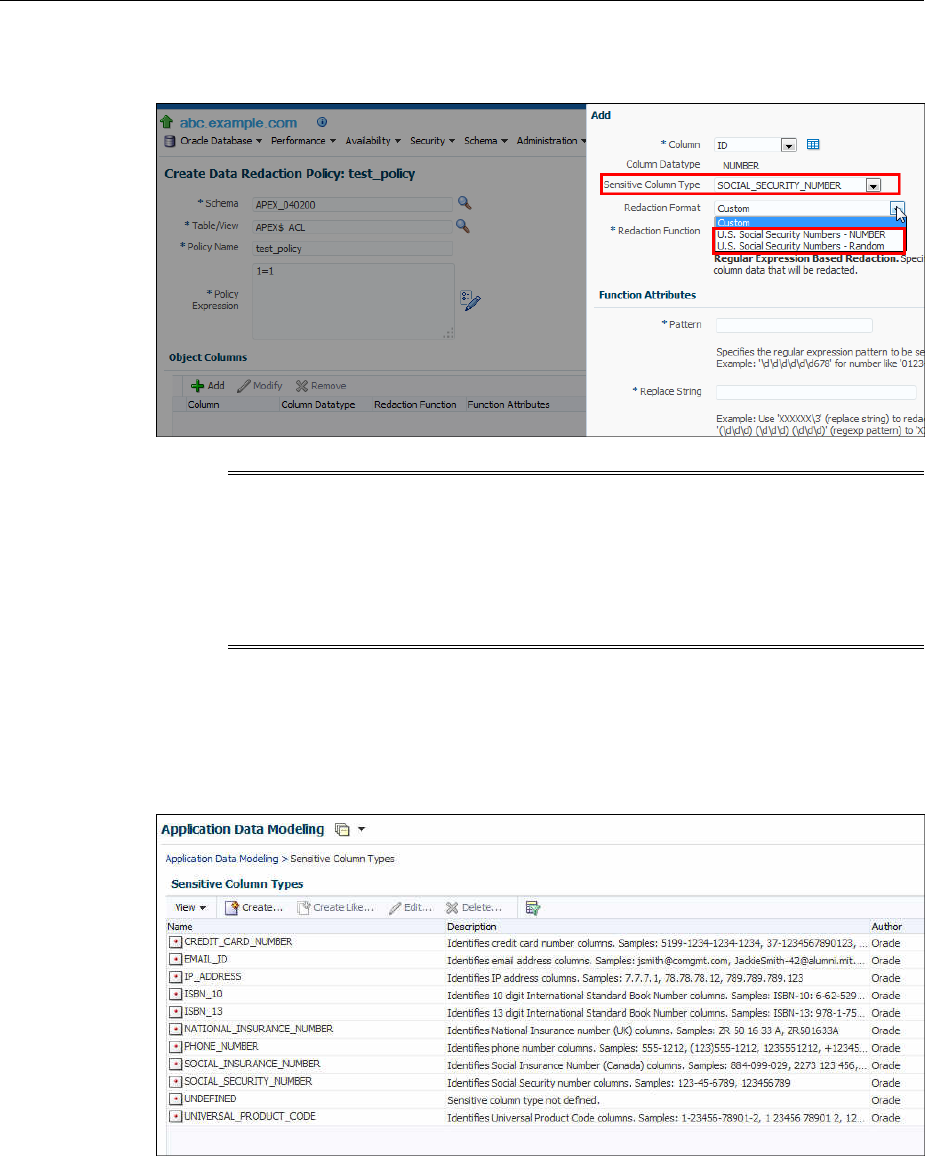
Figure 11-1 Oracle Data Redaction Formats Filtered on the Basis of Sensitive
Column Types
Note:
This functionality is available only if you have the Enterprise Manager for
Oracle Database plug-in 12.1.0.7 or later deployed in your system.
For information on how to verify the plug-ins deployed in your environment,
see Enterprise Manager Cloud Control Administrator's Guide..
As part of the Application Data Modelling feature, Oracle provides a number of
default sensitive column types that a database column can be mapped to.
Figure 11-2 (page 11-3) displays some of the default sensitive column types.
Figure 11-2 Default Sensitive Column Types
If none of the default sensitive column types are suitable for the database column that
contains the data that you want to redact, you can create a new sensitive column type,
or create a sensitive column type that is based on an existing sensitive column type, as
described in Oracle Database Testing Guide..
Management of Sensitive Column Types in Enterprise Manager
Using Oracle Data Redaction in Oracle Enterprise Manager 11-3
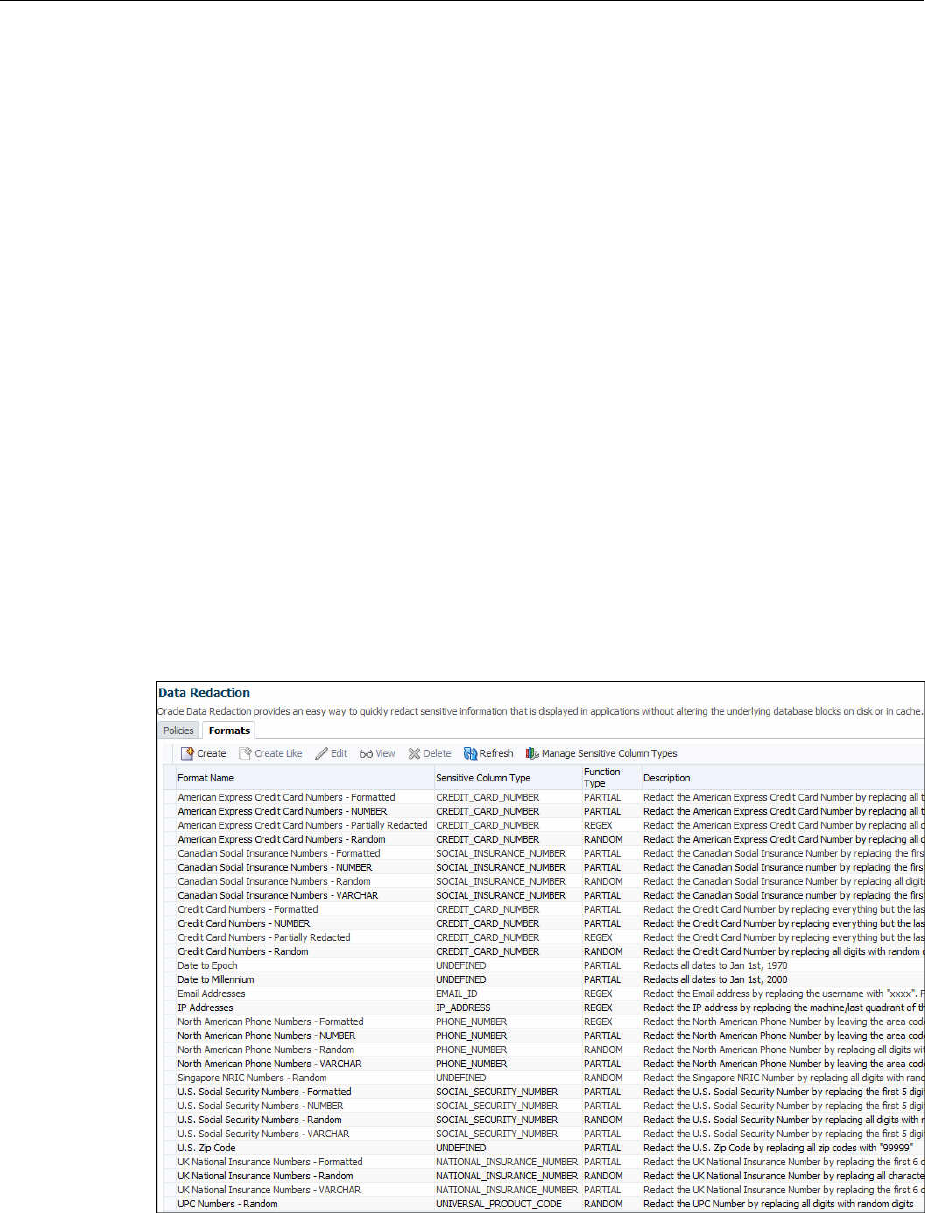
11.4 Managing Oracle Data Redaction Formats Using Enterprise Manager
Oracle Data Redaction provides redaction formats that can be used directly within a
redaction policy to redact data.
Topics:
•About Managing Oracle Data Redaction Formats Using Enterprise Manager
(page 11-4)
•Creating a Custom Oracle Data Redaction Format (page 11-5)
•Editing a Custom Oracle Data Redaction Format (page 11-7)
•Viewing Oracle Data Redaction Formats (page 11-7)
•Deleting a Custom Oracle Data Redaction Format (page 11-8)
11.4.1 About Managing Oracle Data Redaction Formats Using Enterprise Manager
The Oracle Data Redaction formats are used for commonly redacted data, such as ID
numbers, credit cards, or phone numbers.
Oracle Database provides several default Oracle Data Redaction formats.
Figure 11-3 (page 11-4) displays the default Oracle Data Redaction formats.
Figure 11-3 Default Oracle Data Redaction Formats
Each default Oracle Data Redaction format consists of a specific redaction function
that determines the redacted output when the redaction format is used in an Oracle
Data Redaction policy. For example, the Credit Card Numbers - NUMBER default
redaction format replaces the first twelve digits of the column data with the digit 0,
when it is used in an Oracle Data Redaction policy. That is, if the column data is
5555555555554444, the redacted output will be 0000000000004444.
Managing Oracle Data Redaction Formats Using Enterprise Manager
11-4 Oracle Database Advanced Security Guide

If you have deployed the Enterprise Manager for Oracle Database plug-in 12.1.0.7 or
higher on your system, then you can also create and save custom redaction formats,
which you can then use in your redaction policies.
11.4.2 Creating a Custom Oracle Data Redaction Format
You can create and save custom Oracle Data Redaction formats using Enterprise
Manager Cloud Control.
1. Log into Oracle Enterprise Manager Cloud Control as either user SYSTEM or
SYSMAN.
The URL is as follows:
https://host:port/em
2. From the Targets menu, select Databases.
3. Select Search List, then click the name of a database target.
4. On the home page of the database target, from the Security menu, select Data
Redaction.
5. Log in to the database, if you are prompted to do so.
Ensure that you log in to the database as a user that has the EXECUTE privilege on
the DBMS_REDACT PL/SQL package.
6. Select the Formats tab and then click Create.
If you want to create a custom redaction format that is based on, or is similar to an
existing redaction format, then click Create Like.
If you select Create, then the following dialog box appears:
Managing Oracle Data Redaction Formats Using Enterprise Manager
Using Oracle Data Redaction in Oracle Enterprise Manager 11-5
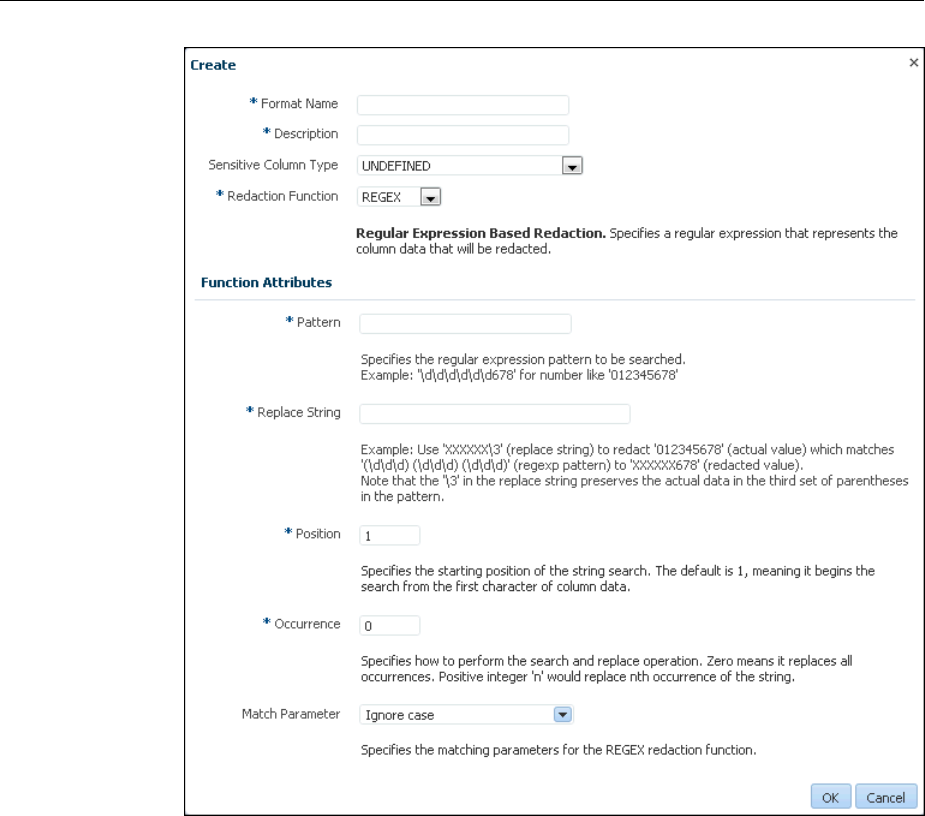
7. Provide a name and a description for the redaction format that you want to create.
If you want to map the redaction format to a particular sensitive column type (such
that the created redaction format can be used to redact the data of a column that is
associated with the sensitive column type), then select a value for Sensitive
Column Type.
Select the function that the format should use to redact the column data. For
Redaction Function, select FULL if the format should redact the entire column
data, PARTIAL if the format should redact only a part of the column data, REGEX
if the format should redact data based on a regular expression, RANDOM if the
format should redact data in a random manner, using randomly generated values,
or NONE if the format will be used to only test the definition of a redaction policy,
and not redact any column data. If you select PARTIAL, then ensure that you
provide the function attributes, as well as the data type that you want to use the
redaction format for. If you select REGEX, ensure that you provide the function
attributes.
For more information about the redaction functions you can use, and the patterns
you can specify with each redaction function, see Oracle Data Redaction Features
and Capabilities (page 9-1).
Managing Oracle Data Redaction Formats Using Enterprise Manager
11-6 Oracle Database Advanced Security Guide
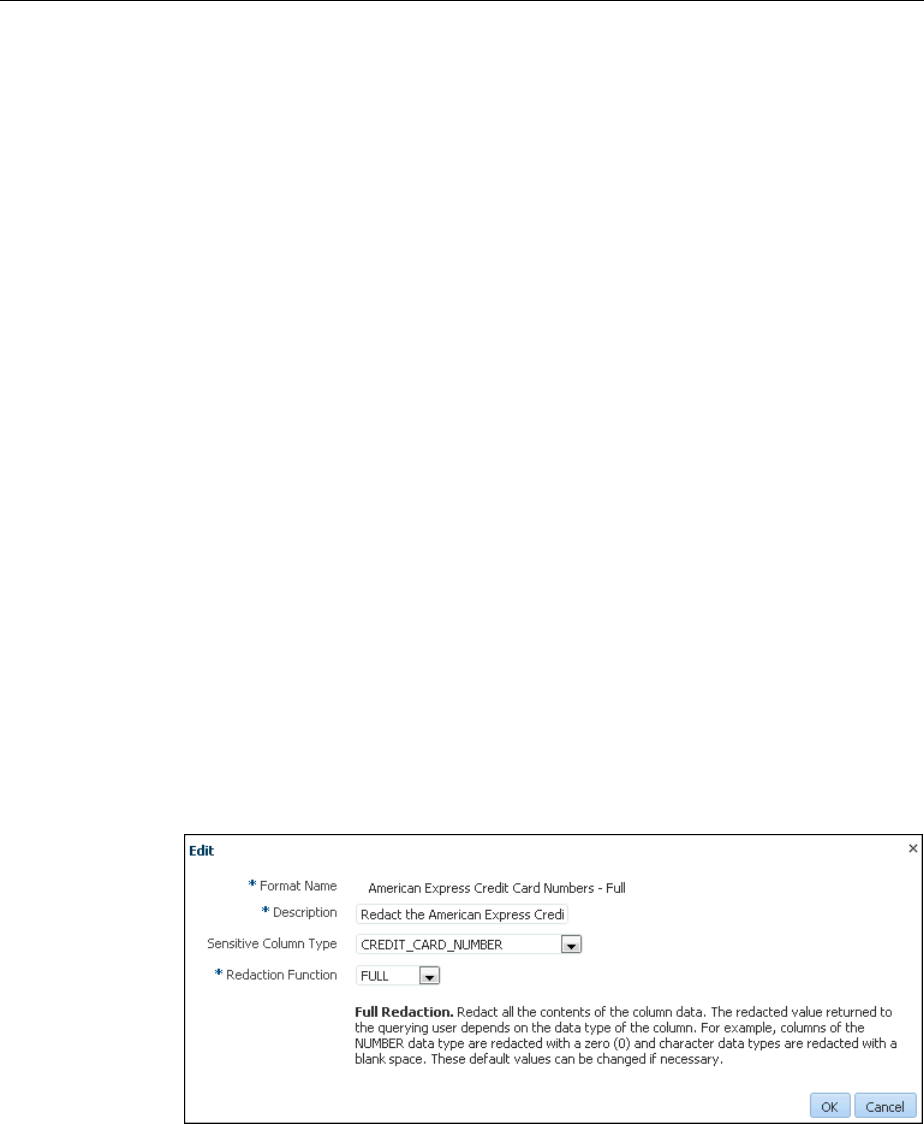
8. Click OK to create and save the custom redaction format.
This format can now be used to create a redaction policy. For information about
how to create a redaction policy, see Creating an Oracle Data Redaction Policy
Using Enterprise Manager (page 11-10).
11.4.3 Editing a Custom Oracle Data Redaction Format
You can edit custom Oracle Data Redaction formats using Enterprise Manager Cloud
Control, but not in SQL*Plus.
1. Log into Oracle Enterprise Manager Cloud Control as either user SYSTEM or
SYSMAN.
The URL is as follows:
https://host:port/em
2. From the Targets menu, select Databases.
3. Select Search List, then click the name of a database target.
4. On the home page of the database target, from the Security menu, select Data
Redaction.
5. Log in to the database, if you are prompted to do so.
Ensure that you log in to the database as a user that has the EXECUTE privilege on
the DBMS_REDACT PL/SQL package.
6. Select the Formats tab.
7. Select the custom redaction format that you want to edit, and then click Edit.
A dialog box similar to the following appears:
8. (Optional) Choose to edit the format description, sensitive column type, redaction
function, and the redaction function attributes.
9. Click OK to save the edited format.
11.4.4 Viewing Oracle Data Redaction Formats
Enterprise Manager Cloud Control displays the details of the Oracle-supplied and
custom Oracle Data Redaction formats.
Managing Oracle Data Redaction Formats Using Enterprise Manager
Using Oracle Data Redaction in Oracle Enterprise Manager 11-7
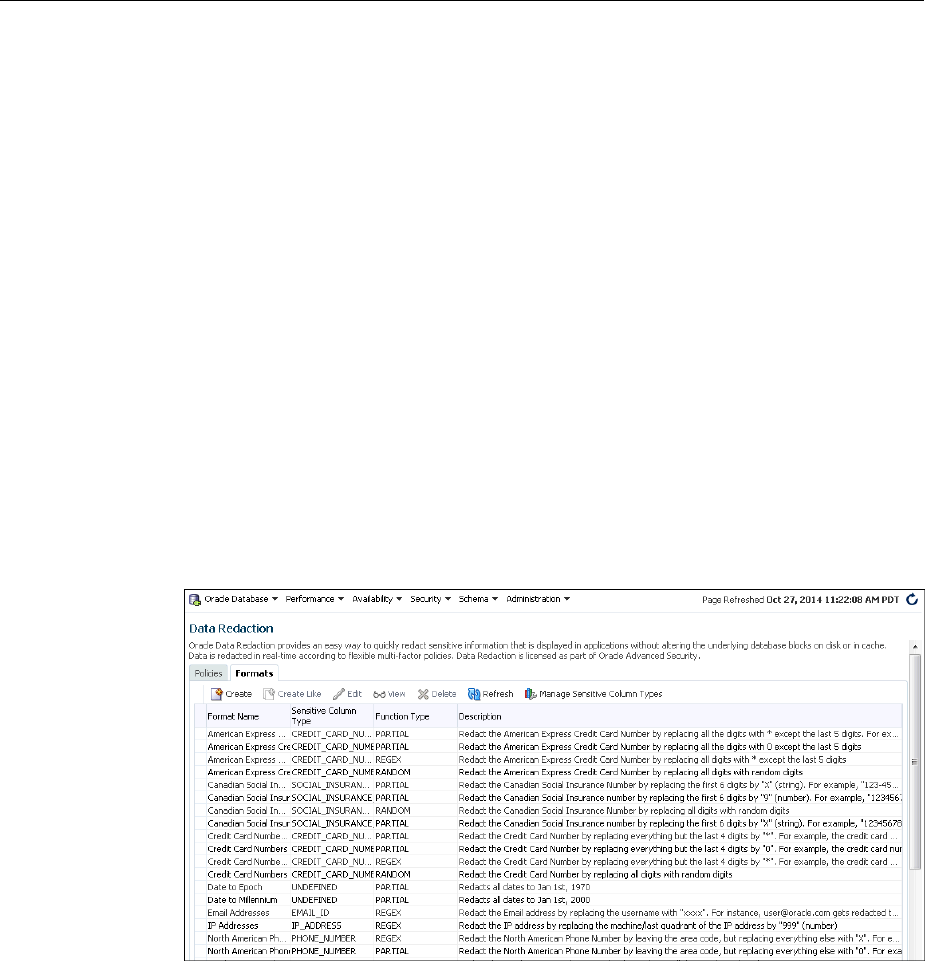
1. Log into Oracle Enterprise Manager Cloud Control as either user SYSTEM or
SYSMAN.
The URL is as follows:
https://host:port/em
2. From the Targets menu, select Databases.
3. Select Search List, then click the name of a database target.
4. On the home page of the database target, from the Security menu, select Data
Redaction.
5. Log in to the database, if you are prompted to do so.
Ensure that you log in to the database as a user that has the EXECUTE privilege on
the DBMS_REDACT PL/SQL package.
6. Select the Formats tab.
7. Select the required redaction format, then click View.
The Data Redaction Formats page appears, similar to the following page.
11.4.5 Deleting a Custom Oracle Data Redaction Format
You can delete a custom Oracle Data Redaction format using Enterprise Manager
Cloud Control (Cloud Control).
You can only delete custom Oracle Data Redaction formats, and not the redaction
formats that are provided by Oracle.
1. Log into Oracle Enterprise Manager Cloud Control as either user SYSTEM or
SYSMAN.
The URL is as follows:
https://host:port/em
2. From the Targets menu, select Databases.
Managing Oracle Data Redaction Formats Using Enterprise Manager
11-8 Oracle Database Advanced Security Guide

3. Select Search List, then click the name of a database target.
4. On the home page of the database target, from the Security menu, select Data
Redaction.
5. Log in to the database, if you are prompted to do so.
Ensure that you log in to the database as a user that has the EXECUTE privilege on
the DBMS_REDACT PL/SQL package.
6. Select the Formats tab.
7. Select the custom redaction format that you want to delete, and then click Delete.
8. In the Confirmation dialog box, click Yes or No.
11.5 Managing Oracle Data Redaction Policies Using Enterprise Manager
You can create, edit, view, and delete Oracle Data Redaction policies in Enterprise
Manager Cloud Control (Cloud Control).
Topics:
•Creating an Oracle Data Redaction Policy Using Enterprise Manager (page 11-10)
•Editing an Oracle Data Redaction Policy Using Enterprise Manager (page 11-13)
•Viewing Oracle Data Redaction Policy Details Using Enterprise Manager
(page 11-14)
•Enabling or Disabling an Oracle Data Redaction Policy in Enterprise Manager
(page 11-15)
•Deleting an Oracle Data Redaction Policy Using Enterprise Manager (page 11-16)
11.5.1 About Managing Oracle Data Redaction Policies Using Enterprise Manager
Use the Data Redaction page in Cloud Control to manage Oracle Data Redaction
policies.
To redact the data present in a particular database table or view column, you must
create an Oracle Data Redaction policy. Data is redacted using a redaction format that
is specified by the Oracle Data Redaction policy. To redact data, you can use any of the
Oracle-supplied redaction formats, or create and use a custom redaction format. If the
table or view column that contains the data that you want to redact is mapped to a
sensitive column type, Oracle uses the mapping to recommend suitable redaction
formats for the data. Thus, Oracle Data Redaction policies encapsulate database
schemas, database table and view columns, sensitive column types, and Oracle Data
Redaction formats.
Figure 11-4 (page 11-10) shows the Data Redaction page, which enables you to create
and manage Oracle Data Redaction policies in Cloud Control.
Managing Oracle Data Redaction Policies Using Enterprise Manager
Using Oracle Data Redaction in Oracle Enterprise Manager 11-9
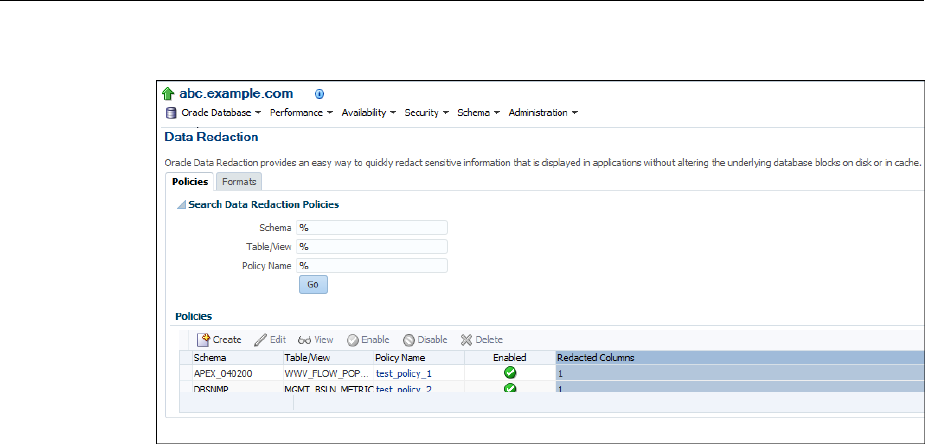
Figure 11-4 Oracle Data Redaction Policies Page
11.5.2 Creating an Oracle Data Redaction Policy Using Enterprise Manager
You can create an Oracle Data Redaction policy using Enterprise Manager Cloud
Control.
1. Log into Oracle Enterprise Manager Cloud Control as either user SYSTEM or
SYSMAN.
The URL is as follows:
https://host:port/em
2. From the Targets menu, select Databases.
3. Select Search List, then click the name of a database target for which you want to
create an Oracle Data Redaction policy.
4. On the home page of the database target, from the Security menu, select Data
Redaction.
5. Log in to the database, if you are prompted to do so.
Ensure that you log in to the database as a user that has the EXECUTE privilege on
the DBMS_REDACT PL/SQL package.
6. In the Policies section of the Policies tab, select Create.
7. On the Create Data Redaction Policy page, enter the following information:
•Schema: Enter (or search for) the name of the schema that contains the data
you want to redact.
•Table/View: Enter (or search for) the table or field that contains the column
you want to redact.
•Policy Name: Enter a for the policy, such as emp_wages_pol.
•Policy Expression: Enter a policy expression. The default is 1=1, which means
that the policy always will be enforced. If you are not familiar with the
components of a policy expression, click the pencil icon beside the Policy
Expression field to use Policy Expression Builder. Select Policy is in effect
Managing Oracle Data Redaction Policies Using Enterprise Manager
11-10 Oracle Database Advanced Security Guide
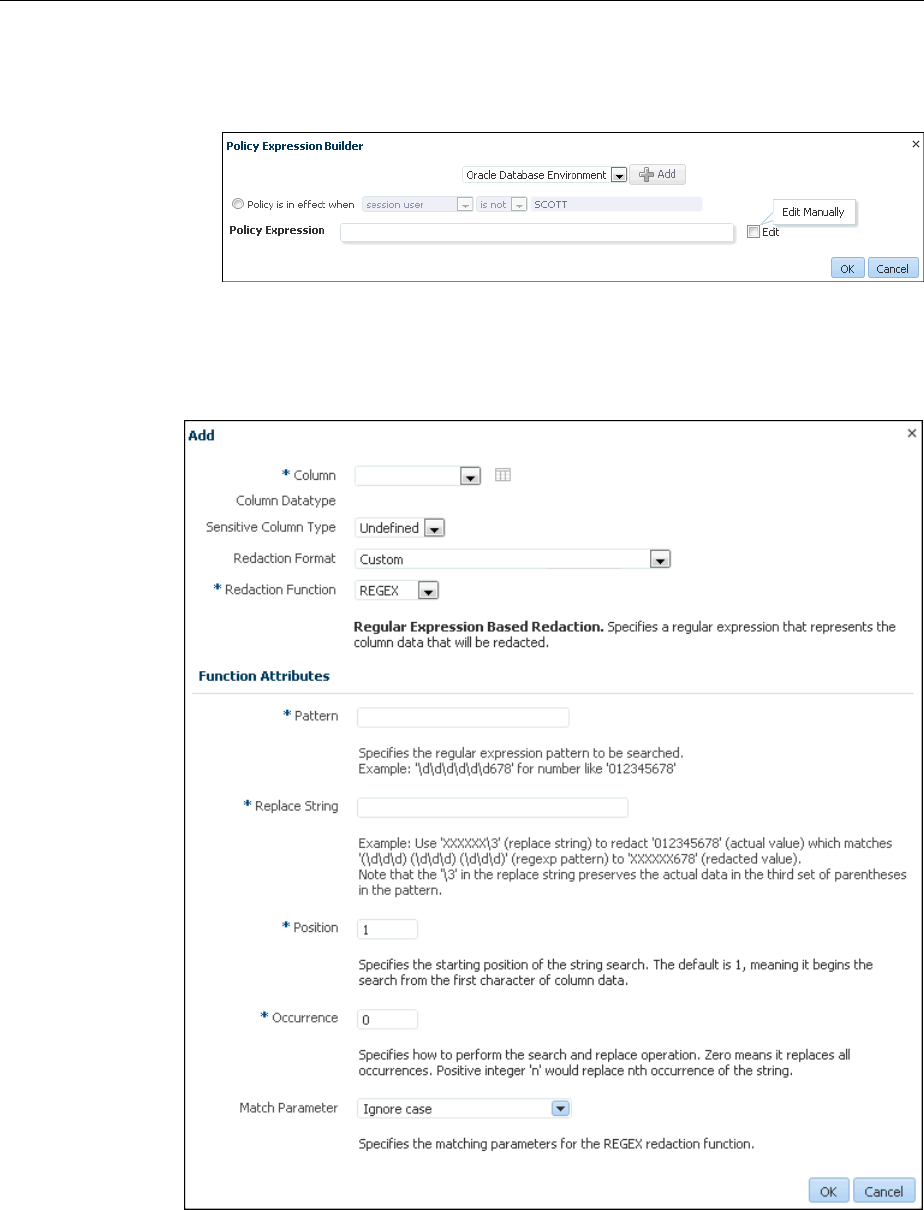
when, select the required conditions, then click Add. Click Edit if you want to
edit the policy expression manually. After building the required policy
expression, click OK. The Policy Expression Builder appears as follows:
8. In the Object Columns section, click Add to add a table or view column to the
redaction policy.
The following dialog box appears:
The redaction policy is applied only on the table or view columns that are added to
it.
9. From the Column menu, select the table or view column to which you want to
apply the redaction policy.
Managing Oracle Data Redaction Policies Using Enterprise Manager
Using Oracle Data Redaction in Oracle Enterprise Manager 11-11
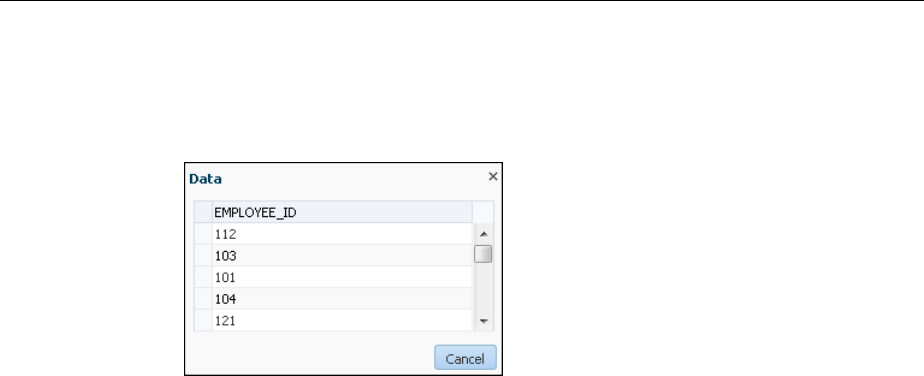
To the right of the Column menu is an icon that you can click to view the contents
of the selected column.
For example:
If the column contains sensitive data and has been mapped to a sensitive column
type, then from the Sensitive Column Type menu, select the sensitive column type
that it has been mapped to. If the search pattern in the Sensitive Column Type
menu matches, then the sensitive column type is selected by default. For example,
for a column listing credit card numbers, if there is a match, then the menu will list
Undefined and CREDIT_CARD_TYPE. If there is no sensitive column type
created, then the default Sensitive Column Type menu listing is only Undefined.
10. From the Redaction Format menu, select the redaction format that you want to use.
The drop-down list is populated with the Oracle Database-supplied redaction
formats, as well as the custom redaction formats that you have created and saved.
For information about how to create and save a redaction format, see Creating a
Custom Oracle Data Redaction Format (page 11-5).
If you do not want to use a pre-defined redaction format (that is, an Oracle-
Database supplied redaction format, or a custom redaction format that you have
created), and instead want to specify the redaction details while creating the
redaction policy, select CUSTOM for Redaction Format.
The Add dialog box adjusts to accommodate the type of redaction format and
function that you select. For example, if you select the CUSTOM redaction format
and the REGEX redaction function, then the Function Attributes region appears in
the dialog box.
11. From the Redaction Function menu, select the function that you want to use to
redact the column data.
Select FULL if you want to redact the entire column data, PARTIAL if you want to
redact only a part of the column data, REGEX if you want to redact the column
data based on a regular expression, RANDOM if you want to redact the column
data in a random manner, using randomly generated values, or NONE if you only
want to test the definition of the redaction policy, and not redact any column data.
Note that all the redaction functions may not be applicable for a particular
redaction format. The drop-down list displays only the redaction functions that are
applicable for the selected redaction format.
If you selected CUSTOM for Redaction Format in the previous step, and
PARTIAL or REGEX for Redaction Function, ensure that you specify the function
attributes.
Managing Oracle Data Redaction Policies Using Enterprise Manager
11-12 Oracle Database Advanced Security Guide
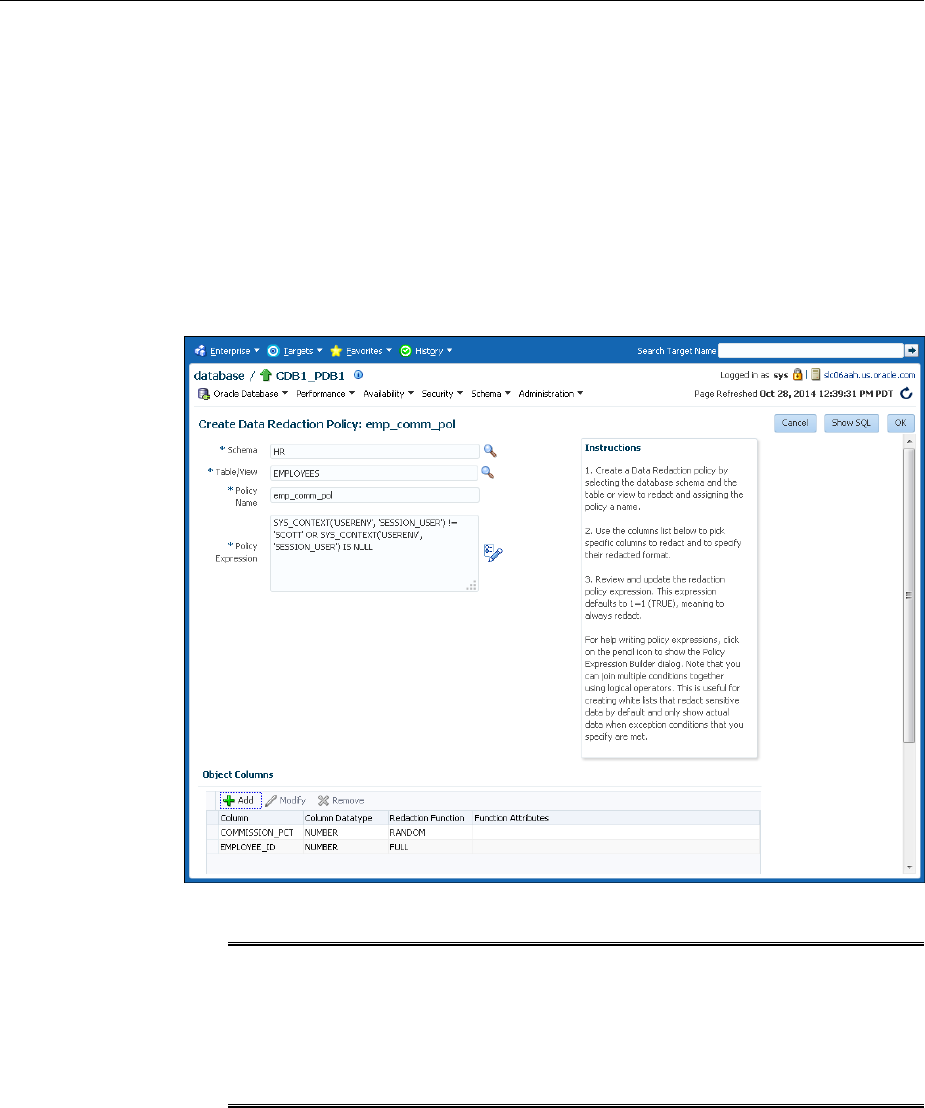
See Oracle Data Redaction Features and Capabilities (page 9-1)for more
information and examples of the available redaction formats.
12. Click OK.
13. Repeat these steps starting with Step 8 for all the columns that you want to add to
the redaction policy.
14. On the Create Data Redaction Policy page, click OK to create the data redaction
policy.
The new policy appears, similar to the following image:
Note:
When you create an Oracle Data Redaction policy, it is enabled by default. For
information on how to disable an enabled redaction policy, see Enabling or
Disabling an Oracle Data Redaction Policy in Enterprise Manager
(page 11-15).
11.5.3 Editing an Oracle Data Redaction Policy Using Enterprise Manager
You can edit an Oracle Data Redaction policy using Enterprise Manager Cloud
Control.
1. Log into Oracle Enterprise Manager Cloud Control as either user SYSTEM or
SYSMAN.
The URL is as follows:
https://host:port/em
Managing Oracle Data Redaction Policies Using Enterprise Manager
Using Oracle Data Redaction in Oracle Enterprise Manager 11-13
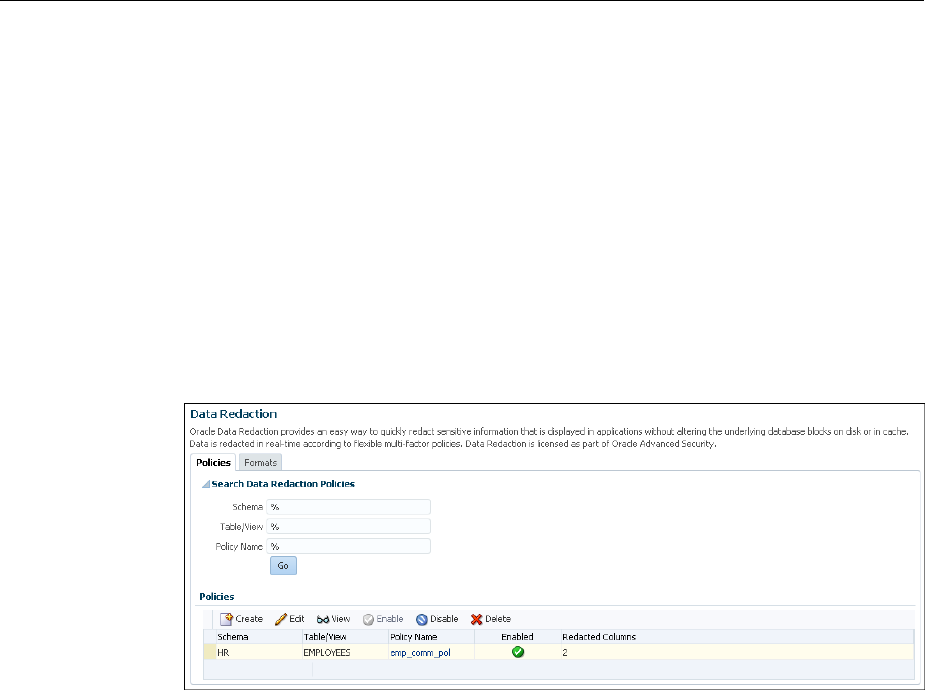
2. From the Targets menu, select Databases.
3. Select Search List, then search for and click the name of the database target for
which the Oracle Data Redaction policy that you want to edit was created.
4. On the home page of the database target, from the Security menu, select Data
Redaction.
5. Log in to the database, if you are prompted to do so.
Ensure that you log in to the database as a user that has the EXECUTE privilege on
the DBMS_REDACT PL/SQL package.
6. In the Policies section of the Policies tab, select the redaction policy that you want
to edit, then click Edit..
7. On the Edit Data Redaction Policy page, choose to edit the policy expression, add
new columns to the redaction policy, modify the redaction details of a column that
is a part of the policy, or delete a column from the redaction policy.
You can do the following:
• To add a new column to the redaction policy, in the Object Columns section,
click Add, select the table or view column that you want to add, then specify
the redaction details.
• To modify the redaction details of a column that is a part of the policy, select
the column, click Modify, then edit the redaction details.
• To delete a column from the redaction policy, select the column, then click
Delete.
For information about how to specify or edit the policy expression, see Step 6
described in Creating an Oracle Data Redaction Policy Using Enterprise Manager
(page 11-10). For information about how to specify or edit the redaction details of a
column, see Step 7.
8. On the Edit Data Redaction Policy page, after editing the required fields, click OK
to save and enable the edited redaction policy.
11.5.4 Viewing Oracle Data Redaction Policy Details Using Enterprise Manager
You can find Oracle Data Redaction policy details such as whether the policy is
enabled by using Enterprise Manager Cloud Control.
Managing Oracle Data Redaction Policies Using Enterprise Manager
11-14 Oracle Database Advanced Security Guide

You can disable an enabled redaction policy, or enable a disabled redaction policy
using Enterprise Manager Cloud Control (Cloud Control).
1. Log into Oracle Enterprise Manager Cloud Control as either user SYSTEM or
SYSMAN.
The URL is as follows:
https://host:port/em
2. From the Targets menu, select Databases.
3. Select Search List, then search for and click the name of the database target for
which the Oracle Data Redaction policy that you want to view was created.
4. On the home page of the database target, from the Security menu, select Data
Redaction.
5. Log in to the database, if you are prompted to do so.
6. In the Policies section of the Policies tab, do one of the following:
• Select the name of the policy in the table.
• Select the required redaction policy, then click View.
11.5.5 Enabling or Disabling an Oracle Data Redaction Policy in Enterprise Manager
An Oracle Data Redaction policy is executed at run time only if it is enabled. When
you create an Oracle Data Redaction policy, it is enabled by default.
You can disable an enabled redaction policy, or enable a disabled redaction policy
using Enterprise Manager Cloud Control (Cloud Control).
1. Log into Oracle Enterprise Manager Cloud Control as either user SYSTEM or
SYSMAN.
The URL is as follows:
https://host:port/em
2. From the Targets menu, select Databases.
3. Select Search List, then search for and click the name of the database target for
which the Oracle Data Redaction policy that you want to enable or disable was
created.
4. On the home page of the database target, from the Security menu, select Data
Redaction.
5. Log in to the database, if you are prompted to do so.
Ensure that you log in to the database as a user that has the EXECUTE privilege on
the DBMS_REDACT PL/SQL package.
6. In the Policies section of the Policies tab, select the redaction policy that you want
to enable or disable, and then click Enable or Disable.
Managing Oracle Data Redaction Policies Using Enterprise Manager
Using Oracle Data Redaction in Oracle Enterprise Manager 11-15

7. In the Confirmation dialog box, click Yes or No.
11.5.6 Deleting an Oracle Data Redaction Policy Using Enterprise Manager
You can delete an Oracle Data Redaction policy using Enterprise Manager Cloud
Control.
1. Log into Oracle Enterprise Manager Cloud Control as either user SYSTEM or
SYSMAN.
The URL is as follows:
https://host:port/em
2. From the Targets menu, select Databases.
3. Select Search List, then search for and click the name of the database target for
which the Oracle Data Redaction policy that you want to delete was created.
4. On the home page of the database target, from the Security menu, select Data
Redaction.
5. Log in to the database, if you are prompted to do so.
Ensure that you log in to the database as a user that has the EXECUTE privilege on
the DBMS_REDACT PL/SQL package.
6. In the Policies section of the Policies tab, select the redaction policy that you want
to delete, and then click Delete.
7. In the Confirmation dialog box, click Yes or No.
Managing Oracle Data Redaction Policies Using Enterprise Manager
11-16 Oracle Database Advanced Security Guide

12
Oracle Data Redaction Use with Oracle
Database Features
Oracle Data Redaction can be used with other Oracle features. Some Oracle features
may have restrictions with regard to Oracle Data Redaction.
Topics:
•Oracle Data Redaction and DML and DDL Operations (page 12-1)
•Oracle Data Redaction and Nested Functions, Inline Views, and the WHERE
Clause (page 12-2)
•Oracle Data Redaction and Database Links (page 12-2)
•Oracle Data Redaction and Aggregate Functions (page 12-2)
•Oracle Data Redaction and Object Types (page 12-3)
•Oracle Data Redaction and XML Generation (page 12-3)
•Oracle Data Redaction and Editions (page 12-3)
•Oracle Data Redaction in a Multitenant Environment (page 12-3)
•Oracle Data Redaction and Oracle Virtual Private Database (page 12-3)
•Oracle Data Redaction and Oracle Database Real Application Security
(page 12-4)
•Oracle Data Redaction and Oracle Database Vault (page 12-4)
•Oracle Data Redaction and Oracle Data Pump (page 12-4)
•Oracle Data Redaction and Data Masking and Subsetting Pack (page 12-7)
12.1 Oracle Data Redaction and DML and DDL Operations
Oracle Data Redaction affects DML and DDL operations, especially for users who
issue ad-hoc SQL against tables with redacted columns.
Note the following:
• Oracle Data Redaction treats the RETURNING INTO clause of a DML statement as
a query, even though the result is not displayed. The result that is sent to the
buffer is what would have been displayed had the RETURNING INTO clause been
run as an ordinary SQL query, rather than as part of a DML statement. If your
application performs further processing on the buffer that contains the
RETURNING INTO value, then consider changing the application because it may
not expect to find a redacted value in the buffer.
Oracle Data Redaction Use with Oracle Database Features 12-1

• If a redacted column appears as the source in a DML or DDL operation, then
Oracle Data Redaction considers this as an attempt to circumvent the policy and
prevents it with an ORA-28081: Insufficient privileges - the
command references a redacted object error unless you have the
EXEMPT REDACTION POLICY system privilege. Internally, Oracle Data Pump
issues these kinds of operations, so you may also need to grant the EXEMPT
REDACTION POLICY system privilege to a user if they need to perform schema-
level exports of tables that have redacted columns.
12.2 Oracle Data Redaction and Nested Functions, Inline Views, and the
WHERE Clause
You can use Oracle Data Redaction with nested functions, inline views, and the WHERE
clause in SELECT statements.
Oracle Data Redaction policies work as follows:
•Nested functions are redacted innermost. For example, in SELECT
SUM(AVG(TO_NUMBER(((X))) FROM HR.EMPLOYEES WHERE ..., the
TO_NUMBER function is redacted first, followed by AVG, and then last the SUM
function.
•Inline views are redacted outermost. For example, in SELECT XYZ … AS
SELECT A… AS SELECT B… AS SELECT C…, SELECT XYZ is redacted first,
followed by AS SELECT A, then AS SELECT B, and so on. AS SELECT C is
redacted last.
•The WHERE clause is never redacted. Data Redaction redacts only data in the
column SELECT list.
12.3 Oracle Data Redaction and Database Links
Do not create Oracle Data Redaction policies on database views that reference
database links.
You can find information about existing database links by querying the
DBA_DB_LINKS data dictionary view.
See Also:
Oracle Database Administrator’s Guide for detailed information about database
links
12.4 Oracle Data Redaction and Aggregate Functions
Aggregate functions can affect performance overhead on Oracle Data Redaction
policies.
Because Oracle Data Redaction dynamically modifies the value of each row in a
column, certain SQL queries that use aggregate functions cannot take full advantage of
database optimizations that presume the row values to be static.
In the case of SQL queries that call aggregate functions, it may be possible to notice
performance overhead due to redaction.
Oracle Data Redaction and Nested Functions, Inline Views, and the WHERE Clause
12-2 Oracle Database Advanced Security Guide

12.5 Oracle Data Redaction and Object Types
You can use object types to model real-world entities such as customer accounts.
An object type is a user-defined type. You cannot redact object types. This is because
Database Redaction cannot handle all of the possible ways that object types can be
configured, because they are user defined. You can find the type that an object uses by
querying the OBJECT_NAME and OBJECT_TYPE columns of the ALL_OBJECTS data
dictionary view.
12.6 Oracle Data Redaction and XML Generation
You cannot use XML generation functions on columns that have Oracle Data
Redaction policies defined on them.
Oracle XML DB Developer’s Guide describes the kinds of SQL functions to which this
restriction applies. This restriction applies irrespective of whether the Oracle Data
Redaction policy has been enabled or disabled, or is active for the querying user.
12.7 Oracle Data Redaction and Editions
You cannot redact editioned views.
In addition to not being able to redact editioned views, you cannot use a redacted
column in the definition of any editioned view. You can find information about
editions by querying the DBA_EDITIONS data dictionary view.
12.8 Oracle Data Redaction in a Multitenant Environment
In a multitenant environment, Oracle Data Redaction policies apply only to the objects
within the current pluggable database (PDB).
You cannot create a Data Redaction policy for a multitenant container database (CDB).
This is because the objects for which you create Data Redaction policies typically
reside in a PDB. You can find all the PDBs in a CDB by querying the DBA_PDBS data
dictionary view.
12.9 Oracle Data Redaction and Oracle Virtual Private Database
Oracle Data Redaction does not affect Oracle Virtual Private Database policies because
the VPD inline view, which contains the VPD predicate, acts on actual values.
Oracle Data Redaction differs from Oracle Virtual Private Database in the following
ways:
• Oracle Data Redaction provides more redacting features than Oracle Virtual
Private Database, which only supports NULL redacting. Many applications cannot
use NULL redacting, so Data Redaction is a good solution for these applications.
• Oracle Virtual Private Database policies can be static, dynamic, and context
sensitive, whereas Data Redaction policies only allow static and context-sensitive
policy expressions.
• Data Redaction permits only one policy to be defined on a table or view, whereas
you can define multiple Virtual Private Database policies on an object.
• Data Redaction is when application users try to access an object that is protected
by a Data Redaction policy using a synonym, but (unlike Oracle Virtual Private
Oracle Data Redaction and Object Types
Oracle Data Redaction Use with Oracle Database Features 12-3

Database) Data Redaction does not support the creation of policies directly on the
synonyms themselves.
12.10 Oracle Data Redaction and Oracle Database Real Application
Security
Oracle Data Redaction differs from Oracle Database Real Application Security because
of how security is implemented for applications.
Oracle Data Redaction differs from Oracle Database Real Application Security in that
Real Application Security provides a comprehensive authorization framework for
application security.
Column security within Real Application Security is based on application privileges
that are defined by applications using the Real Application Security framework.
See Also:
Oracle Database Real Application Security Administrator's and Developer's Guide
for information about how you can protect table columns with custom
application privileges
12.11 Oracle Data Redaction and Oracle Database Vault
You can use Oracle Data Redaction in an Oracle Database Vault environment.
For example, if there is an Oracle Database Vault realm around an object, a user who
does not belong to the authorized list of realm owners or participants cannot see the
object data, regardless of whether the user was granted the EXEMPT REDACTION
POLICY privilege. If the user attempts a DML or DDL statement on the data, error
messages result.
12.12 Oracle Data Redaction and Oracle Data Pump
When you use Oracle Data Redaction with Oracle Data Pump, you must consider the
impact the DATAPUMP_EXP_FULL_DATABASE role has, the ramifications of exporting
objects that contain Data Redaction policies, and exporting data using the EXPDP
access_method parameter.
Topics:
•Oracle Data Pump Security Model for Oracle Data Redaction (page 12-4)
•Export of Objects That Have Oracle Data Redaction Policies Defined (page 12-5)
•Export of Data Using the EXPDP Utility access_method Parameter (page 12-6)
•Import of Data into Objects Protected by Oracle Data Redaction (page 12-7)
12.12.1 Oracle Data Pump Security Model for Oracle Data Redaction
The DATAPUMP_EXP_FULL_DATABASE role includes the powerful EXEMPT
REDACTION POLICY system privilege.
Remember that by default the DBA role is granted the
DATAPUMP_EXP_FULL_DATABASE role as well as DATAPUMP_IMP_FULL_DATABASE.
Oracle Data Redaction and Oracle Database Real Application Security
12-4 Oracle Database Advanced Security Guide

This enables users who were granted these roles to be exempt from Data Redaction
policies. This means that, when you export objects with Data Redaction policies
defined on them, the actual data in the protected tables is copied to the Data Pump
target system without being redacted. Users with these roles, including users who
were granted the DBA role, are able to see the actual data in the target system.
However, by default, all of the Data Redaction policies associated with any tables and
views in the Data Pump source system are also included in the export and import
operation (along with the objects themselves) and applied to the objects in the target
system, so the data is still redacted when users query the objects in the target system.
See Also:
Exemption of Users from Oracle Data Redaction Policies (page 10-30)
12.12.2 Export of Objects That Have Oracle Data Redaction Policies Defined
You can export objects that have already had Oracle Data Redaction policies defined
on them.
Topics:
•Finding Type Names Used by Oracle Data Pump (page 12-5)
•Exporting Only the Data Dictionary Metadata Related to Data Redaction Policies
(page 12-5)
•Importing Objects Using the INCLUDE Parameter in IMPDP (page 12-6)
12.12.2.1 Finding Type Names Used by Oracle Data Pump
You must find the type names Oracle Data Pump uses before exporting objects that
have Oracle Data Redaction policies defined on these objects.
After you find these types, you should use these types as parameters for the INCLUDE
directive to the IMPDP utility, to selectively export only metadata of these specific
types to the dump file.
• To find type names, query the DATABASE_EXPORT_OBJECTS view.
For example:
SELECT OBJECT_PATH
FROM DATABASE_EXPORT_OBJECTS
WHERE OBJECT_PATH LIKE 'RADM_%';
Output similar to the following appears:
OBJECT_PATH
------------
RADM_FPTM
RADM_POLICY
12.12.2.2 Exporting Only the Data Dictionary Metadata Related to Data Redaction
Policies
You can export only the data dictionary metadata that is related to data redaction
policies and full redaction settings.
Oracle Data Redaction and Oracle Data Pump
Oracle Data Redaction Use with Oracle Database Features 12-5

This kind of Data Pump export could, for example, be used if you must use the same
set of Data Redaction policies and settings across development, test, and production
databases. Because the flag content=metadata_only is specified, the dump file
does not contain any actual data.
• To export only the data dictionary metadata related to data redaction policies and
full redaction settings, enter an EXPDP utility command similar to the following:
expdp system/password \
full=y \
COMPRESSION=NONE \
content=metadata_only \
INCLUDE=RADM_FPTM,RADM_POLICY\
directory=my_directory \
job_name=my_job_name \
dumpfile=my_data_redaction_policy_metadata.dmp
See Also:
•Oracle Database Utilities for detailed information about the INCLUDE
parameter of the EXPDP utility
•Oracle Database Utilities for detailed information about metadata filters
12.12.2.3 Importing Objects Using the INCLUDE Parameter in IMPDP
You can import objects using Oracle Database Pump.
• To import the objects, include these names in the INCLUDE parameter in the
IMPDP utility command, based on the output from querying the OBJECT_PATH
column in the DATABASE_EXPORT_OBJECTS view.
12.12.3 Export of Data Using the EXPDP Utility access_method Parameter
Oracle Data Pump can export data from a schema that contains an object that has a
Data Redaction policy.
If you are using Oracle Data Pump to perform full database export operations using
the Data Pump default settings (direct_path), and if you receive error messages
that you do not understand, then use this section to repeat the operation in such a way
as to better understand the error.
If you try to use the Oracle Data Pump Export (EXPDP) utility with the
access_method parameter set to direct_path to export data from a schema that
contains an object that has a Data Redaction policy defined on it, then the following
error message may appear and the export operation fails:
ORA-31696: unable to export/import TABLE_DATA:"schema.table" using client specified
DIRECT_PATH method
This problem only occurs when you perform a schema-level export as a user who was
not granted the EXP_FULL_DATABASE role. It does not occur during a full database
export, which requires the EXP_FULL_DATABASE role. The EXP_FULL_DATABASE
role includes the EXEMPT REDACTION POLICY system privilege, which bypasses
Data Redaction policies.
To find the underlying problem, try the EXPDP invocation again, but do not set the
access_method parameter to direct_path. Instead, use either automatic or
Oracle Data Redaction and Oracle Data Pump
12-6 Oracle Database Advanced Security Guide

external_table. The underlying problem could be a permissions problem, for
example:
ORA-28081: Insufficient privileges - the command references a redacted object.
See Also:
Oracle Database Utilities for more information about using Data Pump Export.
12.12.4 Import of Data into Objects Protected by Oracle Data Redaction
During an import operation, be careful that you do not inadvertently drop data
redaction policies that protect imported data.
Consider a scenario in which the source tables that were exported using the Oracle
Data Pump Export (EXPDP) utility do not have Oracle Data Redaction polices.
However, the destination tables to which the data is to be imported by using Oracle
Data Pump Import (IMPDP) have Oracle Data Redaction policies.
During the Data Pump import operation, the status of the Data Redaction policies on
the objects being imported depends on the CONTENT option of IMPDP command.
• If you use the CONTENT=ALL or CONTENT=METADATA_ONLY option in the IMPDP
command, then the Data Redaction policies on the destination tables are dropped.
You must recreate the Data Redaction policies.
• If you use CONTENT=DATA_ONLY in the IMPDP command, then the Data
Redaction polices on the destination tables are not dropped.
See Also:
Oracle Database Utilities for more information about using Data Pump Export
12.13 Oracle Data Redaction and Data Masking and Subsetting Pack
Oracle Enterprise Manager Data Masking and Subsetting Pack can be used to create a
development or test copy of a production database.
To accomplish this, you can mask this data in bulk, and then put the resulting masked
data in the development or test copy.
You can still apply Data Redaction policies to the non-production database, in order to
redact columns that contain data that was already masked by Oracle Enterprise
Manager Data Masking and Subsetting Pack.
Remember that Oracle Enterprise Manager Data Masking and Subsetting Pack is used
to mask data sets when you want to move the data to development and test
environments. Data Redaction is mainly designed for redacting at runtime for
production applications in a consistent fashion across multiple applications, without
having to make application code changes.
Oracle Data Redaction and Data Masking and Subsetting Pack
Oracle Data Redaction Use with Oracle Database Features 12-7

See Also:
Oracle Data Masking and Subsetting Guide for more information about data
masking and subsetting
Oracle Data Redaction and Data Masking and Subsetting Pack
12-8 Oracle Database Advanced Security Guide

13
Security Considerations for Oracle Data
Redaction
Oracle provides a set of guidelines for using Oracle Data Redaction.
Topics:
•Oracle Data Redaction General Usage Guidelines (page 13-1)
•Restriction of Administrative Access to Oracle Data Redaction Policies
(page 13-2)
•How Oracle Data Redaction Affects the SYS, SYSTEM, and Default Schemas
(page 13-2)
•Policy Expressions That Use SYS_CONTEXT Attributes (page 13-3)
•Oracle Data Redaction Policies on Materialized Views (page 13-3)
•Dropped Oracle Data Redaction Policies When the Recycle Bin Is Enabled
(page 13-3)
13.1 Oracle Data Redaction General Usage Guidelines
It is important to understand general guidelines for using Oracle Data Redaction.
• Oracle Data Redaction is not intended to protect against attacks by regular and
privileged database users who run ad hoc queries directly against the database.
• Oracle Data Redaction is not intended to protect against users who run ad hoc
SQL queries that attempt to determine the actual values by inference.
• Oracle Data Redaction relies on the database and application context values. For
applications, it is the responsibility of the application to properly initialize the
context value.
• Oracle Data Redaction is not enforced for users who are logged in using the
SYSDBA administrative privilege.
• Certain DDL statements that attempt to copy the actual data out from under the
control of a data redaction policy (that is, CREATE TABLE AS SELECT, INSERT
AS SELECT) are blocked by default, but you can disable this behavior by granting
the user the EXEMPT REDACTION POLICY system privilege.
• Oracle Data Redaction does not affect day-to-day database operations, such as
backup and recovery, Oracle Data Pump exports and imports, Oracle Data Guard
operations, and replication.
• Do not include any redacted columns in a SQL expression that is used in a GROUP
BY clause in a SQL statement. Oracle does not support this behavior, and raises an
Security Considerations for Oracle Data Redaction 13-1

ORA-00979: not a GROUP BY expression error. This happens because
internally the expression in the SELECT list must be modified by Data Redaction,
but this causes it to no longer be found when it comes time to process the GROUP
BY clause (which is currently not updated by Data Redaction) leading to this
unintended error message.
13.2 Restriction of Administrative Access to Oracle Data Redaction
Policies
You can restrict the list of users who can create, view and edit Data Redaction policies.
To accomplish this, you can limit who has the EXECUTE privilege on the
DBMS_REDACT package and by limiting who has the SELECT privilege on the
REDACTION_POLICIES and REDACTION_COLUMNS views.
You also can restrict who is exempted from redaction by limiting the EXEMPT
REDACTION POLICY privilege. If you use Oracle Database Vault to restrict privileged
user access, then you can use realms to restrict granting of EXEMPT REDACTION
POLICY.
See Also:
•Exemption of Users from Oracle Data Redaction Policies (page 10-30)
•Oracle Data Redaction and Oracle Database Vault (page 12-4)
•Oracle Database Vault Administrator’s Guide for more information about
Oracle Database Vault
13.3 How Oracle Data Redaction Affects the SYS, SYSTEM, and Default
Schemas
Both users SYS and SYSTEM automatically have the EXEMPT REDACTION POLICY
system privilege.
SYSTEM has the EXP_FULL_DATABASE role, which includes the EXEMPT REDACTION
POLICY system privilege.
This means that the SYS and SYSTEM users can always bypass any existing Oracle
Data Redaction policies, and will always be able to view data from tables (or views)
that have Data Redaction policies defined on them.
Follow these guidelines:
• Do not create Data Redaction policies on the default Oracle Database schemas,
including the SYS and SYSTEM schemas.
• Be aware that granting the EXEMPT DATA REDACTION system privilege to
additional roles may enable users to bypass Oracle Data Redaction, because the
grantee role may have been granted to additional roles.
• Do not revoke the EXEMPT DATA REDACTION system privilege from the roles
that it was granted to by default.
Restriction of Administrative Access to Oracle Data Redaction Policies
13-2 Oracle Database Advanced Security Guide

13.4 Policy Expressions That Use SYS_CONTEXT Attributes
Be careful when writing a policy expression that depends on a SYS_CONTEXT
attribute that is populated by an application.
The application might not always populate that attribute.
If the user somehow connects directly (rather than through the application), then the
SYS_CONTEXT attribute would not have been populated. If you do not handle this
NULL scenario in your policy expression, you could unintentionally reveal actual data
to the querying user.
For example, suppose you wanted to create a policy expression that intends to redact
the query results for everyone except users who have the client identifier value of
SUPERVISOR. The following expression unintentionally enables querying users who
have NULL as the value for their CLIENT_IDENTIFIER to see the real data:
SYS_CONTEXT('USERENV', 'CLIENT_IDENTIFIER') IS NOT 'SUPERVISOR'
A more rigorous policy expression redacts the result of the query if the client identifier
is not set, that is, it has a NULL value.
SYS_CONTEXT('USERENV', 'CLIENT_IDENTIFIER') IS NOT 'SUPERVISOR' OR IS NULL
Remember that in SQL, comparisons with NULL are undefined, and are thus FALSE,
but redaction only takes place when the policy expression evaluates to TRUE.
13.5 Oracle Data Redaction Policies on Materialized Views
You can create Oracle Data Redaction policies on materialized views and on their base
tables.
However, ensure that the creator of the materialized view, or the user who performs
the refresh of the materialized view, is not blocked by any Data Redaction policies. In
other words, the user performing the materialized view creation or refresh operations
should be exempt from the Data Redaction policy. As a best practice, when you create
a new materalized view, treat it as a copy of the actual table, and then create a separate
Data Redaction policy to protect it.
13.6 Dropped Oracle Data Redaction Policies When the Recycle Bin Is
Enabled
You should check if the recycle bin is enabled before you drop Oracle Data Redaction
policies.
If you drop a table or view that has an Oracle Data Redaction policy defined on it
when the recycle bin feature is enabled, and if you query the REDACTION_COLUMNS or
REDACTION_POLICIES data dictionary views before you purge the recycle bin, then
you will see object names such as BIN$... (for example, BIN
$1Xu5PSW5VaPgQxGS5AoAEA==$0).
This is normal behavior. These policies are removed when you purge the recycle bin.
To find if the recycle bin is enabled, you can run the SHOW PARAMETER RECYCLEBIN
command in SQL*Plus.
Policy Expressions That Use SYS_CONTEXT Attributes
Security Considerations for Oracle Data Redaction 13-3

See Also:
Oracle Database Administrator’s Guide for information about purging objects
from the recycle bin
Dropped Oracle Data Redaction Policies When the Recycle Bin Is Enabled
13-4 Oracle Database Advanced Security Guide

Glossary
actual data
In Oracle Data Redaction, the data in a protected table or view. An example of actual
data could be the number 123456789, and the redacted data version of this number
could be 999996789.
auto-login software keystore
A software keystore that is protected by a system-generated password and does not
need to be explicitly opened by a security administrator. Auto-login software
keystores are automatically opened when accessed and can be used on any computer
that runs an Oracle database. For example, consider an Oracle RAC environment that
has four nodes, and each node is on a different computer. This environment uses an
auto-login keystore. When a REKEY operation is performed on node 1, the auto-login
and password-based keystores must be copied to the computers that host nodes 2, 3,
and 4. In this configuration, the auto-login keystores will be opened on all four nodes
when required.
See also local auto-login software keystore.
cipher suite
A set of authentication, encryption, and data integrity algorithms used to exchange
messages between network nodes using Secure Sockets Layer (SSL). During an SSL
handshake, for example, the two nodes negotiate to see which cipher suite they will
use when transmitting messages back and forth.
ciphertext
Message text that has been encrypted.
See also encrypted text.
data redaction
The ability to mask data with different values in real time, that is, at the moment a
user tries to access the data. You can mask all of the data, a partial subset of the data,
or display random values in place of the data. It does not change the actual data in the
database.
Glossary-1

decryption
The process of converting an encrypted message (the ciphertext), back to its original
message (plaintext).
encrypted text
Text that has been encrypted, using an encryption algorithm and an encryption key;
the output stream of an encryption process. The text is not readable or decipherable,
without decrypting it first. Also called ciphertext.
encryption
The process of converting an original message (plaintext) to an encrypted message
(ciphertext).
hardware keystore
A container that stores a Transparent Data Encryption key for a hardware security
module.
hardware security module
A physical device that provides secure storage for encryption keys.
inference
A query that is designed to find data by repeatedly trying queries. For example, to
find the users who earn the highest salaries, an intruder could use the following query:
SELECT FIRST_NAME, LAST_NAME, SALARY FROM HR.EMPLOYEES WHERE SALARY > 16000 ORDER BY
SALARY DESC;
FIRST_NAME LAST_NAME SALARY
-------------------- ------------------------- ----------
Steven King 24000
Neena Kochhar 17000
Lex De Haan 17000
key pair
A public key and its associated private key. See public and private key pair.
keystore
A general term for any container that stores encryption keys, such as Transparent Data
Encryption keys and other encrypted data. In previous releases, this container was
referred to as a wallet, which is specific to Oracle. Starting with Oracle Database 12c
release 12.1, the term changed to keystore to encompass non-Oracle Database
encryption key containers, such as hardware security modules.
See also auto-login software keystore, hardware keystore, and local auto-login
software keystore.
decryption
Glossary-2

local auto-login software keystore
A software keystore that is local and restricted to the computer on which it was
created.
See also auto-login software keystore.
mask
The ability to redact data from a user or an application.
password-based software keystore
A software keystore that must be opened with a password before it can be accessed.
See also keystore.
plaintext
Message text that has not been encrypted.
private key
In public-key cryptography, this key is the private key that is known only to its owner.
It is primarily used for encrypting message digests used with digital signatures.
See public and private key pair.
public key
One of two keys that are used in public key cryptography, the other key being the
private key. In typical public key cryptography usage, the public key is used to
encrypt data or verify digital signatures. The the private key is used to decrypt data or
generate digital signatures. The public key, unlike the private key, can be made
available to anyone whereas the private key must remain secret.
See public and private key pair.
public key encryption
The process where the sender of a message encrypts the encryption key of the
recipient. Upon delivery, the message is decrypted by the recipient using its private
key.
public and private key pair
A set of two related numbers used for encryption and decryption, where one is called
the private key and the other is called the public key. Public keys are typically made
widely available, while private keys are held by their respective owners. Data
encrypted with either a public key or a private key from a key pair can be decrypted
with its associated key from the key pair.
public and private key pair
Glossary-3

public key infrastructure (PKI)
Information security technology utilizing the principles of public key cryptography.
Public key cryptography involves encrypting and decrypting information using a
shared public and private key pair. Provides for secure, private communications
within a public network.
redacted data
Masked data that is displayed to the querying user. For example, if the actual data is
3714-4963-5398-4321, then the redacted data could appear, depending on the
Data Redaction policy, as XXXX-XXXX-XXXX-4321.
salt
In cryptography, a way to strengthen the security of encrypted data. Salt is a random
string that is added to the data before it is encrypted, making it more difficult for
attackers to steal the data by matching patterns of ciphertext to known ciphertext
samples. Salt is often also added to passwords, before the passwords are hashed, to
avoid dictionary attacks, a method that attackers use to determine sensitive
passwords. The addition of salt to a password before hashing makes it more difficult
for intruders to match the hash values (sometimes called verifiers) with their
dictionary list of common password hash values, because they do not know the salt
beforehand.
software keystore
A container that stores a Transparent Data Encryption a TDE master encryption key
for use as an auto-login software keystore, a local auto-login software keystore, or a
password-based software keystore.
tablespace encryption key
An encryption key for the encryption of a tablespace. The TDE tablespace encryption
key encrypts the tablespace encryption key, which in turn encrypts and decrypts data
in the tablespace.
TDE master encryption key
A key that is stored within a software keystore or a hardware keystore. For table
encryption, this key encrypts the TDE table key, and for tablespace encryption, it
encrypts the tablespace encryption key.
See also keystore.
TDE table key
An encryption key that is associated with a table whose columns are marked for
encryption. The TDE master encryption key encrypts this table encryption key.
wallet
A data structure used to store and manage security credentials for an individual
entity. Wallets are specific to Oracle Database only. A Wallet Resource Locator (WRL)
public key infrastructure (PKI)
Glossary-4

provides all of the necessary information to locate the wallet. For Transparent Data
Encryption in Oracle Database Release 12c and later, the term for wallet is keystore.
wallet obfuscation
The ability to store and access an Oracle wallet without querying the user for a
password before access (supports single sign-on (SSO)).
Wallet Resource Locator (WRL)
A tool that provides all of the necessary information to locate a wallet. It is a path to
an operating system directory that contains a wallet.
Wallet Resource Locator (WRL)
Glossary-5

Index
A
about managing, 11-4
ad hoc tools
Oracle Data Redaction, 8-3
administrative access to policies, restricting, 13-2
aggregate functions
affect on Data Redaction policy optimization, 12-2
ALTER SYSTEM statement
how compares with ADMINISTER KEY
MANAGEMENT statement, 5-5
APEX_UTIL.GET_NUMERIC_SESSION_STATE
function
Oracle Data Redaction policies (NV public
function), 10-7
APEX_UTIL.GET_SESSION_STATE function
Oracle Data Redaction policies (V public
function), 10-7
applications
database applications and Oracle Data Redaction,
8-3
modifying to use Transparent Data Encryption,
5-5
auto login keystores
and Transparent Data Encryption (TDE), 4-31
Automatic Storage Management (ASM)
moving software keystores from, 4-10
C
CDBs
Data Redaction masking policies, 12-3
PDBs with encrypted data, 6-12
TDE operations in root, 6-8
TDE operations in root and PDBs, 6-10
change data capture, synchronous, 3-18
closing hardware keystores, 4-18
closing software keystores, 4-18
column encryption
about, 2-3
changing algorithm, 3-24
changing encryption key, 3-24
creating encrypted table column with default
algorithm, 3-19
column encryption (continued)
creating encrypted table column with non-default
algorithm, 3-20
creating index on encrypted column, 3-23
data types to encrypt, 3-17
existing tables
about, 3-22
adding encrypted column to, 3-22
disabling encryption, 3-23
encrypting unencrypted column, 3-23
external tables, 3-21
incompatibilities, 7-1
limitations, 7-1
performance, optimum, 7-4
restrictions, 3-18
salt, 3-24
security considerations, 5-2
skipping integrity check, 3-20
compliance
Transparent Data Encryption, 2-1
compression of Transparent Data Encryption data, 5-1
configuring software keystores
creating local auto-login keystore, 3-6
D
data at rest, 2-1
data deduplication of Transparent Data Encryption
data, 5-1
data redaction
See Oracle Data Redaction
data storage
Transparent Data Encryption, 5-4
database links
with Oracle Data Redaction policies, 12-2
database roles
Data Redaction policies, 10-7
DDL statements
Oracle Data Redaction policies, 12-1
DML statements
Oracle Data Redaction policies, 12-1
Index-1

E
editing custom formats, 11-7
editing policies, 11-13
Editions
Transparent Data Encryption, 6-16
encryption, 2-3
See also Transparent Data Encryption (TDE)
EXEMPT REDACTION POLICY privilege
using with Database Vault, 13-2
external keystores, 3-11
external store for passwords, 3-4
G
guidelines
ad hoc query attacks and Data Redaction, 13-1
application context value handling by Data
Redaction policies, 13-1
day-to-day operations and Data Redaction, 13-1
DDL statements and Data Redaction policies, 13-1
exhaustive SQL queries and inference and Data
Redaction, 13-1
materialized views and Data Redaction, 13-3
recycle bin and Data Redaction, 13-3
SYS_CONTEXT values and Data Redaction, 13-3
H
hardware keystores
backing up, 4-5
closing, 4-18
hardware security modules
backing up keystores, 4-5
plugging PDBs, 6-14
unplugging PDBs, 6-13
I
import/export utilities, original, 3-18
index range scans, 2-4
indexes
creating on encrypted column, 3-23
inline views
Data Redaction policies order of redaction, 12-2
Data Redaction redaction, 12-2
intruders
ad hoc query attacks, 13-1
K
keystores
about, 2-5
architecture, 2-3
ASM-based, 4-20
auto login, 4-31
backing up password-based software keystores
keystores (continued)
backing up password-based software keystores (continued)
about, 4-4
backup identifier rules, 4-4
procedure, 4-5
changing hardware keystore password, 4-3
changing passwords for password-based software
keystores, 4-2
closing hardware keystores, 4-18
closing software keystores, 4-18
deleting, 4-21
external, 3-11
hardware keystore
configuration process, 3-10
master encryption key merge differing from
import or export, 4-37
merging
about, 4-6
auto-login into password-based, 4-8
one into another existing keystore, 4-7
reversing merge operation, 4-8
two into a third new keystore, 4-6
migrating
creating master encryption key for hardware
keystore-based encryption, 4-13
hardware keystore to software keystore, 4-14
keystore order after migration, 4-16
password key into hardware keystore, 4-12
migration using Oracle Key Vault, 4-17
moving out of ASM, 4-10
moving software keystore to a new location, 4-9
opening hardware keystores, 3-12
opening software keystores, 3-7
Oracle Database secrets
about, 4-38
storing in hardware keystore, 4-41
storing in software keystore, 4-39
using auto-login hardware keystore, 4-42
keystores, software
about creating, 3-4
configuration process, 3-1
external store for passwords, 3-4
M
masking
See Oracle Data Redaction
master encryption key
See TDE master encryption key
materialized views
Data Redaction guideline, 13-3
Transparent Data Encryption tablespace
encryption, 6-4
multitenant container databases
See CDBs
Index-2

N
nested functions
Data Redaction policies order of redaction, 12-2
NV public function
(APEX_UTIL.GET_NUMERIC_SESSION_ST
ATE function), Data Redaction policies, 10-7
O
OLS_LABEL_DOMINATES public function
Data Redaction policies, 10-7
opening hardware keystores, 3-12
opening software keystores, 3-7
ORA-00979
not a GROUP BY expression error, 13-1
ORA-28081
Insufficient privileges - the command references a
redacted object error, 12-1
Oracle Application Express
filtering using by session state in Data Redaction
policies, 10-7
Oracle Call Interface
Transparent Data Encryption, 6-16
Oracle Data Guard
Transparent Data Encryption, 6-4
Oracle Data Pump
encrypted columns, 6-2
encrypted data, 6-1
encrypted data with dump sets, 6-3
exported data from Data Redaction policies, 12-6
exporting Oracle Data Redaction objects, 12-5
imported data from Data Redaction policies, 12-7
Oracle Data Redaction security policy, 12-4
Oracle Data Redaction
about, 8-1, 11-1
ad hoc tools, 8-3
aggregate functions, 12-2
benefits, 8-2
CDBs, 12-3
columns with XML-generated data, 12-3
creating custom format, 11-5
database applications, 8-3
DBMS_REDACT.ADD_POLICY procedure
using, 10-3
DBMS_REDACT.ALTER_POLICY procedure
about, 10-31
example, 10-33
parameters required for various actions, 10-32
syntax, 10-31
DBMS_REDACT.DISABLE_POLICY
about, 10-37
example, 10-37
syntax, 10-37
DBMS_REDACT.DROP_POLICY
about, 10-39
examples, 10-39
Oracle Data Redaction (continued)
DBMS_REDACT.DROP_POLICY (continued)
syntax, 10-39
DBMS_REDACT.ENABLE_POLICY
about, 10-38
example, 10-38
syntax, 10-38
DBMS_REDACT.UPDATE_FULL_REDACTION_VALUES
procedure
about, 10-11
syntax, 10-11
using, 10-12
deleting policies, 11-16
editing custom format, 11-7
editions, 12-3
Enterprise Manager Cloud Control, 11-1, 11-4, 11-5, 11-7,
11-9
Enterprise Manager Cloud Control workflow, 11-2
exporting data using Data Pump Export, 12-6
exporting objects using Data Pump, 12-5
full data redaction
about, 9-1
creating policy for, 10-9
examples, 10-10
modifying default value, 10-11
syntax, 10-9
how differs from Oracle Database Real Application
Security masking, 12-4
how differs from Oracle Virtual Private Database masking,
12-3
importing data using Data Pump Export, 12-7
inline views order of redaction, 12-2
managing policies, 11-9
nested functions order of redaction, 12-2
no data redaction
about, 9-7, 10-29
creating policies for, 10-29
example, 10-29
syntax, 10-29
Oracle Data Pump security policy, 12-4
Oracle Enterprise Manager Data Masking and Subsetting
Pack, 12-7
partial data redaction
about, 9-2
character types, policies for, 10-16
data-time data types, 10-19
example using character data type, 10-17
example using data-time data type, 10-20
example using fixed character format, 10-15
example using number data type, 10-18
formats, fixed character, 10-14
number data types, 10-18
syntax, 10-13
privileges for creating policies, 10-2
random data redaction
about, 10-28
creating policies for, 10-28
Index-3

Oracle Data Redaction (continued)
random data redaction (continued)
example, 10-28
randomized data redaction
about, 9-4
regular expression data redaction
creating policies for, 10-20
custom, creating policies for, 10-26
example, 10-25
example of custom, 10-27
formats, 10-23
formats, creating policies for, 10-22
settings for, 10-26
syntax, 10-21
regular expression redaction
about, 9-3
SYS schema objects, 13-2
SYSTEM schema objects, 13-2
use cases, 8-2
viewing custom format, 11-7
when to use, 8-2
WHERE clause redaction, 12-2
Oracle Data Redaction formats
:about managing in Cloud Control, 11-4
:viewing in Cloud Control, 11-7
creating in Cloud Control, 11-5
deleting in Cloud Control, 11-8
editing in Cloud Control, 11-7
sensitive column types, 11-2
Oracle Data Redaction partial redaction
creating policies for, 10-13
Oracle Data Redaction policies
about, 10-1
altering, 10-31
building reports, 10-39
creating
examples, 10-10
general syntax, 10-3
procedure, 10-3
creating in Cloud Control, 11-10
deleting in Cloud Control, 11-16
disabling, 10-37
disabling in Cloud Control, 11-15
dropping, 10-39
editing in Cloud Control, 11-13
enabling, 10-38
exempting users from, 10-30
expressions
by Application Express session state, 10-7
by database role, 10-7
by OLS label dominance, 10-7
by user environment, 10-6
filtering users
about, 10-6
no filtering, 10-8
finding information about, 10-41
Oracle Data Redaction policies (continued)
Oracle Enterprise Manager Cloud Control, 11-16
redacting multiple columns in one policy, 10-36
viewing in Cloud Control, 11-14
Oracle Data Redaction, database links, 12-2
Oracle Data Redaction:Enterprise Manager Cloud
Control, 11-1, 11-4, 11-5, 11-7, 11-9
Oracle Data RedactionEnterprise Manager Cloud
Control
deleting custom format, 11-8
Oracle Database Real Application Security
Data Redaction, 12-4
Oracle Database Vault
using with Data Redaction, 13-2
Oracle Enterprise Manager Cloud Control
creating custom formats, 11-5
creating policies, 11-10
disabling policies, 11-15
Oracle Data Redaction, 11-5, 11-7, 11-10, 11-14,
11-15
viewing details of a policy, 11-14
viewing formats, 11-7
Oracle Enterprise Manager Data Masking and
Subsetting Pack
Oracle Data Redaction impact, 12-7
Oracle GoldenGate
storing secrets in Oracle keystores, 4-45
Oracle Key Vault
migration of keystores, 4-17
Oracle Real Application Clusters
non-shared file systems to store TDE keystores,
6-5
Transparent Data Encryption, 6-5
Oracle Recovery Manager
Transparent Data Encryption, 4-20
Oracle Securefiles
Transparent Data Encryption, 6-6
Oracle Virtual Private Database (VPD)
Data Redaction, 12-3
orapki utility
how compares with ADMINISTER KEY
MANAGEMENT statement, 5-5
original import/export utilities, 3-18
P
PDBs
Data Redaction policies, 12-3
finding TDE keystore status for all PDBs, 6-15
master encryption keys
exporting, 6-10
importing, 6-10
Transparent Data Encryption, 6-8
performance
Transparent Data Encryption, 5-3
PKI encryption
backup and recovery operations, 5-10
hardware keystores, 5-10
Index-4

PKI encryption (continued)
master encryption key, 5-9
tablespace encryption, 5-10
pluggable databases
See PDBs
R
recycle bin
Data Redaction policies and, 13-3
reports
based Data Redaction policies, 10-39
rotating
master encryption key, 4-31
S
salt
removing, 3-24
salt (TDE)
adding, 3-24
secrets
storing Oracle Database secrets in keystore
about, 4-38
storing in hardware keystore, 4-41
storing in software keystore, 4-39
SecureFiles
Transparent Data Encryption, 6-6
sensitive column types, 11-2
synchronous change data capture, 3-18
SYS user
Data Redaction policies, 13-2
SYS_CONTEXT function
Data Redaction policies, 13-3
SYS_SESSION_ROLES namespace used in Data
Redaction, 10-7
SYS_SESSION_ROLES SYS_CONTEXT namespace
Data Redaction, 10-7
SYSTEM user
Data Redaction policies, 13-2
T
tablespace encryption
about, 2-4
architecture, 2-4
creating encrypted tablespaces, 3-28
examples, 3-29
incompatibilities, 7-1
opening keystore, 3-26
performance overhead, 5-3
performance, optimum, 7-4
procedure, 3-25
restrictions, 3-25
security considerations for plaintext fragments,
5-3
setting tablespace key, 3-27
tablespace encryption (continued)
storage overhead, 5-4
tablespace master encryption key
setting, 3-27
TDE
See Transparent Data Encryption (TDE)
TDE master encryption keys
activating
about, 4-24
example, 4-26
procedure, 4-25
architecture, 2-3
attributes, 4-26
creating for later use
about, 4-22
examples, 4-23
procedure, 4-23
custom attribute tags
about, 4-28
creating, 4-28
disabling not allowed, 4-29
exporting, 4-33
exporting in PDBs, 6-10
finding currently used key, 4-27
importing, 4-36
importing in PDBs, 6-10
keystore merge differing from import or export,
4-37
resetting in keystore, 4-31
rotating, 4-31
setting in keystore, 4-29
Transparent Data Encryption (TDE)
about, 2-1
benefits, 2-1
CDBs
operations in root or PDBs, 6-10
column encryption
about, 2-3, 3-16
adding encrypting column to existing table,
3-22
changing algorithm, 3-24
changing encryption key, 3-24
creating encrypted column in external table,
3-21
creating index on encrypted column, 3-23
creating tables with default encryption
algorithm, 3-19
creating tables with non-default encryption
algorithm, 3-20
data types supported, 3-17
disabling encryption in existing column, 3-23
encrypting columns in existing tables, 3-22
encrypting existing column, 3-23
encryption and integrity algorithms, 2-7
restrictions, 3-18
salt in encrypted columns, 3-24
compatibility with application software, 7-1
Index-5
Transparent Data Encryption (TDE) (continued)
compatibility with Oracle Database tools, 7-1
compression of encrypted data, 5-1
configuring hardware keystores
about, 3-11
configuration step, 3-11
opening, 3-12
PKCS#11 library, 3-11
reconfiguring software keystore, 3-15
setting master encryption key, 3-14
sqlnet.ora configuration, 3-11
configuring software keystores
about, 3-1
creating auto-login keystore, 3-6
creating password-based keystore, 3-5
opening keystores, 3-7
setting software master encryption key, 3-8
sqlnet.ora file configuration, 3-2
data deduplication of encrypted data, 5-1
editions, 6-16
encryption and integrity algorithms, 2-7
finding information about, 3-29
frequently asked questions, 7-1
incompatibilities, 7-1
keystore management
ASM-based keystore, 4-20
backing up password-based software
keystores, 4-4
changing hardware keystore password, 4-3
changing password-based software keystore
password, 4-2
closing hardware keystores, 4-18
closing software keystore, 4-18
master encryption key attributes, 4-26
merging keystores, about, 4-6
merging keystores, auto-login into password-
based, 4-8
merging keystores, one into an existing, 4-7
merging keystores, reversing merge
operation, 4-8
merging keystores, two into a third new
keystore, 4-6
migrating password key and hardware
keystore, master encryption key
creation, 4-13
migrating password key and hardware
keystore, reverse migration, 4-14
migrating password key and hardware
keystore, sqlnet.ora configuration,
4-12
keystores
about, 2-5
benefits, 2-6
types, 2-6
master encryption key
rotating, 4-31
master encryption key attributes
Transparent Data Encryption (TDE) (continued)
master encryption key attributes (continued)
about, 4-28
creating custom tags, 4-28
master encryption keys
exporting and importing, 4-33
resetting in keystore, 4-31
setting in keystore procedure, 4-29
setting in keystore, about, 4-29
modifying applications for use with, 5-5
multidatabase environments, 6-16
Oracle Call Interface, 6-16
Oracle Data Guard, 6-4
Oracle Data Pump
export and import operations on dump sets,
6-3
export and import operations on encrypted
columns, 6-2
Oracle Data Pump export and import operations
about, 6-1
Oracle Real Application Clusters
about, 6-5
non-shared file systems to store keystores,
6-5
Oracle Recovery Manager
keystores, 4-20
PDBs
about, 6-8
finding keystore status for all PDBs, 6-15
operations in root, 6-8
performance
database workloads, 7-4
decrypting entire data set, 7-4
optimum, 7-4
worst case scenario, 7-4
performance overheads
about, 5-3
typical, 7-4
PKI encryption, 5-9
privileges required, 2-2
SecureFiles, 6-6
security considerations
column encryption, 5-2
general advice, 5-2
platintext fragments, 5-3
storage overhead, 5-4
storing Oracle GoldenGate secrets, 4-45
tablespace encryption
about, 2-4, 3-25
creating, 3-28
encryption and integrity algorithms, 2-7
examples, 3-29
opening keystore, 3-26
restrictions, 3-25
setting master encryption key, 3-27
tablespace encryption, setting with COMPATIBLE
parameter, 3-25
Index-6

Transparent Data Encryption (TDE) (continued)
views, 3-29
Transparent Data Encryption (TDE) keystores
deleting, 4-21
moving software keystore to a new location, 4-9
Transparent Data Encryption (TDE)integrity
column encryption
creating tables without integrity checks
(NOMAC), 3-20
improving performance, 3-20
NOMAC parameter (TDE), 3-20
transportable tablespaces, 3-18
U
utilities, import/export, 3-18
V
V public function (APEX_UTIL.GET_SESSION_STATE
function), Data Redaction policies, 10-7
V$ENCRYPTION_WALLET view
keystore order after migration, 4-16
views
Data Redaction, 10-41
X
XML generation, 12-3
Index-7
Index-8
