Circuit Cellar Apple 1 Replica Computer Manual
User Manual:
Open the PDF directly: View PDF  .
.
Page Count: 28
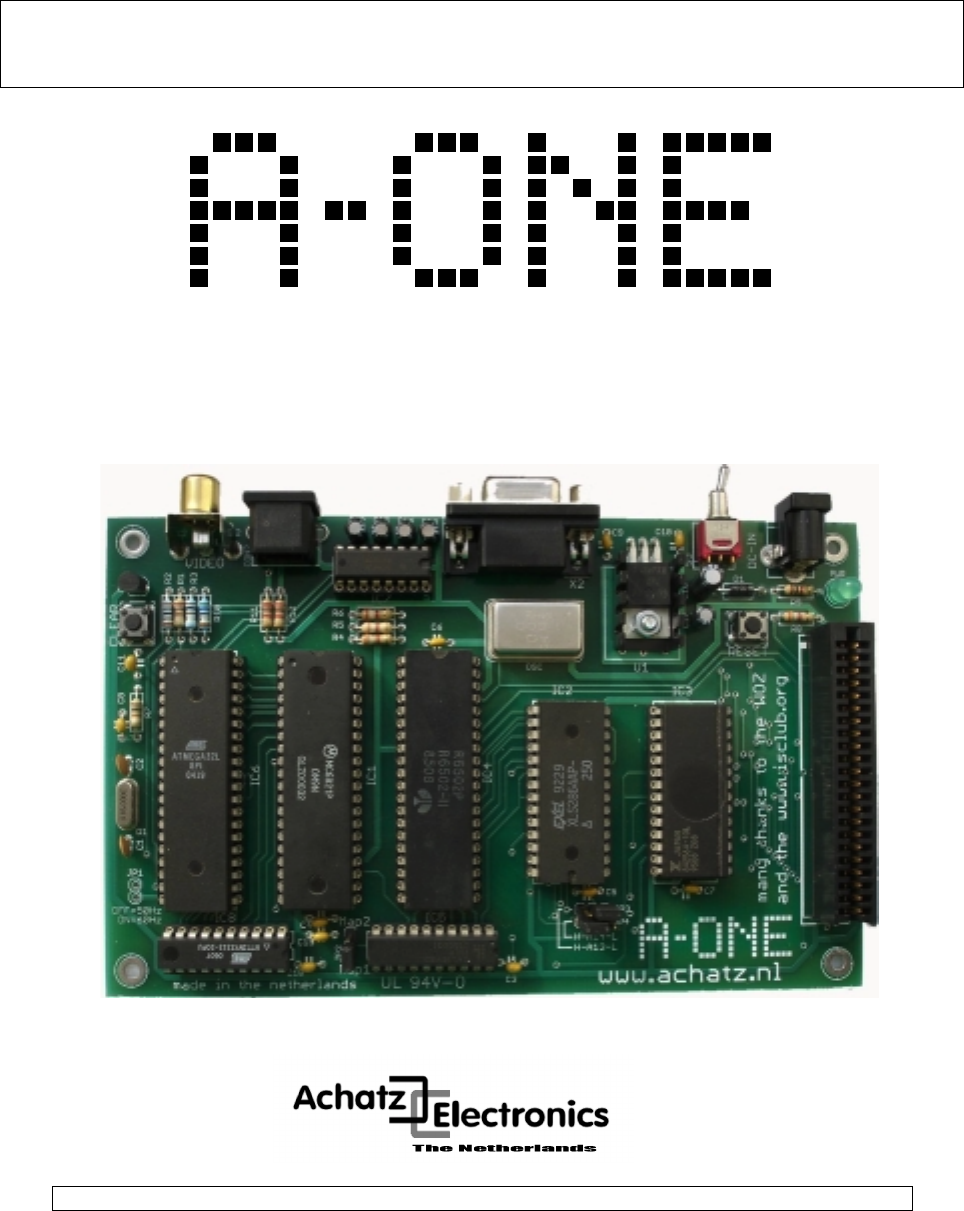
MANUAL
Apple 1 Replica Computer
A-ONE Rel. 1.00 Edition 10. october 2006

A-ONE Apple 1 Replica Computer Hardwaremanual
Achatz Electronics The Netherlands 2
Rel. 1.00
Published by Achatz Electronics Oct. 2006
Printed in the Netherlands
Copyright 2006 Achatz Electronics. All rights reserved
This hardware design is provided by Achatz Electronics without any warranties.
All information contained herein have been carefully verified, assumes no
responsibility for errors that might appear in this document, or for damage to
things or persons resulting from technical errors, omission and improper use
of this manual and of the related software and hardware.
Terms of delivery and rights to change design reserved.
Other product names listed are trademarks of their respective companies.
For specific information on the components mounted on the board, please
refer to the Data Book of the builder or second sources.
A-ONE Apple 1 Replica Computer Hardwaremanual
Achatz Electronics The Netherlands 3
A Little Introduction To The Apple 1
Computers and humans do not speak the same language. Fortunately computers have
come a long way to learn to understand what we humans want them to do, thanks to
graphical user interfaces.
However back in '76 computers were far from being human-friendly. They had to be
spoken to in their own native language: binary numbers. Steve Wozniak and his Apple
company were among the first to change that a little. His Apple 1 computer came one
step closer to us humans. Obviously computers still had a long way to go, but it was
considered a giant leap for computer users back then.
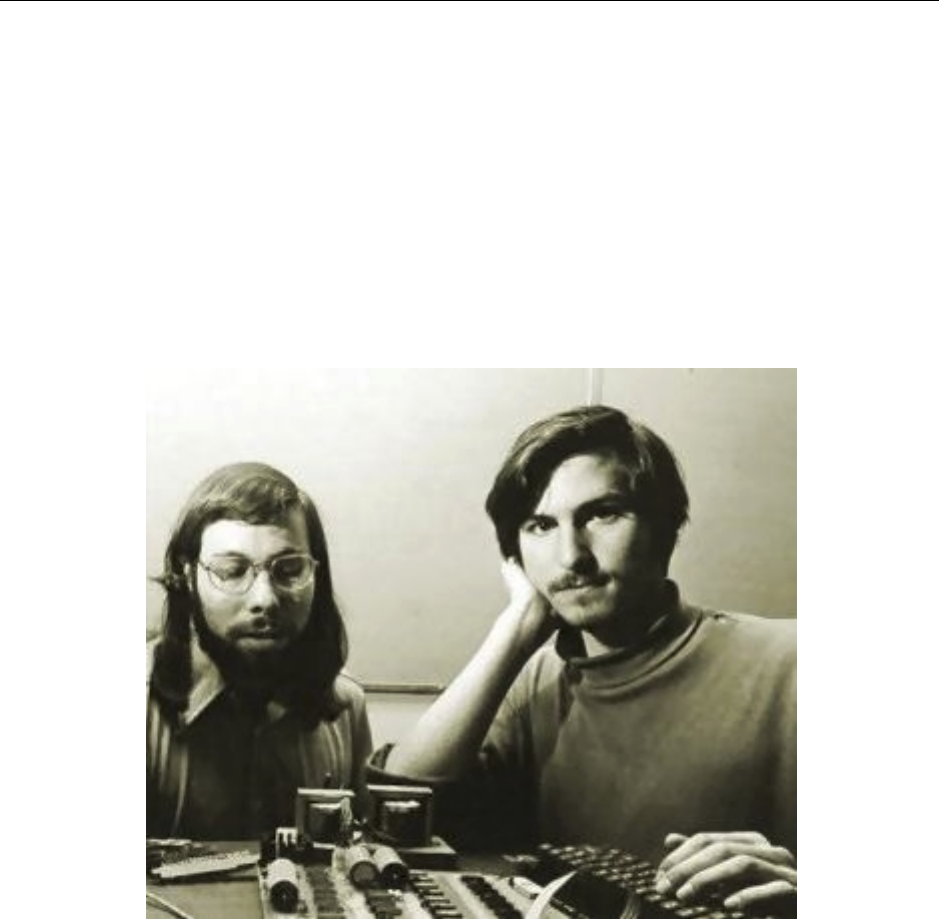
Steve Wozniak and Steve Jobs
The Apple 1 was programmable with hexadecimal numbers, instead of binary numbers.
It had a real keyboard, instead of a large set of toggle switches and flashing lights. And it
had a screen which could show 24 lines of 40 characters each instead of about 6 seven-
segment displays (at best). OK we humans were still the ones who had to adapt the
most, but from then on computers did their utmost to better integrate with us.
On the Apple 1 this human interface was controlled by the monitor program, better
known as the Woz Monitor, named after its creator. A total of 256 bytes of ROM memory
were responsible for holding the Woz Monitor and allowing the computer to do
something sensible when the RESET switch was pressed. Doesn't sound much, only
256 bytes, but keep in mind that memory was extremely expensive in those days. And
hey, it's always 256 bytes more than Apple's main competitor at that time, the Altair
8800, which had no ROM at all and no terminal screen or keyboard!
A-ONE Apple 1 Replica Computer Hardwaremanual
Achatz Electronics The Netherlands 4
Introduction To The A-ONE
My main intention was to build a personal computer that could be understood by one
single person. Just like Niklaus Wirth designed his Oberon operating system: any one
person that knows about programming, can understand all ins and outs of Oberon.
The same with me here: I wanted to build a computer that can be understood without
having to consult many books and having to listen to many people. So I designed the
A-ONE Apple 1 replica. Simple by all means.
Of course, there are people who know just about everything about the original Apple
One computer, but never got the chance to work with one. Well, this is your chance.
And for the lawyers among us: I got permission from Steve Wozniak (in writing) for
using his original firmware (WOZ-mon and BASIC) for this project.
For this A-one project, I used as many original components as possible:
- 6502 CPU
- 6821 PIA
- ROM and RAM (although I used one big instead of many small memories)
Some other (non-essential) parts, however, were easier to redesign and produce with
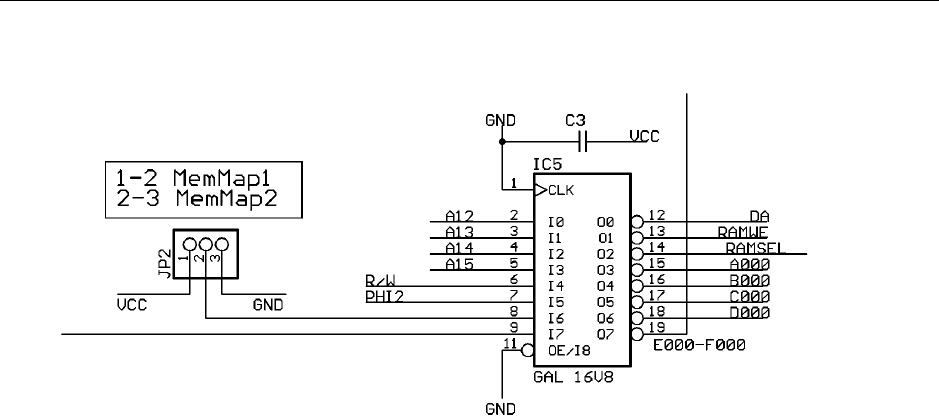
current technology chips. We used a 16V8 GAL for the address decoding. The video
display subsystem is now made with one Atmel ATmega32 processor and the PS/2
keyboard is handled by one Atmel Tiny2313 processor. This will enable the user to use
the old computer with modern (and hence affordable) peripherals like composite video
screen and PS/2 keyboard.
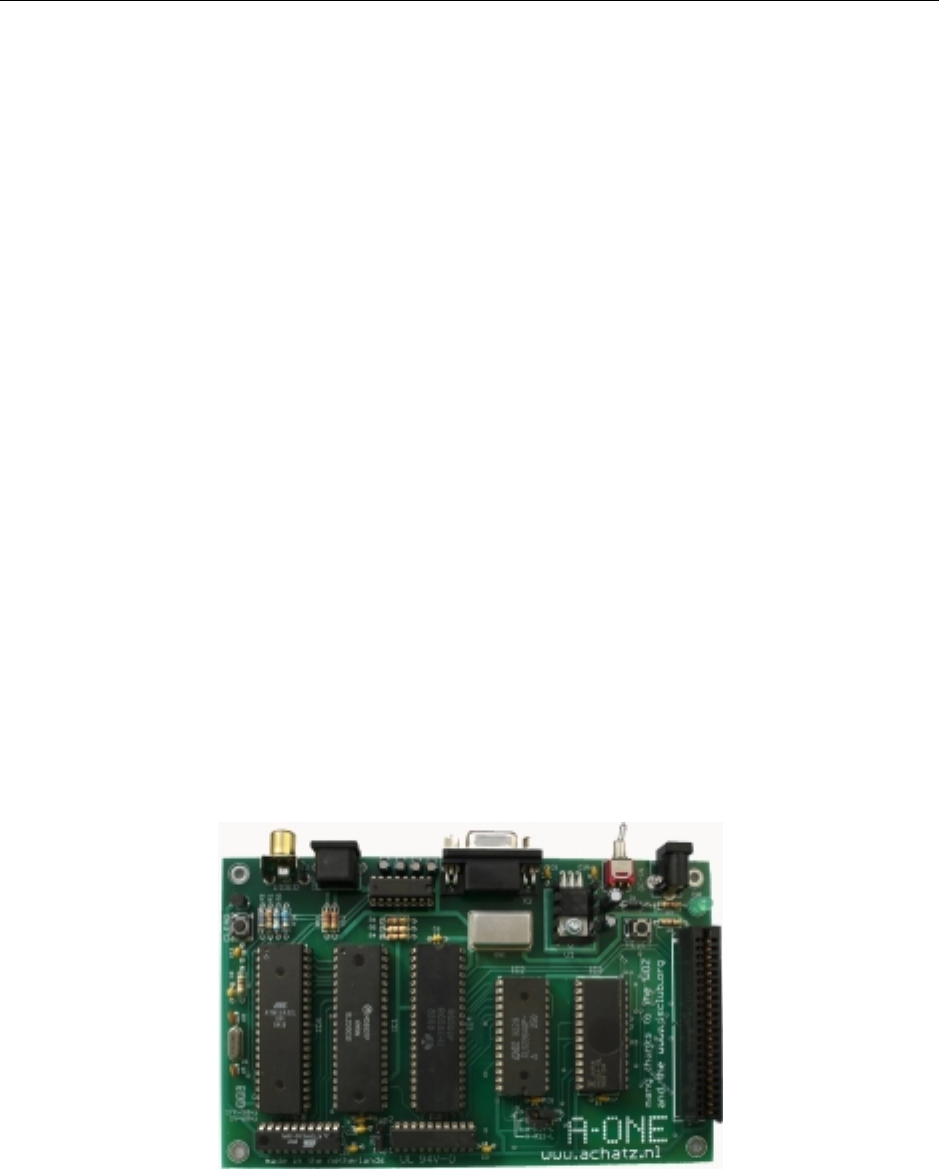
Photo 1: The A-One replica
The A-One replica is upward compatible with the original one. As an addition, it has a
fast RS-232 port onboard. Sending of data is handled by the ATmega32, whereas
receiving is done by the keyboard controller (Atmel Tiny2313).
A-ONE Apple 1 Replica Computer Hardwaremanual
Achatz Electronics The Netherlands 5
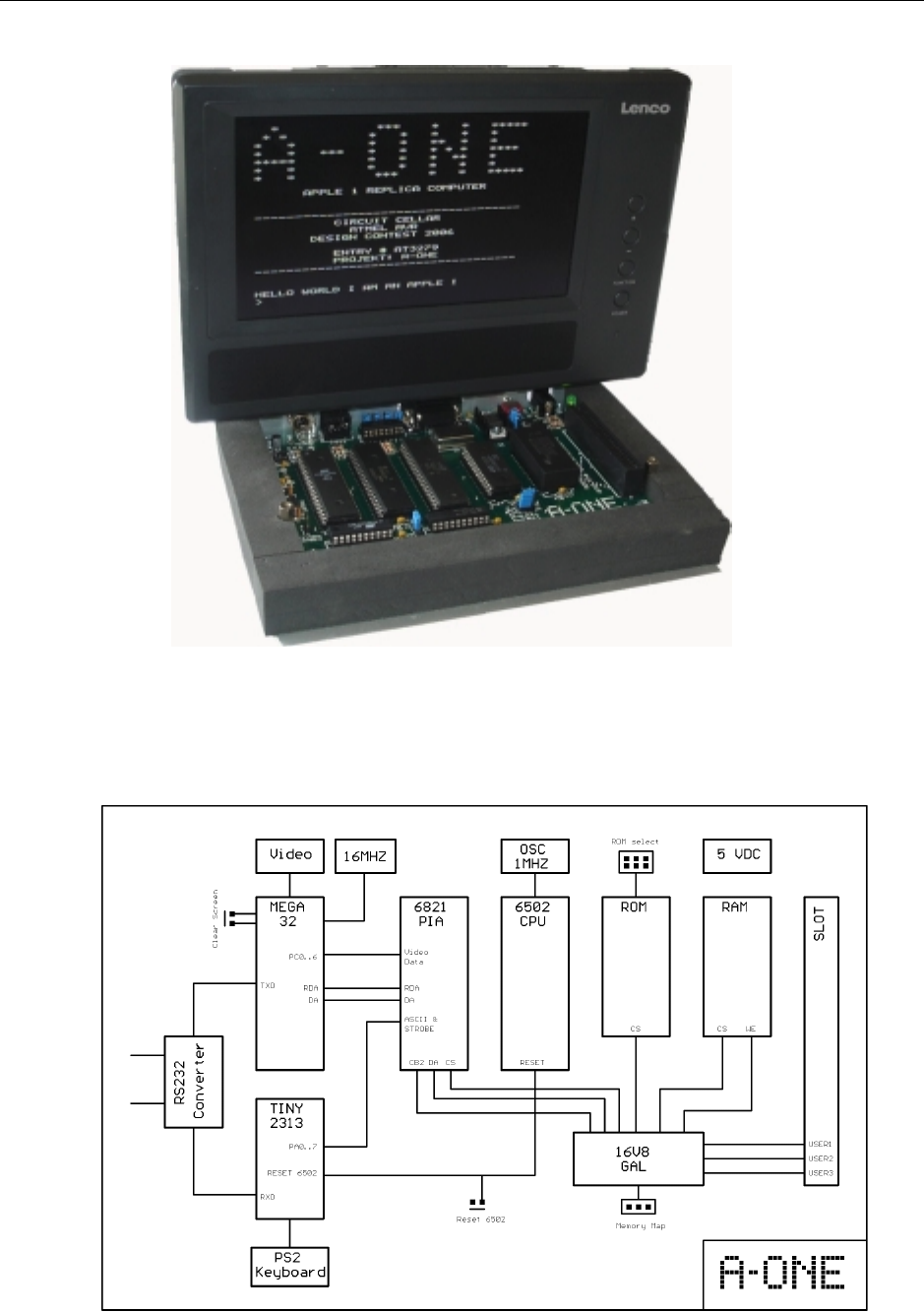
A running Machine
A-ONE Block Diagram

A-ONE Apple 1 Replica Computer Hardwaremanual
Achatz Electronics The Netherlands 6
Memory Map
You can choose between two different memory maps:
Option 1:
+ 32 KB RAM bound to address range 0x000 - 0x7FFF
+ WOZ-BASIC in ROM starts at 0xE000
+ WOZ-MON in ROM starts at 0xFF00
Option 2:
+ 4 KB of RAM, originally found at 0x6000 - 0x6FFF is moved to 0xE000 - 0xEFFF
Option 2 corresponds with the original Apple-1 memory map. Since it had 4 KB of RAM
at segment 0xE000, there was no ROM-BASIC there.
It had to be loaded by the WOZ-MON..
-------------------------------------
JumperMode=HIGH (Map1)
-------------------------------------
A15 A14 A13 A12
$0000 0 0 0 0 4K RAM
$1000 0 0 0 1 4K RAM
$2000 0 0 1 0 4K RAM
$3000 0 0 1 1 4K RAM
$4000 0 1 0 0 4K RAM
$5000 0 1 0 1 4K RAM
$6000 0 1 1 0 4K RAM
$7000 0 1 1 1 4K RAM
$8000 1 0 0 0 not used
$9000 1 0 0 1 not used
$A000 1 0 1 0 4K USER
$B000 1 0 1 1 4K USER
$C000 1 1 0 0 4K USER
$D000 1 1 0 1 PIA I/O Control
$E000 1 1 1 0 4k ROM BASIC
$F000 1 1 1 1 4K ROM WOZ-MON
--------------------------------------
JumperMode=LOW (Map2)
--------------------------------------
A15 A14 A13 A12
$0000 0 0 0 0 4K RAM
$1000 0 0 0 1 4K RAM
$2000 0 0 1 0 4K RAM
$3000 0 0 1 1 4K RAM
$4000 0 1 0 0 4K RAM
$5000 0 1 0 1 4K RAM
$6000 0 1 1 0 not used
$7000 0 1 1 1 4K RAM
$8000 1 0 0 0 not used
$9000 1 0 0 1 not used
$A000 1 0 1 0 4K USER
$B000 1 0 1 1 4K USER
$C000 1 1 0 0 4K USER
$D000 1 1 0 1 PIA I/O Control
$E000 1 1 1 0 4k RAM
$F000 1 1 1 1 4K ROM WOZ-MON
A-ONE Apple 1 Replica Computer Hardwaremanual
Achatz Electronics The Netherlands 7
GAL 16V8 Source Code for Address-decoding and Memory Map-select
A-ONE GAL 240606 © Achatz
*IDENTIFICATION
ad_dec;
*TYPE
GAL16V8;
*PINS
% Inputs %
A12 = 2,
A13 = 3,
A14 = 4,
A15 = 5,
RW = 6,
PHI2 = 7,
JMP = 8,
CB2 = 9,
% Outputs %
DA = 12,
RAMWE = 13,
RAMSEL = 14,
A000 = 15,
B000 = 16,
C000 = 17,
D000 = 18,
EF00 = 19;
*BOOLEAN-EQUATIONS
/DA = CB2;
/RAMWE = PHI2 & /RW;
/EF00 = (JMP & A12 & A13 & A14 & A15 + JMP & /A12 & A13 & A14 & A15 +
/JMP & A12 & A13 & A14 & A15);
/D000 = A12 & /A13 & A14 & A15;
/C000 = /A12 & /A13 & A14 & A15;
/B000 = A12 & A13 & /A14 & A15;
/A000 = /A12 & A13 & /A14 & A15;
/RAMSEL = JMP & /A15 +
/JMP & A15 & A14 & A13 & /A12 + /JMP & /A15 & /A13 + /JMP & /A15 & /A14 +
/JMP & /A15 & A12;
*END
A-ONE Apple 1 Replica Computer Hardwaremanual
Achatz Electronics The Netherlands 8
PS2 Keyboard
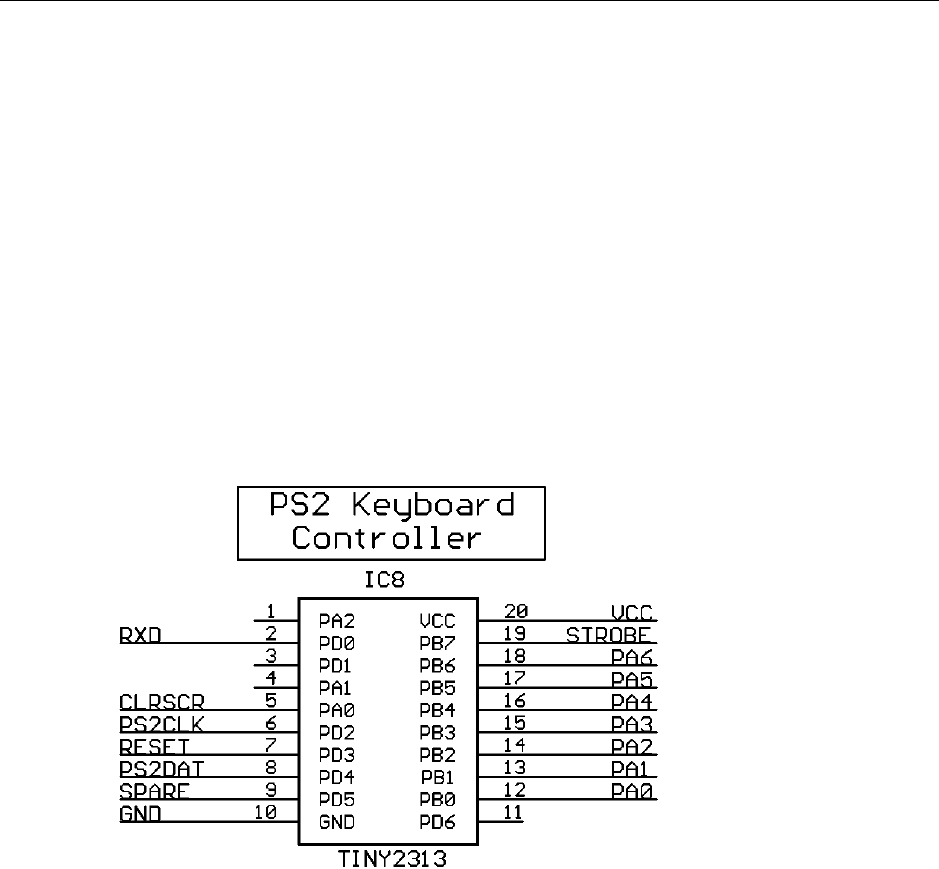
An industry standard PS/2 keyboard is used by the A-One. It is controlled via the
ATtiny2313 processor. The PS/2 clock line is controlled by PortD.2 and the data line is
controlled by PortD.4. PortD.3 is used for generating a RESET condition for the A-One
processor (the 6502) either when a Ctrl-R is received via RS-232 or when the user
presses the F12 function key.
PortB, bits 0 to 6, output the 7 bit keyboard data to the 6821 PIA chip.
All data that is received via RS 232 (at 2400 bps) is directed to PortB, just like the
keyboard data.
Additionally, a strobe signal is generated and implemented as PortB.7 This menas that a
terminal session on a PC connected to the A-One via serial cable, is treated as direct
keyboard input by the A-One.
A-ONE Apple 1 Replica Computer Hardwaremanual
Achatz Electronics The Netherlands 9
Video Controller
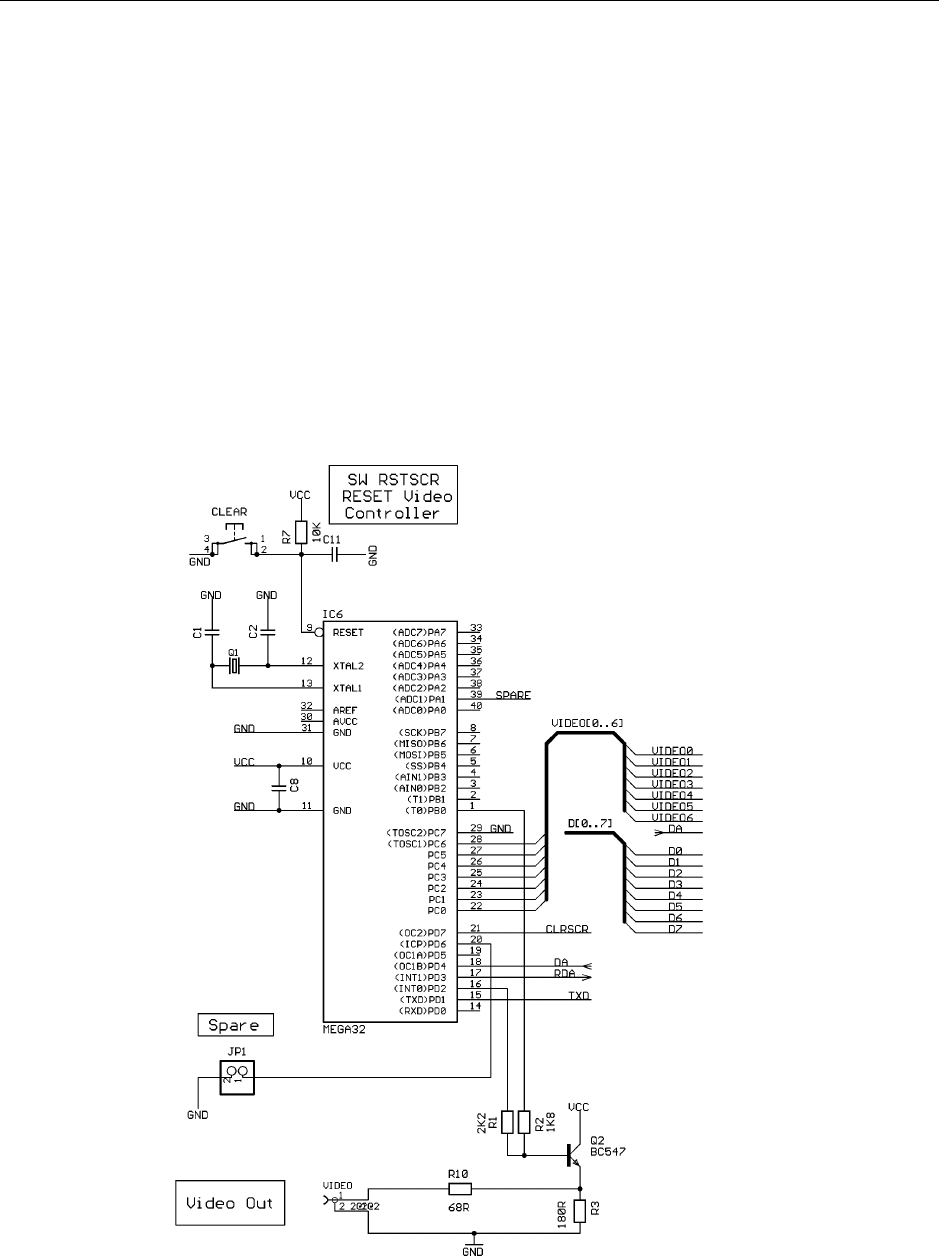
The ATmega32 serves two purposes:
- generating the videodata
- outputting the serial data via the TxD pin (PortD.1, pin 15)
All data that comes from the keyboard is retransmitted instantly via the TxD pin of the
ATmega32.
The V-sync routine controls the DA and RDA handshake signals which are required for
the 6821 peripheral.
Every 20 ms, a new character can be sent to the videocontroller, which means that
maximum 50 characters per second are allowed.

A-ONE Apple 1 Replica Computer Hardwaremanual
Achatz Electronics The Netherlands 10
Working with the A-ONE
WOZ MONITOR
The original Apple 1 did not come with a Reset circuit, which means that the user has to
press the RESET switch in order to get the machine started. Once you do that a back
slash '\' is printed on the screen and the cursor will drop down one line. The cursor
position is represented by a flashing '@' symbol.
You can now type address, data and commands which will be executed as soon as you
press the Return key. The input buffer can hold up to 127 character, if you type more
characters before hitting the Return key the input line will be erased and will start again
from scratch. This is overflow situation is indicated by a new back slash after which the
cursor drops one line again.
Because of the primitive nature of the terminal there are not many line-editing features
available. You can press the back arrow key to erase characters from the input buffer,
but the erased characters will not be erased from the screen nor will the cursor position
back-up. You'll have to keep track of the changes yourself. It's obvious that you can
easily get confused when a line contains too many corrections or when an error is
detected all the way at the other end of the input line. In that case it would be easiest to
cancel the input and start all over again. Cancelling the input is done by pressing the
ESC key.
Address inputs are truncated to the least significant 4 hexadecimal digits. Data inputs
are truncated to the least significant 2 hexadecimal digits.
Thus entering 12345678 as address will result in the address 5678 to be used.
Tip: This can also be used to your advantage to correct typing errors, instead of using
the back arrow key.
If an error is encountered during the parsing of the input line then the rest of the line is
simply ignored, without warning! Commands executed before the error are executed
normally though.
Examining memory (memory dump)
You can examine the contents of a single memory location by typing a single address followed
by a Return.
4F
004F: 0F
Note: The bold typed characters are what the user types. All other characters are responses from
the Apple 1.
Now let us examine a block of memory from the last opened location to the next specified
location.
.5A
0050: 00 01 02 03 04 05 06 07
0058: 08 09 0A
Note: 004F is still considered the most recently opened location.
We can also combine the previous two examples into one commend:

A-ONE Apple 1 Replica Computer Hardwaremanual
Achatz Electronics The Netherlands 11
4F.5A
0040: 0F
0050: 00 01 02 03 04 05 06 07
0058: 08 09 0A
Note: Only the first location of the block 4F is considered opened.
You can also examine several locations at once, with all addresses on one command line.
4F 52 56
004F: 0F
0052: 02
0056: 06
Note: 0056 is considered the most recently opened address.
Let's take this concept into the extremes and combine some block and single address
examinations on one command line.
4F.52 56 58.5A
004F: 0F
0050: 00 01 02
0056: 06
0058: 08 09 0A
Note: By now you won't be surprised that 0058 is considered the most recently opened location.
Finally let's examine some successive blocks of memory. This can be handy if you want to
examine a larger block of memory which will not fit on one monitor screen. Remember that there
is no way to halt a large examine list other than hitting the RESET button!
4F.52
004F: 0F
0050: 00 01 02
.55
0053: 03 04 05
.5A
0056: 06 07
0058: 08 09 0A
Depositing memory (changing memory contents)
This is how to change a single memory location (provided it is RAM memory of course).
30:A0
0030: FF
Note: FF is what location 00300 used to contain before the operation, from now on it contains A0.
Location 0030 is now considered the most recently opened location.
Now we're going to deposit some more bytes in successive locations, starting from the last
deposited location.
:A1 A2 A3 A4 A5
Note: Location 31 now contains A1, location 32 contains A2 and so on until location 35 which
now contains A5.

A-ONE Apple 1 Replica Computer Hardwaremanual
Achatz Electronics The Netherlands 12
Combining these two techniques will give us the next example.
30:A0 A1 A2 A3 A4 A5
0030: FF
Note: Location 0030 used to contain FF in this example.
Breaking up a long entry into multiple command lines is done like this:
30:A1 A2
0030: FF
:A2 A3
:A4 A5
Note: A colon in a command means "start depositing data from the most recently deposited
location, or if none, then from the most recently opened location.
Now we're going to examine a piece of memory and then deposit some new data into it:
30.35
0030: A0 A1 A2 A3 A4 A5
:B0 B1 B2 B3 B4 B5
Note: New data deposited beginning at most recently opened location, which is 0030 in this
example.
Running a program
To run a program at a specified address:
10F0R
10F0: A9
Note the cursor is left immediately to the right of the displayed data; it is not returned to the next
line. It's the program's responsibility to control the rest of the output.
From now on the user program is in control of the Apple 1. If the user program does not return to
the Woz monitor (by jumping to address $FF1F) you'll have to press the RESET key to stop your
program and return to the Woz Monitor.
You can also enter a program and run it all from the same command line. Please note that this
only works for very short programs of course.
40: A9 0 20 EF FF 38 69 0 4C 40 0 R
40: FF
Note: FF is the previous contents of location 0040.
This little program will continue printing characters to the screen. It can only be stopped by
pressing the RESET key.

A-ONE Apple 1 Replica Computer Hardwaremanual
Achatz Electronics The Netherlands 13
The Woz Monitor's RAM Use
The monitor needs some RAM memory to perform its tasks. When a user program is running all
bytes used by the monitor may be recycled, the monitor doesn't care about the contents of any of
the memory locations when it regains control again. Here's the complete list of all the memory
the Woz Monitor requires while it is running:
Zero page $24 to $2B General purpose storage locations. None of the bytes are
very important and they may all be changed by the user
program.
Stack page $0100 to $01FF Although the Woz Monitor only uses 3 bytes of stack
space at most there is no way of telling where the stack
actually is. This is because the stack pointer is not
initialized by the Woz Monitor.
A user program may use the entire stack for its own
purposes. However be careful when entering code on page
$01 before the stack pointer is initialized, the monitor may
overwrite your code again.
Input buffer $0200 to $027F This space is used as input buffer. User programs may use
this area. However you can not enter code here manually
because it will be overwritten by the monitor.
The next addresses are not exactly RAM locations, which doesn't make them less important
though. They are the 6821 PIA control registers.
KBD $D010 Keyboard input register. This register holds valid data when
b7 of KBDCR is "1". Reading KBD will automatically clear
b7 of KBDCR.
Bit b7 of KBD is permanently tied to +5V. The monitor
expects only upper case characters.
KBDCR $D011 The only bit which we are interested in in this register is the
read-only bit b7. It will be set by hardware whenever a key is
pressed on the keyboard. It is cleared again when the KBD
location is read.
DSP $D012 Bits b6..b0 are the character outputs for the terminal display.
Writing to this register will set b7 of DSP, which is the only
input bit of this register.
The terminal hardware will clear bit b7 as soon as the
character is accepted. This may take up to 16.7 ms though!
DSPCR $D013 This register is better left untouched, it contains no useful
data for a user program. The Woz Monitor has initialized it
for you. Changing the contents may kill the terminal output
until you press RESET again.

A-ONE Apple 1 Replica Computer Hardwaremanual
Achatz Electronics The Netherlands 14
Useful Routines
Apart from the monitor program itself the Woz Monitor contains only a few useful routines
which can be called by user programs.
$FF1F GETLINE This is the official monitor entry point. If your program is finished and
you want to return to the monitor you can simply jump to this location. It
will echo a CR and from then on you are back in the monitor.
$FFEF ECHO This simple routine prints the character in the Accumulator to the
terminal. The contents of the Accumulator are not disrupted, only the
flag register will be changed.
Although this is a fairly short routine it may take up to some 16.7 ms
before it returns control to the user program. For more details about this
behaviour please read the page about the terminal.
$FFDC PRBYTE This routine prints the byte which is held in the Accumulator in
hexadecimal format (2 digits). The contents of the Accumulator are
disrupted.
$FFE5 PRHEX Prints the least significant 4 bits of the Accumulator in hexadecimal
format (1 digit). The contents of the Accumulator are disrupted.
If you want to read a single character from the keyboard from within your own machine language
program you can use the following piece of code:
KBDIN LDA KBDCR See if there is a character available
BPL KBDIN Not as long as b7 remains low
LDA KBD Get the character and clear the flag

A-ONE Apple 1 Replica Computer Hardwaremanual
Achatz Electronics The Netherlands 15
WOZ BASIC
I think it goes without saying that you should make sure that Apple 1 Basic is loaded into
memory before it can be started. If it's not provided in ROM you'll have to load it into
memory locations from $E000 to $EFFF. The Basic interpreter can be started by typing
E000R in the Woz Monitor. After printing the contents of address E000 you'll see a >
symbol followed by the flashing cursor, which is from now on our prompt to enter Basic
commands.
E000 is the so called "Cold" entry point to the Basic interpreter, which means that the
program is initialized before we can really get going. This also means that there will be
no runnable program in memory when we enter the Basic this way. </P
If you had to go back to the Woz monitor for any particular reason and want to return to
the Basic interpreter without losing anything you can use the "Warm" entry point by
typing E2B3R in the Woz Monitor.
Starting Basic using its Cold entry point initializes the LOMEM and HIMEM pointers to
$0800 and $1000 respectively (HIMEM is set to 4k + 1). This means that you'll have a
total of 2k of memory for your Basic program and its variables.
On a standard Apple 1 with 8k of RAM, you could lower LOMEM to $0300, giving you an
extra 256 bytes of program memory. If you have more than 8k of RAM, which is the
case with probably all modern day replicas and the Apple 1 emulation programs, then
you can raise HIMEM to whatever memory size you've got. Needles to say of course
that you can only use a contiguous block of memory between LOMEM and HIMEM.
Changing LOMEM and HIMEM is done with two similar named commands. Please note
that these two commands only accept decimal values and that they do NOT test
whether your entries are valid. Also note that these commands will erase your existing
Basic program from memory!
First make sure Jumper JP2 selects Map1 (we use the BASIC in ROM).
Reset the A-ONE by pressing the Reset-switch or „F12“.
We are ready to start BASIC.
USER TYPES:
E000R[return]
BASIC TYPES:
E000: 4C
>
The A-ONE is showing the BASIC-Prompt „>“
USER TYPES:
PRINT 15+35[return]

A-ONE Apple 1 Replica Computer Hardwaremanual
Achatz Electronics The Netherlands 16
BASIC TYPES:
50
>
USER TYPES:
10 A=1
20 PRINT A
RUN
BASIC TYPES:
1
*** END ERR
For a detailed description of all BASIC commands and for using the Monitor please
consult the links at the end of this document
A-ONE Apple 1 Replica Computer Hardwaremanual
Achatz Electronics The Netherlands 17
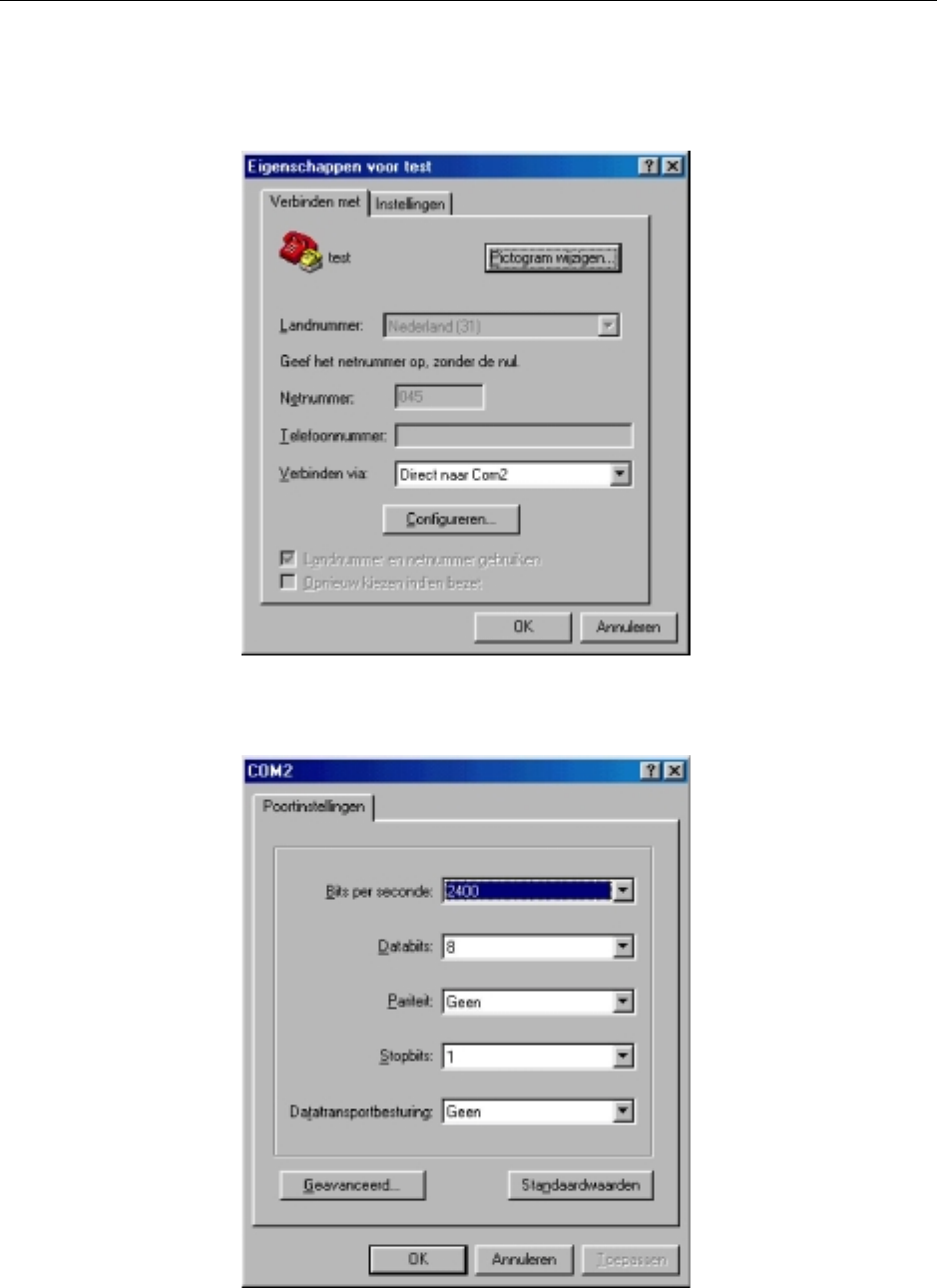
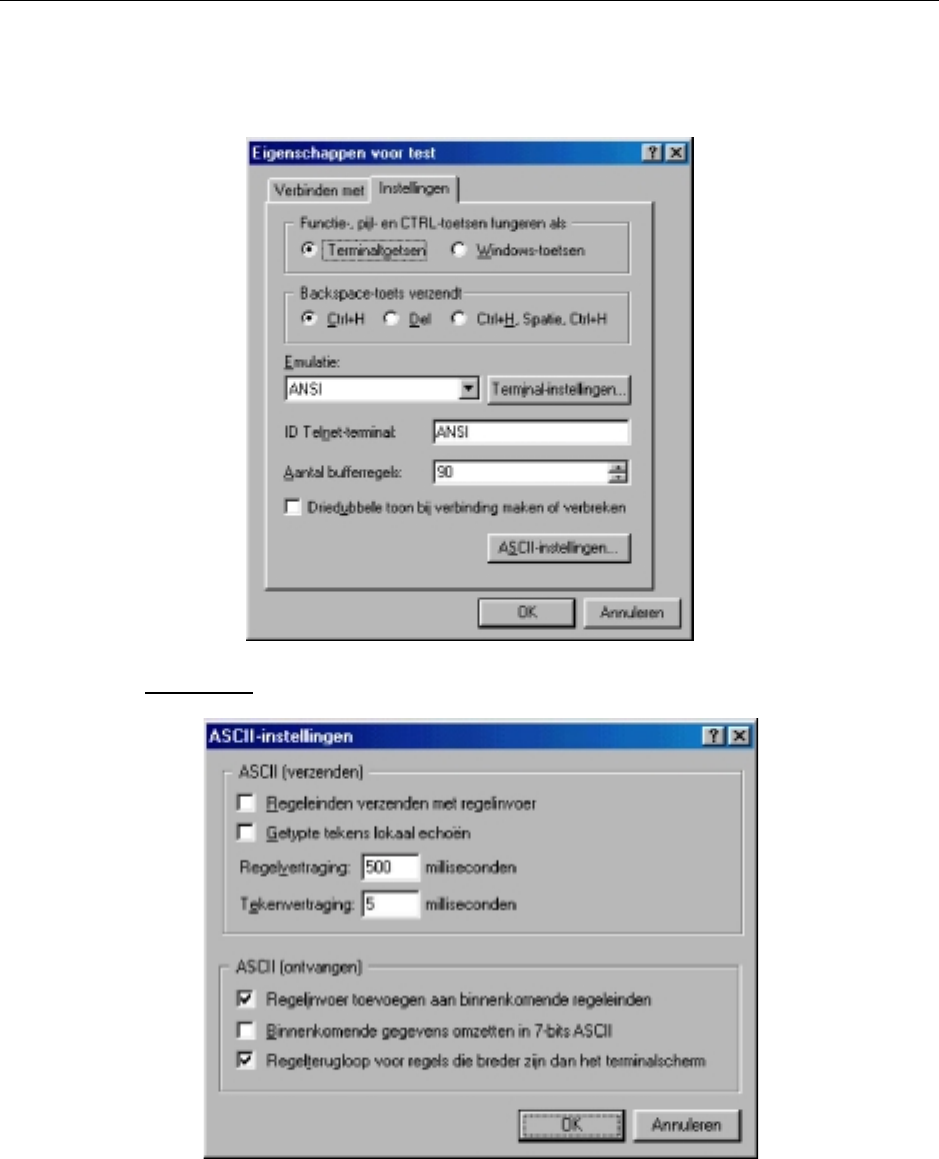
Hyperterminal settings:
Select the correct com port at your personal computer
2400 Baud, 8 Bits, no parity, 1 stopbit, no handshake
A-ONE Apple 1 Replica Computer Hardwaremanual
Achatz Electronics The Netherlands 18
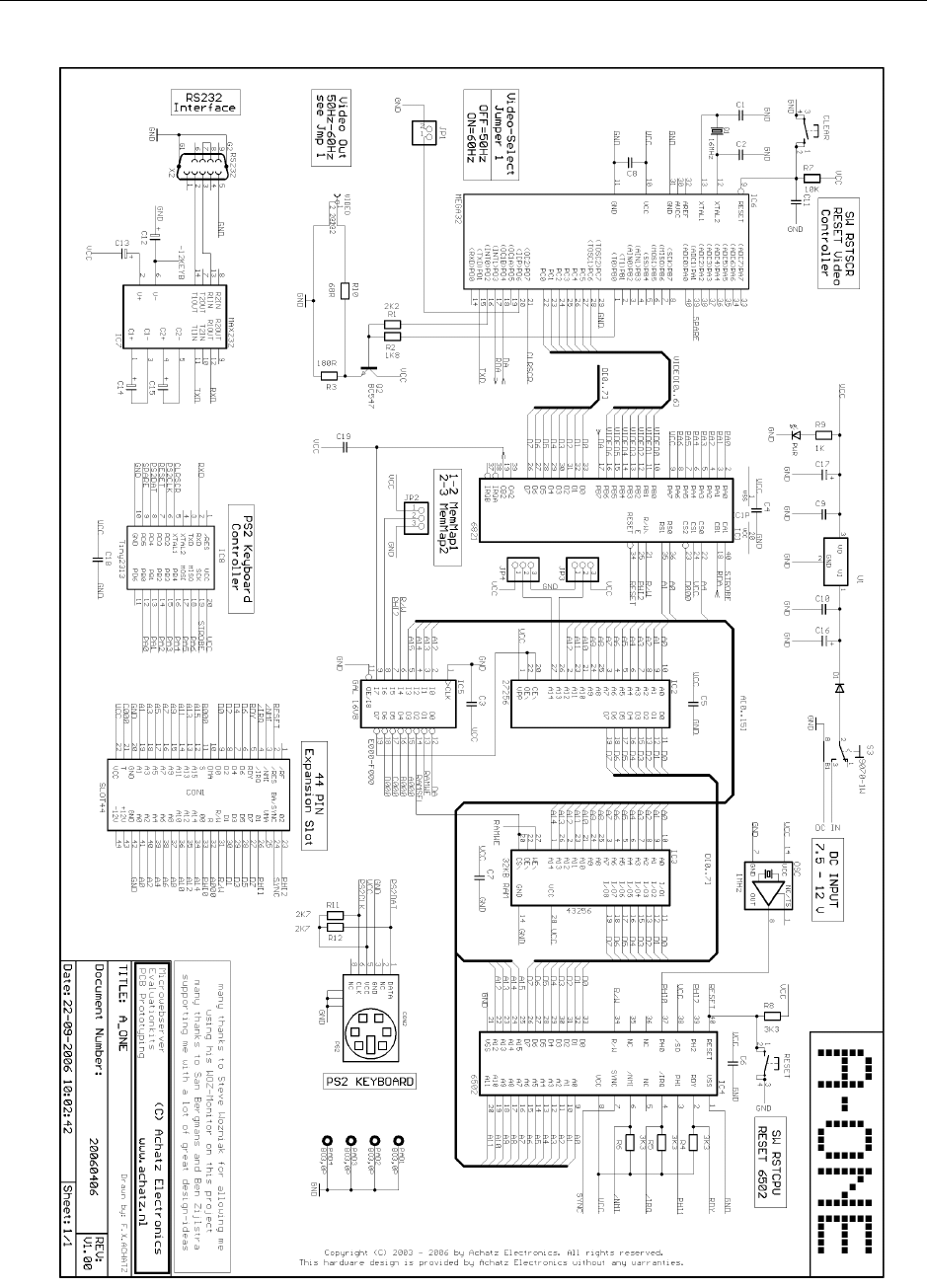
Important: line-delay and char-delay is set to 500ms and 5ms
Make sure, using a normal 1:1 serial cable male-female with 9 pins. You can operate the
A-ONE via a Terminal exactly the same way using a PS2 keyboard.

A-ONE Apple 1 Replica Computer Hardwaremanual
Achatz Electronics The Netherlands 19
Technical Datas:
CPU: MOS TECHNOLOGIE 6502
System-Clock: 1 MHZ
RAM Memory: 32 KB SRAM standard
(optional 32KB ZeroPowerRAM)
(optional 32KB Time-Keeper-RAM)
ROM Memory: 8KB standard
8/16/32KB-Types supported using jumperselect
Videocontroller: ATMEGA32-16
40 Chars/line at 24 Video-Lines,
50 Chars/per second at max,
with automatic scrolling,
Clear-Screen Function when receiving a CTRL-L
Video Output: Composite positiv video, 75 Ohms,
Frame-Rate 50 Hz
Keyboardcontroller: Attiny2313 (8MHZ intern)
Software designed for a standard PS2 Keyboard
using a US-Keyboard-Layout,
6502 Reset-Function when receiving a CTRL-R
Adressdecoding: GAL16V8
two Memory-Maps available using jumperselect
RS232: 9-pin SubD Female-connector,
2400 Bd transmit/receive
Expansionconnector: 2x22 Edge Connector
(Apple 1 compatible)
Switches: Reset-switch for 6502 CPU,
Clear-switch for Video
Powersupply: recommended single universial AC-DC Adapter
Voltage: DC 9 – 12 VDC
Supply Current: 250 mA
PCB-Size: 160 x 100 mm (Euro-Format)
A-ONE Apple 1 Replica Computer Hardwaremanual
Achatz Electronics The Netherlands 20
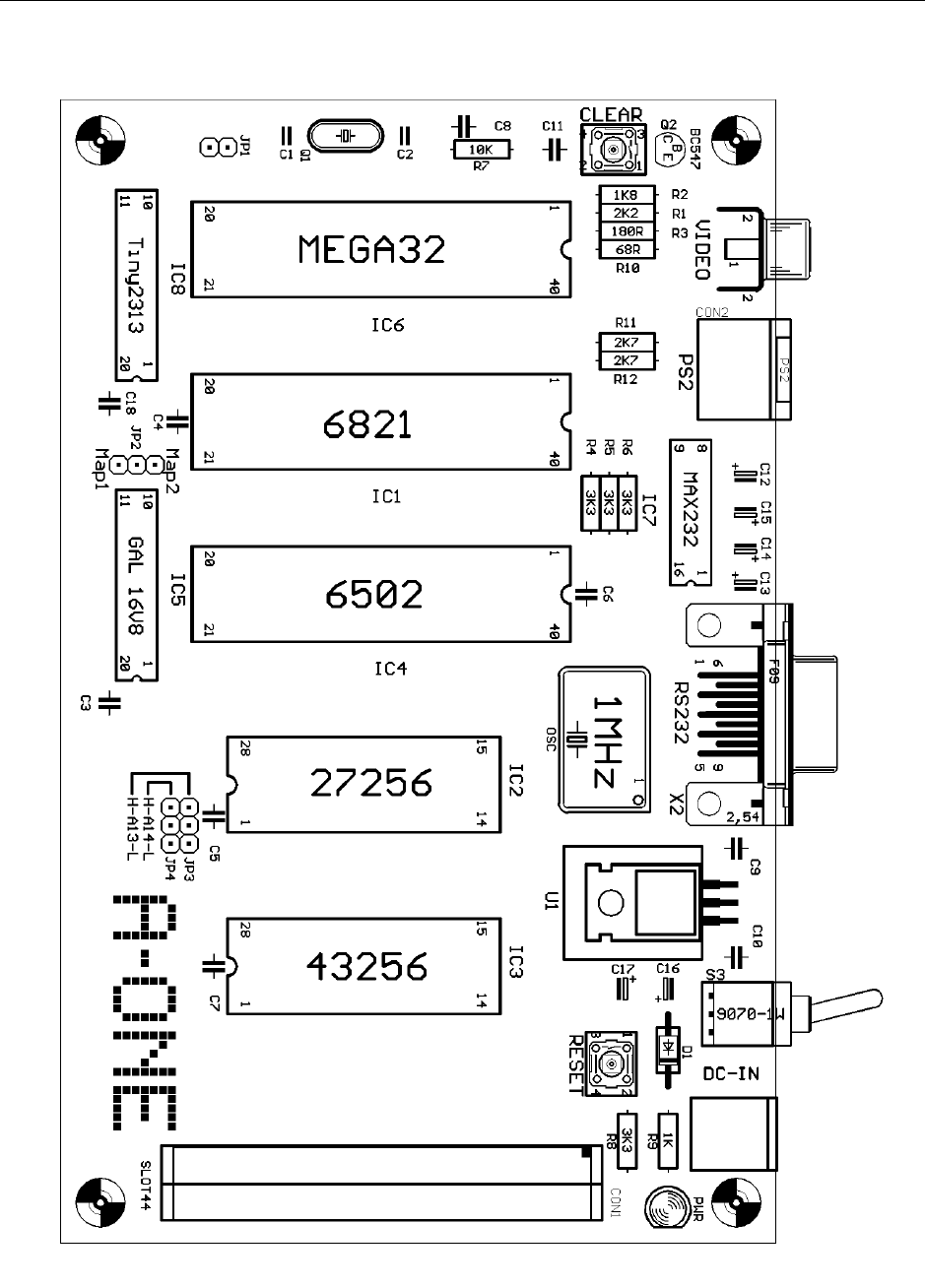
A-ONE Schematic
A-ONE Apple 1 Replica Computer Hardwaremanual
Achatz Electronics The Netherlands 21
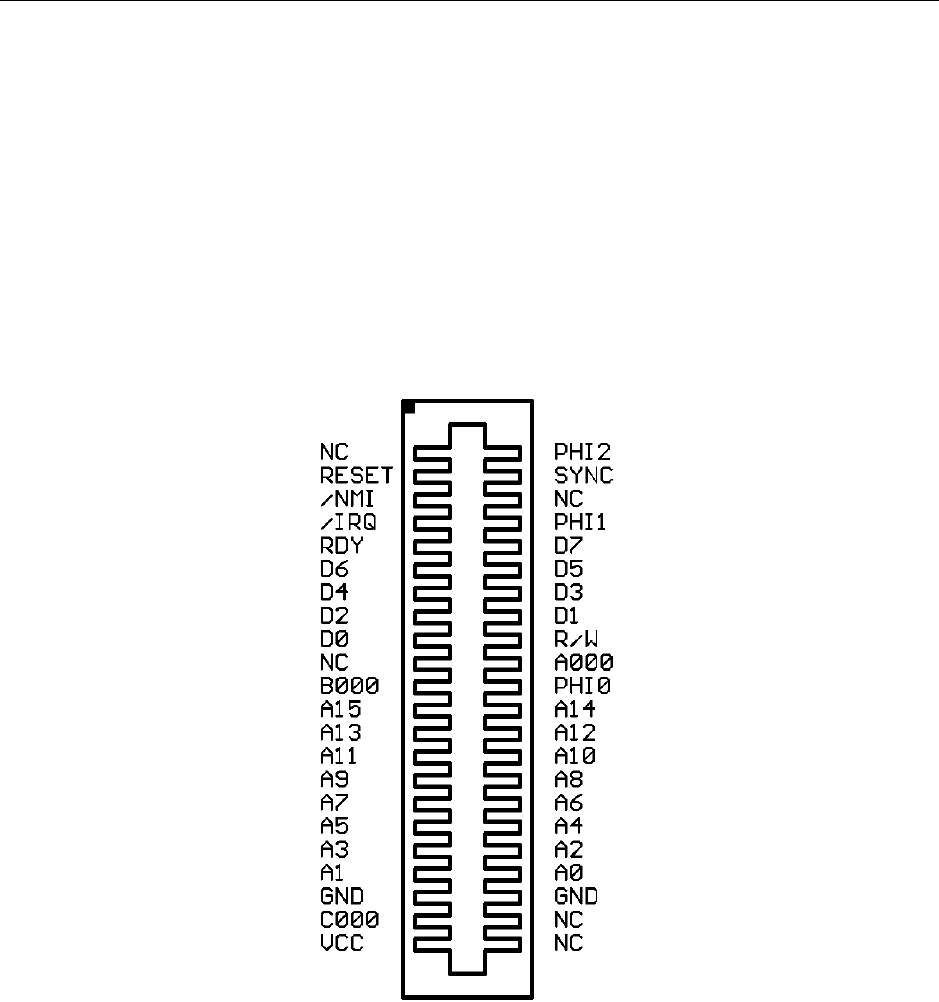
A-ONE COMPONENT SIDE

A-ONE Apple 1 Replica Computer Hardwaremanual
Achatz Electronics The Netherlands 22
Parts list:
The A-ONE is shipped with a SRAM (IC3). In place of the SRAM a NVRAM can be
used, as well. One such RAM is the M48Z35Y-70. Or when installing a M48T35Y-70
(TimeKeeperRAM) it will give you a Realtime Clock on the A-ONE.
C1 22pf
C2 22pf
C3 100nf
C4 100nf
C5 100nf
C6 100nf
C7 100nf
C8 100nf
C9 100nf
C10 100nf
C11 100nf
C12 10uf
C13 10uf
C14 10uf
C15 10uf
C16 10uf
C17 10uf
C18 100nf
C19 100nf
R1 2K2
R2 1K8
R3 100R
R4 3K3
R5 3K3
R6 3K3
R7 10K
R8 3K3
R9 1K
R10 68R
R11 2K7
R12 2K7
IC1 6821 PIA
IC2 27256 EPROM
IC3 43256 RAM
IC4 6502 CPU
IC5 GAL 16V8
IC6 ATMEGA32
IC7 MAX232
IC8 ATTiny2313
U1 7805 with heatsink
D1 1N4004
Q1 16MHz
Q2 BC547
OSC 1MHZ
PWR LED 5mm
JP1 1X02
JP2 1X03
JP3 1X03
JP4 1X03
CON1 SLOT44
CON2 PS2
VIDEO TOBU3
X2 F09HP
RESET Key OMRON
CLEAR Key OMRON
S3 SWITCH
IC socket 40 pins (3pcs)
IC socket 28 pins (2pcs)
IC socket 20 pins (2pcs)
IC socket 16 pins (1pcs)
Please handle the A-ONE board and/or
the micro-chips with care.
Follow the instructions for using
Electrostatic Sensitive Devices (ESD)

A-ONE Apple 1 Replica Computer Hardwaremanual
Achatz Electronics The Netherlands 23
Assembling the Kit version:
Step1:
First locate all delivered parts. Check if everything is in the bag (use the parts list).
Step2:
Start soldering the resistors (R1 - R12) and the diode (D1).
Step3:
Install and solder the IC-sockets.
Step4:
Solder the 100nf and the 22pf capacitors (C1 – C11,C18,C19)
Step5:
Install the pinheaders and the cristals. Take care about the 1 MHZ Oscillator.
The direction of this part is important.
Step6:
Complete the board by installing the connectors, switches, Regulator with
Heatsink, Electrolytic capacitors (C12-C17) and the LED
Step7:
Check your work. Re-check the right values of the parts.
Step8:
Before installing the IC’s we use a AC-DC poweradapter, switch it to 9 ...12VDC
and power-up the A-ONE board. The LED should light and nothing should get
hot or smoke. If this is done, then disconnect the Poweradapter !!!!!
Step9:
Carefully install the IC’s in their right places. Jumper 2 selects Map 1.
Jumper 3 selects (A13 – L) and Jumper 4 selects (H – A14).
Step10:
Re-check your work again. Take care about the directions of the installed
micro-chips.
Step11:
Connect a PS 2 Keyboard at the PS 2 connector and connect a composite
TV or a composite video monitor at the cinch connector (video-connector).
Switch on the TV monitor and powerup the A-ONE board.
A blinking „@“ must appear at top of the video-screen. Now press the A-ONE
Reset-button and a „\“ comes up in the first line, followed by a blinking „@“
in the second line.
It’s time to say congratulations, you did a great job.

A-ONE Apple 1 Replica Computer Hardwaremanual
Achatz Electronics The Netherlands 24
Special Functions:
PS2 KEYBOARD:
[ESC] = escaping auto line numbering (SB Assembler)
[SHIFT]+[ESC} = escaping auto line numbering (WOZ-BASIC)
[F1] = CLEAR SCREEN
[F12] = RESET 6502 CPU
HYPER TERMINAL:
[ESC] = escaping auto line numbering (SB Assembler)
[CRTL]+[D] = escaping auto line numbering (BASIC)
[CTRL]+[L] = CLEAR SCREEN
[CTRL]+[R] = RESET 6502 CPU
CLEAR SCREEN
The Apple 1 does not support a software-controlled clear-screen function and the
video-output is scrolling. We have implemented a clear-screen function in the
video-controller by sending a HEX [0C].
Example:
LOAD THIS SEQUENZ INTO RAM:
0000: A9 0C 2C 12 D0 30 FB 8D
0008: 12 D0 60
Make a [CALL 0] within BASIC for Clear Screen and Cursor Home
JUMPER SETTINGS
JP1 not used at this moment
JP2 selects Map1 or Map2
JP3 A13 - L
JP4 H – A14
A-ONE Apple 1 Replica Computer Hardwaremanual
Achatz Electronics The Netherlands 25
Expansion slot:
The A-ONE can be expanded with I/O devices via a 44 pin edge connector.
All address lines, data lines, control signals and clock signals are available.
Top view

A-ONE Apple 1 Replica Computer Hardwaremanual
Achatz Electronics The Netherlands 26
System Monitor:
The Hex Monitor is a program in location FF00 to FFFF (hex) and is entered by hitting
reset and a backslash is displayed. It performs frontpanel functions of examing memory
and running programs.
Hardware notes:
FF00: D8 58 A0 7F 8C 12 D0 A9
FF08: A7 8D 11 D0 8D 13 D0 C9
FF10: DF F0 13 C9 9B F0 03 C8
FF18: 10 0F A9 DC 20 EF FF A9
FF20: 8D 20 EF FF A0 01 88 30
FF28: F6 AD 11 D0 10 FB AD 10
FF30: D0 99 00 02 20 EF FF C9
FF38: 8D D0 D4 A0 FF A9 00 AA
FF40: 0A 85 2B C8 B9 00 02 C9
FF48: 8D F0 D4 C9 AE 90 F4 F0
FF50: F0 C9 BA F0 EB C9 D2 F0
FF58: 3B 86 28 86 29 84 2A B9
FF60: 00 02 49 B0 C9 0A 90 06
FF68: 69 88 C9 FA 90 11 0A 0A
FF70: 0A 0A A2 04 0A 26 28 26
FF78: 29 CA D0 F8 C8 D0 E0 C4
FF80: 2A F0 97 24 2B 50 10 A5
FF88: 28 81 26 E6 26 D0 B5 E6
FF90: 27 4C 44 FF 6C 24 00 30
FF98: 2B A2 02 B5 27 95 25 95
FFA0: 23 CA D0 F7 D0 14 A9 8D
FFA8: 20 EF FF A5 25 20 DC FF
FFB0: A5 24 20 DC FF A9 BA 20
FFB8: EF FF A9 A0 20 EF FF A1
FFC0: 24 20 DC FF 86 2B A5 24
FFC8: C5 28 A5 25 E5 29 B0 C1
FFD0: E6 24 D0 02 E6 25 A5 24
FFD8: 29 07 10 C8 48 4A 4A 4A
FFE0: 4A 20 E5 FF 68 29 0F 09
FFE8: B0 C9 BA 90 02 69 06 2C
FFF0: 12 D0 30 FB 8D 12 D0 60
FFF8: 00 00 00 0F 00 FF 00 00
Page 0 Variables
XAML 24
XAMH 25
STL 26
STH 27
L28
H29
YSAV 2A
MODE 2B
Other Variables PIA
IN 200-27F
KBD D010
KBD CR D011
DSP D012
DSP CR D013

A-ONE Apple 1 Replica Computer Hardwaremanual
Achatz Electronics The Netherlands 27
Power Supply:
For operating the A-ONE you need a universal AC-DC Adapter.
Before plugging the adapter into the Wall Socket, please follow the
Instructions shown below:
VOLTAGE: Set the voltage selector switch to the required voltage (9-12VDC)
CURRENT: Ensure that the device to be powered is suitable for use with 350mA
INPUT PLUG: Select the correct size Input Plug (2.1mm barrel connector)
POLARITY: Make sure that the center of the Barrel Connector is set to +12VDC
PROTECTION: The A-ONE is protected agains a wrong selected polarity
Links and downloads:
http://www.sbprojects.com
http://www.applefritter.com/apple1
http://www.achatz.nl
http://www.brielcomputers.com
Many thanks to Jan Verhoeven for helping me on this Manual
Thanks to San Bergmans for his great design-ideas and for making
his SB Assembler available for the A-ONE and for the Apple 1.
Thanks to Steve Wozniak because he is a nice guy and genius.
Franz Achatz FAX: +31(0) 84 743 4128
Baanstraat 134 Email: info@achatz.nl
6372 AJ Landgraaf
The Netherlands http://www.achatz.nl

A-ONE Apple 1 Replica Computer Hardwaremanual
Achatz Electronics The Netherlands 28
Achatz Product Warranty
Thank you for purchasing an Achatz product
Two Year Parts and Labor Warranty
(applies to assembled version only)
Achatz Electronics warrants this product agains any defects in
materials and workmanship for a period of two years from the date
of invoice. In the event of a malfunction during the warranty period,
Achatz Electronics will repair or replace this product to its original
operation conditions. To assure the highest level of service, a
return authorizations number must be obtained from
Achatz Electronics before products are returned for service.
This unit has been thoroughly tested and inspected
to assure proper performance and operation
Achatz Electronics
www.achatz.nl
Baanstraat 134
6372 AJ Landgraaf
The Netherlands
Fax: +31 (0) 84 743 4128
