Architecture_and_Build_Instructionsx Architecture And Build Instructions
User Manual:
Open the PDF directly: View PDF  .
.
Page Count: 4

ChicagoSocialHub App
Technologies:
ChicagoSocialHub is a web-based real-time app that uses the following
technologies:
1. Javascript: platforms and browsers that are compliant with
ECMAScript 2015 scripting 2015, (ES6): http://www.ecma-
international.org/ecma-262/6.0/
2. Python 3.7
3. Angular 7
4. Node.js/Express
5. PostgreSQL – to store Divvy station status
6. ElasticSearch – to store Yelp reviews for Chicago Businesses
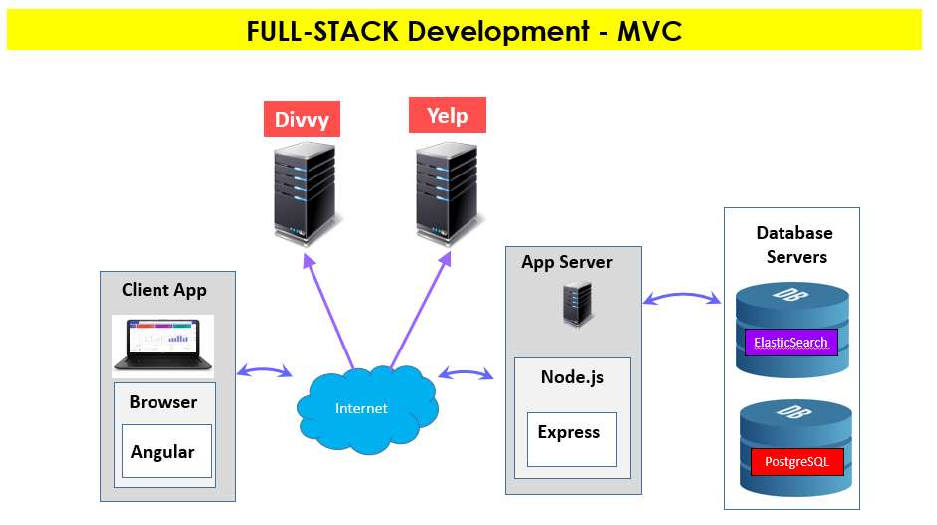
Architecture:
ChicagoSocialHub utilizes the MVC architectural pattern:

Tools and Environment Setup & Installations
The following platforms/technologies and tools are needed in order to build and
run ChicagoSocialHub web-based application:
1. Javascript: platforms and browsers that are compliant with ECMAScript
2015 scripting 2015, (ES6): http://www.ecma-international.org/ecma-
262/6.0/
2. Chrome and Firefox releases that are ES6 compliant. List of
browsers/platforms that support ES6 can be found under modern browsers
link (http://kangax.github.io/compat-table/es6/ ) on this URL:
https://developer.mozilla.org/en-US/docs/Web/JavaScript
3. Java/JDK 11:
https://www.oracle.com/technetwork/java/javase/downloads/jdk11-
downloads-5066655.html
4. Python 3.7: https://www.python.org/downloads/
5. Angular 7: https://angular.io/
6. Anaconda: https://www.anaconda.com/distribution/#download-section
7. visual studio code: https://code.visualstudio.com/download
8. Node.js/express: https://nodejs.org/en/download/
9. Angular CLI: npm install -g @angular/cli
10. PostgreSQL: https://www.postgresql.org/download/
11. ElasticSearch: https://www.elastic.co/downloads/elasticsearch
How to Build and Run
1. Create your Yelp API Key and update the ipynb script with that key
2. Create your Google Map API Key and add your Key to the client/Angular frontend file,
app.module.ts.
3. Run ChicagpSocialHub-Yelp.ipynb to create an index to Chicago Business on
ElasticSearch
4. Execute the following commands from the command line window/terminal:
4.1. Start ElasticSearch: server from the command prompt
4.2. Start node.js server: node server
4.3. Start Angular client: ng serve –open
