999 60140_Eng Brinks 44 1010 Manual
User Manual: Brinks-44-1010-manual
Open the PDF directly: View PDF  .
.
Page Count: 1
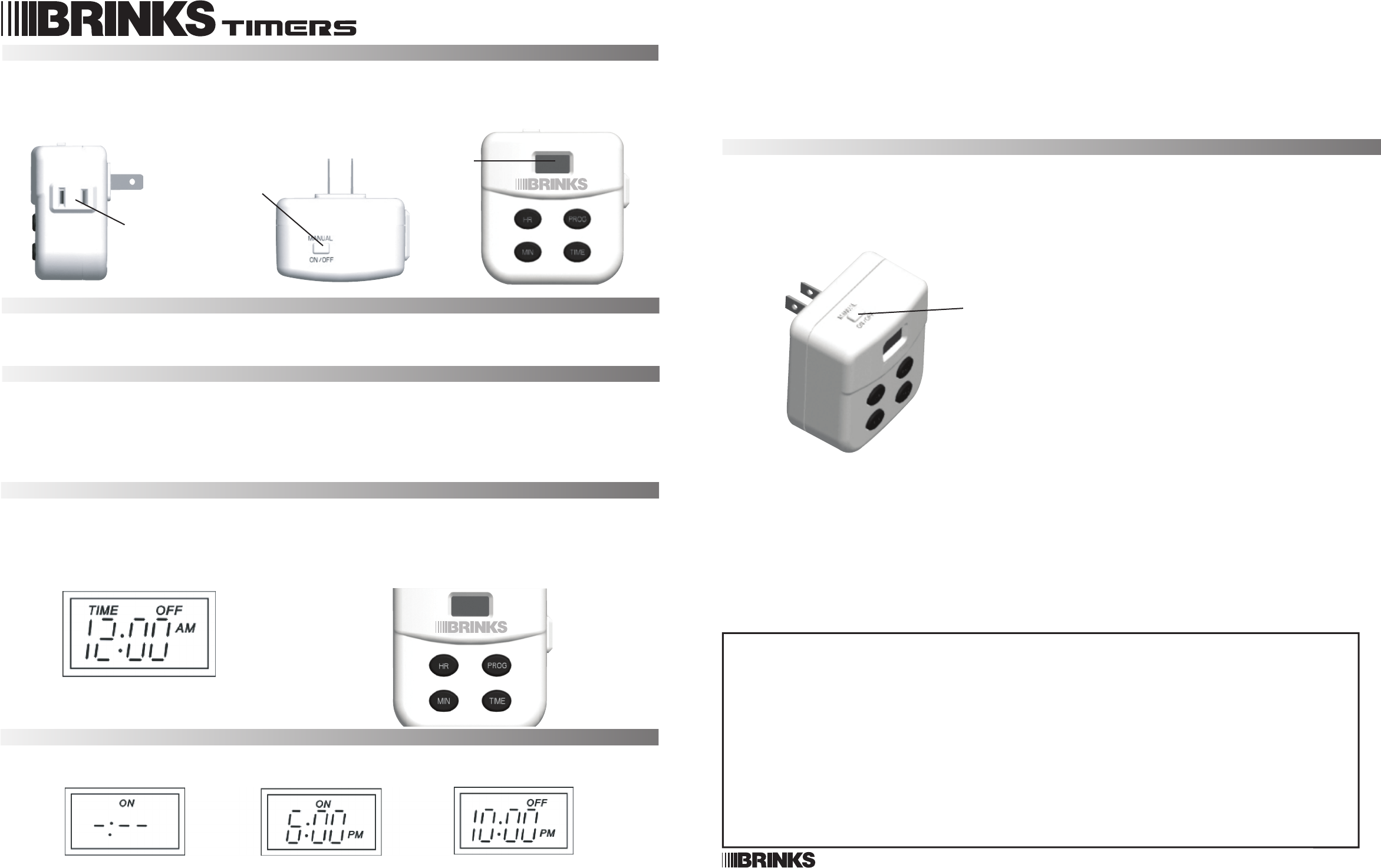
FIG 2
FIG 3
44-1010 • Press the “HR" & "MIN” buttons respectively to set up the time of day for the timer to be TURNED ON or ACTIVATED.
(FIG 4 shows 6 PM as an example). Hold down the “HR" & "MIN” buttons for rapid increments.
• After setting up the activation time, press the “PROG” button again to set the time for the timer to be TURNED OFF or
DEACTIVATED. The display changes from “ON” to “OFF” (FIG 5). Repeat these procedures above to set up the OFF time.
(For example, in FIG 5, the timer will be turned off at 10:30 PM)
• To remove the programmed times, enter “0:00” for both the ON and OFF times. The timer can only then be controlled by the
“Manual ON/OFF” button.
• To exit the programming screen, press the “TIME” button once.
• Plug the timer into a wall socket and push the “Manual ON/OFF” button to OFF if you have not done so. If the “Manual
ON/OFF” button is turned ON, the unit will act as a regular wall socket to the appliance connected to it.
Manual ON/OFF Button
• The "Manual ON/OFF" button is located on the left of the top surface of the unit and when pressed will cycle the unit between
ON and OFF.
• If the Manual ON/OFF setting is turned ON, the unit will act as a regular wall socket. Manually turning the unit ON or OFF
will not deactivate the Timer Program. The next programmed action will override the manual setting unless the programmed
ON/OFF times are each set to 0:00 (see Time Program Setting above).
PAGE 2
Digital Timer
FIG 1
PAGE 1
Hampton Products International Corp. • 50 Icon, Foothill Ranch, CA 92610-3000 • www.hamptonproducts.com • 1-800-562-5625
Made in China • © 2006 Hampton Products International Corp. • 999-60140 REV 12/06
FIG 4 FIG 5
FIG 6
LCD
MANUAL ON/OFF
BUTTON
RECEPTACLE
MANUAL ON/OFF
BUTTON
HR PROG
MIN TIME
HR PROG
MIN TIME
Warning
• The unit is to be connected to a 120V, 60Hz power source only.
• Capacity: 15A (1875 W) Resistive (General Purpose); 4A, (500 W) Tungsten (Lighting). Do Not Exceed Capacity.
• Do not attempt to disassemble the unit. There are no serviceable parts inside.
• The timer is for indoor use only.
• PLEASE READ THROUGH THE INSTRUCTIONS BEFORE USING.
Features
• Program repeats daily.
• Manual override On/Off button.
• The timer uses an internal, rechargeable battery for backup in case of power failure.
Rechargeable Battery
• The timer uses an internal, rechargeable battery for backup in case of power failure.
• The timer has to be plugged in for only 5 minutes before the battery is charged enough to program the timer while it is
unplugged.
• The battery backup is effective for up to 7 days after a power failure if it is fully charged.
NOTE: While operating on battery power, the LCD will eventually become blank, but the internal clock will still keep the time, and
the program settings will be stored as long as the battery has a charge.
Setting the Time
• When the timer is plugged into the outlet or the timer’s battery is charged, the display will flash “12:00 AM” (FIG 1).
Press the "HR" & "MIN"(hour/minute) buttons (FIG 2) respectively to set up the correct time. Hold down the buttons for rapid
increments. Once the correct time is displayed, press the "TIME" button to lock the settings. The “:” sign starts flashing and
other displays stay solid.
• In order to adjust the time after initialization, press and hold the “TIME” button for one second to get in the time setting
screen and repeat the above steps to set the new time.
Timer Program Setting
• Press and hold the “PROG” button for more than 1 second or until the display starts flashing (FIG 3). “ON” indicates
activation of timer function.
WARRANTY
This product is warranted to be free from defects in material and workmanship for the life of the product. If a defect in material or workmanship occurs, call
1-800-562-5625 for instructions on how to have the defective product repaired or replaced free of charge.
LIMITATIONS
• This warranty only covers the timer unit and is not extended to other components or equipment that is used in conjunction with the product.
• This warranty is extended to the original purchaser of the product. A purchase receipt or other approved proof of purchase is required before warranty service
will be rendered.
• Unauthorized service or modification to this product or any furnished component will void the warranty in its entirety.
• THIS WARRANTY IS EXPRESSLY IN LIEU OF ALL OTHER WARRANTIES, EXPRESSED OR IMPLIED, INCLUDING ANY PARTICULAR PURPOSE OR USE, AND
SPECIFICALLY IN LIEU OF ALL SPECIAL, INDIRECT, INCIDENTAL, OR CONSEQUENTIAL DAMAGES (INCLUDING BUT NOT LIMITED TO ANY LOSS OF
BUSINESS OR PROFITS, WHETHER OR NOT FORESEEABLE) RESULTING FROM THE USE OF THE PRODUCT OR ARISING OUT OF ANY BREACH OF THIS
WARRANTY.
Some states or provinces do not allow the exclusion of incidental or consequential damages, so the above limitation or exclusion may not apply.
• This warranty gives you specific rights, and you may also have other rights that vary from state to state.
NOT COVERED
• Failure of the product as a result of an accident, abuse, negligence, alteration, or faulty installation, or any other failure not relating to faulty material or
workmanship.
• Damaged caused by electronic equipment plugged into the timer.
• Reimbursement for inconvenience, installation, setup time, loss of use, or unauthorized service.
• Special, indirect, incidental or consequential damages.
http://waterheatertimer.org/Woods-timers-and-manuals-old.html#Brinks
