0132786796 CISSP All In One Exam Guide 6e
CISSP%20All-in-One%20Exam%20Guide%206e
CISSP%20All-in-One%20Exam%20Guide%206e
User Manual:
Open the PDF directly: View PDF  .
.
Page Count: 1472 [warning: Documents this large are best viewed by clicking the View PDF Link!]
- Cover Page
- Title Page
- Copyright Page
- Contents
- Foreword
- Acknowledgments
- Chapter 1 Becoming a CISSP
- Chapter 2 Information Security Governance and Risk Management
- Fundamental Principles of Security
- Security Definitions
- Control Types
- Security Frameworks
- Security Management
- Risk Management
- Risk Assessment and Analysis
- Policies, Standards, Baselines, Guidelines, and Procedures
- Information Classification
- Layers of Responsibility
- Security Steering Committee
- Audit Committee
- Data Owner
- Data Custodian
- System Owner
- Security Administrator
- Security Analyst
- Application Owner
- Supervisor
- Change Control Analyst
- Data Analyst
- Process Owner
- Solution Provider
- User
- Product Line Manager
- Auditor
- Why So Many Roles?
- Personnel Security
- Hiring Practices
- Termination
- Security-Awareness Training
- Degree or Certification?
- Security Governance
- Summary
- Quick Tips
- Chapter 3 Access Control
- Access Controls Overview
- Security Principles
- Identification, Authentication, Authorization, and Accountability
- Access Control Models
- Access Control Techniques and Technologies
- Access Control Administration
- Access Control Methods
- Accountability
- Access Control Practices
- Access Control Monitoring
- Threats to Access Control
- Summary
- Quick Tips
- Chapter 4 Security Architecture and Design
- Computer Security
- System Architecture
- Computer Architecture
- Operating System Architectures
- System Security Architecture
- Security Models
- Security Modes of Operation
- Systems Evaluation Methods
- The Orange Book and the Rainbow Series
- Information Technology Security Evaluation Criteria
- Common Criteria
- Certification vs. Accreditation
- Open vs. Closed Systems
- A Few Threats to Review
- Summary
- Quick Tips
- Chapter 5 Physical and Environmental Security
- Chapter 6 Telecommunications and Network Security
- Chapter 7 Cryptography
- The History of Cryptography
- Cryptography Definitions and Concepts
- Types of Ciphers
- Methods of Encryption
- Types of Symmetric Systems
- Types of Asymmetric Systems
- Message Integrity
- Public Key Infrastructure
- Key Management
- Trusted Platform Module
- Link Encryption vs. End-to-End Encryption
- E-mail Standards
- Internet Security
- Attacks
- Summary
- Quick Tips
- Chapter 8 Business Continuity and Disaster Recovery Planning
- Chapter 9 Legal, Regulations, Investigations, and Compliance
- The Many Facets of Cyberlaw
- The Crux of Computer Crime Laws
- Complexities in Cybercrime
- Intellectual Property Laws
- Privacy
- Liability and Its Ramifications
- Compliance
- Investigations
- Incident Management
- Incident Response Procedures
- Computer Forensics and Proper Collection of Evidence
- International Organization on Computer Evidence
- Motive, Opportunity, and Means
- Computer Criminal Behavior
- Incident Investigators
- The Forensics Investigation Process
- What Is Admissible in Court?
- Surveillance, Search, and Seizure
- Interviewing and Interrogating
- A Few Different Attack Types
- Cybersquatting
- Ethics
- Summary
- Quick Tips
- Chapter 10 Software Development Security
- Software’s Importance
- Where Do We Place Security?
- System Development Life Cycle
- Software Development Life Cycle
- Secure Software Development Best Practices
- Software Development Models
- Capability Maturity Model Integration
- Change Control
- Programming Languages and Concepts
- Distributed Computing
- Mobile Code
- Web Security
- Database Management
- Expert Systems/Knowledge-Based Systems
- Artificial Neural Networks
- Malicious Software (Malware)
- Summary
- Quick Tips
- Chapter 11 Security Operations
- Appendix A: Comprehensive Questions
- Appendix B: About the Download
- Glossary
- Index


ALL IN ONE
CISSP®
EXAM GUIDE
Sixth Edition
Shon Harris
New York • Chicago • San Francisco • Lisbon
London • Madrid • Mexico City • Milan • New Delhi
San Juan • Seoul • Singapore • Sydney • Toronto
McGraw-Hill is an independent entity from (ISC)2® and is not affiliated with (ISC)2 in any manner. This study/training guide and/or
material is not sponsored by, endorsed by, or affiliated with (ISC)2 in any manner. This publication and digital content may be used
in assisting students to prepare for the CISSP exam. Neither (ISC)2 nor McGraw-Hill warrant that use of this publication and digital
content will ensure passing any exam. (ISC)2®, CISSP®, CA P®, ISSAP®, ISSEP® ISSMP®, SSCP® and CBK are trademarks or registered
trademarks of (ISC)2
in the United States and certain other countries. All other trademarks are trademarks of their respective owners.
®

Copyright © 2013 by McGraw-Hill Companies. All rights reserved. Except as permitted under the United States Copyright Act of
1976, no part of this publication may be reproduced or distributed in any form or by any means, or stored in a database or retrieval
system, without the prior written permission of the publisher, with the exception that the program listings may be entered, stored,
and executed in a computer system, but they may not be reproduced for publication.
ISBN: 978-0-07-178173-2
MHID: 0-07-178173-0
The material in this eBook also appears in the print version of this title: ISBN: 978-0-07-178174-9,
MHID: 0-07-178174-9.
All trademarks are trademarks of their respective owners. Rather than put a trademark symbol after every occurrence of a
trademarked name, we use names in an editorial fashion only, and to the benefi t of the trademark owner, with no intention of
infringement of the trademark. Where such designations appear in this book, they have been printed with initial caps.
McGraw-Hill eBooks are available at special quantity discounts to use as premiums and sales promotions, or for use in corporate
training programs. To contact a representative please e-mail us at bulksales@mcgraw-hill.com.
Information has been obtained by McGraw-Hill from sources believed to be reliable. However, because of the possibility of
human or mechanical error by our sources, McGraw-Hill, or others, McGraw-Hill does not guarantee the accuracy, adequacy, or
completeness of any information and is not responsible for any errors or omissions or the results obtained from the use of such
information.
TERMS OF USE
This is a copyrighted work and The McGraw-Hill Companies, Inc. (“McGraw-Hill”) and its licensors reserve all rights in and to
the work. Use of this work is subject to these terms. Except as permitted under the Copyright Act of 1976 and the right to store and
retrieve one copy of the work, you may not decompile, disassemble, reverse engineer, reproduce, modify, create derivative works
based upon, transmit, distribute, disseminate, sell, publish or sublicense the work or any part of it without McGraw-Hill’s prior
consent. You may use the work for your own noncommercial and personal use; any other use of the work is strictly prohibited. Your
right to use the work may be terminated if you fail to comply with these terms.
THE WORK IS PROVIDED “AS IS.” McGRAW-HILL AND ITS LICENSORS MAKE NO GUARANTEES OR
WARRANTIES AS TO THE ACCURACY, ADEQUACY OR COMPLETENESS OF OR RESULTS TO BE OBTAINED FROM
USING THE WORK, INCLUDING ANY INFORMATION THAT CAN BE ACCESSED THROUGH THE WORK VIA HYPER-
LINK OR OTHERWISE, AND EXPRESSLY DISCLAIM ANY WARRANTY, EXPRESS OR IMPLIED, INCLUDING BUT NOT
LIMITED TO IMPLIED WARRANTIES OF MERCHANTABILITY OR FITNESS FOR A PARTICULAR PURPOSE.
McGraw-Hill and its licensors do not warrant or guarantee that the functions contained in the work will meet your requirements
or that its operation will be uninterrupted or error free. Neither McGraw-Hill nor its licensors shall be liable to you or anyone else
for any inaccuracy, error or omission, regardless of cause, in the work or for any damages resulting therefrom. McGraw-Hill has
no responsibility for the content of any information accessed through the work. Under no circumstances shall McGraw-Hill and/or
its licensors be liable for any indirect, incidental, special, punitive, consequential or similar damages that result from the use of or
inability to use the work, even if any of them has been advised of the possibility of such damages. This limitation of liability shall
apply to any claim or cause whatsoever whether such claim or cause arises in contract, tort or otherwise.
I dedicate this book to some of the most wonderful people
I have lost over the last several years.
My grandfather (George Fairbairn), who taught me about
integrity, unconditional love, and humility.
My grandmother (Marge Fairbairn), who taught me about the importance
of living life to the fullest, having “fun fun,” and of course, black jack.
My dad (Tom Conlon), who taught me how to be strong and face adversity.
My father-in-law (Maynard Harris), who taught me
a deep meaning of the importance of family that I never knew before.
Each person was a true role model to me. I learned a lot from them,
I appreciate all that they have done for me, and I miss them terribly.

ABOUT THE AUTHOR
Shon Harris is the founder and CEO of Shon Harris Security LLC and Logical Security
LLC, a security consultant, a former engineer in the Air Force’s Information Warfare
unit, an instructor, and an author. Shon has owned and run her own training and con-
sulting companies since 2001. She consults with Fortune 100 corporations and govern-
ment agencies on extensive security issues. She has authored three best-selling CISSP
books, was a contributing author to Gray Hat Hacking: The Ethical Hacker’s Handbook
and Security Information and Event Management (SIEM) Implementation, and a technical
editor for Information Security Magazine. Shon has also developed many digital security
products for Pearson Publishing.
About the Technical Editor
Polisetty Veera Subrahmanya Kumar, CISSP, CISA, PMP, PMI-RMP, MCPM, ITIL, has
more than two decades of experience in the field of Information Technology. His areas
of specialization include information security, business continuity, project manage-
ment, and risk management. In the recent past he served his term as Chairperson for
Project Management Institute’s PMI-RMP (PMI - Risk Management Professional) Cre-
dentialing Committee and was a member of ISACA’s India Growth Task Force team. In
the past he worked as content development team leader on a variety of PMI standards
development projects. He was a lead instructor for the PMI PMBOK review seminars.

CONTENTS AT A GLANCE
Chapter 1 Becoming a CISSP . . . . . . . . . . . . . . . . . . . . . . . . . . . . . . . . . . . . . . 1
Chapter 2 Information Security Governance and Risk Management . . . . . . . . 21
Chapter 3 Access Control . . . . . . . . . . . . . . . . . . . . . . . . . . . . . . . . . . . . . . . . 157
Chapter 4 Security Architecture and Design . . . . . . . . . . . . . . . . . . . . . . . . . . 297
Chapter 5 Physical and Environmental Security . . . . . . . . . . . . . . . . . . . . . . . . 427
Chapter 6 Telecommunications and Network Security . . . . . . . . . . . . . . . . . . 515
Chapter 7 Cryptography . . . . . . . . . . . . . . . . . . . . . . . . . . . . . . . . . . . . . . . . . . 759
Chapter 8 Business Continuity and Disaster Recovery . . . . . . . . . . . . . . . . . . 885
Chapter 9 Legal, Regulations, Compliance, and Investigations . . . . . . . . . . . . . 979
Chapter 10 Software Development Security . . . . . . . . . . . . . . . . . . . . . . . . . . . 1081
Chapter 11 Security Operations . . . . . . . . . . . . . . . . . . . . . . . . . . . . . . . . . . . . . 1233
Appendix A Comprehensive Questions . . . . . . . . . . . . . . . . . . . . . . . . . . . . . . . 1319
Appendix B About the Download . . . . . . . . . . . . . . . . . . . . . . . . . . . . . . . . . . . . . 1379
Index . . . . . . . . . . . . . . . . . . . . . . . . . . . . . . . . . . . . . . . . . . . . . . . . . 1385
v
Glossary . . . . . . . . . . . . . . . . . . . . . . . . . . . . . . . . . . . . . . . . . . . . . . . . G-1
This page intentionally left blank

CONTENTS
Foreword . . . . . . . . . . . . . . . . . . . . . . . . . . . . . . . . . . . . . . . . . . . . . . xx
Acknowledgments . . . . . . . . . . . . . . . . . . . . . . . . . . . . . . . . . . . . . . . xxiii
Chapter 1 Becoming a CISSP . . . . . . . . . . . . . . . . . . . . . . . . . . . . . . . . . . . . . . 1
Why Become a CISSP? . . . . . . . . . . . . . . . . . . . . . . . . . . . . . . . . . . . 1
The CISSP Exam . . . . . . . . . . . . . . . . . . . . . . . . . . . . . . . . . . . . . . . . 2
CISSP: A Brief History . . . . . . . . . . . . . . . . . . . . . . . . . . . . . . . . . . . 6
How Do You Sign Up for the Exam? . . . . . . . . . . . . . . . . . . . . . . . . 7
What Does This Book Cover? . . . . . . . . . . . . . . . . . . . . . . . . . . . . . . 7
Tips for Taking the CISSP Exam . . . . . . . . . . . . . . . . . . . . . . . . . . . . 8
How to Use This Book . . . . . . . . . . . . . . . . . . . . . . . . . . . . . . . . . . . 9
Questions . . . . . . . . . . . . . . . . . . . . . . . . . . . . . . . . . . . . . . . . 10
Answers . . . . . . . . . . . . . . . . . . . . . . . . . . . . . . . . . . . . . . . . . . 19
Chapter 2 Information Security Governance and Risk Management . . . . . . . . 21
Fundamental Principles of Security . . . . . . . . . . . . . . . . . . . . . . . . . 22
Availability . . . . . . . . . . . . . . . . . . . . . . . . . . . . . . . . . . . . . . . . 23
Integrity . . . . . . . . . . . . . . . . . . . . . . . . . . . . . . . . . . . . . . . . . . 23
Confidentiality . . . . . . . . . . . . . . . . . . . . . . . . . . . . . . . . . . . . 24
Balanced Security . . . . . . . . . . . . . . . . . . . . . . . . . . . . . . . . . . 24
Security Definitions . . . . . . . . . . . . . . . . . . . . . . . . . . . . . . . . . . . . . 26
Control Types . . . . . . . . . . . . . . . . . . . . . . . . . . . . . . . . . . . . . . . . . 28
Security Frameworks . . . . . . . . . . . . . . . . . . . . . . . . . . . . . . . . . . . . . 34
ISO/IEC 27000 Series . . . . . . . . . . . . . . . . . . . . . . . . . . . . . . . 36
Enterprise Architecture Development . . . . . . . . . . . . . . . . . . . 41
Security Controls Development . . . . . . . . . . . . . . . . . . . . . . . 55
COSO . . . . . . . . . . . . . . . . . . . . . . . . . . . . . . . . . . . . . . . . . . . 59
Process Management Development . . . . . . . . . . . . . . . . . . . . 60
Functionality vs. Security . . . . . . . . . . . . . . . . . . . . . . . . . . . . 68
Security Management . . . . . . . . . . . . . . . . . . . . . . . . . . . . . . . . . . . . 69
Risk Management . . . . . . . . . . . . . . . . . . . . . . . . . . . . . . . . . . . . . . . 70
Who Really Understands Risk Management? . . . . . . . . . . . . . 71
Information Risk Management Policy . . . . . . . . . . . . . . . . . . 72
The Risk Management Team . . . . . . . . . . . . . . . . . . . . . . . . . . 73
Risk Assessment and Analysis . . . . . . . . . . . . . . . . . . . . . . . . . . . . . 74
Risk Analysis Team . . . . . . . . . . . . . . . . . . . . . . . . . . . . . . . . . 75
The Value of Information and Assets . . . . . . . . . . . . . . . . . . . 76
Costs That Make Up the Value . . . . . . . . . . . . . . . . . . . . . . . . 76
Identifying Vulnerabilities and Threats . . . . . . . . . . . . . . . . . 77
Methodologies for Risk Assessment . . . . . . . . . . . . . . . . . . . . 78
Risk Analysis Approaches . . . . . . . . . . . . . . . . . . . . . . . . . . . . 85
vii

CISSP All-in-One Exam Guide
viii
Qualitative Risk Analysis . . . . . . . . . . . . . . . . . . . . . . . . . . . . 89
Protection Mechanisms . . . . . . . . . . . . . . . . . . . . . . . . . . . . . . 92
Putting It Together . . . . . . . . . . . . . . . . . . . . . . . . . . . . . . . . . 96
Total Risk vs. Residual Risk . . . . . . . . . . . . . . . . . . . . . . . . . . . 96
Handling Risk . . . . . . . . . . . . . . . . . . . . . . . . . . . . . . . . . . . . . 97
Outsourcing . . . . . . . . . . . . . . . . . . . . . . . . . . . . . . . . . . . . . . 100
Policies, Standards, Baselines, Guidelines,
and Procedures . . . . . . . . . . . . . . . . . . . . . . . . . . . . . . . . . . . . . . 101
Security Policy . . . . . . . . . . . . . . . . . . . . . . . . . . . . . . . . . . . . . 102
Standards . . . . . . . . . . . . . . . . . . . . . . . . . . . . . . . . . . . . . . . . 105
Baselines . . . . . . . . . . . . . . . . . . . . . . . . . . . . . . . . . . . . . . . . . 106
Guidelines . . . . . . . . . . . . . . . . . . . . . . . . . . . . . . . . . . . . . . . . 106
Procedures . . . . . . . . . . . . . . . . . . . . . . . . . . . . . . . . . . . . . . . . 107
Implementation . . . . . . . . . . . . . . . . . . . . . . . . . . . . . . . . . . . 108
Information Classification . . . . . . . . . . . . . . . . . . . . . . . . . . . . . . . . 109
Classifications Levels . . . . . . . . . . . . . . . . . . . . . . . . . . . . . . . 110
Classification Controls . . . . . . . . . . . . . . . . . . . . . . . . . . . . . . 11 3
Layers of Responsibility . . . . . . . . . . . . . . . . . . . . . . . . . . . . . . . . . . 11 4
Board of Directors . . . . . . . . . . . . . . . . . . . . . . . . . . . . . . . . . . 11 5
Executive Management . . . . . . . . . . . . . . . . . . . . . . . . . . . . . . 11 6
Chief Information Officer . . . . . . . . . . . . . . . . . . . . . . . . . . . . 11 8
Chief Privacy Officer . . . . . . . . . . . . . . . . . . . . . . . . . . . . . . . . 11 8
Chief Security Officer . . . . . . . . . . . . . . . . . . . . . . . . . . . . . . . 11 9
Security Steering Committee . . . . . . . . . . . . . . . . . . . . . . . . . . . . . . 120
Audit Committee . . . . . . . . . . . . . . . . . . . . . . . . . . . . . . . . . . . 121
Data Owner . . . . . . . . . . . . . . . . . . . . . . . . . . . . . . . . . . . . . . . 121
Data Custodian . . . . . . . . . . . . . . . . . . . . . . . . . . . . . . . . . . . . 122
System Owner . . . . . . . . . . . . . . . . . . . . . . . . . . . . . . . . . . . . . 122
Security Administrator . . . . . . . . . . . . . . . . . . . . . . . . . . . . . . 122
Security Analyst . . . . . . . . . . . . . . . . . . . . . . . . . . . . . . . . . . . . 123
Application Owner . . . . . . . . . . . . . . . . . . . . . . . . . . . . . . . . . 123
Supervisor . . . . . . . . . . . . . . . . . . . . . . . . . . . . . . . . . . . . . . . . 123
Change Control Analyst . . . . . . . . . . . . . . . . . . . . . . . . . . . . . 124
Data Analyst . . . . . . . . . . . . . . . . . . . . . . . . . . . . . . . . . . . . . . 124
Process Owner . . . . . . . . . . . . . . . . . . . . . . . . . . . . . . . . . . . . . 124
Solution Provider . . . . . . . . . . . . . . . . . . . . . . . . . . . . . . . . . . 124
User . . . . . . . . . . . . . . . . . . . . . . . . . . . . . . . . . . . . . . . . . . . . . 125
Product Line Manager . . . . . . . . . . . . . . . . . . . . . . . . . . . . . . . 125
Auditor . . . . . . . . . . . . . . . . . . . . . . . . . . . . . . . . . . . . . . . . . . 125
Why So Many Roles? . . . . . . . . . . . . . . . . . . . . . . . . . . . . . . . . 126
Personnel Security . . . . . . . . . . . . . . . . . . . . . . . . . . . . . . . . . . 126
Hiring Practices . . . . . . . . . . . . . . . . . . . . . . . . . . . . . . . . . . . . 128
Termination . . . . . . . . . . . . . . . . . . . . . . . . . . . . . . . . . . . . . . . 129
Security-Awareness Training . . . . . . . . . . . . . . . . . . . . . . . . . . 130
Degree or Certification? . . . . . . . . . . . . . . . . . . . . . . . . . . . . . 131
Security Governance . . . . . . . . . . . . . . . . . . . . . . . . . . . . . . . . . . . . . 132
Metrics . . . . . . . . . . . . . . . . . . . . . . . . . . . . . . . . . . . . . . . . . . . 132

Contents
ix
Summary . . . . . . . . . . . . . . . . . . . . . . . . . . . . . . . . . . . . . . . . . . . . . . 137
Quick Tips . . . . . . . . . . . . . . . . . . . . . . . . . . . . . . . . . . . . . . . . . . . . . 138
Questions . . . . . . . . . . . . . . . . . . . . . . . . . . . . . . . . . . . . . . . . 141
Answers . . . . . . . . . . . . . . . . . . . . . . . . . . . . . . . . . . . . . . . . . . 150
Chapter 3 Access Control . . . . . . . . . . . . . . . . . . . . . . . . . . . . . . . . . . . . . . . . 157
Access Controls Overview . . . . . . . . . . . . . . . . . . . . . . . . . . . . . . . . . 157
Security Principles . . . . . . . . . . . . . . . . . . . . . . . . . . . . . . . . . . . . . . 158
Availability . . . . . . . . . . . . . . . . . . . . . . . . . . . . . . . . . . . . . . . . 159
Integrity . . . . . . . . . . . . . . . . . . . . . . . . . . . . . . . . . . . . . . . . . . 159
Confidentiality . . . . . . . . . . . . . . . . . . . . . . . . . . . . . . . . . . . . 160
Identification, Authentication, Authorization,
and Accountability . . . . . . . . . . . . . . . . . . . . . . . . . . . . . . . . . . . . 160
Identification and Authentication . . . . . . . . . . . . . . . . . . . . . 162
Password Management . . . . . . . . . . . . . . . . . . . . . . . . . . . . . . 174
Authorization . . . . . . . . . . . . . . . . . . . . . . . . . . . . . . . . . . . . . 203
Access Control Models . . . . . . . . . . . . . . . . . . . . . . . . . . . . . . . . . . . 219
Discretionary Access Control . . . . . . . . . . . . . . . . . . . . . . . . . 220
Mandatory Access Control . . . . . . . . . . . . . . . . . . . . . . . . . . . 221
Role-Based Access Control . . . . . . . . . . . . . . . . . . . . . . . . . . . 224
Access Control Techniques and Technologies . . . . . . . . . . . . . . . . . 227
Rule-Based Access Control . . . . . . . . . . . . . . . . . . . . . . . . . . . 227
Constrained User Interfaces . . . . . . . . . . . . . . . . . . . . . . . . . . 228
Access Control Matrix . . . . . . . . . . . . . . . . . . . . . . . . . . . . . . . 229
Content-Dependent Access Control . . . . . . . . . . . . . . . . . . . . 231
Context-Dependent Access Control . . . . . . . . . . . . . . . . . . . . 231
Access Control Administration . . . . . . . . . . . . . . . . . . . . . . . . . . . . . 232
Centralized Access Control Administration . . . . . . . . . . . . . . 233
Decentralized Access Control Administration . . . . . . . . . . . . 240
Access Control Methods . . . . . . . . . . . . . . . . . . . . . . . . . . . . . . . . . . 241
Access Control Layers . . . . . . . . . . . . . . . . . . . . . . . . . . . . . . . 241
Administrative Controls . . . . . . . . . . . . . . . . . . . . . . . . . . . . . 242
Physical Controls . . . . . . . . . . . . . . . . . . . . . . . . . . . . . . . . . . 243
Technical Controls . . . . . . . . . . . . . . . . . . . . . . . . . . . . . . . . . 245
Accountability . . . . . . . . . . . . . . . . . . . . . . . . . . . . . . . . . . . . . . . . . . 248
Review of Audit Information . . . . . . . . . . . . . . . . . . . . . . . . . 250
Protecting Audit Data and Log Information . . . . . . . . . . . . . . 251
Keystroke Monitoring . . . . . . . . . . . . . . . . . . . . . . . . . . . . . . . 251
Access Control Practices . . . . . . . . . . . . . . . . . . . . . . . . . . . . . . . . . . 252
Unauthorized Disclosure of Information . . . . . . . . . . . . . . . . 253
Access Control Monitoring . . . . . . . . . . . . . . . . . . . . . . . . . . . . . . . . 255
Intrusion Detection . . . . . . . . . . . . . . . . . . . . . . . . . . . . . . . . . 255
Intrusion Prevention Systems . . . . . . . . . . . . . . . . . . . . . . . . . 265
Threats to Access Control . . . . . . . . . . . . . . . . . . . . . . . . . . . . . . . . . 268
Dictionary Attack . . . . . . . . . . . . . . . . . . . . . . . . . . . . . . . . . . 269
Brute Force Attacks . . . . . . . . . . . . . . . . . . . . . . . . . . . . . . . . . 270
Spoofing at Logon . . . . . . . . . . . . . . . . . . . . . . . . . . . . . . . . . . 270

CISSP All-in-One Exam Guide
x
Phishing and Pharming . . . . . . . . . . . . . . . . . . . . . . . . . . . . . 271
Threat Modeling . . . . . . . . . . . . . . . . . . . . . . . . . . . . . . . . . . . 273
Summary . . . . . . . . . . . . . . . . . . . . . . . . . . . . . . . . . . . . . . . . . . . . . . 277
Quick Tips . . . . . . . . . . . . . . . . . . . . . . . . . . . . . . . . . . . . . . . . . . . . . 277
Questions . . . . . . . . . . . . . . . . . . . . . . . . . . . . . . . . . . . . . . . . 282
Answers . . . . . . . . . . . . . . . . . . . . . . . . . . . . . . . . . . . . . . . . . . 291
Chapter 4 Security Architecture and Design . . . . . . . . . . . . . . . . . . . . . . . . . . 297
Computer Security . . . . . . . . . . . . . . . . . . . . . . . . . . . . . . . . . . . . . . 298
System Architecture . . . . . . . . . . . . . . . . . . . . . . . . . . . . . . . . . . . . . 300
Computer Architecture . . . . . . . . . . . . . . . . . . . . . . . . . . . . . . . . . . . 303
The Central Processing Unit . . . . . . . . . . . . . . . . . . . . . . . . . . 304
Multiprocessing . . . . . . . . . . . . . . . . . . . . . . . . . . . . . . . . . . . . 309
Operating System Components . . . . . . . . . . . . . . . . . . . . . . . 31 2
Memory Types . . . . . . . . . . . . . . . . . . . . . . . . . . . . . . . . . . . . . 325
Virtual Memory . . . . . . . . . . . . . . . . . . . . . . . . . . . . . . . . . . . . 337
Input/Output Device Management . . . . . . . . . . . . . . . . . . . . . 340
CPU Architecture . . . . . . . . . . . . . . . . . . . . . . . . . . . . . . . . . . . 342
Operating System Architectures . . . . . . . . . . . . . . . . . . . . . . . . . . . . 347
Virtual Machines . . . . . . . . . . . . . . . . . . . . . . . . . . . . . . . . . . . 355
System Security Architecture . . . . . . . . . . . . . . . . . . . . . . . . . . . . . . 357
Security Policy . . . . . . . . . . . . . . . . . . . . . . . . . . . . . . . . . . . . . 357
Security Architecture Requirements . . . . . . . . . . . . . . . . . . . . 359
Security Models . . . . . . . . . . . . . . . . . . . . . . . . . . . . . . . . . . . . . . . . . 365
State Machine Models . . . . . . . . . . . . . . . . . . . . . . . . . . . . . . . 367
Bell-LaPadula Model . . . . . . . . . . . . . . . . . . . . . . . . . . . . . . . . 369
Biba Model . . . . . . . . . . . . . . . . . . . . . . . . . . . . . . . . . . . . . . . 372
Clark-Wilson Model . . . . . . . . . . . . . . . . . . . . . . . . . . . . . . . . 374
Information Flow Model . . . . . . . . . . . . . . . . . . . . . . . . . . . . . 377
Noninterference Model . . . . . . . . . . . . . . . . . . . . . . . . . . . . . . 380
Lattice Model . . . . . . . . . . . . . . . . . . . . . . . . . . . . . . . . . . . . . . 381
Brewer and Nash Model . . . . . . . . . . . . . . . . . . . . . . . . . . . . . 383
Graham-Denning Model . . . . . . . . . . . . . . . . . . . . . . . . . . . . . 384
Harrison-Ruzzo-Ullman Model . . . . . . . . . . . . . . . . . . . . . . . 385
Security Modes of Operation . . . . . . . . . . . . . . . . . . . . . . . . . . . . . . 386
Dedicated Security Mode . . . . . . . . . . . . . . . . . . . . . . . . . . . . 387
System High-Security Mode . . . . . . . . . . . . . . . . . . . . . . . . . . 387
Compartmented Security Mode . . . . . . . . . . . . . . . . . . . . . . . 387
Multilevel Security Mode . . . . . . . . . . . . . . . . . . . . . . . . . . . . 388
Trust and Assurance . . . . . . . . . . . . . . . . . . . . . . . . . . . . . . . . 390
Systems Evaluation Methods . . . . . . . . . . . . . . . . . . . . . . . . . . . . . . 391
Why Put a Product Through Evaluation? . . . . . . . . . . . . . . . . 391
The Orange Book . . . . . . . . . . . . . . . . . . . . . . . . . . . . . . . . . . 392
The Orange Book and the Rainbow Series . . . . . . . . . . . . . . . . . . . . 397
The Red Book . . . . . . . . . . . . . . . . . . . . . . . . . . . . . . . . . . . . . 398
Information Technology Security
Evaluation Criteria . . . . . . . . . . . . . . . . . . . . . . . . . . . . . . . . . . . . 399

Contents
xi
Common Criteria . . . . . . . . . . . . . . . . . . . . . . . . . . . . . . . . . . . . . . . 402
Certification vs. Accreditation . . . . . . . . . . . . . . . . . . . . . . . . . . . . . 406
Certification . . . . . . . . . . . . . . . . . . . . . . . . . . . . . . . . . . . . . . 406
Accreditation . . . . . . . . . . . . . . . . . . . . . . . . . . . . . . . . . . . . . . 406
Open vs. Closed Systems . . . . . . . . . . . . . . . . . . . . . . . . . . . . . . . . . 408
Open Systems . . . . . . . . . . . . . . . . . . . . . . . . . . . . . . . . . . . . . 408
Closed Systems . . . . . . . . . . . . . . . . . . . . . . . . . . . . . . . . . . . . 408
A Few Threats to Review . . . . . . . . . . . . . . . . . . . . . . . . . . . . . . . . . . 409
Maintenance Hooks . . . . . . . . . . . . . . . . . . . . . . . . . . . . . . . . 409
Time-of-Check/Time-of-Use Attacks . . . . . . . . . . . . . . . . . . . . 410
Summary . . . . . . . . . . . . . . . . . . . . . . . . . . . . . . . . . . . . . . . . . . . . . . 412
Quick Tips . . . . . . . . . . . . . . . . . . . . . . . . . . . . . . . . . . . . . . . . . . . . . 413
Questions . . . . . . . . . . . . . . . . . . . . . . . . . . . . . . . . . . . . . . . . 416
Answers . . . . . . . . . . . . . . . . . . . . . . . . . . . . . . . . . . . . . . . . . . 423
Chapter 5 Physical and Environmental Security . . . . . . . . . . . . . . . . . . . . . . . . 427
Introduction to Physical Security . . . . . . . . . . . . . . . . . . . . . . . . . . . 427
The Planning Process . . . . . . . . . . . . . . . . . . . . . . . . . . . . . . . . . . . . 430
Crime Prevention Through Environmental Design . . . . . . . . 435
Designing a Physical Security Program . . . . . . . . . . . . . . . . . 442
Protecting Assets . . . . . . . . . . . . . . . . . . . . . . . . . . . . . . . . . . . . . . . . 457
Internal Support Systems . . . . . . . . . . . . . . . . . . . . . . . . . . . . . . . . . 458
Electric Power . . . . . . . . . . . . . . . . . . . . . . . . . . . . . . . . . . . . . 459
Environmental Issues . . . . . . . . . . . . . . . . . . . . . . . . . . . . . . . 465
Ventilation . . . . . . . . . . . . . . . . . . . . . . . . . . . . . . . . . . . . . . . . 467
Fire Prevention, Detection, and Suppression . . . . . . . . . . . . . 467
Perimeter Security . . . . . . . . . . . . . . . . . . . . . . . . . . . . . . . . . . . . . . . 475
Facility Access Control . . . . . . . . . . . . . . . . . . . . . . . . . . . . . . 476
Personnel Access Controls . . . . . . . . . . . . . . . . . . . . . . . . . . . 483
External Boundary Protection Mechanisms . . . . . . . . . . . . . . 484
Intrusion Detection Systems . . . . . . . . . . . . . . . . . . . . . . . . . . 493
Patrol Force and Guards . . . . . . . . . . . . . . . . . . . . . . . . . . . . . 497
Dogs . . . . . . . . . . . . . . . . . . . . . . . . . . . . . . . . . . . . . . . . . . . . 497
Auditing Physical Access . . . . . . . . . . . . . . . . . . . . . . . . . . . . . 498
Testing and Drills . . . . . . . . . . . . . . . . . . . . . . . . . . . . . . . . . . 498
Summary . . . . . . . . . . . . . . . . . . . . . . . . . . . . . . . . . . . . . . . . . . . . . . 499
Quick Tips . . . . . . . . . . . . . . . . . . . . . . . . . . . . . . . . . . . . . . . . . . . . . 499
Questions . . . . . . . . . . . . . . . . . . . . . . . . . . . . . . . . . . . . . . . . 502
Answers . . . . . . . . . . . . . . . . . . . . . . . . . . . . . . . . . . . . . . . . . . 509
Chapter 6 Telecommunications and Network Security . . . . . . . . . . . . . . . . . . 515
Telecommunications . . . . . . . . . . . . . . . . . . . . . . . . . . . . . . . . . . . . 51 7
Open Systems Interconnection Reference Model . . . . . . . . . . . . . . . 517
Protocol . . . . . . . . . . . . . . . . . . . . . . . . . . . . . . . . . . . . . . . . . . 518
Application Layer . . . . . . . . . . . . . . . . . . . . . . . . . . . . . . . . . . 521
Presentation Layer . . . . . . . . . . . . . . . . . . . . . . . . . . . . . . . . . . 522
Session Layer . . . . . . . . . . . . . . . . . . . . . . . . . . . . . . . . . . . . . . 523

CISSP All-in-One Exam Guide
xii
Transport Layer . . . . . . . . . . . . . . . . . . . . . . . . . . . . . . . . . . . . 525
Network Layer . . . . . . . . . . . . . . . . . . . . . . . . . . . . . . . . . . . . . 527
Data Link Layer . . . . . . . . . . . . . . . . . . . . . . . . . . . . . . . . . . . . 528
Physical Layer . . . . . . . . . . . . . . . . . . . . . . . . . . . . . . . . . . . . . 530
Functions and Protocols in the OSI Model . . . . . . . . . . . . . . 530
Tying the Layers Together . . . . . . . . . . . . . . . . . . . . . . . . . . . . 532
TCP/IP Model . . . . . . . . . . . . . . . . . . . . . . . . . . . . . . . . . . . . . . . . . . 534
TCP . . . . . . . . . . . . . . . . . . . . . . . . . . . . . . . . . . . . . . . . . . . . . 535
IP Addressing . . . . . . . . . . . . . . . . . . . . . . . . . . . . . . . . . . . . . 541
IPv6 . . . . . . . . . . . . . . . . . . . . . . . . . . . . . . . . . . . . . . . . . . . . 544
Layer 2 Security Standards . . . . . . . . . . . . . . . . . . . . . . . . . . . 547
Types of Transmission . . . . . . . . . . . . . . . . . . . . . . . . . . . . . . . . . . . 550
Analog and Digital . . . . . . . . . . . . . . . . . . . . . . . . . . . . . . . . . 550
Asynchronous and Synchronous . . . . . . . . . . . . . . . . . . . . . . 552
Broadband and Baseband . . . . . . . . . . . . . . . . . . . . . . . . . . . . 554
Cabling . . . . . . . . . . . . . . . . . . . . . . . . . . . . . . . . . . . . . . . . . . . . . . . 556
Coaxial Cable . . . . . . . . . . . . . . . . . . . . . . . . . . . . . . . . . . . . . 557
Twisted-Pair Cable . . . . . . . . . . . . . . . . . . . . . . . . . . . . . . . . . 557
Fiber-Optic Cable . . . . . . . . . . . . . . . . . . . . . . . . . . . . . . . . . . 558
Cabling Problems . . . . . . . . . . . . . . . . . . . . . . . . . . . . . . . . . . 560
Networking Foundations . . . . . . . . . . . . . . . . . . . . . . . . . . . . . . . . . 562
Network Topology . . . . . . . . . . . . . . . . . . . . . . . . . . . . . . . . . . 563
Media Access Technologies . . . . . . . . . . . . . . . . . . . . . . . . . . . 565
Network Protocols and Services . . . . . . . . . . . . . . . . . . . . . . . 580
Domain Name Service . . . . . . . . . . . . . . . . . . . . . . . . . . . . . . . 590
E-mail Services . . . . . . . . . . . . . . . . . . . . . . . . . . . . . . . . . . . . 599
Network Address Translation . . . . . . . . . . . . . . . . . . . . . . . . . 604
Routing Protocols . . . . . . . . . . . . . . . . . . . . . . . . . . . . . . . . . . 608
Networking Devices . . . . . . . . . . . . . . . . . . . . . . . . . . . . . . . . . . . . . . . 612
Repeaters . . . . . . . . . . . . . . . . . . . . . . . . . . . . . . . . . . . . . . . . . 612
Bridges . . . . . . . . . . . . . . . . . . . . . . . . . . . . . . . . . . . . . . . . . . . 613
Routers . . . . . . . . . . . . . . . . . . . . . . . . . . . . . . . . . . . . . . . . . . 615
Switches . . . . . . . . . . . . . . . . . . . . . . . . . . . . . . . . . . . . . . . . . . 617
Gateways . . . . . . . . . . . . . . . . . . . . . . . . . . . . . . . . . . . . . . . . . 621
PBXs . . . . . . . . . . . . . . . . . . . . . . . . . . . . . . . . . . . . . . . . . . . . 624
Firewalls . . . . . . . . . . . . . . . . . . . . . . . . . . . . . . . . . . . . . . . . . 628
Proxy Servers . . . . . . . . . . . . . . . . . . . . . . . . . . . . . . . . . . . . . . 653
Honeypot . . . . . . . . . . . . . . . . . . . . . . . . . . . . . . . . . . . . . . . . 655
Unified Threat Management . . . . . . . . . . . . . . . . . . . . . . . . . . 656
Cloud Computing . . . . . . . . . . . . . . . . . . . . . . . . . . . . . . . . . . 657
Intranets and Extranets . . . . . . . . . . . . . . . . . . . . . . . . . . . . . . . . . . . 660
Metropolitan Area Networks . . . . . . . . . . . . . . . . . . . . . . . . . . . . . . 663
Wide Area Networks . . . . . . . . . . . . . . . . . . . . . . . . . . . . . . . . . . . . . 665
Telecommunications Evolution . . . . . . . . . . . . . . . . . . . . . . . 666
Dedicated Links . . . . . . . . . . . . . . . . . . . . . . . . . . . . . . . . . . . 669
WAN Technologies . . . . . . . . . . . . . . . . . . . . . . . . . . . . . . . . . 673

Contents
xiii
Remote Connectivity . . . . . . . . . . . . . . . . . . . . . . . . . . . . . . . . . . . . . 695
Dial-up Connections . . . . . . . . . . . . . . . . . . . . . . . . . . . . . . . . 695
ISDN . . . . . . . . . . . . . . . . . . . . . . . . . . . . . . . . . . . . . . . . . . . . 697
DSL . . . . . . . . . . . . . . . . . . . . . . . . . . . . . . . . . . . . . . . . . . . . . 698
Cable Modems . . . . . . . . . . . . . . . . . . . . . . . . . . . . . . . . . . . . 700
VPN . . . . . . . . . . . . . . . . . . . . . . . . . . . . . . . . . . . . . . . . . . . . . 702
Authentication Protocols . . . . . . . . . . . . . . . . . . . . . . . . . . . . 709
Wireless Technologies . . . . . . . . . . . . . . . . . . . . . . . . . . . . . . . . . . . 712
Wireless Communications . . . . . . . . . . . . . . . . . . . . . . . . . . . 712
WLAN Components . . . . . . . . . . . . . . . . . . . . . . . . . . . . . . . . 716
Wireless Standards . . . . . . . . . . . . . . . . . . . . . . . . . . . . . . . . . 723
War Driving for WLANs . . . . . . . . . . . . . . . . . . . . . . . . . . . . . 728
Satellites . . . . . . . . . . . . . . . . . . . . . . . . . . . . . . . . . . . . . . . . . 729
Mobile Wireless Communication . . . . . . . . . . . . . . . . . . . . . . 730
Mobile Phone Security . . . . . . . . . . . . . . . . . . . . . . . . . . . . . . 736
Summary . . . . . . . . . . . . . . . . . . . . . . . . . . . . . . . . . . . . . . . . . . . . . . 739
Quick Tips . . . . . . . . . . . . . . . . . . . . . . . . . . . . . . . . . . . . . . . . . . . . . 740
Questions . . . . . . . . . . . . . . . . . . . . . . . . . . . . . . . . . . . . . . . . 744
Answers . . . . . . . . . . . . . . . . . . . . . . . . . . . . . . . . . . . . . . . . . . 753
Chapter 7 Cryptography . . . . . . . . . . . . . . . . . . . . . . . . . . . . . . . . . . . . . . . . . . 759
The History of Cryptography . . . . . . . . . . . . . . . . . . . . . . . . . . . . . . 760
Cryptography Definitions and Concepts . . . . . . . . . . . . . . . . . . . . . 765
Kerckhoffs’ Principle . . . . . . . . . . . . . . . . . . . . . . . . . . . . . . . . 767
The Strength of the Cryptosystem . . . . . . . . . . . . . . . . . . . . . . 768
Services of Cryptosystems . . . . . . . . . . . . . . . . . . . . . . . . . . . . 769
One-Time Pad . . . . . . . . . . . . . . . . . . . . . . . . . . . . . . . . . . . . . 771
Running and Concealment Ciphers . . . . . . . . . . . . . . . . . . . . 773
Steganography . . . . . . . . . . . . . . . . . . . . . . . . . . . . . . . . . . . . . 774
Types of Ciphers . . . . . . . . . . . . . . . . . . . . . . . . . . . . . . . . . . . . . . . . 777
Substitution Ciphers . . . . . . . . . . . . . . . . . . . . . . . . . . . . . . . . 778
Transposition Ciphers . . . . . . . . . . . . . . . . . . . . . . . . . . . . . . . 778
Methods of Encryption . . . . . . . . . . . . . . . . . . . . . . . . . . . . . . . . . . . 781
Symmetric vs. Asymmetric Algorithms . . . . . . . . . . . . . . . . . . 782
Symmetric Cryptography . . . . . . . . . . . . . . . . . . . . . . . . . . . . 782
Block and Stream Ciphers . . . . . . . . . . . . . . . . . . . . . . . . . . . . 787
Hybrid Encryption Methods . . . . . . . . . . . . . . . . . . . . . . . . . . 792
Types of Symmetric Systems . . . . . . . . . . . . . . . . . . . . . . . . . . . . . . . 800
Data Encryption Standard . . . . . . . . . . . . . . . . . . . . . . . . . . . . 800
Triple-DES . . . . . . . . . . . . . . . . . . . . . . . . . . . . . . . . . . . . . . . . 808
The Advanced Encryption Standard . . . . . . . . . . . . . . . . . . . . 809
International Data Encryption Algorithm . . . . . . . . . . . . . . . 809
Blowfish . . . . . . . . . . . . . . . . . . . . . . . . . . . . . . . . . . . . . . . . . 810
RC4 . . . . . . . . . . . . . . . . . . . . . . . . . . . . . . . . . . . . . . . . . . . . . 810
RC5 . . . . . . . . . . . . . . . . . . . . . . . . . . . . . . . . . . . . . . . . . . . . . 810
RC6 . . . . . . . . . . . . . . . . . . . . . . . . . . . . . . . . . . . . . . . . . . . . . 810

CISSP All-in-One Exam Guide
xiv
Types of Asymmetric Systems . . . . . . . . . . . . . . . . . . . . . . . . . . . . . . 812
The Diffie-Hellman Algorithm . . . . . . . . . . . . . . . . . . . . . . . . 812
RSA . . . . . . . . . . . . . . . . . . . . . . . . . . . . . . . . . . . . . . . . . . . . . 815
El Gamal . . . . . . . . . . . . . . . . . . . . . . . . . . . . . . . . . . . . . . . . . 818
Elliptic Curve Cryptosystems . . . . . . . . . . . . . . . . . . . . . . . . . 818
Knapsack . . . . . . . . . . . . . . . . . . . . . . . . . . . . . . . . . . . . . . . . . 819
Zero Knowledge Proof . . . . . . . . . . . . . . . . . . . . . . . . . . . . . . 819
Message Integrity . . . . . . . . . . . . . . . . . . . . . . . . . . . . . . . . . . . . . . . 820
The One-Way Hash . . . . . . . . . . . . . . . . . . . . . . . . . . . . . . . . . 820
Various Hashing Algorithms . . . . . . . . . . . . . . . . . . . . . . . . . . 826
MD2 . . . . . . . . . . . . . . . . . . . . . . . . . . . . . . . . . . . . . . . . . . . . . 826
MD4 . . . . . . . . . . . . . . . . . . . . . . . . . . . . . . . . . . . . . . . . . . . . . 826
MD5 . . . . . . . . . . . . . . . . . . . . . . . . . . . . . . . . . . . . . . . . . . . . . 827
Attacks Against One-Way Hash Functions . . . . . . . . . . . . . . . 827
Digital Signatures . . . . . . . . . . . . . . . . . . . . . . . . . . . . . . . . . . 829
Digital Signature Standard . . . . . . . . . . . . . . . . . . . . . . . . . . . 832
Public Key Infrastructure . . . . . . . . . . . . . . . . . . . . . . . . . . . . . . . . . 833
Certificate Authorities . . . . . . . . . . . . . . . . . . . . . . . . . . . . . . . 834
Certificates . . . . . . . . . . . . . . . . . . . . . . . . . . . . . . . . . . . . . . . 837
The Registration Authority . . . . . . . . . . . . . . . . . . . . . . . . . . . 837
PKI Steps . . . . . . . . . . . . . . . . . . . . . . . . . . . . . . . . . . . . . . . . . 838
Key Management . . . . . . . . . . . . . . . . . . . . . . . . . . . . . . . . . . . . . . . . 840
Key Management Principles . . . . . . . . . . . . . . . . . . . . . . . . . . 841
Rules for Keys and Key Management . . . . . . . . . . . . . . . . . . . 842
Trusted Platform Module . . . . . . . . . . . . . . . . . . . . . . . . . . . . . . . . . 843
TPM Uses . . . . . . . . . . . . . . . . . . . . . . . . . . . . . . . . . . . . . . . . 843
Link Encryption vs. End-to-End Encryption . . . . . . . . . . . . . . . . . . . 845
E-mail Standards . . . . . . . . . . . . . . . . . . . . . . . . . . . . . . . . . . . . . . . . 849
Multipurpose Internet Mail Extension . . . . . . . . . . . . . . . . . . 849
Pretty Good Privacy . . . . . . . . . . . . . . . . . . . . . . . . . . . . . . . . . 850
Internet Security . . . . . . . . . . . . . . . . . . . . . . . . . . . . . . . . . . . . . . . . 853
Start with the Basics . . . . . . . . . . . . . . . . . . . . . . . . . . . . . . . . 854
Attacks . . . . . . . . . . . . . . . . . . . . . . . . . . . . . . . . . . . . . . . . . . . . . . . . 865
Ciphertext-Only Attacks . . . . . . . . . . . . . . . . . . . . . . . . . . . . . 865
Known-Plaintext Attacks . . . . . . . . . . . . . . . . . . . . . . . . . . . . . 865
Chosen-Plaintext Attacks . . . . . . . . . . . . . . . . . . . . . . . . . . . . 866
Chosen-Ciphertext Attacks . . . . . . . . . . . . . . . . . . . . . . . . . . . 866
Differential Cryptanalysis . . . . . . . . . . . . . . . . . . . . . . . . . . . . 866
Linear Cryptanalysis . . . . . . . . . . . . . . . . . . . . . . . . . . . . . . . . 867
Side-Channel Attacks . . . . . . . . . . . . . . . . . . . . . . . . . . . . . . . 867
Replay Attacks . . . . . . . . . . . . . . . . . . . . . . . . . . . . . . . . . . . . . 868
Algebraic Attacks . . . . . . . . . . . . . . . . . . . . . . . . . . . . . . . . . . . 868
Analytic Attacks . . . . . . . . . . . . . . . . . . . . . . . . . . . . . . . . . . . . 868
Statistical Attacks . . . . . . . . . . . . . . . . . . . . . . . . . . . . . . . . . . 869
Social Engineering Attacks . . . . . . . . . . . . . . . . . . . . . . . . . . . 869
Meet-in-the-Middle Attacks . . . . . . . . . . . . . . . . . . . . . . . . . . . 869

Contents
xv
Summary . . . . . . . . . . . . . . . . . . . . . . . . . . . . . . . . . . . . . . . . . . . . . . 870
Quick Tips . . . . . . . . . . . . . . . . . . . . . . . . . . . . . . . . . . . . . . . . . . . . . 871
Questions . . . . . . . . . . . . . . . . . . . . . . . . . . . . . . . . . . . . . . . . 874
Answers . . . . . . . . . . . . . . . . . . . . . . . . . . . . . . . . . . . . . . . . . . 880
Chapter 8 Business Continuity and Disaster Recovery Planning . . . . . . . . . . . 885
Business Continuity and Disaster Recovery . . . . . . . . . . . . . . . . . . . 887
Standards and Best Practices . . . . . . . . . . . . . . . . . . . . . . . . . 890
Making BCM Part of the Enterprise Security Program . . . . . . 893
BCP Project Components . . . . . . . . . . . . . . . . . . . . . . . . . . . . . . . . . 897
Scope of the Project . . . . . . . . . . . . . . . . . . . . . . . . . . . . . . . . 899
BCP Policy . . . . . . . . . . . . . . . . . . . . . . . . . . . . . . . . . . . . . . . . 901
Project Management . . . . . . . . . . . . . . . . . . . . . . . . . . . . . . . . 901
Business Continuity Planning Requirements . . . . . . . . . . . . . 904
Business Impact Analysis (BIA) . . . . . . . . . . . . . . . . . . . . . . . 905
Interdependencies . . . . . . . . . . . . . . . . . . . . . . . . . . . . . . . . . . 91 2
Preventive Measures . . . . . . . . . . . . . . . . . . . . . . . . . . . . . . . . . . . . . 913
Recovery Strategies . . . . . . . . . . . . . . . . . . . . . . . . . . . . . . . . . . . . . . 914
Business Process Recovery . . . . . . . . . . . . . . . . . . . . . . . . . . . 918
Facility Recovery . . . . . . . . . . . . . . . . . . . . . . . . . . . . . . . . . . . 919
Supply and Technology Recovery . . . . . . . . . . . . . . . . . . . . . . 926
Choosing a Software Backup Facility . . . . . . . . . . . . . . . . . . . 930
End-User Environment . . . . . . . . . . . . . . . . . . . . . . . . . . . . . . 933
Data Backup Alternatives . . . . . . . . . . . . . . . . . . . . . . . . . . . . 934
Electronic Backup Solutions . . . . . . . . . . . . . . . . . . . . . . . . . . 938
High Availability . . . . . . . . . . . . . . . . . . . . . . . . . . . . . . . . . . . 941
Insurance . . . . . . . . . . . . . . . . . . . . . . . . . . . . . . . . . . . . . . . . . . . . . 944
Recovery and Restoration . . . . . . . . . . . . . . . . . . . . . . . . . . . . . . . . . 945
Developing Goals for the Plans . . . . . . . . . . . . . . . . . . . . . . . 949
Implementing Strategies . . . . . . . . . . . . . . . . . . . . . . . . . . . . . 951
Testing and Revising the Plan . . . . . . . . . . . . . . . . . . . . . . . . . . . . . . 953
Checklist Test . . . . . . . . . . . . . . . . . . . . . . . . . . . . . . . . . . . . . 955
Structured Walk-Through Test . . . . . . . . . . . . . . . . . . . . . . . . 955
Simulation Test . . . . . . . . . . . . . . . . . . . . . . . . . . . . . . . . . . . . 955
Parallel Test . . . . . . . . . . . . . . . . . . . . . . . . . . . . . . . . . . . . . . . 955
Full-Interruption Test . . . . . . . . . . . . . . . . . . . . . . . . . . . . . . . 956
Other Types of Training . . . . . . . . . . . . . . . . . . . . . . . . . . . . . 956
Emergency Response . . . . . . . . . . . . . . . . . . . . . . . . . . . . . . . . 956
Maintaining the Plan . . . . . . . . . . . . . . . . . . . . . . . . . . . . . . . 958
Summary . . . . . . . . . . . . . . . . . . . . . . . . . . . . . . . . . . . . . . . . . . . . . . 961
Quick Tips . . . . . . . . . . . . . . . . . . . . . . . . . . . . . . . . . . . . . . . . . . . . . 961
Questions . . . . . . . . . . . . . . . . . . . . . . . . . . . . . . . . . . . . . . . . 964
Answers . . . . . . . . . . . . . . . . . . . . . . . . . . . . . . . . . . . . . . . . . . 972
Chapter 9 Legal, Regulations, Investigations, and Compliance . . . . . . . . . . . . . 979
The Many Facets of Cyberlaw . . . . . . . . . . . . . . . . . . . . . . . . . . . . . . 980
The Crux of Computer Crime Laws . . . . . . . . . . . . . . . . . . . . . . . . . 981

CISSP All-in-One Exam Guide
xvi
Complexities in Cybercrime . . . . . . . . . . . . . . . . . . . . . . . . . . . . . . . 983
Electronic Assets . . . . . . . . . . . . . . . . . . . . . . . . . . . . . . . . . . . 985
The Evolution of Attacks . . . . . . . . . . . . . . . . . . . . . . . . . . . . . 986
International Issues . . . . . . . . . . . . . . . . . . . . . . . . . . . . . . . . 990
Types of Legal Systems . . . . . . . . . . . . . . . . . . . . . . . . . . . . . . 994
Intellectual Property Laws . . . . . . . . . . . . . . . . . . . . . . . . . . . . . . . . 998
Trade Secret . . . . . . . . . . . . . . . . . . . . . . . . . . . . . . . . . . . . . . . 999
Copyright . . . . . . . . . . . . . . . . . . . . . . . . . . . . . . . . . . . . . . . . 1000
Trademark . . . . . . . . . . . . . . . . . . . . . . . . . . . . . . . . . . . . . . . . 1001
Patent . . . . . . . . . . . . . . . . . . . . . . . . . . . . . . . . . . . . . . . . . . . 1001
Internal Protection of Intellectual Property . . . . . . . . . . . . . . 1003
Software Piracy . . . . . . . . . . . . . . . . . . . . . . . . . . . . . . . . . . . . 1004
Privacy . . . . . . . . . . . . . . . . . . . . . . . . . . . . . . . . . . . . . . . . . . . . . . . . 1006
The Increasing Need for Privacy Laws . . . . . . . . . . . . . . . . . . . 1008
Laws, Directives, and Regulations . . . . . . . . . . . . . . . . . . . . . . 1009
Liability and Its Ramifications . . . . . . . . . . . . . . . . . . . . . . . . . . . . . 1022
Personal Information . . . . . . . . . . . . . . . . . . . . . . . . . . . . . . . 1027
Hacker Intrusion . . . . . . . . . . . . . . . . . . . . . . . . . . . . . . . . . . . 1027
Third-Party Risk . . . . . . . . . . . . . . . . . . . . . . . . . . . . . . . . . . . 1028
Contractual Agreements . . . . . . . . . . . . . . . . . . . . . . . . . . . . . 1029
Procurement and Vendor Processes . . . . . . . . . . . . . . . . . . . . 1029
Compliance . . . . . . . . . . . . . . . . . . . . . . . . . . . . . . . . . . . . . . . . . . . . 1030
Investigations . . . . . . . . . . . . . . . . . . . . . . . . . . . . . . . . . . . . . . . . . . 1032
Incident Management . . . . . . . . . . . . . . . . . . . . . . . . . . . . . . . 1033
Incident Response Procedures . . . . . . . . . . . . . . . . . . . . . . . . 1037
Computer Forensics and Proper Collection of Evidence . . . . 1042
International Organization on Computer Evidence . . . . . . . . 1043
Motive, Opportunity, and Means . . . . . . . . . . . . . . . . . . . . . . 1044
Computer Criminal Behavior . . . . . . . . . . . . . . . . . . . . . . . . . 1044
Incident Investigators . . . . . . . . . . . . . . . . . . . . . . . . . . . . . . . 1045
The Forensics Investigation Process . . . . . . . . . . . . . . . . . . . . 1046
What Is Admissible in Court? . . . . . . . . . . . . . . . . . . . . . . . . . 1053
Surveillance, Search, and Seizure . . . . . . . . . . . . . . . . . . . . . . 1057
Interviewing and Interrogating . . . . . . . . . . . . . . . . . . . . . . . . 1058
A Few Different Attack Types . . . . . . . . . . . . . . . . . . . . . . . . . 1058
Cybersquatting . . . . . . . . . . . . . . . . . . . . . . . . . . . . . . . . . . . . 1061
Ethics . . . . . . . . . . . . . . . . . . . . . . . . . . . . . . . . . . . . . . . . . . . . . . . . 1061
The Computer Ethics Institute . . . . . . . . . . . . . . . . . . . . . . . . 1062
The Internet Architecture Board . . . . . . . . . . . . . . . . . . . . . . . 1063
Corporate Ethics Programs . . . . . . . . . . . . . . . . . . . . . . . . . . . 1064
Summary . . . . . . . . . . . . . . . . . . . . . . . . . . . . . . . . . . . . . . . . . . . . . . 1065
Quick Tips . . . . . . . . . . . . . . . . . . . . . . . . . . . . . . . . . . . . . . . . . . . . . 1065
Questions . . . . . . . . . . . . . . . . . . . . . . . . . . . . . . . . . . . . . . . . 1069
Answers . . . . . . . . . . . . . . . . . . . . . . . . . . . . . . . . . . . . . . . . . . 1076

Contents
xvii
Chapter 10 Software Development Security . . . . . . . . . . . . . . . . . . . . . . . . . . . 1081
Software’s Importance . . . . . . . . . . . . . . . . . . . . . . . . . . . . . . . . . . . 1081
Where Do We Place Security? . . . . . . . . . . . . . . . . . . . . . . . . . . . . . . 1082
Different Environments Demand Different Security . . . . . . . 1083
Environment versus Application . . . . . . . . . . . . . . . . . . . . . . . 1084
Functionality versus Security . . . . . . . . . . . . . . . . . . . . . . . . . 1085
Implementation and Default Issues . . . . . . . . . . . . . . . . . . . . 1086
System Development Life Cycle . . . . . . . . . . . . . . . . . . . . . . . . . . . . 1087
Initiation . . . . . . . . . . . . . . . . . . . . . . . . . . . . . . . . . . . . . . . . 1089
Acquisition/Development . . . . . . . . . . . . . . . . . . . . . . . . . . . 1091
Implementation . . . . . . . . . . . . . . . . . . . . . . . . . . . . . . . . . . . 1092
Operations/Maintenance . . . . . . . . . . . . . . . . . . . . . . . . . . . . 1092
Disposal . . . . . . . . . . . . . . . . . . . . . . . . . . . . . . . . . . . . . . . . . 1093
Software Development Life Cycle . . . . . . . . . . . . . . . . . . . . . . . . . . . 1095
Project Management . . . . . . . . . . . . . . . . . . . . . . . . . . . . . . . . 1096
Requirements Gathering Phase . . . . . . . . . . . . . . . . . . . . . . . . 1096
Design Phase . . . . . . . . . . . . . . . . . . . . . . . . . . . . . . . . . . . . . . 1098
Development Phase . . . . . . . . . . . . . . . . . . . . . . . . . . . . . . . . 110 2
Testing/Validation Phase . . . . . . . . . . . . . . . . . . . . . . . . . . . . 110 4
Release/Maintenance Phase . . . . . . . . . . . . . . . . . . . . . . . . . . 110 6
Secure Software Development Best Practices . . . . . . . . . . . . . . . . . . 110 8
Software Development Models . . . . . . . . . . . . . . . . . . . . . . . . . . . . . 1111
Build and Fix Model . . . . . . . . . . . . . . . . . . . . . . . . . . . . . . . . 1111
Waterfall Model . . . . . . . . . . . . . . . . . . . . . . . . . . . . . . . . . . . . 111 2
V-Shaped Model (V-Model) . . . . . . . . . . . . . . . . . . . . . . . . . . . 111 2
Prototyping . . . . . . . . . . . . . . . . . . . . . . . . . . . . . . . . . . . . . . . 111 3
Incremental Model . . . . . . . . . . . . . . . . . . . . . . . . . . . . . . . . . 111 4
Spiral Model . . . . . . . . . . . . . . . . . . . . . . . . . . . . . . . . . . . . . . 111 5
Rapid Application Development . . . . . . . . . . . . . . . . . . . . . . . 111 6
Agile Model . . . . . . . . . . . . . . . . . . . . . . . . . . . . . . . . . . . . . . . 111 8
Capability Maturity Model Integration . . . . . . . . . . . . . . . . . . . . . . 11 2 0
Change Control . . . . . . . . . . . . . . . . . . . . . . . . . . . . . . . . . . . . . . . . 1122
Software Configuration Management . . . . . . . . . . . . . . . . . . . 1124
Programming Languages and Concepts . . . . . . . . . . . . . . . . . . . . . . 1125
Assemblers, Compilers, Interpreters . . . . . . . . . . . . . . . . . . . . 1128
Object-Oriented Concepts . . . . . . . . . . . . . . . . . . . . . . . . . . . 11 3 0
Distributed Computing . . . . . . . . . . . . . . . . . . . . . . . . . . . . . . . . . . 1142
Distributed Computing Environment . . . . . . . . . . . . . . . . . . 1142
CORBA and ORBs . . . . . . . . . . . . . . . . . . . . . . . . . . . . . . . . . . 1143
COM and DCOM . . . . . . . . . . . . . . . . . . . . . . . . . . . . . . . . . . . 1146
Java Platform, Enterprise Edition . . . . . . . . . . . . . . . . . . . . . . 1148
Service-Oriented Architecture . . . . . . . . . . . . . . . . . . . . . . . . . 1148
Mobile Code . . . . . . . . . . . . . . . . . . . . . . . . . . . . . . . . . . . . . . . . . . . 1153
Java Applets . . . . . . . . . . . . . . . . . . . . . . . . . . . . . . . . . . . . . . . 1154
ActiveX Controls . . . . . . . . . . . . . . . . . . . . . . . . . . . . . . . . . . . 1156

CISSP All-in-One Exam Guide
xviii
Web Security . . . . . . . . . . . . . . . . . . . . . . . . . . . . . . . . . . . . . . . . . . . 1157
Specific Threats for Web Environments . . . . . . . . . . . . . . . . . 1158
Web Application Security Principles . . . . . . . . . . . . . . . . . . . . 1167
Database Management . . . . . . . . . . . . . . . . . . . . . . . . . . . . . . . . . . . 1168
Database Management Software . . . . . . . . . . . . . . . . . . . . . . . 11 70
Database Models . . . . . . . . . . . . . . . . . . . . . . . . . . . . . . . . . . . 11 70
Database Programming Interfaces . . . . . . . . . . . . . . . . . . . . . 1176
Relational Database Components . . . . . . . . . . . . . . . . . . . . . 1177
Integrity . . . . . . . . . . . . . . . . . . . . . . . . . . . . . . . . . . . . . . . . . . 1180
Database Security Issues . . . . . . . . . . . . . . . . . . . . . . . . . . . . . 1183
Data Warehousing and Data Mining . . . . . . . . . . . . . . . . . . . 1188
Expert Systems/Knowledge-Based Systems . . . . . . . . . . . . . . . . . . . 1192
Artificial Neural Networks . . . . . . . . . . . . . . . . . . . . . . . . . . . . . . . . 1195
Malicious Software (Malware) . . . . . . . . . . . . . . . . . . . . . . . . . . . . . 1197
Viruses . . . . . . . . . . . . . . . . . . . . . . . . . . . . . . . . . . . . . . . . . . . 1199
Worms . . . . . . . . . . . . . . . . . . . . . . . . . . . . . . . . . . . . . . . . . . . 1202
Rootkit . . . . . . . . . . . . . . . . . . . . . . . . . . . . . . . . . . . . . . . . . . . 1202
Spyware and Adware . . . . . . . . . . . . . . . . . . . . . . . . . . . . . . . . 1204
Botnets . . . . . . . . . . . . . . . . . . . . . . . . . . . . . . . . . . . . . . . . . . 1204
Logic Bombs . . . . . . . . . . . . . . . . . . . . . . . . . . . . . . . . . . . . . . 1206
Trojan Horses . . . . . . . . . . . . . . . . . . . . . . . . . . . . . . . . . . . . . 1206
Antivirus Software . . . . . . . . . . . . . . . . . . . . . . . . . . . . . . . . . . 1207
Spam Detection . . . . . . . . . . . . . . . . . . . . . . . . . . . . . . . . . . . . 1210
Antimalware Programs . . . . . . . . . . . . . . . . . . . . . . . . . . . . . . 1212
Summary . . . . . . . . . . . . . . . . . . . . . . . . . . . . . . . . . . . . . . . . . . . . . . 1214
Quick Tips . . . . . . . . . . . . . . . . . . . . . . . . . . . . . . . . . . . . . . . . . . . . . 1215
Questions . . . . . . . . . . . . . . . . . . . . . . . . . . . . . . . . . . . . . . . . 1220
Answers . . . . . . . . . . . . . . . . . . . . . . . . . . . . . . . . . . . . . . . . . . 1227
Chapter 11 Security Operations . . . . . . . . . . . . . . . . . . . . . . . . . . . . . . . . . . . . . 1233
The Role of the Operations Department . . . . . . . . . . . . . . . . . . . . . 1234
Administrative Management . . . . . . . . . . . . . . . . . . . . . . . . . . . . . . . 1235
Security and Network Personnel . . . . . . . . . . . . . . . . . . . . . . . 1237
Accountability . . . . . . . . . . . . . . . . . . . . . . . . . . . . . . . . . . . . . 1239
Clipping Levels . . . . . . . . . . . . . . . . . . . . . . . . . . . . . . . . . . . . 1239
Assurance Levels . . . . . . . . . . . . . . . . . . . . . . . . . . . . . . . . . . . . . . . . 1240
Operational Responsibilities . . . . . . . . . . . . . . . . . . . . . . . . . . . . . . 1240
Unusual or Unexplained Occurrences . . . . . . . . . . . . . . . . . . 1241
Deviations from Standards . . . . . . . . . . . . . . . . . . . . . . . . . . . 1241
Unscheduled Initial Program Loads (aka Rebooting) . . . . . . 1242
Asset Identification and Management . . . . . . . . . . . . . . . . . . 1242
System Controls . . . . . . . . . . . . . . . . . . . . . . . . . . . . . . . . . . . 1243
Trusted Recovery . . . . . . . . . . . . . . . . . . . . . . . . . . . . . . . . . . . 1244
Input and Output Controls . . . . . . . . . . . . . . . . . . . . . . . . . . . 1246
System Hardening . . . . . . . . . . . . . . . . . . . . . . . . . . . . . . . . . . 1248
Remote Access Security . . . . . . . . . . . . . . . . . . . . . . . . . . . . . . 1250

Contents
xix
Configuration Management . . . . . . . . . . . . . . . . . . . . . . . . . . . . . . . 1251
Change Control Process . . . . . . . . . . . . . . . . . . . . . . . . . . . . . 1252
Change Control Documentation . . . . . . . . . . . . . . . . . . . . . . 1253
Media Controls . . . . . . . . . . . . . . . . . . . . . . . . . . . . . . . . . . . . . . . . . 1254
Data Leakage . . . . . . . . . . . . . . . . . . . . . . . . . . . . . . . . . . . . . . . . . . . 1262
Network and Resource Availability . . . . . . . . . . . . . . . . . . . . . . . . . . 1263
Mean Time Between Failures . . . . . . . . . . . . . . . . . . . . . . . . . 1264
Mean Time to Repair . . . . . . . . . . . . . . . . . . . . . . . . . . . . . . . 1264
Single Points of Failure . . . . . . . . . . . . . . . . . . . . . . . . . . . . . . 1265
Backups . . . . . . . . . . . . . . . . . . . . . . . . . . . . . . . . . . . . . . . . . . 1273
Contingency Planning . . . . . . . . . . . . . . . . . . . . . . . . . . . . . . 1276
Mainframes . . . . . . . . . . . . . . . . . . . . . . . . . . . . . . . . . . . . . . . . . . . . 1277
E-mail Security . . . . . . . . . . . . . . . . . . . . . . . . . . . . . . . . . . . . . . . . . 1279
How E-mail Works . . . . . . . . . . . . . . . . . . . . . . . . . . . . . . . . . 1281
Facsimile Security . . . . . . . . . . . . . . . . . . . . . . . . . . . . . . . . . . 1283
Hack and Attack Methods . . . . . . . . . . . . . . . . . . . . . . . . . . . . 1285
Vulnerability Testing . . . . . . . . . . . . . . . . . . . . . . . . . . . . . . . . . . . . . 1295
Penetration Testing . . . . . . . . . . . . . . . . . . . . . . . . . . . . . . . . . 1298
Wardialing . . . . . . . . . . . . . . . . . . . . . . . . . . . . . . . . . . . . . . . . 1302
Other Vulnerability Types . . . . . . . . . . . . . . . . . . . . . . . . . . . . 1303
Postmortem . . . . . . . . . . . . . . . . . . . . . . . . . . . . . . . . . . . . . . . 1305
Summary . . . . . . . . . . . . . . . . . . . . . . . . . . . . . . . . . . . . . . . . . . . . . . 1307
Quick Tips . . . . . . . . . . . . . . . . . . . . . . . . . . . . . . . . . . . . . . . . . . . . . 1307
Questions . . . . . . . . . . . . . . . . . . . . . . . . . . . . . . . . . . . . . . . . 1309
Answers . . . . . . . . . . . . . . . . . . . . . . . . . . . . . . . . . . . . . . . . . . 1315
Appendix A Comprehensive Questions . . . . . . . . . . . . . . . . . . . . . . . . . . . . . . . 1319
Answers . . . . . . . . . . . . . . . . . . . . . . . . . . . . . . . . . . . . . . . . . . . . . . . 1357
Appendix B About the Download . . . . . . . . . . . . . . . . . . . . . . . . . . . . . . . . . . . . . 1379
Downloading the Total Tester . . . . . . . . . . . . . . . . . . . . . . . . . . . . . . 1379
1379
About Total Tester CISSP Practice Exam Software . . . . . . . . . . . 1380
Installing and Running Total Tester . . . . . . . . . . . . . . . . . . . . 1379
Technical Support . . . . . . . . . . . . . . . . . . . . . . . . . . . . . . . . . . . . . . . . 1382
Index . . . . . . . . . . . . . . . . . . . . . . . . . . . . . . . . . . . . . . . . . . . . . . . . . 1385
Total Tester System Requirements . . . . . . . . . . . . . . . . . . . . . .
Media Center Download . . . . . . . . . . . . . . . . . . . . . . . . . . . . . . . . . . . 1380
Cryptography Video Sample . . . . . . . . . . . . . . . . . . . . . . . . . . . 1380
Glossary. . . . . . . . . . . . . . . . . . . . . . . . . . . . . . . . . . . . . . . . . . . . . . . . . G-1

FOREWORDS
This year marks my 39th year in the security business, with 26 of those concentrating
on information security. What changes we have seen over that period: from computers
the size of rooms that had to be cooled with water to phones that from a computing
aspect are orders of magnitude more powerful than the computers NASA used to land
man on the moon.
While we have watched in awe, the technology has evolved and our quality of life
has improved. As examples, we can make payments from our phones, our cars are
operated by computers that optimize performance and fuel economy, and we can
check in and get our boarding passes from our hotel room.
Unfortunately there are those who see these advances as opportunities for them
personally or their organization to gain politically or financially by finding vulnera-
bilities within these technologies and exploit them to their advantage.
To combat these adversaries the information security specialty evolved. One of the
first organizations to formerly recognize this specialty was (ISC)2, which was founded
in 1988. In 1994 (ISC)2 created the Certified Information Systems Security Profes-
sional (CISSP) credential and conducted the first examination. This credential gave
assurance to managers and employers (and potential employers) that the holder pos-
sessed a baseline understanding of the ten domains that comprise the Common Body
of Knowledge (CBK).
The CISSP All-in-One Exam Guide by Shon Harris is one of many publications de-
signed to prepare a potential CISSP exam taker for the exam. I admittedly have prob-
ably not seen every one of these guides, but I would argue that I have seen most. The
difference between Shon’s book and the others is that her book doesn’t try to teach
the exam, and as such, her book teaches the material one needs to pass the exam. This
means that when the exam is over and the credential has been awarded, Shon’s book
will still be on your bookshelf (or tablet) as a valuable reference guide.
I have known Shon for close to 15 years and continue to be struck by her dedica-
tion, ethics, and honor. She is the most dedicated advocate of our profession I have
met. She works constantly to improve her materials so learners at all levels can better
understand the topics. She has developed a learning model that helps make sure ev-
eryone in an organization from the bottom to the C-suite know what they need to
know to make informed choices resulting in due diligence with the data entrusted to
them.
It is a privilege to have the opportunity to help introduce this work to the perspec-
tive CISSP. I’m a huge Shon fan and I think that after learning from this book, you will
be too. Enjoy your experience and know that your work in achieving this credential
will be worth the effort.
Tom Madden, MPA, CISSP, CISM
Chief Information Security Officer for the Centers for Disease Control
xx

Forewords
xxi
Today’s cybersecurity landscape is an ever-changing environment where the greatest
vector of attack is our normal activities, e-mail, surfing, etc. The adversary can and will
continue to use mobile apps, e-mail (phishing, spam), the Web (redirects), and other
tools of our day-to-day activities to get to intellectual property, personal information, and
other sensitive data. Hactivists, criminals, and terrorists use this information to gain un-
authorized access to systems and sensitive data. Hactivists commonly use the informa-
tion that is gathered during attacks to support and convey messages that support their
agenda. According to Symantec, there were 163 new vulnerabilities associated with mo-
bile computing, 286 million unique malware variants, a 93 percent increase in web at-
tacks, and 260,000 identities exposed in 2010. McAffee reported that during the first two
quarters of 2011 there were 16,200 new websites with malicious reputations, and an aver-
age of 2,600 new phishing sites appeared each day.
We have also seen the proliferation of new technologies into our day-to-day activi-
ties. New smart phones and tablets have become as common as the home computer.
New tools mean new vulnerabilities that cybersecurity experts must deal with. Informa-
tion technology implementers tend to design and implement quickly. One of the most
underdiscussed aspects of new technology is the risks it may pose to the overall system
or organization. Tech departments, in conjunction with the CSO/CISO, need to find
the best way to utilize the new technology, but with security (physical and cyber) a very
strong part of the deployment strategy.
Training and awareness are important to help end users, cybersecurity practitioners,
and CxOs understand what effect their actions have within the organization. Even what
technology users do at home when they telework and connect to the business network
or carry home data could have consequences. Security policy and its enforcement will
also aid in establishing a stronger security baseline. Organizations have realized this
and many of those organizations have begun writing and implementing acceptable-use
policies for their networks. These policies, if properly enforced, will help minimize
adverse events on their networks.
There will never be one solution that can solve the cybersecurity challenges. De-
fense-in-depth, best business practices, training and awareness, and timely information
sharing are going to be the techniques used to minimize the impact of cyber adversar-
ies. Cyber experts need to keep their leadership informed of the latest threats and meth-
ods to minimize effects from those threats. Many of the day-to-day actions and decisions
a CFO, CEO, COO, etc., make will have an impact on the mission; security decisions
must be part of that process as well.
The CISSP All-in-One Exam Guide has been a staple of my reference library well after
obtaining my certification. Shon Harris has written and continues to improve this com-
prehensive study guide. Individuals at all levels of an organization, especially those
with a role in cybersecurity, should strive to get the CISSP. This study guide is a key part
to successfully gaining this certification. Prepping for and obtaining the CISSP can be
an important tool in the cyber expert’s toolkit. The ten domains associated with the
CISSP assist individuals at all levels to look at information security from many angles.
One tends to focus on one aspect of the information security field; the CISSP opens our

CISSP All-in-One Exam Guide
xxii
eyes to multiple aspects of issues. It provides the security professional an overall per-
spective of cybersecurity. From policy-related domains to technical domains, the CISSP
and this study guide tie many aspects of cybersecurity together. Even if that is not part
of your immediate training plan, this book will help any person become a better secu-
rity practitioner and improve the security posture of their organization.
Randy Vickers
Alexa Strategies, Inc.
Cybersecurity Strategist and Consultant
Former Director of the US CERT and former Chief of the DoD CERT (JTF-GNO)

ACKNOWLEDGMENTS
I would like to thank all the people who work in the information security industry who
are driven by their passion, dedication, and a true sense of doing right. The best secu-
rity people are the ones who are driven toward an ethical outcome.
I would like to thank so many people in the industry who have taken the time to
reach out to me and let me know how my work directly affects their lives. I appreciate
the time and effort people put in just to send me these kind words.
For my sixth edition, I would also like to thank the following individuals:
• David Miller, whose work ethic, loyalty, and friendship have inspired me. I am
truly grateful to have David as part of my life. I never would have known the
secret world of tequila without him.
• Clement Dupuis, who, with his deep passion for sharing and helping others,
has proven a wonderful and irreplaceable friend.
• My company team members: Susan Young and Teresa Griffin. I never express
my deep appreciation for each one of you enough.
• Greg Andelora, the graphic artist who created several of the graphics for this
book and my other projects. We tragically lost him at a young age and miss
him.
• Tom Madden and Randy Vickers, for their wonderful forewords to this book.
• My editor, Tim Green, and acquisitions coordinator, Stephanie Evans, who
sometimes have to practice the patience of Job when dealing with me on these
projects.
• The military personnel who have fought so hard over the last ten years in two
wars and have given such sacrifice.
• My best friend and mother, Kathy Conlon, who is always there for me through
thick and thin.
Most especially, I would like to thank my husband, David Harris, for his continual
support and love. Without his steadfast confidence in me, I would not have been able
to accomplish half the things I have taken on in my life.
xxiii

To obtain material from the disk that
accompanies the printed version of
please click here.
this e-Book, please follow the instructions this e-Book, please follow the instructions
To obtain material from the disk that
in Appendix B, About the Download.

CHAPTER 1
Becoming a CISSP
This chapter presents the following:
• Description of the CISSP certification
• Reasons to become a CISSP
• What the CISSP exam entails
• The Common Body of Knowledge and what it contains
• The history of (ISC)2 and the CISSP exam
• An assessment test to gauge your current knowledge of security
This book is intended not only to provide you with the necessary information to help
you gain a CISSP certification, but also to welcome you into the exciting and challeng-
ing world of security.
The Certified Information Systems Security Professional (CISSP) exam covers ten
different subject areas, more commonly referred to as domains. The subject matter of
each domain can easily be seen as its own area of study, and in many cases individuals
work exclusively in these fields as experts. For many of these subjects, you can consult
and reference extensive resources to become an expert in that area. Because of this, a
common misconception is that the only way to succeed at the CISSP exam is to im-
merse yourself in a massive stack of texts and study materials. Fortunately, an easier
approach exists. By using this sixth edition of the CISSP All-in-One Exam Guide, you can
successfully complete and pass the CISSP exam and achieve your CISSP certification.
The goal of this book is to combine into a single resource all the information you need
to pass the CISSP exam and help you understand how the domains interact with each
other so that you can develop a comprehensive approach to security practices. This
book should also serve as a useful reference tool long after you’ve achieved your CISSP
certification.
Why Become a CISSP?
As our world changes, the need for improvements in security and technology continues
to grow. Security was once a hot issue only in the field of technology, but now it is be-
coming more and more a part of our everyday lives. Security is a concern of every orga-
nization, government agency, corporation, and military unit. Ten years ago computer
and information security was an obscure field that only concerned a few people. Because
the risks were essentially low, few were interested in security expertise.
1

CISSP All-in-One Exam Guide
2
Things have changed, however, and today corporations and other organizations are
desperate to recruit talented and experienced security professionals to help protect the
resources they depend on to run their businesses and to remain competitive. With a
CISSP certification, you will be seen as a security professional of proven ability who has
successfully met a predefined standard of knowledge and experience that is well under-
stood and respected throughout the industry. By keeping this certification current, you
will demonstrate your dedication to staying abreast of security developments.
Consider the reasons for attaining a CISSP certification:
• To meet the growing demand and to thrive in an ever-expanding field
• To broaden your current knowledge of security concepts and practices
• To bring security expertise to your current occupation
• To become more marketable in a competitive workforce
• To show a dedication to the security discipline
• To increase your salary and be eligible for more employment opportunities
The CISSP certification helps companies identify which individuals have the ability,
knowledge, and experience necessary to implement solid security practices; perform
risk analysis; identify necessary countermeasures; and help the organization as a whole
protect its facility, network, systems, and information. The CISSP certification also
shows potential employers you have achieved a level of proficiency and expertise in
skill sets and knowledge required by the security industry. The increasing importance
placed on security in corporate success will only continue in the future, leading to even
greater demands for highly skilled security professionals. The CISSP certification shows
that a respected third-party organization has recognized an individual’s technical and
theoretical knowledge and expertise, and distinguishes that individual from those who
lack this level of knowledge.
Understanding and implementing security practices is an essential part of being a
good network administrator, programmer, or engineer. Job descriptions that do not
specifically target security professionals still often require that a potential candidate
have a good understanding of security concepts as well as how to implement them. Due
to staff size and budget restraints, many organizations can’t afford separate network
and security staffs. But they still believe security is vital to their organization. Thus, they
often try to combine knowledge of technology and security into a single role. With a
CISSP designation, you can put yourself head and shoulders above other individuals in
this regard.
The CISSP Exam
Because the CISSP exam covers the ten domains making up the CISSP Common Body
of Knowledge (CBK), it is often described as being “an inch deep and a mile wide,” a
reference to the fact that many questions on the exam are not very detailed and do not
require you to be an expert in every subject. However, the questions do require you to
be familiar with many different security subjects.

Chapter 1: Becoming a CISSP
3
The CISSP exam comprises 250 multiple-choice questions, and you have up to six
hours to complete it. The questions are pulled from a much larger question bank to
ensure the exam is as unique as possible for each entrant. In addition, the test bank
constantly changes and evolves to more accurately reflect the real world of security. The
exam questions are continually rotated and replaced in the bank as necessary. Each
question has four answer choices, only one of which is correct. Only 225 questions are
graded, while 25 are used for research purposes. The 25 research questions are inte-
grated into the exam, so you won’t know which go toward your final grade. To pass the
exam, you need a minimum raw score of 700 points out of 1,000. Questions are
weighted based on their difficulty; not all questions are worth the same number of
points. The exam is not product- or vendor-oriented, meaning no questions will be
specific to certain products or vendors (for instance, Windows, Unix, or Cisco). Instead,
you will be tested on the security models and methodologies used by these types of
systems.
(ISC)2, which stands for International Information Systems Security Certification
Consortium, has also added scenario-based questions to the CISSP exam. These ques-
tions present a short scenario to the test taker rather than asking the test taker to iden-
tify terms and/or concepts. The goal of the scenario-based questions is to ensure that
test takers not only know and understand the concepts within the CBK, but also can
apply this knowledge to real-life situations. This is more practical because in the real
world, you won’t be challenged by having someone asking you “What is the definition
of collusion?” You need to know how to detect and prevent collusion from taking place,
in addition to knowing the definition of the term.
After passing the exam, you will be asked to supply documentation, supported by a
sponsor, proving that you indeed have the type of experience required to obtain this
certification. The sponsor must sign a document vouching for the security experience
you are submitting. So, make sure you have this sponsor lined up prior to registering
for the exam and providing payment. You don’t want to pay for and pass the exam, only
to find you can’t find a sponsor for the final step needed to achieve your certification.
The reason behind the sponsorship requirement is to ensure that those who achieve
the certification have real-world experience to offer organizations. Book knowledge is
extremely important for understanding theory, concepts, standards, and regulations,
but it can never replace hands-on experience. Proving your practical experience sup-
ports the relevance of the certification.
A small sample group of individuals selected at random will be audited after pass-
ing the exam. The audit consists mainly of individuals from (ISC)2 calling on the can-
didates’ sponsors and contacts to verify the test taker’s related experience.
What makes this exam challenging is that most candidates, although they work in
the security field, are not necessarily familiar with all ten CBK domains. If a security
professional is considered an expert in vulnerability testing or application security, for
example, she may not be familiar with physical security, cryptography, or forensics.
Thus, studying for this exam will broaden your knowledge of the security field.
The exam questions address the ten CBK security domains, which are described in
Table 1-1.

CISSP All-in-One Exam Guide
4
Domain Description
Access Control This domain examines mechanisms and methods used to enable
administrators and managers to control what subjects can access, the
extent of their capabilities after authorization and authentication, and
the auditing and monitoring of these activities. Some of the topics
covered include
• Access control threats
• Identification and authentication technologies and
techniques
• Access control administration
• Single sign-on technologies
• Attack methods
Telecommunications and
Network Security
This domain examines internal, external, public, and private
communication systems; networking structures; devices; protocols;
and remote access and administration. Some of the topics covered
include
• OSI model and layers
• Local area network (LAN), metropolitan area network (MAN), and
wide area network (WAN) technologies
• Internet, intranet, and extranet issues
• Virtual private networks (VPNs), firewalls, routers, switches, and
repeaters
• Network topologies and cabling
• Attack methods
Information Security
Governance and Risk
Management
This domain examines the identification of company assets, the
proper way to determine the necessary level of protection required,
and what type of budget to develop for security implementations,
with the goal of reducing threats and monetary loss. Some of the
topics covered include
• Data classification
• Policies, procedures, standards, and guidelines
• Risk assessment and management
• Personnel security, training, and awareness
Software Development
Security
This domain examines secure software development approaches,
application security, and software flaws. Some of the topics covered
include
• Data warehousing and data mining
• Various development practices and their risks
• Software components and vulnerabilities
• Malicious code
Cryptography This domain examines cryptography techniques, approaches, and
technologies. Some of the topics covered include
• Symmetric versus asymmetric algorithms and uses
• Public key infrastructure (PKI) and hashing functions
• Encryption protocols and implementation
• Attack methods
Table 1-1 Security Domains That Make Up the CISSP CBK

Chapter 1: Becoming a CISSP
5
Domain Description
Security Architecture
and Design
This domain examines ways that software should be designed
securely. It also covers international security measurement standards
and their meaning for different types of platforms. Some of the topics
covered include
• Operating states, kernel functions, and memory mapping
• Security models, architectures, and evaluations
• Evaluation criteria: Trusted Computer Security Evaluation Criteria
(TCSEC), Information Technology Security Evaluation Criteria
(ITSEC), and Common Criteria
• Common flaws in applications and systems
• Certification and accreditation
Security Operations This domain examines controls over personnel, hardware, systems,
and auditing and monitoring techniques. It also covers possible abuse
channels and how to recognize and address them. Some of the topics
covered include
• Administrative responsibilities pertaining to personnel and job
functions
• Maintenance concepts of antivirus, training, auditing, and resource
protection activities
• Preventive, detective, corrective, and recovery controls
• Security and fault-tolerance technologies
Business Continuity
and Disaster Recovery
Planning
This domain examines the preservation of business activities when
faced with disruptions or disasters. It involves the identification
of real risks, proper risk assessment, and countermeasure
implementation. Some of the topics covered include
• Business resource identification and value assignment
• Business impact analysis and prediction of possible losses
• Unit priorities and crisis management
• Plan development, implementation, and maintenance
Legal, Regulations,
Investigations, and
Compliance
This domain examines computer crimes, laws, and regulations. It
includes techniques for investigating a crime, gathering evidence, and
handling procedures. It also covers how to develop and implement an
incident-handling program. Some of the topics covered include
• Types of laws, regulations, and crimes
• Licensing and software piracy
• Export and import laws and issues
• Evidence types and admissibility into court
• Incident handling
• Forensics
Table 1-1 Security Domains That Make Up the CISSP CBK (continued)

CISSP All-in-One Exam Guide
6
(ISC)2 attempts to keep up with changes in technology and methodologies in the
security field by adding numerous new questions to the test question bank each year.
These questions are based on current technologies, practices, approaches, and stan-
dards. For example, the CISSP exam given in 1998 did not have questions pertaining to
wireless security, cross-site scripting attacks, or IPv6.
Other examples of material not on past exams include security governance, instant
messaging, phishing, botnets, VoIP, and spam. Though these subjects weren’t issues in
the past, they are now.
The test is based on internationally accepted information security standards and
practices. If you look at the (ISC)2 website for test dates and locations, you may find, for
example, that the same test is offered this Tuesday in California and next Wednesday in
Saudi Arabia.
If you do not pass the exam, you have the option of retaking it as soon as you like.
(ISC)2 used to subject individuals to a waiting period before they could retake the exam,
but this rule has been removed. (ISC)2 keeps track of which exam version you were
given on your first attempt and ensures you receive a different version for any retakes.
(ISC)2 also provides a report to a CISSP candidate who did not pass the exam, detailing
the areas where the candidate was weakest. Though you could retake the exam soon
afterward, it’s wise to devote additional time to these weak areas to improve your score
on the retest.
CISSP: A Brief History
Historically, the field of computer and information security has not been a structured
and disciplined profession; rather, the field has lacked many well-defined professional
objectives and thus has often been misperceived.
In the mid-1980s, members of the computer security profession recognized that
they needed a certification program that would give their profession structure and pro-
vide ways for security professionals to demonstrate competence and to present evi-
dence of their qualifications. Establishing such a program would help the credibility of
the security profession as a whole and the individuals who comprise it.
In November 1988, the Special Interest Group for Computer Security (SIG-CS) of
the Data Processing Management Association (DPMA) brought together several organi-
Domain Description
Physical (Environmental)
Security
This domain examines threats, risks, and countermeasures to protect
facilities, hardware, data, media, and personnel. This involves facility
selection, authorized entry methods, and environmental and safety
procedures. Some of the topics covered include
• Restricted areas, authorization methods, and controls
• Motion detectors, sensors, and alarms
• Intrusion detection
• Fire detection, prevention, and suppression
• Fencing, security guards, and security badge types
Table 1-1 Security Domains That Make Up the CISSP CBK (continued)

Chapter 1: Becoming a CISSP
7
zations interested in forming a security certification program. They included the Infor-
mation Systems Security Association (ISSA), the Canadian Information Processing
Society (CIPS), the Computer Security Institute (CSI), Idaho State University, and sev-
eral U.S. and Canadian government agencies. As a voluntary joint effort, these organi-
zations developed the necessary components to offer a full-fledged security certification
for interested professionals. (ISC)2 was formed in mid-1989 as a nonprofit corporation
to develop a security certification program for information systems security practitio-
ners. The certification was designed to measure professional competence and to help
companies in their selection of security professionals and personnel. (ISC)2 was estab-
lished in North America, but quickly gained international acceptance and now offers
testing capabilities all over the world.
Because security is such a broad and diversified field in the technology and business
world, the original consortium decided on an information systems security CBK com-
posed of ten domains that pertain to every part of computer, network, business, and
information security. In addition, because technology continues to rapidly evolve, stay-
ing up-to-date on security trends, technology, and business developments is required to
maintain the CISSP certification. The group also developed a Code of Ethics, test speci-
fications, a draft study guide, and the exam itself.
How Do You Sign Up for the Exam?
To become a CISSP, start at www.isc2.org, where you will find an exam registration
form you must fill out and send to (ISC)2. You will be asked to provide your security
work history, as well as documents for the necessary educational requirements. You
will also be asked to read the (ISC)2 Code of Ethics and to sign a form indicating that
you understand these requirements and promise to abide by them. You then provide
payment along with the completed registration form, where you indicate your prefer-
ence as to the exam location. The numerous testing sites and dates can be found at
www.isc2.org.
What Does This Book Cover?
This book covers everything you need to know to become an (ISC)2-certified CISSP. It
teaches you the hows and whys behind organization’s development and implementa-
tion of policies, procedures, guidelines, and standards. It covers network, application,
and system vulnerabilities; what exploits them; and how to counter these threats. The
book explains physical security, operational security, and why systems implement the
security mechanisms they do. It also reviews the U.S. and international security criteria
and evaluations performed on systems for assurance ratings, what these criteria
mean, and why they are used. This book also explains the legal and liability issues that
surround computer systems and the data they hold, including such subjects as com-
puter crimes, forensics, and what should be done to properly prepare computer evi-
dence associated with these topics for court.
While this book is mainly intended to be used as a study guide for the CISSP exam,
it is also a handy reference guide for use after your certification.

CISSP All-in-One Exam Guide
8
Tips for Taking the CISSP Exam
The exams are monitored by CISSP proctors, if you are taking the Scantron test. They
will require that any food or beverage you bring with you be kept on a back table and
not at your desk. Proctors may inspect the contents of any and all articles entering the
test room. Restroom breaks are usually limited to allowing only one person to leave at
a time, so drinking 15 cups of coffee right before the exam might not be the best idea.
NOTE
NOTE (ISC)2 still uses the physical Scantron tests that require you to color
in bubbles on a test paper. The organization is moving towards providing the
exam in a digital format through Pearson Vue centers.
You will not be allowed you to keep your smartphones and mobile devices with you
during the testing process. You may have to leave them at the front of the room and
retrieve them when you are finished with the exam. In the past too many people have
used these items to cheat on the exam, so precautions are now in place.
Many people feel as though the exam questions are tricky. Make sure to read the
question and its answers thoroughly instead of reading a few words and immediately
assuming you know what the question is asking. Some of the answer choices may have
only subtle differences, so be patient and devote time to reading through the question
more than once.
As with most tests, it is best to go through the questions and answer those you know
immediately; then go back to the ones causing you difficulty. The CISSP exam is not
computerized (although (ISC)2 is moving to a computerized model), so you will re-
ceive a piece of paper with bubbles to fill in and one of several colored exam booklets
containing the questions. If you scribble outside the lines on the answer sheet, the
machine that reads your answers may count a correct answer as wrong. I suggest you go
through each question and mark the right answer in the booklet with the questions.
Repeat this process until you have completed your selections. Then go through the
questions again and fill in the bubbles. This approach leads to less erasing and fewer
potential problems with the scoring machine. You are allowed to write and scribble on
your question exam booklet any way you choose. You will turn it in at the end of your
exam with your answer sheet, but only answers on the answer sheet will be counted, so
make sure you transfer all your answers to the answer sheet.
Other certification exams may be taking place simultaneously in the same room,
such as exams for certification as an SSCP (Systems Security Certified Professional), IS-
SAP or ISSMP (Architecture and Management concentrations, respectively), or ISSEP
(Engineering concentration), which are some of (ISC)2’s other certification exams.
These other exams vary in length and duration, so don’t feel rushed if you see others
leaving the room early; they may be taking a shorter exam.
When finished, don’t immediately turn in your exam. You have six hours, so don’t
squander it just because you might be tired or anxious. Use the time wisely. Take an
extra couple of minutes to make sure you answered every question, and that you did
not accidentally fill in two bubbles for the same question.

Chapter 1: Becoming a CISSP
9
Unfortunately, exam results take some time to be returned. (ISC)2 states it can take
up to six weeks to get your results to you, but on average it takes around two weeks to
receive your results through e-mail and/or the mail.
If you passed the exam, the results sent to you will not contain your score—you will
only know that you passed. Candidates who do not pass the test are always provided
with a score, however. Thus, they know exactly which areas to focus more attention on
for the next exam. The domains are listed on this notification with a ranking of weakest
to strongest. If you do not pass the exam, remember that many smart and talented se-
curity professionals didn’t pass on their first try either, chiefly because the test covers
such a broad range of topics.
One of the most commonly heard complaints is about the exam itself. The ques-
tions are not long-winded, like many Microsoft tests, but at times it is difficult to dis-
tinguish between two answers that seem to say the same thing. Although (ISC)2 has
been removing the use of negatives, such as “not,” “except for,” and so on, they do still
appear on the exam. The scenario-based questions may expect you to understand con-
cepts in more than one domain to properly answer the question.
Another complaint heard about the test is that some questions seem a bit subjec-
tive. For example, whereas it might be easy to answer a technical question that asks for
the exact mechanism used in Secure Sockets Layer (SSL) that protects against man-in-the-
middle attacks, it’s not quite as easy to answer a question that asks whether an eight-
foot perimeter fence provides low, medium, or high security. Many questions ask the
test taker to choose the “best” approach, which some people find confusing and subjec-
tive. These complaints are mentioned here not to criticize (ISC)2 and the test writers,
but to help you better prepare for the test. This book covers all the necessary material
for the test and contains many questions and self-practice tests. Most of the questions
are formatted in such a way as to better prepare you for what you will encounter on the
actual test. So, make sure to read all the material in the book, and pay close attention
to the questions and their formats. Even if you know the subject well, you may still get
some answers wrong—it is just part of learning how to take tests.
Familiarize yourself with industry standards and expand your technical knowledge
and methodologies outside the boundaries of what you use today. I cannot stress enough
that just because you are the top dog in your particular field, it doesn’t mean you are
properly prepared for every domain the exam covers. Take the assessment test in this
chapter to gauge where you stand, and be ready to read a lot of material new to you.
How to Use This Book
Much effort has gone into putting all the necessary information into this book. Now it’s
up to you to study and understand the material and its various concepts. To best ben-
efit from this book, you might want to use the following study method:
1. Study each chapter carefully and make sure you understand each concept
presented. Many concepts must be fully understood, and glossing over a couple
here and there could be detrimental to you. The CISSP CBK contains thousands
of individual topics, so take the time needed to understand them all.

CISSP All-in-One Exam Guide
10
2. Make sure to study and answer all of the questions at the end of the chapter,
as well as those in the digital content included with this book and in Appendix A,
Comprehensive Questions. If any questions confuse you, go back and study
those sections again. Remember, some of the questions on the actual exam are
a bit confusing because they do not seem straightforward. I have attempted to
draft several questions in the same manner to prepare you for the exam. So do
not ignore the confusing questions, thinking they’re not well worded. Instead,
pay even closer attention to them because they are there for a reason.
3. If you are not familiar with specific topics, such as firewalls, laws, physical
security, or protocol functionality, use other sources of information (books,
articles, and so on) to attain a more in-depth understanding of those subjects.
Don’t just rely on what you think you need to know to pass the CISSP exam.
4. After reading this book, study the questions and answers, and take the practice
tests. Then review the (ISC)2 study guide and make sure you are comfortable
with each bullet item presented. If you are not comfortable with some items,
revisit those chapters.
5. If you have taken other certification exams—such as Cisco, Novell, or Microsoft—
you might be used to having to memorize details and configuration parameters.
But remember, the CISSP test is “an inch deep and a mile wide,” so make sure
you understand the concepts of each subject before trying to memorize the small,
specific details.
6. Remember that the exam is looking for the “best” answer. On some questions
test takers do not agree with any or many of the answers. You are being asked
to choose the best answer out of the four being offered to you.
Questions
To get a better feel for your level of expertise and your current level of readiness for the
CISSP exam, run through the following questions:
1. Which of the following provides an incorrect characteristic of a memory leak?
A. Common programming error
B. Common when languages that have no built-in automatic garbage
collection are used
C. Common in applications written in Java
D. Common in applications written in C++
2. Which of the following is the best description pertaining to the “Trusted
Computing Base”?
A. The term originated from the Orange Book and pertains to firmware.
B. The term originated from the Orange Book and addresses the security
mechanisms that are only implemented by the operating system.
C. The term originated from the Orange Book and contains the protection
mechanisms within a system.

Chapter 1: Becoming a CISSP
11
D. The term originated from the Rainbow Series and addressed the level of
significance each mechanism of a system portrays in a secure environment.
3. Which of the following is the best description of the security kernel and the
reference monitor?
A. The reference monitor is a piece of software that runs on top of the security
kernel. The reference monitor is accessed by every security call of the security
kernel. The security kernel is too large to test and verify.
B. The reference monitor concept is a small program that is not related to
the security kernel. It will enforce access rules upon subjects who attempt
to access specific objects. This program is regularly used with modern
operating systems.
C. The reference monitor concept is used strictly for database access control
and is one of the key components in maintaining referential integrity within
the system. It is impossible for the user to circumvent the reference monitor.
D. The reference monitor and security kernel are core components of modern
operating systems. They work together to mediate all access between subjects
and objects. They should not be able to be circumvented and must be called
upon for every access attempt.
4. Which of the following models incorporates the idea of separation of duties and
requires that all modifications to data and objects be done through programs?
A. State machine model
B. Bell-LaPadula model
C. Clark-Wilson model
D. Biba model
5. Which of the following best describes the hierarchical levels of privilege
within the architecture of a computer system?
A. Computer system ring structure
B. Microcode abstraction levels of security
C. Operating system user mode
D. Operating system kernel mode
6. Which of the following is an untrue statement?
i. Virtual machines can be used to provide secure, isolated sandboxes for
running untrusted applications.
ii. Virtual machines can be used to create execution environments with
resource limits and, given the right schedulers, resource guarantees.
iii. Virtualization can be used to simulate networks of independent
computers.
iv. Virtual machines can be used to run multiple operating systems
simultaneously: different versions, or even entirely different systems,
which can be on hot standby.

CISSP All-in-One Exam Guide
12
A. All of them
B. None of them
C. i, ii
D. ii, iii
7. Which of the following is the best means of transferring information
when parties do not have a shared secret and large quantities of sensitive
information must be transmitted?
A. Use of public key encryption to secure a secret key, and message
encryption using the secret key
B. Use of the recipient’s public key for encryption, and decryption based on
the recipient’s private key
C. Use of software encryption assisted by a hardware encryption accelerator
D. Use of elliptic curve encryption
8. Which algorithm did NIST choose to become the Advanced Encryption
Standard (AES) replacing the Data Encryption Standard (DES)?
A. DEA
B. Rijndael
C. Twofish
D. IDEA
Use the following scenario to answer questions 9–11. John is the security administrator for
company X. He has been asked to oversee the installation of a fire suppression sprinkler
system, as recent unusually dry weather has increased the likelihood of fire. Fire could
potentially cause a great amount of damage to the organization’s assets. The sprinkler
system is designed to reduce the impact of fire on the company.
9. In this scenario, fire is considered which of the following?
A. Vulnerability
B. Threat
C. Risk
D. Countermeasure
10. In this scenario, the sprinkler system is considered which of the following?
A. Vulnerability
B. Threat
C. Risk
D. Countermeasure
11. In this scenario, the likelihood and damage potential of a fire is considered
which of the following?
A. Vulnerability
B. Threat

Chapter 1: Becoming a CISSP
13
C. Risk
D. Countermeasure
Use the following scenario to answer questions 12–14. A small remote facility for a company
is valued at $800,000. It is estimated, based on historical data and other predictors, that
a fire is likely to occur once every ten years at a facility in this area. It is estimated that
such a fire would destroy 60 percent of the facility under the current circumstances and
with the current detective and preventative controls in place.
12. What is the single loss expectancy (SLE) for the facility suffering from a fire?
A. $80,000
B. $480,000
C. $320,000
D. 60 percent
13. What is the annualized rate of occurrence (ARO)?
A. 1
B. 10
C. .1
D. .01
14. What is the annualized loss expectancy (ALE)?
A. $480,000
B. $32,000
C. $48,000
D. .6
15. Which of the following is not a characteristic of Protected Extensible
Authentication Protocol?
A. Authentication protocol used in wireless networks and point-to-point
connections
B. Designed to provide improved secure authentication for 802.11 WLANs
C. Designed to support 802.1x port access control and Transport Layer Security
D. Designed to support password-protected connections
16. Which of the following best describes the Temporal Key Integrity Protocol’s
(TKIP) role in the 802.11i standard?
A. It provides 802.1x and EAP to increase the authentication strength.
B. It requires the access point and the wireless device to authenticate to each
other.
C. It sends the SSID and MAC value in ciphertext.
D. It adds more keying material for the RC4 algorithm.

CISSP All-in-One Exam Guide
14
17. Vendors have implemented various solutions to overcome the vulnerabilities
of the wired equivalent protocol (WEP). Which of the following provides an
incorrect mapping between these solutions and their characteristics?
A. LEAP requires a PKI.
B. PEAP only requires the server to authenticate using a digital certificate.
C. EAP-TLS requires both the wireless device and server to authenticate using
digital certificates.
D. PEAP allows the user to provide a password.
18. Encapsulating Security Payload (ESP), which is one protocol within the IPSec
protocol suite, is primarily designed to provide which of the following?
A. Confidentiality
B. Cryptography
C. Digital signatures
D. Access control
19. Which of the following redundant array of independent disks
implementations uses interleave parity?
A. Level 1
B. Level 2
C. Level 4
D. Level 5
20. Which of the following is not one of the stages of the dynamic host
configuration protocol (DHCP) lease process?
i. Discover
ii. Offer
iii. Request
iv. Acknowledgment
A. All of them
B. None of them
C. i
D. ii
21. Which of the following has been deemed by the Internet Architecture Board
as unethical behavior for Internet users?
A. Creating computer viruses
B. Monitoring data traffic
C. Wasting computer resources
D. Concealing unauthorized accesses

Chapter 1: Becoming a CISSP
15
22. Most computer-related documents are categorized as which of the following
types of evidence?
A. Hearsay evidence
B. Direct evidence
C. Corroborative evidence
D. Circumstantial evidence
23. During the examination and analysis process of a forensics investigation, it is
critical that the investigator works from an image that contains all of the data
from the original disk. The image must have all but which of the following
characteristics?
A. Byte-level copy
B. Captured slack spaces
C. Captured deleted files
D. Captured unallocated clusters
24. __________ is a process of interactively producing more detailed versions
of objects by populating variables with different values. It is often used to
prevent inference attacks.
A. Polyinstantiation
B. Polymorphism
C. Polyabsorbtion
D. Polyobject
25. Tim is a software developer for a financial institution. He develops
middleware software code that carries out his company’s business logic
functions. One of the applications he works with is written in the C
programming language and seems to be taking up too much memory as it
runs over a period of time. Which of the following best describes what Tim
needs to look at implementing to rid this software of this type of problem?
A. Bounds checking
B. Garbage collection
C. Parameter checking
D. Compiling
26. __________ is a software testing technique that provides invalid, unexpected,
or random data to the inputs of a program.
A. Agile testing
B. Structured testing
C. Fuzzing
D. EICAR

CISSP All-in-One Exam Guide
16
27. Which type of malware can change its own code, making it harder to detect
with antivirus software?
A. Stealth virus
B. Polymorphic virus
C. Trojan horse
D. Logic bomb
28. What is derived from a passphrase?
A. A personal password
B. A virtual password
C. A user ID
D. A valid password
29. Which access control model is user-directed?
A. Nondiscretionary
B. Mandatory
C. Identity-based
D. Discretionary
30. Which item is not part of a Kerberos authentication implementation?
A. A message authentication code
B. A ticket-granting ticket
C. Authentication service
D. Users, programs, and services
31. If a company has a high turnover rate, which access control structure is best?
A. Role-based
B. Decentralized
C. Rule-based
D. Discretionary
32. In discretionary access control, who/what has delegation authority to grant
access to data?
A. A user
B. A security officer
C. A security policy
D. An owner
33. Remote access security using a token one-time password generation is an
example of which of the following?
A. Something you have
B. Something you know

Chapter 1: Becoming a CISSP
17
C. Something you are
D. Two-factor authentication
34. What is a crossover error rate (CER)?
A. A rating used as a performance metric for a biometric system
B. The number of Type I errors
C. The number of Type II errors
D. The number reached when Type I errors exceed the number of Type II errors
35. What does a retina scan biometric system do?
A. Examines the pattern, color, and shading of the area around the cornea
B. Examines the patterns and records the similarities between an
individual’s eyes
C. Examines the pattern of blood vessels at the back of the eye
D. Examines the geometry of the eyeball
36. If you are using a synchronous token device, what does this mean?
A. The device synchronizes with the authentication service by using internal
time or events.
B. The device synchronizes with the user’s workstation to ensure the
credentials it sends to the authentication service are correct.
C. The device synchronizes with the token to ensure the timestamp is valid
and correct.
D. The device synchronizes by using a challenge-response method with the
authentication service.
37. What is a clipping level?
A. The threshold for an activity
B. The size of a control zone
C. Explicit rules of authorization
D. A physical security mechanism
38. Which intrusion detection system would monitor user and network behavior?
A. Statistical/anomaly-based
B. Signature-based
C. Static
D. Host-based
39. When should a Class C fire extinguisher be used instead of a Class A?
A. When electrical equipment is on fire
B. When wood and paper are on fire
C. When a combustible liquid is on fire
D. When the fire is in an open area

CISSP All-in-One Exam Guide
18
40. How does halon suppress fires?
A. It reduces the fire’s fuel intake.
B. It reduces the temperature of the area.
C. It disrupts the chemical reactions of a fire.
D. It reduces the oxygen in the area.
41. What is the problem with high humidity in a data processing environment?
A. Corrosion
B. Fault tolerance
C. Static electricity
D. Contaminants
42. What is the definition of a power fault?
A. Prolonged loss of power
B. Momentary low voltage
C. Prolonged high voltage
D. Momentary power outage
43. Who has the primary responsibility of determining the classification level for
information?
A. The functional manager
B. Middle management
C. The owner
D. The user
44. Which best describes the purpose of the ALE calculation?
A. It quantifies the security level of the environment.
B. It estimates the loss potential from a threat.
C. It quantifies the cost/benefit result.
D. It estimates the loss potential from a threat in a one-year time span.
45. How do you calculate residual risk?
A. Threats × risks × asset value
B. (Threats × asset value × vulnerability) × risks
C. SLE × frequency
D. (Threats × vulnerability × asset value) × control gap
46. What is the Delphi method?
A. A way of calculating the cost/benefit ratio for safeguards
B. A way of allowing individuals to express their opinions anonymously

Chapter 1: Becoming a CISSP
19
C. A way of allowing groups to discuss and collaborate on the best security
approaches
D. A way of performing a quantitative risk analysis
47. What are the necessary components of a smurf attack?
A. Web server, attacker, and fragment offset
B. Fragment offset, amplifying network, and victim
C. Victim, amplifying network, and attacker
D. DNS server, attacker, and web server
48. What do the reference monitor and security kernel do in an operating system?
A. Intercept and mediate a subject attempting to access objects
B. Point virtual memory addresses to real memory addresses
C. House and protect the security kernel
D. Monitor privileged memory usage by applications
Answers
1. C
2. C
3. D
4. C
5. A
6. B
7. A
8. B
9. B
10. D
11. C
12. B
13. C
14. C
15. D
16. D
17. A
18. A

CISSP All-in-One Exam Guide
20
19. D
20. B
21. C
22. A
23. A
24. A
25. B
26. C
27. B
28. B
29. D
30. A
31. A
32. D
33. A
34. A
35. C
36. A
37. A
38. A
39. A
40. C
41. A
42. D
43. C
44. D
45. D
46. B
47. C
48. A

CHAPTER 2
Information Security
Governance and Risk
Management
This chapter presents the following:
• Security terminology and principles
• Protection control types
• Security frameworks, models, standards, and best practices
• Security enterprise architecture
• Risk management
• Security documentation
• Information classification and protection
• Security awareness training
• Security governance
In reality, organizations have many other things to do than practice security. Businesses
exist to make money. Most nonprofit organizations exist to offer some type of service, as
in charities, educational centers, and religious entities. None of them exist specifically to
deploy and maintain firewalls, intrusion detection systems, identity management tech-
nologies, and encryption devices. No business really wants to develop hundreds of secu-
rity policies, deploy antimalware products, maintain vulnerability management systems,
constantly update their incident response capabilities, and have to comply with the al-
phabet soup of security regulations (SOX, GLBA, PCI-DSS, HIPAA) and federal and state
laws. Business owners would like to be able to make their widgets, sell their widgets, and
go home. But these simpler days are long gone. Now organizations are faced with attack-
ers who want to steal businesses’ customer data to carry out identity theft and banking
fraud. Company secrets are commonly being stolen by internal and external entities for
economic espionage purposes. Systems are being hijacked and being used within bot-
nets to attack other organizations or to spread spam. Company funds are being secretly
siphoned off through complex and hard-to-identify digital methods, commonly by or-
ganized criminal rings in different countries. And organizations that find themselves in
the crosshairs of attackers may come under constant attack that brings their systems and
websites offline for hours or days. Companies are required to practice a wide range of
security disciplines today to keep their market share, protect their customers and bottom
line, stay out of jail, and still sell their widgets. 21

CISSP All-in-One Exam Guide
22
In this chapter we will cover many of the disciplines that are necessary for organiza-
tions to practice security in a holistic manner. Each organization must develop an en-
terprise-wide security program that consists of technologies, procedures, and processes
covered throughout this book. As you go along in your security career, you will find that
most organizations have some pieces to the puzzle of an “enterprise-wide security pro-
gram” in place, but not all of them. And almost every organization struggles with the
way to assess the risks their company faces and how to allocate funds and resources
properly to mitigate those risks. Many of the security programs in place today can be
thought of as lopsided or lumpy. The security programs excel within the disciplines that
the team is most familiar with, and the other disciplines are found lacking. It is your
responsibility to become as well-rounded in security as possible, so that you can iden-
tify these deficiencies in security programs and help improve upon them. This is why
the CISSP exam covers a wide variety of technologies, methodologies, and processes—
you must know and understand them holistically if you are going to help an organiza-
tion carry out security holistically.
We will begin with the foundational pieces of security and build upon them through
the chapter and then throughout the book. Building your knowledge base is similar to
building a house: without a solid foundation, it will be weak, unpredictable, and fail in
the most critical of moments. Our goal is to make sure you have solid and deep roots
of understanding so that you can not only protect yourself against many of the threats
we face today, but also protect the commercial and government organizations who
depend upon you and your skill set.
Fundamental Principles of Security
We need to understand the core goals
of security, which are to provide avail-
ability, integrity, and confidentiality
(AIC triad) protection for critical assets.
Each asset will require different levels
of these types of protection, as we will
see in the following sections. All secu-
rity controls, mechanisms, and safe-
guards are implemented to provide one
or more of these protection types, and
all risks, threats, and vulnerabilities are
measured for their potential capability
to compromise one or all of the AIC
principles.

Chapter 2: Information Security Governance and Risk Management
23
NOTE
NOTE In some documentation, the “triad” is presented as CIA:
confidentiality, integrity, and availability.
Availability
Emergency! I can’t get to my data!
Response: Turn the computer on!
Availability protection ensures reliability and timely access to data and resources to
authorized individuals. Network devices, computers, and applications should provide
adequate functionality to perform in a predictable manner with an acceptable level of
performance. They should be able to recover from disruptions in a secure and quick
fashion so productivity is not negatively affected. Necessary protection mechanisms
must be in place to protect against inside and outside threats that could affect the avail-
ability and productivity of all business-processing components.
Like many things in life, ensuring the availability of the necessary resources within
an organization sounds easier to accomplish than it really is. Networks have so many
pieces that must stay up and running (routers, switches, DNS servers, DHCP servers,
proxies, firewalls). Software has many components that must be executing in a healthy
manner (operating system, applications, antimalware software). There are environ-
mental aspects that can negatively affect an organization’s operations (fire, flood, HVAC
issues, electrical problems), potential natural disasters, and physical theft or attacks. An
organization must fully understand its operational environment and its availability
weaknesses so that the proper countermeasures can be put into place.
Integrity
Integrity is upheld when the assurance of the accuracy and reliability of information
and systems is provided and any unauthorized modification is prevented. Hardware,
software, and communication mechanisms must work in concert to maintain and pro-
cess data correctly and to move data to intended destinations without unexpected al-
teration. The systems and network should be protected from outside interference and
contamination.
Environments that enforce and provide this attribute of security ensure that attack-
ers, or mistakes by users, do not compromise the integrity of systems or data. When an
attacker inserts a virus, logic bomb, or back door into a system, the system’s integrity is
compromised. This can, in turn, harm the integrity of information held on the system
by way of corruption, malicious modification, or the replacement of data with incorrect
data. Strict access controls, intrusion detection, and hashing can combat these threats.
Users usually affect a system or its data’s integrity by mistake (although internal users
may also commit malicious deeds). For example, users with a full hard drive may unwit-
tingly delete configuration files under the mistaken assumption that deleting a boot.ini
file must be okay because they don’t remember ever using it. Or, for example, a user may
insert incorrect values into a data processing application that ends up charging a cus-
tomer $3,000 instead of $300. Incorrectly modifying data kept in databases is another
common way users may accidentally corrupt data—a mistake that can have lasting effects.

CISSP All-in-One Exam Guide
24
Security should streamline users’ capabilities and give them only certain choices
and functionality, so errors become less common and less devastating. System-critical
files should be restricted from viewing and access by users. Applications should provide
mechanisms that check for valid and reasonable input values. Databases should let
only authorized individuals modify data, and data in transit should be protected by
encryption or other mechanisms.
Confidentiality
I protect my most secret secrets.
Response: No one cares.
Confidentiality ensures that the necessary level of secrecy is enforced at each junc-
tion of data processing and prevents unauthorized disclosure. This level of confidenti-
ality should prevail while data resides on systems and devices within the network, as it
is transmitted, and once it reaches its destination.
Attackers can thwart confidentiality mechanisms by network monitoring, shoulder
surfing, stealing password files, breaking encryption schemes, and social engineering.
These topics will be addressed in more depth in later chapters, but briefly, shoulder surf-
ing is when a person looks over another person’s shoulder and watches their keystrokes
or views data as it appears on a computer screen. Social engineering is when one person
tricks another person into sharing confidential information, for example, by posing as
someone authorized to have access to that information. Social engineering can take
many forms. Any one-to-one communication medium can be used to perform social
engineering attacks.
Users can intentionally or accidentally disclose sensitive information by not en-
crypting it before sending it to another person, by falling prey to a social engineering
attack, by sharing a company’s trade secrets, or by not using extra care to protect confi-
dential information when processing it.
Confidentiality can be provided by encrypting data as it is stored and transmitted,
enforcing strict access control and data classification, and by training personnel on the
proper data protection procedures.
Availability, integrity, and confidentiality are critical principles of security. You
should understand their meaning, how they are provided by different mechanisms, and
how their absence can negatively affect an organization.
Balanced Security
In reality, when information security is dealt with, it is commonly only through the lens
of keeping secrets secret (confidentiality). The integrity and availability threats can be
overlooked and only dealt with after they are properly compromised. Some assets have
a critical confidentiality requirement (company trade secrets), some have critical integ-
rity requirements (financial transaction values), and some have critical availability re-
quirements (e-commerce web servers). Many people understand the concepts of the AIC
triad, but may not fully appreciate the complexity of implementing the necessary con-
trols to provide all the protection these concepts cover. The following provides a short list
of some of these controls and how they map to the components of the AIC triad:

Chapter 2: Information Security Governance and Risk Management
25
• Availability
• Redundant array of inexpensive disks (RAID)
• Clustering
• Load balancing
• Redundant data and power lines
• Software and data backups
• Disk shadowing
• Co-location and off-site facilities
• Roll-back functions
• Fail-over configurations
• Integrity
• Hashing (data integrity)
• Configuration management (system integrity)
• Change control (process integrity)
• Access control (physical and technical)
• Software digital signing
• Transmission CRC functions
• Confidentiality
• Encryption for data at rest (whole disk, database encryption)
• Encryption for data in transit (IPSec, SSL, PPTP, SSH)
• Access control (physical and technical)
All of these control types will be covered in this book. What is important to realize
at this point is that while the concept of the AIC triad may seem simplistic, meeting its
requirements is commonly more challenging.
Key Terms
•Availability Reliable and timely access to data and resources is
provided to authorized individuals.
•Integrity Accuracy and reliability of the information and systems are
provided and any unauthorized modification is prevented.
•Confidentiality Necessary level of secrecy is enforced and
unauthorized disclosure is prevented.
•Shoulder surfing Viewing information in an unauthorized manner
by looking over the shoulder of someone else.
•Social engineering Gaining unauthorized access by tricking someone
into divulging sensitive information.

CISSP All-in-One Exam Guide
26
Security Definitions
I am vulnerable and see you as a threat.
Response: Good.
The words “vulnerability,” “threat,” “risk,” and “exposure” are often interchanged,
even though they have different meanings. It is important to understand each word’s
definition and the relationships between the concepts they represent.
Avulnerability is a lack of a countermeasure or a weakness in a countermeasure that
is in place. It can be a software, hardware, procedural, or human weakness that can be
exploited. A vulnerability may be a service running on a server, unpatched applications
or operating systems, an unrestricted wireless access point, an open port on a firewall,
lax physical security that allows anyone to enter a server room, or unenforced password
management on servers and workstations.
Athreat is any potential danger that is associated with the exploitation of a vulner-
ability. The threat is that someone, or something, will identify a specific vulnerability
and use it against the company or individual. The entity that takes advantage of a vul-
nerability is referred to as a threat agent. A threat agent could be an intruder accessing
the network through a port on the firewall, a process accessing data in a way that vio-
lates the security policy, a tornado wiping out a facility, or an employee making an
unintentional mistake that could expose confidential information.
Arisk is the likelihood of a threat agent exploiting a vulnerability and the corre-
sponding business impact. If a firewall has several ports open, there is a higher likeli-
hood that an intruder will use one to access the network in an unauthorized method.
If users are not educated on processes and procedures, there is a higher likelihood that
an employee will make an unintentional mistake that may destroy data. If an intrusion
detection system (IDS) is not implemented on a network, there is a higher likelihood
an attack will go unnoticed until it is too late. Risk ties the vulnerability, threat, and
likelihood of exploitation to the resulting business impact.
An exposure is an instance of being exposed to losses. A vulnerability exposes an
organization to possible damages. If password management is lax and password rules
are not enforced, the company is exposed to the possibility of having users’ passwords
captured and used in an unauthorized manner. If a company does not have its wiring
inspected and does not put proactive fire prevention steps into place, it exposes itself to
potentially devastating fires.
Acontrol, or countermeasure, is put into place to mitigate (reduce) the potential
risk. A countermeasure may be a software configuration, a hardware device, or a proce-
dure that eliminates a vulnerability or that reduces the likelihood a threat agent will be
able to exploit a vulnerability. Examples of countermeasures include strong password
management, firewalls, a security guard, access control mechanisms, encryption, and
security-awareness training.
NOTE
NOTE The terms “control,” “countermeasure,” and “safeguard” are
interchangeable terms. They are mechanisms put into place to reduce risk.

Chapter 2: Information Security Governance and Risk Management
27
If a company has antimalware software but does not keep the signatures up-to-date,
this is a vulnerability. The company is vulnerable to malware attacks. The threat is that
a virus will show up in the environment and disrupt productivity. The likelihood of a
virus showing up in the environment and causing damage and the resulting potential
damage is the risk. If a virus infiltrates the company’s environment, then a vulnerabil-
ity has been exploited and the company is exposed to loss. The countermeasures in this
situation are to update the signatures and install the antimalware software on all com-
puters. The relationships among risks, vulnerabilities, threats, and countermeasures are
shown in Figure 2-1.
Applying the right countermeasure can eliminate the vulnerability and exposure,
and thus reduce the risk. The company cannot eliminate the threat agent, but it can
protect itself and prevent this threat agent from exploiting vulnerabilities within the
environment.
Many people gloss over these basic terms with the idea that they are not as impor-
tant as the sexier things in information security. But you will find that unless a security
team has an agreed-upon language in place, confusion will quickly take over. These
terms embrace the core concepts of security and if they are confused in any manner,
then the activities that are rolled out to enforce security are commonly confused.
Figure 2-1 The relationships among the different security concepts

CISSP All-in-One Exam Guide
28
Control Types
We have this ladder, some rubber bands, and this Band-Aid.
Response: Okay, we are covered.
Up to this point we have covered the goals of security (availability, integrity, confi-
dentiality) and the terminology used in the security industry (vulnerability, threat, risk,
control). These are foundational components that must be understood if security is
going to take place in an organized manner. The next foundational issue we are going
to tackle is control types that can be implemented and their associated functionality.
Controls are put into place to reduce the risk an organization faces, and they come
in three main flavors: administrative, technical, and physical. Administrative controls
are commonly referred to as “soft controls” because they are more management-orient-
ed. Examples of administrative controls are security documentation, risk management,
personnel security, and training. Technical controls (also called logical controls) are
software or hardware components, as in firewalls, IDS, encryption, identification and
authentication mechanisms. And physical controls are items put into place to protect
facility, personnel, and resources. Examples of physical controls are security guards,
locks, fencing, and lighting.
These control types need to be put into place to provide defense-in-depth, which is
the coordinated use of multiple security controls in a layered approach, as shown in
Figure 2-2. A multilayered defense system minimizes the probability of successful pen-
etration and compromise because an attacker would have to get through several differ-
ent types of protection mechanisms before she gained access to the critical assets. For
example, Company A can have the following physical controls in place that work in a
layered model:
• Fence
• Locked external doors
• Closed-circuit TV
Key Terms
•Vulnerability Weakness or a lack of a countermeasure.
•Threat agent Entity that can exploit a vulnerability.
•Threat The danger of a threat agent exploiting a vulnerability.
•Risk The probability of a threat agent exploiting a vulnerability and
the associated impact.
•Control Safeguard that is put in place to reduce a risk, also called a
countermeasure.
•Exposure Presence of a vulnerability, which exposes the organization
to a threat.
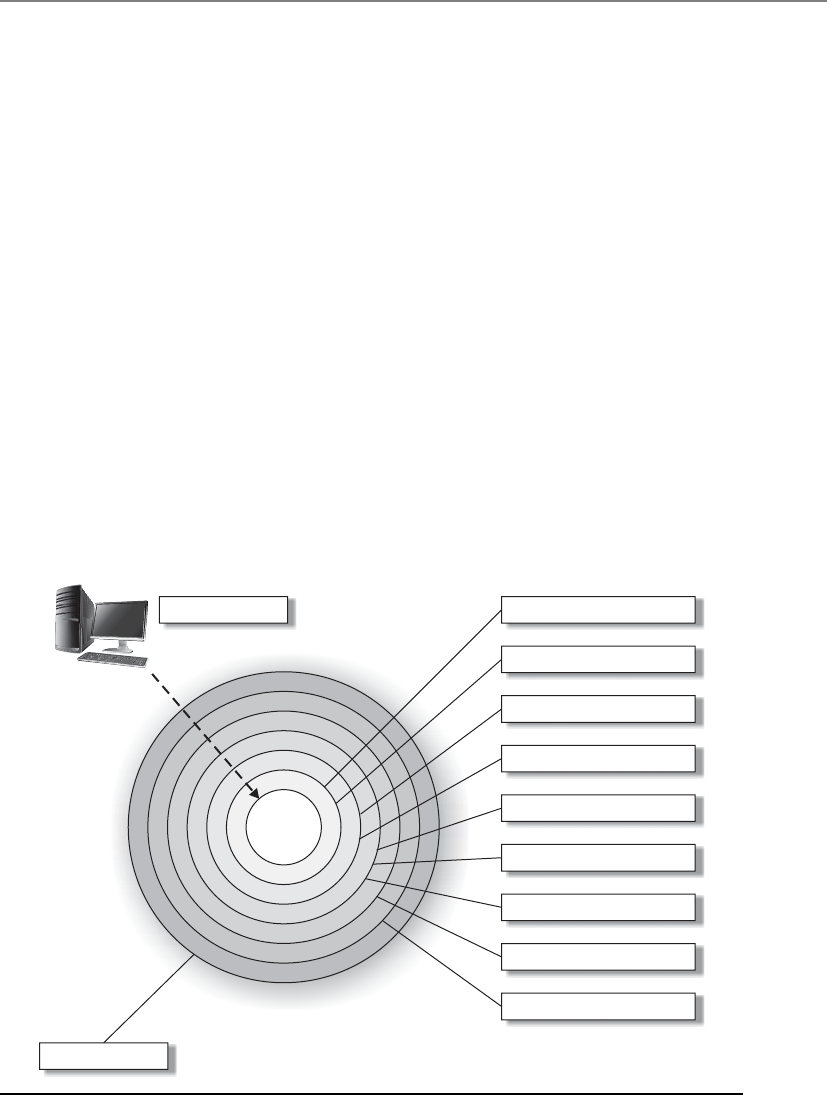
Chapter 2: Information Security Governance and Risk Management
29
• Security guard
• Locked internal doors
• Locked server room
• Physically secured computers (cable locks)
Technical controls that are commonly put into place to provide this type of layered
approach are
• Firewalls
• Intrusion detection system
• Intrusion prevention systems
• Antimalware
• Access control
• Encryption
The types of controls that are actually implemented must map to the threats the
company faces, and the numbers of layers that are put into place map to the sensitivity
of the asset. The rule of thumb is the more sensitive the asset, the more layers of protec-
tion that must be put into place.
Figure 2-2 Defense-in-depth
Potential threat
Asset
Physical security
Virus scanners
Patch management
Rule-based access control
Account management
Secure architecture
Demilitarized zones (DMZ)
Firewalls
Virtual private networks (VPN)
Policies and procedures

CISSP All-in-One Exam Guide
30
So the different categories of controls that can be used are administrative, technical,
and physical. But what do these controls actually do for us? We need to understand the
different functionality that each control type can provide us in our quest to secure our
environments.
The different functionalities of security controls are preventive, detective, corrective,
deterrent, recovery, and compensating. By having a better understanding of the different
control functionalities, you will be able to make more informed decisions about what
controls will be best used in specific situations. The six different control functionalities
are as follows:
•Deterrent Intended to discourage a potential attacker
•Preventive Intended to avoid an incident from occurring
•Corrective Fixes components or systems after an incident has occurred
•Recovery Intended to bring the environment back to regular operations
•Detective Helps identify an incident’s activities and potentially an intruder
•Compensating Controls that provide an alternative measure of control
Once you understand fully what the different controls do, you can use them in
the right locations for specific risks—or you can just put them where they would look the
prettiest.
When looking at a security structure of an environment, it is most productive to use
a preventive model and then use detective, recovery, and corrective mechanisms to help
support this model. Basically, you want to stop any trouble before it starts, but you
must be able to quickly react and combat trouble if it does find you. It is not feasible to
prevent everything; therefore, what you cannot prevent, you should be able to quickly
detect. That’s why preventive and detective controls should always be implemented
together and should complement each other. To take this concept further: what you
can’t prevent, you should be able to detect, and if you detect something, it means you
weren’t able to prevent it, and therefore you should take corrective action to make sure
it is indeed prevented the next time around. Therefore, all three types work together:
preventive, detective, and corrective.
The control types described next (administrative, physical, and technical) are pre-
ventive in nature. These are important to understand when developing an enterprise-
wide security program.
• Preventive: Administrative
• Policies and procedures
• Effective hiring practices
• Pre-employment background checks
• Controlled termination processes
• Data classification and labeling
• Security awareness
• Preventive: Physical

Chapter 2: Information Security Governance and Risk Management
31
• Badges, swipe cards
• Guards, dogs
• Fences, locks, mantraps
• Preventive: Technical
• Passwords, biometrics, smart cards
• Encryption, secure protocols, call-back systems, database views, constrained
user interfaces
• Antimalware software, access control lists, firewalls, intrusion prevention
system
Table 2-1 shows how these categories of control mechanisms perform different se-
curity functions. Many students get themselves wrapped around the axle when trying to
get their mind around which control provides which functionality. This is how this
train of thought usually takes place: “A firewall is a preventive control, but if an at-
tacker knew that it was in place it could be a deterrent.” Let’s stop right here. Do not
make this any harder than it has to be. When trying to map the functionality require-
ment to a control, think of the main reason that control would be put into place. A
firewall tries to prevent something bad from taking place, so it is a preventative control.
Auditing logs is done after an event took place, so it is detective. A data backup system
is developed so that data can be recovered; thus, this is a recovery control. Computer
images are created so that if software gets corrupted, they can be loaded; thus, this is a
corrective control.
One control type that some people struggle with is a compensating control. Let’s
look at some examples of compensating controls to best explain their function. If your
company needed to implement strong physical security, you might suggest to manage-
ment that security guards are employed. But after calculating all the costs of security
guards, your company might decide to use a compensating (alternate) control that
provides similar protection but is more affordable—as in a fence. In another example,
let’s say you are a security administrator and you are in charge of maintaining the com-
pany’s firewalls. Management tells you that a certain protocol that you know is vulner-
able to exploitation has to be allowed through the firewall for business reasons. The
network needs to be protected by a compensating (alternate) control pertaining to this
protocol, which may be setting up a proxy server for that specific traffic type to ensure
that it is properly inspected and controlled. So a compensating control is just an alter-
nate control that provides similar protection as the original control, but has to be used
because it is more affordable or allows specifically required business functionality.
Several types of security controls exist, and they all need to work together. The com-
plexity of the controls and of the environment they are in can cause the controls to con-
tradict each other or leave gaps in security. This can introduce unforeseen holes in the
company’s protection not fully understood by the implementers. A company may have
very strict technical access controls in place and all the necessary administrative controls
up to snuff, but if any person is allowed to physically access any system in the facility, then
clear security dangers are present within the environment. Together, these controls should
work in harmony to provide a healthy, safe, and productive environment.

CISSP All-in-One Exam Guide
32
Type of Control:
Preventive
Avoid
undesirable
events from
occurring
Detective
Identify undesirable
events that have
occurred
Corrective
Correct
undesirable events
that have occurred
Deterrent
Discourage security
violations
Recovery
Restore resources
and capabilities
Category of Control:
Physical
Fences X
Locks X
Badge system X
Security guard X
Biometric system X
Mantrap doors X
Lighting X
Motion detectors X
Closed-circuit TVs X
Offsite facility X
Administrative
Security policy X
Monitoring and
supervising
X
Separation of duties X
Table 2-1 Service That Security Controls Provide

Chapter 2: Information Security Governance and Risk Management
33
Type of Control:
Preventive
Avoid
undesirable
events from
occurring
Detective
Identify undesirable
events that have
occurred
Corrective
Correct
undesirable events
that have occurred
Deterrent
Discourage security
violations
Recovery
Restore resources
and capabilities
Category of Control:
Job rotation X
Information
classification
X
Personnel
procedures
X
Investigations X
Testing X
Security-awareness
training
X
Technical
ACLs X
Routers X
Encryption X
Audit logs X
IDS X
Antivirus software X
Server images X
Smart cards X
Dial-up call-back
systems
X
Data backup X
Table 2-1 Service That Security Controls Provide (continued)

CISSP All-in-One Exam Guide
34
Security Frameworks
With each section we are getting closer to some of the overarching topics of this chapter.
Up to this point we know what we need to accomplish (availability, integrity, confiden-
tiality) and we know the tools we can use (administrative, technical, physical controls)
and we know how to talk about this issue (vulnerability, threat, risk, control). Before we
move into how to develop an organization-wide security program, let’s first explore
what not to do, which is referred to as security through obscurity. The concept of secu-
rity through obscurity is assuming that your enemies are not as smart as you are and that
they cannot figure out something that you feel is very tricky. A nontechnical example of
security through obscurity is the old practice of putting a spare key under a doormat in
case you are locked out of the house. You assume that no one knows about the spare
key, and as long as they don’t, it can be considered secure. The vulnerability here is that
anyone could gain easy access to the house if they have access to that hidden spare key,
and the experienced attacker (in this example, a burglar) knows that these kinds of
vulnerabilities exist and takes the appropriate steps to seek them out.
In the technical realm, some vendors work on the premise that since their product’s
code is compiled this provides more protection than products based upon open-source
code because no one can view their original programming instructions. But attackers
have a wide range of reverse-engineering tools available to them to reconstruct the
product’s original code, and there are other ways to figure out how to exploit software
without reverse-engineering it, as in fuzzing, data validation inputs, etc. (These soft-
ware security topics will be covered in depth in Chapter 10.) The proper approach to
security is to ensure the original software does not contain flaws—not to assume that
putting the code into a compiled format provides the necessary level of protection.
Control Types and Functionalities
•Control types Administrative, technical, and physical
•Control functionalities
•Deterrent Discourage a potential attacker
•Preventive Stop an incident from occurring
•Corrective Fix items after an incident has occurred
•Recovery Restore necessary components to return to normal
operations
•Detective Identify an incident’s activities after it took place
•Compensating Alternative control that provides similar protection
as the original control
•Defense-in-depth Implementation of multiple controls so that
successful penetration and compromise is more difficult to attain

Chapter 2: Information Security Governance and Risk Management
35
Another common example of practicing security through obscurity is to develop
cryptographic algorithms in-house instead of using algorithms that are commonly used
within the industry. Some organizations assume that if attackers are not familiar with
the logic functions and mathematics of their homegrown algorithms, this lack of un-
derstanding by the attacker will serve as a necessary level of security. But attackers are
smart, clever, and motivated. If there are flaws within these algorithms, they will most
likely be identified and exploited. The better approach is to use industry-recognized
algorithms that have proven themselves to be strong and not depend upon the fact that
an algorithm is proprietary, thus assuming that it is secure.
Some network administrators will remap protocols on their firewalls so that HTTP
is not coming into the environment over the well-known port 80, but instead 8080.
The administrator assumes that an attacker will not figure out this remapping, but in
reality a basic port scanner and protocol analyzer will easily detect this port remapping.
So don’t try to outsmart the bad guy with trickery; instead, practice security in a mature,
solid approach. Don’t try to hide the flaws that can be exploited; get rid of those flaws
altogether by following proven security practices.
Reliance on confusion to provide security is obviously dangerous. Though everyone
wants to believe in the innate goodness of their fellow man, no security professional
would have a job if this were actually true. In security, a good practice is illustrated by
the old saying, “There are only two people in the world I trust: you and me—and I’m
not so sure about you.” This is a better attitude to take, because security really can be
compromised by anyone, at any time.
So we do not want our organization’s security program to be built upon smoke and
mirrors, and we understand that we most likely cannot out-trick our enemies—what do
we do? Build a fortress, aka security program. Hundreds of years ago your enemies
would not be attacking you with packets through a network; they would be attacking
you with big sticks while they rode horses. When one faction of people needed to pro-
tect themselves from another, they did not just stack some rocks on top of each other
in a haphazard manner and call that protection. (Well, maybe some groups did, but
they died right away and do not really count.) Groups of people built castles based
upon architectures that could withstand attacks. The walls and ceilings were made of
solid material that was hard to penetrate. The structure of the buildings provided layers
of protection. The buildings were outfitted with both defensive and offensive tools, and
some were surround by moats. That is our goal, minus the moat.
A security program is a framework made up of many entities: logical, administra-
tive, and physical protection mechanisms, procedures, business processes, and people
that all work together to provide a protection level for an environment. Each has an
important place in the framework, and if one is missing or incomplete, the whole
framework may be affected. The program should work in layers: one layer provides sup-
port for the layer above it and protection for the layer below it. Because a security pro-
gram is a framework, organizations are free to plug in different types of technologies,
methods, and procedures to accomplish the necessary protection level for their envi-
ronment.

CISSP All-in-One Exam Guide
36
A security program based upon a flexible framework sounds great, but how do we
build one? Before a fortress was built, the structure was laid out in blueprints by an ar-
chitect. We need a detailed plan to follow to properly build our security program.
Thank goodness industry standards were developed just for this purpose.
ISO/IEC 27000 Series
The British seem to know what they are doing. Let’s follow them.
British Standard 7799 (BS7799) was developed in 1995 by the United Kingdom
government’s Department of Trade and Industry and published by the British Stan-
dards Institution. The standard outlines how an information security management sys-
tem (ISMS) (aka security program) should be built and maintained. The goal was to
provide guidance to organizations on how to design, implement, and maintain poli-
cies, processes, and technologies to manage risks to its sensitive information assets.
The reason that this type of standard was even needed was to try and centrally man-
age the various security controls deployed throughout an organization. Without a secu-
rity management system, the controls are implemented and managed in an ad hoc
manner. The IT department would take care of technology security solutions, personnel
security would be within the human relations department, physical security in the fa-
cilities department, and business continuity in the operations department. We needed
a way to oversee all of these items and knit them together in a holistic manner. This
British standard met this need.
The British Standard actually had two parts: BS7799 Part 1, which outlined control
objectives and a range of controls that can be used to meet those objectives, and BS7799
Part 2, which outlined how a security program (ISMS) can be set up and maintained.
BS7799 Part 2 also served as a baseline that organizations could be certified against.
BS7799 was considered to be a de facto standard, which means that no specific
standards body was demanding that everyone follow the standard—but the standard
seemed to be a really good idea and fit an industry need, so everyone decided to follow
it. When organizations around the world needed to develop an internal security pro-
gram, there were no guidelines or direction to follow except BS7799. This standard laid
out how security should cover a wide range of topics, some of which are listed here:
•Information security policy for the organization Map of business
objectives to security, management’s support, security goals, and
responsibilities.
•Creation of information security infrastructure Create and maintain an
organizational security structure through the use of a security forum, a security
officer, defining security responsibilities, authorization processes, outsourcing,
and independent reviews.
•Asset classification and control Develop a security infrastructure to protect
organizational assets through accountability and inventory, classification, and
handling procedures.

Chapter 2: Information Security Governance and Risk Management
37
•Personnel security Reduce risks that are inherent in human interaction by
screening employees, defining roles and responsibilities, training employees
properly, and documenting the ramifications of not meeting expectations.
•Physical and environmental security Protect the organization’s assets by
properly choosing a facility location, erecting and maintaining a security
perimeter, implementing access control, and protecting equipment.
•Communications and operations management Carry out operations
security through operational procedures, proper change control, incident
handling, separation of duties, capacity planning, network management, and
media handling.
•Access control Control access to assets based on business requirements, user
management, authentication methods, and monitoring.
•System development and maintenance Implement security in all phases
of a system’s lifetime through development of security requirements,
cryptography, integrity protection, and software development procedures.
•Business continuity management Counter disruptions of normal
operations by using continuity planning and testing.
•Compliance Comply with regulatory, contractual, and statutory
requirements by using technical controls, system audits, and legal awareness.
The need to expand and globally standardize BS7799 was identified, and this task
was taken on by the International Organization for Standardization (ISO) and the In-
ternational Electrotechnical Commission (IEC). ISO is the world’s largest developer
and publisher of international standards. The standards this group works on range
from meteorology, food technology, and agriculture to space vehicle engineering, min-
ing, and information technology. ISO is a network of the national standards institutes
of 159 countries. So these are the really smart people who come up with really good
ways of doing stuff, one being how to set up information security programs within or-
ganizations. The IEC develops and publishes international standards for all electrical,
electronic, and related technologies. These two organizations worked together to build
on top of what was provided by BS7799 and launch the new version as a global stan-
dard, known as the ISO/IEC 27000 series.
As BS7799 was being updated it went through a long range of confusing titles, in-
cluding different version numbers. So you could see this referenced as BS7799,
BS7799v1, BS7799 v2, ISO 17799, BS7799-3:2005, etc. The industry has moved from
the more ambiguous BS7799 standard to a whole list of ISO/IEC standards that at-
tempt to compartmentalize and modularize the necessary components of an ISMS, as
shown here:
•ISO/IEC 27000 Overview and vocabulary
•ISO/IEC 27001 ISMS requirements
•ISO/IEC 27002 Code of practice for information security management

CISSP All-in-One Exam Guide
38
•ISO/IEC 27003 Guideline for ISMS implementation
•ISO/IEC 27004 Guideline for information security management
measurement and metrics framework
•ISO/IEC 27005 Guideline for information security risk management
•ISO/IEC 27006 Guidelines for bodies providing audit and certification of
information security management systems
•ISO/IEC 27011 Information security management guidelines for
telecommunications organizations
•ISO/IEC 27031 Guideline for information and communications technology
readiness for business continuity
•ISO/IEC 27033-1 Guideline for network security
•ISO 27799 Guideline for information security management in health
organizations
The following ISO/IEC standards are in development as of this writing:
•ISO/IEC 27007 Guideline for information security management systems
auditing
•ISO/IEC 27013 Guideline on the integrated implementation of ISO/IEC
20000-1 and ISO/IEC 27001
•ISO/IEC 27014 Guideline for information security governance
•ISO/IEC 27015 Information security management guidelines for the finance
and insurance sectors
•ISO/IEC 27032 Guideline for cybersecurity
•ISO/IEC 27033 Guideline for IT network security, a multipart standard
based on ISO/IEC 18028:2006
•ISO/IEC 27034 Guideline for application security
•ISO/IEC 27035 Guideline for security incident management
•ISO/IEC 27036 Guideline for security of outsourcing
•ISO/IEC 27037 Guideline for identification, collection, and/or acquisition
and preservation of digital evidence
This group of standards is known as the ISO/IEC 27000 series and serves as industry
best practices for the management of security controls in a holistic manner within or-
ganizations around the world. ISO follows the Plan – Do – Check – Act (PDCA) cycle,
which is an iterative process that is commonly used in business process quality control
programs. The Plan component pertains to establishing objectives and making plans,
the Do component deals with the implementation of the plans, the Check component
pertains to measuring results to understand if objectives are met, and the last piece, Act,
provides direction on how to correct and improve plans to better achieve success. Fig-
ure 2-3 depicts this cycle and how it correlates to the development and maintenance of
an ISMS as laid out in the ISO/IEC 27000 series.
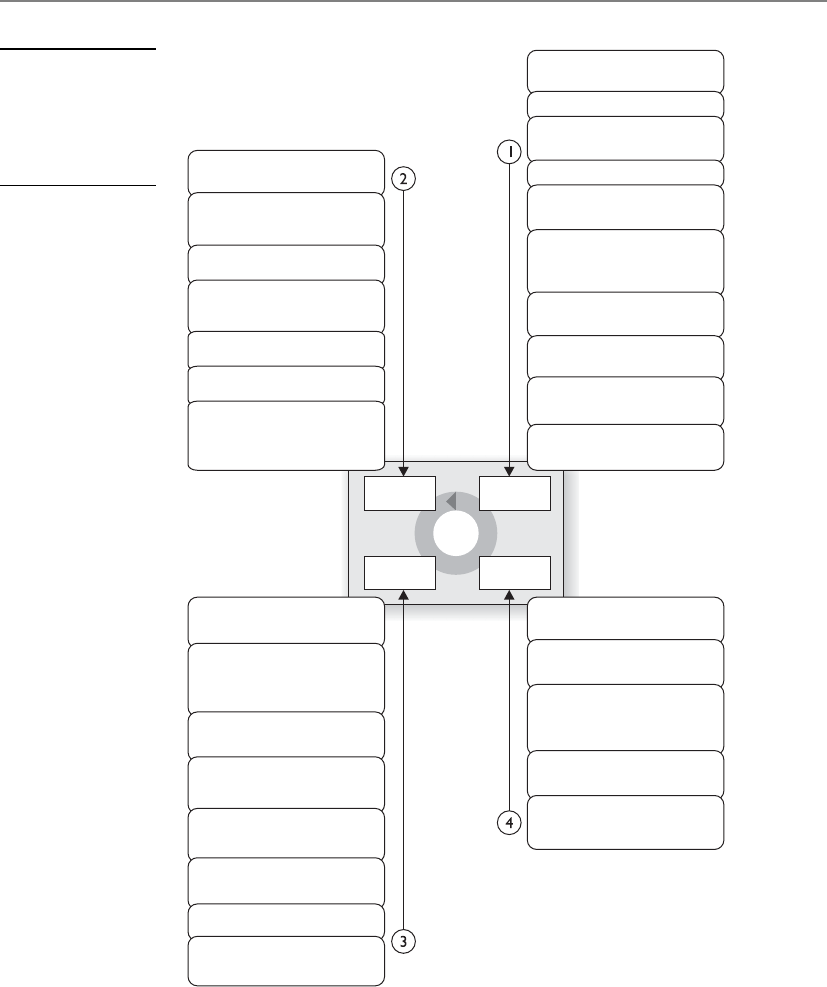
Chapter 2: Information Security Governance and Risk Management
39
It is common for organizations to seek an ISO/IEC 27001 certification by an accred-
ited third party. The third party assesses the organization against the ISMS requirements
laid out in ISO/IEC 27001 and attests to the organization’s compliance level. Just as
(ISC)2 attests to a person’s security knowledge once he passes the CISSP exam, the third
party attests to the security practices within the boundaries of the company it evaluates.
Figure 2-3
PDCA cycle used
in the ISO/IEC 27000
series (Used with
permission from
www.gammassl.co.uk)
Plan
Act
Check
Do
Execute monitoring
procedures
Undertake regular
reviews of
ISMS effectiveness
Measure effectiveness
of controls
Review level of residual
and acceptable risk
Conduct internal
ISMS audit
Regular management
review
Update security plans
Record actions
and events
Implement identified
improvements
Take corrective/
preventative action
Apply lessons learned
(including other
organizations)
Communicate results
to interested parties
Ensure improvements
to achieve objectives
Define the scope
of the ISMS
Define ISMS policy
Define approach
to risk assessment
Identify the risks
Analyze and evaluate
the risks
Identify and evaluate
options for the
treatment of risk
Management approves
residual risks
Management
authorizes ISMS
Select control
objectives and controls
Prepare a Statement
of Applicability (SOA)
Implement risk
treatment plan
Implement controls
Implement training and
awareness programs
Manage operations
Manage resources
Implement procedures to
direct/respond to
security incidents
Formulate risk
treatment plan

CISSP All-in-One Exam Guide
40
Many Standards, Best Practices, and Frameworks
As you will see in the following sections, various profit and nonprofit organiza-
tions have developed their own approaches to security management, security
control objectives, process management, and enterprise development. We will
examine their similarities and differences and illustrate where each is used within
the industry.
The following is a basic breakdown:
•Security Program Development
•ISO/IEC 27000 series International standards on how to develop
and maintain an ISMS developed by ISO and IEC
•Enterprise Architecture Development
•Zachman framework Model for the development of enterprise
architectures developed by John Zachman
•TOGAF Model and methodology for the development of enterprise
architectures developed by The Open Group
•DoDAF U.S. Department of Defense architecture framework that
ensures interoperability of systems to meet military mission goals
•MODAF Architecture framework used mainly in military support
missions developed by the British Ministry of Defence
•Security Enterprise Architecture Development
•SABSA model Model and methodology for the development of
information security enterprise architectures
•Security Controls Development
•CobiT Set of control objectives for IT management developed by
Information Systems Audit and Control Association (ISACA) and the
IT Governance Institute (ITGI)
•SP 800-53 Set of controls to protect U.S. federal systems developed
by the National Institute of Standards and Technology (NIST)
•Corporate Governance
•COSO Set of internal corporate controls to help reduce the risk
of financial fraud developed by the Committee of Sponsoring
Organizations (COSO) of the Treadway Commission
•Process Management
•ITIL Processes to allow for IT service management developed by the
United Kingdom’s Office of Government Commerce
•Six Sigma Business management strategy that can be used to carry
out process improvement
•Capability Maturity Model Integration (CMMI) Organizational
development for process improvement developed by Carnegie Mellon

Chapter 2: Information Security Governance and Risk Management
41
NOTE
NOTE The CISSP Common Body of Knowledge places all architectures
(enterprise and system) within the domain Security Architecture and Design.
Enterprise architectures are covered in this chapter of this book because they
directly relate to the organizational security program components covered
throughout the chapter. The Security Architecture and Design chapter deals
specifically with system architectures that are used in software engineering
and design.
Enterprise Architecture Development
Should we map and integrate all of our security efforts with our business efforts?
Response: No, we are more comfortable with chaos and wasting money.
Organizations have a choice when attempting to secure their environment as a
whole. They can just toss in products here and there, which are referred to as point solu-
tions or stovepipe solutions, and hope the ad hoc approach magically works in a man-
ner that secures the environment evenly and covers all of the organization’s
vulnerabilities. Or the organization can take the time to understand the environment,
understand the security requirements of the business and environment, and lay out an
overarching framework and strategy that maps the two together. Most organizations
choose option one, which is the “constantly putting out fires” approach. This is a love-
ly way to keep stress levels elevated and security requirements unmet, and to let confu-
sion and chaos be the norm.
The second approach would be to define an enterprise security architecture, allow
it to be the guide when implementing solutions to ensure business needs are met, pro-
vide standard protection across the environment, and reduce the amount of security
surprises the organization will run into. Although implementing an enterprise security
architecture will not necessarily promise pure utopia, it does tame the chaos and gets
the security staff, and organization, into a more proactive and mature mindset when
dealing with security as a whole.
Developing an architecture from scratch is not an easy task. Sure, it is easy to draw a big
box with smaller boxes inside of it, but what do the boxes represent? What are the relation-
ships between the boxes? How does information flow between the boxes? Who needs to
view these boxes and what aspects of the boxes do they need for decision making? An ar-
chitecture is a conceptual construct. It is a tool to help individuals understand a complex
item (i.e., enterprise) in digestible chunks. If you are familiar with the OSI networking
model, this is an abstract model used to illustrate the architecture of a networking stack. A
networking stack within a computer is very complex because it has so many protocols,
interfaces, services, and hardware specifications. But when we think about it in a modular
framework (seven layers), we can better understand the network stack as a whole and the
relationships between the individual components that make it up.
NOTE
NOTE OSI network stack will be covered extensively in Chapter 6.

CISSP All-in-One Exam Guide
42
An enterprise architecture encompasses the essential and unifying components of
an organization. It expresses the enterprise structure (form) and behavior (function). It
embodies the enterprise’s components, their relationships to each other, and to the
environment.
In this section we will be covering several different enterprise architecture frame-
works. Each framework has its own specific focus, but they all provide guidance on how
to build individual architectures so that they are useful tools to a diverse set of indi-
viduals. Notice the difference between an architecture framework and an actual architec-
ture. You use the framework as a guideline on how to build an architecture that best fits
your company’s needs. Each company’s architecture will be different because they have
different business drivers, security and regulatory requirements, cultures, and organiza-
tional structures—but if each starts with the same architectural framework then their
architectures will have similar structures and goals. It is similar to three people starting
with a two-story ranch-style house blueprint. One person chooses to have four bed-
rooms built because they have three children, one person chooses to have a larger living
room and three bedrooms, and the other person chooses two bedrooms and two living
rooms. Each person started with the same blueprint (framework) and modified it to
meet their needs (architecture).
When developing an architecture, first the stakeholders need to be identified, which
is who will be looking at and using the architecture. Next, the views need to be devel-
oped, which is how the information that is most important to the different stakehold-
ers will be illustrated in the most useful manner. For example, as you see in Figure 2-4,
companies have several different viewpoints. Executives need to understand the com-
pany from a business point of view, business process developers need to understand
what type of information needs to be collected to support business activities, applica-
tion developers need to understand system requirements that maintain and process the
information, data modelers need to know how to structure data elements, and the
technology group needs to understand the network components required to support
the layers above it. They are all looking at an architecture of the same company, it is just
being presented in views that they understand and that directly relate to their responsi-
bilities within the organization.
An enterprise architecture allows you to not only understand the company from
several different views, but also understand how a change that takes place at one level
will affect items at other levels. For example, if there is a new business requirement, how
is it going to be supported at each level of the enterprise? What type of new information
must be collected and processed? Do new applications need to be purchased or current
ones modified? Are new data elements required? Will new networking devices be re-
quired? An architecture allows you to understand all the things that will need to change
just to support one new business function. The architecture can be used in the opposite
direction also. If a company is looking to do a technology refresh, will the new systems
still support all of the necessary functions in the layers above the technology level? An
architecture allows you to understand an organization as one complete organism and
illustrate how changes to one internal component can directly affect another one.
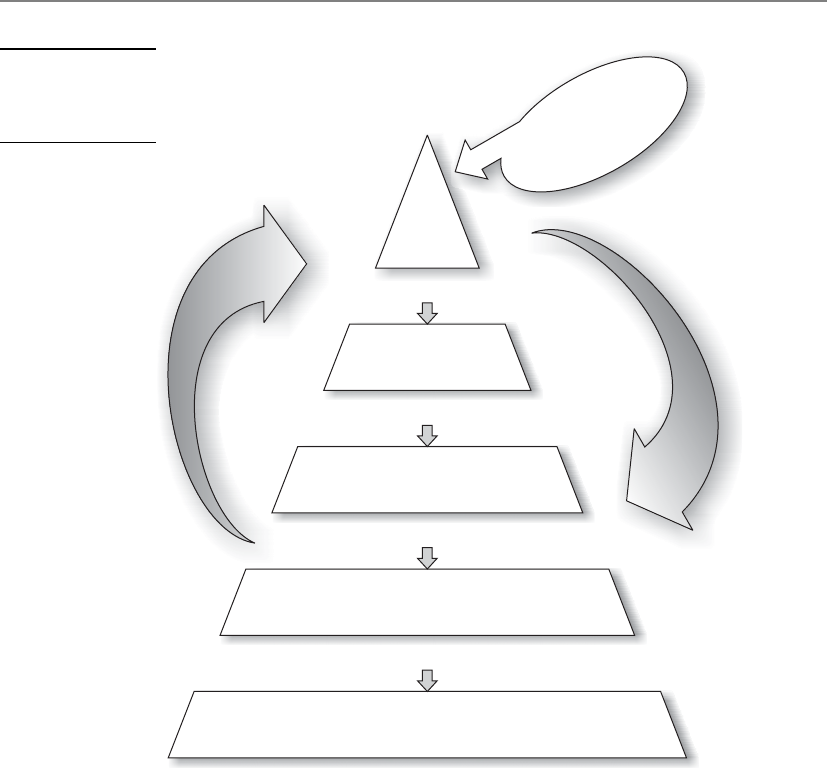
Chapter 2: Information Security Governance and Risk Management
43
Why Do We Need Enterprise Architecture Frameworks?
As you have probably experienced, business people and technology people sometimes
seem like totally different species. Business people use terms like “net profits,” “risk
universes,” “portfolio strategy,” “hedging,” “commodities,” etc. Technology people use
terms like “deep packet inspection,” “level three devices,” “cross-site scripting,” “load
balancing,” etc. Think about the acronyms techies like us throw around—TCP, APT,
ICMP, RAID, UDP, L2TP, PPTP, IPSec, AES, and DES. We can have complete conversa-
tions between ourselves without using any real words. And even though business peo-
ple and technology people use some of the same words, they have totally different
meanings to the individual groups. To business people, a protocol is a set of approved
processes that must be followed to accomplish a task. To technical people, a protocol is
Feedback
Prescribes
Identifies
Supported by
Business
architecture
Drives
Information
architecture
Information systems
architecture
Data architecture
Delivery systems architecture
hardware, software, communications
Enterprise
discretionary and
non-discretionary
standards/
regulations
External discretionary
and non-discretionary
standard/requirements
Figure 2-4
NIST Enterprise
Architecture
Framework

CISSP All-in-One Exam Guide
44
a standardized manner of communication between computers or applications. Busi-
ness and technical people use the term “risk,” but each group is focusing on very differ-
ent risks a company can face—market share versus security breaches. And even though
each group uses the term “data” the same, business people look at data only from a
functional point of view and security people look at data from a risk point of view.
This divide between business perspectives and technology perspectives can not only
cause confusion and frustration—it commonly costs money. If the business side of the
house wants to offer customers a new service, as in paying bills online, there may have
to be extensive changes to the current network infrastructure, applications, web servers,
software logic, cryptographic functions, authentication methods, database structures,
etc. What seems to be a small change in a business offering can cost a lot of money
when it comes to adding up the new technology that needs to be purchased and imple-
mented, programming that needs to be carried out, re-architecting of networks, etc. It
is common for business people to feel as though the IT department is more of an im-
pediment when it comes to business evolution and growth, and in turn the IT depart-
ment feels as though the business people are constantly coming up with outlandish
and unrealistic demands with no supporting budgets.
Because of this type of confusion between business and technology people, organi-
zations around the world have implemented incorrect solutions because the business
functionality to technical specifications was not understood. This results in having to
repurchase new solutions, carry out rework, and wasting an amazing amount of time.
Not only does this cost the organization more money than it should have in the first
place, business opportunities may be lost, which can reduce market share. This type of
waste has happened so much that the U.S. Congress passed the Clinger-Cohen Act,
which requires federal agencies to improve their IT expenditures. So we need a tool that
both business people and technology people can use to reduce confusion, optimize
business functionality, and not waste time and money. This is where business enter-
prise architectures come into play. It allows both groups (business and technology) to
view the same organization in ways that make sense to them.
When you go to the doctor’s office, there is a poster of a skeleton system on one
wall, a poster of a circulatory system on the other wall, and another poster of the organs
that make up a human body. These are all different views of the same thing, the human
body. This is the same functionality that enterprise architecture frameworks provide:
different views of the same thing. In the medical field we have specialists (podiatrists,
brain surgeons, dermatologists, oncologists, ophthalmologists, etc.). Each organization
is also made up of its own specialists (HR, marketing, accounting, IT, R&D, manage-
ment). But there also has to be an understanding of the entity (whether it is a human
body or company) holistically, which is what an enterprise architecture attempts to
accomplish.
Zachman Architecture Framework
Does anyone really understand how all the components within our company work together?
Response: How long have you worked here?
One of the first enterprise architecture frameworks that was created is the Zachman
framework, created by John Zachman, which is depicted in Table 2-2. (The full frame-
work can be viewed at www.zafa.com.)

Chapter 2: Information Security Governance and Risk Management
45
Order Layer What
(Data)
How
(Function)
Where
(Network)
Who
(People)
When
(Time)
Why
(Motivation)
1Scope context
boundary
•Planner
List of things
important to
the business
List of processes
the business
performs
List of locations
in which
the business
operates
List of
organizations
important to
the business
List of
events
significant
to the
business
List of business
goals/strategies
2Business model
concepts
•Owner
e.g., semantic
or entity-
relationship
model
e.g., business
process model
e.g., business
logistics model
e.g.,
workflow
model
e.g., master
schedule
e.g., business plan
3System model
logic
•Designer
e.g., logical
data model
e.g., application
architecture
e.g., distributed
system
architecture
e.g., human
interface
architecture
e.g.,
processing
structure
e.g., business rule
model
4Technology
model physics
•Builder
e.g., physical
data model
e.g., system
design
e.g., technology
architecture
e.g.,
presentation
architecture
e.g., control
structure
e.g., rule design
5Component
configuration
•Implementer
e.g., data
definition
e.g., program e.g., network
architecture
e.g., security
architecture
e.g., timing
definition
e.g., rule
specification
6Functioning
enterprise
instances
•Worker
e.g., data e.g., function e.g., network e.g.,
organization
e.g.,
schedule
e.g., strategy
Table 2-2 Zachman Framework for Enterprise Architecture

CISSP All-in-One Exam Guide
46
The Zachman framework is a two-dimensional model that uses six basic communi-
cation interrogatives (What, How, Where, Who, When, and Why) intersecting with dif-
ferent viewpoints (Planner, Owner, Designer, Builder, Implementer, and Worker) to
give a holistic understanding of the enterprise. This framework was developed in the
1980s and is based on the principles of classical business architecture that contain rules
that govern an ordered set of relationships.
The goal of this model is to be able to look at the same organization from different
views (Planner, Owner, Designer, Builder, etc.). Different groups within a company
need the same information, but presented in ways that directly relate to their responsi-
bilities. A CEO needs financial statements, scorecards, and balance sheets. A network
administrator needs network schematics, a systems engineer needs interface require-
ments, and the operations department needs configuration requirements. If you have
ever carried out a network-based vulnerability test, you know that you cannot tell the
CEO that some systems are vulnerable to SYN-based attacks, or that the company soft-
ware allows for client-side browser injections, or that some Windows-based applica-
tions are vulnerable to alternate data stream attacks. The CEO needs to know this
information, but in a language he can understand. People at each level of the organiza-
tion need information in a language and format that is most useful to them.
A business enterprise architecture is used to optimize often fragmented processes
(both manual and automated) into an integrated environment that is responsive to
change and supportive of the business strategy. The Zachman framework has been
around for many years and has been used by many organizations to build or better
define their business environment. This framework is not security-oriented, but it is a
good template to work with because it offers direction on how to understand an actual
enterprise in a modular fashion.
The Open Group Architecture Framework
Our business processes, data flows, software programs, and network devices are strung together
like spaghetti.
Response: Maybe we need to implement some structure here.
Another enterprise architecture framework is The Open Group Architecture Frame-
work (TOGAF), which has its origins in the U.S. Department of Defense. It provides an
approach to design, implement, and govern an enterprise information architecture.
TOGAF is a framework that can be used to develop the following architecture types:
• Business Architecture
• Data Architecture
• Applications Architecture
• Technology Architecture
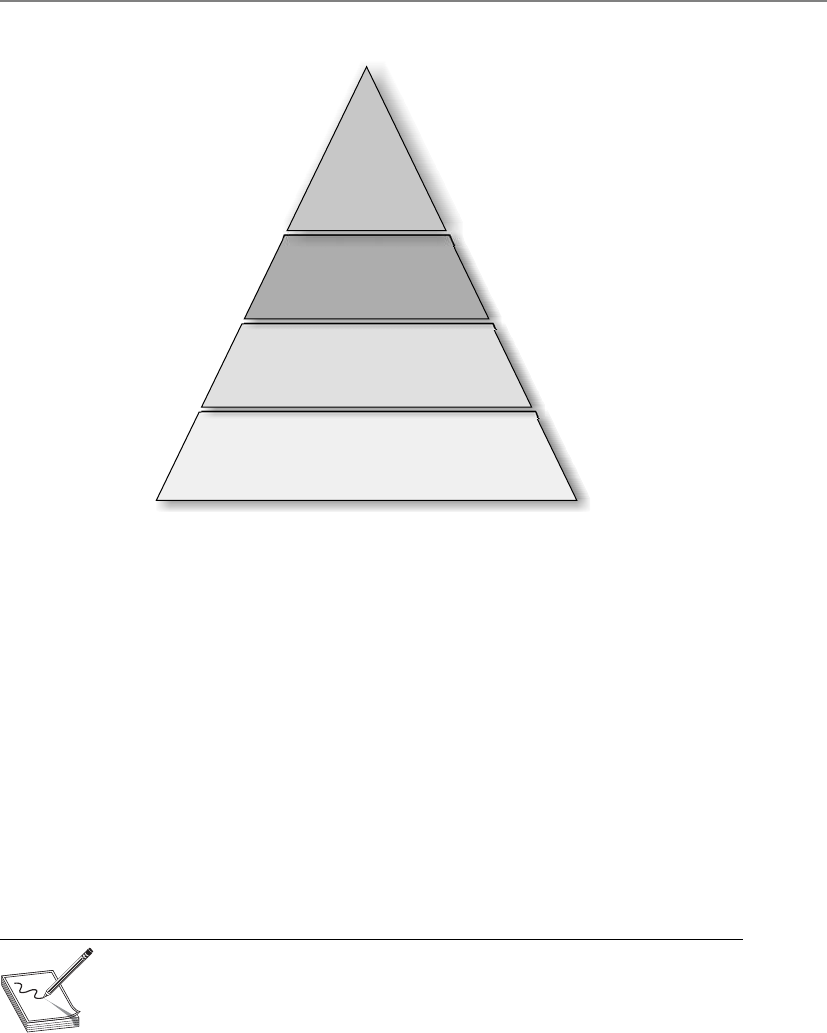
Chapter 2: Information Security Governance and Risk Management
47
So this architecture framework can be used to create individual architectures
through the use of its Architecture Development Method (ADM). This method is an it-
erative and cyclic process that allows requirements to be continuously reviewed and the
individual architectures updated as needed. These different architectures can allow a
technology architect to understand the enterprise from four different views (business,
data, application, and technology) so she can ensure her team develops the necessary
technology to work within the environment and all the components that make up that
environment and meet business requirements. The technology may need to span many
different types of network types, interconnect with various software components, and
work within different business units. As an analogy, when a new city is being construct-
ed, people do not just start building houses here and there. Civil engineers lay out
roads, bridges, waterways, and commercial and housing zoned areas. A large organiza-
tion that has a distributed and heterogeneous environment that supports many differ-
ent business functions can be as complex as a city. So before a programmer starts
developing code, the architect of the software needs to be developed in the context of
the organization it will work within.
NOTE
NOTE Many technical people have a negative visceral reaction to models like
this. They feel it’s too much work, that it’s a lot of fluff, is not directly relevant,
and so on. If you handed the same group of people a network schematic with
firewalls, IDSs, and VPNs, they would say, “Now we’re talking about security!”
Security technology works within the construct of an organization, so the
organization must be understood also.
Business
Processes and
activities use...
Data
That must be collected,
organized, safeguarded, and
distributed using...
Applications
Such as custom or off-the-shelf
software tools that run off...
Technology
Such as computer system and telephone networks.

CISSP All-in-One Exam Guide
48
Military-Oriented Architecture Frameworks
Our reconnaissance mission gathered important intelligence on our enemy, but a software
glitch resulted in us bombing the wrong country.
Response: Let’s blame it on NATO.
It is hard enough to construct enterprise-wide solutions and technologies for one
organization—think about an architecture that has to span many different complex
government agencies to allow for interoperability and proper hierarchical communica-
tion channels. This is where the Department of Defense Architecture Framework (DoDAF)
comes into play. When the U.S. DoD purchases technology products and weapon sys-
tems, enterprise architecture documents must be created based upon DoDAF standards
to illustrate how they will properly integrate into the current infrastructures. The focus
of the architecture framework is on command, control, communications, computers,
intelligence, surveillance, and reconnaissance systems and processes. It is not only im-
portant that these different devices communicate using the same protocol types and
interoperable software components, but also that they use the same data elements. If
an image is captured from a spy satellite, downloaded to a centralized data repository,
and then loaded into a piece of software to direct an unmanned drone, the military
personnel cannot have their operations interrupted because one piece of software can-
not read another software’s data output. The DoDAF helps ensure that all systems,
processes, and personnel work in a concerted effort to accomplish its missions.
The British Ministry of Defence Architecture Framework (MODAF) is another recog-
nized enterprise architecture framework based upon the DoDAF. The crux of the frame-
work is to be able to get data in the right format to the right people as soon as possible.
Modern warfare is complex, and activities happen fast, which requires personnel and
systems to be more adaptable than ever before. Data needs to be captured and properly
presented so that decision makers understand complex issues quickly, which allows for
fast and hopefully accurate decisions.
NOTE
NOTE While both DoDAF and MODAF were developed to support mainly
military missions, they have been expanded upon and morphed for use in
business enterprise environments.
When attempting to figure out which architecture framework is best for your orga-
nization, you need to find out who the stakeholders are and what information they
need from the architecture. The architecture needs to represent the company in the
most useful manner to the people who need to understand it the best. If your company
has people (stakeholders) who need to understand the company from a business pro-
cess perspective, your architecture needs to provide that type of view. If there are people
who need to understand the company from an application perspective, your architec-
ture needs a view that illustrates that information. If people need to understand the
enterprise from a security point of view, that needs to be illustrated in a specific view.
So one main difference between the various enterprise architecture frameworks is what
type of information are they providing and how are they providing it.

Chapter 2: Information Security Governance and Risk Management
49
Enterprise Security Architecture
An enterprise security architecture is a subset of an enterprise architecture and defines
the information security strategy that consists of layers of solutions, processes, and pro-
cedures and the way they are linked across an enterprise strategically, tactically, and
operationally. It is a comprehensive and rigorous method for describing the structure
and behavior of all the components that make up a holistic information security man-
agement system (ISMS). The main reason to develop an enterprise security architecture
is to ensure that security efforts align with business practices in a standardized and cost-
effective manner. The architecture works at an abstraction level and provides a frame of
reference. Besides security, this type of architecture allows organizations to better
achieve interoperability, integration, ease-of-use, standardization, and governance.
How do you know if an organization does not have an enterprise security architec-
ture in place? If the answer is “yes” to most of the following questions, this type of ar-
chitecture is not in place:
• Does security take place in silos throughout the organization?
• Is there a continual disconnect between senior management and the security
staff?
• Are redundant products purchased for different departments for overlapping
security needs?
• Is the security program made up of mainly policies without actual
implementation and enforcement?
• When user access requirements increase because of business needs, does
the network administrator just modify the access controls without the user
manager’s documented approval?
• When a new product is being rolled out, do unexpected interoperability issues
pop up that require more time and money to fix?
• Do many “one-off” efforts take place instead of following standardized
procedures when security issues arise?
• Are the business unit managers unaware of their security responsibilities and
how their responsibilities map to legal and regulatory requirements?
• Is “sensitive data” defined in a policy, but the necessary controls are not fully
implemented and monitored?
• Are stovepipe (point) solutions implemented instead of enterprise-wide
solutions?
• Are the same expensive mistakes continuing to take place?
• Is security governance currently unavailable because the enterprise is not
viewed or monitored in a standardized and holistic manner?
• Are business decisions being made without taking security into account?
• Are security personnel usually putting out fires with no real time to look at
and develop strategic approaches?

CISSP All-in-One Exam Guide
50
• Are security efforts taking place in business units that other business units
know nothing about?
• Are more and more security personnel seeking out shrinks and going on
antidepressant or anti-anxiety medication?
If many of these answers are “yes,” no useful architecture is in place. Now, the fol-
lowing is something very interesting the author has seen over several years. Most orga-
nizations have the problems listed earlier and yet they focus on each item as if they
were unconnected. What the CSO, CISO, and/or security administrator does not always
understand is that these are just symptoms of a treatable disease. The “treatment” is to
put one person in charge of a team that develops a phased-approach enterprise security
architecture rollout plan. The goals are to integrate technology-oriented and business-
centric security processes; link administrative, technical, and physical controls to prop-
erly manage risk; and integrate these processes into the IT infrastructure, business
processes, and the organization’s culture.
The main reason organizations do not develop and roll out an enterprise security
architecture is that they do not fully understand what one is and it seems like an over-
whelming task. Fighting fires is more understandable and straightforward, so many
companies stay with this familiar approach.
A group developed the Sherwood Applied Business Security Architecture (SABSA), as
shown in Table 2-3, which is similar to the Zachman framework. It is a layered model,
Assets
(What)
Motivation
(Why)
Process
(How)
People
(Who)
Location
(Where)
Time
(When)
Contextual The
business
Business risk
model
Business process
model
Business
organization and
relationships
Business
geography
Business time
dependencies
Conceptual Business
attributes
profile
Control
objectives
Security
strategies and
architectural
layering
Security entity
model and trust
framework
Security
domain
model
Security-related
lifetimes and
deadlines
Logical Business
information
model
Security
policies
Security services Entity schema
and privilege
profiles
Security
domain
definitions
and
associations
Security
processing cycle
Physical Business
data model
Security rules,
practices, and
procedures
Security
mechanisms
Users,
applications, and
user interface
Platform
and network
infrastructure
Control
structure
execution
Component Detailed
data
structures
Security
standards
Security products
and tools
Identities,
functions,
actions, and
ACLs
Processes,
nodes,
addresses,
and protocols
Security step
timing and
sequencing
Operational Assurance
of operation
continuity
Operation
risk
management
Security service
management and
support
Application
and user
management and
support
Security
of sites,
networks, and
platforms
Security
operations
schedule
Table 2-3 SABSA Architectural Framework

Chapter 2: Information Security Governance and Risk Management
51
with its first layer defining business requirements from a security perspective. Each lay-
er of the model decreases in abstraction and increases in detail so it builds upon the
others and moves from policy to practical implementation of technology and solu-
tions. The idea is to provide a chain of traceability through the strategic, conceptual,
design, implementation, and metric and auditing levels.
The following outlines the questions that are to be asked and answered at each
level of the framework:
•What are you trying to do at this layer? The assets to be protected by your
security architecture.
•Why are you doing it? The motivation for wanting to apply security,
expressed in the terms of this layer.
•How are you trying to do it? The functions needed to achieve security
at this layer.
•Who is involved? The people and organizational aspects of security at
this layer.
•Where are you doing it? The locations where you apply your security,
relevant to this layer.
•When are you doing it? The time-related aspects of security relevant to
this layer.
SABSA is a framework and methodology for enterprise security architecture and
service management. Since it is a framework, this means it provides a structure for indi-
vidual architectures to be built from. Since it is a methodology also, this means it pro-
vides the processes to follow to build and maintain this architecture. SABSA provides a
life-cycle model so that the architecture can be constantly monitored and improved
upon over time.
For an enterprise security architecture to be successful in its development and im-
plementation, the following items must be understood and followed: strategic align-
ment, process enhancement, business enablement, and security effectiveness.
Strategic alignment means the business drivers and the regulatory and legal require-
ments are being met by the security enterprise architecture. Security efforts must pro-
vide and support an environment that allows a company to not only survive, but thrive.
The security industry has grown up from the technical and engineering world, not the
business world. In many organizations, while the IT security personnel and business
personnel might be located physically close to each other, they are commonly worlds
apart in how they see the same organization they work in. Technology is only a tool
that supports a business; it is not the business itself. The IT environment is analogous
to the circulatory system within a human body; it is there to support the body—the
body does not exist to support the circulatory system. And security is analogous to the
immune system of the body—it is there to protect the overall environment. If these
critical systems (business, IT, security) do not work together in a concerted effort, there
will be deficiencies and imbalances. While deficiencies and imbalances lead to disease
in the body, deficiencies and imbalances within an organization can lead to risk and
security compromises.

CISSP All-in-One Exam Guide
52
When looking at the business enablement requirement of the security enterprise ar-
chitecture, we need to remind ourselves that companies are in business to make money.
Companies and organizations do not exist for the sole purpose of being secure. Secu-
rity cannot stand in the way of business processes, but should be implemented to better
enable them.
Business enablement means the core business processes are integrated into the se-
curity operating model—they are standards-based and follow a risk tolerance criteria.
What does this mean in the real world? Let’s say a company’s accountants have figured
out that if they allow the customer service and support staff to work from home, the
company would save a lot of money on office rent, utilities, and overhead—plus, their
ISMS vs. Security Enterprise Architecture
We need to develop stuff and stick that stuff into an organized container.
What is the difference between an ISMS and an enterprise security architec-
ture? An ISMS outlines the controls that need to put into place (risk manage-
ment, vulnerability management, BCP, data protection, auditing, configuration
management, physical security, etc.) and provides direction on how those con-
trols should be managed throughout their life cycle. The ISMS specifies the pieces
and parts that need to be put into place to provide a holistic security program for
the organization overall and how to properly take care of those pieces and parts.
The enterprise security architecture illustrates how these components are to be
integrated into the different layers of the current business environment. The secu-
rity components of the ISMS have to be interwoven throughout the business en-
vironment and not siloed within individual company departments.
For example, the ISMS will dictate that risk management needs to be put in
place, and the enterprise architecture will chop up the risk management compo-
nents and illustrate how risk management needs to take place at the strategic,
tactical, and operational levels. As another example, the ISMS could dictate that
data protection needs to be put into place. The architecture can show how this
happens at the infrastructure, application, component, and business level. At the
infrastructure level we can implement data loss protection technology to detect
how sensitive data is traversing the network. Applications that maintain sensitive
data must have the necessary access controls and cryptographic functionality. The
components within the applications can implement the specific cryptographic
functions. And protecting sensitive company information can be tied to business
drivers, which is illustrated at the business level of the architecture.
The ISO/IEC 27000 series (which outlines the ISMS) is very policy-oriented
and outlines the necessary components of a security program. This means that
the ISO standards are general in nature, which is not a defect—they were created
that way so that they could be applied to various types of businesses, companies,
and organizations. But since these standards are general, it can be difficult to
know how to implement them and map them to your company’s infrastructure
and business needs. This is where the enterprise security architecture comes into
play. The architecture is a tool used to ensure that what is outlined in the security
standards is implemented throughout the different layers of an organization.

Chapter 2: Information Security Governance and Risk Management
53
insurance is cheaper. The company could move into this new model with the use of
VPNs, firewalls, content filtering, and so on. Security enables the company to move to
this different working model by providing the necessary protection mechanisms. If a
financial institution wants to allow their customers the ability to view bank account
information and carry out money transfers, it can offer this service if the correct secu-
rity mechanisms are put in place (access control, authentication, secure connections,
etc.). Security should help the organization thrive by providing the mechanisms to do
new things safely.
The process enhancement piece can be quite beneficial to an organization if it takes
advantage of this capability when it is presented to them. When an organization is seri-
ous about securing their environment, it means they will have to take a close look at
many of the business processes that take place on an ongoing process. Many times
these processes are viewed through the eyeglasses of security, because that’s the reason
for the activity, but this is a perfect chance to enhance and improve upon the same
processes to increase productivity. When you look at many business processes taking
place in all types of organizations, you commonly find a duplication of efforts, manual
steps that can be easily automated, or ways to streamline and reduce time and effort
that are involved in certain tasks. This is commonly referred to as process reengineering.
When an organization is developing its security enterprise components, those com-
ponents must be integrated into the business processes to be effective. This can allow
for process management to be refined and calibrated. This allows for security to be in-
tegrated in system life cycles and day-to-day operations. So while business enablement
means “we can do new stuff,” process enhancement means “we can do stuff better.”
Security effectiveness deals with metrics, meeting service level agreement (SLA) re-
quirements, achieving return on investment (ROI), meeting set baselines, and provid-
ing management with a dashboard or balanced scorecard system. These are ways to
determine how useful the current security solutions and architecture as a whole are
performing.
Many organizations are just getting to the security effectiveness point of their archi-
tecture, because there is a need to ensure that the controls in place are providing the
necessary level of protection and that finite funds are being used properly. Once base-
lines are set, then metrics can be developed to verify baseline compliancy. These metrics
are then rolled up to management in a format they can understand that shows them the
health of the organization’s security posture and compliance levels. This also allows
management to make informed business decisions. Security affects almost everything
today in business, so this information should be readily available to senior manage-
ment in a form they can actually use.
Enterprise vs. System Architectures
Our operating systems follow strict and hierarchical structures, but our company is a mess.
There is a difference between enterprise architectures and system architectures, al-
though they do overlap. An enterprise architecture addresses the structure of an organi-
zation. A system architecture addresses the structure of software and computing
components. While these different architecture types have different focuses (organiza-
tion versus system), they have a direct relationship because the systems have to be able
to support the organization and its security needs. A software architect cannot design

CISSP All-in-One Exam Guide
54
an application that will be used within a company without understanding what the
company needs the application to do. So the software architect needs to understand the
business and technical aspects of the company to ensure that the software is properly
developed for the needs of the organization.
It is important to realize that the rules outlined in an organizational security policy
have to be supported all the way down to application code, the security kernel of an
operating system, and hardware security provided by a computer’s CPU. Security has to
be integrated at every organizational and technical level if it is going to be successful.
This is why some architecture frameworks cover company functionality from the busi-
ness process level all the way down to how components within an application work. All
of this detailed interaction and interdependencies must be understood. Otherwise, the
wrong software is developed, the wrong product is purchased, interoperability issues
arise, and business functions are only partially supported.
As an analogy, an enterprise and system architecture relationship is similar to the
relationship between a solar system and individual planets. A solar system is made up
of planets, just like an enterprise is made up of systems. It is very difficult to under-
stand the solar system as a whole while focusing on the specific characteristics of a
planet (soil compensation, atmosphere, etc.). It is also difficult to understand the
complexities of the individual planets when looking at the solar system as a whole.
Each viewpoint (solar system versus planet) has its focus and use. The same is true
when viewing an enterprise versus a system architecture. The enterprise view is looking
at the whole enchilada, while the system view is looking at the individual pieces that
make up that enchilada.
NOTE
NOTE While we covered security architecture mainly from an enterprise
view in this chapter, we will cover more system-specific architecture
frameworks, such as ISO/IEC 42010:2007, in Chapter 4.
Enterprise Architectures: Scary Beasts
If these enterprise architecture models are new to you and a bit confusing, do not
worry; you are not alone. While enterprise architecture frameworks are great tools
to understand and help control all the complex pieces within an organization, the
security industry is still maturing in its use of these types of architectures. Most
companies develop policies and then focus on the technologies to enforce those
policies, which skips the whole step of security enterprise development. This is
mainly because the information security field is still learning how to grow up and
out of the IT department and into established corporate environments. As security
and business truly become more intertwined, these enterprise frameworks won’t
seem as abstract and foreign, but useful tools that are properly leveraged.

Chapter 2: Information Security Governance and Risk Management
55
Security Controls Development
We have our architecture. Now what do we put inside it?
Response: Marshmallows.
Up to now we have our ISO/IEC 27000 series, which outlines the necessary compo-
nents of an organizational security program. We also have our security enterprise archi-
tecture, which helps us integrate the requirements outlined in our security program
into our existing business structure. Now we are going to get more focused and look at
the objectives of the controls we are going to put into place to accomplish the goals
outlined in our security program and enterprise architecture.
CobiT
The Control Objectives for Information and related Technology (CobiT) is a framework
and set of control objectives developed by the Information Systems Audit and Control
Association (ISACA) and the IT Governance Institute (ITGI). It defines goals for the
controls that should be used to properly manage IT and to ensure that IT maps to busi-
ness needs. CobiT is broken down into four domains: Plan and Organize, Acquire and
Implement, Deliver and Support, and Monitor and Evaluate. Each category drills down
into subcategories. For example, the Acquire and Implement category contains the fol-
lowing subcategories:
• Acquire and Maintain Application Software
• Acquire and Maintain Technology Infrastructure
• Develop and Maintain Procedures
• Install and Accredit Systems
• Manage Changes
So this CobiT domain provides goals and guidance to companies that they can fol-
low when they purchase, install, test, certify, and accredit IT products. This is very pow-
erful because most companies use an ad hoc and informal approach when making
purchases and carrying out procedures. CobiT provides a “checklist” approach to IT
governance by providing a list of things that must be thought through and accom-
plished when carrying out different IT functions.
CobiT lays out executive summaries, management guidelines, frameworks, con-
trol objectives, an implementation toolset, performance indicators, success factors,
maturity models, and audit guidelines. It lays out a complete roadmap that can be
followed to accomplish each of the 34 control objectives this model deals with. Fig-
ure 2-5 illustrates how the framework connects business requirements, IT resources,
and IT processes.
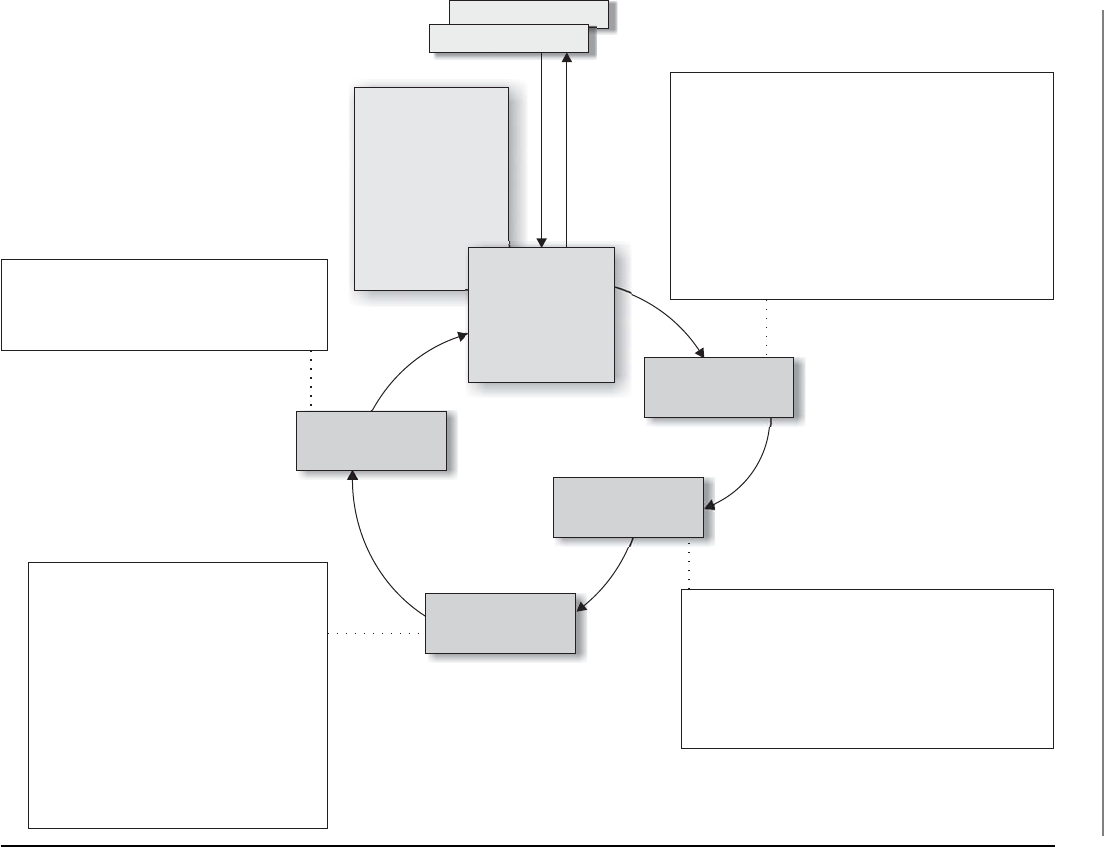
CISSP All-in-One Exam Guide
56
DS1 Define service levels
DS2 Manage third-party services
DS3 Manage performance and capacity
DS4 Ensure continuous service
DS5 Ensure systems security
DS6 Identify and attribute costs
DS7 Educate and train users
DS8 Manage service desk and incidents
DS9 Manage the configuration
DS10 Manage problems
DS11 Manage data
DS12 Manage the physical environment
DS13 Manage operations
ME1 Monitor and evaluate IT performance
ME2 Monitor and evaluate internal control
ME3 Ensure regulatory compliance
ME4 Provide IT governance
PO1 Define a strategic IT plan
PO2 Define the information architecture
PO3 Determine the technological direction
PO4 Define the IT processes, organization,
and relationships
PO5 Manage the IT investment
PO6 Communicate management aims and directions
PO7 Manage IT human resources
PO8 Manage quality
PO9 Assess and manage risks
PO10 Manage projects
AI1 Identify automated solutions
AI2 Acquire and maintain application software
AI3 Acquire and maintain technology infrastructure
AI4 Enable operation and use
AI5 Procure IT resources
AI6 Manage changes
AI7 Install and accredit solutions and changes
CobiT 4.0
Framework
Governance Drivers
Deliver and
Support
Information Criteria
•
•
•
•
•
•
•
Effectiveness
Efficiency
Confidentiality
Integrity
Availability
Compliance
Reliability
Business Goals
Monitor and
Evaluate
Acquire and
Implement
Plan and
Organize
IT Resources
•
•
•
•
Applications
Information
Infrastructure
People
Figure 2-5 CobiT framework

Chapter 2: Information Security Governance and Risk Management
57
So how does CobiT fit into the big picture? When you develop your security policies
that are aligned with the ISO/IEC 27000 series, these are high-level documents that
have statements like, “Unauthorized access should not be permitted.” But who is au-
thorized? How do we authorize individuals? How are we implementing access control
to ensure that unauthorized access is not taking place? How do we know our access
control components are working properly? This is really where the rubber hits the
road, where words within a document (policy) come to life in real-world practical im-
plementations. CobiT provides the objective that the real-world implementations (con-
trols) you chose to put into place need to meet. For example, CobiT outlines the
following control practices for user account management:
• Using unique user IDs to enable users to be linked to and held accountable
for their actions
• Checking that the user has authorization from the system owner for the
use of the information system or service, and the level of access granted is
appropriate to the business purpose and consistent with the organizational
security policy
• A procedure to require users to understand and acknowledge their access
rights and the conditions of such access
• Ensuring that internal and external service providers do not provide access
until authorization procedures have been completed
• Maintaining a formal record, including access levels, of all persons registered
to use the service
• A timely and regular review of user IDs and access rights
An organization should make sure that it is meeting at least these goals when it
comes to user account management, and in turn this is what an auditor is going to go
by to ensure the organization is practicing security properly. A majority of the security
compliance auditing practices used today in the industry are based off of CobiT. So if
you want to make your auditors happy and pass your compliancy evaluations, you
should learn, practice, and implement the control objectives outlined in CobiT, which
are considered industry best practices.
NOTE
NOTE Many people in the security industry mistakenly assume that CobiT is
purely security focused, when in reality it deals with all aspects of information
technology, security only being one component. CobiT is a set of practices
that can be followed to carry out IT governance, which requires proper
security practices.
NIST 800-53
Are there standard approaches to locking down government systems?
CobiT contains control objectives used within the private sector; the U.S. govern-
ment has its own set of requirements when it comes to controls for federal information
systems and organizations.

CISSP All-in-One Exam Guide
58
The National Institute of Standards and Technology (NIST) is a nonregulatory body
of the U.S. Department of Commerce and its mission is
“Promote U.S. innovation and industrial competitiveness by advancing measurement science,
standards, and technology in ways that enhance economic security and improve quality of life.”
One of the standards that NIST has been responsible for developing is called Spe-
cial Publication 800-53, which outlines controls that agencies need to put into place to
be compliant with the Federal Information Security Management Act of 2002. Table 2-4
outlines the control categories that are addressed in this publication.
The control categories (families) are the management, operational, and technical
controls prescribed for an information system to protect the confidentiality, integrity,
and availability of the system and its information.
Just as IS auditors in the commercial sector follow CobiT for their “checklist” ap-
proach to evaluating an organization’s compliancy with business-oriented regulations,
government auditors use SP 800-53 as their “checklist” approach for ensuring that gov-
ernment agencies are compliant with government-oriented regulations. While these
control objective checklists are different (CobiT versus SP 800-53), there is extensive
overlap because systems and networks need to be protected in similar ways no matter
what type of organization they reside in.
Identifier Family Class
AC Access Control Technical
AT Awareness and Training Operational
AU Audit and Accountability Technical
CA Security Assessment and Authorization Management
CM Configuration Management Operational
CP Contingency Planning Operational
IA Identification and Authentication Technical
IR Incident Response Operational
MA Maintenance Operational
MP Media Protection Operational
PE Physical and Environmental Protection Operational
PL Planning Management
PM Program Management Management
PS Personnel Security Operational
RA Risk Assessment Management
SA System and Services Acquisition Management
SC System and Communications Protection Technical
SI System and Information Integrity Operational
Table 2-4 NIST 800-53 Control Categories

Chapter 2: Information Security Governance and Risk Management
59
CAUTION
CAUTION On the CISSP exam you can see control categories broken down
into administrative, technical, and physical categories and the categories
outlined by NIST, which are management, technical, and operational. Be familiar
with both ways of categorizing control types.
COSO
I put our expenses in the profit column so it looks like we have more money.
Response: Yeah, no one will figure that out.
CobiT was derived from the COSO framework, developed by the Committee of
Sponsoring Organizations (COSO) of the Treadway Commission in 1985 to deal with
fraudulent financial activities and reporting. The COSO framework is made up of the
following components:
• Control environment
• Management’s philosophy and operating style
• Company culture as it pertains to ethics and fraud
• Risk assessment
• Establishment of risk objectives
• Ability to manage internal and external change
• Control activities
• Policies, procedures, and practices put in place to mitigate risk
• Information and communication
• Structure that ensures that the right people get the right information at the
right time
• Monitoring
• Detecting and responding to control deficiencies
COSO is a model for corporate governance, and CobiT is a model for IT governance.
COSO deals more at the strategic level, while CobiT focuses more at the operational
level. You can think of CobiT as a way to meet many of the COSO objectives, but only
from the IT perspective. COSO deals with non-IT items also, as in company culture, fi-
nancial accounting principles, board of director responsibility, and internal communi-
cation structures. COSO was formed to provide sponsorship for the National
Commission on Fraudulent Financial Reporting, an organization that studies deceptive
financial reports and what elements lead to them.
There have been laws in place since the 1970s that basically state that it was illegal
for a corporation to cook its books (manipulate its revenue and earnings reports), but
it took the Sarbanes–Oxley Act (SOX) of 2002 to really put teeth into those existing
laws. SOX is a U.S. federal law that, among other things, could send executives to jail if
it was discovered that their company was submitting fraudulent accounting findings to
the Security Exchange Commission (SEC). SOX is based upon the COSO model, so for

CISSP All-in-One Exam Guide
60
a corporation to be compliant with SOX, it has to follow the COSO model. Companies
commonly implement ISO/IEC 27000 standards and CobiT to help construct and
maintain their internal COSO structure.
NOTE
NOTE The CISSP exam does not cover specific laws, as in the Federal
Information Security Management Act and Sarbanes–Oxley Act, but it does cover
the security control model frameworks, as in ISO standards, CobiT, and COSO.
Process Management Development
Along with ensuring that we have the proper controls in place, we also want to have ways
to construct and improve our business, IT, and security processes in a structured and
controlled manner. The security controls can be considered the “things,” and processes
are how we use these things. We want to use them properly, effectively, and efficiently.
ITIL
How do I make sure our IT supports our business units?
Response: We have a whole library for that.
The Information Technology Infrastructure Library (ITIL) is the de facto standard of
best practices for IT service management. ITIL was created because of the increased de-
pendence on information technology to meet business needs. Unfortunately, a natural
divide exists between business people and IT people in most organizations because
they use different terminology and have different focuses within the organization. The
lack of a common language and understanding of each other’s domain (business versus
IT) has caused many companies to ineffectively blend their business objectives and IT
functions. This improper blending usually generates confusion, miscommunication,
missed deadlines, missed opportunities, increased cost in time and labor, and frustra-
tion on both the business and technical sides of the house. ITIL is a customizable
framework that is provided in a set of books or in an online format. It provides the
goals, the general activities necessary to achieve these goals, and the input and output
values for each process required to meet these determined goals. Although ITIL has a
component that deals with security, its focus is more toward internal service level agree-
ments between the IT department and the “customers” it serves. The customers are usu-
ally internal departments. The main components that make up ITIL are illustrated in
Figure 2-6.
Six Sigma
I have a black belt in business improvement.
Response: Why is it tied around your head?
Six Sigma is a process improvement methodology. It is the “new and improved”
Total Quality Management (TQM) that hit the business sector in the 1980s. Its goal is
to improve process quality by using statistical methods of measuring operation effi-

Chapter 2: Information Security Governance and Risk Management
61
ciency and reducing variation, defects, and waste. Six Sigma is being used in the secu-
rity assurance industry in some instances to measure the success factors of different
controls and procedures. Six Sigma was developed by Motorola with the goal of identi-
fying and removing defects in its manufacturing processes. The maturity of a process is
described by a sigma rating, which indicates the percentage of defects that the process
contains. While it started in manufacturing, Six Sigma has been applied to many types
of business functions, including information security and assurance.
Co
nt
inu
al
Pro
ce
ss
Im
pro
ve
me
nt
Change
management
Knowledge
management
Service
testing and
validation
Configuration
management
system
Release and
deployment
management
ITIL
S
e
r
v
i
c
e
d
e
s
i
g
n
Incident
management
Event
management
Problem
management
Supplier
management
Service level
management
Service catalog
management
Availability
management
Figure 2-6 ITIL

CISSP All-in-One Exam Guide
62
Capability Maturity Model Integration
I only want to get better, and better, and better.
Response: I only want you to go away.
Capability Maturity Model Integration (CMMI) came from the security engineering
world. We will covering it more in depth from that point of view in Chapter 10, but this
model is also used within organizations to help lay out a pathway of how incremental
improvement can take place.
While we know that we constantly need to make our security program better, it is
not always easy to accomplish because “better” is a vague and nonquantifiable concept.
The only way we can really improve is to know where we are starting from, where we
need to go, and the steps we need to take in between. Every security program has a ma-
turity level, which is illustrated in Figure 2-7. Each maturity level within this CMMI
model represents an evolutionary stage. Some security programs are chaotic, ad hoc,
unpredictable, and usually insecure. Some security programs have documentation cre-
ated, but the actual processes are not taking place. Some security programs are quite
evolved, streamlined, efficient, and effective.
Figure 2-7 Capability Maturity Model for a security program
Security
assigned
to IT
Defined
procedures
No
process
Documented
and
communicated
No
assessment
Reactive
activities
Security
and
business
objectives
mapped
Structured
and
enterprise
wide
Ad hoc
and
disorganized
Immature
and
developing
Monitored
and
measured
Automated
practices
Level 0Level 1Level 2 Level 3 Level 4
Nonexistent
management
Unpredictable
processes
Repeatable
processes
Defined
processes
Managed
processes
Optimized
processes
Level 5

Chapter 2: Information Security Governance and Risk Management
63
The crux of CMMI is to develop structured steps that can be followed so an organi-
zation can evolve from one level to the next and constantly improve its processes and
security posture. A security program contains a lot of elements, and it is not fair to ex-
pect them all to be properly implemented within the first year of its existence. And
some components, as in forensics capabilities, really cannot be put into place until
some rudimentary pieces are established, as in incident management. So if we really
want our baby to be able to run, we have to lay out ways that it can first learn to walk.
Security Program Development
No organization is going to put all the previously listed items (ISO/IEC 27000,
COSO, Zachman, SABSA, CobiT, NIST 800-53, ITIL, Six Sigma, CMMI) in place.
But it is a good toolbox of things you can pull from, and you will find some fit
the organization you work in better than others. You will also find that as your
organization’s security program matures, you will see more clearly where these
various standards, frameworks, and management components come into play.
While these items are separate and distinct, there are basic things that need to be
built in for any security program and its corresponding controls. This is because
the basic tenets of security are universal no matter if they are being deployed in a
corporation, government agency, business, school, or nonprofit organization.
Each entity is made up of people, processes, data, and technology and each of
these things needs to be protected.
Top-down Approach
The janitor said we should wrap our computers in tin foil to meet our information secu-
rity needs.
Response: Maybe we should ask management first.
A security program should use a top-down approach, meaning that the initia-
tion, support, and direction come from top management; work their way through
middle management; and then reach staff members. In contrast, a bottom-up ap-
proach refers to a situation in which staff members (usually IT) try to develop a
security program without getting proper management support and direction. A
bottom-up approach is commonly less effective, not broad enough to address all
security risks, and doomed to fail. A top-down approach makes sure the people
actually responsible for protecting the company’s assets (senior management) are
driving the program. Senior management are not only ultimately responsible for
the protection of the organization, but also hold the purse strings for the neces-
sary funding, have the authority to assign needed resources, and are the only ones
who can ensure true enforcement of the stated security rules and policies. Man-
agement’s support is one of the most important pieces of a security program. A
simple nod and a wink will not provide the amount of support required.

CISSP All-in-One Exam Guide
64
While the cores of these various security standards and frameworks are similar, it is
important to understand that a security program has a life cycle that is always continu-
ing, because it should be constantly evaluated and improved upon. The life cycle of any
process can be described in different ways. We will use the following steps:
1. Plan and organize
2. Implement
3. Operate and maintain
4. Monitor and evaluate
Without setting up a life-cycle approach to a security program and the security man-
agement that maintains the program, an organization is doomed to treat security as
merely another project. Anything treated as a project has a start and stop date, and at
the stop date everyone disperses to other projects. Many organizations have had good
intentions in their security program kickoffs, but do not implement the proper struc-
ture to ensure that security management is an ongoing and continually improving pro-
cess. The result is a lot of starts and stops over the years and repetitive work that costs
more than it should, with diminishing results.
The main components of each phase are provided in the following:
• Plan and Organize
• Establish management commitment.
• Establish oversight steering committee.
• Assess business drivers.
• Develop a threat profile on the organization.
• Carry out a risk assessment.
• Develop security architectures at business, data, application, and
infrastructure levels.
• Identify solutions per architecture level.
• Obtain management approval to move forward.
• Implement
• Assign roles and responsibilities.
• Develop and implement security policies, procedures, standards, baselines,
and guidelines.
• Identify sensitive data at rest and in transit.
• Implement the following blueprints:
• Asset identification and management
• Risk management

Chapter 2: Information Security Governance and Risk Management
65
• Vulnerability management
• Compliance
• Identity management and access control
• Change control
• Software development life cycle
• Business continuity planning
• Awareness and training
• Physical security
• Incident response
• Implement solutions (administrative, technical, physical) per blueprint.
• Develop auditing and monitoring solutions per blueprint.
• Establish goals, service level agreements (SLAs), and metrics per blueprint.
• Operate and Maintain
• Follow procedures to ensure all baselines are met in each implemented
blueprint.
• Carry out internal and external audits.
• Carry out tasks outlined per blueprint.
• Manage SLAs per blueprint.
• Monitor and Evaluate
• Review logs, audit results, collected metric values, and SLAs per blueprint.
• Assess goal accomplishments per blueprint.
• Carry out quarterly meetings with steering committees.
• Develop improvement steps and integrate into the Plan and Organize
phase.
Many of the items mentioned in the previous list are covered throughout this book.
This list was provided to show how all of these items can be rolled out in a sequential
and controllable manner.
Although the previously covered standards and frameworks are very helpful, they
are also very high level. For example, if a standard simply states that an organization
must secure its data, a great amount of work will be called for. This is where the secu-
rity professional really rolls up her sleeves, by developing security blueprints. Blueprints
are important tools to identify, develop, and design security requirements for specific
business needs. These blueprints must be customized to fulfill the organization’s secu-
rity requirements, which are based on its regulatory obligations, business drivers, and

CISSP All-in-One Exam Guide
66
legal obligations. For example, let’s say Company Y has a data protection policy, and
their security team has developed standards and procedures pertaining to the data pro-
tection strategy the company should follow. The blueprint will then get more granular
and lay out the processes and components necessary to meet requirements outlined in
the policy, standards, and requirements. This would include at least a diagram of the
company network that illustrates:
• Where the sensitive data resides within the network
• The network segments that the sensitive data transverses
• The different security solutions in place (VPN, SSL, PGP) that protect the
sensitive data
• Third-party connections where sensitive data is shared
• Security measures in place for third-party connections
• And more…
The blueprints to be developed and followed depend upon the organization’s busi-
ness needs. If Company Y uses identity management, there must be a blueprint outlin-
ing roles, registration management, authoritative source, identity repositories, single
sign-on solutions, and so on. If Company Y does not use identity management, there is
no need to build a blueprint for this.
So the blueprint will lay out the security solutions, processes, and components the
organization uses to match its security and business needs. These blueprints must be
applied to the different business units within the organization. For example, the iden-
tity management practiced in each of the different departments should follow the craft-
ed blueprint. Following these blueprints throughout the organization allows for
standardization, easier metric gathering, and governance. Figure 2-8 illustrates where
these blueprints come into play when developing a security program.
To tie these pieces together, you can think of the ISO/IEC 27000 that works mainly
at the policy level as a description of the type of house you want to build (two-story,
ranch-style, five bedroom, three bath). The security enterprise framework is the architec-
ture layout of the house (foundation, walls, ceilings). The blueprints are the detailed
descriptions of specific components of the house (window types, security system, elec-
trical system, plumbing). And the control objectives are the building specifications and
codes that need to be met for safety (electrical grounding and wiring, construction
material, insulation and fire protection). A building inspector will use his checklists
(building codes) to ensure that you are building your house safely. Which is just like
how an auditor will use his checklists (CobiT or SP 800-53) to ensure that you are
building and maintaining your security program securely.
Once your house is built and your family moves in, you set up schedules and pro-
cesses for everyday life to happen in a predictable and efficient manner (dad picks up
kids from school, mom cooks dinner, teenager does laundry, dad pays the bills, every-

Chapter 2: Information Security Governance and Risk Management
67
one does yard work). This is analogous to ITIL—process management and improve-
ment. If the family is made up of anal overachievers with the goal of optimizing these
daily activities to be as efficient as possible, they could integrate a Six Sigma approach
where continual process improvement is a focus.
Figure 2-8 Blueprints must map the security and business requirements.

CISSP All-in-One Exam Guide
68
Functionality vs. Security
Yes, we are secure, but we can’t do anything.
Anyone who has been involved with a security initiative understands it involves a
balancing act between securing an environment and still allowing the necessary level of
functionality so that productivity is not affected. A common scenario that occurs at the
Key Terms
•Security through obscurity Relying upon the secrecy or complexity of
an item as its security, instead of practicing solid security practices.
•ISO/IEC 27000 series Industry-recognized best practices for the
development and management of an information security management
system.
•Zachman framework Enterprise architecture framework used to
define and understand a business environment developed by John
Zachman.
•TOGAF Enterprise architecture framework used to define and
understand a business environment developed by The Open Group.
•SABSA framework Risk-driven enterprise security architecture that
maps to business initiatives, similar to the Zachman framework.
•DoDAF U.S. Department of Defense architecture framework that
ensures interoperability of systems to meet military mission goals.
•MODAF Architecture framework used mainly in military support
missions developed by the British Ministry of Defence.
•CobiT Set of control objectives used as a framework for IT governance
developed by Information Systems Audit and Control Association
(ISACA) and the IT Governance Institute (ITGI).
•SP 800-53 Set of controls that are used to secure U.S. federal systems
developed by NIST.
•COSO Internal control model used for corporate governance to
help prevent fraud developed by the Committee of Sponsoring
Organizations (COSO) of the Treadway Commission.
•ITIL Best practices for information technology services management
processes developed by the United Kingdom’s Office of Government
Commerce.
•Six Sigma Business management strategy developed by Motorola with
the goal of improving business processes.
•Capability Maturity Model Integration (CMMI) Process
improvement model developed by Carnegie Mellon.

Chapter 2: Information Security Governance and Risk Management
69
start of many security projects is that the individuals in charge of the project know the
end result they want to achieve and have lofty ideas of how quick and efficient their
security rollout will be, but they fail to consult the users regarding what restrictions will
be placed upon them. The users, upon hearing of the restrictions, then inform the proj-
ect managers that they will not be able to fulfill certain parts of their job if the security
rollout actually takes place as planned. This usually causes the project to screech to a
halt. The project managers then must initialize the proper assessments, evaluations,
and planning to see how the environment can be slowly secured and how to ease users
and tasks delicately into new restrictions or ways of doing business. Failing to consult
users or to fully understand business processes during the planning phase causes many
headaches and wastes time and money. Individuals who are responsible for security
management activities must realize they need to understand the environment and plan
properly before kicking off the implementation phase of a security program.
Security Management
Now that we built this thing, how do we manage it?
Response: Try kicking it.
We hear about viruses causing millions of dollars in damages, hackers from around
the world capturing credit card information from financial institutions, web sites of
large corporations and governments systems being attacked for political reasons, and
hackers being caught and sent to jail. These are the more exciting aspects of informa-
tion security, but realistically these activities are not what the average corporation or
security professional must usually deal with when it comes to daily or monthly secu-
rity tasks. Although viruses and hacking get all the headlines, security management is
the core of a company’s business and information security structure.
Security management has changed over the years because networked environments,
computers, and the applications that hold information have changed. Information
used to be held primarily in mainframes, which worked in a more centralized network
structure. The mainframe and management consoles used to access and configure the
mainframe were placed in a centralized area instead of having the distributed networks
we see today. Only certain people were allowed access, and only a small set of people
knew how the mainframe worked, which drastically reduced security risks. Users were
able to access information on the mainframe through “dumb” terminals (they were
called this because they had little or no logic built into them). There was not much
need for strict security controls to be put into place because this closed environment
provided a cocoon-like protection environment. However, the computing society did
not stay in this type of architecture. Today, most networks are filled with personal com-
puters that have advanced logic and processing power; users know enough about the
systems to be dangerous; and the information is not centralized within one “glass
house.” Instead, the information lives on servers, workstations, laptops, wireless de-
vices, mobile devices, databases, and other networks. Information passes over wires
and airways at a rate not even conceived of 10 to 15 years ago.

CISSP All-in-One Exam Guide
70
The Internet, extranets (business partner networks), and intranets not only make
security much more complex, but they also make security even more critical. The core
network architecture has changed from being a localized, stand-alone computing envi-
ronment to a distributed computing environment that has increased exponentially
with complexity. Although connecting a network to the Internet adds more functional-
ity and services for the users and expands the organization’s visibility to the Internet
world, it opens the floodgates to potential security risks.
Today, a majority of organizations could not function if they were to lose their com-
puters and processing capabilities. Computers have been integrated into the business
and individual daily fabric, and their sudden unavailability would cause great pain and
disruption. Most organizations have realized that their data is as much an asset to be
protected as their physical buildings, factory equipment, and other physical assets. In
most situations, the organization’s sensitive data is even more important than these
physical assets and is considered the organization’s crown jewels. As networks and en-
vironments have changed, so has the need for security. Security is more than just the
technical controls we put in place to protect the organization’s assets; these controls
must be managed, and a big part of security is managing the actions of users and the
procedures they follow. Security management practices focus on the continuous protec-
tion of an organization’s assets and resources.
Security management encompasses all the activities that are needed to keep a secu-
rity program up and running and evolving. It includes risk management, documenta-
tion, security control implementation and management, processes and procedures,
personnel security, auditing, and continual security awareness training. A risk analysis
identifies the critical assets, discovers the threats that put them at risk, and is used to
estimate the possible damage and potential loss an organization could endure if any of
these threats were to become real. The risk analysis helps management construct a bud-
get with the necessary funds to protect the recognized assets from their identified threats
and develop applicable security policies that provide direction for security activities.
Protection controls are identified, implemented, and maintained to keep the organiza-
tion’s security risks at an acceptable level. Security education and awareness take this
information to each and every employee within the company so everyone is properly
informed and can more easily work toward the same security goals.
The following sections will cover some of the most important components of man-
aging a security program once it is up and running.
Risk Management
Life is full of risk.
Risk in the context of security is the possibility of damage happening and the rami-
fications of such damage should it occur. Information risk management (IRM) is the
process of identifying and assessing risk, reducing it to an acceptable level, and imple-
menting the right mechanisms to maintain that level. There is no such thing as a 100-per-
cent secure environment. Every environment has vulnerabilities and threats. The skill is
in identifying these threats, assessing the probability of them actually occurring and the
damage they could cause, and then taking the right steps to reduce the overall level of
risk in the environment to what the organization identifies as acceptable.

Chapter 2: Information Security Governance and Risk Management
71
Risks to an organization come in different forms, and they are not all computer
related. When a company purchases another company, it takes on a lot of risk in the
hope that this move will increase its market base, productivity, and profitability. If a
company increases its product line, this can add overhead, increase the need for person-
nel and storage facilities, require more funding for different materials, and maybe in-
crease insurance premiums and the expense of marketing campaigns. The risk is that
this added overhead might not be matched in sales; thus, profitability will be reduced
or not accomplished.
When we look at information security, note that an organization needs to be aware
of several types of risk and address them properly. The following items touch on the
major categories:
•Physical damage Fire, water, vandalism, power loss, and natural disasters
•Human interaction Accidental or intentional action or inaction that can
disrupt productivity
•Equipment malfunction Failure of systems and peripheral devices
•Inside and outside attacks Hacking, cracking, and attacking
•Misuse of data Sharing trade secrets, fraud, espionage, and theft
•Loss of data Intentional or unintentional loss of information to
unauthorized receivers
•Application error Computation errors, input errors, and buffer overflows
Threats must be identified, classified by category, and evaluated to calculate their
damage potential to the organization. Real risk is hard to measure, but prioritizing the
potential risks in order of which ones must be addressed first is obtainable.
Who Really Understands Risk Management?
Unfortunately, the answer to this question is that not enough people inside or outside
of the security profession really understand risk management. Even though informa-
tion security is big business today, the focus is more on applications, devices, viruses,
and hacking. Although these items all must be considered and weighed in risk manage-
ment processes, they should be considered small pieces of the overall security puzzle,
not the main focus of risk management.
Security is a business issue, but businesses operate to make money, not just to be
secure. A business is concerned with security only if potential risks threaten its bottom
line, which they can in many ways, such as through the loss of reputation and their
customer base after a database of credit card numbers is compromised; through the loss
of thousands of dollars in operational expenses from a new computer worm; through
the loss of proprietary information as a result of successful company espionage at-
tempts; through the loss of confidential information from a successful social engineer-
ing attack; and so on. It is critical that security professionals understand these
individual threats, but it is more important that they understand how to calculate the
risk of these threats and map them to business drivers.

CISSP All-in-One Exam Guide
72
Knowing the difference between the definitions of “vulnerability,” “threat,” and
“risk” may seem trivial to you, but it is more critical than most people truly understand.
A vulnerability scanner can identify dangerous services that are running, unnecessary
accounts, and unpatched systems. That is the easy part. But if you have a security budget
of only $120,000 and you have a long list of vulnerabilities that need attention, do you
have the proper skill to know which ones should be dealt with first? Since you have a
finite amount of money and an almost infinite number of vulnerabilities, how do you
properly rank the most critical vulnerabilities to ensure that your company is address-
ing the most critical issues and providing the most return on investment of funds? This
is what risk management is all about.
Carrying out risk management properly means that you have a holistic understand-
ing of your organization, the threats it faces, the countermeasures that can be put into
place to deal with those threats, and continuous monitoring to ensure the acceptable
risk level is being met on an ongoing basis.
Information Risk Management Policy
How do I put all of these risk management pieces together?
Response: Let’s check out the policy.
Proper risk management requires a strong commitment from senior management,
a documented process that supports the organization’s mission, an information risk
management (IRM) policy, and a delegated IRM team.
The IRM policy should be a subset of the organization’s overall risk management
policy (risks to a company include more than just information security issues) and should be
mapped to the organizational security policies. The IRM policy should address the fol-
lowing items:
• The objectives of the IRM team
• The level of risk the organization will accept and what is considered an
acceptable level of risk
• Formal processes of risk identification
• The connection between the IRM policy and the organization’s strategic
planning processes
• Responsibilities that fall under IRM and the roles to fulfill them
• The mapping of risk to internal controls
• The approach toward changing staff behaviors and resource allocation in
response to risk analysis
• The mapping of risks to performance targets and budgets
• Key indicators to monitor the effectiveness of controls
The IRM policy provides the foundation and direction for the organization’s secu-
rity risk management processes and procedures, and should address all issues of infor-

Chapter 2: Information Security Governance and Risk Management
73
mation security. It should provide direction on how the IRM team communicates
information on company risks to senior management and how to properly execute
management’s decisions on risk mitigation tasks.
The Risk Management Team
Fred is always scared of stuff. He is going to head up our risk team.
Response: Fair enough.
Each organization is different in its size, security posture, threat profile, and security
budget. One organization may have one individual responsible for IRM or a team that
works in a coordinated manner. The overall goal of the team is to ensure the company
is protected in the most cost-effective manner. This goal can be accomplished only if
the following components are in place:
• An established risk acceptance level provided by senior management
• Documented risk assessment processes and procedures
• Procedures for identifying and mitigating risks
• Appropriate resource and fund allocation from senior management
• Security-awareness training for all staff members associated with
information assets
• The ability to establish improvement (or risk mitigation) teams in specific
areas when necessary
• The mapping of legal and regulation compliancy requirements to control and
implement requirements
• The development of metrics and performance indicators so as to measure and
manage various types of risks
• The ability to identify and assess new risks as the environment and
company change
• The integration of IRM and the organization’s change control process to
ensure that changes do not introduce new vulnerabilities
Obviously, this list is a lot more than just buying a new shiny firewall and calling
the company safe.
The IRM team, in most cases, is not made up of employees with the dedicated task
of risk management. It consists of people who already have a full-time job in the com-
pany and are now tasked with something else. Thus, senior management support is
necessary so proper resource allocation can take place.
Of course, all teams need a leader, and IRM is no different. One individual should
be singled out to run this rodeo and, in larger organizations, this person should be
spending 50 to 70 percent of their time in this role. Management must dedicate funds
to making sure this person receives the necessary training and risk analysis tools to
ensure it is a successful endeavor.

CISSP All-in-One Exam Guide
74
Risk Assessment and Analysis
I have determined that our greatest risk is this paperclip.
Response: Nice work.
A risk assessment, which is really a tool for risk management, is a method of identi-
fying vulnerabilities and threats and assessing the possible impacts to determine where
to implement security controls. A risk assessment is carried out, and the results are ana-
lyzed. Risk analysis is used to ensure that security is cost-effective, relevant, timely, and
responsive to threats. Security can be quite complex, even for well-versed security pro-
fessionals, and it is easy to apply too much security, not enough security, or the wrong
security controls, and to spend too much money in the process without attaining the
necessary objectives. Risk analysis helps companies prioritize their risks and shows
management the amount of resources that should be applied to protecting against
those risks in a sensible manner.
A risk analysis has four main goals:
• Identify assets and their value to the organization.
• Identify vulnerabilities and threats.
• Quantify the probability and business impact of these potential threats.
• Provide an economic balance between the impact of the threat and the cost
of the countermeasure.
Risk analysis provides a cost/benefit comparison, which compares the annualized
cost of controls to the potential cost of loss. A control, in most cases, should not be
implemented unless the annualized cost of loss exceeds the annualized cost of the con-
trol itself. This means that if a facility is worth $100,000, it does not make sense to
spend $150,000 trying to protect it.
It is important to figure out what you are supposed to be doing before you dig right
in and start working. Anyone who has worked on a project without a properly defined
scope can attest to the truth of this statement. Before an assessment and analysis is
started, the team must carry out project sizing to understand what assets and threats
should be evaluated. Most assessments are focused on physical security, technology
security, or personnel security. Trying to assess all of them at the same time can be quite
an undertaking.
One of the risk analysis team’s tasks is to create a report that details the asset valua-
tions. Senior management should review and accept the list, and make them the scope
of the IRM project. If management determines at this early stage that some assets are
not important, the risk assessment team should not spend additional time or resources
evaluating those assets. During discussions with management, everyone involved must
have a firm understanding of the value of the security AIC triad—availability, integrity,
and confidentiality—and how it directly relates to business needs.
Management should outline the scope of the assessment, which most likely will be
dictated by organizational compliance requirements as well as budgetary constraints.
Many projects have run out of funds, and consequently stopped, because proper project
sizing was not conducted at the onset of the project. Don’t let this happen to you.

Chapter 2: Information Security Governance and Risk Management
75
A risk analysis helps integrate the security program objectives with the company’s
business objectives and requirements. The more the business and security objectives are
in alignment, the more successful the two will be. The analysis also helps the company
draft a proper budget for a security program and its constituent security components.
Once a company knows how much its assets are worth and the possible threats they are
exposed to, it can make intelligent decisions about how much money to spend protect-
ing those assets.
A risk analysis must be supported and directed by senior management if it is to be
successful. Management must define the purpose and scope of the analysis, appoint a
team to carry out the assessment, and allocate the necessary time and funds to conduct
the analysis. It is essential for senior management to review the outcome of the risk as-
sessment and analysis and to act on its findings. After all, what good is it to go through
all the trouble of a risk assessment and not react to its findings? Unfortunately, this does
happen all too often.
Risk Analysis Team
Each organization has different departments, and each department has its own func-
tionality, resources, tasks, and quirks. For the most effective risk analysis, an organiza-
tion must build a risk analysis team that includes individuals from many or all depart-
ments to ensure that all of the threats are identified and addressed. The team members
may be part of management, application programmers, IT staff, systems integrators,
and operational managers—indeed, any key personnel from key areas of the organiza-
tion. This mix is necessary because if the risk analysis team comprises only individuals
from the IT department, it may not understand, for example, the types of threats the
accounting department faces with data integrity issues, or how the company as a whole
would be affected if the accounting department’s data files were wiped out by an acci-
dental or intentional act. Or, as another example, the IT staff may not understand all
the risks the employees in the warehouse would face if a natural disaster were to hit, or
what it would mean to their productivity and how it would affect the organization
overall. If the risk analysis team is unable to include members from various depart-
ments, it should, at the very least, make sure to interview people in each department so
it fully understands and can quantify all threats.
The risk analysis team must also include people who understand the processes that
are part of their individual departments, meaning individuals who are at the right levels
of each department. This is a difficult task, since managers tend to delegate any sort of
risk analysis task to lower levels within the department. However, the people who work
at these lower levels may not have adequate knowledge and understanding of the pro-
cesses that the risk analysis team may need to deal with.
When looking at risk, it’s good to keep several questions in mind. Raising these
questions helps ensure that the risk analysis team and senior management know what
is important. Team members must ask the following: What event could occur (threat
event)? What could be the potential impact (risk)? How often could it happen (fre-
quency)? What level of confidence do we have in the answers to the first three questions
(certainty)? A lot of this information is gathered through internal surveys, interviews, or
workshops.

CISSP All-in-One Exam Guide
76
Viewing threats with these questions in mind helps the team focus on the tasks at
hand and assists in making the decisions more accurate and relevant.
The Value of Information and Assets
If information does not have any value, then who cares about protecting it?
The value placed on information is relative to the parties involved, what work was
required to develop it, how much it costs to maintain, what damage would result if it
were lost or destroyed, what enemies would pay for it, and what liability penalties
could be endured. If a company does not know the value of the information and the
other assets it is trying to protect, it does not know how much money and time it
should spend on protecting them. If you were in charge of making sure Russia does not
know the encryption algorithms used when transmitting information to and from U.S.
spy satellites, you would use more extreme (and expensive) security measures than you
would use to protect your peanut butter and banana sandwich recipe from your next-
door neighbor. The value of the information supports security measure decisions.
The previous examples refer to assessing the value of information and protecting it, but
this logic applies toward an organization’s facilities, systems, and resources. The value of
the company’s facilities must be assessed, along with all printers, workstations, servers,
peripheral devices, supplies, and employees. You do not know how much is in danger of
being lost if you don’t know what you have and what it is worth in the first place.
Costs That Make Up the Value
An asset can have both quantitative and qualitative measurements assigned to it, but
these measurements need to be derived. The actual value of an asset is determined by
the importance it has to the organization as a whole. The value of an asset should re-
flect all identifiable costs that would arise if the asset were actually impaired. If a server
cost $4,000 to purchase, this value should not be input as the value of the asset in a risk
assessment. Rather, the cost of replacing or repairing it, the loss of productivity, and the
value of any data that may be corrupted or lost must be accounted for to properly cap-
ture the amount the organization would lose if the server were to fail for one reason or
another.
The following issues should be considered when assigning values to assets:
• Cost to acquire or develop the asset
• Cost to maintain and protect the asset
• Value of the asset to owners and users
• Value of the asset to adversaries
• Price others are willing to pay for the asset
• Cost to replace the asset if lost
• Operational and production activities affected if the asset is unavailable
• Liability issues if the asset is compromised
• Usefulness and role of the asset in the organization

Chapter 2: Information Security Governance and Risk Management
77
Understanding the value of an asset is the first step to understanding what security
mechanisms should be put in place and what funds should go toward protecting it. A
very important question is how much it could cost the company to not protect the asset.
Determining the value of assets may be useful to a company for a variety of reasons,
including the following:
• To perform effective cost/benefit analyses
• To select specific countermeasures and safeguards
• To determine the level of insurance coverage to purchase
• To understand what exactly is at risk
• To comply with legal and regulatory requirements
Assets may be tangible (computers, facilities, supplies) or intangible (reputation,
data, intellectual property). It is usually harder to quantify the values of intangible as-
sets, which may change over time. How do you put a monetary value on a company’s
reputation? This is not always an easy question to answer, but it is important to be able
to do so.
Identifying Vulnerabilities and Threats
Okay, what should we be afraid of?
Earlier, it was stated that the definition of a risk is the probability of a threat agent
exploiting a vulnerability to cause harm to an asset and the resulting business impact.
Many types of threat agents can take advantage of several types of vulnerabilities, result-
ing in a variety of specific threats, as outlined in Table 2-5, which represents only a
sampling of the risks many organizations should address in their risk management
programs.
Other types of threats can arise in an environment that are much harder to identify
than those listed in Table 2-5. These other threats have to do with application and user
errors. If an application uses several complex equations to produce results, the threat
can be difficult to discover and isolate if these equations are incorrect or if the applica-
tion is using inputted data incorrectly. This can result in illogical processing and cascading
errors as invalid results are passed on to another process. These types of problems can
lie within applications’ code and are very hard to identify.
User errors, intentional or accidental, are easier to identify by monitoring and au-
diting user activities. Audits and reviews must be conducted to discover if employees are
inputting values incorrectly into programs, misusing technology, or modifying data in
an inappropriate manner.
Once the vulnerabilities and associated threats are identified, the ramifications of
these vulnerabilities being exploited must be investigated. Risks have loss potential,
meaning what the company would lose if a threat agent actually exploited a vulnerabil-
ity. The loss may be corrupted data, destruction of systems and/or the facility, unau-
thorized disclosure of confidential information, a reduction in employee productivity,
and so on. When performing a risk analysis, the team also must look at delayed loss
when assessing the damages that can occur. Delayed loss is secondary in nature and

CISSP All-in-One Exam Guide
78
takes place well after a vulnerability is exploited. Delayed loss may include damage to
the company’s reputation, loss of market share, accrued late penalties, civil suits, the
delayed collection of funds from customers, and so forth.
For example, if a company’s web servers are attacked and taken offline, the immedi-
ate damage (loss potential) could be data corruption, the man-hours necessary to place
the servers back online, and the replacement of any code or components required. The
company could lose revenue if it usually accepts orders and payments via its web site.
If it takes a full day to get the web servers fixed and back online, the company could lose
a lot more sales and profits. If it takes a full week to get the web servers fixed and back
online, the company could lose enough sales and profits to not be able to pay other
bills and expenses. This would be a delayed loss. If the company’s customers lose con-
fidence in it because of this activity, it could lose business for months or years. This is a
more extreme case of delayed loss.
These types of issues make the process of properly quantifying losses that specific
threats could cause more complex, but they must be taken into consideration to ensure
reality is represented in this type of analysis.
Methodologies for Risk Assessment
Are there rules on how to do this risk stuff or do we just make it up as we go along?
The industry has different standardized methodologies when it comes to carrying
out risk assessments. Each of the individual methodologies has the same basic core
components (identify vulnerabilities, associate threats, calculate risk values), but each
Threat Agent Can Exploit This
Vulnerability
Resulting in This Threat
Malware Lack of antivirus software Virus infection
Hacker Powerful services running on a
server
Unauthorized access to
confidential information
Users Misconfigured parameter in the
operating system
System malfunction
Fire Lack of fire extinguishers Facility and computer damage,
and possibly loss of life
Employee Lack of training or standards
enforcement
Lack of auditing
Sharing mission-critical
information
Altering data inputs and outputs
from data processing applications
Contractor Lax access control mechanisms Stealing trade secrets
Attacker Poorly written application
Lack of stringent firewall settings
Conducting a buffer overflow
Conducting a denial-of-service
attack
Intruder Lack of security guard Breaking windows and stealing
computers and devices
Table 2-5 Relationship of Threats and Vulnerabilities

Chapter 2: Information Security Governance and Risk Management
79
has a specific focus. As a security professional it is your responsibility to know which is
the best approach for your organization and its needs.
NIST developed a risk methodology, which is published in their SP 800-30 docu-
ment. This NIST methodology is named a “Risk Management Guide for Information
Technology Systems” and is considered a U.S. federal government standard. It is spe-
cific to IT threats and how they relate to information security risks. It lays out the fol-
lowing steps:
• System characterization
• Threat identification
• Vulnerability identification
• Control analysis
• Likelihood determination
• Impact analysis
• Risk determination
• Control recommendations
• Results documentation
The NIST risk management methodology is mainly focused on computer systems
and IT security issues. It does not cover larger organizational threat types, as in natural
disasters, succession planning, environmental issues, or how security risks associate to
business risks. It is a methodology that focuses on the operational components of an
enterprise, not necessarily the higher strategic level. The methodology outlines specific
risk methodology activities, as shown in Figure 2-9, with the associated input and out-
put values.
A second type of risk assessment methodology is called FRAP, which stands for Fa-
cilitated Risk Analysis Process. The crux of this qualitative methodology is to focus only
on the systems that really need assessing to reduce costs and time obligations. It stress-
es prescreening activities so that the risk assessment steps are only carried out on the
item(s) that needs it the most. It is to be used to analyze one system, application, or
business process at a time. Data is gathered and threats to business operations are pri-
oritized based upon their criticality. The risk assessment team documents the controls
that need to be put into place to reduce the identified risks along with action plans for
control implementation efforts.
This methodology does not support the idea of calculating exploitation probability
numbers or annual loss expectancy values. The criticalities of the risks are determined
by the team members’ experience. The author of this methodology (Thomas Peltier)
believes that trying to use mathematical formulas for the calculation of risk is too con-
fusing and time consuming. The goal is to keep the scope of the assessment small and
the assessment processes simple to allow for efficiency and cost effectiveness.
Another methodology called OCTAVE (Operationally Critical Threat, Asset, and
Vulnerability Evaluation) was created by Carnegie Mellon University’s Software Engi-
neering Institute. It is a methodology that is intended to be used in situations where
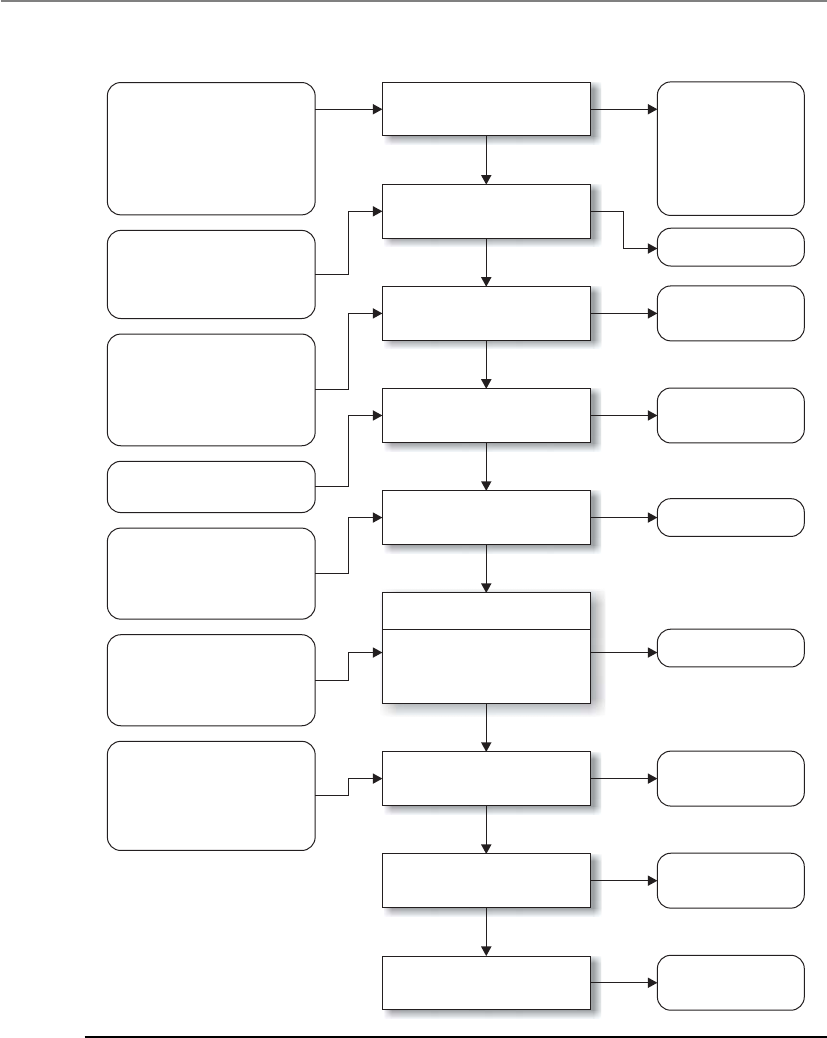
CISSP All-in-One Exam Guide
80
Step 1.
System characterization
Step 2.
Threat identification
Step 3.
Vulnerability identification
Step 4.
Control analysis
Step 5.
Likelihood determination
Step 6. Impact analysis
Step 7.
Risk determination
Step 8.
Control recommendations
Step 9.
Results documentation
Input Risk Assessment Activities Output
Threat statement
Likelihood rating
Impact rating
List of potential
vulnerabilities
List of current and
planned controls
Risks and
associated risk levels
Recommended
controls
Risk assessment
report
•
•
•
•
•
System boundary
System functions
System and data
criticality
System and data
Sensitivity
•
•
•
•
•
•
Hardware
Software
System interfaces
Data and information
People
System mission
•
•
History of system attack
Data from intelligence
agencies, NIPC, OIG,
FedCIRC, mass media
•
•
•
•
Reports from prior
risk assessments
Any audit comments
Security requirements
Security test results
•
•
Current controls
Planned controls
•
•
•
•
Mission impact analysis
Asset criticality assessment
Data criticality
Data sensitivity
•
•
•
Likelihood of threat
exploitation
Magnitude of impact
Adequacy of planned or
current controls
•
•
•
Loss of integrity
Loss of availability
Loss of confidentiality
•
•
•
•
Threat-source motivation
Threat capacity
Nature of vulnerability
Current controls
Figure 2-9 Risk management steps in NIST SP 800-30

Chapter 2: Information Security Governance and Risk Management
81
people manage and direct the risk evaluation for information security within their
company. This places the people that work inside the organization in the power posi-
tions as being able to make the decisions regarding what is the best approach for evalu-
ating the security of their organization. This relies on the idea that the people working
in these environments best understand what is needed and what kind of risks they are
facing. The individuals who make up the risk assessment team go through rounds of
facilitated workshops. The facilitator helps the team members understand the risk
methodology and how to apply it to the vulnerabilities and threats identified within
their specific business units. It stresses a self-directed team approach. The scope of an
OCTAVE assessment is usually very wide compared to the more focused approach of
FRAP. Where FRAP would be used to assess a system or application, OCTAVE would be
used to assess all systems, applications, and business processes within the organization.
While NIST, FRAP, and OCTAVE methodologies focus on IT security threats and
information security risks, AS/NZS 4360 takes a much broader approach to risk man-
agement. This Australian and New Zealand methodology can be used to understand a
company’s financial, capital, human safety, and business decisions risks. Although it
can be used to analyze security risks, it was not created specifically for this purpose. This
risk methodology is more focused on the health of a company from a business point of
view, not security.
If we need a risk methodology that is to be integrated into our security program, we
can use one that was previously mentioned within the ISO/IEC 27000 Series section.
ISO/IEC 27005 is an international standard for how risk management should be car-
ried out in the framework of an information security management system (ISMS). So
where the NIST risk methodology is mainly IT and operational focused, this methodol-
ogy deals with IT and the softer security issues (documentation, personnel security,
training, etc.) This methodology is to be integrated into an organizational security pro-
gram that addresses all of the security threats an organization could be faced with.
NOTE
NOTE In-depth information on some of these various risk methodologies
can be found in the article “Understanding Standards for Risk Management
and Compliance” at http://www.logicalsecurity.com/resources/resources_
articles.html.
Failure Modes and Effect Analysis (FMEA) is a method for determining functions,
identifying functional failures, and assessing the causes of failure and their failure ef-
fects through a structured process. It is commonly used in product development and
operational environments. The goal is to identify where something is most likely going
to break and either fix the flaws that could cause this issue or implement controls to
reduce the impact of the break. For example, you might choose to carry out an FMEA
on your organization’s network to identify single points of failure. These single points
of failure represent vulnerabilities that could directly affect the productivity of the net-
work as a whole. You would use this structured approach to identify these issues (vul-
nerabilities), assess their criticality (risk), and identify the necessary controls that
should be put into place (reduce risk).

CISSP All-in-One Exam Guide
82
The FMEA methodology uses failure modes (how something can break or fail) and
effects analysis (impact of that break or failure). The application of this process to a
chronic failure enables the determination of where exactly the failure is most likely to
occur. Think of it as being able to look into the future and locate areas that have the
potential for failure and then applying corrective measures to them before they do be-
come actual liabilities.
By following a specific order of steps, the best results can be maximized for an FMEA:
1. Start with a block diagram of a system or control.
2. Consider what happens if each block of the diagram fails.
3. Draw up a table in which failures are paired with their effects and an
evaluation of the effects.
4. Correct the design of the system, and adjust the table until the system is not
known to have unacceptable problems.
5. Have several engineers review the Failure Modes and Effect Analysis.
Table 2-6 is an example of how an FMEA can be carried out and documented. Al-
though most companies will not have the resources to do this level of detailed work for
every system and control, it can be carried out on critical functions and systems that can
drastically affect the company.
Prepared by:
Approved by:
Date:
Revision:
Failure Effect on . . .
Item
Identification
Function Failure
Mode
Failure
Cause
Component
or Functional
Assembly
Next
Higher
Assembly
System Failure
Detection
Method
IPS application
content filter
Inline
perimeter
protection
Fails to
close
Traffic
overload
Single point of
failure
Denial of
service
IPS blocks
ingress traffic
stream
IPS is
brought
down
Health check
status sent
to console
and e-mail
to security
administrator
Central
antivirus
signature
update engine
Push
updated
signatures
to all
servers and
workstations
Fails to
provide
adequate,
timely
protection
against
malware
Central
server
goes
down
Individual
node’s
antivirus
software is
not updated
Network is
infected with
malware
Central
server can
be infected
and/or
infect other
systems
Heartbeat
status check
sent to central
console,
and e-mail
to network
administrator
Fire
suppression
water pipes
Suppress fire
in building 1
in 5 zones
Fails to
close
Water
in pipes
freezes
None Building 1
has no
suppression
agent
available
Fire
suppression
system
pipes break
Suppression
sensors tied
directly into
fire system
central
console
Etc.
Table 2-6 How an FMEA Can Be Carried Out and Documented
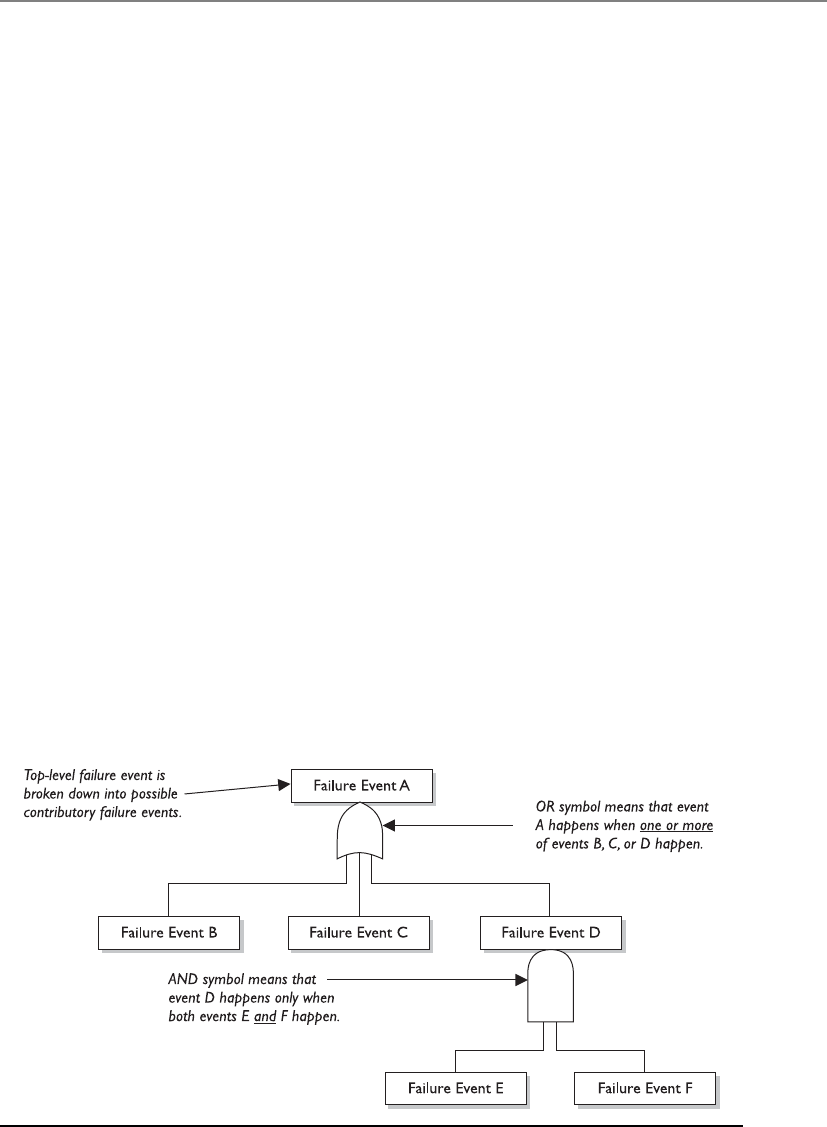
Chapter 2: Information Security Governance and Risk Management
83
FMEA was first developed for systems engineering. Its purpose is to examine the
potential failures in products and the processes involved with them. This approach
proved to be successful and has been more recently adapted for use in evaluating risk
management priorities and mitigating known threat vulnerabilities.
FMEA is used in assurance risk management because of the level of detail, variables,
and complexity that continues to rise as corporations understand risk at more granular
levels. This methodical way of identifying potential pitfalls is coming into play more as
the need for risk awareness—down to the tactical and operational levels—continues to
expand.
While FMEA is most useful as a survey method to identify major failure modes in a
given system, the method is not as useful in discovering complex failure modes that
may be involved in multiple systems or subsystems. A fault tree analysis usually proves
to be a more useful approach to identifying failures that can take place within more
complex environments and systems. Fault tree analysis follows this general process.
First, an undesired effect is taken as the root or top event of a tree of logic. Then, each
situation that has the potential to cause that effect is added to the tree as a series of
logic expressions. Fault trees are then labeled with actual numbers pertaining to failure
probabilities. This is typically done by using computer programs that can calculate the
failure probabilities from a fault tree.
Figure 2-10 shows a simplistic fault tree and the different logic symbols used to
represent what must take place for a specific fault event to occur.
When setting up the tree, you must accurately list all the threats or faults that can
occur within a system. The branches of the tree can be divided into general categories,
such as physical threats, networks threats, software threats, Internet threats, and compo-
nent failure threats. Then, once all possible general categories are in place, you can trim
them and effectively prune the branches from the tree that won’t apply to the system in
question. In general, if a system is not connected to the Internet by any means, remove
that general branch from the tree.
Figure 2-10 Fault tree and logic components

CISSP All-in-One Exam Guide
84
Some of the most common software failure events that can be explored through a
fault tree analysis are the following:
• False alarms
• Insufficient error handling
• Sequencing or order
• Incorrect timing outputs
• Valid but not expected outputs
Of course, because of the complexity of software and heterogeneous environments,
this is a very small list.
Just in case you do not have enough risk assessment methodologies to choose from,
you can also look at CRAMM (Central Computing and Telecommunications Agency
Risk Analysis and Management Method), which was created by the United Kingdom,
and its automated tools are sold by Siemens. It works in three distinct stages: define
objectives, assess risks, and identify countermeasures. It is really not fair to call it a
unique methodology, because it follows the basic structure of any risk methodology. It
just has everything (questionnaires, asset dependency modeling, assessment formulas,
compliancy reporting) in automated tool format.
Similar to the “Security Frameworks” section that covered things such as ISO/IEC
27000, CobiT, COSO, Zachman, SABSA, ITIL, and Six Sigma, this section on risk meth-
odologies could seem like another list of confusing standards and guidelines. Remem-
ber that the methodologies have a lot of overlapping similarities because each one has
the specific goal of identifying things that could hurt the organization (vulnerabilities
and threats) so that those things could be addressed (risk reduced). What make these
methodologies different from each other are their unique approaches and focuses. If
you need to deploy an organization-wide risk management program and integrate it
into your security program, you should follow the ISO/IEC 27005 or OCTAVE methods.
If you need to focus just on IT security risks during your assessment, you can follow
NIST 800-30. If you have a limited budget and need to carry out a focused assessment
on an individual system or process, the Facilitated Risk Analysis Process can be fol-
lowed. If you really want to dig into the details of how a security flaw within a specific
system could cause negative ramifications, you could use Failure Modes and Effect
Analysis or fault tree analysis. If you need to understand your company’s business risks,
then you can follow the AS/NZS 4360 approach.
So up to this point, we have accomplished the following items:
• Developed a risk management policy
• Developed a risk management team
• Identified company assets to be assessed
• Calculated the value of each asset
• Identified the vulnerabilities and threats that can affect the identified assets
• Chose a risk assessment methodology that best fits our needs

Chapter 2: Information Security Governance and Risk Management
85
The next thing we need to figure out is if our risk analysis approach should be quan-
titative or qualitative in nature, which we will cover in the following section.
NOTE
NOTE A risk assessment is used to gather data. A risk analysis examines the
gathered data to produce results that can be acted upon.
Risk Analysis Approaches
One consultant said this threat could cost us $150,000, another consultant said it was red, and
the audit team assigned it a four. Should we be concerned or not?
The two approaches to risk analysis are quantitative and qualitative. A quantitative
risk analysis is used to assign monetary and numeric values to all elements of the risk
analysis process. Each element within the analysis (asset value, threat frequency, sever-
ity of vulnerability, impact damage, safeguard costs, safeguard effectiveness, uncertain-
ty, and probability items) is quantified and entered into equations to determine total
and residual risks. It is more of a scientific or mathematical approach to risk analysis
compared to qualitative. A qualitative risk analysis uses a “softer” approach to the data
elements of a risk analysis. It does not quantify that data, which means that it does not
assign numeric values to the data so that they can be used in equations. As an example,
Key Terms
•NIST 800-30 Risk Management Guide for Information Technology
Systems A U.S. federal standard that is focused on IT risks.
•Facilitated Risk Analysis Process (FRAP) A focused, qualitative
approach that carries out prescreening to save time and money.
•Operationally Critical Threat, Asset, and Vulnerability Evaluation
(OCTAVE) Team-oriented approach that assesses organizational and
IT risks through facilitated workshops.
•AS/NZS 4360 Australia and New Zealand business risk management
assessment approach.
•ISO/IEC 27005 International standard for the implementation of a
risk management program that integrates into an information security
management system (ISMS).
•Failure Modes and Effect Analysis Approach that dissects a component
into its basic functions to identify flaws and those flaws’ effects.
•Fault tree analysis Approach to map specific flaws to root causes in
complex systems.
•CRAMM Central Computing and Telecommunications Agency Risk
Analysis and Management Method.

CISSP All-in-One Exam Guide
86
the results of a quantitative risk analysis could be that the organization is at risk of los-
ing $100,000 if a buffer overflow was exploited on a web server, $25,000 if a database
was compromised, and $10,000 if a file server was compromised. A qualitative risk
analysis would not present these findings in monetary values, but would assign ratings
to the risks, as in Red, Yellow, and Green.
A quantitative analysis uses risk calculations that attempt to predict the level of
monetary losses and the probability for each type of threat. Qualitative analysis does
not use calculations. Instead, it is more opinion- and scenario-based and uses a rating
system to relay the risk criticality levels.
Quantitative and qualitative approaches have their own pros and cons, and each
applies more appropriately to some situations than others. Company management
and the risk analysis team, and the tools they decide to use, will determine which ap-
proach is best.
In the following sections we will dig into the depths of quantitative analysis and
then revisit the qualitative approach. We will then compare and contrast their attributes.
Automated Risk Analysis Methods
Collecting all the necessary data that needs to be plugged into risk analysis equations
and properly interpreting the results can be overwhelming if done manually. Several
automated risk analysis tools on the market can make this task much less painful and,
hopefully, more accurate. The gathered data can be reused, greatly reducing the time
required to perform subsequent analyses. The risk analysis team can also print reports
and comprehensive graphs to present to management.
NOTE
NOTE Remember that vulnerability assessments are different from risk
assessments. Vulnerability assessments just find the vulnerabilities (the holes).
A risk assessment calculates the probability of the vulnerabilities being
exploited and the associated business impact.
The objective of these tools is to reduce the manual effort of these tasks, perform
calculations quickly, estimate future expected losses, and determine the effectiveness
and benefits of the security countermeasures chosen. Most automatic risk analysis
products port information into a database and run several types of scenarios with dif-
ferent parameters to give a panoramic view of what the outcome will be if different
threats come to bear. For example, after such a tool has all the necessary information
inputted, it can be rerun several times with different parameters to compute the poten-
tial outcome if a large fire were to take place; the potential losses if a virus were to dam-
age 40 percent of the data on the main file server; how much the company would lose
if an attacker were to steal all the customer credit card information held in three data-
bases; and so on. Running through the different risk possibilities gives a company a
more detailed understanding of which risks are more critical than others, and thus
which ones to address first.

Chapter 2: Information Security Governance and Risk Management
87
Steps of a Quantitative Risk Analysis
If we follow along with our previous sections in this chapter, we have already carried
out our risk assessment, which is the process of gathering data for a risk analysis. We
have identified the assets that are to be assessed, associated a value to each asset, and
identified the vulnerabilities and threats that could affect these assets. Now we need to
carry out the risk analysis portion, which means that we need to figure out how to in-
terpret all the data that was gathered during the assessment.
If we choose to carry out a quantitative analysis, then we are going to use mathe-
matical equations for our data interpretation process. The most commonly used equa-
tions used for this purpose are the single loss expectancy (SLE) and the annual loss
expectancy (ALE).
The SLE is a dollar amount that is assigned to a single event that represents the
company’s potential loss amount if a specific threat were to take place. The equation is
laid out as follows:
Asset Value × Exposure Factor (EF) = SLE
The exposure factor (EF) represents the percentage of loss a realized threat could
have on a certain asset. For example, if a data warehouse has the asset value of $150,000,
it can be estimated that if a fire were to occur, 25 percent of the warehouse would be
damaged, in which case the SLE would be $37,500:
Asset Value ($150,000) × Exposure Factor (25%) = $37,500
This tells us that the company can potentially lose $37,500 if a fire took place. But
we need to know what our annual potential loss is, since we develop and use our secu-
rity budgets on an annual basis. This is where the ALE equation comes into play. The
ALE equation is as follows:
SLE × Annualized Rate of Occurrence (ARO) = ALE
The annualized rate of occurrence (ARO) is the value that represents the estimated
frequency of a specific threat taking place within a 12-month timeframe. The range can
be from 0.0 (never) to 1.0 (once a year) to greater than 1 (several times a year) and
anywhere in between. For example, if the probability of a fire taking place and damag-
ing our data warehouse is once every ten years, the ARO value is 0.1.
So, if a fire taking place within a company’s data warehouse facility can cause $37,500
in damages, and the frequency (or ARO) of a fire taking place has an ARO value of 0.1
(indicating once in ten years), then the ALE value is $3,750 ($37,500 × 0.1 = $3,750).
The ALE value tells the company that if it wants to put in controls to protect the as-
set (warehouse) from this threat (fire), it can sensibly spend $3,750 or less per year to
provide the necessary level of protection. Knowing the real possibility of a threat and
how much damage, in monetary terms, the threat can cause is important in determin-
ing how much should be spent to try and protect against that threat in the first place. It
would not make good business sense for the company to spend more than $3,750 per
year to protect itself from this threat.

CISSP All-in-One Exam Guide
88
Now that we have all these numbers, what do we do with them? Let’s look at the
example in Table 2-7, which shows the outcome of a quantitative risk analysis. With
this data, the company can make intelligent decisions on what threats must be ad-
dressed first because of the severity of the threat, the likelihood of it happening, and
how much could be lost if the threat were realized. The company now also knows how
much money it should spend to protect against each threat. This will result in good
business decisions, instead of just buying protection here and there without a clear
understanding of the big picture. Because the company has a risk of losing up to $6,500
if data is corrupted by virus infiltration, up to this amount of funds can be earmarked
toward providing antivirus software and methods to ensure that a virus attack will not
happen.
When carrying out a quantitative analysis, some people mistakenly think that the
process is purely objective and scientific because data is being presented in numeric
values. But a purely quantitative analysis is hard to achieve because there is still some
subjectivity when it comes to the data. How do we know that a fire will only take place
once every ten years? How do we know that the damage from a fire will be 25 percent
of the value of the asset? We don’t know these values exactly, but instead of just pulling
them out of thin air they should be based upon historical data and industry experience.
In quantitative risk analysis, we can do our best to provide all the correct information,
and by doing so we will come close to the risk values, but we cannot predict the future
and how much the future will cost us or the company.
Asset Threat Single Loss
Expectancy
(SLE)
Annualized Rate
of Occurrence
(ARO)
Annualized Loss
Expectancy
(ALE)
Facility Fire $230,000 0.1 $23,000
Trade secret Stolen $40,000 0.01 $400
File server Failed $11,500 0.1 $1,150
Data Virus $6,500 1.0 $6,500
Customer
credit card info
Stolen $300,000 3.0 $900,000
Table 2-7 Breaking Down How SLE and ALE Values Are Used
Uncertainty
I just made all these numbers up.
Response: Well, they look impressive.
In risk analysis, uncertainty refers to the degree to which you lack confidence
in an estimate. This is expressed as a percentage, from 0 to 100 percent. If you
have a 30 percent confidence level in something, then it could be said you have a
70 percent uncertainty level. Capturing the degree of uncertainty when carrying
out a risk analysis is important, because it indicates the level of confidence the
team and management should have in the resulting figures.

Chapter 2: Information Security Governance and Risk Management
89
Results of a Quantitative Risk Analysis
The risk analysis team should have clearly defined goals. The following is a short list of
what generally is expected from the results of a risk analysis:
• Monetary values assigned to assets
• Comprehensive list of all possible and significant threats
• Probability of the occurrence rate of each threat
• Loss potential the company can endure per threat in a 12-month time span
• Recommended controls
Although this list looks short, there is usually an incredible amount of detail under
each bullet item. This report will be presented to senior management, which will be con-
cerned with possible monetary losses and the necessary costs to mitigate these risks. Al-
though the reports should be as detailed as possible, there should be executive abstracts
so senior management can quickly understand the overall findings of the analysis.
Qualitative Risk Analysis
I have a feeling that we are secure.
Response: Great! Let’s all go home.
Another method of risk analysis is qualitative, which does not assign numbers and
monetary values to components and losses. Instead, qualitative methods walk through
different scenarios of risk possibilities and rank the seriousness of the threats and the
validity of the different possible countermeasures based on opinions. (A wide sweeping
analysis can include hundreds of scenarios.) Qualitative analysis techniques include
judgment, best practices, intuition, and experience. Examples of qualitative techniques
to gather data are Delphi, brainstorming, storyboarding, focus groups, surveys, ques-
tionnaires, checklists, one-on-one meetings, and interviews. The risk analysis team will
determine the best technique for the threats that need to be assessed, as well as the
culture of the company and individuals involved with the analysis.
The team that is performing the risk analysis gathers personnel who have experi-
ence and education on the threats being evaluated. When this group is presented with
a scenario that describes threats and loss potential, each member responds with their
gut feeling and experience on the likelihood of the threat and the extent of damage that
may result.
A scenario of each identified vulnerability and how it would be exploited is ex-
plored. The “expert” in the group, who is most familiar with this type of threat, should
review the scenario to ensure it reflects how an actual threat would be carried out. Safe-
guards that would diminish the damage of this threat are then evaluated, and the sce-
nario is played out for each safeguard. The exposure possibility and loss possibility can
be ranked as high, medium, or low on a scale of 1 to 5 or 1 to 10. A common qualitative
risk matrix is shown in Figure 2-11. Once the selected personnel rank the possibility of
a threat happening, the loss potential, and the advantages of each safeguard, this infor-
mation is compiled into a report and presented to management to help it make better
decisions on how best to implement safeguards into the environment. The benefits of
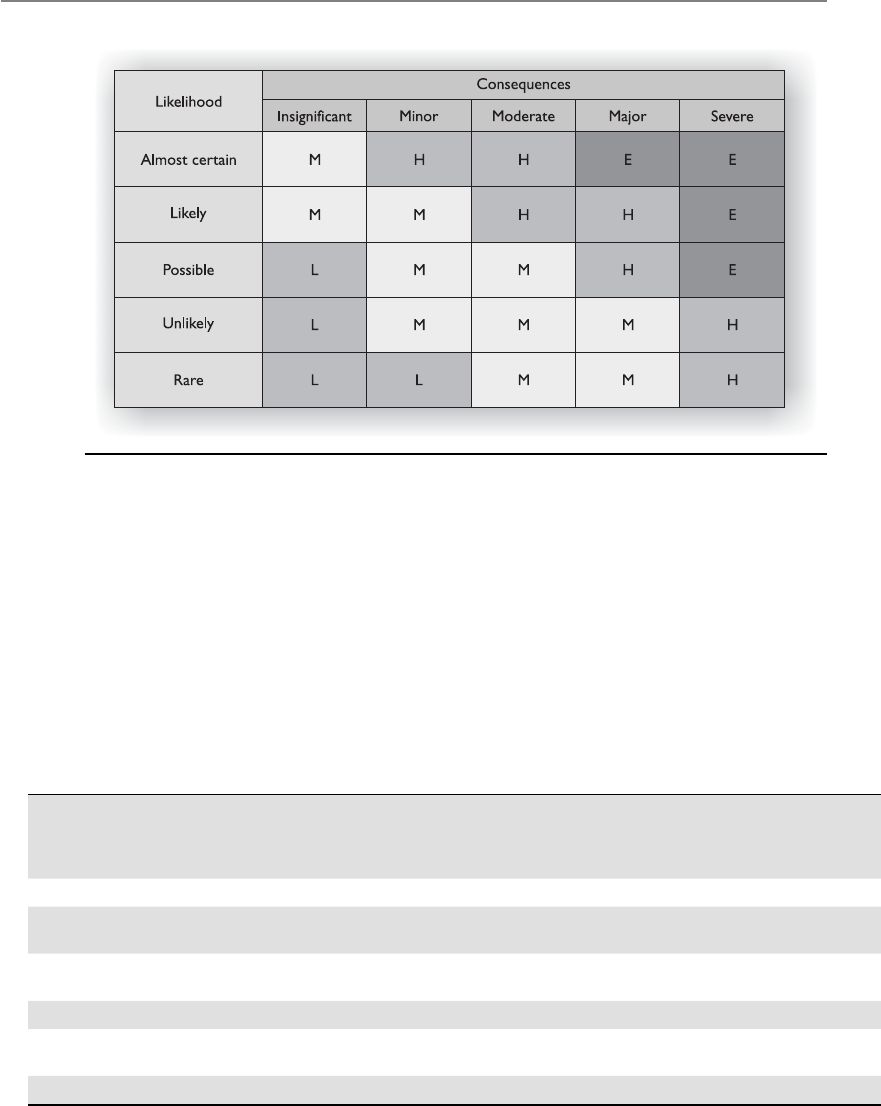
CISSP All-in-One Exam Guide
90
this type of analysis are that communication must happen among team members to
rank the risks, safeguard strengths, and identify weaknesses, and the people who know
these subjects the best provide their opinions to management.
Let’s look at a simple example of a qualitative risk analysis.
The risk analysis team presents a scenario explaining the threat of a hacker accessing
confidential information held on the five file servers within the company. The risk
analysis team then distributes the scenario in a written format to a team of five people
(the IT manager, database administrator, application programmer, system operator,
and operational manager), who are also given a sheet to rank the threat’s severity, loss
potential, and each safeguard’s effectiveness, with a rating of 1 to 5, 1 being the least
severe, effective, or probable. Table 2-8 shows the results.
Figure 2-11 Qualitative risk matrix. Likelihood versus consequences (impact).
Threat = Hacker
Accessing
Confidential
Information
Severity
of Threat
Probability
of Threat
Taking
Place
Potential
Loss
to the
Company
Effectiveness
of Firewall
Effectiveness
of Intrusion
Detection
System
Effectiveness
of Honeypot
IT manager 4 2 4 4 3 2
Database
administrator
44 4 3 4 1
Application
programmer
23 3 4 2 1
System operator 3 4 3 4 2 1
Operational
manager
54 4 4 4 2
Results 3.6 3.4 3.6 3.8 3 1.4
Table 2-8 Example of a Qualitative Analysis

Chapter 2: Information Security Governance and Risk Management
91
This data is compiled and inserted into a report and presented to management.
When management is presented with this information, it will see that its staff (or a
chosen set) feels that purchasing a firewall will protect the company from this threat
more than purchasing an intrusion detection system or setting up a honeypot system.
This is the result of looking at only one threat, and management will view the sever-
ity, probability, and loss potential of each threat so it knows which threats cause the
greatest risk and should be addressed first.
Quantitative vs. Qualitative
So which method should we use?
Each method has its advantages and disadvantages, some of which are outlined in
Table 2-9 for purposes of comparison.
The risk analysis team, management, risk analysis tools, and culture of the company
will dictate which approach—quantitative or qualitative—should be used. The goal of
either method is to estimate a company’s real risk and to rank the severity of the threats
so the correct countermeasures can be put into place within a practical budget.
Table 2-9 refers to some of the positive aspects of the qualitative and quantitative
approaches. However, not everything is always easy. In deciding to use either a qualita-
tive or quantitative approach, the following points might need to be considered.
Qualitative Cons
• The assessments and results are subjective and opinion-based.
• Eliminates the opportunity to create a dollar value for cost/benefit discussions.
• Hard to develop a security budget from the results because monetary values
are not used.
• Standards are not available. Each vendor has its own way of interpreting the
processes and their results.
The Delphi Technique
The oracle Delphi told me that everyone agrees with me.
Response: Okay, let’s do this again—anonymously.
The Delphi technique is a group decision method used to ensure that each
member gives an honest opinion of what he or she thinks the result of a particu-
lar threat will be. This avoids a group of individuals feeling pressured to go along
with others’ thought processes and enables them to participate in an indepen-
dent and anonymous way. Each member of the group provides his or her opinion
of a certain threat and turns it in to the team that is performing the analysis. The
results are compiled and distributed to the group members, who then write down
their comments anonymously and return them to the analysis group. The com-
ments are compiled and redistributed for more comments until a consensus is
formed. This method is used to obtain an agreement on cost, loss values, and
probabilities of occurrence without individuals having to agree verbally.

CISSP All-in-One Exam Guide
92
Quantitative Cons
• Calculations can be complex. Can management understand how these values
were derived?
• Without automated tools, this process is extremely laborious.
• More preliminary work is needed to gather detailed information about the
environment.
• Standards are not available. Each vendor has its own way of interpreting the
processes and their results.
NOTE
NOTE Since a purely quantitative assessment is close to impossible and a
purely qualitative process does not provide enough statistical data for financial
decisions, these two risk analysis approaches can be used in a hybrid approach.
Quantitative evaluation can be used for tangible assets (monetary values), and
a qualitative assessment can be used for intangible assets (priority values).
Protection Mechanisms
Okay, so we know we are at risk, and we know the probability of it happening. Now, what do
we do?
Response: Run.
The next step is to identify the current security mechanisms and evaluate their ef-
fectiveness.
Because a company has such a wide range of threats (not just computer viruses and
attackers), each threat type must be addressed and planned for individually. Access
control mechanisms used as security safeguards are discussed in Chapter 3. Software
Attribute Quantitative Qualitative
Requires no calculations X
Requires more complex calculations X
Involves high degree of guesswork X
Provides general areas and indications of risk X
Is easier to automate and evaluate X
Used in risk management performance tracking X
Allows for cost/benefit analysis X
Uses independently verifiable and objective metrics X
Provides the opinions of the individuals who know
the processes best
X
Shows clear-cut losses that can be accrued within
one year’s time
X
Table 2-9 Quantitative versus Qualitative Characteristics

Chapter 2: Information Security Governance and Risk Management
93
applications and data malfunction considerations are covered in Chapters 4 and 10.
Site location, fire protection, site construction, power loss, and equipment malfunc-
tions are examined in detail in Chapter 5. Telecommunication and networking issues
are analyzed and presented in Chapter 6. Business continuity and disaster recovery
concepts are addressed in Chapter 8. All of these subjects have their own associated
risks and planning requirements.
This section addresses identifying and choosing the right countermeasures for com-
puter systems. It gives the best attributes to look for and the different cost scenarios to
investigate when comparing different types of countermeasures. The end product of the
analysis of choices should demonstrate why the selected control is the most advanta-
geous to the company.
Control Selection
A security control must make good business sense, meaning it is cost-effective (its ben-
efit outweighs its cost). This requires another type of analysis: a cost/benefit analysis. A
commonly used cost/benefit calculation for a given safeguard (control) is:
(ALE before implementing safeguard) – (ALE after implementing safeguard) –
(annual cost of safeguard) = value of safeguard to the company
For example, if the ALE of the threat of a hacker bringing down a web server is
$12,000 prior to implementing the suggested safeguard, and the ALE is $3,000 after
implementing the safeguard, while the annual cost of maintenance and operation of the
safeguard is $650, then the value of this safeguard to the company is $8,350 each year.
The cost of a countermeasure is more than just the amount filled out on the pur-
chase order. The following items should be considered and evaluated when deriving
the full cost of a countermeasure:
• Product costs
• Design/planning costs
• Implementation costs
• Environment modifications
• Compatibility with other countermeasures
• Maintenance requirements
• Testing requirements
• Repair, replacement, or update costs
• Operating and support costs
• Effects on productivity
• Subscription costs
• Extra man-hours for monitoring and responding to alerts
• Beer for the headaches that this new tool will bring about

CISSP All-in-One Exam Guide
94
Many companies have gone through the pain of purchasing new security products
without understanding that they will need the staff to maintain those products. Al-
though tools automate tasks, many companies were not even carrying out these tasks
before, so they do not save on man-hours, but many times require more hours. For
example, Company A decides that to protect many of its resources, purchasing an IDS
is warranted. So, the company pays $5,500 for an IDS. Is that the total cost? Nope. This
software should be tested in an environment that is segmented from the production
environment to uncover any unexpected activity. After this testing is complete and the
security group feels it is safe to insert the IDS into its production environment, the se-
curity group must install the monitoring management software, install the sensors, and
properly direct the communication paths from the sensors to the management console.
The security group may also need to reconfigure the routers to redirect traffic flow, and
it definitely needs to ensure that users cannot access the IDS management console. Fi-
nally, the security group should configure a database to hold all attack signatures, and
then run simulations.
Costs associated with an IDS alert response should most definitely be considered.
Now that Company A has an IDS in place, security administrators may need additional
alerting equipment such as smart phones. And then there are the time costs associated
with a response to an IDS event.
Anyone who has worked in an IT group knows that some adverse reaction almost
always takes place in this type of scenario. Network performance can take an unaccept-
able hit after installing a product if it is an inline or proactive product. Users may no
longer be able to access the Unix server for some mysterious reason. The IDS vendor
may not have explained that two more service patches are necessary for the whole thing
to work correctly. Staff time will need to be allocated for training and to respond to all
of the positive and false-positive alerts the new IDS sends out.
So, for example, the cost of this countermeasure could be $5,500 for the product;
$2,500 for training; $3,400 for the lab and testing time; $2,600 for the loss in user pro-
ductivity once the product is introduced into production; and $4,000 in labor for rout-
er reconfiguration, product installation, troubleshooting, and installation of the two
service patches. The real cost of this countermeasure is $18,000. If our total potential
loss was calculated at $9,000, we went over budget by 100 percent when applying this
countermeasure for the identified risk. Some of these costs may be hard or impossible
to identify before they are incurred, but an experienced risk analyst would account for
many of these possibilities.
Functionality and Effectiveness of Countermeasures
The countermeasure doesn’t work, but it has a fun interface.
Response: Good enough.
The risk analysis team must evaluate the safeguard’s functionality and effectiveness.
When selecting a safeguard, some attributes are more favorable than others. Table 2-10
lists and describes attributes that should be considered before purchasing and commit-
ting to a security protection mechanism.
Safeguards can provide deterrence attributes if they are highly visible. This tells po-
tential evildoers that adequate protection is in place and that they should move on to
an easier target. Although the safeguard may be highly visible, attackers should not be

Chapter 2: Information Security Governance and Risk Management
95
able to discover the way it works, thus enabling them to attempt to modify the safe-
guard, or know how to get around the protection mechanism. If users know how to
disable the antivirus program that is taking up CPU cycles or know how to bypass a
proxy server to get to the Internet without restrictions, they will do so.
Characteristic Description
Modular It can be installed or removed from an environment without
adversely affecting other mechanisms.
Provides uniform protection A security level is applied to all mechanisms it is designed to
protect in a standardized method.
Provides override functionality An administrator can override the restriction if necessary.
Defaults to least privilege When installed, it defaults to a lack of permissions and rights
instead of installing with everyone having full control.
Independent of safeguards and
the asset it is protecting
The safeguard can be used to protect different assets, and
different assets can be protected by different safeguards.
Flexibility and security The more security the safeguard provides, the better. This
functionality should come with flexibility, which enables you to
choose different functions instead of all or none.
User interaction Does not panic users.
Clear distinction between user
and administrator
A user should have fewer permissions when it comes to
configuring or disabling the protection mechanism.
Minimum human intervention When humans have to configure or modify controls, this
opens the door to errors. The safeguard should require the
least possible amount of input from humans.
Asset protection Asset is still protected even if countermeasure needs to
be reset.
Easily upgraded Software continues to evolve, and updates should be able to
happen painlessly.
Auditing functionality There should be a mechanism that is part of the safeguard
that provides minimum and/or verbose auditing.
Minimizes dependence on
other components
The safeguard should be flexible and not have strict
requirements about the environment into which it will
be installed.
Easily usable, acceptable, and
tolerated by personnel
If the safeguards provide barriers to productivity or add extra
steps to simple tasks, users will not tolerate it.
Must produce output in usable
and understandable format
Important information should be presented in a format easy
for humans to understand and use for trend analysis.
Must be able to reset safeguard The mechanism should be able to be reset and returned
to original configurations and settings without affecting the
system or asset it is protecting.
Testable The safeguard should be able to be tested in different
environments under different situations.
Table 2-10 Characteristics to Seek When Obtaining Safeguards

CISSP All-in-One Exam Guide
96
Putting It Together
To perform a risk analysis, a company first decides what assets must be protected and
to what extent. It also indicates the amount of money that can go toward protecting
specific assets. Next, it must evaluate the functionality of the available safeguards and
determine which ones would be most beneficial for the environment. Finally, the com-
pany needs to appraise and compare the costs of the safeguards. These steps and the
resulting information enable management to make the most intelligent and informed
decisions about selecting and purchasing countermeasures.
Total Risk vs. Residual Risk
The reason a company implements countermeasures is to reduce its overall risk to an
acceptable level. As stated earlier, no system or environment is 100 percent secure,
which means there is always some risk left over to deal with. This is called residual risk.
Characteristic Description
Does not introduce other
compromises
The safeguard should not provide any covert channels or
back doors.
System and user performance System and user performance should not be greatly affected.
Universal application The safeguard can be implemented across the environment
and does not require many, if any, exceptions.
Proper alerting Thresholds should be able to be set as to when to alert
personnel of a security breach, and this type of alert should be
acceptable.
Does not affect assets The assets in the environment should not be adversely
affected by the safeguard.
Table 2-10 Characteristics to Seek When Obtaining Safeguards (continued)
We Are Never Done
Only by reassessing the risks on a periodic basis can a statement of safeguard
performance be trusted. If the risk has not changed, and the safeguards imple-
mented are functioning in good order, then it can be said that the risk is being
properly mitigated. Regular IRM monitoring will support the information secu-
rity risk ratings.
Vulnerability analysis and continued asset identification and valuation are
also important tasks of risk management monitoring and performance. The cycle
of continued risk analysis is a very important part of determining whether the
safeguard controls that have been put in place are appropriate and necessary
to safeguard the assets and environment.

Chapter 2: Information Security Governance and Risk Management
97
Residual risk is different from total risk, which is the risk a company faces if it
chooses not to implement any type of safeguard. A company may choose to take on
total risk if the cost/benefit analysis results indicate this is the best course of action. For
example, if there is a small likelihood that a company’s web servers can be compro-
mised, and the necessary safeguards to provide a higher level of protection cost more
than the potential loss in the first place, the company will choose not to implement the
safeguard, choosing to deal with the total risk.
There is an important difference between total risk and residual risk and which type
of risk a company is willing to accept. The following are conceptual formulas:
threats × vulnerability × asset value = total risk
(threats × vulnerability × asset value) × controls gap = residual risk
You may also see these concepts illustrated as the following:
total risk – countermeasures = residual risk
NOTE
NOTE The previous formulas are not constructs you can actually plug
numbers into. They are instead used to illustrate the relation of the different
items that make up risk in a conceptual manner. This means no multiplication
or mathematical functions actually take place. It is a means of understanding
what items are involved when defining either total or residual risk.
During a risk assessment, the threats and vulnerabilities are identified. The possibility
of a vulnerability being exploited is multiplied by the value of the assets being assessed,
which results in the total risk. Once the controls gap (protection the control cannot pro-
vide) is factored in, the result is the residual risk. Implementing countermeasures is a way
of mitigating risks. Because no company can remove all threats, there will always be some
residual risk. The question is what level of risk the company is willing to accept.
Handling Risk
Now that we know about the risk, what do we do with it?
Response: Hide it behind that plant.
Once a company knows the amount of total and residual risk it is faced with, it
must decide how to handle it. Risk can be dealt with in four basic ways: transfer it,
avoid it, reduce it, or accept it.
Many types of insurance are available to companies to protect their assets. If a com-
pany decides the total risk is too high to gamble with, it can purchase insurance, which
would transfer the risk to the insurance company.
If a company decides to terminate the activity that is introducing the risk, this is
known as risk avoidance. For example, if a company allows employees to use instant
messaging (IM), there are many risks surrounding this technology. The company could
decide not to allow any IM activity by their users because there is not a strong enough
business need for its continued use. Discontinuing this service is an example of risk
avoidance.

CISSP All-in-One Exam Guide
98
Another approach is risk mitigation, where the risk is reduced to a level considered
acceptable enough to continue conducting business. The implementation of firewalls,
training, and intrusion/detection protection systems or other control types represent
types of risk mitigation efforts.
The last approach is to accept the risk, which means the company understands the
level of risk it is faced with, as well as the potential cost of damage, and decides to just
live with it and not implement the countermeasure. Many companies will accept risk
when the cost/benefit ratio indicates that the cost of the countermeasure outweighs the
potential loss value.
A crucial issue with risk acceptance is understanding why this is the best approach
for a specific situation. Unfortunately, today many people in organizations are accept-
ing risk and not understanding fully what they are accepting. This usually has to do
with the relative newness of risk management in the security field and the lack of edu-
cation and experience in those personnel who make risk decisions. When business
managers are charged with the responsibility of dealing with risk in their department,
most of the time they will accept whatever risk is put in front of them because their real
goals pertain to getting a project finished and out the door. They don’t want to be
bogged down by this silly and irritating security stuff.
Risk acceptance should be based on several factors. For example, is the potential
loss lower than the countermeasure? Can the organization deal with the “pain” that
will come with accepting this risk? This second consideration is not purely a cost deci-
sion, but may entail noncost issues surrounding the decision. For example, if we accept
this risk, we must add three more steps in our production process. Does that make
sense for us? Or if we accept this risk, more security incidents may arise from it, and are
we prepared to handle those?
The individual or group accepting risk must also understand the potential visibility
of this decision. Let’s say it has been determined that the company does not need to
actually protect customers’ first names, but it does have to protect other items like So-
cial Security numbers, account numbers, and so on. So these current activities are in
compliance with the regulations and laws, but what if your customers find out you are
not properly protecting their names and they associate such things with identity fraud
because of their lack of education on the matter? The company may not be able to
handle this potential reputation hit, even if it is doing all it is supposed to be doing.
Perceptions of a company’s customer base are not always rooted in fact, but the possi-
bility that customers will move their business to another company is a potential fact
your company must comprehend.
Figure 2-12 shows how a risk management program can be set up, which ties to-
gether all the concepts covered in this section.
Key Terms
•Quantitative risk analysis Assigning monetary and numeric values to
all the data elements of a risk assessment.
•Qualitative risk analysis Opinion-based method of analyzing risk
with the use of scenarios and ratings.
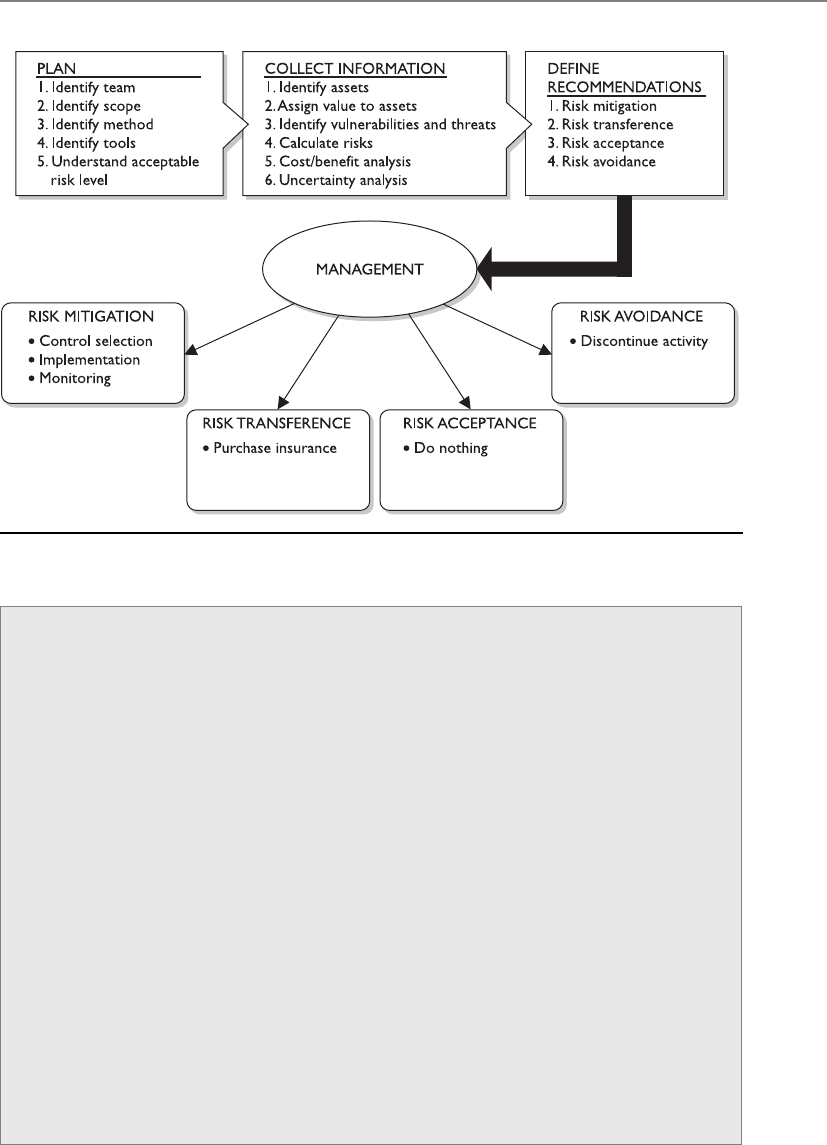
Chapter 2: Information Security Governance and Risk Management
99
Figure 2-12 How a risk management program can be set up
•Single loss expectancy One instance of an expected loss if a specific
vulnerability is exploited and how it affects a single asset. Asset Value ×
Exposure Factor = SLE.
•Annualized loss expectancy Annual expected loss if a specific
vulnerability is exploited and how it affects a single asset.
SLE × ARO = ALE.
•Uncertainty analysis Assigning confidence level values to data elements.
•Delphi method Data collection method that happens in an
anonymous fashion.
•Cost/benefit analysis Calculating the value of a control. (ALE before
implementing a control) – (ALE after implementing a control) –
(annual cost of control) = value of control.
•Functionality versus effectiveness of control Functionality is what a
control does, and its effectiveness is how well the control does it.
•Total risk Full risk amount before a control is put into place. Threats
× vulnerabilities × assets = total risk.
•Residual risk Risk that remains after implementing a control. Threats
× vulnerabilities × assets × (control gap) = residual risk.
•Handling risk Accept, transfer, mitigate, avoid.

CISSP All-in-One Exam Guide
100
Outsourcing
I am sure that company, based in another company that we have never met or ever heard of,
will protect our most sensitive secrets just fine.
Response: Yeah, they seem real nice.
More organizations are outsourcing business functions to allow them to focus on
their core business functions. Companies use hosting companies to maintain websites
and e-mail servers, service providers for various telecommunication connections, disas-
ter recovery companies for co-location capabilities, cloud computing providers for in-
frastructure or application services, developers for software creation, and security
companies to carry out vulnerability management. It is important to realize that while
you can outsource functionality, you cannot outsource risk. When your company is us-
ing these third-party companies for these various services, your company can still be
ultimately responsible if something like a data breach takes place. We will go more in
depth into these types of issues from a legal aspect (downstream liabilities) in Chapter
9, but let’s look at some things an organization should do to reduce its risk when it
comes to outsourcing.
• Review service provider’s security program
• Conduct onsite inspection and interviews
• Review contracts to ensure security and protection levels are agreed upon
• Ensure service level agreements are in place
• Review internal and external audit reports and third-party reviews
• Review references and communicate with former and existing customers
• Review Better Business Bureau reports
• Ensure they have a Business Continuity Plan (BCP) in place
• Implement a nondisclosure agreement (NDA)
• Understand provider’s legal and regulatory requirements
• Require a Statement on Auditing Standards (SAS) 70 audit report
NOTE
NOTE SAS 70 is an internal controls audit carried out by a third-party
auditing organization.
Outsourcing is so prevalent within organizations today and commonly forgotten
about when it comes to security and compliance requirements. It may be economical
to outsource certain functionalities, but if this allows security breaches to take place, it
can turn out to be a very costly decision.

Chapter 2: Information Security Governance and Risk Management
101
Policies, Standards, Baselines, Guidelines,
and Procedures
The risk assessment is done. Let’s call it a day.
Response: Nope, there’s more to do.
Computers and the information processed on them usually have a direct relation-
ship with a company’s critical missions and objectives. Because of this level of impor-
tance, senior management should make protecting these items a high priority and
provide the necessary support, funds, time, and resources to ensure that systems, net-
works, and information are protected in the most logical and cost-effective manner
possible. A comprehensive management approach must be developed to accomplish
these goals successfully. This is because everyone within an organization may have a
different set of personal values and experiences they bring to the environment with re-
gard to security. It is important to make sure everyone is regarding security at a level that
meets the needs of the organization as determined by laws, regulations, requirements,
and business goals that have been determined by risk assessments of the environment
of the organization.
For a company’s security plan to be successful, it must start at the top level and be
useful and functional at every single level within the organization. Senior management
needs to define the scope of security and identify and decide what must be protected and
to what extent. Management must understand the regulations, laws, and liability issues
it is responsible for complying with regarding security and ensure that the company as a
whole fulfills its obligations. Senior management also must determine what is expected
from employees and what the consequences of noncompliance will be. These decisions
should be made by the individuals who will be held ultimately responsible if something
goes wrong. But it is a common practice to bring in the expertise of the security officers
to collaborate in ensuring that sufficient policies and controls are being implemented to
achieve the goals being set and determined by senior management.
A security program contains all the pieces necessary to provide overall protection to
a corporation and lays out a long-term security strategy. A security program’s documen-
tation should be made up of security policies, procedures, standards, guidelines, and
baselines. The human resources and legal departments must be involved in the devel-
opment and enforcement of rules and requirements laid out in these documents.
The language, level of detail, formality of the documents, and supporting mechanisms
should be examined by the policy developers. Security policies, standards, guidelines, pro-
cedures, and baselines must be developed with a realistic view to be most effective. Highly
structured organizations usually follow documentation in a more uniform way. Less struc-
tured organizations may need more explanation and emphasis to promote compliance.
The more detailed the rules are, the easier it is to know when one has been violated. How-
ever, overly detailed documentation and rules can prove to be more burdensome than
helpful. The business type, its culture, and its goals must be evaluated to make sure the
proper language is used when writing security documentation.

CISSP All-in-One Exam Guide
102
There are a lot of legal liability issues surrounding security documentation. If your
organization has a policy outlining how it is supposed to be protecting sensitive infor-
mation and it is found out that your organization is not practicing what it is preaching,
criminal charges and civil suits could be filed and successfully executed. It is important
that an organization’s security does not just look good on paper, but in action also.
Security Policy
Oh look, this paper tells us what we need to do. I am going to put smiley-face stickers all over it.
Asecurity policy is an overall general statement produced by senior management (or
a selected policy board or committee) that dictates what role security plays within the
organization. A security policy can be an organizational policy, an issue-specific policy,
or a system-specific policy. In an organizational security policy, management establishes
how a security program will be set up, lays out the program’s goals, assigns responsi-
bilities, shows the strategic and tactical value of security, and outlines how enforcement
should be carried out. This policy must address relative laws, regulations, and liability
issues, and how they are to be satisfied. The organizational security policy provides
scope and direction for all future security activities within the organization. It also de-
scribes the amount of risk senior management is willing to accept.
The organizational security policy has several important characteristics that must be
understood and implemented:
• Business objectives should drive the policy’s creation, implementation, and
enforcement. The policy should not dictate business objectives.
• It should be an easily understood document that is used as a reference point
for all employees and management.
• It should be developed and used to integrate security into all business
functions and processes.
• It should be derived from and support all legislation and regulations
applicable to the company.
• It should be reviewed and modified as a company changes, such as through
adoption of a new business model, a merger with another company, or change
of ownership.
• Each iteration of the policy should be dated and under version control.
• The units and individuals who are governed by the policy must have easy
access to it. Policies are commonly posted on portals on an intranet.
• It should be created with the intention of having the policies in place for
several years at a time. This will help ensure policies are forward-thinking
enough to deal with potential changes that may arise.
• The level of professionalism in the presentation of the policies reinforces their
importance as well as the need to adhere to them.
• It should not contain language that isn’t readily understood by everyone. Use
clear and declarative statements that are easy to understand and adopt.

Chapter 2: Information Security Governance and Risk Management
103
• It should be reviewed on a regular basis and adapted to correct incidents that
have occurred since the last review and revision of the policies.
A process for dealing with those who choose not to comply with the security poli-
cies must be developed and enforced so there is a structured method of response to
noncompliance. This establishes a process that others can understand and thus recog-
nize not only what is expected of them, but also what they can expect as a response to
their noncompliance.
Organizational policies are also referred to as master security policies. An organiza-
tion will have many policies, and they should be set up in a hierarchical manner. The
organizational (master) policy is at the highest level, and then there are policies under-
neath it that address security issues specifically. These are referred to as issue-specific
policies.
An issue-specific policy, also called a functional policy, addresses specific security is-
sues that management feels need more detailed explanation and attention to make sure
a comprehensive structure is built and all employees understand how they are to com-
ply with these security issues. For example, an organization may choose to have an e-
mail security policy that outlines what management can and cannot do with employees’
e-mail messages for monitoring purposes, that specifies which e-mail functionality em-
ployees can or cannot use, and that addresses specific privacy issues.
As a more specific example, an e-mail policy might state that management can read
any employee’s e-mail messages that reside on the mail server, but not when they reside
on the user’s workstation. The e-mail policy might also state that employees cannot use
e-mail to share confidential information or pass inappropriate material, and that they
may be subject to monitoring of these actions. Before they use their e-mail clients, em-
ployees should be asked to confirm that they have read and understand the e-mail
policy, either by signing a confirmation document or clicking Yes in a confirmation
dialog box. The policy provides direction and structure for the staff by indicating what
they can and cannot do. It informs the users of the expectations of their actions, and it
provides liability protection in case an employee cries “foul” for any reason dealing
with e-mail use.
NOTE
NOTE A policy needs to be technology- and solution-independent. It must
outline the goals and missions, but not tie the organization to specific ways of
accomplishing them.
A common hierarchy of security policies is outlined here, which illustrates the rela-
tionship between the master policy and the issue-specific policies that support it:
• Organizational policy
• Acceptable use policy
• Risk management policy
• Vulnerability management policy
• Data protection policy
• Access control policy

CISSP All-in-One Exam Guide
104
• Business continuity policy
• Log aggregation and auditing policy
• Personnel security policy
• Physical security policy
• Secure application development policy
• Change control policy
• E-mail policy
• Incident response policy
Asystem-specific policy presents the management’s decisions that are specific to the
actual computers, networks, and applications. An organization may have a system-spe-
cific policy outlining how a database containing sensitive information should be pro-
tected, who can have access, and how auditing should take place. It may also have a
system-specific policy outlining how laptops should be locked down and managed.
This policy type is directed to one or a group of similar systems and outlines how they
should be protected.
Policies are written in broad terms to cover many subjects in a general fashion.
Much more granularity is needed to actually support the policy, and this happens with
the use of procedures, standards, guidelines, and baselines. The policy provides the
foundation. The procedures, standards, guidelines, and baselines provide the security
framework. And the necessary security controls (administrative, technical, and physi-
cal) are used to fill in the framework to provide a full security program.
Types of Policies
Policies generally fall into one of the following categories:
•Regulatory This type of policy ensures that the organization is
following standards set by specific industry regulations (HIPAA, GLBA,
SOX, PCI-DSS, etc.). It is very detailed and specific to a type of industry.
It is used in financial institutions, healthcare facilities, public utilities,
and other government-regulated industries.
•Advisory This type of policy strongly advises employees as to which
types of behaviors and activities should and should not take place
within the organization. It also outlines possible ramifications if
employees do not comply with the established behaviors and activities.
This policy type can be used, for example, to describe how to handle
medical or financial information.
•Informative This type of policy informs employees of certain topics.
It is not an enforceable policy, but rather one that teaches individuals
about specific issues relevant to the company. It could explain how the
company interacts with partners, the company’s goals and mission, and
a general reporting structure in different situations.
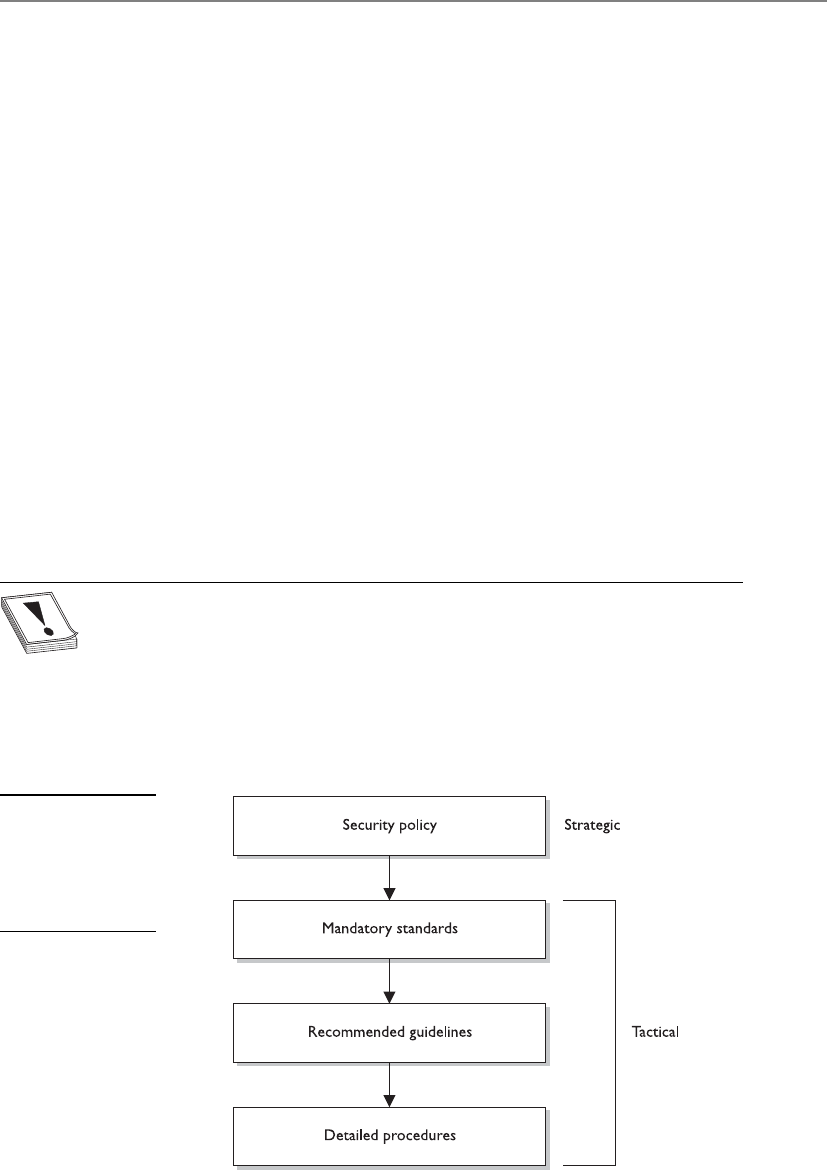
Chapter 2: Information Security Governance and Risk Management
105
Standards
Some things you just gotta do.
Standards refer to mandatory activities, actions, or rules. Standards can give a policy
its support and reinforcement in direction. Organizational security standards may spec-
ify how hardware and software products are to be used. They can also be used to indi-
cate expected user behavior. They provide a means to ensure that specific technologies,
applications, parameters, and procedures are implemented in a uniform (standard-
ized) manner across the organization. An organizational standard may require that all
employees wear their company identification badges at all times, that they challenge
unknown individuals about their identity and purpose for being in a specific area, or
that they encrypt confidential information. These rules are compulsory within a com-
pany, and if they are going to be effective, they must be enforced.
An organization may have an issue-specific data classification policy that states “All
confidential data must be properly protected.” It would need a supporting data protec-
tion standard outlining how this protection should be implemented and followed, as
in “Confidential information must be protected with AES256 at rest and in transit.”
As stated in an earlier section, tactical and strategic goals are different. A strategic
goal can be viewed as the ultimate endpoint, while tactical goals are the steps necessary
to achieve it. As shown in Figure 2-13, standards, guidelines, and procedures are the
tactical tools used to achieve and support the directives in the security policy, which is
considered the strategic goal.
CAUTION
CAUTION The term standard has more than one meaning in our industry.
Internal documentation that lays out rules that must be followed is a standard.
But sometimes, best practices, as in the ISO/IEC 27000 series, are referred to
as standards because they were developed by a standards body. And as we will
see in Chapter 6, we have specific technologic standards, as in IEEE 802.11. You
need to understand the context of how this term is used. The CISSP exam
will not try and trick you on this word; just know that the industry uses it in
several different ways.
Figure 2-13
Policy establishes the
strategic plans, and
the lower elements
provide the tactical
support.

CISSP All-in-One Exam Guide
106
Baselines
The term baseline refers to a point in time that is used as a comparison for future
changes. Once risks have been mitigated and security put in place, a baseline is for-
mally reviewed and agreed upon, after which all further comparisons and development
are measured against it. A baseline results in a consistent reference point.
Let’s say that your doctor has told you that you weigh 400 pounds due to your diet
of donuts, pizza, and soda. (This is very frustrating to you because the TV commercial
said you could eat whatever you wanted and just take their very expensive pills every
day and lose weight.) The doctor tells you that you need to exercise each day and ele-
vate your heart rate to double its normal rate for 30 minutes twice a day. How do you
know when you are at double your heart rate? You find out your baseline (regular heart
rate) by using one of those arm thingies with a little ball attached. So you start at your
baseline and continue to exercise until you have doubled your heart rate or die, which-
ever comes first.
Baselines are also used to define the minimum level of protection required. In se-
curity, specific baselines can be defined per system type, which indicates the necessary
settings and the level of protection being provided. For example, a company may stipu-
late that all accounting systems must meet an Evaluation Assurance Level (EAL) 4 base-
line. This means that only systems that have gone through the Common Criteria process
and achieved this rating can be used in this department. Once the systems are properly
configured, this is the necessary baseline. When new software is installed, when patch-
es or upgrades are applied to existing software, or when other changes to the system
take place, there is a good chance the system may no longer be providing its necessary
minimum level of protection (its baseline). Security personnel must assess the systems
as changes take place and ensure that the baseline level of security is always being met.
If a technician installs a patch on a system and does not ensure the baseline is still being
met, there could be new vulnerabilities introduced into the system that will allow at-
tackers easy access to the network.
NOTE
NOTE Baselines that are not technology-oriented should be created and
enforced within organizations as well. For example, a company can mandate
that while in the facility all employees must have a badge with a picture ID
in view at all times. It can also state that visitors must sign in at a front desk
and be escorted while in the facility. If these are followed, then this creates a
baseline of protection.
Guidelines
Guidelines are recommended actions and operational guides to users, IT staff, opera-
tions staff, and others when a specific standard does not apply. Guidelines can deal
with the methodologies of technology, personnel, or physical security. Life is full of

Chapter 2: Information Security Governance and Risk Management
107
gray areas, and guidelines can be used as a reference during those times. Whereas stan-
dards are specific mandatory rules, guidelines are general approaches that provide the
necessary flexibility for unforeseen circumstances.
A policy might state that access to confidential data must be audited. A supporting
guideline could further explain that audits should contain sufficient information to al-
low for reconciliation with prior reviews. Supporting procedures would outline the
necessary steps to configure, implement, and maintain this type of auditing.
Procedures
Procedures are detailed step-by-step tasks that should be performed to achieve a certain
goal. The steps can apply to users, IT staff, operations staff, security members, and oth-
ers who may need to carry out specific tasks. Many organizations have written proce-
dures on how to install operating systems, configure security mechanisms, implement
access control lists, set up new user accounts, assign computer privileges, audit activi-
ties, destroy material, report incidents, and much more.
Procedures are considered the lowest level in the documentation chain because
they are closest to the computers and users (compared to policies) and provide detailed
steps for configuration and installation issues.
Procedures spell out how the policy, standards, and guidelines will actually be im-
plemented in an operating environment. If a policy states that all individuals who access
confidential information must be properly authenticated, the supporting procedures
will explain the steps for this to happen by defining the access criteria for authorization,
how access control mechanisms are implemented and configured, and how access ac-
tivities are audited. If a standard states that backups should be performed, then the
procedures will define the detailed steps necessary to perform the backup, the timelines
of backups, the storage of backup media, and so on. Procedures should be detailed
enough to be both understandable and useful to a diverse group of individuals.
To tie these items together, let’s walk through an example. A corporation’s security
policy indicates that confidential information should be properly protected. It states the
issue in very broad and general terms. A supporting standard mandates that all cus-
tomer information held in databases must be encrypted with the Advanced Encryption
Standard (AES) algorithm while it is stored and that it cannot be transmitted over the
Internet unless IPSec encryption technology is used. The standard indicates what type
of protection is required and provides another level of granularity and explanation. The
supporting procedures explain exactly how to implement the AES and IPSec technolo-
gies, and the guidelines cover how to handle cases when data is accidentally corrupted
or compromised during transmission. Once the software and devices are configured as
outlined in the procedures, this is considered the baseline that must always be main-
tained. All of these work together to provide a company with a security structure.

CISSP All-in-One Exam Guide
108
Implementation
Our policies are very informative and look very professional.
Response: Doesn’t matter. Nobody cares.
Unfortunately, security policies, standards, procedures, baselines, and guidelines
often are written because an auditor instructed a company to document these items,
but then they are placed on a file server and are not shared, explained, or used. To be
useful, they must be put into action. No one is going to follow the rules if people don’t
know the rules exist. Security policies and the items that support them not only must
be developed, but must also be implemented and enforced.
To be effective, employees need to know about security issues within these docu-
ments; therefore, the policies and their supporting counterparts need visibility. Aware-
ness training, manuals, presentations, newsletters, and legal banners can achieve this
visibility. It must be clear that the directives came from senior management and that
the full management staff supports these policies. Employees must understand what is
expected of them in their actions, behaviors, accountability, and performance.
Implementing security policies and the items that support them shows due care by
the company and its management staff. Informing employees of what is expected of
them and the consequences of noncompliance can come down to a liability issue. If a
company fires an employee because he was downloading pornographic material to the
company’s computer, the employee may take the company to court and win if the em-
ployee can prove he was not properly informed of what was considered acceptable and
unacceptable use of company property and what the consequences were. Security-
awareness training is covered in later sections, but understand that companies that do
not supply this to their employees are not practicing due care and can be held negligent
and liable in the eyes of the law.
Key Terms
•Policy High-level document that outlines senior management’s
security directives.
•Policy types Organizational (master), issue-specific, system-specific.
•Policy functionality types Regulatory, advisory, informative.
•Standard Compulsory rules that support the security policies.
•Guideline Suggestions and best practices.
•Procedures Step-by-step implementation instructions.

Chapter 2: Information Security Governance and Risk Management
109
Information Classification
My love letter to my dog is top secret.
Response: As it should be.
Earlier, this chapter touched upon the importance of recognizing what information
is critical to a company and assigning a value to it. The rationale behind assigning val-
ues to different types of data is that it enables a company to gauge the amount of funds
and resources that should go toward protecting each type of data, because not all data
has the same value to a company. After identifying all important information, it should
be properly classified. A company has a lot of information that is created and main-
tained. The reason to classify data is to organize it according to its sensitivity to loss,
disclosure, or unavailability. Once data is segmented according to its sensitivity level,
the company can decide what security controls are necessary to protect different types
of data. This ensures that information assets receive the appropriate level of protection,
and classifications indicate the priority of that security protection. The primary purpose
of data classification is to indicate the level of confidentiality, integrity, and availability
protection that is required for each type of data set. Many people mistakenly only con-
sider the confidentiality aspects of data protection, but we need to make sure our data
is not modified in an unauthorized manner and that it is available when needed.
Data classification helps ensure data is protected in the most cost-effective manner.
Protecting and maintaining data costs money, but it is important to spend this money
for the information that actually requires protection. Going back to our very sophisti-
cated example of U.S. spy satellites and the peanut butter and banana sandwich recipe,
a company in charge of encryption algorithms used to transmit data to and from U.S.
spy satellites would classify this data as top secret and apply complex and highly techni-
cal security controls and procedures to ensure it is not accessed in an unauthorized
method and disclosed. On the other hand, the sandwich recipe would have a lower
classification, and your only means of protecting it might be to not talk about it.
Each classification should have separate handling requirements and procedures
pertaining to how that data is accessed, used, and destroyed. For example, in a corpora-
tion, confidential information may be accessed only by senior management and a se-
lect few throughout the company. Accessing the information may require two or more
people to enter their access codes. Auditing could be very detailed and its results moni-
tored daily, and paper copies of the information may be kept in a vault. To properly
erase this data from the media, degaussing or zeroization procedures may be required.
Other information in this company may be classified as sensitive, allowing a slightly
larger group of people to view it. Access control on the information classified as sensi-
tive may require only one set of credentials. Auditing happens but is only reviewed
weekly, paper copies are kept in locked file cabinets, and the data can be deleted using
regular measures when it is time to do so. Then, the rest of the information is marked
public. All employees can access it, and no special auditing or destruction methods are
required.

CISSP All-in-One Exam Guide
110
Classifications Levels
There are no hard and fast rules on the classification levels that an organization should
use. An organization could choose to use any of the classification levels presented in
Table 2-11. One organization may choose to use only two layers of classifications, while
another company may choose to use four. Table 2-11 explains the types of classifica-
tions available. Note that some classifications are more commonly used for commer-
cial businesses, whereas others are military classifications.
Classification Definition Examples Organizations That
Would Use This
Public • Disclosure is not
welcome, but it would
not cause an adverse
impact to company or
personnel.
• How many people
are working on a
specific project
• Upcoming projects
Commercial business
Sensitive • Requires special
precautions to ensure
the integrity and
confidentiality of the
data by protecting it
from unauthorized
modification or
deletion.
• Requires higher-than-
normal assurance
of accuracy and
completeness.
• Financial information
• Details of projects
• Profit earnings and
forecasts
Commercial business
Private • Personal information
for use within a
company.
• Unauthorized
disclosure could
adversely affect
personnel or the
company.
• Work history
• Human resources
information
• Medical information
Commercial business
Confidential • For use within the
company only.
• Data exempt from
disclosure under
the Freedom of
Information Act
or other laws and
regulations.
• Unauthorized
disclosure could
seriously affect a
company.
• Trade secrets
• Healthcare
information
• Programming code
• Information that
keeps the company
competitive
Commercial business
Military
Table 2-11 Commercial Business and Military Data Classification

Chapter 2: Information Security Governance and Risk Management
111
The following shows the common levels of sensitivity from the highest to the low-
est for commercial business:
• Confidential
• Private
• Sensitive
• Public
The following shows the levels of sensitivity from the highest to the lowest for mil-
itary purposes:
• Top secret
• Secret
• Confidential
• Sensitive but unclassified
• Unclassified
The classifications listed in the table are commonly used in the industry, but there is
a lot of variance. An organization first must decide the number of data classifications
that best fit its security needs, then choose the classification naming scheme, and then
define what the names in those schemes represent. Company A might use the classifica-
tion level “confidential,” which represents its most sensitive information. Company B
might use “top secret,” “secret,” and “confidential,” where confidential represents its
least sensitive information. Each organization must develop an information classifica-
tion scheme that best fits its business and security needs.
Unclassified • Data is not sensitive or
classified.
• Computer manual
and warranty
information
• Recruiting
information
Military
Sensitive but
unclassified (SBU)
• Minor secret.
• If disclosed, it may not
cause serious damage.
• Medical data
• Answers to test
scores
Military
Secret • If disclosed, it could
cause serious damage
to national security.
• Deployment plans
for troops
• Nuclear bomb
placement
Military
Top secret • If disclosed, it could
cause grave damage to
national security.
• Blueprints of new
wartime weapons
• Spy satellite
information
• Espionage data
Military
Table 2-11 Commercial Business and Military Data Classification (continued)
Classification Definition Examples Organizations That
Would Use This

CISSP All-in-One Exam Guide
112
It is important to not go overboard and come up with a long list of classifications,
which will only cause confusion and frustration for the individuals who will use the
system. The classifications should not be too restrictive and detailed-oriented either,
because many types of data may need to be classified.
Each classification should be unique and separate from the others and not have any
overlapping effects. The classification process should also outline how information is
controlled and handled through their life cycles (from creation to termination).
Once the scheme is decided upon, the organization must develop the criteria it will
use to decide what information goes into which classification. The following list shows
some criteria parameters an organization may use to determine the sensitivity of data:
• The usefulness of data
• The value of data
• The age of data
• The level of damage that could be caused if the data were disclosed
• The level of damage that could be caused if the data were modified or
corrupted
• Legal, regulatory, or contractual responsibility to protect the data
• Effects the data has on security
• Who should be able to access the data
• Who should maintain the data
• Who should be able to reproduce the data
• Lost opportunity costs that could be incurred if the data were not available or
were corrupted
Data are not the only things that may need to be classified. Applications and some-
times whole systems may need to be classified. The applications that hold and process
classified information should be evaluated for the level of protection they provide. You
do not want a program filled with security vulnerabilities to process and “protect” your
most sensitive information. The application classifications should be based on the as-
surance (confidence level) the company has in the software and the type of informa-
tion it can store and process.
NOTE
NOTE An organization must make sure that whoever is backing up classified
data—and whoever has access to backed-up data—has the necessary
clearance level. A large security risk can be introduced if low-end technicians
with no security clearance have access to this information during their tasks.
CAUTION
CAUTION The classification rules must apply to data no matter what format
it is in: digital, paper, video, fax, audio, and so on.

Chapter 2: Information Security Governance and Risk Management
113
Now that we have chosen a sensitivity scheme, the next step is to specify how each
classification should be dealt with. We must specify provisions for access control, iden-
tification, and labeling, along with how data in specific classifications are stored, main-
tained, transmitted, and destroyed. We also must iron out auditing, monitoring, and
compliance issues. Each classification requires a different degree of security and, there-
fore, different requirements from each of the mentioned items.
Classification Controls
I marked our top secret stuff as “top secret.”
Response: Great, now everyone is going to want to see it. Good job.
As mentioned earlier, which types of controls are implemented per classification
depends upon the level of protection that management and the security team have de-
termined is needed. The numerous types of controls available are discussed throughout
this book. But some considerations pertaining to sensitive data and applications are
common across most organizations:
• Strict and granular access control for all levels of sensitive data and programs
(see Chapter 3 for coverage of access controls, along with file system
permissions that should be understood)
• Encryption of data while stored and while in transmission (see Chapter 7 for
coverage of all types of encryption technologies)
• Auditing and monitoring (determine what level of auditing is required and
how long logs are to be retained)
• Separation of duties (determine whether two or more people must be
involved in accessing sensitive information to protect against fraudulent
activities; if so, define and document procedures)
• Periodic reviews (review classification levels, and the data and programs that
adhere to them, to ensure they are still in alignment with business needs; data
or applications may also need to be reclassified or declassified, depending
upon the situation)
• Backup and recovery procedures (define and document)
• Change control procedures (define and document)
• Physical security protection (define and document)
• Information flow channels (where does the sensitive data reside and how does
it transverse the network)
• Proper disposal actions, such as shredding, degaussing, and so on (define and
document)
• Marking, labeling, and handling procedures

CISSP All-in-One Exam Guide
114
Layers of Responsibility
Okay, who is in charge so we have someone to blame?
Senior management and other levels of management understand the vision of the
company, the business goals, and the objectives. The next layer down is the functional
management, whose members understand how their individual departments work,
what roles individuals play within the company, and how security affects their depart-
ment directly. The next layers are operational managers and staff. These layers are closer
to the actual operations of the company. They know detailed information about the
technical and procedural requirements, the systems, and how the systems are used. The
employees at these layers understand how security mechanisms integrate into systems,
how to configure them, and how they affect daily productivity. Every layer offers differ-
ent insight into what type of role security plays within an organization, and each should
have input into the best security practices, procedures, and chosen controls to ensure
the agreed-upon security level provides the necessary amount of protection without
negatively affecting the company’s productivity.
Although each layer is important to the overall security of an organization, some
specific roles must be clearly defined. Individuals who work in smaller environments
(where everyone must wear several hats) may get overwhelmed with the number of
roles presented next. Many commercial businesses do not have this level of structure in
their security teams, but many government agencies and military units do. What you
Data Classification Procedures
The following outlines the necessary steps for a proper classification program:
1. Define classification levels.
2. Specify the criteria that will determine how data are classified.
3. Identify data owners who will be responsible for classifying data.
4. Identify the data custodian who will be responsible for maintaining
data and its security level.
5. Indicate the security controls, or protection mechanisms, required for
each classification level.
6. Document any exceptions to the previous classification issues.
7. Indicate the methods that can be used to transfer custody of the
information to a different data owner.
8. Create a procedure to periodically review the classification and
ownership. Communicate any changes to the data custodian.
9. Indicate procedures for declassifying the data.
10. Integrate these issues into the security-awareness program so all employees
understand how to handle data at different classification levels.

Chapter 2: Information Security Governance and Risk Management
115
need to understand are the responsibilities that must be assigned, and whether they are
assigned to just a few people or to a large security team. These roles are the board of
directors, security officer, data owner, data custodian, system owner, security adminis-
trator, security analyst, application owner, supervisor (user manager), change control
analyst, data analyst, process owner, solution provider, user, product line manager, and
the guy who gets everyone coffee.
Board of Directors
Hey, Enron was successful for many years. What’s wrong with their approach?
The board of directors is a group of individuals who are elected by the shareholders
of a corporation to oversee the fulfillment of the corporation’s charter. The goal of the
board is to ensure the shareholders’ interests are being protected and that the corpora-
tion is being run properly. They are supposed to be unbiased and independent indi-
viduals who oversee the executive staff’s performance in running the company.
For many years, too many people who held these positions either looked the other
way regarding corporate fraud and mismanagement or depended too much on execu-
tive management’s feedback instead of finding out the truth about their company’s
health themselves. We know this because of all of the corporate scandals uncovered in
2002 (Enron, WorldCom, Global Crossing, and so on). The boards of directors of these
corporations were responsible for knowing about these types of fraudulent activities
and putting a stop to them to protect shareholders. Many things caused the directors
not to play the role they should have. Some were intentional, some not. These scandals
forced the U.S. government and the Securities and Exchange Commission (SEC) to
place more requirements, and potential penalties, on the boards of directors of pub-
licly traded companies. This is why many companies today are having a harder time
finding candidates to fulfill these roles—personal liability for a part-time job is a real
downer.
Independence is important if the board members are going to truly work for the
benefit of the shareholders. This means the board members should not have immedi-
ate family who are employees of the company, the board members should not receive
financial benefits from the company that could cloud their judgment or create conflicts
of interests, and no other activities should cause the board members to act other than
as champions of the company’s shareholders. This is especially true if the company
must comply with the Sarbanes-Oxley Act (SOX). Under this act, the board of directors
can be held personally responsible if the corporation does not properly maintain an
internal corporate governance framework, and/or if financials reported to the SEC are
incorrect.
NOTE
NOTE Other regulations also call out requirements of boards of directors, as
in the Gramm-Leach-Bliley Act (GLBA). But SOX is a regulation that holds the
members of the board personally responsible; thus, they can each be fined or
go to jail.

CISSP All-in-One Exam Guide
116
CAUTION
CAUTION The CISSP exam does not cover anything about specific
regulations (SOX, HIPAA, GLBA, Basel II, SB 1386, and so on). So do not get
wrapped up in studying these for the exam. However, it is critical that the
security professional understand the regulations and laws of the country and
region she is working within.
Executive Management
I am very important, but I am missing a “C” in my title.
Response: Then you are not so important.
This motley crew is made up of individuals whose titles start with a C. The chief
executive officer (CEO) has the day-to-day management responsibilities of an organiza-
tion. This person is often the chairperson of the board of directors and is the highest-
ranking officer in the company. This role is for the person who oversees the company’s
finances, strategic planning, and operations from a high level. The CEO is usually seen
as the visionary for the company and is responsible for developing and modifying the
company’s business plan. He sets budgets, forms partnerships, decides on what markets
to enter, what product lines to develop, how the company will differentiate itself, and
so on. This role’s overall responsibility is to ensure that the company grows and thrives.
NOTE
NOTE The CEO can delegate tasks, but not necessarily responsibility. More
and more regulations dealing with information security are holding this
role’s feet to the fire, which is why security departments across the land are
receiving more funding. Personal liability for the decision makers and purse-
string holders has loosened those purse strings, and companies are now able
to spend more money on security than before.
The chief financial officer (CFO) is responsible for the corporation’s account and
financial activities and the overall financial structure of the organization. This person is
responsible for determining what the company’s financial needs will be and how to
finance those needs. The CFO must create and maintain the company’s capital struc-
ture, which is the proper mix of equity, credit, cash, and debt financing. This person
oversees forecasting and budgeting and the processes of submitting quarterly and an-
nual financial statements to the SEC and stakeholders.
The CFO and CEO are responsible for informing stakeholders (creditors, analysts,
employees, management, investors) of the firm’s financial condition and health. After
the corporate debacles uncovered in 2002, the U.S. government and the SEC started
doling out stiff penalties to people who held these roles and abused them, as shown in
the following:
•January 2004 Enron ex-Chief Financial Officer Andrew Fastow was given
a ten-year prison sentence for his accounting scandals, which was a reduced
term because he cooperated with prosecutors.
•June 2005 John Rigas, the CEO of Adelphia Communications Corp., was
sentenced to 15 years in prison for his role in the looting and debt-hiding
scandal that pummeled the company into bankruptcy. His son, who also held
an executive position, was sentenced to 20 years.

Chapter 2: Information Security Governance and Risk Management
117
•July 2005 WorldCom ex-Chief Executive Officer Bernard Ebbers was
sentenced to 25 years in prison for his role in orchestrating the biggest
corporate fraud in the nation’s history.
•August 2005 Former WorldCom Chief Financial Officer Scott Sullivan was
sentenced to five years in prison for his role in engineering the $11 billion
accounting fraud that led to the bankruptcy of the telecommunications
powerhouse.
•December 2005 The former Chief Executive Officer of HealthSouth Corp.
was sentenced to five years in prison for his part in the $2.7 billion scandal.
These are only the big ones that made it into all the headlines. Other CEOs and CFOs
have also received punishments for “creative accounting” and fraudulent activities.
NOTE
NOTE Although the preceding activities took place years ago, these were the
events that motivated the U.S. government to create new laws and regulations
to control different types of fraud.
Figure 2-14 shows how the board members are responsible for setting the organiza-
tion’s strategy and risk appetite (how much risk the company should take on). The
Figure 2-14 Risk must be understood at different departments and levels.

CISSP All-in-One Exam Guide
118
board is also responsible for receiving information from executives, as well as for the
assurance (auditing committee). With these inputs, the board is supposed to ensure
that the company is running properly, thus protecting shareholders’ interests. Also no-
tice that the business unit owners are the risk owners, not the security department. Too
many companies are not extending the responsibility of risk out to the business units,
which is why the CISO position is commonly referred to as the sacrificial lamb.
Chief Information Officer
On a lower rung of the food chain is the chief information officer (CIO). This individu-
al can report to the CEO or CFO, depending upon the corporate structure, and is re-
sponsible for the strategic use and management of information systems and technology
within the organization. Over time, this position has become more strategic and less
operational in many organizations. CIOs oversee and are responsible for the day-in-
day-out technology operations of a company, but because organizations are so depen-
dent upon technology, CIOs are being asked to sit at the big boys’ corporate table more
and more.
CIO responsibilities have extended to working with the CEO (and other manage-
ment) on business-process management, revenue generation, and how business strat-
egy can be accomplished with the company’s underlying technology. This person
usually should have one foot in techno-land and one foot in business-land to be effec-
tive, because he is bridging two very different worlds.
The CIO sets the stage for the protection of company assets and is ultimately re-
sponsible for the success of the company security program. Direction should be com-
ing down from the CEO, and there should be clear lines of communication between
the board of directors, the C-level staff, and mid-management. In SOX, the CEO and
CFO have outlined responsibilities and penalties they can be personally liable for if
those responsibilities are not carried out. The SEC wanted to make sure these roles can-
not just allow their companies to absorb fines if they misbehave. Under this law they
can personally be fined millions of dollars and/or go to jail. Such things always make
them perk up during meetings.
Chief Privacy Officer
The chief privacy officer (CPO) is a newer position, created mainly because of the in-
creasing demands on organizations to protect a long laundry list of different types of
data. This role is responsible for ensuring that customer, company, and employee data
are kept safe, which keeps the company out of criminal and civil courts and hopefully
out of the headlines. This person is usually an attorney and is directly involved with
setting policies on how data are collected, protected, and given out to third parties. The
CPO often reports to the chief security officer.
It is important that the company understand the privacy, legal, and regulatory re-
quirements the organization must comply with. With this knowledge, you can then
develop the organization’s policies, standards, procedures, controls, and contract agree-
ments to see if privacy requirements are being properly met. Remember also that orga-
nizations are responsible for knowing how their suppliers, partners, and other third

Chapter 2: Information Security Governance and Risk Management
119
parties are protecting this sensitive information. Many times, companies will need to
review these other parties (which have copies of data needing protection).
Some companies have carried out risk assessments without including the penalties
and ramifications they would be forced to deal with if they did not properly protect the
information they are responsible for. Without including these liabilities, risk cannot be
properly assessed.
The organization should document how privacy data are collected, used, disclosed,
archived, and destroyed. Employees should be held accountable for not following the
organization’s standards on how to handle this type of information.
NOTE
NOTE Carrying out a risk assessment from the perspective of the protection
of sensitive data is called a privacy impact analysis. You can review “How
to Do a Privacy Assessment” at www.actcda.com/resource/multiapp.pdf to
understand the steps.
Chief Security Officer
Hey, we need a sacrificial lamb in case things go bad.
Response: We already have one. He’s called the chief security officer.
The chief security officer (CSO) is responsible for understanding the risks that the
company faces and for mitigating these risks to an acceptable level. This role is respon-
sible for understanding the organization’s business drivers and for creating and main-
taining a security program that facilitates these drivers, along with providing security,
compliance with a long list of regulations and laws, and any customer expectations or
contractual obligations.
The creation of this role is a mark in the “win” column for the security industry
because it means security is finally being seen as a business issue. Previously, security
was stuck in the IT department and was viewed solely as a technology issue. As organi-
zations saw the need to integrate security requirements and business needs, the need of
creating a position for security in the executive management team became more of a
necessity. The CSO’s job is to ensure that business is not disrupted in any way due to
security issues. This extends beyond IT and reaches into business processes, legal issues,
operational issues, revenue generation, and reputation protection.
Privacy
Privacy is different from security. Privacy indicates the amount of control an indi-
vidual should be able to have and expect as it relates to the release of their own
sensitive information. Security is the mechanisms that can be put into place to
provide this level of control.
It is becoming more critical (and more difficult) to protect personal identifi-
able information (PII) because of the increase of identity theft and financial
fraud threats. PII is a combination of identification elements (name, address,
phone number, account number, etc.). Organizations must have privacy policies
and controls in place to protect their employee and customer PII.

CISSP All-in-One Exam Guide
120
Security Steering Committee
Our steering committee just ran us into a wall.
Asecurity steering committee is responsible for making decisions on tactical and
strategic security issues within the enterprise as a whole and should not be tied to one
or more business units. The group should be made up of people from all over the orga-
nization so they can view risks and the effects of security decisions on individual de-
partments and the organization as a whole. The CEO should head this committee, and
the CFO, CIO, department managers, and chief internal auditor should all be on it.
This committee should meet at least quarterly and have a well-defined agenda.
Some of the group’s responsibilities are as follows:
• Define the acceptable risk level for the organization.
• Develop security objectives and strategies.
• Determine priorities of security initiatives based on business needs.
• Review risk assessment and auditing reports.
• Monitor the business impact of security risks.
• Review major security breaches and incidents.
• Approve any major change to the security policy and program.
They should also have a clearly defined vision statement in place that is set up to
work with and support the organizational intent of the business. The statement should
CSO vs. CISO
The CSO and chief information security officer (CISO) may have similar or very
different responsibilities. How is that for clarification? It is up to the individual
organization to define the responsibilities of these two roles and whether they
will use both, either, or neither. By and large, the CSO role usually has a farther-
reaching list of responsibilities compared to the CISO role. The CISO is usually
focused more on technology and has an IT background. The CSO usually is re-
quired to understand a wider range of business risks, including physical security,
not just technological risks.
The CSO is usually more of a businessperson and typically is present in larger
organizations. If a company has both roles, the CISO reports directly to the CSO.
The CSO is commonly responsible for the convergence, which is the formal
cooperation between previously disjointed security functions. This mainly per-
tains to physical and IT security working in a more concerted manner instead of
working in silos within the organization. Issues such as loss prevention, fraud
prevention, business continuity planning, legal/regulatory compliance, and in-
surance all have physical security and IT security aspects and requirements. So
one individual (CSO) overseeing and intertwining these different security disci-
plines allows for a more holistic and comprehensive security program.

Chapter 2: Information Security Governance and Risk Management
121
be structured in a manner that provides support for the goals of confidentiality, integ-
rity, and availability as they pertain to the business objectives of the organization. This
in turn should be followed, or supported, by a mission statement that provides support
and definition to the processes that will apply to the organization and allow it to reach
its business goals.
Audit Committee
The audit committee should be appointed by the board of directors to help it review and
evaluate the company’s internal operations, internal audit system, and the transparency
and accuracy of financial reporting so the company’s investors, customers, and credi-
tors have continued confidence in the organization.
This committee is usually responsible for at least the following items:
• The integrity of the company’s financial statements and other financial
information provided to stockholders and others
• The company’s system of internal controls
• The engagement and performance of the independent auditors
• The performance of the internal audit function
• Compliance with legal requirements, regulations, and company policies
regarding ethical conduct
The goal of this committee is to provide independent and open communications
among the board of directors, the company’s management, the internal auditors, and
external auditors. Financial statement integrity and reliability are crucial to every organi-
zation, and many times pressure from shareholders, management, investors, and the
public can directly affect the objectivity and correctness of these financial documents. In
the wake of high-profile corporate scandals, the audit committee’s role has shifted from
just overseeing, monitoring, and advising company management to enforcing and en-
suring accountability on the part of all individuals involved. This committee must take
input from external and internal auditors and outside experts to help ensure the com-
pany’s internal control processes and financial reporting are taking place properly.
Data Owner
The data owner (information owner) is usually a member of management who is in
charge of a specific business unit, and who is ultimately responsible for the protection
and use of a specific subset of information. The data owner has due care responsibilities
and thus will be held responsible for any negligent act that results in the corruption or
disclosure of the data. The data owner decides upon the classification of the data she is
responsible for and alters that classification if the business need arises. This person is
also responsible for ensuring that the necessary security controls are in place, defining
security requirements per classification and backup requirements, approving any dis-
closure activities, ensuring that proper access rights are being used, and defining user
access criteria. The data owner approves access requests or may choose to delegate this

CISSP All-in-One Exam Guide
122
function to business unit managers. And the data owner will deal with security viola-
tions pertaining to the data she is responsible for protecting. The data owner, who obvi-
ously has enough on her plate, delegates responsibility of the day-to-day maintenance
of the data protection mechanisms to the data custodian.
Data Custodian
Hey, custodian, clean up my mess!
Response: I’m not that type of custodian.
The data custodian (information custodian) is responsible for maintaining and pro-
tecting the data. This role is usually filled by the IT or security department, and the
duties include implementing and maintaining security controls; performing regular
backups of the data; periodically validating the integrity of the data; restoring data from
backup media; retaining records of activity; and fulfilling the requirements specified in
the company’s security policy, standards, and guidelines that pertain to information
security and data protection.
System Owner
I am god over this system!
Response: You are responsible for a printer? Your mother must be proud.
The system owner is responsible for one or more systems, each of which may hold
and process data owned by different data owners. A system owner is responsible for
integrating security considerations into application and system purchasing decisions
and development projects. The system owner is responsible for ensuring that adequate
security is being provided by the necessary controls, password management, remote
access controls, operating system configurations, and so on. This role must ensure the
systems are properly assessed for vulnerabilities and must report any to the incident
response team and data owner.
Security Administrator
The security administrator is responsible for implementing and maintaining specific
security network devices and software in the enterprise. These controls commonly in-
clude firewalls, IDS, IPS, antimalware, security proxies, data loss prevention, etc. It is
Data Owner Issues
Each business unit should have a data owner who protects the unit’s most critical
information. The company’s policies must give the data owners the necessary
authority to carry out their tasks.
This is not a technical role, but rather a business role that must understand
the relationship between the unit’s success and the protection of this critical as-
set. Not all businesspeople understand this role, so they should be given the
necessary training.

Chapter 2: Information Security Governance and Risk Management
123
common for there to be delineation between the security administrator and the net-
work administrator. The security administrator has the main focus of keeping the net-
work secure, and the network administrator has the focus of keeping things up and
running.
A security administrator’s tasks commonly also include creating new system user
accounts, implementing new security software, testing security patches and compo-
nents, and issuing new passwords. The security administrator must make sure access
rights given to users support the policies and data owner directives.
Security Analyst
I have analyzed your security and you have it all wrong.
Response: What a surprise.
The security analyst role works at a higher, more strategic level than the previously
described roles and helps develop policies, standards, and guidelines, as well as set vari-
ous baselines. Whereas the previous roles are “in the weeds” and focus on pieces and
parts of the security program, a security analyst helps define the security program ele-
ments and follows through to ensure the elements are being carried out and practiced
properly. This person works more at a design level than at an implementation level.
Application Owner
Some applications are specific to individual business units—for example, the account-
ing department has accounting software, R&D has software for testing and develop-
ment, and quality assurance uses some type of automated system. The application own-
ers, usually the business unit managers, are responsible for dictating who can and can-
not access their applications (subject to staying in compliance with the company’s se-
curity policies, of course).
Since each unit claims ownership of its specific applications, the application owner
for each unit is responsible for the security of the unit’s applications. This includes test-
ing, patching, performing change control on the programs, and making sure the right
controls are in place to provide the necessary level of protection.
Supervisor
The supervisor role, also called user manager, is ultimately responsible for all user activ-
ity and any assets created and owned by these users. For example, suppose Kathy is the
supervisor of ten employees. Her responsibilities would include ensuring that these
employees understand their responsibilities with respect to security; making sure the
employees’ account information is up-to-date; and informing the security administra-
tor when an employee is fired, suspended, or transferred. Any change that pertains to
an employee’s role within the company usually affects what access rights they should
and should not have, so the user manager must inform the security administrator of
these changes immediately.

CISSP All-in-One Exam Guide
124
Change Control Analyst
I have analyzed your change request and it will destroy this company.
Response: I am okay with that.
Since the only thing that is constant is change, someone must make sure changes
happen securely. The change control analyst is responsible for approving or rejecting
requests to make changes to the network, systems, or software. This role must make
certain that the change will not introduce any vulnerabilities, that it has been properly
tested, and that it is properly rolled out. The change control analyst needs to under-
stand how various changes can affect security, interoperability, performance, and pro-
ductivity. Or, a company can choose to just roll out the change and see what happens….
Data Analyst
Having proper data structures, definitions, and organization is very important to a
company. The data analyst is responsible for ensuring that data is stored in a way that
makes the most sense to the company and the individuals who need to access and work
with it. For example, payroll information should not be mixed with inventory informa-
tion, the purchasing department needs to have a lot of its values in monetary terms,
and the inventory system must follow a standardized naming scheme. The data analyst
may be responsible for architecting a new system that will hold company information,
or advise in the purchase of a product that will do so.
The data analyst works with the data owners to help ensure that the structures set
up coincide with and support the company’s business objectives.
Process Owner
Ever heard the popular mantra, “Security is not a product, it’s a process”? The statement
is very true. Security should be considered and treated like any another business pro-
cess—not as its own island, nor like a redheaded stepchild with cooties. (The author is
a redheaded stepchild, but currently has no cooties.)
All organizations have many processes: how to take orders from customers; how
to make widgets to fulfill these orders; how to ship the widgets to the customers; how
to collect from customers when they don’t pay their bills; and so on. An organization
could not function properly without well-defined processes.
The process owner is responsible for properly defining, improving upon, and mon-
itoring these processes. A process owner is not necessarily tied to one business unit or
application. Complex processes involve many variables that can span different depart-
ments, technologies, and data types.
Solution Provider
I came up with the solution to world peace, but then I forgot it.
Response: Write it down on this napkin next time.
Every vendor you talk to will tell you they are the right solution provider for what-
ever ails you. In truth, several different types of solution providers exist because the

Chapter 2: Information Security Governance and Risk Management
125
world is full of different problems. This role is called upon when a business has a prob-
lem or requires a process to be improved upon. For example, if Company A needs a
solution that supports digitally signed e-mails and an authentication framework for
employees, it would turn to a public key infrastructure (PKI) solution provider. A solu-
tion provider works with the business unit managers, data owners, and senior manage-
ment to develop and deploy a solution to reduce the company’s pain points.
User
I have concluded that our company would be much more secure without users.
Response: I’ll start on the pink slips.
The user is any individual who routinely uses the data for work-related tasks. The
user must have the necessary level of access to the data to perform the duties within
their position and is responsible for following operational security procedures to en-
sure the data’s confidentiality, integrity, and availability to others.
Product Line Manager
Who’s responsible for explaining business requirements to vendors and wading through
their rhetoric to see if the product is right for the company? Who is responsible for
ensuring compliance to license agreements? Who translates business requirements into
objectives and specifications for the developer of a product or solution? Who decides if
the company really needs to upgrade their operating system version every time Micro-
soft wants to make more money? That would be the product line manager.
This role must understand business drivers, business processes, and the technology
that is required to support them. The product line manager evaluates different products
in the market, works with vendors, understands different options a company can take,
and advises management and business units on the proper solutions needed to meet
their goals.
Auditor
The auditor is coming! Hurry up and do all that stuff he told us to do last year!
The function of the auditor is to come around periodically and make sure you are
doing what you are supposed to be doing. They ensure the correct controls are in place
and are being maintained securely. The goal of the auditor is to make sure the organiza-
tion complies with its own policies and the applicable laws and regulations. Organiza-
tions can have internal auditors and/or external auditors. The external auditors
commonly work on behalf of a regulatory body to make sure compliance is being met.
In an earlier section we covered CobiT, which is a model that most information secu-
rity auditors follow when evaluating a security program.
While many security professionals fear and dread auditors, they can be valuable
tools in ensuring the overall security of the organization. Their goal is to find the things
you have missed and help you understand how to fix the problem.

CISSP All-in-One Exam Guide
126
Why So Many Roles?
Most organizations will not have all the roles previously listed, but what is important
is to build an organizational structure that contains the necessary roles and map the
correct security responsibilities to them. This structure includes clear definitions of re-
sponsibilities, lines of authority and communication, and enforcement capabilities. A
clear-cut structure takes the mystery out of who does what and how things are handled
in different situations.
Personnel Security
Many facets of the responsibilities of personnel fall under management’s umbrella, and
several facets have a direct correlation to the overall security of the environment.
Although society has evolved to be extremely dependent upon technology in the
workplace, people are still the key ingredient to a successful company. But in security
circles, people are often the weakest link. Either accidentally through mistakes or lack
of training, or intentionally through fraud and malicious intent, personnel cause more
serious and hard-to-detect security issues than hacker attacks, outside espionage, or
equipment failure. Although the future actions of individuals cannot be predicted, it is
possible to minimize the risks by implementing preventive measures. These include
hiring the most qualified individuals, performing background checks, using detailed
job descriptions, providing necessary training, enforcing strict access controls, and ter-
minating individuals in a way that protects all parties involved.
Several items can be put into place to reduce the possibilities of fraud, sabotage,
misuse of information, theft, and other security compromises. Separation of duties
makes sure that one individual cannot complete a critical task by herself. In the movies,
when a submarine captain needs to launch a nuclear torpedo to blow up the enemy
and save civilization as we know it, the launch usually requires three codes to be en-
tered into the launching mechanism by three different senior crewmembers. This is an
example of separation of duties, and it ensures that the captain cannot complete such
an important and terrifying task all by himself.
Separation of duties is a preventative administrative control put into place to reduce
the potential of fraud. For example, an employee cannot complete a critical financial
transaction by herself. She will need to have her supervisor’s written approval before
the transaction can be completed.
In an organization that practices separation of duties, collusion must take place for
fraud to be committed. Collusion means that at least two people are working together
to cause some type of destruction or fraud. In our example, the employee and her su-
pervisor must be participating in the fraudulent activity to make it happen.
Two variations of separation of duties are split knowledge and dual control. In both
cases, two or more individuals are authorized and required to perform a duty or task.
In the case of split knowledge, no one person knows or has all the details to perform a
task. For example, two managers might be required to open a bank vault, with each

Chapter 2: Information Security Governance and Risk Management
127
only knowing part of the combination. In the case of dual control, two individuals are
again authorized to perform a task, but both must be available and active in their par-
ticipation to complete the task or mission. For example, two officers must perform an
identical key-turn in a nuclear missile submarine, each out of reach of the other, to
launch a missile. The control here is that no one person has the capability of launching
a missile, because they cannot reach to turn both keys at the same time.
Rotation of duties (rotation of assignments) is an administrative detective control
that can be put into place to uncover fraudulent activities. No one person should stay
in one position for a long time because they may end up having too much control over
a segment of the business. Such total control could result in fraud or the misuse of re-
sources. Employees should be moved into different roles with the idea that they may be
able to detect suspicious activity carried out by the previous employee carrying out that
position. This type of control is commonly implemented in financial institutions.
Employees in sensitive areas should be forced to take their vacations, which is
known as a mandatory vacation. While they are on vacation, other individuals fill their
positions and thus can usually detect any fraudulent errors or activities. Two of the
many ways to detect fraud or inappropriate activities would be the discovery of activity
on someone’s user account while they’re supposed to be away on vacation, or if a spe-
cific problem stopped while someone was away and not active on the network. These
anomalies are worthy of investigation. Employees who carry out fraudulent activities
commonly do not take vacations because they do not want anyone to figure out what
they are doing behind the scenes. This is why they must be forced to be away from the
organization for a period of time, usually two weeks.
Key Terms
•Data owner Individual responsible for the protection and
classification of a specific data set.
•Data custodian Individual responsible for implementing and
maintaining security controls to meet security requirements outlined
by data owner.
•Separation of duties Preventive administrative control used to ensure
one person cannot carry out a critical task alone.
•Collusion Two or more people working together to carry out
fraudulent activities.
•Rotation of duties Detective administrative control used to uncover
potential fraudulent activities.
•Mandatory vacation Detective administrative control used to uncover
potential fraudulent activities by requiring a person to be away from
the organization for a period of time.

CISSP All-in-One Exam Guide
128
Hiring Practices
I like your hat. You’re hired!
Depending on the position to be filled, a level of screening should be done by hu-
man resources to ensure the company hires the right individual for the right job. Skills
should be tested and evaluated, and the caliber and character of the individual should
be examined. Joe might be the best programmer in the state, but if someone looks into
his past and finds out he served prison time because he continually flashes old ladies
in parks, the hiring manager might not be so eager to bring Joe into the organization.
Nondisclosure agreements must be developed and signed by new employees to pro-
tect the company and its sensitive information. Any conflicts of interest must be ad-
dressed, and there should be different agreements and precautions taken with temporary
and contract employees.
References should be checked, military records reviewed, education verified, and if
necessary, a drug test should be administered. Many times, important personal behav-
iors can be concealed, and that is why hiring practices now include scenario questions,
personality tests, and observations of the individual, instead of just looking at a per-
son’s work history. When a person is hired, he is bringing his skills and whatever other
baggage he carries. A company can reduce its heartache pertaining to personnel by first
conducting useful and careful hiring practices.
The goal is to hire the “right person” and not just hire a person for “right now.”
Employees represent an investment on the part of the organization, and by taking the
time and hiring the right people for the jobs, the organization will be able to maximize
their investment and achieve a better return.
A more detailed background check can reveal some interesting information. Things
like unexplained gaps in employment history, the validity and actual status of profes-
sional certifications, criminal records, driving records, job titles that have been misrep-
resented, credit histories, unfriendly terminations, appearances on suspected terrorist
watch lists, and even real reasons for having left previous jobs can all be determined
through the use of background checks. This has real benefit to the employer and the
organization because it serves as the first line of defense for the organization against
being attacked from within. Any negative information that can be found in these areas
could be indicators of potential problems that the potential employee could create for
the company at a later date. Take the credit report for instance. On the surface, this may
seem to be something the organization doesn’t need to know about, but if the report
indicates the potential employee has a poor credit standing and a history of financial
problems, it could mean you don’t want to place them in charge of the organization’s
accounting, or even the petty cash.
Ultimately, the goal here is to achieve several different things at the same time by
using a background check. You’re trying to mitigate risk, lower hiring costs, and also
lower the turnover rate for employees. All this is being done at the same time you are
trying to protect your existing customers and employees from someone gaining em-

Chapter 2: Information Security Governance and Risk Management
129
ployment in your organization who could potentially conduct malicious and dishonest
actions that could harm you, your employees, and your customers as well as the gen-
eral public. In many cases, it is also harder to go back and conduct background checks
after the individual has been hired and is working. This is because there will need to be
a specific cause or reason for conducting this kind of investigation, and if any employee
moves to a position of greater security sensitivity or potential risk, a follow-up investi-
gation should be considered.
Possible background check criteria could include
• A Social Security number trace
• A county/state criminal check
• A federal criminal check
• A sexual offender registry check
• Employment verification
• Education verification
• Professional reference verification
• An immigration check
• Professional license/certification verification
• Credit report
• Drug screening
Termination
I no longer like your hat. You are fired.
Because terminations can happen for a variety of reasons, and terminated people
have different reactions, companies should have a specific set of procedures to follow
with every termination. For example:
• The employee must leave the facility immediately under the supervision of a
manager or security guard.
• The employee must surrender any identification badges or keys, complete an
exit interview, and return company supplies.
• That user’s accounts and passwords should be disabled or changed immediately.
It seems harsh and cold when this actually takes place, but too many companies
have been hurt by vengeful employees who have lashed out at the company when their
positions were revoked for one reason or another. If an employee is disgruntled in any
way, or the termination is unfriendly, that employee’s accounts should be disabled right
away, and all passwords on all systems changed.

CISSP All-in-One Exam Guide
130
Security-Awareness Training
Our CEO said our organization is secure.
Response: He needs more awareness training than anyone.
For an organization to achieve the desired results of its security program, it must
communicate the what, how, and why of security to its employees. Security-awareness
training should be comprehensive, tailored for specific groups, and organization-wide.
It should repeat the most important messages in different formats; be kept up-to-date;
be entertaining, positive, and humorous; be simple to understand; and—most impor-
tant—be supported by senior management. Management must allocate the resources
for this activity and enforce its attendance within the organization.
The goal is for each employee to understand the importance of security to the com-
pany as a whole and to each individual. Expected responsibilities and acceptable be-
haviors must be clarified, and noncompliance repercussions, which could range from a
warning to dismissal, must be explained before being invoked. Security-awareness
training is performed to modify employees’ behavior and attitude toward security. This
can best be achieved through a formalized process of security-awareness training.
Because security is a topic that can span many different aspects of an organization,
it can be difficult to communicate the correct information to the right individuals. By
using a formalized process for security-awareness training, you can establish a method
that will provide you with the best results for making sure security requirements are
presented to the right people in an organization. This way you can make sure everyone
understands what is outlined in the organization’s security program, why it is impor-
tant, and how it fits into the individual’s role in the organization. The higher levels of
training may be more general and deal with broader concepts and goals, and as it
moves down to specific jobs and tasks, the training will become more situation-specif-
ic as it directly applies to certain positions within the company.
A security-awareness program is typically created for at least three types of audi-
ences: management, staff, and technical employees. Each type of awareness training
must be geared toward the individual audience to ensure each group understands its
particular responsibilities, liabilities, and expectations. If technical security training
were given to senior management, their eyes would glaze over as soon as protocols and
firewalls were mentioned. On the flip side, if legal ramifications, company liability is-
sues pertaining to protecting data, and shareholders’ expectations were discussed with
the IT group, they would quickly turn to their smart phone and start tweeting, browsing
the Internet, or texting their friends.
Members of management would benefit the most from a short, focused security-
awareness orientation that discusses corporate assets and financial gains and losses
pertaining to security. They need to know how stock prices can be negatively affected by
compromises, understand possible threats and their outcomes, and know why security
must be integrated into the environment the same way as other business processes.
Because members of management must lead the rest of the company in support of se-
curity, they must gain the right mindset about its importance.
Mid-management would benefit from a more detailed explanation of the policies,
procedures, standards, and guidelines and how they map to the individual departments

Chapter 2: Information Security Governance and Risk Management
131
for which they are responsible. Middle managers should be taught why their support for
their specific departments is critical and what their level of responsibility is for ensuring
that employees practice safe computing activities. They should also be shown how the
consequences of noncompliance by individuals who report to them can affect the com-
pany as a whole and how they, as managers, may have to answer for such indiscretions.
The technical departments must receive a different presentation that aligns more to
their daily tasks. They should receive a more in-depth training to discuss technical con-
figurations, incident handling, and recognizing different types of security compromises.
It is usually best to have each employee sign a document indicating they have heard
and understand all the security topics discussed, and that they also understand the
ramifications of noncompliance. This reinforces the policies’ importance to the em-
ployee and also provides evidence down the road if the employee claims they were
never told of these expectations. Awareness training should happen during the hiring
process and at least annually after that. Attendance of training should also be integrated
into employment performance reports.
Various methods should be employed to reinforce the concepts of security aware-
ness. Things like banners, employee handbooks, and even posters can be used as ways
to remind employees about their duties and the necessities of good security practices.
Degree or Certification?
Some roles within the organization need hands-on experience and skill, meaning that
the hiring manager should be looking for specific industry certifications. Some posi-
tions require more of a holistic and foundational understanding of concepts or a busi-
ness background, and in those cases a degree may be required. Table 2-12 provides
more information on the differences between awareness, training, and education.
Awareness Training Education
Attribute “What” “How” “Why”
Level Information Knowledge Insight
Learning
objective
Recognition and
retention
Skill Understanding
Example teaching
method
Media
• Videos
• Newsletters
• Posters
Practical Instruction
• Lecture and/or demo
• Case study
• Hands-on practice
Theoretical Instruction
• Seminar and
discussion
• Reading and study
• Research
Test measure True/False, multiple
choice (identify
learning)
Problem solving—i.e.,
recognition and
resolution (apply
learning)
Essay (interpret
learning)
Impact
timeframe
Short-term Intermediate Long-term
Table 2-12 Aspects of Awareness, Training, and Education

CISSP All-in-One Exam Guide
132
Security Governance
Are we doing all this stuff right?
An organization may be following many of the items laid out in this chapter: building
a security program, integrating it into their business architecture, developing a risk man-
agement program, documenting the different aspects of the security program, performing
data protection, and training their staff. But how do we know we are doing it all correctly
and on an ongoing basis? This is where security governance comes into play. Security
governance is a framework that allows for the security goals of an organization to be set
and expressed by senior management, communicated throughout the different levels of
the organization, grant power to the entities needed to implement and enforce security,
and provide a way to verify the performance of these necessary security activities. Not
only does senior management need to set the direction of security, it needs a way to be
able to view and understand how their directives are being met or not being met.
If a board of directors and CEO demand that security be integrated properly at all
levels of the organization, how do they know it is really happening? Oversight mecha-
nisms must be developed and integrated so that the people who are ultimately respon-
sible for an organization are constantly and consistently updated on the overall health
and security posture of the organization. This happens through properly defined com-
munication channels, standardized reporting methods, and performance-based metrics.
Let’s compare two companies. Company A has an effective security governance pro-
gram in place and Company B does not. Now, to the untrained eye it would seem as
though Companies A and B are equal in their security practices because they both have
security policies, procedures, standards, the same security technology controls (fire-
walls, IDSs, identity management, and so on), security roles are defined, and security
awareness is in place. You may think, “Man, these two companies are on the ball and
quite evolved in their security programs.” But if you look closer, you will see some
critical differences (listed in Table 2-13).
Does the organization you work for look like Company A or Company B? Most orga-
nizations today have many of the pieces and parts to a security program (policies, stan-
dards, firewalls, security team, IDS, and so on), but management may not be truly involved,
and security has not permeated throughout the organization. Some organizations rely just
on technology and isolate all security responsibilities within the IT group. If security were
just a technology issue, then this security team could properly install, configure, and main-
tain the products, and the company would get a gold star and pass the audit with flying
colors. But that is not how the world of information security works today. It is much more
than just technological solutions. Security must be utilized throughout the organization,
and having several points of responsibility and accountability is critical. Security gover-
nance is a coherent system of integrated processes that helps to ensure consistent over-
sight, accountability, and compliance. It is a structure that we should put in place to make
sure that our efforts are streamlined and effective and that nothing is being missed.
Metrics
We really can’t just build a security program, call it good, and go home. We need a way
to assess the effectiveness of our work, identify deficiencies, and prioritize the things
that still need work. We need a way to facilitate decision making, performance improve-

Chapter 2: Information Security Governance and Risk Management
133
ment, and accountability through collection, analysis, and reporting of the necessary
information. As the saying goes, “You can’t manage something you can’t measure.” In
security there are many items that need to be measured so that performance is properly
understood. We need to know how effective and efficient our security controls are to
not only make sure that assets are properly protected, but also to ensure that we are
being financially responsible in our budgetary efforts.
There are different methodologies that can be followed when it comes to develop-
ing security metrics, but no matter what model is followed, some things are critical
across the board. Strong management support is necessary, because while it might seem
that developing ways of counting things is not overly complex, the actual implementa-
tion and use of a metric and measuring system can be quite an undertaking. The metrics
have to be developed, adopted, integrated into many different existing and new processes,
Company A Company B
Board members understand that information
security is critical to the company and
demand to be updated quarterly on security
performance and breaches.
Board members do not understand that
information security is in their realm of
responsibility and focus solely on corporate
governance and profits.
CEO, CFO, CIO, and business unit managers
participate in a risk management committee
that meets each month, and information
security is always one topic on the agenda to
review.
CEO, CFO, and business unit managers
feel as though information security is the
responsibility of the CIO, CISO, and IT
department and do not get involved.
Executive management sets an acceptable
risk level that is the basis for the company’s
security policies and all security activities.
The CISO took some boilerplate security
policies and inserted his company’s name and
had the CEO sign them.
Executive management holds business unit
managers responsible for carrying out risk
management activities for their specific
business units.
All security activity takes place within the
security department; thus, security works
within a silo and is not integrated throughout
the organization.
Critical business processes are documented
along with the risks that are inherent at the
different steps within the business processes.
Business processes are not documented and
not analyzed for potential risks that can affect
operations, productivity, and profitability.
Employees are held accountable for any
security breaches they participate in, either
maliciously or accidentally.
Policies and standards are developed, but no
enforcement or accountability practices have
been envisioned or deployed.
Security products, managed services, and
consultants are purchased and deployed in
an informed manner. They are also constantly
reviewed to ensure they are cost-effective.
Security products, managed services, and
consultants are purchased and deployed
without any real research or performance
metrics to determine the return on investment
or effectiveness.
The organization is continuing to review its
processes, including security, with the goal of
continued improvement.
The organization does not analyze its
performance for improvement, but continually
marches forward and makes similar mistakes
over and over again.
Table 2-13 Comparison of Company A and Company B

CISSP All-in-One Exam Guide
134
interpreted, and used in decision-making efforts. Management needs to be on board if
this effort is going to be successful.
Another requirement is that there has to be established policies, procedures, and
standards to measure against. How can you measure policy compliance when there are
no policies in place? A full security program needs to be developed and matured before
attempting to measure its pieces and parts.
Measurement activities need to provide quantifiable performance-based data that is
repeatable, reliable, and produces results that are meaningful. Measurement will need
to happen on a continuous basis, so the data collection methods must be repeatable.
The same type of data must be continuously gathered and compared so that improve-
ment or a drop in improvement can be identified. The data collection may come from
parsing system logs, incident response reports, audit findings, surveys, or risk assess-
ments. The measurement results must also be meaningful for the intended audience.
An executive will want data portrayed in a method that allows him to understand the
health of the security program quickly and in terms he is used to. This can be a heat
map, graph, pie chart, or scorecard. A balanced scorecard, shown in Figure 2-15, is a
traditional strategic tool used for performance measurement in the business world. The
goal is to present the most relevant information quickly and easily. Measurements are
compared with set target values so if performance deviates from expectations, they can
be conveyed in a simplistic and straightforward manner.
Vision
and
Strategy
Objectives
Measures
Targets
Initiatives
Learning and growth
To achieve our
vision, how will
we sustain our
ability to change
and improve?
Objectives
Measures
Targets
Initiatives
Financial
To succeed
financially, how
should we
appear to our
shareholders?
Objectives
Measures
Targets
Initiatives
Customer
To achieve our
vision, how
should we
appear to our
customers?
Objectives
Measures
Targets
Initiatives
Internal business
To satisfy our
shareholders, and
customers,
what business
processes must
we excel at?
Figure 2-15 Balanced scorecard
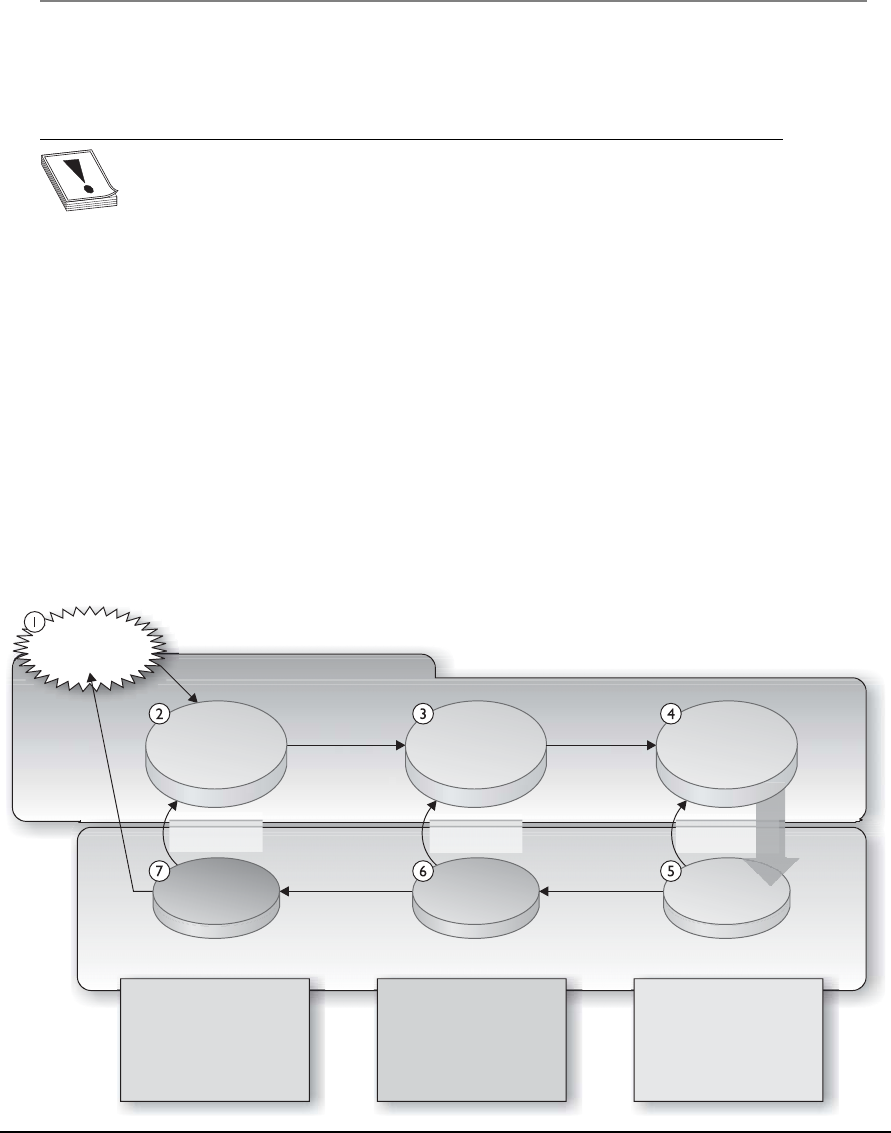
Chapter 2: Information Security Governance and Risk Management
135
If the audience for the measurement values are not executives, but instead security
administrators, then the results are presented in a manner that is easiest for them to
understand and use.
CAUTION
CAUTION This author has seen many scorecards, pie charts, graphics,
and dashboard results that do not map to what is really going on in the
environment. Unless real data is gathered and the correct data is gathered, the
resulting pie chart can illustrate a totally different story than what is really
taking place. Some people spend more time making the colors in the graph
look eye-pleasing instead of perfecting the raw data-gathering techniques. This
can lead to a false sense of security and ultimate breaches.
There are industry best practices that can be used to guide the development of a
security metric and measurement system. The international standard is ISO/IEC
27004:2009, which is used to assess the effectiveness of an ISMS and the controls that
make up the security program as outlined in ISO/IEC 27001. So ISO/IEC 27001 tells
you how to build a security program and then ISO/IEC 27004 tells you how to measure
it. The NIST 800-55 publication also covers performance measuring for information
security, but has a U.S. government slant. The ISO standard and NIST approaches to
metric development are similar, but have some differences. The ISO standard breaks
individual metrics down into base measures, derived measures, and then indicator val-
ues. The NIST approach is illustrated in Figure 2-16, which breaks metrics down into
implementation, effectiveness/efficiency, and impact values.
Figure 2-16 Security measurement processes
Stakeholders
and interests
Goals and
objectives
Business/
mission impact
•
•
Business value gained
or lost
Acceptable loss
estimate
•
•
Timelessness of security
services delivered
Operational results
experienced by security
program implementation
Identification and Definitions
Measures Development and Selection
•Implementation level of
established security
standards, policies and
procedures
Business impact Effectiveness/efficiency Process implementation
Program
results
Information
security policies,
guideline and
procedures
Policy
update
Goal/objective
redefinition
Level of
implementation
Continuous
implementation
Information
systems security
program
implementation

CISSP All-in-One Exam Guide
136
If your organization has the goal of becoming ISO/IEC 27000 certified, then you
should follow ISO/IEC 27004:2009. If your organization is governmental or a govern-
ment contracting company, then following the NIST standard would make more sense.
What is important is consistency. For metrics to be used in a successful manner, they
have to be standardized and have a direct relationship to each other. For example, if an
organization used a rating system of 1–10 to measure incident response processes and
a rating system of High, Medium, and Low to measure malware infection protection
mechanisms, these metrics could not be integrated easily. An organization needs to
establish the metric value types it will use and implement them in a standardized meth-
od across the enterprise. Measurement processes need to be thought through at a de-
tailed level before attempting implementation. Table 2-14 illustrates a metric template
that can be used to track incident response performance levels.
The types of metrics that are developed need to map to the maturity level of the
security program. In the beginning simplistic items are measured (i.e., number of com-
pleted policies), and as the program matures the metrics mature and can increase in
complexity (i.e., number of vulnerabilities mitigated).
The use of metrics allows an organization to truly understand the health of their
security program because each activity and initiative can be measured in a quantifiable
manner. The metrics are used in governing activities because this allows for the best
strategic decisions to be made. The use of metrics also allows the organization to imple-
ment and follow the capability maturity model described earlier. A maturity model is
used to carry out incremental improvements, and the metric results indicate what needs
to be improved and to what levels. Metrics can also be used in process improvement
models, as in Six Sigma and the measurements of service level targets for ITIL. We don’t
only need to know what to do (implement controls, build a security program), we need
to know how well we did it and how to continuously improve.
Field Data
Measure ID Incident Response Measure 1
Goal Strategic Goal: Make accurate, timely information on the organization’s
programs and services readily available
Information Security Goal: Track, document, and report incidents to
appropriate organizational officials and/or authorities.
Measure Percentage of incidents reported within required timeframe per
applicable incident category.
Measure Type Effectiveness
Formula For each incident category (number of incidents reported on time/
total number of reported incidents) * 100
Target 85%
Table 2-14 Incident Response Measurement Template

Chapter 2: Information Security Governance and Risk Management
137
Summary
A security program should address issues from a strategic, tactical, and operational
view, as shown in Figure 2-17. The security program should be integrated at every level
of the enterprise’s architecture. Security management embodies the administrative and
procedural activities necessary to support and protect information and company assets
throughout the enterprise. It includes development and enforcement of security poli-
cies and their supporting mechanisms: procedures, standards, baselines, and guide-
lines. It encompasses enterprise security development, risk management, proper coun-
termeasure selection and implementation, governance, and performance measurement.
Security is a business issue and should be treated as such. It must be properly inte-
grated into the company’s overall business goals and objectives because security issues
can negatively affect the resources the company depends upon. More and more corpo-
rations are finding out the price paid when security is not given the proper attention,
support, and funds. This is a wonderful world to live in, but bad things can happen. The
ones who realize this notion not only survive, but also thrive.
Field Data
Implementation Evidence How many incidents were reported during the period of
12 months?
Category 1. Unauthorized Access? ______
Category 2. Denial of Service? _________
Category 3. Malicious Code? __________
Category 4. Improper Usage? __________
Category 5. Access Attempted? ________
How many incidents involved PII?
Of the incidents reported, how many were reported within the
prescribed timeframe for their category?
Category 1. Unauthorized Access? ______
Category 2. Denial of Service? _________
Category 3. Malicious Code? __________
Category 4. Improper Usage? __________
Category 5. Access Attempted? ________
Of the PII incidents reported, how many were reported within the
prescribed timeframe for their category?
Frequency Collection Frequency: Monthly
Reporting Frequency: Annually
Responsible Parties CIO, CISO
Data Source Incident logs, incident tracking database
Reporting Format Line chart that illustrates individual categories
Table 2-14 Incident Response Measurement Template (continued)

CISSP All-in-One Exam Guide
138
Quick Tips
• The objectives of security are to provide availability, integrity, and
confidentiality protection to data and resources.
• A vulnerability is the absence of or weakness in a control.
• A threat is the possibility that someone or something would exploit a
vulnerability, intentionally or accidentally, and cause harm to an asset.
• A risk is the probability of a threat agent exploiting a vulnerability and the loss
potential from that action.
Figure 2-17 A complete security program contains many items.

Chapter 2: Information Security Governance and Risk Management
139
• A countermeasure, also called a safeguard or control, mitigates the risk.
• A control can be administrative, technical, or physical and can provide
deterrent, preventive, detective, corrective, or recovery protection.
• A compensating control is an alternate control that is put into place because
of financial or business functionality reasons.
• CobiT is a framework of control objectives and allows for IT governance.
• ISO/IEC 27001 is the standard for the establishment, implementation,
control, and improvement of the information security management system.
• The ISO/IEC 27000 series were derived from BS 7799 and are international
best practices on how to develop and maintain a security program.
• Enterprise architecture frameworks are used to develop architectures for
specific stakeholders and present information in views.
• An information security management system (ISMS) is a coherent set of
policies, processes, and systems to manage risks to information assets as
outlined in ISO\IEC 27001.
• Enterprise security architecture is a subset of business architecture and a way
to describe current and future security processes, systems, and subunits to
ensure strategic alignment.
• Blueprints are functional definitions for the integration of technology into
business processes.
• Enterprise architecture frameworks are used to build individual architectures
that best map to individual organizational needs and business drivers.
• Zachman is an enterprise architecture framework, and SABSA is a security
enterprise architecture framework.
• COSO is a governance model used to help prevent fraud within a corporate
environment.
• ITIL is a set of best practices for IT service management.
• Six Sigma is used to identify defects in processes so that the processes can be
improved upon.
• CMMI is a maturity model that allows for processes to improve in an
incremented and standard approach.
• Security enterprise architecture should tie in strategic alignment, business
enablement, process enhancement, and security effectiveness.
• NIST 800-53 uses the following control categories: technical, management,
and operational.
• OCTAVE is a team-oriented risk management methodology that employs
workshops and is commonly used in the commercial sector.
• Security management should work from the top down (from senior
management down to the staff).

CISSP All-in-One Exam Guide
140
• Risk can be transferred, avoided, reduced, or accepted.
• Threats × vulnerability × asset value = total risk.
• (Threats × vulnerability × asset value) × controls gap = residual risk.
• The main goals of risk analysis are the following: identify assets and assign
values to them, identify vulnerabilities and threats, quantify the impact of
potential threats, and provide an economic balance between the impact of the
risk and the cost of the safeguards.
• Failure Modes and Effect Analysis (FMEA) is a method for determining
functions, identifying functional failures, and assessing the causes of failure
and their failure effects through a structured process.
• A fault tree analysis is a useful approach to detect failures that can take place
within complex environments and systems.
• A quantitative risk analysis attempts to assign monetary values to components
within the analysis.
• A purely quantitative risk analysis is not possible because qualitative items
cannot be quantified with precision.
• Capturing the degree of uncertainty when carrying out a risk analysis
is important, because it indicates the level of confidence the team and
management should have in the resulting figures.
• Automated risk analysis tools reduce the amount of manual work involved in
the analysis. They can be used to estimate future expected losses and calculate
the benefits of different security measures.
• Single loss expectancy × frequency per year = annualized loss expectancy
(SLE × ARO = ALE).
• Qualitative risk analysis uses judgment and intuition instead of numbers.
• Qualitative risk analysis involves people with the requisite experience and
education evaluating threat scenarios and rating the probability, potential
loss, and severity of each threat based on their personal experience.
• The Delphi technique is a group decision method where each group member
can communicate anonymously.
• When choosing the right safeguard to reduce a specific risk, the cost,
functionality, and effectiveness must be evaluated and a cost/benefit analysis
performed.
• A security policy is a statement by management dictating the role security
plays in the organization.
• Procedures are detailed step-by-step actions that should be followed to achieve
a certain task.

Chapter 2: Information Security Governance and Risk Management
141
• Standards are documents that outline rules that are compulsory in nature and
support the organization’s security policies.
• A baseline is a minimum level of security.
• Guidelines are recommendations and general approaches that provide advice
and flexibility.
• Job rotation is a detective administrative control to detect fraud.
• Mandatory vacations are a detective administrative control type that can help
detect fraudulent activities.
• Separation of duties ensures no single person has total control over a critical
activity or task. It is a preventative administrative control.
• Split knowledge and dual control are two aspects of separation of duties.
• Data owners specify the classification of data, and data custodians implement
and maintain controls to enforce the set classification levels.
• Security has functional requirements, which define the expected behavior
from a product or system, and assurance requirements, which establish
confidence in the implemented products or systems overall.
• Management must define the scope and purpose of security management,
provide support, appoint a security team, delegate responsibility, and review
the team’s findings.
• The risk management team should include individuals from different
departments within the organization, not just technical personnel.
• Social engineering is a nontechnical attack carried out to manipulate a person
into providing sensitive data to an unauthorized individual.
• Personal identification information (PII) is a collection of identity-based data
that can be used in identity theft and financial fraud, and thus must be highly
protected.
• Security governance is a framework that provides oversight, accountability,
and compliance.
• ISO/IEC 27004:2009 is an international standard for information security
measurement management.
• NIST 800-55 is a standard for performance measurement for information
security.
Questions
Please remember that these questions are formatted and asked in a certain way for a
reason. You must remember that the CISSP exam is asking questions at a conceptual
level. Questions may not always have the perfect answer, and the candidate is advised
against always looking for the perfect answer. The candidate should look for the best
answer in the list.

CISSP All-in-One Exam Guide
142
1. Who has the primary responsibility of determining the classification level for
information?
A. The functional manager
B. Senior management
C. The owner
D. The user
2. If different user groups with different security access levels need to access the
same information, which of the following actions should management take?
A. Decrease the security level on the information to ensure accessibility and
usability of the information.
B. Require specific written approval each time an individual needs to access
the information.
C. Increase the security controls on the information.
D. Decrease the classification label on the information.
3. What should management consider the most when classifying data?
A. The type of employees, contractors, and customers who will be accessing
the data
B. Availability, integrity, and confidentiality
C. Assessing the risk level and disabling countermeasures
D. The access controls that will be protecting the data
4. Who is ultimately responsible for making sure data is classified and protected?
A. Data owners
B. Users
C. Administrators
D. Management
5. Which factor is the most important item when it comes to ensuring security is
successful in an organization?
A. Senior management support
B. Effective controls and implementation methods
C. Updated and relevant security policies and procedures
D. Security awareness by all employees
6. When is it acceptable to not take action on an identified risk?
A. Never. Good security addresses and reduces all risks.
B. When political issues prevent this type of risk from being addressed.

Chapter 2: Information Security Governance and Risk Management
143
C. When the necessary countermeasure is complex.
D. When the cost of the countermeasure outweighs the value of the asset and
potential loss.
7. Which is the most valuable technique when determining if a specific security
control should be implemented?
A. Risk analysis
B. Cost/benefit analysis
C. ALE results
D. Identifying the vulnerabilities and threats causing the risk
8. Which best describes the purpose of the ALE calculation?
A. Quantifies the security level of the environment
B. Estimates the loss possible for a countermeasure
C. Quantifies the cost/benefit result
D. Estimates the loss potential of a threat in a span of a year
9. The security functionality defines the expected activities of a security
mechanism, and assurance defines which of the following?
A. The controls the security mechanism will enforce
B. The data classification after the security mechanism has been implemented
C. The confidence of the security the mechanism is providing
D. The cost/benefit relationship
10. How do you calculate residual risk?
A. Threats × risks × asset value
B. (Threats × asset value × vulnerability) × risks
C. SLE × frequency = ALE
D. (Threats × vulnerability × asset value) × controls gap
11. Why should the team that will perform and review the risk analysis
information be made up of people in different departments?
A. To make sure the process is fair and that no one is left out.
B. It shouldn’t. It should be a small group brought in from outside the
organization because otherwise the analysis is biased and unusable.
C. Because people in different departments understand the risks of their
department. Thus, it ensures the data going into the analysis is as close to
reality as possible.
D. Because the people in the different departments are the ones causing the
risks, so they should be the ones held accountable.

CISSP All-in-One Exam Guide
144
12. Which best describes a quantitative risk analysis?
A. A scenario-based analysis to research different security threats
B. A method used to apply severity levels to potential loss, probability of loss,
and risks
C. A method that assigns monetary values to components in the risk
assessment
D. A method that is based on gut feelings and opinions
13. Why is a truly quantitative risk analysis not possible to achieve?
A. It is possible, which is why it is used.
B. It assigns severity levels. Thus, it is hard to translate into monetary values.
C. It is dealing with purely quantitative elements.
D. Quantitative measures must be applied to qualitative elements.
14. What is CobiT and where does it fit into the development of information
security systems and security programs?
A. Lists of standards, procedures, and policies for security program development
B. Current version of ISO 17799
C. A framework that was developed to deter organizational internal fraud
D. Open standards for control objectives
15. What are the four domains that make up CobiT?
A. Plan and Organize, Acquire and Implement, Deliver and Support, and
Monitor and Evaluate
B. Plan and Organize, Maintain and Implement, Deliver and Support, and
Monitor and Evaluate
C. Plan and Organize, Acquire and Implement, Support and Purchase, and
Monitor and Evaluate
D. Acquire and Implement, Deliver and Support, and Monitor and Evaluate
16. What is the ISO/IEC 27799 standard?
A. A standard on how to protect personal health information
B. The new version of BS 17799
C. Definitions for the new ISO 27000 series
D. The new version of NIST 800-60
17. CobiT was developed from the COSO framework. What are COSO’s main
objectives and purpose?
A. COSO is a risk management approach that pertains to control objectives
and IT business processes.
B. Prevention of a corporate environment that allows for and promotes
financial fraud.

Chapter 2: Information Security Governance and Risk Management
145
C. COSO addresses corporate culture and policy development.
D. COSO is risk management system used for the protection of federal
systems.
18. OCTAVE, NIST 800-30, and AS/NZS 4360 are different approaches to carrying
out risk management within companies and organizations. What are the
differences between these methods?
A. NIST 800-30 and OCTAVE are corporate based, while AS/NZS is
international.
B. NIST 800-30 is IT based, while OCTAVE and AS/NZS 4360 are corporate
based.
C. AS/NZS is IT based, and OCTAVE and NIST 800-30 are assurance based.
D. NIST 800-30 and AS/NZS are corporate based, while OCTAVE is
international.
Use the following scenario to answer Questions 19–21. A server that houses sensitive data
has been stored in an unlocked room for the last few years at Company A. The door to
the room has a sign on the door that reads “Room 1.” This sign was placed on the door
with the hope that people would not look for important servers in this room. Realizing
this is not optimum security, the company has decided to install a reinforced lock and
server cage for the server and remove the sign. They have also hardened the server’s
configuration and employed strict operating system access controls.
19. The fact that the server has been in an unlocked room marked “Room 1” for
the last few years means the company was practicing which of the following?
A. Logical security
B. Risk management
C. Risk transference
D. Security through obscurity
20. The new reinforced lock and cage serve as which of the following?
A. Logical controls
B. Physical controls
C. Administrative controls
D. Compensating controls
21. The operating system access controls comprise which of the following?
A. Logical controls
B. Physical controls
C. Administrative controls
D. Compensating controls

CISSP All-in-One Exam Guide
146
Use the following scenario to answer Questions 22–24. A company has an e-commerce
website that carries out 60 percent of its annual revenue. Under the current circum-
stances, the annualized loss expectancy for a website against the threat of attack is
$92,000. After implementing a new application-layer firewall, the new annualized loss
expectancy would be $30,000. The firewall costs $65,000 per year to implement and
maintain.
22. How much does the firewall save the company in loss expenses?
A. $62,000
B. $3,000
C. $65,000
D. $30,000
23. What is the value of the firewall to the company?
A. $62,000
B. $3,000
C. –$62,000
D. –$3,000
24. Which of the following describes the company’s approach to risk
management?
A. Risk transference
B. Risk avoidance
C. Risk acceptance
D. Risk mitigation
Use the following scenario to answer Questions 25–27. A small remote office for a company
is valued at $800,000. It is estimated, based on historical data, that a fire is likely to
occur once every ten years at a facility in this area. It is estimated that such a fire would
destroy 60 percent of the facility under the current circumstances and with the current
detective and preventative controls in place.
25. What is the Single Loss Expectancy (SLE) for the facility suffering from a fire?
A. $80,000
B. $480,000
C. $320,000
D. 60%
26. What is the Annualized Rate of Occurrence (ARO)?
A. 1
B. 10
C. .1
D. .01

Chapter 2: Information Security Governance and Risk Management
147
27. What is the Annualized Loss Expectancy (ALE)?
A. $480,000
B. $32,000
C. $48,000
D. .6
28. The international standards bodies ISO and IEC developed a series of standards
that are used in organizations around the world to implement and maintain
information security management systems. The standards were derived from
the British Standard 7799, which was broken down into two main pieces.
Organizations can use this series of standards as guidelines, but can also be
certified against them by accredited third parties. Which of the following are
incorrect mappings pertaining to the individual standards that make up the
ISO/IEC 27000 series?
i. ISO/IEC 27001 outlines ISMS implementation guidelines, and ISO/IEC
27003 outlines the ISMS program’s requirements.
ii. ISO/IEC 27005 outlines the audit and certification guidance, and ISO/IEC
27002 outlines the metrics framework.
iii. ISO/IEC 27006 outlines the program implementation guidelines, and
ISO/IEC 27005 outlines risk management guidelines.
iv. ISO/IEC 27001 outlines the code of practice, and ISO/IEC 27004 outlines
the implementation framework.
A. i, iii
B. i, ii
C. ii, iii, iv
D. i, ii, iii, iv
29. The information security industry is made up of various best practices,
standards, models, and frameworks. Some were not developed first with security
in mind, but can be integrated into an organizational security program to help
in its effectiveness and efficiency. It is important to know of all of these different
approaches so that an organization can choose the ones that best fit its business
needs and culture. Which of the following best describes the approach(es) that
should be put into place if an organization wants to integrate a way to improve
its security processes over a period of time?
i. Information Technology Infrastructure Library should be integrated
because it allows for the mapping of IT service process management,
business drivers, and security improvement.
ii. Six Sigma should be integrated because it allows for the defects of security
processes to be identified and improved upon.
iii. Capability Maturity Model should be integrated because it provides
distinct maturity levels.

CISSP All-in-One Exam Guide
148
iv. The Open Group Architecture Framework should be integrated because it
provides a structure for process improvement.
A. i, iii
B. ii, iii, iv
C. ii, iii
D. ii, iv
Use the following scenario to answer Questions 30–32. Todd is a new security manager and
has the responsibility of implementing personnel security controls within the financial
institution where he works. Todd knows that many employees do not fully understand
how their actions can put the institution at risk; thus, an awareness program needs to be
developed. He has determined that the bank tellers need to get a supervisory override
when customers have checks over $3,500 that need to be cashed. He has also uncovered
that some employees have stayed in their specific positions within the company for over
three years. Todd would like to be able to investigate some of the bank’s personnel ac-
tivities to see if any fraudulent activities have taken place. Todd is already ensuring that
two people must use separate keys at the same time to open the bank vault.
30. Todd documents several fraud opportunities that the employees have at the
financial institution so that management understands these risks and allocates
the funds and resources for his suggested solutions. Which of the following
best describes the control Todd should put into place to be able to carry out
fraudulent investigation activity?
A. Separation of duties
B. Rotation of duties
C. Mandatory vacations
D. Split knowledge
31. If the financial institution wants to force collusion to take place for fraud to
happen successfully in this situation, what should Todd put into place?
A. Separation of duties
B. Rotation of duties
C. Social engineering
D. Split knowledge
32. Todd wants to be able to prevent fraud from taking place, but he knows that
some people may get around the types of controls he puts into place. In
those situations he wants to be able to identify when an employee is doing
something suspicious. Which of the following incorrectly describes what Todd
is implementing in this scenario and what those specific controls provide?
A. Separation of duties by ensuring that a supervisor must approve the
cashing of a check over $3,500. This is an administrative control that
provides preventative protection for Todd’s organization.

Chapter 2: Information Security Governance and Risk Management
149
B. Rotation of duties by ensuring that one employee only stays in one position
for up to three months of a time. This is an administrative control that
provides detective capabilities.
C. Security awareness training, which is a preventive administrative control
that can also emphasize enforcement.
D. Dual control, which is an administrative detective control that can ensure
that two employees must carry out a task simultaneously.
Use the following scenario to answer Questions 33–35. Sam has just been hired as the new
security officer for a pharmaceutical company. The company has experienced many
data breaches and has charged Sam with ensuring that the company is better protected.
The company currently has the following classifications in place: public, confidential,
and secret. There is a data classification policy that outlines the classification scheme
and the definitions for each classification, but there is no supporting documentation
that the technical staff can follow to know how to meet these goals. The company has
no data loss prevention controls in place and only conducts basic security awareness
training once a year. Talking to the business unit managers, he finds out that only half
of them even know where the company’s policies are located and none of them know
their responsibilities pertaining to classifying data.
33. Which of the following best describes what Sam should address first in this
situation?
A. Integrate data protection roles and responsibilities within the security
awareness training and require everyone to attend it within the
next 15 days.
B. Review the current classification policies to ensure that they properly
address the company’s risks.
C. Meet with senior management and get permission to enforce data owner
tasks for each business unit manager.
D. Audit all of the current data protection controls in place to get a firm
understanding of what vulnerabilities reside in the environment.
34. Sam needs to get senior management to assign the responsibility of protecting
specific data sets to the individual business unit managers, thus making them
data owners. Which of the following would be the most important in the
criteria the managers would follow in the process of actually classifying data
once this responsibility has been assigned to them?
A. Usefulness of the data
B. Age of the data
C. Value of the data
D. Compliance requirements of the data

CISSP All-in-One Exam Guide
150
35. From this scenario, what has the company accomplished so far?
A. Implementation of administrative controls
B. Implementation of operational controls
C. Implementation of physical controls
D. Implementation of logical controls
Use the following scenario to answer Questions 36–38. Susan has been told by her boss that
she will be replacing the current security manager within her company. Her boss ex-
plained to her that operational security measures have not been carried out in a stan-
dard fashion, so some systems have proper security configurations and some do not.
Her boss needs to understand how dangerous it is to have some of the systems miscon-
figured along with what to do in this situation.
36. Which of the following best describes what Susan needs to ensure the
operations staff creates for proper configuration standardization?
A. Dual control
B. Redundancy
C. Training
D. Baselines
37. Which of the following is the best way to illustrate to her boss the dangers of
the current configuration issues?
A. Map the configurations to the compliancy requirements.
B. Compromise a system to illustrate its vulnerability.
C. Audit the systems.
D. Carry out a risk assessment.
38. Which of the following is one of the most likely solutions that Susan will
come up with and present to her boss?
A. Development of standards
B. Development of training
C. Development of monitoring
D. Development of testing
Answers
1. C. A company can have one specific data owner or different data owners who
have been delegated the responsibility of protecting specific sets of data. One
of the responsibilities that goes into protecting this information is properly
classifying it.
2. C. If data is going to be available to a wide range of people, more granular
security should be implemented to ensure that only the necessary people access

Chapter 2: Information Security Governance and Risk Management
151
the data and that the operations they carry out are controlled. The security
implemented can come in the form of authentication and authorization
technologies, encryption, and specific access control mechanisms.
3. B. The best answer to this question is B, because to properly classify data,
the data owner must evaluate the availability, integrity, and confidentiality
requirements of the data. Once this evaluation is done, it will dictate which
employees, contractors, and users can access the data, which is expressed in
answer A. This assessment will also help determine the controls that should
be put into place.
4. D. The key to this question is the use of the word “ultimately.” Though
management can delegate tasks to others, it is ultimately responsible for
everything that takes place within a company. Therefore, it must continually
ensure that data and resources are being properly protected.
5. A. Without senior management’s support, a security program will not receive
the necessary attention, funds, resources, and enforcement capabilities.
6. D. Companies may decide to live with specific risks they are faced with if the
cost of trying to protect themselves would be greater than the potential loss
if the threat were to become real. Countermeasures are usually complex to a
degree, and there are almost always political issues surrounding different risks,
but these are not reasons to not implement a countermeasure.
7. B. Although the other answers may seem correct, B is the best answer here.
This is because a risk analysis is performed to identify risks and come up with
suggested countermeasures. The ALE tells the company how much it could
lose if a specific threat became real. The ALE value will go into the cost/benefit
analysis, but the ALE does not address the cost of the countermeasure and the
benefit of a countermeasure. All the data captured in answers A, C, and D are
inserted into a cost/benefit analysis.
8. D. The ALE calculation estimates the potential loss that can affect one asset
from a specific threat within a one-year time span. This value is used to figure
out the amount of money that should be earmarked to protect this asset from
this threat.
9. C. The functionality describes how a mechanism will work and behave. This
may have nothing to do with the actual protection it provides. Assurance
is the level of confidence in the protection level a mechanism will provide.
When systems and mechanisms are evaluated, their functionality and
assurance should be examined and tested individually.
10. D. The equation is more conceptual than practical. It is hard to assign a
number to an individual vulnerability or threat. This equation enables you to
look at the potential loss of a specific asset, as well as the controls gap (what
the specific countermeasure cannot protect against). What remains is the
residual risk, which is what is left over after a countermeasure is implemented.

CISSP All-in-One Exam Guide
152
11. C. An analysis is only as good as the data that go into it. Data pertaining to
risks the company faces should be extracted from the people who understand
best the business functions and environment of the company. Each department
understands its own threats and resources, and may have possible solutions to
specific threats that affect its part of the company.
12. C. A quantitative risk analysis assigns monetary values and percentages to
the different components within the assessment. A qualitative analysis uses
opinions of individuals and a rating system to gauge the severity level of
different threats and the benefits of specific countermeasures.
13. D. During a risk analysis, the team is trying to properly predict the future and
all the risks that future may bring. It is somewhat of a subjective exercise and
requires educated guessing. It is very hard to properly predict that a flood will
take place once in ten years and cost a company up to $40,000 in damages,
but this is what a quantitative analysis tries to accomplish.
14. D. The Control Objectives for Information and related Technology (CobiT)
is a framework developed by the Information Systems Audit and Control
Association (ISACA) and the IT Governance Institute (ITGI). It defines goals
for the controls that should be used to properly manage IT and ensure IT
maps to business needs.
15. A. CobiT has four domains: Plan and Organize, Acquire and Implement,
Deliver and Support, and Monitor and Evaluate. Each category drills down
into subcategories. For example, Acquire and Implement contains the
following subcategories:
• Acquire and Maintain Application Software
• Acquire and Maintain Technology Infrastructure
• Develop and Maintain Procedures
• Install and Accredit Systems
• Manage Changes
16. A. It is referred to as the health informatics, and its purpose is to provide
guidance to health organizations and other holders of personal health
information on how to protect such information via implementation
of ISO/IEC 27002.
17. B. COSO deals more at the strategic level, while CobiT focuses more at the
operational level. CobiT is a way to meet many of the COSO objectives,
but only from the IT perspective. COSO deals with non-IT items also, as
in company culture, financial accounting principles, board of director
responsibility, and internal communication structures. Its main purpose
is to help ensure fraudulent financial reporting cannot take place in an
organization.

Chapter 2: Information Security Governance and Risk Management
153
18. B. NIST 800-30 Risk Management Guide for Information Technology
Systems is a U.S. federal standard that is focused on IT risks. OCTAVE is a
methodology to set up a risk management program within an organizational
structure. AS/NZS 4360 takes a much broader approach to risk management.
This methodology can be used to understand a company’s financial, capital,
human safety, and business decisions risks. Although it can be used to analyze
security risks, it was not created specifically for this purpose.
19. D. Security through obscurity is not implementing true security controls,
but rather attempting to hide the fact that an asset is vulnerable in the hope
that an attacker will not notice. Security through obscurity is an approach to
try and fool a potential attacker, which is a poor way of practicing security.
Vulnerabilities should be identified and fixed, not hidden.
20. B. Physical controls are security mechanisms in the physical world, as in locks,
fences, doors, computer cages, etc. There are three main control types, which
are administrative, technical, and physical.
21. A. Logical (or technical) controls are security mechanisms, as in firewalls,
encryption, software permissions, and authentication devices. They are
commonly used in tandem with physical and administrative controls to
provide a defense-in-depth approach to security.
22. A. $62,000 is the correct answer. The firewall reduced the annualized loss
expectancy (ALE) from $92,000 to $30,000 for a savings of $62,000. The
formula for ALE is single loss expectancy × annualized rate of occurrence
= ALE. Subtracting the ALE value after the firewall is implemented from the
value before it was implemented results in the potential loss savings this type
of control provides.
23. D. –$3,000 is the correct answer. The firewall saves $62,000, but costs
$65,000 per year. 62,000 – 65,000 = –3,000. The firewall actually costs the
company more than the original expected loss, and thus the value to the
company is a negative number. The formula for this calculation is (ALE before
the control is implemented) – (ALE after the control is implemented) –
(annual cost of control) = value of control.
24. D. Risk mitigation involves employing controls in an attempt to reduce the
either the likelihood or damage associated with an incident, or both. The four
ways of dealing with risk are accept, avoid, transfer, and mitigate (reduce). A
firewall is a countermeasure installed to reduce the risk of a threat.
25. B. $480,000 is the correct answer. The formula for single loss expectancy (SLE)
is asset value × exposure factor (EF) = SLE. In this situation the formula would
work out as asset value ($800,000) × exposure factor (60%) = $480,000. This
means that the company has a potential loss value of $480,000 pertaining to
this one asset (facility) and this one threat type (fire).

CISSP All-in-One Exam Guide
154
26. C. The annualized rate occurrence (ARO) is the frequency that a threat will
most likely occur within a 12-month period. It is a value used in the ALE
formula, which is SLE × ARO = ALE.
27. C. $48,000 is the correct answer. The annualized loss expectancy formula (SLE
× ARO = ALE) is used to calculate the loss potential for one asset experiencing
one threat in a 12-month period. The resulting ALE value helps to determine
the amount that can be reasonably be spent in the protection of that asset. In
this situation, the company should not spend over $48,000 on protecting this
asset from the threat of fire. ALE values help organizations rank the severity
level of the risks they face so they know which ones to deal with first and how
much to spend on each.
28. D. Unfortunately, you will run into questions on the CISSP exam that will be
this confusing, so you need to be ready for them. The proper mapping for the
ISO/IEC standards are as follows:
• ISO/IEC 27001 ISMS requirements
• ISO/IEC 27002 Code of practice for information security management
• ISO/IEC 27003 Guideline for ISMS implementation
• ISO/IEC 27004 Guideline for information security management
measurement and metrics framework
• ISO/IEC 27005 Guideline for information security risk management
• ISO/IEC 27006 Guidance for bodies providing audit and certification of
information security management systems
29. C. The best process improvement approaches provided in this list are Six
Sigma and the Capability Maturity Model. The following outlines the
definitions for all items in this question:
• TOGAF Model and methodology for the development of enterprise
architectures developed by The Open Group
• ITIL Processes to allow for IT service management developed by the
United Kingdom’s Office of Government Commerce
• Six Sigma Business management strategy that can be used to carry out
process improvement
• Capability Maturity Model Integration (CMMI) Organizational
development for process improvement developed by Carnegie Mellon
30. C. Mandatory vacation is an administrative detective control that allows for an
organization to investigate an employee’s daily business activities to uncover
any potential fraud that may be taking place. The employee should be forced
to be away from the organization for a two-week period and another person
put into that role. The idea is that the person who was rotated into that
position may be able to detect suspicious activities.

Chapter 2: Information Security Governance and Risk Management
155
31. A. Separation of duties is an administrative control that is put into place to
ensure that one person cannot carry out a critical task by himself. If a person
were able to carry out a critical task alone, this could put the organization
at risk. Collusion is when two or more people come together to carry out
fraud. So if a task was split between two people, they would have to carry out
collusion (working together) to complete that one task and carry out fraud.
32. D. Dual control is an administrative preventative control. It ensures that
two people must carry out a task at the same time, as in two people having
separate keys when opening the vault. It is not a detective control. Notice
that the question asks what Todd is not doing. Remember that on the exam
you need to choose the best answer. In many situations you will not like
the question or the corresponding answers on the CISSP exam, so prepare
yourself. The questions can be tricky, which is one reason why the exam itself
is so difficult.
33. B. While each answer is a good thing for Sam to carry out, the first thing
that needs to be done is to ensure that the policies properly address data
classification and protection requirements for the company. Policies provide
direction, and all other documents (standards, procedures, guidelines) and
security controls are derived from the policies and support them.
34. C. Data is one of the most critical assets to any organization. The value of the
asset must be understood so that the organization knows which assets require
the most protection. There are many components that go into calculating the
value of an asset: cost of replacement, revenue generated from asset, amount
adversaries would pay for the asset, cost that went into the development of
the asset, productivity costs if asset was absent or destroyed, and liability costs
of not properly protecting the asset. So the data owners need to be able to
determine the value of the data to the organization for proper classification
purposes.
35. A. The company has developed a data classification policy, which is an
administrative control.
36. D. The operations staff needs to know what minimum level of security is
required per system within the network. This minimum level of security is
referred to as a baseline. Once a baseline is set per system, then the staff has
something to compare the system against to know if changes have not taken
place properly, which could make the system vulnerable.
37. D. Susan needs to illustrate these vulnerabilities (misconfigured systems) in
the context of risk to her boss. This means she needs to identify the specific
vulnerabilities, associate threats to those vulnerabilities, and calculate their
risks. This will allow her boss to understand how critical these issues are and
what type of action needs to take place.

CISSP All-in-One Exam Guide
156
38. A. Standards need to be developed that outline proper configuration
management processes and approved baseline configuration settings. Once
these standards are developed and put into place, then employees can be
trained on these issues and how to implement and maintain what is outlined
in the standards. Systems can be tested against what is laid out in the standards,
and systems can be monitored to detect if there are configurations that do not
meet the requirements outlined in the standards. You will find that some CISSP
questions seem subjective and their answers hard to pin down. Questions that
ask what is “best” or “more likely” are common.

CHAPTER 3
Access Control
This chapter presents the following:
• Identification methods and technologies
• Authentication methods, models, and technologies
• Discretionary, mandatory, and nondiscretionary models
• Accountability, monitoring, and auditing practices
• Emanation security and technologies
• Intrusion detection systems
• Threats to access control practices and technologies
A cornerstone in the foundation of information security is controlling how resources
are accessed so they can be protected from unauthorized modification or disclosure.
The controls that enforce access control can be technical, physical, or administrative in
nature. These control types need to be integrated into policy-based documentation,
software and technology, network design, and physical security components.
Access is one of the most exploited aspects of security, because it is the gateway that
leads to critical assets. Access controls need to be applied in a layered defense-in-depth
method, and an understanding of how these controls are exploited is extremely impor-
tant. In this chapter we will explore access control conceptually and then dig into the
technologies the industry puts in place to enforce these concepts. We will also look at
the common methods the bad guys use to attack these technologies.
Access Controls Overview
Access controls are security features that control how users and systems communicate and
interact with other systems and resources. They protect the systems and resources from
unauthorized access and can be components that participate in determining the level of
authorization after an authentication procedure has successfully completed. Although
we usually think of a user as the entity that requires access to a network resource or in-
formation, there are many other types of entities that require access to other network
entities and resources that are subject to access control. It is important to understand the
definition of a subject and an object when working in the context of access control.
Access is the flow of information between a subject and an object. A subject is an
active entity that requests access to an object or the data within an object. A subject can
157

CISSP All-in-One Exam Guide
158
be a user, program, or process that accesses an object to accomplish a task. When a
program accesses a file, the program is the subject and the file is the object. An object is
a passive entity that contains information or needed functionality. An object can be a
computer, database, file, computer program, directory, or field contained in a table
within a database. When you look up information in a database, you are the active
subject and the database is the passive object. Figure 3-1 illustrates subjects and objects.
Access control is a broad term that covers several different types of mechanisms that
enforce access control features on computer systems, networks, and information. Access
control is extremely important because it is one of the first lines of defense in battling
unauthorized access to systems and network resources. When a user is prompted for a
username and password to use a computer, this is access control. Once the user logs in
and later attempts to access a file, that file may have a list of users and groups that have
the right to access it. If the user is not on this list, the user is denied. This is another form
of access control. The users’ permissions and rights may be based on their identity, clear-
ance, and/or group membership. Access controls give organizations the ability to con-
trol, restrict, monitor, and protect resource availability, integrity, and confidentiality.
Security Principles
The three main security principles for any type of security control are
• Availability
• Integrity
• Confidentiality
Figure 3-1 Subjects are active entities that access objects, while objects are passive entities.

Chapter 3: Access Control
159
These principles, which were touched upon in Chapter 2, will be a running theme
throughout this book because each core subject of each chapter approaches these prin-
ciples in a unique way. In Chapter 2, you read that security management procedures
include identifying threats that can negatively affect the availability, integrity, and con-
fidentiality of the company’s assets and finding cost-effective countermeasures that will
protect them. This chapter looks at the ways the three principles can be affected and
protected through access control methodologies and technologies.
Every control that is used in computer and information security provides at least
one of these security principles. It is critical that security professionals understand all of
the possible ways these principles can be provided and circumvented.
Availability
Hey, I’m available.
Response: But no one wants you.
Information, systems, and resources must be available to users in a timely manner
so productivity will not be affected. Most information must be accessible and available
to users when requested so they can carry out tasks and fulfill their responsibilities. Ac-
cessing information does not seem that important until it is inaccessible. Administra-
tors experience this when a file server goes offline or a highly used database is out of
service for one reason or another. Fault tolerance and recovery mechanisms are put into
place to ensure the continuity of the availability of resources. User productivity can be
greatly affected if requested data are not readily available.
Information has various attributes, such as accuracy, relevance, timeliness, and pri-
vacy. It may be extremely important for a stockbroker to have information that is ac-
curate and timely, so he can buy and sell stocks at the right times at the right prices. The
stockbroker may not necessarily care about the privacy of this information, only that it
is readily available. A soft drink company that depends on its soda pop recipe would
care about the privacy of this trade secret, and the security mechanisms in place need to
ensure this secrecy.
Integrity
Information must be accurate, complete, and protected from unauthorized modifica-
tion. When a security mechanism provides integrity, it protects data, or a resource, from
being altered in an unauthorized fashion. If any type of illegitimate modification does
occur, the security mechanism must alert the user or administrator in some manner.
One example is when a user sends a request to her online bank account to pay her
$24.56 water utility bill. The bank needs to be sure the integrity of that transaction was
not altered during transmission, so the user does not end up paying the utility compa-
ny $240.56 instead. Integrity of data is very important. What if a confidential e-mail
was sent from the secretary of state to the president of the United States and was inter-
cepted and altered without a security mechanism in place that disallows this or alerts
the president that this message has been altered? Instead of receiving a message read-
ing, “We would love for you and your wife to stop by for drinks tonight,” the message
could be altered to say, “We have just bombed Libya.” Big difference.

CISSP All-in-One Exam Guide
160
Confidentiality
This is my secret and you can’t have it.
Response: I don’t want it.
Confidentiality is the assurance that information is not disclosed to unauthorized
individuals, programs, or processes. Some information is more sensitive than other
information and requires a higher level of confidentiality. Control mechanisms need to
be in place to dictate who can access data and what the subject can do with it once they
have accessed it. These activities need to be controlled, audited, and monitored. Ex-
amples of information that could be considered confidential are health records, finan-
cial account information, criminal records, source code, trade secrets, and military
tactical plans. Some security mechanisms that would provide confidentiality are en-
cryption, logical and physical access controls, transmission protocols, database views,
and controlled traffic flow.
It is important for a company to identify the data that must be classified so the
company can ensure that the top priority of security protects this information and
keeps it confidential. If this information is not singled out, too much time and money
can be spent on implementing the same level of security for critical and mundane in-
formation alike. It may be necessary to configure virtual private networks (VPNs) be-
tween organizations and use the IPSec encryption protocol to encrypt all messages
passed when communicating about trade secrets, sharing customer information, or
making financial transactions. This takes a certain amount of hardware, labor, funds,
and overhead. The same security precautions are not necessary when communicating
that today’s special in the cafeteria is liver and onions with a roll on the side. So, the
first step in protecting data’s confidentiality is to identify which information is sensitive
and to what degree, and then implement security mechanisms to protect it properly.
Different security mechanisms can supply different degrees of availability, integrity,
and confidentiality. The environment, the classification of the data that is to be pro-
tected, and the security goals must be evaluated to ensure the proper security mecha-
nisms are bought and put into place. Many corporations have wasted a lot of time and
money not following these steps and instead buying the new “gee whiz” product that
recently hit the market.
Identification, Authentication, Authorization,
and Accountability
I don’t really care who you are, but come right in.
For a user to be able to access a resource, he first must prove he is who he claims to
be, has the necessary credentials, and has been given the necessary rights or privileges
to perform the actions he is requesting. Once these steps are completed successfully, the
user can access and use network resources; however, it is necessary to track the user’s
activities and enforce accountability for his actions. Identification describes a method
of ensuring that a subject (user, program, or process) is the entity it claims to be. Iden-
tification can be provided with the use of a username or account number. To be prop-
erly authenticated, the subject is usually required to provide a second piece to the
credential set. This piece could be a password, passphrase, cryptographic key, personal

Chapter 3: Access Control
161
identification number (PIN), anatomical attribute, or token. These two credential items
are compared to information that has been previously stored for this subject. If these
credentials match the stored information, the subject is authenticated. But we are not
done yet.
Once the subject provides its credentials and is properly identified, the system it is
trying to access needs to determine if this subject has been given the necessary rights
and privileges to carry out the requested actions. The system will look at some type of
access control matrix or compare security labels to verify that this subject may indeed
access the requested resource and perform the actions it is attempting. If the system
determines that the subject may access the resource, it authorizes the subject.
Although identification, authentication, authorization, and accountability have close
and complementary definitions, each has distinct functions that fulfill a specific require-
ment in the process of access control. A user may be properly identified and authenti-
cated to the network, but he may not have the authorization to access the files on the file
server. On the other hand, a user may be authorized to access the files on the file server,
but until she is properly identified and authenticated, those resources are out of reach.
Figure 3-2 illustrates the four steps that must happen for a subject to access an object.
The subject needs to be held accountable for the actions taken within a system or
domain. The only way to ensure accountability is if the subject is uniquely identified
and the subject’s actions are recorded.
Logical access controls are technical tools used for identification, authentication, au-
thorization, and accountability. They are software components that enforce access con-
trol measures for systems, programs, processes, and information. The logical access
controls can be embedded within operating systems, applications, add-on security pack-
ages, or database and telecommunication management systems. It can be challenging to
synchronize all access controls and ensure all vulnerabilities are covered without pro-
ducing overlaps of functionality. However, if it were easy, security professionals would
not be getting paid the big bucks!
Race Condition
Arace condition is when processes carry out their tasks on a shared resource in an
incorrect order. A race condition is possible when two or more processes use a
shared resource, as in data within a variable. It is important that the processes
carry out their functionality in the correct sequence. If process 2 carried out its
task on the data before process 1, the result will be much different than if process
1 carried out its tasks on the data before process 2.
In software, when the authentication and authorization steps are split into
two functions, there is a possibility an attacker could use a race condition to force
the authorization step to be completed before the authentication step. This would
be a flaw in the software that the attacker has figured out how to exploit. A race
condition occurs when two or more processes use the same resource and the se-
quences of steps within the software can be carried out in an improper order,
something that can drastically affect the output. So, an attacker can force the au-
thorization step to take place before the authentication step and gain unauthor-
ized access to a resource.

CISSP All-in-One Exam Guide
162
NOTE
NOTE The words “logical” and “technical” can be used interchangeably in
this context. It is conceivable that the CISSP exam would refer to logical and
technical controls interchangeably.
An individual’s identity must be verified during the authentication process. Authen-
tication usually involves a two-step process: entering public information (a username,
employee number, account number, or department ID), and then entering private in-
formation (a static password, smart token, cognitive password, one-time password, or
PIN). Entering public information is the identification step, while entering private in-
formation is the authentication step of the two-step process. Each technique used for
identification and authentication has its pros and cons. Each should be properly evalu-
ated to determine the right mechanism for the correct environment.
Identification and Authentication
Now, who are you again?
Once a person has been identified through the user ID or a similar value, she must
be authenticated, which means she must prove she is who she says she is. Three general
factors can be used for authentication: something a person knows, something a person
has, and something a person is. They are also commonly called authentication by knowl-
edge, authentication by ownership, and authentication by characteristic.
Figure 3-2 Four steps must happen for a subject to access an object: identification, authentication,
authorization, and accountability.

Chapter 3: Access Control
163
Something a person knows (authentication by knowledge) can be, for example, a
password, PIN, mother’s maiden name, or the combination to a lock. Authenticating a
person by something that she knows is usually the least expensive to implement. The
downside to this method is that another person may acquire this knowledge and gain
unauthorized access to a resource.
Something a person has (authentication by ownership) can be a key, swipe card,
access card, or badge. This method is common for accessing facilities, but could also be
used to access sensitive areas or to authenticate systems. A downside to this method is
that the item can be lost or stolen, which could result in unauthorized access.
Something specific to a person (authentication by characteristic) becomes a bit
more interesting. This is not based on whether the person is a Republican, a Martian,
or a moron—it is based on a physical attribute. Authenticating a person’s identity based
on a unique physical attribute is referred to as biometrics. (For more information, see
the upcoming section, “Biometrics.”)
Strong authentication contains two out of these three methods: something a person
knows, has, or is. Using a biometric system by itself does not provide strong authentica-
tion because it provides only one out of the three methods. Biometrics supplies what a
person is, not what a person knows or has. For a strong authentication process to be in
place, a biometric system needs to be coupled with a mechanism that checks for one of
the other two methods. For example, many times the person has to type a PIN number
into a keypad before the biometric scan is performed. This satisfies the “what the per-
son knows” category. Conversely, the person could be required to swipe a magnetic
card through a reader prior to the biometric scan. This would satisfy the “what the
person has” category. Whatever identification system is used, for strong authentication
to be in the process, it must include two out of the three categories. This is also referred
to as two-factor authentication.
NOTE
NOTE Strong authentication is also sometimes referred to as multi-
authentication, which just means that more than one authentication
method is used. Three-factor authentication is possible, which includes
all authentication approaches.
Verification 1:1 is the measurement of an identity against a single claimed iden-
tity. The conceptual question is, “Is this person who he claims to be?” So if Bob
provides his identity and credential set, this information is compared to the data
kept in an authentication database. If they match, we know that it is really Bob. If
the identification is 1:N (many), the measurement of a single identity is com-
pared against multiple identities. The conceptual question is, “Who is this per-
son?” An example is if fingerprints were found at a crime scene, the cops would
run them through their database to identify the suspect.

CISSP All-in-One Exam Guide
164
Identity is a complicated concept with many varied nuances, ranging from the phil-
osophical to the practical. A person can have multiple digital identities. For example, a
user can be JPublic in a Windows domain environment, JohnP on a Unix server,
JohnPublic on the mainframe, JJP in instant messaging, JohnCPublic in the certifica-
tion authority, and IWearPanties on Facebook. If a company would want to centralize
all of its access control, these various identity names for the same person may put the
security administrator into a mental health institution.
Creating or issuing secure identities should include three key aspects: uniqueness,
nondescriptive, and issuance. The first, uniqueness, refers to the identifiers that are
specific to an individual, meaning every user must have a unique ID for accountability.
Things like fingerprints and retina scans can be considered unique elements in deter-
mining identity. Nondescriptive means that neither piece of the credential set should
indicate the purpose of that account. For example, a user ID should not be “administra-
tor,” “backup_operator,” or “CEO.” The third key aspect in determining identity is issu-
ance. These elements are the ones that have been provided by another authority as a
means of proving identity. ID cards are a kind of security element that would be con-
sidered an issuance form of identification.
NOTE
NOTE Mutual authentication is when the two communicating entities must
authenticate to each other before passing data. An authentication server may
be required to authenticate to a user’s system before allowing data to flow
back and forth.
While most of this chapter deals with user authentication, it is important to realize
system-based authentication is possible also. Computers and devices can be identified,
authenticated, monitored, and controlled based upon their hardware addresses (media
access control) and/or Internet Protocol (IP) addresses. Networks may have network
access control (NAC) technology that authenticates systems before they are allowed ac-
cess to the network. Every network device has a hardware address that is integrated into
its network interface card and a software-based address (IP), which either is assigned by
a DHCP server or locally configured. We will cover DHCP, IP, and MAC addresses more
in Chapter 6.
Identification Component Requirements
When issuing identification values to users, the following should be in place:
• Each value should be unique, for user accountability.
• A standard naming scheme should be followed.
• The value should be nondescriptive of the user’s position or tasks.
• The value should not be shared between users.

Chapter 3: Access Control
165
CAUTION
CAUTION In technology there are overlapping acronyms. In the CISSP exam
you will run into at least three different MAC acronyms. Media access control =
data link layer functionality and address type within a network protocol stack.
Mandatory access control = access control model integrated in software used
to control subject-to-object access functions through the use of clearance,
classifications, and labels. Message authentication code = cryptographic function
that uses a hashing algorithm and symmetric key for data integrity and system
origin functions. The CISSP exam does not use acronyms by themselves, but
spells the terms out so this should not be a problem on the exam.
Identity Management
I configured our system to only allow access to tall people.
Response: Short people are pretty sneaky.
Identity management is a broad and loaded term that encompasses the use of differ-
ent products to identify, authenticate, and authorize users through automated means. To
many people, the term also includes user account management, access control, pass-
word management, single sign-on functionality, managing rights and permissions for
user accounts, and auditing and monitoring all of these items. The reason that individu-
als, and companies, have different definitions and perspectives of identity management
(IdM) is because it is so large and encompasses so many different technologies and
processes. Remember the story of the four blind men who are trying to describe an ele-
phant? One blind man feels the tail and announces, “It’s a tail.” Another blind man feels
the trunk and announces, “It’s a trunk.” Another announces it’s a leg, and another an-
nounces it’s an ear. This is because each man cannot see or comprehend the whole of the
large creature—just the piece he is familiar with and knows about. This analogy can be
applied to IdM because it is large and contains many components and many people may
not comprehend the whole—only the component they work with and understand.
It is important for security professionals to understand not only the whole of IdM,
but understand the technologies that make up a full enterprise IdM solution. IdM re-
quires management of uniquely identified entities, their attributes, credentials, and en-
titlements. IdM allows organizations to create and manage digital identities’ life cycles
(create, maintain, terminate) in a timely and automated fashion. The enterprise IdM
must meet business needs and scale from internally facing systems to externally facing
systems. In this section, we will be covering many of these technologies and how they
work together.
Selling identity management products is now a flourishing market that focuses on
reducing administrative costs, increasing security, meeting regulatory compliance, and
improving upon service levels throughout enterprises. The continual increase in com-
plexity and diversity of networked environments only increases the complexity of keep-
ing track of who can access what and when. Organizations have different types of
applications, network operating systems, databases, enterprise resource management
(ERM) systems, customer relationship management (CRM) systems, directories, main-
frames—all used for different business purposes. Then the organizations have partners,

CISSP All-in-One Exam Guide
166
contractors, consultants, employees, and temporary employees. (Figure 3-3 actually
provides a simplistic view of most environments.) Users usually access several different
types of systems throughout their daily tasks, which makes controlling access and
providing the necessary level of protection on different data types difficult and full of
obstacles. This complexity usually results in unforeseen and unidentified holes in asset
protection, overlapping and contradictory controls, and policy and regulation non-
compliance. It is the goal of identity management technologies to simplify the admin-
istration of these tasks and bring order to chaos.
The following are many of the common questions enterprises deal with today in
controlling access to assets:
• What should each user have access to?
• Who approves and allows access?
• How do the access decisions map to policies?
• Do former employees still have access?
• How do we keep up with our dynamic and ever-changing environment?
• What is the process of revoking access?
• How is access controlled and monitored centrally?
• Why do employees have eight passwords to remember?
Access Control Review
The following is a review of the basic concepts in access control:
• Identification
• Subjects supplying identification information
• Username, user ID, account number
• Authentication
• Verifying the identification information
• Passphrase, PIN value, biometric, one-time password, password
• Authorization
• Using criteria to make a determination of operations that subjects
can carry out on objects
• “I know who you are, now what am I going to allow you to do?”
• Accountability
• Audit logs and monitoring to track subject activities with objects

Chapter 3: Access Control
167
• We have five different operating platforms. How do we centralize access when
each platform (and application) requires its own type of credential set?
• How do we control access for our employees, customers, and partners?
• How do we make sure we are compliant with the necessary regulations?
• Where do I send in my resignation? I quit.
The traditional identity management process has been manual, using directory ser-
vices with permissions, access control lists (ACLs), and profiles. This approach has
proven incapable of keeping up with complex demands and thus has been replaced
with automated applications rich in functionality that work together to create an iden-
tity management infrastructure. The main goals of identity management (IdM) tech-
nologies are to streamline the management of identity, authentication, authorization,
and the auditing of subjects on multiple systems throughout the enterprise. The sheer
diversity of a heterogeneous enterprise makes proper implementation of IdM a huge
undertaking.
Figure 3-3 Most environments are chaotic in terms of access.

CISSP All-in-One Exam Guide
168
Many identity management solutions and products are available in the market-
place. For the CISSP exam, the following are the types of technologies you should be
aware of:
• Directories
• Web access management
• Password management
• Legacy single sign-on
• Account management
• Profile update
Directories We should have a standardized and automated way of naming stuff and
controlling access to it.
Most enterprises have some type of directory that contains information pertaining
to the company’s network resources and users. Most directories follow a hierarchical
database format, based on the X.500 standard, and a type of protocol, as in Lightweight
Directory Access Protocol (LDAP), that allows subjects and applications to interact with
the directory. Applications can request information about a particular user by making
an LDAP request to the directory, and users can request information about a specific
resource by using a similar request.
The objects within the directory are managed by a directory service. The directory
service allows an administrator to configure and manage how identification, authentica-
tion, authorization, and access control take place within the network and on individual
systems. The objects within the directory are labeled and identified with namespaces.
In a Windows environment, when you log in, you are logging in to a domain con-
troller (DC), which has a hierarchical directory in its database. The database is running
a directory service (Active Directory), which organizes the network resources and carries
out user access control functionality. So once you successfully authenticate to the DC,
certain network resources will be available to you (print service, file server, e-mail serv-
er, and so on) as dictated by the configuration of AD.
How does the directory service keep all of these entities organized? By using
namespaces. Each directory service has a way of identifying and naming the objects they
will manage. In databases based on the X.500 standard that are accessed by LDAP, the
directory service assigns distinguished names (DNs) to each object. Each DN represents
a collection of attributes about a specific object, and is stored in the directory as an
entry. In the following example, the DN is made up of a common name (cn) and do-
main components (dc). Since this is a hierarchical directory, .com is the top, LogicalSe-
curity is one step down from .com, and Shon is at the bottom (where she belongs).
dn: cn=Shon Harris,dc=LogicalSecurity,dc=com
cn: Shon Harris
This is a very simplistic example. Companies usually have
large trees (directories) containing many levels and objects to
represent different departments, roles, users, and resources.

Chapter 3: Access Control
169
A directory service manages the entries and data in the directory and also enforces
the configured security policy by carrying out access control and identity management
functions. For example, when you log in to the DC, the directory service (AD) will de-
termine what resources you can and cannot access on the network.
NOTE
NOTE We touch on directory services again in the “Single Sign-on” section
of this chapter.
So are there any problems with using a directory product for identity management
and access control? Yes, there’s always something. Many legacy devices and applications
cannot be managed by the directory service because they were not built with the neces-
sary client software. The legacy entities must be managed through their inherited man-
agement software. This means that most networks have subjects, services, and resources
that can be listed in a directory and controlled centrally by an administrator through
the use of a directory service. Then there are legacy applications and devices that the
administrator must configure and manage individually.
Directories’ Role in Identity Management A directory used for IdM is spe-
cialized database software that has been optimized for reading and searching opera-
tions. It is the main component of an identity management solution. This is because all
resource information, users’ attributes, authorization profiles, roles, access control pol-
icies, and more are stored in this one location. When other IdM software applications
need to carry out their functions (authorization, access control, assigning permissions),
they now have a centralized location for all of the information they need.
As an analogy, let’s say I’m a store clerk and you enter my store to purchase alcohol.
Instead of me having to find a picture of you somewhere to validate your identity, go to
another place to find your birth certificate to obtain your true birth date, and find proof
of which state you are registered in, I can look in one place—your driver’s license. The
directory works in the same way. Some IdM applications may need to know a user’s
authorization rights, role, employee status, or clearance level, so instead of this applica-
tion having to make requests to several databases and other applications, it makes its
request to this one directory.
A lot of the information stored in an IdM directory is scattered throughout the en-
terprise. User attribute information (employee status, job description, department, and
so on) is usually stored in the HR database, authentication information could be in a
Kerberos server, role and group identification information might be in a SQL database,
and resource-oriented authentication information is stored in Active Directory on a
domain controller. These are commonly referred to as identity stores and are located in
different places on the network. Something nifty that many identity management prod-
ucts do is create meta-directories or virtual directories. A meta-directory gathers the nec-
essary information from multiple sources and stores it in one central directory. This
provides a unified view of all users’ digital identity information throughout the enter-
prise. The meta-directory synchronizes itself with all of the identity stores periodically
to ensure the most up-to-date information is being used by all applications and IdM
components within the enterprise.

CISSP All-in-One Exam Guide
170
Organizing All of This Stuff
In a database directory based on the X.500 standard, the following rules are used
for object organization:
• The directory has a tree structure to organize the entries using a parent-
child configuration.
• Each entry has a unique name made up of attributes of a specific object.
• The attributes used in the directory are dictated by the defined schema.
• The unique identifiers are called distinguished names.
The schema describes the directory structure and what names can be used
within the directory, among other things. (Schema and database components are
covered more in depth in Chapter 10.)
The following diagram shows how an object (Kathy Conlon) can have the
attributes of ou=General ou=NCTSW ou=pentagon ou=locations ou=Navy
ou=DoD ou=U.S. Government C=US.
Note that OU stands for organizational unit. They are used as containers of
other similar OUs, users, and resources. They provide the parent-child (some-
times called tree-leaf) organization structure.
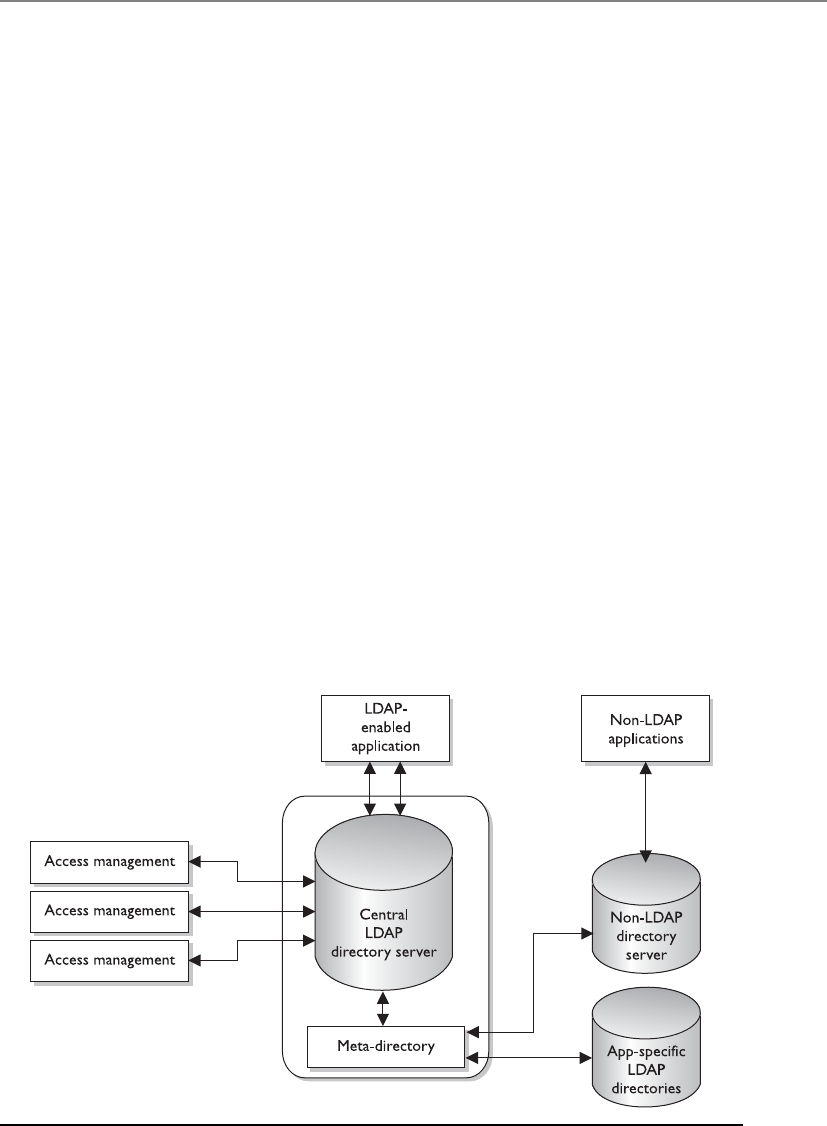
Chapter 3: Access Control
171
Avirtual directory plays the same role and can be used instead of a meta-directory.
The difference between the two is that the meta-directory physically has the identity
data in its directory, whereas a virtual directory does not and points to where the actual
data reside. When an IdM component makes a call to a virtual directory to gather iden-
tity information on a user, the virtual directory will point to where the information
actually lives.
Figure 3-4 illustrates a central LDAP directory that is used by the IdM services: access
management, provisioning, and identity management. When one of these services ac-
cepts a request from a user or application, it pulls the necessary data from the directory
to be able to fulfill the request. Since the data needed to properly fulfill these requests
are stored in different locations, the metadata directory pulls the data from these other
sources and updates the LDAP directory.
Web Access Management Web access management (WAM) software controls
what users can access when using a web browser to interact with web-based enterprise
assets. This type of technology is continually becoming more robust and experiencing
increased deployment. This is because of the increased use of e-commerce, online
banking, content providing, web services, and more. The Internet only continues to
grow, and its importance to businesses and individuals increases as more and more
functionality is provided. We just can’t seem to get enough of it.
Figure 3-5 shows the basic components and activities in a web access control man-
agement process.
1. User sends in credentials to web server.
2. Web server validates user’s credentials.
3. User requests to access a resource (object).
Figure 3-4 Meta-directories pull data from other sources to populate the IdM directory.
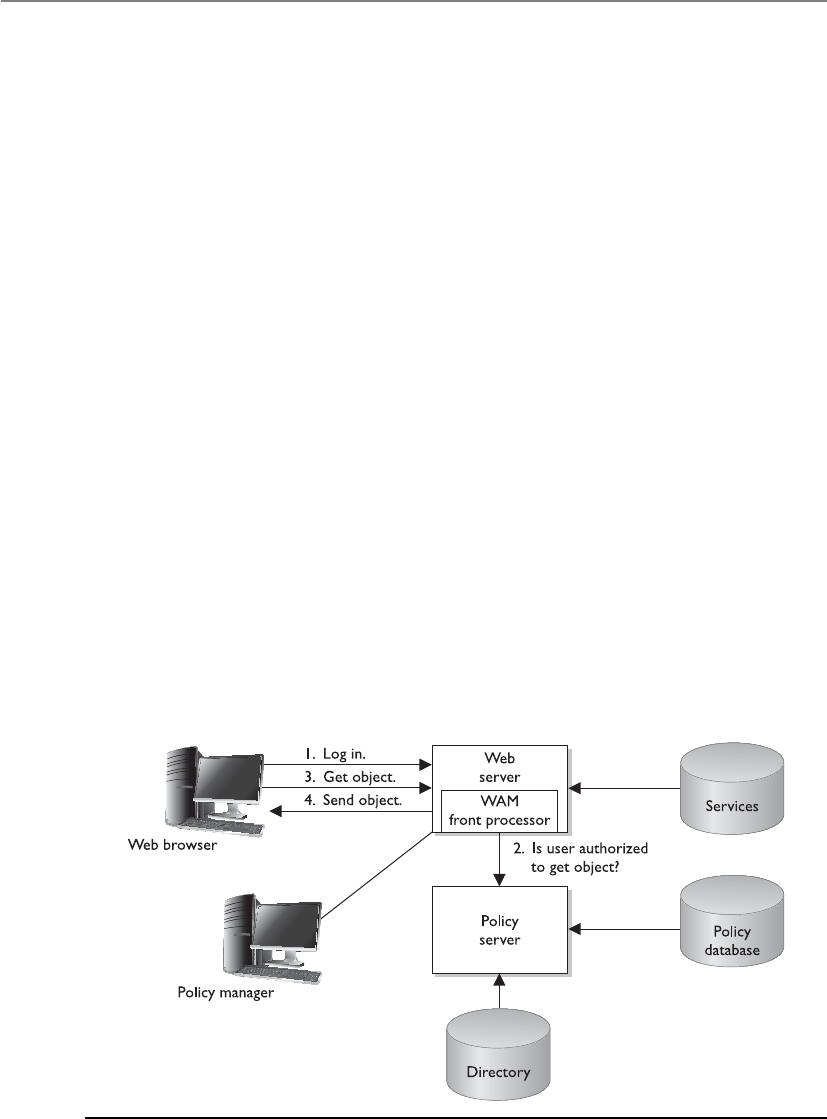
CISSP All-in-One Exam Guide
172
4. Web server verifies with the security policy to determine if the user is allowed
to carry out this operation.
5. Web server allows access to the requested resource.
This is a simple example. More complexity comes in with all the different ways a
user can authenticate (password, digital certificate, token, and others); the resources
and services that may be available to the user (transfer funds, purchase product, update
profile, and so forth); and the necessary infrastructure components. The infrastructure
is usually made up of a web server farm (many servers), a directory that contains the
users’ accounts and attributes, a database, a couple of firewalls, and some routers, all
laid out in a tiered architecture. But let’s keep it simple right now.
The WAM software is the main gateway between users and the corporate web-based
resources. It is commonly a plug-in for a web server, so it works as a front-end process.
When a user makes a request for access, the web server software will query a directory,
an authentication server, and potentially a back-end database before serving up the re-
source the user requested. The WAM console allows the administrator to configure ac-
cess levels, authentication requirements, and account setup workflow steps, and to
perform overall maintenance.
WAM tools usually also provide a single sign-on capability so that once a user is
authenticated at a web site, she can access different web-based applications and resourc-
es without having to log in multiple times. When a product provides a single sign-on
capability in a web environment, the product must keep track of the user’s authentica-
tion state and security context as the user moves from one resource to the next.
For example, if Kathy logs on to her online bank web site, the communication is
taking place over the HTTP protocol. This protocol itself is stateless, which means it will
allow a web server to pass the user a web page and the user is forgotten about. Many
web servers work in a stateless mode because they have so many requests to fulfill and
they are just providing users with web pages. Keeping a constant session with each and
Figure 3-5 A basic example of web access control

Chapter 3: Access Control
173
every user who is requesting to see a web page would exhaust the web server’s resources.
When a user has to log on to a web site is when “keeping the user’s state” is required
and a continuous session is needed.
When Kathy first goes to her bank’s web site, she is viewing publicly available data
that do not require her to authenticate before viewing. A constant session is not being
kept by the web server, thus it is working in a stateless manner. Once she clicks Access
My Account, the web server sets up a secure connection (SSL) with her browser and
requests her credentials. After she is authenticated, the web server sends a cookie (small
text file) that indicates she has authenticated properly and the type of access she should
be allowed. When Kathy requests to move from her savings account to her checking
account, the web server will assess the cookie on Kathy’s web browser to see if she has
the rights to access this new resource. The web server continues to check this cookie
during Kathy’s session to ensure no one has hijacked the session and that the web
server is continually communicating with Kathy’s system and not someone else’s.
The web server continually asks Kathy’s web browser to prove she has been authen-
ticated, which the browser does by providing the cookie information. (The cookie in-
formation could include her password, account number, security level, browsing habits,
and/or personalization information.) As long as Kathy is authenticated, the web server
software will keep track of each of her requests, log her events, and make changes that
she requests that can take place in her security context. Security context is the authoriza-
tion level she is assigned based on her permissions, entitlements, and access rights.
Once Kathy ends the session, the cookie is usually erased from the web browser’s
memory and the web server no longer keeps this connection open or collects session
state information on this user.
NOTE
NOTE A cookie can be in the format of a text file stored on the user’s hard
drive (permanent) or it can be only held in memory (session). If the cookie
contains any type of sensitive information, then it should only be held in
memory and be erased once the session has completed.
As an analogy, let’s say I am following you in a mall as you are shopping. I am mark-
ing down what you purchase, where you go, and the requests you make. I know every-
thing about your actions; I document them in a log, and remember them as you
continue. (I am keeping state information on you and your activities.) You can have
access to all of these stores if every 15 minutes you show me a piece of paper that I gave
you. If you fail to show me the piece of paper at the necessary interval, I will push a
button and all stores will be locked—you no longer have access to the stores, I no lon-
ger collect information about you, and I leave and forget all about you. Since you are
no longer able to access any sensitive objects (store merchandise), I don’t need to keep
track of you and what you are doing.
As long as the web server sends the cookie to the web browser, Kathy does not have to
provide credentials as she asks for different resources. This is what single sign-on is. You
only have to provide your credentials once, and the continual validation that you have
the necessary cookie will allow you to go from one resource to another. If you end your
session with the web server and need to interact with it again, you must re-authenticate
and a new cookie will be sent to your browser and it starts all over again.

CISSP All-in-One Exam Guide
174
NOTE
NOTE We will cover specific single sign-on technologies later in this chapter
along with their security issues.
So the WAM product allows an administrator to configure and control access to
internal resources. This type of access control is commonly put in place to control ex-
ternal entities requesting access. The product may work on a single web server or a
server farm.
Password Management
How do we reduce the number of times users forget their passwords?
Response: If someone calls the help desk, fire them.
We cover password requirements, security issues, and best practices later in this
chapter. At this point, we need to understand how password management can work
within an IdM environment.
Help-desk workers and administrators commonly complain about the amount of
time they have to spend resetting passwords when users forget them. Another issue is
the number of different passwords the users are required to remember for the different
platforms within the network. When a password changes, an administrator must con-
nect directly to that management software of the specific platform and change the pass-
word value. This may not seem like much of a hassle, but if an organization has 4,000
users and seven different platforms, and 35 different applications, it could require a
full-time person to continually make these password modifications. And who would
really want that job?
Different types of password management technologies have been developed to get
these pesky users off the backs of IT and the help desk by providing a more secure and
automated password management system. The most common password management
approaches are listed next:
•Password Synchronization Reduces the complexity of keeping up with
different passwords for different systems.
•Self-Service Password Reset Reduces help-desk call volumes by allowing
users to reset their own passwords.
•Assisted Password Reset Reduces the resolution process for password
issues for the help desk. This may include authentication with other types of
authentication mechanisms (biometrics, tokens).
Password Synchronization If users have too many passwords they need to keep
track of, they will write the passwords down on a sticky note and cleverly hide this un-
der their keyboard or just stick it on the side of their monitor. This is certainly easier for
the user, but not so great for security.
Password synchronization technologies can allow a user to maintain just one pass-
word across multiple systems. The product will synchronize the password to other sys-
tems and applications, which happens transparently to the user.

Chapter 3: Access Control
175
The goal is to require the user to memorize only one password and have the ability
to enforce more robust and secure password requirements. If a user only needs to re-
member one password, he is more likely to not have a problem with longer, more
complex strings of values. This reduces help-desk call volume and allows the adminis-
trator to keep her sanity for just a little bit longer.
One criticism of this approach is that since only one password is used to access dif-
ferent resources, now the hacker only has to figure out one credential set to gain unau-
thorized access to all resources. But if the password requirements are more demanding
(12 characters, no dictionary words, three symbols, uppercase and lowercase letters,
and so on) and the password is changed out regularly, the balance between security and
usability can be acceptable.
Self-Service Password Reset Some products are implemented to allow users to
reset their own passwords. This does not mean that the users have any type of privileged
permissions on the systems to allow them to change their own credentials. Instead, dur-
ing the registration of a user account, the user can be asked to provide several personal
questions (school graduated from, favorite teacher, favorite color, and so on) in a ques-
tion-and-answer form. When the user forgets his password, he may be required to pro-
vide another authentication mechanism (smart card, token) and to answer these previ-
ously answered questions to prove his identity. If he does this properly, he is allowed to
change his password. If he does not do this properly, he is fired because he is an idiot.
Products are available that allow users to change their passwords through other
means. For example, if you forgot your password, you may be asked to answer some of
the questions answered during the registration process of your account. If you do this
correctly, an e-mail is sent to you with a link you must click. The password management
product has your identity tied to the answers you gave to the questions during your ac-
count registration process and to your e-mail address. If the user does everything cor-
rectly, he is given a screen that allows him to reset his password.
CAUTION
CAUTION The product should not ask for information that is publicly
available, as in your mother’s maiden name, because anyone can find that
out and attempt to identify himself as you.
Assisted Password Reset Some products are created for help-desk employees
who need to work with individuals when they forget their password. The help-desk
employee should not know or ask the individual for her password. This would be a
security risk since only the owner of the password should know the value. The help-
desk employee also should not just change a password for someone calling in without
authenticating that person first. This can allow social engineering attacks where an at-
tacker calls the help desk and indicates she is someone who she is not. If this took
place, then an attacker would have a valid employee password and could gain unau-
thorized access to the company’s jewels.
The products that provide assisted password reset functionality allow the help-desk
individual to authenticate the caller before resetting the password. This authentication
process is commonly performed through the question-and-answer process described in
the previous section. The help-desk individual and the caller must be identified and

CISSP All-in-One Exam Guide
176
authenticated through the password management tool before the password can be
changed. Once the password is updated, the system that the user is authenticating to
should require the user to change her password again. This would ensure that only she
(and not she and the help-desk person) knows her password. The goal of an assisted
password reset product is to reduce the cost of support calls and ensure all calls are
processed in a uniform, consistent, and secure fashion.
Various password management products on the market provide one or all of these
functionalities. Since IdM is about streamlining identification, authentication, and access
control, one of these products is typically integrated into the enterprise IdM solution.
Legacy Single Sign-On We will cover specific single sign-on (SSO) technologies
later in this chapter, but at this point we want to understand how SSO products are
commonly used as an IdM solution or as part of a larger IdM enterprise-wide solution.
An SSO technology allows a user to authenticate one time and then access resourc-
es in the environment without needing to re-authenticate. This may sound the same as
password synchronization, but it is not. With password synchronization, a product
takes the user’s password and updates each user account on each different system and
application with that one password. If Tom’s password is iwearpanties, then this is the
value he must type into each and every application and system he must access. In an
SSO situation, Tom would send his password to one authentication system. When Tom
requests to access a network application, the application will send over a request for
credentials, but the SSO software will respond to the application for Tom. So in SSO
environments, the SSO software intercepts the login prompts from network systems
and applications and fills in the necessary identification and authentication informa-
tion (that is, the username and password) for the user.
Even though password synchronization and single sign-on are different technolo-
gies, they still have the same vulnerability. If an attacker uncovers a user’s credential set,
she can have access to all the resources that the legitimate user may have access to.
An SSO solution may also provide a bottleneck or single point of failure. If the SSO
server goes down, users are unable to access network resources. This is why it’s a good
idea to have some type of redundancy or fail-over technology in place.
Most environments are not homogeneous in devices and applications, which makes
it more difficult to have a true enterprise SSO solution. Legacy systems many times re-
quire a different type of authentication process than the SSO software can provide. So
potentially 80 percent of the devices and applications may be able to interact with the
SSO software and the other 20 percent will require users to authenticate to them di-
rectly. In many of these situations, the IT department may come up with their own
homemade solutions, such as using login batch scripts for the legacy systems.
Are there any other downfalls with SSO we should be aware of? Well, it can be ex-
pensive to implement, especially in larger environments. Many times companies evalu-
ate purchasing this type of solution and find out it is too cost-prohibitive. The other
issue is that it would mean all of the users’ credentials for the company’s resources are
stored in one location. If an attacker was able to break in to this storehouse, she could
access whatever she wanted, and do whatever she wanted, with the company’s assets.
As always, security, functionality, and cost must be properly weighed to determine
the best solution for the company.

Chapter 3: Access Control
177
Account Management Account management is often not performed efficiently
and effectively in companies today. Account management deals with creating user ac-
counts on all systems, modifying the account privileges when necessary, and decom-
missioning the accounts when they are no longer needed. Most environments have
their IT department create accounts manually on the different systems, users are given
excessive rights and permissions, and when an employee leaves the company, many or
all of the accounts stay active. This is because a centralized account management tech-
nology has not been put into place.
Account management products attempt to attack these issues by allowing an ad-
ministrator to manage user accounts across multiple systems. When there are multiple
directories containing user profiles or access information, the account management
software allows for replication between the directories to ensure each contains the same
up-to-date information.
Now let’s think about how accounts are set up. In many environments, when a new
user needs an account, a network administrator will set up the account(s) and provide
some type of privileges and permissions. But how would the network administrator
know what resources this new user should have access to and what permissions should
be assigned to the new account? In most situations, he doesn’t—he just wings it. This is
how users end up with too much access to too much stuff. What should take place in-
stead is implementing a workflow process that allows for a request for a new user ac-
count. This request is approved, usually, by the employee’s manager, and the accounts
are automatically set up on the systems, or a ticket is generated for the technical staff to
set up the account(s). If there is a request for a change to the permissions on the ac-
count or if an account needs to be decommissioned, it goes through the same process.
The request goes to a manager (or whoever is delegated with this approval task), the
manager approves it, and the changes to the various accounts take place.
The automated workflow component is common in account management products
that provide IdM solutions. Not only does this reduce the potential errors that can take
place in account management, each step (including account approval) is logged and
tracked. This allows for accountability and provides documentation for use in backtrack-
ing if something goes wrong. It also helps ensure that only the necessary amount of ac-
cess is provided to the account and that there are no “orphaned” accounts still active
when employees leave the company. In addition, these types of processes are the kind
your auditors will be looking for—and we always want to make the auditors happy!
NOTE
NOTE These types of account management products are commonly used to
set up and maintain internal accounts. Web access control management is used
mainly for external users.
As with SSO products, enterprise account management products are usually expen-
sive and can take years to properly roll out across the enterprise. Regulatory require-
ments, however, are making more and more companies spend the money for these
types of solutions—which the vendors love!

CISSP All-in-One Exam Guide
178
Provisioning Let’s review what we know, and then build upon these concepts. Most
IdM solutions pull user information from the HR database, because the data are already
collected and held in one place and are constantly updated as employees’ or contractors’
statuses change. So user information will be copied from the HR database (referred to as
the authoritative source) into a directory, which we covered in an earlier section.
When a new employee is hired, the employee’s information, along with his man-
ager’s name, is pulled from the HR database into the directory. The employee’s man-
ager is automatically sent an e-mail asking for approval of this new account. After the
manager approves, the necessary accounts are set up on the required systems.
Over time, this new user will commonly have different identity attributes, which
will be used for authentication purposes, stored in different systems in the network.
When a user requests access to a resource, all of his identity data have already been
copied from other identity stores and the HR database and held in this centralized di-
rectory (sometimes called the identity repository). This may be a meta-directory or a
virtual directory. The access control component of the IdM system will compare the
user’s request to the IdM access control policy and ensure the user has the necessary
identification and authentication pieces in place before allowing access to the resource.
When this employee is fired, this new information goes from the HR database to
the directory. An e-mail is automatically generated and sent to the manager to allow
this account to be decommissioned. Once this is approved, the account management
software disables all of the accounts that had been set up for this user.
This example illustrates user account management and provisioning, which is the
life-cycle management of identity components.
Why do we have to worry about all of this identification and authentication stuff?
Because users always want something—they are very selfish. Okay, users actually need
access to resources to carry out their jobs, but what do they need access to, and what
level of access? This question is actually a very difficult one in our distributed, hetero-
geneous, and somewhat chaotic environments today. Too much access to resources
opens the company up to potential fraud and other risks. Too little access means the
user cannot do his job. So we are required to get it just right.
Authoritative System of Record
The authoritative source is the “system of record,” or the location where identity
information originates and is maintained. It should have the most up-to-date
and reliable identity information. An “Authoritative System of Record” (ASOR) is
a hierarchical tree-like structure system that tracks subjects and their authoriza-
tion chains. Organizations need an automated and reliable way of detecting and
managing unusual or suspicious changes to user accounts and a method of col-
lecting this type of data through extensive auditing capabilities. The ASOR should
contain the subject’s name, associated accounts, authorization history per ac-
count, and provision details. This type of workflow and accounting is becoming
more in demand for regulatory compliance because it allows auditors to under-
stand how access is being centrally controlled within an environment.

Chapter 3: Access Control
179
User provisioning refers to the creation, maintenance, and deactivation of user ob-
jects and attributes as they exist in one or more systems, directories, or applications, in
response to business processes. User provisioning software may include one or more of
the following components: change propagation, self-service workflow, consolidated
user administration, delegated user administration, and federated change control. User
objects may represent employees, contractors, vendors, partners, customers, or other
recipients of a service. Services may include electronic mail, access to a database, access
to a file server or database, and so on.
Great. So we create, maintain, and deactivate accounts as required based on busi-
ness needs. What else does this mean? The creation of the account also is the creation
of the access rights to company assets. It is through provisioning that users either are
given access or access is taken away. Throughout the life cycle of a user identity, access
rights, permissions, and privileges should change as needed in a clearly understood,
automated, and audited process.
By now, you should be able to connect how these different technologies work to-
gether to provide an organization with streamlined IdM. Directories are built to contain
user and resource information. A metadata directory pulls identity information that re-
sides in different places within the network to allow IdM processes to only have to get
the needed data for their tasks from this one location. User management tools allow for
automated control of user identities through their lifetimes and can provide provision-
ing. A password management tool is in place so that productivity is not slowed down by
a forgotten password. A single sign-on technology requires internal users to only authen-
ticate once for enterprise access. Web access management tools provide a single sign-on
service to external users and control access to web-based resources. Figure 3-6 provides a
visual example of how many of these components work together.
Profile Update
I changed my dog’s name from Cornelis Vreeswijk Hollander to Spot.
Response: Good choice, but we don’t need this in your identity profile.
Most companies do not just contain the information “Bob Smith” for a user and
make all access decisions based on this data. There can be a plethora of information on
a user that is captured (e-mail address, home address, phone number, panty size, and
so on). When this collection of data is associated with the identity of a user, we call it a
profile.
The profile should be centrally located for easier management. IdM enterprise solu-
tions have profile update technology that allows an administrator to create, make
changes, or delete these profiles in an automated fashion when necessary. Many user
profiles contain nonsensitive data that the user can update himself (called self-service).
So if George moved to a new house, there should be a profile update tool that allows
him to go into his profile and change his address information. Now, his profile may
also contain sensitive data that should not be available to George—for example, his
access rights to resources or information that he is going to get laid off on Friday.
You have interacted with a profile update technology if you have requested to up-
date your personal information on a web site, as in Orbitz, Amazon, or Expedia. These
companies provide you with the capability to sign in and update the information they
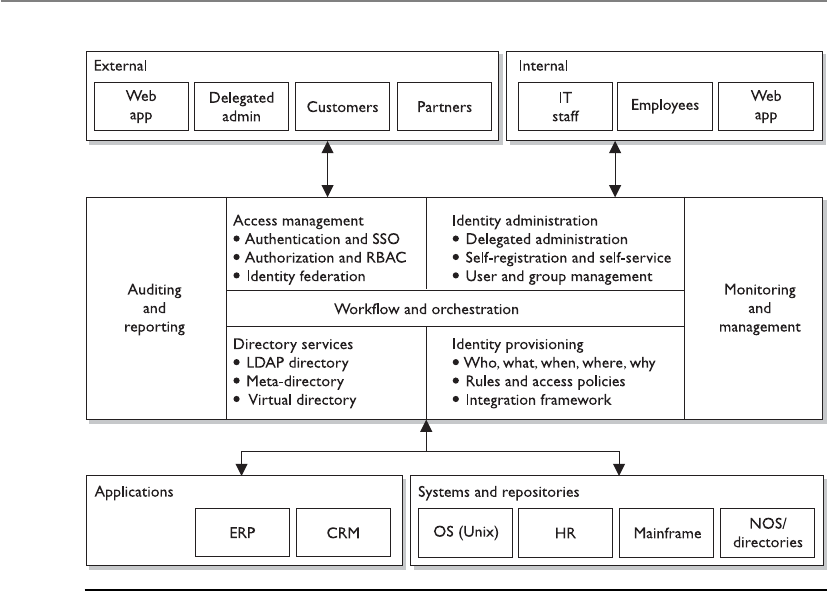
CISSP All-in-One Exam Guide
180
allow you to access. This could be your contact information, home address, purchasing
preferences, or credit card data. This information is then used to update their customer
relationship management (CRM) system so they know where to send you their junk
mail advertisements or spam messages.
Federation
Beam me up, Scotty!
The world continually gets smaller as technology brings people and companies
closer together. Many times, when we are interacting with just one web site, we are actu-
ally interacting with several different companies—we just don’t know it. The reason we
don’t know it is because these companies are sharing our identity and authentication
information behind the scenes. This is not done for nefarious purposes necessarily, but
to make our lives easier and to allow merchants to sell their goods without much effort
on our part.
For example, a person wants to book an airline flight and a hotel room. If the airline
company and hotel company use a federated identity management system, this means
they have set up a trust relationship between the two companies and will share cus-
tomer identification and, potentially, authentication information. So when I book my
flight on Southwest, the web site asks me if I want to also book a hotel room. If I click
Figure 3-6 Enterprise identity management system components

Chapter 3: Access Control
181
“Yes,” I could then be brought to the Hilton web site, which provides me with informa-
tion on the closest hotel to the airport I’m flying into. Now, to book a room I don’t have
to log in again. I logged in on the Southwest web site, and that web site sent my infor-
mation over to the Hilton web site, all of which happened transparently to me.
Afederated identity is a portable identity, and its associated entitlements, that can be
used across business boundaries. It allows a user to be authenticated across multiple IT
systems and enterprises. Identity federation is based upon linking a user’s otherwise dis-
tinct identities at two or more locations without the need to synchronize or consolidate
directory information. Federated identity offers businesses and consumers a more conve-
nient way of accessing distributed resources and is a key component of e-commerce.
Digital Identity
In the digital world, I am a very different person.
Response: Thank goodness.
An interesting little fact that not many people are aware of is that a digital
identity is made up of attributes, entitlements, and traits. Many of us just think of
identity as a user ID that is mapped to an individual. The truth is that it is usu-
ally more complicated than that.
A user’s identity can be a collection of her attributes (department, role in
company, shift time, clearance, and others); her entitlements (resources available
to her, authoritative rights in the company, and so on); and her traits (biometric
information, height, sex, and so forth).
So if a user requests access to a database that contains sensitive employee in-
formation, the IdM solution would need to pull together the necessary identity
information and her supplied credentials before she is authorized access. If the
user is a senior manager (attribute), with a Secret clearance (attribute), and has
access to the database (entitlement)—she is granted the permissions Read and
Write to certain records in the database Monday through Friday, 8 A.M. to 5 P.M.
(attribute).
Another example is if a soldier requests to be assigned an M-16 firearm. She
must be in the 34th division (attribute), have a top secret clearance (attribute), her
supervisor must have approved this (entitlement), and her physical features
(traits) must match the ID card she presents to the firearm depot clerk.
The directory (or meta-directory) of the IdM system has all of this identity
information centralized, which is why it is so important.
Many people think that just logging in to a domain controller or a network
access server is all that is involved in identity management. But if you peek under
the covers, you can find an array of complex processes and technologies working
together.
The CISSP exam is not currently getting into this level of detail (entitlement,
attribute, traits) pertaining to IdM, but in the real world there are many facets to
identification, authentication, authorization, and auditing that make it a com-
plex beast.

CISSP All-in-One Exam Guide
182
Web portals functions are parts of a website that act as a point of access to informa-
tion. A portal presents information from diverse sources in a unified manner. It can
offer various services, as in e-mail, news updates, stock prices, data access, price look-
ups, access to databases, and entertainment. They provide a way for organizations to
present one consistent interface with one “look and feel” and various functionality
types. For example, your company might have a web portal that you can log into and it
provides access to many different systems and their functionalities, but it seems as
though you are only interacting with one system because the interface is “clean” and
organized. Common public web portals are iGoogle, Yahoo!, AOL, etc. They mash up,
or combine, web services (web-based functions) from several different entities and
present them in one central website.
A web portal is made up of portlets, which are pluggable user-interface software
components that present information from other systems. A portlet is an interactive
application that provides a specific type of web service functionality (e-mail, news feed,
weather updates, forums). A portal is made up of individual portlets to provide a pleth-
ora of services through one interface. It is a way of centrally providing a set of web ser-
vices. Users can configure their view to the portal by enabling or disabling these various
portlet functions.
Since each of these portlets can be provided by different entities, how user authen-
tication information is handled must be tightly controlled, and there must be a high
level of trust between these different entities. If you worked for a college, for example,
there might be one web portal available to students, parents, faculty members, and the
public. The public should only be able to view and access a small subset of available
portlets and not have access to more powerful web services (e-mails, database access).

Chapter 3: Access Control
183
Students could be able to log in and gain access to their grades, assignments, and a
student forum. Faculty members can gain access to all of these web services, including
the school’s e-mail service and access to the central database, which contains all of the
students’ information. If there is a software flaw or misconfiguration, it is possible that
someone can gain access to something they are not supposed to.
The following sections explain the various types of authentication methods com-
monly used and integrated in many web-based federated identity management pro-
cesses and products today.
Access Control and Markup Languages
You can only do what I want you to do when interacting with my web portal.
If you can remember when HyperText Markup Language (HTML) was all we had to
make a static web page, you’re old. Being old in the technology world is different than
in the regular world; HTML came out in the early 1990s. HTML came from Standard
Generalized Markup Language (SGML), which came from the Generalized Markup
Language (GML). We still use HTML, so it is certainly not dead and gone; the industry
has just improved upon the markup languages available for use to meet today’s needs.
A markup language is a way to structure text and data sets, and it dictates how these
will be viewed and used. When you adjust margins and other formatting capabilities in
a word processor, you are marking up the text in the word processor’s markup language.
If you develop a web page, you are using some type of markup language. You can con-
trol how it looks and some of the actual functionality the page provides. The use of a
standard markup language also allows for interoperability. If you develop a web page
and follow basic markup language standards, the page will basically look and act the
same no matter what web server is serving up the web page or what browser the viewer
is using to interact with it.
As the Internet grew in size and the World Wide Web (WWW) expanded in func-
tionality, and as more users and organizations came to depend upon web sites and
web-based communication, the basic and elementary functions provided by HTML
were not enough. And instead of every web site having its own proprietary markup
language to meet its specific functionality requirements, the industry had to have a way
for functionality needs to be met and still provide interoperability for all web server
and web browser interaction. This is the reason that Extensible Markup Language (XML)
was developed. XML is a universal and foundational standard that provides a structure
for other independent markup languages to be built from and still allow for interoper-
ability. Markup languages with various functionalities were built from XML, and while
each language provides its own individual functionality, if they all follow the core rules
of XML then they are interoperable and can be used across different web-based applica-
tions and platforms.
As an analogy, let’s look at the English language. Sam is a biology scientist, Trudy is
an accountant, and Val is a network administrator. They all speak English, so they have
a common set of communication rules, which allow them to talk with each other, but
each has their own “spin-off” languages that builds upon and uses the English language
as its core. Sam uses words like “mitochondrial amino acid genetic strains” and “DNA
polymerase.” Trudy uses words as in “accrual accounting” and “acquisition indiges-
tion.” Val uses terms as in “multiprotocol label switching” and “subkey creation.” Each

CISSP All-in-One Exam Guide
184
profession has its own “language” to meet its own needs, but each is based off the same
core language—English. In the world of the WWW, various web sites need to provide
different types of functionality through the use of their own language types but still
need a way to communicate with each other and their users in a consistent manner,
which is why they are based upon the same core language structure (XML).
There are hundreds of markup languages based upon XML, but we are going to fo-
cus on the ones that are used for identity management and access control purposes.
The Service Provisioning Markup Language (SPML) allows for the exchange of pro-
visioning data between applications, which could reside in one organization or many.
SPML allows for the automation of user management (account creation, amendments,
revocation) and access entitlement configuration related to electronically published
services across multiple provisioning systems. This markup language allows for the in-
tegration and interoperation of service provisioning requests across various platforms.
When a new employee is hired at a company, that employee usually needs access to
a wide range of systems, servers, and applications. Setting up new accounts on each and
every system, properly configuring access rights, and then maintaining those accounts
throughout their lifetimes is time-consuming, laborious, and error-prone. What if the
company has 20,000 employees and thousands of network resources that each em-
ployee needs various access rights to? This opens the door for confusion, mistakes,
vulnerabilities, and a lack of standardization.
SPML allows for all these accounts to be set up and managed simultaneously across
the various systems and applications. SPML is made up of three main entities: the Re-
questing Authority (RA), which is the entity that is making the request to set up a new
account or make changes to an existing account; the Provisioning Service Provider
(PSP), which is the software that responds to the account requests; and the Provision-
ing Service Target (PST), which is the entity that carries out the provisioning activities
on the requested system.
So when a new employee is hired, there is a request to set up the necessary user ac-
counts and access privileges on several different systems and applications across the
enterprise. This request originates in a piece of software carrying out the functionality
of the RA. The RA creates SPML messages, which provide the requirements of the new
account, and sends them to a piece of software that is carrying out the functionality of
the PSP. This piece of software reviews the requests and compares them to the organiza-
tion’s approved account creation criteria. If these requests are allowed, the PSP sends
new SPML messages to the end systems (PST) that the user actually needs to access.
Software on the PST sets up the requested accounts and configures the necessary access
rights. If this same employee is fired three months later, the same process is followed
and all necessary user accounts are deleted. This allows for consistent account manage-
ment in complex environments. These steps are illustrated in Figure 3-7.
When there is a need to allow a user to log in one time and gain access to different
and separate web-based applications, the actual authentication data have to be shared
between the systems maintaining those web applications securely and in a standard-
ized manner. This is the role that the Security Assertion Markup Language (SAML) plays.
It is an XML standard that allows the exchange of authentication and authorization
data to be shared between security domains. When you purchase an airline flight on
www.southwest.com, you are prompted to also purchase a hotel room and a rental car.
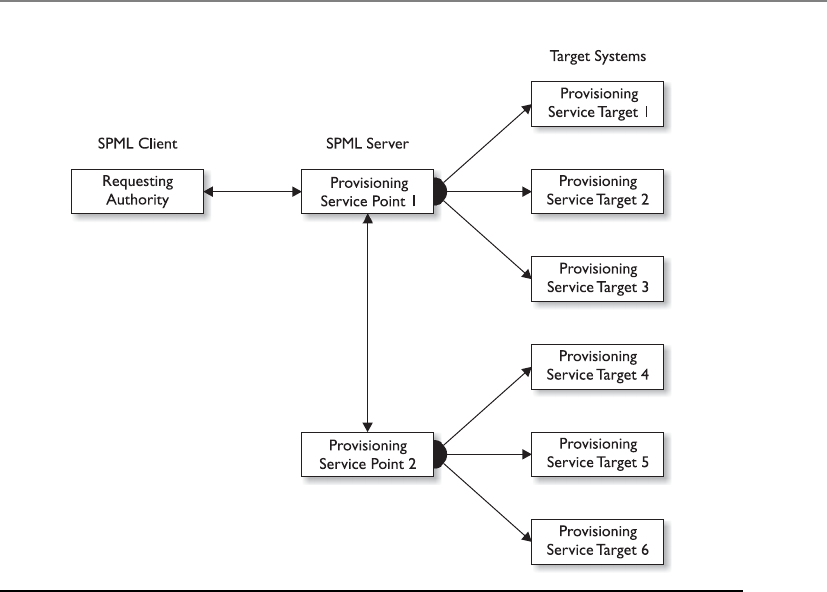
Chapter 3: Access Control
185
Southwest Airlines does not provide all these services itself, but the company has rela-
tionships set up with the companies that do provide these services. The Southwest
Airlines portal acts as a customer entry point. Once you are authenticated through their
web site and you request to purchase a hotel room, your authorization data are sent
from the airline web server to the hotel company web server. This allows you to pur-
chase an airline flight and hotel room from two different companies through one cen-
tralized portal.
SAML provides the authentication pieces to federated identity management systems
to allow business-to-business (B2B) and business-to-consumer (B2C) transactions. In
our previous example, the user is considered the principal, Southwest Airlines would be
considered the identity provider, and the hotel company that receives the user’s authen-
tication information from the Southwest Airlines web server is considered the service
provider.
This is not the only way that the SAML language can be used. The digital world has
evolved to being able to provide extensive services and functionality to users through
web-based machine-to-machine communication standards. Web services is a collection
of technologies and standards that allow services (weather updates, stock tickers, e-
mail, customer resource management, etc.) to be provided on distributed systems and
be “served up” in one place. For example, if you go to the iGoogle portal, you can con-
figure what services you want available to you each time you visit this page. All of these
services you choose (news feeds, videos, Gmail, calendar, etc.) are not provided by one
Figure 3-7 SPML provisioning steps

CISSP All-in-One Exam Guide
186
server in a Google data processing location. These services come from servers all over
the world; they are just provided in one central portal for your viewing pleasure.
Transmission of SAML data can take place over different protocol types, but a com-
mon one is Simple Object Access Protocol (SOAP). SOAP is a specification that outlines
how information pertaining to web services is exchanged in a structured manner. It
provides the basic messaging framework, which allows users to request a service and, in
exchange, the service is made available to that user. Let’s say you need to interact with
your company’s customer relationship management (CRM) system, which is hosted
and maintained by the vendor—for example, Salesforce.com. You would log in to your
company’s portal and double-click a link for Salesforce. Your company’s portal will take
this request and your authentication data and package it up in an SAML format and
encapsulate that data into a SOAP message. This message would be transmitted over an
HTTP connection to the Salesforce vendor site, and once you are authenticated, you are
provided with a screen that shows you the company’s customer database. The SAML,
SOAP, and HTTP relationship is illustrated in Figure 3-8.
The use of web services in this manner also allows for organizations to provide ser-
vice oriented architecture (SOA) environments. An SOA is a way to provide independent
services residing on different systems in different business domains in one consistent
manner. For example, if your company has a web portal that allows you to access the
company’s CRM, an employee directory, and a help-desk ticketing application, this is
most likely being provided through an SOA. The CRM system may be within the mar-
keting department, the employee directory may be within the HR department, and the
ticketing system may be within the IT department, but you can interact with all of them
through one interface. SAML is a way to send your authentication information to each
system, and SOAP allows this type of information to be presented and processed in a
unified manner.
The last XML-based standard we will look at is Extensible Access Control Markup
Language (XACML). XACML is used to express security policies and access rights to as-
Figure 3-8
SAML material
embedded within
an HTTP message

Chapter 3: Access Control
187
sets provided through web services and other enterprise applications. SAML is just a
way to send around your authentication information, as in a password, key, or digital
certificate, in a standard format. SAML does not tell the receiving system how to inter-
pret and use this authentication data. Two systems have to be configured to use the
same type of authentication data. If you log in to System A and provide a password and
try to access System B, which only uses digital certificates for authentication purposes,
your password is not going to give you access to System B’s service. So both systems
have to be configured to use passwords. But just because your password is sent to Sys-
tem B does not mean you have complete access to all of System B’s functionality. Sys-
tem B has access policies that dictate the operations specific subjects can carry out on
its resources. The access policies can be developed in the XACML format and enforced
by System B’s software. XACML is both an access control policy language and a process-
ing model that allows for policies to be interpreted and enforced in a standard manner.
When your password is sent to System B, there is a rules engine on that system that in-
terprets and enforces the XACML access control policies. If the access control policies
are created in the XACML format, they can be installed on both System A and System B
to allow for consistent security to be enforced and managed.
XACML uses a Subject element (requesting entity), a Resource element (requested
entity), and an Action element (types of access). So if you request access to your com-
pany’s CRM, you are the Subject, the CRM application is the Resource, and your access
parameters are outlined in the Action element.
NOTE
NOTE Who develops and keeps track of all of these standardized languages?
The Organization for the Advancement of Structured Information Standards (OASIS).
This organization develops and maintains the standards for how various
aspects of web-based communication are built and maintained.
Web services, SOA environments, and the implementation of these different XML-
based markup languages vary in nature because they allow for extensive flexibility. So
much of the world’s communication takes place through web-based processes; it is
becoming increasingly important for security professionals to understand these issues
and technologies.
Biometrics
I would like to prove who I am. Please look at the blood vessels at the back of my eyeball.
Response: Gross.
Biometrics verifies an individual’s identity by analyzing a unique personal attribute
or behavior, which is one of the most effective and accurate methods of verifying iden-
tification. Biometrics is a very sophisticated technology; thus, it is much more expen-
sive and complex than the other types of identity verification processes. A biometric
system can make authentication decisions based on an individual’s behavior, as in sig-
nature dynamics, but these can change over time and possibly be forged. Biometric
systems that base authentication decisions on physical attributes (such as iris, retina, or
fingerprint) provide more accuracy because physical attributes typically don’t change,
absent some disfiguring injury, and are harder to impersonate.

CISSP All-in-One Exam Guide
188
Biometrics is typically broken up into two different categories. The first is the phys-
iological. These are traits that are physical attributes unique to a specific individual.
Fingerprints are a common example of a physiological trait used in biometric systems.
The second category of biometrics is known as behavioral. This is based on a char-
acteristic of an individual to confirm his identity. An example is signature dynamics.
Physiological is “what you are” and behavioral is “what you do.”
A biometric system scans a person’s physiological attribute or behavioral trait and
compares it to a record created in an earlier enrollment process. Because this system
inspects the grooves of a person’s fingerprint, the pattern of someone’s retina, or the
pitches of someone’s voice, it must be extremely sensitive. The system must perform
accurate and repeatable measurements of anatomical or behavioral characteristics. This
type of sensitivity can easily cause false positives or false negatives. The system must be
calibrated so these false positives and false negatives occur infrequently and the results
are as accurate as possible.
When a biometric system rejects an authorized individual, it is called a Type I error
(false rejection rate). When the system accepts impostors who should be rejected, it is
called a Type II error (false acceptance rate). The goal is to obtain low numbers for each
type of error, but Type II errors are the most dangerous and thus the most important to
avoid.
When comparing different biometric systems, many different variables are used,
but one of the most important metrics is the crossover error rate (CER). This rating is
stated as a percentage and represents the point at which the false rejection rate equals
the false acceptance rate. This rating is the most important measurement when deter-
mining the system’s accuracy. A biometric system that delivers a CER of 3 will be more
accurate than a system that delivers a CER of 4.
NOTE
NOTE Crossover error rate (CER) is also called equal error rate (EER).
What is the purpose of this CER value anyway? Using the CER as an impartial judg-
ment of a biometric system helps create standards by which products from different
vendors can be fairly judged and evaluated. If you are going to buy a biometric system,
you need a way to compare the accuracy between different systems. You can just go by
the different vendors’ marketing material (they all say they are the best), or you can
compare the different CER values of the products to see which one really is more accu-
rate than the others. It is also a way to keep the vendors honest. One vendor may tell
you, “We have absolutely no Type II errors.” This would mean that their product would
not allow any imposters to be improperly authenticated. But what if you asked the ven-
dor how many Type I errors their product had and she sheepishly replied, “We average
around 90 percent of Type I errors.” That would mean that 90 percent of the authentica-
tion attempts would be rejected, which would negatively affect your employees’ produc-
tivity. So you can ask about their CER value, which represents when the Type I and Type
II errors are equal, to give you a better understanding of the product’s overall accuracy.

Chapter 3: Access Control
189
Individual environments have specific security level requirements, which will dictate
how many Type I and Type II errors are acceptable. For example, a military institution
that is very concerned about confidentiality would be prepared to accept a certain num-
ber of Type I errors, but would absolutely not accept any false accepts (Type II errors).
Because all biometric systems can be calibrated, if you lower the Type II error rate by
adjusting the system’s sensitivity, it will result in an increase in Type I errors. The military
institution would obviously calibrate the biometric system to lower the Type II errors to
zero, but that would mean it would have to accept a higher rate of Type I errors.
Biometrics is the most expensive method of verifying a person’s identity, and it
faces other barriers to becoming widely accepted. These include user acceptance, enroll-
ment timeframe, and throughput. Many times, people are reluctant to let a machine
read the pattern of their retina or scan the geometry of their hand. This lack of enthusi-
asm has slowed down the widespread use of biometric systems within our society. The
enrollment phase requires an action to be performed several times to capture a clear
and distinctive reference record. People are not particularly fond of expending this time
and energy when they are used to just picking a password and quickly typing it into
their console. When a person attempts to be authenticated by a biometric system,
sometimes the system will request an action to be completed several times. If the sys-
tem was unable to get a clear reading of an iris scan or could not capture a full voice
verification print, the individual may have to repeat the action. This causes low through-
put, stretches the individual’s patience, and reduces acceptability.
During enrollment, the user provides the biometric data (i.e. fingerprint, voice print),
and the biometric reader converts this data into binary values. Depending on the system,
the reader may create a hash value of the biometric data, or it may encrypt the data, or do
both. The biometric data then goes from the reader to a back-end authentication data-
base where her user account has been created. When the user needs to later authenticate
to a system, she will provide the necessary biometric data (i.e. fingerprint, voice print),
and the binary format of this information is compared to what is in the authentication
database. If they match, then the user is authenticated.
In Figure 3-9, we see that biometric data can be stored on a smart card and used for
authentication. Also, you might notice that the match is 95 percent instead of 100 per-
cent. Obtaining a 100 percent match each and every time is very difficult because of the
level of sensitivity of the biometric systems. A smudge on the reader, oil on the person’s
finger, and other small environmental issues can stand in the way of matching 100
percent. If your biometric system was calibrated so it required 100 percent matches, this
would mean you would not allow any Type II errors and that users would commonly
not be authenticated in a timely manner.
Processing Speed
When reviewing biometric devices for purchase, one component to take into con-
sideration is the length of time it takes to actually authenticate users. From the
time a user inserts data until she receives an accept or reject response should take
five to ten seconds.
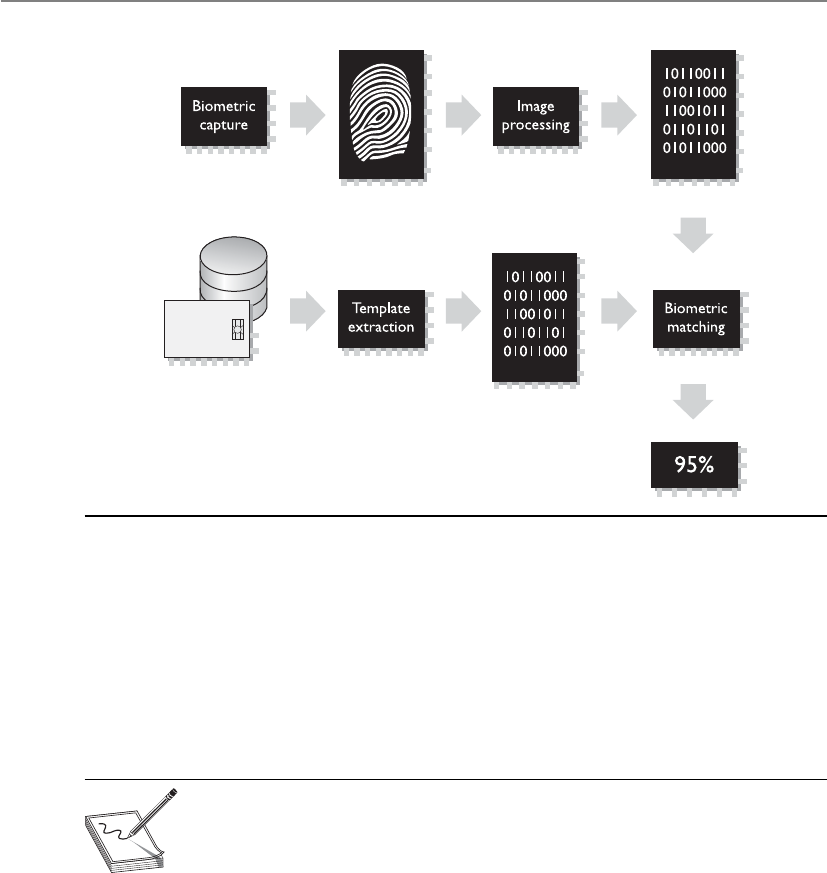
CISSP All-in-One Exam Guide
190
The following is an overview of the different types of biometric systems and the
physiological or behavioral characteristics they examine.
Fingerprint Fingerprints are made up of ridge endings and bifurcations exhibited
by friction ridges and other detailed characteristics called minutiae. It is the distinctive-
ness of these minutiae that gives each individual a unique fingerprint. An individual
places his finger on a device that reads the details of the fingerprint and compares this
to a reference file. If the two match, the individual’s identity has been verified.
NOTE
NOTE Fingerprint systems store the full fingerprint, which is actually a lot
of information that takes up hard drive space and resources. The finger-scan
technology extracts specific features from the fingerprint and stores just
that information, which takes up less hard drive space and allows for quicker
database lookups and comparisons.
Palm Scan The palm holds a wealth of information and has many aspects that are
used to identify an individual. The palm has creases, ridges, and grooves throughout
that are unique to a specific person. The palm scan also includes the fingerprints of
each finger. An individual places his hand on the biometric device, which scans and
captures this information. This information is compared to a reference file, and the
identity is either verified or rejected.
Hand Geometry The shape of a person’s hand (the shape, length, and width of
the hand and fingers) defines hand geometry. This trait differs significantly between
people and is used in some biometric systems to verify identity. A person places her
Figure 3-9 Biometric data is turned into binary data and compared for identity validation.

Chapter 3: Access Control
191
hand on a device that has grooves for each finger. The system compares the geometry of
each finger, and the hand as a whole, to the information in a reference file to verify that
person’s identity.
Retina Scan A system that reads a person’s retina scans the blood-vessel pattern of
the retina on the backside of the eyeball. This pattern has shown to be extremely unique
between different people. A camera is used to project a beam inside the eye and capture
the pattern and compare it to a reference file recorded previously.
Iris Scan The iris is the colored portion of the eye that surrounds the pupil. The iris
has unique patterns, rifts, colors, rings, coronas, and furrows. The uniqueness of each of
these characteristics within the iris is captured by a camera and compared with the in-
formation gathered during the enrollment phase. Of the biometric systems, iris scans
are the most accurate. The iris remains constant through adulthood, which reduces the
type of errors that can happen during the authentication process. Sampling the iris of-
fers more reference coordinates than any other type of biometric. Mathematically, this
means it has a higher accuracy potential than any other type of biometric.
NOTE
NOTE When using an iris pattern biometric system, the optical unit must
be positioned so the sun does not shine into the aperture; thus, when
implemented, it must have proper placement within the facility.
Signature Dynamics When a person signs a signature, usually they do so in the
same manner and speed each time. Signing a signature produces electrical signals that
can be captured by a biometric system. The physical motions performed when some-
one is signing a document create these electrical signals. The signals provide unique
characteristics that can be used to distinguish one individual from another. Signature
dynamics provides more information than a static signature, so there are more vari-
ables to verify when confirming an individual’s identity and more assurance that this
person is who he claims to be.
Signature dynamics is different from a digitized signature. A digitized signature is
just an electronic copy of someone’s signature and is not a biometric system that cap-
tures the speed of signing, the way the person holds the pen, and the pressure the
signer exerts to generate the signature.
Keystroke Dynamics Whereas signature dynamics is a method that captures the
electrical signals when a person signs a name, keystroke dynamics captures electrical
signals when a person types a certain phrase. As a person types a specified phrase, the
biometric system captures the speed and motions of this action. Each individual has a
certain style and speed, which translate into unique signals. This type of authentication
is more effective than typing in a password, because a password is easily obtainable. It
is much harder to repeat a person’s typing style than it is to acquire a password.
Voice Print People’s speech sounds and patterns have many subtle distinguishing
differences. A biometric system that is programmed to capture a voice print and com-
pare it to the information held in a reference file can differentiate one individual from
another. During the enrollment process, an individual is asked to say several different

CISSP All-in-One Exam Guide
192
words. Later, when this individual needs to be authenticated, the biometric system jum-
bles these words and presents them to the individual. The individual then repeats the
sequence of words given. This technique is used so others cannot attempt to record the
session and play it back in hopes of obtaining unauthorized access.
Facial Scan A system that scans a person’s face takes many attributes and character-
istics into account. People have different bone structures, nose ridges, eye widths, fore-
head sizes, and chin shapes. These are all captured during a facial scan and compared
to an earlier captured scan held within a reference record. If the information is a match,
the person is positively identified.
Hand Topography Whereas hand geometry looks at the size and width of an in-
dividual’s hand and fingers, hand topology looks at the different peaks and valleys of
the hand, along with its overall shape and curvature. When an individual wants to be
authenticated, she places her hand on the system. Off to one side of the system, a cam-
era snaps a side-view picture of the hand from a different view and angle than that of
systems that target hand geometry, and thus captures different data. This attribute is not
unique enough to authenticate individuals by itself and is commonly used in conjunc-
tion with hand geometry.
Biometrics are not without their own sets of issues and concerns. Because they de-
pend upon the specific and unique traits of living things, problems can arise. Living
things are notorious for not remaining the same, which means they won’t present static
biometric information for each and every login attempt. Voice recognition can be ham-
pered by a user with a cold. Pregnancy can change the patterns of the retina. Someone
could lose a finger. Or all three could happen. You just never know in this crazy world.
Some biometric systems actually check for the pulsation and/or heat of a body part
to make sure it is alive. So if you are planning to cut someone’s finger off or pluck out
someone’s eyeball so you can authenticate yourself as a legitimate user, it may not
work. Although not specifically stated, I am pretty sure this type of activity falls outside
the bounds of the CISSP ethics you will be responsible for upholding once you receive
your certification.
Passwords
User identification coupled with a reusable password is the most common form of
system identification and authorization mechanisms. A password is a protected string of
characters that is used to authenticate an individual. As stated previously, authentica-
tion factors are based on what a person knows, has, or is. A password is something the
user knows.
Passwords are one of the most often used authentication mechanisms employed
today. It is important the passwords are strong and properly managed.
Password Management Although passwords are the most commonly used au-
thentication mechanisms, they are also considered one of the weakest security mecha-
nisms available. Why? Users usually choose passwords that are easily guessed (a
spouse’s name, a user’s birth date, or a dog’s name), or tell others their passwords, and

Chapter 3: Access Control
193
many times write the passwords down on a sticky note and cleverly hide it under the
keyboard. To most users, security is usually not the most important or interesting part
of using their computers—except when someone hacks into their computer and steals
confidential information, that is. Then security is all the rage.
This is where password management steps in. If passwords are properly generated,
updated, and kept secret, they can provide effective security. Password generators can be
used to create passwords for users. This ensures that a user will not be using “Bob” or
“Spot” for a password, but if the generator spits out “kdjasijew284802h,” the user will
surely scribble it down on a piece of paper and safely stick it to the monitor, which
defeats the whole purpose. If a password generator is going to be used, the tools should
create uncomplicated, pronounceable, nondictionary words to help users remember
them so they aren’t tempted to write them down.
If the users can choose their own passwords, the operating system should enforce
certain password requirements. The operating system can require that a password con-
tain a certain number of characters, unrelated to the user ID, include special characters,
include upper- and lowercase letters, and not be easily guessable. The operating system
can keep track of the passwords a specific user generates so as to ensure no passwords
are reused. The users should also be forced to change their passwords periodically. All
of these factors make it harder for an attacker to guess or obtain passwords within the
environment.
If an attacker is after a password, she can try a few different techniques:
•Electronic monitoring Listening to network traffic to capture information,
especially when a user is sending her password to an authentication server.
The password can be copied and reused by the attacker at another time, which
is called a replay attack.
•Access the password file Usually done on the authentication server. The
password file contains many users’ passwords and, if compromised, can be
the source of a lot of damage. This file should be protected with access control
mechanisms and encryption.
•Brute force attacks Performed with tools that cycle through many possible
character, number, and symbol combinations to uncover a password.
•Dictionary attacks Files of thousands of words are compared to the user’s
password until a match is found.
•Social engineering An attacker falsely convinces an individual that she has
the necessary authorization to access specific resources.
•Rainbow table An attacker uses a table that contains all possible passwords
already in a hash format.
Certain techniques can be implemented to provide another layer of security for
passwords and their use. After each successful logon, a message can be presented to a
user indicating the date and time of the last successful logon, the location of this logon,
and whether there were any unsuccessful logon attempts. This alerts the user to any
suspicious activity and whether anyone has attempted to log on using his credentials.

CISSP All-in-One Exam Guide
194
An administrator can set operating parameters that allow a certain number of failed
logon attempts to be accepted before a user is locked out; this is a type of clipping level.
The user can be locked out for five minutes or a full day after the threshold (or clipping
level) has been exceeded. It depends on how the administrator configures this mecha-
nism. An audit trail can also be used to track password usage and both successful and
unsuccessful logon attempts. This audit information should include the date, time, user
ID, and workstation the user logged in from.
NOTE
NOTE Clipping level is an older term that just means threshold. If the
number of acceptable failed login attempts is set to three, three is the
threshold (clipping level) value.
A password’s lifetime should be short but practical. Forcing a user to change a pass-
word on a more frequent basis provides more assurance that the password will not be
guessed by an intruder. If the lifetime is too short, however, it causes unnecessary man-
agement overhead, and users may forget which password is active. A balance between
protection and practicality must be decided upon and enforced.
As with many things in life, education is the key. Password requirements, protec-
tion, and generation should be addressed in security-awareness programs so users un-
derstand what is expected of them, why they should protect their passwords, and how
passwords can be stolen. Users should be an extension to a security team, not the op-
position.
NOTE
NOTE Rainbow tables contain passwords already in their hashed format. The
attacker just compares a captured hashed password with one that is listed in
the table to uncover the plaintext password. This takes much less time than
carrying out a dictionary or brute force attack.
Password Checkers Several organizations test user-chosen passwords using tools
that perform dictionary and/or brute force attacks to detect the weak passwords. This
helps make the environment as a whole less susceptible to dictionary and exhaustive
attacks used to discover users’ passwords. Many times the same tools employed by an
attacker to crack a password are used by a network administrator to make sure the pass-
word is strong enough. Most security tools have this dual nature. They are used by se-
curity professionals and IT staff to test for vulnerabilities within their environment in
the hope of uncovering and fixing them before an attacker finds the vulnerabilities. An
attacker uses the same tools to uncover vulnerabilities to exploit before the security
professional can fix them. It is the never-ending cat-and-mouse game.
If a tool is called a password checker, it is used by a security professional to test the
strength of a password. If a tool is called a password cracker, it is usually used by a
hacker; however, most of the time, these tools are one and the same.
You need to obtain management’s approval before attempting to test (break) em-
ployees’ passwords with the intent of identifying weak passwords. Explaining you are

Chapter 3: Access Control
195
trying to help the situation, not hurt it, after you have uncovered the CEO’s password is
not a good situation to be in.
Password Hashing and Encryption In most situations, if an attacker sniffs
your password from the network wire, she still has some work to do before she actually
knows your password value because most systems hash the password with a hashing
algorithm, commonly MD4 or MD5, to ensure passwords are not sent in cleartext.
Although some people think the world is run by Microsoft, other types of operating
systems are out there, such as Unix and Linux. These systems do not use registries and
SAM databases, but contain their user passwords in a file cleverly called “shadow.”
Now, this shadow file does not contain passwords in cleartext; instead, your password
is run through a hashing algorithm, and the resulting value is stored in this file. Unix-
type systems zest things up by using salts in this process. Salts are random values added
to the encryption process to add more complexity and randomness. The more random-
ness entered into the encryption process, the harder it is for the bad guy to decrypt and
uncover your password. The use of a salt means that the same password can be en-
crypted into several thousand different formats. This makes it much more difficult for
an attacker to uncover the right format for your system.
Password Aging Many systems enable administrators to set expiration dates for
passwords, forcing users to change them at regular intervals. The system may also keep
a list of the last five to ten passwords (password history) and not let the users revert
back to previously used passwords.
Limit Logon Attempts A threshold can be set to allow only a certain number of
unsuccessful logon attempts. After the threshold is met, the user’s account can be locked
for a period of time or indefinitely, which requires an administrator to manually un-
lock the account. This protects against dictionary and other exhaustive attacks that con-
tinually submit credentials until the right combination of username and password is
discovered.
Cognitive Password
What is your mother’s name?
Response: Shucks, I don’t remember. I have it written down somewhere.
Cognitive passwords are fact- or opinion-based information used to verify an indi-
vidual’s identity. A user is enrolled by answering several questions based on her life
experiences. Passwords can be hard for people to remember, but that same person will
not likely forget her mother’s maiden name, favorite color, dog’s name, or the school
she graduated from. After the enrollment process, the user can answer the questions
asked of her to be authenticated instead of having to remember a password. This au-
thentication process is best for a service the user does not use on a daily basis because
it takes longer than other authentication mechanisms. This can work well for help-desk
services. The user can be authenticated via cognitive means. This way, the person at the
help desk can be sure he is talking to the right person, and the user in need of help does
not need to remember a password that may be used once every three months.

CISSP All-in-One Exam Guide
196
NOTE
NOTE Authentication by knowledge means that a subject is authenticated
based upon something she knows. This could be a PIN, password, passphrase,
cognitive password, personal history information, or through the use of a
CAPTCHA, which is the graphical representation of data. A CAPTCHA is a
skewed representation of characteristics a person must enter to prove that
the subject is a human and not an automated tool as in a software robot.
One-Time Password
How many times is my one-time password good for?
Response: You are fired.
Aone-time password (OTP) is also called a dynamic password. It is used for authen-
tication purposes and is only good once. After the password is used, it is no longer
valid; thus, if a hacker obtained this password, it could not be reused. This type of au-
thentication mechanism is used in environments that require a higher level of security
than static passwords provide. One-time password generating tokens come in two gen-
eral types: synchronous and asynchronous.
The token device is the most common implementation mechanism for OTP and
generates the one-time password for the user to submit to an authentication server. The
following sections explain these concepts.
The Token Device The token device, or password generator, is usually a handheld
device that has an LCD display and possibly a keypad. This hardware is separate from
the computer the user is attempting to access. The token device and authentication
service must be synchronized in some manner to be able to authenticate a user. The
token device presents the user with a list of characters to be entered as a password when
logging on to a computer. Only the token device and authentication service know the
meaning of these characters. Because the two are synchronized, the token device will
present the exact password the authentication service is expecting. This is a one-time
password, also called a token, and is no longer valid after initial use.
Synchronous Asynchronous token device synchronizes with the authentication ser-
vice by using time or a counter as the core piece of the authentication process. If the
synchronization is time-based, the token device and the authentication service must
hold the same time within their internal clocks. The time value on the token device and
a secret key are used to create the one-time password, which is displayed to the user.
The user enters this value and a user ID into the computer, which then passes them to
the server running the authentication service. The authentication service decrypts this
value and compares it to the value it expected. If the two match, the user is authenti-
cated and allowed to use the computer and resources.
If the token device and authentication service use counter-synchronization, the user
will need to initiate the creation of the one-time password by pushing a button on the
token device. This causes the token device and the authentication service to advance to
the next authentication value. This value and a base secret are hashed and displayed to the
user. The user enters this resulting value along with a user ID to be authenticated. In
either time- or counter-based synchronization, the token device and authentication
service must share the same secret base key used for encryption and decryption.

Chapter 3: Access Control
197
NOTE
NOTE Synchronous token-based one-time password generation can be
time-based or counter-based. Another term for counter-based is event-based.
Counter-based and event-based are interchangeable terms, and you could see
either or both on the CISSP exam.
Asynchronous A token device using an asynchronous token–generating method
employs a challenge/response scheme to authenticate the user. In this situation, the
authentication server sends the user a challenge, a random value, also called a nonce.
The user enters this random value into the token device, which encrypts it and returns
a value the user uses as a one-time password. The user sends this value, along with a
username, to the authentication server. If the authentication server can decrypt the val-
ue and it is the same challenge value sent earlier, the user is authenticated, as shown in
Figure 3-10.
NOTE
NOTE The actual implementation and process that these devices follow
can differ between different vendors. What is important to know is that
asynchronous is based on challenge/response mechanisms, while synchronous
is based on time- or counter-driven mechanisms.
SecurID
SecurID, from RSA Security, Inc., is one of the most widely used time-based to-
kens. One version of the product generates the one-time password by using a
mathematical function on the time, date, and ID of the token card. Another ver-
sion of the product requires a PIN to be entered into the token device.
1

CISSP All-in-One Exam Guide
198
Both token systems can fall prey to masquerading if a user shares his identification
information (ID or username) and the token device is shared or stolen. The token de-
vice can also have battery failure or other malfunctions that would stand in the way of
a successful authentication. However, this type of system is not vulnerable to electronic
eavesdropping, sniffing, or password guessing.
If the user has to enter a password or PIN into the token device before it provides a
one-time password, then strong authentication is in effect because it is using two fac-
tors—something the user knows (PIN) and something the user has (the token device).
NOTE
NOTE One-time passwords can also be generated in software, in which case a
piece of hardware such as a token device is not required. These are referred to
as soft tokens and require that the authentication service and application contain
the same base secrets, which are used to generate the one-time passwords.
Cryptographic Keys
Another way to prove one’s identity is to use a private key by generating a digital signa-
ture. A digital signature could be used in place of a password. Passwords are the weakest
form of authentication and can be easily sniffed as they travel over a network. Digital
signatures are forms of authentication used in environments that require higher secu-
rity protection than what is provided by passwords.
A private key is a secret value that should be in the possession of one person, and
one person only. It should never be disclosed to an outside party. A digital signature is
a technology that uses a private key to encrypt a hash value (message digest). The act of
encrypting this hash value with a private key is called digitally signing a message. A digi-
tal signature attached to a message proves the message originated from a specific source
and that the message itself was not changed while in transit.
Figure 3-10 Authentication using an asynchronous token device includes a workstation, token
device, and authentication service.
6.

Chapter 3: Access Control
199
A public key can be made available to anyone without compromising the associat-
ed private key; this is why it is called a public key. We explore private keys, public keys,
digital signatures, and public key infrastructure (PKI) in Chapter 7, but for now, under-
stand that a private key and digital signatures are other mechanisms that can be used to
authenticate an individual.
Passphrase
Apassphrase is a sequence of characters that is longer than a password (thus a “phrase”)
and, in some cases, takes the place of a password during an authentication process. The
user enters this phrase into an application, and the application transforms the value into
avirtual password, making the passphrase the length and format that is required by the
application. (For example, an application may require your virtual password to be 128
bits to be used as a key with the AES algorithm.) If a user wants to authenticate to an ap-
plication, such as Pretty Good Privacy (PGP), he types in a passphrase, let’s say StickWith-
MeKidAndYouWillWearDiamonds. The application converts this phrase into a virtual
password that is used for the actual authentication. The user usually generates the pass-
phrase in the same way a user creates a password the first time he logs on to a computer.
A passphrase is more secure than a password because it is longer, and thus harder to ob-
tain by an attacker. In many cases, the user is more likely to remember a passphrase than
a password.
Memory Cards
The main difference between memory cards and smart cards is their capacity to process
information. A memory card holds information but cannot process information. A
smart card holds information and has the necessary hardware and software to actually
process that information. A memory card can hold a user’s authentication information
so the user only needs to type in a user ID or PIN and present the memory card, and if
the data that the user entered matches the data on the memory card, the user is success-
fully authenticated. If the user presents a PIN value, then this is an example of two-
factor authentication—something the user knows and something the user has. A mem-
ory card can also hold identification data that are pulled from the memory card by a
reader. It travels with the PIN to a back-end authentication server. An example of a
memory card is a swipe card that must be used for an individual to be able to enter a
building. The user enters a PIN and swipes the memory card through a card reader. If
this is the correct combination, the reader flashes green and the individual can open
the door and enter the building. Another example is an ATM card. If Buffy wants to
withdraw $40 from her checking account, she needs to enter the correct PIN and slide
the ATM card (or memory card) through the reader.
Memory cards can be used with computers, but they require a reader to process the
information. The reader adds cost to the process, especially when one is needed per
computer, and card generation adds cost and effort to the whole authentication pro-
cess. Using a memory card provides a more secure authentication method than using a
password because the attacker would need to obtain the card and know the correct PIN.
Administrators and management must weigh the costs and benefits of a memory to-
ken–based card implementation to determine if it is the right authentication mecha-
nism for their environment.
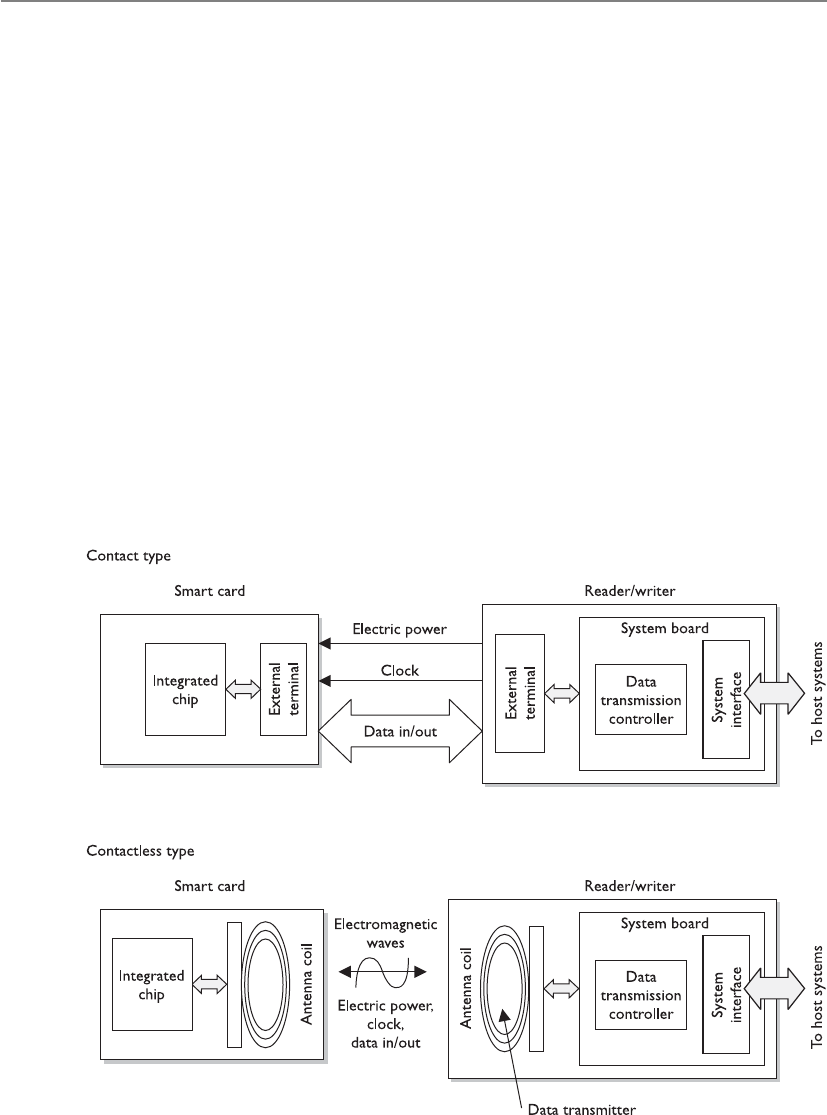
CISSP All-in-One Exam Guide
200
Smart Card
My smart card is smarter than your memory card.
Asmart card has the capability of processing information because it has a micropro-
cessor and integrated circuits incorporated into the card itself. Memory cards do not
have this type of hardware and lack this type of functionality. The only function they
can perform is simple storage. A smart card, which adds the capability to process infor-
mation stored on it, can also provide a two-factor authentication method because the
user may have to enter a PIN to unlock the smart card. This means the user must pro-
vide something she knows (PIN) and something she has (smart card).
Two general categories of smart cards are the contact and the contactless types. The
contact smart card has a gold seal on the face of the card. When this card is fully in-
serted into a card reader, electrical fingers wipe against the card in the exact position
that the chip contacts are located. This will supply power and data I/O to the chip for
authentication purposes. The contactless smart card has an antenna wire that surrounds
the perimeter of the card. When this card comes within an electromagnetic field of the
reader, the antenna within the card generates enough energy to power the internal chip.
Now, the results of the smart card processing can be broadcast through the same an-
tenna, and the conversation of authentication can take place. The authentication can be
completed by using a one-time password, by employing a challenge/response value, or
by providing the user’s private key if it is used within a PKI environment.

Chapter 3: Access Control
201
NOTE
NOTE Two types of contactless smart cards are available: hybrid and combi.
The hybrid card has two chips, with the capability of utilizing both the contact
and contactless formats. A combi card has one microprocessor chip that can
communicate to contact or contactless readers.
The information held within the memory of a smart card is not readable until the
correct PIN is entered. This fact and the complexity of the smart token make these cards
resistant to reverse-engineering and tampering methods. If George loses the smart card he
uses to authenticate to the domain at work, the person who finds the card would need to
know his PIN to do any real damage. The smart card can also be programmed to store
information in an encrypted fashion, as well as detect any tampering with the card itself.
In the event that tampering is detected, the information stored on the smart card can be
automatically wiped.
The drawbacks to using a smart card are the extra cost of the readers and the overhead
of card generation, as with memory cards, although this cost is decreasing. The smart
cards themselves are more expensive than memory cards because of the extra integrated
circuits and microprocessor. Essentially, a smart card is a kind of computer, and because
of that it has many of the operational challenges and risks that can affect a computer.
Smart cards have several different capabilities, and as the technology develops and
memory capacities increase for storage, they will gain even more. They can store per-
sonal information in a storage manner that is tamper resistant. This also allows them
to have the ability to isolate security-critical computations within themselves. They can
be used in encryption systems in order to store keys and have a high level of portability
as well as security. The memory and integrated circuit also allow for the capacity to use
encryption algorithms on the actual card and use them for secure authorization that
can be utilized throughout an entire organization.
Smart Card Attacks
Could I tickle your smart card with this needleless ultrasonic vibration thingy?
Response: Um, no.
Smart cards are more tamperproof than memory cards, but where there is sensitive
data there are individuals who are motivated to circumvent any countermeasure the
industry throws at them.
Over the years, people have become very inventive in the development of various
ways to attack smart cards. For example, individuals have introduced computational
errors into smart cards with the goal of uncovering the encryption keys used and stored
on the cards. These “errors” are introduced by manipulating some environmental com-
ponent of the card (changing input voltage, clock rate, temperature fluctuations). The
attacker reviews the result of an encryption function after introducing an error to the
card, and also reviews the correct result, which the card performs when no errors are
introduced. Analysis of these different results may allow an attacker to reverse-engineer
the encryption process, with the hope of uncovering the encryption key. This type of
attack is referred to as fault generation.
Side-channel attacks are nonintrusive and are used to uncover sensitive information
about how a component works, without trying to compromise any type of flaw or
weakness. As an analogy, suppose you want to figure out what your boss does each day

CISSP All-in-One Exam Guide
202
at lunch time but you feel too uncomfortable to ask her. So you follow her, and you see
she enters a building holding a small black bag and exits exactly 45 minutes later with
the same bag and her hair not looking as great as when she went in. You keep doing this
day after day and come to the conclusion that she must be working out. Now you could
have simply read the sign on the building that said “Gym,” but we will give you the
benefit of the doubt here and just not call you for any further private investigator work.
So a noninvasive attack is one in which the attacker watches how something works
and how it reacts in different situations instead of trying to “invade” it with more intru-
sive measures. Some examples of side-channel attacks that have been carried out on
smart cards are differential power analysis (examining the power emissions released dur-
ing processing), electromagnetic analysis (examining the frequencies emitted), and timing
(how long a specific process takes to complete). These types of attacks are used to un-
cover sensitive information about how a component works without trying to compro-
mise any type of flaw or weakness. They are commonly used for data collection. Attackers
monitor and capture the analog characteristics of all supply and interface connections
and any other electromagnetic radiation produced by the processor during normal op-
eration. They can also collect the time it takes for the smart card to carry out its function.
From the collected data, the attacker can deduce specific information she is after, which
could be a private key, sensitive financial data, or an encryption key stored on the card.
Software attacks are also considered noninvasive attacks. A smart card has software
just like any other device that does data processing, and anywhere there is software there
is the possibility of software flaws that can be exploited. The main goal of this type of
attack is to input instructions into the card that will allow the attacker to extract account
information, which he can use to make fraudulent purchases. Many of these types of
attacks can be disguised by using equipment that looks just like the legitimate reader.
If you would like to be more intrusive in your smart card attack, give microprobing
a try. Microprobing uses needleless and ultrasonic vibration to remove the outer protec-
tive material on the card’s circuits. Once this is completed, data can be accessed and
manipulated by directly tapping into the card’s ROM chips.
Interoperability
In the industry today, lack of interoperability is a big problem. Although vendors
claim to be “compliant with ISO/IEC 14443,” many have developed technologies
and methods in a more proprietary fashion. The lack of true standardization has
caused some large problems because smart cards are being used for so many dif-
ferent applications. In the United States, the DoD is rolling out smart cards across
all of their agencies, and NIST is developing a framework and conformance test-
ing programs specifically for interoperability issues.
An ISO/IEC standard, 14443, outlines the following items for smart card
standardization:
•ISO/IEC 14443-1 Physical characteristics
•ISO/IEC 14443-3 Initialization and anticollision
•ISO/IEC 14443-4 Transmission protocol

Chapter 3: Access Control
203
Authorization
Now that I know who you are, let’s see if I will let you do what you want.
Although authentication and authorization are quite different, together they com-
prise a two-step process that determines whether an individual is allowed to access a
particular resource. In the first step, authentication, the individual must prove to the
system that he is who he claims to be—a permitted system user. After successful authen-
tication, the system must establish whether the user is authorized to access the particu-
lar resource and what actions he is permitted to perform on that resource.
Authorization is a core component of every operating system, but applications, se-
curity add-on packages, and resources themselves can also provide this functionality.
For example, suppose Marge has been authenticated through the authentication server
and now wants to view a spreadsheet that resides on a file server. When she finds this
spreadsheet and double-clicks the icon, she will see an hourglass instead of a mouse
pointer. At this stage, the file server is seeing if Marge has the rights and permissions to
view the requested spreadsheet. It also checks to see if Marge can modify, delete, move,
or copy the file. Once the file server searches through an access matrix and finds that
Marge does indeed have the necessary rights to view this file, the file opens up on
Marge’s desktop. The decision of whether or not to allow Marge to see this file was
based on access criteria. Access criteria are the crux of authentication.
Access Criteria
You can perform that action only because we like you and you wear a funny hat.
We have gone over the basics of access control. This subject can get very granular in
its level of detail when it comes to dictating what a subject can or cannot do to an object
or resource. This is a good thing for network administrators and security professionals,
because they want to have as much control as possible over the resources they have been
put in charge of protecting, and a fine level of detail enables them to give individuals just
Radio-Frequency Identification (RFID)
Radio-frequency identification (RFID) is a technology that provides data commu-
nication through the use of radio waves. An object contains an electronic tag,
which can be identified and communicated with through a reader. The tag has an
integrated circuit for storing and processing data, modulating and demodulating
a radio-frequency (RF) signal, and other specialized functions. The reader has a
built-in antenna for receiving and transmitting the signal. This type of technology
can be integrated into smart cards or other mobile transport mechanisms for ac-
cess control purposes. A common security issue with RFID is that the data can be
captured as it moves from the tag to the reader. While encryption can be inte-
grated as a countermeasure, it is not common because RFID is implemented in
technology that has low processing capabilities and encryption is very processor-
intensive.

CISSP All-in-One Exam Guide
204
the precise level of access they need. It would be frustrating if access control permissions
were based only on full control or no access. These choices are very limiting, and an
administrator would end up giving everyone full control, which would provide no pro-
tection. Instead, different ways of limiting access to resources exist, and if they are under-
stood and used properly, they can give just the right level of access desired.
Granting access rights to subjects should be based on the level of trust a company
has in a subject and the subject’s need-to-know. Just because a company completely
trusts Joyce with its files and resources does not mean she fulfills the need-to-know
criteria to access the company’s tax returns and profit margins. If Maynard fulfills the
need-to-know criteria to access employees’ work histories, it does not mean the com-
pany trusts him to access all of the company’s other files. These issues must be identi-
fied and integrated into the access criteria. The different access criteria can be enforced
by roles, groups, location, time, and transaction types.
Using roles is an efficient way to assign rights to a type of user who performs a cer-
tain task. This role is based on a job assignment or function. If there is a position
within a company for a person to audit transactions and audit logs, the role this person
fills would only need a read function to those types of files. This role would not need
full control, modify, or delete privileges.
Using groups is another effective way of assigning access control rights. If several
users require the same type of access to information and resources, putting them into
a group and then assigning rights and permissions to that group is easier to manage
than assigning rights and permissions to each and every individual separately. If a
specific printer is available only to the accounting group, when a user attempts to print
to it, the group membership of the user will be checked to see if she is indeed in the
accounting group. This is one way that access control is enforced through a logical ac-
cess control mechanism.
Physical or logical location can also be used to restrict access to resources. Some files
may be available only to users who can log on interactively to a computer. This means
the user must be physically at the computer and enter the credentials locally versus log-
ging on remotely from another computer. This restriction is implemented on several
server configurations to restrict unauthorized individuals from being able to get in and
reconfigure the server remotely.
Logical location restrictions are usually done through network address restrictions.
If a network administrator wants to ensure that status requests of an intrusion detection
management console are accepted only from certain computers on the network, the
network administrator can configure this within the software.
Time of day, or temporal isolation, is another access control mechanism that can be
used. If a security professional wants to ensure no one is accessing payroll files between
the hours of 8:00 P.M. and 4:00 A.M., that configuration can be implemented to ensure
access at these times is restricted. If the same security professional wants to ensure no
bank account transactions happen during days on which the bank is not open, she can
indicate in the logical access control mechanism this type of action is prohibited on
Sundays.

Chapter 3: Access Control
205
Temporal access can also be based on the creation date of a resource. Let’s say Rus-
sell started working for his company in March 2011. There may be a business need to
allow Russell to only access files that have been created after this date and not before.
Transaction-type restrictions can be used to control what data is accessed during
certain types of functions and what commands can be carried out on the data. An on-
line banking program may allow a customer to view his account balance, but may not
allow the customer to transfer money until he has a certain security level or access right.
A bank teller may be able to cash checks of up to $2,000, but would need a supervisor’s
access code to retrieve more funds for a customer. A database administrator may be able
to build a database for the human resources department, but may not be able to read
certain confidential files within that database. These are all examples of transaction-
type restrictions to control the access to data and resources.
Default to No Access
If you’re unsure, just say no.
Access control mechanisms should default to no access so as to provide the neces-
sary level of security and ensure no security holes go unnoticed. A wide range of access
levels is available to assign to individuals and groups, depending on the application
and/or operating system. A user can have read, change, delete, full control, or no access
permissions. The statement that security mechanisms should default to no access
means that if nothing has been specifically configured for an individual or the group
she belongs to, that user should not be able to access that resource. If access is not ex-
plicitly allowed, it should be implicitly denied. Security is all about being safe, and this
is the safest approach to practice when dealing with access control methods and mech-
anisms. In other words, all access controls should be based on the concept of starting
with zero access, and building on top of that. Instead of giving access to everything, and
then taking away privileges based on need to know, the better approach is to start with
nothing and add privileges based on need to know.
Most access control lists (ACLs) that work on routers and packet-filtering firewalls
default to no access. Figure 3-11 shows that traffic from Subnet A is allowed to access
Subnet B, traffic from Subnet D is not allowed to access Subnet A, and Subnet B is al-
lowed to talk to Subnet A. All other traffic transmission paths not listed here are not
allowed by default. Subnet D cannot talk to Subnet B because such access is not explic-
itly indicated in the router’s ACL.
Need to Know
If you need to know, I will tell you. If you don’t need to know, leave me alone.
The need-to-know principle is similar to the least-privilege principle. It is based on
the concept that individuals should be given access only to the information they abso-
lutely require in order to perform their job duties. Giving any more rights to a user just
asks for headaches and the possibility of that user abusing the permissions assigned to
him. An administrator wants to give a user the least amount of privileges she can, but
just enough for that user to be productive when carrying out tasks. Management will
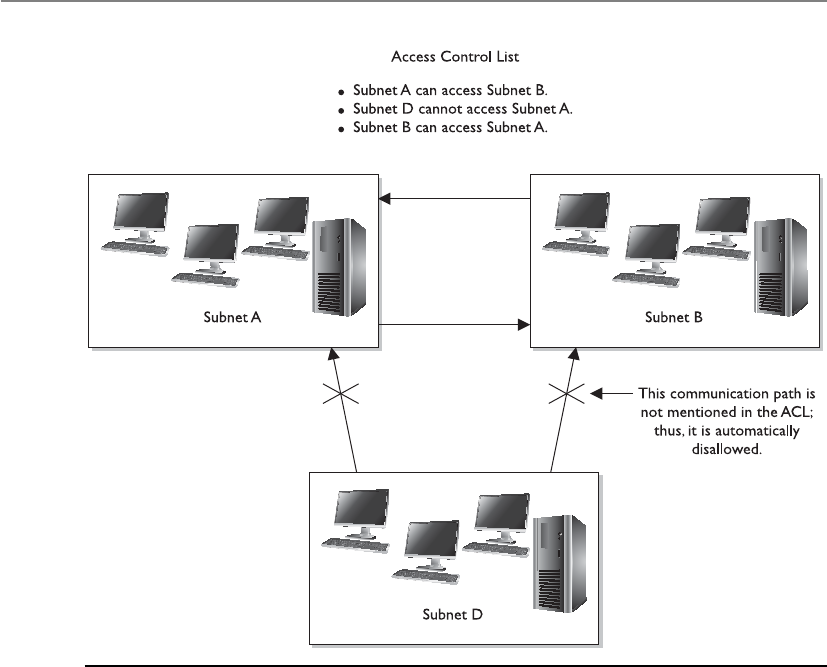
CISSP All-in-One Exam Guide
206
decide what a user needs to know, or what access rights are necessary, and the adminis-
trator will configure the access control mechanisms to allow this user to have that level
of access and no more, and thus the least privilege.
For example, if management has decided that Dan, the copy boy, needs to know
where the files he needs to copy are located and needs to be able to print them, this
fulfills Dan’s need-to-know criteria. Now, an administrator could give Dan full control
of all the files he needs to copy, but that would not be practicing the least-privilege
principle. The administrator should restrict Dan’s rights and permissions to only allow
him to read and print the necessary files, and no more. Besides, if Dan accidentally
deletes all the files on the whole file server, whom do you think management will hold
ultimately responsible? Yep, the administrator.
It is important to understand that it is management’s job to determine the security
requirements of individuals and how access is authorized. The security administrator
configures the security mechanisms to fulfill these requirements, but it is not her job to
determine security requirements of users. Those should be left to the owners. If there is
a security breach, management will ultimately be held responsible, so it should make
these decisions in the first place.
Figure 3-11 What is not explicitly allowed should be implicitly denied.

Chapter 3: Access Control
207
Single Sign-On
I only want to have to remember one username and one password for everything in the world!
Many times employees need to access many different computers, servers, databases,
and other resources in the course of a day to complete their tasks. This often requires
the employees to remember multiple user IDs and passwords for these different com-
puters. In a utopia, a user would need to enter only one user ID and one password to
be able to access all resources in all the networks this user is working in. In the real
world, this is hard to accomplish for all system types.
Because of the proliferation of client/server technologies, networks have migrated
from centrally controlled networks to heterogeneous, distributed environments. The
propagation of open systems and the increased diversity of applications, platforms, and
operating systems have caused the end user to have to remember several user IDs and
passwords just to be able to access and use the different resources within his own net-
work. Although the different IDs and passwords are supposed to provide a greater level of
security, they often end up compromising security (because users write them down) and
causing more effort and overhead for the staff that manages and maintains the network.
As any network staff member or administrator can attest to, too much time is de-
voted to resetting passwords for users who have forgotten them. More than one em-
ployee’s productivity is affected when forgotten passwords have to be reassigned. The
network staff member who has to reset the password could be working on other tasks,
and the user who forgot the password cannot complete his task until the network staff
member is finished resetting the password. Many help-desk employees report that a
Authorization Creep
I think Mike’s a creep. Let’s not give him any authorization to access company stuff.
Response: Sounds like a great criterion. All creeps—no access.
As employees work at a company over time and move from one department
to another, they often are assigned more and more access rights and permissions.
This is commonly referred to as authorization creep. It can be a large risk for a
company, because too many users have too much privileged access to company
assets. In the past, it has usually been easier for network administrators to give
more access than less, because then the user would not come back and require
more work to be done on her profile. It is also difficult to know the exact access
levels different individuals require. This is why user management and user provi-
sioning are becoming more prevalent in identity management products today
and why companies are moving more toward role-based access control imple-
mentation. Enforcing least privilege on user accounts should be an ongoing job,
which means each user’s rights are permissions that should be reviewed to ensure
the company is not putting itself at risk.
NOTE
NOTE Rights and permission reviews have been incorporated into
many regulatory-induced processes. As part of the SOX regulations,
managers have to review their employees’ permissions to data on an
annual basis.

CISSP All-in-One Exam Guide
208
majority of their time is spent on users forgetting their passwords. System administra-
tors have to manage multiple user accounts on different platforms, which all need to be
coordinated in a manner that maintains the integrity of the security policy. At times the
complexity can be overwhelming, which results in poor access control management
and the generation of many security vulnerabilities. A lot of time is spent on multiple
passwords, and in the end they do not provide us with more security.
The increased cost of managing a diverse environment, security concerns, and user
habits, coupled with the users’ overwhelming desire to remember one set of credentials,
has brought about the idea of single sign-on (SSO) capabilities. These capabilities
would allow a user to enter credentials one time and be able to access all resources in
primary and secondary network domains. This reduces the amount of time users spend
authenticating to resources and enables the administrator to streamline user accounts
and better control access rights. It improves security by reducing the probability that
users will write down passwords and also reduces the administrator’s time spent on
adding and removing user accounts and modifying access permissions. If an adminis-
trator needs to disable or suspend a specific account, she can do it uniformly instead of
having to alter configurations on each and every platform.
So that is our utopia: log on once and you are good to go. What bursts this bubble?
Mainly interoperability issues. For SSO to actually work, every platform, application, and
resource needs to accept the same type of credentials, in the same format, and interpret
their meanings the same. When Steve logs on to his Windows XP workstation and gets
authenticated by a mixed-mode Windows 2000 domain controller, it must authenticate
him to the resources he needs to access on the Apple computer, the Unix server running
NIS, the mainframe host server, the MICR print server, and the Windows XP computer in
the secondary domain that has the plotter connected to it. A nice idea, until reality hits.

Chapter 3: Access Control
209
There is also a security issue to consider in an SSO environment. Once an individ-
ual is in, he is in. If an attacker was able to uncover one credential set, he would have
access to every resource within the environment that the compromised account has
access to. This is certainly true, but one of the goals is that if a user only has to remem-
ber one password, and not ten, then a more robust password policy can be enforced. If
the user has just one password to remember, then it can be more complicated and se-
cure because he does not have nine other ones to remember also.
SSO technologies come in different types. Each has its own advantages and disad-
vantages, shortcomings, and quality features. It is rare to see a real SSO environment;
rather, you will see a cluster of computers and resources that accept the same creden-
tials. Other resources, however, still require more work by the administrator or user side
to access the systems. The SSO technologies that may be addressed in the CISSP exam
are described in the next sections.
Kerberos
Sam, there is a three-headed dog in front of the server!
Kerberos is the name of a three-headed dog that guards the entrance to the under-
world in Greek mythology. This is a great name for a security technology that provides
authentication functionality, with the purpose of protecting a company’s assets. Kerbe-
ros is an authentication protocol and was designed in the mid-1980s as part of MIT’s
Project Athena. It works in a client/server model and is based on symmetric key cryp-
tography. The protocol has been used for years in Unix systems and is currently the
default authentication method for Windows 2000, 2003, and 2008 operating systems.
In addition, Apple’s Mac OS X, Sun’s Solaris, and Red Hat Enterprise Linux all use
Kerberos authentication. Commercial products supporting Kerberos are becoming
more frequent, so this one might be a keeper.
Kerberos is an example of a single sign-on system for distributed environments, and
is a de facto standard for heterogeneous networks. Kerberos incorporates a wide range
of security capabilities, which gives companies much more flexibility and scalability
when they need to provide an encompassing security architecture. It has four elements
necessary for enterprise access control: scalability, transparency, reliability, and security.
However, this open architecture also invites interoperability issues. When vendors have
a lot of freedom to customize a protocol, it usually means no two vendors will custom-
ize it in the same fashion. This creates interoperability and incompatibility issues.
Kerberos uses symmetric key cryptography and provides end-to-end security. Al-
though it allows the use of passwords for authentication, it was designed specifically to
eliminate the need to transmit passwords over the network. Most Kerberos implemen-
tations work with shared secret keys.
Main Components in Kerberos The Key Distribution Center (KDC) is the most
important component within a Kerberos environment. The KDC holds all users’ and
services’ secret keys. It provides an authentication service, as well as key distribution
functionality. The clients and services trust the integrity of the KDC, and this trust is the
foundation of Kerberos security.

CISSP All-in-One Exam Guide
210
The KDC provides security services to principals, which can be users, applications,
or network services. The KDC must have an account for, and share a secret key with,
each principal. For users, a password is transformed into a secret key value. The secret
key can be used to send sensitive data back and forth between the principal and the
KDC, and is used for user authentication purposes.
Aticket is generated by the ticket granting service (TGS) on the KDC and given to a
principal when that principal, let’s say a user, needs to authenticate to another princi-
pal, let’s say a print server. The ticket enables one principal to authenticate to another
principal. If Emily needs to use the print server, she must prove to the print server she
is who she claims to be and that she is authorized to use the printing service. So Emily
requests a ticket from the TGS. The TGS gives Emily the ticket, and in turn, Emily pass-
es this ticket on to the print server. If the print server approves this ticket, Emily is al-
lowed to use the print service.
A KDC provides security services for a set of principals. This set is called a realm in
Kerberos. The KDC is the trusted authentication server for all users, applications, and
services within a realm. One KDC can be responsible for one realm or several realms.
Realms are used to allow an administrator to logically group resources and users.
So far, we know that principals (users and services) require the KDC’s services to
authenticate to each other; that the KDC has a database filled with information about
each and every principal within its realm; that the KDC holds and delivers cryptograph-
ic keys and tickets; and that tickets are used for principals to authenticate to each other.
So how does this process work?
The Kerberos Authentication Process The user and the KDC share a secret
key, while the service and the KDC share a different secret key. The user and the re-
quested service do not share a symmetric key in the beginning. The user trusts the KDC
because they share a secret key. They can encrypt and decrypt data they pass between
each other, and thus have a protected communication path. Once the user authenti-
cates to the service, they, too, will share a symmetric key (session key) that is used for
authentication purposes.
Here are the exact steps:
1. Emily comes in to work and enters her username and password into her
workstation at 8:00 A.M.
The Kerberos software on Emily’s computer sends the username to the
authentication service (AS) on the KDC, which in turn sends Emily a ticket
granting ticket (TGT) that is encrypted with Emily’s password (secret key).
2. If Emily has entered her correct password, then this TGT is decrypted and
Emily gains access to her local workstation desktop.
3. When Emily needs to send a print job to the print server, her system sends
the TGT to the ticket granting service (TGS), which runs on the KDC, and a
request to access the print server. (The TGT allows Emily to prove she has been
authenticated and allows her to request access to the print server.)
4. The TGS creates and sends a second ticket to Emily, which she will use to
authenticate to the print server. This second ticket contains two instances of
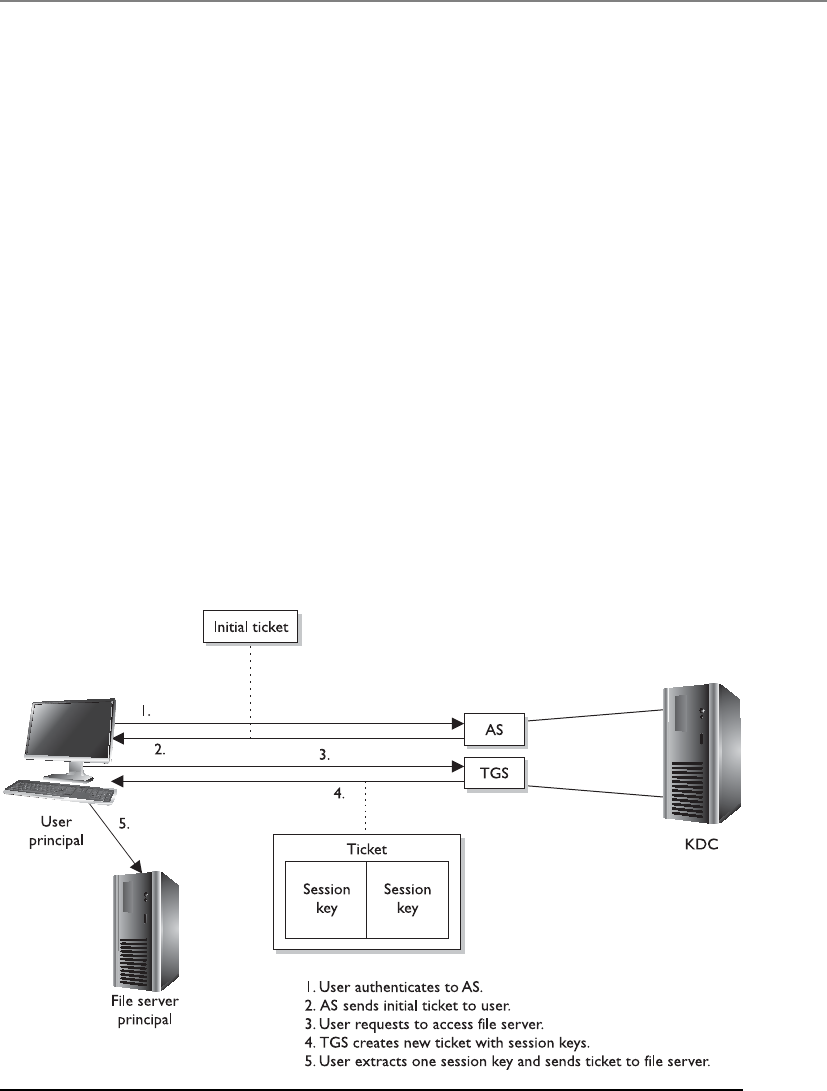
Chapter 3: Access Control
211
the same session key, one encrypted with Emily’s secret key and the other
encrypted with the print server’s secret key. The second ticket also contains
an authenticator, which contains identification information on Emily, her
system’s IP address, sequence number, and a timestamp.
5. Emily’s system receives the second ticket, decrypts and extracts the embedded
session key, adds a second authenticator set of identification information to
the ticket, and sends the ticket on to the print server.
6. The print server receives the ticket, decrypts and extracts the session key, and
decrypts and extracts the two authenticators in the ticket. If the print server
can decrypt and extract the session key, it knows the KDC created the ticket,
because only the KDC has the secret key used to encrypt the session key. If
the authenticator information that the KDC and the user put into the ticket
matches, then the print server knows it received the ticket from the correct
principal.
7. Once this is completed, it means Emily has been properly authenticated to
the print server and the server prints her document.
This is an extremely simplistic overview of what is going on in any Kerberos ex-
change, but it gives you an idea of the dance taking place behind the scenes whenever
you interact with any network service in an environment that uses Kerberos. Figure 3-12
provides a simplistic view of this process.
Figure 3-12 The user must receive a ticket from the KDC before being able to use the requested
resource.

CISSP All-in-One Exam Guide
212
The authentication service is the part of the KDC that authenticates a principal, and
the TGS is the part of the KDC that makes the tickets and hands them out to the prin-
cipals. TGTs are used so the user does not have to enter his password each time he needs
to communicate with another principal. After the user enters his password, it is tempo-
rarily stored on his system, and any time the user needs to communicate with another
principal, he just reuses the TGT.
Be sure you understand that a session key is different from a secret key. A secret key
is shared between the KDC and a principal and is static in nature. A session key is
shared between two principals and is generated when needed and destroyed after the
session is completed.
If a Kerberos implementation is configured to use an authenticator, the user sends
to the print server her identification information and a timestamp and sequence num-
ber encrypted with the session key they share. The print server decrypts this information
and compares it with the identification data the KDC sent to it about this requesting
user. If the data is the same, the print server allows the user to send print jobs. The time-
stamp is used to help fight against replay attacks. The print server compares the sent
timestamp with its own internal time, which helps determine if the ticket has been
sniffed and copied by an attacker and then submitted at a later time in hopes of imper-
sonating the legitimate user and gaining unauthorized access. The print server checks
the sequence number to make sure that this ticket has not been submitted previously.
This is another countermeasure to protect against replay attacks.
NOTE
NOTE A replay attack is when an attacker captures and resubmits data
(commonly a credential) with the goal of gaining unauthorized access to
an asset.
The primary reason to use Kerberos is that the principals do not trust each other
enough to communicate directly. In our example, the print server will not print any-
one’s print job without that entity authenticating itself. So none of the principals trust
each other directly; they only trust the KDC. The KDC creates tickets to vouch for the
individual principals when they need to communicate. Suppose I need to communi-
cate directly with you, but you do not trust me enough to listen and accept what I am
saying. If I first give you a ticket from something you do trust (KDC), this basically says,
“Look, the KDC says I am a trustworthy person. The KDC asked me to give this ticket to
you to prove it.” Once that happens, then you will communicate directly with me.
The same type of trust model is used in PKI environments. (More information on
PKI is presented in Chapter 7.) In a PKI environment, users do not trust each other di-
rectly, but they all trust the certificate authority (CA). The CA vouches for the individu-
als’ identities by using digital certificates, the same as the KDC vouches for the
individuals’ identities by using tickets.
So why are we talking about Kerberos? Because it is one example of a single sign-on
technology. The user enters a user ID and password one time and one time only. The

Chapter 3: Access Control
213
tickets have time limits on them that administrators can configure. Many times, the
lifetime of a TGT is eight to ten hours, so when the user comes in the next day, he will
have to present his credentials again.
NOTE
NOTE Kerberos is an open protocol, meaning that vendors can manipulate
it to work properly within their products and environments. The industry
has different “flavors” of Kerberos, since various vendors require different
functionality.
Weaknesses of Kerberos The following are some of the potential weaknesses of
Kerberos:
• The KDC can be a single point of failure. If the KDC goes down, no one can
access needed resources. Redundancy is necessary for the KDC.
• The KDC must be able to handle the number of requests it receives in a timely
manner. It must be scalable.
• Secret keys are temporarily stored on the users’ workstations, which means it
is possible for an intruder to obtain these cryptographic keys.
• Session keys are decrypted and reside on the users’ workstations, either in a
cache or in a key table. Again, an intruder can capture these keys.
• Kerberos is vulnerable to password guessing. The KDC does not know if a
dictionary attack is taking place.
• Network traffic is not protected by Kerberos if encryption is not enabled.
• If the keys are too short, they can be vulnerable to brute force attacks.
• Kerberos needs all client and server clocks to be synchronized.
Kerberos must be transparent (work in the background without the user needing to
understand it), scalable (work in large, heterogeneous environments), reliable (use dis-
tributed server architecture to ensure there is no single point of failure), and secure
(provide authentication and confidentiality).
Kerberos and Password-Guessing Attacks
Just because an environment uses Kerberos does not mean the systems are vul-
nerable to password-guessing attacks. The operating system itself will (should)
provide the protection of tracking failed login attempts. The Kerberos protocol
does not have this type of functionality, so another component must be in place
to counter these types of attacks. No need to start ripping Kerberos out of your
network environment after reading this section; your operating system provides
the protection mechanism for this type of attack.

CISSP All-in-One Exam Guide
214
SESAME
I said, “Open Sesame,” and nothing happened.
Response: It is broken then.
The Secure European System for Applications in a Multi-vendor Environment (SESAME)
project is a single sign-on technology developed to extend Kerberos functionality and
improve upon its weaknesses. SESAME uses symmetric and asymmetric cryptographic
techniques to authenticate subjects to network resources.
NOTE
NOTE Kerberos is a strictly symmetric key–based technology, whereas
SESAME is based on both asymmetric and symmetric key cryptography.
Kerberos uses tickets to authenticate subjects to objects, whereas SESAME uses Priv-
ileged Attribute Certificates (PACs), which contain the subject’s identity, access capa-
bilities for the object, access time period, and lifetime of the PAC. The PAC is digitally
signed so the object can validate it came from the trusted authentication server, which
is referred to as the Privileged Attribute Server (PAS). The PAS holds a similar role to
that of the KDC within Kerberos. After a user successfully authenticates to the authen-
tication service (AS), he is presented with a token to give to the PAS. The PAS then cre-
ates a PAC for the user to present to the resource he is trying to access. Figure 3-13
shows a basic overview of the SESAME process.
NOTE
NOTE Kerberos and SESAME can be accessed through the Generic
Security Services Application Programming Interface (GSS-API), which is a
generic API for client-to-server authentication. Using standard APIs enables
vendors to communicate with and use each other’s functionality and security.
Kerberos Version 5 and SESAME implementations allow any application to
use their authentication functionality as long as the application knows how to
communicate via GSS-API.
The SESAME technology is currently in version 4, and while it can be implemented
as a full SSO solution within its own right, it can also be integrated as an “add on” to
Kerberos. SESAME can be added to provide the functionality of public key cryptogra-
phy and role-based access control.
Security Domains
I am highly trusted and have access to many resources.
Response: So what.
The term “domain” has been around a lot longer than Microsoft, but when people
hear this term, they often think of a set of computers and devices on a network segment
being controlled by a server that runs Microsoft software, referred to as a domain con-
troller. A domain is really just a set of resources available to a subject. Remember that a
subject can be a user, process, or application. Within an operating system, a process has

Chapter 3: Access Control
215
a domain, which is the set of system resources available to the process to carry out its
tasks. These resources can be memory segments, hard drive space, operating system
services, and other processes. In a network environment, a domain is a set of physical
and logical resources that is available, which can include routers, file servers, FTP ser-
vice, web servers, and so forth.
The term security domain just builds upon the definition of domain by adding the fact
that resources within this logical structure (domain) are working under the same security
policy and managed by the same group. So, a network administrator may put all of the
accounting personnel, computers, and network resources in Domain 1 and all of
the management personnel, computers, and network resources in Domain 2. These items
fall into these individual containers because they not only carry out similar types of busi-
ness functions, but also, and more importantly, have the same type of trust level. It is this
common trust level that allows entities to be managed by one single security policy.
The different domains are separated by logical boundaries, such as firewalls with
ACLs, directory services making access decisions, and objects that have their own ACLs
indicating which individuals and groups can carry out operations on them. All of these
security mechanisms are examples of components that enforce the security policy for
each domain.
Figure 3-13 SESAME is very similar to Kerberos.
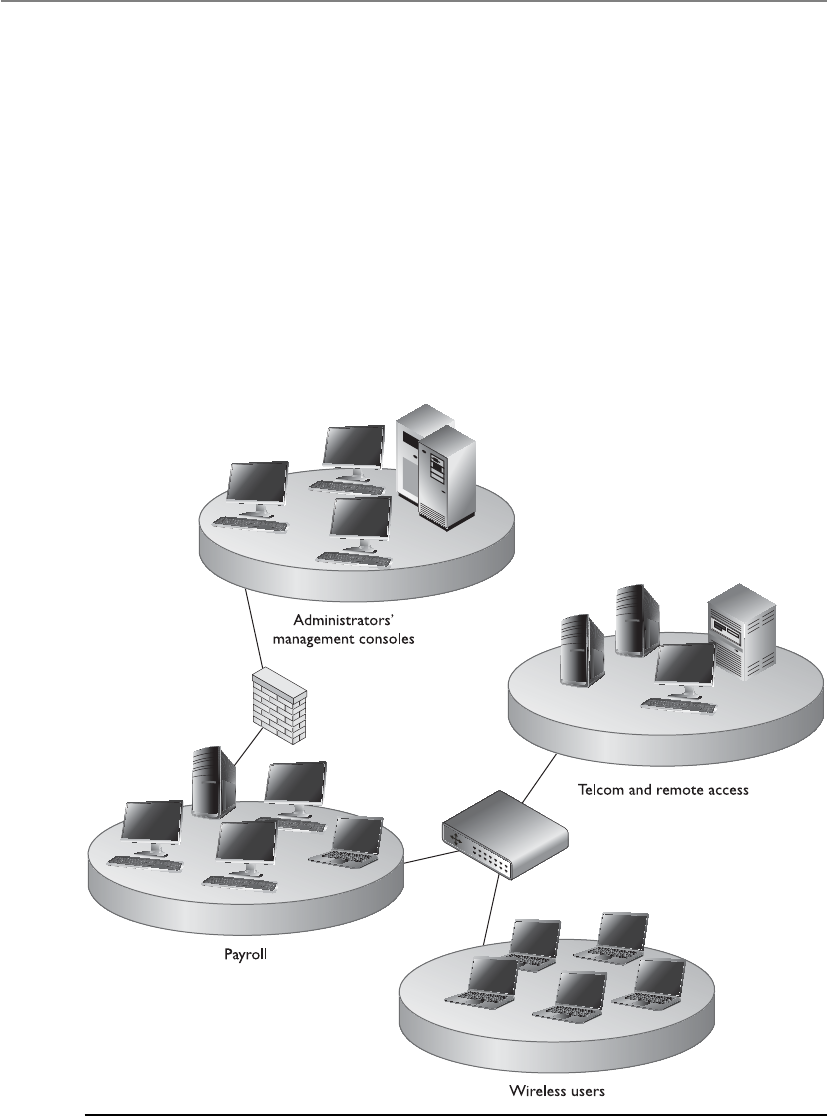
CISSP All-in-One Exam Guide
216
Domains can be architected in a hierarchical manner that dictates the relationship
between the different domains and the ways in which subjects within the different do-
mains can communicate. Subjects can access resources in domains of equal or lower trust
levels. Figure 3-14 shows an example of hierarchical network domains. Their communi-
cation channels are controlled by security agents (firewalls, router ACLs, directory servic-
es), and the individual domains are isolated by using specific subnet mask addresses.
Remember that a domain does not necessarily pertain only to network devices and
segmentations, but can also apply to users and processes. Figure 3-15 shows how users
and processes can have more granular domains assigned to them individually based
on their trust level. Group 1 has a high trust level and can access both a domain of its
own trust level (Domain 1) and a domain of a lower trust level (Domain 2). User 1,
who has a lower trust level, can access only the domain at his trust level and nothing
higher. The system enforces these domains with access privileges and rights provided
by the file system and operating system security kernel.
Figure 3-14 Network domains are used to separate different network segments.
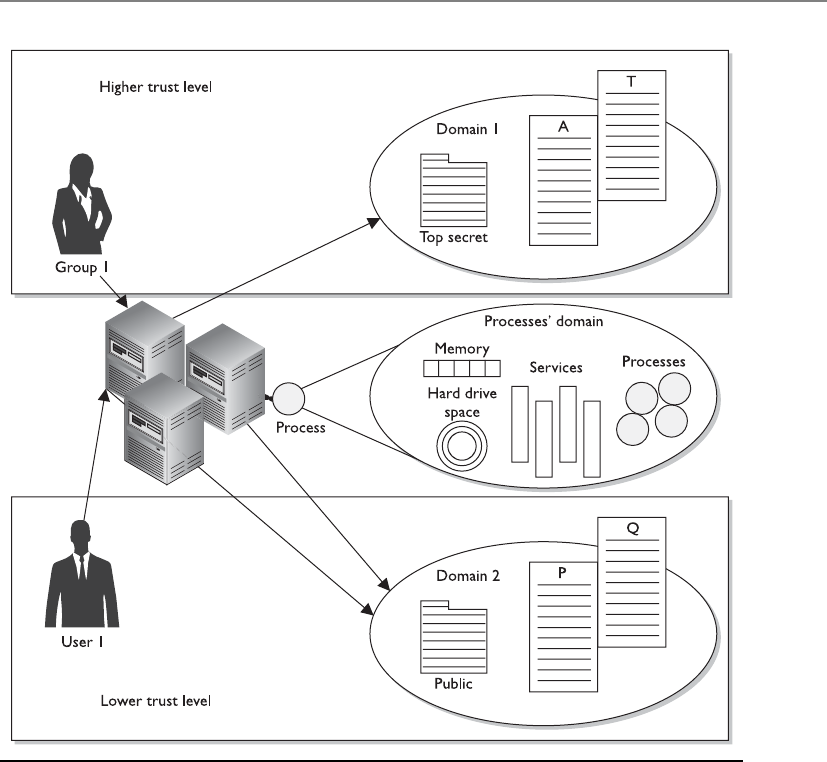
Chapter 3: Access Control
217
So why are domains in the “Single Sign-On” section? Because several different types
of technologies available today are used to define and enforce these domains and secu-
rity policies mapped to them: domain controllers in a Windows environment, enter-
prise resource management (ERM) products, Microsoft Passport (now Windows Live
ID), and the various products that provide SSO functionality. The goal of each of them
is to allow a user (subject) to sign in one time and be able to access the different do-
mains available without having to reenter any other credentials.
Directory Services
While we covered directory services in the “Identity Management” section, it is also
important for you to realize that it is considered a single sign-on technology in its own
right, so we will review the characteristics again within this section.
Figure 3-15 Subjects can access specific domains based on their trust levels.

CISSP All-in-One Exam Guide
218
A network service is a mechanism that identifies resources (printers, file servers,
domain controllers, and peripheral devices) on a network. A network directory service
contains information about these different resources, and the subjects that need to ac-
cess them, and carries out access control activities. If the directory service is working in
a database based on the X.500 standard, it works in a hierarchical schema that outlines
the resources’ attributes, such as name, logical and physical location, subjects that can
access them, and the operations that can be carried out on them.
In a database based on the X.500 standard, access requests are made from users and
other systems using the LDAP protocol. This type of database provides a hierarchical
structure for the organization of objects (subjects and resources). The directory service
develops unique distinguished names for each object and appends the corresponding
attribute to each object as needed. The directory service enforces a security policy (con-
figured by the administrator) to control how subjects and objects interact.
Network directory services provide users access to network resources transparently,
meaning that users don’t need to know the exact location of the resources or the steps
required to access them. The network directory services handle these issues for the user
in the background. Some examples of directory services are Lightweight Directory Ac-
cess Protocol (LDAP), Novell NetWare Directory Service (NDS), and Microsoft Active
Directory (AD).
Thin Clients
Hey, where’s my operating system?
Response: You don’t deserve one.
Diskless computers and thin clients cannot store much information because of
their lack of onboard storage space and necessary resources. This type of client/server
technology forces users to log on to a central server just to use the computer and access
network resources. When the user starts the computer, it runs a short list of instructions
and then points itself to a server that will actually download the operating system, or
interactive operating software, to the terminal. This enforces a strict type of access con-
trol, because the computer cannot do anything on its own until it authenticates to a
centralized server, and then the server gives the computer its operating system, profile,
and functionality. Thin-client technology provides another type of SSO access for users
because users authenticate only to the central server or mainframe, which then provides
them access to all authorized and necessary resources.
In addition to providing an SSO solution, a thin-client technology offers several
other advantages. A company can save money by purchasing thin clients instead of
powerful and expensive PCs. The central server handles all application execution, pro-
cessing, and data storage. The thin client displays the graphical representation and
sends mouse clicks and keystroke inputs to the central server. Having all of the software
in one location, instead of distributed throughout the environment, allows for easier
administration, centralized access control, easier updates, and standardized configura-

Chapter 3: Access Control
219
tions. It is also easier to control malware infestations and the theft of confidential data
because the thin clients often do not have CD-ROM, DVD, or USB ports.
NOTE
NOTE The technology industry came from a centralized model, with the
use of mainframes and dumb terminals, and is in some ways moving back
toward this model with the use of terminal services, Citrix, Service Oriented
Architecture, and cloud computing.
Access Control Models
An access control model is a framework that dictates how subjects access objects. It uses
access control technologies and security mechanisms to enforce the rules and objec-
tives of the model. There are three main types of access control models: discretionary,
mandatory, and role based. Each model type uses different methods to control how
subjects access objects, and each has its own merits and limitations. The business and
security goals of an organization will help prescribe what access control model it should
use, along with the culture of the company and the habits of conducting business.
Some companies use one model exclusively, whereas others combine them to be able
to provide the necessary level of protection.
These models are built into the core or the kernel of the different operating systems
and possibly their supporting applications. Every operating system has a security kernel
that enforces a reference monitor concept, which differs depending upon the type of
access control model embedded into the system. For every access attempt, before a
subject can communicate with an object, the security kernel reviews the rules of the ac-
cess control model to determine whether the request is allowed.
Examples of Single Sign-On Technologies
•Kerberos Authentication protocol that uses a KDC and tickets, and is
based on symmetric key cryptography
•SESAME Authentication protocol that uses a PAS and PACs, and is
based on symmetric and asymmetric cryptography
•Security domains Resources working under the same security policy
and managed by the same group
•Directory services Technology that allows resources to be named in
a standardized manner and access control to be maintained centrally
•Thin clients Terminals that rely upon a central server for access
control, processing, and storage

CISSP All-in-One Exam Guide
220
The following sections explain these different models, their supporting technolo-
gies, and where they should be implemented.
Discretionary Access Control
Only I can let you access my files.
Response: Mother, may I?
If a user creates a file, he is the owner of that file. An identifier for this user is placed
in the file header and/or in an access control matrix within the operating system. Own-
ership might also be granted to a specific individual. For example, a manager for a cer-
tain department might be made the owner of the files and resources within her
department. A system that uses discretionary access control (DAC) enables the owner of
the resource to specify which subjects can access specific resources. This model is called
discretionary because the control of access is based on the discretion of the owner.
Many times department managers, or business unit managers, are the owners of the
data within their specific department. Being the owner, they can specify who should
have access and who should not.
In a DAC model, access is restricted based on the authorization granted to the users.
This means users are allowed to specify what type of access can occur to the objects they
own. If an organization is using a DAC model, the network administrator can allow
resource owners to control who has access to their files. The most common implemen-
tation of DAC is through ACLs, which are dictated and set by the owners and enforced
by the operating system. This can make a user’s ability to access information dynamic
versus the more static role of mandatory access control (MAC).
Most of the operating systems you may be used to dealing with are based on DAC
models, such as all Windows, Linux, and Macintosh systems, and most flavors of Unix.
When you look at the properties of a file or directory and see the choices that allow you
to control which users can have access to this resource and to what degree, you are wit-
nessing an instance of ACLs enforcing a DAC model.
DACs can be applied to both the directory tree structure and the files it contains.
The PC world has access permissions of No Access, Read (r), Write (w), Execute (x),
Delete (d), Change (c), and Full Control. The Read attribute lets you read the file but
not make changes. The Change attribute allows you to read, write, execute, and delete
the file but does not let you change the ACLs or the owner of the files. Obviously, the
attribute of Full Control lets you make any changes to the file and its permissions and
ownership.
Identity-Based Access Control
DAC systems grant or deny access based on the identity of the subject. The iden-
tity can be a user identity or a group membership. So, for example, a data owner
can choose to allow Bob (user identity) and the Accounting group (group mem-
bership identity) to access his file.

Chapter 3: Access Control
221
While DAC systems provide a lot of flexibility to the user and less administration
for IT, it is also the Achilles heel of operating systems. Malware can install itself and
work under the security context of the user. For example, if a user opens an attachment
that is infected with a virus, the code can install itself in the background without the
user being aware of this activity. This code basically inherits all the rights and permis-
sions that the user has and can carry out all the activities the user can on the system. It
can send copies of itself out to all the contacts listed in the user’s e-mail client, install a
back door, attack other systems, delete files on the hard drive, and more. The user is
actually giving rights to the virus to carry out its dirty deeds, because the user has very
powerful discretionary rights and is considered the owner of many objects on the sys-
tem. And the fact that many users are assigned local administrator or root accounts
means that once malware is installed, it can do anything on a system.
As we have said before, there is a constant battle between functionality and security.
To allow for the amount of functionality we demand of our operating systems today,
they have to work within a DAC model—but because they work in a DAC model, ex-
tensive compromises are always possible.
While we may want to give users some freedom to indicate who can access the files
that they create and other resources on their systems that they are configured to be
“owners” of, we really don’t want them dictating all access decisions in environments
with assets that need to be protected. We just don’t trust them that much, and we
shouldn’t. In most environments user profiles are created and loaded on user worksta-
tions that indicate the level of control the user does and does not have. As a security
administrator you might configure user profiles so that users cannot change the sys-
tem’s time, alter system configuration files, access a command prompt, or install unap-
proved applications. This type of access control is referred to as nondiscretionary,
meaning that access decisions are not made at the discretion of the user. Nondiscretion-
ary access controls are put into place by an authoritative entity (usually a security ad-
ministrator) with the goal of protecting the organization’s most critical assets.
Mandatory Access Control
This system holds sensitive, super-duper, secret stuff.
In a mandatory access control (MAC) model, users do not have the discretion of
determining who can access objects as in a DAC model. An operating system that is
based upon a MAC model greatly reduces the amount of rights, permissions, and func-
tionality a user has for security purposes. In most systems based upon the MAC model,
a user cannot install software, change file permissions, add new users, etc. The system
can be used by the user for very focused and specific purposes, and that is it. These sys-
tems are usually very specialized and are in place to protected highly classified data.
Most people have never interacted with a MAC-based system because they are used by
government-oriented agencies that maintain top secret information.
The MAC model is much more structured and strict than the DAC model and is
based on a security label system. Users are given a security clearance (secret, top secret,

CISSP All-in-One Exam Guide
222
confidential, and so on), and data is classified in the same way. The clearance and clas-
sification data are stored in the security labels, which are bound to the specific subjects
and objects. When the system makes a decision about fulfilling a request to access an
object, it is based on the clearance of the subject, the classification of the object, and the
security policy of the system. The rules for how subjects access objects are made by the
organization’s security policy, configured by the security administrator, enforced by the
operating system, and supported by security technologies.
NOTE
NOTE Traditional MAC systems are based upon multilevel security policies,
which outline how data at different classification levels are to be protected.
Multilevel security (MLS) systems allow data at different classification levels
to be accessed and interacted with by users with different clearance levels
simultaneously.
Security labels are attached to all objects; thus, every file, directory, and device has
its own security label with its classification information. A user may have a security
clearance of secret, and the data he requests may have a security label with the classifi-
cation of top secret. In this case, the user will be denied because his clearance is not
equivalent or does not dominate (is not equal or higher than) the classification of the
object.
NOTE
NOTE The terms “security labels” and “sensitivity labels” can be used
interchangeably.
Each subject and object must have an associated label with attributes at all times,
because this is part of the operating system’s access-decision criteria. Each subject and
object does not require a physically unique label, but can be logically associated. For
example, all subjects and objects on Server 1 can share the same label of secret clearance
and classification.
This type of model is used in environments where information classification and
confidentiality is of utmost importance, such as military institutions, government agen-
cies, and government contract companies. Special types of Unix systems are developed
based on the MAC model. A company cannot simply choose to turn on either DAC or
MAC. It has to purchase an operating system that has been specifically designed to en-
force MAC rules. DAC systems do not understand security labels, classifications, or
clearances, and thus cannot be used in institutions that require this type of structure for
access control. A publicly released MAC system is SE Linux, developed by the NSA and
Secure Computing. Trusted Solaris is a product based on the MAC model that most
people are familiar with (relative to other MAC products).
While MAC systems enforce strict access control, they also provide a wide range of
security, particularly dealing with malware. Malware is the bane of DAC systems. Vi-
ruses, worms, and rootkits can be installed and run as applications on DAC systems.

Chapter 3: Access Control
223
Since users that work within a MAC system cannot install software, the operating sys-
tem does not allow any type of software, including malware, to be installed while the
user is logged in. But while MAC systems might seem an answer to all our security
prayers, they have very limited user functionality, require a lot of administrative over-
head, are very expensive, and are not user-friendly. DAC systems are general-purpose
computers, while MAC systems serve a very specific purpose.
NOTE
NOTE DAC systems are discretionary and MAC systems are considered
nondiscretionary because the users cannot make access decisions based upon
their own discretion (choice).
Sensitivity Labels
I am very sensitive. Can I have a label?
Response: Nope.
When the MAC model is being used, every subject and object must have a sensitiv-
ity label, also called a security label. It contains a classification and different categories.
The classification indicates the sensitivity level, and the categories enforce need-to-
know rules. Figure 3-16 illustrates a sensitivity label.
The classifications follow a hierarchical structure, with one level being more trusted
than another. However, the categories do not follow a hierarchical scheme, because
they represent compartments of information within a system. The categories can cor-
respond to departments (UN, Information Warfare, Treasury), projects (CRM, Air-
portSecurity, 2011Budget), or management levels. In a military environment, the
classifications could be top secret, secret, confidential, and unclassified. Each classifica-
tion is more trusted than the one below it. A commercial organization might use con-
fidential, proprietary, corporate, and sensitive. The definition of the classification is up
to the organization and should make sense for the environment in which it is used.
The categories portion of the label enforces need-to-know rules. Just because some-
one has a top-secret clearance does not mean she now has access to all top-secret infor-
mation. She must also have a need to know. As shown in Figure 3-16, if Cheryl has a
top-secret clearance but does not have a need to know that is sufficient to access any of
the listed categories (Dallas, Max, Cricket), she cannot look at this object.
NOTE
NOTE In MAC implementations, the system makes access decisions by
comparing the subject’s clearance and need-to-know level to the object’s
security label. In DAC, the system compares the subject’s identity to the ACL
on the resource.
Figure 3-16
A sensitivity label
is made up of a
classification and
categories.

CISSP All-in-One Exam Guide
224
Software and hardware guards allow the exchange of data between trusted (high
assurance) and less trusted (low assurance) systems and environments. For instance, if
you were working on a MAC system (working in the dedicated security mode of secret)
and you needed it to communicate to a MAC database (working in multilevel security
mode, which goes up to top secret), the two systems would provide different levels of
protection. If a system with lower assurance can directly communicate with a system of
high assurance, then security vulnerabilities and compromises could be introduced. A
software guard is really just a front-end product that allows interconnectivity between
systems working at different security levels. Different types of guards can be used to
carry out filtering, processing requests, data blocking, and data sanitization. A hardware
guard can be implemented, which is a system with two NICs connecting the two sys-
tems that need to communicate with one another. Guards can be used to connect dif-
ferent MAC systems working in different security modes, and they can be used to
connect different networks working at different security levels. In many cases, the less
trusted system can send messages to the more trusted system and can only receive ac-
knowledgments back. This is common when e-mail messages need to go from less
trusted systems to more trusted classified systems.
Role-Based Access Control
I am in charge of chalk; thus, I need full control of all servers!
Response: Good try.
Arole-based access control (RBAC) model uses a centrally administrated set of con-
trols to determine how subjects and objects interact. The access control levels can be
based upon the necessary operations and tasks a user needs to carry out to fulfill her
responsibilities without an organization. This type of model lets access to resources be
based on the role the user holds within the company. The more traditional access con-
trol administration is based on just the DAC model, where access control is specified
at the object level with ACLs. This approach is more complex because the administra-
tor must translate an organizational authorization policy into permission when con-
figuring ACLs. As the number of objects and users grows within an environment, users
are bound to be granted unnecessary access to some objects, thus violating the least-
privilege rule and increasing the risk to the company. The RBAC approach simplifies
access control administration by allowing permissions to be managed in terms of user
job roles.
In an RBAC model, a role is defined in terms of the operations and tasks the role
will carry out, whereas a DAC model outlines which subjects can access what objects
based upon the individual user identity.
Let’s say we need a research and development analyst role. We develop this role not
only to allow an individual to have access to all product and testing data, but also, and
more importantly, to outline the tasks and operations that the role can carry out on this
data. When the analyst role makes a request to access the new testing results on the file
server, in the background the operating system reviews the role’s access levels before
allowing this operation to take place.

Chapter 3: Access Control
225
NOTE
NOTE Introducing roles also introduces the difference between rights
being assigned explicitly and implicitly. If rights and permissions are assigned
explicitly, it indicates they are assigned directly to a specific individual. If they
are assigned implicitly, it indicates they are assigned to a role or group and the
user inherits those attributes.
An RBAC model is the best system for a company that has high employee turnover.
If John, who is mapped to the contractor role, leaves the company, then Chrissy, his
replacement, can be easily mapped to this role. That way, the administrator does not
need to continually change the ACLs on the individual objects. He only needs to create
a role (contractor), assign permissions to this role, and map the new user to this role.
As discussed in the “Identity Management” section, organizations are moving more
toward role-based access models to properly control identity and provisioning activi-
ties. The formal RBAC model has several approaches to security that can be used in
software and organizations.
Core RBAC
This component will be integrated in every RBAC implementation because it is the
foundation of the model. Users, roles, permissions, operations, and sessions are de-
fined and mapped according to the security policy.
• Has a many-to-many relationship among individual users and privileges
• Session is a mapping between a user and a subset of assigned roles
• Accommodates traditional but robust group-based access control
Many users can belong to many groups with various privileges outlined for each
group. When the user logs in (this is a session), the various roles and groups this user
has been assigned will be available to the user at one time. If I am a member of the Ac-
counting role, RD group, and Administrative role, when I log on, all of the permissions
assigned to these various groups are available to me.
This model provides robust options because it can include other components when
making access decisions, instead of just basing the decision on a credential set. The
RBAC system can be configured to also include time of day, location of role, day of the
week, and so on. This means other information, not just the user ID and credential, is
used for access decisions.
Hierarchical RBAC
This component allows the administrator to set up an organizational RBAC model that
maps to the organizational structures and functional delineations required in a specific
environment. This is very useful since businesses are already set up in a personnel hier-
archical structure. In most cases, the higher you are in the chain of command, the more
access you will most likely have.
• Role relation defining user membership and privilege inheritance. For
example, the nurse role can access a certain amount of files, and the lab
technician role can access another set of files. The doctor role inherits the

CISSP All-in-One Exam Guide
226
permissions and access rights of these two roles and has more elevated rights
already assigned to the doctor role. So hierarchical is an accumulation of
rights and permissions of other roles.
• Reflects organizational structures and functional delineations.
• Two types of hierarchies:
• Limited hierarchies—Only one level of hierarchy is allowed (Role 1 inherits
from Role 2 and no other role)
• General hierarchies—Allows for many levels of hierarchies (Role 1 inherits
Role 2 and Role 3’s permissions)
Hierarchies are a natural means of structuring roles to reflect an organization’s lines
of authority and responsibility. Role hierarchies define an inheritance relation among
roles. Different separations of duties are provided under this model.
•Static Separation of Duty (SSD) Relations through RBAC This would be
used to deter fraud by constraining the combination of privileges (such as, the
user cannot be a member of both the Cashier and Accounts Receivable groups).
•Dynamic Separation of Duties (DSD) Relations through RBAC This
would be used to deter fraud by constraining the combination of privileges
that can be activated in any session (for instance, the user cannot be in both
the Cashier and Cashier Supervisor roles at the same time, but the user can
be a member of both). This one is a little more confusing. It means Joe is a
member of both the Cashier and Cashier Supervisor. If he logs in as a Cashier,
the Supervisor role is unavailable to him during that session. If he logs in as
Cashier Supervisor, the Cashier role is unavailable to him during that session.
Role-based access control can be managed in the following ways:
•Non-RBAC Users are mapped directly to applications and no roles are used.
•Limited RBAC Users are mapped to multiple roles and mapped directly to
other types of applications that do not have role-based access functionality.
•Hybrid RBAC Users are mapped to multiapplication roles with only selected
rights assigned to those roles.
•Full RBAC Users are mapped to enterprise roles.
NOTE
NOTE The privacy of many different types of data needs to be protected,
which is why many organizations have privacy officers and privacy policies
today. The current access control models (MAC, DAC, RBAC) do not lend
themselves to protecting data of a given sensitivity level, but instead limit the
functions that the users can carry out. For example, managers may be able to
access a Privacy folder, but there needs to be more detailed access control
that indicates that they can access customers’ home addresses but not Social
Security numbers. This is referred to as Privacy Aware Role-Based Access Control.

Chapter 3: Access Control
227
Access Control Techniques and Technologies
Once an organization determines what type of access control model it is going to use,
it needs to identify and refine its technologies and techniques to support that model.
The following sections describe the different access controls and technologies available
to support different access control models.
Rule-Based Access Control
Everyone will adhere to my rules.
Response: Who are you again?
Rule-based access control uses specific rules that indicate what can and cannot hap-
pen between a subject and an object. It is based on the simple concept of “if X then Y”
programming rules, which can be used to provide finer-grained access control to re-
sources. Before a subject can access an object in a certain circumstance, it must meet a
RBAC, MAC, and DAC
A lot of confusion exists regarding whether RBAC is a type of DAC model or a
type of MAC model. Different sources claim different things, but in fact it is a
model in its own right. In the 1960s and 1970s, the U.S. military and NSA did a
lot of research on the MAC model. DAC, which also sprang to life in the ’60s and
’70s, has its roots in the academic and commercial research laboratories. The
RBAC model, which started gaining popularity in the 1990s, can be used in com-
bination with MAC and DAC systems. For the most up-to-date information on
the RBAC model, go to http://csrc.nist.gov/rbac, which has documents that de-
scribe an RBAC standard and independent model, with the goal of clearing up
this continual confusion.
In reality, operating systems can be created to use one, two, or all three of
these models in some form, but just because they can be used together does not
mean that they are not their own individual models with their own strict access
control rules.
Access Control Models
The main characteristics of the three different access control models are impor-
tant to understand.
•DAC Data owners decide who has access to resources, and ACLs are
used to enforce these access decisions.
•MAC Operating systems enforce the system’s security policy through
the use of security labels.
•RBAC Access decisions are based on each subject’s role and/or
functional position.

CISSP All-in-One Exam Guide
228
set of predefined rules. This can be simple and straightforward, as in, “If the user’s ID
matches the unique user ID value in the provided digital certificate, then the user can
gain access.” Or there could be a set of complex rules that must be met before a subject
can access an object. For example, “If the user is accessing the system between Monday
and Friday and between 8 A.M. and 5 P.M., and if the user’s security clearance equals or
dominates the object’s classification, and if the user has the necessary need to know,
then the user can access the object.”
Rule-based access control is not necessarily identity-based. The DAC model is iden-
tity-based. For example, an identity-based control would stipulate that Tom Jones can
read File1 and modify File2. So when Tom attempts to access one of these files, the
operating system will check his identity and compare it to the values within an ACL to
see if Tom can carry out the operations he is attempting. In contrast, here is a rule-based
example: A company may have a policy that dictates that e-mail attachments can only
be 5MB or smaller. This rule affects all users. If rule-based was identity-based, it would
mean that Sue can accept attachments of 10MB and smaller, Bob can accept attach-
ments 2MB and smaller, and Don can only accept attachments 1MB and smaller. This
would be a mess and too confusing. Rule-based access controls simplify this by setting
a rule that will affect all users across the board—no matter what their identity is.
Rule-based access allows a developer to define specific and detailed situations in
which a subject can or cannot access an object, and what that subject can do once access
is granted. Traditionally, rule-based access control has been used in MAC systems as an
enforcement mechanism of the complex rules of access that MAC systems provide. To-
day, rule-based access is used in other types of systems and applications as well. Con-
tent filtering uses If-Then programming languages, which is a way to compare data or
an activity to a long list of rules. For example, “If an e-mail message contains the word
‘Viagra,’ then disregard. If an e-mail message contains the words ‘sex’ and ‘free,’ then
disregard,” and so on.
Many routers and firewalls use rules to determine which types of packets are al-
lowed into a network and which are rejected. Rule-based access control is a type of
compulsory control, because the administrator sets the rules and the users cannot mod-
ify these controls.
Constrained User Interfaces
Constrained user interfaces restrict users’ access abilities by not allowing them to re-
quest certain functions or information, or to have access to specific system resources.
Three major types of restricted interfaces exist: menus and shells, database views, and
physically constrained interfaces.
When menu and shell restrictions are used, the options users are given are the com-
mands they can execute. For example, if an administrator wants users to be able to ex-
ecute only one program, that program would be the only choice available on the menu.
This limits the users’ functionality. A shell is a type of virtual environment within a
system. It is the users’ interface to the operating system and works as a command inter-
preter. If restricted shells were used, the shell would contain only the commands the
administrator wants the users to be able to execute.

Chapter 3: Access Control
229
Many times, a database administrator will configure a database so users cannot see
fields that require a level of confidentiality. Database views are mechanisms used to re-
strict user access to data contained in databases. If the database administrator wants
managers to be able to view their employees’ work records but not their salary informa-
tion, then the salary fields would not be available to these types of users. Similarly, when
payroll employees look at the same database, they will be able to view the salary infor-
mation but not the work history information. This example is illustrated in Figure 3-17.
Physically constraining a user interface can be implemented by providing only cer-
tain keys on a keypad or certain touch buttons on a screen. You see this when you get
money from an ATM machine. This device has a type of operating system that can ac-
cept all kinds of commands and configuration changes, but you are physically con-
strained from being able to carry out these functions. You are presented with buttons
that only enable you to withdraw, view your balance, or deposit funds. Period.
Access Control Matrix
The matrix—let’s see, should I take the red pill or the blue pill?
An access control matrix is a table of subjects and objects indicating what actions
individual subjects can take upon individual objects. Matrices are data structures that
programmers implement as table lookups that will be used and enforced by the operat-
ing system. Table 3-1 provides an example of an access control matrix.
This type of access control is usually an attribute of DAC models. The access rights
can be assigned directly to the subjects (capabilities) or to the objects (ACLs).
Capability Table
Acapability table specifies the access rights a certain subject possesses pertaining to
specific objects. A capability table is different from an ACL because the subject is bound
to the capability table, whereas the object is bound to the ACL.
Figure 3-17 Different database views of the same tables

CISSP All-in-One Exam Guide
230
The capability corresponds to the subject’s row in the access control matrix. In Table
3-1, Diane’s capabilities are File1: read and execute; File2: read, write, and execute;
File3: no access. This outlines what Diane is capable of doing to each resource. An ex-
ample of a capability-based system is Kerberos. In this environment, the user is given a
ticket, which is his capability table. This ticket is bound to the user and dictates what
objects that user can access and to what extent. The access control is based on this
ticket, or capability table. Figure 3-18 shows the difference between a capability table
and an ACL.
A capability can be in the form of a token, ticket, or key. When a subject presents a
capability component, the operating system (or application) will review the access
rights and operations outlined in the capability component and allow the subject to
carry out just those functions. A capability component is a data structure that contains
a unique object identifier and the access rights the subject has to that object. The object
may be a file, array, memory segment, or port. Each user, process, and application in a
capability system has a list of capabilities.
Access Control Lists
Access control lists (ACLs) are used in several operating systems, applications, and router
configurations. They are lists of subjects that are authorized to access a specific object,
Figure 3-18 A capability table is bound to a subject, whereas an ACL is bound to an object.
User File1 File2 File3
Diane Read and execute Read, write, and execute No access
Katie Read and execute Read No access
Chrissy Read, write, and execute Read and execute Read
John Read and execute No access Read and write
Table 3-1 An Example of an Access Control Matrix

Chapter 3: Access Control
231
and they define what level of authorization is granted. Authorization can be specific to
an individual, group, or role.
ACLs map values from the access control matrix to the object. Whereas a capability
corresponds to a row in the access control matrix, the ACL corresponds to a column of
the matrix. The ACL for File1 in Table 3-1 is shown in Table 3-2.
Content-Dependent Access Control
This is sensitive information, so only Bob and I can look at it.
Response: Well, since Bob is your imaginary friend, I think I can live by that rule.
As the name suggests, with content-dependent access control, access to objects is deter-
mined by the content within the object. The earlier example pertaining to database views
showed how content-dependent access control can work. The content of the database
fields dictates which users can see specific information within the database tables.
Content-dependent filtering is used when corporations employ e-mail filters that
look for specific strings, such as “confidential,” “social security number,” “top secret,”
and any other types of words the company deems suspicious. Corporations also have
this in place to control web surfing—where filtering is done to look for specific words—
to try to figure out whether employees are gambling or looking at pornography.
Context-Dependent Access Control
First you kissed a parrot, then you threw your shoe, and then you did a jig. That’s the right se-
quence; you are allowed access.
Context-dependent access control differs from content-dependent access control in that
it makes access decisions based on the context of a collection of information rather than
on the sensitivity of the data. A system that is using context-dependent access control
“reviews the situation” and then makes a decision. For example, firewalls make context-
based access decisions when they collect state information on a packet before allowing it
into the network. A stateful firewall understands the necessary steps of communication
for specific protocols. For example, in a TCP connection, the sender sends a SYN packet,
the receiver sends a SYN/ACK, and then the sender acknowledges that packet with an
User File1
Diane Read and execute
Katie Read and execute
Chrissy Read, write, and execute
John Read and execute
Table 3-2
The ACL for File1

CISSP All-in-One Exam Guide
232
ACK packet. A stateful firewall understands these different steps and will not allow pack-
ets to go through that do not follow this sequence. So, if a stateful firewall receives a SYN/
ACK and there was not a previous SYN packet that correlates with this connection, the
firewall understands this is not right and disregards the packet. This is what stateful
means—something that understands the necessary steps of a dialog session. And this is
an example of context-dependent access control, where the firewall understands the con-
text of what is going on and includes that as part of its access decision.
Some software can track a user’s access requests in sequence and make decisions
based upon the previous access requests. For example, let’s say that we have a database
that contains information about our military’s mission and efforts. A user might have a
Secret clearance, and thus can access data with this level of classification. But if he ac-
cesses a data set that indicates a specific military troop location, then accesses a differ-
ent data set that indicates the new location this military troop will be deployed to, and
then accesses another data set that specifies the types of weapons that are being shipped
to the new troop location, he might be able to figure out information that is classified
as top secret, which is above his classification level. While it is okay that he knows that
there is a military troop located in Kuwait, it is not okay that he knows that this troop
is being deployed to Libya with fully armed drones. This is top secret information that
is outside his clearance level.
To ensure that a user cannot piece these different data sets together and figure out a
secret we don’t want him to know, but still allow him access to specific data sets so he
can carry out his job, we would need to implement software that can track his access
requests. Each access request he makes is based upon his previous requests. So while he
could access data set A, then data set B, he cannot access data sets A, B, and C.
Access Control Administration
Once an organization develops a security policy, supporting procedures, standards, and
guidelines (described in Chapter 2), it must choose the type of access control model:
DAC, MAC, or RBAC. After choosing a model, the organization must select and imple-
ment different access control technologies and techniques. Access control matrices; re-
stricted interfaces; and content-dependent, context-dependent, and rule-based controls
are just a few of the choices.
If the environment does not require a high level of security, the organization will
choose discretionary and/or role-based. The DAC model enables data owners to allow
other users to access their resources, so an organization should choose the DAC model
only if it is fully aware of what it entails. If an organization has a high turnover rate and/
or requires a more centralized access control method, the role-based model is more
appropriate. If the environment requires a higher security level and only the adminis-
trator should be able to grant access to resources, then a MAC model is the best choice.
What is left to work out is how the organization will administer the access control
model. Access control administration comes in two basic flavors: centralized and de-
centralized. The decision makers should understand both approaches so they choose
and implement the proper one to achieve the level of protection required.

Chapter 3: Access Control
233
Centralized Access Control Administration
I control who can touch the carrots and who can touch the peas.
Response: Could you leave now?
Acentralized access control administration method is basically what it sounds like:
one entity (department or individual) is responsible for overseeing access to all corpo-
rate resources. This entity configures the mechanisms that enforce access control, pro-
cesses any changes that are needed to a user’s access control profile; disables access
when necessary; and completely removes these rights when a user is terminated, leaves
the company, or moves to a different position. This type of administration provides a
consistent and uniform method of controlling users’ access rights. It supplies strict con-
trol over data because only one entity (department or individual) has the necessary
rights to change access control profiles and permissions. Although this provides for a
more consistent and reliable environment, it can be a slow one, because all changes
must be processed by one entity.
The following sections present some examples of centralized remote access control
technologies. Each of these authentication protocols is referred to as an AAA protocol,
which stands for authentication, authorization, and auditing. (Some resources have the
last A stand for accounting, but it is the same functionality—just a different name.)
Depending upon the protocol, there are different ways to authenticate a user in this
client/server architecture. The traditional authentication protocols are Password Au-
thentication Protocol (PAP), Challenge Handshake Authentication Protocol (CHAP),
and a newer method referred to as Extensible Authentication Protocol (EAP). Each of
these authentication protocols is discussed at length in Chapter 6.
Access Control Techniques
Access control techniques are used to support the access control models.
•Access control matrix Table of subjects and objects that outlines their
access relationships
•Access control list Bound to an object and indicates what subjects
can access it and what operations they can carry out
•Capability table Bound to a subject and indicates what objects that
subject can access and what operations it can carry out
•Content-based access Bases access decisions on the sensitivity of the
data, not solely on subject identity
•Context-based access Bases access decisions on the state of the
situation, not solely on identity or content sensitivity
•Restricted interface Limits the user’s environment within the system,
thus limiting access to objects
•Rule-based access Restricts subjects’ access attempts by predefined rules

CISSP All-in-One Exam Guide
234
RADIUS
So, I have to run across half of a circle to be authenticated?
Response: Don’t know. Give it a try.
Remote Authentication Dial-In User Service (RADIUS) is a network protocol that
provides client/server authentication and authorization, and audits remote users. A net-
work may have access servers, a modem pool, DSL, ISDN, or T1 line dedicated for re-
mote users to communicate through. The access server requests the remote user’s logon
credentials and passes them back to a RADIUS server, which houses the usernames and
password values. The remote user is a client to the access server, and the access server is
a client to the RADIUS server.
Most ISPs today use RADIUS to authenticate customers before they are allowed ac-
cess to the Internet. The access server and customer’s software negotiate through a
handshake procedure and agree upon an authentication protocol (PAP, CHAP, or EAP).
The customer provides to the access server a username and password. This communica-
tion takes place over a PPP connection. The access server and RADIUS server commu-
nicate over the RADIUS protocol. Once the authentication is completed properly, the
customer’s system is given an IP address and connection parameters, and is allowed
access to the Internet. The access server notifies the RADIUS server when the session
starts and stops, for billing purposes.
RADIUS is also used within corporate environments to provide road warriors and
home users access to network resources. RADIUS allows companies to maintain user
profiles in a central database. When a user dials in and is properly authenticated, a
preconfigured profile is assigned to him to control what resources he can and cannot
access. This technology allows companies to have a single administered entry point,
which provides standardization in security and a simplistic way to track usage and net-
work statistics.
RADIUS was developed by Livingston Enterprises for its network access server prod-
uct series, but was then published as a standard. This means it is an open protocol that
any vendor can use and manipulate so it will work within its individual products. Be-
cause RADIUS is an open protocol, it can be used in different types of implementa-
tions. The format of configurations and user credentials can be held in LDAP servers,
various databases, or text files. Figure 3-19 shows some examples of possible RADIUS
implementations.
TACACS
Terminal Access Controller Access Control System (TACACS) has a very funny name. Not
funny ha-ha, but funny “huh?” TACACS has been through three generations: TACACS,
Extended TACACS (XTACACS), and TACACS+. TACACS combines its authentication
and authorization processes; XTACACS separates authentication, authorization, and
auditing processes; and TACACS+ is XTACACS with extended two-factor user authenti-
cation. TACACS uses fixed passwords for authentication, while TACACS+ allows users
to employ dynamic (one-time) passwords, which provides more protection.

Chapter 3: Access Control
235
NOTE
NOTE TACACS+ is really not a new generation of TACACS and XTACACS;
it is a brand-new protocol that provides similar functionality and shares
the same naming scheme. Because it is a totally different protocol, it is not
backward-compatible with TACACS or XTACACS.
TACACS+ provides basically the same functionality as RADIUS with a few differ-
ences in some of its characteristics. First, TACACS+ uses TCP as its transport protocol,
while RADIUS uses UDP. “So what?” you may be thinking. Well, any software that is
developed to use UDP as its transport protocol has to be “fatter” with intelligent code
that will look out for the items that UDP will not catch. Since UDP is a connectionless
protocol, it will not detect or correct transmission errors. So RADIUS must have the
Figure 3-19 Environments can implement different RADIUS infrastructures.

CISSP All-in-One Exam Guide
236
necessary code to detect packet corruption, long timeouts, or dropped packets. Since
the developers of TACACS+ choose to use TCP, the TACACS+ software does not need to
have the extra code to look for and deal with these transmission problems. TCP is a
connection-oriented protocol, and that is its job and responsibility.
RADIUS encrypts the user’s password only as it is being transmitted from the RA-
DIUS client to the RADIUS server. Other information, as in the username, accounting,
and authorized services, is passed in cleartext. This is an open invitation for attackers to
capture session information for replay attacks. Vendors who integrate RADIUS into
their products need to understand these weaknesses and integrate other security mech-
anisms to protect against these types of attacks. TACACS+ encrypts all of this data be-
tween the client and server and thus does not have the vulnerabilities inherent in the
RADIUS protocol.
The RADIUS protocol combines the authentication and authorization functional-
ity. TACACS+ uses a true authentication, authorization, and accounting/audit (AAA)
architecture, which separates the authentication, authorization, and accounting func-
tionalities. This gives a network administrator more flexibility in how remote users are
authenticated. For example, if Tom is a network administrator and has been assigned
the task of setting up remote access for users, he must decide between RADIUS and
TACACS+. If the current environment already authenticates all of the local users through
a domain controller using Kerberos, then Tom can configure the remote users to be
authenticated in this same manner, as shown in Figure 3-20. Instead of having to main-
tain a remote access server database of remote user credentials and a database within
Active Directory for local users, Tom can just configure and maintain one database. The
separation of authentication, authorization, and accounting functionality provides this
capability. TACACS+ also enables the network administrator to define more granular
user profiles, which can control the actual commands users can carry out.
Remember that RADIUS and TACACS+ are both protocols, and protocols are just
agreed-upon ways of communication. When a RADIUS client communicates with a
RADIUS server, it does so through the RADIUS protocol, which is really just a set of
defined fields that will accept certain values. These fields are referred to as attribute-
value pairs (AVPs). As an analogy, suppose I send you a piece of paper that has several
different boxes drawn on it. Each box has a headline associated with it: first name, last
name, hair color, shoe size. You fill in these boxes with your values and send it back to
me. This is basically how protocols work; the sending system just fills in the boxes
(fields) with the necessary information for the receiving system to extract and process.
Since TACACS+ allows for more granular control on what users can and cannot do,
TACACS+ has more AVPs, which allows the network administrator to define ACLs, fil-
ters, user privileges, and much more. Table 3-3 points out the differences between RA-
DIUS and TACACS+.

Chapter 3: Access Control
237
So, RADIUS is the appropriate protocol when simplistic username/password au-
thentication can take place and users only need an Accept or Deny for obtaining access,
as in ISPs. TACACS+ is the better choice for environments that require more sophisti-
cated authentication steps and tighter control over more complex authorization activi-
ties, as in corporate networks.
Figure 3-20 TACACS+ works in a client/server model.

CISSP All-in-One Exam Guide
238
Diameter
If we create our own technology, we get to name it any goofy thing we want!
Response: I like Snizzernoodle.
Diameter is a protocol that has been developed to build upon the functionality of
RADIUS and overcome many of its limitations. The creators of this protocol decided to
call it Diameter as a play on the term RADIUS—as in the diameter is twice the radius.
Diameter is another AAA protocol that provides the same type of functionality as
RADIUS and TACACS+ but also provides more flexibility and capabilities to meet the
new demands of today’s complex and diverse networks. At one time, all remote com-
munication took place over PPP and SLIP connections and users authenticated them-
selves through PAP or CHAP. Those were simpler, happier times when our parents had
to walk uphill both ways to school wearing no shoes. As with life, technology has be-
come much more complicated and there are more devices and protocols to choose
from than ever before. Today, we want our wireless devices and smart phones to be able
to authenticate themselves to our networks, and we use roaming protocols, Mobile IP,
Ethernet over PPP, Voice over IP (VoIP), and other crazy stuff that the traditional AAA
protocols cannot keep up with. So the smart people came up with a new AAA protocol,
Diameter, that can deal with these issues and many more.
RADIUS TACACS+
Packet delivery UDP TCP
Packet encryption Encrypts only the password from
the RADIUS client to the server.
Encrypts all traffic between the
client and server.
AAA support Combines authentication and
authorization services.
Uses the AAA architecture,
separating authentication,
authorization, and auditing.
Multiprotocol support Works over PPP connections. Supports other protocols, such
as AppleTalk, NetBIOS, and IPX.
Responses Uses single-challenge response
when authenticating a user, which
is used for all AAA activities.
Uses multiple-challenge response
for each of the AAA processes.
Each AAA activity must be
authenticated.
Table 3-3 Specific Differences Between These Two AAA Protocols
Mobile IP
This technology allows a user to move from one network to another and still use
the same IP address. It is an improvement upon the IP protocol because it allows
a user to have a home IP address, associated with his home network, and a care-of
address. The care-of address changes as he moves from one network to the other.
All traffic that is addressed to his home IP address is forwarded to his care-of
address.

Chapter 3: Access Control
239
Diameter protocol consists of two portions. The first is the base protocol, which
provides the secure communication among Diameter entities, feature discovery, and
version negotiation. The second is the extensions, which are built on top of the base
protocol to allow various technologies to use Diameter for authentication.
Up until the conception of Diameter, IETF has had individual working groups who
defined how Voice over IP (VoIP), Fax over IP (FoIP), Mobile IP, and remote authentica-
tion protocols work. Defining and implementing them individually in any network can
easily result in too much confusion and interoperability. It requires customers to roll
out and configure several different policy servers and increases the cost with each new
added service. Diameter provides a base protocol, which defines header formats, secu-
rity options, commands, and AVPs. This base protocol allows for extensions to tie in
other services, such as VoIP, FoIP, Mobile IP, wireless, and cell phone authentication. So
Diameter can be used as an AAA protocol for all of these different uses.
As an analogy, consider a scenario in which ten people all need to get to the same
hospital, which is where they all work. They all have different jobs (doctor, lab techni-
cian, nurse, janitor, and so on), but they all need to end up at the same location. So,
they can either all take their own cars and their own routes to the hospital, which takes
up more hospital parking space and requires the gate guard to authenticate each and
every car, or they can take a bus. The bus is the common element (base protocol) to get
the individuals (different services) to the same location (networked environment). Di-
ameter provides the common AAA and security framework that different services can
work within, as illustrated in Figure 3-21.
RADIUS and TACACS+ are client/server protocols, which means the server portion
cannot send unsolicited commands to the client portion. The server portion can only
speak when spoken to. Diameter is a peer-based protocol that allows either end to initi-
ate communication. This functionality allows the Diameter server to send a message to
the access server to request the user to provide another authentication credential if she
is attempting to access a secure resource.
Diameter is not directly backward-compatible with RADIUS but provides an up-
grade path. Diameter uses TCP and AVPs, and provides proxy server support. It has
better error detection and correction functionality than RADIUS, as well as better
failover properties, and thus provides better network resilience.
Figure 3-21 Diameter provides an AAA architecture for several services.

CISSP All-in-One Exam Guide
240
Diameter has the functionality and ability to provide the AAA functionality for
other protocols and services because it has a large AVP set. RADIUS has 28 (256) AVPs,
while Diameter has 232 (a whole bunch). Recall from earlier in the chapter that AVPs are
like boxes drawn on a piece of paper that outline how two entities can communicate
back and forth. So, more AVPs allow for more functionality and services to exist and
communicate between systems.
Diameter provides the following AAA functionality:
• Authentication
• PAP, CHAP, EAP
• End-to-end protection of authentication information
• Replay attack protection
• Authorization
• Redirects, secure proxies, relays, and brokers
• State reconciliation
• Unsolicited disconnect
• Reauthorization on demand
• Accounting
• Reporting, roaming operations (ROAMOPS) accounting, event monitoring
You may not be familiar with Diameter because it is relatively new. It probably won’t
be taking over the world tomorrow, but it will be used by environments that need to
provide the type of services being demanded of them, and then slowly seep down into
corporate networks as more products are available. RADIUS has been around for a long
time and has served its purpose well, so don’t expect it to exit the stage any time soon.
Decentralized Access Control Administration
Okay, everyone just do whatever you want.
Adecentralized access control administration method gives control of access to the
people closer to the resources—the people who may better understand who should and
should not have access to certain files, data, and resources. In this approach, it is often
the functional manager who assigns access control rights to employees. An organiza-
tion may choose to use a decentralized model if its managers have better judgment re-
garding which users should be able to access different resources, and there is no business
requirement that dictates strict control through a centralized body is necessary.
Changes can happen faster through this type of administration because not just one
entity is making changes for the whole organization. However, there is a possibility that
conflicts of interest could arise that may not benefit the organization. Because no single
entity controls access as a whole, different managers and departments can practice se-
curity and access control in different ways. This does not provide uniformity and fair-
ness across the organization. One manager could be too busy with daily tasks and
decide it is easier to let everyone have full control over all the systems in the depart-
ment. Another department may practice a stricter and detail-oriented method of con-
trol by giving employees only the level of permissions needed to fulfill their tasks.

Chapter 3: Access Control
241
Also, certain controls can overlap, in which case actions may not be properly pro-
scribed or restricted. If Mike is part of the accounting group and recently has been under
suspicion for altering personnel account information, the accounting manager may re-
strict his access to these files to read-only access. However, the accounting manager does
not realize that Mike still has full-control access under the network group he is also a
member of. This type of administration does not provide methods for consistent con-
trol, as a centralized method would. Another issue that comes up with decentralized
administration is lack of proper consistency pertaining to the company’s protection. For
example, when Sean is fired for looking at pornography on his computer, some of the
groups Sean is a member of may not disable his account. So, Sean may still have access
after he is terminated, which could cause the company heartache if Sean is vindictive.
Access Control Methods
Access controls can be implemented at various layers of a network and individual sys-
tems. Some controls are core components of operating systems or embedded into ap-
plications and devices, and some security controls require third-party add-on packages.
Although different controls provide different functionality, they should all work to-
gether to keep the bad guys out and the good guys in, and to provide the necessary
quality of protection.
Most companies do not want people to be able to walk into their building arbi-
trarily, sit down at an employee’s computer, and access network resources. Companies
also don’t want every employee to be able to access all information within the compa-
ny, as in human resource records, payroll information, and trade secrets. Companies
want some assurance that employees who can access confidential information will
have some restrictions put upon them, making sure, say, a disgruntled employee does
not have the ability to delete financial statements, tax information, and top-secret data
that would put the company at risk. Several types of access controls prevent these things
from happening, as discussed in the sections that follow.
Access Control Layers
Access control consists of three broad categories: administrative, technical, and physi-
cal. Each category has different access control mechanisms that can be carried out man-
ually or automatically. All of these access control mechanisms should work in concert
with each other to protect an infrastructure and its data.
Each category of access control has several components that fall within it, as
shown next:
•Administrative Controls
• Policy and procedures
• Personnel controls
• Supervisory structure
• Security-awareness training
• Testing

CISSP All-in-One Exam Guide
242
•Physical Controls
• Network segregation
• Perimeter security
• Computer controls
• Work area separation
• Data backups
• Cabling
• Control zone
•Technical Controls
• System access
• Network architecture
• Network access
• Encryption and protocols
• Auditing
The following sections explain each of these categories and components and how
they relate to access control.
Administrative Controls
Senior management must decide what role security will play in the organization, in-
cluding the security goals and objectives. These directives will dictate how all the sup-
porting mechanisms will fall into place. Basically, senior management provides the
skeleton of a security infrastructure and then appoints the proper entities to fill in
the rest.
The first piece to building a security foundation within an organization is a security
policy. It is management’s responsibility to construct a security policy and delegate the
development of the supporting procedures, standards, and guidelines; indicate which
personnel controls should be used; and specify how testing should be carried out to
ensure all pieces fulfill the company’s security goals. These items are administrative
controls and work at the top layer of a hierarchical access control model. (Administra-
tive controls are examined in detail in Chapter 2, but are mentioned here briefly to
show the relationship to logical and physical controls pertaining to access control.)
Personnel Controls
Personnel controls indicate how employees are expected to interact with security mech-
anisms and address noncompliance issues pertaining to these expectations. These con-
trols indicate what security actions should be taken when an employee is hired, termi-
nated, suspended, moved into another department, or promoted. Specific procedures
must be developed for each situation, and many times the human resources and legal
departments are involved with making these decisions.

Chapter 3: Access Control
243
Supervisory Structure
Management must construct a supervisory structure in which each employee has a supe-
rior to report to, and that superior is responsible for that employee’s actions. This forces
management members to be responsible for employees and take a vested interest in
their activities. If an employee is caught hacking into a server that holds customer credit
card information, that employee and her supervisor will face the consequences. This is
an administrative control that aids in fighting fraud and enforcing proper control.
Security-Awareness Training
How do you know they know what they are supposed to know?
In many organizations, management has a hard time spending money and allocat-
ing resources for items that do not seem to affect the bottom line: profitability. This is
why training traditionally has been given low priority, but as computer security be-
comes more and more of an issue to companies, they are starting to recognize the value
of security-awareness training.
A company’s security depends upon technology and people, and people are usually
the weakest link and cause the most security breaches and compromises. If users under-
stand how to properly access resources, why access controls are in place, and the rami-
fications for not using the access controls properly, a company can reduce many types
of security incidents.
Testing
All security controls, mechanisms, and procedures must be tested on a periodic basis to
ensure they properly support the security policy, goals, and objectives set for them. This
testing can be a drill to test reactions to a physical attack or disruption of the network,
a penetration test of the firewalls and perimeter network to uncover vulnerabilities, a
query to employees to gauge their knowledge, or a review of the procedures and stan-
dards to make sure they still align with implemented business or technology changes.
Because change is constant and environments continually evolve, security procedures
and practices should be continually tested to ensure they align with management’s ex-
pectations and stay up-to-date with each addition to the infrastructure. It is manage-
ment’s responsibility to make sure these tests take place.
Physical Controls
We will go much further into physical security in Chapter 5, but it is important to un-
derstand certain physical controls must support and work with administrative and
technical (logical) controls to supply the right degree of access control. Examples of
physical controls include having a security guard verify individuals’ identities prior to
entering a facility, erecting fences around the exterior of the facility, making sure server
rooms and wiring closets are locked and protected from environmental elements (hu-
midity, heat, and cold), and allowing only certain individuals to access work areas that
contain confidential information. Some physical controls are introduced next, but
again, these and more physical mechanisms are explored in depth in Chapter 5.

CISSP All-in-One Exam Guide
244
Network Segregation
I have used my Lego set to outline the physical boundaries between you and me.
Response: Can you make the walls a little higher please?
Network segregation can be carried out through physical and logical means. A net-
work might be physically designed to have all AS400 computers and databases in a
certain area. This area may have doors with security swipe cards that allow only indi-
viduals who have a specific clearance to access this section and these computers. An-
other section of the network may contain web servers, routers, and switches, and yet
another network portion may have employee workstations. Each area would have the
necessary physical controls to ensure that only the permitted individuals have access
into and out of those sections.
Perimeter Security
How perimeter security is implemented depends upon the company and the security
requirements of that environment. One environment may require employees to be au-
thorized by a security guard by showing a security badge that contains a picture identifi-
cation before being allowed to enter a section. Another environment may require no
authentication process and let anyone and everyone into different sections. Perimeter
security can also encompass closed-circuit TVs that scan the parking lots and waiting
areas, fences surrounding a building, the lighting of walkways and parking areas, motion
detectors, sensors, alarms, and the location and visual appearance of a building. These
are examples of perimeter security mechanisms that provide physical access control by
providing protection for individuals, facilities, and the components within facilities.
Computer Controls
Each computer can have physical controls installed and configured, such as locks on
the cover so the internal parts cannot be stolen, the removal of the USB drive and CD-
ROM drives to prevent copying of confidential information, or implementation of a
protection device that reduces the electrical emissions to thwart attempts to gather in-
formation through airwaves.
Work Area Separation
Some environments might dictate that only particular individuals can access certain
areas of the facility. For example, research companies might not want office personnel
to be able to enter laboratories so they can’t disrupt experiments or access test data.
Most network administrators allow only network staff in the server rooms and wiring
closets to reduce the possibilities of errors or sabotage attempts. In financial institu-
tions, only certain employees can enter the vaults or other restricted areas. These ex-
amples of work area separation are physical controls used to support access control and
the overall security policy of the company.
Cabling
Different types of cabling can be used to carry information throughout a network.
Some cable types have sheaths that protect the data from being affected by the electrical
interference of other devices that emit electrical signals. Some types of cable have pro-

Chapter 3: Access Control
245
tection material around each individual wire to ensure there is no crosstalk between the
different wires. All cables need to be routed throughout the facility so they are not in
the way of employees or are exposed to any dangers like being cut, burnt, crimped, or
eavesdropped upon.
Control Zone
The company facility should be split up into zones depending upon the sensitivity of the
activity that takes place per zone. The front lobby could be considered a public area,
the product development area could be considered top secret, and the executive of-
fices could be considered secret. It does not matter what classifications are used, but it
should be understood that some areas are more sensitive than others, which will re-
quire different access controls based on the needed protection level. The same is true
of the company network. It should be segmented, and access controls should be cho-
sen for each zone based on the criticality of devices and the sensitivity of data being
processed.
Technical Controls
Technical controls are the software tools used to restrict subjects’ access to objects. They
are core components of operating systems, add-on security packages, applications, net-
work hardware devices, protocols, encryption mechanisms, and access control matri-
ces. These controls work at different layers within a network or system and need to
maintain a synergistic relationship to ensure there is no unauthorized access to re-
sources and that the resources’ availability, integrity, and confidentiality are guaranteed.
Technical controls protect the integrity and availability of resources by limiting the
number of subjects that can access them and protecting the confidentiality of resources
by preventing disclosure to unauthorized subjects. The following sections explain how
some technical controls work and where they are implemented within an environment.
System Access
Different types of controls and security mechanisms control how a computer is ac-
cessed. If an organization is using a MAC architecture, the clearance of a user is identi-
fied and compared to the resource’s classification level to verify that this user can access
the requested object. If an organization is using a DAC architecture, the operating sys-
tem checks to see if a user has been granted permission to access this resource. The
sensitivity of data, clearance level of users, and users’ rights and permissions are used as
logical controls to control access to a resource.
Many types of technical controls enable a user to access a system and the resources
within that system. A technical control may be a username and password combination,
a Kerberos implementation, biometrics, public key infrastructure (PKI), RADIUS,
TACACS+, or authentication using a smart card through a reader connected to a system.
These technologies verify the user is who he says he is by using different types of au-
thentication methods. Once a user is properly authenticated, he can be authorized and
allowed access to network resources. These technologies are addressed in further detail
in future chapters, but for now understand that system access is a type of technical con-
trol that can enforce access control objectives.

CISSP All-in-One Exam Guide
246
Network Architecture
The architecture of a network can be constructed and enforced through several logical
controls to provide segregation and protection of an environment. Whereas a network
can be segregated physically by walls and location, it can also be segregated logically
through IP address ranges and subnets and by controlling the communication flow
between the segments. Often, it is important to control how one segment of a network
communicates with another segment.
Figure 3-22 is an example of how an organization may segregate its network and
determine how network segments can communicate. This example shows that the or-
ganization does not want the internal network and the demilitarized zone (DMZ) to
have open and unrestricted communication paths. There is usually no reason for inter-
nal users to have direct access to the systems in the DMZ, and cutting off this type of
communication reduces the possibilities of internal attacks on those systems. Also, if
an attack comes from the Internet and successfully compromises a system on the DMZ,
the attacker must not be able to easily access the internal network, which this type of
logical segregation protects against.
This example also shows how the management segment can communicate with all
other network segments, but those segments cannot communicate in return. The seg-
mentation is implemented because the management consoles that control the firewalls
and IDSs reside in the management segment, and there is no reason for users, other
than the administrator, to have access to these computers.
A network can be segregated physically and logically. This type of segregation and
restriction is accomplished through logical controls.
Network Access
Systems have logical controls that dictate who can and cannot access them and what
those individuals can do once they are authenticated. This is also true for networks.
Routers, switches, firewalls, and gateways all work as technical controls to enforce ac-
cess restriction into and out of a network and access to the different segments within
the network. If an attacker from the Internet wants to gain access to a specific computer,
chances are she will have to hack through a firewall, router, and a switch just to be able
to start an attack on a specific computer that resides within the internal network. Each
device has its own logical controls that make decisions about what entities can access
them and what type of actions they can carry out.
Access to different network segments should be granular in nature. Routers and fire-
walls can be used to ensure that only certain types of traffic get through to each segment.
Encryption and Protocols
Encryption and protocols work as technical controls to protect information as it passes
throughout a network and resides on computers. They ensure that the information is
received by the correct entity, and that it is not modified during transmission. These
logical controls can preserve the confidentiality and integrity of data and enforce spe-
cific paths for communication to take place. (Chapter 7 is dedicated to cryptography
and encryption mechanisms.)

Chapter 3: Access Control
247
Auditing
Auditing tools are technical controls that track activity within a network, on a network
device, or on a specific computer. Even though auditing is not an activity that will deny
an entity access to a network or computer, it will track activities so a network adminis-
trator can understand the types of access that took place, identify a security breach, or
Figure 3-22 Technical network segmentation controls how different network segments
communicate.

CISSP All-in-One Exam Guide
248
warn the administrator of suspicious activity. This information can be used to point out
weaknesses of other technical controls and help the administrator understand where
changes must be made to preserve the necessary security level within the environment.
NOTE
NOTE Many of the subjects touched on in these sections will be fully
addressed and explained in later chapters. What is important to understand is
that there are administrative, technical, and physical controls that work toward
providing access control, and you should know several examples of each for
the exam.
Accountability
If you do wrong, you will pay.
Auditing capabilities ensure users are accountable for their actions, verify that the
security policies are enforced, and can be used as investigation tools. There are several
reasons why network administrators and security professionals want to make sure ac-
countability mechanisms are in place and configured properly: to be able to track bad
deeds back to individuals, detect intrusions, reconstruct events and system conditions,
provide legal recourse material, and produce problem reports. Audit documentation
and log files hold a mountain of information—the trick is usually deciphering it and
presenting it in a useful and understandable format.
Accountability is tracked by recording user, system, and application activities. This
recording is done through auditing functions and mechanisms within an operating
system or application. Audit trails contain information about operating system activi-
ties, application events, and user actions. Audit trails can be used to verify the health of
a system by checking performance information or certain types of errors and condi-
tions. After a system crashes, a network administrator often will review audit logs to try
and piece together the status of the system and attempt to understand what events
could be attributed to the disruption.
Audit trails can also be used to provide alerts about any suspicious activities that
can be investigated at a later time. In addition, they can be valuable in determining
exactly how far an attack has gone and the extent of the damage that may have been
caused. It is important to make sure a proper chain of custody is maintained to ensure
any data collected can later be properly and accurately represented in case it needs to be
used for later events such as criminal proceedings or investigations.
It is a good idea to keep the following in mind when dealing with auditing:
• Store the audits securely.
• The right audit tools will keep the size of the logs under control.
• The logs must be protected from any unauthorized changes in order to
safeguard data.
• Train the right people to review the data in the right manner.
• Make sure the ability to delete logs is only available to administrators.
• Logs should contain activities of all high-privileged accounts (root,
administrator).

Chapter 3: Access Control
249
An administrator configures what actions and events are to be audited and logged.
In a high-security environment, the administrator would configure more activities to be
captured and set the threshold of those activities to be more sensitive. The events can
be reviewed to identify where breaches of security occurred and if the security policy
has been violated. If the environment does not require such levels of security, the events
analyzed would be fewer, with less demanding thresholds.
Items and actions to be audited can become an endless list. A security professional
should be able to assess an environment and its security goals, know what actions
should be audited, and know what is to be done with that information after it is cap-
tured—without wasting too much disk space, CPU power, and staff time. The following
gives a broad overview of the items and actions that can be audited and logged:
• System-level events
• System performance
• Logon attempts (successful and unsuccessful)
• Logon ID
• Date and time of each logon attempt
• Lockouts of users and terminals
• Use of administration utilities
• Devices used
• Functions performed
• Requests to alter configuration files
• Application-level events
• Error messages
• Files opened and closed
• Modifications of files
• Security violations within application
• User-level events
• Identification and authentication attempts
• Files, services, and resources used
• Commands initiated
• Security violations
The threshold (clipping level) and parameters for each of these items must be con-
figured. For example, an administrator can audit each logon attempt or just each failed
logon attempt. System performance can look at the amount of memory used within an
eight-hour period or the memory, CPU, and hard drive space used within an hour.
Intrusion detection systems (IDSs) continually scan audit logs for suspicious activ-
ity. If an intrusion or harmful event takes place, audit logs are usually kept to be used
later to prove guilt and prosecute if necessary. If severe security events take place, many

CISSP All-in-One Exam Guide
250
times the IDS will alert the administrator or staff member so they can take proper ac-
tions to end the destructive activity. If a dangerous virus is identified, administrators
may take the mail server offline. If an attacker is accessing confidential information
within the database, this computer may be temporarily disconnected from the network
or Internet. If an attack is in progress, the administrator may want to watch the actions
taking place so she can track down the intruder. IDSs can watch for this type of activity
during real time and/or scan audit logs and watch for specific patterns or behaviors.
Review of Audit Information
It does no good to collect it if you don’t look at it.
Audit trails can be reviewed manually or through automated means—either way,
they must be reviewed and interpreted. If an organization reviews audit trails manually,
it needs to establish a system of how, when, and why they are viewed. Usually audit logs
are very popular items right after a security breach, unexplained system action, or sys-
tem disruption. An administrator or staff member rapidly tries to piece together the
activities that led up to the event. This type of audit review is event-oriented. Audit trails
can also be viewed periodically to watch for unusual behavior of users or systems, and
to help understand the baseline and health of a system. Then there is a real-time, or
near real-time, audit analysis that can use an automated tool to review audit informa-
tion as it is created. Administrators should have a scheduled task of reviewing audit
data. The audit material usually needs to be parsed and saved to another location for a
certain time period. This retention information should be stated in the company’s se-
curity policy and procedures.
Reviewing audit information manually can be overwhelming. There are applica-
tions and audit trail analysis tools that reduce the volume of audit logs to review and
improve the efficiency of manual review procedures. A majority of the time, audit logs
contain information that is unnecessary, so these tools parse out specific events and
present them in a useful format.
An audit-reduction tool does just what its name suggests—reduces the amount of
information within an audit log. This tool discards mundane task information and re-
cords system performance, security, and user functionality information that can be use-
ful to a security professional or administrator.
Today, more organizations are implementing security event management (SEM) sys-
tems, also called security information and event management (SIEM) systems. These
products gather logs from various devices (servers, firewalls, routers, etc.) and attempt
to correlate the log data and provide analysis capabilities. Reviewing logs manually
looking for suspicious activity on a continuous manner is not only mind-numbing, it
is close to impossible to be successful. So many packets and network communication
data sets are passing along a network; humans cannot collect all the data in real or near
to real time, analyze them, identify current attacks and react—it is just too overwhelm-
ing. We also have different types of systems on a network (routers, firewalls, IDS, IPS,
servers, gateways, proxies) collecting logs in various proprietary formats, which requires
centralization, standardization, and normalization. Log formats are different per prod-
uct type and vendor. Juniper network device systems create logs in a different format
than Cisco systems, which are different from Palo Alto and Barracuda firewalls. It is

Chapter 3: Access Control
251
important to gather logs from various different systems within an environment so that
some type of situational awareness can take place. Once the logs are gathered, intelli-
gence routines need to be processed on them so that data mining (identify patterns)
can take place. The goal is to piece together seemingly unrelated event data so that the
security team can fully understand what is taking place within the network and react
properly.
NOTE
NOTE Situational awareness means that you understand the current
environment even though it is complex, dynamic, and made up of seemingly
unrelated data points. You need to be able to understand each data point in
its own context within the surrounding environment so that the best possible
decisions can be made.
Protecting Audit Data and Log Information
I hear that logs can contain sensitive data, so I just turned off all logging capabilities.
Response: Brilliant.
If an intruder breaks into your house, he will do his best to cover his tracks by not
leaving fingerprints or any other clues that can be used to tie him to the criminal activ-
ity. The same is true in computer fraud and illegal activity. The intruder will work to
cover his tracks. Attackers often delete audit logs that hold this incriminating informa-
tion. (Deleting specific incriminating data within audit logs is called scrubbing.) Delet-
ing this information can cause the administrator to not be alerted or aware of the
security breach, and can destroy valuable data. Therefore, audit logs should be pro-
tected by strict access control.
Only certain individuals (the administrator and security personnel) should be able
to view, modify, and delete audit trail information. No other individuals should be able
to view this data, much less modify or delete it. The integrity of the data can be ensured
with the use of digital signatures, hashing tools, and strong access controls. Its confi-
dentiality can be protected with encryption and access controls, if necessary, and it can
be stored on write-once media (CD-ROMs) to prevent loss or modification of the data.
Unauthorized access attempts to audit logs should be captured and reported.
Audit logs may be used in a trial to prove an individual’s guilt, demonstrate how an
attack was carried out, or corroborate a story. The integrity and confidentiality of these
logs will be under scrutiny. Proper steps need to be taken to ensure that the confidenti-
ality and integrity of the audit information is not compromised in any way.
Keystroke Monitoring
Oh, you typed an L. Let me write that down. Oh, and a P, and a T, and an S—hey, slow down!
Keystroke monitoring is a type of monitoring that can review and record keystrokes
entered by a user during an active session. The person using this type of monitoring can
have the characters written to an audit log to be reviewed at a later time. This type of
auditing is usually done only for special cases and only for a specific amount of time,
because the amount of information captured can be overwhelming and/or unimport-
ant. If a security professional or administrator is suspicious of an individual and his

CISSP All-in-One Exam Guide
252
activities, she may invoke this type of monitoring. In some authorized investigative
stages, a keyboard dongle (hardware key logger) may be unobtrusively inserted be-
tween the keyboard and the computer to capture all the keystrokes entered, including
power-on passwords.
A hacker can also use this type of monitoring. If an attacker can successfully install a
Trojan horse on a computer, the Trojan horse can install an application that captures data
as it is typed into the keyboard. Typically, these programs are most interested in user cre-
dentials and can alert the attacker when credentials have been successfully captured.
Privacy issues are involved with this type of monitoring, and administrators could
be subject to criminal and civil liabilities if it is done without proper notification to the
employees and authorization from management. If a company wants to use this type
of auditing, it should state so in the security policy, address the issue in security-aware-
ness training, and present a banner notice to the user warning that the activities at that
computer may be monitored in this fashion. These steps should be taken to protect the
company from violating an individual’s privacy, and they should inform the users
where their privacy boundaries start and stop pertaining to computer use.
Access Control Practices
The fewest number of doors open allows the fewest number of flies in.
We have gone over how users are identified, authenticated, and authorized, and
how their actions are audited. These are necessary parts of a healthy and safe network
environment. You also want to take steps to ensure there are no unnecessary open
doors and that the environment stays at the same security level you have worked so
hard to achieve. This means you need to implement good access control practices. Not
keeping up with daily or monthly tasks usually causes the most vulnerabilities in an
environment. It is hard to put out all the network fires, fight the political battles, fulfill
all the users’ needs, and still keep up with small maintenance tasks. However, many
companies have found that not doing these small tasks caused them the greatest heart-
ache of all.
The following is a list of tasks that must be done on a regular basis to ensure secu-
rity stays at a satisfactory level:
• Deny access to systems to undefined users or anonymous accounts.
• Limit and monitor the usage of administrator and other powerful accounts.
• Suspend or delay access capability after a specific number of unsuccessful
logon attempts.
• Remove obsolete user accounts as soon as the user leaves the company.
• Suspend inactive accounts after 30 to 60 days.
• Enforce strict access criteria.
• Enforce the need-to-know and least-privilege practices.
• Disable unneeded system features, services, and ports.
• Replace default password settings on accounts.

Chapter 3: Access Control
253
• Limit and monitor global access rules.
• Remove redundant resource rules from accounts and group memberships.
• Remove redundant user IDs, accounts, and role-based accounts from resource
access lists.
• Enforce password rotation.
• Enforce password requirements (length, contents, lifetime, distribution,
storage, and transmission).
• Audit system and user events and actions, and review reports periodically.
• Protect audit logs.
Even if all of these countermeasures are in place and properly monitored, data can
still be lost in an unauthorized manner in other ways. The next section looks at these
issues and their corresponding countermeasures.
Unauthorized Disclosure of Information
Several things can make information available to others for whom it is not intended,
which can bring about unfavorable results. Sometimes this is done intentionally; other
times, unintentionally. Information can be disclosed unintentionally when one falls
prey to attacks that specialize in causing this disclosure. These attacks include social
engineering, covert channels, malicious code, and electrical airwave sniffing. Informa-
tion can be disclosed accidentally through object reuse methods, which are explained
next. (Social engineering was discussed in Chapter 2, while covert channels will be
discussed in Chapter 4.)
Object Reuse
Can I borrow this thumb drive?
Response: Let me destroy it first.
Object reuse issues pertain to reassigning to a subject media that previously con-
tained one or more objects. Huh? This means before someone uses a hard drive, USB
drive, or tape, it should be cleared of any residual information still on it. This concept
also applies to objects reused by computer processes, such as memory locations, vari-
ables, and registers. Any sensitive information that may be left by a process should be
securely cleared before allowing another process the opportunity to access the object.
This ensures that information not intended for this individual or any other subject is
not disclosed. Many times, USB drives are exchanged casually in a work environment.
What if a supervisor lent a USB drive to an employee without erasing it and it contained
confidential employee performance reports and salary raises forecasted for the next
year? This could prove to be a bad decision and may turn into a morale issue if the in-
formation was passed around. Formatting a disk or deleting files only removes the
pointers to the files; it does not remove the actual files. This information will still be on
the disk and available until the operating system needs that space and overwrites those
files. So, for media that holds confidential information, more extreme methods should
be taken to ensure the files are actually gone, not just their pointers.

CISSP All-in-One Exam Guide
254
Sensitive data should be classified (secret, top secret, confidential, unclassified, and
so on) by the data owners. How the data are stored and accessed should also be strictly
controlled and audited by software controls. However, it does not end there. Before al-
lowing someone to use previously used media, it should be erased or degaussed. (This
responsibility usually falls on the operations department.) If media holds sensitive in-
formation and cannot be purged, steps should be created describing how to properly
destroy it so no one else can obtain this information.
NOTE
NOTE Sometimes hackers actually configure a sector on a hard drive so it
is marked as bad and unusable to an operating system, but that is actually fine
and may hold malicious data. The operating system will not write information
to this sector because it thinks it is corrupted. This is a form of data hiding.
Some boot-sector virus routines are capable of putting the main part of their
code (payload) into a specific sector of the hard drive, overwriting any data
that may have been there, and then protecting it as a bad block.
Emanation Security
Quick, cover your computer and your head in tinfoil!
All electronic devices emit electrical signals. These signals can hold important infor-
mation, and if an attacker buys the right equipment and positions himself in the right
place, he could capture this information from the airwaves and access data transmis-
sions as if he had a tap directly on the network wire.
Several incidents have occurred in which intruders have purchased inexpensive
equipment and used it to intercept electrical emissions as they radiated from a com-
puter. This equipment can reproduce data streams and display the data on the intrud-
er’s monitor, enabling the intruder to learn of covert operations, find out military
strategies, and uncover and exploit confidential information. This is not just stuff found
in spy novels. It really happens. So, the proper countermeasures have been devised.
TEMPEST TEMPEST started out as a study carried out by the DoD and then turned
into a standard that outlines how to develop countermeasures that control spurious
electrical signals emitted by electrical equipment. Special shielding is used on equip-
ment to suppress the signals as they are radiated from devices. TEMPEST equipment is
implemented to prevent intruders from picking up information through the airwaves
with listening devices. This type of equipment must meet specific standards to be rated
as providing TEMPEST shielding protection. TEMPEST refers to standardized technol-
ogy that suppresses signal emanations with shielding material. Vendors who manufac-
ture this type of equipment must be certified to this standard.
The devices (monitors, computers, printers, and so on) have an outer metal coating,
referred to as a Faraday cage. This is made of metal with the necessary depth to ensure
only a certain amount of radiation is released. In devices that are TEMPEST rated, other
components are also modified, especially the power supply, to help reduce the amount
of electricity used.
Even allowable limits of emission levels can radiate and still be considered safe. The
approved products must ensure only this level of emissions is allowed to escape the

Chapter 3: Access Control
255
devices. This type of protection is usually needed only in military institutions, although
other highly secured environments do utilize this kind of safeguard.
Many military organizations are concerned with stray radio frequencies emitted by
computers and other electronic equipment because an attacker may be able to pick
them up, reconstruct them, and give away secrets meant to stay secret.
TEMPEST technology is complex, cumbersome, and expensive, and therefore only
used in highly sensitive areas that really need this high level of protection.
Two alternatives to TEMPEST exist: use white noise or use a control zone concept,
both of which are explained next.
NOTE
NOTE TEMPEST is the name of a program, and now a standard, that was
developed in the late 1950s by the U.S. and British governments to deal with
electrical and electromagnetic radiation emitted from electrical equipment,
mainly computers. This type of equipment is usually used by intelligence,
military, government, and law enforcement agencies, and the selling of such
items is under constant scrutiny.
White Noise A countermeasure used to keep intruders from extracting information
from electrical transmissions is white noise. White noise is a uniform spectrum of ran-
dom electrical signals. It is distributed over the full spectrum so the bandwidth is con-
stant and an intruder is not able to decipher real information from random noise or
random information.
Control Zone Another alternative to using TEMPEST equipment is to use the zone
concept, which was addressed earlier in this chapter. Some facilities use material in
their walls to contain electrical signals, which acts like a large Faraday cage. This pre-
vents intruders from being able to access information emitted via electrical signals from
network devices. This control zone creates a type of security perimeter and is construct-
ed to protect against unauthorized access to data or the compromise of sensitive infor-
mation.
Access Control Monitoring
Access control monitoring is a method of keeping track of who attempts to access spe-
cific company resources. It is an important detective mechanism, and different tech-
nologies exist that can fill this need. It is not enough to invest in antivirus and firewall
solutions. Companies are finding that monitoring their own internal network has be-
come a way of life.
Intrusion Detection
Intrusion detection systems (IDSs) are different from traditional firewall products be-
cause they are designed to detect a security breach. Intrusion detection is the process of
detecting an unauthorized use of, or attack upon, a computer, network, or telecommu-
nications infrastructure. IDSs are designed to aid in mitigating the damage that can be

CISSP All-in-One Exam Guide
256
caused by hacking, or by breaking into sensitive computer and network systems. The
basic intent of the IDS tool is to spot something suspicious happening on the network
and sound an alarm by flashing a message on a network manager’s screen, or possibly
sending an e-mail or even reconfiguring a firewall’s ACL setting. The IDS tools can look
for sequences of data bits that might indicate a questionable action or event, or moni-
tor system log and activity recording files. The event does not need to be an intrusion
to sound the alarm—any kind of “non-normal” behavior may do the trick.
Although different types of IDS products are available, they all have three common
components: sensors, analyzers, and administrator interfaces. The sensors collect traffic
and user activity data and send them to an analyzer, which looks for suspicious activity.
If the analyzer detects an activity it is programmed to deem as fishy, it sends an alert to
the administrator’s interface.
IDSs come in two main types: network-based, which monitor network communica-
tions, and host-based, which can analyze the activity within a particular computer system.
IDSs can be configured to watch for attacks, parse audit logs, terminate a connec-
tion, alert an administrator as attacks are happening, expose a hacker’s techniques,
illustrate which vulnerabilities need to be addressed, and possibly help track down
individual hackers.
Network-Based IDSs
Anetwork-based IDS (NIDS) uses sensors, which are either host computers with the
necessary software installed or dedicated appliances—each with its network interface
card (NIC) in promiscuous mode. Normally, NICs watch for traffic that has the address
of its host system, broadcasts, and sometimes multicast traffic. The NIC driver copies
the data from the transmission medium and sends them up the network protocol stack
for processing. When a NIC is put into promiscuous mode, the NIC driver captures all
traffic, makes a copy of all packets, and then passes one copy to the TCP stack and one
copy to an analyzer to look for specific types of patterns.
An NIDS monitors network traffic and cannot “see” the activity going on inside a
computer itself. To monitor the activities within a computer system, a company would
need to implement a host-based IDS.
Host-Based IDSs
Ahost-based IDS (HIDS) can be installed on individual workstations and/or servers to
watch for inappropriate or anomalous activity. HIDSs are usually used to make sure
users do not delete system files, reconfigure important settings, or put the system at risk
in any other way. So, whereas the NIDS understands and monitors the network traffic,
a HIDS’s universe is limited to the computer itself. A HIDS does not understand or re-
view network traffic, and a NIDS does not “look in” and monitor a system’s activity.
Each has its own job and stays out of the other’s way.
In most environments, HIDS products are installed only on critical servers, not on
every system on the network, because of the resource overhead and the administration
nightmare that such an installation would cause.

Chapter 3: Access Control
257
Just to make life a little more confusing, HIDS and NIDS can be one of the follow-
ing types:
• Signature-based
• Pattern matching
• Stateful matching
• Anomaly-based
• Statistical anomaly–based
• Protocol anomaly–based
• Traffic anomaly–based
• Rule- or heuristic-based
Knowledge- or Signature-Based Intrusion Detection
Knowledge is accumulated by the IDS vendors about specific attacks and how they are
carried out. Models of how the attacks are carried out are developed and called signa-
tures. Each identified attack has a signature, which is used to detect an attack in progress
or determine if one has occurred within the network. Any action that is not recognized
as an attack is considered acceptable.
NOTE
NOTE Signature-based is also known as pattern matching.
An example of a signature is a packet that has the same source and destination IP
address. All packets should have a different source and destination IP address, and if
they have the same address, this means a Land attack is under way. In a Land attack, a
hacker modifies the packet header so that when a receiving system responds to the
sender, it is responding to its own address. Now that seems as though it should be be-
nign enough, but vulnerable systems just do not have the programming code to know
what to do in this situation, so they freeze or reboot. Once this type of attack was dis-
covered, the signature-based IDS vendors wrote a signature that looks specifically for
packets that contain the same source and destination address.
Signature-based IDSs are the most popular IDS products today, and their effective-
ness depends upon regularly updating the software with new signatures, as with antivi-
rus software. This type of IDS is weak against new types of attacks because it can
recognize only the ones that have been previously identified and have had signatures
written for them. Attacks or viruses discovered in production environments are referred
to as being “in the wild.” Attacks and viruses that exist but that have not been released
are referred to as being “in the zoo.” No joke.

CISSP All-in-One Exam Guide
258
State-Based IDSs
Before delving too deep into how a state-based IDS works, you need to understand
what the state of a system or application actually is. Every change that an operating
system experiences (user logs on, user opens application, application communicates to
another application, user inputs data, and so on) is considered a state transition. In a
very technical sense, all operating systems and applications are just lines and lines of
instructions written to carry out functions on data. The instructions have empty vari-
ables, which is where the data is held. So when you use the calculator program and type
in 5, an empty variable is instantly populated with this value. By entering that value,
you change the state of the application. When applications communicate with each
other, they populate empty variables provided in each application’s instruction set. So,
a state transition is when a variable’s value changes, which usually happens continu-
ously within every system.
Specific state changes (activities) take place with specific types of attacks. If an at-
tacker will carry out a remote buffer overflow, then the following state changes will
occur:
1. The remote user connects to the system.
2. The remote user sends data to an application (the data exceed the allocated
buffer for this empty variable).
3. The data are executed and overwrite the buffer and possibly other memory
segments.
4. A malicious code executes.
So, state is a snapshot of an operating system’s values in volatile, semipermanent,
and permanent memory locations. In a state-based IDS, the initial state is the state
prior to the execution of an attack, and the compromised state is the state after success-
ful penetration. The IDS has rules that outline which state transition sequences should
sound an alarm. The activity that takes place between the initial and compromised state
is what the state-based IDS looks for, and it sends an alert if any of the state-transition
sequences match its preconfigured rules.
This type of IDS scans for attack signatures in the context of a stream of activity in-
stead of just looking at individual packets. It can only identify known attacks and re-
quires frequent updates of its signatures.
Statistical Anomaly–Based IDS
Through statistical analysis I have determined I am an anomaly in nature.
Response: You have my vote.
Astatistical anomaly–based IDS is a behavioral-based system. Behavioral-based IDS
products do not use predefined signatures, but rather are put in a learning mode to
build a profile of an environment’s “normal” activities. This profile is built by continu-
ally sampling the environment’s activities. The longer the IDS is put in a learning mode,

Chapter 3: Access Control
259
in most instances, the more accurate a profile it will build and the better protection it
will provide. After this profile is built, all future traffic and activities are compared to it.
The same type of sampling that was used to build the profile takes place, so the same
type of data is being compared. Anything that does not match the profile is seen as an
attack, in response to which the IDS sends an alert. With the use of complex statistical
algorithms, the IDS looks for anomalies in the network traffic or user activity. Each
packet is given an anomaly score, which indicates its degree of irregularity. If the score
is higher than the established threshold of “normal” behavior, then the preconfigured
action will take place.
The benefit of using a statistical anomaly–based IDS is that it can react to new at-
tacks. It can detect “0 day” attacks, which means an attack is new to the world and no
signature or fix has been developed yet. These products are also capable of detecting the
“low and slow” attacks, in which the attacker is trying to stay under the radar by sending
packets little by little over a long period of time. The IDS should be able to detect these
types of attacks because they are different enough from the contrasted profile.
Now for the bad news. Since the only thing that is “normal” about a network is that
it is constantly changing, developing the correct profile that will not provide an over-
whelming number of false positives can be difficult. Many IT staff members know all
too well this dance of chasing down alerts that end up being benign traffic or activity.
In fact, some environments end up turning off their IDS because of the amount of time
these activities take up. (Proper education on tuning and configuration will reduce the
number of false positives.)
If an attacker detects there is an IDS on a network, she will then try to detect the type
of IDS it is so she can properly circumvent it. With a behavioral-based IDS, the attacker
could attempt to integrate her activities into the behavior pattern of the network traffic.
That way, her activities are seen as “normal” by the IDS and thus go undetected. It is a
good idea to ensure no attack activity is under way when the IDS is in learning mode.
If this takes place, the IDS will never alert you of this type of attack in the future because
it sees this traffic as typical of the environment.
If a corporation decides to use a statistical anomaly–based IDS, it must ensure that
the staff members who are implementing and maintaining it understand protocols and
packet analysis. Because this type of an IDS sends generic alerts, compared to other
types of IDSs, it is up to the network engineer to figure out what the actual issue is. For
example, a signature-based IDS reports the type of attack that has been identified, while
a rule-based IDS identifies the actual rule the packet does not comply with. In a statisti-
cal anomaly–based IDS, all the product really understands is that something “abnor-
mal” has happened, which just means the event does not match the profile.
NOTE
NOTE IDS and some antimalware products are said to have “heuristic”
capabilities. The term heuristic means to create new information from
different data sources. The IDS gathers different “clues” from the network or
system and calculates the probability an attack is taking place. If the probability
hits a set threshold, then the alarm sounds.

CISSP All-in-One Exam Guide
260
Determining the proper thresholds for statistically significant deviations is really
the key for the successful use of a behavioral-based IDS. If the threshold is set too low,
nonintrusive activities are considered attacks (false positives). If the threshold is set too
high, some malicious activities won’t be identified (false negatives).
Once an IDS discovers an attack, several things can happen, depending upon the
capabilities of the IDS and the policy assigned to it. The IDS can send an alert to a con-
sole to tell the right individuals an attack is being carried out; send an e-mail or text to
the individual assigned to respond to such activities; kill the connection of the detected
attack; or reconfigure a router or firewall to try to stop any further similar attacks. A
modifiable response condition might include anything from blocking a specific IP ad-
dress to redirecting or blocking a certain type of activity.
Protocol Anomaly–Based IDS
A statistical anomaly–based IDS can use protocol anomaly–based filters. These types of
IDSs have specific knowledge of each protocol they will monitor. A protocol anomaly
pertains to the format and behavior of a protocol. The IDS builds a model (or profile)
of each protocol’s “normal” usage. Keep in mind, however, that protocols have theoreti-
cal usage, as outlined in their corresponding RFCs, and real-world usage, which refers to
the fact that vendors seem to always “color outside the boxes” and don’t strictly follow
the RFCs in their protocol development and implementation. So, most profiles of indi-
vidual protocols are a mix between the official and real-world versions of the protocol
and its usage. When the IDS is activated, it looks for anomalies that do not match the
profiles built for the individual protocols.
Although several vulnerabilities within operating systems and applications are
available to be exploited, many more successful attacks take place by exploiting vulner-
abilities in the protocols themselves. At the OSI data link layer, the Address Resolution
Protocol (ARP) does not have any protection against ARP attacks where bogus data is
inserted into its table. At the network layer, the Internet Control Message Protocol
(ICMP) can be used in a Loki attack to move data from one place to another, when this
protocol was designed to only be used to send status information—not user data. IP
Attack Techniques
It is common for hackers to first identify whether an IDS is present on the net-
work they are preparing to attack. If one is present, that attacker may implement
a denial-of-service attack to bring it offline. Another tactic is to send the IDS in-
correct data, which will make the IDS send specific alerts indicating a certain at-
tack is under way, when in truth it is not. The goal of these activities is either to
disable the IDS or to distract the network and security individuals so they will be
busy chasing the wrong packets, while the real attack takes place.
What’s in a Name?
Signature-based IDSs are also known as misuse-detection systems, and behavior-
al-based IDSs are also known as profile-based systems.

Chapter 3: Access Control
261
headers can be easily modified for spoofed attacks. At the transport layer, TCP packets
can be injected into the connection between two systems for a session hijacking attack.
NOTE
NOTE When an attacker compromises a computer and loads a back door
on the system, he will need to have a way to communicate to this computer
through this back door and stay “under the radar” of the network firewall and
IDS. Hackers have figured out that a small amount of code can be inserted
into an ICMP packet, which is then interpreted by the backdoor software
loaded on a compromised system. Security devices are usually not configured to
monitor this type of traffic because ICMP is a protocol that is supposed to be
used just to send status information—not commands to a compromised system.
Because every packet formation and delivery involves many protocols, and because
more attack vectors exist in the protocols than in the software itself, it is a good idea to
integrate protocol anomaly–based filters in any network behavioral-based IDS.
Traffic Anomaly–Based IDS
Most behavioral-based IDSs have traffic anomaly–based filters, which detect changes in
traffic patterns, as in DoS attacks or a new service that appears on the network. Once a
profile is built that captures the baselines of an environment’s ordinary traffic, all future
traffic patterns are compared to that profile. As with all filters, the thresholds are tunable
to adjust the sensitivity, and to reduce the number of false positives and false negatives.
Since this is a type of statistical anomaly–based IDS, it can detect unknown attacks.
Rule-Based IDS
Arule-based IDS takes a different approach than a signature-based or statistical anom-
aly–based system. A signature-based IDS is very straightforward. For example, if a signa-
ture-based IDS detects a packet that has all of its TCP header flags with the bit value of
1, it knows that an xmas attack is under way—so it sends an alert. A statistical anomaly–
based IDS is also straightforward. For example, if Bob has logged on to his computer at
6A.M. and the profile indicates this is abnormal, the IDS sends an alert, because this is
seen as an activity that needs to be investigated. Rule-based intrusion detection gets a
little trickier, depending upon the complexity of the rules used.
Rule-based intrusion detection is commonly associated with the use of an expert
system. An expert system is made up of a knowledge base, inference engine, and rule-
based programming. Knowledge is represented as rules, and the data to be analyzed are
referred to as facts. The knowledge of the system is written in rule-based programming
(IF situation THEN action). These rules are applied to the facts, the data that comes in
from a sensor, or a system that is being monitored. For example, in scenario 1 the IDS
pulls data from a system’s audit log and stores it temporarily in its fact database, as il-
lustrated in Figure 3-23. Then, the preconfigured rules are applied to this data to indi-
cate whether anything suspicious is taking place. In our scenario, the rule states “IF a
root user creates File1 AND creates File2 SUCH THAT they are in the same directory THEN
there is a call to Administrative Tool1 TRIGGER send alert.” This rule has been defined such
that if a root user creates two files in the same directory and then makes a call to a spe-
cific administrative tool, an alert should be sent.
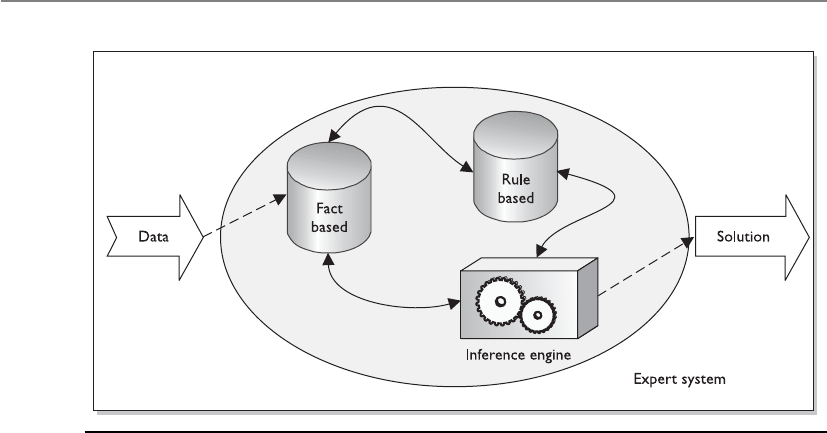
CISSP All-in-One Exam Guide
262
It is the inference engine that provides some artificial intelligence into this process.
An inference engine can infer new information from provided data by using inference
rules. To understand what inferring means in the first place, let’s look at the following:
Socrates is a man.
All men are mortals.
Thus, we can infer that Socrates is mortal. If you are asking, “What does this have to
do with a hill of beans?” just hold on to your hat—here we go.
Regular programming languages deal with the “black and white” of life. The answer
is either yes or no, not maybe this or maybe that. Although computers can carry out
complex computations at a much faster rate than humans, they have a harder time
guessing, or inferring, answers because they are very structured. The fifth-generation
programming languages (artificial intelligence languages) are capable of dealing with
the grayer areas of life and can attempt to infer the right solution from the provided
data.
So, in a rule-based IDS founded on an expert system, the IDS gathers data from a
sensor or log, and the inference engine uses its preprogrammed rules on it. If the char-
acteristics of the rules are met, an alert or solution is provided.
Figure 3-23 Rule-based IDS and expert system components

Chapter 3: Access Control
263
IDS Types
It is important to understand the characteristics that make the different types of
IDS technologies distinct. The following is a summary:
•Signature-based
• Pattern matching, similar to antivirus software
• Signatures must be continuously updated
• Cannot identify new attacks
• Two types:
•Pattern matching Compares packets to signatures
•Stateful matching Compares patterns to several activities
at once
•Anomaly-based
• Behavioral-based system that learns the “normal” activities of an
environment
• Can detect new attacks
• Also called behavior- or heuristic-based
• Three types:
•Statistical anomaly–based Creates a profile of “normal” and
compares activities to this profile
•Protocol anomaly–based Identifies protocols used outside of
their common bounds
•Traffic anomaly–based Identifies unusual activity in network
traffic
•Rule-based
• Use of IF/THEN rule-based programming within expert systems
• Use of an expert system allows for artificial intelligence characteristics
• The more complex the rules, the more demands on software and
hardware processing requirements
• Cannot detect new attacks

CISSP All-in-One Exam Guide
264
IDS Sensors
Network-based IDSs use sensors for monitoring purposes. A sensor, which works as an
analysis engine, is placed on the network segment the IDS is responsible for monitor-
ing. The sensor receives raw data from an event generator, as shown in Figure 3-24, and
Application-Based IDS
There are specialized IDS products that can monitor specific applications for ma-
licious activities. Since their scopes are very focused (only one application), they
can gather fine-grained and detailed activities. They can be used to capture very
specific application attack types, but it is important to realize that these product
types will miss more general operating system–based attacks because this is not
what they are programmed to detect.
It might be important to implement this type of IDS if a critical application is
carrying out encryption functions that would obfuscate its communication chan-
nels and activities from other types of IDS (host, network).
Figure 3-24 The basic architecture of an NIDS

Chapter 3: Access Control
265
compares it to a signature database, profile, or model, depending upon the type of IDS.
If there is some type of a match, which indicates suspicious activity, the sensor works
with the response module to determine what type of activity must take place (alerting
through instant messaging, paging, or by e-mail; carrying out firewall reconfiguration;
and so on). The sensor’s role is to filter received data, discard irrelevant information,
and detect suspicious activity.
A monitoring console monitors all sensors and supplies the network staff with an
overview of the activities of all the sensors in the network. These are the components
that enable network-based intrusion detection to actually work. Sensor placement is a
critical part of configuring an effective IDS. An organization can place a sensor outside
of the firewall to detect attacks and place a sensor inside the firewall (in the perimeter
network) to detect actual intrusions. Sensors should also be placed in highly sensitive
areas, DMZs, and on extranets. Figure 3-25 shows the sensors reporting their findings
to the central console.
The IDS can be centralized, as firewall products that have IDS functionality inte-
grated within them, or distributed, with multiple sensors throughout the network.
Network Traffic
If the network traffic volume exceeds the IDS system’s threshold, attacks may go unno-
ticed. Each vendor’s IDS product has its own threshold, and you should know and un-
derstand that threshold before you purchase and implement the IDS.
In very high-traffic environments, multiple sensors should be in place to ensure all
packets are investigated. If necessary to optimize network bandwidth and speed, differ-
ent sensors can be set up to analyze each packet for different signatures. That way, the
analysis load can be broken up over different points.
Intrusion Prevention Systems
An ounce of prevention does something good.
Response: Yeah, causes a single point of failure.
In the industry, there is constant frustration with the inability of existing products
to stop the bad guys from accessing and manipulating corporate assets. This has created
a market demand for vendors to get creative and come up with new, innovative tech-
nologies and new products for companies to purchase, implement, and still be frus-
trated with.
Switched Environments
NIDSs have a harder time working on a switched network, compared to tradi-
tional nonswitched environments, because data are transferred through indepen-
dent virtual circuits and not broadcasted, as in nonswitched environments. The
IDS sensor acts as a sniffer and does not have access to all the traffic in these in-
dividual circuits. So, we have to take all the data on each individual virtual private
connection, make a copy of them, and put the copies of the data on one port
(spanning port) where the sensor is located. This allows the sensor to have access
to all the data going back and forth on a switched network.

CISSP All-in-One Exam Guide
266
The next “big thing” in the IDS arena has been the intrusion prevention system (IPS).
The traditional IDS only detects that something bad may be taking place and sends an
alert. The goal of an IPS is to detect this activity and not allow the traffic to gain access
to the target in the first place, as shown in Figure 3-26. So, an IPS is a preventative and
proactive technology, whereas an IDS is a detective and after-the-fact technology.
IPS products can be host-based or network-based, just as IDS products. IPS technol-
ogy can be “content-based,” meaning that it makes decisions pertaining to what is
malicious and what is not based upon protocol analysis or signature matching capa-
bilities. An IPS technology can also use a rate-based metric, which focuses on the vol-
ume of traffic. The volume of network traffic increases in case of a flood attack (denial
of service) or when excessive systems scans take place. IPS rate-based metrics can also
be set to identify traffic flow anomalies, which could detect the “slow and low” stealth
attack types that attempt to “stay under the radar.”
Honeypot
Hey, curious, ill-willed, and destructive attackers, look at this shiny new vulnerable computer.
Ahoneypot is a computer set up as a sacrificial lamb on the network. The system is
not locked down and has open ports and services enabled. This is to entice a would-be
attacker to this computer instead of attacking authentic production systems on a net-
work. The honeypot contains no real company information, and thus will not be at risk
if and when it is attacked.
Figure 3-25 Sensors must be placed in each network segment to be monitored by the IDS.
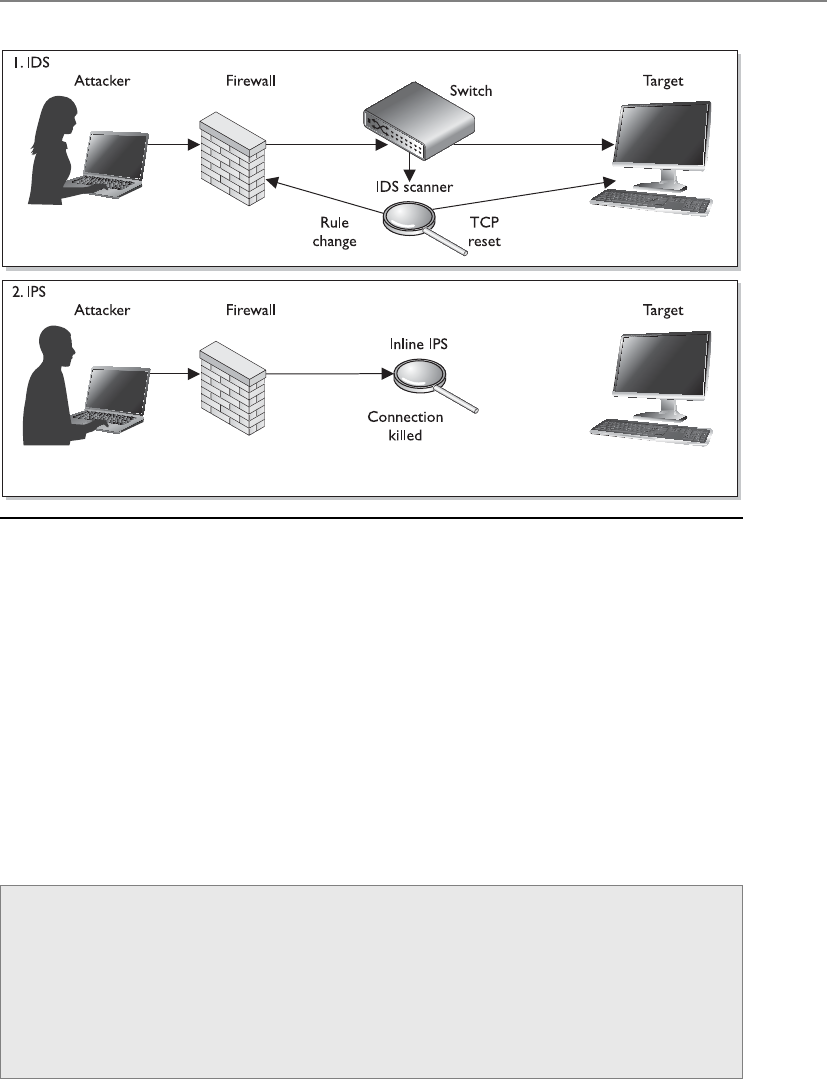
Chapter 3: Access Control
267
This enables the administrator to know when certain types of attacks are happening
so he can fortify the environment and perhaps track down the attacker. The longer the
hacker stays at the honeypot, the more information will be disclosed about her tech-
niques.
It is important to draw a line between enticement and entrapment when implement-
ing a honeypot system. Legal and liability issues surround each. If the system only has
open ports and services that an attacker might want to take advantage of, this would be
an example of enticement. If the system has a web page indicating the user can down-
load files, and once the user does this the administrator charges this user with trespass-
ing, it would be entrapment. Entrapment is where the intruder is induced or tricked
into committing a crime. Entrapment is illegal and cannot be used when charging an
individual with hacking or unauthorized activity.
Figure 3-26 IDS vs. IPS architecture
Intrusion Responses
Most IDSs and IPSs are capable of several types of response to a triggered event. An
IDS can send out a special signal to drop or kill the packet connections at both the
source and destinations. This effectively disconnects the communication and does
not allow traffic to be transmitted. An IDS might block a user from accessing a re-
source on a host system, if the threshold is set to trigger this response. An IDS can
send alerts of an event trigger to other hosts, IDS monitors, and administrators.

CISSP All-in-One Exam Guide
268
Network Sniffers
I think I smell a packet!
A packet or network sniffer is a general term for programs or devices able to exam-
ine traffic on a LAN segment. Traffic that is being transferred over a network medium is
transmitted as electrical signals, encoded in binary representation. The sniffer has to
have a protocol-analysis capability to recognize the different protocol values to prop-
erly interpret their meaning.
The sniffer has to have access to a network adapter that works in promiscuous mode
and a driver that captures the data. This data can be overwhelming, so they must be
properly filtered. The filtered data are stored in a buffer, and this information is dis-
played to a user and/or captured in logs. Some utilities have sniffer and packet-modifi-
cation capabilities, which is how some types of spoofing and man-in-the-middle attacks
are carried out.
Network sniffers are used by the people in the white hats (administrators and secu-
rity professionals) usually to try and track down a recent problem with the network. But
the guys in the black hats (attackers and crackers) can use them to learn about what
type of data is passed over a specific network segment and to modify data in an unau-
thorized manner. Black hats usually use sniffers to obtain credentials as they pass over
the network medium.
NOTE
NOTE Sniffers are dangerous and are very hard to detect and their activities
are difficult to audit.
NOTE
NOTE A sniffer is just a tool that can capture network traffic. If it has the
capability of understanding and interpreting individual protocols and their
associated data, this type of tool is referred to as a protocol analyzer.
Threats to Access Control
Who wants to hurt us and how are they going to do it?
As a majority of security professionals know, there is more risk and a higher prob-
ability of an attacker causing mayhem from within an organization than from outside
it. However, many people within organizations do not know this fact, because they
only hear stories about the outside attackers who defaced a web server or circumvented
a firewall to access confidential information.
An attacker from the outside can enter through remote access entry points, enter
through firewalls and web servers, physically break in, carry out social engineering at-
tacks, or exploit a partner communication path (extranet, vendor connection, and so
on). An insider has legitimate reasons for using the systems and resources, but can
misuse his privileges and launch an actual attack also. The danger of insiders is that
they have already been given a wide range of access that a hacker would have to work
to obtain; they probably have intimate knowledge of the environment; and, generally,

Chapter 3: Access Control
269
they are trusted. We have discussed many different types of access control mechanisms
that work to keep the outsiders outside and restrict insiders’ abilities to a minimum and
audit their actions. Now we will look at some specific attacks commonly carried out in
environments today by insiders or outsiders.
Dictionary Attack
Several programs can enable an attacker (or proactive administrator) to identify user
credentials. This type of program is fed lists (dictionaries) of commonly used words or
combinations of characters, and then compares these values to capture passwords. In
other words, the program hashes the dictionary words and compares the resulting mes-
sage digest with the system password file that also stores its passwords in a one-way
hashed format. If the hashed values match, it means a password has just been uncov-
ered. Once the right combination of characters is identified, the attacker can use this
password to authenticate herself as a legitimate user. Because many systems have a
threshold that dictates how many failed logon attempts are acceptable, the same type
of activity can happen to a captured password file. The dictionary-attack program hash-
es the combination of characters and compares it to the hashed entries in the password
file. If a match is found, the program has uncovered a password.
The dictionaries come with the password-cracking programs, and extra dictionaries
can be found on several sites on the Internet.
NOTE
NOTE Passwords should never be transmitted or stored in cleartext.
Most operating systems and applications put the passwords through hashing
algorithms, which result in hash values, also referred to as message digest
values.
Countermeasures
To properly protect an environment against dictionary and other password attacks, the
following practices should be followed:
• Do not allow passwords to be sent in cleartext.
• Encrypt the passwords with encryption algorithms or hashing functions.
• Employ one-time password tokens.
• Use hard-to-guess passwords.
• Rotate passwords frequently.
• Employ an IDS to detect suspicious behavior.
• Use dictionary-cracking tools to find weak passwords chosen by users.
• Use special characters, numbers, and upper- and lowercase letters within the
password.
• Protect password files.

CISSP All-in-One Exam Guide
270
Brute Force Attacks
I will try over and over until you are defeated.
Several types of brute force attacks can be implemented, but each continually tries
different inputs to achieve a predefined goal. Brute force is defined as “trying every pos-
sible combination until the correct one is identified.” So in a brute force password at-
tack, the software tool will see if the first letter is an “a” and continue through the
alphabet until that single value is uncovered. Then the tool moves on to the second
value, and so on.
The most effective way to uncover passwords is through a hybrid attack, which com-
bines a dictionary attack and a brute force attack. If a dictionary tool has found that a
user’s password starts with Dallas, then the brute force tool will try Dallas1, Dallas01,
Dallasa1, and so on until a successful logon credential is uncovered. (A brute force at-
tack is also known as an exhaustive attack.)
These attacks are also used in war dialing efforts, in which the war dialer inserts a
long list of phone numbers into a war dialing program in hopes of finding a modem
that can be exploited to gain unauthorized access. A program is used to dial many
phone numbers and weed out the numbers used for voice calls and fax machine ser-
vices. The attacker usually ends up with a handful of numbers he can now try to exploit
to gain access into a system or network.
So, a brute force attack perpetuates a specific activity with different input parame-
ters until the goal is achieved.
Countermeasures
For phone brute force attacks, auditing and monitoring of this type of activity should
be in place to uncover patterns that could indicate a war dialing attack:
• Perform brute force attacks to find weaknesses and hanging modems.
• Make sure only necessary phone numbers are made public.
• Provide stringent access control methods that would make brute force attacks
less successful.
• Monitor and audit for such activity.
• Employ an IDS to watch for suspicious activity.
• Set lockout thresholds.
Spoofing at Logon
So, what are your credentials again?
An attacker can use a program that presents to the user a fake logon screen, which
often tricks the user into attempting to log on. The user is asked for a username and
password, which are stored for the attacker to access at a later time. The user does not
know this is not his usual logon screen because they look exactly the same. A fake error
message can appear, indicating that the user mistyped his credentials. At this point, the
fake logon program exits and hands control over to the operating system, which prompts
the user for a username and password. The user assumes he mistyped his information
and doesn’t give it a second thought, but an attacker now knows the user’s credentials.

Chapter 3: Access Control
271
Phishing and Pharming
Hello, this is your bank. Hand over your SSN, credit card number, and your shoe size.
Response: Okay, that sounds honest enough.
Phishing is a type of social engineering with the goal of obtaining personal informa-
tion, credentials, credit card number, or financial data. The attackers lure, or fish, for
sensitive data through various different methods.
The term phishing was coined in 1996 when hackers started stealing America Online
(AOL) passwords. The hackers would pose as AOL staff members and send messages to
victims asking them for their passwords in order to verify correct billing information or
verify information about the AOL accounts. Once the password was provided, the hack-
er authenticated as that victim and used his e-mail account for criminal purposes, as in
spamming, pornography, and so on.
Although phishing has been around since the 1990s, many people did not fully
become aware of it until mid-2003 when these types of attacks spiked. Phishers created
convincing e-mails requesting potential victims to click a link to update their bank ac-
count information.
Victims click these links and are presented with a form requesting bank account
numbers, Social Security numbers, credentials, and other types of data that can be used
in identity theft crimes. These types of phishing e-mail scams have increased dramati-
cally in recent years with some phishers masquerading as large banking companies,
PayPal, eBay, Amazon.com, and other well-known Internet entities.
Phishers also create web sites that look very similar to legitimate sites and lure vic-
tims to them through e-mail messages and other web sites to gain the same type of in-
formation. Some sites require the victims to provide their Social Security numbers, date
of birth, and mother’s maiden name for authentication purposes before they can up-
date their account information.
The nefarious web sites not only have the look and feel of the legitimate web site,
but attackers would provide URLs with domain names that look very similar to the le-
gitimate site’s address. For example, www.amazon.com might become www.amzaon.
com. Or use a specially placed @ symbol. For example, www.msn.com@notmsn.com
would actually take the victim to the web site notmsn.com and provide the username
of www.msn.com to this web site. The username www.msn.com would not be a valid
username for notmsn.com, so the victim would just be shown the home page of not-
msn.com. Now, notmsn.com is a nefarious site and created to look and feel just like
www.msn.com. The victim feels comfortable he is at a legitimate site and logs on with
his credentials.
Some JavaScript commands are even designed to show the victim an incorrect web
address. So let’s say Bob is a suspicious and vigilant kind of a guy. Before he inputs his
username and password to authenticate and gain access to his online bank account, he
always checks the URL values in the address bar of his browser. Even though he closely
inspects it to make sure he is not getting duped, there could be a JavaScript replacing
the URL www.evilandwilltakeallyourmoney.com with www.citibank.com so he thinks
things are safe and life is good.

CISSP All-in-One Exam Guide
272
NOTE
NOTE There have been fixes to the previously mentioned attack dealing with
URLs, but it is important to know that attackers will continually come up with
new ways of carrying out these attacks. Just knowing about phishing doesn’t
mean you can properly detect or prevent it. As a security professional, you
must keep up with the new and tricky strategies deployed by attackers.
Some attacks use pop-up forms when a victim is at a legitimate site. So if you were
at your bank’s actual web site and a pop-up window appeared asking you for some
sensitive information, this probably wouldn’t worry you since you were communicat-
ing with your actual bank’s web site. You may believe the window came from your
bank’s web server, so you fill it out as instructed. Unfortunately, this pop-up window
could be from another source entirely, and your data could be placed right in the at-
tacker’s hands, not your bank’s.
With this personal information, phishers can create new accounts in the victim’s
name, gain authorized access to bank accounts, and make illegal credit card purchases
or cash advances.
As more people have become aware of these types of attacks and grown wary of
clicking embedded links in e-mail messages, phishers have varied their attack methods.
For instance, they began sending e-mails that indicate to the user that they have won a
prize or that there is a problem with a financial account. The e-mail instructs the person
to call a number, which has an automated voice asking the victim to type in their
credit card number or Social Security number for authentication purposes.
As phishing attacks increase and more people have become victims of fraud, finan-
cial institutions have been implementing two-factor authentication for online transac-
tions. To meet this need, some banks provided their customers with token devices that
created one-time passwords. Countering, phishers set up fake web sites that looked like
the financial institution, duping victims into typing their one-time passwords. The web
sites would then send these credentials to the actual bank web site, authenticate as this
user, and gain access to their account.
A similar type of attack is called pharming, which redirects a victim to a seemingly
legitimate, yet fake, web site. In this type of attack, the attacker carries out something
called DNS poisoning, in which a DNS server resolves a host name into an incorrect IP
address. When you type www.logicalsecurity.com into the address bar of your web
Spear-phishing
When a phishing attack is crafted to trick a specific target and not a large generic
group of people, this is referred to as a spear-phishing attack. If someone knows
about your specific likes, political motives, shopping habits, etc., the attacker can
craft an attack that is directed only at you. For example, if an attacker sends you a
spoofed e-mail that seems to have come from your mother with the subject line
of “Emily’s Birthday Pictures” and an e-mail attachment, you will most likely
think it came from your mother and open the file, which will then infect your
system. These specialized attacks take more time for the hacker to craft because
unique information has to be gathered about the target, but they are more suc-
cessful because they are more convincing.

Chapter 3: Access Control
273
browser, your computer really has no idea what these data are. So an internal request is
made to review your TCP/IP network setting, which contains the IP address of the DNS
server your computer is supposed to use. Your system then sends a request to this
DNS server basically asking, “Do you have the IP address for www.logicalsecurity.com?”
The DNS server reviews its resource records and if it has one with this information in it,
it sends the IP address for the server that is hosting www.logicalsecurity.com to your
computer. Your browser then shows the home page of this web site you requested.
Now, what if an attacker poisoned this DNS server so the resource record has the
wrong information? When you type in www.logicalsecurity.com and your system sends
a request to the DNS server, the DNS server will send your system the IP address that it
has recorded, not knowing it is incorrect. So instead of going to www.logicalsecurity.
com, you are sent to www.bigbooty.com. This could make you happy or sad, depending
upon your interests, but you are not at the site you requested.
So, let’s say the victim types in a web address of www.nicebank.com, as illustrated
in Figure 3-27. The victim’s system sends a request to a poisoned DNS server, which
points the victim to a different web site. This different web site looks and feels just like
the requested web site, so the user enters his username and password and may even be
presented with web pages that look legitimate.
The benefit of a pharming attack to the attacker is that it can affect a large amount
of victims without the need for sending out e-mails, and the victims usually fall for this
more easily since they are requesting to go to a web site themselves.
Countermeasures to phishing attacks include the following:
• Be skeptical of e-mails indicating you must make changes to your accounts,
or warnings stating an account will be terminated if you don’t perform some
online activity.
• Call the legitimate company to find out if this is a fraudulent message.
• Review the address bar to see if the domain name is correct.
• When submitting any type of financial information or credential data, an SSL
connection should be set up, which is indicated in the address bar (https://)
and a closed-padlock icon in the browser at the bottom-right corner.
• Do not click an HTML link within an e-mail. Type the URL out manually
instead.
• Do not accept e-mail in HTML format.
Threat Modeling
In reality most attacks that take place are attacks on some type of access control. This is
because in most situations the bad guy wants access to something he is not supposed
to have (i.e., Social Security numbers, financial data, sensitive information, etc.) What
makes it very difficult for the security professional is that there are usually a hundred
different ways the bad guy can get to this data and each entry point has to be secured.
But before each entry point can be secured and attack vector addressed, they first have
to be identified.
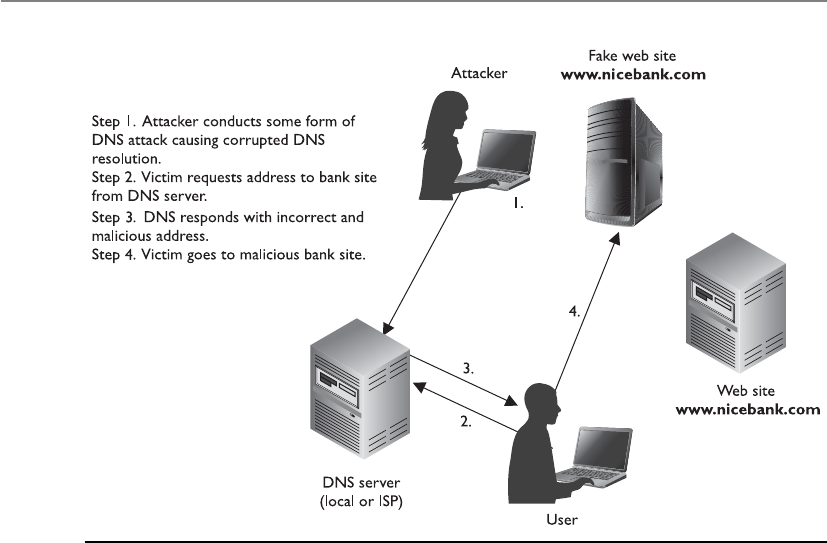
CISSP All-in-One Exam Guide
274
Assessing security issues can take place from two different views. If a vulnerability
analysis is carried out, this means the organization is looking for all the holes that a bad
guy could somehow exploit and enter. A vulnerability analysis could be carried out by
scanning systems and identifying missing patches, misconfigured settings, orphaned
user accounts, programming code mistakes, etc. It is like looking for all the cracks in a
wall that need to be filled. Threat modeling is a structured approach to identifying po-
tential threats that could exploit vulnerabilities. A threat modeling approach looks at
who would most likely want to attack us and how could they successfully do this. In-
stead of being heads-down and focusing on the cracks in one wall, we are looking
outward and trying to figure out all the ways our structure could be attacked (through
windows, doors, bombs, imposters, etc.).
If you ran a vulnerability scanner on one system that stores sensitive data, you
would probably come up with a list of things that should be fixed (directory permis-
sion setting, registry entry, missing patch, unnecessary service). Once you fix all of these
things, you might feel good about yourself and assume the sensitive data are now safe.
But life is not that simple. What about the following items?
• How is this system connected to other systems?
• Are the sensitive data encrypted while in storage and transit?
• Who has access to this system?
• Can someone physically steal this system?
• Can someone insert a USB device and extract the data?
• What are the vectors that malware can be installed on the system?
Figure 3-27 Pharming has been a common attack over the last couple of years.

Chapter 3: Access Control
275
• Is this system protected in case of a disaster?
• Can an authorized user make unauthorized changes to this system or data?
• Could an authorized user be social engineered into allowing unauthorized
access?
• Are there any access channels that are not auditable?
• Could any authentication steps be bypassed?
So to follow our analogy, you could fill all the cracks in the one wall you are focus-
ing on and the bad guy could just enter the facility through the door you forgot to lock.
You have to think about all the ways an asset could be attacked if you are really going
to secure it.
Threat modeling is a process of identifying the threats that could negatively affect
an asset and the attack vectors they would use to achieve their goals. Figure 3-28 illus-
trates a threat modeling tree that steps through issues that need to be addressed if an
organization is going to store sensitive data in a cloud environment.
If you think about who would want to attack you, you can then brainstorm on how
they could potentially accomplish their goal and put countermeasures in place to
thwart these types of attacks.
We will cover threat modeling more in-depth in Chapter 10 because it is becoming
a common approach to architecting software, but it is important to realize that security
should be analyzed from two points of view. A vulnerability analysis looks within, and
a threat modeling approach looks outward. Threat modeling works at a higher abstrac-
tion level, and vulnerability analysis works at a lower detail-oriented level. Both need
to be carried out and their results merged so that all risks can be understood and prop-
erly addressed. As an analogy, if I focused on making my body healthy by eating right,
working out, and keeping my cholesterol down, I am focusing internally, which is great.
But if I don’t pick up my head and look around my environment, I could be standing
right in the middle of a street and get hit by a bus. Then my unclogged arteries and low
body fat ratio really do not matter.
Identity Theft
I’m glad someone stole my identity. I’m tired of being me.
Identity theft refers to a situation where someone obtains key pieces of personal
information, such as a driver’s license number, bank account number, credentials, or
Social Security number, and then uses that information to impersonate someone else.
Typically, identity thieves will use the personal information to obtain credit, merchan-
dise, services in the name of the victim, or false credentials for the thief. This can result
in such things as ruining the victim’s credit rating, generating false criminal records,
and issuing arrest warrants for the wrong individuals. Identity theft is categorized in
two ways: true name and account takeover. True-name identity theft means the thief
uses personal information to open new accounts. The thief might open a new credit
card account, establish cellular phone service, or open a new checking account in order
to obtain blank checks. Account-takeover identity theft means the imposter uses per-
sonal information to gain access to the person’s existing accounts. Typically, the thief

CISSP All-in-One Exam Guide
276
Threat 1
Unauthorized access
to sensitive data
1.1.1.1
Misconfiguration
1.1
Unauthorized
access
1.2
Data
intelligible
1.1.1
Accidentally
compromised
1.1.1.2
Cloud
infrastructure
enforcement
failure
1.1.1.3
H/W repair
takes data out of
data center
1.1.2.1
Inside job
(business)
1.1.2.2
Inside job
(data center)
1.1.2.3
Data in
transmission
observed
1.2.1
Data not
encrypted
1.2.2
Encryption key
uncovered
1.1.2
Deliberately
compromised
Figure 3-28 Threat modeling

Chapter 3: Access Control
277
will change the mailing address on an account and run up a huge bill before the per-
son, whose identity has been stolen, realizes there is a problem. The Internet has made
it easier for an identity thief to use the information they’ve stolen because transactions
can be made without any personal interaction.
Summary
Access controls are security features that are usually considered the first line of defense
in asset protection. They are used to dictate how subjects access objects, and their main
goal is to protect the objects from unauthorized access. These controls can be adminis-
trative, physical, or technical in nature and should be applied in a layered approach,
ensuring that an intruder would have to compromise more than one countermeasure
to access critical assets.
Access control defines how users should be identified, authenticated, and autho-
rized. These issues are carried out differently in different access control models and
technologies, and it is up to the organization to determine which best fits its business
and security needs.
Access control needs to be integrated into the core of operating systems through the
use of DAC, MAC, and RBAC models. It needs to be embedded into applications, net-
work devices, and protocols, and enforced in the physical world through the use of se-
curity zones, network segmentation, locked doors, and security guards. Security is all
about keeping the bad guys out and unfortunately there are many different types of
“doorways” they can exploit to get access to our most critical assets.
Quick Tips
• Access is a flow of information between a subject and an object.
• A subject is an active entity that requests access to an object, which is a passive
entity.
• A subject can be a user, program, or process.
• Some security mechanisms that provide confidentiality are encryption, logical
and physical access control, transmission protocols, database views, and
controlled traffic flow.
• Identity management solutions include directories, web access management,
password management, legacy single sign-on, account management, and
profile update.
• Password synchronization reduces the complexity of keeping up with different
passwords for different systems.
• Self-service password reset reduces help-desk call volumes by allowing users to
reset their own passwords.

CISSP All-in-One Exam Guide
278
• Assisted password reset reduces the resolution process for password issues for
the help-desk department.
• IdM directories contain all resource information, users’ attributes, authorization
profiles, roles, and possibly access control policies so other IdM applications
have one centralized resource from which to gather this information.
• An automated workflow component is common in account management
products that provide IdM solutions.
• User provisioning refers to the creation, maintenance, and deactivation of
user objects and attributes, as they exist in one or more systems, directories,
or applications.
• The HR database is usually considered the authoritative source for user
identities because that is where it is first developed and properly maintained.
• There are three main access control models: discretionary, mandatory, and
role-based.
• Discretionary access control (DAC) enables data owners to dictate what
subjects have access to the files and resources they own.
• The mandatory access control (MAC) model uses a security label system.
Users have clearances, and resources have security labels that contain data
classifications. MAC systems compare these two attributes to determine access
control capabilities.
• Role-based access control is based on the user’s role and responsibilities
(tasks) within the company.
• Three main types of restricted interface measurements exist: menus and shells,
database views, and physically constrained interfaces.
• Access control lists are bound to objects and indicate what subjects can
use them.
• A capability table is bound to a subject and lists what objects it can access.
• Access control can be administered in two main ways: centralized and
decentralized.
• Some examples of centralized administration access control technologies are
RADIUS, TACACS+, and Diameter.
• A decentralized administration example is a peer-to-peer working group.
• Examples of administrative controls are a security policy, personnel controls,
supervisory structure, security-awareness training, and testing.
• Examples of physical controls are network segregation, perimeter security,
computer controls, work area separation, and cable.

Chapter 3: Access Control
279
• Examples of technical controls are system access, network architecture,
network access, encryption and protocols, and auditing.
• For a subject to be able to access a resource, it must be identified,
authenticated, and authorized, and should be held accountable for its actions.
• Authentication can be accomplished by biometrics, a password, a passphrase,
a cognitive password, a one-time password, or a token.
• A Type I error in biometrics means the system rejected an authorized
individual, and a Type II error means an imposter was authenticated.
• A memory card cannot process information, but a smart card can through the
use of integrated circuits and processors.
• Least-privilege and need-to-know principles limit users’ rights to only what is
needed to perform tasks of their job.
• Single sign-on capabilities can be accomplished through Kerberos, SESAME,
domains, and thin clients.
• The Kerberos user receives a ticket granting ticket (TGT), which allows him to
request access to resources through the ticket granting service (TGS). The TGS
generates a new ticket with the session keys.
• Types of access control attacks include denial of service, spoofing, dictionary,
brute force, and war dialing.
• Keystroke monitoring is a type of auditing that tracks each keystroke made by
a user.
• Object reuse can unintentionally disclose information by assigning media to a
subject before it is properly erased.
• Just removing pointers to files (deleting file, formatting hard drive) is not
always enough protection for proper object reuse.
• Information can be obtained via electrical signals in airwaves. The ways to
combat this type of intrusion are TEMPEST, white noise, and control zones.
• User authentication is accomplished by what someone knows, is, or has.
• One-time password-generating token devices can use synchronous (time,
event) or asynchronous (challenge-based) methods.
• Strong authentication requires two of the three user authentication attributes
(what someone knows, is, or has).
• The following are weaknesses of Kerberos: the KDC is a single point of failure;
it is susceptible to password guessing; session and secret keys are locally stored;
KDC needs to always be available; and there must be management of secret keys.

CISSP All-in-One Exam Guide
280
• Phishing is a type of social engineering with the goal of obtaining personal
information, credentials, credit card numbers, or financial data.
• A race condition is possible when two or more processes use a shared resource
and the access steps could take place out of sequence
• Mutual authentication is when two entities must authenticate to each other
before sending data back and forth. Also referred to as two-way authentication.
• A directory service is a software component that stores, organizes, and
provides access to resources, which are listed in a directory (listing) of
resources. Individual resources are assigned names within a namespace.
• A cookie is data that are held permanently on a hard drive in the format of
a text file or held temporarily in memory. It can be used to store browsing
habits, authentication data, or protocol state information.
• A federated identity is a portable identity, and its associated entitlements, that
can be used across business boundaries without the need to synchronize or
consolidate directory information.
• Extensible Markup Language (XML) is a set of rules for encoding documents
in machine-readable form to allow for interoperability between various web-
based technologies.
• Service Provisioning Markup Language (SPML) is an XML-based framework,
being developed by OASIS, for exchanging user, resource, and service
provisioning information between cooperating organizations.
• eXtensible Access Control Markup Language (XACML) a declarative access
control policy language implemented in XML and a processing model,
describes how to interpret security policies.
• Replay attack is a form of network attack in which a valid data transmission is
maliciously or fraudulently repeated with the goal of obtaining unauthorized
access.
• Clipping level is a threshold value. Once a threshold value is passed, the
activity is considered to be an event that is logged, investigated, or both.
• Rainbow table is a set of precomputed hash values that represent password
combinations. These are used in password attack processes and usually
produce results more quickly than dictionary or brute force attacks.
• Cognitive passwords are fact- or opinion-based information used to verify an
individual’s identity.
• Smart cards can require physical interaction with a reader (contact) or no
physical interaction with the reader (contactless architectures). Two contactless
architectures are combi (one chip) and hybrid (two chips).

Chapter 3: Access Control
281
• A side channel attack is carried out by gathering data pertaining to how
something works and using that data to attack it or crack it, as in differential
power analysis or electromagnetic analysis.
• Authorization creep takes place when a user gains too much access rights and
permissions over time.
• SESAME is a single sign-on technology developed to address issues in
Kerberos. It is based upon public key cryptography (asymmetric) and uses
privileged attribute servers and certificates.
• Security information and event management implements data mining and
analysis functionality to be carried out on centralized logs for situational
awareness capabilities.
• Intrusion detection systems are either host or network based and provide
behavioral (statistical) or signature (knowledge) types of functionality.
• Phishing is a type of social engineering attack. If it is crafted for a specific
individual, it is called spear-phishing. If a DNS server is poisoned and points
users to a malicious website, this is referred to as pharming.
• A web portal is commonly made up of portlets, which are pluggable user
interface software components that present information and services from
other systems.
• The Service Provisioning Markup Language (SPML) allows for the automation
of user management (account creation, amendments, revocation) and access
entitlement configuration related to electronically published services across
multiple provisioning systems.
• The Security Assertion Markup Language (SAML) allows for the exchange of
authentication and authorization data to be shared between security domains.
• The Simple Object Access Protocol (SOAP) is a protocol specification for
exchanging structured information in the implementation of web services and
networked environments.
• Service oriented architecture (SOA) environments allow for a suite of
interoperable services to be used within multiple, separate systems from
several business domains.
• Radio-frequency identification (RFID) is a technology that provides data
communication through the use of radio waves.
• Threat modeling identifies potential threats and attack vectors. Vulnerability
analysis identifies weaknesses and lack of countermeasures.

CISSP All-in-One Exam Guide
282
Questions
Please remember that these questions are formatted and asked in a certain way for a
reason. Remember that the CISSP exam is asking questions at a conceptual level. Ques-
tions may not always have the perfect answer, and the candidate is advised against al-
ways looking for the perfect answer. Instead, the candidate should look for the best
answer in the list.
1. Which of the following statements correctly describes biometric methods?
A. They are the least expensive and provide the most protection.
B. They are the most expensive and provide the least protection.
C. They are the least expensive and provide the least protection.
D. They are the most expensive and provide the most protection.
2. Which of the following statements correctly describes passwords?
A. They are the least expensive and most secure.
B. They are the most expensive and least secure.
C. They are the least expensive and least secure.
D. They are the most expensive and most secure.
3. How is a challenge/response protocol utilized with token device
implementations?
A. This protocol is not used; cryptography is used.
B. An authentication service generates a challenge, and the smart token
generates a response based on the challenge.
C. The token challenges the user for a username and password.
D. The token challenges the user’s password against a database of stored
credentials.
4. Which access control method is considered user-directed?
A. Nondiscretionary
B. Mandatory
C. Identity-based
D. Discretionary
5. Which item is not part of a Kerberos authentication implementation?
A. Message authentication code
B. Ticket granting service
C. Authentication service
D. Users, programs, and services

Chapter 3: Access Control
283
6. If a company has a high turnover rate, which access control structure is best?
A. Role-based
B. Decentralized
C. Rule-based
D. Discretionary
7. The process of mutual authentication involves _______________.
A. A user authenticating to a system and the system authenticating to the user
B. A user authenticating to two systems at the same time
C. A user authenticating to a server and then to a process
D. A user authenticating, receiving a ticket, and then authenticating to a service
8. In discretionary access control security, who has delegation authority to grant
access to data?
A. User
B. Security officer
C. Security policy
D. Owner
9. Which could be considered a single point of failure within a single sign-on
implementation?
A. Authentication server
B. User’s workstation
C. Logon credentials
D. RADIUS
10. What role does biometrics play in access control?
A. Authorization
B. Authenticity
C. Authentication
D. Accountability
11. What determines if an organization is going to operate under a discretionary,
mandatory, or nondiscretionary access control model?
A. Administrator
B. Security policy
C. Culture
D. Security levels

CISSP All-in-One Exam Guide
284
12. Which of the following best describes what role-based access control offers
companies in reducing administrative burdens?
A. It allows entities closer to the resources to make decisions about who can
and cannot access resources.
B. It provides a centralized approach for access control, which frees up
department managers.
C. User membership in roles can be easily revoked and new ones established
as job assignments dictate.
D. It enforces enterprise-wide security policies, standards, and guidelines.
13. Which of the following is the best description of directories that are used in
identity management technology?
A. Most are hierarchical and follow the X.500 standard.
B. Most have a flat architecture and follow the X.400 standard.
C. Most have moved away from LDAP.
D. Many use LDA.
14. Which of the following is not part of user provisioning?
A. Creation and deactivation of user accounts
B. Business process implementation
C. Maintenance and deactivation of user objects and attributes
D. Delegating user administration
15. What is the technology that allows a user to remember just one password?
A. Password generation
B. Password dictionaries
C. Password rainbow tables
D. Password synchronization
16. Which of the following is not considered an anomaly-based intrusion
protection system?
A. Statistical anomaly–based
B. Protocol anomaly–based
C. Temporal anomaly–based
D. Traffic anomaly–based
17. The next graphic covers which of the following:

Chapter 3: Access Control
285
A. Crossover error rate
B. Identity verification
C. Authorization rates
D. Authentication error rates
18. The diagram shown next explains which of the following concepts:
A. Crossover error rate.
B. Type III errors.
C. FAR equals FRR in systems that have a high crossover error rate.
D. Biometrics is a high acceptance technology.

CISSP All-in-One Exam Guide
286
19. The graphic shown here illustrates how which of the following works:
A. Rainbow tables
B. Dictionary attack
C. One-time password
D. Strong authentication
20. Which of the following has the correct definition mapping?
i. Brute force attacks Performed with tools that cycle through many
possible character, number, and symbol combinations to uncover a
password.
ii. Dictionary attacks Files of thousands of words are compared to the user’s
password until a match is found.
iii. Social engineering An attacker falsely convinces an individual that she
has the necessary authorization to access specific resources.
iv. Rainbow table An attacker uses a table that contains all possible
passwords already in a hash format.
A. i, ii
B. i, ii, iv
C. i, ii, iii, iv
D. i, ii, iii
21. George is responsible for setting and tuning the thresholds for his company’s
behavior-based IDS. Which of the following outlines the possibilities of not
doing this activity properly?

Chapter 3: Access Control
287
A. If the threshold is set too low, nonintrusive activities are considered attacks
(false positives). If the threshold is set too high, then malicious activities
are not identified (false negatives).
B. If the threshold is set too low, nonintrusive activities are considered attacks
(false negatives). If the threshold is set too high, then malicious activities
are not identified (false positives).
C. If the threshold is set too high, nonintrusive activities are considered
attacks (false positives). If the threshold is set too low, then malicious
activities are not identified (false negatives).
D. If the threshold is set too high, nonintrusive activities are considered
attacks (false positives). If the threshold is set too high, then malicious
activities are not identified (false negatives).
Use the following scenario to answer Questions 22–24.Tom is a new security manager for a
retail company, which currently has an identity management system (IdM) in place.
The data within the various identity stores update more quickly than the current IDM
software can keep up with, so some access decisions are made based upon obsolete
information. While the IDM currently provides centralized access control of internal
network assets, it is not tied into the web-based access control components that are
embedded within the company’s partner portals. Tom also notices that help-desk tech-
nicians are spending too much time resetting passwords for internal employees.
22. Which of the following changes would be best for Tom’s team to implement?
A. Move from namespaces to distinguished names.
B. Move from meta-directories to virtual directories.
C. Move from RADIUS to TACACS+.
D. Move from a centralized to a decentralized control model.
23. Which of the following components should Tom make sure his team puts
into place?
A. Single sign-on module
B. LDAP directory service synchronization
C. Web access management
D. X.500 database
24. Tom has been told that he has to reduce staff from the help-desk team.
Which of the following technologies can help with the company’s help-desk
budgetary issues?
A. Self-service password support
B. RADIUS implementation
C. Reduction of authoritative IdM sources
D. Implement a role-based access control model

CISSP All-in-One Exam Guide
288
Use the following scenario to answer Questions 25–27. Lenny is a new security manager for
a retail company that is expanding its functionality to its partners and customers. The
company’s CEO wants to allow its partners’ customers to be able to purchase items
through their web stores as easily as possible. The CEO also wants the company’s part-
ners to be able to manage inventory across companies more easily. The CEO wants to
be able to understand the network traffic and activities in a holistic manner, and he
wants to know from Lenny what type of technology should be put into place to allow
for a more proactive approach to stopping malicious traffic if it enters the network. The
company is a high-profile entity constantly dealing with zero-day attacks.
25. Which of the following is the best identity management technology that Lenny
should consider implementing to accomplish some of the company’s needs?
A. LDAP directories for authoritative sources
B. Digital identity provisioning
C. Active Directory
D. Federated identity
26. Lenny has a meeting with the internal software developers who are responsible
for implementing the necessary functionality within the web-based system.
Which of the following best describes the two items that Lenny needs to be
prepared to discuss with this team?
A. Service Provisioning Markup Language and the eXtensible Access Control
Markup Language
B. Standard Generalized Markup Language and the Generalized Markup
Language
C. Extensible Markup Language and the HyperText Markup Language
D. Service Provisioning Markup Language and the Generalized Markup
Language
27. Pertaining to the CEO’s security concerns, what should Lenny suggest the
company put into place?
A. Security event management software, intrusion prevention system, and
behavior-based intrusion detection
B. Security information and event management software, intrusion detection
system, and signature-based protection
C. Intrusion prevention system, security event management software, and
malware protection
D. Intrusion prevention system, security event management software, and war
dialing protection
Use the following scenario to answer Questions 28–29. Robbie is the security administrator
of a company that needs to extend its remote access functionality. Employees travel
around the world, but still need to be able to gain access to corporate assets as in data-
bases, servers, and network-based devices. Also, while the company has had a VoIP

Chapter 3: Access Control
289
telephony solution in place for two years, it has not been integrated into a centralized
access control solution. Currently the network administrators have to maintain access
control separately for internal resources, external entities, and VoIP end systems. Rob-
bie has also been asked to look into some specious e-mails that the CIO’s secretary has
been receiving, and her boss has asked her to remove some old modems that are no
longer being used for remote dial-in purposes.
28. Which of the following is the best remote access technology for this situation?
A. RADIUS
B. TACAS+
C. Diameter
D. Kerberos
29. What are the two main security concerns Robbie is most likely being asked to
identify and mitigate?
A. Social engineering and spear-phishing
B. War dialing and pharming
C. Spear-phishing and war dialing
D. Pharming and spear-phishing
Use the following scenario to answer Questions 30–32. Tanya is working with the company’s
internal software development team. Before a user of an application can access files lo-
cated on the company’s centralized server, the user must present a valid one-time pass-
word, which is generated through a challenge-response mechanism. The company needs
to tighten access control for these files and reduce the number of users who can access
each and every file. The company is looking to Tanya and her team for solutions to better
protect the data that have been classified and deemed critical to the company’s missions.
Tanya has also been asked to implement a single sign-on technology for all internal us-
ers, but she does not have the budget to implement a public key infrastructure.
30. Which of the following best describes what is currently in place?
A. Capability-based access system
B. Synchronous tokens that generate one-time passwords
C. RADIUS
D. Kerberos
31. Which of the following is one of the easiest and best items Tanya can look
into for proper data protection?
A. Implementation of mandatory access control
B. Implementation of access control lists
C. Implementation of digital signatures
D. Implementation of multilevel security

CISSP All-in-One Exam Guide
290
32. Which of the following is the best single sign-on technology for this situation?
A. SESAME
B. Kerberos
C. RADIUS
D. TACACS+
Use the following scenario to answer Questions 33–35. Harry is overseeing a team that has
to integrate various business services provided by different company departments into
one web portal for both internal employees and external partners. His company has a
diverse and heterogeneous environment with different types of systems providing cus-
tomer relationship management, inventory control, e-mail, and help-desk ticketing ca-
pabilities. His team needs to allow different users access to these different services in a
secure manner.
33. Which of the following best describes the type of environment Harry’s team
needs to set up?
A. RADIUS
B. Service oriented architecture
C. Public key infrastructure
D. Web services
34. Which of the following best describes the types of languages and/or protocols
that Harry needs to ensure are implemented?
A. Security Assertion Markup Language, Extensible Access Control Markup
Language, Service Provisioning Markup Language
B. Service Provisioning Markup Language,Simple Object Access Protocol,
Extensible Access Control Markup Language
C. Extensible Access Control Markup Language, Security Assertion Markup
Language, Simple Object Access Protocol
D. Service Provisioning Markup Language, Security Association Markup
Language
35. The company’s partners need to integrate compatible authentication
functionality into their web portals to allow for interoperability across the
different company boundaries. Which of the following will deal with this
issue?
A. Service Provisioning Markup Language
B. Simple Object Access Protocol
C. Extensible Access Control Markup Language
D. Security Assertion Markup Language

Chapter 3: Access Control
291
Answers
1. D. Compared with the other available authentication mechanisms, biometric
methods provide the highest level of protection and are the most expensive.
2. C. Passwords provide the least amount of protection, but are the cheapest
because they do not require extra readers (as with smart cards and memory
cards), do not require devices (as do biometrics), and do not require a lot of
overhead in processing (as in cryptography). Passwords are the most common
type of authentication method used today.
3. B. An asynchronous token device is based on challenge/response mechanisms.
The authentication service sends the user a challenge value, which the user
enters into the token. The token encrypts or hashes this value, and the user
uses this as her one-time password.
4. D. The DAC model allows users, or data owners, the discretion of letting other
users access their resources. DAC is implemented by ACLs, which the data
owner can configure.
5. A. Message authentication code (MAC) is a cryptographic function and is
not a key component of Kerberos. Kerberos is made up of a KDC, a realm
of principals (users, services, applications, and devices), an authentication
service, tickets, and a ticket granting service.
6. A. It is easier on the administrator if she only has to create one role, assign
all of the necessary rights and permissions to that role, and plug a user into
that role when needed. Otherwise, she would need to assign and extract
permissions and rights on all systems as each individual came and left the
company.
7. A. Mutual authentication means it is happening in both directions. Instead
of just the user having to authenticate to the server, the server also must
authenticate to the user.
8. D. This question may seem a little confusing if you were stuck between user
and owner. Only the data owner can decide who can access the resources
she owns. She may be a user and she may not. A user is not necessarily the
owner of the resource. Only the actual owner of the resource can dictate what
subjects can actually access the resource.
9. A. In a single sign-on technology, all users are authenticating to one source. If
that source goes down, authentication requests cannot be processed.
10. C. Biometrics is a technology that validates an individual’s identity by reading
a physical attribute. In some cases, biometrics can be used for identification,
but that was not listed as an answer choice.
11. B. The security policy sets the tone for the whole security program. It dictates
the level of risk that management and the company are willing to accept. This
in turn dictates the type of controls and mechanisms to put in place to ensure
this level of risk is not exceeded.

CISSP All-in-One Exam Guide
292
12. C. An administrator does not need to revoke and reassign permissions to
individual users as they change jobs. Instead, the administrator assigns
permissions and rights to a role, and users are plugged into those roles.
13. A. Most enterprises have some type of directory that contains information
pertaining to the company’s network resources and users. Most directories
follow a hierarchical database format, based on the X.500 standard, and a
type of protocol, as in Lightweight Directory Access Protocol (LDAP), that
allows subjects and applications to interact with the directory. Applications
can request information about a particular user by making an LDAP request
to the directory, and users can request information about a specific resource
by using a similar request.
14. B. User provisioning refers to the creation, maintenance, and deactivation of
user objects and attributes as they exist in one or more systems, directories,
or applications, in response to business processes. User provisioning software
may include one or more of the following components: change propagation,
self-service workflow, consolidated user administration, delegated user
administration, and federated change control. User objects may represent
employees, contractors, vendors, partners, customers, or other recipients of
a service. Services may include electronic mail, access to a database, access
to a file server or mainframe, and so on.
15. D. Password synchronization technologies can allow a user to maintain just
one password across multiple systems. The product will synchronize the
password to other systems and applications, which happens transparently
to the user.
16. C. Behavioral-based system that learns the “normal” activities of an
environment. The three types are listed next:
•Statistical anomaly–based Creates a profile of “normal” and compares
activities to this profile
•Protocol anomaly–based Identifies protocols used outside of their
common bounds
•Traffic anomaly–based Identifies unusual activity in network traffic
17. B. These steps are taken to convert the biometric input for identity verification:
i. A software application identifies specific points of data as match points.
ii. An algorithm is used to process the match points and translate that
information into a numeric value.
iii. Authentication is approved or denied when the database value is
compared with the end user input entered into the scanner.
18. A. This rating is stated as a percentage and represents the point at which the
false rejection rate equals the false acceptance rate. This rating is the most
important measurement when determining a biometric system’s accuracy.

Chapter 3: Access Control
293
• (Type I error) rejects authorized individual
• False Reject Rate (FRR)
• (Type II error) accepts impostor
• False Acceptance Rate (FAR)
19. C. Different types of one-time passwords are used for authentication. This
graphic illustrates a synchronous token device, which synchronizes with the
authentication service by using time or a counter as the core piece of the
authentication process.
20. C. The list has all the correct terms to definition mappings.
21. C. If the threshold is set too high, nonintrusive activities are considered
attacks (false positives). If the threshold is set too low, then malicious
activities are not identified (false negatives).
22. B. A meta-directory within an IDM physically contains the identity
information within an identity store. It allows identity information to be
pulled from various locations and be stored in one local system (identity
store). The data within the identity store are updated through a replication
process, which may take place weekly, daily, or hourly depending upon
configuration. Virtual directories use pointers to where the identity data reside
on the original system; thus, no replication processes are necessary. Virtual
directories usually provide the most up-to-date identity information since
they point to the original source of the data.
23. C. Web access management (WAM) is a component of most IDM products
that allows for identity management of web-based activities to be integrated
and managed centrally.
24. A. If help-desk staff is spending too much time with password resetting, then
a technology should be implemented to reduce the amount of time paid
staff is spending on this task. The more tasks that can be automated through
technology, the less of the budget that has to be spent on staff. The following
are password management functionalities that are included in most IDM
products:
•Password Synchronization Reduces the complexity of keeping up with
different passwords for different systems.
•Self-Service Password Reset Reduces help-desk call volumes by allowing
users to reset their own passwords.
•Assisted Password Reset Reduces the resolution process for password
issues for the help desk. This may include authentication with other types
of authentication mechanisms (biometrics, tokens).

CISSP All-in-One Exam Guide
294
25. D. Federation identification allows for the company and its partners to share
customer authentication information. When a customer authenticates to a
partner web site, that authentication information can be passed to the retail
company, so when the customer visits the retail company’s web site, the
user has less amount of user profile information she has to submit and the
authentication steps she has to go through during the purchase process could
potentially be reduced. If the companies have a set trust model and share the
same or similar federated identity management software and settings, this
type of structure and functionality is possible.
26. A. The Service Provisioning Markup Language (SPML) allows company
interfaces to pass service requests, and the receiving company provisions
(allows) access to these services. Both the sending and receiving companies
need to be following XML standard, which will allow this type of
interoperability to take place. When using the eXtensible Access Control
Markup Language (XACML), application security policies can be shared
with other applications to ensure that both are following the same security
rules. The developers need to integrate both of these language types to allow
for their partner employees to interact with their inventory systems without
having to conduct a second authentication step. The use of the languages can
reduce the complexity of inventory control between the different companies.
27. A. Security event management software allows for network traffic to be viewed
holistically by gathering log data centrally and analyzing them. The intrusion
prevention system allows for proactive measures to be put into place to help
in stopping malicious traffic from entering the network. Behavior-based
intrusion detection can identify new types of attack (zero day) compared to
signature-based intrusion detection.
28. C. The Diameter protocol extends the RADIUS protocol to allow for various
types of authentication to take place with a variety of different technologies
(PPP, VoIP, Ethernet, etc.). It has extensive flexibility and allows for the
centralized administration of access control.
29. C. Spear-phishing is a targeted social engineering attack, which is what the
CIO’s secretary is most likely experiencing. War dialing is a brute force attack
against devices that use phone numbers, as in modems. If the modems can be
removed, the risk of war dialing attacks decreases.
30. A. A capability-based access control system means that the subject (user)
has to present something, which outlines what it can access. The item can
be a ticket, token, or key. A capability is tied to the subject for access control
purposes. A synchronous token is not being used, because the scenario
specifically states that a challenge\response mechanism is being used, which
indicates an asynchronous token.

Chapter 3: Access Control
295
31. B. Systems that provide mandatory access control (MAC) and multilevel
security are very specialized, require extensive administration, are expensive,
and reduce user functionality. Implementing these types of systems is not
the easiest approach out of the list. Since there is no budget for a PKI, digital
signatures cannot be used because they require a PKI. In most environments
access control lists (ACLs) are in place and can be modified to provide tighter
access control. ACLs are bound to objects and outline what operations specific
subjects can carry out on them.
32. B. SESAME is a single sign-on technology that is based upon public key
cryptography; thus, it requires a PKI. Kerberos is based upon symmetric
cryptography; thus, it does not need a PKI. RADIUS and TACACS+ are remote
centralized access control protocols.
33. B. A service oriented architecture will allow Harry’s team to create a centralized
web portal and offer the various services needed by internal and external
entities.
34. C. The most appropriate languages and protocols for the purpose laid out
in the scenario are Extensible Access Control Markup Language, Security
Assertion Markup Language, and Simple Object Access Protocol. Harry’s group
is not necessarily overseeing account provisioning, so the Service Provisioning
Markup Language is not necessary, and there is no language called “Security
Association Markup Language.”
35. D. Security Assertion Markup Language allows the exchange of authentication
and authorization data to be shared between security domains. It is one of the
most used approaches to allow for single sign-on capabilities within a web-
based environment.
This page intentionally left blank

CHAPTER 4
Security Architecture
and Design
This chapter presents the following:
• System architecture
• Computer hardware architecture
• Operating system architecture
• System security architecture
• Trusted computing base and security mechanisms
• Information security software models
• Assurance evaluation criteria and ratings
• Certification and accreditation processes
Software flaws account for a majority of the compromises organizations around the
world experience. The common saying in the security field is that a network has a “hard,
crunchy outer shell and a soft, chewy middle,” which sums it up pretty well. The secu-
rity industry has made amazing strides in its advancement of perimeter security devices
and technology (firewalls, intrusion detection systems [IDS], intrusion prevention sys-
tems [IPS], etc.), which provide the hard, crunchy outer shell. But the software that
carries out our critical processing still has a lot of vulnerabilities that are exploited on a
daily basis.
While software vendors do hold a lot of responsibility for the protection their prod-
ucts provide, nothing is as easy and as straightforward as it might seem. The computing
industry has been demanding extensive functionality, interoperability, portability, and
extensibility, and the vendors have been scrambling to provide these aspects of their
software and hardware products to their customers. It has only been in the last ten years
or so that the industry has been interested in or aware of the security requirements that
these products should also provide. Unfortunately, it is very difficult to develop software
297

CISSP All-in-One Exam Guide
298
that meets all of these demands: extensive functionality, interoperability, portability,
extensibility, and security. As the level of complexity within software increases, the abil-
ity to implement sound security decreases. While software developers can implement
more secure coding practices, one of the most critical aspects of secure software pertains
to its architecture. Security has to be baked into the fundamental core of the operating
systems that provide processing environments. Today’s operating systems were not ar-
chitected with security as their main focus. It is very difficult to retrofit security into
operating systems that are already deployed throughout the world and that contain
millions of lines of code. And it is almost impossible to rearchitect them in a manner
that allows them to continue to provide all of their current functionality and for it all
to take place securely.
The industry does have “trusted” systems, which provide a higher level of security
than the average Windows, Linux, UNIX, and Macintosh systems. These systems have
been built from the “ground up” with security as one of their main goals, so their archi-
tectures are different from the systems we are more used to. The trusted systems are not
considered general-purpose systems: they have specific functions, are expensive, are
more difficult to manage, and are commonly used in government and military environ-
ments. The hope is that we can find some type of middle ground, where our software
can still provide all the bells and whistles we are used to and do it securely. This can
only be done if more people understand how to build software securely from the begin-
ning, meaning at the architecture stage. The approach of integrating security at the ar-
chitecture level would get us much closer to having secure environments, compared to
the “patch and pray” approach many organizations deal with today.
Computer Security
Computer security can be a slippery term because it means different things to different
people. Many aspects of a system can be secured, and security can happen at various
levels and to varying degrees. As stated in previous chapters, information security con-
sists of the following main attributes:
•Availability Prevention of loss of, or loss of access to, data and resources
•Integrity Prevention of unauthorized modification of data and resources
•Confidentiality Prevention of unauthorized disclosure of data and resources
These main attributes branch off into more granular security attributes, such as
authenticity, accountability, nonrepudiation, and dependability. How does a company
know which of these it needs, to what degree they are needed, and whether the operat-
ing systems and applications they use actually provide these features and protection?
These questions get much more complex as one looks deeper into the questions and
products themselves. Organizations are not just concerned about e-mail messages be-
ing encrypted as they pass through the Internet. They are also concerned about the
confidential data stored in their databases, the security of their web farms that are con-
nected directly to the Internet, the integrity of data-entry values going into applications

Chapter 4: Security Architecture and Design
299
that process business-oriented information, external attackers bringing down servers
and affecting productivity, viruses spreading, the internal consistency of data warehous-
es, mobile device security, and much more.
These issues not only affect productivity and profitability, but also raise legal and
liability issues. Companies, and the management that runs them, can be held account-
able if any one of the many issues previously mentioned goes wrong. So it is, or at least
it should be, very important for companies to know what security they need and how
to be properly assured that the protection is actually being provided by the products
they purchase.
Many of these security issues must be thought through before and during the design
and architectural phases for a product. Security is best if it is designed and built into the
foundation of operating systems and applications and not added as an afterthought.
Once security is integrated as an important part of the design, it has to be engineered,
implemented, tested, evaluated, and potentially certified and accredited. The security
that a product provides must be evaluated based upon the availability, integrity, and
confidentiality it claims to provide. What gets tricky is that organizations and individu-
als commonly do not fully understand what it actually takes for software to provide
these services in an effective manner. Of course a company wants a piece of software to
provide solid confidentiality, but does the person who is actually purchasing this soft-
ware product know the correct questions to ask and what to look for? Does this person
ask the vendor about cryptographic key protection, encryption algorithms, and what
software development lifecycle model the vendor followed? Does the purchaser know
to ask about hashing algorithms, message authentication codes, fault tolerance, and
built-in redundancy options? The answer is “not usually.” Not only do most people not
fully understand what has to be in place to properly provide availability, integrity, and
confidentiality, it is very difficult to decipher what a piece of software is and is not car-
rying out properly without the necessary knowledge base.
Computer security was much simpler eight to ten years ago because software and
network environments were not as complex as they are today. It was easier to call your-
self a security expert. With today’s software, much more is demanded of the security
expert, software vendor, and of the organizations purchasing and deploying software
products. Computer systems and the software that run on them are very complex today
and unless you are ready to pull up your “big-girl panties” and really understand how
this technology works, you will not be fully qualified to determine if the proper level of
security is truly in place.
This chapter covers system and software security from the ground up. It then goes
into how these systems are evaluated and rated by governments and other agencies, and
what these ratings actually mean. However, before we dive into these concepts, it is
important to understand what we mean by system-based architectures and the compo-
nents that make them up.
NOTE
NOTE Enterprise architecture was covered in Chapter 2. This chapter
solely focuses on system architecture. Secure software development and
vulnerabilities are covered in Chapter 10.

CISSP All-in-One Exam Guide
300
System Architecture
In Chapter 2 we covered enterprise architecture frameworks and introduced their direct
relationship to system architecture. As explained in that chapter, an architecture is a tool
used to conceptually understand the structure and behavior of a complex entity through
different views. An architecture description is a formal description and representation of
a system, the components that make it up, the interactions and interdependencies be-
tween those components, and the relationship to the environment. An architecture
provides different views of the system, based upon the needs of the stakeholders of that
system.
Before digging into the meat of system architecture, we need to get our terminology
established. Although people use terms such as ”design,” “architecture,” and “software
development” interchangeably, we need to be more disciplined if we are really going to
learn this stuff correctly.
An architecture is at the highest level when it comes to the overall process of system
development. It is the conceptual constructs that must be first understood before get-
ting to the design and development phases. It is at the architectural level that we are
answering questions such as “Why are we building this system?,” “Who is going to use
it and why?,” “How is it going to be used?,” “What environment will it work within?,”
“What type of security and protection is required?” and “What does it need to be able
to communicate with?” The answers to these types of questions outline the main goals
the system must achieve and they help us construct the system at an abstract level. This
abstract architecture provides the “big picture” goals, which are used to guide the fol-
lowing design and development phases.
In the system design phase we gather system requirement specifications and use
modeling languages to establish how the system will accomplish design goals, such as
required functionality, compatibility, fault tolerance, extensibility, security, usability,
and maintainability. The modeling language is commonly graphical so that we can vi-
sualize the system from a static structural view and a dynamic behavioral view. We can
understand what the components within the system need to accomplish individually
and how they work together to accomplish the larger established architectural goals.
It is at the design phase that we introduce security models such as Bell-LaPadula,
Biba, and Clark-Wilson, which are discussed later in this chapter. The models are used
to help construct the design of the system to meet the architectural goals.
Once the design of the system is defined, then we move into the development
phase. Individual programmers are assigned the pieces of the system they are respon-
sible for, and the coding of the software begins and the creation of hardware starts. (A
system is made up of both software and hardware components.)
One last term we need to make sure is understood is “system.” When most people
hear this term, they think of an individual computer, but a system can be an individual
computer, an application, a select set of subsystems, a set of computers, or a set of net-
works made up of computers and applications. A system can be simplistic, as in a sin-
gle-user operating system dedicated to a specific task, or as complex as an enterprise
network made up of heterogeneous multiuser systems and applications. So when we
look at system architectures, this could apply to very complex and distributed environ-

Chapter 4: Security Architecture and Design
301
ments or very focused subsystems. We need to make sure we understand the type of
system that needs to be developed at the architecture stage.
There are evolving standards that outline the specifications of system architectures.
First IEEE came up with a standard (Standard 1471) that was called IEEE Recommended
Practice for Architectural Description of Software-Intensive Systems. This was adopted by
ISO and published in 2007 as ISO/IEC 42010:2007. As of this writing, this ISO standard
is being updated and will be called ISO/IEC/IEEE 42010, Systems and software engineering—
Architecture description. The standard is evolving and being improved upon. The goal is
to internationally standardize how system architecture takes place instead of product
developers just “winging it” and coming up with their own proprietary approaches. A
disciplined approach to system architecture allows for better quality, interoperability,
extensibility, portability, and security.
The ISO/IEC 42010:2007 follows the same terminology that was used in the formal
enterprise architecture frameworks we covered in Chapter 2:
•Architecture Fundamental organization of a system embodied in its
components, their relationships to each other and to the environment,
and the principles guiding its design and evolution.
•Architectural description (AD) Collection of document types to convey an
architecture in a formal manner.
•Stakeholder Individual, team, or organization (or classes thereof) with
interests in, or concerns relative to, a system.
•View Representation of a whole system from the perspective of a related set
of concerns.
•Viewpoint A specification of the conventions for constructing and using a view.
A template from which to develop individual views by establishing the purposes
and audience for a view and the techniques for its creation and analysis.
As an analogy, if I am going to build my own house I am first going to have to work
with an architect. He will ask me a bunch of questions to understand my overall “goals”
for the house, as in four bedrooms, three bathrooms, family room, game room, garage,
3,000 square feet, two-story ranch style, etc. Once he collects my goal statements, he
will create the different types of documentation (blueprint, specification documents)
that describe the architecture of the house in a formal manner (architecture descrip-
tion). The architect needs to make sure he meets several people’s (stakeholders) goals
for this house—not just mine. He needs to meet zoning requirements, construction
requirements, legal requirements, and my design requirements. Each stakeholder needs
to be presented with documentation and information (views) that map to their needs
and understanding of the house. One architecture schematic can be created for the
plumber, a different schematic can be created for the electrician, another one can be
created for the zoning officials, and one can be created for me. Each stakeholder needs
to have information about this house in terms that they understand and that map to
their specific concerns. If the architect gives me documentation about the electrical cur-
rent requirements and location of where electrical grounding will take place, that does
not help me. I need to see the view of the architecture that directly relates to my needs.

CISSP All-in-One Exam Guide
302
The same is true with a system. An architect needs to capture the goals that the sys-
tem is supposed to accomplish for each stakeholder. One stakeholder is concerned
about the functionality of the system, another one is concerned about the performance,
another is concerned about interoperability, and yet another stakeholder is concerned
about security. The architect then creates documentation that formally describes the
architecture of the system for each of these stakeholders that will best address their
concerns and viewpoint. Each stakeholder will review their documentation to ensure
that the architect has not missed anything. After the architecture is approved, the soft-
ware designers and developers are brought in to start building the system.
The relationship between these terms and concepts is illustrated in Figure 4-1.
The stakeholders for a system are the users, operators, maintainers, developers, and
suppliers. Each stakeholder has his own concern pertaining to the system, which can be
performance, functionality, security, maintainability, quality of service, usability, etc.
The system architecture needs to express system data pertaining to each concern of each
stakeholder, which is done through views. The views of the system can be logical, phys-
ical, structural, or behavioral.
The creation and use of system architect processes are evolving, becoming more
disciplined and standardized. In the past, system architectures were developed to meet
Figure 4-1 Formal architecture terms and relationships

Chapter 4: Security Architecture and Design
303
the identified stakeholders’ concerns (functionality, interoperability, performance), but
a new concern has come into the limelight—security. So new systems need to meet not
just the old, but also the new concerns the stakeholders have. Security goals have to be
defined before the architecture of a system is created, and specific security views of the
system need to be created to help guide the design and development phases. When we
hear about security being “bolted on,” that means security concerns are addressed at
the development (programming) phase and not the architecture phase. When we state
that security needs to be “baked in,” this means that security has to be integrated at the
architecture phase.
NOTE
NOTE While a system architecture addresses many stakeholder concerns,
we will focus on the concern of security since information security is the crux
of the CISSP exam.
CAUTION
CAUTION It is common for people in technology to not take higher-level,
somewhat theoretical concepts as in architecture seriously because they see
it is fluffy, non-practical, and they cannot always relate these concepts to what
they see in their daily activities. While knowing how to configure a server is
important, it is actually more important for more people in the industry to
understand how to actually build that server securely in the first place. Make
sure to understand security from a high-level theoretical perspective to a
practical hands-on perspective. If no one focuses on how to properly carry
out secure system architecture, we will always been doomed with insecure
systems.
Computer Architecture
Put the processor over there by the plant, the memory by the window, and the secondary
storage upstairs.
Computer architecture encompasses all of the parts of a computer system that are
necessary for it to function, including the operating system, memory chips, logic cir-
cuits, storage devices, input and output devices, security components, buses, and net-
working interfaces. The interrelationships and internal working of all of these parts can
be quite complex, and making them work together in a secure fashion consists of com-
plicated methods and mechanisms. Thank goodness for the smart people who figured
this stuff out! Now it is up to us to learn how they did it and why.
The more you understand how these different pieces work and process data, the more
you will understand how vulnerabilities actually occur and how countermeasures work
to impede and hinder vulnerabilities from being introduced, found, and exploited.
NOTE
NOTE This chapter interweaves the hardware and operating system
architectures and their components to show you how they work together.

CISSP All-in-One Exam Guide
304
The Central Processing Unit
The CPU seems complex. How does it work?
Response: Black magic. It uses eye of bat, tongue of goat, and some transistors.
The central processing unit (CPU) is the brain of a computer. In the most general
description possible, it fetches instructions from memory and executes them. Although
a CPU is a piece of hardware, it has its own instruction set that is necessary to carry out
its tasks. Each CPU type has a specific architecture and set of instructions that it can
carry out. The operating system must be designed to work within this CPU architecture.
This is why one operating system may work on a Pentium Pro processor but not on an
AMD processor. The operating system needs to know how to “speak the language” of
the processor, which is the processor’s instruction set.
The chips within the CPU cover only a couple of square inches, but contain mil-
lions of transistors. All operations within the CPU are performed by electrical signals at
different voltages in different combinations, and each transistor holds this voltage,
which represents 0’s and 1’s to the operating system. The CPU contains registers that
point to memory locations that contain the next instructions to be executed and that
enable the CPU to keep status information of the data that need to be processed. A
register is a temporary storage location. Accessing memory to get information on what
instructions and data must be executed is a much slower process than accessing a regis-
ter, which is a component of the CPU itself. So when the CPU is done with one task, it
asks the registers, “Okay, what do I have to do now?” And the registers hold the infor-
mation that tells the CPU what its next job is.
The actual execution of the instructions is done by the arithmetic logic unit (ALU).
The ALU performs mathematical functions and logical operations on data. The ALU
can be thought of as the brain of the CPU, and the CPU as the brain of the computer.
Software holds its instructions and data in memory. When an action needs to take
place on the data, the instructions and data memory addresses are passed to the CPU
registers, as shown in Figure 4-2. When the control unit indicates that the CPU can
process them, the instructions and data memory addresses are passed to the CPU. The

Chapter 4: Security Architecture and Design
305
CPU sends out requests to fetch these instructions and data from the provided ad-
dresses and then actual processing, number crunching, and data manipulation take
place. The results are sent back to the requesting process’s memory address.
An operating system and applications are really just made up of lines and lines of
instructions. These instructions contain empty variables, which are populated at run
time. The empty variables hold the actual data. There is a difference between instruc-
tions and data. The instructions have been written to carry out some type of functional-
ity on the data. For example, let’s say you open a Calculator application. In reality, this
program is just lines of instructions that allow you to carry out addition, subtraction,
division, and other types of mathematical functions that will be executed on the data
you provide. So, you type in 3 + 5. The 3 and the 5 are the data values. Once you click
the = button, the Calculator program tells the CPU it needs to take the instructions on
how to carry out addition and apply these instructions to the two data values 3 and 5.
The ALU carries out this instruction and returns the result of 8 to the requesting pro-
gram. This is when you see the value 8 in the Calculator’s field. To users, it seems as
though the Calculator program is doing all of this on its own, but it is incapable of this.
It depends upon the CPU and other components of the system to carry out this type of
activity.
The control unit manages and synchronizes the system while different applications’
code and operating system instructions are being executed. The control unit is the com-
ponent that fetches the code, interprets the code, and oversees the execution of the dif-
ferent instruction sets. It determines what application instructions get processed and in
Figure 4-2 Instruction and data addresses are passed to the CPU for processing.

CISSP All-in-One Exam Guide
306
what priority and time slice. It controls when instructions are executed, and this execu-
tion enables applications to process data. The control unit does not actually process the
data. It is like the traffic cop telling vehicles when to stop and start again, as illustrated
in Figure 4-3. The CPU’s time has to be sliced up into individual units and assigned to
processes. It is this time slicing that fools the applications and users into thinking the
system is actually carrying out several different functions at one time. While the operat-
ing system can carry out several different functions at one time (multitasking), in real-
ity, the CPU is executing the instructions in a serial fashion (one at a time).
A CPU has several different types of registers, containing information about the
instruction set and data that must be executed. General registers are used to hold vari-
ables and temporary results as the ALU works through its execution steps. The general
registers are like the ALU’s scratch pad, which it uses while working. Special registers
(dedicated registers) hold information such as the program counter, stack pointer, and
program status word (PSW). The program counter register contains the memory address
of the next instruction to be fetched. After that instruction is executed, the program
counter is updated with the memory address of the next instruction set to be processed.
It is similar to a boss-and-secretary relationship. The secretary keeps the boss on sched-
ule and points him to the necessary tasks he must carry out. This allows the boss to just
concentrate on carrying out the tasks instead of having to worry about the “busy work”
being done in the background.
Figure 4-3 The control unit works as a traffic cop, indicating when instructions are sent to
the processor.

Chapter 4: Security Architecture and Design
307
The program status word (PSW) holds different condition bits. One of the bits indi-
cates whether the CPU should be working in user mode (also called problem state) or
privileged mode (also called kernel or supervisor mode). The crux of this chapter is to
teach you how operating systems protect themselves. They need to protect themselves
from applications, software utilities, and user activities if they are going to provide a
stable and safe environment. One of these protection mechanisms is implemented
through the use of these different execution modes. When an application needs the
CPU to carry out its instructions, the CPU works in user mode. This mode has a lower
privilege level, and many of the CPU’s instructions and functions are not available to
the requesting application. The reason for the extra caution is that the developers of the
operating system and CPU do not know who developed the application or how it is
going to react, so the CPU works in a lower privilege mode when executing these types
of instructions. By analogy, if you are expecting visitors who are bringing their two-year-
old boy, you move all of the breakables that someone under three feet tall can reach.
No one is ever sure what a two-year-old toddler is going to do, but it usually has to do
with breaking something. An operating system and CPU are not sure what applications
are going to attempt, which is why this code is executed in a lower privilege and critical
resources are out of reach of the application’s code.
If the PSW has a bit value that indicates the instructions to be executed should be
carried out in privileged mode, this means a trusted process (an operating system pro-
cess) made the request and can have access to the functionality that is not available in
user mode. An example would be if the operating system needed to communicate with
a peripheral device. This is a privileged activity that applications cannot carry out. When
these types of instructions are passed to the CPU, the PSW is basically telling the CPU,
“The process that made this request is an all right guy. We can trust him. Go ahead and
carry out this task for him.”
Memory addresses of the instructions and data to be processed are held in registers
until needed by the CPU. The CPU is connected to an address bus, which is a hardwired
connection to the RAM chips in the system and the individual input/output (I/O) de-
vices. Memory is cut up into sections that have individual addresses associated with
them. I/O devices (CD-ROM, USB device, printers, and so on) are also allocated spe-
cific unique addresses. If the CPU needs to access some data, either from memory or
from an I/O device, it sends a fetch request on the address bus. The fetch request con-
tains the address of where the needed data are located. The circuitry associated with the
memory or I/O device recognizes the address the CPU sent down the address bus and
instructs the memory or device to read the requested data and put it on the data bus. So
the address bus is used by the CPU to indicate the location of the instructions to be
processed, and the memory or I/O device responds by sending the data that reside at
that memory location through the data bus. As an analogy, if I call you on the tele-
phone and tell you the book I need you to mail me, this would be like a CPU sending
a fetch request down the address bus. You locate the book I requested and send it to me
in the mail, which would be similar to how an I/O device finds the requested data and
puts it on the data bus for the CPU to receive.

CISSP All-in-One Exam Guide
308
This process is illustrated in Figure 4-4.
Once the CPU is done with its computation, it needs to return the results to the
requesting program’s memory. So, the CPU sends the requesting program’s address
down the address bus and sends the new results down the data bus with the command
write. These new data are then written to the requesting program’s memory space.
Following our earlier example, once the CPU adds 3 and 5 and sends the new resulting
data to the Calculator program, you see the result as 8.
The address and data buses can be 8, 16, 32, or 64 bits wide. Most systems today use
a 64-bit address bus, which means the system can have a large address space (264). Sys-
tems can also have a 64-bit data bus, which means the system can move data in parallel
back and forth between memory, I/O devices, and the CPU of this size. (A 64-bit data
bus means the size of the chunks of data a CPU can request at a time is 64 bits.) But what
does this really mean and why does it matter? A two-lane highway can be a bottleneck if
a lot of vehicles need to travel over it. This is why highways are increased to four, six, and
eight lanes. As computer and software gets more complex and performance demands
increase, we need to get more instructions and data to the CPU faster so it can do its
work on these items and get them back to the requesting program as fast as possible. So
we need fatter pipes (buses) to move more stuff from one place to another place.
Figure 4-4
Address and data
buses are separate
and have specific
functionality.
Chapter 4: Security Architecture and Design
309
Multiprocessing
I have many brains, so I can work on many different tasks at once.
Some specialized computers have more than one CPU for increased performance.
An operating system must be developed specifically to be able to understand and work
with more than one processor. If the computer system is configured to work in symmetric
mode, this means the processors are handed work as needed, as shown with CPU 1 and
CPU 2 in Figure 4-5. It is like a load-balancing environment. When a process needs
instructions to be executed, a scheduler determines which processor is ready for more
work and sends it on. If a processor is going to be dedicated to a specific task or applica-
tion, all other software would run on a different processor. In Figure 4-5, CPU 4 is
Memory Stacks
Each process has its own stack, which is a data structure in memory that the pro-
cess can read from and write to in a last in, first out (LIFO) fashion. Let’s say you
and I need to communicate through a stack. What I do is put all of the things I
need to say to you in a stack of papers. The first paper tells you how you can re-
spond to me when you need to, which is called a return pointer. The next paper
has some instructions I need you to carry out. The next piece of paper has the data
you must use when carrying out these instructions. So, I write down on individu-
al pieces of paper all that I need you to do for me and stack them up. When I am
done, I tell you to read my stack of papers. You take the first page off the stack and
carry out the request. Then you take the second page and carry out that request.
You continue to do this until you are at the bottom of the stack, which contains
my return pointer. You look at this return pointer (which is my memory address)
to know where to send the results of all the instructions I asked you to carry out.
This is how processes communicate to other processes and to the CPU. One pro-
cess stacks up its information that it needs to communicate to the CPU. The CPU
has to keep track of where it is in the stack, which is the purpose of the stack
pointer. Once the first item on the stack is executed, then the stack pointer moves
down to tell the CPU where the next piece of data is located.
NOTE
NOTE The traditional way of explaining how a stack works is to use
the analogy of stacking up trays in a cafeteria. When people are done
eating, they place their trays on a stack of other trays, and when the
cafeteria employees need to get the trays for cleaning, they take the last
tray placed on top and work down the stack. This analogy is used to
explain how a stack works in the mode of “last in, first out.” The process
being communicated to takes the last piece of data the requesting
process laid down from the top of the stack and works down the stack.

CISSP All-in-One Exam Guide
310
dedicated to one application and its threads, while CPU 3 is used by the operating
system. When a processor is dedicated, as in this example, the system is working in
asymmetric mode. This usually means the computer has some type of time-sensitive ap-
plication that needs its own personal processor. So, the system scheduler will send in-
structions from the time-sensitive application to CPU 4 and send all the other
instructions (from the operating system and other applications) to CPU 3.
Figure 4-5 Symmetric mode and asymmetric mode of multiprocessing
Key Terms
•ISO/IEC 42010:2007 International standard that provides guidelines
on how to create and maintain system architectures.
•Central processing unit (CPU) A silicon component made up of
integrated chips with millions of transistors that carry out the execution
of instructions within a computer.

Chapter 4: Security Architecture and Design
311
•Arithmetic logic unit (ALU) Component of the CPU that carries
out logic and mathematical functions as they are laid out in the
programming code being processed by the CPU.
•Register Small, temporary memory storage units integrated and used
by the CPU during its processing functions.
•Control unit Part of the CPU that oversees the collection of
instructions and data from memory and how they are passed to the
processing components of the CPU.
•General registers Temporary memory location the CPU uses during
its processes of executing instructions. The ALU’s “scratch pad” it uses
while carrying out logic and math functions.
•Special registers Temporary memory location that holds critical
processing parameters. They hold values as in the program counter,
stack pointer, and program status word.
•Program counter Holds the memory address for the following
instructions the CPU needs to act upon.
•Stack Memory segment used by processes to communicate
instructions and data to each other.
•Program status word Condition variable that indicates to the CPU
what mode (kernel or user) instructions need to be carried out in.
•User mode (problem state) Protection mode that a CPU works
within when carrying out less trusted process instructions.
•Kernel mode (supervisory state, privilege mode) Mode that a CPU
works within when carrying out more trusted process instructions. The
process has access to more computer resources when working in kernel
versus user mode.
•Address bus Physical connections between processing components
and memory segments used to communicate the physical memory
addresses being used during processing procedures.
•Data bus Physical connections between processing components and
memory segments used to transmit data being used during processing
procedures.
•Symmetric mode multiprocessing When a computer has two or
more CPUs and each CPU is being used in a load-balancing method.
•Asymmetric mode multiprocessing When a computer has two or
more CPUs and one CPU is dedicated to a specific program while the
other CPUs carry out general processing procedures.

CISSP All-in-One Exam Guide
312
Operating System Components
An operating system provides an environment for applications and users to work with-
in. Every operating system is a complex beast, made up of various layers and modules
of functionality. It has the responsibility of managing the hardware components, mem-
ory management, I/O operations, file system, process management, and providing sys-
tem services. We next look at each of these responsibilities that every operating system
type carries out. However, you must realize that whole books are written on just these
individual topics, so the discussion here will only scratch the surface.
Process Management
Well, just look at all of these processes squirming around like little worms. We need some real
organization here!
Operating systems, software utilities, and applications, in reality, are just lines and
lines of instructions. They are static lines of code that are brought to life when they are
initialized and put into memory. Applications work as individual units, called processes,
and the operating system also has several different processes carrying out various types
of functionality. A process is the set of instructions that is actually running. A program
is not considered a process until it is loaded into memory and activated by the operat-
ing system. When a process is created, the operating system assigns resources to it, such
as a memory segment, CPU time slot (interrupt), access to system application program-
ming interfaces (APIs), and files to interact with. The collection of the instructions and
the assigned resources is referred to as a process. So the operating system gives a process
all the tools it needs and then loads the process into memory and it is off and running.
The operating system has many of its own processes, which are used to provide and
maintain the environment for applications and users to work within. Some examples
of the functionality that individual processes provide include displaying data onscreen,
spooling print jobs, and saving data to temporary files. Operating systems provide mul-
tiprogramming, which means that more than one program (or process) can be loaded
into memory at the same time. This is what allows you to run your antivirus software,
word processor, personal firewall, and e-mail client all at the same time. Each of these
applications runs as individual processes.
NOTE
NOTE Many resources state that today’s operating systems provide
multiprogramming and multitasking. This is true, in that multiprogramming
just means more than one application can be loaded into memory at the
same time. But in reality, multiprogramming was replaced by multitasking,
which means more than one application can be in memory at the same
time and the operating system can deal with requests from these different
applications simultaneously. Multiprogramming is a legacy term.
Earlier operating systems wasted their most precious resource—CPU time. For ex-
ample, when a word processor would request to open a file on a floppy drive, the CPU
would send the request to the floppy drive and then wait for the floppy drive to initial-
ize, for the head to find the right track and sector, and finally for the floppy drive to

Chapter 4: Security Architecture and Design
313
send the data via the data bus to the CPU for processing. To avoid this waste of CPU
time, multitasking was developed, which enabled the operating system to maintain dif-
ferent processes in their various execution states. Instead of sitting idle waiting for activ-
ity from one process, the CPU could execute instructions for other processes, thereby
speeding up the system as a whole.
NOTE
NOTE If you are not old enough to remember floppy drives, they were like
our USB thumb drives we use today. They were just flatter, slower, and could
not hold as much data.
As an analogy, if you (CPU) put bread in a toaster (process) and just stand there
waiting for the toaster to finish its job, you are wasting time. On the other hand, if you
put bread in the toaster and then, while it’s toasting, fed the dog, made coffee, and
came up with a solution for world peace, you are being more productive and not wast-
ing time. You are multitasking.
Operating systems started out as cooperative and then evolved into preemptive
multitasking. Cooperative multitasking, used in Windows 3.x and early Macintosh sys-
tems, required the processes to voluntarily release resources they were using. This was
not necessarily a stable environment, because if a programmer did not write his code
properly to release a resource when his application was done using it, the resource
would be committed indefinitely to his application and thus be unavailable to other
processes. With preemptive multitasking, used in Windows 9x and later versions and in
Unix systems, the operating system controls how long a process can use a resource. The
system can suspend a process that is using the CPU and allow another process access to
it through the use of time sharing. So, in operating systems that used cooperative mul-
titasking, the processes had too much control over resource release, and when an ap-
plication hung, it usually affected all the other applications and sometimes the
operating system itself. Operating systems that use preemptive multitasking run the
show, and one application does not negatively affect another application as easily.
Different operating system types work within different process models. For exam-
ple, Unix and Linux systems allow their processes to create new children processes,
which is referred to as forking. Let’s say you are working within a shell of a Linux system.
That shell is the command interpreter and an interface that enables the user to interact
with the operating system. The shell runs as a process. When you type in a shell the
command cat file1 file2|grep stuff, you are telling the operating system to
concatenate (cat) the two files and then search (grep) for the lines that have the value
of “stuff” in them. When you press the ENTER key, the shell forks two children process-
es—one for the cat command and one for the grep command. Each of these children
processes takes on the characteristics of the parent process, but has its own memory
space, stack, and program counter values.
A process can be in a running state (CPU is executing its instructions and data),
ready state (waiting to send instructions to the CPU), or blocked state (waiting for input
data, such as keystrokes, from a user). These different states are illustrated in Figure 4-6.
When a process is blocked, it is waiting for some type of data to be sent to it. In the

CISSP All-in-One Exam Guide
314
preceding example of typing the command cat file1 file2|grep stuff, the
grep process cannot actually carry out its functionality of searching until the first pro-
cess (cat) is done combining the two files. The grep process will put itself to sleep and
will be in the blocked state until the cat process is done and sends the grep process the
input it needs to work with.
NOTE
NOTE Not all operating systems create and work in the process hierarchy
like Unix and Linux systems. Windows systems do not fork new children
processes, but instead create new threads that work within the same context
of the parent process.
Is it really necessary to understand this stuff all the way down to the process level?
Well, this is where everything actually takes place. All software works in “units” of pro-
cesses. If you do not understand how processes work, you cannot understand how
software works. If you do not understand how software works, you cannot know if it is
working securely. So yes, you need to know this stuff at this level. Let’s keep going.
The operating system is responsible for creating new processes, assigning them re-
sources, synchronizing their communication, and making sure nothing insecure is tak-
ing place. The operating system keeps a process table, which has one entry per process.
The table contains each individual process’s state, stack pointer, memory allocation,
program counter, and status of open files in use. The reason the operating system docu-
ments all of this status information is that the CPU needs all of it loaded into its regis-
ters when it needs to interact with, for example, process 1. When process 1’s CPU time
slice is over, all of the current status information on process 1 is stored in the process
table so that when its time slice is open again, all of this status information can be put
back into the CPU registers. So, when it is process 2’s time with the CPU, its status in-
formation is transferred from the process table to the CPU registers, and transferred
back again when the time slice is over. These steps are shown in Figure 4-7.
How does a process know when it can communicate with the CPU? This is taken
care of by using interrupts. An operating system fools us, and applications, into think-
ing it and the CPU are carrying out all tasks (operating system, applications, memory,
Figure 4-6 Processes enter and exit different states.
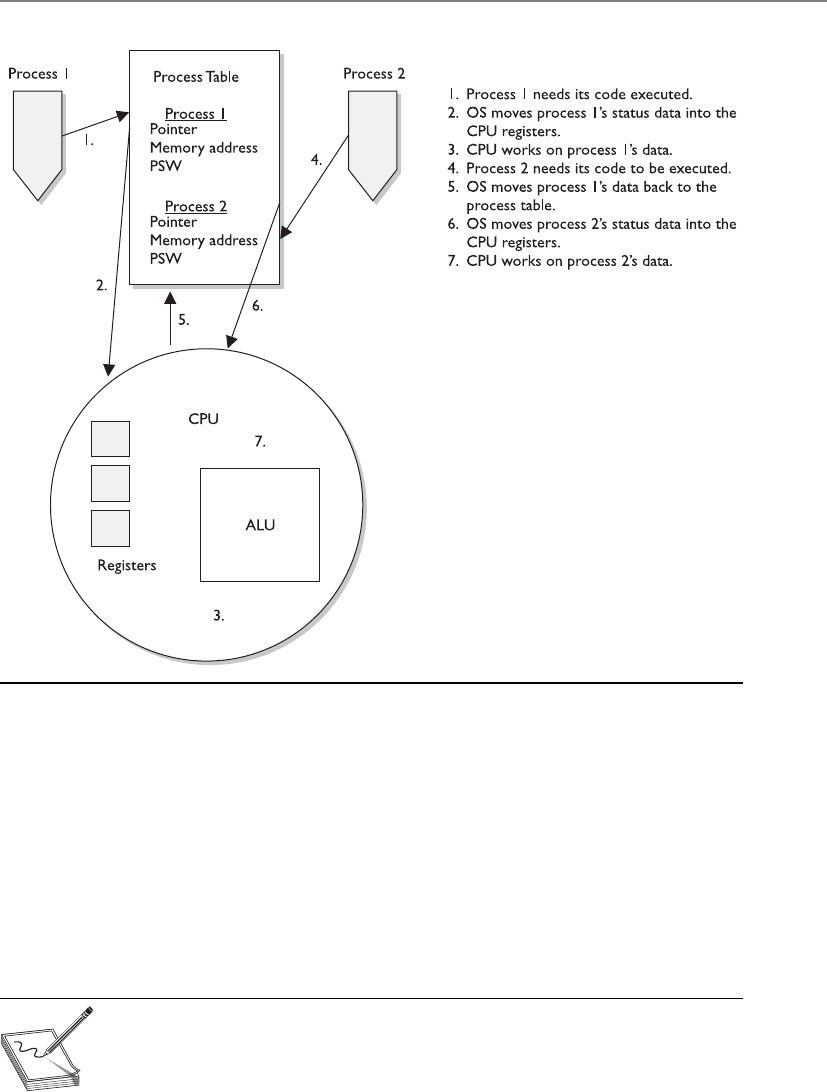
Chapter 4: Security Architecture and Design
315
I/O, and user activities) simultaneously. In fact, this is impossible. Most CPUs can do
only one thing at a time. So the system has hardware and software interrupts. When a
device needs to communicate with the CPU, it has to wait for its interrupt to be called
upon. The same thing happens in software. Each process has an interrupt assigned to it.
It is like pulling a number at a customer service department in a store. You can’t go up
to the counter until your number has been called out.
When a process is interacting with the CPU and an interrupt takes place (another
process has requested access to the CPU), the current process’s information is stored in
the process table, and the next process gets its time to interact with the CPU.
NOTE
NOTE Some critical processes cannot afford to have their functionality
interrupted by another process. The operating system is responsible for
setting the priorities for the different processes. When one process needs to
interrupt another process, the operating system compares the priority levels
of the two processes to determine if this interruption should be allowed.
Figure 4-7 A process table contains process status data that the CPU requires.

CISSP All-in-One Exam Guide
316
There are two categories of interrupts: maskable and nonmaskable. A maskable
interrupt is assigned to an event that may not be overly important and the programmer
can indicate that if that interrupt calls, the program does not stop what it is doing. This
means the interrupt is ignored. Nonmaskable interrupts can never be overridden by an
application because the event that has this type of interrupt assigned to it is critical. As
an example, the reset button would be assigned a nonmaskable interrupt. This means
that when this button is pushed, the CPU carries out its instructions right away.
As an analogy, a boss can tell her administrative assistant she is not going to take any
calls unless the Pope or Elvis phones. This means all other people will be ignored or
masked (maskable interrupt), but the Pope and Elvis will not be ignored (nonmaskable
interrupt). This is probably a good policy. You should always accept calls from either the
Pope or Elvis. Just remember not to use any bad words when talking to the Pope.
The watchdog timer is an example of a critical process that must always do its thing.
This process will reset the system with a warm boot if the operating system hangs and
cannot recover itself. For example, if there is a memory management problem and the
operating system hangs, the watchdog timer will reset the system. This is one mecha-
nism that ensures the software provides more of a stable environment.
Thread Management
What are all of these hair-like things hanging off of my processes?
Response: Threads.
As described earlier, a process is a program in memory. More precisely, a process is
the program’s instructions and all the resources assigned to the process by the operating
system. It is just easier to group all of these instructions and resources together and
control them as one entity, which is a process. When a process needs to send something
to the CPU for processing, it generates a thread. A thread is made up of an individual
instruction set and the data that must be worked on by the CPU.

Chapter 4: Security Architecture and Design
317
Most applications have several different functions. Word processing applications
can open files, save files, open other programs (such as an e-mail client), and print
documents. Each one of these functions requires a thread (instruction set) to be dy-
namically generated. So, for example, if Tom chooses to print his document, the word
processing process generates a thread that contains the instructions of how this docu-
ment should be printed (font, colors, text, margins, and so on). If he chooses to send a
document via e-mail through this program, another thread is created that tells the e-
mail client to open and what file needs to be sent. Threads are dynamically created and
destroyed as needed. Once Tom is done printing his document, the thread that was
generated for this functionality is broken down.
A program that has been developed to carry out several different tasks at one time
(display, print, interact with other programs) is capable of running several different
threads simultaneously. An application with this capability is referred to as a multi-
threaded application.
Each thread shares the same resources of the process that created it. So, all the
threads created by a word processing application work in the same memory space and
have access to all the same files and system resources. And how is this related to secu-
rity? Software security ultimately comes down to what threads and processes are doing.
If they are behaving properly, things work as planned and there are no issues to be
concerned about. But if a thread misbehaves and it is working in a privileged mode,
then it can carry out malicious activities that affect critical resources of the system. At-
tackers commonly inject code into a running process to carry out some type of compro-
mise. Let’s think this through. When an operating system is preparing to load a process
into memory it goes through a type of criteria checklist to make sure the process is se-
cure and will not negatively affect the system. Once the process passes this security
check the process is loaded into memory and is assigned a specific operation mode
(user or privileged). An attacker “injects” instructions into this running process, which
means the process is his vehicle for destruction. Since the process has already gone
through a security check before it was loaded into memory, it is trusted and has access
to system resources. If an attacker can inject malicious instructions into this process,
this trusted process carries out the attacker’s demands. These demands could be to col-
lect data as the user types it in on her keyboard, steal passwords, send out malware, etc.
If the process is running at a privileged mode, the attacker can carry out more damage
because more critical system resources are available to him through this running pro-
cess. When she creates her product, a software developer needs to make sure that run-
ning processes will not accept unqualified instructions and allow for these types of
compromises. Processes should only accept instructions for an approved entity and the
instructions that it accepts should be validated before execution. It is like “stranger
danger” with children. We teach our children to not take candy from a stranger and in
turn we need to make sure our software processes are not accepting improper instruc-
tions from an unknown source.
Process Scheduling
Scheduling and synchronizing various processes and their activities is part of process
management, which is a responsibility of the operating system. Several components
need to be considered during the development of an operating system, which will

CISSP All-in-One Exam Guide
318
dictate how process scheduling will take place. A scheduling policy is created to govern
how threads will interact with other threads. Different operating systems can use differ-
ent schedulers, which are basically algorithms that control the timesharing of the CPU.
As stated earlier, the different processes are assigned different priority levels (interrupts)
that dictate which processes overrule other processes when CPU time allocation is re-
quired. The operating system creates and deletes processes as needed, and oversees
them changing state (ready, blocked, running). The operating system is also responsi-
ble for controlling deadlocks between processes attempting to use the same resources.
If a process scheduler is not built properly, an attacker could manipulate it. The at-
tacker could ensure that certain processes do not get access to system resources (creat-
ing a denial of service attack) or that a malicious process has its privileges escalated
(allowing for extensive damage). An operating system needs to be built in a secure
manner to ensure that an attacker cannot slip in and take over control of the system’s
processes.
When a process makes a request for a resource (memory allocation, printer, second-
ary storage devices, disk space, and so on), the operating system creates certain data
structures and dedicates the necessary processes for the activity to be completed. Once
the action takes place (a document is printed, a file is saved, or data are retrieved from
the drive), the process needs to tear down these built structures and release the resourc-
es back to the resource pool so they are available for other processes. If this does not
happen properly, the system may run out of critical resources—as in memory. Attackers
have identified programming errors in operating systems that allow them to starve the
system of its own memory. This means the attackers exploit a software vulnerability
that ensures that processes do not properly release their memory resources. Memory is
continually committed and not released and the system is depleted of this resource
until it can no longer function. This is another example of a denial of service attack.
Another situation to be concerned about is a software deadlock. One example of a
deadlock situation is when process A commits resource 1 and needs to use resource 2
to properly complete its task, but process B has committed resource 2 and needs re-
source 1 to finish its job. Both processes are in deadlock because they do not have the
resources they need to finish the function they are trying to carry out. This situation
does not take place as often as it used to, as a result of better programming. Also, oper-
ating systems now have the intelligence to detect this activity and either release com-
mitted resources or control the allocation of resources so they are properly shared
between processes.
Operating systems have different methods of dealing with resource requests and
releases and solving deadlock situations. In some systems, if a requested resource is
unavailable for a certain period of time, the operating system kills the process that
is “holding on to” that resource. This action releases the resource from the process that
had committed it and restarts the process so it is “clean” and available for use by other
applications. Other operating systems might require a program to request all the re-
sources it needs before it actually starts executing instructions, or require a program to
release its currently committed resources before it may acquire more.

Chapter 4: Security Architecture and Design
319
Process Activity
Process 1, go into your room and play with your toys. Process 2, go into your room and play with
your toys. No intermingling and no fighting!
Computers can run different applications and processes at the same time. The pro-
cesses have to share resources and play nice with each other to ensure a stable and safe
computing environment that maintains its integrity. Some memory, data files, and
Key Terms
•Process Program loaded in memory within an operating system.
•Multiprogramming Interleaved execution of more than one program
(process) or task by a single operating system.
•Multitasking Simultaneous execution of more than one program
(process) or task by a single operating system.
•Cooperative multitasking Multitasking scheduling scheme used by
older operating systems to allow for computer resource time slicing.
Processes had too much control over resources, which would allow for
the programs or systems to “hang.”
•Preemptive multitasking Multitasking scheduling scheme used by
operating systems to allow for computer resource time slicing. Used
in newer, more stable operating systems.
•Process states (ready, running, blocked) Processes can be in various
activity levels. Ready = waiting for input. Running = instructions being
executed by CPU. Blocked = process is “suspended.”
•Interrupts Values assigned to computer components (hardware and
software) to allow for efficient computer resource time slicing.
•Maskable interrupt Interrupt value assigned to a noncritical
operating system activity.
•Nonmaskable interrupt Interrupt value assigned to a critical
operating system activity.
•Thread Instruction set generated by a process when it has a specific
activity that needs to be carried out by an operating system. When the
activity is finished, the thread is destroyed.
•Multithreading Applications that can carry out multiple activities
simultaneously by generating different instruction sets (threads).
•Software deadlock Two processes cannot complete their activities
because they are both waiting for system resources to be released.

CISSP All-in-One Exam Guide
320
variables are actually shared between different processes. It is critical that more than
one process does not attempt to read and write to these items at the same time. The
operating system is the master program that prevents this type of action from taking
place and ensures that programs do not corrupt each other’s data held in memory. The
operating system works with the CPU to provide time slicing through the use of inter-
rupts to ensure that processes are provided with adequate access to the CPU. This also
makes certain that critical system functions are not negatively affected by rogue applica-
tions.
To protect processes from each other, operating systems commonly have function-
ality that implements process isolation. Process isolation is necessary to ensure that
processes do not “step on each other’s toes,” communicate in an insecure manner, or
negatively affect each other’s productivity. Older operating systems did not enforce pro-
cess isolation as well as systems do today. This is why in earlier operating systems, when
one of your programs hung, all other programs, and sometimes the operating system
itself, hung. With process isolation, if one process hangs for some reason, it will not
affect the other software running. (Process isolation is required for preemptive multi-
tasking.) Different methods can be used to enforce process isolation:
• Encapsulation of objects
• Time multiplexing of shared resources
• Naming distinctions
• Virtual memory mapping
When a process is encapsulated, no other process understands or interacts with its
internal programming code. When process A needs to communicate with process B,
process A just needs to know how to communicate with process B’s interface. An inter-
face defines how communication must take place between two processes. As an analo-
gy, think back to how you had to communicate with your third-grade teacher. You had
to call her Mrs. So-and-So, say please and thank you, and speak respectfully to get
whatever it was you needed. The same thing is true for software components that need
to communicate with each other. They must know how to communicate properly with
each other’s interfaces. The interfaces dictate the type of requests a process will accept
and the type of output that will be provided. So, two processes can communicate with
each other, even if they are written in different programming languages, as long as they
know how to communicate with each other’s interface. Encapsulation provides data
hiding, which means that outside software components will not know how a process
works and will not be able to manipulate the process’s internal code. This is an integ-
rity mechanism and enforces modularity in programming code.
If a process is not isolated properly through encapsulation, this means its interface
is accepting potentially malicious instructions. The interface is like a membrane filter
that our cells within our bodies use. Our cells filter fluid and molecules that are at-
tempting to enter them. If some type of toxin slips by the filter, we can get sick because
the toxin has entered the worker bees of our bodies—cells. Processes are the worker
bees of our software. If they accept malicious instructions, our systems can get sick.

Chapter 4: Security Architecture and Design
321
Time multiplexing was already discussed, although we did not use this term. Time
multiplexing is a technology that allows processes to use the same resources. As stated
earlier, a CPU must be shared among many processes. Although it seems as though all
applications are running (executing their instructions) simultaneously, the operating
system is splitting up time shares between each process. Multiplexing means there are
several data sources and the individual data pieces are piped into one communication
channel. In this instance, the operating system is coordinating the different requests
from the different processes and piping them through the one shared CPU. An operat-
ing system must provide proper time multiplexing (resource sharing) to ensure a stable
working environment exists for software and users.
NOTE
NOTE Today’s CPUs have multiple cores, meaning that they have multiple
processors. This basically means that there are several smaller CPUs
(processors) integrated into one larger CPU. So in reality the different
processors on the CPU can execute instruction code simultaneously, making
the computer overall much faster. The operating system has to multiplex
process requests and “feed” them into the individual processors for
instruction execution.
While time multiplexing and multitasking is a performance requirement of our
systems today and is truly better than sliced bread, it introduces a lot of complexity to
our systems. We are forcing our operating systems to not only do more things faster, we
are forcing them to do all of these things simultaneously. As the complexity of our sys-
tems increases, the potential of truly securing them decreases. There is an inverse rela-
tionship between complexity and security: as one goes up the other one usually goes
down. But this fact does not necessarily predict doom and gloom; what it means is that
software architecture and development has to be done in a more disciplined manner.
Naming distinctions just means that the different processes have their own name or
identification value. Processes are usually assigned process identification (PID) values,
which the operating system and other processes use to call upon them. If each process
is isolated, that means each process has its own unique PID value. This is just another
way to enforce process isolation.
Virtual address memory mapping is different from the physical addresses of memory.
An application is written such that it basically “thinks” it is the only program running
within an operating system. When an application needs memory to work with, it tells
the operating system’s memory manager how much memory it needs. The operating
system carves out that amount of memory and assigns it to the requesting application.
The application uses its own address scheme, which usually starts at 0, but in reality, the
application does not work in the physical address space it thinks it is working in. Rather,
it works in the address space the memory manager assigns to it. The physical memory
is the RAM chips in the system. The operating system chops up this memory and as-
signs portions of it to the requesting processes. Once the process is assigned its own
memory space, it can address this portion however it is written to do so. Virtual address
mapping allows the different processes to have their own memory space; the memory
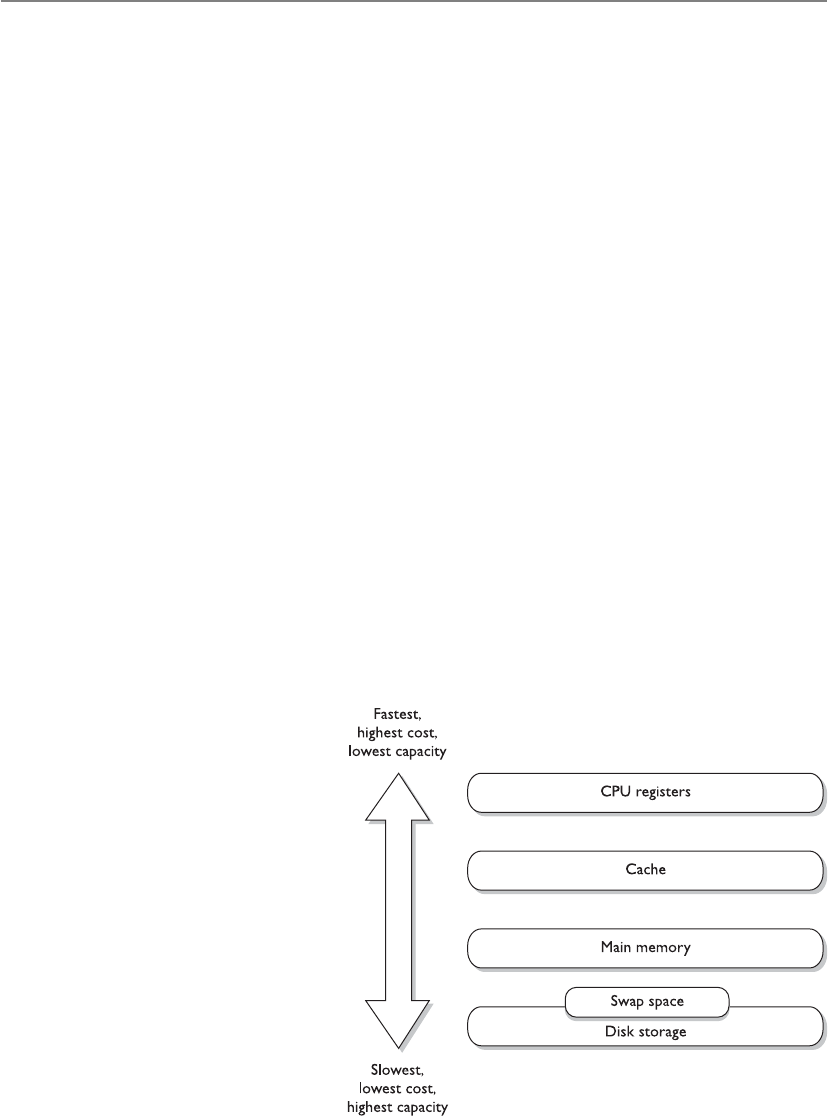
CISSP All-in-One Exam Guide
322
manager ensures no processes improperly interact with another process’s memory. This
provides integrity and confidentiality for the individual processes and their data and an
overall stable processing environment for the operating system.
If an operating system has a flaw in the programming code that controls memory
mapping, an attacker could manipulate this function. Since everything within an oper-
ating system actually has to operate in memory to work, the ability to manipulate
memory addressing can be very dangerous.
Memory Management
To provide a safe and stable environment, an operating system must exercise proper
memory management—one of its most important tasks. After all, everything happens
in memory.
The goals of memory management are to
• Provide an abstraction level for programmers
• Maximize performance with the limited amount of memory available
• Protect the operating system and applications loaded into memory
Abstraction means that the details of something are hidden. Developers of applica-
tions do not know the amount or type of memory that will be available in each and
every system their code will be loaded on. If a developer had to be concerned with this
type of detail, then her application would be able to work only on the one system that
maps to all of her specifications. To allow for portability, the memory manager hides all
of the memory issues and just provides the application with a memory segment. The
application is able to run without having to know all the hairy details of the operating
system and hardware it is running on.
Every computer has a memory hierarchy. Certain small amounts of memory are very
fast and expensive (registers,
cache), while larger amounts
are slower and less expensive
(RAM, hard drive). The por-
tion of the operating system
that keeps track of how these
different types of memory
are used is lovingly called
the memory manager. Its jobs
are to allocate and deallo-
cate different memory seg-
ments, enforce access control
to ensure processes are inter-
acting only with their own
memory segments, and swap
memory contents from RAM
to the hard drive.

Chapter 4: Security Architecture and Design
323
The memory manager has five basic responsibilities:
Relocation
• Swap contents from RAM to the hard drive as needed (explained later in the
“Virtual Memory” section of this chapter)
• Provide pointers for applications if their instructions and memory segment
have been moved to a different location in main memory
Protection
• Limit processes to interact only with the memory segments assigned to them
• Provide access control to memory segments
Sharing
• Use complex controls to ensure integrity and confidentiality when processes
need to use the same shared memory segments
• Allow many users with different levels of access to interact with the same
application running in one memory segment
Logical organization
• Segment all memory types and provide an addressing scheme for each at an
abstraction level
• Allow for the sharing of specific software modules, such as dynamic link
library (DLL) procedures
Physical organization
• Segment the physical memory space for application and operating system
processes
NOTE
NOTE A dynamic link library (DLL) is a set of functions that applications
can call upon to carry out different types of procedures. For example, the
Windows operating system has a crypt32.dll that is used by the operating
system and applications for cryptographic functions. Windows has a set of
DLLs, which is just a library of functions to be called upon and crypt32.dll
is just one example.
How can an operating system make sure a process only interacts with its memory
segment? When a process creates a thread, because it needs some instructions and data
processed, the CPU uses two registers. A base register contains the beginning address
that was assigned to the process, and a limit register contains the ending address, as il-
lustrated in Figure 4-8. The thread contains an address of where the instruction and
data reside that need to be processed. The CPU compares this address to the base and
limit registers to make sure the thread is not trying to access a memory segment outside

CISSP All-in-One Exam Guide
324
of its bounds. So, the base register makes it impossible for a thread to reference a mem-
ory address below its allocated memory segment, and the limit register makes it impos-
sible for a thread to reference a memory address above this segment.
If an operating system has a memory manager that does not enforce the memory
limits properly, an attacker can manipulate its functionality and use it against the sys-
tem. There have been several instances over the years where attackers would do just this
and bypass these types of controls. Architects and developers of operating systems have
to think through these types of weaknesses and attack types to ensure that the system
properly protects itself.
Figure 4-8
Base and limit
registers are used
to contain a process
in its own memory
segment.
Memory Protection Issues
• Every address reference is validated for protection.
• Two or more processes can share access to the same segment with
potentially different access rights.
• Different instruction and data types can be assigned different levels of
protection.
• Processes cannot generate an unpermitted address or gain access to an
unpermitted segment.
All of these issues make it more difficult for memory management to be
carried out properly in a constantly changing and complex system.

Chapter 4: Security Architecture and Design
325
Memory Types
Memory management is critical, but what types of memory actually have to be managed?
As stated previously, the operating system instructions, applications, and data are
held in memory, but so are the basic input/output system (BIOS), device controller
instructions, and firmware. They do not all reside in the same memory location or even
the same type of memory. The different types of memory, what they are used for, and
how each is accessed can get a bit confusing because the CPU deals with several differ-
ent types for different reasons.
The following sections outline the different types of memory that can be used with-
in computer systems.
Random Access Memory
Random access memory (RAM) is a type of temporary storage facility where data and
program instructions can temporarily be held and altered. It is used for read/write ac-
tivities by the operating system and applications. It is described as volatile because if
the computer’s power supply is terminated, then all information within this type of
memory is lost.
RAM is an integrated circuit made up of millions of transistors and capacitors. The
capacitor is where the actual charge is stored, which represents a 1 or 0 to the system.
The transistor acts like a gate or a switch. A capacitor that is storing a binary value of 1
has several electrons stored in it, which have a negative charge, whereas a capacitor that
is storing a 0 value is empty. When the operating system writes over a 1 bit with a 0 bit,
in reality, it is just emptying out the electrons from that specific capacitor.
One problem is that these capacitors cannot keep their charge for long. Therefore, a
memory controller has to “recharge” the values in the capacitors, which just means it
continually reads and writes the same values to the capacitors. If the memory controller
does not “refresh” the value of 1, the capacitor will start losing its electrons and become
a 0 or a corrupted value. This explains how dynamic RAM (DRAM) works. The data be-
ing held in the RAM memory cells must be continually and dynamically refreshed so
your bits do not magically disappear. This activity of constantly refreshing takes time,
which is why DRAM is slower than static RAM.
NOTE
NOTE When we are dealing with memory activities, we use a time metric
of nanoseconds (ns), which is a billionth of a second. So if you look at your
RAM chip and it states 70 ns, this means it takes 70 nanoseconds to read and
refresh each memory cell.
Static RAM (SRAM) does not require this continuous-refreshing nonsense; it uses a
different technology, by holding bits in its memory cells without the use of capacitors,
but it does require more transistors than DRAM. Since SRAM does not need to be re-
freshed, it is faster than DRAM, but because SRAM requires more transistors, it takes up
more space on the RAM chip. Manufacturers cannot fit as many SRAM memory cells on
a memory chip as they can DRAM memory cells, which is why SRAM is more expensive.
So, DRAM is cheaper and slower, and SRAM is more expensive and faster. It always

CISSP All-in-One Exam Guide
326
seems to go that way. SRAM has been used in cache, and DRAM is commonly used in
RAM chips.
Because life is not confusing enough, we have many other types of RAM. The main
reason for the continual evolution of RAM types is that it directly affects the speed of
the computer itself. Many people mistakenly think that just because you have a fast
processor, your computer will be fast. However, memory type and size and bus sizes are
also critical components. Think of memory as pieces of paper used by the system to
hold instructions. If the system had small pieces of papers (small amount of memory)
to read and write from, it would spend most of its time looking for these pieces and
lining them up properly. When a computer spends more time moving data from one
small portion of memory to another than actually processing the data, it is referred
to as thrashing. This causes the system to crawl in speed and your frustration level to
increase.
The size of the data bus also makes a difference in system speed. You can think of a
data bus as a highway that connects different portions of the computer. If a ton of data
must go from memory to the CPU and can only travel over a 4-lane highway, compared
to a 64-lane highway, there will be delays in processing.
Increased addressing space also increases system performance. A system that uses a
64-bit addressing scheme can put more instructions and data on a data bus at one time
compared to a system that uses a 32-bit addressing scheme. So a larger addressing
scheme allows more stuff to be moved around and processed and a larger bus size pro-
vides the highway to move this stuff around quickly and efficiently.
So the processor, memory type and amount, memory addressing, and bus speeds
are critical components to system performance.
The following are additional types of RAM you should be familiar with:
•Synchronous DRAM (SDRAM) Synchronizes itself with the system’s CPU
and synchronizes signal input and output on the RAM chip. It coordinates its
activities with the CPU clock so the timing of the CPU and the timing of the
memory activities are synchronized. This increases the speed of transmitting
and executing data.
•Extended data out DRAM (EDO DRAM) This is faster than DRAM because
DRAM can access only one block of data at a time, whereas EDO DRAM can
capture the next block of data while the first block is being sent to the CPU for
processing. It has a type of “look ahead” feature that speeds up memory access.
•Burst EDO DRAM (BEDO DRAM) Works like (and builds upon) EDO
DRAM in that it can transmit data to the CPU as it carries out a read option,
but it can send more data at once (burst). It reads and sends up to four
memory addresses in a small number of clock cycles.
•Double data rate SDRAM (DDR SDRAM) Carries out read operations on the
rising and falling cycles of a clock pulse. So instead of carrying out one operation
per clock cycle, it carries out two and thus can deliver twice the throughput of
SDRAM. Basically, it doubles the speed of memory activities, when compared
to SDRAM, with a smaller number of clock cycles. Pretty groovy.

Chapter 4: Security Architecture and Design
327
NOTE
NOTE These different RAM types require different controller chips to
interface with them; therefore, the motherboards that these memory types
are used on often are very specific in nature.
Well, that’s enough about RAM for now. Let’s look at other types of memory that are
used in basically every computer in the world.
Read-Only Memory
Read-only memory (ROM) is a nonvolatile memory type, meaning that when a com-
puter’s power is turned off, the data are still held within the memory chips. When data
are written into ROM memory chips, the data cannot be altered. Individual ROM chips
are manufactured with the stored program or routines designed into it. The software
that is stored within ROM is called firmware.
Programmable read-only memory (PROM) is a form of ROM that can be modified
after it has been manufactured. PROM can be programmed only one time because the
voltage that is used to write bits into the memory cells actually burns out the fuses that
connect the individual memory cells. The instructions are “burned into” PROM using
a specialized PROM programmer device.
Erasable programmable read-only memory (EPROM) can be erased, modified, and
upgraded. EPROM holds data that can be electrically erased or written to. To erase the
data on the memory chip, you need your handy-dandy ultraviolet (UV) light device
that provides just the right level of energy. The EPROM chip has a quartz window,
which is where you point the UV light. Although playing with UV light devices can be
fun for the whole family, we have moved on to another type of ROM technology that
does not require this type of activity.
To erase an EPROM chip, you must remove the chip from the computer and wave
your magic UV wand, which erases all of the data on the chip—not just portions of it.
So someone invented electrically erasable programmable read-only memory (EEPROM),
and we all put our UV light wands away for good.
EEPROM is similar to EPROM, but its data storage can be erased and modified elec-
trically by onboard programming circuitry and signals. This activity erases only one
byte at a time, which is slow. And because we are an impatient society, yet another
technology was developed that is very similar, but works more quickly.
Hardware Segmentation
Systems of a higher trust level may need to implement hardware segmentation of
the memory used by different processes. This means memory is separated physi-
cally instead of just logically. This adds another layer of protection to ensure that
a lower-privileged process does not access and modify a higher-level process’s
memory space.

CISSP All-in-One Exam Guide
328
Flash memory is a special type of memory that is used in digital cameras, BIOS
chips, memory cards, and video game consoles. It is a solid-state technology, meaning
it does not have moving parts and is used more as a type of hard drive than memory.
Flash memory basically moves around different levels of voltages to indicate that a
1 or 0 must be held in a specific address. It acts as a ROM technology rather than a RAM
technology. (For example, you do not lose pictures stored on your memory stick in your
digital camera just because your camera loses power. RAM is volatile and ROM is non-
volatile.) When Flash memory needs to be erased and turned back to its original state,
a program initiates the internal circuits to apply an electric field. The erasing function
takes place in blocks or on the entire chip instead of erasing one byte at a time.
Flash memory is used as a small disk drive in most implementations. Its benefits
over a regular hard drive are that it is smaller, faster, and lighter. So let’s deploy Flash
memory everywhere and replace our hard drives! Maybe one day. Today it is relatively
expensive compared to regular hard drives.
Cache Memory
I am going to need this later, so I will just stick it into cache for now.
Cache memory is a type of memory used for high-speed writing and reading activi-
ties. When the system assumes (through its programmatic logic) that it will need to
access specific information many times throughout its processing activities, it will store
the information in cache memory so it is easily and quickly accessible. Data in cache
can be accessed much more quickly than data stored in other memory types. Therefore,
any information needed by the CPU very quickly, and very often, is usually stored in
cache memory, thereby improving the overall speed of the computer system.
An analogy is how the brain stores information it uses often. If one of Marge’s pri-
mary functions at her job is to order parts, which requires telling vendors the compa-
ny’s address, Marge stores this address information in a portion of her brain from which
she can easily and quickly access it. This information is held in a type of cache. If Marge
was asked to recall her third-grade teacher’s name, this information would not neces-
sarily be held in cache memory, but in a more long-term storage facility within her
noggin. The long-term storage within her brain is comparable to a system’s hard drive.
It takes more time to track down and return information from a hard drive than from
specialized cache memory.
NOTE
NOTE Different motherboards have different types of cache. Level 1 (L1) is
faster than Level 2 (L2), and L2 is faster than L3. Some processors and device
controllers have cache memory built into them. L1 and L2 are usually built
into the processors and the controllers themselves.
Memory Mapping
Okay, here is your memory, here is my memory, and here is Bob’s memory. No one use each
other’s memory!
Because there are different types of memory holding different types of data, a com-
puter system does not want to let every user, process, and application access all types of
memory anytime they want to. Access to memory needs to be controlled to ensure data
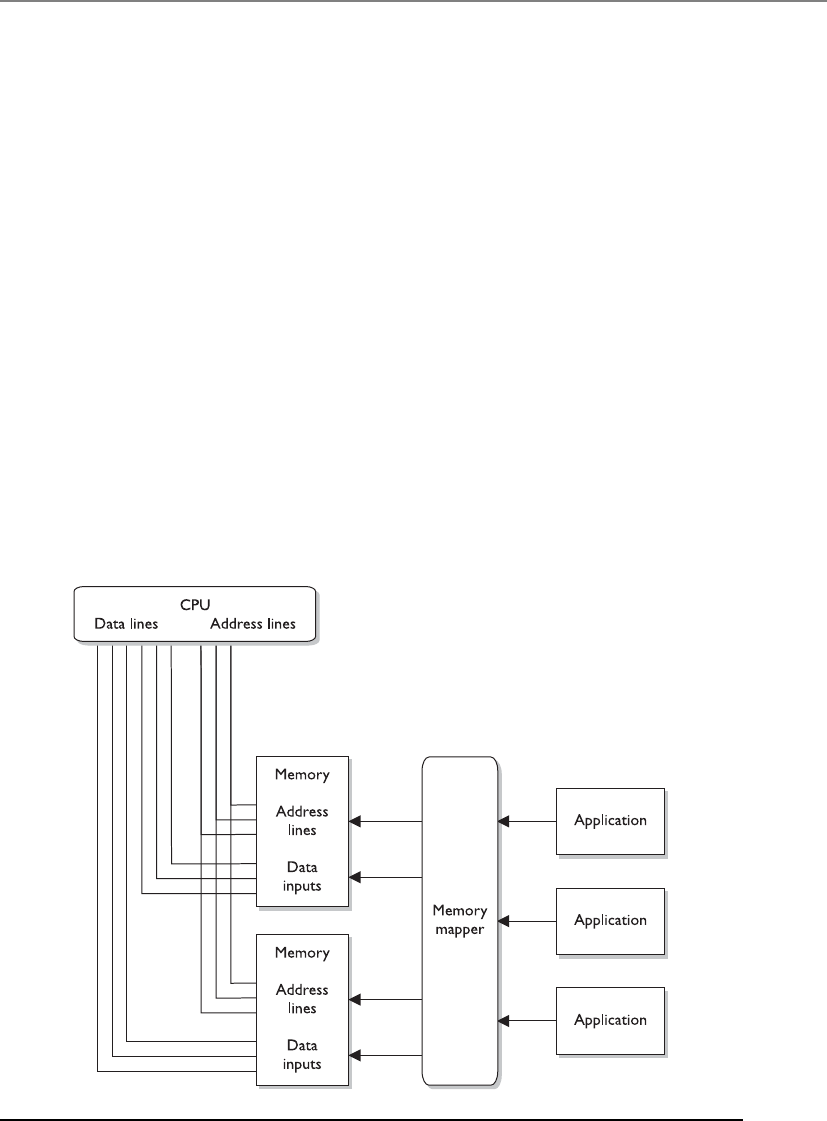
Chapter 4: Security Architecture and Design
329
do not get corrupted and that sensitive information is not available to unauthorized
processes. This type of control takes place through memory mapping and addressing.
The CPU is one of the most trusted components within a system, and can access
memory directly. It uses physical addresses instead of pointers (logical addresses) to
memory segments. The CPU has physical wires connecting it to the memory chips
within the computer. Because physical wires connect the two types of components,
physical addresses are used to represent the intersection between the wires and the
transistors on a memory chip. Software does not use physical addresses; instead, it em-
ploys logical memory addresses. Accessing memory indirectly provides an access con-
trol layer between the software and the memory, which is done for protection and
efficiency. Figure 4-9 illustrates how the CPU can access memory directly using physical
addresses and how software must use memory indirectly through a memory mapper.
Let’s look at an analogy. You would like to talk to Mr. Marshall about possibly buy-
ing some acreage in Iowa. You don’t know Mr. Marshall personally, and you do not
want to give out your physical address and have him show up at your doorstep. Instead,
you would like to use a more abstract and controlled way of communicating, so you
give Mr. Marshall your phone number so you can talk to him about the land and deter-
mine whether you want to meet him in person. The same type of thing happens in
computers. When a computer runs software, it does not want to expose itself unneces-
sarily to software written by good and bad programmers alike. Operating systems en-
able software to access memory indirectly by using index tables and pointers, instead of
Figure 4-9 The CPU and applications access memory differently.
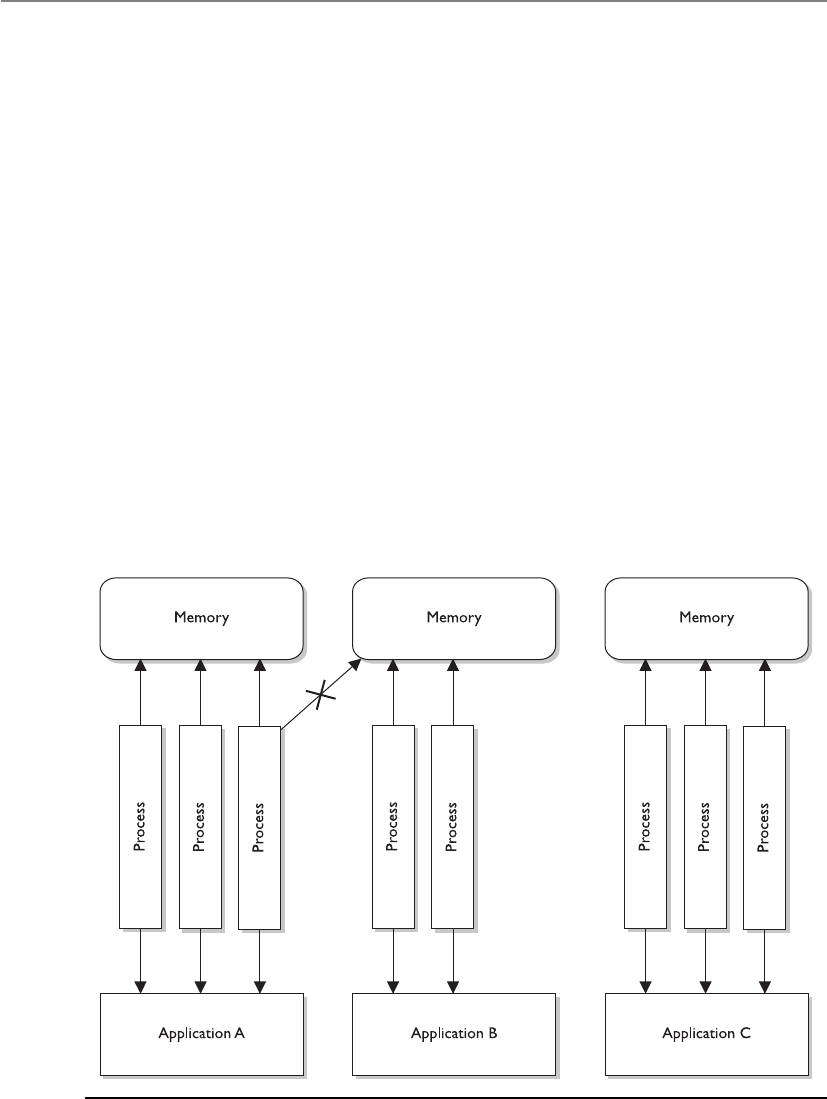
CISSP All-in-One Exam Guide
330
giving them the right to access the memory directly. This is one way the computer sys-
tem protects itself. If an operating system has a programming flaw that allows an at-
tacker to directly access memory through physical addresses, there is no memory
manager involved to control how memory is being used.
When a program attempts to access memory, its access rights are verified and then
instructions and commands are carried out in a way to ensure that badly written code
does not affect other programs or the system itself. Applications, and their processes,
can only access the memory allocated to them, as shown in Figure 4-10. This type of
memory architecture provides protection and efficiency.
The physical memory addresses that the CPU uses are called absolute addresses. The
indexed memory addresses that software uses are referred to as logical addresses. And
relative addresses are based on a known address with an offset value applied. As ex-
plained previously, an application does not “know” it is sharing memory with other
applications. When the program needs a memory segment to work with, it tells the
memory manager how much memory it needs. The memory manager allocates this
much physical memory, which could have the physical addressing of 34,000 to 39,000,
for example. But the application is not written to call upon addresses in this numbering
scheme. It is most likely developed to call upon addresses starting with 0 and extending
to, let’s say, 5000. So the memory manager allows the application to use its own ad-
dressing scheme—the logical addresses. When the application makes a call to one of
these “phantom” logical addresses, the memory manager must map this address to the
Figure 4-10 Applications, and the processes they use, access their own memory segments only.

Chapter 4: Security Architecture and Design
331
actual physical address. (It’s like two people using their own naming scheme. When
Bob asks Diane for a ball, Diane knows he really means a stapler. Don’t judge Bob and
Diane; it works for them.)
The mapping process is illustrated in Figure 4-11. When a thread indicates the in-
struction needs to be processed, it provides a logical address. The memory manager
maps the logical address to the physical address, so the CPU knows where the instruc-
tion is located. The thread will actually be using a relative address, because the application
uses the address space of 0 to 5000. When the thread indicates it needs the instruction
at the memory address 3400 to be executed, the memory manager has to work from its
mapping of logical address 0 to the actual physical address and then figure out the
physical address for the logical address 3400. So the logical address 3400 is relative to
the starting address 0.
Figure 4-11 The CPU uses absolute addresses, and software uses logical addresses.

CISSP All-in-One Exam Guide
332
As an analogy, if I know you use a different number system than everyone else in the
world, and you tell me that you need 14 cookies, I would need to know where to start
in your number scheme to figure out how many cookies to really give you. So, if you
inform me that in “your world” your numbering scheme starts at 5, I would map 5 to
0 and know that the offset is a value of 5. So when you tell me you want 14 cookies (the
relative number), I take the offset value into consideration. I know that you start at the
value 5, so I map your logical address of 14 to the physical number of 9. (But I would
not give you nine cookies, because you made me work too hard to figure all of this out.
I will just eat them myself.)
So the application is working in its “own world” using its “own addresses,” and the
memory manager has to map these values to reality, which means the absolute address
values.
Memory management is complex, and whenever there is complexity, there are most
likely vulnerabilities that can be exploited by attackers. It is very easy for people to com-
plain about software vendors and how they do not produce software that provides the
necessary level of security, but hopefully you are gaining more insight into the actual
complexity that is involved with these tasks.
Buffer Overflows
My cup runneth over and so does my buffer.
Today, many people know the term “buffer overflow” and the basic definition, but
it is important for security professionals to understand what is going on beneath the
covers.
Abuffer overflow takes place when too much data are accepted as input to a specific
process. A buffer is an allocated segment of memory. A buffer can be overflowed arbi-
trarily with too much data, but for it to be of any use to an attacker, the code inserted
into the buffer must be of a specific length, followed up by commands the attacker
wants executed. So, the purpose of a buffer overflow may be either to make a mess, by
shoving arbitrary data into various memory segments, or to accomplish a specific task,
by pushing into the memory segment a carefully crafted set of data that will accomplish
a specific task. This task could be to open a command shell with administrative privi-
lege or execute malicious code.
Let’s take a deeper look at how this is accomplished. Software may be written to
accept data from a user, website, database, or another application. The accepted data
needs something to happen to it, because it has been inserted for some type of ma-
nipulation or calculation, or to be used as a parameter to be passed to a procedure. A
procedure is code that can carry out a specific type of function on the data and return
the result to the requesting software, as shown in Figure 4-12.
When a programmer writes a piece of software that will accept data, this data and
its associated instructions will be stored in the buffers that make up a stack. The buffers
need to be the right size to accept the inputted data. So if the input is supposed to be
one character, the buffer should be one byte in size. If a programmer does not ensure
that only one byte of data is being inserted into the software, then someone can input
several characters at once and thus overflow that specific buffer.

Chapter 4: Security Architecture and Design
333
NOTE
NOTE You can think of a buffer as a small bucket to hold water (data). We
have several of these small buckets stacked on top of one another (memory
stack), and if too much water is poured into the top bucket, it spills over into
the buckets below it (buffer overflow) and overwrites the instructions and
data on the memory stack.
If you are interacting with an application that calculates mortgage rates, you have to
put in the parameters that need to be calculated—years of loan, percentage of interest
rate, and amount of loan. These parameters are passed into empty variables and put in
a linear construct (memory stack), which acts like a queue for the procedure to pull
from when it carries out this calculation. The first thing your mortgage rate application
lays down on the stack is its return pointer. This is a pointer to the requesting applica-
tion’s memory address that tells the procedure to return control to the requesting ap-
plication after the procedure has worked through all the values on the stack. The
Figure 4-12 A memory stack has individual buffers to hold instructions and data.

CISSP All-in-One Exam Guide
334
mortgage rate application then places on top of the return pointer the rest of the data
you have input and sends a request to the procedure to carry out the necessary calcula-
tion, as illustrated in Figure 4-12. The procedure takes the data off the stack starting
at the top, so they are first in, last out (FILO). The procedure carries out its functions on
all the data and returns the result and control back to the requesting mortgage rate
application once it hits the return pointer in the stack.
So the stack is just a segment in memory that allows for communication between
the requesting application and the procedure or subroutine. The potential for problems
comes into play when the requesting application does not carry out proper bounds
checking to ensure the inputted data are of an acceptable length. Look at the following
C code to see how this could happen:
#include<stdio.h>
int main(int argc, char **argv)
{
char buf1 [5] = "1111";
char buf2 [7] = "222222";
strcpy (buf2, "3333333333");
printf ("%s\n", buf2);
printf ("%s\n", buf1);
return 0;
}
CAUTION
CAUTION You do not need to know C programming for the CISSP exam.
We are digging deep into this topic because buffer overflows are so common
and have caused grave security breaches over the years. For the CISSP exam,
you just need to understand the overall concept of a buffer overflow.
Here, we are setting up a buffer (buf1) to hold four characters and a NULL value,
and a second buffer (buf2) to hold six characters and a NULL value. (The NULL values
indicate the buffer’s end place in memory.) If we viewed these buffers, we would see the
following:
Buf2
\0 2 2 2 2 2 2
Buf1
\0 1 1 1 1
The application then accepts ten 3s into buf2, which can only hold six characters.
So the six variables in buf2 are filled and then the four variables in buf1 are filled,
overwriting the original contents of buf1. This took place because the strcpy com-
mand did not make sure the buffer was large enough to hold that many values. So now
if we looked at the two buffers, we would see the following:
Buf2
\0 3 3 3 3 3 3
Buf1
\0 3 3 3 3

Chapter 4: Security Architecture and Design
335
But what gets even more interesting is when the actual return pointer is written
over, as shown in Figure 4-13. In a carefully crafted buffer overflow attack, the stack is
filled properly so the return pointer can be overwritten and control is given to the mali-
cious instructions that have been loaded onto the stack instead of back to the request-
ing application. This allows the malicious instructions to be executed in the security
context of the requesting application. If this application is running in a privileged
mode, the attacker has more permissions and rights to carry out more damage.
The attacker must know the size of the buffer to overwrite and must know the ad-
dresses that have been assigned to the stack. Without knowing these addresses, she
could not lay down a new return pointer to her malicious code. The attacker must also
write this dangerous payload to be small enough so it can be passed as input from one
procedure to the next.
Windows’ core is written in the C programming language and has layers and layers
of object-oriented code on top of it. When a procedure needs to call upon the operating
system to carry out some type of task, it calls upon a system service via an application
program interface (API) call. The API works like a doorway to the operating system’s
functionality.
Figure 4-13 A buffer overflow attack

CISSP All-in-One Exam Guide
336
The C programming language is susceptible to buffer overflow attacks because it
allows for direct pointer manipulations to take place. Specific commands can provide
access to low-level memory addresses without carrying out bounds checking. The C
functions that do perform the necessary boundary checking include strncpy(),
strncat(),snprintf(), and vsnprintf().
NOTE
NOTE An operating system must be written to work with specific CPU
architectures. These architectures dictate system memory addressing,
protection mechanisms, and modes of execution, and work with specific
instruction sets. This means a buffer overflow attack that works on an Intel chip
will not necessarily work on an AMD or a SPARC processor. These different
processors set up the memory address of the stacks differently, so the attacker
may have to craft a different buffer overflow code for different platforms.
Buffer overflows are in the source code of various applications and operating sys-
tems. They have been around since programmers started developing software. This
means it is very difficult for a user to identify and fix them. When a buffer overflow is
identified, the vendor usually sends out a patch, so keeping systems current on updates,
hotfixes, and patches is usually the best countermeasure. Some products installed on
systems can also watch for input values that might result in buffer overflows, but the
best countermeasure is proper programming. This means use bounds checking. If an
input value is only supposed to be nine characters, then the application should only
accept nine characters and no more. Some languages are more susceptible to buffer
overflows than others, so programmers should understand these issues, use the right
languages for the right purposes, and carry out code review to identify buffer overflow
vulnerabilities.
Memory Protection Techniques
Since your whole operating system and all your applications are loaded and run
in memory, this is where the attackers can really do their damage. Vendors of dif-
ferent operating systems (Windows, Unix, Linux, Macintosh, etc.) have imple-
mented various types of protection methods integrated into their memory man-
ager processes. For example, Windows Vista was the first version of Windows to
implement address space layout randomization (ASLR), which was first imple-
mented in OpenBSD.
If an attacker wants to maliciously interact with a process, he needs to know
what memory address to send his attack inputs to. If the operating system changed
these addresses continuously, which is what ALSR accomplishes, this would
greatly reduce the potential success of his attack. You can’t mess with something
if you don’t know where it is.
Many of the main operating systems use some form of data execution preven-
tion (DEP), which can be implemented via hardware (CPU) or software (operat-
ing system). The actual implementations of DEP varies, but the main goal is to
Chapter 4: Security Architecture and Design
337
Memory Leaks
Oh great, the memory leaked all over me. Does someone have a mop?
As stated earlier, when an application makes a request for a memory segment to
work within, it is allocated a specific memory amount by the operating system. When
the application is done with the memory, it is supposed to tell the operating system to
release the memory so it is available to other applications. This is only fair. But some
applications are written poorly and do not indicate to the system that this memory is
no longer in use. If this happens enough times, the operating system could become
“starved” for memory, which would drastically affect the system’s performance.
When a memory leak is identified in the hacker world, this opens the door to new
denial-of-service (DoS) attacks. For example, when it was uncovered that a Unix appli-
cation and a specific version of a Telnet protocol contained memory leaks, hackers
amplified the problem. They continually sent Telnet requests to systems with these
vulnerabilities. The systems would allocate resources for these network requests, which
in turn would cause more and more memory to be allocated and not returned. Eventu-
ally the systems would run out of memory and freeze.
NOTE
NOTE Memory leaks can take place in operating systems, applications, and
software drivers.
Two main countermeasures can protect against memory leaks: developing better
code that releases memory properly, and using a garbage collector. A garbage collector
is software that runs an algorithm to identify unused committed memory and then tells
the operating system to mark that memory as “available.” Different types of garbage
collectors work with different operating systems and programming languages.
Virtual Memory
My RAM is overflowing! Can I use some of your hard drive space?
Response: No, I don’t like you.
Secondary storage is considered nonvolatile storage media and includes such things
as the computer’s hard drive, USB drives, and CD-ROMs. When RAM and secondary
storage are combined, the result is virtual memory. The system uses hard drive space to
help ensure that executable code does not function within memory segments that
could be dangerous. It is similar to not allowing someone suspicious in your
house. You don’t know if this person is really going to do something malicious,
but just to make sure you will not allow him to be in a position where he could
bring harm to you or your household. DEP can mark certain memory locations as
“off limits” with the goal of reducing the “playing field” for hackers and malware.
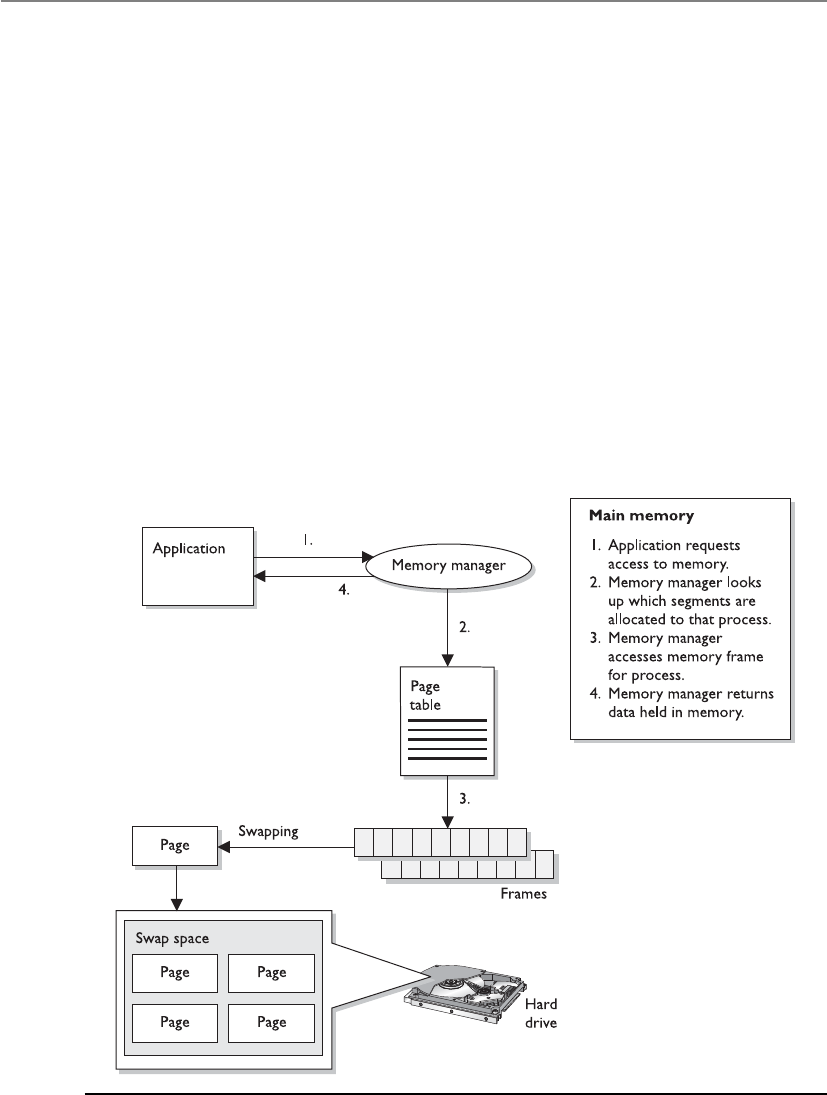
CISSP All-in-One Exam Guide
338
extend its RAM memory space. Swap space is the reserved hard drive space used to ex-
tend RAM capabilities. Windows systems use the pagefile.sys file to reserve this space.
When a system fills up its volatile memory space, it writes data from memory onto the
hard drive. When a program requests access to this data, it is brought from the hard
drive back into memory in specific units, called pages. This process is called virtual
memory paging. Accessing data kept in pages on the hard drive takes more time than
accessing data kept in RAM memory because physical disk read/write access must take
place. Internal control blocks, maintained by the operating system, keep track of what
page frames are residing in RAM and what is available “offline,” ready to be called into
RAM for execution or processing, if needed. The payoff is that it seems as though the
system can hold an incredible amount of information and program instructions in
memory, as shown in Figure 4-14.
A security issue with using virtual swap space is that when the system is shut down,
or processes that were using the swap space are terminated, the pointers to the pages are
reset to “available” even though the actual data written to disk are still physically there.
These data could conceivably be compromised and captured. On various operating
systems, there are routines to wipe the swap spaces after a process is done with it, before
Figure 4-14 Combining RAM and secondary storage to create virtual memory

Chapter 4: Security Architecture and Design
339
it is used again. The routines should also erase this data before a system shutdown, at
which time the operating system would no longer be able to maintain any control over
what happens on the hard drive surface.
NOTE
NOTE If a program, file, or data are encrypted and saved on the hard drive,
they will be decrypted when used by the controlling program. While these
unencrypted data are sitting in RAM, the system could write out the data to
the swap space on the hard drive, in their unencrypted state. Attackers have
figured out how to gain access to this space in unauthorized manners.
Key Terms
•Process isolation Protection mechanism provided by operating
systems that can be implemented as encapsulation, time multiplexing
of shared resources, naming distinctions, and virtual memory mapping.
•Dynamic link libraries (DLLs) A set of subroutines that are shared by
different applications and operating system processes.
•Base registers Beginning of address space assigned to a process.
Used to ensure a process does not make a request outside its assigned
memory boundaries.
•Limit registers Ending of address space assigned to a process. Used to
ensure a process does not make a request outside its assigned memory
boundaries.
•RAM Memory sticks that are plugged into a computer’s motherboard
and work as volatile memory space for an operating system.
•ROM Nonvolatile memory that is used on motherboards for BIOS
functionality and various device controllers to allow for operating
system-to-device communication. Sometimes used for off-loading
graphic rendering or cryptographic functionality.
•Hardware segmentation Physically mapping software to individual
memory segments.
•Cache memory Fast and expensive memory type that is used by a
CPU to increase read and write operations.
•Absolute addresses Hardware addresses used by the CPU.
•Logical addresses Indirect addressing used by processes within an
operating system. The memory manager carries out logical-to-absolute
address mapping.
•Stack Memory construct that is made up of individually addressable
buffers. Process-to-process communication takes place through the use
of stacks.

CISSP All-in-One Exam Guide
340
Input/Output Device Management
Some things come in, some things go out.
Response: We took a vote and would like you to go out.
We have covered a lot of operating system responsibilities up to now, and we are not
stopping yet. An operating system also has to control all input/output devices. It sends
commands to them, accepts their interrupts when they need to communicate with the
CPU, and provides an interface between the devices and the applications.
I/O devices are usually considered block or character devices. A block device works
with data in fixed-size blocks, each block with its own unique address. A disk drive is
an example of a block device. A character device, such as a printer, network interface
card, or mouse, works with streams of characters, without using any fixed sizes. This
type of data is not addressable.
When a user chooses to print a document, open a stored file on a hard drive, or save
files to a USB drive, these requests go from the application the user is working in, through
the operating system, and to the device requested. The operating system uses a device
driver to communicate with a device controller, which may be a circuit card that fits into
an expansion slot on the motherboard. The controller is an electrical component with its
own software that provides a communication path that enables the device and operating
system to exchange data. The operating system sends commands to the device controller’s
registers and the controller then writes data to the peripheral device or extracts data to be
processed by the CPU, depending on the given commands. If the command is to extract
data from the hard drive, the controller takes the bits and puts them into the necessary
block size and carries out a checksum activity to verify the integrity of the data. If the in-
tegrity is successfully verified, the data are put into memory for the CPU to interact with.
Operating systems need to access and release devices and computer resources prop-
erly. Different operating systems handle accessing devices and resources differently. For
example, Windows 2000 is considered a more stable and safer data processing environ-
ment than Windows 9x because applications in Windows 2000 cannot make direct re-
•Buffer overflow Too much data is put into the buffers that make up a
stack. Common attack vector used by hackers to run malicious code on
a target system.
•Address space layout randomization (ASLR) Memory protection
mechanism used by some operating systems. The addresses used by
components of a process are randomized so that it is harder for an
attacker to exploit specific memory vulnerabilities.
•Data execution prevention (DEP) Memory protection mechanism
used by some operating systems. Memory segments may be marked as
nonexecutable so that they cannot be misused by malicious software.
•Garbage collector Tool that marks unused memory segments as
usable to ensure that an operating system does not run out of memory.
•Virtual memory Combination of main memory (RAM) and secondary
memory within an operating system.

Chapter 4: Security Architecture and Design
341
quests to hardware devices. Windows 2000 and later versions have a much more
controlled method of accessing devices than Windows 9x. This method helps protect
the system from badly written code that does not properly request and release resourc-
es. Such a level of protection helps ensure the resources’ integrity and availability.
Interrupts
Excuse me, can I talk now?
Response: Please wait until we call your number.
When an I/O device has completed whatever task was asked of it, it needs to inform
the CPU that the necessary data are now in memory for processing. The device’s con-
troller sends a signal down a bus, which is detected by the interrupt controller. (This is
what it means to use an interrupt. The device signals the interrupt controller and is
basically saying, “I am done and need attention now.”) If the CPU is busy and the de-
vice’s interrupt is not a higher priority than whatever job is being processed, then the
device has to wait. The interrupt controller sends a message to the CPU, indicating what
device needs attention. The operating system has a table (called the interrupt vector) of
all the I/O devices connected to it. The CPU compares the received number with the
values within the interrupt vector so it knows which I/O device needs its services. The
table has the memory addresses of the different I/O devices. So when the CPU under-
stands that the hard drive needs attention, it looks in the table to find the correct mem-
ory address. This is the new program counter value, which is the initial address of where
the CPU should start reading from.
One of the main goals of the operating system software that controls I/O activity is
to be device independent. This means a developer can write an application to read
(open a file) or write (save a file) to any device (USB drive, hard drive, CD-ROM drive).
This level of abstraction frees application developers from having to write different
procedures to interact with the various I/O devices. If a developer had to write an indi-
vidual procedure of how to write to a CD-ROM drive, and how to write to a USB drive,
how to write to a hard disk, and so on, each time a new type of I/O device was devel-
oped, all of the applications would have to be patched or upgraded.
Operating systems can carry out software I/O procedures in various ways. We will
look at the following methods:
• Programmed I/O
• Interrupt-driven I/O
• I/O using DMA
• Premapped I/O
• Fully mapped I/O
Programmable I/O If an operating system is using programmable I/O, this means
the CPU sends data to an I/O device and polls the device to see if it is ready to accept
more data. If the device is not ready to accept more data, the CPU wastes time by waiting
for the device to become ready. For example, the CPU would send a byte of data (a char-
acter) to the printer and then ask the printer if it is ready for another byte. The CPU sends
the text to be printed one byte at a time. This is a very slow way of working and wastes
precious CPU time. So the smart people figured out a better way: interrupt-driven I/O.

CISSP All-in-One Exam Guide
342
Interrupt-Driven I/O If an operating system is using interrupt-driven I/O, this
means the CPU sends a character over to the printer and then goes and works on an-
other process’s request. When the printer is done printing the first character, it sends an
interrupt to the CPU. The CPU stops what it is doing, sends another character to the
printer, and moves to another job. This process (send character—go do something
else—interrupt—send another character) continues until the whole text is printed. Al-
though the CPU is not waiting for each byte to be printed, this method does waste a lot
of time dealing with all the interrupts. So we excused those smart people and brought
in some new smarter people, who came up with I/O using DMA.
I/O Using DMA Direct memory access (DMA) is a way of transferring data between
I/O devices and the system’s memory without using the CPU. This speeds up data trans-
fer rates significantly. When used in I/O activities, the DMA controller feeds the charac-
ters to the printer without bothering the CPU. This method is sometimes referred to as
unmapped I/O.
Premapped I/O Premapped I/O and fully mapped I/O (described next) do not
pertain to performance, as do the earlier methods, but provide two approaches that can
directly affect security. In a premapped I/O system, the CPU sends the physical memory
address of the requesting process to the I/O device, and the I/O device is trusted enough
to interact with the contents of memory directly, so the CPU does not control the inter-
actions between the I/O device and memory. The operating system trusts the device to
behave properly. Scary.
Fully Mapped I/O Under fully mapped I/O, the operating system does not trust
the I/O device. The physical address is not given to the I/O device. Instead, the device
works purely with logical addresses and works on behalf (under the security context) of
the requesting process, so the operating system does not trust the device to interact with
memory directly. The operating system does not trust the process or device and it acts
as the broker to control how they communicate with each other.
CPU Architecture
If I am corrupted, very bad things can happen.
Response: Then you need to go into ring 0.
An operating system and a CPU have to be compatible and share a similar architec-
ture to work together. While an operating system is software and CPU is hardware, they
actually work so closely together when a computer is running this delineation gets
blurred. An operating system has to be able to “fit into” a CPU like a hand in a glove.
Once a hand is inside of a glove they both move together as a single entity.
An operating system and a CPU must be able to communicate through an instruc-
tion set. You may have heard of x86, which is a family of instruction sets. An instruction
set is a language an operating system must be able to talk to properly communicate to a
CPU. As an analogy, if you want me to carry out some tasks for you, you will have to tell
me the instructions in a manner that I understand.
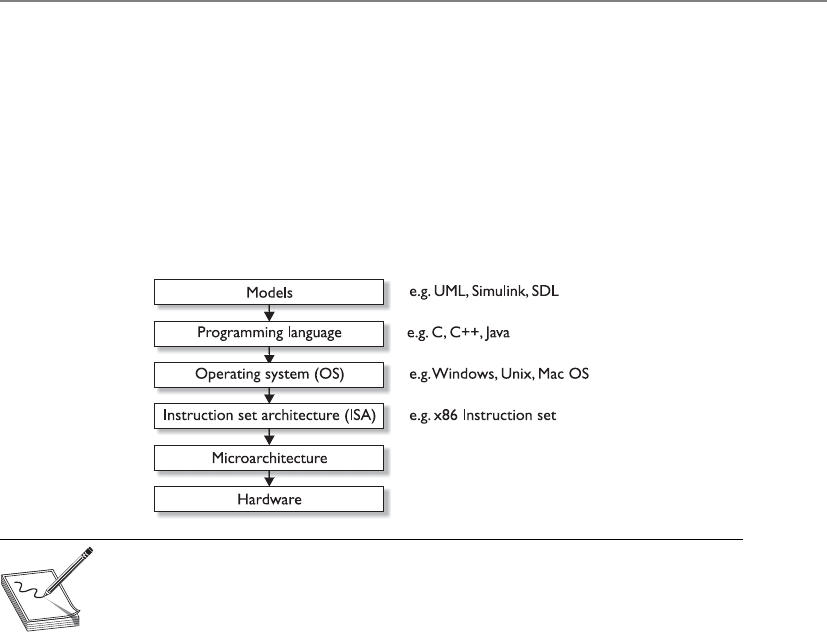
Chapter 4: Security Architecture and Design
343
The microarchitecture contains the things that make up the physical CPU (registers,
logic gates, ALU, cache, etc.). The CPU knows mechanically how to use all of these
parts; it just needs to know what the operating system wants it to do. A chef knows how
to use all of his pots, pans, spices, and ingredients, but he needs an order from the
menu so he knows how to use all of these properly to achieve the requested outcome.
Similarly, the CPU has a “menu” of operations the operating system can “order” from,
which is the instruction set. The operating system puts in its order (render graphics on
screen, print to printer, encrypt data, etc.), and the CPU carries out the request and
provides the result.
NOTE
NOTE The most common instruction set in use today (x86) can be used
within different microarchitectures (Intel, AMD, etc.) and with different
operating systems (Windows, Macintosh, Linux, etc.).
Along with sharing this same language (instruction set), the operating system and
CPU have to work within the same ring architecture. Let’s approach this from the top
and work our way down. If an operating system is going to be stable, it must be able to
protect itself from its users and their applications. This requires the capability to distin-
guish between operations performed on behalf of the operating system itself and op-
erations performed on behalf of the users or applications. This can be complex, because
the operating system software may be accessing memory segments, sending instruc-
tions to the CPU for processing, accessing secondary storage devices, communicating
with peripheral devices, dealing with networking requests, and more at the same time.
Each user application (e-mail client, antimalware program, web browser, word proces-
sor, personal firewall, and so on) may also be attempting the same types of activities at
the same time. The operating system must keep track of all of these events and ensure
none of them put the system at risk.
The operating system has several protection mechanisms to ensure processes do not
negatively affect each other or the critical components of the system itself. One has al-
ready been mentioned: memory protection. Another security mechanism the system
uses is a ring-based architecture.
The architecture of the CPU dictates how many rings are available for an operating
system to use. As shown in Figure 4-15, the rings act as containers and barriers. They are

CISSP All-in-One Exam Guide
344
containers in that they provide an execution environment for processes to be able carry
out their functions, and barriers in that the different processes are “walled off” from
each other based upon the trust the operating system has in them.
Let’s say that I build a facility based upon this type of ring structure. My crown jew-
els are stored in the center of the facility (ring 0), so I am not going to allow just anyone
in this section of my building. Only the people I really, really trust. I will allow the
people I kind of trust in the next level of my facility (ring 1). If I don’t trust you at all,
you are going into ring 3 so that you are as far from my crown jewels as possible. This
is how the ring structure of a CPU works. Ring 0 is for the most trusted components of
the operating system itself. This is because processes that are allowed to work in ring 0
can access very critical components in the system. Ring 0 is where the operating sys-
tem’s kernel (most trusted and powerful processes) works. Less trusted processes, as in
operating system utilities, can work in ring 1, and the least trusted processes (applica-
tions) work in the farthest ring, ring 3. This layered approach provides a self-protection
mechanism for the operating system.
Operating system components that operate in ring 0 have the most access to mem-
ory locations, peripheral devices, system drivers, and sensitive configuration parame-
ters. Because this ring provides much more dangerous access to critical resources, it is
the most protected. Applications usually operate in ring 3, which limits the type of
memory, peripheral device, and driver access activity and is controlled through the op-
Figure 4-15
More trusted
processes operate
within lower-
numbered rings.

Chapter 4: Security Architecture and Design
345
erating system services and system calls. The type of commands and instructions sent to
the CPU from applications in the outer rings are more restrictive in nature. If an appli-
cation tries to send instructions to the CPU that fall outside its permission level, the
CPU treats this violation as an exception and may show a general protection fault or
exception error and attempt to shut down the offending application.
These protection rings provide an intermediate layer between processes, and are
used for access control when one process tries to access another process or interact with
system resources. The ring number determines the access level a process has—the lower
the ring number, the greater the amount of privilege given to the process running with-
in that ring. A process in ring 3 cannot directly access a process in ring 1, but processes
in ring 1 can directly access processes in ring 3. Entities cannot directly communicate
with objects in higher rings.
If we go back to our facility analogy, people in ring 0 can go and talk to any of the
other people in the different areas (rings) of the facility. I trust them and I will let them
do what they need to do. But if people in ring 3 of my facility want to talk to people in
ring 2, I cannot allow this to happen in an unprotected manner. I don’t trust these
people and do not know what they will do. Someone from ring 3 might try to punch
someone from ring 2 in the face and then everyone will be unhappy. So if someone in
ring 3 needs to communicate to someone in ring 2, he has to write down his message
on a piece of paper and give it to the guard. The guard will review it and hand it to the
person in ring 2 if it is safe and acceptable.
In an operating system, the less trusted processes that are working in ring 3 send
their communication requests to an API provided by the operating system specifically
for this purpose (guard). The communication request is passed to the more trusted
process in ring 2 in a controlled and safe manner.
Application Programming Interface (API)
An API is the doorway to a protocol, operating service, process, or DLL. When one
piece of software needs to send information to another piece of software, it must
format its communication request in a way that the receiving software under-
stands. An application may send a request to an operating system’s cryptographic
DLL, which will in turn carry out the requested cryptographic functionality for
the application.
We will cover APIs in more depth in Chapter 10, but for now understand that
it is a type of guard that provides access control between the trusted and non-
trusted processes within an operating system. If an application (nontrusted) pro-
cess needs to send a message to the operating system’s network protocol stack, it
will send the information to the operating system’s networking service. The ap-
plication sends the request in a format that will be accepted by the service’s API.
APIs must be properly written by the operating system developers to ensure dan-
gerous data cannot pass through this communication channel. If suspicious data
gets past an API, the service could be compromised and execute code in a privi-
leged context.

CISSP All-in-One Exam Guide
346
CPU Operation Modes
As stated earlier, the CPU provides the ring structure architecture and the operating
system assigns its processes to the different rings. When a process is placed in ring 0, its
activities are carried out in kernel mode, which means it can access the most critical
resources in a nonrestrictive manner. The process is assigned a status level by the oper-
ating system (stored as PSW) and when it needs to interact with the CPU, the CPU
checks its status to know what it can and cannot allow the process to do. If the process
has the status of user mode, the CPU will limit the process’s access to system resources
and restrict the functions it can carry out on these resources.
Attackers have found many ways around this protection scheme and have tricked
operating systems into loading their malicious code into ring 0, which is very danger-
ous. Attackers have fooled operating systems by creating their malicious code to mimic
system-based DLLs, loadable kernel modules, or other critical files. The operating sys-
tem then loads the malicious code into ring 0 and it runs in kernel mode. At this point
the code could carry out almost any activity within the operating system in an unpro-
tected manner. The malicious code can install key loggers, sniffers, code injection tools,
and Trojaned files. The code could delete files on the hard drive, install backdoors, or
send sensitive data to the attacker’s computer using the compromised system’s network
protocol stack.
NOTE
NOTE The actual ring numbers available in a CPU architecture are dictated
by the CPU itself. Some processors provide four rings and some provide eight
or more. The operating systems do not have to use each available ring in the
architecture; for example, Windows commonly uses only rings 0 and 3 and
does not use ring 1 or 2. The vendor of the CPU determines the number of
available rings, and the vendor of the operating system determines how it will
use these rings.
Process Domain
The term domain just means a collection of resources. A process has a collection
of resources assigned to it when it is loaded into memory (run time), as in mem-
ory addresses, files it can interact with, system services available to it, peripheral
devices, etc. The higher the ring level that the process executes within, the larger
the domain of resources that is available to it.
It is the responsibility of the operating system to provide a safe execution
domain for the different processes it serves. This means that when a process is
carrying out its activities, the operating system provides a safe, predictable, and
stable environment. The execution domain is a combination of where the pro-
cess can carry out its functions (memory segment), the tools available to it, and
the boundaries involved to keep it in a safe and confined area.
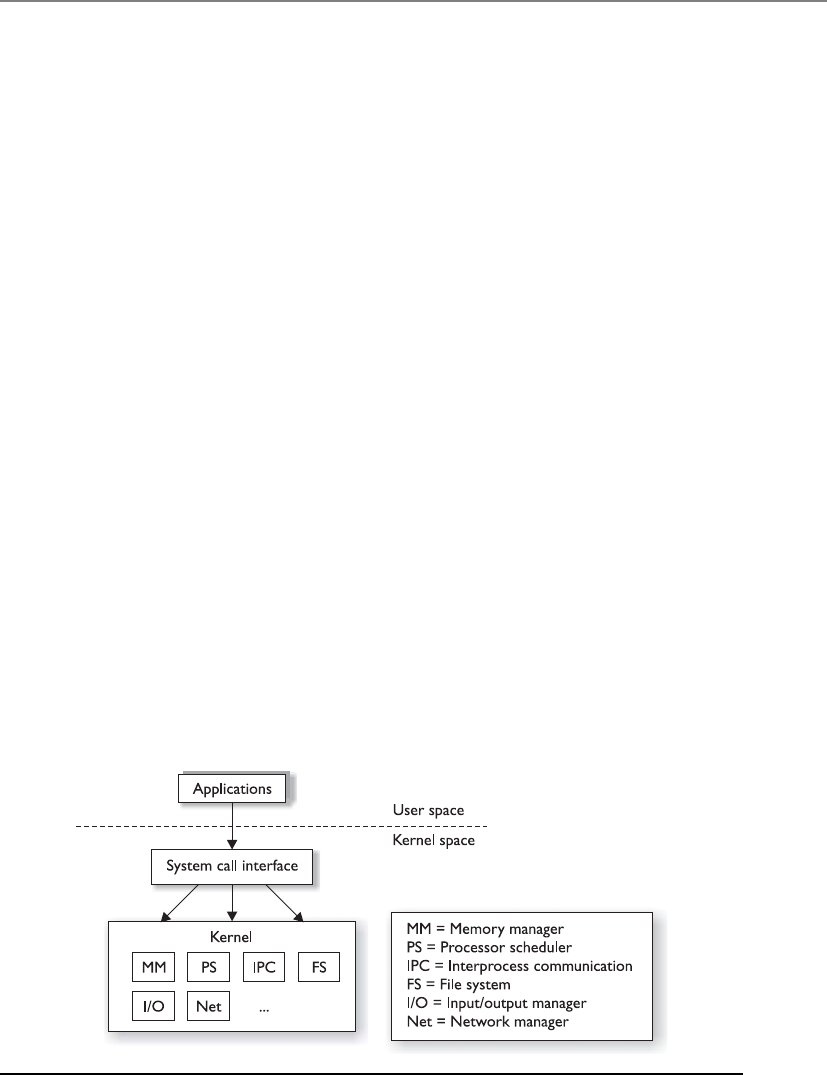
Chapter 4: Security Architecture and Design
347
Operating System Architectures
We started this chapter by looking at system architecture approaches. Remember that a
system is made up of all the necessary pieces for computation: hardware, firmware, and
software components. The chapter moved into the architecture of a CPU, which just
looked at the processor. Now we will look at operating system architectures, which deal
specifically with the software components of a system.
Operating system architectures have gone through quite an evolutionary process
based upon industry functionality and security needs. The architecture is the framework
that dictates how the pieces and parts of the operating system interact with each other
and provide the functionality that the applications and users require of it. This section
looks at the monolithic, layered, microkernel, and hybrid microkernel architectures.
While operating systems are very complex, some main differences in the architec-
tural approaches have come down to what is running in kernel mode and what is not.
In a monolithic architecture, all of the operating system processes work in kernel mode,
as illustrated in Figure 4-16. The services provided by the operating system (memory
management, I/O management, process scheduling, file management, etc.) are avail-
able to applications through system calls.
Earlier operating systems, such as MS-DOS, were based upon a monolithic design.
The whole operating system acted as one software layer between the user applications
and the hardware level. There are several problems with this approach: complexity,
portability, extensibility, and security. Since the functionality of the code is spread
throughout the system, it is hard to test and debug. If there is a flaw in a software com-
ponent it is difficult to localize and easily fix. Many pieces of this spaghetti bowl of
code had to be modified just to address one issue.
This type of operating system is also hard to port from one hardware platform to
another because the hardware interfaces are implemented throughout the software. If
the operating system has to work on new hardware, it would require extensive rewriting
of the code. Too many components interact directly with the hardware, which increased
the complexity.
Figure 4-16 Monolithic operating system architecture

CISSP All-in-One Exam Guide
348
Since the monolithic system is not modular in nature, it is difficult to add and sub-
tract functionality. As we will see in this section, later operating systems became more
modular in nature to allow for functionality to be added as needed. And since all the
code ran in a privileged state (kernel mode), user mistakes could cause drastic effects
and malicious activities could take place more easily. Too much code was running in
kernel mode, and it was too disorganized.
NOTE
NOTE MS-DOS was a very basic and simplistic operating system that used
a rudimentary user interface, which was just a simple command interpreter
(shell). Early versions of Windows (3.x) just added a user-friendly graphical
user interface (GUI) on top of MS-DOS. Windows NT and 2000 broke
away from the MS-DOS model and moved toward a kernel-based
architecture. A kernel is made up of all the critical processes within an
operating system. A kernel approach centralized and modularized critical
operating system functionality.
In the next generation of operating system architecture, system architects added
more organization to the system. The layered operating system architecture separates
system functionality into hierarchical layers. For example, a system that followed a lay-
ered architecture was, strangely enough, called THE (Technische Hogeschool Eind-
hoven) multiprogramming system. THE had five layers of functionality. Layer 0
controlled access to the processor and provided multiprogramming functionality; layer
1 carried out memory management; layer 2 provided interprocess communication;
layer 3 dealt with I/O devices; and layer 4 was where the applications resided. The pro-
cesses at the different layers each had interfaces to be used by processes in layers below
and above them.
This layered approach, illustrated in Figure 4-17, had the full operating system still
working in kernel mode (ring 0). The main difference between the monolithic approach
and this layered approach is that the functionality within the operating system was laid
out in distinctive layers that called upon each other.
Figure 4-17
Layered operating
system architecture

Chapter 4: Security Architecture and Design
349
In the monolithic architecture, software modules communicate to each other in an
ad hoc manner. In the layered architecture, module communication takes place in an
organized, hierarchical structure. Routines in one layer only facilitate the layer directly
below it, so no layer is missed.
Layered operating systems provide data hiding, which means that instructions and
data (packaged up as procedures) at the various layers do not have direct access to the
instructions and data at any other layers. Each procedure at each layer has access only
to its own data and a set of functions that it requires to carry out its own tasks. If a pro-
cedure can access more procedures than it really needs, this opens the door for more
successful compromises. For example, if an attacker is able to compromise and gain
control of one procedure and this procedure has direct access to all other procedures,
the attacker could compromise a more privileged procedure and carry out more devas-
tating activities.
A monolithic operating system provides only one layer of security. In a layered sys-
tem, each layer should provide its own security and access control. If one layer contains
the necessary security mechanisms to make security decisions for all the other layers,
then that one layer knows too much about (and has access to) too many objects at the
different layers. This directly violates the data-hiding concept. Modularizing software
and its code increases the assurance level of the system, because if one module is com-
promised, it does not mean all other modules are now vulnerable.
Since this layered approach provided more modularity, it allows for functionality to
be added and subtracted from the operating systems more easily. (You experience this
type of modularity when you load new kernel modules to Linux-based systems or DLLs
in Windows.) The layered approach also introduced the idea of having an abstraction
level added to the lower portion of the operating system. This abstraction level allows
the operating system to be more portable from one hardware platform to the next. (In
Windows environments you know this invention as the Hardware Abstraction Layer, or
HAL). Examples of layered operating systems are THE, VAX/VMS, Multics, and Unix
(although THE and Multics are no longer in use).
The downfalls with this layered approach are performance, complexity, and securi-
ty. If several layers of execution have to take place for even simple operating system ac-
tivities, there can be a performance hit. The security issues mainly dealt with so much
code still running in kernel mode. The more processes there are running in a privileged
state, the higher the likelihood of compromises that have high impact. The attack sur-
face of the operating system overall needed to be reduced.
As the evolution of operating system development marched forward, the system
architects reduced the number of required processes that made up the kernel (critical
operating system components) and some operating system types moved from a mono-
lithic model to a microkernel model. The microkernel is a smaller subset of critical
kernel processes, which focus mainly on memory management and interprocess com-
munication, as shown in Figure 4-18. Other operating system components, such as
protocols, device drivers, and file systems, are not included in the microkernel and
worked in user mode. The goal was to limit the processes that run in kernel mode so
that the overall system is more secure, complexity is reduced, and portability of the
operating system is increased.
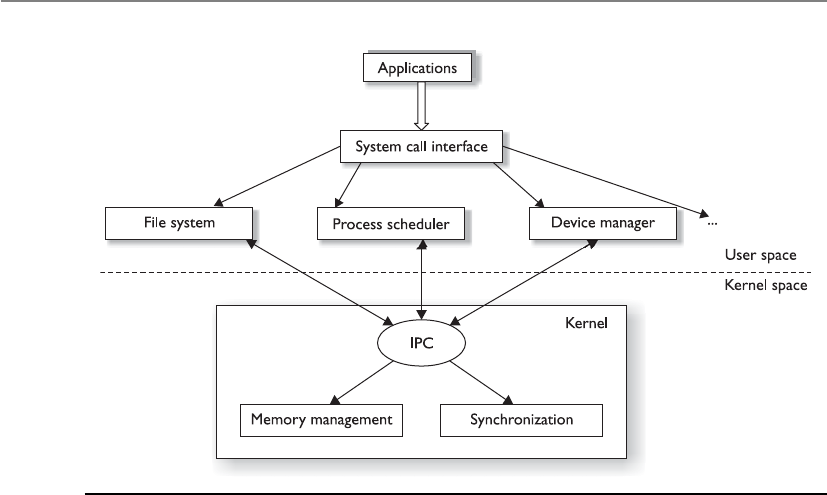
CISSP All-in-One Exam Guide
350
Operating system vendors found that having just a stripped-down microkernel
working in kernel mode had a lot of performance issues because processing required so
many mode transitions. A mode transition takes place every time a CPU has to move
between executing instructions for processes that work in kernel mode versus user
mode. As an analogy, let’s say that I have to set up a different office environment for my
two employees when they come to the office to work. There is only one office with one
desk, one computer, and one file cabinet (just like the computer only has one CPU).
Before Sam gets to the office I have to put out the papers for his accounts, fill the file
cabinet with files relating to his tasks, configure the workstation with his user profile,
and make sure his coffee cup is available. When Sam leaves and before Vicky gets to the
office, I have to change out all the papers, files, user profile, and coffee cup. My respon-
sibility is to provide the different employees with the right environment so that they
can get right down to work when they arrive at the office, but constantly changing out
all the items is time consuming. In essence, this is what a CPU has to do when an inter-
rupt takes place and a process from a different mode (kernel or user) needs its instruc-
tions executed. The current process information has to be stored and saved so the CPU
can come back and complete the original process’s requests. The new process informa-
tion (memory addresses, program counter value, PSW, etc.) has to be moved into the
CPU registers. Once this is completed, then the CPU can start executing the process’s
instruction set. This back and forth has to happen because it is a multitasking system
that is sharing one resource—the CPU.
So the industry went from a bloated kernel (whole operating system) to a small
kernel (microkernel), but the performance hit was too great. There had to be a compro-
mise between the two, which is referred to as the hybrid microkernel architecture.
Figure 4-18 Microkernel architecture
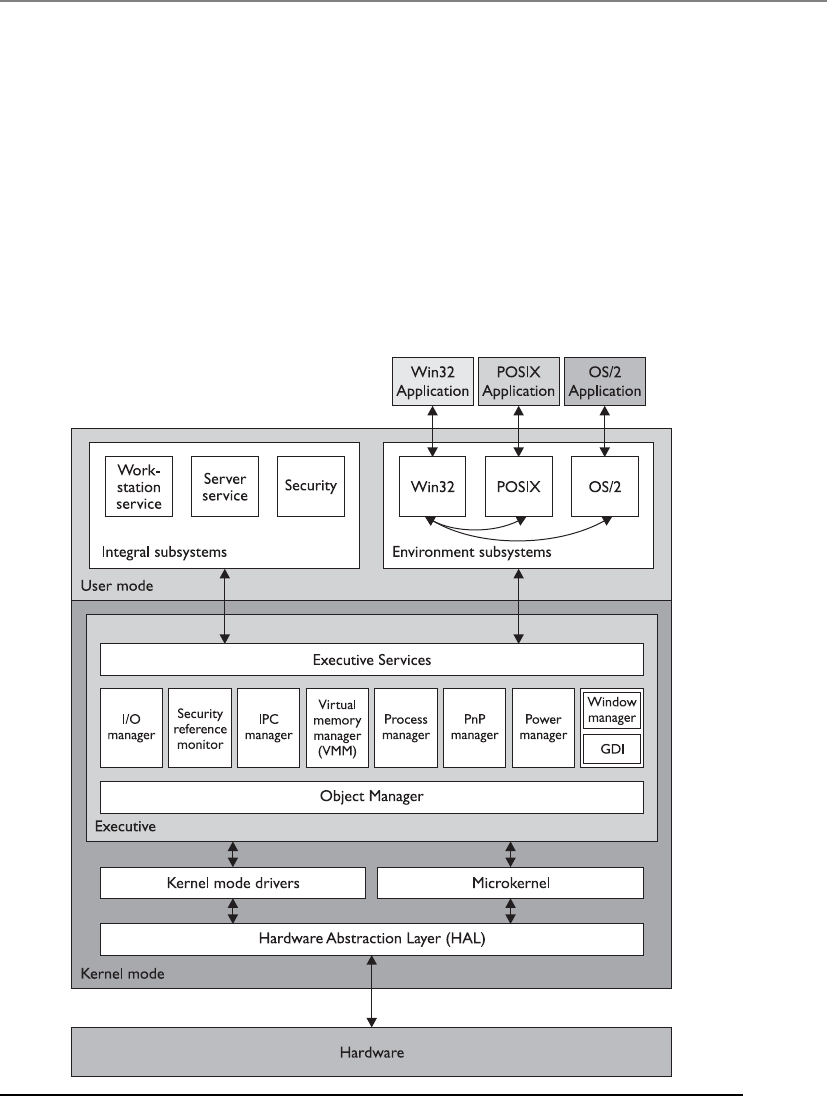
Chapter 4: Security Architecture and Design
351
In a hybrid microkernel architecture, the microkernel still exists and carries out
mainly interprocess communication and memory management responsibilities. All of
the other operating services work in a client\server model. The operating system ser-
vices are the servers, and the application processes are the clients. When a user’s appli-
cation needs the operating system to carry out some type of functionality for it (file
system interaction, peripheral device communication, network access, etc.), it makes a
request to the specific API of the system’s server service. This operating system service
carries out the activity for the application and returns the result when finished. The
separation of a microkernel and the other operating system services within a hybrid
microkernel architecture is illustrated in Figure 4-19, which is the basic structure of a
Windows environment. The services that run outside the microkernel are collectively
referred to as the executive services.
Figure 4-19 Windows hybrid microkernel architecture

CISSP All-in-One Exam Guide
352
The basic core definitions of the different architecture types are as follows:
•Monolithic All operating system processes run in kernel mode.
•Layered All operating system processes run in a hierarchical model in kernel
mode.
•Microkernel Core operating system processes run in kernel mode and the
remaining ones run in user mode.
•Hybrid microkernel All operating system processes run in kernel mode. Core
processes run within a microkernel and others run in a client\server model.
The main architectures that are used in systems today are illustrated in Figure 4-20.
Cause for Confusion
If you continue your studies in operating system architecture, you will undoubt-
edly run into some of the confusion and controversy surrounding these families
of architectures. The intricacies and complexities of these arguments are out of
scope for the CISSP exam, but a little insight is worth noting.
Today, the terms monolithic operating system and monolithic kernel are used
interchangeably, which invites confusion. The industry started with monolithic
operating systems, as in MS-DOS, which did not clearly separate out kernel and
nonkernel processes. As operating systems advanced, the kernel components be-
came more organized, isolated, protected, and focused. The hardware-facing
code became more virtualized to allow for portability, and the code became more
modular so functionality components (loadable kernel modules, DLLs) could be
loaded and unloaded as needed. So while a Unix system today follows a mono-
lithic kernel model, it does not mean that it is as rudimentary as MS-DOS, which
was a monolithic operating system. The core definition of monolithic stayed the
same, which just means the whole operating system runs in kernel mode, but
operating systems that fall under this umbrella term advanced over time.
Different operating systems (BSD, Solaris, Linux, Windows, Macintosh, etc.)
have different flavors and versions, and while some cleanly fit into the classic ar-
chitecture buckets, some do not because the vendors have had to develop their
systems to meet its specific customer demands. Some operating systems only got
more lean and stripped of functionality so that they could work in embedded
systems, real-time systems, or dedicated devices (firewalls, VPN concentrators),
and some got more bloated to provide extensive functionality (Windows, Linux).
Operating systems moved from cooperative multitasking to preemptive, im-
proved memory management; some changed file system types (FAT to NTFS); I\O
management matured; networking components were added; and there was al-
lowance for distributed computing and multiprocessing. So in reality, we cannot
think that architectural advancement just had to do with what code ran in kernel
mode and what did not, but these design families are ways for us to segment
operating system advancements at a macro level.
You do not need to know the architecture types specific operating systems
follow for the CISSP exam, but just the architecture types. Remember that the
CISSP exam is a nonvendor and high-level exam.
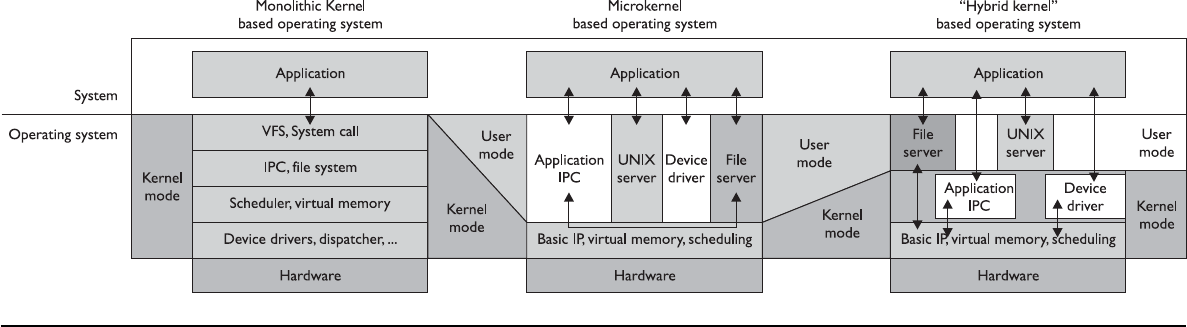
Figure 4-20 Major operating system kernel architectures

CISSP All-in-One Exam Guide
354
Operating system architecture is critical when it comes to the security of a system
overall. Systems can be patched, but this is only a Band-Aid approach. Security should
be baked in from the beginning and then thought through in every step of the develop-
ment life cycle.
Key Terms
•Interrupt Software or hardware signal that indicates that system
resources (i.e., CPU) are needed for instruction processing.
•Instruction set Set of operations and commands that can be
implemented by a particular processor (CPU).
•Microarchitecture Specific design of a microprocessor, which includes
physical components (registers, logic gates, ALU, cache, etc.) that
support a specific instruction set.
•Application programming interface Software interface that enables
process-to-process interaction. Common way to provide access to
standard routines to a set of software programs.
•Monolithic operating system architecture All of the code of
the operating system working in kernel mode in an ad hoc and
nonmodularized manner.
•Layered operating system architecture Architecture that separates
system functionality into hierarchical layers.
•Data hiding Use of segregation in design decisions to protect software
components from negatively interacting with each other. Commonly
enforced through strict interfaces.
•Microkernel architecture Reduced amount of code running in kernel
mode carrying out critical operating system functionality. Only the
absolutely necessary code runs in kernel mode, and the remaining
operating system code runs in user mode.
•Hybrid microkernel architecture Combination of monolithic and
microkernel architectures. The microkernel carries out critical operating
system functionality, and the remaining functionality is carried out in a
client\server model within kernel mode.
•Mode transition When the CPU has to change from processing code
in user mode to kernel mode. This is a protection measure, but it causes
a performance hit.

Chapter 4: Security Architecture and Design
355
Virtual Machines
I would like my own simulated environment so I can have my own world.
If you have been into computers for a while, you might remember computer games
that did not have the complex, lifelike graphics of today’s games. Pong and Asteroids
were what we had to play with when we were younger. In those simpler times, the
games were 16-bit and were written to work in a 16-bit MS-DOS environment. When
our Windows operating systems moved from 16-bit to 32-bit, the 32-bit operating sys-
tems were written to be backward compatible, so someone could still load and play a
16-bit game in an environment that the game did not understand. The continuation of
this little life pleasure was available to users because the operating systems created vir-
tual environments for the games to run in.
When a 16-bit application needs to interact with the operating system, it has been
developed to make system calls and interact with the computer’s memory in a way that
would only work within a 16-bit operating system—not a 32-bit system. So, the virtual
environment simulates a 16-bit operating system, and when the application makes a
request, the operating system converts the 16-bit request into a 32-bit request (this is
called thunking) and reacts to the request appropriately. When the system sends a reply
to this request, it changes the 32-bit reply into a 16-bit reply so the application under-
stands it.
Today, virtual environments are much more advanced. Basic virtualization enables
single hardware equipment to run multiple operating system environments simultane-
ously, greatly enhancing processing power utilization, among other benefits. Creating
virtual instances of operating systems, applications, and storage devices is known as
virtualization.
In today’s jargon, a virtual instance of an operating system is known as a virtual
machine. A virtual machine is commonly referred to as a guest that is executed in the
host environment. Virtualization allows a single host environment to execute multiple
guests at once, with multiple virtual machines dynamically pooling resources from a
common physical system. Computer resources such as RAM, processors, and storage
are emulated through the host environment. The virtual machines do not directly ac-
cess these resources; instead, they communicate with a hypervisor within the host envi-
ronment, which is responsible for managing system resources. The hypervisor is the
central program that controls the execution of the various guest operating systems and
provides the abstraction level between the guest and host environments, as shown in
Figure 4-21.
What this means is that you can have one computer running several different oper-
ating systems at one time. For example, you can run a system with Windows 2000,
Linux, Unix, and Windows 2008 on one computer. Think of a house that has different
rooms. Each operating system gets its own room, but each share the same resources that
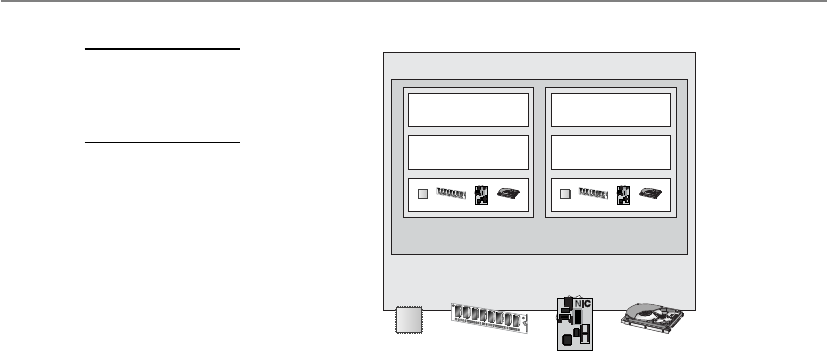
CISSP All-in-One Exam Guide
356
the house provides—a foundation, electricity, water, roof, and so on. An operating sys-
tem that is “living” in a specific room does not need to know about or interact with
another operating system in another room to take advantage of the resources provided
by the house. The same concept happens in a computer: Each operating system shares
the resources provided by the physical system (as in memory, processor, buses, and so
on). They “live” and work in their own “rooms,” which are the guest virtual machines.
The physical computer itself is the host.
Why do this? One reason is that it is cheaper than having a full physical system for
each and every operating system. If they can all live on one system and share the same
physical resources, your costs are reduced immensely. This is the same reason people
get roommates. The rent can be split among different people, and all can share the
same house and resources. Another reason to use virtualization is security. Providing
software their own “clean” environments to work within reduces the possibility of
them negatively interacting with each other.
The following useful list, taken from www.kernelthread.com/publications/virtual-
ization, pertains to the different reasons for using virtualization in various environ-
ments. It was written years ago, but is still very applicable to today’s needs and the
CISSP exam.
•Virtual machines can be used to consolidate the workloads of several under-
utilized servers to fewer machines, perhaps a single machine (server consolidation).
Related benefits are savings on hardware, environmental costs, management, and
administration of the server infrastructure.
•The need to run legacy applications is served well by virtual machines. A legacy
application might simply not run on newer hardware and/or operating systems. Even
if it does, if may under-utilize the server, so it makes sense to consolidate several
applications. This may be difficult without virtualization because such applications
are usually not written to coexist within a single execution environment.
• Virtual machines can be used to provide secure, isolated sandboxes for running
untrusted applications. You could even create such an execution environment
Hypervisor
Hardware
CPU
Memory
NIC
CPU Disk
Application
Operating system
CPU
Application
Operating system
CPU
Virtual Machine 1 Virtual Machine 2
Figure 4-21
The hypervisor
controls virtual
machine instances.

Chapter 4: Security Architecture and Design
357
dynamically—on the fly—as you download something from the Internet and run
it. Virtualization is an important concept in building secure computing platforms.
• Virtual machines can be used to create operating systems, or execution environments
with resource limits, and given the right schedulers, resource guarantees. Partitioning
usually goes hand-in-hand with quality of service in the creation of QoS-enabled
operating systems.
• Virtual machines can provide the illusion of hardware, or hardware configuration
that you do not have (such as SCSI devices or multiple processors). Virtualization
can also be used to simulate networks of independent computers.
• Virtual machines can be used to run multiple operating systems simultaneously:
different versions, or even entirely different systems, which can be on hot standby.
Some such systems may be hard or impossible to run on newer real hardware.
•Virtual machines allow for powerful debugging and performance monitoring. You can
put such tools in the virtual machine monitor, for example. Operating systems can
be debugged without losing productivity, or setting up more complicated debugging
scenarios.
•Virtual machines can isolate what they run, so they provide fault and error containment.
You can inject faults proactively into software to study its subsequent behavior.
•Virtual machines are great tools for research and academic experiments. Since they
provide isolation, they are safer to work with. They encapsulate the entire state of a
running system: you can save the state, examine it, modify it, reload it, and so on.
•Virtualization can make tasks such as system migration, backup, and recovery easier
and more manageable.
•Virtualization on commodity hardware has been popular in co-located hosting. Many
of the above benefits make such hosting secure, cost-effective, and appealing in general.
System Security Architecture
Up to this point we have looked at system architectures, CPU architectures, and operat-
ing system architectures. Remember that a system architecture has several views to it,
depending upon the stakeholder’s individual concerns. Since our main concern is secu-
rity, we are going to approach system architecture from a security point of view and drill
down into the core components that are part of most computing systems today. But
first we need to understand how the goals for the individual system security architec-
tures are defined.
Security Policy
In life we set goals for ourselves, our teams, companies, and families to meet. Setting a
goal defines the desired end state. We might define a goal for our company to make $2
million by the end of the year. We might define a goal of obtaining three government
contracts for our company within the next six months. A goal could be that we lose 30

CISSP All-in-One Exam Guide
358
pounds in 12 months or save enough money for our child to be able to go off to college
when she turns 18 years old. The point is that we have to define a desired end state and
from there we can lay out a structured plan on how to accomplish those goals, punctu-
ated with specific action items and a defined timeline.
It is not usually helpful to have vague goal statements, as in “save money” or “lose
weight” or “become successful.” Our goals need to be specific, or how do we know
when we accomplish them? This is also true in computer security. If your boss gave you
a piece of paper that had a simple goal written on it, “Build a secure system,” what does
this mean? What is the definition of a “system”? What is the definition of “secure”? Just
draw a picture of a pony on this piece of paper and give it back to him and go to lunch.
You don’t have time for such silliness.
When you get back from lunch, your boss hands you the same paper with the
following:
• Discretionary access control–based operating system
• Provides role-based access control functionality
• Capability of protecting data classified at “public” and “confidential” levels
• Does not allow unauthorized access to sensitive data or critical system
functions
• Enforces least privilege and separation of duties
• Provides auditing capabilities
• Implements trusted paths and trusted shells for sensitive processing activities
• Enforces identification, authentication, and authorization of trusted subjects
• Implements a capability-based authentication methodology
• Does not contain covert channels
• Enforces integrity rules on critical files
Now you have more direction on what it is that he wants you to accomplish and
you can work with him to form the overall security goals for the system you will be
designing and developing. All of these goals need to be captured and outlined in a se-
curity policy.
Security starts at a policy level, which are high-level directives that provide the foun-
dational goals for a system overall and the components that make it up from a security
perspective. A security policy is a strategic tool that dictates how sensitive information
and resources are to be managed and protected. A security policy expresses exactly what
the security level should be by setting the goals of what the security mechanisms are
supposed to accomplish. This is an important element that has a major role in defining
the architecture and design of the system. The security policy is a foundation for the
specifications of a system and provides the baseline for evaluating a system after it is
built. The evaluation is carried out to make sure that the goals that were laid out in the
security policy were accomplished.

Chapter 4: Security Architecture and Design
359
NOTE
NOTE Chapter 2 examined security policies in-depth, but those policies
were directed toward organizations, not technical systems. The security
policies being addressed here are for operating systems, devices, and
applications. The different policy types are similar in nature but have different
targets: an organization as opposed to an individual computer system.
In Chapter 3 we went through discretionary access control (DAC) and mandatory
access control (MAC) models. A DAC-based operating system is going to have a very
different (less strict) security policy than a MAC-based system (more strict). The secu-
rity mechanisms within these very different types of systems will vary, but the systems
commonly overlap in the main structures of their security architecture. We will explore
these structures in the following sections.
Security Architecture Requirements
In the 1970s computer systems were moving from single user, stand-alone, centralized
and closed systems to multiuser systems that had multiprogramming functionality and
networking capabilities. The U.S. government needed to ensure that all of the systems
that it was purchasing and implementing were properly protecting its most secret se-
crets. The government had various levels of classified data (secret, top secret) and users
with different clearance levels (Secret, Top Secret). It needed to come up with a way to
instruct vendors on how to build computer systems to meet their security needs and in
turn a way to test the products these vendors developed based upon those same secu-
rity needs.
In 1972, the U.S. government released a report (Computer Security Technology
Planning Study) that outlined basic and foundational security requirements of com-
puter systems that it would deem acceptable for purchase and deployment. These re-
quirements were further defined and built upon, which resulted in the Trusted
Computer System Evaluation Criteria, which we will cover in more detail at the end of
this chapter. These requirements shaped the security architecture of almost all of the
systems in use today. Some of the core tenets of these requirements were trusted com-
puting base, security perimeter, reference monitor, and the security kernel.
Trusted Computing Base
The trusted computing base (TCB) is a collection of all the hardware, software, and firm-
ware components within a system that provide some type of security and enforce the
system’s security policy. The TCB does not address only operating system components,
because a computer system is not made up of only an operating system. Hardware, soft-
ware components, and firmware components can affect the system in a negative or
positive manner, and each has a responsibility to support and enforce the security pol-
icy of that particular system. Some components and mechanisms have direct responsi-
bilities in supporting the security policy, such as firmware that will not let a user boot a
computer from a USB drive, or the memory manager that will not let processes over-
write other processes’ data. Then there are components that do not enforce the security

CISSP All-in-One Exam Guide
360
policy but must behave properly and not violate the trust of a system. Examples of the
ways in which a component could violate the system’s security policy include an ap-
plication that is allowed to make a direct call to a piece of hardware instead of using the
proper system calls through the operating system, a process that is allowed to read data
outside of its approved memory space, or a piece of software that does not properly
release resources after use.
The operating system’s kernel is made up of hardware, software, and firmware, so in
a sense the kernel is the TCB. But the TCB can include other components, such as
trusted commands, programs, and configuration files that can directly interact with the
kernel. For example, when installing a Unix system, the administrator can choose to
install the TCB configuration during the setup procedure. If the TCB is enabled, then
the system has a trusted path, a trusted shell, and system integrity–checking capabili-
ties. A trusted path is a communication channel between the user, or program, and the
TCB. The TCB provides protection resources to ensure this channel cannot be compro-
mised in any way. A trusted shell means that someone who is working in that shell
(command interpreter) cannot “bust out of it” and other processes cannot “bust into it.”
Every operating system has specific components that would cause the system grave
danger if they were compromised. The components that make up the TCB provide extra
layers of protection around these mechanisms to help ensure they are not compro-
mised, so the system will always run in a safe and predictable manner. While the TCB
components can provide extra layers of protection for sensitive processes, they them-
selves have to be developed securely. The BIOS function should have a password protec-
tion capability and be tamperproof. The subsystem within a Windows operating system
that generates access tokens should not be able to be hijacked and be used to produce
fake tokens for malicious processes. Before a process can interact with a system configu-
ration file, it must be authenticated by the security kernel. Device drivers should not be
able to be modified in an unauthorized manner. Basically, any piece of a system that
could be used to compromise the system or put it into an unstable condition is consid-
ered to be part of the TCB and it must be developed and controlled very securely.
You can think of a TCB as a building. You want the building to be strong and safe,
so there are certain components that absolutely have to be built and installed properly.
The right types of construction nails need to be used, not the flimsy ones we use at
home to hold up pictures of our grandparents. The beams in the walls need to be made
out of steel and properly placed. The concrete in the foundation needs to be made of
the right concentration of gravel and water. The windows need to be shatterproof. The
electrical wiring needs to be of proper grade and grounded.
An operating system also has critical pieces that absolutely have to be built and
installed properly. The memory manager has to be tamperproof and properly protect
shared memory spaces. When working in kernel mode, the CPU must have all logic
gates in the proper place. Operating system APIs must only accept secure service re-
quests. Access control lists on objects cannot be modified in an unauthorized manner.
Auditing must take place and the audit trails cannot be modified in an unauthor-
ized manner. Interprocess communication must take place in an approved and con-
trolled manner.

Chapter 4: Security Architecture and Design
361
The processes within the TCB are the components that protect the system overall. So
the developers of the operating system must make sure these processes have their own
execution domain. This means they reside in ring 0, their instructions are executed in
privileged state, and no less trusted processes can directly interact with them. The devel-
opers need to ensure the operating system maintains an isolated execution domain, so
their processes cannot be compromised or tampered with. The resources that the TCB
processes use must also be isolated, so tight access control can be provided and all ac-
cess requests and operations can be properly audited. So basically, the operating system
ensures that all the non-TCB processes and TCB processes interact in a secure manner.
When a system goes through an evaluation process, part of the process is to identify
the architecture, security services, and assurance mechanisms that make up the TCB. Dur-
ing the evaluation process, the tests must show how the TCB is protected from accidental
or intentional tampering and compromising activity. For systems to achieve a higher trust
level rating, they must meet well-defined TCB requirements, and the details of their op-
erational states, developing stages, testing procedures, and documentation will be re-
viewed with more granularity than systems attempting to achieve a lower trust rating.
By using specific security criteria, trust can be built into a system, evaluated, and
certified. This approach can provide a measurement system for customers to use when
comparing one product to another. It also gives vendors guidelines on what expectations
are put upon their systems and provides a common assurance rating metric so when one
group talks about a C2 rating, everyone else understands what that term means.
The Orange Book is one of these evaluation criteria. It defines a trusted system as
hardware and software that utilize measures to protect classified data for a range of us-
ers without violating access rights and the security policy. It looks at all protection
mechanisms within a system that enforce the security policy and provide an environ-
ment that will behave in a manner expected of it. This means each layer of the system
must trust the underlying layer to perform the expected functions, provide the expected
level of protection, and operate in an expected manner under many different situations.
When the operating system makes calls to hardware, it anticipates that data will be re-
turned in a specific data format and behave in a consistent and predictable manner.
Applications that run on top of the operating system expect to be able to make certain
system calls, receive the required data in return, and operate in a reliable and depend-
able environment. Users expect the hardware, operating system, and applications to
perform in particular fashions and provide a certain level of functionality. For all of
these actions to behave in such predicable manners, the requirements of a system must
be addressed in the planning stages of development, not afterward.
Security Perimeter
Now, whom do we trust?
Response: Anyone inside the security perimeter.
As stated previously, not every process and resource falls within the TCB, so some
of these components fall outside of an imaginary boundary referred to as the security
perimeter. A security perimeter is a boundary that divides the trusted from the untrust-
ed. For the system to stay in a secure and trusted state, precise communication standards

CISSP All-in-One Exam Guide
362
must be developed to ensure that when a component within the TCB needs to com-
municate with a component outside the TCB, the communication cannot expose the
system to unexpected security compromises. This type of communication is handled
and controlled through interfaces.
For example, a resource that is within the boundary of the security perimeter is
considered to be a part of the TCB and must not allow less trusted components access
to critical system resources in an insecure manner. The processes within the TCB must
also be careful about the commands and information they accept from less trusted re-
sources. These limitations and restrictions are built into the interfaces that permit this
type of communication to take place and are the mechanisms that enforce the security
perimeter. Communication between trusted components and untrusted components
needs to be controlled to ensure that the system stays stable and safe.
Remember when we covered CPU architectures, we went through the various rings a
CPU provides. The operating system places its software components within those rings.
The most trusted components would go inside ring 0, and the less trusted components
went into the other rings. Strict and controlled communication has to be put into place
to make sure a less trusted component does not compromise a more trusted compo-
nent. This control happens through APIs. The APIs are like bouncers at bars. The bounc-
ers only allow individuals who are safe into the bar environment and keep the others
out. This is the same idea of a security perimeter. Strict interfaces need to be put into
place to control the communication between the items within and outside the TCB.
NOTE
NOTE The TCB and security perimeter are not physical entities, but
conceptual constructs used by system architects and developers to delineate
between trusted and untrusted components and how they communicate.
Reference Monitor
Up to this point we have a CPU that provides a ringed structure and an operating sys-
tem that places its components in the different rings based upon the trust level of each
component. We have a defined security policy, which outlines the level of security we
want our system to provide. We have chosen the mechanisms that will enforce the se-
curity policy (TCB) and implemented security perimeters (interfaces) to make sure
these mechanisms communicate securely. Now we need to develop and implement a
mechanism that ensures that the subjects that access objects within the operating sys-
tem have been given the necessary permissions to do so. This means we need to devel-
op and implement a reference monitor.
The reference monitor is an abstract machine that mediates all access subjects have
to objects, both to ensure that the subjects have the necessary access rights and to pro-
tect the objects from unauthorized access and destructive modification. For a system to
achieve a higher level of trust, it must require subjects (programs, users, processes) to
be fully authorized prior to accessing an object (file, program, resource). A subject must
not be allowed to use a requested resource until the subject has proven it has been
granted access privileges to use the requested object. The reference monitor is an access
control concept, not an actual physical component, which is why it is normally referred
to as the “reference monitor concept” or an “abstract machine.”

Chapter 4: Security Architecture and Design
363
A reference monitor defines the design requirements a reference validation mecha-
nism must meet so that it can properly enforce the specifications of a system-based
access control policy. As discussed in Chapter 3, access control is made up of rules,
which specify what subjects (processes, programs, users, etc.) can communicate with
which objects (files, processes, peripheral devices, etc.) and what operations can be
performed (read, write, execute, etc.). If you think about it, almost everything that takes
place within an operating system is made up of subject-to-object communication and
it has to be tightly controlled, or the whole system could be put at risk. If the access
rules of the reference monitor are not properly enforced, a process could potentially
misuse an object, which could result in corruption or compromise.
The reference monitor provides direction on how all access control decisions should
be made and controlled in a central concerted manner within a system. Instead of hav-
ing distributed components carrying out subject-to-object access decisions individually
and independently, all access decisions should be made by a core-trusted, tamperproof
component of the operating system that works within the system’s kernel, which is the
role of the security kernel.
Security Kernel
The security kernel is made up of hardware, software, and firmware components that
fall within the TCB, and it implements and enforces the reference monitor concept. The
security kernel mediates all access and functions between subjects and objects. The se-
curity kernel is the core of the TCB and is the most commonly used approach to build-
ing trusted computing systems. The security kernel has three main requirements:
• It must provide isolation for the processes carrying out the reference monitor
concept, and the processes must be tamperproof.
• It must be invoked for every access attempt and must be impossible to
circumvent. Thus, the security kernel must be implemented in a complete
and foolproof way.
• It must be small enough to be tested and verified in a complete and
comprehensive manner.
These are the requirements of the reference monitor; therefore, they are the require-
ments of the components that provide and enforce the reference monitor concept—the
security kernel.
These issues work in the abstract but are implemented in the physical world of
hardware devices and software code. The assurance that the components are enforcing
the abstract idea of the reference monitor is proved through testing and evaluations.
NOTE
NOTE The reference monitor is a concept in which an abstract machine
mediates all access to objects by subjects. The security kernel is the hardware,
firmware, and software of a TCB that implements this concept. The TCB is
the totality of protection mechanisms within a computer system that work
together to enforce a security policy. It contains the security kernel and all
other security protection mechanisms.

CISSP All-in-One Exam Guide
364
The following is a quick analogy to show you the relationship between the pro-
cesses that make up the security kernel, the security kernel itself, and the reference
monitor concept. Individuals (processes) make up a society (security kernel). For a so-
ciety to have a certain standard of living, its members must interact in specific ways,
which is why we have laws. The laws represent the reference monitor, which enforces
proper activity. Each individual is expected to stay within the bounds of the laws and
act in specific ways so society as a whole is not adversely affected and the standard of
living is not threatened. The components within a system must stay within the bounds
of the reference monitor’s laws so they will not adversely affect other components and
threaten the security of the system.
For a system to provide an acceptable level of trust, it must be based on an architec-
ture that provides the capabilities to protect itself from untrusted processes, intentional
or accidental compromises, and attacks at different layers of the system. A majority of
the trust ratings obtained through formal evaluations require a defined subset of sub-
jects and objects, explicit domains, and the isolation of processes so their access can be
controlled and the activities performed on them can be audited.
Let’s regroup. We know that a system’s trust is defined by how it enforces its own
security policy. When a system is tested against specific criteria, a rating is assigned to the
system and this rating is used by customers, vendors, and the computing society as a
whole. The criteria will determine if the security policy is being properly supported and
enforced. The security policy lays out the rules and practices pertaining to how a system
will manage, protect, and allow access to sensitive resources. The reference monitor is a
concept that says all subjects must have proper authorization to access objects, and this
concept is implemented by the security kernel. The security kernel comprises all the re-
sources that supervise system activity in accordance with the system’s security policy and
is part of the operating system that controls access to system resources. For the security
kernel to work correctly, the individual processes must be isolated from each other and
domains must be defined to dictate which objects are available to which subjects.
NOTE
NOTE Security policies that prevent information from flowing from a high
security level to a lower security level are called multilevel security policies.
These types of policies permit a subject to access an object only if the
subject’s security level is higher than or equal to the object’s classification.
As previously stated, many of the concepts covered in the previous sections are ab-
stract ideas that will be manifested in physical hardware components, firmware, soft-
ware code, and activities through designing, building, and implementing a system.
Operating systems implement access rights, permissions, access tokens, mandatory in-
tegrity levels, access control lists, access control entities, memory protection, sandbox-
es, virtualization, and more to meet the requirements of these abstract concepts.

Chapter 4: Security Architecture and Design
365
Security Models
An important concept in the design and analysis of secure systems is the security mod-
el, because it incorporates the security policy that should be enforced in the system. A
model is a symbolic representation of a policy. It maps the desires of the policymakers
into a set of rules that a computer system must follow.
The reason this chapter has repeatedly mentioned the security policy and its impor-
tance is that it is an abstract term that represents the objectives and goals a system must
Key Terms
•Virtualization Creation of a simulated environment (hardware
platform, operating system, storage, etc.) that allows for central control
and scalability.
•Hypervisor Central program used to manage virtual machines
(guests) within a simulated environment (host).
•Security policy Strategic tool used to dictate how sensitive
information and resources are to be managed and protected.
•Trusted computing base A collection of all the hardware, software,
and firmware components within a system that provide security and
enforce the system’s security policy.
•Trusted path Trustworthy software channel that is used for
communication between two processes that cannot be circumvented.
•Security perimeter Mechanism used to delineate between the
components within and outside of the trusted computing base.
•Reference monitor Concept that defines a set of design requirements
of a reference validation mechanism (security kernel), which enforces
an access control policy over subjects’ (processes, users) ability to
perform operations (read, write, execute) on objects (files, resources)
on a system.
•Security kernel Hardware, software, and firmware components that
fall within the TCB and implement and enforce the reference monitor
concept.
•Multilevel security policies Outlines how a system can simultaneously
process information at different classifications for users with different
clearance levels.

CISSP All-in-One Exam Guide
366
meet and accomplish to be deemed secure and acceptable. How do we get from an
abstract security policy to the point at which an administrator is able to uncheck a box
on the GUI to disallow David from accessing configuration files on his system? There
are many complex steps in between that take place during the system’s design and
development.
A security model maps the abstract goals of the policy to information system terms
by specifying explicit data structures and techniques necessary to enforce the security
policy. A security model is usually represented in mathematics and analytical ideas,
which are mapped to system specifications and then developed by programmers
through programming code. So we have a policy that encompasses security goals, such
as “each subject must be authenticated and authorized before accessing an object.” The
security model takes this requirement and provides the necessary mathematical formu-
las, relationships, and logic structure to be followed to accomplish this goal. From
there, specifications are developed per operating system type (Unix, Windows, Macin-
tosh, and so on), and individual vendors can decide how they are going to implement
mechanisms that meet these necessary specifications.
So in a very general and simplistic example, if a security policy states that subjects
need to be authorized to access objects, the security model would provide the mathe-
matical relationships and formulas explaining how x can access y only through the
outlined specific methods. Specifications are then developed to provide a bridge to
what this means in a computing environment and how it maps to components and
mechanisms that need to be coded and developed. The developers then write the pro-
gram code to produce the mechanisms that provide a way for a system to use ACLs and
give administrators some degree of control. This mechanism presents the network ad-
ministrator with a GUI that enables the administrator to choose (via check boxes, for
example) which subjects can access what objects and to be able to set this configuration
within the operating system. This is a rudimentary example, because security models
can be very complex, but it is used to demonstrate the relationship between the secu-
rity policy and the security model.
A security policy outlines goals without regard to how they will be accomplished. A
model is a framework that gives the policy form and solves security access problems for
particular situations. Several security models have been developed to enforce security
policies. The following sections provide overviews of each model.
Relationship Between a Security Policy and a Security Model
If someone tells you to live a healthy and responsible life, this is a very broad,
vague, and abstract notion. So when you ask this person how this is accom-
plished, they outline the things you should and should not do (do not harm
others, do not lie, eat your vegetables, and brush your teeth). The security policy
provides the abstract goals, and the security model provides the do’s and don’ts
necessary to fulfill these goals.

Chapter 4: Security Architecture and Design
367
State Machine Models
No matter what state I am in, I am always safe.
In state machine models, to verify the security of a system, the state is used, which
means that all current permissions and all current instances of subjects accessing ob-
jects must be captured. Maintaining the state of a system deals with each subject’s as-
sociation with objects. If the subjects can access objects only by means that are
concurrent with the security policy, the system is secure. A state of a system is a snapshot
of a system at one moment of time. Many activities can alter this state, which are re-
ferred to as state transitions. The developers of an operating system that will implement
the state machine model need to look at all the different state transitions that are pos-
sible and assess whether a system that starts up in a secure state can be put into an in-
secure state by any of these events. If all of the activities that are allowed to happen in
the system do not compromise the system and put it into an insecure state, then the
system executes a secure state machine model.
The state machine model is used to describe the behavior of a system to different
inputs. It provides mathematical constructs that represent sets (subjects and objects)
and sequences. When an object accepts an input, this modifies a state variable. A sim-
plistic example of a state variable is (Name, Value), as shown in Figure 4-22. This vari-
able is part of the operating system’s instruction set. When this variable is called upon
to be used, it can be populated with (Color, Red) from the input of a user or program.
Let’s say the user enters a different value, so now the variable is (Color, Blue). This is a
simplistic example of a state transition. Some state transitions are this simple, but com-
plexity comes in when the system must decide if this transition should be allowed. To
allow this transition, the object’s security attributes and the access rights of the subject
must be reviewed and allowed by the operating system.
Developers who implement the state machine model must identify all the initial
states (default variable values) and outline how these values can be changed (inputs
that will be accepted) so the various number of final states (resulting values) still ensure
that the system is safe. The outline of how these values can be changed is often imple-
mented through condition statements: “if condition then update.”
Formal Models
Using models in software development has not become as popular as once imag-
ined, primarily because vendors are under pressure to get products to market as
soon as possible. Using formal models takes more time during the architectural
phase of development, extra time that many vendors feel they cannot afford.
Formal models are definitely used in the development of systems that cannot al-
low errors or security breaches, such as air traffic control systems, spacecraft soft-
ware, railway signaling systems, military classified systems, and medical control
systems. This does not mean that these models, or portions of them, are not used
in industry products, but rather that industry vendors do not always follow these
models in the purely formal and mathematical way all the time.

CISSP All-in-One Exam Guide
368
A system that has employed a state machine model will be in a secure state in each
and every instance of its existence. It will boot up into a secure state, execute commands
and transactions securely, allow subjects to access resources only in secure states, and
shut down and fail in a secure state. Failing in a secure state is extremely important. It
is imperative that if anything unsafe takes place, the system must be able to “save itself”
and not make itself vulnerable. When an operating system displays an error message to
the user or reboots or freezes, it is executing a safety measure. The operating system has
experienced something that is deemed illegal and it cannot take care of the situation
itself, so to make sure it does not stay in this insecure state, it reacts in one of these
fashions. Thus, if an application or system freezes on you, know that it is simply the
system trying to protect itself and your data.
Several points should be considered when developing a product that uses a state
machine model. Initially, the developer must define what and where the state variables
are. In a computer environment, all data variables could independently be considered
state variables, and an inappropriate change to one could conceivably change or cor-
rupt the system or another process’s activities. Next, the developer must define a secure
state for each state variable. The next step is to define and identify the allowable state
Figure 4-22 A simplistic example of a state change

Chapter 4: Security Architecture and Design
369
transition functions. These functions will describe the allowable changes that can be
made to the state variables.
After the state transition functions are defined, they must be tested to verify that the
overall machine state will not be compromised and that these transition functions will
keep the integrity of the system (computer, data, program, or process) intact at all times.
Bell-LaPadula Model
I don’t want anyone to know my secrets.
Response: We need Mr. Bell and Mr. LaPadula in here then.
In the 1970s, the U.S. military used time-sharing mainframe systems and was con-
cerned about the security of these systems and leakage of classified information. The
Bell-LaPadula model was developed to address these concerns. It was the first mathe-
matical model of a multilevel security policy used to define the concept of a secure state
machine and modes of access, and outlined rules of access. Its development was funded
by the U.S. government to provide a framework for computer systems that would be
used to store and process sensitive information. The model’s main goal was to prevent
secret information from being accessed in an unauthorized manner.
A system that employs the Bell-LaPadula model is called a multilevel security system
because users with different clearances use the system, and the system processes data at
different classification levels. The level at which information is classified determines
the handling procedures that should be used. The Bell-LaPadula model is a state ma-
chine model that enforces the confidentiality aspects of access control. A matrix and
security levels are used to determine if subjects can access different objects. The sub-
ject’s clearance is compared to the object’s classification and then specific rules are ap-
plied to control how subject-to-object interactions can take place.
This model uses subjects, objects, access operations (read, write, and read/write),
and security levels. Subjects and objects can reside at different security levels and will
have relationships and rules dictating the acceptable activities between them. This
model, when properly implemented and enforced, has been mathematically proven to
provide a very secure and effective operating system. It is also considered to be an infor-
mation-flow security model, which means that information does not flow in an inse-
cure manner.
The Bell-LaPadula model is a subject-to-object model. An example would be how
you (subject) could read a data element (object) from a specific database and write data
into that database. The Bell-LaPadula model focuses on ensuring that subjects are prop-
erly authenticated—by having the necessary security clearance, need to know, and for-
mal access approval—before accessing an object.
Three main rules are used and enforced in the Bell-LaPadula model: the simple se-
curity rule, the *-property (star property) rule, and the strong star property rule. The
simple security rule states that a subject at a given security level cannot read data that
reside at a higher security level. For example, if Bob is given the security clearance of
secret, this rule states he cannot read data classified as top secret. If the organization
wanted Bob to be able to read top-secret data, it would have given him that clearance
in the first place.

CISSP All-in-One Exam Guide
370
The *-property rule (star property rule) states that a subject in a given security level
cannot write information to a lower security level. The simple security rule is referred to
as the “no read up” rule, and the *-property rule is referred to as the “no write down”
rule. The third rule, the strong star property rule, states that a subject that has read and
write capabilities can only perform those functions at the same security level; nothing
higher and nothing lower. So, for a subject to be able to read and write to an object, the
clearance and classification must be equal.
These three rules indicate what states the system can go into. Remember that a state
is the values of the variables in the software at a snapshot in time. If a subject has per-
formed a read operation on an object at a lower security level, the subject now has a
variable that is populated with the data that was read, or copied, into its variable. If
a subject has written to an object at a higher security level, the subject has modified a
variable within that object’s domain.
NOTE
NOTE In access control terms, the word dominate means to be higher than
or equal to. So if you see a statement such as “A subject can only perform a
read operation if the access class of the subject dominates the access class
of an object,” this just means the subject must have a clearance that is higher
than or equal to the object. In the Bell-LaPadula model, this is referred to as
the dominance relation, which is the relationship of the subject’s clearance to
the object’s classification.
The state of a system changes as different operations take place. The Bell-LaPadula
model defines a secure state, meaning a secure computing environment and the al-
lowed actions, which are security-preserving operations. This means the model pro-
vides a secure state and only permits operations that will keep the system within a
secure state and not let it enter into an insecure state. So if 100 people access 2,000
objects in a day using this one system, this system is put through a lot of work and sev-
eral complex activities must take place. However, at the end of the day, the system is just
as secure as it was at the beginning of the day. This is the definition of the Basic Security
Theorem used in computer science, which states that if a system initializes in a secure
state and all allowed state transitions are secure, then every subsequent state will be
secure no matter what inputs occur.
NOTE
NOTE The tranquility principle, which is also used in this model, means that
subjects’ and objects’ security levels cannot change in a manner that violates
the security policy.
An important thing to note is that the Bell-LaPadula model was developed to make
sure secrets stay secret; thus, it provides and addresses confidentiality only. This model
does not address the integrity of the data the system maintains—only who can and can-
not access the data and what operations can be carried out.

Chapter 4: Security Architecture and Design
371
NOTE
NOTE Ensuring that information does not flow from a higher security
level to a lower level is referred to as controlling unauthorized downgrading of
information, which would take place through a “write down” operation. An
actual compromise occurs if and when a user at a lower security level reads
this data.
So what does this mean and why does it matter? Chapter 3 discussed mandatory
access control (MAC) systems versus discretionary access control (DAC) systems. All
MAC systems are based on the Bell-LaPadula model, because it allows for multilevel
security to be integrated into the code. Subjects and objects are assigned labels. The
subject’s label contains its clearance label (top secret, secret, or confidential) and the
object’s label contains its classification label (top secret, secret, or confidential). When
a subject attempts to access an object, the system compares the subject’s clearance label
and the object’s classification label and looks at a matrix to see if this is a legal and se-
cure activity. In our scenario, it is a perfectly fine activity, and the subject is given access
to the object. Now, if the subject’s clearance label is top secret and the object’s classifica-
tion label is secret, the subject cannot write to this object, because of the *-property
rule, which makes sure that subjects cannot accidentally or intentionally share confi-
dential information by writing to an object at a lower security level. As an example,
suppose that a busy and clumsy general (who has top-secret clearance) in the Army
opens up a briefing letter (which has a secret classification) that will go to all clerks at
all bases around the world. He attempts to write that the United States is attacking
Cuba. The Bell-LaPadula model will come into action and not permit this general to
write this information to this type of file because his clearance is higher than that of the
memo.
Likewise, if a nosey military staff clerk tried to read a memo that was available only
to generals and above, the Bell-LaPadula model would stop this activity. The clerk’s
clearance is lower than that of the object (the memo), and this violates the simple se-
curity rule of the model. It is all about keeping secrets secret.
NOTE
NOTE It is important that MAC operating systems and MAC databases
follow these rules. In Chapter 10, we will look at how databases can follow
these rules by the use of polyinstantiation.
CAUTION
CAUTION You may run into the Bell-LaPadula rule called Discretionary
Security Property (ds-property), which is another property of this model.
This rule is based on named subjects and objects. It dictates that specific
permissions allow a subject to pass on permissions at its own discretion.
These permissions are stored in an access matrix. This just means that
mandatory and discretionary access control mechanisms can be implemented
in one operating system.

CISSP All-in-One Exam Guide
372
Biba Model
The Biba model was developed after the Bell-LaPadula model. It is a state machine
model similar to the Bell-LaPadula model. Biba addresses the integrity of data within
applications. The Bell-LaPadula model uses a lattice of security levels (top secret, secret,
sensitive, and so on). These security levels were developed mainly to ensure that sensi-
tive data were only available to authorized individuals. The Biba model is not con-
cerned with security levels and confidentiality, so it does not base access decisions upon
this type of lattice. Instead, the Biba model uses a lattice of integrity levels.
If implemented and enforced properly, the Biba model prevents data from any in-
tegrity level from flowing to a higher integrity level. Biba has three main rules to provide
this type of protection:
• *-integrity axiom A subject cannot write data to an object at a higher
integrity level (referred to as “no write up”).
•Simple integrity axiom A subject cannot read data from a lower integrity
level (referred to as “no read down”).
•Invocation property A subject cannot request service (invoke) of higher
integrity.
The name “simple integrity axiom” might sound a little goofy, but this rule protects
the data at a higher integrity level from being corrupted by data at a lower integrity
level. This is all about trusting the source of the information. Another way to look at it
is that trusted data are “clean” data, and untrusted data (from a lower integrity level) are
“dirty” data. Dirty data should not be mixed with clean data, because that could ruin
the integrity of the clean data.
The simple integrity axiom applies not only to users creating the data, but also to
processes. A process of lower integrity should not be writing to trusted data of a higher
integrity level. The areas of the different integrity levels are compartmentalized within
the application that is based on the Biba model.
An analogy would be if you were writing an article for The New York Times about the
security trends over the last year, the amount of money businesses lost, and the cost/
benefit ratio of implementing firewalls, IDS, and vulnerability scanners. You do not
Rules to Know
The main rules of the Bell-LaPadula model are:
•Simple security rule A subject cannot read data within an object that
resides at a higher security level (the “no read up” rule).
•*- property rule A subject cannot write to an object at a lower security
level (the “no write down” rule).
•Strong star property rule For a subject to be able to read and write to an
object, the subject’s clearance and the object’s classification must be equal.

Chapter 4: Security Architecture and Design
373
want to get your data and numbers from any old website without knowing how those
figures were calculated and the sources of the information. Your article (data at a high-
er integrity level) can be compromised if mixed with unfounded information from a
bad source (data at a lower integrity level).
When you are first learning about the Bell-LaPadula and Biba models, they may
seem similar and the reasons for their differences may be somewhat confusing. The
Bell-LaPadula model was written for the U.S. government, and the government is very
paranoid about leakage of its secret information. In its model, a user cannot write to a
lower level because that user might let out some secrets. Similarly, a user at a lower
level cannot read anything at a higher level because that user might learn some secrets.
However, not everyone is so worried about confidentiality and has such big important
secrets to protect. The commercial industry is concerned about the integrity of its data.
An accounting firm might be more worried about keeping its numbers straight and
making sure decimal points are not dropped or extra zeroes are not added in a process
carried out by an application. The accounting firm is more concerned about the integ-
rity of these data and is usually under little threat of someone trying to steal these
numbers, so the firm would use software that employs the Biba model. Of course, the
accounting firm does not look for the name Biba on the back of a product or make sure
it is in the design of its application. Which model to use is something that was decided
upon and implemented when the application was being designed. The assurance rat-
ings are what consumers use to determine if a system is right for them. So, even if the
accountants are using an application that employs the Biba model, they would not
necessarily know (and we’re not going to tell them).
As mentioned earlier, the invocation property in the Biba model states that a subject
cannot invoke (call upon) a subject at a higher integrity level. Well, how is this different
from the other two Biba rules? The *-integrity axiom (no write up) dictates how subjects
can modify objects. The simple integrity axiom (no read down) dictates how subjects can
read objects. The invocation property dictates how one subject can communicate with
and initialize other subjects at run time. An example of a subject invoking another sub-
ject is when a process sends a request to a procedure to carry out some type of task.
Subjects are only allowed to invoke tools at a lower integrity level. With the invocation
property, the system is making sure a dirty subject cannot invoke a clean tool to con-
taminate a clean object.
Bell-LaPadula vs. Biba
The Bell-LaPadula model is used to provide confidentiality. The Biba model is used
to provide integrity. The Bell-LaPadula and Biba models are informational flow
models because they are most concerned about data flowing from one level to an-
other. Bell-LaPadula uses security levels, and Biba uses integrity levels. It is impor-
tant for CISSP test takers to know the rules of Biba and Bell-LaPadula. Their rules
sound similar: simple and * rules—one writing one way and one reading another
way. A tip for how to remember them is that if the word “simple” is used, the rule
is talking about reading. If the rule uses * or “star,” it is talking about writing. So
now you just need to remember the reading and writing directions per model.

CISSP All-in-One Exam Guide
374
Clark-Wilson Model
The Clark-Wilson model was developed after Biba and takes some different approaches
to protecting the integrity of information. This model uses the following elements:
•Users Active agents
•Transformation procedures (TPs) Programmed abstract operations, such as
read, write, and modify
•Constrained data items (CDIs) Can be manipulated only by TPs
•Unconstrained data items (UDIs) Can be manipulated by users via
primitive read and write operations
•Integrity verification procedures (IVPs) Check the consistency of CDIs with
external reality
Although this list may look overwhelming, it is really quite straightforward. When
an application uses the Clark-Wilson model, it separates data into one subset that
needs to be highly protected, which is referred to as a constrained data item (CDI), and
another subset that does not require a high level of protection, which is called an un-
constrained data item (UDI). Users cannot modify critical data (CDI) directly. Instead,
the subject (user) must be authenticated to a piece of software, and the software proce-
dures (TPs) will carry out the operations on behalf of the user. For example, when Kathy
needs to update information held within her company’s database, she will not be al-
lowed to do so without a piece of software controlling these activities. First, Kathy must
authenticate to a program, which is acting as a front end for the database, and then the
program will control what Kathy can and cannot do to the information in the database.
This is referred to as access triple: subject (user), program (TP), and object (CDI). A user
cannot modify CDI without using a TP.
So, Kathy is going to input data, which is supposed to overwrite some original data
in the database. The software (TP) has to make sure this type of activity is secure and
will carry out the write procedures for Kathy. Kathy (and any type of subject) is not
trusted enough to manipulate objects directly.
The CDI must have its integrity protected by the TPs. The UDI does not require such
a high level of protection. For example, if Kathy did her banking online, the data on her
bank’s servers and databases would be split into UDI and CDI categories. The CDI cat-
egory would contain her banking account information, which needs to be highly pro-
tected. The UDI data could be her customer profile, which she can update as needed.
TPs would not be required when Kathy needed to update her UDI information.
In some cases, a system may need to change UDI data into CDI data. For example,
when Kathy updates her customer profile via the website to show her new correct ad-
dress, this information will need to be moved into the banking software that is respon-
sible for mailing out bank account information. The bank would not want Kathy to
interact directly with that banking software, so a piece of software (TP) is responsible
for copying that data and updating this customer’s mailing address. At this stage, the TP
is changing the state of the UDI data to CDI. These concepts are shown in Figure 4-23.

Chapter 4: Security Architecture and Design
375
Remember that this is an integrity model, so it must have something that ensures that
specific integrity rules are being carried out. This is the job of the IVP. The IVP ensures
that all critical data (CDI) manipulation follow the application’s defined integrity rules.
What usually turns people’s minds into spaghetti when they are first learning about
models is that models are theoretical and abstract. Thus, when they ask the common
question, “What are these defined integrity rules that the IVP must comply with?” they
are told, “Whatever the vendor chooses them to be.”
A model is made up of constructs, mathematical formulas, and other PhD kinds of
stuff. The model provides the framework that can be used to build a certain character-
istic into software (confidentiality, integrity). So the model does not stipulate what
specific integrity rules the IVP must enforce; it just provides the framework, and the
vendor defines the integrity rules that best fits its product’s requirements. The vendor
implements integrity rules that its customer base needs the most. So if a vendor is de-
veloping an application for a financial institution, the UDI could be customer profiles
that they are allowed to update and the CDI could be the bank account information,
usually held on a centralized database. The UDI data do not need to be as highly pro-
tected and can be located on the same system or another system. A user can have access
to UDI data without the use of a TP, but when the user needs to access CDI, they must
use TP. So the vendor who develops the product will determine what type of data is
considered UDI and what type of data is CDI and develop the TPs to control and or-
chestrate how the software enforces the integrity of the CDI values.
In a banking application, the IVP would ensure that the CDI represents the correct
value. For example, if Kathy has $2,000 in her account and then deposits $50, the CDI for
her account should now have a value of $2,050. The IVP ensures the consistency of the
data. So after Kathy carries out this transaction and the IVP validates the integrity of
the CDI (new bank account value is correct), then the CDI is considered to be in a consis-
tent state. TPs are the only components allowed to modify the state of the CDIs. In our
example, TPs would be software procedures that carry out deposit, withdrawal, and trans-
fer functionalities. Using TPs to modify CDIs is referred to as a well-formed transaction.
Figure 4-23 Subjects cannot modify CDI without using TP.
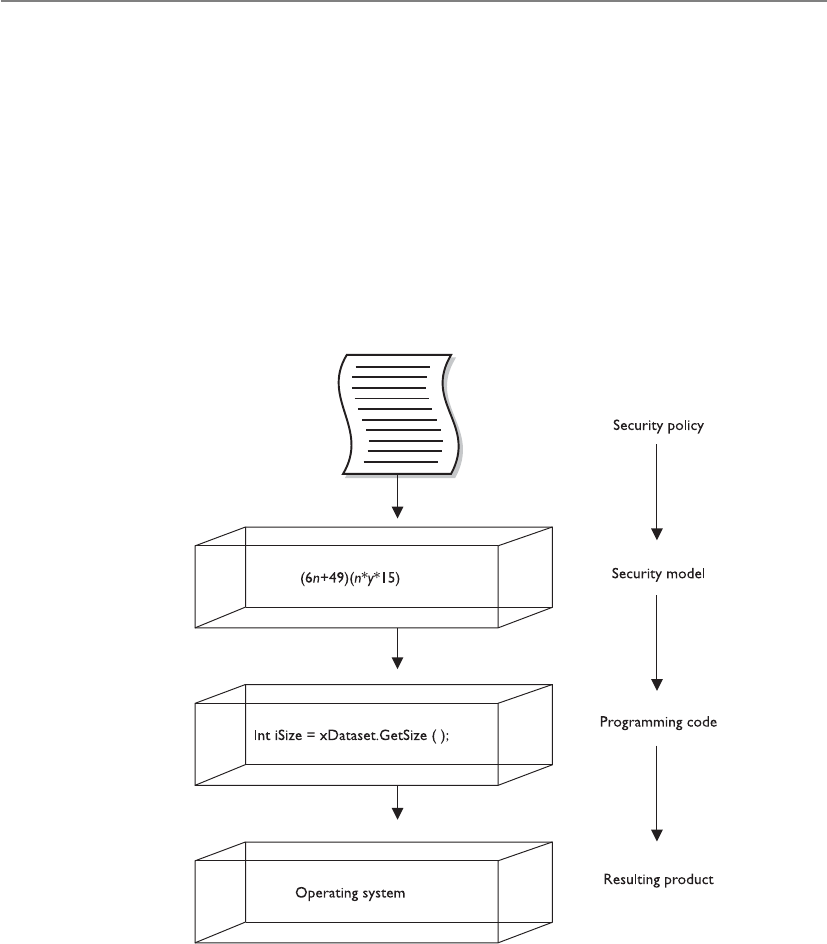
CISSP All-in-One Exam Guide
376
Awell-formed transaction is a series of operations that are carried out to transfer the
data from one consistent state to the other. If Kathy transfers money from her checking
account to her savings account, this transaction is made up of two operations: subtract
money from one account and add it to a different account. By making sure the new
values in her checking and savings accounts are accurate and their integrity is intact, the
IVP maintains internal and external consistency. The Clark-Wilson model also outlines
how to incorporate separation of duties into the architecture of an application. If we
follow our same example of banking software, if a customer needs to withdraw over
$10,000, the application may require a supervisor to log in and authenticate this trans-
action. This is a countermeasure against potential fraudulent activities. The model pro-
vides the rules that the developers must follow to properly implement and enforce
separation of duties through software procedures.
Goals of Integrity Models
The following are the three main goals of integrity models:
• Prevent unauthorized users from making modifications
• Prevent authorized users from making improper modifications (separation
of duties)
• Maintain internal and external consistency (well-formed transaction)

Chapter 4: Security Architecture and Design
377
Clark-Wilson addresses each of these goals in its model. Biba only addresses the
first goal.
Internal and external consistency is provided by the IVP, which ensures that what is
stored in the system as CDI properly maps to the input value that modified its state. So
if Kathy has $2,500 in her account and she withdraws $2,000, the resulting value in the
CDI is $500.
To summarize, the Clark-Wilson model enforces the three goals of integrity by us-
ing access triple (subject, software [TP], object), separation of duties, and auditing. This
model enforces integrity by using well-formed transactions (through access triple) and
separation of duties.
NOTE
NOTE Many people find these security models confusing because they do
not interact with them directly. A software architect chooses the model that
will provide the rules he needs to follow to implement a certain type of
security (confidentiality, integrity). A building architect will follow the model
(framework) that will provide the rules he needs to follow to implement a
certain type of building (office, home, bridge).
Information Flow Model
Now, which way is the information flowing in this system?
Response: Not to you.
The Bell-LaPadula model focuses on preventing information from flowing from a
high security level to a low security level. The Biba model focuses on preventing infor-
mation from flowing from a low integrity level to a high integrity level. Both of these
models were built upon the information flow model. Information flow models can deal
with any kind of information flow, not only from one security (or integrity) level to
another.
In the information flow model, data are thought of as being held in individual and
discrete compartments. In the Bell-LaPadula model, these compartments are based on
security levels. Remember that MAC systems (which you learned about in Chapter 3)
are based on the Bell-LaPadula model. MAC systems use labels on each subject and
object. The subject’s label indicates the subject’s clearance and need to know. The ob-
ject’s label indicates the object’s classification and categories. If you are in the Army and
have a top-secret clearance, this does not mean you can access all of the Army’s top-se-
cret information. Information is compartmentalized based on two factors—classification
and need to know. Your clearance has to dominate the object’s classification and your
security profile must contain one of the categories listed in the object’s label, which
enforces need to know. So Bell-LaPadula is an information flow model that ensures
that information cannot flow from one compartment to another in a way that threatens
the confidentiality of the data. Biba compartmentalizes data based on integrity levels.
It is a model that controls information flow in a way that is intended to protect the
integrity of the most trusted information.

CISSP All-in-One Exam Guide
378
How can information flow within a system? The answer is in many ways. Subjects
can access files. Processes can access memory segments. When data are moved from the
hard drive’s swap space into memory, information flows. Data are moved into and out
of registers on a CPU. Data are moved into different cache memory storage devices.
Data are written to the hard drive, thumb drive, CD-ROM drive, and so on. Properly
controlling all of these ways of how information flows can be a very complex task. This
is why the information flow model exists—to help architects and developers make sure
their software does not allow information to flow in a way that can put the system or
data in danger. One way that the information flow model provides this type of protec-
tion is by ensuring that covert channels do not exist in the code.
Covert Channels
I have my decoder ring, cape, and pirate’s hat on. I will communicate to my spy buddies with
this tribal drum and a whistle.
Acovert channel is a way for an entity to receive information in an unauthorized
manner. It is an information flow that is not controlled by a security mechanism. This
type of information path was not developed for communication; thus, the system does
not properly protect this path, because the developers never envisioned information
being passed in this way. Receiving information in this manner clearly violates the sys-
tem’s security policy.
The channel to transfer this unauthorized data is the result of one of the following
conditions:
• Improper oversight in the development of the product
• Improper implementation of access controls within the software
• Existence of a shared resource between the two entities which are not properly
controlled
Covert channels are of two types: storage and timing. In a covert storage channel,
processes are able to communicate through some type of storage space on the system.
For example, System A is infected with a Trojan horse that has installed software that will
be able to communicate to another process in a limited way. System A has a very sensi-
tive file (File 2) that is of great interest to a particular attacker. The software the Trojan
horse installed is able to read this file, and it needs to send the contents of the file to the
attacker, which can only happen one bit at a time. The intrusive software is going to
communicate to the attacker by locking a specific file (File 3). When the attacker at-
tempts to access File 3 and finds it has a software lock enabled on it, the attacker inter-
prets this to mean the first bit in the sensitive file is a 1. The second time the attacker
attempts to access File 3, it is not locked. The attacker interprets this value to be 0. This
continues until all of the data in the sensitive file are sent to the attacker. In this example,
the software the Trojan horse installed is the messenger. It can access the sensitive data
and it uses another file that is on the hard drive to send signals to the attacker.

Chapter 4: Security Architecture and Design
379
Another way that a covert storage channel attack can take place is through file cre-
ation. A system has been compromised and has software that can create and delete files
within a specific directory and has read access to a sensitive file. When the intrusive
software sees that the first bit of the data within the sensitive file is 1, it will create a file
named Temp in a specific directory. The attacker will try and create (or upload) a file with
the exact same name, and the attacker will receive a message indicating there is already
a file with that name in that directory. The attacker will know this means the first bit in
the sensitive file is a 1. The attacker tries to create the same file again, and when the
system allows this, it means the intrusive software on the system deleted that file, which
means the second bit is a 0.
Information flow models produce rules on how to ensure that covert channels do
not exist. But there are many ways information flows within a system, so identifying
and rooting out covert channels is usually more difficult than one would think at first
glance.
NOTE
NOTE An overt channel is an intended path of communication. Processes
should be communicating through overt channels, not covert channels.
In a covert timing channel, one process relays information to another by modulat-
ing its use of system resources. The two processes that are communicating to each other
are using the same shared resource. So in our example, Process A is a piece of nefarious
software that was installed via a Trojan horse. In a multitasked system, each process is
offered access to interact with the CPU. When this function is offered to Process A, it
rejects it—which indicates a 1 to the attacker. The next time Process A is offered access
to the CPU, it uses it, which indicates a 0 to the attacker. Think of this as a type of Morse
code, but using some type of system resource.
Other Types of Covert Channels
Although we are looking at covert channels within programming code, covert
channels can be used in the outside world as well. Let’s say you are going to at-
tend one of my lectures. Before the lecture begins, you and I agree on a way of
communicating that no one else in the audience will understand. I tell you that
if I twiddle a pen between my fingers in my right hand, that means there will be
a quiz at the end of class. If I twiddle a pen between my fingers in my left hand,
there will be no quiz. It is a covert channel, because this is not a normal way of
communicating and it is secretive. (In this scenario, I would twiddle the pen in
both hands to confuse you and make you stay after class to take the quiz all by
yourself. Shame on you for wanting to be forewarned about a quiz!)

CISSP All-in-One Exam Guide
380
Countermeasures Because all operating systems have some type of covert chan-
nel, it is not always feasible to get rid of them all. The number of acceptable covert
channels usually depends on the assurance rating of a system. A system that has a Com-
mon Criteria rating of EAL 6 has fewer covert channels than a system with an EAL rating
of 3, because an EAL 6 rating represents a higher assurance level of providing a particu-
lar degree of protection when compared to the EAL 3 rating. There is not much a user
can do to counteract these channels; instead, the channels must be addressed when the
system is constructed and developed.
NOTE
NOTE In the Orange Book, covert channels in operating systems are not
addressed until security level B2 and above because these are the systems
that would be holding data sensitive enough for others to go through all the
necessary trouble to access data in this fashion.
Noninterference Model
Stop touching me. Stop touching me. You are interfering with me!
Multilevel security properties can be expressed in many ways, one being noninter-
ference. This concept is implemented to ensure any actions that take place at a higher
security level do not affect, or interfere with, actions that take place at a lower level. This
type of model does not concern itself with the flow of data, but rather with what a sub-
ject knows about the state of the system. So if an entity at a higher security level per-
forms an action, it cannot change the state for the entity at the lower level.
If a lower-level entity was aware of a certain activity that took place by an entity at a
higher level and the state of the system changed for this lower-level entity, the entity
might be able to deduce too much information about the activities of the higher state,
which in turn is a way of leaking information. Users at a lower security level should not
be aware of the commands executed by users at a higher level and should not be af-
fected by those commands in any way.
Let’s say that Tom and Kathy are both working on a multilevel mainframe at the
same time. Tom has the security clearance of secret and Kathy has the security clearance
of top secret. Since this is a central mainframe, the terminal Tom is working at has the
context of secret, and Kathy is working at her own terminal, which has a context of top
secret. This model states that nothing Kathy does at her terminal should directly or in-
directly affect Tom’s domain (available resources and working environment). So what-
ever commands she executes or whichever resources she interacts with should not affect
Tom’s experience of working with the mainframe in any way. This sounds simple
enough, until you actually understand what this model is really saying.
It seems very logical and straightforward that when Kathy executes a command, it
should not affect Tom’s computing environment. But the real intent of this model is to
address covert channels and inference attacks. The model looks at the shared resources
that the different users of a system will use and tries to identify how information can be
passed from a process working at a higher security clearance to a process working at a
lower security clearance. Since Tom and Kathy are working on the same system at the

Chapter 4: Security Architecture and Design
381
same time, they will most likely have to share some type of resources. So the model is
made up of rules to ensure that Kathy cannot pass data to Tom through covert storage or
timing channels.
The other security breach this model addresses is the inference attack. An inference
attack occurs when someone has access to some type of information and can infer (or
guess) something that he does not have the clearance level or authority to know. For
example, let’s say Tom is working on a file that contains information about supplies
that are being sent to Russia. He closes out of that file and one hour later attempts to
open the same file. During this time, this file’s classification has been elevated to top
secret, so when Tom attempts to access it, he is denied. Tom can infer that some type of
top-secret mission is getting ready to take place with Russia. He does not have clearance
to know this; thus, it would be an inference attack, or “leaking information.” (Inference
attacks are further explained in Chapter 10.)
Lattice Model
A lattice is a mathematical construct that is built upon the notion of a group. The most
common definition of the lattice model is “a structure consisting of a finite partially
ordered set together with least upper and greatest lower bound operators on the set.”
Two things are wrong with this type of explanation. First, “a structure consisting of
a finite partially ordered set together with least upper and greatest lower bound opera-
tors on the set” can only be understood by someone who understands the model in the
first place. This is similar to the common definition of metadata: “data about data.”
Only after you really understand what metadata are does this definition make any sense
to you. So this definition of lattice model is not overly helpful.
The problem with the mathematical explanation is that it is in weird alien writings
that only people who obtain their master’s or PhD degree in mathematics can under-
stand. This model needs to be explained in everyday language so us mere mortals can
understand it. So let’s give it a try.
The MAC model was explained in Chapter 3 and then built upon in this chapter. In
this model, the subjects and objects have labels. Each subject’s label contains the clear-
ance and need-to-know categories that this subject can access. Suppose Kathy’s security
clearance is top secret and she has been formally granted access to the compartments
named Iraq and Korea, based on her need-to-know. So Kathy’s security label states the
following: TS {Iraq, Korea}. Table 4-1 shows the different files on the system in this
scenario. The system is based on the MAC model, which means the operating system is
making access decisions based on security label contents.
Kathy’s Security
Label
File B’s Security
Label
File C’s Security
Label
File D’s Security
Label
Top Secret {Iraq,
Korea}
Secret {Iraq} Top Secret {Iraq,
Korea}
Secret {Iraq, Korea,
Iran}
Table 4-1 Security Access Control Elements

CISSP All-in-One Exam Guide
382
Kathy attempts to access File B; since her clearance is greater than File B’s classifica-
tion, she can read this file but not write to it. This is where the “partially ordered set to-
gether with least upper and greatest lower bound operators on the set” comes into play. A
set is a subject (Kathy) and an object (file). It is a partially ordered set because all of the
access controls are not completely equal. The system has to decide between read, write,
full control, modify, and all the other types of access permissions used in this operating
system. So, “partially ordered” means the system has to apply the most restrictive access
controls to this set, and “least upper bound” means the system looks at one access con-
trol’s statement (Kathy can read the file) and the other access control’s statement (Kathy
cannot write to the file) and takes the least upper bound value. Since no write is more
restrictive than read, Kathy’s least upper bound access to this file is read and her great-
est lower bound is no write. Figure 4-24 illustrates the bounds of access. This is just
a confusing way of saying, “The most that Kathy can do with this file is read it. The least
she can do is not write to it.”
Let’s figure out the least upper bound and greatest lower bound access levels for
Kathy and File C. Kathy’s clearance equals File C’s classification. Under the Bell-LaPadu-
la model, this is when the strong star property would kick in. (Remember that the strong
star property states that a subject can read and write to an object of the same security
level.) So the least upper bound is write and the greatest lower bound is read.
If we look at File D’s security label, we see it has a category that Kathy does not have
in her security label, which is Iran. This means Kathy does not have the necessary need-
to-know to be able to access this file. Kathy’s least upper bound and greatest lower
bound access permission is no access.
So why does this model state things in a very confusing way when in reality it de-
scribes pretty straightforward concepts? First, I am describing this model in the most
simplistic and basic terms possible so you can get the basic meaning of the purpose of
the model. These seemingly straightforward concepts build in complexity when you
think about all the subject-to-object communications that go on within an operating
Figure 4-24
Bounds of access
through the lattice
model

Chapter 4: Security Architecture and Design
383
system during any one second. Also, this is a formal model, which means it can be
proven mathematically to provide a specific level of protection if all of its rules are fol-
lowed properly. Learning these models is similar to learning the basics of chemistry. A
student first learns about the components of an atom (protons, neutrons, and elec-
trons) and how these elements interact with each other. This is the easy piece. Then the
student gets into organic chemistry and has to understand how these components work
together in complex organic systems (weak and strong attractions, osmosis, and ioniza-
tion). The student then goes to quantum physics to learn that the individual elements
of an atom actually have several different subatomic particles (quarks, leptons, and
mesons). In this book, you are just learning the basic components of the models. Much
more complexity lies under the covers.
Brewer and Nash Model
A wall separates our stuff so you can’t touch my stuff.
Response: Your stuff is green and smells funny. I don’t want to touch it.
The Brewer and Nash model, also called the Chinese Wall model, was created to pro-
vide access controls that can change dynamically depending upon a user’s previous
actions. The main goal of the model is to protect against conflicts of interest by users’
access attempts. For example, if a large marketing company provides marketing promo-
tions and materials for two banks, an employee working on a project for Bank A should
not look at the information the marketing company has on its other bank customer,
Bank B. Such action could create a conflict of interest because the banks are competi-
tors. If the marketing company’s project manager for the Bank A project could view
information on Bank B’s new marketing campaign, he may try to trump its promotion
to please his more direct customer. The marketing company would get a bad reputation
if it allowed its internal employees to behave so irresponsibly. This marketing company
could implement a product that tracks the different marketing representatives’ access
activities and disallows certain access requests that would present this type of conflict
of interest. In Figure 4-25, we see that when a representative accesses Bank A’s informa-
tion, the system automatically makes Bank B’s information off limits. If the representa-
tive accessed Bank B’s data, Bank A’s information would be off limits. These access
controls change dynamically depending upon the user’s authorizations, activities, and
previous access requests.
The Chinese Wall model is also based on an information flow model. No informa-
tion can flow between subjects and objects in a way that would result in a conflict of
interest. The model states that a subject can write to an object if, and only if, the subject
cannot read another object that is in a different dataset. So if we stay with our example,
the project manager could not write to any objects within the Bank A dataset if he cur-
rently has read access to any objects in the Bank B dataset.
This is only one example of how this model can be used. Other industries will
have their own possible conflicts of interest. If you were Martha Stewart’s stockbroker,
you should not be able to read a dataset that indicates a stock’s price is getting ready
to go down and be able to write to Martha’s account indicating she should sell the
stock she has.
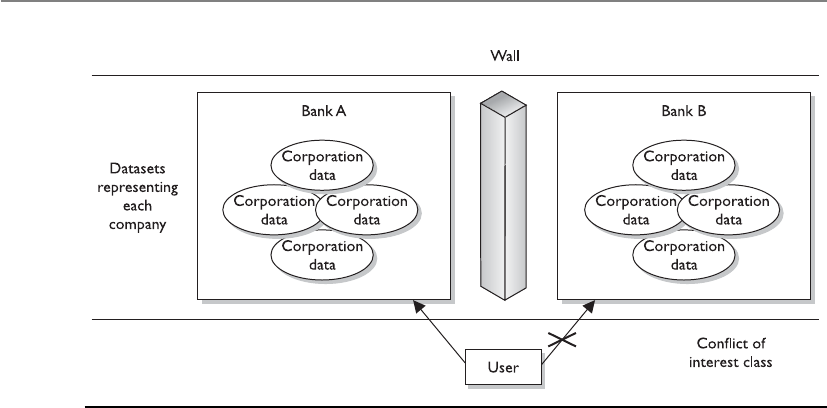
CISSP All-in-One Exam Guide
384
Graham-Denning Model
Remember that these are all models, so they are not very specific in nature. Each indi-
vidual vendor must decide how it is going to actually meet the rules outlined in the
chosen model. Bell-LaPadula and Biba do not define how the security and integrity
levels are defined and modified, nor do they provide a way to delegate or transfer access
rights. The Graham-Denning model addresses some of these issues and defines a set of
basic rights in terms of commands that a specific subject can execute on an object. This
model has eight primitive protection rights, or rules of how these types of functional-
ities should take place securely, which are outlined next:
• How to securely create an object
• How to securely create a subject
• How to securely delete an object
• How to securely delete a subject
• How to securely provide the read access right
• How to securely provide the grant access right
• How to securely provide the delete access right
• How to securely provide transfer access rights
These things may sound insignificant, but when you’re building a secure system,
they are critical. If a software developer does not integrate these functionalities in a
secure manner, they can be compromised by an attacker and the whole system can be
at risk.
Figure 4-25 The Chinese Wall model provides dynamic access controls.

Chapter 4: Security Architecture and Design
385
Harrison-Ruzzo-Ullman Model
The Harrison-Ruzzo-Ullman (HRU) model deals with access rights of subjects and the
integrity of those rights. A subject can carry out only a finite set of operations on an
object. Since security loves simplicity, it is easier for a system to allow or disallow au-
thorization of operations if one command is restricted to a single operation. For ex-
ample, if a subject sent command X, which only required the operation of Y, this is
pretty straightforward and allows the system to allow or disallow this operation to take
place. But, if a subject sent a command M and to fulfill that command, operations N,
B, W, and P had to be carried out, then there is much more complexity for the system
to decide if this command should be authorized. Also the integrity of the access rights
needs to be ensured, so in this example if one operation cannot be processed properly,
the whole command fails. So while it is easy to dictate that subject A can only read
object B, it is not always so easy to ensure each and every function supports this high-
level statement. The HRU model is used by software designers to ensure that no unfore-
seen vulnerability is introduced and the stated access control goals are achieved.
Security Models Recap
All of these different models can get your head spinning. Most people are not
familiar with all of them, which can make it all even harder to absorb. The fol-
lowing are the core concepts of the different models:
•Bell-LaPadula model This is the first mathematical model of a
multilevel security policy that defines the concept of a secure state and
necessary modes of access. It ensures that information only flows in a
manner that does not violate the system policy and is confidentiality
focused.
•The simple security rule A subject cannot read data at a higher
security level (no read up).
•The *-property rule A subject cannot write to an object at a lower
security level (no write down).
•The strong star property rule A subject can perform read and write
functions only to the objects at its same security level.
•Biba model A formal state transition model that describes a set of
access control rules designed to ensure data integrity.
•The simple integrity axiom A subject cannot read data at a lower
integrity level (no read down).
•The *-integrity axiom A subject cannot modify an object in a
higher integrity level (no write up).

CISSP All-in-One Exam Guide
386
Security Modes of Operation
A multilevel security system can operate in different modes depending on the sensitiv-
ity of the data being processed, the clearance level of the users, and what those users are
authorized to do. The mode of operation describes the security conditions under which
the system actually functions.
These modes are used in MAC systems, which hold one or more classifications of
data. Several things come into play when determining the mode the operating system
should be working in:
• The types of users who will be directly or indirectly connecting to the system
• The type of data (classification levels, compartments, and categories)
processed on the system
• The clearance levels, need-to-know, and formal access approvals the users
will have
The following sections describe the different security modes that multilevel operat-
ing systems can be developed and configured to work in.
•Clark-Wilson model This integrity model is implemented to protect
the integrity of data and to ensure that properly formatted transactions
take place. It addresses all three goals of integrity:
• Subjects can access objects only through authorized programs
(access triple).
• Separation of duties is enforced.
• Auditing is required.
•Information flow model This is a model in which information is
restricted in its flow to only go to and from entities in a way that does
not negate or violate the security policy.
•Noninterference model This formal multilevel security model states
that commands and activities performed at one security level should
not be seen by, or affect, subjects or objects at a different security level.
•Brewer and Nash model This model allows for dynamically changing
access controls that protect against conflicts of interest. Also known as
the Chinese Wall model.
•Graham-Denning model This model shows how subjects and objects
should be created and deleted. It also addresses how to assign specific
access rights.
•Harrison-Ruzzo-Ullman model This model shows how a finite set of
procedures can be available to edit the access rights of a subject.

Chapter 4: Security Architecture and Design
387
Dedicated Security Mode
Our system only holds secret data and we can all access it.
A system is operating in a dedicated security mode if all users have a clearance for,
and a formal need-to-know about, all data processed within the system. All users have
been given formal access approval for all information on the system and have signed
nondisclosure agreements (NDAs) pertaining to this information. The system can han-
dle a single classification level of information.
Many military systems have been designed to handle only one level of security,
which works in dedicated security mode. This requires everyone who uses the system to
have the highest level of clearance required by any and all data on the system. If a sys-
tem holds top-secret data, only users with that clearance can use the system. Other
military systems work with multiple security levels, which is done by compartmental-
izing the data. These types of systems can support users with high and low clearances
simultaneously.
System High-Security Mode
Our system only holds secret data, but only some of us can access all of it.
A system is operating in system high-security mode when all users have a security
clearance to access the information but not necessarily a need-to-know for all the infor-
mation processed on the system. So, unlike in the dedicated security mode, in which all
users have a need-to-know pertaining to all data on the system, in system high-security
mode, all users have a need-to-know pertaining to some of the data.
This mode also requires all users to have the highest level of clearance required by
any and all data on the system. However, even though a user has the necessary security
clearance to access an object, the user may still be restricted if he does not have a need-
to-know pertaining to that specific object.
Compartmented Security Mode
Our system has various classifications of data, and each individual has the clearance to access
all of the data, but not necessarily the need to know.
A system is operating in compartmented security mode when all users have the clear-
ance to access all the information processed by the system in a system high-security
configuration, but might not have the need-to-know and formal access approval. This
means that if the system is holding secret and top-secret data, all users must have at
least a top-secret clearance to gain access to this system. This is how compartmented
and multilevel security modes are different. Both modes require the user to have a valid
need-to-know, NDA, and formal approval, but compartmented security mode requires
the user to have a clearance that dominates (above or equal to) any and all data on the
system, whereas multilevel security mode just requires the user to have clearance to ac-
cess the data she will be working with.
In compartmented security mode, users are restricted from accessing some informa-
tion because they do not need to access it to perform the functions of their jobs and

CISSP All-in-One Exam Guide
388
they have not been given formal approval to access it. This would be enforced by having
security labels on all objects that reflect the sensitivity (classification level, classification
category, and handling procedures) of the information. In this mode, users can access
a compartment of data only, enforced by mandatory access controls.
The objective is to ensure that the minimum possible number of people learn of
information at each level. Compartments are categories of data with a limited number
of subjects cleared to access data at each level. Compartmented mode workstations
(CMWs) enable users to process multiple compartments of data at the same time, if
they have the necessary clearance.
Multilevel Security Mode
Our system has various classifications of data, and each individual has the clearance and need-
to-know to access only individual pieces of data.
A system is operating in multilevel security mode when it permits two or more clas-
sification levels of information to be processed at the same time when not all of the
users have the clearance or formal approval to access all the information being pro-
cessed by the system. So all users must have formal approval, NDA, need-to-know, and
the necessary clearance to access the data that they need to carry out their jobs. In this
mode, the user cannot access all of the data on the system, only what she is cleared to
access.
The Bell-LaPadula model is an example of a multilevel security model because it
handles multiple information classifications at a number of different security levels
within one system simultaneously.
Guards
Software and hardware guards allow the exchange of data between trusted (high assur-
ance) and less trusted (low assurance) systems and environments. Let’s say you are
working on a MAC system (working in dedicated security mode of secret) and you need
the system to communicate with a MAC database (working in multilevel security mode,
which goes up to top secret). These two systems provide different levels of protection.
If a system with lower assurance could directly communicate with a system of higher
assurance, then security vulnerabilities and compromises could be introduced. So, a
software guard can be implemented, which is really just a front-end product that allows
interconnectivity between systems working at different security levels. (The various
types of guards available can carry out filtering, processing requests, data blocking, and
data sanitization.) Or a hardware guard can be implemented, which is a system with
two NICs connecting the two systems that need to communicate. The guard provides a
level of strict access control between different systems.
The guard accepts requests from the system of lower assurance, reviews the request
to make sure it is allowed, and then submits the request to the system of higher assur-
ance. The goal is to ensure that information does not flow from a high security level to
a low security level in an unauthorized manner.
Guards can be used to connect different MAC systems working in different security
modes and to connect different networks working at different security levels. In many
cases, the less trusted system can send messages to the more trusted system but can only

Chapter 4: Security Architecture and Design
389
receive acknowledgments in return. This is common when e-mail messages need to go
from less trusted systems to more trusted classified systems.
Security Modes Recap
Many times it is easier to understand these different modes when they are laid
out in a clear and simplistic format (see also Table 4-2). Pay attention to the
words in italics because they emphasize the differences among the various modes.
Dedicated Security Mode All users must have . . .
• Proper clearance for all information on the system
• Formal access approval for all information on the system
• A signed NDA for all information on the system
• A valid need-to-know for all information on the system
• All users can access all data.
System High-Security Mode All users must have . . .
• Proper clearance for all information on the system
• Formal access approval for all information on the system
• A signed NDA for all information on the system
• A valid need-to-know for some information on the system
• All users can access some data, based on their need-to-know.
Compartmented Security Mode All users must have . . .
• Proper clearance for the highest level of data classification on the
system
• Formal access approval for some information on the system
• A signed NDA for all information they will access on the system
• A valid need-to-know for some of the information on the system
• All users can access some data, based on their need-to-know and formal
access approval.
Multilevel Security Mode All users must have . . .
• Proper clearance for some of the information on the system
• Formal access approval for some of the information on the system
• A signed NDA for all information on the system
• A valid need-to-know for some of the information on the system
• All users can access some data, based on their need-to-know, clearance,
and formal access approval.

CISSP All-in-One Exam Guide
390
Trust and Assurance
I trust that you will act properly; thus, I have a high level of assurance in you.
Response: You are such a fool.
As discussed earlier in the section “Trusted Computing Base,” no system is really
secure because, with enough resources, attackers can compromise almost any system in
one way or another; however, systems can provide levels of trust. The trust level tells the
customer how much protection he can expect out of this system and the assurance that
the system will act in a correct and predictable manner in each and every computing
situation.
The TCB comprises all the protection mechanisms within a system (software, hard-
ware, firmware). All of these mechanisms need to work in an orchestrated way to en-
force all the requirements of a security policy for a specific system. When evaluated,
these mechanisms are tested, their designs are inspected, and their supporting docu-
mentation is reviewed and evaluated. How the system is developed, maintained, and
even delivered to the customer are all under review when the trust for a system is being
gauged. All of these different components are put through an evaluation process and
assigned an assurance rating, which represents the level of trust and assurance the test-
ing team has in the product. Customers then use this rating to determine which system
best fits their security needs.
Assurance and trust are similar in nature, but slightly different with regard to prod-
uct ratings. In a trusted system, all protection mechanisms work together to process
sensitive data for many types of uses, and will provide the necessary level of protection
per classification level. Assurance looks at the same issues but in more depth and detail.
Systems that provide higher levels of assurance have been tested extensively and have
had their designs thoroughly inspected, their development stages reviewed, and their
technical specifications and test plans evaluated. You can buy a car and you can trust it,
but you have a much deeper sense of assurance of that trust if you know how the car
Signed NDA
for
Proper
clearance for
Formal access
approval for
A valid need-
to-know for
Dedicated security
mode
ALL
information on
the system
ALL
information on
the system
ALL
information on
the system
ALL
information on
the system
System high-
security mode
ALL
information on
the system
ALL
information on
the system
ALL
information on
the system
SOME
information on
the system
Compartmented
security mode
ALL
information on
the system
ALL
information on
the system
SOME
information on
the system
SOME
information on
the system
Multilevel security
mode
ALL
information on
the system
SOME
information on
the system
SOME
information on
the system
SOME
information on
the system
Table 4-2 A Summary of the Different Security Modes

Chapter 4: Security Architecture and Design
391
was built, what it was built with, who built it, what tests it was put through, and how it
performed in many different situations.
In the Trusted Computer System Evaluation Criteria (TCSEC), commonly known as
the Orange Book (addressed shortly), the lower assurance level ratings look at a sys-
tem’s protection mechanisms and testing results to produce an assurance rating, but the
higher assurance level ratings look more at the system design, specifications, develop-
ment procedures, supporting documentation, and testing results. The protection mech-
anisms in the higher assurance level systems may not necessarily be much different
from those in the lower assurance level systems, but the way they were designed and
built is under much more scrutiny. With this extra scrutiny comes higher levels of assur-
ance of the trust that can be put into a system.
Systems Evaluation Methods
An assurance evaluation examines the security-relevant parts of a system, meaning the
TCB, access control mechanisms, reference monitor, kernel, and protection mecha-
nisms. The relationship and interaction between these components are also evaluated.
There are different methods of evaluating and assigning assurance levels to systems.
Two reasons explain why more than one type of assurance evaluation process exists:
methods and ideologies have evolved over time, and various parts of the world look at
computer security differently and rate some aspects of security differently. Each method
will be explained and compared.
Why Put a Product Through Evaluation?
Submitting a product to be evaluated against the Orange Book, Information Technol-
ogy Security Evaluation Criteria, or Common Criteria is no walk in the park for a ven-
dor. In fact, it is a really painful and long process, and no one wakes up in the morning
thinking, “Yippee! I have to complete all of the paperwork that the National Computer
Security Center requires so my product can be evaluated!” So, before we go through
these different criteria, let’s look at why anyone would even put themselves through this
process.
If you were going shopping to buy a firewall, how would you know what level of
protection each provides and which is the best product for your environment? You
could listen to the vendor’s marketing hype and believe the salesperson who informs
you that a particular product will solve all of your life problems in one week. Or you
could listen to the advice of an independent third party who has fully tested the prod-
uct and does not have any bias toward the product. If you choose the second option,
then you join a world of people who work within the realm of assurance ratings in one
form or another.
In the United States, the National Computer Security Center (NCSC) was an orga-
nization within the National Security Agency (NSA) that was responsible for evaluating
computer systems and products. It had a group, called the Trusted Product Evaluation
Program (TPEP), that oversaw the testing by approved evaluation entities of commer-
cial products against a specific set of criteria.

CISSP All-in-One Exam Guide
392
So, a vendor created a product and submitted it to an approved evaluation entity
that was compliant with the TPEP guidelines. The evaluation entity had groups of tes-
ters who would follow a set of criteria to test the vendor’s product. Once the testing was
over, the product was assigned an assurance rating. So, instead of having to trust the
marketing hype of the financially motivated vendor, you as a consumer can take the
word of an objective third-party entity that fully tested the product.
This evaluation process is very time-consuming and expensive for the vendor. Not
every vendor puts its product through this process, because of the expense and delayed
date to get it to market. Typically, a vendor would put its product through this process
if its main customer base will be making purchasing decisions based on assurance rat-
ings. In the United States, the Department of Defense is the largest customer, so major
vendors put their main products through this process with the hope that the Depart-
ment of Defense (and others) will purchase their products.
NOTE
NOTE The Trusted Product Evaluation Program (TPEP) has evolved over
time. TPEP was in operation from 1983 to 1998 and worked within the NSA.
Then came Trusted Technology Assessment Program, which was a commercial
evaluation process and it lasted until 2000. The Common Criteria evaluation
framework replaced the processes that were taking place in these two
programs in 2001. Products are no longer evaluated within the NSA, but
are tested through an international organization.
The Orange Book
The U.S. Department of Defense developed the Trusted Computer System Evaluation
Criteria (TCSEC), which was used to evaluate operating systems, applications, and dif-
ferent products. These evaluation criteria are published in a book with an orange cover,
which is called, appropriately, the Orange Book. (We like to keep things simple in secu-
rity.) Customers used the assurance rating that the criteria present as a metric when
comparing different products. It also provided direction for manufacturers so they
knew what specifications to build to, and provides a one-stop evaluation process so
customers do not need to have individual components within the systems evaluated.
The Orange Book was used to evaluate whether a product contained the security
properties the vendor claimed it did and whether the product was appropriate for a
specific application or function. The Orange Book was used to review the functionality,
effectiveness, and assurance of a product during its evaluation, and it used classes that
were devised to address typical patterns of security requirements.
TCSEC provides a classification system that is divided into hierarchical divisions of
assurance levels:
A. Verified protection
B. Mandatory protection

Chapter 4: Security Architecture and Design
393
C. Discretionary protection
D. Minimal security
Classification A represents the highest level of assurance, and D represents the low-
est level of assurance.
Each division can have one or more numbered classes with a corresponding set of
requirements that must be met for a system to achieve that particular rating. The classes
with higher numbers offer a greater degree of trust and assurance. So B2 would offer
more assurance than B1, and C2 would offer more assurance than C1.
The criteria breaks down into seven different areas:
•Security policy The policy must be explicit and well defined and enforced by
the mechanisms within the system.
•Identification Individual subjects must be uniquely identified.
•Labels Access control labels must be associated properly with objects.
•Documentation Documentation must be provided, including test, design,
and specification documents, user guides, and manuals.
•Accountability Audit data must be captured and protected to enforce
accountability.
•Life-cycle assurance Software, hardware, and firmware must be able to
be tested individually to ensure that each enforces the security policy in an
effective manner throughout their lifetimes.
•Continuous protection The security mechanisms and the system as a whole
must perform predictably and acceptably in different situations continuously.
These categories are evaluated independently, but the rating assigned at the end
does not specify these different objectives individually. The rating is a sum total of
these items.
Each division and class incorporates the requirements of the ones below it. This
means that C2 must meet its criteria requirements and all of C1’s requirements, and B3
has its requirements to fulfill along with those of C1, C2, B1, and B2. Each division or
class ups the ante on security requirements and is expected to fulfill the requirements
of all the classes and divisions below it.
So, when a vendor submitted a product for evaluation, it submitted it to the NCSC.
The group that oversaw the processes of evaluation was called the Trusted Products
Evaluation Program (TPEP). Successfully evaluated products were placed on the Evalu-
ated Products List (EPL) with their corresponding rating. When consumers were inter-
ested in certain products and systems, they could check the appropriate EPL to find out
their assigned assurance levels.

CISSP All-in-One Exam Guide
394
Division D: Minimal Protection
There is only one class in Division D. It is reserved for systems that have been evaluated
but fail to meet the criteria and requirements of the higher divisions.
Division C: Discretionary Protection
The C rating category has two individual assurance ratings within it, which are de-
scribed next. The higher the number of the assurance rating, the greater the protection.
C1: Discretionary Security Protection Discretionary access control is based
on individuals and/or groups. It requires a separation of users and information, and
identification and authentication of individual entities. Some type of access control is
necessary so users can ensure their data will not be accessed and corrupted by others.
The system architecture must supply a protected execution domain so privileged sys-
tem processes are not adversely affected by lower-privileged processes. There must be
specific ways of validating the system’s operational integrity. The documentation re-
quirements include design documentation, which shows that the system was built to
include protection mechanisms, test documentation (test plan and results), a facility
manual (so companies know how to install and configure the system correctly), and
user manuals.
The type of environment that would require this rating is one in which users are
processing information at the same sensitivity level; thus, strict access control and au-
diting measures are not required. It would be a trusted environment with low security
concerns.
Isn’t the Orange Book Dead?
We have moved from the Orange Book to the Common Criteria in the industry,
so a common question is, “Why do I have to study this Orange Book stuff?” The
Orange Book was the first evaluation criteria and was used for 20 years. Many of
the basic terms and concepts that have carried through originated in the Orange
Book. And we still have several products with these ratings that eventually will go
through the Common Criteria evaluation process.
The CISSP exam is moving steadily from the Orange Book to the Common
Criteria all the time, but don’t count the Orange Book out yet.
As a follow-on observation, many people are new to the security field. It is a
booming market, which means a flood of not-so-experienced people will be
jumping in and attempting to charge forward without a real foundation of knowl-
edge. To some readers, this book will just be a nice refresher and something that
ties already known concepts together. To other readers, many of these concepts
are new and more challenging. If a lot of this stuff is new to you—you are new to
the industry. That is okay, but knowing how we got where we are today is very
beneficial because it broadens your view of deep understanding—instead of just
memorizing for an exam.

Chapter 4: Security Architecture and Design
395
C2: Controlled Access Protection Users need to be identified individually to
provide more precise access control and auditing functionality. Logical access control
mechanisms are used to enforce authentication and the uniqueness of each individu-
al’s identification. Security-relevant events are audited, and these records must be pro-
tected from unauthorized modification. The architecture must provide resource, or ob-
ject, isolation so proper protection can be applied to the resource and any actions taken
upon it can be properly audited. The object reuse concept must also be invoked, mean-
ing that any medium holding data must not contain any remnants of information after
it is released for another subject to use. If a subject uses a segment of memory, that
memory space must not hold any information after the subject is done using it. The
same is true for storage media, objects being populated, and temporary files being cre-
ated—all data must be efficiently erased once the subject is done with that medium.
This class requires a more granular method of providing access control. The system
must enforce strict logon procedures and provide decision-making capabilities when
subjects request access to objects. A C2 system cannot guarantee it will not be compro-
mised, but it supplies a level of protection that would make attempts to compromise it
harder to accomplish.
The type of environment that would require systems with a C2 rating is one in
which users are trusted but a certain level of accountability is required. C2, overall, is
seen as the most reasonable class for commercial applications, but the level of protec-
tion is still relatively weak.
Division B: Mandatory Protection
Mandatory access control is enforced by the use of security labels. The architecture is
based on the Bell-LaPadula security model, and evidence of reference monitor enforce-
ment must be available.
B1: Labeled Security Each data object must contain a classification label and
each subject must have a clearance label. When a subject attempts to access an object,
the system must compare the subject’s and object’s security labels to ensure the re-
quested actions are acceptable. Data leaving the system must also contain an accurate
security label. The security policy is based on an informal statement, and the design
specifications are reviewed and verified.
This security rating is intended for environments that require systems to handle
classified data.
NOTE
NOTE Security labels are not required until security rating B; thus, C2 does
not require security labels but B1 does.
B2: Structured Protection The security policy is clearly defined and document-
ed, and the system design and implementation are subjected to more thorough review
and testing procedures. This class requires more stringent authentication mechanisms

CISSP All-in-One Exam Guide
396
and well-defined interfaces among layers. Subjects and devices require labels, and the
system must not allow covert channels. A trusted path for logon and authentication
processes must be in place, which means the subject communicates directly with the
application or operating system, and no trapdoors exist. There is no way to circumvent
or compromise this communication channel. Operator and administration functions
are separated within the system to provide more trusted and protected operational
functionality. Distinct address spaces must be provided to isolate processes, and a co-
vert channel analysis is conducted. This class adds assurance by adding requirements to
the design of the system.
The type of environment that would require B2 systems is one that processes sensi-
tive data that require a higher degree of security. This type of environment would re-
quire systems that are relatively resistant to penetration and compromise.
B3: Security Domains In this class, more granularity is provided in each protec-
tion mechanism, and the programming code that is not necessary to support the secu-
rity policy is excluded. The design and implementation should not provide too much
complexity, because as the complexity of a system increases, so must the skill level of
the individuals who need to test, maintain, and configure it; thus, the overall security
can be threatened. The reference monitor components must be small enough to test
properly and be tamperproof. The security administrator role is clearly defined, and the
system must be able to recover from failures without its security level being compro-
mised. When the system starts up and loads its operating system and components, it
must be done in an initial secure state to ensure that any weakness of the system cannot
be taken advantage of in this slice of time.
The type of environment that requires B3 systems is a highly secured environment
that processes very sensitive information. It requires systems that are highly resistant to
penetration.
Division A: Verified Protection
Formal methods are used to ensure that all subjects and objects are controlled with the
necessary discretionary and mandatory access controls. The design, development, im-
plementation, and documentation are looked at in a formal and detailed way. The
security mechanisms between B3 and A1 are not very different, but the way the system
was designed and developed is evaluated in a much more structured and stringent
procedure.
A1: Verified Design The architecture and protection features are not much differ-
ent from systems that achieve a B3 rating, but the assurance of an A1 system is higher
than a B3 system because of the formality in the way the A1 system was designed, the
way the specifications were developed, and the level of detail in the verification tech-
niques. Formal techniques are used to prove the equivalence between the TCB specifica-
tions and the security policy model. A more stringent change configuration is put in
place with the development of an A1 system, and the overall design can be verified. In
many cases, even the way in which the system is delivered to the customer is under
scrutiny to ensure there is no way of compromising the system before it reaches its
destination.

Chapter 4: Security Architecture and Design
397
The type of environment that would require A1 systems is the most secure of se-
cured environments. This type of environment deals with top-secret information and
cannot adequately trust anyone using the systems without strict authentication, restric-
tions, and auditing.
NOTE
NOTE TCSEC addresses confidentiality, but not integrity. Functionality of
the security mechanisms and the assurance of those mechanisms are not
evaluated separately, but rather are combined and rated as a whole.
The Orange Book and the Rainbow Series
Why are there so many colors in the rainbow?
Response: Because there are so many product types that need to be evaluated.
The Orange Book mainly addresses government and military requirements and ex-
pectations for their computer systems. Many people within the security field have
pointed out several deficiencies in the Orange Book, particularly when it is being ap-
plied to systems that are to be used in commercial areas instead of government organi-
zations. The following list summarizes a majority of the troubling issues that security
practitioners have expressed about the Orange Book:
• It looks specifically at the operating system and not at other issues like
networking, databases, and so on.
• It focuses mainly on one attribute of security—confidentiality—and not on
integrity and availability.
• It works with government classifications and not the protection classifications
commercial industries use.
• It has a relatively small number of ratings, which means many different
aspects of security are not evaluated and rated independently.
The Orange Book places great emphasis on controlling which users can access a
system and virtually ignores controlling what those users do with the information once
they are authorized. Authorized users can, and usually do, cause more damage to data
than outside attackers. Commercial organizations have expressed more concern about
the integrity of their data, whereas military organizations stress that their top concern
is confidentiality. Because of these different goals, the Orange Book is a better evalua-
tion tool for government and military systems.
Because the Orange Book focuses on the operating system, many other areas of se-
curity were left out. The Orange Book provides a broad framework for building and
evaluating trusted systems, but it leaves many questions about topics other than operat-
ing systems unanswered. So, more books were written to extend the coverage of the
Orange Book into other areas of security. These books provide detailed information
and interpretations of certain Orange Book requirements and describe the evaluation
processes. These books are collectively called the Rainbow Series because the cover of
each is a different color.

CISSP All-in-One Exam Guide
398
The Red Book
The Orange Book addresses single-system security, but networks are a combination of
systems, and each network needs to be secure without having to fully trust each and
every system connected to it. The Trusted Network Interpretation (TNI), also called the
Red Book because of the color of its cover, addresses security evaluation topics for net-
works and network components. It addresses isolated local area networks and wide
area internetwork systems.
Like the Orange Book, the Red Book does not supply specific details about how to
implement security mechanisms. Instead, it provides a framework for securing different
types of networks. A network has a security policy, architecture, and design, as does an
operating system. Subjects accessing objects on the network need to be controlled,
monitored, and audited. In a network, the subject could be a workstation and an object
could be a network service on a server.
The Red Book rates confidentiality of data and operations that happen within a
network and the network products. Data and labels need to be protected from unau-
thorized modification, and the integrity of information as it is transferred needs to be
ensured. The source and destination mechanisms used for messages are evaluated and
tested to ensure modification is not allowed.
Encryption and protocols are components that provide a lot of the security within
a network, and the Red Book measures their functionality, strength, and assurance.
The following is a brief overview of the security items addressed in the Red Book:
•Communication integrity
•Authentication Protects against masquerading and playback attacks.
Mechanisms include digital signatures, encryption, timestamp, and
passwords.
•Message integrity Protects the protocol header, routing information,
and packet payload from being modified. Mechanisms include message
authentication and encryption.
•Nonrepudiation Ensures that a sender cannot deny sending a message.
Mechanisms include encryption, digital signatures, and notarization.
•Denial-of-service prevention
•Continuity of operations Ensures that the network is available even if
attacked. Mechanisms include fault-tolerant and redundant systems and
the capability to reconfigure network parameters in case of an emergency.
•Network management Monitors network performance and identifies
attacks and failures. Mechanisms include components that enable network
administrators to monitor and restrict resource access.
•Compromise protection
•Data confidentiality Protects data from being accessed in an unauthorized
method during transmission. Mechanisms include access controls, encryption,
and physical protection of cables.

Chapter 4: Security Architecture and Design
399
•Traffic flow confidentiality Ensures that unauthorized entities are not
aware of routing information or frequency of communication via traffic
analysis. Mechanisms include padding messages, sending noise, or sending
false messages.
•Selective routing Routes messages in a way to avoid specific threats.
Mechanisms include network configuration and routing tables.
Assurance is derived by comparing how things actually work to a theory of how
things should work. Assurance is also derived by testing configurations in many differ-
ent scenarios, evaluating engineering practices, and validating and verifying security
claims.
TCSEC was introduced in 1985 and retired in December 2000. It was the first me-
thodical and logical set of standards developed to secure computer systems. It was
greatly influential to several countries that based their evaluation standards on the TC-
SEC guidelines. TCSEC was finally replaced with the Common Criteria.
Information Technology Security
Evaluation Criteria
The Information Technology Security Evaluation Criteria (ITSEC) was the first attempt
at establishing a single standard for evaluating security attributes of computer systems
and products by many European countries. The United States looked to the Orange
Book and Rainbow Series, and Europe employed ITSEC to evaluate and rate computer
systems. (Today, everyone is migrating to the Common Criteria, explained in the next
section.)
ITSEC evaluates two main attributes of a system’s protection mechanisms: function-
ality and assurance. When the functionality of a system’s protection mechanisms is
being evaluated, the services that are provided to the subjects (access control mecha-
nisms, auditing, authentication, and so on) are examined and measured. Protection
mechanism functionality can be very diverse in nature because systems are developed
differently just to provide different functionality to users. Nonetheless, when function-
ality is evaluated, it is tested to see if the system’s protection mechanisms deliver what
its vendor says they deliver. Assurance, on the other hand, is the degree of confidence
in the protection mechanisms, and their effectiveness and capability to perform consis-
tently. Assurance is generally tested by examining development practices, documenta-
tion, configuration management, and testing mechanisms.
It is possible for two systems’ protection mechanisms to provide the same type of
functionalities and have very different assurance levels. This is because the underlying
mechanisms providing the functionality can be developed, engineered, and imple-
mented differently. System A and System B may have protection mechanisms that pro-
vide the same type of functionality for authentication, in which case both products
would get the same rating for functionality. But System A’s developers could have been
sloppy and careless when developing their authentication mechanism, in which case
their product would receive a lower assurance rating. ITSEC actually separates these two

CISSP All-in-One Exam Guide
400
attributes (functionality and assurance) and rates them separately, whereas TCSEC
clumps them together and assigns them one rating (D through A1).
The following list shows the different types of functionalities and assurance items
tested during an evaluation:
• Security functional requirements
• Identification and authentication
• Audit
• Resource utilization
• Trusted paths/channels
• User data protection
• Security management
• Product access
• Communications
• Privacy
• Protection of the product’s security functions
• Cryptographic support
• Security assurance requirements
• Guidance documents and manuals
• Configuration management
• Vulnerability assessment
• Delivery and operation
• Life-cycle support
• Assurance maintenance
• Development
• Testing
Consider again our example of two systems that provide the same functionality
(pertaining to the protection mechanisms) but have very different assurance levels. Us-
ing the TCSEC approach, the difference in assurance levels will be hard to distinguish
because the functionality and assurance level are rated together. Under the ITSEC ap-
proach, the functionality is rated separately from the assurance, so the difference in
assurance levels will be more noticeable. In the ITSEC criteria, classes F1 to F10 rate the
functionality of the security mechanisms, whereas E0 to E6 rate the assurance of those
mechanisms.

Chapter 4: Security Architecture and Design
401
So a difference between ITSEC and TCSEC is that TCSEC bundles functionality and
assurance into one rating, whereas ITSEC evaluates these two attributes separately. The
other differences are that ITSEC was developed to provide more flexibility than TCSEC,
and ITSEC addresses integrity, availability, and confidentiality, whereas TCSEC address-
es only confidentiality. ITSEC also addresses networked systems, whereas TCSEC deals
with stand-alone systems.
Table 4-3 is a general mapping of the two evaluation schemes to show you their
relationship to each other.
As you can see, a majority of the ITSEC ratings can be mapped to the Orange Book
ratings, but then ITSEC took it a step further and added F6 through F10 for specific
needs consumers might have that the Orange Book does not address.
ITSEC is criteria for operating systems and other products, which it refers to indi-
vidually as the target of evaluation (TOE). So if you are reading literature discussing the
ITSEC rating of a product and it states the TOE has a rating of F1 and E5, you know the
TOE is the product that was evaluated and that it has a low functionality rating and a
high assurance rating.
The ratings pertain to assurance, which is the correctness and effectiveness of
the security mechanism and functionality. Functionality is viewed in terms of the sys-
tem’s security objectives, security functions, and security mechanisms. The following
are some examples of the functionalities that are tested: identification and authentica-
tion, access control, accountability, auditing, object reuse, accuracy, reliability of ser-
vice, and data exchange.
ITSEC TCSEC
E0 = D
F1 + E1 = C1
F2 + E2 = C2
F3 + E3 = B1
F4 + E4 = B2
F5 + E5 = B3
F5 + E6 = A1
F6 = Systems that provide high integrity
F7 = Systems that provide high availability
F8 = Systems that provide high data integrity during communication
F9 = Systems that provide high confidentiality (like cryptographic devices)
F10 = Networks with high demands on confidentiality and integrity
Table 4-3 ITSEC and TCSEC Mapping

CISSP All-in-One Exam Guide
402
Common Criteria
“TCSEC is too hard, ITSEC is too soft, but the Common Criteria is just right,” said the baby bear.
The Orange Book and the Rainbow Series provide evaluation schemes that are too
rigid and narrowly defined for the business world. ITSEC attempted to provide a more
flexible approach by separating the functionality and assurance attributes and consider-
ing the evaluation of entire systems. However, this flexibility added complexity because
evaluators could mix and match functionality and assurance ratings, which resulted in
too many classifications to keep straight. Because we are a species that continues to try
to get it right, the next attempt for an effective and usable evaluation criteria was the
Common Criteria.
In 1990, the International Organization for Standardization (ISO) identified the
need for international standard evaluation criteria to be used globally. The Common
Criteria project started in 1993 when several organizations came together to combine
and align existing and emerging evaluation criteria (TCSEC, ITSEC, Canadian Trusted
Computer Product Evaluation Criteria [CTCPEC], and the Federal Criteria). The Com-
mon Criteria was developed through a collaboration among national security stan-
dards organizations within the United States, Canada, France, Germany, the United
Kingdom, and the Netherlands.
The benefit of having a globally recognized and accepted set of criteria is that it
helps consumers by reducing the complexity of the ratings and eliminating the need to
understand the definition and meaning of different ratings within various evaluation
schemes. This also helps vendors, because now they can build to one specific set of re-
quirements if they want to sell their products internationally, instead of having to meet
several different ratings with varying rules and requirements.
The Orange Book evaluated all systems by how they compared to the Bell-LaPadu-
la model. The Common Criteria provides more flexibility by evaluating a product
against a protection profile, which is structured to address a real-world security need.
So while the Orange Book says, “Everyone march in this direction in this form using
this path,” the Common Criteria asks, “Okay, what are the threats we are facing today
and what are the best ways of battling them?”
Under the Common Criteria model, an evaluation is carried out on a product and
it is assigned an Evaluation Assurance Level (EAL). The thorough and stringent testing
increases in detailed-oriented tasks as the assurance levels increase. The Common Cri-
teria has seven assurance levels. The range is from EAL1, where functionality testing
takes place, to EAL7, where thorough testing is performed and the system design is
verified. The different EAL packages are listed next:
•EAL1 Functionally tested
•EAL2 Structurally tested
•EAL3 Methodically tested and checked
•EAL4 Methodically designed, tested, and reviewed
•EAL5 Semiformally designed and tested
•EAL6 Semiformally verified design and tested
•EAL7 Formally verified design and tested

Chapter 4: Security Architecture and Design
403
NOTE
NOTE When a system is “formally verified,” this means it is based on a
model that can be mathematically proven.
The Common Criteria uses protection profiles in its evaluation process. This is a
mechanism used to describe a real-world need for a product that is not currently on the
market. The protection profile contains the set of security requirements, their meaning
and reasoning, and the corresponding EAL rating that the intended product will re-
quire. The protection profile describes the environmental assumptions, the objectives,
and the functional and assurance level expectations. Each relevant threat is listed along
with how it is to be controlled by specific objectives. The protection profile also justifies
the assurance level and requirements for the strength of each protection mechanism.
The protection profile provides a means for a consumer, or others, to identify spe-
cific security needs; this is the security problem to be conquered. If someone identifies
a security need that is not currently being addressed by any current product, that person
can write a protection profile describing the product that would be a solution for this
real-world problem. The protection profile goes on to provide the necessary goals and
protection mechanisms to achieve the required level of security, as well as a list of
things that could go wrong during this type of system development. This list is used by
the engineers who develop the system, and then by the evaluators to make sure the
engineers dotted every i and crossed every t.
The Common Criteria was developed to stick to evaluation classes but also to retain
some degree of flexibility. Protection profiles were developed to describe the function-
ality, assurance, description, and rationale of the product requirements.
Like other evaluation criteria before it, the Common Criteria works to answer two
basic questions about products being evaluated: what does its security mechanisms do
(functionality), and how sure are you of that (assurance)? This system sets up a frame-
work that enables consumers to clearly specify their security issues and problems, de-
velopers to specify their security solution to those problems, and evaluators to
unequivocally determine what the product actually accomplishes.
A protection profile contains the following five sections:
•Descriptive elements Provides the name of the profile and a description of
the security problem to be solved.
•Rationale Justifies the profile and gives a more detailed description of the
real-world problem to be solved. The environment, usage assumptions, and
threats are illustrated along with guidance on the security policies that can be
supported by products and systems that conform to this profile.
•Functional requirements Establishes a protection boundary, meaning the
threats or compromises within this boundary to be countered. The product
or system must enforce the boundary established in this section.
•Development assurance requirements Identifies the specific requirements
the product or system must meet during the development phases, from design
to implementation.
•Evaluation assurance requirements Establishes the type and intensity of the
evaluation.

CISSP All-in-One Exam Guide
404
The evaluation process is just one leg of determining the functionality and assurance
of a product. Once a product achieves a specific rating, it only applies to that particular
version and only to certain configurations of that product. So if a company buys a fire-
wall product because it has a high assurance rating, the company has no guarantee the
next version of that software will have that rating. The next version will need to go
through its own evaluation review. If this same company buys the firewall product and
installs it with configurations that are not recommended, the level of security the com-
pany was hoping to achieve can easily go down the drain. So, all of this rating stuff is a
formalized method of reviewing a system being evaluated in a lab. When the product is
implemented in a real environment, factors other than its rating need to be addressed
and assessed to ensure it is properly protecting resources and the environment.
NOTE
NOTE When a product is assigned an assurance rating, this means it has the
potential of providing this level of protection. The customer has to properly
configure the product to actually obtain this level of security. The vendor
should provide the necessary configuration documentation, and it is up to
the customer to keep the product properly configured at all times.
Different Components of the Common Criteria:

Chapter 4: Security Architecture and Design
405
ISO/IEC15408 is the international standard that is used as the basis for the evalua-
tion of security properties of products under the CC framework. It actually has three
main parts:
•ISO/IEC15408-1 Introduction and general evaluation model
•ISO/IEC15408-2 Security functional components
•ISO/IEC15408-3 Security assurance components
ISO/IEC 15408-1 lays out the general concepts and principles of the CC evaluation
model. This part defines terms, establishes the core concept of TOE, describes the eval-
uation context, and necessary audience. It provides the key concepts for PP, security
requirements, and guidelines for the security target.
ISO/IEC 15408-2 defines the security functional requirements that will be assessed
during the evaluation. It contains a catalog of predefined security functional compo-
nents that maps to most security needs. These requirements are organized in a hierar-
chical structure of classes, families, and components. It also provides guidance on the
specification of customized security requirements if no predefined security functional
component exists.
ISO/IEC 15408-3 defines the assurance requirements, which are also organized in a
hierarchy of classes, families, and components. This part outlines the evaluation assur-
ance levels, which is a scale for measuring assurance of TOEs, and it provides the criteria
for evaluation of protection profiles and security targets.
So product vendors follow these standards when building products that they will
put through the CC evaluation process and the product evaluators follow these stan-
dards when carrying out the evaluation processes.
•Protection profile Description of a needed security solution.
•Target of evaluation Product proposed to provide a needed security
solution.
•Security target Vendor’s written explanation of the security functionality
and assurance mechanisms that meet the needed security solution—in
other words, “This is what our product does and how it does it.”
•Security functional requirements Individual security functions which
must be provided by a product.
•Security assurance requirements Measures taken during
development and evaluation of the product to assure compliance with
the claimed security functionality.
•Packages—EALs Functional and assurance requirements are bundled
into packages for reuse. This component describes what must be met to
achieve specific EAL ratings.

CISSP All-in-One Exam Guide
406
Certification vs. Accreditation
We have gone through the different types of evaluation criteria that a system can be ap-
praised against to receive a specific rating. This is a very formalized process, following
which the evaluated system or product will be placed on an EPL indicating what rating
it achieved. Consumers can check this listing and compare the different products and
systems to see how they rank against each other in the property of protection. However,
once a consumer buys this product and sets it up in their environment, security is not
guaranteed. Security is made up of system administration, physical security, installa-
tion, configuration mechanisms within the environment, and continuous monitoring.
To fairly say a system is secure, all of these items must be taken into account. The rating
is just one piece in the puzzle of security.
Certification
How did you certify this product?
Response: It came in a very pretty box. Let’s keep it.
Certification is the comprehensive technical evaluation of the security components
and their compliance for the purpose of accreditation. A certification process may use
safeguard evaluation, risk analysis, verification, testing, and auditing techniques to as-
sess the appropriateness of a specific system. For example, suppose Dan is the security
officer for a company that just purchased new systems to be used to process its confiden-
tial data. He wants to know if these systems are appropriate for these tasks and if they are
going to provide the necessary level of protection. He also wants to make sure they are
compatible with his current environment, do not reduce productivity, and do not open
doors to new threats—basically, he wants to know if these are the right products for his
company. He could pay a company that specializes in these matters to perform the nec-
essary procedures to certify the systems, or it can be carried out internally. The evaluation
team will perform tests on the software configurations, hardware, firmware, design, im-
plementation, system procedures, and physical and communication controls.
The goal of a certification process is to ensure that a system, product, or network is
right for the customer’s purposes. Customers will rely upon a product for slightly differ-
ent reasons, and environments will have various threat levels. So a particular product is
not necessarily the best fit for every single customer out there. (Of course, vendors will try
to convince you otherwise.) The product has to provide the right functionality and secu-
rity for the individual customer, which is the whole purpose of a certification process.
The certification process and corresponding documentation will indicate the good,
the bad, and the ugly about the product and how it works within the given environ-
ment. Dan will take these results and present them to his management for the accredi-
tation process.
Accreditation
Accreditation is the formal acceptance of the adequacy of a system’s overall security and
functionality by management. The certification information is presented to manage-
ment, or the responsible body, and it is up to management to ask questions, review the

Chapter 4: Security Architecture and Design
407
reports and findings, and decide whether to accept the product and whether any corrective
action needs to take place. Once satisfied with the system’s overall security as presented,
management makes a formal accreditation statement. By doing this, management is
stating it understands the level of protection the system will provide in its current envi-
ronment and understands the security risks associated with installing and maintaining
this system.
NOTE
NOTE Certification is a technical review that assesses the security
mechanisms and evaluates their effectiveness. Accreditation is management’s
official acceptance of the information in the certification process findings.
Because software, systems, and environments continually change and evolve, the
certification and accreditation should also continue to take place. Any major addition
of software, changes to the system, or modification of the environment should initiate
a new certification and accreditation cycle.
No More Pencil Whipping
Many organizations are taking the accreditation process more seriously than they
did in the past. Unfortunately, sometimes when a certification process is com-
pleted and the documentation is sent to management for review and approval,
management members just blindly sign the necessary documentation without
really understanding what they are signing. Accreditation means management is
accepting the risk that is associated with allowing this new product to be intro-
duced into the organization’s environment. When large security compromises
take place, the buck stops at the individual who signed off on the offending item.
So as these management members are being held more accountable for what
they sign off on, and as more regulations make executives personally responsible
for security, the pencil whipping of accreditation papers is decreasing.
Certification and accreditation (C&A) really came into focus within the Unit-
ed States when the Federal Information Security Management Act of 2002 (FIS-
MA) was passed as federal law. The act requires each federal agency to develop an
agency-wide program to ensure the security of their information and information
systems. It requires an annual review of the agency’s security program and the
results are reported to the Office of Management and Budget (OMB). OMB then
sends this information to the U.S. Congress to illustrate the individual agencies’
compliance levels.
C&A is a core component of FISMA compliance, but the manual processes of
reviewing each and every system is laborious, time consuming, and error-prone.
FISMA requirements are now moving to continuous monitoring, which means
that systems have to be continuously scanned and monitored instead of having
one C&A process carried out per system every couple of years.

CISSP All-in-One Exam Guide
408
Open vs. Closed Systems
Computer systems can be developed to integrate easily with other systems and products
(open systems) or can be developed to be more proprietary in nature and work with
only a subset of other systems and products (closed systems). The following sections
describe the difference between these approaches.
Open Systems
I want to be able to work and play well with others.
Response: But no one wants to play with you.
Systems described as open are built upon standards, protocols, and interfaces that
have published specifications. This type of architecture provides interoperability be-
tween products created by different vendors. This interoperability is provided by all the
vendors involved who follow specific standards and provide interfaces that enable each
system to easily communicate with other systems and allow add-ons to hook into the
system easily.
A majority of the systems in use today are open systems. The reason an administrator
can have Windows XP, Windows 2008, Macintosh, and Unix computers communicating
easily on the same network is because these platforms are open. If a software vendor
creates a closed system, it is restricting its potential sales to proprietary environments.
NOTE
NOTE In Chapter 10, we will look at the standards that support
interoperability, including CORBA, DCOM, J2EE, and more.
Closed Systems
I only want to play with you and him.
Response: Just play with him.
Systems referred to as closed use an architecture that does not follow industry stan-
dards. Interoperability and standard interfaces are not employed to enable easy com-
munication between different types of systems and add-on features. Closed systems are
proprietary, meaning the system can only communicate with like systems.
A closed architecture can potentially provide more security to the system because it
may operate in a more secluded environment than open environments. Because a
closed system is proprietary, there are not as many predefined tools to thwart the secu-
rity mechanisms and not as many people who understand its design, language, and
security weaknesses and thus exploit them. But just relying upon something being pro-
prietary as its security control is practicing “security through obscurity.” Attackers can
find flaws in proprietary systems or open systems, so each type should be built securely
and maintained securely.
A majority of the systems today are built with open architecture to enable them to
work with other types of systems, easily share information, and take advantage of the
functionality that third-party add-ons bring.

Chapter 4: Security Architecture and Design
409
A Few Threats to Review
Now that we have talked about how everything is supposed to work, let’s take a quick
look at some of the things that can go wrong when designing a system.
Software almost always has bugs and vulnerabilities. The rich functionality de-
manded by users brings about deep complexity, which usually opens the doors to prob-
lems in the computer world. Also, vulnerabilities are always around because attackers
continually find ways of using system operations and functionality in a negative and
destructive way. Just like there will always be cops and robbers, there will always be at-
tackers and security professionals. It is a game of trying to outwit each other and seeing
who will put the necessary effort into winning the game.
NOTE
NOTE Carnegie Mellon University estimates there are 5 to 15 bugs in every
1,000 lines of code. Windows 2008 has 40–60 million lines of code.
Maintenance Hooks
In the programming world, maintenance hooks are a type of back door. They are instruc-
tions within software that only the developer knows about and can invoke, and which
give the developer easy access to the code. They allow the developer to view and edit the
code without having to go through regular access controls. During the development
phase of the software, these can be very useful, but if they are not removed before the
software goes into production, they can cause major security issues.
An application that has a maintenance hook enables the developer to execute com-
mands by using a specific sequence of keystrokes. Once this is done successfully, the
developer can be inside the application looking directly at the code or configuration
files. She might do this to watch problem areas within the code, check variable popula-
tion, export more code into the program, or fix problems she sees taking place. Al-
though this sounds nice and healthy, if an attacker finds out about this maintenance
hook, he can take more sinister actions. So all maintenance hooks need to be removed
from software before it goes into production.
NOTE
NOTE Many would think that since security is more in the minds of people
today, that maintenance hooks would be a thing of the past. This is not
true. Developers are still using maintenance hooks, because of their lack of
understanding or care of security issues, and many maintenance hooks still
reside in older software that organizations are using.

CISSP All-in-One Exam Guide
410
Countermeasures
Because maintenance hooks are usually inserted by programmers, they are the ones
who usually have to take them out before the programs go into production. Code re-
views and unit and quality assurance testing should always be on the lookout for back
doors in case the programmer overlooked extracting them. Because maintenance hooks
are within the code of an application or system, there is not much a user can do to pre-
vent their presence, but when a vendor finds out a back door exists in its product, it
usually develops and releases a patch to reduce this vulnerability. Because most vendors
sell their software without including the associated source code, it may be very difficult
for companies who have purchased software to identify back doors. The following lists
some preventive measures against back doors:
• Use a host intrusion detection system to watch for any attackers using back
doors into the system.
• Use file system encryption to protect sensitive information.
• Implement auditing to detect any type of back door use.
Time-of-Check/Time-of-Use Attacks
Specific attacks can take advantage of the way a system processes requests and performs
tasks. A time-of-check/time-of-use (TOC/TOU) attack deals with the sequence of steps a
system uses to complete a task. This type of attack takes advantage of the dependency
on the timing of events that take place in a multitasking operating system.
As stated previously, operating systems and applications are, in reality, just lines and
lines of instructions. An operating system must carry out instruction 1, then instruction
2, then instruction 3, and so on. This is how it is written. If an attacker can get in be-
tween instructions 2 and 3 and manipulate something, she can control the result of
these activities.
An example of a TOC/TOU attack is if process 1 validates the authorization of a user
to open a noncritical text file and process 2 carries out the open command. If the at-
tacker can change out this noncritical text file with a password file while process 1 is
carrying out its task, she has just obtained access to this critical file. (It is a flaw within
the code that allows this type of compromise to take place.)
NOTE
NOTE This type of attack is also referred to as an asynchronous attack.
Asynchronous describes a process in which the timing of each step may
vary. The attacker gets in between these steps and modifies something. Race
conditions are also considered TOC/TOU attacks by some in the industry.
Arace condition is when two different processes need to carry out their tasks on one
resource. The processes need to follow the correct sequence. Process 1 needs to carry out
its work before process 2 accesses the same resource and carries out its tasks. If process
2 goes before process 1, the outcome could be very different. If an attacker can manipu-
late the processes so process 2 does its task first, she can control the outcome of the
processing procedure. Let’s say process 1’s instructions are to add 3 to a value and pro-
cess 2’s instructions are to divide by 15. If process 2 carries out its tasks before process

Chapter 4: Security Architecture and Design
411
1, the outcome would be different. So if an attacker can make process 2 do its work
before process 1, she can control the result.
Looking at this issue from a security perspective, there are several types of race con-
dition attacks that are quite concerning. If a system splits up the authentication and
authorization steps, an attacker could be authorized before she is even authenticated.
For example, in the normal sequence, process 1 verifies the authentication before al-
lowing a user access to a resource, and process 2 authorizes the user to access the re-
source. If the attacker makes process 2 carry out its tasks before process 1, she can access
a resource without the system making sure she has been authenticated properly.
So although the terms “race condition” and “TOC/TOU attack” are sometimes used
interchangeably, in reality, they are two different things. A race condition is an attack in
which an attacker makes processes execute out of sequence to control the result. A
TOC/TOU attack is when an attacker jumps in between two tasks and modifies some-
thing to control the result.
Countermeasures
It would take a dedicated attacker with great precision to perform these types of attacks,
but it is possible and has been done. To protect against race condition attacks, it is best
to not split up critical tasks that can have their sequence altered. This means the system
should use atomic operations where only one system call is used to check authentica-
tion and then grant access in one task. This would not give the processor the opportu-
nity to switch to another process in between two tasks. Unfortunately, using these types
of atomic operations is not always possible.
To avoid TOC/TOU attacks, it is best if the operating system can apply software
locks to the items it will use when it is carrying out its “checking” tasks. So if a user re-
quests access to a file, while the system is validating this user’s authorization, it should
put a software lock on the file being requested. This ensures the file cannot be deleted
and replaced with another file. Applying locks can be carried out easily on files, but it
is more challenging to apply locks to database components and table entries to provide
this type of protection.
Key Terms
•Assurance evaluation criteria “Checklist” and process of examining
the security-relevant parts of a system (TCB, reference monitor, security
kernel) and assigning the system an assurance rating.
•Trusted Computer System Evaluation Criteria (TCSEC) (aka Orange
Book) U.S. DoD standard used to assess the effectiveness of the security
controls built into a system. Replaced by the Common Criteria.
•Information Technology Security Evaluation Criteria (ITSEC)
European standard used to assess the effectiveness of the security controls
built into a system.
•Common Criteria International standard used to assess the
effectiveness of the security controls built into a system from functional
and assurance perspectives.

CISSP All-in-One Exam Guide
412
Summary
The architecture of a computer system is very important and comprises many topics.
The system has to ensure that memory is properly segregated and protected, ensure that
only authorized subjects access objects, ensure that untrusted processes cannot perform
activities that would put other processes at risk, control the flow of information, and
define a domain of resources for each subject. It also must ensure that if the computer
experiences any type of disruption, it will not result in an insecure state. Many of these
issues are dealt with in the system’s security policy, and the security model is built to
support the requirements of this policy.
Once the security policy, model, and architecture have been developed, the com-
puter operating system, or product, must be built, tested, evaluated, and rated. An eval-
uation is done by comparing the system to predefined criteria. The rating assigned to
the system depends upon how it fulfills the requirements of the criteria. Customers use
this rating to understand what they are really buying and how much they can trust this
new product. Once the customer buys the product, it must be tested within their own
environment to make sure it meets their company’s needs, which takes place through
certification and accreditation processes.
•Certification Technical evaluation of the security components and
their compliance to a predefined security policy for the purpose of
accreditation.
•Accreditation Formal acceptance of the adequacy of a system’s overall
security by management.
•Open system Designs are built upon accepted standards to allow for
interoperability.
•Closed system Designs are built upon proprietary procedures, which
inhibit interoperability capabilities.
•Maintenance hooks Code within software that provides a back door
entry capability.
•Time-of-check/time-of-use (TOC/TOU) attack Attacker manipulates
the “condition check” step and the “use” step within software to allow
for unauthorized activity.
•Race condition Two or more processes attempt to carry out their
activity on one resource at the same time. Unexpected behavior can result
if the sequence of execution does not take place in the proper order.

Chapter 4: Security Architecture and Design
413
Quick Tips
• System architecture is a formal tool used to design computer systems in a
manner that ensures each of the stakeholders’ concerns is addressed.
• A system’s architecture is made up of different views, which are representations
of system components and their relationships. Each view addresses a different
aspect of the system (functionality, performance, interoperability, security).
• ISO/IEC 42010:2007 is an international standard that outlines how system
architecture frameworks and their description languages are to be used.
• A CPU contains a control unit, which controls the timing of the execution of
instructions and data, and an ALU, which performs mathematical functions
and logical operations.
• Memory managers use various memory protection mechanisms, as in
base (beginning) and limit (ending) addressing, address space layout
randomization, and data execution prevention.
• Operating systems use absolute (hardware addresses), logical (indexed
addresses), and relative address (indexed addresses, including offsets)
memory schemes.
• Buffer overflow vulnerabilities are best addressed by implementing bounds
checking.
• A garbage collector is a software tool that releases unused memory segments
to help prevent “memory starvation.”
• Different processor families work within different microarchitectures to
execute specific instruction sets.
• Early operating systems were considered “monolithic” because all of the
code worked within one layer and ran in kernel mode, and components
communicated in an ad hoc manner.
• Operating systems can work within the following architectures: monolithic
kernel, microkernel, or hybrid kernel.
• Mode transition is when a CPU has to switch from executing one process’s
instructions running in user mode to another process’s instructions running
in kernel mode.
• CPUs provide a ringed architecture, which operating systems run within.
The more trusted processes run in the lower-numbered rings and have access
to all or most of the system resources. Nontrusted processes run in higher-
numbered rings and have access to a smaller amount of resources.

CISSP All-in-One Exam Guide
414
• Operating system processes are executed in privileged or supervisor mode, and
applications are executed in user mode, also known as “problem state.”
• Virtual storage combines RAM and secondary storage so the system seems to
have a larger bank of memory.
• The more complex a security mechanism is, the less amount of assurance it
can usually provide.
• The trusted computing base (TCB) is a collection of system components that
enforce the security policy directly and protect the system. These components
are within the security perimeter.
• Components that make up the TCB are hardware, software, and firmware that
provide some type of security protection.
• A security perimeter is an imaginary boundary that has trusted components
within it (those that make up the TCB) and untrusted components outside it.
• The reference monitor concept is an abstract machine that ensures all subjects
have the necessary access rights before accessing objects. Therefore, it mediates
all access to objects by subjects.
• The security kernel is the mechanism that actually enforces the rules of the
reference monitor concept.
• The security kernel must isolate processes carrying out the reference monitor
concept, must be tamperproof, must be invoked for each access attempt, and
must be small enough to be properly tested.
• Processes need to be isolated, which can be done through segmented memory
addressing, encapsulation of objects, time multiplexing of shared resources,
naming distinctions, and virtual mapping.
• The level of security a system provides depends upon how well it enforces its
security policy.
• A multilevel security system processes data at different classifications (security
levels), and users with different clearances (security levels) can use the system.
• Data hiding occurs when processes work at different layers and have layers of
access control between them. Processes need to know how to communicate
only with each other’s interfaces.
• A security model maps the abstract goals of a security policy to computer
system terms and concepts. It gives the security policy structure and provides
a framework for the system.
• A closed system is often proprietary to the manufacturer or vendor, whereas
the open system allows for more interoperability.
• The Bell-LaPadula model deals only with confidentiality, while the Biba and
Clark-Wilson models deal only with integrity.

Chapter 4: Security Architecture and Design
415
• A state machine model deals with the different states a system can enter. If
a system starts in a secure state, all state transitions take place securely, the
system shuts down and fails securely, and the system will never end up in an
insecure state.
• A lattice model provides an upper bound and a lower bound of authorized
access for subjects.
• An information flow security model does not permit data to flow to an object
in an insecure manner.
• The Bell-LaPadula model has a simple security rule, which means a subject
cannot read data from a higher level (no read up). The *-property rule means
a subject cannot write to an object at a lower level (no write down). The
strong star property rule dictates that a subject can read and write to objects
at its own security level.
• The Biba model does not let subjects write to objects at a higher integrity level
(no write up), and it does not let subjects read data at a lower integrity level (no
read down). This is done to protect the integrity of the data.
• The Bell-LaPadula model is used mainly in military and government-oriented
systems. The Biba and Clark-Wilson models are used in the commercial sector.
• The Clark-Wilson model dictates that subjects can only access objects through
applications. This model also illustrates how to provide functionality for
separation of duties and requires auditing tasks within software.
• If a system is working in a dedicated security mode, it only deals with one
level of data classification, and all users must have this level of clearance to
be able to use the system.
• Trust means that a system uses all of its protection mechanisms properly
to process sensitive data for many types of users. Assurance is the level of
confidence you have in this trust and that the protection mechanisms behave
properly in all circumstances predictably.
• The Orange Book, also called Trusted Computer System Evaluation Criteria
(TCSEC), was developed to evaluate systems built to be used mainly by the
government. Its use was expanded to evaluate other types of products.
• The Orange Book deals mainly with stand-alone systems, so a range of books
were written to cover many other topics in security. These books are called the
Rainbow Series.
• ITSEC evaluates the assurance and functionality of a system’s protection
mechanisms separately, whereas TCSEC combines the two into one rating.
• The Common Criteria was developed to provide globally recognized
evaluation criteria and is in use today. It combines sections of TCSEC,
ITSEC, CTCPEC, and the Federal Criteria.

CISSP All-in-One Exam Guide
416
• The Common Criteria uses protection profiles, security targets, and ratings
(EAL1 to EAL7) to provide assurance ratings for targets of evaluations (TOE).
• Certification is the technical evaluation of a system or product and its security
components. Accreditation is management’s formal approval and acceptance
of the security provided by a system.
• ISO/IEC15408 is the international standard that is used as the basis for the
evaluation of security properties of products under the CC framework.
• A covert channel is an unintended communication path that transfers data in
a way that violates the security policy. There are two types: timing and storage
covert channels.
• A covert timing channel enables a process to relay information to another
process by modulating its use of system resources.
• A covert storage channel enables a process to write data to a storage medium
so another process can read it.
• A maintenance hook is developed to let a programmer into the application
quickly for maintenance. This should be removed before the application goes
into production, or it can cause a serious security risk.
• Process isolation ensures that multiple processes can run concurrently and
the processes will not interfere with each other or affect each other’s memory
segments.
• TOC/TOU stands for time-of-check/time-of-use. This is a class of
asynchronous attacks.
• The Biba model addresses the first goal of integrity, which is to prevent
unauthorized users from making modifications.
• The Clark-Wilson model addresses all three integrity goals: prevent
unauthorized users from making modifications, prevent authorized users
from making improper modifications, and maintain internal and external
consistency.
Questions
Please remember that these questions are formatted and asked in a certain way for a
reason. Keep in mind that the CISSP exam is asking questions at a conceptual level.
Questions may not always have the perfect answer, and the candidate is advised against
always looking for the perfect answer. Instead, the candidate should look for the best
answer in the list.
1. What is the final step in authorizing a system for use in an environment?
A. Certification
B. Security evaluation and rating
C. Accreditation
D. Verification

Chapter 4: Security Architecture and Design
417
2. What feature enables code to be executed without the usual security checks?
A. Temporal isolation
B. Maintenance hook
C. Race conditions
D. Process multiplexing
3. If a component fails, a system should be designed to do which of the
following?
A. Change to a protected execution domain
B. Change to a problem state
C. Change to a more secure state
D. Release all data held in volatile memory
4. Which is the first level of the Orange Book that requires classification labeling
of data?
A. B3
B. B2
C. B1
D. C2
5. The Information Technology Security Evaluation Criteria was developed for
which of the following?
A. International use
B. U.S. use
C. European use
D. Global use
6. A guard is commonly used with a classified system. What is the main purpose
of implementing and using a guard?
A. To ensure that less trusted systems only receive acknowledgments and not
messages
B. To ensure proper information flow
C. To ensure that less trusted and more trusted systems have open
architectures and interoperability
D. To allow multilevel and dedicated mode systems to communicate
7. The trusted computing base (TCB) contains which of the following?
A. All trusted processes and software components
B. All trusted security policies and implementation mechanisms
C. All trusted software and design mechanisms
D. All trusted software and hardware components

CISSP All-in-One Exam Guide
418
8. What is the imaginary boundary that separates components that maintain
security from components that are not security related?
A. Reference monitor
B. Security kernel
C. Security perimeter
D. Security policy
9. Which model deals only with confidentiality?
A. Bell-LaPadula
B. Clark-Wilson
C. Biba
D. Reference monitor
10. What is the best description of a security kernel from a security point of view?
A. Reference monitor
B. Resource manager
C. Memory mapper
D. Security perimeter
11. In secure computing systems, why is there a logical form of separation used
between processes?
A. Processes are contained within their own security domains so each does
not make unauthorized accesses to other processes or their resources.
B. Processes are contained within their own security perimeter so they can
only access protection levels above them.
C. Processes are contained within their own security perimeter so they can
only access protection levels equal to them.
D. The separation is hardware and not logical in nature.
12. What type of attack is taking place when a higher-level subject writes data to a
storage area and a lower-level subject reads it?
A. TOC/TOU
B. Covert storage attack
C. Covert timing attack
D. Buffer overflow
13. What type of rating is used within the Common Criteria framework?
A. PP
B. EPL
C. EAL
D. A–D
14. Which best describes the *-integrity axiom?

Chapter 4: Security Architecture and Design
419
A. No write up in the Biba model
B. No read down in the Biba model
C. No write down in the Bell-LaPadula model
D. No read up in the Bell-LaPadula model
15. Which best describes the simple security rule?
A. No write up in the Biba model
B. No read down in the Biba model
C. No write down in the Bell-LaPadula model
D. No read up in the Bell-LaPadula model
16. Which of the following was the first mathematical model of a multilevel
security policy used to define the concepts of a security state and mode of
access, and to outline rules of access?
A. Biba
B. Bell-LaPadula
C. Clark-Wilson
D. State machine
17. Which of the following is a true statement pertaining to memory addressing?
A. The CPU uses absolute addresses. Applications use logical addresses.
Relative addresses are based on a known address and an offset value.
B. The CPU uses logical addresses. Applications use absolute addresses.
Relative addresses are based on a known address and an offset value.
C. The CPU uses absolute addresses. Applications use relative addresses.
Logical addresses are based on a known address and an offset value.
D. The CPU uses absolute addresses. Applications use logical addresses.
Absolute addresses are based on a known address and an offset value.
18. Pete is a new security manager at a financial institution that develops its
own internal software for specific proprietary functionality. The financial
institution has several locations distributed throughout the world and has
bought several individual companies over the last ten years, each with its own
heterogeneous environment. Since each purchased company had its own
unique environment, it has been difficult to develop and deploy internally
developed software in an effective manner that meets all the necessary
business unit requirements. Which of the following best describes a standard
that Pete should ensure the software development team starts to implement
so that various business needs can be met?
A. ISO/IEC 42010:2007
B. Common Criteria
C. ISO/IEC 43010:2007
D. ISO/IEC 15408

CISSP All-in-One Exam Guide
420
19. Which of the following is an incorrect description pertaining to the common
components that make up computer systems?
i. General registers are commonly used to hold temporary processing data,
while special registers are used to hold process characteristic data as in
condition bits.
ii. A processer sends a memory address and a “read” request down an address
bus and a memory address and “write” request down an I/O bus.
iii. Process-to-process communication commonly takes place through memory
stacks, which are made up of individually addressed buffer locations.
iv. A CPU uses a stack return pointer to keep track of the next instruction sets it
needs to process.
A. i
B. i, ii
C. ii, iii
D. ii, iv
20. Mark is a security administrator who is responsible for purchasing new
computer systems for a co-location facility his company is starting up.
The company has several time-sensitive applications that require extensive
processing capabilities. The co-location facility is not as large as the main
facility, so it can only fit a smaller number of computers, which still must
carry the same processing load as the systems in the main building. Which of
the following best describes the most important aspects of the products Mark
needs to purchase for these purposes?
A. Systems must provide symmetric multiprocessing capabilities and
virtualized environments.
B. Systems must provide asymmetric multiprocessing capabilities and
virtualized environments.
C. Systems must provide multiprogramming multiprocessing capabilities and
virtualized environments.
D. Systems must provide multiprogramming multiprocessing capabilities and
symmetric multiprocessing environments.
Use the following scenario to answer Questions 21–23. Tom is a new security manager who
is responsible for reviewing the current software that the company has developed inter-
nally. He finds that some of the software is outdated, which causes performance and
functionality issues. During his testing procedures he sees that when one program stops
functioning, it negatively affects other programs on the same system. He also finds out
that as systems run over a period of a month, they start to perform more slowly, but by
rebooting the systems this issue goes away. He also notices that the identification, au-
thentication, and authorization steps built into one software package are carried out by
individual and distinct software procedures.

Chapter 4: Security Architecture and Design
421
21. Which of the following best describes a characteristic of the software that may
be causing issues?
A. Cooperative multitasking
B. Preemptive multitasking
C. Maskable interrupt use
D. Nonmaskable interrupt use
22. Which of the following best describes why rebooting helps with system
performance in the situation described in this scenario?
A. Software is not using cache memory properly.
B. Software is carrying out too many mode transitions.
C. Software is working in ring 0.
D. Software is not releasing unused memory.
23. What security issue is Tom most likely concerned with in this situation?
A. Time of check\time of use
B. Maintenance hooks
C. Input validation errors
D. Unauthorized loaded kernel modules
Use the following scenario to answer Questions 24–27. Sarah’s team must build a new oper-
ating system for her company’s internal functionality requirements. The system must be
able to process data at different classifications levels and allow users of different clear-
ances to be able to interact with only the data that maps to their profile. She is told that
the system must provide data hiding, and her boss suggests that her team implement a
hybrid microkernel design. Sarah knows that the resulting system must be able to achieve
a rating of EAL 6 once it goes through the Common Criteria evaluation process.
24. Which of the following is a required characteristic of the system Sarah’s team
must build?
A. Multilevel security
B. Dedicated mode capability
C. Simple security rule
D. Clark-Wilson constructs
25. Which of the following reasons best describes her boss’s suggestion on the
kernel design of the new system?
A. Hardware layer abstraction for portability capability
B. Layered functionality structure
C. Reduced mode transition requirements
D. Central location of all critical operating system processes

CISSP All-in-One Exam Guide
422
26. Which of the following is a characteristic that this new system will need to
implement?
A. Multiprogramming
B. Simple integrity axiom
C. Mandatory access control
D. Formal verification
27. Which of the following best describes one of the system requirements
outlined in this scenario and how it should be implemented?
A. Data hiding should be implemented through memory deallocation.
B. Data hiding should be implemented through properly developed
interfaces.
C. Data hiding should be implemented through a monolithic architecture.
D. Data hiding should be implemented through multiprogramming.
Use the following scenario to answer Questions 28–30. Steve has found out that the soft-
ware product that his team submitted for evaluation did not achieve the actual rating
they were hoping for. He was confused about this issue since the software passed the
necessary certification and accreditation processes before being deployed. Steve was
told that the system allows for unauthorized device drivers to be loaded and that there
was a key sequence that could be used to bypass the software access control protection
mechanisms. Some feedback Steve received from the product testers is that it should
implement address space layout randomization and data execution protection.
28. Which of the following best describes Steve’s confusion?
A. Certification must happen first before the evaluation process can begin.
B. Accreditation is the acceptance from management, which must take place
before the evaluation process.
C. Evaluation, certification, and accreditation are carried out by different
groups with different purposes.
D. Evaluation requirements include certification and accreditation
components.
29. Which of the following best describes an item the software development team
needs to address to ensure that drivers cannot be loaded in an unauthorized
manner?
A. Improved security kernel processes
B. Improved security perimeter processes
C. Improved application programming interface processes
D. Improved garbage collection processes

Chapter 4: Security Architecture and Design
423
30. Which of the following best describes some of the issues that the evaluation
testers most likely ran into while testing the submitted product?
A. Non-protected ROM sections
B. Vulnerabilities that allowed malicious code to execute in protected
memory sections
C. Lack of a predefined and implemented trusted computing base
D. Lack of a predefined and implemented security kernel
31. John has been told that one of the applications installed on a web server
within the DMZ accepts any length of information that a customer using
a web browser inputs into the form the web server provides to collect new
customer data. Which of the following describes an issue that John should be
aware of pertaining to this type of issue?
A. Application is written in the C programming language.
B. Application is not carrying out enforcement of the trusted computing base.
C. Application is running in ring 3 of a ring-based architecture.
D. Application is not interacting with the memory manager properly.
Answers
1. C. Certification is a technical review of a product, and accreditation is
management’s formal approval of the findings of the certification process.
This question asked you which step was the final step in authorizing a system
before it is used in an environment, and that is what accreditation is all about.
2. B. Maintenance hooks get around the system’s or application’s security and
access control checks by allowing whomever knows the key sequence to
access the application and most likely its code. Maintenance hooks should be
removed from any code before it gets into production.
3. C. The state machine model dictates that a system should start up securely,
carry out secure state transitions, and even fail securely. This means that if the
system encounters something it deems unsafe, it should change to a more
secure state for self-preservation and protection.
4. C. These assurance ratings are from the Orange Book. B levels on up require
security labels be used, but the question asks which is the first level to require
this. B1 comes before B2 and B3, so it is the correct answer.
5. C. In ITSEC, the I does not stand for international; it stands for information.
This set of criteria was developed to be used by European countries to evaluate
and rate their products.
6. B. The guard accepts requests from the less trusted entity, reviews the request
to make sure it is allowed, and then submits the request on behalf of the less
trusted system. The goal is to ensure that information does not flow from a
high security level to a low security level in an unauthorized manner.

CISSP All-in-One Exam Guide
424
7. D. The TCB contains and controls all protection mechanisms within the
system, whether they are software, hardware, or firmware.
8. C. The security perimeter is a boundary between items that are within the TCB
and items that are outside the TCB. It is just a mark of delineation between
these two groups of items.
9. A. The Bell-LaPadula model was developed for the U.S. government with
the main goal of keeping sensitive data unreachable to those who were not
authorized to access and view it. This was the first mathematical model of a
multilevel security policy used to define the concepts of a security state and
mode of access and to outline rules of access. The Biba and Clark-Wilson
models do not deal with confidentiality, but with integrity instead.
10. A. The security kernel is a portion of the operating system’s kernel and
enforces the rules outlined in the reference monitor. It is the enforcer of the
rules and is invoked each time a subject makes a request to access an object.
11. A. Processes are assigned their own variables, system resources, and memory
segments, which make up their domain. This is done so they do not corrupt
each other’s data or processing activities.
12. B. A covert channel is being used when something is using a resource for
communication purposes, and that is not the reason this resource was created.
A process can write to some type of shared media or storage place that
another process will be able to access. The first process writes to this media,
and the second process reads it. This action goes against the security policy of
the system.
13. C. The Common Criteria uses a different assurance rating system than the
previously used criteria. It has packages of specifications that must be met for a
product to obtain the corresponding rating. These ratings and packages are called
Evaluation Assurance Levels (EALs). Once a product achieves any type of rating,
customers can view this information on an Evaluated Products List (EPL).
14. A. The *-integrity axiom (or star integrity axiom) indicates that a subject of a
lower integrity level cannot write to an object of a higher integrity level. This
rule is put into place to protect the integrity of the data that resides at the
higher level.
15. D. The simple security rule is implemented to ensure that any subject at a
lower security level cannot view data that resides at a higher level. The reason
this type of rule is put into place is to protect the confidentiality of the data
that resides at the higher level. This rule is used in the Bell-LaPadula model.
Remember that if you see “simple” in a rule, it pertains to reading, while * or
“star” pertains to writing.
16. B. This is a formal definition of the Bell-LaPadula model, which was
created and implemented to protect confidential government and military
information.

Chapter 4: Security Architecture and Design
425
17. A. The physical memory addresses that the CPU uses are called absolute
addresses. The indexed memory addresses that software uses are referred to as
logical addresses. A relative address is a logical address which incorporates the
correct offset value.
18. A. ISO/IEC 42010:2007 is an international standard that outlines
specifications for system architecture frameworks and architecture languages.
It allows for systems to be developed in a manner that addresses all of the
stakeholder’s concerns.
19. D. A processer sends a memory address and a “read” request down an
address bus. The system reads data from that memory address and puts the
requested data on the data bus. A CPU uses a program counter to keep track
of the memory addresses containing the instruction sets it needs to process
in sequence. A stack pointer is a component used within memory stack
communication processes. An I/O bus is used by a peripheral device.
20. B. When systems provide asymmetric multiprocessing, this means multiple
CPUs can be used for processing. Asymmetric indicates the capability of
assigning specific applications to one CPU so that they do not have to share
computing capabilities with other competing processes, which increases
performance. Since a smaller number of computers can fit in the new
location, virtualization should be deployed to allow for several different
systems to share the same physical computer platforms.
21. A. Cooperative multitasking means that a developer of an application has to
properly code his software to release system resources when the application
is finished using them, or the other software running on the system could be
negatively affected. In this type of situation an application could be poorly
coded and not release system resources, which would negatively affect other
software running on the system. In a preemptive multitasking environment,
the operating system would have more control of system resource allocation
and provide more protection for these types of situations.
22. D. When software is poorly written, it could be allocating memory and not
properly releasing it. This can affect the performance of the whole system,
since all software processes have to share a limited supply of memory. When
a system is rebooted, the memory allocation constructs are reset.
23. A. A time-of-check\time-of-use attack takes place when an attacker is able to
change an important parameter while the software is carrying out a sequence
of steps. If an attacker could manipulate the authentication steps, she could
potentially gain access to resources in an unauthorized manner before being
properly identified and authenticated.
24. A. A multilevel security system allows for data at different classification levels
to be processed and allows users with different clearance levels to interact
with the system securely.

CISSP All-in-One Exam Guide
426
25. C. A hybrid microkernel architecture means that all kernel processes work
within kernel mode, which reduces the amount of mode transitions. The
reduction of mode transitions reduces performance issues because the CPU
does not have to change from user mode to kernel mode as many times
during its operation.
26. C. Since the new system must achieve a rating of EAL 6, it must implement
mandatory access control capabilities. This is an access control model that
allows users with different clearances to be able to interact with a system that
processes data of different classification levels in a secure manner. The rating
of EAL 6 requires semiformally verified design and testing, whereas EAL 7
requires verified design and testing.
27. B. Data hiding means that certain functionality and/or data is “hidden,” or
not available to specific processes. For processes to be able to interact with
other processes and system services, they need to be developed with the
necessary interfaces that restrict communication flows between processes.
Data hiding is a protection mechanism that segregates trusted and untrusted
processes from each other through the use of strict software interface design.
28. C. Evaluation, certification, and accreditation are carried out by different
groups with different purposes. Evaluations are carried out by qualified
third parties who use specific evaluation criteria (Orange Book, ITSEC,
Common Criteria) to assign an assurance rating to a tested product. A
certification process is a technical review commonly carried out internally to
an organization, and accreditation is management’s formal acceptance that is
carried out after the certification process. A system can be certified internally
by a company and not pass an evaluation testing process because they are
completely different things.
29. A. If device drivers can be loaded improperly, then either the access control
rules outlined within the reference monitor need to be improved upon
or the current rules need to be better enforced through the security kernel
processes. Only authorized subjects should be able to install sensitive software
components that run within ring 0 of a system.
30. B. If testers suggested to the team that address space layout randomization
and data execution protection should be integrated, this is most likely because
the system allows for malicious code to easily execute in memory sections
that would be dangerous to the system. These are both memory protection
approaches.
31. A. The C language is susceptible to buffer overflow attacks because it allows
for direct pointer manipulations to take place. Specific commands can provide
access to low-level memory addresses without carrying out bounds checking.

CHAPTER 5
Physical and
Environmental Security
This chapter presents the following:
• Administrative, technical, and physical controls
• Facility location, construction, and management
• Physical security risks, threats, and countermeasures
• Electric power issues and countermeasures
• Fire prevention, detection, and suppression
• Intrusion detection systems
Security is very important to organizations and their infrastructures, and physical secu-
rity is no exception. Hacking is not the only way information and their related systems
can be compromised. Physical security encompasses a different set of threats, vulnera-
bilities, and risks than the other types of security we’ve addressed so far. Physical secu-
rity mechanisms include site design and layout, environmental components, emergen-
cy response readiness, training, access control, intrusion detection, and power and fire
protection. Physical security mechanisms protect people, data, equipment, systems,
facilities, and a long list of company assets.
Introduction to Physical Security
The physical security of computers and their resources in the 1960s and 1970s was not
as challenging as it is today because computers were mostly mainframes that were
locked away in server rooms, and only a handful of people knew what to do with them
anyway. Today, a computer sits on almost every desk in every company, and access to
devices and resources is spread throughout the environment. Companies have several
wiring closets and server rooms, and remote and mobile users take computers and re-
sources out of the facility. Properly protecting these computer systems, networks, facili-
ties, and employees has become an overwhelming task to many companies.
Theft, fraud, sabotage, vandalism, and accidents are raising costs for many compa-
nies because environments are becoming more complex and dynamic. Security and
complexity are at the opposite ends of the spectrum. As environments and technology
427

CISSP All-in-One Exam Guide
428
become more complex, more vulnerabilities are introduced that allow for compro-
mises to take place. Most companies have had memory or processors stolen from work-
stations, while some have had computers and laptops taken. Even worse, many
companies have been victims of more dangerous crimes, such as robbery at gunpoint,
a shooting rampage by a disgruntled employee, anthrax, bombs, and terrorist activities.
Many companies may have implemented security guards, closed-circuit TV (CCTV) sur-
veillance, intrusion detection systems (IDSs), and requirements for employees to main-
tain a higher level of awareness of security risks. These are only some of the items that
fall within the physical security boundaries. If any of these does not provide the neces-
sary protection level, it could be the weak link that causes potentially dangerous secu-
rity breaches.
Most people in the information security field do not think as much about physical
security as they do about information and computer security and the associated hackers,
ports, viruses, and technology-oriented security countermeasures. But information se-
curity without proper physical security could be a waste of time.
Even people within the physical security market do not always have a holistic view
of physical security. There are so many components and variables to understand, peo-
ple have to specialize in specific fields, such as secure facility construction, risk assess-
ment and analysis, secure data center implementation, fire protection, IDS and CCTV
implementation, personnel emergency response and training, legal and regulatory as-
pects of physical security, and so on. Each has its own focus and skill set, but for an
organization to have a solid physical security program, all of these areas must be under-
stood and addressed.
Just as most software is built with functionality as the number-one goal, with secu-
rity somewhere farther down the priority list, many facilities and physical environ-
ments are built with functionality and aesthetics in mind, with not as much concern for
providing levels of protection. Many thefts and deaths could be prevented if all organi-
zations were to implement physical security in an organized, mature, and holistic man-
ner. Most people are not aware of many of the crimes that happen every day. Many
people also are not aware of all the civil lawsuits that stem from organizations not
practicing due diligence and due care pertaining to physical security. The following is a
short list of some examples of things companies are sued for pertaining to improper
physical security implementation and maintenance:
• An apartment complex does not respond to a report of a broken lock on a
sliding glass door, and subsequently a woman who lives in that apartment
is raped by an intruder.
• Bushes are growing too close to an ATM, allowing criminals to hide behind
them and attack individuals as they withdraw money from their accounts.
• A portion of an underground garage is unlit, which allows an attacker to sit
and wait for an employee who works late.
• A gas station’s outside restroom has a broken lock, which allows an attacker
to enter after a female customer and kill her.

Chapter 5: Physical and Environmental Security
429
• A convenience store hangs too many advertising signs and posters on the
exterior windows, prompting thieves to choose this store because the signs hide
any crimes taking place inside the store from people driving or walking by.
• Backup tapes containing sensitive information are lost during the process of
moving from an on-site to an off-site facility.
• A laptop containing Social Security numbers and individuals’ financial
information is stolen from an employee’s car.
• A malicious camera is installed at an ATM station, which allows a hacker to
view and capture people’s ATM PIN values.
• Bollards are not implemented in high foot traffic areas outside of a retail
store and someone driving a car accidently swerves his car and injures some
pedestrians.
• A company builds an office building that does not follow fire codes. A fire
takes place and some people are trapped and cannot escape the fire.
Many examples like this take place every day. These crimes and issues might make
it to our local news outlets, but there are too many incidents to be reported in national
newspapers or on network news programs. It is important for security professionals to
evaluate security from the standpoint of a potential criminal, and to detect and remedy
any points of vulnerability that could be exploited by the same. Just as many people are
unaware of many of these “smaller” crimes that happen every day, they are also un-
aware of all the civil suits brought about because organizations are not practicing due
diligence and due care regarding physical security. While many different security-relat-
ed crimes occur every day, these kinds of crimes may be overshadowed by larger news
events or be too numerous to report. A security professional needs to regard security as
a holistic process, and as such it must be viewed from all angles and approaches. Dan-
ger can come from anywhere and take any different number of shapes, formats, and
levels of severity.
Physical security has a different set of vulnerabilities, threats, and countermeasures
from that of computer and information security. The set for physical security has more
to do with physical destruction, intruders, environmental issues, theft, and vandalism.
When security professionals look at information security, they think about how some-
one can enter an environment in an unauthorized manner through a port, wireless
access point, or software exploitation. When security professionals look at physical secu-
rity, they are concerned with how people can physically enter an environment and
cause an array of damages.
The threats that an organization faces fall into these broad categories:
•Natural environmental threats Floods, earthquakes, storms and tornadoes,
fires, extreme temperature conditions, and so forth
•Supply system threats Power distribution outages, communications
interruptions, and interruption of other resources such as water, gas, air
filtration, and so on

CISSP All-in-One Exam Guide
430
•Manmade threats Unauthorized access (both internal and external),
explosions, damage by disgruntled employees, employee errors and accidents,
vandalism, fraud, theft, and others
•Politically motivated threats Strikes, riots, civil disobedience, terrorist
attacks, bombings, and so forth
In all situations, the primary consideration, above all else, is that nothing should
impede life safety goals. When we discuss life safety, protecting human life is the first
priority. Good planning helps balance life safety concerns and other security measures.
For example, barring a door to prevent unauthorized physical intrusion might prevent
individuals from being able to escape in the event of a fire. Life safety goals should al-
ways take precedence over all other types of goals; thus, this door might allow insiders
to exit through it after pushing an emergency bar, but not allow external entities in.
A physical security program should comprise safety and security mechanisms. Safety
deals with the protection of life and assets against fire, natural disasters, and devastating
accidents. Security addresses vandalism, theft, and attacks by individuals. Many times an
overlap occurs between the two, but both types of threat categories must be understood
and properly planned for. This chapter addresses both safety and security mechanisms
that every security professional should be aware of.
Physical security must be implemented based on a layered defense model, which
means that physical controls should work together in a tiered architecture. The concept
is that if one layer fails, other layers will protect the valuable asset. Layers would be
implemented moving from the perimeter toward the asset. For example, you would
have a fence, then your facility walls, then an access control card device, then a guard,
then an IDS, and then locked computer cases and safes. This series of layers will protect
the company’s most sensitive assets, which would be placed in the innermost control
zone of the environment. So if the bad guy were able to climb over your fence and out-
smart the security guard, he would still have to circumvent several layers of controls
before getting to your precious resources and systems.
Security needs to protect all the assets of the organization and enhance productivity
by providing a secure and predictable environment. Good security enables employees
to focus on their tasks at hand and encourages attackers to move on to an easier target.
This is the hope, anyway. Keeping in mind the AIC security triad that has been pre-
sented in previous chapters, we look at physical security that can affect the availability of
company resources, the integrity of the assets and environment, and the confidentiality
of the data and business processes.
The Planning Process
Okay, so what are we doing and why?
Response: We have no idea.
A designer, or team of designers, needs to be identified to create or improve upon
an organization’s current physical security program. The team must work with manage-
ment to define the objectives of the program, design the program, and develop perfor-

Chapter 5: Physical and Environmental Security
431
mance-based metrics and evaluation processes to ensure the objectives are continually
being met.
The objectives of the physical security program depend upon the level of protection
required for the various assets and the company as a whole. And this required level of
protection, in turn, depends upon the organization’s acceptable risk level. This accept-
able risk level should be derived from the laws and regulations with which the organi-
zation must comply and from the threat profile of the organization overall. This
requires identifying who and what could damage business assets, identifying the types
of attacks and crimes that could take place, and understanding the business impact of
these threats. The type of physical countermeasures required and their adequacy or in-
adequacy need to be measured against the organization’s threat profile. A financial in-
stitution has a much different threat profile, and thus a much different acceptable risk
level, when compared to a grocery store. The threat profile of a hospital is different
from the threat profile of a military base or a government agency. The team must un-
derstand the types of adversaries it must consider, the capabilities of these adversaries,
and the resources and tactics these individuals would use. (Review Chapter 2 for a dis-
cussion of acceptable risk-level concepts.)
Physical security is a combination of people, processes, procedures, technology, and
equipment to protect resources. The design of a solid physical security program should
be methodical and should weigh the objectives of the program and the available re-
sources. Although every organization is different, the approach to constructing and
maintaining a physical security program is the same. The organization must first define
the vulnerabilities, threats, threat agents, and targets.
NOTE
NOTE Remember that a vulnerability is a weakness and a threat is the
potential that someone will identify this weakness and use it against you. The
threat agent is the person or mechanism that actually exploits this identified
vulnerability.
Threats can be grouped into categories such as internal and external threats. Inter-
nal threats may include faulty technology, fire hazards, or employees who aim to dam-
age the company in some way. Employees have intimate knowledge of the company’s
facilities and assets, which is usually required to perform tasks and responsibilities—
but this makes it easier for the insider to carry out damaging activity without being
noticed. Unfortunately, a large threat to companies can be their own security guards,
which is usually not realized until it is too late. These people have keys and access codes
to all portions of a facility and usually work during employee off-hours. This gives the
guards ample windows of opportunity to carry out their crimes. It is critical for a com-
pany to carry out a background investigation, or to pay a company to perform this
service, before hiring a security guard. If you hire a wolf to guard the chicken coop,
things can get ugly.
External threats come in many different forms as well. Government buildings are usu-
ally chosen targets for some types of political revenge. If a company performs abortions
or conducts animal research, then activists are usually a large and constant threat. And, of
course, banks and armored cars are tempting targets for organized crime members.

CISSP All-in-One Exam Guide
432
A threat that is even trickier to protect against is collusion, in which two or more
people work together to carry out fraudulent activity. Many criminal cases have uncov-
ered insiders working with outsiders to defraud or damage a company. The types of
controls for this type of activity are procedural protection mechanisms, which were
described at length in Chapter 2. This may include separation of duties, preemploy-
ment background checks, rotations of duties, and supervision.
As with any type of security, most attention and awareness surrounds the exciting
and headline-grabbing tidbits about large crimes being carried out and criminals being
captured. In information security, most people are aware of viruses and hackers, but not
of the components that make up a corporate security program. The same is true for
physical security. Many people talk about current robberies, murders, and other crimi-
nal activity at the water cooler, but do not pay attention to the necessary framework that
should be erected and maintained to reduce these types of activities. An organization’s
physical security program should address the following goals:
•Crime and disruption prevention through deterrence Fences, security
guards, warning signs, and so forth
•Reduction of damage through the use of delaying mechanisms Layers of
defenses that slow down the adversary, such as locks, security personnel, and
barriers
•Crime or disruption detection Smoke detectors, motion detectors, CCTV,
and so forth
•Incident assessment Response of security guards to detected incidents and
determination of damage level
•Response procedures Fire suppression mechanisms, emergency response
processes, law enforcement notification, and consultation with outside
security professionals
So, an organization should try to prevent crimes and disruptions from taking place,
but must also plan to deal with them when they do happen. A criminal should be de-
layed in her activities by having to penetrate several layers of controls before gaining
access to a resource. All types of crimes and disruptions should be able to be detected
through components that make up the physical security program. Once an intrusion is
discovered, a security guard should be called upon to assess the situation. The security
guard must then know how to properly respond to a large range of potentially danger-
ous activities. The emergency response activities could be carried out by the organiza-
tion’s internal security team or by outside experts.
This all sounds straightforward enough, until the team responsible for developing
the physical security program looks at all the possible threats, the finite budget that the
team has to work with, and the complexity of choosing the right combination of coun-
termeasures and ensuring that they all work together in a manner that ensures no gaps
of protection. All of these components must be understood in depth before the design
of a physical security program can begin.

Chapter 5: Physical and Environmental Security
433
As with all security programs, it is possible to determine how beneficial and effec-
tive your physical security program is only if it is monitored through a performance-
based approach. This means you should devise measurements and metrics to gauge the
effectiveness of your countermeasures. This enables management to make informed
business decisions when investing in the protection of the organization’s physical secu-
rity. The goal is to increase the performance of the physical security program and de-
crease the risk to the company in a cost-effective manner. You should establish a
baseline of performance and thereafter continually evaluate performance to make sure
that the company’s protection objectives are being met. The following list provides
some examples of possible performance metrics:
• Number of successful crimes
• Number of successful disruptions
• Number of unsuccessful crimes
• Number of unsuccessful disruptions
• Time between detection, assessment, and recovery steps
• Business impact of disruptions
• Number of false-positive detection alerts
• Time it took for a criminal to defeat a control
• Time it took to restore the operational environment
• Financial loss of a successful crime
• Financial loss of a successful disruption
Capturing and monitoring these types of metrics enables the organization to iden-
tify deficiencies, evaluate improvement measures, and perform cost/benefit analyses.
NOTE
NOTE Metrics are becoming more important in all domains of security
because it is important that an organization allocates the necessary controls
and countermeasures to mitigate risks in a cost-beneficial manner. You can’t
manage what you can’t measure.
The physical security team needs to carry out a risk analysis, which will identify the
organization’s vulnerabilities, threats, and business impacts. The team should present
these findings to management and work with them to define an acceptable risk level for
the physical security program. From there, the team must develop baselines (minimum
levels of security) and metrics in order to evaluate and determine if the baselines are
being met by the implemented countermeasures. Once the team identifies and imple-
ments the countermeasures, the performance of these countermeasures should be con-
tinually evaluated and expressed in the previously created metrics. These performance
values are compared to the set baselines. If the baselines are continually maintained,
then the security program is successful, because the company’s acceptable risk level is
not being exceeded. This is illustrated in Figure 5-1.
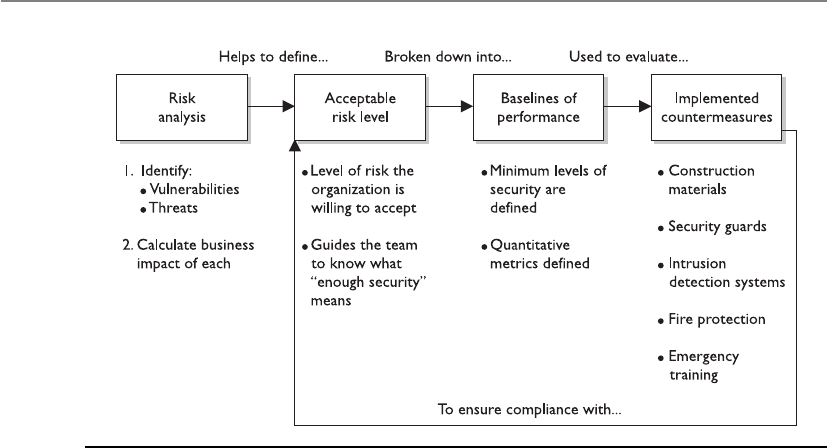
CISSP All-in-One Exam Guide
434
So, before an effective physical security program can be rolled out, the following
steps must be taken:
• Identify a team of internal employees and/or external consultants who will
build the physical security program through the following steps.
• Carry out a risk analysis to identify the vulnerabilities and threats and to
calculate the business impact of each threat.
• Identify regulatory and legal requirements that the organization must meet
and maintain.
• Work with management to define an acceptable risk level for the physical
security program.
• Derive the required performance baselines from the acceptable risk level.
• Create countermeasure performance metrics.
• Develop criteria from the results of the analysis, outlining the level of
protection and performance required for the following categories of the
security program:
• Deterrence
• Delaying
• Detection
• Assessment
• Response
• Identify and implement countermeasures for each program category.
Figure 5-1 Relationships of risk, baselines, and countermeasures

Chapter 5: Physical and Environmental Security
435
• Continuously evaluate countermeasures against the set baselines to ensure the
acceptable risk level is not exceeded.
Once these steps have taken place then the team is ready to move forward in its
actual design phase. The design will incorporate the controls required for each category
of the program: deterrence, delaying, detection, assessment, and response. We will dig
deeper into these categories and their corresponding controls later in the chapter in the
section “Designing a Physical Security Program.”
One of the most commonly used approaches in physical security program develop-
ment is described in the following section.
Crime Prevention Through Environmental Design
This place is so nice and pretty and welcoming. No one would want to carry out crimes here.
Crime Prevention Through Environmental Design (CPTED) is a discipline that out-
lines how the proper design of a physical environment can reduce crime by directly
affecting human behavior. It provides guidance in loss and crime prevention through
proper facility construction and environmental components and procedures.
CPTED concepts were developed in the 1960s. They have been expanded upon and
have matured as our environments and crime types have evolved. CPTED has been
used not just to develop corporate physical security programs, but also for large-scale
activities such as development of neighborhoods, towns, and cities. It addresses land-
scaping, entrances, facility and neighborhood layouts, lighting, road placement, and
traffic circulation patterns. It looks at microenvironments, such as offices and rest-
rooms, and macroenvironments, like campuses and cities. The crux of CPTED is that
Legal Requirements
In physical security there are some regulatory and high-level legal requirements
that must be met, but many of them just have high-level statements, as in “pro-
tect personnel” or “implement lifesaving controls.” It is up to the organization to
figure out how to actually meet these requirements in a practical manner. In the
United States there is a lot of case law that pertains to physical security require-
ments, which is built upon precedence. This means that there have been lawsuits
pertaining to specific physical security instances and a judgment was made on
liability. For example, there is no law that dictates that you must put up a yellow
sign indicating that a floor is wet. Many years ago someone somewhere slipped
on a wet floor and sued the company and the judge ruled that the company was
negligent and liable for the person’s injuries. Now it is built into many company
procedures that after a floor is mopped or there is a spill, this yellow sign is put
in place so no one will fall and sue the company. It is hard to think about and
cover all of these issues since there is no specific checklist to follow. This is why it
is a good idea to consult with a physical security expert when developing a phys-
ical security program.

CISSP All-in-One Exam Guide
436
the physical environment can be manipulated to create behavioral effects that will re-
duce crime and the fear of crime. It looks at the components that make up the relation-
ship between humans and their environment. This encompasses the physical, social,
and psychological needs of the users of different types of environments and predictable
behaviors of these users and offenders.
CPTED provides guidelines on items some of us might not consider. For example,
hedges and planters around a facility should not be higher than 2.5 feet tall, so they
cannot be used to gain access to a window. A data center should be located at the center
of a facility, so the facility’s walls will absorb any damages from external forces, instead
of the data center itself. Street furnishings (benches and tables) encourage people to sit
and watch what is going on around them, which discourages criminal activity. A corpo-
ration’s landscape should not include wooded areas or other places where intruders can
hide. Ensure that CCTV cameras are mounted in full view, so criminals know their ac-
tivities will be captured, and other people know the environment is well monitored
and thus safer.
CPTED and target hardening are two different approaches. Target hardening focuses
on denying access through physical and artificial barriers (alarms, locks, fences, and so
on). Traditional target hardening can lead to restrictions on the use, enjoyment, and
aesthetics of an environment. Sure, we can implement hierarchies of fences, locks, and
intimidating signs and barriers—but how pretty would that be? If your environment is
a prison, this look might be just what you need. But if your environment is an office
building, you’re not looking for Fort Knox décor. Nevertheless, you still must provide
the necessary levels of protection, but your protection mechanisms should be more
subtle and unobtrusive.
Let’s say your organization’s team needs to protect a side door at your facility. The
traditional target-hardening approach would be to put locks, alarms, and cameras on
the door; install an access control mechanism, such as a proximity reader; and instruct
security guards to monitor this door. The CPTED approach would be to ensure there is
no sidewalk leading to this door from the front of the building if you don’t want cus-
tomers using it. The CPTED approach would also ensure no tall trees or bushes block
the ability to view someone using this door. Barriers such as trees and bushes may make
intruders feel more comfortable in attempting to break in through a secluded door.
The best approach is usually to build an environment from a CPTED approach and
then apply the target-hardening components on top of the design where needed.
If a parking garage were developed using the CPTED approach, the stair towers and
elevators within the garage might have glass windows instead of metal walls, so people
feel safer, and potential criminals will not carry out crimes in this more visible environ-
ment. Pedestrian walkways would be created such that people could look out across the
rows of cars and see any suspicious activities. The different rows for cars to park in
would be separated by low walls and structural pillars, instead of solid walls, to allow

Chapter 5: Physical and Environmental Security
437
pedestrians to view activities within the garage. The goal is to not provide any hidden
areas where criminals can carry out their crimes and to provide an open-viewed area so
if a criminal does attempt something malicious, there is a higher likelihood of some-
one seeing it.
CPTED provides three main strategies to bring together the physical environment
and social behavior to increase overall protection: natural access control, natural sur-
veillance, and natural territorial reinforcement.
Natural Access Control
I want to go into the building from the side, but I would have to step on these flowers. I better
go around to the front.
Natural access control is the guidance of people entering and leaving a space by the
placement of doors, fences, lighting, and even landscaping. For example, an office
building may have external bollards with lights in them, as shown in Figure 5-2. These
bollards actually carry out different safety and security services. The bollards themselves
protect the facility from physical destruction by preventing people from driving their
cars into the building. The light emitted helps ensure that criminals do not have a dark
place to hide. And the lights and bollard placement guide people along the sidewalk to
the entrance, instead of using signs or railings. As shown in Figure 5-2, the landscape,
sidewalks, lighted bollards, and clear sight lines are used as natural access controls.
They work together to give individuals a feeling of being in a safe environment and
help dissuade criminals by working as deterrents.
Similarities in Approaches
The risk analysis steps that need to take place for the development of a physical
security program are similar to the steps outlined in Chapter 2 for the develop-
ment of an organizational security program and the steps outlined in Chapter 8
for a business impact analysis, because each of these processes (development of
an information security program, a physical security program, or a business con-
tinuity plan) accomplishes goals that are similar to the goals of the other two
processes, but with different focuses. Each process requires a team to carry out a
risk analysis to determine the company’s threats and risks. An information secu-
rity program looks at the internal and external threats to resources and data
through business processes and technological means. Business continuity looks
at how natural disasters and disruptions could damage the organization, while
physical security looks at internal and external physical threats to the company
resources.
Each requires a solid risk analysis process. Review Chapter 2 to understand
the core components of every risk analysis.

CISSP All-in-One Exam Guide
438
NOTE
NOTE Bollards are short posts commonly used to prevent vehicular access
and to protect a building or people walking on a sidewalk from vehicles. They
can also be used to direct foot traffic.
Clear lines of sight and transparency can be used to discourage potential offenders,
because of the absence of places to hide or carry out criminal activities.
The CPTED model shows how security zones can be created. An environment’s space
should be divided into zones with different security levels, depending upon who needs
to be in that zone and the associated risk. The zones can be labeled as controlled, re-
stricted, public, or sensitive. This is conceptually similar to information classification,
as described in Chapter 2. In a data classification program, different classifications are
created, along with data handling procedures and the level of protection that each clas-
sification requires. The same is true of physical zones. Each zone should have a specific
protection level required of it, which will help dictate the types of controls that should
be put into place.
Figure 5-2 Sidewalks, lights, and landscaping can be used for protection.

Chapter 5: Physical and Environmental Security
439
Access control should be in place to control and restrict individuals from going
from one security zone to the next. Access control should also be in place for all facility
entrances and exits. The security program development team needs to consider other
ways in which intruders can gain access to buildings, such as by climbing adjacent trees
to access skylights, upper-story windows, and balconies. The following controls are
commonly used for access controls within different organizations:
• Limit the number of entry points.
• Force all guests to go to a front desk and sign in before entering the environment.
• Reduce the number of entry points even further after hours or during the
weekend, when not as many employees are around.
• Implement sidewalks and landscaping to guide the public to a main entrance.
• Implement a back driveway for suppliers and deliveries, which is not easily
accessible to the public.
• Provide lighting for the pathways the public should follow to enter a building
to help encourage that only one entry is used for access.

CISSP All-in-One Exam Guide
440
• Implement sidewalks and grassy areas to guide vehicle traffic to only enter and
exit through specific locations.
• Provide parking in the front of the building (not the back or sides) so people
will be directed to enter the intended entrance.
These types of access controls are used all of the time, and we usually do not think
about them. They are built into the natural environment to manipulate us into doing
what the owner of the facility wants us to do. When you are walking on a sidewalk that
leads to an office front door and there are pretty flowers on both sides of the sidewalk,
know that they are put there because people tend not to step off a sidewalk and crush
pretty flowers. Flowers are commonly placed on both sides of a sidewalk to help ensure
that people stay on the sidewalk. Subtle and sneaky, but these control mechanisms work.
More obvious access barriers can be naturally created (cliffs, rivers, hills), existing
manmade elements (railroad tracks, highways), or artificial forms designed specifically
to impede movement (fences, closing streets). These can be used in tandem or sepa-
rately to provide the necessary level of access control.
Natural Surveillance
Please sit on this bench and just watch people walking by. You are cheaper than hiring a secu-
rity guard.
Surveillance can also take place through organized means (security guards), me-
chanical means (CCTV), and natural strategies (straight lines of sight, low landscaping,
raised entrances). The goal of natural surveillance is to make criminals feel uncomfort-
able by providing many ways observers could potentially see them and to make all
other people feel safe and comfortable by providing an open and well-designed envi-
ronment.
Natural surveillance is the use and placement of physical environmental features,
personnel walkways, and activity areas in ways that maximize visibility. Figure 5-3 il-
lustrates a stairway in a parking garage designed to be open and allow easy observation.
Next time you are walking down a street and see a bench next to a building or you
see a bench in a park, know that the city has not allocated funds for these benches just
in case your legs get tired. These benches are strategically placed so that people will sit
and watch other people. This is a very good surveillance system. The people who are
watching others do not realize that they are actually protecting the area, but many
criminals will identify them and not feel as confident in carrying out some type of
malicious deed.
Walkways and bicycle paths are commonly installed so that there will be a steady
flow of pedestrians who could identify malicious activity. Buildings might have large
windows that overlook sidewalks and parking lots for the same reason. Shorter fences
might be installed so people can see what is taking place on both sides of the fence.
Certain high-risk areas have more lighting than what is necessary so that people from a
distance can see what is going on. These high-risk areas could be stairs, parking areas,
bus stops, laundry rooms, children’s play areas, dumpsters, and recycling stations.
These constructs help people protect people without even knowing it.
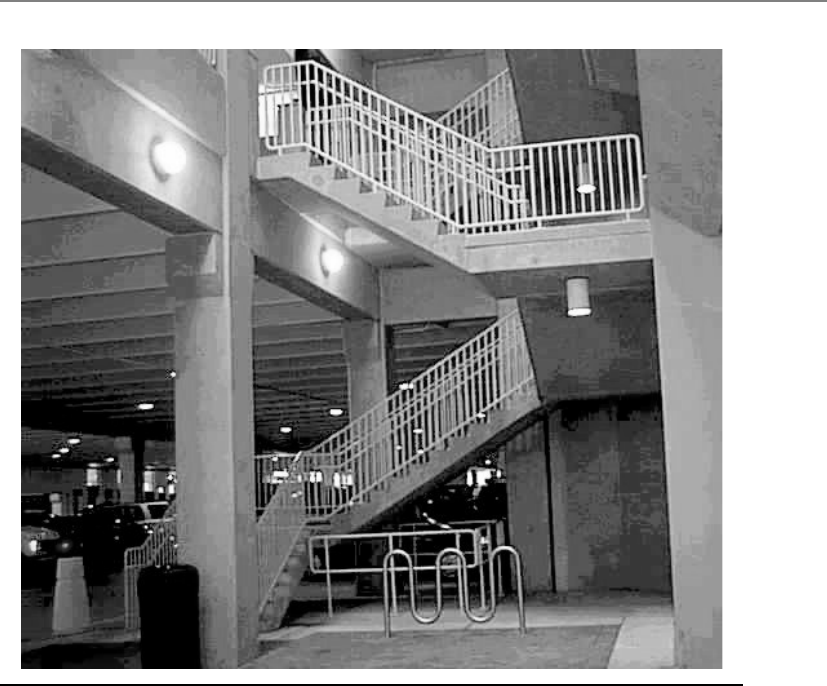
Chapter 5: Physical and Environmental Security
441
Natural Territorial Reinforcement
This is my neighborhood and I will protect it.
The third CPTED strategy is natural territorial reinforcement, which creates physical
designs that emphasize or extend the company’s physical sphere of influence so legiti-
mate users feel a sense of ownership of that space. Territorial reinforcement can be
implemented through the use of walls, fences, landscaping, light fixtures, flags, clearly
marked addresses, and decorative sidewalks. The goal of territorial reinforcement is to
create a sense of a dedicated community. Companies implement these elements so
employees feel proud of their environment and have a sense of belonging, which they
will defend if required to do so. These elements are also implemented to give potential
offenders the impression that they do not belong there, that their activities are at risk of
being observed, and that their illegal activities will not be tolerated or ignored.
In towns and cities there could be areas for people to walk their dogs, picnic tables
for people to use, restrooms, parks, and locations for people to play sports (baseball,
soccer). All of these give the local people a feeling of being in a collective neighborhood
Figure 5-3 Open areas reduce the likelihood of criminal activity.

CISSP All-in-One Exam Guide
442
and a homey feeling. This helps people identify who belongs there and who does not
and what is normal behavior and what is not. If people feel as though they are in their
own neighborhood, they will be more empowered to challenge something suspicious
and protect the local area.
CPTED also encourages activity support, which is planned activities for the areas to
be protected. These activities are designed to get people to work together to increase the
overall awareness of acceptable and unacceptable activities in the area. The activities
could be neighborhood watch groups, company barbeques, block parties, or civic meet-
ings. This strategy is sometimes the reason for particular placement of basketball courts,
soccer fields, or baseball fields in open parks. The increased activity will hopefully keep
the bad guys from milling around doing things the community does not welcome.
Most corporate environments use a mix of the CPTED and target-hardening ap-
proaches. CPTED deals mainly with the construction of the facility, its internal and
external designs, and exterior components such as landscaping and lighting. If the en-
vironment is built based on CPTED, then the target hardening is like icing on the cake.
The target-hardening approach applies more granular protection mechanisms, such as
locks and motion detectors. The rest of the chapter looks at physical controls that can
be used in both models.
Designing a Physical Security Program
Our security guards should wear pink uniforms and throw water balloons at intruders.
If a team is organized to assess the protection level of an existing facility, it needs to
investigate the following:
• Construction materials of walls and ceilings
• Power distribution systems
• Communication paths and types (copper, telephone, fiber)
• Surrounding hazardous materials
• Exterior components:
• Topography
• Proximity to airports, highways, railroads
• Potential electromagnetic interference from surrounding devices
• Climate
• Soil
• Existing fences, detection sensors, cameras, barriers
• Operational activities that depend upon physical resources
• Vehicle activity
• Neighbors

Chapter 5: Physical and Environmental Security
443
To properly obtain this information, the team should do physical surveys and inter-
view various employees. All of this collected data will help the team to evaluate the
current controls, identify weaknesses, and ensure operational productivity is not nega-
tively affected by implementing new controls.
Although there are usually written policies and procedures on what should be taking
place pertaining to physical security, policies and reality do not always match up. It is
important for the team to observe how the facility is used, note daily activities that
could introduce vulnerabilities, and determine how the facility is protected. This infor-
mation should be documented and compared to the information within the written
policy and procedures. In most cases, existing gaps must be addressed and fixed. Just
writing out a policy helps no one if it is not actually followed.
Every organization must comply with various regulations, whether they be safety
and health regulations; fire codes; state and local building codes; Departments of De-
fense, Energy, or Labor requirements; or some other agency’s regulations. The organiza-
tion may also have to comply with requirements of the Occupational Safety and Health
Administration (OSHA) and the Environmental Protection Agency (EPA), if it is oper-
ating in the United States, or with the requirements of equivalent organizations within
another country. The physical security program development team must understand all
the regulations the organization must comply with and how to reach compliance
through physical security and safety procedures.
Legal issues must be understood and properly addressed as well. These issues may
include access availability for the disabled, liability issues, the failure to protect assets
and people, excessive force used by security guards, and so on. This long laundry list of
items can get a company into legal trouble if it is not doing what it is supposed to. Oc-
casionally, the legal trouble may take the form of a criminal case—for example, if doors
default to being locked when power is lost and, as a result, several employees are
trapped and killed during a fire, criminal negligence may be alleged. Legal trouble can
also come in the form of civil cases—for instance, if a company does not remove the ice
on its sidewalks and a pedestrian falls and breaks his ankle, the pedestrian may sue the
company. The company may be found negligent and held liable for damages.
Every organization should have a facility safety officer, whose main job is to under-
stand all the components that make up the facility and what the company needs to do
to protect its assets and stay within compliance. This person should oversee facility
management duties day in and day out, but should also be heavily involved with the
team that has been organized to evaluate the organization’s physical security program.
A physical security program is a collection of controls that are implemented and
maintained to provide the protection levels necessary to be in compliance with the
physical security policy. The policy should embody all the regulations and laws that
must be adhered to and should set the risk level the company is willing to accept.
By this point, the team has carried out a risk analysis, which consisted of identifying
the company’s vulnerabilities, threats, and business impact pertaining to the identified
threats. The program design phase should begin with a structured outline, which will
evolve into a framework. This framework will then be fleshed out with the necessary
controls and countermeasures. The outline should contain the program categories and
the necessary countermeasures. The following is a simplistic example:

CISSP All-in-One Exam Guide
444
I. Deterrence of criminal activity
A. Fences
B. Warning signs
C. Security guards
D. Dogs
II. Delay of intruders to help ensure they can be caught
A. Locks
B. Defense-in-depth measures
C. Access controls
III. Detection of intruders
A. External intruder sensors
B. Internal intruder sensors
IV. Assessment of situations
A. Security guard procedures
B. Damage assessment criteria
V. Response to intrusions and disruptions
A. Communication structure (calling tree)
B. Response force
C. Emergency response procedures
D. Police, fire, medical personnel
The team can then start addressing each phase of the security program, usually start-
ing with the facility.
Facility
I can’t see the building.
Response: That’s the whole idea.
When a company decides to erect a building, it should consider several factors be-
fore pouring the first batch of concrete. Of course, land prices, customer population,
and marketing strategies are reviewed, but as security professionals, we are more inter-
ested in the confidence and protection that a specific location can provide. Some orga-
nizations that deal with top-secret or confidential information and processes make
their facilities unnoticeable so they do not attract the attention of would-be attackers.
The building may be hard to see from the surrounding roads, the company signs and
logos may be small and not easily noticed, and the markings on the building may not
give away any information that pertains to what is going on inside that building. It is a
type of urban camouflage that makes it harder for the enemy to seek out that company
as a target. This is very common for telecommunication facilities that contain critical
infrastructure switches and other supporting technologies. When driving down the
road you might pass three of these buildings, but because they have no features that
actually stand out, you do not even give them a second thought—which is the goal.

Chapter 5: Physical and Environmental Security
445
A company should evaluate how close the facility would be to a police station, fire
station, and medical facilities. Many times, the proximity of these entities raises the real
estate value of properties, but for good reason. If a chemical company that manufactures
highly explosive materials needs to build a new facility, it may make good business sense
to put it near a fire station. (Although the fire station might not be so happy.) If another
company that builds and sells expensive electronic devices is expanding and needs to
move operations into another facility, police reaction time may be looked at when
choosing one facility location over another. Each of these issues—police station, fire sta-
tion, and medical facility proximity—can also reduce insurance rates and must be
looked at carefully. Remember that the ultimate goal of physical security is to ensure the
safety of personnel. Always keep that in mind when implementing any sort of physical
security control. Protect your fellow humans, be your brother’s keeper, and then run.
Some buildings are placed in areas surrounded by hills or mountains to help pre-
vent eavesdropping of electrical signals emitted by the facility’s equipment. In some
cases, the organization itself will build hills or use other landscaping techniques to
guard against eavesdropping. Other facilities are built underground or right into the
side of a mountain for concealment and disguise in the natural environment, and for
protection from radar tools, spying activities, and aerial bomb attacks.
In the United States there is an Air Force base built into the Cheyenne Mountain
close to Colorado Springs, Colorado. The base was built into the mountain and is made
up of an inner complex of buildings, rooms, and tunnels. It has its own air intake sup-
ply, as well as water, fuel, and sewer lines. This is where the North American Aerospace
Defense Command carries out its mission and apparently according to many popular
movies, where you should be headed if the world is about to be blown up.
Issues with Selecting a Facility Site
When selecting a location for a facility, some of the following items are critical to
the decision-making process:
•Visibility
• Surrounding terrain
• Building markings and signs
• Types of neighbors
• Population of the area
•Surrounding area and external entities
• Crime rate, riots, terrorism attacks
• Proximity to police, medical, and fire stations
• Possible hazards from surrounding area
•Accessibility
• Road access
• Traffic
• Proximity to airports, train stations, and highways

CISSP All-in-One Exam Guide
446
Construction
We need a little more than glue, tape, and a stapler.
Physical construction materials and structure composition need to be evaluated for
their appropriateness to the site environment, their protective characteristics, their util-
ity, and their costs and benefits. Different building materials provide various levels of
fire protection and have different rates of combustibility, which correlate with their fire
ratings. When making structural decisions, the decision of what type of construction
material to use (wood, concrete, or steel) needs to be considered in light of what the
building is going to be used for. If an area will be used to store documents and old
equipment, it has far different needs and legal requirements than if it is going to be
used for employees to work in every day.
The load (how much weight can be held) of a building’s walls, floors, and ceilings
needs to be estimated and projected to ensure the building will not collapse in different
situations. In most cases, this is dictated by local building codes. The walls, ceilings, and
floors must contain the necessary materials to meet the required fire rating and to pro-
tect against water damage. The windows (interior and exterior) may need to provide
ultraviolet (UV) protection, may need to be shatterproof, or may need to be translucent
or opaque, depending on the placement of the window and the contents of the build-
ing. The doors (exterior and interior) may need to have directional openings, have the
same fire rating as the surrounding walls, prohibit forcible entries, display emergency
egress markings, and—depending on placement—have monitoring and attached
alarms. In most buildings, raised floors are used to hide and protect wires and pipes,
and it is important to ensure any raised outlets are properly grounded.
Building codes may regulate all of these issues, but there are still many options
within each category that the physical security program development team should re-
view for extra security protection. The right options should accomplish the company’s
security and functionality needs and still be cost-effective.
When designing and building a facility, the following major items need to be ad-
dressed from a physical security point of view:
•Walls
• Combustibility of material (wood, steel, concrete)
• Fire rating
• Reinforcements for secured areas
•Doors
• Combustibility of material (wood, pressed board, aluminum)
• Fire rating
•Natural disaster
• Likelihood of floods, tornadoes, earthquakes, or hurricanes
• Hazardous terrain (mudslides, falling rock from mountains, or
excessive snow or rain)

Chapter 5: Physical and Environmental Security
447
• Resistance to forcible entry
• Emergency marking
• Placement
• Locked or controlled entrances
• Alarms
• Secure hinges
• Directional opening
• Electric door locks that revert to an unlocked state for safe evacuation in
power outages
• Type of glass—shatterproof or bulletproof glass requirements
•Ceilings
• Combustibility of material (wood, steel, concrete)
• Fire rating
• Weight-bearing rating
• Drop-ceiling considerations
•Windows
• Translucent or opaque requirements
• Shatterproof
• Alarms
• Placement
• Accessibility to intruders
•Flooring
• Weight-bearing rating
• Combustibility of material (wood, steel, concrete)
• Fire rating
• Raised flooring
• Nonconducting surface and material
•Heating, ventilation, and air conditioning
• Positive air pressure
• Protected intake vents
• Dedicated power lines
• Emergency shutoff valves and switches
• Placement
•Electric power supplies
• Backup and alternate power supplies

CISSP All-in-One Exam Guide
448
• Clean and steady power source
• Dedicated feeders to required areas
• Placement and access to distribution panels and circuit breakers
•Water and gas lines
• Shutoff valves—labeled and brightly painted for visibility
• Positive flow (material flows out of building, not in)
• Placement—properly located and labeled
•Fire detection and suppression
• Placement of sensors and detectors
• Placement of suppression systems
• Type of detectors and suppression agents
The risk analysis results will help the team determine the type of construction mate-
rial that should be used when constructing a new facility. Several grades of building
construction are available. For example, light frame construction material provides the
least amount of protection against fire and forcible entry attempts. It is composed of
untreated lumber that would be combustible during a fire. Light frame construction
material is usually used to build homes, primarily because it is cheap, but also because
homes typically are not under the same types of fire and intrusion threats that office
buildings are.
Heavy timber construction material is commonly used for office buildings. Combus-
tible lumber is still used in this type of construction, but there are requirements on the
thickness and composition of the materials to provide more protection from fire. The
construction materials must be at least four inches in thickness. Denser woods are used
and are fastened with metal bolts and plates. Whereas light frame construction mate-
rial has a fire survival rate of 30 minutes, the heavy timber construction material has a
fire rate of one hour.
A building could be made up of incombustible material, such as steel, which pro-
vides a higher level of fire protection than the previously mentioned materials, but
Ground
If you are holding a power cord plug that has two skinny metal pieces and one
fatter, rounder metal piece, which all go into the outlet—what is that fatter,
rounder piece for? It is a ground connector, which is supposed to act as the con-
duit for any excess current to ensure that people and devices are not negatively
affected by a spike in electrical current. So, in the wiring of a building, where do
you think this ground should be connected? Yep, to the ground. Old mother
earth. But many buildings are not wired properly, and the ground connector is
connected to nothing. This can be very dangerous, since the extra current has
nowhere to escape but into our equipment or ourselves.

Chapter 5: Physical and Environmental Security
449
loses its strength under extreme temperatures, something that may cause the building to
collapse. So, although the steel will not burn, it may melt and weaken. If a building
consists of fire-resistant material, the construction material is fire-retardant and may
have steel rods encased inside of concrete walls and support beams. This provides the
most protection against fire and forced entry attempts.
The team should choose its construction material based on the identified threats of
the organization and the fire codes to be complied with. If a company is just going to
have some office workers in a building and has no real adversaries interested in destroy-
ing the facility, then the light frame or heavy timber construction material would be
used. Facilities for government organizations, which are under threat by domestic and
foreign terrorists, would be built with fire-resistant materials. A financial institution
would also use fire-resistant and reinforcement material within its building. This is es-
pecially true for its exterior walls, through which thieves may attempt to drive vehicles
to gain access to the vaults.
Calculations of approximate penetration times for different types of explosives and
attacks are based on the thickness of the concrete walls and the gauge of rebar used.
(Rebar refers to the steel rods encased within the concrete.) So even if the concrete were
damaged, it would take longer to actually cut or break through the rebar. Using thicker
rebar and properly placing it within the concrete provides even more protection.
Reinforced walls, rebar, and the use of double walls can be used as delaying mecha-
nisms. The idea is that it will take the bad guy longer to get through two reinforced
walls, which gives the response force sufficient time to arrive at the scene and stop the
attacker, we hope.
Entry Points
Understanding the company needs and types of entry points for a specific building is
critical. The various types of entry points may include doors, windows, roof access, fire
escapes, chimneys, and service delivery access points. Second and third entry points
must also be considered, such as internal doors that lead into other portions of the
building and to exterior doors, elevators, and stairwells. Windows at the ground level
should be fortified, because they could be easily broken. Fire escapes, stairwells to the
roof, and chimneys are many times overlooked as potential entry points.
NOTE
NOTE Ventilation ducts and utility tunnels can also be used by intruders and
thus must be properly protected with sensors and access control mechanisms.
The weakest portion of the structure, usually its doors and windows, will likely be
attacked first. With regard to doors, the weaknesses usually lie within the frames, hinges,
and door material. The bolts, frames, hinges, and material that make up the door
should all provide the same level of strength and protection. For example, if a company
implements a heavy, nonhollow steel door but uses weak hinges that could be easily
extracted, the company is just wasting money. The attacker can just remove the hinges
and remove this strong and heavy door.

CISSP All-in-One Exam Guide
450
The door and surrounding walls and ceilings should also provide the same level of
strength. If another company has an extremely fortified and secure door, but the sur-
rounding wall materials are made out of regular light frame wood, then it is also wast-
ing money on doors. There is no reason to spend a lot of money on one countermeasure
that can be easily circumvented by breaking a weaker countermeasure in proximity.
Doors Different door types for various functionalities include the following:
• Vault doors
• Personnel doors
• Industrial doors
• Vehicle access doors
• Bullet-resistant doors
Doors can be hollow-core or solid-core. The team needs to understand the various
entry types and the potential forced-entry threats, which will help them determine what
type of door should be implemented. Hollow-core doors can be easily penetrated by kick-
ing or cutting them; thus, they are usually used internally. The team also has a choice of
solid-core doors, which are made up of various materials to provide different fire ratings
and protection from forced entry. As stated previously, the fire rating and protection level
of the door needs to match the fire rating and protection level of the surrounding walls.
Bulletproof doors are also an option if there is a threat that damage could be done
to resources by shooting through the door. These types of doors are constructed in a
manner that involves sandwiching bullet-resistant and bulletproof material between
wood or steel veneers to still give the door some aesthetic qualities while providing the
necessary levels of protection.
Hinges and strike plates should be secure, especially on exterior doors or doors used
to protect sensitive areas. The hinges should have pins that cannot be removed, and the
door frames must provide the same level of protection as the door itself.
Fire codes dictate the number and placement of doors with panic bars on them.
These are the crossbars that release an internal lock to allow a locked door to open.
Panic bars can be on regular entry doors and also on emergency exit doors. Those are
the ones that usually have the sign that indicates the door is not an exit point and that
an alarm will go off if the door is opened. It might seem like fun and a bit tempting to
see if the alarm will really go off or not—but don’t try it. Security people are not known
for their sense of humor.
Mantraps and turnstiles can be used so unauthorized individuals entering a facility
cannot get in or out if it is activated. A mantrap is a small room with two doors. The first
door is locked; a person is identified and authenticated by a security guard, biometric
system, smart card reader, or swipe card reader. Once the person is authenticated and
access is authorized, the first door opens and allows the person into the mantrap. The
first door locks and the person is trapped. The person must be authenticated again be-
fore the second door unlocks and allows him into the facility. Some mantraps use
biometric systems that weigh the person who enters to ensure that only one person at
a time is entering the mantrap area. This is a control to counter piggybacking.
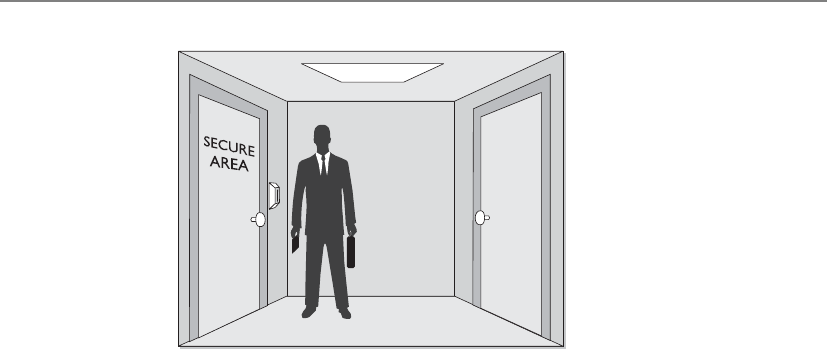
Chapter 5: Physical and Environmental Security
451
Doorways with automatic locks can be configured to be fail-safe or fail-secure. A
fail-safe setting means that if a power disruption occurs that affects the automated lock-
ing system, the doors default to being unlocked. Fail-safe deals directly with protecting
people. If people work in an area and there is a fire or the power is lost, it is not a good
idea to lock them in. This would not make you many friends. A fail-secure configura-
tion means that the doors default to being locked if there are any problems with the
power. If people do not need to use specific doors for escape during an emergency, then
these doors can most likely default to fail-secure settings.
Windows Windows should be properly placed (this is where security and aesthetics
can come to blows) and should have frames of the proper strengths, the necessary glaz-
ing material, and possibly have a protective covering. The glazing material, which is
applied to the windows as they are being made, may be standard, tempered, acrylic,
wire, or laminated on glass. Standard glass windows are commonly used in residential
homes and are easily broken. Tempered glass is made by heating the glass and then sud-
denly cooling it. This increases its mechanical strength, which means it can handle
more stress and is harder to break. It is usually five to seven times stronger than stan-
dard glass.
Acrylic glass can be made out of polycarbonate acrylic, which is stronger than stan-
dard glass but produces toxic fumes if burned. Polycarbonate acrylics are stronger than
regular acrylics, but both are made out of a type of transparent plastic. Because of their
combustibility, their use may be prohibited by fire codes. The strongest window mate-
rial is glass-clad polycarbonate. It is resistant to a wide range of threats (fire, chemical,
breakage), but, of course, is much more expensive. These types of windows would be
used in areas that are under the greatest threat.
Some windows are made out of glass that has embedded wires—in other words, it
actually has two sheets of glass, with the wiring in between. The wires help reduce the
likelihood of the window being broken or shattering.
Laminated glass has two sheets of glass with a plastic film in between. This added
plastic makes it much more difficult to break the window. As with other types of glass,
laminated glass can come in different depths. The greater the depth (more glass and
plastic), the more difficult it is to break.

CISSP All-in-One Exam Guide
452
A lot of window types have a film on them that provides efficiency in heating and
cooling. They filter out UV rays and are usually tinted, which can make it harder for the
bad guy to peep in and monitor internal activities. Some window types have a different
kind of film applied that makes it more difficult to break them, whether by explosive,
storm, or intruder.
Internal Compartments
Many components that make up a facility must be looked at from a security point of
view. Internal partitions are used to create barriers between one area and another. These
partitions can be used to segment separate work areas, but should never be used in
protected areas that house sensitive systems and devices. Many buildings have dropped
ceilings, meaning the interior partitions do not extend to the true ceiling—only to the
dropped ceiling. An intruder can lift a ceiling panel and climb over the partition. This
example of intrusion is shown in Figure 5-4. In many situations, this would not require
forced entry, specialized tools, or much effort. (In some office buildings, this may even
be possible from a common public-access hallway.) These types of internal partitions
should not be relied upon to provide protection for sensitive areas.
Window Types
A security professional may be involved with the planning phase of building a
facility, and each of these items comes into play when constructing a secure
building and environment. The following sums up the types of windows that can
be used:
•Standard No extra protection. The cheapest and lowest level of
protection.
•Tempered Glass is heated and then cooled suddenly to increase its
integrity and strength.
•Acrylic A type of plastic instead of glass. Polycarbonate acrylics are
stronger than regular acrylics.
•Wired A mesh of wire is embedded between two sheets of glass. This
wire helps prevent the glass from shattering.
•Laminated The plastic layer between two outer glass layers. The plastic
layer helps increase its strength against breakage.
•Solar window film Provides extra security by being tinted and offers
extra strength due to the film’s material.
•Security film Transparent film is applied to the glass to increase its
strength.

Chapter 5: Physical and Environmental Security
453
Computer and Equipment Rooms
It used to be necessary to have personnel within the computer rooms for proper main-
tenance and operations. Today, most servers, routers, switches, mainframes, and other
equipment housed in computer rooms can be controlled remotely. This enables com-
puters to live in rooms that have fewer people milling around and spilling coffee. Be-
cause the computer rooms no longer have personnel sitting and working in them for
long periods, the rooms can be constructed in a manner that is efficient for equipment
instead of people.
Smaller systems can be stacked vertically to save space. They should be mounted on
racks or placed inside equipment cabinets. The wiring should be close to the equip-
ment to save on cable costs and to reduce tripping hazards.
Data centers, server rooms, and wiring closets should be located in the core areas of
a facility, near wiring distribution centers. Strict access control mechanisms and proce-
dures should be implemented for these areas. The access control mechanisms may be
smart card readers, biometric readers, or combination locks, as described in Chapter 3.
These restricted areas should have only one access door, but fire code requirements
typically dictate there must be at least two doors to most data centers and server rooms.
Only one door should be used for daily entry and exit, and the other door should be
used only in emergency situations. This second door should not be an access door,
which means people should not be able to come in through this door. It should be
locked, but should have a panic bar that will release the lock if pressed.
Figure 5-4 An intruder can lift ceiling panels and enter a secured area with little effort.

CISSP All-in-One Exam Guide
454
These restricted areas ideally should not be directly accessible from public areas like
stairways, corridors, loading docks, elevators, and restrooms. This helps ensure that the
people who are by the doors to secured areas have a specific purpose for being there,
versus being on their way to the restroom or standing around in a common area gos-
siping about the CEO.
Because data centers usually hold expensive equipment and the company’s critical
data, their protection should be thoroughly thought out before implementation. Data
centers should not be located on the top floors because it would be more difficult for
an emergency crew to access it in a timely fashion in case of a fire. By the same token,
data centers should not be located in basements where flooding can affect the systems.
And if a facility is in a hilly area, the data center should be located well above ground
level. Data centers should be located at the core of a building so if there is some type of
attack on the building, the exterior walls and structures will absorb the hit and hope-
fully the data center will not be damaged.
Which access controls and security measures should be implemented for the data
center depends upon the sensitivity of the data being processed and the protection
level required. Alarms on the doors to the data processing center should be activated
during off-hours, and there should be procedures dictating how to carry out access
control during normal business hours, after hours, and during emergencies. If a combi-
nation lock is used to enter the data processing center, the combination should be
changed at least every six months and also after an employee who knows the code
leaves the company.
The various controls discussed next are shown in Figure 5-5. The team responsible
for designing a new data center (or evaluating a current data center) should understand
all the controls shown in Figure 5-5 and be able to choose what is needed.
The data processing center should be constructed as one room rather than different
individual rooms. The room should be away from any of the building’s water pipes in
case a break in a line causes a flood. The vents and ducts from the HVAC system should
be protected with some type of barrier bars and should be too small for anyone to crawl
through and gain access to the center. The data center must have positive air pressure,
so no contaminants can be sucked into the room and into the computers’ fans.
In many data centers, an emergency Off switch is situated next to the door so some-
one can turn off the power if necessary. If a fire occurs, this emergency Off switch should
be flipped as employees are leaving the room and before the fire suppression agent is
released. This is critical if the suppression agent is water, because water and electricity are
not a good match—especially during a fire. A company can install a fire suppression
system that is tied into this switch, so when a fire is detected, the electricity is automati-
cally shut off right before the suppression material is released. (The suppression mate-
rial could be a type of gas, such as halon, or FM-200. Gases are usually a better choice for
environments filled with computers. We will cover different suppression agents in the
“Fire Prevention, Detection, and Suppression” section later in the chapter.)
Portable fire extinguishers should be located close to the equipment and should be
easy to see and access. Smoke detectors or fire sensors should be implemented, and
water sensors should be placed under the raised floors. Since most of the wiring and
cables run under the raised floors, it is important that water does not get to these places
and, if it does, that an alarm sound if water is detected.

Chapter 5: Physical and Environmental Security
455
NOTE
NOTE If there is any type of water damage in a data center or facility, mold
and mildew could easily become a problem. Instead of allowing things to
“dry out on their own,” many times it is better to use industry-strength
dehumidifiers, water movers, and sanitizers to ensure secondary damage does
not occur.
Water can cause extensive damage to equipment, flooring, walls, computers, and
facility foundations. It is important that an organization be able to detect leaks and
unwanted water. The detectors should be under raised floors and on dropped ceilings
(to detect leaks from the floor above it). The location of the detectors should be docu-
mented and their position marked for easy access. As smoke and fire detectors should
be tied to an alarm system, so should water detectors. The alarms usually just alert the
necessary staff members and not everyone in the building. The staff members who are
responsible for following up when an alarm sounds should be trained properly on how
to reduce any potential water damage. Before any poking around to see where water is
or is not pooling in places it does not belong, the electricity for that particular zone of
the building should be temporarily turned off.
Figure 5-5 A data center should have many physical security controls.

CISSP All-in-One Exam Guide
456
Water detectors can help prevent damage to
• Equipment
• Flooring
• Walls
• Computers
• Facility foundations
Location of water detectors should be
• Under raised floors
• On dropped ceilings
It is important to maintain the proper temperature and humidity levels within data
centers, which is why an HVAC system should be implemented specifically for this
room. Too high a temperature can cause components to overheat and turn off; too low
a temperature can cause the components to work more slowly. If the humidity is high,
then corrosion of the computer parts can take place; if humidity is low, then static elec-
tricity can be introduced. Because of this, the data center must have its own temperature
and humidity controls, which are separate from the rest of the building.
It is best if the data center is on a different electrical system than the rest of the
building, if possible. Thus, if anything negatively affects the main building’s power, it
will not carry over and affect the center. The data center may require redundant power
supplies, which means two or more feeders coming in from two or more electrical sub-
stations. The idea is that if one of the power company’s substations were to go down,
the company would still be able to receive electricity from the other feeder. But just
because a company has two or more electrical feeders coming into its facility does not
mean true redundancy is automatically in place. Many companies have paid for two
feeders to come into their building, only to find out both feeders were coming from the
same substation! This defeats the whole purpose of having two feeders in the first place.
Data centers need to have their own backup power supplies, either an uninterrupt-
ed power supply (UPS) or generators. The different types of backup power supplies are
discussed later in the chapter, but it is important to know at this point that the power
backup must be able to support the load of the data center.
Many companies choose to use large glass panes for the walls of the data center so
personnel within the center can be viewed at all times. This glass should be shatter-
resistant since the window is acting as an exterior wall. The center’s doors should not
be hollow, but rather secure solid-core doors. Doors should open out rather than in so
they don’t damage equipment when opened. Best practices indicate that the door
frame should be fixed to adjoining wall studs and that there should be at least three
hinges per door. These characteristics would make the doors much more difficult to
break down.

Chapter 5: Physical and Environmental Security
457
Protecting Assets
The main threats that physical security components combat are theft, interruptions to
services, physical damage, compromised system and environment integrity, and unau-
thorized access.
Real loss is determined by the cost to replace the stolen items, the negative effect on
productivity, the negative effect on reputation and customer confidence, fees for con-
sultants that may need to be brought in, and the cost to restore lost data and produc-
tion levels. Many times, companies just perform an inventory of their hardware and
provide value estimates that are plugged into risk analysis to determine what the cost to
the company would be if the equipment were stolen or destroyed. However, the infor-
mation held within the equipment may be much more valuable than the equipment
itself, and proper recovery mechanisms and procedures also need to be plugged into
the risk assessment for a more realistic and fair assessment of cost.
Laptop theft is increasing at incredible rates each year. They have been stolen for
years, but in the past they were stolen mainly to sell the hardware. Now laptops are also
being stolen to gain sensitive data for identity theft crimes. What is important to under-
stand is that this is a rampant, and potentially very dangerous, crime. Many people
claim, “My whole life is on my laptop” or possibly their smartphone. Since employees
use laptops as they travel, they may have extremely sensitive company or customer data
on their systems that can easily fall into the wrong hands. The following list provides
many of the protection mechanisms that can be used to protect laptops and the data
they hold:
• Inventory all laptops, including serial numbers, so they can be properly
identified if recovered.
• Harden the operating system.
• Password-protect the BIOS.
• Register all laptops with the vendor, and file a report when one is stolen.
If a stolen laptop is sent in for repairs, after it is stolen it will be flagged by
the vendor.
• Do not check a laptop as luggage when flying.
• Never leave a laptop unattended, and carry it in a nondescript carrying case.
• Engrave the laptop with a symbol or number for proper identification.
• Use a slot lock with a cable to connect a laptop to a stationary object.
• Back up the data from the laptop and store it on a stationary PC or backup
media.
• Use specialized safes if storing laptops in vehicles.
• Encrypt all sensitive data.

CISSP All-in-One Exam Guide
458
Tracing software can be installed so that your laptop can “phone home” if it is taken
from you. Several products offer this tracing capability. Once installed and configured,
the software periodically sends in a signal to a tracking center. If you report that your
laptop has been stolen, the vendor of this software will work with service providers and
law enforcement to track down and return your laptop.
A company may have need for a safe. Safes are commonly used to store backup data
tapes, original contracts, or other types of valuables. The safe should be penetration-
resistant and provide fire protection. The types of safes an organization can choose
from are
•Wall safe Embedded into the wall and easily hidden
•Floor safe Embedded into the floor and easily hidden
•Chests Stand-alone safes
•Depositories Safes with slots, which allow the valuables to be easily slipped in
•Vaults Safes that are large enough to provide walk-in access
If a safe has a combination lock, it should be changed periodically, and only a small
subset of people should have access to the combination or key. The safe should be in a
visible location, so anyone who is interacting with the safe can be seen. The goal is to
uncover any unauthorized access attempts. Some safes have passive or thermal relock-
ing functionality. If the safe has a passive relocking function, it can detect when some-
one attempts to tamper with it, in which case extra internal bolts will fall into place to
ensure it cannot be compromised. If a safe has a thermal relocking function, when a
certain temperature is met (possibly from drilling), an extra lock is implemented to
ensure the valuables are properly protected.
Internal Support Systems
This place has no air conditioning or water. Who would want to break into it anyway?
Having a fortified facility with secure compartmentalized areas and protected assets
is nice, but also having lights, air conditioning, and water within this facility is even
better. Physical security needs to address these support services, because their malfunc-
tion or disruption could negatively affect the organization in many ways.
Although there are many incidents of various power losses here and there for differ-
ent reasons (storms, hurricanes, California nearly running out of electricity), one of the
most notable power losses took place in August 2003, when eight East Coast states and
portions of Canada lost power for several days. There were rumors about a worm caus-
ing this disruption, but the official report blamed it on a software bug in GE Energy’s
XA/21 system. This disaster left over 50 million people without power for days, caused
four nuclear power plants to be shut down, and put a lot of companies in insecure and
chaotic conditions. Security professionals need to be able to help organizations handle
both the small bumps in the road, such as power surges or sags, and the gigantic sink-
holes, such as what happened in the United States and Canada on August 14, 2003.

Chapter 5: Physical and Environmental Security
459
Electric Power
We don’t need no stinkin’ power supply. Just rub these two sticks together.
Because computing and communication have become so essential in almost every
aspect of life, power failure is a much more devastating event than it was 10 to 15 years
ago. The need for good plans to fall back on is crucial to ensure that a business will not
be drastically affected by storms, high winds, hardware failure, lightning, or other
events that can stop or disrupt power supplies. A continuous supply of electricity as-
sures the availability of company resources; thus, a security professional must be famil-
iar with the threats to electric power and the corresponding countermeasures.
Several types of power backup capabilities exist. Before a company chooses one, it
should calculate the total cost of anticipated downtime and its effects. This information
can be gathered from past records and other businesses in the same area on the same
power grid. The total cost per hour for backup power is derived by dividing the annual
expenditures by the annual standard hours of use.
Large and small issues can cause power failure or fluctuations. The effects manifest
in variations of voltage that can last a millisecond to days. A company can pay to have
two different supplies of power to reduce its risks, but this approach can be costly.
Other, less expensive mechanisms are to have generators or UPSs in place. Some gen-
erators have sensors to detect power failure and will start automatically upon failure.
Depending on the type and size of the generator, it might provide power for hours or
days. UPSs are usually short-term solutions compared to generators.
Smart Grid
Most of our power grid today is not considered “smart.” There are power plants
that turn something (i.e., coal) into electricity. The electricity goes through a trans-
mission substation, which puts the electricity on long-haul transmission lines.
These lines distribute the electricity to large areas. Before the electricity gets to our
home or office, it goes through a power substation and a transformer, which
changes the electrical current and voltage to the proper levels, and the electricity
travels over power lines (usually on poles) and connects to our buildings. So our
current power grid is similar to a system of rivers and streams—electricity gets to
where it needs to go without much technological intelligence involved. This
“dumb” system makes it hard to identify disruptions when they happen, deal with
high-peak demands, use renewable energy sources, react to attacks, and deploy
solutions that would make our overall energy consumption more efficient.
We are moving to smart grids, which mean that there is a lot more computing
software and technology embedded into the grids to optimize and automate these
functions. Some of the goals of a smart grid are self-healing, resistant to physical
and cyber-attacks, bidirectional communication capabilities, increased efficiency,
and better integration of renewable energy sources. We want our grids to be more
reliable, resilient, flexible, and efficient. While all of this is wonderful and terrific,
it means that almost every component of the new power grid has to be computer-
ized in some manner (smart meters, smart thermostats, automated control soft-
ware, automated feedback loops, digital scheduling and load shifting, etc.).

CISSP All-in-One Exam Guide
460
Power Protection
Protecting power can be done in three ways: through UPSs, power line conditioners,
and backup sources. UPSs use battery packs that range in size and capacity. A UPS can
be online or standby. Online UPS systems use AC line voltage to charge a bank of bat-
teries. When in use, the UPS has an inverter that changes the DC output from the bat-
teries into the required AC form and that regulates the voltage as it powers computer
devices. This conversion process is shown in Figure 5-6. Online UPS systems have the
normal primary power passing through them day in and day out. They constantly pro-
vide power from their own inverters, even when the electric power is in proper use.
Since the environment’s electricity passes through this type of UPS all the time, the UPS
device is able to quickly detect when a power failure takes place. An online UPS can
provide the necessary electricity and picks up the load after a power failure much more
quickly than a standby UPS.
Standby UPS devices stay inactive until a power line fails. The system has sensors
that detect a power failure, and the load is switched to the battery pack. The switch to
the battery pack is what causes the small delay in electricity being provided. So an on-
line UPS picks up the load much more quickly than a standby UPS, but costs more, of
course.
The actual definition of “smart grid” is nebulous because it is hard to delin-
eate between what falls within and outside the grid’s boundaries, many different
technologies are involved, and it is in an immature evolutionary stage. From a
security point of view, while the whole grid will be more resilient and centrally
controlled, now there could be more attack vectors because most pieces will have
some type of technology embedded.
In the past our telephones were “dumb,” but now they are small computers,
so they are “smart.” The increased functionality and intelligence open the doors
for more attacks on our individual smart phones. The smart grid is similar to our
advances in telephony. We can secure the core infrastructure, but it is the end
points that are very difficult to secure. And while telephones are important, pow-
er grids are part of every nation’s critical infrastructure.
Figure 5-6 A UPS device converts DC current from its internal or external batteries to usable AC
by using an inverter.
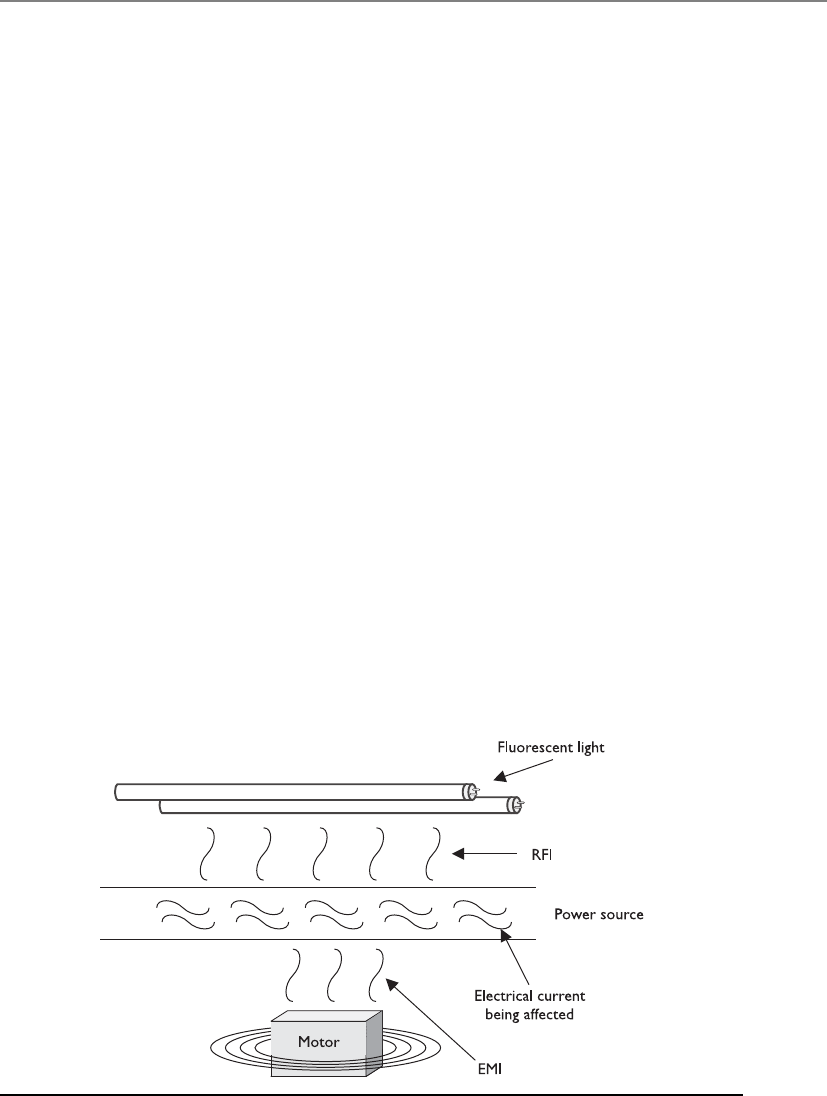
Chapter 5: Physical and Environmental Security
461
Backup power supplies are necessary when there is a power failure and the outage
will last longer than a UPS can last. Backup supplies can be a redundant line from an-
other electrical substation or from a motor generator, and can be used to supply main
power or to charge the batteries in a UPS system.
A company should identify critical systems that need protection from interrupted
power supplies, and then estimate how long secondary power would be needed and
how much power is required per device. Some UPS devices provide just enough power
to allow systems to shut down gracefully, whereas others allow the systems to run for a
longer period. A company needs to determine whether systems should only have a big
enough power supply to allow them to shut down properly or whether they need a
system that keeps them up and running so critical operations remain available.
Just having a generator in the closet should not give a company that warm fuzzy
feeling of protection. An alternate power source should be tested periodically to make
sure it works, and to the extent expected. It is never good to find yourself in an emer-
gency only to discover the generator does not work, or someone forgot to buy the gas
necessary to keep the thing running.
Electric Power Issues
Electric power enables us to be productive and functional in many different ways, but
if it is not installed, monitored, and respected properly, it can do us great harm.
When clean power is being provided, the power supply contains no interference or
voltage fluctuation. The possible types of interference (line noise) are electromagnetic
interference (EMI) and radio frequency interference (RFI), which can cause disturbance
to the flow of electric power while it travels across a power line, as shown in Figure 5-7.
EMI can be created by the difference between three wires: hot, neutral, and ground, and
the magnetic field they create. Lightning and electrical motors can induce EMI, which
could then interrupt the proper flow of electrical current as it travels over wires to, from,
Figure 5-7 RFI and EMI can cause line noise on power lines.

CISSP All-in-One Exam Guide
462
and within buildings. RFI can be caused by anything that creates radio waves. Fluores-
cent lighting is one of the main causes of RFI within buildings today, so does that mean
we need to rip out all the fluorescent lighting? That’s one choice, but we could also just
use shielded cabling where fluorescent lighting could cause a problem. If you take a
break from your reading, climb up into your office’s dropped ceiling, and look around,
you would probably see wires bundled and tied up to the true ceiling. If your office is
using fluorescent lighting, the power and data lines should not be running over, or on
top of, the fluorescent lights. This is because the radio frequencies being given off can
interfere with the data or power current as it travels through these wires. Now, get back
down from the ceiling. We have work to do.
Interference interrupts the flow of an electrical current, and fluctuations can actu-
ally deliver a different level of voltage than what was expected. Each fluctuation can be
damaging to devices and people. The following explains the different types of voltage
fluctuations possible with electric power:
•Power excess
•Spike Momentary high voltage
•Surge Prolonged high voltage
•Power loss
•Fault Momentary power outage
•Blackout Prolonged, complete loss of electric power
•Power degradation
•Sag/dip Momentary low-voltage condition, from one cycle to a few
seconds
•Brownout Prolonged power supply that is below normal voltage
•In-rush current Initial surge of current required to start a load
Electric Power Definitions
The following list summarizes many of the electric power concepts discussed so far:
•Ground The pathway to the earth to enable excessive voltage to dissipate
•Noise Electromagnetic or frequency interference that disrupts the
power flow and can cause fluctuations
•Transient noise A short duration of power line disruption
•Clean power Electrical current that does not fluctuate
•EMI Electromagnetic interference
•RFI Radio frequency interference

Chapter 5: Physical and Environmental Security
463
When an electrical device is turned on, it can draw a large amount of current, which
is referred to as in-rush current. If the device sucks up enough current, it can cause a sag
in the available power for surrounding devices. This could negatively affect their perfor-
mance. As stated earlier, it is a good idea to have the data processing center and devices
on a different electrical wiring segment from that of the rest of the facility, if possible,
so the devices will not be affected by these issues. For example, if you are in a building
or house without efficient wiring and you turn on a vacuum cleaner or microwave, you
may see the lights quickly dim because of this in-rush current. The drain on the power
supply caused by in-rush currents still happens in other environments when these types
of electrical devices are used—you just might not be able to see the effects. Any type of
device that would cause such a dramatic in-rush current should not be used on the
same electrical segment as data processing systems.
Surge Asurge is a prolonged rise in voltage from a power source. Surges can cause a
lot of damage very quickly. A surge is one of the most common power problems and is
controlled with surge protectors. These protectors use a device called a metal oxide va-
ristor, which moves the excess voltage to ground when a surge occurs. Its source can be
from a strong lightning strike, a power plant going online or offline, a shift in the com-
mercial utility power grid, and electrical equipment within a business starting and stop-
ping. Most computers have a built-in surge protector in their power supplies, but these
are baby surge protectors and cannot provide protection against the damage that larger
surges (say, from storms) can cause. So, you need to ensure all devices are properly
plugged into larger surge protectors, whose only job is to absorb any extra current be-
fore it is passed to electrical devices.
Blackout A blackout is when the voltage drops to zero. This can be caused by light-
ning, a car taking out a power line, storms, or failure to pay the power bill. It can last for
seconds or days. This is when a backup power source is required for business continuity.
Brownout When power companies are experiencing high demand, they frequently
reduce the voltage in an electrical grid, which is referred to as a brownout. Constant-
voltage transformers can be used to regulate this fluctuation of power. They can use
different ranges of voltage and only release the expected 120 volts of alternating current
to devices.
Noise Noise on power lines can be a result of lightning, the use of fluorescent light-
ing, a transformer being hit by an automobile, or other environmental or human ac-
tivities. Frequency ranges overlap, which can affect electrical device operations. Light-
ning sometimes produces voltage spikes on communications and power lines, which
can destroy equipment or alter data being transmitted. When generators are switched
on because power loads have increased, they, too, can cause voltage spikes that can be
harmful and disruptive. Storms and intense cold or heat can put a heavier load on gen-
erators and cause a drop in voltage. Each of these instances is an example of how nor-
mal environmental behaviors can affect power voltage, eventually adversely affecting
equipment, communications, or the transmission of data.
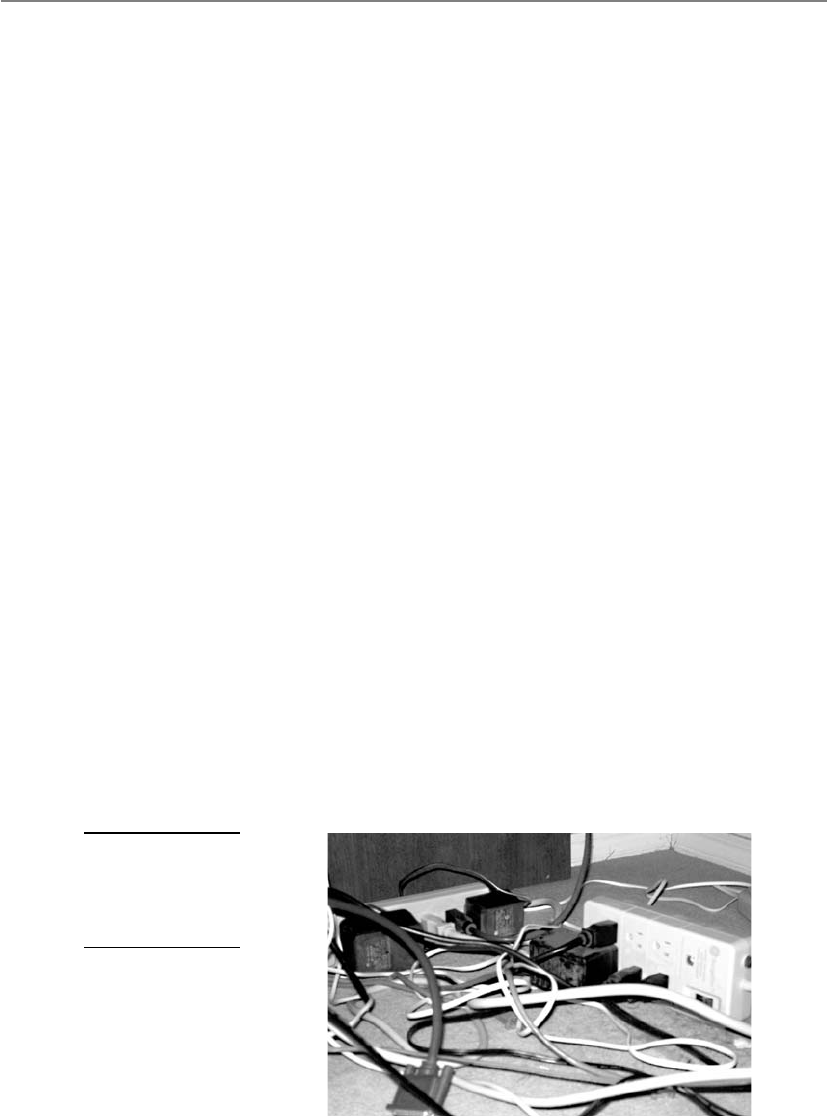
CISSP All-in-One Exam Guide
464
Because these and other occurrences are common, mechanisms should be in place
to detect unwanted power fluctuations and protect the integrity of your data processing
environment. Voltage regulators and line conditioners can be used to ensure a clean and
smooth distribution of power. The primary power runs through a regulator or condi-
tioner. They have the capability to absorb extra current if there is a spike, and to store
energy to add current to the line if there is a sag. The goal is to keep the current flowing
at a nice, steady level so neither motherboard components nor employees get fried.
Many data centers are constructed to take power-sensitive equipment into consider-
ation. Because surges, sags, brownouts, blackouts, and voltage spikes frequently cause
data corruption, the centers are built to provide a high level of protection against these
events. Other types of environments usually are not built with these things in mind and
do not provide this level of protection. Offices usually have different types of devices
connected and plugged into the same outlets. Outlet strips are plugged into outlet
strips, which are connected to extension cords. This causes more line noise and a reduc-
tion of voltage to each device. Figure 5-8 depicts an environment that can cause line
noise, voltage problems, and possibly a fire hazard.
Preventive Measures and Good Practices
Don’t stand in a pool of water with a live electrical wire.
Response: Hold on, I need to write that one down.
When dealing with electric power issues, the following items can help protect de-
vices and the environment:
• Employ surge protectors to protect from excessive current.
• Shut down devices in an orderly fashion to help avoid data loss or damage to
devices due to voltage changes.
• Employ power line monitors to detect frequency and voltage amplitude changes.
• Use regulators to keep voltage steady and the power clean.
• Protect distribution panels, master circuit breakers, and transformer cables
with access controls.
Figure 5-8
This configuration
can cause a lot of
line noise and poses
a fire hazard.
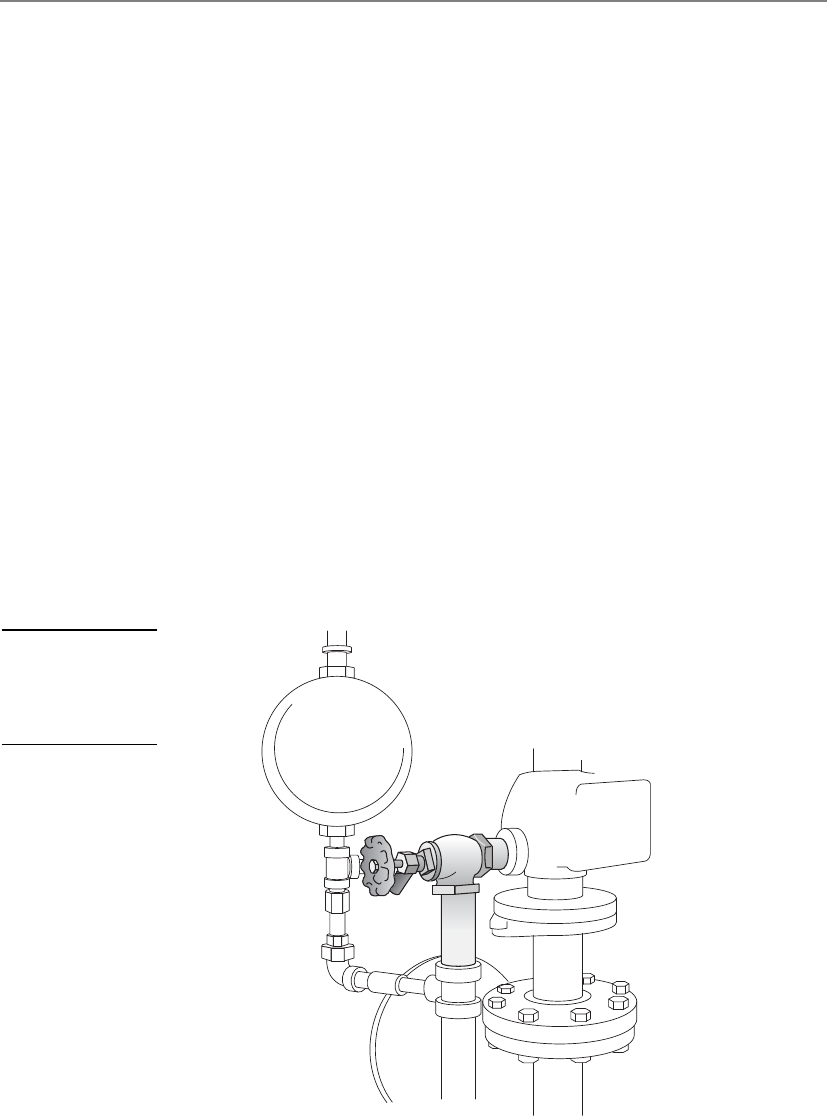
Chapter 5: Physical and Environmental Security
465
• Provide protection from magnetic induction through shielded lines.
• Use shielded cabling for long cable runs.
• Do not run data or power lines directly over fluorescent lights.
• Use three-prong connections or adapters if using two-prong connections.
• Do not plug outlet strips and extension cords into each other.
Environmental Issues
Improper environmental controls can cause damage to services, hardware, and lives.
Interruption of some services can cause unpredicted and unfortunate results. Power,
heating, ventilation, air-conditioning, and air-quality controls can be complex and
contain many variables. They all need to be operating properly and to be monitored
regularly.
During facility construction, the physical security team must make certain that water,
steam, and gas lines have proper shutoff valves, as shown in Figure 5-9, and positive
drains, which means their contents flow out instead of in. If there is ever a break in a
main water pipe, the valve to shut off water flow must be readily accessible. Similarly, in
case of fire in a building, the valve to shut off the gas lines must be readily accessible. In
case of a flood, a company wants to ensure that material cannot travel up through the
water pipes and into its water supply or facility. Facility, operations, and security person-
nel should know where these shutoff valves are, and there should be strict procedures to
follow in these types of emergencies. This will help reduce the potential damage.
Figure 5-9
Water, steam, and
gas lines should have
emergency shutoff
valves.

CISSP All-in-One Exam Guide
466
Most electronic equipment must operate in a climate-controlled atmosphere. Al-
though it is important to keep the atmosphere at a proper working temperature, it is
important to understand that the components within the equipment can suffer from
overheating even in a climate-controlled atmosphere if the internal computer fans are
not cleaned or are blocked. When devices are overheated, the components can expand
and contract, which causes components to change their electronic characteristics, re-
ducing their effectiveness or damaging the system overall.
NOTE
NOTE The climate issues involved with a data processing environment are
why it needs its own separate HVAC system. Maintenance procedures should
be documented and properly followed. HVAC activities should be recorded
and reviewed annually.
Maintaining appropriate temperature and humidity is important in any facility, es-
pecially facilities with computer systems. Improper levels of either can cause damage to
computers and electrical devices. High humidity can cause corrosion, and low humidity
can cause excessive static electricity. This static electricity can short out devices, cause the
loss of information, or provide amusing entertainment for unsuspecting employees.
Lower temperatures can cause mechanisms to slow or stop, and higher tempera-
tures can cause devices to use too much fan power and eventually shut down. Table 5-1
lists different components and their corresponding damaging temperature levels.
In drier climates, or during the winter, the air contains less moisture, which can
cause static electricity when two dissimilar objects touch each other. This electricity usu-
ally travels through the body and produces a spark from a person’s finger that can re-
lease several thousand volts. This can be more damaging than you would think.
Usually the charge is released on a system casing and is of no concern, but sometimes
it is released directly to an internal computer component and causes damage. People
who work on the internal parts of a computer usually wear antistatic armbands to re-
duce the chance of this happening.
In more humid climates, or during the summer, more humidity is in the air, which
can also affect components. Particles of silver can begin to move away from connectors
onto copper circuits, which cement the connectors into their sockets. This can adverse-
ly affect the electrical efficiency of the connection. A hygrometer is usually used to mon-
itor humidity. It can be manually read, or an automatic alarm can be set up to go off if
the humidity passes a set threshold.
Material or Component Damaging Temperature
Computer systems and peripheral devices 1750F
Magnetic storage devices 1000F
Paper products 3500F
Table 5-1
Components
Affected by Specific
Temperatures

Chapter 5: Physical and Environmental Security
467
Ventilation
Can I smoke in the server room?
Response: Security!
Ventilation has several requirements that must be met to ensure a safe and comfort-
able environment. A closed-loop recirculating air-conditioning system should be in-
stalled to maintain air quality. “Closed-loop” means the air within the building is
reused after it has been properly filtered, instead of bringing outside air in. Positive
pressurization and ventilation should also be implemented to control contamination.
Positive pressurization means that when an employee opens a door, the air goes out,
and outside air does not come in. If a facility were on fire, you would want the smoke
to go out the doors instead of being pushed back in when people are fleeing.
The assessment team needs to understand the various types of contaminants, how
they can enter an environment, the damage they could cause, and the steps to ensure
that a facility is protected from dangerous substances or high levels of average con-
taminants. Airborne material and particle concentrations must be monitored for inap-
propriate levels. Dust can affect a device’s functionality by clogging up the fan that is
supposed to be cooling the device. Excessive concentrations of certain gases can acceler-
ate corrosion and cause performance issues or failure of electronic devices. Although
most disk drives are hermetically sealed, other storage devices can be affected by air-
borne contaminants. Air-quality devices and ventilation systems deal with these issues.
Fire Prevention, Detection, and Suppression
We can either try to prevent fires or have one really expensive weenie-roast.
The subject of physical security would not be complete without a discussion on fire
safety. A company must meet national and local standards pertaining to fire preven-
tion, detection, and suppression methods. Fire prevention includes training employees
on how to react properly when faced with a fire, supplying the right equipment and
ensuring it is in working order, making sure there is an easily reachable fire suppression
supply, and storing combustible elements in the proper manner. Fire prevention may
Preventive Steps Against Static Electricity
The following are some simple measures to prevent static electricity:
• Use antistatic flooring in data processing areas.
• Ensure proper humidity.
• Have proper grounding for wiring and outlets.
• Don’t have carpeting in data centers, or have static-free carpets if
necessary.
• Wear antistatic bands when working inside computer systems.

CISSP All-in-One Exam Guide
468
also include using proper noncombustible construction materials and designing the
facility with containment measures that provide barriers to minimize the spread of fire
and smoke. These thermal or fire barriers can be made up of different types of construc-
tion material that is noncombustible and has a fire-resistant coating applied.
Fire detection response systems come in many different forms. Manual detection
response systems are the red pull boxes you see on many building walls. Automatic
detection response systems have sensors that react when they detect the presence of fire
or smoke. We will review different types of detection systems in the next section.
Fire suppression is the use of a suppression agent to put out a fire. Fire suppression
can take place manually through handheld portable extinguishers, or through auto-
mated systems such as water sprinkler systems, or halon or CO2 discharge systems. The
upcoming “Fire Suppression” section reviews the different types of suppression agents
and where they are best used. Automatic sprinkler systems are widely used and highly
effective in protecting buildings and their contents. When deciding upon the type of
fire suppression systems to install, a company needs to evaluate many factors, includ-
ing an estimate of the occurrence rate of a possible fire, the amount of damage that
could result, the types of fires that would most likely take place, and the types of sup-
pression systems to choose from.
Fire protection processes should consist of implementing early smoke or fire detec-
tion devices and shutting down systems until the source of the fire is eliminated. A
warning signal may be sounded by a smoke or fire detector before the suppression agent
is released, so that if it is a false alarm or a small fire that can be handled without the
automated suppression system, someone has time to shut down the suppression system.
Types of Fire Detection
Fires present a dangerous security threat because they can damage hardware and data
and risk human life. Smoke, high temperatures, and corrosive gases from a fire can
cause devastating results. It is important to evaluate the fire safety measurements of a
building and the different sections within it.
A fire begins because something ignited it. Ignition sources can be failure of an
electrical device, improper storage of combustible materials, carelessly discarded ciga-
rettes, malfunctioning heating devices, and arson. A fire needs fuel (paper, wood, liq-
uid, and so on) and oxygen to continue to burn and grow. The more fuel per square
foot, the more intense the fire will become. A facility should be built, maintained, and
operated to minimize the accumulation of fuels that can feed fires.
There are four classes (A, B, C, and D) of fire, which are explained in the “Fire Sup-
pression” section. You need to know the differences between the types of fire so you
know how to properly extinguish each type. Portable fire extinguishers have markings
that indicate what type of fire they should be used on, as illustrated in Figure 5-10. The
markings denote what types of chemicals are within the canisters and what types of
fires they have been approved to be used on. Portable extinguishers should be located
within 50 feet of any electrical equipment, and also near exits. The extinguishers should
be marked clearly, with an unobstructed view. They should be easily reachable and
operational by employees, and inspected quarterly.
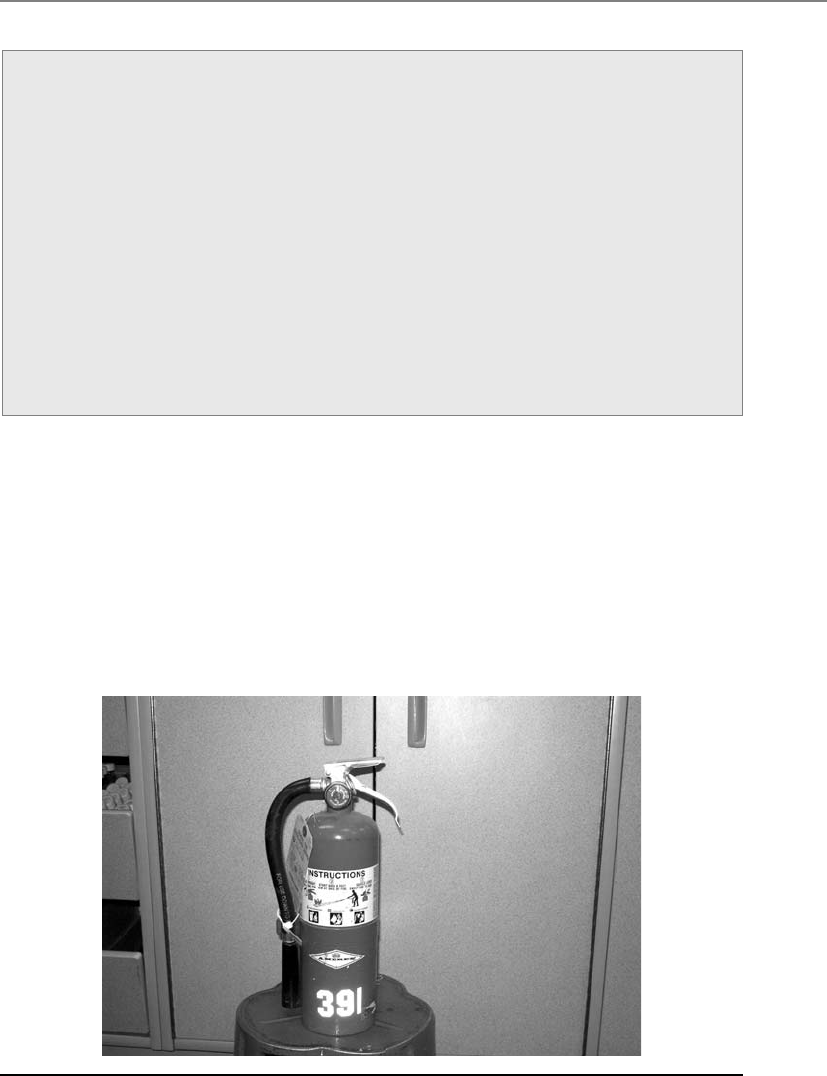
Chapter 5: Physical and Environmental Security
469
A lot of computer systems are made of components that are not combustible but
that will melt or char if overheated. Most computer circuits use only two to five volts of
direct current, which usually cannot start a fire. If a fire does happen in a computer
room, it will most likely be an electrical fire caused by overheating of wire insulation or
by overheating components that ignite surrounding plastics. Prolonged smoke usually
occurs before combustion.
Several types of detectors are available, each of which works in a different way. The
detector can be activated by smoke or heat.
Fire Resistant Ratings
Fire resistant ratings are the result of tests carried out in laboratories using spe-
cific configurations of environmental settings. The American Society for Testing
and Materials (ASTM) is the organization that creates the standards that dictate
how these tests should be performed and how to properly interpret the test re-
sults. ASTM accredited testing centers carry out the evaluations in accordance
with these standards and assign fire resistant ratings that are then used in federal
and state fire codes. The tests evaluate the fire resistance of different types of ma-
terials in various environmental configurations. Fire resistance represents the
ability of a laboratory-constructed assembly to contain a fire for a specific period
of time. For example, a 5/8-inch-thick drywall sheet installed on each side of a
wood stud provides a one-hour rating. If the thickness of this drywall is doubled,
then this would be given a two-hour rating. The rating system is used to classify
different building components.
Figure 5-10 Portable extinguishers are marked to indicate what type of fire they should be used on.

CISSP All-in-One Exam Guide
470
Smoke Activated Smoke-activated detectors are good for early-warning devices.
They can be used to sound a warning alarm before the suppression system activates. A
photoelectric device, also referred to as an optical detector, detects the variation in light
intensity. The detector produces a beam of light across a protected area, and if the beam
is obstructed, the alarm sounds. Figure 5-11 illustrates how a photoelectric device works.
Another type of photoelectric device samples the surrounding air by drawing air
into a pipe. If the light source is obscured, the alarm will sound.
Heat Activated Heat-activated detectors can be configured to sound an alarm ei-
ther when a predefined temperature (fixed temperature) is reached or when the tem-
perature increases over a period of time (rate-of-rise). Rate-of-rise temperature sensors
usually provide a quicker warning than fixed-temperature sensors because they are
more sensitive, but they can also cause more false alarms. The sensors can either be
spaced uniformly throughout a facility, or implemented in a line type of installation,
which is operated by a heat-sensitive cable.
It is not enough to have these fire and smoke detectors installed in a facility; they
must be installed in the right places. Detectors should be installed both on and above
suspended ceilings and raised floors, because companies run many types of wires in
both places that could start an electrical fire. No one would know about the fire until it
broke through the floor or dropped ceiling if detectors were not placed in these areas.
Detectors should also be located in enclosures and air ducts, because smoke can gather
in these areas before entering other spaces. It is important that people are alerted about
a fire as quickly as possible so damage may be reduced, fire suppression activities may
start quickly, and lives may be saved. Figure 5-12 illustrates the proper placement of
smoke detectors.
Figure 5-11 A photoelectric device uses a light emitter and a receiver.
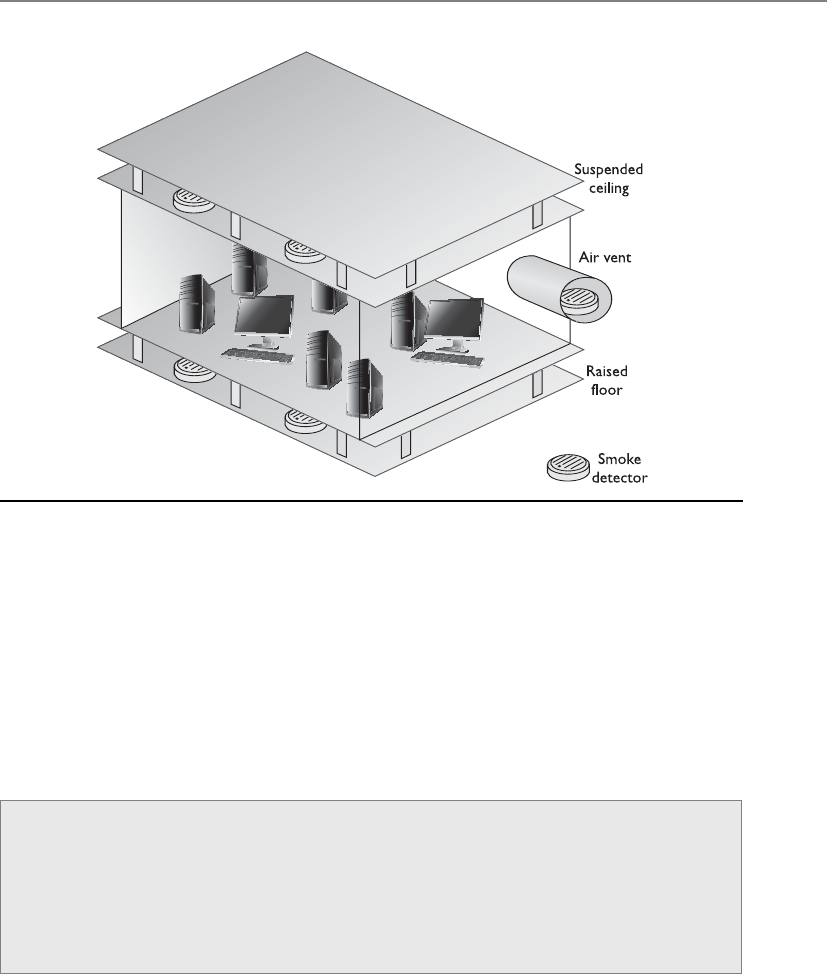
Chapter 5: Physical and Environmental Security
471
Fire Suppression
How about if I just spit on the fire?
Response: I’m sure that will work just fine.
It is important to know the different types of fires and what should be done to
properly suppress them. Each fire type has a rating that indicates what materials are
burning. Table 5-2 shows the four types of fire and their suppression methods, which
all employees should know.
Figure 5-12 Smoke detectors should be located above suspended ceilings, below raised floors, and
in air vents.
Automatic Dial-Up Alarm
Fire detection systems can be configured to call the local fire station, and possibly
the police station, to report a detected fire. The system plays a prerecorded mes-
sage that gives the necessary information so officials can properly prepare for the
stated emergency and arrive at the right location. A recording of someone scream-
ing “We are all melting” would not be helpful to fire officials.

CISSP All-in-One Exam Guide
472
You can suppress a fire in several ways, all of which require that certain precautions
be taken. In many buildings, suppression agents located in different areas are designed
to initiate after a specific trigger has been set off. Each agent has a zone of coverage,
meaning an area that the agent supplier is responsible for. If a fire ignites within a cer-
tain zone, it is the responsibility of that suppression agent device to initiate, and then
suppress that fire. Different types of suppression agents available include water, halon,
foams, CO2, and dry powders. CO2 is good for putting out fires but bad for many types
of life forms. If an organization uses CO2, the suppression-releasing device should have
a delay mechanism within it that makes sure the agent does not start applying CO2 to
the area until after an audible alarm has sounded and people have been given time to
evacuate. CO2 is a colorless, odorless substance that is potentially lethal because it re-
moves oxygen from the air. Gas masks do not provide protection against CO2. This type
of fire suppression mechanism is best used in unattended facilities and areas.
For Class B and C fires, specific types of dry powders can be used, which include
sodium or potassium bicarbonate, calcium carbonate, or monoammonium phosphate.
The first three powders interrupt the chemical combustion of a fire. Monoammonium
phosphate melts at low temperatures and excludes oxygen from the fuel.
Foams are mainly water-based and contain a foaming agent that allows them to
float on top of a burning substance to exclude the oxygen.
NOTE
NOTE There is actually a Class K fire, for commercial kitchens. These fires
should be put out with a wet chemical, which is usually a solution of potassium
acetate. This chemical works best when putting out cooking oil fires.
A fire needs fuel, oxygen, and high temperatures. Table 5-3 shows how different
suppression substances interfere with these elements of fire.
Fire Class Type of Fire Elements of Fire Suppression Method
A Common
combustibles
Wood products,
paper, and laminates
Water, foam
B Liquid Petroleum products
and coolants
Gas, CO2, foam, dry powders
C Electrical Electrical equipment
and wires
Gas, CO2, dry powders
D Combustible metals Magnesium, sodium,
potassium
Dry powder
Table 5-2 Four Types of Fire and Their Suppression Methods
Plenum Area
Wiring and cables are strung through plenum areas, such as the space above
dropped ceilings, the space in wall cavities, and the space under raised floors.
Plenum areas should have fire detectors. Also, only plenum-rated cabling should
be used in plenum areas, which is cabling that is made out of material that does
not let off hazardous gases if it burns.

Chapter 5: Physical and Environmental Security
473
By law, companies that have halon extinguishers do not have to replace them, but
the extinguishers cannot be refilled. So, companies that have halon extinguishers do
not have to replace them right away, but when the extinguisher’s lifetime runs out, FM-
200 extinguishers or other EPA-approved chemicals should be used.
NOTE
NOTE Halon has not been manufactured since January 1, 1992, by
international agreement. The Montreal Protocol banned halon in 1987, and
countries were given until 1992 to comply with these directives. The most
effective replacement for halon is FM-200, which is similar to halon but does
not damage the ozone.
The HVAC system should be connected to the fire alarm and suppression system so
it properly shuts down if a fire is identified. A fire needs oxygen, and this type of system
can feed oxygen to the fire. Plus, the HVAC system can spread deadly smoke into all
areas of the building. Many fire systems can configure the HVAC system to shut down
if a fire alarm is triggered.
Combustion Elements Suppression Methods How Suppression Works
Fuel Soda acid Removes fuel
Oxygen Carbon dioxide Removes oxygen
Temperature Water Reduces temperature
Chemical combustion Gas—Halon or halon
substitute
Interferes with the chemical
reactions between elements
Table 5-3 How Different Substances Interfere with Elements of Fire
Halon
Halon is a gas that was widely used in the past to suppress fires because it inter-
feres with the chemical combustion of the elements within a fire. It mixes quick-
ly with the air and does not cause harm to computer systems and other data
processing devices. It was used mainly in data centers and server rooms.
It was discovered that halon has chemicals (chlorofluorocarbons) that de-
plete the ozone and that concentrations greater than 10 percent are dangerous to
people. Halon used on extremely hot fires degrades into toxic chemicals, which
is even more dangerous to humans.
Some really smart people figured that the ozone was important to keep
around, which caused halon to be federally restricted, and no companies are al-
lowed to purchase and install new halon extinguishers. Companies that still have
halon systems have been instructed to replace them with nontoxic extinguishers.
The following are some of the EPA-approved replacements for halon:
• FM-200
• NAF-S-III

CISSP All-in-One Exam Guide
474
Water Sprinklers
I’m hot. Go pull that red thingy on the wall. I need some water.
Water sprinklers typically are simpler and less expensive than halon and FM-200
systems, but can cause water damage. In an electrical fire, the water can increase the
intensity of the fire, because it can work as a conductor for electricity—only making the
situation worse. If water is going to be used in any type of environment with electrical
equipment, the electricity must be turned off before the water is released. Sensors
should be used to shut down the electric power before water sprinklers activate. Each
sprinkler head should activate individually to avoid wide-area damage, and there
should be shutoff valves so the water supply can be stopped if necessary.
A company should take great care in deciding which suppression agent and system
is best for it. Four main types of water sprinkler systems are available: wet pipe, dry pipe,
preaction, and deluge.
•Wet pipe Wet pipe systems always contain water in the pipes and are usually
discharged by temperature control–level sensors. One disadvantage of wet
pipe systems is that the water in the pipes may freeze in colder climates. Also,
if there is a nozzle or pipe break, it can cause extensive water damage. These
types of systems are also called closed head systems.
•Dry pipe In dry pipe systems, the water is not actually held in the pipes.
The water is contained in a “holding tank” until it is released. The pipes hold
pressurized air, which is reduced when a fire or smoke alarm is activated,
allowing the water valve to be opened by the water pressure. Water is not
allowed into the pipes that feed the sprinklers until an actual fire is detected.
First, a heat or smoke sensor is activated; then, the water fills the pipes leading
to the sprinkler heads, the fire alarm sounds, the electric power supply is
disconnected, and finally water is allowed to flow from the sprinklers. These
pipes are best used in colder climates because the pipes will not freeze. Figure
5-13 depicts a dry pipe system.
•Preaction Preaction systems are similar to dry pipe systems in that the
water is not held in the pipes, but is released when the pressurized air within
the pipes is reduced. Once this happens, the pipes are filled with water, but
it is not released right away. A thermal-fusible link on the sprinkler head
has to melt before the water is released. The purpose of combining these
two techniques is to give people more time to respond to false alarms or to
• CEA-410
• FE-13
• Inergen
• Argon
• Argonite

Chapter 5: Physical and Environmental Security
475
small fires that can be handled by other means. Putting out a small fire with
a handheld extinguisher is better than losing a lot of electrical equipment
to water damage. These systems are usually used only in data processing
environments rather than the whole building, because of the higher cost of
these types of systems.
•Deluge A deluge system has its sprinkler heads wide open to allow a larger
volume of water to be released in a shorter period. Because the water being
released is in such large volumes, these systems are usually not used in data
processing environments.
Perimeter Security
Halt! Who goes there?
The first line of defense is perimeter control at the site location, to prevent unau-
thorized access to the facility. As mentioned earlier in this chapter, physical security
should be implemented by using a layered defense approach. For example, before an
intruder can get to the written recipe for your company’s secret barbeque sauce, she will
need to climb or cut a fence, slip by a security guard, pick a door lock, circumvent a
biometric access control reader that protects access to an internal room, and then break
into the safe that holds the recipe. The idea is that if an attacker breaks through one
control layer, there will be others in her way before she can obtain the company’s crown
jewels.
NOTE
NOTE It is also important to have a diversity of controls. For example,
if one key works on four different door locks, the intruder has to obtain
only one key. Each entry should have its own individual key or authentication
combination.
Figure 5-13 Dry pipe systems do not hold water in the pipes.
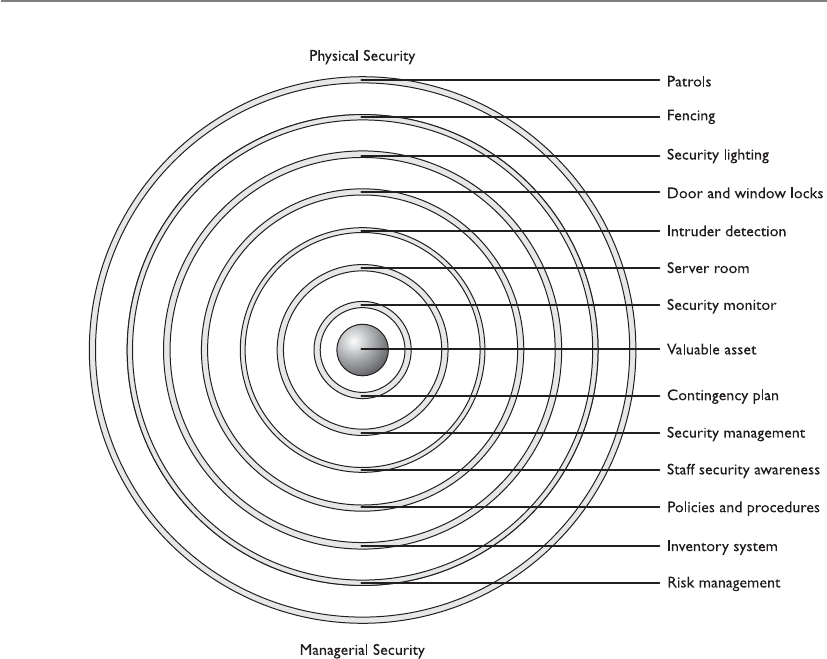
CISSP All-in-One Exam Guide
476
This defense model should work in two main modes: one mode during normal
facility operations and another mode during the time the facility is closed. When the
facility is closed, all doors should be locked with monitoring mechanisms in strategic
positions to alert security personnel of suspicious activity. When the facility is in opera-
tion, security gets more complicated because authorized individuals need to be distin-
guished from unauthorized individuals. Perimeter security deals with facility and
personnel access controls, external boundary protection mechanisms, intrusion detec-
tion, and corrective actions. The following sections describe the elements that make up
these categories.
Facility Access Control
Access control needs to be enforced through physical and technical components when it
comes to physical security. Physical access controls use mechanisms to identify individu-
als who are attempting to enter a facility or area. They make sure the right individuals
get in and the wrong individuals stay out, and provide an audit trail of these actions.
Having personnel within sensitive areas is one of the best security controls because they
can personally detect suspicious behavior. However, they need to be trained on what
activity is considered suspicious and how to report such activity.
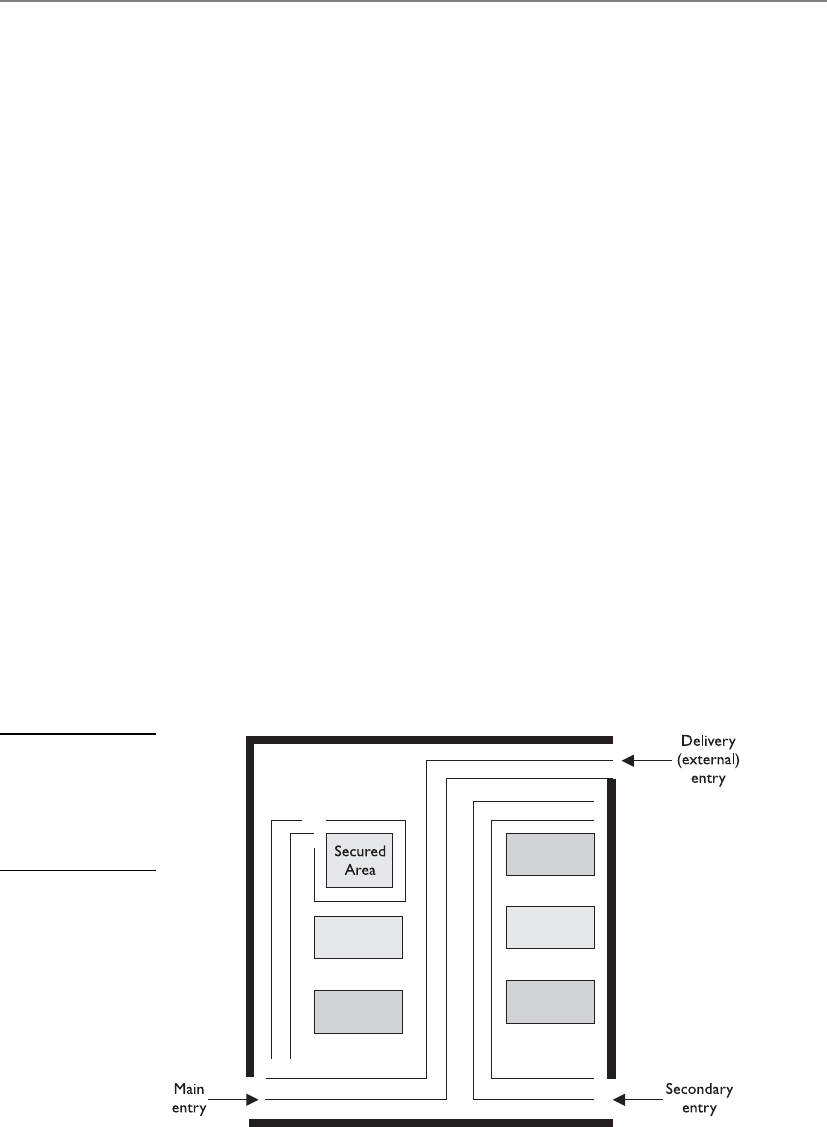
Chapter 5: Physical and Environmental Security
477
Before a company can put into place the proper protection mechanisms, it needs to
conduct a detailed review to identify which individuals should be allowed into what
areas. Access control points can be identified and classified as external, main, and sec-
ondary entrances. Personnel should enter and exit through a specific entry, deliveries
should be made to a different entry, and sensitive areas should be restricted. Figure 5-14
illustrates the different types of access control points into a facility. After a company has
identified and classified the access control points, the next step is to determine how to
protect them.
Locks
Locks are inexpensive access control mechanisms that are widely accepted and used.
They are considered delaying devices to intruders. The longer it takes to break or pick a
lock, the longer a security guard or police officer has to arrive on the scene if the in-
truder has been detected. Almost any type of a door can be equipped with a lock, but
keys can be easily lost and duplicated, and locks can be picked or broken. If a company
depends solely on a lock-and-key mechanism for protection, an individual who has the
key can come and go as he likes without control and can remove items from the prem-
ises without detection. Locks should be used as part of the protection scheme, but
should not be the sole protection scheme.
Locks vary in functionality. Padlocks can be used on chained fences, preset locks are
usually used on doors, and programmable locks (requiring a combination to unlock)
are used on doors or vaults. Locks come in all types and sizes. It is important to have
the right type of lock so it provides the correct level of protection.
To the curious mind or a determined thief, a lock is considered a little puzzle to
solve, not a deterrent. In other words, locks may be merely a challenge, not necessarily
something to stand in the way of malicious activities. Thus, you need to make the chal-
lenge difficult, through the complexity, strength, and quality of the locking mechanisms.
Figure 5-14
Access control
points should be
identified, marked,
and monitored
properly.
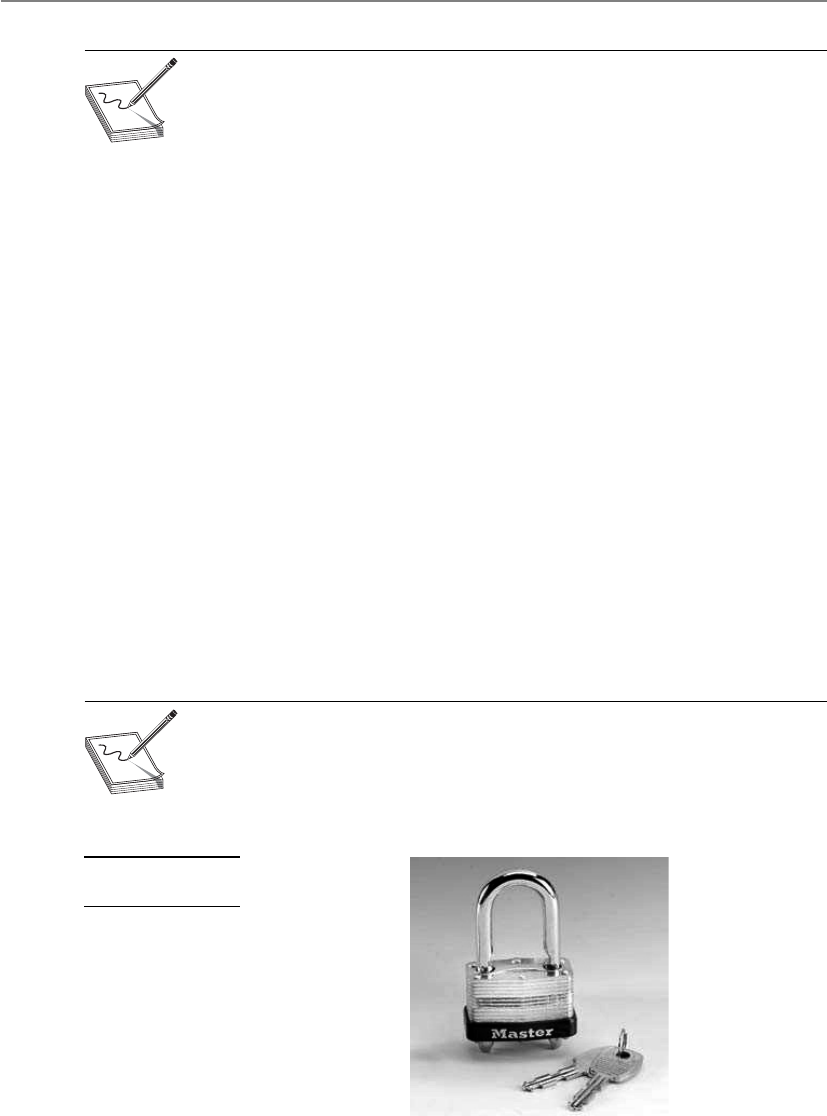
CISSP All-in-One Exam Guide
478
NOTE
NOTE The delay time provided by the lock should match the penetration
resistance of the surrounding components (door, door frame, hinges). A smart
thief takes the path of least resistance, which may be to pick the lock, remove
the pins from the hinges, or just kick down the door.
Mechanical Locks Two main types of mechanical locks are available: the warded
lock and the tumbler lock. The warded lock is the basic padlock, as shown in Figure
5-15. It has a spring-loaded bolt with a notch cut in it. The key fits into this notch and
slides the bolt from the locked to the unlocked position. The lock has wards in it, which
are metal projections around the keyhole, as shown in Figure 5-16. The correct key for
a specific warded lock has notches in it that fit in these projections and a notch to slide
the bolt back and forth. These are the cheapest locks, because of their lack of any real
sophistication, and are also the easiest to pick.
The tumbler lock has more pieces and parts than a ward lock. As shown in Figure
5-17, the key fits into a cylinder, which raises the lock metal pieces to the correct height
so the bolt can slide to the locked or unlocked position. Once all of the metal pieces are
at the correct level, the internal bolt can be turned. The proper key has the required size
and sequences of notches to move these metal pieces into their correct position.
The three types of tumbler locks are the pin tumbler, wafer tumbler, and lever tum-
bler. The pin tumbler lock, shown in Figure 5-17, is the most commonly used tumbler
lock. The key has to have just the right grooves to put all the spring-loaded pins in the
right position so the lock can be locked or unlocked.
Wafer tumbler locks (also called disc tumbler locks) are the small, round locks you
usually see on file cabinets. They use flat discs (wafers) instead of pins inside the locks.
They often are used as car and desk locks. This type of lock does not provide much
protection because it can be easily circumvented.
NOTE
NOTE Some locks have interchangeable cores, which allow for the core of
the lock to be taken out. You would use this type of lock if you wanted one
key to open several locks. You would just replace all locks with the same core.
Figure 5-15
A warded lock

Chapter 5: Physical and Environmental Security
479
Combination locks, of course, require the correct combination of numbers to unlock
them. These locks have internal wheels that have to line up properly before being un-
locked. A user spins the lock interface left and right by so many clicks, which lines up
the internal wheels. Once the correct turns have taken place, all the wheels are in the
Figure 5-16
A key fits into a
notch to turn the
bolt to unlock
the lock.
Figure 5-17
Tumbler lock

CISSP All-in-One Exam Guide
480
right position for the lock to release and open the door. The more wheels within the
locks, the more protection provided. Electronic combination locks do not use internal
wheels, but rather have a keypad that allows a person to type in the combination in-
stead of turning a knob with a combination faceplate. An example of an electronic
combination lock is shown in Figure 5-18.
Cipher locks, also known as programmable locks, are keyless and use keypads to
control access into an area or facility. The lock requires a specific combination to be
entered into the keypad and possibly a swipe card. They cost more than traditional
locks, but their combinations can be changed, specific combination sequence values
can be locked out, and personnel who are in trouble or under duress can enter a spe-
cific code that will open the door and initiate a remote alarm at the same time. Thus,
compared to traditional locks, cipher locks can provide a much higher level of security
and control over who can access a facility.
The following are some functionalities commonly available on many cipher com-
bination locks that improve the performance of access control and provide for increased
security levels:
•Door delay If a door is held open for a given time, an alarm will trigger to
alert personnel of suspicious activity.
•Key override A specific combination can be programmed for use in
emergency situations to override normal procedures or for supervisory
overrides.
•Master keying Enables supervisory personnel to change access codes and
other features of the cipher lock.
•Hostage alarm If an individual is under duress and/or held hostage, a
combination he enters can communicate this situation to the guard station
and/or police station.
If a door is accompanied by a cipher lock, it should have a corresponding visibility
shield so a bystander cannot see the combination as it is keyed in. Automated cipher
locks must have a backup battery system and be set to unlock during a power failure so
personnel are not trapped inside during an emergency.
Figure 5-18
An electronic
combination lock
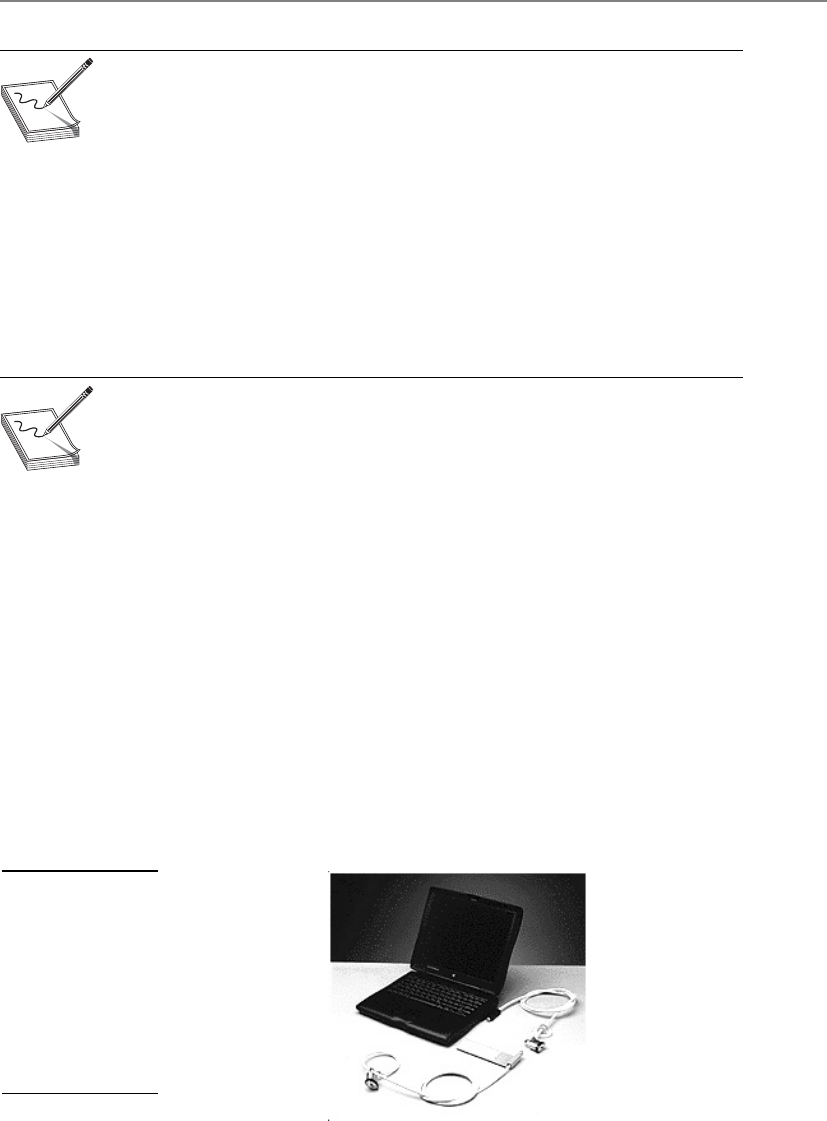
Chapter 5: Physical and Environmental Security
481
NOTE
NOTE It is important to change the combination of locks and to use random
combination sequences. Often, people do not change their combinations or
clean the keypads, which allows an intruder to know what key values are used
in the combination, because they are the dirty and worn keys. The intruder
then just needs to figure out the right combination of these values.
Some cipher locks require all users to know and use the same combination, which
does not allow for any individual accountability. Some of the more sophisticated ci-
pher locks permit specific codes to be assigned to unique individuals. This provides
more accountability, because each individual is responsible for keeping his access code
secret, and entry and exit activities can be logged and tracked. These are usually referred
to as smart locks, because they are designed to allow only authorized individuals access
at certain doors at certain times.
NOTE
NOTE Hotel key cards are also known as smart cards. They are programmed
by the nice hotel guy or gal behind the counter. The access code on the card
can allow access to a hotel room, workout area, business area, and better
yet—the mini bar.
Device Locks Unfortunately, hardware has a tendency to “walk away” from facili-
ties; thus, device locks are necessary to thwart these attempts. Cable locks consist of a
vinyl-coated steel cable that can secure a computer or peripheral to a desk or other
stationary components, as shown in Figure 5-19.
The following are some of the device locks available and their capabilities:
•Switch controls Cover on/off power switches
•Slot locks Secure the system to a stationary component by the use of steel
cable that is connected to a bracket mounted in a spare expansion slot
•Port controls Block access to disk drives or unused serial or parallel ports
•Peripheral switch controls Secure a keyboard by inserting an on/off switch
between the system unit and the keyboard input slot
•Cable traps Prevent the removal of input/output devices by passing their
cables through a lockable unit
Figure 5-19
FMJ/PAD.LOCK’s
notebook security
cable kit secures
a notebook by
enabling the user
to attach the device
to a stationary
component within
an area.

CISSP All-in-One Exam Guide
482
Administrative Responsibilities It is important for a company not only to
choose the right type of lock for the right purpose, but also to follow proper mainte-
nance and procedures. Keys should be assigned by facility management, and this as-
signment should be documented. Procedures should be written out detailing how keys
are to be assigned, inventoried, and destroyed when necessary, and what should hap-
pen if and when keys are lost. Someone on the company’s facility management team
should be assigned the responsibility of overseeing key and combination maintenance.
Most organizations have master keys and submaster keys for the facility manage-
ment staff. A master key opens all the locks within the facility, and the submaster keys
open one or more locks. Each lock has its own individual unique keys as well. So if a
facility has 100 offices, the occupant of each office can have his or her own key. A mas-
ter key allows access to all offices for security personnel and for emergencies. If one
security guard is responsible for monitoring half the facility, the guard can be assigned
one of the submaster keys for just those offices.
Since these master and submaster keys are powerful, they must be properly guarded
and not widely shared. A security policy should outline what portions of the facility
and which device types need to be locked. As a security professional, you should under-
stand what type of lock is most appropriate for each situation, the level of protection
provided by various types of locks, and how these locks can be circumvented.
Circumventing Locks Each lock type has corresponding tools that can be used to
pick it (open it without the key). A tension wrench is a tool shaped like an L and is used
to apply tension to the internal cylinder of a lock. The lock picker uses a lock pick to
manipulate the individual pins to their proper placement. Once certain pins are
“picked” (put in their correct place), the tension wrench holds these down while the
lock picker figures out the correct settings for the other pins. After the intruder deter-
mines the proper pin placement, the wrench is used to then open the lock.
Intruders may carry out another technique, referred to as raking. To circumvent a
pin tumbler lock, a lock pick is pushed to the back of the lock and quickly slid out
Lock Strengths
Basically, three grades of locks are available:
•Grade 1 Commercial and industrial use
•Grade 2 Heavy-duty residential/light-duty commercial
•Grade 3 Residential/consumer
The cylinders within the locks fall into three main categories:
•Low security No pick or drill resistance provided (can fall within any
of the three grades of locks)
•Medium security A degree of pick resistance protection provided
(uses tighter and more complex keyways [notch combination]; can
fall within any of the three grades of locks)
•High security Pick resistance protection through many different
mechanisms (only used in grade 1 and 2 locks)

Chapter 5: Physical and Environmental Security
483
while providing upward pressure. This movement makes many of the pins fall into
place. A tension wrench is also put in to hold the pins that pop into the right place. If
all the pins do not slide to the necessary height for the lock to open, the intruder holds
the tension wrench and uses a thinner pick to move the rest of the pins into place.
Lock bumping is a tactic that intruders can use to force the pins in a tumbler lock to
their open position by using a special key called a bump key. The stronger the material
that makes up the lock, the smaller the chance that this type of lock attack would be
successful.
Now, if this is all too much trouble for the intruder, she can just drill the lock, use
bolt cutters, attempt to break through the door or the doorframe, or remove the hinges.
There are just so many choices for the bad guys.
Personnel Access Controls
Proper identification needs to verify whether the person attempting to access a facility
or area should actually be allowed in. Identification and authentication can be verified
by matching an anatomical attribute (biometric system), using smart or memory cards

CISSP All-in-One Exam Guide
484
(swipe cards), presenting a photo ID to a security guard, using a key, or providing a card
and entering a password or PIN.
A common problem with controlling authorized access into a facility or area is
called piggybacking. This occurs when an individual gains unauthorized access by using
someone else’s legitimate credentials or access rights. Usually an individual just follows
another person closely through a door without providing any credentials. The best pre-
ventive measures against piggybacking are to have security guards at access points and
to educate employees about good security practices.
If a company wants to use a card badge reader, it has several types of systems to
choose from. Individuals usually have cards that have embedded magnetic strips that
contain access information. The reader can just look for simple access information within
the magnetic strip, or it can be connected to a more sophisticated system that scans the
information, makes more complex access decisions, and logs badge IDs and access times.
If the card is a memory card, then the reader just pulls information from it and makes
an access decision. If the card is a smart card, the individual may be required to enter a
PIN or password, which the reader compares against the information held within the
card or in an authentication server. (Memory and smart cards are covered in Chapter 3.)
These access cards can be used with user-activated readers, which just means the user
actually has to do something—swipe the card or enter a PIN. System sensing access con-
trol readers, also called transponders, recognize the presence of an approaching object
within a specific area. This type of system does not require the user to swipe the card
through the reader. The reader sends out interrogating signals and obtains the access
code from the card without the user having to do anything. Spooky Star Trek magic.
NOTE
NOTE Electronic access control (EAC) tokens is a generic term used
to describe proximity authentication devices, such as proximity readers,
programmable locks, or biometric systems, which identify and authenticate
users before allowing them entrance into physically controlled areas.
External Boundary Protection Mechanisms
Let’s build a fort and let only the people who know the secret handshake inside!
Proximity protection components are usually put into place to provide one or more
of the following services:
• Control pedestrian and vehicle traffic flows
• Various levels of protection for different security zones
• Buffers and delaying mechanisms to protect against forced entry attempts
• Limit and control entry points
These services can be provided by using the following control types:
•Access control mechanisms Locks and keys, an electronic card access
system, personnel awareness
•Physical barriers Fences, gates, walls, doors, windows, protected vents,
vehicular barriers

Chapter 5: Physical and Environmental Security
485
•Intrusion detection Perimeter sensors, interior sensors, annunciation
mechanisms
•Assessment Guards, CCTV cameras
•Response Guards, local law enforcement agencies
•Deterrents Signs, lighting, environmental design
Several types of perimeter protection mechanisms and controls can be put into
place to protect a company’s facility, assets, and personnel. They can deter would-be
intruders, detect intruders and unusual activities, and provide ways of dealing with
these issues when they arise. Perimeter security controls can be natural (hills, rivers) or
manmade (fencing, lighting, gates). Landscaping is a mix of the two. In the beginning
of this chapter, we explored CPTED and how this approach is used to reduce the likeli-
hood of crime. Landscaping is a tool employed in the CPTED method. Sidewalks, bush-
es, and created paths can point people to the correct entry points, and trees and spiky
bushes can be used as natural barriers. These bushes and trees should be placed such
that they cannot be used as ladders or accessories to gain unauthorized access to unap-
proved entry points. Also, there should not be an overwhelming number of trees and
bushes, which could provide intruders with places to hide. In the following sections, we
look at the manmade components that can work within the landscaping design.
Fencing
I just want a little fence to keep out all the little mean people.
Fencing can be quite an effective physical barrier. Although the presence of a fence
may only delay dedicated intruders in their access attempts, it can work as a psychologi-
cal deterrent by telling the world that your company is serious about protecting itself.
Fencing can provide crowd control and helps control access to entrances and facili-
ties. However, fencing can be costly and unsightly. Many companies plant bushes or
trees in front of the fence that surrounds their buildings for aesthetics and to make the
building less noticeable. But this type of vegetation can damage the fencing over time
or negatively affect its integrity. The fencing needs to be properly maintained, because
if a company has a sagging, rusted, pathetic fence, it is equivalent to telling the world
that the company is not truly serious and disciplined about protection. But a nice,
shiny, intimidating fence can send a different message—especially if the fencing is
topped with three rungs of barbed wire.
When deciding upon the type of fencing, several factors should be considered. The
gauge of the metal should correlate to the types of physical threats the company would
most likely face. After carrying out the risk analysis (covered earlier in the chapter), the
physical security team should understand the probability of enemies attempting to cut
the fencing, drive through it, or climb over or crawl under it. Understanding these threats
will help the team determine the necessary gauge and mesh sizing of the fence wiring.
The risk analysis results will also help indicate what height of fencing the organiza-
tion should implement. Fences come in varying heights, and each height provides a
different level of security:
• Fences three to four feet high only deter casual trespassers.
• Fences six to seven feet high are considered too high to climb easily.

CISSP All-in-One Exam Guide
486
• Fences eight feet high (possibly with strands of barbed or razor wire at the top)
means you are serious about protecting your property. They often deter the
more determined intruder.
The barbed wire on top of fences can be tilted in or out, which also provides extra
protection. If the organization is a prison, it would have the barbed wire on top of the
fencing pointed in, which makes it harder for prisoners to climb and escape. If the or-
ganization is a military base, the barbed wire would be tilted out, making it harder for
someone to climb over the fence and gain access to the premises.
Critical areas should have fences at least eight feet high to provide the proper level
of protection. The fencing should not sag in any areas and must be taut and securely
connected to the posts. The fencing should not be easily circumvented by pulling up its
posts. The posts should be buried sufficiently deep in the ground and should be se-
cured with concrete to ensure the posts cannot be dug up or tied to vehicles and ex-
tracted. If the ground is soft or uneven, this might provide ways for intruders to slip or
dig under the fence. In these situations, the fencing should actually extend into the dirt
to thwart these types of attacks.
Fences work as “first line of defense” mechanisms. A few other controls can be used
also. Strong and secure gates need to be implemented. It does no good to install a
highly fortified and expensive fence and then have an unlocked or weenie gate that al-
lows easy access.
Gauges and Mesh Sizes
The gauge of fence wiring is the thickness of the wires used within the fence
mesh. The lower the gauge number, the larger the wire diameter:
•11 gauge = 0.0907-inch diameter
•9 gauge = 0.1144-inch diameter
•6 gauge = 0.162-inch diameter
The mesh sizing is the minimum clear distance between the wires. Common
mesh sizes are 2 inches, 1 inch, and 3/8 inch. It is more difficult to climb or cut
fencing with smaller mesh sizes, and the heavier gauged wiring is harder to cut.
The following list indicates the strength levels of the most common gauge and
mesh sizes used in chain-link fencing today:
•Extremely high security 3/8-inch mesh, 11 gauge
•Very high security 1-inch mesh, 9 gauge
•High security 1-inch mesh, 11 gauge
•Greater security 2-inch mesh, 6 gauge
•Normal industrial security 2-inch mesh, 9 gauge

Chapter 5: Physical and Environmental Security
487
Gates basically have four distinct classifications:
•Class I Residential usage
•Class II Commercial usage, where general public access is expected;
examples include a public parking lot entrance, a gated community, or a self-
storage facility
•Class III Industrial usage, where limited access is expected; an example is a
warehouse property entrance not intended to serve the general public
•Class IV Restricted access; this includes a prison entrance that is monitored
either in person or via closed circuitry
Each gate classification has its own long list of implementation and maintenance
guidelines in order to ensure the necessary level of protection. These classifications and
guidelines are developed by Underwriters Laboratory (UL), a nonprofit organization
that tests, inspects, and classifies electronic devices, fire protection equipment, and spe-
cific construction materials. This is the group that certifies these different items to en-
sure they are in compliance with national building codes. Their specific code, UL-325,
deals with garage doors, drapery, gates, and louver and window operators and systems.
So, whereas in the information security world we look to NIST for our best prac-
tices and industry standards, in the physical security world, we look to UL for the same
type of direction.
Bollards
Bollards usually look like small concrete pillars outside a building. Sometimes compa-
nies try to dress them up by putting flowers or lights in them to soften the look of a
protected environment. They are placed by the sides of buildings that have the most
immediate threat of someone driving a vehicle through the exterior wall. They are usu-
ally placed between the facility and a parking lot and/or between the facility and a road
that runs close to an exterior wall. Within the United States after September 11, 2001,
many military and government institutions, which did not have bollards, hauled in
huge boulders to surround and protect sensitive buildings. They provided the same
type of protection that bollards would provide. These were not overly attractive, but
provided the sense that the government was serious about protecting those facilities.
PIDAS Fencing
Perimeter Intrusion Detection and Assessment System (PIDAS) is a type of fencing
that has sensors located on the wire mesh and at the base of the fence. It is used
to detect if someone attempts to cut or climb the fence. It has a passive cable vi-
bration sensor that sets off an alarm if an intrusion is detected. PIDAS is very
sensitive and can cause many false alarms.

CISSP All-in-One Exam Guide
488
Lighting
Many of the items mentioned in this chapter are things people take for granted day in
and day out during our usual busy lives. Lighting is certainly one of those items you
would probably not give much thought to, unless it wasn’t there. Unlit (or improperly
lit) parking lots and parking garages have invited many attackers to carry out criminal
activity that they may not have engaged in otherwise with proper lighting. Breaking
into cars, stealing cars, and attacking employees as they leave the office are the more
common types of attacks that take place in such situations. A security professional
should understand that the right illumination needs to be in place, that no dead spots
(unlit areas) should exist between the lights, and that all areas where individuals may
walk should be properly lit. A security professional should also understand the various
types of lighting available and where they should be used.
Wherever an array of lights is used, each light covers its own zone or area. The zone
each light covers depends upon the illumination of light produced, which usually has
a direct relationship to the wattage capacity of the bulbs. In most cases, the higher the
lamp’s wattage, the more illumination it produces. It is important that the zones of il-
lumination coverage overlap. For example, if a company has an open parking lot, then
light poles must be positioned within the correct distance of each other to eliminate
any dead spots. If the lamps that will be used provide a 30-foot radius of illumination,
then the light poles should be erected less than 30 feet apart so there is an overlap be-
tween the areas of illumination.
NOTE
NOTE Critical areas need to have illumination that reaches at least eight
feet with the illumination of two foot-candles. Foot candle is an illuminated
measuring metric.
If an organization does not implement the right types of lights and ensure they
provide proper coverage, it increases the probability of criminal activity, accidents, and
lawsuits.
Exterior lights that provide protection usually require less illumination intensity
than interior working lighting, except for areas that require security personnel to in-
spect identification credentials for authorization. It is also important to have the correct
lighting when using various types of surveillance equipment. The correct contrast be-
tween a potential intruder and background items needs to be provided, which only
happens with the correct illumination and placement of lights. If the light is going to
bounce off of dark, dirty, or darkly painted surfaces, then more illumination is required
for the necessary contrast between people and the environment. If the area has clean
concrete and light-colored painted surfaces, then not as much illumination is required.
This is because when the same amount of light falls on an object and the surrounding
background, an observer must depend on the contrast to tell them apart.
When lighting is installed, it should be directed toward areas where potential in-
truders would most likely be coming from and directed away from the security force
posts. For example, lighting should be pointed at gates or exterior access points, and the
guard locations should be more in the shadows, or under a lower amount of illumina-
tion. This is referred to as glare protection for the security force. If you are familiar with

Chapter 5: Physical and Environmental Security
489
military operations, you might know that when you are approaching a military entry
point, there is a fortified guard building with lights pointing toward the oncoming cars.
A large sign instructs you to turn off your headlights, so the guards are not temporarily
blinded by your lights and have a clear view of anything coming their way.
Lights used within the organization’s security perimeter should be directed out-
ward, which keeps the security personnel in relative darkness and allows them to easily
view intruders beyond the company’s perimeter.
An array of lights that provides an even amount of illumination across an area is
usually referred to as continuous lighting. Examples are the evenly spaced light poles in
a parking lot, light fixtures that run across the outside of a building, or series of fluores-
cent lights used in parking garages. If the company building is relatively close to an-
other company’s property, a railway, an airport, or a highway, the owner may need to
ensure the lighting does not “bleed over” property lines in an obtrusive manner. Thus,
the illumination needs to be controlled, which just means an organization should erect
lights and use illumination in such a way that it does not blind its neighbors or any
passing cars, trains, or planes.
You probably are familiar with the special home lighting gadgets that turn certain
lights on and off at predetermined times, giving the illusion to potential burglars that a
house is occupied even when the residents are away. Companies can use a similar tech-
nology, which is referred to as standby lighting. The security personnel can configure
the times that different lights turn on and off, so potential intruders think different ar-
eas of the facility are populated.
NOTE
NOTE Redundant or backup lights should be available in case of power
failures or emergencies. Special care must be given to understand what type
of lighting is needed in different parts of the facility in these types of situations.
This lighting may run on generators or battery packs.
Responsive area illumination takes place when an IDS detects suspicious activities
and turns on the lights within a specific area. When this type of technology is plugged
into automated IDS products, there is a high likelihood of false alarms. Instead of con-
tinuously having to dispatch a security guard to check out these issues, a CCTV camera
can be installed to scan the area for intruders.
If intruders want to disrupt the security personnel or decrease the probability of be-
ing seen while attempting to enter a company’s premises or building, they could at-
tempt to turn off the lights or cut power to them. This is why lighting controls and
switches should be in protected, locked, and centralized areas.
Surveillance Devices
Usually, installing fences and lights does not provide the necessary level of protection a
company needs to protect its facility, equipment, and employees. Areas need to be under
surveillance so improper actions are noticed and taken care of before damage occurs.
Surveillance can happen through visual detection or through devices that use sophisti-
cated means of detecting abnormal behavior or unwanted conditions. It is important
that every organization have a proper mix of lighting, security personnel, IDSs, and
surveillance technologies and techniques.

CISSP All-in-One Exam Guide
490
Visual Recording Devices
Because surveillance is based on sensory perception, surveillance devices usually work
in conjunction with guards and other monitoring mechanisms to extend their capa-
bilities and range of perception. A closed-circuit TV (CCTV) system is a commonly used
monitoring device in most organizations, but before purchasing and implementing a
CCTV, you need to consider several items:
•The purpose of CCTV To detect, assess, and/or identify intruders
•The type of environment the CCTV camera will work in Internal or
external areas
•The field of view required Large or small area to be monitored
•Amount of illumination of the environment Lit areas, unlit areas, areas
affected by sunlight
•Integration with other security controls Guards, IDSs, alarm systems
The reason you need to consider these items before you purchase a CCTV product
is that there are so many different types of cameras, lenses, and monitors that make up
the different CCTV products. You must understand what is expected of this physical
security control, so that you purchase and implement the right type.
CCTVs are made up of cameras, transmitters, receivers, a recording system, and a
monitor. The camera captures the data and transmits it to a receiver, which allows the
data to be displayed on a monitor. The data are recorded so they can be reviewed at a
later time if needed. Figure 5-20 shows how multiple cameras can be connected to one
multiplexer, which allows several different areas to be monitored at one time. The mul-
tiplexer accepts video feed from all the cameras and interleaves these transmissions
over one line to the central monitor. This is more effective and efficient than the older
systems that require the security guard to physically flip a switch from one environment
to the next. In these older systems, the guard can view only one environment at a time,
which, of course, makes it more likely that suspicious activities will be missed.
A CCTV sends the captured data from the camera’s transmitter to the monitor’s re-
ceiver, usually through a coaxial cable, instead of broadcasting the signals over a public
network. This is where the term “closed-circuit” comes in. This circuit should be tam-
perproof, which means an intruder cannot manipulate the video feed that the security
guard is monitoring. The most common type of attack is to replay previous recordings
without the security personnel knowing it. For example, if an attacker is able to com-
promise a company’s CCTV and play the recording from the day before, the security
guard would not know an intruder is in the facility carrying out some type of crime.
This is one reason why CCTVs should be used in conjunction with intruder detection
controls, which we address in the next section.
NOTE
NOTE CCTVs should have some type of recording system. Digital recorders
save images to hard drives and allow advanced search techniques that are
not possible with videotape recorders. Digital recorders use advanced
compression techniques, which drastically reduce the storage media
requirements.

Chapter 5: Physical and Environmental Security
491
Most of the CCTV cameras in use today employ light-sensitive chips called charged-
coupled devices (CCDs). The CCD is an electrical circuit that receives input light from
the lens and converts it into an electronic signal, which is then displayed on the moni-
tor. Images are focused through a lens onto the CCD chip surface, which forms the
electrical representation of the optical image. It is this technology that allows for the
capture of extraordinary detail of objects and precise representation, because it has sen-
sors that work in the infrared range, which extends beyond human perception. The
CCD sensor picks up this extra “data” and integrates it into the images shown on the
monitor to allow for better granularity and quality in the video.
CCDs are also used in fax machines, photocopiers, bar code readers, and even tele-
scopes. CCTVs that use CCDs allow more granular information within an environment
to be captured and shown on the monitor compared to the older CCTV technology that
relied upon cathode ray tubes (CRTs).
Two main types of lenses are used in CCTV: fixed focal length and zoom (varifocal).
The focal length of a lens defines its effectiveness in viewing objects from a horizontal
and vertical view. The focal length value relates to the angle of view that can be achieved.
Short focal length lenses provide wider-angle views, while long focal length lenses pro-
vide a narrower view. The size of the images shown on a monitor, along with the area
covered by one camera, is defined by the focal length. For example, if a company imple-
ments a CCTV camera in a warehouse, the focal length lens values should be between
2.8 and 4.3 millimeters (mm) so the whole area can be captured. If the company im-
Figure 5-20 Several cameras can be connected to a multiplexer.

CISSP All-in-One Exam Guide
492
plements another CCTV camera that monitors an entrance, that lens value should be
around 8mm, which allows a smaller area to be monitored.
NOTE
NOTE Fixed focal length lenses are available in various fields of views: wide,
medium, and narrow. A lens that provides a “normal” focal length creates a
picture that approximates the field of view of the human eye. A wide-angle
lens has a short focal length, and a telephoto lens has a long focal length.
When a company selects a fixed focal length lens for a particular view of an
environment, it should understand that if the field of view needs to be changed
(wide to narrow), the lens must be changed.
So, if we need to monitor a large area, we use a lens with a smaller focal length value.
Great, but what if a security guard hears a noise or thinks he sees something suspicious?
A fixed focal length lens is stationary, meaning the guard cannot move the camera from
one point to the other and properly focus the lens automatically. The zoom lenses pro-
vide flexibility by allowing the viewer to change the field of view to different angles and
distances. The security personnel usually have a remote-control component integrated
within the centralized CCTV monitoring area that allows them to move the cameras and
zoom in and out on objects as needed. When both wide scenes and close-up captures are
needed, a zoom lens is best. This type of lens allows the focal length to change from
wide angle to telephoto while maintaining the focus of the image.
To understand the next characteristic, depth of field, think about pictures you might
take while on vacation with your family. For example, if you want to take a picture of
your spouse with the Grand Canyon in the background, the main object of the picture
is your spouse. Your camera is going to zoom in and use a shallow depth of focus. This
provides a softer backdrop, which will lead the viewers of the photograph to the fore-
ground, which is your spouse. Now, let’s say you get tired of taking pictures of your
spouse and want to get a scenic picture of just the Grand Canyon itself. The camera
would use a greater depth of focus, so there is not such a distinction between objects in
the foreground and background.
The depth of field is necessary to understand when choosing the correct lenses and
configurations for your company’s CCTV. The depth of field refers to the portion of the
environment that is in focus when shown on the monitor. The depth of field varies
depending upon the size of the lens opening, the distance of the object being focused
on, and the focal length of the lens. The depth of field increases as the size of the lens
opening decreases, the subject distance increases, or the focal length of the lens de-
creases. So, if you want to cover a large area and not focus on specific items, it is best to
use a wide-angle lens and a small lens opening.
CCTV lenses have irises, which control the amount of light that enters the lens.
Manual iris lenses have a ring around the CCTV lens that can be manually turned and
controlled. A lens with a manual iris would be used in areas that have fixed lighting,
since the iris cannot self-adjust to changes of light. An auto iris lens should be used in
environments where the light changes, as in an outdoor setting. As the environment

Chapter 5: Physical and Environmental Security
493
brightens, this is sensed by the iris, which automatically adjusts itself. Security person-
nel will configure the CCTV to have a specific fixed exposure value, which the iris is
responsible for maintaining. On a sunny day, the iris lens closes to reduce the amount
of light entering the camera, while at night, the iris opens to capture more light—just
like our eyes.
When choosing the right CCTV for the right environment, you must determine the
amount of light present in the environment. Different CCTV camera and lens products
have specific illumination requirements to ensure the best quality images possible. The
illumination requirements are usually represented in the lux value, which is a metric
used to represent illumination strengths. The illumination can be measured by using a
light meter. The intensity of light (illumination) is measured and represented in mea-
surement units of lux or foot-candles. (The conversion between the two is one foot-
candle = 10.76 lux.) The illumination measurement is not something that can be
accurately provided by the vendor of a light bulb, because the environment can directly
affect the illumination. This is why illumination strengths are most effectively mea-
sured where the light source is implemented.
Next, you need to consider the mounting requirements of the CCTV cameras. The
cameras can be implemented in a fixed mounting or in a mounting that allows the cam-
eras to move when necessary. A fixed camera cannot move in response to security per-
sonnel commands, whereas cameras that provide PTZ capabilities can pan, tilt, or zoom
(PTZ) as necessary.
So, buying and implementing a CCTV system may not be as straightforward as it
seems. As a security professional, you would need to understand the intended use of
the CCTV, the environment that will be monitored, and the functionalities that will be
required by the security staff that will use the CCTV on a daily basis. The different com-
ponents that can make up a CCTV product are shown in Figure 5-21.
Great—your assessment team has done all of its research and bought and imple-
mented the correct CCTV system. Now it would be nice if someone actually watched
the monitors for suspicious activities. Realizing that monitor watching is a mentally
deadening activity may lead your team to implement a type of annunciator system. Dif-
ferent types of annunciator products are available that can either “listen” for noise and
activate electrical devices, such as lights, sirens, or CCTV cameras, or detect movement.
Instead of expecting a security guard to stare at a CCTV monitor for eight hours straight,
the guard can carry out other activities and be alerted by an annunciator if movement
is detected on a screen.
Intrusion Detection Systems
Surveillance techniques are used to watch for unusual behaviors, whereas intrusion
detection devices are used to sense changes that take place in an environment. Both are
monitoring methods, but they use different devices and approaches. This section ad-
dresses the types of technologies that can be used to detect the presence of an intruder.
One such technology, a perimeter scanning device, is shown in Figure 5-22.

CISSP All-in-One Exam Guide
494
Figure 5-21 A CCTV product can comprise several components.
Figure 5-22
Different perimeter
scanning devices
work by covering a
specific area.

Chapter 5: Physical and Environmental Security
495
IDSs are used to detect unauthorized entries and to alert a responsible entity to re-
spond. These systems can monitor entries, doors, windows, devices, or removable cov-
erings of equipment. Many work with magnetic contacts or vibration-detection devices
that are sensitive to certain types of changes in the environment. When a change is de-
tected, the IDS device sounds an alarm either in the local area or in both the local area
and a remote police or guard station.
IDSs can be used to detect changes in the following:
• Beams of light
• Sounds and vibrations
• Motion
• Different types of fields (microwave, ultrasonic, electrostatic)
• Electrical circuit
IDSs can be used to detect intruders by employing electromechanical systems (mag-
netic switches, metallic foil in windows, pressure mats) or volumetric systems. Volu-
metric systems are more sensitive because they detect changes in subtle environmental
characteristics, such as vibration, microwaves, ultrasonic frequencies, infrared values,
and photoelectric changes.
Electromechanical systems work by detecting a change or break in a circuit. The electri-
cal circuits can be strips of foil embedded in or connected to windows. If the window
breaks, the foil strip breaks, which sounds an alarm. Vibration detectors can detect move-
ment on walls, screens, ceilings, and floors when the fine wires embedded within the
structure are broken. Magnetic contact switches can be installed on windows and doors.
If the contacts are separated because the window or door is opened, an alarm will sound.
Another type of electromechanical detector is a pressure pad. This is placed under-
neath a rug or portion of the carpet and is activated after hours. If someone steps on the
pad, an alarm initiates, because no one is supposed to be in this area during this time.
Types of volumetric IDSs are photoelectric, acoustical-seismic, ultrasonic, and mi-
crowave.
Aphotoelectric system, or photometric system, detects the change in a light beam and
thus can be used only in windowless rooms. These systems work like photoelectric
smoke detectors, which emit a beam that hits the receiver. If this beam of light is inter-
rupted, an alarm sounds. The beams emitted by the photoelectric cell can be cross-
sectional and can be invisible or visible beams. Cross-sectional means that one area can
have several different light beams extending across it, which is usually carried out by
using hidden mirrors to bounce the beam from one place to another until it hits the
light receiver. These are the most commonly used systems in the movies. You have
probably seen James Bond and other noteworthy movie spies or criminals use night-
vision goggles to see the invisible beams and then step over them.
Apassive infrared system (PIR) identifies the changes of heat waves in an area it is
configured to monitor. If the particles’ temperature within the air rises, it could be an
indication of the presence of an intruder, so an alarm is sounded.
An acoustical detection system uses microphones installed on floors, walls, or ceil-
ings. The goal is to detect any sound made during a forced entry. Although these systems

CISSP All-in-One Exam Guide
496
are easily installed, they are very sensitive and cannot be used in areas open to sounds of
storms or traffic. Vibration sensors are similar and are also implemented to detect forced
entry. Financial institutions may choose to implement these types of sensors on exterior
walls, where bank robbers may attempt to drive a vehicle through. They are also com-
monly used around the ceiling and flooring of vaults to detect someone trying to make
an unauthorized bank withdrawal.
Wave-pattern motion detectors differ in the frequency of the waves they monitor. The
different frequencies are microwave, ultrasonic, and low frequency. All of these devices
generate a wave pattern that is sent over a sensitive area and reflected back to a receiver.
If the pattern is returned undisturbed, the device does nothing. If the pattern returns
altered because something in the room is moving, an alarm sounds.
Aproximity detector, or capacitance detector, emits a measurable magnetic field. The
detector monitors this magnetic field, and an alarm sounds if the field is disrupted.
These devices are usually used to protect specific objects (artwork, cabinets, or a safe)
versus protecting a whole room or area. Capacitance change in an electrostatic field can
be used to catch a bad guy, but first you need to understand what capacitance change
means. An electrostatic IDS creates an electrostatic magnetic field, which is just an elec-
tric field associated with static electric charges. All objects have a static electric charge.
They are all made up of many subatomic particles, and when everything is stable and
static, these particles constitute one holistic electric charge. This means there is a bal-
ance between the electric capacitance and inductance. Now, if an intruder enters the
area, his subatomic particles will mess up this lovely balance in the electrostatic field,
causing a capacitance change, and an alarm will sound. So if you want to rob a com-
pany that uses these types of detectors, leave the subatomic particles that make up your
body at home.
The type of motion detector that a company chooses to implement, its power capac-
ity, and its configurations dictate the number of detectors needed to cover a sensitive area.
Also, the size and shape of the room and the items within the room may cause barriers,
in which case more detectors would be needed to provide the necessary level of coverage.
IDSs are support mechanisms intended to detect and announce an attempted intru-
sion. They will not prevent or apprehend intruders, so they should be seen as an aid to
the organization’s security forces.
Intrusion Detection Systems Characteristics
IDSs are very valuable controls to use in every physical security program, but sev-
eral issues need to be understood before implementing them:
• They are expensive and require human intervention to respond to the
alarms.
• A redundant power supply and emergency backup power are necessary.
• They can be linked to a centralized security system.
• They should have a fail-safe configuration, which defaults to “activated.”
• They should detect, and be resistant to, tampering.

Chapter 5: Physical and Environmental Security
497
Patrol Force and Guards
One of the best security mechanisms is a security guard and/or a patrol force to moni-
tor a facility’s grounds. This type of security control is more flexible than other security
mechanisms, provides good response to suspicious activities, and works as a great de-
terrent. However, it can be a costly endeavor, because it requires a salary, benefits, and
time off. People sometimes are unreliable. Screening and bonding is an important part
of selecting a security guard, but this only provides a certain level of assurance. One is-
sue is if the security guard decides to make exceptions for people who do not follow the
organization’s approved policies. Because basic human nature is to trust and help peo-
ple, a seemingly innocent favor can put an organization at risk.
IDSs and physical protection measures ultimately require human intervention. Se-
curity guards can be at a fixed post or can patrol specific areas. Different organizations
will have different needs from security guards. They may be required to check individ-
ual credentials and enforce filling out a sign-in log. They may be responsible for moni-
toring IDSs and expected to respond to alarms. They may need to issue and recover
visitor badges, respond to fire alarms, enforce rules established by the company within
the building, and control what materials can come into or go out of the environment.
The guard may need to verify that doors, windows, safes, and vaults are secured; report
identified safety hazards; enforce restrictions of sensitive areas; and escort individuals
throughout facilities.
The security guard should have clear and decisive tasks that she is expected to fulfill.
The guard should be fully trained on the activities she is expected to perform and on
the responses expected from her in different situations. She should also have a central
control point to check in to, two-way radios to ensure proper communication, and the
necessary access into areas she is responsible for protecting.
The best security has a combination of security mechanisms and does not depend
on just one component of security. Thus, a security guard should be accompanied by
other surveillance and detection mechanisms.
Dogs
Dogs have proven to be highly useful in detecting intruders and other unwanted condi-
tions. Their hearing and sight outperform those of humans, and their intelligence and
loyalty can be used for protection.
The best security dogs go through intensive training to respond to a wide range of
commands and to perform many tasks. Dogs can be trained to hold an intruder at bay
until security personnel arrive or to chase an intruder and attack. Some dogs are trained
to smell smoke so they can alert personnel to a fire.
Of course, dogs cannot always know the difference between an authorized person
and an unauthorized person, so if an employee goes into work after hours, he can have
more on his hands than expected. Dogs can provide a good supplementary security
mechanism, or a company can ask the security guard to bare his teeth at the sight of an
unknown individual instead. Whatever works.

CISSP All-in-One Exam Guide
498
Auditing Physical Access
Physical access control systems can use software and auditing features to produce audit
trails or access logs pertaining to access attempts. The following information should be
logged and reviewed:
• The date and time of the access attempt
• The entry point at which access was attempted
• The user ID employed when access was attempted
• Any unsuccessful access attempts, especially if during unauthorized hours
As with audit logs produced by computers, access logs are useless unless someone
actually reviews them. A security guard may be required to review these logs, but a se-
curity professional or a facility manager should also review these logs periodically.
Management needs to know where entry points into the facility exist and who attempts
to use them.
Audit and access logs are detective, not preventive. They are used to piece together a
situation after the fact instead of attempting to prevent an access attempt in the first place.
Testing and Drills
Having fire detectors, portable extinguishers, and suppressions agents is great, but peo-
ple also need to be properly trained on what to do when a fire (or other type of emer-
gency) takes place. An evacuation and emergency response plan must be developed and
actually put into action. The plan needs to be documented and to be easily accessible
in times of crisis. People who are assigned specific tasks must be taught and informed
how to fulfill those tasks, and dry runs must be done to walk people through different
emergency situations. The drills should take place at least once a year, and the entire
program should be continually updated and improved.
The tests and drills prepare personnel for what they may be faced with and provide
a controlled environment to learn the tasks expected of them. These tests and drills also
point out issues that may not have been previously thought about and addressed in the
planning process.
The exercise should have a predetermined scenario that the company may indeed
be faced with one day. Specific parameters and a scope of the exercise must be worked
out before sounding the alarms. The team of testers must agree upon what exactly is
getting tested and how to properly determine success or failure. The team must agree
upon the timing and duration of the exercise, who will participate in the exercise, who
will receive which assignments, and what steps should be taken. During evacuation,
specific people should be given lists of employees that they are responsible for ensuring
they have escaped the building. This is the only way the organization will know if
someone is still left inside and who that person is.

Chapter 5: Physical and Environmental Security
499
Summary
Our distributed environments have put much more responsibility on the individual user,
facility management, and administrative procedures and controls than in the old days.
Physical security is not just the night guard who carries around a big flashlight. Now, se-
curity can be extremely technical, comes in many forms, and raises many liability and
legal issues. Natural disasters, fires, floods, intruders, vandals, environmental issues, con-
struction materials, and power supplies all need to be planned for and dealt with.
Every organization should develop, implement, and maintain a physical security
program that contains the following control categories: deterrence, delay, detection,
assessment, and response. It is up to the organization to determine its acceptable risk
level and the specific controls required to fulfill the responsibility of each category.
Physical security is not often considered when people think of organizational secu-
rity and company asset protection, but real threats and risks need to be addressed and
planned for. Who cares if a hacker can get through an open port on the web server if the
building is burning down?
Quick Tips
• Physical security is usually the first line of defense against environmental risks
and unpredictable human behavior.
• Crime Prevention Through Environmental Design (CPTED) combines the
physical environment and sociology issues that surround it to reduce crime
rates and the fear of crime.
• The value of property within the facility and the value of the facility itself need
to be ascertained to determine the proper budget for physical security so that
security controls are cost-effective.
• Automated environmental controls help minimize the resulting damage and
speed the recovery process. Manual controls can be time-consuming and error-
prone, and require constant attention.
• Construction materials and structure composition need to be evaluated for
their protective characteristics, their utility, and their costs and benefits.
• Some physical security controls may conflict with the safety of people. These
issues need to be addressed; human life is always more important than
protecting a facility or the assets it contains.
• When looking at locations for a facility, consider local crime, natural disaster
possibilities, and distance to hospitals, police and fire stations, airports, and
railroads.

CISSP All-in-One Exam Guide
500
• The HVAC system should maintain the appropriate temperature and humidity
levels and provide closed-loop recirculating air-conditioning and positive
pressurization and ventilation.
• High humidity can cause corrosion, and low humidity can cause static electricity.
• Dust and other air contaminants may adversely affect computer hardware, and
should be kept to acceptable levels.
• Administrative controls include drills and exercises of emergency procedures,
simulation testing, documentation, inspections and reports, prescreening of
employees, post-employment procedures, delegation of responsibility and
rotation of duties, and security-awareness training.
• Emergency procedure documentation should be readily available and
periodically reviewed and updated.
• Proximity identification devices can be user-activated (action needs to be
taken by a user) or system sensing (no action needs to be taken by the user).
• A transponder is a proximity identification device that does not require action
by the user. The reader transmits signals to the device, and the device responds
with an access code.
• Exterior fencing can be costly and unsightly, but can provide crowd control
and help control access to the facility.
• If interior partitions do not go all the way up to the true ceiling, an intruder
can remove a ceiling tile and climb over the partition into a critical portion of
the facility.
• Intrusion detection devices include motion detectors, CCTVs, vibration
sensors, and electromechanical devices.
• Intrusion detection devices can be penetrated, are expensive to install and
monitor, require human response, and are subject to false alarms.
• CCTV enables one person to monitor a large area, but should be coupled with
alerting functions to ensure proper response.
• Security guards are expensive but provide flexibility in response to security
breaches and can deter intruders from attempting an attack.
• A cipher lock uses a keypad and is programmable.
• Company property should be marked as such, and security guards should
be trained how to identify when these items leave the facility in an improper
manner.
• Floors, ceilings, and walls need to be able to hold the necessary load and
provide the required fire rating.
• Water, steam, and gas lines need to have shutoff valves and positive drains
(substance flows out instead of in).
• The threats to physical security are interruption of services, theft, physical
damage, unauthorized disclosure, and loss of system integrity.

Chapter 5: Physical and Environmental Security
501
• The primary power source is what is used in day-to-day operations, and the
alternate power source is a backup in case the primary source fails.
• Power companies usually plan and implement brownouts when they are
experiencing high demand.
• Power noise is a disturbance of power and can be caused by electromagnetic
interference (EMI) or radio frequency interference (RFI).
• EMI can be caused by lightning, motors, and the current difference between
wires. RFI can be caused by electrical system mechanisms, fluorescent lighting,
and electrical cables.
• Power transient noise is a disturbance imposed on a power line that causes
electrical interference.
• Power regulators condition the line to keep voltage steady and clean.
• UPS factors that should be reviewed are the size of the electrical load the UPS
can support, the speed with which it can assume the load when the primary
source fails, and the amount of time it can support the load.
• Shielded lines protect from electrical and magnetic induction, which causes
interference to the power voltage.
• Perimeter protection is used to deter trespassing and to enable people to enter
a facility through a few controlled entrances.
• Smoke detectors should be located on and above suspended ceilings, below
raised floors, and in air ducts to provide maximum fire detection.
• A fire needs high temperatures, oxygen, and fuel. To suppress it, one or more
of those items needs to be reduced or eliminated.
• Gases like halon, FM-200, and other halon substitutes interfere with the
chemical reaction of a fire.
• The HVAC system should be turned off before activation of a fire suppressant
to ensure it stays in the needed area and that smoke is not distributed to
different areas of the facility.
• Portable fire extinguishers should be located within 50 feet of electrical
equipment and should be inspected quarterly.
• CO2 is a colorless, odorless, and potentially lethal substance because it
removes the oxygen from the air in order to suppress fires.
• Piggybacking, when unauthorized access is achieved to a facility via another
individual’s legitimate access, is a common concern with physical security.
• Halon is no longer available because it depletes the ozone. FM-200 or other
similar substances are used instead of halon.
• Proximity systems require human response, can cause false alarms, and
depend on a constant power supply, so these protection systems should be
backed up by other types of security systems.

CISSP All-in-One Exam Guide
502
• Dry pipe systems reduce the accidental discharge of water because the water
does not enter the pipes until an automatic fire sensor indicates there is an
actual fire.
• In locations with freezing temperatures where broken pipes cause problems,
dry pipes should be used.
• A preaction pipe delays water release.
• CCTVs are best used in conjunction with other monitoring and intrusion alert
methods.
• CPTED provides three main strategies, which are natural access control,
natural surveillance, and natural territorial reinforcement.
• Window types that should be understood are standard, tempered, acrylic,
wired, and laminated.
• Perimeter Intrusion Detection and Assessment System is a type of fence that
has a passive cable vibration sensor that sets off an alarm if an intrusion is
detected.
• Security lighting can be continuous, controlled, stand by, or responsive.
• CCTV lenses can be fixed focal length or zoom, which control the focal length,
depth of focus, and depth of field.
• IDS can be a photoelectric system, passive infrared system, acoustical detection
system, wave-pattern motion detectors, or proximity detector.
Questions
Please remember that these questions are formatted and asked in a certain way for a
reason. You must remember that the CISSP exam is asking questions at a conceptual
level. Questions may not always have the perfect answer, and the candidate is advised
against always looking for the perfect answer. The candidate should look for the best
answer in the list.
1. What is the first step that should be taken when a fire has been detected?
A. Turn off the HVAC system and activate fire door releases.
B. Determine which type of fire it is.
C. Advise individuals within the building to leave.
D. Activate the fire suppression system.
2. A company needs to implement a CCTV system that will monitor a large area
outside the facility. Which of the following is the correct lens combination
for this?
A. A wide-angle lens and a small lens opening
B. A wide-angle lens and a large lens opening

Chapter 5: Physical and Environmental Security
503
C. A wide-angle lens and a large lens opening with a small focal length
D. A wide-angle lens and a large lens opening with a large focal length
3. When should a Class C fire extinguisher be used instead of a Class A fire
extinguisher?
A. When electrical equipment is on fire
B. When wood and paper are on fire
C. When a combustible liquid is on fire
D. When the fire is in an open area
4. Which of the following is not a true statement about CCTV lenses?
A. Lenses that have a manual iris should be used in outside monitoring.
B. Zoom lenses will carry out focus functionality automatically.
C. Depth of field increases as the size of the lens opening decreases.
D. Depth of field increases as the focal length of the lens decreases.
5. How does halon fight fires?
A. It reduces the fire’s fuel intake.
B. It reduces the temperature of the area and cools the fire out.
C. It disrupts the chemical reactions of a fire.
D. It reduces the oxygen in the area.
6. What is a mantrap?
A. A trusted security domain
B. A logical access control mechanism
C. A double-door room used for physical access control
D. A fire suppression device
7. What is true about a transponder?
A. It is a card that can be read without sliding it through a card reader.
B. It is a biometric proximity device.
C. It is a card that a user swipes through a card reader to gain access to a
facility.
D. It exchanges tokens with an authentication server.
8. When is a security guard the best choice for a physical access control
mechanism?
A. When discriminating judgment is required
B. When intrusion detection is required
C. When the security budget is low
D. When access controls are in place

CISSP All-in-One Exam Guide
504
9. Which of the following is not a characteristic of an electrostatic intrusion
detection system?
A. It creates an electrostatic field and monitors for a capacitance change.
B. It can be used as an intrusion detection system for large areas.
C. It produces a balance between the electric capacitance and inductance of
an object.
D. It can detect if an intruder comes within a certain range of an object.
10. What is a common problem with vibration-detection devices used for
perimeter security?
A. They can be defeated by emitting the right electrical signals in the
protected area.
B. The power source is easily disabled.
C. They cause false alarms.
D. They interfere with computing devices.
11. Which of the following is an example of glare protection?
A. Using automated iris lenses with short focal lengths
B. Using standby lighting, which is produced by a CCTV camera
C. Directing light toward entry points and away from a security force post
D. Ensuring that the lighting system uses positive pressure
12. Which of the following is not a main component of CPTED?
A. Natural access control
B. Natural surveillance
C. Territorial reinforcement
D. Target hardening
13. Which problems may be caused by humidity in an area with electrical
devices?
A. High humidity causes excess electricity, and low humidity causes
corrosion.
B. High humidity causes corrosion, and low humidity causes static electricity.
C. High humidity causes power fluctuations, and low humidity causes static
electricity.
D. High humidity causes corrosion, and low humidity causes power
fluctuations.

Chapter 5: Physical and Environmental Security
505
14. What does positive pressurization pertaining to ventilation mean?
A. When a door opens, the air comes in.
B. When a fire takes place, the power supply is disabled.
C. When a fire takes place, the smoke is diverted to one room.
D. When a door opens, the air goes out.
15. Which of the following answers contains a category of controls that does not
belong in a physical security program?
A. Deterrence and delaying
B. Response and detection
C. Assessment and detection
D. Delaying and lighting
16. Which is not an administrative control pertaining to emergency procedures?
A. Intrusion detection systems
B. Awareness and training
C. Drills and inspections
D. Delegation of duties
17. If an access control has a fail-safe characteristic but not a fail-secure
characteristic, what does that mean?
A. It defaults to no access.
B. It defaults to being unlocked.
C. It defaults to being locked.
D. It defaults to sounding a remote alarm instead of a local alarm.
18. Which of the following is not considered a delaying mechanism?
A. Locks
B. Defense-in-depth measures
C. Warning signs
D. Access controls
19. What are the two general types of proximity identification devices?
A. Biometric devices and access control devices
B. Swipe card devices and passive devices
C. Preset code devices and wireless devices
D. User-activated devices and system sensing devices

CISSP All-in-One Exam Guide
506
20. Which of the following answers best describes the relationship between a risk
analysis, acceptable risk level, baselines, countermeasures, and metrics?
A. The risk analysis output is used to determine the proper countermeasures
required. Baselines are derived to measure these countermeasures. Metrics
are used to track countermeasure performance to ensure baselines are
being met.
B. The risk analysis output is used to help management understand and
set an acceptable risk level. Baselines are derived from this level. Metrics
are used to track countermeasure performance to ensure baselines are
being met.
C. The risk analysis output is used to help management understand and set
baselines. An acceptable risk level is derived from these baselines. Metrics
are used to track countermeasure performance to ensure baselines are
being met.
D. The risk analysis output is used to help management understand and set
an acceptable risk level. Baselines are derived from the metrics. Metrics
are used to track countermeasure performance to ensure baselines are
being met.
21. Most of today’s CCTV systems use charged-coupled devices. Which of the
following is not a characteristic of these devices?
A. Receives input through the lenses and converts it into an electronic signal
B. Captures signals in the infrared range
C. Provides better-quality images
D. Records data on hard drives instead of tapes
22. Which is not a drawback to installing intrusion detection and monitoring
systems?
A. It’s expensive to install.
B. It cannot be penetrated.
C. It requires human response.
D. It’s subject to false alarms.
23. What is a cipher lock?
A. A lock that uses cryptographic keys
B. A lock that uses a type of key that cannot be reproduced
C. A lock that uses a token and perimeter reader
D. A lock that uses a keypad
24. If a cipher lock has a door delay option, what does that mean?
A. After a door is open for a specific period, the alarm goes off.
B. It can only be opened during emergency situations.

Chapter 5: Physical and Environmental Security
507
C. It has a hostage alarm capability.
D. It has supervisory override capability.
25. Which of the following best describes the difference between a warded lock
and a tumbler lock?
A. A tumbler lock is more simplistic and easier to circumvent than
a warded lock.
B. A tumbler lock uses an internal bolt, and a warded lock uses internal
cylinders.
C. A tumbler lock has more components than a warded lock.
D. A warded lock is mainly used externally, and a tumbler lock is used
internally.
26. During the construction of her company’s facility, Mary has been told that
light frame construction material has been used to build the internal walls.
Which of the following best describes why Mary is concerned about this issue?
i. It provides the least amount of protection against fire.
ii. It provides the least amount of protection against forcible entry attempts.
iii. It is noncombustible.
iv. It provides the least amount of protection for mounting walls and windows.
A. i, iii
B. i, ii
C. ii, iii
D. ii, iii, iv
27. Which of the following is not true pertaining to facility construction
characteristics?
i. Calculations of approximate penetration times for different types of
explosives and attacks are based on the thickness of the concrete walls and
the gauge of rebar used.
ii. Using thicker rebar and properly placing it within the concrete provides
increased protection.
iii. Reinforced walls, rebar, and the use of double walls can be used as
delaying mechanisms.
iv. Steel rods encased in concrete are referred to as rebar.
A. All of them
B. None of them
C. iii
D. i, ii

CISSP All-in-One Exam Guide
508
28. It is important to choose the correct type of windows when building a facility.
Each type of window provides a different level of protection. Which of the
following is a correct description of window glass types?
i. Standard glass is made by heating the glass and then suddenly cooling it.
ii. Tempered glass windows are commonly used in residential homes and are
easily broken.
iii. Acrylic glass has two sheets of glass with a plastic film in between.
iv. Laminated glass can be made out of polycarbonate acrylic, which is
stronger than standard glass but produces toxic fumes if burned.
A. ii, iii
B. ii, iii, iv
C. None of them
D. All of them
29. Sandy needs to implement the right type of fencing in an area where there is
no foot traffic or observation capabilities. Sandy has decided to implement a
Perimeter Intrusion Detection and Assessment System. Which of the following
is not a characteristic of this type of fence?
i. It has sensors located on the wire mesh and at the base of the fence.
ii. It cannot detect if someone attempts to cut or climb the fence.
iii. It has a passive cable vibration sensor that sets off an alarm if an intrusion
is detected.
iv. It can cause many false alarms.
A. i
B. ii
C. iii, iv
D. i, ii, iv
30. CCTV lenses have irises, which control the amount of light that enters the
lens. Which of the following has an incorrect characteristic of the types of
CCTV irises that are available?
i. Automated iris lenses have a ring around the CCTV lens that can be
manually turned and controlled.
ii. A lens with a manual iris would be used in areas that have fixed lighting,
since the iris cannot self-adjust to changes of light.
iii. An auto iris lens should be used in environments where the light changes,
as in an outdoor setting.
iv. As the environment brightens, this is sensed by the manual iris, which
automatically adjusts itself.

Chapter 5: Physical and Environmental Security
509
A. i, iv
B. i, ii, iii
C. i, ii
D. i, ii, iv
Answers
1. C. Human life takes precedence. Although the other answers are important
steps in this type of situation, the first step is to warn others and save as many
lives as possible.
2. A. The depth of field refers to the portion of the environment that is in focus
when shown on the monitor. The depth of field varies depending upon the
size of the lens opening, the distance of the object being focused on, and the
focal length of the lens. The depth of field increases as the size of the lens
opening decreases, the subject distance increases, or the focal length of the
lens decreases. So if you want to cover a large area and not focus on specific
items, it is best to use a wide-angle lens and a small lens opening.
3. A. A Class C fire is an electrical fire. Thus, an extinguisher with the proper
suppression agent should be used. The following table shows the fire types,
their attributes, and suppression methods:
Fire Class Type of Fire Elements of Fire Suppression Method
A Common combustibles Wood products, paper, and
laminates
Water, foam
B Liquid Petroleum products and
coolants
Gas, CO2, foam, dry powders
C Electrical Electrical equipment and wires Gas, CO2, dry powders
D Combustible metals Magnesium, sodium, potassium Dry powder
4. A. Manual iris lenses have a ring around the CCTV lens that can be manually
turned and controlled. A lens that has a manual iris would be used in an area
that has fixed lighting, since the iris cannot self-adjust to changes of light. An
auto iris lens should be used in environments where the light changes, such
as an outdoor setting. As the environment brightens, this is sensed by the
iris, which automatically adjusts itself. Security personnel will configure the
CCTV to have a specific fixed exposure value, which the iris is responsible for
maintaining. The other answers are true.
5. C. Halon is a type of gas used to interfere with the chemical reactions between
the elements of a fire. A fire requires fuel, oxygen, high temperatures, and
chemical reactions to burn properly. Different suppressant agents have been
developed to attack each aspect of a fire: CO2 displaces the oxygen, water
reduces the temperature, and soda acid removes the fuel.

CISSP All-in-One Exam Guide
510
6. C. A mantrap is a small room with two doors. The first door is locked; a person
is identified and authenticated by a security guard, biometric system, smart
card reader, or swipe card reader. Once the person is authenticated and access
is authorized, the first door opens and allows the person into the mantrap. The
first door locks and the person is trapped. The person must be authenticated
again before the second door unlocks and allows him into the facility.
7. A. A transponder is a type of physical access control device that does not
require the user to slide a card through a reader. The reader and card
communicate directly. The card and reader have a receiver, transmitter, and
battery. The reader sends signals to the card to request information. The card
sends the reader an access code.
8. A. Although many effective physical security mechanisms are on the market
today, none can look at a situation, make a judgment about it, and decide what
the next step should be. A security guard is employed when a company needs to
have a countermeasure that can think and make decisions in different scenarios.
9. B. An electrostatic IDS creates an electrostatic field, which is just an electric
field associated with static electric charges. The IDS creates a balanced
electrostatic field between itself and the object being monitored. If an intruder
comes within a certain range of the monitored object, there is capacitance
change. The IDS can detect this change and sound an alarm.
10. C. This type of system is sensitive to sounds and vibrations and detects the
changes in the noise level of an area it is placed within. This level of sensitivity
can cause many false alarms. These devices do not emit any waves; they only
listen for sounds within an area and are considered passive devices.
11. C. When lighting is installed, it should be directed toward areas where
potential intruders would most likely be coming from, and directed away
from the security force posts. For example, lighting should be pointed at gates
or exterior access points, and the guard locations should be in the shadows, or
under a lower amount of illumination. This is referred to as “glare protection”
for the security force.
12. D. Natural access control is the use of the environment to control access to
entry points, such as using landscaping and bollards. An example of natural
surveillance is the construction of pedestrian walkways so there is a clear line
of sight of all the activities in the surroundings. Territorial reinforcement gives
people a sense of ownership of a property, giving them a greater tendency to
protect it. These concepts are all parts of CPTED. Target hardening has to do
with implementing locks, security guards, and proximity devices.
13. B. High humidity can cause corrosion, and low humidity can cause excessive
static electricity. Static electricity can short-out devices or cause loss of
information.
14. D. Positive pressurization means that when someone opens a door, the air
goes out, and outside air does not come in. If a facility were on fire and the
doors were opened, positive pressure would cause the smoke to go out instead
of being pushed back into the building.

Chapter 5: Physical and Environmental Security
511
15. D. The categories of controls that should make up any physical security
program are deterrence, delaying, detection, assessment, and response.
Lighting is a control itself, not a category of controls.
16. A. Awareness and training, drills and inspections, and delegation of duties are
all items that have a direct correlation to proper emergency procedures. It is
management’s responsibility to ensure that these items are in place, properly
tested, and carried out. Intrusion detection systems are technical or physical
controls—not administrative.
17. B. A fail-safe setting means that if a power disruption were to affect the
automated locking system, the doors would default to being unlocked. A fail-
secure configuration means a door would default to being locked if there were
any problems with the power.
18. C. Every physical security program should have delaying mechanisms, which have
the purpose of slowing down an intruder so security personnel can be alerted and
arrive at the scene. A warning sign is a deterrence control, not a delaying control.
19. D. A user-activated system requires the user to do something: swipe the card
through the reader and/or enter a code. A system sensing device recognizes
the presence of the card and communicates with it without the user needing
to carry out any activity.
20. B. The physical security team needs to carry out a risk analysis, which will
identify the organization’s vulnerabilities, threats, and business impacts. The
team should present these findings to management and work with them to
define an acceptable risk level for the physical security program. From there,
the team should develop baselines (minimum levels of security) and metrics
to properly evaluate and determine whether the baselines are being met by the
implemented countermeasures. Once the team identifies and implements the
countermeasures, the countermeasures’ performance should be continually
evaluated and expressed in the previously created metrics. These performance
values are compared against the set baselines. If the baselines are continually
maintained, then the security program is successful because the company’s
acceptable risk level is not being exceeded.
21. D. The CCD is an electrical circuit that receives input light from the lens and
converts it into an electronic signal, which is then displayed on the monitor.
Images are focused through a lens onto the CCD chip surface, which forms
the electrical representation of the optical image. This technology allows the
capture of extraordinary details of objects and precise representation because
it has sensors that work in the infrared range, which extends beyond human
perception. The CCD sensor picks up this extra “data” and integrates it into
the images shown on the monitor, to allow for better granularity and quality
in the video. CCD does not record data.
22. B. Monitoring and intrusion detection systems are expensive, require someone
to respond when they set off an alarm, and, because of their level of sensitivity,
can cause several false alarms. Like any other type of technology or device, they
have their own vulnerabilities that can be exploited and penetrated.

CISSP All-in-One Exam Guide
512
23. D. Cipher locks, also known as programmable locks, use keypads to control
access into an area or facility. The lock can require a swipe card and a specific
combination that’s entered into the keypad.
24. A. A security guard would want to be alerted when a door has been open for
an extended period. It may be an indication that something is taking place
other than a person entering or exiting the door. A security system can have
a threshold set so that if the door is open past the defined time period, an
alarm sounds.
25. C. The tumbler lock has more pieces and parts than a warded lock. The key
fits into a cylinder, which raises the lock metal pieces to the correct height so
the bolt can slide to the locked or unlocked position. A warded lock is easier
to circumvent than a tumbler lock.
26. B. Light frame construction material provides the least amount of protection
against fire and forcible entry attempts. It is composed of untreated lumber
that would be combustible during a fire. Light frame construction material is
usually used to build homes, primarily because it is cheap, but also because
homes typically are not under the same types of fire and intrusion threats that
office buildings are.
27. B. Calculations of approximate penetration times for different types of
explosives and attacks are based on the thickness of the concrete walls and
the gauge of rebar used. (Rebar refers to the steel rods encased within the
concrete.) So even if the concrete were damaged, it would take longer to
actually cut or break through the rebar. Using thicker rebar and properly
placing it within the concrete provides even more protection. Reinforced
walls, rebar, and the use of double walls can be used as delaying mechanisms.
The idea is that it will take the bad guy longer to get through two reinforced
walls, which gives the response force sufficient time to arrive at the scene and
stop the attacker.
28. C. Standard glass windows are commonly used in residential homes and are
easily broken. Tempered glass is made by heating the glass and then suddenly
cooling it. This increases its mechanical strength, which means it can handle
more stress and is harder to break. It is usually five to seven times stronger
than standard glass. Acrylic glass can be made out of polycarbonate acrylic,
which is stronger than standard glass but produces toxic fumes if burned.
Laminated glass has two sheets of glass with a plastic film in between. This
added plastic makes it much more difficult to break the window.
29. B. Perimeter Intrusion Detection and Assessment System (PIDAS) is a type of
fencing that has sensors located on the wire mesh and at the base of the fence.
It is used to detect if someone attempts to cut or climb the fence. It has a
passive cable vibration sensor that sets off an alarm if an intrusion is detected.
PIDAS is very sensitive and can cause many false alarms.

Chapter 5: Physical and Environmental Security
513
30. A. CCTV lenses have irises, which control the amount of light that enters
the lens. Manual iris lenses have a ring around the CCTV lens that can be
manually turned and controlled. A lens with a manual iris would be used
in areas that have fixed lighting, since the iris cannot self-adjust to changes
of light. An auto iris lens should be used in environments where the light
changes, as in an outdoor setting. As the environment brightens, this is
sensed by the iris, which automatically adjusts itself. Security personnel will
configure the CCTV to have a specific fixed exposure value, which the iris is
responsible for maintaining. On a sunny day, the iris lens closes to reduce the
amount of light entering the camera, while at night, the iris opens to capture
more light—just like our eyes.
This page intentionally left blank

CHAPTER 6
Telecommunications and
Network Security
This chapter presents the following:
• OSI and TCP/IP models
• Protocol types and security issues
• LAN, WAN, MAN, intranet, and extranet technologies
• Cable types and data transmission types
• Network devices and services
• Communications security management
• Telecommunications devices and technologies
• Remote connectivity technologies
• Wireless technologies
• Threat and attack types
Telecommunications and networking use various mechanisms, devices, software, and
protocols that are interrelated and integrated. Networking is one of the more complex
topics in the computer field, mainly because so many technologies are involved and are
evolving. Our current technologies are improving in functionality and security expo-
nentially, and every month there seems to be new “emerging” technologies that we
have to learn, understand, implement, and secure. A network administrator must know
how to configure networking software, protocols and services, and devices; deal with
interoperability issues; install, configure, and interface with telecommunications soft-
ware and devices; and troubleshoot effectively. A security professional must understand
these issues and be able to analyze them a few levels deeper to recognize fully where
vulnerabilities can arise within each of these components and then know what to do
about them. This can be an overwhelming and challenging task. However, if you are
knowledgeable, have a solid practical skill set, and are willing to continue to learn, you
can have more career opportunities than you know what to do with.
While almost every country in the world has had to deal with hard economic times,
one industry that has not been greatly affected by the downward economies is informa-
tion security. Organizations and government agencies do not have a large enough pool
515

CISSP All-in-One Exam Guide
516
of people with the necessary skill set to hire from, and the attacks against these entities
are only increasing and becoming more critical. Security is a good business to be in, if
you are truly knowledgeable, skilled, and disciplined.
Ten years ago it seemed possible to understand and secure a network and every-
thing that resided within it. As technology grew in importance in every aspect of our
lives over the years, however, almost every component that made up a traditional net-
work grew in complexity. We still need to know the basics (routers, firewalls, TCP/IP
protocols, cabling, switching technologies, etc.), but now we also need to understand
data loss prevention, web and e-mail security, mobile technologies, antimalware prod-
ucts, virtualization, cloud computing, endpoint security solutions, radio-frequency
identification (RFID), virtual private network protocols, social networking threats,
wireless technologies, continuous monitoring capabilities, and more. Our society has
come up with so many different real-time communication technologies (instant mes-
saging, IP telephony, video conferencing, SMS, etc.) we had to develop unified com-
munication models to allow for interoperability and optimization. The IEEE standards
that define various editions and components of wireless local area network (LAN) tech-
nologies have gone through the whole alphabet (802.11a, 802.11b, 802.11c, 802.11d,
802.11e, 802.11f, etc.) and we have had to start doubling up on our letters, as in IEEE
802.11ac. Mobile communication technology has gone from 1G to 4G, with some half
G’s in between (2.5G, 3.5G). And as the technology increases in complexity and the
attackers become more determined and creative, we not only need to understand basic
attack types (buffer overflows, fragmentation attacks, DoS, viruses, social engineering),
but also the more advanced (client-side, injection, fuzzing, pointer manipulation,
cache poisoning, etc.).
A network used to be a construct with boundaries, but today most environments do
not have clear-cut boundaries because most communication gadgets are some type of
computer (smart phones, tablet PC, medical devices and appliances). These devices do
not stay within the walls of an office, because people are road warriors, telecommuting,
and working from virtual offices. The increased use of outsourcing also increases the
boundaries of our traditional networks and with so many entities needing access, the
boundaries are commonly porous in nature.
As our technologies continue to explode with complexity, the threats of compro-
mise from attackers continue to increase—not just in volume but in criticality. Today’s
attackers are commonly part of organized crime rings or funded by nation states. This
means that the attackers are trained, organized, and very focused. Various ways of steal-
ing funds (siphoning, identity theft, money mules, carding) are rampant; stealing intel-
lectual property is continuously on the rise, and cyber warfare is becoming more well
known. When the Stuxnet worm negatively affected Iran’s uranium enrichment infra-
structure in 2010, the world had a better idea of what malware is capable of.
Today’s security professional needs to understand many things on many different
levels because the world of technology is only getting more complex and the risks are
only increasing. In this chapter we will start with the basics of networking and tele-
communications and build upon them and identify many of the security issues that
are involved.

Chapter 6: Telecommunications and Network Security
517
Telecommunications
Telecommunications is the electrical transmission of data among systems, whether through
analog, digital, or wireless transmission types. The data can flow through copper wires;
coaxial cable; airwaves; the telephone company’s public-switched telephone network
(PSTN); and a service provider’s fiber cables, switches, and routers. Definitive lines exist
between the media used for transmission, the technologies, the protocols, and whose
equipment is being used. However, the definitive lines get blurry when one follows how
data created on a user’s workstation flows within seconds through a complex path of
Ethernet cables, to a router that divides the company’s network and the rest of the world,
through the Asynchronous Transfer Mode (ATM) switch provided by the service provider,
to the many switches the packets transverse throughout the ATM cloud, on to another
company’s network, through its router, and to another user’s workstation. Each piece is
interesting, but when they are all integrated and work together, it is awesome.
Telecommunications usually refers to telephone systems, service providers, and car-
rier services. Most telecommunications systems are regulated by governments and in-
ternational organizations. In the United States, telecommunications systems are
regulated by the Federal Communications Commission (FCC), which includes voice
and data transmissions. In Canada, agreements are managed through Spectrum, Infor-
mation Technologies and Telecommunications (SITT), Industry Canada. Globally, or-
ganizations develop policies, recommend standards, and work together to provide
standardization and the capability for different technologies to properly interact.
The main standards organizations are the International Telecommunication Union
(ITU) and the International Standards Organization (ISO). Their models and standards
have shaped our technology today, and the technological issues governed by these or-
ganizations are addressed throughout this chapter.
Open Systems Interconnection Reference Model
I don’t understand what all of these protocols are doing.
Response: Okay, let’s make a model to explain it then.
ISO is a worldwide federation that works to provide international standards. In the
early 1980s, ISO worked to develop a protocol set that would be used by all vendors
throughout the world to allow the interconnection of network devices. This movement
was fueled with the hopes of ensuring that all vendor products and technologies could
communicate and interact across international and technical boundaries. The actual
protocol set did not catch on as a standard, but the model of this protocol set, the OSI
model, was adopted and is used as an abstract framework to which most operating sys-
tems and protocols adhere.
Many people think that the OSI reference model arrived at the beginning of the
computing age as we know it and helped shape and provide direction for many, if not
all, networking technologies. However, this is not true. In fact, it was introduced in
1984, at which time the basics of the Internet had already been developed and imple-
mented, and the basic Internet protocols had been in use for many years. The Transmis-
sion Control Protocol/Internet Protocol (TCP/IP) suite actually has its own model that

CISSP All-in-One Exam Guide
518
is often used today when examining and understanding networking issues. Figure 6-1
shows the differences between the OSI and TCP/IP networking models. In this chapter,
we will focus more on the OSI model.
NOTE
NOTE The host-to-host layer is sometimes called the transport layer in
the TCP/IP model. The application layer in the TCP/IP architecture model is
equivalent to a combination of the application, presentation, and session layers
in the OSI model.
Protocol
A network protocol is a standard set of rules that determines how systems will commu-
nicate across networks. Two different systems that use the same protocol can commu-
nicate and understand each other despite their differences, similar to how two people
can communicate and understand each other by using the same language.
The OSI reference model, as described by ISO Standard 7498, provides important
guidelines used by vendors, engineers, developers, and others. The model segments the
networking tasks, protocols, and services into different layers. Each layer has its own
responsibilities regarding how two computers communicate over a network. Each layer
has certain functionalities, and the services and protocols that work within that layer
fulfill them.
The OSI model’s goal is to help others develop products that will work within an
open network architecture. An open network architecture is one that no vendor owns,
that is not proprietary, and that can easily integrate various technologies and vendor
implementations of those technologies. Vendors have used the OSI model as a jump-
ing-off point for developing their own networking frameworks. These vendors use the
Figure 6-1
The OSI and TCP/IP
networking models

Chapter 6: Telecommunications and Network Security
519
OSI model as a blueprint and develop their own protocols and services to produce
functionality that is different from, or overlaps, that of other vendors. However, because
these vendors use the OSI model as their starting place, integration of other vendor
products is an easier task, and the interoperability issues are less burdensome than if
the vendors had developed their own networking framework from scratch.
Although computers communicate in a physical sense (electronic signals are passed
from one computer over a wire to the other computer), they also communicate through
logical channels. Each protocol at a specific OSI layer on one computer communicates
with a corresponding protocol operating at the same OSI layer on another computer.
This happens through encapsulation.
Here’s how encapsulation works: A message is constructed within a program on one
computer and is then passed down through the network protocol’s stack. A protocol at
each layer adds its own information to the message; thus, the message grows in size as
it goes down the protocol stack. The message is then sent to the destination computer,
and the encapsulation is reversed by taking the packet apart through the same steps
used by the source computer that encapsulated it. At the data link layer, only the infor-
mation pertaining to the data link layer is extracted, and the message is sent up to the
next layer. Then at the network layer, only the network layer data are stripped and pro-
cessed, and the packet is again passed up to the next layer, and so on. This is how com-
puters communicate logically. The information stripped off at the destination
computer informs it how to interpret and process the packet properly. Data encapsula-
tion is shown in Figure 6-2.

CISSP All-in-One Exam Guide
520
A protocol at each layer has specific responsibilities and control functions it per-
forms, as well as data format syntaxes it expects. Each layer has a special interface (con-
nection point) that allows it to interact with three other layers: (1) communications
from the interface of the layer above it, (2) communications to the interface of the
layer below it, and (3) communications with the same layer in the interface of the target
packet address. The control functions, added by the protocols at each layer, are in the
form of headers and trailers of the packet.
The benefit of modularizing these layers, and the functionality within each layer, is
that various technologies, protocols, and services can interact with each other and pro-
vide the proper interfaces to enable communications. This means a computer can use an
application protocol developed by Novell, a transport protocol developed by Apple, and
a data link protocol developed by IBM to construct and send a message over a network.
The protocols, technologies, and computers that operate within the OSI model are con-
sidered open systems. Open systems are capable of communicating with other open sys-
tems because they implement international standard protocols and interfaces. The
specification for each layer’s interface is very structured, while the actual code that makes
up the internal part of the software layer is not defined. This makes it easy for vendors to
write plug-ins in a modularized manner. Systems are able to integrate the plug-ins into
the network stack seamlessly, gaining the vendor-specific extensions and functions.
Understanding the functionalities that take place at each OSI layer and the corre-
sponding protocols that work at those layers helps you understand the overall commu-
nication process between computers. Once you understand this process, a more detailed
look at each protocol will show you the full range of options each protocol provides
and the security weaknesses embedded into each of those options.
Figure 6-2 Each OSI layer protocol adds its own information to the data packet.

Chapter 6: Telecommunications and Network Security
521
Application Layer
Hand me your information. I will take it from here.
The application layer, layer 7, works closest to the user and provides file transmis-
sions, message exchanges, terminal sessions, and much more. This layer does not in-
clude the actual applications, but rather the protocols that support the applications.
When an application needs to send data over the network, it passes instructions and the
data to the protocols that support it at the application layer. This layer processes and
properly formats the data and passes the same down to the next layer within the OSI
model. This happens until the data the application layer constructed contain the es-
sential information from each layer necessary to transmit the data over the network.
The data are then put on the network cable and are transmitted until they arrive at the
destination computer.
As an analogy, let’s say that you write a letter that you would like to send to your
congressman. Your job is to write the letter, my job is to figure out how to get it to him,
and the congressman’s job is to totally ignore you and your comments. You (the ap-
plication) create the content (message) and hand it to me (application layer protocol).
I put the content into an envelope, write the congressman’s address on the envelope
(insert headers and trailers), and put it into the mailbox (pass it onto the next protocol
in the network stack). When I check the mailbox a week later, there is a message ad-
dressed to you. I open the envelope (strip off headers and trailers) and give you the
message (pass message up to the application).
Some examples of the protocols working at this layer are the Simple Mail Transfer
Protocol (SMTP), Hypertext Transfer Protocol (HTTP), Line Printer Daemon (LPD),
File Transfer Protocol (FTP), Telnet, and Trivial File Transfer Protocol (TFTP). Figure 6-3
shows how applications communicate with the underlying protocols through applica-
tion programming interfaces (APIs). If a user makes a request to send an e-mail mes-
sage through her e-mail client Outlook, the e-mail client sends this information to
SMTP. SMTP adds its information to the user’s message and passes it down to the pre-
sentation layer.
Attacks at Different Layers
As we examine the different layers of a common network stack, we will also look
at the specific attack types that can take place at each layer. One concept to under-
stand at this point is that a network can be used as a channel for an attack or the
network can be the target of an attack. If the network is a channel for an attack, this
means the attacker is using the network as a resource. For example, when an at-
tacker sends a virus from one system to another system, the virus travels through
the network channel. If an attacker carries out a denial of service (DoS) attack,
which sends a large amount of bogus traffic over a network link to bog it down,
then the network itself is the target. As you will see throughout this chapter, it is
important to understand how attacks take place and where they take place so that
the correct countermeasures can be put into place.

CISSP All-in-One Exam Guide
522
Presentation Layer
You will now be transformed into something that everyone can understand.
The presentation layer, layer 6, receives information from the application layer pro-
tocol and puts it in a format all computers following the OSI model can understand.
This layer provides a common means of representing data in a structure that can be
properly processed by the end system. This means that when a user creates a Word
document and sends it out to several people, it does not matter whether the receiving
computers have different word processing programs; each of these computers will be
able to receive this file and understand and present it to its user as a document. It is the
data representation processing that is done at the presentation layer that enables this to
take place. For example, when a Windows 7 computer receives a file from another com-
puter system, information within the file’s header indicates what type of file it is. The
Windows 7 operating system has a list of file types it understands and a table describing
what program should be used to open and manipulate each of these file types. For ex-
ample, the sender could create a Word file in Word 2010, while the receiver uses Open
Office. The receiver can open this file because the presentation layer on the sender’s
system converted the file to American Standard Code for Information Interchange
(ASCII), and the receiver’s computer knows it opens these types of files with its word
processor, Open Office.
The presentation layer is not concerned with the meaning of data, but with the syn-
tax and format of those data. It works as a translator, translating the format an applica-
tion is using to a standard format used for passing messages over a network. If a user
uses a Corel application to save a graphic, for example, the graphic could be a Tagged
Image File Format (TIFF), Graphic Interchange Format (GIF), or Joint Photographic
Experts Group (JPEG) format. The presentation layer adds information to tell the des-
tination computer the file type and how to process and present it. This way, if the user
sends this graphic to another user who does not have the Corel application, the user’s
operating system can still present the graphic because it has been saved into a standard
format. Figure 6-4 illustrates the conversion of a file into different standard file types.
Figure 6-3 Applications send requests to an API, which is the interface to the supporting protocol.
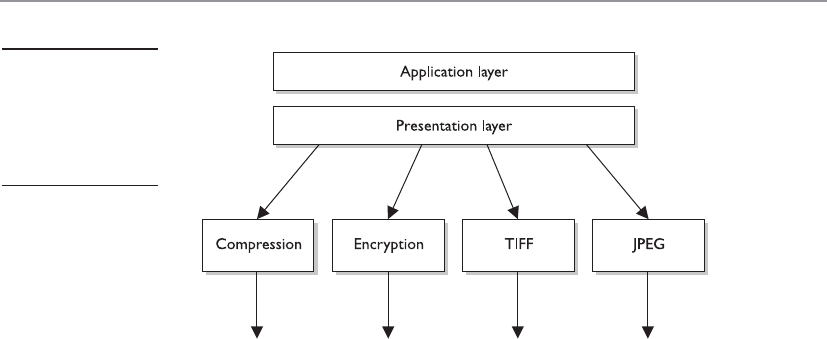
Chapter 6: Telecommunications and Network Security
523
This layer also handles data compression and encryption issues. If a program re-
quests a certain file to be compressed and encrypted before being transferred over the
network, the presentation layer provides the necessary information for the destination
computer. It provides information on how the file was encrypted and/or compressed so
that the receiving system knows what software and processes are necessary to decrypt
and decompress the file. Let’s say I compress a file using WinZip and send it to you.
When your system receives this file it will look at data within the header and knows
what application can decompress the file. If your system has WinZip installed, then the
file can be decompressed and presented to you in its original form. If your system does
not have an application that understands the compression/decompression instruc-
tions, the file will be presented to you with an unassociated icon.
There are no protocols that work at the presentation layer. Network services work at
this layer, and when a message is received from a different computer, the service basi-
cally tells the application protocol, “This is an ASCII file and it is encrypted with Win-
Zip. Now you figure out what to do with it.”
Session Layer
I don’t want to talk to another computer. I want to talk to an application.
When two applications need to communicate or transfer data between themselves,
a connection may need to be set up between them. The session layer, layer 5, is respon-
sible for establishing a connection between the two applications, maintaining it during
the transfer of data, and controlling the release of this connection. A good analogy for
the functionality within this layer is a telephone conversation. When Kandy wants to
call a friend, she uses the telephone. The telephone network circuitry and protocols set
up the connection over the telephone lines and maintain that communication path,
and when Kandy hangs up, they release all the resources they were using to keep that
connection open.
Similar to how telephone circuitry works, the session layer works in three phases:
connection establishment, data transfer, and connection release. It provides session
restart and recovery if necessary and provides the overall maintenance of the session.
When the conversation is over, this path is broken down and all parameters are set back
Figure 6-4
The presentation
layer receives data
from the application
layer and puts it into
a standard format.

CISSP All-in-One Exam Guide
524
to their original settings. This process is known as dialog management. Figure 6-5 depicts
the three phases of a session. Some protocols that work at this layer are Structured
Query Language (SQL), NetBIOS, and remote procedure call (RPC).
The session layer protocol can enable communication between two applications to
happen in three different modes:
•Simplex Communication takes place in one direction.
•Half-duplex Communication takes place in both directions, but only one
application can send information at a time.
•Full-duplex Communication takes place in both directions, and both
applications can send information at the same time.
Many people have a hard time understanding the difference between what takes
place at the session layer versus the transport layer because their definitions sound
similar. Session layer protocols control application-to-application communication,
whereas the transport layer protocols handle computer-to-computer communication.
For example, if you are using a product that is working in a client/server model, in real-
ity you have a small piece of the product on your computer (client portion) and the
larger piece of the software product is running on a different computer (server portion).
The communication between these two pieces of the same software product needs to be
controlled, which is why session layer protocols even exist. Session layer protocols take
on the functionality of middleware, which allows software on two different computers
to communicate.
Figure 6-5
The session
layer sets up the
connection, maintains
it, and tears it down
once communication
is completed.

Chapter 6: Telecommunications and Network Security
525
Session layer protocols provide interprocess communication channels, which allow
a piece of software on one system to call upon a piece of software on another system
without the programmer having to know the specifics of the software on the receiving
system. The programmer of a piece of software can write a function call that calls upon
a subroutine. The subroutine could be local to the system or be on a remote system. If
the subroutine is on a remote system, the request is carried over a session layer protocol.
The result that the remote system provides is then returned to the requesting system over
the same session layer protocol. This is how RPC works. A piece of software can execute
components that reside on another system. This is the core of distributed computing. We
will be looking at standards and technologies (CORBA, DCOM, SOAP, .Net Framework)
that are used by programmers to provide this type of functionality in Chapter 10.
CAUTION
CAUTION One security issue common to RPC (and similar interprocess
communication software) is the lack of authentication or the use of
weak authentication. Secure RPC can be implemented, which requires
authentication to take place before two computers located in different
locations can communicate with each other. Authentication can take place
using shared secrets, public keys, or Kerberos tickets. Session layer protocols
need to provide secure authentication capabilities.
Session layer protocols are the least used protocols in a network environment; thus,
many of them should be disabled on systems to decrease the chance of them getting
exploited. RPC and similar distributed computing calls usually only need to take place
within a network; thus, firewalls should be configured so this type of traffic is not al-
lowed into or out of a network. Firewall filtering rules should be in place to stop this
type of unnecessary and dangerous traffic.
The next section will dive into the functionality of the transport layer protocols.
Transport Layer
How do I know if I lose a piece of the message?
Response: The transport layer will fix it for you.
When two computers are going to communicate through a connection-oriented
protocol, they will first agree on how much information each computer will send at a
time, how to verify the integrity of the data once received, and how to determine whether
a packet was lost along the way. The two computers agree on these parameters through
a handshaking process at the transport layer, layer 4. The agreement on these issues
before transferring data helps provide more reliable data transfer, error detection, cor-
rection, recovery, and flow control, and it optimizes the network services needed to
perform these tasks. The transport layer provides end-to-end data transport services and
establishes the logical connection between two communicating computers.
NOTE
NOTE Connection-oriented protocols, such as TCP, provide reliable data
transmission when compared to connectionless protocols, such as User
Datagram Protocol (UDP). This distinction is covered in more detail in the
“TCP/IP Model” section, later in the chapter.
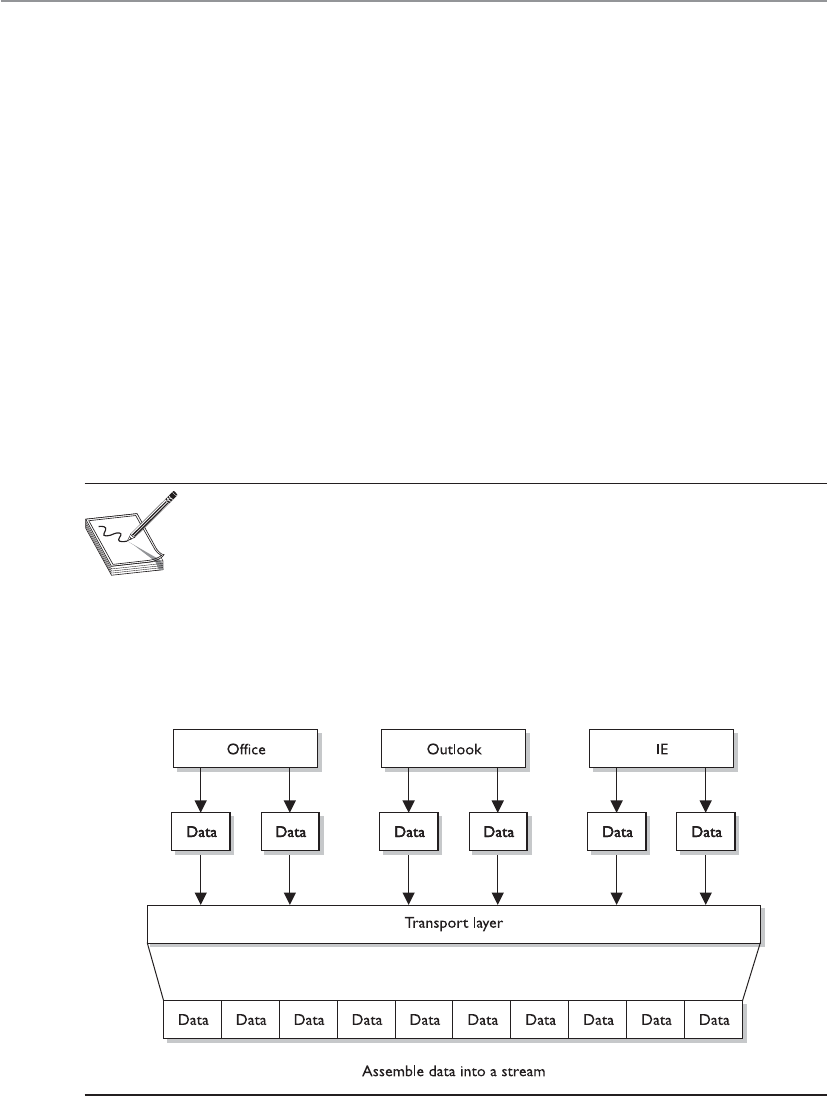
CISSP All-in-One Exam Guide
526
The functionality of the session and transport layers is similar insofar as they both
set up some type of session or virtual connection for communication to take place. The
difference is that protocols that work at the session layer set up connections between
applications, whereas protocols that work at the transport layer set up connections be-
tween computer systems. For example, we can have three different applications on com-
puter A communicating to three applications on computer B. The session layer protocols
keep track of these different sessions. You can think of the transport layer protocol as
the bus. It does not know or care what applications are communicating with each oth-
er. It just provides the mechanism to get the data from one system to another.
The transport layer receives data from many different applications and assembles
the data into a stream to be properly transmitted over the network. The main protocols
that work at this layer are TCP, UDP, Secure Sockets Layer (SSL), and Sequenced Packet
Exchange (SPX). Information is passed down from different entities at higher layers to
the transport layer, which must assemble the information into a stream, as shown in
Figure 6-6. The stream is made up of the various data segments passed to it. Just like a
bus can carry a variety of people, the transport layer protocol can carry a variety of ap-
plication data types.
NOTE
NOTE Different references can place specific protocols at different layers.
For example, many references place the SSL protocol in the session layer, while
other references place it in the transport layer. It is not that one is right or
wrong. The OSI model tries to draw boxes around reality, but some protocols
straddle the different layers. SSL is made up of two protocols—one works in
the lower portion of the session layer and the other works in the transport
layer. For purposes of the CISSP exam, SSL resides in the transport layer.
Figure 6-6 TCP formats data from applications into a stream to be prepared for transmission.

Chapter 6: Telecommunications and Network Security
527
Network Layer
Many roads lead to Rome.
The main responsibilities of the network layer, layer 3, are to insert information into
the packet’s header so it can be properly addressed and routed, and then to actually
route the packets to their proper destination. In a network, many routes can lead to one
destination. The protocols at the network layer must determine the best path for the
packet to take. Routing protocols build and maintain their routing tables. These tables
are maps of the network, and when a packet must be sent from computer A to com-
puter M, the protocols check the routing table, add the necessary information to the
packet’s header, and send it on its way.
The protocols that work at this layer do not ensure the delivery of the packets. They
depend on the protocols at the transport layer to catch any problems and resend pack-
ets if necessary. IP is a common protocol working at the network layer, although other
routing and routed protocols work there as well. Some of the other protocols are the
Internet Control Message Protocol (ICMP), Routing Information Protocol (RIP), Open
Shortest Path First (OSPF), Border Gateway Protocol (BGP), and Internet Group Man-
agement Protocol (IGMP). Figure 6-7 shows that a packet can take many routes and
that the network layer enters routing information into the header to help the packet
arrive at its destination.
Figure 6-7 The network layer determines the most efficient path for each packet to take.

CISSP All-in-One Exam Guide
528
Data Link Layer
As we continue down the protocol stack, we are getting closer to the actual transmission
channel (i.e., network wire) over which all these data will travel. The outer format of the
data packet changes slightly at each layer, and it comes to a point where it needs to be
translated into the LAN or wide area network (WAN) technology binary format for
proper line transmission. This happens at the data link layer, layer 2.
LAN and WAN technologies can use different protocols, network interface cards
(NICs), cables, and transmission methods. Each of these components has a different
header data format structure, and they interpret electricity voltages in different ways.
The data link layer is where the network stack knows what format the data frame must
be in to transmit properly over Token Ring, Ethernet, ATM, or Fiber Distributed Data
Interface (FDDI) networks. If the network is an Ethernet network, for example, all the
computers will expect packet headers to be a certain length, the flags to be positioned
in certain field locations within the header, and the trailer information to be in a cer-
tain place with specific fields. Compared to Ethernet, Token Ring network technology
has different frame header lengths, flag values, and header formats.
The data link layer is responsible for proper communication within the network
components and for changing the data into the necessary format (electrical voltage) for
the physical layer. It will also manage to reorder frames that are received out of se-
quence, and notify upper-layer protocols when there are transmission error conditions.
The data link layer is divided into two functional sublayers: the Logical Link Control
(LLC) and the Media Access Control (MAC). The LLC, defined in the IEEE 802.2 speci-
fication, communicates with the protocol immediately above it, the network layer. The
MAC will have the appropriately loaded protocols to interface with the protocol re-
quirements of the physical layer.
As data is passed down the network stack it has to go from the network layer to the
data link layer. The protocol at the network layer does not know if the underlying net-
work is Ethernet, Token Ring, or ATM—it does not need to have this type of insight. The
protocol at the network layer just adds its header and trailer information to the packet
and it passes it on to the next layer, which is the LLC sublayer. The LLC layer takes care
of flow control and error checking. Data coming from the network layer passes down
through the LLC sublayer and goes to MAC. The technology at the MAC sublayer knows
if the network is Ethernet, Token Ring, or ATM, so it knows how to put the last header
and trailer on the packet before it “hits the wire” for transmission.
The IEEE MAC specification for Ethernet is 802.3, Token Ring is 802.5, wireless LAN
is 802.11, and so on. So when you see a reference to an IEEE standard, such as 802.11,
802.16, or 802.3, it refers to the protocol working at the MAC sublayer of the data link
layer of a protocol stack.
Some of the protocols that work at the data link layer are the Point-to-Point Proto-
col (PPP), ATM, Layer 2 Tunneling Protocol (L2TP), FDDI, Ethernet, and Token Ring.
Figure 6-8 shows the two sublayers that make up the data link layer.
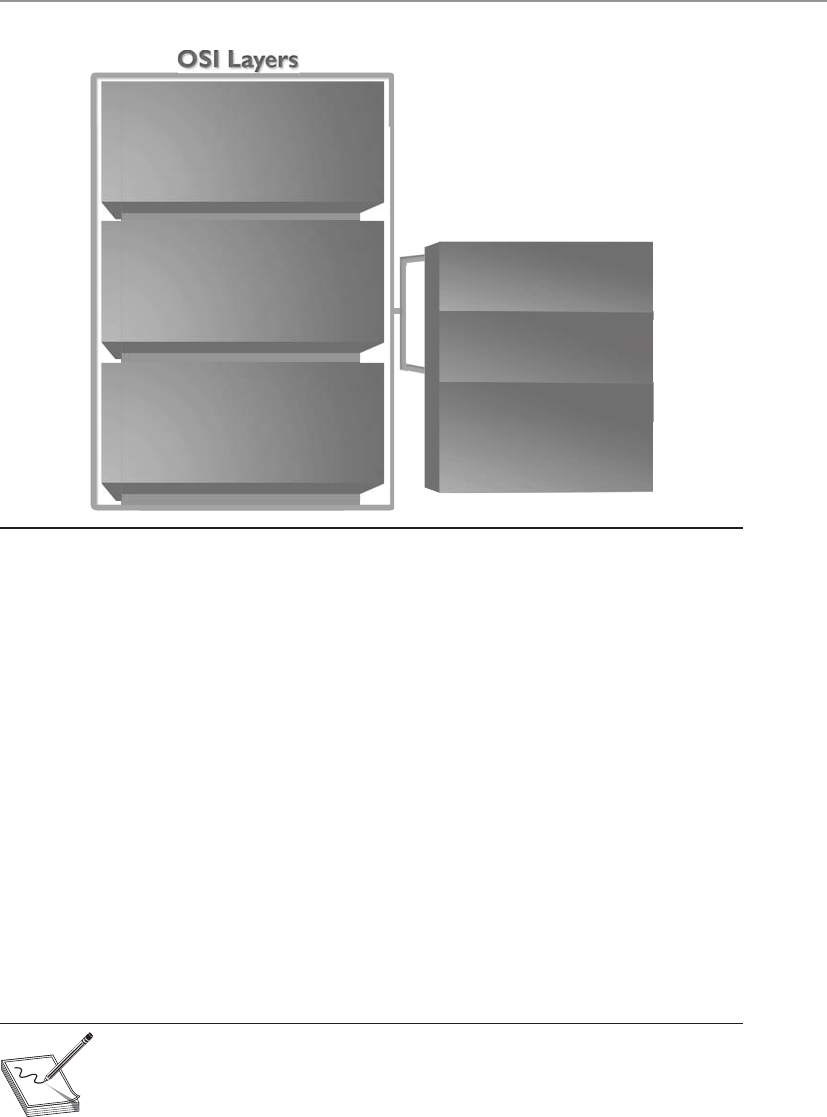
Chapter 6: Telecommunications and Network Security
529
Each network technology (Ethernet, ATM, FDDI, and so on) defines the compatible
physical transmission type (coaxial, twisted pair, fiber, wireless) that is required to en-
able network communication. Each network technology also has defined electronic sig-
naling and encoding patterns. For example, if the MAC sublayer received a bit with the
value of 1 that needed to be transmitted over an Ethernet network, the MAC sublayer
technology would tell the physical layer to create 0.5 volts in electricity. In the “language
of Ethernet” this means that 0.5 volts is the encoding value for a bit with the value of 1.
If the next bit the MAC sublayer receives is 0, the MAC layer would tell the physical layer
to transmit 0 volts. The different network types will have different encoding schemes. So
a bit value of 1 in an ATM network might actually be encoded to the voltage value of
0.85. It is just a sophisticated Morse code system. The receiving end will know when it
receives a voltage value of 0.85 that a bit with the value of 1 has been transmitted.
Network cards bridge the data link and physical layers. Data is passed down through
the first six layers and reaches the network card driver at the data link layer. Depending
on the network technology being used (Ethernet, Token Ring, FDDI, and so on), the
network card driver encodes the bits at the data link layer, which are then turned into
electricity states at the physical layer and placed onto the wire for transmission.
NOTE
NOTE When the data link layer applies the last header and trailer to the data
message, this is referred to as framing. The unit of data is now called a frame.
IEEE 802 Layers
Upper layers
LLC
Logical link control
MAC
Media access control
Data link
Physical Physical
Figure 6-8 The data link layer is made up of two sublayers.

CISSP All-in-One Exam Guide
530
Physical Layer
Everything ends up as electrical signals anyway.
The physical layer, layer 1, converts bits into voltage for transmission. Signals and
voltage schemes have different meanings for different LAN and WAN technologies, as
covered earlier. If a user sends data through his dial-up software and out his modem
onto a telephone line, the data format, electrical signals, and control functionality are
much different than if that user sends data through the NIC and onto a unshielded
twisted pair (UTP) wire for LAN communication. The mechanisms that control this
data going onto the telephone line, or the UTP wire, work at the physical layer. This
layer controls synchronization, data rates, line noise, and transmission techniques.
Specifications for the physical layer include the timing of voltage changes, voltage lev-
els, and the physical connectors for electrical, optical, and mechanical transmission.
NOTE
NOTE APSTNDP—To remember all the layers within the OSI model in
the correct order, memorize “All People Seem To Need Data Processing.”
Remember that you are starting at layer 7, the application layer, at the top.
Functions and Protocols in the OSI Model
For the exam, you will need to know the functionality that takes place at the different
layers of the OSI model, along with specific protocols that work at each layer. The fol-
lowing is a quick overview of each layer and its components.
Application
The protocols at the application layer handle file transfer, virtual terminals, network
management, and fulfilling networking requests of applications. A few of the protocols
that work at this layer include
• File Transfer Protocol (FTP)
• Trivial File Transfer Protocol (TFTP)
• Simple Network Management Protocol (SNMP)
• Simple Mail Transfer Protocol (SMTP)
• Telnet
• Hypertext Transfer Protocol (HTTP)
Presentation
The services of the presentation layer handle translation into standard formats, data com-
pression and decompression, and data encryption and decryption. No protocols work at
this layer, just services. The following lists some of the presentation layer standards:
• American Standard Code for Information Interchange (ASCII)
• Extended Binary-Coded Decimal Interchange Mode (EBCDIC)
• Tagged Image File Format (TIFF)

Chapter 6: Telecommunications and Network Security
531
• Joint Photographic Experts Group (JPEG)
• Motion Picture Experts Group (MPEG)
• Musical Instrument Digital Interface (MIDI)
Session
The session layer protocols set up connections between applications; maintain dialog
control; and negotiate, establish, maintain, and tear down the communication chan-
nel. Some of the protocols that work at this layer include
• Network File System (NFS)
• NetBIOS
• Structured Query Language (SQL)
• Remote procedure call (RPC)
Transport
The protocols at the transport layer handle end-to-end transmission and segmentation
of a data stream. The following protocols work at this layer:
• Transmission Control Protocol (TCP)
• User Datagram Protocol (UDP)
• Secure Sockets Layer (SSL)/Transport Layer Security (TLS)
• Sequenced Packet Exchange (SPX)
Network
The responsibilities of the network layer protocols include internetworking service, ad-
dressing, and routing. The following lists some of the protocols that work at this layer:
• Internet Protocol (IP)
• Internet Control Message Protocol (ICMP)
• Internet Group Management Protocol (IGMP)
• Routing Information Protocol (RIP)
• Open Shortest Path First (OSPF)
• Internetwork Packet Exchange (IPX)
Data Link
The protocols at the data link layer convert data into LAN or WAN frames for transmis-
sion and define how a computer accesses a network. This layer is divided into the Logi-
cal Link Control (LLC) and the Media Access Control (MAC) sublayers. Some protocols
that work at this layer include the following:
• Address Resolution Protocol (ARP)
• Reverse Address Resolution Protocol (RARP)

CISSP All-in-One Exam Guide
532
• Point-to-Point Protocol (PPP)
• Serial Line Internet Protocol (SLIP)
• Ethernet
• Token Ring
• FDDI
• ATM
Physical
Network interface cards and drivers convert bits into electrical signals and control the
physical aspects of data transmission, including optical, electrical, and mechanical re-
quirements. The following are some of the standard interfaces at this layer:
• EIA-422, EIA-423, RS-449, RS-485
• 10BASE-T, 10BASE2, 10BASE5, 100BASE-TX, 100BASE-FX, 100BASE-T,
1000BASE-T, 1000BASE-SX
• Integrated Services Digital Network (ISDN)
• Digital subscriber line (DSL)
• Synchronous Optical Networking (SONET)
Tying the Layers Together
Pick up all of these protocols from the floor and put them into a stack—a network stack.
The OSI model is used as a framework for many network-based products and is
used by many types of vendors. Various types of devices and protocols work at different
parts of this seven-layer model. The main reason that a Cisco switch, Microsoft web
server, a Barracuda firewall, and a Belkin wireless access point can all communicate
properly on one network is because they all work within the OSI model. They do not
have their own individual ways of sending data; they follow a standardized manner of
communication, which allows for interoperability and allows a network to be a net-
work. If a product does not follow the OSI model, it will not be able to communicate
with other devices on the network because the other devices will not understand its
proprietary way of communicating.
The different device types work at specific OSI layers. For example, computers can
interpret and process data at each of the seven layers, but routers can understand infor-
mation only up to the network layer because a router’s main function is to route pack-
ets, which does not require knowledge about any further information within the
packet. A router peels back the header information until it reaches the network layer
data, where the routing and IP address information is located. The router looks at this
information to make its decisions on where the packet should be routed. Bridges and
switches understand only up to the data link layer, and repeaters understand traffic
only at the physical layer. So if you hear someone mention a “layer 3 device,” the per-
son is referring to a device that works at the network layer. A “layer 2 device” works at
the data link layer. Figure 6-9 shows what level of the OSI model each type of device
works within.

Chapter 6: Telecommunications and Network Security
533
NOTE
NOTE Some techies like to joke that all computer problems reside at
layer 8. The OSI model does not have an eighth layer, and what these people
are referring to is the user of a computer. So if someone states that there is
a problem at layer 8, this is code for “the user is an idiot.”
Let’s walk through an example. I open an FTP client on my computer and connect
to an FTP server on my network. In my FTP client I chose to download a Word docu-
ment from the server. The FTP server now has to move this file over the network to my
computer. The server sends this document to the FTP application protocol on its net-
work stack. This FTP protocol puts headers and trailers on the document and passes it
down to the presentation layer. A service at the presentation layer adds a header that
indicates this document is in ASCII format so my system knows how to open the file
when it is received.
Figure 6-9 Each device works at a particular layer within the OSI model.

CISSP All-in-One Exam Guide
534
This bundle is then handed to the transport layer TCP, which also adds a header and
trailer, which include source and destination port values. The bundle continues down
the network stack to the IP protocol, which provides a source IP address (FTP server)
and a destination IP address (my system). The bundle goes to the data link layer, and
the server’s NIC driver encodes the bundle to be able to be transmitted over the Ether-
net connection between the server and my system.
TCP/IP Model
Transmission Control Protocol/Internet Protocol (TCP/IP) is a suite of protocols that
governs the way data travel from one device to another. Besides its eponymous two
main protocols, TCP/IP includes other protocols as well, which we will cover in this
chapter.
IP is a network layer protocol and provides datagram routing services. IP’s main task
is to support internetwork addressing and packet routing. It is a connectionless proto-
col that envelops data passed to it from the transport layer. The IP protocol addresses
the datagram with the source and destination IP addresses. The protocols within the
TCP/IP suite work together to break down the data passed from the application layer
into pieces that can be moved along a network. They work with other protocols to
transmit the data to the destination computer and then reassemble the data back into
a form that the application layer can understand and process.
Two main protocols work at the transport layer: TCP and UDP. TCP is a reliable and
connection-oriented protocol, which means it ensures packets are delivered to the desti-
nation computer. If a packet is lost during transmission, TCP has the ability to identify
this issue and resend the lost or corrupted packet. TCP also supports packet sequencing
(to ensure each and every packet was received), flow and congestion control, and error
detection and correction. UDP, on the other hand, is a best-effort and connectionless
protocol. It has neither packet sequencing nor flow and congestion control, and the
destination does not acknowledge every packet it receives.
IP
IP is a connectionless protocol that provides the addressing and routing capabili-
ties for each package of data.
The data, IP, and network relationship can be compared to the relationship
between a letter and the postal system:
• Data = Letter
• IP = Addressed envelope
• Network = Postal system
The message is the letter, which is enveloped and addressed by IP, and the
network and its services enable the message to be sent from its origin to its desti-
nation, like the postal system.

Chapter 6: Telecommunications and Network Security
535
TCP
TCP is referred to as a connection-oriented protocol because before any user data are
actually sent, handshaking takes place between the two systems that want to communi-
cate. Once the handshaking completes successfully, a virtual connection is set up be-
tween the two systems. UDP is considered a connectionless protocol because it does
not go through these steps. Instead, UDP sends out messages without first contacting
the destination computer and does not know if the packets were received properly or
dropped. Figure 6-10 shows the difference between a connection-oriented and a con-
nectionless protocol.
UDP and TCP sit together on the transport layer, and developers can choose which
to use when developing applications. Many times, TCP is the transport protocol of
choice because it provides reliability and ensures the packets are delivered. For exam-
ple, SMTP is used to transmit e-mail messages and uses TCP because it must make sure
the data are delivered. TCP provides a full-duplex, reliable communication mechanism,
and if any packets are lost or damaged, they are re-sent; however, TCP requires a lot of
system overhead compared to UDP.
If a programmer knows data dropped during transmission is not detrimental to the
application, he may choose to use UDP because it is faster and requires fewer resources.
For example, UDP is a better choice than TCP when a server sends status information
to all listening nodes on the network. A node will not be negatively affected if, by some
chance, it did not receive this status information because the information will be re-
sent every 60 seconds.
UDP and TCP are transport protocols that applications use to get their data across
a network. They both use ports to communicate with upper OSI layers and to keep track
of various conversations that take place simultaneously. The ports are also the mecha-
nism used to identify how other computers access services. When a TCP or UDP
Figure 6-10 Connection-oriented versus connectionless protocol functionality

CISSP All-in-One Exam Guide
536
message is formed, source and destination ports are contained within the header infor-
mation along with the source and destination IP addresses. This makes up a socket, and
is how packets know where to go (by the address) and how to communicate with the
right service or protocol on the other computer (by the port number). The IP address
acts as the doorway to a computer, and the port acts as the doorway to the actual pro-
tocol or service. To communicate properly, the packet needs to know these doors. Fig-
ure 6-11 shows how packets communicate with applications and services through ports.
Figure 6-11 The packet can communicate with upper-layer protocols and services through a port.

Chapter 6: Telecommunications and Network Security
537
The difference between TCP and UDP can also be seen in the message formats. Be-
cause TCP offers more services than UDP, it must contain much more information
within its packet header format, as shown in Figure 6-12. Table 6-1 lists the major dif-
ferences between TCP and UDP.
Ports Types
Port numbers up to 1023 (0 to 1023) are called well-known ports, and almost
every computer in the world has the exact same protocol mapped to the exact
same port number. That is why they are called well known—everyone follows this
same standardized approach. This means that on almost every computer, port 25
is mapped to SMTP, port 21 is mapped to FTP, port 80 is mapped to HTTP, and so
on. This mapping between lower-numbered ports and specific protocols is a de
facto standard, which just means that we all do this and that we do not have a
standards body dictating that it absolutely has to be done this way. The fact that
almost everyone follows this approach translates to more interoperability among
systems all over the world.
NOTE
NOTE Ports 0 to 1023 can be used only by privileged system or root
processes.
Because this is a de facto standard and not a standard that absolutely must be
followed, administrators can map different protocols to different port numbers if
that fits their purpose.
The following shows some of the most commonly used protocols and the
ports to which they are usually mapped:
• Telnet port 23
• SMTP port 25
• HTTP port 80
• SNMP ports 161 and 162
• FTP ports 21 and 20
Registered ports are 1024 to 49151, which can be registered with the Internet
Corporation for Assigned Names and Numbers (ICANN) for a particular use.
Vendors register specific ports to map to their proprietary software. Dynamic ports
are 49152 to 65535 and are available to be used by any application on an “as
needed” basis.
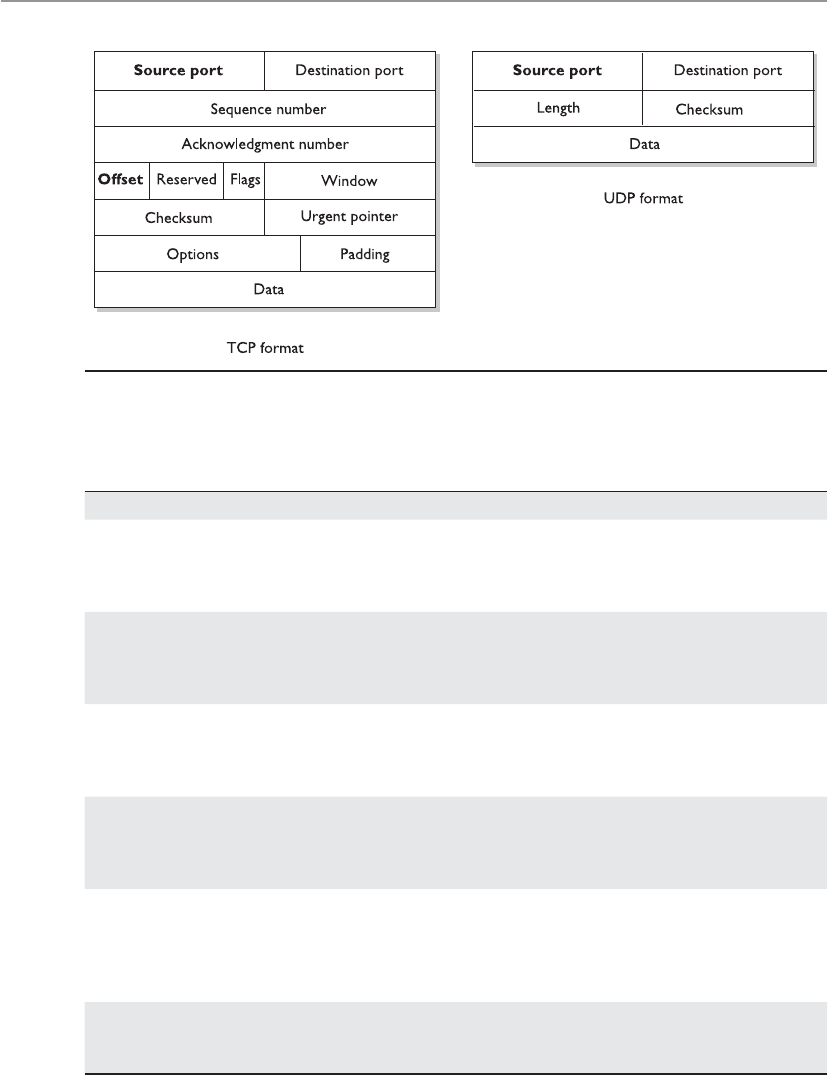
CISSP All-in-One Exam Guide
538
Figure 6-12 TCP carries a lot more information within its segment because it offers more services
than UDP.
Property TCP UDP
Reliability Ensures that packets reach their
destinations, returns ACKs when
packets are received, and is a
reliable protocol.
Does not return ACKs and does
not guarantee that a packet
will reach its destination. Is an
unreliable protocol.
Connection Connection-oriented. It
performs handshaking and
develops a virtual connection
with the destination computer.
Connectionless. It does no
handshaking and does not set up a
virtual connection.
Packet sequencing Uses sequence numbers within
headers to make sure each
packet within a transmission is
received.
Does not use sequence numbers.
Congestion controls The destination computer
can tell the source if it is
overwhelmed and thus slow the
transmission rate.
The destination computer does not
communicate back to the source
computer about flow control.
Usage Used when reliable delivery
is required. Suitable for
relatively small amounts
of data transmission.
Used when reliable delivery is
not required and high volumes of
data need to be transmitted, such
as in streaming video and status
broadcasts.
Speed and overhead Uses a considerable amount
of resources and is slower
than UDP.
Uses fewer resources and is faster
than TCP.
Table 6-1 Major Differences between TCP and UDP
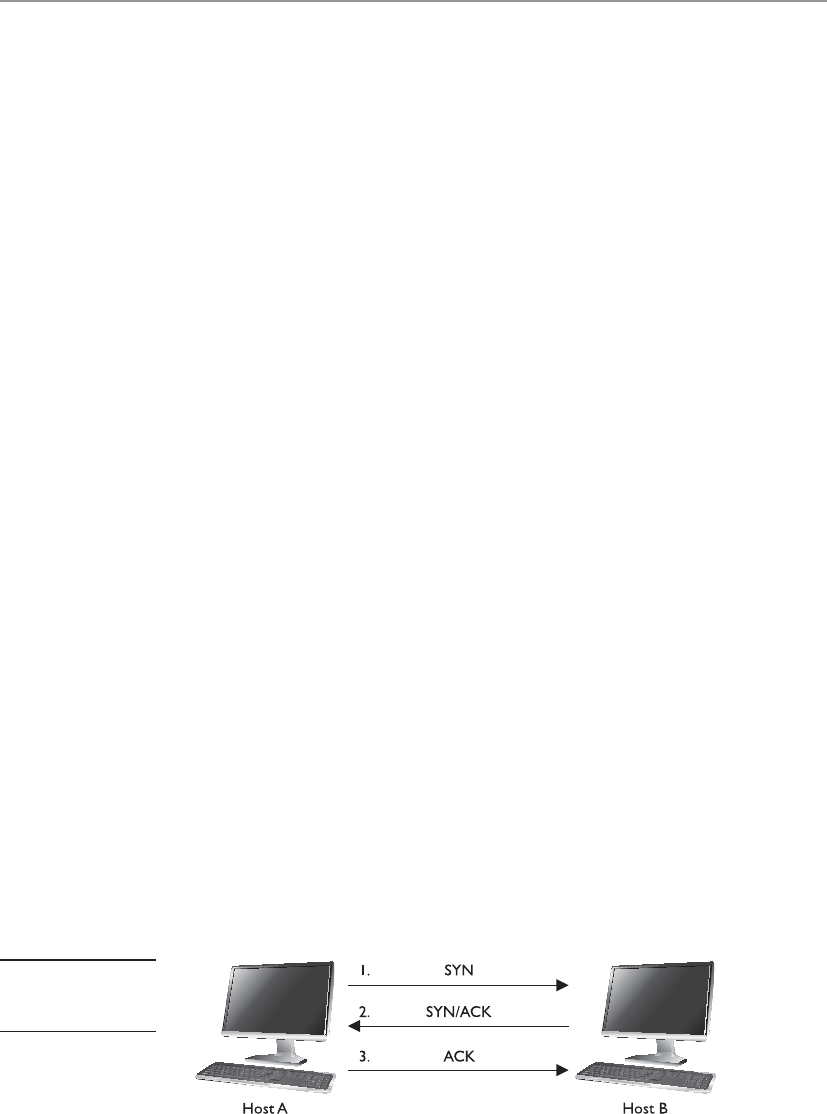
Chapter 6: Telecommunications and Network Security
539
TCP Handshake
Every proper dialog begins with a polite handshake.
TCP must set up a virtual connection between two hosts before any data are sent.
This means the two hosts must agree on certain parameters, data flow, windowing, er-
ror detection, and options. These issues are negotiated during the handshaking phase,
as shown in Figure 6-13.
The host that initiates communication sends a synchronous (SYN) packet to the
receiver. The receiver acknowledges this request by sending a SYN/ACK packet. This
packet translates into, “I have received your request and am ready to communicate with
you.” The sending host acknowledges this with an acknowledgment (ACK) packet,
which translates into, “I received your acknowledgment. Let’s start transmitting our
data.” This completes the handshaking phase, after which a virtual connection is set up,
and actual data can now be passed. The connection that has been set up at this point is
considered full duplex, which means transmission in both directions is possible using
the same transmission line.
If an attacker sends a target system SYN packets with a spoofed address, then the
victim system replies to the spoofed address with SYN/ACK packets. Each time the vic-
tim system receives one of these SYN packets it sets aside resources to manage the new
connection. If the attacker floods the victim system with SYN packets, eventually the
victim system allocates all of its available TCP connection resources and can no longer
process new requests. This is a type of DoS that is referred to as a SYN flood. To thwart
this type of attack you can use SYN proxies, which limit the number of open and aban-
doned network connections. The SYN proxy is a piece of software that resides between
the sender and receiver and only sends on TCP traffic to the receiving system if the TCP
handshake process completes successfully.
Another attack vector we need to understand is TCP sequence numbers. One of the
values that is agreed upon during a TCP handshake between two systems is the se-
quence numbers that will be inserted into the packet headers. Once the sequence num-
ber is agreed upon, if a receiving system receives a packet from the sending system that
does not have this predetermined value, it will disregard the packet. This means that an
attacker cannot just spoof the address of a sending system to fool a receiving system; the
attacker has to spoof the sender’s address and use the correct sequence number values.
If an attacker can correctly predict the TCP sequence numbers that two systems will use,
then she can create packets containing those numbers and fool the receiving system
into thinking that the packets are coming from the authorized sending system. She can
then take over the TCP connection between the two systems, which is referred to as TCP
session hijacking.
Figure 6-13
The TCP three-way
handshake

CISSP All-in-One Exam Guide
540
Data Structures
What’s in a name?
As stated earlier, the message is formed and passed to the application layer from a
program and sent down through the protocol stack. Each protocol at each layer adds its
own information to the message and passes it down to the next level. This activity is
referred to as data encapsulation. As the message is passed down the stack, it goes
through a sort of evolution, and each stage has a specific name that indicates what is
taking place. When an application formats data to be transmitted over the network, the
data are called a message or data. The message is sent to the transport layer, where TCP
does its magic on the data. The bundle of data is now a segment. The segment is sent to
the network layer. The network layer adds routing and addressing, and now the bundle
is called a packet. The network layer passes off the packet to the data link layer, which
frames the packet with a header and a trailer, and now it is called a frame. Figure 6-14
illustrates these stages.
NOTE
NOTE If the message is being transmitted over TCP, it is referred to as a
“segment.” If it is being transmitted over UDP, it is referred to as a “datagram.”
Sometimes when an author refers to a segment, she is specifying the stage in which
the data are located within the protocol stack. If the literature is describing routers,
which work at the network layer, the author might use the word “packet” because the
data at this level have routing and addressing information attached. If an author is de-
Protocol Data Units (PDUs)
Application: Data
Transport: Segments
Network: Packets
Data Link:
Frames
Bits
101001000101010001110101010000100
Data
Decapsulation
Data
Data
Data
Transport
header
Transport
header
Transport
header
Network
header
Network
header
Frame
header
Frame
trailer
Figure 6-14 The data go through their own evolutionary stages as they pass through the layers
within the network stack.

Chapter 6: Telecommunications and Network Security
541
scribing network traffic and flow control, she might use the word “frame” because all
data actually end up in the frame format before they are put on the network wire.
The important thing here is that you understand the various steps a data package
goes through when it moves up and down the protocol stack.
IP Addressing
Take a right at the router and a left at the access server. I live at 10.10.2.3.
Each node on a network must have a unique IP address. Today, the most com-
monly used version of IP is IP version 4 (IPv4), but its addresses are in such high de-
mand that their supply has started to run out. IP version 6 (IPv6) was created to address
this shortage. (IPv6 also has many security features built into it that are not part of
IPv4.) IPv6 is covered later in this chapter.
IPv4 uses 32 bits for its addresses, whereas IPv6 uses 128 bits; thus, IPv6 provides
more possible addresses with which to work. Each address has a host portion and a
network portion, and the addresses are grouped into classes and then into subnets. The
subnet mask of the address differentiates the groups of addresses that define the sub-
nets of a network. IPv4 address classes are listed in Table 6-2.
For any given IP network within an organization, all nodes connected to the net-
work can have different host addresses but a common network address. The host ad-
dress identifies every individual node, whereas the network address is the identity of
the network they are all connected to; therefore, it is the same for each one of them. Any
traffic meant for nodes on this network will be sent to the prescribed network address.
Asubnet is created from the host portion of an IP address to designate a “sub” net-
work. This allows us to further break the host portion of the address into two or more
logical groupings, as shown in Figure 6-15. A network can be logically partitioned to
reduce administration headaches, traffic performance, and potentially security. As an
analogy, let’s say you work at Toddlers R Us and you are responsible for babysitting 100
toddlers. If you kept all 100 toddlers in one room, you would probably end up killing
a few of them or yourself. To better manage these kids, you could break them up into
groups. The three-year-olds go in the yellow room, the four-year-olds go in the green
Class A 0.0.0.0 to 127.255.255.255 The first byte is the network portion, and
the remaining three bytes are the host
portion.
Class B 128.0.0.0 to 191.255.255.255 The first two bytes are the network
portion, and the remaining two bytes are
the host portion.
Class C 192.0.0.0 to 223.255.255.255 The first three bytes are the network
portion, and the remaining one byte is the
host portion.
Class D 224.0.0.0 to 239.255.255.255 Used for multicast addresses.
Class E 240.0.0.0 to 255.255.255.255 Reserved for research.
Table 6-2 IPv4 Addressing

CISSP All-in-One Exam Guide
542
room, and the five-year-olds go in the blue room. This is what a network administrator
would do—break up and separate computer nodes to be able to better control them.
Instead of putting them into physical rooms, the administrator puts them into logical
rooms (subnets).
To continue with our analogy, when you put your toddlers in different rooms, you
would have physical barriers that separate them—walls. Network subnetting is not
physical; it is logical. This means you would not have physical walls separating your
individual subnets, so how do you keep them separate? This is where subnet masks
come into play. A subnet mask defines smaller networks inside a larger network, just
like individual rooms are defined within a building.
Subnetting allows large IP ranges to be divided into smaller, logical, and more tan-
gible network segments. Consider an organization with several divisions, such as IT,
Accounting, HR, and so on. Creating subnets for each division breaks the networks into
logical partitions that route traffic directly to recipients without dispersing data all over
the network. This drastically reduces the traffic load across the network, reducing the
possibility of network congestion and excessive broadcast packets in the network. Im-
plementing network security policies is also much more effective across logically cate-
gorized subnets with a demarcated perimeter, as compared to a large, cluttered, and
complex network.
Figure 6-15
Subnets create
logical partitions.
Chapter 6: Telecommunications and Network Security
543
Subnetting is particularly beneficial in keeping down routing table sizes, because
external routers can directly send data to the actual network segment without having to
worry about the internal architecture of that network and getting the data to individual
hosts. This job can be handled by the internal routers, which can determine the indi-
vidual hosts in a subnetted environment and save the external routers the hassle of
analyzing all 32 bits of an IP address and just look at the “masked” bits.
NOTE
NOTE To really understand subnetting, you need to dig down into how
IP addresses work at the binary level. You should not have to calculate any
subnets for the CISSP exam, but for a better understanding of how this
stuff works under the hood, visit http://compnetworking.about.com/od/
workingwithipaddresses/a/subnetmask.htm.
If the traditional subnet masks are used, they are referred to as classful or classical
IP addresses. If an organization needs to create subnets that do not follow these tradi-
tional sizes, then it would use classless IP addresses. This just means a different subnet
mask would be used to define the network and host portions of the addresses. After it
became clear that available IP addresses were running out as more individuals and cor-
porations participated on the Internet, classless interdomain routing (CIDR) was creat-
ed. A Class B address range is usually too large for most companies, and a Class C
address range is too small, so CIDR provides the flexibility to increase or decrease the
class sizes as necessary. CIDR is the method to specify more flexible IP address classes.
CIDR is also referred to as supernetting.
NOTE
NOTE To better understand CIDR, visit the following resource:
www.tcpipguide.com/free/t_
IPClasslessAddressingClasslessInterDomainRoutingCI.htm.
Although each node has an IP address, people usually refer to their hostname rath-
er than their IP address. Hostnames, such as www.logicalsecurity.com, are easier for
humans to remember than IP addresses, such as 10.13.84.4. However, the use of these
two nomenclatures requires mapping between the hostnames and IP addresses, be-
cause the computer understands only the numbering scheme. This process is addressed
in the “Domain Name Service” section later in this chapter.
NOTE
NOTE IP provides addressing, packet fragmentation, and packet timeouts. To
ensure that packets do not continually traverse a network forever, IP provides
aTime to Live (TTL) value that is decremented every time the packet passes
through a router. IP can also provide a Type of Service (ToS) capability, which
means it can prioritize different packets for time-sensitive functions.

CISSP All-in-One Exam Guide
544
IPv6
What happened to version 5?
Response: It smelled funny.
IPv6, also called IP next generation (IPng), not only has a larger address space than
IPv4 to support more IP addresses; it has some capabilities that IPv4 does not and it
accomplishes some of the same tasks differently. All of the specifics of the new func-
tions within IPv6 are beyond the scope of this book, but we will look at a few of them,
because IPv6 is the way of the future. IPv6 allows for scoped addresses, which enables
an administrator to restrict specific addresses for specific servers or file and print shar-
ing, for example. IPv6 has Internet Protocol Security (IPSec) integrated into the proto-
col stack, which provides end-to-end secure transmission and authentication. IPv6 has
more flexibility and routing capabilities and allows for Quality of Service (QoS) prior-
ity values to be assigned to time-sensitive transmissions. The protocol offers autocon-
figuration, which makes administration much easier, and it does not require network
address translation (NAT) to extend its address space.
NAT was developed because IPv4 addresses were running out. Although the NAT
technology is extremely useful, it has caused a lot of overhead and transmission prob-
lems because it breaks the client/server model that many applications use today. One
reason the industry did not jump on the IPv6 bandwagon when it came out years ago
is that NAT was developed, which reduced the speed at which IP addresses were being
depleted. Although the conversion rate from IPv4 to IPv6 is slow in some parts of the
world and the implementation process is quite complicated, the industry is making the
shift because of all the benefits that IPv6 brings to the table.
NOTE
NOTE NAT is covered in the “Network Address Translation” section later in
this chapter.
The IPv6 specification, as outlined in RFC 2460, lays out the differences and bene-
fits of IPv6 over IPv4. A few of the differences are as follows:
• IPv6 increases the IP address size from 32 bits to 128 bits to support more
levels of addressing hierarchy, a much greater number of addressable nodes,
and simpler autoconfiguration of addresses.
• The scalability of multicast routing is improved by adding a “scope” field to
multicast addresses. Also, a new type of address called an anycast address is
defined, which is used to send a packet to any one of a group of nodes.
• Some IPv4 header fields have been dropped or made optional to reduce the
common-case processing cost of packet handling and to limit the bandwidth
cost of the IPv6 header. This is illustrated in Figure 6-16.
• Changes in the way IP header options are encoded allow for more efficient
forwarding, less stringent limits on the length of options, and greater
flexibility for introducing new options in the future.

Chapter 6: Telecommunications and Network Security
545
• A new capability is added to enable the labeling of packets belonging to
particular traffic “flows” for which the sender requests special handling, such
as nondefault QoS or “real-time” service.
• Extensions to support authentication, data integrity, and (optional) data
confidentiality are also specified for IPv6.
IPv4 limits packets to 65,535 octets of payload, and IPv6 extends this size to
4,294,967,295 octets. These larger packets are referred to as jumbograms and improve
performance over high-maximum transmission unit (MTU) links. Currently most of
the world still uses IPv4, but IPv6 is being deployed more rapidly. This means that there
are “pockets” of networks using IPv4 and “pockets” of networks using IPv6 that still
need to communicate. This communication takes place through different tunneling
techniques, which either encapsulates IPv6 packets within IPv4 packets or carries out
automated address translations. Automatic tunneling is a technique where the routing
infrastructure automatically determines the tunnel endpoints so that protocol tunnel-
ing can take place without preconfiguration. In the 6to4 tunneling method the tunnel
endpoints are determined by using a well-known IPv4 anycast address on the remote
side and embeds IPv4 address data within IPv6 addresses on the local side. Teredo is
another automatic tunneling technique that uses UDP encapsulation so that NAT ad-
dress translations are not affected. Intra-Site Automatic Tunnel Addressing Protocol (ISA-
TAP) treats the IPv4 network as a virtual IPv6 local link, with mappings from each IPv4
address to a link-local IPv6 address.
Figure 6-16 IPv4 versus IPv6 headers
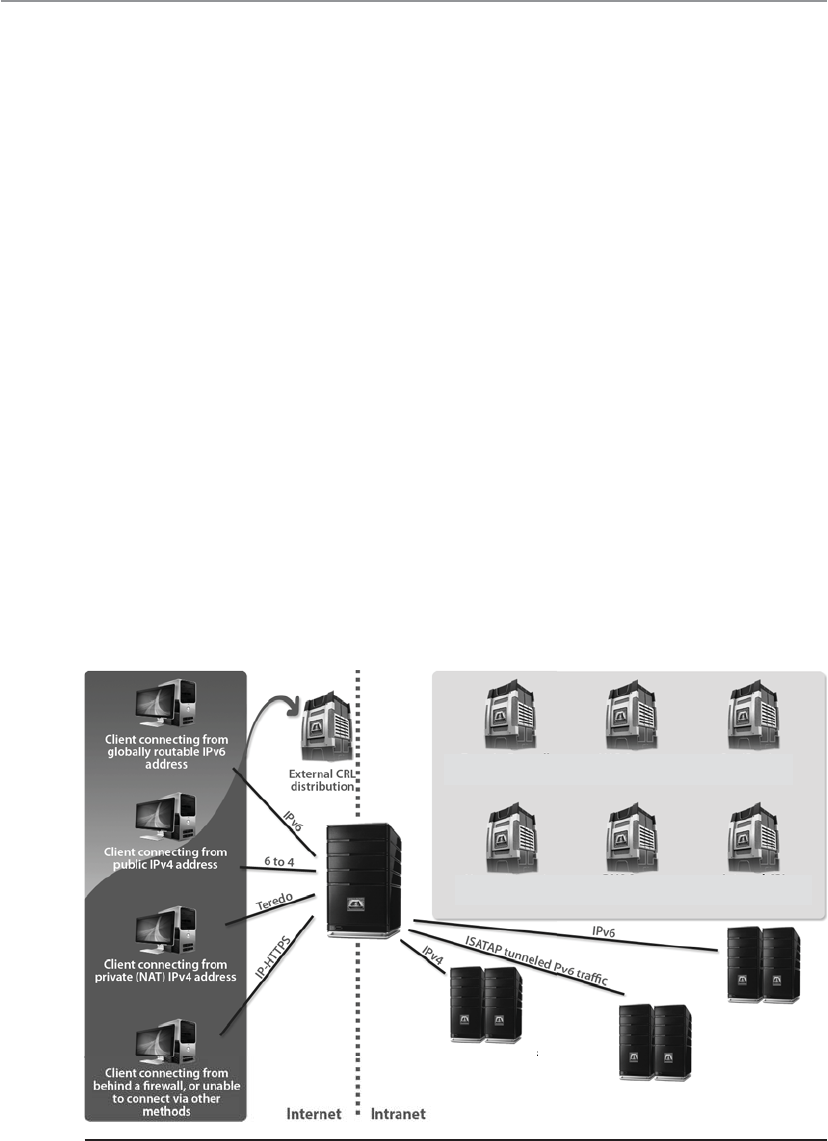
CISSP All-in-One Exam Guide
546
The 6to4 and Teredo are intersite tunneling mechanisms, and ISATAP is an intrasite
mechanism. So the first two are used for connectivity between different networks, and
ISATAP is used for connectivity of systems within a specific network. Notice in Figure 6-17
that 6to4 and Teredo are used on the Internet and ISATAP is used within an intranet.
While many of these automatic tunneling techniques reduce administration over-
head because network administrators do not have to configure each and every system
and network device with two different IP addresses, there are security risks that need to
be understood. Many times users and network administrators do not know that auto-
matic tunneling capabilities are enabled, thus they do not ensure that these different
tunnels are secured and/or are being monitored. If you are an administrator of a net-
work and have Intrusion Detection Service (IDS), Intrusion Prevention Service (IPS),
and firewalls that are only configured to monitor and restrict IPv4 traffic, then all IPv6
traffic could be traversing your network insecurely. Attackers use these protocol tunnels
and misconfigurations to get past these types of security devices so that malicious ac-
tivities can take place unnoticed. If you are a user and have a host-based firewall that
only understands IPv4 and your operating system has a dual IPv4/IPv6 networking
stack, traffic could be bypassing your firewall without being monitored and logged. The
use of Teredo can actually open ports in NAT devices that allow for unintended traffic
in and out of a network. It is critical that people who are responsible for configuring
and maintaining systems and networks understand the differences between IPv4 and
IPv6 and how the various tunneling mechanisms work so that all vulnerabilities are
identified and properly addressed. Products and software may need to be updated to
address both traffic types, proxies may need to be deployed to manage traffic commu-
nication securely, IPv6 should be disabled if not needed, and security appliances need
to be configured to monitor all traffic types.
Domain controllers NAP servers Certification
authority
Internal CRL
distribution point
Network location
server
DNS servers
servers
servers
Application servers
running IPv4
Application servers
running ISATAP
Application servers
running native IPv6
Figure 6-17 Various IPv4 to IPv6 tunneling techniques

Chapter 6: Telecommunications and Network Security
547
Layer 2 Security Standards
As frames pass from one network device to another device, attackers can sniff the data;
modify the headers; redirect the traffic; spoof traffic; carry out man-in-the-middle at-
tacks, DoS attacks, and replay attacks; and indulge in other malicious activities. It has
become necessary to secure network traffic at the frame level, which is layer 2 of the OSI
model.
802.1AE is the IEEE MAC Security standard (MACSec), which defines a security in-
frastructure to provide data confidentiality, data integrity, and data origin authentica-
tion. Where a Virtual Private Network (VPN) connection provides protection at the
higher networking layers, MACSec provides hop-by-hop protection at layer 2, as shown
in Figure 6-18.
MACSec integrates security protection into wired Ethernet networks to secure LAN-
based traffic. Only authenticated and trusted devices on the network can communicate
to each other. Unauthorized devices are prevented from communicating via the net-
work, which helps prevent attackers from installing rogue devices and redirecting traffic
between nodes in an unauthorized manner. When a frame arrives at a device that is
configured with MACSec, the MACSec Security Entity (SecY) decrypts the frame if nec-
essary and computes an integrity check value (ICV) on the frame and compares it with
the ICV that was sent with the frame. If the ICVs match, the device processes the frame.
If they do not match, the device handles the frame according to a preconfigured policy,
such as discarding it.
The IEEE 802.1AR standard specifies unique per-device identifiers (DevID) and the
management and cryptographic binding of a device (router, switch, access point) to its
identifiers. A verifiable unique device identity allows establishment of the trustworthi-
ness of devices, and thus facilitates secure device provisioning.
As a security administrator you really only want devices that are allowed on your
network to be plugged into your network. But how do you properly and uniquely iden-
tify devices? The manufacture serial number is not available for a protocol to review.
MAC, hostnames, and IP addresses are easily spoofed. 802.1AR defines a globally
unique per-device secure identifier cryptographically bound to the device through the
use of public cryptography and digital certificates. These unique hardware-based cre-
dentials can be used with the Extensible Authentication Protocol-Transport Layer Secu-
rity (EAP-TLS) authentication framework. Each device that is compliant with IEEE
802.1AR comes with a single built-in initial secure device identity (iDevID). The iDev-
ID is an instance of the general concept of a DevID, which is intended to be used with
authentication protocols such as EAP, which is supported by IEEE 802.1X.
Encrypted
Server
Switch Switch Switch
Encrypted Encrypted Encrypted
Workstation
Figure 6-18 MACSec provides layer 2 frame protection.
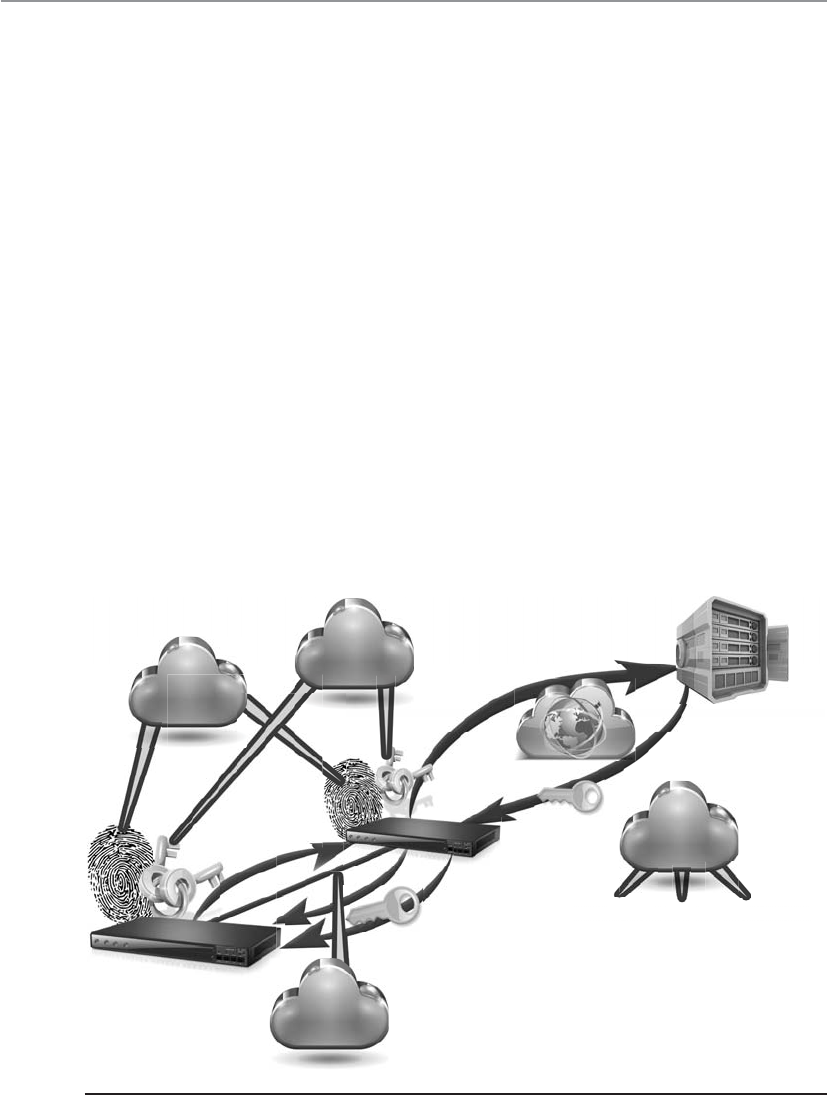
CISSP All-in-One Exam Guide
548
So 802.1AR provides a unique ID for a device. 802.1AE provides data encryption,
integrity, and origin authentication functionality. 802.1AF carries out key agreement
functions for the session keys used for data encryption. Each of these standards pro-
vides specific parameters to work within an 802.1X EAP-TLS framework, as shown in
Figure 6-19.
As Figure 6-19 shows, when a new device is installed on the network, it cannot just
start communicating with other devices, receive an IP address from a Dynamic Host
Configuration Protocol (DHCP) server, resolve names with the Domain Name Service
(DNS) server, etc. The device cannot carry out any network activity until it is authorized
to do so. So 802.1X port authentication kicks in, which means that only authentication
data are allowed to travel from the new device to the authenticating server. The authen-
tication data is the digital certificate and hardware identity associated with that device
(802.1AR), which is processed by EAP-TLS. Once the device is authenticated, usually by
a Remote Authentication Dial-In User Server (RADIUS) server, encryption keying mate-
rial is negotiated and agreed upon between surrounding network devices. Once the
keying material is installed, then data encryption and frame integrity checking can take
place (802.1AE) as traffic goes from one network device to the next.
These IEEE standards are new and evolving and at different levels of implementa-
tion by various vendors. One way the unique hardware identity and cryptographic ma-
terial are embedded in new network devices is through the use of a Trusted Platform
Module, which is discussed in Chapter 7.
Authentication
server
Internal
network /
Certificate
authority
Upstream
device
New
infrastructure
device
0. Physically install new device
1. An 802.1X conversation starts
2. EAP-TLS messages are forwarded
3. Key material is returned and stored
4. Session keys are generated
5. MACSec encryption is enabled
IEEE
802.1AF
IEEE
802.1AE
IETF
Key mgt
framework
IEEE
802.1AR
Figure 6-19 Layer 2 security protocols

Chapter 6: Telecommunications and Network Security
549
Key Terms
•Open Systems Interconnection (OSI) model International
standardization of system-based network communication through a
modular seven-layer architecture.
•TCP/IP model Standardization of device-based network communication
through a modular four-layer architecture. Specific to the IP suite, created
in 1970 by an agency of the U.S. Department of Defense (DoD).
•Transmission Control Protocol (TCP) Core protocol of the TCP/IP
suite, which provides connection-oriented, end-to-end, reliable network
connectivity.
•Internet Protocol (IP) Core protocol of the TCP/IP suite. Provides
packet construction, addressing, and routing functionality.
•User Datagram Protocol (UDP) Connectionless, unreliable transport
layer protocol, which is considered a “best effort” protocol.
•Ports Software construct that allows for application- or service-specific
communication between systems on a network. Ports are broken down
into categories: well known (0–1023), registered (1024–49151), and
dynamic (49152–65535).
•SYN flood DoS attack where an attacker sends a succession of SYN
packets with the goal of overwhelming the victim system so that it is
unresponsive to legitimate traffic.
•Session hijacking Attack method that allows an attacker to overtake
and control a communication session between two systems.
•IPv6 IP version 6 is the successor to IP version 4 and provides 128-
bit addressing, integrated IPSec security protocol, simplified header
formats, and some automated configuration.
•Subnet Logical subdivision of a network that improves network
administration and helps reduce network traffic congestion. Process
of segmenting a network into smaller networks through the use of an
addressing scheme made up of network and host portions.
•Classless Interdomain Routing Variable-length subnet masking,
which allows a network to be divided into different-sized subnets. The
goal is to increase the efficiency of the use of IP addresses since classful
addressing schemes commonly end up in unused addresses.
•6to4 Transition mechanism for migrating from IPv4 to IPv6. It allows
systems to use IPv6 to communicate if their traffic has to transverse an
IPv4 network.
•Teredo Transition mechanism for migrating from IPv4 to IPv6. It allows
systems to use IPv6 to communicate if their traffic has to transverse an
IPv4 network, but also performs its function behind NAT devices.

CISSP All-in-One Exam Guide
550
Types of Transmission
Physical data transmission can happen in different ways (analog or digital); can use
different synchronization schemes (synchronous or asynchronous); can use either one
sole channel over a transmission medium (baseband) or several different channels over
a transmission medium (broadband); and transmission can take place as electrical
voltage, radiowave, microwave, or infrared signals. These transmission types and their
characteristics are described in the following sections.
Analog and Digital
Would you like your signals wavy or square?
Asignal is just some way of moving information in a physical format from one
point to another point. I can signal a message to you through nodding my head, waving
my hand at you, or giving you a wink. Somehow I am transmitting data to you through
my signaling method. In the world of technology, we have specific carrier signals that
are in place to move data from one system to another system. The carrier signal is like
a horse, which takes a rider (data) from one place to another place. Data can be trans-
mitted through analog or digital signaling formats. If you are moving data through an
analog transmission technology (e.g., radio), then the data is represented by the char-
acteristics of the waves that are carrying it. For example, a radio station uses a transmit-
ter to put its data (music) onto a wave that will extend all the way to your antenna. The
information is stripped off by the receiver in your radio and presented to you in its
original format—a song. The data is encoded onto the carrier signal and is represented
by various amplitude and frequency values, as shown in Figure 6-20.
Data being represented in wave values (analog) are different from data being repre-
sented in discrete voltage values (digital). As an analogy, compare an analog clock and
a digital clock. An analog clock has hands that continuously rotate on the face of the
clock. To figure out what time it is you have to interpret the position of the hands and
map their positions to specific values. So you have to know that if the large hand is on
the number 1 and the small hand is on the number 6, this actually means 1:30. The
individual and specific location of the hands corresponds to a value. A digital clock
does not take this much work. You just look at it and it gives you a time value in the
format of number:number. There is no mapping work involved with a digital clock
because it provides you with data in clear-cut formats.
•Intra-Site Automatic Tunnel Addressing Protocol An IPv6 transition
mechanism meant to transmit IPv6 packets between dual-stack nodes
on top of an IPv4 network.
•IEEE 802.1AE (MACSec) Standard that specifies a set of protocols
to meet the security requirements for protecting data traversing
Ethernet LANs.
•IEEE 802.1AR Standard that specifies unique per-device identifiers
(DevID) and the management and cryptographic binding of a device
(router, switch, access point) to its identifiers.

Chapter 6: Telecommunications and Network Security
551
An analog clock can represent different values as the hands move forward—1:35
and 1 second, 1:35 and 2 seconds, 1:35 and 3 seconds. Each movement of the hands
represents a specific value just like the individual data points on a wave in an analog
transmission. A digital clock provides discrete values without having to map anything.
The same is true with digital transmissions: the value is always either a 1 or a 0—no
need for mapping to find the actual value.
Computers have always worked in a binary and digital manner (1 or 0). When our
telecommunication infrastructure was purely analog, each system that needed to com-
municate over a telecommunication line had to have a modem (modulate/demodu-
late), which would modulate the digital data into an analog signal. The sending system’s
modem would modulate the data on to the signal, and the receiving system’s modem
would demodulate the data off the signal.
Digital signals are more reliable than analog signals over a long distance and pro-
vide a clear-cut and efficient signaling method because the voltage is either on (1) or
not on (0), compared to interpreting the waves of an analog signal. Extracting digital
signals from a noisy carrier is relatively easy. It is difficult to extract analog signals from
background noise because the amplitudes and frequencies of the waves slowly lose
form. This is because an analog signal could have an infinite number of values or states,
whereas a digital signal exists in discrete states. A digital signal is a square wave, which
does not have all of the possible values of the different amplitudes and frequencies of
an analog signal. Digital systems are superior to analog systems in that they can trans-
port more data transmissions on the same line at higher quality over longer distances.
Digital systems can implement compression mechanisms to increase data throughput,
provide signal integrity through repeaters that “clean up” the transmissions, and multi-
plex different types of data (voice, data, video) onto the same transmission channel. As
we will see in following sections, most telecommunication technologies have moved
from analog to digital transmission technologies.
Amplitude Frequency
Digital signal
Analog signal
Figure 6-20 Analog signals are measured in amplitude and frequency, whereas digital signals
represent binary digits as electrical pulses.

CISSP All-in-One Exam Guide
552
NOTE
NOTE Bandwidth refers to the number of electrical pulses that can be
transmitted over a link within a second, and these electrical pulses carry
individual bits of information. Bandwidth is the data transfer capability of
a connection and is commonly associated with the amount of available
frequencies and speed of a link. Data throughput is the actual amount of
data that can be carried over this connection. Data throughput values can be
higher than bandwidth values if compression mechanisms are implemented.
But if links are highly congested or there are interference issues, the data
throughput values can be lower. Both bandwidth and data throughput are
measured in bits per second.
Asynchronous and Synchronous
It’s all about timing.
Analog and digital transmission technologies deal with the format in which data is
moved from one system to another. Asynchronous and synchronous transmission types
are similar to the cadence rules we use for conversation synchronization. Asynchronous
and synchronous network technologies provide synchronization rules to govern how
systems communicate to each other. If you have ever spoken over a satellite phone you
have probably experienced problems with communication synchronization. You and
the other person talking do not allow for the necessary delay that satellite communica-
tion requires, so you “speak over” one another. Once you figure out the delay in the
connection, you resynchronize your timing so that only one person’s data (voice) is
transmitting at one time so that each person can properly understand the full conversa-
tion. Proper pauses frame your words in a way to make them understandable.
Synchronization through communication also happens when we write messages to
each other. Properly placed commas, periods, and semicolons provide breaks in text so
that the person reading the message can better understand the information. If you see
“stickwithmekidandyouwillweardiamonds” without the proper punctuation, it is more
difficult for you to understand. This is why we have grammar rules. If someone writes
you a letter starting from the bottom and right side of a piece of paper and you do not
know this, you will not be able to read his message properly.
Technological communication protocols also have their own grammar and syn-
chronization rules when it comes to the transmission of data. If two systems are com-
municating over a network protocol that employs asynchronous timing, then start and
stop bits are used. The sending system sends a “start” bit, then sends its character, and
then sends a “stop” bit. This happens for the whole message. The receiving system
knows when a character is starting and stopping; thus, it knows how to interpret each
character of the message. If the systems are communicating over a network protocol
that uses synchronous timing, then no start and stop bits are added. The whole message
is sent without artificial breaks, and the receiving system needs to know how to inter-
pret the information without these bits.

Chapter 6: Telecommunications and Network Security
553
NOTE
NOTE If you have ever had a friend who talked constantly with no breaks
between sentences or subjects, this is how synchronous communication takes
place. It is a constant stream of data, with no breaks in between. Synchronous
communication is also similar to a whole novel with no punctuation. There
are no stop and starts between words or sentences; it is just a constant
bombardment of data. This can be more efficient in that there is less data
being transmitted (no punctuation marks), but unless that receiver can
understand data in this format, it will be a wasted effort.
I stated earlier that in our reality we actually use synchronous and asynchronous
tactics without fully realizing it. If I write you a letter, I put spaces between my words—
similar to start and stop bits—so you can quickly identify each word as its own unit. I
use punctuation (commas, periods) in my text to let you know when an idea is ending
or changing. I use these tools to synchronize my message to you. If I speak the same
message to you, I do not actually state punctuation marks, but instead I insert pauses,
which provide a rhythm and cadence to make it easier for you to understand. This is
similar to synchronous communication, but a clock pulse is used to set the “rhythm
and cadence” for the transmission.
If two systems are going to communicate using a synchronous transmission tech-
nology, they do not use start and stop bits, but the synchronization of the transfer of
data takes place through a timing sequence, which is initiated by a clock pulse.
It is the data link protocol that has the synchronization rules embedded into it. So
when a message goes down a system’s network stack, if a data link protocol, as in high-
level data link control (HDLC), is being used, then a clocking sequence is in place. (The
receiving system has to also be using this protocol so it can interpret the data.) If the
message is going down a network stack and a protocol such as ATM is at the data link
layer, then the message is framed with start and stop indicators.
Data link protocols that employ synchronous timing mechanisms are commonly
used in environments that have systems that transfer large amounts of data in a predict-
able manner (i.e., mainframe environment). Environments that contain systems that
send data in a nonpredictable manner (i.e., Internet connections) commonly have sys-
tems with protocols that use asynchronous timing mechanisms.
So, synchronous communication protocols transfer data as a stream of bits instead
of framing them in start and stop bits. The synchronization can happen between two
systems using a clocking mechanism, or a signal can be encoded into the data stream
to let the receiver synchronize with the sender of the message. This synchronization
needs to take place before the first message is sent. The sending system can transmit a
digital clock pulse to the receiving system, which translates into, “We will start here and
work in this type of synchronization scheme.”

CISSP All-in-One Exam Guide
554
Broadband and Baseband
How many channels can you shove into this one wire?
So analog transmission means that data is being moved as waves, and digital trans-
mission means that data is being moved as discrete electric pulses. Synchronous trans-
mission means that two devices control their conversations with a clocking mechanism,
and asynchronous means that systems use start and stop bits for communication syn-
chronization. Now let’s look at how many individual communication sessions can take
place at one time.
Abaseband technology uses the entire communication channel for its transmission,
whereas a broadband technology divides the communication channel into individual
and independent subchannels so that different types of data can be transmitted simul-
taneously. Baseband permits only one signal to be transmitted at a time, whereas
broadband carries several signals over different subchannels. For example, a coaxial
cable TV (CATV) system is a broadband technology that delivers multiple television
channels over the same cable. This system can also provide home users with Internet
access, but these data are transmitted at a different frequency spectrum than the TV
channels.
As an analogy, baseband technology only provides a one-lane highway for data to
get from one point to another point. A broadband technology provides a data highway
made up of many different lanes, so that not only can more data be moved from one
point to another point, but different types of data can travel over the individual lanes.
Communication Characteristics
• Synchronous
• Robust error checking, commonly through cyclic redundancy
checking (CRC)
• Timing component for data transmission synchronization
• Used for high-speed, high-volume transmissions
• Minimal overhead compared to asynchronous communication
• Asynchronous
• No timing component
• Surrounds each byte with processing bits
• Parity bit used for error control
• Each byte requires three bits of instruction (start, stop, parity)

Chapter 6: Telecommunications and Network Security
555
Any transmission technology that “chops up” one communication channel into
multiple channels is considered broadband. The communication channel is usually
some frequency spectrum, and the broadband technology provides delineation between
these frequencies and techniques on how to modulate the data onto the individual fre-
quency channels. To continue with our analogy, we could have one large highway that
could fit eight individual lanes—but unless we have something that defines these lanes
and there are rules for how these lanes are used—this is a baseband connection. If we
take the same highway and lay down painted white lines, traffic signs, on and off ramps,
and rules that drivers have to follow, now we are talking about broadband.
A digital subscriber line (DSL) uses one single phone line and constructs a set of
high-frequency channels for Internet data transmissions. A cable modem uses the
available frequency spectrum that is provided by a cable TV carrier to move Internet
traffic to and from a household. Mobile broadband devices implement individual
channels over a cellular connection, and Wi-Fi broadband technology moves data to
and from an access point over a specified frequency set. We will cover these technolo-
gies more in-depth throughout the chapter, but for now you just need to understand
that they are different ways of cutting up one channel into individual channels for
higher data transfer and that they provide the capability to move different types of
traffic at the same time.
How Do These Work Together?
If you are new to networking, it can be hard to understand how the OSI model,
analog and digital, synchronous and asynchronous, and baseband and broad-
band technologies interrelate and differentiate. You can think of the OSI model
as a structure to build different languages. If you and I are going to speak to each
other in English, we have to follow the rules of this language to be able to under-
stand each other. If we are going to speak French, we still have to follow the rules
of language (OSI model), but the individual letters that make up the words are in
a different order. The OSI model is a generic structure that can be used to define
many different “languages” for devices to be able to talk to each other. Once we
agree that we are going to communicate using English, I can speak my message to
you, thus my words move over continuous airwaves (analog). Or I can choose to
send my message to you through Morse code, which uses individual discrete val-
ues (digital). I can send you all of my words with no pauses or punctuation (syn-
chronous) or insert pauses and punctuation (asynchronous). If I am the only one
speaking to you at a time, this would be analogous to baseband. If I have ten of
my friends speaking to you at one time, this would be broadband.

CISSP All-in-One Exam Guide
556
Next, let’s look at the different ways we connect the many devices that make up
small and large networks around the world.
Cabling
Why are cables so important?
Response: Without them, our electrons would fall onto the floor.
Network cabling and wiring are important when setting up a network or extending
an existing one. Particular types of cables must be used with specific data link layer
technologies. Cable types vary in speeds, maximum lengths, and connectivity issues
with NICs. In the 1970s and 1980s, coaxial cable was the way to go, but in the late
1980s, twisted-pair wiring hit the scene, and today it is the most popular networking
cable used.
Electrical signals travel as currents through cables and can be negatively affected by
many factors within the environment, such as motors, fluorescent lighting, magnetic
forces, and other electrical devices. These items can corrupt the data as it travels through
the cable, which is why cable standards are used to indicate cable type, shielding, trans-
mission rates, and maximum distance a particular type of cable can be used.
Key Terms
•Digital signals Binary digits are represented and transmitted as
discrete electrical pulses. Signaling allows for higher data transfer rates
and high data integrity compared to analog signaling.
•Analog signals Continuously varying electromagnetic wave that
represents and transmits data. Carrier signals vary by amplification
and frequency.
•Asynchronous communication Transmission sequencing technology
that uses start and stop bits or similar encoding mechanism. Used in
environments that transmit a variable amount of data in a periodic
fashion.
•Synchronous communication Transmission sequencing technology
that uses a clocking pulse or timing scheme for data transfer
synchronization.
•Baseband transmission Uses the full bandwidth for only one
communication channel and has a low data transfer rate compared to
broadband.
•Broadband transmission Divides the bandwidth of a communication
channel into many channels, enabling different types of data to be
transmitted at one time.
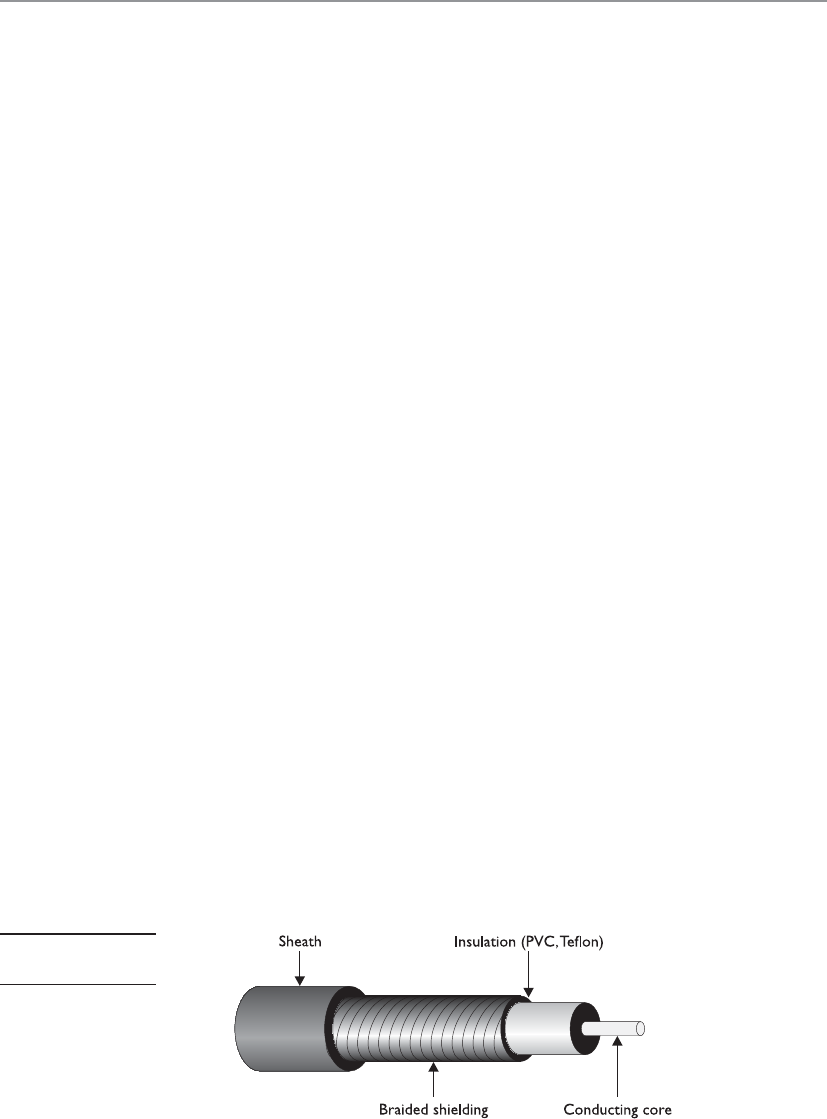
Chapter 6: Telecommunications and Network Security
557
Cabling has bandwidth values associated with it, which is different from data
throughput values. Although these two terms are related, they are indeed different. The
bandwidth of a cable indicates the highest frequency range it uses—for instance,
10Base-T uses 10 MHz and 100Base-TX uses 80 MHz. This is different from the actual
amount of data that can be pushed through a cable. The data throughput rate is the
actual amount of data that goes through the wire after compression and encoding have
been used. 10Base-T has a data rate of 10 Mbps, and 100Base-TX has a data rate of 100
Mbps. The bandwidth can be thought of as the size of the pipe, and the data through-
put rate is the actual amount of data that travels per second through that pipe.
Bandwidth is just one of the characteristics we will look at as we cover various ca-
bling types in the following sections.
Coaxial Cable
Coaxial cable has a copper core that is surrounded by a shielding layer and grounding
wire, as shown in Figure 6-21. This is all encased within a protective outer jacket. Com-
pared to twisted-pair cable, coaxial cable is more resistant to electromagnetic interfer-
ence (EMI), provides a higher bandwidth, and supports the use of longer cable lengths.
So, why is twisted-pair cable more popular? Twisted-pair cable is cheaper and easier to
work with, and the move to switched environments that provide hierarchical wiring
schemes has overcome the cable-length issue of twisted-pair cable.
Coaxial cabling is used as a transmission line for radio frequency signals. If you
have cable TV, you have coaxial cabling entering your house and the back of your TV.
The various TV channels are carried over different radio frequencies. We will cover cable
modems later in this chapter, which is a technology that allows you to use some of the
“empty” TV frequencies for Internet connectivity.
Twisted-Pair Cable
This cable is kind of flimsy. Why do we use it?
Response: It’s cheap and easy to work with.
Twisted-pair cabling has insulated copper wires surrounded by an outer protective
jacket. If the cable has an outer foil shielding, it is referred to as shielded twisted pair
(STP), which adds protection from radio frequency interference and electromagnetic
interference. Twisted-pair cabling, which does not have this extra outer shielding, is
called unshielded twisted pair (UTP).
Figure 6-21
Coaxial cable

CISSP All-in-One Exam Guide
558
The twisted-pair cable contains copper wires that twist around each other, as shown
in Figure 6-22. This twisting of the wires protects the integrity and strength of the sig-
nals they carry. Each wire forms a balanced circuit, because the voltage in each pair uses
the same amplitude, just with opposite phases. The tighter the twisting of the wires, the
more resistant the cable is to interference and attenuation. UTP has several categories
of cabling, each of which has its own unique characteristics.
The twisting of the wires, the type of insulation used, the quality of the conductive
material, and the shielding of the wire determine the rate at which data can be trans-
mitted. The UTP ratings indicate which of these components were used when the cables
were manufactured. Some types are more suitable and effective for specific uses and
environments. Table 6-3 lists the cable ratings.
Copper cable has been around for many years. It is inexpensive and easy to use. A
majority of the telephone systems today use copper cabling with the rating of voice
grade. Twisted-pair wiring is the preferred network cabling, but it also has its draw-
backs. Copper actually resists the flow of electrons, which causes a signal to degrade
after it has traveled a certain distance. This is why cable lengths are recommended for
copper cables; if these recommendations are not followed, a network could experience
signal loss and data corruption. Copper also radiates energy, which means information
can be monitored and captured by intruders. UTP is the least secure networking cable
compared to coaxial and fiber. If a company requires higher speed, higher security, and
cables to have longer runs than what is allowed in copper cabling, fiber-optic cable may
be a better choice.
Fiber-Optic Cable
Hey, I can’t tap into this fiber cable.
Response: Exactly.
Twisted-pair cable and coaxial cable use copper wires as their data transmission
media, but fiber-optic cable uses a type of glass that carries light waves, which represent
the data being transmitted. The glass core is surrounded by a protective cladding, which
in turn is encased within an outer jacket.
Figure 6-22
Twisted-pair cabling
uses copper wires.

Chapter 6: Telecommunications and Network Security
559
Because it uses glass, fiber-optic cabling has higher transmission speeds that allow
signals to travel over longer distances. Fiber cabling is not as affected by attenuation
and EMI when compared to cabling that uses copper. It does not radiate signals, as does
UTP cabling, and is difficult to eavesdrop on; therefore, fiber-optic cabling is much
more secure than UTP, STP, or coaxial.
UTP Category Characteristics Usage
Category 1 Voice-grade telephone cable for
up to 1 Mbps transmission rate
Not recommended for network use,
but modems can communicate over it.
Category 2 Data transmission up to 4 Mbps Used in mainframe and minicomputer
terminal connections, but not
recommended for high-speed networking.
Category 3 10 Mbps for Ethernet and
4 Mbps for Token Ring
Used in 10Base-T network installations.
Category 4 16 Mbps Usually used in Token Ring networks.
Category 5 100 Mbps; has high twisting and
thus low crosstalk
Used in 100Base-TX, CDDI, Ethernet,
and ATM installations; most widely used
in network installations.
Category 6 10 Gbps Used in new network installations
requiring high-speed transmission.
Standard for Gigabit Ethernet.
Category 7 10 Gbps Used in new network installations
requiring higher-speed transmission.
Table 6-3 UTP Cable Ratings
Fiber Components
Fiber-optic cables are made up of a light source, an optical cable, and a light
detector.
•Light sources Convert electrical signal into light signal
• Light-emitting diodes (LEDs)
• Diode lasers
•Optical fiber cable Data travels as light
•Single mode Small glass core, and are used for high-speed data
transmission over long distances. They are less susceptible to
attenuation than multimode fibers.
•Multimode Large glass cores, and are able to carry more data than
single-core fibers, though they are best for shorter distances because
of their higher attenuation levels.
•Light detector Converts light signal back into electrical signal

CISSP All-in-One Exam Guide
560
Using fiber-optic cable sounds like the way to go, so you might wonder why you
would even bother with UTP, STP, or coaxial. Unfortunately, fiber-optic cable is expen-
sive and difficult to work with. It is usually used in backbone networks and environ-
ments that require high data transfer rates. Most networks use UTP and connect to a
backbone that uses fiber.
NOTE
NOTE The price of fiber and the cost of installation have been continuously
decreasing, while the demand for more bandwidth only increases. More
organizations and service providers are installing fiber directly to the end user.
Cabling Problems
Cables are extremely important within networks, and when they experience problems,
the whole network could experience problems. This section addresses some of the more
common cabling issues many networks experience.
Noise
Noise on a line is usually caused by surrounding devices or by characteristics of the wir-
ing’s environment. Noise can be caused by motors, computers, copy machines, fluores-
cent lighting, and microwave ovens, to name a few. This background noise can combine
with the data being transmitted over the cable and distort the signal, as shown in Figure
6-23. The more noise there is interacting with the cable, the more likely the receiving
end will not receive the data in the form originally transmitted.
Cabling Connection Types
Cables follow universal standards to allow for interoperability and connectivity
between common devices and environments. The standards are developed and
maintained by the Telecommunications Industry Association (TIA) and the Elec-
tronic Industries Association (EIA). The TIA/EIA-568-B standard enables the de-
sign and implementation of structured cabling systems for commercial buildings.
The majority of the standards define cabling types, distances, connectors, cable
system architectures, cable termination standards and performance characteris-
tics, cable installation requirements, and methods of testing installed cable. The
following are commonly used physical interface connection standards:
•RJ-11 is often used for terminating telephone wires.
•RJ-45 is often used to terminate twisted-pair cables in Ethernet
environments.
•BNC (British Naval Connector) is often used for terminating coaxial
cables. It is used to connect various types of radio, television, and other
radio-frequency electronic equipment. (Also referred to as Bayonet
Neill–Concelman connector.)

Chapter 6: Telecommunications and Network Security
561
Attenuation
Attenuation is the loss of signal strength as it travels. The longer a cable, the more at-
tenuation occurs, which causes the signal carrying the data to deteriorate. This is why
standards include suggested cable-run lengths.
The effects of attenuation increase with higher frequencies; thus, 100Base-TX at
80MHz has a higher attenuation rate than 10Base-T at 10MHz. This means that cables
used to transmit data at higher frequencies should have shorter cable runs to ensure
attenuation does not become an issue.
If a networking cable is too long, attenuation may occur. Basically, the data are in
the form of electrons, and these electrons have to “swim” through a copper wire. How-
ever, this is more like swimming upstream, because there is a lot of resistance on the
electrons working in this media. After a certain distance, the electrons start to slow
down and their encoding format loses form. If the form gets too degraded, the receiving
system cannot interpret them any longer. If a network administrator needs to run a ca-
ble longer than its recommended segment length, she needs to insert a repeater or
some type of device that will amplify the signal and ensure it gets to its destination in
the right encoding format.
Attenuation can also be caused by cable breaks and malfunctions. This is why ca-
bles should be tested. If a cable is suspected of attenuation problems, cable testers can
inject signals into the cable and read the results at the end of the cable.
Crosstalk
Crosstalk is a phenomenon that occurs when electrical signals of one wire spill over to the
signals of another wire. When the different electrical signals mix, their integrity degrades
and data corruption can occur. UTP is much more vulnerable to crosstalk than STP or
coaxial because it does not have extra layers of shielding to help protect against it.
As stated earlier, the two-wire pairs within twisted-pair cables form a balanced cir-
cuit because they both have the same amplitude, just with different phases. Crosstalk
and background noise can throw off this balance, and the wire can actually start to act
like an antenna, which means it will be more susceptible to picking up other noises in
the environment.
Transmission
Attenuation
Background
noise
Original digital signal
Destination
Figure 6-23 Background noise can merge with an electronic signal and alter the signal’s integrity.

CISSP All-in-One Exam Guide
562
Fire Rating of Cables
This cable smells funny when it’s on fire.
Just as buildings must meet certain fire codes, so must wiring schemes. A lot of
companies string their network wires in drop ceilings—the space between the ceiling
and the next floor—or under raised floors. This hides the cables and prevents people
from tripping over them. However, when wires are strung in places like this, they are
more likely to catch on fire without anyone knowing about it. Some cables produce
hazardous gases when on fire that would spread throughout the building quickly. Net-
work cabling that is placed in these types of areas, called plenum space, must meet a
specific fire rating to ensure it will not produce and release harmful chemicals in case
of a fire. A ventilation system’s components are usually located in this plenum space, so
if toxic chemicals were to get into that area, they could easily spread throughout the
building in minutes.
Nonplenum cables usually have a polyvinyl chloride (PVC) jacket covering, whereas
plenum-rated cables have jacket covers made of fluoropolymers. When setting up a
network or extending an existing network, it is important you know which wire types
are required in which situation.
Cables should be installed in unexposed areas so they are not easily tripped over,
damaged, or eavesdropped upon. The cables should be strung behind walls and in the
protected spaces as in dropped ceilings. In environments that require extensive security,
wires are encapsulated within pressurized conduits so if someone attempts to access a
wire, the pressure of the conduit will change, causing an alarm to sound and a message
to be sent to the security staff.
NOTE
NOTE While a lot of the world’s infrastructure is wired and thus uses
one of these types of cables, remember that a growing percentage of our
infrastructure is not wired. We will cover these technologies later in the
chapter (mobile, wireless, satellite, etc.).
Networking Foundations
We really need to connect all of these resources together.
Most users on a network need to use the same type of resources, such as print serv-
ers, portals, file servers, Internet connectivity, etc. Why not just string all the systems
together and have these resources available to all? Great idea! We’ll call it networking!
Networking has made amazing advances in just a short period of time. In the begin-
ning of the computer age, mainframes were the name of the game. They were isolated
powerhouses, and many had “dumb” terminals hanging off them. However, this was
not true networking. In the late 1960s and early 1970s, some technical researchers
came up with ways of connecting all the mainframes and Unix systems to enable them
to communicate. This marked the Internet’s baby steps.
Microcomputers evolved and were used in many offices and work areas. Slowly,
dumb terminals got a little smarter and more powerful as users needed to share office
resources. And bam! Ethernet was developed, which allowed for true networking. There
was no turning back after this.

Chapter 6: Telecommunications and Network Security
563
While access to shared resources was a major drive in the evolution of networking,
today the infrastructure that supports these shared resources and the services these com-
ponents provide is really the secret to the secret sauce. As we will see, networks are made
up of routers, switches, web servers, proxies, firewalls, name resolution technologies, pro-
tocols, IDS, IPS, storage systems, antimalware software, virtual private networks, demili-
tarized zone (DMZ), data loss prevention solutions, e-mail systems, cloud computing,
web services, authentication services, redundant technologies, public key infrastructure,
private branch exchange (PBX), and more. While functionality is critical, there are other
important requirements that need to be understood when architecting a network, such as
scalability, redundancy, performance, security, manageability, and maintainability.
Infrastructure provides foundational capabilities that support almost every aspect
of our lives. When most people think of technology, they focus on the end systems that
they interact with—laptops, mobile phones, tablet PCs, workstations—or the applica-
tions they use: e-mail, fax, Facebook, websites, instant messaging, Twitter, online bank-
ing. Most people do not even give a thought to how this stuff works under the covers,
and many people do not fully realize all the other stuff dependent upon technology:
medical devices, critical infrastructure, weapon systems, transportation, satellites, tele-
phony, etc. People say it is love that makes the world go around, but let them experi-
ence one day without the Internet. We are all more dependent upon the Matrix than we
fully realize, and as security professionals we need to not only understand the Matrix
but also secure it.
Network Topology
How should we connect all these devices together?
The physical arrangement of computers and devices is called a network topology.
Topology refers to the manner in which a network is physically connected and shows
the layout of resources and systems. A difference exists between the physical network
topology and the logical topology. A network can be configured as a physical star but
work logically as a ring, as in the Token Ring technology.
The best topology for a particular network depends on such things as how nodes
are supposed to interact; which protocols are used; the types of applications that are
available; the reliability, expandability, and physical layout of a facility; existing wiring;
and the technologies implemented. The wrong topology or combination of topologies
can negatively affect the network’s performance, productivity, and growth possibilities.
This section describes the basic types of network topologies. Most networks are
much more complex and are usually implemented using a combination of topologies.
Ring Topology
Aring topology has a series of devices connected by unidirectional transmission links,
as shown in Figure 6-24. These links form a closed loop and do not connect to a central
system, as in a star topology (discussed later). In a physical ring formation, each node
is dependent upon the preceding nodes. In simple networks, if one system fails, all
other systems could be negatively affected because of this interdependence. Today,
most networks have redundancy in place or other mechanisms that will protect a whole
network from being affected by just one workstation misbehaving, but one disadvan-
tage of using a ring topology is that this possibility exists.

CISSP All-in-One Exam Guide
564
Bus Topology
In a simple bus topology, a single cable runs the entire length of the network. Nodes are
attached to the network through drop points on this cable. Data communications
transmit the length of the medium, and each packet transmitted has the capability of
being “looked at” by all nodes. Each node decides to accept or ignore the packet, de-
pending upon the packet’s destination address.
Bus topologies are of two main types: linear and tree. The linear bus topology has a
single cable with nodes attached. A tree topology has branches from the single cable,
and each branch can contain many nodes.
In simple implementations of a bus topology, if one workstation fails, other sys-
tems can be negatively affected because of the degree of interdependence. In addition,
because all nodes are connected to one main cable, the cable itself becomes a potential
single point of failure. Traditionally, Ethernet uses bus and star topologies.
Star Topology
In a star topology, all nodes connect to a central device such as a switch. Each node has
a dedicated link to the central device. The central device needs to provide enough
throughput that it does not turn out to be a detrimental bottleneck for the network as
a whole. Because a central device is required, it is a potential single point of failure, so
redundancy may need to be implemented. Switches can be configured in flat or hierar-
chical implementations so larger organizations can use them.
When one workstation fails on a star topology, it does not affect other systems, as
in the ring or bus topologies. In a star topology, each system is not as dependent on
others as it is dependent on the central connection device. This topology generally re-
quires less cabling than other types of topologies. As a result, cut cables are less likely,
and detecting cable problems is an easier task.
Not many networks use true linear bus and ring topologies anymore. A ring topol-
ogy can be used for a backbone network, but most networks are constructed in a star
topology because it enables the network to be more resilient and not as affected if an
individual node experiences a problem.
Figure 6-24
A ring topology
forms a closed-loop
connection.
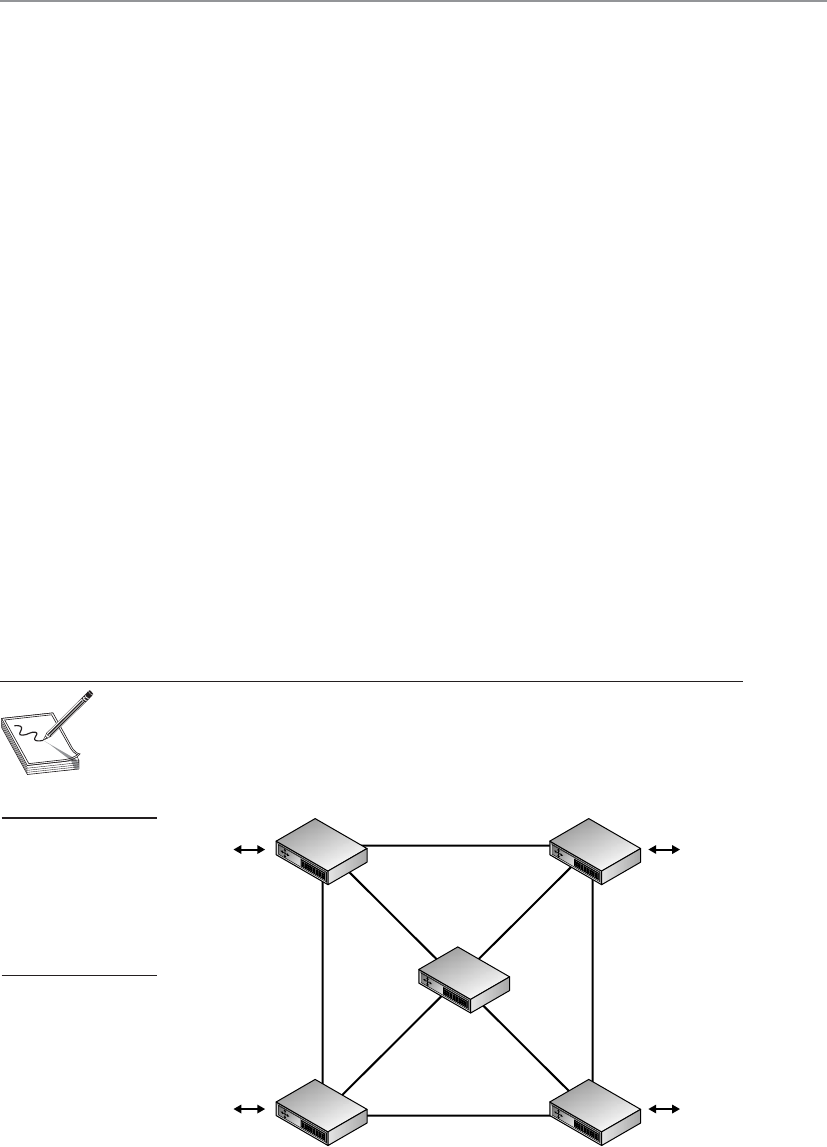
Chapter 6: Telecommunications and Network Security
565
Mesh Topology
This network is a mess!
Response: We like to call it a mesh.
In a mesh topology, all systems and resources are connected to each other in a way
that does not follow the uniformity of the previous topologies, as shown in Figure 6-25.
This arrangement is usually a network of interconnected routers and switches that pro-
vides multiple paths to all the nodes on the network. In a full mesh topology, every
node is directly connected to every other node, which provides a great degree of redun-
dancy. In a partial mesh topology, every node is not directly connected. The Internet is
an example of a partial mesh topology.
A summary of the different network topologies and their important characteristics
is provided in Table 6-4.
Media Access Technologies
The physical topology of a network is the lower layer, or foundation, of a network. It
determines what type of media will be used and how the media will be connected be-
tween different systems. Media access technologies deal with how these systems com-
municate over this media and are usually represented in protocols, NIC drivers, and
interfaces. LAN access technologies set up the rules of how computers will communi-
cate on a network, how errors are handled, the maximum transmission unit (MTU) size
of frames, and much more. These rules enable all computers and devices to communi-
cate and recover from problems, and enable users to be productive in accomplishing
their networking tasks. Each participating entity needs to know how to communicate
properly so all other systems will understand the transmissions, instructions, and re-
quests. This is taken care of by the LAN media access technology.
NOTE
NOTE An MTU is a parameter that indicates how much data a frame can
carry on a specific network. Different types of network technologies may
require different MTU sizes, which is why frames are sometimes fragmented.
Figure 6-25
In a mesh topology,
each node is
connected to
all other nodes,
which provides for
redundant paths.
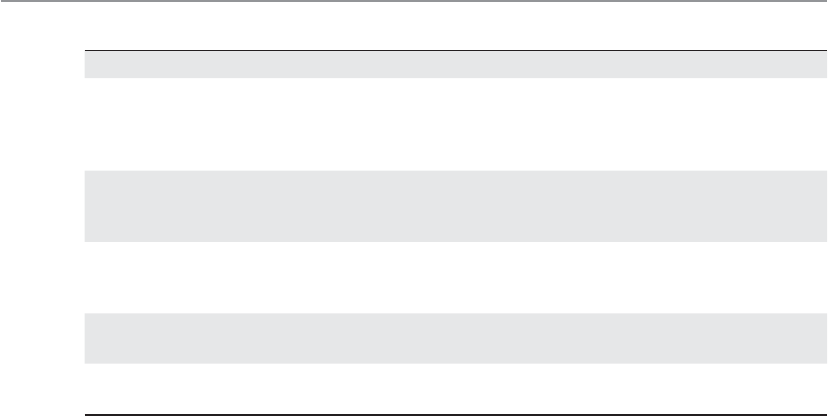
CISSP All-in-One Exam Guide
566
These technologies reside at the data link layer of the OSI model. Remember that as
a message is passed down through a network stack it is encapsulated by the protocols
and services at each layer. When the data message reaches the data link layer, the proto-
col at this layer adds the necessary headers and trailers that will allow the message to
transverse a specific type of network (Ethernet, Token Ring, FDDI, etc.) The protocol
and network driver work at the data link layer, and the NIC works at the physical layer,
but they have to work together and be compatible. If you install a new server on an
Ethernet network, you must implement an Ethernet NIC and driver.
The LAN-based technologies we will cover in the next sections are Ethernet, Token
Ring, and FDDI.
Alocal area network (LAN) is a network that provides shared communication and
resources in a relatively small area. What defines a LAN, as compared to a WAN, de-
pends on the physical medium, encapsulation protocols, and media access technology.
For example, a LAN could use 10Base-T cabling, TCP/IP protocols, and Ethernet media
access technology, and it could enable users who are in the same local building to com-
municate. A WAN, on the other hand, could use fiber-optic cabling, the L2TP encapsu-
lation protocol, and ATM media access technology, and could enable users from one
building to communicate with users in another building in another state (or country).
A WAN connects LANs over great distances geographically. Most of the differences be-
tween these technologies are found at the data link layer.
The term “local” in the context of a LAN refers not so much to the geographical area
as to the limitations of a LAN with regard to the shared medium, the number of de-
vices and computers that can be connected to it, the transmission rates, the types of
cable that can be used, and the compatible devices. If a network administrator develops
a very large LAN that would more appropriately be multiple LANs, too much traffic
could result in a big performance hit, or the cabling could be too long, in which case
attenuation (signal loss) becomes a factor. Environments where there are too many
nodes, routers, and switches may be overwhelmed, and administration of these net-
Topology Characteristics Problems
Bus Uses a linear, single cable for all
computers attached. All traffic
travels the full cable and can be
viewed by all other computers.
If one station experiences a problem,
it can negatively affect surrounding
computers on the same cable.
Ring All computers are connected by
a unidirectional transmission link,
and the cable is in a closed loop.
If one station experiences a problem,
it can negatively affect surrounding
computers on the same ring.
Star All computers are connected to
a central device, which provides
more resilience for the network.
The central device is a single point of
failure.
Tree A bus topology with branches off
of the main cable.
Mesh Computers are connected to each
other, which provides redundancy.
Requires more expense in cabling and
extra effort to track down cable faults.
Table 6-4 Summary of Network Topologies

Chapter 6: Telecommunications and Network Security
567
works could get complex, which opens the door for errors, collisions, and security
holes. The network administrator should follow the specifications of the technology he
is using, and once he has maxed out these numbers, he should consider implementing
two or more LANs instead of one large LAN. LANs are defined by their physical topolo-
gies, data link layer technologies, protocols, and devices used. The following sections
cover these topics and how they interrelate.
Ethernet
Ethernet is a resource-sharing technology that enables several devices to communicate
on the same network. Ethernet usually uses a bus or star topology. If a linear bus topol-
ogy is used, all devices connect to one cable. If a star topology is used, each device is
connected to a cable that is connected to a centralized device, such as a switch. Ethernet
was developed in the 1970s, became commercially available in 1980, and was officially
defined through IEEE 802.3 standard.
Ethernet has seen quite an evolution in its short history, from purely coaxial cable
installations that worked at 10 Mbps to mostly Category 5 twisted-pair cable that works
at speeds of 100 Mbps, 1,000 Mbps (1 Gbps), and 10 Gbps.
Ethernet is defined by the following characteristics:
• Contention-based technology (all resources use the same shared
communication medium)
• Uses broadcast and collision domains
• Uses the carrier sense multiple access with collision detection (CSMA/CD)
access method
• Supports full duplex communication
• Can use coaxial, twisted-pair, or fiber-optic cabling types
• Is defined by standard IEEE 802.3
Ethernet addresses how computers share a common network and how they deal
with collisions, data integrity, communication mechanisms, and transmission controls.
These are the common characteristics of Ethernet, but Ethernet does vary in the type of
cabling schemes and transfer rates it can supply. Several types of Ethernet implementa-
tions are available, as outlined in Table 6-5. The following sections discuss 10Base2,
10Base5, and 10Base-T, which are common implementations.
Q&A
Question A LAN is said to cover a relatively small geographical area.
When is a LAN no longer a LAN?
Answer When two distinct LANs are connected by a router, the
result is an internetwork, not a larger LAN. Each distinct LAN has
its own addressing scheme, broadcast domain, and communication
mechanisms. If two LANs are connected by a different data link layer
technology, such as frame relay or ATM, they are considered a WAN.

CISSP All-in-One Exam Guide
568
10Base2 10Base2, ThinNet, uses coaxial cable. It has a maximum cable length of 185
meters, provides 10-Mbps transmission rates, and requires BNCs to network devices.
10Base5 10Base5, ThickNet, uses a thicker coaxial cable that is not as flexible as
ThinNet and is more difficult to work with. However, ThickNet can have longer cable
segments than ThinNet and was used as the network backbone. ThickNet is more resis-
tant to electrical interference than ThinNet and is usually preferred when stringing wire
through electrically noisy environments that contain heavy machinery and magnetic
fields. ThickNet also requires BNCs because it uses coaxial cables.
10Base-T 10Base-T uses twisted-pair copper wiring instead of coaxial cabling.
Twisted-pair wiring uses one wire to transmit data and the other to receive data. 10Base-
T is usually implemented in a star topology, which provides easy network configura-
tion. In a star topology, all systems are connected to centralized devices, which can be
in a flat or hierarchical configuration.
10Base-T networks have RJ-45 connector faceplates to which the computer con-
nects. The wires usually run behind walls and connect the faceplate to a punchdown
block within a wiring closet. The punchdown block is often connected to a 10Base-T
hub that serves as a doorway to the network’s backbone cable or to a central switch.
This type of configuration is shown in Figure 6-26.
100Base-TX Not surprisingly, 10 Mbps was considered heaven-sent when it first
arrived on the networking scene, but soon many users were demanding more speed and
power. The smart people had to gather into small rooms and hit the whiteboards with
ideas, calculations, and new technologies. The result of these meetings, computations,
engineering designs, and testing was Fast Ethernet.
Fast Ethernet is regular Ethernet, except that it runs at 100 Mbps over twisted-pair
wiring instead of at 10 Mbps. Around the same time Fast Ethernet arrived, another 100-
Mbps technology was developed: 100-VG-AnyLAN. This technology did not use Ether-
net’s traditional CSMA/CD and did not catch on like Fast Ethernet did.
Fast Ethernet uses the traditional CSMA/CD (explained in the “CSMA” section later
in the chapter) and the original frame format of Ethernet. This is why it is used in many
enterprise LAN environments today. One environment can run 10- and 100-Mbps net-
work segments that can communicate via 10/100 hubs or switches.
Ethernet Type Cable Type Speed
10Base2, ThinNet Coaxial 10 Mbps
10Base5, ThickNet Coaxial 10 Mbps
10Base-T UTP 10 Mbps
100Base-TX, Fast Ethernet UTP 100 Mbps
1000Base-T, Gigabit Ethernet UTP 1,000 Mbps
1000Base-X Fiber 1,000 Mbps
Table 6-5 Ethernet Implementation Types
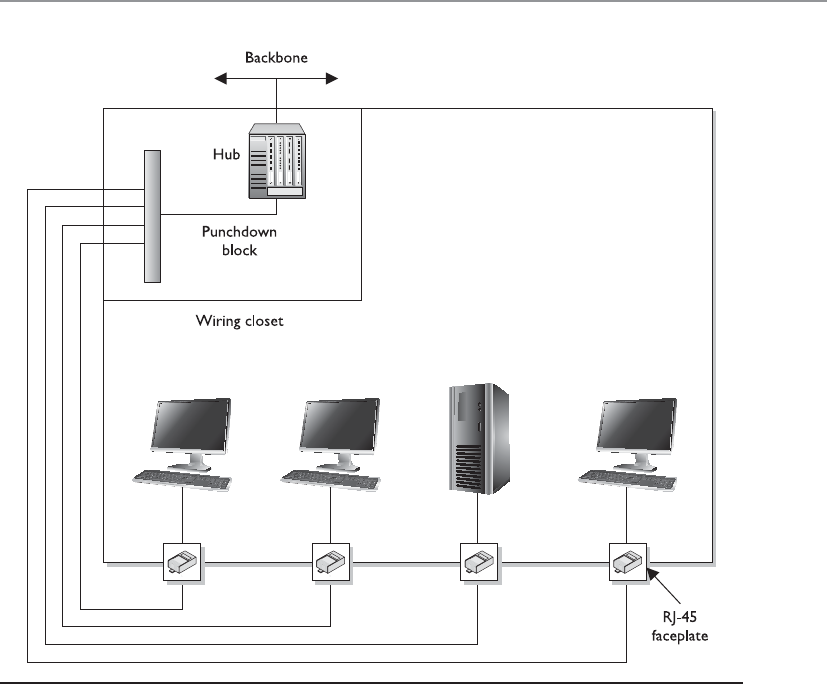
Chapter 6: Telecommunications and Network Security
569
1000Base-T Improved Ethernet technology has allowed for gigabit speeds over a
Category 5 wire. In the 1000Base-T version, all four pairs of twisted unshielded cable
pairs are used for simultaneous transmission in both directions for a maximum dis-
tance of 100 meters. Negotiation takes place on two pairs, and if two gigabit devices are
connected through a cable with only two pairs, the devices will successfully choose
“gigabit” as the highest common denominator.
1000Base-X 1000Base-X refers to Gigabit Ethernet transmission over fiber, where
options include 1000Base-CX, 1000Base-LX, 1000Base-SX, 1000Base-LX10, 1000Base-
BX10, or the nonstandard -ZX implementations.
Gigabit Ethernet builds on top of the Ethernet protocol, but increases speed tenfold
over Fast Ethernet to 1000 Mbps, or 1 gigabit per second (Gbps). Gigabit Ethernet al-
lows Ethernet to scale from 10/100 Mbps at the desktop to 100 Mbps up the riser to
1000 Mbps in the data center.
Figure 6-26 Ethernet hosts connect to a punchdown block within the wiring closet, which is
connected to the backbone via a hub or switch.

CISSP All-in-One Exam Guide
570
We will touch upon Ethernet again later in the chapter because it has beat out many
of the other competing media access technologies. While Ethernet started off as just a
LAN technology, it has evolved and is commonly used in metropolitan area networks
(MANs) also.
Token Ring
Where’s my magic token? I have something to say.
Response: We aren’t giving it to you.
Like Ethernet, Token Ring is a LAN media access technology that enables the com-
munication and sharing of networking resources. The Token Ring technology was orig-
inally developed by IBM and then defined by the IEEE 802.5 standard. It uses a
token-passing technology with a star-configured topology. The ring part of the name
pertains to how the signals travel, which is in a logical ring. Each computer is connected
to a central hub, called a Multistation Access Unit (MAU). Physically, the topology can
be a star, but the signals and transmissions are passed in a logical ring.
Atoken-passing technology is one in which a device cannot put data on the network
wire without having possession of a token, a control frame that travels in a logical circle
and is “picked up” when a system needs to communicate. This is different from Ether-
net, in which all the devices attempt to communicate at the same time. This is why
Ethernet is referred to as a “chatty protocol” and has collisions. Token Ring does not
endure collisions, since only one system can communicate at a time, but this also
means communication takes place more slowly compared to Ethernet.
At first, Token Ring technology had the ability to transmit data at 4 Mbps. Later, it
was improved to transmit at 16 Mbps. When a frame is put on the wire, each computer
looks at it to see whether the frame is addressed to it. If the frame does not have that
specific computer’s address, the computer puts the frame back on the wire, properly
amplifies the message, and passes it to the next computer on the ring.
Token Ring employs a couple of mechanisms to deal with problems that can occur
on this type of network. The active monitor mechanism removes frames that are con-
tinually circulating on the network. This can occur if a computer locks up or is taken
offline for one reason or another and cannot properly receive a token destined for it.
With the beaconing mechanism, if a computer detects a problem with the network, it
sends a beacon frame. This frame generates a failure domain, which is between the
computer that issued the beacon and its neighbor downstream. The computers and
devices within this failure domain will attempt to reconfigure certain settings to try to
work around the detected fault. Figure 6-27 depicts a Token Ring network in a physical
star configuration.
Token Ring networks were popular in the 1980s and 1990s, and although some are
still around, Ethernet has become much more popular and has taken over the LAN
networking market.
FDDI
Fiber Distributed Data Interface (FDDI) technology, developed by the American Na-
tional Standards Institute (ANSI), is a high-speed, token-passing, media access technol-
ogy. FDDI has a data transmission speed of up to 100 Mbps and is usually used as a
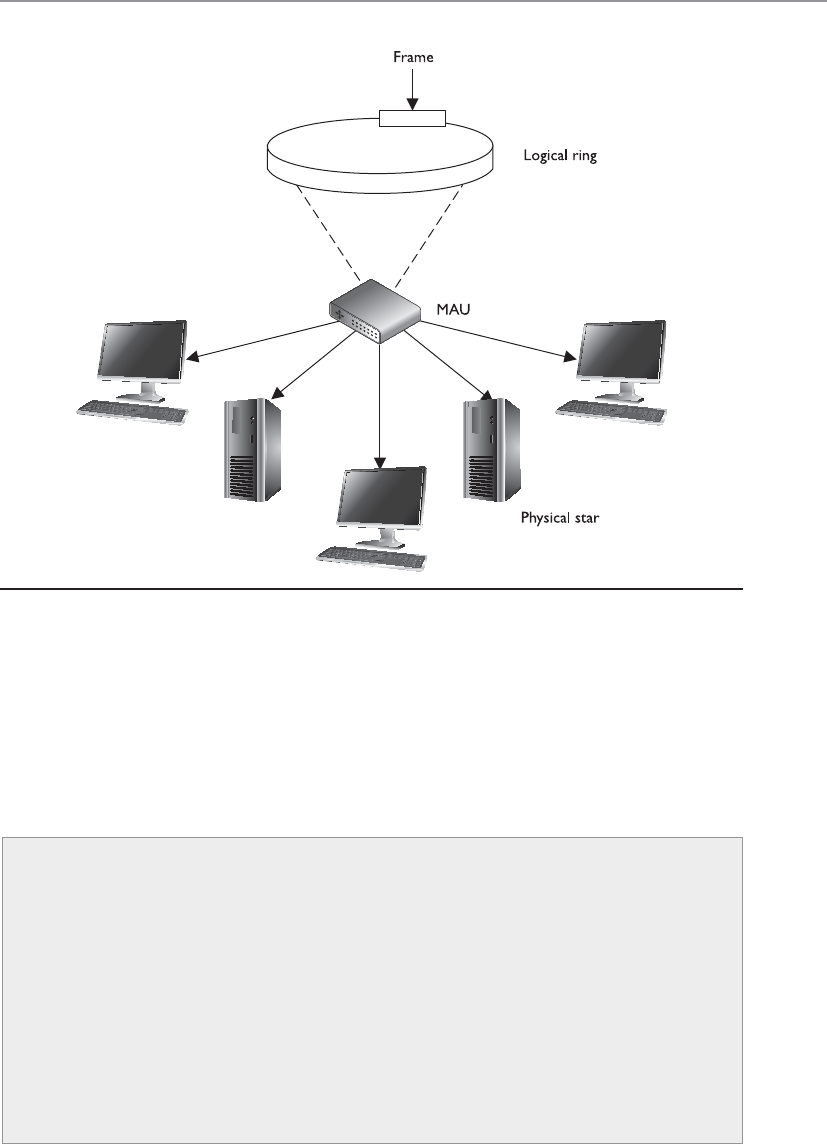
Chapter 6: Telecommunications and Network Security
571
backbone network using fiber-optic cabling. FDDI also provides fault tolerance by of-
fering a second counter-rotating fiber ring. The primary ring has data traveling clock-
wise and is used for regular data transmission. The second ring transmits data in a
counterclockwise fashion and is invoked only if the primary ring goes down. Sensors
watch the primary ring and, if it goes down, invoke a ring wrap so the data will be di-
verted to the second ring. Each node on the FDDI network has relays that are connected
to both rings, so if a break in the ring occurs, the two rings can be joined.
Figure 6-27 A Token Ring network
Q&A
Question Where do the differences between Ethernet, Token Ring,
and FDDI lie?
Answer These media access technologies work at the data link layer
of the OSI model. The data link layer is actually made up of a MAC
sublayer and an LLC sublayer. These media access technologies live at
the MAC layer and have to interface with the LLC layer. These media
access technologies carry out the framing functionality of a network
stack, which prepares each packet for network transmission. These
technologies differ in network capabilities, transmission speed, and
the physical medium they interact with.
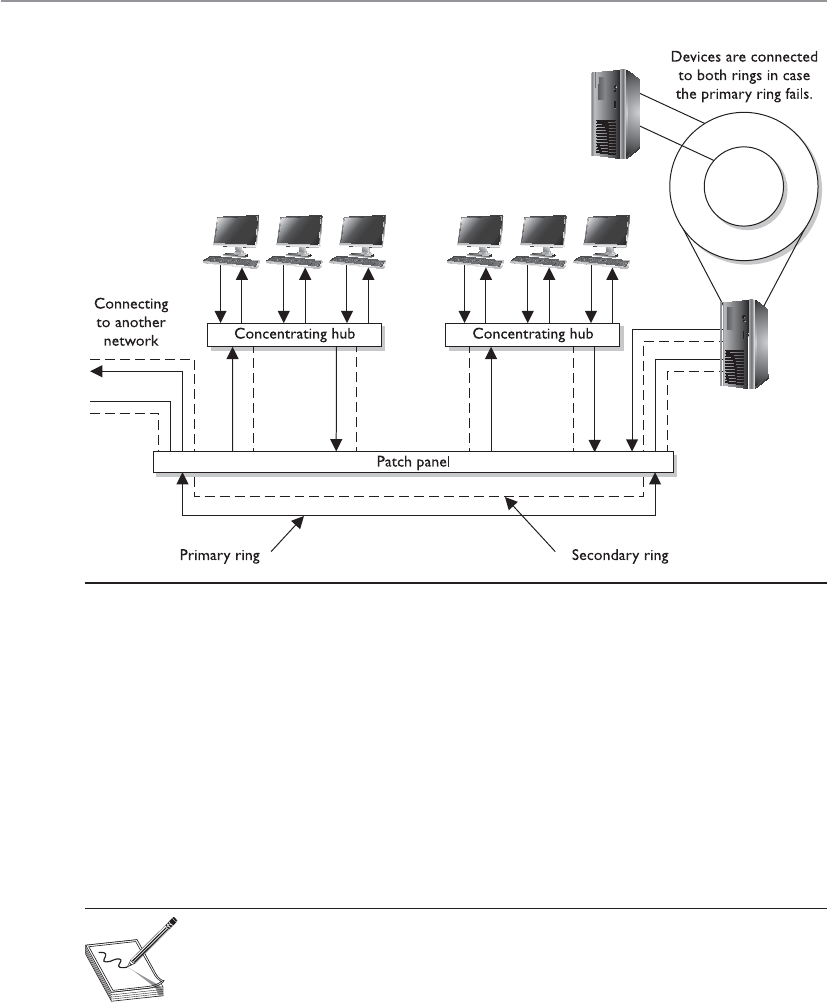
CISSP All-in-One Exam Guide
572
When FDDI is used as a backbone network, it usually connects several different
networks, as shown in Figure 6-28.
Before Fast Ethernet and Gigabit Ethernet hit the market, FDDI was used mainly as
campus and service provider backbones. Because FDDI can be employed for distances
up to 100 kilometers, it was often used in MANs. The benefit of FDDI is that it can work
over long distances and at high speeds with minimal interference. It enables several
tokens to be present on the ring at the same time, causing more communication to take
place simultaneously, and it provides predictable delays that help connected networks
and devices know what to expect and when.
NOTE
NOTE FDDI-2 provides fixed bandwidth that can be allocated for specific
applications. This makes it work more like a broadband connection with
QoS capabilities, which allows for voice, video, and data to travel over the
same lines.
A version of FDDI, Copper Distributed Data Interface (CDDI), can work over UTP
cabling. Whereas FDDI would be used more as a MAN, CDDI can be used within a LAN
environment to connect network segments.
Figure 6-28 FDDI rings can be used as backbones to connect different LANs.
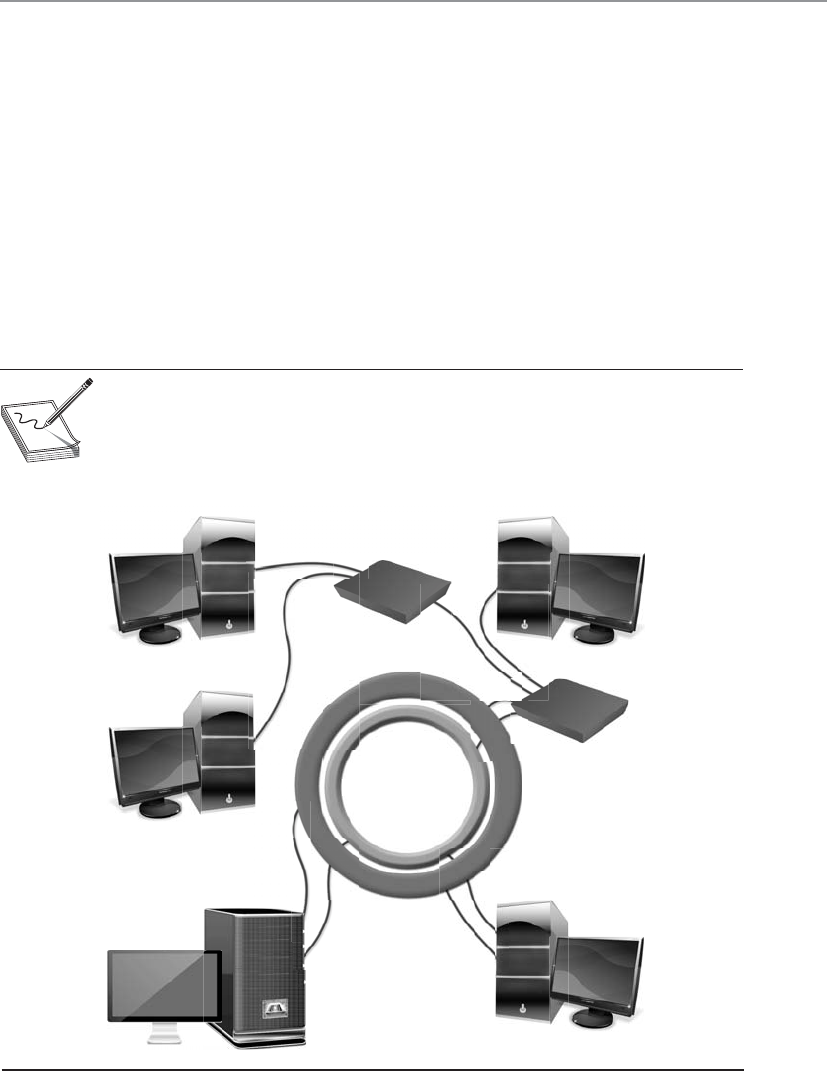
Chapter 6: Telecommunications and Network Security
573
Devices that connect to FDDI rings fall into one of the following categories:
•Single-attachment station (SAS) Attaches to only one ring (the primary)
through a concentrator
• Dual-attachment station (DAS) Has two ports and each port provides a
connection for both the primary and the secondary rings
•Single-attached concentrator (SAC) Concentrator that connects an SAS
device to the primary ring
•Dual-attached concentrator (DAC) Concentrator that connects DAS, SAS,
and SAC devices to both rings
The different FDDI device types are illustrated in Figure 6-29.
NOTE
NOTE Ring topologies are considered deterministic, meaning that the rate
of the traffic flow can be predicted. Since traffic can only flow if a token is in
place, the maximum time that a node will have to wait to receive traffic can be
determined. This can be beneficial for time-sensitive applications.
SAS SAC
DAC
SAS
SAS
DAS DAS
Primary ring
Secondary RingSecondary ring
Figure 6-29 FDDI device types

CISSP All-in-One Exam Guide
574
Table 6-6 sums up the important characteristics of the technologies described in the
preceding sections.
Media Sharing
There are 150 devices on this network. How can they all use this one network wire properly?
No matter what type of media access technology is being used, the main resource
that has to be shared by all systems and devices on the network is the network transmis-
sion channel. This transmission channel could be Token Ring over coaxial cabling,
Ethernet over UTP, FDDI over fiber, or Wi-Fi over a frequency spectrum. There must be
methods in place to make sure that each system gets access to the channel, that the
system’s data is not corrupted during transmission, and that there is a way to control
traffic in peak times.
The different media access technologies covered in the previous sections have their
own specific media-sharing capabilities, which are covered next.
Token Passing Atoken is a 24-bit control frame used to control which computers
communicate at what intervals. The token is passed from computer to computer, and
only the computer that has the token can actually put frames onto the wire. The token
grants a computer the right to communicate. The token contains the data to be trans-
mitted and source and destination address information. When a system has data it
needs to transmit, it has to wait to receive the token. The computer then connects its
message to the token and puts it on the wire. Each computer checks this message to
determine whether it is addressed to it, which continues until the destination com-
puter receives the message. The destination computer makes a copy of the message and
flips a bit to tell the source computer it did indeed get its message. Once this gets back
to the source computer, it removes the frames from the network. The destination com-
LAN
Implementation
Standard Characteristics
Ethernet IEEE 802.3 • Uses broadcast and collision domains.
• Uses CSMA/CD access method.
• Can use coaxial, twisted-pair, or fiber-optic
media.
• Transmission speeds of 10 Mbps to 1 Gbps.
Token Ring IEEE 802.5 • Token-passing media access method.
• Transmission speeds of 4 to 16 Mbps.
• Uses an active monitor and beaconing.
FDDI ANSI standard
Based on IEEE 802.4
• Dual counter-rotating rings for fault tolerance.
• Transmission speeds of 100 Mbps.
• Operates over long distances at high speeds
and is therefore used as a backbone.
• CDDI works over UTP.
Table 6-6 LAN Media Access Methods

Chapter 6: Telecommunications and Network Security
575
puter makes a copy of the message, but only the originator of the message can remove
the message from the token and the network.
If a computer that receives the token does not have a message to transmit, it sends
the token to the next computer on the network. An empty token has a header, data
field, and trailer, but a token that has an actual message has a new header, destination
address, source address, and a new trailer.
This type of media-sharing method is used by Token Ring and FDDI technologies.
NOTE
NOTE Some applications and network protocols work better if they can
communicate at determined intervals, instead of “whenever the data arrives.”
In token-passing technologies, traffic arrives in this type of deterministic
nature because not all systems can communicate at one time; only the system
that has control of the token can communicate.
CSMA Ethernet protocols define how nodes are to communicate, recover from er-
rors, and access the shared network cable. Ethernet uses CSMA to provide media-shar-
ing capabilities. There are two distinct types of CSMA: CSMA/CD and CSMA/CA.
A transmission is called a carrier, so if a computer is transmitting frames, it is per-
forming a carrier activity. When computers use the carrier sense multiple access with
collision detection (CSMA/CD) protocol, they monitor the transmission activity, or car-
rier activity, on the wire so they can determine when would be the best time to transmit
data. Each node monitors the wire continuously and waits until the wire is free before
it transmits its data. As an analogy, consider several people gathered in a group talking
here and there about this and that. If a person wants to talk, she usually listens to the
current conversation and waits for a break before she proceeds to talk. If she does not
wait for the first person to stop talking, she will be speaking at the same time as the
other person, and the people around them may not be able to understand fully what
each is trying to say.
When using the CSMA/CD access method, computers listen for the absence of a
carrier tone on the cable, which indicates that no other system is transmitting data. If
two computers sense this absence and transmit data at the same time, a collision can
take place. A collision happens when two or more frames collide, which most likely cor-
rupts both frames. If a computer puts frames on the wire and its frames collide with
another computer’s frames, it will abort its transmission and alert all other stations that
a collision just took place. All stations will execute a random collision timer to force a
delay before they attempt to transmit data. This random collision timer is called the
back-off algorithm.
NOTE
NOTE Collisions are usually reduced by dividing a network with routers or
switches.

CISSP All-in-One Exam Guide
576
Carrier sense multiple access with collision avoidance (CSMA/CA) is a medium-shar-
ing method in which each computer signals its intent to transmit data before it actually
does so. This tells all other computers on the network not to transmit data right now
because doing so could cause a collision. Basically, a system listens to the shared me-
dium to determine whether it is busy or free. Once the system identifies that the “coast
is clear” and it can put its data on the wire, it sends out a broadcast to all other systems,
telling them it is going to transmit information. It is similar to saying, “Everyone shut
up. I am going to talk now.” Each system will wait a period of time before attempting
to transmit data to ensure collisions do not take place. The wireless LAN technology
802.11 uses CSMA/CA for its media access functionality.
NOTE
NOTE When there is just one transmission medium (i.e., UTP cable) that
has to be shared by all nodes and devices in a network, this is referred to as
acontention-based environment. Each system has to “compete” to use the
transmission line, which can cause contention.
Collision Domains As indicated in the preceding section, a collision occurs on
Ethernet networks when two computers transmit data at the same time. Other comput-
ers on the network detect this collision because the overlapping signals of the collision
increase the voltage of the signal above a specific threshold. The more devices on a
contention-based network, the more likely collisions will occur, which increases net-
work latency (data transmission delays). A collision domain is a group of computers that
are contending, or competing, for the same shared communication medium.
An unacceptable amount of collisions can be caused by a highly populated net-
work, a damaged cable or connector, too many repeaters, or cables that exceed the rec-
ommended length. If a cable is longer than what is recommended by the Ethernet
specification, two computers on opposite ends of the cable may transmit data at the
same time. Because the computers are so far away from each other, they may both trans-
mit data and not realize that a collision took place. The systems then go merrily along
with their business, unaware that their packets have been corrupted. If the cable is too
long, the computers may not listen long enough for evidence of a collision. If the des-
tination computers receive these corrupted frames, they then have to send a request to
the source system to retransmit the message, causing even more traffic.
Carrier-Sensing and Token-Passing Access Methods
Overall, carrier-sensing access methods are faster than token-passing access meth-
ods, but the former do have the problem of collisions. A network segment with
many devices can cause too many collisions and slow down the network’s perfor-
mance. Token-passing technologies do not have problems with collisions, but
they do not perform at the speed of carrier-sensing technologies. Network routers
can help significantly in isolating the network resources for both the CSMA/CD
and the token-passing methods.

Chapter 6: Telecommunications and Network Security
577
These types of problems are dealt with mainly by implementing collision domains.
An Ethernet network has broadcast and collision domains. One subnet will be on the
same broadcast and collision domain if it is not separated by routers or bridges. If the
same subnet is divided by bridges, the bridges can enable the broadcast traffic to pass
between the different parts of a subnet, but not the collisions, as shown in Figure 6-30.
This is how collision domains are formed. Isolating collision domains reduces the
amount of collisions that take place on a network and increases its overall performance.
Another benefit of restricting and controlling broadcast and collision domains is
that it makes sniffing the network and obtaining useful information more difficult for
an intruder as he traverses the network. A useful tactic for attackers is to install a Trojan
horse that sets up a network sniffer on the compromised computer. The sniffer is usu-
ally configured to look for a specific type of information, such as usernames and pass-
words. If broadcast and collision domains are in effect, the compromised system will
have access only to the broadcast and collision traffic within its specific subnet or
broadcast domain. The compromised system will not be able to listen to traffic on
other broadcast and collision domains, and this can greatly reduce the amount of traf-
fic and information available to an attacker.
Polling Hi. Do you have anything you would like to say?
The third type of media-sharing method is polling. In an environment where a poll-
ing LAN media access and sharing method is used, some systems are configured as
primary stations and others are configured as secondary stations. At predefined inter-
vals, the primary station asks the secondary station if it has anything to transmit. This
is the only time a secondary station can communicate.
Polling is a method of monitoring multiple devices and controlling network access
transmission. If polling is used to monitor devices, the primary device communicates with
each secondary device in an interval to check its status. The primary device then logs the
response it receives and moves on to the next device. If polling is used for network access,
the primary station asks each device if it has something to communicate to another device.
Network access transmission polling is used mainly with mainframe environments.
Figure 6-30
Collision domains
within one broadcast
domain

CISSP All-in-One Exam Guide
578
So remember that there are different media access technologies (Ethernet, Token
Ring, FDDI, Wi-Fi) that work at the data link and physical layers of the OSI model.
These technologies define the data link protocol, NIC and NIC driver specifications,
and media interface requirements. These individual media access technologies have
their own way of allowing systems to share the one available network transmission
medium—Ethernet uses CSMA\CD, Token Ring uses tokens, FDDI uses tokens, Wi-Fi
uses CSMA\CA, and mainframe media access technology uses polling. The media-shar-
ing technology is a subcomponent of the media access technology.
Key Terms
•Unshielded twisted pair Cabling in which copper wires are twisted
together for the purposes of canceling out EMI from external sources.
UTP cables are found in many Ethernet networks and telephone systems.
•Shielded twisted pair Twisted-pair cables are often shielded in an
attempt to prevent RFI and EMI. This shielding can be applied to
individual pairs or to the collection of pairs.
•Attenuation Gradual loss in intensity of any kind of flux through
a medium. As an electrical signal travels down a cable, the signal can
degrade and distort or corrupt the data it is carrying.
•Crosstalk A signal on one channel of a transmission creates an
undesired effect in another channel by interacting with it. The signal
from one cable “spills over” into another cable.
• Plenum cables Cable is jacketed with a fire-retardant plastic cover
that does not release toxic chemicals when burned.
•Ring topology Each system connects to two other systems, forming a
single, unidirectional network pathway for signals, thus forming a ring.
•Bus topology Systems are connected to a single transmission channel
(i.e., network cable), forming a linear construct.
•Star topology Network consists of one central device, which acts as
a conduit to transmit messages. The central device, to which all other
nodes are connected, provides a common connection point for all nodes.
•Mesh topology Network where each system must not only capture
and disseminate its own data, but also serve as a relay for other systems;
that is, it must collaborate to propagate the data in the network.
•Ethernet Common LAN media access technology standardized by
IEEE 802.3. Uses 48-bit MAC addressing, works in contention-based
networks, and has extended outside of just LAN environments.
•Token ring LAN medium access technology that controls network
communication traffic through the use of token frames. This
technology has been mostly replaced by Ethernet.

Chapter 6: Telecommunications and Network Security
579
Transmission Methods
A packet may need to be sent to only one workstation, to a set of workstations, or to all
workstations on a particular subnet. If a packet needs to go from the source computer
to one particular system, a unicast transmission method is used. If the packet needs to
go to a specific group of systems, the sending system uses the multicast method. If a
system wants all computers on its subnet to receive a message, it will use the broadcast
method.
Unicast is pretty simple because it has a source address and a destination address.
The data go from point A to Z, it is a one-to-one transmission, and everyone is happy.
Multicast is a bit different in that it is a one-to-many transmission. Multicasting enables
one computer to send data to a selective group of computers. A good example of mul-
ticasting is tuning into a radio station on a computer. Some computers have software
that enables the user to determine whether she wants to listen to country western, pop,
or a talk radio station, for example. Once the user selects one of these genres, the soft-
ware must tell the NIC driver to pick up not only packets addressed to its specific MAC
address, but also packets that contain a specific multicast address.
The difference between broadcast and multicast is that in a broadcast one-to-all
transmission, everyone gets the data, whereas in a multicast, only the few who have
chosen to receive the data actually get them. So how does a server three states away
multicast to one particular computer on a specific network and no other networks in
between? Good question, glad you asked. The user who elects to receive a multicast
actually has to tell her local router she wants to get frames with this particular multicast
address passed her way. The local router must tell the router upstream, and this process
continues so each router between the source and destination knows where to pass this
•Fiber Distributed Data Interface Ring-based token network protocol
that was derived from the IEEE 802.4 token bus timed token protocol.
It can work in LAN or MAN environments and provides fault tolerance
through dual-ring architecture.
•Carrier sense multiple access with collision detection A media
access control method that uses a carrier sensing scheme. When a
transmitting system detects another signal while transmitting a frame, it
stops transmitting that frame, transmits a jam signal, and then waits for
a random time interval before trying to resend the frame. This reduces
collisions on a network.
•Carrier sense multiple access with collision avoidance A media
access control method that uses a carrier sensing scheme. A system
wishing to transmit data has to first listen to the channel for a
predetermined amount of time to determine whether or not another
system is transmitting on the channel. If the channel is sensed as “idle,”
then the system is permitted to begin the transmission process. If the
channel is sensed as “busy,” the system defers its transmission for a
random period of time.

CISSP All-in-One Exam Guide
580
multicast data. This ensures that the user can get her rock music without other networks
being bothered with this extra data. (The user does not actually need to tell her local
router anything; the software on her computer communicates to a gateway router to
handle and pass along the information.)
IPv4 multicast protocols use a Class D address, which is a special address space
designed especially for multicasting. It can be used to send out information, multime-
dia data, and even real-time video and voice clips.
Internet Group Management Protocol (IGMP) is used to report multicast group
memberships to routers. When a user chooses to accept multicast traffic, she becomes
a member of a particular multicast group. IGMP is the mechanism that allows her com-
puter to inform the local routers that she is part of this group and to send traffic with a
specific multicast address to her system. IGMP can be used for online streaming video
and gaming activities. The protocol allows for efficient use of the necessary resources
when supporting these types of applications.
Like most protocols, IGMP has gone through a few different versions, each improv-
ing upon the earlier one. In version 1, multicast agents periodically send queries to
systems on the network they are responsible for and update their databases, indicating
which system belongs to which group membership. Version 2 provides more granular
query types and allows a system to signal to the agent when it wants to leave a group.
Version 3 allows the systems to specify the specific sources it wants to receive multicast
traffic from.
NOTE
NOTE The previous statements are true pertaining to IPv4. IPv6 is more
than just an upgrade to the original IP protocol; it functions differently in many
respects, which has caused many interoperability issues and delay in its full
deployment. IPv6 handles multicasting differently compared to IPv4.
Network Protocols and Services
Some protocols, such as UDP, TCP, IP, and IGMP, were addressed in earlier sections.
Networks are made up of these and many other types of protocols that provide an array
of functionality. Networks are also made up of many different services, as in DHCP,
DNS, e-mail, and others. The services that network infrastructure components provide
directly support the functionality required of the users of the network. Protocols usu-
ally provide a communication channel for these services to use so that they can carry
out their jobs. Networks are complex because there are layers of protocols and services
that all work together simultaneously and hopefully seamlessly. We will cover some of
the core protocols and services that are used in all networks today.
Address Resolution Protocol
This IP does me no good! I need a MAC!
On a TCP/IP network, each computer and network device requires a unique IP ad-
dress and a unique physical hardware address. Each NIC has a unique physical address
that is programmed into the ROM chips on the card by the manufacturer. The physical

Chapter 6: Telecommunications and Network Security
581
address is also referred to as the Media Access Control (MAC) address. The network
layer works with and understands IP addresses, and the data link layer works with and
understands physical MAC addresses. So, how do these two types of addresses work
together since they operate at different layers?
NOTE
NOTE A MAC address is unique because the first 24 bits represent the
manufacturer code and the last 24 bits represent the unique serial number
assigned by the manufacturer.
When data come from the application layer, they go to the transport layer for se-
quence numbers, session establishment, and streaming. The data are then passed to the
network layer, where routing information is added to each packet and the source and
destination IP addresses are attached to the data bundle. Then this goes to the data link
layer, which must find the MAC address and add it to the header portion of the frame.
When a frame hits the wire, it only knows what MAC address it is heading toward. At
this lower layer of the OSI model, the mechanisms do not even understand IP ad-
dresses. So if a computer cannot resolve the IP address passed down from the network
layer to the corresponding MAC address, it cannot communicate with that destination
computer.
NOTE
NOTE A frame is data that are fully encapsulated, with all of the necessary
headers and trailers.
MAC and IP addresses must be properly mapped so they can be correctly resolved.
This happens through the Address Resolution Protocol (ARP). When the data link layer
receives a frame, the network layer has already attached the destination IP address to it,
but the data link layer cannot understand the IP address and thus invokes ARP for help.
ARP broadcasts a frame requesting the MAC address that corresponds with the destina-
tion IP address. Each computer on the subnet receives this broadcast frame, and all but
the computer that has the requested IP address ignore it. The computer that has the
destination IP address responds with its MAC address. Now ARP knows what hardware
address corresponds with that specific IP address. The data link layer takes the frame,
adds the hardware address to it, and passes it on to the physical layer, which enables the
frame to hit the wire and go to the destination computer. ARP maps the hardware ad-
dress and associated IP address and stores this mapping in its table for a predefined
amount of time. This caching is done so that when another frame destined for the same
IP address needs to hit the wire, ARP does not need to broadcast its request again. It just
looks in its table for this information.
Sometimes attackers alter a system’s ARP table so it contains incorrect information.
This is called ARP table cache poisoning. The attacker’s goal is to receive packets in-
tended for another computer. This is a type of masquerading attack. For example, let’s
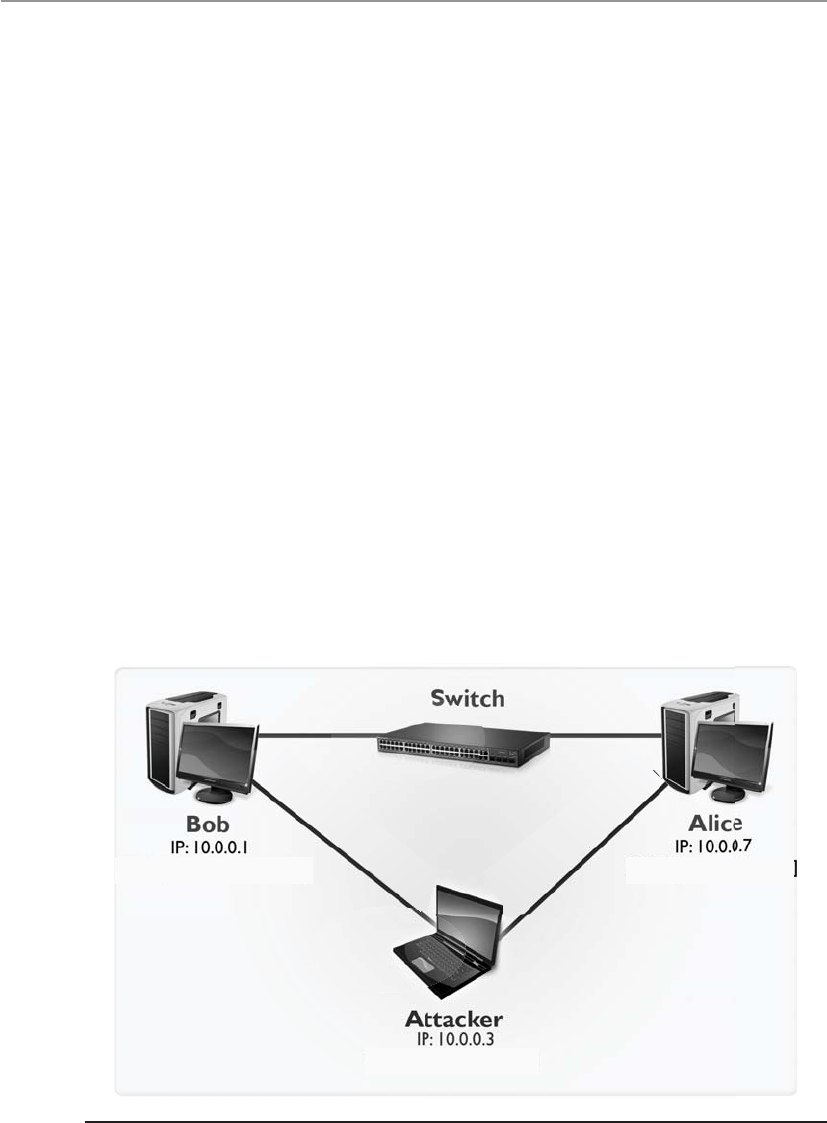
CISSP All-in-One Exam Guide
582
say that Bob’s computer has an IP of 10.0.0.1 and a MAC address of bb:bb:bb:bb:bb:bb
and Alice’s computer has an IP of 10.0.0.7 and MAC address of aa:aa:aa:aa:aa:aa and an
attacker has an IP address of 10.0.0.3 and a MAC address of cc:cc:cc:cc:cc:cc as shown in
Figure 6-31. If the attacker modifies the MAC tables in Bob’s and Alice’s systems and
maps his MAC address to their IP addresses, all traffic can be sent to his system without
Bob and Alice being aware of it. This attack type is shown in the figure.
So ARP is critical for a system to communicate, but it can be manipulated to allow
trafffic to be sent to unintended systems. ARP is a rudimentary protocol and does not
have any security measures built in to protect itself from these types of attacks. Net-
works should have IDS sensors monitoring for this type of activity so that administra-
tors can be alerted if this type of malicious activity is underway.
Dynamic Host Configuration Protocol
Can you just throw out addresses as necessary? I am too tired to do it manually.
A computer can receive its IP addresses in a few different ways when it first boots
up. If it has a statically assigned address, nothing needs to happen. It already has the
configuration settings it needs to communicate and work on the intended network. If a
computer depends upon a Dynamic Host Configuration Protocol (DHCP) server to as-
sign it the correct IP address, it boots up and makes a request to the DHCP server. The
DHCP server assigns the IP address, and everyone is happy.
DHCP is a UDP-based protocol that allows servers to assign IP addresses to network
clients in real time. Unlike static IP addresses, where IP addresses are manually config-
ured, the DHCP automatically checks for available IP addresses and correspondingly
MAC: [cc.cc.cc.cc.cc.cc]
MAC: [bb.bb.bb.bb.bb.bb] MAC: [aa.aa.aa.aa.aa.aa]
Modified ARP cache points IP
10.0.0.7 to MAC: [cc.cc.cc.cc.cc.cc]
Modified ARP cache points IP
10.0.0.1 to MAC: [cc.cc.cc.cc.cc.cc]
Figure 6-31 ARP poisoning attack
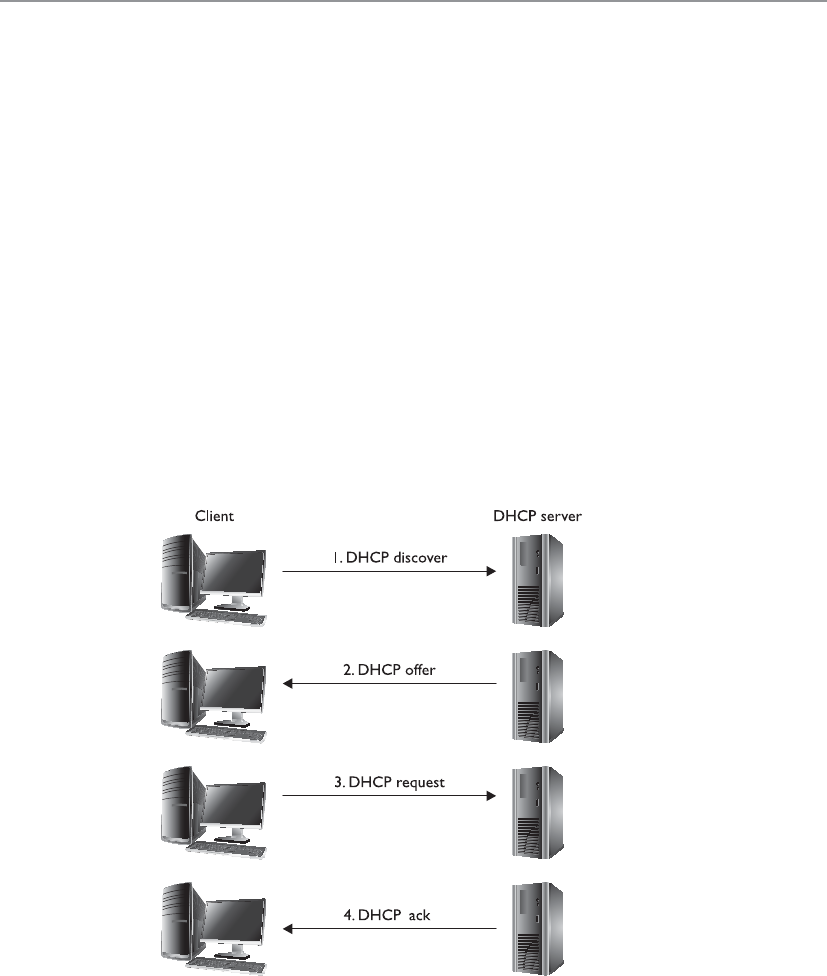
Chapter 6: Telecommunications and Network Security
583
assigns an IP address to the client. This eliminates the possibility of IP address conflicts
that occur if two systems are assigned identical IP addresses, which could cause loss of
service. On the whole, DHCP considerably reduces the effort involved in managing
large-scale IP networks.
The DHCP assigns IP addresses in real time from a specified range when a client
connects to the network; this is different from static addresses, where each system is
individually assigned a specific IP address when coming on line. In a standard DHCP-
based network, the client computer broadcasts a DHCPDISCOVER message on the net-
work in search of the DHCP server. Once the respective DHCP server receives the
DHCPDISCOVER request, the server responds with a DHCPOFFER packet, offering the
client an IP address. The server assigns the IP address based on the subject of the avail-
ability of that IP address and in compliance with its network administration policies.
The DHCPOFFER packet that the server responds with contains the assigned IP address
information and configuration settings for client-side services.
Once the client receives the settings sent by the server through the DHCPOFFER, it
responds to the server with a DHCPREQUEST packet confirming its acceptance of the
allotted settings. The server now acknowledges with a DHCPACK packet, which in-
cludes the validity period (lease) for the allocated parameters.
So as shown in Figure 6-32, the DHCP client yells out to the network, “Who can
help me get an address?” The DHCP server responds with an offer: “Here is an address
and the parameters that go with it.” The client accepts this gracious offer with the
DHCPREQUEST message, and the server acknowledges this message. Now the client
can start interacting with other devices on the network and the user can waste his valu-
able time on Facebook.

CISSP All-in-One Exam Guide
584
Unfortunately, both the client and server segments of the DHCP are vulnerable to
falsified identity. On the client end, attackers can masquerade their systems to appear
as valid network clients. This enables rogue systems to become a part of an organiza-
tion’s network and potentially infiltrate other systems on the network. An attacker may
create an unauthorized DHCP server on the network and start responding to clients
searching for a DHCP server. A DHCP server controlled by an attacker can compro-
mise client system configurations, carry out man-in-the-middle attacks, route traffic to
unauthorized networks, and a lot more, with the end result of jeopardizing the entire
network.
An effective method to shield networks from unauthenticated DHCP clients is
through the use of DHCP snooping on network switches. DHCP snooping ensures that
DHCP servers can assign IP addresses to only selected systems, identified by their MAC
addresses. Also, advance network switches now have capability to direct clients toward
legitimate DHCP servers to get IP addresses and restrict rogue systems from becoming
DHCP servers on the network.
Diskless workstations do not have a full operating system but have just enough
code to know how to boot up and broadcast for an IP address, and they may have a
pointer to the server that holds the operating system. The diskless workstation knows
its hardware address, so it broadcasts this information so that a listening server can as-
sign it the correct IP address. As with ARP, Reverse Address Resolution Protocol (RARP)
frames go to all systems on the subnet, but only the RARP server responds. Once the
RARP server receives this request, it looks in its table to see which IP address matches
the broadcast hardware address. The server then sends a message that contains its IP
address back to the requesting computer. The system now has an IP address and can
function on the network.
Figure 6-32 The four stages of the Discover, Offer, Request, and Acknowledgment (D-O-R-A)
process

Chapter 6: Telecommunications and Network Security
585
The Bootstrap Protocol (BOOTP) was created after RARP to enhance the functional-
ity that RARP provides for diskless workstations. The diskless workstation can receive its
IP address, the name server address for future name resolutions, and the default gate-
way address from the BOOTP server. BOOTP usually provides more functionality to
diskless workstations than does RARP.
The evolution of this protocol has unfolded as follows: RARP evolved into BOOTP,
which evolved into DHCP.
Internet Control Message Protocol
The Internet Control Message Protocol (ICMP) is basically IP’s “messenger boy.” ICMP
delivers status messages, reports errors, replies to certain requests, reports routing infor-
mation, and is used to test connectivity and troubleshoot problems on IP networks.
The most commonly understood use of ICMP is through the use of the ping utility.
When a person wants to test connectivity to another system, he may ping it, which
sends out ICMP ECHO REQUEST frames. The replies on his screen that are returned to
the ping utility are called ICMP ECHO REPLY frames and are responding to the ECHO
REQUEST frames. If a reply is not returned within a predefined time period, the ping
utility sends more ECHO REQUEST frames. If there is still no reply, ping indicates the
host is unreachable.
ICMP also indicates when problems occur with a specific route on the network and
tells surrounding routers about better routes to take based on the health and conges-
tion of the various pathways. Routers use ICMP to send messages in response to packets
that could not be delivered. The router selects the proper ICMP response and sends it
back to the requesting host, indicating that problems were encountered with the trans-
mission request.
ICMP is used by other connectionless protocols, not just IP, because connectionless
protocols do not have any way of detecting and reacting to transmission errors, as do
connection-oriented protocols. In these instances, the connectionless protocol may use
ICMP to send error messages back to the sending system to indicate networking problems.
As you can see in Table 6-7, ICMP is a protocol that is used for many different net-
working purposes. This table lists the various messages that can be sent to systems and
devices through the ICMP protocol.
Attacks Using ICMP The ICMP protocol was developed to send status messages,
not to hold or transmit user data. But someone figured out how to insert some data
inside of an ICMP packet, which can be used to communicate to an already compro-
mised system. Loki is actually a client/server program used by hackers to set up back
doors on systems. The attacker targets a computer and installs the server portion of the
Loki software. This server portion “listens” on a port, which is the back door an at-
tacker can use to access the system. To gain access and open a remote shell to this com-
puter, an attacker sends commands inside of ICMP packets. This is usually successful,
because most routers and firewalls are configured to allow ICMP traffic to come and go
out of the network, based on the assumption that this is safe because ICMP was devel-
oped to not hold any data or a payload.

CISSP All-in-One Exam Guide
586
Type Name
0 Echo Reply
1 Unassigned
2 Unassigned
3 Destination Unreachable
4 Source Quench
5 Redirect
6 Alternate Host Address
7 Unassigned
8 Echo
9 Router Advertisement
10 Router Solicitation
11 Time Exceeded
12 Parameter Problem
13 Timestamp
14 Timestamp Reply
15 Information Request
16 Information Reply
17 Address Mask Request
18 Address Mask Reply
19 Reserved (for Security)
20–29 Reserved (for Robustness Experiment)
30 Traceroute
31 Datagram Conversion Error
32 Mobile Host Redirect
33 IPv6 Where-Are-You
34 IPv6 I-Am-Here
35 Mobile Registration Request
36 Mobile Registration Reply
37 Domain Name Request
38 Domain Name Reply
39 SKIP
40 Photuris (Disambiguation)
41 ICMP messages utilized by experimental mobility protocols
such as Seamoby
Table 6-7
ICMP Message Types

Chapter 6: Telecommunications and Network Security
587
Just like any tool that can be used for good can also be used for evil, attackers com-
monly use ICMP to redirect traffic. The redirected traffic can go to the attacker’s dedi-
cated system or it can go into a “black hole.” Routers use ICMP messages to update each
other on network link status. An attacker could send a bogus ICMP message with incor-
rect information, which could cause the routers to divert network traffic to where the
attacker indicates it should go.
ICMP is also used as the core protocol for a network tool called Traceroute. Trace-
route is used to diagnose network connections, but since it gathers a lot of important
network statistics, attackers use the tool to map out a victim’s network. This is similar
to a burglar “casing the joint,” meaning that the more the attacker learns about the
environment, the easier it can be for her to exploit some critical targets. So while the
Traceroute tool is a valid networking program, a security administrator might configure
the IDS sensors to monitor for extensive use of this tool because it could indicate that
an attacker is attempting to map out the network’s architecture.
The Ping of Death attack is based upon the use of oversized ICMP packets. If a sys-
tem does not know how to handle ICMP packets over the common size of 65,536
bytes, then it can become unstable and freeze or crash. An attacker can send a target
system several oversized ICMP packets that cannot actually be processed. This is a DDoS
attack that is carried out to render the target system unable to process legitimate traffic.
Another common attack using this protocol is the Smurf attack. In this situation the
attacker sends an ICMP ECHO REQUEST packet with a spoofed source address to a
victim’s network broadcast address. This means that each system on the victim’s subnet
receives an ICMP ECHO REQUEST packet. Each system then replies to that request with
an ICMP ECHO REPLY packet to the spoof address provided in the packets—which is
the victim’s address. All of these response packets go to the victim system and over-
whelm it because it is being bombarded with packets it does not necessarily know how
to process. The victim system may freeze, crash, or reboot. The Smurf attack is illus-
trated in Figure 6-33.
A similar attack to the Smurf attack is the Fraggle attack. The steps and the goal of
the different attack types are the same, but Fraggle uses the UDP protocol and Smurf
uses the ICMP protocol. They are both DDoS attacks that use spoofed source addresses
and use unknowing systems to attack a victim computer.
The countermeasures to these types of attacks are to use firewall rules that only al-
low the necessary ICMP packets into the network and the use of IDS or IPS to watch for
suspicious activities. Host-based protection (host firewalls and host IDS) can also be
installed and configured to identify this type of suspicious behavior.
Simple Network Management Protocol
Simple Network Management Protocol (SNMP) was released to the networking world in
1988 to help with the growing demand of managing network IP devices. Companies
use many types of products that use SNMP to view the status of their network, traffic
flows, and the hosts within the network. Since these tasks are commonly carried out
using graphical user interface (GUI)–based applications, many people do not have a
full understanding of how the protocol actually works. The protocol is important to

CISSP All-in-One Exam Guide
588
understand because it can provide a wealth of information to attackers, and you should
understand the amount of information that is available to the ones who wish to do you
harm, how they actually access this data, and what can be done with it.
The two main components within SNMP are managers and agents. The manager is
the server portion, which polls different devices to check status information. The server
component also receives trap messages from agents and provides a centralized place to
hold all network-wide information.
The agent is a piece of software that runs on a network device, which is commonly
integrated into the operating system. The agent has a list of objects that it is to keep
track of, which is held in a database-like structure called the Management Information
Base (MIB). An MIB is a logical grouping of managed objects that contain data used for
specific management tasks and status checks.
When the SNMP manager component polls the individual agent installed on a spe-
cific device, the agent pulls the data it has collected from the MIB and sends it to the
manager. Figure 6-34 illustrates how data pulled from different devices are located in
one centralized location (SNMP manager). This allows the network administrator to
have a holistic view of the network and the devices that make up that network.
NOTE
NOTE The trap operation allows the agent to inform the manager of an
event, instead of having to wait to be polled. For example, if an interface on a
router goes down, an agent can send a trap message to the manager. This is
the only way an agent can communicate with the manager without first being
polled.
Smurf Attack
YX
ICMP ECHO
REQUEST
Source: X
ICMP ECHO
RESPONSE
Source: X
Figure 6-33 Smurf attack
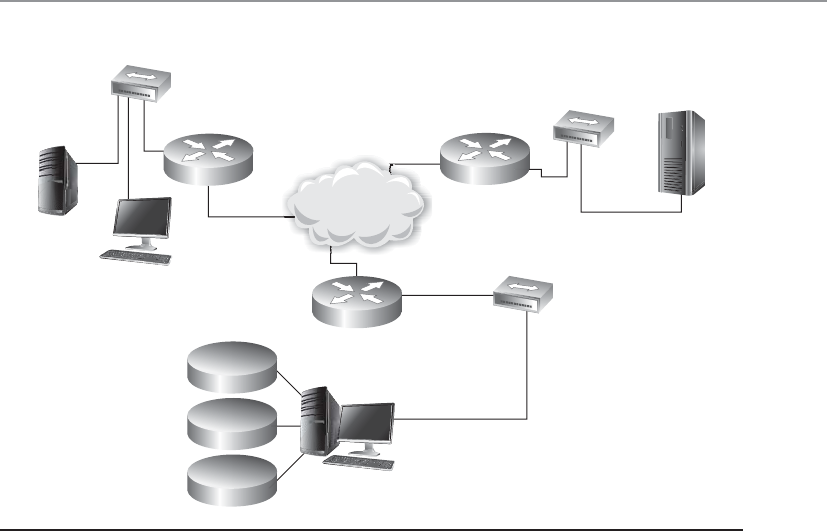
Chapter 6: Telecommunications and Network Security
589
It might be necessary to restrict which managers can request information of an
agent, so communities were developed to establish a trust between specific agents and
managers. A community string is basically a password a manager uses to request data
from the agent, and there are two main community strings with different levels of ac-
cess: read-only and read-write. As the names imply, the read-only community string
allows a manager to read data held within a device’s MIB and the read-write string al-
lows a manager to read the data and modify it. If an attacker can uncover the read-write
string she could change values held within the MIB, which could reconfigure the device.
Since the community string is a password, it should be hard to guess and protected.
It should contain mixed-case alphanumeric strings that are not dictionary words. This
is not always the case in many networks. The usual default read-only community string
is “public” and the read-write string is “private.” Many companies do not change these,
so anyone who can connect to port 161 can read the status information of a device and
potentially reconfigure it. Different vendors may put in their own default community
string values, but companies may still not take the necessary steps to change them. At-
tackers usually have lists of default vendor community string values, so they can be
easily discovered and used against networks.
To make matters worse, the community strings are sent in cleartext in SNMP v1 and
v2, so even if a company does the right thing by changing the default values they are
still easily accessible to any attacker with a sniffer. For the best protection community
strings should be changed often, and different network segments should use different
community strings, so that if one string is compromised an attacker cannot gain access
SNMP agent
MIB
WAN
Statistics
Alerts
Events SNMP
manager
SNMP agent
MIB
SNMP agent
MIB
SNMP agent
MIB
SNMP agent
MIB
SNMP agent
MIB
SNMP agent
MIB
Figure 6-34 Agents provide the manager with SNMP data.

CISSP All-in-One Exam Guide
590
to all the devices in the network. The SNMP ports (161 and 162) should not be open to
untrusted networks, like the Internet, and if needed they should be filtered to ensure
only authorized individuals can connect to them. If these ports need to be available to
an untrusted network, configure the router or firewall to only allow UDP traffic to come
and go from preapproved network-management stations. While versions 1 and 2 of this
protocol send the community string values in cleartext, version 3 has cryptographic
functionality, which provides encryption, message integrity, and authentication securi-
ty. So, SNMP v3 should be implemented for more granular protection.
If the proper countermeasures are not put into place, then an attacker can gain ac-
cess to a wealth of device-oriented data that can be used in her follow-up attacks. The
following are just some data sets held within MIB SNMP objects that attackers would
be interested in:
• .server.svSvcTable.svSvcEntry.svSvcName
• Running services
• .server.svShareTable.svShareEntry.svShareName
• Share names
• .server.sv.ShareTable.svShareEntry.svSharePath
• Share paths
• .server.sv.ShareTable.svShareEntry.svShareComment
• Comments on shares
• .server.svUserTable.svUserEntry.svUserName
• Usernames
• .domain.domPrimaryDomain
• Domain name
Gathering this type of data allows an attacker to map out the target network and
enumerate the nodes that make up the network.
As with all tools, SNMP is for good purposes (network management) and for bad
purposes (target mapping, device reconfiguration). We need to understand both sides
of all tools available to us.
Domain Name Service
I don’t understand numbers. I understand words.
Imagine how hard it would be to use the Internet if we had to remember actual
specific IP addresses to get to various websites. The Domain Name Service (DNS) is a
method of resolving hostnames to IP addresses so names can be used instead of IP ad-
dresses within networked environments.
NOTE
NOTE DNS provides hostname-to-IP address translation similar to how the
yellow pages provide a person’s name to their corresponding phone number.
We remember people and company names better than phone numbers or IP
addresses.

Chapter 6: Telecommunications and Network Security
591
The first iteration of the Internet was made up of about 100 computers (versus over
1 billion now), and a list was kept that mapped every system’s hostname to their IP ad-
dress. This list was kept on an FTP server so everyone could access it. It did not take long
for the task of maintaining this list to become overwhelming, and the computing com-
munity looked to automate it.
When a user types a uniform resource locator (URL) into his web browser, the URL
is made up of words or letters that are in a sequence that makes sense to that user, such
as www.shonharris.com. However, these words are only for humans—computers work
with IP addresses. So after the user enters this URL and presses ENTER, behind the scenes
his computer is actually being directed to a DNS server that will resolve this URL, or
hostname, into an IP address that the computer understands. Once the hostname has
been resolved to an IP address, the computer knows how to get to the web server hold-
ing the requested web page.
Many companies have their own DNS servers to resolve their internal hostnames.
These companies usually also use the DNS servers at their Internet service providers
(ISPs) to resolve hostnames on the Internet. An internal DNS server can be used to re-
solve hostnames on the entire LAN network, but usually more than one DNS server is
used so the load can be split up and so redundancy and fault tolerance are in place.
Within DNS servers, DNS namespaces are split up administratively into zones. One
zone may contain all hostnames for the marketing and accounting departments, and
another zone may contain hostnames for the administration, research, and legal de-
partments. The DNS server that holds the files for one of these zones is said to be the
authoritative name server for that particular zone. A zone may contain one or more do-
mains, and the DNS server holding those host records is the authoritative name server
for those domains.
The DNS server contains records that map hostnames to IP addresses, which are re-
ferred to as resource records. When a user’s computer needs to resolve a hostname to an IP
address, it looks to its networking settings to find its DNS server. The computer then
sends a request, containing the hostname, to the DNS server for resolution. The DNS
server looks at its resource records and finds the record with this particular hostname,
retrieves the address, and replies to the computer with the corresponding IP address.
It is recommended that a primary and a secondary DNS server cover each zone. The
primary DNS server contains the actual resource records for a zone, and the secondary
DNS server contains copies of those records. Users can use the secondary DNS server to
resolve names, which takes a load off of the primary server. If the primary server goes
down for any reason or is taken offline, users can still use the secondary server for name
resolution. Having both a primary and secondary DNS server provides fault tolerance
and redundancy to ensure users can continue to work if something happens to one of
these servers.
The primary and secondary DNS servers synchronize their information through a
zone transfer. After changes take place to the primary DNS server, those changes must
be replicated to the secondary DNS server. It is important to configure the DNS server
to allow zone transfers to take place only between the specific servers. For years now,
attackers have been carrying out unauthorized zone transfers to gather very useful net-
work information from victims’ DNS servers. An unauthorized zone transfer provides
the attacker with information on almost every system within the network. The attacker

CISSP All-in-One Exam Guide
592
now knows the hostname and IP address of each system, system alias names, PKI server,
DHCP server, DNS servers, etc. This allows an attacker to carry out very targeted attacks
on specific systems. If I were the attacker and I had a new exploit for DHCP software,
now I know the IP address of the company’s DHCP server and I can send my attack
parameters directly to that system. Also, since the zone transfer can provide data on all
of the systems in the network, the attacker can map out the network. He knows what
subnets are being used, which systems are in each subnet, and where the critical net-
work systems reside. This is analogous to you allowing a burglar into your house with
the freedom of identifying where you keep your jewels, expensive stereo equipment,
piggy bank, and keys to your car, which will allow him to more easily steal these items
when you are on vacation. Unauthorized zone transfers can take place if the DNS serv-
ers are not properly configured to restrict this type of activity.
Internet DNS and Domains
Networks on the Internet are connected in a hierarchical structure, as are the different
DNS servers, as shown in Figure 6-35. While performing routing tasks, if a router does
not know the necessary path to the requested destination, that router passes the packet
up to a router above it. The router above it knows about all the routers below it. This
router has a broader view of the routing that takes place on the Internet and has a better
chance of getting the packet to the correct destination. This holds true with DNS servers
also. If one DNS server does not know which DNS server holds the necessary resource
record to resolve a hostname, it can pass the request up to a DNS server above it.
The naming scheme of the Internet resembles an inverted tree with the root servers
at the top. Lower branches of this tree are divided into top-level domains, with second-
level domains under each. The most common top-level domains are as follows:
•COM Commercial
•EDU Education
•MIL U.S. military organization
•INT International treaty organization
•GOV Government
• ORG Organizational
•NET Networks
So how do all of these DNS servers play together in the Internet playground? When
a user types in a URL to access a web site that sells computer books, for example, his
computer asks its local DNS server if it can resolve this hostname to an IP address. If the
primary DNS cannot resolve the hostname, it must query a higher-level DNS server,
ultimately ending at an authoritative DNS server for the specified domain. Because this
web site is most likely not on the corporate network, the local LAN DNS server will not

Chapter 6: Telecommunications and Network Security
593
usually know the necessary IP address of that web site. The DNS server does not just
reject the user’s request, but rather passes it on to another DNS on the Internet. The
request for this hostname resolution continues through different DNS servers until it
reaches one that knows the IP address. The requested host’s IP information is reported
back to the user’s computer. The user’s computer then attempts to access the web site
using the IP address, and soon the user is buying computer books, happy as a clam.
DNS server and hostname resolution is extremely important in corporate networking
and Internet use. Without it, users would have to remember and type in the IP address for
each web site and individual system, instead of the name. That would be a mess.
Figure 6-35 The DNS naming hierarchy is similar to the routing hierarchy on the Internet.

CISSP All-in-One Exam Guide
594
DNS Resolution Components
Your computer has a DNS resolver, which is responsible for sending out requests
to DNS servers for host IP address information. If your system did not have this
resolver, when you type in www.logicalsecurity.com in your browser, you would
not get to this web site because your system does not actually know what www.
logicalsecurity.com means. When you type in this URL, your system’s resolver has
the IP address of a DNS server it is supposed to send its host-to-IP mapping reso-
lution request to. Your resolver can send out a non-recursive query or a recursive
query to the DNS server. A non-recursive query means that the request just goes to
that specified DNS server and either the answer is returned to the resolver or an
error is returned. A recursive query means that the request can be passed on from
one DNS server to another one until the DNS server with the correct information
is identified. In Figure 6-36, you can follow the succession of requests that com-
monly takes place. Your system’s resolver first checks to see if it already has the
necessary hostname-to-IP address mapping cached or if it is in a local HOSTS file.
If the necessary information is not found, the resolver sends the request to the
local DNS server. If the local DNS server does not have the information, it sends
the request to a different DNS server.
DNS client (resolver) Client-to-server query
Zones
DNS
server
Other DNS servers
DNS
resolver
cache
HOSTS
file
DNS
server
cache
Server-to-server
query (recursion)
URL:www.shonharris.com
Web browser
Q1 Q2
Q3
Q5
Q4
A1 A2
A4
A3
A5
HOST
S
S
S
Figure 6-36 DNS resolution steps

Chapter 6: Telecommunications and Network Security
595
DNS Threats
As stated earlier, not every DNS server knows the IP address of every hostname it is
asked to resolve. When a request for a hostname-to-IP address mapping arrives at a
DNS server (server A), the server reviews its resource records to see if it has the necessary
information to fulfill this request. If the server does not have a resource record for this
hostname, it forwards the request to another DNS server (server B), which in turn re-
views its resource records and, if it has the mapping information, sends the informa-
tion back to server A. Server A caches this hostname-to-IP address mapping in its mem-
ory (in case another client requests it) and sends the information on to the requesting
client.
With the preceding information in mind, consider a sample scenario. Andy the at-
tacker wants to make sure that any time one of his competitor’s customers tries to visit
the competitor’s web site, the customer is instead pointed to Andy’s web site. Therefore,
Andy installs a tool that listens for requests that leave DNS server A asking other DNS
servers if they know how to map the competitor’s hostname to its IP address. Once
Andy sees that server A sends out a request to server B to resolve the competitor’s host-
name, Andy quickly sends a message to server A indicating that the competitor’s
hostname resolves to Andy’s web site’s IP address. Server A’s software accepts the first
response it gets, so server A caches this incorrect mapping information and sends it on
to the requesting client. Now when the client tries to reach Andy’s competitor’s web
site, she is instead pointed to Andy’s web site. This will happen subsequently to any
user who uses server A to resolve the competitor’s hostname to an IP address, because
this information is cached on server A.
NOTE
NOTE In Chapter 3 we covered DNS pharming attacks, which are very
similar.
Previous vulnerabilities that have allowed this type of activity to take place have
been addressed, but this type of attack is still taking place because when server A re-
ceives a response to its request, it does not authenticate the sender.
The HOSTS file resides on the local computer and can contain static host-
name-to-IP mapping information. If you do not want your system to query a DNS
server, you can add the necessary data in the HOSTS file and your system will first
check its contents before reaching out to a DNS server. HOSTS files are not as
commonly used as they were in the past because IP to hostnames are dynamic in
nature, thus it would be difficult to maintain this static list as the IPs for end sys-
tems change. But some people use them to reduce the risk of an attacker sending
their system a bogus IP address that points them to a malicious web site. These
attack types are covered in the following sections.

CISSP All-in-One Exam Guide
596
Mitigating DNS threats consists of numerous measures, the most important of
which is the use of stronger authentication mechanisms such as the DNSSEC (DNS
security, which is part of the many current implementations of DNS server software).
DNSSEC implements PKI and digital signatures, which allows DNS servers to validate
the origin of a message to ensure that it is not spoofed and potentially malicious. If
DNSSEC were enabled on server A, then server A would, upon receiving a response,
validate the digital signature on the message before accepting the information to make
sure that the response is from an authorized DNS server. So even if an attacker sends a
message to a DNS server, the DNS server would discard it because the message would
not contain a valid digital signature. DNSSEC allows DNS servers to send and receive
authorized messages between themselves and thwarts the attacker’s goal of poisoning a
DNS cache table.
This sounds simple enough, but for DNSSEC to be rolled out properly, all of the
DNS servers on the Internet would have to participate in a PKI to be able to validate
digital signatures. The implementation of Internet-wide PKIs simultaneously and seam-
lessly has proved to be difficult.
Despite the fact that DNSSEC requires greater resources than the traditional DNS,
more and more organizations globally are opting to use DNSSEC. The U.S. government
has committed to using DNSSEC for all its top-level domains (.gov, .mil). Countries
such as Brazil, Sweden, and Bulgaria have already implemented DNSSEC on their top-
level domains. In addition, Internet Corporation for Assigned Names and Numbers
(ICANN) has made an agreement with VeriSign to implement DNSSEC on all of its top-
level domains (.com, .net, .org, and so on). So we are getting there, slowly but surely.
Now let’s discuss another (indirectly related) predicament in securing DNS traffic—
that is, the manipulation of the HOSTS file, a technique frequently used by malware.
The HOSTS file is used by the operating system to map hostnames to IP addresses as
described before. The HOSTS file is a plaintext file located in the %systemroot%\sys-
tem32\i386\drivers\etc/ folder in Windows and at /etc/hosts in UNIX/Linux systems. The
file simply consists of a list of IP addresses with their corresponding hostnames.
DNS Splitting
Organizations should implement split DNS, which means a DNS server in the
DMZ handles external hostname-to-IP resolution requests, while an internal
DNS server handles only internal requests. This helps ensure that the internal
DNS has layers of protection and is not exposed by being “Internet facing.” The
internal DNS server should only contain resource records for the internal com-
puter systems, and the external DNS server should only contain resource records
for the systems the organization wants the outside world to be able to connect to.
If the external DNS server is compromised and it has the resource records for all
of the internal systems, now the attacker has a lot of “inside knowledge” and can
carry out targeted attacks. External DNS servers should only contain information
on the systems within the DMZ that the organization wants others on the Inter-
net to be able to communicate with (web servers, external mail server, etc.).

Chapter 6: Telecommunications and Network Security
597
Depending on its configuration, the computer refers to the HOSTS file before issu-
ing a DNS request to a DNS server. Most operating systems give preference to HOSTS
file–returned IP addresses’ details rather than the ones from the DNS server, because
the HOSTS file is generally under the direct control of the local system administrator.
As covered previously, in the early days of the Internet and prior to the conception
of the DNS, HOSTS files were the primary source of determining a host’s network ad-
dresses from its hostname. With the increase in the number of hosts connected to the
Internet, maintaining HOST files became next to impossible and ultimately led to the
creation of the DNS.
Due to the important role of HOSTS files, they are frequently targeted by malware
to propagate across systems connected on a local network. Once a malicious program
takes over the HOSTS file, it can divert traffic from its intended destination to web sites
hosting malicious content, for example. A common example of HOSTS file manipula-
tion carried out by malware involves blocking users from visiting antivirus update web
sites. This is usually done by mapping target hostnames to the loopback interface IP
address 127.0.0.1. The most effective technique for preventing HOSTS file intrusions is
to set it as a read-only file and implement a host-based IDS that watches for critical file
modification attempts.
Attackers don’t always have to go through all this trouble to divert traffic to rogue
destinations. They can also use some very simple techniques that are surprisingly effec-
tive in routing naive users to unintended destinations. The most common approach is
known as URL hiding. Hypertext Markup Language (HTML) documents and e-mails
allow users to attach or embed hyperlinks in any given text, such as the “Click Here”
links you commonly see in e-mail messages or web pages. Attackers misuse hyperlinks
to deceive unsuspecting users into clicking rogue links.
Let’s say a malicious attacker creates an unsuspicious text, www.good.site, but em-
beds the link to an abusive website, www.bad.site. People are likely to click the www.
good.site link without knowing that they are actually being taken to the bad site. In
addition, attackers also use character encoding to obscure web addresses that may
arouse user suspicion.
We’ll now have a look at some legal aspects of domain registration. Although these
do not pose a direct security risk to your DNS servers or your IT infrastructure, ignorance
of them may risk your very domain name on the Internet, thus jeopardizing your entire
online presence. Awareness of domain grabbing and cyber squatting issues will help you
better plan out your online presence and allow you to steer clear of these traps.
The ICANN promotes a governance model that follows a first-come, first-serve pol-
icy when registering domain names, regardless of trademark considerations. This has
led to a race among individuals on securing attractive and prominent domains. Among
these are cyber squatters, individuals who register prominent or established names, hop-
ing to sell these later to real-world businesses that may require these names to establish
their online presence. So if you were preparing to launch a huge business called Securi-
tyRUS, a cyber squatter could go purchase this domain name, and its various formats,
at a low price. This person knows you will need this domain name for your web site, so
they will mark up the price by 1,000 percent and force you to pay this higher rate.

CISSP All-in-One Exam Guide
598
Another tactic employed by cyber squatters is to watch for top-used domain names
that are approaching their re-registration date. If you forget to re-register the domain
name you have used for the last ten years, a cyber squatter can purchase the name and
then require you to pay a huge amount of money just to use the name you have owned
and used for years. These are opportunist types of attacks.
To protect your organization from these threats, it is essential that you register a
domain as soon as your company conceives of launching a new brand or applies for a
new trademark. Registering important domains for longer periods, such as for five or
ten years, instead of annually renewing them reduces the chances of domains slipping
out to cyber squatters. Another technique is to register nearby domains as well. For ex-
ample, if you own the domain something.com, registering some-thing.com and some-
thing.net may be a good idea because this will prevent someone else from occupying
these domains for furtive purposes.
Key Terms
•Internet Group Management Protocol (IGMP) Used by systems and
adjacent routers on IP networks to establish and maintain multicast
group memberships.
•Media access control (MAC) Data communication protocol sublayer
of the data link layer specified in the OSI model. It provides hardware
addressing and channel access control mechanisms that make it
possible for several nodes to communicate within a multiple-access
network that incorporates a shared medium.
•Address Resolution Protocol (ARP) A networking protocol used for
resolution of network layer IP addresses into link layer MAC addresses.
•Dynamic Host Configuration Protocol (DHCP) A network
configuration service for hosts on IP networks. It provides IP
addressing, DNS server, subnet mask, and other important network
configuration data to each host through automation.
• DHCP snooping A series of techniques applied to ensure the security
of an existing DHCP infrastructure through tracking physical locations,
ensuring only authorized DHCP servers are accessible, and hosts use
only addresses assigned to them.
•Reverse Address Resolution Protocol (RARP) and Bootstrap Protocol
(BootP) Networking protocols used by host computers to request the
IP address from an administrative configuration server.
•Internet Control Message Protocol (ICMP) A core protocol of the IP
suite used to send status and error messages.
•Ping of Death A DoS attack type on a computer that involves sending
malformed or oversized ICMP packets to a target.

Chapter 6: Telecommunications and Network Security
599
E-mail Services
I think e-mail is delivered by an e-mail fairy wearing a purple dress.
Response: Exactly.
A user has an e-mail client that is used to create, modify, address, send, receive, and
forward messages. This e-mail client may provide other functionality, such as a per-
sonal address book and the ability to add attachments, set flags, recall messages, and
store messages within different folders.
A user’s e-mail message is of no use unless it can actually be sent somewhere. This
is where Simple Mail Transfer Protocol (SMTP) comes in. In e-mail clients SMTP works
as a message transfer agent, as shown in Figure 6-37, and moves the message from the
user’s computer to the mail server when the user clicks the Send button. SMTP also
functions as a message transfer protocol between e-mail servers. Last, SMTP is a mes-
sage-exchange addressing standard, and most people are used to seeing its familiar
addressing scheme: something@somewhere.com.
Many times, a message needs to travel throughout the Internet and through differ-
ent mail servers before it arrives at its destination mail server. SMTP is the protocol that
carries this message, and it works on top of the TCP because it is a reliable protocol and
provides sequencing and acknowledgments to ensure the e-mail message arrived suc-
cessfully at its destination.
The user’s e-mail client must be SMTP-compliant to be properly configured to use
this protocol. The e-mail client provides an interface to the user so the user can create
and modify messages as needed, and then the client passes the message off to the SMTP
• Smurf attack A DDoS attack type on a computer that floods the target
system with spoofed broadcast ICMP packets.
•Fraggle attack A DDoS attack type on a computer that floods the
target system with a large amount of UDP echo traffic to IP broadcast
addresses.
•Simple Network Management Protocol (SNMP) A protocol within
the IP suite that is used for network device management activities
through the use of a structure that uses managers, agents, and
Management Information Bases.
•Domain Name System (DNS) A hierarchical distributed naming
system for computers, services, or any resource connected to an IP-
based network. It associates various pieces of information with domain
names assigned to each of the participating entities.
•DNS zone transfer The process of replicating the databases
containing the DNS data across a set of DNS servers.
•DNSSEC A set of extensions to DNS that provide to DNS clients
(resolvers) origin authentication of DNS data to reduce the threat of
DNS poisoning, spoofing, and similar attack types.

CISSP All-in-One Exam Guide
600
application layer protocol. So, to use the analogy of sending a letter via the post office,
the e-mail client is the typewriter that a person uses to write the message, SMTP is the
mail courier who picks up the mail and delivers it to the post office, and the post office
is the mail server. The mail server has the responsibility of understanding where the
message is heading and properly routing the message to that destination.
The mail server is often referred to as an SMTP server. The most common SMTP
server software within the UNIX world is Sendmail, which is actually an e-mail server
application. This means that UNIX uses Sendmail software to store, maintain, and
route e-mail messages. Within the Microsoft world, Microsoft Exchange is mostly used,
and in Novell, GroupWise is the common SMTP server. SMTP works closely with two
mail server protocols, POP and IMAP, which are explained in the following sections.
POP
Post Office Protocol (POP) is an Internet mail server protocol that supports incoming
and outgoing messages. A mail server that uses the POP protocol, apart from storing and
forwarding e-mail messages, works with SMTP to move messages between mail servers.
A smaller company may have one POP server that holds all employee mailboxes,
whereas larger companies may have several POP servers, one for each department with-
in the organization. There are also Internet POP servers that enable people all over the
world to exchange messages. This system is useful because the messages are held on the
mail server until users are ready to download their messages, instead of trying to push
messages right to a person’s computer, which may be down or offline.
The e-mail server can implement different authentication schemes to ensure an in-
dividual is authorized to access a particular mailbox, but this is usually handled through
usernames and passwords.
IMAP
Internet Message Access Protocol (IMAP) is also an Internet protocol that enables users
to access mail on a mail server. IMAP provides all the functionalities of POP, but has
more capabilities. If a user is using POP, when he accesses his mail server to see if he has
received any new messages, all messages are automatically downloaded to his com-
Figure 6-37 SMTP works as a transfer agent for e-mail messages.

Chapter 6: Telecommunications and Network Security
601
puter. Once the messages are downloaded from the POP server, they are usually deleted
from that server, depending upon the configuration. POP can cause frustration for mo-
bile users because the messages are automatically pushed down to their computer or
device and they may not have the necessary space to hold all the messages. This is espe-
cially true for mobile devices that can be used to access e-mail servers. This is also in-
convenient for people checking their mail on other people’s computers. If Christina
checks her e-mail on Jessica’s computer, all of Christina’s new mail could be down-
loaded to Jessica’s computer.
NOTE
NOTE POP is commonly used for Internet-based e-mail accounts (Gmail,
Yahoo!, etc.), while IMAP is commonly used for corporate e-mail accounts.
If a user uses IMAP instead of POP, she can download all the messages or leave
them on the mail server within her remote message folder, referred to as a mailbox. The
user can also manipulate the messages within this mailbox on the mail server as if the
messages resided on her local computer. She can create or delete messages, search for
specific messages, and set and clear flags. This gives the user much more freedom and
keeps the messages in a central repository until the user specifically chooses to down-
load all messages from the mail server.
IMAP is a store-and-forward mail server protocol that is considered POP’s successor.
IMAP also gives administrators more capabilities when it comes to administering and
maintaining the users’ messages.
E-mail Authorization
POP has gone through a few version updates and is currently on POP3. POP3 has
the capability to integrate Simple Authentication and Security Layer (SASL). SASL
is a protocol-independent framework for performing authentication. This means
that any protocol that knows how to interact with SASL can use its various au-
thentication mechanisms without having to actually embed the authentication
mechanisms within its code.
To use SASL, a protocol includes a command for identifying and authenticat-
ing a user to an authentication server and for optionally negotiating protection of
subsequent protocol interactions. If its use is negotiated, a security layer is in-
serted between the protocol and the connection. The data security layer can pro-
vide data integrity, data confidentiality, and other services. SASL’s design is
intended to allow new protocols to reuse existing mechanisms without requiring
redesign of the mechanisms, and allows existing protocols to make use of new
mechanisms without redesign of protocols.
The use of SASL is not unique just to POP; other protocols, such as IMAP,
Internet Relay Chat (IRC), Lightweight Directory Access Protocol (LDAP), and
SMTP, can also use SASL and its functionality.

CISSP All-in-One Exam Guide
602
E-mail Relaying
Could you please pass on this irritating message that no one wants?
Response: Sure.
E-mail has changed drastically from the pure mainframe days. In that era, mail used
simple Systems Network Architecture (SNA) protocols and the ASCII format. Today,
several types of mail systems run on different operating systems and offer a wide range
of functionality. Sometimes companies need to implement different types of mail serv-
ers and services within the same network, which can become a bit overwhelming and a
challenge to secure.
Most companies have their public mail servers in their DMZ and may have one or
more mail servers within their internal LAN. The mail servers in the DMZ are in this
protected space because they are directly connected to the Internet. These servers should
be tightly locked down and their relaying mechanisms should be correctly configured.
Mail servers use a relay agent to send a message from one mail server to another. This
relay agent needs to be properly configured so a company’s mail server is not used by a
malicious entity for spamming activity.
Spamming usually is illegal, so the people doing the spamming do not want the traf-
fic to seem as though it originated from their equipment. They will find mail servers on
the Internet, or within company DMZs, that have loosely configured relaying mecha-
nisms and use these servers to send their spam. If relays are configured “wide open” on
a mail server, the mail server can be used to receive any mail message and send it on to
any intended recipients, as shown in Figure 6-38. This means that if a company does not
properly configure its mail relaying, its server can be used to distribute advertisements
for other companies, spam messages, and pornographic material. It is important that
mail servers have proper antispam features enabled, which are actually antirelaying fea-
tures. A company’s mail server should only accept mail destined for its domain and
should not forward messages to other mail servers and domains that may be suspicious.
Many companies also employ antivirus and content-filtering applications on their
mail servers to try and stop the spread of malicious code and not allow unacceptable
messages through the e-mail gateway. It is important to filter both incoming and outgo-
ing messages. This helps ensure that inside employees are not spreading viruses or
sending out messages that are against company policy.
E-mail Threats
E-mail spoofing is a technique used by malicious users to forge an e-mail to make it ap-
pear to be from a legitimate source. Usually, such e-mails appear to be from known and
trusted e-mail addresses when they are actually generated from a malicious source. This
technique is widely used by attackers these days for spamming and phishing purposes.
An attacker tries to acquire the target’s sensitive information, such as username and
password or bank account credentials. Sometimes, the e-mail messages contain a link
of a known web site when it is actually a fake web site used to trick the user into reveal-
ing his information.
E-mail spoofing is done by modifying the fields of e-mail headers, such as the From,
Return-Path, and Reply-To fields, so the e-mail appears to be from a trusted source. This
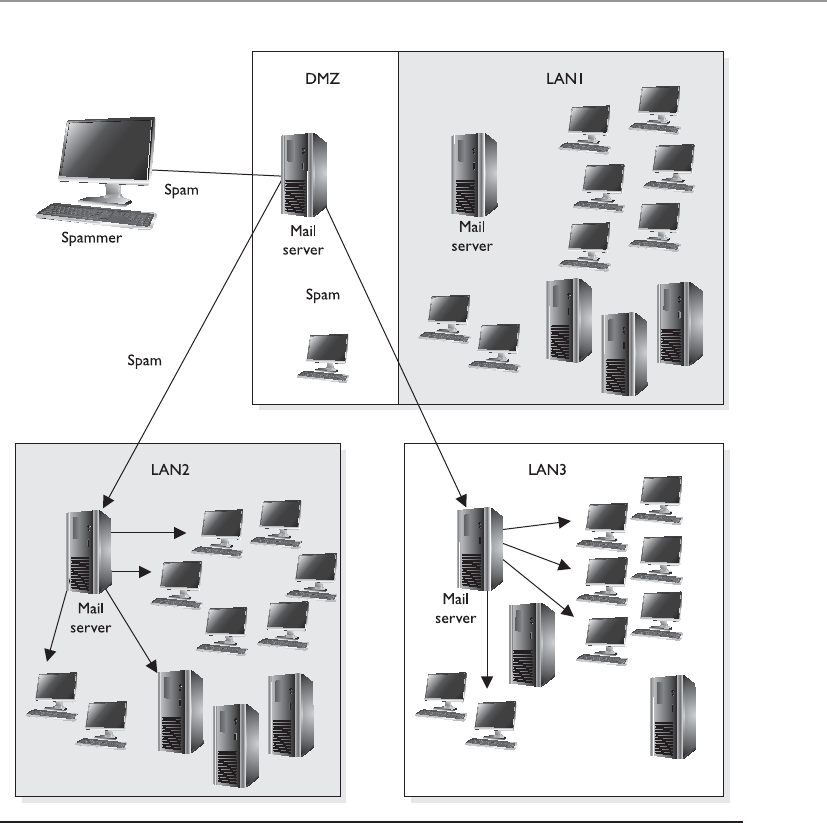
Chapter 6: Telecommunications and Network Security
603
results in an e-mail looking as though it is from a known e-mail address. Mostly the
From field is spoofed, but some scams have modified the Reply-To field to the attacker’s
e-mail address. E-mail spoofing is caused by the lack of security features in SMTP. When
SMTP technologies were developed, the concept of e-mail spoofing didn’t exist, so
countermeasures for this type of threat were not embedded into the protocol. A user
could use an SMTP server to send e-mail to anyone from any e-mail address.
Figure 6-38 Mail servers can be used for relaying spam if relay functionality is not properly
configured.

CISSP All-in-One Exam Guide
604
SMTP authentication (SMTP-AUTH) was developed to provide an access control
mechanism. This extension comprises an authentication feature that allows clients to
authenticate to the mail server before an e-mail is sent. Servers using the SMTP-AUTH
extension are configured in such a manner that their clients are obliged to use the ex-
tension so that the sender can be authenticated.
E-mail spoofing can be mitigated in several ways. The SMTP server can be config-
ured to prevent unauthenticated users from sending e-mails. It is important to always
log all the connections to your mail servers so that unsolicited e-mails can be traced
and tracked. It’s also advised that you filter incoming and outgoing traffic toward mail
servers through a firewall to prevent generic network-level attacks, such as packet spoof-
ing, distributed denial of service (DDoS) attacks, and so on. Important e-mails can be
communicated over encrypted channels so that the sender and receiver are properly
authenticated.
Another way to deal with the problem of forged e-mail messages is by using Sender
Policy Framework (SPF), which is an e-mail validation system designed to prevent e-mail
spam by detecting e-mail spoofing by verifying the sender’s IP address. SPF allows ad-
ministrators to specify which hosts are allowed to send e-mail from a given domain by
creating a specific SPF record in DNS. Mail exchanges use the DNS to check that mail
from a given domain is being sent by a host sanctioned by that domain’s administrators.
As covered in Chapter 3, phishing is a social engineering attack that is commonly
carried out through maliciously crafted e-mail messages. The goal is to get someone to
click a malicious link or for the victim to send the attacker some confidential data (So-
cial Security number, account number, etc.). The attacker crafts an e-mail that seems to
originate from a trusted source and sends it out to many victims at one time. A spear
phishing attack zeros in on specific people. So if an attacker wants your specific informa-
tion because she wants to break into your bank account, she could gather information
about you via Facebook, LinkedIn, or through other resources and create an e-mail
from someone she thinks you will trust. A similar attack is called whaling. In a whaling
attack an attacker usually identifies some “big fish” in an organization (CEO, CFO,
COO, CSO) and targets them because they have access to some of the most sensitive
data in the organization. The attack is finely tuned to achieve the highest likelihood of
success.
E-mail is, of course, a critical communication tool, but is the most commonly mis-
used channel for malicious activities.
Network Address Translation
I have one address I would like to share with everyone!
When computers need to communicate with each other, they must use the same
type of addressing scheme so everyone understands how to find and talk to one an-
other. The Internet uses the IP address scheme as discussed earlier in the chapter, and
any computer or network that wants to communicate with other users on the network
must conform to this scheme; otherwise, that computer will sit in a virtual room with
only itself to talk to.

Chapter 6: Telecommunications and Network Security
605
However, IP addresses have become scarce (until the full adoption of IPv6) and
expensive. So some smart people came up with network address translation (NAT),
which enables a network that does not follow the Internet’s addressing scheme to com-
municate over the Internet.
Private IP addresses have been reserved for internal LAN address use, as outlined in
RFC 1918. These addresses can be used within the boundaries of a company, but they
cannot be used on the Internet because they will not be properly routed. NAT enables
a company to use these private addresses and still be able to communicate transpar-
ently with computers on the Internet.
The following lists current private IP address ranges:
• 10.0.0.0–10.255.255.255 Class A network
• 172.16.0.0–172.31.255.255 Class B networks
• 192.168.0.0–192.168.255.255 Class C networks
NAT is a gateway that lies between a network and the Internet (or another network)
that performs transparent routing and address translation. Because IP addresses were
depleting fast, IPv6 was developed in 1999, and was intended to be the long-term fix to
the address shortage problem. NAT was developed as the short-term fix to enable more
companies to participate on the Internet. However, to date, IPv6 is slow in acceptance
and implementation, while NAT has caught on like wildfire. Many firewall vendors
have implemented NAT into their products, and it has been found that NAT actually
provides a great security benefit. When attackers want to hack a network, they first do
what they can to learn all about the network and its topology, services, and addresses.
Attackers cannot easily find out a company’s address scheme and its topology when
NAT is in place, because NAT acts like a large nightclub bouncer by standing in front of
the network and hiding the true IP scheme.
NAT hides internal addresses by centralizing them on one device, and any frames
that leave that network have only the source address of that device, not of the actual
internal computer that sends the message. So when a message comes from an internal
computer with the address of 10.10.10.2, for example, the message is stopped at the
device running NAT software, which happens to have the IP address of 1.2.3.4. NAT
changes the header of the packet from the internal address, 10.10.10.2, to the IP address
of the NAT device, 1.2.3.4. When a computer on the Internet replies to this message, it
replies to the address 1.2.3.4. The NAT device changes the header on this reply message
to 10.10.10.2 and puts it on the wire for the internal user to receive.
Three basic types of NAT implementations can be used:
•Static mapping The NAT software has a pool of public IP addresses
configured. Each private address is statically mapped to a specific public
address. So computer A always receives the public address x, computer B
always receives the public address y, and so on. This is generally used for
servers that need to keep the same public address at all times.

CISSP All-in-One Exam Guide
606
•Dynamic mapping The NAT software has a pool of IP addresses, but instead
of statically mapping a public address to a specific private address, it works
on a first-come, first-served basis. So if Bob needs to communicate over
the Internet, his system makes a request to the NAT server. The NAT server
takes the first IP address on the list and maps it to Bob’s private address. The
balancing act is to estimate how many computers will most likely need to
communicate outside the internal network at one time. This estimate is the
number of public addresses the company purchases, instead of purchasing
one public address for each computer.
•Port address translation (PAT) The company owns and uses only one
public IP address for all systems that need to communicate outside the
internal network. How in the world could all computers use the exact same IP
address? Good question. Here’s an example: The NAT device has an IP address
of 127.50.41.3. When computer A needs to communicate with a system on
the Internet, the NAT device documents this computer’s private address and
source port number (10.10.44.3; port 43,887). The NAT device changes the
IP address in the computer’s packet header to 127.50.41.3, with the source
port 40,000. When computer B also needs to communicate with a system on
the Internet, the NAT device documents the private address and source port
number (10.10.44.15; port 23,398) and changes the header information to
127.50.41.3 with source port 40,001. So when a system responds to computer
A, the packet first goes to the NAT device, which looks up the port number
40,000 and sees that it maps to computer A’s real information. So the NAT
device changes the header information to address 10.10.44.3 and port 43,887
and sends it to computer A for processing. A company can save a lot more
money by using PAT, because the company needs to buy only a few public IP
addresses, which are used by all systems in the network.
Most NAT implementations are stateful, meaning they keep track of a communica-
tion between the internal host and an external host until that session is ended. The NAT
device needs to remember the internal IP address and port to send the reply messages
back. This stateful characteristic is similar to stateful-inspection firewalls, but NAT does
not perform scans on the incoming packets to look for malicious characteristics. In-
stead, NAT is a service usually performed on routers or gateway devices within a com-
pany’s screened subnet.
Although NAT was developed to provide a quick fix for the depleting IP address
problem, it has actually put the problem off for quite some time. The more companies
that implement private address schemes, the less likely IP addresses will become scarce.
This has been helpful to NAT and the vendors that implement this technology, but it
has put the acceptance and implementation of IPv6 much farther down the road.

Chapter 6: Telecommunications and Network Security
607
Key Terms
•Simple Mail Transfer Protocol (SMTP) An Internet standard protocol
for electronic mail (e-mail) transmission across IP-based networks.
•Post Office Protocol (POP) An Internet standard protocol used by
e-mail clients to retrieve e-mail from a remote server and supports
simple download-and-delete requirements for access to remote
mailboxes.
•Internet Message Access Protocol (IMAP) An Internet standard
protocol used by e-mail clients to retrieve e-mail from a remote server.
E-mail clients using IMAP generally leave messages on the server until
the user explicitly deletes them.
•Simple Authentication and Security Layer (SASL) A framework
for authentication and data security in Internet protocols. It decouples
authentication mechanisms from application protocols and allows
any authentication mechanism supported by SASL to be used in any
application protocol that uses SASL.
•Open mail relay An SMTP server configured in such a way that it
allows anyone on the Internet to send e-mail through it, not just mail
destined to or originating from known users.
•E-mail spoofing Activity in which the sender address and other
parts of the e-mail header are altered to appear as though the e-mail
originated from a different source. Since SMTP does not provide any
authentication, it is easy to impersonate and forge e-mails.
•Sender Policy Framework (SPF) An e-mail validation system
designed to prevent e-mail spam by detecting e-mail spoofing, a
common vulnerability, by verifying sender IP addresses.
•Phishing A way of attempting to obtain data such as usernames,
passwords, credit card information, and other sensitive data by
masquerading as an authenticated entity in an electronic communication.
Spear phishing targets individuals, and whaling targets people with high
authorization (CEO, COO, CIO).
•Network address translation (NAT) The process of modifying IP
address information in packet headers while in transit across a traffic
routing device, with the goal of reducing the demand for public IP
addresses.

CISSP All-in-One Exam Guide
608
Routing Protocols
I have protocols that will tell you where to go.
Response: I would like to tell YOU where to go.
Individual networks on the Internet are referred to as autonomous systems (ASs).
These ASs are independently controlled by different service providers and organiza-
tions. An AS is made up of routers, which are administered by a single entity and use a
common Interior Gateway Protocol (IGP) within the boundaries of the AS. The bound-
aries of these ASs are delineated by border routers. These routers connect to the border
routers of other ASs and run interior and exterior routing protocols. Internal routers
connect to other routers within the same AS and run interior routing protocols. So, in
reality, the Internet is just a network made up of ASs and routing protocols.
NOTE
NOTE As an analogy, just as the world is made up of different countries,
the Internet is made up of different ASs. Each AS has delineation boundaries
just as countries do. Countries can have their own languages (Spanish, Arabic,
Russian). Similarly, ASs have their own internal routing protocols. Countries
that speak different languages need to have a way of communicating to
each other, which could happen through interpreters. ASs need to have a
standardized method of communicating and working together, which is where
external routing protocols come into play.
The architecture of the Internet that supports these various ASs is created so that no
entity that needs to connect to a specific AS has to know or understand the interior
routing protocols that are being used. Instead, for ASs to communicate, they just have
to be using the same exterior routing protocols (see Figure 6-39). As an analogy, sup-
pose you want to deliver a package to a friend who lives in another state. You give the
package to your brother, who is going to take a train to the edge of the state and hand
it to the postal system at that junction. Thus, you know how your brother will arrive at
the edge of the state—by train. You do not know how the postal system will then de-
liver your package to your friend’s house (truck, car, bus), but that is not your concern.
It will get to its destination without your participation. Similarly, when one network
communicates with another network, the first network puts the data packet (package)
on an exterior protocol (train), and when the data packet gets to the border router
(edge of the state), the data are transferred to whatever interior protocol is being used
on the receiving network.
NOTE
NOTE Routing protocols are used by routers to identify a path between the
source and destination systems.
Routing protocols can be dynamic or static. A dynamic routing protocol can discover
routes and build a routing table. Routers use these tables to make decisions on the best
route for the packets they receive. A dynamic routing protocol can change the entries in
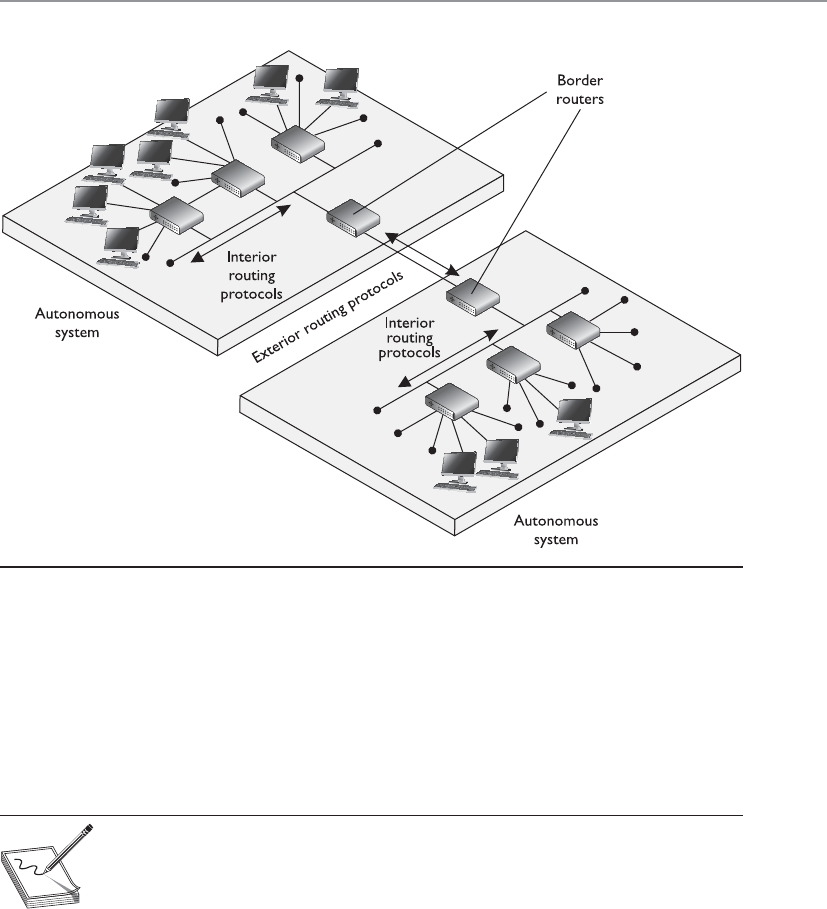
Chapter 6: Telecommunications and Network Security
609
the routing table based on changes that take place to the different routes. When a rout-
er that is using a dynamic routing protocol finds out that a route has gone down or is
congested, it sends an update message to the other routers around it. The other routers
use this information to update their routing table, with the goal of providing efficient
routing functionality. A static routing protocol requires the administrator to manually
configure the router’s routing table. If a link goes down or there is network congestion,
the routers cannot tune themselves to use better routes.
NOTE
NOTE Route flapping refers to the constant changes in the availability of
routes. Also, if a router does not receive an update that a link has gone down,
the router will continue to forward packets to that route, which is referred to
as a black hole.
Two main types of routing protocols are used: distance-vector and link-state routing.
Distance-vector routing protocols make their routing decisions based on the distance (or
number of hops) and a vector (a direction). The protocol takes these variables and uses
them with an algorithm to determine the best route for a packet. Link-state routing pro-
tocols build a more accurate routing table because they build a topology database of the
network. These protocols look at more variables than just the number of hops between
two destinations. They use packet size, link speed, delay, network load, and reliability as
the variables in their algorithms to determine the best routes for packets to take.
Figure 6-39 Autonomous systems

CISSP All-in-One Exam Guide
610
So, a distance-vector routing protocol only looks at the number of hops between
two destinations and considers each hop to be equal. A link-state routing protocol sees
more pieces to the puzzle than just the number of hops, but understands the status of
each of those hops and makes decisions based on these factors also. As you will see, RIP
is an example of a distance-vector routing protocol, and OSPF is an example of a link-
state routing protocol. OSPF is preferred and is used in large networks. RIP is still
around but should only be used in smaller networks.
De facto and proprietary interior protocols are being used today. The following are
just a few of them:
•Routing Information Protocol RIP is a standard that outlines how routers
exchange routing table data and is considered a distance-vector protocol,
which means it calculates the shortest distance between the source and
destination. It is considered a legacy protocol because of its slow performance
and lack of functionality. It should only be used in small networks. RIP
version 1 has no authentication, and RIP version 2 sends passwords in
cleartext or hashed with MD5.
•Open Shortest Path First OSPF uses link-state algorithms to send out
routing table information. The use of these algorithms allows for smaller,
more frequent routing table updates to take place. This provides a more stable
network than RIP, but requires more memory and CPU resources to support
this extra processing. OSPF allows for a hierarchical routing network that has
a backbone link connecting all subnets together. OSPF has replaced RIP in
many networks today. Authentication can take place with cleartext passwords
or hashed passwords, or you can choose to configure no authentication on the
routers using this protocol.
•Interior Gateway Routing Protocol IGRP is a distance-vector routing
protocol that was developed by, and is proprietary to, Cisco Systems.
Whereas RIP uses one criterion to find the best path between the source and
destination, IGRP uses five criteria to make a “best route” decision. A network
administrator can set weights on these different metrics so that the protocol
works best in that specific environment.
•Enhanced Interior Gateway Routing Protocol EIGRP is a Cisco proprietary
and advanced distance-vector routing protocol. It allows for faster router
table updates than its predecessor IGRP and minimizes routing instability,
which can occur after topology changes. Routers exchange messages that
contain information about bandwidth, delay, load, reliability, and maximum
transmission unit (MTU) of the path to each destination as known by the
advertising router.
•Virtual Router Redundancy Protocol VRRP is used in networks that require
high availability where routers as points of failure cannot be tolerated. It is
designed to increase the availability of the default gateway by advertising
a “virtual router” as a default gateway. Two physical routers (primary and
secondary) are mapped to one virtual router. If one of the physical routers
fails, the other router takes over the workload.

Chapter 6: Telecommunications and Network Security
611
•Intermediate System to Intermediate System (IS-IS) Link-state protocol
that allows each router to independently build a database of a network’s
topology. Similar to the OSPF protocol, it computes the best path for traffic to
travel. It is a classless and hierarchical routing protocol that is vendor neutral.
NOTE
NOTE Although most routing protocols have authentication functionality,
most routers do not have this functionality enabled.
The exterior routing protocols used by routers connecting different ASs are generi-
cally referred to as exterior gateway protocols (EGPs). The Border Gateway Protocol
(BGP) enables routers on different ASs to share routing information to ensure effective
and efficient routing between the different AS networks. BGP is commonly used by
Internet service providers to route data from one location to the next on the Internet.
NOTE
NOTE There is an exterior routing protocol called Exterior Gateway
Protocol, but it has been widely replaced by BGP, and now the term “exterior
gateway protocol” and the acronym EGP are used to refer generically to a
type of protocol rather than to specify the outdated protocol.
BGP uses a combination of link-state and distance-vector routing algorithms. It cre-
ates a network topology by using its link-state functionality and transmits updates on a
periodic basis instead of continuously, which is how distance-vector protocols work.
Network administrators can apply weights to the different variables used by link-state
routing protocols when determining the best routes. These configurations are collec-
tively called the routing policy.
Several types of attacks can take place on routers through their routing protocols. A
majority of the attacks have the goal of misdirecting traffic through the use of spoofed
ICMP messages. An attacker can masquerade as another router and submit routing ta-
ble information to the victim router. After the victim router integrates this new infor-
mation, it may be sending traffic to the wrong subnets or computers, or even to a
nonexistent address (black hole). These attacks are successful mainly when routing
protocol authentication is not enabled. When authentication is not required, a router
can accept routing updates without knowing whether or not the sender is a legitimate
router. An attacker could divert a company’s traffic to reveal confidential information
or to just disrupt traffic, which would be considered a DoS attack.
Other types of DoS attacks exist, such as flooding a router port, buffer overflows,
and SYN floods. Since there are many different types of attacks that can take place, there
are just as many countermeasures to be aware of to thwart these types of attacks. Most
of these countermeasures involve authentication and encryption of routing data as it is
transmitted back and forth through the use of shared keys or IPSec. For a good descrip-
tion of how these attacks can take place and their corresponding countermeasures, take
a look at the Cisco Systems whitepaper “SAFE: Best Practices for Securing Routing Pro-
tocols” (www.cisco.com/warp/public/cc/so/neso/vpn/prodlit/sfblp_wp.pdf).

CISSP All-in-One Exam Guide
612
Networking Devices
Several types of devices are used in LANs, MANs, and WANs to provide intercommuni-
cation among computers and networks. We need to have physical devices throughout
the network to actually use all the protocols and services we have covered up to this
point. The different networking devices vary according to their functionality, capabili-
ties, intelligence, and network placement. We will look at the following devices:
• Repeaters
• Bridges
• Routers
• Switches
Repeaters
Arepeater provides the simplest type of connectivity, because it only repeats electrical
signals between cable segments, which enables it to extend a network. Repeaters work
at the physical layer and are add-on devices for extending a network connection over a
greater distance. The device amplifies signals because signals attenuate the farther they
have to travel.
Repeaters can also work as line conditioners by actually cleaning up the signals. This
works much better when amplifying digital signals than when amplifying analog sig-
nals, because digital signals are discrete units, which makes extraction of background
noise from them much easier for the amplifier. If the device is amplifying analog signals,
any accompanying noise often is amplified as well, which may further distort the signal.
Ahub is a multiport repeater. A hub is often referred to as a concentrator because it is
the physical communication device that allows several computers and devices to com-
Wormhole Attack
An attacker can capture a packet at one location in the network and tunnel it to
another location in the network. In this type of attack, there are two attackers,
one at each end of the tunnel (referred to as a wormhole). Attacker A could cap-
ture an authentication token that is being sent to an authentication server, and
then send this token to the other attacker, who then uses it to gain unauthorized
access to a resource. This can take place on a wired or wireless network, but it is
easier to carry out on a wireless network because the attacker does not need to
actually penetrate a physical wire.
The countermeasure to this type of attack is to use a leash, which is just data
that are put into a header of the individual packets. The leash restricts the packet’s
maximum allowed transmission distance. The leash can be either geographical,
which ensures that a packet stays within a certain distance of the sender, or tem-
poral, which limits the lifetime of the packet.
It is like the idea of using leashes for your pets. You put a collar (leash) on
your dog (packet) and it prevents him from leaving your yard (network segment).

Chapter 6: Telecommunications and Network Security
613
municate with each other. A hub does not understand or work with IP or MAC addresses.
When one system sends a signal to go to another system connected to it, the signal is
broadcast to all the ports, and thus to all the systems connected to the concentrator.
Bridges
Abridge is a LAN device used to connect LAN segments. It works at the data link layer
and therefore works with MAC addresses. A repeater does not work with addresses; it
just forwards all signals it receives. When a frame arrives at a bridge, the bridge deter-
mines whether or not the MAC address is on the local network segment. If the MAC
address is not on the local network segment, the bridge forwards the frame to the neces-
sary network segment.
A bridge is used to divide overburdened networks into smaller segments to ensure
better use of bandwidth and traffic control. A bridge amplifies the electrical signal, as
does a repeater, but it has more intelligence than a repeater and is used to extend a LAN
and enable the administrator to filter frames so he can control which frames go where.
When using bridges, you have to watch carefully for broadcast storms. Because
bridges can forward all traffic, they forward all broadcast packets as well. This can over-
whelm the network and result in a broadcast storm, which degrades the network band-
width and performance.
Three main types of bridges are used: local, remote, and translation. A local bridge con-
nects two or more LAN segments within a local area, which is usually a building. A remote
bridge can connect two or more LAN segments over a MAN by using telecommunications
links. A remote bridge is equipped with telecommunications ports, which enable it to
connect two or more LANs separated by a long distance and can be brought together via
telephone or other types of transmission lines. A translation bridge is needed if the two
LANs being connected are different types and use different standards and protocols. For
example, consider a connection between a Token Ring network and an Ethernet network.
The frames on each network type are different sizes, the fields contain different protocol
information, and the two networks transmit at different speeds. If a regular bridge were
put into place, Ethernet frames would go to the Token Ring network, and vice versa, and
neither would be able to understand messages that came from the other network seg-
ment. A translation bridge does what its name implies—it translates between the two
network types.
The following list outlines the functions of a bridge:
• Segments a large network into smaller, more controllable pieces.
• Uses filtering based on MAC addresses.
• Joins different types of network links while retaining the same broadcast
domain.
• Isolates collision domains within the same broadcast domain.
• Bridging functionality can take place locally within a LAN or remotely to
connect two distant LANs.
• Can translate between protocol types.

CISSP All-in-One Exam Guide
614
NOTE
NOTE Do not confuse routers with bridges. Routers work at the network
layer and filter packets based on IP addresses, whereas bridges work at the
data link layer and filter frames based on MAC addresses. Routers usually do
not pass broadcast information, but bridges do pass broadcast information.
Forwarding Tables
You go that way. And you—you go this way!
A bridge must know how to get a frame to its destination—that is, it must know to
which port the frame must be sent and where the destination host is located. Years ago,
network administrators had to type route paths into bridges so the bridges had static
paths indicating where to pass frames that were headed for different destinations. This
was a tedious task and prone to errors. Today, bridges use transparent bridging.
If transparent bridging is used, a bridge starts to learn about the network’s environ-
ment as soon as it is powered on and as the network changes. It does this by examining
frames and making entries in its forwarding tables. When a bridge receives a frame from
a new source computer, the bridge associates this new source address and the port on
which it arrived. It does this for all computers that send frames on the network. Eventu-
ally, the bridge knows the address of each computer on the various network segments
and to which port each is connected. If the bridge receives a request to send a frame to
a destination that is not in its forwarding table, it sends out a query frame on each net-
work segment except for the source segment. The destination host is the only one that
replies to this query. The bridge updates its table with this computer address and the
port to which it is connected, and forwards the frame.
Many bridges use the Spanning Tree Algorithm (STA), which adds more intelligence
to the bridges. STA ensures that frames do not circle networks forever, provides redun-
dant paths in case a bridge goes down, assigns unique identifiers to each bridge, assigns
priority values to these bridges, and calculates path costs. This creates much more effi-
cient frame-forwarding processes by each bridge. STA also enables an administrator to
indicate whether he wants traffic to travel certain paths instead of others.
If source routing is allowed, the packets contain the necessary information within
them to tell the bridge or router where they should go. The packets hold the forwarding
information so they can find their way to their destination without needing bridges and
routers to dictate their paths. If the computer wants to dictate its forwarding informa-
tion instead of depending on a bridge, how does it know the correct route to the desti-
nation computer? The source computer sends out explorer packets that arrive at the
destination computer. These packets contain the route information the packets had to
take to get to the destination, including what bridges and/or routers they had to pass
through. The destination computer then sends these packets back to the source com-
puter, and the source computer strips out the routing information, inserts it into the
packets, and sends them on to the destination.

Chapter 6: Telecommunications and Network Security
615
CAUTION
CAUTION External devices and border routers should not accept packets
with source routing information within their headers, because that information
will override what is laid out in the forwarding and routing tables configured
on the intermediate devices. You want to control how traffic traverses your
network; you don’t want packets to have this type of control and be able to
go wherever they want. Source routing can be used by attackers to get around
certain bridge and router filtering rules.
Routers
We are going up the chain of the OSI layers while discussing various networking de-
vices. Repeaters work at the physical layer, bridges work at the data link layer, and rout-
ers work at the network layer. As we go up each layer, each corresponding device has
more intelligence and functionality because it can look deeper into the frame. A re-
peater looks at the electrical signal. The bridge can look at the MAC address within the
header. The router can peel back the first header information and look farther into the
frame and find out the IP address and other routing information. The farther a device
can look into a frame, the more decisions it can make based on the information within
the frame.
Routers are layer 3, or network layer, devices that are used to connect similar or dif-
ferent networks. (For example, they can connect two Ethernet LANs or an Ethernet LAN
to a Token Ring LAN.) A router is a device that has two or more interfaces and a routing
table so it knows how to get packets to their destinations. It can filter traffic based on
access control lists (ACLs), and it fragments packets when necessary. Because routers
have more network-level knowledge, they can perform higher-level functions, such as
calculating the shortest and most economical path between the sending and receiving
hosts.
Q&A
Question What is the difference between two LANs connected via a
bridge versus two LANs connected via a router?
Answer If two LANs are connected with a bridge, the LANs have
been extended, because they are both in the same broadcast domain.
A router can be configured not to forward broadcast information, so
if two LANs are connected with a router, an internetwork results. An
internetwork is a group of networks connected in a way that enables
any node on any network to communicate with any other node. The
Internet is an example of an internetwork.

CISSP All-in-One Exam Guide
616
A router discovers information about routes and changes that take place in a net-
work through its routing protocols (RIP, BGP, OSPF, and others). These protocols tell
routers if a link has gone down, if a route is congested, and if another route is more
economical. They also update routing tables and indicate if a router is having problems
or has gone down.
A bridge uses the same network address for all of its ports, but a router assigns a
different address per port, which enables it to connect different networks together.
The router may be a dedicated appliance or a computer running a networking op-
erating system that is dual-homed. When packets arrive at one of the interfaces, the
router compares those packets to its ACLs. This list indicates what packets are allowed
in and what packets are denied. Access decisions are based on source and destination
IP addresses, protocol type, and source and destination ports. An administrator may
block all packets coming from the 10.10.12.0 network, any FTP requests, or any packets
headed toward a specific port on a specific host, for example. This type of control is
provided by the ACLs, which the administrator must program and update as necessary.
What actually happens inside the router when it receives a packet? Let’s follow the
steps:
1. A packet is received on one of the interfaces of a router. The router views the
routing data.
2. The router retrieves the destination IP network address from the packet.
3. The router looks at its routing table to see which port matches the requested
destination IP network address.
4. If the router does not have information in its table about the destination
address, it sends out an ICMP error message to the sending computer
indicating that the message could not reach its destination.
5. If the router does have a route in its routing table for this destination, it
decrements the TTL value and sees whether the MTU is different for the
destination network. If the destination network requires a smaller MTU, the
router fragments the datagram.
6. The router changes header information in the packet so the packet can go
to the next correct router, or if the destination computer is on a connecting
network, the changes made enable the packet to go directly to the destination
computer.
7. The router sends the packet to its output queue for the necessary interface.
Table 6-8 provides a quick review of the differences between routers and bridges.
When is it best to use a repeater, bridge, or router? A repeater is used if an adminis-
trator needs to expand a network and amplify signals so they do not weaken on longer
cables. However, a repeater will forward collision and broadcast information because it
does not have the intelligence to decipher among different types of traffic.
Bridges work at the data link layer and have a bit more intelligence than a repeater.
Bridges can do simple filtering, and they separate collision domains, not broadcast
Chapter 6: Telecommunications and Network Security
617
domains. A bridge should be used when an administrator wants to divide a network
into segments to reduce traffic congestion and excessive collisions.
A router splits up a network into collision domains and broadcast domains. A router
gives more of a clear-cut division between network segments than repeaters or bridges.
A router should be used if an administrator wants to have more defined control of where
the traffic goes, because more sophisticated filtering is available with routers, and when
a router is used to segment a network, the result is more controllable sections.
A router is used when an administrator wants to divide a network along the lines of
departments, workgroups, or other business-oriented divisions. A bridge divides seg-
ments based more on the traffic type and load.
Switches
I want to talk to you privately. Let’s talk through this switch.
Switches combine the functionality of a repeater and the functionality of a bridge. A
switch amplifies the electrical signal, like a repeater, and has the built-in circuitry and
intelligence of a bridge. It is a multiport connection device that provides connections
for individual computers or other hubs and switches. Any device connected to one port
can communicate with a device connected to another port with its own virtual private
link. How does this differ from the way in which devices communicate using a bridge
or a hub? When a frame comes to a hub, the hub sends the frame out through all of its
ports. When a frame comes to a bridge, the bridge sends the frame to the port to which
the destination network segment is connected. When a frame comes to a switch, the
switch sends the frame directly to the destination computer or network, which results
in a reduction of traffic. Figure 6-40 illustrates a network configuration that has com-
puters directly connected to their corresponding switches.
On Ethernet networks, computers have to compete for the same shared network
medium. Each computer must listen for activity on the network and transmit its data
when it thinks the coast is clear. This contention and the resulting collisions cause traf-
fic delays and use up precious bandwidth. When switches are used, contention and
collisions are not issues, which results in more efficient use of the network’s bandwidth
and decreased latency. Switches reduce or remove the sharing of the network medium
and the problems that come with it.
Bridge Router
Reads header information, but does not alter it Creates a new header for each packet
Builds forwarding tables based on MAC
addresses
Builds routing tables based on IP addresses
Uses the same network address for all ports Assigns a different network address per port
Filters traffic based on MAC addresses Filters traffic based on IP addresses
Forwards broadcast packets Does not forward broadcast packets
Forwards traffic if a destination address is
unknown to the bridge
Does not forward traffic that contains a
destination address unknown to the router
Table 6-8 Main Differences between Bridges and Routers
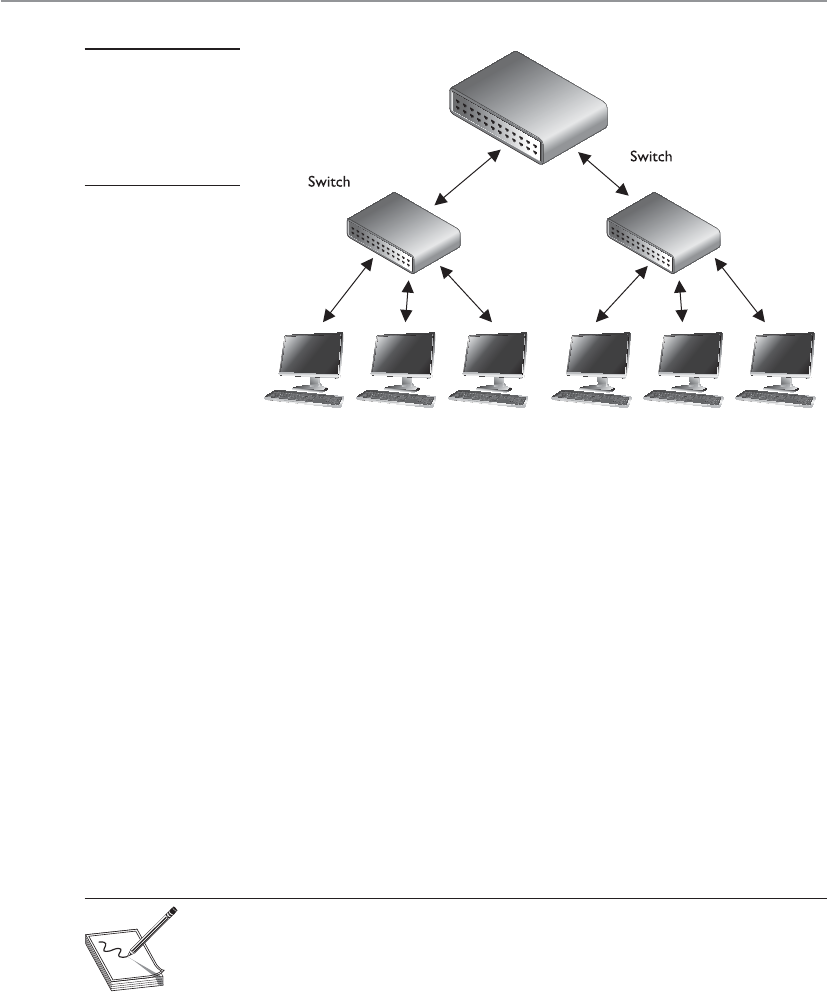
CISSP All-in-One Exam Guide
618
A switch is a multiport bridging device, and each port provides dedicated band-
width to the device attached to it. A port is bridged to another port so the two devices
have an end-to-end private link. The switch employs full-duplex communication, so
one wire pair is used for sending and another pair is used for receiving. This ensures the
two connected devices do not compete for the same bandwidth.
Basic switches work at the data link layer and forward traffic based on MAC ad-
dresses. However, today’s layer 3, layer 4, and other layer switches have more enhanced
functionality than layer 2 switches. These higher-level switches offer routing functional-
ity, packet inspection, traffic prioritization, and QoS functionality. These switches are
referred to as multilayered switches because they combine data link layer, network layer,
and other layer functionalities.
Multilayered switches use hardware-based processing power, which enables them
to look deeper within the packet, to make more decisions based on the information
found within the packet, and then to provide routing and traffic management tasks.
Usually this amount of work creates a lot of overhead and traffic delay, but multilayered
switches perform these activities within an application-specific integrated circuit
(ASIC). This means that most of the functions of the switch are performed at the hard-
ware and chip level rather than at the software level, making it much faster than routers.
NOTE
NOTE While it is harder for attackers to sniff traffic on switched networks,
they should not be considered safe just because switches are involved.
Attackers commonly poison cache memory used on switches to divert traffic
to their desired location.
Layer 3 and 4 Switches
I want my switch to do everything, even make muffins.
Layer 2 switches only have the intelligence to forward a frame based on its MAC
address and do not have a higher understanding of the network as a whole. A layer 3
switch has the intelligence of a router. It not only can route packets based on their IP
Figure 6-40
Switches enable
devices to
communicate with
each other via their
own virtual link.

Chapter 6: Telecommunications and Network Security
619
addresses, but also can choose routes based on availability and performance. A layer 3
switch is basically a router on steroids because it moves the route lookup functionality
to the more efficient switching hardware level.
The basic distinction between layer 2, 3, and 4 switches is the header information
the device looks at to make forwarding or routing decisions (data link, network, or
transport OSI layers). But layer 3 and 4 switches can use tags, which are assigned to each
destination network or subnet. When a packet reaches the switch, the switch compares
the destination address with its tag information base, which is a list of all the subnets
and their corresponding tag numbers. The switch appends the tag to the packet and
sends it to the next switch. All the switches in between this first switch and the destina-
tion host just review this tag information to determine which route it needs to take,
instead of analyzing the full header. Once the packet reaches the last switch, this tag is
removed and the packet is sent to the destination. This process increases the speed of
routing of packets from one location to another.
The use of these types of tags, referred to as Multiprotocol Label Switching (MPLS),
not only allows for faster routing, but also addresses service requirements for the differ-
ent packet types. Some time-sensitive traffic (such as video conferencing) requires a
certain level of service (QoS) that guarantees a minimum rate of data delivery to meet
the requirements of a user or application. When MPLS is used, different priority infor-
mation is placed into the tags to help ensure that time-sensitive traffic has a higher
priority than less sensitive traffic, as shown in Figure 6-41.
Many enterprises today use a switched network in which computers are connected
to dedicated ports on Ethernet switches, Gigabit Ethernet switches, ATM switches, and
more. This evolution of switches, added services, and the capability to incorporate re-
peater, bridge, and router functionality have made switches an important part of to-
day’s networking world.
Figure 6-41 MPLS uses tags and tables for routing functions.

CISSP All-in-One Exam Guide
620
Because security requires control over who can access specific resources, more intel-
ligent devices can provide a higher level of protection because they can make more
detail-oriented decisions regarding who can access resources. When devices can look
deeper into the packets, they have access to more information to make access decisions,
which provides more granular access control.
As previously stated, switching makes it more difficult for intruders to sniff and
monitor network traffic because no broadcast and collision information is continually
traveling throughout the network. Switches provide a security service that other devices
cannot provide. Virtual LANs (VLANs) are an important part of switching networks,
because they enable administrators to have more control over their environment and
they can isolate users and groups into logical and manageable entities. VLANs are de-
scribed in the next section.
VLANs
The technology within switches has introduced the capability to use VLANs. VLANs en-
able administrators to separate and group computers logically based on resource re-
quirements, security, or business needs instead of the standard physical location of the
systems. When repeaters, bridges, and routers are used, systems and resources are
grouped in a manner dictated by their physical location. Figure 6-42 shows how com-
puters that are physically located next to each other can be grouped logically into dif-
ferent VLANs. Administrators can form these groups based on the users’ and company’s
needs instead of the physical location of systems and resources.
An administrator may want to place the computers of all users in the marketing
department in the same VLAN network, for example, so all users receive the same
broadcast messages and can access the same types of resources. This arrangement could
get tricky if a few of the users are located in another building or on another floor, but
VLANs provide the administrator with this type of flexibility. VLANs also enable an
administrator to apply particular security policies to respective logical groups. This way,
if tighter security is required for the payroll department, for example, the administrator
can develop a policy, add all payroll systems to a specific VLAN, and apply the security
policy only to the payroll VLAN.
A VLAN exists on top of the physical network, as shown in Figure 6-43. If worksta-
tion P1 wants to communicate with workstation D1, the message has to be routed—
even though the workstations are physically next to each other—because they are on
different logical networks.
NOTE
NOTE The IEEE standard that defines how VLANs are to be constructed and
how tagging should take place to allow for interoperability is IEEE 802.1Q.
While VLANs are used to segment traffic, attackers can still gain access to traffic that
is supposed to be “walled off” in another VLAN segment. VLAN hopping attacks allow
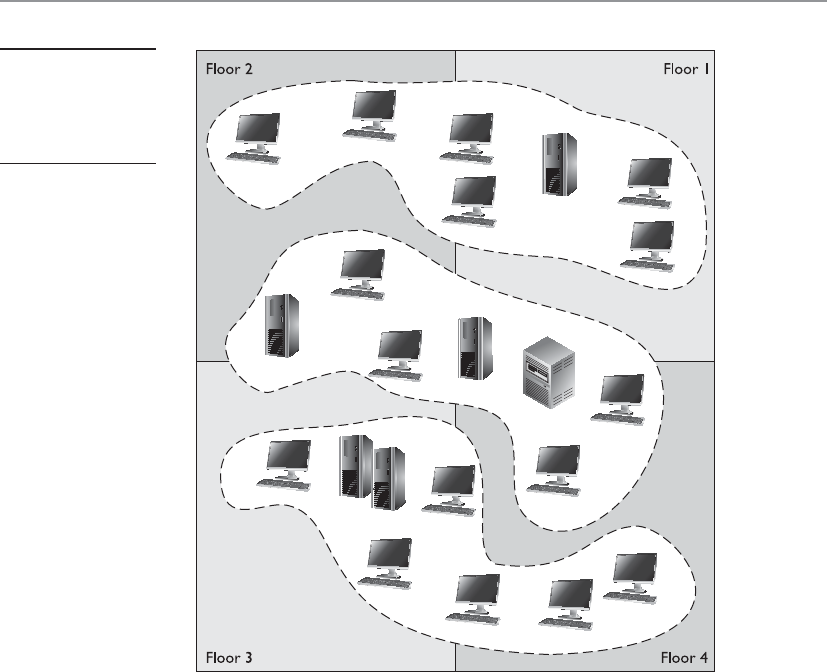
Chapter 6: Telecommunications and Network Security
621
attackers to gain access to traffic in various VLAN segments. An attacker can have a sys-
tem act as though it is a switch. The system understands the tagging values being used
in the network and the trunking protocols and can insert itself between other VLAN
devices and gain access to the traffic going back and forth. Attackers can also insert tag-
ging values to manipulate the control of traffic at the data link layer.
Gateways
Gateway is a general term for software running on a device that connects two different
environments and that many times acts as a translator for them or somehow restricts
their interactions. Usually a gateway is needed when one environment speaks a differ-
ent language, meaning it uses a certain protocol that the other environment does not
understand. The gateway can translate Internetwork Packet Exchange (IPX) protocol
packets to IP packets, accept mail from one type of mail server and format it so another
type of mail server can accept and understand it, or connect and translate different data
link technologies such as FDDI to Ethernet.
Figure 6-42
VLANs enable
administrators
to manage logical
networks.
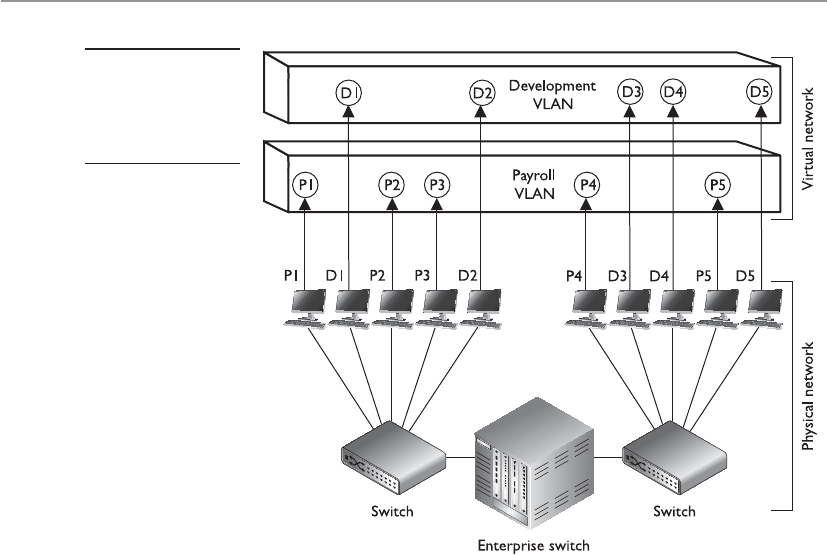
CISSP All-in-One Exam Guide
622
Gateways perform much more complex tasks than connection devices such as rout-
ers and bridges. However, some people refer to routers as gateways when they connect
two unlike networks (Token Ring and Ethernet) because the router has to translate be-
tween the data link technologies. Figure 6-44 shows how a network access server (NAS)
functions as a gateway between telecommunications and network connections.
When networks connect to a backbone, a gateway can translate the different tech-
nologies and frame formats used on the backbone network versus the connecting LAN
protocol frame formats. If a bridge were set up between an FDDI backbone and an
Ethernet LAN, the computers on the LAN would not understand the FDDI protocols
and frame formats. In this case, a LAN gateway would be needed to translate the proto-
cols used between the different networks.
A popular type of gateway is an electronic mail gateway. Because several e-mail ven-
dors have their own syntax, message format, and way of dealing with message transmis-
sion, e-mail gateways are needed to convert messages between e-mail server software.
For example, suppose that David, whose corporate network uses Sendmail, writes an
e-mail message to Dan, whose corporate network uses Microsoft Exchange. The e-mail
gateway will convert the message into a standard that all mail servers understand—usu-
ally X.400—and pass it on to Dan’s mail server.
Another example of a gateway is a voice and media gateway. Recently, there has
been a drive to combine voice and data networks. This provides for a lot of efficiency
because the same medium can be used for both types of data transfers. However, voice
Figure 6-43
VLANs exist on a
higher level than the
physical network and
are not bound to it.
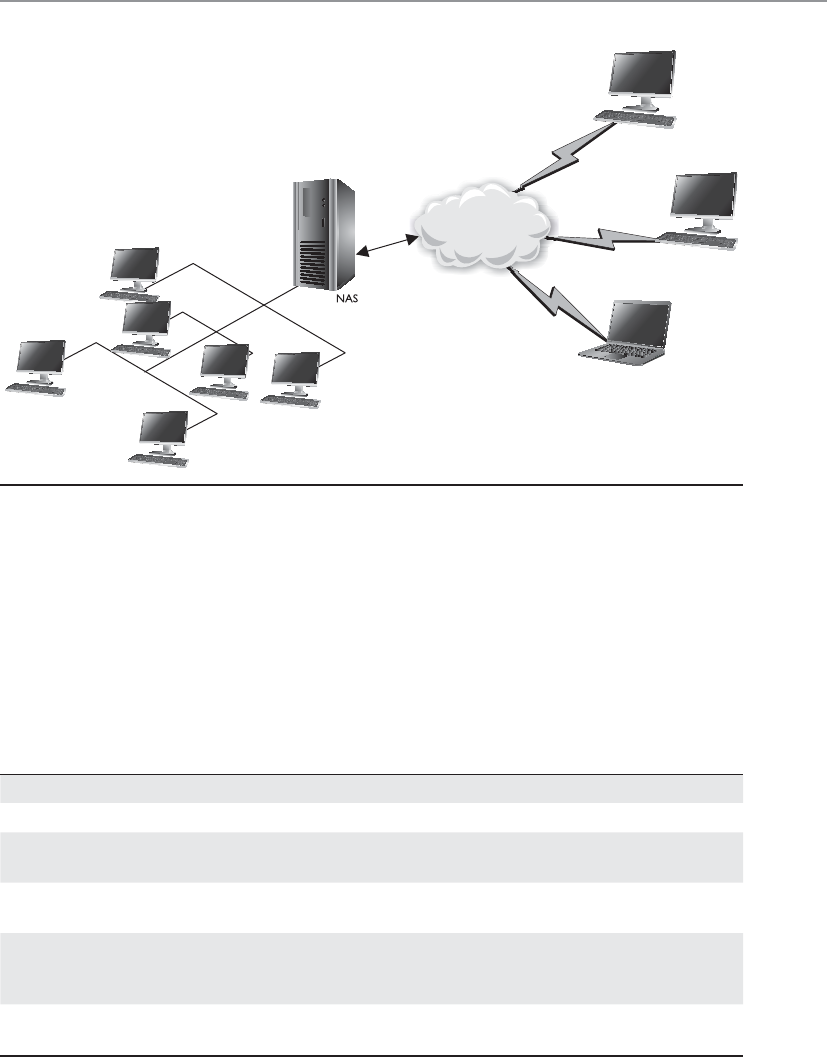
Chapter 6: Telecommunications and Network Security
623
is a streaming technology, whereas data are usually transferred in packets. So, this
shared medium eventually has to communicate with two different types of networks:
the telephone company’s PSTN, and routers that will take the packet-based data off
to the Internet. This means that a gateway must separate the combined voice and data
information and put it into a form that each of the networks can understand.
Table 6-9 lists the devices covered in this “Networking Devices” section and points
out their important characteristics.
Figure 6-44 Several types of gateways can be used in a network. A NAS is one example.
Device OSI Layer Functionality
Repeater Physical Amplifies the signal and extends networks.
Bridge Data Link Forwards packets and filters based on MAC addresses;
forwards broadcast traffic, but not collision traffic.
Router Network Separates and connects LANs creating internetworks;
routers filter based on IP addresses.
Switch Data Link Provides a private virtual link between communicating
devices; allows for VLANs; reduces collisions; impedes
network sniffing.
Gateway Application Connects different types of networks; performs
protocol and format translations.
Table 6-9 Network Device Differences
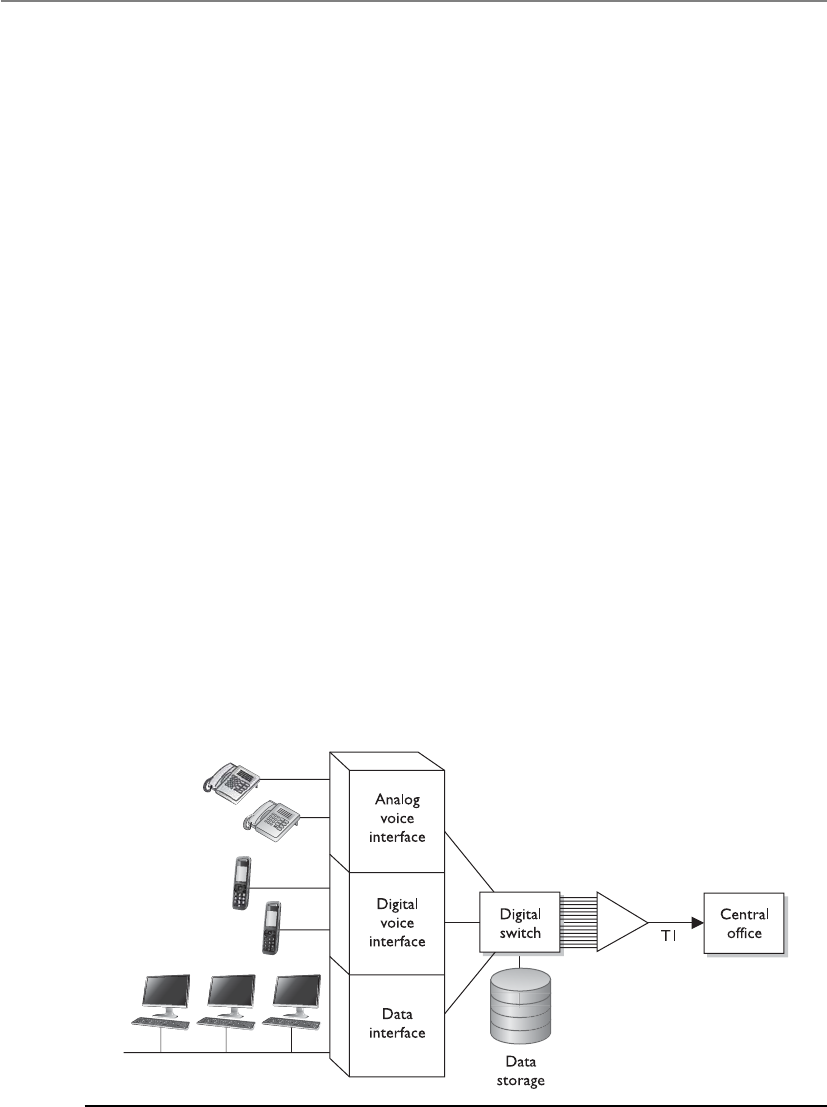
CISSP All-in-One Exam Guide
624
PBXs
I have to dial a 9 to get an outside line.
Telephone companies use switching technologies to transmit phone calls to their
destinations. A telephone company’s central office houses the switches that connect
towns, cities, and metropolitan areas through the use of optical fiber rings. So, for ex-
ample, when Dusty makes a phone call from his house, the call first hits the local cen-
tral office of the telephone company that provides service to Dusty, and then the switch
within that office decides whether it is a local or long-distance call and where it needs
to go from there. A Private Branch Exchange (PBX) is a private telephone switch that is
located on a company’s property. This switch performs some of the same switching
tasks that take place at the telephone company’s central office. The PBX has a dedicated
connection to its local telephone company’s central office, where more intelligent
switching takes place.
A PBX can interface with several types of devices and provides a number of tele-
phone services. The voice data are multiplexed onto a dedicated line connected to the
telephone company’s central office. Figure 6-45 shows how data from different data
sources can be placed on one line at the PBX and sent to the telephone company’s
switching facility.
PBXs use digital switching devices that can control analog and digital signals. Older
PBXs may support only analog devices, but most PBXs have been updated to digital.
This move to digital systems and signals has reduced a number of the PBX and tele-
phone security vulnerabilities that used to exist. However, that in no way means PBX
fraud does not take place today. Many companies, for example, have modems hanging
off their PBX (or other transmission access methods) to enable the vendor to dial in
and perform maintenance to the system. These modems are usually unprotected door-
ways into a company’s network. The modem should be activated only when a problem
requires the vendor to dial in. It should be disabled otherwise.
Figure 6-45 A PBX combines different types of data on the same lines.

Chapter 6: Telecommunications and Network Security
625
In addition, many PBX systems have default system administrator passwords that
are hardly ever changed. These passwords are set by default; therefore, if 100 companies
purchased and implemented 100 PBX systems from the PBX vendor ABC and they do
not reset the password, a phreaker (a phone hacker) who knows this default password
would now have access to 100 PBX systems. Once a phreaker breaks into a PBX system,
she can cause mayhem by rerouting calls, reconfiguring switches, or configuring the
system to provide her and her friends with free long-distance calls. This type of fraud
happens more often than most companies realize, because many companies do not
closely watch their phone bills.
PBX systems are also vulnerable to brute force and other types of attacks, in which
phreakers use scripts and dictionaries to guess the necessary credentials to gain access to
the system. In some cases, phreakers have listened to and changed people’s voice mes-
sages. So, for example, when people call to leave Bob a message, they might not hear his
usual boring message, but a new message that is screaming obscenities and insults.
CAUTION
CAUTION Unfortunately, many security people do not even think about a
PBX when they are assessing a network’s vulnerabilities and security level.
This is because telecommunication devices have historically been managed by
service providers and/or by someone on the staff who understands telephony.
The network administrator is usually not the person who manages the PBX,
so the PBX system commonly does not even get assessed. The PBX is just a
type of switch and it is directly connected to the company’s infrastructure;
thus, it is a doorway for the bad guys to exploit and enter. These systems need
to be assessed and monitored just like any other network device.
Network Diagramming
Our network diagram states that everything is perfect and secure.
Response: I am sure everything is fine then.
In reality you can never capture a full network in a diagram; networks are too com-
plex and too layered. Many organizations have a false sense of security when they have
a pretty network diagram that they can all look at and be proud of, but let’s dig deeper
into why this can be deceiving. From what perspective should you look at a network?
There can be a cabling diagram that shows you how everything is physically connected
(coaxial, UTP, fiber) and a wireless portion that describes the WLAN structure. There
can be a network diagram that illustrates the network in infrastructure layers of access,
aggregation, edge, and core. You can have a diagram that illustrates how the various
networking routing takes place (VLANs, MPLS connections, OSPF, IGRP, and BGP
links). You can have a diagram that shows you how different data flows take place (FTP,
IPSec, HTTP, SSL, L2TP, PPP, Ethernet, FDDI, ATM, etc.). You can have a diagram that
separates workstations and the core server types that almost every network uses (DNS,
DHCP, web farm, storage, print, SQL, PKI, mail, domain controllers, RADIUS, etc.). You
can look at a network based upon trust zones, which are enforced by filtering routers,
firewalls, and DMZ structures. You can look at a network based upon its IP subnet struc-
ture. But what if you look at a network diagram from a Microsoft perspective, which
illustrates many of these things but in forest, tree, domain, and OU containers? Then
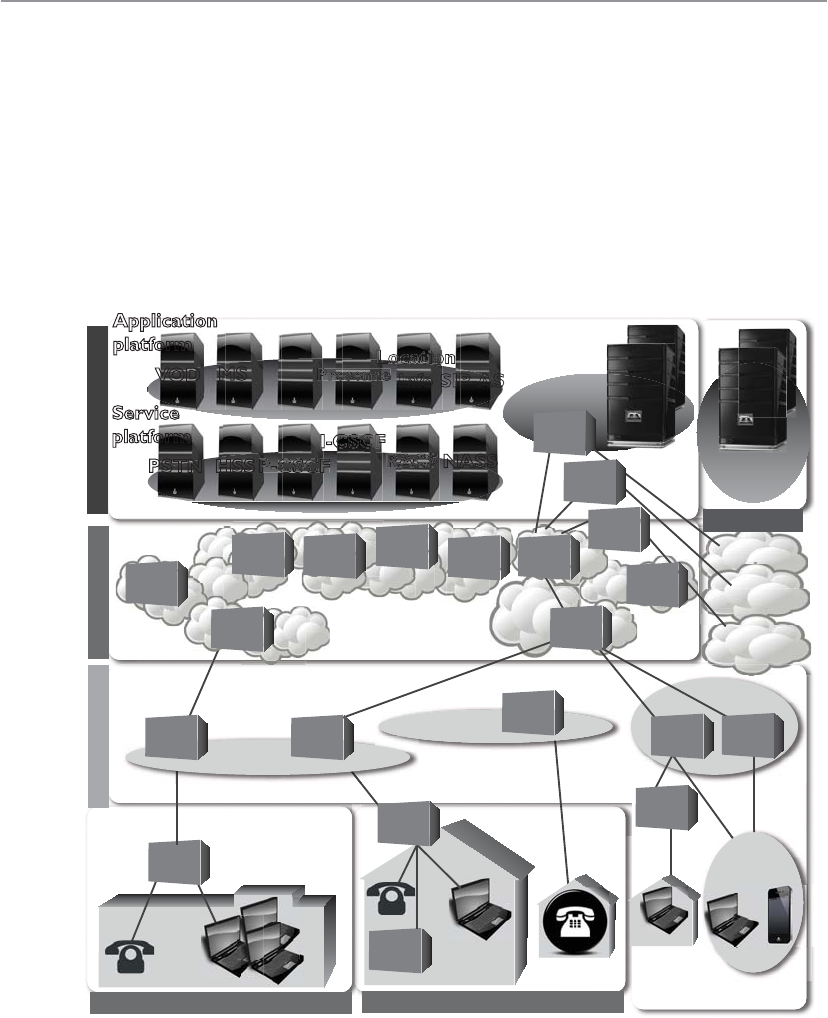
CISSP All-in-One Exam Guide
626
you need to show remote access connections, VPN concentrators, extranets, and the
various MAN and WAN connections. How do we illustrate our IP telephony structure?
How do we integrate our mobile device administration servers into the diagram? How
do we document our new cloud computing infrastructure? How do we show the layers
of virtualization within our database? How are redundant lines and fault-tolerance so-
lutions marked? How does this network correlate and interact with our offsite location
that carries out parallel processing? And we have not even gotten to our security com-
ponents (firewalls, IDS, IPS, DLP, antimalware, content filters, etc.). And in the real
world whatever network diagrams a company does have are usually out of date because
they take a lot of effort to create and maintain.
Enterprise
GW
SS
Outdoors
Wireless access
Internet
BS BTS
STB
HGW
AGW
Copper
access
ER
CR WDM WDM
OXC
ADM Metro
Metro
Edge
Edge
Core
Operation
Operation
platform
Security
platform
Oiii
NOC
SOC
VOD
PSTN HSS P-CSCFFFF
I-CSCFF
RACS NASS
MS
IM
Presenceeee
Location
Info
on
SIP-AS
Application
platform
Service
platform
Access Network
Enterprise Network Home Network
Core Network
Network Service Control
FW
CR
ER
OLTOLT Optical
access
te et
PSTN
MGW
ADM
SBC
Other IP
network
The point is that a network is a complex beast that cannot really be captured on one
piece of paper. Compare it to a human body. When you go into the doctor’s office you
see posters on the wall. One poster shows the circulatory system, one shows the mus-

Chapter 6: Telecommunications and Network Security
627
cles, one shows bones, another shows organs, another shows tendons and ligaments; a
dentist office has a bunch of posters on teeth; if you are there for acupuncture there will
be a poster on acupuncture and reflexology points. And then there is a ton of stuff no
one makes posters for: hair follicles, skin, toenails, eyebrows, but these are all part of
one system.
So what does this mean to the security professional? You have to understand a net-
work from many different aspects if you are actually going to secure it. You start by
learning all this network stuff in a modular fashion, but you need to quickly under-
stand how it all works together under the covers. You can be a complete genius on how
everything works within your current environment but not fully understand that when
an employee connects her iPhone to her company laptop that is connected to the cor-
porate network and uses it as a modem, this is an unmonitored WAN connection that
can be used as a doorway by an attacker. Security is complex and demanding, so do not
ever get too cocky and remember that a diagram is just showing a perspective of a net-
work, not the whole network.
Key Terms
•Autonomous system (AS) A collection of connected IP routing prefixes
under the control of one or more network operators that presents
a common, clearly defined routing policy to the Internet. They are
uniquely identified as individual networks on the Internet.
•Distance-vector routing protocol A routing protocol that calculates
paths based on the distance (or number of hops) and a vector (a
direction).
•Link-state routing protocol A routing protocol used in packet-
switching networks where each router constructs a map of the
connectivity within the network and calculates the best logical paths,
which form its routing table.
•Border Gateway Protocol (BGP) The protocol that carries out core
routing decisions on the Internet. It maintains a table of IP networks,
or “prefixes,” which designate network reachability among autonomous
systems (ASs).
•Wormhole attack This takes place when an attacker captures packets
at one location in the network and tunnels them to another location in
the network for a second attacker to use against a target system.
•Spanning Tree Protocol (STP) A network protocol that ensures a
loop-free topology for any bridged Ethernet LAN and allows redundant
links to be available in case connection links go down.
•Source routing Allows a sender of a packet to specify the route the
packet takes through the network versus routers determining the path.

CISSP All-in-One Exam Guide
628
Firewalls
A wall that is on fire will stop anyone.
Response: That’s the idea.
Firewalls are used to restrict access to one network from another network. Most
companies use firewalls to restrict access to their networks from the Internet. They may
also use firewalls to restrict one internal network segment from accessing another inter-
nal segment. For example, if the security administrator wants to make sure employees
cannot access the research and development network, he would place a firewall be-
tween this network and all other networks and configure the firewall to allow only the
type of traffic he deems acceptable.
A firewall device supports and enforces the company’s network security policy. An
organizational security policy provides high-level directives on acceptable and unac-
ceptable actions as they pertain to protecting critical assets. The firewall has a more
defined and granular security policy that dictates what services are allowed to be ac-
cessed, what IP addresses and ranges are to be restricted, and what ports can be ac-
cessed. The firewall is described as a “choke point” in the network because all
communication should flow through it, and this is where traffic is inspected and re-
stricted.
A firewall may be a server running a firewall software product or a specialized hard-
ware appliance. It monitors packets coming into and out of the network it is protecting.
It can discard packets, repackage them, or redirect them, depending upon the firewall
configuration. Packets are filtered based on their source and destination addresses, and
ports by service, packet type, protocol type, header information, sequence bits, and
much more. Many times, companies set up firewalls to construct a demilitarized zone
(DMZ), which is a network segment located between the protected and unprotected
•Multiprotocol Label Switching (MPLS) A networking technology
that directs data from one network node to the next based on short
path labels rather than long network addresses, avoiding complex
lookups in a routing table.
•Virtual local area network (VLAN) A group of hosts that communicate
as if they were attached to the same broadcast domain, regardless of their
physical location. VLAN membership can be configured through software
instead of physically relocating devices or connections, which allows for
easier centralized management.
•VLAN hopping An exploit that allows an attacker on a VLAN to gain
access to traffic on other VLANs that would normally not be accessible.
•Private Branch Exchange (PBX) A telephone exchange that serves a
particular business, makes connections among the internal telephones,
and connects them to the public-switched telephone network (PSTN)
via trunk lines.
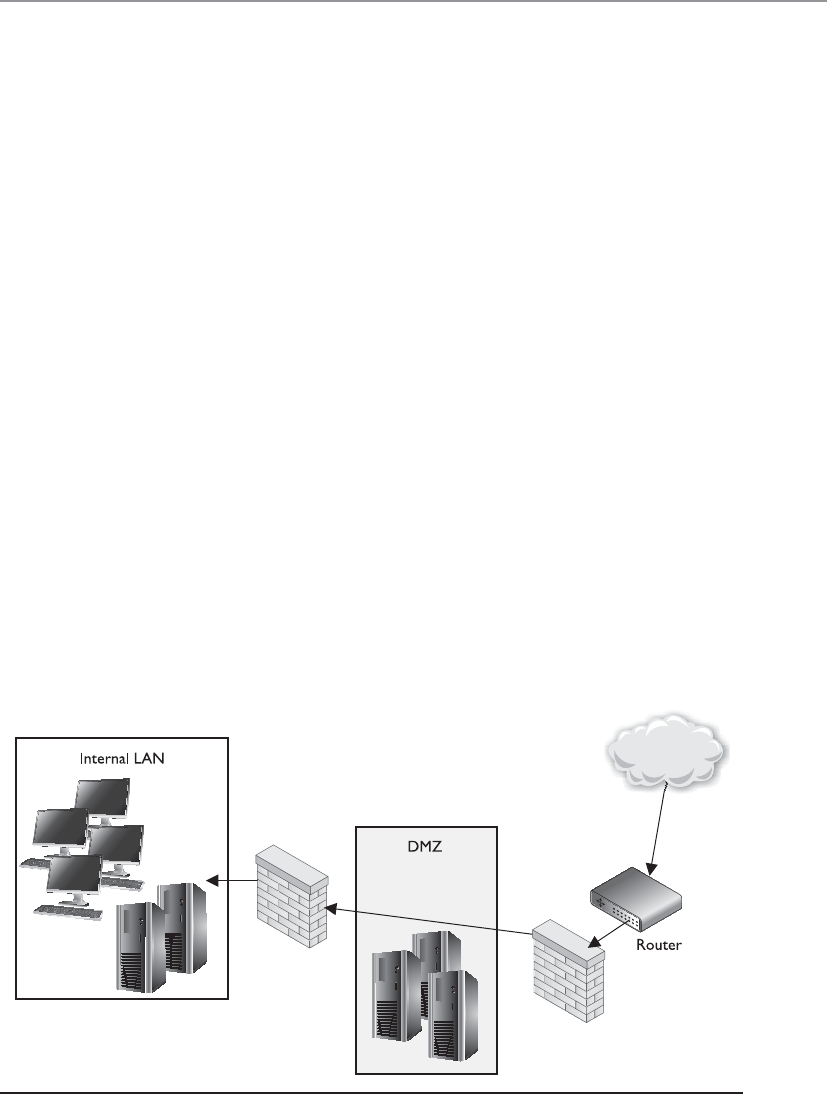
Chapter 6: Telecommunications and Network Security
629
networks. The DMZ provides a buffer zone between the dangerous Internet and the
goodies within the internal network that the company is trying to protect. As shown in
Figure 6-46, two firewalls are usually installed to form the DMZ. The DMZ usually con-
tains web, mail, and DNS servers, which must be hardened systems because they would
be the first in line for attacks. Many DMZs also have an IDS sensor that listens for mali-
cious and suspicious behavior.
Many different types of firewalls are available, because each environment may have
unique requirements and security goals. Firewalls have gone through an evolution of
their own and have grown in sophistication and functionality. The following sections
describe the various types of firewalls.
The types of firewalls we will review are
• Packet filtering
• Stateful
• Proxy
• Dynamic packet filtering
• Kernel proxy
We will then dive into the three main firewall architectures, which are
• Screened host
• Multihome
• Screened subnet
Then, we will look at honeypots and their uses, so please return all seats to their
upright position and lock your tray tables in front of you—we will be taking off shortly.
Figure 6-46 At least two firewalls, or firewall interfaces, are generally used to construct a DMZ.

CISSP All-in-One Exam Guide
630
Packet Filtering Firewalls
I don’t like this packet. Oh, but I like this packet. I don’t like this packet. This other packet is okay.
Packet filtering is a firewall technology that makes access decisions based upon
network-level protocol header values. The device that is carrying out packet filtering
processes is configured with ACLs, which dictate the type of traffic that is allowed into
and out of specific networks.
Packet filtering was the first generation of firewalls and it is the most rudimentary
type of all of the firewall technologies. The filters only have the capability of reviewing
protocol header information at the network and transport levels and carrying out PER-
MIT or DENY actions on individual packets. This means the filters can make access
decisions based upon the following basic criteria:
• Source and destination IP addresses
• Source and destination port numbers
• Protocol types
• Inbound and outbound traffic direction
Packet filtering is built into a majority of the firewall products today and is a capa-
bility that many routers perform. The ACL filtering rules are enforced at the network
interface of the device, which is the doorway into or out of a network. As an analogy,
you could have a list of items you look for before allowing someone into your office
premises through your front door. Your list can indicate that a person must be 18 years
or older, have an access badge, and be wearing pants. When someone knocks on the
door, you grab your list, which you will use to decide if this person can or cannot come
inside. So your front door is one interface into your office premises. You can also have
a list that outlines who can exit your office premises through your backdoor, which is
another interface. As shown in Figure 6-47, a router has individual interfaces with their
own unique addresses, which provide doorways into and out of a network. Each inter-
face can have its own ACL values, which indicate what type of traffic is allowed in and
out of that specific interface.
We will cover some basic ACL rules to illustrate how packet filtering is implemented
and enforced. The following router configuration allows Telnet traffic to travel from
system 10.1.1.2 to system 172.16.1.1:
permit tcp host 10.1.1.2 host 172.16.1.1 eq telnet
This next rule permits UDP traffic from system 10.1.1.2 to 172.16.1.1:
permit udp host 10.1.1.2 host 172.16.1.1
If you want to ensure that no ICMP traffic enters through a certain interface, the
following ACL can be configured and deployed:
deny icmp any any
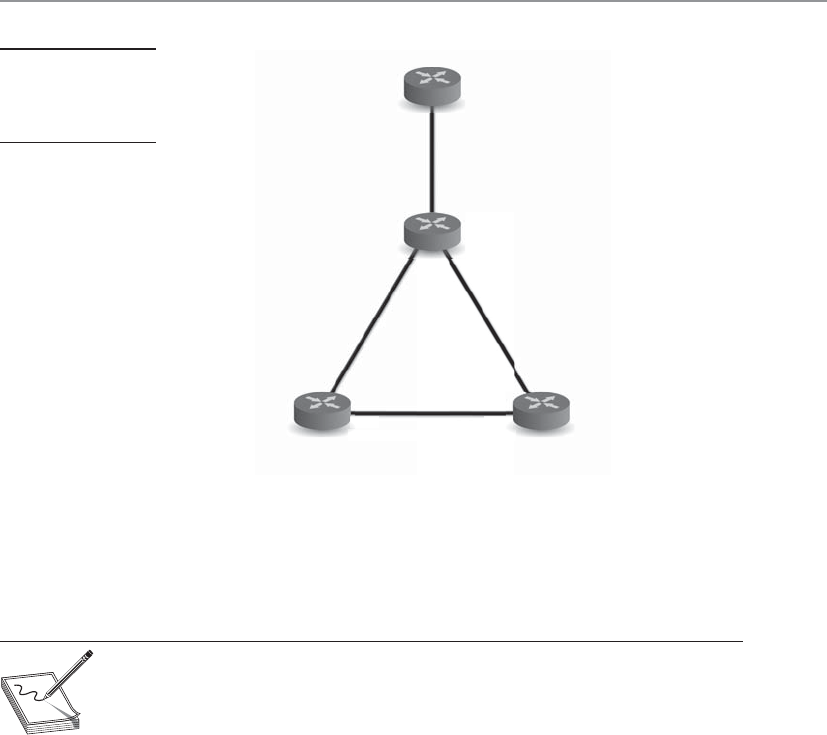
Chapter 6: Telecommunications and Network Security
631
If you want to allow Internet-based (WWW) traffic from system 1.1.1.1 to system
5.5.5.5, you can use the following ACL:
permit tcp host 1.1.1.1 host 5.5.5.5 eq www
NOTE
NOTE Filtering inbound traffic is known as ingress filtering. Outgoing traffic
can also be filtered using a process referred to as egress filtering.
So when a packet arrives at a packet filtering device, the device starts at the top of its
ACL and compares the packet’s characteristics to each rule set. If a successful match
(permit or deny) is found, then the remaining rules are not processed. If no matches are
found when the device reaches the end of the list, the traffic should be denied, but each
product is different. So if you are configuring a packet filtering device, make sure that if
no matches are identified, then the traffic is denied.
Packet filtering is also known as stateless inspection because the device does not un-
derstand the context that the packets are working within. This means that the device
does not have the capability to understand the “full picture” of the communication that
is taking place between two systems, but can only focus on individual packet character-
istics. As we will see in a later section, stateful firewalls understand and keep track of a
full communication session, not just the individual packets that make it up. Stateless
firewalls make their decisions for each packet based solely on the data contained in that
Router D
Router C
Router A Router B
10.10.13.2
f0/0
f2/0
f1/0
10.10.13.1
f0/0
10.10.10.1
f1/0
10.10.11.1 f1/0
10.10.11.2
f0/0
10.10.12.1
10.10.12.2
f0/0
10.10.10.2
f
f
1
1
0
0
0
2
2
2
Figure 6-47
ACLs are enforced
at the network
interface level.

CISSP All-in-One Exam Guide
632
individual packet. Stateful firewalls accumulate data about the packets they see and use
that data in an attempt to match incoming and outgoing packets to determine which
packets may be part of the same network communications session. By evaluating a pack-
et in the larger context of a network communications session, a stateful firewall has
much more complete information than a stateless firewall and can therefore more read-
ily recognize and reject packets that may be part of a network protocol–based attack.
Packet filtering devices can block many types of attacks at the network protocol
level, but they are not effective at protecting against attacks that exploit application-
specific vulnerabilities. That is because filtering only examines a packet’s header (i.e.,
delivery information) and not the data moving between the applications. Thus, a pack-
et filtering firewall cannot protect against packet content that could, for example, probe
for and exploit a buffer overflow in a given piece of software.
The lack of sophistication in packet filtering means that an organization should not
solely depend upon this type of firewall to protect its infrastructure and assets, but it
does not mean that this technology should not be used at all. Packet filtering is com-
monly carried out at the edge of a network to strip out all of the obvious “junk” traffic.
Since the rules are simple and only header information is analyzed, this type of filtering
can take place quickly and efficiently. After traffic is passed through a packet filtering
device, it is usually then processed by a more sophisticated firewall, which digs deeper
into the packet contents and can identify application-based attacks.
Some of the weaknesses of packet filtering firewalls are as follows:
• They cannot prevent attacks that employ application-specific vulnerabilities or
functions.
• The logging functionality present in packet filtering firewalls is limited.
• Most packet filtering firewalls do not support advanced user authentication
schemes.
• Many packet filtering firewalls cannot detect spoofed addresses.
• They may not be able to detect packet fragmentation attacks.
The advantages to using packet filtering firewalls are that they are scalable, they are
not application dependent, and they have high performance because they do not carry
out extensive processing on the packets. They are commonly used as the first line of
defense to strip out all the network traffic that is obviously malicious or unintended for
a specific network. The network traffic usually then has to be processed by more sophis-
ticated firewalls that will identify the not-so-obvious security risks.
Stateful Firewalls
This packet came from Texas, so it is okay.
Response: That’s a different type of state.
When packet filtering is used, a packet arrives at the firewall, and it runs through its
ACLs to determine whether this packet should be allowed or denied. If the packet is
allowed, it is passed on to the destination host, or to another network device, and the
packet filtering device forgets about the packet. This is different from stateful inspec-

Chapter 6: Telecommunications and Network Security
633
tion, which remembers and keeps track of what packets went where until each particu-
lar connection is closed.
A stateful firewall is like a nosy neighbor who gets into people’s business and con-
versations. She keeps track of the suspicious cars that come into the neighborhood,
who is out of town for the week, and the postman who stays a little too long at the
neighbor lady’s house. This can be annoying until your house is burglarized. Then you
and the police will want to talk to the nosy neighbor, because she knows everything
going on in the neighborhood and would be the one most likely to know something
unusual happened. A stateful inspection firewall is nosier than a regular filtering device
because it keeps track of what computers say to each other. This requires that the fire-
wall maintain a state table, which is like a score sheet of who said what to whom.
Keeping track of the state of a protocol connection requires keeping track of many
variables. Most people understand the three-step handshake a TCP connection goes
through (SYN, SYN/ACK, ACK), but what does this really mean? If my system wants to
communicate with your system using TCP, it will send your system a packet and in the
TCP header the SYN flag value will be set to 1. This makes this packet a SYN packet. If
your system accepts my connection request, it will send back a packet that has both the
SYN and ACK flags within the packet header set to 1. This is a SYN/ACK packet. While
many people know about these three steps of setting up a TCP connection, they are not
always familiar with all of the other items that are being negotiated at this time. For
example, our systems will agree upon sequence numbers, how much data to send at a
time (window size), how potential transmission errors will be identified (CRC values),
etc. Figure 6-48 shows all of the values that make up a TCP header. So there is a lot of
information going back and forth between our systems just in this one protocol—TCP.
There are other protocols that are involved with networking that a stateful firewall has
to be aware of and keep track of.
So “keeping state of a connection” means to keep a scorecard of all the various pro-
tocol header values as packets go back and forth between systems. The values not only
have to be correct—they have to happen in the right sequence. For example, if a stateful
firewall receives a packet that has all TCP flag values turned to 1, something malicious
is taking place. Under no circumstances during a legitimate TCP connection should all
of these values be turned on like this. Attackers send packets with all of these values
turned to 1 with the hopes that the firewall does not understand or check these values
and just forwards the packets onto the target system. The target system will not know
how to process a TCP packet with all header values set to 1 because it is against the
protocol rules. The target system may freeze or reboot; thus, this is a type of DoS attack.
This is referred to as an XMAS attack because all the flags are “turned on” and the
packet is lit up like a Christmas tree.
In another situation, if my system sends your system a SYN/ACK packet and your
system did not first send me a SYN packet, this, too, is against the protocol rules. The
protocol communication steps have to follow the proper sequence. Attackers send SYN/
ACK packets to target systems hoping that the firewall interprets this as an already es-
tablished connection and just allows the packets to go to the destination system with-
out inspection. A stateful firewall will not be fooled by such actions because it keeps
track of each step of the communication. It knows how protocols are supposed to work,
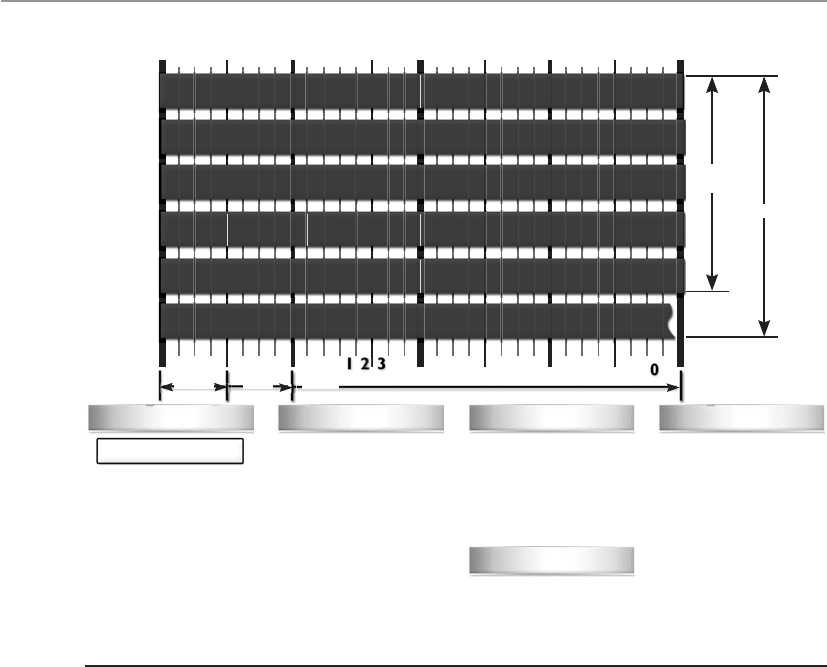
CISSP All-in-One Exam Guide
634
and if something is out of order (incorrect flag values, incorrect sequence, etc.) it does
not allow the traffic to pass through.
When a connection begins between two systems, the firewall investigates all layers
of the packet (all headers, payload, and trailers). All of the necessary information about
the specific connection is stored in the state table (source and destination IP addresses,
source and destination ports, protocol type, header flags, sequence numbers, time-
stamps, etc.). Once the initial packets go through this in-depth inspection and every-
thing is deemed safe, the firewall then just reviews the network and transport header
portions for the rest of the session. The values of each header for each packet are com-
pared to what is in the current state table, and the table is updated to reflect the progres-
sion of the communication process. Scaling down the inspection of the full packet to
just the headers for each packet is done to increase performance.
TCP is considered a connection-oriented protocol, and the various steps and states
this protocol operates within are very well defined. A connection progresses through a
series of states during its lifetime. The states are LISTEN, SYN-SENT, SYN-RECEIVED,
ESTABLISHED, FIN-WAIT-1, FIN-WAIT-2, CLOSE-WAIT, CLOSING, LAST-ACK, TIME-
WAIT, and the fictional state CLOSED. A stateful firewall keeps track of each of these
states for each packet that passes through, along with the corresponding acknowledg-
TCP Flags
Checksum
Offset
C E U A P R S F
Congestion Window
ECN (Explicit Congestion
Notification). See RFC
3168 for full details, valid
states below.
Number of 32-bit words
in TCP header, minimum
value of 5. Multiply by 4
to get byte count
Checksum of entire TCP
segment and pseudo
header (parts of IP
header)
Packet State DSB
00
00
00
00
00
00
01 01
01
01
10
11
11
11
11 11
ECN bits
Syn
Syn-Ack
Ack
No Congestion
No Congestion
Congestion
Receiver Response
Sender Response
C 0x80 Reduced (CWR)
E 0x40 ECN Echo (ECE)
U 0x20 Urgent
A 0x10 Ack
P 0x08 Push
R 0x04 Reset
S 0x02 Syn
F 0x01 Fin
1 No Operation (NOP, Pad)
2 Maximum segment size
3 Window Scale
4 Selective ACK ok
8 Timestamp
0 End of Options List
Congestion Notification TCP Options
Source Port Destination Port
Sequence Number
Acknowledgment Number
TCP Options (variable length, optional)
Offset Reserved TCP Flags Window
Urgent Pointer
Checksum
0
0
0
Bit 1234567891
045 67890123456789 1
3
2
Byte
Offset
20
Bytes
Offset
4
8
12
16
20
12 3
C E U A P R S F
Nibble
Byte Word
Figure 6-48 TCP header

Chapter 6: Telecommunications and Network Security
635
ment and sequence numbers. If the acknowledgment and/or sequence numbers are out
of order, this could imply that a replay attack is underway and the firewall will protect
the internal systems from this activity.
Nothing is ever simple in life, including the standardization of network protocol
communication. While the previous statements are true pertaining to the states of a
TCP connection, in some situations an application layer protocol has to change these
basic steps. For example, FTP uses an unusual communication exchange when initial-
izing its data channel compared to all of the other application layer protocols. FTP basi-
cally sets up two sessions just for one communication exchange between two computers.
The states of the two individual TCP connections that make up an FTP session can be
tracked in the normal fashion, but the state of the FTP connection follows different
rules. For a stateful device to be able to properly monitor the traffic of an FTP session,
it must be able to take into account the way that FTP uses one outbound connection for
the control channel and one inbound connection for the data channel. If you were
configuring a stateful firewall, you would need to understand the particulars of some
specific protocols to ensure that each is being properly inspected and controlled.
Since TCP is a connection-oriented protocol, it has clearly defined states during the
connection establishment, maintenance, and tearing-down stages. UDP is a connec-
tionless protocol, which means that none of these steps take place. UDP holds no state,
which makes it harder for a stateful firewall to keep track of. For connectionless proto-
cols a stateful firewall keeps track of source and destination addresses, UDP header
values, and some ACL rules. This connection information is also stored in the state ta-
ble and tracked. Since the protocol does not have a specific tear-down stage, the firewall
will just time out the connection after a period of inactivity and remove the data being
kept pertaining to that connection from the state table.
An interesting complexity of stateful firewalls and UDP connections is how the
ICMP protocol comes into play. Since UDP is connectionless, it does not provide a
mechanism to allow the receiving computer to tell the sending computer that data is
coming too fast. In TCP, the receiving computer can alter the window value in its head-
er, which tells the sending computer to reduce the amount of data that is being sent.
The message is basically, “You are overwhelming me and I cannot process the amount
of data you are sending me. Slow down.” UDP does not have a window value in its
header, so instead the receiving computer sends an ICMP packet that provides the same
function. But now this means that the stateful firewall must keep track of and allow
associated ICMP packets with specific UDP connections. If the firewall does not allow
the ICMP packets to get to the sending system, the receiving system could get over-
whelmed and crash. This is just one example of the complexity that comes into play
when a firewall has to do more than just packet filtering. Although stateful inspection
provides an extra step of protection, it also adds more complexity because this device
must now keep a dynamic state table and remember connections.
Stateful inspection firewalls unfortunately have been the victims of many types of
DoS attacks. Several types of attacks are aimed at flooding the state table with bogus
information. The state table is a resource, similar to a system’s hard drive space, mem-
ory, and CPU. When the state table is stuffed full of bogus information, the device may
either freeze or reboot. In addition, if this firewall must be rebooted for some reason, it
will lose its information on all recent connections; thus, it may deny legitimate packets.

CISSP All-in-One Exam Guide
636
Proxy Firewalls
Meet my proxy. He will be our middleman.
Aproxy is a middleman. It intercepts and inspects messages before delivering them
to the intended recipients. Suppose you need to give a box and a message to the presi-
dent of the United States. You couldn’t just walk up to the president and hand over these
items. Instead, you would have to go through a middleman, likely the Secret Service,
who would accept the box and message and thoroughly inspect the box to ensure noth-
ing dangerous was inside. This is what a proxy firewall does—it accepts messages either
entering or leaving a network, inspects them for malicious information, and, when it
decides the messages are okay, passes the data on to the destination computer.
Aproxy firewall stands between a trusted and untrusted network and makes the con-
nection, each way, on behalf of the source. What is important is that a proxy firewall
breaks the communication channel; there is no direct connection between the two com-
municating devices. Where a packet filtering device just monitors traffic as it is travers-
ing a network connection, a proxy ends the communication session and restarts it on
behalf of the sending system. Figure 6-49 illustrates the steps of a proxy-based firewall.
Notice that the firewall is not just applying ACL rules to the traffic, but stops the user
connection at the internal interface of the firewall itself and then starts a new session
on behalf of this user on the external interface. When the external web server replies to
the request, this reply goes to the external interface of the proxy firewall and ends. The
proxy firewall examines the reply information and if it is deemed safe, the firewall starts
a new session from itself to the internal system. This is just like our analogy of what the
delivery man does between you and the president.
Now a proxy technology can actually work at different layers of a network stack. A
proxy-based firewall that works at the lower layers of the OSI model is referred to as a
circuit-level proxy. A proxy-based firewall that works at the application layer is, strange-
ly enough, called an application-level proxy.
Acircuit-level proxy creates a connection (circuit) between the two communicating
systems. It works at the session layer of the OSI model and monitors traffic from a
network-based view. This type of proxy cannot “look into” the contents of a packet;
thus, it does not carry out deep-packet inspection. It can only make access decisions
based upon protocol header and session information that is available to it. While this
means that it cannot provide as much protection as an application-level proxy, because
it does not have to understand application layer protocols, it is considered application
Stateful-Inspection Firewall Characteristics
The following lists some important characteristics of a stateful-inspection firewall:
• Maintains a state table that tracks each and every communication session
• Provides a high degree of security and does not introduce the
performance hit that application proxy firewalls introduce
• Is scalable and transparent to users
• Provides data for tracking connectionless protocols such as UDP and ICMP
• Stores and updates the state and context of the data within the packets
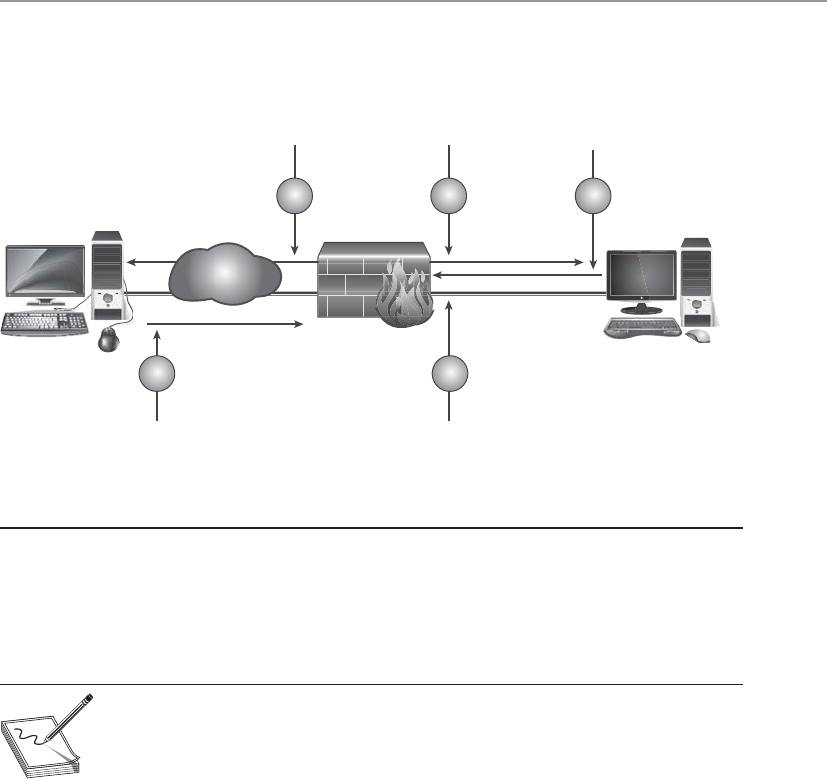
Chapter 6: Telecommunications and Network Security
637
independent. So it cannot provide the detail-oriented protection that a proxy that
works at a higher level can, but this allows it to provide a broader range of protection
where application layer proxies may not be appropriate or available.
NOTE
NOTE Traffic sent to the receiving computer through a circuit-level proxy
appears to have originated from the firewall instead of the sending system. This
is useful for hiding information about the internal computers on the network
the firewall is protecting.
Application-level proxies inspect the packet up through the application layer. Where
a circuit-level proxy only has insight up to the session layer, an application-level proxy
understands the packet as a whole and can make access decisions based on the content
of the packets. They understand various services and protocols and the commands that
are used by them. An application-level proxy can distinguish between an FTP GET com-
mand and an FTP PUT command, for example, and make access decisions based on
this granular level of information; on the other hand, packet filtering firewalls and cir-
cuit-level proxies can allow or deny FTP requests only as a whole, not by the commands
used within the FTP protocol.
An application-level proxy firewall has one proxy per protocol. A computer can
have many types of protocols (FTP, NTP, SMTP, Telnet, HTTP, and so on). Thus, one
application-level proxy per protocol is required. This does not mean one proxy firewall
per service is required, but rather that one portion of the firewall product is dedicated
to understanding how a specific protocol works and how to properly filter it for suspi-
cious data.
Figure 6-49 Proxy firewall breaks connection
User with web
browser configured
to use firewall proxy
server requests web page
from Internet website.
Once page is
cached, proxy server
sends the user the
requested web page.
Firewall\HTTP
proxy requested
web page on
behalf of end-user.
Firewall\HTTP proxy
accepts connection request.
Web server responds to
HTTP request from proxy
server, unaware the request
is coming from a user behind a proxy.
3 5 1
24
www server Workstation
Internet

CISSP All-in-One Exam Guide
638
Providing application-level proxy protection can be a tricky undertaking. The proxy
must totally understand how specific protocols work and what commands within that
protocol are legitimate. This is a lot to know and look at during the transmission of
data. As an analogy, picture a screening station at an airport that is made up of many
employees, all with the job of interviewing people before they are allowed into the
airport and onto an airplane. These employees have been trained to ask specific ques-
tions and detect suspicious answers and activities, and have the skill set and authority
to detain suspicious individuals. Now, suppose each of these employees speaks a differ-
ent language because the people they interview come from different parts of the world.
So, one employee who speaks German could not understand and identify suspicious
answers of a person from Italy because they do not speak the same language. This is the
same for an application-level proxy firewall. Each proxy is a piece of software that has
been designed to understand how a specific protocol “talks” and how to identify suspi-
cious data within a transmission using that protocol.
NOTE
NOTE If the application-level proxy firewall does not understand a certain
protocol or service, it cannot protect this type of communication. In this
scenario, a circuit-level proxy is useful because it does not deal with such
complex issues. An advantage of a circuit-level proxy is that it can handle a
wider variety of protocols and services than an application-level proxy can,
but the downfall is that the circuit-level proxy cannot provide the degree of
granular control that an application-level proxy provides. Life is just full of
compromises.
A circuit-level proxy works similar to a packet filter in that it makes access decisions
based on address, port, and protocol type header values. It looks at the data within the
packet header rather than the data at the application layer of the packet. It does not
know whether the contents within the packet are safe or unsafe; it only understands the
traffic from a network-based view.
An application-level proxy, on the other hand, is dedicated to a particular protocol
or service. At least one proxy is used per protocol because one proxy could not properly
interpret all the commands of all the protocols coming its way. A circuit-level proxy
works at a lower layer of the OSI model and does not require one proxy per protocol
because it does not look at such detailed information.
SOCKS is an example of a circuit-level proxy gateway that provides a secure channel
between two computers. When a SOCKS-enabled client sends a request to access a com-
puter on the Internet, this request actually goes to the network’s SOCKS proxy firewall,
as shown in Figure 6-50, which inspects the packets for malicious information and
checks its policy rules to see whether this type of connection is allowed. If the packet is
acceptable and this type of connection is allowed, the SOCKS firewall sends the mes-
sage to the destination computer on the Internet. When the computer on the Internet
responds, it sends its packets to the SOCKS firewall, which again inspects the data and
then passes the packets on to the client computer.
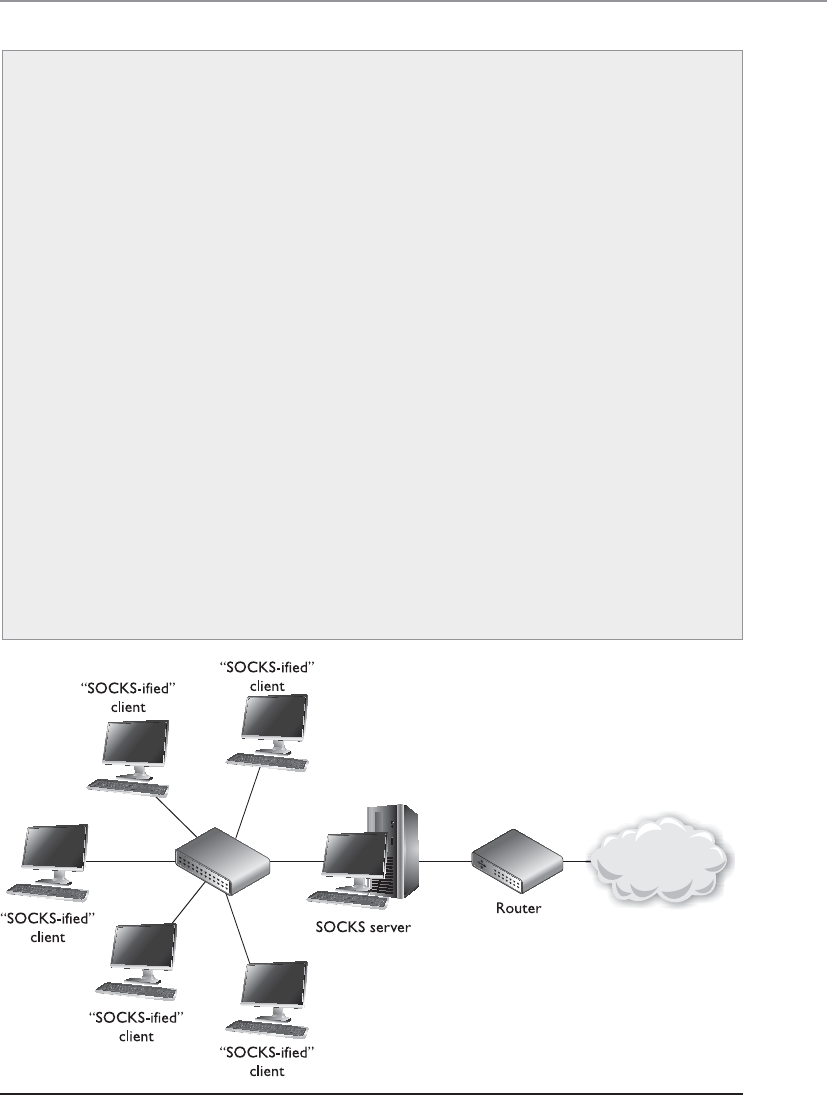
Chapter 6: Telecommunications and Network Security
639
Application-Level Proxy Firewalls
Application-level proxy firewalls like all technologies have their pros and cons. It
is important to fully understand all characteristics of this type of firewall before
purchasing and deploying this type of solution.
Characteristics of application-level proxy firewalls:
• They have extensive logging capabilities due to the firewall being able
to examine the entire network packet rather than just the network
addresses and ports.
• Application layer proxy firewalls are capable of authenticating users
directly, as opposed to packet filtering firewalls and stateful-inspection
firewalls, which can usually only carry out system authentication.
• Since application layer proxy firewalls are not simply layer 3 devices,
they can address spoofing attacks and other sophisticated attacks.
Disadvantages of using application-level proxy firewalls:
• Are not generally well suited to high-bandwidth or real-time
applications.
• Tend to be limited in terms of support for new network applications
and protocols.
• Create performance issues because of the necessary per-packet
processing requirements.
Figure 6-50 Circuit-level proxy firewall

CISSP All-in-One Exam Guide
640
The SOCKS firewall can screen, filter, audit, log, and control data flowing in and out
of a protected network. Because of its popularity, many applications and protocols have
been configured to work with SOCKS in a manner that takes less configuration on the
administrator’s part, and various firewall products have integrated SOCKS software to
provide circuit-based protection.
NOTE
NOTE Remember that whether an application- or circuit-level proxy firewall
is being used, it is still acting as a proxy. Both types of proxy firewalls deny
actual end-to-end connectivity between the source and destination systems.
In attempting a remote connection, the client connects to and communicates
with the proxy; the proxy, in turn, establishes a connection to the destination
system and makes requests to it on the client’s behalf. The proxy maintains
two independent connections for every one network transmission. It essentially
turns a two-party session into a four-party session, with the middle process
emulating the two real systems.
Dynamic Packet Filtering
When an internal system needs to communicate to an entity outside its trusted net-
work, it must choose a source port so the receiving system knows how to respond prop-
erly. Ports up to 1023 are called well-known ports and are reserved for server-side services.
The sending system must choose a dynamic port higher than 1023 when it sets up a
connection with another entity. The dynamic packet-filtering firewall then creates an
ACL that allows the external entity to communicate with the internal system via this
Application-Level vs. Circuit-Level Proxy Firewall
Characteristics
Characteristics of application-level proxy firewalls:
• Each protocol that is to be monitored must have a unique proxy.
• Provides more protection than circuit-level proxy firewalls.
• Require more processing per packet and thus are slower than a circuit-
level proxy firewall.
Characteristics of circuit-level proxy firewalls:
• Do not require a proxy for each and every protocol.
• Do not provide the deep-inspection capabilities of an application layer
proxy.
• Provide security for a wider range of protocols.
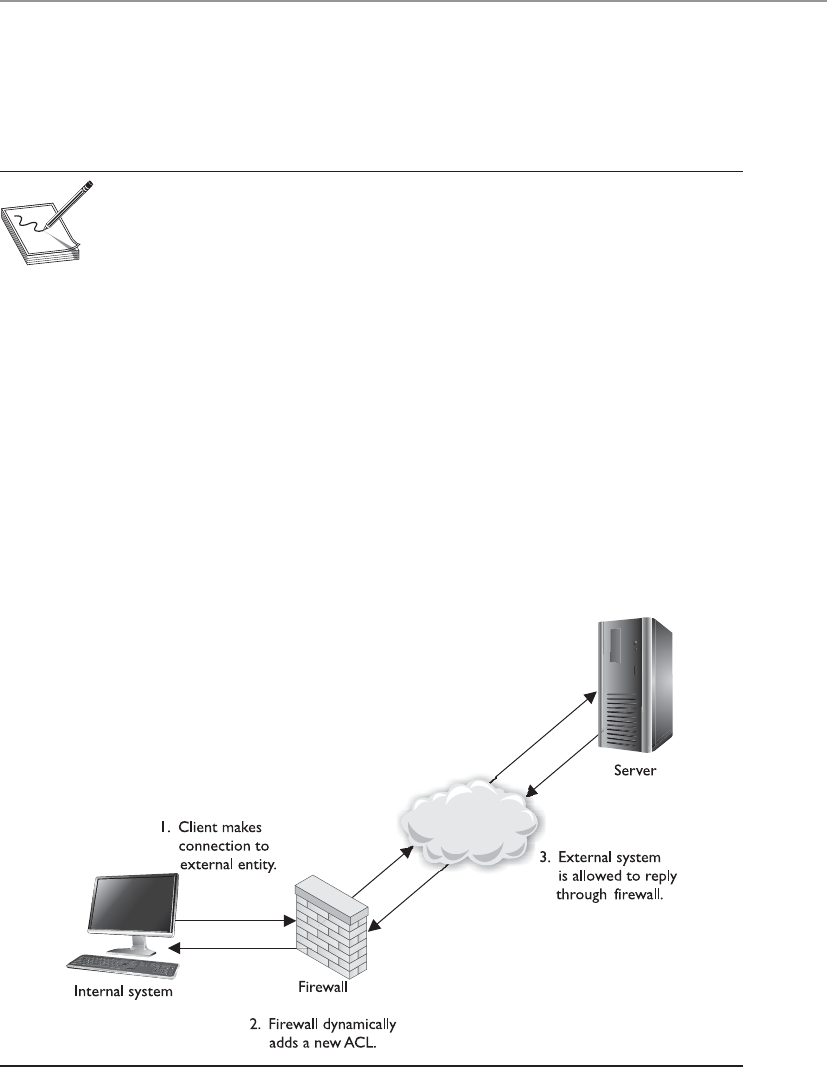
Chapter 6: Telecommunications and Network Security
641
high port. If this were not an available option for your dynamic packet-filtering firewall,
you would have to allow “punch holes” in your firewalls for all ports above 1023, be-
cause the client side chooses these ports dynamically and the firewall would never
know exactly on which port to allow or disallow traffic.
NOTE
NOTE The standard port for HTTP is 80, which means a server will have
a service listening on port 80 for HTTP traffic. HTTP (and most other
protocols) works in a type of client/server model. The server portion uses
the well-known ports (FTP uses 20 and 21; SMTP uses 25) so everyone knows
how to connect to those services. A client will not use one of these well-
known port numbers for itself, but will choose a random, higher port number.
An internal system could choose a source port of 11,111 for its message to the out-
side system. This frame goes to the dynamic packet-filtering firewall, which builds an
ACL, as illustrated in Figure 6-51, that indicates a response from the destination com-
puter to this internal system’s IP address and port 11,111 is to be allowed. When the
destination system sends a response, the firewall allows it. These ACLs are dynamic in
nature, so once the connection is finished (either a FIN or RST packet is received), the
ACL is removed from the list. On connectionless protocols, such as UDP, the connec-
tion times out and then the ACL is removed.
The benefit of a dynamic packet-filtering firewall is that it gives you the option of
allowing any type of traffic outbound and permitting only response traffic inbound.
Figure 6-51 Dynamic packet filtering adds ACLs when connections are created.

CISSP All-in-One Exam Guide
642
Kernel Proxy Firewalls
This firewall is made from kernels of corn.
Response: Why are you here?
Akernel proxy firewall is considered a fifth-generation firewall. It differs from all the
previously discussed firewall technologies because it creates dynamic, customized net-
work stacks when a packet needs to be evaluated.
When a packet arrives at a kernel proxy firewall, a new virtual network stack is cre-
ated, which is made up of only the protocol proxies necessary to examine this specific
packet properly. If it is an FTP packet, then the FTP proxy is loaded in the stack. The
packet is scrutinized at every layer of the stack. This means the data link header will be
evaluated along with the network header, transport header, session layer information,
and the application layer data. If anything is deemed unsafe at any of these layers, the
packet is discarded.
Kernel proxy firewalls are faster than application layer proxy firewalls because all of
the inspection and processing takes place in the kernel and does not need to be passed
up to a higher software layer in the operating system. It is still a proxy-based system, so
the connection between the internal and external entity is broken by the proxy acting
as a middleman, and it can perform NAT by changing the source address, as do the
preceding proxy-based firewalls.
Table 6-10 lists the important concepts and characteristics of the firewall types dis-
cussed in the preceding sections. Although various firewall products can provide a mix
of these services and work at different layers of the OSI model, it is important you un-
derstand the basic definitions and functionalities of these firewall types.
Firewall Type OSI Layer Characteristics
Packet filtering Network layer Looks at destination and source addresses, ports,
and services requested. Routers using ACLs to
monitor network traffic.
Application-level
proxy
Application layer Looks deep into packets and makes granular
access control decisions. It requires one proxy
per protocol.
Circuit-level
proxy
Session layer Looks only at the header packet information. It
protects a wider range of protocols and services
than an application-level proxy, but does not
provide the detailed level of control available to
an application-level proxy.
Stateful Network layer Looks at the state and context of packets. Keeps
track of each conversation using a state table.
Kernel proxy Application layer Faster because processing is done in the kernel.
One network stack is created for each packet.
Table 6-10 Comparison of Different Types of Firewalls

Chapter 6: Telecommunications and Network Security
643
Today’s Firewalls
What do today’s firewalls do?
Response: Everything.
In school and in books you learn things in a modular fashion. You need to under-
stand how packet filtering works and how it is different from stateful inspection. You
need to understand how a proxy works and what it means if it works in kernel mode.
But technology, like life, is much more complicated when you get out of school because
so many of the things you learn individually are actually very entwined with each other.
Learning the basics of networking is like studying individual threads and strings. They
are foundational components that are later interwoven to make different kinds of fab-
rics. Every network in the world is different in some way, but each is made up of the
same foundational ingredients. The same can be said about firewall products. Today’s
firewall products usually provide a combination of the various technologies we de-
scribed earlier (filtering, proxy, stateful) in their own proprietary ways. Some people
learn the products directly (PIX, CheckPoint, etc.) and while they have intimate knowl-
edge of how to configure and maintain these products, they may not have a clear un-
derstanding of all types of firewall technologies available and how they work together.
Today’s firewalls not only use a combination of the modular technologies we cov-
ered earlier, each product type commonly has its own specific focus. So we have per-
sonal, enterprise, web-based, mobile firewall types and more. Many enterprise gateway
firewalls have content-filtering capabilities, which allow an administrator to develop
keywords that can be used to detect unwanted traffic. The keywords can be used to
identify spam, malicious code, pornographic material, or if employees are attempting
to transmit sensitive data outside of the network. Content filtering can be more sophis-
ticated so that logic rules are developed that identify malicious behavior.
Appliances
A firewall may take the form of either software installed on a regular computer
using a regular operating system or a dedicated hardware appliance that has its
own operating system. The second choice is usually more secure, because the
vendor uses a stripped-down version of an operating system (usually Linux or
BSD Unix). Operating systems are full of code and functionality that are not nec-
essary for a firewall. This extra complexity opens the doors for vulnerabilities. If a
hacker can exploit and bring down a company’s firewall, then the company is
very exposed and in danger.
In today’s jargon, dedicated hardware devices that have stripped-down oper-
ating systems and limited and focused software capabilities are called appliances.
Where an operating system has to provide a vast array of functionality, an appli-
ance provides very focused functionality—as in just being a firewall.
If a software-based firewall is going to run on a regular system, then the un-
necessary user accounts should be disabled, unnecessary services deactivated, un-
used subsystems disabled, unneeded ports closed, etc. If firewall software is going
to run on a regular system and not a dedicated appliance, then the system needs to
be fully locked down.

CISSP All-in-One Exam Guide
644
Bastion Host
This guy is going to get hit first; he’d better be tough.
A system is considered a bastion host if it is a highly exposed device that is
most likely to be targeted by attackers. The closer any system is to an untrusted
network, as in the Internet, the more it is considered a target candidate since it
has a smaller number of layers of protection guarding it. If a system is on the
public side of a DMZ or is directly connected to an untrusted network, it is con-
sidered a bastion host; thus, it needs to be extremely locked down.
The system should have all unnecessary services disabled, unnecessary ac-
counts disabled, unneeded ports closed, unused applications removed, unused
subsystems and administrative tools removed, etc. The attack surface of the sys-
tem needs to be reduced, which means the number of potential vulnerabilities
need to be reduced as much as possible.
In many enterprise environments, basic packet filtering is carried out by routers that
work on the outer edges of the network. Different types of traffic are routed to where
they need to go, so SMTP traffic goes to the mail server, HTTP traffic goes to the web
server, DNS traffic goes to the DNS server, etc. The more targeted firewall products are
deployed closest to the types of technologies that they were developed to protect. So
web traffic passes through a web-based firewall, e-mail passes through a product that
can carry out e-mail content filtering, traffic that needs to communicate with an inter-
nal database will pass through an application-level proxy firewall that carries out in-
spection that can identify things like SQL injection attacks, and individual workstations
and mobile devices will have host-based firewalls installed.
Organizations need to ensure that the correct firewall technology is in place to
monitor specific network traffic types and protect unique resource types. The firewalls
also have to be properly placed; we will cover this topic in the next section.
NOTE
NOTE Firewall technology has evolved as attack types have evolved. The first-
generation firewalls could only monitor network traffic. As attackers moved
from just carrying out network-based attacks (DoS, fragmentation, spoofing,
etc.) to software-based attacks (buffer overflows, injections, malware, etc.),
new generations of firewalls were developed to monitor for these types of
attacks.
Firewall Architecture
Firewalls are great, but where do we put them?
Firewalls can be placed in a number of areas on a network to meet particular needs.
They can protect an internal network from an external network and act as a choke point
for all traffic. A firewall can be used to segment and partition network sections and
enforce access controls between two or more subnets. Firewalls can also be used to
provide a DMZ architecture. And as covered in the previous section, the right firewall
type needs to be placed in the right location. Organizations have common needs for
firewalls; hence, they keep them in similar places on their networks. We will see more
on this topic in the following sections.

Chapter 6: Telecommunications and Network Security
645
Dual-Homed Firewall Dual-homed refers to a device that has two interfaces: one
facing the external network and the other facing the internal network. If firewall soft-
ware is installed on a dual-homed device, and it usually is, the underlying operating
system should have packet forwarding and routing turned off for security reasons. If
they are enabled, the computer may not apply the necessary ACLs, rules, or other re-
strictions required of a firewall. When a packet comes to the external NIC from an un-
trusted network on a dual-homed firewall and the operating system has forwarding
enabled, the operating system will forward the traffic instead of passing it up to the
firewall software for inspection.
Many network devices today are multihomed, which just means they have several
NICs that are used to connect several different networks. Multihomed devices are com-
monly used to house firewall software, since the job of a firewall is to control the traffic
as it goes from one network to another. A common multihomed firewall architecture
allows a company to have several DMZs. One DMZ may hold devices that are shared
between companies in an extranet, another DMZ may house the company’s DNS and
mail servers, and yet another DMZ may hold the company’s web servers. Different
DMZs are used for two reasons: to control the different traffic types (for example, to
make sure HTTP traffic only goes toward the web servers and ensure DNS requests go
toward the DNS server), and to ensure that if one system on one DMZ is compromised,
the other systems in the rest of the DMZs are not accessible to this attacker.
If a company depends solely upon a multihomed firewall with no redundancy, this
system could prove to be a single point of failure. If it goes down, then all traffic flow
stops. Some firewall products have embedded redundancy or fault tolerance capabili-
ties. If a company uses a firewall product that does not have these capabilities, then the
network should have redundancy built into it.
Along with potentially being a single point of failure, another security issue that
should be understood is the lack of defense in depth. If the company depends upon
just one firewall, no matter what architecture is being used or how many interfaces the
device has, there is only one layer of protection. If an attacker can compromise the one
firewall, then she can gain direct access to company network resources.
Screened Host Ascreened host is a firewall that communicates directly with a pe-
rimeter router and the internal network. Figure 6-52 shows this type of architecture.
Traffic received from the Internet is first filtered via packet filtering on the outer
router. The traffic that makes it past this phase is sent to the screened-host firewall,
which applies more rules to the traffic and drops the denied packets. Then the traffic
moves to the internal destination hosts. The screened host (the firewall) is the only
device that receives traffic directly from the router. No traffic goes directly from the In-
ternet, through the router, and to the internal network. The screened host is always part
of this equation.
A bastion host does not have to be a firewall—the term just relates to the po-
sition of the system in relation to an untrusted environment and its threat of at-
tack. Different systems can be considered bastion hosts (mail, FTP, DNS) since
many of these are placed on the outer edges of networks.
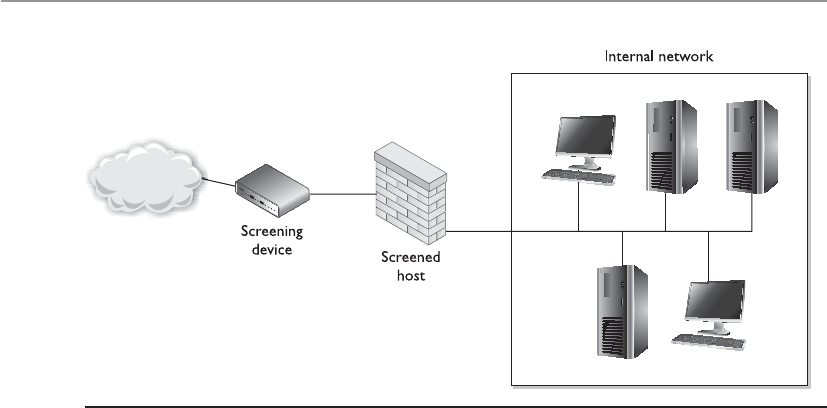
CISSP All-in-One Exam Guide
646
If the firewall is an application-based system, protection is provided at the network
layer by the router through packet filtering, and at the application layer by the firewall.
This arrangement offers a high degree of security, because for an attacker to be success-
ful, she would have to compromise two systems.
What does the word “screening” mean in this context? As shown in Figure 6-52, the
router is a screening device and the firewall is the screened host. This just means there
is a layer that scans the traffic and gets rid of a lot of the “junk” before it is directed to-
ward the firewall. A screened host is different from a screened subnet, which is de-
scribed next.
Screened Subnet Ascreened-subnet architecture adds another layer of security to
the screened-host architecture. The external firewall screens the traffic entering the DMZ
network. However, instead of the firewall then redirecting the traffic to the internal
network, an interior firewall also filters the traffic. The use of these two physical fire-
walls creates a DMZ.
In an environment with only a screened host, if an attacker successfully breaks
through the firewall, nothing lies in her way to prevent her from having full access to
the internal network. In an environment using a screened subnet, the attacker would
have to hack through another firewall to gain access. In this layered approach to secu-
rity, the more layers provided, the better the protection. Figure 6-53 shows a simple
example of a screened subnet.
The examples shown in the figures are simple in nature. Often, more complex net-
works and DMZs are implemented in real-world systems. Figures 6-54 and 6-55 show
some other possible architectures of screened subnets and their configurations.
Figure 6-52 A screened host is a firewall that is screened by a router.

Chapter 6: Telecommunications and Network Security
647
Figure 6-53 With a screened subnet, two firewalls are used to create a DMZ.
Figure 6-54 A screened subnet can have different networks within it and different firewalls that
filter for specific threats.

CISSP All-in-One Exam Guide
648
The screened-subnet approach provides more protection than a stand-alone fire-
wall or a screened-host firewall because three devices are working together and all three
devices must be compromised before an attacker can gain access to the internal net-
work. This architecture also sets up a DMZ between the two firewalls, which functions
as a small network isolated among the trusted internal and untrusted external net-
works. The internal users usually have limited access to the servers within this area.
Web, e-mail, and other public servers often are placed within the DMZ. Although this
solution provides the highest security, it also is the most complex. Configuration and
maintenance can prove to be difficult in this setup, and when new services need to be
added, three systems may need to be reconfigured instead of just one.
Figure 6-55 Some architectures have separate screened subnets with different server types in each.

Chapter 6: Telecommunications and Network Security
649
NOTE
NOTE Sometimes a screened-host architecture is referred to as a single-
tiered configuration and a screened subnet is referred to as a two-tiered
configuration. If three firewalls create two separate DMZs, this may be called a
three-tiered configuration.
Virtualized Firewalls
Even virtualized environments need protection.
A lot of the network functionality we have covered up to this point can take place in
virtual environments. Most people understand that a host system can have virtual guest
systems running on it, which allow for multiple operating systems to run on the same
hardware platform simultaneously. But the industry has advanced much further than
this when it comes to virtualized technology. Routers and switches can be virtualized,
which means you do not actually purchase a piece of hardware and plug it into your
network, but instead you can deploy software products that carry out routing and
switching functionality.
We used to deploy a piece of hardware for every network function needed (DNS,
mail, routers, switches, storage, Web), but today many of these items run within virtual
machines on a smaller number of hardware machines. This reduces software and hard-
ware costs and allows for more centralized administration, but these components still
needed to be protected from each other and external malicious entities. As an analogy,
let’s say that 15 years ago each person lived in their own house and you had policemen
placed between each house so that the people in the houses could not attack each
Firewall Architecture Characteristics
It is important to understand the following characteristics of these firewall archi-
tecture types:
Dual-homed:
• A single computer with separate NICs connected to each network.
• Used to divide an internal trusted network from an external untrusted
network.
• Must disable a computer’s forwarding and routing functionality so the
two networks are truly segregated.
Screened host:
• Router filters (screens) traffic before it is passed to the firewall.
Screened subnet:
• External router filters (screens) traffic before it enters the subnet. Traffic
headed toward the internal network then goes through two firewalls.

CISSP All-in-One Exam Guide
650
other. Then last year, many of these people moved in together so at least five people live
in the same physical house. These people still need to be protected from each other, so
you had to move some of the policemen inside the houses to enforce the laws and keep
the peace. This is the same thing that virtualized firewalls do—they have “moved into”
the virtualized environments to provide the necessary protection between virtualized
entities.
As illustrated in Figure 6-56, a network can have a traditional physical firewall on
the physical network and virtual firewalls within the individual virtual environments.
Virtual firewalls can provide bridge-type functionality in which individual traffic
links are monitored between virtual machines, or they can be integrated within the
hypervisor. The hypervisor is the software component that carries out virtual machine
management and oversees guest system software execution. If the firewall is embedded
within the hypervisor, then it can “see” and monitor all the activities taking place with-
in the system.
Web servers
VLAN1 VLAN1VLAN2 VLAN2
vNIC
Hypervisor 1
Access
Aggregation
vNIC
Switch
Switch
Firewall
Border router
VLAN1 VLAN2
vNIC
Database
Applications
Hypervisor 2 Hypervisor 3
Figure 6-56 Virtual firewalls

Chapter 6: Telecommunications and Network Security
651
The “Shoulds” of Firewalls
Look both ways before crossing the street, and always floss.
Response: Wrong rule set.
The default action of any firewall should be to implicitly deny any packets not ex-
plicitly allowed. This means that if no rule states that the packet can be accepted, that
packet should be denied, no questions asked. Any packet entering the network that has
a source address of an internal host should be denied. Masquerading, or spoofing, is a
popular attacking trick in which the attacker modifies a packet header to have the
source address of a host inside the network she wants to attack. This packet is spoofed
and illegitimate. There is no reason a packet coming from the Internet should have an
internal source network address, so the firewall should deny it. The same is true for
outbound traffic. No traffic should be allowed to leave a network that does not have an
internal source address. If this occurs, it means someone, or some program, on the in-
ternal network is spoofing traffic. This is how zombies work—the agents used in distrib-
uted DoS (DDoS) attacks. If packets are leaving a network with different source
addresses, these packets are spoofed and the network is most likely being used as an
accomplice in a DDoS attack.
Firewalls should reassemble fragmented packets before sending them on to their
destination. In some types of attacks, the hackers alter the packets and make them seem
to be something they are not. When a fragmented packet comes to a firewall, the fire-
wall is seeing only part of the picture. It will make its best guess as to whether this piece
of a packet is malicious or not. Because these fragments contain only a part of the full
packet, the firewall is making a decision without having all the facts. Once all fragments
are allowed through to a host computer, they can be reassembled into malicious pack-
ages that can cause a lot of damage. A firewall should accept each fragment, assemble
the fragments into a complete packet, and then make an access decision based on the
whole packet. The drawback to this, however, is that firewalls that do reassemble pack-
et fragments before allowing them to go on to their destination computer cause traffic
delay and more overhead. It is up to the organization to decide whether this configura-
tion is necessary and whether the added traffic delay is acceptable.
Fragmentation Attacks
Attackers have constructed several exploits that take advantage of some of the
packet fragmentation steps within networking protocols. The following are three
such examples:
•IP fragmentation Exploitation of fragmentation and reassembly flaws
within IP, which causes DoS.
•Teardrop attack Malformed fragments are created by the attacker, and
once they are reassembled, they could cause the victim system to become
unstable.
•Overlapping fragment attack Used to subvert packet filters that
do not reassemble packet fragments before inspection. A malicious
fragment overwrites a previously approved fragment and executes an
attack on the victim’s system.

CISSP All-in-One Exam Guide
652
Many companies choose to deny network entrance to packets that contain source
routing information, which was mentioned earlier. Source routing means the packet
decides how to get to its destination, not the routers in between the source and destina-
tion computer. Source routing moves a packet throughout a network on a predeter-
mined path. The sending computer must know about the topology of the network and
how to route data properly. This is easier for the routers and connection mechanisms in
between, because they do not need to make any decisions on how to route the packet.
However, it can also pose a security risk. When a router receives a packet that contains
source routing information, it figures the packet knows what needs to be done and
passes it on. In some cases, not all filters may be applied to the packet, and a network
administrator may want packets to be routed only through a certain path and not the
route a particular packet dictates. To make sure none of this misrouting happens, many
firewalls are configured to check for source routing information within the packet and
deny it if it is present.
Some common firewall rules that should be implemented are as follows:
•Silent rule Drop “noisy” traffic without logging it. This reduces log sizes by
not responding to packets that are deemed unimportant.
•Stealth rule Disallows access to firewall software from unauthorized systems.
•Cleanup rule Last rule in rule-base that drops and logs any traffic that does
not meet preceding rules.
•Negate rule Used instead of the broad and permissive “any rules.” Negate
rules provide tighter permission rights by specifying what system can be
accessed and how.
Firewalls are not effective “right out of the box.” You really need to understand the
type of firewall being implemented and its configuration ramifications. For example, a
firewall may have implied rules, which are used before the rules you configure. These
implied rules might contradict your rules and override them. In this case you think a
certain traffic type is being restricted, but the firewall may allow that type of traffic into
your network by default.
Unfortunately, once a company erects a firewall, it may have a false sense of secu-
rity. Firewalls are only one piece of the puzzle, and security has a lot of pieces.
The following list addresses some of the issues that need to be understood as they
pertain to firewalls:
• Most of the time a distributed approach needs to be used to control all network
access points, which cannot happen through the use of just one firewall.
• Firewalls can present a potential bottleneck to the flow of traffic and a single
point of failure threat.
• Most firewalls do not provide protection from malware and can be fooled by
the more sophisticated attack types.
• Firewalls do not protect against sniffers or rogue wireless access points, and
provide little protection against insider attacks.

Chapter 6: Telecommunications and Network Security
653
The role of firewalls is becoming more and more complex as they evolve and take
on more functionality and responsibility. At times, this complexity works against the
security professional because it requires them to understand and properly implement
additional functionality. Without an understanding of the different types of firewalls
and architectures available, many more security holes can be introduced, which lays out
the welcome mat for attackers.
Proxy Servers
Earlier we covered two types of proxy-based firewalls, which are different from proxy
servers. Proxy servers act as an intermediary between the clients that want access to cer-
tain services and the servers that provide those services. As a security administrator, you
do not want internal systems to directly connect to external servers without some type
of control taking place. For example, if users on your network could connect directly to
web sites without some type of filtering and rules in place, the users could allow mali-
cious traffic into the network or the user could be surfing web sites your company
deems inappropriate. In this situation, all internal web browsers would be configured
to send their web requests to a web proxy server. The proxy server validates that the re-
quest is safe and then sends an independent request to the web site on behalf of the
user. A very basic proxy server architecture is shown in Figure 6-57.
The proxy server may cache the response it receives from the server so when other
clients make the same request, a connection does not have to go out to the actual web
server again, but the necessary data is served up directly from the proxy server. This
drastically reduces latency and allows the clients to get the data they need much more
quickly.
Computer A
Computer B
Proxy
server
Web
server
Computer C
Figure 6-57
Proxy servers
control traffic
between clients
and servers.
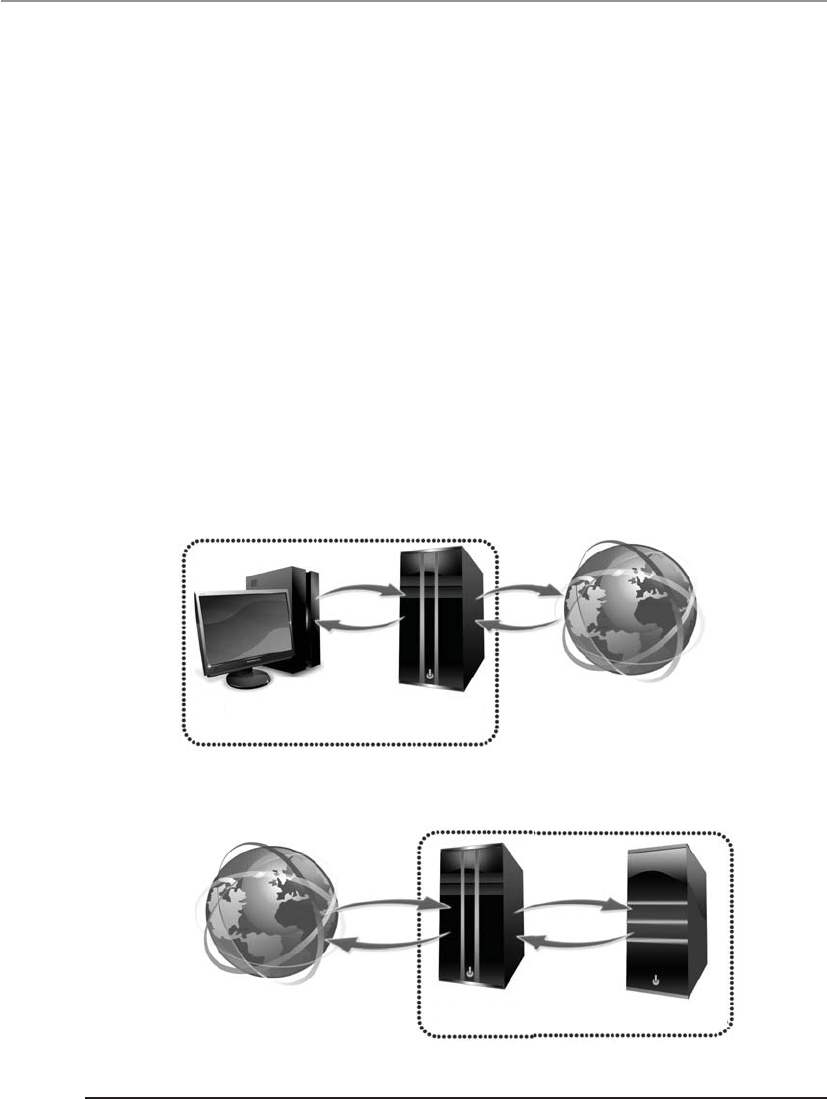
CISSP All-in-One Exam Guide
654
There are different types of proxies that provide specific services. A forwarding proxy
is one that allows the client to specify the server it wants to communicate with, as in our
scenario earlier. An open proxy is a forwarding proxy that is open for anyone to use. An
anonymous open proxy allows users to conceal their IP address while browsing web
sites or using other Internet services. A reverse proxy appears to the clients as the original
server. The client sends a request to what it thinks is the original server, but in reality
this reverse proxy makes a request to the actual server and provides the client with the
response. The forwarding and reverse proxy functionality seems similar, but as Figure
6-58 illustrates, a forwarding proxy server is commonly on an internal network control-
ling traffic that is exiting the network. A reverse proxy server is commonly on the net-
work that fulfills clients’ requests; thus, it is handling traffic that is entering its network.
The reverse proxy can carry out load balancing, encryption acceleration, security, and
caching.
Web proxy servers are commonly used to carry out content filtering to ensure that
Internet use conforms to the organization’s acceptable-use policy. These types of prox-
ies can block unacceptable web traffic, provide logs with detailed information pertain-
ing to the sites specific users visited, monitor bandwidth usage statistics, block
restricted web site usage, and screen traffic for specific keywords (porn, confidential,
User Proxy
Internal network
Internet
Web server
Internal network
Internet Proxy
Figure 6-58 Forward versus reverse proxy services

Chapter 6: Telecommunications and Network Security
655
Social Security numbers). The proxy servers can be configured to act mainly as caching
servers, which keep local copies of frequently requested resources, allowing organiza-
tions to significantly reduce their upstream bandwidth usage and costs, while signifi-
cantly increasing performance.
While it is most common to use proxy servers for web-based traffic, they can be
used for other network functionality and capabilities, as in DNS proxy servers. Proxy
servers are a critical component of almost every network today. They need to be prop-
erly placed, configured, and monitored.
NOTE
NOTE The use of proxy servers to allow for online anonymity has increased
over the years. Some people use it to protect their browsing behaviors from
others, with the goal of providing personal freedom and privacy. Attackers use
the same functionality to help ensure their activities cannot be tracked back
to their local systems.
Honeypot
Hey! Here is a vulnerable system to attack!
Ahoneypot system is a computer that usually sits in the screened subnet, or DMZ,
and attempts to lure attackers to it instead of to actual production computers. To make
a honeypot system lure attackers, administrators may enable services and ports that are
popular to exploit. Some honeypot systems have services emulated, meaning the actual
service is not running but software that acts like those services is available. Honeypot
systems can get an attacker’s attention by advertising themselves as easy targets to com-
promise. They are configured to look like regular company systems so that attackers
will be drawn to them like bears are to honey.
Honeypots can work as early detection mechanisms, meaning that the network staff
can be alerted that an intruder is attacking a honeypot system, and they can quickly go
into action to make sure no production systems are vulnerable to that specific attack
type. If two or more honeypot systems are used together, this is referred to as a honeynet.
Organizations use these systems to identify, quantify, and qualify specific traffic
types to help determine their danger levels. The systems can gather network traffic sta-
tistics and return them to a centralized location for better analysis. So as the systems are
being attacked, they gather intelligence information that can help the network staff
better understand what is taking place within their environment.
It is important to make sure that the honeypot systems are not connected to pro-
duction systems and do not provide any “jumping off” points for the attacker. There
have been instances where companies improperly implemented honeypots and after
they were exploited the attackers were able to move from those systems to the compa-
ny’s internal systems. The honeypots need to be properly segmented from any other live
systems on the network.
On a smaller scale, companies may choose to implement tarpits, which are similar
to honeypots in that they appear to be easy targets for exploitation. A tarpit can be con-
figured to appear as a vulnerable service that attackers will commonly attempt to ex-
ploit. Once the attackers start to send packets to this “service,” the connection to the

CISSP All-in-One Exam Guide
656
victim system seems to be live and ongoing, but the response from the victim system is
slow and the connection may time out. Most attacks and scanning activities take place
through automated tools that require quick responses from their victim systems. If the
victim systems do not reply or are very slow to reply, the automated tools may not be
successful because the protocol connection times out.
Unified Threat Management
Can’t we just shove everything into one box?
It has become very challenging to manage the long laundry list of security solutions
almost every network needs to have in place. The list includes, but is not limited to,
firewalls, antimalware, antispam, IDS/IPS, content filtering, data leak prevention, VPN
capabilities, and continuous monitoring and reporting. Unified Threat Management
(UTM) appliance products have been developed that provide all (or many) of these
functionalities in a single network appliance. The goals of UTM are simplicity, stream-
lined installation and maintenance, centralized control, and the ability to understand
a network’s security from a holistic point of view. Figure 6-59 illustrates how all of these
security functions are applied to traffic as it enters this type of dedicated device.
These products are considered all-in-one devices, and the actual type of functionality
that is provided varies between vendors. Some products may be able to carry out this type
of security for wired, wireless, and Voice over Internet Protocol (VoIP) types of traffic.
Some issues with implementing UTM products are
•Single point of failure for traffic Some type of redundancy should be put
into place.
Gateway antivirus
Intrusion prevention
Spyware protection
Spam protection
URL filtering
Deep application inspection
Stateful firewall
VPN
QoS
DoS protection
Figure 6-59 Unified Threat Management

Chapter 6: Telecommunications and Network Security
657
•Single point of compromise If the UTM is successfully hacked, there may
not have other layers deployed for protection.
•Performance issues Latency and bandwidth issues can arise since this is a
“choke point” device that requires a lot of processing.
Cloud Computing
We went from centralized, to distributed, and back to centralized computing resources.
Response: Everything comes back in fashion. Even bellbottoms.
In the 1960s all of our computing and processing took place on centralized main-
frames. In the 1980s we started distributing processing capabilities, which brought
about the personal computers. In the late 1990s we started to combine processing ca-
pabilities on individual systems through virtualization. Then around 2005 we started
harnessing distributed computing capabilities and centrally managing these individual
systems as one, which introduced cloud computing.
We have centrally harnessed other capabilities and served them up to the masses
over many years in several different industries. We have a highway and interstate system
that allows millions of people to get from one place to another. We do not have a
unique highway for each and every person, but we have one infrastructure for all to use.
Each company and household does not have their own energy processing plant, but
instead we have an electrical grid system that provides this one resource to millions of
users. People do not have their own Internet, but instead it is a shared structure. In a
sense, we have done the same thing with computing capabilities.
For many years every single company had to have its own data center. This is very
expensive and time consuming. Every company had to have the necessary software,
hardware, and staff to maintain these environments. Software had to be patched and
updated. Hardware had to be refreshed as processing demands increased. The skill set
of the staff had to increase as the complexity of the networked environments increased.
But in reality, while the companies were different, their underlining infrastructure and
computing processing needs were the same. So just as we would not maintain our own
power plant for our individual companies, maybe we don’t need to maintain huge,
expensive data centers for every company.
As an industry we combined load balancing techniques, virtualization, service-ori-
ented architectures, application service providing, network convergence, and distribut-
ed computing and came up with cloud computing. Computing can now be provided as
a service instead of a product.
NOTE
NOTE Network convergence means the combining of server, storage,
and network capabilities into a single framework. This helps to decrease
the costs and complexity of running data centers and has accelerated the
evolution of cloud computing. Converged infrastructures provide the
ability to pool resources, automate resource provisioning, and increase and
decrease processing capacity quickly to meet the needs of dynamic computing
workloads.

CISSP All-in-One Exam Guide
658
Looking at computing as a service that can be purchased, rather than as a physical
box, can offer the following advantages:
• Organizations have more flexibility and agility in IT growth and functionality.
• Cost of computing can be reduced since it is a shared delivery model.
(Includes reduction of real-estate, electrical, operational, and personnel costs.)
• Location independence can be achieved because the computing is not
centralized and tied to a physical data center.
• Applications and functionality can be more easily migrated from one physical
server to another because environments are virtualized.
• Improved reliability can be achieved for business continuity and disaster
recovery without the need of dedicated backup site locations.
• Scalability and elasticity of resources can be accomplished in near real time
through automation.
• Performance can increase as processing is shifted to available systems during
peak loads.
There is a controversy pertaining to whether cloud computing hurts or helps secu-
rity. On one hand, data is centralized and security resources are focused, but on the
other hand, direct control of sensitive data is lost and the complexity of securing dy-
namic and distributed environments can be overwhelming. A core part of the term
“cloud computing” is cloud. If you pay for cloud computing, you do not know where
your data is actually being held and processed because it is happening dynamically on
different systems that could be at any location in the world. This is wonderful because
all of the magic is happening in the background and you do not have to worry about
any of the details, but also terrifying because you do not really know who is doing what
with your data.
The most common cloud service models are
•Infrastructure as a Service (IaaS) Cloud providers offer the infrastructure
environment of a traditional data center in an on-demand delivery method.
Companies deploy their own operating systems, applications, and software
onto this provided infrastructure and are responsible for maintaining them.
•Platform as a Service (PaaS) Cloud providers deliver a computing platform,
which can include an operating system, database, and web server as a holistic
execution environment. Where IaaS is the “raw IT network,” PaaS is the
software environment that runs on top of the IT network.
•Software as a Service (SaaS) Provider gives users access to specific application
software (CRM, e-mail, games). The provider gives the customers network-
based access to a single copy of an application created specifically for SaaS
distribution and use.
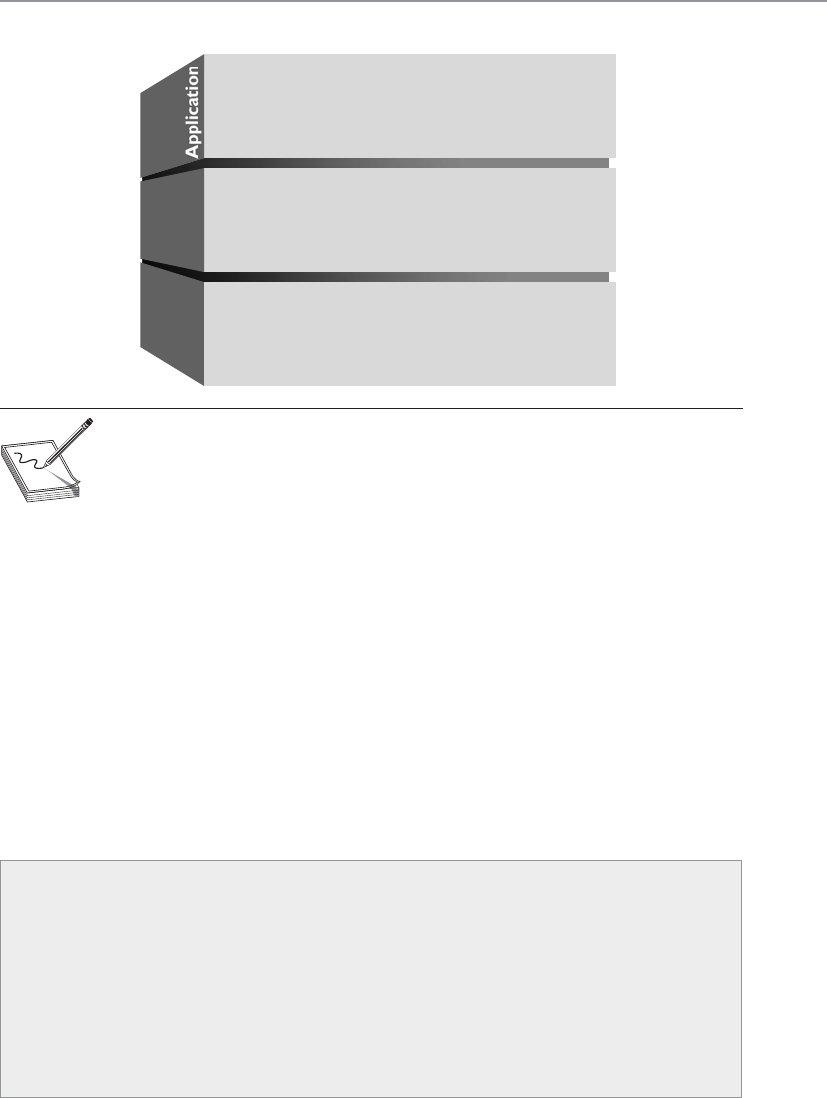
Chapter 6: Telecommunications and Network Security
659
NOTE
NOTE IaaS and PaaS services are typically billed on a utility computing basis;
thus, as more resources are allocated and consumed, the cost increases. SaaS
is typically a monthly or annual flat fee per user. The cloud infrastructure can
be public and thus shared by anyone and everyone (e.g., Google,), or private
and thus owned and maintained by one company, or a hybrid, which is a mix
of the two.
While combining the use of these shared resources (infrastructure, platforms, ap-
plications) reduces administration costs and overhead in a straightforward manner, the
privacy, security, and compliance concerns involved are far from straightforward. Do
you really want all of your personal data in one location for entities who have lawful or
unlawful access rights? How do you know that your cloud provider is actually securing
all of your data as it bounces around in their cloud? Legal and regulatory compliance
gets very complicated when you are no longer the one securing and maintaining the
environment that contains the data you are responsible for protecting.
The technical practicality of cloud computing is muddied by the privacy, security,
and compliance issues that surround it. The industry is working through each of these
issues, and the evolution of cloud computing is continuing.
SaaS
PaaS
laaS
CRM, e-mail, virtual desktop, communication,
games...
Execution runtime, database, web server,
development tools...
Virtual machines, servers, storage, load
balancers, network...
Platform
Infrastructure
Key Terms
•Bastion host A highly exposed device that will most likely be targeted
for attacks, and thus should be properly locked down.
•Dual-homed firewall This device has two interfaces and sits between
an untrusted network and trusted network to provide secure access.
A multihomed device just means it has multiple interfaces. Firewalls
that have multiple interfaces allow for networks to be segmented based
upon security zone, with unique security configurations.

CISSP All-in-One Exam Guide
660
Intranets and Extranets
We kind of trust you, but not really. We’re going to put you on the extranet.
Web technologies and their uses have exploded with functionality, capability, and
popularity. Companies set up internal web sites for centralized business information
such as employee phone numbers, policies, events, news, and operations instructions.
Many companies have also implemented web-based terminals that enable employees
to perform their daily tasks, access centralized databases, make transactions, collabo-
rate on projects, access global calendars, use videoconferencing tools and whiteboard
applications, and obtain often-used technical or marketing data.
•Screened host A firewall that communicates directly with a perimeter
router and the internal network. The router carries out filtering activities
on the traffic before it reaches the firewall.
•Screened subnet architecture When two filtering devices are used to
create a DMZ. The external device screens the traffic entering the DMZ
network, and the internal filtering device screens the traffic before it
enters the internal network.
•Virtual firewall A firewall that runs within a virtualized environment
and monitors and controls traffic as it passes through virtual machines.
The firewall can be a traditional firewall running within a guest virtual
machine or a component of a hypervisor.
•Proxy server A system that acts as an intermediary for requests from
clients seeking resources from other sources. A client connects to the
proxy server, requesting some service, and the proxy server evaluates
the request according to its filtering rules and makes the connection
on behalf of the client. Proxies can be open or carry out forwarding or
reverse forwarding capabilities.
•Honeypots Systems that entice with the goal of protecting critical
production systems. If two or more honeypots are used together, this
is considered a honeynet.
•Network convergence The combining of server, storage, and network
capabilities into a single framework, which decreases the costs and
complexity of data centers. Converged infrastructures provide the ability
to pool resources, automate resource provisioning, and increase and
decrease processing capacity quickly to meet the needs of dynamic
computing workloads.
•Cloud computing The delivery of computer processing capabilities as
a service rather than as a product, whereby shared resources, software,
and information are provided to end users as a utility. Offerings are
usually bundled as an infrastructure, platform, or software.

Chapter 6: Telecommunications and Network Security
661
Web-based clients are different from workstations that log into a network and have
their own desktop. Web-based clients limit a user’s ability to access the computer’s sys-
tem files, resources, and hard drive space; access back-end systems; and perform other
tasks. The web-based client can be configured to provide a GUI with only the buttons,
fields, and pages necessary for the users to perform tasks. This gives all users a standard
universal interface with similar capabilities.
When a company uses web-based technologies inside its networks, it is using an
intranet, a “private” network. The company has web servers and client machines using
web browsers, and it uses the TCP/IP protocol suite. The web pages are written in HTML
or XML and are accessed via HTTP.
Using web-based technologies has many pluses. They have been around for quite
some time, they are easy to implement, no major interoperability issues occur, and with
just the click of a link, a user can be taken to the location of the requested resource.
Web-based technologies are not platform dependent, meaning all web sites and pages
may be maintained on various platforms and different flavors of client workstations
can access them—they only need a web browser.
An extranet extends outside the bounds of the company’s network to enable two or
more companies to share common information and resources. Business partners com-
monly set up extranets to accommodate business-to-business communication. An ex-
tranet enables business partners to work on projects together; share marketing
information; communicate and work collaboratively on issues; post orders; and share
catalogs, pricing structures, and information on upcoming events. Trading partners of-
ten use electronic data interchange (EDI), which provides structure and organization to
electronic documents, orders, invoices, purchase orders, and a data flow. EDI has
evolved into web-based technologies to provide easy access and easier methods of com-
munication.
For many businesses, an extranet can create a weakness or hole in their security if
the extranet is not implemented and maintained properly. Properly configured fire-
walls need to be in place to control who can use the extranet communication channels.
Extranets used to be based mainly on dedicated transmission lines, which are more
difficult for attackers to infiltrate, but today many extranets are set up over the Internet,
which requires properly configured VPNs and security policies.
Value-Added Networks
Many different types of companies use EDI for internal communication and for
communication with other companies. A very common implementation is be-
tween a company and its supplier. For example, some supplier companies pro-
vide inventory to many different companies, such as Target, Wal-Mart, and Kmart.
Many of these supplies are made in China and then shipped to a warehouse
somewhere in a specific country, as in the United States. When Wal-Mart needs to
order more inventory, it sends its request through an EDI network, which is basi-
cally an electronic form of our paper-based world. Instead of using paper pur-
chase orders, receipts, and forms, EDI provides all of this digitally.
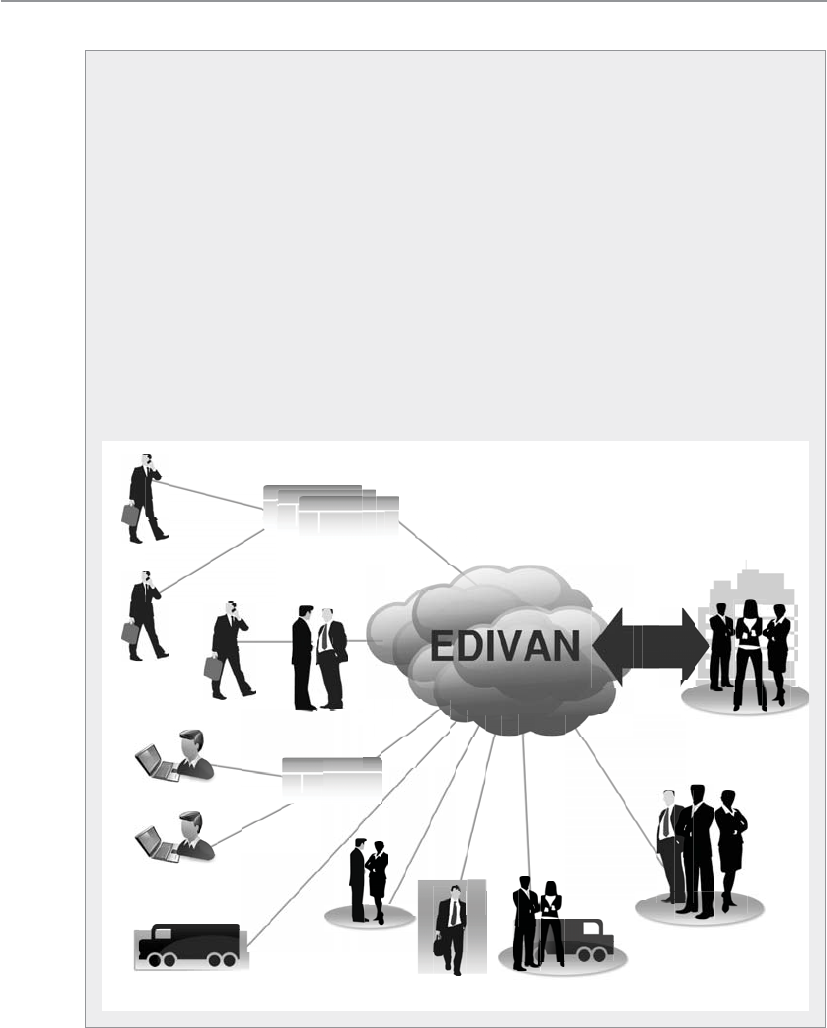
CISSP All-in-One Exam Guide
662
Avalue-added network (VAN) is an EDI infrastructure developed and main-
tained by a service bureau. A Wal-Mart store tracks its inventory by having em-
ployees scan bar codes on individual items. When the inventory of an item
becomes low, a Wal-Mart employee sends a request for more of that specific item.
This request goes to a mailbox at a VAN that Wal-Mart pays to use, and the request
is then pushed out to a supplier that provides this type of inventory for Wal-Mart.
Because Wal-Mart (and other stores) deals with thousands of suppliers, using a
VAN simplifies the ordering process: instead of an employee having to track
down the right supplier and submit a purchase order, this all happens in the
background through an automated EDI network, which is managed by a VAN
company for use by other companies.
EDI is moving away from proprietary VAN EDI structures to standardized
communication structures to allow more interoperability and easier maintenance.
This means that XML, SOAP, and web services are being used. These are the com-
munication structures used in supply chain infrastructures, as illustrated here.
Suppliers Marketplace
Suppliers
Suppliers
Business customers
Business customers
Distributors
Strategic
partners
Financial
services
Logistics
providers
Corporate
division
Your
company
VAN
eStore
One
connection
(Value Added Network)

Chapter 6: Telecommunications and Network Security
663
Metropolitan Area Networks
Behind every good man…
Response: Wrong MAN.
Ametropolitan area network (MAN) is usually a backbone that connects LANs to
each other and LANs to WANs, the Internet, and telecommunications and cable net-
works. A majority of today’s MANs are Synchronous Optical Networks (SONETs)
or FDDI rings and Metro Ethernet provided by the telecommunications service provid-
ers. (FDDI technology was discussed earlier in the chapter.) The SONET and FDDI rings
cover a large area, and businesses can connect to the rings via T1, fractional T1, and T3
lines. Figure 6-60 illustrates two companies connected via a SONET ring and the de-
vices usually necessary to make this type of communication possible. This is a simpli-
fied example of a MAN. In reality, several businesses are usually connected to one ring.
SONET is actually a standard for telecommunications transmissions over fiber-op-
tic cables. Carriers and telephone companies have deployed SONET networks for North
America, and if they follow the SONET standards properly, these various networks can
communicate with little difficulty.
SONET is self-healing, meaning that if a break in the line occurs, it can use a back-
up redundant ring to ensure transmission continues. All SONET lines and rings are
fully redundant. The redundant line waits in the wings in case anything happens to
the primary ring.
SONET networks can transmit voice, video, and data over optical networks. Slower-
speed SONET networks often feed into larger, faster SONET networks, as shown in
Figure 6-61. This enables businesses in different cities and regions to communicate.
-
-
Figure 6-60 A MAN covers a large area and enables businesses to connect to each other, to the
Internet, or to other WAN connections.
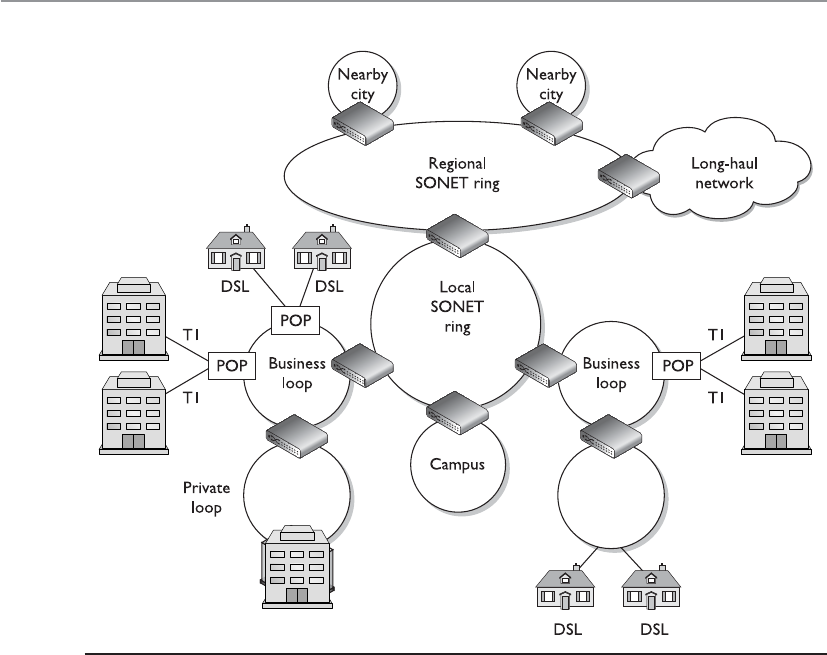
CISSP All-in-One Exam Guide
664
MANs can be made up of wireless infrastructures, optical fiber, or Ethernet connec-
tions. Ethernet has evolved from just being a LAN technology to being used in MAN
environments. Due to its prevalent use within organizations’ networks, it is easily ex-
tended and interfaced into MAN networks. A service provider commonly uses layer 2
and 3 switches to connect optical fibers, which can be constructed in a ring, star, or
partial mesh topology.
VLANs are commonly implemented to differentiate between the various logical net-
work connections that run over the same physical network connection. The VLANs al-
low for the isolation of the different customers’ traffic from each other and from the
core network internal signaling traffic.
Metro Ethernet
Can we just stretch Ethernet farther?
Ethernet has been around for many years and embedded in almost every LAN. Eth-
ernet LANs can connect to previously mentioned MAN technologies, or they can be
extended to cover a metropolitan area, which is called Metro Ethernet.
Figure 6-61 Smaller SONET rings connect to larger SONET rings to construct individual MANs.
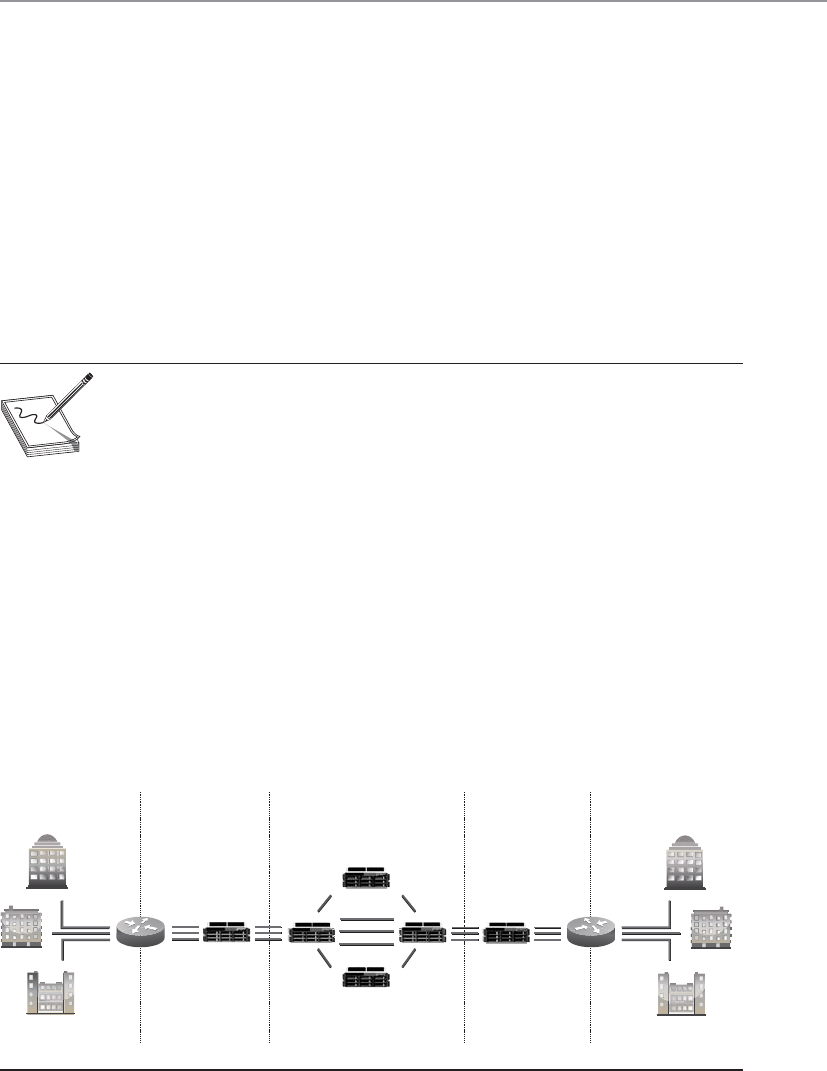
Chapter 6: Telecommunications and Network Security
665
Ethernet on the MAN can be used as pure Ethernet or Ethernet integrated with
other networking technologies, as in MPLS. Pure Ethernet is less expensive, but less reli-
able and scalable. MPLS-based deployments are more expensive but highly reliable and
scalable, and are typically used by large service providers.
MAN architectures are commonly built upon the following layers: access, aggrega-
tion/distribution, metro, and core, as illustrated in Figure 6-62.
Access devices exist at a customer’s premises, which connect the customer’s equip-
ment to the service provider’s network. The service provider’s distribution network ag-
gregates the traffic and sends it to the provider’s core network. From there, the traffic is
moved to the next aggregation network that is closest to the destination. This is similar
to how smaller highways are connected to larger interstates with on and off ramps that
allow people to quickly travel from one location to a different one.
NOTE
NOTE A Virtual Private LAN Service (VPLS) is a multipoint, layer 2 virtual
private network that connects two or more customer devices using Ethernet
bridging techniques. In other words, VPLS emulates a LAN over a managed IP/
MPLS network.
Wide Area Networks
LAN technologies provide communication capabilities over a small geographic area,
whereas wide area network (WAN) technologies are used when communication needs
to travel over a larger geographical area. LAN technologies encompass how a computer
puts its data onto a network cable, the rules and protocols of how that data are format-
ted and transmitted, how errors are handled, and how the destination computer picks
up this data from the cable. When a computer on one network needs to communicate
with a network on the other side of the country or in a different country altogether,
WAN technologies kick in.
Customer
Government
GigE
10 GigE
Layer 2/3
switches
GigE
10 GigE
Layer 2/3
Enterprise
Content hosting
Government
Enterprise
Content hosting
Standards-
based,
intelligent
packet-to-
circuit
mapping
VCG 1
VCG 1
VCG 1
Standards-
based,
intelligent
packet-to-
circuit
mapping
CustomerAggregation AggregationCore
Figure 6-62 MAN architecture

CISSP All-in-One Exam Guide
666
The network must have some avenue to other networks, which is most likely a
router that communicates with the company’s service provider’s switches or telephone
company facilities. Just as several types of technologies lie within the LAN arena, sev-
eral technologies lie within the WAN arena. This section touches on many of these
WAN technologies.
Telecommunications Evolution
On the eighth day, God created the telephone.
Telephone systems have been around for about 100 years, and they started as cop-
per-based analog systems. Central switching offices connected individual telephones
manually (via human operators) at first, and later by using electronic switching equip-
ment. After two telephones were connected, they had an end-to-end connection (end-
to-end circuit). Multiple phone calls were divided up and placed on the same wire,
which is called multiplexing. Multiplexing is a method of combining multiple channels
of data over a single transmission path. The transmission is so fast and efficient that the
ends do not realize they are sharing a line with many other entities. They think they
have the line all to themselves.
In the mid-1960s, digital phone systems emerged with T1 trunks, which carried 24
voice communication calls over two pairs of copper wires. This provided a 1.544-Mbps
transmission rate, which brought quicker service, but also the capability to put more
multiplexed calls on one wire. When calls take place between switching offices (say,
local phone calls), they are multiplexed on T1 lines. When a longer-distance call needs
to take place, the calls coming in on the T1 lines are multiplexed on T3 lines, which can
carry up to 28 T1 lines. This is shown in Figure 6-63.
T1 with up to 24 calls
multiplexed
Local calls
Carrier
switch
T3s carrying
up to 28 T1
lines for long-
distance calls
Local calls
Figure 6-63 Local calls are multiplexed on T1 lines, and longer-distance calls are moved from
T1 lines to T3 multiplexed lines.

Chapter 6: Telecommunications and Network Security
667
The next entity to join the telecommunications party was fiber optics, which en-
abled even more calls to be multiplexed on one trunk line over longer distances. Then
came optical carrier technologies such as SONET, which can allow for the transmission
of digitized voice signals in packets. SONET is the standard for telecommunications
transmission over fiber-optic cables. This standard sets up the necessary parameters for
transporting digital information over optical systems. Telecommunications carriers
used this technology to multiplex lower-speed optical links into higher-speed links,
similar to how lower-speed LANs connect to higher-speed WAN links today. Figure 6-64
shows an example of SONET rings connected together.
Figure 6-64 shows how telecommunications carriers can provide telephone and
Internet access to companies and individuals in large areas. The SONET standard en-
ables all carriers to interconnect.
The next evolutionary step in telecommunications history is Asynchronous Transfer
Mode (ATM). ATM encapsulates data in fixed cells and can be used to deliver data over
a SONET network. The analogy of a highway and cars is used to describe the SONET
and ATM relationship. SONET is the highway that provides the foundation (or net-
work) for the cars—the ATM packets—to travel on.
ATM is a high-speed network technology that is used in WAN implementations by
carriers, ISPs, and telephone companies. ATM uses a fixed cell size instead of the variable
frame size employed by earlier technologies. This fixed size provides better performance
Figure 6-64 SONET technology enables several optical communication loops to communicate.

CISSP All-in-One Exam Guide
668
and a reduced overhead for error handling. (More information on ATM technology is
provided in the “ATM” section a little later.)
The following is a quick snapshot of telecommunications history:
• Copper lines carry purely analog signals.
• T1 lines carry up to 24 conversations.
• T3 lines carry up to 28 T1 lines.
• Fiber optics and the SONET network.
• ATM over SONET.
SONET was developed in the United States to achieve a data rate around 50 Mbps
to support the data flow from T1 lines (1.544 Mbps) and T3 lines (44.736 Mbps). Data
travels over these T-carriers as electronic voltage to the edge of the SONET network.
Then the voltage must be converted into light to run over the fiber-optic carrier lines,
known as optical carrier (OC) lines. Each OC-1 frame runs at a signaling rate of 51.84
Mbps, with a throughput of 44.738 Mbps.
NOTE
NOTE Optical carrier lines can provide different bandwidth values: OC-1 =
51.84 Mbps, OC-3 = 155.52 Mbps, OC-12 = 622.08 Mbps, and so on.
The Europeans have a different infrastructure and chose to use Synchronous Digital
Hierarchy (SDH), which supports E1 lines (2.048 Mbps) and E3 lines (34.368 Mbps).
SONET is the standard for North America, while SDH is the standard for the rest of the
world. SDH and SONET are similar but just different enough to be incompatible. For
communication to take place between SDH and SONET lines, a gateway must do the
proper signaling translation.
LAN and WAN Protocols
Communication error rates are lower in LAN environments than in WAN envi-
ronments, which makes sense when you compare the complexity of each en-
vironment. WAN traffic may have to travel hundreds or thousands of miles and
pass through several different types of devices, cables, and protocols. Because of
this difference, most LAN MAC protocols are connectionless and most WAN
communication protocols are connection oriented. Connection-oriented proto-
cols provide reliable transmission because they have the capability of error detec-
tion and correction.

Chapter 6: Telecommunications and Network Security
669
You’ve had only a quick glimpse at an amazing complex giant referred to as tele-
communications. Many more technologies are being developed and implemented to
increase the amount of data that can be efficiently delivered in a short period of time.
Dedicated Links
Adedicated link is also called a leased line or point-to-point link. It is one single link that
is pre-established for the purposes of WAN communications between two destinations.
It is dedicated, meaning only the destination points can communicate with each other.
This link is not shared by any other entities at any time. This was the main way compa-
nies communicated in the past, because not as many choices were available as there are
today. Establishing a dedicated link is a good idea for two locations that will commu-
nicate often and require fast transmission and a specific bandwidth, but it is expensive
compared to other possible technologies that enable several companies to share the
same bandwidth and also share the cost. This does not mean that dedicated lines are
not in use; they definitely are used, but many other options are now available, includ-
ing X.25, frame relay, MPLS, and ATM technologies.
T-Carriers
T-carriers are dedicated lines that can carry voice and data information over trunk lines.
They were developed by AT&T and were initially implemented in the early 1960s to
support pulse-code modulation (PCM) voice transmission. This was first used to digi-
tize the voice over a dedicated, two-point, high-capacity connection line. The most
commonly used T-carriers are T1 lines and T3 lines. Both are digital circuits that multi-
plex several individual channels into a higher-speed channel.
These lines can have multiplex functionality through time-division multiplexing
(TDM). What does this multiplexing stuff really mean? Consider a T1 line, which can
multiplex up to 24 channels. If a company has a PBX connected to a T1 line, which in
turn connects to the telephone company switching office, 24 calls can be chopped up
and placed on the T1 line and transferred to the switching office. If this company did not
use a T1 line, it would need 24 individual twisted pairs of wire to handle this many calls.
As shown in Figure 6-65, data are input into these 24 channels and transmitted.
Each channel gets to insert up to eight bits into its established time slot. Twenty-four of
these eight-bit time slots make up a T1 frame. That does not sound like much informa-
tion, but 8,000 frames are built per second. Because this happens so quickly, the receiv-
ing end does not notice a delay and does not know it is sharing its connection and
bandwidth with up to 23 other devices.
Originally, T1 and T3 lines were used by the carrier companies, but they have been
replaced mainly with optical lines. Now T1 and T3 lines feed data into these powerful
and super-fast optical lines. The T1 and T3 lines are leased to companies and ISPs that
need high-capacity transmission capability. Sometimes, T1 channels are split up be-
tween companies who do not really need the full bandwidth of 1.544 Mbps. These are
called fractional T lines. The different carrier lines and their corresponding characteris-
tics are listed in Table 6-11.

CISSP All-in-One Exam Guide
670
As mentioned earlier, dedicated lines have their drawbacks. They are expensive and
inflexible. If a company moves to another location, a T1 line cannot easily follow it. A
dedicated line is expensive because companies have to pay for a dedicated connection
with a lot of bandwidth even when they do not use the bandwidth. Not many compa-
nies require this level of bandwidth 24 hours a day. Instead, they may have data to send
out here and there, but not continuously.
The cost of a dedicated line is determined by the distance to the destination. A T1
line run from one building to another building two miles away is much cheaper than a
T1 line that covers 50 miles or a full state.
E-Carriers
E-carriers are similar to T-carrier telecommunication connections, where a single phys-
ical wire pair can be used to carry many simultaneous voice conversations by time-di-
vision multiplexing. Within this technology 30 channels interleave eight bits of data in
a frame. While the T-carrier and E-carrier technologies are similar, they are not interop-
erable. E-carriers are used by European countries.
The E-carrier channels and associated rates are shown in Table 6-12.
The most commonly used channels used are E1 and E3 and fractional E-carrier
lines.
Figure 6-65 Multiplexing puts several phone calls, or data transmissions, on the same wire.
Carrier # of T1s # of Channels Speed (Mbps)
Fractional 1/24 1 0.064
T1 1 24 1.544
T2 4 96 6.312
T3 28 672 44.736
T4 168 4,032 274.760
Table 6-11 A T-Carrier Hierarchy Summary Chart

Chapter 6: Telecommunications and Network Security
671
Optical Carrier
High-speed fiber-optic connections are measured in optical carrier (OC) transmission
rates. The transmission rates are defined by rate of the bit stream of the digital signal
and are designated by an integer value of the multiple of the basic unit of rate. They are
generically referred to as OCx, where the “x” represents a multiplier of the basic OC-1
transmission rate, which is 51.84 Mbps. The carrier levels and speeds are shown in Ta-
ble 6-13.
Small and medium-sized companies that require high-speed Internet connectivity
may use OC-3 or OC-12 connections. Service providers that require much larger
amounts of bandwidth may use one or more OC-48 connections. OC-192 and greater
connections are commonly used for the Internet backbone, which connects the largest
networks in the world together.
Signal Rate
E0 64 Kbit/s
E1 2.048 Mbit/s
E2 8.448 Mbit/s
E3 34.368 Mbit/s
E4 139.264 Mbit/s
E5 565.148 Mbit/s
Table 6-12
E-carrier
Characteristics
Optical Carrier Speed
OC-1 51.84 Mbps
OC-3 155.52 Mbps
OC-9 466.56 Mbps
OC-12 622.08 Mbps
OC-19 933.12 Mbps
OC-24 1.244 Gbps
OC-36 1.866 Gbps
OC-48 2.488 Gbps
OC-96 4.977 Gbps
OC-192 9.953 Gbps
OC-768 40 Gbps
OC-3072 160 Gbps
Table 6-13
OC Transmission
Rates

CISSP All-in-One Exam Guide
672
More Multiplexing
Here are some other types of multiplexing functionalities you should be aware of:
Statistical time-division multiplexing (STDM)
• Transmits several types of data simultaneously across a single
transmission cable or line (such as a T1 or T3 line).
STDM analyzes statistics related to the typical workload of each input device
(printer, fax, computer) and determines in real time how much time each device
should be allocated for data transmission.
Frequency-division multiplexing (FDM)
• An available wireless spectrum is used to move data.
• Available frequency band is divided into narrow frequency bands and
used to have multiple parallel channels for data transfer.
Wave-division multiplexing (WDM)
• Used in fiber optic communication.
• Multiplexes a number of optical carrier signals onto a single optical fiber.

Chapter 6: Telecommunications and Network Security
673
WAN Technologies
I can’t throw my packets that far!
Response: We have technology for that.
Several varieties of WAN technologies are available to companies today. The infor-
mation that a company evaluates to decide which is the most appropriate WAN tech-
nology for it usually includes functionality, bandwidth demands, service level
agreements, required equipment, cost, and what is available from service providers. The
following sections go over some of the WAN technologies available today.
CSU/DSU
AChannel Service Unit/Data Service Unit (CSU/DSU) is required when digital equip-
ment will be used to connect a LAN to a WAN. This connection can take place with T1
and T3 lines, as shown in Figure 6-66. A CSU/DSU is necessary because the signals and
frames can vary between the LAN equipment and the WAN equipment used by service
providers.
The DSU device converts digital signals from routers, switches, and multiplexers
into signals that can be transmitted over the service provider’s digital lines. The DSU
device ensures that the voltage levels are correct and that information is not lost during
the conversion. The CSU connects the network directly to the service provider’s line.
The CSU/DSU is not always a separate device and can be part of a networking device.
The CSU/DSU provides a digital interface for Data Terminal Equipment (DTE),
such as terminals, multiplexers, or routers, and an interface to the Data Circuit-Termi-
nating Equipment (DCE) device, such as a carrier’s switch. The CSU/DSU basically
works as a translator and, at times, as a line conditioner.
-
Figure 6-66 A CSU/DSU is required for digital equipment to communicate with
telecommunications lines.

CISSP All-in-One Exam Guide
674
Switching
Dedicated links have one single path to traverse; thus, there is no complexity when it
comes to determining how to get packets to different destinations. Only two points of
reference are needed when a packet leaves one network and heads toward the other. It
gets much more complicated when thousands of networks are connected to each other,
which is often when switching comes into play.
Two main types of switching can be used: circuit switching and packet switching.
Circuit switching sets up a virtual connection that acts like a dedicated link between two
systems. ISDN and telephone calls are examples of circuit switching, which is shown in
the lower half of Figure 6-67.
When the source system makes a connection with the destination system, they set
up a communication channel. If the two systems are local to each other, fewer devices
need to be involved with setting up this channel. The farther the two systems are from
each other, the more the devices are required to be involved with setting up the channel
and connecting the two systems.
An example of how a circuit-switching system works is daily telephone use. When
one person calls another, the same type of dedicated virtual communication link is set
up. Once the connection is made, the devices supporting that communication channel
do not dynamically move the call through different devices, which is what takes place
in a packet-switching environment. The channel remains configured at the original
devices until the call (connection) is done and torn down.
Packet switching, on the other hand, does not set up a dedicated virtual link, and
packets from one connection can pass through a number of different individual de-
vices (see the top of Figure 6-67), instead of all of them following one another through
the same devices. Some examples of packet-switching technologies are the Internet,
X.25, and frame relay. The infrastructure that supports these methods is made up of
Figure 6-67 Circuit switching provides one road for a communication path, whereas packet
switching provides many different possible roads.

Chapter 6: Telecommunications and Network Security
675
routers and switches of different types. They provide multiple paths to the same desti-
nations, which offers a high degree of redundancy.
In a packet-switching network, the data are broken up into packets containing
frame check sequence numbers. These packets go through different devices, and their
paths can be dynamically altered by a router or switch that determines a better route for
a specific packet to take. Once the packets are received at the destination computer, all
the packets are reassembled according to their frame check sequence numbers and pro-
cessed.
Because the path a packet will take in a packet-switching environment is not set in
stone, there could be variable delays when compared to a circuit-switching technology.
This is okay, because packet-switching networks usually carry data rather than voice.
Because voice connections clearly detect these types of delays, in many situations a
circuit-switching network is more appropriate for voice connections. Voice calls usually
provide a steady stream of information, whereas a data connection is “burstier” in na-
ture. When you talk on the phone, the conversation keeps a certain rhythm. You and
your friend do not talk extremely fast and then take a few minutes in between conversa-
tions to stop talking and create a void with complete silence. However, this is usually
how a data connection works. A lot of data are sent from one end to the other at one
time, and then dead time occurs until it is time to send more data.
NOTE
NOTE Voice over IP (VoIP) does move voice data over packet-switched
environments. This technology is covered in the section “Multiservice Access
Technologies,” later in the chapter.
Circuit Switching vs. Packet Switching
The following points provide a concise summary of the differences between cir-
cuit- and packet-switching technologies:
Circuit switching:
• Connection-oriented virtual links.
• Traffic travels in a predictable and constant manner.
• Fixed delays.
• Usually carries voice-oriented data.
Packet switching:
• Packets can use many different dynamic paths to get to the same
destination.
• Traffic is usually bursty in nature.
• Variable delays.
• Usually carries data-oriented data.

CISSP All-in-One Exam Guide
676
Key Terms
•Electronic data interchange (EDI) The structured transmission of
data between organizations. It is considered to describe the rigorously
standardized format of electronic documents and commonly used in
supply chains between customers, vendors, and suppliers.
•Value-added network (VAN) A hosted EDI service offering that acts as
an intermediary between business partners sharing standards-based or
proprietary data via shared business processes.
•Metropolitan area network (MAN) A network that usually spans a
city or a large campus, interconnects a number of LANs using a high-
capacity backbone technology, and provides up-link services to WANs
or the Internet.
•Synchronous Optical Networking (SONET) and Synchronous
Digital Hierarchy (SDH) Standardized multiplexing protocols that
transfer multiple digital bit streams over optical fiber and allow for
simultaneous transportation of many different circuits of differing
origin within a single framing protocol.
•Metro Ethernet A data link technology that is used as a metropolitan
area network to connect customer networks to larger service networks
or the Internet. Businesses can also use Metro Ethernet to connect
distributed locations to their intranet.
•Wide area network (WAN) A telecommunication network that covers
a broad area and allows a business to effectively carry out its daily
function, regardless of location.
•Multiplexing A method of combining multiple channels of data over
a single transmission line.
•T-carriers Dedicated lines that can carry voice and data information
over trunk lines. It is a general term for any of several digitally
multiplexed telecommunications carrier systems.
•Time-division multiplexing (TDM) A type of multiplexing in which two
or more bit streams or signals are transferred apparently simultaneously
as subchannels in one communication channel, but are physically taking
turns on the single channel.
•Wave-division multiplexing (WDM) Multiplying the available
capacity of optical fibers through use of parallel channels, with each
channel on a dedicated wavelength of light. The bandwidth of an
optical fiber can be divided into as many as 160 channels.
•Frequency-division multiplexing (FDM) Dividing available
bandwidth into a series of nonoverlapping frequency sub-bands that
are then assigned to each communicating source and user pair. FDM is
inherently an analog technology.

Chapter 6: Telecommunications and Network Security
677
Frame Relay
Why are there so many paths to choose from?
For a long time, many companies used dedicated links to communicate with other
companies. Company A had a pipeline to company B that provided a certain band-
width 24 hours a day and was not used by any other entities. This was great because
only the two companies could use the line, so a certain level of bandwidth was always
available, but it was expensive and most companies did not use the full bandwidth each
and every hour the link was available. Thus, the companies spent a lot of money for a
service they did not use all the time. Today, instead of using dedicated lines, companies
then turned to frame relay.
Frame relay is a WAN technology that operates at the data link layer. It is a WAN
solution that uses packet-switching technology to let multiple companies and networks
share the same WAN medium, devices, and bandwidth. Whereas direct point-to-point
links have a cost based on the distance between the endpoints, the frame relay cost is
based on the amount of bandwidth used. Because several companies and networks use
the same medium and devices (routers and switches), the cost can be greatly reduced
per company compared to dedicated links.
If a company knows it will usually require a certain amount of bandwidth each day,
it can pay a certain fee to make sure this amount of bandwidth is always available to it.
If another company knows it will not have a high bandwidth requirement, it can pay a
lower fee that does not guarantee the higher bandwidth allocation. This second com-
pany will have the higher bandwidth available to it anyway—at least until that link gets
busy, and then the bandwidth level will decrease. (Companies that pay more to ensure
that a higher level of bandwidth will always be available pay a committed information
rate, or CIR.)
Two main types of equipment are used in frame relay connections: DTE and DCE.
The DTE is usually a customer-owned device, such as a router or switch, that provides
connectivity between the company’s own network and the frame relay network. DCE is
the service provider’s device, or telecommunications company’s device, that does the
actual data transmission and switching in the frame relay cloud. So the DTE is a com-
pany’s ramp onto the frame relay network, and the DCE devices actually do the work
within the frame relay cloud.
•Statistical time-division multiplexing (STDM) Transmitting several
types of data simultaneously across a single transmission line. STDM
technologies analyze statistics related to the typical workload of each
input device and make real-time decisions on how much time each
device should be allocated for data transmission.
•Channel Service Unit (CSU) A line bridging device for use with
T-carriers, and that is required by PSTN providers at digital interfaces
that terminate in a Data Service Unit (DSU) on the customer side. The
DSU is a piece of telecommunications circuit terminating equipment
that transforms digital data between telephone company lines and local
equipment.

CISSP All-in-One Exam Guide
678
The frame relay cloud is the collection of DCEs that provides switching and data
communications functionality. Several service providers offer this type of service, and
some providers use other providers’ equipment—it can all get confusing because a
packet can take so many different routes. This collection is called a cloud to differenti-
ate it from other types of networks, and because when a packet hits this cloud, users do
not usually know the route their frames will take. The frames will be sent either through
permanent or switched virtual circuits that are defined within the DCE or through car-
rier switches.
NOTE
NOTE The term cloud is used in several technologies: Internet cloud, ATM
cloud, frame relay cloud, cloud computing, etc. The cloud is like a black box—
we know our data goes in and we know it comes out, but we do not know all
the complex things that are taking place internally. The clouds are commonly a
mix of a service provider’s routers, switches, MAN, or WAN protocols.
Frame relay is an any-to-any service that is shared by many users. As stated earlier,
this is beneficial because the costs are much lower than those of dedicated leased lines.
Because frame relay is shared, if one subscriber is not using its bandwidth, it is available
for others to use. On the other hand, when traffic levels increase, the available band-
width decreases. This is why subscribers who want to ensure a certain bandwidth is al-
ways available to them pay a higher committed rate.
Figure 6-68 shows five sites being connected via dedicated lines versus five sites
connected through the frame relay cloud. The first solution requires many dedicated
lines that are expensive and not flexible. The second solution is cheaper and provides
companies much more flexibility.
Site
A
Site
E
Site
D
Site
C
Site
B
Private network method Frame relay method
(public method)
Site
A
Site
E
Site
D
Site
C
Site
B
Dedicated
lines
Frame relay
network
Figure 6-68 A private network connection requires several expensive dedicated links. Frame relay
enables users to share a public network.

Chapter 6: Telecommunications and Network Security
679
Virtual Circuits
Frame relay (and X.25) forwards frames across virtual circuits. These circuits can be ei-
ther permanent, meaning they are programmed in advance, or switched, meaning the
circuit is quickly built when it is needed and torn down when it is no longer needed.
The permanent virtual circuit (PVC) works like a private line for a customer with an
agreed-upon bandwidth availability. When a customer decides to pay for the commit-
ted rate, a PVC is programmed for that customer to ensure it will always receive a certain
amount of bandwidth.
Unlike PVCs, switched virtual circuits (SVCs) require steps similar to a dial-up and
connection procedure. The difference is that a permanent path is set up for PVC frames,
whereas when SVCs are used, a circuit must be built. It is similar to setting up a phone
call over the public network. During the setup procedure, the required bandwidth is
requested, the destination computer is contacted and must accept the call, a path is
determined, and forwarding information is programmed into each switch along the
SVC’s path. SVCs are used for teleconferencing, establishing temporary connections to
remote sites, data replication, and voice calls. Once the connection is no longer needed,
the circuit is torn down and the switches forget it ever existed.
Although a PVC provides a guaranteed level of bandwidth, it does not have the flex-
ibility of an SVC. If a customer wants to use her PVC for a temporary connection, as
mentioned earlier, she must call the carrier and have it set up, which can take hours.
X.25
X.25 is an older WAN protocol that defines how devices and networks establish and
maintain connections. Like frame relay, X.25 is a switching technology that uses carrier
switches to provide connectivity for many different networks. It also provides an any-
to-any connection, meaning many users use the same service simultaneously. Subscrib-
ers are charged based on the amount of bandwidth they use, unlike dedicated links, for
which a flat fee is charged.
Data are divided into 128 bytes and encapsulated in High-level Data Link Control
(HDLC) frames. The frames are then addressed and forwarded across the carrier switch-
es. Much of this sounds the same as frame relay—and it is—but frame relay is much
more advanced and efficient when compared to X.25, because the X.25 protocol was
developed and released in the 1970s. During this time, many of the devices connected
to networks were dumb terminals and mainframes, the networks did not have built-in
functionality and fault tolerance, and the Internet overall was not as foundationally
stable and resistant to errors as it is today. When these characteristics were not part of
the Internet, X.25 was required to compensate for these deficiencies and to provide
many layers of error checking, error correcting, and fault tolerance. This made the pro-
tocol fat, which was required back then, but today it slows down data transmission and
provides a lower performance rate than frame relay or ATM.
ATM
Asynchronous Transfer Mode (ATM) is another switching technology, but instead of be-
ing a packet-switching method, it uses a cell-switching method. ATM is a high-speed
networking technology used for LAN, MAN, WAN, and service provider connections.

CISSP All-in-One Exam Guide
680
Like frame relay, it is a connection-oriented switching technology, and creates and uses
a fixed channel. IP is an example of a connectionless technology. Within the TCP/IP
protocol suite, IP is connectionless and TCP is connection oriented. This means IP seg-
ments can be quickly and easily routed and switched without each router or switch in
between having to worry about whether the data actually made it to its destination—
that is TCP’s job. TCP works at the source and destination ends to ensure data were
properly transmitted, and it resends data that ran into some type of problem and did
not get delivered properly. When using ATM or frame relay, the devices in between the
source and destination have to ensure that data get to where they need to go, unlike
when a purely connectionless protocol is being used.
Since ATM is a cell-switching technology rather than a packet-switching technology,
data are segmented into fixed-size cells of 53 bytes, instead of variable-size packets. This
provides for more efficient and faster use of the communication paths. ATM sets up
virtual circuits, which act like dedicated paths between the source and destination.
These virtual circuits can guarantee bandwidth and QoS. For these reasons, ATM is a
good carrier for voice and video transmission.
ATM technology is used by carriers and service providers, and is the core technology
of the Internet, but ATM technology can also be used for a company’s private use in
backbones and connections to the service provider’s networks.
Traditionally, companies used dedicated lines, usually T-carrier lines, to connect to
the public networks. However, companies have also moved to implementing an ATM
switch on their network, which connects them to the carrier infrastructure. Because the
fee is based on bandwidth used instead of a continual connection, it can be much
cheaper. Some companies have replaced their Fast Ethernet and FDDI backbones with
ATM. When ATMs are used as private backbones, the companies have ATM switches
that take the Ethernet, or whatever data link technology is being used, and frame them
into the 53-byte ATM cells.
Quality of Service Quality of Service (QoS) is a capability that allows a protocol
to distinguish between different classes of messages and assign priority levels. Some
applications, such as video conferencing, are time sensitive, meaning delays would
cause unacceptable performance of the application. A technology that provides QoS
allows an administrator to assign a priority level to time-sensitive traffic. The protocol
then ensures this type of traffic has a specific or minimum rate of delivery.
QoS allows a service provider to guarantee a level of service to its customers. QoS
began with ATM and then was integrated into other technologies and protocols respon-
sible for moving data from one place to another. Four different types of ATM QoS ser-
vices (listed next) are available to customers. Each service maps to a specific type of data
that will be transmitted.
•Constant Bit Rate (CBR) A connection-oriented channel that provides a
consistent data throughput for time-sensitive applications, such as voice and
video applications. Customers specify the necessary bandwidth requirement
at connection setup.

Chapter 6: Telecommunications and Network Security
681
•Variable Bit Rate (VBR) A connection-oriented channel best used for
delay-insensitive applications because the data throughput flow is uneven.
Customers specify their required peak and sustained rate of data throughput.
•Unspecified Bit Rate (UBR) A connectionless channel that does not
promise a specific data throughput rate. Customers cannot, and do not need
to, control their traffic rate.
•Available Bit Rate (ABR) A connection-oriented channel that allows the bit
rate to be adjusted. Customers are given the bandwidth that remains after a
guaranteed service rate has been met.
ATM was the first protocol to provide true QoS, but as the computing society has
increased its desire to send time-sensitive data throughout many types of networks,
developers have integrated QoS into other technologies.
QoS has three basic levels:
•Best-effort service No guarantee of throughput, delay, or delivery. Traffic
that has priority classifications goes before traffic that has been assigned
this classification. Most of the traffic that travels on the Internet has this
classification.
•Differentiated service Compared to best-effort service, traffic that is assigned
this classification has more bandwidth, shorter delays, and fewer dropped
frames.
•Guaranteed service Ensures specific data throughput at a guaranteed speed.
Time-sensitive traffic (voice and video) is assigned this classification.
Administrators can set the classification priorities (or use a policy manager prod-
uct) for the different traffic types, which the protocols and devices then carry out.
Controlling network traffic to allow for the optimization or the guarantee of certain
performance levels is referred to as traffic shaping. Using technologies that have QoS
capabilities allows for traffic shaping, which can improve latency and increase band-
width for specific traffic types, bandwidth throttling, and rate limiting.
SMDS
Switched Multimegabit Data Service (SMDS) is a high-speed packet-switched technol-
ogy used to enable customers to extend their LANs across MANs and WANs. When a
company has an office in one state that needs to communicate with an office in a dif-
ferent state, for example, the two LANs can use this packet-switching protocol to com-
municate across the already established public network. This protocol is connectionless
and can provide bandwidth on demand.
Although some companies still use this technology, it has been largely replaced
with other WAN technologies. Service providers usually maintain only the networks
that currently use this technology instead of offering it to new customers. This is an
antiquated WAN technology that has already had its 15 minutes of fame.

CISSP All-in-One Exam Guide
682
SDLC
Synchronous Data Link Control (SDLC) is a protocol used in networks that use dedi-
cated, leased lines with permanent physical connections. It is used mainly for commu-
nications with IBM hosts within a Systems Network Architecture (SNA). Developed by
IBM in the 1970s, SDLC is a bit-oriented, synchronous protocol that has evolved into
other communication protocols, such as HDLC, Link Access Procedure (LAP), and Link
Access Procedure-Balanced (LAPB).
SDLC was developed to enable mainframes to communicate with remote locations.
The environments that use SDLC usually have primary systems that control secondary
stations’ communication. SDLC provides the polling media access technology, which is
the mechanism that enables secondary stations to communicate on the network. Figure
6-69 shows the primary and secondary stations on an SDLC network.
HDLC
High-level Data Link Control (HDLC) is a protocol that is also a bit-oriented link layer
protocol and is used for serial device-to-device WAN communication. HDLC is an ex-
tension of SDLC, which was mainly used in SNA environments. SDLC basically died
out as the mainframe environments using SNA reduced greatly in numbers. HDLC
stayed around and evolved.
CAUTION
CAUTION When we get to this level of things as it pertains to protocols and
this far into a huge chapter on networking and telecommunications, it is easy
to numb out, glaze over items, and secretly wish we did not have to know all
of this stuff. Well, you do need to know this, so please go get a cup of coffee if
needed. I will wait here for you.
So what does a bit-oriented link layer protocol really mean? If you think back to the
OSI model, you remember that at the data link layer packets have to be framed. This
means the last header and trailer are added to the packet before it goes onto the wire
and sent over the network. There is a lot of important information that actually has to
Figure 6-69 SDLC is used mainly in mainframe environments within an SNA network.

Chapter 6: Telecommunications and Network Security
683
go into the header. There are flags that indicate if the connection is half- or full-duplex,
switched or not switched, point-to-point or multipoint paths, compression data, au-
thentication data, etc. If you send me some frames and I do not know how to interpret
these flags in the frame headers, that means you and I are not using the same data link
protocol and we cannot communicate. If your system puts a PPP header on a frame and
sends it to my system, which is only configured with HDLC, my system does not know
how to interpret the first header, and thus cannot process the rest of the data. As an
analogy, let’s say the first step between you and me communicating requires that you
give me a piece of paper that outlines how I am supposed to talk to you. These are the
rules I have to know and follow to be able to communicate with you. You hand me over
this piece of paper and the necessary information is there, but it is written in Italian. I
do not know Italian, thus I do not know how to move forward with these communica-
tion efforts. I will just stand there and wait for someone else to come and give me a
piece of paper with information on it that I can understand and process.
NOTE
NOTE HDLC is a framing protocol that is used mainly for device-to-device
communication, for example, two routers communicating over a WAN link.
Point-to-Point Protocol
Point-to-point protocol (PPP) is similar to HDLC in that it is a data link protocol that
carries out framing and encapsulation for point-to-point connections. A point-to-point
connection means there is one connection between one device (point) and another
device (point). If the systems on your LAN use the Ethernet protocol, what happens
when a system needs to communicate to a server at your ISP for Internet connectivity?
This is not an Ethernet connection, so how do the systems know how to communicate
with each other if they cannot use Ethernet as their data link protocol? They use a data
link protocol they do understand. Telecommunication devices commonly use PPP as
their data link protocol.
PPP carries out several functions, including the encapsulation of multiprotocol
packets; it has a Link Control Protocol (LCP) that establishes, configures, and maintains
the connection; Network Control Protocols (NCPs) are used for network layer protocol
configuration; and it provides user authentication capabilities through Password Au-
thentication Protocol (PAP), Challenge Handshake Authentication Protocol (CHAP),
and Extensible Authentication Protocol (EAP) protocols.
The LCP is used to carry out the encapsulation format options, handle varying limits
on sizes of packets, detect a looped-back link and other common misconfiguration er-
rors, and terminate the link when necessary. LCP is the generic maintenance component
used for each and every connection. So LCP makes sure the foundational functions of an
actual connection work properly, and NCP makes sure that PPP can integrate and work
with many different protocols. If PPP just moved IP traffic from one place to the other,
it would not need NCPs. PPP has to “plug in” and work with different network layer
protocols, and various network layer protocol configurations have to change as a packet
moves from one network to another one. So PPP uses NCPs to be able to understand
and work with different network layer protocols (IP, IPX, NetBEUI, AppleTalk).

CISSP All-in-One Exam Guide
684
Serial Line Internet Protocol
PPP replaced Serial Line Internet Protocol (SLIP), an older protocol that was used
to encapsulate data to be sent over serial connection links. PPP has several capa-
bilities that SLIP does not have:
• Implements header and data compression for efficiency and better use
of bandwidth
• Implements error correction
• Supports different authentication methods
• Can encapsulate protocols other than just IP
• Does not require both ends to have an IP address assigned before data
transfer can occur
Data Link Protocols
HDLC, PPP
Dedicated
point-to-point
Packet
switched
Circuit
switched
X.25
Frame relay
AT M
ISDN
How Many Protocols Do We Need?
If you are new to networking, all of these protocols can get quite confusing. For
example, this chapter has already covered the following data link protocols: Eth-
ernet, Token Ring, FDDI, ATM, frame relay, SDLC, HDLC, and now PPP and we
have not even gotten to PPTP, Wi-Fi, or WiMAX. Why in the world do we need so
many data link protocols?
Data link protocols control how devices talk to each other, and networks have
a lot of different devices that need to communicate. Some devices work within
LAN environments (Ethernet, Token Ring, Wi-Fi), some in MAN environments
(FDDI, WiMAX, Metro Ethernet), and some in WAN environments (frame relay,
ATM). Some devices communicate directly to each other over point-to-point con-
nections (HDLC, PPP). A computer that has an Ethernet NIC does not know how
to talk to a computer that has a Token Ring NIC. A computer that has a Wi-Fi NIC
does not know how to talk to a switch that has an ATM NIC. While it might seem

Chapter 6: Telecommunications and Network Security
685
HSSI
High-Speed Serial Interface (HSSI) is an interface used to connect multiplexers and
routers to high-speed communications services such as ATM and frame relay. It sup-
ports speeds up to 52 Mbps, as in T3 WAN connections, which are usually integrated
with router and multiplex devices to provide serial interfaces to the WAN. These inter-
faces define the electrical and physical interfaces to be used by DTE/DCE devices; thus,
HSSI works at the physical layer.
Multiservice Access Technologies
Voice in a packet. What will they think of next?
Multiservice access technologies combine several types of communication categories
(data, voice, and video) over one transmission line. This provides higher performance,
reduced operational costs, and greater flexibility, integration, and control for adminis-
trators. The regular phone system is based on a circuit-switched, voice-centric network,
called the public-switched telephone network (PSTN). The PSTN uses circuit switching
instead of packet switching. When a phone call is made, the call is placed at the PSTN
interface, which is the user’s telephone. This telephone is connected to the telephone
company’s local loop via copper wiring. Once the signals for this phone call reach the
telephone company’s central office (the end of the local loop), they are part of the tele-
phone company’s circuit-switching world. A connection is made between the source
and the destination, and as long as the call is in session, the data flows through the
same switches.
When a phone call is made, the connection has to be set up, signaling has to be
controlled, and the session has to be torn down. This takes place through the Signaling
System 7 (SS7) protocol. When Voice over IP (VoIP) is used, it employs the Session Ini-
tiation Protocol (SIP), which sets up and breaks down the call sessions, just as SS7 does
for non-IP phone calls. SIP is an application layer protocol that can work over TCP or
like it would be less confusing if all devices just used one data link protocol, it is
not possible because each device and each protocol has its own functions and
responsibilities.
As an analogy, think about how different professions have their own language
and terminology. Medical personnel use terms such as “dacryoadenitis,” “macro-
vascular,” and “sacrum.” Accounting personnel use words such as “ledger,” “trade
receivables,” and “capital.” Techies use terms such as “C++,” “cluster,” and “pari-
ty.” Each profession has its own responsibilities and because each is specialized
and complex, it has its own language. You do not want a techie working on your
sacrum, a doctor fixing your cluster, or either of them maintaining your ledgers.
If your doctor asks you what is wrong and you start telling him that your switch
has experienced a buffer overflow, your browser experienced a man-in-the-mid-
dle attack, or that your router experienced an ARP spoof attack, he can’t help you
because he can’t understand you. Our networking devices also have their own
responsibilities and their own languages (data link protocols).

CISSP All-in-One Exam Guide
686
UDP. SIP provides the foundation to allow the more complex phone-line features that
SS7 provides, such as causing a phone to ring, dialing a phone number, generating busy
signals, and so on.
The PSTN is being replaced by data-centric, packet-oriented networks that can sup-
port voice, data, and video. The new VoIP networks use different switches, protocols,
and communication links compared to PSTN. This means VoIP has to go through a
tricky transition stage that enables the old systems and infrastructures to communicate
with the new systems until the old systems are dead and gone.
High-quality compression is used with VoIP technology, and the identification
numbers (phone numbers) are IP addresses. This technology gets around some of the
barriers present in the PSTN today. The PSTN interface devices (telephones) have lim-
ited embedded functions and logic, and the PSTN environment as a whole is inflexible
in that new services cannot be easily added. In VoIP, the interface to the network can be
a computer, server, PBX, or anything else that runs a telephone application. This pro-
vides more flexibility when it comes to adding new services and provides a lot more
control and intelligence to the interfacing devices. The traditional PSTN has basically
dumb interfaces (telephones without much functionality), and the telecommunication
infrastructure has to provide all the functionality. In VoIP, the interfaces are the “smart
ones” and the network just moves data from one point to the next.
Because VoIP is a packet-oriented switching technology, latency delays are possible.
This manifests as longer delays within a conversation and a slight loss of synchronicity
in the conversation. When someone using VoIP for a phone call experiences these types
of lags in the conversation, it means the packets holding the other person’s voice mes-
sage got queued somewhere within the network and are on their way. This is referred to
as jittering, but protocols are developed to help smooth out these issues and provide a
more continuous telephone call experience.
NOTE
NOTE Applications that are time sensitive, such as voice and video signals,
need to work over an isochronous network. An isochronous network
contains the necessary protocols and devices that guarantee continuous
bandwidth without interruption.
Four main components are needed for VoIP: an IP telephony device, a call-process-
ing manager, a voicemail system, and a voice gateway. The IP telephony device is just a
phone that has the necessary software that allows it to work as a network device. Tradi-
tional phone systems require a “smart network” and a “dumb phone.” In VoIP, the
phone must be “smart” by having the necessary software to take analog signals, digitize
them, break them into packets, and create the necessary headers and trailers for the
packets to find their destination. The voicemail system is a storage place for messages and
provides user directory lookups and call-forwarding functionality. A voice gateway car-
ries out packet routing and provides access to legacy voice systems and backup calling
processes.
When a user makes a call, his “smart phone” will send a message to the call-process-
ing manager to indicate a call needs to be set up. When the person at the destination

Chapter 6: Telecommunications and Network Security
687
takes her phone off the hook, this notifies the call-processing manager that the call has
been accepted. The call-processing manager notifies both the sending and receiving
phones that the channel is active, and voice data are sent back and forth over a tradi-
tional data network line.
Moving voice data through packets is more involved than moving regular data
through packets. This is because data are usually sent in bursts, in which voice data are
sent as a constant stream. A delay in data transmission is not noticed as much as is a
delay in voice transmission. The VoIP technology, and its supporting protocols, has
advanced to provide voice data transmission with improved bandwidth, variability in
delay, round-trip delay, and packet loss issues.
Using VoIP means a company has to pay for and maintain only one network, in-
stead of one network dedicated to data transmission and another network dedicated to
voice transmission. This saves money and administration overhead, but certain security
issues must be understood and dealt with.
NOTE
NOTE A media gateway is the translation unit between disparate
telecommunications networks. VoIP media gateways perform the
conversion between TDM voice to VoIP, for example.
H.323 Gateways
The ITU-T recommendations cover a wide variety of multimedia communication ser-
vices. H.323 is part of this family of recommendations, but it is also a standard that
deals with video, real-time audio, and data packet–based transmissions where multiple
users can be involved with the data exchange. An H.323 environment features termi-
nals, which can be telephones or computers with telephony software, gateways that
connect this environment to the PSTN, multipoint control units, and gatekeepers that
manage calls and functionality.
Vishing
Vishing is an attack type that is similar to phishing because it attempts to trick
and persuade victims to reveal sensitive information through a social engineering
attack. A victim may receive a pre-recorded message on their phone that indicates
that there has been suspicious activity on their credit card, bank account, or oth-
er financial account. The victim is told to call a specific telephone number, where
he must key in identification information. The identification information is com-
monly the associated account number, PIN, and/or password value. The victim
thinks this data is being sent to a trusted source, as in their bank, but it is actually
being recorded by an attacker who uses it for some type of fraudulent activity.
This type of fraud is difficult for the authorities to track when the calls take
place over VoIP because the packets can pass through many different switches
all over the world compared to the circuit switching used by traditional tele-
phone lines.

CISSP All-in-One Exam Guide
688
Like any type of gateway, H.323 gateways connect different types of systems and
devices and provide the necessary translation functionality. The H.323 terminals are
connected to these gateways, which in turn can be connected to the PSTN. These gate-
ways translate protocols used on the circuit-based telephone network and the packet-
based VoIP network. The gateways also translate the circuit-oriented traffic into
packet-oriented traffic and vice versa as required.
Today, it is necessary to implement the gateways that enable the new technology to
communicate with the old, but soon the old PSTN may be a thing of the past and all
communication may take place over packets instead of circuits.
The newer technology looks to provide transmission mechanisms that will involve
much more than just voice. Although we have focused mainly on VoIP, other technolo-
gies support the combination of voice and data over the same network, such as Voice
over ATM (VoATM) and Voice over Frame Relay (VoFR). ATM and frame relay are con-
nection-oriented protocols, and IP is connectionless. This means frame relay and ATM
commonly provide better QoS and less jittering and latency.
The best of both worlds is to combine IP over ATM or frame relay. This allows for
packet-oriented communication over a connection-oriented network that will provide
an end-to-end connection. IP is at the network layer and is medium independent—it
can run over a variety of data link layer protocols and technologies.
Traditionally, a company has on its premises a PBX, which is a switch between the
company and the PSTN, and T1 or T3 lines connecting the PBX to the telephone com-
pany’s central office, which houses switches that act as ramps onto the PSTN. When
WAN technologies are used instead of accessing the PSTN through the central office
switches, the data are transmitted over the frame relay, ATM, or Internet clouds. An ex-
ample of this configuration is shown in Figure 6-70.
Because frame relay and ATM utilize PVCs and SVCs, they both have the ability to
use SVCs for telephone calls. Remember that a CIR is used when a company wants to
ensure it will always have a certain bandwidth available. When a company pays for this
guaranteed bandwidth, it is paying for a PVC for which the switches and routers are
What’s in a Name?
The terms “IP telephony” and “Voice over IP” are used interchangeably:
• The term “VoIP” is widely used to refer to the actual services offered:
caller ID, QoS, voicemail, and so on.
• IP telephony is an umbrella term for all real-time applications over IP,
including voice over instant messaging (IM) and videoconferencing.
So, “IP telephony” means that telephone and telecommunications activities
are taking place over an IP network instead of the traditional PSTN. “Voice over
IP” means voice data is being moved over an IP network instead of the tradi-
tional PSTN. It is basically the same thing, but VoIP focuses more on the tele-
phone call services.
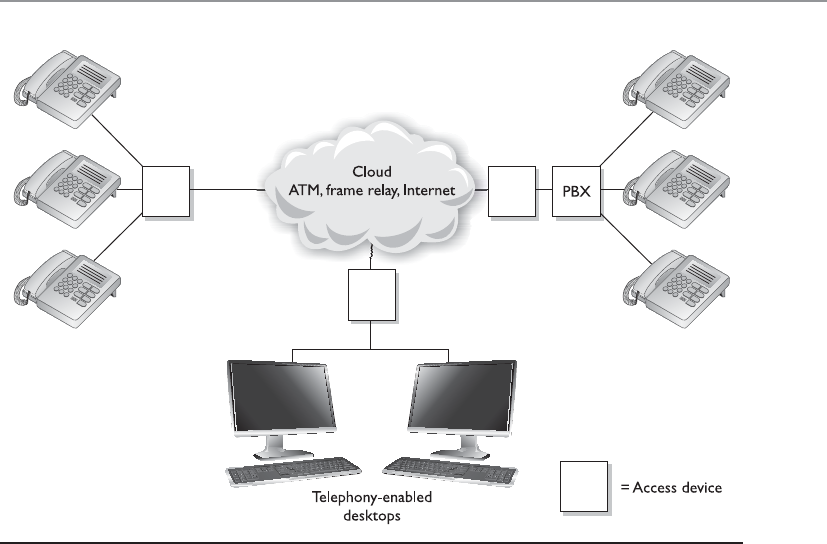
Chapter 6: Telecommunications and Network Security
689
programmed to control its connection and for that connection to be maintained. SVCs,
on the other hand, are set up on demand and are temporary in nature. They are perfect
for making telephone calls or transmitting video during videoconferencing.
Digging Deeper into SIP
As stated earlier, SIP is a signaling protocol widely used for VoIP communications ses-
sions. It is used in applications such as video conferencing, multimedia, instant mes-
saging, and online gaming. It is analogous to the SS7 protocol used in PSTN networks
and supports features present in traditional telephony systems.
SIP consists of two major components: the User Agent Client (UAC) and User Agent
Server (UAS). The UAC is the application that creates the SIP requests for initiating a
communication session. UACs are generally messaging tools and soft-phone applica-
tions that are used to place VoIP calls. The UAS is the SIP server, which is responsible
for handling all routing and signaling involved in VoIP calls.
SIP relies on a three-way-handshake process to initiate a session. To illustrate how an
SIP-based call kicks off, let’s look at an example of two people, Bill and John, trying to
communicate using their VoIP phones. Bill’s system starts by sending an INVITE packet
to John’s system. Since Bill’s system is unaware of John’s location, the INVITE packet is
sent to the SIP server, which looks up John’s address in the SIP registrar server. Once the
location of John’s system has been determined, the INVITE packet is forwarded to him.
During this entire process, the server keeps the caller (Bill) updated by sending him a
Figure 6-70 Regular telephone calls connect phones to the PSTN. Voice over WAN technologies
connect calls to a WAN.
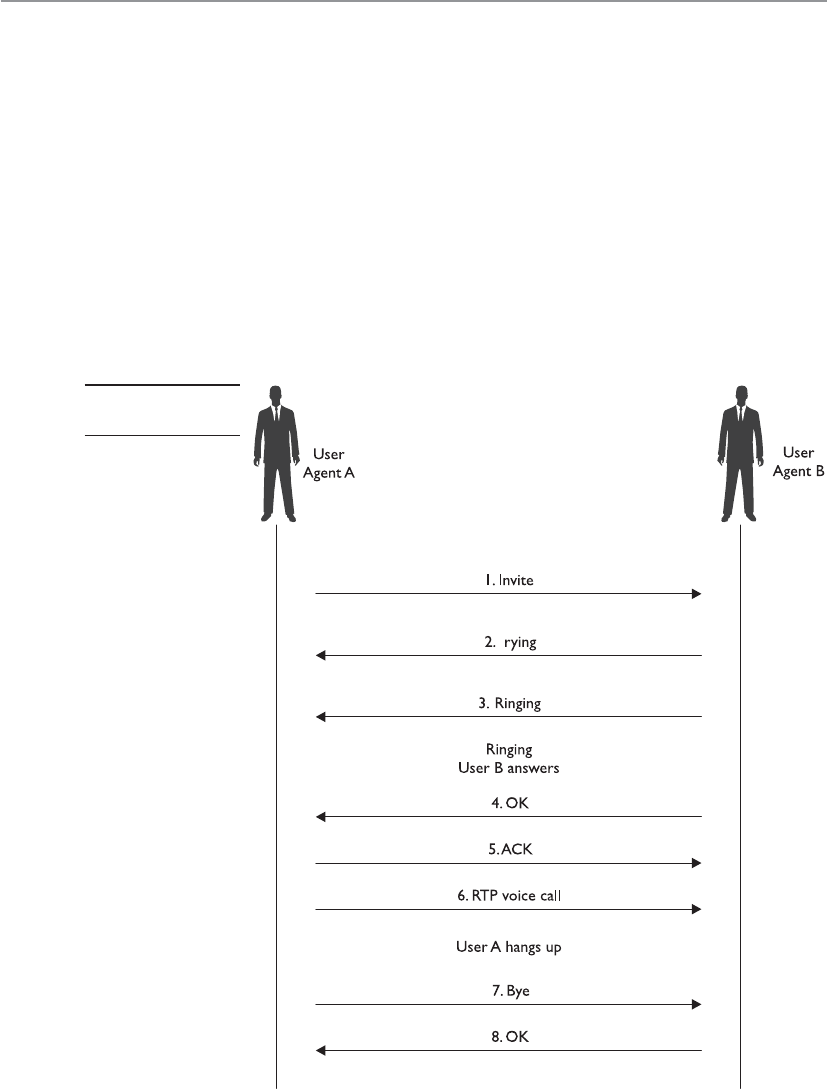
CISSP All-in-One Exam Guide
690
TRYING packet, indicating the process is underway. Once the INVITE packet reaches
John’s system, it starts ringing. While John’s system rings and waits for John to respond,
it sends a RINGING packet to Bill’s system, notifying Bill that the INVITE packet has
been received and John’s system is waiting for John to accept the call. As soon as John
answers the call, an OK packet is sent to Bill’s system (through the server). Bill’s system
now issues an ACK packet to begin call setup. It is important to note here that SIP itself
is not used to stream the conversation because it’s just a signaling protocol. The actual
voice stream is carried on media protocols such as the Real-time Transport Protocol
(RTP). RTP provides a standardized packet format for delivering audio and video over IP
networks. Once Bill and John are done communicating, a BYE message is sent from the
system terminating the call. The other system responds with an OK, acknowledging the
session has ended. This handshake is illustrated in Figure 6-71.
T
Figure 6-71
SIP handshake

Chapter 6: Telecommunications and Network Security
691
The SIP architecture consists of three different types of servers, which play an inte-
gral role in the entire communication process of the VoIP system. These servers are the
proxy server, the registrar server, and the redirect server. The proxy server is used to relay
packets within a network between the UACs and the UAS. It also forwards requests
generated by callers to their respective recipients. Proxy servers are also generally used
for name mapping, which allows the proxy server to interlink an external SIP system to
an internal SIP client.
The registrar server keeps a centralized record of the updated locations of all the
users on the network. These addresses are stored on a location server. The redirect serv-
er allows SIP devices to retain their SIP identities despite changes in their geographic
location. This allows a device to remain accessible when its location is physically
changed and hence while it moves through different networks. The use of redirect serv-
ers allows clients to remain within reach while they move through numerous network
coverage zones. This configuration is generally known as an intraorganizational configu-
ration. Intraorganizational routing enables SIP traffic to be routed within a VoIP net-
work without being transmitted over the PSTN or external network.
Skype is a popular Internet telephony application that uses a peer-to-peer commu-
nication model rather than the traditional client/server approach of VoIP systems. The
Skype network does not rely on centralized servers to maintain its user directories. In-
stead, user records are maintained across distributed member nodes. This is the reason
the network can quickly accommodate user surges without having to rely on expensive
central infrastructure and computing resources.

CISSP All-in-One Exam Guide
692
IP Telephony Issues
VoIP’s integration with the TCP/IP protocol has brought about immense security chal-
lenges because it allows malicious users to bring their TCP/IP experience into this rela-
tively new platform, where they can probe for flaws in both the architecture and the
VoIP systems. Also involved are the traditional security issues associated with networks,
such as unauthorized access, exploitation of communication protocols, and the spread-
ing of malware. The promise of financial benefit derived from stolen call time is a
strong incentive for most attackers. In short, the VoIP telephony network faces all the
flaws that traditional computer networks have faced. Moreover, VoIP devices follow
architectures similar to traditional computers—that is, they use operating systems,
communicate through Internet protocols, and provide a combination of services and
applications.
SIP-based signaling suffers from the lack of encrypted call channels and authentica-
tion of control signals. Attackers can tap into the SIP server and client communication
to sniff out login IDs, passwords/PINs, and phone numbers. Needless to say, once an
attacker gets a hold of such information, he can use it to place unauthorized calls on
the network using the victim’s funds. Toll fraud is considered to be the most significant
threat that VoIP networks face. VoIP network implementations will need to ensure that
VoIP–PSTN gateways are secure from intrusions to prevent these instances of fraud.
Attackers can also masquerade identities by redirecting SIP control packets from a
caller to a forged destination to mislead the caller into communicating with an unin-
tended end system. Like in any networked system, VoIP devices are also vulnerable to
DoS attacks. Just as attackers would flood TCP servers with SYN packets on an IP net-
work to exhaust a device’s resources, attackers can flood RTP servers with call requests
in order to overwhelm its processing capabilities. Attackers have also been known to
connect laptops simulating IP phones to the Ethernet interfaces that IP phones use.
These systems can then be used to carry out intrusions and DoS attacks. In addition to
these circumstances, if attackers are able to intercept voice packets, they may eavesdrop
onto ongoing conversations. Attackers can also intercept RTP packets containing the
media stream of a communication session to inject arbitrary audio/video data that may
be a cause of annoyance to the actual participants.
Attackers can also impersonate a server and issue commands such as BYE,
CHECKSYNC, and RESET to VoIP clients. The BYE command causes VoIP devices to
close down while in a conversation, the CHECKSYNC command can be used to reboot
VoIP terminals, and the RESET command causes the server to reset and reestablish the
connection, which takes considerable time.
Streaming Protocols
RTP is a session layer protocol that carries data in media stream format, as in
audio and video, and is used extensively in VoIP, telephony, video conferencing,
and other multimedia streaming technologies. It provides end-to-end delivery
services and is commonly run over the transport layer protocol UDP. RTP Control
Protocol (RTCP) is used in conjunction with RTP and is also considered a session
layer protocol. It provides out-of-band statistics and control information to pro-
vide feedback on QoS levels of individual streaming multimedia sessions.

Chapter 6: Telecommunications and Network Security
693
NOTE
NOTE Recently, a new variant to traditional e-mail spam has emerged on
VoIP networks, commonly known as SPIT (Spam over Internet Telephony).
SPIT causes loss of VoIP bandwidth and is a time-wasting nuisance for the
people on the attacked network. Because SPIT cannot be deleted like spam on
first sight, the victim has to go through the entire message. SPIT is also a major
cause of overloaded voicemail servers.
Combating VoIP security threats requires a well-thought-out infrastructure imple-
mentation plan. With the convergence of traditional and VoIP networks, balancing se-
curity while maintaining unconstrained traffic flow is crucial. The use of authorization
on the network is an important step in limiting the possibilities of rogue and unauthor-
ized entities on the network. Authorization of individual IP terminals ensures that only
prelisted devices are allowed to access the network. Although not absolutely foolproof,
this method is a first layer of defense in preventing possible rogue devices from con-
necting and flooding the network with illicit packets. In addition to this preliminary
measure, it is essential for two communicating VoIP devices to be able to authenticate
their identities. Device identification may occur on the basis of fixed hardware identifi-
cation parameters, such as MAC addresses or other “soft” codes that may be assigned by
servers.
VoIP Security Measures Broken Down
Hackers can intercept incoming and outgoing calls, carry out DoS attacks, spoof
phone calls, and eavesdrop on sensitive conversations. Many of the countermea-
sures to these types of attacks are the same ones used with traditional data-orient-
ed networks:
• Keep patches updated on each network device involved with VoIP
transmissions:
• The call manager server.
• The voicemail server.
• The gateway server.
• Identify unidentified or rogue telephony devices:
• Implement authentication so only authorized telephony devices are
working on the network.
• Install and maintain
• Stateful firewalls.
• VPN for sensitive voice data.
• Intrusion detection.
• Disable unnecessary ports and services on routers, switches, PCs, and
IP telephones.
• Employ real-time monitoring that looks for attacks, tunneling, and
abusive call patterns through IDS/IPS.

CISSP All-in-One Exam Guide
694
The use of secure cryptographic protocols such as TLS ensures that all SIP packets
are conveyed within an encrypted and secure tunnel. The use of TLS can provide a se-
cure channel for VoIP client/server communication and prevents the possibility of
eavesdropping and packet manipulation.
WAN Technology Summary
We have covered several WAN technologies in the previous sections. Table 6-14 pro-
vides a snapshot of the important characteristics of each.
• Employ content monitoring.
• Use encryption when data (voice, fax, video) cross an untrusted network.
• Use a two-factor authentication technology.
• Limit the number of calls via media gateways.
• Close the media sessions after completion.
• Then take a nap.
WAN Technology Characteristics
Dedicated line • Dedicated, leased line that connects two locations
• Expensive compared to other WAN options
• Secure because only two locations are using the same medium
Frame relay • High-performance WAN protocol that uses packet-switching
technology, which works over public networks
• Shared media among companies
• Uses SVCs and PVCs
• Fee based on bandwidth used
X.25 • First packet-switching technology developed to work over public networks
• Lower speed than frame relay because of its extra overhead
• Uses SVCs and PVCs
• Basically obsolete and replaced with other WAN protocols
SMDS • High-speed switching technology used over public networks
• Basically obsolete and replaced with other WAN protocols
ATM • High-speed bandwidth switching and multiplexing technology that has a
low delay
• Uses 53-byte fixed-size cells
• Very fast because of the low overhead
SDLC • Enables mainframes to communicate with remote offices
• Provides a polling mechanism to allow primary and secondary stations
to communicate
HDLC • Data encapsulation method for synchronous serial links
• Point-to-point and multipoint communication
Table 6-14 Characteristics of WAN Technologies

Chapter 6: Telecommunications and Network Security
695
Remote Connectivity
I need to talk to you, but I am way over here!
Remote connectivity covers several technologies that enable remote and home users
to connect to networks that will grant them access to network resources that help them
perform their tasks. Most of the time, these users must first gain access to the Internet
through an ISP, which sets up a connection to the destination network.
For many corporations, remote access is a necessity because it enables users to ac-
cess centralized network resources, it reduces networking costs by using the Internet as
the access medium instead of expensive dedicated lines, and it extends the workplace
for employees to their home computers, laptops, or mobile devices. Remote access can
streamline access to resources and information through Internet connections and pro-
vides a competitive advantage by letting partners, suppliers, and customers have closely
controlled links. The types of remote connectivity methods we will cover next are dial-
up connections, ISDN, cable modems, DSL, and VPNs.
Dial-up Connections
Since almost every house and office had a telephone line running to it already, the first
type of remote connectivity technology that was used took advantage of this in-place
infrastructure. Modems were added to computers that needed to communicate with
other computers over telecommunication lines.
Each telephone line is made up of UTP copper wires and has an available analog
carrier signal and frequency range to move voice data back and forth. A modem (mod-
ulator-demodulator) is a device that modulates an outgoing digital signal into an ana-
log signal that will be carried over an analog carrier, and demodulates the incoming
analog signal into digital signals that can be processed by a computer.
While the individual computers had built-in modems to allow for Internet connec-
tivity, organizations commonly had a pool of modems to allow for remote access into
and out of their networks. In some cases the modems were installed on individual serv-
ers here and there throughout the network or they were centrally located and managed.
Most companies did not properly enforce access control through these modem connec-
tions, and they served as easy entry points for attackers. Attackers used programs that
PPP • Data encapsulation method for synchronous and asynchronous links
• Point-to-point and multipoint communication
HSSI • DTE/DCE interface to enable high-speed communication over WAN
links
VoIP • Combines voice and data over the same IP network medium and
protocol
• Reduces the costs of implementing and maintaining two different
networks
WAN Technology Characteristics
Table 6-14 Characteristics of WAN Technologies (continued)

CISSP All-in-One Exam Guide
696
carried out war dialing to identify modems that could be compromised. The attackers
fed a large bank of phone numbers into the war dialing tools, which in turn called each
number. If a person answered the phone, the war dialer documented that the number
was not connected to a computer system and dropped it from its list. If a fax machine
answered, it did the same thing. If a modem answered, the war dialer would send sig-
nals and attempt to set up a connection between the attacker’s system and the target
system. If it was successful, now the attacker had direct access to the network.
Most burglars are not going to break into a house through the front door because
there are commonly weaker points of entry that can be more easily compromised (back
doors, windows, etc.). Hackers usually try to find “side doors” into a network instead
of boldly trying to hack through a fortified firewall. In many environments, remote ac-
cess points are not as well protected as the more traditional network access points. At-
tackers know this and take advantage of these situations.
CAUTION
CAUTION Companies often have modems enabled on workstations that
the network staff is unaware of. Employees may enable them, or the IT staff
may install them and then forget about them. Therefore, it is important for
companies to perform war dialing on their own network to make sure no
unaccounted-for modems are attached and operational.
Like most telecommunication connections, dial-up connections take place over
PPP, which has authentication capabilities. Authentication should be enabled for
the PPP connections, but another layer of authentication should be in place before
users are allowed access to network resources. This second layer of authentication
could be done through the use of TACACS+ or RADIUS, which was covered in Chap-
ter 3.
Some of the security measures that should be put into place for dial-up connections
include:
• Configure the remote access server to call back the initiating phone number to
ensure it is a valid and approved number.
• Modems should be configured to answer after a predetermined number of
rings to counter war dialers.
• Disable or remove modems if not in use.
• All modems should be consolidated into one location and managed centrally
if possible.
• Use of two-factor authentication, VPNs, and personal firewalls should be
implemented for remote access connections.
While dial-up connections using modems still exist in some locations, this type of
remote connectivity has been mainly replaced with technologies that can digitize tele-
communication connections.

Chapter 6: Telecommunications and Network Security
697
ISDN
Integrated Services Digital Network (ISDN) is a technology provided by telephone com-
panies and ISPs. This technology, and the necessary equipment, enable data, voice, and
other types of traffic to travel over a medium in a digital manner previously used only
for analog voice transmission. Telephone companies went all digital many years ago,
except for the local loops, which consist of the copper wires that connect houses and
businesses to their carrier provider’s central offices. These central offices contain the
telephone company’s switching equipment, and it is here the analog-to-digital transfor-
mation takes place. However, the local loop is always analog, and is therefore slower.
ISDN was developed to replace the aging telephone analog systems, but it has yet to
catch on to the level expected.
ISDN uses the same wires and transmission medium used by analog dial-up tech-
nologies, but it works in a digital fashion. If a computer uses a modem to communicate
with an ISP, the modem converts the data from digital to analog to be transmitted over
the phone line. If that same computer was configured and had the necessary equipment
to utilize ISDN, it would not need to convert the data from digital to analog, but would
keep it in a digital form. This, of course, means the receiving end would also require the
necessary equipment to receive and interpret this type of communication properly.
Communicating in a purely digital form provides higher bit rates that can be sent more
economically.
ISDN is a set of telecommunications services that can be used over public and pri-
vate telecommunications networks. It provides a digital point-to-point circuit-switched
ISDN Examined
ISDN breaks the telephone line into different channels and transmits data in a
digital form rather than the old analog form. Three ISDN implementations are
in use:
•BRI ISDN This implementation operates over existing copper lines
at the local loop and provides digital voice and data channels. It uses
two B channels and one D channel with a combined bandwidth of
144 Kbps and is generally used for home subscribers.
•PRI ISDN This implementation has up to 23 B channels and 1 D
channel, at 64 Kbps per channel. The total bandwidth is equivalent to
a T1, which is 1.544 Mbps. This would be more suitable for a company
that requires a higher amount of bandwidth compared to BRI ISDN.
•Broadband ISDN (BISDN) This implementation can handle many
different types of services simultaneously and is mainly used within
telecommunications carrier backbones. When BISDN is used within a
backbone, ATM is commonly employed to encapsulate data at the data
link layer into cells, which travel over a SONET network.

CISSP All-in-One Exam Guide
698
medium and establishes a circuit between the two communicating devices. An ISDN
connection can be used for anything a modem can be used for, but it provides more
functionality and higher bandwidth. This digital service can provide bandwidth on an
as-needed basis and can be used for LAN-to-LAN on-demand connectivity, instead of
using an expensive dedicated link.
Analog telecommunication signals use a full channel for communication, but ISDN
can break up this channel into multiple channels to move various types of data, and pro-
vide full-duplex communication and a higher level of control and error handling. ISDN
provides two basic services: Basic Rate Interface (BRI) and Primary Rate Interface (PRI).
BRI has two B channels that enable data to be transferred and one D channel that provides
for call setup, connection management, error control, caller ID, and more. The bandwidth
available with BRI is 144 Kbps, whereas dial-up modems can provide only 56 Kbps.
The D channel provides for a quicker call setup and process in making a connection
compared to dial-up connections. An ISDN connection may require a setup connection
time of only 2 to 5 seconds, whereas a modem may require a timeframe of 45 to 90
seconds. This D channel is an out-of-band communication link between the local loop
equipment and the user’s system. It is considered “out-of-band” because the control
data are not mixed in with the user communication data. This makes it more difficult
for a would-be defrauder to send bogus instructions back to the service provider’s
equipment in hopes of causing a DoS, obtaining services not paid for, or conducting
some other type of destructive behavior.
The BRI service is common for residential use, and the PRI, which has 23 B channels
and one D channel, is more commonly used in corporations. ISDN is not usually the
primary telecommunications connection for companies, but it can be used as a backup
in case the primary connection goes down. A company can also choose to implement
dial-on-demand routing (DDR), which can work over ISDN. DDR allows a company to
send WAN data over its existing telephone lines and use the public circuit-switched
network as a temporary type of WAN link. It is usually implemented by companies that
send out only a small amount of WAN traffic and is a much cheaper solution than a real
WAN implementation. The connection activates when it is needed and then idles out.
DSL
Digital subscriber line (DSL) is another type of high-speed connection technology used
to connect a home or business to the service provider’s central office. It can provide 6
to 30 times higher bandwidth speeds than ISDN and analog technologies. It uses exist-
ing phone lines and provides a 24-hour connection to the Internet. This does indeed
sound better than sliced bread, but only certain people can get this service because you
have to be within a 2.5-mile radius of the DSL service provider’s equipment. As the
distance between a residence and the central office increases, the transmission rates for
DSL decrease.
DSL is a broadband technology that can provide up to a 52-Mbps transmission
speed without replacing the carrier’s copper wire. The end user and the carrier’s equip-

Chapter 6: Telecommunications and Network Security
699
ment do need to be upgraded for DSL, though, and this is why many companies and
residents cannot use this service at this time. The user and carrier must have DSL mo-
dems that use the same modulation techniques.
DSL provides faster transmission rates than an analog dial-up connection because
it uses all of the available frequencies available on a voice-grade UTP line. When you
call someone, your voice data travels down this UTP line and the service provider
“cleans up” the transmission by removing the high and low frequencies. Humans do
not use these frequencies when they talk, so if there is anything on these frequencies, it
is considered line noise and thus removed. So in reality, the available bandwidth of the
line that goes from your house to the telephone company’s central office is artificially
reduced. When DSL is used, this does not take place, and therefore the high and low
frequencies can be used for data transmission.
DSL offers several types of services. With symmetric services, traffic flows at the same
speed upstream and downstream (to and from the Internet or destination). With asym-
metric services, the downstream speed is much higher than the upstream speed. In most
situations, an asymmetric connection is fine for residence users because they usually
download items from the Web much more often than they upload data.
xDSL
Many different flavors of DSL are available, each with its own characteristics and
specific uses:
•Symmetric DSL (SDSL) Data travel upstream and downstream at
the same rate. Bandwidth can range between 192 Kbps and 1.1 Mbps.
Used mainly for business applications that require high speeds in both
directions.
•Asymmetric DSL (ADSL) Data travel downstream faster than
upstream. Upstream speeds are 128 Kbps to 384 Kbps, and downstream
speeds can be as fast as 768 Kbps. Generally used by residential users.
•High-Bit-Rate DSL (HDSL) Provides T1 (1.544 Mbps) speeds over
regular copper phone wire without the use of repeaters. Requires two
twisted pairs of wires, which many voice-grade UTP lines do not have.
•Very High-Data-Rate Digital Subscriber Line (VDSL) VDSL is
basically ADSL at much higher data rates (13 Mbps downstream
and 2 Mbps upstream). It is capable of supporting high-bandwidth
applications such as HDTV, telephone services (voice over IP), and
general Internet access over a single connection.
•Rate-Adaptive Digital Subscriber Line (RADSL) Rate-adaptive feature
that will adjust the transmission speed to match the quality and the
length of the line.

CISSP All-in-One Exam Guide
700
Cable Modems
We already have a cable running to your house, so just buy this extra service for Internet con-
nectivity.
The cable television companies have been delivering television services to homes
for years, and then they started delivering data transmission services for users who have
cable modems and want to connect to the Internet at high speeds.
Cable modems provide high-speed access, up to 50 Mbps, to the Internet through
existing cable coaxial and fiber lines. The cable modem provides upstream and down-
stream conversions.
Not all cable companies provide Internet access as a service, mainly because they have
not upgraded their infrastructure to move from a one-way network to a two-way network.
Once this conversion takes place, data can come down from a central point (referred to
as the head) to a residential home and back up to the head and onto the Internet.
Coaxial and fiber cables are used to deliver hundreds of television stations to users,
and one or more of the channels on these lines are dedicated to carrying data. The
bandwidth is shared between users in a local area; therefore, it will not always stay at a
static rate. So, for example, if Mike attempts to download a program from the Internet
at 5:30 P.M., he most likely will have a much slower connection than if he had at-
tempted it at 10:00 A.M., because many people come home from work and hit the In-
ternet at the same time. As more people access the Internet within his local area, Mike’s
Internet access performance drops.
Most cable providers comply with Data-Over-Cable Service Interface Specifications
(DOCSIS), which is an international telecommunications standard that allows for the
addition of high-speed data transfer to an existing cable TV (CATV) system. DOCSIS
includes MAC layer security services in its Baseline Privacy Interface/Security (BPI/SEC)
specifications. This protects individual user traffic by encrypting the data as they travel
over the provider’s infrastructure.
Sharing the same medium brings up a slew of security concerns, because users with
network sniffers can easily view their neighbors’ traffic and data as both travel to and
from the Internet. Many cable companies are now encrypting the data that go back and
forth over shared lines through a type of data link encryption.
Always Connected
Unlike dial-up modems and ISDN connections, DSL lines and cable modems are
connected to the Internet and “live” all the time. No dial-up steps are required.
This can cause a security issue because many hackers look for just these types of
connections. Systems using these types of connections are always online and
available for scanning, probing, hacking, and attacking. These systems are also
often used in DDoS attacks. Because the systems are on all the time, attackers
plant Trojan horses that lie dormant until they get the command from the at-
tacker to launch an attack against a victim. Many of the DDoS attacks use as their
accomplices systems with DSL and cable modems, and usually the owner of the
computer has no idea their system is being used to attack another system.

Chapter 6: Telecommunications and Network Security
701
Key Terms
•Public-switched telephone network (PSTN) The public circuit-
switched telephone network, which is made up of telephone lines,
fiber-optic cables, cellular networks, communications satellites,
and undersea telephone cables and allows all phone-to-phone
communication. It was a fixed-line analog telephone system, but is now
almost entirely digital and includes mobile as well as fixed telephones.
•Voice over IP (VoIP) The set of protocols, technologies, methodologies,
and transmission techniques involved in the delivery of voice data and
multimedia sessions over IP-based networks.
•Session Initiation Protocol (SIP) The signaling protocol widely used
for controlling communication, as in voice and video calls over IP-
based networks.
• Vishing (voice and phishing) Social engineering activity over the
telephone system, most often using features facilitated by VoIP, to gain
unauthorized access to sensitive data.
• H.323 A standard that addresses call signaling and control, multimedia
transport and control, and bandwidth control for point-to-point and
multipoint conferences.
•Real-time Transport Protocol (RTP) Used to transmit audio and
video over IP-based networks. It is used in conjunction with the
RTCP. RTP transmits the media data, and RTCP is used to monitor
transmission statistics and QoS, and aids synchronization of multiple
data streams.
•War dialing When a specialized program is used to automatically scan
a list of telephone numbers to search for computers for the purposes of
exploitation and hacking.
•Integrated Services Digital Network (ISDN) A circuit-switched
telephone network system technology designed to allow digital
transmission of voice and data over ordinary telephone copper wires.
•Digital Subscriber Line (DSL) A set of technologies that provide
Internet access by transmitting digital data over the wires of a local
telephone network. DSL is used to digitize the “last mile” and provide
fast Internet connectivity.
•Cable modem A device that provides bidirectional data communication
via radio frequency channels on cable TV infrastructures. Cable modems
are primarily used to deliver broadband Internet access to homes.

CISSP All-in-One Exam Guide
702
VPN
Here’s the secret handshake. Now you can use the secret tunnel.
A virtual private network (VPN) is a secure, private connection through an untrust-
ed network, as shown in Figure 6-72. It is a private connection because the encryption
and tunneling protocols are used to ensure the confidentiality and integrity of the data
in transit. It is important to remember that VPN technology requires a tunnel to work
and it assumes encryption.
We need VPNs because we send so much confidential information from system to
system and network to network. The information can be credentials, bank account
data, Social Security numbers, medical information, or any other type of data we just
do not want to share with the world. The demand for securing data transfers has in-
creased over the years and as our networks have increased in complexity, so have our
VPN solutions.
For many years the de facto standard VPN software was Point-To-Point Tunneling
Protocol (PPTP), which was made most popular when Microsoft included it in its Win-
dows products. Since most Internet-based communication first started over telecom-
munication links, the industry needed a way to secure PPP connections. The original
goal of PPTP was to provide a way to tunnel PPP connections through an IP network,
but most implementations included security features also since protection was becom-
ing an important requirement for network transmissions at that time.
PPTP uses Generic Routing Encapsulation (GRE) and TCP to encapsulate PPP pack-
ets and extend a PPP connection through an IP network, as shown in Figure 6-73. In
Microsoft implementations, the tunneled PPP traffic can be authenticated with PAP,
CHAP, MS-CHAP, or EAP-TLS and the PPP payload is encrypted using Microsoft Point-
to-Point Encryption (MPPE). Other vendors have integrated PPTP functionality in their
products for interoperability purposes.
The first security technologies that hit the market commonly have security issues
and drawbacks identified after their release, and PPTP was no different. The earlier au-
thentication methods that were used with PPTP had some inherent vulnerabilities,
which allowed an attacker to easily uncover password values. MPPE also used the sym-
Figure 6-72 A VPN provides a virtual dedicated link between two entities across a public network.

Chapter 6: Telecommunications and Network Security
703
metric algorithm RC4 in a way that allowed data to be modified in an unauthorized
manner, and through the use of certain attack tools, the encryption keys could be un-
covered. Later implementations of PPTP addressed these issues, but the protocol still
has some limitations that should be understood. For example, PPTP cannot support
multiple connections over one VPN tunnel, which means that it can be used for system-
to-system communication but not gateway-to-gateway connections that must support
many user connections simultaneously. PPTP relies on PPP functionality for a majority
of its security features, and because it never became an actual industry standard, incom-
patibilities through different vendor implementations exist.
Another VPN solution was developed, which combines the features of PPTP and
Cisco’s Layer 2 Forwarding (L2F) protocol. Layer 2 Tunneling Protocol (L2TP) tunnels
PPP traffic over various network types (IP, ATM, X.25, etc.); thus, it is not just restricted
to IP networks as PPTP is. PPTP and L2TP have very similar focuses, which is to get PPP
traffic to an end point that is connected to some type of network that does not under-
stand PPP. Like PPTP, L2TP does not actually provide much protection for the PPP traf-
fic it is moving around, but it integrates with protocols that do provide security features.
L2TP inherits PPP authentication and integrates with IPSec to provide confidentiality,
integrity, and potentially another layer of authentication.
NOTE
NOTE PPP provides user authentication through PAP, CHAP, or EAP-TLS,
whereas IPSec provides system authentication.
It can get confusing when several protocols are involved with various levels of en-
capsulation, but if you do not understand how they work together then you cannot
Client
Network
access
server
PPTP/Server
PPP connection
TCP connection
IP datagrams
Internet
PPTP control connection
Virtual Private
Network
Figure 6-73 PPTP extends PPP connections over IP networks.
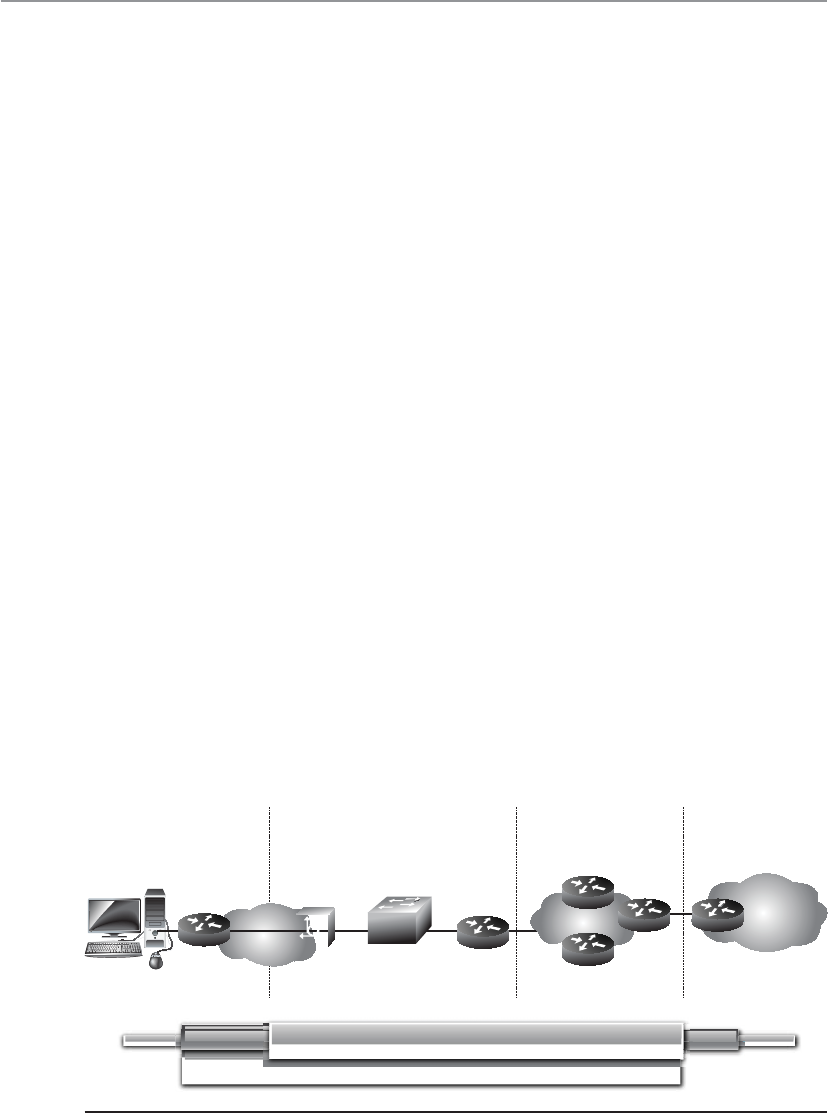
CISSP All-in-One Exam Guide
704
identify if certain traffic links lack security. To figure out if you understand how these
protocols work together and why, ask yourself these questions:
1. If the Internet is an IP-based network, why do we even need PPP?
2. If PPTP and L2TP do not actually secure data themselves, then why do they exist?
3. If PPTP and L2TP basically do the same thing, why choose L2TP over PPTP?
4. If a connection is using IP, PPP, and L2TP, where does IPSec come into play?
Let’s go through the answers together. Let’s say that you are a remote user and work
from your home office. You do not have a dedicated link from your house to your com-
pany’s network; instead, your traffic needs to go through the Internet to be able to com-
municate with the corporate network. The line between your house and your ISP is a
point-to-point telecommunications link, one point being your home router and the
other point being the ISP’s switch as shown in Figure 6-74. Point-to-point telecommu-
nication devices do not understand IP, so your router has to encapsulate your traffic in
a protocol the ISP’s device will understand—PPP. Now your traffic is not headed toward
some web site on the Internet; instead, it has a target of your company’s corporate net-
work. This means that your traffic has to be “carried through” the Internet to its ulti-
mate destination through a tunnel. The Internet does not understand PPP, so your PPP
traffic has to be encapsulated with a protocol that can work on the Internet and create
the needed tunnel, as in PPTP or L2TP. If the connection between your ISP and the
corporate network will not happen over the regular Internet (IP-based network), but
instead over a WAN-based connection (ATM, frame relay), then L2TP has to be used for
this PPP tunnel because PPTP cannot travel over non-IP networks.
So your IP packets are wrapped up in PPP, which are then wrapped up in L2TP. But
we still have no encryption involved, so your data is actually not protected. This is
where IPSec comes in. IPSec is used to encrypt the data that will pass through the L2TP
tunnel. Once your traffic gets to the corporate network’s perimeter device, it will de-
crypt the packets, take off the L2TP and PPP headers, add the necessary Ethernet head-
ers, and send these packets to their ultimate destination.
Enterprise
remote office ISP local POP ISP core network Enterprise
headquarters
Enterprise
intranet
LNS
LAC
Client
IP PPP IP
PPP
L2TP
IPSec
Figure 6-74 IP, PPP, L2TP, and IPSec can work together.

Chapter 6: Telecommunications and Network Security
705
So here are the answers to our questions…
1. If the Internet is an IP-based network, why do we even need PPP?
Answer: The point-to-point telecommunication line devices that connect
individual systems to the Internet do not understand IP, so the traffic that
travels over these links has to be encapsulated in PPP.
2. If PPTP and L2TP do not actually secure data themselves, then why do they
exist?
Answer: They extend PPP connections by providing a tunnel through
networks that do not understand PPP.
3. If PPTP and L2TP basically do the same thing, why choose L2TP over PPTP?
Answer: PPTP only works over IP-based networks. L2TP works over IP-based
and WAN-based (ATM, frame relay) connections. If a PPP connection needs to
be extended over a WAN-based connection, L2TP must be used.
4. If a connection is using IP, PPP, and L2TP, where does IPSec come into play?
Answer: IPSec provides the encryption, data integrity, and system-based
authentication.
So here is another question. Does all of this PPP, PPTP, L2TP, and IPSec encapsula-
tion have to happen for every single VPN used on the Internet? No, only when connec-
tions over point-to-point connections are involved. When two gateway routers are
connected over the Internet and provide VPN functionality, they only have to use IPSec.
IPSec is covered in Chapter 7 from a cryptography point of view, so we will cover it
from a VPN point of view here. IPSec is a suite of protocols that was developed to spe-
cifically protect IP traffic. IPv4 does not have any integrated security, so IPSec was devel-
oped to “bolt onto” IP and secure the data the protocol transmits. Where PPTP and
L2TP work at the data link layer, IPSec works at the network layer of the OSI model.
The main protocols that make up the IPSec suite and their basic functionality are as
follows:
A. Authentication Header (AH) provides data integrity, data origin authentication,
and protection from replay attacks.
B. Encapsulating Security Payload (ESP) provides confidentiality, data-origin
authentication, and data integrity.
C. Internet Security Association and Key Management Protocol (ISAKMP) provides
a framework for security association creation and key exchange.
D. Internet Key Exchange (IKE) provides authenticated keying material for use
with ISAKMP.
AH and ESP can be used separately or together in an IPSec VPN configuration. The
AH protocols can provide data origin authentication (system authentication) and pro-
tection from unauthorized modification, but do not provide encryption capabilities. If
the VPN needs to provide confidentiality, then ESP has to be enabled and configured
properly.

CISSP All-in-One Exam Guide
706
When two routers need to set up an IPSec VPN connection, they have a list of secu-
rity attributes that need to be agreed upon through handshaking processes. The two
routers have to agree upon algorithms, keying material, protocol types, and modes of
use, which will all be used to protect the data that is transmitted between them.
Let’s say that you and I are routers that need to protect the data we will pass back
and forth to each other. I send you a list of items that you will use to process the packets
I send to you. My list contains AES-128, SHA-1, and ESP tunnel mode. You take these
parameters and store them in a security association (SA). When I send you packets one
hour later, you will go to this SA and follow these parameters so that you know how to
process this traffic. You know what algorithm to use to verify the integrity of the pack-
ets, the algorithm to use to decrypt the packets, and which protocol to activate and in
what mode. Figure 6-75 illustrates how SAs are used for inbound and outbound traffic.
NOTE
NOTE The U.S. National Security Agency uses a protocol encryptor that is
based upon IPSec. A HAIPE (High Assurance Internet Protocol Encryptor)
is a Type 1 encryption device that is based on IPSec with additional
restrictions, enhancements, and capabilities. A HAIPE is typically a secure
gateway that allows two enclaves to exchange data over an untrusted or
lower-classification network. Since this technology works at the network layer,
secure end-to-end connectivity can take place in heterogeneous environments.
This technology has largely replaced link layer encryption technology
implementations.
A newer VPN technology is Secure Sockets Layer (SSL), which works at even higher
layers in the OSI model than the previously covered VPN protocols. SSL works at the
transport and session layers of the network stack and is used mainly to protect HTTP
traffic. SSL capabilities are already embedded into most web browsers, so the deploy-
ment and interoperability issues are minimal.
To Protocol Authentication Encryption
Joe ESP SHA - 1 , x AES, y
From Protocol Authentication Encryption
Joe AH MD 5, z
To Protocol Authentication Encryption
From Protocol Authentication Encryption
AH MD 5, z
Mary
ESP SHA - 1 , x AES, y
Mary
Authenticate
and encrypt
Authenticate
Verify
and de-encrypt
Verify
IPSec packet
IPSec packet
Outbound SA
Inbound SA Inbound SA
Outbound SA
Figure 6-75 IPSec uses security associations to store VPN parameters.
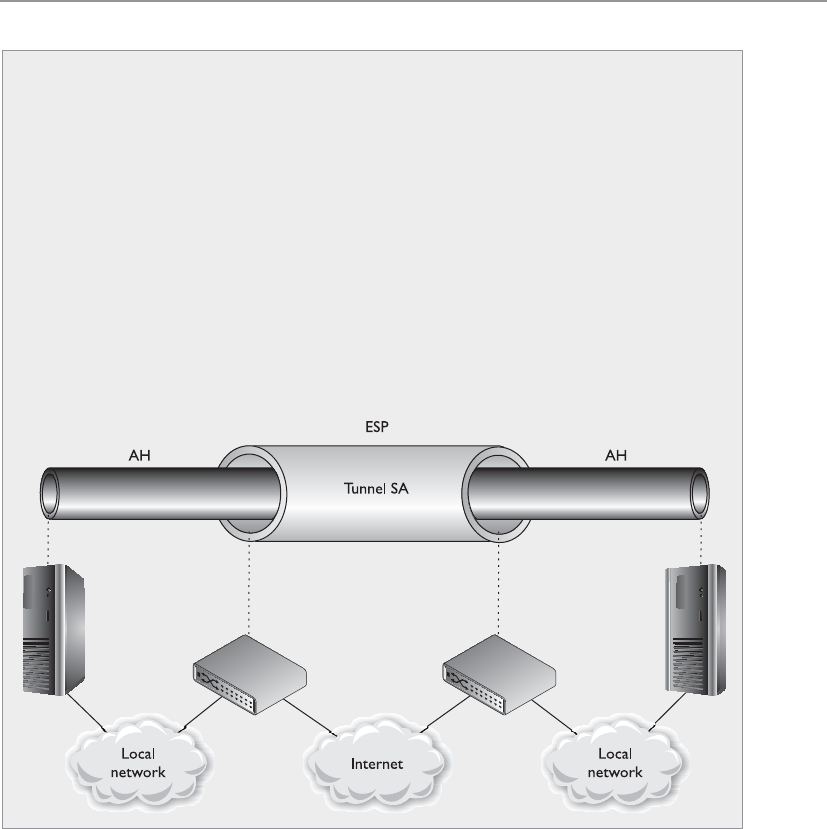
Chapter 6: Telecommunications and Network Security
707
The most common implementation types of SSL VPN are as follows:
•SSL Portal VPNs An individual uses a single standard SSL connection to a
web site to securely access multiple network services. The web site accessed is
typically called a portal because it is a single location that provides access to
other resources. The remote user accesses the SSL VPN gateway using a web
browser, is authenticated, and is then presented with a web page that acts as
the portal to the other services.
•SSL Tunnel VPNs An individual uses a web browser to securely access
multiple network services, including applications and protocols that are
not web-based, through an SSL tunnel. This commonly requires custom
programming to allow the services to be accessible through a web-based
connection.
IPSec
IPSec is fully covered in Chapter 7, but let’s take a quick look at some configura-
tion possibilities for this protocol suite.
IPSec can be configured to provide transport adjacency, which just means that
more than one security protocol (ESP and AH) is used in a VPN tunnel. IPSec can
also be configured to provide iterated tunneling, in which an IPSec tunnel is tun-
neled through another IPSec tunnel, as shown in the following diagram. Iterated
tunneling would be used if the traffic needed different levels of protection at dif-
ferent junctions of its path. For example, if the IPSec tunnel started from an inter-
nal host to an internal border router, this may not require encryption, so only the
AH protocol would be used. But when that data travel from that border router
throughout the Internet to another network, then the data require more protec-
tion. So the first packets travel through a semisecure tunnel until they get ready
to hit the Internet and then they go through a very secure second tunnel.

CISSP All-in-One Exam Guide
708
Since SSL VPNs are closer to the application layer, they can provide more granular
access control and security features compared to the other VPN solutions. But since
they are dependent on the application layer protocol, there are a smaller number of
traffic types that can be protected through this VPN type.
One VPN solution is not necessarily better than the other; they just have their own
focused purposes:
Summary of Tunneling Protocols
Point-to-Point Tunneling Protocol (PPTP):
• Works in a client/server model
• Extends and protects PPP connections
• Works at the data link layer
• Transmits over IP networks only
Layer 2 Tunneling Protocol (L2TP):
• Hybrid of L2F and PPTP
• Extends and protects PPP connections
• Works at the data link layer
• Transmits over multiple types of networks, not just IP
• Combined with IPSec for security
IPSec:
• Handles multiple VPN connections at the same time
• Provides secure authentication and encryption
• Supports only IP networks
• Focuses on LAN-to-LAN communication rather than user-to-user
• Works at the network layer, and provides security on top of IP
Secure Sockets Layer (SSL):
• Works at the transport layer and protects mainly web-based traffic
• Granular access control and configuration are available
• Easy deployment since SSL is already embedded into web browsers
• Can only protect a small number of protocol types, thus is not an
infrastructure-level VPN solution

Chapter 6: Telecommunications and Network Security
709
• PPTP is used when a PPP connection needs to be extended through an IP-
based network.
• L2TP is used when a PPP connection needs to be extended through a non IP-
based network.
• IPSec is used to protect IP-based traffic and is commonly used in gateway-to-
gateway connections.
• SSL VPN is used when a specific application layer traffic type needs protection.
NOTE
NOTE The predecessor to SSL is Transport Layer Security (TLS), which is
an actual standard. SSL is a de facto standard and is more popular than TLS
because of its large deployment base.
Again, what can be used for good can also be used for evil. Attackers commonly
encrypt their attack traffic so that countermeasures we put into place to analyze traffic
for suspicious activity are not effective. Attackers can use SSL, TLS, or PPTP to encrypt
malicious traffic as it transverses the network. When an attacker compromises and
opens up a back door on a system, she will commonly encrypt the traffic that will then
go between her system and the compromised system. It is important to configure secu-
rity network devices to only allow approved encrypted channels.
Authentication Protocols
Hey, how do I know you are who you say you are?
Password Authentication Protocol (PAP) is used by remote users to authenticate over
PPP connections. It provides identification and authentication of the user who is at-
tempting to access a network from a remote system. This protocol requires a user to
enter a password before being authenticated. The password and the username creden-
tials are sent over the network to the authentication server after a connection has been
established via PPP. The authentication server has a database of user credentials that are
compared to the supplied credentials to authenticate users.
PAP is one of the least secure authentication methods because the credentials are
sent in cleartext, which renders them easy to capture by network sniffers. Although it is
not recommended, some systems revert to PAP if they cannot agree on any other au-
thentication protocol. During the handshake process of a connection, the two entities
negotiate how authentication is going to take place, what connection parameters to use,
the speed of data flow, and other factors. Both entities will try to negotiate and agree
upon the most secure method of authentication; they may start with EAP, and if one
computer does not have EAP capabilities, they will try to agree upon CHAP; if one of
the computers does not have CHAP capabilities, they may be forced to use PAP. If this
type of authentication is unacceptable, the administrator will configure the remote ac-
cess server (RAS) to accept only CHAP authentication and higher, and PAP cannot be
used at all.

CISSP All-in-One Exam Guide
710
Challenge Handshake Authentication Protocol (CHAP) addresses some of the vulner-
abilities found in PAP. It uses a challenge/response mechanism to authenticate the user
instead of sending a password. When a user wants to establish a PPP connection and
both ends have agreed that CHAP will be used for authentication purposes, the user’s
computer sends the authentication server a logon request. The server sends the user a
challenge (nonce), which is a random value. This challenge is encrypted with the use of
a predefined password as an encryption key, and the encrypted challenge value is re-
turned to the server. The authentication server also uses the predefined password as an
encryption key and decrypts the challenge value, comparing it to the original value sent.
If the two results are the same, the authentication server deduces that the user must have
entered the correct password, and authentication is granted. The steps that take place in
CHAP are depicted in Figure 6-76.
NOTE
NOTE MS-CHAP is Microsoft’s version of CHAP and provides mutual
authentication functionality. It has two versions, which are incompatible
with each other.
PAP is vulnerable to sniffing because it sends the password and data in plaintext,
but it is also vulnerable to man-in-the-middle attacks. CHAP is not vulnerable to man-
in-the-middle attacks because it continues this challenge/response activity throughout
the connection to ensure the authentication server is still communicating with a user
who holds the necessary credentials.
Extensible Authentication Protocol (EAP) is also supported by PPP. Actually, EAP is
not a specific authentication protocol as are PAP and CHAP. Instead, it provides a
framework to enable many types of authentication techniques to be used when estab-
Figure 6-76
CHAP uses a
challenge/response
mechanism instead
of having the user
send the password
over the wire.

Chapter 6: Telecommunications and Network Security
711
lishing network connections. As the name states, it extends the authentication possibili-
ties from the norm (PAP and CHAP) to other methods, such as one-time passwords,
token cards, biometrics, Kerberos, digital certificates, and future mechanisms. So when
a user connects to an authentication server and both have EAP capabilities, they can
negotiate between a longer list of possible authentication methods.
NOTE
NOTE EAP has been defined for use with a variety of technologies and
protocols, including PPP, PPTP, L2TP, IEEE 802 wired networks, and wireless
technologies such as 802.11 and 802.16.
There are many different variants of EAP as shown in Table 6-15. There are many
variants because EAP is an extensible framework that can be morphed for different en-
vironments and needs.
Protocol Description
Lightweight EAP (LEAP) Wireless LAN authentication method developed by Cisco
Systems
EAP-TLS Digital certificate-based authentication
EAP-MD5 Weak system authentication based upon hash values
EAP-PSK Provides mutual authentication and session key derivation using a
preshared key
EAP-TTLS Extends TLS functionality
EAP-IKE2 Provides mutual authentication and session key establishment
using asymmetric or symmetric keys or passwords
PEAPv0/EAP-MSCHAPv2 Similar in design to EAP-TTLS; however, it only requires a server-
side digital certificate
PEAPv1/EAP-GTC Cisco variant-based on Generic Token Card (GTC) authentication
EAP-FAST Cisco-proprietary replacement for LEAP based on Flexible
Authentication via Secure Tunneling (FAST)
EAP-SIM For Global System for Mobile Communications (GSM), based on
Subscriber Identity Module (SIM), a variant of PEAP for GSM
EAP-AKA For Universal Mobile Telecommunication System (UMTS)
Subscriber Identity Module (USIM) and provides Authentication
and Key Agreement (AKA)
EAP-GSS Based on Generic Security Service (GSS), it uses Kerberos
Table 6-15 EAP Variants
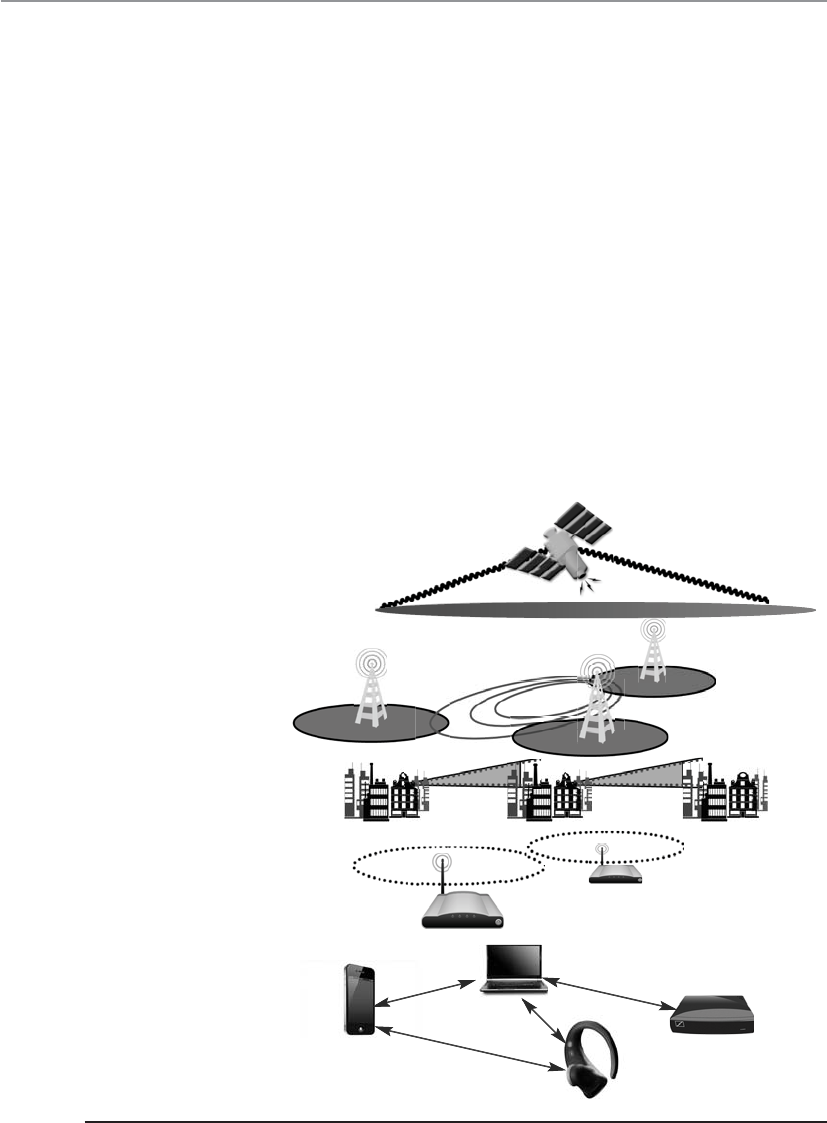
CISSP All-in-One Exam Guide
712
Wireless Technologies
Look, Ma, no wires!
Wireless communications take place much more often than we think, and a wide
range of broadband wireless data transmission technologies are used in various fre-
quency ranges. Broadband wireless signals occupy frequency bands that may be shared
with microwave, satellite, radar, and ham radio use, for example. We use these tech-
nologies for television transmissions, cellular phones, satellite transmissions, spying,
surveillance, and garage door openers. As we will see in the next sections, wireless com-
munication takes place over personal area networks; wireless LANs, MANs, and WANs;
and via satellite. Each is illustrated in Figure 6-77.
Wireless Communications
When two people are talking, they are using wireless communication because their vo-
cal cords are altering airwaves, which are signals that travel with no cables attached to
another person. Wireless communication involves transmitting signals via radio waves
through air and space, which also alters airwaves.
GSM/3G
WIMAX
UWB
WIFI AP
GSM/3G
WiMAX
UWB
WiFiAP
3G
Wireless wide area
networks
Wireless metropolitan
area networks
Wireless local area
networks
Bluetooth
Wireless personal area
networks
Satellite network
Figure 6-77 Various wireless transmission types

Chapter 6: Telecommunications and Network Security
713
Signals are measured in frequency and amplitudes. The frequency of a signal dictates
the amount of data that can be carried and how far. The higher the frequency, the more
data the signal can carry, but the higher the frequency, the more susceptible the signal
is to atmospheric interference. A higher frequency can carry more data, but over a short-
er distance.
In a wired network, each computer and device has its own cable connecting it to the
network in some fashion. In wireless technologies, each device must instead share the
allotted radio frequency spectrum with all other wireless devices that need to commu-
nicate. This spectrum of frequencies is finite in nature, which means it cannot grow if
more and more devices need to use it. The same thing happens with Ethernet—all the
computers on a segment share the same medium, and only one computer can send
data at any given time. Otherwise, a collision can take place. Wired networks using Eth-
ernet employ the CSMA/CD (collision detection) technology. Wireless LAN (WLAN)
technology is actually very similar to Ethernet, but it uses CSMA/CA (collision avoid-
ance). The wireless device sends out a broadcast indicating it is going to transmit data.
This is received by other devices on the shared medium, which causes them to hold off
on transmitting information. It is all about trying to eliminate or reduce collisions.
(The two versions of CSMA are explained earlier in this chapter in the section “CSMA.”)
A number of technologies have been developed to allow wireless devices to access
and share this limited amount of medium for communication purposes. We will look
at different types of spread spectrum techniques in the next sections. The goal of each
of these wireless technologies is to split the available frequency into usable portions,
since it is a limited resource, and to allow the devices to share them efficiently.
Spread Spectrum
Can I spread my data over these frequencies with a butter knife?
Response: Whatever.
In the world of wireless communications, certain technologies and industries are
allocated specific spectrums, or frequency ranges, to be used for transmissions. In the
United States, the Federal Communications Commission (FCC) decides upon this al-
lotment of frequencies and enforces its own restrictions. Spread spectrum means that
something is distributing individual signals across the allocated frequencies in some
fashion. So when a spread spectrum technology is used, the sender spreads its data
across the frequencies over which it has permission to communicate. This allows for
more effective use of the available bandwidth, because the sending system can use
more than one frequency at a time. Think of it in terms of serial versus parallel com-
munication. In serial transmissions, all the bits have to be fed into one channel, one
after the other. In parallel transmissions, the bits can take several channels to arrive at
their destination. Parallel is a faster approach because more channels can be used at
one time. This is similar to checkout lanes in a grocery store. We have all been in the
situation where there was just one checkout lane open, which drastically slows down
the amount of traffic (people and their food) that can get properly processed in a short
period of time. Once the manager calls more checkers to the front to open their lanes,
then parallel processing can be done and the grumbling stops. So spreading the signal
allows the data to travel in a parallel fashion by allowing the sender and receiver to send
data over more than one frequency.

CISSP All-in-One Exam Guide
714
We will look at two types of spread spectrum: frequency hopping spread spectrum
(FHSS) and direct sequence spread spectrum (DSSS).
Frequency Hopping Spread Spectrum Frequency hopping spread spectrum
(FHSS) takes the total amount of bandwidth (spectrum) and splits it into smaller sub-
channels. The sender and receiver work at one of these subchannels for a specific
amount of time and then move to another subchannel. The sender puts the first piece
of data on one frequency, the second on a different frequency, and so on. The FHSS
algorithm determines the individual frequencies that will be used and in what order,
and this is referred to as the sender and receiver’s hop sequence.
Interference is a large issue in wireless transmissions because it can corrupt signals
as they travel. Interference can be caused by other devices working in the same fre-
quency space. The devices’ signals step on each other’s toes and distort the data being
sent. The FHSS approach to this is to hop between different frequencies so if another
device is operating at the same frequency, it will not be drastically affected. Consider
another analogy: Suppose George and Marge have to work in the same room. They
could get into each other’s way and affect each other’s work. But if they periodically
change rooms, the probability of them interfering with each other is reduced.
A hopping approach also makes it much more difficult for eavesdroppers to listen
in on and reconstruct the data being transmitted when used in technologies other than
WLAN. FHSS has been used extensively in military wireless communications devices
because the only way the enemy could intercept and capture the transmission is by
knowing the hopping sequence. The receiver has to know the sequence to be able to
obtain the data. But in today’s WLAN devices, the hopping sequence is known and does
not provide any security.
So how does this FHSS stuff work? The sender and receiver hop from one frequency
to another based on a predefined hop sequence. Several pairs of senders and receivers
can move their data over the same set of frequencies because they are all using different
hop sequences. Let’s say you and I share a hop sequence of 1, 5, 3, 2, 4, and Nicole and
Ed have a sequence of 4, 2, 5, 1, 3. I send my first message on frequency 1, and Nicole
sends her first message on frequency 4 at the same time. My next piece of data is sent
on frequency 5, the next on 3, and so on until each reaches its destination, which is
your wireless device. So your device listens on frequency 1 for a half-second, and then
listens on frequency 5, and so on, until it receives all of the pieces of data that are on
the line on those frequencies at that time. Ed’s device is listening to the same frequen-
cies but at different times and in a different order, so his device ignores my message
because it is out of sync with his predefined sequence. Without knowing the right code,
Ed treats my messages as background noise and does not process them.
Direct Sequence Spread Spectrum Direct sequence spread spectrum (DSSS)
takes a different approach by applying sub-bits to a message. The sub-bits are used by
the sending system to generate a different format of the data before the data are trans-
mitted. The receiving end uses these sub-bits to reassemble the signal into the original
data format. The sub-bits are called chips, and the sequence of how the sub-bits are
applied is referred to as the chipping code.

Chapter 6: Telecommunications and Network Security
715
When the sender’s data are combined with the chip, to anyone who does not know
the chipping sequence, these signals appear as random noise. This is why the sequence
is sometimes called a pseudo-noise sequence. Once the sender combines the data with
the chipping sequence, the new form of the information is modulated with a radio car-
rier signal, and it is shifted to the necessary frequency and transmitted. What the heck
does that mean? When using wireless transmissions, the data are actually moving over
radio signals that work in specific frequencies. Any data to be moved in this fashion
must have a carrier signal, and this carrier signal works in its own specific range, which
is a frequency. So you can think of it this way: once the data are combined with the
chipping code, it is put into a car (carrier signal), and the car travels down its specific
road (frequency) to get to its destination.
The receiver basically reverses the process, first by demodulating the data from the
carrier signal (removing it from the car). The receiver must know the correct chipping
sequence to change the received data into its original format. This means the sender
and receiver must be properly synchronized.
The sub-bits provide error-recovery instructions, just as parity does in RAID tech-
nologies. If a signal is corrupted using FHSS, it must be re-sent; but by using DSSS, even
if the message is somewhat distorted, the signal can still be regenerated because it can
be rebuilt from the chipping code bits. The use of this code allows for prevention of
interference, allows for tracking of multiple transmissions, and provides a level of error
correction.
FHSS vs. DSSS FHSS uses only a portion of the total bandwidth available at any one
time, while the DSSS technology uses all of the available bandwidth continuously.
DSSS spreads the signals over a wider frequency band, whereas FHSS uses a narrow
band carrier.
Since DSSS sends data across all frequencies at once, it has a higher data throughput
than FHSS. The first wireless WAN standard, 802.11, used FHSS, but as bandwidth re-
quirements increased, DSSS was implemented. By using FHSS, the 802.11 standard can
provide a data throughput of only 1 to 2 Mbps. By using DSSS instead, 802.11b pro-
vides a data throughput of up to 11 Mbps.
While not considered an official “spread spectrum” technology, the next step in try-
ing to move even more data over wireless frequency signals came in the form of or-
thogonal frequency-division multiplexing (OFDM). OFDM is a digital multicarrier
modulation scheme that compacts multiple modulated carriers tightly together, reduc-
ing the required bandwidth. The modulated signals are orthogonal (perpendicular)
Spread Spectrum Types
This technology transmits data by “spreading” it over a broad range of frequencies:
• FHSS moves data by changing frequencies.
• DSSS takes a different approach by applying sub-bits to a message and
uses all of the available frequencies at the same time.

CISSP All-in-One Exam Guide
716
and do not interfere with each other. OFDM uses a composite of narrow channel bands
to enhance its performance in high-frequency bands. OFDM is officially a multiplexing
technology and not a spread spectrum technology, but is used in a similar manner.
A large number of closely spaced orthogonal subcarrier signals are used and the
data is divided into several parallel data streams or channels, one for each subcarrier.
Channel equalization is simplified because OFDM uses many slowly modulated nar-
rowband signals rather than one rapidly modulated wideband signal.
While this section is focusing on WLAN, OFDM is used for several wideband digital
communication types as digital television, audio broadcasting, DSL broadband Inter-
net access, wireless networks, and 4G mobile communications.
WLAN Components
A WLAN uses a transceiver, called an access point (AP), which connects to an Ethernet
cable that is the link wireless devices use to access resources on the wired network, as
shown in Figure 6-78. When the AP is connected to the LAN Ethernet by a wired cable,
it is the component that connects the wired and the wireless worlds. The APs are in
fixed locations throughout a network and work as communication beacons. Let’s say a
wireless user has a device with a wireless NIC, which modulates her data onto radio
frequency signals that are accepted and processed by the AP. The signals transmitted
from the AP are received by the wireless NIC and converted into a digital format, which
the device can understand.
When APs are used to connect wireless and wired networks, this is referred to as an
infrastructure WLAN, which is used to extend an existing wired network. When there is
just one AP and it is not connected to a wired network, it is considered to be in stand-
alone mode and just acts as a wireless hub.
An ad hoc WLAN has no APs; the wireless devices communicate with each other
through their wireless NICs instead of going through a centralized device. To construct
an ad hoc network, wireless client software is installed on contributing hosts and con-
figured for peer-to-peer operation mode. Then, the user clicks Network Neighborhood
in a Windows platform and the software searches for other hosts operating in this
similar mode and shows them to the user.
For a wireless device and AP to communicate, they must be configured to commu-
nicate over the same channel. A channel is a certain frequency within a given frequency
band. The AP is configured to transmit over a specific channel, and the wireless device
will “tune” itself to be able to communicate over this same frequency.
Any hosts that wish to participate within a particular WLAN must be configured
with the proper Service Set ID (SSID). Various hosts can be segmented into different
WLANs by using different SSIDs. The reasons to segment a WLAN into portions are the
same reasons wired systems are segmented on a network: the users require access to
different resources, have different business functions, or have different levels of trust.
NOTE
NOTE When wireless devices work in infrastructure mode, the AP and
wireless clients form a group referred to as a Basic Service Set (BSS). This
group is assigned a name, which is the SSID value.

Chapter 6: Telecommunications and Network Security
717
The SSID is required when a wireless device wants to authenticate to an AP. For the
device to prove it should be allowed to communicate with the wired network, it must
first provide a valid SSID value. The SSID should not be seen as a reliable security
mechanism because many APs broadcast their SSIDs, which can be easily sniffed and
used by attackers.
The wireless device can authenticate to the AP in two main ways: open system au-
thentication (OSA) and shared key authentication (SKA). OSA does not require the
wireless device to prove to the AP it has a specific cryptographic key to allow for authen-
tication purposes. In many cases, the wireless device needs to provide only the correct
SSID value. In OSA implementations, all transactions are in cleartext because no en-
cryption is involved. So an intruder can sniff the traffic, capture the necessary steps of
authentication, and walk through the same steps to be authenticated and associated to
an AP.
When an AP is configured to use SKA, the AP sends a random value to the wireless
device. The device encrypts this value with its cryptographic key and returns it. The AP
decrypts and extracts the response, and if it is the same as the original value, the device
is authenticated. In this approach, the wireless device is authenticated to the network
by proving it has the necessary encryption key. This method is based on the Wired
Equivalent Privacy (WEP) protocol, which also enables data transfers to be encrypted.
When WLAN technologies first came out, authentication was this simplistic—your
device either had the right SSID value and WEP key or it did not. As wireless communi-
cation increased in use and many deficiencies were identified in these simplistic ways
of authentication and encryption, many more solutions were developed and deployed.
Figure 6-78 A wireless device must authenticate with an access point.

CISSP All-in-One Exam Guide
718
WLAN Security
The first WLAN standard, IEEE 802.11, had a tremendous number of security flaws.
These were found within the core standard itself, as well as in different implementa-
tions of this standard. The three core deficiencies with WEP are the use of static en-
cryption keys, the ineffective use of initialization vectors, and the lack of packet integ-
rity assurance. The WEP protocol uses the RC4 algorithm, which is a stream-symmetric
cipher. Symmetric means the sender and receiver must use the exact same key for en-
cryption and decryption purposes. The 802.11 standard does not stipulate how to up-
date these keys through an automated process, so in most environments, the RC4
symmetric keys are never changed out. And usually all of the wireless devices and the
AP share the exact same key. This is like having everyone in your company use the ex-
act same password. Not a good idea. So that is the first issue—static WEP encryption
keys on all devices.
NOTE
NOTE Many of the cryptography topics in this section are clearly defined
in Chapter 7. It may be beneficial to re-read this section after completing
Chapter 7 if you are new to cryptography.
The next flaw is how initialization vectors (IVs) are used. An IV is a numeric seeding
value that is used with the symmetric key and RC4 algorithm to provide more random-
ness to the encryption process. Randomness is extremely important in encryption be-
cause any patterns can give the bad guys insight into how the process works, which may
allow them to uncover the encryption key that was used. The key and IV value are in-
serted into the RC4 algorithm to generate a key stream. The values (1’s and 0’s) of the
key stream are XORed with the binary values of the individual packets. The result is ci-
phertext, or encrypted packets.
In most WEP implementations, the same IV values are used over and over again in
this process, and since the same symmetric key (or shared secret) is generally used,
there is no way to provide effective randomness in the key stream that is generated by
the algorithm. The appearance of patterns allows attackers to reverse-engineer the pro-
cess to uncover the original encryption key, which can then be used to decrypt future
encrypted traffic.
So now we are onto the third mentioned weakness, which is the integrity assurance
issue. WLAN products that use only the 802.11 standard introduce a vulnerability that
is not always clearly understood. An attacker can actually change data within the wire-
less packets by flipping specific bits and altering the Integrity Check Value (ICV) so the
receiving end is oblivious to these changes. The ICV works like a CRC function; the
sender calculates an ICV and inserts it into a frame’s header. The receiver calculates his
own ICV and compares it with the ICV sent with the frame. If the ICVs are the same, the
receiver can be assured that the frame was not modified during transmission. If the
ICVs are different, it indicates a modification did indeed take place and thus the re-
ceiver discards the frame. In WEP, there are certain circumstances in which the receiver
cannot detect whether an alteration to the frame has taken place; thus, there is no true
integrity assurance.

Chapter 6: Telecommunications and Network Security
719
So the problems identified with the 802.11 standard include poor authentication,
static WEP keys that can be easily obtained by attackers, IV values that are repetitive and
do not provide the necessary degree of randomness, and a lack of data integrity.
IEEE came out with a standard that deals with the security issues of the original
802.11 standard, which is called IEEE 802.11i. This standard employs different ap-
proaches that provide much more security and protection than the methods used in the
original 802.11 standard. This enhancement of security is accomplished through spe-
cific protocols, technologies, and algorithms. The first protocol is Temporal Key Integ-
rity Protocol (TKIP), which is backwards-compatible with the WLAN devices based
upon the original 802.11 standard. TKIP actually works with WEP by feeding it keying
material, which is data to be used for generating new dynamic keys. The new standard
also integrated 802.1X port authentication and EAP authentication methods.
NOTE
NOTE TKIP was developed by the IEEE 802.11i task group and the Wi-Fi
Alliance. The goal of this protocol was to increase the strength of WEP or
replace it fully without the need for hardware replacement. TKIP provides
a key mixing function, which allows the RC4 algorithm to provide a higher
degree of protection. It also provides a sequence counter to protect against
replay attacks and implements a message integrity check mechanism.
The use of the 802.1X technology in the new 802.11i standard provides access con-
trol by restricting network access until full authentication and authorization have been
completed, and provides a robust authentication framework that allows for different
EAP modules to be plugged in. These two technologies (802.1X and EAP) work to-
gether to enforce mutual authentication between the wireless device and authentica-
tion server. So what about the static keys, IV value, and integrity issues?
TKIP addresses the deficiencies of WEP pertaining to static WEP keys and inade-
quate use of IV values. Two hacking tools, AirSnort and WEP-Crack, can be used to
easily crack WEP’s encryption by taking advantage of these weaknesses and the ineffec-
tive use of the key scheduling algorithm within the WEP protocol. If a company is using
products that implement only WEP encryption and is not using a third-party encryp-
tion solution (such as a VPN), these programs can break its encrypted traffic within
minutes to hours. There is no “maybe” pertaining to breaking WEP’s encryption. Using
these tools means it will be broken whether a 40-bit or 128-bit key is being used—it
doesn’t matter. This is one of the most serious and dangerous vulnerabilities pertaining
to the original 802.11 standard.
The use of TKIP provides the ability to rotate encryption keys to help fight against
these types of attacks. The protocol increases the length of the IV value and ensures each
and every frame has a different IV value. This IV value is combined with the transmit-
ter’s MAC address and the original WEP key, so even if the WEP key is static, the result-
ing encryption key will be different for each and every frame. (WEP key + IV value +
MAC address = new encryption key.) So what does that do for us? This brings more
randomness to the encryption process, and it is randomness that is necessary to prop-
erly thwart cryptanalysis and attacks on cryptosystems. The changing IV values and re-
sulting keys make the resulting key stream less predictable, which makes it much
harder for the attacker to reverse-engineer the process and uncover the original key.

CISSP All-in-One Exam Guide
720
TKIP also deals with the integrity issues by using a MIC instead of an ICV function.
If you are familiar with a message authentication code (MAC) function, this is the same
thing. A symmetric key is used with a hashing function, which is similar to a CRC func-
tion but stronger. The use of MIC instead of ICV ensures the receiver will be properly
alerted if changes to the frame take place during transmission. The sender and receiver
calculate their own separate MIC values. If the receiver generates a MIC value different
from the one sent with the frame, the frame is seen as compromised and it is discarded.
The types of attacks that have been carried out on devices and networks that just
depend upon WEP are numerous and unnerving. Current implementations are vulner-
able to a long laundry list of attacks if they use products that are based purely on the
original 802.11 standard. Wireless traffic can be easily sniffed, data can be modified
during transmission without the receiver being notified, rogue APs can be erected
(which users can authenticate to and communicate with, not knowing it is a malicious
entity), and encrypted wireless traffic can be decrypted quickly and easily. Unfortu-
nately, these vulnerabilities usually provide doorways to the actual wired network
where the more destructive attacks can begin.
802.11i has another capability of providing encryption protection with the use of
the AES algorithm in counter mode with CBC-MAC (CCM), which is referred to as the
CCM Protocol (CCMP). AES is a more appropriate algorithm for wireless than RC4 and
provides a higher level of protection.
NOTE
NOTE CBC, CCM, and CCMP modes are explained in Chapter 7.
802.1X Only a certain kind of packet can be shoved through this port.
The 802.11i standard can be understood as three main components in two specific
layers. The lower layer contains the improved encryption algorithms and techniques
(TKIP and CCMP), while the layer that resides on top of it contains 802.1X. They work
together to provide more layers of protection than the original 802.11 standard.
We covered 802.1X earlier in the chapter, but let’s cover it more in depth here. The
802.1X standard is a port-based network access control that ensures a user cannot make
a full network connection until he is properly authenticated. This means a user cannot
access network resources and no traffic is allowed to pass, other than authentication
traffic, from the wireless device to the network until the user is properly authenticated.
An analogy is having a chain on your front door that enables you to open the door
slightly to identify a person who knocks before you allow him to enter your house.
By incorporating 802.1X, the new standard allows for the user to be authenticated,
whereas using only WEP provides system authentication. User authentication provides
a higher degree of confidence and protection than system authentication.
The 802.1X technology actually provides an authentication framework and a meth-
od of dynamically distributing encryption keys. The three main entities in this frame-
work are the supplicant (wireless device), the authenticator (AP), and the authentication
server (usually a RADIUS server).

Chapter 6: Telecommunications and Network Security
721
The AP usually does not have much intelligence and acts like a middleman by pass-
ing frames between the wireless device and the authentication server. This is usually a
good approach, since this does not require a lot of processing overhead for the AP, and
the AP can deal with controlling several connections at once instead of having to au-
thenticate each and every user.
The AP controls all communication and allows the wireless device to communicate
with the authentication server and wired network only when all authentication steps
are completed successfully. This means the wireless device cannot send or receive HTTP,
DHCP, SMTP, or any other type of traffic until the user is properly authorized. WEP
does not provide this type of strict access control.
Another disadvantage of the original 802.11 standard is that mutual authentication
is not possible. When using WEP alone, the wireless device can authenticate to the AP,
but the authentication server is not required to authenticate to the wireless device. This
means a rogue AP can be set up to capture users’ credentials and traffic without the us-
ers being aware of this type of attack. 802.11i deals with this issue by using EAP. EAP
allows for mutual authentication to take place between the authentication server and
wireless device, and provides flexibility in that users can be authenticated by using pass-
words, tokens, one-time passwords, certificates, smart cards, or Kerberos. This allows
wireless users to be authenticated using the current infrastructure’s existing authentica-
tion technology. The wireless device and authentication server that are 802.11i-compli-
ant have different authentication modules that plug into 802.1X to allow for these
different options. So, 802.1X provides the framework that allows for the different EAP
modules to be added by a network administrator. The two entities (supplicant and au-
thenticator) agree upon one of these authentication methods (EAP modules) during
their initial handshaking process.
The 802.11i standard does not deal with the full protocol stack, but addresses only
what is taking place at the data link layer of the OSI model. Authentication protocols
reside at a higher layer than this, so 802.11i does not specify particular authentication
protocols. The use of EAP, however, allows different protocols to be used by different
vendors. For example, Cisco uses a purely password-based authentication framework
called Lightweight Extensible Authentication Protocol (LEAP). Other vendors, includ-
ing Microsoft, use EAP and Transport Layer Security (EAP-TLS), which carries out au-
thentication through digital certificates. And yet another choice is Protective EAP
(PEAP), where only the server uses a digital certificate. EAP-Tunneled Transport Layer
Security (EAP-TTLS) is an EAP protocol that extends TLS. EAP-TTLS is designed to pro-
vide authentication that is as strong as EAP-TLS, but it does not require that each user
be issued a certificate. Instead, only the authentication servers are issued certificates.
User authentication is performed by password, but the password credentials are trans-
ported in a securely encrypted tunnel established based upon the server certificates.
If EAP-TLS is being used, the authentication server and wireless device exchange
digital certificates for authentication purposes. If PEAP is being used instead, the user
of the wireless device sends the server a password and the server authenticates to the
wireless device with its digital certificate. In both cases, some type of public key infra-
structure (PKI) needs to be in place. If a company does not have a PKI currently imple-
mented, it can be an overwhelming and costly task to deploy a PKI just to secure wireless
transmissions.

CISSP All-in-One Exam Guide
722
When EAP-TLS is being used, the steps the server takes to authenticate to the wire-
less device are basically the same as when an SSL connection is being set up between a
web server and web browser. Once the wireless device receives and validates the server’s
digital certificate, it creates a master key, encrypts it with the server’s public key, and
sends it over to the authentication server. Now the wireless device and authentication
server have a master key, which they use to generate individual symmetric session keys.
Both entities use these session keys for encryption and decryption purposes, and it is
the use of these keys that sets up a secure channel between the two devices.
Companies may choose to use PEAP instead of EAP-TLS because they don’t want
the hassle of installing and maintaining digital certificates on every wireless device.
Before you purchase a WLAN product, you should understand the requirements and
complications of each method to ensure you know what you are getting yourself into
and if it is the right fit for your environment.
A large concern with current WLANs using just WEP is that if individual wireless
devices are stolen, they can easily be authenticated to the wired network. 802.11i has
added steps to require the user to authenticate to the network instead of just requiring
the wireless device to authenticate. By using EAP, the user must send some type of cre-
dential set that is tied to his identity. When using only WEP, the wireless device authen-
ticates itself by proving it has a symmetric key that was manually programmed into it.
Since the user does not need to authenticate using WEP, a stolen wireless device can
allow an attacker easy access to your precious network resources.
The Answer to All Our Prayers? So does the use of EAP, 802.1X, AES, and
TKIP result in secure and highly trusted WLAN implementations? Maybe, but we need
to understand what we are dealing with here. TKIP was created as a quick fix to WEP’s
overwhelming problems. It does not provide an overhaul for the wireless standard itself
because WEP and TKIP are still based on the RC4 algorithm, which is not the best fit for
this type of technology. The use of AES is closer to an actual overhaul, but it is not
backward-compatible with the original 802.11 implementations. In addition, we
should understand that using all of these new components and mixing them with the
current 802.11 components will add more complexity and steps to the process. Security
and complexity do not usually get along. The highest security is usually accomplished
with simplistic and elegant solutions to ensure all of the entry points are clearly under-
stood and protected. These new technologies add more flexibility to how vendors can
choose to authenticate users and authentication servers, but can also bring us interop-
erability issues because the vendors will not all choose the same methods. This means
that if a company buys an AP from company A, then the wireless cards it buys from
companies B and C may not work seamlessly.
So does that mean all of this work has been done for naught? No. 802.11i provides
much more protection and security than WEP ever did. The working group has had very
knowledgeable people involved and some very large and powerful companies aiding in
the development of these new solutions. But the customers who purchase these new
products need to understand what will be required of them after the purchase order is
made out. For example, with the use of EAP-TLS, each wireless device needs its own
digital certificate. Are your current wireless devices programmed to handle certificates?
Chapter 6: Telecommunications and Network Security
723
How will the certificates be properly deployed to all the wireless devices? How will the
certificates be maintained? Will the devices and authentication server verify that certifi-
cates have not been revoked by periodically checking a certificate revocation list (CRL)?
What if a rogue authentication server or AP was erected with a valid digital certificate?
The wireless device would just verify this certificate and trust that this server is the en-
tity it is supposed to be communicating with.
Today, WLAN products are being developed following the stipulations of this
802.11i wireless standard. Many products will straddle the fence by providing TKIP for
backward-compatibility with current WLAN implementations and AES for companies
that are just now thinking about extending their current wired environments with a
wireless component. Customers should review the Wi-Fi Alliance’s certification find-
ings before buying wireless products since it assesses systems against the 802.11i pro-
posed standard. Table 6-16 breaks down the characteristics of the different wireless
security structures currently used.
NOTE
NOTE WPA2 is also called Robust Security Network.
We covered the evolution of WLAN security, which is different from the evolution
of WLAN transmission speeds and uses. Next we will dive into many of the 802.11 stan-
dards that have developed over the last several years.
Wireless Standards
We don’t need no stinking standards!
Response: Uh, yeah we do.
Standards are developed so that many different vendors can create various products
that will work together seamlessly. Standards are usually developed on a consensus
basis among the different vendors in a specific industry. The Institute of Electrical and
Electronics Engineers (IEEE) develops standards for a wide range of technologies—
wireless being one of them.
802.1X
Dynamic WEP
Wi-Fi Protected
Access (WPA)
Wi-Fi Protected
Access 2 (WPA2)
Access Control 802.1X 802.1X or
preshared key
802.1X or preshared key
Authentication EAP methods EAP methods or
preshared key
EAP methods or
preshared key
Encryption WEP TKIP (RC4) CCMP (AES Counter
Mode)
Integrity None Michael MIC CCMP (AES CBC-MAC)
Table 6-16 Characteristics of Wireless Security Structures Currently in Use

CISSP All-in-One Exam Guide
724
The first WLAN standard, 802.11, was developed in 1997 and provided a 1-to
2-Mbps transfer rate. It worked in the 2.4GHz frequency range. This fell into the avail-
able range unlicensed by the FCC, which means that companies and users do not need
to pay to use this range.
The 802.11 standard outlines how wireless clients and APs communicate; lays out
the specifications of their interfaces; dictates how signal transmission should take place;
and describes how authentication, association, and security should be implemented.
Now just because life is unfair, a long list of standards actually fall under the 802.11
main standard. You may have seen this alphabet soup (802.11a, 802.11b, 802.11i,
802.11g, 802.11h, and so on) and not clearly understood the differences among them.
IEEE created several task groups to work on specific areas within wireless communica-
tions. Each group had its own focus and was required to investigate and develop stan-
dards for its specific section. The letter suffixes indicate the order in which they were
proposed and accepted.
802.11b
This standard was the first extension to the 802.11 WLAN standard. (Although 802.11a
was conceived and approved first, it was not released first because of the technical com-
plexity involved with this proposal.) 802.11b provides a transfer rate of up to 11 Mbps
and works in the 2.4GHz frequency range. It uses DSSS and is backward-compatible
with 802.11 implementations.
802.11a
This standard uses a different method of modulating data onto the necessary radio car-
rier signals. Whereas 802.11b uses DSSS, 802.11a uses OFDM and works in the 5GHz
frequency band. Because of these differences, 802.11a is not backward-compatible with
802.11b or 802.11. Several vendors have developed products that can work with both
802.11a and 802.11b implementations; the devices must be properly configured or may
be able to sense the technology already being used and configure themselves appropri-
ately.
OFDM is a modulation scheme that splits a signal over several narrowband chan-
nels. The channels are then modulated and sent over specific frequencies. Because the
data are divided across these different channels, any interference from the environment
will degrade only a small portion of the signal. This allows for greater throughput. Like
FHSS and DSSS, OFDM is a physical layer specification. It can be used to transmit high-
definition digital audio and video broadcasting as well as WLAN traffic.
This technology offers advantages in two areas: speed and frequency. 802.11a pro-
vides up to 54 Mbps, and it does not work in the already very crowded 2.4GHz spec-
trum. The 2.4GHz frequency band is referred to as a “dirty” frequency because several
devices already work there—microwaves, cordless phones, baby monitors, and so on.
In many situations, this means that contention for access and use of this frequency can
cause loss of data or inadequate service. But because 802.11a works at a higher fre-
quency, it does not provide the same range as the 802.11b and 802.11g standards. The
maximum speed for 802.11a is attained at short distances from the AP, up to 25 feet.
One downfall of using the 5GHz frequency range is that other countries have not
necessarily allocated this band for use of WLAN transmissions. So 802.11a products

Chapter 6: Telecommunications and Network Security
725
may work in the United States, but they may not necessarily work in other countries
around the world.
802.11e
This standard has provided QoS and support of multimedia traffic in wireless transmis-
sions. Multimedia and other types of time-sensitive applications have a lower tolerance
for delays in data transmission. QoS provides the capability to prioritize traffic and af-
fords guaranteed delivery. This specification and its capabilities have opened the door
to allow many different types of data to be transmitted over wireless connections.
802.11f
When a user moves around in a WLAN, her wireless device often needs to communicate
with different APs. An AP can cover only a certain distance, and as the user moves out
of the range of the first AP, another AP needs to pick up and maintain her signal to
ensure she does not lose network connectivity. This is referred to as roaming, and for
this to happen seamlessly, the APs need to communicate with each other. If the second
AP must take over this user’s communication, it will need to be assured that this user
has been properly authenticated and must know the necessary settings for this user’s
connection. This means the first AP would need to be able to convey this information
to the second AP. The conveying of this information between the different APs during
roaming is what 802.11f deals with. It outlines how these data can be properly shared.
802.11g
We are never happy with what we have; we always need more functions, more room,
and more speed. The 802.11g standard provides for higher data transfer rates—up to 54
Mbps. This is basically a speed extension for 802.11b products. If a product meets the
specifications of 802.11b, its data transfer rates are up to 11 Mbps, and if a product is
based on 802.11g, that new product can be backward-compatible with older equip-
ment but work at a much higher transfer rate.
So do we go with 802.11g or with 802.11a? They both provide higher bandwidth.
802.11g is backward-compatible with 802.11b, so that is a good thing if you already
have a current infrastructure. But 802.11g still works in the 2.4GHz range, which is con-
tinually getting more crowded. 802.11a works in the 5GHz band and may be a better
bet if you use other devices in the other, more crowded frequency range. But working at
higher frequency means a device’s signal cannot cover as wide a range. Your decision
will also come down to what standard wins out in the standards war. Most likely, one
or the other standard will eventually be ignored by the market, so you will not have to
worry about making this decision. Only time will tell which one will be the keeper.
802.11h
As stated earlier, 802.11a works in the 5GHz range, which is not necessarily available in
countries other than the United States for this type of data transmission. The 802.11h
standard builds upon the 802.11a specification to meet the requirements of European
wireless rules so products working in this range can be properly implemented in Euro-
pean countries.

CISSP All-in-One Exam Guide
726
802.11j
Many countries have been developing their own wireless standards, which inevitably
causes massive interoperability issues. This can be frustrating for the customer because
he cannot use certain products, and it can be frustrating and expensive for vendors be-
cause they have a laundry list of specifications to meet if they want to sell their products
in various countries. If vendors are unable to meet these specifications, whole customer
bases are unavailable to them. The 802.11j task group has been working on bringing
together many of the different standards and streamlining their development to allow
for better interoperability across borders.
802.11n
802.11n is designed to be much faster, with throughput at 100 Mbps, and it works at the
same frequency range as 802.11a (5GHz). The intent is to maintain some backward-
compatibility with current Wi-Fi standards, while combining a mix of the current tech-
nologies. This standard uses a concept called multiple input, multiple output (MIMO)
to increase the throughput. This requires the use of two receive and two transmit anten-
nas to broadcast in parallel using a 20MHz channel.
Not enough different wireless standards for you? You say you want more? Okay,
here you go!
802.16
All the wireless standards covered so far are WLAN-oriented standards. 802.16 is a MAN
wireless standard, which allows for wireless traffic to cover a much wider geographical
area. This technology is also referred to as broadband wireless access. (A commercial
technology that is based upon 802.16 is WiMAX.) A common implementation of
802.16 technology is shown in Figure 6-79.
NOTE
NOTE IEEE 802.16 is a standard for vendors to follow to allow for
interoperable broadband wireless connections. IEEE does not test for
compliance to this standard. The WiMAX Forum runs a certification
program that is intended to guarantee compliance with the standard and
interoperability with equipment between vendors.
Optical Wireless
Optical wireless is the combined use of two technologies: radio-frequency (RF)
wireless and optical fiber. Long-range links are provided by optical fiber cables,
and links from the long-range end-points to end users are accomplished by RF
wireless transmitters. The local links can be provided by laser systems, also known
as free-space optics (FSO), rather than by RF wireless. FSO is a point-to-point
optical connection supporting very high rates in outdoor environments. These
types of wireless transmissions are hard to intercept and do not require a license
to deploy. While older versions of optical wireless used to be negatively affected
by weather conditions, currently all-weather optical wireless systems are continu-
ously becoming available.

Chapter 6: Telecommunications and Network Security
727
802.15
This standard deals with a much smaller geographical network, which is referred to as
awireless personal area network (WPAN). This technology allows for connectivity to
take place among local devices, such as a computer communicating with a wireless
keyboard, a cellular phone communicating with a computer, or a headset communicat-
ing with another device. The goal here—as with all wireless technologies—is to allow
for data transfer without all of those pesky cables.
Bluetooth Wireless
The Bluetooth wireless technology is actually based upon a portion of the 802.15 stan-
dard. It has a 1- to 3-Mbps transfer rate and works in a range of approximately ten me-
ters. If you have a cell phone and a PDA that are both Bluetooth-enabled and both have
calendar functionality, you could have them update each other without any need to
connect them physically. If you added some information to your cell phone contacts list
and task list, for example, you could just place the phone close to your PDA. The PDA
would sense that the other device was nearby, and it would then attempt to set up a
network connection with it. Once the connection was made, synchronization between
the two devices would take place, and the PDA would add the new contacts list and task
list data. Bluetooth works in the frequency range of other 802.11 devices (2.4GHz).
Real security risks exist when transferring unprotected data via Bluetooth in a public
area, because any device within a certain range can capture this type of data transfer.
One attack type that Bluetooth is vulnerable to is referred to as Bluejacking. In this
attack, someone sends an unsolicited message to a device that is Bluetooth-enabled.
Bluejackers look for a receiving device (phone, PDA, tablet PC, laptop) and then send
o
ISP
Figure 6-79 Broadband wireless in a MAN

CISSP All-in-One Exam Guide
728
a message to it. Often, the Bluejacker is trying to send someone else their business card,
which will be added to the victim’s contact list in their address book. The countermea-
sure is to put the Bluetooth-enabled device into nondiscoverable mode so others can-
not identify this device in the first place. If you receive some type of message this way,
just look around you. Bluetooth only works within a ten-meter distance, so it is coming
from someone close by.
NOTE
NOTE Bluesnarfing is the unauthorized access from a wireless device
through a Bluetooth connection. This allows access to a calendar, contact list,
e-mails, and text messages, and on some phones users can copy pictures and
private videos.
War Driving for WLANs
A common attack on wireless networks is war driving, which is when one or more
people either walk or drive around with a wireless device equipped with the necessary
equipment and software with the intent of identifying APs and breaking into them.
Traditionally, this activity has taken place by using a laptop and driving in the proxim-
ity of buildings that have WLANs implemented, but today even smart phones can be
used for this type of attack.
Kismet and NetStumbler are programs that sniff (monitor) for APs. When one of
these programs identifies an AP’s signal, it logs the network name, the SSID, the MAC
address of the AP, the manufacturer of the AP, the channel it was heard on, the signal
strength, the signal-to-noise ratio, and whether WEP is enabled. Attackers drive around
in their cars with a laptop running NetStumbler, actively looking for APs. They can usu-
ally find APs within a range of up to 350 feet, but with a more powerful antenna, the
attacker can locate APs much farther away. NetStumbler broadcasts probes once each
second, waiting for APs to respond. Airsnarf, AirSnort, and WEP-Crack are utilities that
can be used to break and capture the WEP encryption keys, if WEP is enabled.
Some of the best practices pertaining to WLAN implementations are as follows:
• Change the default SSID. Each AP comes with a preconfigured default SSID
value.
• Disable “broadcast SSID” on the AP. Most APs allow for this to be turned off.
• Implement another layer of authentication (RADIUS, Kerberos). Before the
user can access the network, require him to authenticate.
• Physically put the AP at the center of the building. The AP has a specific zone
of coverage it can provide.
• Logically put the AP in a DMZ with a firewall between the DMZ and internal
network. Allow the firewall to investigate the traffic before it gets to the wired
network.
• Implement VPN for wireless devices to use. This adds another layer of
protection for data being transmitted.

Chapter 6: Telecommunications and Network Security
729
• Configure the AP to allow only known MAC addresses into the network.
Allow only known devices to authenticate. But remember that these MAC
addresses are sent in cleartext, so an attacker could capture them and
masquerade himself as an authenticated device.
• Carry out penetration tests on the WLAN. Use the tools described in this
section to identify APs and attempt to break the current encryption scheme
being used.
• Move to a product that follows the 802.11i standard.
Satellites
Today, satellites are used to provide wireless connectivity between different locations.
For two different locations to communicate via satellite links, they must be within the
satellite’s line of sight and footprint (area covered by the satellite). The sender of infor-
mation (ground station) modulates the data onto a radio signal that is transmitted to
the satellite. A transponder on the satellite receives this signal, amplifies it, and relays it
to the receiver. The receiver must have a type of antenna—one of those circular, dish-
like things we see on top of buildings. The antenna contains one or more microwave
receivers, depending upon how many satellites it is accepting data from.
Satellites provide broadband transmission that is commonly used for television
channels and PC Internet access. If a user is receiving TV data, then the transmission is
set up as a one-way network. If a user is using this connection for Internet connectivity,
then the transmission is set up as a two-way network. The available bandwidth depends
upon the antenna and terminal type and the service provided by the service provider.
Time-sensitive applications can suffer from the delays experienced as the data go to and
from the satellite. These types of satellites are placed into a low Earth orbit, which
means there is not as much distance between the ground stations and the satellites as
in other types of satellites. In turn, this means smaller receivers can be used, which
makes low-Earth-orbit satellites ideal for two-way paging, international cellular com-
munication, TV stations, and Internet use.
NOTE
NOTE The two main microwave wireless transmission technologies are
satellite (ground to orbiter to ground) and terrestrial (ground to ground).
The size of the footprint depends upon the type of satellite being used. It can be as
large as a country or only a few hundred feet in circumference. The footprint covers an
area on the Earth for only a few hours or less, so the service provider usually has a large
number of satellites dispatched to provide constant coverage at strategic areas.
In most cases, satellite broadband is a hybrid system that uses a regular phone line
for data and requests sent from the user’s machine, but employs a satellite link to send
data to the user, as shown in Figure 6-80.

CISSP All-in-One Exam Guide
730
Mobile Wireless Communication
Mobile wireless has now exploded into a trillion-dollar industry, with over 4.5 billion
subscriptions, fueled by a succession of new technologies and by industry and interna-
tional standard agreements.
Not too long ago, when we wanted to call someone we had to use a telephone that
had a physical connection to a wall socket. The telephone would only reach as far as the
telephone cord that it was attached to, and the handset was also physically connected
to this thing. So we actually had to sit in one place in our house or office to carry out a
conversation. This model worked for us for almost 100 years, but once mobile phones
were commoditized and available to everyone at a low price, there was no going back.
Today if someone cannot watch TV shows, surf the Web, or have the capability to talk
on speaker so one can apply mascara while driving and carry out a conversation at the
same time, they are in the minority. Mobile wireless communication has exploded with
its popularity and capabilities.
So what is a mobile phone anyway? It is a device that can send voice and data over
wireless radio links. It connects to a cellular network, which is connected to the PSTN.
So instead of needing a physical cord and connection that connects your phone and the
PSTN, you have a device that allows you to indirectly connect to the PSTN as you move
around a wide geographic area.
Figure 6-80 Satellite broadband

Chapter 6: Telecommunications and Network Security
731
Radio stations use broadcast networks, which provide one-way transmissions. Mo-
bile wireless communication is also a radio technology, but it works within a cellular
network that employs two-way transmissions.
Radio is the transmission of signals via electromagnetic waves within a certain fre-
quency range. A cellular network distributes radio signals over delineated areas, called
cells. Each cell has at least one fixed-location transceiver (base station) and is joined to
other cells to provide connections over large geographic areas. So as you are talking on
your mobile phone and you move out of range of one cell, the base station in the
original cell sends your connection information to the next base station so that your
call is not dropped and you can continue your conversation.
We do not have an infinite amount of frequencies to work with when it comes to
mobile communication. Millions of people around the world are using their cell
phones as you read this. How can all of these calls take place if we only have one set of
frequencies to use for such activity? A rudimentary depiction of a cellular network is
shown in Figure 6-81. Individual cells can use the same frequency range, as long as they
are not right next to each other. So the same frequency range can be used in every other
cell, which drastically decreased the amount of ranges required to support simultane-
ous connections.
F0
F0
F0F1
F4
F2 F2
F3
Figure 6-81 Nonadjacent cells can use the same frequency ranges.

CISSP All-in-One Exam Guide
732
The industry had to come up with other ways to allow millions of users to be able
to use this finite resource (frequency range) in a flexible manner. Over time, mobile
wireless has been made up of progressively more complex and more powerful “multi-
ple access” technologies, listed here:
• Frequency division multiple access (FDMA)
• Time division multiple access (TDMA)
• Code division multiple access (CDMA)
• Orthogonal frequency division multiple access (OFDMA)
We quickly go over the characteristics of each of these technologies because they are
the foundational constructs of the various cellular network generations.
Frequency division multiple access (FDMA) was the earliest multiple access technol-
ogy put into practice. The available frequency range is divided into sub-bands (chan-
nels), and one channel is assigned to each subscriber (cell phone). The subscriber has
exclusive use of that channel while the call is made, or until the call is terminated or
handed off; no other calls or conversations can be made on that channel during that
call. Using FDMA in this way, multiple users can share the frequency range without the
risk of interference between the simultaneous calls. FMDA was used in the first genera-
tion (1G) of cellular networks. 1G mobile various implementations, such as Advanced
Mobile Phone System (AMPS), Total Access Communication System (TACS), and Nor-
dic Mobile Telephone (NMT), used FDMA.
Time division multiple access (TDMA) increases the speed and efficiency of the cel-
lular network by taking the radio-frequency spectrum channels and dividing them into
time slots. At various time periods, multiple users can share the same channel; the sys-
tems within the cell swap from one user to another user, in effect, reusing the available
frequencies. TDMA increased speeds and service quality. A common example of TDMA
in action is a conversation. One person talks for a time then quits, and then a different
person talks. In TDMA systems, time is divided into frames. Each frame is divided into
slots. TDMA requires that each slot’s start and end time are known to both the source
and the destination. Mobile communication systems such as Global System for Mobile
Communication (GSM), Digital AMPS (D-AMPS), and Personal Digital Cellular (PDC)
use TDMA.
Code division multiple access (CDMA) was developed after FDMA, and as the term
“code” implies, CDMA assigns a unique code to each voice call or data transmission to
uniquely identify it from all other transmissions sent over the cellular network. In a
CDMA “spread spectrum” network, calls are spread throughout the entire radio-frequen-
cy band. CDMA permits every user of the network to simultaneously use every channel
in the network. At the same time, a particular cell can simultaneously interact with mul-
tiple other cells. These features make CDMA a very powerful technology. It is the main
technology for the mobile cellular networks that presently dominate the wireless space.

Chapter 6: Telecommunications and Network Security
733
Orthogonal frequency division multiple access (OFDMA) is derived from a combina-
tion of FDMA and TDMA. In earlier implementations of FDMA, the different frequen-
cies for each channel were widely spaced to allow analog hardware to separate the
different channels. In OFDMA, each of the channels is subdivided into a set of closely
spaced orthogonal frequencies with narrow bandwidths (subchannels). Each of the dif-
ferent subchannels can be transmitted and received simultaneously in a multiple input
and output (MIMO) manner. The use of orthogonal frequencies and MIMO allows
signal processing techniques to reduce the impacts of any interference between differ-
ent subchannels and to correct for channel impairments, such as noise and selective
frequency fading. 4G requires that OFDMA be used.
Mobile wireless technologies have gone through a whirlwind of confusing genera-
tions. The first generation (1G) dealt with analog transmissions of voice-only data over
circuit-switched networks. This generation provides a throughput of around 19.2 Kbps.
The second generation (2G) allows for digitally encoded voice and data to be transmit-
ted between wireless devices, such as cell phones, and content providers. TDMA, CDMA,
GSM, and PCS all fall under the umbrella of 2G mobile telephony. This technology can
transmit data over circuit-switched networks and supports data encryption, fax trans-
missions, and short message services (SMSs).
The third-generation (3G) networks became available around the turn of the cen-
tury. Incorporating FDMA, TDMA, and CDMA, 3G had the flexibility to support a great
variety of applications and services. Further, circuit switching was replaced with packet
switching. Modular in design to allow ready expandability, backwards compatibility
with 2G networks, and stressing interoperability among mobile systems, 3G services
greatly expanded the applications available to users, such as global roaming (without
changing one’s cell phone or cell phone number), as well as Internet services and mul-
timedia.

CISSP All-in-One Exam Guide
734
In addition, reflecting the ever-growing demand from users for greater speed, la-
tency in 3G networks was much reduced as transmission speeds were enhanced. More
enhancements to 3G networks, often referred to as 3.5G or as mobile broadband, are
taking place under the rubric of the Third Generation Partnership Project (3GPP).
3GPP has a number of new or enhanced technologies. These include Enhanced Data
Rates for GSM Evolution (EDGE), High-Speed Downlink Packet Access (HSDPA),
CDMA2000, and Worldwide Interoperability for Microwave Access (WiMAX).
There are two competing technologies that fall under the umbrella of 4G, which are
Mobile WiMAX and Long-Term Evolution (LTE). A 4G system does not support tradi-
tional circuit-switched telephony service as 3G does, but works over a purely packet-
based network. 4G devices are IP-based and are based upon OFDMA instead of the
previously used multiple carrier access technologies.
Research projects have started on fifth-generation (5G) mobile communication,
but standards requirements and implementation are not expected until 2020.
Each of the different mobile communication generations has taken advantage of
the improvement of hardware technology and processing power. The increase in hard-
ware has allowed for more complicated data transmission between users and hence the
desire for more users to want to use mobile communications.
Table 6-17 illustrates some of the main features of the 1G through 4G networks. It
is important to note that this table does not and cannot easily cover all the aspects of
each generation. Earlier generations of mobile communication have considerable vari-
ability between countries. The variability was due to country-sponsored efforts before
agreed-upon international standards were established. Various efforts between the ITU
and countries have attempted to minimize the differences.
CAUTION
CAUTION While it would be great if the mobile wireless technology
generations broke down into clear-cut definitions, they do not. This is because
various parts of the world use different foundational technologies, and there are
several competing vendors in the space with their own proprietary approaches.
Mobile Technology Generations
Like many technologies, the mobile communication technology has gone
through several different generations.
First generation (1G):
• Analog services
• Voice service only
Second generation (2G):
• Primarily voice, some low-speed data (circuit switched)
• Phones were smaller in size
• Added functionality of e-mail, paging, and caller ID

Chapter 6: Telecommunications and Network Security
735
1G 2G 3G 4G
Spectrum 900MHz 1,800MHz 2GHz Various
Multiplexing Type FDMA TDMA CDMA OFDMA
Voice Support Basic
telephony
Caller ID and
voicemail
Conference
calls and low-
quality video
High-definition
video
Messaging Features None Text only Graphics and
formatted text
Full unified
messaging
Data Support None Circuit switched
(packet switched
in 2.5G)
Packet
switched
Native IPv6
Target Data Rate N/A 115–128 Kbps 2 Mbps (10
Mbps in 3.5G)
100 Mbps
(moving)
1 Gbps
(stationary)
Interface with
Other Devices
Acoustic
coupler
RS232 serial
cable or IrDA
IEEE 802.11 or
Bluetooth
Seamless
connection
via multiple
methods
Timeline 1980–1994 1995–2001 2002–2005 2010 onward
Table 6-17 The Different Characteristics of Mobile Technology
Generation 2½ (2.5G):
• Higher bandwidth than 2G
• “Always on” technology for e-mail and pages
Third generation (3G):
• Integration of voice and data
• Packet-switched technology, instead of circuit-switched
Generation 3.5 G (3GPP)
• Higher data rates
• Use of OFDMA technology
Fourth generation (4G)
• Based on an all-IP packet-switched network
• Data exchange at 100 Mbps–1 Gbps

CISSP All-in-One Exam Guide
736
Mobile Phone Security
Most corporations do not incorporate the use of portable devices and mobile cell
phone technologies into their security policies or overarching security program. This
was all right when phones were just phones, but today they are small computers that
can connect to web sites and various devices, and thus are new entry points for mali-
cious activities.
Since mobile phones are basically small computers, most of the same security vul-
nerabilities, threats, and risks carry over for this emerging technology. They are pene-
trated through various attack vectors, they are infected with malware, sensitive data are
stolen from them, denial-of-service attacks can take place, and now that individuals
and companies are carrying out credit card transactions on them, they are new and
more vulnerable points of presence.
The largest hurdle of securing any mobile or portable device is that people do not
always equate them to providing as much risk as a workstation or laptop. People do not
usually install antimalware software and ensure that software is up to date, and they are
constantly installing apps with an amazing amount of functionality from any Internet-
based web site handing them out. The lack of securing mobile devices does not only
put the data on the device at risk, but many people connect their phones to worksta-
tions and laptops to allow for synchronization. This provides a jumping point from the
mobile device to a computer system that may be directly connected to the corporate
network.
Since mobile devices have large hard drives and extensive applications available,
users commonly store spreadsheets, word documents, small databases, and more on
them. This means the devices are another means of data leakage.
Another common security issue with cell phones is that the cell phone must au-
thenticate to a base station before it is allowed to make a call, but the base station is not
required to authenticate to the cell phone. This has opened the door for attackers to set
up rogue base stations. When a cell phone sends authentication data to this rogue base
station, the attacker captures it and can now use it to authenticate and gain unauthor-
ized access to the cellular network.
Cell phone cloning has been around for many years, and this activity won’t stop any
time soon. A regular cell phone can be stolen and then reprogrammed with someone
else’s access credentials. This is a common activity used by organized crime rings and
drug dealers who do not want their information readily available to law enforcement.
Global System Mobile (GSM) phones use a Subscriber Identity Module (SIM) chip,
which contains authentication data, phone numbers, saved messages, and more. Before
a GSM phone can gain access to the cellular network, the SIM must be present in the
phone. Attackers are cloning these SIM chips so they can make fraudulent calls on the
cell phone owner’s account.
It is important to be aware that cell phones move their data over the airwaves and
then the data are put on a wired network by the telephone company or service provider.
So, a portion of the distance that the traffic must travel over is wireless, but then the
remaining distance may take place over a wired environment. Thus, if someone en-
crypts their data and sends it on their cell phone, typically it is encrypted only while it
is traveling over the wireless portion of the network. Once it hits the wired portion of

Chapter 6: Telecommunications and Network Security
737
the network, it may no longer be encrypted. So encrypting data for transmission on a
cell phone or portable device does not necessarily promise end-to-end encryption.
Unfortunately, these types of attacks on cell phones will never really stop. We will
come up with more countermeasures, and the bad guys will come up with new ways to
exploit vulnerabilities that we did not think of. It is the same cat and mouse game that
is carried out in the traditional network world. But the main issue pertaining to cell
phone attacks is that they are not usually included in a corporation’s security program
or even recognized as a threat. This will change as more attacks take place through this
new entry point and more viruses are written and spread through the interactions of
cell phones and portable devices and the corporate network. The following are some of
the issues with using mobile devices in an enterprise:
• False base stations can be created.
• Confidential data can be stolen.
• Improper use of camera functionality.
• Access to the Internet and bypassing company firewalls.
• Short message spamming.
• Malicious code can be downloaded.
• Encryption can be weak and not end-to-end.
Some mobile phone providers have enterprise-wide solutions, which allow the net-
work administrator to create profiles that are deployed to each approved phone. Since
BlackBerrys have been used in corporations for many years, this vendor provides one of
the more robust enterprise offerings as of this writing. But as more employees are de-
manding BlackBerrys, iPhones, iPads, Androids, and so on, it is becoming more diffi-
cult for centralized control of such devices. The following is a short list of items that
should be put into place for enterprise mobile device security:
• Only devices that can be centrally managed should be allowed access to
corporate resources.
• Remote policies should be pushed to each device, and user profiles should be
encrypted with no local options for modification.
• Data encryption, idle timeout locks, screen-saver lockouts, authentication, and
remote wipe should be enabled.
• Bluetooth capabilities should be locked down, only allowed applications can
be installed, camera policies should be enforced, and restrictions for social
media sites (Facebook, Twitter, etc.) should be enabled.
• Endpoint security should expand to mobile endpoints.
• Implement 802.1X on wireless VoIP clients on mobile devices.
Implementing security and maintaining it on each and every mobile device is very
difficult, so a hybrid approach of “device lockdown” and perimeter control and filter-
ing should be put into place and monitored.

CISSP All-in-One Exam Guide
738
Instant Messaging
Instant messaging (IM) allows people to communicate with one another through a type
of real-time, bidirectional exchange. IM provides instantaneous transmissions of text-
based messages between people with shared client software. Most of the communica-
tion takes place in text-based format, but some IM software allows for voice and video
data to be passed back and forth also. Several instant messaging services offer video
calling features, Voice over IP, and web conferencing capabilities. Many instant messag-
ing applications offer functions like file transfer, contact lists, and the ability to main-
tain several simultaneous conversations.
A user can install an IM client, or the client may be previously embedded as with
mobile instant messaging, which allows for messaging services to be accessible from a
portable device as in a smart phone. A user can also access web-based servers that pro-
vide IM capability without the need of an IM client. In this situation the user most
likely has a browser-based application that provides the necessary interface to the serv-
er’s functions.
Since this is another vehicle for communication, this means that it is another ve-
hicle that can be abused and/or compromised. Viruses, worms, and Trojan horses are
commonly sent through this communication channel to the targeted system. Phishing
attacks can happen over these channels by sending poisoned URLs to victims, infected
files can be transferred, and contact lists can be used to send out new instances of at-
tacks. IM software can also provide a back-door access point, which attackers can use
without opening a listening port, thus bypassing all desktop and perimeter security
solutions.
Most IM software supports peer-to-peer file sharing, which allows a user to share a
file directory or a whole hard drive. This means that all of the files on a person’s system
can be shared, and it would be very difficult for the security staff to uncover this vulner-
ability. This is also a way that employees can release sensitive data either intentionally
or nonintentionally.
Because of the lack of strong authentication, accounts can be spoofed so the re-
ceiver accepts information from a malicious user instead of the legitimate sender. Also,
numerous buffer overflow and malformed packet attacks have been successful with
different IM clients. These attacks are usually carried out with the goal of obtaining
unauthorized access to the victim’s system.
Many firewalls do not have the capability to scan for this type of traffic to uncover
suspicious activity. A firewall that can carry out application-level analysis may be able
to identify IM traffic, but some IM clients embed traffic within an HTTP request, which
can then slip by the firewall’s monitoring capabilities. Blocking specific ports on the
firewalls is always effective, because the IM traffic may be using common ports that
need to be open (HTTP port 80 and FTP port 21). Many of the IM clients autoconfigure
themselves to work on another port if their default port is unavailable and blocked by
the firewall.

Chapter 6: Telecommunications and Network Security
739
Even with all of these issues and potential vulnerabilities, many companies allow
their employees to use this technology because it allows quick and effective communi-
cation to take place. So, if you absolutely have to allow this technology in your environ-
ment, there are some things you should do to help reduce your threat level. The
following are best practices for protecting an environment from these types of security
breaches:
• Establish a security policy specifying IM usage restrictions.
• Implement an integrated antivirus/firewall product on all computers.
• Configure firewalls to block unwanted IM traffic.
• Patch IM software to ensure that the most secure versions are running.
• Implement corporate IM servers so internal employees communicate within
the organization’s network only.
• Only allow IM client software that provides encryption capabilities if
protection of this type of traffic is required.
Summary
This chapter touched on many of the different technologies within different types of
networks, including how they work together to provide an environment in which users
can communicate, share resources, and be productive. Each piece of networking is im-
portant to security, because almost any piece can introduce unwanted vulnerabilities
and weaknesses into the infrastructure. It is important you understand how the various
devices, protocols, authentication mechanisms, and services work individually and
how they interface and interact with other entities. This may appear to be an over-
whelming task because of all the possible technologies involved. However, knowledge
and hard work will keep you up to speed and, hopefully, one step ahead of the hackers
and attackers.
Instant Messaging Spam
Instant messaging spam (SPIM) is a type of spamming that uses instant messen-
gers for this malicious act. Although this kind of spamming is not as common as
e-mail spamming, it is certainly increasing over time. The fact that firewalls are
unable to block SPIM has made it more attractive for spammers. One way to pre-
vent SPIM is to enable the option of receiving instant messages only from a
known list of users.

CISSP All-in-One Exam Guide
740
Quick Tips
• Dual-homed firewalls can be bypassed if the operating system does not have
packet forwarding or routing disabled.
• A protocol is a set of rules that dictates how computers communicate over
networks.
• The application layer, layer 7, has services and protocols required by the user’s
applications for networking functionality.
• The presentation layer, layer 6, formats data into a standardized format and
deals with the syntax of the data, not the meaning.
• Routers work at the network layer, layer 3.
• The session layer, layer 5, sets up, maintains, and breaks down the dialog
(session) between two applications. It controls the dialog organization and
synchronization.
• The transport layer, layer 4, provides end-to-end transmissions.
• The network layer, layer 3, provides routing, addressing, and fragmentation
of packets. This layer can determine alternative routes to avoid network
congestion.
• The data link layer, layer 2, prepares data for the network medium by framing
it. This is where the different LAN and WAN technologies work.
• The physical layer, layer 1, provides physical connections for transmission and
performs the electrical encoding of data. This layer transforms bits to electrical
signals.
• TCP/IP is a suite of protocols that is the de facto standard for transmitting data
across the Internet. TCP is a reliable, connection-oriented protocol, while IP is
an unreliable, connectionless protocol.
• Data are encapsulated as they travel down the network stack on the source
computer, and the process is reversed on the destination computer. During
encapsulation, each layer adds its own information so the corresponding layer
on the destination computer knows how to process the data.
• Two main protocols at the transport layer are TCP and UDP.
• UDP is a connectionless protocol that does not send or receive
acknowledgments when a datagram is received. It does not ensure data
arrives at its destination. It provides “best-effort” delivery.
• TCP is a connection-oriented protocol that sends and receives
acknowledgments. It ensures data arrive at the destination.
• ARP translates the IP address into a MAC address (physical Ethernet address),
while RARP translates a MAC address into an IP address.
• ICMP works at the network layer and informs hosts, routers, and devices of
network or computer problems. It is the major component of the ping utility.

Chapter 6: Telecommunications and Network Security
741
• DNS resolves hostnames into IP addresses and has distributed databases all
over the Internet to provide name resolution.
• Altering an ARP table so an IP address is mapped to a different MAC address
is called ARP poisoning and can redirect traffic to an attacker’s computer or an
unattended system.
• Packet filtering (screening routers) is accomplished by ACLs and is a first-
generation firewall. Traffic can be filtered by addresses, ports, and protocol
types.
• Tunneling protocols move frames from one network to another by placing
them inside of routable encapsulated frames.
• Packet filtering provides application independence, high performance, and
scalability, but it provides low security and no protection above the network
layer.
• Firewalls that use proxies transfer an isolated copy of each approved packet
from one network to another network.
• An application proxy requires a proxy for each approved service and can
understand and make access decisions on the protocols used and the
commands within those protocols.
• Circuit-level firewalls also use proxies but at a lower layer. Circuit-level
firewalls do not look as deep within the packet as application proxies do.
• A proxy firewall is the middleman in communication. It does not allow
anyone to connect directly to a protected host within the internal network.
Proxy firewalls are second-generation firewalls.
• Application proxy firewalls provide high security and have full application-
layer awareness, but they can have poor performance, limited application
support, and poor scalability.
• Stateful inspection keeps track of each communication session. It must
maintain a state table that contains data about each connection. It is a third-
generation firewall.
• VPN can use PPTP, L2TP, SSL, or IPSec as tunneling protocols.
• PPTP works at the data link layer and can only handle one connection. IPSec
works at the network layer and can handle multiple tunnels at the same time.
• Dedicated links are usually the most expensive type of WAN connectivity
method because the fee is based on the distance between the two destinations
rather than on the amount of bandwidth used. T1 and T3 are examples of
dedicated links.
• Frame relay and X.25 are packet-switched WAN technologies that use virtual
circuits instead of dedicated ones.
• A switch in star topologies serves as the central meeting place for all cables
from computers and devices.

CISSP All-in-One Exam Guide
742
• A switch is a device with combined repeater and bridge technology. It works at
the data link layer and understands MAC addresses.
• Routers link two or more network segments, where each segment can function
as an independent network. A router works at the network layer, works with
IP addresses, and has more network knowledge than bridges, switches, or
repeaters.
• A bridge filters by MAC addresses and forwards broadcast traffic. A router
filters by IP addresses and does not forward broadcast traffic.
• Layer 3 switching combines switching and routing technology.
• Attenuation is the loss of signal strength when a cable exceeds its maximum
length.
• STP and UTP are twisted-pair cabling types that are the most popular,
cheapest, and easiest to work with. However, they are the easiest to tap into,
have crosstalk issues, and are vulnerable to EMI and RFI.
• Fiber-optic cabling carries data as light waves, is expensive, can transmit
data at high speeds, is difficult to tap into, and is resistant to EMI and RFI.
If security is extremely important, fiber-optic cabling should be used.
• ATM transfers data in fixed cells, is a WAN technology, and transmits data at
very high rates. It supports voice, data, and video applications.
• FDDI is a LAN and MAN technology, usually used for backbones, that uses
token-passing technology and has redundant rings in case the primary ring
goes down.
• Token Ring, 802.5, is an older LAN implementation that uses a token-passing
technology.
• Ethernet uses CSMA/CD, which means all computers compete for the shared
network cable, listen to learn when they can transmit data, and are susceptible
to data collisions.
• Circuit-switching technologies set up a circuit that will be used during a data
transmission session. Packet-switching technologies do not set up circuits—
instead, packets can travel along many different routes to arrive at the same
destination.
• ISDN has a BRI rate that uses two B channels and one D channel, and a PRI
rate that uses up to 23 B channels and one D channel. They support voice,
data, and video.
• PPP is an encapsulation protocol for telecommunication connections. It replaced
SLIP and is ideal for connecting different types of devices over serial lines.
• PAP sends credentials in cleartext, and CHAP authenticates using a challenge/
response mechanism and therefore does not send passwords over the network.
• SOCKS is a proxy-based firewall solution. It is a circuit-based proxy firewall
and does not use application-based proxies.

Chapter 6: Telecommunications and Network Security
743
• IPSec tunnel mode protects the payload and header information of a packet,
while IPSec transport mode protects only the payload.
• A screened-host firewall lies between the perimeter router and the LAN, and a
screened subnet is a DMZ created by two physical firewalls.
• NAT is used when companies do not want systems to know internal hosts’
addresses, and it enables companies to use private, nonroutable IP addresses.
• The 802.15 standard outlines wireless personal area network (WPAN)
technologies, and 802.16 addresses wireless MAN technologies.
• Environments can be segmented into different WLANs by using different SSIDs.
• The 802.11b standard works in the 2.4GHz range at 11 Mbps, and 802.11a
works in the 5GHz range at 54 Mbps.
• IPv4 uses 32 bits for its addresses, whereas IPv6 uses 128 bits; thus, IPv6
provides more possible addresses with which to work.
• Subnetting allows large IP ranges to be divided into smaller, logical, and
easier-to-maintain network segments.
• SIP (Session Initiation Protocol) is a signaling protocol widely used for VoIP
communications sessions.
• A new variant to the traditional e-mail spam has emerged on VoIP networks,
commonly known as SPIT (Spam over Internet Telephony).
• Open relay is an SMTP server that is configured in such a way that it can
transmit e-mail messages from any source to any destination.
• IP fragmentation, teardrop, and overlapping fragments are fragment attacks.
• Smurf and the Ping of Death use ICMP as their attack vectors and are DoS
attacks.
• Vishing is a type of phishing attack that takes place over telephone
communication lines, and whaling is a phishing attack that zeros in on
specific “big fish” targets.
• SNMP uses agents and managers. Agents collect and maintain device-oriented
data, which are held in management information bases. Managers poll the
agents using community string values for authentication purposes.
• Three main types of multiplexing are statistical time division, frequency
division, and wave division.
• Real-time Transport Protocol (RTP) provides a standardized packet format
for delivering audio and video over IP networks. It works with RTP Control
Protocol, which provides out-of-band statistics and control information to
provide feedback on QoS levels.
• 802.1 AR provides a unique ID for a device. 802.1 AE provides data
encryption, integrity, and origin authentication functionality at the data link
level. 802.1 AF carries out key agreement functions for the session keys used
for data encryption. Each of these standards provides specific parameters to
work within an 802.1X EAP-TLS framework.

CISSP All-in-One Exam Guide
744
• Lightweight EAP was developed by Cisco and was the first implementation
of EAP and 802.1X for wireless networks. It uses preshared keys and the MS-
CHAP protocol to authenticate client and server to each other.
• In EAP-TLS the client and server authenticate to each other using digital
certificates. The client generates a pre-master secret key by encrypting a
random number with the server’s public key and sends it to the server.
• EAP-TTLS is similar to EAP-TLS, but only the server must use a digital
certification for authentication to the client. The client can use any other
EAP authentication method or legacy PAP or CHAP methods.
• The most common cloud services are offered as Infrastructure as a Service
(IaaS), Platform as a Service (PaaS), and Software as a Service (SaaS).
• Network convergence means the combining of server, storage, and network
capabilities into a single framework.
• Mobile telephony has gone through different generations and multiple access
technologies: 1G (FDMA), 2G (TDMA), 3G (CDMA), and 4G (OFDM).
Questions
Please remember that these questions are formatted and asked in a certain way for a rea-
son. Keep in mind that the CISSP exam is asking questions at a conceptual level. Ques-
tions may not always have the perfect answer, and the candidate is advised against always
looking for the perfect answer. The candidate should look for the best answer in the list.
1. What does it mean if someone says they were a victim of a Bluejacking attack?
A. An unsolicited message was sent.
B. A cell phone was cloned.
C. An IM channel introduced a worm.
D. Traffic was analyzed.
2. How does TKIP provide more protection for WLAN environments?
A. It uses the AES algorithm.
B. It decreases the IV size and uses the AES algorithm.
C. It adds more keying material.
D. It uses MAC and IP filtering.
3. Which of the following is not a characteristic of the IEEE 802.11a standard?
A. It works in the 5GHz range.
B. It uses the OFDM spread spectrum technology.
C. It provides 52 Mbps in bandwidth.
D. It covers a smaller distance than 802.11b.
4. Why are switched infrastructures safer environments than routed networks?
A. It is more difficult to sniff traffic since the computers have virtual private
connections.

Chapter 6: Telecommunications and Network Security
745
B. They are just as unsafe as nonswitched environments.
C. The data link encryption does not permit wiretapping.
D. Switches are more intelligent than bridges and implement security
mechanisms.
5. Which of the following protocols is considered connection-oriented?
A. IP
B. ICMP
C. UDP
D. TCP
6. Which of the following can take place if an attacker can insert tagging values
into network- and switch-based protocols with the goal of manipulating
traffic at the data link layer?
A. Open relay manipulation
B. VLAN hopping attack
C. Hypervisor denial-of-service attack
D. Smurf attack
7. Which of the following proxies cannot make access decisions based upon
protocol commands?
A. Application
B. Packet filtering
C. Circuit
D. Stateful
8. Which of the following is a bridge-mode technology that can monitor
individual traffic links between virtual machines or can be integrated within a
hypervisor component?
A. Orthogonal frequency division
B. Unified threat management modem
C. Virtual firewall
D. Internet Security Association and Key Management Protocol
9. Which of the following shows the layer sequence as layers 2, 5, 7, 4, and 3?
A. Data link, session, application, transport, and network
B. Data link, transport, application, session, and network
C. Network, session, application, network, and transport
D. Network, transport, application, session, and presentation

CISSP All-in-One Exam Guide
746
10. Which of the following technologies integrates previously independent
security solutions with the goal of providing simplicity, centralized control,
and streamlined processes?
A. Network convergence
B. Security as a service
C. Unified Threat Management
D. Integrated convergence management
11. Metro Ethernet is a MAN protocol that can work in network infrastructures
made up of access, aggregation, metro, and core layers. Which of the
following best describes these network infrastructure layers?
A. The access layer connects the customer’s equipment to a service provider’s
aggregation network. Aggregation occurs on a core network. The metro
layer is the metropolitan area network. The core connects different metro
networks.
B. The access layer connects the customer’s equipment to a service provider’s
core network. Aggregation occurs on a distribution network at the core.
The metro layer is the metropolitan area network.
C. The access layer connects the customer’s equipment to a service provider’s
aggregation network. Aggregation occurs on a distribution network. The
metro layer is the metropolitan area network. The core connects different
access layers.
D. The access layer connects the customer’s equipment to a service provider’s
aggregation network. Aggregation occurs on a distribution network. The
metro layer is the metropolitan area network. The core connects different
metro networks.
12. Which of the following provides an incorrect definition of the specific
component or protocol that makes up IPSec?
A. Authentication header protocol provides data integrity, data origin
authentication, and protection from replay attacks.
B. Encapsulating security payloads protocol provides confidentiality, data
origin authentication, and data integrity.
C. Internet Security Association and Key Management Protocol provides a
framework for security association creation and key exchange.
D. Internet Key Exchange provides authenticated keying material for use with
encryption algorithms.
13. Systems that are built on the OSI framework are considered open systems.
What does this mean?
A. They do not have authentication mechanisms configured by default.
B. They have interoperability issues.

Chapter 6: Telecommunications and Network Security
747
C. They are built with internationally accepted protocols and standards so
they can easily communicate with other systems.
D. They are built with international protocols and standards so they can
choose what types of systems they will communicate with.
14. Which of the following protocols work in the following layers: application,
data link, network, and transport?
A. FTP, ARP, TCP, and UDP
B. FTP, ICMP, IP, and UDP
C. TFTP, ARP, IP, and UDP
D. TFTP, RARP, IP, and ICMP
15. Which of the following allows for the ability to pool resources, automate
resource provisioning, and increase and decrease processing capacity quickly
to meet the needs of dynamic computing workloads?
A. Software as a Service
B. Network convergence
C. IEEE 802.1x
D. RAID
16. What takes place at the data link layer?
A. End-to-end connection
B. Dialog control
C. Framing
D. Data syntax
17. What takes place at the session layer?
A. Dialog control
B. Routing
C. Packet sequencing
D. Addressing
18. Which best describes the IP protocol?
A. A connectionless protocol that deals with dialog establishment,
maintenance, and destruction
B. A connectionless protocol that deals with the addressing and routing of
packets
C. A connection-oriented protocol that deals with the addressing and routing
of packets
D. A connection-oriented protocol that deals with sequencing, error
detection, and flow control

CISSP All-in-One Exam Guide
748
19. Which of the following is not a characteristic of the Protected Extensible
Authentication Protocol?
A. Authentication protocol used in wireless networks and point-to-point
connections
B. Designed to provide authentication for 802.11 WLANs
C. Designed to support 802.1X port access control and transport layer
security
D. Designed to support password-protected connections
20. The ______________ is an IETF-defined signaling protocol, widely used for
controlling multimedia communication sessions such as voice and video calls
over IP.
A. Session Initiation Protocol
B. Real-time Transport Protocol
C. SS7
D. VoIP
21. Which of the following is not one of the stages of the DHCP lease process?
i. Discover
ii. Offer
iii. Request
iv. Acknowledgment
A. All of them
B. None of them
C. i, ii
D. ii, iii
22. An effective method to shield networks from unauthenticated DHCP clients is
through the use of _______________ on network switches.
A. DHCP snooping
B. DHCP protection
C. DHCP shielding
D. DHCP caching
Use the following scenario to answer Questions 23–25. Don is a security manager of a large
medical institution. One of his groups develops proprietary software that provides dis-
tributed computing through a client/server model. He has found out that some of the
systems that maintain the proprietary software have been experiencing half-open deni-
al-of-service attacks. Some of the software is antiquated and still uses basic remote
procedure calls, which has allowed for masquerading attacks to take place.

Chapter 6: Telecommunications and Network Security
749
23. What type of client ports should Don make sure the institution’s software is
using when client-to-server communication needs to take place?
A. Well known
B. Registered
C. Dynamic
D. Free
24. Which of the following is a cost-effective countermeasure that Don’s team
should implement?
A. Stateful firewall
B. Network address translation
C. SYN proxy
D. IPv6
25. What should Don’s team put into place to stop the masquerading attacks that
have been taking place?
A. Dynamic packet filter firewall
B. ARP spoofing protection
C. Disable unnecessary ICMP traffic at edge routers
D. SRPC
Use the following scenario to answer Questions 26–28. Grace is a security administrator for
a medical institution and is responsible for many different teams. One team has re-
ported that when their main FDDI connection failed, three critical systems went offline
even though the connection was supposed to provide redundancy. Grace has to also
advise her team on the type of fiber that should be implemented for campus building-
to-building connectivity. Since this is a training medical facility, many surgeries are
video recorded and that data must continuously travel from one building to the next.
One other thing that has been reported to Grace is that periodic DoS attacks take place
against specific servers within the internal network. The attacker sends excessive ICMP
ECHO REQUEST packets to all the hosts on a specific subnet, which is aimed at one
specific server.
26. Which of the following is most likely the issue that Grace’s team experienced
when their systems went offline?
A. Three critical systems were connected to a dual-attached station.
B. Three critical systems were connected to a single-attached station.
C. The secondary FDDI ring was overwhelmed with traffic and dropped the
three critical systems.
D. The FDDI ring is shared in a metropolitan environment and only allows
each company to have a certain number of systems connected to both rings.

CISSP All-in-One Exam Guide
750
27. Which of the following is the best type of fiber that should be implemented
in this scenario?
A. Single mode
B. Multimode
C. Optical carrier
D. SONET
28. Which of the following is the best and most cost-effective countermeasure for
Grace’s team to put into place?
A. Network address translation
B. Disallowing unnecessary ICMP traffic coming from untrusted networks
C. Application-based proxy firewall
D. Screened subnet using two firewalls from two different vendors.
Use the following scenario to answer Questions 29–31. John is the manager of the security
team within his company. He has learned that attackers have installed sniffers through-
out the network without the company’s knowledge. Along with this issue his team has
also found out that two DNS servers had no record replication restrictions put into
place and the servers have been caching suspicious name resolution data.
29. Which of the following is the best countermeasure to put into place to help
reduce the threat of network sniffers viewing network management traffic?
A. SNMP v3
B. L2TP
C. CHAP
D. Dynamic packet filtering firewall
30. Which of the following unauthorized activities have most likely been taking
place in this situation?
A. Domain kiting
B. Phishing
C. Fraggle
D. Zone transfer
31. Which of the following is the best countermeasure that John’s team should
implement to protect from improper caching issues?
A. PKI
B. DHCP snooping
C. ARP protection
D. DNSSEC

Chapter 6: Telecommunications and Network Security
751
Use the following scenario to answer Questions 32–34. Sean is the new security administra-
tor for a large financial institution. There are several issues that Sean is made aware of
the first week he is in his new position. First, spurious packets seem to arrive at critical
servers even though each network has tightly configured firewalls at each gateway posi-
tion to control traffic to and from these servers. One of Sean’s team members com-
plains that the current firewall logs are excessively large with useless data. He also tells
Sean that the team needs to be using less permissive rules instead of the current “any-
any” rule type in place. Sean has also found out that some team members want to im-
plement tarpits on some of the most commonly attacked systems.
32. Which of the following is most likely taking place to allow spurious packets to
gain unauthorized access to critical servers?
A. TCP sequence hijacking is taking place.
B. Source routing is not restricted.
C. Fragment attacks are underway.
D. Attacker is tunneling communication through PPP.
33. Which of the following best describes the firewall configuration issues Sean’s
team member is describing?
A. Clean-up rule, stealth rule
B. Stealth rule, silent rule
C. Silent rule, negate rule
D. Stealth rule, silent rule
34. Which of the following best describes why Sean’s team wants to put in the
mentioned countermeasure for the most commonly attacked systems?
A. Prevent production system hijacking
B. Reduce DoS attack effects
C. Gather statistics during the process of an attack
D. Increase forensic capabilities
Use the following scenario to answer Questions 35–37. Tom’s company has been experienc-
ing many issues with unauthorized sniffers being installed on the network. One reason
is because employees can plug their laptops, smart phones, and other mobile devices
into the network, which may be infected and have running sniffers that the owners are
not aware of. Implementing VPNs will not work because all of the network devices
would need to be configured for specific VPNs, and some devices, as in their switches,
do not have this type of functionality available. Another issue Tom’s team is dealing
with is how to secure internal wireless traffic. While the wireless access points can be
configured with digital certificates for authentication, pushing out and maintaining
certificates on each wireless user device is cost prohibitive and will cause too much of a
burden on the network team. Tom’s boss has also told him that the company needs to
move from a landline metropolitan area network solution to a wireless solution.

CISSP All-in-One Exam Guide
752
35. What should Tom’s team implement to provide source authentication and
data encryption at the data link level?
A. IEEE 802.1 AR
B. IEEE 802.1 AE
C. IEEE 802. 1 AF
D. IEEE 802.1X
36. Which of the following solutions is best to meet the company’s need to
protect wireless traffic?
A. EAP-TLS
B. EAP-PEAP
C. LEAP
D. EAP-TTLS
37. Which of the following is the best solution to meet the company’s need for
broadband wireless connectivity?
A. WiMAX
B. IEEE 802.12
C. WPA2
D. IEEE 802.15
Use the following scenario to answer Questions 38–40. Lance has been brought in as a new
security officer for a large medical equipment company. He has been told that many of
the firewalls and IDS products have not been configured to filter IPv6 traffic; thus,
many attacks have been taking place without the knowledge of the security team. While
the network team has attempted to implement an automated tunneling feature to take
care of this issue, they have continually run into problems with the network’s NAT de-
vice. Lance has also found out that caching attacks have been successful against the
company’s public-facing DNS server. Lance has also identified that extra authentication
is necessary for current LDAP requests, but the current technology only provides pass-
word-based authentication options.
38. Based upon the information in the scenario, what should the network team
implement as it pertains to IPv6 tunneling?
A. Teredo should be configured on IPv6-aware hosts that reside behind the
NAT device.
B. 6to4 should be configured on IPv6-aware hosts that reside behind the NAT
device.
C. Intra-Site Automatic Tunnel Addressing Protocol should be configured on
IPv6-aware hosts that reside behind the NAT device.
D. IPv6 should be disabled on all systems.

Chapter 6: Telecommunications and Network Security
753
39. Which of the following is the best countermeasure for the attack type
addressed in the scenario?
A. DNSSEC
B. IPSec
C. Split server configurations
D. Disabling zone transfers
40. Which of the following technologies should Lance’s team investigate for
increased authentication efforts?
A. Challenge handshake protocol
B. Simple Authentication and Security Layer
C. IEEE 802.2 AB
D. EAP-SSL
41. Wireless LAN technologies have gone through different versions over the years
to address some of the inherent security issues within the original IEEE 802.11
standard. Which of the following provides the correct characteristics of Wi-Fi
Protected Access 2 (WPA2)?
A. IEEE 802.1X, WEP, MAC
B. IEEE 802.1X, EAP, TKIP
C. IEEE 802.1X, EAP, WEP
D. IEEE 802.1X, EAP, CCMP
Answers
1. A. Bluejacking occurs when someone sends an unsolicited message to a device
that is Bluetooth-enabled. Bluejackers look for a receiving device (phone,
PDA, tablet PC, laptop) and then send a message to it. Often, the Bluejacker
is trying to send someone else their business card, which will be added to the
victim’s contact list in their address book.
2. C. The TKIP protocol actually works with WEP by feeding it keying material,
which is data to be used for generating random keystreams. TKIP increases
the IV size, ensures it is random for each packet, and adds the sender’s MAC
address to the keying material.
3. D. The IEEE standard 802.11a uses the OFDM spread spectrum technology,
works in the 5GHz frequency band, and provides bandwidth of up to 54
Mbps. The operating range is smaller because it works at a higher frequency.
4. A. Switched environments use switches to allow different network segments
and/or systems to communicate. When this communication takes place, a
virtual connection is set up between the communicating devices. Since it is a
dedicated connection, broadcast and collision data are not available to other
systems, as in an environment that uses purely bridges and routers.

CISSP All-in-One Exam Guide
754
5. D. TCP is the only connection-oriented protocol listed. A connection-
oriented protocol provides reliable connectivity and data transmission, while
a connectionless protocol provides unreliable connections and does not
promise or ensure data transmission.
6. B. VLAN hopping attacks allow attackers to gain access to traffic in various
VLAN segments. An attacker can have a system act as though it is a switch.
The system understands the tagging values being used in the network and
the trunking protocols, and can insert itself between other VLAN devices and
gain access to the traffic going back and forth. Attackers can also insert tagging
values to manipulate the control of traffic at this data link layer.
7. C. Application and circuit are the only types of proxy-based firewall solutions
listed here. The others do not use proxies. Circuit-based proxy firewalls
make decisions based on header information, not the protocol’s command
structure. Application-based proxies are the only ones that understand this
level of granularity about the individual protocols.
8. C. Virtual firewalls can be bridge-mode products, which monitor individual
traffic links between virtual machines, or they can be integrated within the
hypervisor. The hypervisor is the software component that carries out virtual
machine management and oversees guest system software execution. If the
firewall is embedded within the hypervisor, then it can “see” and monitor all
the activities taking place within the one system.
9. A. The OSI model is made up of seven layers: application (layer 7), presentation
(layer 6), session (layer 5), transport (layer 4), network (layer 3), data link (layer
2), and physical (layer 1).
10. C. It has become very challenging to manage the long laundry list of security
solutions almost every network needs to have in place. The list includes, but
is not limited to, firewalls, antimalware, antispam, IDS\IPS, content filtering,
data leak prevention, VPN capabilities, and continuous monitoring and
reporting. Unified Threat Management (UTM) appliance products have been
developed that provide all (or many) of these functionalities into a single
network appliance. The goals of UTM are simplicity, streamlined installation
and maintenance, centralized control, and the ability to understand a
network’s security from a holistic point of view.
11. D. The access layer connects the customer’s equipment to a service provider’s
aggregation network. Aggregation occurs on a distribution network. The metro
layer is the metropolitan area network. The core connects different metro
networks.
12. D. Authentication header protocol provides data integrity, data origin
authentication, and protection from replay attacks. Encapsulating security
payloads protocol provides confidentiality, data origin authentication, and
data integrity. Internet Security Association and Key Management Protocol
provides a framework for security association creation and key exchange.
Internet Key Exchange provides authenticated keying material for use with
the Internet Security Association and Key Management Protocol.

Chapter 6: Telecommunications and Network Security
755
13. C. An open system is a system that has been developed based on standardized
protocols and interfaces. Following these standards allows the systems to
interoperate more effectively with other systems that follow the same standards.
14. C. Different protocols have different functionalities. The OSI model is an
attempt to describe conceptually where these different functionalities take
place in a networking stack. The model attempts to draw boxes around
reality to help people better understand the stack. Each layer has a specific
functionality and has several different protocols that can live at that layer
and carry out that specific functionality. These listed protocols work at these
associated layers: TFTP (application), ARP (data link), IP (network), and UDP
(transport).
15. B. Network convergence means the combining of server, storage, and network
capabilities into a single framework. This helps to decrease the costs and
complexity of running data centers and has accelerated the evolution of cloud
computing. Converged infrastructures provide the ability to pool resources,
automate resource provisioning, and increase and decrease processing
capacity quickly to meet the needs of dynamic computing workloads.
16. C. The data link layer, in most cases, is the only layer that understands the
environment in which the system is working, whether it be Ethernet, Token
Ring, wireless, or a connection to a WAN link. This layer adds the necessary
headers and trailers to the frame. Other systems on the same type of network
using the same technology understand only the specific header and trailer
format used in their data link technology.
17. A. The session layer is responsible for controlling how applications
communicate, not how computers communicate. Not all applications use
protocols that work at the session layer, so this layer is not always used in
networking functions. A session layer protocol will set up the connection to
the other application logically and control the dialog going back and forth.
Session layer protocols allow applications to keep track of the dialog.
18. B. The IP protocol is connectionless and works at the network layer. It adds
source and destination addresses to a packet as it goes through its data
encapsulation process. IP can also make routing decisions based on the
destination address.
19. D. PEAP (Protected Extensible Authentication Protocol) is a version of EAP
and is an authentication protocol used in wireless networks and point-to-
point connections. PEAP is designed to provide authentication for 802.11
WLANs, which support 802.1X port access control and TLS. It is a protocol
that encapsulates EAP within a potentially encrypted and authenticated TLS
tunnel.
20. A. The Session Initiation Protocol (SIP) is an IETF-defined signaling protocol,
widely used for controlling multimedia communication sessions such as voice
and video calls over IP. The protocol can be used for creating, modifying, and
terminating two-party (unicast) or multiparty (multicast) sessions consisting
of one or several media streams.

CISSP All-in-One Exam Guide
756
21. B. The four-step DHCP lease process is:
•DHCPDISCOVER message This message is used to request an IP address
lease from a DHCP server.
•DHCPOFFER message This message is a response to a DHCPDISCOVER
message, and is sent by one or numerous DHCP servers.
•DHCPREQUEST message The client sends the initial DHCP server that
responded to its request a DHCP Request message.
•DHCPACK message The DHCP Acknowledge message is sent by the
DHCP server to the DHCP client and is the process whereby the DHCP
server assigns the IP address lease to the DHCP client.
22. A. DHCP snooping ensures that DHCP servers can assign IP addresses to only
selected systems, identified by their MAC addresses. Also, advance network
switches now have the capability to direct clients toward legitimate DHCP
servers to get IP addresses and to restrict rogue systems from becoming DHCP
servers on the network.
23. C. Well-known ports are mapped to commonly used services (HTTP, FTP,
etc.). Registered ports are 1,024–49,151, and vendors register specific ports to
map to their proprietary software. Dynamic ports (private ports) are available
for use by any application.
24. C. A half-open attack is a type of DoS that is also referred to as a SYN flood.
To thwart this type of attack, you can use SYN proxies, which limit the
number of open and abandoned network connections. The SYN proxy is a
piece of software that resides between the sender and receiver, and only sends
TCP traffic to the receiving system if the TCP handshake process completes
successfully.
25. D. Basic RPC does not have authentication capabilities, which allow for
masquerading attacks to take place. Secure RPC (SRPC) can be implemented,
which requires authentication to take place before remote systems can
communicate with each other. Authentication can take place using shared
secrets, public keys, or Kerberos tickets.
26. B. A single-attachment station (SAS) is attached to only one ring (the primary)
through a concentrator. If the primary goes down, it is not connected to the
backup secondary ring. A dual-attachment station (DAS) has two ports and
each port provides a connection for both the primary and the secondary rings.
27. B. In single mode, a small glass core is used for high-speed data transmission
over long distances. This scenario specifies campus building-to-building
connections, which are usually short distances. In multimode, a large glass
core is used and is able to carry more data than single-mode fibers, though
they are best for shorter distances because of their higher attenuation levels.

Chapter 6: Telecommunications and Network Security
757
28. B. The attack description is a Smurf attack. In this situation the attacker sends
an ICMP Echo Request packet with a spoofed source address to a victim’s
network broadcast address. This means that each system on the victim’s
subnet receives an ICMP Echo Request packet. Each system then replies to that
request with an ICMP Echo Response packet to the spoof address provided
in the packets—which is the victim’s address. All of these response packets go
to the victim system and overwhelm it because it is being bombarded with
packets it does not necessarily know how to process. Filtering out unnecessary
ICMP traffic is the cheapest solution.
29. A. SNMP versions 1 and 2 send their community string values in cleartext, but
with version 3, cryptographic functionality has been added, which provides
encryption, message integrity, and authentication security. So the sniffers that
are installed on the network cannot sniff SNMP traffic.
30. D. The primary and secondary DNS servers synchronize their information
through a zone transfer. After changes take place to the primary DNS server,
those changes must be replicated to the secondary DNS server. It is important
to configure the DNS server to allow zone transfers to take place only between
the specific servers. Attackers can carry out zone transfers to gather very useful
network information from victims’ DNS servers. Unauthorized zone transfers
can take place if the DNS servers are not properly configured to restrict this
type of activity.
31. D. When a DNS server receives an improper (potentially malicious) name
resolution response, it will cache it and provide it to all the hosts it serves
unless DNSSEC is implemented. If DNSSEC were enabled on a DNS server,
then the server would, upon receiving a response, validate the digital signature
on the message before accepting the information to make sure that the
response is from an authorized DNS server.
32. B. Source routing means the packet decides how to get to its destination, not
the routers in between the source and destination computer. Source routing
moves a packet throughout a network on a predetermined path. To make sure
none of this misrouting happens, many firewalls are configured to check for
source routing information within the packet and deny it if it is present.
33. C. The following describes the different firewall rule types:
•Silent rule Drop “noisy” traffic without logging it. This reduces log sizes
by not responding to packets that are deemed unimportant.
•Stealth rule Disallows access to firewall software from unauthorized
systems.
•Cleanup rule The last rule in the rule base, which drops and logs any
traffic that does not meet the preceding rules.
•Negate rule Used instead of the broad and permissive “any rules.” Negate
rules provide tighter permission rights by specifying what system can be
accessed and how.

CISSP All-in-One Exam Guide
758
34. B. A tarpit is commonly a piece of software configured to emulate a
vulnerable, running service. Once the attackers start to send packets to this
“service,” the connection to the victim system seems to be live and ongoing,
but the response from the victim system is slow and the connection may
time out. Most attacks and scanning activities take place through automated
tools that require quick responses from their victim systems. If the victim
systems do not reply or are very slow to reply, the automated tools may not
be successful because the protocol connection times out. This can reduce the
effects of a DoS attack.
35. D. IEEE 802.1AR provides a unique ID for a device. IEEE 802.1AE provides
data encryption, integrity, and origin authentication functionality. IEEE
802.1 AF carries out key agreement functions for the session keys used for
data encryption. Each of these standards provides specific parameters to
work within an IEEE 802.1X EAP-TLS framework. A recent version (802.1X-
2010) has integrated IEEE 802.1AE and IEEE 802.1AR to support service
identification and optional point-to-point encryption.
36. D. EAP-Tunneled Transport Layer Security (EAP-TTLS) is an EAP protocol
that extends TLS. EAP-TTLS is designed to provide authentication that is as
strong as EAP-TLS, but it does not require that each wireless device be issued a
certificate. Instead, only the authentication servers are issued certificates. User
authentication is performed by password, but the password credentials are
transported in a securely encrypted tunnel established based upon the server
certificates.
37. A. IEEE 802.16 is a MAN wireless standard that allows for wireless traffic
to cover a wide geographical area. This technology is also referred to as
broadband wireless access. The commercial name for 802.16 is WiMAX.
38. A. Teredo encapsulates IPv6 packets within UDP datagrams with IPv4
addressing. IPv6-aware systems behind the NAT device can be used as Teredo
tunnel end-points even if they do not have a dedicated public IPv4 address.
39. A. DNSSEC protects DNS servers from forged DNS information, which is
commonly used to carry out DNS cache poisoning attacks. If DNSSEC is
implemented, then all responses that the server receives will be verified
through digital signatures. This helps to ensure that an attacker cannot
provide a DNS server with incorrect information, which would point the
victim to a malicious web site.
40. B. Simple Authentication and Security Layer is a protocol-independent
authentication framework. This means that any protocol that knows how to
interact with SASL can use its various authentication mechanisms without
having to actually embed the authentication mechanisms within its code.
41. D. Wi-Fi Protected Access 2 requires IEEE 802.1X or preshared keys for access
control, EAP or preshared keys for authentication, and AES in Counter-Mode/
CBC-MAC Protocol (CCMP) for encryption.

CHAPTER 7
Cryptography
This chapter presents the following:
• History of cryptography
• Cryptography components and their relationships
• Steganography
• Algorithm types
• Public key infrastructure (PKI)
• E-mail standards
• Quantum cryptography
• Secure protocols
• Internet security
• Attack types
Cryptography is a method of storing and transmitting data in a form that only those it
is intended for can read and process. It is considered a science of protecting informa-
tion by encoding it into an unreadable format. Cryptography is an effective way of
protecting sensitive information as it is stored on media or transmitted through un-
trusted network communication paths.
One of the goals of cryptography, and the mechanisms that make it up, is to hide
information from unauthorized individuals. However, with enough time, resources,
and motivation, hackers can break most algorithms and reveal the encoded informa-
tion. So a more realistic goal of cryptography is to make obtaining the information too
work-intensive or time-consuming to be worthwhile to the attacker.
The first encryption methods date back to 4,000 years ago and were considered
more of an art form. Encryption was later adapted as a tool to use in warfare, com-
merce, government, and other arenas in which secrets needed to be safeguarded. With
the relatively recent birth of the Internet, encryption has gained new prominence as a
vital tool in everyday transactions. Throughout history, individuals and governments
have worked to protect communication by encrypting it. As a result, the encryption al-
gorithms and the devices that use them have increased in complexity, new methods and
algorithms have been continually introduced, and encryption has become an integrat-
ed part of the computing world.
Cryptography has had an interesting history and has undergone many changes
down through the centuries. Keeping secrets has proven very important to the workings
759

CISSP All-in-One Exam Guide
760
of civilization. It gives individuals and groups the ability to hide their true intentions,
gain a competitive edge, and reduce vulnerability, among other things.
The changes that cryptography has undergone closely follow advances in technol-
ogy. The earliest cryptography methods involved a person carving messages into wood
or stone, which was then delivered to the intended individual, who had the necessary
means to decipher the messages. Cryptography has come a long way since then. Now it
is inserted into streams of binary code that pass over network wires, Internet communi-
cation paths, and airwaves.
The History of Cryptography
Look, I scrambled up the message so no one can read it.
Response: Yes, but now neither can we.
Cryptography has roots that begin
around 2000 B.C. in Egypt, when hiero-
glyphics were used to decorate tombs to
tell the life story of the deceased. The in-
tention of the practice was not so much
about hiding the messages themselves;
rather, the hieroglyphics were intended to
make the life story seem more noble, cer-
emonial, and majestic.
Encryption methods evolved from
being mainly for show into practical ap-
plications used to hide information from
others.
A Hebrew cryptographic method re-
quired the alphabet to be flipped so each
letter in the original alphabet was mapped
to a different letter in the flipped, or shifted, alphabet. The encryption method was
called atbash, which was used to hide the true meaning of messages. An example of an
encryption key used in the atbash encryption scheme is shown here:
ABCDEFGHIJKLMNOPQRSTUVWXYZ
ZYXWVUTSRQPONMLKJIHGFEDCBA
For example, the word “security” is encrypted into “hvxfirgb.” What does “xrhhk”
come out to be?
This is an example of a substitution cipher, because each character is replaced with
another character. This type of substitution cipher is referred to as a monoalphabetic
substitution cipher because it uses only one alphabet, whereas a polyalphabetic substitu-
tion cipher uses multiple alphabets.
NOTE
NOTE Cipher is another term for algorithm.

Chapter 7: Cryptography
761
This simplistic encryption method worked for its time and for particular cultures,
but eventually more complex mechanisms were required.
Around 400 B.C., the Spartans used a system of encrypting information in which
they would write a message on a sheet of papyrus (a type of paper) that was wrapped
around a staff (a stick or wooden rod), which was then delivered and wrapped around
a different staff by the recipient. The message was only readable if it was wrapped
around the correct size staff, which made the letters properly match up, as shown in
Figure 7-1. This is referred to as the scytale cipher. When the papyrus was not wrapped
around the staff, the writing appeared as just a bunch of random characters.
Later, in Rome, Julius Caesar (100–44 B.C.) developed a simple method of shifting
letters of the alphabet, similar to the atbash scheme. He simply shifted the alphabet by
three positions. The following example shows a standard alphabet and a shifted alpha-
bet. The alphabet serves as the algorithm, and the key is the number of locations it has
been shifted during the encryption and decryption process.
Standard Alphabet:
ABCDEFGHIJKLMNOPQRSTUVWXYZ
Cryptographic Alphabet:
DEFGHIJKLMNOPQRSTUVWXYZABC
As an example, suppose we need to encrypt the message “Logical Security.” We take
the first letter of this message, L, and shift up three locations within the alphabet. The
encrypted version of this first letter is O, so we write that down. The next letter to be
encrypted is O, which matches R when we shift three spaces. We continue this process
for the whole message. Once the message is encrypted, a carrier takes the encrypted ver-
sion to the destination, where the process is reversed.
Plaintext:
LOGICAL SECURITY
Ciphertext:
ORJLFDO VHFXULWB
Today, this technique seems too simplistic to be effective, but in the time of Julius
Caesar, not very many people could read in the first place, so it provided a high level of
protection. The Caesar cipher is an example of a monoalphabetic cipher. Once more
people could read and reverse-engineer this type of encryption process, the cryptogra-
phers of that day increased the complexity by creating polyalphabetic ciphers.
Figure 7-1 The scytale was used by the Spartans to decipher encrypted messages.

CISSP All-in-One Exam Guide
762
In the 16th century in France, Blaise de Vigenere developed a polyalphabetic substi-
tution cipher for Henry III. This was based on the Caesar cipher, but it increased the
difficulty of the encryption and decryption process.
As shown in Figure 7-2, we have a message that needs to be encrypted, which is
SYSTEM SECURITY AND CONTROL. We have a key with the value of SECURITY. We
also have a Vigenere table, or algorithm, which is really the Caesar cipher on steroids.
Whereas the Caesar cipher used a 1 shift alphabet (letters were shifted up three places),
the Vigenere cipher has 27 shift alphabets and the letters are shifted up only one place.
NOTE
NOTE Plaintext is the readable version of a message. After an encryption
process, the resulting text is referred to as ciphertext.
So, looking at the example in Figure 7-2, we take the first value of the key, S, and
starting with the first alphabet in our algorithm, trace over to the S column. Then we
look at the first value of plaintext that needs to be encrypted, which is S, and go down
to the S row. We follow the column and row and see that they intersect on the value K.
That is the first encrypted value of our message, so we write down K. Then we go to the
next value in our key, which is E, and the next value of plaintext, which is Y. We see that
the E column and the Y row intersect at the cell with the value of C. This is our second
encrypted value, so we write that down. We continue this process for the whole message
(notice that the key repeats itself, since the message is longer than the key). The result-
ing ciphertext is the encrypted form that is sent to the destination. The destination must
have the same algorithm (Vigenere table) and the same key (SECURITY) to properly
reverse the process to obtain a meaningful message.
The evolution of cryptography continued as countries refined it using new meth-
ods, tools, and practices throughout the Middle Ages. By the late 1800s, cryptography
was commonly used in the methods of communication between military factions.
During World War II, encryption devices were used for tactical communication,
which drastically improved with the mechanical and electromechanical technology
that provided the world with telegraphic and radio communication. The rotor cipher
machine, which is a device that substitutes letters using different rotors within the ma-
chine, was a huge breakthrough in military cryptography that provided complexity that
proved difficult to break. This work gave way to the most famous cipher machine in
ROT13
A more recent encryption method used in the 1980s, ROT13, was really the same
thing as a Caesar cipher. Instead of shifting 3 spaces in the alphabet, the encryp-
tion process shifted 13 spaces. It was not really used to protect data, because our
society could already easily handle this task. Instead, it was used in online forums
(or bulletin boards) when “inappropriate” material, as in nasty jokes, were shared
among users. The idea was that if you were interested in reading something po-
tentially “offensive” you could simply use the shift-13 approach and read the
material. Other people who did not want to view it would not be offended, be-
cause they would just leave the text and not decrypt it.
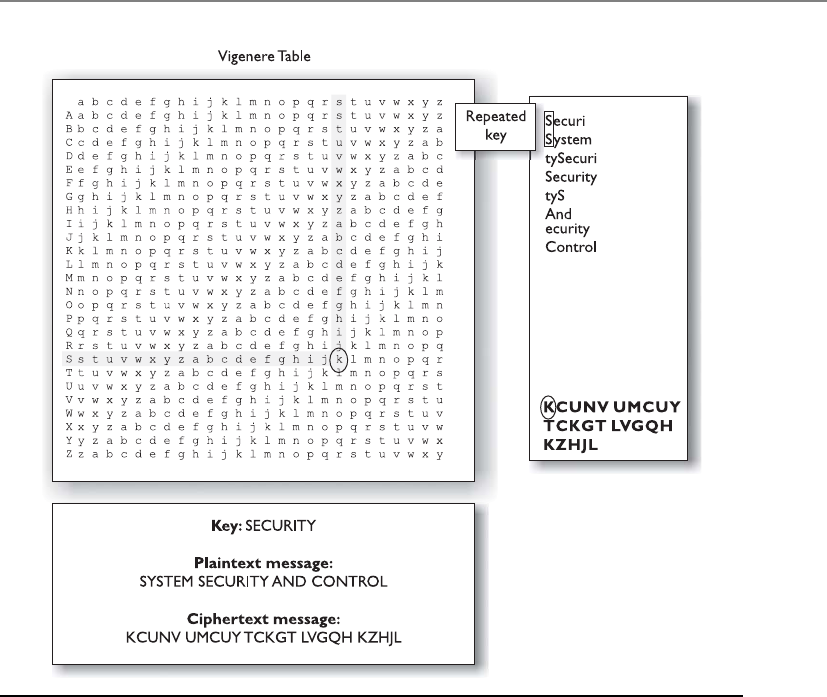
Chapter 7: Cryptography
763
history to date: Germany’s Enigma machine. The Enigma machine had separate rotors,
a plug board, and a reflecting rotor.
The originator of the message would configure the Enigma machine to its initial
settings before starting the encryption process. The operator would type in the first let-
ter of the message, and the machine would substitute the letter with a different letter
and present it to the operator. This encryption was done by moving the rotors a pre-
defined number of times. So, if the operator typed in a T as the first character, the
Enigma machine might present an M as the substitution value. The operator would
write down the letter M on his sheet. The operator would then advance the rotors and
enter the next letter. Each time a new letter was to be encrypted, the operator would
advance the rotors to a new setting. This process was followed until the whole message
was encrypted. Then the encrypted text was transmitted over the airwaves, most likely
to a German U-boat. The chosen substitution for each letter was dependent upon the
rotor setting, so the crucial and secret part of this process (the key) was the initial set-
ting and how the operators advanced the rotors when encrypting and decrypting a
message. The operators at each end needed to know this sequence of increments to ad-
vance each rotor in order to enable the German military units to properly communicate.
Figure 7-2 Polyalphabetic algorithms were developed to increase encryption complexity.

CISSP All-in-One Exam Guide
764
Although the mechanisms of the Enigma were complicated for the time, a team of
Polish cryptographers broke its code and gave Britain insight into Germany’s attack
plans and military movement. It is said that breaking this encryption mechanism short-
ened World War II by two years. After the war, details about the Enigma machine were
published—one of the machines is exhibited at the Smithsonian Institute.
Cryptography has a deep, rich history. Mary, Queen of Scots, lost her life in the 16th
century when an encrypted message she sent was intercepted. During the Revolutionary
War, Benedict Arnold used a codebook cipher to exchange information on troop move-
ment and strategic military advancements. Militaries have always played a leading role
in using cryptography to encode information and to attempt to decrypt the enemy’s
encrypted information. William Frederick Friedman, who published The Index of Coin-
cidence and Its Applications in Cryptography in 1920, is called the “Father of Modern
Cryptography” and broke many messages intercepted during World War II. Encryption
has been used by many governments and militaries and has contributed to great vic-
tory for some because it enabled them to execute covert maneuvers in secrecy. It has
also contributed to great defeat for others, when their cryptosystems were discovered
and deciphered.
When computers were invented, the possibilities for encryption methods and de-
vices expanded exponentially and cryptography efforts increased dramatically. This era
brought unprecedented opportunity for cryptographic designers to develop new en-
cryption techniques. The most well-known and successful project was Lucifer, which
was developed at IBM. Lucifer introduced complex mathematical equations and func-
tions that were later adopted and modified by the U.S. National Security Agency (NSA)
to establish the U.S. Data Encryption Standard (DES) in 1976, a federal government
standard. DES has been used worldwide for financial and other transactions, and was
embedded into numerous commercial applications. DES has had a rich history in com-
puter-oriented encryption and has been in use for over 25 years.
A majority of the protocols developed at the dawn of the computing age have been
upgraded to include cryptography and to add necessary layers of protection. Encryption
is used in hardware devices and in software to protect data, banking transactions, cor-
porate extranet transmissions, e-mail messages, web transactions, wireless communica-
tions, the storage of confidential information, faxes, and phone calls.
The code breakers and cryptanalysis efforts and the amazing number-crunching
capabilities of the microprocessors hitting the market each year have quickened the
evolution of cryptography. As the bad guys get smarter and more resourceful, the good
guys must increase their efforts and strategy. Cryptanalysis is the science of studying and
breaking the secrecy of encryption processes, compromising authentication schemes,
and reverse-engineering algorithms and keys. Cryptanalysis is an important piece of
cryptography and cryptology. When carried out by the “good guys,” cryptanalysis is
intended to identify flaws and weaknesses so developers can go back to the drawing
board and improve the components. It is also performed by curious and motivated
hackers to identify the same types of flaws, but with the goal of obtaining the encryp-
tion key for unauthorized access to confidential information.
Chapter 7: Cryptography
765
NOTE
NOTE Cryptanalysis is a very sophisticated science that encompasses a wide
variety of tests and attacks. We will cover these types of attacks at the end of
this chapter. Cryptology, on the other hand, is the study of cryptanalysis and
cryptography.
Different types of cryptography have been used throughout civilization, but today
cryptography is deeply rooted in every part of our communications and computing
world. Automated information systems and cryptography play a huge role in the effec-
tiveness of militaries, the functionality of governments, and the economics of private
businesses. As our dependency upon technology increases, so does our dependency
upon cryptography, because secrets will always need to be kept.
Cryptography Definitions and Concepts
Why can’t I read this?
Response: It is in ciphertext.
Encryption is a method of transforming readable data, called plaintext, into a form
that appears to be random and unreadable, which is called ciphertext. Plaintext is in a
form that can be understood either by a person (a document) or by a computer (execut-
able code). Once it is transformed into ciphertext, neither human nor machine can
properly process it until it is decrypted. This enables the transmission of confidential
information over insecure channels without unauthorized disclosure. When data are
stored on a computer, they are usually protected by logical and physical access controls.
When this same sensitive information is sent over a network, it can no longer take these
controls for granted, and the information is in a much more vulnerable state.
Plaintext Encryption Ciphertext Decryption Plaintext
A system or product that provides encryption and decryption is referred to as a cryp-
tosystem and can be created through hardware components or program code in an ap-
plication. The cryptosystem uses an encryption algorithm (which determines how
simple or complex the encryption process will be), keys, and the necessary software
components and protocols. Most algorithms are complex mathematical formulas that
are applied in a specific sequence to the plaintext. Most encryption methods use a se-
cret value called a key (usually a long string of bits), which works with the algorithm to
encrypt and decrypt the text.
The algorithm, the set of rules also known as the cipher, dictates how enciphering
and deciphering take place. Many of the mathematical algorithms used in computer
systems today are publicly known and are not the secret part of the encryption process.
If the internal mechanisms of the algorithm are not a secret, then something must be.
The secret piece of using a well-known encryption algorithm is the key. A common
analogy used to illustrate this point is the use of locks you would purchase from your
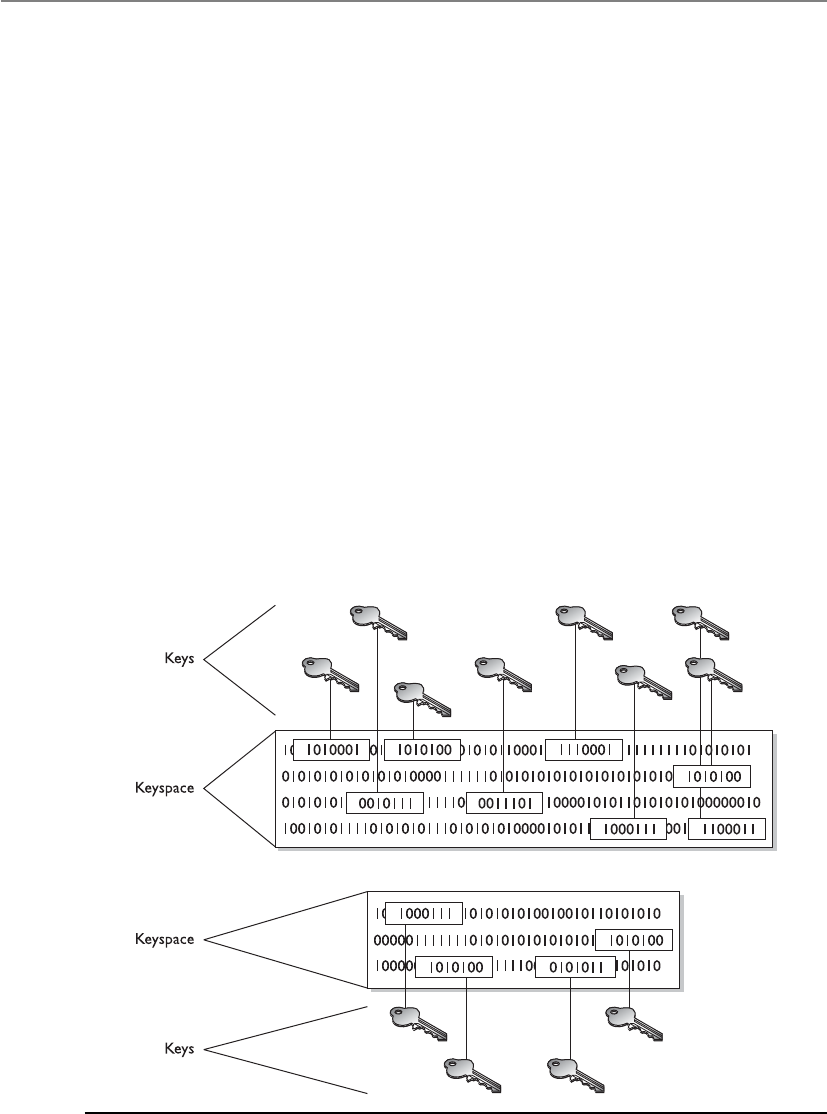
CISSP All-in-One Exam Guide
766
local hardware store. Let’s say 20 people bought the same brand of lock. Just because
these people share the same type and brand of lock does not mean they can now un-
lock each other’s doors and gain access to their private possessions. Instead, each lock
comes with its own key, and that one key can only open that one specific lock.
In encryption, the key (cryptovariable) is a value that comprises a large sequence of
random bits. Is it just any random number of bits crammed together? Not really. An
algorithm contains a keyspace, which is a range of values that can be used to construct
a key. When the algorithm needs to generate a new key, it uses random values from this
keyspace. The larger the keyspace, the more available values can be used to represent
different keys—and the more random the keys are, the harder it is for intruders to figure
them out. For example, if an algorithm allows a key length of 2 bits, the keyspace for
that algorithm would be 4, which indicates the total number of different keys that
would be possible. (Remember that we are working in binary and that 22 equals 4.)
That would not be a very large keyspace, and certainly it would not take an attacker very
long to find the correct key that was used.
A large keyspace allows for more possible keys. (Today, we are commonly using key
sizes of 128, 256, 512, or even 1,024 bits and larger.) So a key size of 512 bits would
provide a 2512 possible combinations (the keyspace). The encryption algorithm should
use the entire keyspace and choose the values to make up the keys as randomly as pos-
sible. If a smaller keyspace were used, there would be fewer values to choose from when
generating a key, as shown in Figure 7-3. This would increase an attacker’s chances of
figuring out the key value and deciphering the protected information.
Figure 7-3 Larger keyspaces permit a greater number of possible key values.
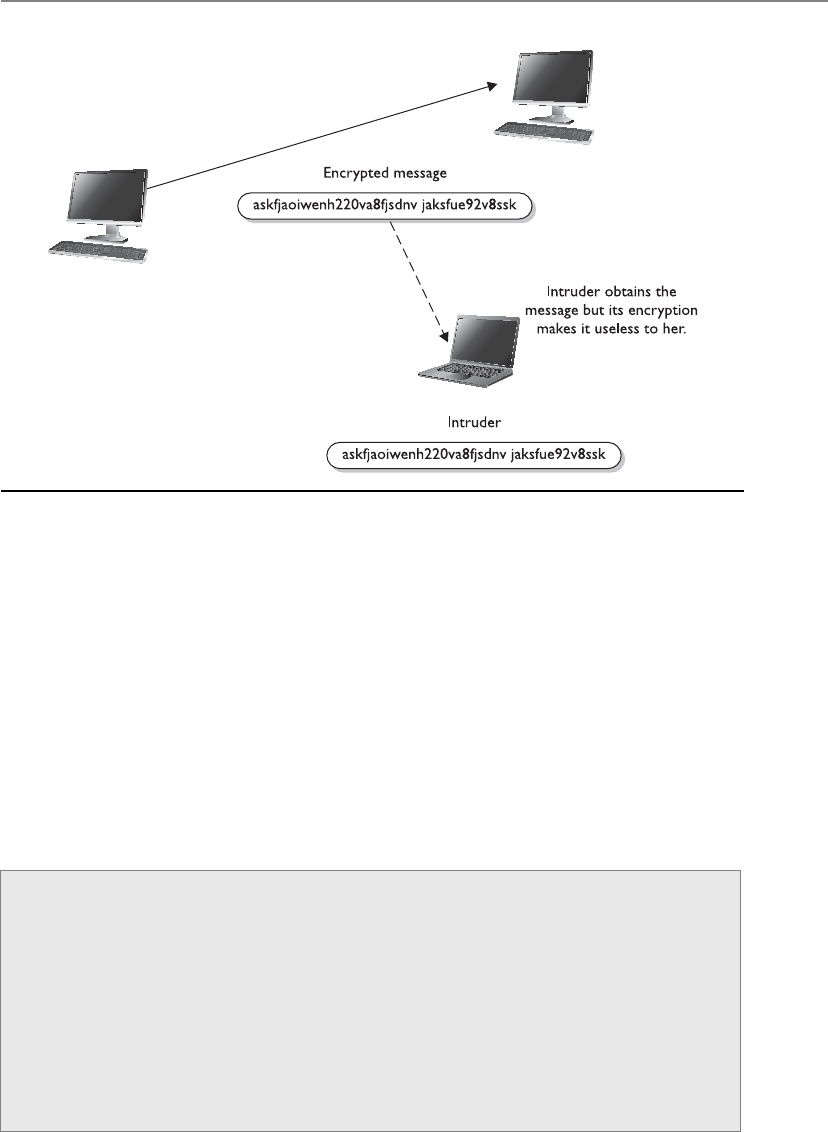
Chapter 7: Cryptography
767
If an eavesdropper captures a message as it passes between two people, she can view
the message, but it appears in its encrypted form and is therefore unusable. Even if this
attacker knows the algorithm that the two people are using to encrypt and decrypt their
information, without the key, this information remains useless to the eavesdropper, as
shown in Figure 7-4.
Kerckhoffs’ Principle
Auguste Kerckhoffs published a paper in 1883 stating that the only secrecy involved
with a cryptography system should be the key. He claimed that the algorithm should be
publicly known. He asserted that if security were based on too many secrets, there
would be more vulnerabilities to possibly exploit.
Figure 7-4 Without the right key, the captured message is useless to an attacker.
Cryptosystems
Acryptosystem encompasses all of the necessary components for encryption and
decryption to take place. Pretty Good Privacy (PGP) is just one example of a cryp-
tosystem. A cryptosystem is made up of at least the following:
• Software
• Protocols
• Algorithms
• Keys

CISSP All-in-One Exam Guide
768
So, why do we care what some guy said over 120 years ago? Because this debate is
still going on. Cryptographers in certain sectors agree with Kerckhoffs’ principle, because
making an algorithm publicly available means that many more people can view the
source code, test it, and uncover any type of flaws or weaknesses. It is the attitude of
“many heads are better than one.” Once someone uncovers some type of flaw, the devel-
oper can fix the issue and provide society with a much stronger algorithm.
But, not everyone agrees with this philosophy. Governments around the world create
their own algorithms that are not released to the public. Their stance is that if a smaller
number of people know how the algorithm actually works, then a smaller number of
people will know how to possibly break it. Cryptographers in the private sector do not
agree with this practice and do not commonly trust algorithms they cannot examine.
It is basically the same as the open-source versus compiled software debate that is
in full force today.
The Strength of the Cryptosystem
You are the weakest link. Goodbye!
The strength of an encryption method comes from the algorithm, the secrecy of the
key, the length of the key, the initialization vectors, and how they all work together
within the cryptosystem. When strength is discussed in encryption, it refers to how hard
it is to figure out the algorithm or key, whichever is not made public. Attempts to break
a cryptosystem usually involve processing an amazing number of possible values in the
hopes of finding the one value (key) that can be used to decrypt a specific message. The
strength of an encryption method correlates to the amount of necessary processing
power, resources, and time required to break the cryptosystem or to figure out the value
of the key. Breaking a cryptosystem can be accomplished by a brute force attack, which
means trying every possible key value until the resulting plaintext is meaningful. De-
pending on the algorithm and length of the key, this can be an easy task or one that is
close to impossible. If a key can be broken with a Pentium Core i5 processor in three
hours, the cipher is not strong at all. If the key can only be broken with the use of a
thousand multiprocessing systems over 1.2 million years, then it is pretty darn strong.
The introduction of dual-core processors has really increased the threat of brute force
attacks.
NOTE
NOTE Attacks are measured in the number of instructions a million-
instruction-per-second (MIPS) system can execute within a year’s time.
The goal when designing an encryption method is to make compromising it too
expensive or too time-consuming. Another name for cryptography strength is work fac-
tor, which is an estimate of the effort and resources it would take an attacker to pene-
trate a cryptosystem.
How strong a protection mechanism is required depends on the sensitivity of the
data being protected. It is not necessary to encrypt information about a friend’s Satur-

Chapter 7: Cryptography
769
day barbeque with a top-secret encryption algorithm. Conversely, it is not a good idea
to send intercepted spy information using PGP. Each type of encryption mechanism
has its place and purpose.
Even if the algorithm is very complex and thorough, other issues within encryption
can weaken encryption methods. Because the key is usually the secret value needed to
actually encrypt and decrypt messages, improper protection of the key can weaken the
encryption. Even if a user employs an algorithm that has all the requirements for strong
encryption, including a large keyspace and a large and random key value, if she shares
her key with others, the strength of the algorithm becomes almost irrelevant.
Important elements of encryption are to use an algorithm without flaws, use a large
key size, use all possible values within the keyspace, and protect the actual key. If one
element is weak, it could be the link that dooms the whole process.
Services of Cryptosystems
Cryptosystems can provide the following services:
•Confidentiality Renders the information unintelligible except by authorized
entities.
•Integrity Data has not been altered in an unauthorized manner since it was
created, transmitted, or stored.
•Authentication Verifies the identity of the user or system that created the
information.
•Authorization Upon proving identity, the individual is then provided with
the key or password that will allow access to some resource.
•Nonrepudiation Ensures that the sender cannot deny sending the message.
As an example of how these services work, suppose your boss sends you a message
telling you that you will be receiving a raise that doubles your salary. The message is
encrypted, so you can be sure it really came from your boss (authenticity), that some-
one did not alter it before it arrived at your computer (integrity), that no one else was
able to read it as it traveled over the network (confidentiality), and that your boss can-
not deny sending it later when he comes to his senses (nonrepudiation).
Different types of messages and transactions require higher or lower degrees of one
or all of the services that cryptography methods can supply. Military and intelligence
agencies are very concerned about keeping information confidential, so they would
choose encryption mechanisms that provide a high degree of secrecy. Financial institu-
tions care about confidentiality, but they also care about the integrity of the data being
transmitted, so the encryption mechanism they would choose may differ from the mil-
itary’s encryption methods. If messages were accepted that had a misplaced decimal
point or zero, the ramifications could be far reaching in the financial world. Legal agen-
cies may care most about the authenticity of the messages they receive. If information
received ever needed to be presented in a court of law, its authenticity would certainly
be questioned; therefore, the encryption method used must ensure authenticity, which
confirms who sent the information.

CISSP All-in-One Exam Guide
770
NOTE
NOTE If David sends a message and then later claims he did not send
it, this is an act of repudiation. When a cryptography mechanism provides
nonrepudiation, the sender cannot later deny he sent the message (well,
he can try to deny it, but the cryptosystem proves otherwise). It’s a way of
keeping the sender honest.
The types and uses of cryptography have increased over the years. At one time, cryp-
tography was mainly used to keep secrets secret (confidentiality), but today we use
cryptography to ensure the integrity of data, to authenticate messages, to confirm that
a message was received, to provide access control, and much more. Throughout this
chapter, we will cover the different types of cryptography that provide these different
types of functionality, along with any related security issues.
•Algorithm Set of mathematical and logic rules used in cryptographic
functions
•Cipher Another name for algorithm
•Cryptography Science of secret writing that enables an entity to
store and transmit data in a form that is available only to the intended
individuals
•Cryptosystem Hardware or software implementation of cryptography
that contains all the necessary software, protocols, algorithms, and keys
•Cryptanalysis Practice of uncovering flaws within cryptosystems
•Cryptology The study of both cryptography and cryptanalysis
•Encipher Act of transforming data into an unreadable format
•Decipher Act of transforming data into a readable format
•Key Sequence of bits that are used as instructions that govern the acts
of cryptographic functions within an algorithm
•Key clustering Instance when two different keys generate the same
ciphertext from the same plaintext
•Keyspace A range of possible values used to construct keys
•Plaintext Data in readable format, also referred to as cleartext
•Substitution cipher Encryption method that uses an algorithm that
changes out (substitutes) one value for another value
•Scytale cipher Ancient encryption tool that used a type of paper and
rod used by Greek military factions
•Kerckhoffs’ principle Concept that an algorithm should be known
and only the keys should be kept secret

Chapter 7: Cryptography
771
One-Time Pad
I want to use my one-time pad three times.
Response: Not a good idea.
Aone-time pad is a perfect encryption scheme because it is considered unbreakable
if implemented properly. It was invented by Gilbert Vernam in 1917, so sometimes it is
referred to as the Vernam cipher.
This cipher does not use shift alphabets, as do the Caesar and Vigenere ciphers dis-
cussed earlier, but instead uses a pad made up of random values, as shown in Figure
7-5. Our plaintext message that needs to be encrypted has been converted into bits, and
our one-time pad is made up of random bits. This encryption process uses a binary
mathematic function called exclusive-OR, usually abbreviated as XOR.
XOR is an operation that is applied to two bits and is a function commonly used in
binary mathematics and encryption methods. When combining the bits, if both values
are the same, the result is 0 (1 XOR 1 = 0). If the bits are different from each other, the
result is 1 (1 XOR 0 = 1). For example:
Message stream 1001010111
Keystream 0011101010
Ciphertext stream 1010111101
So in our example, the first bit of the message is XORed to the first bit of the one-
time pad, which results in the ciphertext value 1. The second bit of the message is
XORed with the second bit of the pad, which results in the value 0. This process continues
until the whole message is encrypted. The result is the encrypted message that is sent to
the receiver.
In Figure 7-5, we also see that the receiver must have the same one-time pad to de-
crypt the message by reversing the process. The receiver takes the first bit of the en-
crypted message and XORs it with the first bit of the pad. This results in the plaintext
value. The receiver continues this process for the whole encrypted message, until the
entire message is decrypted.
The one-time pad encryption scheme is deemed unbreakable only if the following
things are true about the implementation process:
•The pad must be used only one time. If the pad is used more than one time, this
might introduce patterns in the encryption process that will aid the evildoer in
his goal of breaking the encryption.
•The pad must be as long as the message. If it is not as long as the message, the pad
will need to be reused to cover the whole message. This would be the same
thing as using a pad more than one time, which could introduce patterns.
•The pad must be securely distributed and protected at its destination. This is a
very cumbersome process to accomplish, because the pads are usually just
individual pieces of paper that need to be delivered by a secure courier and
properly guarded at each destination.
•The pad must be made up of truly random values. This may not seem like a
difficult task, but even our computer systems today do not have truly random
number generators; rather, they have pseudorandom number generators.
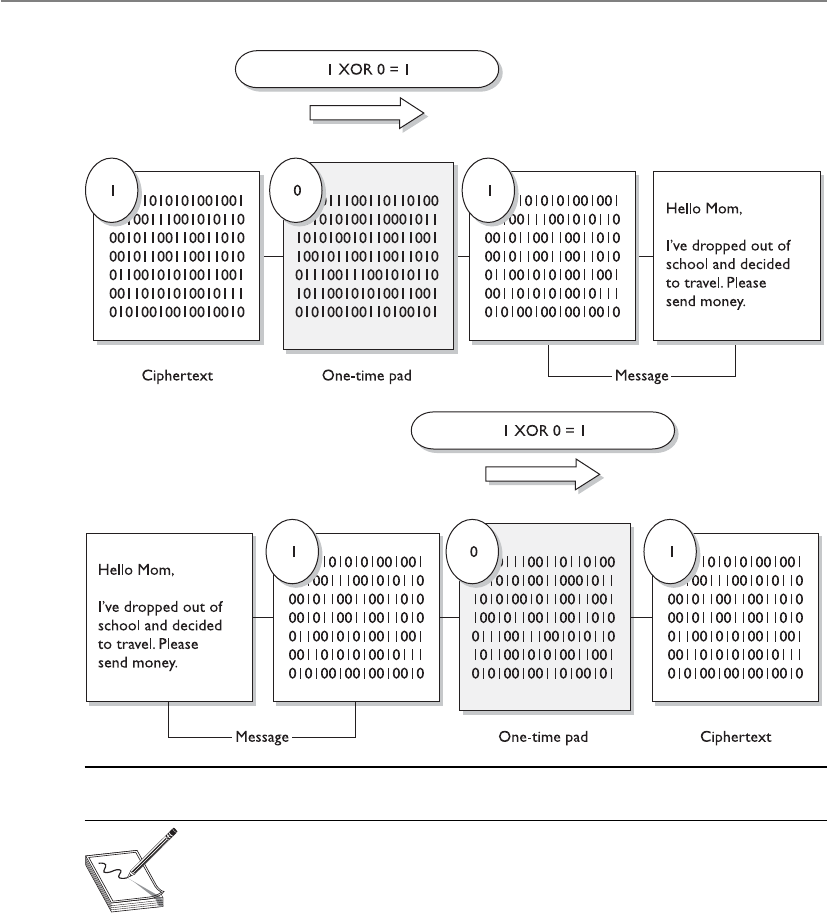
CISSP All-in-One Exam Guide
772
NOTE
NOTE Anumber generator is used to create a stream of random values
and must be seeded by an initial value. This piece of software obtains its
seeding value from some component within the computer system (time, CPU
cycles, and so on). Although a computer system is complex, it is a predictable
environment, so if the seeding value is predictable in any way, the resulting
values created are not truly random—but pseudorandom.
Although the one-time pad approach to encryption can provide a very high degree
of security, it is impractical in most situations because of all of its different require-
ments. Each possible pair of entities that might want to communicate in this fashion
must receive, in a secure fashion, a pad that is as long as, or longer than, the actual mes-
sage. This type of key management can be overwhelming and may require more over-
Figure 7-5 A one-time pad

Chapter 7: Cryptography
773
head than it is worth. The distribution of the pad can be challenging, and the sender
and receiver must be perfectly synchronized so each is using the same pad.
One-time pads have been used throughout history to protect different types of sen-
sitive data. Today, they are still in place for many types of militaries as a backup encryp-
tion option if current encryption processes (which require computers and a power
source) are unavailable for reasons of war or attacks.
Running and Concealment Ciphers
I have my decoder ring, spyglasses, and secret handshake. Now let me figure out how I will
encrypt my messages.
Two spy-novel-type ciphers are the running key cipher and the concealment cipher.
The running key cipher could use a key that does not require an electronic algorithm
and bit alterations, but cleverly uses components in the physical world around you.
For instance, the algorithm could be a set of books agreed upon by the sender and re-
ceiver. The key in this type of cipher could be a book page, line number, and column
count. If I get a message from my supersecret spy buddy and the message reads
“149l6c7.299l3c7.911l5c8,” this could mean for me to look at the 1st book in our pre-
determined series of books, the 49th page, 6th line down the page, and the 7th column.
So I write down the letter in that column, which is m. The second set of numbers starts
with 2, so I go to the 2nd book, 99th page, 3rd line down, and then to the 7th column,
which is p. The last letter I get from the 9th book, 11th page, 5th line, 8th column,
which is t. So now I have come up with my important secret message, which is mpt. This
means nothing to me, and I need to look for a new spy buddy. Running key ciphers can
be used in different and more complex ways, but I think you get the point.
Aconcealment cipher is a message within a message. If my other supersecret spy
buddy and I decide our key value is every third word, then when I get a message from
him, I will pick out every third word and write it down. Suppose he sends me a message
that reads, “The saying, ‘The time is right’ is not cow language, so is now a dead sub-
ject.” Because my key is every third word, I come up with “The right cow is dead.” This
again means nothing to me, and I am now turning in my decoder ring.
One-Time Pad Requirements
For a one-time pad encryption scheme to be considered unbreakable, each pad in
the scheme must be
• Made up of truly random values
• Used only one time
• Securely distributed to its destination
• Secured at sender’s and receiver’s sites
• At least as long as the message

CISSP All-in-One Exam Guide
774
NOTE
NOTE A concealment cipher, also called a null cipher, is a type of
steganography method. Steganography is described later in this chapter.
No matter which of these two types of cipher is used, the roles of the algorithm and
key are the same, even if they are not mathematical equations. In the running key ci-
pher, the algorithm may be a predefined set of books. The key indicates the book, page,
line, and word within that line. In substitution ciphers, the algorithm dictates that sub-
stitution will take place using a predefined alphabet or sequence of characters, and the
key indicates that each character will be replaced with another character, as in the third
character that follows it in that sequence of characters. In actual mathematical struc-
tures, the algorithm is a set of mathematical functions that will be performed on the
message, and the key can indicate in which order these functions take place. So even if
an attacker knows the algorithm, and we have to assume he does, if he does not know
the key, the message is still useless to him.
Steganography
Where’s the top-secret message?
Response: In this picture of my dogs.
Steganography is a method of hiding data in another media type so the very exis-
tence of the data is concealed. Common steps are illustrated in Figure 7-6. Only the
sender and receiver are supposed to be able to see the message because it is secretly
Figure 7-6
Main components of
steganography

Chapter 7: Cryptography
775
hidden in a graphic, wave file, document, or other type of media. The message is not
encrypted, just hidden. Encrypted messages can draw attention because it tells the bad
guy, “This is something sensitive.” A message hidden in a picture of your grandmother
would not attract this type of attention, even though the same secret message can be
embedded into this image. Steganography is a type of security through obscurity.
Steganography includes the concealment of information within computer files. In
digital steganography, electronic communications may include steganographic coding
inside of a document file, image file, program, or protocol. Media files are ideal for
steganographic transmission because of their large size. As a simple example, a sender
might start with an innocuous image file and adjust the color of every 100th pixel to
correspond to a letter in the alphabet, a change so subtle that someone not specifically
looking for it is unlikely to notice it.
Let’s look at the components that are involved with steganography, which are
listed next:
•Carrier A signal, data stream, or file that has hidden information (payload)
inside of it
•Stegomedium The medium in which the information is hidden
•Payload The information that is to be concealed and transmitted
So if you want to secretly send a message to me that says, “This book is so big I can
kill someone with it,” and want to get it past my editor—the message would be the
payload. If you send this message embedded in the picture of your grandmother, the
picture would be the carrier file and the stegomedium would be a JPEG.
A method of embedding the message into some type of medium is to use the least
significant bit (LSB). Many types of files have some bits that can be modified and not
affect the file they are in, which is where secret data can be hidden without altering the
file in a visible manner. In the LSB approach, graphics with a high resolution or an
audio file that has many different types of sounds (high bit rate) are the most successful
for hiding information within. There is commonly no noticeable distortion, and the
file is usually not increased to a size that can be detected. A 24-bit bitmap file will have
8 bits representing each of the three color values, which are red, green, and blue. These
eight bits are within each pixel. If we consider just the blue, there will be 28 different
values of blue. The difference between 11111111 a n d 11111110 i n the value for blue inten-
sity is likely to be undetectable by the human eye. Therefore, the least significant bit can
be used for something other than color information.
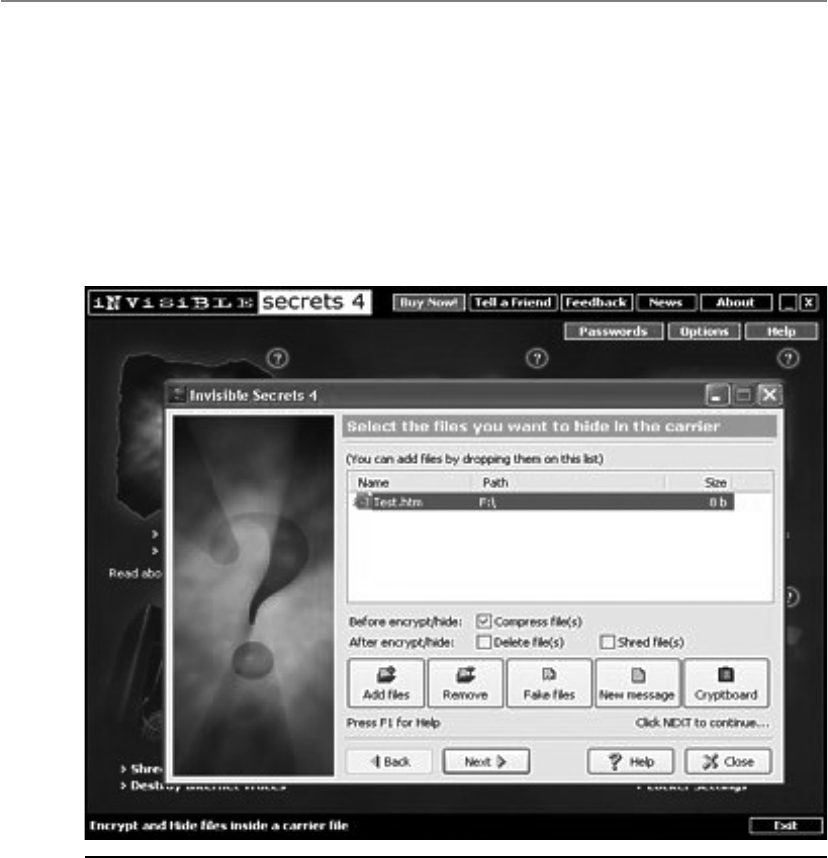
CISSP All-in-One Exam Guide
776
Figure 7-7 Embedding secret material
A digital graphic is just a file that shows different colors and intensities of light. The
larger the file, the more bits that can be modified without much notice or distortion.
Several different types of tools can be used to hide messages within the carrier. Fig-
ure 7-7 illustrates one such tool that allows the user to encrypt the message along with
hiding it within a file.
A concealment cipher (null cipher), explained earlier, is an example of a type of
steganography method. The null values are not part of the secret message, but are used

Chapter 7: Cryptography
777
to hide the secret message. Let’s look at an example. If I send you the message used in
the example earlier, “The saying, ‘The time is right’ is not cow language, so is now a
dead subject,” you would think I was nuts. If you knew the secret message was made up
of every third word, you would be able to extract the secret message from the null val-
ues. So the secret message is “The right cow is dead.” And you still think I’m nuts.
What if you wanted to get a secret message to me in a nondigital format? You would
use a physical method of sending secret messages instead of our computers. You could
write the message in invisible ink, and I would need to have the necessary chemical to
make it readable. You could create a very small photograph of the message, called a
microdot, and put it within the ink of a stamp. Another physical steganography method
is to send me a very complex piece of art, which has the secret message in it that can be
seen if it is held at the right angle and has a certain type of light shown on it. These are
just some examples of the many ways that steganography can be carried out in the non-
digital world.
Types of Ciphers
Symmetric encryption ciphers come in two basic types: substitution and transposition
(permutation). The substitution cipher replaces bits, characters, or blocks of characters
with different bits, characters, or blocks. The transposition cipher does not replace the
original text with different text, but rather moves the original values around. It rear-
ranges the bits, characters, or blocks of characters to hide the original meaning.
Digital Watermarking
Have you ever tried to copy something that was not yours that had an embedded
logo or trademark of another company? (If so, shame on you!) The embedded logo
or trademark is called a digital watermark. Instead of having a secret message
within a graphic that is supposed to be invisible to you, digital watermarks are
usually visible. These are put into place to deter people from using material that
is not theirs. This type of steganography is referred to as Digital Rights Manage-
ment (DRM). The goal is to restrict the usage of material that is owned by a com-
pany or individual.
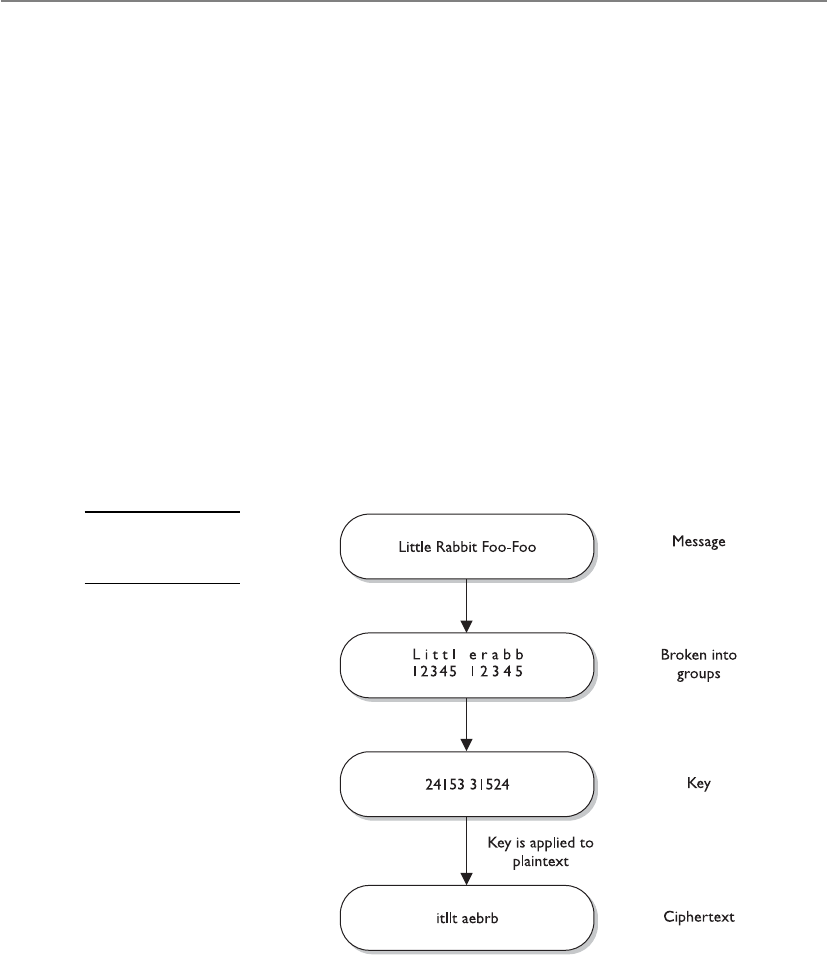
CISSP All-in-One Exam Guide
778
Substitution Ciphers
Give me your A and I will change it out for an M. Now, no one can read your message.
Response: That will fool them.
A substitution cipher uses a key to dictate how the substitution should be carried
out. In the Caesar cipher, each letter is replaced with the letter three places beyond it in
the alphabet. The algorithm is the alphabet, and the key is the instruction “shift up
three.”
As a simple example, if George uses the Caesar cipher with the English alphabet to
encrypt the important message “meow,” the encrypted message would be “phrz.” Sub-
stitution is used in today’s symmetric algorithms, but it is extremely complex compared
to this example, which is only meant to show you the concept of how a substitution
cipher works in its most simplistic form.
Transposition Ciphers
In a transposition cipher, the values are scrambled, or put into a different order. The key
determines the positions the values are moved to, as illustrated in Figure 7-8.
Figure 7-8
A transposition
cipher

Chapter 7: Cryptography
779
This is a simplistic example of a transposition cipher and only shows one way of
performing transposition. When implemented with complex mathematical functions,
transpositions can become quite sophisticated and difficult to break. Symmetric algo-
rithms employed today use both long sequences of complicated substitutions and
transpositions on messages. The algorithm contains the possible ways that substitution
and transposition processes can take place (represented in mathematical formulas).
The key is used as the instructions for the algorithm, dictating exactly how these pro-
cesses will happen and in what order. To understand the relationship between an algo-
rithm and a key, let’s look at Figure 7-9. Conceptually, an algorithm is made up of
different boxes, each of which has a different set of mathematical formulas that dictate
the substitution and transposition steps that will take place on the bits that enter the
box. To encrypt our message, the bit values must go through these different boxes. If
each of our messages goes through each of these different boxes in the same order with
the same values, the evildoer will be able to easily reverse-engineer this process and
uncover our plaintext message.
Figure 7-9 The algorithm and key relationship

CISSP All-in-One Exam Guide
780
To foil an evildoer, we use a key, which is a set of values that indicates which box
should be used, in what order, and with what values. So if message A is encrypted with
key 1, the key will make the message go through boxes 1, 6, 4, and then 5. When we
need to encrypt message B, we will use key 2, which will make the message go through
boxes 8, 3, 2, and then 9. It is the key that adds the randomness and the secrecy to the
encryption process.
Simple substitution and transposition ciphers are vulnerable to attacks that perform
frequency analysis. In every language, some words and patterns are used more often than
others. For instance, in the English language, the most commonly used letter is E. If Mike
is carrying out frequency analysis on a message, he will look for the most frequently re-
peated pattern of eight bits (which make up a character). So, if Mike sees that there are
12 patterns of eight bits and he knows that E is the most commonly used letter in the
language, he will replace these bits with this vowel. This allows him to gain a foothold
on the process, which will allow him to reverse-engineer the rest of the message.
Today’s symmetric algorithms use substitution and transposition methods in their
encryption processes, but the mathematics used are (or should be) too complex to al-
low for simplistic frequency-analysis attacks to be successful.
Key Derivation Functions
For complex keys to be generated, a master key is commonly created, and then
symmetric keys are generated from it. For example, if an application is responsible
for creating a session key for each subject that requests one, it should not be giving
out the same instance of that one key. Different subjects need to have different
symmetric keys to ensure that the window for the bad guy to capture and uncover
that key is smaller than if the same key were to be used over and over again. When
two or more keys are created from a master key, they are called subkeys.
Key Derivation Functions (KDFs) are used to generate keys that are made up
of random values. Different values can be used independently or together as ran-
dom key material. The algorithm is created to use specific hash, password, and/
or salt values, which will go through a certain number of rounds of mathematical
functions dictated by the algorithm. The more rounds that this keying material
goes through, the more assurance and security for the cryptosystem overall.
NOTE
NOTE Remember that the algorithm stays static and the randomness
provided by cryptography is mainly by means of the keying material.

Chapter 7: Cryptography
781
Methods of Encryption
Although there can be several pieces to an encryption process, the two main pieces are
the algorithms and the keys. As stated earlier, algorithms used in computer systems are
complex mathematical formulas that dictate the rules of how the plaintext will be
turned into ciphertext. A key is a string of random bits that will be used by the algo-
rithm to add to the randomness of the encryption process. For two entities to be able
to communicate via encryption, they must use the same algorithm and, many times,
the same key. In some encryption technologies, the receiver and the sender use the
same key, and in other encryption technologies, they must use different but related keys
for encryption and decryption purposes. The following sections explain the differences
between these two types of encryption methods.
•One-time pad Encryption method created by Gilbert Vernam that is
considered impossible to crack if carried out properly
•Number generator Algorithm used to create values that are used in
cryptographic functions to add randomness
•Running key cipher Substitution cipher that creates keystream values,
commonly from agreed-upon text passages, to be used for encryption
purposes
•Concealment cipher Encryption method that hides a secret message
within an open message
•Steganography Method of hiding data in another media type with
the goal of secrecy
•Digital Rights Management (DRM) Access control technologies
commonly used to protect copyright material
•Transposition Encryption method that shifts (permutation) values
•Caesar cipher Simple substitution algorithm created by Julius Caesar
that shifts alphabetic values three positions during its encryption and
decryption processes
•Frequency analysis Cryptanalysis process used to identify weaknesses
within cryptosystems by locating patterns in resulting ciphertext
•Key Derivation Functions (KDFs) Generation of secret keys
(subkeys) from an initial value (master key)

CISSP All-in-One Exam Guide
782
Symmetric vs. Asymmetric Algorithms
Cryptography algorithms are either symmetric algorithms, which use symmetric keys
(also called secret keys), or asymmetric algorithms, which use asymmetric keys (also
called public and private keys). As if encryption were not complicated enough, the
terms used to describe the key types only make it worse. Just pay close attention and
you will get through this fine.
Symmetric Cryptography
In a cryptosystem that uses symmetric cryptography, the sender and receiver use two
instances of the same key for encryption and decryption, as shown in Figure 7-10. So
the key has dual functionality, in that it can carry out both encryption and decryption
processes. Symmetric keys are also called secret keys, because this type of encryption
relies on each user to keep the key a secret and properly protected. If an intruder were
to get this key, they could decrypt any intercepted message encrypted with it.
Each pair of users who want to exchange data using symmetric key encryption must
have two instances of the same key. This means that if Dan and Iqqi want to communi-
cate, both need to obtain a copy of the same key. If Dan also wants to communicate
using symmetric encryption with Norm and Dave, he needs to have three separate keys,
one for each friend. This might not sound like a big deal until Dan realizes that he may
communicate with hundreds of people over a period of several months, and keeping
track and using the correct key that corresponds to each specific receiver can become a
daunting task. If ten people needed to communicate securely with each other using
symmetric keys, then 45 keys would need to be kept track of. If 100 people were going
to communicate, then 4,950 keys would be involved. The equation used to calculate
the number of symmetric keys needed is
N(N – 1)/2 = number of keys
When using symmetric algorithms, the sender and receiver use the same key for
encryption and decryption functions. The security of the symmetric encryption method
Figure 7-10
When using
symmetric
algorithms, the
sender and receiver
use the same key
for encryption and
decryption functions.

Chapter 7: Cryptography
783
is completely dependent on how well users protect the key. This should raise red flags
for you if you have ever had to depend on a whole staff of people to keep a secret. If a
key is compromised, then all messages encrypted with that key can be decrypted and
read by an intruder. This is complicated further by how symmetric keys are actually
shared and updated when necessary. If Dan wants to communicate with Norm for the
first time, Dan has to figure out how to get the right key to Norm securely. It is not safe
to just send it in an e-mail message, because the key is not protected and can be easily
intercepted and used by attackers. Thus, Dan must get the key to Norm through an out-
of-band method. Dan can save the key on a thumb drive and walk over to Norm’s desk,
or have a secure courier deliver it to Norm. This is a huge hassle, and each method is
very clumsy and insecure.
Because both users employ the same key to encrypt and decrypt messages, symmet-
ric cryptosystems can provide confidentiality, but they cannot provide authentication
or nonrepudiation. There is no way to prove through cryptography who actually sent a
message if two people are using the same key.
If symmetric cryptosystems have so many problems and flaws, why use them at all?
Because they are very fast and can be hard to break. Compared with asymmetric sys-
tems, symmetric algorithms scream in speed. They can encrypt and decrypt relatively
quickly large amounts of data that would take an unacceptable amount of time to en-
crypt and decrypt with an asymmetric algorithm. It is also difficult to uncover data en-
crypted with a symmetric algorithm if a large key size is used. For many of our
applications that require encryption, symmetric key cryptography is the only option.
The following list outlines the strengths and weakness of symmetric key systems:
Strengths
• Much faster (less computationally intensive) than asymmetric systems.
• Hard to break if using a large key size.
Weaknesses
• Requires a secure mechanism to deliver keys properly.
• Each pair of users needs a unique key, so as the number of individuals
increases, so does the number of keys, possibly making key management
overwhelming.
• Provides confidentiality but not authenticity or nonrepudiation.
The following are examples of symmetric algorithms, which will be explained later
in the “Block and Stream Ciphers” section:
• Data Encryption Standard (DES)
• Triple-DES (3DES)
• Blowfish
• International Data Encryption Algorithm (IDEA)
• RC4, RC5, and RC6
• Advanced Encryption Standard (AES)
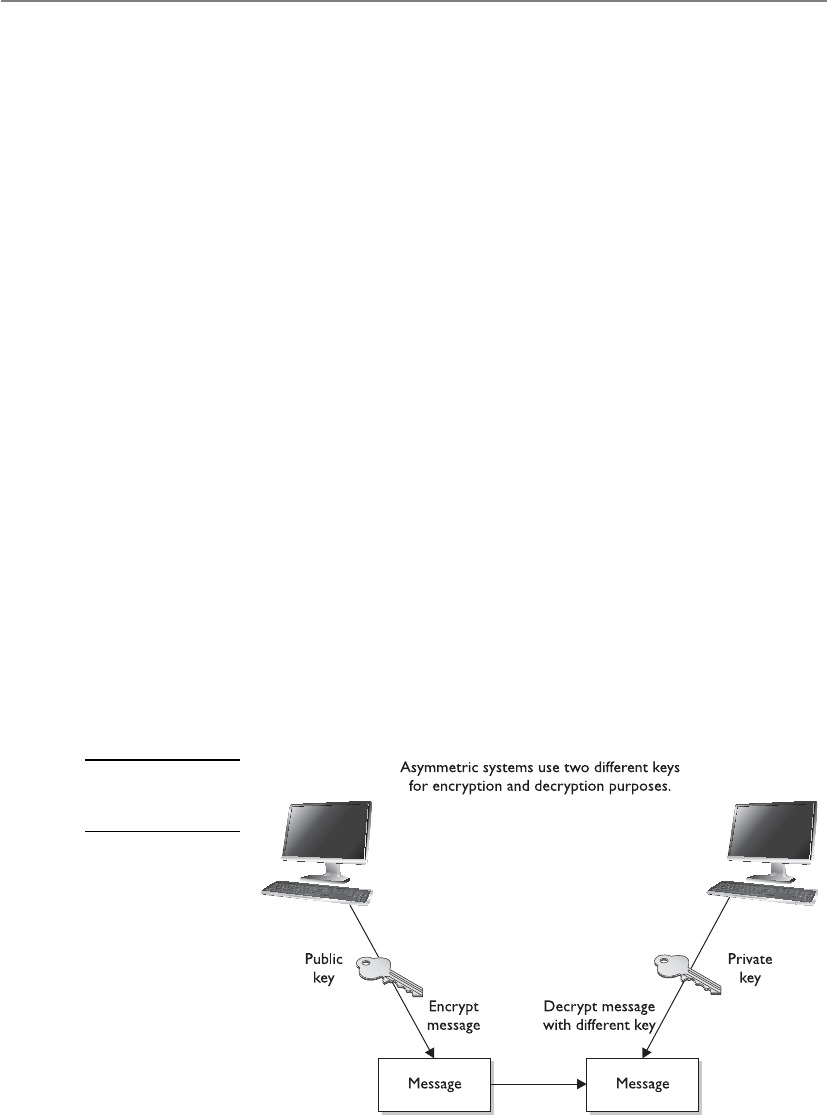
CISSP All-in-One Exam Guide
784
Asymmetric Cryptography
Some things you can tell the public, but some things you just want to keep private.
In symmetric key cryptography, a single secret key is used between entities, whereas
in public key systems, each entity has different keys, or asymmetric keys. The two differ-
ent asymmetric keys are mathematically related. If a message is encrypted by one key,
the other key is required in order to decrypt the message.
In a public key system, the pair of keys is made up of one public key and one private
key. The public key can be known to everyone, and the private key must be known and
used only by the owner. Many times, public keys are listed in directories and databases
of e-mail addresses so they are available to anyone who wants to use these keys to en-
crypt or decrypt data when communicating with a particular person. Figure 7-11 illus-
trates the use of the different keys.
The public and private keys of an asymmetric cryptosystem are mathematically re-
lated, but if someone gets another person’s public key, she should not be able to figure
out the corresponding private key. This means that if an evildoer gets a copy of Bob’s
public key, it does not mean she can employ some mathematical magic and find out
Bob’s private key. But if someone got Bob’s private key, then there is big trouble—no
one other than the owner should have access to a private key.
If Bob encrypts data with his private key, the receiver must have a copy of Bob’s
public key to decrypt it. The receiver can decrypt Bob’s message and decide to reply to
Bob in an encrypted form. All she needs to do is encrypt her reply with Bob’s public key,
and then Bob can decrypt the message with his private key. It is not possible to encrypt and
decrypt using the same key when using an asymmetric key encryption technology be-
cause, although mathematically related, the two keys are not the same key, as they are
in symmetric cryptography. Bob can encrypt data with his private key, and the receiver
can then decrypt it with Bob’s public key. By decrypting the message with Bob’s public
key, the receiver can be sure the message really came from Bob. A message can be de-
crypted with a public key only if the message was encrypted with the corresponding
Figure 7-11
An asymmetric
cryptosystem

Chapter 7: Cryptography
785
private key. This provides authentication, because Bob is the only one who is supposed
to have his private key. If the receiver wants to make sure Bob is the only one who can
read her reply, she will encrypt the response with his public key. Only Bob will be able
to decrypt the message because he is the only one who has the necessary private key.
The receiver can also choose to encrypt data with her private key instead of using
Bob’s public key. Why would she do that? Authentication—she wants Bob to know that
the message came from her and no one else. If she encrypted the data with Bob’s public
key, it does not provide authenticity because anyone can get Bob’s public key. If she
uses her private key to encrypt the data, then Bob can be sure the message came from
her and no one else. Symmetric keys do not provide authenticity because the same key
is used on both ends. Using one of the secret keys does not ensure the message origi-
nated from a specific individual.
If confidentiality is the most important security service to a sender, she would en-
crypt the file with the receiver’s public key. This is called a secure message format because
it can only be decrypted by the person who has the corresponding private key.
If authentication is the most important security service to the sender, then she
would encrypt the data with her private key. This provides assurance to the receiver that
the only person who could have encrypted the data is the individual who has posses-
sion of that private key. If the sender encrypted the data with the receiver’s public key,
authentication is not provided because this public key is available to anyone.
Encrypting data with the sender’s private key is called an open message format be-
cause anyone with a copy of the corresponding public key can decrypt the message.
Confidentiality is not ensured.
Each key type can be used to encrypt and decrypt, so do not get confused and think
the public key is only for encryption and the private key is only for decryption. They
both have the capability to encrypt and decrypt data. However, if data are encrypted
with a private key, they cannot be decrypted with a private key. If data are encrypted with
a private key, they must be decrypted with the corresponding public key.
An asymmetric algorithm works much more slowly than a symmetric algorithm,
because symmetric algorithms carry out relatively simplistic mathematical functions on
the bits during the encryption and decryption processes. They substitute and scramble
(transposition) bits, which is not overly difficult or processor-intensive. The reason it is
hard to break this type of encryption is that the symmetric algorithms carry out this
type of functionality over and over again. So a set of bits will go through a long series
of being substituted and scrambled.
Asymmetric algorithms are slower than symmetric algorithms because they use
much more complex mathematics to carry out their functions, which requires more
processing time. Although they are slower, asymmetric algorithms can provide authen-
tication and nonrepudiation, depending on the type of algorithm being used. Asym-
metric systems also provide for easier and more manageable key distribution than
symmetric systems and do not have the scalability issues of symmetric systems. The
reason for these differences is that, with asymmetric systems, you can send out your
public key to all of the people you need to communicate with, instead of keeping track
of a unique key for each one of them. The “Hybrid Encryption Methods” section later
in this chapter shows how these two systems can be used together to get the best of both
worlds.

CISSP All-in-One Exam Guide
786
NOTE
NOTE Public key cryptography is asymmetric cryptography. The terms can be
used interchangeably.
The following list outlines the strengths and weaknesses of asymmetric key al-
gorithms:
Strengths
• Better key distribution than symmetric systems.
• Better scalability than symmetric systems
• Can provide authentication and nonrepudiation
Weaknesses
• Works much more slowly than symmetric systems
• Mathematically intensive tasks
• The following are examples of asymmetric key algorithms:
• Rivest-Shamir-Adleman (RSA)
• Elliptic curve cryptosystem (ECC)
• Diffie-Hellman
• El Gamal
• Digital Signature Algorithm (DSA)
• Merkle-Hellman Knapsack
These algorithms will be explained further in the “Types of Asymmetric Systems”
section later in the chapter.
Table 7-1 summarizes the differences between symmetric and asymmetric algo-
rithms.
Attribute Symmetric Asymmetric
Keys One key is shared between
two or more entities.
One entity has a public key, and the
other entity has the corresponding
private key.
Key exchange Out-of-band through secure
mechanisms.
A public key is made available to
everyone, and a private key is kept secret
by the owner.
Speed Algorithm is less complex and
faster.
The algorithm is more complex and
slower.
Use Bulk encryption, which
means encrypting files and
communication paths.
Key distribution and digital signatures.
Security service
provided
Confidentiality. Authentication and nonrepudiation.
Table 7-1 Differences Between Symmetric and Asymmetric Systems

Chapter 7: Cryptography
787
NOTE
NOTE Digital signatures will be discussed later in the section “Digital
Signatures.”
Block and Stream Ciphers
Which should I use, the stream cipher or the block cipher?
Response: The stream cipher, because it makes you look skinnier.
The two main types of symmetric algorithms are block ciphers, which work on
blocks of bits, and stream ciphers, which work on one bit at a time.
Block Ciphers
When a block cipher is used for encryption and decryption purposes, the message is
divided into blocks of bits. These blocks are then put through mathematical functions,
one block at a time. Suppose you need to encrypt a message you are sending to your
mother and you are using a block cipher that uses 64 bits. Your message of 640 bits is
chopped up into 10 individual blocks of 64 bits. Each block is put through a succession
of mathematical formulas, and what you end up with is 10 blocks of encrypted text.
You send this encrypted message to your mother. She has to have the same block cipher
and key, and those 10 ciphertext blocks go back through the algorithm in the reverse
sequence and end up in your plaintext message.
110011
001011
A strong cipher contains the right level of two main attributes: confusion and diffu-
sion. Confusion is commonly carried out through substitution, while diffusion is carried
out by using transposition. For a cipher to be considered strong, it must contain both
of these attributes to ensure that reverse-engineering is basically impossible. The ran-
domness of the key values and the complexity of the mathematical functions dictate
the level of confusion and diffusion involved.
In algorithms, diffusion takes place as individual bits of a block are scrambled, or
diffused, throughout that block. Confusion is provided by carrying out complex substi-
tution functions so the bad guy cannot figure out how to substitute the right values and
come up with the original plaintext. Suppose I have 500 wooden blocks with individu-
al letters written on them. I line them all up to spell out a paragraph (plaintext). Then

CISSP All-in-One Exam Guide
788
I substitute 300 of them with another set of 300 blocks (confusion through substitu-
tion). Then I scramble all of these blocks up (diffusion through transposition) and
leave them in a pile. For you to figure out my original message, you would have to
substitute the correct blocks and then put them back in the right order. Good luck.
Confusion pertains to making the relationship between the key and resulting ci-
phertext as complex as possible so the key cannot be uncovered from the ciphertext.
Each ciphertext value should depend upon several parts of the key, but this mapping
between the key values and the ciphertext values should seem completely random to
the observer.
Diffusion, on the other hand, means that a single plaintext bit has influence over
several of the ciphertext bits. Changing a plaintext value should change many cipher-
text values, not just one. In fact, in a strong block cipher, if one plaintext bit is changed,
it will change every ciphertext bit with the probability of 50 percent. This means that if
one plaintext bit changes, then about half of the ciphertext bits will change.
A very similar concept of diffusion is the avalanche effect. If an algorithm follows a
strict avalanche effect criteria, this means that if the input to an algorithm is slightly
modified then the output of the algorithm is changed significantly. So a small change
to the key or the plaintext should cause drastic changes to the resulting ciphertext. The
ideas of diffusion and avalanche effect are basically the same—they were just derived
from different people. Horst Feistel came up with the avalanche term, while Claude
Shannon came up with the diffusion term. If an algorithm does not exhibit the neces-
sary degree of the avalanche effect, then the algorithm is using poor randomization.
This can make it easier for an attacker to break the algorithm.
Block ciphers use diffusion and confusion in their methods. Figure 7-12 shows a
conceptual example of a simplistic block cipher. It has four block inputs, and each
block is made up of four bits. The block algorithm has two layers of four-bit substitu-
tion boxes called S-boxes. Each S-box contains a lookup table used by the algorithm as
instructions on how the bits should be encrypted.
Figure 7-12 shows that the key dictates what S-boxes are to be used when scram-
bling the original message from readable plaintext to encrypted nonreadable cipher
text. Each S-box contains the different substitution methods that can be performed on
each block. This example is simplistic—most block ciphers work with blocks of 32, 64,
or 128 bits in size, and many more S-boxes are usually involved.
Stream Ciphers
As stated earlier, a block cipher performs mathematical functions on blocks of bits. A
stream cipher, on the other hand, does not divide a message into blocks. Instead, a
stream cipher treats the message as a stream of bits and performs mathematical func-
tions on each bit individually.
When using a stream cipher, a plaintext bit will be transformed into a different ci-
phertext bit each time it is encrypted. Stream ciphers use keystream generators, which
produce a stream of bits that is XORed with the plaintext bits to produce ciphertext, as
shown in Figure 7-13.
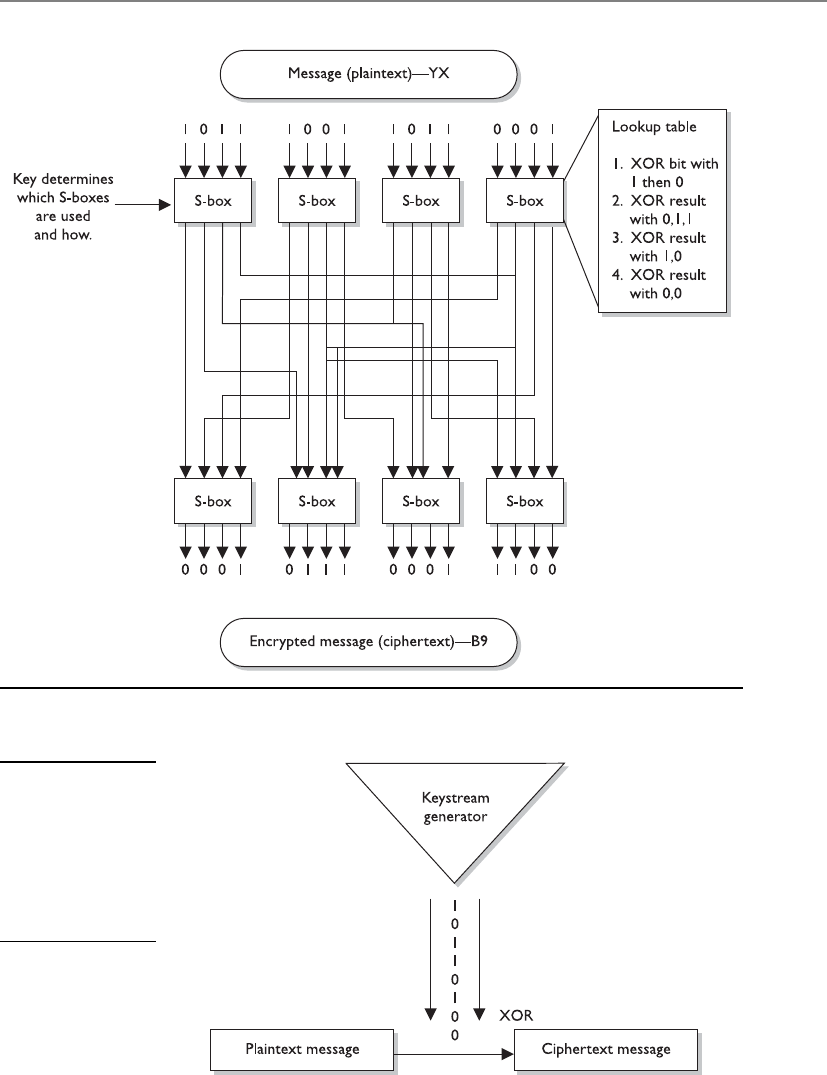
Chapter 7: Cryptography
789
Figure 7-12 A message is divided into blocks of bits, and substitution and transposition functions
are performed on those blocks.
Figure 7-13
With stream ciphers,
the bits generated
by the keystream
generator are
XORed with the
bits of the plaintext
message.

CISSP All-in-One Exam Guide
790
NOTE
NOTE This process is very similar to the one-time pad explained earlier.
The individual bits in the one-time pad are used to encrypt the individual
bits of the message through the XOR function, and in a stream algorithm the
individual bits created by the keystream generator are used to encrypt the
bits of the message through XOR also.
If the cryptosystem were only dependent upon the symmetric stream algorithm, an
attacker could get a copy of the plaintext and the resulting ciphertext, XOR them to-
gether, and find the keystream to use in decrypting other messages. So the smart people
decided to stick a key into the mix.
In block ciphers, it is the key that determines what functions are applied to the
plaintext and in what order. The key provides the randomness of the encryption pro-
cess. As stated earlier, most encryption algorithms are public, so people know how they
work. The secret to the secret sauce is the key. In stream ciphers, the key also provides
randomness, so that the stream of bits that is XORed to the plaintext is as random as
possible. This concept is shown in Figure 7-14. As you can see in this graphic, both the
sending and receiving ends must have the same key to generate the same keystream for
proper encryption and decryption purposes.
Initialization Vectors
Initialization vectors (IVs) are random values that are used with algorithms to ensure
patterns are not created during the encryption process. They are used with keys and do
not need to be encrypted when being sent to the destination. If IVs are not used, then
two identical plaintext values that are encrypted with the same key will create the same
ciphertext. Providing attackers with these types of patterns can make their job easier in
breaking the encryption method and uncovering the key. For example, if we have the
plaintext value of “See Spot run” two times within our message, we need to make sure
that even though there is a pattern in the plaintext message, a pattern in the resulting
ciphertext will not be created. So the IV and key are both used by the algorithm to pro-
vide more randomness to the encryption process.
Figure 7-14 The sender and receiver must have the same key to generate the same keystream.

Chapter 7: Cryptography
791
A strong and effective stream cipher contains the following characteristics:
•Long periods of no repeating patterns within keystream values Bits
generated by the keystream must be random.
•Statistically unpredictable keystream Bits generated from the keystream
generator cannot be predicted.
•A keystream not linearly related to the key If someone figures out the
keystream values, that does not mean she now knows the key value.
•Statistically unbiased keystream (as many zeroes as ones) There should be
no dominance in the number of zeroes or ones in the keystream.
Stream ciphers require a lot of randomness and encrypt individual bits at a time.
This requires more processing power than block ciphers require, which is why stream
ciphers are better suited to be implemented at the hardware level. Because block ci-
phers do not require as much processing power, they can be easily implemented at the
software level.
Overall, stream ciphers are considered less secure than block ciphers and are used
less frequently. One difficulty in proper stream cipher implementation is generating a
truly random and unbiased keystream. Many stream ciphers have been broken because
it was uncovered that their keystream had redundancies. One way in which stream ci-
phers are advantageous compared to block ciphers is when streaming communication
data needs to be encrypted. Stream ciphers can encrypt and decrypt more quickly and
are able to scale better within increased bandwidth requirements. When real-time ap-
plications, as in VoIP or multimedia, have encryption requirements, it is common that
stream ciphers are implemented to accomplish this task.
Cryptographic Transformation Techniques
We have covered diffusion, confusion, avalanche, IVs, and random number generation.
Some other techniques used in algorithms to increase their cryptographic strength are
listed here:
•Compression Reduce redundancy before plaintext is encrypted. Compression
functions are run on the text before it goes into the encryption algorithm.
•Expansion Expanding the plaintext by duplicating values. Commonly used
to increase the plaintext size to map to key sizes.
•Padding Adding material to plaintext data before it is encrypted.
•Key mixing Using a portion (subkey) of a key to limit the exposure of the
key. Key schedules are used to generate subkeys from master keys.
Stream Ciphers vs. One-Time Pads
Stream ciphers were developed to provide the same type of protection one-time
pads do, which is why they work in such a similar manner. In reality, stream ci-
phers cannot provide the level of protection one-time pads do, but because
stream ciphers are implemented through software and automated means, they
are much more practical.

CISSP All-in-One Exam Guide
792
Hybrid Encryption Methods
Up to this point, we have figured out that symmetric algorithms are fast but have some
drawbacks (lack of scalability, difficult key management, and they provide only confi-
dentiality). Asymmetric algorithms do not have these drawbacks but are very slow. We
just can’t seem to win. So we turn to a hybrid system that uses symmetric and asym-
metric encryption methods together.
Key Terms
•Symmetric algorithm Encryption method where the sender and
receiver use an instance of the same key for encryption and decryption
purposes.
•Out-of-band method Sending data through an alternate
communication channel.
•Asymmetric algorithm Encryption method that uses two different key
types, public and private. Also called public key cryptography.
•Public key Value used in public key cryptography that is used for
encryption and signature validation that can be known by all parties.
•Private key Value used in public key cryptography that is used for
decryption and signature creation and known to only key owner.
•Public key cryptography Asymmetric cryptography, which uses
public and private key values for cryptographic functions.
•Block cipher Symmetric algorithm type that encrypts chunks (blocks)
of data at a time.
•Diffusion Transposition processes used in encryption functions to
increase randomness.
•Confusion Substitution processes used in encryption functions to
increase randomness.
•Avalanche effect Algorithm design requirement so that slight changes
to the input result in drastic changes to the output.
•Stream cipher Algorithm type that generates a keystream (random
values), which is XORd with plaintext for encryption purposes.
•Keystream generator Component of a stream algorithm that creates
random values for encryption purposes.
•Initialization vectors (IVs) Values that are used with algorithms to
increase randomness for cryptographic functions.
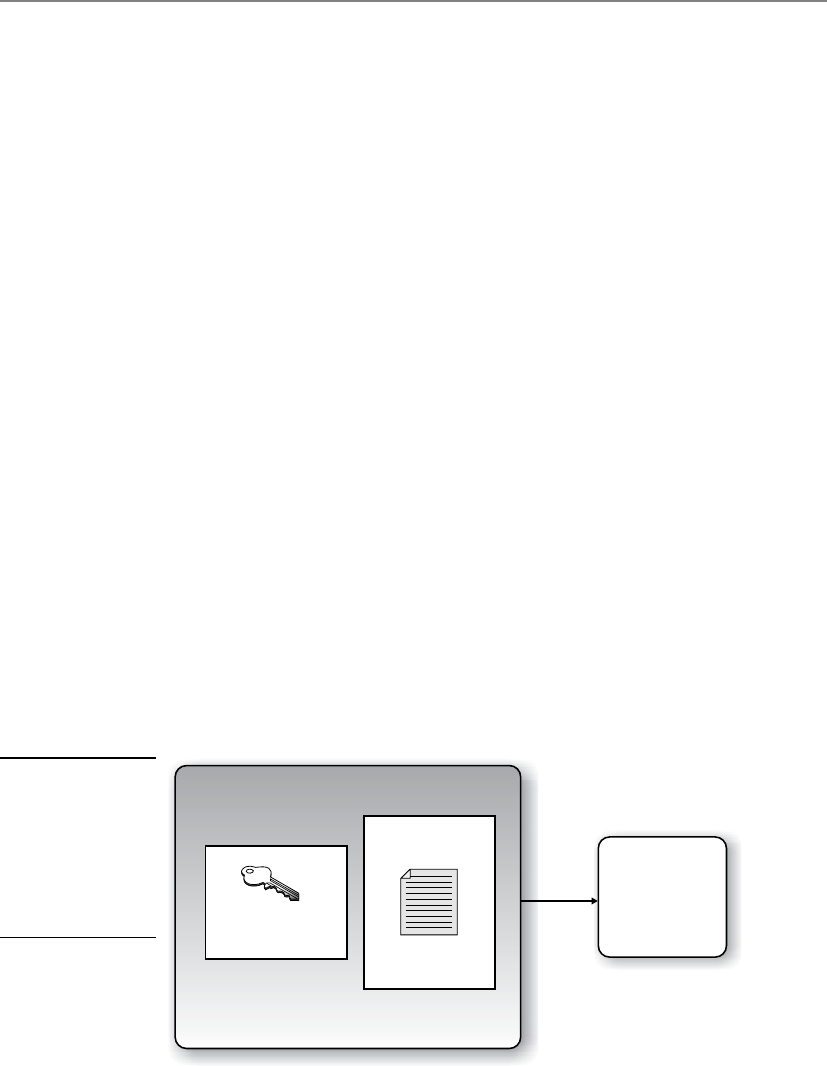
Chapter 7: Cryptography
793
Asymmetric and Symmetric Algorithms Used Together
Public key cryptography uses two keys (public and private) generated by an asymmetric
algorithm for protecting encryption keys and key distribution, and a secret key is gener-
ated by a symmetric algorithm and used for bulk encryption. Then there is a hybrid use
of the two different algorithms: asymmetric and symmetric. Each algorithm has its pros
and cons, so using them together can be the best of both worlds.
In the hybrid approach, the two technologies are used in a complementary manner,
with each performing a different function. A symmetric algorithm creates keys used for
encrypting bulk data, and an asymmetric algorithm creates keys used for automated key
distribution.
When a symmetric key is used for bulk data encryption, this key is used to encrypt
the message you want to send. When your friend gets the message you encrypted, you
want him to be able to decrypt it, so you need to send him the necessary symmetric key
to use to decrypt the message. You do not want this key to travel unprotected, because
if the message were intercepted and the key were not protected, an evildoer could inter-
cept the message that contains the necessary key to decrypt your message and read your
information. If the symmetric key needed to decrypt your message is not protected,
there is no use in encrypting the message in the first place. So we use an asymmetric
algorithm to encrypt the symmetric key, as depicted in Figure 7-15. Why do we use the
symmetric key on the message and the asymmetric key on the symmetric key? As stated
earlier, the asymmetric algorithm takes longer because the math is more complex. Be-
cause your message is most likely going to be longer than the length of the key, we use
the faster algorithm (symmetric) on the message and the slower algorithm (asymmet-
ric) on the key.
How does this actually work? Let’s say Bill is sending Paul a message that Bill wants
only Paul to be able to read. Bill encrypts his message with a secret key, so now Bill has
ciphertext and a symmetric key. The key needs to be protected, so Bill encrypts the sym-
metric key with an asymmetric key. Remember that asymmetric algorithms use private
Message and key will be sent to receiver.
Symmetric key
encrypted with an
asymmetric key
Message encrypted
with symmetric key
Receiver decrypts
and retrieves the
symmetric key,
then uses this
symmetric key to
decrypt the
message.
Figure 7-15
In a hybrid system,
the asymmetric key
is used to encrypt
the symmetric key,
and the symmetric
key is used to
encrypt the message.
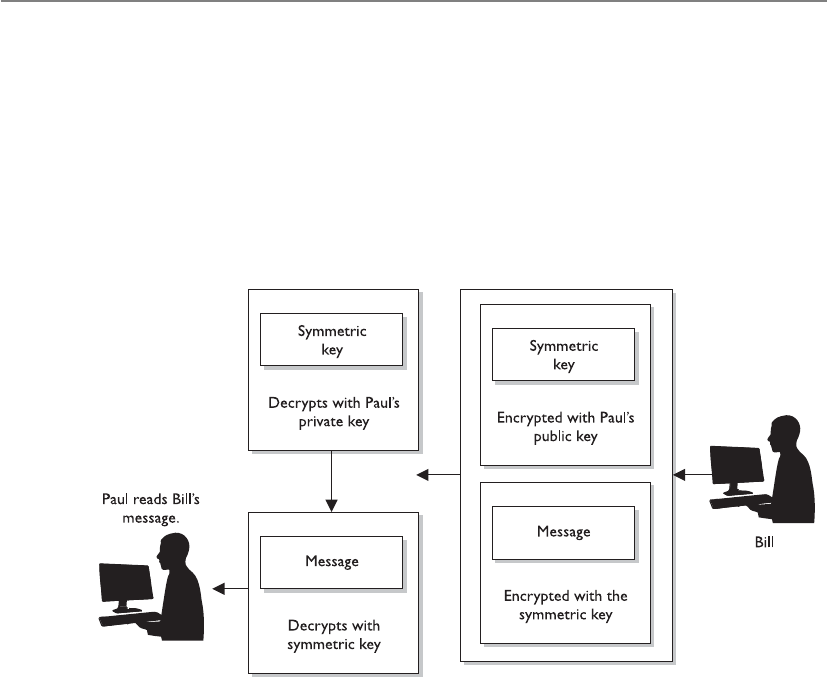
CISSP All-in-One Exam Guide
794
and public keys, so Bill will encrypt the symmetric key with Paul’s public key. Now Bill
has ciphertext from the message and ciphertext from the symmetric key. Why did Bill
encrypt the symmetric key with Paul’s public key instead of his own private key? Be-
cause if Bill encrypted it with his own private key, then anyone with Bill’s public key
could decrypt it and retrieve the symmetric key. However, Bill does not want anyone
who has his public key to read his message to Paul. Bill only wants Paul to be able to
read it. So Bill encrypts the symmetric key with Paul’s public key. If Paul has done a
good job protecting his private key, he will be the only one who can read Bill’s message.
Paul receives Bill’s message and Paul uses his private key to decrypt the symmetric
key. Paul then uses the symmetric key to decrypt the message. Paul then reads Bill’s very
important and confidential message that asks Paul how his day is.
Now when I say that Bill is using this key to encrypt and that Paul is using that key
to decrypt, those two individuals do not necessarily need to find the key on their hard
drive and know how to properly apply it. We have software to do this for us—thank
goodness.
If this is your first time with these issues and you are struggling, don’t worry. I re-
member when I first started with these concepts, and they turned my brain into a pret-
zel. Just remember the following points:

Chapter 7: Cryptography
795
• An asymmetric algorithm performs encryption and decryption by using public
and private keys that are related to each other mathematically.
• A symmetric algorithm performs encryption and decryption by using a shared
secret key.
• A symmetric key is used to encrypt and/or decrypt the actual message.
• Public keys are used to encrypt the symmetric key for secure key exchange.
• A secret key is synonymous with a symmetric key.
• An asymmetric key refers to a public or private key.
So, that is how a hybrid system works. The symmetric algorithm creates a secret key
that will be used to encrypt the bulk, or the message, and the asymmetric key encrypts
the secret key for transmission.
Now to ensure that some of these concepts are driven home, ask these questions of
yourself without reading the answers provided:
1. If a symmetric key is encrypted with a receiver’s public key, what security
service(s) is (are) provided?
2. If data are encrypted with the sender’s private key, what security service(s) is
(are) provided?
3. If the sender encrypts data with the receiver’s private key, what security
services(s) is (are) provided?
4. Why do we encrypt the message with the symmetric key?
5. Why don’t we encrypt the symmetric key with another symmetric key?
6. What is the meaning of life?
Answers
1. Confidentiality, because only the receiver’s private key can be used to decrypt
the symmetric key, and only the receiver should have access to this private key.
2. Authenticity of the sender and nonrepudiation. If the receiver can decrypt
the encrypted data with the sender’s public key, then she knows the data was
encrypted with the sender’s private key.
3. None, because no one but the owner of the private key should have access to
it. Trick question.
4. Because the asymmetric key algorithm is too slow.
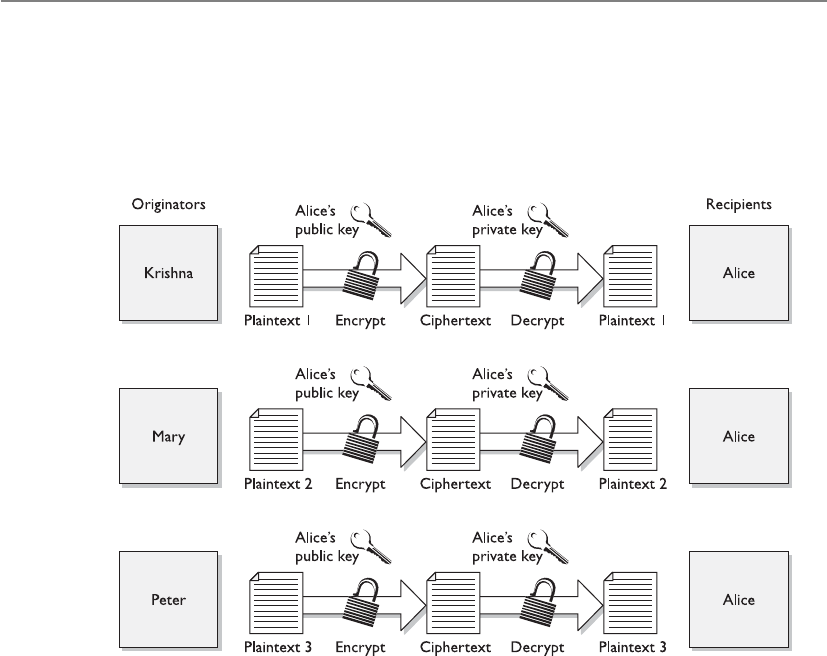
CISSP All-in-One Exam Guide
796
5. We need to get the necessary symmetric key to the destination securely, which
can only be carried out through asymmetric cryptography through the use of
public and private keys to provide a mechanism for secure transport of the
symmetric key.
6. 42.
Session Keys
Hey, I have a disposable key!
Response: Amazing. Now go away.
Asession key is a single-use symmetric key that is used to encrypt messages between
two users during a communication session. A session key is no different from the sym-
metric key described in the previous section, but it is only good for one communication
session between users.
If Tanya has a symmetric key she uses to always encrypt messages between Lance
and herself, then this symmetric key would not be regenerated or changed. They would
use the same key every time they communicated using encryption. However, using the
same key repeatedly increases the chances of the key being captured and the secure

Chapter 7: Cryptography
797
Figure 7-16 A session key is generated so all messages can be encrypted during one particular
session between users.
Digital Envelopes
When cryptography is new to people, the process of using symmetric and asym-
metric cryptography together can be a bit confusing. But it is important to under-
stand these concepts, because they really are the core, fundamental concepts of
all cryptography. This process is not just used in an e-mail client or in a couple of
products—this is how it is done when data and a symmetric key must be pro-
tected in transmission.
communication being compromised. If, on the other hand, a new symmetric key were
generated each time Lance and Tanya wanted to communicate, as shown in Figure 7-16,
it would be used only during their one dialogue and then destroyed. If they wanted to
communicate an hour later, a new session key would be created and shared.

CISSP All-in-One Exam Guide
798
A session key provides more protection than static symmetric keys because it is
valid for only one session between two computers. If an attacker were able to capture
the session key, she would have a very small window of time to use it to try to decrypt
messages being passed back and forth.
In cryptography, almost all data encryption takes place through the use of session
keys. When you write an e-mail and encrypt it before sending it over the wire, it is actu-
ally being encrypted with a session key. If you write another message to the same per-
son one minute later, a brand-new session key is created to encrypt that new message.
So if an evildoer happens to figure out one session key, that does not mean she has
access to all other messages you write and send off.
When two computers want to communicate using encryption, they must first go
through a handshaking process. The two computers agree on the encryption algorithms
that will be used and exchange the session key that will be used for data encryption. In
a sense, the two computers set up a virtual connection between each other and are said
to be in session. When this session is done, each computer tears down any data struc-
tures it built to enable this communication to take place, releases the resources, and
The use of these two technologies together can be referred to as a hybrid ap-
proach, but more commonly as a digital envelope.

Chapter 7: Cryptography
799
destroys the session key. These things are taken care of by operating systems and appli-
cations in the background, so a user would not necessarily need to be worried about
using the wrong type of key for the wrong reason. The software will handle this, but it
is important for security professionals to understand the difference between the key
types and the issues that surround them.
NOTE
NOTE Private and symmetric keys should not be available in cleartext. This
may seem obvious to you, but there have been several implementations over
time that have allowed for this type of compromise to take place.
Unfortunately, we don’t always seem to be able to call an apple an apple. In many
types of technology, the exact same thing can have more than one name. This could be
because the different inventors of the technology had schizophrenia, or it could mean
that different terms just evolved over time that overlapped. Sadly, you could see sym-
metric cryptography referred to as any of the following:
• Single key cryptography
• Secret key cryptography
• Session key cryptography
• Private key cryptography
• Shared-key cryptography
We know the difference between secret keys (static) and session keys (dynamic), but
what is this “single key” and “private key” mess? Well, using the term “single key”
makes sense, because the sender and receiver are using one single key. I (the author) am
saddened that the term “private key” can be used to describe symmetric cryptography
because it only adds more confusion to the difference between symmetric cryptography
(where one symmetric key is used) and asymmetric cryptography (where both a private
and public key are used). But no one asked for or cares about my opinion, so we just
need to remember this little quirk and still understand the difference between symmet-
ric and asymmetric cryptography.
Wireless Security Woes
We covered the different 802.11 standards and the Wired Equivalent Privacy
(WEP) protocol in Chapter 6. Among the long laundry list of security problems
with WEP, not using unique session keys for data encryption is one of them. If
only WEP is being used to encrypt wireless traffic, then in most implementations,
just one static symmetric key is being used over and over again to encrypt the
packets. This is one of the changes and advancements in the 802.11i standard,
which makes sure each packet is encrypted with a unique session key.

CISSP All-in-One Exam Guide
800
Types of Symmetric Systems
Several types of symmetric algorithms are used today. They have different methods of
providing encryption and decryption functionality. The one thing they all have in com-
mon is that they are symmetric algorithms, meaning the sender and receiver are using
two instances of the same key.
In this section, we will be walking through many of the following algorithms and
their characteristics:
• Data Encryption Standard (DES)
• 3DES (Triple DES)
• Blowfish
• Twofish
• International Data Encryption Algorithm (IDEA)
• RC4, RC5, and RC6
• Advanced Encryption Standard (AES)
• Secure and Fast Encryption Routine (SAFER)
• Serpent
Data Encryption Standard
Data Encryption Standard (DES) has had a long and rich history within the computer
community. The National Institute of Standards and Technology (NIST) researched the
need for the protection of sensitive but unclassified data during the 1960s and initiated
a cryptography program in the early 1970s. NIST invited vendors to submit data encryp-
tion algorithms to be used as a cryptographic standard. IBM had already been develop-
ing encryption algorithms to protect financial transactions. In 1974, IBM’s 128-bit
algorithm, named Lucifer, was submitted and accepted. The NSA modified this algo-
rithm to use a key size of 64 bits (with 8 bits used for parity, resulting in an effective key
length of 56 bits) instead of the original 128 bits, and named it the Data Encryption
Algorithm (DEA). Controversy arose about whether the NSA weakened Lucifer on pur-
pose to enable it to decrypt messages not intended for it, but in the end the modified
Lucifer became a national cryptographic standard in 1977 and an American National
Standards Institute (ANSI) standard in 1978.
NOTE
NOTE DEA is the algorithm that fulfills DES, which is really just a standard.
So DES is the standard and DEA is the algorithm, but in the industry we
usually just refer to it as DES. The CISSP exam may refer to the algorithm by
either name, so remember both.
DES has been implemented in a majority of commercial products using cryptogra-
phy functionality and in the applications of almost all government agencies. It was
tested and approved as one of the strongest and most efficient cryptographic algorithms

Chapter 7: Cryptography
801
available. The continued overwhelming support of the algorithm is what caused the
most confusion when the NSA announced in 1986 that, as of January 1988, the agency
would no longer endorse DES and that DES-based products would no longer fall under
compliance with Federal Standard 1027. The NSA felt that because DES had been so
popular for so long, it would surely be targeted for penetration and become useless as
an official standard. Many researchers disagreed, but NSA wanted to move on to a
newer, more secure, and less popular algorithm as the new standard.
The NSA’s decision to drop its support for DES caused major concern and negative
feedback. At that time, it was shown that DES still provided the necessary level of pro-
tection; that projections estimated a computer would require thousands of years to
crack DES; that DES was already embedded in thousands of products; and that there
was no equivalent substitute. NSA reconsidered its decision, and NIST ended up recer-
tifying DES for another five years.
In 1998, the Electronic Frontier Foundation built a computer system for $250,000
that broke DES in three days by using a brute force attack against the keyspace. It con-
tained 1,536 microprocessors running at 40 MHz, which performed 60 million test
decryptions per second per chip. Although most people do not have these types of
systems to conduct such attacks, as Moore’s Law holds true and microprocessors in-
crease in processing power, this type of attack will become more feasible for the average
attacker. This brought about 3DES, which provides stronger protection, as discussed
later in the chapter.
DES was later replaced by the Rijndael algorithm as the Advanced Encryption Stan-
dard (AES) by NIST. This means that Rijndael is the new approved method of encrypt-
ing sensitive but unclassified information for the U.S. government; it has been accepted
by, and is widely used in, the public arena today.
How Does DES Work?
How does DES work again?
Response: With voodoo magic and a dead chicken.
DES is a symmetric block encryption algorithm. When 64-bit blocks of plaintext go
in, 64-bit blocks of ciphertext come out. It is also a symmetric algorithm, meaning the
same key is used for encryption and decryption. It uses a 64-bit key: 56 bits make up
the true key, and 8 bits are used for parity.
When the DES algorithm is applied to data, it divides the message into blocks and
operates on them one at a time. The blocks are put through 16 rounds of transposition
and substitution functions. The order and type of transposition and substitution func-
tions depend on the value of the key used with the algorithm. The result is 64-bit blocks
of ciphertext.
What Does It Mean When an Algorithm Is Broken?
I dropped my algorithm.
Response: Well, now it’s broken.
As described in an earlier section, DES was finally broken with a dedicated com-
puter lovingly named the DES Cracker (also known as Deep Crack). But what does
“broken” really mean?

CISSP All-in-One Exam Guide
802
In most instances, an algorithm is broken if someone is able to uncover a key that
was used during an encryption process. So let’s say Kevin encrypted a message and sent
it to Valerie. Marc captures this encrypted message and carries out a brute force attack
on it, which means he tries to decrypt the message with different keys until he uncovers
the right one. Once he identifies this key, the algorithm is considered broken. So does
that mean the algorithm is worthless? It depends on who your enemies are.
If an algorithm is broken through a brute force attack, this just means the attacker
identified the one key that was used for one instance of encryption. But in proper im-
plementations, we should be encrypting data with session keys, which are good only
for that one session. So even if the attacker uncovers one session key, it may be useless
to the attacker, in which case he now has to work to identify a new session key.
If your information is of sufficient value that enemies or thieves would exert a lot of
resources to break the encryption (as may be the case for financial transactions or mili-
tary secrets), you would not use an algorithm that has been broken. If you are encrypt-
ing messages to your mother about a meatloaf recipe, you likely are not going to worry
about whether the algorithm has been broken.
So breaking an algorithm can take place through brute force attacks or by identify-
ing weaknesses in the algorithm itself. Brute force attacks have increased in potency
because of the increased processing capacity of computers today. An algorithm that
uses a 40-bit key has around 1 trillion possible key values. If a 56-bit key is used, then
there are approximately 72 quadrillion different key values. This may seem like a lot,
but relative to today’s computing power, these key sizes do not provide much protec-
tion at all.
On a final note, algorithms are built on the current understanding of mathematics.
As the human race advances in mathematics, the level of protection that today’s algo-
rithms provide may crumble.
DES Modes
Block ciphers have several modes of operation. Each mode specifies how a block cipher
will operate. One mode may work better in one type of environment for specific func-
tionality, whereas another mode may work better in another environment with totally
different requirements. It is important that vendors who employ DES (or any block ci-
pher) understand the different modes and which one to use for which purpose.
DES and other symmetric block ciphers have several distinct modes of operation
that are used in different situations for different results. You just need to understand
five of them:
• Electronic Code Book (ECB)
• Cipher Block Chaining (CBC)
• Cipher Feedback (CFB)
• Output Feedback (OFB)
• Counter Mode (CTR)

Chapter 7: Cryptography
803
Electronic Code Book (ECB) Mode ECB mode operates like a code book. A
64-bit data block is entered into the algorithm with a key, and a block of ciphertext is
produced. For a given block of plaintext and a given key, the same block of ciphertext
is always produced. Not all messages end up in neat and tidy 64-bit blocks, so ECB in-
corporates padding to address this problem. ECB is the easiest and fastest mode to use,
but as we will see, it has its dangers.
A key is basically instructions for the use of a code book that dictates how a block
of text will be encrypted and decrypted. The code book provides the recipe of substitu-
tions and permutations that will be performed on the block of plaintext. The security
issue that comes up with using ECB mode is that each block will be encrypted with the
exact same key, and thus the exact same code book. So, two bad things can happen
here: an attacker could uncover the key and thus have the key to decrypt all the blocks
of data, or an attacker could gather the ciphertext and plaintext of each block and build
the code book that was used, without needing the key.
The crux of the problem is that there is not enough randomness to the process of
encrypting the independent blocks, so if this mode is used to encrypt a large amount of
data, it could be cracked more easily than the other modes that block ciphers can work
in. So the next question to ask is, why even use this mode? This mode is the fastest and
easiest, so we use it to encrypt small amounts of data, such as PINs, challenge-response
values in authentication processes, and encrypting keys.
Because this mode works with blocks of data independently, data within a file does
not have to be encrypted in a certain order. This is very helpful when using encryption
in databases. A database has different pieces of data accessed in a random fashion. If it
is encrypted in ECB mode, then any record or table can be added, encrypted, deleted,
or decrypted independently of any other table or record. Other DES modes are depen-
dent upon the text encrypted before them. This dependency makes it harder to encrypt
and decrypt smaller amounts of text, because the previous encrypted text would need
to be decrypted first. (Once we cover chaining in the next section, this dependency will
make more sense.)
Because ECB mode does not use chaining, you should not use it to encrypt large
amounts of data, because patterns would eventually show themselves.
Some important characteristics of ECB mode encryption are as follows:
• Operations can be run in parallel, which decreases processing time.
• Errors are contained. If an error takes place during the encryption process, it
only affects one block of data.
• Only usable for the encryption of short messages.
• Cannot carry out preprocessing functions before receiving plaintext.
Cipher Block Chaining (CBC) Mode In ECB mode, a block of plaintext and a
key will always give the same ciphertext. This means that if the word “balloon” were
encrypted and the resulting ciphertext was “hwicssn,” each time it was encrypted using
the same key, the same ciphertext would always be given. This can show evidence of a
pattern, enabling an evildoer, with some effort, to discover the pattern and get a step
closer to compromising the encryption process.

CISSP All-in-One Exam Guide
804
Cipher Block Chaining (CBC) does not reveal a pattern because each block of text,
the key, and the value based on the previous block are processed in the algorithm and
applied to the next block of text, as shown in Figure 7-17. This results in more random
ciphertext. Ciphertext is extracted and used from the previous block of text. This pro-
vides dependence between the blocks, in a sense chaining them together. This is where
the name Cipher Block Chaining comes from, and it is this chaining effect that hides
any patterns.
The results of one block are XORed with the next block before it is encrypted, mean-
ing each block is used to modify the following block. This chaining effect means that a
particular ciphertext block is dependent upon all blocks before it, not just the previous
block.
As an analogy, let’s say you have five buckets of marbles. Each bucket contains a spe-
cific color of marbles: red, blue, yellow, black, and green. The first bucket of red marbles
(block of bits) you shake and tumble around (encrypt) to get them all mixed up. Then
you take the second bucket of marbles, which are blue, and pour in the red marbles and
go through the same exercise of shaking and tumbling them. You pour this bucket of
marbles into your next bucket and shake them all up. This illustrates the incorporated
randomness that is added when using chaining in a block encryption process.
When we encrypt our very first block using CBC, we do not have a previous block
of ciphertext to “dump in” and use to add the necessary randomness to the encryption
process. If we do not add a piece of randomness when encrypting this first block, then
the bad guys could identify patterns, work backward, and uncover the key. So, we use
an initialization vector (IVs were introduced previously in the “Initialization Vectors”
section). The 64-bit IV is XORed with the first block of plaintext, and then it goes
through its encryption process. The result of that (ciphertext) is XORed with the second
block of plaintext, and then the second block is encrypted. This continues for the whole
message. It is the chaining that adds the necessary randomness that allows us to use
CBC mode to encrypt large files. Neither the individual blocks nor the whole message
will show patterns that will allow an attacker to reverse-engineer and uncover the key.
Figure 7-17 In CBC mode, the ciphertext from the previous block of data is used in encrypting the
next block of data.

Chapter 7: Cryptography
805
If we choose a different IV each time we encrypt a message, even if it is the same
message, the ciphertext will always be unique. This means that if you send the same
message out to 50 people and encrypt each one using a different IV, the ciphertext for
each message will be different. Pretty nifty.
Cipher Feedback (CFB) Mode Sometimes block ciphers can emulate a stream
cipher. Before we dig into how this would happen, let’s first look at why. If you are go-
ing to send an encrypted e-mail to your boss, your e-mail client will use a symmetric
block cipher working in CBC mode. The e-mail client would not use ECB mode, be-
cause most messages are long enough to show patterns that can be used to reverse-en-
gineer the process and uncover the encryption key. The CBC mode is great to use when
you need to send large chunks of data at a time. But what if you are not sending large
chunks of data at one time, but instead are sending a steady stream of data to a destina-
tion? If you are working on a terminal that communicates with a back-end terminal
server, what is really going on is that each keystroke and mouse movement you make is
sent to the back-end server in chunks of eight bits to be processed. So even though it
seems as though the computer you are working on is carrying out your commands and
doing the processing you are requesting, it is not—this is happening on the server.
Thus, if you need to encrypt the data that go from your terminal to the terminal server,
you could not use CBC mode because it only encrypts blocks of data 64 bits in size. You
have blocks of eight bits you need to encrypt. So what do you know? We have just the
mode for this type of situation!
Figure 7-18 illustrates how Cipher Feedback Mode (CFB) mode works, which is re-
ally a combination of a block cipher and a stream cipher. For the first block of eight bits
that needs to be encrypted, we do the same thing we did in CBC mode, which is to use
an IV. Recall how stream ciphers work: The key and the IV are used by the algorithm to
create a keystream, which is just a random set of bits. This set of bits is XORed to the
block of plaintext, which results in the same size block of ciphertext. So the first block
(eight bits) is XORed to the set of bits created through the keystream generator. Two
things take place with this resulting eight-bit block of ciphertext. One copy goes over the
wire to the destination (in our scenario, to the terminal server), and another copy is used
to encrypt the next block of eight-bit plaintext. Adding this copy of ciphertext to the
encryption process of the next block adds more randomness to the encryption process.
Figure 7-18 A block cipher working in CFB mode

CISSP All-in-One Exam Guide
806
We walked through a scenario where eight-bit blocks needed to be encrypted, but
in reality, CFB mode can be used to encrypt any size blocks, even blocks of just one bit.
But since most of our encoding maps eight bits to one character, using CFB to encrypt
eight-bit blocks is very common.
NOTE
NOTE When using CBC mode, it is a good idea to use a unique IV value per
message, but this is not necessary since the message being encrypted is usually
very large. When using CFB mode, we are encrypting a smaller amount of data,
so it is imperative a new IV value be used to encrypt each new stream of data.
Output Feedback (OFB) Mode As you have read, you can use ECB mode for the
process of encrypting small amounts of data, such as a key or PIN value. These compo-
nents will be around 64 bits or more, so ECB mode works as a true block cipher. You can
use CBC mode to encrypt larger amounts of data in block sizes of 64 bits. In situations
where you need to encrypt a smaller amount of data, you need the cipher to work like a
stream cipher and to encrypt individual bits of the blocks, as in CFB. In some cases, you
still need to encrypt a small amount of data at a time (one to eight bits), but you need
to ensure possible errors do not affect your encryption and decryption processes.
If you look back at Figure 7-18, you see that the ciphertext from the previous block
is used to encrypt the next block of plaintext. What if a bit in the first ciphertext gets
corrupted? Then we have corrupted values going into the process of encrypting the next
block of plaintext, and this problem just continues because of the use of chaining in
this mode. Now look at Figure 7-19. It looks terribly similar to Figure 7-18, but notice
that the values used to encrypt the next block of plaintext are coming directly from the
keystream, not from the resulting ciphertext. This is the difference between the two
modes.
If you need to encrypt something that would be very sensitive to these types of er-
rors, such as digitized video or digitized voice signals, you should not use CFB mode.
You should use OFB mode instead, which reduces the chance that these types of bit
corruptions can take place.
So Output Feedback Mode (OFB) is a mode that a block cipher can work in when it
needs to emulate a stream because it encrypts small amounts of data at a time, but it has
a smaller chance of creating and extending errors throughout the full encryption process.
Figure 7-19 A block cipher working in OFB mode

Chapter 7: Cryptography
807
To ensure OFB and CFB are providing the most protection possible, the size of the
ciphertext (in CFB) or keystream values (in OFB) needs to be the same size as the block
of plaintext being encrypted. This means that if you are using CFB and are encrypting
eight bits at a time, the ciphertext you bring forward from the previous encryption
block needs to be eight bits. Otherwise, you are repeating values over and over, which
introduces patterns. (This is the same reason why a one-time pad should be used only
one time and should be as long as the message itself.)
Counter (CTR) Mode Counter Mode (CTR) is very similar to OFB mode, but in-
stead of using a randomly unique IV value to generate the keystream values, this mode
uses an IV counter that increments for each plaintext block that needs to be encrypted.
The unique counter ensures that each block is XORed with a unique keystream value.
The other difference is that there is no chaining involved, which means no cipher-
text is brought forward to encrypt the next block. Since there is no chaining, the encryp-
tion of the individual blocks can happen in parallel, which increases the performance.
The main reason CTR would be used instead of the other modes is performance.
This mode has been around for quite some time and is used in encrypting ATM cells
for virtual circuits, in IPSec, and is now integrated in the new wireless security standard,
IEEE 802.11i. A developer would choose to use this mode in these situations because
individual ATM cells or packets going through an IPSec tunnel or over radio frequencies
may not arrive at the destination in order. Since chaining is not involved, the destina-
tion can decrypt and begin processing the packets without having to wait for the full
message to arrive and then decrypt all the data.
Synchronous versus Asynchronous
Synchronous cryptosystems use keystreams to encrypt plaintext one bit at a time.
The keystream values are “in synch” with the plaintext values. An asynchronous
cryptosystem uses previously generated output to encrypt the current plaintext
values. So a stream algorithm would be considered synchronous, while a block
algorithm using chaining would be considered asynchronous.

CISSP All-in-One Exam Guide
808
Triple-DES
We went from DES to Triple-DES (3DES), so it might seem we skipped Double-DES. We
did. Double-DES has a key length of 112 bits, but there is a specific attack against
Double-DES that reduces its work factor to about the same as DES. Thus, it is no more
secure than DES. So let’s move on to 3DES.
Many successful attacks against DES and the realization that the useful lifetime of
DES was about up brought much support for 3DES. NIST knew that a new standard
had to be created, which ended up being AES, but a quick fix was needed in the mean-
time to provide more protection for sensitive data. The result: 3DES (also known as
TDEA—Triple Data Encryption Algorithm).
3DES uses 48 rounds in its computation, which makes it highly resistant to differ-
ential cryptanalysis. However, because of the extra work 3DES performs, there is a heavy
performance hit. It can take up to three times longer than DES to perform encryption
and decryption.
Although NIST has selected the Rijndael algorithm to replace DES as the AES, NIST
and others expect 3DES to be around and used for quite some time.
3DES can work in different modes, and the mode chosen dictates the number of
keys used and what functions are carried out:
•DES-EEE3 Uses three different keys for encryption, and the data are
encrypted, encrypted, encrypted.
•DES-EDE3 Uses three different keys for encryption, and the data are
encrypted, decrypted, encrypted.
•DES-EEE2 The same as DES-EEE3, but uses only two keys, and the first and
third encryption processes use the same key.
•DES-EDE2 The same as DES-EDE3, but uses only two keys, and the first and
third encryption processes use the same key.
EDE may seem a little odd at first. How much protection could be provided by en-
crypting something, decrypting it, and encrypting it again? The decrypting portion here
is decrypted with a different key. When data are encrypted with one symmetric key and
decrypted with a different symmetric key, it is jumbled even more. So the data are not
actually decrypted in the middle function, they are just run through a decryption pro-
cess with a different key. Pretty tricky.
Here We Are
If this is your first time trying to understand cryptography, you may be exasper-
ated by now. Don’t get too uptight. Many people are new to cryptography, be-
cause all of this magic just seems to work in the background without us having to
understand it or mess with it.

Chapter 7: Cryptography
809
The Advanced Encryption Standard
After DES was used as an encryption standard for over 20 years and it was cracked in a
relatively short time once the necessary technology was available, NIST decided a new
standard, the Advanced Encryption Standard (AES), needed to be put into place. In
January 1997, NIST announced its request for AES candidates and outlined the require-
ments in FIPS PUB 197. AES was to be a symmetric block cipher supporting key sizes
of 128, 192, and 256 bits. The following five algorithms were the finalists:
•MARS Developed by the IBM team that created Lucifer
•RC6 Developed by RSA Laboratories
•Serpent Developed by Ross Anderson, Eli Biham, and Lars Knudsen
•Twofish Developed by Counterpane Systems
•Rijndael Developed by Joan Daemen and Vincent Rijmen
Out of these contestants, Rijndael was chosen. The block sizes that Rijndael sup-
ports are 128, 192, and 256 bits. The number of rounds depends upon the size of the
block and the key length:
• If both the key and block size are 128 bits, there are 10 rounds.
• If both the key and block size are 192 bits, there are 12 rounds.
• If both the key and block size are 256 bits, there are 14 rounds.
Rijndael works well when implemented in software and hardware in a wide range
of products and environments. It has low memory requirements and has been con-
structed to easily defend against timing attacks.
Rijndael was NIST’s choice to replace DES. It is now the algorithm required to pro-
tect sensitive but unclassified U.S. government information.
NOTE
NOTE DEA is the algorithm used within DES, and Rijndael is the algorithm
used in AES. In the industry, we refer to these as DES and AES instead of by
the actual algorithms.
International Data Encryption Algorithm
International Data Encryption Algorithm (IDEA) is a block cipher and operates on 64-
bit blocks of data. The 64-bit data block is divided into 16 smaller blocks, and each has
eight rounds of mathematical functions performed on it. The key is 128 bits long, and
IDEA is faster than DES when implemented in software.
The IDEA algorithm offers different modes similar to the modes described in the
DES section, but it is considered harder to break than DES because it has a longer key
size. IDEA is used in the PGP and other encryption software implementations. It was

CISSP All-in-One Exam Guide
810
thought to replace DES, but it is patented, meaning that licensing fees would have to be
paid to use it.
As of this writing, there have been no successful practical attacks against this algo-
rithm, although there have been numerous attempts.
Blowfish
One fish, two fish, red fish, blowfish.
Response: Hmm, I thought it was blue fish.
Blowfish is a block cipher that works on 64-bit blocks of data. The key length can be
anywhere from 32 bits up to 448 bits, and the data blocks go through 16 rounds of
cryptographic functions. It was intended as a replacement to the aging DES. While
many of the other algorithms have been proprietary and thus encumbered by patents
or kept as government secrets, this wasn’t the case with Blowfish. Bruce Schneier, the
creator of Blowfish, has stated, “Blowfish is unpatented, and will remain so in all coun-
tries. The algorithm is hereby placed in the public domain, and can be freely used by
anyone.” Nice guy.
RC4
RC4 is one of the most commonly implemented stream ciphers. It has a variable key
size, is used in the SSL protocol, and was (improperly) implemented in the 802.11 WEP
protocol standard. RC4 was developed in 1987 by Ron Rivest and was considered a
trade secret of RSA Data Security, Inc., until someone posted the source code on a mail-
ing list. Since the source code was released nefariously, the stolen algorithm is some-
times implemented and referred to as ArcFour or ARC4 because the title RC4 is trade-
marked.
The algorithm is very simple, fast, and efficient, which is why it became so popular.
But because it has a low diffusion rate, it is subject to modification attacks. This is one
reason that the new wireless security standard (IEEE 802.11i) moved from the RC4 al-
gorithm to the AES algorithm.
RC5
RC5 is a block cipher that has a variety of parameters it can use for block size, key size,
and the number of rounds used. It was created by Ron Rivest and analyzed by RSA Data
Security, Inc. The block sizes used in this algorithm are 32, 64, or 128 bits, and the key
size goes up to 2,048 bits. The number of rounds used for encryption and decryption is
also variable. The number of rounds can go up to 255.
RC6
RC6 is a block cipher that was built upon RC5, so it has all the same attributes as RC5.
The algorithm was developed mainly to be submitted as AES, but Rijndael was chosen
instead. There were some modifications of the RC5 algorithm to increase the overall
speed, the result of which is RC6.

Chapter 7: Cryptography
811
Cryptography Notation
In some resources, you may run across rc5-w/r/b or RC5-32/12/16. This is a type
of shorthand that describes the configuration of the algorithm:
•w= Word size, in bits, which can be 16, 32, or 64 bits in length
•r = Number of rounds, which can be 0 to 255
So RC5-32/12/16 would mean the following:
• 32-bit words, which means it encrypts 64-bit data blocks
• Using 12 rounds
• With a 16-byte (128-bit) key
A developer configures these parameters (words, number of rounds, key size)
for the algorithm for specific implementations. The existence of these parameters
gives developers extensive flexibility.
Key Terms
•Hybrid cryptography Combined use of symmetric and asymmetric
algorithms where the symmetric key encrypts data and an asymmetric
key encrypts the symmetric key.
•Session keys Symmetric keys that have a short lifespan, thus
providing more protection than static keys with longer lifespans.
•Digital envelope Message is encrypted with a symmetric key and the
symmetric key is encrypted with an asymmetric key. Collectively this is
called a digital envelope.
•Data Encryption Standard Block symmetric algorithm chosen by
NIST as an encryption standard in 1976. It uses a 56-bit true key bit
size, 64-bit block size, and 16 rounds of computation.
•Lucifer Algorithm that was chosen for the Data Encryption Standard,
which was altered and renamed Data Encryption Algorithm.
•Data Encryption Algorithm Algorithm chosen to fulfill the Data
Encryption Standard. Block symmetric cipher that uses a 56-bit true key
size, 64-bit block size, and 16 rounds of computation.
•Advanced Encryption Standard U.S. encryption standard that
replaced DES. Block symmetric cipher that uses 128-bit block sizes and
various key lengths (128, 192, 256).
•Rijndael Block symmetric cipher that was chosen to fulfill the
Advanced Encryption Standard. It uses a 128-bit block size and various
key lengths (128, 192, 256).

CISSP All-in-One Exam Guide
812
Types of Asymmetric Systems
As described earlier in the chapter, using purely symmetric key cryptography has three
drawbacks, which affect the following:
•Security services Purely symmetric key cryptography provides confidentiality
only, not authentication or nonrepudiation.
•Scalability As the number of people who need to communicate increases,
so does the number of symmetric keys required, meaning more keys must be
managed.
•Secure key distribution The symmetric key must be delivered to its
destination through a secure courier.
Despite these drawbacks, symmetric key cryptography was all that the computing
society had available for encryption for quite some time. Symmetric and asymmetric
cryptography did not arrive on the same day or even in the same decade. We dealt with
the issues surrounding symmetric cryptography for quite some time, waiting for some-
one smarter to come along and save us from some of this grief.
The Diffie-Hellman Algorithm
The first group to address the shortfalls of symmetric key cryptography decided to at-
tack the issue of secure distribution of the symmetric key. Whitfield Diffie and Martin
Hellman worked on this problem and ended up developing the first asymmetric key
agreement algorithm, called, naturally, Diffie-Hellman.
To understand how Diffie-Hellman works, consider an example. Let’s say that Tanya
and Erika would like to communicate over an encrypted channel by using Diffie-Hell-
man. They would both generate a private and public key pair and exchange public keys.
•Triple DES Symmetric cipher that applies DES three times to each
block of data during the encryption process.
•International Data Encryption Algorithm Block symmetric cipher
that uses a 128-bit key and 64-bit block size.
•Blowfish Block symmetric cipher that uses 64-bit block sizes and
variable-length keys.
•RC4 Stream symmetric cipher that was created by Ron Rivest of RSA.
Used in SSL and WEP.
•RC5 Block symmetric cipher that uses variable block sizes (32, 64,
128) and variable-length key sizes (0–2040).
•RC6 Block symmetric cipher that uses a 128-bit block size and variable-
length key sizes (128, 192, 256). Built upon the RC5 algorithm.

Chapter 7: Cryptography
813
Tanya’s software would take her private key (which is just a numeric value) and Erika’s
public key (another numeric value) and put them through the Diffie-Hellman algo-
rithm. Erika’s software would take her private key and Tanya’s public key and insert them
into the Diffie-Hellman algorithm on her computer. Through this process, Tanya and
Erika derive the same shared value, which is used to create instances of symmetric keys.
So, Tanya and Erika exchanged information that did not need to be protected (their
public keys) over an untrusted network, and in turn generated the exact same symmet-
ric key on each system. They both can now use these symmetric keys to encrypt, trans-
mit, and decrypt information as they communicate with each other.
NOTE
NOTE The preceding example describes key agreement, which is different
from key exchange, the functionality used by the other asymmetric algorithms
that will be discussed in this chapter. With key exchange functionality, the
sender encrypts the symmetric key with the receiver’s public key before
transmission.
The Diffie-Hellman algorithm enables two systems to generate a symmetric key
securely without requiring a previous relationship or prior arrangements. The algo-
rithm allows for key distribution, but does not provide encryption or digital signature
functionality. The algorithm is based on the difficulty of calculating discrete logarithms
in a finite field.
The original Diffie-Hellman algorithm is vulnerable to a man-in-the-middle attack,
because no authentication occurs before public keys are exchanged. In our example,
when Tanya sends her public key to Erika, how does Erika really know it is Tanya’s pub-
lic key? What if Lance spoofed his identity, told Erika he was Tanya, and sent over his
key? Erika would accept this key, thinking it came from Tanya. Let’s walk through the
steps of how this type of attack would take place, as illustrated in Figure 7-20:
1. Tanya sends her public key to Erika, but Lance grabs the key during
transmission so it never makes it to Erika.
2. Lance spoofs Tanya’s identity and sends over his public key to Erika. Erika
now thinks she has Tanya’s public key.
3. Erika sends her public key to Tanya, but Lance grabs the key during
transmission so it never makes it to Tanya.
4. Lance spoofs Erika’s identity and sends over his public key to Tanya. Tanya
now thinks she has Erika’s public key.
5. Tanya combines her private key and Lance’s public key and creates symmetric
key S1.
6. Lance combines his private key and Tanya’s public key and creates symmetric
key S1.
7. Erika combines her private key and Lance’s public key and creates symmetric
key S2.
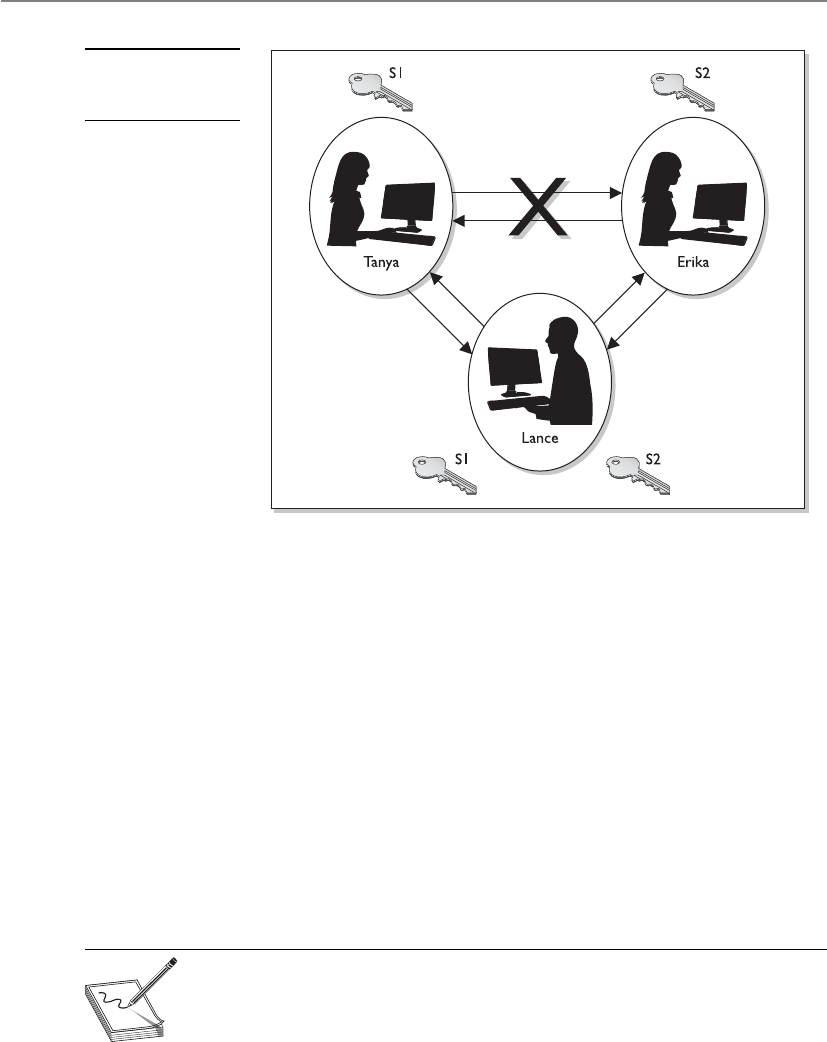
CISSP All-in-One Exam Guide
814
8. Lance combines his private key and Erika’s public key and creates symmetric
key S2.
9. Now Tanya and Lance share a symmetric key (S1) and Erika and Lance share
a different symmetric key (S2). Tanya and Erika think they are sharing a key
between themselves and do not realize Lance is involved.
10. Tanya writes a message to Erika, uses her symmetric key (S1) to encrypt the
message, and sends it.
11. Lance grabs the message and decrypts it with symmetric key S1, reads or
modifies the message and re-encrypts it with symmetric key S2, and then
sends it to Erika.
12. Erika takes symmetric key S2 and uses it to decrypt and read the message.
The countermeasure to this type of attack is to have authentication take place before
accepting someone’s public key, which usually happens through the use of digital sig-
natures and digital certificates.
NOTE
NOTE Although the Diffie-Hellman algorithm is vulnerable to a man-in-
the-middle attack, it does not mean this type of compromise can take place
anywhere this algorithm is deployed. Most implementations include another
piece of software or a protocol that compensates for this vulnerability. But
some do not. As a security professional, you should understand these issues.
Figure 7-20
A man-in-the-middle
attack
Chapter 7: Cryptography
815
NOTE
NOTE MQV (Menezes-Qu-Vanstone) is an authentication key agreement
cryptography function very similar to Diffie-Hellman. The users’ public keys
are exchanged to create session keys. It provides protection from an attacker
figuring out the session key because she would need to have both users’
private keys.
RSA
Give me an R, give me an S, give me an… How do you spell “RSA” again?
Response: Sigh.
RSA, named after its inventors Ron Rivest, Adi Shamir, and Leonard Adleman, is a
public key algorithm that is the most popular when it comes to asymmetric algorithms.
RSA is a worldwide de facto standard and can be used for digital signatures, key ex-
change, and encryption. It was developed in 1978 at MIT and provides authentication
as well as key encryption.
The security of this algorithm comes from the difficulty of factoring large numbers
into their original prime numbers. The public and private keys are functions of a pair
of large prime numbers, and the necessary activity required to decrypt a message from
ciphertext to plaintext using a private key is comparable to factoring a product into two
prime numbers.
NOTE
NOTE A prime number is a positive whole number with no proper divisors,
meaning the only numbers that can divide a prime number are 1 and the
number itself.
What Is the Difference Between Public Key Cryptography and
Public Key Infrastructure?
Public key cryptography is the use of an asymmetric algorithm. Thus, the terms
asymmetric algorithm and public key cryptography are interchangeable. Exam-
ples of asymmetric algorithms are RSA, elliptic curve cryptosystem (ECC), Diffie-
Hellman, El Gamal, and Knapsack. These algorithms are used to create public/
private key pairs, perform key exchange or agreement, and generate and verify
digital signatures.
NOTE
NOTE The Diffie-Hellman algorithm can only perform key agreement
and cannot generate or verify digital signatures.
Public key infrastructure (PKI) is a different animal. It is not an algorithm, a pro-
tocol, or an application—it is an infrastructure based on public key cryptography.

CISSP All-in-One Exam Guide
816
One advantage of using RSA is that it can be used for encryption and digital signa-
tures. Using its one-way function, RSA provides encryption and signature verification,
and the inverse direction performs decryption and signature generation.
RSA has been implemented in applications; in operating systems by Microsoft, Ap-
ple, Sun, and Novell; and at the hardware level in network interface cards, secure tele-
phones, and smart cards. It can be used as a key exchange protocol, meaning it is used to
encrypt the symmetric key to get it securely to its destination. RSA has been most com-
monly used with the symmetric algorithm DES, which is quickly being replaced with
AES. So, when RSA is used as a key exchange protocol, a cryptosystem generates a sym-
metric key using either the DES or AES algorithm. Then the system encrypts the sym-
metric key with the receiver’s public key and sends it to the receiver. The symmetric key
is protected because only the individual with the corresponding private key can decrypt
and extract the symmetric key.
Diving into Numbers
Cryptography is really all about using mathematics to scramble bits into an undeci-
pherable form and then using the same mathematics in reverse to put the bits back into
a form that can be understood by computers and people. RSA’s mathematics are based
on the difficulty of factoring a large integer into its two prime factors. Put on your nerdy
hat with the propeller and let’s look at how this algorithm works.
The algorithm creates a public key and a private key from a function of large prime
numbers. When data are encrypted with a public key, only the corresponding private
key can decrypt the data. This act of decryption is basically the same as factoring the
product of two prime numbers. So, let’s say I have a secret (encrypted message), and for
you to be able to uncover the secret, you have to take a specific large number and factor
it and come up with the two numbers I have written down on a piece of paper. This may
sound simplistic, but the number you must properly factor can be 2300 in size. Not as
easy as you may think.
The following sequence describes how the RSA algorithm comes up with the keys
in the first place:
1. Choose two random large prime numbers, p and q.
2. Generate the product of these numbers: n = pq.
Choose a random integer to be the encryption key, e. Make sure that e and
(p– 1)(q – 1) are relatively prime.
3. Compute the decryption key, d. This is ed = 1 mod (p – 1)(q – 1)
or d = e–1 mod ([p – 1][q – 1]).
4. The public key = (n,e).
5. The private key = (n,d).
6. The original prime numbers p and q are discarded securely.
We now have our public and private keys, but how do they work together?

Chapter 7: Cryptography
817
If you need to encrypt message m with your public key (e,n), the following formula
is carried out:
C = me mod n
Then you need to decrypt the message with your private key (d), so the following
formula is carried out:
M = cd mod n
You may be thinking, “Well, I don’t understand these formulas, but they look sim-
ple enough. Why couldn’t someone break these small formulas and uncover the en-
cryption key?” Maybe someone will one day. As the human race advances in its
understanding of mathematics and as processing power increases and cryptanalysis
evolves, the RSA algorithm may be broken one day. If we were to figure out how to
quickly and more easily factor large numbers into their original prime values, all of
these cards would fall down, and this algorithm would no longer provide the security
it does today. But we have not hit that bump in the road yet, so we are all happily using
RSA in our computing activities.
One-Way Functions
Aone-way function is a mathematical function that is easier to compute in one direc-
tion than in the opposite direction. An analogy of this is when you drop a glass on the
floor. Although dropping a glass on the floor is easy, putting all the pieces back to-
gether again to reconstruct the original glass is next to impossible. This concept is simi-
lar to how a one-way function is used in cryptography, which is what the RSA algo-
rithm, and all other asymmetric algorithms, are based upon.
The easy direction of computation in the one-way function that is used in the RSA
algorithm is the process of multiplying two large prime numbers. Multiplying the two
numbers to get the resulting product is much easier than factoring the product and re-
covering the two initial large prime numbers used to calculate the obtained product,
which is the difficult direction. RSA is based on the difficulty of factoring large numbers
that are the product of two large prime numbers. Attacks on these types of cryptosys-
tems do not necessarily try every possible key value, but rather try to factor the large
number, which will give the attacker the private key.
When a user encrypts a message with a public key, this message is encoded with a
one-way function (breaking a glass). This function supplies a trapdoor (knowledge of
how to put the glass back together), but the only way the trapdoor can be taken advan-
tage of is if it is known about and the correct code is applied. The private key provides
this service. The private key knows about the trapdoor, knows how to derive the original
prime numbers, and has the necessary programming code to take advantage of this se-
cret trapdoor to unlock the encoded message (reassembling the broken glass). Know-
ing about the trapdoor and having the correct functionality to take advantage of it are
what make the private key private.
When a one-way function is carried out in the easy direction, encryption and digital
signature verification functionality are available. When the one-way function is carried

CISSP All-in-One Exam Guide
818
out in the hard direction, decryption and signature generation functionality are avail-
able. This means only the public key can carry out encryption and signature verification
and only the private key can carry out decryption and signature generation.
As explained earlier in this chapter, work factor is the amount of time and resources
it would take for someone to break an encryption method. In asymmetric algorithms,
the work factor relates to the difference in time and effort that carrying out a one-way
function in the easy direction takes compared to carrying out a one-way function in the
hard direction. In most cases, the larger the key size, the longer it would take for the bad
guy to carry out the one-way function in the hard direction (decrypt a message).
The crux of this section is that all asymmetric algorithms provide security by using
mathematical equations that are easy to perform in one direction and next to impos-
sible to perform in the other direction. The “hard” direction is based on a “hard” math-
ematical problem. RSA’s hard mathematical problem requires factoring large numbers
into their original prime numbers. Diffie-Hellman and El Gamal are based on the dif-
ficulty of calculating logarithms in a finite field.
El Gamal
El Gamal is a public key algorithm that can be used for digital signatures, encryption,
and key exchange. It is based not on the difficulty of factoring large numbers but on
calculating discrete logarithms in a finite field. El Gamal is actually an extension of the
Diffie-Hellman algorithm.
Although El Gamal provides the same type of functionality as some of the other
asymmetric algorithms, its main drawback is performance. When compared to other
algorithms, this algorithm is usually the slowest.
Elliptic Curve Cryptosystems
Elliptic curves. That just sounds like fun.
Elliptic curves are rich mathematical structures that have shown usefulness in many
different types of applications. An elliptic curve cryptosystem (ECC) provides much of
the same functionality RSA provides: digital signatures, secure key distribution, and
encryption. One differing factor is ECC’s efficiency. ECC is more efficient than RSA and
any other asymmetric algorithm.
Figure 7-21 is an example of an elliptic curve. In this field of mathematics, points on
the curves compose a structure called a group. These points are the values used in math-
ematical formulas for ECC’s encryption and decryption processes. The algorithm com-
putes discrete logarithms of elliptic curves, which is different from calculating discrete
logarithms in a finite field (which is what Diffie-Hellman and El Gamal use).
Some devices have limited processing capacity, storage, power supply, and band-
width, such as wireless devices and cellular telephones. With these types of devices, ef-
ficiency of resource use is very important. ECC provides encryption functionality,
requiring a smaller percentage of the resources compared to RSA and other algorithms,
so it is used in these types of devices.

Chapter 7: Cryptography
819
In most cases, the longer the key, the more protection that is provided, but ECC can
provide the same level of protection with a key size that is shorter than what RSA re-
quires. Because longer keys require more resources to perform mathematical tasks, the
smaller keys used in ECC require fewer resources of the device.
Knapsack
Over the years, different versions of knapsack algorithms have arisen. The first to be
developed, Merkle-Hellman, could be used only for encryption, but it was later im-
proved upon to provide digital signature capabilities. These types of algorithms are
based on the “knapsack problem,” a mathematical dilemma that poses the following
question: If you have several different items, each having its own weight, is it possible
to add these items to a knapsack so the knapsack has a specific weight?
This algorithm was discovered to be insecure and is not currently used in cryptosystems.
Zero Knowledge Proof
Total knowledge zero. Yep, that’s how I feel after reading all of this cryptography stuff!
Response: Just put your head between your knees and breathe slowly.
When military representatives are briefing the news media about some big world
event, they have one goal in mind: to tell the story that the public is supposed to hear
and nothing more. Do not provide extra information that someone could use to infer
Figure 7-21
Elliptic curves

CISSP All-in-One Exam Guide
820
more information than they are supposed to know. The military has this goal because
it knows that not just the good guys are watching CNN. This is an example of zero
knowledge proof. You tell someone just the information they need to know without
“giving up the farm.”
Zero knowledge proof is used in cryptography also. If I encrypt something with my
private key, you can verify my private key was used by decrypting the data with my pub-
lic key. By encrypting something with my private key, I am proving to you I have my
private key—but I do not give or show you my private key. I do not “give up the farm”
by disclosing my private key. In a zero knowledge proof, the verifier cannot prove to
another entity that this proof is real because he does not have the private key to prove
it. So, only the owner of the private key can prove he has possession of the key.
Message Integrity
Parity bits and cyclic redundancy check (CRC) functions have been used in protocols to
detect modifications in streams of bits as they are passed from one computer to an-
other, but they can usually detect only unintentional modifications. Unintentional
modifications can happen if a spike occurs in the power supply, if there is interference
or attenuation on a wire, or if some other type of physical condition happens that
causes the corruption of bits as they travel from one destination to another. Parity bits
cannot identify whether a message was captured by an intruder, altered, and then sent
on to the intended destination. The intruder can just recalculate a new parity value that
includes his changes, and the receiver would never know the difference. For this type of
protection, hash algorithms are required to successfully detect intentional and uninten-
tional unauthorized modifications to data. We will now dive into hash algorithms and
their characteristics.
The One-Way Hash
Now, how many times does the one-way hash run again?
Response: One, brainiac.
Aone-way hash is a function that takes a variable-length string (a message) and
produces a fixed-length value called a hash value. For example, if Kevin wants to send a
message to Maureen and he wants to ensure the message does not get altered in an
unauthorized fashion while it is being transmitted, he would calculate a hash value for
the message and append it to the message itself. When Maureen receives the message,
she performs the same hashing function Kevin used and then compares her result with
the hash value sent with the message. If the two values are the same, Maureen can be
sure the message was not altered during transmission. If the two values are different,
Maureen knows the message was altered, either intentionally or unintentionally, and
she discards the message.
The hashing algorithm is not a secret—it is publicly known. The secrecy of the one-
way hashing function is its “one-wayness.” The function is run in only one direction,
not the other direction. This is different from the one-way function used in public key

Chapter 7: Cryptography
821
cryptography, in which security is provided based on the fact that, without knowing a
trapdoor, it is very hard to perform the one-way function backward on a message and
come up with readable plaintext. However, one-way hash functions are never used in
reverse; they create a hash value and call it a day. The receiver does not attempt to re-
verse the process at the other end, but instead runs the same hashing function one way
and compares the two results.
The hashing one-way function takes place without the use of any keys. This means,
for example, that if Cheryl writes a message, calculates a message digest, appends the
digest to the message, and sends it on to Scott, Bruce can intercept this message, alter
Cheryl’s message, recalculate another message digest, append it to the message, and
send it on to Scott. When Scott receives it, he verifies the message digest, but never
knows the message was actually altered by Bruce. Scott thinks the message came straight
from Cheryl and it was never modified because the two message digest values are the
same. If Cheryl wanted more protection than this, she would need to use message au-
thentication code (MAC).
A MAC function is an authentication scheme derived by applying a secret key to a
message in some form. This does not mean the symmetric key is used to encrypt the
message, though. You should be aware of three basic types of MACs: a hash MAC
(HMAC), CBC-MAC, and CMAC.
HMAC
In the previous example, if Cheryl were to use an HMAC function instead of just a plain
hashing algorithm, a symmetric key would be concatenated with her message. The re-
sult of this process would be put through a hashing algorithm, and the result would be
a MAC value. This MAC value is then appended to her message and sent to Scott. If
Bruce were to intercept this message and modify it, he would not have the necessary
symmetric key to create the MAC value that Scott will attempt to generate. Figure 7-22
walks through these steps.
The top portion of Figure 7-22 shows the steps of a hashing process:
1. The sender puts the message through a hashing function.
2. A message digest value is generated.
3. The message digest is appended to the message.
4. The sender sends the message to the receiver.
5. The receiver puts the message through a hashing function.
6. The receiver generates her own message digest value.
7. The receiver compares the two message digest values. If they are the same, the
message has not been altered.
The bottom half of Figure 7-22 shows the steps of an HMAC:
1. The sender concatenates a symmetric key with the message.
2. The result is put through a hashing algorithm.

CISSP All-in-One Exam Guide
822
Figure 7-22 The steps involved in using a hashing algorithm and HMAC function
3. A MAC value is generated.
4. The MAC value is appended to the message.
5. The sender sends the message to the receiver. (Just the message with the attached
MAC value. The sender does not send the symmetric key with the message.)
6. The receiver concatenates a symmetric key with the message.
7. The receiver puts the results through a hashing algorithm and generates her
own MAC value.
8. The receiver compares the two MAC values. If they are the same, the message
has not been modified.

Chapter 7: Cryptography
823
Now, when we say that the message is concatenated with a symmetric key, we don’t
mean a symmetric key is used to encrypt the message. The message is not encrypted in
an HMAC function, so there is no confidentiality being provided. Think about throwing
a message in a bowl and then throwing a symmetric key in the same bowl. If you dump
the contents of the bowl into a hashing algorithm, the result will be a MAC value.
This type of technology requires the sender and receiver to have the same symmetric
key. The HMAC function does not involve getting the symmetric key to the destination
securely. That would have to happen through one of the other technologies we have
discussed already (Diffie-Hellman and key agreement, or RSA and key exchange).
CBC-MAC
If a CBC-MAC is being used, the message is encrypted with a symmetric block cipher in
CBC mode, and the output of the final block of ciphertext is used as the MAC. The send-
er does not send the encrypted version of the message, but instead sends the plaintext
version and the MAC attached to the message. The receiver receives the plaintext message
and encrypts it with the same symmetric block cipher in CBC mode and calculates an
independent MAC value. The receiver compares the new MAC value with the MAC value
sent with the message. This method does not use a hashing algorithm as does HMAC.
The use of the symmetric key ensures that the only person who can verify the integ-
rity of the message is the person who has a copy of this key. No one else can verify the
data’s integrity, and if someone were to make a change to the data, he could not gener-
ate the MAC value (HMAC or CBC-MAC) the receiver would be looking for. Any modi-
fications would be detected by the receiver.
Now the receiver knows that the message came from the system that has the other
copy of the same symmetric key, so MAC provides a form of authentication. It provides
data origin authentication, sometimes referred to as system authentication. This is differ-
ent from user authentication, which would require the use of a private key. A private key
is bound to an individual; a symmetric key is not. MAC authentication provides the weak-
est form of authentication because it is not bound to a user, just to a computer or device.
NOTE
NOTE The same key should not be used for authentication and encryption.
Why Can’t We Call an Apple an Apple?
The idea of a hashing function is simple. You run a message through a hashing
algorithm, which in turn generates a hashing value. It must have been too simple,
because someone threw in a lot of terms to make it more confusing:
• A hashing value can also be called a message digest or fingerprint.
• Hashing algorithms are also called nonkeyed message digests.
• Three types of message authentication code (MAC) exist: hashed MAC
(HMAC) and CBC-MAC and CCM.
• MAC is also sometimes called message integrity code (MIC) or
modification detection code (MDC).

CISSP All-in-One Exam Guide
824
As with most things in security, the industry found some security issues with CBC-
MAC and created Cipher-Based Message Authentication Code (CMAC). CMAC provides
the same type of data origin authentication and integrity as CBC-MAC, but is more se-
cure mathematically. CMAC is a variation of CBC-MAC. It is approved to work with AES
and Triple DES. CRCs are used to identify data modifications, but these are commonly
used lower in the network stack. Since these functions work lower in the network stack,
they are used to identify modifications (as in corruption) when the packet is transmit-
ted from one computer to another. HMAC, CBC-MAC, and CMAC work higher in the
network stack and can identify not only transmission errors (accidental), but also more
nefarious modifications, as in an attacker messing with a message for her own benefit.
This means all of these technologies (except CRC) can identify intentional, unauthor-
ized modifications and accidental changes—three in one!
So here is how CMAC works: The symmetric algorithm (AES or 3DES) creates the
symmetric key. This key is used to create subkeys. The subkeys are used individually to
encrypt the individual blocks of a message as shown in Figure 7-23. This is the exactly
how CBC-MAC works, but with some better magic that works underneath the hood.
The magic that is underneath is mathematically based and really too deep for the CISSP
exam. To understand more about this mathematical magic, please visit http://csrc.nist
.gov/publications/nistpubs/800-38B/SP_800-38B.pdf.
Although digging into the CMAC mathematics is too deep for the CISSP exam,
what you do need to know is that it is a block cipher–based message authentication
code algorithm and how the foundations of the algorithm type works.
NOTE
NOTE A newer block mode combines CTR and CBC-MAC and is
called CCM. The goal of using this mode is to provide both data origin
authentication and encryption through the use of the same key. One key value
is used for the counter values for CTR mode encryption and the IV value for
CBC-MAC operations. The IEEE 802.11i wireless security standard outlines
the use of CCM mode for the block cipher AES.
111100
110101
110011
001011
Figure 7-23 Cipher block chaining mode process

Chapter 7: Cryptography
825
Hashes, HMACs, CBC-MACs, CMACs—Oh My!
MACs and hashing processes can be confusing. The following table simplifies the
differences between them.
Function Steps Security Service
Provided
Hash 1. Sender puts a message through a hashing
algorithm and generates a message digest
(MD) value.
2. Sender sends message and MD value to
receiver.
3. Receiver runs just the message through
the same hashing algorithm and creates an
independent MD value.
4. Receiver compares both MD values. If
they are the same, the message was not
modified.
Integrity; not
confidentiality or
authentication. Can
detect only unintentional
modifications.
HMAC 1. Sender concatenates a message and secret
key and puts the result through a hashing
algorithm. This creates a MAC value.
2. Sender appends the MAC value to the
message and sends it to the receiver.
3. The receiver takes just the message and
concatenates it with her own symmetric
key. This results in an independent MAC
value.
4. The receiver compares the two MAC
values. If they are the same, the receiver
knows the message was not modified and
knows from which system it came.
Integrity and data
origin authentication;
confidentiality is not
provided.
CBC-MAC 1. Sender encrypts a message with a
symmetric block algorithm in CBC mode.
2. The last block is used as the MAC.
3. The plaintext message and the appended
MAC are sent to the receiver.
4. The receiver encrypts the message,
creates a new MAC, and compares the
two values. If they are the same, the
receiver knows the message was not
modified and from which system it came.
Integrity and data
origin authentication;
confidentiality is not
provided.
CMAC CMAC works the same way as CBC-MAC,
but is based on more complex logic and
mathematical functions.

CISSP All-in-One Exam Guide
826
Various Hashing Algorithms
As stated earlier, the goal of using a one-way hash function is to provide a fingerprint of
the message. If two different messages produce the same hash value, it would be easier
for an attacker to break that security mechanism because patterns would be revealed.
A strong one-hash function should not provide the same hash value for two or
more different messages. If a hashing algorithm takes steps to ensure it does not create
the same hash value for two or more messages, it is said to be collision free.
Strong cryptographic hash functions has the following characteristics:
• The hash should be computed over the entire message.
• The hash should be a one-way function so messages are not disclosed by
their values.
• Given a message and its hash value, computing another message with the
same hash value should be impossible.
• The function should be resistant to birthday attacks (explained in the
upcoming section “Attacks Against One-Way Hash Functions”).
Table 7-2 and the following sections quickly describe some of the available hashing
algorithms used in cryptography today.
MD2
MD2 is a one-way hash function designed by Ron Rivest that creates a 128-bit message
digest value. It is not necessarily any weaker than the other algorithms in the “MD”
family, but it is much slower.
MD4
MD4 is a one-way hash function designed by Ron Rivest. It also produces a 128-bit
message digest value. It is used for high-speed computation in software implementa-
tions and is optimized for microprocessors.
Algorithm Description
Message Digest 2 (MD2) algorithm Produces a 128-bit hash value. Much slower than MD4
and MD5.
Message Digest 4 (MD4) algorithm Produces a 128-bit hash value.
Message Digest 5 (MD5) algorithm Produces a 128-bit hash value. More complex than MD4.
HAVAL Variable-length hash value. Modification of MD5
algorithm that provides more protection against attacks
that affect MD5.
Secure Hash Algorithm (SHA) Produces a 160-bit hash value. Used with DSA.
SHA-1, SHA-256, SHA-384, SHA-512 Updated version of SHA. SHA-1 produces a 160-bit hash
value, SHA-256 creates a 256-bit value, and so on.
Tiger Produces a hash size of 192 bits. Does not use defined
initialization vectors.
Table 7-2 Various Hashing Algorithms Available

Chapter 7: Cryptography
827
MD5
MD5 was also created by Ron Rivest and is the newer version of MD4. It still produces
a 128-bit hash, but the algorithm is more complex, which makes it harder to break.
MD5 added a fourth round of operations to be performed during the hashing func-
tions and makes several of its mathematical operations carry out more steps or more
complexity to provide a higher level of security. Recent research has shown MD5 to be
subject to collision attacks, and it is therefore no longer suitable for applications like
SSL certificates and digital signatures that require collision attack resistance.
SHA
SHA was designed by NSA and published by NIST to be used with the Digital Signature
Standard (DSS). SHA was designed to be used in digital signatures and was developed
when a more secure hashing algorithm was required for U.S. government applications.
SHA produces a 160-bit hash value, or message digest. This is then inputted into an
asymmetric algorithm, which computes the signature for a message.
SHA is similar to MD4. It has some extra mathematical functions and produces a
160-bit hash instead of a 128-bit hash, which makes it more resistant to brute force
attacks, including birthday attacks.
SHA was improved upon and renamed SHA-1. Recently, newer versions of this al-
gorithm (collectively known as the SHA-2 family) have been developed and released:
SHA-256, SHA-384, and SHA-512.
HAVAL
HAVAL is a variable-length, one-way hash function and is a modification of MD5. It
processes message blocks twice the size of those used in MD5; thus, it processes blocks
of 1,024 bits. HAVAL can produce hashes from 128 to 256 bits in length.
Tiger
Ross Anderson and Eli Biham developed a hashing algorithm called Tiger. It was de-
signed to carry out hashing functionalities on 64-bit systems and to be faster than MD5
and SHA-1. The resulting hash value is 192 bits. Design-wise, most hash algorithms
(MD5, RIPEMD, SHA-0, and SHA-1) are derivatives or have been built upon the MD4
architecture. Tiger was built upon a different type of architecture with the goal of not
being vulnerable to the same type of attacks that could be successful on the other hash-
ing algorithms.
NOTE
NOTE A European project called RIPE (RACE Integrity Primitives Evaluation)
developed a hashing algorithm with the purpose of replacing MD4. This
algorithm is called RIPEMD and is very similar to MD4, but has not gained
much attention as of yet.
Attacks Against One-Way Hash Functions
A strong hashing algorithm does not produce the same hash value for two different
messages. If the algorithm does produce the same value for two distinctly different mes-
sages, this is called a collision. An attacker can attempt to force a collision, which is

CISSP All-in-One Exam Guide
828
referred to as a birthday attack. This attack is based on the mathematical birthday para-
dox that exists in standard statistics. Now hold on to your hat while we go through
this—it is a bit tricky:
How many people must be in the same room for the chance to be greater than even
that another person has the same birthday as you?
Answer: 253
How many people must be in the same room for the chance to be greater than even
that at least two people share the same birthday?
Answer: 23
This seems a bit backward, but the difference is that in the first instance, you are
looking for someone with a specific birthday date that matches yours. In the second
instance, you are looking for any two people who share the same birthday. There is a
higher probability of finding two people who share a birthday than of finding another
person who shares your birthday. Or, stated another way, it is easier to find two match-
ing values in a sea of values than to find a match for just one specific value.
Why do we care? The birthday paradox can apply to cryptography as well. Since any
random set of 23 people most likely (at least a 50 percent chance) includes two people
who share a birthday, by extension, if a hashing algorithm generates a message digest
of 60 bits, there is a high likelihood that an adversary can find a collision using only 230
inputs.
The main way an attacker can find the corresponding hashing value that matches a
specific message is through a brute force attack. If he finds a message with a specific
hash value, it is equivalent to finding someone with a specific birthday. If he finds two
messages with the same hash values, it is equivalent to finding two people with the
same birthday.
The output of a hashing algorithm is n, and to find a message through a brute force
attack that results in a specific hash value would require hashing 2n random messages.
To take this one step further, finding two messages that hash to the same value would
require review of only 2n/2 messages.
How Would a Birthday Attack Take Place?
Sue and Joe are going to get married, but before they do, they have a prenuptial contract
drawn up that states if they get divorced, then Sue takes her original belongings and Joe
takes his original belongings. To ensure this contract is not modified, it is hashed and a
message digest value is created.
One month after Sue and Joe get married, Sue carries out some devious activity
behind Joe’s back. She makes a copy of the message digest value without anyone know-
ing. Then she makes a new contract that states that if Joe and Sue get a divorce, Sue
owns both her own original belongings and Joe’s original belongings. Sue hashes this
new contract and compares the new message digest value with the message digest value
that correlates with the contract. They don’t match. So Sue tweaks her contract ever so

Chapter 7: Cryptography
829
slightly and creates another message digest value and compares them. She continues to
tweak her contract until she forces a collision, meaning her contract creates the same
message digest value as the original contract. Sue then changes out the original contract
with her new contract and quickly divorces Joe. When Sue goes to collect Joe’s belong-
ings and he objects, she shows him that no modification could have taken place on the
original document because it still hashes out to the same message digest. Sue then
moves to an island.
Hash algorithms usually use message digest sizes (the value of n) that are large
enough to make collisions difficult to accomplish, but they are still possible. An algo-
rithm that has 160-bit output, like SHA-1, may require approximately 280 computa-
tions to break. This means there is a less than 1 in 280 chance that someone could carry
out a successful birthday attack.
The main point of discussing this paradox is to show how important longer hash-
ing values truly are. A hashing algorithm that has a larger bit output is less vulnerable
to brute force attacks such as a birthday attack. This is the primary reason why the new
versions of SHA have such large message digest values.
Digital Signatures
To do a digital signature, do I sign my name on my monitor screen?
Response: Sure.
Adigital signature is a hash value that has been encrypted with the sender’s private
key. The act of signing means encrypting the message’s hash value with a private key, as
shown in Figure 7-24.
From our earlier example in the section “The One-Way Hash,” if Kevin wants to
ensure that the message he sends to Maureen is not modified and he wants her to be
sure it came only from him, he can digitally sign the message. This means that a one-
way hashing function would be run on the message, and then Kevin would encrypt that
hash value with his private key.
When Maureen receives the message, she will perform the hashing function on the
message and come up with her own hash value. Then she will decrypt the sent hash
value (digital signature) with Kevin’s public key. She then compares the two values, and
if they are the same, she can be sure the message was not altered during transmission.
She is also sure the message came from Kevin because the value was encrypted with his
private key.
The hashing function ensures the integrity of the message, and the signing of the
hash value provides authentication and nonrepudiation. The act of signing just means
the value was encrypted with a private key.
We need to be clear on all the available choices within cryptography, because differ-
ent steps and algorithms provide different types of security services:
• A message can be encrypted, which provides confidentiality.
• A message can be hashed, which provides integrity.
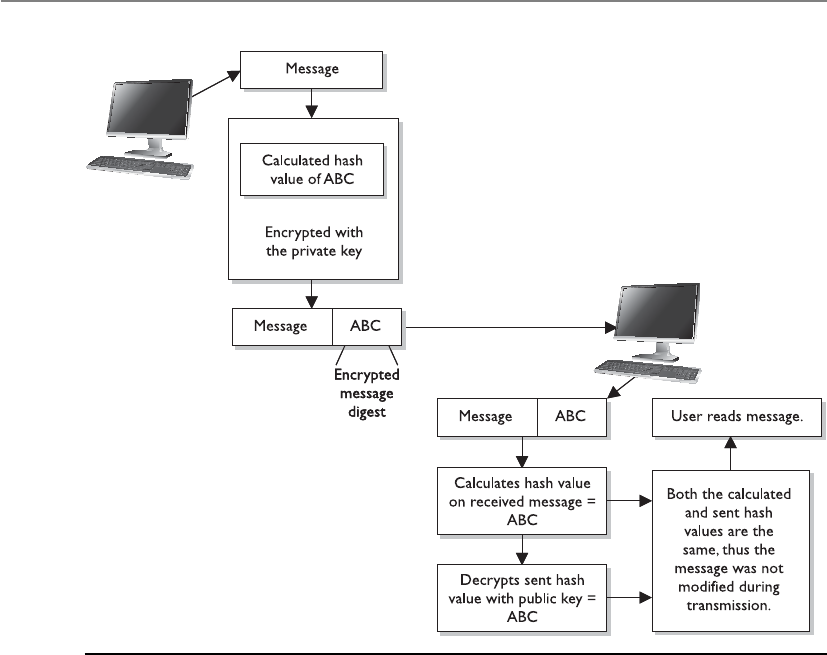
CISSP All-in-One Exam Guide
830
• A message can be digitally signed, which provides authentication,
nonrepudiation, and integrity.
• A message can be encrypted and digitally signed, which provides
confidentiality, authentication, nonrepudiation, and integrity.
Some algorithms can only perform encryption, whereas others support digital sig-
natures and encryption. When hashing is involved, a hashing algorithm is used, not an
encryption algorithm.
It is important to understand that not all algorithms can necessarily provide all se-
curity services. Most of these algorithms are used in some type of combination to pro-
vide all the necessary security services required of an environment. Table 7-3 shows the
services provided by the algorithms.
Figure 7-24 Creating a digital signature for a message

Chapter 7: Cryptography
831
Algorithm Type Encryption Digital
Signature
Hashing
Function
Key
Distribution
Asymmetric Key Algorithms
RSA X X X
ECC X X X
Diffie-Hellman X
El Gamal X X X
DSA X
Knapsack X X X
Symmetric Key Algorithms
DES X
3DES X
Blowfish X
IDEA X
RC4 X
SAFER X
Hashing Algorithms
Ronald Rivest family of hashing
functions: MD2, MD4, and MD5
X
SHA family X
HAVAL X
Tiger X
Table 7-3 Various Functions of Different Algorithms

CISSP All-in-One Exam Guide
832
Digital Signature Standard
Because digital signatures are so important in proving who sent which messages, the
U.S. government decided to establish standards pertaining to their functions and ac-
ceptable use. In 1991, NIST proposed a federal standard called the Digital Signature
Standard (DSS). It was developed for federal departments and agencies, but most ven-
dors also designed their products to meet these specifications. The federal government
requires its departments to use DSA, RSA, or the elliptic curve digital signature algo-
rithm (ECDSA) and SHA. SHA creates a 160-bit message digest output, which is then
inputted into one of the three mentioned digital signature algorithms. SHA is used to
ensure the integrity of the message, and the other algorithms are used to digitally sign
the message. This is an example of how two different algorithms are combined to pro-
vide the right combination of security services.
RSA and DSA are the best known and most widely used digital signature algorithms.
DSA was developed by the NSA. Unlike RSA, DSA can be used only for digital signa-
tures, and DSA is slower than RSA in signature verification. RSA can be used for digital
signatures, encryption, and secure distribution of symmetric keys.
Key Terms
•Diffie-Hellman algorithm First asymmetric algorithm created and is
used to exchange symmetric key values. Based upon logarithms in finite
fields.
•RSA algorithm De facto asymmetric algorithm used for encryption,
digital signatures, and key exchange. Based upon the difficulty of
factoring large numbers into their original prime numbers.
•El Gamal algorithm Asymmetric algorithm based upon the Diffie-
Hellman algorithm used for digital signatures, encryption, and key
exchange.
•Elliptic curve cryptosystem algorithm Asymmetric algorithm based
upon the algebraic structure of elliptic curves over finite fields. Used for
digital signatures, encryption, and key exchange.
•Knapsack algorithm Asymmetric algorithm based upon a subset sum
problem (knapsack problem). It has been broken and no longer used.
•Zero knowledge proof One entity can prove something to be true
without providing a secret value.
•One-way hash Cryptographic process that takes an arbitrary amount
of data and generates a fixed-length value. Used for integrity protection.
•Message authentication code (MAC) Keyed cryptographic hash
function used for data integrity and data origin authentication.

Chapter 7: Cryptography
833
Public Key Infrastructure
Let’s put all of these cryptography pieces in a bowl and figure out how they all work together.
Public key infrastructure (PKI) consists of programs, data formats, procedures, com-
munication protocols, security policies, and public key cryptographic mechanisms
working in a comprehensive manner to enable a wide range of dispersed people to
communicate in a secure and predictable fashion. In other words, a PKI establishes a
level of trust within an environment. PKI is an ISO authentication framework that uses
public key cryptography and the X.509 standard. The framework was set up to enable
authentication to happen across different networks and the Internet. Particular proto-
cols and algorithms are not specified, which is why PKI is called a framework and not
a specific technology.
PKI provides authentication, confidentiality, nonrepudiation, and integrity of the
messages exchanged. It is a hybrid system of symmetric and asymmetric key algorithms
and methods, which were discussed in earlier sections.
There is a difference between public key cryptography and PKI. Public key cryptog-
raphy is another name for asymmetric algorithms, while PKI is what its name states—it
is an infrastructure. The infrastructure assumes that the receiver’s identity can be posi-
tively ensured through certificates and that an asymmetric algorithm will automatically
•Hashed message authentication code (HMAC) Cryptographic hash
function that uses a symmetric key value and is used for data integrity
and data origin authentication.
•CBC-MAC Cipher block chaining message authentication code uses
encryption for data integrity and data origin authentication.
•CMAC Cipher message authentication code that is based upon and
provides more security compared to CBC-MAC.
•CMM Block cipher mode that combines the CTR encryption mode
and CBC-MAC. One encryption key is used for both authentication and
encryption purposes.
•Collision When two different messages are computed by the same
hashing algorithm and the same message digest value results.
•Birthday attack Cryptographic attack that exploits the mathematics
behind the birthday problem in the probability theory forces collisions
within hashing functions.
•Digital signature Ensuring the authenticity and integrity of a message
through the use of hashing algorithms and asymmetric algorithms. The
message digest is encrypted with the sender’s private key.
•Digital signature standard U.S. standard that outlines the approved
algorithms to be used for digital signatures for government authentication
activities.

CISSP All-in-One Exam Guide
834
carry out the process of key exchange. The infrastructure therefore contains the pieces
that will identify users, create and distribute certificates, maintain and revoke certifi-
cates, distribute and maintain encryption keys, and enable all technologies to commu-
nicate and work together for the purpose of encrypted communication and
authentication.
Public key cryptography is one piece in PKI, but many other pieces make up this
infrastructure. An analogy can be drawn with the e-mail protocol Simple Mail Transfer
Protocol (SMTP). SMTP is the technology used to get e-mail messages from here to
there, but many other things must be in place before this protocol can be productive.
We need e-mail clients, e-mail servers, and e-mail messages, which together build a type
of infrastructure—an e-mail infrastructure. PKI is made up of many different parts: cer-
tificate authorities, registration authorities, certificates, keys, and users. The following
sections explain these parts and how they all work together.
Certificate Authorities
How do I know I can trust you?
Response: The CA trusts me.
Each person who wants to participate in a PKI requires a digital certificate, which is
a credential that contains the public key for that individual along with other identifying
information. The certificate is created and signed (digital signature) by a trusted third
party, which is a certificate authority (CA). When the CA signs the certificate, it binds
the individual’s identity to the public key, and the CA takes liability for the authenticity
of that individual. It is this trusted third party (the CA) that allows people who have
never met to authenticate to each other and to communicate in a secure method. If
Kevin has never met Dave but would like to communicate securely with him, and they
both trust the same CA, then Kevin could retrieve Dave’s digital certificate and start the
process.
A CA is a trusted organization (or server) that maintains and issues digital certifi-
cates. When a person requests a certificate, the registration authority (RA) verifies that
individual’s identity and passes the certificate request off to the CA. The CA constructs
the certificate, signs it, sends it to the requester, and maintains the certificate over its
lifetime. When another person wants to communicate with this person, the CA will
basically vouch for that person’s identity. When Dave receives a digital certificate from
Kevin, Dave will go through steps to validate it. Basically, by providing Dave with his
digital certificate, Kevin is stating, “I know you don’t know or trust me, but here is this
document that was created by someone you do know and trust. The document says I
am a good guy and you should trust me.”
Once Dave validates the digital certificate, he extracts Kevin’s public key, which is
embedded within it. Now Dave knows this public key is bound to Kevin. He also knows
that if Kevin uses his private key to create a digital signature and Dave can properly
decrypt it using this public key, it did indeed come from Kevin.

Chapter 7: Cryptography
835
NOTE
NOTE Remember the man-in-the-middle attack covered earlier in the
section “The Diffie-Hellman Algorithm”? This attack is possible if two users
are not working in a PKI environment and do not truly know the identity of
the owners of the public keys. Exchanging digital certificates can thwart this
type of attack.
The CA can be internal to an organization. Such a setup would enable the company
to control the CA server, configure how authentication takes place, maintain the cer-
tificates, and recall certificates when necessary. Other CAs are organizations dedicated
to this type of service, and other individuals and companies pay them to supply it.
Some well-known CAs are Entrust and VeriSign. Many browsers have several well-
known CAs configured by default.
NOTE
NOTE More and more organizations are setting up their own internal PKIs.
When these independent PKIs need to interconnect to allow for secure
communication to take place (either between departments or between
different companies), there must be a way for the two root CAs to trust each
other. The two CAs do not have a CA above them they can both trust, so
they must carry out cross certification. A cross certification is the process
undertaken by CAs to establish a trust relationship in which they rely upon
each other’s digital certificates and public keys as if they had issued them
themselves. When this is set up, a CA for one company can validate digital
certificates from the other company and vice versa.

CISSP All-in-One Exam Guide
836
The CA is responsible for creating and handing out certificates, maintaining them,
and revoking them if necessary. Revocation is handled by the CA, and the revoked cer-
tificate information is stored on a certificate revocation list (CRL). This is a list of every
certificate that has been revoked. This list is maintained and updated periodically. A
certificate may be revoked because the key holder’s private key was compromised or
because the CA discovered the certificate was issued to the wrong person. An analogy

Chapter 7: Cryptography
837
for the use of a CRL is how a driver’s license is used by a police officer. If an officer pulls
over Sean for speeding, the officer will ask to see Sean’s license. The officer will then run
a check on the license to find out if Sean is wanted for any other infractions of the law
and to verify the license has not expired. The same thing happens when a person com-
pares a certificate to a CRL. If the certificate became invalid for some reason, the CRL is
the mechanism for the CA to let others know this information.
NOTE
NOTE CRLs are the thorn in the side of many PKI implementations. They are
challenging for a long list of reasons. It is interesting to know that, by default,
web browsers do not check a CRL to ensure that a certificate is not revoked.
So when you are setting up an SSL connection to do e-commerce over the
Internet, you could be relying on a certificate that has actually been revoked.
Not good.
Online Certificate Status Protocol (OCSP) is being used more and more rather than
the cumbersome CRL approach. When using just a CRL, the user’s browser must either
check a central CRL to find out if the certification has been revoked or the CA has to
continually push out CRL values to the clients to ensure they have an updated CRL. If
OCSP is implemented, it does this work automatically in the background. It carries out
real-time validation of a certificate and reports back to the user whether the certificate
is valid, invalid, or unknown. OCSP checks the CRL that is maintained by the CA. So
the CRL is still being used, but now we have a protocol developed specifically to check the
CRL during a certificate validation process.
Certificates
One of the most important pieces of a PKI is its digital certificate. A certificate is the
mechanism used to associate a public key with a collection of components in a manner
that is sufficient to uniquely identify the claimed owner. The standard for how the CA
creates the certificate is X.509, which dictates the different fields used in the certificate
and the valid values that can populate those fields. The most commonly used version
is 3 of this standard, which is often denoted as X.509v3. Many cryptographic protocols
use this type of certificate, including SSL.
The certificate includes the serial number, version number, identity information,
algorithm information, lifetime dates, and the signature of the issuing authority, as
shown in Figure 7-25.
The Registration Authority
The registration authority (RA) performs the certification registration duties. The RA es-
tablishes and confirms the identity of an individual, initiates the certification process
with a CA on behalf of an end user, and performs certificate life-cycle management func-
tions. The RA cannot issue certificates, but can act as a broker between the user and the
CA. When users need new certificates, they make requests to the RA, and the RA verifies
all necessary identification information before allowing a request to go to the CA.
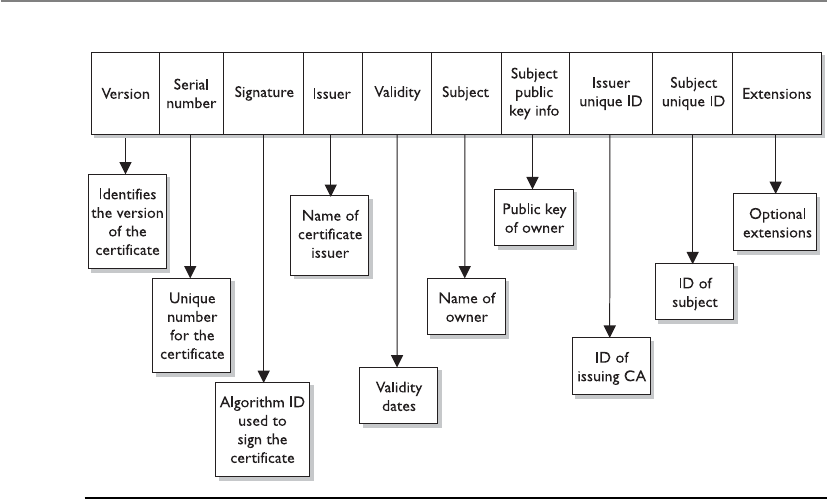
CISSP All-in-One Exam Guide
838
PKI Steps
Now that we know some of the main pieces of a PKI and how they actually work to-
gether, let’s walk through an example. First, suppose that John needs to obtain a digital
certificate for himself so he can participate in a PKI. The following are the steps to do so:
1. John makes a request to the RA.
2. The RA requests certain identification information from John, such as a copy
of his driver’s license, his phone number, his address, and other identifying
information.
3. Once the RA receives the required information from John and verifies it, the
RA sends his certificate request to the CA.
4. The CA creates a certificate with John’s public key and identity information
embedded. (The private/public key pair is generated either by the CA or on
John’s machine, which depends on the systems’ configurations. If it is created
at the CA, his private key needs to be sent to him by secure means. In most
cases, the user generates this pair and sends in his public key during the
registration process.)
Figure 7-25 Each certificate has a structure with all the necessary identifying information in it.

Chapter 7: Cryptography
839
Now John is registered and can participate in a PKI. John and Diane decide they
want to communicate, so they take the following steps, shown in Figure 7-26.
5. John requests Diane’s public key from a public directory.
6. The directory, sometimes called a repository, sends Diane’s digital certificate.
7. John verifies the digital certificate and extracts her public key. John uses this
public key to encrypt a session key that will be used to encrypt their messages.
John sends the encrypted session key to Diane. John also sends his certificate,
containing his public key, to Diane.
8. When Diane receives John’s certificate, her browser looks to see if it trusts the
CA that digitally signed this certificate. Diane’s browser trusts this CA and,
after she verifies the certificate, both John and Diane can communicate using
encryption.
A PKI may be made up of the following entities and functions:
• Certification authority
• Registration authority
• Certificate repository
• Certificate revocation system
• Key backup and recovery system
• Automatic key update
• Management of key histories
• Timestamping
• Client-side software
Figure 7-26
CA and user
relationships

CISSP All-in-One Exam Guide
840
PKI supplies the following security services:
• Confidentiality
• Access control
• Integrity
• Authentication
• Nonrepudiation
A PKI must retain a key history, which keeps track of all the old and current public
keys that have been used by individual users. For example, if Kevin encrypted a sym-
metric key with Dave’s old public key, there should be a way for Dave to still access this
data. This can only happen if the CA keeps a proper history of Dave’s old certificates
and keys.
NOTE
NOTE Another important component that must be integrated into a PKI is a
reliable time source that provides a way for secure timestamping. This comes
into play when true nonrepudiation is required.
Key Management
I am the manager of all keys!
Response: I feel so sorry for you.
Cryptography can be used as a security mechanism to provide confidentiality, integ-
rity, and authentication, but not if the keys are compromised in any way. The keys can
be captured, modified, corrupted, or disclosed to unauthorized individuals. Cryptogra-
phy is based on a trust model. Individuals must trust each other to protect their own
keys; trust the administrator who is maintaining the keys; and trust a server that holds,
maintains, and distributes the keys.
Many administrators know that key management causes one of the biggest head-
aches in cryptographic implementation. There is more to key maintenance than using
them to encrypt messages. The keys must be distributed securely to the right entities
and updated continuously. They must also be protected as they are being transmitted
and while they are being stored on each workstation and server. The keys must be gen-
erated, destroyed, and recovered properly. Key management can be handled through
manual or automatic processes.
The keys are stored before and after distribution. When a key is distributed to a user,
it does not just hang out on the desktop. It needs a secure place within the file system
to be stored and used in a controlled method. The key, the algorithm that will use the
key, configurations, and parameters are stored in a module that also needs to be pro-
tected. If an attacker is able to obtain these components, she could masquerade as an-
other user and decrypt, read, and re-encrypt messages not intended for her.
Historically, physical cryptographic keys were kept in secured boxes and delivered
by escorted couriers. The keys could be distributed to a main server, and then the local

Chapter 7: Cryptography
841
administration would distribute them, or the courier would visit each computer indi-
vidually. Some implementations distributed a master key to a site, and then that key
was used to generate unique secret keys to be used by individuals at that location. To-
day, most key distributions are handled by a protocol through automated means and
not manually by an individual. A company must evaluate the overhead of key manage-
ment, the required security level, and cost-benefit issues to decide how it will conduct
key management, but overall, automation provides a more accurate and secure ap-
proach.
When using the Kerberos protocol (described in Chapter 3), a Key Distribution
Center (KDC) is used to store, distribute, and maintain cryptographic session and secret
keys. This method provides an automated method of key distribution. The computer
that wants to access a service on another computer requests access via the KDC. The
KDC then generates a session key to be used between the requesting computer and the
computer providing the requested resource or service. The automation of this process
reduces the possible errors that can happen through a manual process, but if the ticket
granting service (TGS) portion of the KDC gets compromised in any way, then all the
computers and their services are affected and possibly compromised.
In some instances, keys are still managed through manual means. Unfortunately,
although many companies use cryptographic keys, they rarely, if ever, change them,
either because of the hassle of key management or because the network administrator
is already overtaxed with other tasks or does not realize the task actually needs to take
place. The frequency of use of a cryptographic key has a direct correlation to how often
the key should be changed. The more a key is used, the more likely it is to be captured
and compromised. If a key is used infrequently, then this risk drops dramatically. The
necessary level of security and the frequency of use can dictate the frequency of key
updates. A mom-and-pop diner might only change its cryptography keys every month,
whereas an information warfare military unit might change them every day or every
week. The important thing is to change the keys using a secure method.
Key management is the most challenging part of cryptography and also the most
crucial. It is one thing to develop a very complicated and complex algorithm and key
method, but if the keys are not securely stored and transmitted, it does not really matter
how strong the algorithm is.
Key Management Principles
Keys should not be in cleartext outside the cryptography device. As stated previously,
many cryptography algorithms are known publicly, which puts more stress on protect-
ing the secrecy of the key. If attackers know how the actual algorithm works, in many
cases, all they need to figure out is the key to compromise a system. This is why keys
should not be available in cleartext—the key is what brings secrecy to encryption.
These steps, and all of key distribution and maintenance, should be automated and
hidden from the user. These processes should be integrated into software or the operat-
ing system. It only adds complexity and opens the doors for more errors when pro-
cesses are done manually and depend upon end users to perform certain functions.

CISSP All-in-One Exam Guide
842
Keys are at risk of being lost, destroyed, or corrupted. Backup copies should be
available and easily accessible when required. If data are encrypted and then the user
accidentally loses the necessary key to decrypt it, this information would be lost forever
if there were not a backup key to save the day. The application being used for cryptog-
raphy may have key recovery options, or it may require copies of the keys to be kept in
a secure place.
Different scenarios highlight the need for key recovery or backup copies of keys. For
example, if Bob has possession of all the critical bid calculations, stock value informa-
tion, and corporate trend analysis needed for tomorrow’s senior executive presentation,
and Bob has an unfortunate confrontation with a bus, someone is going to need to ac-
cess this data after the funeral. As another example, if an employee leaves the company
and has encrypted important documents on her computer before departing, the com-
pany would probably still want to access that data later. Similarly, if the vice president
did not know that running a large magnet over the USB drive that holds his private key
was not a good idea, he would want his key replaced immediately instead of listening to
a lecture about electromagnetic fields and how they rewrite sectors on media.
Of course, having more than one key increases the chance of disclosure, so a com-
pany needs to decide whether it wants to have key backups and, if so, what precautions
to put into place to protect them properly. A company can choose to have multiparty
control for emergency key recovery. This means that if a key must be recovered, more
than one person is needed for this process. The key recovery process could require two
or more other individuals to present their private keys or authentication information.
These individuals should not all be members of the IT department. There should be a
member from management, an individual from security, and one individual from the
IT department, for example. All of these requirements reduce the potential for abuse
and would require collusion for fraudulent activities to take place.
Rules for Keys and Key Management
Key management is critical for proper protection. The following are responsibilities
that fall under the key management umbrella:
• The key length should be long enough to provide the necessary level of
protection.
• Keys should be stored and transmitted by secure means.
• Keys should be extremely random, and the algorithm should use the full
spectrum of the keyspace.
• The key’s lifetime should correspond with the sensitivity of the data it is
protecting. (Less secure data may allow for a longer key lifetime, whereas more
sensitive data might require a shorter key lifetime.)
• The more the key is used, the shorter its lifetime should be.
• Keys should be backed up or escrowed in case of emergencies.
• Keys should be properly destroyed when their lifetime comes to an end.

Chapter 7: Cryptography
843
Key escrow is a process or entity that can recover lost or corrupted cryptographic
keys; thus, it is a common component of key recovery operations. When two or more
entities are required to reconstruct a key for key recovery processes, this is known as
multiparty key recovery. Multiparty key recovery implements dual control, meaning that
two or more people have to be involved with a critical task.
Trusted Platform Module
The Trusted Platform Module (TPM) is a microchip installed on the motherboard of
modern computers and is dedicated to carrying out security functions that involve the
storage and processing of symmetric and asymmetric keys, hashes, and digital certifi-
cates. The TPM was devised by the Trusted Computing Group (TCG), an organization
that promotes open standards to help strengthen computing platforms against security
weaknesses and attacks.
The essence of the TPM lies in a protected and encapsulated microcontroller secu-
rity chip that provides a safe haven for storing and processing security-intensive data
such as keys, passwords, and digital certificates.
The use of a dedicated and encoded hardware-based platform drastically improves
the Root of Trust of the computing system while allowing for a vastly superior imple-
mentation and integration of security features. The introduction of TPM has made it
much harder to access information on computing devices without proper authoriza-
tion and allows for effective detection of malicious configuration changes to a comput-
ing platform.
TPM Uses
“Binding” a hard disk drive is the most common usage scenario of the TPM—where the
content of a given hard disk drive is affixed with a particular computing system. The
content of the hard disk drive is encrypted, and the decryption key is stored away in the
TPM chip. To ensure safe storage of the decryption key, it is further “wrapped” with
another encryption key. Binding a hard disk drive makes its content basically inacces-
sible to other systems, and any attempt to retrieve the drive’s content by attaching it to
another system will be very difficult. However, in the event of the TPM chip’s failure, the
hard drive’s content will be rendered useless, unless a backup of the key has been es-
crowed.
Another application of the TPM is “sealing” a system’s state to a particular hardware
and software configuration. Sealing a computing system through TPM is used to deter
any attempts to tamper with a system’s configurations. In practice, this is similar to how
hashes are used to verify the integrity of files shared over the Internet (or any other
untrusted medium).
Sealing a system is fairly straightforward. The TPM generates hash values based on
the system’s configuration files and stores them in its memory. A sealed system will
only be activated once the TPM verifies the integrity of the system’s configuration by
comparing it with the original “sealing” value.

CISSP All-in-One Exam Guide
844
The TPM is essentially a securely designed microcontroller with added modules to
perform cryptographic functions. These modules allow for accelerated and storage pro-
cessing of cryptographic keys, hash values, and pseudonumber sequences. The TPM’s
internal storage is based on nonvolatile random access memory, which retains its infor-
mation when power is turned off and is therefore termed as nonvolatile.
TPM’s internal memory is divided into two different segments: persistent (static)
and versatile (dynamic) memory modules:
•Persistent memory There are two kinds of keys present in the static memory:
Endorsement Key (EK) and Storage Root Key (SRK):
• The EK is a public/private key pair that is installed in the TPM at the time
of manufacture and cannot be modified. The private key is always present
inside the TPM, while the public key is used to verify the authenticity of
the TPM itself. The EK, installed in TPM, is unique to that TPM and its
platform.
• The SRK is the master wrapping key used to secure the keys stored
in the TPM.
•Versatile memory There are three kinds of keys (or values) present in the
versatile memory: Attestation Identity Key (AIK), Platform Configuration
Register Hashes (PCR), and storage keys:
• The AIK is used for the attestation of the TPM chip itself to service
providers. The AIK is linked to the TPM’s identity at the time of
development, which in turn is linked to the TPM’s Endorsement Key.
Therefore, the AIK ensures the integrity of the EK.
• The PCR is used to store cryptographic hashes of data used for TPM’s
“sealing” functionality.
• The storage keys are used to encrypt the storage media of the computer
system.
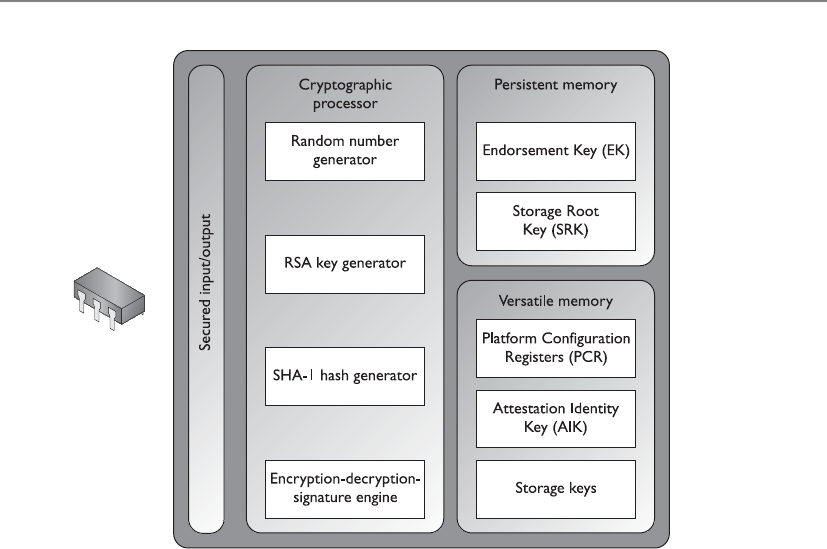
Chapter 7: Cryptography
845
Link Encryption vs. End-to-End Encryption
Encryption can be performed at different communication levels, each with different
types of protection and implications. Two general modes of encryption implementa-
tion are link encryption and end-to-end encryption. Link encryption encrypts all the
data along a specific communication path, as in a satellite link, T3 line, or telephone
circuit. Not only is the user information encrypted, but the header, trailers, addresses,
and routing data that are part of the packets are also encrypted. The only traffic not
encrypted in this technology is the data link control messaging information, which
includes instructions and parameters that the different link devices use to synchronize

CISSP All-in-One Exam Guide
846
communication methods. Link encryption provides protection against packet sniffers
and eavesdroppers. In end-to-end encryption, the headers, addresses, routing, and trailer
information are not encrypted, enabling attackers to learn more about a captured pack-
et and where it is headed.
Link encryption, which is sometimes called online encryption, is usually provided by
service providers and is incorporated into network protocols. All of the information is
encrypted, and the packets must be decrypted at each hop so the router, or other inter-
mediate device, knows where to send the packet next. The router must decrypt the
header portion of the packet, read the routing and address information within the
header, and then re-encrypt it and send it on its way.
With end-to-end encryption, the packets do not need to be decrypted and then en-
crypted again at each hop because the headers and trailers are not encrypted. The de-
vices in between the origin and destination just read the necessary routing information
and pass the packets on their way.
End-to-end encryption is usually initiated by the user of the originating computer.
It provides more flexibility for the user to be able to determine whether or not certain
messages will get encrypted. It is called “end-to-end encryption” because the message
stays encrypted from one end of its journey to the other. Link encryption has to decrypt
the packets at every device between the two ends.
Link encryption occurs at the data link and physical layers, as depicted in Figure
7-27. Hardware encryption devices interface with the physical layer and encrypt all data
that passes through them. Because no part of the data is available to an attacker, the
attacker cannot learn basic information about how data flows through the environ-
ment. This is referred to as traffic-flow security.
Encryption at Different Layers
In reality, encryption can happen at different layers of an operating system and
network stack. The following are just a few examples:
• End-to-end encryption happens within the applications.
• SSL encryption takes place at the transport layer.
• PPTP encryption takes place at the data link layer.
• Link encryption takes place at the data link and physical layers.

Chapter 7: Cryptography
847
NOTE
NOTE Ahop is a device that helps a packet reach its destination. It is usually
a router that looks at the packet address to determine where the packet
needs to go next. Packets usually go through many hops between the sending
and receiving computers.
Advantages of end-to-end encryption include the following:
• It provides more flexibility to the user in choosing what gets encrypted
and how.
• Higher granularity of functionality is available because each application or
user can choose specific configurations.
• Each hop device on the network does not need to have a key to decrypt each
packet.
Disadvantages of end-to-end encryption include the following:
• Headers, addresses, and routing information are not encrypted, and therefore
not protected.
Figure 7-27 Link and end-to-end encryption happen at different OSI layers.

CISSP All-in-One Exam Guide
848
Advantages of link encryption include the following:
• All data are encrypted, including headers, addresses, and routing information.
• Users do not need to do anything to initiate it. It works at a lower layer in the
OSI model.
Disadvantages of link encryption include the following:
• Key distribution and management are more complex because each hop device
must receive a key, and when the keys change, each must be updated.
• Packets are decrypted at each hop; thus, more points of vulnerability exist.
Hardware vs. Software Cryptography Systems
Encryption can be done through software or hardware, and there are trade-offs
with each. Generally, software is less expensive and provides a slower throughput
than hardware mechanisms. Software cryptography methods can be more easily
modified and disabled compared to hardware systems, but it depends on the ap-
plication and the hardware product.
If a company needs to perform high-end encryption functions at a higher
speed, the company will most likely implement a hardware solution.
Key Terms
•Certificate authority Component of a PKI that creates and maintains
digital certificates throughout their life cycles.
•Registration authority Component of PKI that validates the identity
of an entity requesting a digital certificate.
•Certificate revocation list List that is maintained by the certificate
authority of a PKI that contains information on all of the digital
certificates that have been revoked.
•Online certificate status protocol Automated method of maintaining
revoked certificates within a PKI.
•Certificate Digital identity used within a PKI. Generated and
maintained by a certificate authority and used for authentication.
•Link encryption Technology that encrypts full packets (all headers
and data payload) and is carried out without the sender’s interaction.
•End-to-end encryption Encryption method used by the sender of
data that encrypts individual messages and not full packets.

Chapter 7: Cryptography
849
E-mail Standards
Like other types of technologies, cryptography has industry standards and de facto stan-
dards. Standards are necessary because they help ensure interoperability among vendor
products. Standards usually mean that a certain technology has been under heavy scru-
tiny and has been properly tested and accepted by many similar technology communi-
ties. A company still needs to decide what type of standard to follow and what type of
technology to implement.
A company needs to evaluate the functionality of the technology and perform a
cost-benefit analysis on the competing products within the chosen standards. For a
cryptography implementation, the company would need to decide what must be pro-
tected by encryption, whether digital signatures are necessary, how key management
should take place, what types of resources are available to implement and maintain the
technology, and what the overall cost will amount to.
If a company only needs to encrypt some e-mail messages here and there, then PGP
may be the best choice. If the company wants all data encrypted as it goes throughout
the network and to sister companies, then a link encryption implementation may be
the best choice. If a company wants to implement a single sign-on environment where
users need to authenticate to use different services and functionality throughout the
network, then implementing a PKI or Kerberos might serve it best. To make the most
informed decision, the network administrators should understand each type of tech-
nology and standard, and should research and test each competing product within the
chosen technology before making the final purchase. Cryptography, including how to
implement and maintain it, can be a complicated subject. Doing homework versus
buying into buzzwords and flashy products might help a company reduce its head-
aches down the road.
The following sections briefly describe some of the most popular e-mail standards
in use.
Multipurpose Internet Mail Extension
Multipurpose Internet Mail Extension (MIME) is a technical specification indicating
how multimedia data and e-mail binary attachments are to be transferred. The Internet
has mail standards that dictate how mail is to be formatted, encapsulated, transmitted,
and opened. If a message or document contains a binary attachment, MIME dictates
how that portion of the message should be handled.
When an attachment contains an audio clip, graphic, or some other type of multi-
media component, the e-mail client will send the file with a header that describes the
file type. For example, the header might indicate that the MIME type is Image and that
the subtype is JPEG. Although this will be in the header, many times, systems also use
the file’s extension to identify the MIME type. So, in the preceding example, the file’s
name might be stuff.jpeg. The user’s system will see the extension .jpeg, or see the data
in the header field, and look in its association list to see what program it needs to ini-
tialize to open this particular file. If the system has JPEG files associated with the Ex-
plorer application, then Explorer will open and present the picture to the user.

CISSP All-in-One Exam Guide
850
Sometimes systems either do not have an association for a specific file type or do
not have the helper program necessary to review and use the contents of the file. When
a file has an unassociated icon assigned to it, it might require the user to choose the
Open With command and choose an application in the list to associate this file with
that program. So when the user double-clicks that file, the associated program will ini-
tialize and present the file. If the system does not have the necessary program, the web
site might offer the necessary helper program, like Acrobat or an audio program that
plays WAV files.
MIME is a specification that dictates how certain file types should be transmitted
and handled. This specification has several types and subtypes, enables different com-
puters to exchange data in varying formats, and provides a standardized way of present-
ing the data. So if Sean views a funny picture that is in GIF format, he can be sure that
when he sends it to Debbie, it will look exactly the same.
Secure MIME (S/MIME) is a standard for encrypting and digitally signing electronic
mail and for providing secure data transmissions. S/MIME extends the MIME standard
by allowing for the encryption of e-mail and attachments. The encryption and hashing
algorithms can be specified by the user of the mail package, instead of having it dictated
to them. S/MIME follows the Public Key Cryptography Standards (PKCS). S/MIME pro-
vides confidentiality through encryption algorithms, integrity through hashing algo-
rithms, authentication through the use of X.509 public key certificates, and
nonrepudiation through cryptographically signed message digests.
Pretty Good Privacy
Pretty Good Privacy (PGP) was designed by Phil Zimmerman as a freeware e-mail secu-
rity program and was released in 1991. It was the first widespread public key encryption
program. PGP is a complete cryptosystem that uses cryptographic protection to protect
e-mail and files. It can use RSA public key encryption for key management and use
IDEA symmetric cipher for bulk encryption of data, although the user has the option of
picking different types of algorithms for these functions. PGP can provide confidential-
ity by using the IDEA encryption algorithm, integrity by using the MD5 hashing algo-
rithm, authentication by using the public key certificates, and nonrepudiation by using
cryptographically signed messages. PGP uses its own type of digital certificates rather
than what is used in PKI, but they both have similar purposes.
The user’s private key is generated and encrypted when the application asks the user
to randomly type on her keyboard for a specific amount of time. Instead of using pass-
words, PGP uses passphrases. The passphrase is used to encrypt the user’s private key
that is stored on her hard drive.
PGP does not use a hierarchy of CAs, or any type of formal trust certificates, but in-
stead relies on a “web of trust” in its key management approach. Each user generates and
distributes his or her public key, and users sign each other’s public keys, which creates a
community of users who trust each other. This is different from the CA approach, where
no one trusts each other; they only trust the CA. For example, if Mark and Joe want to
communicate using PGP, Mark can give his public key to Joe. Joe signs Mark’s key and
keeps a copy for himself. Then, Joe gives a copy of his public key to Mark so they can
start communicating securely. Later, Mark would like to communicate with Sally, but

Chapter 7: Cryptography
851
Sally does not know Mark and does not know if she can trust him. Mark sends Sally his
public key, which has been signed by Joe. Sally has Joe’s public key, because they have
communicated before, and she trusts Joe. Because Joe signed Mark’s public key, Sally
now also trusts Mark and sends her public key and begins communicating with him.
So, basically, PGP is a system of “I don’t know you, but my buddy Joe says you are
an all right guy, so I will trust you on Joe’s word.”
Each user keeps in a file, referred to as a key ring, a collection of public keys he has
received from other users. Each key in that ring has a parameter that indicates the level
of trust assigned to that user and the validity of that particular key. If Steve has known
Liz for many years and trusts her, he might have a higher level of trust indicated on her
stored public key than on Tom’s, whom he does not trust much at all. There is also a
field indicating who can sign other keys within Steve’s realm of trust. If Steve receives a
key from someone he doesn’t know, like Kevin, and the key is signed by Liz, he can look
at the field that pertains to whom he trusts to sign other people’s keys. If the field indi-
cates that Steve trusts Liz enough to sign another person’s key, Steve will accept Kevin’s
key and communicate with him because Liz is vouching for him. However, if Steve re-
ceives a key from Kevin and it is signed by untrustworthy Tom, Steve might choose to
not trust Kevin and not communicate with him.
These fields are available for updating and alteration. If one day Steve really gets to
know Tom and finds out he is okay after all, he can modify these parameters within PGP
and give Tom more trust when it comes to cryptography and secure communication.
Because the web of trust does not have a central leader, such as a CA, certain stan-
dardized functionality is harder to accomplish. If Steve were to lose his private key, he
would need to notify everyone else trusting his public key that it should no longer be
trusted. In a PKI, Steve would only need to notify the CA, and anyone attempting to
verify the validity of Steve’s public key would be told not to trust it upon looking at the
most recently updated CRL. In the PGP world, this is not as centralized and organized.
Steve can send out a key revocation certificate, but there is no guarantee it will reach
each user’s key ring file.
PGP is a public domain software that uses public key cryptography. It has not been
endorsed by the NSA, but because it is a great product and free for individuals to use, it
has become somewhat of a de facto encryption standard on the Internet.
NOTE
NOTE PGP is considered a cryptosystem because it has all the necessary
components: symmetric key algorithms, asymmetric key algorithms, message
digest algorithms, keys, protocols, and the necessary software components.
Quantum Cryptography
Gee, cryptography just isn’t complex enough. Let’s mix some quantum physics in with it.
Today, we have very sophisticated and strong algorithms that are more than strong
enough for most uses. Some communication data are so critical and so desired by
other powerful entities that even our current algorithms may be broken. This type of
data might be spy interactions, information warfare, government espionage, and so
on. When a whole country wants to break another country’s encryption, a great deal of

CISSP All-in-One Exam Guide
852
resources will be put behind such efforts—which can put our current algorithms at risk
of being broken.
Because of the need to always build a better algorithm, some very smart people have
mixed quantum physics and cryptography, which has resulted in a system (if built cor-
rectly) that is unbreakable and where any eavesdroppers can be detected. In traditional
cryptography, we try to make it very hard for an eavesdropper to break an algorithm
and uncover a key, but we cannot detect that an eavesdropper is on the line. In quan-
tum cryptography, however, not only is the encryption very strong, but an eavesdropper
can be detected.
Quantum cryptography can be carried out using various methods. So, we will walk
through one version to give you an idea of how all this works.
Let’s say Tom and Kathy are spies and need to send their data back and forth with
the assurance it won’t be captured. To do so, they need to establish a symmetric encryp-
tion key on both ends, one for Tom and one for Kathy.
In quantum cryptography, photon polarization is commonly used to represent bits
(1 or 0). Polarization is the orientation of electromagnetic waves, which is what photons
are. Photons are the particles that make up light. The electromagnetic waves have an
orientation of horizontal or vertical, or left hand or right hand. Think of a photon as a
jellybean. As a jellybean flies through the air, it can be vertical (standing up straight),
horizontal (lying on its back), left handed (tilted to the left), or right handed (tilted to
the right). (This is just to conceptually get your head around the idea of polarization.)
Now both Kathy and Tom each have their own photon gun, which they will use to
send photons (information) back and forth to each other. They also have a mapping
between the polarization of a photon and a binary value. The polarizations can be rep-
resented as vertical (|), horizontal (–), left (\), or right (/), and since we only have two
values in binary, there must be some overlap.
In this example, a photon with a vertical (|) polarization maps to the binary value
of 0. A left polarization (\) maps to 1, a right polarization (/) maps to 0, and a horizon-
tal polarization (–) maps to 1. This mapping (or encoding) is the binary values that
make up an encryption key. Tom must have the same mapping to interpret what Kathy
sends to him. Tom will use this as his map so when he receives a photon with the po-
larization of (\), he will write down a 1. When he receives a photon with the polariza-
tion of (|), he will write down a 0. He will do this for the whole key, and use these
values as the key to decrypt a message Kathy sends him.
NOTE
NOTE If it helps, think about it this way. Tom receives a jellybean that is
horizontal and he writes down a 1. The next jellybean he receives is tilted
to the right, so he writes down 0. The next jellybean is vertical, so he writes
down 1. He does this for all of the jellybeans Kathy sends his way. Now he
has a string of binary values that is the encryption key his system will use to
decrypt the messages Kathy sends to him.
So they both have to agree upon a key, which is the mapping between the polariza-
tion states of the photons and how those states are represented in a binary value. This
happens at the beginning of a communication session over a dedicated fiber line. Once
the symmetric key is established, it can be used by Kathy and Tom to encrypt and de-

Chapter 7: Cryptography
853
crypt messages that travel over a more public communication path, like the Internet.
The randomness of the polarization and the complexity of creating a symmetric key in
this manner help ensure that an eavesdropper will not uncover the encryption key.
Since this type of cryptography is based on quantum physics and not strictly math-
ematics, the sender and receiver can be confident that no eavesdropper is listening to
the communication path used to establish their key and that a man-in-the-middle at-
tack is not being carried out. This is because, at the quantum level, even “looking” at an
atom or a subatomic particle changes its attributes. This means that if there is an eaves-
dropper carrying out a passive attack, such as sniffing, the receiver would know because
just this simple act changes the characteristics (polarization) of the photons.
NOTE
NOTE This means that as the jellybeans are sent from Kathy to Tom, if
Sean tries to view the jellybeans, the ones that were traveling in a horizontal
manner could be tilting left, and ones that were traveling in a vertical manner
could now be traveling horizontally.
CAUTION
CAUTION This is a very quick explanation of quantum cryptography. To fully
understand it, you would need to understand both cryptography and quantum
physics in greater depth—and not use jellybeans.
Some people in the industry think quantum cryptography is used between the U.S.
White House and the Pentagon and between some military bases and defense contrac-
tor locations. This type of information is classified Top Secret by the U.S. government,
and unless you know the secret handshake and have the right decoder ring, you will not
be privy to this type of information.
Internet Security
Is the Internet tied up into a web?
Response: Well, kind of.
The Web is not the Internet. The Web runs on top of the Internet, in a sense. The
Web is the collection of HTTP servers that hold and process web sites we see. The Inter-
net is the collection of physical devices and communication protocols used to traverse
these web sites and interact with them. The web sites look the way they do because their
creators used a language that dictates the look, feel, and functionality of the page. Web
browsers enable users to read web pages by enabling them to request and accept web
pages via HTTP, and the user’s browser converts the language (HTML, DHTML, and
XML) into a format that can be viewed on the monitor. The browser is the user’s win-
dow to the World Wide Web.
Browsers can understand a variety of protocols and have the capability to process
many types of commands, but they do not understand them all. For those protocols or
commands the user’s browser does not know how to process, the user can download
and install a viewer or plug-in, a modular component of code that integrates itself into
the system or browser. This is a quick and easy way to expand the functionality of the
browser. However, this can cause serious security compromises, because the payload of
the module can easily carry viruses and malicious software that users don’t discover
until it’s too late.

CISSP All-in-One Exam Guide
854
Start with the Basics
Why do we connect to the Internet? At first, this seems a basic question, but as we dive
deeper into the query, complexity creeps in. We connect to download MP3s, check e-
mail, order security books, look at web sites, communicate with friends, and perform
various other tasks. But what are we really doing? We are using services provided by a
computer’s protocols and software. The services may be file transfers provided by FTP,
remote connectivity provided by Telnet, Internet connectivity provided by HTTP, secure
connections provided by SSL, and much, much more. Without these protocols, there
would be no way to even connect to the Internet.
Management needs to decide what functionality employees should have pertaining
to Internet use, and the administrator must implement these decisions by controlling
services that can be used inside and outside the network. Services can be restricted in
various ways, such as allowing certain services to only run on a particular system and to
restrict access to that system; employing a secure version of a service; filtering the use of
services; or blocking services altogether. These choices determine how secure the site will
be and indicate what type of technology is needed to provide this type of protection.
Let’s go through many of the technologies and protocols that make up the World
Wide Web.
HTTP
TCP/IP is the protocol suite of the Internet, and HTTP is the protocol of the Web. HTTP
sits on top of TCP/IP. When a user clicks a link on a web page with her mouse, her
browser uses HTTP to send a request to the web server hosting that web site. The web
server finds the corresponding file to that link and sends it to the user via HTTP. So
where is TCP/IP in all of this? The TCP protocol controls the handshaking and main-
tains the connection between the user and the server, and the IP protocol makes sure
the file is routed properly throughout the Internet to get from the web server to the user.
So, the IP protocol finds the way to get from A to Z, TCP makes sure the origin and
destination are correct and that no packets are lost along the way, and, upon arrival at
the destination, HTTP presents the payload, which is a web page.
HTTP is a stateless protocol, which means the client and web server make and break
a connection for each operation. When a user requests to view a web page, that web
server finds the requested web page, presents it to the user, and then terminates the con-
nection. If the user requests a link within the newly received web page, a new connec-
tion must be set up, the request goes to the web server, and the web server sends the
requested item and breaks the connection. The web server never “remembers” the users
that ask for different web pages, because it would have to commit a lot of resources to
the effort.
HTTP Secure
HTTP Secure (HTTPS) is HTTP running over SSL. (HTTP works at the application layer,
and SSL works at the transport layer.) Secure Sockets Layer (SSL) uses public key encryp-
tion and provides data encryption, server authentication, message integrity, and op-
tional client authentication. When a client accesses a web site, that web site may have
both secured and public portions. The secured portion would require the user to be
authenticated in some fashion. When the client goes from a public page on the web site

Chapter 7: Cryptography
855
to a secured page, the web server will start the necessary tasks to invoke SSL and protect
this type of communication.
The server sends a message back to the client, indicating a secure session should be
established, and the client in response sends its security parameters. The server com-
pares those security parameters to its own until it finds a match. This is the handshak-
ing phase. The server authenticates to the client by sending it a digital certificate, and if
the client decides to trust the server, the process continues. The server can require the
client to send over a digital certificate for mutual authentication, but that is rare.
The client generates a session key and encrypts it with the server’s public key. This
encrypted key is sent to the web server, and they both use this symmetric key to encrypt
the data they send back and forth. This is how the secure channel is established.
SSL keeps the communication path open until one of the parties requests to end the
session. The session is usually ended when the client sends the server a FIN packet,
which is an indication to close out the channel.
SSL requires an SSL-enabled server and browser. SSL provides security for the con-
nection, but does not offer security for the data once received. This means the data are
encrypted while being transmitted, but not after the data are received by a computer. So
if a user sends bank account information to a financial institution via a connection pro-
tected by SSL, that communication path is protected, but the user must trust the finan-
cial institution that receives this information, because at this point, SSL’s job is done.
The user can verify that a connection is secure by looking at the URL to see that it
includes https://. The user can also check for a padlock or key icon, depending on the
browser type, which is shown at the bottom corner of the browser window.
In the protocol stack, SSL lies beneath the application layer and above the network
layer. This ensures SSL is not limited to specific application protocols and can still use
the communication transport standards of the Internet. Different books and technical
resources place SSL at different layers of the OSI model, which may seem confusing at
first. But the OSI model is a conceptual construct that attempts to describe the reality
of networking. This is like trying to draw nice neat boxes around life—some things
don’t fit perfectly and hang over the sides. SSL is actually made up of two protocols: one
works at the lower end of the session layer, and the other works at the top of the trans-
port layer. This is why one resource will state that SSL works at the session layer and
another resource puts it in the transport layer. For the purposes of the CISSP exam, we’ll
use the latter definition: the SSL protocol works at the transport layer.
Although SSL is almost always used with HTTP, it can also be used with other types
of protocols. So if you see a common protocol that is followed by an s, that protocol is
using SSL to encrypt its data.
SSL is currently at version 3.0. Since SSL was developed by Netscape, it is not an
open-community protocol. This means the technology community cannot easily ex-
tend SSL to interoperate and expand in its functionality. If a protocol is proprietary in
nature, as SSL is, the technology community cannot directly change its specifications
and functionality. If the protocol is an open-community protocol, then its specifica-
tions can be modified by individuals within the community to expand what it can do
and what technologies it can work with. So the open-community and standardized
version of SSL is Transport Layer Security (TLS). The differences between SSL 3.0 and
TLS are slight, but TLS is more extensible and is backward compatible with SSL.

CISSP All-in-One Exam Guide
856
SSL and TLS are commonly used when data need to be encrypted while “in transit,”
which means as they are moving from one system to another system. Data must also be
encrypted while “at rest,” which is when the data are stored. Encryption of data at rest
can be accomplished by whole-disk encryption, PGP, or other types of software-based
encryption.
Secure HTTP
Though their names are very similar, there is a difference between Secure HTTP (S-
HTTP) and HTTP Secure (HTTPS). S-HTTP is a technology that protects each message
sent between two computers, while HTTPS protects the communication channel be-
tween two computers, messages and all. HTTPS uses SSL/TLS and HTTP to provide a
protected circuit between a client and server. So, S-HTTP is used if an individual mes-
sage needs to be encrypted, but if all information that passes between two computers
must be encrypted, then HTTPS is used, which is SSL over HTTP.
Secure Electronic Transaction
Secure Electronic Transaction (SET) is a security technology proposed by Visa and Mas-
terCard to allow for more secure credit card transaction possibilities than what is cur-
rently available. SET has been waiting in the wings for full implementation and accep-
tance as a standard for quite some time. Although SET provides an effective way of
transmitting credit card information, businesses and users do not see it as efficient be-
cause it requires more parties to coordinate their efforts, more software installation and
configuration for each entity involved, and more effort and cost than the widely used
SSL method.
SET is a cryptographic protocol and infrastructure developed to send encrypted
credit card numbers over the Internet. The following entities would be involved with a
SET transaction, which would require each of them to upgrade their software, and pos-
sibly their hardware:
•Issuer (cardholder’s bank) The financial institution that provides a credit
card to the individual.
•Cardholder The individual authorized to use a credit card.
•Merchant The entity providing goods.
•Acquirer (merchant’s bank) The financial institution that processes
payment cards.
•Payment gateway This processes the merchant payment. It may be an
acquirer.

Chapter 7: Cryptography
857
To use SET, a user must enter her credit card number into her electronic wallet soft-
ware. This information is stored on the user’s hard drive or on a smart card. The soft-
ware then creates a public key and a private key that are used specifically for encrypting
financial information before it is sent.

CISSP All-in-One Exam Guide
858
Let’s say Tanya wants to use her electronic credit card to buy her mother a gift from
a web site. When she finds the perfect gift and decides to purchase it, she sends her
encrypted credit card information to the merchant’s web server. The merchant does not
decrypt the credit card information, but instead digitally signs it and sends it on to its
processing bank. At the bank, the payment server decrypts the information, verifies that
Tanya has the necessary funds, and transfers the funds from Tanya’s account to the mer-
chant’s account. Then the payment server sends a message to the merchant telling it to
finish the transaction, and a receipt is sent to Tanya and the merchant. At each step, an
entity verifies a digital signature of the sender and digitally signs the information before
it is sent to the next entity involved in the process. This would require all entities to
have digital certificates and to participate in a PKI.
This is basically a very secure way of doing business over the Internet, but today
everyone seems to be happy enough with the security SSL provides. They do not feel
motivated enough to move to a different and more encompassing technology. The lack
of motivation comes from all of the changes that would need to take place to our cur-
rent processes and the amount of money these changes would require.
Cookies
Hey, I found a web site that’s giving out free cookies!
Response: Great, I’ll bring the milk!
Cookies are text files that a browser maintains on a user’s hard drive or memory seg-
ment. Cookies have different uses, and some are used for demographic and advertising
information. As a user travels from site to site on the Internet, the sites could be writing
data to the cookies stored on the user’s system. The sites can keep track of the user’s
browsing and spending habits and the user’s specific customization for certain sites. For
example, if Emily goes to mainly gardening sites on the Internet, those sites will most
likely record this information and the types of items in which she shows most interest.
Then, when Emily returns to one of the same or similar sites, it will retrieve her cookies,
find she has shown interest in gardening books in the past, and present her with its line
of gardening books. This increases the likelihood of Emily purchasing a book of her
liking. This is a way of zeroing in on the right marketing tactics for the right person.
The servers at the web site determine how cookies are actually used. When a user
adds items to his shopping cart on a site, such data are usually added to a cookie. Then,
when the user is ready to check out and pay for his items, all the data in this specific
cookie are extracted and the totals are added.
As stated before, HTTP is a stateless protocol, meaning a web server has no memory
of any prior connections. This is one reason to use cookies. They retain the memory
between HTTP connections by saving prior connection data to the client’s computer.
For example, if you carry out your banking activities online, your bank’s web server
keeps track of your activities through the use of cookies. When you first go to its site and
are looking at public information, such as branch locations, hours of operation, and
CD rates, no confidential information is being transferred back and forth. Once you
make a request to access your bank account, the web server sets up an SSL connection
and requires you to send credentials. Once you send your credentials and are authenti-

Chapter 7: Cryptography
859
cated, the server generates a cookie with your authentication and account information
in it. The server sends it to your browser, which either saves it to your hard drive or
keeps it in memory.
NOTE
NOTE Some cookies are stored as text files on your hard drive. These files
should not contain any sensitive information, such as account numbers and
passwords. In most cases, cookies that contain sensitive information stay
resident in memory and are not stored on the hard drive.
So, suppose you look at your checking account, do some work there, and then re-
quest to view your savings account information. The web server sends a request to see
if you have been properly authenticated for this activity by checking your cookie.
Most online banking software also periodically requests your cookie to ensure no
man-in-the-middle attacks are going on and that someone else has not hijacked the
session.
It is also important to ensure that secure connections time out. This is why cookies
have timestamps within them. If you have ever worked on a site that has an SSL connec-
tion set up for you and it required you to reauthenticate, the reason is that your session
has been idle for a while and, instead of leaving a secure connection open, the web
server software closed it out.
A majority of the data within a cookie is meaningless to any entities other than the
servers at specific sites, but some cookies can contain usernames and passwords for dif-
ferent accounts on the Internet. The cookies that contain sensitive information should
be encrypted by the server at the site that distributes them, but this does not always
happen, and a nosey attacker could find this data on the user’s hard drive and attempt
to use it for mischievous activity. Some people who live on the paranoid side of life do
not allow cookies to be downloaded to their systems (configured through browser se-
curity settings). Although this provides a high level of protection against different types
of cookie abuse, it also reduces their functionality on the Internet. Some sites require
cookies because there are specific data within the cookies that the site must utilize cor-
rectly in order to provide the user with the services she requested.
NOTE
NOTE Some third-party products can limit the type of cookies downloaded,
hide the user’s identities as he travels from one site to the next, and mask the
user’s e-mail addresses and the mail servers he uses if he is concerned about
concealing his identity and his tracks.
Secure Shell
Secure Shell (SSH) functions as a type of tunneling mechanism that provides terminal-
like access to remote computers. SSH is a program and a protocol that can be used to log
into another computer over a network. For example, the program can let Paul, who is on
computer A, access computer B’s files, run applications on computer B, and retrieve files
from computer B without ever physically touching that computer. SSH provides authen-
tication and secure transmission over vulnerable channels like the Internet.
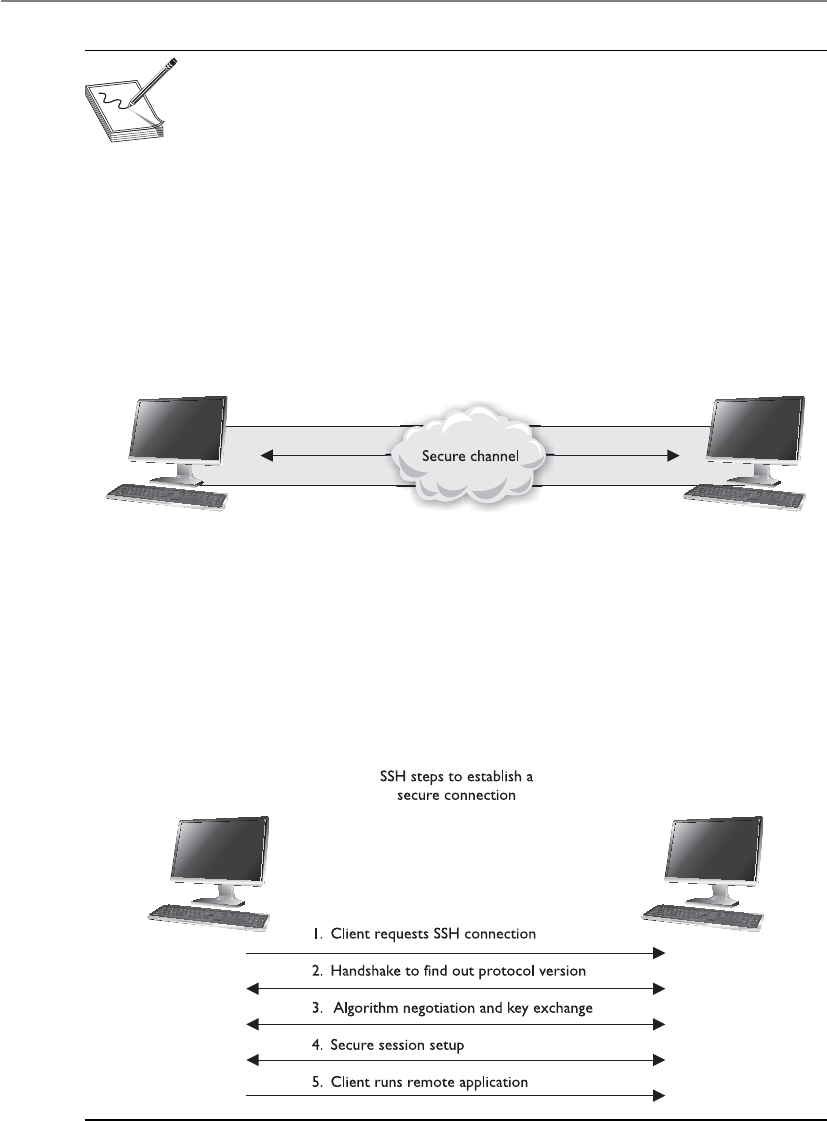
CISSP All-in-One Exam Guide
860
NOTE
NOTE SSH can also be used for secure channels for file transfer and port
redirection.
SSH should be used instead of Telnet, FTP, rlogin, rexec, or rsh, which provide the
same type of functionality SSH offers but in a much less secure manner. SSH is a pro-
gram and a set of protocols that work together to provide a secure tunnel between two
computers. The two computers go through a handshaking process and exchange (via
Diffie-Hellman) a session key that will be used during the session to encrypt and pro-
tect the data sent. The steps of an SSH connection are outlined in Figure 7-28.
Once the handshake takes place and a secure channel is established, the two com-
puters have a pathway to exchange data with the assurance that the information will be
encrypted and its integrity will be protected.
Figure 7-28 SSH is used for remote terminal-like functionality.
Internet Protocol Security
Hey, is there a really complex protocol that can provide me with network layer protection?
Response: Yep, IPSec.
The Internet Protocol Security (IPSec) protocol suite provides a method of setting up
a secure channel for protected data exchange between two devices. The devices that
share this secure channel can be two servers, two routers, a workstation and a server, or
two gateways between different networks. IPSec is a widely accepted standard for pro-
viding network layer protection. It can be more flexible and less expensive than end-to-
end and link encryption methods.

Chapter 7: Cryptography
861
IPSec has strong encryption and authentication methods, and although it can be
used to enable tunneled communication between two computers, it is usually employed
to establish virtual private networks (VPNs) among networks across the Internet.
IPSec is not a strict protocol that dictates the type of algorithm, keys, and authenti-
cation method to use. Rather, it is an open, modular framework that provides a lot of
flexibility for companies when they choose to use this type of technology. IPSec uses
two basic security protocols: Authentication Header (AH) and Encapsulating Security
Payload (ESP). AH is the authenticating protocol, and ESP is an authenticating and
encrypting protocol that uses cryptographic mechanisms to provide source authentica-
tion, confidentiality, and message integrity.
IPSec can work in one of two modes: transport mode, in which the payload of the
message is protected, and tunnel mode, in which the payload and the routing and head-
er information are protected. ESP in transport mode encrypts the actual message infor-
mation so it cannot be sniffed and uncovered by an unauthorized entity. Tunnel mode
provides a higher level of protection by also protecting the header and trailer data an
attacker may find useful. Figure 7-29 shows the high-level view of the steps of setting
up an IPSec connection.
Each device will have at least one security association (SA) for each secure connec-
tion it uses. The SA, which is critical to the IPSec architecture, is a record of the configu-
rations the device needs to support an IPSec connection. When two devices complete
their handshaking process, which means they have agreed upon a long list of parame-
ters they will use to communicate, these data must be recorded and stored somewhere,
which is in the SA. The SA can contain the authentication and encryption keys, the
agreed-upon algorithms, the key lifetime, and the source IP address. When a device re-
ceives a packet via the IPSec protocol, it is the SA that tells the device what to do with
the packet. So if device B receives a packet from device C via IPSec, device B will look to the
corresponding SA to tell it how to decrypt the packet, how to properly authenticate
the source of the packet, which key to use, and how to reply to the message if necessary.
SAs are directional, so a device will have one SA for outbound traffic and a different
SA for inbound traffic for each individual communication channel. If a device is con-
necting to three devices, it will have at least six SAs, one for each inbound and out-
bound connection per remote device. So how can a device keep all of these SAs
organized and ensure that the right SA is invoked for the right connection? With the
Figure 7-29 Steps that two computers follow when using IPSec
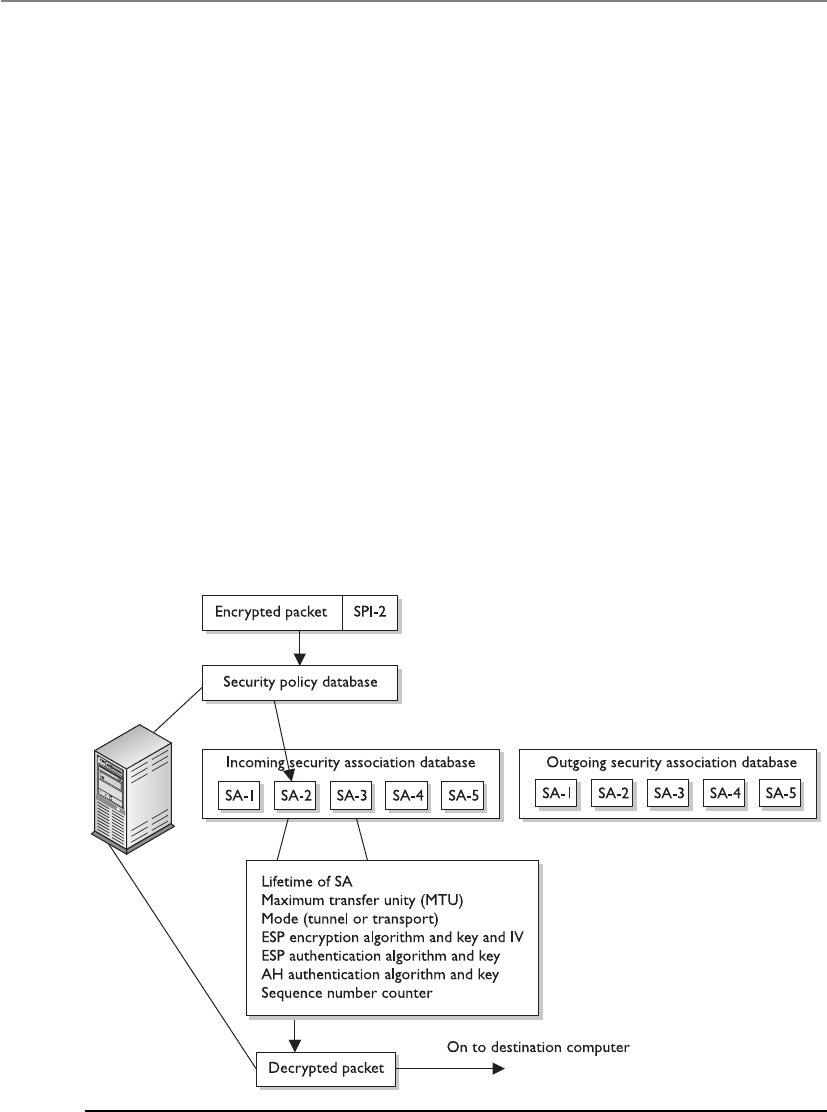
CISSP All-in-One Exam Guide
862
mighty security parameter index (SPI), that’s how. Each device has an SPI that keeps
track of the different SAs and tells the device which one is appropriate to invoke for the
different packets it receives. The SPI value is in the header of an IPSec packet, and the
device reads this value to tell it which SA to consult, as depicted in Figure 7-30.
IPSec can authenticate the sending devices of the packet by using MAC (covered in
the earlier section, “The One-Way Hash”). The ESP protocol can provide authentica-
tion, integrity, and confidentiality if the devices are configured for this type of function-
ality. So if a company just needs to make sure it knows the source of the sender and
must be assured of the integrity of the packets, it would choose to use AH. If the com-
pany would like to use these services and also have confidentiality, it would use the ESP
protocol because it provides encryption functionality. In most cases, the reason ESP is
employed is because the company must set up a secure VPN connection.
It may seem odd to have two different protocols that provide overlapping function-
ality. AH provides authentication and integrity, and ESP can provide those two func-
tions and confidentiality. Why even bother with AH then? In most cases, the reason has
to do with whether the environment is using network address translation (NAT). IPSec
will generate an integrity check value (ICV), which is really the same thing as a MAC
value, over a portion of the packet. Remember that the sender and receiver generate
their own integrity values. In IPSec, it is called an ICV value. The receiver compares her
ICV value with the one sent by the sender. If the values match, the receiver can be as-
sured the packet has not been modified during transmission. If the values are different,
the packet has been altered and the receiver discards the packet.
Figure 7-30 The SPI and SA help the system process IPSec packets.

Chapter 7: Cryptography
863
The AH protocol calculates this ICV over the data payload, transport, and network
headers. If the packet then goes through a NAT device, the NAT device changes the IP
address of the packet. That is its job. This means a portion of the data (network header)
that was included to calculate the ICV value has now changed, and the receiver will
generate an ICV value that is different from the one sent with the packet, which means
the packet will be discarded automatically.
The ESP protocol follows similar steps, except it does not include the network head-
er portion when calculating its ICV value. When the NAT device changes the IP address,
it will not affect the receiver’s ICV value because it does not include the network header
when calculating the ICV. The differences are shown in Figure 7-31.
Because IPSec is a framework, it does not dictate which hashing and encryption al-
gorithms are to be used or how keys are to be exchanged between devices. Key manage-
ment can be handled manually or automated by a key management protocol. The de
facto standard for IPSec is to use Internet Key Exchange (IKE), which is a combination
of the ISAKMP and OAKLEY protocols. The Internet Security Association and Key Man-
agement Protocol (ISAKMP) is a key exchange architecture that is independent of the
type of keying mechanisms used. Basically, ISAKMP provides the framework of what
can be negotiated to set up an IPSec connection (algorithms, protocols, modes, keys).
The OAKLEY protocol is the one that carries out the negotiation process. You can think
of ISAKMP as providing the playing field (the infrastructure) and OAKLEY as the guy
running up and down the playing field (carrying out the steps of the negotiation).
Figure 7-31
AH and ESP use
different portions
of the packet to
calculate the ICVs.

CISSP All-in-One Exam Guide
864
NOTE
NOTE Simple Key Management Protocol for IP (SKIP) is another key
exchange protocol that provides basically the same functionality as IKE. It is
important to know that all of these protocols work at the network layer.
IPSec is very complex with all of its components and possible configurations. This
complexity is what provides for a great degree of flexibility, because a company has
many different configuration choices to achieve just the right level of protection.
Key Terms
•Multipurpose Internet Mail Extension Standard that outlines
the format of e-mail messages and allows binary attachments to be
transmitted through e-mail.
•Secure MIME Secure/Multipurpose Internet Mail Extensions, which
outlines how public key cryptography can be used to secure MIME data
types.
•Pretty Good Privacy Cryptosystem used to integrate public key
cryptography with e-mail functionality and data encryption, which
was developed by Phil Zimmerman.
•Quantum cryptography Use of quantum mechanical functions to
provide strong cryptographic key exchange.
•HTTPS A combination of HTTP and SSL\TLS that is commonly used
for secure Internet connections and e-commerce transactions.
•Secure Electronic Transaction Secure e-commerce standard developed
by Visa and MasterCard that has not been accepted within the marketplace.
•Cookies Data files used by web browsers and servers to keep browser
state information and browsing preferences.
•Secure Shell (SSH) Network protocol that allows for a secure
connection to a remote system. Developed to replace Telnet and other
insecure remote shell methods.
•IPSec Protocol suite used to protect IP traffic through encryption and
authentication. De facto standard VPN protocol.
•Authentication header protocol Protocol within the IPSec suite used
for integrity and authentication.
•Encapsulating security protocol Protocol within the IPSec suite used
for integrity, authentication, and encryption.
•Transport mode Mode that IPSec protocols can work in that provides
protection for packet data payload.

Chapter 7: Cryptography
865
Attacks
Eavesdropping and sniffing data as it passes over a network are considered passive at-
tacks because the attacker is not affecting the protocol, algorithm, key, message, or any
parts of the encryption system. Passive attacks are hard to detect, so in most cases meth-
ods are put in place to try to prevent them rather than to detect and stop them.
Altering messages, modifying system files, and masquerading as another individual
are acts that are considered active attacks because the attacker is actually doing some-
thing instead of sitting back and gathering data. Passive attacks are usually used to gain
information prior to carrying out an active attack.
The common attack vectors in cryptography are key, algorithm, implementation,
data, and people. We should assume that the attacker knows what algorithm we are us-
ing and that the attacker has access to all encrypted text. The following sections address
some active attacks that relate to cryptography.
Ciphertext-Only Attacks
In this type of attack, the attacker has the ciphertext of several messages. Each of the
messages has been encrypted using the same encryption algorithm. The attacker’s goal
is to discover the key used in the encryption process. Once the attacker figures out the
key, she can decrypt all other messages encrypted with the same key.
Aciphertext-only attack is the most common type of active attack because it is very
easy to get ciphertext by sniffing someone’s traffic, but it is the hardest attack to actu-
ally be successful at because the attacker has so little information about the encryption
process.
Known-Plaintext Attacks
In known-plaintext attacks, the attacker has the plaintext and corresponding ciphertext
of one or more messages. Again, the goal is to discover the key used to encrypt the mes-
sages so other messages can be deciphered and read.
Messages usually start with the same type of beginning and close with the same type
of ending. An attacker might know that each message a general sends out to his com-
manders always starts with certain greetings and ends with specific salutations and the
general’s name and contact information. In this instance, the attacker has some of the
plaintext (the data that are the same on each message) and can capture an encrypted
message, and therefore capture the ciphertext. Once a few pieces of the puzzle are dis-
covered, the rest is accomplished by reverse-engineering, frequency analysis, and brute
force attempts. Known-plaintext attacks were used by the United States against the Ger-
mans and the Japanese during World War II.
•Tunnel mode Mode that IPSec protocols can work in that provides
protection for packet headers and data payload.
•Internet Security Association and Key Management Protocol Used
to establish security associates and an authentication framework in
Internet connections. Commonly used by IKE for key exchange.

CISSP All-in-One Exam Guide
866
Chosen-Plaintext Attacks
In chosen-plaintext attacks, the attacker has the plaintext and ciphertext, but can choose
the plaintext that gets encrypted to see the corresponding ciphertext. This gives her
more power and possibly a deeper understanding of the way the encryption process
works so she can gather more information about the key being used. Once the key is
discovered, other messages encrypted with that key can be decrypted.
How would this be carried out? I can e-mail a message to you that I think you not
only will believe, but that you will also panic about, encrypt, and send to someone else.
Suppose I send you an e-mail that states, “The meaning of life is 42.” You may think
you have received an important piece of information that should be concealed from
others, everyone except your friend Bob, of course. So you encrypt my message and
send it to Bob. Meanwhile I am sniffing your traffic and now have a copy of the plain-
text of the message, because I wrote it, and a copy of the ciphertext.
Chosen-Ciphertext Attacks
In chosen-ciphertext attacks, the attacker can choose the ciphertext to be decrypted and
has access to the resulting decrypted plaintext. Again, the goal is to figure out the key.
This is a harder attack to carry out compared to the previously mentioned attacks, and
the attacker may need to have control of the system that contains the cryptosystem.
NOTE
NOTE All of these attacks have a derivative form, the names of which are
the same except for putting the word “adaptive” in front of them, such as
adaptive chosen-plaintext and adaptive chosen-ciphertext. What this means is
that the attacker can carry out one of these attacks and, depending upon what
she gleaned from that first attack, modify her next attack. This is the process
of reverse-engineering or cryptanalysis attacks: using what you learned to
improve your next attack.
Differential Cryptanalysis
This type of attack also has the goal of uncovering the key that was used for encryption
purposes. This attack looks at ciphertext pairs generated by encryption of plaintext pairs
with specific differences and analyzes the effect and result of those differences. One
such attack was invented in 1990 as an attack against DES, and it turned out to be an
effective and successful attack against DES and other block algorithms.
The attacker takes two messages of plaintext and follows the changes that take place
to the blocks as they go through the different S-boxes. (Each message is being encrypted
with the same key.) The differences identified in the resulting ciphertext values are used
to map probability values to different possible key values. The attacker continues this
process with several more sets of messages and reviews the common key probability
values. One key value will continue to show itself as the most probable key used in the
encryption processes. Since the attacker chooses the different plaintext messages for
this attack, it is considered to be a type of chosen-plaintext attack.

Chapter 7: Cryptography
867
Linear Cryptanalysis
Linear cryptanalysis is another type of attack that carries out functions to identify the
highest probability of a specific key employed during the encryption process using a
block algorithm. The attacker carries out a known-plaintext attack on several different
messages encrypted with the same key. The more messages the attacker can use and put
through this type of attack, the higher the confidence level in the probability of a spe-
cific key value.
The attacker evaluates the input and output values for each S-box. He evaluates the
probability of input values ending up in a specific combination. Identifying specific
output combinations allows him to assign probability values to different keys until one
shows a continual pattern of having the highest probability.
Side-Channel Attacks
All of the attacks we have covered thus far have been based mainly on the mathematics
of cryptography. Using plaintext and ciphertext involves high-powered mathematical
tools that are needed to uncover the key used in the encryption process.
But what if we took a different approach? Let’s say we see something that looks like
a duck, walks like a duck, sounds like a duck, swims in water, and eats bugs and small
fish. We could confidently conclude that this is a duck. Similarly, in cryptography, we
can review facts and infer the value of an encryption key. For example, we could detect
how much power consumption is used for encryption and decryption (the fluctuation
of electronic voltage). We could also intercept the radiation emissions released and
then calculate how long the processes take. Looking around the cryptosystem, or its at-
tributes and characteristics, is different from looking into the cryptosystem and trying
to defeat it through mathematical computations.
Public vs. Secret Algorithms
The public mainly uses algorithms that are known and understood versus the
secret algorithms where the internal processes and functions are not released to
the public. In general, cryptographers in the public sector feel as though the
strongest and best-engineered algorithms are the ones released for peer review
and public scrutiny, because a thousand brains are better than five, and many
times some smarty-pants within the public population can find problems within
an algorithm that the developers did not think of. This is why vendors and com-
panies have competitions to see if anyone can break their code and encryption
processes. If someone does break it, that means the developers must go back to
the drawing board and strengthen this or that piece.
Not all algorithms are released to the public, such as the ones developed by
the NSA. Because the sensitivity level of what the NSA encrypts is so important, it
wants as much of the process to be as secret as possible. The fact that the NSA does
not release its algorithms for public examination and analysis does not mean its
algorithms are weak. Its algorithms are developed, reviewed, and tested by many
of the top cryptographic smarty-pants around, and are of very high quality.

CISSP All-in-One Exam Guide
868
If I want to figure out what you do for a living, but I don’t want you to know I am
doing this type of reconnaissance work, I won’t ask you directly. Instead, I will find out
when you go to work and come home, the types of clothing you wear, the items you
carry, and whom you talk to —or I can just follow you to work. These are examples of
side channels.
So, in cryptography, gathering “outside” information with the goal of uncovering
the encryption key is just another way of attacking a cryptosystem.
An attacker could measure power consumption, radiation emissions, and the time
it takes for certain types of data processing. With this information, he can work back-
ward by reverse-engineering the process to uncover an encryption key or sensitive data.
A power attack reviews the amount of heat released. This type of attack has been suc-
cessful in uncovering confidential information from smart cards. In 1995, RSA private
keys were uncovered by measuring the relative time cryptographic operations took.
The idea is that instead of attacking a device head on, just watch how it performs to
figure out how it works. In biology, scientists can choose to carry out a noninvasive
experiment, which will watch an organism eat, sleep, mate, and so on. This type of ap-
proach learns about the organism through understanding its behaviors instead of kill-
ing it and looking at it from the inside out.
Replay Attacks
A big concern in distributed environments is the replay attack, in which an attacker
captures some type of data and resubmits it with the hopes of fooling the receiving
device into thinking it is legitimate information. Many times, the data captured and
resubmitted are authentication information, and the attacker is trying to authenticate
herself as someone else to gain unauthorized access.
Timestamps and sequence numbers are two countermeasures to replay attacks.
Packets can contain sequence numbers, so each machine will expect a specific number
on each receiving packet. If a packet has a sequence number that has been previously
used, this is an indication of a replay attack. Packets can also be timestamped. A thresh-
old can be set on each computer to only accept packets within a certain timeframe. If a
packet is received that is past this threshold, it can help identify a replay attack.
Algebraic Attacks
Algebraic attacks analyze the vulnerabilities in the mathematics used within the algo-
rithm and exploit the intrinsic algebraic structure. For instance, attacks on the “text-
book” version of the RSA cryptosystem exploit properties of the algorithm, such as the
fact that the encryption of a raw “0” message is “0.”
Analytic Attacks
Analytic attacks identify algorithm structural weaknesses or flaws, as opposed to brute
force attacks, which simply exhaust all possibilities without respect to the specific proper-
ties of the algorithm. Examples include the Double DES attack and RSA factoring attack.

Chapter 7: Cryptography
869
Statistical Attacks
Statistical attacks identify statistical weaknesses in algorithm design for exploitation—
for example, if statistical patterns are identified, as in the number of zeros compared to
the number of ones. For instance, a random number generator (RNG) may be biased.
If keys are taken directly from the output of the RNG, then the distribution of keys
would also be biased. The statistical knowledge about the bias could be used to reduce
the search time for the keys.
Social Engineering Attacks
Attackers can trick people into providing their cryptographic key material through vari-
ous social engineering attack types. Social engineering attacks have been covered in
earlier chapters. They are nontechnical attacks that are carried out on people with the
goal of tricking them into divulging some type of sensitive information that can be
used by the attacker. The attacker may convince the victim that he is a security admin-
istrator that requires the cryptographic data for some type of operational effort. The
attacker could then use the data to decrypt and gain access to sensitive data. The attacks
can be carried out through persuasion, coercion (rubber-hose cryptanalysis), or bribery
(purchase-key attack).
Meet-in-the-Middle Attacks
This term refers to a mathematical analysis used to try and break a math problem from
both ends. It is a technique that works on the forward mapping of a function and the
inverse of the second function at the same time. The attack works by encrypting from
one end and decrypting from the other end, thus meeting in the middle.
Key Terms
•Passive attack Attack where the attacker does not interact with
processing or communication activities, but only carries out
observation and data collection, as in network sniffing.
•Active attack Attack where the attacker does interact with processing
or communication activities.
•Ciphertext-only attack Cryptanalysis attack where the attacker is
assumed to have access only to a set of ciphertexts.
•Known-plaintext attack Cryptanalysis attack where the attacker is
assumed to have access to sets of corresponding plaintext and ciphertext.
•Chosen-plaintext attack Cryptanalysis attack where the attacker
can choose arbitrary plaintexts to be encrypted and obtain the
corresponding ciphertexts.
•Chosen-ciphertext attack Cryptanalysis attack where the attacker
chooses a ciphertext and obtains its decryption under an unknown key.
•Differential cryptanalysis Cryptanalysis method that uses the study of
how differences in an input can affect the resultant difference at the output.

CISSP All-in-One Exam Guide
870
Summary
Cryptography has been used in one form or another for over 4,000 years, and the attacks
on cryptography have probably been in place for 3,999 years and 364 days. As one group
of people works to find new ways to hide and transmit secrets, another group of people
is right on their heels finding holes in the newly developed ideas and products. This can
be viewed as evil and destructive behavior, or as the thorn in the side of the computing
world that pushes it to build better and more secure products and environments.
Cryptographic algorithms provide the underlying tools to most security protocols
used in today’s infrastructures. The algorithms work off of mathematical functions and
provide various types of functionality and levels of security. A big leap was made when
encryption went from purely symmetric key use to public key cryptography. This evolu-
tion provided users and maintainers much more freedom and flexibility when it came
to communicating with a variety of users all over the world.
Encryption can be supplied at different layers of the OSI model by a range of ap-
plications, protocols, and mechanisms. Today, not much thought has to be given to
cryptography and encryption because it is taken care of in the background by many
operating systems, applications, and protocols. However, for administrators who main-
tain these environments, for security professionals who propose and implement secu-
rity solutions, and for those interested in obtaining a CISSP certification, knowing the
ins and outs of cryptography is essential.
•Linear cryptanalysis Cryptanalysis method that uses the study of
affine transformation approximation in encryption processes.
•Side-channel attack Attack that uses information (timing, power
consumption) that has been gathered to uncover sensitive data or
processing functions.
•Replay attack Valid data transmission is maliciously or fraudulently
repeated to allow an entity gain unauthorized access.
•Algebraic attack Cryptanalysis attack that exploits vulnerabilities
within the intrinsic algebraic structure of mathematical functions.
•Analytic attack Cryptanalysis attack that exploits vulnerabilities
within the algorithm structure.
•Statistical attack Cryptanalysis attack that uses identified statistical
patterns.
•Social engineering attack Manipulating individuals so that they will
divulge confidential information, rather than by breaking in or using
technical cracking techniques.
•Meet-in-the-middle attack Cryptanalysis attack that tries to uncover a
mathematical problem from two different ends.

Chapter 7: Cryptography
871
Quick Tips
• Cryptography is the science of protecting information by encoding it into an
unreadable format.
• The most famous rotor encryption machine is the Enigma used by the
Germans in World War II.
• A readable message is in a form called plaintext, and once it is encrypted, it is
in a form called ciphertext.
• Cryptographic algorithms are the mathematical rules that dictate the functions
of enciphering and deciphering.
• Cryptanalysis is the study of breaking cryptosystems.
• Nonrepudiation is a service that ensures the sender cannot later falsely deny
sending a message.
• Key clustering is an instance in which two different keys generate the same
ciphertext from the same plaintext.
• The range of possible keys is referred to as the keyspace. A larger keyspace and
the full use of the keyspace allow for more random keys to be created. This
provides more protection.
• The two basic types of encryption mechanisms used in symmetric ciphers are
substitution and transposition. Substitution ciphers change a character (or bit)
out for another, while transposition ciphers scramble the characters (or bits).
• A polyalphabetic cipher uses more than one alphabet to defeat frequency
analysis.
• Steganography is a method of hiding data within another media type, such as
a graphic, WAV file, or document. This method is used to hide the existence of
the data.
• A key is a random string of bits inserted into an encryption algorithm. The
result determines what encryption functions will be carried out on a message
and in what order.
• In symmetric key algorithms, the sender and receiver use the same key for
encryption and decryption purposes.
• In asymmetric key algorithms, the sender and receiver use different keys for
encryption and decryption purposes.
• Symmetric key processes provide barriers of secure key distribution and
scalability. However, symmetric key algorithms perform much faster than
asymmetric key algorithms.
• Symmetric key algorithms can provide confidentiality, but not authentication
or nonrepudiation.
• Examples of symmetric key algorithms include DES, 3DES, Blowfish, IDEA,
RC4, RC5, RC6, and AES.

CISSP All-in-One Exam Guide
872
• Asymmetric algorithms are used to encrypt keys, and symmetric algorithms
are used to encrypt bulk data.
• Asymmetric key algorithms are much slower than symmetric key algorithms,
but can provide authentication and nonrepudiation services.
• Examples of asymmetric key algorithms include RSA, ECC, Diffie-Hellman,
El Gamal, Knapsack, and DSA.
• Two main types of symmetric algorithms are stream and block ciphers. Stream
ciphers use a keystream generator and encrypt a message one bit at a time. A
block cipher divides the message into groups of bits and encrypts them.
• Many algorithms are publicly known, so the secret part of the process is the
key. The key provides the necessary randomization to encryption.
• Data Encryption Standard (DES) is a block cipher that divides a message into
64-bit blocks and employs S-box-type functions on them.
• Because technology has allowed the DES keyspace to be successfully broken,
Triple-DES (3DES) was developed to be used instead. 3DES uses 48 rounds of
computation and up to three different keys.
• International Data Encryption Algorithm (IDEA) is a symmetric block cipher
with a key of 128 bits.
• RSA is an asymmetric algorithm developed by Rivest, Shamir, and Adleman
and is the de facto standard for digital signatures.
• Elliptic curve cryptosystems (ECCs) are used as asymmetric algorithms
and can provide digital signature, secure key distribution, and encryption
functionality. They use fewer resources, which makes them better for wireless
device and cell phone encryption use.
• When symmetric and asymmetric key algorithms are used together, this is
called a hybrid system. The asymmetric algorithm encrypts the symmetric key,
and the symmetric key encrypts the data.
• A session key is a symmetric key used by the sender and receiver of messages
for encryption and decryption purposes. The session key is only good while
that communication session is active and then it is destroyed.
• A public key infrastructure (PKI) is a framework of programs, procedures,
communication protocols, and public key cryptography that enables a diverse
group of individuals to communicate securely.
• A certificate authority (CA) is a trusted third party that generates and
maintains user certificates, which hold their public keys.
• The CA uses a certification revocation list (CRL) to keep track of revoked
certificates.
• A certificate is the mechanism the CA uses to associate a public key to a
person’s identity.

Chapter 7: Cryptography
873
• A registration authority (RA) validates the user’s identity and then sends the
request for a certificate to the CA. The RA cannot generate certificates.
• A one-way function is a mathematical function that is easier to compute in
one direction than in the opposite direction.
• RSA is based on a one-way function that factors large numbers into prime
numbers. Only the private key knows how to use the trapdoor and how to
decrypt messages that were encrypted with the corresponding public key.
• Hashing algorithms provide data integrity only.
• When a hash algorithm is applied to a message, it produces a message digest,
and this value is signed with a private key to produce a digital signature.
• Some examples of hashing algorithms include SHA-1, MD2, MD4, MD5,
and HAVAL.
• HAVAL produces a variable-length hash value, whereas the other hashing
algorithms mentioned produce a fixed-length value.
• SHA-1 produces a 160-bit hash value and is used in DSS.
• A birthday attack is an attack on hashing functions through brute force. The
attacker tries to create two messages with the same hashing value.
• A one-time pad uses a pad with random values that are XORed against the
message to produce ciphertext. The pad is at least as long as the message itself
and is used once and then discarded.
• A digital signature is the result of a user signing a hash value with a private
key. It provides authentication, data integrity, and nonrepudiation. The act
of signing is the actual encryption of the value with the private key.
• Examples of algorithms used for digital signatures include RSA, El Gamal,
ECDSA, and DSA.
• Key management is one of the most challenging pieces of cryptography. It
pertains to creating, maintaining, distributing, and destroying cryptographic keys.
• The Diffie-Hellman protocol is a key agreement protocol and does not
provide encryption for data and cannot be used in digital signatures.
• TLS is the “next version” of SSL and is an open-community protocol, which
allows for expansion and interoperability with other technologies.
• Link encryption encrypts the entire packet, including headers and trailers, and
has to be decrypted at each hop. End-to-end encryption does not encrypt the
headers and trailers, and therefore does not need to be decrypted at each hop.
• Pretty Good Privacy (PGP) is an e-mail security program that uses public key
encryption. It employs a web of trust instead of the hierarchical structure used
in PKI.
• S-HTTP provides protection for each message sent between two computers,
but not the actual link. HTTPS protects the communication channel. HTTPS
is HTTP that uses SSL for security purposes.

CISSP All-in-One Exam Guide
874
• Secure Electronic Transaction (SET) is a proposed electronic commerce
technology that provides a safer method for customers and merchants to
perform transactions over the Internet.
• In IPSec, AH provides integrity and authentication, and ESP provides those
plus confidentiality.
• IPSec protocols can work in transport mode (the data payload is protected)
or tunnel mode (the payload and headers are protected).
• IPSec uses IKE as its key exchange protocol. IKE is the de facto standard and
is a combination of ISAKMP and OAKLEY.
• Trusted Platform Module is a secure cryptoprocessor that can be used for
platform integrity, disk encryption, password protection, and remote attestation.
Questions
Please remember that these questions are formatted and asked in a certain way for a
reason. Keep in mind that the CISSP exam is asking questions at a conceptual level.
Questions may not always have the perfect answer, and the candidate is advised against
always looking for the perfect answer. The candidate should look for the best answer(s)
in the list.
1. What is the goal of cryptanalysis?
A. To determine the strength of an algorithm
B. To increase the substitution functions in a cryptographic algorithm
C. To decrease the transposition functions in a cryptographic algorithm
D. To determine the permutations used
2. The frequency of successful brute force attacks has increased because
A. The use of permutations and transpositions in algorithms has increased.
B. As algorithms get stronger, they get less complex, and thus more
susceptible to attacks.
C. Processor speed and power have increased.
D. Key length reduces over time.
3. Which of the following is not a property or characteristic of a one-way hash
function?
A. It converts a message of arbitrary length into a value of fixed length.
B. Given the digest value, it should be computationally infeasible to find the
corresponding message.
C. It should be impossible or rare to derive the same digest from two
different messages.
D. It converts a message of fixed length to an arbitrary length value.

Chapter 7: Cryptography
875
4. What would indicate that a message had been modified?
A. The public key has been altered.
B. The private key has been altered.
C. The message digest has been altered.
D. The message has been encrypted properly.
5. Which of the following is a U.S. federal government algorithm developed for
creating secure message digests?
A. Data Encryption Algorithm
B. Digital Signature Standard
C. Secure Hash Algorithm
D. Data Signature Algorithm
6. Which of the following best describes the difference between HMAC and
CBC-MAC?
A. HMAC creates a message digest and is used for integrity; CBC-MAC is used
to encrypt blocks of data for confidentiality.
B. HMAC uses a symmetric key and a hashing algorithm; CBC-MAC uses the
first block for the checksum.
C. HMAC provides integrity and data origin authentication; CBC-MAC uses a
block cipher for the process of creating a MAC.
D. HMAC encrypts a message with a symmetric key and then puts the result
through a hashing algorithm; CBC-MAC encrypts the whole message.
7. What is an advantage of RSA over DSA?
A. It can provide digital signature and encryption functionality.
B. It uses fewer resources and encrypts faster because it uses symmetric keys.
C. It is a block cipher rather than a stream cipher.
D. It employs a one-time encryption pad.
8. Many countries restrict the use or exportation of cryptographic systems. What
is the reason given when these types of restrictions are put into place?
A. Without standards, there would be many interoperability issues when
trying to employ different algorithms in different programs.
B. The systems can be used by some countries against their local people.
C. Criminals could use encryption to avoid detection and prosecution.
D. Laws are way behind, so adding different types of encryption would
confuse the laws more.

CISSP All-in-One Exam Guide
876
9. What is used to create a digital signature?
A. The receiver’s private key
B. The sender’s public key
C. The sender’s private key
D. The receiver’s public key
10. Which of the following best describes a digital signature?
A. A method of transferring a handwritten signature to an electronic document
B. A method to encrypt confidential information
C. A method to provide an electronic signature and encryption
D. A method to let the receiver of the message prove the source and integrity
of a message
11. How many bits make up the effective length of the DES key?
A. 56
B. 64
C. 32
D. 16
12. Why would a certificate authority revoke a certificate?
A. If the user’s public key has become compromised
B. If the user changed over to using the PEM model that uses a web
of trust
C. If the user’s private key has become compromised
D. If the user moved to a new location
13. What does DES stand for?
A. Data Encryption System
B. Data Encryption Standard
C. Data Encoding Standard
D. Data Encryption Signature
14. Which of the following best describes a certificate authority?
A. An organization that issues private keys and the corresponding
algorithms
B. An organization that validates encryption processes
C. An organization that verifies encryption keys
D. An organization that issues certificates
15. What does DEA stand for?
A. Data Encoding Algorithm
B. Data Encoding Application

Chapter 7: Cryptography
877
C. Data Encryption Algorithm
D. Digital Encryption Algorithm
16. Who was involved in developing the first public key algorithm?
A. Adi Shamir
B. Ross Anderson
C. Bruce Schneier
D. Martin Hellman
17. What process usually takes place after creating a DES session key?
A. Key signing
B. Key escrow
C. Key clustering
D. Key exchange
18. DES performs how many rounds of permutation and substitution?
A. 16
B. 32
C. 64
D. 56
19. Which of the following is a true statement pertaining to data encryption when
it is used to protect data?
A. It verifies the integrity and accuracy of the data.
B. It requires careful key management.
C. It does not require much system overhead in resources.
D. It requires keys to be escrowed.
20. If different keys generate the same ciphertext for the same message, what is
this called?
A. Collision
B. Secure hashing
C. MAC
D. Key clustering
21. What is the definition of an algorithm’s work factor?
A. The time it takes to encrypt and decrypt the same plaintext
B. The time it takes to break the encryption
C. The time it takes to implement 16 rounds of computation
D. The time it takes to apply substitution functions

CISSP All-in-One Exam Guide
878
22. What is the primary purpose of using one-way hashing on user passwords?
A. It minimizes the amount of primary and secondary storage needed to
store passwords.
B. It prevents anyone from reading passwords in plaintext.
C. It avoids excessive processing required by an asymmetric algorithm.
D. It prevents replay attacks.
23. Which of the following is based on the fact that it is hard to factor large
numbers into two original prime numbers?
A. ECC
B. RSA
C. DES
D. Diffie-Hellman
24. Which of the following describes the difference between the Data Encryption
Standard and the Rivest-Shamir-Adleman algorithm?
A. DES is symmetric, while RSA is asymmetric.
B. DES is asymmetric, while RSA is symmetric.
C. They are hashing algorithms, but RSA produces a 160-bit hashing value.
D. DES creates public and private keys, while RSA encrypts messages.
25. Which of the following uses a symmetric key and a hashing algorithm?
A. HMAC
B. Triple-DES
C. ISAKMP-OAKLEY
D. RSA
26. The generation of keys that are made up of random values is referred to as Key
Derivation Functions (KDFs). What values are not commonly used in this key
generation process?
A. Hashing values
B. Asymmetric values
C. Salts
D. Passwords
Use the following scenario to answer Questions 27–29. Tim is a new manager for the soft-
ware development team at his company. There are different types of data that the com-
pany’s software needs to protect. Credit card PIN values are stored within their propri-
etary retail credit card processing software. The same software also stores documents,
which must be properly encrypted and protected. This software is used to transfer sensi-
tive data over dedicated WAN connections between the company’s three branches. Tim
also needs to ensure that every user that interacts with the software is properly authen-

Chapter 7: Cryptography
879
ticated before being allowed access, and once the authentication completes successful-
ly, an SSL connection needs to be set up and maintained for each connection.
27. Which of the following symmetric block encryption mode(s) should be
enabled in this company’s software? (Choose two.)
A. Electronic Code Book (ECB)
B. Cipher Block Chaining (CBC)
C. Cipher Feedback (CFB)
D. Output Feedback (OFB)
28. Which of the following would be best to implement for this company’s
connections?
A. End-to-end encryption
B. Link encryption
C. Trusted Platform Modules
D. Advanced Encryption Standard
29. Which of the following is the best way for users to authenticate to this
company’s proprietary software?
A. Kerberos
B. RADIUS
C. Public Key Infrastructure
D. IPSec
Use the following scenario to answer Questions 30–32. Sean is a security administrator for
a financial company and has an array of security responsibilities. He needs to ensure
that traffic flowing within the internal network can only travel from one authenticated
system to another authenticated system. This traffic has to be visible to the company’s
IDS sensors, so it cannot be encrypted. The data traffic that flows externally to and from
the network must only travel to authenticated systems and must be encrypted. He needs
to ensure that each employee laptop has full disk encryption capabilities and that each
e-mail message that each employee sends is sent from an authenticated individual.
30. Which of the following best describes the software settings that need to be
implemented for internal and external traffic?
A. IPSec with ESP enabled for internal traffic and IPSec with AH enabled for
external traffic
B. IPSec with AH enabled for internal traffic and IPSec with ESP enabled for
external traffic
C. IPSec with AH enabled for internal traffic and IPSec with AN and ESP
enabled for external traffic
D. IPSec with AH and ESP enabled for internal traffic and IPSec with ESP
enabled for external traffic

CISSP All-in-One Exam Guide
880
31. When Sean purchases laptops for his company, what does he need to ensure
is provided by the laptop vendor?
A. Public key cryptography
B. Cryptography, hashing, and message authentication
C. BIOS password protection
D. Trusted Platform Module
32. What type of e-mail functionality is required for this type of scenario?
A. Digital signature
B. Hashing
C. Cryptography
D. Message authentication code
Answers
1. A. Cryptanalysis is the process of trying to reverse-engineer a cryptosystem,
with the possible goal of uncovering the key used. Once this key is uncovered,
all other messages encrypted with this key can be accessed. Cryptanalysis is
carried out by the white hats to test the strength of the algorithm.
2. C. A brute force attack is resource-intensive. It tries all values until the correct
one is obtained. As computers have more powerful processors added to them,
attackers can carry out more powerful brute force attacks.
3. D. A hashing algorithm will take a string of variable length, the message can
be any size, and compute a fixed-length value. The fixed-length value is the
message digest. The MD family creates the fixed-length value of 128 bits, and
SHA creates one of 160 bits.
4. C. Hashing algorithms generate message digests to detect whether modification
has taken place. The sender and receiver independently generate their own
digests, and the receiver compares these values. If they differ, the receiver knows
the message has been altered.
5. C. SHA was created to generate secure message digests. Digital Signature
Standard (DSS) is the standard to create digital signatures, which dictates that
SHA must be used. DSS also outlines the digital signature algorithms that can
be used with SHA: RSA, DSA, and ECDSA.
6. C. In an HMAC operation, a message is concatenated with a symmetric key
and the result is put through a hashing algorithm. This provides integrity and
system or data authentication. CBC-MAC uses a block cipher to create a MAC,
which is the last block of ciphertext.
7. A. RSA can be used for data encryption, key exchange, and digital signatures.
DSA can be used only for digital signatures.
8. C. The U.S. government has greatly reduced its restrictions on cryptography
exportation, but there are still some restrictions in place. Products that use

Chapter 7: Cryptography
881
encryption cannot be sold to any country the United States has declared is
supporting terrorism. The fear is that the enemies of the country would use
encryption to hide their communication, and the government would be
unable to break this encryption and spy on their data transfers.
9. C. A digital signature is a message digest that has been encrypted with the
sender’s private key. A sender, or anyone else, should never have access to the
receiver’s private key.
10. D. A digital signature provides authentication (knowing who really sent
the message), integrity (because a hashing algorithm is involved), and
nonrepudiation (the sender cannot deny sending the message).
11. A. DES has a key size of 64 bits, but 8 bits are used for parity, so the true
key size is 56 bits. Remember that DEA is the algorithm used for the DES
standard, so DEA also has a true key size of 56 bits, because we are actually
talking about the same algorithm here. DES is really the standard, and DEA
is the algorithm. We just call it DES in the industry because it is easier.
12. C. The reason a certificate is revoked is to warn others who use that person’s
public key that they should no longer trust the public key because, for some
reason, that public key is no longer bound to that particular individual’s
identity. This could be because an employee left the company, or changed his
name and needed a new certificate, but most likely it is because the person’s
private key was compromised.
13. B. Data Encryption Standard was developed by NIST and the NSA to encrypt
sensitive but unclassified government data.
14. D. A registration authority (RA) accepts a person’s request for a certificate and
verifies that person’s identity. Then the RA sends this request to a certificate
authority (CA), which generates and maintains the certificate.
15. C. DEA is the algorithm that fulfilled the DES standard. So DEA has all of the
attributes of DES: a symmetric block cipher that uses 64-bit blocks, 16 rounds,
and a 56-bit key.
16. D. The first released public key cryptography algorithm was developed by
Whitfield Diffie and Martin Hellman.
17. D. After a session key has been created, it must be exchanged securely. In most
cryptosystems, an asymmetric key (the receiver’s public key) is used to encrypt
this session key, and it is sent to the receiver.
18. A. DES carries out 16 rounds of mathematical computation on each 64-bit
block of data it is responsible for encrypting. A round is a set of mathematical
formulas used for encryption and decryption processes.
19. B. Data encryption always requires careful key management. Most algorithms
are so strong today it is much easier to go after key management rather than
to launch a brute force attack. Hashing algorithms are used for data integrity,
encryption does require a good amount of resources, and keys do not have to
be escrowed for encryption.

CISSP All-in-One Exam Guide
882
20. D. Message A was encrypted with key A and the result is ciphertext Y. If that
same message A were encrypted with key B, the result should not be ciphertext
Y. The ciphertext should be different since a different key was used. But if the
ciphertext is the same, this occurrence is referred to as key clustering.
21. B. The work factor of a cryptosystem is the amount of time and resources
necessary to break the cryptosystem or its encryption process. The goal is
to make the work factor so high that an attacker could not be successful in
breaking the algorithm or cryptosystem.
22. B. Passwords are usually run through a one-way hashing algorithm so the
actual password is not transmitted across the network or stored on a system
in plaintext. This greatly reduces the risk of an attacker being able to obtain
the actual password.
23. B. The RSA algorithm’s security is based on the difficulty of factoring large
numbers into their original prime numbers. This is a one-way function. It is
easier to calculate the product than it is to identify the prime numbers used to
generate that product.
24. A. DES is a symmetric algorithm. RSA is an asymmetric algorithm. DES is used
to encrypt data, and RSA is used to create public/private key pairs.
25. A. When an HMAC function is used, a symmetric key is combined with the
message, and then that result is put though a hashing algorithm. The result is
an HMAC value. HMAC provides data origin authentication and data integrity.
26. B. Different values can be used independently or together to play the role of
random key material. The algorithm is created to use specific hash, passwords,
and\or salt values, which will go through a certain number of rounds of
mathematical functions dictated by the algorithm.
27. A and B. The Electronic Code Book (ECB) mode should be used to encrypt
credit card PIN values, and the Cipher Block Chaining (CBC) mode should be
used to encrypt documents.
28. B. Since data is transmitting over dedicated WAN links, link encryptors can be
implemented to encrypt the sensitive data as it moves from branch to branch.
29. C. The users can be authenticated by providing digital certificates to the
software within a PKI environment. This is the best authentication approach,
since SSL requires a PKI environment.
30. B. IPSec can be configured using the AH protocol, which enables system
authentication but does not provide encryption capabilities. IPSec can
be configured with the ESP protocol, which provides authentication and
encryption capabilities.

Chapter 7: Cryptography
883
31. D. Trusted Platform Module (TPM) is a microchip that is part of the
motherboard of newer systems. It provides cryptographic functionality that
allows for full disk encryption. The decryption key is wrapped and stored
within the TPM chip.
32. A. A digital signature is a hash value that has been encrypted with the sender’s
private key. A message can be digitally signed, which provides authentication,
nonrepudiation, and integrity. When e-mail clients have this type of
functionality, each sender is authenticated through digital certificates.
This page intentionally left blank

CHAPTER 8
Business Continuity and
Disaster Recovery
This chapter presents the following:
• Business continuity management
• Business continuity planning components
• Standards and best practices
• Selecting, developing, and implementing disaster
and continuity solutions
• Recovery and redundant technologies
• Backup and offsite facilities
• Types of drills and tests
We can’t prepare for every possibility, as events over the years have proven. The World
Trade Center towers coming down in the United States after terrorists crashed planes
into them in 2001 affected many surrounding businesses, people, governments, and the
world in a way that most people would have never imagined. The catastrophic Indian
Ocean tsunami in December 2004 struck with little warning. In 2005 Hurricane Katrina
wreaked extensive damage. Businesses were not merely affected—their buildings were
destroyed and lives were lost. Japan’s Fukushima tsunami of 2011 also came as a big
surprise and caused many things that organizations were not prepared to deal with.
Every year, thousands of businesses are affected by floods, fires, tornadoes, terrorist at-
tacks, vandalism, and other disastrous events.
885

CISSP All-in-One Exam Guide
886
The companies that survive these traumas are the ones that thought ahead, planned
for the worst, estimated the possible damages that could occur, and put the necessary
controls in place to protect themselves. Such companies make up a very small percent-
age of businesses today. Most businesses affected by these kinds of events have to close
their doors forever.
An organization depends on resources, personnel, and tasks performed on a daily
basis to stay healthy, happy, and profitable. Most organizations have tangible resources,
intellectual property, employees, computers, communication links, facilities, and facil-
ity services. If any one of these is damaged or inaccessible for one reason or another, the
company can be crippled. If more than one is damaged, the company may be in an
World’s costliest natural disasters since 1965
(in billions)
Insured loss Economic loss
Earthquake and tsunami, Japan (2011)*
Hurricane Katrina, US (2005)
Northridge earthquake, US (1994)
Sichuan earthquake, China (2008)
Irpinia earthquake, Italy (1980)
Hurricane Andrew, US (1992)
Yangtze River floods, China (1998)
Great Floods, US (1993)
River floods, China (1996)
Drought, US (1988)
Hurricane Ike, US & Caribbean (2008)
Niigata earthquake, Japan (2004)
Eastern floods, China (1991)
River Arno floods, Italy (1966)
Loma Prieta earthquake, US (1989)
Friuli earthquake, Italy (1976)
Kobe earthquake, Japan (1995)
Sources: Munich Re; IMF;
World Bank; The Economist
Tangshan earthquake, China (1976)
Spitak earthquake, Armenia (1988)
Kalimantan forest fires, Indonesia (1982-83)
0 50 100 150 200 250
4.1
1.9
1.0
0.6
1.9
2.6
0.4
3.0
0.3
3.7
2.8
0.3
0.3
0.6
0.2
1.7
3.6
2.7
9.3
1.9
Economic loss,
as % of GDP in
year of disaster
*Provisional Insured loss unavailable

Chapter 8: Business Continuity and Disaster Recovery
887
even direr situation. The longer these resources are unusable, the longer it will probably
take for an organization to get back on its feet. Some companies are never able to re-
cover after certain disasters. However, the companies that thought ahead, planned for
the possible disasters, and did not put all of their eggs in one basket have had a better
chance of resuming business and staying in the marketplace.
Business Continuity and Disaster Recovery
What do we do if everything blows up? And how can we still make our widgets?
The goal of disaster recovery is to minimize the effects of a disaster or disruption. It
means taking the necessary steps to ensure that the resources, personnel, and business
processes are able to resume operation in a timely manner. This is different from conti-
nuity planning, which provides methods and procedures for dealing with longer-term
outages and disasters. The goal of a disaster recovery plan is to handle the disaster and
its ramifications right after the disaster hits; the disaster recovery plan is usually very
information technology (IT)–focused.
Adisaster recovery plan (DRP) is carried out when everything is still in emergency
mode, and everyone is scrambling to get all critical systems back online. A business con-
tinuity plan (BCP) takes a broader approach to the problem. It can include getting
critical systems to another environment while repair of the original facilities is under
way, getting the right people to the right places during this time, and performing busi-
ness in a different mode until regular conditions are back in place. It also involves deal-
ing with customers, partners, and shareholders through different channels until
everything returns to normal. So, disaster recovery deals with, “Oh my goodness, the
sky is falling,” and continuity planning deals with, “Okay, the sky fell. Now, how do we
stay in business until someone can put the sky back where it belongs?”
Business Continuity
Planning
IT Disaster Recovery
Planning
Senior
management
Business lines
Application availability
Data confidentiality and integrity
Telecommunications and network
Property management

CISSP All-in-One Exam Guide
888
While DRP and BCP are directed at the development of plans, business continuity
management (BCM) is the holistic management process that should cover both of
them. BCM provides a framework for integrating resilience with the capability for effec-
tive responses that protects the interests of an organization’s key stakeholders. The
main objective of BCM is to allow the organization to continue to perform business
operations under various conditions.
Certain characteristics run through many of the chapters in this book: availability,
integrity, and confidentiality. Because each chapter deals with a different topic, each
looks at these three security characteristics in a slightly different way. In Chapter 2, for
example, which discussed access control, availability meant that resources should be
available to users and subjects in a controlled and secure manner. The access control
method and technology should protect the integrity and/or confidentiality of a re-
source. In fact, the access control solution must take many steps to ensure the resource
is kept confidential, and that there is no possibility its contents can be altered while
they are being accessed. In this chapter, we point out that integrity and confidentiality
must be considered not only in everyday procedures, but also in those procedures un-
dertaken immediately after a disaster or disruption. For instance, it may not be appro-
priate to leave a server that holds confidential information in one building while
everyone else moves to another building. Equipment that provides secure virtual pri-
vate network (VPN) connections may be destroyed and the team focuses on standing
up remote access functionality, but forgets about the needs of encryption. In most situ-
ations the company is purely focused on getting back up and running, thus focusing on
functionality. If security is not integrated and implemented properly, the effects of the
physical disaster can be amplified as hackers come in and steal sensitive information.
Many times a company is much more vulnerable after a disaster hits, because the secu-
rity services used to protect it may be unavailable or operating at a reduced capacity.
Therefore, it is important that if the business has secret stuff, it stays secret.
Availability is one of the main themes behind business continuity planning, in that
it ensures that the resources required to keep the business going will continue to be
available to the people and systems that rely upon them. This may mean backups need
to be done religiously, and that redundancy needs to be factored into the architecture
of the systems, networks, and operations. If communication lines are disabled or if a
service is rendered unusable for any significant period of time, there must be a quick
and tested way of establishing alternate communications and services. We will be div-
ing into the many ways organizations can implement availability solutions for continu-
ity and recovery purposes throughout this chapter.
Chapter 8: Business Continuity and Disaster Recovery
889
When looking at business continuity planning, some companies focus mainly on
backing up data and providing redundant hardware. Although these items are extreme-
ly important, they are just small pieces of the company’s overall operations pie. Hard-
ware and computers need people to configure and operate them, and data are usually
not useful unless they are accessible by other systems and possibly outside entities.
Thus, a larger picture of how the various processes within a business work together
needs to be understood. Planning must include getting the right people to the right
places, documenting the necessary configurations, establishing alternate communica-
tions channels (voice and data), providing power, and making sure all dependencies
are properly understood and taken into account.
It is also important to understand how automated tasks can be carried out manu-
ally, if necessary, and how business processes can be safely altered to keep the operation
of the company going. This may be critical in ensuring the company survives the event
with the least impact to its operations. Without this type of vision and planning, when
a disaster hits, a company could have its backup data and redundant servers physically
available at the alternate facility, but the people responsible for activating them may be
standing around in a daze, not knowing where to start or how to perform in such a dif-
ferent environment.
Business Continuity Management
Issues
Addressed
Solution
Objective
Emphasis
Focus
Availability
Enterprise high
availability
Server level
management
Business
continuity planning
Reliability Recoverability
Provide an effective plan
to minimize downtime of
key processes in the
event of a major disruption
Effectively manage and
control the IT infrastructure
to improve the overall
operational reliability
Achieve and maintain
the chosen availability
level of the enterprise’s
IT infrastructure
Technology Processes People
Proactive and
preventive
Response and
recovery

CISSP All-in-One Exam Guide
890
Standards and Best Practices
Although no specific scientific equation must be followed to create continuity plans,
certain best practices have proven themselves over time. The National Institute of Stan-
dards and Technology (NIST) is responsible for developing best practices and standards
as they pertain to U.S. government and military environments. It is common for NIST
to document the requirements for these types of environments, and then everyone else
in the industry uses their documents as guidelines. So these are “musts” for U.S. govern-
ment organizations and “good to have” for other nongovernment entities.
NIST outlines the following steps in its Special Publication 800-34, Continuity
Planning Guide for Information Technology Systems:
1. Develop the continuity planning policy statement. Write a policy that provides
the guidance necessary to develop a BCP, and that assigns authority to the
necessary roles to carry out these tasks.
2. Conduct the business impact analysis (BIA). Identify critical functions and
systems and allow the organization to prioritize them based on necessity.
Identify vulnerabilities and threats, and calculate risks.
3. Identify preventive controls. Once threats are recognized, identify and implement
controls and countermeasures to reduce the organization’s risk level in an
economical manner.
4. Develop recovery strategies. Formulate methods to ensure systems and critical
functions can be brought online quickly.
5. Develop the contingency plan. Write procedures and guidelines for how the
organization can still stay functional in a crippled state.
6. Test the plan and conduct training and exercises. Test the plan to identify
deficiencies in the BCP, and conduct training to properly prepare individuals
on their expected tasks.
Business Continuity Planning
Preplanned procedures allow an organization to
• Provide an immediate and appropriate response to emergency
situations
• Protect lives and ensure safety
• Reduce business impact
• Resume critical business functions
• Work with outside vendors and partners during the recovery period
• Reduce confusion during a crisis
• Ensure survivability of the business
• Get “up and running” quickly after a disaster
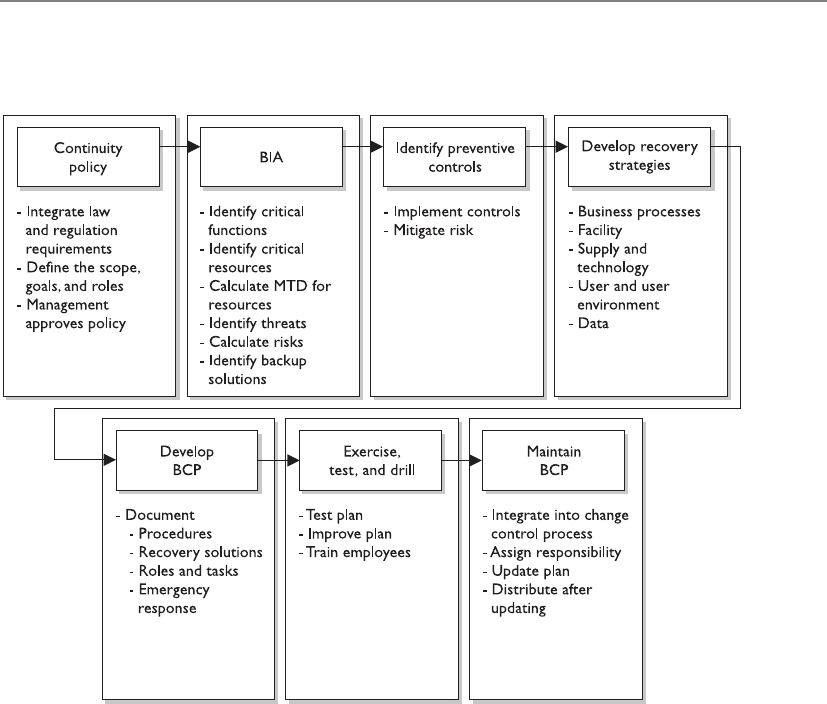
Chapter 8: Business Continuity and Disaster Recovery
891
7. Maintain the plan. Put in place steps to ensure the BCP is a living document
that is updated regularly.
Although the NIST 800-34 document deals specifically with IT contingency plans,
these steps are similar when creating enterprise-wide BCPs and BCM programs.
Since BCM is so critical, it is actually addressed by other standards-based organiza-
tions, listed here:
•BS 25999 The British Standards Institute’s (BSI) standard for business
continuity management (BCM). This BS standard has two parts:
•BS 25999-1:2006 Business Continuity Management Code of
Practice General guidance that provides principles, processes,
and terminology for BCM.
•BS 25999-2:2007 Specification for Business Continuity
Management Specifies objective, auditable requirements
for executing, operating, and enhancing a BCM system.
•ISO/IEC 27031:2011 Guidelines for information and communications
technology readiness for business continuity. This ISO/IEC standard that is a
component of the overall ISO/IEC 27000 series was covered in Chapter 2.

CISSP All-in-One Exam Guide
892
•ISO 22301 Pending International Standard for business continuity
management systems. The specification document against which
organizations will seek certification.
• This standard will replace BS 25999-2.
• The earliest it will be published is mid-2012.
•Business Continuity Institute’s Good Practice Guidelines (GPG) BCM best
practices, which are broken down into the following management and
technical practices:
• Management Practices:
• Policy and Program Management
• Embedding BCM in the Organization’s Culture
• Technical Practices:
• Understanding the Organization
• Determining BCM Strategy
• Developing and Implementing a BCM Response
• Exercising, Maintaining, and Reviewing
•DRI International Institute’s Professional Practices for Business Continuity
Planners Best practices and framework to allow for BCM processes, which
are broken down into the following sections:
• Program Initiation and Management
• Risk Evaluation and Control
• Business Impact Analysis
• Business Continuity Strategies
• Emergency Response and Operations
• Business Continuity Plans
• Awareness and Training Programs
• Business Continuity Plan Exercise, Audit, and Maintenance
• Crisis Communications
• Coordination with External Agencies
Why are there so many sets of best practices and which is the best for your organiza-
tion? If your organization is part of the U.S. government or a government contracting
company, then you need to comply with the NIST standards. If your organization is in

Chapter 8: Business Continuity and Disaster Recovery
893
Europe or your company does business with other companies in Europe, then you
might need to follow the BSI’s list of standard requirements. While we are not listing all
of them here, there are other country-based BCM standards that your company might
need to comply with if it is residing in or does business in one of those specific coun-
tries. ISO/IEC 27031 attempts to tie BS 25999 and ISO/IEC 27001 together by focusing
on information and communication technology (ICT) readiness for business continuity. As
of this writing, the ISO 22301 has yet to be published. It is planned to replace BS 25999
and introduce a requirement for metrics for BCM and increase emphasis on business
continuity management system (BCMS) operational planning and controls. So if your
organization needs to get ISO certified, then ISO/IEC 27031 and ISO 22301 are the
standards to follow.
So some of these best practices/standards have a specific focus (DRP, BCP, govern-
ment, technology), some are still evolving, and some directly compete against each
other because BCM is a big and growing industry. There is a lot of overlap between
them all because they all have one main focus of keeping the company in business after
something bad happens. Your company’s legal and regulatory requirements commonly
point toward one of these best practice standards, so find out these specifics before
hitching your wagon to one specific set of practices. For example, if your company is a
government contracting company that works with the U.S. government, then you fol-
low NIST because that is the “checklist” your auditors will most likely follow and grade
you against. If your company does business internationally, then following the ISO list
of requirements would probably be the best bet.
CAUTION
CAUTION Keeping various standards straight can be confusing and
frustrating. In Chapter 2 we covered BS 7799 and its variations and the
ever-growing list of ISO/IEC 27000 standards. The British Standards (BS) had
been the de facto standards most organizations around the world followed.
They have been mostly replaced by ISO international standards, which are
still evolving. The same thing is happening in the BCM world. BS 25999 has
been the de facto standard that is being replaced by new ISO standards.
The information security and BCM industries are still in their infancies;
thus, standards are evolving as you read this.
Making BCM Part of the Enterprise Security Program
Why do we need to combine business continuity and security plans anyway?
Response: They both protect the business, unenlightened one.
As explained in Chapter 2, every company should have security policies, proce-
dures, standards, and guidelines. People who are new to information security com-
monly think that this is one pile of documentation that addresses all issues pertaining
to security, but it is more complicated than that—of course.

CISSP All-in-One Exam Guide
894
An enterprise security program is made up of many different disciplines. The Com-
mon Body of Knowledge (CBK) for the CISSP exam did not just fall out of the sky one
day, and it was not just made up by some lonely guys sitting in a room. The CBK is
broken down into the ten high-level disciplines of any enterprise security program
(Risk Management, Access Control, Software Development, Operations, Telecommuni-
cations and Networking, Physical Security, Regulations, etc.). These top-tier disciplines
are then broken down into supporting subcomponents. What this means is that every
company actually needs to have at least ten sets of policies, standards, guidelines, and
procedures—one per top-tier discipline.
Understanding the Organization First
A company has no real hope of rebuilding itself and its processes after a disaster
if it does not have a good understanding of how its organization works in the first
place. This notion might seem absurd at first. You might think, “Well, of course a
company knows how it works.” But you would be surprised at how difficult it is
to fully understand an organization down to the level of detail required to re-
build it. Each individual may know and understand his or her little world within
the company, but hardly anyone at any company can fully explain how each and
every business process takes place.
We briefly covered the Zachman Business Enterprise Framework in Chapter 2.
It is one of the most comprehensive approaches to understanding a company’s
architecture and all the pieces and parts that make it up. This model breaks down
the core portions of a corporate enterprise to illustrate the various requirements
of every business process. It looks at the data, function, network, people, time,
and motivation components of the enterprise’s infrastructure and how they are
tied to the roles within the company. The beauty of this model is that it dissects
business processes down to the atomic level and shows the necessary interdepen-
dencies that exist, all of which must be working correctly for effective and effi-
cient processes to be carried out.
It would be very beneficial for a BCP team to use this type of model to under-
stand the core components of an organization, because the team’s responsibility
is to make sure the organization can be rebuilt if need be.

Chapter 8: Business Continuity and Disaster Recovery
895
We will go more in depth into what should be encapsulated in a BCP policy in a
later section, but for now let’s understand why it has to be integrated into the security
program as a whole. Business continuity should be a part of the security program and
business decisions, as opposed to being an entity that stands off in a corner by itself.
The BCM team will be responsible for putting Humpty Dumpty back together again, so
it better understand all the pieces and parts that make up Humpty Dumpty before it
goes falling off a wall.
BCP ought to be fully integrated into the organization as a regular management
process, just like auditing or strategic planning or other “normal” processes. Instead of
Define roles and
responsibilities
Develop policies
Identify all
computing assets
Developstandards
Develop procedures
Awarenessa
nd training
program
Auditing and
monitoring program
1 2 3 4 5 6 7
1. System configuration development and maintenance
2.Access control and identity management
3. Employee awareness and training program
4. Physical environment security
5.Application security, development, and change control
6. Contingency planning (BCP and DR)
7. Risk assessment and management program
8. Vulnerability management
9. Asset identification, control and maintenance program
10. Intrusion detection, incident identification and handling program
11. Document retention and compliance strategy
12. Personnel security
13. Data classification and protection
14. Secure operations
15. Legal and regulatory compliance
Includes fulltime
roles and
responsibilities
as well as
virtual teams
This is the
foundation of
any security
program.
Policies need
to reflect the
legal regulatory
and statutory
environment
the company is
regulated under,
i.e., SOX,
GLBA, FERPA,
SBI 386
HIPPA,
PCI, etc.
Includes
critical
networking
and other
assets, high
value systems
and all
locations of
sensitive data
at rest as well
as in transit

CISSP All-in-One Exam Guide
896
being considered an outsider, BCP should be “part of the team.” Further, final respon-
sibility for BCP should belong not to the BCP team or its leader, but to a high-level
executive manager, preferably a member of the executive board. This will reinforce the
image and reality of continuity planning as a function seen as vital to the organiza-
tional chiefs.
By analyzing and planning for potential disruptions to the organization, the BCP
team can assist such other business disciplines in their own efforts to effectively plan for
and respond effectively and with resilience to emergencies. Given that the ability to re-
spond depends on operations and management personnel throughout the organization,
such capability should be developed organization-wide. It should extend throughout ev-
ery location of the organization and up the employee ranks to top-tier management.
As such, the BCP program needs to be a living entity. As a company goes through
changes, so should the program, thereby ensuring it stays current, usable, and effective.
When properly integrated with change management processes, it stands a much better
chance of being continually updated and improved upon. Business continuity is a
foundational piece of an effective security program and is critical to ensuring relevance
in time of need.
A very important question to ask when first developing a BCP is why it is being de-
veloped. This may seem silly and the answer may at first appear obvious, but that is not
always the case. You might think that the reason to have these plans is to deal with an
unexpected disaster and to get people back to their tasks as quickly and as safely as pos-
sible, but the full story is often a bit different. Why are most companies in business? To
make money and be profitable. If these are usually the main goals of businesses, then
any BCP needs to be developed to help achieve and, more importantly, maintain these
goals. The main reason to develop these plans in the first place is to reduce the risk of
financial loss by improving the company’s ability to recover and restore operations.
This encompasses the goals of mitigating the effects of the disaster.
Not all organizations are businesses that exist to make profits. Government agen-
cies, military units, nonprofit organizations, and the like exist to provide some type of
protection or service to a nation or society. While a company must create its BCP to
ensure that revenue continues to come in so it can stay in business, other types of orga-
nizations must create their BCPs to make sure they can still carry out their critical tasks.
Although the focus and business drivers of the organizations and companies may dif-
fer, their BCPs often will have similar constructs—which is to get their critical processes
up and running.
NOTE
NOTE Protecting what is most important to a company is rather difficult if
what is most important is not first identified. Senior management is usually
involved with this step because it has a point of view that extends beyond
each functional manager’s focus area of responsibility. The company’s BCP
should define the company’s critical mission and business functions. The
functions must have priorities set upon them to indicate which is most
crucial to a company’s survival.

Chapter 8: Business Continuity and Disaster Recovery
897
As stated previously, for many companies, financial operations are most critical. As
an example, an automotive company would be impacted far more seriously if its cred-
it and loan services were unavailable for a day than if, say, an assembly line went down
for a day, since credit and loan services are where it generates the biggest revenues. For
other organizations, customer service might be the most critical area so that order
processing is not negatively affected. For example, if a company makes heart pacemak-
ers and its physician services department is unavailable at a time when an operating
room surgeon needs to contact it because of a complication, the results could be disas-
trous for the patient. The surgeon and the company would likely be sued, and the
company would likely never be able to sell another pacemaker to that surgeon, her
colleagues, or perhaps even the patient’s health maintenance organization (HMO)
ever again. It would be very difficult to rebuild reputation and sales after something
like that happened.
Advanced planning for emergencies covers issues that were thought of and foreseen.
Many other problems may arise that are not covered in the plan; thus, flexibility in the
plan is crucial. The plan is a systematic way of providing a checklist of actions that
should take place right after a disaster. These actions have been thought through to help
the people involved be more efficient and effective in dealing with traumatic situations.
The most critical part of establishing and maintaining a current continuity plan is
management support. Management must be convinced of the necessity of such a plan.
Therefore, a business case must be made to obtain this support. The business case may
include current vulnerabilities, regulatory and legal obligations, the current status of
recovery plans, and recommendations. Management is mostly concerned with cost/
benefit issues, so preliminary numbers need to be gathered and potential losses esti-
mated. A cost/benefit analysis should include shareholder, stakeholder, regulatory, and
legislative impacts, as well as those on products, services, and personnel. The decision
of how a company should recover is commonly a business decision and should always
be treated as such.
BCP Project Components
Before everyone runs off in 2,000 different directions at one time, let’s understand what
needs to be done in the project initiation phase. This is the phase in which the com-
pany really needs to figure out what it is doing and why. So, after someone gets the
donuts and coffee, let’s get down to business.
Once management’s support is solidified, a business continuity coordinator must be
identified. This person will be the leader for the BCP team and will oversee the develop-
ment, implementation, and testing of the continuity and disaster recovery plans. It is
best if this person has good social skills, is somewhat of a politician, and has a cape,
because he will need to coordinate a lot of different departments and busy individuals
who have their own agendas. This person needs to have direct access to management
and have the credibility and authority to carry out leadership tasks.

CISSP All-in-One Exam Guide
898
A leader needs a team, so a BCP committee needs to be put together. Management
and the coordinator should work together to appoint specific, qualified people to be on
this committee. The team must comprise people who are familiar with the different
departments within the company, because each department is unique in its functional-
ity and has distinctive risks and threats. The best plan is when all issues and threats are
brought to the table and discussed. This cannot be done effectively with a few people
who are familiar with only a couple of departments. Representatives from each depart-
ment must be involved with not only the planning stages but also the testing and im-
plementation stages.
The committee should be made up of representatives from at least the following
departments:
• Business units
• Senior management
• IT department
• Security department
• Communications department
• Legal department
If the BCP coordinator is a good management leader, she will understand that it is
best to make these team members feel a sense of ownership pertaining to their tasks
and roles. The people who develop the BCP should also be the ones who execute it. (If
you knew that in a time of crisis you would be expected to carry out some critical tasks,
you might pay more attention during the planning and testing phases.) This may entail
making it very clear the roles and responsibilities of people during a crisis and recovery,
so that existing managers do not feel that their decision making is being overridden.
The project must have proper authorization from the top.
The team must then work with the management staff to develop the ultimate goals
of the plan, identify the critical parts of the business that must be dealt with first during
a disaster, and ascertain the priorities of departments and tasks. Management needs to
help direct the team on the scope of the project and the specific objectives.
NOTE
NOTE While the term “BCP” actually applies to a plan and “BCM” applies
to the overall management of continuity, these terms are commonly used
interchangeably.
The BCP effort has to result in a sustainable, long-term program that serves its pur-
pose—assisting the organization in the event of a disaster. The effort must be well
thought out and methodically executed. It must not be perceived as a mere “public rela-
tions” effort to make it simply appear that the organization is concerned about disaster
response.
The initiation process for BCP might include the following:

Chapter 8: Business Continuity and Disaster Recovery
899
• Setting up a budget and staff for the program before the BCP process begins.
Dedicated personnel and dedicated hours are essential for executing
something as labor-intensive as a BCP.
• Setting up the program would include assigning duties and responsibilities to
the BCP coordinator and to representatives from all of the functional units of
the organization.
• Senior management should kick off the BCP with a formal announcement or,
better still, an organization-wide meeting to demonstrate high-level support.
• Awareness-raising activities to let employees know about the BCP program
and to build internal support for it.
• Establishment of skills training for the support of the BCP effort.
• The start of data collection from throughout the organization to aid in crafting
various continuity options.
• Putting into effect “quick wins” and gathering of “low-hanging fruit” to show
tangible evidence of improvement in the organization’s readiness, as well as
improving readiness.
After the successful execution of a BCP program, the organization should have an
adequate level of response to an emergency. A desktop exercise that walks through the
incident management steps that have been established should offer a scorecard of
where the organization stands.
From that point, the team can hold regular progress reviews to check the accuracy
of readiness levels and program costs, and to see if program milestones are being met.
The BCP management team then can adjust the plan to any changes in meeting cost or
schedule. To assist in this, the team should choose a project management tool or meth-
od to track progress or its lack.
Scope of the Project
Why does our scope keep creeping?
Response: Because everything is interconnected and interdependent.
At first glance, it might seem as though the scope and objectives are quite clear—
protect the company. But it is not that simple. The high-level organizational require-
ments that the BCP should address, and the resources allocated for them, must be
evaluated. You want to understand the focus and direction of a business before starting
on risk assessment or continuity planning. This would include the organization’s plans
for growth, reorganizing, or downsizing. Other major events in an organization to con-
sider are changes in personnel levels; relocation of facilities; new suppliers; and intro-
duction of new products, technologies, or processes. Obtaining hard numbers or
estimates for any of these areas will make things smoother for the BCP. Of course, due
to the sensitivity of some information, some of this data may not be made available to
the BCP team. In such cases, the team should realize that the lack of full information
may make some of its findings less than fully accurate.

CISSP All-in-One Exam Guide
900
Knowing how the overall organization is going to change will aid in drawing up the
right contingency plans in the event of emergencies. Also, if the team identifies organi-
zational requirements at the start, and is in accord with top management on the iden-
tification and definition of such requirements, then it will be much easier to align the
policy to the requirements.
Many questions must be asked. For instance, is the team supposed to develop a BCP
for just one facility or for more than one facility? Is the plan supposed to cover just large
potential threats (hurricanes, tornadoes, floods) or deal with smaller issues as well
(loss of a communications line, power failure, Internet connection failure)? Should the
plan address possible terrorist attacks and other manmade threats? What is the threat
profile of the company? If the scope of the project is not properly defined, how do you
know when you are done? Then there’s resources—what personnel, time allocation,
and funds is management willing to commit to the BCP program overall?
NOTE
NOTE Most companies outline the scope of their BCP to encompass only
the larger threats. The smaller threats are then covered by independent
departmental contingency plans.
A frequent objection to BCP is that a program is unlimited in its scope when it is
applied to all the functions of an organization in one fell swoop. An alternative is to
break up the program into manageable pieces and to place some aspects of the organi-
zation outside the scope of the BCP. Since the scope fundamentally affects what the
plan will cover, the BCP team should consider the scope from the start of the project.
Deciding whether and how to place a component of an organization outside the
BCP scope can be tricky. In some cases, a product, service, or organizational component
may remain within the scope, but at a reduced level of funding and activity. At other
times, executives will have to decide whether to place a component outside the scope
after an incident takes place—when the costs of reestablishing the component may
outweigh the benefits. Senior executives, not BCP managers and planners, should make
these kinds of decisions.
Enterprise-Wide BCP
The agreed-upon scope of the BCP will indicate if one or more facilities will be
included in the plan. Most BCPs are developed to cover the enterprise as a whole,
instead of dealing with only portions of the organization. In larger organizations,
it can be helpful for each department to have its own specific contingency plan
that will address its specific needs during recovery. These individual plans need to
be compatible with the enterprise-wide BCP.

Chapter 8: Business Continuity and Disaster Recovery
901
BCP Policy
Now that we know what we are doing, we should write this down.
The BCP policy supplies the framework for and governance of designing and build-
ing the BCP effort. The policy helps the organization understand the importance of
BCP by outlining BCP’s purpose. It provides an overview of the principles of the orga-
nization and those behind BCP, and the context for how the BCP team will proceed.
The contents of a policy include its scope, mission statement, principles, guidelines,
and standards. The policy should draw on any existing policies if they exist and are rele-
vant. Note that a policy does not exist in a vacuum, but within a specific organization.
Thus, in drawing up a policy, the team should examine the overall objectives and func-
tions, including any business objectives, of the organization. The policy also should draw
on standard “good practices” of similar organizations and professional standards bodies.
The BCP team produces and revises the policy, although top-tier management is
actually responsible for it. A policy should be revamped as needed when the operating
environment in which the organization operates changes significantly, such as a major
expansion in operations or a change in location.
The process of drawing up a policy includes these steps:
• Identify and document the components of the policy.
• Identify and define policies of the organization that the BCP might affect.
• Identify pertinent legislation, laws, regulations, and standards.
• Identify “good industry practice” guidelines by consulting with industry experts.
• Perform a gap analysis. Find out where the organization currently is in terms
of continuity planning, and spell out where it wants to be at the end of the
BCP process.
• Compose a draft of the new policy.
• Have different departments within the organization review the draft.
• Put the feedback from the departments into a revised draft.
• Get the approval of top management on the new policy.
• Publish a final draft, and distribute and publicize it throughout the
organization.
Project Management
BCP is not that important; let’s just wing it.
Sound project management processes, practices, and procedures are important for
any organizational effort, and doubly so for BCP. Following accepted project manage-
ment principles will help ensure effective management of the BCP process once it gets
underway.

CISSP All-in-One Exam Guide
902
BCP projects commonly run out of funds and resources before they are fully com-
pleted. This is because the scope of the project is usually much larger than the team
estimates, the BCP team members are expected to still carry out their current daily tasks
along with new BCP tasks or some other project shifts in importance, or a combination
of all of these.
When technical people hear “risk management” they commonly think of security
threats and technical solutions. Understanding the risk of a project must also be under-
stood and properly planned for. If the scope of a project and the individual objectives
that make up the scope are not properly defined, a lot of time and money can be easily
wasted.
The individual objectives of a project must be analyzed to ensure that each is actually
attainable. A part of scope analysis that may prove useful is a SWOT analysis. SWOT stands
for Strengths/Weaknesses/Opportunities/Threats, and its basic tenants are as follows:
•Strengths Characteristics of the project team that give it an advantage
over others
•Weaknesses Characteristics that place the team at a disadvantage relative
to others
•Opportunities Elements that could contribute to the project’s success
•Threats Elements that could contribute to the project’s failure
Helpful
Helpful
Strengths
to achieving the objective
to achieving the objective to achieving the objective
to achieving the objective
Strengths Weaknesses
Harmful
Harmful
Weaknesses
Threats
Threats
Opportunities
Opportunities
External origin
(attributes of the environment)
External origin
(attributes of the environment)
Internal origin
(attributes of the organization)
Internal origin
(attributes of the organization)
A SWOT analysis can be carried out to ensure that the defined objectives within the
scope can be accomplished and issues identified that could impede upon the necessary
success and productivity required of the project as a whole.

Chapter 8: Business Continuity and Disaster Recovery
903
The BCP coordinator would need to implement some good old-fashioned project
management skills; see Table 8-1. A project plan should be developed that has the fol-
lowing components:
• Objective-to-task mapping
• Resource-to-task mapping
• Workflows
• Milestones
• Deliverables
• Budget estimates
• Success factors
• Deadlines
Once the project plan is completed, it should be presented to management for writ-
ten approval before any further steps are taken. It is important there are no assumptions
in the plan. It is also important that the coordinator obtains permission to use the
necessary resources to move forward.
BCP Activity Start
Date
Required
Completion
Date
Completed?
Initials/Date
Approved?
Initials/Date
Initiate project
Assign responsibilities
Define continuity policy
statement
Perform business impact
analysis
Identify preventive
controls
Create recovery
strategies
Develop BCP and DRP
documents
Test plans
Maintain plans
Table 8-1 Steps to Be Documented and Approved in Continuity Planning

CISSP All-in-One Exam Guide
904
NOTE
NOTE Any early planning or policy documents should include a Definition
of Terms, or Terms of Reference, namely a document that clearly defines the
terminology used in the document. Clearly defining terms will avoid a great
deal of confusion down the line by different groups, who might otherwise
have varying definitions and assumptions about the common terms used in the
continuity planning. Such a document should be treated as a formal deliverable
and published early on in the process.
Business Continuity Planning Requirements
A major requirement for anything that has such far-reaching ramifications as business
continuity planning is management support, as mentioned previously. It is critical that
management understands what the real threats are to the company, the consequences
of those threats, and the potential loss values for each threat. Without this understand-
ing, management may only give lip service to continuity planning, and in some cases,
that is worse than not having any plans at all because of the false sense of security it
creates. Without management support, the necessary resources, funds, and time will
not be devoted, which could result in bad plans that, again, may instill a false sense of
security. Failure of these plans usually means a failure in management understanding,
vision, and due-care responsibilities.
Executives may be held responsible and liable under various laws and regulations.
They could be sued by stockholders and customers if they do not practice due diligence
and due care and fulfill all of their responsibilities when it comes to disaster recovery
and business continuity items. Organizations that work within specific industries have
strict regulatory rules and laws that they must abide by, and these should be researched
and integrated into the BCP program from the beginning. For example, banking and
investment organizations must ensure that even if a disaster occurs, their customers’
confidential information will not be disclosed to unauthorized individuals or be al-
tered or vulnerable in any way.
Disaster recovery, continuity development, and planning work best in a top-down
approach, not a bottom-up approach. This means that management, not the staff,
should be driving the project.
Many companies are running so fast to try to keep up with a dynamic and changing
business world that they may not see the immediate benefit of spending time and re-
sources on disaster recovery issues. Those individuals who do see the value in these ef-
forts may have a hard time convincing top management if management does not see a
potential profit margin or increase in market share as a result. But if a disaster does hit
and they did put in the effort to properly prepare, the result can literally be priceless.
Today’s business world requires two important characteristics: the drive to produce a
great product or service and get it to the market, and the insight and wisdom to know
that unexpected trouble can easily find its way to your doorstep.
It is important that management set the overall goals of continuity planning, and it
should help set the priorities of what should be dealt with first. Once management sets
the goals and priorities, other staff members who are responsible for developing the

Chapter 8: Business Continuity and Disaster Recovery
905
different components of the BCP program can fill in the rest. However, management’s
support does not stop there. It needs to make sure the plans and procedures developed
are actually implemented. Management must make sure the plans stay updated and
represent the real priorities—not simply those perceived—of a company, which change
over time.
Business Impact Analysis (BIA)
How bad is it going to hurt and how long can we deal with this level of pain?
Business continuity planning deals with uncertainty and chance. What is important
to note here is that even though you cannot predict whether or when a disaster will hap-
pen, that doesn’t mean you can’t plan for it. Just because we are not planning for an
earthquake to hit us tomorrow morning at 10 A.M. doesn’t mean we can’t plan the activi-
ties required to successfully survive when an earthquake (or a similar disaster) does hit.
The point of making these plans is to try to think of all the possible disasters that could
take place, estimate the potential damage and loss, categorize and prioritize the potential
disasters, and develop viable alternatives in case those events do actually happen.
ABIA (business impact analysis) is considered a functional analysis, in which a team
collects data through interviews and documentary sources; documents business func-
tions, activities, and transactions; develops a hierarchy of business functions; and fi-
nally applies a classification scheme to indicate each individual function’s criticality
level. But how do we determine a classification scheme based on criticality levels?
The BCP committee must identify the threats to the company and map them to the
following characteristics:
• Maximum tolerable downtime and disruption for activities
• Operational disruption and productivity
• Financial considerations
• Regulatory responsibilities
• Reputation
The committee will not truly understand all business processes, the steps that must
take place, or the resources and supplies these processes require. So the committee must
gather this information from the people who do know—department managers and
specific employees throughout the organization. The committee starts by identifying
the people who will be part of the BIA data-gathering sessions. The committee needs to
identify how it will collect the data from the selected employees, be it through surveys,
interviews, or workshops. Next, the team needs to collect the information by actually
conducting surveys, interviews, and workshops. Data points obtained as part of the
information gathering will be used later during analysis. It is important that the team
members ask about how different tasks—whether processes, transactions, or services,
along with any relevant dependencies—get accomplished within the organization. Pro-
cess flow diagrams should be built, which will be used throughout the BIA and plan
development stages.
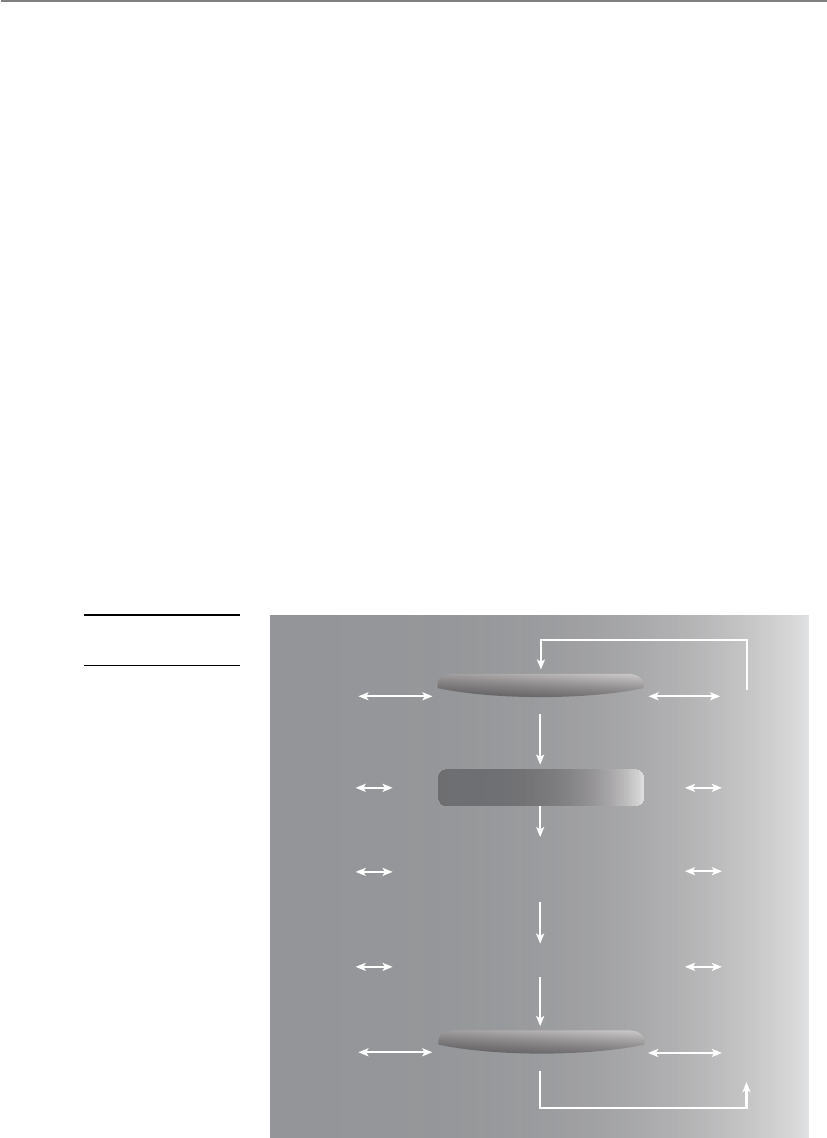
CISSP All-in-One Exam Guide
906
Upon completion of the data collection phase, the BCP committee needs to con-
duct an analysis to establish which processes, devices, or operational activities are criti-
cal. If a system stands on its own, doesn’t affect other systems, and is of low criticality,
then it can be classified as a tier-two or -three recovery step. This means these resources
will not be dealt with during the recovery stages until the most critical (tier one) re-
sources are up and running. This analysis can be completed using a standard risk assess-
ment as illustrated in Figure 8-1.
Risk Assessment
To achieve success, the organization should systematically plan and execute a formal
BCP-related risk assessment. The assessment fully takes into account the organization’s
tolerance for continuity risks. The risk assessment also makes use of the data in the BIA
to supply a consistent estimate of exposure.
As indicators of success, the risk assessment should identify, evaluate, and record all
relevant items, which may include:
• Vulnerabilities for all of the organization’s most time-sensitive resources and
activities
• Threats and hazards to the organization’s most urgent resources and activities
• Measures that cut the possibility, length, or effect of a disruption on critical
services and products
Risk management
Communication and consultation
Establish the content
Risk identification
Risk analysis
(including business
impact analysis)
Risk evaluation
Risk treatment
Monitor and review
Figure 8-1
Risk analysis process

Chapter 8: Business Continuity and Disaster Recovery
907
• Single points of failure, that is, concentrations of risk that threaten business
continuity
• Continuity risks from concentrations of critical skills or critical shortages
of skills
• Continuity risks due to outsourced vendors and suppliers
• Continuity risks that the BCP program has accepted, that are handled
elsewhere, or that the BCP program does not address
Risk Assessment Evaluation and Process
In a BCP setting, a risk assessment looks at the impact and likelihood of various threats
that could trigger a business disruption. The tools, techniques, and methods of risk as-
sessment include determining threats, assessing probabilities, tabulating threats, and
analyzing costs and benefits.
The end goals of a risk assessment include:
• Identifying and documenting single points of failure
• Making a prioritized list of threats to the particular business processes of the
organization
• Putting together information for developing a management strategy for risk
control, and for developing action plans for addressing risks
• Documenting acceptance of identified risks, or documenting acknowledgment
of risks that will not be addressed
The risk assessment is assumed to take the form of the equation: Risk = Threat ×
Impact × Probability. However, the BIA adds the dimension of time to this equation. In
other words, risk mitigation measures should be geared toward those things that might
most rapidly disrupt critical business processes and commercial activities.
The main parts of a risk assessment are:
• Review the existing strategies for risk management
• Construct a numerical scoring system for probabilities and impacts
• Make use of a numerical score to gauge the effect of the threat
• Estimate the probability of each threat
• Weigh each threat through the scoring system
• Calculate the risk by combining the scores of likelihood and impact
of each threat
• Get the organization’s sponsor to sign off on these risk priorities
• Weigh appropriate measures
• Make sure that planned measures that alleviate risk do not heighten other risks
• Present the assessment’s findings to executive management
(For a fuller examination of risk analysis, refer to Chapter 2.)

CISSP All-in-One Exam Guide
908
Threats can be manmade, natural, or technical. A manmade threat may be an arson-
ist, a terrorist, or a simple mistake that can have serious outcomes. Natural threats may
be tornadoes, floods, hurricanes, or earthquakes. Technical threats may be data corrup-
tion, loss of power, device failure, or loss of a data communications line. It is important
to identify all possible threats and estimate the probability of them happening. Some
issues may not immediately come to mind when developing these plans, such as an
employee strike, vandals, disgruntled employees, or hackers, but they do need to be
identified. These issues are often best addressed in a group with scenario-based exer-
cises. This ensures that if a threat becomes reality, the plan includes the ramifications
on all business tasks, departments, and critical operations. The more issues that are
thought of and planned for, the better prepared a company will be if and when these
events take place.
The committee needs to step through scenarios in which the following problems
result:
• Equipment malfunction or unavailable equipment
• Unavailable utilities (HVAC, power, communications lines)
• Facility becomes unavailable
• Critical personnel become unavailable
• Vendor and service providers become unavailable
• Software and/or data corruption
The specific scenarios and damage types can vary from organization to organization.
Assigning Values to Assets
The next step in the risk analysis is to assign a value to the assets that could be affected
by each threat. This helps establish economic feasibility of the overall plan. As dis-
cussed in Chapter 2, assigning values to assets is not as straightforward as it seems. The
BIA Steps
The more detailed and granular steps of a BIA are outlined here:
1. Select individuals to interview for data gathering.
2. Create data-gathering techniques (surveys, questionnaires, qualitative
and quantitative approaches).
3. Identify the company’s critical business functions.
4. Identify the resources these functions depend upon.
5. Calculate how long these functions can survive without these resources.
6. Identify vulnerabilities and threats to these functions.
7. Calculate the risk for each different business function.
8. Document findings and report them to management.
We cover each of these steps in this chapter.

Chapter 8: Business Continuity and Disaster Recovery
909
value of an asset is not just the amount of money paid for it. The asset’s role in the
company has to be considered, along with the labor hours that went into creating it if
it is a piece of software. The value amount could also encompass the liability issues that
surround the asset if it were damaged or insecure in any manner. (Review Chapter 2 for
an in-depth description and criteria for calculating asset value.)
Qualitative and quantitative impact information should be gathered and then
properly analyzed and interpreted. The goal is to see exactly how a business will be af-
fected by different threats. The effects can be economical, operational, or both. Upon
completion of the data analysis, it should be reviewed with the most knowledgeable
people within the company to ensure that the findings are appropriate and that it de-
scribes the real risks and impacts the organization faces. This will help flush out any
additional data points not originally obtained and will give a fuller understanding of
all the possible business impacts.
Loss criteria must be applied to the individual threats that were identified. The cri-
teria may include the following:
• Loss in reputation and public confidence
• Loss of competitive advantages
• Increase in operational expenses
• Violations of contract agreements
• Violations of legal and regulatory requirements
• Delayed income costs
• Loss in revenue
• Loss in productivity
These costs can be direct or indirect and must be properly accounted for.
For instance, if the BCP team is looking at the threat of a terrorist bombing, it is
important to identify which business function most likely would be targeted, how all
business functions could be affected, and how each bulleted item in the loss criteria
would be directly or indirectly involved. The timeliness of the recovery can be critical
for business processes and the company’s survival. For example, it may be acceptable to
have the customer support functionality out of commission for two days, whereas five
days may leave the company in financial ruin.
After identifying the critical functions, it is necessary to find out exactly what is re-
quired for these individual business processes to take place. The resources that are re-
quired for the identified business processes are not necessarily just computer systems,
but may include personnel, procedures, tasks, supplies, and vendor support. It must be
understood that if one or more of these support mechanisms is not available, the criti-
cal function may be doomed. The team must determine what type of effect unavailable
resources and systems will have on these critical functions.
The BIA identifies which of the company’s critical systems are needed for survival
and estimates the outage time that can be tolerated by the company as a result of vari-
ous unfortunate events. The outage time that can be endured by a company is referred
to as the maximum tolerable downtime (MTD) or maximum period time of disruption
(MPTD), which is illustrated in Figure 8-2.

CISSP All-in-One Exam Guide
910
The following are some MTD estimates that an organization may use. Note that
these are sample estimates that will vary from organization to organization and from
business unit to business unit:
•Nonessential 30 days
•Normal 7 days
•Important 72 hours
•Urgent 24 hours
•Critical Minutes to hours
Each business function and asset should be placed in one of these categories, de-
pending upon how long the company can survive without it. These estimates will help
the company determine what backup solutions are necessary to ensure the availability
of these resources. The shorter the MTD, the higher priority of recovery for the function
in question. Thus, the items classified as Urgent should be addressed before those clas-
sified as Normal.
For example, if being without a T1 communication line for three hours would cost the
company $130,000, the T1 line could be considered Critical and thus the company should
put in a backup T1 line from a different carrier. If a server going down and being unavail-
able for ten days will only cost the company $250 in revenue, this would fall into the
Normal category, and thus the company may not need to have a fully redundant server
waiting to be swapped out. Instead, the company may choose to count on its vendor’s
service level agreement (SLA), which may promise to have it back online in eight days.
Sometimes the MTD will depend in large measure on the type of business in ques-
tion. For instance, a call center—a vital link to current and prospective clients—will have
a short MTD, perhaps measured in minutes instead of weeks. A common solution is to
split up the calls through multiple call centers placed in differing locales. If one call center
is knocked out of service, the other one can temporarily pick up the load. Manufacturing
can be handled in various ways. Examples include subcontracting the making of products
to an outside vendor, manufacturing at multiple sites, and warehousing an extra supply
of products to fill gaps in supply in case of disruptions to normal manufacturing.
Irreparable
Damage
The impact becomes
unacceptably large
No Damage MPTD Time
Impact
Figure 8-2
Maximum period
of disruption
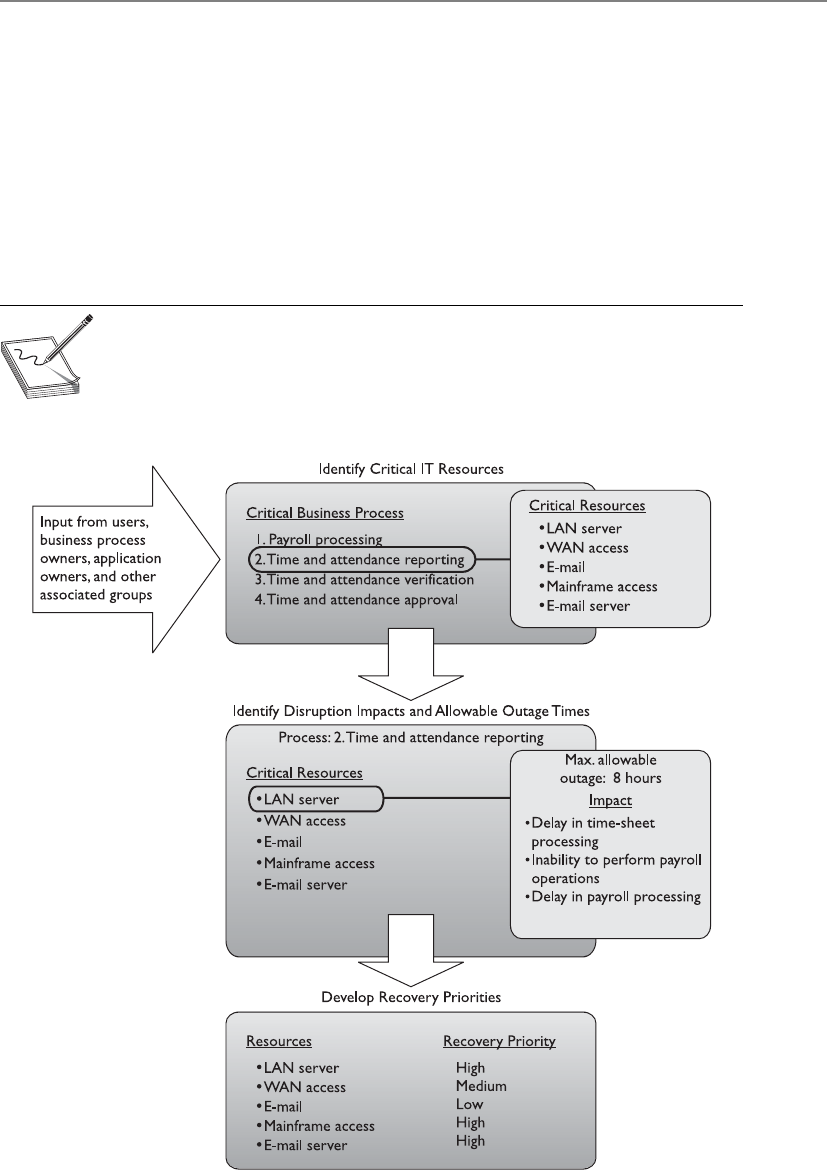
Chapter 8: Business Continuity and Disaster Recovery
911
The BCP team must try to think of all possible events that might occur that could
turn out to be detrimental to a company. The BCP team also must understand it cannot
possibly contemplate all events, and thus protection may not be available for every
scenario introduced. Being properly prepared specifically for a flood, earthquake, ter-
rorist attack, or lightning strike is not as important as being properly prepared to re-
spond to anything that damages or disrupts critical business functions.
All of the previously mentioned disasters could cause these results, but so could a
meteor strike, a tornado, or a wing falling off a plane passing overhead. So the moral of
the story is to be prepared for the loss of any or all business resources, instead of focus-
ing on the events that could cause the loss.
NOTE
NOTE A BIA is performed at the beginning of business continuity planning
to identify the areas that would suffer the greatest financial or operational
loss in the event of a disaster or disruption. It identifies the company’s critical
systems needed for survival and estimates the outage time that can be
tolerated by the company as a result of a disaster or disruption.

CISSP All-in-One Exam Guide
912
Interdependencies
Operations depend on manufacturing, manufacturing depends on R&D, payroll depends on
accounting, and they all depend on IT.
Response: Hold on. I need to write this down.
It is important to look at a company as a complex animal instead of a static two-
dimensional entity. It comprises many types of equipment, people, tasks, departments,
communications mechanisms, and interfaces to the outer world. The biggest challenge
of true continuity planning is understanding all of these intricacies and their interrela-
tionships. A team may develop plans to back up and restore data, implement redun-
dant data-processing equipment, educate employees on how to carry out automated
tasks manually, and obtain redundant power supplies. But if all of these components
don’t know how to work together in a different, disruptive environment to get the
products out the door, it might all be a waste of time.
The BCP team should carry out and address in the resulting plan the following in-
terrelation and interdependency tasks:
• Define essential business functions and supporting departments.
• Identify interdependencies between these functions and departments.
• Discover all possible disruptions that could affect the mechanisms necessary
to allow these departments to function together.
• Identify and document potential threats that could disrupt interdepartmental
communication.
• Gather quantitative and qualitative information pertaining to those threats.
• Provide alternative methods of restoring functionality and communication.
• Provide a brief statement of rationale for each threat and corresponding
information.
The main goal of business continuity is to resume normal business as quickly as
possible, spending the least amount of money and resources. The overall business in-
terruption and resumption plan should cover all organizational elements, identify crit-
ical services and functions, provide alternatives for emergency operations, and integrate
each departmental plan.
This can be accomplished by in-house appointed employees, outside consultants,
or a combination of both. A combination can bring many benefits to the company,
because the consultants are experts in this field and know the necessary steps, questions
to ask, and issues to look for, and offer general reasonable advice, whereas in-house
employees know their company intimately and have a full understanding of how cer-
tain threats can affect operations. It is good to cover all the necessary ground, and many
times a combination of consultants and employees provides just the right recipe.
Up until now, we have established management’s responsibilities as the following:
• Committing fully to the BCP
• Setting policy and goals
• Making available the necessary funds and resources

Chapter 8: Business Continuity and Disaster Recovery
913
• Taking responsibility for the outcome of the development of the BCP
• Appointing a team for the process
The BCP team’s responsibilities are as follows:
• Identifying regulatory and legal requirements that must be met
• Identifying all possible vulnerabilities and threats
• Estimating the possibilities of these threats and the loss potential
• Performing a BIA
• Outlining which departments, systems, and processes must be up and running
before any others
• Identifying interdependencies among departments and processes
• Developing procedures and steps in resuming business after a disaster
Several software tools are available for developing a BCP that simplify this complex
process. Automation of these procedures can quicken the pace of the project and allow
easier gathering of the massive amount of information entailed. Many of the necessary
items are provided in the boilerplate templates, which are outlined later in the “Recov-
ery and Restoration” section.
This information, along with other data explained in previous sections, should be
presented to senior management. Management usually wants information stated in
monetary, quantitative terms, not in subjective, qualitative terms. It is one thing to
know that if a tornado were to hit, the result would be really bad, but it is another
to know that if a tornado were to hit and affect 65 percent of the facility, the company
could be at risk of losing computing capabilities for up to 72 hours, power supply for
up to 24 hours, and a full stop of operations for 76 hours, which would equate to a loss
of $125,000 each day.
It is important to realize that up until now, the BCP team has not actually devel-
oped any of its BCP. It has been collecting data, carrying out analysis on this data, and
presenting it to management. Management must review these findings and give the
“okay” for the team to move forward and actually develop the plan. In our scenario, we
will assume that management has given the thumbs up, and the team will now move
into the next stages.
Preventive Measures
Let’s just wait and see if a disaster hits.
Response: How about we become more proactive?
During the BIA, the BCP team identified the MTD for the critical resources. This was
done to understand the business impact that would be caused if the assets were unavail-
able for one reason or another. It only makes sense that the team would try to reduce
this impact and mitigate these risks by implementing preventive measures. Not imple-
menting preventive measures would be analogous to going to a doctor; being told to
stop eating 300 candy bars a day, increase physical activities, and start taking blood

CISSP All-in-One Exam Guide
914
pressure medicine; and then choosing not to follow any of these preventive measures.
Why go to the doctor in the first place? The same concept holds true with companies.
If a team has been developed to identify risks and has come up with solutions, but the
company does not implement at least some of these solutions, why put this team to-
gether in the first place?
So, instead of just waiting for a disaster to hit to see how the company holds up,
countermeasures should be integrated to better fortify the company from the impacts
that were recognized. Appropriate and cost-effective preventive methods and proactive
measures are more preferable than methods that simply react to a bad situation.
Which types of preventive mechanisms should be put in place depends upon the
results of the BIA, but they may include some of the following:
• Fortification of the facility in its construction materials
• Redundant servers and communications links
• Redundant power lines coming in through different transformers
• Redundant vendor support
• Purchasing of insurance
• Purchasing of uninterruptible power supplies (UPSs) and generators
• Data backup technologies
• Media protection safeguards
• Increased inventory of critical equipment
• Fire detection and suppression systems
NOTE
NOTE Many of these controls are discussed in this chapter, but others are
covered more in depth in Chapter 5 and Chapter 11.
Recovery Strategies
Up to this point, the BCP team has carried out the project initiation phase. In this
phase, the team obtained management support and the necessary resources, laid out
the scope of the project, and identified the BCP team. It also completed the BIA phase.
This means that the committee carried out a risk assessment and analysis, which re-
sulted in a report of the real risk level the company faces.
The BCP committee already had to figure out how the organization works as a
whole in its BIA phase. It drilled down into the organization and identified the critical
functions that absolutely have to be up and running for the company to continue op-
erating. It identified the resources these functions require and calculated MTD values
for the individual resources and the functions themselves. So it may seem as though the
BIA phase is already completed. But when the BCP committee carried out these tasks, it
was in the “risk assessment” phase of the BCP process. Its goals were to figure out how
badly the company could be hurt in different disaster scenarios. Now the team has to
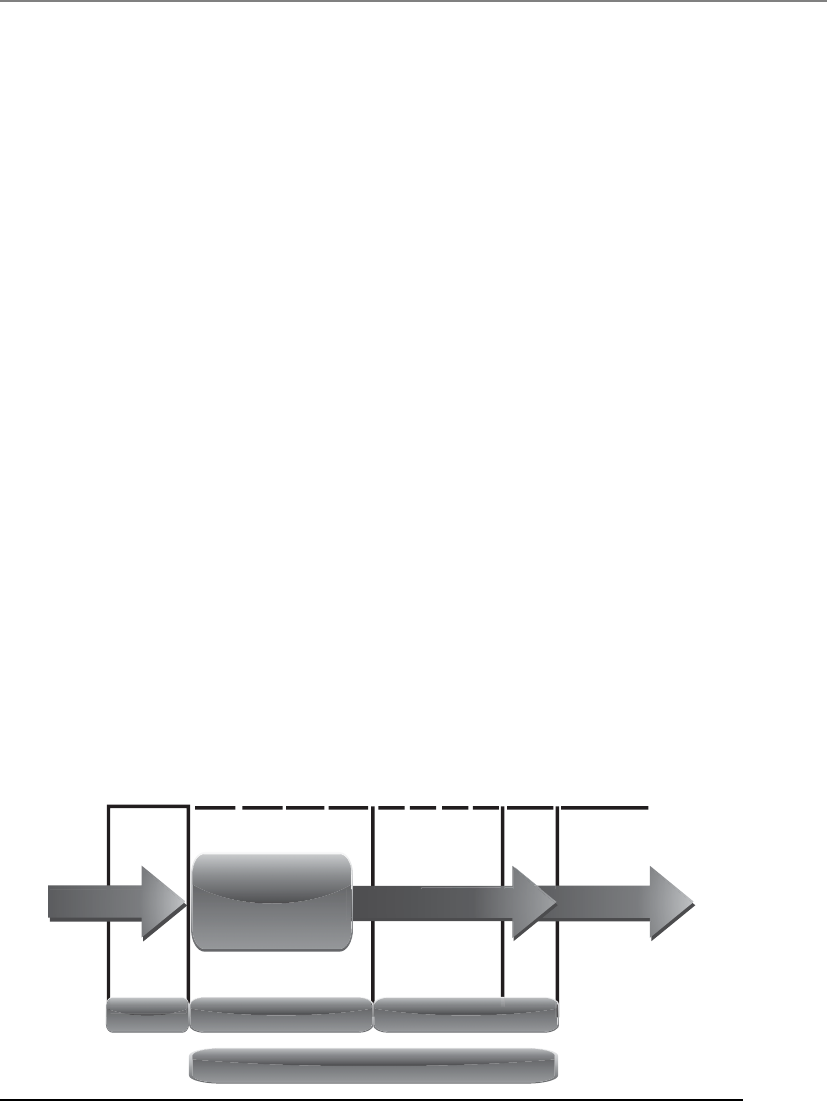
Chapter 8: Business Continuity and Disaster Recovery
915
figure out what solutions need to be put into place to make sure the company can sus-
tain any injuries during the disaster, survive, and rebuild.
Earlier in the chapter we discussed the role of MTD values. In reality, basic MTD
values are a good start, but are not granular enough for a company to figure out what it
needs to put into place to be able to absorb the impact of a disaster. MTD values are
usually “broad strokes” that do not provide enough detail to help pinpoint the actual
recovery solutions that need to be purchased and implemented. For example, if the
BCP team figured out that the MTD value for the customer service department was 48
hours, this is not enough information to fully understand what redundant solutions or
backup technology should be put into place. MTD does provide a basic deadline that
means if customer service is not up within 48 hours, the company may not be able to
recover and everyone should start looking for new jobs.
As shown in Figure 8-3, more than just MTD metrics are needed to get production
back to normal operations after a disruptive event. We will walk through each of these
metric types and see how they are best used together.
The Recovery Time Objective (RTO) is the earliest time period and a service level
within which a business process must be restored after a disaster to avoid unacceptable
consequences associated with a break in business continuity. The RTO value is smaller
than the MTD value, because the MTD value represents the time after which an inabil-
ity to recover significant operations will mean severe and perhaps irreparable damage
to the organization’s reputation or bottom line. The RTO assumes that there is a period
of acceptable downtime. This means that a company can be out of production for a
certain period of time (RTO) and still get back on its feet. But if the company cannot get
production up and running within the MTD window, the company is sinking too fast
to properly recover.
System
Unavailable
Begin system
recovery
Complete system
recovery
Recover lost data
Recover work
backlog
Test and verify
data/systems
Resume normal
operation
Normal operation
RPO RTO WRT
MTD
Recovery time frame Normal operation
Disruptive
event
Figure 8-3 Metrics used for disaster recovery

CISSP All-in-One Exam Guide
916
The Work Recovery Time (WRT) is the remainder of the overall MTD value. RTO
usually deals with getting the infrastructure and systems back up and running, and
WRT deals with restoring data, testing processes, and then making everything “live” for
production purposes.
The Recovery Point Objective (RPO) is the acceptable amount of data loss measured
in time. This value represents the earliest point in time at which data must be recovered.
The higher the value of data, the more funds or other resources that can be put into
place to ensure a smaller amount of data is lost in the event of a disaster. Figure 8-4 il-
lustrates the relationship and differences between the use of RPO and RTO values.
The RTO, RPO, and WRT values are critical to understand because they will be the
basic foundational metrics used when determining the type of recovery solutions a
company must put into place, so let’s dig a bit deeper into them. RTO is the duration of
time and a service level that a business process must be restored to in order to ensure
that unacceptable consequences associated with a disaster are not endured. Let’s say a
company has determined that if it is unable to process product order requests for 12
hours, the financial hit will be too large for it to survive. So the company develops
methods to ensure that orders can be processed manually if their automated techno-
logical solutions become unavailable. But if it takes the company 24 hours to actually
stand up the manual processes, the company could be in a place operationally and fi-
nancially where it can never fully recover. So RTO deals with “how long do we have to
get everything up and working again?”
Now let’s say that the same company experienced a disaster and got its manual pro-
cesses up and running within two hours, so it met the RTO requirement. But just be-
cause business processes are back in place, we still might have a critical problem. The
company has to restore the data it lost during the disaster. It does no good to restore data
that is a week old. The employees need to have access to the data that was being pro-
cessed right before the disaster hit. If the company can only restore data that is a week
old, then all the orders that were in some stage of being fulfilled over the last seven days
could be lost. If the company makes an average of $25,000 per day in orders and all the
order data was lost for the last seven days, this can result in a loss of $175,000 and a lot
of unhappy customers. So just getting things up and running (RTO) is part of the pic-
ture. Getting the necessary data in place so that business processes are up to date and
relevant (RPO) is just as critical.
Recovery
point
RPO (lost data) RTO (restore and recovery)
How far back? How long to recover?
Recovery
time
Time
Disaster!!
Figure 8-4 RPO and RTO metrics in use

Chapter 8: Business Continuity and Disaster Recovery
917
To take things one step further, let’s say the company stood up its manual order-
filling processes in two hours. It also had real-time data backup systems in place, so all
of the necessary up-to-date data is restored. But no one actually tested these manual
processes, everyone is confused, and orders still cannot be processed and revenue col-
lected. This means the company met its RTO requirement and its RPO requirement, but
failed its WRT requirement, and thus failed the MTD requirement. Proper business re-
covery means all of the individual things have to happen correctly for the overall goal
to be successful.
NOTE
NOTE An RTO is the amount of time it takes to recover from a disaster, and
an RPO is the amount of acceptable data, measured in time, that can be lost
from that same event.
The actual MTD, RTO, and RPO values are derived during the BIA. The impact
analysis is carried out to be able to apply criticality values to specific business functions,
resources, and data types. A simplistic example is shown in Table 8-2. The company
must have data restoration capabilities in place to ensure that mission-critical data is
never older than one minute. The company cannot rely on something as slow as back-
up tape restoration, but must have a high-availability data replication solution in place.
The RTO value for mission-critical data processing is two minutes or less. This means
that the technology that carries out the processing functionality for this type of data
cannot be down for more than two minutes. The company may choose to have a cluster
technology in place that will shift the load once it notices that a server goes offline.
In this same scenario, data that is classified as “Business” can be up to three hours
old when the production environment comes back online, so a slower data replication
process is acceptable. Since the RTO for business data is eight hours, the company can
choose to have hot-swappable hard drives available instead of having to pay for the
more complicated and expensive clustering technology.
In the recovery strategy stage, the team approaches the information gathered during
the BIA stage from a practical perspective. It has to figure out what the company needs
to do to actually recover the items it has identified as being so important to the organiza-
tion overall. In its business continuity and recovery strategy, the team closely examines
the critical, agreed-upon business functions, and then evaluates the numerous recovery
and backup alternatives that might be used to recover critical business operations.
The BIA provides the blueprint for the recovery strategies for all the components,
because the business processes are totally dependent upon these other recovery strate-
gies taking place properly. It is important to choose the right tactics and technologies
Data Type RPO RTO
Mission Critical Continuous to 1 Minute Instantaneous to 2 Minutes
Business Critical 5 Minutes 10 Minutes
Business 3 Hours 8 Hours
Table 8-2 RPO and RTO Value Relationships

CISSP All-in-One Exam Guide
918
for the recovery of each critical business process and service in order to assure that the
set MTD values are met.
So what does the BCP team need to accomplish in the recovery strategy stage? The
team needs to actually define the recovery strategies, which are a set of predefined ac-
tivities that will be implemented and carried out in response to a disaster. Sounds
simple enough, but in reality this phase requires just as much work as the BIA phase.
The team has figured out these types of MTD timelines for the individual business
functions, operations, and resources. Now it has to identify the recovery mechanisms
and strategies that must be implemented to make sure everything is up and running
within the timelines it has calculated. The team needs to break down these recovery
strategies into the following sections:
• Business process recovery
• Facility recovery
• Supply and technology recovery
• User environment recovery
• Data recovery
Business Process Recovery
A business process is a set of interrelated steps linked through specific decision activi-
ties to accomplish a specific task. Business processes have starting and ending points
and are repeatable. The processes should encapsulate the knowledge about services,
resources, and operations provided by a company. For example, when a customer
requests to buy a book via an organization’s e-commerce site, a set of steps must be
followed, such as these:
1. Validate that the book is available.
2. Validate where the book is located and how long it would take to ship it to
the destination.
What Is the Difference Between Preventive Measures and
Recovery Strategies?
Preventive mechanisms are put into place to try to reduce the possibility of the
company experiencing a disaster and, if a disaster does hit, to lessen the amount
of damage that will take place. Although the company cannot stop a tornado from
coming, it could choose to move its facility from tornado alley in Kansas. The
company cannot stop a car from plowing into and taking out a transformer, but it
can have a separate power feed from a different transformer in case this happens.
Recovery strategies are processes on how to rescue the company after a disaster
takes place. These processes will integrate mechanisms such as establishing alter-
nate sites for facilities, implementing emergency response procedures, and possi-
bly activating the preventive mechanisms that have already been implemented.

Chapter 8: Business Continuity and Disaster Recovery
919
3. Provide the customer with the price and delivery date.
4. Verify the customer’s credit card information.
5. Validate and process the credit card order.
6. Send a receipt and tracking number to the customer.
7. Send the order to the book inventory location.
8. Restock inventory.
9. Send the order to accounting.
The BCP team needs to understand these different steps of the company’s most
critical processes. The data are usually presented as a workflow document that contains
the roles and resources needed for each process. The BCP team must understand the
following about critical business processes:
• Required roles
• Required resources
• Input and output mechanisms
• Workflow steps
• Required time for completion
• Interfaces with other processes
This will allow the team to identify threats and the controls to ensure the least
amount of process interruption.
Facility Recovery
Disruptions, in BCP terms, are of three main types: nondisasters, disasters, and catastro-
phes. A nondisaster is a disruption in service due to a device malfunction or failure. The
solution could include hardware, software, or file restoration. A disaster is an event that
causes the entire facility to be unusable for a day or longer. This usually requires the use
of an alternate processing facility and restoration of software and data from offsite cop-
ies. The alternate site must be available to the company until its main facility is repaired
and usable. A catastrophe is a major disruption that destroys the facility altogether. This
requires both a short-term solution, which would be an offsite facility, and a long-term
solution, which may require rebuilding the original facility.
Disasters and catastrophes are rare compared to nondisasters, thank goodness.
Nondisasters can usually be taken care of by replacing a device or restoring files from
onsite backups. For nondisasters, the BCP team needs to think through onsite backup
requirements and make well-informed decisions. The team must identify the critical
equipment, and estimate the mean time between failures (MTBF) and the mean time to
repair (MTTR). This will provide the necessary statistics on when a device may be meet-
ing its maker and a new device may be required.

CISSP All-in-One Exam Guide
920
NOTE
NOTE MTBF is the estimated lifetime of a piece of equipment; it is
calculated by the vendor of the equipment or a third party. The reason for
using this value is to know approximately when a particular device will need
to be replaced. MTTR is an estimate of how long it will take to fix a piece
of equipment and get it back into production. These concepts are further
explained in Chapter 11.
An organization has various recovery alternatives to choose from, such as a redun-
dant site, outsourcing, a rented offsite installation, or a reciprocal agreement with an-
other organization. The organization has three basic options. It can select a dedicated
site that it operates itself. Or it can lease a commercial facility, such as a “hot site” that
contains all the equipment and data needed to quickly restore operations. Or, it can
enter into a formal agreement with another facility, such as a service bureau, to restore
its operations.
In all these cases, the organization estimates the alternative’s ability to support its
operations, to do it quickly, and to do it at a fair cost. It should closely query the alter-
native facility about such things as: How long will it take to recover from a certain inci-
dent to a certain level of operations? Will it give priority to restoring the operations of
one organization over another after a disaster? What are its costs for performing various
functions? What are its specifications for IT and security functions? Is the workspace big
enough for the required number of employees?
An important consideration with third parties is their reliability, both in normal
times and during an emergency. Their reliability can depend on considerations such as
their track record, the extent and location of their supply inventory, and their access to
supply and communication channels.
For larger disasters that affect the primary facility, an offsite backup facility must be
accessible. Generally, contracts are established with third-party vendors to provide such
services. The client pays a monthly fee to retain the right to use the facility in a time of
need, and then incurs an activation fee when the facility actually has to be used. In ad-
dition, there would be a daily or hourly fee imposed for the duration of the stay. This is
why subscription services for backup facilities should be considered a short-term solu-
tion, not a long-term solution.
It is important to note that most recovery site contracts do not promise to house the
company in need at a specific location, but rather promise to provide what has been
contracted for somewhere within the company’s locale. On, and subsequent to, Sep-
tember 11, 2001, many organizations with Manhattan offices were surprised when they
were redirected by their backup site vendor not to sites located in New Jersey (which
were already full), but rather to sites located in Boston, Chicago, or Atlanta. This adds
yet another level of complexity to the recovery process, specifically the logistics of trans-
porting people and equipment to unplanned locations.
Companies can choose from three main types of leased or rented offsite facilities:
•Hot site A facility that is leased or rented and is fully configured and ready
to operate within a few hours. The only missing resources from a hot site are
usually the data, which will be retrieved from a backup site, and the people
who will be processing the data. The equipment and system software must

Chapter 8: Business Continuity and Disaster Recovery
921
absolutely be compatible with the data being restored from the main site and
must not cause any negative interoperability issues. Some facilities, for a fee,
store data backups close to the hot site. These sites are a good choice for a
company that needs to ensure a site will be available for it as soon as possible.
Most hot-site facilities support annual tests that can be done by the company
to ensure the site is functioning in the necessary state of readiness.
This is the most expensive of the three types of offsite facilities. It can pose
problems if a company requires proprietary or unusual hardware or software.
NOTE
NOTE To attract the largest customer base, the vendor of a hot site will
provide the most commonly used hardware and software products. This
will most likely not include the specific customer’s proprietary or unusual
hardware or software products.
•Warm site A leased or rented facility that is usually partially configured with
some equipment, such as HVAC, and foundational infrastructure components,
but not the actual computers. In other words, a warm site is usually a hot site
without the expensive equipment such as communication equipment and
servers. Staging a facility with duplicate hardware and computers configured
for immediate operation is extremely expensive, so a warm site provides an
alternate facility with some peripheral devices.
This is the most widely used model. It is less expensive than a hot site, and
can be up and running within a reasonably acceptable time period. It may
be a better choice for companies that depend upon proprietary and unusual
hardware and software, because they will bring their own hardware and
software with them to the site after the disaster hits. Drawbacks, however, are
that much of the equipment has to be procured, delivered to, and configured
at the warm site after the fact, and the annual testing available with hot-site
contracts is not usually available with warm-site contracts. Thus, a company
cannot be certain that it will in fact be able to return to an operating state
within hours.
•Cold site A leased or rented facility that supplies the basic environment,
electrical wiring, air conditioning, plumbing, and flooring, but none of the
equipment or additional services. A cold site is essentially an empty data
center. It may take weeks to get the site activated and ready for work. The cold
site could have equipment racks and dark fiber (fiber that does not have the
circuit engaged) and maybe even desks. However, it would require the receipt
of equipment from the client, since it does not provide any.
The cold site is the least expensive option, but takes the most time and effort
to actually get up and functioning right after a disaster, as the systems and
software must be delivered, tweaked, and configured. Cold sites are often used
as backups for call centers, manufacturing plants, and other services that can
be moved lock, stock, and barrel in one shot.

CISSP All-in-One Exam Guide
922
If an emergency is a long one, some places will start their recovery in a hot or warm
site, and transfer some operations over to a cold site after the latter has had time to set up.
It is important to understand that the different site types listed here are provided by
service bureaus. A service bureau is a company that has additional space and capacity
to provide applications and services such as call centers. A company pays a monthly
subscription fee to a service bureau for this space and service. The fee can be paid for
contingencies such as disasters and emergencies. You should evaluate the ability of a
service bureau to provide services as you would divisions within your own organiza-
tion, particularly on matters such as its ability to alter its software and hardware con-
figurations or to expand its operations to meet the needs of a contingency.
NOTE
NOTE Related to a service bureau is a contingency company; its purpose is to
supply services and materials temporarily to an organization that is experiencing
an emergency. For example, a contingent supplier might provide raw materials
such as heating fuel or backup telecommunication services. In considering
contingent suppliers, the BCP team should think through considerations such
as the level of services and materials a supplier can provide, how quickly a
supplier can ramp up to supply them, and whether the supplier shares similar
communication paths and supply chains as the affected organization.
Most companies use warm sites, which have some devices such as disk drives, tape
drives, and controllers, but very little else. These companies usually cannot afford a hot
site, and the extra downtime would not be considered detrimental. A warm site can
provide a longer-term solution than a hot site. Companies that decide to go with a cold
site must be able to be out of operation for a week or two. The cold site usually includes
power, raised flooring, climate control, and wiring.
The following provides a quick overview of the differences between offsite facilities:
Hot Site Advantages
• Ready within hours for operation
• Highly available
• Usually used for short-term solutions, but available for longer stays
• Annual testing available
Hot Site Disadvantages
• Very expensive
• Limited on hardware and software choices
Warm and Cold Site Advantages
• Less expensive
• Available for longer timeframes because of the reduced costs
• Practical for proprietary hardware or software use
Warm and Cold Site Disadvantages
• Operational testing not usually available
• Resources for operations not immediately available
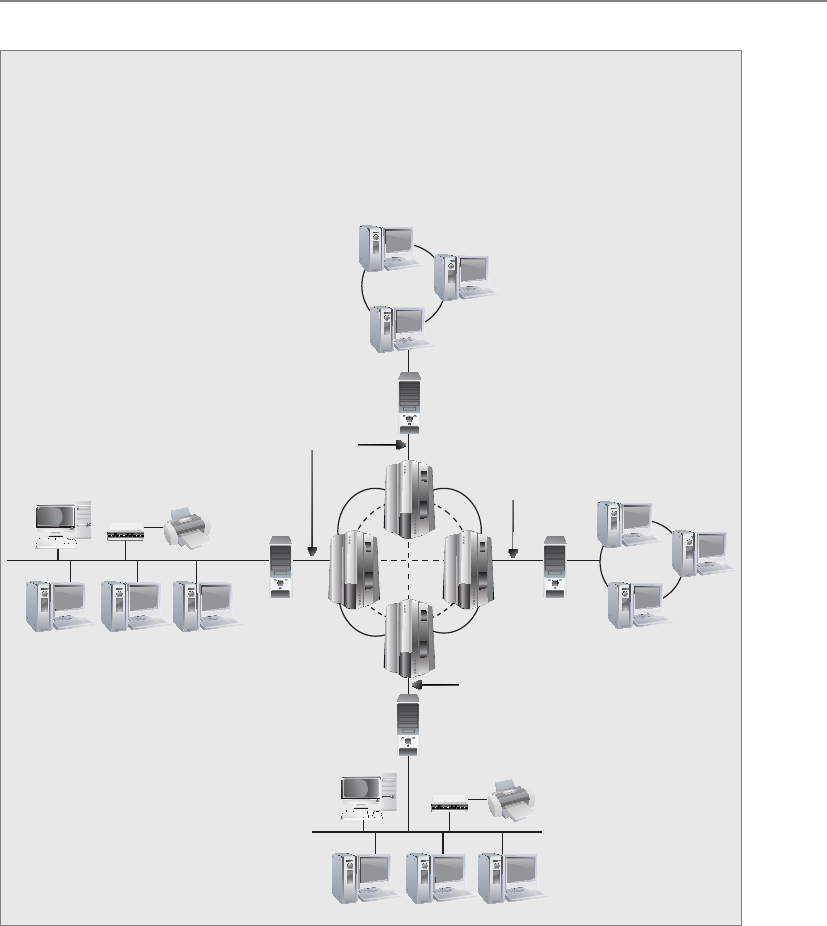
Chapter 8: Business Continuity and Disaster Recovery
923
Tertiary Sites
During the BIA phase, the team may recognize the danger of the primary backup
facility not being available when needed, which could require a tertiary site. This
is a secondary backup site, just in case the primary backup site is unavailable. The
secondary backup site is sometimes referred to as a “backup to the backup.” This
is basically plan B if plan A does not work out.
Primary Networks
Hot Site
Tertiary Site
Backup tapes or other media should be tested periodically on the equipment kept
at the hot site to make sure the media is readable by those systems. If a warm site is
used, the tapes should be brought to the original site and tested on those systems. The
reason for the difference is that when a company uses a hot site, it depends on the sys-
tems located at the hot site; therefore, the media needs to be readable by those systems.
If a company depends on a warm site, it will most likely bring its original equipment
with it, so the media needs to be readable by the company’s systems.

CISSP All-in-One Exam Guide
924
Reciprocal Agreements
If my facility is destroyed, can I come over to yours?
Response: Only if you bring hot cocoa and popcorn.
Another approach to alternate offsite facilities is to establish a reciprocal agreement
with another company, usually one in a similar field or that that has similar techno-
logical infrastructure. This means that company A agrees to allow company B to use its
facilities if company B is hit by a disaster, and vice versa. This is a cheaper way to go
than the other offsite choices, but it is not always the best choice. Most environments
are maxed out pertaining to the use of facility space, resources, and computing capabil-
ity. To allow another company to come in and work out of the same shop could prove
to be detrimental to both companies. Whether it can assist the other company while
tending effectively to its own business is an open question. The stress of two companies
working in the same environment could cause tremendous levels of tension. If it did
work out, it would only provide a short-term solution. Configuration management
could be a nightmare. Does the other company upgrade to new technology and retire
old systems and software? If not, one company’s systems may become incompatible
with that of the other company
If you allow another company to move into your facility and work from there, you
may have a solid feeling about your friend, the CEO, but what about all of her employ-
ees, whom you do not know? The mixing of operations could introduce many security
issues. Now you have a new subset of people who may need to have privileged and di-
rect access to your resources in the shared environment. This other company could be
your competitor in the business world, so many of the employees may see you and your
company more as a threat than one that is offering a helping hand in need. Close atten-
tion needs to be paid when assigning these other people access rights and permissions
to your critical assets and resources, if they need access at all. Careful testing is recom-
mended to see if one company or the other can handle the extra loads.
Reciprocal agreements have been known to work well in specific businesses, such as
newspaper printing. These businesses require very specific technology and equipment
that will not be available through any subscription service. These agreements follow a
“you scratch my back and I’ll scratch yours” mentality. For most other organizations,
they are generally, at best, a secondary option for disaster protection. The other issue to
consider is that these agreements are not enforceable. This means that although com-
Offsite Location
When choosing a backup facility, it should be far enough away from the original
site so that one disaster does not take out both locations. In other words, it is not
logical to have the backup site only a few miles away if the company is concerned
about tornado damage, because the backup site could also be affected or de-
stroyed. There is a rule of thumb that suggests that alternate facilities should be,
at a bare minimum, at least 5 miles away from the primary site, while 15 miles is
recommended for most low-to-medium critical environments, and 50 to 200
miles is recommended for critical operations to give maximum protection in
cases of regional disasters.

Chapter 8: Business Continuity and Disaster Recovery
925
pany A said company B could use its facility when needed, when the need arises, com-
pany A legally does not have to fulfill this promise. However, there are still many
companies who do opt for this solution either because of the appeal of low cost or, as
noted earlier, because it may be the only viable solution in some cases.
Important issues need to be addressed before a disaster hits if a company decides to
participate in a reciprocal agreement with another company:
• How long will the facility be available to the company in need?
• How much assistance will the staff supply in integrating the two environments
and ongoing support?
• How quickly can the company in need move into the facility?
• What are the issues pertaining to interoperability?
• How many of the resources will be available to the company in need?
• How will differences and conflicts be addressed?
• How does change control and configuration management take place?
• How often can drills and testing take place?
• How can critical assets of both companies be properly protected?
A variation on a reciprocal agreement is a consortium, or mutual aid agreement. In
this case, more than two organizations agree to help one other in case of an emergency.
Adding multiple organizations to the mix, as you might imagine, can make things even
more complicated. The same concerns that apply with reciprocal agreements apply
here, but even more so. Organizations entering into such agreements need to formally
and legally write out their mutual responsibilities in advance. Interested parties, includ-
ing the legal and IT departments, should carefully scrutinize such accords before the
organization signs onto them.
Redundant Sites
It’s mine and mine alone.
Response: Okay, keep it then.
Some companies choose to have redundant sites, or mirrored sites, meaning one site
is equipped and configured exactly like the primary site, which serves as a redundant
environment. The business-processing capabilities between the two sites can be com-
pletely synchronized. These sites are owned by the company and are mirrors of the
original production environment. A redundant site has clear advantages: it has full avail-
ability, is ready to go at a moment’s notice, and is under the organization’s complete
control. This is, however, one of the most expensive backup facility options, because a
full environment must be maintained even though it usually is not used for regular pro-
duction activities until after a disaster takes place that triggers the relocation of services
to the redundant site. But expensive is relative here. If the company would lose a million
dollars if it were out of business for just a few hours, the loss potential would override
the cost of this option. Many organizations are subjected to regulations that dictate they
must have redundant sites in place, so expense is not an issue in these situations.

CISSP All-in-One Exam Guide
926
NOTE
NOTE Ahot site is a subscription service. A redundant site, in contrast,
is a site owned and maintained by the company, meaning the company
does not pay anyone else for the site. A redundant site might be “hot” in
nature, meaning it is ready for production quickly. However, the CISSP exam
differentiates between a hot site (a subscription service) and a redundant site
(owned by the company).
Another type of facility-backup option is a rolling hot site, or mobile hot site, where
the back of a large truck or a trailer is turned into a data processing or working area.
This is a portable, self-contained data facility. The trailer has the necessary power, tele-
communications, and systems to do some or all of the processing right away. The trail-
er can be brought to the company’s parking lot or another location. Obviously, the
trailer has to be driven over to the new site, the data have to be retrieved, and the neces-
sary personnel have to be put into place.
Another, similar solution is a prefabricated building that can be easily and quickly
put together. Military organizations and large insurance companies typically have roll-
ing hot sites or trucks preloaded with equipment because they often need the flexibility
to quickly relocate some or all of their processing facilities to different locations around
the world depending on where the need arises.
Another option for organizations is to have multiple processing centers. An organiza-
tion may have ten different facilities throughout the world, which are connected with
specific technologies that could move all data processing from one facility to another
in a matter of seconds when an interruption is detected. This technology can be imple-
mented within the organization or from one facility to a third-party facility. Certain
service providers provide this type of functionality to their customers. So if a company’s
data processing is interrupted, all or some of the processing can be moved to the service
provider’s servers.
It is best if a company is aware of all available options for hardware and facility
backups to ensure it makes the best decision for its specific business and critical needs.
Supply and Technology Recovery
At this point, the BCP team has mapped out the necessary business functions that need
to be up and running and the specific backup facility option that is best for its organiza-
tion. Now the team needs to dig down into the more granular items, such as backup
solutions for the following:
• Network and computer equipment
• Voice and data communications resources
• Human resources
• Transportation of equipment and personnel
• Environment issues (HVAC)
• Data and personnel security issues
• Supplies (paper, forms, cabling, and so on)
• Documentation

Chapter 8: Business Continuity and Disaster Recovery
927
The organization’s current technical environment must be understood. This means
the planners have to know the intimate details of the network, communications tech-
nologies, computers, network equipment, and software requirements that are necessary
to get the critical functions up and running. What is surprising to some people is that
many organizations do not totally understand how their network is configured and how
it actually works, because the network was most likely established 10 to 15 years ago
and has kept growing and changing under different administrators and personnel. New
devices are added, new computers are added, new software packages are added, Voice
over Internet Protocol (VoIP) may have been integrated, and the demilitarized zone
(DMZ) may have been split up into three DMZs, with an extranet for the company’s
partners. Maybe the company bought and merged with another company and network.
Over ten years, a number of technology refreshes most likely have taken place, and the
Outsourcing
Part of the planned response to a disaster may be to outsource some of the af-
fected activities to another organization. Organizations do outsource things—
help desk services, manufacturing, legal advice—all the time. So why not impor-
tant functions affected by a disaster? Some companies specialize in disaster re-
sponse and continuity planning, and can act as expert consultants.
That is all well and good. However, be aware that your organization is still
ultimately responsible for the continuity of a product or service that is out-
sourced. Clients and customers will expect that the organization will ensure con-
tinuity of its products and services, either by itself or by having chosen the right
outside vendors to do the outsourcing. If outside vendors are brought in, the ac-
tive participation of key in-house managers in their work is still essential. They
still need to supervise the work of the outside vendors.
This same concern applies to normal, third-party suppliers of goods and ser-
vices to the organization. Any BCP should take them into account as well. Note
that the process for evaluating an outsourced company for BCP is like that for
evaluating the organization itself. The organization must make sure that the out-
sourced company is financially viable and has a solid record in BCP.
The organization can take the following steps to better ensure the continuity
of its outsourcing:
• Make the ability of such companies to reliably assure continuity of
products and services part of any work proposals.
• Make sure that BCP is included in contracts with such companies, and
that their responsibilities and levels of service are clearly spelled out.
• Draw up realistic and reasonable service levels that the outsourced firm
will meet during an incident.
• If possible, have the outsourcing companies take part in BCP awareness
programs, training, and testing.
The goal is to make the supply of goods and services from outsources as resil-
ient as possible in the wake of a disaster.

CISSP All-in-One Exam Guide
928
individuals who are maintaining the environment now are not the same people who
built it ten years ago. Many IT departments experience extensive employee turnover
every five years. And most organizational network schematics are notoriously out of
date because everyone is busy with their current tasks or will come up with new tasks
just to get out of having to update the schematic.
So the BCP team has to make sure that if the networked environment is partially or
totally destroyed, the recovery team has the knowledge and skill to properly rebuild it.
NOTE
NOTE Many organizations have moved to VoIP, which means that if the
network goes down, network and voice capability are unavailable. The team
should address the possible need of redundant voice systems.
The BCP team needs to take into account several things that are commonly over-
looked, such as hardware replacements, software products, documentation, environ-
mental needs, and human resources.
Hardware Backups
I have an extra USB drive, video card, and some gum.
Response: I am sure that’s all we will need.
The team has identified the equipment required to keep the critical functions up
and running. This may include servers, user workstations, routers, switches, tape back-
up devices, and more. The needed inventory may seem simple enough, until the team
drills down into more detail. If the recovery team is planning to use images to rebuild
newly purchased servers and workstations because the original ones were destroyed, for
example, will the images work on the new computers? Using images instead of build-
ing systems from scratch can be a time-saving task, unless the team finds out that the
replacement equipment is a newer version and thus the images cannot be used. The
BCP team should plan for the recovery team to use the company’s current images, but
also have a manual process of how to build each critical system from scratch with the
necessary configurations.
The BCP team also needs to identify how long it will take for new equipment to
arrive. For example, if the organization has identified Dell as its equipment replace-
ment supplier, how long will it take this vendor to send 20 servers and 30 workstations
to the offsite facility? After a disaster hits, the company could be in its offsite facility
only to find that its equipment will take three weeks to be delivered. So, the SLA for the
identified vendors needs to be investigated to make sure the company is not further
damaged by delays. Once the parameters of the SLA are understood, the team must
make a decision between depending upon the vendor and purchasing redundant sys-
tems and storing them as backups in case the primary equipment is destroyed.
As described earlier, when potential company risks are identified, it is better to take
preventive steps to reduce the potential damage. After the calculation of the MTD val-
ues, the team will know how long the company can be without a specific device. This
data should be used to make the decision on whether the company should depend on
the vendor’s SLA or make readily available a hot-swappable redundant system. If the

Chapter 8: Business Continuity and Disaster Recovery
929
company will lose $50,000 per hour if a particular server goes down, then the team
should elect to implement redundant systems and technology.
If an organization is using any legacy computers and hardware and a disaster hits
tomorrow, where would it find replacements for this legacy equipment? The team
should identify legacy devices and understand the risk the organization is facing if re-
placements are unavailable. This finding has caused many companies to move from
legacy systems to commercial off-the-shelf (COTS) products to ensure that replacement
is possible.
NOTE
NOTE Different types of backup tape technologies can be used (digital linear
tape, digital audio tape, advanced intelligent tape). The team needs to make
sure it knows the type of technology that is used by the company and identify
the necessary vendor in case the tape-reading device needs to be replaced.
Software Backups
I have a backup server and my backed-up data, but no operating system or applications.
Response: Good luck.
Most companies’ IT departments have their array of software disks and licensing
information here or there—or possibly in one centralized location. If the facility were
destroyed and the IT department’s current environment had to be rebuilt, how would
it gain access to these software packages? The BCP team should make sure to have an
inventory of the necessary software required for mission-critical functions and have
backup copies at an offsite facility. Hardware is usually not worth much to a company
without the software required to run on it. The software that needs to be backed up can
be in the form of applications, utilities, databases, and operating systems. The continu-
ity plan must have provisions to back up and protect these items along with hardware
and data.
The BCP team should make sure there are at least two copies of the company’s op-
erating system software and critical applications. One copy should be stored onsite and
the other copy should be stored at a secure offsite location. These copies should be
tested periodically and re-created when new versions are rolled out.
It is common for organizations to work with software developers to create custom-
ized software programs. For example, in the banking world, individual financial institu-
tions need software that will allow their bank tellers to interact with accounts, hold
account information in databases and mainframes, provide online banking, carry out
data replication, and perform a thousand other types of bank-like functionalities. This
specialized type of software is developed and available through a handful of software
vendors that specialize in this market. When bank A purchases this type of software for
all of its branches, the software has to be specially customized for its environment and
needs. Once this banking software is installed, the whole organization depends upon it
for its minute-by-minute activities.
When bank A receives the specialized and customized banking software from the
software vendor, bank A does not receive the source code. Instead, the software vendor
provides bank A with a compiled version. Now, what if this software vendor goes out of
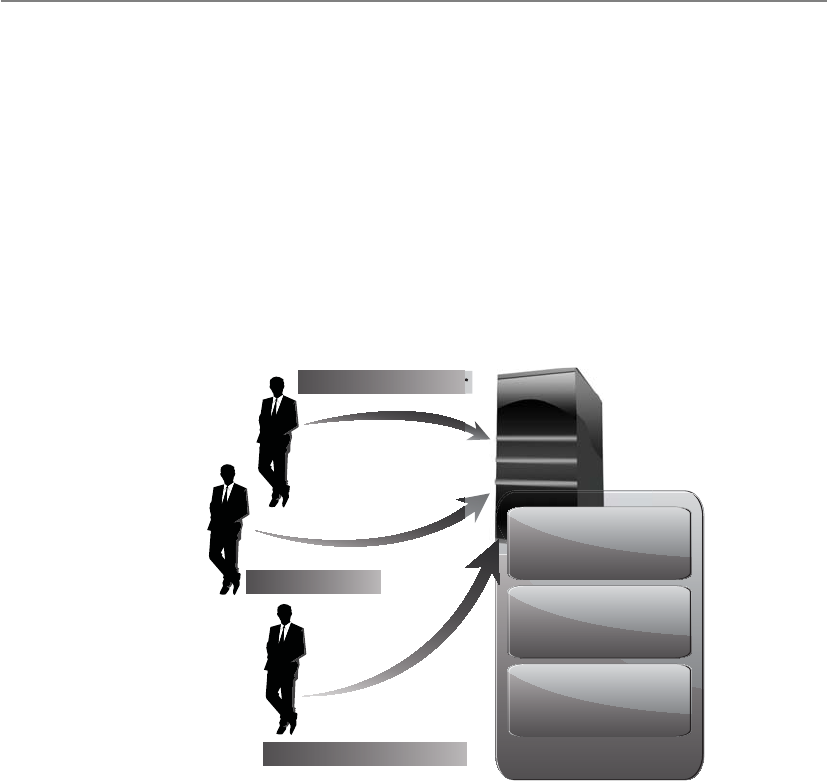
CISSP All-in-One Exam Guide
930
business because of a disaster or bankruptcy? Then bank A will require a new vendor to
maintain and update this banking software; thus, the new vendor will need access to
the source code.
The protection mechanism that bank A should implement is called software escrow.
Software escrow means that a third party holds the source code, backups of the com-
piled code, manuals, and other supporting materials. A contract between the software
vendor, customer, and third party outlines who can do what and when with the source
code. This contract usually states that the customer can have access to the source code
only if and when the vendor goes out of business, is unable to carry out stated respon-
sibilities, or is in breach of the original contract. If any of these activities takes place,
then the customer is protected because it can still gain access to the source code and
other materials through the third-party escrow agent.
SLA
Maintenance
contacts
Software escrow
Software developer
Software escrow agent
Software user
General and
implementation
contacts
Many companies have been crippled by not implementing software escrow. Such a
company would have paid a software vendor to develop specialized software, and when
the software vendor went belly up, the customer did not have access to the code that its
whole company ran on.
Choosing a Software Backup Facility
I like this facility because it is pink.
A company needs to address several issues and ask specific questions when it is
deciding upon a storage facility for its backup materials. The following provides a list of
just some of the issues that need to be thought through before committing to a specific
vendor for this service:
• Can the media be accessed in the necessary timeframe?

Chapter 8: Business Continuity and Disaster Recovery
931
• Is the facility closed on weekends and holidays, and does it only operate
during specific hours of the day?
• Are the access control mechanisms tied to an alarm and/or the police station?
• Does the facility have the capability to protect the media from a variety of
threats?
• What is the availability of a bonded transport service?
• Are there any geographical environmental hazards such as floods,
earthquakes, tornadoes, and so on that might affect the facility?
• Is there a fire detection and suppression system?
• Does the facility provide temperature and humidity monitoring and control?
• What type of physical, administrative, and logical access controls are used?
The questions and issues that need to be addressed will vary depending on the type
of company, its needs, and the requirements of a backup facility.
Documentation
We came up with a great plan six months ago. Did anyone write it down?
Documentation seems to be a dreaded task to most people, who will find many
other tasks to take on to ensure they are not the ones stuck with documenting pro-
cesses and procedures. However, a company does a great and responsible job by back-
ing up hardware and software to an offsite facility, maintaining it, and keeping
everything up-to-date and current; without documentation, when a disaster hits, no
one will know how to put Humpty Dumpty back together again.
Restoration of files can be challenging, but restoring a whole environment that was
swept away in a flood can be overwhelming, if not impossible. Procedures need to be
documented because when they are actually needed, it will most likely be a chaotic and
frantic atmosphere with a demanding time schedule. The documentation may need to
include information on how to install images, configure operating systems and servers,
and properly install utilities and proprietary software. Other documentation could in-
clude a calling tree, which outlines who should be contacted, in what order, and who
is responsible for doing the calling. The documentation must also contain contact in-
formation for specific vendors, emergency agencies, offsite facilities, and any other en-
tity that may need to be contacted in a time of need.
Most network environments evolve over time. Software has been installed on top of
other software, configurations have been altered over the years to properly work in a
unique environment, and service packs and patches have been installed to fix this prob-
lem or that issue. To expect one person or a group of people to go through all of these
steps during a crisis and end up with an environment that looks and behaves exactly
like the original environment and in which all components work together seamlessly
may be a lofty dream.
So, the dreaded task of documentation may be the saving grace one day. It is an es-
sential piece of business, and therefore an essential piece in disaster recovery and busi-
ness continuity.

CISSP All-in-One Exam Guide
932
It is important to make one or more roles responsible for proper documentation.
As with all the items addressed in this chapter, simply saying “All documentation will
be kept up-to-date and properly protected” is the easy part—saying and doing are two
different things. Once the BCP team identifies tasks that must be done, the tasks must
be assigned to individuals and those individuals have to be accountable. If these steps
are not taken, the BCP team could have wasted a lot of time and resources defining
these tasks, and the company could be in grave danger if a disaster occurs.
NOTE
NOTE An organization may need to solidify communications channels and
relationships with government officials and emergency response groups. The
goal of this activity is to solidify proper protocol in case of a city- or region-
wide disaster. During the BIA phase, local authorities should be contacted so
the team understands the risks of its geographical location and how to access
emergency zones. If the company has to initiate its BCP, it will need to contact
many of these emergency response groups during the recovery stage.
Human Resources
We have everything up and running now—where are all the people to run these systems?
One of the resources commonly left out of the equation is people. A company may
restore its networks and critical systems and get business functions up and running,
only to realize it doesn’t know the answer to the question, “Who will take it from here?”
The area of human resources is a critical component to any recovery and continuity
process, and it needs to be fully thought out and integrated into the plan.
What happens if we have to move to an offsite facility that is 250 miles away? We
cannot expect people to drive back and forth from home to work. Should we pay for
temporary housing for the necessary employees? Do we have to pay their moving costs?
Do we need to hire new employees in the area of the offsite facility? If so, what skill set
do we need from them? The BCP team should go through a long succession of these
types of questions.
Plans
Once the business continuity and disaster recovery plans are completed, where
do you think they should be stored? Should the company have only one copy
and keep it safely in a file cabinet next to Bob so that he feels safe? Nope. There
should be two or three copies of these plans. One copy may be at the primary
location, but the other copies should be at other locations in case the primary
facility is destroyed. Typically, a copy is stored at the BCP coordinator’s home,
and another copy is stored at the offsite facility. This reduces the risk of not hav-
ing access to the plans when needed.
These plans should not be stored in a file cabinet, but rather in a fire-resistant
safe. When they are stored offsite, they need to be stored in a way that provides
just as much protection as the primary site would provide.

Chapter 8: Business Continuity and Disaster Recovery
933
The BCP project expands job responsibilities, descriptions, hours, and even work-
places. The project has to identify the critical personnel and subordinates who will de-
velop the plan and execute key duties during an incident. Among the key players may
be heads of BCP coordination, IT systems, data and voice communications, business
units, transport, logistics, security, safety, facilities, finance, auditing, legal, and public
relations.
Multiple people should be trained in executing the duties and procedures spelled
out in the plan so that one person can fill another’s shoes in an emergency. Clear docu-
mentation is vital in such cross-training. The human resources department normally
manages the availability of personnel for the continuity process.
If a large disaster takes place that affects not only the company’s facility but also
surrounding areas, including housing, do you think your employees will be more wor-
ried about your company or their families? Some companies assume that employees
will be ready and available to help them get back into production, when in fact they
may need to be at home because they have responsibilities to their families.
Regrettably, some employees may be killed in the disaster, and the team may need
to look at how it will be able to replace employees quickly through a temporary agency
or a headhunter. This is extremely unfortunate, but it is part of reality. The team that
considers all threats and is responsible for identifying practical solutions needs to think
through all of these issues.
Organizations should already have executive succession planning in place. This
means that if someone in a senior executive position retires, leaves the company, or is
killed, the organization has predetermined steps to carry out to protect the company.
The loss of a senior executive could tear a hole in the company’s fabric, creating a lead-
ership vacuum that must be filled quickly with the right individual. The line-of-succes-
sion plan defines who would step in and assume responsibility for this role. Many
organizations have “deputy” roles. For example, an organization may have a deputy
CIO, deputy CFO, and deputy CEO ready to take over the necessary tasks if the CIO,
CFO, or CEO becomes unavailable.
Often, larger organizations also have a policy indicating that two or more of the
senior staff cannot be exposed to a particular risk at the same time. For example, the
CEO and president cannot travel on the same plane. If the plane went down and both
individuals were killed, then the company could be in danger. This is why you don’t see
the president of the United States and the vice president together too often. It is not
because they don’t like each other and thus keep their distance from each other. It is
because there is a policy indicating that to protect the United States, its top leaders can-
not be under the same risk at the same time.
End-User Environment
Do you think the users could just use an abacus for calculations and fire for light?
Because the end users are usually the worker bees of a company, they must be pro-
vided a functioning environment as soon as possible after a disaster hits. This means
that the BCP team must understand the current operational and technical functioning
environment and examine critical pieces so they can replicate them.

CISSP All-in-One Exam Guide
934
The first issue pertaining to users is how they will be notified of the disaster and
who will tell them where to go and when. A tree structure of managers can be devel-
oped so that once a disaster hits, the person at the top of the tree calls two managers,
and they in turn call three managers, and so on until all managers are notified. Each
manager would be responsible for notifying the people he is responsible for until ev-
eryone is on the same page. Then, one or two people must be in charge of coordinating
the issues pertaining to users. This could mean directing them to a new facility, making
sure they have the necessary resources to complete their tasks, restoring data, and being
a liaison between the different groups.
In most situations, after a disaster, only a skeleton crew is put back to work. The
BCP committee identified the most critical functions of the company during the analy-
sis stage, and the employees who carry out those functions must be put back to work
first. So the recovery process for the user environment should be laid out in different
stages. The first stage is to get the most critical departments back online, the next stage
is to get the second most important back online, and so on.
The BCP team needs to identify user requirements, such as whether users can work
on stand-alone PCs or need to be connected in a network to fulfill specific tasks. For
example, in a financial institution, users who work on stand-alone PCs might be able
to accomplish some small tasks like filling out account forms, word processing, and
accounting tasks, but they might need to be connected to a host system to update cus-
tomer profiles and to interact with the database.
The BCP team also needs to identify how current automated tasks can be carried
out manually if that becomes necessary. If the network is going to be down for 12
hours, could the necessary tasks be carried out through traditional pen-and-paper
methods? If the Internet connection is going to be down for five hours, could the neces-
sary communications take place through phone calls? Instead of transmitting data
through the internal mail system, could couriers be used to run information back and
forth? Today, we are extremely dependent upon technology, but we often take for grant-
ed that it will always be there for us to use. It is up to the BCP team to realize that tech-
nology may be unavailable for a period of time and to come up with solutions for those
situations.
Data Backup Alternatives
As we have discussed so far, backup alternatives are needed for hardware, software, per-
sonnel, and offsite facilities. It is up to each company and its continuity team to decide
if all of these components are necessary for its survival and the specifics for each type of
backup needed.
Data have become one of the most critical assets to nearly all organizations. These
data may include financial spreadsheets, blueprints on new products, customer infor-
mation, product inventory, trade secrets, and more. In Chapter 2, we stepped through
risk analysis procedures and data classification processes. The BCP team should not be
responsible for setting up and maintaining the company’s data classification proce-
dures, but the team may recognize that the company is at risk because it does not have
these procedures in place. This should be seen as a vulnerability that is reported to
management. Management would need to establish another group of individuals who

Chapter 8: Business Continuity and Disaster Recovery
935
would identify the company’s data, define a loss criterion, and establish the classifica-
tion structure and processes.
The BCP team’s responsibility is to provide solutions to protect this data and iden-
tify ways to restore it after a disaster. In this section, we look at different ways data can
be protected and restored when needed.
Data usually changes more often than hardware and software, so these backup or
archival procedures must happen on a continual basis. The data backup process must
make sense and be reasonable and effective. If data in the files changes several times a
day, backup procedures should happen a few times a day or nightly to ensure all the
changes are captured and kept. If data is changed once a month, backing up data every
night is a waste of time and resources. Backing up a file and its corresponding changes
is usually more desirable than having multiple copies of that one file. Online backup
technologies usually have the changes to a file made to a transaction log, which is
separate from the original file.
Clients Server
Backup/media server Archive to tape as required
DRReplicationBackup/
archive
Primary storage
Archive
application
server
Offsite
retention
storage
Offsite
disaster
recovery
storage
Retention/
restore
Data domain
WAN
The operations team is responsible for defining which data get backed up and how
often. These backups can be full, differential, or incremental, and are usually used in
some type of combination with each other. Most files are not altered every day, so, to
save time and resources, it is best to devise a backup plan that does not continually back
up data that have not been modified. So, how do we know which data have changed and
need to be backed up without having to look at every file’s modification date? This is
accomplished by an archive bit. Operating systems’ file systems keep track of what files
have been modified by setting an archive bit. If a file is modified or created, the file sys-
tem sets the archive bit to 1. Backup software has been created to review this bit setting
when making its determination on what gets backed up and what does not.
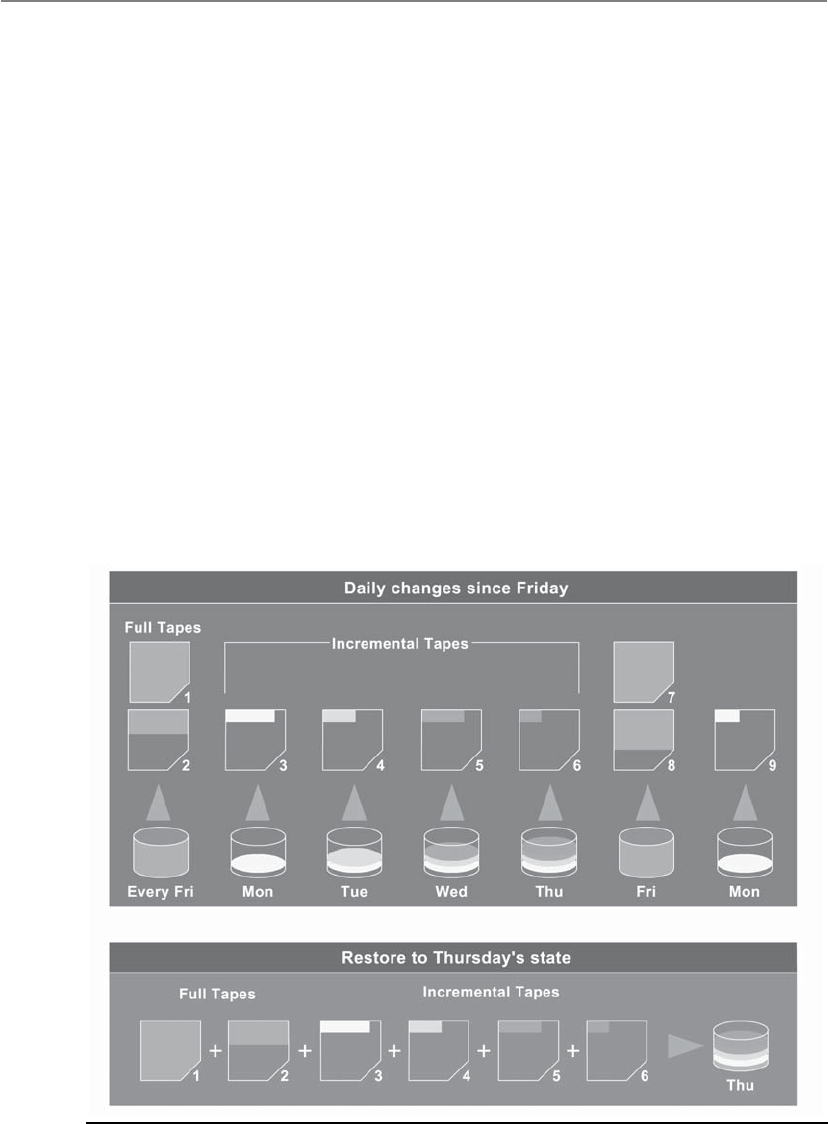
CISSP All-in-One Exam Guide
936
The first step is to do a full backup, which is just what it sounds like—all data are
backed up and saved to some type of storage media. During a full backup, the archive
bit is cleared, which means that it is set to 0. A company can choose to do full backups
only, in which case the restoration process is just one step, but the backup and restore
processes could take a long time.
Most companies choose to combine a full backup with a differential or incremental
backup. A differential process backs up the files that have been modified since the last
full backup. When the data need to be restored, the full backup is laid down first, and
then the most recent differential backup is put down on top of it. The differential pro-
cess does not change the archive bit value.
An incremental process backs up all the files that have changed since the last full or
incremental backup and sets the archive bit to 0. When the data need to be restored, the
full backup data are laid down, and then each incremental backup is laid down on top
of it in the proper order (see Figure 8-5). If a company experienced a disaster and it used
the incremental process, it would first need to restore the full backup on its hard drives
and lay down every incremental backup that was carried out before the disaster took
place (and after the last full backup). So, if the full backup was done six months ago and
the operations department carried out an incremental backup each month, the restora-
tion team would restore the full backup and start with the older incremental backups
taken since the full backup and restore each one of them until they were all restored.
Figure 8-5 Backup software steps

Chapter 8: Business Continuity and Disaster Recovery
937
Which backup process is best? If a company wants the backup and restoration pro-
cesses to be simplistic and straightforward, it can carry out just full backups—but this
may require a lot of hard drive space and time. Although using differential and incre-
mental backup processes is more complex, it requires fewer resources and less time. A
differential backup takes more time in the backing-up phase than an incremental back-
up, but it also takes less time to restore than an incremental backup, because carrying
out restoration of a differential backup happens in two steps, whereas in an incremen-
tal backup, every incremental backup must be restored in the correct sequence.
Whatever the organization chooses, it is important to not mix differential and in-
cremental backups. This overlap could cause files to be missed, since the incremental
backup changes the archive bit and the differential backup does not.
Critical data should be backed up and stored at an onsite area and an offsite area.
The onsite backup copies should be easily accessible in case of nondisasters and should
provide a quick restore process so operations can return to normal. However, onsite
backup copies are not enough to provide real protection. The data should also be held
in an offsite facility in case of actual disasters or catastrophes. One decision that needs
to be made is where the offsite location should be in reference to the main facility. The
closer the offsite backup storage site is, the easier it is to access, but this can put the
backup copies in danger if a large-scale disaster manages to take out the company’s
main facility and the backup facility. It may be wiser to choose a backup facility farther
away, which makes accessibility harder but reduces the risk. Some companies choose to
have more than one backup facility: one that is close and one that is farther away.
The onsite backup information should be stored in a fire-resistant, heat-resistant,
and waterproof safe. The procedures for backing up and restoring data should be easily
accessible and comprehensible even to operators or administrators who are not inti-
mately familiar with a specific system. In an emergency situation, the same guy who al-
ways does the backing up and restoring may not be around, or outsourced consultants
may need to be temporarily hired in order to meet the restoration time constraints.
A backup strategy must take into account that failure can take place at any step of
the process, so if there is a problem during the backup or restoration process that could
corrupt the data, there should be a graceful way of backing out or reconstructing the
data from the beginning.
Can we actually restore data? Backing up data is a wonderful thing in life, but mak-
ing sure it can be properly restored is even better. Many organizations have developed
a false sense of security based on the fact that they have a very organized and effective
process of backing up their data. That sense of security can disappear in seconds when
a company realizes in a time of crisis that its restore processes do not work. For exam-
ple, one company had paid an offsite backup facility to use a courier to collect its
weekly backup tapes and transport them to the offsite facility for safekeeping. What the
company did not realize was that this courier used the subway and many times set the
tapes on the ground while waiting for the subway train. A subway has many large en-
gines that create their own magnetic field. This can have the same effect on media as
large magnets, meaning that the data can be erased or corrupted. The company never
tested its restore processes and eventually experienced a disaster. Much to its surprise, it
found out that three years of data were corrupted and unusable.

CISSP All-in-One Exam Guide
938
Many other stories and experiences like this are out there. Don’t let your organiza-
tion end up as an anecdote in someone else’s book because it failed to verify that its
backups could be restored.
Electronic Backup Solutions
Manually backing up systems and data can be time-consuming, error-prone, and costly.
Several technologies serve as automated backup alternatives. Although these technolo-
gies are usually more expensive, they are quicker and more accurate, which may be
necessary for online information that changes often.
Among the many technologies and ways to back up data electronically is disk shad-
owing, which is very similar to data mirroring.
NOTE
NOTE Disk duplexing means there is more than one disk controller. If one
disk controller fails, the other is ready and available.
Disk shadowing is used to ensure the availability of data and to provide a fault-tol-
erant solution by duplicating hardware and maintaining more than one copy of the
information. The data are dynamically created and maintained on two or more identi-
cal disks. If only disk mirroring is used, then each disk would have a corresponding
mirrored disk that contains the exact same information. If shadow sets are used, the
data can be stored as images on two or more disks.
Systems that need to interact with this data are connected to all the drives at the
same time. All of these drives “look” like just one drive to the user. This provides trans-
parency to the user so that when she needs to retrieve a file, she does not have to worry
about which drive to go to for this process. When a user writes data to be stored on this
media, the data are written to all disks in the shadow set.
Disk shadowing provides online backup storage, which can either reduce or replace
the need for periodic offline manual backup operations. Another benefit to this solu-
tion is that it can boost read operation performance. Multiple paths are provided to
duplicate data, and a shadow set can carry out multiple read requests in parallel.
Disk shadowing is commonly seen as an expensive solution because two or more
hard drives are used to hold the exact same data. If a company has data that will fill up
100 hard drives, it must purchase and maintain at least 200 hard drives. A company
would choose this solution if fault tolerance were required.
If a disk drive fails, at least one shadow set is still available. A new disk can be as-
signed to this set through proper configurations, and the data can be copied from the
shadow set. The copying can take place offline, but this means the data are unavailable
for a period of time. Most products that provide disk-shadowing functionality allow for
online copying, where disks are hot swapped into the set, and can carry out the neces-
sary copy functions without having to bring the drives offline.
Electronic vaulting and remote journaling are other solutions that companies should
be aware of. Electronic vaulting makes copies of files as they are modified and periodi-
cally transmits them to an offsite backup site. The transmission does not happen in real

Chapter 8: Business Continuity and Disaster Recovery
939
time, but is carried out in batches. So, a company can choose to have all files that have
been changed sent to the backup facility every hour, day, week, or month. The informa-
tion can be stored in an offsite facility and retrieved from that facility in a short time.
Batch
Infrastracture
Fiber Channel (FC) Discs FC discs
Serial advanced technology
attachment (SATA) discs
Backup
library
Backup
library
Fiber channel (FC) discs
Main Site
Design
engineers
Data Data
DataData
Servers
Interactive
design Servers
Data storage Data storage
Data
replication
This form of backup takes place in many financial institutions, so when a bank
teller accepts a deposit or withdrawal, the change to the customer’s account is made
locally to that branch’s database and to the remote site that maintains the backup cop-
ies of all customer records.
Electronic vaulting is a method of transferring bulk information to offsite facilities
for backup purposes. Remote journaling is another method of transmitting data offsite,
but this usually only includes moving the journal or transaction logs to the offsite facil-
ity, not the actual files. These logs contain the deltas (changes) that have taken place to
the individual files. If and when data are corrupted and need to be restored, the bank
can retrieve these logs, which are used to rebuild the lost data. Journaling is efficient for
database recovery, where only the reapplication of a series of changes to individual re-
cords is required to resynchronize the database.
DB
files
Journal
Receive and apply
Journal
receiver
Journal
receiver
Application
Production Server Target Server
Machine
interface
Replicated
DB
files
Remote
journal

CISSP All-in-One Exam Guide
940
NOTE
NOTE Remote journaling takes place in real time and transmits only the file
deltas. Electronic vaulting takes place in batches and moves the entire file that
has been updated.
It may be necessary to keep different versions of software and files, especially in a
software development environment. The object and source code should be backed up
along with libraries, patches, and fixes. The offsite facility should mirror the onsite fa-
cility, meaning it does not make sense to keep all of this data at the onsite facility and
only the source code at the offsite facility. Each site should have a full set of the most
current and updated information and files.
Another software backup technology we will discuss is referred to as tape vaulting.
Many businesses back up their data to tapes that are then manually transferred to an
offsite facility by a courier or an employee. With automatic tape vaulting, the data are
sent over a serial line to a backup tape system at the offsite facility. The company that
maintains the offsite facility maintains the systems and changes out tapes when neces-
sary. Data can be quickly backed up and retrieved when necessary. This technology re-
duces the manual steps in the traditional tape backup procedures.
Basic vaulting of tape data sends backup tapes to an offsite location, but a manual
process can be error-prone. Electronic tape vaulting transmits data over a network to
tape devices located at an alternate data center. Electronic tape vaulting improves recov-
ery speed and reduces errors, and backups can be run more frequently.
Data repositories commonly have replication capabilities, so that when changes
take place to one repository (i.e., database) they are replicated to all of the other re-
positories within the organization. The replication can take place over telecommunica-
tion links, which allow offsite repositories to be continuously updated. If the primary
repository goes down or is corrupted, the replication flow can be reversed, and the
offsite repository updates and restores the primary repository. Replication can be asyn-
chronous or synchronous. Asynchronous replication means the primary and secondary
data volumes are out of sync. Synchronization may take place in seconds, hours, or
days, depending upon the technology in place. With synchronous replication, the pri-
mary and secondary repositories are always in sync, which provides true real-time du-
plication. Figure 8-6 shows how offsite replication can take place.
The BCP team must balance the cost to recover against the cost of the disruption.
The balancing point becomes the Recovery Time Objective. Figure 8-7 illustrates the
relationship between the cost of various recovery technologies and the provided recov-
ery times.

Chapter 8: Business Continuity and Disaster Recovery
941
High Availability
High availability (HA) is a combination of technologies and processes that work to-
gether to ensure that some specific thing is always up and running. The specific thing
can be a database, a network, an application, a power supply, etc. Service providers have
SLAs with their customers, which outline the amount of uptime they promise to pro-
vide and a turnaround time to get the item fixed if it does go down. For example, a
hosting company can promise to provide 98 percent uptime for Internet connectivity.
This means they are guaranteeing that at least 98 percent of the time, the Internet con-
nection you purchase from them will be up and running. The hosting company knows
that some things may take place to interrupt this service, but within your SLA with
them, it promises an eight-hour turnaround time. This means if your Internet connec-
tion does go down, they will either fix it or provide you with a different connection
within eight hours.
Provisioned disaster
recovery servers
Clustered devices
Home users
Remote users
Mobile users
BCP site
Head office
Replication
services
Hot Warm Cold
Data centers
Internet
High availability
network
Figure 8-6 Offsite data replication for data recovery purposes

CISSP All-in-One Exam Guide
942
To provide this level of high availability, the hosting company has to have a long list
of technologies and processes that provide redundancy, fault tolerance, and failover
capabilities. Redundancy is commonly built into the network at a routing protocol lev-
el. The routing protocols are configured so if one link goes down or gets congested,
then traffic is routed over a different network link. Redundant hardware can also be
available so if a primary device goes down, the backup component can be swapped out
and activated.
Fault tolerance is the capability of a technology to continue to operate as expected
even if something unexpected takes place (a fault). If a database experiences an unex-
pected glitch, it can roll back to a known good state and continue functioning as though
nothing bad happened. If a packet gets lost or corrupted during a TCP session, the TCP
protocol will resend the packet so that system-to-system communication is not affect-
ed. If a disk within a RAID system gets corrupted, the system uses its parity data to re-
build the corrupted data so that operations are not affected.
If a technology has a failover capability, this means that if there is a failure that can-
not be handled through normal means, then processing is “switched over” to a working
system. For example, two servers can be configured to send each other heartbeat signals
every 30 seconds. If server A does not receive a heartbeat signal from server B after 40
seconds, then all processes are moved to server A so that there is no lag in operations.
Figure 8-7 The criticality of data recovery will dictate the recovery solution.

Chapter 8: Business Continuity and Disaster Recovery
943
Also, when servers are clustered, this means that there is an overarching piece of soft-
ware monitoring each server and carrying out load balancing. If one server within the
cluster goes down, the clustering software stops sending it data to process so that there
are no delays in processing activities.
Redundancy, fault tolerance, and failover capabilities increase the reliability of a
system or network. High reliability allows for high availability.
HA of a system is a measure of its readiness, where reliability is the probability that
a system performs the necessary function for a specified period under defined condi-
tions. If the probability of a system performing as expected under defined conditions is
low, then the availability for this system cannot be high. For a system to have the char-
acteristic of high availability, then high reliability must be in place. Figure 8-8 illustrates
where load balancing, clustering, failover devices, and replication commonly take place
in a network architecture.
Remember that data restoration (RPO) requirements can be different from process-
ing restoration (RTO) requirements. Data can be restored through backup tapes, elec-
tronic vaulting, synchronous or asynchronous replication, or RAID. Processing
capabilities can be restored through clustering, load balancing, mirroring, redundancy,
and failover technologies. If the results of the BCP’s team BIA indicate that the RPO
User Tier
Web Tier
(DMZ)
Application
Tier
Database
Tier
Managed
Resource
Tier
Internal (intranet) users External (extranet) users
End-user
user interface
End-user
user interface
Administrator
user interface Firewall
Optional firewall
Web servers Web servers
Load balancer Load balancer
Load balancer Load balancer
Identity
manager
Identity
manager
Database
cluster Repository
LDAP
repository
Network
failover device Offsite
replication
Remote systems
Resource ResourceResourceResource
Gateways
Figure 8-8 High-availability technologies

CISSP All-in-One Exam Guide
944
value is two days, then the company can use tape backups. If the RPO value is one min-
ute, then synchronous replication needs to be in place. If the BIA indicates that the RTO
value is three days, then redundant hardware can be used. If the RTO value is one min-
ute, then clustering and load balancing should be used.
HA and disaster recovery (DR) are not the same, but they have a relationship. HA
technologies and processes are commonly put into place so that if a disaster does take
place, either the availability of the critical functions continue to function or the delay
of getting them back online and running is low.
In the industry, HA is usually thought about only in technology terms, but remem-
ber that there are many things that an organization needs to keep functioning. Avail-
ability of each of the following items must be thought through and planned:
• Facility
• Cold, warm, hot, redundant, rolling, reciprocal sites
• Infrastructure
• Redundancy, fault tolerance
• Storage
• RAID, Storage Area Network (SAN), mirroring, disk shadowing, cloud
• Server
• Clustering, load balancing
• Data
• Tapes, backups, vaulting, online replication
• Business processes
• People
NOTE
NOTE Virtualization is covered in Chapter 4, and cloud computing is covered
in Chapter 6. We will not go over those technologies again in this chapter, but
know that the use of these technologies has drastically increased in the realm
of BCP and DRP recovery solutions.
Insurance
Can someone else just pay for this mess?
Response: Sure, we just need a monthly fee.
During the BIA, the team most likely uncovered several threats that the organiza-
tion could not prevent. Taking on the full risk of these threats often is dangerous, which
is why insurance exists. The decision of whether or not to obtain insurance for a par-
ticular threat, and how much coverage to obtain when choosing to insure, should be
based on the probability of the threat becoming real and the loss potential, which was
identified during the BIA. The BCP team should work with management to understand
what the current coverage is, the various insurance options, and the limits of each op-
tion. The goal here is to make sure the insurance coverage fills in the gap of what the
current preventive countermeasures cannot protect against. We can eat healthy, work

Chapter 8: Business Continuity and Disaster Recovery
945
out, and take our vitamins—but these things cannot always prevent serious health is-
sues. We purchase medical insurance to help cover the costs of any unexpected health
conditions. Organizations also need insurance to protect them from unexpected events.
Just as people are given different premiums on health and life insurance, companies
are given different premiums on the type of insurance they purchase. Different types of
insurance policies can be purchased by companies, cyber insurance being one of them.
Cyber insurance is a new type of coverage that insures losses caused by denial-of-service
attacks, malware damages, hackers, electronic theft, privacy-related lawsuits, and more.
While a person is asked how old he is, previous health issues, if he smokes, and so on,
to determine his health insurance premium, companies are asked questions about their
security program, such as whether they have an intrusion detection system (IDS), anti-
virus software, firewalls, and other security measures.
A company could also choose to purchase a business interruption insurance policy.
With this type of policy, if the company is out of business for a certain length of time,
the insurance company will pay for specified expenses and lost earnings. Another poli-
cy that can be bought insures accounts receivable. If a company cannot collect on its
accounts receivable for one reason or another, this type of coverage covers part or all of
the losses and costs.
The company’s insurance should be reviewed annually, because threat levels may
change and the company may expand into new ventures that need to be properly cov-
ered. Purchasing insurance should not lull a company into a false sense of security,
though. Insurance coverage has its limitations, and if the company does not practice
due care, the insurance company may not be legally obligated to pay if a disaster hits.
It is important to read and understand the fine print when it comes to insurance and to
make sure you know what is expected of your company—not just what is expected from
the insurance organization.
Recovery and Restoration
Now, who is going to fix everything?
Response: We thought you were.
The BCP coordinator needs to define several different teams that should be prop-
erly trained and available if a disaster hits. The types of teams an organization needs
depend upon the organization. The following are some examples of teams that a com-
pany may need to construct:
• Damage assessment team
• Legal team
• Media relations team
• Recovery team
• Relocation team
• Restoration team
• Salvage team
• Security team

CISSP All-in-One Exam Guide
946
The BCP coordinator should have an understanding of the needs of the company
and the types of teams that need to be developed and trained. Employees should be
assigned to the specific teams based on their knowledge and skill set. Each team needs
to have a designated leader, who will direct the members and their activities. These
team leaders will be responsible not only for ensuring that their team’s objectives are
met, but also for communicating with each other to make sure each team is working in
parallel phases.
The restoration team should be responsible for getting the alternate site into a work-
ing and functioning environment, and the salvage team should be responsible for start-
ing the recovery of the original site. Both teams must know how to do many tasks, such
as install operating systems, configure workstations and servers, string wire and cabling,
set up the network and configure networking services, and install equipment and ap-
plications. Both teams must also know how to restore data from backup facilities. They
also must know how to do so in a secure manner, one that ensures the confidentiality,
integrity, and availability of the system and data.
The BCP must outline the specific teams, their responsibilities, and notification
procedures. The plan must indicate the methods that should be used to contact team
leaders during business hours and after business hours.
A role, or a team, needs to be created to carry out a damage assessment once a disas-
ter has taken place. The assessment procedures should be properly documented and
include the following steps:
• Determine the cause of the disaster.
• Determine the potential for further damage.
• Identify the affected business functions and areas.
• Identify the level of functionality for the critical resources.
• Identify the resources that must be replaced immediately.
• Estimate how long it will take to bring critical functions back online.
• If it will take longer than the previously estimated MTD values to restore
operations, then a disaster should be declared and the BCP should be put
into action.
After this information is collected and assessed, it will indicate what teams need to
be called to action and whether the BCP actually needs to be activated. The BCP coor-
dinator and team must develop activation criteria. After the damage assessment, if one
or more of the situations outlined in the criteria have taken place, then the team is
moved into recovery mode.
Different organizations have different criteria, because the business drivers and crit-
ical functions will vary from organization to organization. The criteria may comprise
some or all of the following elements:
• Danger to human life
• Danger to state or national security

Chapter 8: Business Continuity and Disaster Recovery
947
• Damage to facility
• Damage to critical systems
• Estimated value of downtime that will be experienced
Once the damage assessment is completed and the plan is activated, various teams
must be deployed, which signals the company’s entry into the recovery phase. Each team
has its own tasks—for example, the restoration team prepares the offsite facility (if
needed), the network team rebuilds the network and systems, and the relocation team
starts organizing the staff to move into a new facility.
The recovery process needs to be well organized to get the company up and running
as soon as possible. This is much easier to state in a book than to carry out in reality.
This is why written procedures are critical. During the BIA, the critical functions and
their resources were identified. These are the things that the teams need to work to-
gether on getting up and running first.
Templates should have been developed during the plan development stage. These
templates are used by the different teams to step them through the necessary phases
and to document their findings. For example, if one step could not be completed until
new systems were purchased, this should be indicated on the template. If a step is par-
tially completed, this should be documented so the team does not forget to go back
and finish that step when the necessary part arrives. These templates keep the teams on
task and also quickly tell the team leaders about the progress, obstacles, and potential
recovery time.
NOTE
NOTE Examples of possible templates can be found in NIST’s Contingency
Planning Guide for Information Technology Systems, which is available online at
http://csrc.nist.gov/publications/nistpubs/800-34-rev1/sp800-34-rev1_errata-
Nov11-2010.pdf.
When it is time for the company to move back into its original site or a new site, the
company enters the reconstitution phase. A company is not out of an emergency state
until it is back in operation at the original primary site or a new site that was construct-
ed to replace the primary site, because the company is always vulnerable while operat-
ing in a backup facility. Many logistical issues need to be considered as to when a
company must return from the alternate site to the original site. The following lists a
few of these issues:
• Ensuring the safety of employees
• Ensuring an adequate environment is provided (power, facility infrastructure,
water, HVAC)
• Ensuring that the necessary equipment and supplies are present and in
working order
• Ensuring proper communications and connectivity methods are working
• Properly testing the new environment

CISSP All-in-One Exam Guide
948
Once the coordinator, management, and salvage team sign off on the readiness of
the facility, the salvage team should carry out the following steps:
• Back up data from the alternate site and restore it within the new facility.
• Carefully terminate contingency operations.
• Securely transport equipment and personnel to the new facility.
The least critical functions should be moved back first, so if there are issues in net-
work configurations or connectivity, or important steps were not carried out, the critical
operations of the company are not negatively affected. Why go through the trouble of
moving the most critical systems and operations to a safe and stable site, only to return
it to a main site that is untested? Let the less critical departments act as the canary. If
they survive, then move over the more critical components of the company.
Incident
Time zero
Overall recovery objective:
Back to normal as quickly as possible
Timeline
Response
Recovery
Resumption
Within weeks to months:
Damage repair/replacement;
relocation to permanent place of
work; resume normal working;
recovery of cost from insurers
Within minutes to days:
contact staff, customers,
suppliers, etc., recovery of
critical-business activities;
rebuild lost work in progress
Within minutes to hours:
Staff and visitors accounted for;
casualties dealth with, damage
containment/limitations;
damage assessment in vocation
of incident management
Up to now, the BCP team has covered the following steps:

Chapter 8: Business Continuity and Disaster Recovery
949
1. Developed the continuity planning policy statement
• Outlined the scope and goals of the BCP and roles of the BCP team
2. Performed the BIA
• Identified critical business functions, their resources, and MTD values
• Identified threats and calculated the impact of these threats
• Identified solutions
• Presented findings to management
3. Identified and implemented preventive controls
• Put controls into place to reduce the company’s identified risks
• Bought insurance
• Implemented facility structural reinforcements
• Rolled out backup solutions for data
• Installed redundant and fault-tolerant mechanisms
4. Developed recovery strategies
• Implemented processes of getting the company up and running in the
necessary time
• Created the necessary teams
• Developed goals and procedures for each team
• Created notification steps and planned activation criteria
• Identified alternate backup solutions
So, the BCP team has worked long and hard. It has all of the previous items figured
out. Now it needs to put all of these solutions and steps in the plan itself, test the plan,
train the people, and lay out strategies of how the plan is to be maintained and kept
up-to-date. No rest for the weary… let’s march on!
Developing Goals for the Plans
My goals are to own a boat, retire at 55, and grow more hair.
Response: Great, we will integrate this into our BCP.
If you do not have established goals, how do you know when you are done and
whether your efforts were actually successful? Goals are established so everyone knows
the ultimate objectives. Establishing goals is important for any task, but especially for
business continuity and recovery plans. The definition of the goals helps direct the
proper allocation of resources and tasks, develops necessary strategies, and assists in
economical justification of the plans and program overall. Once the goals are set, they
provide a guide to the development of the actual plans themselves. Anyone who has
been involved in large projects that entail many small, complex details knows that at
times it is easy to get off track and not actually accomplish the major goals of the proj-
ect. Goals are established to keep everyone on track and to ensure that the efforts pay
off in the end.

CISSP All-in-One Exam Guide
950
Great—we have established that goals are important. But the goal could be, “Keep
the company in business if an earthquake hits.” Good goal, but not overly useful with-
out more clarity and direction. To be useful, a goal must contain certain key informa-
tion, such as the following:
•Responsibility Each individual involved with recovery and continuity
should have their responsibilities spelled out in writing to ensure a clear
understanding in a chaotic situation. Each task should be assigned to the
individual most logically situated to handle it. These individuals must
know what is expected of them, which is done through training, drills,
communication, and documentation. So, for example, instead of just running
out of the building screaming, an individual must know that he is responsible
for shutting down the servers before he can run out of the building screaming.
•Authority In times of crisis, it is important to know who is in charge.
Teamwork is important in these situations, and almost every team does much
better with an established and trusted leader. Such leaders must know that
they are expected to step up to the plate in a time of crisis and understand
what type of direction they should provide to the rest of the employees. Clear-
cut authority will aid in reducing confusion and increasing cooperation.
•Priorities It is extremely important to know what is critical versus what is
merely nice to have. Different departments provide different functionality
for an organization. The critical departments must be singled out from the
departments that provide functionality that the company can live without
for a week or two. It is necessary to know which department must come
online first, which second, and so on. That way, the efforts are made in the
BCP Development Products
Since there is so much work in collecting, analyzing, and maintaining DRP and
BCP data, using a product that automates these tasks can prove to be extremely
helpful.
“Automated” plan development can help you create
• Customizable questionnaires through the use of expert-system
templates
• Timetables for disaster recovery procedures
• What-if scenario modeling
• Reports on financial and operational impact analysis
• Graphic representations of the analysis results
• Sample questionnaires, forms, and templates
• Permission-based plan maintenance
• Central version control and integration
• Regulatory compliance

Chapter 8: Business Continuity and Disaster Recovery
951
most useful, effective, and focused manner. Along with the priorities of
departments, the priorities of systems, information, and programs must be
established. It may be necessary to ensure that the database is up and running
before working to bring the web servers online. The general priorities must be
set by management with the help of the different departments and IT staff.
•Implementation and testing It is great to write down very profound ideas
and develop plans, but unless they are actually carried out and tested, they
may not add up to a hill of beans. Once a continuity plan is developed, it
actually has to be put into action. It needs to be documented and put in
places that are easily accessible in times of crisis. The people who are assigned
specific tasks need to be taught and informed how to fulfill those tasks, and
dry runs must be done to walk people through different situations. The drills
should take place at least once a year, and the entire program should be
continually updated and improved.
Studies have shown that 65 percent of businesses that lose computing capabilities
for over one week are never able to recover and subsequently go out of business. Not
being able to bounce back quickly or effectively by setting up shop somewhere else can
make a company lose business and, more importantly, its reputation. In such a com-
petitive world, customers have a lot of options. If one company is not prepared to
bounce back after a disruption or disaster, customers may go to another vendor and
stay there.
The biggest effect of an incident, especially one that is poorly managed or that was
preventable, is on an organization’s reputation or brand. This can result in a consider-
able and even irreparable loss of trust by customers and clients. On the other hand,
handling an incident well, or preventing great damage through smart, preemptive mea-
sures, can enhance the reputation of, or trust in, an organization.
Implementing Strategies
Once the strategies have been decided upon, the BCP team needs to document them
and put them into place. This moves the efforts from a purely planning stage to an ac-
tual implementation and action phase.
As stated previously, copies of the plans need to be kept in one or more locations
other than the primary site, so that if the primary site is destroyed or negatively affected,
the continuity plan is still available to the teams. It is also critical that different formats
of the plan be available to the team, including both electronic and paper versions. An
electronic version of the plan is not very useful if you don’t have any electricity to run a
computer. In addition to having copies of the recovery documents located at their of-
fices and homes, key individuals should have easily accessible versions of critical pro-
cedures and call tree information.
One simple way to accomplish this is to publish the call tree data on cards that can
be affixed to personnel badges or kept in a wallet. In an emergency situation, valuable
minutes are better spent responding to an incident than looking for a document or hav-
ing to wait for a laptop to power up.
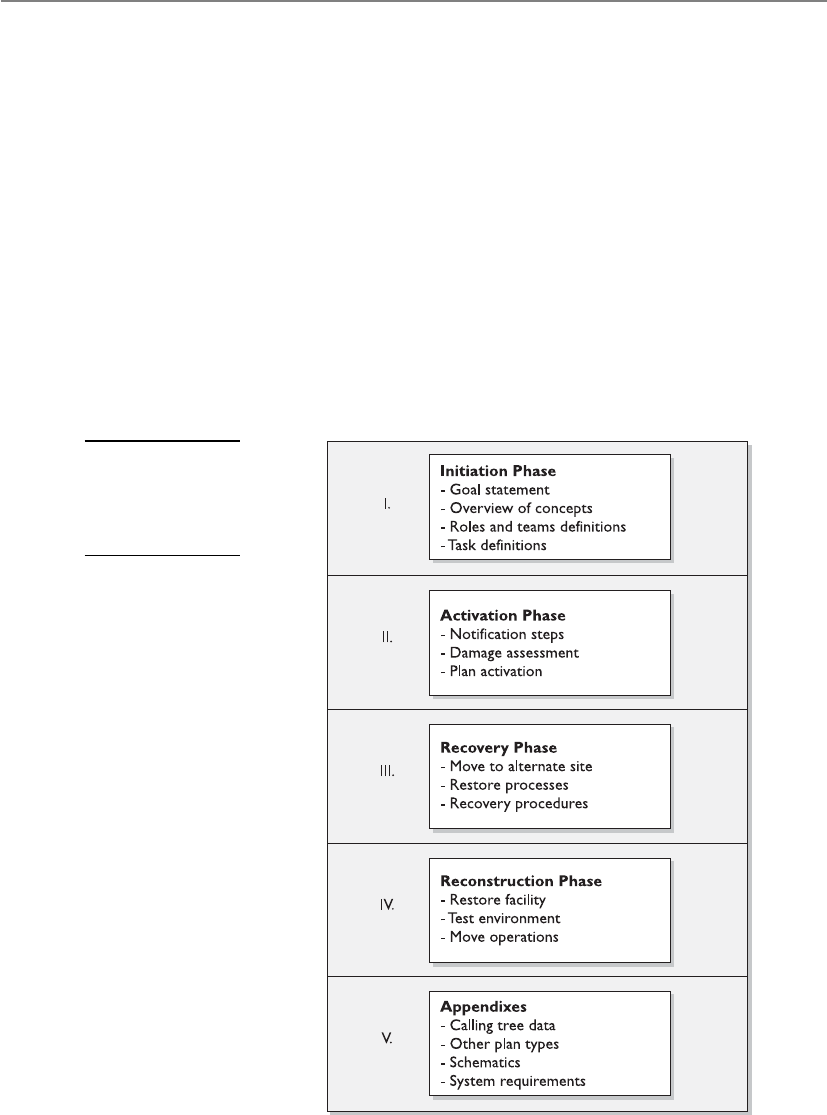
CISSP All-in-One Exam Guide
952
The plan should address in detail all of the topics we have covered so far. The ac-
tual format of the plan will depend on the environment, the goals of the plan, priori-
ties, and identified threats. After each of those items is examined and documented, the
topics of the plan can be divided into the necessary categories.
A commonly accepted structure for a BCP is illustrated in Figure 8-9. Each organiza-
tion’s BCP looks different, but these core topics should be covered in some fashion. We
walked through these different components earlier in this chapter. The role of the plan
is to provide preplanned and sequenced structure to these different processes. The plan
also needs to integrate a degree of flexibility, because no one knows exactly what type
of disaster will take place, nor its effects. Although procedures need to be documented
for the different phases of the plan, a balance between detail and flexibility must be
achieved so the company is ready for any type of disaster.
Some organizations develop individual plans for specific tasks and goals. These dif-
ferent plans are described in Table 8-3. It is up to management and the BCP team to
determine the number and types of plans that should be developed and implemented.
Figure 8-9
The general
structure of
a business
continuity plan

Chapter 8: Business Continuity and Disaster Recovery
953
NOTE
NOTE Continuity of operations (COOP) is a U.S government initiative,
required by presidential directive, to ensure that agencies are able to continue
operations after a disaster or disruption. BCP and COOP have the same basic
goals, but BCP is commonly private-sector oriented and COOP is commonly
public-sector oriented.
The BCP team can choose to integrate many of these components into the BCP. It is
usually better to include these stand-alone plans as appendixes so each document is
clear, concise, and usable.
Testing and Revising the Plan
We made a plan and tested it and it doesn’t work.
Response: Well, we tried.
The BCP should be tested regularly, because environments continually change. In-
terestingly, many organizations are moving away from the concept of “testing” because
a test naturally leads to a pass or fail score, and in the end, that type of score is not very
productive. Instead, many organizations are adopting the concept of exercises, which
appear to be less stressful, better focused, and ultimately more productive. Each time
the plan is exercised or tested, improvements and efficiencies are generally uncovered,
Plan Type Description
Business resumption plan Focuses on how to re-create the necessary business processes
that need to be reestablished instead of focusing on IT
components (i.e., process-oriented instead of procedural-oriented).
Continuity of operations plan
(COOP)
Establishes senior management and a headquarters after a
disaster. Outlines roles and authorities, orders of succession, and
individual role tasks. COOP is the term commonly used by the
U.S. government for BCP.
IT contingency plan Plan for systems, networks, and major applications recovery
procedures after disruptions. A contingency plan should be
developed for each major system and application.
Crisis communications plan Includes internal and external communications structure and
roles. Identifies specific individuals who will communicate with
external entities. Contains previously developed statements that
are to be released.
Cyber incident response plan Focuses on malware, hackers, intrusions, attacks, and other
security issues. Outlines procedures for incident response.
Disaster recovery plan Focuses on how to recover various IT mechanisms after a
disaster. Whereas a contingency plan is usually for nondisasters,
a disaster recovery plan is for disasters that require IT
processing to take place at another facility.
Occupant emergency plan Establishes personnel safety and evacuation procedures.
Table 8-3 Different Types of Recovery Plans

CISSP All-in-One Exam Guide
954
yielding better and better results over time. The responsibility of establishing periodic
exercises and the maintenance of the plan should be assigned to a specific person or
persons who will have overall ownership responsibilities for the business continuity
initiatives within the organization.
As noted earlier, the maintenance of the plan should be incorporated into change
management procedures. That way, any changes in the environment are reflected in the
plan itself.
Tests and disaster recovery drills and exercises should be performed at least once a
year. A company should have no real confidence in a developed plan until it has actu-
ally been tested. The tests and drills prepare personnel for what they may face, and
provide a controlled environment to learn the tasks expected of them. These tests and
drills also point out issues to the planning team and management that may not have
been previously thought about and addressed as part of the planning process. The ex-
ercises, in the end, demonstrate whether a company can actually recover after a disaster.
The exercise should have a predetermined scenario that the company may indeed
be faced with one day. Specific parameters and a scope of the exercise must be worked
out before sounding the alarms. The team of testers must agree upon what exactly is
getting tested and how to properly determine success or failure. The team must agree
upon the timing and duration of the exercise, who will participate in the exercise, who
will receive which assignments, and what steps should be taken. Also, the team needs
to determine whether hardware, software, personnel, procedures, and communications
lines are going to be tested, and whether it is all or a subset combination. If the test will
include moving some equipment to an alternate site, then transportation, extra equip-
ment, and alternate site readiness must be addressed and assessed.
Most companies cannot afford for these exercises to interrupt production or pro-
ductivity, so the exercises may need to take place in sections or at specific times, which
will require logistical planning. Written exercise plans should be developed that will
test for specific weaknesses in the overall disaster recovery plan. The first exercise should
not include all employees, but rather a small group of people here and there until each
learns his or her responsibilities. Then, larger drills can take place so overall operations
will not be negatively affected.
The people carrying out these drills should expect problems and mistakes. This is
why they are having the drills in the first place. A company would rather have employ-
ees make mistakes during a drill so they can learn from them and perform their tasks
more effectively than during a real disaster.
NOTE
NOTE After a disaster, telephone service may not be available. For
communications purposes, there should be alternatives in place, such as cell
phones or walkie-talkies.
A few different types of drills and tests can be used, each with its own pros and cons.
The following sections explain the different types of drills.

Chapter 8: Business Continuity and Disaster Recovery
955
Checklist Test
Okay, did we forget anything?
In this type of test, copies of the BCP are distributed to the different departments
and functional areas for review. This is done so each functional manager can review the
plan and indicate if anything has been left out or if some approaches should be modi-
fied or deleted. This is a method that ensures that some things have not been taken for
granted or omitted. Once the departments have reviewed their copies and made sugges-
tions, the planning team then integrates those changes into the master plan.
NOTE
NOTE The checklist test is also called the desk check test.
Structured Walk-Through Test
Let’s get in a room and talk about this.
In this test, representatives from each department or functional area come together
and go over the plan to ensure its accuracy. The group reviews the objectives of the plan;
discusses the scope and assumptions of the plan; reviews the organization and report-
ing structure; and evaluates the testing, maintenance, and training requirements de-
scribed. This gives the people responsible for making sure a disaster recovery happens
effectively and efficiently a chance to review what has been decided upon and what is
expected of them.
The group walks through different scenarios of the plan from beginning to end to
make sure nothing was left out. This also raises the awareness of team members about
the recovery procedures.
Simulation Test
Everyone take your places. Okay, action!
This type of test takes a lot more planning and people. In this situation, all employ-
ees who participate in operational and support functions, or their representatives, come
together to practice executing the disaster recovery plan based on a specific scenario.
The scenario is used to test the reaction of each operational and support representative.
Again, this is done to ensure specific steps were not left out and that certain threats were
not overlooked. It raises the awareness of the people involved.
The drill includes only those materials that will be available in an actual disaster to
portray a more realistic environment. The simulation test continues up to the point of
actual relocation to an offsite facility and actual shipment of replacement equipment.
Parallel Test
Let’s do a little processing here and a little processing there.
A parallel test is done to ensure that the specific systems can actually perform ade-
quately at the alternate offsite facility. Some systems are moved to the alternate site and
processing takes place. The results are compared with the regular processing that is
done at the original site. This points out any necessary tweaking or reconfiguring.

CISSP All-in-One Exam Guide
956
Full-Interruption Test
Shut down and move out!
This type of test is the most intrusive to regular operations and business productivity.
The original site is actually shut down, and processing takes place at the alternate site.
The recovery team fulfills its obligations in preparing the systems and environment for
the alternate site. All processing is done only on devices at the alternate offsite facility.
This is a full-blown drill that takes a lot of planning and coordination, but it can
reveal many holes in the plan that need to be fixed before an actual disaster hits. Full-
interruption tests should be performed only after all other types of tests have been suc-
cessful. They are the most risky and can impact the business in very serious and
devastating ways if not managed properly; therefore, senior management approval
needs to be obtained prior to performing full-interruption tests.
The type of organization and its goals will dictate what approach to the training
exercise is most effective. Each organization may have a different approach and unique
aspects. If detailed planning methods and processes are going to be taught, then spe-
cific training may be required, rather than general training that provides an overview.
Higher-quality training will result in an increase in employee interest and commit-
ment.
During and after each type of test, a record of the significant events should be docu-
mented and reported to management so it is aware of all outcomes of the test.
Other Types of Training
I think I stopped breathing. Quick, blow into my mouth!
Response: We don’t know each other that well.
Employees need to be trained on other issues besides disaster recovery, including
first aid and cardiac pulmonary resuscitation (CPR), how to properly use a fire extin-
guisher, evacuation routes and crowd control methods, emergency communications
procedures, and how to properly shut down equipment in different types of disasters.
The more technical employees may need to know how to redistribute network re-
sources and how to use different telecommunications lines if the main one goes down.
A redundant power supply needs to be investigated, and the procedures for how to move
critical systems from one power supply to the next should be understood and tested.
Emergency Response
You must save your fellow man before any equipment.
Response: But I love my computer more than anyone I know.
Often, the initial response to an emergency affects the ultimate outcome. Emer-
gency response procedures are the prepared actions that are developed to help people
in a crisis situation better cope with the disruption. These procedures are the first line
of defense when dealing with a crisis situation.
People who are up-to-date on their knowledge of disaster recovery will perform the
best, which is why training and drills are very important. Emergencies are unpredict-
able, and no one knows when they will be called upon to perform.

Chapter 8: Business Continuity and Disaster Recovery
957
Protection of life is of the utmost importance and should be dealt with first before
looking to save material objects. Training and drills should show the people in charge
how to evacuate personnel safely (see Table 8-4). All personnel should know their des-
ignated emergency exits and destinations. Emergency gathering spots should take into
consideration the effects of seasonal weather. One person in each designated group is
often responsible for making sure all people are accounted for. One person in particu-
lar should be responsible for notifying the appropriate authorities: the police depart-
ment, security guards, fire department, emergency rescue, and management. With
proper training, employees will be better equipped to handle emergencies rather than
just running to the exit.
If the situation is not life threatening, systems should be shut down in an orderly
fashion, and critical data files or resources should be removed during evacuation for
safekeeping. There is a reason for the order of activities. As with all processes, there are
dependencies with everything we do. Deciding to skip steps or add steps could in fact
cause more harm than good.
Once things have approached a reasonable plateau of activity, one or more people
will most likely be required to interface with external entities, such as the press, custom-
ers, shareholders, and civic officials. One or more people should be prepped in their
reaction and response to the recent disaster so a uniform and reasonable response is
given to explain the circumstances, how the company is dealing with the disaster, and
what customers and others should now expect from the company. The company should
quickly present this information instead of having others come to their own conclu-
sions and start false rumors. At least one person should be available to the press to en-
sure proper messages are being reported and sent out.
Procedure: Personnel Evacuation
Description
Location Names of
Staff Trained
to Carry Out
Procedure
Date Last
Carried Out
Each floor within the building must have
two individuals who will ensure that all
personnel have been evacuated from the
building after a disaster. These individuals
are responsible for performing employee
head count, communicating with
the BCP coordinator, and assessing
emergency response needs for their
employees.
West wing
parking lot
David Miller
Mike Lester
Drills were
carried out on
May 4, 2012.
Comments:
These individuals are responsible for
maintaining an up-to-date listing of
employees on their specific floor. These
individuals must have a company-issued
walkie-talkie and proper training for this
function.
Table 8-4 Sample Emergency Response Procedure

CISSP All-in-One Exam Guide
958
Another unfortunate issue needs to be addressed prior to an emergency: potential
looting, vandalism, and fraud opportunities from both a physical and logical perspec-
tive. After a company is hit with a large disturbance or disaster, it is usually at its most
vulnerable, and others may take advantage of this vulnerability. Careful thought and
planning need to take place, such as provision of sufficient security personnel on site,
so these issues can be dealt with properly and so the necessary and expected level of
protection is provided at all times.
Maintaining the Plan
Wow, this plan was developed in 1958!
Response: I am sure it is still fine. Not much has changed since then.
Unfortunately, the various plans that have been covered in this chapter can become
quickly out of date. An out-of-date BCP may provide a company with a false sense of
security, which could be devastating if and when a disaster actually takes place.
The main reasons plans become outdated include the following:
• The business continuity process is not integrated into the change management
process.
• Changes occur to the infrastructure and environment.
• Reorganization of the company, layoffs, or mergers occur.
• Changes in hardware, software, and applications occur.
• After the plan is constructed, people feel their job is done.
• Personnel turn over.
• Large plans take a lot of work to maintain.
• Plans do not have a direct line to profitability.
Organizations can keep the plan updated by taking the following actions:
• Make business continuity a part of every business decision.
• Insert the maintenance responsibilities into job descriptions.
• Include maintenance in personnel evaluations.
• Perform internal audits that include disaster recovery and continuity
documentation and procedures.
• Perform regular drills that use the plan.
• Integrate the BCP into the current change management process.
• Incorporate lessons learned from actual incidents into the plan.
One of the simplest and most cost-effective and process-efficient ways to keep a
plan up-to-date is to incorporate it within the change management process of the orga-
nization. When you think about it, it makes a lot of sense. Where do you document
new applications, equipment, or services? Where do you document updates and patch-
es? Your change management process should be updated to incorporate fields and trig-
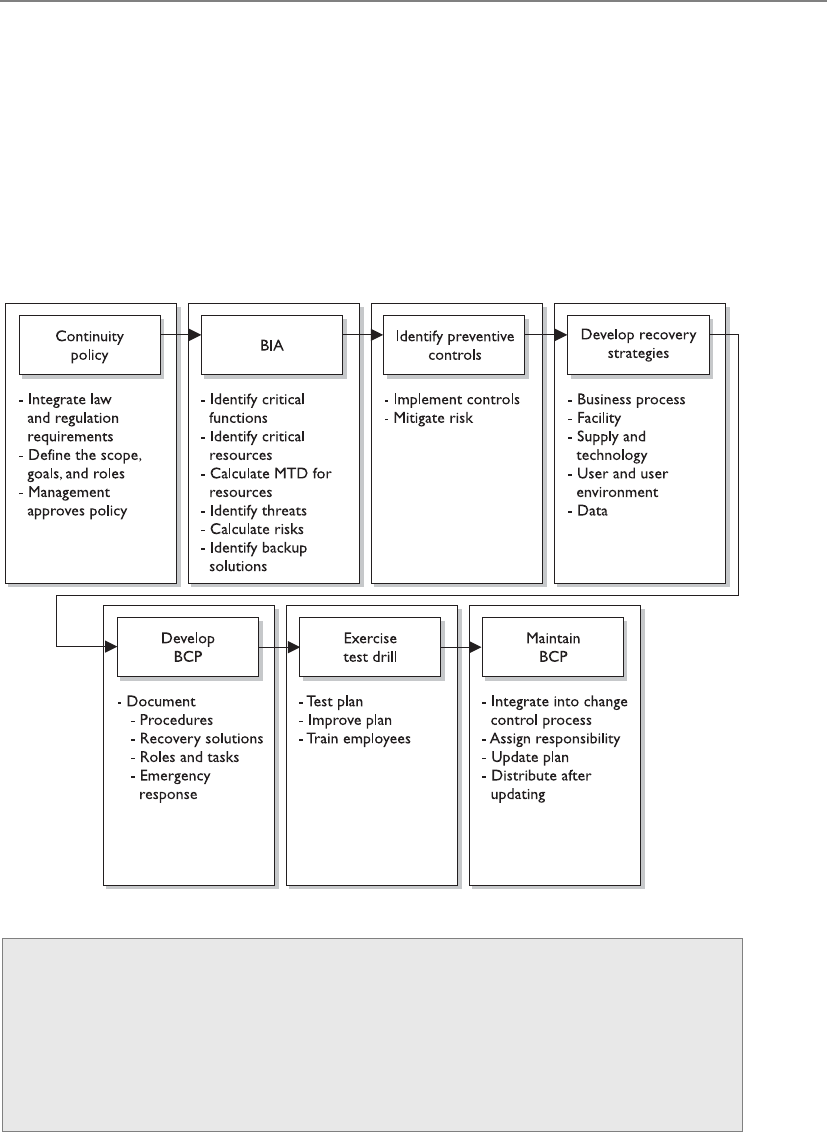
Chapter 8: Business Continuity and Disaster Recovery
959
gers that alert the BCP team when a significant change will occur and should provide a
means to update the recovery documentation. What’s the point of removing the dust
bunnies off a plan if it has your configurations from three years ago? There is nothing
worse than that feeling at the pit of your stomach when you realize the one thing you
thought was going to save you will in fact only serve to keep a fire stoked with combus-
tible material.
Moreover, you should incorporate lessons learned from any actual incidents and
actual responses. The team should perform a “postmortem” on the response, and have
necessary changes made to plans, contracts, personnel, processes, and procedures.
Life Cycles
Remember that most organizations aren’t static, but change, often rapidly, as do
the conditions under which organizations must operate. Thus, the DRP and BCP
have life cycles to deal with the constant and inevitable change that will affect
them. Understanding and maintaining each step of the life cycle is critical if these
plans are to be useful to the organization. The business continuity life cycle has
common steps, outlined in Figure 8-10.

CISSP All-in-One Exam Guide
960
Figure 8-10 BCP and DRP lifecycle

Chapter 8: Business Continuity and Disaster Recovery
961
Summary
BCM, BCP, and DRP are getting more attention in organizations today because the risks
are better understood, business partnership constructs require them, and regulatory
and legal requirements pertaining to this type of protection are increasing.
Unfortunately, many companies have to experience the pain of a disaster to under-
stand how it could have circumvented or mitigated the events that caused the pain.
To develop and carry out business continuity efforts successfully, plenty of thought,
planning, time, and effort must go into the different phases of this activity. The real
threats must be identified and understood, reasonable countermeasures must be put
into place, and detailed plans must be outlined for the unfortunate but anticipated day
when they are needed.
Quick Tips
• Business continuity management (BCM) is the overarching approach to
managing all aspects of BCP and DRP.
• A business continuity plan (BCP) contains strategy documents that provide
detailed procedures that ensure critical business functions are maintained and
that help minimize losses of life, operations, and systems.
• A BCP provides procedures for emergency responses, extended backup
operations, and post-disaster recovery.
• A BCP should have an enterprise-wide reach, with individual organizational
units each having its own detailed continuity and contingency plans.
• A BCP needs to prioritize critical applications and provide a sequence for
efficient recovery.
• A BCP requires senior executive management support for initiating the plan
and final approval.
• BCPs can quickly become outdated due to personnel turnover,
reorganizations, and undocumented changes.
• Executives may be held liable if proper BCPs are not developed and used.
• Threats can be natural, manmade, or technical.
• The steps of recovery planning include initiating the project; performing
business impact analyses; developing a recovery strategy; developing a
recovery plan; and implementing, testing, and maintaining the plan.
• The project initiation phase involves getting management support, developing
the scope of the plan, and securing funding and resources.
• The business impact analysis (BIA) is one of the most important first steps in
the planning development. Qualitative and quantitative data on the business
impact of a disaster need to be gathered, analyzed, interpreted, and presented
to management.

CISSP All-in-One Exam Guide
962
• Executive commitment and support are the most critical elements in
developing the BCP.
• A business case must be presented to gain executive support. This is done by
explaining regulatory and legal requirements, exposing vulnerabilities, and
providing solutions.
• Plans should be prepared by the people who will actually carry them out.
• The planning group should comprise representatives from all departments or
organizational units.
• The BCP team should identify the individuals who will interact with external
players, such as the reporters, shareholders, customers, and civic officials.
Response to the disaster should be done quickly and honestly, and should be
consistent with any other organizational response.
• ISO/IEC 27031:2011 describes the concepts and principles of information and
communication technology (ICT) readiness for business continuity.
• BS 25999 is the BSI (British Standards Institute) standard for business
continuity management (BCM). It will be replaced by ISO 22301.
• Disaster recovery and continuity planning should be brought into normal
business decision-making procedures.
• The loss criteria for disasters include much more than direct dollar loss. They
may include added operational costs, loss in reputation and public confidence,
loss of competitive advantage, violation of regulatory or legal requirements,
loss in productivity, delayed income, interest costs, and loss in revenue.
• A survey should be developed and given to the most knowledgeable people
within the company to obtain the most realistic information pertaining to a
company’s risk and recovery procedures.
• The plan’s scope can be determined by geographical, organizational, or
functional means.
• Many things need to be understood about the working environment so it can
be replicated at an alternate site after a disaster.
• Offsite backup locations can supply hot, warm, or cold sites.
• A reciprocal agreement is one in which a company promises another company
it can move in and share space if it experiences a disaster, and vice versa.
Reciprocal agreements are very tricky to implement and are unenforceable.
However, they are cheap and sometimes the only choice.
• A hot site is fully configured with hardware, software, and environmental
needs. It can usually be up and running in a matter of hours. It is the most
expensive option, but some companies cannot be out of business longer than
a day without very detrimental results.
• A warm site does not have computers, but it does have some peripheral devices,
such as disk drives, controllers, and tape drives. This option is less expensive
than a hot site, but takes more effort and time to become operational.

Chapter 8: Business Continuity and Disaster Recovery
963
• A cold site is just a building with power, raised floors, and utilities. No devices
are available. This is the cheapest of the three options, but can take weeks to
get up and operational.
• Recovery Time Objective (RTO) is the earliest time period and a service level
within which a business process must be restored after a disaster to avoid
unacceptable consequences.
• Recovery Point Objective (RPO) is the acceptable amount of data loss
measured in time.
• Mean time between failures (MTBF) is the predicted amount of time between
inherent failures of a system during operation.
• Mean time to repair (MTTR) is a measurement of the maintainability by
representing the average time required to repair a failed component or device.
• High availability refers to a system, component, or environment that is
continuously operational.
• High availability for disaster-recovery needs is often a combination of
technologies and processes that include backups, redundancy, fault tolerance,
clustering, and load balancing.
• Data recovery and restoration are often carried out through vaulting, backups,
and replication technologies.
• When returning to the original site, the least critical organizational units
should go back first.
• COOP focuses on restoring an organization’s (usually a headquarters
element) essential functions at an alternate site and performing those
functions for up to 30 days before returning to normal operations.
• An important part of the disaster recovery and continuity plan is to
communicate its requirements and procedures to all employees.
• Business interruption insurance covers the loss of income that an organization
suffers after a disaster while it is in its recovery stage.
• Testing, drills, and exercises demonstrate the actual ability to recover and can
verify the compatibility of backup facilities.
• Before tests are performed, there should be a clear indication of what is being
tested, how success will be determined, and how mistakes should be expected
and dealt with.
• In a checklist test, copies of the plan are handed out to each functional area
for examination to ensure the plan properly deals with the area’s needs and
vulnerabilities.
• In a structured walk-through test, representatives from each functional area or
department get together and walk through the plan from beginning to end.
• In a simulation test, a practice execution of the plan takes place. A specific
scenario is established, and the simulation continues up to the point of actual
relocation to the alternate site.

CISSP All-in-One Exam Guide
964
• A parallel test is one in which some systems are actually run at the alternate site.
• A full-interruption test is one in which regular operations are stopped and
processing is moved to the alternate site.
• Remote journaling involves transmitting the journal or transaction log offsite
to a backup facility.
Questions
Please remember that these questions are formatted and asked in a certain way for a
reason. Keep in mind that the CISSP exam is asking questions at a conceptual level.
Questions may not always have the perfect answer, and the candidate is advised against
always looking for the perfect answer. Instead, the candidate should look for the best
answer in the list.
1. What action should take place to restore a system and its data files after a
system failure?
A. Restore from storage media backup.
B. Perform a parallel test.
C. Implement recovery procedures.
D. Perform a walk-through test.
2. What is one of the first steps in developing a business continuity plan?
A. Identify a backup solution.
B. Perform a simulation test.
C. Perform a business impact analysis.
D. Develop a business resumption plan.
3. How often should a business continuity plan be tested?
A. At least every ten years
B. Only when the infrastructure or environment changes
C. At least every two years
D. Whenever there are significant changes in the organization and annually
4. During a recovery procedure test, one important step is to maintain records
of important events that happen during the test. What other step is just as
important?
A. Schedule another test to address issues that were identified during that
procedure.
B. Make sure someone is prepared to talk to the media with the appropriate
responses.
C. Report the events to management.
D. Identify essential business functions.
5. Which of the following actions is least important when quantifying risks
associated with a potential disaster?

Chapter 8: Business Continuity and Disaster Recovery
965
A. Gathering information from agencies that report the probability of certain
natural disasters taking place in that area
B. Identifying the company’s key functions and business requirements
C. Identifying critical systems that support the company’s operations
D. Estimating the potential loss and impact the company would face based
on how long the outage lasted
6. The purpose of initiating emergency procedures right after a disaster takes
place is to prevent loss of life and injuries, and to _______________.
A. Secure the area to ensure that no looting or fraud takes place
B. Mitigate further damage
C. Protect evidence and clues
D. Investigate the extent of the damages
7. Which of the following is the best way to ensure that the company’s backup
tapes can be restored and used at a warm site?
A. Retrieve the tapes from the offsite facility, and verify that the equipment at
the original site can read them.
B. Ask the offsite vendor to test them, and label the ones that were properly read.
C. Test them on the vendor’s machine, which won’t be used during an
emergency.
D. Inventory each tape kept at the vendor’s site twice a month.
8. Which best describes a hot-site facility versus a warm- or cold-site facility?
A. A site that has disk drives, controllers, and tape drives
B. A site that has all necessary PCs, servers, and telecommunications
C. A site that has wiring, central air-conditioning, and raised flooring
D. A mobile site that can be brought to the company’s parking lot
9. Which is the best description of remote journaling?
A. Backing up bulk data to an offsite facility
B. Backing up transaction logs to an offsite facility
C. Capturing and saving transactions to two mirrored servers in-house
D. Capturing and saving transactions to different media types
10. Which of the following is something that should be required of an offsite
backup facility that stores backed-up media for companies?
A. The facility should be within 10 to 15 minutes of the original facility to
ensure easy access.
B. The facility should contain all necessary PCs and servers and should have
raised flooring.
C. The facility should be protected by an armed guard.
D. The facility should protect against unauthorized access and entry.

CISSP All-in-One Exam Guide
966
11. Which item will a business impact analysis not identify?
A. Whether the company is best suited for a parallel or full-interrupt test
B. What areas would suffer the greatest operational and financial loss in the
event of a particular disaster or disruption
C. What systems are critical for the company and must be highly protected
D. What amount of outage time a company can endure before it is
permanently crippled
12. Which areas of a company are recovery plans recommended for?
A. The most important operational and financial areas
B. The areas that house the critical systems
C. All areas
D. The areas that the company cannot survive without
13. Who has the final approval of the business continuity plan?
A. The planning committee
B. Each representative of each department
C. Management
D. External authority
14. Which is the proper sequence of steps followed in business continuity
management?
A. Project initiation, strategy development, business impact analysis, plan
development, implementation, testing, and maintenance
B. Strategy development, project initiation, business impact analysis, plan
development, implementation, testing, and maintenance
C. Implementation and testing, project initiation, strategy development,
business impact analysis, and plan development
D. Plan development, project initiation, strategy development, business
impact analysis, implementation, testing, and maintenance
15. What is the most crucial requirement in developing a business continuity
plan?
A. Business impact analysis
B. Implementation, testing, and following through
C. Participation from each and every department
D. Management support

Chapter 8: Business Continuity and Disaster Recovery
967
16. During development, testing, and maintenance of the continuity plan, a high
degree of interaction and communications is crucial to the process. Why?
A. This is a regulatory requirement of the process.
B. The more people who talk about it and are involved, the more awareness
will increase.
C. This is not crucial to the plan and should not be interactive because it will
most likely affect operations.
D. Management will more likely support it.
17. To get proper management support and approval of the plan, a business case
must be made. Which of the following is least important to this business case?
A. Regulatory and legal requirements
B. Company vulnerabilities to disasters and disruptions
C. How other companies are dealing with these issues
D. The impact the company can endure if a disaster hits
18. Which of the following describes a parallel test?
A. It is performed to ensure that operations performed at the alternate site
also give the same results as at the primary site.
B. All departments receive a copy of the disaster recovery plan and walk
through it.
C. Representatives from each department come together and go through the
test collectively.
D. Normal operations are shut down.
19. Which of the following describes a structured walk-through test?
A. It is performed to ensure that critical systems will run at the alternate site.
B. All departments receive a copy of the disaster recovery plan and walk
through it.
C. Representatives from each department come together and review the steps
of the test collectively without actually performing those steps.
D. Normal operations are shut down.
20. When is the emergency actually over for a company?
A. When all people are safe and accounted for
B. When all operations and people are moved back into the
primary site
C. When operations are safely moved to the offsite facility
D. When a civil official declares that all is safe

CISSP All-in-One Exam Guide
968
21. Which of the following does not describe a reciprocal agreement?
A. The agreement is enforceable.
B. It is a cheap solution.
C. It may be able to be implemented right after a disaster.
D. It could overwhelm a current data processing site.
22. Which of the following describes a cold site?
A. Fully equipped and operational in a few hours
B. Partially equipped with data processing equipment
C. Expensive and fully configured
D. Provides environmental measures but no equipment
23. Which of the following best describes what a disaster recovery plan
should contain?
A. Hardware, software, people, emergency procedures, recovery procedures
B. People, hardware, offsite facility
C. Software, media interaction, people, hardware, management issues
D. Hardware, emergency procedures, software, identified risk
24. Which of the following is not an advantage of a hot site?
A. Offers many hardware and software choices.
B. Is readily available.
C. Can be up and running in hours.
D. Annual testing is available.
25. Disaster recovery plans can stay updated by doing any of the
following except:
A. Making disaster recovery a part of every business decision
B. Making sure it is part of employees’ job descriptions
C. Performing regular drills that use the plan
D. Making copies of the plan and storing them in an offsite facility

Chapter 8: Business Continuity and Disaster Recovery
969
A. Business impact analysis
B. NIST standard
C. Management approval and resource allocation
D. Change control
26. What is the second step that is missing in the following graphic?

CISSP All-in-One Exam Guide
970
27. What would the items in the following graphic best be collectively called?
A. Business impact values
B. Activation phase values
C. Maximum tolerable downtime values
D. Reconstitution impact times and values
28. Business continuity planning needs to provide several types of functionalities
and protection types for an organization. Which of the following is not one of
these items?
i. Provide an immediate and appropriate response to emergency situations
ii. Protect lives and ensure safety
iii. Reduce business conflicts
iv. Resume critical business functions
v. Work with outside vendors during the recovery period
vi. Reduce confusion during a crisis
vii. Ensure survivability of the business
viii. Get “up and running” quickly after a disaster
A. ii, iii, vii
B. ii, iii, v, vi
C. iii
D. i, ii
29. Which of the following have incorrect definition mapping when it comes to
disaster recovery steps?
i. Develop the continuity planning policy statement. Write a policy that
provides the guidance necessary to develop a BCP and that assigns
authority to the necessary roles to carry out these tasks.

Chapter 8: Business Continuity and Disaster Recovery
971
ii. Conduct the BIA. Identify critical functions and systems, and allow the
organization to prioritize them based on necessity. Identify vulnerabilities
and threats, and calculate risks.
iii. Identify preventive controls. Once threats are recognized, identify and
implement controls and countermeasures to reduce the organization’s risk
level in an economical manner.
iv. Develop recovery strategies. Write procedures and guidelines for how the
organization can still stay functional in a crippled state.
v. Develop the contingency plan. Formulate methods to ensure systems and
critical functions can be brought online quickly.
vi. Test the plan and conduct training and exercises. Test the plan to identify
deficiencies in the BCP, and conduct training to properly prepare
individuals on their expected tasks.
vii. Maintain the plan. Put in place steps to ensure the BCP is a living
document that is updated regularly.
A. iii, iv, v
B. ii, vii
C. iv, v
D. iii, iv, v
30. Sam is a manager who is responsible for overseeing the development and the
approval of the business continuity plan. He needs to make sure that his team
is creating correct and all-inclusive loss criteria when it comes to potential
business impacts. Which of the following is not a negative characteristic or
value that is commonly included in the criteria?
i. Loss in reputation and public confidence
ii. Loss of competitive advantages
iii. Decrease in operational expenses
iv. Violations of contract agreements
v. Violations of legal and regulatory requirements
vi. Delayed income costs
vii. Loss in revenue
viii. Loss in productivity
A. i, vii, viii
B. iii, v, vi
C. iii
D. vi

CISSP All-in-One Exam Guide
972
31. Which of the following best describes the relationship between high-
availability and disaster recovery techniques and technologies?
A. High-availability technologies and processes are commonly put into
place so that if a disaster does take place, either availability of the critical
functions continues or the delay of getting them back online and running
is low.
B. High availability deals with asynchronous replication and recovery time
objective requirements, which increases disaster recovery performance.
C. High availability deals with synchronous replication and recovery point
objective requirements, which increases disaster recovery performance.
D. Disaster recovery technologies and processes are put into place to provide
high-availability service levels.
32. Susan is the new BCM coordinator and needs to identify various preventive
and recovery solutions her company should implement for BCP\DRP efforts.
She and her team have carried out an impact analysis and found out that
the company’s order processing functionality cannot be out of operation for
more than 15 hours. She has calculated that the order processing systems
and applications must be brought back online within eight hours after a
disruption. The analysis efforts have also indicated that the data that are
restored cannot be older than five minutes of current real-time data. Which of
the following best describes the metrics and their corresponding values that
Susan’s team has derived?
A. MTD of the order processing functionality is 15 hours. RPO value is
8 hours. WRT value is 7 hours. RTO value is 5 minutes.
B. MTD of the order processing functionality is 15 hours. RTO value is
8 hours. WRT value is 7 hours. RPO value is 5 minutes.
C. MTD of the order processing functionality is 15 hours. RTO value is
7 hours. WRT value is 8 hours. RPO value is 5 minutes.
D. MTD of the order processing functionality is 8 hours. RTO value is
15 hours. WRT value is 7 hours. RPO value is 5 minutes.
Answers
1. C. In this and similar situations, recovery procedures should be followed,
which most likely include recovering data from the backup media. Recovery
procedures could include proper steps for rebuilding a system from the
beginning, applying the necessary patches and configurations, and ensuring
that what needs to take place to ensure productivity is not affected. Some type
of redundant system may need to be put into place.
2. C. A business impact analysis includes identifying critical systems and
functions of a company and interviewing representatives from each
department. Once management’s support is solidified, a business impact

Chapter 8: Business Continuity and Disaster Recovery
973
analysis needs to be performed to identify the threats the company faces and
the potential costs of these threats.
3. D. The plans should be tested if there have been substantial changes to the
company or the environment. They should also be tested at least once a year.
4. C. When recovery procedures are carried out, the outcome of those procedures
should be reported to the individuals who are responsible for this type of
activity, which is usually some level of management. If the procedures worked
properly, management should know it, and if problems were encountered,
management should definitely be made aware of them. Members of
management are the ones who are responsible overall for fixing the recovery
system and will be the ones to delegate this work and provide the necessary
funding and resources.
5. A. The question asked you about quantifying the risks, which means
to calculate the potential business impact of specific disasters. The core
components of a business impact analysis are
• Identifying the company’s key functions and business requirements
• Identifying critical systems that support the company’s operations
• Estimating the potential loss and impact the company would face based on
how long the outage lasted
Gathering information from agencies that report the probability of certain
natural disasters taking place in that area is an important piece in determining
the probability of these threats, but it is considered least necessary when
quantifying the potential damage that could be experienced.
6. B. The main goal of disaster recovery and business continuity plans is
to mitigate all risks that could be experienced by a company. Emergency
procedures first need to be carried out to protect human life, and then other
procedures need to be executed to reduce the damage from further threats.
7. A. A warm site is a facility that will not be fully equipped with the company’s
main systems. The goal of using a warm site is that, if a disaster takes place,
the company will bring its systems with it to the warm site. If the company
cannot bring the systems with it because they are damaged, the company
must purchase new systems that are exactly like the original systems. So, to
properly test backups, the company needs to test them by recovering the data
on its original systems at its main site.
8. B. A hot site is a facility that is fully equipped and properly configured
so that it can be up and running within hours to get a company back
into production. Answer B gives the best definition of a fully functionally
environment.
9. B. Remote journaling is a technology used to transmit data to an offsite
facility, but this usually only includes moving the journal or transaction
logs to the offsite facility, not the actual files.

CISSP All-in-One Exam Guide
974
10. D. This question addresses a facility that is used to store backed-up data; it
is not talking about an offsite facility used for disaster recovery purposes.
The facility should not be only 10 to 15 minutes away, because some types
of disasters could destroy both the company’s main facility and this facility
if they are that close together, in which case the company would lose all of
its information. The facility should have the same security standards as the
company’s security, including protection against unauthorized access.
11. A. All the other answers address the main components of a business impact
analysis. Determining the best type of exercise or drill to carry out is not
covered under this type of analysis.
12. C. It is best if every department within the company has its own contingency
plan and procedures in place. These individual plans would “roll up” into the
overall enterprise BCP.
13. C. Management really has the final approval over everything within a
company, including these plans.
14. A. These steps outline the processes that should take place in the correct order
from beginning to end in business continuity management.
15. D. Management’s support is the first thing to obtain before putting any real
effort into developing these plans. Without management’s support, the effort
will not receive the necessary attention, resources, funds, or enforcement.
16. B. Communication not only spreads awareness of these plans and their
contents, but also allows more people to discuss the possible threats and
solutions, which may lead to ideas that the original team did not consider.
17. C. The other three answers are key components when building a business case.
Although it is a good idea to investigate and learn about how other companies
are dealing with similar issues, it is the least important of the four items listed.
18. A. In a parallel test, some systems are run at the alternate site, and the results
are compared with how processing takes place at the primary site. This is to
ensure that the systems work in that area and productivity is not affected. This
also extends the previous test and allows the team to walk through the steps
of setting up and configuring systems at the offsite facility.
19. C. During a structured walk-through test, functional representatives review
the plan to ensure its accuracy and that it correctly and accurately reflects the
company’s recovery strategy.
20. B. The emergency is not actually over until the company moves back into its
primary site. The company is still vulnerable and at risk while it is operating
in an altered or crippled state. This state of vulnerability is not over until the
company is operating in the way it was prior to the disaster. Of course, this
may mean that the primary site has to be totally rebuilt if it was destroyed.
21. A. A reciprocal agreement is not enforceable, meaning that the company that
agreed to let the damaged company work out of its facility can decide not to
allow this to take place. A reciprocal agreement is a better secondary backup
option if the original plan falls through.

Chapter 8: Business Continuity and Disaster Recovery
975
22. D. A cold site only provides environmental measures—wiring, air
conditioning, raised floors—basically a shell of a building and no more.
23. A. The recovery plan should contain information about how to deal with
people, hardware, software, emergency procedures, recovery procedures,
facility issues, and supplies.
24. A. Because hot sites are fully equipped, they do not allow for a lot of different
hardware and software choices. The subscription service offers basic software and
hardware products, and does not usually offer a wide range of proprietary items.
25. D. The plan should be part of normal business activities. A lot of time and
resources go into creating disaster recovery plans, after which they are usually
stored away and forgotten. They need to be updated continuously as the
environment changes to ensure that the company can properly react to any
type of disaster or disruption.
26. A. The missing step is the BIA. The steps of the BIA are as follows:
• Identify the company’s critical business functions.
• Decide on information-gathering techniques: interviews, surveys,
qualitative or quantitative questionnaires.
• Identify resources these functions depend upon.
• Calculate how long these functions can be without these resources.
• Identify vulnerabilities and threats to these functions.
• Calculate the risk for each different business function.
• Develop backup solutions for resources based on tolerable outage times.
• Develop recovery solutions for the company’s individual departments and
for the company as a whole.
27. C. Maximum tolerable downtime values. This is the timeframe between
an unplanned interruption of business operations and the resumption
of business at a reduced level of service. The BIA identifies which of the
company’s critical systems are needed for survival and estimates the outage
time that can be tolerated by the company as a result of various unfortunate
events. The outage time that can be endured by a company is referred to as the
maximum tolerable downtime.
28. C. Preplanned procedures allow an organization to
i. Provide an immediate and appropriate response to emergency situations
ii. Protect lives and ensure safety
iii. Reduce business impact
iv. Resume critical business functions
v. Work with outside vendors during the recovery period
vi. Reduce confusion during a crisis
vii. Ensure survivability of the business
viii. Get “up and running” quickly after a disaster

CISSP All-in-One Exam Guide
976
29. C. The correct disaster recovery steps and their associated definition mappings
are laid out as follows:
i. Develop the continuity planning policy statement. Write a policy that
provides the guidance necessary to develop a BCP and that assigns
authority to the necessary roles to carry out these tasks.
ii. Conduct the BIA. Identify critical functions and systems, and allow the
organization to prioritize them based on necessity. Identify vulnerabilities
and threats, and calculate risks.
iii. Identify preventive controls. Once threats are recognized, identify and
implement controls and countermeasures to reduce the organization’s risk
level in an economical manner.
iv. Develop recovery strategies. Formulate methods to ensure systems and
critical functions can be brought online quickly.
v. Develop the contingency plan. Write procedures and guidelines for how
the organization can still stay functional in a crippled state.
vi. Test the plan and conduct training and exercises. Test the plan to identify
deficiencies in the BCP, and conduct training to properly prepare
individuals on their expected tasks.
vii. Maintain the plan. Put in place steps to ensure the BCP is a living
document that is updated regularly.
30. C. Loss criteria must be applied to the individual threats that were identified.
The criteria should include at least the following:
• Loss in reputation and public confidence
• Loss of competitive advantages
• Increase in operational expenses
• Violations of contract agreements
• Violations of legal and regulatory requirements
• Delayed income costs
• Loss in revenue
• Loss in productivity
31. A. High availability and disaster recovery are not the same, but they have a
relationship. High-availability technologies and processes are commonly put
into place so that if a disaster does take place, either availability of the critical
functions continues or the delay of getting them back online and running is low.

Chapter 8: Business Continuity and Disaster Recovery
977
32. B. The order processing functionality as a whole has to be up and running
within 15 hours, which is the maximum tolerable downtime (MTD). The
systems and applications have to be up and running in eight hours, which is
the Recovery Time Objective (RTO). RTO deals with technology, but we still
need processes and people in place to run the technology. Work Recovery
Time (WRT) is the remainder of the overall MTD value. RTO usually deals
with getting the infrastructure and systems back up and running, and WRT
deals with restoring data, testing processes, and then making everything “live”
for production purposes. The data that are restored for this function can only
be five minutes old; thus, the Recovery Point Objective (RPO) has the value
of five minutes.
This page intentionally left blank

CHAPTER 9
Legal, Regulations,
Investigations, and
Compliance
This chapter presents the following:
• Computer crime types
• Motives and profiles of attackers
• Various types of evidence
• Laws and acts put into effect to fight computer crime
• Computer crime investigation process and evidence collection
• Incident-handling procedures
• Ethics pertaining to information security and best practices
Computer and associated information crimes are the natural response of criminals to
society’s increasing use of, and dependence upon, technology. For example, stalking
can now take place in the virtual world with stalkers pursuing victims through social
web sites or chat rooms. However, crime has always taken place, with or without a com-
puter. A computer is just another tool and, like other tools before it, it can be used for
good or evil.
Fraud, theft, and embezzlement have always been part of life, but the computer age
has brought new opportunities for thieves and crooks. Organized crime can take advan-
tage of the Internet to exploit people through phishing attacks, 419 scams (also called
Nigerian Letter scams), and financial dealings. Digital storage and processing have been
added to accounting, recordkeeping, communications, and funds transfer. This degree
of complexity brings along its own set of vulnerabilities, which many crooks are all too
eager to take advantage of.
Companies are being blackmailed by cybercriminals who discover vulnerabilities
in their networks. Company trade secrets and confidential information are being stolen
when security breaches take place. Online banks are seeing a rise in fraud, and retailers’
databases are being attacked and robbed of their credit card information. In addition,
identity theft is the fastest growing white-collar crime as of the writing of this book.
979

CISSP All-in-One Exam Guide
980
As e-commerce and online business become enmeshed in today’s business world,
these types of issues become more important and more dangerous. Hacking and attacks
are continually on the rise, and companies are well aware of it. The legal system and law
enforcement are behind in their efforts to track down cybercriminals and successfully
prosecute them (although they are getting better each year). New technologies to fight
many types of attacks are on the way, but a great need still exists for proper laws, poli-
cies, and methods in actually catching the perpetrators and making them pay for the
damage they cause. This chapter looks at some of these issues.
The Many Facets of Cyberlaw
Legal issues are very important to companies because a violation of legal commitments
can be damaging to a company’s bottom line and its reputation. A company has many
ethical and legal responsibilities it is liable for in regard to computer fraud. The more
knowledge one has about these responsibilities, the easier it is to stay within the proper
boundaries.
These issues may fall under laws and regulations pertaining to incident handling;
privacy protection; computer abuse; control of evidence; or the ethical conduct ex-
pected of companies, their management, and their employees. This is an interesting
time for law and technology because technology is changing at an exponential rate.
Legislators, judges, law enforcement, and lawyers are behind the eight ball because of
their inability to keep up with technological changes in the computing world and the
complexity of the issues involved. Law enforcement needs to know how to capture a
cybercriminal, properly seize and control evidence, and hand that evidence over to the
prosecutorial and defense teams. Both teams must understand what actually took place
in a computer crime, how it was carried out, and what legal precedents to use to prove
their points in court. Many times, judges and juries are confused by the technology,
terms, and concepts used in these types of trials, and laws are not written fast enough
to properly punish the guilty cybercriminals. Law enforcement, the court system, and
the legal community are definitely experiencing growth pains as they are being pulled
into the technology of the 21st century.
Many companies are doing business across state lines and in different countries. This
brings even more challenges when it comes to who has to follow what laws. Different
states can interpret the same law differently, or they have their own set of laws. One coun-
try may not consider a particular action against the law at all, whereas another country
may determine that the same action demands five years in prison. One of the complexi-
ties in these issues is jurisdiction. If a hacker from another country steals a bunch of
credit card numbers from a U.S. financial institution and he is caught, a U.S. court would
want to prosecute him. His homeland may not see this issue as illegal at all or have laws
restricting such activities. Although the attackers are not restricted or hampered by coun-
try borders, the laws are restricted to borders in many cases.
Despite all of this confusion, companies do have some clear-cut responsibilities
pertaining to computer security issues and specifics on how companies are expected to
prevent, detect, and report crimes.

Chapter 9: Legal, Regulations, Investigations, and Compliance
981
The Crux of Computer Crime Laws
Computer crime laws (sometimes referred to as cyberlaw) around the world deal with
some of the core issues: unauthorized modification or destruction, disclosure of sensi-
tive information, unauthorized access, and the use of malware (malicious software).
Although we usually only think of the victims and their systems that were attacked
during a crime, laws have been created to combat three categories of crimes. A computer-
assisted crime is where a computer was used as a tool to help carry out a crime. A
computer-targeted crime concerns incidents where a computer was the victim of an at-
tack crafted to harm it (and its owners) specifically. The last type of crime is where a
computer is not necessarily the attacker or the attackee, but just happened to be involved
when a crime was carried out. This category is referred to as computer is incidental.
Some examples of computer-assisted crimes are
• Attacking financial systems to carry out theft of funds and/or sensitive
information
• Obtaining military and intelligence material by attacking military systems
• Carrying out industrial spying by attacking competitors and gathering
confidential business data
• Carrying out information warfare activities by attacking critical national
infrastructure systems
• Carrying out hactivism, which is protesting a government or company’s
activities by attacking their systems and/or defacing their web sites.
Some examples of computer-targeted crimes include
• Distributed Denial-of-Service (DDoS) attacks
• Capturing passwords or other sensitive data
• Installing malware with the intent to cause destruction
• Installing rootkits and sniffers for malicious purposes
• Carrying out a buffer overflow to take control of a system
NOTE
NOTE The main issues addressed in computer crime laws are unauthorized
modification, disclosure, destruction, or access and inserting malicious
programming code.
Some confusion typically exists between the two categories—computer-assisted
crimes and computer-targeted crimes—because intuitively it would seem any attack
would fall into both of these categories. One system is carrying out the attacking, while
the other system is being attacked. The difference is that in computer-assisted crimes,
the computer is only being used as a tool to carry out a traditional type of crime. Without
computers, people still steal, cause destruction, protest against companies (for example,

CISSP All-in-One Exam Guide
982
companies that carry out experiments upon animals), obtain competitor information,
and go to war. So these crimes would take place anyway; it is just that the computer is
simply one of the tools available to the evildoer. As such, it helps the evildoer become
more efficient at carrying out a crime. Computer-assisted crimes are usually covered by
regular criminal laws in that they are not always considered a “computer crime.” One
way to look at it is that a computer-targeted crime could not take place without a com-
puter, whereas a computer-assisted crime could. Thus, a computer-targeted crime is one
that did not, and could not, exist before computers became of common use. In other
words, in the good old days, you could not carry out a buffer overflow on your neighbor,
or install malware on your enemy’s system. These crimes require that computers be
involved.
If a crime falls into the “computer is incidental” category, this means a computer
just happened to be involved in some secondary manner, but its involvement is still
significant. For example, if you had a friend who worked for a company that runs the
state lottery and he gives you a printout of the next three winning numbers and you
type them into your computer, your computer is just the storage place. You could have
just kept the piece of paper and not put the data in a computer. Another example is
child pornography. The actual crime is obtaining and sharing child pornography pic-
tures or graphics. The pictures could be stored on a file server or they could be kept in
a physical file in someone’s desk. So if a crime falls within this category, the computer
is not attacking another computer, and a computer is not being attacked, but the com-
puter is still used in some significant manner.
You may say, “So what? A crime is a crime. Why break it down into these types of
categories?” The reason these types of categories are created is to allow current laws to
apply to these types of crimes, even though they are in the digital world. Let’s say some-
one is on your computer just looking around, not causing any damage, but she should
not be there. Should the legislation have to create a new law stating, “Thou shall not
browse around in someone else’s computer,” or should we just use the already created
trespassing law? What if a hacker got into a system that made all of the traffic lights turn
green at the exact same time? Should the government go through the hassle of creating
a new law for this type of activity, or should the courts use the already created (and
understood) manslaughter and murder laws? Remember, a crime is a crime, and a com-
puter is just a new tool to carry out traditional criminal activities.
By allowing the use of current laws, this makes it easier for a judge to know what
the proper sentencing (punishments) are for these specific crimes. Sentencing guide-
lines have been developed by governments to standardize punishments for the same
types of crimes throughout federal courts. To use a simplistic description, the guide-
lines utilize a point system. For example, if you kidnap someone, you receive 10 points.
If you take that person over state boundary lines, you get another 2 points. If you hurt
this person, you get another 4 points. The higher the points, the more severe the pun-
ishment.
So if you steal money from someone’s financial account by attacking a bank’s main-
frame, you may get 5 points. If you use this money to support a terrorist group, you get
another 5 points. If you do not claim this revenue on your tax returns, there will be no
points. The IRS just takes you behind a building and shoots you in the head.

Chapter 9: Legal, Regulations, Investigations, and Compliance
983
Now, this in no way means countries can just depend upon the laws on the books
and that every computer crime can be countered by an existing law. Many countries
have had to come up with new laws that deal specifically with different types of com-
puter crimes. For example, the following are just some of the laws that have been created
or modified in the United States to cover the various types of computer crimes:
• 18 USC 1029: Fraud and Related Activity in Connection with Access Devices
• 18 USC 1030: Fraud and Related Activity in Connection with Computers
• 18 USC 2510 et seq.: Wire and Electronic Communications Interception and
Interception of Oral Communications
• 18 USC 2701 et seq.: Stored Wire and Electronic Communications and
Transactional Records Access
• Digital Millennium Copyright Act
• Cyber Security Enhancement Act of 2002
NOTE
NOTE You do not need to know these laws for the CISSP exam; they are
just examples.
Complexities in Cybercrime
Who did what, to whom, where, and how?
Response: I have no idea.
Since we have a bunch of laws to get the digital bad guys, this means we have this
whole cybercrime thing under control, right?
Alas, hacking, cracking, and attacking have only increased over the years and will
not stop anytime soon. Several issues deal with why these activities have not been prop-
erly stopped or even curbed. These include proper identification of the attackers, the
necessary level of protection for networks, and successful prosecution once an attacker
is captured.
Most attackers are never caught because they spoof their addresses and identities
and use methods to cover their footsteps. Many attackers break into networks, take
whatever resources they were after, and clean the logs that tracked their movements and
activities. Because of this, many companies do not even know they have been violated.
Even if an attacker’s activities trigger an intrusion detection system (IDS) alert, it does
not usually find the true identity of the individual, though it does alert the company
that a specific vulnerability was exploited.
Attackers commonly hop through several systems before attacking their victim so
that tracking them down will be more difficult. Many of these criminals use innocent
people’s computers to carry out the crimes for them. The attacker will install malicious
software on a computer using many types of methods: e-mail attachments, a user
downloading a Trojan horse from a web site, exploiting a vulnerability, and so on.
Once the software is loaded, it stays dormant until the attacker tells it what systems to

CISSP All-in-One Exam Guide
984
attack and when. These compromised systems are called zombies, the software installed
on them are called bots, and when an attacker has several compromised systems, this is
known as a botnet. The botnet can be used to carry out DDoS attacks, transfer spam or
pornography, or do whatever the attacker programs the bot software to do. These items
are covered more in depth in Chapter 10, but are discussed here to illustrate how attack-
ers easily hide their identity.
Within the United States, local law enforcement departments, the FBI, and the Se-
cret Service are called upon to investigate a range of computer crimes. Although each of
these entities works to train its people to identify and track computer criminals, col-
lectively they are very far behind the times in their skills and tools, and are outnum-
bered by the number of hackers actively attacking networks. Because the attackers use
tools that are automated, they can perform several serious attacks in a short timeframe.
When law enforcement is called in, its efforts are usually more manual—checking logs,
interviewing people, investigating hard drives, scanning for vulnerabilities, and setting
up traps in case the attacker comes back. Each agency can spare only a small number of
people for computer crimes, and generally they are behind in their expertise compared
to many hackers. Because of this, most attackers are never found, much less prosecuted.
This in no way means all attackers get away with their misdeeds. Law enforcement
is continually improving its tactics, and individuals are being prosecuted every month.
The following site shows all of the current and past prosecutions that have taken place
in the United States: www.cybercrime.gov. The point is that this is still a small percent-
age of people who are carrying out digital crimes.
Really only a handful of laws deal specifically with computer crimes, making it
more challenging to successfully prosecute the attackers who are caught. Many compa-
nies that are victims of an attack usually just want to ensure that the vulnerability the
attacker exploited is fixed, instead of spending the time and money to go after and
prosecute the attacker. (Most common approaches to breaches are shown in Figure
9-1.) This is a huge contributing factor as to why cybercriminals get away with their
activities. Some regulated organizations—for instance, financial institutions—by law,
must report breaches. However, most organizations do not have to report breaches or
computer crimes. No company wants their dirty laundry out in the open for everyone
to see. The customer base will lose confidence, as will the shareholders and investors.
We do not actually have true computer crime statistics because most are not reported.
Although regulations, laws, and attacks help make senior management more aware
of security issues, when their company ends up in the headlines and it’s told how they
lost control of over 100,000 credit card numbers, security suddenly becomes very im-
portant to them.
CAUTION
CAUTION Even though financial institutions must, by law, report security
breaches and crimes, that does not mean they all follow this law. Some of these
institutions, just like many other organizations, often simply fix the vulnerability
and sweep the details of the attack under the carpet.

Chapter 9: Legal, Regulations, Investigations, and Compliance
985
Electronic Assets
Another complexity that the digital world has brought upon society is defining what
has to be protected and to what extent. We have gone through a shift in the business
world pertaining to assets that need to be protected. Fifteen years ago and more, the
assets that most companies concerned themselves with protecting were tangible ones
(equipment, building, manufacturing tools, inventory). Now companies must add data
to their list of assets, and data are usually at the very top of that list: product blueprints,
Social Security numbers, medical information, credit card numbers, personal informa-
tion, trade secrets, military deployment and strategies, and so on. Although the military
has always had to worry about keeping their secrets secret, they have never had so many
entry points to the secrets that had to be controlled. Companies are still having a hard
time not only protecting their data in digital format, but defining what constitutes sen-
sitive data and where that data should be kept.
Actions Taken After Incident
By Percent of Respondents
2010 CSI Computer Crime and Security Survey
Patched vulnerable software
Patched or remediated other vulnerable hardware or infrastructure
Installed additional computer security software
Conducted internal forensic investigation
Provided additional security awareness training to end users
Changed your organization’s security policies
Changed/replaced software or systems
Reported intrusion(s) to law enforcement agency
Installed additional computer security hardware
Reported intrusion(s) to legal counsel
Did not report the intrusion(s) to anyone outside the organization
Attempted to identify perpetrator using your own resources
Reported intrusion(s) to individuals whose personal data was breached
Provided new security services to users/customers
Reported intrusion(s) to business partners or contractors
Contracted third-party forensic investigator
Other
Reported intrusion(s) to public media
0 1020304050607080
62.3%
49.3%
48.6%
44.2%
42.0%
32.6%
27.5%
26.8%
26.1%
25.4%
23.9%
18.1%
15.9%
14.5%
13.8%
9.4%
3.6%
40.6%
Figure 9-1 Common approaches to security breaches

CISSP All-in-One Exam Guide
986
NOTE
NOTE In many countries, to deal more effectively with computer crime,
legislative bodies have broadened the definition of property to include data.
As many companies have discovered, protecting intangible assets (i.e., data, reputa-
tion) is much more difficult than protecting tangible assets.
The Evolution of Attacks
We have gone from bored teenagers with too much time on their hands to organized crime rings
with very defined targets and goals.
About ten years ago, and even further back, hackers were mainly made up of people
who just enjoyed the thrill of hacking. It was seen as a challenging game without any
real intent of harm. Hackers used to take down large web sites (Yahoo!, MSN, Excite)
so their activities made the headlines and they won bragging rights among their fellow
hackers. Back then, virus writers created viruses that simply replicated or carried out
some benign activity, instead of the more malicious actions they could have carried out.
Unfortunately, today, these trends have taken on more sinister objectives.
Although we still have script kiddies and people who are just hacking for the fun of
it, organized criminals have appeared on the scene and really turned up the heat regard-
ing the amount of damage done. In the past, script kiddies would scan thousands and
thousands of systems looking for a specific vulnerability so they could exploit it. It did
not matter if the system was on a company network, a government system, or a home
user system. The attacker just wanted to exploit the vulnerability and “play” on the
system and network from there. Today’s attackers are not so noisy, however, and they
certainly don’t want any attention drawn to themselves. These organized criminals are
after specific targets for specific reasons, usually profit-oriented. They try and stay under
the radar and capture credit card numbers, Social Security numbers, and personal infor-
mation to carry out fraud and identity theft.
NOTE
NOTE Script kiddies are hackers who do not necessarily have the skill to
carry out specific attacks without the tools provided for them on the Internet
and through friends. Since these people do not necessarily understand how
the attacks are actually carried out, they most likely do not understand the
extent of damage they can cause.

Chapter 9: Legal, Regulations, Investigations, and Compliance
987
Many times hackers are just scanning systems looking for a vulnerable running ser-
vice or sending out malicious links in e-mails to unsuspecting victims. They are just
looking for any way to get into any network. This would be the shotgun approach to
network attacks. Another, more dangerous attacker has you in his crosshairs and he is
determined to identify your weakest point and do with you what he will.
As an analogy, the thief that goes around rattling door knobs to find one that is not
locked is not half as dangerous as the one who will watch you day in and day out to
learn your activity patterns, where you work, what type of car you drive, who your fam-
ily is, and patiently wait for your most vulnerable moment to ensure a successful and
devastating attack.
In the computing world, we call this second type of attacker an advanced persistent
threat (APT). This is a military term that has been around for ages, but since the digital

CISSP All-in-One Exam Guide
988
world is becoming more of a battleground, this term is more relevant each and every
day. How APTs differ from the regular old vanilla attacker is that it is commonly a group
of attackers, not just one hacker, who combines knowledge and abilities to carry out
whatever exploit that will get them into the environment they are seeking. The APT is
very focused and motivated to aggressively and successfully penetrate a network with
variously different attack methods and then clandestinely hide its presence while
achieving a well-developed, multilevel foothold in the environment. The “advanced”
aspect of this term pertains to the expansive knowledge, capabilities, and skill base of
the APT. The “persistent” component has to do with the fact that the attacker is not in
a hurry to launch and attack quickly, but will wait for the most beneficial moment and
attack vector to ensure that its activities go unnoticed. This is what we refer to as a “low-
and-slow” attack. This type of attack is coordinated by human involvement, rather than
just a virus-type of threat that goes through automated steps to inject its payload. The
APT has specific objectives and goals and is commonly highly organized and well-
funded, which makes it the biggest threat of all.
An APT is commonly custom-developed malicious code that is built specifically for
its target, has multiple ways of hiding itself once it infiltrates the environment, may be
able to polymorph itself in replication capabilities, and has several different “anchors”
so eradicating it is difficult if it is discovered. Once the code is installed, it commonly
sets up a covert back channel (as regular bots do) so that it can be remotely controlled
by the attacker himself. The remote control functionality allows the attacker to trans-
verse the network with the goal of gaining continuous access to critical assets.
APT infiltrations are usually very hard to detect with host-based solutions because
the attacker puts the code through a barrage of tests against the most up-to-date detec-
tion applications on the market. A common way to detect these types of threats is
through network traffic changes. When there is a new IRC connection from a host, that
is a good indication that the system has a bot communicating to its command center.
Since several technologies are used in environments today to detect just that type of
traffic, the APT may have multiple control centers to communicate with so that if one
connection gets detected and removed it still has an active channel to use. The APT may
implement some type of virtual private network (VPN) connection so that its data that
is in transmission cannot be inspected. Figure 9-2 illustrates the common steps and
results of APT activity.
The ways of getting into a network are basically endless (exploit a web service, e-
mail links and attachments to users, gain access through remote maintenance accounts,
exploit operating systems and application vulnerabilities, compromise connections
from home users, etc.). Each of these vulnerabilities has their own fixes (patches, prop-
er configuration, awareness, proper credential practices, encryption, etc.). It is not only
these fixes that need to be put in place; we need to move to a more effective situational
awareness model. We need to have better capabilities of what is happening throughout
our network in near to real time so that our defenses can react quickly and precisely.
Our battlefield landscape is changing from “smash-and-grab” attacks to “slow-and-
determined” attacks. Just like military offensive practices evolve and morph as the tar-
get does the same, so must we as an industry.

Chapter 9: Legal, Regulations, Investigations, and Compliance
989
We have already seen a decrease in the amount of viruses created just to populate as
many systems as possible, and it is predicted that this benign malware activity will con-
tinue to decrease, while more dangerous malware increases. This more dangerous mal-
ware has more focused targets and more powerful payloads—usually installing back
doors, bots, and/or loading rootkits.
Common Internet Crime Schemes
• Auction fraud
• Counterfeit cashier’s check
• Debt elimination
• Parcel courier e-mail scheme
• Employment/business opportunities
• Escrow services fraud
• Investment fraud
• Lotteries
• Nigerian letter, or “419”
• Ponzi/pyramid
• Reshipping
• Third-party receiver of funds
Find out how these types of computer crimes are carried out by visiting
www.ic3.gov/crimeschemes.aspx.
Figure 9-2 Gaining access into an environment and extracting sensitive data
A handful of
users are
targeted by
two phishing
attacks; one
user opens
zero-day
payload (CVE
-02011-0609).
The user
machine is
accessed
remotely by
a specific
tool.
The attacker
elevates
access to
important
user, service
and admin
accounts, and
specific
systems.
Data is
acquired from
target servers
and staged for
exfiltration.
Data is
exfiltrated via
encrypted files
over FTP to
external,
compromised
machine at a
hosting
provider.
Phishing and
zero-day
attack
Back door Lateral
movement
Data
gathering Exfiltrate

CISSP All-in-One Exam Guide
990
So while the sophistication of the attacks continues to increase, so does the danger
of these attacks. Isn’t that just peachy?
Up until now, we have listed some difficulties of fighting cybercrime: the anonym-
ity the Internet provides the attacker; attackers are organizing and carrying out more
sophisticated attacks; the legal system is running to catch up with these types of crimes;
and companies are just now viewing their data as something that must be protected. All
these complexities aid the bad guys, but what if we throw in the complexity of attacks
taking place between different countries?
International Issues
If a hacker in Ukraine attacked a bank in France, whose legal jurisdiction is that? How
do these countries work together to identify the criminal and carry out justice? Which
country is required to track down the criminal? And which country should take this
person to court? Well, we don’t really know exactly. We are still working this stuff out.
When computer crime crosses international boundaries, the complexity of such is-
sues shoots up exponentially and the chances of the criminal being brought to any
court decreases. This is because different countries have different legal systems, some
countries have no laws pertaining to computer crime, jurisdiction disputes may erupt,
and some governments may not want to play nice with each other. For example, if
someone in Iran attacked a system in Israel, do you think the Iranian government
would help Israel track down the attacker? What if someone in North Korea attacked a
military system in the United States? Do you think these two countries would work
together to find the hacker? Maybe or maybe not—or perhaps the attack was carried out
by their specific government.
There have been efforts to standardize the different countries’ approach to com-
puter crimes because they happen so easily over international boundaries. Although it
is very easy for an attacker in China to send packets through the Internet to a bank in
Saudi Arabia, it is very difficult (because of legal systems, cultures, and politics) to mo-
tivate these governments to work together.
Do You Trust Your Neighbor?
Most organizations do not like to think about the fact that the enemy might be
inside and working internally to the company. It is more natural to view threats
as the faceless unknowns that reside on the outside of our environment. Employ-
ees have direct and privileged access to a company’s assets and they are com-
monly not as highly monitored compared to traffic that is entering the network
from external entities. The combination of too much trust, direct access, and the
lack of monitoring allows for a lot of internal fraud and abuse to go unnoticed.
There have been many criminal cases over the years where employees at vari-
ous companies have carried out embezzlement or have carried out revenge at-
tacks after they were fired or laid off. While it is important to have fortified walls
to protect us from the outside forces that want to cause us harm, it is also impor-
tant to realize that our underbelly is more vulnerable. Employees, contractors,
and temporary workers who have direct access to critical resources introduce risks
that need to be understood and countermeasured.

Chapter 9: Legal, Regulations, Investigations, and Compliance
991
The Council of Europe (CoE) Convention on Cybercrime is one example of an at-
tempt to create a standard international response to cybercrime. In fact, it is the first
international treaty seeking to address computer crimes by coordinating national laws
and improving investigative techniques and international cooperation. The conven-
tion’s objectives include the creation of a framework for establishing jurisdiction and
extradition of the accused. For example, extradition can only take place when the event
is a crime in both jurisdictions.
Many companies communicate internationally every day through e-mail, telephone
lines, satellites, fiber cables, and long-distance wireless transmission. It is important for
a company to research the laws of different countries pertaining to information flow
and privacy.
Global organizations that move data across other country boundaries must be
aware of and follow the Organisation for Economic Co-operation and Development
(OECD) Guidelines on the Protection of Privacy and Transborder Flows of Personal
Data rules. Since most countries have a different set of laws pertaining to the definition
of private data and how it should be protected, international trade and business get
more convoluted and can negatively affect the economy of nations. The OECD is an
international organization that helps different governments come together and tackle
the economic, social, and governance challenges of a globalized economy. Because of
this, the OECD came up with guidelines for the various countries to follow so that data
are properly protected and everyone follows the same type of rules.
The core principles defined by the OECD are as follows:
• Collection of personal data should be limited, obtained by lawful and fair
means, and with the knowledge of the subject.
• Personal data should be kept complete and current, and be relevant to the
purposes for which it is being used.
• Subjects should be notified of the reason for the collection of their personal
information at the time that it is collected, and organizations should only use
it for that stated purpose.
• Only with the consent of the subject or by the authority of law should
personal data be disclosed, made available, or used for purposes other than
those previously stated.
• Reasonable safeguards should be put in place to protect personal data against
risks such as loss, unauthorized access, modification, and disclosure.
• Developments, practices, and policies regarding personal data should be
openly communicated. In addition, subjects should be able to easily establish
the existence and nature of personal data, its use, and the identity and usual
residence of the organization in possession of that data.
• Subjects should be able to find out whether an organization has their personal
information and what that information is, to correct erroneous data, and to
challenge denied requests to do so.
• Organizations should be accountable for complying with measures that
support the previous principles.

CISSP All-in-One Exam Guide
992
NOTE
NOTE Information on OECD Guidelines can be found at
www.oecd.org/document/18/0,2340,en_2649_34255_1815186_1_1_1_1,00.html.
Although the OECD is a great start, we still have a long way to go to standardize
how cybercrime is dealt with internationally.
Organizations that are not aware of and/or do not follow these types of rules and
guidelines can be fined and found criminally negligent, their business can be disrupted,
or they can go out of business. If your company is expecting to expand globally, it
would be wise to have legal counsel that understands these types of issues so this type
of trouble does not find its way to your company’s doorstep.
The European Union (EU) in many cases takes individual privacy much more seri-
ously than most other countries in the world, so they have strict laws pertaining to data
that are considered private, which are based on the European Union Principles on Pri-
vacy. This set of principles addresses using and transmitting information considered
private in nature. The principles and how they are to be followed are encompassed
within the EU’s Data Protection Directive. All states in Europe must abide by these prin-
ciples to be in compliance, and any company wanting to do business with an EU com-
pany, which will include exchanging privacy type of data, must comply with this
directive.
A construct that outlines how U.S.-based companies can comply with the EU pri-
vacy principles has been developed, which is called the Safe Harbor Privacy Principles.
If a non-European organization wants to do business with a European entity, it will
need to adhere to the Safe Harbor requirements if certain types of data will be passed
back and forth during business processes. Europe has always had tighter control over
protecting privacy information than the United States and other parts of the world. So
in the past when U.S. and European companies needed to exchange data, confusion
erupted and business was interrupted because the lawyers had to get involved to figure
out how to work within the structures of the differing laws. To clear up this mess, a “safe
harbor” framework was created, which outlines how any entity that is going to move
privacy data to and from Europe must go about protecting it. U.S. companies that deal
with European entities can become certified against this rule base so data transfer can
happen more quickly and easily. The privacy data protection rules that must be met to
be considered “Safe Harbor” compliant are listed here:
•Notice Individuals must be informed that their data is being collected and
about how it will be used.
•Choice Individuals must have the ability to opt out of the collection and
forward transfer of the data to third parties.
•Onward Transfer Transfers of data to third parties may only occur to other
organizations that follow adequate data protection principles.
•Security Reasonable efforts must be made to prevent loss of collected
information.
•Data Integrity Data must be relevant and reliable for the purpose it was
collected for.

Chapter 9: Legal, Regulations, Investigations, and Compliance
993
•Access Individuals must be able to access information held about them, and
correct or delete it if it is inaccurate.
•Enforcement There must be effective means of enforcing these rules.
Import/Export Legal Requirements
Another complexity that comes into play when an organization is attempting to work
with organizations in other parts of the world is import and export laws. Each country
has its own specifications when it comes to what is allowed in their borders and what
is allowed out. For example, the Wassenaar Arrangement implements export controls
for “Conventional Arms and Dual-Use Goods and Technologies.” It is currently made
up of 40 countries and lays out rules on how the following items can be exported from
country to country:
• Category 1 Special Materials and Related Equipment
• Category 2 Materials Processing
• Category 3 Electronics
• Category 4 Computers
• Category 5 Part 1: Telecommunications
• Category 5 Part 2: “Information Security”
• Category 6 Sensors and “Lasers”
• Category 7 Navigation and Avionics
• Category 8 Marine
• Category 9 Aerospace and Propulsion
The main goal of this arrangement is to prevent the buildup of military capabilities
that could threaten regional and international security and stability. So everyone is
keeping an eye on each other to make sure no one country’s weapons can take everyone
else out. The idea is to try and make sure everyone has similar military offense and de-
fense capabilities with the hope that we won’t end up blowing each other up.
One item the agreement deals with is cryptography, which is seen as a dual-use
good. It can be used for military and civilian uses. It is seen to be dangerous to export
products with cryptographic functionality to countries that are in the “offensive” col-
umn, meaning that they are thought to have friendly ties with terrorist organizations
and/or want to take over the world through the use of weapons of mass destruction. If
the “good” countries allow the “bad” countries to use cryptography, then the “good”
countries cannot snoop and keep tabs on what the “bad” countries are up to.
The specifications of the Wassenaar Arrangement are complex and always chang-
ing. The countries that fall within the “good” and “bad” categories change and what
can be exported to who and how changes. In some cases, no products that contain
cryptographic functions can be exported to a specific country, a different country could
be allowed products with limited cryptographic functions, some countries require cer-
tain licenses to be granted, and then other countries (the “good” countries) have no
restrictions.

CISSP All-in-One Exam Guide
994
While the Wassenaar Arrangement deals mainly with the exportation of items,
some countries (China, Russia, Iran, Iraq, etc.) have cryptographic import restrictions
that have to be understood and followed. These countries do not allow their citizens to
use cryptography because they follow the Big Brother approach to governing people.
This obviously gets very complex for companies who sell products that use inte-
grated cryptographic functionality. One version of the product may be sold to China, if
it has no cryptographic functionality. Another version may be sold to Russia, if a certain
international license is in place. A full functioning product can be sold to Canada, be-
cause who are they ever going to hurt?
It is important to understand the import and export requirements your company
must meet when interacting with entities in other parts of the world. You could be
breaking a country’s law or an international treaty if you do not get the right type of
lawyers involved in the beginning and follow the approved processes.
Types of Legal Systems
As stated earlier, different countries often have different legal systems. In this section,
we will cover the core components of these systems and what differentiates them.
•Civil (Code) Law System
• System of law used in continental European countries such as France
and Spain.
• Different legal system from the common law system used in the United
Kingdom and United States.
• Civil law system is rule-based law not precedence based.
• For the most part, a civil law system is focused on codified law—or
written laws.
• The history of the civil law system dates to the sixth century when the
Byzantine emperor Justinian codified the laws of Rome.
• Civil legal systems should not be confused with the civil (or tort) laws found
in the United States.
• The civil legal system was established by states or nations for self-regulation;
thus, the civil law system can be divided into subdivisions, such as French
civil law, German civil law, and so on.
• It is the most widespread legal system in the world and the most common
legal system in Europe.
• Under the civil legal system, lower courts are not compelled to follow the
decisions made by higher courts.
•Common Law System
• Developed in England.
• Based on previous interpretations of laws:
• In the past, judges would walk throughout the country enforcing laws
and settling disputes.

Chapter 9: Legal, Regulations, Investigations, and Compliance
995
• They did not have a written set of laws, so they based their laws on
custom and precedent.
• In the 12th century, the King of England imposed a unified legal system
that was “common” to the entire country.
• Reflects the community’s morals and expectations.
• Led to the creation of barristers, or lawyers, who actively participate in the
litigation process through the presentation of evidence and arguments.
• Today, the common law system uses judges and juries of peers. If the jury
trial is waived, the judge decides the facts.
• Typical systems consist of a higher court, several intermediate appellate
courts, and many local trial courts. Precedent flows down through this
system. Tradition also allows for “magistrate’s courts,” which address
administrative decisions.
• The common law system is broken down into the following:
• Criminal.
• Based on common law, statutory law, or a combination of both.
• Addresses behavior that is considered harmful to society.
• Punishment usually involves a loss of freedom, such as incarceration,
or monetary fines.
• Civil/tort
• Offshoot of criminal law.
• Under civil law, the defendant owes a legal duty to the victim. In other
words, the defendant is obligated to conform to a particular standard
of conduct, usually set by what a “reasonable man of ordinary
prudence” would do to prevent foreseeable injury to the victim.
• The defendant’s breach of that duty causes injury to the victim;
usually physical or financial.
• Categories of civil law:
•Intentional Examples include assault, intentional infliction
of emotional distress, or false imprisonment.
•Wrongs against property An example is nuisance against
landowner.
•Wrongs against a person Examples include car accidents,
dog bites, and a slip and fall.
•Negligence An example is wrongful death.
•Nuisance An example is trespassing.
•Dignitary wrongs Include invasion of privacy and civil rights
violations.

CISSP All-in-One Exam Guide
996
•Economic wrongs Examples include patent, copyright, and
trademark infringement.
•Strict liability Examples include a failure to warn of risks and
defects in product manufacturing or design.
• Administrative (regulatory)
• Laws and legal principles created by administrative agencies
to address a number of areas, including international trade,
manufacturing, environment, and immigration.
• Responsibility is on the prosecution to prove guilt beyond a reasonable
doubt (innocent until proven guilty).
• Used in Canada, United Kingdom, Australia, United States, and New Zealand.
•Customary Law System
• Deals mainly with personal conduct and patterns of behavior.
• Based on traditions and customs of the region.
• Emerged when cooperation of individuals became necessary as
communities merged.
• Not many countries work under a purely customary law system, but instead
use a mixed system where customary law is an integrated component.
(Codified civil law systems emerged from customary law.)
• Mainly used in regions of the world that have mixed legal systems (for
example, China and India).
• Restitution is commonly in the form of a monetary fine or service.
•Religious Law System
• Based on religious beliefs of the region.
• In Islamic countries, the law is based on the rules of the Koran.
• The law, however, is different in every Islamic country.
• Jurists and clerics have a high degree of authority.
• Cover all aspects of human life, but commonly divided into:
• Responsibilities and obligations to others.
• Religious duties.
• Knowledge and rules as revealed by God, which define and govern
human affairs.
• Rather than create laws, lawmakers and scholars attempt to discover the
truth of law.
• Law, in the religious sense, also includes codes of ethics and morality,
which are upheld and required by God. For example, Hindu law, Sharia
(Islamic law), Halakha (Jewish law), and so on.

Chapter 9: Legal, Regulations, Investigations, and Compliance
997
•Mixed Law System
• Two or more legal systems are used together and apply cumulatively or
interactively.
• Most often mixed law systems consist of civil and common law.
• A combination of systems is used as a result of more or less clearly defined
fields of application.
• Civil law may apply to certain types of crimes, while religious law may
apply to other types within the same region.
• Examples of mixed law systems include Holland, Canada, and South Africa.
These different legal systems are certainly complex and while you are not expected
to be a lawyer to pass the CISSP exam, having a high-level understanding of the differ-
ent types (civil, common, customary, religious, mixed) is important. The exam will dig
more into the specifics of the common law legal system and its components. Under the
common law legal system, civil law deals with wrongs against individuals or companies
that result in damages or loss. This is referred to as tort law. Examples include trespass-
ing, battery, negligence, and products liability. A civil lawsuit would result in financial
restitution and/or community service instead of a jail sentence. When someone sues
another person in civil court, the jury decides upon liability instead of innocence or
guilt. If the jury determines the defendant is liable for the act, then the jury decides
upon the punitive damages of the case.
Criminal law is used when an individual’s conduct violates the government laws,
which have been developed to protect the public. Jail sentences are commonly the pun-
ishment for criminal law cases, whereas in civil law cases the punishment is usually an

CISSP All-in-One Exam Guide
998
amount of money that the liable individual must pay the victim. For example, in the
O.J. Simpson case, he was first tried and found not guilty in the criminal law case, but
then was found liable in the civil law case. This seeming contradiction can happen be-
cause the burden of proof is lower in civil cases than in criminal cases.
NOTE
NOTE Civil law generally is derived from common law (case law), cases are
initiated by private parties, and the defendant is found liable or not liable for
damages. Criminal law typically is statutory, cases are initiated by government
prosecutors, and the defendant is found guilty or not guilty.
Administrative/regulatory law deals with regulatory standards that regulate perfor-
mance and conduct. Government agencies create these standards, which are usually ap-
plied to companies and individuals within those specific industries. Some examples of
administrative laws could be that every building used for business must have a fire detec-
tion and suppression system, must have easily seen exit signs, and cannot have blocked
doors, in case of a fire. Companies that produce and package food and drug products are
regulated by many standards so the public is protected and aware of their actions. If a
case was made that specific standards were not abided by, high officials in the compa-
nies could be held accountable, as in a company that makes tires that shred after a cou-
ple of years of use. The people who held high positions in this company were most
likely aware of these conditions but chose to ignore them to keep profits up. Under ad-
ministrative, criminal, and civil law, they may have to pay dearly for these decisions.
Intellectual Property Laws
I made it, it is mine, and I want to protect it.
Intellectual property laws do not necessarily look at who is right or wrong, but
rather how a company or individual can protect what it rightfully owns from unauthor-
ized duplication or use, and what it can do if these laws are violated.
A major issue in many intellectual property cases is what the company did to pro-
tect the resources it claims have been violated in one fashion or another. A company
must go through many steps to protect resources that it claims to be intellectual prop-
erty and must show that it exercised due care (reasonable acts of protection) in its ef-
forts to protect those resources. If an employee sends a file to a friend and the company
attempts to terminate the employee based on the activity of illegally sharing intellec-
tual property, it must show the court why this file is so important to the company, what
type of damage could be or has been caused as a result of the file being shared, and,
most important, what the company had done to protect that file. If the company did
not secure the file and tell its employees that they were not allowed to copy and share
that file, then the company will most likely lose the case. However, if the company
went through many steps to protect that file, explained to its employees that it was
wrong to copy and share the information within the file, and that the punishment

Chapter 9: Legal, Regulations, Investigations, and Compliance
999
could be termination, then the company could not be charged with falsely terminat-
ing an employee.
Intellectual property can be protected by several different laws, depending upon the
type of resource it is. Intellectual property is divided into two categories: industrial
property—such as inventions (patents), industrial designs, and trademarks—and copy-
right, which covers things like literary and artistic works. These topics are addressed in
depth in the following sections.
Trade Secret
I Googled Kentucky Fried Chicken’s recipes, but can’t find them.
Response: I wonder why.
Trade secret law protects certain types of information or resources from unauthor-
ized use or disclosure. For a company to have its resource qualify as a trade secret, the
resource must provide the company with some type of competitive value or advantage.
A trade secret can be protected by law if developing it requires special skill, ingenuity,
and/or expenditure of money and effort. This means that a company cannot say the sky
is blue and call it a trade secret.
Atrade secret is something that is proprietary to a company and important for its
survival and profitability. An example of a trade secret is the formula used for a soft
drink, such as Coke or Pepsi. The resource that is claimed to be a trade secret must be
confidential and protected with certain security precautions and actions. A trade secret
could also be a new form of mathematics, the source code of a program, a method of
making the perfect jelly bean, or ingredients for a special secret sauce. A trade secret has
no expiration date unless the information is no longer secret or no longer provides
economic benefit to the company.
Many companies require their employees to sign a nondisclosure agreement (NDA),
confirming that they understand its contents and promise not to share the company’s
trade secrets with competitors or any unauthorized individuals. Companies require this
both to inform the employees of the importance of keeping certain information secret
and to deter them from sharing this information. Having them sign the nondisclosure
agreement also gives the company the right to fire the employee or bring charges if the
employee discloses a trade secret.
A low-level engineer working at Intel took trade secret information that was valued
by Intel of $1 billion when he left his position at the company and went to work at his
new employer, Advanced Micro Device (AMD). It was discovered that this person still
had access to Intel’s most confidential information even after starting work at the com-
pany’s rival competitor. He even used the laptop that Intel provided to him to down-
load 13 critical documents that contained extensive information about the company’s
new processor developments and product releases. Unfortunately these stories are not
rare and companies are constantly dealing with challenges of protecting the very data
that keeps them in business.

CISSP All-in-One Exam Guide
1000
Copyright
In the United States, copyright law protects the right of an author to control the public
distribution, reproduction, display, and adaptation of his original work. The law covers
many categories of work: pictorial, graphic, musical, dramatic, literary, pantomime,
motion picture, sculptural, sound recording, and architectural. Copyright law does not
cover the specific resource, as does trade secret law. It protects the expression of the idea
of the resource instead of the resource itself. A copyright is usually used to protect an
author’s writings, an artist’s drawings, a programmer’s source code, or specific rhythms
and structures of a musician’s creation. Computer programs and manuals are just two
examples of items protected under the Federal Copyright Act. The item is covered under
copyright law once the program or manual has been written. Although including a
warning and the copyright symbol (©) is not required, doing so is encouraged so others
cannot claim innocence after copying another’s work.
The protection does not extend to any method of operations, process, concept, or
procedure, but it does protect against unauthorized copying and distribution of a pro-
tected work. It protects the form of expression rather than the subject matter. A patent
deals more with the subject matter of an invention; copyright deals with how that in-
vention is represented. In that respect, copyright is weaker than patent protection, but
the duration of copyright protection is longer. People are provided copyright protection
for life plus 50 years.
Computer programs can be protected under the copyright law as literary works. The
law protects both the source and object code, which can be an operating system, ap-
plication, or database. In some instances, the law can protect not only the code, but
also the structure, sequence, and organization. The user interface is part of the defini-
tion of a software application structure; therefore, one vendor cannot copy the exact
composition of another vendor’s user interface.
Copyright infringement cases have exploded in numbers because of the increased
number of “warez” sites that use the common BitTorrent protocol. BitTorrent is a peer-
to-peer file sharing protocol and is one of the most common protocols for transferring
large files. It has been estimated that it accounted for roughly 27 percent to 55 percent
of all Internet traffic (depending on geographical location). Warez is a term that per-
tains to copyrighted works distributed without fees or royalties, and may be traded, in
general violation of the copyright law. The term generally refers to unauthorized re-
leases by groups, as opposed to file sharing between friends.
Once a warez site posts copyrighted material, it is very difficult to have it removed
because law enforcement is commonly overwhelmed with larger criminal cases and
does not have the bandwidth to go after these “small fish.” Another issue with warez
sites is that the actual servers may reside in another country; thus, legal jurisdiction
makes things more difficult and the country that the server resides within may not
even have a copyright law within its legal system. The film and music recording compa-
nies have had the most success in going after these types of offenders because they have
the funds and vested interest to do so.

Chapter 9: Legal, Regulations, Investigations, and Compliance
1001
Trademark
My trademark is my stupidity.
Response: Good for you!
Atrademark is slightly different from a copyright in that it is used to protect a word,
name, symbol, sound, shape, color, or combination of these. The reason a company
would trademark one of these, or a combination, is that it represents their company
(brand identity) to a group of people or to the world. Companies have marketing de-
partments that work very hard in coming up with something new that will cause the
company to be noticed and stand out in a crowd of competitors, and trademarking the
result of this work with a government registrar is a way of properly protecting it and
ensuring others cannot copy and use it.
Companies cannot trademark a number or common word. This is why companies
create new names—for example, Intel’s Pentium and Standard Oil’s Exxon. However,
unique colors can be trademarked, as well as identifiable packaging, which is referred
to as “trade dress.” Thus, Novell Red and UPS Brown are trademarked, as are some
candy wrappers.
NOTE
NOTE In 1883, international harmonization of trademark laws began with
the Paris Convention, which in turn prompted the Madrid Agreement of 1891.
Today, international trademark law efforts and international registration are
overseen by the World Intellectual Property Organization (WIPO), an agency
of the United Nations.
There have been many interesting trademark legal battles over the years. In one case
a person named Paul Specht started a company named “Android Data” and had his
company’s trademark approved in 2002. Specht’s company went under and while he
attempted to sell it and the trademark, he had no buyers. When Google announced that
it was going to release a new phone called the Android, Specht built a new website us-
ing his old company’s name to try and prove that he was indeed still using this trade-
mark. Specht took Google to court and asked for $94 million in damages. The court
ruled in Google’s favor and found that Google was not liable for trademark damages.
Patent
Patents are given to individuals or companies to grant them legal ownership of, and
enable them to exclude others from using or copying, the invention covered by the pat-
ent. The invention must be novel, useful, and not obvious—which means, for example,
that a company could not patent air. Thank goodness. If a company figured out how to
patent air, we would have to pay for each and every breath we took!
After the inventor completes an application for a patent and it is approved, the pat-
ent grants a limited property right to exclude others from making, using, or selling the
invention for a specific period of time. For example, when a pharmaceutical company
develops a specific drug and acquires a patent for it, that company is the only one that

CISSP All-in-One Exam Guide
1002
can manufacture and sell this drug until the stated year in which the patent is up (usu-
ally 20 years from the date of approval). After that, the information is in the public
domain, enabling all companies to manufacture and sell this product, which is why the
price of a drug drops substantially after its patent expires.
This also takes place with algorithms. If an inventor of an algorithm acquires a pat-
ent, she has full control over who can use it in their products. If the inventor lets a
vendor incorporate the algorithm, she will most likely get a fee and possibly a license
fee on each instance of the product that is sold.
Patents are ways of providing economical incentives to individuals and organiza-
tions to continue research and development efforts that will most likely benefit society
in some fashion. Patent infringement is huge within the technology world today. Large
and small product vendors seem to be suing each other constantly with claims of pat-
ent infringement. The problem is that many patents are written at a very high level and
maybe written at a functional level. For example, if I developed a technology that ac-
complishes functionality A, B, and C, you could actually develop your own technology
in your own way that also accomplished A, B, and C. You might not even know that my
method or patent existed; you just developed this solution on your own. Well, if I did
this type of work first and obtained the patent, then I could go after you legally for in-
fringement.
NOTE
NOTE A patent is the strongest form of intellectual property protection.
At the time of this writing, the amount of patent legislation in the technology world
is overwhelming. Kodak filed suit against Apple and RIM alleging patent infringement
pertaining to resolution previews of videos on on-screen displays. While the U.S. Inter-
national Trade Commission ruled against Kodak in that case, Kodak had won similar
cases against LG and Samsung, which provided them with a licensing deal of $864 mil-
lion. Soon after the Trade Commission’s ruling, RIM sued Kodak for different patent
infringements and Apple also sued Kodak for a similar matter.
Apple has also filed two patent infringement complaints against the mobile phone
company HTC, Cupertino did the same with Nokia, and Microsoft sued Motorola over
everything from synchronizing e-mail to handset power control functionality. Micro-
soft sued a company called TomTom over eight car navigation and file management
systems patents. A company called i4i, Inc., sued Microsoft for allegedly using its pat-
ented XML-authoring technology within its product Word. And Google lost a Linux-
related infringement case that cost it $5 million.
This is just a small list of the amount of patent litigation taking place as of the writ-
ing of this book. These cases are like watching 100 Ping-Pong matches going on all at
the same time, each containing its own characters and dramas, and involving millions
and billions of dollars.
While the various vendors are fighting for market share in their respective industries,
another reason for the increase in patent litigation is patent trolls. Patent troll is a term
used to describe a person or company who obtains patents not to protect their invention

Chapter 9: Legal, Regulations, Investigations, and Compliance
1003
but to aggressively and opportunistically go after another entity who tries to create
something based upon their ideas. A patent troll has no intention of manufacturing an
item based upon their patent, but wants to get licensing fees from an entity that does
manufacture the item. For example, let’s say that I have 10 new ideas for 10 different
technologies. I put them through the patent process and get them approved. Now I actu-
ally have no desire to put in all the money and risk it takes to actually create these tech-
nologies and attempt to bring them to market. I am going to wait until you do this and
then I am going to sue you for infringing upon my patent. If I win my court case, you
have to pay me licensing fees for the product you developed and brought to market.
12
10
8
6
4
2
0
1994
1995
1996
1997
1998
1999
2000
2001
2002
2003
2004
2005
2006
Lawsuits by Patent Trolls on the Rise
Percentage of intellectual property-related lawsuits
by nonpracticing entities to total IP-related lawsuits
Source PatentFreedom 2008. Data captured as of November 2008.©
2007
% Total IP cases
% Cases filed by NPEs
It is important to do a patent search before putting effort into developing a new
methodology, technology, or business method.
Internal Protection of Intellectual Property
Ensuring that specific resources are protected by the previously mentioned laws is very
important, but other measures must be taken internally to make sure the resources that
are confidential in nature are properly identified and protected.
The resources protected by one of the previously mentioned laws need to be identi-
fied and integrated into the company’s data classification scheme. This should be di-
rected by management and carried out by the IT staff. The identified resources should
have the necessary level of access control protection, auditing enabled, and a proper
storage environment. If it is deemed secret, then not everyone in the company should
be able to access it. Once the individuals who are allowed to have access are identified,

CISSP All-in-One Exam Guide
1004
their level of access and interaction with the resource should be defined in a granular
method. Attempts to access and manipulate the resource should be properly audited,
and the resource should be stored on a protected system with the necessary security
mechanisms.
Employees must be informed of the level of secrecy or confidentiality of the re-
source, and of their expected behavior pertaining to that resource.
If a company fails in one or all of these steps, it may not be covered by the laws
described previously, because it may have failed to practice due care and properly pro-
tect the resource that it has claimed to be so important to the survival and competitive-
ness of the company.
Software Piracy
Software piracy occurs when the intellectual or creative work of an author is used or
duplicated without permission or compensation to the author. It is an act of infringe-
ment on ownership rights, and if the pirate is caught, he could be sued civilly for dam-
ages, be criminally prosecuted, or both.
When a vendor develops an application, it usually licenses the program rather than
sells it outright. The license agreement contains provisions relating to the approved use
of the software and the corresponding manuals. If an individual or company fails to
observe and abide by those requirements, the license may be terminated and, depend-
ing on the actions, criminal charges may be leveled. The risk to the vendor that devel-
ops and licenses the software is the loss of profits it would have earned.
There are four categories of software licensing. Freeware is software that is publicly
available free of charge and can be used, copied, studied, modified, and redistributed
without restriction. Shareware, or trialware, is used by vendors to market their software.
Users obtain a free, trial version of the software. Once the user tries out the program,
the user is asked to purchase a copy of it. Commercial software is, quite simply, software
that is sold for or serves commercial purposes. And, finally, academic software is soft-
ware that is provided for academic purposes at a reduced cost. It can be open source,
freeware, or commercial software.
Some software vendors sell bulk licenses, which enable several users to use the
product simultaneously. These master agreements define proper use of the software
along with restrictions, such as whether corporate software can also be used by employ-
ees on their home machines. One other prevalent form of software licensing is the End
User Licensing Agreement (EULA). It specifies more granular conditions and restric-
tions than a master agreement. Other vendors incorporate third-party license-metering
software that keeps track of software usability to ensure that the customer stays within
the license limit and otherwise complies with the software licensing agreement. The
security officer should be aware of all these types of contractual commitments required
by software companies. This person needs to be educated on the restrictions the com-
pany is under and make sure proper enforcement mechanisms are in place. If a com-
pany is found guilty of illegally copying software or using more copies than its license
permits, the security officer in charge of this task may be primarily responsible.

Chapter 9: Legal, Regulations, Investigations, and Compliance
1005
Thanks to easy access to high-speed Internet, employees’ ability—if not the tempta-
tion—to download and use pirated software has greatly increased. A study by the Busi-
ness Software Alliance (BSA) and International Data Corporation (IDC) found that the
frequency of illegal software is 36 percent worldwide. This means that for every two
dollars’ worth of legal software that is purchased, one dollar’s worth is pirated. Software
developers often use these numbers to calculate losses resulting from pirated copies.
The assumption is that if the pirated copy had not been available, then everyone who is
using a pirated copy would have instead purchased it legally.
Not every country recognizes software piracy as a crime, but several international
organizations have made strides in curbing the practice. The Software Protection Asso-
ciation (SPA) has been formed by major companies to enforce proprietary rights of
software. The association was created to protect the founding companies’ software de-
velopments, but it also helps others ensure that their software is properly licensed.
These are huge issues for companies that develop and produce software, because a
majority of their revenue comes from licensing fees.
Other international groups have been formed to protect against software piracy,
including the Federation Against Software Theft (FAST), headquartered in London, and
the Business Software Alliance (BSA), based in Washington, D.C. They provide similar
functionality as the SPA and make efforts to protect software around the world. Figure
9-3 shows the results of a BSA 2010 software piracy study that illustrates the breakdown
of which world regions are the top offenders. The study also estimates that the total
economical damage experienced by the industry was $51.4 billion in losses in 2010.
Software Piracy Rates by Region
Asia-Pacific
Central/Eastern Europe
Latin America
Middle East/Africa
North America
Western Europe
European Union
Worldwide
59%
61%
Source: Seventh Annual BSA/DC Global Software Piracy Study, May 2010
64%
66%
63%
65%
59%
59%
21%
21%
34%
33%
35%
35%
43%
41%
2009
2008
Figure 9-3 Software piracy rates by region

CISSP All-in-One Exam Guide
1006
One of the offenses an individual or company can commit is to decompile vendor
object code. This is usually done to figure out how the application works by obtaining
the original source code, which is confidential, and perhaps to reverse-engineer it in the
hope of understanding the intricate details of its functionality. Another purpose of re-
verse-engineering products is to detect security flaws within the code that can later be
exploited. This is how some buffer overflow vulnerabilities are discovered.
Many times, an individual decompiles the object code into source code and either
finds security holes and can take advantage of them or alters the source code to produce
some type of functionality that the original vendor did not intend. In one example, an
individual decompiled a program that protects and displays e-books and publications.
The vendor did not want anyone to be able to copy the e-publications its product dis-
played and thus inserted an encoder within the object code of its product that enforced
this limitation. The individual decompiled the object code and figured out how to cre-
ate a decoder that would overcome this restriction and enable users to make copies of
the e-publications, which infringed upon those authors’ and publishers’ copyrights.
The individual was arrested and prosecuted under the Digital Millennium Copyright
Act (DMCA), which makes it illegal to create products that circumvent copyright pro-
tection mechanisms. Interestingly enough, many computer-oriented individuals pro-
tested this person’s arrest, and the company prosecuting (Adobe) quickly decided to
drop all charges.
DMCA is a U.S. copyright law that criminalizes the production and dissemination
of technology, devices, or services that circumvent access control measures that are put
into place to protect copyright material. So if you figure out a way to “unlock” the pro-
prietary way that Barnes & Noble protects its e-books you can be charged under this act.
Even if you don’t share the actual copyright-protected books with someone, you still
broke this specific law and can be found guilty.
NOTE
NOTE The European Union passed a similar law called the Copyright
Directive.
Privacy
You don’t even want to know about all the data Google collects on you.
Response: I am sure there are no privacy issues to be concerned about.
Privacy is becoming more threatened as the world relies more and more on tech-
nology. There are several approaches to addressing privacy, including the generic ap-
proach and regulation by industry. The generic approach is horizontal enactment—rules
that stretch across all industry boundaries. It affects all industries, including govern-
ment. Regulation by industry is vertical enactment. It defines requirements for specific
verticals, such as the financial sector and health care. In both cases, the overall objective
is twofold. First, the initiatives seek to protect citizens’ personally identifiable informa-
tion (PII). Second, the initiatives seek to balance the needs of government and busi-
nesses to collect and use PII with consideration of security issues.

Chapter 9: Legal, Regulations, Investigations, and Compliance
1007
In response, countries have enacted privacy laws. For example, although the Unit-
ed States already had the Federal Privacy Act of 1974, it has enacted new laws, such as
the Gramm-Leach-Bliley Act of 1999 and the Health Insurance Portability and Ac-
countability Act (HIPAA), in response to an increased need to protect personal privacy
Personally Identifiable Information
Personally identifiable information (PII) is data that can be used to uniquely iden-
tify, contact, or locate a single person or can be used with other sources to unique-
ly identify a single individual. It needs to be highly protected because it is com-
monly used in identity theft, financial crimes, and various criminal activities.
While it seems as though defining and identifying PII should be easy and
straightforward, different countries, federal governments, and state governments
have varying items that each consider to be PII.
The U.S. Office of Budget and Management’s definition of PII components
are listed here:
• Full name (if not common)
• National identification number
• IP address (in some cases)
• Vehicle registration plate number
• Driver’s license number
• Face, fingerprints, or handwriting
• Credit card numbers
• Digital identity
• Birthday
• Birthplace
• Genetic information
The following items are less often used because they are commonly shared by
so many people, but they can fall into the PII classification and may require pro-
tection from improper disclosure:
• First or last name, if common
• Country, state, or city of residence
• Age, especially if nonspecific
• Gender or race
• Name of the school they attend or workplace
• Grades, salary, or job position
• Criminal record

CISSP All-in-One Exam Guide
1008
information. These are examples of a vertical approach to addressing privacy, whereas
Canada’s Personal Information Protection and Electronic Documents Act and New
Zealand’s Privacy Act of 1993 are horizontal approaches.
The U.S. Federal Privacy Act was put into place to protect U.S. citizens’ sensitive
information that is collected by government agencies. It states that any data collected
must be done in a fair and lawful manner. The data are to be used only for the pur-
poses for which they were collected and held only for a reasonable amount of time. If
an agency collects data on a person, that person has the right to receive a report outlin-
ing data collected about him if it is requested. Similar laws exist in many countries
around the world.
Technology is continually advancing in the amount of data that can be kept in data
warehouses, data mining and analysis techniques, and distribution of this mined data.
Companies that are data aggregators compile in-depth profiles of personal information
on millions of people, even though many individuals have never heard of these spe-
cific companies, have never had an account with them, nor have given them permission
to obtain personal information. These data aggregators compile, store, and sell per-
sonal information.
It seems as though putting all of this information together would make sense. It
would be easier to obtain, have one centralized source, be extremely robust—and be
the delight of identity thieves everywhere. All they have to do is hack into one location
and get enough information to steal thousands of identities.
The Increasing Need for Privacy Laws
Privacy is different from security, and although the concepts can intertwine, they are
distinctively different. Privacy is the ability of an individual or group to control who
has certain types of information about them. Privacy is an individual’s right to deter-
mine what data they would like others to know about themselves, which people are
permitted to know that data, and the ability to determine when those people can access
it. Security is used to enforce these privacy rights.
The following issues have increased the need for more privacy laws and governance:
•Data aggregation and retrieval technologies advancement
• Large data warehouses are continually being created full of private
information.
•Loss of borders (globalization)
• Private data flows from country to country for many different reasons.
• Business globalization.
•Convergent technologies advancements
• Gathering, mining, and distributing sensitive information.
While people around the world have always felt that privacy was important, the fact
that almost everything that there is to know about a person (age, sex, financial data,
medical data, friends, purchasing habits, criminal behavior, and even Google searches)

Chapter 9: Legal, Regulations, Investigations, and Compliance
1009
is in some digital format in probably over 50 different locations makes people even
more concerned about their privacy.
Having data quickly available to whomever needs it makes many things in life easier
and less time consuming. But this data can just as easily be available to those you do not
want to have access to it. Personal information is commonly used in identity theft, fi-
nancial crimes take place because an attacker knows enough about a person to imper-
sonate him, and people experience extortion because others find out secrets about them.
While some companies and many marketing companies want as much personal
information about people as possible, many other organizations do not want to carry
the burden and liability of storing and processing so much sensitive data. This opens
the organization up to too much litigation risk. But this type of data is commonly re-
quired for various business processes. As discussed in Chapter 2, a new position in
many organizations has been created to just deal with privacy issues—chief privacy of-
ficer. This person is usually a lawyer and has the responsibility of overseeing how the
company deals with sensitive data in a responsible and legal manner. Many companies
have had to face legal charges and civil suits for not properly protecting privacy data, so
they have hired individuals who are experts in this field.
Privacy laws are popping up like weeds in a lawn. Many countries are creating new
legislation, and as of this writing over 30 U.S. states have their own privacy information
disclosure laws. While this illustrates the importance that society puts on protecting
individuals’ privacy, the amount of laws and their variance make it very difficult for a
company to ensure that it is in compliance with all of them.
As a security professional, you should understand the types of privacy data your
organization deals with and help to ensure that it is meeting all of its legal and regula-
tory requirements pertaining to this type of data.
Laws, Directives, and Regulations
Regulation in computer and information security covers many areas for many different
reasons. Some issues that require regulation are data privacy, computer misuse, soft-
ware copyright, data protection, and controls on cryptography. These regulations can
be implemented in various arenas, such as government and private sectors for reasons
dealing with environmental protection, intellectual property, national security, person-
al privacy, public order, health and safety, and prevention of fraudulent activities.
Security professionals have so much to keep up with these days, from understand-
ing how the latest worm attacks work and how to properly protect against them, to how
new versions of DoS attacks take place and what tools are used to accomplish them.
Professionals also need to follow which new security products are released and how
they compare to the existing products. This is followed up by keeping track of new
technologies, service patches, hotfixes, encryption methods, access control mecha-
nisms, telecommunications security issues, social engineering, and physical security.
Laws and regulations have been ascending the list of things that security professionals
also need to be aware of. This is because organizations must be compliant with more
and more laws and regulations, and noncompliance can result in a fine or a company
going out of business, with certain executive management individuals ending up in jail.

CISSP All-in-One Exam Guide
1010
Laws, regulations, and directives developed by governments or appointed agencies
do not usually provide detailed instructions to follow to properly protect computers
and company assets. Each environment is too diverse in topology, technology, infra-
structure, requirements, functionality, and personnel. Because technology changes at
such a fast pace, these laws and regulations could never successfully represent reality if
they were too detailed. Instead, they state high-level requirements that commonly have
companies scratching their heads on how to be compliant with them. This is where the
security professional comes to the rescue. In the past, security professionals were ex-
pected to know how to carry out penetration tests, configure firewalls, and deal only
with the technology issues of security. Today, security professionals are being pulled out
of the server rooms and asked to be more involved in business-oriented issues. As a
security professional, you need to understand the laws and regulations that your com-
pany must comply with and what controls must be put in place to accomplish compli-
ance. This means the security professional now must have a foot in both the technical
world and the business world.
Over time, the CISSP exam has become more global in nature and less U.S.-centric.
Specific questions on U.S. laws and regulations have been taken out of the test, so you
If You Are Not a Lawyer—You Are Not a Lawyer
Many times security professionals are looked to by organizations to help them
figure out how to be compliant with the necessary laws and regulations. While
you might be aware of and have experience in some of these, there is a high like-
lihood that you are not aware of all the necessary federal and state laws, regula-
tions, and international requirements your company must meet. Each of these
laws, regulations, and directives morph over time and new ones are added, and
while you think you may be interpreting them correctly, you may be wrong. It is
critical that an organization get their legal department involved with compliancy
issues. I have been in this situation many times over many years. Sometimes the
company would get their lawyer in our meetings, who would stare blankly like a
deer in headlights. Many companies have lawyers who do not know enough
about all of these issues to ensure the company is properly protected. In this situ-
ation, advise the company to contact outside counsel to help them with these
issues.
Companies look to security professionals to have all the answers, especially
in consulting situations. You will be brought in as the expert. But if you are not a
lawyer, you are not a lawyer and should advise your customer properly in obtain-
ing legal help to ensure proper compliance in all matters. As of this writing, the
introduction of cloud computing is adding an incredible amount of legal and
regulatory compliance confusion to current situations.
It is a good idea to have a clause in any type of consulting agreement you use
that explicitly outlines these issues so that if and when the company gets hauled
off to court after a computer breach, your involvement will be understood and
previously documented.

Chapter 9: Legal, Regulations, Investigations, and Compliance
1011
do not need to spend a lot of time learning them and their specifics. Be familiar with
why laws are developed and put in place and their overall goals, instead of memorizing
specific laws and dates.
Thus, the following sections on laws and regulations contain information you do
not need to memorize, because you will not be asked questions on these items directly.
But remember that the CISSP exam is a cognitive exam, so you do need to know the dif-
ferent reasons and motivations for laws and regulations, which is why these sections are
provided. This list covers U.S. laws and regulations, but almost every country either has
laws similar to these or is in the process of developing them.
Sarbanes-Oxley Act (SOX)
Companies should not cook their books.
Response: We should make that a law.
The Public Company Accounting Reform and Investor Protection Act of 2002, gen-
erally referred to as the Sarbanes-Oxley Act (named after the authors of the bill), was
created in the wake of corporate scandals and fraud, which cost investors billions of
dollars and threatened to undermine the economy.
The law, also known as SOX for short, applies to any company that is publicly
traded on U.S. markets. Much of the law governs accounting practices and the methods
used by companies to report on their financial status. However, some parts, Section 404
in particular, apply directly to information technology.
SOX provides requirements for how companies must track, manage, and report on
financial information. This includes safeguarding the data and guaranteeing its integ-
rity and authenticity. Most companies rely on computer equipment and electronic stor-
age for transacting and archiving data; therefore, processes and controls must be in
place to protect the data.
Failure to comply with the Sarbanes-Oxley Act can lead to stiff penalties and poten-
tially significant jail time for company executives, including the chief executive officer
(CEO), the chief financial officer (CFO), and others.
In Chapter 2 we covered the Committee of Sponsoring Organizations of the Tread-
way Commission (COSO) model, which is a corporate governance model that a com-
pany must follow to be found compliant with SOX.
SOX is a type of regulation that is horizontal in nature; it does not just deal with
one type of industry. It was put in place to protect society from an economical stance.
It is not considered a “self-governance” regulation, because it is overseen and enforced
by a government entity.
Health Insurance Portability and Accountability Act (HIPAA)
The Health Insurance Portability and Accountability Act (HIPAA), a U.S. federal regula-
tion, has been mandated to provide national standards and procedures for the storage,
use, and transmission of personal medical information and healthcare data. This regula-
tion provides a framework and guidelines to ensure security, integrity, and privacy when
handling confidential medical information. HIPAA outlines how security should be
managed for any facility that creates, accesses, shares, or destroys medical information.

CISSP All-in-One Exam Guide
1012
People’s health records can be used and misused in different scenarios for many
reasons. As health records migrate from a paper-based system to an electronic system,
they become easier to maintain, access, and transfer, but they also become easier to
manipulate and access in an unauthorized manner. Traditionally, healthcare facilities
have lagged behind other businesses in their information and network security mecha-
nisms, architecture, and security enforcement because there was no real business need
to expend the energy and money to put these items in place. Now there is.
HIPAA mandates steep federal penalties for noncompliance. If medical information
is used in a way that violates the privacy standards dictated by HIPAA, even by mistake,
monetary penalties of $100 per violation are enforced, up to $25,000 per year, per stan-
dard. If protected health information is obtained or disclosed knowingly, the fines can
be as much as $50,000 and one year in prison. If the information is obtained or dis-
closed under false pretenses, the cost can go up to $250,000 with ten years in prison if
there is intent to sell or use the information for commercial advantage, personal gain,
or malicious harm. This is serious business.
In 2009 the Health Information Technology for Economic and Clinical Health (HI-
TECH) Act, enacted as part of the American Recovery and Reinvestment Act, was signed
into law to promote the adoption and meaningful use of health information technol-
ogy. Subtitle D of the HITECH Act addresses the privacy and security concerns associ-
ated with the electronic transmission of health information, in part, through several
provisions that strengthen the civil and criminal enforcement of the HIPAA rules.
Section 13410(d) of the HITECH Act revised Section 1176(a) of the Social Security
Act (the Act) by establishing:
• Four categories of violations that reflect increasing levels of culpability;
• Four corresponding tiers of penalty amounts that significantly increase the
minimum penalty amount for each violation; and
• A maximum penalty amount of $1.5 million for all violations of an identical
provision.
Gramm-Leach-Bliley Act of 1999 (GLBA)
The Gramm-Leach-Bliley Act of 1999 (GLBA) requires financial institutions to develop
privacy notices and give their customers the option to prohibit financial institutions
from sharing their information with nonaffiliated third parties. The act dictates that the
board of directors is responsible for many of the security issues within a financial insti-
tution, that risk management must be implemented, that all employees need to be
trained on information security issues, and that implemented security measures must
be fully tested. It also requires these institutions to have a written security policy in
place.
Major components put into place to govern the collection, disclosure, and protec-
tion of consumers’ nonpublic personal information, or personally identifiable infor-
mation include:
•Financial Privacy Rule Provide each consumer with a privacy notice that
explains the data collected about the consumer, where that data are shared,
how that data are used, and how that data are protected. The notice must

Chapter 9: Legal, Regulations, Investigations, and Compliance
1013
also identify the consumer’s right to opt out of the data being shared with
unaffiliated parties pursuant to the provisions of the Fair Credit Reporting Act.
•Safeguards Rule Develop a written information security plan that describes
how the company is prepared for, and plans to continue to protect clients’
nonpublic personal information.
•Pretexting Protection Implement safeguards against pretexting (social
engineering).
GLBA would be considered a vertical regulation in that it deals mainly with finan-
cial institutions.
CAUTION
CAUTION Financial institutions within the world of GLBA are not just banks.
They include any organization that provides financial products or services to
individuals, like loans, financial or investment advice, or insurance.
Computer Fraud and Abuse Act
The Computer Fraud and Abuse Act was written in 1986 and amended in 1988, 1994,
1996, 2001 by the USA PATRIOT Act, 2002, and 2008 by the Identity Theft Enforcement
and Restitution Act. It is the primary U.S. federal antihacking statute. The following
outlines the specifics of the law:
1. Knowingly accessing a computer without authorization in order to obtain
national security data.
2. Intentionally accessing a computer without authorization to obtain:
• Information contained in a financial record of a financial institution,
or contained in a file of a consumer reporting agency on a consumer.
• Information from any department or agency of the United States.
• Information from any protected computer if the conduct involves an
interstate or foreign communication.
3. Intentionally accessing without authorization a government computer and
affecting the use of the government’s operation of the computer.
4. Knowingly accessing a protected computer with the intent to defraud and
thereby obtaining anything of value.
5. Knowingly causing the transmission of a program, information, code, or
command that causes damage or intentionally accessing a computer without
authorization, and as a result of such conduct, causing damage that results in:
• Loss to one or more persons during any one-year period aggregating at least
$5,000 in value.
• The modification or impairment, or potential modification or impairment,
of the medical examination, diagnosis, treatment, or care of one or more
individuals.
• Physical injury to any person.

CISSP All-in-One Exam Guide
1014
• A threat to public health or safety.
• Damage affecting a government computer system.
6. Knowingly and with the intent to defraud, trafficking in a password or
similar information through which a computer may be accessed without
authorization.
These acts range from felonies to misdemeanors with corresponding small to large
fines and jail sentences. This is the most widely used law pertaining to computer crime
and hacking.
Federal Privacy Act of 1974
In the mid-1960s, a proposal was made that the U.S. government compile and collec-
tively hold in a main federal data bank each individual’s information pertaining to the
Social Security Administration, the Census Bureau, the Internal Revenue Service, the
Bureau of Labor Statistics, and other limbs of the government. The committee that
made this proposal saw this as an efficient way of gathering and centralizing data. Oth-
ers saw it as a dangerous move against individual privacy and too “Big Brother.” The
federal data bank never came to pass because of strong opposition.
To keep the government in check on gathering information on U.S. citizens and
other matters, a majority of its files are considered open to the public. Government files
are open to the public unless specific issues enacted by the legislature deem certain
files unavailable. This is what is explained in the Freedom of Information Act. This is
different from what the Privacy Act outlines and protects. The Federal Privacy Act
applies to records and documents developed and maintained by specific branches of
the federal government, such as executive departments, government organizations, in-
dependent regulatory agencies, and government-controlled corporations. It does not
apply to congressional, judiciary, or territorial subdivisions.
An actual record is information about an individual’s education, medical history, fi-
nancial history, criminal history, employment, and other similar types of information.
Government agencies can maintain this type of information only if it is necessary and
relevant to accomplishing the agency’s purpose. The Federal Privacy Act dictates that an
agency cannot disclose this information without written permission from the individual.
However, like most government acts, legislation, and creeds, there is a list of exceptions.
So what does all of this dry legal mumbo-jumbo mean? Basically, agencies can
gather information about individuals, but it must be relevant and necessary for its ap-
proved cause. In addition, that agency cannot go around town sharing other people’s
private information. If it does, private citizens have the right to sue the agency to protect
their privacy.
This leaks into the computer world because this information is usually held by one
type of computer or another. If an agency’s computer holds an individual’s confidential
information, it must provide the necessary security mechanisms to ensure it cannot be
compromised or copied in an unauthorized way.

Chapter 9: Legal, Regulations, Investigations, and Compliance
1015
NOTE
NOTE While it has been made law that the U.S. government cannot collect
and maintain huge databases of this type of information on its citizens, it does
contract with private companies who can do this by law—as in LexisNexis. So
while the government does not collect and maintain the data, they still have
access to it. Bit scary.
Personal Information Protection and Electronic Documents Act
Personal Information Protection and Electronic Documents Act (PIPEDA) is a Canadian
law that deals with the protection of personal information. One of its main goals is to
oversee how the private sector collects, uses, and discloses personal information in
regular business activities. The law was enacted to help and promote consumer trust
and facilitate electronic commerce. It was also put into place to reassure other countries
that Canadian businesses would protect privacy data so that cross-border transactions
and business activities could take place in a more assured manner.
Some of the requirements the law lays out for organizations are as follows:
• Obtain consent when they collect, use, or disclose their personal information;
• Collect information by fair and lawful means; and
• Have personal information policies that are clear, understandable, and readily
available.
If your organization plans to work with entities in Canada, these types of laws need
to be understood and followed.
Basel II
If a bank cannot follow through on its promises, it can affect the whole economy.
The Bank for International Settlements devised a means for protecting banks from
over-extending themselves and becoming insolvent. The original Basel Capital Accord
implemented a system for establishing the minimum amount of capital that member fi-
nancial institutions were required to keep on hand. This means that a bank actually has
to have a certain amount of real money, not just accounting books logging transactions.
In November 2006, the Basel II Accord went into effect. Basel II takes a more re-
fined approach to determining the actual exposure to risk of each financial institution
and taking risk mitigation into consideration to provide an incentive for member insti-
tutions to focus on and invest in security measures.
Basel II is built on three main components, called “Pillars” outlined here:
•Minimum Capital Requirements Measures the risk and spells out the
calculation for determining the minimum capital required.

CISSP All-in-One Exam Guide
1016
•Supervision Provides a framework for oversight and review to continually
analyze risk and improve security measures.
•Market Discipline Requires member institutions to disclose their exposure
to risk and validate adequate market capital.
Member institutions seeking to reduce the amount of capital they must have on
hand must continually assess their exposure to risk and implement security controls or
mitigations to protect their data. In Chapter 2 we discussed the AS/NZS 4360:2004 risk
management methodology. This methodology deals directly with business risk and is a
common component used to ensure compliance with Basel II.
Payment Card Industry Data Security Standard (PCI DSS)
We should probably be protecting this credit card information.
Identity theft and credit card fraud are increasingly more common. Not that these
things did not occur before, but the advent of the Internet and computer technology
have combined to create a scenario where attackers can steal millions of identities at
a time.
The credit card industry took proactive steps to curb the problem and stabilize cus-
tomer trust in credit cards as a safe method of conducting transactions. Each credit card
vendor developed their own program that their customers had to comply with, which
are as follows:
•Visa’s program Cardholder Information Security (CISP)
•MasterCard’s program Site Data Protection (SDP)
•Discover’s program Discover Information Security and Compliance
program (DISC)
Eventually, the credit card companies joined forces and devised the Payment Card
Industry Data Security Standard (PCI DSS). The PCI Security Standards Council was
created as a separate entity to maintain and enforce the PCI DSS.
The PCI DSS applies to any entity that processes, transmits, stores, or accepts credit
card data. Varying levels of compliance and penalties exist and depend on the size of
the customer and the volume of transactions. However, credit cards are used by mil-
lions and accepted almost anywhere, which means just about every business in the
world must comply with the PCI DSS.
The PCI DSS is made up of 12 main requirements broken down into six major cat-
egories. The six categories of PCI DSS are Build and Maintain a Secure Network, Protect
Cardholder Data, Maintain a Vulnerability Management Program, Implement Strong
Access Control Measures, Regularly Monitor and Test Networks, and Maintain an Infor-
mation Security Policy.
The control objectives are implemented via 12 requirements, as stated at https://
www.pcisecuritystandards.org/security_standards/pci_dss.shtml:
• Use and maintain a firewall.
• Reset vendor defaults for system passwords and other security parameters.

Chapter 9: Legal, Regulations, Investigations, and Compliance
1017
• Protect cardholder data at rest.
• Encrypt cardholder data when they are transmitted across public networks.
• Use and update antivirus software.
• Systems and applications must be developed with security in mind.
• Access to cardholder data must be restricted by business “need to know.”
• Each person with computer access must be assigned a unique ID.
• Physical access to cardholder data should be restricted.
• All access to network resources and cardholder data must be tracked and
monitored.
• Security systems and processes must be regularly tested.
• A policy must be maintained that addresses information security.
PCI DSS is a private-sector industry initiative. It is not a law. Noncompliance or vio-
lations of the PCI DSS may result in financial penalties or possible revocation of mer-
chant status within the credit card industry, but not jail time. However, Minnesota
became the first state to mandate PCI compliance as a law, and other states, as well as
the United States federal government, are implementing similar measures.
NOTE
NOTE As mentioned before, privacy is being dealt with through laws,
regulations, self-regulations, and individual protection. PCI DSS is an example
of a self-regulation approach. It is not a regulation that came down from a
government agency. It is an attempt by the credit card companies to reduce
fraud and govern themselves so the government does not have to get involved.
Federal Information Security Management Act of 2002
Government and military systems that contain sensitive data should be secure.
Response: Hold on, I need to write that down.
The Federal Information Security Management Act (FISMA) of 2002 is a U.S. law
that requires every federal agency to create, document, and implement an agency-wide
security program to provide protection for the information and information systems
that support the operations and assets of the agency, including those provided or man-
aged by another agency, contractor, or other source. It explicitly emphasizes a “risk-
based policy for cost-effective security.”
FISMA requires agency program officials, chief information officers, and inspectors
general (IGs) to conduct annual reviews of the agency’s information security program
and report the results to Office of Management and Budget (OMB). OMB uses these
data to assist in its oversight responsibilities and to prepare this annual report to Con-
gress on agency compliance with the act. Requirements of FISMA are as follows:
• Inventory of information systems
• Categorize information and information systems according to risk level
• Security controls
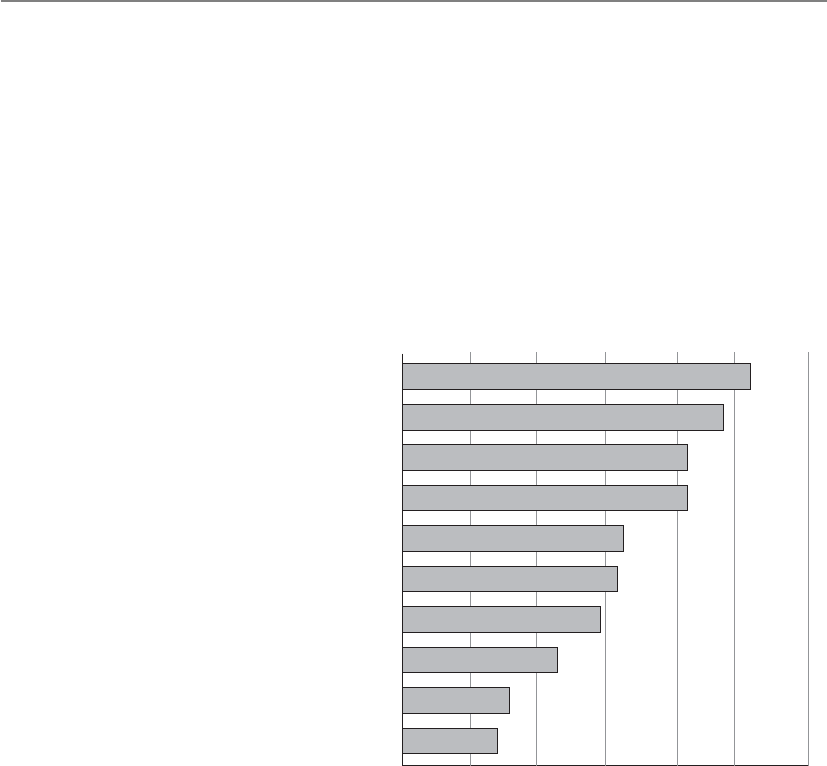
CISSP All-in-One Exam Guide
1018
• Risk assessment
• System security plan
• Certification and accreditation
• Continuous monitoring
In Chapter 2 we covered the NIST 800-53 document, which outlines all of the nec-
essary security controls that need to be in place to protect federal systems. This NIST
document is used to help ensure compliance with FISMA.
Which Law and Industry Regulations
Apply toYour Organization?
By Percent of Respondents
Health Insurance Portability and
Accountability (HIPAA)
U.S. State data breach notification law
Sarbanes-Oxley Act (SOX)
Payment Card Industry Data Security
Standard (PCI-DSS)
International privacy or security laws
Federal Information Security
Management Act (FISMA)
Gramm-Leach-Bliley Act (GLBA)
Health Information Technology for Economic
and Clinical Health Act (HITECH Act)
Payment Card Industry Payment
Application Standard
Other
2010 CSI Computer Crime and Security Survey
51.5%
47.4%
42.3%
42.3%
32.5%
32.0%
28.9%
23.2%
16.0%
13.9%
010 20 30 40 50 60
Economic Espionage Act of 1996
Prior to 1996, industry and corporate espionage was taking place with no real guidelines
for who could properly investigate the events. The Economic Espionage Act of 1996 pro-
vides the necessary structure when dealing with these types of cases and further defines
trade secrets to be technical, business, engineering, scientific, or financial. This means
that an asset does not necessarily need to be tangible to be protected or be stolen. Thus,
this act enables the FBI to investigate industrial and corporate espionage cases.

Chapter 9: Legal, Regulations, Investigations, and Compliance
1019
USA PATRIOT Act
Activities to protect the nation are encroaching on citizen privacy.
Response: Yep. It usually does.
Uniting and Strengthening America by Providing Appropriate Tools Required to Inter-
cept and Obstruct Terrorism Act of 2001 (aka Patriot Act) dealt with many issues within
one act.
• Reduced restrictions on law enforcement agencies’ ability to search telephone,
e-mail communications, medical, financial, and other records
• Eased restrictions on foreign intelligence gathering within the United States
• Expanded the Secretary of the Treasury’s authority to regulate financial
transactions, particularly those involving foreign individuals and entities
• Broadened the discretion of law enforcement and immigration authorities in
detaining and deporting immigrants suspected of terrorism-related acts
• Expanded the definition of terrorism to include domestic terrorism, thus
enlarging the number of activities to which the USA PATRIOT Act’s expanded
law enforcement powers can be applied
The law made many changes to already existing laws, which are listed here:
• Foreign Intelligence Surveillance Act of 1978
• Electronic Communications Privacy Act of 1986
• Money Laundering Control Act of 1986
• Bank Secrecy Act (BSA)
• Immigration and Nationality Act
While the CISSP exam will not ask you specific questions on specific laws, in reality
you should know this list of regulations and laws (at the minimum) if you are serious
about being a security professional. Each one of these directly relates to information
security. You will find that most of the security efforts going on within companies and
organizations today are regulatory driven. You need to understand the laws and regula-
tions to know what controls should be implemented to ensure compliancy.
Many security professionals are not well-versed in the necessary laws and regula-
tions. One person may know a lot about HIPAA, another person might know some
about SOX and GLBA, but most organizations do not have people who understand all
the necessary legislation that directly affects them. You can stand head and shoulders
above the rest by understanding cyberlaw and how it affects various organizations.

CISSP All-in-One Exam Guide
1020
Employee Privacy Issues
We are continuing with our theme of privacy, because it is so important and there are
so many aspects of it. Within a corporation, several employee privacy issues must be
thought through and addressed if the company wants to be properly protected. An un-
derstanding that each state and country may have different privacy laws should prompt
the company to investigate exactly what it can and cannot monitor before it does so.
If a company has learned that the state the facility is located in permits keyboard,
e-mail, and surveillance monitoring, it must take the proper steps to ensure that the
employees know that these types of monitoring may be put into place. This is the best
way for a company to protect itself, make sure it has a legal leg to stand on if necessary,
and not present the employees with any surprises.
The monitoring must be work related, meaning that a manager may have the right
to listen in on his employees’ conversations with customers, but he does not have the
right to listen in on personal conversations that are not work related. Monitoring also
must happen in a consistent way, such that all employees are subjected to monitoring,
not just one or two people.
If a company feels it may be necessary to monitor e-mail messages and usage, this
must be explained to the employees, first through a security policy and then through a
constant reminder such as a computer banner or regular training. It is best to have an
employee read a document describing what type of monitoring they could be subjected
to, what is considered acceptable behavior, and what the consequences of not meeting
those expectations are. The employees should sign this document, which can later be
treated as a legally admissible document if necessary. This document is referred to as a
waiver of reasonable expectation of privacy (REP). By signing the waiver, employees
waive their expectation to privacy.
Prescreening Personnel
Chapter 2 described why it is important to properly screen individuals before hir-
ing them into a corporation. These steps are necessary to help the company pro-
tect itself and to ensure it is getting the type of employee required for the job. This
chapter looks at some of the issues from the other side of the table, which deals
with that individual’s privacy rights.
Limitations exist regarding the type and amount of information that an orga-
nization can obtain on a potential employee. The limitations and regulations for
background checks vary from jurisdiction to jurisdiction, so the hiring manager
needs to consult the legal department. Usually human resources has an outline
for hiring managers to follow when it comes to interviews and background
checks.

Chapter 9: Legal, Regulations, Investigations, and Compliance
1021
NOTE
NOTE It is important to deal with the issue of reasonable expectation
of privacy (REP) when it comes to employee monitoring. In the U.S. legal
system the expectation of privacy is used when defining the scope of the
privacy protections provided by the Fourth Amendment of the Constitution. If
it is not specifically explained to an employee that monitoring is possible and/
or probable, when the monitoring takes place he could claim that his privacy
rights have been violated and launch a civil suit against your company.
A company that wants to be able to monitor e-mail should address this point in its
security policy and standards. The company should outline who can and cannot read
employee messages, describe the circumstances under which e-mail monitoring may be
acceptable, and specify where the e-mail can be accessed. Some companies indicate that
they will only monitor e-mail that resides on the mail server, whereas other companies
declare the right to read employee messages if they reside on the mail server or the em-
ployee’s computer. A company must not promise privacy to employees that it does not
then provide, because that could result in a lawsuit. Although IT and security profes-
sionals have access to many parts of computer systems and the network, this does not
mean it is ethical and right to overstep the bounds that could threaten a user’s privacy.
Only the tasks necessary to enforce the security policy should take place, and nothing
further that could compromise another’s privacy.
Many lawsuits have arisen where an employee was fired for doing something wrong
(downloading pornographic material, using the company’s e-mail system to send out
confidential information to competitors, and so on), and the employee sued the com-
pany for improper termination. If the company has not stated that these types of ac-
tivities were prohibited in its policy and made reasonable effort to inform the
employee (through security awareness, computer banners, the employee handbook) of
what is considered acceptable and not acceptable, and the resulting repercussions for
noncompliance, then the employee could win the suit and receive a large chunk of
money from the company. So policies, standards, and security-awareness activities need
to spell out these issues; otherwise, the employee’s lawyer will claim the employee had
an assumed right to privacy.
Personal Privacy Protection
End users are also responsible for their own privacy, especially as it relates to
protecting the data that are on their own systems. End users should be encour-
aged to use common sense and best practices. This includes the use of encryption
to protect sensitive personal information, as well as firewalls, antivirus software,
and patches to protect computers from becoming infected with malware. Docu-
ments containing personal information, such as credit card statements, should
also be shredded. Also, it’s important for end users to understand that when data
are given to a third party, they are no longer under their control.

CISSP All-in-One Exam Guide
1022
Liability and Its Ramifications
You may not have hacked the system yourself, but it was your responsibility to make sure it could
not happen.
As legislatures, courts, and law enforcement develop and refine their respective ap-
proaches to computer crimes, so too must corporations. Corporations should develop
not only their preventive, detective, and corrective approaches, but also their liability
and responsibility approaches. As these crimes increase in frequency and sophistica-
tion, so do their destruction and lasting effects. In most cases, the attackers are not
caught, but there is plenty of blame to be passed around, so a corporation needs to take
many steps to ensure that the blame and liability do not land clearly at its doorstep.
The same is true for other types of threats that corporations have to deal with today.
If a company has a facility that burns to the ground, the arsonist is only one small piece
of this tragedy. The company is responsible for providing fire detection and suppression
systems, fire-resistant construction material in certain areas, alarms, exits, fire extinguish-
ers, and backups of all the important information that could be affected by a fire. If a fire
burns a company’s building to the ground and consumes all the records (customer data,
inventory records, and similar information that is necessary to rebuild the business),
then the company did not exercise due care (acting responsibly) to ensure it was pro-
tected from such loss (by backing up to an offsite location, for example). In this case, the
employees, shareholders, customers, and everyone affected could successfully sue the
company. However, if the company did everything expected of it in the previously listed
respects, it could not be successfully sued for failure to practice due care.
In the context of security, due care means that a company did all it could have rea-
sonably done, under the circumstances, to prevent security breaches, and also took
reasonable steps to ensure that if a security breach did take place, proper controls or
countermeasures were in place to mitigate the damages. In short, due care means that
a company practiced common sense and prudent management and acted responsibly.
Due diligence means that the company properly investigated all of its possible weak-
nesses and vulnerabilities.
Before you can figure out how to properly protect yourself, you need to find out
what it is you are protecting yourself against. This is what due diligence is all about—
researching and assessing the current level of vulnerabilities so the true risk level is
understood. Only after these steps and assessments take place can effective controls and
safeguards be identified and implemented.
Review on Ways of Dealing with Privacy
Current methods of privacy protection and examples are as follows:
•Government regulations SOX, HIPAA, GLBA, BASEL II
•Self-regulation Payment Card Industry (PCI)
•Individual user Passwords, encryption, awareness

Chapter 9: Legal, Regulations, Investigations, and Compliance
1023
The same type of responsibility is starting to be expected of corporations pertaining
to computer crime and resource protection. Security is developed and implemented to
protect an organization’s valuable resources; thus, appropriate safeguards need to be in
place to protect the company’s mission by protecting its tangible and intangible re-
sources, reputation, employees, customers, shareholders, and legal position. Security is
a means to an end and not an end within itself. It is not practiced just for the sake of
doing it. It should be practiced in such a way as to accomplish fully understood,
planned, and attainable goals.
Senior management has an obligation to protect the company from a long list of
activities that can negatively affect it, including protection from malicious code, natural
disasters, privacy violation, infractions of the law, and more.
Due Care versus Due Diligence
Due diligence is the act of gathering the necessary information so the best deci-
sion-making activities can take place. Before a company purchases another com-
pany, it should carry out due diligence activities so that the purchasing company
does not have any “surprises” down the road. The purchasing company should
investigate all relevant aspects of the past, present, and predictable future of the
business of the target company. If this does not take place and the purchase of the
new company hurts the original company financially or legally, the decision
makers could be found liable (responsible) and negligent by the shareholders.
In information security, similar data gathering should take place so that there
are no “surprises” down the road and the risks are fully understood before they
are accepted. If a financial company is going to provide online banking function-
ality to its customers, the company needs to fully understand all the risks this
now provides the company. Web site hacking will increase, account fraud will
increase, database attacks will increase, social engineering attacks will increase,
etc. While this company is offering its customers a new service, it is also making
itself a juicier target for attackers and lawyers. The company needs to carry out
due diligence to understand all these risks before offering this new service so that
the best business decisions can take place. If proper countermeasures are not put
into place, the company opens itself up to potential criminal charges, civil suits,
regulatory fines, loss of market share, and more.
Due care pertains to acting responsibly and “doing the right thing.” It is a le-
gal term that defines the standards of performance that can be expected, either by
contract or by implication, in the execution of a particular task. Due care ensures
that a minimal level of protection is in place in accordance with the best practice
in the industry.
If a company does not have security policies, the necessary countermeasures
implemented, and security awareness training in place, it is not practicing due care
and can be found negligent. If the financial institution that offers online banking
does not implement SSL for account transactions, it is not practicing due care.
Many times due diligence (data gathering) has to be performed so that prop-
er due care (prudent actions) can take place.

CISSP All-in-One Exam Guide
1024
The costs and benefits of security should be evaluated in monetary and nonmone-
tary terms to ensure that the cost of security does not outweigh the expected benefits.
Security should be proportional to potential loss estimates pertaining to the severity,
likelihood, and extent of potential damage.
Lost business
Ex-post response
Notification
Detection and escalation
Average data breach cost by cost activity, 2008–2010
2008
2009
2010
$4,592,214
$4,472,030
$4,536,380
$1,294,702
$1,514,819
$1,738,761
$497,758
$500,321
$511,454
$271,084
$264,280
$455,304
$0 $1,000,000 $2,000,000 $3,000,000 $4,000,000 $5,000,000
Average cost
Source: Poneman Institute/Symantec Corporation
As the previous illustration shows, there are many costs to consider when it comes
to security breaches: loss of business, response activities, customer and partner notifica-
tion, and escalation measures. These types of costs need to be understood through due
diligence exercises so that the company can practice proper due care by implementing
the necessary controls to reduce the risks and these costs. Security mechanisms should
be employed to reduce the frequency and severity of security-related losses. A sound
security program is a smart business practice.
Senior management needs to decide upon the amount of risk it is willing to take
pertaining to computer and information security, and implement security in an eco-
nomical and responsible manner. (These issues are discussed in great detail in Chapter
2.) These risks do not always stop at the boundaries of the organization. Many compa-
nies work with third parties, with whom they must share sensitive data. The main com-
pany is still liable for the protection of this sensitive data that they own, even if the data

Chapter 9: Legal, Regulations, Investigations, and Compliance
1025
are on another company’s network. This is why more and more regulations are requir-
ing companies to evaluate their third-party security measures.
When companies come together to work in an integrated manner, special care must
be taken to ensure that each party promises to provide the necessary level of protection,
liability, and responsibility, which should be clearly defined in the contracts each party
signs. Auditing and testing should be performed to ensure that each party is indeed
holding up its side of the bargain. A Statement on Auditing Standards No. 70: Service
Organizations (SAS 70) is an audit that is carried out by a third party to assess the inter-
nal controls of a service organization.
Service organizations are organizations that provide outsourcing services that can
directly impact the control environment of a company’s customers. Examples of service
organizations are insurance and medical claims processors, trust companies, hosted
data centers, application service providers (ASPs), managed security providers, credit
processing organizations, and clearinghouses. Having an SAS 70 audit carried out is a
way to ensure that a company you work with and depend upon is really protecting your
company’s assets as they claim to be. We should always trust, but verify.
If one of the companies does not provide the necessary level of protection and its
negligence affects a partner it is working with, the affected company can sue the up-
stream company. For example, let’s say company A and company B have constructed an
extranet. Company A does not put in controls to detect and deal with viruses. Company
A gets infected with a destructive virus and it is spread to company B through the ex-
tranet. The virus corrupts critical data and causes a massive disruption to company B’s
production. Therefore, company B can sue company A for being negligent. Both com-
panies need to make sure they are doing their part to ensure that their activities, or the
lack of them, will not negatively affect another company, which is referred to as down-
stream liability.
NOTE
NOTE Responsibility generally refers to the obligations and expected actions
and behaviors of a particular party. An obligation may have a defined set of
specific actions that are required, or a more general and open approach,
which enables the party to decide how it will fulfill the particular obligation.
Accountability refers to the ability to hold a party responsible for certain
actions or inaction.
Each company has different requirements when it comes to their list of due care
responsibilities. If these steps are not taken, the company may be charged with negli-
gence if damage arises out of its failure to follow these steps. To prove negligence in
court, the plaintiff must establish that the defendant had a legally recognized obligation,
or duty, to protect the plaintiff from unreasonable risks and that the defendant’s failure
to protect the plaintiff from an unreasonable risk (breach of duty) was the proximate
cause of the plaintiff’s damages. Penalties for negligence can be either civil or criminal,
ranging from actions resulting in compensation for the plaintiff to jail time for viola-
tion of the law.

CISSP All-in-One Exam Guide
1026
NOTE
NOTE Proximate cause is an act or omission that naturally and directly
produces a consequence. It is the superficial or obvious cause for an
occurrence. It refers to a cause that leads directly, or in an unbroken
sequence, to a particular result. It can be seen as an element of negligence
in a court of law.
The following are some sample scenarios in which a company could be held liable
for negligence in its actions and responsibilities.
New and Improved SAS 70
SAS 70 is a set of standards that auditors use to evaluate the controls of a service
organization as it relates to customers’ internal control over financial reporting.
The industry stretched the use of the SAS 70 beyond its original intended pur-
pose. Organizations needed to make sure that their service providers were provid-
ing the necessary protection of their digital assets, but the industry did not have
a specific standard for this type of evaluation, so we all used SAS 70, which was
really just for financial control evaluation.
Other evaluation types have existed, as in WebTrust (e-commerce controls)
and SysTrust (operational controls), but these three evaluation standard sets did
not meet the needs of ensuring that outsourced services were secure and trustwor-
thy in a holistic fashion. So new evaluation standards were developed to better
meet the needs of companies today, which are Service Organization Controls
(SOC) 1, 2, and 3.
• SOC 1 pertains to financial controls.
• SOC 2 pertains to trust services (Security, Availability, Confidentiality,
Process Integrity, and Privacy).
• SOC 3 also pertains to trust services (Security, Availability,
Confidentiality, Process Integrity, and Privacy).
The difference between SOC 2 and 3 is that the resulting SOC 2 report pro-
vides very detailed data pertaining to the controls that provide the listed trust
services, which is not for the general public. SOC 3 results in a report that has less
detail and can be used for general purposes.
A SOC 2 report includes a description of the tests performed by the auditor
and the results of those tests and the auditor’s opinion of the effectiveness of the
individual controls and systems. SOC 3 does not contain test information and
details on the controls in place, but just if the systems meet the requirements of
the criteria for the specific trust service. SOC 3 is commonly used as a “seal of ap-
proval” and placed on service provider’s web sites and marketing collateral.

Chapter 9: Legal, Regulations, Investigations, and Compliance
1027
Personal Information
A company that holds medical information, Medical Information, Inc., does not have
strict procedures on how patient information is disseminated or shared.
A person pretends to be a physician, calls into Medical Information, Inc., and re-
quests medical information on the patient Don Hammy. The receptionist does not
question the caller and explains that Don Hammy has a brain tumor. A week later, Don
Hammy does not receive the job he interviewed for and finds out that the employer
called Medical Information, Inc., for his medical information.
So what was improper about this activity and how would liability be determined?
If and when this case went to court, the following items would be introduced and ad-
dressed:
•Legally recognized obligation
• Medical Information, Inc., does not have policies and procedures in place
to protect patient information.
• The employer does not have the right to make this kind of call and is not
able to use medical information against potential employees.
•Failure to conform to the required standard
• Sensitive information was released to an unauthorized person by a Medical
Information, Inc., employee.
• The employer requested information it did not have a right to.
•Proximate causation and resulting injury or damage
• The information provided by Medical Information, Inc., caused Don Hammy
great embarrassment and prevented him from obtaining a specific job.
• The employer made its decision based on information it did not have a
right to inquire about in the first place. The employer’s illegal acquisition
and review of Don’s private medical information caused it to not hire him.
The outcome was a long legal battle, but Don Hammy ended up successfully suing
both companies, recovered from his brain tumor, bought an island, and has never had
to work again.
Hacker Intrusion
A financial institution, Cheapo, Inc., buys the necessary middleware to enable it to offer
online bank account transactions for its customers. It does not add any of the necessary
security safeguards required for this type of transaction to take place over the Internet.
Within the first two weeks, 22 customers have their checking and savings accounts
hacked into, with a combined loss of $439,344.09.

CISSP All-in-One Exam Guide
1028
What was improper about this activity and how would liability be determined? If
and when this case went to court, the following items would be introduced and ad-
dressed:
•Legally recognized obligation
• Cheapo, Inc., did not implement a firewall or IDS, harden the database
holding the customer account information, or use encryption for customer
transactions.
• Cheapo, Inc., did not effectively protect its customers’ assets.
•Failure to conform to the required standard
• By not erecting the proper security policy and program and implementing
the necessary security controls, Cheapo, Inc., broke 12 federal regulations
used to govern financial institutions.
•Proximate causation and resulting injury or damage
• The financial institution’s failure to practice due care and implement the
basic requirements of online banking directly caused 22 clients to lose
$439,344.09.
Eventually, a majority of the accounts were attacked and drained, a class action suit
was brought against Cheapo, Inc., a majority of the people got most of their money
back, and the facility Cheapo, Inc., was using as a financial institution is now used to
sell tacos.
These scenarios are simplistic and described in a light-hearted manner, but failure
to implement computer and information security properly can expose a company and
its board of directors to litigation and legal punishment. Many times people cannot
hide behind the corporation and are held accountable individually and personally. The
board of directors can compromise its responsibilities to the stockholders, customers,
and employees by not ensuring that due care is practiced and that the company was not
being negligent in any way.
Third-Party Risk
We outsource everything. Can we outsource risk?
Response: Nope.
Most organizations outsource more business functions than they realize and it is
only increasing. Through the use of software as a service and cloud computing, organiza-
tions are increasingly turning to third-party service providers to maintain, manage,
transmit, or store company-owned information resources to improve delivery of servic-
es, gain efficiencies, and reduce cost. Information security issues should be defined and
assessed before engaging a third-party service provider to host or provide a service on
behalf of the organization. To ensure that adequate security controls are in place prior to
finalizing any contract agreement, the organization should conduct a third-party risk
assessment for all services (applications, hosting, systems, etc.) that would involve the
collection, processing, transmission, or storage of sensitive data or provide critical busi-

Chapter 9: Legal, Regulations, Investigations, and Compliance
1029
ness functionality processing. ISO/IEC 27002:2005, Reference 6.2.1 Identify Risks Related
to the Use of External Parties can be used to help identify these types of issues.
NOTE
NOTE An Information Security Third-Party Assessment Survey that was
developed by The University of Texas Health Science Center at San Antonio
can be located at https://wiki.internet2.edu/confluence/display/itsg2/Data+
Protection+Contractual+Language.
Contractual Agreements
Contracts are long and boring.
Response: Yes, but the right one can help you and the wrong one can hurt you.
While often overlooked, it is critical that information security issues are addressed
in many of the contracts organizations use or enter into during regular business activi-
ties. Security considerations should be taken for at least the following contracts types:
• Outsourcing agreements
• Hardware supply
• System maintenance and support
• System leasing agreements
• Consultancy service agreements
• Web site development and support
• Nondisclosure and confidentiality agreements
• Information security management agreements
• Software development agreements
• Software licensing
The organization must understand its regulatory and legal requirements pertaining
to the items the previous contract list involves, and security requirements must be inte-
grated properly in the contractual clauses. Contractual agreements need to not only be
created in a manner that covers regulatory, legal, and security requirements—but they
must be reviewed periodically to ensure that each contract is still relevant and provides
the necessary level of protection.
Procurement and Vendor Processes
Should we check out the security of this product before we buy it?
Response: The salesperson took me out to lunch and the product comes in a pretty box. I am sure
it is fine.
Before purchasing any product or service, the organization’s security requirements
need to be fully understood so that they can be expressed and integrated into the pro-
curement process. Procurement is not just purchasing something, but includes the ac-
tivities and processes involved with defining requirements, evaluating vendors, contract
negotiation, purchasing, and receiving the needed solution.

CISSP All-in-One Exam Guide
1030
The acquisition of a solution (system, application, or service) often includes a Re-
quest for Proposals (RFP), which is usually designed to get vendors to provide solutions
to a business problem or requirement, bring structure to the procurement decision, and
allow the risks and benefits of a solution to be identified clearly upfront. It is important
that the RFP conveys the necessary security requirements and elicits meaningful and
specific responses that describe how the vendor will meet those requirements. Federal
and state legal requirements, regulation, and business contractual obligations must be
thought through when constructing the requirements laid out in the RFPs.
The initial security requirements can be used to formulate questions for the RFP.
The answers to the RFP can be used to evaluate vendors and refine the security require-
ments. The evaluation and risk assessment of vendor finalists refine the security
requirements that will, in turn, be added as language to the contract or statement
of work.
While procurement is an activity an organization carries out to properly identify,
solicit, and select vendors for products and services, vendor management is an activity
that involves developing and monitoring vendor relationships after the contracts are in
place. Since organizations are extremely dependent upon their vendors and outsourc-
ing providers, if something slips up operations will be affected, which always drains the
bottom line (profit margin) and could put the company at risk. For example, your
cloud computing provider could downgrade its data encryption strength (move from
AES-256 to 3DES) so that it can meet a wider range of client requirements without in-
forming you. Next time your organization goes through a PCI-DSS audit it can be found
out of compliance and your company could be fined. If your company pays a software
development company to develop a specialized application, do you have a way to test
the code to make sure it is providing the level of protection they are claiming? Or what
if you set up a contract with a vendor to scan your external web sites each week and you
get busy with a million other things and six months down the line, they just stop scan-
ning and you are not informed. You assume it is being taken care of, but you do not
have governing processes in place to make sure this is true.
Avendor management governing process needs to be set up, which includes perfor-
mance metrics, service level agreements (SLAs), scheduled meetings, a reporting struc-
ture, and someone who is directly responsible. Your company is always responsible for
its own risk. Just because it farms out some piece of its operations does not resolve it of
this responsibility. The company needs to have a holistic program that defines procure-
ment, contracting, vendor assessment, and monitoring to make sure things are con-
tinually healthy and secure.
Compliance
Here comes the auditor. Look busy!
While it is important to know what laws and regulations your company needs to be
compliant with, it is also important to know how to ensure that compliance is being
met and how to properly convey that to the necessary stakeholders. A compliance pro-

Chapter 9: Legal, Regulations, Investigations, and Compliance
1031
gram should be developed, which outlines what needs to be put into place to be com-
pliant with the necessary internal and external drivers, and then an audit team will
assess how well the organization is doing to meet the identified requirements.
The first step is to understand what laws and regulations your organization needs to
be compliant with (SOX, HIPAA, PCI DSS, GLBA, FISMA, etc.). This will help deter-
mine the type of security framework that should be set up within the organization
(ISO\IEC 27001, COSO, Zachman). Then a risk methodology needs to be decided
upon (ISO\IEC 27005, NIST 800-30, OCTAVE, AS/NZS 4360). The regulatory and legal
requirements will help determine which control objective standard to follow (CobiT,
NIST 800-53). Once these pieces are established and put into place, now the auditors
have stuff to audit. If the organization must be compliant with SOX and HIPAA, does it
meet all the requirements of these regulations? If the organization set up its security
program based upon the ISO\IEC 27001 standard, are all the pieces in place or are a
third of them missing? If the organization chose to use the NIST 800-30 risk manage-
ment standard, is it actually carrying it out properly? If the organization must comply
with the NIST 800-53 standard by implementing all the controls listed within the stan-
dard, are the controls in place and working properly?
NOTE
NOTE Most of these items were covered in Chapter 2 along with the role of
auditors and an audit committee.
Auditors can be internal or external to the organization. The auditors will have long
checklists of items that correspond with the legal, regulatory, and policy requirements
the organization must meet. Figure 9-4 shows a small portion of the audit checklists
auditors follow when determining if an organization is compliant with the specifics of
the PCI-DSS regulation.
It is common for organizations to develop governance,risk, and compliance (GRC)
programs, which allow for the integration and alignment of the activities that take
place in each one of these silos of a security program. If the same key performance indi-
cators (KPI) are used in the governance, risk, and compliance auditing activities, then
the resulting reports can effectively illustrate the overlap and integration of these differ-
ent concepts. For example, if an organization is not compliant with various HIPAA re-
quirements, this is a type of risk that management must be aware of so that the right
activities and controls can be put into place. Also, how does executive management
carry out security governance if it does not understand the risks the company is facing
and the outstanding compliance issues? It is important for all of these things to be un-
derstood by the decision makers in a holistic manner so that they can make the best
decisions pertaining to protecting the organization as a whole. The agreed-upon KPI
values are commonly provided to executive management in dashboards or scorecard
formats, which allow them to quickly understand the health of the organization from
a GRC point of view.

CISSP All-in-One Exam Guide
1032
Investigations
Since computer crimes are only increasing and will never really go away, it is important
that all security professionals understand how computer investigations should be car-
ried out. This includes legal requirements for specific situations, understanding the
“chain of custody” for evidence, what type of evidence is admissible in court, incident
response procedures and escalation processes.
1.1.1 A formal process for
approving and testing
all external network
connections and changes to
the firewall configuration
1.1.1 Verify that firewall configuration standards
include a formal process for all firewall changes,
including testing and management approval of
all changes to external connections and firewall
configuration
1.1.2 A current network
diagram with all
connections to cardholder
data, including any
wireless networks
1.1.2.a Verify that a current network diagram
exists and verify that it documents all
connections to cardholder data, including any
wireless networks
1.1.2.b Verify that the diagram is kept current
1.1.3 Requirements for a
firewall at each Internet
connection and between any
demilitarized zone
(DMZ) and the internal
network zone
1.1.3 Verify that firewall configuration standards
include requirements for a firewall at each
Internet connection and between any DMZ and
the Intranet.Verify that the current network
diagram is consistent with the firewall
configuration standards
1.1.4 Description of groups,
roles, and responsibilities for
logical management of
network components
1.1.4 Verify that firewall configuration standards
include a description of groups, roles, and
responsibilities for logical management of
network components
1.1.5 Documented list of
services and ports
necessary for business
1.1.5 Verify that firewall configuration standards
include a documented list of services/ports
necessary for business
1.1.6 Justification and
documentation for any
available protocols besides
hypertext transfer
protocol (HTTP), and secure
sockets layer (SSL),
secure shell (SSH), and virtual
private network (VPN)
1.1.6 Verify that firewall configuration standards
include justification and documentation for any
available protocols besides HTTP and SSL, SSH,
and VPN
PCI DSS Requirements Testing Procedures In
Place
Not in
Place
Target Date/
Comments
1.1 Establish firewall
configuration standards
that include the following:
1.1 Obtain and inspect the firewall configuration
standard and other documentation specified
below to verify that standards are complete.
Complete each item in this section.
Figure 9-4 Checklist component of PCI DSS used by auditors

Chapter 9: Legal, Regulations, Investigations, and Compliance
1033
When a potential computer crime takes place, it is critical that the investigation
steps are carried out properly to ensure that the evidence will be admissible to the court
if things go that far and that it can stand up under the cross-examination and scrutiny
that will take place. As a security professional, you should understand that an investiga-
tion is not just about potential evidence on a disk drive. The whole environment will
be part of an investigation, including the people, network, connected internal and ex-
ternal systems, federal and state laws, management’s stance on how the investigation is
to be carried out, and the skill set of whomever is carrying out the investigation. Mess-
ing up on just one of these components could make your case inadmissible or at least
damaging if it is brought to court. So, make sure to watch many more episodes of CSI
and Law & Order!
Incident Management
Many computer crimes go unreported because the victim, in many cases, is not aware
of the incident or wants to just patch the hole the hacker came in through and keep the
details quiet in order to escape embarrassment or the risk of hurting the company’s
reputation. This makes it harder to know the real statistics of how many attacks happen
each day, the degree of damage caused, and what types of attacks and methods are be-
ing used.
Although we commonly use the terms “event” and “incident” interchangeably,
there are subtle differences between the two. An event is a negative occurrence that can
be observed, verified, and documented, whereas an incident is a series of events that
negatively affects the company and/or impacts its security posture. This is why we call
reacting to these issues “incident response” (or “incident handling”), because some-
thing is negatively affecting the company and causing a security breach.
Many types of incidents (virus, insider attack, terrorist attacks, and so on) exist, and
sometimes it is just human error. Indeed, many incident response individuals have re-
ceived a frantic call in the middle of the night because a system is acting “weird.” The
reasons could be that a deployed patch broke something, someone misconfigured a
device, or the administrator just learned a new scripting language and rolled out some
code that caused mayhem and confusion.
When a company endures a computer crime, it should leave the environment and
evidence unaltered and contact whomever has been delegated to investigate these types
of situations. Someone who is unfamiliar with the proper process of collecting data and
evidence from a crime scene could instead destroy that evidence, and thus all hope of
prosecuting individuals, and achieving a conviction would be lost. Companies should
have procedures for many issues in computer security such as enforcement procedures,
disaster recovery and continuity procedures, and backup procedures. It is also necessary
to have a procedure for dealing with computer incidents because they have become an
increasingly important issue of today’s information security departments. This is a di-
rect result of attacks against networks and information systems increasing annually.
Even though we don’t have specific numbers due to a lack of universal reporting and
reporting in general, it is clear that the volume of attacks is increasing. Just think about
all the spam, phishing scams, malware, distributed denial-of-service, and other attacks
you see on your own network and hear about in the news.

CISSP All-in-One Exam Guide
1034
Unfortunately, many companies are at a loss as to who to call or what to do right
after they have been the victim of a cybercrime. Therefore, all companies should have
an incident response policy that indicates who has the authority to initiate an incident
response, with supporting procedures set up before an incident takes place. This policy
should be managed by the legal department and security department. They need to
work together to make sure the technical security issues are covered and the legal issues
that surround criminal activities are properly dealt with.
The incident response policy should be clear and concise. For example, it should
indicate if systems can be taken offline to try to save evidence or if systems have to con-
tinue functioning at the risk of destroying evidence. Each system and functionality
should have a priority assigned to it. For instance, if the file server is infected, it should
be removed from the network, but not shut down. However, if the mail server is in-
fected, it should not be removed from the network or shut down because of the prior-
ity the company attributes to the mail server over the file server. Tradeoffs and decisions
will have to be made, but it is better to think through these issues before the situation
occurs, because better logic is usually possible before a crisis, when there’s less emotion
and chaos.
All organizations should develop an incident response team, as mandated by the
incident response policy, to respond to the large array of possible security incidents.
The purpose of having an incident response team is to ensure that there is a group of
people who are properly skilled, who follow a standard set of procedures, and who are
singled out and called upon when this type of event takes place. The team should have
proper reporting procedures established, be prompt in their reaction, work in coordi-
nation with law enforcement, and be an important element of the overall security pro-
gram. The team should consist of representatives from various business units, such as
the legal department, HR, executive management, the communications department,
physical/corporate security, IS security, and information technology.
There are three different types of incident response teams that an organization can
choose to put into place. A virtual team is made up of experts who have other duties and
assignments within the organization. This type of team introduces a slower response
Incident Management
Incident management includes proactive and reactive processes. Proactive mea-
sures need to be put into place so that incidents can actually be detected in a
controllable manner, and reactive measures need to be put into place so those
incidents are then dealt with properly.
Most organizations have only incident response processes, which walk
through how an incident should be handled. A more holistic approach is an in-
cident management program, which ensures that triggers are monitored to make
sure all incidents are actually uncovered. This commonly involves log aggrega-
tion, system information and event management systems (SIEM), and user edu-
cation. Having clear ways of dealing with incidents is not necessarily useful if you
don’t have a way to find out if incidents are indeed taking place.

Chapter 9: Legal, Regulations, Investigations, and Compliance
1035
time, and members must neglect their regular duties should an incident occur. How-
ever, a permanent team of folks who are dedicated strictly to incident response can be
cost prohibitive to smaller organizations. The third type of incident response team is a
hybrid of the virtual and permanent models. Certain core members are permanently
assigned to the team, whereas others are called in as needed.
The incident response team should have the following basic items available:
• A list of outside agencies and resources to contact or report to.
• Roles and responsibilities outlined.
• A call tree to contact these roles and outside entities.
• A list of computer or forensics experts to contact.
• Steps on how to secure and preserve evidence.
• A list of items that should be included on a report for management and
potentially the courts.
• A description of how the different systems should be treated in this type
of situation. (For example, the systems should be removed from both the
Internet and the network and powered down.)
When a suspected crime is reported, the incident response team should follow a set
of predetermined steps to ensure uniformity in their approach and make sure no steps
are skipped. First, the incident response team should investigate the report and deter-
mine that an actual crime has been committed. If the team determines that a crime has
been carried out, senior management should be informed immediately. If the suspect
is an employee, a human resources representative must be called right away. The soon-
er the documenting of events begins, the better. If someone is able to document the
starting time of the crime, along with the company employees and resources involved,
it would provide a good foundation for evidence. At this point, the company must de-
cide if it wants to conduct its own forensics investigation or call in the big guns. If ex-
perts are going to be called in, the system that was attacked should be left alone in order
to try and preserve as much evidence of the attack as possible. If the company decides
to conduct its own forensics investigation, it must deal with many issues and address
tricky elements. (Forensics will be discussed later in this chapter.)
Computer networks and business processes face many types of threats, each requir-
ing a specialized type of recovery. However, an incident response team should draft and
enforce a basic outline of how all incidents are to be handled. This is a much better
approach than the way many companies deal with these threats, which is usually in an
ad hoc, reactive, and confusing manner. A clearly defined incident-handling process is
more cost-effective, enables recovery to happen more quickly, and provides a uniform
approach with certain expectation of its results.
Incident handling should be closely related to disaster recovery planning and
should be part of the company’s disaster recovery plan, usually as an appendix. Both
are intended to react to some type of incident that requires a quick response so the

CISSP All-in-One Exam Guide
1036
company can return to normal operations. Incident handling is a recovery plan that
responds to malicious technical threats. The primary goal of incident handling is to
contain and mitigate any damage caused by an incident and to prevent any further
damage. This is commonly done by detecting a problem, determining its cause, resolv-
ing the problem, and documenting the entire process.
Without an effective incident-handling program, individuals who have the best in-
tentions can sometimes make the situation worse by damaging evidence, damaging
systems, or spreading malicious code. Many times, the attacker booby-traps the com-
promised system to erase specific critical files if a user does something as simple as list
the files in a directory. A compromised system can no longer be trusted because the
internal commands listed in the path could be altered to perform unexpected activities.
The system could now have a back door for the attacker to enter when he wants, or
could have a logic bomb silently waiting for a user to start snooping around only to
destroy any and all evidence.
Incident handling should also be closely linked to the company’s security training
and awareness program to ensure that these types of mishaps do not take place. Past
issues that the incident recovery team encountered can be used in future training ses-
sions to help others learn what the company is faced with and how to improve re-
sponse processes.
Employees need to know how to report an incident. Therefore, the incident re-
sponse policy should detail an escalation process so that employees understand when
evidence of a crime should be reported to higher management, outside agencies, or law
enforcement. The process must be centralized, easy to accomplish (or the employees
won’t bother), convenient, and welcomed. Some employees feel reluctant to report
incidents because they are afraid they will get pulled into something they do not want
to be involved with or accused of something they did not do. There is nothing like try-
ing to do the right thing and getting hit with a big stick. Employees should feel comfort-
able about the process, and not feel intimidated by reporting suspicious activities.
The incident response policy should also dictate how employees should interact
with external entities, such as the media, government, and law enforcement. This, in
particular, is a complicated issue influenced by jurisdiction, the status and nature of the
crime, and the nature of the evidence. Jurisdiction alone, for example, depends on the
country, state, or federal agency that has control. Given the sensitive nature of public
disclosure, communications should be handled by communications, human resources,
or other appropriately trained individuals who are authorized to publicly discuss inci-
dents. Public disclosure of an event can lead to two possible outcomes. If not handled
correctly, it can compound the negative impact of an incident. For example, given to-
day’s information-driven society, denial and “no comment” may result in a backlash.
On the other hand, if public disclosure is handled well, it can provide the organization
with an opportunity to win back public trust. Some countries and jurisdictions either
already have or are contemplating breach disclosure laws that require organizations to
notify the public if a security breach involving personally identifiable information is
even suspected. So it’s to your benefit to make sure you are open and forthright with
third parties.

Chapter 9: Legal, Regulations, Investigations, and Compliance
1037
A sound incident-handling program works with outside agencies and counterparts.
The members of the team should be on the mailing list of the Computer Emergency
Response Team (CERT) so they can keep up to date about new issues and can spot ma-
licious events, hopefully before they get out of hand. CERT is an organization that is
responsible for monitoring and advising users and companies about security prepara-
tion and security breaches.
NOTE
NOTE Resources for CERT can be found at www.cert.org/certcc.html.
Incident Response Procedures
A hacker just made our server explode. What do we do now?
In the preceding sections, it is repeatedly stated that there should be a standard set
of procedures for the team to follow, but what are these procedures? Although different
organizations may define these procedures (or stages) a little differently, they should
accomplish the exact same thing. To further complicate matters, incident response is a
dynamic process. Oftentimes stages are conducted in parallel, even as one stage de-
pends on the output of another. The important thing is that your organization uses a
methodical approach. This allows for proper documentation that may be important in
later stages of the incident response process or if the case goes to trial and you are asked
whether you followed a standard procedure and whether any steps were left out. A
documented checklist of your incident response procedure will help ensure admissibil-
ity in court.
You should understand the following set of procedures (stages) for incident response:
• Triage
• Investigation
• Containment
• Analysis
• Tracking
• Recovery
When an event has been reported by employees or detected by automated security
controls, the first stage carried out by the incident response team should be triage. Tri-
age in this sense is very similar to triage conducted by medics when treating people who
are injured. The crux of it is, “Is this person really hurt?” “How bad is this person hurt?”
“What type of treatment does this person need (surgery, stitches, or just a swift kick in
the butt)?”
So that’s what we do in the computer world too. We take in the information avail-
able, investigate its severity, and set priorities on how to deal with the incident. This
begins with an initial screening of the reported event to determine whether it is indeed
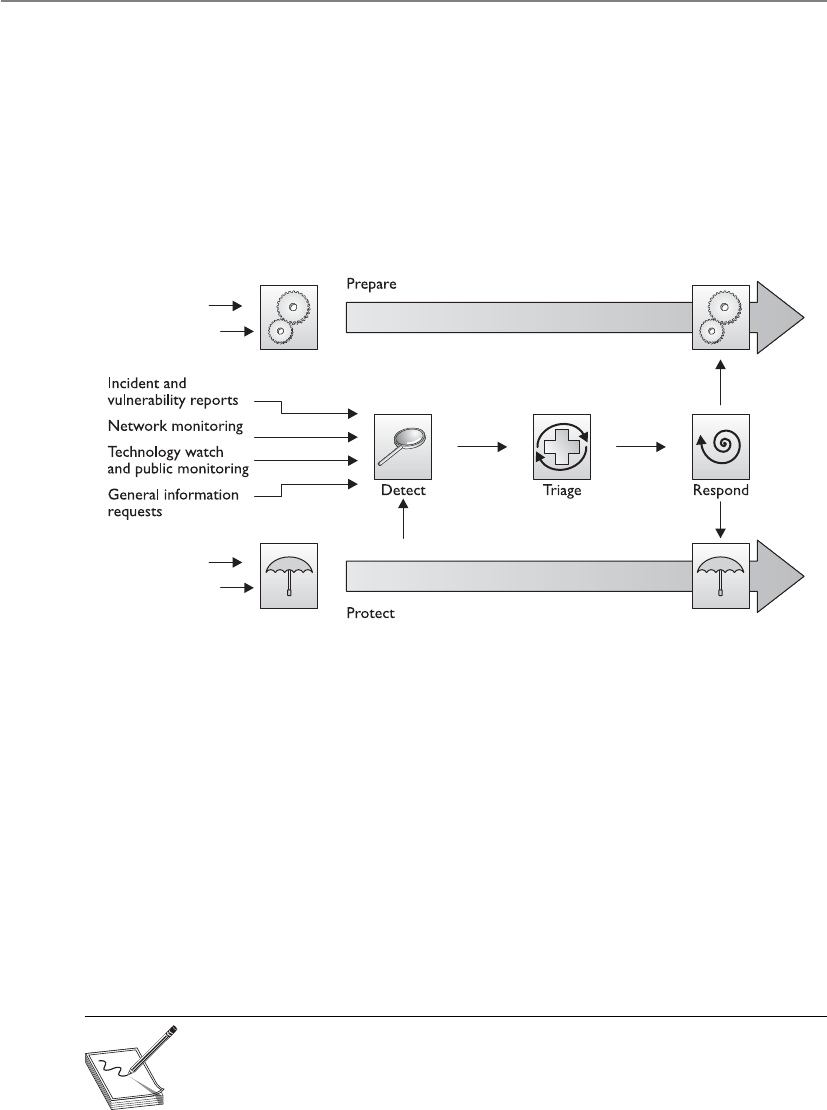
CISSP All-in-One Exam Guide
1038
an incident and whether the incident-handling process should be initiated. A member
of the incident response team should be responsible for reviewing an alert to determine
if it is a false positive. If the event is a false positive, then it is logged and the incident
response process for this particular event is complete. However, if the event is deter-
mined to be a real incident, it is identified and classified. Incidents should be catego-
rized according to their level of potential risk, which is influenced by the type of
incident, the source (whether it’s internal or external), its rate of growth, and the abil-
ity to contain the damage. This, in turn, determines what notifications are required
during the escalation process, and sets the scope and procedures for the investigation.
Once we understand the severity of the incident taking place, we move on to the
next stage, which is investigation. Investigation involves the proper collection of rele-
vant data, which will be used in the analysis and following stages. The goals of these
stages are to reduce the impact of the incident, identify the cause of the incident, re-
sume operations as soon as possible, and apply what was learned to prevent the inci-
dent from recurring. It is at the analysis stage where computer forensics comes into
play. Management must decide if law enforcement should be brought in to carry out
the investigation, if evidence should be collected for the purposes of prosecution, or
if the hole should just be patched. Most companies do not have a forensics team on
staff to carry out these tasks. In such situations, if a suspected crime has occurred and
management does not want law enforcement involved but does want a forensics inves-
tigation carried out, external forensics experts need to be called in.
We’ll go over computer forensics in detail in the next section. For now, it’s impor-
tant to know that an investigation must adhere to company policy as well as applicable
laws and regulations.
NOTE
NOTE Be careful not to confuse incident response with computer forensics.
Although they are both investigative in nature, the terms are not synonymous.
Computer forensics has a higher standard of proof than incident response
because the assumption is that the evidence must be admissible in a court of
law and is handled accordingly.

Chapter 9: Legal, Regulations, Investigations, and Compliance
1039
The next stage is containment. In the medical world, if you were found to have tu-
berculosis, you would be put in an isolation room because no one wants to catch your
cooties. In the containment phase, the damage must be mitigated. In the computer
world, this could mean that an infected server is taken off the network, firewall con-
figurations are changed to stop an attacker, or the system that is under attack is discon-
nected from the Internet.
A proper containment strategy buys the incident response team time for a proper
investigation and determination of the incident’s root cause. The containment strategy
should be based on the category of the attack (that is, whether it was internal or exter-
nal), the assets affected by the incident, and the criticality of those assets. So what kind
of containment strategy is best? Well, it depends. Containment strategies can be proac-
tive or reactive. Which is best depends on the environment and the category of the at-
tack. In some cases, the best action might be to disconnect the affected system from the
network. However, this reactive approach could cause a denial of service or limit func-
tionality of critical systems.
When complete isolation or containment is not a viable solution, you may opt to
use network segmentation to virtually isolate a system or systems. Boundary devices
can also be used to stop one system from infecting another. Another reactive strategy
involves reviewing and revising firewall/filtering router rule configuration. Access con-
trol lists can also be applied to minimize exposure. These containment strategies indi-
cate to the attacker that his attack has been noticed and countermeasures are being
implemented. But what if, in order to perform a root cause analysis, you need to keep
the affected system online and not let on that you’ve noticed the attack? In this situa-
tion, you might consider installing a honeynet or honeypot to provide an area that will
contain the attacker but pose minimal risk to the organization. This decision should
involve legal counsel and upper management because honeynets and honeypots can
introduce liability issues. Once the incident has been contained, we need to figure out
what just happened by putting the available pieces together. This is the stage of analysis,
where more data are gathered (audit logs, video captures, human accounts of activities,
system activities) to try and figure out the root cause of the incident. The goals are to
figure out who did this, how they did it, when they did it, and why. Management must
be continually kept abreast of these activities because they will be the ones making the
big decisions on how this whole mess is to be handled.
The group of individuals who make up the analysis team must have a variety of
skills. They must also have a solid understanding of the systems affected by the inci-
dent, the system and application vulnerabilities, and the network and system configu-
rations. Although formal education is important, real-world applied experience
combined with proper training is key for these folks.
One of the biggest challenges they face is the dynamic nature of logs. Many systems
are configured to purge or overwrite their logs in a short timeframe, and time is lost the
moment the incident occurs. Several hours may pass before an incident is reported or
detected. Some countries are considering legislation that would require longer log file
retention. However, such laws pose privacy and storage challenges. We can never win.

CISSP All-in-One Exam Guide
1040
Once we have as much information as we can get in the last stage and have an-
swered as many questions as we can, we then move to the tracking stage. (Tracking may
also take place in parallel with the analysis and examination.) We determine whether
the source of the incident was internal or external and how the offender penetrated and
gained access to the asset. If the attacker was external, the team would contact their ISP
to help them in gathering data and possibly help in finding the source of the attack.
Many times this is difficult because attackers move from one system to the next, so sev-
eral ISPs may have to get involved. Thus, it is important that the analysis and tracking
team have a good working relationship with third parties such as ISPs, other response
teams, and law enforcement.
Once the incident is understood, we move into the recovery (or follow-up) stage,
which means we implement the necessary fix to ensure this type of incident cannot
happen again. This may require blocking certain ports, deactivating vulnerable services
or functionalities, switching over to another processing facility, or applying a patch.
This is properly called “following recovery procedures,” because just arbitrarily making
a change to the environment may introduce more problems. The recovery procedures
may state that a new image needs to be installed, backup data need to be restored, the
system needs to be tested, and all configurations must be properly set.
Regardless of the specifics of the recovery procedures, before an affected system is
returned to production, you must first ensure that it can withstand another attack. It
doesn’t take long for word to get out within the hacker community that a weak system
is online. Trained information security personnel should test the system for vulnerabil-
ities to provide information assurance. Vulnerability testing tools that simulate real-
world attacks can help the team harden the system against a variety of attacks, including
those that were originally directed against it.
CAUTION
CAUTION An attacked or infected system should never be trusted because
you do not necessarily know all the changes that have taken place and the true
extent of the damage. Some malicious code could still be hiding somewhere.
Systems should be rebuilt to ensure that all of the potential bad mojo has
been released by carrying out a proper exorcism.
Other issues to think through when a company is developing incident response
procedures include deciding how the incident will be explained to the press, customers,
and shareholders. This could require the collaboration of the public relations depart-
ment, management, human resources (if employees are involved), the IT department,

Chapter 9: Legal, Regulations, Investigations, and Compliance
1041
and the legal department. A cybercrime may have legal ramifications that are not im-
mediately apparent and must be handled delicately. The company should decide how
it will report the matter to outsiders, to ensure that the situation is not perceived in a
totally different light.
What Can We Learn from This?
Closure of an incident is determined by the nature or category of the incident, the
desired incident response outcome (for example, business resumption or system
restoration), and the team’s success in determining the incident’s source and root
cause. Once it is determined that the incident is closed, it is a good idea to have a
team briefing that includes all groups affected by the incident to answer the fol-
lowing questions:
• What happened?
• What did we learn?
• How can we do it better next time?
The team should review the incident and how it was handled and carry out a
postmortem analysis. The information that comes out of this meeting should
indicate what needs to go into the incident response process and documentation,
with the goal of continual improvement. Instituting a formal process for the
briefing will provide the team with the ability to start collecting data that can be
used to track its performance metrics.
Cops or No Cops?
Management needs to make the decision as to whether law enforcement should
be called in to handle the security breach. The following are some of the issues to
understand if law enforcement is brought in:
• Company loses control over investigation once law enforcement is
involved.
• Secrecy of compromise is not promised; it could become part of public
record.
• Effects on reputation need to be considered (the ramifications of this
information reaching customers, shareholders, and so on).
• Evidence will be collected and may not be available for a long period of
time. It may take a year or so to get into court.

CISSP All-in-One Exam Guide
1042
Computer Forensics and Proper Collection of Evidence
I just spilled coffee on our only evidence.
Response: Case closed. Let’s all go home.
Forensics is a science and an art that requires specialized techniques for the recovery,
authentication, and analysis of electronic data for the purposes of a digital criminal
investigation. It is the coming together of computer science, information technology,
and engineering with law. When discussing computer forensics with others, you might
hear the terms digital forensics, network forensics, electronic data discovery, cyberfo-
rensics, and forensic computing. (ISC)2 uses computer forensics as a synonym for all of
these other terms, so that’s what you’ll see on the CISSP exam. Computer forensics
encompasses all domains in which evidence is in a digital or electronic form, either in
storage or on the wire. At one time computer forensics results were differentiated from
network and code analysis, but now this entire area is referred to as digital evidence.
As a forensics discipline, computer forensics is the new kid on the block. This,
paired with its complexity, may be the reason why many companies lack skills in this
area. Computer forensics does not refer to hardware or software. It is a set of specific
processes relating to reconstruction of computer usage, examination of residual data,
authentication of data by technical analysis or explanation of technical features of data,
and computer usage that must be followed in order for evidence to be admissible in a
court of law. This is not something the ordinary network administrator should be car-
rying out.
The people conducting the forensics investigation must be properly skilled in this
trade and know what to look for. If someone reboots the attacked system or inspects
various files, this could corrupt viable evidence, change timestamps on key files, and
erase footprints the criminal may have left. Most digital evidence has a short lifespan
and must be collected quickly in order of volatility. In other words, the most volatile
or fragile evidence should be collected first. In some situations, it is best to remove the
system from the network, dump the contents of the memory, power down the system,
and make a sound image of the attacked system and perform forensic analysis on this
copy. Working on the copy instead of the original drive will ensure that the evidence
stays unharmed on the original system in case some steps in the investigation actually
corrupt or destroy data. Dumping the memory contents to a file before doing any
work on the system or powering it down is a crucial step because of the information
that could be stored there. This is another method of capturing fragile information.
However, this creates a sticky situation because capturing RAM or conducting live
analysis can introduce changes to the crime scene because various state changes and
operations take place. Whatever method the forensic investigator chooses to collect
digital evidence must be documented. This is the most important aspect of evidence
handling.
NOTE
NOTE The forensics team needs specialized tools, an evidence collection
notebook, containers, a camera, and evidence identification tags. The notebook
should not be a spiral notebook but rather a notebook that is bound in a way
that one can tell if pages have been removed.

Chapter 9: Legal, Regulations, Investigations, and Compliance
1043
International Organization on Computer Evidence
When we covered laws earlier in the chapter, we discussed how important it is to stan-
dardize different countries’ attitudes and approaches to computer crime since com-
puter crimes often take place over international boundaries. The same thing is true with
forensics. Thus, digital evidence must be handled in a similarly careful fashion so it can
be used in different courts, no matter what country is prosecuting a suspect. The Inter-
national Organization on Computer Evidence (IOCE) was created to develop interna-
tional principles dealing with how digital evidence is to be collected and handled so
various courts will recognize and use the evidence in the same manner. Within the
United States, there is the Scientific Working Group on Digital Evidence (SWDGE),
which also aims to ensure consistency across the forensic community. The principles
developed by IOCE and SWDGE for the standardized recovery of computer-based evi-
dence are governed by the following attributes:
• Consistency with all legal systems
• Allowance for the use of a common language
• Durability
• Ability to cross international and state boundaries
• Ability to instill confidence in the integrity of evidence
• Applicability to all forensic evidence
• Applicability at every level, including that of individual, agency, and country
The IOCE/SWDGE principles are listed next:
1. When dealing with digital evidence, all of the general forensic and procedural
principles must be applied.
2. Upon the seizing of digital evidence, actions taken should not change that
evidence.
3. When it is necessary for a person to access original digital evidence, that
person should be trained for the purpose.
4. All activity relating to the seizure, access, storage, or transfer of digital
evidence must be fully documented, preserved, and available for review.
5. An individual is responsible for all actions taken with respect to digital
evidence while the digital evidence is in their possession.
6. Any agency that is responsible for seizing, accessing, storing, or transferring
digital evidence is responsible for compliance with these principles.
So, there you go. Do all of that, and we will finally achieve world peace.
NOTE
NOTE The Digital Forensic Science Research Workshop (DFSRW) brings
together academic researchers and forensic investigators to also address
a standardized process for collecting evidence, to research practitioner
requirements, and to incorporate a scientific method as a tenant of digital
forensic science. Learn more at http://www.dfrws.org/index.shtml.

CISSP All-in-One Exam Guide
1044
Motive, Opportunity, and Means
MOM did it.
Today’s computer criminals are similar to their traditional counterparts. To under-
stand the “whys” in crime, it is necessary to understand the motive, opportunity, and
means—or MOM. This is the same strategy used to determine the suspects in a tradi-
tional, noncomputer crime.
Motive is the “who” and “why” of a crime. The motive may be induced by either
internal or external conditions. A person may be driven by the excitement, challenge,
and adrenaline rush of committing a crime, which would be an internal condition.
Examples of external conditions might include financial trouble, a sick family member,
or other dire straits. Understanding the motive for a crime is an important piece in fig-
uring out who would engage in such an activity. For example, in the past many hackers
attacked big-name sites because when the sites went down, it was splashed all over the
news. However, once technology advanced to the point where attacks could not bring
down these sites, or once these activities were no longer so highly publicized, the indi-
viduals eventually stopped initiating these types of attacks because their motives were
diminished.
Opportunity is the “where” and “when” of a crime. Opportunities usually arise
when certain vulnerabilities or weaknesses are present. If a company does not have a
firewall, hackers and attackers have all types of opportunities within that network. If a
company does not perform access control, auditing, and supervision, employees may
have many opportunities to embezzle funds and defraud the company. Once a crime
fighter finds out why a person would want to commit a crime (motive), she will look
at what could allow the criminal to be successful (opportunity).
Means pertains to the abilities a criminal would need to be successful. Suppose a
crime fighter was asked to investigate a complex embezzlement that took place within
a financial institution. If the suspects were three people who knew how to use a mouse,
keyboard, and a word processing application, but only one of them was a programmer
and system analyst, the crime fighter would realize that this person may have the means
to commit this crime much more successfully than the other two individuals.
Computer Criminal Behavior
Like traditional criminals, computer criminals have a specific modus operandi (MO).
In other words, criminals use a distinct method of operation to carry out their crime
that can be used to help identify them. The difference with computer crimes is that the
investigator, obviously, must have knowledge of technology. For example, an MO for
computer criminals may include the use of specific hacking tools, or targeting specific
systems or networks. The method usually involves repetitive signature behaviors, such
as sending e-mail messages or programming syntax. Knowledge of the criminal’s MO
and signature behaviors can be useful throughout the investigative process. Law en-
forcement can use the information to identify other offenses by the same criminal, for

Chapter 9: Legal, Regulations, Investigations, and Compliance
1045
example. The MO and signature behaviors can also provide information that is useful
during the interview and interrogation process as well as the trial.
Psychological crime scene analysis (profiling) can also be conducted using the
criminal’s MO and signature behaviors. Profiling provides insight into the thought pro-
cesses of the attacker and can be used to identify the attacker or, at the very least, the
tool he used to conduct the crime.
NOTE
NOTE Locard’s Principle of Exchange also provides information that is handy
for profiling. The principle states that a criminal leaves something behind and
takes something with them. This principle is the foundation of criminalistics.
Even in an entirely digital crime scene, Locard’s Principle of Exchange can shed
light on who the perpetrator(s) may be.
Incident Investigators
Incident investigators are a breed of their own. Many people suspect they come from a
different planet, but to date that hasn’t been proven. Good incident investigators must
be aware of suspicious or abnormal activities that others might normally ignore. This is
because, due to their training and experience, they may know what is potentially going
on behind some abnormal system activity, while another employee would just respond,
“Oh, that just happens sometimes. We don’t know why.”
The investigator could identify suspicious activities, such as port scans, attempted
SQL injections, or evidence in a log that describes a dangerous activity that took place.
Identifying abnormal activities is a bit more difficult, because it is more subtle. These
activities could be increased network traffic, an employee staying late every night, un-
usual requests to specific ports on a network server, and so on. As an analogy, if a teen-
age boy, who usually plays Xbox games all night, starts going to the library every night,
his mother would notice this abnormal activity and, upon snooping around, perhaps
discover her son has a new girlfriend he is meeting at the park each night.
On top of being observant, the investigator must understand forensics procedures,
evidence collection issues, and how to analyze a situation to determine what is going
on, and know how to pick out the clues in system logs.
Different Types of Assessments an Investigator Can Perform
•Network analysis
• Communication analysis
• Log analysis
• Path tracing

CISSP All-in-One Exam Guide
1046
The Forensics Investigation Process
To ensure that forensics activities are carried out in a standardized manner, it is neces-
sary for the team to follow specific laid-out steps so nothing is missed and thus ensure
the evidence is admissible. Figure 9-5 illustrates the phases through a common investi-
gation process. Each team or company may commonly come up with their own steps,
but all should be essentially accomplishing the same things:
• Identification
• Preservation
• Collection
• Examination
• Analysis
• Presentation
• Decision
•Media analysis
• Disk imaging
• MAC (Modify, Access, Create) time analysis
• Content analysis
• Slack space analysis
• Steganography analysis
•Software analysis
• Reverse engineering
• Malicious code review
• Exploit review
•Hardware/embedded device analysis
• Dedicated appliance attack points
• Firmware and dedicated memory inspections
• Embedded operating systems, virtualized software, and
hypervisor analysis
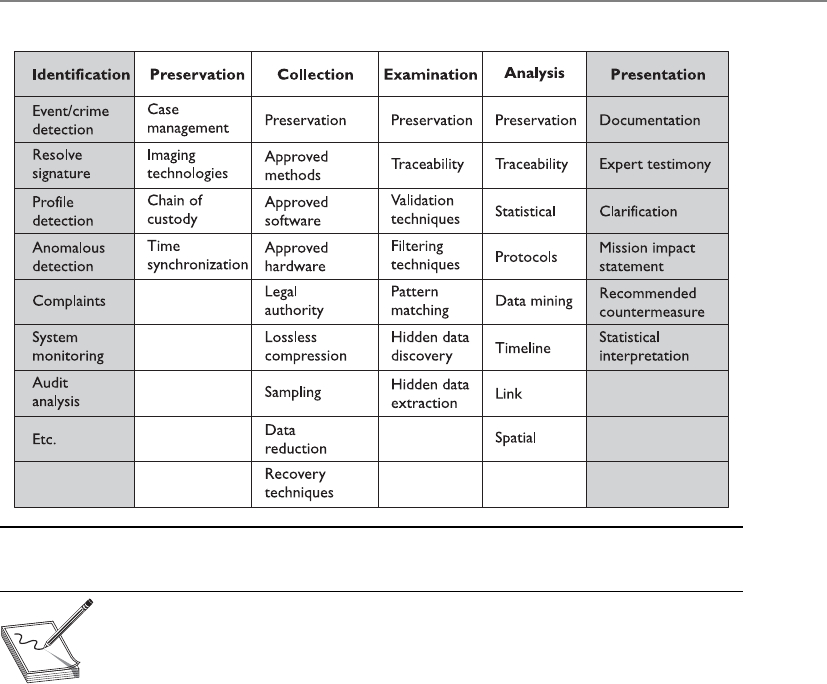
Chapter 9: Legal, Regulations, Investigations, and Compliance
1047
NOTE
NOTE The principles of criminalistics are included in the forensic
investigation process. They are identification of the crime scene, protection
of the environment against contamination and loss of evidence, identification
of evidence and potential sources of evidence, and the collection of evidence.
In regard to minimizing the degree of contamination, it is important to
understand that it is impossible not to change a crime scene—be it physical
or digital. The key is to minimize changes and document what you did and why,
and how the crime scene was affected.
During the examination and analysis process of a forensics investigation, it is criti-
cal that the investigator works from an image that contains all of the data from the
original disk. It must be a bit-level copy, sector by sector, to capture deleted files, slack
spaces, and unallocated clusters. These types of images can be created through the use
of a specialized tool such as FTK Imager, EnCase, Safeback, or the -dd Unix utility. A file
copy tool does not recover all data areas of the device necessary for examination. Figure
9-6 illustrates a commonly used tool in the forensic world for evidence collection.
Figure 9-5 Characteristics of the different phases through an investigation process

CISSP All-in-One Exam Guide
1048
Figure 9-6 Encase can be used to collect digital forensic data.
Controlling the Crime Scene
Whether the crime scene is physical or digital, it is important to control who
comes in contact with the evidence of the crime to ensure its integrity. The follow-
ing are just some of the steps that should take place to protect the crime scene:
• Only allow authorized individuals access to the scene. These individuals
should have knowledge of basic crime scene analysis.
• Document who is at the crime scene.
• In court, the integrity of the evidence may be in question if there are
too many people milling around.
• Document who were the last individuals to interact with the systems.
• If the crime scene does become contaminated, document it. The
contamination may not negate the derived evidence, but it will make
investigating the crime more challenging.

Chapter 9: Legal, Regulations, Investigations, and Compliance
1049
The original media should have two copies created: a primary image (a control copy
that is stored in a library) and a working image (used for analysis and evidence collec-
tion). These should be timestamped to show when the evidence was collected.
Before creating these images, the investigator must make sure the new media has
been properly purged, meaning it does not contain any residual data. Some incidents
have occurred where drives that were new and right out of the box (shrink-wrapped)
contained old data not purged by the vendor.
To ensure that the original image is not modified, it is important to create message
digests for files and directories before and after the analysis to prove the integrity of the
original image.
The investigator works from the duplicate image because it preserves the original
evidence, prevents inadvertent alteration of original evidence during examination, and
allows re-creation of the duplicate image if necessary. Most media are “magnetic based,”
and the data are volatile and can be contained in the following:
• Registers and cache
• Process tables and ARP cache
• System memory (RAM, ROM)
• Temporary file systems
• Special disk sectors
So, great care and precision must take place to capture clues from any computer or
device. Remember that digital evidence can exist in many more devices than traditional
computer systems. Cell phones, USB drives, laptops, GPS devices, and memory cards
can be containers of digital evidence as well.
Acquiring evidence on live systems and those using network storage further compli-
cates matters because you cannot turn off the system in order to make a copy of the
hard drive. Imagine the reaction you’d receive if you told an IT manager that you need-
ed to shut down a primary database or e-mail system. It wouldn’t be favorable. So these
systems and others, such as those using on-the-fly encryption, must be imaged while
they are running.

CISSP All-in-One Exam Guide
1050
The next crucial piece is to keep a proper chain of custody of the evidence. Because
evidence from these types of crimes can be very volatile and easily dismissed from court
because of improper handling, it is important to follow very strict and organized pro-
cedures when collecting and tagging evidence in every single case—no exceptions! Fur-
thermore, the chain of custody should follow evidence through its entire life cycle,
beginning with identification and ending with its destruction, permanent archiving, or
return to owner.
NOTE
NOTE A chain of custody is a history that shows how evidence was
collected, analyzed, transported, and preserved in order to be presented in
court. Because electronic evidence can be easily modified, a clearly defined
chain of custody demonstrates that the evidence is trustworthy.
Forensics Field Kits
When forensics teams are deployed, they should be properly equipped with all of
the tools and supplies needed. The following are some of the common items in
the forensics field kits:
•Documentation tools Tags, labels, and timelined forms
•Disassembly and removal tools Antistatic bands, pliers, tweezers,
screwdrivers, wire cutters, and so on
•Package and transport supplies Antistatic bags, evidence bags and
tape, cable ties, and others

Chapter 9: Legal, Regulations, Investigations, and Compliance
1051
When copies of data need to be made, this process must meet certain standards to
ensure quality and reliability. Specialized software for this purpose can be used. The
copies must be able to be independently verified and must be tamperproof.
Each piece of evidence should be marked in some way with the date, time, initials
of the collector, and a case number if one has been assigned. Magnetic disk surfaces
should not be marked on. The piece of evidence should then be sealed in a container,
which should be marked with the same information. The container should be sealed
with evidence tape, and if possible, the writing should be on the tape so a broken seal
can be detected. An example of the data that should be collected and displayed on each
evidence container is shown in Figure 9-7.
NOTE
NOTE The chain of custody of evidence dictates that all evidence be labeled
with information indicating who secured and validated it.
EVIDENCE
Station/Section/Unit/Dept___________________________________________________
Case number____________________________ Item#____________________________
Type of offense___________________________________________________________
Description of evidence____________________________________________________
_______________________________________________________________________
_______________________________________________________________________
Suspect_________________________________________________________________
Victim__________________________________________________________________
Date and time of recovery___________________________________________________
Location of recovery_______________________________________________________
Recovered by____________________________________________________________
CHAIN OF CUSTODY
Received from___________________________ By______________________________
Date___________________________Time____________________________A.M./P.M..
Received from___________________________ By______________________________
Date___________________________Time____________________________A.M./P.M..
Received from___________________________ By______________________________
Date___________________________Time____________________________A.M./P.M..
Received from___________________________ By______________________________
Date___________________________Time____________________________A.M./P.M..
WARNING:THIS IS A TAMPER EVIDENT SECURITY PACKAGE. ONCE SEALED,ANY
ATTEMPT TO OPEN WILL RESULT IN OBVIOUS SIGNS OF TAMPERING.
Figure 9-7 Evidence container data

CISSP All-in-One Exam Guide
1052
Wires and cables should be labeled, and a photograph of the labeled system should
be taken before it is actually disassembled. Media should be write-protected if possible.
Storage of media evidence should be dust free and kept at room temperature without
much humidity, and, of course, the media should not be stored close to any strong
magnets or magnetic fields.
If possible, the crime scene should be photographed, including behind the com-
puter if the crime involved some type of physical break-in. Documents, papers, and
devices should be handled with cloth gloves and placed into containers and sealed. All
storage media should be contained, even if they have been erased, because data still
may be obtainable.
Because this type of evidence can be easily erased or destroyed and is complex in
nature, identification, recording, collection, preservation, transportation, and interpre-
tation are all important. After everything is properly labeled, a chain of custody log
should be made of each container and an overall log should be made capturing all
events.
For a crime to be successfully prosecuted, solid evidence is required. Computer fo-
rensics is the art of retrieving this evidence and preserving it in the proper ways to make
it admissible in court. Without proper computer forensics, hardly any computer crimes
could ever be properly and successfully presented in court.
The most common reasons for improper evidence collection are no established
incident response team, no established incident response procedures, poorly written
policy, and a broken chain of custody.
The next step is the analysis of the evidence. Forensic investigators use a scientific
method that involves:
• Determining the characteristics of the evidence, such as whether it’s
admissible as primary or secondary evidence, as well as its source, reliability,
and permanence
• Comparing evidence from different sources to determine a chronology of events
• Event reconstruction, including the recovery of deleted files and other activity
on the system
This can take place in a controlled lab environment or, thanks to hardware write-
blockers and forensic software, in the field. When investigators analyze evidence in a
lab, they are dealing with dead forensics; that is, they are working only with static data.
Live forensics, which takes place in the field, includes volatile data. If evidence is lack-
ing, then an experienced investigator should be called in to help complete the picture.
Finally, the interpretation of the analysis should be presented to the appropriate
party. This could be a judge, lawyer, CEO, or board of directors. Therefore, it is impor-
tant to present the findings in a format that will be understood by a nontechnical audi-
ence. As a CISSP, you should be able to explain these findings in layman’s terms using
metaphors and analogies. Of course, the findings, which are top secret or company
confidential, should only be disclosed to authorized parties. This may include the legal
department or any outside counsel that assisted with the investigation.

Chapter 9: Legal, Regulations, Investigations, and Compliance
1053
What Is Admissible in Court?
He is guilty because I don’t like him.
Response: Um, I need more than that.
Computer logs are important in many aspects of the IT world. They are generally
used to troubleshoot an issue or to try to understand the events that took place at a
specific moment in time. When computer logs are to be used as evidence in court, they
must be collected in the regular course of business. Most of the time, computer-related
documents are considered hearsay, meaning the evidence is secondhand evidence.
Hearsay evidence is not normally admissible in court unless it has firsthand evidence
that can be used to prove the evidence’s accuracy, trustworthiness, and reliability, such
as the testimony of a businessperson who generated the computer logs and collected
them. This person must generate and collect logs as a normal part of his business ac-
tivities and not just this one time for court. The value of evidence depends upon the
genuineness and competence of the source.
The Australian Computer Emergency Response Team’s General
Guidelines for Computer Forensics
• Keep the handling and corruption of original data to a minimum.
• Document all actions and explain changes.
• Follow the Five Rules for Evidence (Admissible, Authentic, Complete,
Accurate, Convincing).
• Bring in more experienced help when handling and/or analyzing the
evidence is beyond your knowledge, skills, or abilities.
• Adhere to your organization’s security policy and obtain written
permission to conduct a forensics investigation.
• Capture as accurate an image of the system(s) as possible while
working quickly.
• Be ready to testify in a court of law.
• Make certain your actions are repeatable.
• Prioritize your actions, beginning with volatile and proceeding to
persistent evidence.
• Do not run any programs on the system(s) that are potential evidence.
• Act ethically and in good faith while conducting a forensics
investigation, and do not attempt to do any harm.

CISSP All-in-One Exam Guide
1054
It is important to show that the logs, and all evidence, have not been tampered with
in any way, which is the reason for the chain of custody of evidence. Several tools are
available that run checksums or hashing functions on the logs, which will allow the
team to be alerted if something has been modified.
When evidence is being collected, one issue that can come up is the user’s expecta-
tion of privacy. If an employee is suspected of, and charged with, a computer crime, he
might claim that his files on the computer he uses are personal and not available to law
enforcement and the courts. This is why it is important for companies to conduct secu-
rity-awareness training, have employees sign documentation pertaining to the accept-
able use of the company’s computers and equipment, and have legal banners pop up
on every employee’s computer when they log on. These are key elements in establishing
that a user has no right to privacy when he is using company equipment. The following
banner is suggested by CERT Advisory:
This system is for the use of authorized users only. Individuals using this computer system
without authority, or in excess of their authority, are subject to having all of their
activities on this system monitored and recorded by system personnel.
In the course of monitoring an individual improperly using this system, or in the course of
system maintenance, the activities of authorized users may also be monitored.
Anyone using this system expressly consents to such monitoring and is advised that if such
monitoring reveals possible evidence of criminal activity, system personnel may provide the
evidence of such monitoring to law enforcement officials.
This explicit warning strengthens a legal case that can be brought against an em-
ployee or intruder, because the continued use of the system after viewing this type of
warning implies that the person acknowledges the security policy and gives permission
to be monitored.
Evidence has its own life cycle, and it is important that the individuals involved
with the investigation understand the phases of the life cycle and properly follow them.
The life cycle of evidence includes:
• Collection and identification
• Storage, preservation, and transportation
• Presentation in court
• Return of the evidence to the victim or owner
Business Records Exception
A legal exception to the U.S. hearsay rule of the Federal Rules of Evidence (FRE)
is called the business records exception rule or business entry rule.
Under this rule, a party could admit any records of a business (1) that were
made in the regular course of business; (2) that the business has a regular practice
to make such records; (3) that were made at or near the time of the recorded
event; and (4) that contain information transmitted by a person with knowledge
of the information within the document.

Chapter 9: Legal, Regulations, Investigations, and Compliance
1055
Several types of evidence can be used in a trial, such as written, oral, computer gen-
erated, and visual or audio. Oral evidence is testimony of a witness. Visual or audio is
usually a captured event during the crime or right after it.
Not all evidence is equal in the eyes of the law, and some types of evidence have
more clout, or weight, than others. The following sections quickly describe the different
ways evidence can be categorized and valued.
Best Evidence
Best evidence is the primary evidence used in a trial because it provides the most reli-
ability. An example of something that would be categorized as best evidence is an orig-
inal signed contract. Oral evidence is not considered best evidence because there is no
firsthand reliable proof that supports its validity, and it therefore does not have as good
a standing as legal documents. Oral evidence cannot be used to dispute a legal docu-
ment, but it can be used to interpret the document.
Secondary Evidence
Secondary evidence is not viewed as reliable and strong in proving innocence or guilt (or
liability in civil cases) when compared to best evidence. Oral evidence, such as a wit-
ness’s testimony, and copies of original documents are placed in the secondary evi-
dence category.
Direct Evidence
Direct evidence can prove a fact all by itself and does not need backup information to
refer to. When direct evidence is used, presumptions are not required. One example of
direct evidence is the testimony of a witness who saw a crime take place. Although this
oral evidence would be secondary in nature, meaning a case could not rest on just it
alone, it is also direct evidence, meaning the lawyer does not necessarily need to pro-
vide other evidence to back it up. Direct evidence often is based on information gath-
ered from a witness’s five senses.
Conclusive Evidence
Conclusive evidence is irrefutable and cannot be contradicted. Conclusive evidence is
very strong all by itself and does not require corroboration.
Circumstantial Evidence
Circumstantial evidence can prove an intermediate fact that can then be used to deduce
or assume the existence of another fact. This type of fact is used so the judge or jury will
logically assume the existence of a primary fact. For example, if a suspect told a friend
he was going to bring down eBay’s web site, a case could not rest on that piece of evi-
dence alone because it is circumstantial. However, this evidence can cause the jury to
assume that because the suspect said he was going to do it, and hours later it happened,
maybe he was the one who did the crime.
Corroborative Evidence
Corroborative evidence is supporting evidence used to help prove an idea or point. It
cannot stand on its own but is used as a supplementary tool to help prove a primary
piece of evidence.

CISSP All-in-One Exam Guide
1056
Opinion Evidence
When a witness testifies, the opinion rule dictates that she must testify to only the facts
of the issue and not her opinion of the facts. This is slightly different from when an
expert witness is used, because an expert is used primarily for his educated opinion.
Most lawyers call in expert witnesses to testify and help the defending or prosecuting
sides better understand the subject matter so they can help the judge and jury better
understand the matters of the case.
Hearsay Evidence
Hearsay evidence pertains to oral or written evidence presented in court that is second-
hand and has no firsthand proof of accuracy or reliability. If a witness testifies about
something he heard someone else say, it is too far removed from fact and has too many
variables that can cloud the truth. If business documents were made during regular
business routines, they may be admissible. However, if these records were made just to
be presented in court, they could be categorized as hearsay evidence.
The foundation of admissibility is based on the following items:
• Procedures for collecting and maintaining evidence
• Proof of how errors were avoided
• Identification of custodian and skill set
• Reasonable explanations for
• Why certain actions were taken
• Why specific procedures were bypassed
It is important that evidence be relevant, complete, sufficient, and reliable to the
case at hand. These four characteristics of evidence provide a foundation for a case and
help ensure that the evidence is legally permissible.
For evidence to be relevant, it must have a reasonable and sensible relationship to the
findings. If a judge rules that a person’s past traffic tickets cannot be brought up in a mur-
der trial, this means the judge has ruled that the traffic tickets are not relevant to the case
at hand. Therefore, the prosecuting lawyer cannot even mention them in court.
For evidence to be complete, it must present the whole truth of an issue. For the evi-
dence to be sufficient, or believable, it must be persuasive enough to convince a reason-
able person of the validity of the evidence. This means the evidence cannot be subject
to personal interpretation. Sufficient evidence also means it cannot be easily doubted.
For evidence to be reliable, or accurate, it must be consistent with the facts. Evidence
cannot be reliable if it is based on someone’s opinion or copies of an original docu-
ment, because there is too much room for error. Reliable evidence means it is factual
and not circumstantial.
NOTE
NOTE Don’t dismiss the possibility that as an information security
professional you will be responsible for entering evidence into court. Most
tribunals, commissions, and other semi-legal proceedings have admissibility
requirements. Because these requirements can change between jurisdictions,
you should seek legal counsel to better understand the specific rules for your
jurisdiction.

Chapter 9: Legal, Regulations, Investigations, and Compliance
1057
Surveillance, Search, and Seizure
Two main types of surveillance are used when it comes to identifying computer crimes:
physical surveillance and computer surveillance. Physical surveillance pertains to secu-
rity cameras, security guards, and closed-circuit TV (CCTV), which may capture evi-
dence. Physical surveillance can also be used by an undercover agent to learn about the
suspect’s spending activities, family and friends, and personal habits in the hope of
gathering more clues for the case.
Computer surveillance pertains to auditing events, which passively monitors events
by using network sniffers, keyboard monitors, wiretaps, and line monitoring. In most
jurisdictions, active monitoring may require a search warrant. In most workplace envi-
ronments, to legally monitor an individual, the person must be warned ahead of time
that her activities may be subject to this type of monitoring.
Search and seizure activities can get tricky depending on what is being searched for
and where. For example, American citizens are protected by the Fourth Amendment
against unlawful search and seizure, so law enforcement agencies must have probable
cause and request a search warrant from a judge or court before conducting such a
search. The actual search can only take place in the areas outlined by the warrant. The
Fourth Amendment does not apply to actions by private citizens unless they are acting
as police agents. So, for example, if Kristy’s boss warned all employees that the manage-
ment could remove files from their computers at any time, and her boss was not a po-
lice officer or acting as a police agent, she could not successfully claim that her Fourth
Amendment rights were violated. Kristy’s boss may have violated some specific privacy
laws, but he did not violate Kristy’s Fourth Amendment rights.
In some circumstances, a law enforcement agent may seize evidence that is not in-
cluded in the warrant, such as if the suspect tries to destroy the evidence. In other words,
if there is an impending possibility that evidence might be destroyed, law enforcement
may quickly seize the evidence to prevent its destruction. This is referred to as exigent
circumstances, and a judge will later decide whether the seizure was proper and legal
before allowing the evidence to be admitted. For example, if a police officer had a search
warrant that allowed him to search a suspect’s living room but no other rooms, and then
he saw the suspect dumping cocaine down the toilet, the police officer could seize the
cocaine even though it was in a room not covered under his search warrant.
After evidence is gathered, the chain of custody needs to be enacted and enforced to
make sure the evidence’s integrity is not compromised.
A thin line exists between enticement and entrapment when it comes to capturing
a suspect’s actions. Enticement is legal and ethical, whereas entrapment is neither legal
nor ethical. In the world of computer crimes, a honeypot is always a good example to
show the difference between enticement and entrapment. Companies put systems in
their screened subnets that either emulate services that attackers usually like to take
advantage of or actually have the services enabled. The hope is that if an attacker breaks
into the company’s network, she will go right to the honeypot instead of the systems
that are actual production machines. The attacker will be enticed to go to the honeypot
system because it has many open ports and services running and exhibits vulnerabili-
ties that the attacker would want to exploit. The company can log the attacker’s actions
and later attempt to prosecute.

CISSP All-in-One Exam Guide
1058
The action in the preceding example is legal unless the company crosses the line to
entrapment. For example, suppose a web page has a link that indicates that if an indi-
vidual clicks it, she could then download thousands of MP3 files for free. However,
when she clicks that link, she is taken to the honeypot system instead, and the com-
pany records all of her actions and attempts to prosecute. Entrapment does not prove
that the suspect had the intent to commit a crime; it only proves she was successfully
tricked.
Interviewing and Interrogating
Once surveillance and search and seizure activities have been performed, it is very like-
ly that suspects must be interviewed and interrogated. However, interviewing is both an
art and a science, and the interview should be conducted by a properly trained profes-
sional. Even then, the interview may only be conducted after consultation with legal
counsel. This doesn’t, however, completely relieve you as an information security pro-
fessional from responsibility during the interviewing process. You may be asked to
provide input or observe an interview in order to clarify technical information that
comes up in the course of questioning. When this is needed, there should be one per-
son in charge of the interview or interrogation, with one or two others present. Both the
topics of discussion and the questions should be prepared beforehand and asked in a
systematic and calm fashion, because the purpose of an interrogation is to obtain evi-
dence for a trial.
The employee interrogator should be in a position that is senior to the employee
suspect. A vice president is not going to be very intimidated or willing to spill his guts
to the mailroom clerk. The interrogation should be held in a private place, and the
suspect should be relatively comfortable and at ease. If exhibits are going to be shown
to the suspect, they should be shown one at a time, and otherwise kept in a folder. It is
not necessary to read a person their rights before questioning unless law enforcement
officers do the interrogation.
What the interrogators do not want to happen during an interrogation is to be de-
ceived by the suspect, to relinquish important information pertaining to the investiga-
tion, or to have the suspect flee before a trial date is set.
A Few Different Attack Types
Several categories of computer crimes can be committed, and different methods exist to
commit those crimes. The following sections go over some of the types of computer
fraud and abuses.
Salami
I will take a little bit of your salami, and another little bit of his salami, and a bit of her salami,
and no one will ever notice.
Asalami attack is one in which the attacker commits several small crimes with the
hope that the overall larger crime will go unnoticed. Salami attacks usually take place
in the accounting departments of companies, and the most common example of a sa-
lami attack involves subtracting a small amount of funds from many accounts with the
hope that such an insignificant amount would be overlooked. For example, a bank

Chapter 9: Legal, Regulations, Investigations, and Compliance
1059
employee may alter a banking software program to subtract 5 cents from each of the
bank’s customers’ accounts once a month and move this amount to the employee’s
bank account. If this happened to all of the bank’s 50,000 customer accounts, the in-
truder could make up to $30,000 a year.
Data Diddling
Can I just diddle the data a little?
Response: Nope, it’s illegal.
Data diddling refers to the alteration of existing data. Many times, this modification
happens before the data is entered into an application or as soon as it completes pro-
cessing and is outputted from an application. For instance, if a loan processor is enter-
ing information for a customer’s loan of $100,000, but instead enters $150,000 and
then moves the extra approved money somewhere else, this would be a case of data
diddling. Another example is if a cashier enters an amount of $40 into the cash register,
but really charges the customer $60 and keeps the extra $20.
There are many reasons to enter false information into a system or application, but
the usual reason is to overstate revenue and assets and understate expenses and liabili-
ties. Sometimes managers do this to deceive shareholders, creditors, superiors, and
partners.
This type of crime is common and one of the easiest to prevent by using access and
accounting controls, supervision, auditing, separation of duties, and authorization lim-
its. This is just one example of how insiders can be more dangerous than outsiders.
Password Sniffing
I think I smell a password!
Password sniffing is just what it sounds like—sniffing network traffic with the
hope of capturing passwords being sent between computers. Several tools are available
on the Internet that provide this functionality. Capturing a password is tricky, because
it is a piece of data that is usually only used when a user wants to authenticate into a
domain or access a resource. Some systems and applications do send passwords over
the network in cleartext, but a majority of them do not anymore. Instead, the software
performs a one-way hashing function on the password and sends only the resulting
value to the authenticating system or service. The authenticating system has a file con-
taining all users’ password hash values, not the passwords themselves, and when the
authenticating system is asked to verify a user’s password, it compares the hashing value
sent to what it has in its file.
Many of the tools used to capture passwords can also break the encryption of the
password. This is a common way for a computer crime to start.
IP Spoofing
I couldn’t have carried out that attack. I have a different address!
Response: I’m not convinced.
Networks and the Internet use IP addresses like we use building numbers and street
names to find our way from one place to another. Each computer is assigned an IP ad-
dress so packets know where they came from and where they are going. However, many
attackers do not want anyone to know their real location, so they either manually

CISSP All-in-One Exam Guide
1060
change the IP address within a packet to show a different address or, more commonly,
use a tool that is programmed to provide this functionality for them. This type of activ-
ity is referred to as IP spoofing. Several attacks that take place use spoofed IP addresses,
which give the victim little hope of finding the real system and individual who initiated
the attack.
One reason that IP spoofing is so easily accomplished is that the protocol of the
Internet, IP, was developed during a time when security was rarely considered. Back
then, developers were much more focused on functionality, and probably could not
have imagined all the various types of attacks that would be carried out using the pro-
tocols they developed.
NOTE
NOTE Spoofing can be considered a masquerading attack. Masquerading is
the act of trying to pretend to be someone else.
Dumpster Diving
I went through your garbage and found your Social Security number, credit card number, net-
work schematics, mother’s maiden name, and evidence that you wear funny underwear.
Dumpster diving refers to the concept of rummaging through a company or indi-
vidual’s garbage for discarded documents, information, and other precious items that
could then be used in an attack against that company or person. The intruder would
have to gain physical access to the premises, but the area where the garbage is kept is
usually not highly guarded. Dumpster diving is unethical, but it’s not illegal. Trespass-
ing is illegal, however, and may be done in the process of dumpster diving. (Laws con-
cerning this may vary in different jurisdictions.)
Industrial spies can raid corporate dumpsters to find proprietary and confidential
information. Credit card thieves can go through dumpsters to retrieve credit card infor-
mation from discarded receipts. Identity thieves can go through a person’s trash and
collect enough information to open new bank accounts, take out new loans, or obtain
new credit cards under the victim’s identity.
Wiretapping
Most communications signals are vulnerable to some type of wiretapping or eaves-
dropping. It can usually be done undetected and is referred to as a passive attack. Tools
used to intercept communications include cellular scanners, radio receivers, micro-
phone receivers, tape recorders, network sniffers, and telephone-tapping devices.
NOTE
NOTE A passive attack is nonintrusive, as in eavesdropping or wiretapping.
An active attack, on the other hand, is intrusive, as in DoS or penetration
attacks.

Chapter 9: Legal, Regulations, Investigations, and Compliance
1061
It is illegal to intentionally eavesdrop on another person’s conversation under many
countries’ existing wiretap laws. In many cases, this action is only acceptable if the per-
son consents or there is a court order allowing law enforcement to perform these types
of activities. Under the latter circumstances, the law enforcement officers must show
probable cause to support their allegation that criminal activity is taking place and can
only listen to relevant conversations. These requirements are in place to protect an in-
dividual’s privacy rights.
Cybersquatting
If you want this domain name it will cost 30 gazillion dollars.
While cybersquatting is not necessarily an attack method, it is a common issue that
companies run into, which requires getting legal counsel involved.
Cybersquatting takes place when someone purchases a domain name with the goal
of hurting a company with a similar domain name or to carry out extortion. For ex-
ample, if you owned a company called Bob’s Barbeque, you would probably buy a do-
main name similar to this and set up your company’s web site. If I purchase very similar
domain names that point to your competitors’ sites, this can reduce traffic coming to
your site, thus hurting your business. I might do this specifically so that you would
want to purchase the domain names from me and I in turn will charge you way too
much for these domain names. This is considered trafficking domain names with bad
faith intent to profit from the goodwill of a trademark. Some individuals go around
purchasing many domain names similar to existing companies just so they can mark
up the price on the domain names and make a profit in this manner.
The United States has a law that deals with this issue (Anti-cybersquatting Con-
sumer Protection Act (ACPA) laws U.S.C. § 1125 and U.S.C. § 1129) but many countries
do not.
Ethics
Just because something is not illegal does not make it right.
Ethics are based on many different issues and foundations. They can be relative to
different situations and interpreted differently from individual to individual. Therefore,
they are often a topic of debate. However, some ethics are less controversial than others,
and these types of ethics are easier to expect of all people.
(ISC)2 requires all certified system security professionals to commit to fully sup-
porting its Code of Ethics. If a CISSP intentionally or knowingly violates this Code of
Ethics, he or she may be subject to a peer review panel, which will decide whether the
certification should be revoked.
The full set of (ISC)2 Code of Ethics for the CISSP is listed on the (ISC)2 site at
www.isc2.org. The following list is an overview, but each CISSP candidate should read
the full version and understand the Code of Ethics before attempting this exam:
• Act honorably, honestly, justly, responsibly, and legally, and protect society.
• Work diligently, provide competent services, and advance the security
profession.

CISSP All-in-One Exam Guide
1062
• Encourage the growth of research—teach, mentor, and value the certification.
• Discourage unnecessary fear or doubt, and do not consent to bad practices.
• Discourage unsafe practices, and preserve and strengthen the integrity of
public infrastructures.
• Observe and abide by all contracts, expressed or implied, and give prudent
advice.
• Avoid any conflict of interest, respect the trust that others put in you, and take
on only those jobs you are fully qualified to perform.
• Stay current on skills, and do not become involved with activities that could
injure the reputation of other security professionals.
An interesting relationship exists between law and ethics. Most often, laws are based
on ethics and are put in place to ensure that others act in an ethical way. However, laws
do not apply to everything—that is when ethics should kick in. Some things may not
be illegal, but that does not necessarily mean they are ethical.
Corporations should have a guide developed on computer and business ethics. This
can be part of an employee handbook, used in orientation, posted, and made a part of
training sessions.
Certain common ethical fallacies are used by many in the computing world to jus-
tify unethical acts. They exist because people look at issues differently and interpret (or
misinterpret) rules and laws that have been put into place. The following are examples
of these ethical fallacies:
• Hackers only want to learn and improve their skills. Many of them are not
making a profit off of their deeds; therefore, their activities should not be seen
as illegal or unethical.
• The First Amendment protects and provides the right for U.S. citizens to write
viruses.
• Information should be shared freely and openly; therefore, sharing
confidential information and trade secrets should be legal and ethical.
• Hacking does not actually hurt anyone.
The Computer Ethics Institute
The Computer Ethics Institute is a nonprofit organization that works to help advance
technology by ethical means.
The Computer Ethics Institute has developed its own Ten Commandments of Com-
puter Ethics:
1. Thou shalt not use a computer to harm other people.
2. Thou shalt not interfere with other people’s computer work.
3. Thou shalt not snoop around in other people’s computer files.
4. Thou shalt not use a computer to steal.

Chapter 9: Legal, Regulations, Investigations, and Compliance
1063
5. Thou shalt not use a computer to bear false witness.
6. Thou shalt not copy or use proprietary software for which you have not paid.
7. Thou shalt not use other people’s computer resources without authorization
or proper compensation.
8. Thou shalt not appropriate other people’s intellectual output.
9. Thou shalt think about the social consequences of the program you are
writing or the system you are designing.
10. Thou shalt always use a computer in ways that ensure consideration and
respect for your fellow humans.
The Internet Architecture Board
The Internet Architecture Board (IAB) is the coordinating committee for Internet de-
sign, engineering, and management. It is responsible for the architectural oversight of
the Internet Engineering Task Force (IETF) activities, Internet Standards Process over-
sight and appeal, and editor of Request for Comments (RFCs). Figure 9-8 illustrates the
IAB’s place in the hierarchy of entities that help ensure the structure and standardiza-
tion of the Internet. Otherwise, the Internet would be an unusable big bowl of spa-
ghetti and we would all still be writing letters and buying stamps.
The IAB issues ethics-related statements concerning the use of the Internet. It con-
siders the Internet to be a resource that depends upon availability and accessibility to
be useful to a wide range of people. It is mainly concerned with irresponsible acts on
the Internet that could threaten its existence or negatively affect others. It sees the Inter-
net as a great gift and works hard to protect it for all who depend upon it. The IAB sees
the use of the Internet as a privilege, which should be treated as such and used with
respect.
The IAB considers the following acts as unethical and unacceptable behavior:
• Purposely seeking to gain unauthorized access to Internet resources
• Disrupting the intended use of the Internet
• Wasting resources (people, capacity, and computers) through purposeful
actions
• Destroying the integrity of computer-based information
• Compromising the privacy of others
• Conducting Internet-wide experiments in a negligent manner
The IAB vows to work with federal agencies to take whatever actions are necessary to
protect the Internet. This could be through new technologies, methods, or procedures
that are intended to make the Internet more resistant to disruption. A balance exists
between enhancing protection and reducing functionality. One of the Internet’s main
purposes is to enable information to flow freely and not be prohibited; thus, the IAB
must be logical and flexible in its approaches, and in the restrictions it attempts to im-
plement. The Internet is everyone’s tool, so everyone should work together to protect it.

CISSP All-in-One Exam Guide
1064
NOTE
NOTE RFC 1087 is called “Ethics and the Internet.” This RFC outlines the
concepts pertaining to what the IAB considers unethical and unacceptable
behavior.
Corporate Ethics Programs
More regulations are requiring organizations to have an ethical statement and poten-
tially an ethical program in place. This has been brought on by a lot of slimy things that
have taken place in the past that were known about and encouraged by executive man-
agement, even if they don’t admit it. The ethical program is to serve as the “tone at the
top,” which means that the executives need to not only ensure that their employees are
acting ethically, but that they themselves are following their own rules. The main goal
is to ensure that the motto “succeed by any means necessary” is not the spoken or un-
spoken culture of a work environment. Certain structures can be put into place that
provide a breeding ground for unethical behavior. If the CEO gets more in salary based
Figure 9-8 Internet architecture boards roll

Chapter 9: Legal, Regulations, Investigations, and Compliance
1065
on stock prices, then he may find ways to artificially inflate stock prices, which can di-
rectly hurt the investors and shareholders of the company. If managers can only be
promoted based on the amount of sales they bring in, these numbers may be fudged
and not represent reality. If an employee can only get a bonus if a low budget is main-
tained, he might be willing to take shortcuts that could hurt company customer service
or product development. Although ethics seem like things that float around in the ether
and make us feel good to talk about, they have to be actually implemented in the real
corporate world through proper business processes and management styles.
The Federal Sentencing Guidelines for Organizations (FSGO) is outline for ethical
requirements, and in some cases will reduce the criminal sentencing and liability if
ethical programs are put in place. This was updated with requirements that made it
much more important for the senior executives and board members of an organization
to actively participate and be aware of the ethics program in an organization. The intent
is to enforce and foster a sense of due diligence that will detect criminal activity as well
as protect against it and deter it from happening. Aspects of the Sarbanes-Oxley Act of
2002 are intended to function in much the same manner but with regard to accounting
and truthfulness in corporate reporting.
Summary
Law, ethics, and investigations are very important parts of computer and information
security. They are elements that do not usually come to mind when one speaks of infor-
mation security, but they are a must if a society is serious about controlling this type of
crime and punishing the guilty.
In many ways, the laws and courts are in their infancy stages when attempting to
deal with computer crimes. They are faced with not having many precedents to fall back
on when interpreting what is legal and illegal and what the proper punishments are for
each type of computer crime. However, the legal system is quickly developing laws and
providing ways to properly interpret them to help all law enforcement agencies and the
victims. Over the last few years, hacking and attacking have been performed for fun,
mainly by curious computer individuals, but as the punishments increase, such fun
may quickly come to an end.
Security professionals should be aware of, and be well versed in, computer security
laws and regulations that apply in their environments. They should be able to properly
inform their management and customers of expected responsibilities, as well as know
what boundaries they are expected to work within themselves.
Quick Tips
• Dumpster diving refers to going through someone’s trash to find confidential
or useful information. It is legal, unless it involves trespassing, but in all cases
it is considered unethical.
• Wiretapping is a passive attack that eavesdrops on communications. It is only
legal with prior consent or a warrant.

CISSP All-in-One Exam Guide
1066
• Social engineering is the act of tricking or deceiving a person into giving
confidential or sensitive information that could then be used against him
or his company.
• Civil law system
• Uses prewritten rules and is not based on precedence.
• Is different from civil (tort) laws, which work under a common law system.
• Common law system
• Made up of criminal, civil, and administrative laws.
• Customary law system
• Addresses mainly personal conduct, and uses regional traditions and
customs as the foundations of the laws.
• Is usually mixed with another type of listed legal system rather than being
the sole legal system used in a region.
• Religious law system
• Laws are derived from religious beliefs and address an individual’s religious
responsibilities; commonly used in Muslim countries or regions.
• Mixed law system
• Uses two or more legal systems.
• Data diddling is the act of willfully modifying information, programs, or
documentation in an effort to commit fraud or disrupt production.
• Criminal law deals with an individual’s conduct that violates government laws
developed to protect the public.
• Civil law deals with wrongs committed against individuals or companies
that result in injury or damages. Civil law does not use prison time as a
punishment, but usually requires financial restitution.
• Administrative, or regulatory, law covers standards of performance or conduct
expected by government agencies from companies, industries, and certain
officials.
• A patent grants ownership and enables that owner to legally enforce his rights
to exclude others from using the invention covered by the patent.
• Copyright protects the expression of ideas rather than the ideas themselves.
• Trademarks protect words, names, product shapes, symbols, colors, or a
combination of these used to identify products or a company. These items
are used to distinguish products from the competitors’ products.
• Trade secrets are deemed proprietary to a company and often include
information that provides a competitive edge. The information is protected
as long as the owner takes the necessary protective actions.
• Crime over the Internet has brought about jurisdiction problems for law
enforcement and the courts.

Chapter 9: Legal, Regulations, Investigations, and Compliance
1067
• Privacy laws dictate that data collected by government agencies must be
collected fairly and lawfully, must be used only for the purpose for which they
were collected, must only be held for a reasonable amount of time, and must
be accurate and timely.
• If companies are going to use any type of monitoring, they need to make sure
it is legal in their business sector and must inform all employees that they may
be subjected to monitoring.
• Employees need to be informed regarding what is expected behavior
pertaining to the use of the company’s computer systems, network, e-mail
system, and phone system. They need to also know what the ramifications
are for not meeting those expectations. These requirements are usually
communicated through policies.
• Logon banners should be used to inform users of what could happen if they
do not follow the rules pertaining to using company resources. This provides
legal protection for the company.
• Countries differ in their view of the seriousness of computer crime and have
different penalties for certain crimes. This makes enforcing laws much harder
across country borders.
• The three main types of harm addressed in computer crime laws pertain to
unauthorized intrusion, unauthorized alteration or destruction, and using
malicious code.
• Law enforcement and the courts have a hard time with computer crimes
because of the newness of the types of crimes, the complexity involved,
jurisdictional issues, and evidence collection. New laws are being written
to properly deal with cybercrime.
• If a company does not practice due care in its efforts to protect itself from
computer crime, it can be found to be negligent and legally liable for
damages.
• Elements of negligence include not fulfilling a legally recognized obligation,
failure to conform to a standard of care that results in injury or damage, and
proximate causation.
• Most computer crimes are not reported because the victims are not aware of
the crime or are too embarrassed to let anyone else know.
• Theft is no longer restricted to physical constraints. Assets are now also viewed
as intangible objects that can also be stolen or disclosed via technological
means.
• The primary reason for the chain of custody of evidence is to ensure that it
will be admissible in court by showing it was properly controlled and handled
before being presented in court.
• Companies should develop their own incident response team, which is made
up of people from management, IT, legal, human resources, public relations,
security, and other key areas of the organization.

CISSP All-in-One Exam Guide
1068
• Hearsay evidence is secondhand and usually not admissible in court.
• To be admissible in court, business records have to be made and collected
in the normal course of business, not specially generated for a case in court.
Business records can easily be hearsay if there is no firsthand proof of their
accuracy and reliability.
• The life cycle of evidence includes the identification and collection of the
evidence, and its storage, preservation, transportation, presentation in court,
and return to the owner.
• Collection of computer evidence is a very complex and detail-oriented task. Only
skilled people should attempt it; otherwise, evidence can be ruined forever.
• When looking for suspects, it is important to consider the motive,
opportunity, and means (MOM).
• For evidence to be admissible in court, it needs to be relevant, sufficient, and
reliable.
• Evidence must be legally permissible, meaning it was seized legally and the
chain of custody was not broken.
• In many jurisdictions, law enforcement agencies must obtain a warrant to
search and seize an individual’s property, as stated in the Fourth Amendment.
Private citizens are not required to protect the Fourth Amendment rights of
others unless acting as a police agent.
• Enticement is the act of luring an intruder and is legal. Entrapment induces a
crime, tricks a person, and is illegal.
• The salami attack is executed by carrying out smaller crimes with the hope
that the larger crime will not be noticed. The common salami attack is the act
of skimming off a small amount of money.
• After a computer system is seized, the investigators should make a bit mirror
image copy of the storage media before doing anything else.
• Advanced persistent threat (APT) pertains to attackers who are patient,
sophisticated, and have a specific target with specific attack goals in mind.
• Council of Europe (CoE) Convention on Cybercrime was the first
international treaty seeking to address computer crimes by coordinating
national laws and improving investigative techniques and international
cooperation.
• Organization for Economic Co-operation and Development (OECD) is an
international organization that helps different governments come together
and tackle the economic, social, and governance challenges of a globalized
economy. It has developed standardized methods for protecting privacy data.
• European Union Principles on Privacy is a set of principles that address using
and transmitting information considered private in nature. The principles and
how they are to be followed are encompassed within the EU’s Data Protection
Directive.

Chapter 9: Legal, Regulations, Investigations, and Compliance
1069
• Safe Harbor outlines how any entity that is going to move privacy data to and
from Europe must go about protecting it.
• The Wassenaar Arrangement implements export controls for “Conventional
Arms and Dual-Use Goods and Technologies” and has a main goal of
preventing the buildup of military capabilities that could threaten regional
and international security and stability.
• Software Protection Association, Federation Against Software Theft, and
Business Software Alliance are all organizations that deal with software piracy.
• Personally identifiable information (PII) is data that can be used to uniquely
identify, contact, or locate a single person or can be used with other sources to
uniquely identify a single individual.
• Contracts, a procurement process, and vendor management must all have
information security requirements integrated into them.
• Organizations must set up compliance programs that allow auditors to
communicate to the decision makers via key performance indicators on
the necessary compliance levels.
• Incident management includes proactive measures, which allow for incidents
to be detected in a controllable manner, and reactive measures, which allow
for incidents to be dealt with properly.
• Incident response should be made up of the following phases: triage,
investigation, containment, analysis, tracking, and recovery.
• International Organization on Computer Evidence (IOCE) was created to
develop international principles dealing with how digital evidence is to be
collected and handled so various courts will recognize and use the evidence
in the same manner.
• Forensics investigations can include network, media, and software analysis.
Questions
Please remember that these questions are formatted and asked in a certain way for a
reason. Keep in mind that the CISSP exam is asking questions at a conceptual level.
Questions may not always have the perfect answer, and the candidate is advised against
always looking for the perfect answer. Instead, the candidate should look for the best
answer in the list.
1. Which of the following does the Internet Architecture Board consider unethical?
A. Creating a computer virus
B. Entering information into a web page
C. Performing a penetration test on a host on the Internet
D. Disrupting Internet communications

CISSP All-in-One Exam Guide
1070
2. What is the study of computers and surrounding technologies and how they
relate to crime?
A. Computer forensics
B. Computer vulnerability analysis
C. Incident handling
D. Computer information criteria
3. Which of the following does the Internet Architecture Board consider
unethical behavior?
A. Internet users who conceal unauthorized accesses
B. Internet users who waste computer resources
C. Internet users who write viruses
D. Internet users who monitor traffic
4. After a computer forensics investigator seizes a computer during a crime
investigation, what is the next step?
A. Label and put it into a container, and then label the container.
B. Dust the evidence for fingerprints.
C. Make an image copy of the disks.
D. Lock the evidence in the safe.
5. A CISSP candidate signs an ethics statement prior to taking the CISSP
examination. Which of the following would be a violation of the (ISC)2
Code of Ethics that could cause the candidate to lose his or her certification?
A. E-mailing information or comments about the exam to other CISSP
candidates
B. Submitting comments on the questions of the exam to (ISC)2
C. Submitting comments to the board of directors regarding the test and
content of the class
D. Conducting a presentation about the CISSP certification and what the
certification means
6. If your company gives you a new PC and you find residual information about
confidential company issues, what should you do based on the (ISC)2 Code
of Ethics?
A. Contact the owner of the file and inform him about it. Copy it to a disk,
give it to him, and delete your copy.
B. Delete the document because it was not meant for you.
C. Inform management of your findings so it can make sure this type of thing
does not happen again.
D. E-mail it to both the author and management so everyone is aware of what
is going on.

Chapter 9: Legal, Regulations, Investigations, and Compliance
1071
7. Why is it difficult to investigate computer crime and track down the criminal?
A. Privacy laws are written to protect people from being investigated for these
types of crimes.
B. Special equipment and tools are necessary to detect these types of criminals.
C. Criminals can hide their identity and hop from one network to the next.
D. The police have no jurisdiction over the Internet.
8. Protecting evidence and providing accountability for who handled it at
different steps during the investigation is referred to as what?
A. The rule of best evidence
B. Hearsay
C. Evidence safety
D. Chain of custody
9. If an investigator needs to communicate with another investigator but does
not want the criminal to be able to eavesdrop on this conversation, what type
of communication should be used?
A. Digitally signed messages
B. Out-of-band messages
C. Forensics frequency
D. Authentication and access control
10. Why is it challenging to collect and identify computer evidence to be used in a
court of law?
A. The evidence is mostly intangible.
B. The evidence is mostly corrupted.
C. The evidence is mostly encrypted.
D. The evidence is mostly tangible.
11. The chain of custody of evidence describes who obtained the evidence and
__________.
A. Who secured it and stole it
B. Who controlled it and broke it
C. Who secured it and validated it
D. Who controlled it and duplicated it
12. Why is computer-generated documentation usually considered unreliable
evidence?
A. It is primary evidence.
B. It is too difficult to detect prior modifications.
C. It is corroborative evidence.
D. It is not covered under criminal law, but it is covered under civil law.

CISSP All-in-One Exam Guide
1072
13. Which of the following is a necessary characteristic of evidence for it to be
admissible?
A. It must be real.
B. It must be noteworthy.
C. It must be reliable.
D. It must be important.
14. If a company deliberately planted a flaw in one of its systems in the hope of
detecting an attempted penetration and exploitation of this flaw, what would
this be called?
A. Incident recovery response
B. Entrapment
C. Illegal
D. Enticement
15. If an employee is suspected of wrongdoing in a computer crime, what
department must be involved?
A. Human resources
B. Legal
C. Audit
D. Payroll
16. When would an investigator’s notebook be admissible in court?
A. When he uses it to refresh memory
B. When he cannot be present for testimony
C. When requested by the judge to learn the original issues of the investigations
D. When no other physical evidence is available
17. Disks and other media that are copies of the original evidence are
considered what?
A. Primary evidence
B. Reliable and sufficient evidence
C. Hearsay evidence
D. Conclusive evidence
18. If a company does not inform employees that they may be monitored and
does not have a policy stating how monitoring should take place, what should
a company do?
A. Don’t monitor employees in any fashion.
B. Monitor during off-hours and slow times.
C. Obtain a search warrant before monitoring an employee.
D. Monitor anyway—they are covered by two laws allowing them to do this.

Chapter 9: Legal, Regulations, Investigations, and Compliance
1073
19. What is one reason why successfully prosecuting computer crimes is so
challenging?
A. There is no way to capture electrical data reliably.
B. The evidence in computer cases does not follow best evidence directives.
C. These crimes do not always fall into the traditional criminal activity
categories.
D. Wiretapping is hard to do legally.
20. When can executives be charged with negligence?
A. If they follow the transborder laws
B. If they do not properly report and prosecute attackers
C. If they properly inform users that they may be monitored
D. If they do not practice due care when protecting resources
21. To better deal with computer crime, several legislative bodies have taken what
steps in their strategy?
A. Expanded several privacy laws
B. Broadened the definition of property to include data
C. Required corporations to have computer crime insurance
D. Redefined transborder issues
22. Many privacy laws dictate which of the following rules?
A. Individuals have a right to remove any data they do not want others to know.
B. Agencies do not need to ensure that the data are accurate.
C. Agencies need to allow all government agencies access to the data.
D. Agencies cannot use collected data for a purpose different from what they
were collected for.
23. Which of the following is not true about dumpster diving?
A. It is legal.
B. It is illegal.
C. It is a breach of physical security.
D. It is gathering data from places people would not expect to be raided.
Use the following scenario to answer Questions 24–26. Ron is a new security manager and
needs to help ensure that his company can easily work with international entities in the
case of cybercrime activities. His company is expanding their offerings to include cloud
computing to their customers, which are from all over the world. Ron knows that sev-
eral of their partners work in Europe, who would like to take advantage of his compa-
ny’s cloud computing offerings.

CISSP All-in-One Exam Guide
1074
24. Which of the following should Ron ensure that his company’s legal team is
aware of pertaining to cybercrime issues?
A. Business exemption rule of evidence
B. Council of Europe (CoE) Convention on Cybercrime
C. Digital Millennium Copyright Act
D. Personal Information Protection and Electronic Documents Act
25. Ron needs to make sure the executives of his company are aware of issues
pertaining to transmitting privacy data over international boundaries. Which
of the following should Ron be prepared to brief his bosses on pertaining to
this issue?
A. OECD Guidelines
B. Exigent circumstances
C. Australian Computer Emergency Response Team’s General Guidelines
D. International Organization on Computer Evidence
26. What does Ron need to ensure that the company follows to allow its
European partners to use its clouding computing offering?
A. Personal Information Protection and Electronic Documents Act
B. Business exemption rule of evidence
C. International Organization on Computer Evidence
D. Safe Harbor requirements
Use the following scenario to answer Questions 27–29. Jan’s company develops software
that provides cryptographic functionality. The software products provide functionality
that allows companies to be compliant with its privacy regulations and laws.
27. Which of the following issues does Jan’s team need to be aware of as it
pertains to selling its products to companies that reside in different parts
of the world?
A. Convergent technologies advancements
B. Wassenaar Arrangement
C. Digital Millennium Copyright Act
D. Trademark laws
28. Which of the following groups should Jan suggest that her company join for
software piracy issues?
A. Software Protection Association
B. Federation Against Software Theft

Chapter 9: Legal, Regulations, Investigations, and Compliance
1075
C. Business Software Association
D. Piracy International Group
29. Which of the following is the most important functionality the software
should provide to meet its customers’ needs?
A. Provide Safe Harbor protection
B. Protect personally identifiable information
C. Provide transborder flow protection
D. Provide live forensics capabilities
30. Which of the following has an incorrect definition mapping?
i. Best evidence is the primary evidence used in a trial because it provides the
most reliability.
ii. Secondary evidence is not viewed as reliable and strong in proving
innocence or guilt (or liability in civil cases) when compared to best
evidence.
iii. Conclusive evidence is refutable and cannot be contradicted.
iv. Circumstantial evidence can prove an intermediate fact that can then be
used to deduce or assume the existence of another fact.
v. Hearsay evidence pertains to oral or written evidence presented in court
that is secondhand and has no firsthand proof of accuracy or reliability.
A. i
B. ii
C. iii
D. v
31. Which of the following has an incorrect definition mapping?
i. Civil (code) law - Based on previous interpretations of laws
ii. Common law - Rule-based law, not precedence-based
iii. Customary law - Deals mainly with personal conduct and patterns of
behavior
iv. Religious law - Based on religious beliefs of the region
A. i, iii
B. i, ii, iii
C. i, ii
D. iv

CISSP All-in-One Exam Guide
1076
Answers
1. D. The Internet Architecture Board (IAB) is a committee for Internet design,
engineering, and management. It considers the use of the Internet to be a
privilege that should be treated as such. The IAB considers the following acts
unethical and unacceptable behavior:
• Purposely seeking to gain unauthorized access to Internet resources
• Disrupting the intended use of the Internet
• Wasting resources (people, capacity, and computers) through purposeful
actions
• Destroying the integrity of computer-based information
• Compromising the privacy of others
• Negligence in the conduct of Internet-wide experiments
2. A. Computer forensics is a field that specializes in understanding and properly
extracting evidence from computers and peripheral devices for the purpose
of prosecution. Collecting this type of evidence requires a skill set and
understanding of several relative laws.
3. B. This question is similar to Question 1. The IAB has declared wasting
computer resources through purposeful activities unethical because it sees
these resources as assets that are to be available for the computing society.
4. C. Several steps need to be followed when gathering and extracting evidence
from a scene. Once a computer has been confiscated, the first thing the
computer forensics team should do is make an image of the hard drive. The
team will work from this image instead of the original hard drive so it stays in
a pristine state and the evidence on the drive is not accidentally corrupted or
modified.
5. A. A CISSP candidate and a CISSP holder should never discuss with others
what was on the exam. This degrades the usefulness of the exam to be used
as a tool to test someone’s true security knowledge. If this type of activity is
uncovered, the person could be stripped of their CISSP certification.
6. C. When dealing with the possible compromise of confidential company
information or intellectual property, management should be informed and
be involved as soon as possible. Management members are the ones who
are ultimately responsible for this data and who understand the damage its
leakage can cause. An employee should not attempt to address and deal with
these issues on his own.
7. C. Spoofing one’s identity and being able to traverse anonymously through
different networks and the Internet increase the complexity and difficulty
of tracking down criminals who carry out computer crimes. It is very easy to
commit many damaging crimes from across the country or world, and this
type of activity can be difficult for law enforcement to track down.

Chapter 9: Legal, Regulations, Investigations, and Compliance
1077
8. D. Properly following the chain of custody for evidence is crucial for it to be
admissible in court. A chain of custody is a history that shows how evidence
was collected, analyzed, transported, and preserved in order to establish that
it is sufficiently trustworthy to be presented as evidence in court. Because
electronic evidence can be easily modified, a clearly defined chain of custody
demonstrates that the evidence is trustworthy.
9. B. Out-of-band communication means to communicate through some other
type of communication channel. For example, if law enforcement agents
are investigating a crime on a network, they should not share information
through e-mail that passes along this network. The criminal may still have
sniffers installed and thus be able to access this data.
10. A. The evidence in computer crimes usually comes straight from computers
themselves. This means the data are held as electronic voltages, which are
represented as binary bits. Some data can be held on hard drives and peripheral
devices, and some data may be held in the memory of the system itself. This
type of evidence is intangible in that it is not made up of objects one can hold,
see, and easily understand. Other types of crimes usually have evidence that is
more tangible in nature, and that is easier to handle and control.
11. C. The chain of custody outlines a process to ensure that under no circumstance
was there a possibility for the evidence to be tampered with. If the chain of
custody is broken, there is a high probability that the evidence will not be
admissible in court. If it is admitted, it will not carry as much weight.
12. B. It can be very difficult to determine if computer-generated material has
been modified before it is presented in court. Since this type of evidence can
be altered without being detected, the court cannot put a lot of weight on this
evidence. Many times, computer-generated evidence is considered hearsay in
that there is no firsthand proof backing it up.
13. C. For evidence to be admissible, it must be sufficient, reliable, and relevant to
the case. For evidence to be reliable, it must be consistent with fact and must
not be based on opinion or be circumstantial.
14. D. Companies need to be very careful about the items they use to entice
intruders and attackers, because this may be seen as entrapment by the court.
It is best to get the legal department involved before implementing these
items. Putting a honeypot in place is usually seen as the use of enticement
tools.
15. A. It is imperative that the company gets human resources involved if an
employee is considered a suspect in a computer crime. This department knows
the laws and regulations pertaining to employee treatment and can work to
protect the employee and the company at the same time.
16. A. Notes that are taken by an investigator will, in most cases, not be
admissible in court as evidence. This is not seen as reliable information and
can only be used by the investigator to help him remember activities during
the investigation.

CISSP All-in-One Exam Guide
1078
17. C. In most cases, computer-related evidence falls under the hearsay category,
because it is seen as copies of the original data that are held in the computer
itself and can be modified without any indication. Evidence is considered
hearsay when there is no firsthand proof in place to validate it.
18. A. Before a company can monitor its employees, it is supposed to inform
them that this type of activity can take place. If a company monitors an
employee without telling him, this could be seen as an invasion of privacy.
The employee had an expected level of privacy that was invaded. The
company should implement monitoring capabilities into its security policy
and employee security-awareness programs.
19. C. We have an infrastructure set up to investigate and prosecute crimes:
law enforcement, laws, lawyers, courts, juries, judges, and so on. This
infrastructure has a long history of prosecuting “traditional” crimes. Only in
the last ten years or so have computer crimes been prosecuted more regularly;
thus, these types of crimes are not fully rooted in the legal system with all of
the necessary and useful precedents.
20. D. Executives are held to a certain standard and are expected to act
responsibly when running and protecting a company. These standards and
expectations equate to the due care concept under the law. Due care means
to carry out activities that a reasonable person would be expected to carry out
in the same situation. If an executive acts irresponsibly in any way, she can be
seen as not practicing due care and be held negligent.
21. B. Many times, what is corrupted, compromised, or taken from a computer
is data, so current laws have been updated to include the protection of
intangible assets, as in data. Over the years, data and information have
become many companies’ most valuable asset, which must be protected by
the laws.
22. D. The Federal Privacy Act of 1974 and the European Union Principles
on Privacy were created to protect citizens from government agencies that
collect personal data. These acts have many stipulations, including that the
information can only be used for the reason for which it was collected.
23. B. Dumpster diving is the act of going through someone’s trash with the hope
of uncovering useful information. Dumpster diving is legal if it does not
involve trespassing, but it is unethical.
24. B. Council of Europe (CoE) Convention on Cybercrime is the first
international treaty seeking to address computer crimes by coordinating
national laws and improving investigative techniques and international
cooperation.
25. A. Global organizations that move data across other countries’ boundaries
must be aware of and follow the Organisation for Economic Co-operation
and Development (OECD) Guidelines, which deal with the protection of
privacy and transborder flows of personal data.

Chapter 9: Legal, Regulations, Investigations, and Compliance
1079
26. D. If a non-European organization wants to do business with a European
entity, it will need to adhere to the Safe Harbor requirements if certain types
of data will be passed back and forth during business processes.
27. B. Wassenaar Arrangement implements export controls for “Conventional
Arms and Dual-Use Goods and Technologies.” The main goal of this
arrangement is to prevent the buildup of military capabilities that could
threaten regional and international security and stability. Cryptography is a
technology that is considered a dual-use good under these export rules.
28. A. Software Protection Association (SPA) has been formed by major
companies to enforce proprietary rights of software. The association was
created to protect the founding companies’ software developments, but it also
helps others ensure that their software is properly licensed. These are huge
issues for companies that develop and produce software, because a majority of
their revenue comes from licensing fees.
29. B. Personally identifiable information (PII) is data that can be used to
uniquely identify, contact, or locate a single person or can be used with other
sources to uniquely identify a single individual. This type of data commonly
falls under privacy laws and regulation protection requirements.
30. C. The following has the proper definition mappings:
i. Best evidence is the primary evidence used in a trial because it provides the
most reliability.
ii. Secondary evidence is not viewed as reliable and strong in proving
innocence or guilt (or liability in civil cases) when compared to best
evidence.
iii. Conclusive evidence is irrefutable and cannot be contradicted.
iv. Circumstantial evidence can prove an intermediate fact that can then be
used to deduce or assume the existence of another fact.
v. Hearsay evidence pertains to oral or written evidence presented in court
that is secondhand and has no firsthand proof of accuracy or reliability.
31. C. The following has the proper definition mappings:
i. Civil (code) law Civil law is rule-based law, not precedence-based
ii. Common law Based on previous interpretations of laws
iii. Customary law Deals mainly with personal conduct and patterns of
behavior
iv. Religious law Based on religious beliefs of the region
This page intentionally left blank

CHAPTER 10
Software Development
Security
This chapter presents the following:
• Common software development issues
• Software development life cycles
• Secure software development approaches
• Change control and configuration management
• Programming language types
• Database concepts and security issues
• Expert systems and artificial intelligence
• Malware types and attacks
Software is usually developed for functionality first, not security first. To get the best of
both worlds, security and functionality would have to be designed and integrated into the
individual phases of the development life cycle. Security should be interwoven into the
core of a product and provide protection at the necessary layers. This is a better approach
than trying to develop a front end or wrapper that may reduce the overall functionality
and leave security holes when the software has to be integrated into a production envi-
ronment.
In this chapter we will cover the complex world of secure software development and
the bad things that can happen when security is not interwoven into products properly.
Software’s Importance
Software controls come in various flavors with many different goals. They can control
input, encryption, logic processing, number-crunching methods, interprocess commu-
nication, access, output, and interfacing with other software. They should be developed
with potential risks in mind, and many types of threat models and risk analyses should
be invoked at different stages of development. The goals are to reduce vulnerabilities
and the possibility of system compromise. The controls can be preventive, detective, or
corrective. While security controls can be administrative and physical in nature, the
controls used within software are usually more technical in nature.
1081

CISSP All-in-One Exam Guide
1082
The specific software controls that should be used depend upon the software itself, its
objectives, the security goals of its associated security policy, the type of data it will process,
the functionality it is to carry out, and the environment the software will be placed in. If
an application is purely proprietary and will run only in closed trusted environments,
fewer security controls may be needed than those required for applications that will con-
nect businesses over the Internet and provide financial transactions. The trick is to under-
stand the security needs of a piece of software, implement the right controls and
mechanisms, thoroughly test the mechanisms and how they integrate into the application,
follow structured development methodologies, and provide secure and reliable distribu-
tion methods. Seems as easy as 1-2-3, right? Nope—the development of a secure appli-
cation or operating system is very complex and should only be attempted if you have a
never-ending supply of coffee, are mentally and physically stable, and have no social life.
In reality, software can be developed securely, and programmers and vendors are
getting better at it all the time. We will walk through many of the requirements neces-
sary to create secure software throughout this chapter.
Where Do We Place Security?
“I put mine in my shoe.”
Today, many security efforts look to solve security problems through controls such
as firewalls, intrusion detection systems (IDSs), content filtering, antivirus software,
vulnerability scanners, and much more. This reliance on a long laundry list of controls
occurs mainly because our software contains many vulnerabilities. Our environments
are commonly referred to as hard and crunchy on the outside and soft and chewy on
the inside. This means our perimeter security is fortified and solid, but our internal
environment and software are easy to exploit once access has been obtained.
In reality, the flaws within the software cause a majority of the vulnerabilities in the
first place. Several reasons explain why perimeter devices are more often considered
than dealing with the insecurities within the software:
• In the past, it was not crucial to implement security during the software
development stages; thus, many programmers today do not practice these
procedures.
• Most security professionals are not software developers, and thus do not have
complete insight to software vulnerability issues.
• Many software developers do not have security as a main focus. Functionality
is usually considered more important than security.
• Software vendors are trying to get their products to market in the quickest
possible time, and thus do not take time for proper security architecture,
design, and testing steps.
• The computing community has gotten used to receiving software with flaws
and then applying patches. This has become a common and seemingly
acceptable practice.
• Customers cannot control the flaws in the software they purchase, so they
must depend upon perimeter protection.

Chapter 10: Software Development Security
1083
Finger-pointing and quick judgments are neither useful nor necessarily fair at this
stage of our computing evolution. Twenty years ago, mainframes did not require much
security because only a handful of people knew how to run them, users worked on
computers (dumb terminals) that could not introduce malicious code to the main-
frame, and environments were closed. The core protocols and computing framework
were developed at a time when threats and attacks were not prevalent. Such stringent
security wasn’t needed. Then, computer and software evolution took off, and the pos-
sibilities splintered into a thousand different directions. The high demand for com-
puter technology and different types of software increased the demand for programmers,
system designers, administrators, and engineers. This demand brought in a wave of
people who had little experience pertaining to security. The lack of experience, the high
change rate of technology, the focus on functionality, and the race to market vendors
experience just to stay competitive have added problems to security measures that are
not always clearly understood.
Although it is easy to blame the big software vendors in the sky for producing
flawed or buggy software, this is driven by customer demand. For at least a decade, and
even today, we have been demanding more and more functionality from software ven-
dors. The software vendors have done a wonderful job in providing these perceived
necessities. It has only been in the last five to seven years that customers started to also
demand security. Our programmers were not properly educated in secure coding, oper-
ating systems and applications were not built on secure architectures from the begin-
ning, our software development procedures have not been security oriented, and
integrating security as an afterthought makes the process all the more clumsy and costly.
So although software vendors should be doing a better job by providing us with secure
products, we should also understand that this is a relatively new requirement and there
is much more complexity when you peek under the covers than most consumers can
even comprehend.
This chapter is an attempt to show how to address security at its source, which is at
the software development level. This requires a shift from reactive to proactive actions
toward security problems to ensure they do not happen in the first place, or at least
happen to a smaller extent. Figure 10-1 illustrates our current way of dealing with secu-
rity issues.
Different Environments Demand Different Security
I demand total and complete security in each and every one of my applications!
Response: Well, don’t hold your breath on that one.
Today, network and security administrators are in an overwhelming position of
having to integrate different applications and computer systems to keep up with their
company’s demand for expandable functionality and the new gee-whiz components
that executives buy into and demand quick implementation of. This integration is fur-
ther frustrated by the company’s race to provide a well-known presence on the Internet
by implementing web sites with the capabilities of taking online orders, storing credit
card information, and setting up extranets with partners. This can quickly turn into a
confusing ball of protocols, devices, interfaces, incompatibility issues, routing and
switching techniques, telecommunications routines, and management procedures—all
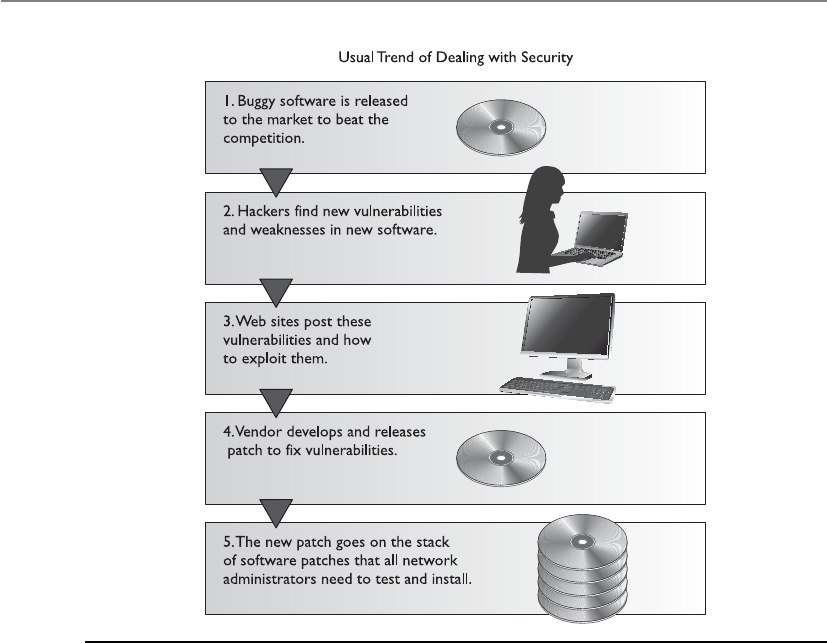
CISSP All-in-One Exam Guide
1084
in all, a big enough headache to make an administrator buy some land in Montana and
go raise goats instead.
On top of this, security is expected, required, and depended upon. When security
compromises creep in, the finger-pointing starts, liability issues are tossed like hot po-
tatoes, and people might even lose their jobs. An understanding of the environment,
what is currently in it, and how it works is required so these new technologies can be
implemented in a more controlled and comprehensible fashion.
The days of developing a simple web page and posting it on the Internet to illustrate
your products and services are long gone. Today, the customer front end, complex mid-
dleware, and three-tiered architectures must be developed and work seamlessly. Net-
works are commonly becoming “borderless” since everything from smart phones and
iPads to other mobile devices are being plugged in and remote users are becoming more
of the norm instead of the exception. As the complexity of these types of environments
grows, tracking down errors and security compromises becomes an awesome task.
Environment versus Application
Software controls can be implemented by the operating system or by the application—
and usually a combination of both is used. Each has its strengths and weaknesses, but if
they are all understood and programmed to work in a concerted effort, then many dif-
Figure 10-1 The usual trend of software being released to the market and how security is dealt with

Chapter 10: Software Development Security
1085
ferent scenarios and types of compromises can be thwarted. One downside to relying
mainly on operating system controls is that although they can control a subject’s access
to different objects and restrict the actions of that subject within the system, they do not
necessarily restrict the subject’s actions within an application. If an application has a
security vulnerability within its own programming code, it is hard for the operating sys-
tem to predict and control this vulnerability. An operating system is a broad environ-
ment for many applications to work within. It is unfair to expect the operating system to
understand all the nuances of different programs and their internal mechanisms.
On the other hand, application controls and database management controls are
very specific to their needs and in the security compromises they understand. Although
an application might be able to protect data by allowing only certain types of input and
not permitting certain users to view data kept in sensitive database fields, it cannot
prevent the user from inserting bogus data into the Address Resolution Protocol (ARP)
table—this is the responsibility of the operating system and its network stack. Operat-
ing system and application controls have their place and limitations. The trick is to find
out where one type of control stops so the next type of control can be configured to kick
into action.
Security has been mainly provided by security products and perimeter devices rath-
er than controls built into applications. The security products can cover a wide range of
applications, can be controlled by a centralized management console, and are further
away from application control. However, this approach does not always provide the
necessary level of granularity, and does not approach compromises that can take place
because of problematic coding and programming routines. Firewalls and access control
mechanisms can provide a level of protection by preventing attackers from gaining ac-
cess to be able to exploit buffer overflows, but the real protection happens at the core
of the problem—proper software development and coding practices must be in place.
Functionality versus Security
Programming code is complex—the code itself, routine interaction, global and local
variables, input received from other programs, output fed to different applications, at-
tempts to envision future user inputs, calculations, and restrictions form a long list of
possible negative security consequences. Many times, trying to account for all the
“what-ifs” and programming on the side of caution can reduce the overall functionality
of the application. As you limit the functionality and scope of an application, the mar-
ket share and potential profitability of that program could be reduced. A balancing act
always exists between functionality and security, and in the development world, func-
tionality is usually deemed the most important.
So, programmers and application architects need to find a happy medium between
the necessary functionality of the program, the security requirements, and the mecha-
nisms that should be implemented to provide this security. This can add more com-
plexity to an already complex task.
More than one road may lead to enlightenment, but as these roads increase in num-
ber, it is hard to know if a path will eventually lead you to bliss or to fiery doom in the
underworld. Many programs accept data from different parts of the program, other
programs, the system itself, and user input. Each of these paths must be followed in a
methodical way, and each possible scenario and input must be thought through and

CISSP All-in-One Exam Guide
1086
tested to provide a deep level of assurance. It is important that each module be capable
of being tested individually and in concert with other modules. This level of under-
standing and testing will make the product more secure by catching flaws that could be
exploited.
Implementation and Default Issues
If I have not said “yes,” then the answer is “no.”
As many people in the technology field know, out-of-the-box implementations are
usually far from secure. Most security has to be configured and turned on after installa-
tion—not being aware of this can be dangerous for the inexperienced security person.
The Windows operating system has received its share of criticism for lack of security, but
the platform can be secured in many ways. It just comes out of the box in an insecure
state because settings have to be configured to properly integrate it into different envi-
ronments, and this is a friendlier way of installing the product for users. For example, if
Mike is installing a new software package that continually throws messages of “Access
Denied” when he is attempting to configure it to interoperate with other applications
and systems, his patience might wear thin, and he might decide to hate that vendor for
years to come because of the stress and confusion inflicted upon him.
Yet again, we are at a hard place for developers and architects. When a security ap-
plication or device is installed, it should default to “No Access.” This means that when
Laurel installs a packet-filter firewall, it should not allow any packets to pass into the
network that were not specifically granted access. However, this requires Laurel to know
how to configure the firewall for it to ever be useful. A fine balance exists between secu-
rity, functionality, and user-friendliness. If an application is extremely user-friendly, it is
probably not as secure. For an application to be user-friendly, it usually requires a lot of
extra coding for potential user errors, dialog boxes, wizards, and step-by-step instruc-
tions. This extra coding can result in bloated code that can create unforeseeable com-
promises. So vendors have a hard time winning, but they usually keep making money
while trying.
NOTE
NOTE Later versions of Windows have services turned off and require
the user to turn them on as needed. This is a step closer to “default with
no access,” but we still have a ways to go.
Implementation errors and misconfigurations are common items that cause a ma-
jority of the security issues in networked environments. Many people do not realize
that various services are enabled when a system is installed. These services can provide
evildoers with information that can be used during an attack. Many services provide an
actual way into the environment itself. NetBIOS services can be enabled to permit shar-
ing resources in Windows environments, and Telnet services, which let remote users
run command shells, and other services can be enabled with no restrictions. Many
systems have File Transfer Protocol (FTP), Simple Network Management Protocol
(SNMP), and Internet Relay Chat (IRC) services enabled that are not being used and
have no real safety measures in place. Some of these services are enabled by default, so

Chapter 10: Software Development Security
1087
when an administrator installs an operating system and does not check these services
to properly restrict or disable them, they are available for attackers to uncover and use.
Because vendors have user friendliness and user functionality in mind, the product
will usually be installed with defaults that provide no, or very little, security protection.
It would be very hard for vendors to know the security levels required in all the environ-
ments the product will be installed in, so they usually do not attempt it. It is up to the
person installing the product to learn how to properly configure the settings to achieve
the necessary level of protection.
Another problem in implementation and security is the number of unpatched sys-
tems. Once security issues are identified, vendors develop patches or updates to address
and fix these security holes. However, these often do not get installed on the systems
that are vulnerable in a timely manner. The reasons for this vary: administrators may
not keep up to date on the recent security vulnerabilities and necessary patches, they
may not fully understand the importance of these patches, or they may be afraid the
patches will cause other problems. All of these reasons are quite common, but they all
have the same result—insecure systems. Many vulnerabilities that are exploited today
have had patches developed and released months or years ago.
It is unfortunate that adding security (or service) patches can adversely affect other
mechanisms within the system. The patches should be tested for these types of activities
before they are applied to production servers and workstations to help prevent service
disruptions that can affect network and employee productivity.
System Development Life Cycle
A life cycle is a representation of development changes. A person is conceived, born,
matures (baby, toddler, teenager, middle age, elderly), and dies. Such is the circle of life.
Projects have a life cycle: initiation, planning, execution and controlling, and closure. A
system has its own developmental life cycle, which is made up of the following phases:
initiation, acquisition/development, implementation, operation/maintenance, and
disposal. Collectively these are referred to as a system development life cycle (SDLC).
Here are the basic components of each phase:
•Initiation Need for a new system is defined
•Acquisition/development New system is either created or purchased
•Implementation New system is installed into production environment
•Operation/maintenance System is used and cared for
•Disposal System is removed from production environment
The acquisition/development phase pertains to the “buy” or “build” decision. An
organization will need to evaluate the needs of the system, if the system can be devel-
oped in-house, or if the system needs to be purchased from a vendor.
SDLC deals with each phase of a system’s life—cradle to grave. We will see that secu-
rity is critical in each phase of the life cycle. Several security aspects that are associated with
the SDLC phases are illustrated in Figure 10-2 and explored in the following sections.
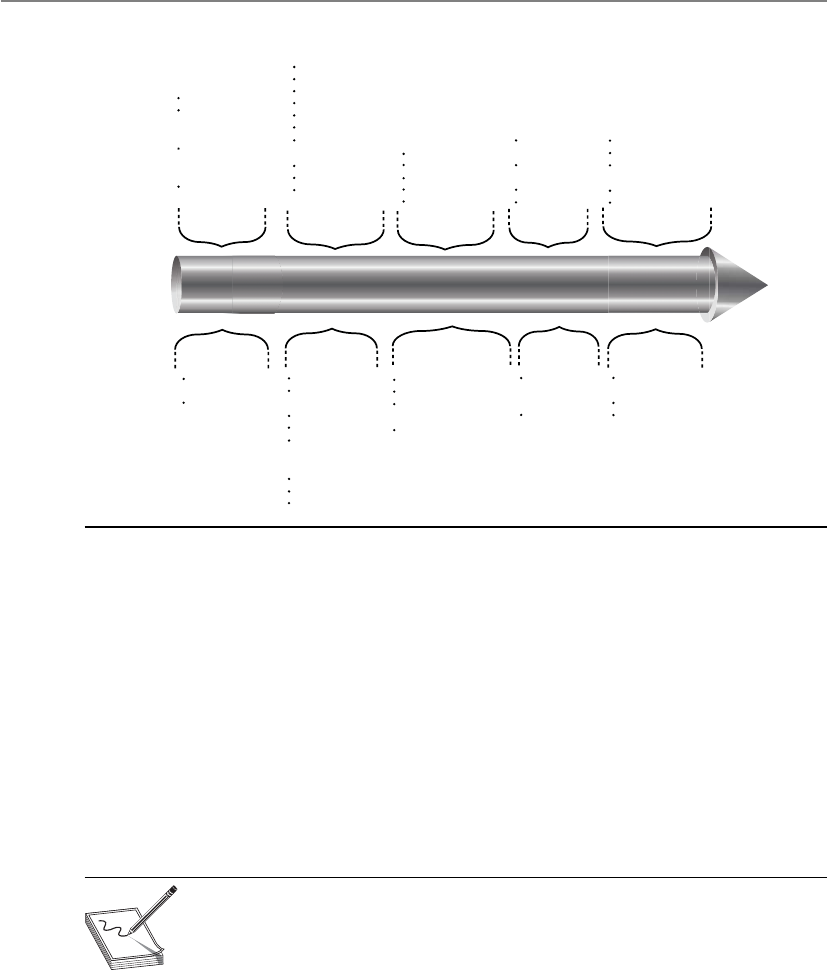
CISSP All-in-One Exam Guide
1088
There are different SDLC models and methodologies, but each follows the same or
similar phases laid out earlier. It is important that security be integrated at each phase,
no matter what SDLC model is used. Sensitive data must be protected as they are trans-
mitted, processed, and stored, and individual systems must be protected from a long
list of potential threats. A risk management process should be employed to balance the
requirements of protecting the organization and its assets and the costs of security
countermeasures necessary to mitigate identified risks. Each SDLC phase has specific
goals and requirements. In this chapter we will be focusing on the security goals and
requirements and how they should be integrated into any SDLC model.
NOTE
NOTE The term “system” does not just refer to a computer system. It is a
general term that can represent a computer, network, or piece of software.
Life-cycle approaches need to be applied to each type of system.
Initiation Acquisition/
Development Implementation Disposition
Operations/
Maintenance
Security Considerations SDLC
Needs determination
Fun. stmt of need
Market research
Feasibility study
Req. analysis
Alt. analysis
Cost ben. analysis
Software
conversion study
Cost analysis
RM plan
Acquisition
planning
Perception of a need
Linkage to mission
and performance
objectives
Assessment of
alternatives to
capital assets
Preparing for
investment review
and budgeting
Installation
Inspection
Acceptance testing
Initial user training
Documentation
Appropriateness of disposal
Exchange and sale
Internal organization
screening
Transfer and donation
Contract closeout
Performance
measurement
Contract
modification
Operations
Maintenance
Security
categorization
Preliminary risk
assessment
Risk assessment
Sec. funct. req.
analysis
Sec. assurance
Req. analysis
Cost
considerations and
reporting
Sec. control dev.
Dev. ST&E
Other planning
Inspection and acceptance
System integration
Security
certification
Security accreditation
Configuration
management and
control
Continuous
monitoring
Information
preservation
Media sanitization
Hardware and
software disposal
23 45
Figure 10-2 Security issues within SDLC phases

Chapter 10: Software Development Security
1089
Initiation
In the initiation phase the company establishes the need for a specific system. The com-
pany has figured out that there is a problem that can be solved or a function that can
be carried out through some type of technology. This phase addresses the questions,
“What do we need and why do we need it?” This may sound like a step that does not
require much investigation and time, but many companies have purchased the wrong
SDLC
The acronym “SDLC” can represent system development life cycle or software de-
velopment life cycle. Many resources interchange these terms (system and soft-
ware) because the basic structure of a life-cycle framework should be applied to a
computer, network, or a piece of software. A life-cycle framework just means that
the item of focus (system or software) should be properly cared for no matter
what stage it is in.
The industry as a whole is starting to differentiate between system and software
life-cycle processes because at a certain point of granularity the manner in which
a computer system is dealt with is different from how a piece of software is dealt
with. A computer system should be installed properly, tested, patched, scanned
continuously for vulnerabilities, monitored, and replaced when needed. A piece
of software should be designed, coded, tested, documented, and released. As an
analogy, you can have a general life-cycle model that can be applied to anything
you are responsible for—your house, car, career, or child. This model dictates that
you must care for the items you are responsible for at each stage of their existence,
but as you get more specific, the tasks that need to be carried out on your car
(tune-up, oil change) over its lifetime are different from the tasks you need to
carry out for your child (feeding, educating).
As the industry is maturing in its security practices, the distinction between
system and software development life cycles is increasing. For example, the
National Institute of Standards and Technology (NIST) outlines SDLC processes
that are directed at systems in an operational environment.
The CISSP exam does not distinguish between system and software develop-
ment life cycles yet. It follows the high-level classical life-cycle structure that can
be applied to both systems and software. But at a more practical level it is impor-
tant for you to understand how securing computer systems and networks is dif-
ferent from securely developing software. This is why the sections of this chapter
are broken down into “System Development Life Cycle” and “Software Develop-
ment Life Cycle.” It is important to understand security issues from both points
of view.

CISSP All-in-One Exam Guide
1090
solution for the wrong reasons. Technology can be complex, and the mapping between
business needs and technology solutions are not always as clear-cut as one would as-
sume. Purchasing the wrong solution is bad, but purchasing and fully integrating it into
a production environment and then figuring out it is not what the company needs is
worse. A requirements assessment should be carried out before a new solution is devel-
oped or purchased.
Apreliminary risk assessment should be carried out to develop an initial description
of the confidentiality, integrity, and availability requirements of the system. The assess-
ment should define the environment in which the system will operate within and any
identified vulnerabilities. This will help the team to start the process of identifying the
required security controls that the system will need to possess.
From a security point of view, the type of questions are: “What level of protection
does this system need to provide?” “Does it need to protect sensitive data at rest and in
transit?” “Does it need to provide two-factor authentication?” “Does it need to provide
continuous monitoring capabilities?” At this phase, a concept of the system that is
needed is created along with the preliminary definition of that system’s requirements.
NOTE
NOTE The ISO/IEC 27002 Information Security Management standard has
a portion that deals specifically with system acquisition, development, and
maintenance.
A
q
u
i
s
i
t
i
o
n
/
D
e
v
e
l
o
p
m
e
n
t
I
m
p
l
e
m
e
n
t
a
t
i
o
n
/
A
s
s
e
s
s
m
e
n
t
I
n
i
t
i
a
t
i
o
n
S
u
n
s
e
t
(
D
i
s
p
o
s
a
l
)
O
p
e
r
a
t
i
o
n
s
/
M
a
i
n
t
e
n
a
n
c
e
System is designed, purchased, programmed,
developed, or otherwise constructed.
This phase often consists of other
defined cycles, such as the
system development cycle
of the acquisition cycle.
After initial
system testing,
the system is
installed or fielded.
System performs the
work for which it
was developed.
System is disposed
of once the transition
to a new computer system
is completed.
The need for a
system is expressed
and the system
purpose and
high-level
requirements are
documented.
c

Chapter 10: Software Development Security
1091
Acquisition/Development
Before the system is actually developed or purchased, several things should take place
to ensure the end result meets the company’s true needs. Some of the activities are as
follows:
•Requirements analysis In-depth study of what functions the company needs
the desired system to carry out.
•Formal risk assessment Identifies vulnerabilities and threats in the
proposed system and the potential risk levels as they pertain to confidentiality,
integrity, and availability. This builds upon the initial risk assessment carried
out in the previous phase. The results of this assessment help the team build
the system’s security plan.
•Security functional requirements analysis Identifies the protection levels
that must be provided by the system to meet all regulatory, legal, and policy
compliance needs.
•Security assurance requirements analysis Identifies the assurance levels the
system must provide. The activities that need to be carried out to ensure the
desired level of confidence in the system are determined, which are usually
specific types of tests and evaluations.
•Third-party evaluations Reviewing the level of service and quality a specific
vendor will provide if the system is to be purchased.
•Security plan Documented security controls the system must contain to
ensure compliance with the company’s security needs. This plan provides a
complete description of the system and ties them to key company documents,
as in configuration management, test and evaluation plans, system
interconnection agreements, security accreditations, etc.
•Security test and evaluation plan Outlines how security controls should be
evaluated before the system is approved and deployed.
Once all of these activities are carried out, the company can develop the necessary
system in-house or purchase the system from a third-party vendor. These steps help
ensure that the team has thought through all of the necessary requirements and that the
end system will meet these requirements. Once built or purchased, the next phase is to
implement the system into the production environment.
Risk Types
It is important to understand the difference between project risk analysis and secu-
rity risk analysis. They often are confused or combined. The project team may do
a risk analysis pertaining to the risk of the project failing. This is much different
from the security risk analysis, which addresses the vulnerabilities within the
software product itself. The two should be understood and used, but in a distinc-
tively different manner.

CISSP All-in-One Exam Guide
1092
Implementation
Just plug it in. We don’t have time for testing. I am sure it will work fine.
It may be necessary to carry out certification and accreditation (C&A) processes
before a system can be formally installed within the production environment. (C&A
processes are covered in Chapter 4.) Certification is the technical testing of a system.
Established verification procedures are followed to ensure the effectiveness of the sys-
tem and its security controls. Accreditation is the formal authorization given by man-
agement to allow a system to operate in a specific environment. The accreditation
decision is based upon the results of the certification process.
Even if the company does not require an official C&A process, the system should be
properly tested in a segmented environment (test bed) before being installed in the
operational environment. The company configures and enables system security con-
trols, tests the functionality of these controls, and integrates the new system with other
systems.
Once the system is implemented into its environment, it must be used in a secure
fashion and maintained securely. That is a tricky thing about security—it never stops. If
a system is developed with security in mind and then used improperly or not properly
configured and patched, we may lose the war. Security should never end, and if it does
end, that is when the attackers will come in and take over the show.
Operations/Maintenance
The system was secure when we installed it. I am sure nothing has changed since then.
A system should have baselines set pertaining to the system’s hardware, software,
and firmware configuration during the implementation phase. In the operation and
maintenance phase, continuous monitoring needs to take place to ensure that these
baselines are always met. For example, a configuration baseline for a Windows 2008
system could dictate that verbose auditing must be enabled, Registry settings must meet
certain values, and IPv6 must be disabled. There are several things that could affect
these configurations over time, such as the installation of new software, user activities,
or malicious software. The changes could directly affect the system’s functionality or
protection level; thus, these settings must be continually monitored.
Defined configuration management and change control procedures help to ensure
that a system’s baseline is always met, and if the system requires any type of changes
that will affect this set baseline, the changes should be tested and approved before be-
ing implemented.
Vulnerability assessments and penetration testing should also take place in this
phase. These types of periodic testing allow for new vulnerabilities to be identified and
remediated.

Chapter 10: Software Development Security
1093
Disposal
When a system no longer provides a needed function, plans for how the system and its
data will make a transition should be developed. Data may need to be moved to a dif-
ferent system, archived, discarded, or destroyed. If proper steps are not taken during the
disposal phase, unauthorized access to sensitive assets can take place.
Disposal activities need to ensure that an orderly termination of the system takes
place and that all necessary data are preserved. The storage medium of the system may
need to be degaussed, put through a zeroization process, or physically destroyed.
Many organizations do not consider this last stage in their security plans. If your
organization has a certain enterprise software package that needs to be replaced, do you
have plans for how the data it currently protects will be secured during the technology
refresh cycle? Will removing this product expose your company to any new risks? Most
technology refresh projects focus on “what will we break?” versus “what will be vulner-
able?” Table 10-1 illustrates the NIST’s SDLC model.
While it seems straightforward that security needs to be integrated into each phase
of a system’s existence, it is not always easy to do. A team may not be well versed in all
of the company’s needs during the requirements phase. Does the team understand how
the company’s legal and regulatory requirements map to system-level components? For
example, if a company is a merchant and must comply with the Payment Card Industry
Data Security Standard (PCI-DSS), does the team understand that any wireless system
that works within a cardholder data environment must provide 802.1X authentication
and use the Advanced Encryption Standard (AES) algorithm? If the company must com-
ply with specific state-based privacy laws, does the team understand that specific systems
must have centralized logging capabilities and file archive capabilities that not only
meet dictated retention periods, but must also allow for certain forensics activities?
In the development/acquisition phase, if a company chooses to develop their need-
ed solution internally, does the staff know how to carry out software architecture, de-
sign, development, testing, and deployment securely? In the maintenance phase, does
the operations staff carry out patch management, configuration management, continu-
ous monitoring, and vulnerability testing? In the disposal phase, does the operation
staff even know what zeroization and degaussing is, and if they do, do they know how
to do it in a standardized manner?
Real system security requires a spectrum of knowledge, controls, tools, and pro-
cesses. Most environments are so large, complex, and distributed that all SDLC phases
of system security do not take place properly or in a standardized fashion. A small gap
in any of these phases is more than enough to allow attackers in to cause extensive de-
struction and damage. Security is not easy, and if you do not understand it holistically,
you could end up being part of the problem instead of part of the solution.

CISSP All-in-One Exam Guide
1094
Initiation Acquisition/
Development
Implementation Operations/
Maintenance
Disposal
SDLC Needs
Determination:
• Perception of a
need
• Linkage of need
to mission and
performance
objective
• Assessment of
alternatives to
capital assets
• Preparing for
investment review
and budgeting
• Functional statement
of need
• Market research
• Feasibility study
• Requirements
analysis
• Alternatives analysis
• Cost-benefit analysis
• Software conversion
study
• Cost analysis
• Risk management
plan
• Acquisition planning
• Installation
• Inspection
• Acceptance testing
• Initial user training
• Documentation
• Performance
measurement
• Contract
modifications
• Operations
• Maintenance
• Appropriateness of
disposal
• Exchange and sale
• Internal
organization
screening
• Transfer and
donation
• Contract closeout
Security
Considerations
• Security
categorization
• Preliminary risk
assessment
• Risk assessment
• Security functional
requirements
analysis
• Security assurance
requirements
analysis
• Cost considerations
and reporting
• Security planning
• Security control
development
• Developmental
security test and
evaluation
• Other planning
components
• Inspection and
acceptance
• System integration
• Security
certification
• Security
accreditation
• Configuration
management
and control
• Continuous
monitoring
• Information
preservation
• Media sanitization
• Hardware and
software disposal
Table 10-1 NIST’s Breakdown of a SDLC Model

Chapter 10: Software Development Security
1095
Software Development Life Cycle
There is a time to live, a time to die, a time to love…
Response: And a time to shut up.
The life cycle of software development deals with putting repeatable and predict-
able processes in place that help ensure functionality, cost, quality, and delivery sched-
ule requirements are met. So instead of winging it and just starting to develop code for
a project, how can we make sure we build the best software product possible?
There have been several software development life cycle (SDLC) models developed
over the years, which we will cover later in this section, but the crux of each model deals
with the following items:
•Requirements gathering Determine the why create this software, the what
the software will do, and the for whom the software will be created
•Design Deals with how the software will accomplish the goals identified,
which are encapsulated into a functional design
•Development Programming software code to meet specifications laid out in
the design phase
•Testing/Validation Validating software to ensure that goals are met and the
software works as planned
•Release/Maintenance Deploying the software and then ensuring that it is
properly configured, patched, and monitored
These phases look a lot like the phases of a system development life cycle because
their goals are similar, but how the goals are accomplished are a bit different. System
development life cycle has a focus of operations and is a model that the IT department
would follow. Software development life cycle has a focus on design and programming
and is a model that software engineers and coders would follow.
In the following sections we will cover the different phases that make up a software
development life-cycle model and some specific items about each phase that are impor-
tant to understand.
Key Terms
•System development life cycle (SDLC) A methodical approach to
standardize requirements discovery, design, development, testing,
and implementation in every phase of a system. It is made up of the
following phases: initiation, acquisition/development, implementation,
operation/maintenance, and disposal.
•Certification The technical testing of a system.
•Accreditation The formal authorization given by management to
allow a system to operate in a specific environment.

CISSP All-in-One Exam Guide
1096
Project Management
Many developers know that good project management keeps the project moving in the
right direction, allocates the necessary resources, provides the necessary leadership, and
plans for the worst yet hopes for the best. Project management processes should be put
into place to make sure the software development project executes each life-cycle phase
properly. Project management is an important part of product development, and secu-
rity management is an important part of project management.
A security plan should be drawn up at the beginning of a development project and
integrated into the functional plan to ensure that security is not overlooked. The first
plan is broad, covers a wide base, and refers to documented references for more de-
tailed information. The references could include computer standards (RFCs, IEEE stan-
dards, and best practices), documents developed in previous projects, security policies,
accreditation statements, incident-handling plans, and national or international guide-
lines (i.e., Common Criteria). This helps ensure that the plan stays on target.
The security plan should have a lifetime of its own. It will need to be added to,
subtracted from, and explained in more detail as the project continues. It is important
to keep it up to date for future reference. It is always easy to lose track of actions, activi-
ties, and decisions once a large and complex project gets underway.
The security plan and project management activities may likely be audited so secu-
rity-related decisions can be understood. When assurance in the product needs to be
guaranteed, indicating that security was fully considered in each phase of the life cycle,
the procedures, development, decisions, and activities that took place during the proj-
ect will be reviewed. The documentation must accurately reflect how the product was
built and how it is supposed to operate once implemented into an environment.
If a software product is being developed for a specific customer, it is common for a
Statement of Work (SOW) to be developed, which describes the product and customer
requirements. A detail-oriented SOW will help ensure that these requirements are prop-
erly understood and assumptions are not made.
Sticking to what is outlined in the SOW is important so that scope creep does not
take place. If the scope of a project continually extends in an uncontrollable manner
(creeps), the project may never end, not meet its goals, run out of funding, or all of the
above. If the customer wants to modify its requirements, it is important that the SOW
is updated and funding is properly reviewed.
Awork breakdown structure (WBS) is a project management tool used to define and
group a project’s individual work elements in an organized manner. The SDLC should
be illustrated in a WBS format, so that each phase is properly addressed.
Requirements Gathering Phase
So what are we building and why?
This is the phase when everyone involved attempts to understand why the project is
needed and what the scope of the project entails. Either a specific customer needs a new
application or a demand for the product exists in the market. During this phase, the
team examines the software’s requirements and proposed functionality, brainstorming
sessions take place, and obvious restrictions are reviewed.

Chapter 10: Software Development Security
1097
A conceptual definition of the project should be initiated and developed to ensure
everyone is on the right page and that this is a proper product to develop. This phase
could include evaluating products currently on the market and identifying any de-
mands not being met by current vendors. It could also be a direct request for a specific
product from a current or future customer.
As it pertains to security, the following items should be accomplished in this phase:
• Security requirements
• Security risk assessment
• Privacy risk assessment
• Risk-level acceptance
The security requirements of the product should be defined in the categories of
availability, integrity, and confidentiality. What type of security is required for the soft-
ware product and to what degree?
An initial security risk assessment should be carried out to identify the potential
threats and their associated consequences. This process usually involves asking many,
many questions to draw up the laundry list of vulnerabilities and threats, the probabil-
ity of these vulnerabilities being exploited, and the outcome if one of these threats actu-
ally becomes real and a compromise takes place. The questions vary from product to
product—such as its intended purpose, the expected environment it will be imple-
mented in, the personnel involved, and the types of businesses that would purchase
and use the product.
The sensitivity level of the data the software will be maintaining and processing has
only increased in importance over the years. After a privacy risk assessment, a Privacy
Impact Rating can be assigned, which indicates the sensitivity level of the data that will
be processed or accessible. Some software vendors incorporate the following Privacy
Impact Ratings in their software development assessment processes:
•P1 High Privacy Risk: The feature, product, or service stores or transfers
Personally Identifiable Information (PII); monitors the user with an ongoing
transfer of anonymous data; changes settings or file type associations; or
installs software.
•P2 Moderate Privacy Risk: The sole behavior that affects privacy in the
feature, product, or service is a one-time, user-initiated anonymous data
transfer (e.g., the user clicks on a link and goes out to a web site).
•P3 Low Privacy Risk: No behaviors exist within the feature, product, or
services that affect privacy. No anonymous or personal data is transferred, no
PII is stored on the machine, no settings are changed on the user’s behalf, and
no software is installed.
The software vendor can develop its own Privacy Impact Ratings and their associ-
ated definitions. As of this writing there is no standardized approach to defining these
rating types, but as privacy increases in importance, we might see more standardization
in these ratings and associated metrics.

CISSP All-in-One Exam Guide
1098
A clear risk-level acceptance criteria needs to be developed to make sure that mitiga-
tion efforts are prioritized. The acceptable risks will depend upon the results of the se-
curity and privacy assessments. The evaluated threats and vulnerabilities are used to
estimate the cost/benefit ratios of the different security countermeasures. The level of
each security attribute should be focused upon so a clear direction on security controls
can begin to take shape and can be integrated into the design and development phases.
Design Phase
This is the phase that starts to map theory to reality. The theory encompasses all of the
requirements that were identified in previous phases, and the design outlines how the
product is actually going to accomplish these requirements.
The software design phase is a process used to describe the requirements and the
internal behavior of the software product. It then maps the two elements to show how
the internal behavior actually accomplishes the defined requirements.
Some companies skip the functional design phase, which can cause major delays
down the road and redevelopment efforts, because a broad vision of the product needs
to be understood before looking strictly at the details.
Software requirements commonly come from three models:
•Informational model Dictates the type of information to be processed and
how it will be processed
•Functional model Outlines the tasks and functions the application needs to
carry out
•Behavioral model Explains the states the application will be in during and
after specific transitions take place
For example, an antivirus software application may have an informational model
that dictates what information is to be processed by the program, such as virus signa-
tures, modified system files, checksums on critical files, and virus activity. It would also
have a functional model that dictates that the application should be able to scan a hard
drive, check e-mail for known virus signatures, monitor critical system files, and update
itself. The behavioral model would indicate that when the system starts up, the antivi-
rus software application will scan the hard drive and memory segments. The computer
coming online would be the event that changes the state of the application. If a virus
were found, the application would change state and deal with the virus appropriately.
Each state must be accounted for to ensure that the product does not go into an inse-
cure state and act in an unpredictable way.
The informational, functional, and behavioral model data go into the software de-
sign as requirements. What comes out of the design is the data, architectural, and pro-
cedural design, as shown in Figure 10-3.
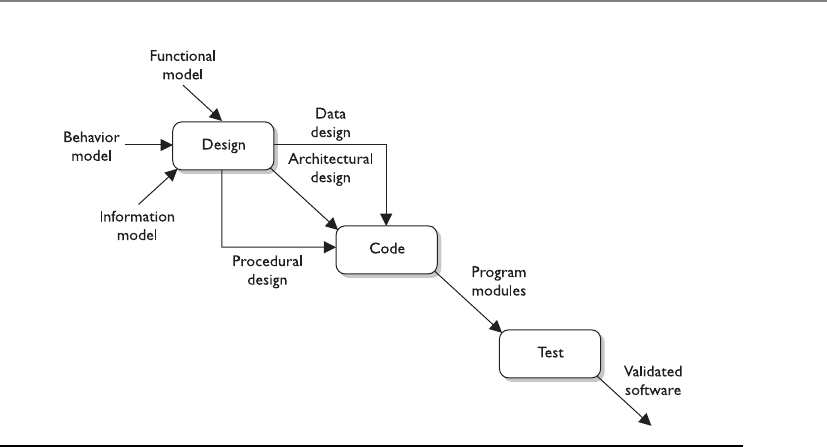
Chapter 10: Software Development Security
1099
From a security point of view, the following items should also be accomplished in
this phase:
• Attack surface analysis
• Threat modeling
An attack surface is what is available to be used by an attacker against the product
itself. As an analogy, if you were wearing a suit of armor and it only covered half of your
body, the other half would be your vulnerable attack surface. Before you went into
battle, you would want to reduce this attack surface by covering your body with as
much protective armor as possible. The same can be said about software. The develop-
ment team should reduce the attack surface as much as possible because the greater the
attack surface of software, the more avenues for the attacker; and hence, the greater
the likelihood of a successful compromise.
The aim of an attack surface analysis is to identify and reduce the amount of code
and functionality accessible to untrusted users. The basic strategies of attack surface
reduction are to reduce the amount of code running, reduce entry points available to
untrusted users, reduce privilege levels as much as possible, and eliminate unnecessary
services. Attack surface analysis is generally carried out through specialized tools to
enumerate different parts of a product and aggregate their findings into a numeral val-
ue. Attack surface analyzers scrutinize files, Registry keys, memory data, session infor-
mation, processes, and services details. A sample attack surface report is shown in
Figure 10-4.
Figure 10-3 Information from three models can go into the design.
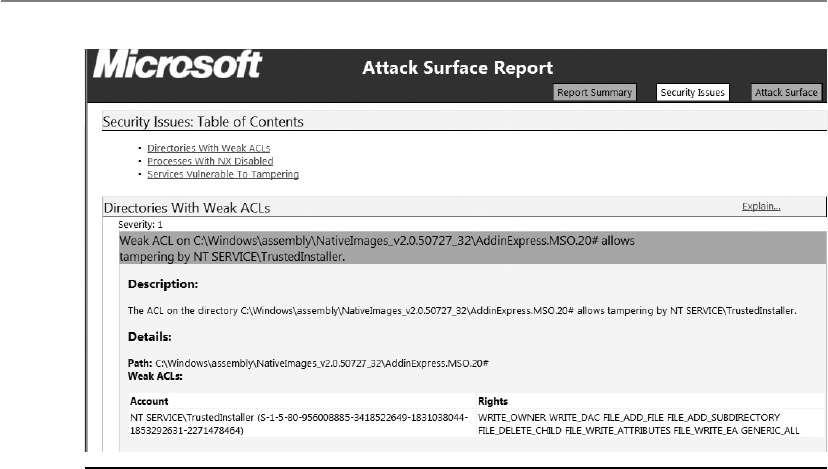
CISSP All-in-One Exam Guide
110 0
Threat modeling is a systematic approach used to understand how different threats
could be realized and how a successful compromise could take place. If you were re-
sponsible for ensuring that the government building that you worked at was safe from
terrorist attacks, you would run through scenarios that terrorists would most likely
carry out so that you fully understood how to protect the facility and the people within
it. You could think through how someone could bring a bomb into the building, and
then you would better understand the screening activities that need to take place at
each entry point. A scenario of someone running a car into the building would bring
up the idea of implementing bollards around the sensitive portions of the facility. The
scenario of terrorists entering sensitive locations in the facility (data center, CEO office)
would help illustrate the layers of physical access controls that should be implemented.
These same scenario-based exercises should take place during the design phase of soft-
ware development. Just as you would think about how potential terrorists could enter
and exit a facility, the design team should think through how potentially malicious
activities can happen at different input and output points of the software and the types
of compromises that can take place within the guts of the software itself.
It is common for software development teams to develop threat trees, as shown in
Figure 10-5. The tree is a tool that allows the development team to understand all the
ways specific threats can be realized; thus, it helps them understand what type of security
controls should be implemented to mitigate the risks associated with each threat type.
There are many automated tools in the industry that software development teams
can use to ensure that various threat types are addressed during their design stage. Fig-
ure 10-6 shows the interface to one of these types of tools. The tool describes how spe-
cific vulnerabilities could be exploited and suggests countermeasures and coding
practices that should be followed to address the vulnerabilities.
Figure 10-4 Attack surface analysis result
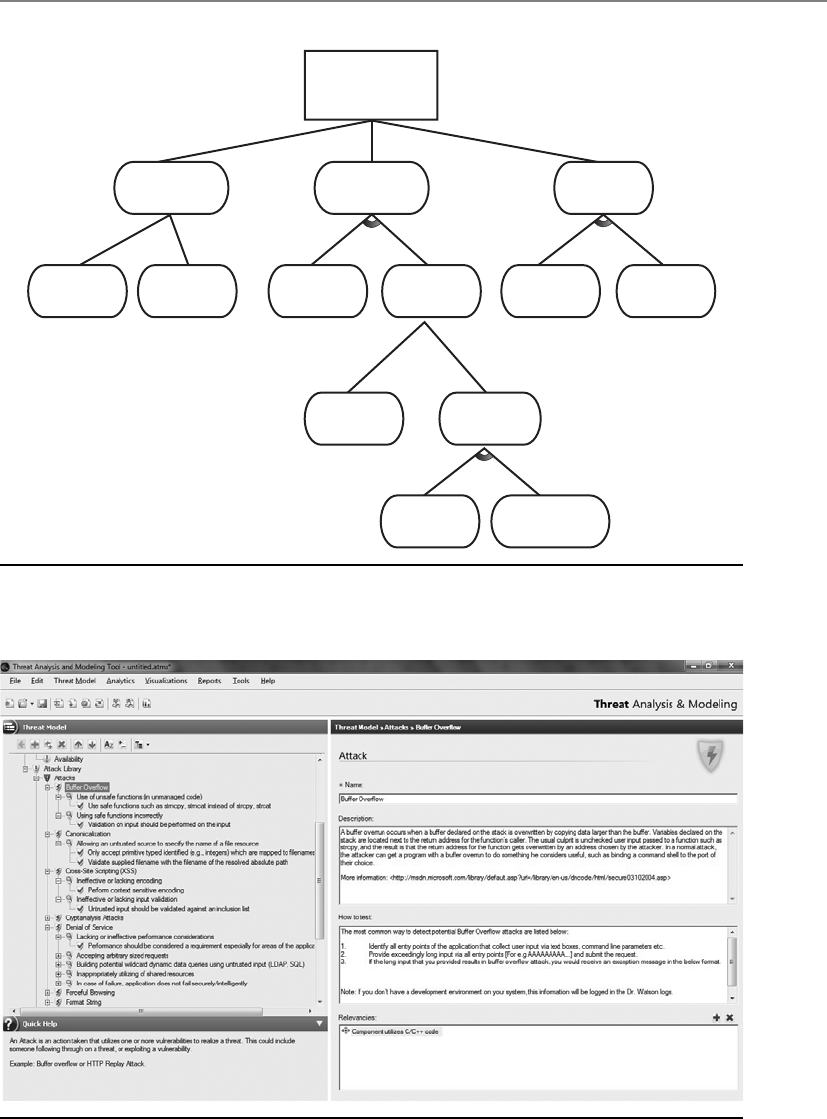
Chapter 10: Software Development Security
1101
Threat #1 (I)
Compromise
password
1.2
Guess
password
1.3
Access
password in DB
1.1
Access “in-use”
password
1.1.1
Sniff network
1.1.2
Phishing attack
1.3.1
Password is
in cleartext
1.3.2
Compromise
database
1.2.1
Password
is weak
1.2.2
Brute force
attack
1.3.2.2
Access database
directly
1.3.2.1
SQL injection
attack
1.3.2.2.2
Weak DB account
password(s)
1.3.2.2.1
Port open
Figure 10-5 Threat tree used in threat modeling
Figure 10-6 Threat modeling tool

CISSP All-in-One Exam Guide
1102
The decisions made during the design phase are pivotal steps to the development
phase. Software design serves as a foundation and greatly affects software quality. If
good product design is not put into place in the beginning of the project, the following
phases will be much more challenging.
Development Phase
Code jockeys to your cubes and start punching those keys!
This is the phase where the programmers become deeply involved. The software
design that was created in the previous phase is broken down into defined deliverables,
and programmers develop code to meet the deliverable requirements.
There are many computer-aided software engineering (CASE) tools that program-
mers can use to generate code, test software, and carry out debugging activities. When
these types of activities are carried out through automated tools, development usually
takes place more quickly with fewer errors.
CASE refers to any type of software tool that allows for the automated development
of software, which can come in the form of program editors, debuggers, code analyzers,
version-control mechanisms, and more. These tools aid in keeping detailed records of
requirements, design steps, programming activities, and testing. A CASE tool is aimed
at supporting one or more software engineering tasks in the process of developing soft-
ware. Many vendors can get their products to the market faster because they are “com-
puter aided.”
In later sections we will cover different software development models and the pro-
gramming languages that can be used to create software. At this point let’s take a quick
peek into the abyss of “secure coding.” As stated previously, most vulnerabilities that
corporations, organizations, and individuals have to worry about reside within the pro-
gramming code itself. When programmers do not follow strict and secure methods of
creating programming code, the effects can be widespread and the results can be devas-
tating. But programming securely is not an easy task. Figure 10-7 outlines the top 25
software errors in the industry as of this writing, which can be found at http://cwe.mi-
tre.org/top25/#Listing.
Many of these software issues are directly related to improper or faulty program-
ming practices. Among other issues to address, the programmers need to check input
lengths so buffer overflows cannot take place, inspect code to prevent the presence of
covert channels, check for proper data types, make sure checkpoints cannot be bypassed
by users, verify syntax, and verify checksums. Different attack scenarios should be
played out to see how the code could be attacked or modified in an unauthorized fash-
ion. Code reviews and debugging should be carried out by peer developers, and every-
thing should be clearly documented.
Some of the most common errors (buffer overflow, injection, parameter validation)
are covered later in this chapter along with organizations that provide secure software
development guidelines (OWASP, DHS, MITRE). At this point we are still marching
through the software development life-cycle phases, so we want to keep our focus. What
is important to understand is that secure coding practices need to be integrated into the
development phase of SDLC. Security has to be addressed at each phase of SDLC, with
this phase being one of the most critical.

Chapter 10: Software Development Security
1103
1
2
3
4
5
6
7
8
9
10
11
12
13
14
15
16
17
18
19
20
21
22
23
24
25
93.8
83.3
79.0
77.7
76.9
76.8
75.0
75.0
74.0
73.8
73.1
70.1
69.3
68.5
67.8
66.0
65.5
64.6
64.1
62.4
61.5
61.1
61.0
60.3
59.9
CWE-89
CWE-78
CWE-120
CWE-79
CWE-306
CWE-862
CWE-798
CWE-311
CWE-434
CWE-807
CWE-250
CWE-352
CWE-22
CWE-494
CWE-863
CWE-829
CWE-732
CWE-676
CWE-327
CWE-131
CWE-307
CWE-601
CWE-134
CWE-190
CWE-759
Improper Neutralization of Special Elements used in an SQL Command (“SQL Injection”)
Improper Neutralization of Special Elements used in an OS Command (“OS Command Injection”)
Missing Authentication for Critical Function
Missing Authorization
Download of Code Without Integrity Check
Incorrect Authorization
Inclusion of Functionality from Untrusted Control Sphere
Incorrect Permission Assignment for Critical Resource
Use of Potentially Dangerous Function
Use of a Broken or Risky Cryptographic Algorithm
Incorrect Calculation of Buffer Size
Improper Restriction of Excessive Authentication Attempts
URL Redirection to Untrusted Site (“Open Redirect”)
Uncontrolled Format String
Integer Overflow orWraparound
Use of a One-Way Hash without a Salt
Use of Hard-coded Credentials
Missing Encryption of Sensitive Data
Unrestricted Upload of File with Dangerous Type
Reliance on Untrusted Inputs in a Security Decision
Execution with Unnecessary Privileges
Cross-Site Request Forgery (CSRF)
Improper Limitation of a Pathname to a Restricted Directory (“Path Traversal”)
Buffer Copy without Checking Size of Input (“Classic Buffer Overflow”)
Improper Neutralization of Input During Web Page Generation (“Cross-site Scripting”)
Rank
Rank Score
Score ID
ID Name
Name
Figure 10-7 Common software development weakness enumeration list
Static Analysis
Static analysis is a debugging technique that is carried out by examining the code
without executing the program, and therefore is carried out before the program is
compiled. The term static analysis is generally reserved for automated tools that
assist programmers and developers, whereas manual inspection by humans is
generally referred to as code review.
Static analysis allows developers to quickly scavenge their source code for
known programming flaws and vulnerabilities. Additionally, static analysis pro-
vides a scalable method of security code review and ensures that secure coding
policies are being followed. There are numerous manifestations of static analysis
tools, ranging from tools that simply consider the behavior of single statements
to tools that analyze the entire source code at once. However, it must be remem-
bered that static code analysis can never reveal logical errors and design flaws,
and therefore must be used in conjunction with manual code review to ensure
thorough evaluation.

CISSP All-in-One Exam Guide
110 4
Testing/Validation Phase
Formal and informal testing should begin as soon as possible. Unit testing can start very
early in development. After a programmer develops a component, or unit of code, it is
tested with several different input values and in many different situations. The goal of
this type of testing is to isolate each part of the software and show that the individual
parts are correct. Unit testing usually continues throughout the development phase. A
totally different group of people should carry out the formal testing. This is an example
of separation of duties. A programmer should not develop, test, and release software.
The more eyes that see the code, the greater the chance that flaws will be found before
the product is released.
No cookie-cutter recipe exists for security testing because the applications and prod-
ucts can be so diverse in functionality and security objectives. It is important to map
security risks to test cases and code. Linear thinking can be followed by identifying a
vulnerability, providing the necessary test scenario, performing the test, and reviewing
the code for how it deals with such a vulnerability. At this phase, tests are conducted in
an environment that should mirror the production environment to ensure the code
does not work only in the labs.
Security attacks and penetration tests usually take place during this phase to iden-
tify any missed vulnerabilities. Functionality, performance, and penetration resistance
are evaluated. All the necessary functionality required of the product should be in a
checklist to ensure each function is accounted for.
Security tests should be run to test against the vulnerabilities identified earlier with-
in the project. Buffer overflows should be attempted, the product should be hacked and
attacked, interfaces should be hit with unexpected inputs, denial of service (DoS) situ-
ations should be tested, unusual user activity should take place, and if a system crashes,
the product should react by reverting back to a more secure state. The product should
be tested in various environments with different applications, configurations, and
hardware platforms. A product may respond fine when installed on a clean Windows 7
installation on a stand-alone PC, but it may throw unexpected errors when installed on
a laptop that is remotely connected to a network and has a virtual private network
(VPN) client installed.
Separation of Duties
Different environmental types (development, testing, and production) should be
properly separated, and functionality and operations should not overlap. Devel-
opers should not have access to code used in production. The code should be
tested, submitted to a library, and then sent to the production environment.

Chapter 10: Software Development Security
1105
Testing Types
If we would like the assurance that the software is any good at all, we should probably test it.
There are different types of tests the software should go through because there are
different potential flaws the team should be looking for. The following are some of the
most common testing approaches:
•Unit testing Individual component is in a controlled environment where
programmers validate data structure, logic, and boundary conditions.
•Integration testing Verifying that components work together as outlined in
design specifications.
•Acceptance testing Ensuring that the code meets customer requirements.
•Regression testing After a change to a system takes place, retesting to ensure
functionality, performance, and protection.
When testing software, we not only need to think inside and outside the box, we
need to throw the box and kick the box. It is very hard to think of all the ways users may
potentially harm the software product. It is also hard to think of all the ways hackers are
going to attempt to break the software. Some testing that is more specific to security
should also be carried out, as in dynamic analysis and fuzzing, which we will cover next.
A well-rounded security test encompasses both manual and automatic tests. Auto-
mated tests help locate a wide range of flaws that are generally associated with careless
or erroneous code implementations. Automated tests generally use programs known as
fuzzers, vulnerability scanners, and code scanners. Fuzzers use complex input to impair
program execution. Fuzzing is a technique used to discover flaws and vulnerabilities in
software. Fuzzing is the act of sending random data to the target program in order to
trigger failures. Attackers can then manipulate these errors and flaws to inject their own
code into the system and compromise its security and stability. Fuzzing tools are com-
monly successful at identifying buffer overflows, DoS vulnerabilities, injection weak-
nesses, validation flaws, and other activities that can cause software to freeze, crash, or
throw unexpected errors.
Vulnerability scanning checks for underlying program flaws originating from errors
in strongly typed languages, development and configuration faults, transaction se-
quence faults, and mapping trigger conditions. Automated tests primarily identify start-
ing points that need to be further scrutinized manually.
A manual test is used to analyze aspects of the program that require human intu-
ition and can usually be judged using computing techniques. Testers also try to locate
design flaws. These include logical errors, where attackers may manipulate program
flow by using shrewdly crafted program sequences to access greater privileges or bypass
authentication mechanisms. Manual testing involves code auditing by security-centric
programmers who try to modify the logical program structure using rogue inputs and
reverse-engineering techniques. Manual tests simulate the live scenarios involved in
real-world attacks. Some manual testing also involves the use of social engineering to
analyze the human weakness that may lead to system compromise.

CISSP All-in-One Exam Guide
110 6
Dynamic analysis refers to the evaluation of a program in real time, i.e., when it is
running. Dynamic analysis is carried out once a program has cleared the static analysis
stage and basic programming flaws have been rectified offline.
Dynamic analysis enables developers to trace subtle logical errors in the software
that are likely to cause security mayhem later on. The primary advantage of this tech-
nique is that it eliminates the need to create artificial error-inducing scenarios. Dy-
namic analysis is also effective for compatibility testing, detecting memory leakages,
and identifying dependencies, and for analyzing software without having to access the
software’s actual source code.
At this stage, issues found in testing procedures are relayed to the development
team in problem reports. The problems are fixed and programs retested. This is a con-
tinual process until everyone is satisfied that the product is ready for production. If
there is a specific customer, the customer would run through a range of tests before
formally accepting the product; if it is a generic product, beta testing will be carried out
by various potential customers and agencies. Then the product is formally released to
the market or customer.
NOTE
NOTE Sometimes developers enter lines of code in a product that will
allow them to do a few keystrokes and get right into the application. This allows
them to bypass any security and access controls so they can quickly access
the application’s core components. This is referred to as a “back door” or
“maintenance hook” and should be removed before the code goes into
production.
Release/Maintenance Phase
Once the software code is developed and properly tested, it is released so that it can be
implemented within the intended production environment. The software development
team’s role is not finished at this point. Newly discovered problems and vulnerabilities
are commonly identified. For example, if a company developed a customized applica-
tion for a specific customer, the customer could run into unforeseen issues when roll-
ing out the product within their various networked environments. Interoperability is-
sues might come to the surface, or some configurations may break critical functionality.
The developers would need to make the necessary changes to the code, retest the code,
and re-release the code.
Verification versus Validation
Verification determines if the product accurately represents and meets the specifi-
cations. After all, a product can be developed that does not match the original
specifications, so this step ensures the specifications are being properly met.
Validation determines if the product provides the necessary solution for the
intended real-world problem. In large projects, it is easy to lose sight of the over-
all goal. This exercise ensures that the main goal of the project is met.

Chapter 10: Software Development Security
1107
From a security point of view, new vulnerabilities are discovered almost daily. While
the developers may have carried out extensive security testing, it is close to impossible to
identify all the security issues at one point and time. Zero-day vulnerabilities may be
identified, coding errors may be uncovered, or the integration of the software with an-
other piece of software may uncover security issues that have to be addressed. The devel-
opment team must develop patches, hotfixes, and new releases to address these items.
NOTE
NOTE Zero-day vulnerabilities are vulnerabilities that do not currently
have a resolution. If a vulnerability is identified and there is not a pre-
established fix (patch, configuration, update), it is considered a zero day.
SDLC and Security
The main phases of a software development life cycle are shown here with some
specific security tasks:
•Requirements gathering
• Security risk assessment
• Privacy risk assessment
• Risk-level acceptance
• Informational, functional, and behavioral requirements
•Design
• Attack surface analysis
• Threat modeling
•Development
• Automated CASE tools
• Static analysis
•Testing/Validation
• Dynamic analysis
• Fuzzing
• Manual testing
• Unit, integration, acceptance, and regression testing
•Release/Maintenance
• Final security review

CISSP All-in-One Exam Guide
110 8
The next section will cover some organizations that provide secure software devel-
opment guidelines and best practices.
Secure Software Development Best Practices
The Web Application Security Consortium (WASC) is an organization that provides best-
practice security standards for the World Wide Web and the web-based software that
makes it up. This group provides a range of resources, tools, and information that can
be used to understand common security issues pertaining to the development of web-
based software and how to avoid them. The top attack methods tracked by this group
are illustrated in Figure 10-8. The group has a web application scanner evaluation crite-
ria that can be used to evaluate various vendor products and practices. It provides web
Key Terms
•Statement of Work (SOW) Describes the product and customer
requirements. A detailed-oriented SOW will help ensure that these
requirements are properly understood and assumptions are not made.
•Work breakdown structure (WBS) A project management tool
used to define and group a project’s individual work elements in an
organized manner.
•Privacy Impact Rating Indicates the sensitivity level of the data that
will be processed or made accessible.
•Attack surface Components available to be used by an attacker
against the product itself.
•Attack surface analysis Identify and reduce the amount of code
accessible to untrusted users.
•Threat modeling A systematic approach used to understand how
different threats could be realized and how a successful compromise
could take place.
•Computer-aided software engineering (CASE) Refers to software
that allows for the automated development of software, which can
come in the form of program editors, debuggers, code analyzers,
version-control mechanisms, and more.
•Static analysis A debugging technique that is carried out by
examining the code without executing the program, and therefore is
carried out before the program is compiled.
•Fuzzing A technique used to discover flaws and vulnerabilities in
software.
•Verification Determines if the product accurately represents and
meets the specifications.
•Validation Determines if the product provides the necessary solution
for the intended real-world problem.

Chapter 10: Software Development Security
1109
application security metrics and threat classifications, and maintains honeypots to al-
low for real-time Hypertext Transfer Protocol (HTTP) traffic analysis as it pertains to
web-based threats.
Another organization that deals specifically with web security issues is the Open
Web Application Security Project (OWASP). Along with a long list of tools, articles, and
resources that developers can follow to create secure software, it also has individual
member meetings (chapters) throughout the world. The group provides development
guidelines, testing procedures, and code review steps, but is probably best known for its
top ten web application security risk list that it maintains. The top risks identified by
this group as of the writing of this book are as follows:
• A1: Injection
• A2: Cross-Site Scripting (XSS)
• A3: Broken Authentication and Session Management
• A4: Insecure Direct Object References
• A5: Cross-Site Request Forgery (CSRF)
• A6: Security Misconfiguration
Top Attack Methods (All Entries)
20.8%
10.5%
10.7%
19.8%
3.6%
Hidden parameter
manipulation
2.4%
Banking
Trojan
4.1%
Known Vulnerability
Abuse of functionality
The following methods occur
in smaller percentages:
Administration error
Brute force
Clickjacking Content spoofing
DNS hijacking
Domain hijacking
Forceful browsing
Insufficient authentication
Malvertising
Malware
Misconfiguration
OS commanding
Cross-site request
forgery (CRSF)
Cross-site
scripting (XSS)
Denial of
service
Credential/session prediction
3.9%
Figure 10-8 Top attack methods tracked by WASC

CISSP All-in-One Exam Guide
1110
• A7: Insecure Cryptographic Storage
• A8: Failure to Restrict URL Access
• A9: Insufficient Transport Layer Protection
• A10: Unvalidated Redirects and Forwards
This list represents the most common vulnerabilities that reside in web-based soft-
ware and are exploited most often. You can find out more information pertaining to
these vulnerabilities at www.owasp.org/index.php/Category:OWASP_Top_Ten_Project.
The U.S. Department of Homeland Security (DHS) also provides best practices,
tools, guidelines, rules, principles, and other resources that software developers, archi-
tects, and security practitioners can use to build security into software in every phase of
its development. This DHS initiative is called Build Security In (BSI), and as with the
other mentioned organizations, it is a collaborative effort that allows many entities
across the industry to participate and provide useful material. DHS has a Software As-
surance Program that maintains BSI. This program’s mission statement is as follows:
The Department of Homeland Security’s Software Assurance Program seeks to reduce
software vulnerabilities, minimize exploitation, and address ways to improve the routine
development and deployment of trustworthy software products. Together, these activities
will enable more secure and reliable software that supports mission requirements across
enterprises and the critical infrastructure. Because software is essential to the operation of
the Nation’s critical infrastructure and it is estimated that 90 percent of reported security
incidents result from exploits against defects in the design or code of software, ensuring
the integrity of software is key to protecting the infrastructure from threats and
vulnerabilities, and reducing overall risk to cyber attacks.
BSI provides a process-agnostic approach that deals with requirements, architecture
and design, code, test, system, management, and fundamentals. This effort is tightly
coupled with The MITRE organization’s Common Weakness Enumeration (CWE) ini-
tiative, which maintains the top most dangerous software errors and can be found at
http://cwe.mitre.org/top25/#Listing.
As it always seems to go in the technology world, we exist without standards and
best practices for many years and just develop technology as the needs and desires arise.
We create things in an ad hoc manner with no great overall vision of how these things
will integrate or interoperate. Once we create a whole bunch of things in this crazy
manner, the industry has a collective thought of, “Hey, we should carry out these ac-
tivities in a structured and controlled manner.” Then we have several organizations that
come up with very similar standards and best practices to meet this void. Then we have
too many standards and guidelines, and as the years march by the best ones usually
prove their worth and the others fade in existence.
So along with the other organizations who have created software development
standards, we also have the ISO/IEC, which was covered in Chapter 2. The ISO/IEC
27034 standard covers the following items: application security overview and concepts,
organization normative framework, application security management process, applica-
tion security validation and security guidance for specific applications. It is part of the
ISO/IEC 27000 series, which allows the secure software development processes to be in
alignment with ISO/IEC’s Information Security Management System (ISMS) model.

Chapter 10: Software Development Security
1111
Software Development Models
There have been several software development models developed over the last 20 or so
years. Each model has its own characteristics, pros, cons, SDLC phases, and best use-
case scenarios. While some models include security issues in certain phases, these are
not considered “security-centric development models.” These are classical approaches
on how to build and develop software. A brief discussion of some of the models that
have been used over the years is covered next.
Build and Fix Model
Basically, no architecture design is carried out in the Build and Fix model; instead, de-
velopment takes place immediately with little or no planning involved. Problems are
dealt with as they occur, which is usually after the software product is released to the
customer.
This is not really a formal SDLC model, since SDLC is hardly involved, but it has
been a common approach by many vendors over the years. There are no formal feed-
back mechanisms to allow for development improvements; instead, bug fixes, service
packs, and upgrades are developed as soon as possible and released to the customer for
“damage control.”
This is not a proactive method of ensuring quality, but a reactive way of dealing
with problems as they come up. There is no way to properly assess progress, quality, or
risks, and many times identified issues require a major design overhaul since things
were not properly thought through and planned in the beginning. While this approach
gets the software product out of the door as soon as possible, the costs involved with
addressing issues after the product is released can continue to increase.
Key Terms
•Web Application Security Consortium (WASC) A nonprofit
organization made up of an international group of experts, industry
practitioners, and organizational representatives who produce open-
source and widely agreed upon best-practice security standards for the
World Wide Web.
•Open Web Application Security Project (OWASP) A nonprofit
organization focused on improving the security of application software.
•Build Security In (BSI) U.S. DHS effort that provides best practices,
tools, guidelines, rules, principles, and other resources for software
developers, architects, and security practitioners to use.
•ISO/IEC 27034 International standard that provides guidance to
assist organizations in integrating security into the processes used for
managing their applications. It is applicable to in-house developed
applications, applications acquired from third parties, and where the
development or the operation of the application is outsourced.

CISSP All-in-One Exam Guide
1112
Waterfall Model
The Waterfall model uses a linear-sequential life-cycle approach, illustrated in Figure
10-9. Each phase must be completed in its entirety before the next phase can begin. At
the end of each phase, a review takes place to make sure the project is on the correct
path and if the project should continue.
In this model all requirements are gathered in the initial phase and there is no for-
mal way to integrate changes as more information becomes available or requirements
change. It is hard to know everything at the beginning of a project, so waiting until the
whole project is complete to integrate necessary changes can be ineffective and time
consuming. As an analogy, let’s say that you were going to landscape your backyard that
is one acre in size. In this scenario, you can only go to the gardening store one time to
get all of your supplies. If you identify that you need more topsoil, rocks, or pipe for the
sprinkler system, you have to wait and complete the whole yard before you can return
to the store for extra or more suitable supplies.
This is a very rigid approach that could be useful for smaller projects that have all of
the requirements fully understood, but it is a dangerous model for complex projects,
which commonly contain many variables that affect the scope as the project continues.
V-Shaped Model (V-Model)
The V-model was developed after the Waterfall model. Instead of following a flat linear
approach in the software development processes, it follows steps that are laid out in a
V format, as shown in Figure 10-10. This model emphasizes the verification and valida-
tion of the product at each phase and provides a formal method of developing testing
plans as each coding phase is executed.
Feasibility
Analysis
Design
Implement
Test
Maintain
Figure 10-9 Waterfall model used for software development
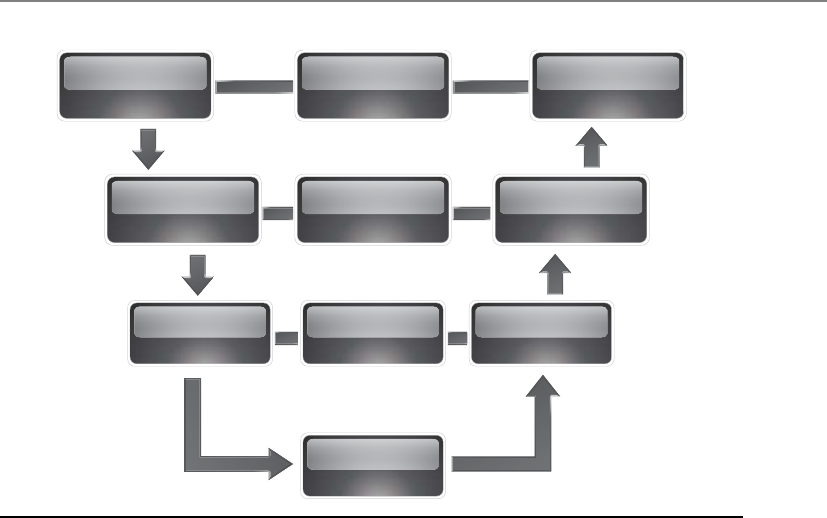
Chapter 10: Software Development Security
1113
Just like the Waterfall model, the V-shaped model lays out a sequential path of ex-
ecution processes. Each phase must be completed before the next phase begins. But
because the V-shaped model requires testing throughout the development phases and
not just waiting until the end of the project, it has a higher chance of success compared
to the Waterfall model.
The V-shaped model is still very rigid, as is the Waterfall model. This level of rigid-
ness does not allow for much flexibility; thus, adapting to changes is more difficult and
expensive. This model does not allow for the handling of events concurrently, it does
not integrate iterations of phases, and it does not contain risk analysis activities as later
models do. This model is best used when all requirements can be understood up front
and potential scope changes are small.
Prototyping
A sample of software code or a model (prototype) can be developed to explore a spe-
cific approach to a problem before investing expensive time and resources. A team can
identify the usability and design problems while working with a prototype and adjust
their approach as necessary. Within the software development industry three main pro-
totype models have been invented and used. These are the rapid prototype, evolution-
ary prototype, and operational prototype.
Requirements System test
planning System testing
High-level
design
Low-level
design
Unit test
planning Unit testing
Implementation
Integration
test planning
Integration
testing
Figure 10-10 V-shaped model

CISSP All-in-One Exam Guide
1114
Rapid prototyping is an approach that allows the development team to quickly cre-
ate a prototype (sample) to test the validity of the current understanding of the project
requirements. As an analogy, let’s say that you and your spouse were thinking about
starting a family and having children. Instead of forging ahead and enduring the nine-
month-long pregnancy adventure, you decide to babysit your brother’s kids for two
weeks to see if you even like kids. You and your spouse could potentially find out very
quickly that this is not the life for you and instead buy a plant.
In a software development project, the team could quickly develop a prototype to
see if their ideas are feasible and if they should move forward with their current solu-
tion. The rapid prototype approach (also called throwaway) is a “quick and dirty”
method of creating a piece of code and seeing if everyone is on the right path or if an-
other solution should be developed. The rapid prototype is not developed to be built
upon, but to be discarded after serving its purposes.
When evolutionary prototypes are developed, they are built with the goal of incre-
mental improvement. Instead of being discarded after being developed, as in the rapid
prototype approach, the prototype in this model is continually improved upon until it
reaches the final product stage. Feedback that is gained through each development phase
is used to improve the prototype and get closer to accomplishing the customer’s needs.
The operational prototypes are an extension of the evolutionary prototype method.
Both models (operational and evolutionary) improve the quality of the prototype as
more data are gathered, but the operational prototype is designed to be implemented
within a production environment as it is being tweaked. The operational prototype is
updated as customer feedback is gathered, and the changes to the software happen
within the working site.
So the rapid prototype is developed to give a quick understanding of the suggested
solution, the evolutionary prototype is created and improved upon within a lab envi-
ronment, and an operational prototype is developed and improved upon within a pro-
duction environment.
Incremental Model
If a development team follows the Incremental model, this allows them to carry out
multiple development cycles on a piece of software throughout its development stages.
This would be similar to “multi-waterfall” cycles taking place on one piece of software
as it matures through the development stages. A version of the software is created in the
first iteration and then it passes through each phase (requirements, design, coding, test-
ing, implementation) of the next iteration process. The software continues through the
iteration of phases until a satisfactory product is produced. This model is illustrated in
Figure 10-11.
When using the Incremental model, each incremental phase results in a deliverable
that is an operational product. This means that a working version of the software is pro-
duced after the first iteration and that version is improved upon in each of the subse-
quent iterations. Some benefits to this model are that a working piece of software is
available in early stages of development, the flexibility of the model allows for changes
to take place, testing uncovers issues more quickly than the Waterfall model since testing
takes place after each iteration, and each iteration is an easily manageable milestone.

Chapter 10: Software Development Security
1115
Since each release delivers an operational product, the customer can respond to
each build and help the development team in its improvement processes. Since the
initial product is delivered more quickly compared to other models, the initial product
delivery costs are lower, the customer gets its functionality earlier, and the risks of criti-
cal changes being introduced are lower.
This model is best used when issues pertaining to risk, program complexity, fund-
ing, and functionality requirements need to be understood early in the product devel-
opment cycle. If a vendor needs to get the customer some basic functionality quickly as
it works on the development of the product, this can be a good model to follow.
Spiral Model
The Spiral model uses an iterative approach to software development and places em-
phasis on risk analysis. The model is made up of four main phases: planning, risk
analysis, development and test, and evaluation. The development team starts with the
initial requirements and goes through each of these phases, as shown in Figure 10-12.
Think about starting a software development project at the center of this graphic. You
have your initial understanding and requirements of the project, develop specifications
that map to these requirements, carry out a risk analysis, build prototype specifications,
test your specifications, build a development plan, integrate newly discovered informa-
tion, use the new information to carry out a new risk analysis, create a prototype, test
the prototype, integrate resulting data into the process, etc. As you gather more infor-
mation about the project, you integrate it into the risk analysis process, improve your
prototype, test the prototype, and add more granularity to each step until you have a
completed product.
System/information
engineering
Design Code Te s t
Analysis
Design Code Te s t
Analysis
Design Code Te s t
Analysis
Design Code Te s t
Analysis
Increment 2
Increment 1
Delivery of
1st increment
Delivery of
2nd increment
Delivery of
3rd increment
Delivery of
4th increment
Increment 3
Increment 4
Figure 10-11 Incremental development model

CISSP All-in-One Exam Guide
1116
The iterative approach provided by the Spiral model allows new requirements to be
addressed as they are uncovered. Each prototype allows for testing to take place early in
the development project, and feedback based upon these tests is integrated into the fol-
lowing iteration of steps. The risk analysis ensures that all issues are actively reviewed and
analyzed so that things do not “slip through the cracks” and the project stays on track.
In the Spiral model the evaluation phase allows the customer to evaluate the prod-
uct in its current state and provide feedback, which is an input value for the next spiral
of activity. This is a good model for complex projects that have fluid requirements.
NOTE
NOTE Within this model the angular aspect represents progress and the
radius of the spirals represents cost.
Rapid Application Development
The Rapid Application Development (RAD) model relies more on the use of rapid pro-
totyping instead of extensive upfront planning. In this model, the planning of how to
improve the software is interleaved with the processes of developing the software,
1. Determine objectives
Cumulative cost
Progress
Prototype 2Prototype 1
Risk analysis
Risk analysis
Risk analysis
Draft
Require-
ments
Code
Integration
Te s t
Release
Test plan Verification
& Validation
Verification
& Validation
Development
plan
Review
Implementation
Detailed
design
1. Determine objectives
CuCuCumulative cost
Progress
ProProProProPrototype 2ProProProProProProProProProProProProProProProProProPrototype 1
RisRisRisRisRisk analysisss
RisRisRisk analysis
Risk analysisss
Draft
ReReReReRequire-
ments
Code
InInIntegration
Te s t
Release
Test plan Verification
and validation
VeriVeriVerification
and validation
Development
plan
Review
Implementation
DeDetailed
design
4. Plan the next
iteration 3. Development and test
2. Identify and
resolve risks
Concept of
require-
ments
Concept of
operation
Require-
ments plan
Operational
prototype
Figure 10-12 Spiral model for software development

Chapter 10: Software Development Security
1117
which allows for software to be developed quickly. The delivery of a workable piece of
software can take place in less than half the time compared to other development mod-
els. The RAD model combines the use of prototyping and iterative development proce-
dures with the goal of accelerating the software development process. The development
process begins with creating data models and business process models to help define
what the end-result software needs to accomplish. Through the use of prototyping,
these data and process models are refined. These models provide input to allow for the
improvement of the prototype, and the testing and evaluation of the prototype allow
for the improvement of the data and process models. The goal of these steps is to com-
bine business requirements and technical design statements, which provide the direc-
tion in the software development project.
Figure 10-13 illustrates the basic differences between traditional software develop-
ment approaches and RAD. As an analogy, let’s say that I need you to tell me what it is
you want so that my team can build it for you. You tell me that the thing you want has
four legs and fur. I draw a picture of a cat on a piece of paper and ask, “Is this what you
want?” You say no, so I throw away that piece of paper (prototype). I ask for more in-
formation from you, and you tell me the thing must produce milk. I draw a picture of
a cow and show it to you and you tell me I am getting closer, but I am still wrong. I
throw away that piece of paper, and you tell me the thing must have horns. I draw a
picture of a goat, and you nod your head in agreement, and I run off to tell my team
that we must figure out how to make you a milk-providing goat. That back and forth is
what is taking place in the circle portion of Figure 10-13.
Analysis
High-level design Detailed design Construction Implementation
Testing
Analysis and
quick design Implementation
Testing
B
U
I
L
D
D
E
M
O
N
S
T
R
A
T
E
R
E
F
I
N
E
Prototype
Cycles
Traditional
RAD
Figure 10-13 Rapid Application Development model

CISSP All-in-One Exam Guide
1118
The main reason that the RAD model was developed was that by the time software
was completely developed following other models, the requirements changed and the
developers had to “go back to the drawing board.” If a customer needs you to develop
a software product and it takes you a year to do so, by the end of that year the custom-
er’s needs for the software have probably advanced and changed. The RAD model al-
lows for the customer to be involved during the development phases so that the end
result maps to their needs in a more realistic manner.
Agile Model
The industry seems to be full of software development models, each trying to improve
upon the deficiencies of the ones before it. Before the Agile approach to development
was created, teams were following rigid process-oriented models. These approaches
focused more on following procedures and steps instead of potentially carrying out
tasks in a more efficient manner. As an analogy, if you have ever worked within or in-
teracted with a large government agency, you may have come across silly processes that
took too long and involved too many steps. If you are a government employee and
need to purchase a new chair, you might have to fill out four sets of documents that
need to be approved by three other departments. You probably have to identify three
different chair vendors, who have to submit a quote, which goes through the contract-
ing office. It might take you a few months to get your new chair. The focus is to follow
a protocol and rules instead of efficiency.
Many of the classical software development approaches, as in Waterfall, provided
rigid processes to follow that did not allow for much flexibility and adaptability. Com-
monly, the software development projects ended up failing by not meeting schedule
time release, running over budget, and/or not meeting the needs of the customer.
Sometimes you need the freedom to modify steps to best meet the situation’s needs.
The Agile model is an umbrella term for several development methodologies. It fo-
cuses not on rigid, linear, stepwise processes, but instead on incremental and iterative
development methods that promote cross-functional teamwork and continuous feed-
back mechanisms. This model is considered “lightweight” compared to the traditional
methods that are “heavyweight,” which just means this model is not confined to a tun-
neled vision and overly structured approach. It is nimble and flexible enough to adapt
to each project’s needs. The industry found out that even an exhaustive library of de-
fined processes cannot handle every situation that could arise during a development
project. So instead of investing time and resources into big upfront design analysis, this
model focuses on small increments of functional code that are created based upon
business need.
The model focuses on individual interaction instead of processes and tools. It em-
phasizes developing the right software product over comprehensive and laborious doc-
umentation. It promotes customer collaboration instead of contract negotiation, and
abilities to respond to change instead of strictly following a plan.
NOTE
NOTE The Agile model does not use prototypes to represent the full
product, but breaks the product down into individual features.

Chapter 10: Software Development Security
1119
Another important characteristic of the Agile model is that the development team
can take pieces and parts of all of the available SDLC methods and combine them in a
manner that best meets the specific project needs. These various combinations have
resulted in many methodologies that fall under the Agile model. Please review www.
devx.com/architect/Article/32836/1954?pf=true to get a better understanding of the
different methodologies that reside within the Agile model framework.
A quick review of the various models we have covered up to this point is pro-
vided here:
•Break and Fix No real planning up front. Flaws are reactively dealt with after
release with the creation of patches and updates.
•Waterfall Sequential approach that requires each phase to complete before
the next one can begin. Difficult to integrate changes. Inflexible model.
•V-model Emphasizes verification and validation at each phase and testing to
take place throughout the project, not just at the end.
•Prototyping Creating a sample or model of the code for proof-of-concept
purposes.
•Incremental Multiple development cycles are carried out on a piece of
software throughout its development stages. Each phase provides a usable
version of software.
•Spiral Iterative approach that emphasizes risk analysis per iteration. Allows
for customer feedback to be integrated through a flexible evolutionary
approach.
•Rapid Application Development Combines prototyping and iterative
development procedures with the goal of accelerating the software
development process.
•Agile Iterative and incremental development processes that encourage team-
based collaboration. Flexibility and adaptability are used instead of a strict
process structure.
There seems to be no shortage of SDLC and software development models in the
industry. The following is a quick summary of a few others that can also be used:
•Exploratory model A method that is used in instances where clearly defined
project objectives have not been presented. Instead of focusing on explicit
tasks, the exploratory model relies on covering a set of specifications that are
likely to affect the final product’s functionality. Testing is an important part of
exploratory development, as it ascertains that the current phase of the project
is compliant with likely implementation scenarios.
•Joint Analysis Development (JAD) A method that uses a team approach in
application development in a workshop-oriented environment.
•Reuse model A model that approaches software development by using
progressively developed models. Reusable programs are evolved by gradually
modifying pre-existing prototypes to customer specifications. Since the reuse

CISSP All-in-One Exam Guide
1120
model does not require programs to be built from scratch, it drastically
reduces both development cost and time.
•Cleanroom An approach that attempts to prevent errors or mistakes by
following structured and formal methods of developing and testing. This
approach is used for high-quality and critical applications that will be put
through a strict certification process.
We only covered the most commonly used models in this section, but there are
many more that exist. New models have evolved as technology and research have ad-
vanced and various weaknesses of older models have been addressed. Most of the mod-
els exist to meet a specific software development need, and choosing the wrong model
for a certain project could be devastating to its overall success.
Capability Maturity Model Integration
The Capability Maturity Model Integration (CMMI) for development models a compre-
hensive integrated set of guidelines for developing products and software. It addresses
the different phases of a software development life cycle, including concept definition,
requirements analysis, design, development, integration, installation, operations, and
maintenance, and what should happen in each phase. It can be used to evaluate secu-
rity engineering practices and identify ways to improve them. It can also be used by
customers in the evaluation process of a software vendor. In the best of both worlds,
both software vendors would use the model to help improve their processes and cus-
tomers would use the model to assess the vendors’ practices.
The model describes procedures, principles, and practices that underlie software
development process maturity. This model was developed to help software vendors
improve their development processes by providing an evolutionary path from an ad
hoc “fly by the seat of your pants” approach to a more disciplined and repeatable
method that improves software quality, reduces the life cycle of development, provides
better project management capabilities, allows for milestones to be created and met in
a timely manner, and takes a more proactive approach than the less effective reactive
approach. It provides best practices to allow an organization to develop a standardized
approach to software development that can be used across many different groups. The
goal is to continue to review and improve upon the processes to optimize output, in-
crease capabilities, and provide higher-quality software at a lower cost through the im-
plementation of continuous improvement steps.
If the company StuffRUs wants a software development company, SoftwareRUs, to
develop an application for it, it can choose to buy into the sales hype about how won-
derful SoftwareRUs is, or it can ask for SoftwareRUs to be evaluated against the CMMI
model. Third-party companies evaluate software development companies to certify or-
ganizations’ product development processes. Many software companies have this eval-
uation done so they can use this as a selling point to attract new customers and provide
confidence for their current customers.
The five maturity levels of the CMMI model are

Chapter 10: Software Development Security
1121
•Initial Development process is ad hoc or even chaotic. The company does
not use effective management procedures and plans. There is no assurance of
consistency, and quality is unpredictable.
•Repeatable A formal management structure, change control, and quality
assurance are in place. The company can properly repeat processes throughout
each project. The company does not have formal process models defined.
•Defined Formal procedures are in place that outline and define processes
carried out in each project. The organization has a way to allow for
quantitative process improvement.
•Managed The company has formal processes in place to collect and
analyze quantitative data, and metrics are defined and fed into the process-
improvement program.
•Optimizing The company has budgeted and integrated plans for continuous
process improvement.
Each level builds upon the previous one. For example, a company that accomplish-
es a Level 5 CMMI rating must meet all the requirements outlined in Levels 1–4 along
with the requirements of Level 5.
If a software development vendor is using the Build and Fix model that was dis-
cussed earlier in this chapter, they would most likely only achieve a CMMI Level 1, be-
cause their practices are ad hoc, not consistent, and the level of the quality that their
software products contain is questionable. If this company practiced a strict Agile SDLC
model consistently and carried out development, testing, and documentation precisely,
they would have a higher chance of obtaining a higher CMMI level.
I

CISSP All-in-One Exam Guide
1122
Capability Maturity Models (CMMs) are used for many different purposes, software
development processes being one of them. They are general models that allow for ma-
turity-level identification and maturity improvement steps. We showed how CMM can
be used for organizational security program improvement processes in Chapter 2.
The industry ended up with several different CMMs, which just led to confusion.
CMMI was developed to bring many of these different maturity models together and
allow them to be used in one framework. CMMI was developed by industry experts,
government entities, and the Software Engineering Institute at Carnegie Mellon Univer-
sity. So CMMI has replaced CMM in the software engineering world, but you may still
see CMM referred to within the industry and even on the CISSP exam. Their ultimate
goals are the same, which is process improvement.
NOTE
NOTE The CMMI is continually being updated and improved upon. The latest
copy can be viewed at www.sei.cmu.edu/library/abstracts/reports/10tr033.cfm.
Change Control
I am changing stuff left and right.
Response: Was it approved and tested first?
Changes during a product’s life cycle can cause a lot of havoc if not done properly
and in a controlled manner. Changes could take place for several reasons. During the
development phases, a customer may alter requirements and ask that certain function-
alities be added, removed, or modified. In production, changes may need to happen
because of other changes in the environment, new requirements of a software product
or system, or newly released patches or upgrades. These changes should be controlled
to make sure they are approved, incorporated properly, and do not affect any original
functionality in an adverse way. Change control is the process of controlling the chang-
es that take place during the life cycle of a system and documenting the necessary
change control activities.
A process for dealing with changes needs to be in place at the beginning of a project
so everyone knows how changes are dealt with and what is expected of each entity
when a change request is made. Some projects have been doomed from the start be-
cause proper change control was not put into place and enforced. Many times in devel-
opment, the customer and vendor agree on the design of the product, the requirements,
and the specifications. The customer is then required to sign a contract confirming this
Which Standard Is Best?
So which “best practice” or standard is best for you? Most of these are general
enough to be applied to different organizations and their various software devel-
opment processes, but each approach has its specific focus. CMMI is a process
improvement model, WASC and OWASP focus on integrating security into soft-
ware development processes, BSI has a focus of protecting critical infrastructure
but can be used in any software development project, and ISO/IEC 27034 is a
general approach that is used more in the private industry. As with most techno-
logical standards, there is a lot of overlap between them.

Chapter 10: Software Development Security
1123
is the agreement and that if they want any further modifications, they will have to pay
the vendor for that extra work. If this is not put into place, then the customer can con-
tinually request changes, which requires the development team to put in the extra
hours to provide these changes, the result of which is that the vendor loses money, the
product does not meet its completion deadline, and scope creep occurs.
Other reasons exist to have change control in place. These reasons deal with organi-
zation, standard procedures, and expected results. If a product is in the last phase of
development and a change request comes in, the team should know how to deal with
it. Usually, the team leader must tell the project manager how much extra time will be
required to complete the project if this change is incorporated and what steps need to
be taken to ensure this change does not affect other components within the product. If
these processes are not controlled, one part of a development team could implement
the change without another part of the team being aware of it. This could break some
of the other development team’s software pieces. When the pieces of the product are
integrated and it is found that some pieces are incompatible, some jobs may be in jeop-
ardy, because management never approved the change in the first place.
The change must be approved, documented, and tested. Some tests may need to be
rerun to ensure the change does not affect the product’s capabilities. When a program-
mer makes a change to source code, it should be done on the test version of the code.
Under no conditions should a programmer change the code that is already in produc-
tion. The changes to the code should be made and tested, and then the new code
should go to the librarian. Production code should come only from the librarian and
not from a programmer or directly from a test environment.
Change control processes should be evaluated during system audits. It is possible to
overlook a problem that a change has caused in testing, so the procedures for how
change control is implemented and enforced should be examined during a system audit.
The following are some necessary steps for a change control process:
1. Make a formal request for a change.
2. Analyze the request.
A. Develop the implementation strategy.
B. Calculate the costs of this implementation.
C. Review any security implications.
3. Record the change request.
4. Submit the change request for approval.
5. Develop the change.
A. Recode segments of the product and add or subtract functionality.
B. Link these changes in the code to the formal change control request.
C. Submit software for testing and quality approval.
D. Repeat until quality is adequate.
E. Make version changes.
6. Report results to management.

CISSP All-in-One Exam Guide
1124
The changes to systems may require another round of certification and accredita-
tion. If the changes to a system are significant, then the functionality and level of pro-
tection may need to be reevaluated (certified), and management would have to approve
the overall system, including the new changes (accreditation).
Software Configuration Management
When changes take place to a software product during its development life cycle, a con-
figuration management system can be put into place that allows for change control
processes to take place through automation. A product that provides Software Configu-
ration Management (SCM) identifies the attributes of software at various points in time,
and performs a methodical control of changes for the purpose of maintaining software
integrity and traceability throughout the software development life cycle. It defines the
need to track changes and provides the ability to verify that the final delivered software
has all of the approved changes that are supposed to be included in the release.
During a software development project the centralized code repositories are often
kept in systems that can carry out SCM functionality, which manage and track revisions
made by multiple people against a single master set. The SCM system should provide
concurrency management, versioning, and synchronization. Concurrency manage-
ment deals with the issues that arise when multiple people extract the same file from a
central repository and make their own individual changes. If they submit their updated
files in an uncontrolled manner, the files would just write over each other and changes
would be lost. Many SCM systems use algorithms to merge the changes as files are
checked back into the repository.
Versioning deals with keeping track of file revisions, which makes it possible to
“roll back” to a previous version of the file. An archive copy of every file can be made
when it is checked into the repository, or every change made to a file can be saved to a
transaction log. Versioning systems should also create log reports of who made chang-
es, when they were made, and what the changes were.
Some SCM systems allow individuals to check out complete or partial copies of the
repositories and work on the files as needed. They can then commit their changes back
to the master repository as needed, and update their own personal copies to stay up to
date with changes other people have made. This process is called synchronization.
Software Escrow
Will someone keep a copy of my source code?
If a company pays another company to develop software for it, it should have
some type of software escrow in place for protection. We covered this topic in
Chapter 8 from a business continuity perspective, but since it directly deals with
software development, we will mention it here also.
In a software escrow framework, a third party keeps a copy of the source code,
and possibly other materials, which it will release to the customer only if specific

Chapter 10: Software Development Security
1125
circumstances arise, mainly if the vendor who developed the code goes out of
business or for some reason is not meeting its obligations and responsibilities.
This procedure protects the customer, because the customer pays the vendor to
develop software code for it, and if the vendor goes out of business, the customer
otherwise would no longer have access to the actual code. This means the cus-
tomer code could never be updated or maintained properly.
A logical question would be, “Why doesn’t the vendor just hand over the
source code to the customer, since the customer paid for it to be developed in the
first place?” It does not work that way. The code is the vendor’s intellectual prop-
erty. The vendor employs and pays people with the necessary skills to develop
that code, and if the vendor were to just hand it over to the customer, it would be
giving away its intellectual property, its secrets. The customer gets compiled code
instead of source code. Compiled code is code that has been put through a com-
piler and is unreadable to humans. Most software profits are based on licensing,
which outlines what customers can do with the compiled code.
Key Terms
•Capability Maturity Model Integration (CMMI) model A process
improvement approach that provides organizations with the essential
elements of effective processes, which will improve their performance.
•Change control The process of controlling the changes that take place
during the life cycle of a system and documenting the necessary change
control activities.
•Software Configuration Management (SCM) Identifies the attributes
of software at various points in time, and performs a methodical
control of changes for the purpose of maintaining software integrity
and traceability throughout the software development life cycle.
•Software escrow Storing of the source code of software with a
third-party escrow agent. The software source code is released to the
licensee if the licensor (software vendor) files for bankruptcy or fails to
maintain and update the software product as promised in the software
license agreement.
Programming Languages and Concepts
All software is written in some type of programming language. Programming languages
have gone through several generations over time, each generation building on the next,
providing richer functionality and giving the programmers more powerful tools as they
evolve.

CISSP All-in-One Exam Guide
1126
The main categories of languages are machine language, assembly language, and
high-level languages. Machine language is in a format that the computer’s processor can
understand and work with directly. Every processor family has its own machine code
instruction set, as we covered in Chapter 4. Machine code is represented in a binary
format (1 and 0) and is considered to be the most primitive form of programming
language and the first generation of programming languages. Machine languages were
used as the sole method of programming in the early 1950s. Early computers used only
basic binary instructions because compilers and interpreters were nonexistent at the
time. Programmers had to manually calculate and allot memory addresses and instruc-
tions had to be sequentially fed, as there was no concept of abstraction. Not only was
programming in binary extremely time consuming, it was also highly prone to errors.
(If you think about writing out thousands of 1s and 0s to represent what you want a
computer to do, this puts this approach into perspective.) This forced programmers to
keep a tight rein on their program lengths, resulting in programs that were very rudi-
mentary.
An assembly language is considered a low-level programming language and is the
symbolic representation of machine-level instructions. It is “one step above” machine
language. It uses symbols (called mnemonics) to represent complicated binary codes.
Programmers using assembly language could use commands like ADD, PUSH, POP,
etc., instead of the binary codes (1001011010, etc.). Assembly languages use programs
called assemblers, which automatically convert these assembly codes into the necessary
machine-compatible binary language. To their credit, assembly languages drastically
reduced programming and debugging times, introduced the concept of variables, and
freed programmers from manually calculating memory addresses. But like machine
code, programming in an assembly language requires extensive knowledge of a com-
puter’s architecture. It is easier than programming in binary format, but more challeng-
ing compared to the high-level languages most programmers use today.
Programs written in assembly language are also hardware specific, so a program
written for an AMD-based processor would be incompatible with Intel-based systems;
thus, these types of languages are not portable.
NOTE
NOTE Assembly language allows for direct control of very basic activities
within a computer system, as in pushing data on a memory stack and popping
data off a stack. Attackers commonly use these languages to tightly control
how malicious instructions are carried out on victim systems.
The third generation of programming languages started to emerge in the early 1960s.
Third-generation programming languages are known as high-level languages due to their
refined programming structures. High-level languages use abstract statements. Abstrac-
tion naturalized multiple assembly language instructions into a single high-level state-
ment, e.g., the IF – THEN – ELSE. This allowed programmers to leave low-level (system
architecture) intricacies to the programming language and focus on their programming
objectives. In addition, high-level languages are easier to work with compared to ma-
chine and assembly languages, as their syntax is similar to human languages. The use of
mathematical operators also simplified arithmetic and logical operations. This drasti-

Chapter 10: Software Development Security
1127
cally reduced program development time and allowed for more simplified debugging.
This means the programs are easier to write and mistakes (bugs) are easier to identify.
High-level languages are processor independent. Code written in a high-level language
can be converted to machine language for different processor architectures using com-
pilers and interpreters. When code is independent of a specific processor type, the pro-
grams are portable and can be used on many different system types.
Fourth-generation languages (very high-level languages) were designed to further
enhance the natural language approach instigated within the third-generation lan-
guage. Fourth-generation languages are meant to take natural language-based state-
ments one step further. Fourth-generation programming languages focus on highly
abstract algorithms that allow straightforward programming implementation in spe-
cific environments. The most remarkable aspect of fourth-generation languages is that
the amount of manual coding required to perform a specific task may be ten times less
than for the same task on a third-generation language. This is especially important as
these languages have been developed to be used by inexpert users and not just profes-
sional programmers.
As an analogy, let’s say that you need to pass a calculus exam. You need to be very
focused on memorizing the necessary formulas and applying the formulas to the cor-
rect word problems on the test. Your focus is on how calculus works, not on how the
calculator you use as a tool works. If you had to understand how your calculator is
moving data from one transistor to the other, how the circuitry works, and how the
calculator stores and carries out its processing activities just to use it for your test, this
would be overwhelming. The same is true for computer programmers. If they had to
worry about how the operating system carries out memory management functions, in-
put/output activities, and how processor-based registers are being used, it would be
difficult for them to also focus on real-world problems they are trying to solve with
their software. High-level languages hide all of this background complexity and take
care of it for the programmer.
The early 1990s saw the conception of the fifth generation of programming lan-
guages (natural languages). These languages approach programming from a complete-
ly different perspective. Program creation does not happen through defining algorithms
and function statements, but rather by defining the constraints for achieving a specified
result. The goal is to create software that can solve problems by itself instead of a pro-
grammer having to develop code to deal with individual and specific problems. The
applications would work more like a black box—a problem goes in and a solution
comes out. Just as the introduction of assembly language eliminated the need for bina-
ry-based programming, the full impact of fifth-generation programming techniques
may bring to an end the traditional programming approach. The ultimate target of
fifth-generation languages is to eliminate the need for programming expertise and in-
stead use advanced knowledge-based processing and artificial intelligence.
The industry has not been able to fully achieve all the goals set out for these fifth-
generation languages. The human insight of programmers is still necessary to figure out
the problems that need to be solved, and the restrictions of the structure of a current
computer system do not allow software to “think for itself” yet. We are getting closer to
achieving artificial intelligence within our software, but we still have a long way to go.

CISSP All-in-One Exam Guide
1128
The following list illustrates the basic software programming language generations:
• Generation one: machine language
• Generation two: assembly language
• Generation three: high-level language
• Generation four: very high-level language
• Generation five: natural language
Assemblers, Compilers, Interpreters
Everything ends up in bits at the end.
No matter what type or generation of programming language is used, all of the in-
structions and data have to end up in a binary format for the processor to understand
and work with. Just like our food has to be broken down into molecules for our body
to be able to process it, all code must end up in a format that is consumable for spe-
cific systems. Each programming language type goes through this transformation
through the use of assemblers, compilers, or interpreters.
Assemblers are tools that convert assembly language source code into machine code.
Assembly language consists of mnemonics, which are incomprehensible to processors
and therefore need to be translated into operation instructions.
Compilers are tools that convert high-level language statements into the necessary
machine-level format (.exe, .dll, etc.) for specific processors to understand. The com-
piler transforms instructions from a source language (high-level) to a target language
Language Levels
High, really high, very high, not so high, kind of short. What does this really mean?
The “higher” the language, the more abstraction that is involved. Abstraction
means that the details of something are far away and/or hidden. A programming
language that provides high abstraction means that the programmer does not
need to worry about the intricate details of the computer system itself, as in reg-
isters, memory addresses, complex Boolean expressions, thread management,
etc. The programmer can use simple statements such as “print,” and she does not
need to worry about how the computer will actually get the data over to the
printer. Instead, she can focus on the core functionality that the application is
supposed to provide and not be bothered with the complex things taking place
in the belly of the operating system and motherboard components.
As an analogy, you do not need to understand how your engine or brakes
work in your car—there is a level of abstraction. You just turn the steering wheel
and step on the pedal when necessary, and you can focus on getting to your des-
tination.
There are so many different programming languages today; it is hard to fit
them neatly in the five generations described in this chapter. These generations
are the classical way of describing the differences in software programming ap-
proaches and what you will see on the CISSP exam.

Chapter 10: Software Development Security
1129
(machine), which allows the code to be executable. A programmer may develop an
application in the C++ language, but when you purchase this application you do not
receive the source code, but you will receive the executable code that will run on your
type of computer. The source code was put through a compiler, which resulted in an
executable file that can run on your specific processor type.
Compilers allow developers to create software code that can be developed once in
a high-level language and compiled for various platforms. So you could develop one
piece of software, which is then compiled by five different compilers to allow it to be
able to run on five different systems.
If a programming language is considered “interpreted,” then a tool called an inter-
preter does the last step of transforming high-level code to machine-level code. For ex-
ample, applications that are developed to work in a .NET environment are translated
into an intermediate, platform-independent format. The applications are deployed,
and upon runtime the applications’ code is interpreted into processor-specific code.
The goal is to improve portability. The same is true for the Java programming language.
Programs written in Java have their source code compiled into an intermediate code,
called bytecode. When the instructions of the application need to run, they are executed
in a Java Virtual Machine (JVM). The JVM has an interpreter specific for the platform it
is installed on, as illustrated in Figure 10-14. The interpreter converts the bytecode into
a machine-level format for execution.
Interpreter Interpreter Interpreter
Hello
World! Hello
World!
Hello
World!
Win32 Solaris MacOS
Compiler
Java Program
HelloWorldApp.java
class HelloWorldApp {
public static void main (String [ ] orgs) {
System . out . println(”Hello World!”);
}
}
Figure 10-14 Java bytecode is converted by interpreters.

CISSP All-in-One Exam Guide
1130
The greatest advantage of executing a program in an interpreted environment is that
the platform independence and memory management functions are part of an inter-
preter. The major disadvantage with this approach is that the program cannot run as a
stand-alone application, but requires the interpreter to be installed on the local machine.
From a security point of view it is important to understand vulnerabilities that are
inherent in specific programming languages. For example, programs written in the C
language are highly vulnerable to buffer overrun and format string errors. The issue is
that the C standard software libraries do not check the length of the strings of data they
manipulate by default. Consequently, if a string is obtained from an untrusted source
(i.e., the Internet) and is passed to one of these library routines, parts of memory may
be unintentionally overwritten with untrustworthy data—this vulnerability can poten-
tially be used to execute arbitrary and malicious software. Some programming lan-
guages, such as Java, perform automatic garbage collection; others, such as C, require
the developer to perform it manually, thus leaving opportunity for error.
Garbage collection is an automated way for software to carry out part of its memory
management tasks. A garbage collector identifies blocks of memory that were once al-
located but are no longer in use and deallocates the blocks and marks them as free. It
also gathers scattered blocks of free memory and combines them into larger blocks. It
helps provide a more stable environment and does not waste precious memory. If gar-
bage collection does not take place properly, not only can memory be used in an inef-
ficient manner, an attacker could carry out a denial-of-service attack specifically to
artificially commit all of a system’s memory rendering it unable to function.
CAUTION
CAUTION Nothing in technology seems to be getting any simpler, which
makes learning this stuff much harder as the years go by. Ten years ago
assembly, compiled, and interpreted languages were more clear-cut and
their definitions straightforward. For the most part, only scripting languages
required interpreters, but as languages have evolved they have become
extremely flexible to allow for greater functionality, efficiency, and portability.
Many languages can have their source code compiled or interpreted
depending upon the environment and user requirements.
Object-Oriented Concepts
Objects are so cute, and small, and modular. I will take one in each color!
Software development used to be done by classic input-processing-output meth-
ods. This development used an information flow model from hierarchical information
structures. Data were input into a program, and the program passed the data from the
beginning to end, performed logical procedures, and returned a result.
Object-oriented programming (OOP) methods perform the same functionality, but
with different techniques that work in a more efficient manner. First, you need to un-
derstand the basic concepts of OOP.
OOP works with classes and objects. A real-world object, such as a table, is a mem-
ber (or an instance) of a larger class of objects called “furniture.” The furniture class will
have a set of attributes associated with it, and when an object is generated, it inherits
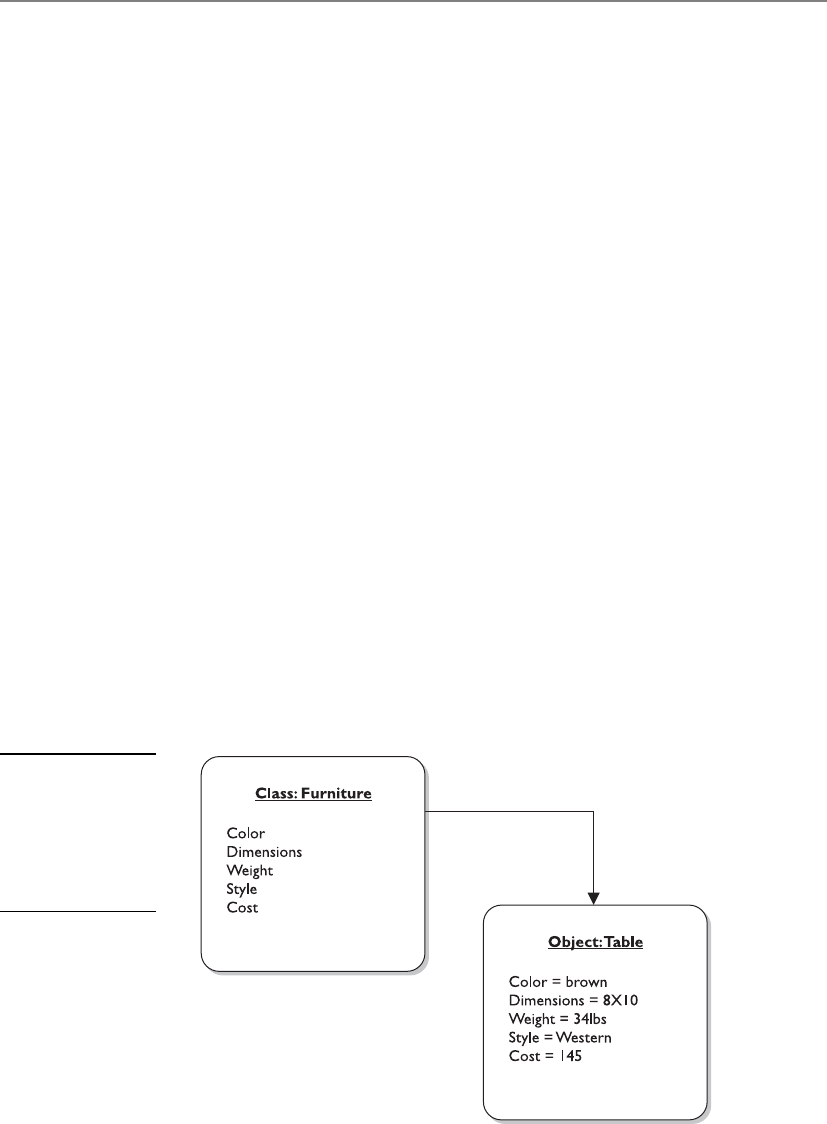
Chapter 10: Software Development Security
1131
these attributes. The attributes may be color, dimensions, weight, style, and cost. These
attributes apply if a chair, table, or loveseat object is generated, also referred to as in-
stantiated. Because the table is a member of the class furniture, the table inherits all
attributes defined for the class (see Figure 10-15).
The programmer develops the class and all of its characteristics and attributes. The
programmer does not develop each and every object, which is the beauty of this ap-
proach. As an analogy, let’s say you developed an advanced coffee maker with the goal
of putting Starbucks out of business. A customer punches the available buttons on your
coffee maker interface, which is a large latte, with skim milk, vanilla and raspberry fla-
voring, and an extra shot of espresso, where the coffee is served at 250 degrees. Your
coffee maker does all of this through automation and provides the customer with a
lovely cup of coffee exactly to her liking. The next customer wants a mocha frappucci-
no, with whole milk, and extra foam. So the goal is to make something once (coffee
maker, class), allow it to accept requests through an interface, and create various results
(cups of coffee, objects) depending upon the requests submitted.
But how does the class create objects based on requests? A piece of software that is
written in OOP will have a request sent to it, usually from another object. The request-
ing object wants a new object to carry out some type of functionality. Let’s say that ob-
ject A wants object B to carry out subtraction on the numbers sent from A to B. When
this request comes in, an object is built (instantiated) with all of the necessary pro-
gramming code. Object B carries out the subtraction task and sends the result back to
object A. It does not matter what programming language the two objects are written in;
what matters is if they know how to communicate with each other. One object can
communicate with another object if it knows the application programming code (API)
communication requirements. An API is the mechanism that allows objects to talk to
each other. Let’s say if I want to talk to you, I can only do it by speaking French and I
can only use three phrases or less, because that is all you understand. As long as I follow
these rules, I can talk to you. If I don’t follow these rules, I can’t talk to you.
Figure 10-15
In object-oriented
inheritance, each
object belongs to a
class and takes on
the attributes of
that class.

CISSP All-in-One Exam Guide
1132
NOTE
NOTE An object is a self-contained module.
So what’s so great about OOP? If you look at Figure 10-16, you can see the differ-
ence between OOP and non-OOP techniques. Non-OOP applications are written as
monolithic entities. This means an application is just one big pile of code (commonly
called spaghetti code). If you need to change something in this pile, you would need to
go through the whole program’s logic functions to figure out what your one change is
going to break. If the program contains hundreds or thousands of lines of code, this is
not an easy or enjoyable task. Now, if you choose to write your program in an object-
oriented language, you don’t have one monolithic application, but an application that
is made up of smaller components (objects). If you need to make changes or updates
to some functionality in your application, you can just change the code within the class
that creates the object carrying out that functionality and not worry about everything
else the program actually carries out. The following breaks down the benefits of OOP:
• Modularity
• Autonomous objects, cooperation through exchanges of messages.
• Deferred commitment
• The internal components of an object can be redefined without changing
other parts of the system.
• Reusability
• Refining classes through inheritance.
• Other programs using the same objects.
• Naturalness
• Object-oriented analysis, design, and modeling map to business needs and
solutions.
Most applications have some type of functionality in common. Instead of develop-
ing the same code to carry out the same functionality for ten different applications,
using OOP allows you to just create the object once and let it be reused in other appli-
cations. This reduces development time and saves money.
Now that we understand the concepts, let’s figure out the different terminology
used. A method is the functionality or procedure an object can carry out. An object may
be constructed to accept data from a user and to reformat the request so a back-end
server can understand and process it. Another object may perform a method that ex-
tracts data from a database and populates a web page with this information. Or an
object may carry out a withdrawal procedure to allow the user of an ATM to extract
money from her account.

Chapter 10: Software Development Security
1133
The objects encapsulate the attribute values, which means this information is pack-
aged under one name and can be reused as one entity by other objects. Objects need to
be able to communicate with each other, and this happens by using messages that are
sent to the receiving object’s API. If object A needs to tell object B that a user’s checking
account must be reduced by $40, it sends object B a message. The message is made up
of the destination, the method that needs to be performed, and the corresponding ar-
guments. Figure 10-17 shows this example.
Messaging can happen in several ways. Two objects can have a single connection
(one-to-one), a multiple connection (one-to-many), and a mandatory connection or
an optional connection. It is important to map these communication paths to identify
if information can flow in a way that is not intended. This will help ensure that sensi-
tive data cannot be passed to objects of a lower security level.
Figure 10-16 Procedural versus object-oriented programming
Figure 10-17 Objects communicate via messages.

CISSP All-in-One Exam Guide
1134
An object can have a shared portion and a private portion. The shared portion is the
interface (API) that enables it to interact with other components. Messages enter
through the interface to specify the requested operation, or method, to be performed.
The private part of an object is how it actually works and performs the requested op-
erations. Other components need not know how each object works internally—only
that it does the job requested of it. This is how data hiding is possible. The details of the
processing are hidden from all other program elements outside the object. Objects
communicate through well-defined interfaces; therefore, they do not need to know
how each other works internally.
NOTE
NOTE Data hiding is provided by encapsulation, which protects an object’s
private data from outside access. No object should be allowed to, or have the
need to, access another object’s internal data or processes.
These objects can grow to great numbers, so the complexity of understanding, track-
ing, and analyzing can get a bit overwhelming. Many times, the objects are shown in
connection to a reference or pointer in documentation. Figure 10-18 shows how related
objects are represented as a specific piece, or reference, in a bank ATM system. This en-
ables analysts and developers to look at a higher level of operation and procedures
without having to view each individual object and its code. Thus, this modularity pro-
vides for a more easily understood model.
Abstraction, as discussed earlier, is the capability to suppress unnecessary details so
the important, inherent properties can be examined and reviewed. It enables the sepa-
ration of conceptual aspects of a system. For example, if a software architect needs to
understand how data flow through the program, she would want to understand the big
pieces of the program and trace the steps the data take from first being input into the
program all the way until they exit the program as output. It would be difficult to un-
derstand this concept if the small details of every piece of the program were presented.
Instead, through abstraction, all the details are suppressed so she can understand a
crucial part of the product. It is like being able to see a forest without having to look at
each and every tree.
Each object should have specifications it should adhere to. This discipline provides
cleaner programming and reduces programming errors and omissions. The following
list is an example of what should be developed for each object:
• Object name
• Attribute descriptions
• Attribute name
• Attribute content
• Attribute data type
• External input to object
• External output from object
• Operation descriptions
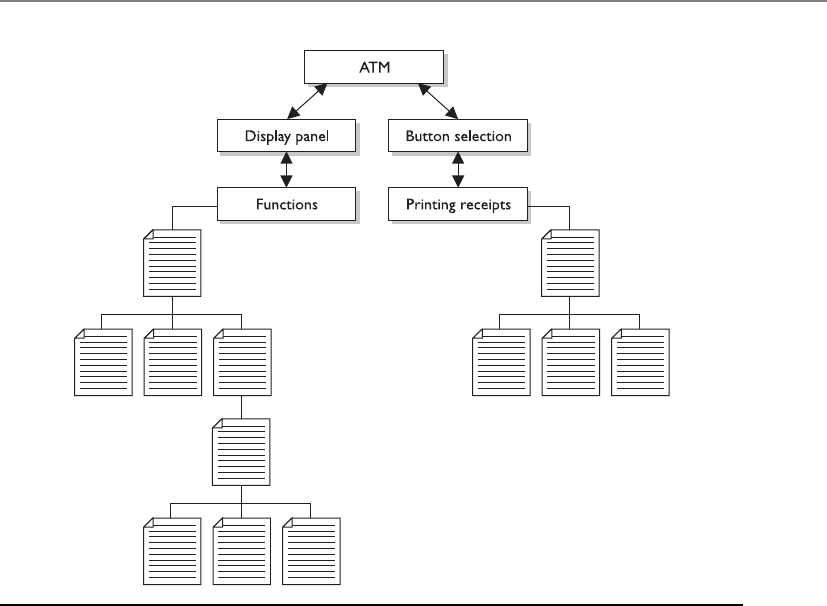
Chapter 10: Software Development Security
1135
• Operation name
• Operation interface description
• Operation processing description
• Performance issues
• Restrictions and limitations
• Instance connections
• Message connections
The developer creates a class that outlines these specifications. When objects are
instantiated, they inherit these attributes.
Each object can be reused as stated previously, which is the beauty of OOP. This
enables a more efficient use of resources and the programmer’s time. Different applica-
tions can use the same objects, which reduces redundant work, and as an application
grows in functionality, objects can be easily added and integrated into the original
structure.
The objects can be catalogued in a library, which provides an economical way for
more than one application to call upon the objects (see Figure 10-19). The library pro-
vides an index and pointers to where the objects actually live within the system or on
another system.
Figure 10-18 Object relationships within a program
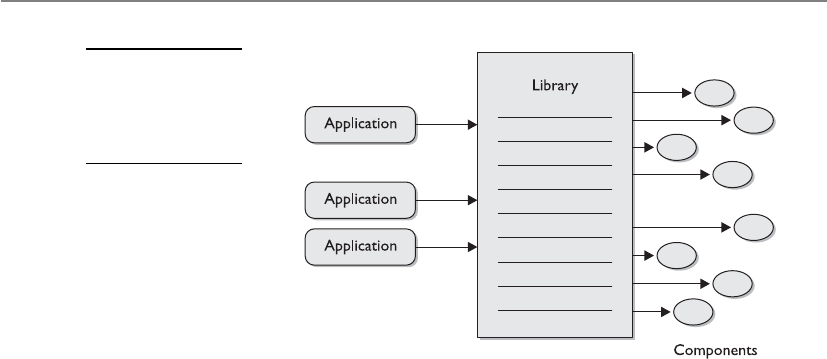
CISSP All-in-One Exam Guide
1136
When applications are developed in a modular approach, like object-oriented
methods, components can be reused, complexity is reduced, and parallel development
can be done. These characteristics allow for fewer mistakes, easier modification, re-
source efficiency, and more timely coding than the classic programming languages.
OOP also provides functional independence, which means each module addresses a
specific subfunction of requirements and has an interface that is easily understood by
other parts of the application.
An object is encapsulated, meaning the data structure (the operation’s functionality)
and the acceptable ways of accessing it are grouped into one entity. Other objects, sub-
jects, and applications can use this object and its functionality by accessing it through
controlled and standardized interfaces and sending it messages (see Figure 10-20).
Polymorphism
Polymorphism is a funny name.
Response: You are funny looking.
Polymorphism comes from the Greek, meaning “having multiple forms.” This con-
cept usually confuses people, so let’s jump right into an example. If I developed a pro-
gram in an OOP language, I can create a variable that can be used in different forms.
The application will determine what form to use at the time of execution (run time). So
if my variable is named USERID and I develop the object so the variable can accept ei-
ther an integer or letters, this provides flexibility. This means the user ID can be ac-
cepted as a number (account number) or name (characters). If application A uses this
object, it can choose to use integers for the user IDs, while application B can choose to
use characters.
What confuses people with this term is that International Information Systems Se-
curity Certification Consortium, known as (ISC)2, commonly uses the following defini-
tion or description: “Two objects can receive the same input and have different outputs.”
Clear as mud.
Figure 10-19
Applications locate
the necessary
objects through
a library index.
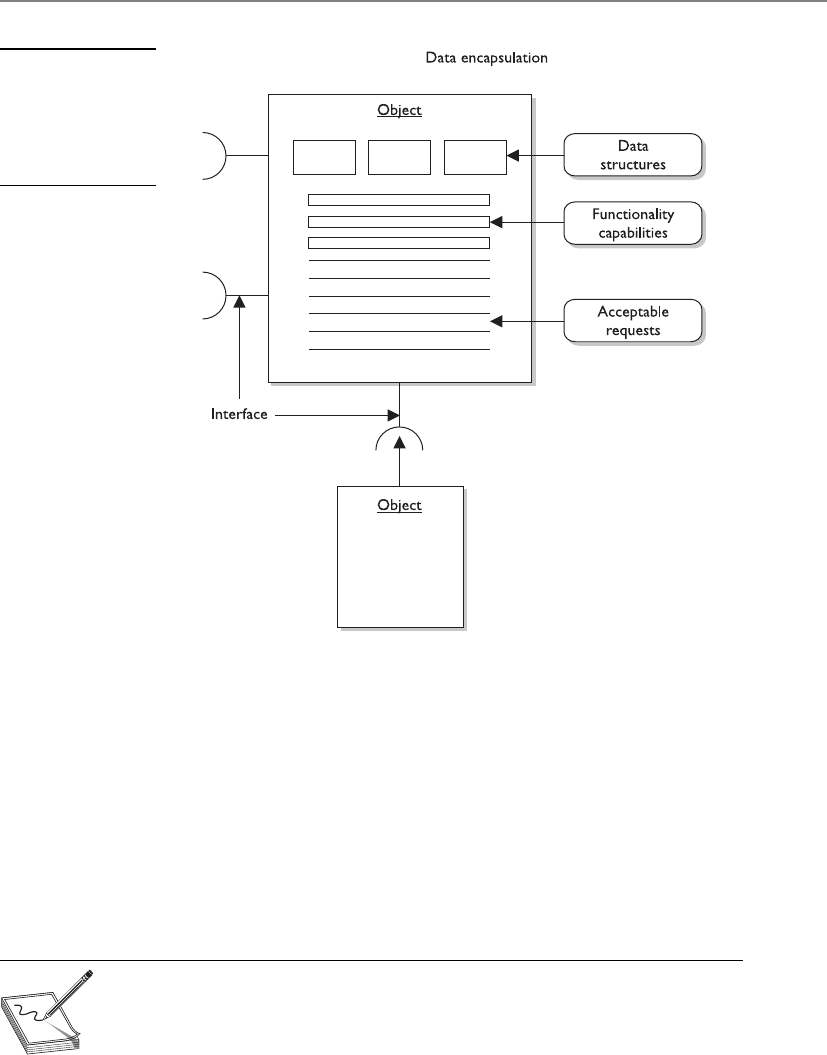
Chapter 10: Software Development Security
1137
As a simplistic example of polymorphism, suppose three different objects receive
the input “Bob.” Object A would process this input and produce the output “43-year-
old white male.” Object B would receive the input “Bob” and produce the output “Hus-
band of Sally.” Object C would produce the output of “Member of User group.” Each
object received the same input, but responded with a different output.
Polymorphism can also take place in the following example: Object A and Object B
are created from the same parent class, but Object B is also under a subclass. Object B
would have some different characteristics from Object A because of this inheritance
from the parent class and the subclass. When Object A and Object B receive the same
input, they would result in different outputs because only one of them inherited char-
acteristics from the subclass.
NOTE
NOTE Polymorphism takes place when different objects respond to the
same command, input, or message in different ways.
Figure 10-20
The different
components of an
object and the way
it works are hidden
from other objects.

CISSP All-in-One Exam Guide
1138
Data Modeling
Let’s see. The data went thataway. Oh no, it went thataway. Oops, I lost the data.
The previous paragraphs have provided a simple look at a structured analysis ap-
proach. A full-structured analysis approach looks at all objects and subjects of an ap-
plication and maps the interrelationships, communications paths, and inheritance
properties. This is different from data modeling, which considers data independently of
the way the data are processed and of the components that process the data. A data
model follows an input value from beginning to end and verifies that the output is cor-
rect. OOA is an example of a structured analysis approach. If an analyst is reviewing the
OOA of an application, she will make sure all relationships are set up correctly, that the
inheritance flows in a predictable and usable manner, that the instances of objects are
practical and provide the necessary functionality, and that the attributes of each class
cover all the necessary values used by the application. When another analyst does a data
model review of the same application, he will follow the data and the returned values
after processing takes place. An application can have a perfect OOA structure, but when
1 + 1 is entered and it returns –3, something is wrong. This is one aspect the data mod-
eling looks at.
Another example of data modeling deals with databases. Data modeling can be
used to provide insight into the data and the relationships that govern it. A data item in
one file structure, or data store, might be a pointer to another file structure or to a dif-
ferent data store. These pointers must actually point to the right place. Data modeling
would verify this, not OOA structure analysis.
Cohesion and Coupling
I do a bunch of stuff and rely on many other modules.
Response: Low cohesion and high coupling describe you best, then.
Cohesion reflects how many different types of tasks a module can carry out. If a
module carries out only one task (i.e., subtraction) or several tasks that are very similar
(i.e., subtract, add, multiply), it is described as having high cohesion, which is a good
thing. The higher the cohesion, the easier it is to update or modify and not affect other
modules that interact with it. This also means the module is easier to reuse and main-
tain because it is more straightforward when compared to a module with low cohesion.
An object with low cohesion carries out multiple different tasks and increases the com-
plexity of the module, which makes it harder to maintain and reuse. So you want your
How Do We Know What to Create?
Object-oriented analysis (OOA) is the process of classifying objects that will be
appropriate for a solution. A problem is analyzed to determine the classes of
objects to be used in the application.
Object-oriented design (OOD) creates a representation of a real-world prob-
lem and maps it to a software solution using OOP. The result of an OOD is a
design that modularizes data and procedures. The design interconnects data ob-
jects and processing operations.

Chapter 10: Software Development Security
1139
objects focused, manageable, and understandable. Each object should carry out a single
function or similar functions. One object should not carry out mathematical opera-
tions, graphic rendering, and cryptographic functions—these are separate functionality
types and it would be confusing to keep track of this level of complexity. If you do this,
you are trying to shove too much into one object. Objects should carry out modular,
simplistic functions—that is the whole point of OOP.
Coupling is a measurement that indicates how much interaction one module re-
quires to carry out its tasks. If a module has low (loose) coupling, this means the mod-
ule does not need to communicate with many other modules to carry out its job. High
(tight) coupling means a module depends upon many other modules to carry out its
tasks. Low coupling is more desirable because the modules are easier to understand,
easier to reuse, and changes can take place and not affect many modules around it. Low
coupling indicates that the programmer created a well-structured module. As an anal-
ogy, a company would want their employees to be able to carry out their individual
jobs with the least amount of dependencies on other workers. If Joe had to talk with
five other people just to get one task done, too much complexity exists, it’s too time-
consuming, and more places are created where errors can take place.
If modules are tightly coupled, the ripple effect of changing just one module can
drastically affect the other modules. If they are loosely coupled, this level of complexity
reduces.
An example of low coupling would be one module passing a variable value to an-
other module. As an example of high coupling, Module A would pass a value to Module
B, another value to Module C, and yet another value to Module D. Module A cannot
complete its tasks until Modules B, C, and D complete their tasks and return results
back to Module A.
NOTE
NOTE Objects should be self-contained and perform a single logical function,
which is high cohesion. Objects should not drastically affect each other, which
is low coupling.
The level of complexity involved with coupling and cohesion can have a direct rela-
tionship on the security level of a program. The more complex something is, the harder
it is to secure. Developing “tight code” does not only allow for efficiencies and effective-
ness, it reduces the software’s attack surface. Decreasing complexity where possible re-
duces the amount of potential holes a bad guy can get into. As an analogy, if you were
responsible for protecting a facility, it would be easier if the facility had a small number
of doors, windows, and people coming in and out of it. The smaller number of vari-
ables and moving pieces helps you keep track of things and secure them.
Data Structures
Adata structure is a representation of the logical relationship between elements of data.
It dictates the degree of association among elements, methods of access, processing al-
ternatives, and the organization of data elements.
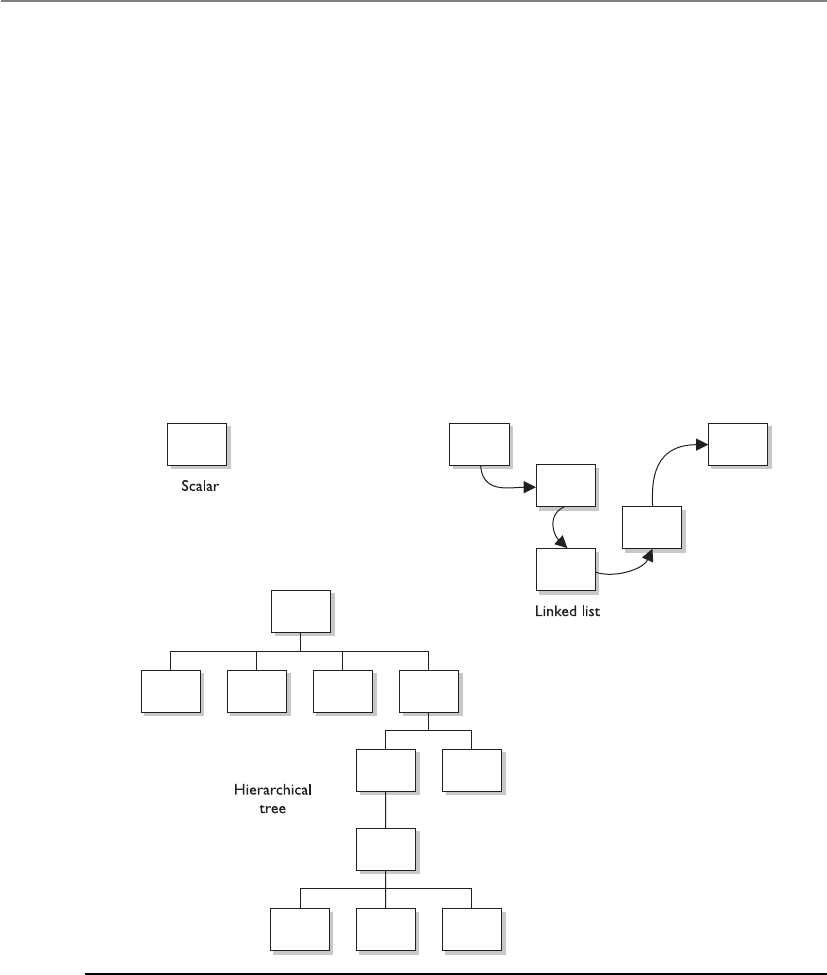
CISSP All-in-One Exam Guide
114 0
The structure can be simple in nature, like the scalar item, which represents a single
element that can be addressed by an identifier and accessed by a single address in stor-
age. The scalar items can be grouped in arrays, which provide access by indexes. Other
data structures include hierarchical structures by using multilinked lists that contain
scalar items, vectors, and possibly arrays. The hierarchical structure provides categoriza-
tion and association. If a user can make a request of an application to find all com-
puter books written on security, and that application returns a list, then this application
is using a hierarchical data structure of some kind. Figure 10-21 shows simple and
complex data structures.
So from a security perspective, not only do you need to understand the vulnerabili-
ties related to a poorly architected and designed piece of software, but you need to un-
derstand the complexity issues of how the software components communicate with
each other and the type of data format that is used.
Figure 10-21 Data structures range from very simple to very complex in nature and design.

Chapter 10: Software Development Security
1141
Key Terms
•Machine language A set of instructions in binary format that the
computer’s processor can understand and work with directly.
•Assembly language A low-level programming language that is the
mnemonic representation of machine-level instructions.
•Assemblers Tools that convert assembly code into the necessary
machine-compatible binary language for processing activities to
take place.
•High-level languages Otherwise known as third-generation
programming languages, due to their refined programming structures,
using abstract statements.
•Very high-level languages Otherwise known as fourth-generation
programming languages and are meant to take natural language-based
statements one step ahead.
•Natural languages Otherwise known as fifth-generation programming
languages, which have the goal to create software that can solve problems
by themselves. Used in systems that provide artificial intelligence.
•Compilers Tools that convert high-level language statements into the
necessary machine-level format (.exe, .dll, etc.) for specific processors to
understand.
•Interpreters Tools that convert code written in interpreted languages
to the machine-level format for processing.
•Garbage collector Identifies blocks of memory that were once
allocated but are no longer in use and deallocates the blocks and marks
them as free.
•Abstraction The capability to suppress unnecessary details so the
important, inherent properties can be examined and reviewed.
•Polymorphism Two objects can receive the same input and have
different outputs.
•Data modeling Considers data independently of the way the data
are processed and of the components that process the data. A process
used to define and analyze data requirements needed to support the
business processes.
•Cohesion A measurement that indicates how many different types of
tasks a module needs to carry out.
•Coupling A measurement that indicates how much interaction one
module requires for carrying out its tasks.
•Data structure A representation of the logical relationship between
elements of data.

CISSP All-in-One Exam Guide
1142
Distributed Computing
Many of our applications work in a client/server model, which means the smaller part
(client) of the application can run on different systems and the larger piece (server) of
the application runs on a single, and commonly more powerful, back-end system. The
server portion carries out more functionality and horsepower compared to the clients.
The clients will send the server portion requests, and the server will respond with re-
sults. Simple enough, but how do the client and server pieces actually carry out com-
munication with each other?
A distributed object computing model needs to register the client and server com-
ponents, which means to find out where they live on the network, what their names or
IDs are, and what type of functionality the different components carry out. So the first
step is basically, “Where are all the pieces, how do I call upon them when I need them,
and what do they do?” This organization must be put in place because the coordination
between the components should be controlled and monitored, and requests and re-
sults must be able to pass back and forth between the correct components.
Life might be easier if we had just one intercomponent communication architecture
for developers to follow, but what fun would that be? The various architectures work a
little differently from each other and are necessary to work in specific production envi-
ronments. Nevertheless, they all perform the basic function of allowing components
on the client and server side to communicate with each other.
Distributed Computing Environment
Distributed Computing Environment (DCE) is a standard developed by the Open Soft-
ware Foundation (OSF), also called Open Group. It is a client/server framework that is
available to many vendors to use within their products. This framework illustrates how
various capabilities can be integrated and shared between heterogeneous systems. DCE
provides a Remote Procedure Call (RPC) service, security service, directory service, time
service, and distributed file support. It was one of the first attempts at distributed com-
puting in the industry.
DCE is a set of management services with a communications layer based on RPC. It
is a layer of software that sits on the top of the network layer and provides services to
the applications above it. DCE and Distributed Component Object Model (DCOM)
offer much of the same functionality. DCOM, however, was developed by Microsoft
and is more proprietary in nature.
DCE’s time service provides host clock synchronization and enables applications to
determine sequencing and to schedule events based on this clock synchronization. This
time synchronization is for applications. Users cannot access this functionality directly.
The directory service enables users, servers, and resources to be contacted anywhere on
the network. When the directory service is given the name, it returns the network ad-
dress of the resource along with other necessary information. DCOM uses a globally
unique identifier (GUID), while DCE uses a universal unique identifier (UUID). They
are both used to uniquely identify users, resources, and components within an environ-
ment. DCE is illustrated in Figure 10-22.
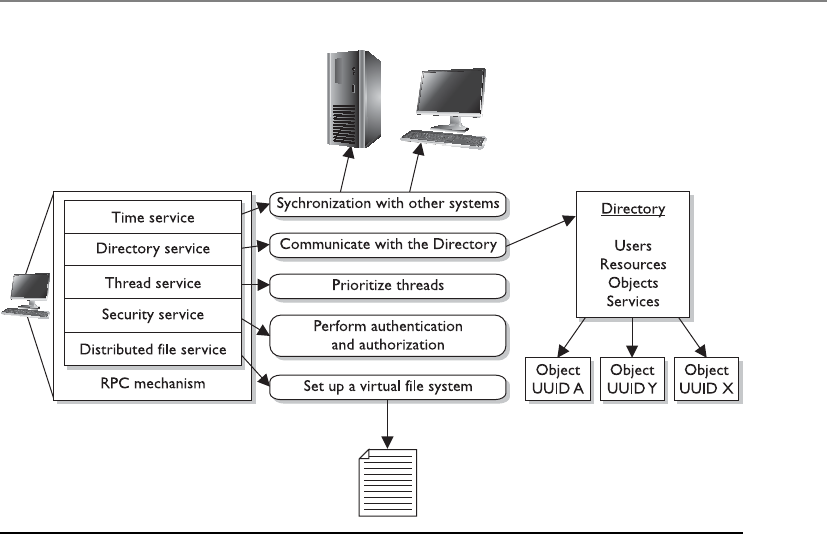
Chapter 10: Software Development Security
1143
The RPC function collects the arguments and commands from the sending program
and prepares them for transmission over the network. RPC determines the network
transport protocol to be used and finds the receiving host’s address in the directory
service. The thread service provides real-time priority scheduling in a multithreading
environment. The security services support authentication and authorization services.
The distributed file service (DFS), on the other hand, provides a single integrated file
system that all DCE users can use to share files. This is important because many envi-
ronments have different operating systems that cannot understand other file systems.
However, if DCE is being used, a DCE local file system exists alongside the native file
system.
DCE was the first attempt at standardizing heterogeneous system communication
through a client/server model. It provided many of the foundational concepts for dis-
tributed computing technologies that followed it, as in CORBA, DCOM, and J2EE,
which we will cover next.
CORBA and ORBs
Has anyone seen my ORB? I need to track down an object.
If we want software components to be able to communicate with each other, this
means standardized interfaces and communication methods must be used. This is the
only way interoperability can take place.
Figure 10-22 DCE provides many services, which are all wrapped into one technology.

CISSP All-in-One Exam Guide
114 4
Common Object Request Broker Architecture (CORBA) is an open object-oriented
standard architecture developed by the Object Management Group (OMG). It provides
interoperability among the vast array of software, platforms, and hardware in environ-
ments today. CORBA enables applications to communicate with one another no matter
where the applications are located or who developed them.
This standard defines the APIs, communication protocol, and client/server com-
munication methods to allow heterogeneous applications written in different program-
ming languages and run on various platforms to work together. The model defines
object semantics so the external visible characteristics are standard and are viewed the
same by all other objects in the environment. This standardization enables many dif-
ferent developers to write hundreds or thousands of components that can interact with
other components in an environment without having to know how the component
actually works. The developers know how to communicate with the components be-
cause the interfaces are uniform and follow the rules of the model.
In this model, clients request services from objects. The client passes the object a
message that contains the name of the object, the requested operation, and any neces-
sary parameters.
The CORBA model provides standards to build a complete distributed environ-
ment. It contains two main parts: system-oriented components (object request brokers
[ORBs] and object services) and application-oriented components (application objects
and common facilities). The ORB manages all communications between components
and enables them to interact in a heterogeneous and distributed environment, as
shown in Figure 10-23. The ORB works independently of the platforms where the ob-
jects reside, which provides greater interoperability.
Directs
to Client
Directs
request
Requests
service
Returns
response
response
to client
to server
CORBA
client
application
CORBA
client
application
Object Request Broker
Figure 10-23 The ORB enables different components throughout a network to communicate and
work with each other.

Chapter 10: Software Development Security
1145
ORB is the middleware that allows the client/server communication to take place
between objects residing on different systems. When a client needs some type of func-
tionality to be carried out, the ORB receives the request and is responsible for locating
the necessary object for that specific task. Once the object is found, the ORB invokes a
method (or operation), passes the parameters, and returns the result to the client. The
client software does not need to know where the object resides or go through the trou-
ble of finding it. That is the ORB’s job. As an analogy, when you call someone on the
mobile phone, you do not have to worry about physically locating that person so your
data can be passed back and forth. The mobile phones and the telecommunications
network take care of that for you.
Software that works within the CORBA model can use objects written in different
programming languages and reside on different operating systems and platforms, as
long as it follows all the rules to allow for such interoperability (see Figure 10-24).
ORBs provide communications between distributed objects. If an object on a work-
station must have an object on a server process data, it can make a request through the
ORB, which will track down the needed object and facilitate the communication path
between these two objects until the process is complete.
ORBs are mechanisms that enable objects to communicate locally or remotely.
They enable objects to make requests to objects and receive responses. This happens
transparently to the client and provides a type of pipeline between all corresponding
objects. Using CORBA enables an application to be usable with many different types of
ORBs. It provides portability for applications and tackles many of the interoperability
issues that many vendors and developers run into when their products are implement-
ed into different environments.
Figure 10-24 CORBA provides standard interface definitions, which offer greater interoperability
in heterogeneous environments.

CISSP All-in-One Exam Guide
1146
COM and DCOM
Component Object Model (COM) is a model that allows for interprocess communica-
tion within one application or between applications on the same computer system. The
model was created by Microsoft and outlines standardized APIs, component naming
schemes, and communication standards. So if I am a developer and I want my applica-
tion to be able to interact with the Windows operating system and the different applica-
tions developed for this platform, I will follow the COM outlined standards.
Distributed Component Object Model (DCOM) supports the same model for com-
ponent interaction, and also supports distributed interprocess communication (IPC).
COM enables applications to use components on the same systems, while DCOM en-
ables applications to access objects that reside in different parts of a network. So this is
how the client/server-based activities are carried out by COM-based operating systems
and/or applications.
Without DCOM, programmers would have to write much more complicated code
to find necessary objects, set up network sockets, and incorporate the services necessary
to allow communication. DCOM takes care of these issues (and more), and enables the
programmer to focus on his tasks of developing the necessary functionality within his
application. DCOM has a library that takes care of session handling, synchronization,
buffering, fault identification and handling, and data format translation.
DCOM works as the middleware that enables distributed processing and provides
developers with services that support process-to-process communications across net-
works (see Figure 10-25).
Other types of distributed interprocessing technologies provide similar functional-
ity: ORB, message-oriented middleware (MOM), Open Database Connectivity (ODBC),
and so on. DCOM provides ORB-like services, data connectivity services, distributed
messaging services, and distributed transaction services layered over its RPC mecha-
nism. DCOM integrates all of these functionalities into one technology that uses the
same interface as COM.
Figure 10-25 DCOM provides communication mechanisms in a distributed environment and
works in the COM architecture.
Chapter 10: Software Development Security
1147
DCOM has been faded out and replaced with the .NET framework, which is mainly
used for applications that run in Windows environments. The framework has a large li-
brary that different applications can call upon. The libraries provide functions as in data
access, database connectivity, network communication, etc. Programs that are written to
work in this framework execute in application virtual machines, which provides memo-
ry management, exception handling, and many types of security services. A program that
is written to work in this type of environment is compiled to an intermediate code type
(Common Language Runtime), and then when the code is executed at run time, this
happens within the application virtual machine, as illustrated in Figure 10-26.
Object Linking and Embedding
Object linking and embedding (OLE) provides a way for objects to be shared on a local
personal computer and to use COM as their foundation. OLE enables objects—such as
graphics, clipart, and spreadsheets—to be embedded into documents. The capability
for one program to call another program is called linking. The capability to place a piece
of data inside a foreign program or document is called embedding.
.NET compatible languages compile to a
second platform-neutral language called
Common Intermediate Language (CIL).
The platform-specific Common Language
Runtime (CLR) compiles CIL to machine-
readable code that can be executed on the
current platform.
Common language
infrastructure
Common
language
runtime
Common
intermediate
language
C #
code
Compiler
VB.NET
code
J#
code
01001100101011
11010101100110
Figure 10-26 .NET Framework components

CISSP All-in-One Exam Guide
114 8
OLE also allows for linking different objects and documents. For example, when
Chrissy creates a document that contains a Uniform Resource Locator (URL), that URL
turns blue and is underlined, indicating a user can just double-click it to be taken to the
appropriate web site. This is an example of linking capabilities. If Chrissy inserts a
spreadsheet into her document, this is also an instance of embedding. If she needs to
edit the spreadsheet, she can double-click the spreadsheet, and the operating system
will open the correct environment (which might be Excel) to let her make her changes.
This technology was evolved to work on the World Wide Web and is called ActiveX,
which we cover later in this chapter. The components are meant to be portable. ActiveX
components can run on any platform that supports DCOM (using the COM model) or
that communicates using DCOM services.
Java Platform, Enterprise Edition
Another distributed computing model is based upon the Java programming language,
which is the Java Platform, Enterprise Edition (J2EE). Just as the COM and CORBA
models were created to allow a modular approach to programming code with the goal
of interoperability, J2EE defines a client/server model that is object oriented and plat-
form independent.
J2EE is an enterprise Java computing platform. This means it is a framework that is
used to develop enterprise software written mainly in the Java programming language.
It provides APIs for networking services, fault tolerance, security, and web services for
large-scale, multi-tiered network applications. It takes advantage of the “Write Once,
Run Anywhere” capability of Java; it provides a Java-based, database-access API; and its
interprocess communications are based upon CORBA. The main goal is to have a stan-
dardized method of implementing back-end code that carries out business logic for
enterprise-wide applications.
The J2EE application server can handle scalability, concurrency, transactions, and
various security services for the client. The goal is to allow the developers to be able to
concentrate on the business logic functionality instead of the “plumbing” that is under
the covers.
Service-Oriented Architecture
While many of the previously described distributed computing technologies are still in
use, the industry has moved toward and integrated another approach in providing com-
monly needed application functionality and procedures across various environments.
Aservice-oriented architecture (SOA) provides standardized access to the most needed
services to many different applications at one time. Application functionality is sepa-
rated into distinct units (services) and offered up through well-defined interfaces and
data-sharing standardization. This means that individual applications do not need to
possess the same redundant code and functionality. The functionality can be offered by
an individual entity and then all other applications can just call upon and use the one
instance. This is really the crux of all distributed computing technologies and ap-
proaches—SOA is just a more web-based approach.

Chapter 10: Software Development Security
1149
As an analogy, every home does not have its own electrical power grid. A geograph-
ical area has a power grid, and all homes and offices tap into that one resource. There
is a standardized method of each home accessing the power grid and obtaining the
energy it needs. The same concept applies with SOA: Applications access one central-
ized place that provides the functionality they require. A simple interface abstracts
(hides) the underlying complexity, which allows for applications to call upon the ser-
vices without needing to understand the service provider’s programming language or
its platform implementation. For services to be able to be used (and reused) in an in-
teroperable manner, they must be modular in nature, autonomous, loosely coupled,
follow standardized service identification and categorization, and provide provisioning
and delivery.
The entity that will provide a service in an SOA environment sends a service-de-
scription document to a service broker. The service broker is basically a map of all the
services available within a specific environment. When an application needs a specific
service, it makes a call to the broker, which points the application to the necessary ser-
vice provider, as shown in Figure 10-27.
Services within an SOA are usually provided through web services. A web service al-
lows for web-based communication to happen seamlessly using web-based standards,
as in Simple Object Access Protocol (SOAP), HTTP, Web Services Description Language
(WSDL), Universal Description, Discovery and Integration (UDDI), and Extensible Mark-
up Language (XML). WSDL provides a machine-readable description of the specific op-
erations provided by the service. UDDI is an XML-based registry that lists available
services. It provides a method for services to be registered by service providers and lo-
cated by service consumers. UDDI provides the mechanisms to allow businesses around
the world to publish their services and others to discover and use these services. When a
service consumer needs to know what service is available and where it is located, it sends
a message to the service broker. Through its UDDI approach, the broker can provide ac-
cess to the WSDL document that describes the requirements for interacting with the re-
quested service. The service consumer now knows how to locate the service provider and
Publish
Interact
ServiceClient
Find
Service
broker
Service
provider
Service
consumer
Service
contract
......
......
Figure 10-27
Services are located
through brokers in
an SOA.

CISSP All-in-One Exam Guide
1150
how to communicate with it. The consumer then requests and accesses the service using
SOAP, which is an XML-based protocol that is used to exchange messages between a re-
quester and provider of a web service. Figure 10-28 illustrates how these different com-
ponents work together.
Web services commonly provide the functional building blocks for an SOA. New
services are represented in this format using these standards, and/or existing applica-
tions are wrapped within a web service structure to allow for legacy systems to partici-
pate in SOA environments also.
There has been controversy and confusion on the distinction and similarities among
SOA, mashups, Web 2.0, Software as a Service (SaaS), and cloud computing. The evolu-
tion of Web 1.0 to Web 2.0 pertains to the move from static web sites that provide
content and some functionality to an Internet where everyone can basically be a con-
tent provider and consumer. Through the use of Facebook, YouTube, MySpace, Twitter,
Flickr, and other sites, normal users can provide content to the digital world without
having to understand HTML, JavaScript, web server software, and other technologies.
Web sites provide intricate functionality instead of just static content. The extensive
manner in which information sharing, collaboration, and interaction can happen
through social networking sites, blogs, wikis, hosted services, mashups, and video shar-
ing really embody the essences of the concept of Web 2.0. This makes for a more exciting
Internet, but increased complexity for security professionals, who are responsible for
understanding and securing software that maintains sensitive information.
Amashup is the combination of functionality, data, and presentation capabilities of
two or more sources to provide some type of new service or functionality. Open APIs
and data sources are commonly aggregated and combined to provide a more useful and
powerful resource. For example, the site http://hireadroid.com combines the function-
UDDI
Service providerService requester
WSDLWSDL
SOAP
Service
broker
Figure 10-28 Web services are posted and used via standard approaches.

Chapter 10: Software Development Security
1151
ality of APIs provided by the following sites: CareerBuilder, LinkedIn, LinkUp Job
Search Engine, and Simply Hired Jobs.
The site www.mibazaar.com combines Google Maps, Yahoo! Geocoding, and You-
Tube. And the site www.2realestateauctions.com combines eBay and Google Search,
allowing a user to see what real estate is for sale in specific areas of the United States.
Software as a Service (SaaS) is a model that allows applications and data to be cen-
trally hosted and accessed by thin clients, commonly web browsers. It is similar to the
old centralized mainframe model, but commonly takes place over the Internet. SaaS
delivers many business applications providing functionality, as in customer relation-
ship management (CRM), enterprise resource planning (ERP), human resource man-
agement (HRM), content management (CM), and more. Most people are familiar with
Salesforce.com, which was one of the first SaaS products to become available.
Cloud computing is a method of providing computing as a service rather than as a
physical product. It provides processing computation capabilities, storage, and software
without the end user needing to know or worry about the physical location and/or
configuration of the devices and software that provide this functionality. Cloud com-
puting extends technical capabilities through a subscription-based or pay-per-use
service structure. Scalable resources are consolidated and commonly used in a virtual-
ized manner. This technology is covered more in depth in Chapter 6, but it is being
presented here to illustrate the differences and similarities pertaining to the outgrowth
of Internet capabilities and the use of distributed computing technologies.
So DCE was the first attempt at providing client/server distributed computing capa-
bilities and worked mainly in Unix-based environments. CORBA is a model that allows
for interoperability and distributed computing for mostly non-Microsoft applications.
SOAP
What if we need applications running on different operating systems, which were
written in different programming languages, to communicate over web-based
communication methods? We would use Simple Object Access Protocol (SOAP).
SOAP is an XML-based protocol that encodes messages in a web service environ-
ment. It actually defines an XML schema of how communication is going to take
place. The SOAP XML schema defines how objects communicate directly.
So SOAP is a component that helps provide distributed computing through
the use of web applications. A request for an application comes from one com-
puter (client) and is transmitted over a web-based environment (i.e., Internet) to
another computer (server). While there are various distributed computing tech-
nologies, SOAP makes it easy by using XML and HTTP, which are already stan-
dard web formats.
One advantage of SOAP is that the program calls will most likely get through
firewalls because HTTP communication is commonly allowed. This helps ensure
that the client/server model is not broken by getting denied by a firewall in be-
tween the communicating entities.

CISSP All-in-One Exam Guide
1152
Software that needed to work in a distributed computing environment of mostly Mi-
crosoft products first followed the DCOM model, which evolved into the .NET frame-
work. Large enterprise-wide applications that are based upon Java can carry out
distributed computing by following the J2EE model. And web-based distributed com-
puting happens through web services and SOA frameworks. Each of these has the same
basic goal, which is to allow a client application component on one computer to be
able to communicate with a server application on another computer. The biggest differ-
ence between these models pertains to the environment the applications will be work-
ing within: Unix, Windows, heterogeneous, or web-based.
While distributed computing technologies allow for various systems and applica-
tions to communicate and share functionality, this can add layers of complexity when
it comes to security. The client and server portions need to carry out mutual authentica-
tion to ensure that hackers do not introduce rogue applications and carry out man-in-
the-middle attacks. Each communicating component needs to share similar
cryptographic functionality so that the necessary encryption can take place. The integ-
rity of the data and messages that are passed between communicating components
needs to be protected. End-to-end secure transmission channels might be necessary to
protect communication data. The list of security requirements can go on and on, but
the point is that just getting software components to be able to communicate in a het-
erogeneous environment can be challenging—but securing these complex communica-
tion methods can prove to be maddening.
As a security professional you really need to understand how software talks to other
software under the covers. You can patch systems, implement access control lists (ACLs),
harden operating systems, and more but still have unprotected RPC traffic taking place
between applications that are totally insecure. Security has to be integrated at every
level, including interprocess communication channels.
Key Terms
•Distributed Computing Environment (DCE) The first framework
and development toolkit for developing client/server applications to
allow for distributed computing.
•Common Object Request Broker Architecture (CORBA) Open object-
oriented standard architecture developed by the Object Management
Group (OMG). The standards enable software components written
in different computer languages and running on different systems to
communicate.
•Object request broker (ORB) Manages all communications between
components and enables them to interact in a heterogeneous and
distributed environment. The ORB acts as a “broker” between a client
request for a service from a distributed object and the completion of
that request.

Chapter 10: Software Development Security
1153
•Component Object Model (COM) A model developed by Microsoft
that allows for interprocess communication between applications
potentially written in different programming languages on the same
computer system.
•Object linking and embedding (OLE) Provides a way for objects to
be shared on a local computer and to use COM as their foundation.
It is a technology developed by Microsoft that allows embedding and
linking to documents and other objects.
•Java Platform, Enterprise Edition (J2EE) Is based upon the
Java programming language, which allows a modular approach to
programming code with the goal of interoperability. J2EE defines a
client/server model that is object oriented and platform independent.
•Service-oriented architecture (SOA) Provides standardized access to
the most needed services to many different applications at one time.
Service interactions are self-contained and loosely coupled, so that each
interaction is independent of any other interaction.
•Simple Object Access Protocol (SOAP) An XML-based protocol that
encodes messages in a web service environment.
•Mashup The combination of functionality, data, and presentation
capabilities of two or more sources to provide some type of new service
or functionality.
•Software as a Service (SAAS) A software delivery model that allows
applications and data to be centrally hosted and accessed by thin
clients, commonly web browsers. A common delivery method of cloud
computing.
•Cloud computing A method of providing computing as a service
rather than as a physical product. It is Internet-based computing,
whereby shared resources and software are provided to computers and
other devices on demand.
Mobile Code
Code that can be transmitted across a network, to be executed by a system or device on
the other end, is called mobile code. There are many legitimate reasons to use mobile
code—for example, web browser applets that may execute in the background to down-
load additional content for the web page, such as plug-ins that allow you to view a video.
The cautions arise when a web site downloads code intended to do malicious or
compromising actions, especially when the recipient is unaware that the compromising
activity is taking place. If a web site is compromised, it can be used as a platform from
which to launch attacks against anyone visiting the site and just browsing. Some of the
common types of mobile code are covered in the next sections.
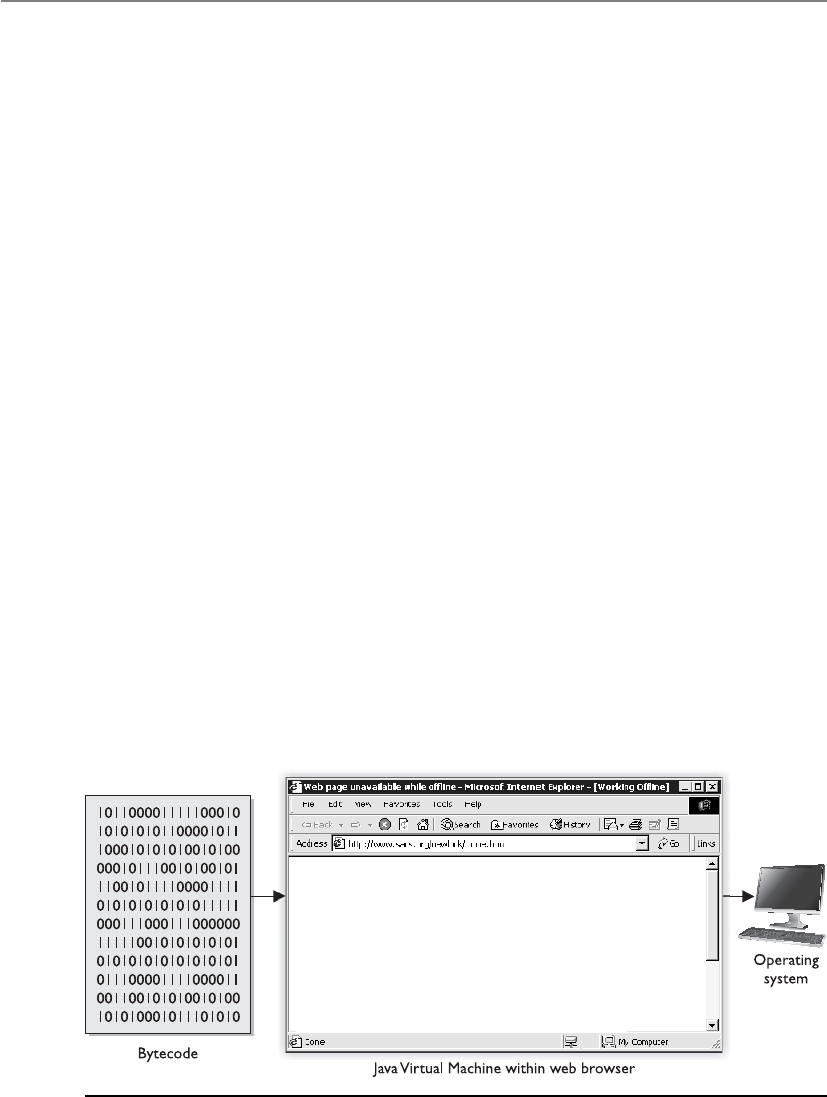
CISSP All-in-One Exam Guide
1154
Java Applets
Java is an object-oriented, platform-independent programming language. It is em-
ployed as a full-fledged programming language and is used to write complete programs
and small components, called applets, which commonly run in a user’s web browser.
Other languages are compiled to object code for a specific operating system and
processor. This is why a particular application may run on Windows but not on Macin-
tosh. An Intel processor does not necessarily understand machine code compiled for an
AMD processor, and vice versa. Java is platform independent because it creates interme-
diate code, bytecode, which is not processor-specific. The Java Virtual Machine (JVM)
converts the bytecode to the machine code that the processor on that particular system
can understand (see Figure 10-29). Let’s quickly walk through these steps:
1. A programmer creates a Java applet and runs it through a compiler.
2. The Java compiler converts the source code into bytecode (non-processor-
specific).
3. The user downloads the Java applet.
4. The JVM converts the bytecode into machine-level code (processor-specific).
5. The applet runs when called upon.
When an applet is executed, the JVM will create a virtual machine, which provides
an environment called a sandbox. This virtual machine is an enclosed environment in
which the applet carries out its activities. Applets are commonly sent over within a re-
quested web page, which means the applet executes as soon as it arrives. It can carry out
malicious activity on purpose or accidentally if the developer of the applet did not do
his part correctly. So the sandbox strictly limits the applet’s access to any system re-
sources. The JVM mediates access to system resources to ensure the applet code behaves
and stays within its own sandbox. These components are illustrated in Figure 10-30.
Figure 10-29 The JVM interprets bytecode to machine code for that specific platform.
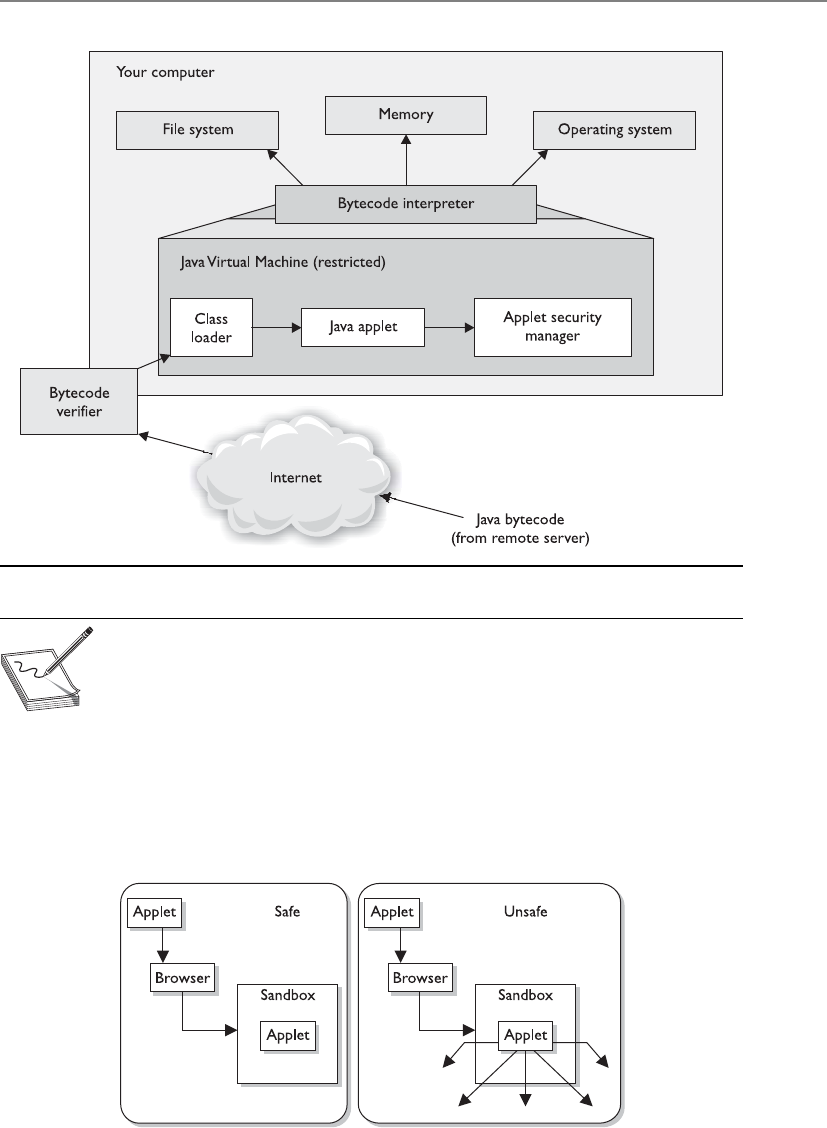
Chapter 10: Software Development Security
1155
NOTE
NOTE The Java language itself provides protection mechanisms, as in garbage
collection, memory management, validating address usage, and a component
that verifies adherence to predetermined rules.
However, as with many other things in the computing world, the bad guys have
figured out how to escape their confines and restrictions. Programmers have figured out
how to write applets that enable the code to access hard drives and resources that are
supposed to be protected by the Java security scheme. This code can be malicious in
nature and cause destruction and mayhem to the user and her system.
Figure 10-30 Java’s security model

CISSP All-in-One Exam Guide
1156
ActiveX Controls
ActiveX is a Microsoft technology composed of a set of OOP technologies and tools
based on COM and DCOM. A programmer uses these tools to create ActiveX controls,
which are self-sufficient programs similar to Java applets. ActiveX controls can be re-
used by many applications within one system or different systems within an environ-
ment. These controls can be downloaded from web sites to add extra functionality (as
in providing animations for web pages), but they are also components of Windows
operating systems themselves (dynamic link libraries [DLLs]) and carry out common
operating system tasks.
ActiveX controls are completely self-sufficient programs that can be executed in the
Windows environment. They allow web browsers to execute other software applica-
tions within the browser that can play media files, open Portable Document Files (PDF)
documents, etc. An ActiveX control can be automatically downloaded and executed by
a web browser. Once downloaded, an ActiveX control in effect becomes part of the op-
erating system. Initially ActiveX controls were intended to work on individual systems
only, and hence there weren’t many security issues. It was only when object linking and
embedding (OLE) was used for embedding ActiveX controls into web pages that secu-
rity issues started emerging. The problem lay in the fact that ActiveX controls shared the
privilege levels of the current user on a system, and since these controls could be built
by anyone, a malicious ActiveX control would have sufficient privilege to compromise
the system security and other systems connected through it. This was worsened by the
fact that ActiveX controls were able to download further ActiveX components without
user authentication, creating a very favorable environment for worm propagation.
ActiveX comes with a component container feature that allows multiple applica-
tions and networked computers to reuse active components. This drastically reduced
the program development time. This feature too has been exploited by attackers to gain
access to critical files on networked systems. Numerous patches have been released to
counter reported ActiveX exploits.
ActiveX technology provides security levels and authentication settings, letting users
control the security of the ActiveX components they download. Unlike Java applets,
ActiveX components are downloaded to a user’s hard drive when he chooses to add the
functionality the component provides. This means the ActiveX component has far
greater access to the user’s system compared to Java applets.
The security-level setting of the user’s browser dictates whether an ActiveX compo-
nent is downloaded automatically or whether the user is first prompted with a warning.
The security level is configurable by the user via his browser controls. As the security
level increases, so too does the browser’s sensitivity level to digitally signed and un-
signed components and controls, and to the initialization of ActiveX scripts.
The main security difference between Java applets and ActiveX controls is that Java
sets up a sandbox for the applet code to execute in, and this restricts the code’s access
to resources within the user’s computer. ActiveX uses Authenticode technology, which
relies on digital certificates and trusting certificate authorities. (Signing, digital certifi-
cates, and certificate authorities are explained in detail in Chapter 7.) Although both
are extremely important and highly used technologies, they have inherent flaws. Java
has not been able to ensure that all code stays within the sandbox, which has caused

Chapter 10: Software Development Security
1157
several types of security compromises. Authenticode doesn’t necessarily provide secu-
rity—in fact, it often presents annoying dialog boxes to users. Since most users do not
understand this technology, they continually click OK because they don’t understand
the risks involved.
Web Security
When it comes to the Internet and web-based applications, many security situations are
unique to this area. Companies use the Internet to expose products or services to the
widest possible audience; thus, they need to allow an uncontrollable number of enti-
ties on the Internet to access their web servers. In most situations companies must open
up the ports related to the web-based traffic (80 and 443) on their firewalls, which are
commonly used avenues for a long list of attacks.
The web-based applications themselves are somewhat mysterious to the purveyors
of the Internet as well. If you want to sell your homemade pies via the Internet, you’ll
typically need to display them in graphic form and allow some form of communication
for questions (via e-mail or online chat). You’ll need some sort of shopping cart if you
want to actually collect money for your pies, and typically you’ll have to deal with in-
terfacing with shipping and payment processing channels. If you are a master baker,
you probably aren’t a webmaster, so now you’ll have to rely on someone else to set up
Key Terms
•Mobile code Code that can be transmitted across a network, to be
executed by a system or device on the other end.
•Java applets Small components (applets) that provide various
functionalities and are delivered to users in the form of Java bytecode.
Java applets can run in a web browser using a Java Virtual Machine
(JVM). Java is platform independent; thus, Java applets can be executed
by browsers for many platforms.
•Sandbox A virtual environment that allows for very fine-grained
control over the actions that code within the machine is permitted to
take. This is designed to allow safe execution of untrusted code from
remote sources.
•ActiveX A Microsoft technology composed of a set of OOP
technologies and tools based on COM and DCOM. It is a framework
for defining reusable software components in a programming
language–independent manner.
•Authenticode A type of code signing, which is the process of digitally
signing software components and scripts to confirm the software author
and guarantee that the code has not been altered or corrupted since it
was digitally signed. Authenticode is Microsoft’s implementation of
code signing.

CISSP All-in-One Exam Guide
1158
your web site and load the appropriate applications on it. Should you develop your
own PHP- or Java-based application, the benefits could be wonderful, having a custom-
ized application that would further automate your business, but the risks of developing
an in-house application (especially if it’s your first time) are great if you haven’t devel-
oped the methodology, development process, quality assurance, and change control, as
well as identified the risks and vulnerabilities.
The alternative to developing your own web application is using an off-the-shelf
variety instead. Many commercial and free options are available for nearly every e-
commerce need. These are written in a variety of languages, by a variety of entities, so
now the issue is, “Whom should we trust?” Do these developers have the same pro-
cesses in place that you would have used yourself? Have these applications been devel-
oped and tested with the appropriate security in mind? Will these applications introduce
any vulnerabilities along with the functionality they provide? Does your webmaster
understand the security implications associated with the web application he suggests
you use on your site for certain functionality? These are the problems that plague not
only those wanting to sell homemade pies on the Internet, but also financial institu-
tions, auction sites, and everyone who is involved in e-commerce. With these issues in
mind, let’s try to define the most glaring threats associated with web-based applications
and transactions.
Specific Threats for Web Environments
The most common types of vulnerabilities, threats, and complexities are covered in the
following sections, which we will explore one at a time:
• Information gathering
• Administrative interfaces
• Authentication and access control
• Input validation
• Parameter validation
• Session management
Information Gathering
Information gathering is usually the first step in an attacker’s methodology. Information
gathered may allow an attacker to infer additional information that can be used to
compromise systems. Unfortunately, most of the information gathered is from sources
that are available to anyone who asks. The big search engines make it even easier for an
attacker to gather information because they aggregate information and can return re-
sults from the search engine’s cache without the attacker ever connecting to the target
company’s web server.
The majority of the culprits to information disclosure are developers and web serv-
er administrators who are just trying to do their jobs. The comments in the HTML
source code put in by the developer to explain a routine or the backup files that have
been stored on the web server by the administrators aren’t glaring security issues, but if

Chapter 10: Software Development Security
1159
they can be accessed by unauthorized users, they could reveal much more than an or-
ganization would normally allow. Even the error messages returned by the server when
an improper request is made can contain physical paths to the database, version num-
bers, and so on, which can be interpreted by an attacker as a foothold to gain unauthor-
ized access to a system.
More sophisticated attackers go beyond the search engines to explore the contents
of all accessible files on a server for possible clues to the structure of the internal net-
work or the connection string used by the web server to connect to the database server.
In order for a web server to provide the active content and common interfaces that
web users demand these days, the servers must access data sources, process code, and
return the results to the web clients. To employ these mechanisms, the appropriate code
must be written and presented to the web browser in the appropriate format. One tech-
nology, called server side includes (SSI), allows web developers to reuse content by in-
serting the same content into multiple web documents. This typically involves use of an
include statement in the code and a file (.inc). However, if these files are able to be ac-
cessed by an attacker, the code would be visible and could be changed to “include”
other files containing sensitive information. Other technologies such as Active Server
Pages (ASP) are used to provide an “active” user environment. These files can disclose
any contained sensitive code if they were able to be viewed. Developers should avoid
using any sensitive code in the SSI file or ASP files (like database connection strings or
some proprietary business logic) so in the event the document should ever find itself in
anyone’s hands unparsed by the server, the code isn’t readily available. There have been
too many vulnerabilities with these types of files in the past to assume they will not be
able to be read.
Another tip that will allow developers to avoid exposing the physical location or
passwords used to connect to a database is to use a Data Source Name (DSN). This is a
logical name for the data store, rather than the drive letter and directory location of the
database, that can be used when programming to the ODBC interface. When an ODBC
DSN is used to store these values, they are stored in the registry of the system, not in the
code itself. This technique actually makes the code easier to modify since the connec-
tion strings are a variable stored in the registry, so it would be a good best practice.
The countermeasures to the information-gathering techniques used by attackers are
to be aware of the information you are making available to the public and limit its
availability to only the minimal amount necessary. Developers should be aware of the
potential of their code to be viewed by someone outside of the organization, and ad-
ministrators should routinely check search engines for references to their web sites, e-
mail addresses, file types, and data stores. Many web sites and entire books are
dedicated to information gathering via publicly available databases, so it would be a
good example of due diligence to check these out.
Administrative Interfaces
Everyone wants to work from the coffee shop or at home in their pajamas. Webmasters
and web developers are particularly fond of this concept. Although some systems man-
date that administration be carried out from a local terminal, in most cases, there is an
interface to administer the systems remotely, even over the Web. While this may be

CISSP All-in-One Exam Guide
1160
convenient to the webmaster, it also provides an entry point into the system for an un-
authorized user.
Since we are talking about the Web, using a web-based administrative interface is,
in most opinions, a bad idea. If we’ve identified the vulnerability and are willing to ac-
cept the risk, the administrative interface should be at least (if not more) secure as the
web application or service we are hosting.
A bad habit that’s found even in high-security environments is hard-coding authen-
tication credentials into the links to the management interfaces, or enabling the “re-
member password” option. This does make it easier on the administrator but offers up
too much access to someone who stumbles across the link, regardless of their intentions.
Most commercial software and web application servers install some type of admin-
istrative console by default. Knowing this and remembering the information-gathering
techniques we’ve already covered should be enough for organizations to take this threat
seriously. If the interface is not needed, it should be disabled. When custom applica-
tions are developed, the existence of management interfaces is less known, so consider-
ation should be given to this in policy and procedures.
The simple countermeasure for this threat requires that the management interfaces
be removed, but this may upset your administrators. Using a stronger authentication
mechanism would be better than the standard username/password scenario. Control-
ling which systems are allowed to connect and administer the system is another good
technique. Many systems allow specific IP addresses or network IDs to be defined that
only allow administrative access from these stations.
Ultimately, the most secure management interface for a system would be one that
is out-of-band, meaning a separate channel of communication is used to avoid any
vulnerabilities that may exist in the environment that the system operates in. An ex-
ample of out-of-band would be using a modem connected to a web server to dial in
directly and configure it using a local interface, as opposed to connecting via the Inter-
net and using a web interface. This should only be done through an encrypted channel,
as in Secure Shell (SSH).
Authentication and Access Control
If you’ve used the Internet for banking, shopping, registering for classes, or working
from home, you most likely logged in through a web-based application. From the con-
sumer side or the provider side, the topic of authentication and access control is an
obvious issue. Consumers want an access control mechanism that provides the security
and privacy they would expect from a trusted entity, but they also don’t want to be too
burdened by the process. From the service providers’ perspective, they want to provide
the highest amount of security to the consumer that performance, compliance, and cost
will allow. So, from both of these perspectives, typically usernames and passwords are
still used to control access to most web applications.
Passwords do not provide much confidence when it comes to truly proving the iden-
tity of an entity. They are used because they are cheap, already built into existing soft-
ware, and users are comfortable with using them. But passwords really don’t prove that
the user “jsmith” is really John Smith; they just prove that the person using the account
jsmith has typed in the correct password. It wouldn’t be a stretch to think of a system

Chapter 10: Software Development Security
1161
that held sensitive information (medical, financial, and so on) to be an identified target
for attackers. Mining usernames via search engines or simply using common usernames
(like jsmith) and attempting to log in to these sites is very common. If you’ve ever signed
up at a web site for access to download a “free” document or file, what username did you
use? Is it the same one you use for other sites? Maybe even the same password? Crafty
attackers might be mining information via other web sites that seem rather friendly, of-
fering to evaluate your IQ and send you the results, or enter you into a sweepstakes. Re-
member that untrained, unaware users are an organization’s biggest threat.
Many financial organizations that provide online banking functionality have im-
plemented multifactor authentication requirements. A user may need to provide a user-
name, password, and one-time password value that were sent to their cell phone during
the authentication process.
Finally, a best practice would be to exchange all authentication information via a
secure mechanism. This will typically mean to encrypt the credential and the channel
of communication through Secure Sockets Layer (SSL) or Transport Layer Security
(TLS). Some sites, however, still don’t use encrypted authentication mechanisms and
have exposed themselves to the threat of attackers sniffing usernames and passwords.
Input Validation
Web servers are just like any other software applications; they can only carry out the
functionality their instructions dictate. They are designed to process requests via a cer-
tain protocol. When a person interacts with their web browser and types in a request for
http://www.logicalsecurity.com/index.htm, he is using a protocol called Hypertext
Transfer Protocol (HTTP) to request the file “index.htm” from the server “www” in the
“logicalsecurity.com” namespace. A request in this form is called a Uniform Resource
Locator (URL). Like many situations in our digital world, there is more than one way to
request something because computers speak several different “languages”—such as bi-
nary, hexadecimal, and many encoding mechanisms—each of which is interpreted and
processed by the system as valid commands. Validating that these requests are allowed
is part of input validation and is usually tied to coded validation rules within the web
server software. Attackers have figured out how to bypass some of these coded valida-
tion rules.
Some input validation attack examples follow:
•Path or directory traversal This attack is also known as the “dot dot slash”
because it is perpetrated by inserting the characters “../” several times into
a URL to back up or traverse into directories that weren’t supposed to be
accessible from the Web. The command “../” at the command prompt tells
the system to back up to the previous directory (i.e., “cd ../”). If a web server’s
default directory is c:\inetpub\www, a URL requesting http://www.website.
com/scripts/../../../../../windows/system32/cmd.exe?/c+dir+c:\ would issue
the command to back up several directories to ensure it has gone all the way
to the root of the drive and then make the request to change to the operating
system directory (windows\ system32) and run the cmd.exe listing the
contents of the C: drive. Access to the command shell allows extensive
access for the attacker.

CISSP All-in-One Exam Guide
1162
•Unicode encoding Unicode is an industry-standard mechanism developed
to represent the entire range of over 100,000 textual characters in the world
as a standard coding format. Web servers support Unicode to support
different character sets (for different languages), and, at one time, many web
server software applications supported it by default. So, even if we told our
systems to not allow the “../” directory traversal request mentioned earlier,
an attacker using Unicode could effectively make the same directory traversal
request without using “/” but with any of the Unicode representations of that
character (three exist: %c1%1c, %c0%9v, and %c0%af). That request may slip
through unnoticed and be processed.
•URL encoding Ever notice a “space” that appears as “%20” in a URL in a
web browser? The “%20” represents the space because spaces aren’t allowed
characters in a URL. Much like the attacks using Unicode characters, attackers
found that they could bypass filtering techniques and make requests by
representing characters differently.
Besides just serving static files to users, almost every web application is going to
have to accept some input. When you use the Web, you are constantly asked to input
information such as usernames, passwords, and credit card information. To a web ap-
plication, this input is just data that are to be processed like the rest of the code in the
application. Usually, this input is used as a variable and fed into some code that will
process it based on its logic instructions, such as IF [username input field]=X AND
[password input field]=Y THEN Authenticate. This will function well assuming there is
always correct information put into the input fields. But what if the wrong information
is input? Developers have to cover all the angles. They have to assume that sometimes
the wrong input will be given, and they have to handle that situation appropriately. To
deal with this, a routine is usually coded in that will tell the system what to do if the
input isn’t what was expected.
The buffer overflow is probably the most notorious of input validation mistakes. A
buffer is an area reserved by an application to store something in it, such as user input.
After the application receives the input, an instruction pointer directs the application to
carry out an instruction with the input that’s been put in the buffer. A buffer overflow
occurs when an application erroneously allows an invalid amount of input to be writ-
ten into the buffer area, overwriting the instruction pointer in the code that told the
program what to do with the input. Once the instruction pointer is overwritten, what-
ever code has been placed in the buffer can then be executed, all under the security
context of the application.
Client-side validation is when the input validation is done at the client before it is
even sent back to the server to process. If you’ve missed a field in a web form and before
clicking Submit, you immediately receive a message informing you that you’ve forgot-
ten to fill in one of the fields, you’ve experienced client-side validation. This is a good
idea, rather than sending incomplete requests to the server and the server having to
send back an error message to the user. The problem arises when the client-side valida-
tion is the only validation that takes place. In this situation, the server trusts that the
client has done its job correctly and processes the input as if it is valid. In normal situ-
ations, accepting this input would be fine, but when an attacker can intercept the traffic

Chapter 10: Software Development Security
1163
between the client and server and modify it or just directly make illegitimate requests
to the server without using a client, a compromise is more likely.
In an environment where input validation is weak, an attacker will try to input spe-
cific operating system commands into the input fields instead of what the system was
expecting (such as the username and password) in an effort to trick the system into
running them. Remember that software can only do what it’s told, and if an attacker
can get it to run a command, it will be able to execute the commands as if they came
from a legitimate application. If the web application is written to access a database, as
most are, there is the threat of SQL injection, where instead of valid input, the attacker
puts actual database commands into the input fields, which are then parsed and run by
the application. SQL (Structured Query Language) statements can be used by attackers
to bypass authentication and reveal all records in a database.
Remember that different layers of a system (see Figure 10-31) all have their own
vulnerabilities that must be identified and fixed.
Figure 10-31 Attacks can take place at many levels.

CISSP All-in-One Exam Guide
116 4
A similar sounding attack is cross-site scripting, which has replaced buffer overflows
as the biggest threat in web applications. The term “cross-site scripting” (XSS) refers to
an attack where a vulnerability is found on a web site that allows an attacker to inject
malicious code into a web application. XSS attacks enable an attacker to inject their
malicious code (in client-side scripting languages, such as JavaScript) into vulnerable
web pages. When an unsuspecting user visits the infected page, the malicious code ex-
ecutes on the victim’s browser and may lead to stolen cookies, hijacked sessions, mal-
ware execution, bypassed access control, or aid in exploiting browser vulnerabilities.
There are three different XSS vulnerabilities:
•Nonpersistent XSS vulnerabilities, or reflected vulnerabilities, occur when an
attacker tricks the victim into processing a URL programmed with a rogue
script to steal the victim’s sensitive information (cookie, session ID, etc.).
The principle behind this attack lies in exploiting the lack of proper input
or output validation on dynamic web sites.
•Persistent XSS vulnerabilities, also known as stored or second order
vulnerabilities, are generally targeted at web sites that allow users to input
data which are stored in a database or any other such location, e.g., forums,
message boards, guest books, etc. The attacker posts some text that contains
some malicious JavaScript, and when other users later view the posts, their
browsers render the page and execute the attackers JavaScript.
•DOM (Document Object Model)–based XSS vulnerabilities are also referred to
as local cross-site scripting. DOM is the standard structure layout to represent
HTML and XML documents in the browser. In such attacks the document
components such as form fields and cookies can be referenced through
JavaScript. The attacker uses the DOM environment to modify the original
client-side JavaScript. This causes the victim’s browser to execute the resulting
abusive JavaScript code.
A number of applications are vulnerable to XSS attacks. The most common ones
include online forums, message boards, search boxes, social networking web sites, links
embedded in e-mails, etc. Although cross-site attacks are primarily web application
vulnerabilities, they may be used to exploit vulnerabilities in the victim’s web browser.
Once the system is successfully compromised by the attackers, they may further pene-
trate into other systems on the network or execute scripts that may spread through the
internal network.
The attacks in this section have the related issues of assuming that you can think of
all the possible input values that will reach your web application, the effects that spe-
cially encoded data have on an application, and believing the input that is received is
always valid. The countermeasures to many of these would be to filter out all “known”
malicious requests, never trust information coming from the client without first vali-
dating it, and implement a strong policy to include appropriate parameter checking in
all applications.

Chapter 10: Software Development Security
1165
Parameter Validation
The issue of parameter validation is akin to the issue of input validation mentioned
earlier. Parameter validation is where the values that are being received by the applica-
tion are validated to be within defined limits before the server application processes
them within the system. The main difference between parameter validation and input
validation would have to be whether the application was expecting the user to input a
value as opposed to an environment variable that is defined by the application. Attacks
in this area deal with manipulating values that the system would assume are beyond
the client being able to configure, mainly because there isn’t a mechanism provided in the
interface to do so.
In an effort to provide a rich end-user experience, web application designers have to
employ mechanisms to keep track of the thousands of different web browsers that could
be connected at any given time. The HTTP protocol by itself doesn’t facilitate managing
the state of a user’s connection; it just connects to a server, gets whatever objects (the
.htm file, graphics, and so forth) are requested in the HTML code, and then disconnects.
If the browser disconnects or times out, how does the server know how to recognize this?
Would you be irritated if you had to re-enter all of your information again because you
spent too long looking at possible flights while booking a flight online? Since most
people would, web developers employ the technique of passing a cookie to the client to
help the server remember things about the state of the connection. A cookie isn’t a pro-
gram, but rather just data that are passed and stored in memory (called a session cookie),
or locally as a file (called a persistent cookie), to pass state information back to the server.
An example of how cookies are employed would be a shopping cart application used on
a commercial web site. As you put items into your cart, they are maintained by updating
a session cookie on your system. You may have noticed the “Cookies must be enabled”
message that some web sites issue as you enter their site.
Since accessing a session cookie in memory is usually beyond the reach of most us-
ers, most web developers didn’t think about this as a serious threat when designing
their systems. It is not uncommon for web developers to enable account lockout after a
certain number of unsuccessful login attempts have occurred. If a developer is using a
session cookie to keep track of how many times a client has attempted to log in, there
may be a vulnerability here. If an application didn’t want to allow more than three
unsuccessful logins before locking a client out, the server might pass a session cookie to
the client, setting a value such as “number of allowed logins = 3.” After each unsuccess-
ful attempt, the server would tell the client to decrement the “number of allowed log-
ins” value. When the value reaches 0, the client would be directed to a “Your account
has been locked out” page.
Aweb proxy is a piece of software installed on a system that is designed to intercept
all traffic between the local web browser and the web server. Using freely available web
proxy software (such as Achilles or Burp Proxy), an attacker could monitor and modify
any information as it travels in either direction. In the preceding example, when the
server tells the client via a session cookie that the “number of allowed logins = 3,” if
that information is intercepted by an attacker using one of these proxies and he chang-
es the value to “number of allowed logins = 50000,” this would effectively allow a brute
force attack on the system if it has no other validation mechanism in place.

CISSP All-in-One Exam Guide
1166
Using a web proxy can also exploit the use of hidden fields in web pages. Just like it
sounds, a hidden field is not shown in the user interface, but contains a value that is
passed to the server when the web form is submitted. The exploit of using hidden val-
ues can occur when a web developer codes the prices of items on a web page as hidden
values instead of referencing the items and their prices on the server. The attacker uses
the web proxy to intercept the submitted information from the client and changes the
value (the price) before it gets to the server. This is surprisingly easy to do and, assum-
ing no other checks are in place, would allow the perpetrator to see the new values
specified in the e-commerce shopping cart.
The countermeasure that would lessen the risk associated with these threats would
be adequate parameter validation. Adequate parameter validation may include pre-val-
idation and post-validation controls. In a client/server environment, pre-validation
controls may be placed on the client side prior to submitting requests to the server.
Even when these are employed, the server should perform parallel pre-validation of
input prior to application submission because a client will have fewer controls than a
server, and may have been compromised or bypassed.
•Pre-validation Input controls verifying data are in appropriate format
and compliant with application specifications prior to submission to the
application. An example of this would be form field validation, where web
forms do not allow letters in a field that is expecting to receive a number
(currency) value.
•Post-validation Ensuring an application’s output is consistent with
expectations (that is, within predetermined constraints of reasonableness).
Session Management
As highlighted earlier, managing several thousand different clients connecting to a web-
based application is a challenge. The aspect of session management requires consider-
ation before delivering applications via the Web. Commonly, the most used method of
managing client sessions is by assigning unique session IDs to every connection. A
session ID is a value sent by the client to the server with every request that uniquely
identifies the client to the server or application. In the event that an attacker was able to
acquire or even guess an authenticated client’s session ID and render it to the server as
its own session ID, the server would be fooled and the attacker would have access to the
session.
The old “never send anything in cleartext” rule certainly applies here. HTTP traffic
is unencrypted by default and does nothing to combat an attacker sniffing session IDs
off the wire. Because session IDs are usually passed in, and maintained, via the HTTP
protocol, they should be protected in some way.
An attacker being able to predict or guess the session IDs would also be a threat in
this type of environment. Using sequential session IDs for clients would be a mistake.
Random session IDs of an appropriate length would counter session ID prediction.
Building in some sort of timestamp or time-based validation will combat replay at-

Chapter 10: Software Development Security
1167
tacks. (A replay attack is simply an attacker capturing the traffic from a legitimate ses-
sion and replaying it to authenticate his session.) Finally, any cookies that are used to
keep state on the connection should also be encrypted.
Web Application Security Principles
Considering their exposed nature, web sites are primary targets during an attack. It is,
therefore, essential for web developers to abide by the time-honored and time-tested
principles to provide the maximum level of deterrence to attackers. Web application
security principles are meant to govern programming practices to regulate program-
ming styles and strategically reduce the chances of repeating known software bugs and
logical flaws.
A good number of web sites are exploited on the basis of vulnerabilities arising
from reckless programming. With the forever growing number of web sites out there,
the possibility of exploiting the exploitable code is vast.
The first pillar of implementing security principles is analyzing the web site archi-
tecture. The clearer and simpler a web site is, the easier it is to analyze its various secu-
rity aspects. Once a web site has been strategically analyzed, the user-generated input
fed into the web site also needs to be critically scrutinized. As a rule, all input must be
considered unsafe, or rogue, and ought to be sanitized before being processed. Like-
wise, all output generated by the system should also be filtered to ensure private or
sensitive data are not being disclosed.
In addition, using encryption helps secure the input/output operations of a web
application. Though encrypted data may be intercepted by malicious users, they should
only be readable, or modifiable, by those with the secret key used to encrypt them.
In the event of an error, web sites ought to be designed to behave in a predictable
and a noncompromising manner. This is also generally referred as failing securely. Sys-
tems that fail securely display friendly error messages without revealing internal system
details.
An important element in designing security functionality is keeping in perspective
the human element. Though programmers may be tempted to prompt users for pass-
words on every mouse click, to keep security effective, web developers must maintain a
state of equilibrium between functionality and security. Tedious authentication tech-
niques usually do not stay in practice for too long. Experience has shown that the best
security measures are those that are simple, intuitive, and psychologically acceptable.
A commonly bemused and ineffective approach to security implementation is the
use of “security through obscurity.” Security through obscurity assumes that creating
overly complex or perplexing programs can reduce the chances of interventions in the
software. Though obscure programs may take a tad longer to dissect, this does not guar-
antee protection from resolute and determined attackers. Protective measures, hence,
cannot consist solely of obfuscation.
At the end, it is important to realize that the implementation of even the most beefy
security techniques, without tactical considerations, will cause a web site to remain as
weak as its weakest link.

CISSP All-in-One Exam Guide
1168
Database Management
Databases have a long history of storing important intellectual property and items that
are considered valuable and proprietary to companies. Because of this, they usually live
in an environment of mystery to all but the database and network administrators. The
less anyone knows about the databases, the better. Users generally access databases in-
directly through a client interface, and their actions are restricted to ensure the confi-
dentiality, integrity, and availability of the data held within the database and the struc-
ture of the database itself.
NOTE
NOTE A database management system (DBMS) is a suite of programs used
to manage large sets of structured data with ad hoc query capabilities for
many types of users. These can also control the security parameters of the
database.
The risks are increasing as companies run to connect their networks to the Internet,
allow remote user access, and provide more and more access to external entities. A large
risk to understand is that these activities can allow indirect access to a back-end data-
base. In the past, employees accessed customer information held in databases instead of
Key Terms
•Information gathering Usually the first step in an attacker’s
methodology, in which the information gathered may allow an attacker
to infer additional information that can be used to compromise systems.
•Server side includes (SSI) An interpreted server-side scripting
language used almost exclusively for web-based communication. It
is commonly used to include the contents of one or more files into a
web page on a web server. Allows web developers to reuse content by
inserting the same content into multiple web documents.
•Client-side validation Input validation is done at the client before it
is even sent back to the server to process.
•Cross-site scripting (XSS) An attack where a vulnerability is found
on a web site that allows an attacker to inject malicious code into a web
application.
•Parameter validation The values that are being received by the
application are validated to be within defined limits before the server
application processes them within the system.
•Web proxy A piece of software installed on a system that is designed
to intercept all traffic between the local web browser and the web server.
•Replay attack An attacker capturing the traffic from a legitimate session
and replaying it with the goal of masquerading an authenticated user.

Chapter 10: Software Development Security
1169
customers accessing it themselves. Today, many companies allow their customers to ac-
cess data in their databases through a browser. The browser makes a connection to the
company’s middleware, which then connects them to the back-end database. This adds
levels of complexity, and the database will be accessed in new and unprecedented ways.
One example is in the banking world, where online banking is all the rage. Many
financial institutions want to keep up with the times and add the services they think
their customers will want. But online banking is not just another service like being able
to order checks. Most banks work in closed (or semiclosed) environments, and open-
ing their environments to the Internet is a huge undertaking. The perimeter network
needs to be secured, middleware software has to be developed or purchased, and the
database should be behind one, preferably two, firewalls. Many times, components in
the business application tier are used to extract data from the databases and process the
customer requests.
Access control can be restricted by only allowing roles to interact with the database.
The database administrator can define specific roles that are allowed to access the data-
base. Each role will have assigned rights and permissions, and customers and employ-
ees are then ported into these roles. Any user who is not within one of these roles is
denied access. This means that if an attacker compromises the firewall and other perim-
eter network protection mechanisms, and then is able to make requests to the database,
if he is not in one of the predefined roles, the database is still safe. This process stream-
lines access control and ensures that no users or evildoers can access the database di-
rectly, but must access it indirectly through a role account. Figure 10-32 illustrates these
concepts.
Figure 10-32 One type of database security is to employ roles.

CISSP All-in-One Exam Guide
1170
Database Management Software
Adatabase is a collection of data stored in a meaningful way that enables multiple users
and applications to access, view, and modify data as needed. Databases are managed
with software that provides these types of capabilities. It also enforces access control
restrictions, provides data integrity and redundancy, and sets up different procedures
for data manipulation. This software is referred to as a database management system
(DBMS) and is usually controlled by a database administrator. Databases not only
store data, but may also process data and represent them in a more usable and logical
form. DBMSs interface with programs, users, and data within the database. They help
us store, organize, and retrieve information effectively and efficiently.
A database is the mechanism that provides structure for the data collected. The ac-
tual specifications of the structure may be different per database implementation, be-
cause different organizations or departments work with different types of data and
need to perform diverse functions upon that information. There may be different work-
loads, relationships between the data, platforms, performance requirements, and secu-
rity goals. Any type of database should have the following characteristics:
• It centralizes by not having data held on several different servers throughout
the network.
• It allows for easier backup procedures.
• It provides transaction persistence.
• It allows for more consistency since all the data are held and maintained in
one central location.
• It provides recovery and fault tolerance.
• It allows the sharing of data with multiple users.
• It provides security controls that implement integrity checking, access control,
and the necessary level of confidentiality.
NOTE
NOTE Transaction persistence means the database procedures carrying
out transactions are durable and reliable. The state of the database’s security
should be the same after a transaction has occurred, and the integrity of the
transaction needs to be ensured.
Because the needs and requirements for databases vary, different data models can
be implemented that align with different business and organizational needs.
Database Models
Ohhh, that database model is very pretty, indeed.
Response: You have problems.
The database model defines the relationships between different data elements; dic-
tates how data can be accessed; and defines acceptable operations, the type of integrity
offered, and how the data are organized. A model provides a formal method of repre-

Chapter 10: Software Development Security
1171
senting data in a conceptual form and provides the necessary means of manipulating the
data held within the database. Databases come in several types of models, as listed next:
• Relational
• Hierarchical
• Network
• Object-oriented
• Object-relational
Arelational database model uses attributes (columns) and tuples (rows) to contain
and organize information (see Figure 10-33). The relational database model is the most
widely used model today. It presents information in the form of tables. A relational
database is composed of two-dimensional tables, and each table contains unique rows,
columns, and cells (the intersection of a row and a column). Each cell contains only
one data value that represents a specific attribute value within a given tuple. These data
entities are linked by relationships. The relationships between the data entities provide
the framework for organizing data. A primary key is a field that links all the data within
a record to a unique value. For example, in the table in Figure 10-33, the primary keys
are Product G345 and Product G978. When an application or another record refers to
this primary key, it is actually referring to all the data within that given row.
Ahierarchical data model (see Figure 10-34) combines records and fields that are
related in a logical tree structure. The structure and relationship between the data ele-
ments are different from those in a relational database. In the hierarchical database the
parents can have one child, many children, or no children. The tree structure contains
branches, and each branch has a number of leaves, or data fields. These databases have
well-defined, prespecified access paths, but are not as flexible in creating relationships
between data elements as a relational database. Hierarchical databases are useful for
mapping one-to-many relationships.
The hierarchical structured database is one of the first types of database model cre-
ated, but is not as common as relational databases. To be able to access a certain data
entity within a hierarchical database requires the knowledge of which branch to start
with and which route to take through each layer until the data are reached. It does not
use indexes as relational databases do for searching procedures. Also links (relation-
ships) cannot be created between different branches and leaves on different layers.
Figure 10-33 Relational databases hold data in table structures.

CISSP All-in-One Exam Guide
1172
The most commonly used implementation of the hierarchical model is in the Light-
weight Directory Access Protocol (LDAP) model. You can find this model also used in
the Windows Registry structure and different file systems, but it is not commonly used
in newer database products.
The network database model is built upon the hierarchical data model. Instead of
being constrained by having to know how to go from one branch to another and then
from one parent to a child to find a data element, the network database model allows
each data element to have multiple parent and child records. This forms a redundant
network-like structure instead of a strict tree structure. (The name does not indicate it is
on or distributed throughout a network; it just describes the data element relation-
ships.) If you look at Figure 10-35, you can see how a network model sets up a structure
that is similar to a mesh network topology for the sake of redundancy and allows for
quick retrieval of data compared to the hierarchical model.
NOTE
NOTE In Figure 10-35 you will also see a comparison of different database
models.
Figure 10-34 A hierarchical data model uses a tree structure and a parent/child relationship.

Chapter 10: Software Development Security
1173
This model uses the constructs of records and sets. A record contains fields, which
may lay out in a hierarchical structure. Sets define the one-to-many relationships be-
tween the different records. One record can be the “owner” of any number of sets, and
the same “owner” can be a member of different sets. This means that one record can be
the “top dog” and have many data elements underneath it, or that record can be lower
on the totem pole and be beneath a different field that is its “top dog.” This allows for
a lot of flexibility in the development of relationships between data elements.
An object-oriented database is designed to handle a variety of data types (images,
audio, documents, video). An object-oriented database management system (ODBMS) is
more dynamic in nature than a relational database, because objects can be created when
needed and the data and procedure (called method) go with the object when it is re-
quested. In a relational database, the application has to use its own procedures to obtain
data from the database and then process the data for its needs. The relational database
does not actually provide procedures, as object-oriented databases do. The object-orient-
ed database has classes to define the attributes and procedures of its objects.
Figure 10-35 Various database models

CISSP All-in-One Exam Guide
1174
As an analogy, let’s say two different companies provide the same data to their cus-
tomer bases. If you go to Company A (relational), the person behind the counter will
just give you a piece of paper that contains information. Now you have to figure out
what to do with that information and how to properly use it for your needs. If you go to
Company B (object-oriented), the person behind the counter will give you a box. With-
in this box is a piece of paper with information on it, but you will also be given a couple
of tools to process the data for your needs instead of you having to do it yourself. So in
object-oriented databases, when your application queries for some data, what is re-
turned is not only the data, but also the code to carry out procedures on this data.
The goal of creating this type of model was to address the limitations that rela-
tional databases encountered when large amounts of data must be stored and pro-
cessed. An object-oriented database also does not depend upon SQL for interactions, so
applications that are not SQL clients can work with these types of databases.
NOTE
NOTE Structured Query Language (SQL) is a standard programming
language used to allow clients to interact with a database. Many database
products support SQL. It allows clients to carry out operations such as
inserting, updating, searching, and committing data. When a client interacts
with a database, it is most likely using SQL to carry out requests.
Database Jargon
The following are some key database terms:
•Record A collection of related data items.
•File A collection of records of the same type.
•Database A cross-referenced collection of data.
•DBMS Manages and controls the database.
•Tuple A row in a two-dimensional database.
•Attribute A column in a two-dimensional database.
•Primary key Columns that make each row unique. (Every row of a
table must include a primary key.)
•View A virtual relation defined by the database administrator in order
to keep subjects from viewing certain data.
•Foreign key An attribute of one table that is related to the primary
key of another table.
•Cell An intersection of a row and a column.
•Schema Defines the structure of the database.
•Data dictionary Central repository of data elements and their
relationships.

Chapter 10: Software Development Security
1175
Now let’s look at object-relational databases, just for the fun of it. An object-rela-
tional database (ORD) or object-relational database management system (ORDBMS) is
a relational database with a software front end that is written in an object-oriented
programming language. Why would we create such a silly combination? Well, a rela-
tional database just holds data in static two-dimensional tables. When the data are ac-
cessed, some type of processing needs to be carried out on it—otherwise, there is really
no reason to obtain the data. If we have a front end that provides the procedures (meth-
ods) that can be carried out on the data, then each and every application that accesses
this database does not need to have the necessary procedures. This means that each and
every application does not need to contain the procedures necessary to gain what it re-
ally wants from this database.
Different companies will have different business logic that needs to be carried out
on the stored data. Allowing programmers to develop this front-end software piece al-
lows the business logic procedures to be used by requesting applications and the data
within the database. For example, if we had a relational database that contains inven-
tory data for our company, we might want to be able to use this data for different busi-
ness purposes. One application can access that database and just check the quantity of
widget A products we have in stock. So a front-end object that can carry out that proce-
dure will be created, the data will be grabbed from the database by this object, and the
answer will be provided to the requesting application. We also have a need to carry out
a trend analysis, which will indicate which products were moved the most from inven-
tory to production. A different object that can carry out this type of calculation will
gather the necessary data and present it to our requesting application. We have many
different ways we need to view the data in that database: how many products were dam-
aged during transportation, how fast did each vendor fulfill our supply requests, how
much does it cost to ship the different products based on their weights, and so on. The
data objects in Figure 10-36 contain these different business logic instructions.
Figure 10-36 The object-relational model allows objects to contain business logic and functions.

CISSP All-in-One Exam Guide
1176
Database Programming Interfaces
Data are useless if you can’t get to them and use them. Applications need to be able to
obtain and interact with the information stored in databases. They also need some type
of interface and communication mechanism. The following sections address some of
these interface languages:
•Open Database Connectivity (ODBC) An API that allows an application
to communicate with a database, either locally or remotely. The application
sends requests to the ODBC API. ODBC tracks down the necessary database-
specific driver for the database to carry out the translation, which in turn
translates the requests into the database commands that a specific database
will understand.
•Object Linking and Embedding Database (OLE DB) Separates data into
components that run as middleware on a client or server. It provides a low-
level interface to link information across different databases, and provides
access to data no matter where they are located or how they are formatted.
The following are some characteristics of an OLE DB:
• It’s a replacement for ODBC, extending its feature set to support a
wider variety of nonrelational databases, such as object databases and
spreadsheets that do not necessarily implement SQL.
• A set of COM-based interfaces provide applications with uniform access to
data stored in diverse data sources (see Figure 10-37).
• Because it is COM-based, OLE DB is limited to being used by Microsoft
Windows–based client tools.
• A developer accesses OLE DB services through ActiveX Data Objects (ADO).
• It allows different applications to access different types and sources of data.
•ActiveX Data Objects (ADO) An API that allows applications to access
back-end database systems. It is a set of ODBC interfaces that exposes the
functionality of data sources through accessible objects. ADO uses the OLE
DB interface to connect with the database, and can be developed with many
different scripting languages. It is commonly used in web applications and other
client/server applications. The following are some characteristics of an ADO:
• It’s a high-level data access programming interface to an underlying data
access technology (such as OLE DB).
• It’s a set of COM objects for accessing data sources, not just database access.
• It allows a developer to write programs that access data without knowing
how the database is implemented.
• SQL commands are not required to access a database when using ADO.
•Java Database Connectivity (JDBC) An API that allows a Java application to
communicate with a database. The application can bridge through ODBC or
directly to the database. The following are some characteristics of JDBC:

Chapter 10: Software Development Security
1177
• It is an API that provides the same functionality as ODBC but is specifically
designed for use by Java database applications.
• It has database-independent connectivity between the Java platform and a
wide range of databases.
• JDBC is a Java API that enables Java programs to execute SQL statements.
Relational Database Components
Like all software, databases are built with programming languages. Most database lan-
guages include a data definition language (DDL), which defines the schema; a data ma-
nipulation language (DML), which examines data and defines how the data can be ma-
nipulated within the database; a data control language (DCL), which defines the internal
organization of the database; and an ad hoc query language (QL), which defines queries
that enable users to access the data within the database.
Each type of database model may have many other differences, which vary from
vendor to vendor. Most, however, contain the following basic core functionalities:
•Data definition language (DDL) Defines the structure and schema of the
database. The structure could mean the table size, key placement, views, and
data element relationship. The schema describes the type of data that will be
held and manipulated, and their properties. It defines the structure of the
database, access operations, and integrity procedures.
Figure 10-37 OLE DB provides an interface to allow applications to communicate with different
data sources.

CISSP All-in-One Exam Guide
1178
•Data manipulation language (DML) Contains all the commands that
enable a user to view, manipulate, and use the database (view, add, modify,
sort, and delete commands).
•Query language (QL) Enables users to make requests of the database.
•Report generator Produces printouts of data in a user-defined manner.
Data Dictionary
Will the data dictionary explain all the definitions of database jargon to me?
Response: Wrong dictionary.
Adata dictionary is a central collection of data element definitions, schema objects,
and reference keys. The schema objects can contain tables, views, indexes, procedures,
functions, and triggers. A data dictionary can contain the default values for columns,
integrity information, the names of users, the privileges and roles for users, and audit-
ing information. It is a tool used to centrally manage parts of a database by controlling
data about the data (referred to as metadata) within the database. It provides a cross-
reference between groups of data elements and the databases.
The database management software creates and reads the data dictionary to ascer-
tain what schema objects exist and checks to see if specific users have the proper access
rights to view them (see Figure 10-38). When users look at the database, they can be
Figure 10-38 The data dictionary is a centralized program that contains information about a
database.

Chapter 10: Software Development Security
1179
restricted by specific views. The different view settings for each user are held within the
data dictionary. When new tables, new rows, or new schemas are added, the data dic-
tionary is updated to reflect this.
Primary vs. Foreign Key
Hey, my primary key is stuck to my foreign key.
Response: That is the whole idea of their existence.
The primary key is an identifier of a row and is used for indexing in relational data-
bases. Each row must have a unique primary key to properly represent the row as one
entity. When a user makes a request to view a record, the database tracks this record by
its unique primary key. If the primary key were not unique, the database would not
know which record to present to the user. In the following illustration, the primary keys
for Table A are the dogs’ names. Each row (tuple) provides characteristics for each dog
(primary key). So when a user searches for Cricket, the characteristics of the type,
weight, owner, and color will be provided.
A primary key is different from a foreign key, although they are closely related. If an
attribute in one table has a value matching the primary key in another table and there
is a relationship set up between the two of them, this attribute is considered a foreign
key. This foreign key is not necessarily the primary key in its current table. It only has to
contain the same information that is held in another table’s primary key and be mapped
to the primary key in this other table. In the following illustration, a primary key for
Table A is Dallas. Because Table B has an attribute that contains the same data as this
primary key and there is a relationship set up between these two keys, it is referred to as
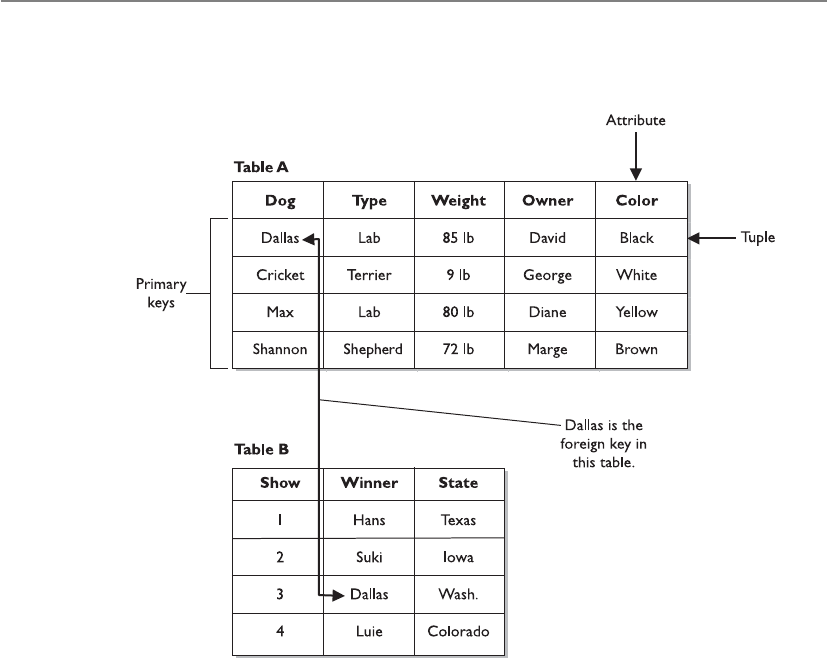
CISSP All-in-One Exam Guide
118 0
a foreign key. This is another way for the database to track relationships between the
data that it houses.
We can think of being presented with a web page that contains the data on Table B.
If we want to know more about this dog named Dallas, we double-click that value and
the browser presents the characteristics about Dallas that are in Table A.
This allows us to set up our databases with the relationship between the different
data elements as we see fit.
Integrity
You just wrote over my table!
Response: Well, my information is more important than yours.
Like other resources within a network, a database can run into concurrency prob-
lems. Concurrency issues come up when there is a piece of software that will be ac-
cessed at the same time by different users and/or applications. As an example of a
concurrency problem, suppose that two groups use one price sheet to know how many
supplies to order for the next week and also to calculate the expected profit. If Dan and
Elizabeth copy this price sheet from the file server to their workstations, they each have
a copy of the original file. Suppose that Dan changes the stock level of computer books
from 120 to 5 because they sold 115 in the last three days. He also uses the current
prices listed in the price sheet to estimate his expected profits for the next week. Eliza-
beth reduces the price on several software packages on her copy of the price sheet and

Chapter 10: Software Development Security
1181
sees that the stock level of computer books is still over 100, so she chooses not to order
any more for next week for her group. Dan and Elizabeth do not communicate this dif-
ferent information to each other, but instead upload their copies of the price sheet to
the server for everyone to view and use.
Dan copies his changes back to the file server, and then 30 seconds later Elizabeth
copies her changes over Dan’s changes. So, the file only reflects Elizabeth’s changes.
Because they did not synchronize their changes, they are both now using incorrect data.
Dan’s profit estimates are off because he does not know that Elizabeth reduced the
prices, and next week Elizabeth will have no computer books because she did not know
that the stock level had dropped to five.
The same thing happens in databases. If controls are not in place, two users can ac-
cess and modify the same data at the same time, which can be detrimental to a dy-
namic environment. To ensure that concurrency issues do not cause problems,
processes can lock tables within a database, make changes, and then release the software
lock. The next process that accesses the table will then have the updated information.
Locking ensures that two processes do not access the same table at the same time. Pages,
tables, rows, and fields can be locked to ensure that updates to data happen one at a
time, which enables each process and subject to work with correct and accurate infor-
mation.
Database software performs three main types of integrity services: semantic, refer-
ential, and entity. A semantic integrity mechanism makes sure structural and semantic
rules are enforced. These rules pertain to data types, logical values, uniqueness con-
straints, and operations that could adversely affect the structure of the database. A data-
base has referential integrity if all foreign keys reference existing primary keys. There
should be a mechanism in place that ensures no foreign key contains a reference to a
primary key of a nonexisting record, or a null value. Entity integrity guarantees that the
tuples are uniquely identified by primary key values. In the previous illustration, the
primary keys are the names of the dogs, in which case, no two dogs could have the same
name. For the sake of entity integrity, every tuple must contain one primary key. If it
does not have a primary key, it cannot be referenced by the database.
The database must not contain unmatched foreign key values. Every foreign key
refers to an existing primary key. In the previous illustration, if the foreign key in Table
B is Dallas, then Table A must contain a record for a dog named Dallas. If these values
do not match, then their relationship is broken, and again the database cannot refer-
ence the information properly.
Other configurable operations are available to help protect the integrity of the data
within a database. These operations are rollbacks, commits, savepoints, and check-
points.
The rollback is an operation that ends a current transaction and cancels the current
changes to the database. These changes could have taken place to the data held within
the database or a change to the schema. When a rollback operation is executed, the
changes are cancelled and the database returns to its previous state. A rollback can take
place if the database has some type of unexpected glitch or if outside entities disrupt its
processing sequence. Instead of transmitting and posting partial or corrupt informa-
tion, the database will roll back to its original state and log these errors and actions so
they can be reviewed later.

CISSP All-in-One Exam Guide
1182
The commit operation completes a transaction and executes all changes just made
by the user. As its name indicates, once the commit command is executed, the changes
are committed and reflected in the database. These changes can be made to data or
schema information. Because these changes are committed, they are then available to
all other applications and users. If a user attempts to commit a change and it cannot
complete correctly, a rollback is performed. This ensures that partial changes do not
take place and that data are not corrupted.
Savepoints are used to make sure that if a system failure occurs, or if an error is de-
tected, the database can attempt to return to a point before the system crashed or hic-
cupped. For a conceptual example, say Dave typed, “Jeremiah was a bullfrog. He was
<savepoint> a good friend of mine.” (The system inserted a savepoint.) Then a freak
storm came through and rebooted the system. When Dave got back into the database
client application, he might see “Jeremiah was a bullfrog. He was,” but the rest was lost.
Therefore, the savepoint saved some of his work. Databases and other applications will
use this technique to attempt to restore the user’s work and the state of the database
after a glitch, but some glitches are just too large and invasive to overcome.
Savepoints are easy to implement within databases and applications, but a balance
must be struck between too many and not enough savepoints. Having too many save-
points can degrade the performance, whereas not having enough savepoints runs the
risk of losing data and decreasing user productivity because the lost data would have to
be reentered. Savepoints can be initiated by a time interval, a specific action by the user,
or the number of transactions or changes made to the database. For example, a data-
base can set a savepoint for every 15 minutes, every 20 transactions completed, each
time a user gets to the end of a record, or every 12 changes made to the databases.
So a savepoint restores data by enabling the user to go back in time before the sys-
tem crashed or hiccupped. This can reduce frustration and help us all live in harmony.
NOTE
NOTE Checkpoints are very similar to savepoints. When the database
software fills up a certain amount of memory, a checkpoint is initiated, which
saves the data from the memory segment to a temporary file. If a glitch is
experienced, the software will try to use this information to restore the user’s
working environment to its previous state.
Atwo-phase commit mechanism is yet another control that is used in databases to
ensure the integrity of the data held within the database. Databases commonly carry
out transaction processes, which means the user and the database interact at the same
time. The opposite is batch processing, which means that requests for database changes
are put into a queue and activated all at once—not at the exact time the user makes the
request. In transactional processes, many times a transaction will require that more
than one database be updated during the process. The databases need to make sure
each database is properly modified, or no modification takes place at all. When a data-
base change is submitted by the user, the different databases initially store these chang-
es temporarily. A transaction monitor will then send out a “pre-commit” command to
each database. If all the right databases respond with an acknowledgment, then the
monitor sends out a “commit” command to each database. This ensures that all of the
necessary information is stored in all the right places at the right time.
Chapter 10: Software Development Security
1183
Database Security Issues
Oh, I know this and I know that. Now I know the big secret!
Response: Then I am changing the big secret—hold on.
The two main database security issues this section addresses are aggregation and
inference. Aggregation happens when a user does not have the clearance or permission
to access specific information, but she does have the permission to access components
of this information. She can then figure out the rest and obtain restricted information.
She can learn of information from different sources and combine it to learn some-
thing she does not have the clearance to know.
NOTE
NOTE Aggregation is the act of combining information from separate
sources. The combination of the data forms new information, which the
subject does not have the necessary rights to access. The combined
information has a sensitivity that is greater than that of the individual parts.
The following is a silly conceptual example. Let’s say a database administrator does
not want anyone in the Users group to be able to figure out a specific sentence, so he
segregates the sentence into components and restricts the Users group from accessing
it, as represented in Figure 10-39. However, Emily can access components A, C, and F.
Because she is particularly bright, she figures out the sentence and now knows the re-
stricted secret.
To prevent aggregation, the subject, and any application or process acting on the
subject’s behalf, needs to be prevented from gaining access to the whole collection,
including the independent components. The objects can be placed into containers,
which are classified at a higher level to prevent access from subjects with lower-level
permissions or clearances. A subject’s queries can also be tracked, and context-depen-
dent access control can be enforced. This would keep a history of the objects that a
subject has accessed and restrict an access attempt if there is an indication that an ag-
gregation attack is under way.
The chicken wore
red culottes
Component E Component F
funny
Component A Component B Component C Component D
Figure 10-39 Because Emily has access to components A, C, and F, she can figure out the secret
sentence through aggregation.

CISSP All-in-One Exam Guide
118 4
The other security issue is inference, which is the intended result of aggregation. The
inference problem happens when a subject deduces the full story from the pieces he
learned of through aggregation. This is seen when data at a lower security level indi-
rectly portrays data at a higher level.
NOTE
NOTE Inference is the ability to derive information not explicitly available.
For example, if a clerk were restricted from knowing the planned movements of
troops based in a specific country, but did have access to food shipment requirements
forms and tent allocation documents, he could figure out that the troops were moving
to a specific place because that is where the food and tents are being shipped. The food
shipment and tent allocation documents were classified as confidential, and the troop
movement was classified as top secret. Because of the varying classifications, the clerk
could access and ascertain top-secret information he was not supposed to know.
The trick is to prevent the subject, or any application or process acting on behalf of
that subject, from indirectly gaining access to the inferable information. This problem
is usually dealt with in the development of the database by implementing content- and
context-dependent access control rules. Content-dependent access control is based on
the sensitivity of the data. The more sensitive the data, the smaller the subset of indi-
viduals who can gain access to the data.
Context-dependent access control means that the software “understands” what ac-
tions should be allowed based upon the state and sequence of the request. So what
does that mean? It means the software must keep track of previous access attempts by
the user and understand what sequences of access steps are allowed. Content-depen-
dent access control can go like this: “Does Julio have access to File A?” The system re-
views the ACL on File A and returns with a response of “Yes, Julio can access the file, but
can only read it.” In a context-dependent access control situation, it would be more like
this: “Does Julio have access to File A?” The system then reviews several pieces of data:
What other access attempts has Julio made? Is this request out of sequence of how a
safe series of requests takes place? Does this request fall within the allowed time period
of system access (8 A.M. to 5 P.M.)? If the answers to all of these questions are within a
set of preconfigured parameters, Julio can access the file. If not, he needs to go find
something else to do.
If context-dependent access control is being used to protect against inference at-
tacks, the database software would need to keep track of what the user is requesting. So
Julio makes a request to see field 1, then field 5, then field 20, which the system allows,
but once he asks to see field 15 the database does not allow this access attempt. The
software must be preprogrammed (usually through a rule-based engine) as to what
sequence and how much data Julio is allowed to view. If he is allowed to view more
information, he may have enough data to infer something we don’t want him to know.
Obviously, content-dependent access control is not as complex as context-depen-
dent control because of the amount of items that needs to be processed by the system.
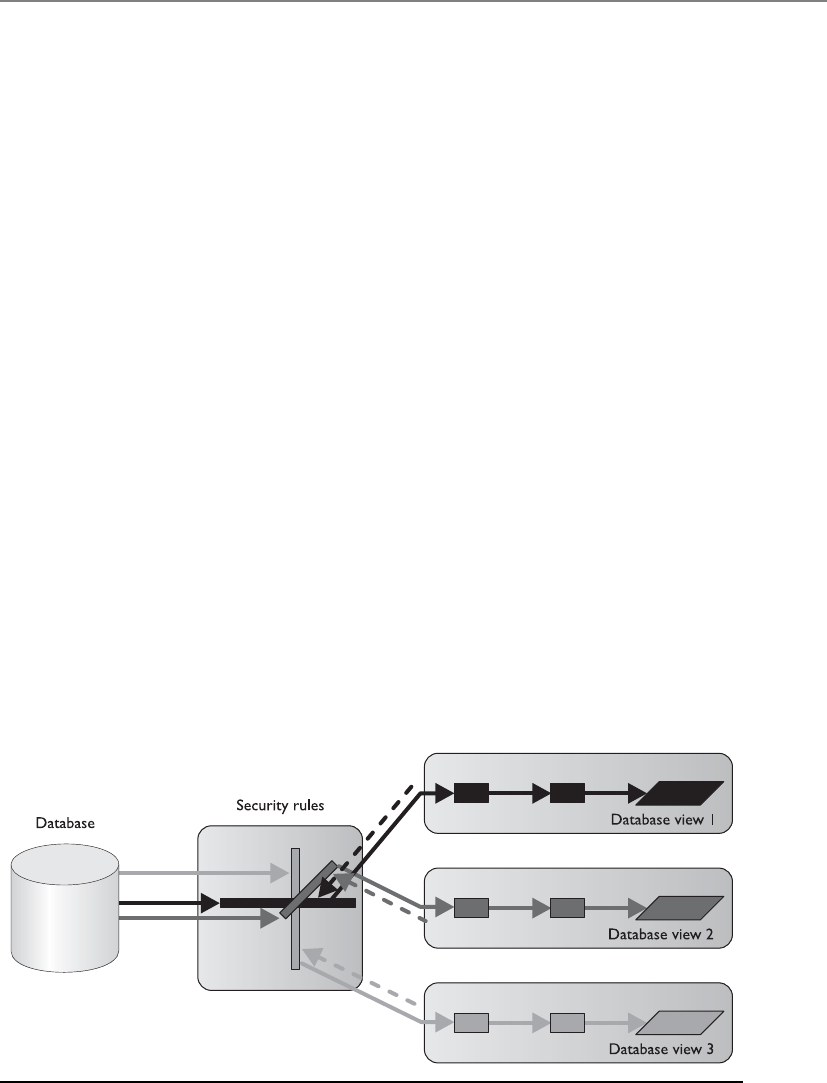
Chapter 10: Software Development Security
1185
Some other common attempts to prevent inference attacks are cell suppression,
partitioning the database, and noise and perturbation. Cell suppression is a technique
used to hide specific cells that contain information that could be used in inference at-
tacks. Partitioning a database involves dividing the database into different parts, which
makes it much harder for an unauthorized individual to find connecting pieces of data
that can be brought together and other information that can be deduced or uncovered.
Noise and perturbation is a technique of inserting bogus information in the hopes of
misdirecting an attacker or confusing the matter enough that the actual attack will not
be fruitful.
Often, security is not integrated into the planning and development of a database.
Security is an afterthought, and a trusted front end is developed to be used with the
database instead. This approach is limited in the granularity of security and in the types
of security functions that can take place.
A common theme in security is a balance between effective security and functional-
ity. In many cases, the more you secure something, the less functionality you have. Al-
though this could be the desired result, it is important not to impede user productivity
when security is being introduced.
Database Views
Don’t show your information to everybody, only a select few.
Databases can permit one group, or a specific user, to see certain information while
restricting another group from viewing it altogether. This functionality happens through
the use of database views, illustrated in Figure 10-40. If a database administrator wants
to allow middle management members to see their departments’ profits and expenses
but not show them the whole company’s profits, she can implement views. Senior
management would be given all views, which contain all the departments’ and the
company’s profit and expense values, whereas each individual manager would only be
able to view his or her department values.
Figure 10-40 Database views are a logical type of access control.

CISSP All-in-One Exam Guide
118 6
Like operating systems, databases can employ discretionary access control (DAC)
and mandatory access control (MAC), which are explained in Chapter 3. Views can be
displayed according to group membership, user rights, or security labels. If a DAC sys-
tem was employed, then groups and users could be granted access through views based
on their identity, authentication, and authorization. If a MAC system was in place, then
groups and users would be granted access based on their security clearance and the
data’s classification level.
Polyinstantiation
Polyinstantiation.
Response: Gesundheit.
Sometimes a company does not want users at one level to access and modify data
at a higher level. This type of situation can be handled in different ways. One approach
denies access when a lower-level user attempts to access a higher-level object. However,
this gives away information indirectly by telling the lower-level entity that something
sensitive lives inside that object at that level.
Another way of dealing with this issue is polyinstantiation. This enables a table that
contains multiple tuples with the same primary keys, with each instance distinguished
by a security level. When this information is inserted into a database, lower-level sub-
jects must be restricted from it. Instead of just restricting access, another set of data is
created to fool the lower-level subjects into thinking the information actually means
something else. For example, if a naval base has a cargo shipment of weapons going
from Delaware to Ukraine via the ship Oklahoma, this type of information could be
classified as top secret. Only the subjects with the security clearance of top secret and
above should know this information, so a dummy file is created that states the Okla-
homa is carrying a shipment from Delaware to Africa containing food, and it is given a
security clearance of unclassified, as shown in Table 10-2. It will be obvious that the
Oklahoma is gone, but individuals at lower security levels will think the ship is on its
way to Africa, instead of Ukraine. This also makes sure no one at a lower level tries to
commit the Oklahoma for any other missions. The lower-level subjects know that the
Oklahoma is not available, and they will assign other ships for cargo shipments.
NOTE
NOTE Polyinstantiation is a process of interactively producing more detailed
versions of objects by populating variables with different values or other
variables. It is often used to prevent inference attacks.
Level Ship Cargo Origin Destination
Top Secret Oklahoma Weapons Delaware Ukraine
Unclassified Oklahoma Food Delaware Africa
Table 10-2 Example of Polyinstantiation to Provide a Cover Story to Subjects at Lower
Security Levels

Chapter 10: Software Development Security
1187
In this example, polyinstantiation was used to create two versions of the same ob-
ject so lower-level subjects did not know the true information, thus stopping them
from attempting to use or change that data in any way. It is a way of providing a cover
story for the entities that do not have the necessary security level to know the truth. This
is just one example of how polyinstantiation can be used. It is not strictly related to
security, however, even though that is a common use. Whenever a copy of an object is
created and populated with different data, meaning two instances of the same object
have different attributes, polyinstantiation is in place.
Online Transaction Processing
What if our databases get overwhelmed?
Response: OLTP to the rescue!
Online transaction processing (OLTP) is generally used when databases are clustered
to provide fault tolerance and higher performance. OLTP provides mechanisms that
watch for problems and deal with them appropriately when they do occur. For exam-
ple, if a process stops functioning, the monitor mechanisms within OLTP can detect
this and attempt to restart the process. If the process cannot be restarted, then the trans-
action taking place will be rolled back to ensure no data are corrupted or that only part
of a transaction happens. Any erroneous or invalid transactions detected should be
written to a transaction log. The transaction log also collects the activities of successful
transactions. Data are written to the log before and after a transaction is carried out so
a record of events exists.
The main goal of OLTP is to ensure that transactions happen properly or they don’t
happen at all. Transaction processing usually means that individual indivisible opera-
tions are taking place independently. If one of the operations fails, the rest of the op-
erations needs to be rolled back to ensure that only accurate data are entered into the
database.
The set of systems involved in carrying out transactions is managed and monitored
with a software OLTP product to make sure everything takes place smoothly and correctly.
OLTP can load-balance incoming requests if necessary. This means that if requests
to update databases increase and the performance of one system decreases because of
the large volume, OLTP can move some of these requests to other systems. This makes
sure all requests are handled and that the user, or whoever is making the requests, does
not have to wait a long time for the transaction to complete.
When there is more than one database, it is important they all contain the same
information. Consider this scenario: Katie goes to the bank and withdraws $6,500 from
her $10,000 checking account. Database A receives the request and records a new check-
ing account balance of $3,500, but database B does not get updated. It still shows a
balance of $10,000. Then, Katie makes a request to check the balance on her checking
account, but that request gets sent to database B, which returns inaccurate information
because the withdrawal transaction was never carried over to this database. OLTP makes
sure a transaction is not complete until all databases receive and reflect this change.

CISSP All-in-One Exam Guide
118 8
OLTP records transactions as they occur (in real time), which usually updates more
than one database in a distributed environment. This type of complexity can introduce
many integrity threats, so the database software should implement the characteristics of
what’s known as the ACID test:
•Atomicity Divides transactions into units of work and ensures that
all modifications take effect or none takes effect. Either the changes are
committed or the database is rolled back.
•Consistency A transaction must follow the integrity policy developed for
that particular database and ensure all data are consistent in the different
databases.
•Isolation Transactions execute in isolation until completed, without
interacting with other transactions. The results of the modification are not
available until the transaction is completed.
•Durability Once the transaction is verified as accurate on all systems, it is
committed and the databases cannot be rolled back.
Data Warehousing and Data Mining
Data warehousing combines data from multiple databases or data sources into a large
database for the purpose of providing more extensive information retrieval and data
analysis. Data from different databases are extracted and transferred to a central data
storage device called a warehouse. The data are normalized, which means redundant
information is stripped out and data are formatted in the way the data warehouse ex-
pects it. This enables users to query one entity rather than accessing and querying dif-
ferent databases.
The data sources the warehouse is built from are used for operational purposes. A
data warehouse is developed to carry out analysis. The analysis can be carried out to
make business forecasting decisions and identify marketing effectiveness, business
trends, and even fraudulent activities.
Data warehousing is not simply a process of mirroring data from different data-
bases and presenting the data in one place. It provides a base of data that is then pro-
cessed and presented in a more useful and understandable way. Related data are
summarized and correlated before being presented to the user. Instead of having every
piece of data presented, the user is given data in a more abridged form that best fits her
needs.
Although this provides easier access and control, because the data warehouse is in
one place, it also requires more stringent security. If an intruder got into the data ware-
house, he could access all of the company’s information at once.
Data mining is the process of massaging the data held in the data warehouse into
more useful information. Data-mining tools are used to find an association and corre-
lation in data to produce metadata. Metadata can show previously unseen relationships
between individual subsets of information. They can reveal abnormal patterns not pre-
viously apparent. A simplistic example in which data mining could be useful is in de-
tecting insurance fraud. Suppose the information, claims, and specific habits of millions

Chapter 10: Software Development Security
1189
of customers are kept in a database warehouse, and a mining tool is used to look for
certain patterns in claims. It might find that each time John Smith moved, he had an
insurance claim two to three months following the move. He moved in 2006 and two
months later had a suspicious fire, then moved in 2010 and had a motorcycle stolen
three months after that, and then moved again in 2013 and had a burglar break in two
months afterward. This pattern might be hard for people to manually catch because he
had different insurance agents over the years, the files were just updated and not re-
viewed, or the files were not kept in a centralized place for agents to review.
Data mining can look at complex data and simplify it by using fuzzy logic (a set the-
ory), and expert systems to perform the mathematical functions and look for patterns in
data that are not so apparent. In many ways, the metadata are more valuable than the
data they were derived from; thus, they must be highly protected. (Fuzzy logic and expert
systems are discussed later in this chapter, in the “Artificial Neural Networks” section.)
The goal of data warehouses and data mining is to be able to extract information to
gain knowledge about the activities and trends within the organization, as shown in
Figure 10-41. With this knowledge, people can detect deficiencies or ways to optimize
operations. For example, if we worked at a retail store company, we would want con-
sumers to spend gobs and gobs of money there. We can better get their business if we
understand customers’ purchasing habits. If candy and other small items are placed at
the checkout stand, purchases of those items go up 65 percent compared to if the items
were somewhere else in the store. If one store is in a more affluent neighborhood and
we see a constant (or increasing) pattern of customers purchasing expensive wines
there, that is where we would also sell our expensive cheeses and gourmet items. We
would not place our gourmet items at another store that frequently accepts food stamps.
Figure 10-41 Mining tools are used to identify patterns and relationships in data warehouses.
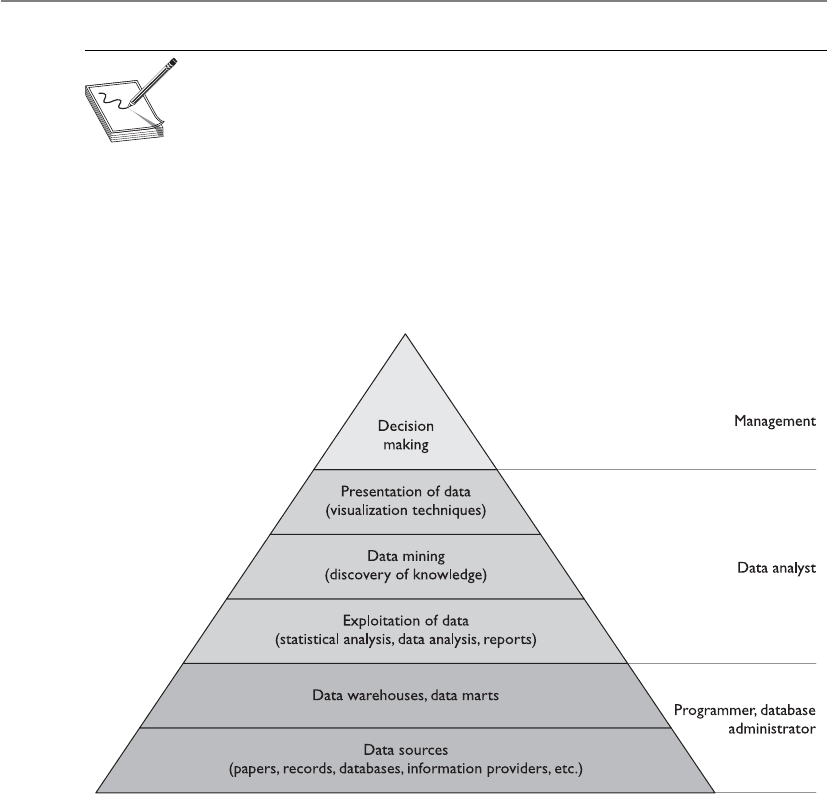
CISSP All-in-One Exam Guide
1190
NOTE
NOTE Data mining is the process of analyzing a data warehouse using
tools that look for trends, correlations, relationships, and anomalies without
knowing the meaning of the data. Metadata is the result of storing data
within a data warehouse and mining the data with tools. Data go into a data
warehouse and metadata come out of that data warehouse.
So we would carry out these activities if we wanted to harness organization-wide
data for comparative decision making, workflow automation, and/or competitive ad-
vantage. It is not just information aggregation; management’s goals in understanding
different aspects of the company are to enhance business value and help employees
work more productively.
Data mining is also known as knowledge discovery in database (KDD), and is a com-
bination of techniques to identify valid and useful patterns. Different types of data can
have various interrelationships, and the method used depends on the type of data and
the patterns sought. The following are three approaches used in KDD systems to un-
cover these patterns:
•Classification Groups together data according to shared similarities.
•Probabilistic Identifies data interdependencies and applies probabilities
to their relationships.
•Statistical Identifies relationships between data elements and uses rule
discovery.
It is important to keep an eye on the output from the KDD and look for anything
suspicious that would indicate some type of internal logic problem. For example, if you

Chapter 10: Software Development Security
1191
wanted a report that outlines the net and gross revenues for each retail store, and in-
stead get a report that states “Bob,” there may be an issue you need to look into.
Table 10-3 outlines the different types of systems used, depending on the require-
ments of the resulting data.
Data-Based
System
Rules-Based System Knowledge-Based
System
Can Process Data Data rules Data rules knowledge
Can Output Information Information decisions
Real-time decisions
Information decisions
Answers
Expert advice
Recommendations
Commonly
Used For
Hard-coded rules Enterprise rules Departmental rules
Ideal For IT/system rules Simplistic business rules Complex business rules
Best for These
Types of
Applications
Traditional
information
systems
Decisioning compliance Advising Product selection
Recommending
Troubleshooting
Domain Scope — Broad logic Deep logic
Table 10-3 Various Types of Systems Based on Capabilities
Key Terms
•Database A collection of data stored in a meaningful way that enables
multiple users and applications to access, view, and modify data as
needed.
•Database management system (DBMS) Enforces access control
restrictions, provides data integrity and redundancy, and sets up
different procedures for data management manipulation.
•Relational database model Uses attributes (columns) and tuples
(rows) to contain and organize information.
•Hierarchical data model Combines records and fields that are related
in a logical tree structure.
•Object-oriented database Designed to handle a variety of data
(images, audio, documents, video), which is more dynamic in nature
than a relational database.
•Object-relational database (ORD) Uses object-relational database
management system (ORDBMS) and is a relational database with a
software front end that is written in an object-oriented programming
language.

CISSP All-in-One Exam Guide
1192
Expert Systems/Knowledge-Based Systems
Hey, this computer is smarter than me!
Response: No surprise there.
Expert systems, also called knowledge-based systems, use artificial intelligence (AI) to
solve problems.
AI software uses non-numerical algorithms to solve complex problems, recognize
hidden patterns, prove theorems, play games, mine data, and help in forecasting and
diagnosing a range of issues. The type of computation done by AI software cannot be
accomplished by straightforward analyses and regular programming logic techniques.
Expert systems emulate human logic to solve problems that would usually require
human intelligence and intuition. These systems represent expert knowledge as data or
rules within the software of a system, and this data and these rules are called upon
when it is necessary to solve a problem. Knowledge-based systems collect data of hu-
man know-how and hold them in some type of database. These data sets are used to
reason through a problem.
•Schema Database structure that is described in a formal language
supported by the database management system (DBMS). It is used to
describe how data will be organized.
•Data dictionary A central collection of data element definitions,
schema objects, and reference keys.
•Primary key An identifier of a row and is used for indexing in
relational databases.
•Rollback An operation that ends a current transaction and cancels
all the recent changes to the database until the previous checkpoint/
commit point.
•Two-phase commit A mechanism that is another control used in
databases to ensure the integrity of the data held within the database.
•Cell suppression A technique used to hide specific cells that contain
sensitive information.
•Noise and perturbation A technique of inserting bogus information
in the hopes of misdirecting an attacker or confusing the matter enough
that the actual attack will not be fruitful.
•Data warehousing Combines data from multiple databases or
data sources into a large database for the purpose of providing more
extensive information retrieval and data analysis.
•Data mining Otherwise known as knowledge discovery in database
(KDD), which is the process of massaging the data held in the data
warehouse into more useful information.

Chapter 10: Software Development Security
1193
A regular program can deal with inputs and parameters only in the ways in which it
has been designed and programmed. Although a regular program can calculate the
mortgage payments of a house over 20 years at an 8-percent interest rate, it cannot nec-
essarily forecast the placement of stars in 100 million years because of all the unknowns
and possible variables that come into play. Although both programs—a regular pro-
gram and an expert system—have a finite set of information available to them, the ex-
pert system will attempt to “think” like a person, reason through different scenarios,
and provide an answer even without all the necessary data. Conventional programming
deals with procedural manipulation of data, whereas humans attempt to solve complex
problems using abstract and symbolic approaches.
A book may contain a lot of useful information, but a person has to read that book,
interpret its meaning, and then attempt to use those interpretations within the real
world. This is what an expert system attempts to do.
Professionals in the field of AI develop techniques that provide the modeling of
information at higher levels of abstraction. The techniques are part of the languages
and tools used, which enable programs to be developed that closely resemble human
logic. The programs that can emulate human expertise in specific domains are called
expert systems.
Rule-based programming is a common way of developing expert systems. The rules
are based on if-then logic units and specify a set of actions to be performed for a given
situation. This is one way expert systems are used to find patterns, which is called pat-
tern matching. A mechanism, called the inference engine, automatically matches facts
against patterns and determines which rules are applicable. The actions of the corre-
sponding rules are executed when the inference engine is instructed to begin execution.
Huh? Okay, let’s say Dr. Gorenz is puzzled by a patient’s symptoms and is unable to
match the problems the patient is having to a specific ailment and find the right cure.
So he uses an expert system to help him in his diagnosis. Dr. Gorenz can initiate the
expert system, which will then take him through question-and-answer scenarios.
The expert system will use the information gathered through this interaction, and it
will go step by step through the facts, looking for patterns that can be tied to known
diseases, ailments, and medical issues. Although Dr. Gorenz is very smart and one of
the top doctors in his field, he cannot necessarily recall all possible diseases and ail-
ments. The expert system can analyze this information because it is working off a data-
base that has been stuffed full of medical information that can fill up several libraries.
As the expert system goes through the medical information, it may see that the pa-
tient had a case of severe hives six months ago, had a case of ringing in the ears and
blurred vision three months ago, and has a history of diabetes. The system will look at
the patient’s recent complaints of joint aches and tiredness. With each finding, the ex-
pert system digs deeper, looking for further information, and then uses all the informa-
tion obtained and compares it with the knowledge base available to it. In the end, the
expert system returns a diagnosis to Dr. Gorenz that says the patient is suffering from a
rare disease found only in Brazil that is caused by a specific mold that grows on ba-
nanas. Because the patient has diabetes, his sensitivity is much higher to this contami-
nant. The system spits out the necessary treatment. Then, Dr. Gorenz marches back into
the room where the patient is waiting and explains the problem and protects his repu-
tation of being a really smart doctor.
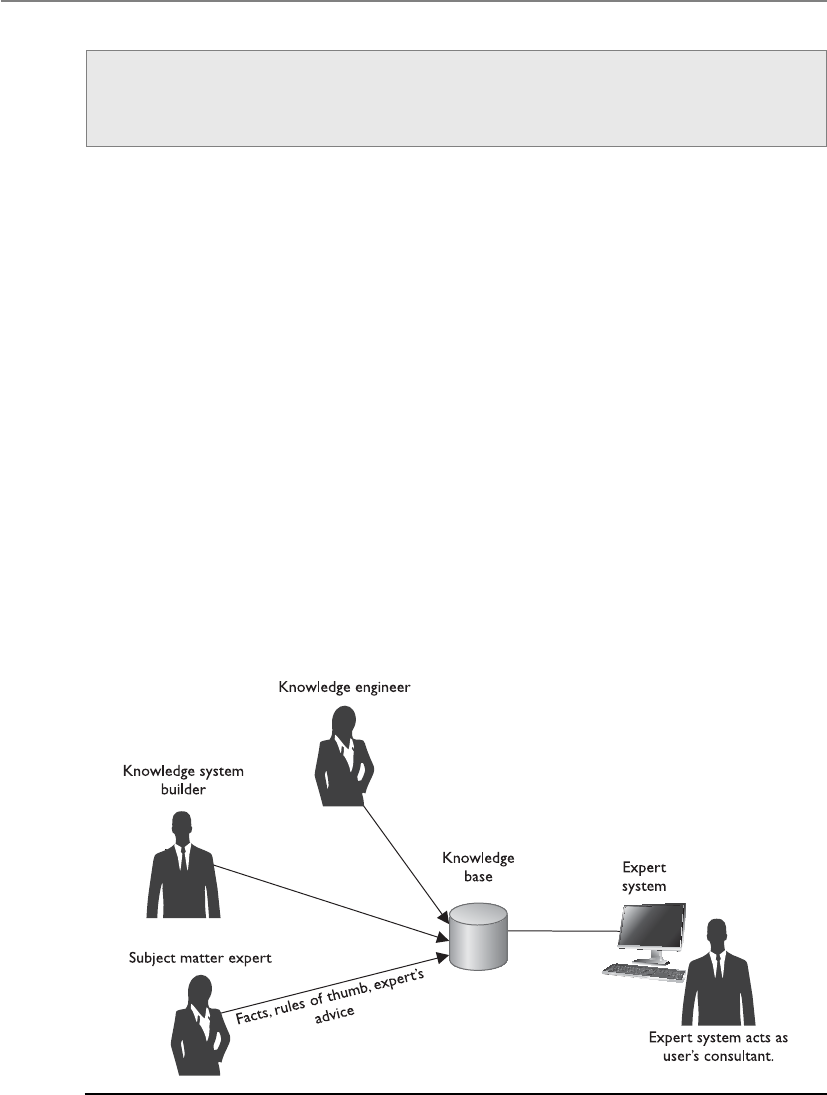
CISSP All-in-One Exam Guide
1194
The system not only uses a database of facts, but also collects a wealth of knowledge
from experts in a specific field. This knowledge is captured by using interactive tools
that have been engineered specifically to capture human knowledge. This knowledge
base is then transferred to automated systems that help in human decisions by offering
advice, freeing up experts from repetitive routine decisions, ensuring decisions are
made in a consistent and quick manner, and allowing a company to retain its organiza-
tion’s expertise even as employees come and go.
An expert system usually consists of two parts: an inference engine and a knowledge
base. The inference engine handles the user interface, external files, scheduling, and
program-accessing capabilities. The knowledge base contains data pertaining to a spe-
cific problem or domain. Expert systems use the inference engine to decide how to ex-
ecute a program or how the rules should be initiated and followed. The inference
engine of a knowledge-based system provides the necessary rules for the system to take
the original facts and combine them to form new facts.
The systems employ AI programming languages to allow for real-world decision
making. The system is built by a knowledge system builder (programmer), a knowledge
engineer (analyst), and subject matter expert(s), as shown in Figure 10-42. It is built on
facts, rules of thumb, and expert advice. The information gathered from the expert(s)
during the development of the system is kept in a knowledge base and is used during
the question-and-answer session with the end user. The system works as a consultant
Expert Systems
An expert system is a computer program containing a knowledge base and a set
of algorithms and rules used to infer new facts from data and incoming requests.
Figure 10-42 What goes into developing an expert system and how the system is used once
developed

Chapter 10: Software Development Security
1195
to the end user and can recommend several alternative solutions by considering com-
peting hypotheses at the same time.
NOTE
NOTE Expert systems use automatic logical processing, inference engine
processing, and general methods of searching for problem solutions.
Artificial Neural Networks
An artificial neural network (ANN) is a mathematical or computational model based
on the neural structure of the brain. Computers perform activities like calculating large
numbers, keeping large ledgers, and performing complex mathematical functions, but
they cannot recognize patterns or learn from experience as the brain can. ANNs contain
many units that stimulate neurons, each with a small amount of memory. The units
work on data that are input through their many connections. Via training rules, the
systems are able to learn from examples and have the capability to generalize.
The brain stores information in forms of patterns. People have the ability to recog-
nize another person’s face from several different angles. Each angle of that person’s face
is made up of a complex set of patterns. Even if only half the face is seen or the face is
viewed in a shadow or dark lighting, the human brain can insert the missing pieces, and
people can recognize their friends and acquaintances. A computer that uses conven-
tional programming and logic would need to have each piece of the pattern and the full
face in one particular angle to be able to match or recognize it.
The brain uses neurons to remember, think, apply previous experiences, perform
logic, and recognize patterns. The capacity of the brain comes from the large number of
neurons and the multiple connections between them. The power of the brain is a result
of genetic programming and learning.
ANNs try to replicate the basic functions of neurons and their circuitry to solve
problems in a new way. They consist of many simple computational neural units con-
nected to each other. An input value is presented to one, some, or all the units, which
in turn perform functions on the data.
The brain has clusters of neurons that process in an interactive and dynamic way.
Biologically, neurons have no restrictions of interconnections among themselves; there-
fore, a neuron can have thousands of connections. In addition, the neurons in the brain
work in a three-dimensional world, whereas the electronic units in ANNs have a physi-
cal limitation on the possible number of connections and thus operate in a two-dimen-
sional world.
Like the brain, the ANN’s real power comes from its capability to learn. Within the
brain, when something is learned and used often, the connection path to where that
information is stored is strengthened to provide quicker access. This is why sometimes
you know something but “can’t put your finger on it.” This means there is no pro-
nounced pathway to the information stored somewhere in the brain. If a person is
asked her phone number, she can rattle it off without any real energy. But if you ask her
who her third-grade teacher was, it might take more time and energy. Both facts are

CISSP All-in-One Exam Guide
1196
held within her brain, but the phone number has a more pronounced connection path
and comes to mind more quickly and easily. In an ANN, a connection between two
units that are often activated might be strengthened, which is a form of learning.
It is known that when something happens to someone in a highly emotional state,
that person is more likely to remember specifics about a situation or incident. If Joyce
had a surprise party on her 35th birthday, which was filled with fun and emotion, she
will most likely remember that birthday more than her 36th birthday, when her hus-
band only bought her a card. But she and her husband will probably remember her
45th birthday, when her husband forgot her birthday, because the fight that occurred
was full of emotion and activity. The reason some memories are more vivid than others
is because more emotion is tied to them or more weight is assigned to them. In ANNs,
some inputs have higher weights assigned to them than other inputs, which amplifies
the meaning or importance of the inputs, just like emotion does with human beings.
NOTE
NOTE Decisions by ANNs are only as good as the experiences they
are given.
Intuition is a hard quality to replicate in electrical circuits and logic gates. Fuzzy
logic and other mathematical disciplines are used for intuition, forecasting, and intel-
ligent guessing. These approaches work with types of probability within mathematics
and memberships of different sets. One simple example of the use of fuzzy logic is a
washing machine that has built-in intelligence. When a person puts a load of clothes in
the washing machine and the tank fills with water, the machine using fuzzy logic sends
a beam from one part of the tank to the other. Depending on how much light actually
was received at the other end, it can determine how dirty the clothes are because of the
density of the dirt in the water. Additional tests can be used to see if the dirt is oily or
dry and to check other relevant attributes. The washing machine takes in all this infor-
mation and estimates the right temperature and the right amount of laundry soap to
use. This provides a more efficient way of washing, by saving on water and soap and
washing the clothes at the right temperature for the right amount of time. The washing
machine does not necessarily know all the facts or know that the information it gath-
ered is 100-percent correct, but it can make guesses that will be pretty close to reality.
ANNs are programmed with the capability to decide and to learn to improve their
functionality through massive trial-and-error decision making.
Fuzzy logic is necessary because a regular computer system does not see the world
in shades of gray. It cannot differentiate between good, bad, few, and many. Fuzzy logic
is an approach to enable the computer to use these vague values that mean something
to humans but nothing to computers.
Stock market forecasting and insurance and financial risk assessments are examples
of where fuzzy logic can be used and is most beneficial. They require a large number of
variables and decision-making information from experts in those particular domains.
The system can indicate which insurance or financial risks are good or bad without the
user having to input a stack of conditions, if-then statements, and variable values.

Chapter 10: Software Development Security
1197
Conventional systems see the world in black and white and work in a sea of preci-
sion and decimal points. Fuzzy logic enables the computer to incorporate imprecision
into the programming language, which opens up a whole new world for computing
and attacking complex issues. Neural network researchers attempt to understand more
of how the brain works and of nature’s capabilities so newly engineered ANN solutions
can solve more complex problems than could be solved through traditional computing
means.
Key Terms
•Expert systems Otherwise known as knowledge-based systems, these
use artificial intelligence (AI) to solve complex problems. They are
systems that emulate the decision-making ability of a human expert.
•Inference engine A computer program that tries to derive answers
from a knowledge base. It is the “brain” that expert systems use to
reason about the data in the knowledge base for the ultimate purpose
of formulating new conclusions.
•Rule-based programming A common way of developing expert
systems, with rules based on if-then logic units, and specifying a set of
actions to be performed for a given situation.
•Artificial neural network (ANN) A mathematical or computational
model based on the neural structure of the brain.
Malicious Software (Malware)
Several types of malicious code or malware exist, such as viruses, worms, Trojan horses,
and logic bombs. They usually are dormant until activated by an event the user or sys-
tem initiates. They can be spread by e-mail, sharing media, sharing documents and
programs, or downloading things from the Internet, or they can be purposely inserted
by an attacker.
Adhering to the usual rule of not opening an e-mail attachment that comes from an
unknown source is one of the best ways to combat malicious code. However, recent
viruses and worms have infected personal e-mail address books, so this precaution is
not a sure thing to protect systems from malicious code. If an address book is infected
and used during an attack, the victim gets an e-mail message that seems to have come
from a person he knows. Because he knows this person, he will proceed to open the e-
mail message and double-click the attachment. And Bam! His computer is now infect-
ed and uses the e-mail client’s address book to spread the virus to all his friends and
acquaintances.
There are many infection channels other than through e-mail, but it is a common
one since so many people use and trust these types of messages coming into and out of
their systems on a daily basis.

CISSP All-in-One Exam Guide
1198
Manual attacks on systems do not happen as much as they did in the past. Today
hackers automate their attacks by creating a piece of software (malware) that can com-
promise thousands of systems at one time with more precision. While malware can be
designed to carry out a wide range of malicious activities, most are created to obtain
sensitive information (credit card data, Social Security numbers, credentials, etc.), gain
unauthorized access to systems, and/or carry out a profit-oriented scheme.
The proliferation of malware has a direct relationship to the large amount of profit
individuals can make without much threat of being caught. The most commonly used
schemes for making money through malware are as follows:
• Spyware collects personal data for the malware developer to resell to others.
• Malware redirects web traffic so that people are pointed toward a specific
product for purchase.
• Malware installs back doors on systems, and they are used as proxies to spread
spam or pornographic material.
• Systems are infected with bots and are later used in distributed-denial-of-
service attacks.
• Malware installs key loggers, which collect sensitive financial information for
the malware author to use.
• Malware is used to carry out phishing attacks, fraudulent activities, identity
theft steps, and information warfare activities.
The sophistication level of malware continues to increase at a rapid pace. Years ago
you just needed an antivirus product that looked for obvious signs of an infection (new
files, configuration changes, system file changes, etc.), but today’s malware can bypass
these simplistic detection methods.
Malware is commonly stored in RAM memory and not saved to a hard drive, which
makes it harder to detect. The RAM is flushed when the system reboots, so there is
hardly any evidence that it was there in the first place. Malware can be installed in a
“drive-by-download” process, which means that the victim is tricked into clicking
something malicious (web link, system message, pop-up window), which in turn in-
fects his computer.
As discussed earlier, there are many web browser and web server vulnerabilities that
are available through exploitation. Many web sites are infected with malware, and the
companies do not know this because the malware encrypts itself, encodes itself, and
carries out activities in a random fashion so that its malicious activities are not easily
replicated and studied.
We will cover the main categories of malware in the following sections, but the
main reasons that they are all increasing in numbers and potency are as follows:
• Environments are heterogeneous and increase in complexity.
• Everything is becoming a computer (phones, TVs, play stations, power grids,
medical devices, etc.), and thus all are capable of being compromised.
• More people and companies are storing all of their data in some digital format.

Chapter 10: Software Development Security
1199
• More people and devices are connecting through various interfaces (phone
apps, Facebook, web sites, e-mail, texting, e-commerce, etc.).
• Many accounts are configured with too much privileged (administrative or
root access).
• More people who do not understand technology are using it for sensitive
purposes (online banking, e-commerce, etc.).
The digital world has provided many ways to carry out various criminal activities
with a low risk of being caught.
Viruses
Avirus is a small application, or string of code, that infects software. The main function
of a virus is to reproduce and deliver its payload, and it requires a host application to
do this. In other words, viruses cannot replicate on their own. A virus infects a file by
inserting or attaching a copy of itself to the file. The virus is just the “delivery mecha-
nism.” It can have any type of payload (deleting system files, displaying specific mes-
sages, reconfiguring systems, stealing sensitive data, installing a sniffer or back door).
A virus is a subcategory of the overall umbrella category “malware.” What makes a
software component an actual virus is the fact that it can self-replicate. There are sev-
eral other malware types that infect our systems and cause mayhem, but if they cannot
self-replicate they do not fall into the subcategory of “virus.”
Several viruses have been released that achieved self-perpetuation by mailing them-
selves to every entry in a victim’s personal address book. The virus masqueraded as
coming from a trusted source. The ILOVEYOU, Melissa, and Naked Wife viruses are
older viruses that used the programs Outlook and Outlook Express as their host appli-
cations and were replicated when the victim chose to open the message. Several types
of viruses have been developed and deployed, which we will cover next.
Macros are programs written in Word Basic, Visual Basic, or VBScript and are gener-
ally used with Microsoft Office products. Macros automate tasks that users would oth-
erwise have to carry out themselves. Users can define a series of activities and common
tasks for the application to perform when a button is clicked, instead of doing each of
those tasks individually. A macro virus is a virus written in one of these macro languag-
es and is platform independent. They infect and replicate in templates and within doc-
uments. Macro viruses are common because they are extremely easy to write and
commonly used products (i.e., Microsoft Office) use macros extensively.
Some viruses infect the boot sector (boot sector viruses) of a computer and either
move data within the boot sector or overwrite the sector with new information. Some
boot sector viruses have part of their code in the boot sector, which can initiate the virus
when a system boots up, and the rest of their code in sectors on the hard drive it has
marked off as bad. Because the sectors are marked as bad, the operating system and ap-
plications will not attempt to use those sectors; thus, they will not get overwritten.
Other types of viruses append themselves to executables on the system and com-
press them by using the user’s permissions (compression viruses). When the user choos-
es to use that executable, the system automatically decompresses it and the malicious
code, which usually causes the malicious code to initialize and perform its dirty deeds.

CISSP All-in-One Exam Guide
1200
Astealth virus hides the modifications it has made to files or boot records. This can
be accomplished by monitoring system functions used to read files or sectors and forg-
ing the results. This means that when an antivirus program attempts to read an infected
file or sector, the original uninfected form will be presented instead of the actual in-
fected form. The virus can hide itself by masking the size of the file it is hidden in or
actually move itself temporarily to another location while an antivirus program is car-
rying out its scanning process.
So a stealth virus is a virus that hides its tracks after infecting a system. Once the
system is infected, the virus can make modifications to make the computer appear the
same as before. The virus can show the original file size of a file it infected instead of
the new, larger size to try to trick the antivirus software into thinking no changes have
been made.
Apolymorphic virus produces varied but operational copies of itself. This is done in
the hopes of outwitting a virus scanner. Even if one or two copies are found and dis-
abled, other copies may still remain active within the system.
The polymorphic virus can use different encryption schemes requiring different
decryption routines. This would require an antivirus scan for several scan strings, one
for each possible decryption method, in order to identify all copies of this type of virus.
These viruses can also vary the sequence of their instructions by including noise, or
bogus instructions, with other useful instructions. They can also use a mutation engine
and a random-number generator to change the sequence of their instructions in the
hopes of not being detected. A polymorphic virus has the capability to change its own
code, enabling the virus to have hundreds or thousands of variants. These activities can
cause the virus scanner to not properly recognize the virus and to leave it alone.
Amultipart virus (also called multipartite virus) has several components to it and
can be distributed to different parts of the system. For example, a multipart virus might
infect both the boot sector of a hard drive and executable files. By using multiple vec-
tors it can spread more quickly than a virus using only one vector.
Aself-garbling virus attempts to hide from antivirus software by garbling (modify-
ing) its own code. As the virus spreads, it changes the way its code is formatted. A small
portion of the virus code decodes the garbled code when activated.
Meme viruses are not actual computer viruses, but types of e-mail messages that are
continually forwarded around the Internet. They can be chain letters, e-mail hoax virus
alerts, religious messages, or pyramid selling schemes. They are replicated by humans,
not software, and can waste bandwidth and spread fear. Several e-mails have been
What Is a Virus?
A virus is a segment of code that searches out hosts and infects them by embed-
ding a copy of itself. When the infected host executes, the embedded virus is
executed, which propagates the infection.
Chapter 10: Software Development Security
1201
passed around describing dangerous viruses even though the viruses weren’t real. Peo-
ple believed the e-mails and felt as though they were doing the right thing by passing
them along to tell friends about this supposedly dangerous malware, when really the
people were duped and were themselves spreading a meme virus.
Script viruses have been quite popular and damaging over the last several years.
Scripts are files that are executed by an interpreter—for example, Microsoft Windows
Script Host, which interprets different types of scripting languages. Web sites have be-
come more dynamic and interactive through the use of script files written in Visual
Basic (VBScript) and Java (Jscript) as well as other scripting languages that are embed-
ded in HTML. When a web page that has these scripts embedded is requested by a web
browser, these embedded scripts are executed, and if they are malicious, then every-
thing just blows up. Okay, this a tad overdramatic. The virus will carry out the payload
(instructions) that the virus writer has integrated into the script, whether it is sending
out copies of itself to everyone in your contact list or deleting critical files. Scripts are
just another infection vector used by malware writers to carry out their evil ways.
Another type of virus, called the tunneling virus, attempts to install itself “under”
the antivirus program. When the antivirus goes around doing its health check on criti-
cal files, file sizes, modification dates, and so on, it makes a request to the operating
system to gather this information. Now, if the virus can put itself between the antivirus
and the operating system, when the antivirus sends out a command (system call) for
this type of information, the tunneling virus can intercept this call. Instead of the oper-
ating system responding to the request, the tunneling virus responds with information
that indicates that everything is fine and healthy and that there is no indication of any
type of infection.
So what is the difference between a stealth virus and a tunneling virus? A stealth
virus is just a general term for a virus that somehow attempts to hide its actions. A
stealth virus can use tunneling tactics or other tactics to hide its footprint and activities.
NOTE
NOTE An EICAR test is done with antivirus software by introducing a
string that all antivirus products recognize as hostile so that testing can
be conducted. Antivirus software products have an EICAR.com file and a
signature that matches this file. After software configurations are completed,
you then put this file on the system to test the antivirus product’s reactions to
a virus.
In the early 1990s and early 2000, people in the industry knew of popular viruses
and other malware types by name. For example, security professionals knew what
someone was referring to when discussing the Melissa virus, ILOVEYOU virus, Code
Red, SQL Slammer, Blaster, or Sasser worm. Today there are thousands of new malware
variants created each day and no one can keep up. PandaLabs reported that in the first
three months of 2012, there was a daily average of 73,190 new samples of malware.

CISSP All-in-One Exam Guide
1202
Worms
Worms are different from viruses in that they can reproduce on their own without a host
application, and are self-contained programs. As an analogy, medical viruses (i.e., the
common cold) spread through human hosts. The virus can make our noses run or
cause us to sneeze, which are just the virus’s way of reproducing and spreading itself.
The virus is a collection of particles (DNA, RNA, proteins, lipids) and can only replicate
within living cells. A virus cannot fall on the floor and just wait for someone to pass by
and infect—it requires host-to-host transmission. A computer virus also requires a host,
because it is not a full and self-sufficient program. A computer virus cannot make our
computer sneeze, but it could make our applications share infected files, which is sim-
ilar in nature.
In the nondigital world, worms are not viruses. They are invertebrate animals that
can function on their own. They reproduce through some type of sexual or asexual
replication process, but do not require a “host environment” of a living cell to carry out
these activities.
In the digital world, worms are just little programs, and like viruses they are used to
transport and deliver malicious payloads. One of the most famous computer worms is
Stuxnet, which targeted Siemens supervisory control and data acquisition (SCADA)
software and equipment. It has a highly specialized payload that was used against Iran’s
uranium enrichment infrastructures with the goal of damaging the country’s nuclear
program.
Rootkit
When a system is successfully compromised, an attacker may attempt to elevate his
privileges to obtain administrator- or root user–level access. Once the level of access is
achieved, the attacker can upload a bundle of tools, collectively called a rootkit. The first
thing that is usually installed is a back-door program, which allows the attacker to enter
the system at any time without having to go through any authentication steps. The
other common tools in a rootkit allow for credential capturing, sniffing, attacking oth-
er systems, and covering the attacker’s tracks.
Malware Components
It is common for malware to have six main elements, although it is not necessary
for them all to be in place:
•Insertion Installs itself on the victim’s system
•Avoidance Uses methods to avoid being detected
•Eradication Removes itself after the payload has been executed
•Replication Makes copies of itself and spreads to other victims
•Trigger Uses an event to initiate its payload execution
•Payload Carries out its function (that is, deletes files, installs a back
door, exploits a vulnerability, and so on)

Chapter 10: Software Development Security
1203
The rootkit is just a set of tools that is placed on the compromised system for future
use. Once the rootkit is loaded, the attacker can use these tools against the system or
other systems it is connected to whenever he wants to.
The attacker usually replaces default system tools with new compromised tools,
which share the same name. They are referred to as “Trojaned programs” because they
carry out the intended functionality but do some malicious activity in the background.
This is done to help ensure that the rootkit is not detected.
Most rootkits have Trojaned programs that replace these tools, because the root user
could run ps or top and see there is a back-door service running, and thus detect the
presence of a compromise. But when this user runs one of these Trojaned programs, the
compromised tool lists all other services except the back-door process. Most rootkits
also contain sniffers, so the data can be captured and reviewed by the attacker. For a
sniffer to work, the system’s network interface card (NIC) must be put into promiscu-
ous mode, which just means it can “hear” all the traffic on the network link. The default
ipconfig utility allows the root user to employ a specific parameter to see whether or
not the NIC is running in promiscuous mode. So, the rootkit also contains a Trojaned
ipconfig program, which hides the fact that the NIC is in promiscuous mode.
Rootkits commonly include “log scrubbers,” which remove traces of the attacker’s
activities from the system logs. They can also contain Trojaned programs that replace
find and ls Unix utilities, so that when a user does a listing of what is in a specific direc-
tory, the rootkit will not be listed.
Some of the more powerful rootkits actually update the kernel of the system instead
of just replacing individual utilities. Modifying the kernel’s code gives the attacker
much more control over a system. It is also very difficult to detect kernel updates, com-
pared to replaced utilities, because most host IDS products look at changes to file sizes
and modification dates, which would apply to utilities and programs but not necessar-
ily to the kernel of the operating system.
Rootkit detection can be difficult because the rootkit may be able to subvert the
software that is intended to find it. Detection methods include behavioral-based meth-
ods, signature-based scanning, and memory dump analysis. Removal can be compli-
cated, especially in cases where the rootkit resides in the kernel; reinstallation of the
operating system may be the only available solution to the problem.
Rootkits and their payloads have many functions, including concealing other mal-
ware, as in password-stealing key loggers and computer viruses. A rootkit might also
install software that allows the compromised system to become a zombie for specific
botnets.
Rootkits can reside at the user level of an operating system, at the kernel level, in a
system’s firmware, or in a hypervisor of a system using virtualization. A user-level root-
kit does not have as much access or privilege compared to a kernel-level rootkit, and
thus cannot carry out as much damage.
If a rootkit resides in the hypervisor of a system, it can exploit hardware virtualiza-
tion features and target host operating systems. This allows the rootkit to intercept
hardware calls made by the original operating system. This is not a very common type
of rootkit that is deployed and used in the industry, but it is something that will prob-
ably become more popular because of the expansive use of virtualization.

CISSP All-in-One Exam Guide
1204
Rootkits that reside in firmware are difficult to detect because software integrity
checking does not usually extend down to the firmware level. If a rootkit is installed on
a system’s firmware, that can allow it to load into memory before the full operating
system and protection tools are loaded on the system.
Spyware and Adware
Spyware is a type of malware that is covertly installed on a target computer to gather
sensitive information about a victim. The gathered data may be used for malicious ac-
tivities, e.g., identity theft, spamming fraud, etc. Spyware can also gather information
about a victim’s online browsing habits, which are then often used by spammers to
send targeted advertisements. It can also be used by an attacker to direct a victim’s com-
puter to perform tasks such as installing software, changing system settings, transfer
browsing history, logging key strokes, taking screenshots, etc.
Adware is software that automatically generates (renders) advertisements. The ads
can be provided through pop-ups, user interface components, or screens presented dur-
ing the installation of updates of other products. The goal of adware is to generate sales
revenue, not carry out malicious activities, but some adware use invasive measures,
which can cause security and privacy issues.
Botnets
A “bot” is short for “robot” and is a piece of code that carries out functionality for its
master, who could be the author of this code. Bots allow for simple tasks to be carried
out in an automated manner in a web-based environment. While bot software can be
used for legitimate purposes (i.e., web crawling), we are going to focus on how it can
be used in a malicious manner.
Bots are a type of malware and are being installed on thousands of computers even
now as you’re reading this sentence. They are installed on vulnerable victim systems
through infected e-mail messages, drive-by downloads, Trojan horses, and the use of
shared media. Once the bot is loaded on a victim system, it usually lies dormant (zom-
bie code) and waits for command instructions for activation purposes.
The bot can send a message to the hacker indicating that a specific system has been
compromised and the system is now available to be used by the attacker as she wishes.
When a hacker has a collection of these compromised systems, it is referred to as a bot-
net (network of bots). The hacker can use all of these systems to carry out powerful
distributed-denial-of-service (DDoS) attacks or even rent these systems to spammers.
The owner of this botnet (commonly referred to as the bot herder) controls the sys-
tems remotely, usually through the Internet Relay Chat (IRC) protocol.
The common steps of the development and use of a botnet are listed next:
1. A hacker sends out malicious code that has the bot software as its payload.
2. Once installed, the bot logs into an IRC or web server that it is coded to
contact. The server then acts as the controlling server of the botnet.

Chapter 10: Software Development Security
1205
3. A spammer pays the hacker to use these systems and sends instructions to the
controller server, which causes all of the infected systems to send out spam
messages to mail servers.
Spammers use this method so their messages have a higher likelihood of getting
through mail server spam filters since the sending IP addresses are those of the victim’s
system. Thus, the source IP addresses change constantly. This is how you are constantly
updated on the new male enhancement solutions and ways to purchase Viagra.
Figure 10-43 illustrates the life cycle of a botnet. The botnet herder works with, or
pays, hackers to develop and spread malware to infect systems that will become part of
the botnet. Whoever wants to tell you about a new product they just released, carry out
identity theft, or conduct attacks, and so on can pay the herder to use the botnet for
their purposes.
Botnets can be used for spamming, brute force and DDoS attacks, click fraud, fast
flux techniques, and the spread of illegal material. The traffic can pass over IRC or HTTP
and even be tunneled through Twitter, instant messaging, and other common traffic
types. The servers that send the bots instructions and manage the botnets are com-
monly referred to as command-and-control (C&C) servers, and they can maintain thou-
sands or millions of computers at one time.
Figure 10-43 The cycle of how botnets are created, maintained, and used

CISSP All-in-One Exam Guide
1206
NOTE
NOTE Fast flux is an evasion technique. Botnets can use fast flux
functionality to hide the phishing and malware delivery sites they are using.
One common method is to rapidly update DNS information to disguise the
hosting location of the malicious web sites.
Logic Bombs
Alogic bomb executes a program, or string of code, when a certain set of conditions are
met. For example, a network administrator may install and configure a logic bomb that
is programmed to delete the company’s whole database if he is terminated.
The logic bomb software can have many types of triggers that activate its payload
execution, as in time and date or after a user carries out a specific action. For example,
many times compromised systems have logic bombs installed so that if forensics ac-
tivities are carried out the logic bomb initiates and deletes all of the digital evidence.
This thwarts the investigation team’s success and helps hide the attacker’s identity and
methods.
Trojan Horses
ATrojan horse is a program that is disguised as another program. For example, a Trojan
horse can be named Notepad.exe and have the same icon as the regular Notepad pro-
gram. However, when a user executes Notepad.exe, the program can delete system files.
Trojan horses perform a useful functionality in addition to the malicious functionality
in the background. So the Trojan horse named Notepad.exe may still run the Notepad
program for the user, but in the background it will manipulate files or cause other ma-
licious acts.
Trojan horses are one of the fastest growing malware types in the world. Users are
commonly tricked into downloading some type of software from a web site that is actu-
ally malicious. The Trojan horse can then set up a back door, install keystroke loggers,
implement rootkits, upload files from the victim’s system, install bot software, and
perform many other types of malicious acts. They are commonly used to carry out vari-
ous types of online banking fraud and identity theft activities.
Remote access Trojans (RATs) are malicious programs that run on systems and allow
intruders to access and use a system remotely. They mimic the functionality of legiti-
mate remote control programs used for remote administration, but are used for sinister
purposes instead of helpful activities. They are developed to allow for stealth installa-
tion and operation, and are usually hidden in some type of mobile code, such as Java
applets or ActiveX controls, that are downloaded from web sites.
Several RAT programs are available to the hacker (Back Orifice, SubSeven, Netbus,
and others). Once the RAT is loaded on the victim’s system, the attacker can download
or upload files, send commands, monitor user behaviors, install zombie software, acti-
vate the webcam, take screenshots, alter files, and use the compromised system as he
pleases.

Chapter 10: Software Development Security
1207
Antivirus Software
Traditional antivirus software uses signatures to detect malicious code. The signature is
a fingerprint created by the antivirus vendor. The signature is a sequence of code that
was extracted from the virus itself. Just like our bodies have antibodies that identify and
go after a specific type of foreign material, an antivirus software package has an engine
that uses these signatures to identify malware. The antivirus software scans files, e-mail
Crimeware Toolkits
It used to require programming knowledge to be able to create and spread mal-
ware, but today people can purchase crimeware toolkits that allow them to create
their own tailored malware through GUI-based tools. These toolkits provide pre-
developed malicious code that can be easily customized, deployed, and automated.
The kits are sold in the online underground black market and allow people with
little to no technical skill to carry out cybercrime activities. These “out-of-the-box”
solutions have lowered the entry barrier for cybercriminals by making sophisti-
cated attacks easy to carry out.
Figure 10-44 shows the administrative interface provided by a commonly
used crimeware toolkit, Spy Eye, that attackers can use to maintain and control
their compromised systems.
Create task
for billing
Modify
cards
Tasks
statistic
Bots
monitoring
Create task
for knocker
Create task
for loader
Ban
bots
ch / o
gm:da:te
Settings
Figure 10-44 Spy Eye administrator interface

CISSP All-in-One Exam Guide
1208
messages, and other data passing through specific protocols, and then compares them
to its database of signatures. When there is a match, the antivirus software carries out
whatever activities it is configured to do, which can be to quarantine the file, attempt to
clean the file (remove the virus), provide a warning message dialog box to the user,
and/or log the event.
Signature-based detection (also called fingerprint detection) is an effective way to de-
tect malicious software, but there is a delayed response time to new threats. Once a virus
is detected, the antivirus vendor must study it, develop and test a new signature, release
the signature, and all customers must download it. If the malicious code is just sending
out silly pictures to all of your friends, this delay is not so critical. If the malicious soft-
ware is similar to the Slammer worm, this amount of delay can be devastating.
Since new malware is released daily, it is hard for antivirus software to keep up. The
technique of using signatures means this software can only detect viruses that have
been identified and where a signature is created. Since virus writers are prolific and
busy beasts, and because viruses can morph, it is important that the antivirus software
have other tricks up its sleeve to detect malicious code.
Another technique that almost all antivirus software products use is referred to as
heuristic detection. This approach analyzes the overall structure of the malicious code,
evaluates the coded instructions and logic functions, and looks at the type of data with-
in the virus or worm. So, it collects a bunch of information about this piece of code and
assesses the likelihood of it being malicious in nature. It has a type of “suspiciousness
counter,” which is incremented as the program finds more potentially malicious attri-
butes. Once a predefined threshold is met, the code is officially considered dangerous
and the antivirus software jumps into action to protect the system. This allows antivirus
software to detect unknown malware, instead of just relying on signatures.
As an analogy, let’s say Barney is the town cop who is employed to root out the bad
guys and lock them up (quarantine). If Barney was going to use a signature method, he
would compare a stack of photographs to each person he sees on the street. When he
sees a match, he quickly throws the bad guy into his patrol car and drives off. If he was
going to use the heuristic method, he would be watching for suspicious activity. So if
someone with a ski mask was standing outside a bank, Barney would assess the likeli-
hood of this being a bank robber against it just being a cold guy in need of some cash.
CAUTION
CAUTION Diskless workstations are still vulnerable to viruses, even though
they do not have a hard disk and a full operating system. They can still get
viruses that load and reside in memory. These systems can be rebooted
remotely (remote booting) to bring the memory back to a clean state, which
means the virus is “flushed” out of the system.
Some antivirus products create a simulated environment, called a virtual machine
or sandbox, and allow some of the logic within the suspected code to execute in the
protected environment. This allows the antivirus software to see the code in question
in action, which gives it more information as to whether or not it is malicious.

Chapter 10: Software Development Security
1209
NOTE
NOTE The virtual machine or sandbox is also sometimes referred to as
an emulation buffer. They are all the same thing—a piece of memory that
is segmented and protected so that if the code is malicious, the system is
protected.
Reviewing information about a piece of code is called static analysis, while allowing
a portion of the code to run in a virtual machine is called dynamic analysis. They are
both considered heuristic detection methods.
Now, even though all of these approaches are sophisticated and effective, they are not
100-percent effective because malware writers are crafty. It is a continual cat-and-mouse
game that is carried out each and every day. The antivirus industry comes out with a new
way of detecting malware, and the very next week the virus writers have a way to get
around this approach. This means that antivirus vendors have to continually increase the
intelligence of their products and you have to buy a new version each and every year.
The next phase in the antivirus software evolution is referred to as behavior block-
ers. Antivirus software that carries out behavior blocking actually allows the suspicious
code to execute within the operating system unprotected and watches its interactions
with the operating system, looking for suspicious activities. The antivirus software
would be watching for the following types of actions:
• Writing to startup files or the Run keys in the Registry
• Opening, deleting, or modifying files
• Scripting e-mail messages to send executable code
• Connecting to network shares or resources
• Modifying an executable logic
• Creating or modifying macros and scripts
• Formatting a hard drive or writing to the boot sector
Immunizers
Don’t bother looking over here. We’re already infected.
Another approach some antivirus software uses is called immunization. Prod-
ucts with this type of functionality would make it look as though a file, program,
or disk was already infected. An immunizer attaches code to the file or applica-
tion, which would fool a virus into “thinking” it was already infected. This would
cause the virus to not infect this file (or application) and move onto the next file.
Immunizers are usually virus-specific, since a specific virus is going to make a
distinct call to a file to uncover if it has been infected. But as the number of vi-
ruses (and other malware types) increased and the number of files needed to be
protected increased, this approach was quickly overwhelmed. Antivirus vendors
do not implement this type of functionality anymore because of this reason.

CISSP All-in-One Exam Guide
1210
If the antivirus program detects some of these potentially malicious activities, it can
terminate the software and provide a message to the user. The newer generation behav-
ior blockers actually analyze sequences of these types of operations before determining
the system is infected. (The first-generation behavior blockers only looked for individ-
ual actions, which resulted in a large number of false positives.) The newer generation
software can intercept a dangerous piece of code and not allow it to interact with other
running processes. They can also detect rootkits. In addition, some of these antivirus
programs can allow the system to roll back to a state before an infection took place so
the damages inflicted can be “erased.”
While it sounds like behavior blockers might bring us our well-deserved bliss and
utopia, one drawback is that the malicious code must actually execute in real time;
otherwise, our systems can be damaged. This type of constant monitoring also requires
a high level of system resources. We just can’t seem to win.
NOTE
NOTE Heuristic detection and behavior blocking is considered proactive and
can detect new malware, sometimes called “zero day” attacks. Signature-based
detection cannot detect new malware.
Most antivirus vendors use a blend of all of these technologies to provide as much
protection as possible. The individual antimalware attack solutions are shown in Fig-
ure 10-45.
NOTE
NOTE Another antimalware technique is referred to as “reputation-based
protection.” An antimalware vendor collects data from many (or all) of its
customers’ systems. These data are mined and patterns are identified to help
identify good and bad files. Each file type is assigned a reputation metric value,
indicating the probability of it being “good” or “bad.” These values are used by
the antimalware software to help it identify “bad” (suspicious) files.
Spam Detection
We are all pretty tired of receiving e-mails that try to sell us things we don’t need. A great
job, a master’s degree that requires no studying, and a great sex life are all just a click
away (and only $19.99!)—as promised by this continual stream of messages. These e-
mails have been given the label spam, which is electronic unsolicited junk e-mail. Along
with being a nuisance, spam eats up a lot of network bandwidth and can be the source
of spreading malware. Many organizations have spam filters on their mail servers, and
users can configure spam rules within their e-mail clients, but just as virus writers al-
ways come up with ways to circumvent antivirus software, spammers come up with
clever ways of getting around spam filters.
Detecting spam properly has become a science in itself. One technique used is
called Bayesian filtering. Many moons ago, a gentleman named Thomas Bayes (a math-
ematician) developed a way to actually guess the probability of something being true

Chapter 10: Software Development Security
1211
by using math. Now what is fascinating about this is that in mathematics things are
either true or they are not. This is the same in software. Software deals with 1’s and 0’s,
on and off, true and false. Software does not deal with the grays (probabilities) of life
too well.
Figure 10-45 Antivirus vendors use various types of malware detection.

CISSP All-in-One Exam Guide
1212
Bayesian logic reviews prior events to predict future events, which is basically quan-
tifying uncertainty. Conceptually, this is not too hard to understand. If you run into a
brick wall three times and fall down, you should conclude that your future attempts
will result in the same painful outcomes. What is more interesting is when this logic is
performed on activities that contain many more variables. For example, how does a
spam filter ensure you do not receive e-mails trying to sell you Viagra, but it does allow
the e-mails from your friend who is obsessed with Viagra and wants to continue e-
mailing you about this drug’s effects and attributes? A Bayesian filter applies statistical
modeling to the words that make up an e-mail message. This means the words that
make up the message have mathematical formulas performed on them to be able to
fully understand their relationship to one another. The Bayesian filter carries out a fre-
quency analysis on each word and then evaluates the message as a whole to determine
whether or not it is spam.
So this filter is not just looking for “Viagra,” “manhood,” “sex,” and other words
that cannot be printed in a wholesome book like this one. It is looking at how often
these words are used, and in what order, to make a determination as to whether or not
this message is spam. Unfortunately, spammers know how these filters work and ma-
nipulate the words in the subject line and message to try and fool the spam filter. This
is why you can receive messages with misspelled words or words that use symbols in-
stead of characters. The spammers are very dedicated to getting messages promising
utopia to your e-mail box because there is big money to be made that way.
Antimalware Programs
Detecting and protecting an enterprise from the long list of malware requires more than
just rolling out antivirus software. Just as with other pieces of a security program, certain
administrative, physical, and technical controls must be deployed and maintained.
The organization should either have an antivirus policy or it should be called out
in an existing security policy. There should be standards outlining what type of antivi-
rus software and antispyware software should be installed and how they should be
configured.
Antivirus information and expected user behaviors should be integrated into the
security-awareness program, along with who a user should contact if she discovers a
virus. A standard should cover the do’s and don’ts when it comes to malware, which are
listed next:
• Every workstation, server, and mobile device should have antimalware
software installed.
• An automated way of updating antivirus signatures should be deployed on
each device.
• Users should not be able to disable antivirus software.
• A preplanned malware eradication process should be developed and a contact
person designated in case of an infection.
• All external disks (USB drives and so on) should be scanned automatically.
• Backup files should be scanned.

Chapter 10: Software Development Security
1213
• Antivirus policies and procedures should be reviewed annually.
• Antivirus software should provide boot virus protection.
• Antivirus scanning should happen at a gateway and on each device.
• Virus scans should be automated and scheduled. Do not rely on manual scans.
• Critical systems should be physically protected so malicious software cannot
be installed locally.
NOTE
NOTE Antivirus files that contain updates (new signatures) are called DAT
files. It is just a data file with the file extension of .dat.
Since malware has cost organizations millions of dollars in operation costs and
productivity hits, many have implemented antivirus solutions at network entry points.
The scanning software can be integrated into a mail server, proxy server, or firewall.
(They are sometimes referred to as virus walls.) This software scans incoming traffic,
looking for malware so it can be detected and stopped before entering the network.
These products can scan Simple Mail Transport Protocol (SMTP), HTTP, FTP, and pos-
sibly other protocol types, but what is important to realize is that the product is only
looking at one or two protocols and not all of the incoming traffic. This is the reason
each server and workstation should also have antivirus software installed.
Key Terms
•Virus A small application, or string of code, that infects host
applications. It is a programming code that can replicate itself and
spread from one system to another.
•Macro virus A virus written in a macro language and that is platform
independent. Since many applications allow macro programs to be
embedded in documents, the programs may be run automatically when
the document is opened. This provides a distinct mechanism by which
viruses can be spread.
•Compression viruses Another type of virus that appends itself to
executables on the system and compresses them by using the user’s
permissions.
•Stealth virus A virus that hides the modifications it has made. The
virus tries to trick antivirus software by intercepting its requests to the
operating system and providing false and bogus information.
•Polymorphic virus Produces varied but operational copies of itself.
A polymorphic virus may have no parts that remain identical between
infections, making it very difficult to detect directly using signatures.

CISSP All-in-One Exam Guide
1214
Summary
Although functionality is the first concern when developing software, adding security
into the mix before the project starts and then integrating it into every step of the devel-
opment process would be highly beneficial. Although many companies do not view
this as the most beneficial approach to software development, they are becoming con-
vinced of it over time as more security patches and fixes must be developed and re-
leased, and as their customers continually demand more secure products.
Software development is a complex task, especially as technology changes at the
speed of light, environments evolve, and more expectations are placed upon vendors
who wish to be the “king of the mountain” within the software market. This complex-
•Multipart virus Also called a multipartite virus, this has several
components to it and can be distributed to different parts of the system.
It infects and spreads in multiple ways, which makes it harder to
eradicate when identified.
•Self-garbling virus Attempts to hide from antivirus software by
modifying its own code so that it does not match predefined signatures.
•Meme viruses These are not actual computer viruses, but types of
e-mail messages that are continually forwarded around the Internet.
•Bots Software applications that run automated tasks over the
Internet, which perform tasks that are both simple and structurally
repetitive. Malicious use of bots is the coordination and operation of an
automated attack by a botnet (centrally controlled collection of bots).
•Worms These are different from viruses in that they can reproduce on
their own without a host application and are self-contained programs.
•Logic bomb Executes a program, or string of code, when a certain
event happens or a date and time arrives.
•Rootkit Set of malicious tools that are loaded on a compromised
system through stealthy techniques. The tools are used to carry out
more attacks either on the infected systems or surrounding systems.
•Trojan horse A program that is disguised as another program with the
goal of carrying out malicious activities in the background without the
user knowing.
•Remote access Trojans (RATs) Malicious programs that run on
systems and allow intruders to access and use a system remotely.
•Immunizer Attaches code to the file or application, which would fool
a virus into “thinking” it was already infected.
•Behavior blocking Allowing the suspicious code to execute within
the operating system and watches its interactions with the operating
system, looking for suspicious activities.

Chapter 10: Software Development Security
1215
ity also makes implementing effective security more challenging. For years, program-
mers and developers did not need to consider security issues within their code, but this
trend is changing. Education, experience, awareness, enforcement, and the demands of
the consumers are all necessary pieces to bring more secure practices and technologies
to the program code we all use.
Quick Tips
• Security should be addressed in each phase of system development. It should
not be addressed only at the end of development, because of the added cost,
time, and effort and the lack of functionality.
• Systems and applications can use different development models that utilize
different life cycles, but all models contain project initiation, functional design
analysis and planning, system design specifications, software development,
installation, operations and maintenance, and disposal in some form or
fashion.
• Change control needs to be put in place at the beginning of a project and
must be enforced through each phase. Changes must be authorized, tested,
and recorded. The changes must not affect the security level of the system or
its capability to enforce the security policy.
• The system development life cycle (SDLC) framework provides a sequence of
activities for system designers and developers to follow. It consists of a set of
phases in which each phase of the SDLC uses the results of the previous one,
with the goal of creating quality output.
• ISO/IEC 27002 has a specific section that deals with information systems
acquisition, development, and maintenance. It provides guidance on how to
build security into applications.
• Attack surface is the collection of possible entry points for an attacker. The
reduction of this surface reduces the possible ways that an attacker can exploit
a system.
• Threat modeling is a systematic approach used to understand how different
threats could be realized and how a successful compromise could take place.
• Computer-aided software engineering refers to any type of software that
allows for the automated development of software, which can come in
the form of program editors, debuggers, code analyzers, version-control
mechanisms, and more. The goals are to increase development speed and
productivity and reduce errors.
• Various levels of testing should be carried out during development: unit
(testing individual components), integration (verifying components work
together in the production environment), acceptance (ensuring code meets
customer requirements), regression (testing after changes take place), static
analysis (reviewing programing code), and dynamic analysis (reviewing code
during execution).

CISSP All-in-One Exam Guide
1216
• Fuzzing is the act of sending random data to the target program in order to
trigger failures.
• Zero-day vulnerabilities are vulnerabilities that do not currently have a
resolution or solution.
• The ISO/IEC 27034 standard covers the following items: application security
overview and concepts, organization normative framework, application
security management process, application security validation, protocols
application security control data structure, and security guidance for specific
applications.
• Web Application Security Consortium (WASC) and Open Web Application
Security Project (OWASP) are organizations dedicated to helping the industry
develop more secure software.
• CMMI (Capability Maturity Model Integration) is a process improvement
approach that provides organizations with the essential elements of effective
processes, which will improve their performance.
• The CMMI model uses five maturity levels designated by the numbers 1
through 5. Each level represents the maturity level of the process quality and
optimization. The levels are organized as follows: 1 = Initial, 2 = Managed,
3 = Defined, 4 = Quantitatively Managed, 5 = Optimizing.
• There are several SDLC models: Waterfall (sequential approach that
requires each phase to complete before the next one can begin), V-model
(emphasizes verification and validation at each phase), Prototyping (creating
a sample of the code for proof-of-concept purposes), Incremental (multiple
development cycles are carried out on a piece of software throughout its
development stages), Spiral (iterative approach that emphases risk analysis
per iteration), Rapid Application Development (combines prototyping and
iterative development procedures with the goal of accelerating the software
development process), and Agile (iterative and incremental development
processes that encourage team-based collaboration, and flexibility and
adaptability are used instead of a strict process structure).
• Software configuration management (SCM) is the task of tracking and
controlling changes in the software through the use of authentication, revision
control, the establishment of baselines, and auditing. It has the purpose
of maintaining software integrity and traceability throughout the software
development life cycle.
• Programming languages have gone through evolutionary processes. Generation
one is machine language (binary format). Generation two is assembly language
(which is translated by an assembler into machine code). Generation three is
high-level language (which provides a level of abstraction). Generation four is
a very high-level language (which provides more programming abstraction).
Generation five is natural language (which is used for artificial intelligence
purposes).

Chapter 10: Software Development Security
1217
• Data modeling is a process used to define and analyze data requirements
needed to support the business processes within the scope of corresponding
systems and software applications.
• Service-oriented architecture (SOA) provides standardized access to the
most needed services to many different applications at one time. Service
interactions are self-contained and loosely coupled, so that each interaction
is independent of any other interaction.
• Object-oriented programming provides modularity, reusability, and more
granular control within the programs themselves compared to classical
programming languages.
• Objects are members, or instances, of classes. The classes dictate the objects’
data types, structure, and acceptable actions.
• In OOP, objects communicate with each other through messages and a
method is functionality that an object can carry out. Objects can communicate
properly because they use standard interfaces.
• Polymorphism is when different objects are given the same input and react
differently.
• Data and operations internal to objects are hidden from other objects, which
is referred to as data hiding. Each object encapsulates its data and processes.
• Object-oriented design represents a real-world problem and modularizes the
problem into cooperating objects that work together to solve the problem.
• If an object does not require much interaction with other modules, it has low
coupling.
• The best programming design enables objects to be as independent and as
modular as possible; therefore, the higher the cohesion and the lower the
coupling, the better.
• An object request broker (ORB) manages communications between objects
and enables them to interact in a heterogeneous and distributed environment.
• Common Object Request Broker Architecture (CORBA) provides a
standardized way for objects within different applications, platforms, and
environments to communicate. It accomplishes this by providing standards
for interfaces between objects.
• Component Object Model (COM) provides an architecture for components to
interact on a local system. Distributed COM (DCOM) uses the same interfaces
as COM, but enables components to interact over a distributed, or networked,
environment.
• Open Database Connectivity (ODBC) enables several different applications to
communicate with several different types of databases by calling the required
driver and passing data through that driver.
• Object linking and embedding (OLE) enables a program to call another
program (linking) and permits a piece of data to be inserted inside
another program or document (embedding).

CISSP All-in-One Exam Guide
1218
• Dynamic Data Exchange (DDE) enables applications to work in a client/server
model by providing the interprocess communication (IPC) mechanism.
• A database management system (DBMS) is the software that controls the
access restrictions, data integrity, redundancy, and the different types of
manipulation available for a database.
• A database primary key is how a specific row is located from other parts of the
database in a relational database.
• A view is an access control mechanism used in databases to ensure that only
authorized subjects can access sensitive information.
• A relational database uses two-dimensional tables with rows (tuples) and
columns (attributes).
• A hierarchical database uses a tree-like structure to define relationships
between data elements, using a parent/child relationship.
• Most databases have a data definition language (DDL), a data manipulation
language (DML), a query language (QL), and a report generator.
• A data dictionary is a central repository that describes the data elements
within a database and their relationships.
• Database integrity is provided by concurrency mechanisms. One concurrency
control is locking, which prevents users from accessing and modifying data
being used by someone else.
• Entity integrity makes sure that a row, or tuple, is uniquely identified by a
primary key, and referential integrity ensures that every foreign key refers to
an existing primary key.
• A rollback cancels changes and returns the database to its previous state. This
takes place if there is a problem during a transaction.
• A commit statement saves all changes to the database.
• A checkpoint is used if there is a system failure or problem during a
transaction. The user is then returned to the state of the last checkpoint.
• Aggregation can happen if a user does not have access to a group of elements,
but has access to some of the individual elements within the group. Aggregation
happens if the user combines the information of these individual elements and
figures out the information of the group of data elements, which is at a higher
sensitivity level.
• Inference is the capability to derive information that is not explicitly available.
• Common attempts to prevent inference attacks are partitioning the database,
cell suppression, and adding noise to the database.
• Polyinstantiation is the process of allowing a table to have multiple rows with
the same primary key. The different instances can be distinguished by their
security levels or classifications.
• Data warehousing combines data from multiple databases and data sources.

Chapter 10: Software Development Security
1219
• Data mining is the process of searching, filtering, and associating data held
within a data warehouse to provide more useful information to users.
• Data-mining tools produce metadata, which can contain previously unseen
relationships and patterns.
• An expert system uses a knowledge base full of facts, rules of thumb, and
expert advice. It also has an inference machine that matches facts against
patterns and determines which rules are to be applied.
• Expert systems use inference engine processing, automatic logic processing,
and general methods of searching for problem solutions. They are used to
mimic human reasoning and replace human experts.
• Artificial neural networks (ANNs) attempt to mimic a brain by using units
that react like neurons. ANNs can learn from experiences and can match
patterns that regular programs and systems cannot.
• Java security employs a sandbox so the applet is restricted from accessing the
user’s hard drive or system resources. Programmers have figured out how to
write applets that escape the sandbox.
• SOAP allows programs created with different programming languages and
running on different operating systems to interact without compatibility issues.
• Server side includes (SSI) is an interpreted server-side scripting language used
almost exclusively for web-based communication.
• There are three main types of cross-site scripting (XSS) attacks: nonpersistent
XSS (exploiting the lack of proper input or output validation on dynamic web
sites), persistent XSS (attacker loads malicious code on a server that attacks
visiting browsers), and DOM (attacker uses the DOM environment to modify
the original client-side JavaScript).
• A virus is an application that requires a host application for replication.
• Macro viruses are common because the languages used to develop macros are
easy to use and they infect Microsoft Office products, which are everywhere.
• A polymorphic virus tries to escape detection by making copies of itself and
modifying the code and attributes of those copies.
• A self-garbling virus tries to escape detection by changing, or garbling, its
own code.
• A worm does not require a host application to replicate.
• A logic bomb executes a program when a predefined event takes place, or a
date and time are met.
• A Trojan horse is a program that performs useful functionality and malicious
functionally without the user knowing it.
• Botnets are networks of bots that are controlled by C&C servers and bot
herders.

CISSP All-in-One Exam Guide
1220
Questions
Please remember that these questions are formatted and asked in a certain way for a
reason. Keep in mind that the CISSP exam is asking questions at a conceptual level.
Questions may not always have the perfect answer, and the candidate is advised against
always looking for the perfect answer. Instead, the candidate should look for the best
answer in the list.
1. An application is downloaded from the Internet to perform disk cleanup
and to delete unnecessary temporary files. The application is also recording
network login data and sending them to another party. This application is
best described as which of the following?
A. A virus
B. A Trojan horse
C. A worm
D. A logic bomb
2. What is the importance of inference in an expert system?
A. The knowledge base contains facts, but must also be able to combine facts
to derive new information and solutions.
B. The inference machine is important to fight against multipart viruses.
C. The knowledge base must work in units to mimic neurons in the brain.
D. The access must be controlled to prevent unauthorized access.
3. A system has been patched many times and has recently become infected with
a dangerous virus. If antivirus software indicates that disinfecting a file may
damage it, what is the correct action?
A. Disinfect the file and contact the vendor.
B. Back up the data and disinfect the file.
C. Replace the file with the file saved the day before.
D. Restore an uninfected version of the patched file from backup media.
4. What is the purpose of polyinstantiation?
A. To restrict lower-level subjects from accessing low-level information
B. To make a copy of an object and modify the attributes of the second copy
C. To create different objects that will react in different ways to the same input
D. To create different objects that will take on inheritance attributes from
their class
5. Database views provide what type of security control?
A. Detective
B. Corrective

Chapter 10: Software Development Security
1221
C. Preventive
D. Administrative
6. Which of the following is used to deter database inference attacks?
A. Partitioning, cell suppression, and noise and perturbation
B. Controlling access to the data dictionary
C. Partitioning, cell suppression, and small query sets
D. Partitioning, noise and perturbation, and small query sets
7. When should security first be addressed in a project?
A. During requirements development
B. During integration testing
C. During design specifications
D. During implementation
8. Online application systems that detect an invalid transaction should do which
of the following?
A. Roll back and rewrite over original data.
B. Terminate all transactions until properly addressed.
C. Write a report to be reviewed.
D. Checkpoint each data entry.
9. Which of the following are rows and columns within relational databases?
A. Rows and tuples
B. Attributes and rows
C. Keys and views
D. Tuples and attributes
10. Databases can record transactions in real time, which usually updates more
than one database in a distributed environment. This type of complexity can
introduce many integrity threats, so the database software should implement
the characteristics of what’s known as the ACID test. Which of the following
are incorrect characteristics of the ACID test?
i. Atomicity Divides transactions into units of work and ensures that all
modifications take effect or none take effect.
ii. Consistency A transaction must follow the integrity policy developed for
that particular database and ensure all data are consistent in the different
databases.
iii. Isolation Transactions execute in isolation until completed, without
interacting with other transactions.
iv. Durability Once the transaction is verified as inaccurate on all systems, it
is committed and the databases cannot be rolled back.

CISSP All-in-One Exam Guide
1222
A. i, ii
B. ii. iii
C. ii, iv
D. iv
11. The software development life cycle has several phases. Which of the
following lists these phases in the correct order?
A. Project initiation, system design specifications, functional design analysis
and planning, software development, installation/implementation,
operational/maintenance, disposal
B. Project initiation, functional design analysis and planning, system design
specifications, software development, installation/implementation,
operational/maintenance, disposal
C. Project initiation, functional design analysis and planning, software
development, system design specifications, installation/implementation,
operational/maintenance, disposal
D. Project initiation, system design specifications, functional design analysis
and planning, software development, operational/maintenance
12. John is a manager of the application development department within his
company. He needs to make sure his team is carrying out all of the correct
testing types and at the right times of the development stages. Which of the
following have the best descriptions of the types of software testing that
should be carried out?
i. Unit testing Individual component is in a controlled environment where
programmers validate data structure, logic, and boundary conditions.
ii. Integration testing Verifying that components work together as outlined
in design specifications.
iii. Acceptance testing Ensuring that the code meets customer requirements.
iv. Regression testing After a change to a system takes place, retesting to
ensure functionality, performance, and protection.
A. i, ii
B. ii, iii
C. i, ii, iv
D. i, ii, iii, iv
13. Tim is a software developer for a financial institution. He develops
middleware software code that carries out his company’s business logic
functions. One of the applications he works with is written in the C
programming language and seems to be taking up too much memory as it
runs over a period of time. Which of the following best describes what Tim
should implement to rid this software of this type of problem?
A. Bounds checking

Chapter 10: Software Development Security
1223
B. Garbage collector
C. Parameter checking
D. Compiling
14. Marge has to choose a software development model that her team should
follow. The application that her team is responsible for developing is a critical
application that can have little to no errors. Which of the following best
describes the type of model her team should follow?
A. Cleanroom
B. Joint Analysis Development (JAD)
C. Rapid Application Development (RAD)
D. Reuse Model
15. __________ is a software testing technique that provides invalid, unexpected,
or random data to the input interfaces of a program.
A. Agile testing
B. Structured testing
C. Fuzzing
D. EICAR
16. Which of the following is the second level of the Capability Maturity Model
Integration?
A. Repeatable
B. Defined
C. Managed
D. Optimizing
17. One of the characteristics of object-oriented programming is deferred
commitment. Which of the following is the best description for this
characteristic?
A. Autonomous objects, cooperation through exchanges of messages.
B. The internal components of an object can be redefined without changing
other parts of the system.
C. Refining classes through inheritance.
D. Object-oriented analysis, design, and modeling map to business needs and
solutions.
18. Which of the following attack type best describes what commonly takes place
to overwrite a return pointer memory segment?
A. Traversal attack
B. UNICODE attack
C. URL encoding attack
D. Buffer overflow attack

CISSP All-in-One Exam Guide
1224
19. Which of the following has an incorrect attack to definition mapping?
A. EBJ XSS Content processing stages performed by the client, typically in
client-side Java
B. Nonpersistent XSS attack Improper sanitation of response from a
web client
C. Persistent XSS attack Data provided by attackers are saved on the server
D. DOM-based XSS attack Content processing stages performed by the
client, typically in client-side JavaScript
20. John is reviewing database products. He needs a product that can manipulate
a standard set of data for his company’s business logic needs. Which of the
following should the necessary product implement?
A. Relational database
B. Object-relational database
C. Network database
D. Dynamic-static
21. ActiveX Data Objects (ADO) is an API that allows applications to access
back-end database systems. It is a set of ODBC interfaces that exposes
the functionality of data sources through accessible objects. Which of the
following are incorrect characteristics of ADO?
i. It’s a low-level data access programming interface to an underlying data
access technology (such as OLE DB).
ii. It’s a set of COM objects for accessing data sources, not just database access.
iii. It allows a developer to write programs that access data without knowing
how the database is implemented.
iv. SQL commands are required to access a database when using ADO.
A. i, iv
B. ii, iii
C. i, ii, iii
D. i, ii, iii, iv
22. Database software performs three main types of integrity services: semantic,
referential, and entity. Which of the following correctly describes one of these
services?
i. A semantic integrity mechanism makes sure structural and semantic rules
are enforced.
ii. A database has referential integrity if all foreign keys reference existing
primary keys.
iii. Entity integrity guarantees that the tuples are uniquely identified by
primary key values.
A. ii

Chapter 10: Software Development Security
1225
B. ii, iii
C. i, ii, iii
D. i, ii
23. Which of the following is a field of study that focuses on ways of
understanding and analyzing data in databases, with concentration on
automation advancements?
A. Artificial intelligence
B. Knowledge discovery in databases
C. Expert system development
D. Artificial neural networking
Use the following scenario to answer Questions 24–26. Sandy has just started as the man-
ager of software development at a new company. There are a few things that Sandy is
finding out as she interviews her new team members that may need to be approached
differently. Programmers currently develop software code and upload it to a centralized
server for backup purposes. The server software does not have versioning control capa-
bility, so sometimes the end software product contains outdated code elements. She
has also discovered that many in-house business software packages follow the Com-
mon Object Request Broker Architecture, which does not necessarily allow for easy re-
use of distributed web services available throughout the network. One of the team
members has combined several open API functionalities within a business-oriented
software package.
24. Which of the following is the best technology for Sandy’s team to implement
as it pertains to the previous scenario?
A. Computer-aided software engineering tools
B. Software configuration management
C. Software development life-cycle management
D. Software engineering best practices
25. Which is the best software architecture that Sandy should introduce her team
to for effective business application use?
A. Distributed component object architecture
B. Simple Object Access Protocol architecture
C. Enterprise JavaBeans architecture
D. Service-oriented architecture
26. Which best describes the approach Sandy’s team member took when creating
the business-oriented software package mentioned within the scenario?
A. Software as a Service
B. Cloud computing
C. Web services
D. Mashup

CISSP All-in-One Exam Guide
1226
27. Karen wants her team to develop software that allows her company to take
advantage of and use many of the web services currently available by other
companies. Which of the following best describes the components that need
to be in place and what their roles are?
A. Web service provides the application functionality. Universal Description,
Discovery, and Integration describes the web service’s specifications. The
Web Services Description Language provides the mechanisms for web
services to be posted and discovered. The Simple Object Access Protocol
allows for the exchange of messages between a requester and provider of
a web service.
B. Web service provides the application functionality. The Web Services
Description Language describes the web service’s specifications.
Universal Description, Discovery, and Integration provides the
mechanisms for web services to be posted and discovered. The Simple
Object Access Protocol allows for the exchange of messages between a
requester and provider of a web service.
C. Web service provides the application functionality. The Web Services
Description Language describes the web service’s specifications. Simple
Object Access Protocol provides the mechanisms for web services to be
posted and discovered. Universal Description, Discovery, and Integration
allows for the exchange of messages between a requester and provider of
a web service.
D. Web service provides the application functionality. The Simple Object
Access Protocol describes the web service’s specifications. Universal
Description, Discovery, and Integration provides the mechanisms for
web services to be posted and discovered. The Web Services Description
Language allows for the exchange of messages between a requester and
provider of a web service.
Use the following scenario to answer Questions 28–30. Brad is a new security administrator
within a retail company. He is discovering several issues that his security team needs to
address to better secure their organization overall. When reviewing different web server
logs, he finds several HTTP server requests with the following characters “%20” and
“../”. The web server software ensures that users input the correct information within the
forms that are presented to them via their web browsers. Brad identifies that the orga-
nization has a two-tier network architecture in place, which allows the web servers to
directly interact with the back-end database.
28. Which of the following best describes attacks that could be taking place
against this organization?
A. Cross-site scripting and certification stealing
B. URL encoding and directory transversal attacks
C. Parameter validation manipulation and session management attacks
D. Replay and password brute force attacks

Chapter 10: Software Development Security
1227
29. The web server software is currently carrying out which of the following
functions and what is an associated security concern Brad should address?
A. Client-side validation The web server should carry out a secondary set of
input validation rules on the presented data before processing them.
B. Server-side includes validation The web server should carry out a
secondary set of input validation rules on the presented data before
processing them.
C. Data Source Name logical naming access The web server should be
carrying out a second set of reference integrity rules.
D. Data Source Name logical naming access The web server should carry
out a secondary set of input validation rules on the presented data before
processing them.
30. Pertaining to the network architecture described in the previous scenario,
which of the following attack types should Brad be concerned with?
A. Parameter validation attack
B. Injection attack
C. Cross-site scripting
D. Database connector attack
Answers
1. B. A Trojan horse looks like an innocent and helpful program, but in the
background it is carrying out some type of malicious activity unknown to the
user. The Trojan horse could be corrupting files, sending the user’s password
to an attacker, or attacking another computer.
2. A. The whole purpose of an expert system is to look at the data it has to work
with and what the user presents to it and to come up with new or different
solutions. It basically performs data-mining activities, identifies patterns and
relationships the user can’t see, and provides solutions. This is the same reason
you would go to a human expert. You would give her your information, and
she would combine it with the information she knows and give you a solution
or advice, which is not necessarily the same data you gave her.
3. D. Some files cannot be properly sanitized by the antivirus software without
destroying them or affecting their functionality. So, the administrator must
replace such a file with a known uninfected file. Plus, the administrator
needs to make sure he has the patched version of the file, or else he could
be introducing other problems. Answer C is not the best answer because the
administrator may not know the file was clean yesterday, so just restoring
yesterday’s file may put him right back in the same boat.

CISSP All-in-One Exam Guide
1228
4. B. Instantiation is what happens when an object is created from a class.
Polyinstantiation is when more than one object is made and the other copy is
modified to have different attributes. This can be done for several reasons. The
example given in the chapter was a way to use polyinstantiation for security
purposes to ensure that a lower-level subject could not access an object at a
higher level.
5. C. A database view is put into place to prevent certain users from viewing
specific data. This is a preventive measure, because the administrator is
preventing the users from seeing data not meant for them. This is one control
to prevent inference attacks.
6. A. Partitioning means to logically split the database into parts. Views then
dictate what users can view specific parts. Cell suppression means that
specific cells are not viewable by certain users. And noise and perturbation is
when bogus information is inserted into the database to try to give potential
attackers incorrect information.
7. A. The trick to this question, and any one like it, is that security should be
implemented at the first possible phase of a project. Requirements are gathered
and developed at the beginning of a project, which is project initiation.
The other answers are steps that follow this phase, and security should be
integrated right from the beginning instead of in the middle or at the end.
8. C. This can seem like a tricky question. It is asking you if the system detected
an invalid transaction, which is most likely a user error. This error should
be logged so it can be reviewed. After the review, the supervisor, or whoever
makes this type of decision, will decide whether or not it was a mistake and
investigate it as needed. If the system had a glitch, power fluctuation, hang-up,
or any other software- or hardware-related error, it would not be an invalid
transaction, and in that case the system would carry out a rollback function.
9. D. In a relational database, a row is referred to as a tuple, whereas a column is
referred to as an attribute.
10. D. The following are correct characteristics of the ACID test:
• Atomicity Divides transactions into units of work and ensures that
all modifications take effect or none take effect. Either the changes are
committed or the database is rolled back.
• Consistency A transaction must follow the integrity policy developed for
that particular database and ensure all data are consistent in the different
databases.
• Isolation Transactions execute in isolation until completed without
interacting with other transactions. The results of the modification are not
available until the transaction is completed.
• Durability Once the transaction is verified as accurate on all systems, it is
committed and the databases cannot be rolled back.

Chapter 10: Software Development Security
1229
11. B. The following outlines the common phases of the software development
life cycle:
1. Project initiation
2. Functional design analysis and planning
3. System design specifications
4. Software development
5. Testing
6. Installation/implementation
7. Operational/maintenance
8. Disposal
12. D. There are different types of tests the software should go through because
there are different potential flaws we will be looking for. The following are
some of the most common testing approaches:
• Unit testing Individual component is in a controlled environment where
programmers validate data structure, logic, and boundary conditions.
• Integration testing Verifying that components work together as outlined
in design specifications.
• Acceptance testing Ensuring that the code meets customer requirements.
• Regression testing After a change to a system takes place, retesting to
ensure functionality, performance, and protection.
13. B. Garbage collection is an automated way for software to carry out part of its
memory management tasks. A garbage collector identifies blocks of memory
that were once allocated but are no longer in use and deallocates the blocks
and marks them as free. It also gathers scattered blocks of free memory and
combines them into larger blocks. It helps provide a more stable environment
and does not waste precious memory. Some programming languages, such
as Java, perform automatic garbage collection; others, such as C, require the
developer to perform it manually, thus leaving opportunity for error.
14. A. The software development models and their definitions are as follows:
• Joint Analysis Development (JAD) A method that uses a team approach
in application development in a workshop-oriented environment.
• Rapid Application Development (RAD) A method of determining user
requirements and developing systems quickly to satisfy immediate needs.
• Reuse Model A model that approaches software development by using
progressively developed models. Reusable programs are evolved by
gradually modifying pre-existing prototypes to customer specifications.
Since the Reuse model does not require programs to be built from scratch,
it drastically reduces both development cost and time.

CISSP All-in-One Exam Guide
1230
• Cleanroom An approach that attempts to prevent errors or mistakes by
following structured and formal methods of developing and testing. This
approach is used for high-quality and critical applications that will be put
through a strict certification process.
15. C. Fuzz testing or fuzzing is a software testing technique that provides invalid,
unexpected, or random data to the input interfaces of a program. If the program
fails (for example, by crashing or failing built-in code assertions), the defects
can be noted.
16. A. The five levels of the Capability Maturity Integration Model are:
• Initial Development process is ad hoc or even chaotic. The company does
not use effective management procedures and plans. There is no assurance
of consistency, and quality is unpredictable.
• Repeatable A formal management structure, change control, and quality
assurance are in place. The company can properly repeat processes
throughout each project. The company does not have formal process
models defined.
• Defined Formal procedures are in place that outline and define processes
carried out in each project. The organization has a way to allow for
quantitative process improvement.
• Managed The company has formal processes in place to collect and
analyze quantitative data, and metrics are defined and fed into the process-
improvement program.
• Optimizing The company has budgeted and integrated plans for
continuous process improvement.
17. B. The characteristics and their associated definitions are listed as follows:
• Modularity Autonomous objects, cooperation through exchanges of
messages.
• Deferred commitment The internal components of an object can be
redefined without changing other parts of the system.
• Reusability Other programs using the same objects.
• Naturalness Object-oriented analysis, design, and modeling map to
business needs and solutions.
18. D. The buffer overflow is probably the most notorious of input validation
mistakes. A buffer is an area reserved by an application to store something
in it, such as some user input. After the application receives the input, an
instruction pointer points the application to do something with the input
that’s been put in the buffer. A buffer overflow occurs when an application
erroneously allows an invalid amount of input to be written into the buffer
area, overwriting the instruction pointer in the code that tells the program
what to do with the input. Once the instruction pointer is overwritten,
whatever code has been placed in the buffer can then be executed, all under
the security context of the application.

Chapter 10: Software Development Security
1231
19. A. The nonpersistent cross-site scripting vulnerability is when the data
provided by a web client, most commonly in HTTP query parameters or
in HTML form submissions, are used immediately by server-side scripts
to generate a page of results for that user without properly sanitizing the
response. The persistent XSS vulnerability occurs when the data provided
by the attacker are saved by the server and then permanently displayed on
“normal” pages returned to other users in the course of regular browsing
without proper HTML escaping. DOM-based vulnerabilities occur in the
content processing stages performed by the client, typically in client-side
JavaScript.
20. B. An object-relational database (ORD) or object-relational database
management system (ORDBMS) is a relational database with a software
front end that is written in an object-oriented programming language.
Different companies will have different business logic that needs to be carried
out on the stored data. Allowing programmers to develop this front-end
software piece allows the business logic procedures to be used by requesting
applications and the data within the database.
21. A. The following are correct characteristics of ADO:
• It’s a high-level data access programming interface to an underlying data
access technology (such as OLE DB).
• It’s a set of COM objects for accessing data sources, not just database access.
• It allows a developer to write programs that access data without knowing
how the database is implemented.
• SQL commands are not required to access a database when using ADO.
22. C. A semantic integrity mechanism makes sure structural and semantic rules
are enforced. These rules pertain to data types, logical values, uniqueness
constraints, and operations that could adversely affect the structure of the
database. A database has referential integrity if all foreign keys reference
existing primary keys. There should be a mechanism in place that ensures
no foreign key contains a reference to a primary key of a nonexisting record,
or a null value. Entity integrity guarantees that the tuples are uniquely
identified by primary key values. For the sake of entity integrity, every tuple
must contain one primary key. If it does not have a primary key, it cannot be
referenced by the database.
23. B. Knowledge discovery in databases (KDD) is a field of study that works with
metadata and attempts to put standards and conventions in place on the way
that data are analyzed and interpreted. KDD is used to identify patterns and
relationships between data. It is also called data mining.
24. B. Software Configuration Management (SCM) identifies the attributes of
software at various points in time, and performs a methodical control of
changes for the purpose of maintaining software integrity and traceability
throughout the software development life cycle. It defines the need to track
changes and provides the ability to verify that the final delivered software has
all of the approved changes that are supposed to be included in the release.

CISSP All-in-One Exam Guide
1232
25. D. A service-oriented architecture (SOA) provides standardized access to
the most needed services to many different applications at one time. This
approach allows for different business applications to access the current web
services available within the environment.
26. D. A mashup is the combination of functionality, data, and presentation
capabilities of two or more sources to provide some type of new service or
functionality. Open APIs and data sources are commonly aggregated and
combined to provide a more useful and powerful resource.
27. B. Web service provides the application functionality. The Web Services
Description Language describes the web service’s specifications. Universal
Description, Discovery, and Integration provides the mechanisms for web
services to be posted and discovered. The Simple Object Access Protocol
allows for the exchange of messages between a requester and provider of a
web service.
28. B. The characters “%20” are encoding values that attackers commonly use in
URL encoding attacks. These encoding values can be used to bypass web server
filtering rules and can result in the attacker being able to gain unauthorized
access to components of the web server. The characters “../” can be used by
attackers in similar web server requests, which instruct the web server software
to traverse directories that should be inaccessible. This is commonly referred
to as a path or directory traversal attack.
29. A. Client-side validation is being carried out. This procedure ensures that the
data that are inserted into the form contain valid values before being sent to
the web server for processing. The web server should not just rely upon client-
side validation, but should also carry out a second set of procedures to ensure
that the input values are not illegal and potentially malicious.
30. B. The current architecture allows for web server software to directly
communicate with a back-end database. Brad should ensure that proper
database access authentication is taking place so that SQL injection attacks
cannot be carried out. In a SQL injection attack the attacker sends over
input values that the database carries out as commands and can allow
authentication to be successfully bypassed.

CHAPTER 11
Security Operations
This chapter presents the following:
• Administrative management responsibilities
• Operations department responsibilities
• Configuration management
• Trusted recovery states
• Redundancy and fault-tolerant systems
• E-mail security
• Threats to operations security
Operations security pertains to everything that takes place to keep networks, computer
systems, applications, and environments up and running in a secure and protected
manner. It consists of ensuring that people, applications, and servers have the proper
access privileges to only the resources they are entitled to and that oversight is imple-
mented via monitoring, auditing, and reporting controls. Operations take place after
the network is developed and implemented. This includes the continual maintenance
of an environment and the activities that should take place on a day-to-day or week-to-
week basis. These activities are routine in nature and enable the network and individu-
al computer systems to continue running correctly and securely.
Networks and computing environments are evolving entities; just because they are
secure one week does not mean they are still secure three weeks later. Many companies
pay security consultants to come in and advise them on how to improve their infra-
structure, policies, and procedures. A company can then spend thousands or even hun-
dreds of thousands of dollars to implement the consultant’s suggestions and install
properly configured firewalls, intrusion detection systems (IDSs), antivirus software,
and patch management systems. However, if the IDS and antivirus software do not
continually have updated signatures, if the systems are not continually patched, if fire-
walls and devices are not tested for vulnerabilities, or if new software is added to the
network and not added to the operations plan, then the company can easily slip back
into an insecure and dangerous place. This can happen if the company does not keep
its operations security tasks up-to-date.
Most of the necessary operations security issues have been addressed in earlier
chapters. They were integrated with related topics and not necessarily pointed out as
1233

CISSP All-in-One Exam Guide
1234
actual operations security issues. So instead of repeating what has already been stated,
this chapter reviews and points out the operations security topics that are important for
organizations and CISSP candidates.
The Role of the Operations Department
I am a very prudent man.
Response: That is debatable.
The continual effort to make sure the correct policies, procedures, standards, and
guidelines are in place and being followed is an important piece of the due care and due
diligence efforts that companies need to perform. Due care and due diligence are com-
parable to the “prudent person” concept. A prudent person is seen as responsible, care-
ful, cautious, and practical, and a company practicing due care and due diligence is
seen in the same light. The right steps need to be taken to achieve the necessary level of
security, while balancing ease of use, compliance with regulatory requirements, and
cost constraints. It takes continued effort and discipline to retain the proper level of
security. Operations security is all about ensuring that people, applications, equipment,
and the overall environment are properly and adequately secured.
Although operations security is the practice of continual maintenance to keep an
environment running at a necessary security level, liability and legal responsibilities
also exist when performing these tasks. Companies, and senior executives at those com-
panies, often have legal obligations to ensure that resources are protected, safety mea-
sures are in place, and security mechanisms are tested to guarantee they are actually
providing the necessary level of protection. If these operations security responsibilities
are not fulfilled, the company may have more than antivirus signatures to be concerned
about.
An organization must consider many threats, including disclosure of confidential
data, theft of assets, corruption of data, interruption of services, and destruction of the
physical or logical environment. It is important to identify systems and operations that
are sensitive (meaning they need to be protected from disclosure) and critical (meaning
they must remain available at all times). Refer to Chapter 9 to learn more about the
legal, regulatory, and ethical responsibilities of companies when it comes to security.
It is also important to note that while organizations have a significant portion of
their operations activities tied to computing resources, they still also rely on physical
resources to make things work, including paper documents and data stored on micro-
film, tapes, and other removable media. A large part of operations security includes
ensuring that the physical and environmental concerns are adequately addressed, such
as temperature and humidity controls, media reuse, disposal, and destruction of media
containing sensitive information.
Overall, operations security is about configuration, performance, fault tolerance,
security, and accounting and verification management to ensure that proper standards
of operations and compliance requirements are met.

Chapter 11: Security Operations
1235
Administrative Management
I think our tasks should be separated because I don’t trust you.
Response: Fine by me.
Administrative management is a very important piece of operations security. One
aspect of administrative management is dealing with personnel issues. This includes
separation of duties and job rotation. The objective of separation of duties is to ensure
that one person acting alone cannot compromise the company’s security in any way.
High-risk activities should be broken up into different parts and distributed to different
individuals or departments. That way, the company does not need to put a dangerously
high level of trust in certain individuals. For fraud to take place, collusion would need
to be committed, meaning more than one person would have to be involved in the
fraudulent activity. Separation of duties, therefore, is a preventive measure that requires
collusion to occur in order for someone to commit an act that is against policy.
Table 11-1 shows many of the common roles within organizations and their corre-
sponding job definitions. Each role needs to have a completed and well-defined job
description. Security personnel should use these job descriptions when assigning access
rights and permissions in order to ensure that individuals have access only to those
resources needed to carry out their tasks.
Organizational Role Core Responsibilities
Control Group Obtains and validates information obtained from analysts,
administrators, and users and passes it on to various user groups.
Systems Analyst Designs data flow of systems based on operational and user
requirements.
Application Programmer Develops and maintains production software.
Help Desk/Support Resolves end-user and system technical or operations problems.
IT Engineer Performs the day-to-day operational duties on systems and applications.
Database Administrator Creates new database tables and manages the database.
Network Administrator Installs and maintains the local area network/wide area network
(LAN/WAN) environment.
Security Administrator Defines, configures, and maintains the security mechanisms
protecting the organization.
Tape Librarian Receives, records, releases, and protects system and application files
backed up on media such as tapes or disks.
Quality Assurance Can consist of both Quality Assurance (QA) and Quality Control
(QC). QA ensures that activities meet the prescribed standards
regarding supporting documentation and nomenclature. QC ensures
that the activities, services, equipment, and personnel operate within
the accepted standards.
Table 11-1 Roles and Associated Tasks

CISSP All-in-One Exam Guide
1236
Table 11-1 contains just a few roles with a few tasks per role. Organizations should
create a complete list of roles used within their environment, with each role’s associated
tasks and responsibilities. This should then be used by data owners and security person-
nel when determining who should have access to specific resources and the type of access.
Separation of duties helps prevent mistakes and minimize conflicts of interest that
can take place if one person is performing a task from beginning to end. For instance, a
programmer should not be the only one to test her own code. Another person with a
different job and agenda should perform functionality and integrity testing on the pro-
grammer’s code, because the programmer may have a focused view of what the pro-
gram is supposed to accomplish and thus may test only certain functions and input
values, and only in certain environments.
Another example of separation of duties is the difference between the functions of
a computer user and the functions of a security administrator. There must be clear-cut
lines drawn between system administrator duties and computer user duties. These will
vary from environment to environment and will depend on the level of security re-
quired within the environment. System and security administrators usually have the
responsibility of performing backups and recovery procedures, setting permissions,
adding and removing users, and developing user profiles. The computer user, on the
other hand, may be allowed to install software, set an initial password, alter desktop
configurations, and modify certain system parameters. The user should not be able to
modify her own security profile, add and remove users globally, or make critical access
decisions pertaining to network resources. This would breach the concept of separation
of duties.
Job rotation means that, over time, more than one person fulfills the tasks of one
position within the company. This enables the company to have more than one person
who understands the tasks and responsibilities of a specific job title, which provides
backup and redundancy if a person leaves the company or is absent. Job rotation also
helps identify fraudulent activities, and therefore can be considered a detective type of
control. If Keith has performed David’s position, Keith knows the regular tasks and rou-
tines that must be completed to fulfill the responsibilities of that job. Thus, Keith is bet-
ter able to identify whether David does something out of the ordinary and suspicious.
Least privilege and need to know are also administrative-type controls that should
be implemented in an operations environment. Least privilege means an individual
should have just enough permissions and rights to fulfill his role in the company and
no more. If an individual has excessive permissions and rights, it could open the door
to abuse of access and put the company at more risk than is necessary. For example, if
Dusty is a technical writer for a company, he does not necessarily need to have access to
the company’s source code. So, the mechanisms that control Dusty’s access to resources
should not let him access source code. This would properly fulfill operations security
controls that are in place to protect resources.
Least privilege and need to know have a symbiotic relationship. Each user should
have a need to know about the resources that he is allowed to access. If Mike does not have
a need to know how much the company paid last year in taxes, then his system rights
should not include access to these files, which would be an example of exercising least
privilege. The use of new identity management software that combines traditional

Chapter 11: Security Operations
1237
directories, access control systems, and user provisioning within servers, applications,
and systems is becoming the norm within organizations. This software provides the
capabilities to ensure that only specific access privileges are granted to specific users,
and it often includes advanced audit functions that can be used to verify compliance
with legal and regulatory directives.
A user’s access rights may be a combination of the least-privilege attribute, the user’s
security clearance, the user’s need to know, the sensitivity level of the resource, and the
mode in which the computer operates. A system can operate in different modes de-
pending on the sensitivity of the data being processed, the clearance level of the users,
and what those users are authorized to do. The mode of operation describes the condi-
tions under which the system actually functions. These are clearly defined in Chapter 4.
Mandatory vacations are another type of administrative control, though the name
may sound a bit odd at first. Chapter 2 touched on reasons to make sure employees
take their vacations. Reasons include being able to identify fraudulent activities and
enabling job rotation to take place. If an accounting employee has been performing a
salami attack by shaving off pennies from multiple accounts and putting the money
into his own account, a company would have a better chance of figuring this out if that
employee is required to take a vacation for a week or longer. When the employee is on
vacation, another employee has to fill in. She might uncover questionable documents
and clues of previous activities, or the company may see a change in certain patterns
once the employee who is committing fraud is gone for a week or two.
It is best for auditing purposes if the employee takes two contiguous weeks off from
work to allow more time for fraudulent evidence to appear. Again, the idea behind
mandatory vacations is that, traditionally, those employees who have committed fraud
are usually the ones who have resisted going on vacation because of their fear of being
found out while away.
Security and Network Personnel
The security administrator should not report to the network administrator, because
their responsibilities have different focuses. The network administrator is under pres-
sure to ensure high availability and performance of the network and resources and to
provide the users with the functionality they request. But many times this focus on
performance and user functionality is at the cost of security. Security mechanisms com-
monly decrease performance in either processing or network transmission because
there is more involved: content filtering, virus scanning, intrusion detection preven-
tion, anomaly detection, and so on. Since these are not the areas of focus and respon-
sibility of many network administrators, a conflict of interest could arise. The security
administrator should be within a different chain of command from that of the network
personnel to ensure that security is not ignored or assigned a lower priority.
The following list lays out tasks that should be carried out by the security adminis-
trator, not the network administrator:
•Implements and maintains security devices and software Despite some
security vendors’ claims that their products will provide effective security with
“set it and forget it” deployments, security products require monitoring and

CISSP All-in-One Exam Guide
1238
maintenance in order to provide their full value. Version updates and upgrades
may be required when new capabilities become available to combat new threats,
and when vulnerabilities are discovered in the security products themselves.
•Carries out security assessments As a service to the business that the
security administrator is working to secure, a security assessment leverages
the knowledge and experience of the security administrator to identify
vulnerabilities in the systems, networks, software, and in-house developed
products used by a business. These security assessments enable the business
to understand the risks it faces and to make sensible business decisions about
products and services it considers purchasing, and risk mitigation strategies
it chooses to fund versus risks it chooses to accept, transfer (by buying
insurance), or avoid (by not doing something it had earlier considered
doing but that isn’t worth the risk or risk mitigation cost).
•Creates and maintains user profiles and implements and maintains access
control mechanisms The security administrator puts into practice the
security policies of least privilege and oversees accounts that exist, along
with the permissions and rights they are assigned.
•Configures and maintains security labels in mandatory access control
(MAC) environments MAC environments, mostly found in government and
military agencies, have security labels set on data objects and subjects. Access
decisions are based on comparing the object’s classification and the subject’s
clearance, as covered extensively in Chapter 3. It is the responsibility of the
security administrator to oversee the implementation and maintenance of
these access controls.
•Sets initial passwords for users New accounts must be protected from
attackers who might know patterns used for passwords, or might find
accounts that have been newly created without any passwords, and take over
those accounts before the authorized user accesses the account and changes
the password. The security administrator operates automated new password
generators or manually sets new passwords, and then distributes them to the
authorized user so attackers cannot guess the initial or default passwords on
new accounts, and so new accounts are never left unprotected.
•Reviews audit logs While some of the strongest security protections come
from preventive controls (such as firewalls that block unauthorized network
activity), detective controls such as reviewing audit logs are also required. The
firewall blocked 60,000 unauthorized access attempts yesterday. The only way
to know if that’s a good thing or an indication of a bad thing is for the security
administrator (or automated technology under his control) to review those
firewall logs to look for patterns. If those 60,000 blocked attempts were the
usual low-level random noise of the Internet, then things are (probably) normal;
but if those attempts were advanced and came from a concentrated selection
of addresses on the Internet, a more deliberate (and more possibly successful)
attack may be underway. The security administrator’s review of audit logs detects
bad things as they occur and, hopefully, before they cause real damage.

Chapter 11: Security Operations
1239
Accountability
You can’t prove that I did it.
Response: Ummm, yes we can.
Users’ access to resources must be limited and properly controlled to ensure that
excessive privileges do not provide the opportunity to cause damage to a company and
its resources. Users’ access attempts and activities while using a resource need to be
properly monitored, audited, and logged. The individual user ID needs to be included
in the audit logs to enforce individual responsibility. Each user should understand his
responsibility when using company resources and be accountable for his actions.
Capturing and monitoring audit logs helps determine if a violation has actually oc-
curred or if system and software reconfiguration is needed to better capture only the
activities that fall outside of established boundaries. If user activities were not captured
and reviewed, it would be very hard to determine if users have excessive privileges or if
there has been unauthorized access.
Auditing needs to take place in a routine manner. Also, someone needs to review
audit and log events. If no one routinely looks at the output, there really is no reason
to create logs. Audit and function logs often contain too much cryptic or mundane in-
formation to be interpreted manually. This is why products and services are available
that parse logs for companies and report important findings. Logs should be monitored
and reviewed, through either manual or automatic methods, to uncover suspicious ac-
tivity and to identify an environment that is shifting away from its original baselines.
This is how administrators can be warned of many problems before they become too
big and out of control.
When monitoring, administrators need to ask certain questions that pertain to the
users, their actions, and the current level of security and access:
•Are users accessing information and performing tasks that are not necessary for
their job description? The answer would indicate whether users’ rights and
permissions need to be reevaluated and possibly modified.
•Are repetitive mistakes being made? The answer would indicate whether users
need to have further training.
•Do too many users have rights and privileges to sensitive or restricted data or
resources? The answer would indicate whether access rights to the data and
resources need to be reevaluated, whether the number of individuals accessing
them needs to be reduced, and/or whether the extent of their access rights
should be modified.
Clipping Levels
I am going to keep track of how many mistakes you make.
Companies can set predefined thresholds for the number of certain types of errors
that will be allowed before the activity is considered suspicious. The threshold is a base-
line for violation activities that may be normal for a user to commit before alarms are
raised. This baseline is referred to as a clipping level. Once this clipping level has been
exceeded, further violations are recorded for review. Most of the time, IDS software is

CISSP All-in-One Exam Guide
1240
used to track these activities and behavior patterns, because it would be too overwhelm-
ing for an individual to continually monitor stacks of audit logs and properly identify
certain activity patterns. Once the clipping level is exceeded, the IDS can e-mail a mes-
sage to the network administrator, send a message to his pager, or just add this informa-
tion to the logs, depending on how the IDS software is configured.
The goal of using clipping levels, auditing, and monitoring is to discover problems
before major damage occurs and, at times, to be alerted if a possible attack is underway
within the network.
NOTE
NOTE The security controls and mechanisms that are in place must have
a degree of transparency. This enables the user to perform tasks and duties
without having to go through extra steps because of the presence of the
security controls. Transparency also does not let the user know too much
about the controls, which helps prevent him from figuring out how to
circumvent them. If the controls are too obvious, an attacker can figure
out how to compromise them more easily.
Assurance Levels
When products are evaluated for the level of trust and assurance they provide, many
times operational assurance and life-cycle assurance are part of the evaluation process.
Operational assurance concentrates on the product’s architecture, embedded features,
and functionality that enable a customer to continually obtain the necessary level of
protection when using the product. Examples of operational assurances examined in
the evaluation process are access control mechanisms, the separation of privileged and
user program code, auditing and monitoring capabilities, covert channel analysis, and
trusted recovery when the product experiences unexpected circumstances.
Life-cycle assurance pertains to how the product was developed and maintained.
Each stage of the product’s life cycle has standards and expectations it must fulfill be-
fore it can be deemed a highly trusted product. Examples of life-cycle assurance stan-
dards are design specifications, clipping-level configurations, unit and integration
testing, configuration management, and trusted distribution. Vendors looking to
achieve one of the higher security ratings for their products will have each of these is-
sues evaluated and tested.
The following sections address several of these types of operational assurance and
life-cycle assurance issues, not only as they pertain to evaluation, but also as they per-
tain to a company’s responsibilities once the product is implemented. A product is just
a tool for a company to use for functionality and security. It is up to the company to
ensure that this functionality and security are continually available through responsible
and proactive steps.
Operational Responsibilities
Operations security encompasses safeguards and countermeasures to protect resources,
information, and the hardware on which the resources and information reside. The
goal of operations security is to reduce the possibility of damage that could result from
unauthorized access or disclosure by limiting the opportunities of misuse.

Chapter 11: Security Operations
1241
Some organizations may have an actual operations department that is responsible
for activities and procedures required to keep the network running smoothly and to
keep productivity at a certain level. Other organizations may have a few individuals
who are responsible for these things, but no structured department dedicated just to
operations. Either way, the people who hold these responsibilities are accountable for
certain activities and procedures and must monitor and control specific issues.
Operations within a computing environment may pertain to software, personnel,
and hardware, but an operations department often focuses on the hardware and soft-
ware aspects. Management is responsible for employees’ behavior and responsibilities.
The people within the operations department are responsible for ensuring that systems
are protected and continue to run in a predictable manner.
The operations department usually has the objectives of preventing recurring prob-
lems, reducing hardware and software failures to an acceptable level, and reducing the
impact of incidents or disruption. This group should investigate any unusual or unex-
plained occurrences, unscheduled initial program loads, deviations from standards, or
other odd or abnormal conditions that take place on the network.
Unusual or Unexplained Occurrences
Networks, and the hardware and software within them, can be complex and dynamic.
At times, conditions occur that are at first confusing and possibly unexplainable. It is up
to the operations department to investigate these issues, diagnose the problem, and
come up with a logical solution.
One example could be a network that has hosts that are continually kicked off the
network for no apparent reason. The operations team should conduct controlled trou-
bleshooting to make sure it does not overlook any possible source for the disruption
and that it investigates different types of problems. The team may look at connectivity
issues between the hosts and the wiring closet, the hubs and switches that control their
connectivity, and any possible cabling defects. The team should work methodically
until it finds a specific problem. Central monitoring systems and event management
solutions can help pinpoint the root cause of problems and save much time and effort
in diagnosing problems.
NOTE
NOTE Event management means that a product is being used to collect
various logs throughout the network. The product identifies patterns and
potentially malicious activities that a human would most likely miss because
of the amount of data in the various logs.
Deviations from Standards
In this instance, “standards” pertains to computing service levels and how they are mea-
sured. Each device can have certain standards applied to it: the hours of time to be on-
line, the number of requests that can be processed within a defined period of time,
bandwidth usage, performance counters, and more. These standards provide a baseline
that is used to determine whether there is a problem with the device. For example, if a
device usually accepts approximately 300 requests per minute, but suddenly it is only
able to accept 3 per minute, the operations team would need to investigate the deviation

CISSP All-in-One Exam Guide
1242
from the standard that is usually provided by this device. The device may be failing or
under a denial-of-service (DoS) attack, or be subject to legitimate business-use cases that
had not been foreseen when the device was first implemented.
Sometimes the standard needs to be recalibrated so it portrays a realistic view of the
service level it can provide. If a server was upgraded from a Pentium II to a Pentium III,
the memory was quadrupled, the swap file was increased, and three extra hard drives
were added, the service level of this server should be reevaluated.
Unscheduled Initial Program Loads (aka Rebooting)
Initial program load (IPL) is a mainframe term for loading the operating system’s kernel
into the computer’s main memory. On a personal computer, booting into the operating
system is the equivalent to IPLing. This activity takes place to prepare the computer for
user operation.
The operations team should investigate computers that reboot for no reason—a
trait that could indicate the operating system is experiencing major problems, or is pos-
sessed by the devil.
Asset Identification and Management
Asset management is easily understood as “knowing what the company owns.” In a re-
tail store, this may be called inventory management, and is part of routine operations
to ensure that sales records and accounting systems are accurate and that theft is discov-
ered. While these same principles may apply to an IT environment, there’s much more
to it than just the physical and financial aspect.
A prerequisite for knowing if hardware (including systems and networks) and soft-
ware are in a secure configuration is knowing what hardware and software are present
in the environment. Asset management includes knowing and keeping up-to-date this
complete inventory of hardware (systems and networks) and software.
At a high level, asset management may seem to mean knowing that the company
owns 600 desktop PCs of one manufacturer, 400 desktop PCs of another manufacturer,
and 200 laptops of a third manufacturer. Is that sufficient to manage the configuration
and security of these 1,200 systems? No.
Taking it a level deeper, would it be enough to know that those 600 desktop PCs
from manufacturer A are model 123, the 400 desktop PCs from manufacturer B are
model 456, and the 200 laptops are model C? Still no.
To be fully aware of all of the “moving parts” that can be subject to security risks, it
is necessary to know the complete manifest of components within each hardware sys-
tem, operating system, hardware network device, network device operating system, and
software application in the environment. The firmware within a network card inside a
computer may be subject to a security vulnerability; certainly the device driver within
the operating system that operates that network card may present a risk. Operating sys-
tems are a relatively well-known and fairly well-manageable aspect of security risk.
Less known and increasingly more important are the applications (software): Does an
application include a now out-of-date and insecure version of a Java Runtime Environ-

Chapter 11: Security Operations
1243
ment? Did an application drop another copy of an operating system library into a
nonstandard (and unmanaged) place, just waiting to be found by an old exploit you
were sure you had already patched (and did, but only in the usual place where that li-
brary exists in the operating system)?
Asset management means knowing everything—hardware, firmware, operating sys-
tem, language runtime environments, applications, and individual libraries—in the
overall environment. Clearly, only an automated solution can fully accomplish this.
Having a complete inventory of everything that exists in the overall environment is
necessary, but is not sufficient. One security principle is simplicity: If a component is
not needed, it is best for the component to not be present. A component that is not
present in the environment cannot cause a security risk to the environment. Sometimes
components are bundled and are impractical to remove. In such cases, they simply
must be managed along with everything else to ensure they remain in a secure state.
Configuration standards are the expected configuration against which the actual
state may be checked. Any change from the expected configuration should be investi-
gated, because it means either the expected configuration is not being accurately kept
up-to-date, or that control over the environment is not adequately preventing unau-
thorized (or simply unplanned) changes from happening in the environment. Auto-
mated asset management tools may be able to compare the expected configuration
against the actual state of the environment.
Returning to the principle of simplicity, it is best to keep the quantity of configura-
tion standards to the reasonable minimum that supports the business needs. Change
management, or configuration management, must be involved in all changes to the
environment so configuration standards may be accurately maintained. Keeping the
quantity of configuration standards to a reasonable minimum will reduce the total cost
of change management.
System Controls
System controls are also part of operations security. Within the operating system itself,
certain controls must be in place to ensure that instructions are being executed in the
correct security context. The system has mechanisms that restrict the execution of cer-
tain types of instructions so they can take place only when the operating system is in a
privileged or supervisor state. This protects the overall security and state of the system
and helps ensure it runs in a stable and predictable manner.
Operational procedures need to be developed that indicate what constitutes the
proper operation of a system or resource. This would include a system startup and shut-
down sequence, error handling, and restoration from a known good source.
An operating system does not provide direct access to hardware by processes of
lower privilege, which are usually processes used by user applications. If a program
needs to send instructions to hardware devices, the request is passed off to a process of
higher privilege. To execute privileged hardware instructions, a process must be running
in a restrictive and protective state. This is an integral part of the operating system’s ar-
chitecture, and the determination of what processes can submit what type of instruc-
tions is made based on the operating system’s control tables.

CISSP All-in-One Exam Guide
1244
Many input/output (I/O) instructions are defined as privileged and can be executed
only by the operating system kernel processes. When a user program needs to interact
with any I/O activities, it must notify the system’s core privileged processes that work at
the inner rings of the system. Either these processes (called system services) authorize the
user program processes to perform these actions and temporarily increase their privi-
leged state, or the system’s processes are used to complete the request on behalf of the
user program. (Review Chapter 4 for a more in-depth understanding of these types of
system controls.)
Trusted Recovery
What if my application or system blows up?
Response: It should do so securely.
When an operating system or application crashes or freezes, it should not put the
system in any type of insecure state. The usual reason for a system crash in the first place
is that it encountered something it perceived as insecure or did not understand and
decided it was safer to freeze, shut down, or reboot than to perform the current activity.
An operating system’s response to a type of failure can be classified as one of the
following:
• System reboot
• Emergency system restart
• System cold start
Asystem reboot takes place after the system shuts itself down in a controlled manner
in response to a kernel (trusted computing base) failure. If the system finds inconsistent
object data structures or if there is not enough space in some critical tables, a system
reboot may take place. This releases resources and returns the system to a more stable
and safer state.
An emergency system restart takes place after a system failure happens in an uncon-
trolled manner. This could be a kernel or media failure caused by lower-privileged user
processes attempting to access memory segments that are restricted. The system sees
this as an insecure activity that it cannot properly recover from without rebooting. The
kernel and user objects could be in an inconsistent state, and data could be lost or cor-
rupted. The system thus goes into a maintenance mode and recovers from the actions
taken. Then it is brought back up in a consistent and stable state.
Asystem cold start takes place when an unexpected kernel or media failure happens
and the regular recovery procedure cannot recover the system to a more consistent state.
The system, kernel, and user objects may remain in an inconsistent state while the sys-
tem attempts to recover itself, and intervention may be required by the user or admin-
istrator to restore the system.
It is important to ensure that the system does not enter an insecure state when it is
affected by any of these types of problems, and that it shuts down and recovers prop-
erly to a secure and stable state. (Refer to Chapter 4 for more information on trusted
computing base, or TCB, and kernel components and activities.)

Chapter 11: Security Operations
1245
After a System Crash
When a system goes down, and they will, it is important that the operations personnel
know how to troubleshoot and fix the problem. The following are the proper steps that
should be taken:
1. Enter into single user or safe mode. When a system cold start takes place,
due to the system’s inability to automatically recover itself to a secure state,
the administrator must be involved. The system will either automatically
boot up only so far as a “single user mode” or must be manually booted to a
“recovery console.” These are modes where the systems do not start services
for users or the network, file systems typically remain unmounted, and only
the local console is accessible. As a result, the administrator must either
physically be at the console or have deployed external technology such as
secured dial-in/dial-back modems attached to serial console ports or remote
keyboard video mouse (KVM) switches attached to graphic consoles.
2. Fix issue and recover files. In single user mode, the administrator salvages
file systems from damage that may have occurred as a result of the unclean,
sudden shutdown of the system, and then attempts to identify the cause of the
shutdown to prevent it from recurring. Sometimes the administrator will also
have to roll back or roll forward databases or other applications in single user
mode. Other times, these will occur automatically when the administrator
brings the system out of single user mode, or will be performed manually
by the system administrator before applications and services return to their
normal state.
3. Validate critical files and operations. If the investigation into the cause
of the sudden shutdown suggests corruption has occurred (for example,
through software or hardware failure, or user/administrator reconfiguration,
or some kind of attack), then the administrator must validate the contents
of configuration files and ensure system files (operating system program
files, shared library files, possibly application program files, and so on) are
consistent with their expected state. Cryptographic checksums of these files,
verified by programs such as Tripwire, can perform validations of system
files. The administrator must verify the contents of system configuration files
against the system documentation.
Security Concerns
When an operating system moves into any type of unstable state, there are always con-
cerns that the system is vulnerable in some fashion. The system needs to be able to
protect itself and the sensitive data that it maintains. The following lists just a few of the
security issues that should be addressed properly in a trusted recovery process.
•Bootup sequence (C:, A:, D:) should not be available to reconfigure. To
ensure that systems recover to a secure state, the design of the system must
prevent an attacker from changing the bootup sequence of the system. For

CISSP All-in-One Exam Guide
1246
example, on a Windows workstation or server, only authorized users should
have access to BIOS settings to allow the user to change the order in which
bootable devices are checked by the hardware. If the approved boot order is
C: (the main hard drive) only, with no other hard drives and no removable
devices (for example CD/DVD, or USB) allowed, then the hardware settings
must prohibit the user (and the attacker) from changing those device selections
and the order in which they are used. If the user or attacker can change the
bootable devices selections or order, and can cause the system to reboot (which
is always possible with physical access to a system), they can boot their own
media and attack the software and/or data on the system.
•Writing actions to system logs should not be able to be bypassed. Through
separation of duties and access controls, system logs and system state files must
be preserved against attempts by users/attackers to hide their actions or change
the state to which the system will next restart. If any system configuration file can
be changed by an unauthorized user, and then the user can find a way to cause
the system to restart, the new—possibly insecure—configuration will take effect.
•System-forced shutdown should not be allowed. To reduce the possibility
of an unauthorized configuration change taking effect, and to reduce the
possibility of denial of service through an inappropriate shutdown, only
administrators should have the ability to instruct critical systems to shut down.
•Output should not be able to be rerouted. Diagnostic output from a
system can contain sensitive information. The diagnostic log files, including
console output, must be protected by access controls from being read by
anyone other than authorized administrators. Unauthorized users must
not be able to redirect the destination of diagnostic logs and console output.
Input and Output Controls
Garbage in, garbage out.
What is input into an application has a direct correlation to what that application
outputs. Thus, input needs to be monitored for errors and suspicious activity. If a check-
er at a grocery store continually puts in the amount of $1.20 for each prime rib steak
customers buy, the store could eventually lose a good amount of money. This activity
could be done either by accident, which would require proper retraining, or on pur-
pose, which would require disciplinary actions.
Because so many companies are extremely dependent upon computers and applica-
tions to process their data, input and output controls are very important. Chapter 9
addresses illegal activities that take place when users alter the data going into a program
or the output generated by a program, usually for financial gain.
The applications themselves also need to be programmed to only accept certain
types of values input into them and to do some type of logic checking about the re-
ceived input values. If an application requests the user to input a mortgage value of a
property and the user enters 25 cents, the application should ask the user for the value

Chapter 11: Security Operations
1247
again so that wasted time and processing is not done on an erroneous input value. Also,
if an application has a field that holds only monetary values, a user should not be able
to enter “bob” in the field without the application barking. These and many more input
and output controls are discussed in Chapter 10.
All the controls mentioned in the previous sections must be in place and must con-
tinue to function in a predictable and secure fashion to ensure that the systems, appli-
cations, and the environment as a whole continue to be operational. Let’s look at a few
more issues that can cause problems if not dealt with properly:
• Online transactions must be recorded and timestamped.
• Data entered into a system should be in the correct format and validated to
ensure such data are not malicious.
• Ensure output reaches the proper destinations securely:
• A signed receipt should always be required before releasing sensitive output.
• A heading and trailing banner should indicate who the intended receiver is.
• Once output is created, it must have the proper access controls
implemented, no matter what its format (paper, digital, tape).
• If a report has no information (nothing to report), it should contain
“no output.”
Some people get confused by the last bullet item. The logical question would be, “If
there is nothing to report, why generate a report with no information.” Let’s say each
Friday you send me a report outlining that week’s security incidents and mitigation
steps. One Friday I receive no report. Instead of me having to go and chase you down
trying to figure out why you have not fulfilled that task, if I received a report that states
“no output,” I will be assured the task was indeed carried out and I don’t have to come
hit you with a stick.
Another type of input to a system could be ActiveX components, plug-ins, updated
configuration files, or device drivers. It is best if these are cryptographically signed by
the trusted authority before distribution. This allows the administrator manually, and/
or the system automatically, to validate that the files are from the trusted authority
(manufacturer, vendor, supplier) before the files are put into production on a system.
Microsoft Windows XP and Windows 2000 introduced driver signing, whereby the op-
erating system warns the user if a device driver that has not been signed by an entity
with a certificate from a trusted certificate authority is attempting to install. Windows
Mobile devices and newer Windows desktop operating systems, by default, will warn
when unsigned application software attempts to install. Note that the fact that an ap-
plication installer or device driver is signed does not mean it is safe or reliable—it only
means the user has a high degree of assurance of the origin of the software or driver. If
the user does not trust the origin (the company or developer) that signed the software
or driver, or the software or driver is not signed at all, this should be a red flag that stops
the user from using the software or driver until its security and reliability can be con-
firmed by some other channel.

CISSP All-in-One Exam Guide
1248
System Hardening
I threw the server down a flight of steps. I think it is pretty hardened.
Response: Well, that should be good enough then.
A recurring theme in security is that controls may be generally described as being
physical, administrative, or technical. It has been said that if unauthorized physical ac-
cess can be gained to a security-sensitive item, then the security of the item is virtually
impossible to ensure. (This is why all data on portable devices should be encrypted.) In
other words, “If I can get to the console of the computer, I can own it.” It is likely obvi-
ous that the data center itself must be physically secured. We see guards, gates, fences,
barbed wire, lights, locked doors, and so on. This creates a strong physical security pe-
rimeter around the facilities where valuable information is stored.
Across the street from that data center is an office building in which hundreds or
thousands of employees sit day after day, accessing the valuable information from their
desktop PCs, laptops, and handheld devices over a variety of networks. Convergence of
data and voice may also have previously unlikely devices such as telephones plugged
into this same network infrastructure. In an ideal world, the applications and methods
by which the information is accessed would secure the information against any net-
work attack; however, the world is not ideal, and it is the security professional’s respon-
sibility to secure valuable information in the real world. Therefore, the physical
components that make up those networks through which the valuable information
flows also must be secured:
• Wiring closets should be locked.
• Network switches and hubs, when it is not practical to place them in locked
wiring closets, should be inside locked cabinets.
• Network ports in public places (for example, kiosk computers and even
telephones) should be made physically inaccessible.
Laptops, “thumb drives” (USB removable storage devices), portable hard drives,
mobile phones/PDAs, and even MP3 players all can contain large amounts of informa-
tion, some of it sensitive and valuable. Users must know where these devices are at all
times, and store them securely when not actively in use. Laptops disappear from airport
security checkpoints; thumb drives are tiny and get left behind and forgotten; and mo-
bile phones, PDAs, and MP3 players are stolen every day. So if physical security is in
place, do we really still need technical security? Yep.
An application that is not installed, or a system service that is not enabled, cannot
be attacked. Even a disabled system service may include vulnerable components that an
advanced attack could leverage, so it is better for unnecessary components to not exist
at all in the environment. Those components that cannot be left off of a system at in-
stallation time, and that cannot be practically removed due to the degree of integration
into a system, should be disabled so as to make them impractical for anyone except an
authorized system administrator to re-enable. Every installed application, and espe-
cially every operating service, must be part of the overall configuration management
database so vulnerabilities in these components may be tracked.

Chapter 11: Security Operations
1249
Components that can be neither left off nor disabled must be configured to the
most conservative practical setting that still allows the system to operate efficiently for
those business purposes that require the system’s presence in the environment. Data-
base engines, for example, should run as a nonprivileged user, rather than as root or
SYSTEM. If a system will run multiple application services, each one should run under
its own least-privileged user ID so a compromise to one service on the system does not
grant access to the other services on the system. Just as totally unnecessary services
should be left off of a system, unnecessary parts of a single service should be left unin-
stalled if possible, and disabled otherwise. And for extra protection, wrap everything up
with tin foil and duct tape. Although aliens can travel thousands of light years in so-
phisticated spaceships, they can never get through tin foil.
NOTE
NOTE Locked-down systems are referred to as bastion hosts.
Licensing Issues
Companies have the ethical obligation to use only legitimately purchased soft-
ware applications. Software makers and their industry representation groups
such as the Business Software Alliance (BSA) use aggressive tactics to target com-
panies that use pirated (illegal) copies of software.
Companies are responsible for ensuring that software in the corporate envi-
ronment is not pirated, and that the licenses (that is, license counts) are being
abided by. An operations or configuration management department is often
where this capability is located in a company. Automated asset management sys-
tems, or more general system management systems, may be able to report on the
software installed throughout an environment, including a count of installations
of each. These counts should be compared regularly (perhaps quarterly) against
the inventory of licensed applications and counts of licenses purchased for each
application. Applications that are found in the environment and for which no
license is known to have been purchased by the company, or applications found
in excess of the number of licenses known to have been purchased, should be
investigated. When applications are found in the environment for which the au-
thorized change control and supply chain processes were not followed, they need
to be brought under control, and the business area that acquired the application
outside of the approved processes must be educated as to the legal and informa-
tion security risks their actions may pose to the company. Many times, the busi-
ness unit manager would need to sign a document indicating he understands this
risk and is personally accepting it. So if and when things do blow up, we know
exactly who to hit with a stick.

CISSP All-in-One Exam Guide
1250
Remote Access Security
I have my can that is connected to another can with a string. Can you put the other can up to
my computer monitor? I have work to do.
Remote access is a major component of normal operations, and a great enabler of
organizational resilience in the face of certain types of disasters. If a regional disaster
makes it impractical for large numbers of employees to commute to their usual work
site, but the data center—or a remote backup data center—remains operational, remote
access to computer resources can allow many functions of a company to continue al-
most as usual. Remote access can also be a way to reduce normal operational costs by
reducing the amount of office space that must be owned or rented, furnished, cleaned,
cooled and heated, and provided with parking, since employees will instead be work-
ing from home. Remote access may also be the only way to enable a mobile workforce,
such as traveling salespeople, who need access to company information while in sev-
eral different cities each week to meet with current and potential customers.
As with all things that enable business and bring value, remote access also brings
risks. Is the person logging in remotely who he claims to be? Is someone physically or
electronically looking over his shoulder, or tapping the communication line? Is the cli-
ent device from which he is performing the remote access in a secure configuration, or
has it been compromised by spyware, Trojan horses, and other malicious code?
This has been a thorn in the side of security groups and operation departments for
basically every company. It is dangerous to allow computers to be able to directly con-
nect to the corporate network without knowing if they are properly patched, if the virus
signatures are updated, if they are infected with malware, and so on. This has been a
direct channel used by many attackers to get to the heart of an organization’s environ-
ment. Because of this needed protection, vendors have been developing technology to
quarantine systems and ensure they are properly secured before access to corporate as-
sets is allowed.
Applications for which no valid business need can be found should be re-
moved, and the person who installed them should be educated and warned that
future such actions may result in more severe consequences—like a spanking.
Companies should have an acceptable use policy, which indicates what soft-
ware users can install and informs users that the environment will be surveyed
from time to time to verify compliance. Technical controls should be emplaced to
prevent unauthorized users from being able to install unauthorized software in
the environment.
Organizations that are using unlicensed products are often turned in by dis-
gruntled employees as an act of revenge.

Chapter 11: Security Operations
1251
Configuration Management
The only thing that is constant is change.
Every company should have a policy indicating how changes take place within a
facility, who can make the changes, how the changes are approved, and how the chang-
es are documented and communicated to other employees. Without these policies in
place, people can make changes that others do not know about and that have not been
approved, which can result in a confusing mess at the lowest end of the impact scale,
and a complete breakdown of operations at the high end. Heavily regulated industries
such as finance, pharmaceuticals, and energy have very strict guidelines regarding what
specifically can be done and at exactly what time and under which conditions. These
guidelines are intended to avoid problems that could impact large segments of the
population or downstream partners. Without strict controls and guidelines, vulnerabil-
ities can be introduced into an environment. Tracking down and reversing the changes
after everything is done can be a very complicated and nearly impossible task.
The changes can happen to network configurations, system parameters, applica-
tions, and settings when adding new technologies, application configurations, or de-
vices, or when modifying the facility’s environmental systems. Change control is
important not only for an environment, but also for a product during its development
and life cycle. Changes must be effective and orderly, because time and money can be
wasted by continually making changes that do not meet an ultimate goal.
Remote Administration
To gain the benefits of remote access without taking on unacceptable risks, re-
mote administration needs to take place securely. The following are just a few of
the guidelines to use:
• Commands and data should not take place in cleartext (that is, they
should be encrypted). For example, Secure Shell (SSH) should be used,
not Telnet.
• Truly critical systems should be administered locally instead of remotely.
• Only a small number of administrators should be able to carry out this
remote functionality.
• Strong authentication should be in place for any administration activities.
• Anyone who wears green shoes really should not be able to access these
systems. They are weird.

CISSP All-in-One Exam Guide
1252
Some changes can cause a serious network disruption and affect systems’ availabil-
ity. This means changes must be thought through, approved, and carried out in a struc-
tured fashion. Backup plans may be necessary in case the change causes unforeseen
negative effects. For example, if a facility is changing its power source, there should be
backup generators on hand in case the transition does not take place as smoothly as
planned. Or if a server is going to be replaced with a different server type, interoperabil-
ity issues could prevent users from accessing specific resources, so a backup or redun-
dant server should be in place to ensure availability and continued productivity.
Change Control Process
A well-structured change management process should be put into place to aid staff
members through many different types of changes to the environment. This process
should be laid out in the change control policy. Although the types of changes vary, a
standard list of procedures can help keep the process under control and ensure it is car-
ried out in a predictable manner. The following steps are examples of the types of pro-
cedures that should be part of any change control policy:
1. Request for a change to take place Requests should be presented to an
individual or group that is responsible for approving changes and overseeing
the activities of changes that take place within an environment.
2. Approval of the change The individual requesting the change must justify
the reasons and clearly show the benefits and possible pitfalls of the change.
Sometimes the requester is asked to conduct more research and provide more
information before the change is approved.
3. Documentation of the change Once the change is approved, it should be
entered into a change log. The log should be updated as the process continues
toward completion.
4. Tested and presented The change must be fully tested to uncover any
unforeseen results. Depending on the severity of the change and the
company’s organization, the change and implementation may need to be
presented to a change control committee. This helps show different sides to
the purpose and outcome of the change and the possible ramifications.
5. Implementation Once the change is fully tested and approved, a schedule
should be developed that outlines the projected phases of the change being
implemented and the necessary milestones. These steps should be fully
documented and progress should be monitored.
6. Report change to management A full report summarizing the change
should be submitted to management. This report can be submitted on a
periodic basis to keep management up-to-date and ensure continual support.
These steps, of course, usually apply to large changes that take place within a facil-
ity. These types of changes are typically expensive and can have lasting effects on a
company. However, smaller changes should also go through some type of change con-

Chapter 11: Security Operations
1253
trol process. If a server needs to have a patch applied, it is not good practice to have an
engineer just apply it without properly testing it on a nonproduction server, without
having the approval of the IT department manager or network administrator, and with-
out having backup and backout plans in place in case the patch causes some negative
effect on the production server. Of course, these changes need to be documented.
As stated previously, it is critical that the operations department create approved
backout plans before implementing changes to systems or the network. It is very com-
mon for changes to cause problems that were not properly identified before the imple-
mentation process began. Many network engineers have experienced the headaches of
applying poorly developed “fixes” or patches that end up breaking something else in
the system. To ensure productivity is not negatively affected by these issues, a backout
plan should be developed. This plan describes how the team will restore the system to
its original state before the change was implemented.
Change Control Documentation
Failing to document changes to systems and networks is only asking for trouble, be-
cause no one will remember, for example, what was done to that one server in the de-
militarized zone (DMZ) six months ago or how the main router was fixed when it was
acting up last year. Changes to software configurations and network devices take place
pretty often in most environments, and keeping all of these details properly organized
is impossible, unless someone maintains a log of this type of activity.

CISSP All-in-One Exam Guide
1254
Numerous changes can take place in a company, some of which are as follows:
• New computers installed
• New applications installed
• Different configurations implemented
• Patches and updates installed
• New technologies integrated
• Policies, procedures, and standards updated
• New regulations and requirements implemented
• Network or system problems identified and fixes implemented
• Different network configuration implemented
• New networking devices integrated into the network
• Company acquired by, or merged with, another company
The list could go on and on and could be general or detailed. Many companies have
experienced some major problem that affects the network and employee productivity.
The IT department may run around trying to figure out the issue and go through hours
or days of trial-and-error exercises to find and apply the necessary fix. If no one prop-
erly documents the incident and what was done to fix the issue, the company may be
doomed to repeat the same scramble six months to a year down the road.
Media Controls
Media and devices that can be found in an operations environment require a variety of
controls to ensure they are properly preserved and that the integrity, confidentiality,
and availability of the data held on them are not compromised. For the purposes of this
discussion, “media” may include both electronic (disk, CD/DVD, tape, Flash devices
such as USB “thumb drives,” and so on) and nonelectronic (paper) forms of informa-
tion; and media libraries may come into custody of media before, during, and/or after
the information content of the media is entered into, processed on, and/or removed
from systems.
The operational controls that pertain to these issues come in many flavors. The first
are controls that prevent unauthorized access (protect confidentiality), which as usual
can be physical, administrative, and technical. If the company’s backup tapes are to be
properly protected from unauthorized access, they must be stored in a place where only
authorized people have access to them, which could be in a locked server room or an
offsite facility. If media needs to be protected from environmental issues such as hu-
midity, heat, cold, fire, and natural disasters (to maintain availability), the media
should be kept in a fireproof safe in a regulated environment or in an offsite facility
that controls the environment so it is hospitable to data processing components. These
issues are covered in detail in Chapter 5.
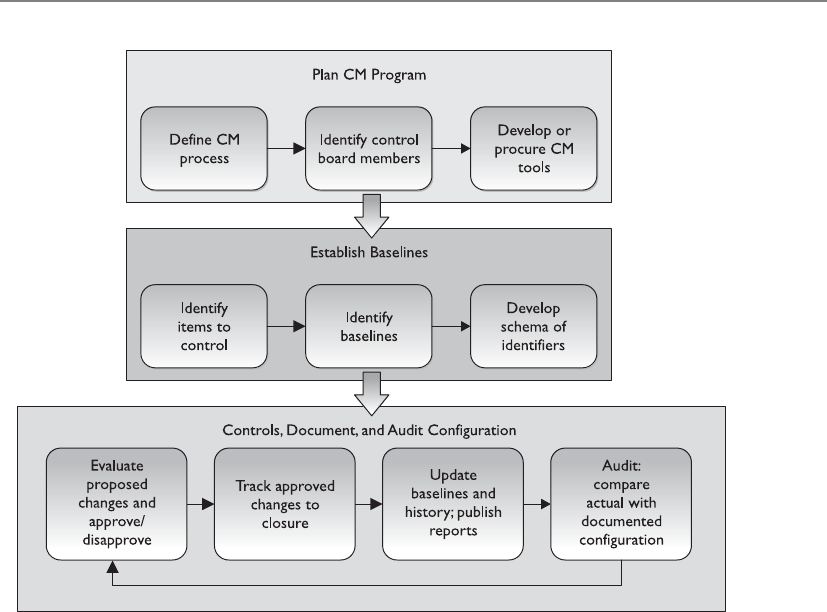
Chapter 11: Security Operations
1255
Companies may have a media library with a librarian in charge of protecting its
resources. If so, most or all of the responsibilities described in this chapter for the pro-
tection of the confidentiality, integrity, and availability of media fall to the librarian.
Users may be required to check out specific types of media and resources from the li-
brary, instead of having the resources readily available for anyone to access them. This
is common when the media library includes the distribution media for licensed soft-
ware. It provides an accounting (audit log) of uses of media, which can help in demon-
strating due diligence in complying with license agreements, and in protecting
confidential information (such as personally identifiable information, financial/credit
card information, and protected health information) in media libraries containing
those types of data.
Media should be clearly marked and logged, its integrity should be verified, and it
should be properly erased of data when no longer needed. After large investment is
made to secure a network and its components, a common mistake is for old computers
along with their hard drives and other magnetic storage media to be replaced, and the
obsolete equipment shipped out the back door along with all the data the company
just spent so much time and money securing. This puts the information on the obsolete
equipment and media at risk of disclosure, and violates legal, regulatory, and ethical
obligations of the company. Thus, the requirement of erasure is the end of the media
life cycle.

CISSP All-in-One Exam Guide
1256
When media is erased (cleared of its contents), it is said to be sanitized. In military/
government classified systems terms, this means erasing information so it is not readily
retrieved using routine operating system commands or commercially available foren-
sic/data recovery software. Clearing is acceptable when media will be reused in the
same physical environment for the same purposes (in the same compartment of com-
partmentalized information security) by people with the same access levels for that
compartment.
Purging means making information unrecoverable even with extraordinary effort
such as physical forensics in a laboratory. Purging is required when media will be re-
moved from the physical confines where the information on the media was allowed to
be accessed, or will be repurposed to a different compartment. Media can be sanitized
in several ways: zeroization (overwriting with a pattern designed to ensure that the data
formerly on the media are not practically recoverable), degaussing (magnetic scram-
bling of the patterns on a tape or disk that represent the information stored there), and
destruction (shredding, crushing, burning). Deleting files on a piece of media does not
actually make the data disappear; it only deletes the pointers to where the data in those
files still live on the media. This is how companies that specialize in restoration can
recover the deleted files intact after they have been apparently/accidentally destroyed.
Even simply overwriting media with new information may not eliminate the possibil-
ity of recovering the previously written information. This is why zeroization (see Figure
11-1) and secure overwriting algorithms are required. And if any part of a piece of me-
dia containing highly sensitive information cannot be cleared or purged, then physical
destruction must take place.
Not all clearing/purging methods are applicable to all media—for example, optical
media is not susceptible to degaussing, and overwriting may not be effective against
Flash devices. The degree to which information may be recoverable by a sufficiently
motivated and capable adversary must not be underestimated or guessed at in igno-
rance. For the highest-value commercial data, and for all data regulated by government
or military classification rules, read and follow the rules and standards.
Data remanence is the residual physical representation of information that was
saved and then erased in some fashion. This remanence may be enough to enable the
data to be reconstructed and restored to a readable form. This can pose a security threat
to a company that thinks it has properly erased confidential data from its media. If the
media is reassigned (object reuse), then an unauthorized individual could gain access to
your sensitive data.
If the media does not hold confidential or sensitive information, overwriting or
deleting the files may be the appropriate step to take. (Refer to Chapter 3 for further
discussion on these issues.)
The guiding principle for deciding what is the necessary method (and cost) of data
erasure is to ensure that the enemies’ cost of recovering the data exceeds the value of the
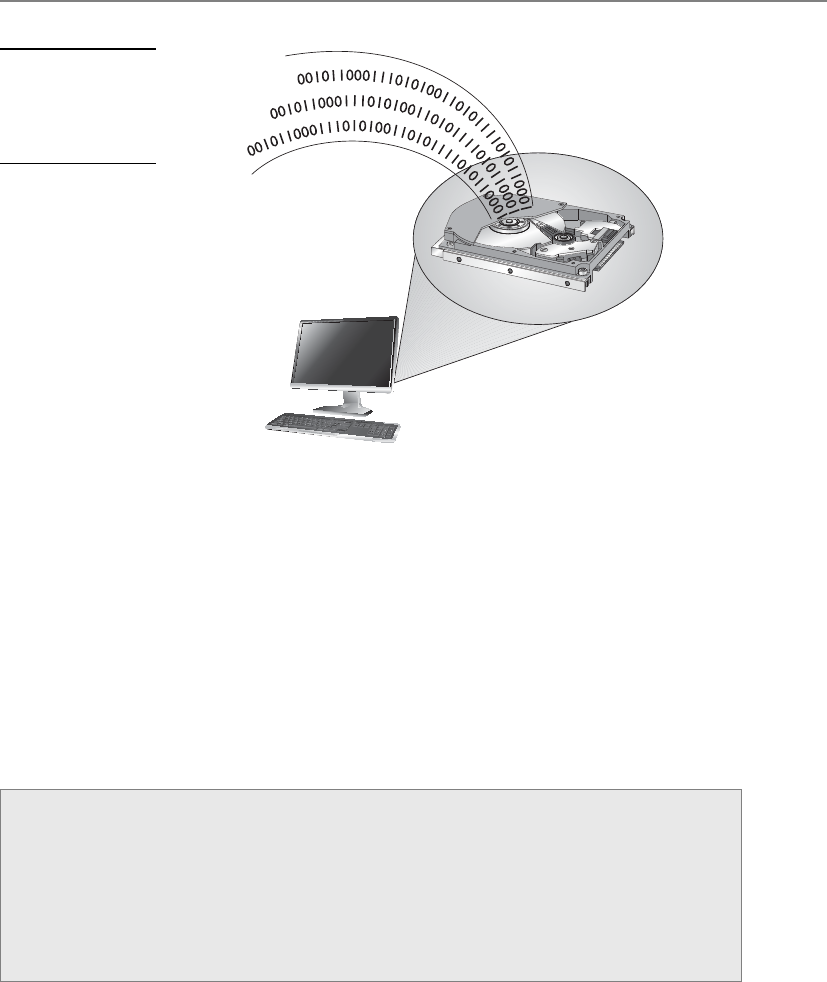
Chapter 11: Security Operations
1257
data. “Sink the company” (or “sink the country”) information has value so high that
the destruction of the media, which involves both the cost of the destruction and the
total loss of any potential reusable value of the media, is justified. For most other catego-
ries of information, multiple or simple overwriting is sufficient. Each company must
evaluate the value of its data and then choose the appropriate erasure/disposal method.
Methods were discussed earlier for secure clearing, purging, and destruction of elec-
tronic media. Other forms of information, such as paper, microfilm, and microfiche,
also require secure disposal. “Dumpster diving” is the practice of searching through
trash at homes and businesses to find valuable information that was simply thrown
away without being first securely destroyed through shredding or burning.
Atoms and Data
A device that performs degaussing generates a coercive magnetic force that re-
duces the magnetic flux density of the storage media to zero. This magnetic force
is what properly erases data from media. Data are stored on magnetic media by
the representation of the polarization of the atoms. Degaussing changes this po-
larization (magnetic alignment) by using a type of large magnet to bring it back
to its original flux (magnetic alignment).
Figure 11-1
Zeroization
overwrites
media to protect
sensitive data.

CISSP All-in-One Exam Guide
1258
Media management, whether in a library or managed by other systems or individu-
als, has the following attributes and tasks:
•Tracking (audit logging) who has custody of each piece of media at any
given moment. This creates the same kind of audit trail as any audit logging
activity—to allow an investigation to determine where information was at any
given time, who had it, and, for particularly sensitive information, why they
accessed it. This enables an investigator to focus efforts on particular people,
places, and time if a breach is suspected or known to have happened.
•Effectively implementing access controls to restrict who can access each
piece of media to only those people defined by the owner of the media/
information on the media, and to enforce the appropriate security measures
based on the classification of the media/information on the media. Certain
media, due to its physical type and/or the nature of the information on it,
may require “special handling.” All personnel who are authorized to access
media must have training to ensure they understand what is required of such
media. An example of special handling for, say, classified information may
be that the media may only be removed from the library or its usual storage
place under physical guard, and even then may not be removed from the
building. Access controls will include physical (locked doors, drawers, cabinets,
or safes), technical (access and authorization control of any automated system
for retrieving contents of information in the library), and administrative (the
actual rules for who is supposed to do what to each piece of information).
Finally, the data may need to change format, as in printing electronic data to
paper. The data still needs to be protected at the necessary level, no matter
what format it is in. Procedures must include how to continue to provide the
appropriate protection. For example, sensitive material that is to be mailed
should be sent in a sealable inner envelope and use only courier service.
•Tracking the number and location of backup versions (both onsite and
offsite). This is necessary to ensure proper disposal of information when
the information reaches the end of its lifespan, to account for the location
and accessibility of information during audits, and to find a backup copy
of information if the primary source of the information is lost or damaged.
•Documenting the history of changes to media. For example, when a particular
version of a software application kept in the library has been deemed obsolete,
this fact must be recorded so the obsolete version of the application is not
used unless that particular obsolete version is required. Even once no possible
need for the actual media or its content remains, retaining a log of the former

Chapter 11: Security Operations
1259
existence and the time and method of its deletion may be useful to demonstrate
due diligence.
•Ensuring environmental conditions do not endanger media. Each media
type may be susceptible to damage from one or more environmental influences.
For example, all media formats are susceptible to fire, and most are susceptible
to liquids, smoke, and dust. Magnetic media formats are susceptible to
strong magnetic fields. Magnetic and optical media formats are susceptible to
variations in temperature and humidity. A media library and any other space
where reference copies of information are stored must be physically built so
all types of media will be kept within their environmental parameters, and the
environment must be monitored to ensure conditions do not range outside of
those parameters. Media libraries are particularly useful when large amounts
of information must be stored and physically/environmentally protected so
that the high cost of environmental control and media management may be
centralized in a small number of physical locations, and so that cost is spread
out over the large number of items stored in the library.
•Ensuring media integrity by verifying on a media-type and environment-
appropriate basis that each piece of media remains usable, and transferring
still-valuable information from pieces of media reaching their obsolescence
date to new pieces of media. Every type of media has an expected lifespan
under certain conditions, after which it can no longer be expected that the
media will reliably retain information. For example, a commercially produced
CD or DVD stored in good environmental conditions should be reliable for
at least ten years, whereas an inexpensive CD-R or DVD-R sitting on a shelf in
a home office may become unreliable after just one year. All types of media
in use at a company should have a documented (and conservative) expected
lifespan. When the information on a piece of media has more remaining
lifespan before its scheduled obsolescence/destruction date than does the
piece of media on which the information is recorded, then the information
must be transcribed to a newer piece or a newer format of media. Even the
availability of hardware to read media in particular formats must be taken into
account. A media format that is physically stable for decades, but for which no
working device remains available to read, is of no value. Additionally, as part
of maintaining the integrity of the specific contents of a piece of media, if the
information on that media is highly valuable or mandated to be kept by some
regulation or law, a cryptographic signature of the contents of the media may
be maintained, and the contents of the piece of media verified against that
signature on a regular basis.

CISSP All-in-One Exam Guide
1260
•Inventorying the media on a scheduled basis to detect if any media has been
lost/changed. This can reduce the amount of damage a violation of the other
media protection responsibilities could cause by detecting such violations
sooner rather than later, and is a necessary part of the media management life
cycle by which the controls in place are verified as being sufficient.
•Carrying out secure disposal activities. Disposition includes the lifetime
after which the information is no longer valuable and the minimum necessary
measures for the disposal of the media/information. Secure disposal of media/
information can add significant cost to media management. Knowing that
only a certain percentage of the information must be securely erased at the
end of its life may significantly reduce the long-term operating costs of the
company. Similarly, knowing that certain information must be disposed of
securely can reduce the possibility of a piece of media being simply thrown in a
dumpster and then found by someone who publicly embarrasses or blackmails
the company over the data security breach represented by that inappropriate
disposal of the information. It is the business that creates the information stored
on media, not the person, library, or librarian who has custody of the media,
that is responsible for setting the lifetime and disposition of that information.
The business must take into account the useful lifetime of the information to
the business, legal and regulatory restrictions, and, conversely, the requirements
for retention and archiving when making these decisions. If a law or regulation
requires the information to be kept beyond its normally useful lifetime for the
business, then disposition may involve archiving—moving the information
from the ready (and possibly more expensive) accessibility of a library to a
long-term stable and (with some effort) retrievable format that has lower
storage costs.
•Internal and external labeling of each piece of media in the library should
include
• Date created
• Retention period
• Classification level
• Who created it
• Date to be destroyed
• Name and version
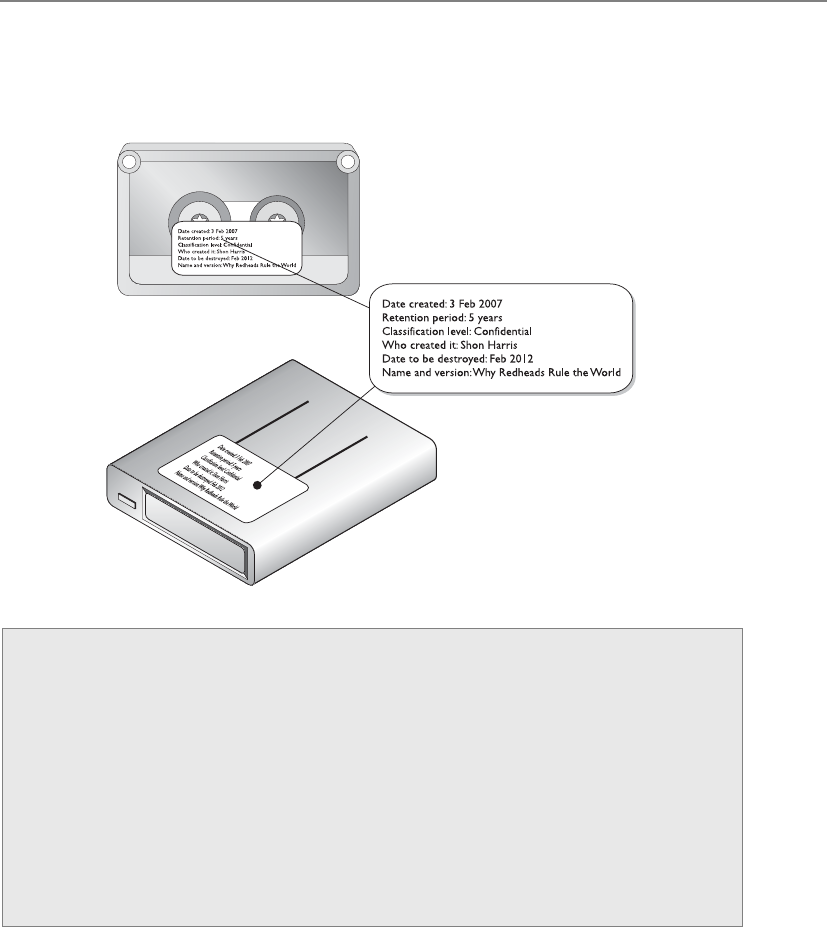
Chapter 11: Security Operations
1261
Media Protection
Now, what is a media librarian responsible for again?
• Marking
• Logging
• Integrity verification
• Physical access protection
• Environmental protection
• Transmittal
• Disposition
Taken together, these tasks implement the full life cycle of the media and represent
a necessary part of the full life cycle of the information stored thereon.

CISSP All-in-One Exam Guide
1262
Data Leakage
Leaks of personal information can cause large dollar losses. The costs commonly include
investigation, contacting affected individuals to inform them, penalties and fines to
regulatory agencies and contract liabilities, and mitigating expenses (such as credit re-
porting) and direct damages to affected individuals. In addition to financial loss, a com-
pany’s reputation may be damaged and individual identities can be stolen. The most
common cause of data breach for a business is a lack of awareness and discipline among
employees. Negligence commonly leads to an overwhelming majority of all leaks.
While the most common forms of negligent data breaches occur due to the inap-
propriate removal of information—for instance, from a secure company system to an
insecure home computer so that the employee can work from home, or due to simple
theft of an insecure laptop or tape from a taxi cab, airport security checkpoint, or ship-
ping box—breaches also occur due to negligent uses of technologies that are inappro-
priate for a particular use—for example, reassigning some type of medium (say, a page
frame, disk sector, or magnetic tape) that contained one or more objects to an unrelated
purpose without securely ensuring that the media contained no residual data.
It would be too easy to simply blame employees for any inappropriate use of infor-
mation that results in the information being put at risk, followed by breaches. Employ-
ees have a job to do, and their understanding of that job is almost entirely based on
what their employer tells them. What an employer tells an employee about the job is not
limited to, and may not even primarily be in, the “job description.” Instead, it will be in
the feedback the employee receives on a day-to-day and year-to-year basis regarding their
work. If the company in its routine communications to employees and its recurring
training, performance reviews, and salary/bonus processes does not include security
awareness, then employees will not understand security to be a part of their job.
The increased complexity in the environment and types of media that are now be-
ing commonly used in environments require more communication and training to
ensure that the environment is well protected.
Further, except in government and military environments, company policies and
even awareness training will not stop the most dedicated employees from making the
best use of up-to-date consumer technologies, including those technologies not yet inte-
grated into the corporate environment, and even those technologies not yet reasonably
secured for the corporate environment or corporate information. Companies must stay
aware of new consumer technologies and how employees (wish to) use them in the
corporate environment. Just saying “no” will not stop an employee from using, say, a
personal digital assistant, a USB thumb drive, a smartphone, or e-mail to forward corpo-
rate data to their home e-mail address in order to work on the data when out of the
office. Companies must include in their technical security controls the ability to detect
and/or prevent such actions through, for example, computer lockdowns, which prevent
writing sensitive data to non-company-owned storage devices, such as USB thumb
drives, and e-mailing sensitive information to nonapproved e-mail destinations.

Chapter 11: Security Operations
1263
Network and Resource Availability
In the triangle of security services, availability is one of the foundational components, the
other two being confidentiality and integrity. Network and resource availability often is not
fully appreciated until it is gone. That is why administrators and engineers need to imple-
ment effective backup and redundant systems to make sure that when something hap-
pens (and something will happen), users’ productivity will not be drastically affected.
The network needs to be properly maintained to make sure the network and its re-
sources will always be available when they’re needed. For example, the cables need to
be the correct type for the environment and technology used, and cable runs should
not exceed the recommended lengths. Older cables should be replaced with newer
ones, and periodic checks should be made for possible cable cuts and malfunctions.
A majority of networks use Ethernet technology, which is very resistant to failure.
Token Ring was designed to be fault tolerant and does a good job when all the comput-
ers within this topology are configured and act correctly. If one network interface card
(NIC) is working at a different speed than the others, the whole ring can be affected and
traffic may be disrupted. Also, if two systems have the same MAC address, the whole
network can be brought down. These issues need to be considered when maintaining
an existing network. If an engineer is installing a NIC on a Token Ring network, she
should ensure it is set to work at the same speed as the others and that there is no pos-
sibility for duplicate MAC addresses.
As with disposal, device backup solutions and other availability solutions are cho-
sen to balance the value of having information available against the cost of keeping that
information available:
•Redundant hardware ready for “hot swapping” keeps information highly
available by having multiple copies of information (mirroring) or enough
extra information available to reconstruct information in case of partial loss
(parity, error correction). Hot swapping allows the administrator to replace
the failed component while the system continues to run and information
remains available; usually degraded performance results, but unplanned
downtime is avoided.
•Fault-tolerant technologies keep information available against not only
individual storage device faults but even against whole system failures. Fault
tolerance is among the most expensive possible solutions, and is justified
only for the most mission-critical information. All technology will eventually
experience a failure of some form. A company that would suffer irreparable
harm from any unplanned downtime, or that would accumulate millions of
dollars in losses for even a very brief unplanned downtime, can justify paying
the high cost for fault-tolerant systems.
•Service level agreements (SLAs) help service providers, whether they are
an internal IT operation or an outsourcer, decide what type of availability
technology is appropriate. From this determination, the price of a service or

CISSP All-in-One Exam Guide
1264
the budget of the IT operation can be set. The process of developing an SLA
with a business is also beneficial to the business. While some businesses have
performed this type of introspection on their own, many have not, and being
forced to go through the exercise as part of budgeting for their internal IT
operations or external sourcing helps the business understand the real value
of its information.
•Solid operational procedures are also required to maintain availability.
The most reliable hardware with the highest redundancy or fault tolerance,
designed for the fastest mean time to repair, will mostly be a waste of money
if operational procedures, training, and continuous improvement are not part
of the operational environment: one slip of the finger by an IT administrator
can halt the most reliable system.
We need to understand when system failures are most likely to happen….
Mean Time Between Failures
Mean time between failures (MTBF) is the estimated lifespan of a piece of equipment.
MTBF is calculated by the vendor of the equipment or a third party. The reason for us-
ing this value is to know approximately when a particular device will need to be re-
placed. Either based on historical data or scientifically estimated by vendors, it is used
as a benchmark for reliability by predicting the average time that will pass in the opera-
tion of a component or a system until its final death.
Organizations trending MTBF over time for the device they use may be able to iden-
tify types of devices that are failing above the averages promised by manufacturers and
take action such as proactively contacting the manufacturers under warranty, or decid-
ing that old devices are reaching the end of their useful life and choosing to replace
them en masse before larger scale failures and operational disruptions occur.
Mean Time to Repair
You are very mean. I have decided not to repair you.
Mean time to repair (MTTR) is the amount of time it will be expected to take to get
a device fixed and back into production. For a hard drive in a redundant array, the
MTTR is the amount of time between the actual failure and the time when, after notic-
ing the failure, someone has replaced the failed drive and the redundant array has
completed rewriting the information on the new drive. This is likely to be measured in
hours. For a nonredundant hard drive in a desktop PC, the MTTR is the amount of time
between when the user emits a loud curse and calls the help desk, and the time when
the replaced hard drive has been reloaded with the operating system, software, and any
backed-up data belonging to the user. This is likely to be measured in days. For an un-
planned reboot, the MTTR is the amount of time between the failure of the system and
the point in time when it has rebooted its operating system, checked the state of its
disks (hopefully finding nothing that its file systems cannot handle), and restarted its
applications, and its applications have checked the consistency of their data (hopefully

Chapter 11: Security Operations
1265
finding nothing that their journals cannot handle) and once again begun processing
transactions. For well-built hardware running high-quality, well-managed operating
systems and software, this may be only minutes. For commodity equipment without
high-performance journaling file systems and databases, this may be hours, or, worse,
days if automated recovery/rollback does not work and a restore of data from tape is
required:
• The MTTR may pertain to fixing a component or the device, or replacing the
device, or perhaps refers to a vendor’s SLA.
• If the MTTR is too high for a critical device, then redundancy should be used.
The MTBF and MTTR numbers provided by manufacturers are useful in choosing
how much to spend on new systems. Systems that can be down for brief periods of time
without significant impact may be built from inexpensive components with lower
MTBF expectations and modest MTTR. Higher MTBF numbers are often accompanied
by higher prices. Systems that cannot be allowed to be down need redundant compo-
nents. Systems for which no downtime is allowable, or even those brief windows of
increased risk experienced when a redundant component has failed and is being re-
placed, may require fault tolerance.
Single Points of Failure
Don’t put all your eggs in one basket, or all your electrons in one device.
Asingle point of failure poses a lot of potential risk to a network, because if the de-
vice fails, a segment or even the entire network is negatively affected. Devices that could
represent single points of failure are firewalls, routers, network access servers, T1 lines,
switches, bridges, hubs, and authentication servers—to name a few. The best defenses
against being vulnerable to these single points of failure are proper maintenance, regu-
lar backups, redundancy, and fault tolerance.
What’s the Real Deal?
MTBF can be misleading. Putting aside questions of whether manufacturer-pre-
dicted MTBFs are believable, consider a desktop PC with a single hard drive in-
stalled, where the hard drive has an MTBF estimate by the manufacturer of 30,000
hours. Thus, 30,000 hours / 8,760 hours/year = a little over three years MTBF. This
suggests that this model of hard drive, on average, will last over three years before
it fails. Put aside the notions of whether the office environment in which that PC
is located is temperature-, humidity-, shock-, and coffee spill–controlled, and
install a second identical hard drive in that PC. The possibility of failure has now
doubled, giving two chances in that three-year period of suffering a failure of a
hard drive in the PC. Extrapolate this to a data center with thousands of these
hard drives in it, and it becomes clear that a hard drive replacement budget is
required each year, along with redundancy for important data.
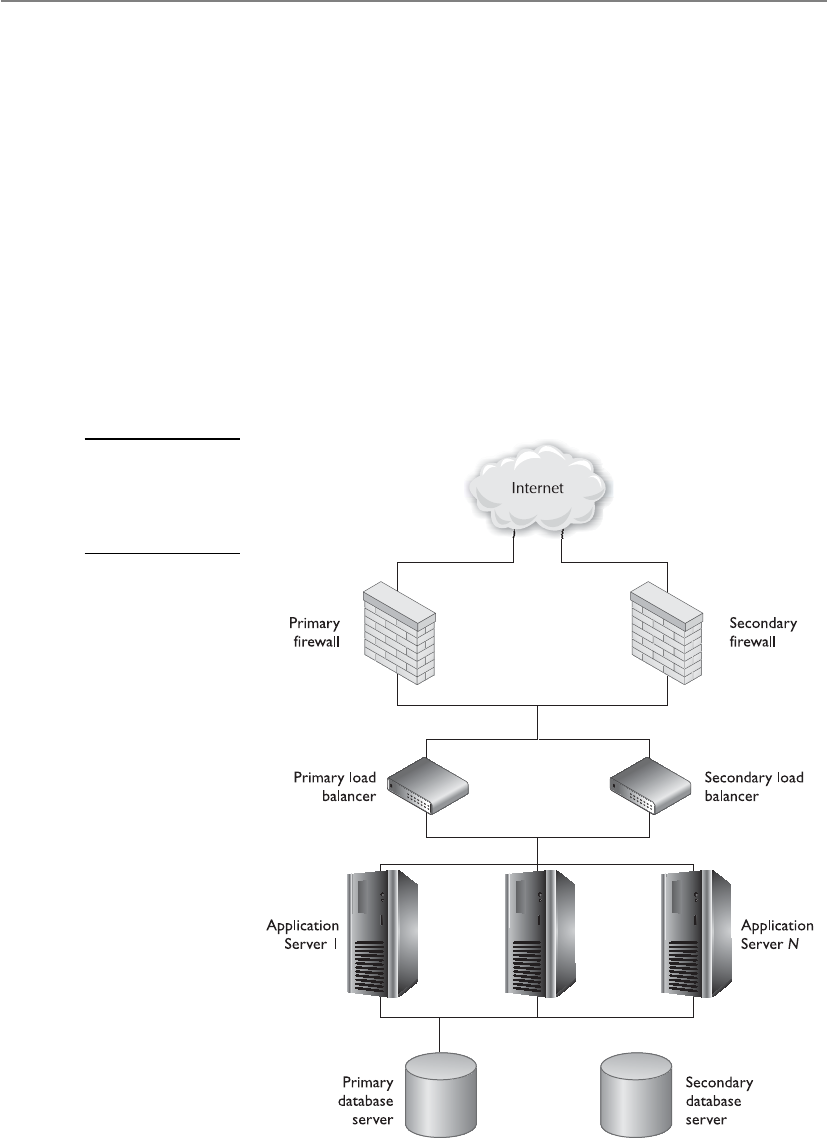
CISSP All-in-One Exam Guide
1266
Multiple paths should exist between routers in case one router goes down, and dy-
namic routing protocols should be used so each router will be informed when a change
to the network takes place. For WAN connections, a failover option should be config-
ured to enable an integrated services digital network (ISDN) to be available if the WAN
router fails. Figure 11-2 illustrates a common e-commerce environment that contains
redundant devices.
Redundant array of independent disks (RAID) provides fault tolerance for hard
drives and can improve system performance. Redundancy and speed are provided by
breaking up the data and writing it across several disks so different disk heads can work
simultaneously to retrieve the requested information. Control data are also spread
across each disk—this is called parity—so that if one disk fails, the other disks can work
together and restore its data.
Information that is required to always be available—that is, for which MTTR must
be essentially zero and for which significantly degraded performance is unacceptable—
should be mirrored or duplexed. In both mirroring (also known as RAID 1) and du-
Figure 11-2
Each critical device
may require a
redundant partner
to ensure availability.

Chapter 11: Security Operations
1267
plexing, every data write operation occurs simultaneously or nearly simultaneously in
more than one physical place. The distinction between mirroring and duplexing is that
with mirroring, the two (or more) physical places where the data are written may be
attached to the same controller, leaving the storage still subject to the single point of
failure of the controller itself; in duplexing, two or more controllers are used. Mirroring
and duplexing may occur on multiple storage devices that are physically at a distance
from one another, providing a degree of disaster tolerance.
The benefit of mirrors/duplexes is that, for mostly read operations, the read re-
quests may be satisfied from any copy in the mirror/duplex, potentially allowing for
multiples of the speed of individual devices. See the section “RAID,” which is discussed
shortly, for details.
The following sections address other technologies that can be used to help prevent
productivity disruption because of single points of failure.
Direct Access Storage Device
Direct Access Storage Device (DASD) is a general term for magnetic disk storage devices,
which historically have been used in mainframe and minicomputer (mid-range com-
puter) environments. RAID is a type of DASD. The key distinction between Direct

CISSP All-in-One Exam Guide
1268
Access and Sequential Access storage devices is that any point on a Direct Access Storage
Device may be promptly reached, whereas every point in between the current position
and the desired position of a Sequential Access Storage Device must be traversed in
order to reach the desired position. Tape drives are Sequential Access Storage Devices.
Some tape drives have minimal amounts of Direct Access intelligence built in. These
include multitrack tape devices that store at specific points on the tape and cache in the
tape drive information about where major sections of data on the tape begin, allowing
the tape drive to more quickly reach a track and a point on the track from which to
begin the now much shorter traversal of data from that indexed point to the desired
point. While this makes such tape drives noticeably faster than their purely sequential
peers, the difference in performance between Sequential and Direct Access Storage De-
vices is orders of magnitude.
RAID
Everyone be calm—this is a raid.
Response: Wrong raid.
Redundant array of independent disks (RAID) is a technology used for redundancy
and/or performance improvement. It combines several physical disks and aggregates
them into logical arrays. When data are saved, the information is written across all
drives. A RAID appears as a single drive to applications and other devices.
When data are written across all drives, the technique of striping is used. This activity
divides and writes the data over several drives. The write performance is not affected, but
the read performance is increased dramatically because more than one head is retrieving
data at the same time. It might take the RAID system six seconds to write a block of data
to the drives and only two seconds or less to read the same data from the disks.
Various levels of RAID dictate the type of activity that will take place within the
RAID system. Some levels deal only with performance issues, while other levels deal
with performance and fault tolerance. If fault tolerance is one of the services a RAID
level provides, parity is involved. If a drive fails, the parity is basically instructions that
tell the RAID system how to rebuild the lost data on the new hard drive. Parity is used
to rebuild a new drive so all the information is restored. Most RAID systems have hot-
swapping disks, which means they can replace drives while the system is running. When
a drive is swapped out, or added, the parity data are used to rebuild the data on the new
disk that was just added.

Chapter 11: Security Operations
1269
NOTE
NOTE RAID level 15 is actually a combination of levels 1 and 5, and RAID 10
is a combination of levels 1 and 0.
The most common RAID levels used today are levels 1, 3, and 5. Table 11-2 de-
scribes each of the possible RAID levels.
NOTE
NOTE RAID level 5 is the most commonly used mode.

CISSP All-in-One Exam Guide
1270
Massive Array of Inactive Disks (MAID)
I have a maid that collects my data and vacuums.
Response: Sure you do.
A relatively recent entrant into the medium-scale storage arena (in the hundreds of
terabytes) is MAID, a massive array of inactive disks. MAID has a particular (possibly
large) niche, where up to several hundred terabytes of data storage are needed, but it
carries out mostly write operations. Smaller storage requirements generally do not jus-
tify the increased acquisition cost and operational complexity of a MAID. Medium-to-
large storage requirements where much of the data are regularly active would not
accomplish a true benefit from MAID since the performance of a MAID in such a use
case declines rapidly as more drives are needed to be active than the MAID is intended
to offer. At the very highest end of storage, with a typical write-mostly use case, tape
drives remain the most economical solution due to the lower per-unit cost of tape stor-
age and the decreasing percent of the total media needed to be online at any given time.
In a MAID, rack-mounted disk arrays have all inactive disks powered down, with
only the disk controller alive. When an application asks for data, the controller powers
up the appropriate disk drive(s), transfers the data, and then powers the drive(s) down
RAID Level Activity Name
0 Data striped over several drives. No redundancy or
parity is involved. If one volume fails, the entire volume
can be unusable. It is used for performance only.
Striping
1 Mirroring of drives. Data are written to two drives at
once. If one drive fails, the other drive has the exact
same data available.
Mirroring
2 Data striping over all drives at the bit level. Parity data
are created with a hamming code, which identifies any
errors. This level specifies that up to 39 disks can be
used: 32 for storage and 7 for error recovery data.
This is not used in production today.
Hamming code parity
3 Data striping over all drives and parity data held on
one drive. If a drive fails, it can be reconstructed from
the parity drive.
Byte-level parity
4 Same as level 3, except parity is created at the block
level instead of the byte level.
Block-level parity
5 Data are written in disk sector units to all drives.
Parity is written to all drives also, which ensures there
is no single point of failure.
Interleave parity
6 Similar to level 5 but with added fault tolerance, which
is a second set of parity data written to all drives.
Second parity data (or
double parity)
10 Data are simultaneously mirrored and striped across
several drives and can support multiple drive failures.
Striping and mirroring
Table 11-2 Different RAID Levels

Chapter 11: Security Operations
1271
again. By powering down infrequently accessed drives, energy consumption is signifi-
cantly reduced, and the service life of the disk drives may be increased.
Redundant Array of Independent Tapes (RAIT)
How is a rat going to help us store our data?
Response: Who hired you and why?
RAIT (redundant array of independent tapes) is similar to RAID, but uses tape drives
instead of disk drives. Tape storage is the lowest-cost option for very large amounts of
data, but is very slow compared to disk storage. For very large write-mostly storage ap-
plications where MAID is not economical and where a higher performance than typical
tape storage is desired, or where tape storage provides appropriate performance and
higher reliability is required, RAIT may fit.
As in RAID 1 striping, in RAIT, data are striped in parallel to multiple tape drives,
with or without a redundant parity drive. This provides the high capacity at low cost
typical of tape storage, with higher-than-usual tape data transfer rates and optional data
integrity.
Storage Area Networks
Drawing from the local area network (LAN), wide area network (WAN), and metro-
politan area network (MAN) nomenclature, a storage area network (SAN) consists of
large amounts of storage devices linked together by a high-speed private network and
storage-specific switches. This creates a “fabric” that allows users to attach to and inter-
act in a transparent mode. When a user makes a request for a file, he does not need to
know which server or tape drive to go to—the SAN software finds it and magically
provides it to the user.
Many infrastructures have data spewed all over the network, and tracking down the
necessary information can be frustrating, but backing up all of the necessary data can
also prove challenging in this setup.
SANs provide redundancy, fault tolerance, reliability, and backups, and allow the
users and administrators to interact with the SAN as one virtual entity. Because the net-
work that carries the data in the SAN is separate from a company’s regular data network,
all of this performance, reliability, and flexibility comes without impact to the data
networking capabilities of the systems on the network.
SANs are not commonly used in average or mid-sized companies. They are for com-
panies that have to keep track of terabytes of data and have the funds for this type of
technology. The storage vendors are currently having a heyday, not only because every-
thing we do business-wise is digital and must be stored, but because government regu-
lations are requiring companies to keep certain types of data for a specific retention
period. Imagine storing all of your company’s e-mail traffic for seven years…that’s just
one type of data that must be retained.
NOTE
NOTE Tape drives, optical jukeboxes, and disk arrays may also be attached to,
and referenced through, a SAN.
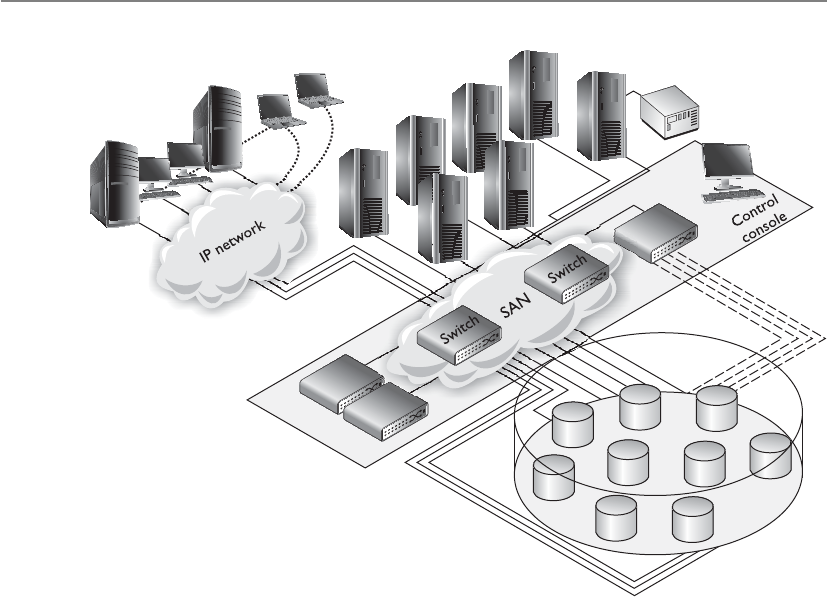
CISSP All-in-One Exam Guide
1272
Clustering
Okay, everyone gather over here and perform the same tasks.
Clustering is a fault-tolerant server technology that is similar to redundant servers,
except each server takes part in processing services that are requested. A server cluster is
a group of servers that are viewed logically as one server to users and can be managed
as a single logical system. Clustering provides for availability and scalability. It groups
physically different systems and combines them logically, which provides immunity to
faults and improves performance. Clusters work as an intelligent unit to balance traffic,
and users who access the cluster do not know they may be accessing different systems
at different times. To the users, all servers within the cluster are seen as one unit. Clus-
ters may also be referred to as server farms.
If one of the systems within the cluster fails, processing continues because the rest
pick up the load, although degradation in performance could occur. This is more attrac-
tive, however, than having a secondary (redundant) server that waits in the wings in
case a primary server fails, because this secondary server may just sit idle for a long pe-
riod of time, which is wasteful. When clustering is used, all systems are used to process
requests and none sit in the background waiting for something to fail. Clustering is a
logical outgrowth of redundant servers. Consider a single server that requires high
availability, and so has a hot standby redundant server allocated. For each such single
server requiring high availability, an additional redundant server must be purchased.
Since failure of multiple primary servers at once is unlikely, it would be economically
efficient to have a small number of extra servers, any of which could take up the load of
any single failed primary server. Thus was born the cluster.

Chapter 11: Security Operations
1273
Clustering offers a lot more than just availability. It also provides load balancing
(each system takes a part of the processing load), redundancy, and failover (other sys-
tems continue to work if one fails).
Grid Computing
I am going to use a bit of the processing power of every computer and take over the world.
Grid computing is another load-balanced parallel means of massive computation,
similar to clusters, but implemented with loosely coupled systems that may join and
leave the grid randomly. Most computers have extra CPU processing power that is not
being used many times throughout the day. So some smart people thought that was
wasteful and came up with a way to use all of this extra processing power. Just like the
power grid provides electricity to entities on an as-needed basis (if you pay your bill),
computers can volunteer to allow their extra processing power to be available to differ-
ent groups for different projects. The first project to use grid computing was SETI
(Search for Extraterrestrial Intelligence), where people allowed their systems to partici-
pate in scanning the universe looking for aliens who are trying to talk to us.
Although this may sound similar to clustering, where in a cluster a central control-
ler has master control over allocation of resources and users to cluster nodes and the
nodes in the cluster are under central management (in the same trust domain), in grid
computing the nodes do not trust each other and have no central control.
Applications that may be technically suitable to run in a grid and that would enjoy
the economic advantage of a grid’s cheap massive computing power, but which require
secrecy, may not be good candidates for a grid computer since the secrecy of the content
of a workload unit allocated to a grid member cannot be guaranteed by the grid against
the owner of the individual grid member. Additionally, because the grid members are
of variable capacity and availability and do not trust each other, grid computing is not
appropriate for applications that require tight interactions and coordinated scheduling
among multiple workload units. This means sensitive data should not be processed
over a grid, and this is not the proper technology for time-sensitive applications.
A more appropriate use of grid computing is projects like financial modeling,
weather modeling, and earthquake simulation. Each of these has an incredible amount
of variables and input that need to be continually computed. This approach has also
been used to try and crack algorithms and was used to generate Rainbow Tables.
NOTE
NOTE Rainbow Tables consist of all possible passwords in hashed formats.
This allows attackers to uncover passwords much more quickly than carrying
out a dictionary or brute force attack.
Backups
Backing up software and having backup hardware devices are two large parts of network
availability. (These issues are covered extensively in Chapters 5 and 8, so they are dis-
cussed only briefly here.) You need to be able to restore data if a hard drive fails, a di-
saster takes place, or some type of software corruption occurs.

CISSP All-in-One Exam Guide
1274
A policy should be developed that indicates what gets backed up, how often it gets
backed up, and how these processes should occur. If users have important information
on their workstations, the operations department needs to develop a method that indi-
cates that backups include certain directories on users’ workstations or that users move
their critical data to a server share at the end of each day to ensure it gets backed up.
Backups may occur once or twice a week, every day, or every three hours. It is up to the
company to determine this routine. The more frequent the backups, the more resources
will be dedicated to it, so there needs to be a balance between backup costs and the
actual risk of potentially losing data.
A company may find that conducting automatic backups through specialized soft-
ware is more economical and effective than spending IT work-hours on the task. The
integrity of these backups needs to be checked to ensure they are happening as expect-
ed—rather than finding out right after two major servers blow up that the automatic
backups were saving only temporary files. (Review Chapter 8 for more information on
backup issues.)
Hierarchical Storage Management (HSM)
HSM (Hierarchical Storage Management) provides continuous online backup function-
ality. It combines hard disk technology with the cheaper and slower optical or tape
jukeboxes. The HSM system dynamically manages the storage and recovery of files,
which are copied to storage media devices that vary in speed and cost. The faster media
holds the data that are accessed more often, and the seldom-used files are stored on the
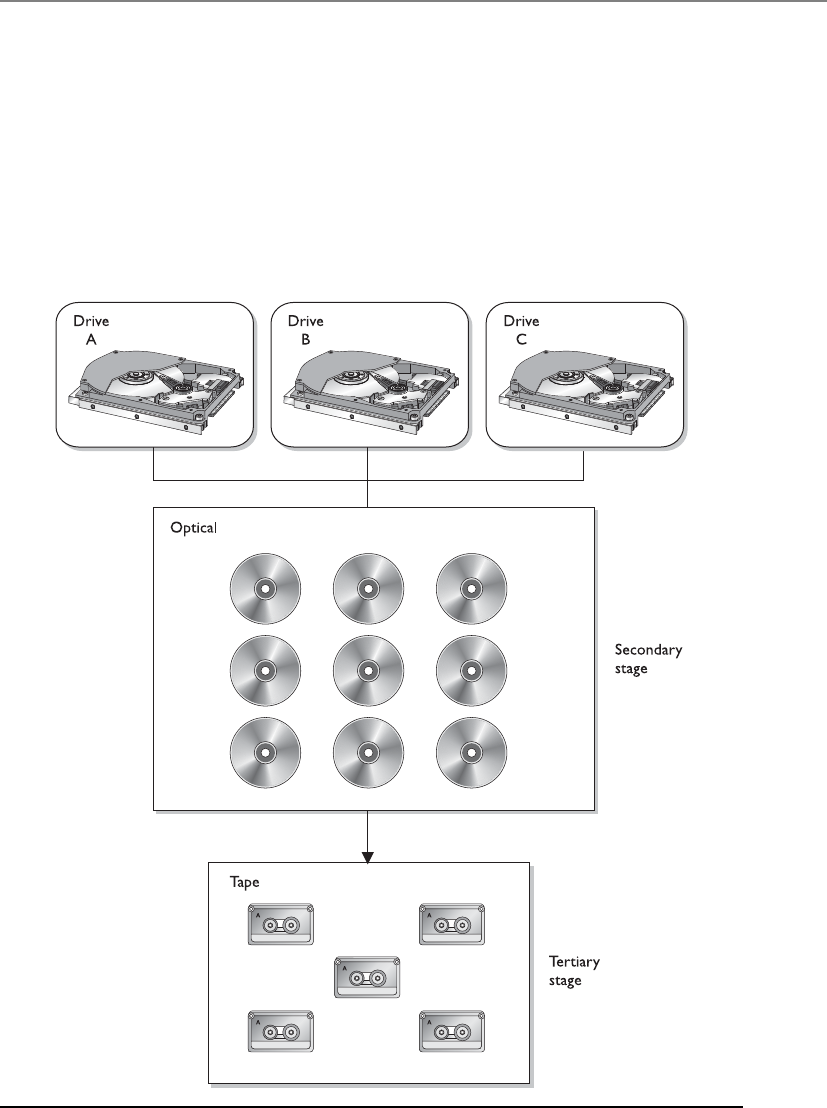
Chapter 11: Security Operations
1275
slower devices, or near-line devices, as shown in Figure 11-3. The storage media could
include optical disks, magnetic disks, and tapes. This functionality happens in the back-
ground without the knowledge of the user or any need for user intervention.
HSM works, according to tuning based on the trade-off between the cost of storage
and the availability of information, by migrating the actual content of less used files to
lower-speed, lower-cost storage, while leaving behind a “stub,” which looks to the user
like it contains the full data of the migrated file. When the user or an application ac-
cesses the stub, the HSM uses the information in the stub to find the real location of the
information and then retrieve it transparently for the user.
Figure 11-3 HSM provides an economical and efficient way of storing data.

CISSP All-in-One Exam Guide
1276
This type of technology was created to save money and time. If all data were stored
on hard drives, that would be expensive. If a lot of the data were stored on tapes, it
would take too long to retrieve the data when needed. So HSM provides a terrific ap-
proach by providing you with the data you need, when you need it, without having to
bother the administrator to track down some tape or optical disk.
Full, incremental, and differential data backup technologies were discussed in Chap-
ter 8, along with software and hardware backups. Backups should include the underly-
ing operating system and applications, as well as the configuration files for both. Systems
are attached to networks, and network devices can experience failures and data losses as
well. Data loss of a network device usually means the configuration of the network de-
vice is lost completely (and the device will not even boot up), or that the configuration
of the network device reverts to defaults (which, though it will boot up, does your net-
work little good). Therefore, the configurations of network and other nonsystem devices
(for example, the phone system) in the environment are also necessary.
CAUTION
CAUTION Trivial File Transfer Protocol (TFTP) servers are commonly used
to save the configuration settings from network devices. However, TFTP is an
insecure protocol, some network settings are sensitive and should be kept
confidential, and a coordinated attack is possible against network devices
that load their configurations using TFTP by first causing the network device
to fail and then attacking the TFTP download of the configuration to cause a
malicious configuration to be loaded. Alternatives to TFTP should be sought.
Contingency Planning
What does our contingency plan state?
Response: It says to blame everything on Bob.
When an incident strikes, more is required than simply knowing how to restore
data from backups. Also necessary are the detailed procedures that outline the activities
to keep the critical systems available and ensure that operations and processing are not
interrupted. Contingency management defines what should take place during and after
an incident. Actions that are required to take place for emergency response, continuity
of operations, and dealing with major outages must be documented and readily avail-
able to the operations staff. There should be at least three instances of these documents:
the original that is on site; a copy that is also on site but in a protective, fireproof safe;
and a copy that is at an offsite location.
Contingency plans should not be trusted until they have been tested. Organizations
should carry out exercises to ensure that the staff fully understands their responsibilities
and how to carry them out. Another issue to consider is how to keep these plans up-to-
date. As our dynamic, networked environments change, so must our plans on how to
rescue them when necessary.
Although in the security industry “contingency planning” and “business continuity
planning (BCP)” are commonly used interchangeably, it is important that you under-
stand the actual difference for the CISSP exam. BCP addresses how to keep the organi-

Chapter 11: Security Operations
1277
zation in business after a disaster takes place. It is about the survivability of the
organization and making sure that critical functions can still take place even after a di-
saster. Contingency plans address how to deal with small incidents that do not qualify
as disasters, as in power outages, server failures, a down communication link to the
Internet, or the corruption of software. It is important that organizations be ready to
deal with large and small issues that they may run into one day.
Mainframes
What is that massive gray thing in the corner?
Response: No one really knows.
Much of the discussion earlier was devoted to low-end (desktops, laptops, worksta-
tions) and mid-range (mini-computer) systems. Mainframe computers are still with us,
and are likely to remain so for some time. The distinction between a mainframe and a
high-end mid-range computer attached to a SAN has been narrowing, but certain at-
tributes still make a mainframe different.
Not because of their hardware architecture, but because of very conservative (and
therefore very expensive) engineering practices, mainframes tend to be highly reliable
and available. That is, the developers of mainframes trade off the valuable research
money and development effort that makes lower-end systems so fast with so many
features for the reliability that lower-end systems almost universally lack. A side effect
of this high investment in software quality (including both the operating system and
applications) is that the results produced by mainframe processing tend to be more ac-
curate than the commonly used servers and off-the-shelf software.
As a result of this reliability, mainframes are better for critical data needs that must
be always “up.”
Summary of Technologies Used to Keep the Juices Flowing
The following are the items you will most likely run into when taking the
CISSP exam:
• Disk shadowing (mirroring)
• Redundant servers
• RAID, MAID, RAIT
• Clustering
• Backups
• Dual backbones
• Direct Access Storage Device
• Redundant power
• Mesh network topology instead of star, bus, or ring

CISSP All-in-One Exam Guide
1278
There is a key hardware difference between mainframes and even the highest-end
mid-range systems: Mainframe hardware is designed first and foremost for massive in-
put/output. On a modern desktop PC, the CPU power has increased 1,000,000 times
in the past 25 years, but the I/O capability has increased orders of magnitude less than
that. This allows mainframes, especially today as they have borrowed from the vast
CPU power improvements of PCs, to run huge numbers of processes at once, without
each process being input/output starved; that ultra-fast modern PC could run only a
small fraction of the number of data-hungry processes at once before I/O bottlenecks
brought the PC to a standstill. This makes mainframes nonprocessing-specific (as an
ultra-fast cheap modern PC can be), and thus excellent general high-volume processing
platforms. This also explains what may seem to be a hidden reason for some of the high
cost of a mainframe. Mainframes have vast amounts of “processor” power hidden away
in their front-end processors (which keep the users’ interactions from distracting the
central processor), their I/O processors (which move data and communicate with disk
and tape drives without loading the central processor), and their network processors
(which move data to and from the network efficiently without loading the central pro-
cessor). All of this “hidden” processing power requires hardware, which contributes to
the high cost.
Another benefit of the reliability of mainframes is that they are not maintenance-
intensive. Where patches are released regularly and in quantity for lower-end systems,
mainframes have much reduced patch release schedules, and the quantity of patches in
each release is much smaller.
Another classical difference between a mainframe and a mid-range system or a PC
is the user interface. Today, mainframes still often perform batch processing rather than
run interactive programs, and, though the practice is on the decline, they still some-
times accept user jobs as batches requested through Remote Job Entry (RJE) from a
mainframe terminal.
A more basic difference, offering interesting possibilities, between mainframes and
other types of systems is that where PCs and mid-range systems have one hardware
personality and often just one operating system, mainframes at IPL can be configured
with each bootup to be a different kind of system. This allows backward compatibility
of newer hardware processors with older operating systems, enabling a company to
retain value from a long ago investment in software for many years, where in the PC
and mid-range system arena the very old software would simply no longer be usable.
Environmental Controls
The operations department is also responsible for a majority of the items covered
in Chapter 5. This includes server room temperature and humidity; fire protec-
tion; heating, ventilation, and air conditioning (HVAC); water protection; power
sources; positive air pressure to protect against contaminants; and a closed-loop,
recirculating air-conditioning system.
All of these items have already been covered extensively in Chapter 5. You
need to make sure you understand that these responsibilities fall within the op-
erations department.

Chapter 11: Security Operations
1279
Mainframes also were the first commercial-scale use of virtualization, allowing a “sin-
gle” mainframe computer (which could consist of multiple banks of memory, storage,
and CPUs that today can even be added dynamically) to appear to be multiple inde-
pendent computers, with strong separation among their several operating environ-
ments, sharing the total resources of the physical mainframe computer as decided by
the system administrator.
Supercomputers might be considered a special class of mainframe. They share many
architectural similarities, but where mainframes are designed for very high quantities of
general processing, supercomputers are optimized for extremely complex central pro-
cessing (which also happens to require the vast I/O capability of the mainframe archi-
tecture). Where a mainframe’s several processors will balance the load of a very high
number of general processes, a supercomputer’s possibly massive number of processes
may be custom designed to allow a large number of very highly parallelized copies of a
particular application to communicate in real time, or a very small number of extreme-
ly complex scientific algorithms to leverage vast amounts of data at once.
E-mail Security
The Internet was first developed mainly for government agencies and universities to
communicate and share information, but today businesses need it for productivity and
profitability. Millions of individuals also depend upon it as their window to a larger
world and as a quick and efficient communications tool.
E-mail has become an important and integrated part of people’s lives. It is used to
communicate with family and friends, business partners and customers, co-workers
and management, and online merchants and government offices. Generally, the secu-
rity, authenticity, and integrity of an e-mail message are not considered in day-to-day
use. Users are more aware that attachments can carry viruses than the fact that an e-mail
can be easily spoofed and that its contents can be changed while in transmission.
It is very easy to spoof e-mail messages, which means to alter the name in the From
field. All an attacker needs to do is modify information within the Preferences section
of his mail client and restart the application. As an example of a spoofed e-mail mes-
sage, an attacker could change the name in the From field to the name of the network
administrator and send an e-mail message to the CEO’s secretary, telling her the IT de-
partment is having problems with some servers and needs her to change her network
logon to “password.” If she receives this e-mail and sees the From field has the network
administrator’s name in it, she will probably fulfill this request without thinking twice.
This type of activity is rampant today, and has become more of a social-engineering
tactic. Another variant is referred to as phishing. This is the act of sending spoofed mes-
sages that pretend to originate from a source the user trusts and has a business relation
with, such as a bank. In this scheme, the user is asked to click a link contained within
the e-mail that will supposedly take them to their account login page so they can do
account maintenance activities. Instead, the link takes the user to a web site that looks
very similar to their bank’s site but that is in fact owned by the attacker. The moment
the user enters their credentials, the attacker has the credentials to the users’ account
information on the real site.

CISSP All-in-One Exam Guide
1280
The solution to this and similar types of attacks is to require proper authentication
to ensure the message actually came from the source indicated. Companies that regard
security as one of their top priorities should implement an e-mail protection applica-
tion that can digitally sign messages, like Pretty Good Privacy (PGP), or use a public key
infrastructure (PKI). These companies may also consider using an encryption protocol
to help fight network sniffing and the unauthorized interception of messages.
An e-mail message that travels from Arizona to Maine has many hops in between its
source and destination. Several potential interception points exist where an attacker
could intercept, view, modify, or delete the message during its journey, as shown in
Figure 11-4.
If a user is going to use a security scheme to protect his messages from eavesdrop-
ping, modification, and forgery, he and the recipient must use the same encryption
scheme. If public key cryptography is going to be used, both users must have a way to
exchange encryption keys. This is true for PGP, digital signatures, and products that fol-
low the Secure Multipurpose Internet Mail Extension (S/MIME) standard, which are
discussed in detail in Chapter 7. If an administrator or security professional wants to
ensure all messages are encrypted between two points and does not want to depend on
users to properly encrypt their messages, she can implement a virtual private network
(VPN) (also discussed in Chapter 7).
Operators’ Responsibilities
Mainframe operators have a long list of responsibilities: reassigning ports, mount-
ing input and output volumes, overseeing and controlling the flow of the submit-
ted jobs, renaming (or relabeling) resources, taking care of any IPLs, and buying
donuts for the morning meetings.
If you see the term operators on the exam, it is dealing specifically with main-
frame operators even if the term mainframe is not used in the question.
Figure 11-4 An e-mail message can be intercepted at several possible points.
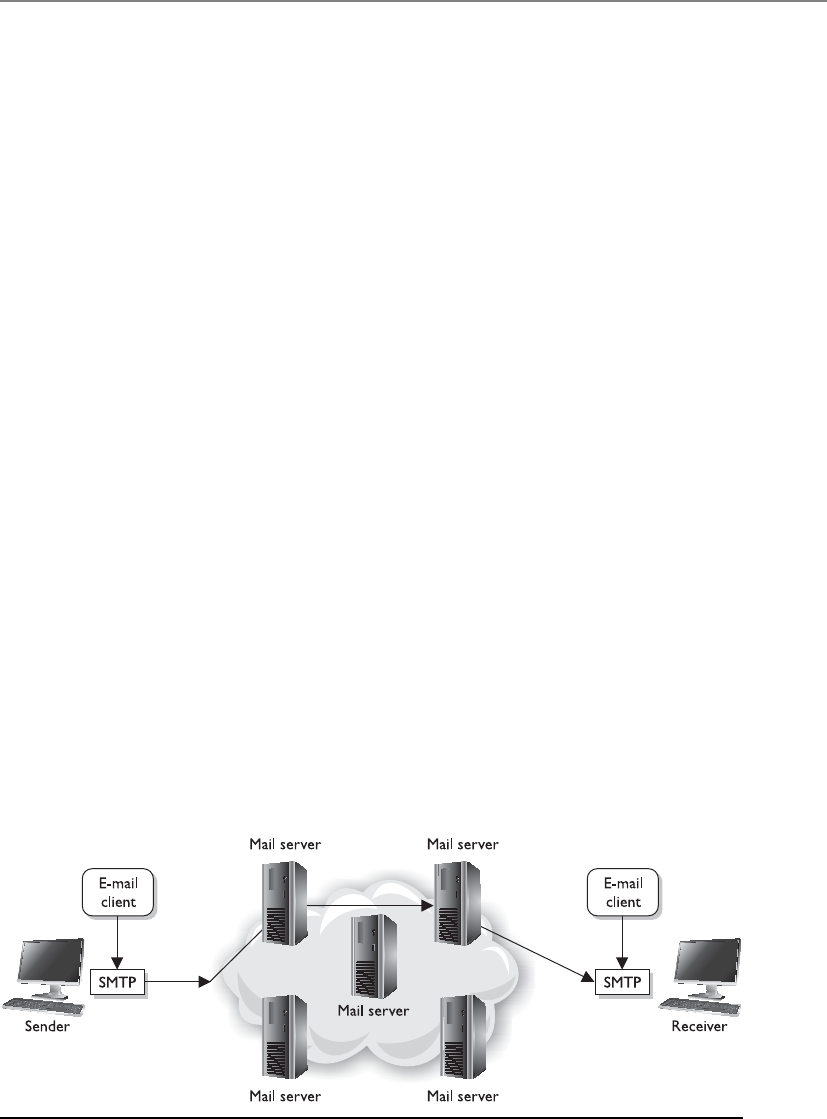
Chapter 11: Security Operations
1281
How E-mail Works
I think e-mail is delivered by an e-mail fairy wearing a purple dress.
Response: Exactly.
A user has an e-mail client that is used to create, modify, address, send, receive, and
forward messages. This e-mail client may provide other functionality, such as a per-
sonal address book and the ability to add attachments, set flags, recall messages, and
store messages within different folders.
A user’s e-mail message is of no use unless it can actually be sent somewhere. This
is where Simple Mail Transfer Protocol (SMTP) comes in. In some e-mail clients SMTP
works as a message transfer agent, as shown in Figure 11-5, and moves the message
from the user’s computer to the mail server when the user clicks the Send button. SMTP
also functions as a message transfer protocol between e-mail servers. Last, SMTP is a
message-exchange addressing standard, and most people are used to seeing its familiar
addressing scheme: something@somewhere.com.
Many times, a message needs to travel throughout the Internet and through differ-
ent mail servers before it arrives at its destination mail server. SMTP is the protocol that
carries this message, and it works on top of the Transmission Control Protocol (TCP).
TCP is used as the transport protocol because it is a reliable protocol and provides se-
quencing and acknowledgments to ensure the e-mail message arrived successfully at its
destination.
The user’s e-mail client must be SMTP-compliant to be properly configured to use
this protocol. The client provides an interface to the user so she can create and modify
messages as needed, and then the client passes the message off to SMTP. So, to use the
analogy of sending a letter via the post office, the e-mail client is the typewriter that a
person uses to write the message, SMTP is the mail courier who picks up the mail and
delivers it to the post office, and the post office is the mail server. The mail server has
the responsibility of understanding where the message is heading and properly routing
the message to that destination.
The mail server is often referred to as an SMTP server. The most common SMTP
server software within the Unix world is Sendmail, which is actually an e-mail server
application. This means that Unix uses Sendmail software to store, maintain, and route
Figure 11-5 SMTP works as a transfer agent for e-mail messages.

CISSP All-in-One Exam Guide
1282
e-mail messages. Within the Microsoft world, Microsoft Exchange is mostly used, and
in Novell, GroupWise is the common SMTP server. SMTP works closely with two mail
server protocols, POP and IMAP, which are explained in the following sections.
POP
Post Office Protocol (POP) is an Internet mail server protocol that supports incoming
and outgoing messages. A mail server that uses POP stores and forwards e-mail mes-
sages and works with SMTP to move messages between mail servers.
A smaller company may have one POP server that holds all employee mailboxes,
whereas larger companies may have several POP servers, one for each department with-
in the organization. There are also Internet POP servers that enable people all over the
world to exchange messages. This system is useful because the messages are held on the
mail server until users are ready to download their messages, instead of trying to push
messages right to a person’s computer, which may be down or offline.
The e-mail server can implement different authentication schemes to ensure an in-
dividual is authorized to access a particular mailbox, but this is usually handled through
usernames and passwords.
IMAP
Internet Message Access Protocol (IMAP) is also an Internet protocol that enables users
to access mail on a mail server. IMAP provides the same types of functionality as POP,
but has more capabilities and functionality. If a user is using POP, when he accesses his
mail server to see if he has received any new messages, all messages are automatically
downloaded to his computer. Once the messages are downloaded from the POP server,
they are usually deleted from that server, depending upon the configuration. POP can
cause frustration for mobile users because the messages are automatically pushed down
to their computer or device and they may not have the necessary space to hold all the
messages. This is especially true for mobile devices that can be used to access e-mail
servers. This is also inconvenient for people checking their mail on other people’s com-
puters. If Christina checks her e-mail on Jessica’s computer, all of Christina’s new mail
could be downloaded to Jessica’s computer.
If a user uses IMAP instead of POP, she can download all the messages or leave
them on the mail server within her remote message folder, referred to as a mailbox. The
user can also manipulate the messages within this mailbox on the mail server as if the
messages resided on her local computer. She can create or delete messages, search for
specific messages, and set and clear flags. This gives the user much more freedom and
keeps the messages in a central repository until the user specifically chooses to down-
load all messages from the mail server.
IMAP is a store-and-forward mail server protocol that is considered POP’s successor.
IMAP also gives administrators more capabilities when it comes to administering and
maintaining the users’ messages.

Chapter 11: Security Operations
1283
E-mail Relaying
Could you please pass on this irritating message that no one wants?
Response: Sure.
E-mail has changed drastically from the purely mainframe days. In that era, mail
used simple Systems Network Architecture (SNA) protocols and the ASCII format. To-
day, several types of mail systems run on different operating systems and offer a wide
range of functionality. Sometimes companies need to implement different types of
mail servers and services within the same network, which can become a bit overwhelm-
ing and a challenge to secure.
Most companies have their public mail servers in their DMZ and may have one or
more mail servers within their LAN. The mail servers in the DMZ are in this protected
space because they are directly connected to the Internet. These servers should be tight-
ly locked down and their relaying mechanisms should be correctly configured. Mail
servers use a relay agent to send a message from one mail server to another. This relay
agent needs to be properly configured so a company’s mail server is not used by an-
other for spamming activity.
Spamming usually is illegal, so the people doing the spamming do not want the
traffic to seem as though it originated from their equipment. They will find mail servers
on the Internet or within company DMZs that have loosely configured relaying mecha-
nisms and use these computers to send their spam. If relays are configured “wide open”
on a mail server, the mail server can be used to receive any mail message and send it on
to the intended recipients, as shown in Figure 11-6. This means that if a company does
not properly configure its mail relaying, its server can be used to distribute advertise-
ments for other companies, spam messages, and pornographic material. It is important
that mail servers have proper antispam features enabled, which are actually antirelaying
features. A company’s mail server should only accept mail destined for its domain and
should not forward messages to other mail servers and domains.
Many companies employ antivirus and content-filtering applications on their mail
servers to try and stop the spread of malicious code and not allow unacceptable mes-
sages through the e-mail gateway. It is important to filter both incoming and outgoing
messages. This helps ensure that inside employees are not spreading viruses or sending
out messages that are against company policy.
Facsimile Security
Your covert strategic plans on how we are going to attack our enemy are sitting in a fax bin in
the front office.
Faxing data is a very popular way of delivering information today and, like other
types of communications channels, it must be incorporated into the security policy and
program of companies.
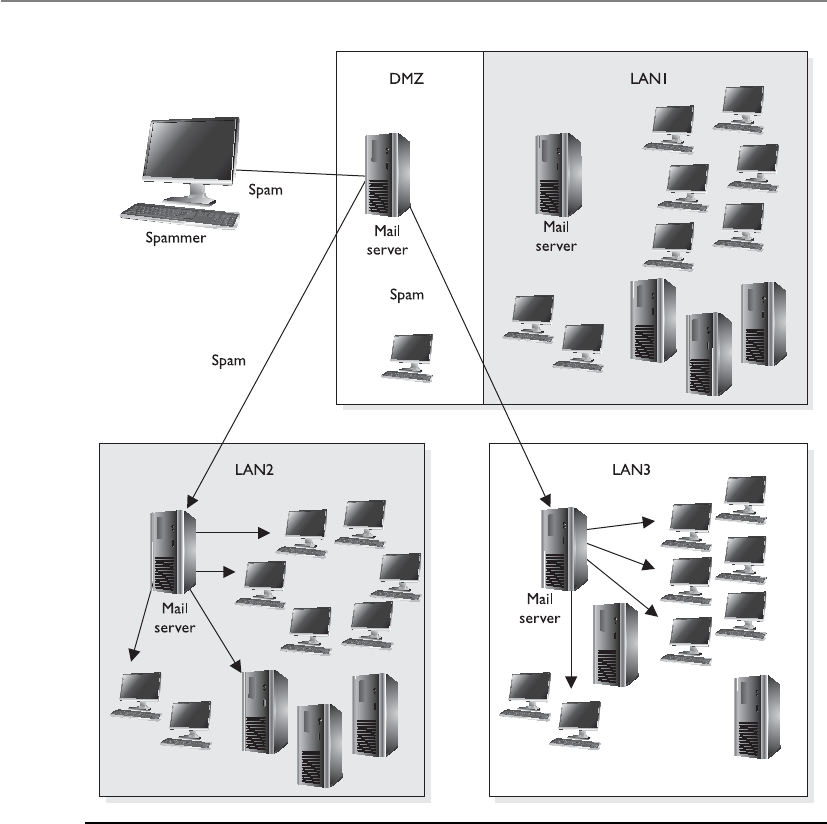
CISSP All-in-One Exam Guide
1284
Fax machines can present some security issues if they are being used to transmit
sensitive or confidential information. The information is scanned into the device,
transmitted over a phone line, and printed out on the destination fax machine. The
received fax often just sits in a bin until the recipient walks over to retrieve it. If it con-
tains confidential information, it might not be a good idea to have it just lying around
for anyone to see it.
Some companies use fax servers, which are systems that manage incoming and out-
going faxed documents. When a fax is received by the fax server, the fax server properly
routes it to the individual it is addressed to so it is kept in electronic form rather than
being printed. Typically, the received fax is routed to the recipient’s electronic mailbox.
Figure 11-6 Mail servers can be used for spam if relay functionality is not properly configured.
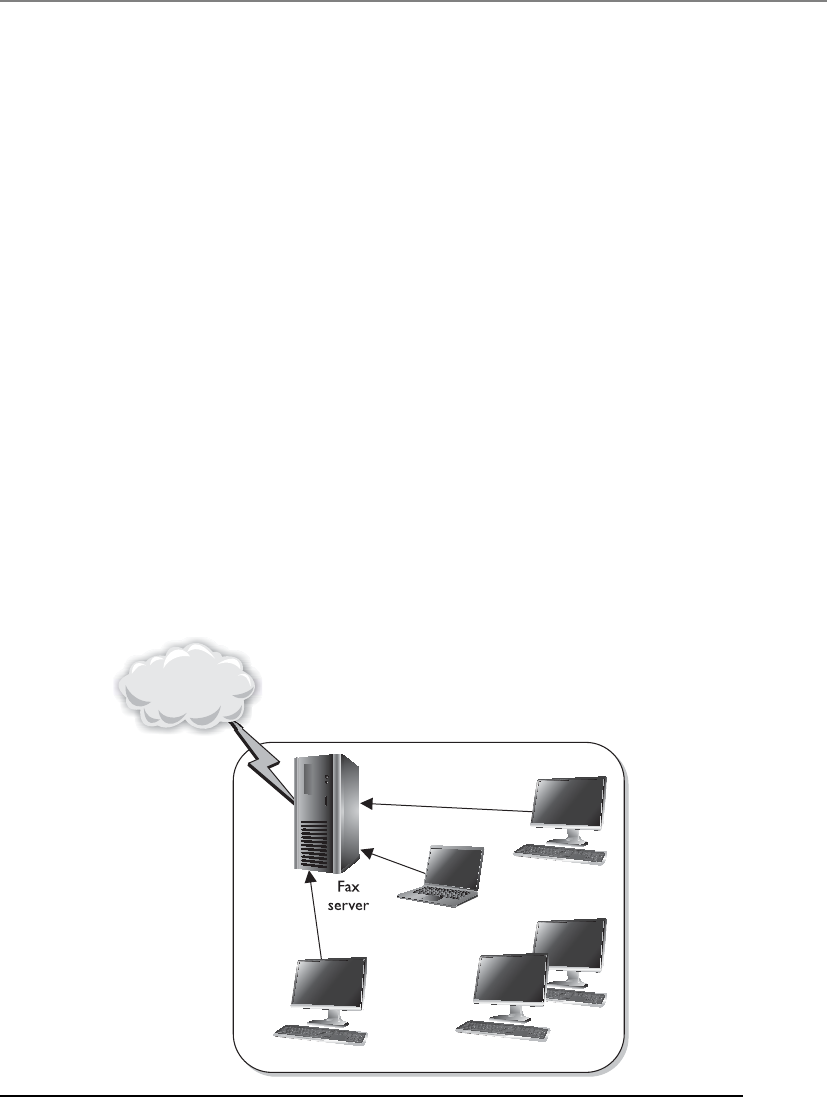
Chapter 11: Security Operations
1285
The fax server lets many users transmit documents from their computers to the fax
server, as illustrated in Figure 11-7, without having to pass the document through a
fax device. This reduces the amount of sensitive documentation that needs to be
properly destroyed and can save money on printing and paper required by stand-
alone fax machines.
A fax server usually has the capability to print the received faxes, but this can present
the same security breaches as a stand-alone fax device. In environments that demand
high security levels, the print feature should be disabled so sensitive documents can be
stored and viewed by authorized individuals only and never printed.
Extensive logging and auditing are available for fax servers and should be imple-
mented and monitored in companies that require this level of security. Because data
travels to and from the fax server in cleartext form, some companies may choose to im-
plement encryption for faxed materials. A company may implement a fax encryptor, a
bulk data-link encryption mechanism that encrypts all fax data that hits the network
cable or telephone wire. A company would implement a fax encryptor if it did not want
to depend on each individual user to encrypt documents that are faxed. Instead, by using
a fax encryptor, the company is sure all data leaving that system are properly encrypted.
Hack and Attack Methods
Several types of attacks have been explained in the chapters throughout this book. This
section brings together these attack methods, and others that have not been presented,
to show how they are related, how they can be detected, and how they can be countered.
Figure 11-7 A fax server can be used instead of stand-alone fax devices.

CISSP All-in-One Exam Guide
1286
A majority of the tools used by hackers have dual capabilities in that they can be
used for good or evil. An attacker could use tool ABC to find a vulnerability to exploit,
and a security professional could use the same tool to identify a vulnerability so she
could fix it. When this tool is used by black hats (attackers), it is referred to as hacking.
When a white hat (security professional) uses this tool, it is considered ethical hacking
or penetration testing.
The tools used to perform attacks on networks and systems have, over time, become
so sophisticated that they offer even a moderately skilled individual (sometimes called
a script kiddie) the ability to perform very damaging attacks. The tools are simple to use
and often come with a graphical user interface (GUI) that walks the person through the
steps of resource identification, network mapping, and the actual attack. The person no
longer needs to understand protocol stacks, know what protocols’ fields are used by
different systems, understand how operating systems process program and assembly
code, or know how to write program code at all. The hacker just needs to insert an IP
range within a GUI tool and click Go. Many different types of tools are now used by the
attacker community, some of which are even capable of generating virus and worm
autocode and building specific exploits for a given operating system, platform, or ap-
plication release level.
Hacking tools are easily and widely available to anyone who wants them. At one
time, these types of tools were available only to a small group of highly skilled people,
but today hundreds of web sites are devoted to telling people how to perform exploits
and providing the tools for a small fee or for free. The ease of use of these tools, the
increased interest in hacking, and the deep dependence that companies and people
have upon technology have provided the ingredients to a recipe that can cause continu-
ous damage.
Any security administrator who maintains a firewall, or any person who runs a per-
sonal firewall on a computer, knows how active the Internet is with probes and port
scanners. These front-end protection devices are continually getting hit with packets
requesting information. Some probes look for specific types of computers, such as Unix
systems, web servers, or databases, because the attacker has specific types of attacks she
wants to carry out, and these attacks target specific types of operating systems or appli-
cations. These probes could also be looking to plant Trojan horses or viruses in com-
puters in the hope of causing destruction or compromising the systems so they can be
used in future distributed denial-of-service (DDoS) attacks, as illustrated in Figure 11-8.
These probes scan thousands of networks and computers, usually with no specific tar-
get in mind. They just look for any and all vulnerabilities, and the attacker does not
necessarily care where the vulnerable system happens to be located.
Sometimes the attacker has a specific target in mind and thus does not send out a
wide-sweeping probe. When an attacker identifies her target, she will do network map-
ping and port scanning. Network-mapping tools send out seemingly benign packets to
many different systems on a network. These systems respond to the packets, and the
mapping tool interrogates the returned packets to find out what systems are up and
running, the types of operating systems that responded, and possibly their place within
the network. This might seem like a lot of information from just some packets being
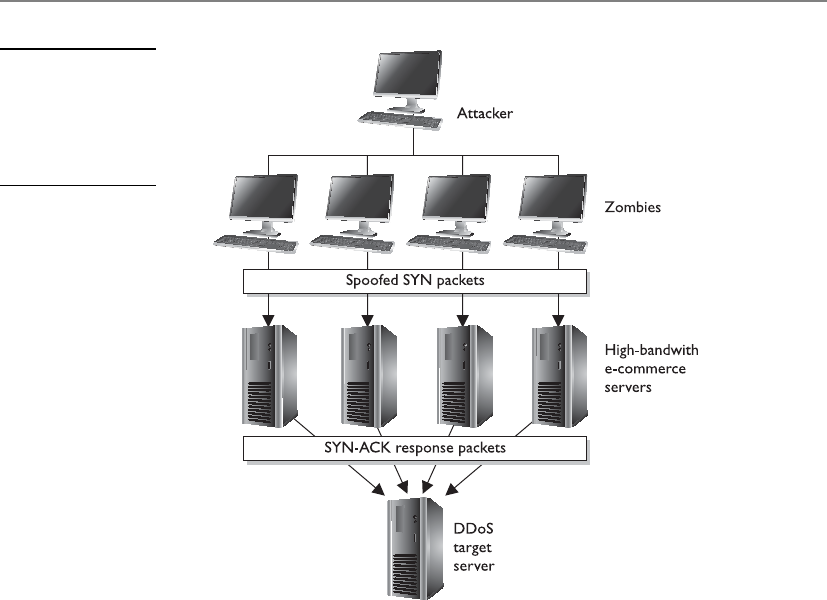
Chapter 11: Security Operations
1287
sent out, but these tools are highly calibrated to extract as much data from the returned
packet as possible. Different operating systems vary in their protocol stacks, meaning
they use different fields within protocol frames or populate those fields differently than
other operating systems. So if the tool sent a message to two computers running differ-
ent operating systems, they may respond with two slightly different answers. They may
both respond with the same basic answer using the same protocol, but because the two
operating systems use varied protocol stacks, one computer may use a certain value
within its response and the other system may use a different value within its response,
as shown in Figure 11-9. When the tool receives these two slightly different responses,
it can determine what type of operating system just replied. The tool and the attacker
then start to put together the topology of the victim’s network.
The network-mapping tool may have a database that maps operating systems, ap-
plications, and versions to the type of responses and message fields they use. So if the
networking tool received a reply from its Internet Control Message Protocol (ICMP)
ping sweep, which sends out ICMP packets to targets within a configured IP address
range, and one reply has the ICMP “Don’t fragment” bit enabled, the tool may deter-
mine that the target is a Unix host. Or if the tool sent out a TCP SYN packet and the
response received was a FIN/ACK, the tool may determine that the target is a Windows
NT system. This activity is referred to as operating system fingerprinting.
Figure 11-8
Distributed denial-
of-service attacks
use other systems to
amplify the attack’s
damage potential.

CISSP All-in-One Exam Guide
1288
It is important to the attacker to know what systems are alive on the network. When
the tool first sends out packets, it is looking to see what computers respond, which in-
dicates that they are powered on and alive. Normally, when a computer sends a SYN
packet, it is requesting to set up a conversation channel with the destination comput-
er—the first step in the TCP handshaking procedure. However, hacking tools that use
the SYN packet have no intention of setting up a real conversation channel, but instead
hope to trick the target system into replying. The normal response to a SYN packet is
SYN/ACK, but the administrator may have blocked this type of traffic at the firewall or
router or disabled the port on the computer. The attacker may receive no response or
receive a message saying “Port Unreachable.” This response tells the network-mapping
tool that the company’s firewall allows this type of traffic to enter the network, but that
specific port is closed on the target machine. These are all clues used by the attacker to
learn more and more about an environment. This knowledge enables the attacker
to figure out the most successful ways of attacking.
So, the first step for the attacker is to find out what systems are alive, attempt to find
out what type of operating systems the targets are running, and start to build the net-
work’s topology. The next step for an attacker is to do port scanning on the target ma-
chines, which identifies open ports on a computer. Ports provide doors into the
operating system for other computers, processes, protocols, and attackers. If an attacker
can find out what ports are open, she can have a pretty good idea of what services are
running on the systems. Knowing what services are available can further clarify the type
of system the target is. For example, if a target computer responds to an SMTP packet
sent to its port 25, the attacker could conclude that this computer may be an e-mail
server. However, more work would need to be done to confirm this.
The attacker wants to know what operating systems, applications, and services are
running so she knows what types of attacks to run. If she finds a Unix server running
Apache, she would run totally different types of attacks on it than she would run for a
Windows 2000 server running Internet Information Services (IIS). Each operating sys-
tem, application, and service has its own vulnerabilities, and properly identifying these
enables the attacker to be more successful in her attack.
Figure 11-9 A tool can be used to determine the type of operating system with which an attacker
is communicating.

Chapter 11: Security Operations
1289
Every computer system has 65,535 TCP and 65,535 User Datagram Protocol (UDP)
ports. The first 1,023 are said to be well-known ports. This means that a specific port
number under 1,024 is usually mapped to a well-known and used protocol. For in-
stance, port 80 is almost always mapped to the Hypertext Transfer Protocol (HTTP),
port 21 is mapped to the File Transfer Protocol (FTP), and port 25 is mapped to SMTP.
These ports can be reconfigured so port 21 is mapped to HTTP, let’s say, but that is very
uncommon.
A port-scanning utility is used to find out what ports are open on a system so the
attacker knows what doors are available to her. This tool will send packets to each and
every port on a system and listen for its response. If there is no response or a message
indicating “Port Unreachable,” this usually indicates the port and its corresponding
service are disabled. If a predictable response comes from the port, the attacker knows
the port is open and available for attack.
A port needs to be open and available for functionality. For example, most networks
require the use of SMTP, port 25, for e-mail activity. The administrator needs to put a
barrier between the potential attackers and this vulnerable port and its service. Of
course, the first step is to implement a perimeter network with firewalls, proxy servers,
and routers that only permit acceptable connections to the internal hosts. However, if
an administrator or security professional wanted to add another layer of protection on
Unix-like systems, he could implement TCP wrappers. These software components
(wrappers) monitor incoming network traffic to the host computer and control what
can and cannot access the services mapped to specific ports. When a request comes to
a computer at a specific port, the target operating system will check to see if this port is
enabled. If it is enabled and the operating system sees that the corresponding service is
wrapped, it knows to look at an access control list, which spells out who can access this
service. If the person or computer attempting to access this service is allowed within the
access control list, the operating system permits the connection to be made. If this per-
son or computer is not allowed, the packet is dropped or a message is sent back to the
initiator of the request, indicating that the request is refused.
At this point, the attacker has an idea of what systems are alive, what ports are open,
and what services are listening and available for attack. Although the search for exploit-
able vulnerabilities is becoming more focused, there is still an incredible number of
possible vulnerabilities one network can have. Sometimes attackers specialize in a few
specific attacks that they know well enough to carry out manually, or have scripts that
carry out specific attacks for them. But many attackers want a large range of possible
attacks available to them, so they use vulnerability scanning tools.
Vulnerability scanning tools have a large database of vulnerabilities and the capa-
bility to exploit many of the vulnerabilities they identify. New vulnerabilities are found
each week in operating systems, web servers, database software, and applications. It can
be overwhelming to try to keep up-to-date on each of these and the proper steps to
carry them out. The vulnerability scanners can do this for the security professional—
and, unfortunately, for the attacker. These tools have an engine that can connect to the
target machine and run through its database of vulnerabilities to see which apply to
the target machine. Some tools can even go a step further and attempt the exploit
to determine the actual degree of vulnerability.

CISSP All-in-One Exam Guide
1290
As stated earlier, these tools are dual-purpose in nature. Administrators and security
professionals should be using these types of tools on their environments to see what
vulnerabilities are present and available to potential attackers. That way, when a vulner-
ability or weakness is uncovered, the security professional can fix it before an attacker
finds it.
Browsing
I am looking for something, but I have no idea what it looks like.
Browsing is a general technique used by intruders to obtain information they are
not authorized to access. This type of attack takes place when an attacker is looking for
sensitive data but does not know the format of the data (word processing document,
spreadsheet, database, piece of paper). Browsing can be accomplished by looking
through another person’s files kept on a server or workstation, rummaging through
garbage looking for information that was carelessly thrown away, or reviewing informa-
tion that has been saved on USB Flash drives. A more advanced and sophisticated ex-
ample of browsing is when an intruder accesses residual information on storage media.
The original user may have deleted the files from a USB Flash drive, but, as stated ear-
lier, this only removes the pointers to the files within the file system on that disk. The
talented intruder can access these data (residual information) and access information
he is unauthorized to obtain.
Another type of browsing attack is called shoulder surfing, where an attacker looks
over another’s shoulder to see items on that person’s monitor or what is being typed in
at the keyboard.
Sniffers
Anetwork sniffer is a tool that monitors traffic as it traverses a network. Administrators
and network engineers often use sniffers to diagnose network problems. Sniffers are
also referred to as network analyzers or protocol analyzers. When used as a diagnostic tool,
a sniffer enables the administrator to see what type of traffic is being generated in the
hope of getting closer to the root of the network problem. When a sniffer is used as a
tool by an attacker, the sniffer can capture usernames, passwords, and confidential in-
formation as they travel over the network.
The sniffer tool is usually a piece of software that runs on a computer with its NIC
in promiscuous mode. NICs usually only pay attention to traffic addressed to them, but
if they are in promiscuous mode, they see all traffic going past them on the network
wire. Once a computer has been compromised by an attacker, the attacker will often
install a sniffer on that system to look for interesting traffic. Some sniffers only look for
passwords that are being transmitted and ignore the rest.
Sniffers have been very successful because a majority of LANs use Ethernet, which is
a broadcast technology. Because such a great amount of data is continually broadcasted,
it is easily available for an attacker who has planted a sniffer on a network segment.
However, sniffers are becoming less successful because of the move to switched environ-
ments. Switched environments separate network segments by broadcast and collision
domains. If the attacker is not within the broadcast and collision domain of the environ-

Chapter 11: Security Operations
1291
ment she is interested in sniffing, she will not receive the information she is looking for.
This is because a switch is usually configured so the required source and destination
ports on the switch carry the traffic, meaning the traffic is not blasted for everyone in the
vicinity to hear. Switched traffic travels from point A to point B through the switch and
does not spill over to every computer on the network, as it does in nonswitched net-
works. (Broadcast and collision domains are discussed in detail in Chapter 6.)
To combat sniffers within an environment, secure versions of services and protocols
should be used whenever possible. Many services and protocols were developed to
provide functionality, not security, but once it was figured out that security is also re-
quired in many environments, the protocols and services were improved upon to pro-
vide the same levels of functionality and security. Several protocols have a secure
version. This means the regular protocol operates in a way that has vulnerabilities that
can be exploited, and a more secure version has been developed to counter those vul-
nerabilities. One example is Secure RPC (S-RPC), which uses Diffie-Hellman public
key cryptography to determine the shared secret key for encryption with a symmetric
algorithm. If S-RPC is used in an environment, a sniffer can capture this data, but not
necessarily decrypt it.
Most protocols are vulnerable because they do not require strong authentication, if
it is required at all. For example, the r-utilities used in Unix (rexec, rsh, rlogin, and rcp)
are known to have several weaknesses. Authentication is usually provided through a
.rhosts file that looks at IP addresses instead of individual usernames and passwords.
These utilities should be disabled and replaced with one that requires stronger authen-
tication, like Secure Shell (SSH).
Session Hijacking
Many attackers spoof their addresses, meaning that the address within the frame that is
used to commit the attack has an IP address that is not theirs. This makes it much
harder to track down the attacker, which is the attacker’s purpose for spoofing in the
first place. This also enables an attacker to hijack sessions between two users without
being noticed.
If an attacker wanted to take over a session between two computers, she would need
to put herself in the middle of their conversation without being detected. Two tools
used for this are Juggernaut and the HUNT Project. These tools enable the attacker to
spy on the TCP connection and then hijack it if the attacker decides that is what she
wants to do.
If Kristy and David were communicating over a TCP session and the attacker wanted
to bump David off and trick Kristy into thinking she is still communicating with David,
the attacker would use a tool to spoof her address to be the same as David’s and tem-
porarily take David off the network with a type of DoS attack. Once this is in place,
when Kristy sends a message to David, it actually goes to the attacker, who can then
respond to Kristy. Kristy thinks she is getting a reply from David. The attacker may also
choose to leave David on the network and intercept each of the users’ messages, read
them, and repackage them with headers that indicate no session hijacking took place,
as shown in Figure 11-10.

CISSP All-in-One Exam Guide
1292
If session hijacking is a concern on a network, the administrator can implement a
protocol, such as Internet Protocol Security (IPSec) or Kerberos, that requires mutual
authentication between users or systems. Because the attacker will not have the necessary
credentials to authenticate to a user, she cannot act as an imposter and hijack sessions.
Loki
A common covert channel in use today is the Loki attack. This attack uses the ICMP
protocol for communications purposes. This protocol was not developed to be used in
this manner; it is only supposed to send status and error messages. But someone devel-
oped a tool (Loki) that allows an attacker to write data right behind the ICMP header.
This allows the attacker to communicate with another system through a covert channel.
It is usually very successful because most firewalls are configured to allow ICMP traffic
in and out of their environments. This channel is covert because it uses something for
communication purposes that was not developed for this type of communication func-
tionality. More information on this type of attack can be found at http://xforce.iss.net/
xforce/xfdb/1452.
Password Cracking
Chapter 3 discussed access control and authentication methods in depth. Although
there are various ways of authenticating a user, most of the time a static password is the
method of choice for many companies. The main reason for this is that the computing
society is familiar with using static passwords. It is how many systems and applications
have their authentication processes coded, and it is an easier technique to maintain—
and cheaper—than other options such as smart cards or biometrics.
However, this static password method is easily cracked when a determined attacker
has the right tools. John the Ripper is an example of a password-cracking tool that com-
bines many password-cracking techniques into one tool. Once password data (typically
encoded hashes) is captured, the attacker can initiate a dictionary attack using the John
tool to try to reveal the captured password. The powerful tools Crack and L0phtcrack
are also used to perform dictionary and brute force attacks on the captured password or
password file.
Figure 11-10
Session hijacking
between Kristy
and David

Chapter 11: Security Operations
1293
A strong password policy is a major countermeasure to password-cracking efforts.
The policy should dictate that passwords must be at least eight characters, with upper-
and lowercase letters and two special characters (*.,$@). If the passwords are long,
contain special characters, and are hard to guess, it will take cracking tools much longer
to uncover them. The longer this process takes, the greater the chance of the attacker
moving on to an easier victim. Software applications and add-ons are available to en-
sure that the password each user chooses meets the company’s security policy.
Backdoors
Chapter 4 discussed backdoors and some of the potential damage that can be caused
by them. It also looked at how backdoors are inserted into the code so a developer can
access the software at a later time, bypassing the usual security authentication and au-
thorization steps. Now we will look at how and why attackers install backdoors on
victims’ computers.
Abackdoor is a program that is installed by an attacker to enable her to come back
into the computer at a later date without having to supply login credentials or go
through any type of authorization process. Access control is thwarted by the attacker
because she can later gain access to the compromised computer. The backdoor program
actually listens on specific ports for the attacker, and once the attacker accesses those
ports, the backdoor program lets her come right in.
An attacker can compromise a computer and install the backdoor program or hide
the code within a virus or Trojan horse that will install the backdoor when a predefined
event takes place. Many times, these backdoors are installed so the attacker can later
control the computer remotely to perform the tasks she is interested in. The tools used
for backdoor remote-control actions are Back Orifice, NetBus, and SubSeven. A com-
prehensive list of backdoors and Trojans can be found at www.tlsecurity.org/tlfaq.htm.
Today, many antivirus software applications and IDSs look for signatures of these
tools and scan for the known behavior patterns that they commit. Using a host-based
IDS can be one of the best ways to detect a backdoor. Because the backdoor will be
listening on specific ports, the host-based IDS can be configured to detect suspicious
port activity. The administrator can also scan for known executables used by backdoor
programs, view the startup files and Registry entries for suspicious executables, and run
checksums on system files to see if any have been altered. These activities are not usu-
ally done manually because of the time involved, but rather are done automatically
through the use of antivirus and IDS software. But because attackers are smart and
tricky, new tools are continually developed and old tools are morphed so that they will
not be detected by these detection applications. And so the inevitable cat-and-mouse
game continues between the hackers and the security community.
The following list contains a brief description of several attack types you should be
familiar with:
•Denial-of-service (DoS) attack An attacker sends multiple service requests
to the victim’s computer until they eventually overwhelm the system, causing
it to freeze, reboot, and ultimately not be able to carry out regular tasks.

CISSP All-in-One Exam Guide
1294
•Man-in-the-middle attack An intruder injects herself into an ongoing dialog
between two computers so she can intercept and read messages being passed
back and forth. These attacks can be countered with digital signatures and
mutual authentication techniques.
•Mail bombing This is an attack used to overwhelm mail servers and clients
with unrequested e-mails. Using e-mail filtering and properly configuring
e-mail relay functionality on mail servers can be used to protect against this
type of DoS attack.
•Wardialing This is a brute force attack in which an attacker has a program
that systematically dials a large bank of phone numbers with the goal of
finding ones that belong to modems instead of telephones. These modems
can provide easy access into an environment. The countermeasures are to not
publicize these telephone numbers and to implement tight access control for
modems and modem pools.
•Ping of death This is a type of DoS attack in which oversized ICMP packets
are sent to the victim. Systems that are vulnerable to this type of attack do
not know how to handle ICMP packets over a specific size and may freeze
or reboot. Countermeasures are to patch the systems and implement ingress
filtering to detect these types of packets.
•Fake login screens A fake login screen is created and installed on the
victim’s system. When the user attempts to log into the system, this fake screen
is presented to the user, requesting he enter his credentials. When he does so,
the screen captures the credentials and exits, showing the user the actual login
screen for his system. Usually the user just thinks he mistyped his password
and attempts to authenticate again without knowing anything malicious just
took place. A host-based IDS can be used to detect this type of activity.
•Teardrop This attack sends malformed fragmented packets to a victim. The
victim’s system usually cannot reassemble the packets correctly and freezes
as a result. Countermeasures to this attack are to patch the system and use
ingress filtering to detect these packet types.
•Traffic analysis This is a method of uncovering information by watching
traffic patterns on a network. For example, heavy traffic between the HR
department and headquarters could indicate an upcoming layoff. Traffic
padding can be used to counter this kind of attack, in which decoy traffic is
sent out over the network to disguise patterns and make it more difficult to
uncover them.
•Slamming and cramming Slamming is when a user’s service provider has
been changed without that user’s consent. Cramming is adding on charges
that are bogus in nature that the user did not request. Properly monitoring
charges on bills is really the only countermeasure to these types of attacks.
This section only talked about some of the possible attacks. One of the most ben-
eficial things a company, network administrator, network engineer, or security profes-

Chapter 11: Security Operations
1295
sional can do is to develop some good habits that deal with the previously mentioned
items. Although it is great that an administrator installs a security patch after he reads
about a dangerous attack that has recently become popular, it is more important that
he continue to stay on top of all potential threats and vulnerabilities, scan his network
regularly, and remain aware of some symptomatic effects of particular attacks, viruses,
Trojan horses, and backdoors. It can be a tall order to follow, but these good habits,
once developed, will keep a network healthy and the administrator’s life less chaotic.
One of the best ways to ensure you are properly protected is to investigate the matter
yourself, instead of waiting for the hackers to find out for you. This is where vulnerabil-
ity testing comes into play.
Vulnerability Testing
Vulnerability testing, whether manual, automated, or—preferably—a combination of
both, requires staff and/or consultants with a deep security background and the highest
level of trustworthiness. Even the best automated vulnerability scanning tool will pro-
duce output that can be misinterpreted as crying wolf (false positive) when there is only
a small puppy in the room, or alert you to something that is indeed a vulnerability but
that either does not matter to your environment or is adequately compensated else-
where. There may also be two individual vulnerabilities that exist, which by themselves
are not very important but when put together are critical. And of course, false negatives
will also crop up, such as an obscure element of a single vulnerability that matters
greatly to your environment but that is not called out by the tool.
CAUTION
CAUTION Before carrying out vulnerability testing, a written agreement
from management is required! This protects the tester against prosecution
for doing his job, and ensures there are no misunderstandings by providing
in writing what the tester should—and should not—do.
The goals of the assessment are to
• Evaluate the true security posture of an environment (don’t cry wolf, as
discussed earlier).
• Identify as many vulnerabilities as possible, with honest evaluations and
prioritizations of each.
• Test how systems react to certain circumstances and attacks, to learn not only
what the known vulnerabilities are (such as this version of the database, that
version of the operating system, or a user ID with no password set), but also how
the unique elements of the environment might be abused (SQL injection attacks,
buffer overflows, and process design flaws that facilitate social engineering).
• Before the scope of the test is decided and agreed upon, the tester must
explain the testing ramifications. Vulnerable systems could be knocked offline
by some of the tests, and production could be negatively affected by the loads
the tests place on the systems.

CISSP All-in-One Exam Guide
1296
Management must understand that results from the test are just a “snapshot in
time.” As the environment changes, new vulnerabilities can arise. Management should
also understand that various types of assessments are possible, each one able to expose
different kinds of vulnerabilities in the environment, and each one limited in the com-
pleteness of results it can offer:
•Personnel testing includes reviewing employee tasks and thus identifying
vulnerabilities in the standard practices and procedures that employees are
instructed to follow, demonstrating social-engineering attacks and the value
of training users to detect and resist such attacks, and reviewing employee
policies and procedures to ensure those security risks that cannot be reduced
through physical and logical controls are met with the final control category:
administrative.
•Physical testing includes reviewing facility and perimeter protection
mechanisms. For instance, do the doors actually close automatically,
and does an alarm sound if a door is held open too long? Are the interior
protection mechanisms of server rooms, wiring closets, sensitive systems,
and assets appropriate? (For example, is the badge reader working, and
does it really limit access to only authorized personnel?) Is dumpster
diving a threat? (In other words, is sensitive information being discarded
without proper destruction?) And what of protection mechanisms for
manmade, natural, or technical threats? Is there a fire suppression system?
Does it work, and is it safe for the people and the equipment in the building?
Are sensitive electronics kept above raised floors so they survive a minor
flood? And so on.
•System and network testing are perhaps what most people think of when
discussing information security vulnerability testing. For efficiency, an
automated scanning product identifies known system vulnerabilities, and
some may (if management has signed off on the performance impact
and the risk of disruption) attempt to exploit vulnerabilities.
Because a security assessment is a point-in-time snapshot of the state of an environ-
ment, assessments should be performed regularly. Lower-priority and better protected/
less at-risk parts of the environment may be scanned once or twice a year. High-priority,
more vulnerable targets, such as e-commerce web server complexes and the middleware
just behind them, should be scanned nearly continuously.
To the degree automated tools are used, more than one tool—or a different tool on
consecutive tests—should be used. No single tool knows or finds every known vulner-
ability. The vendors of different scanning tools update their tools’ vulnerability data-
base at different rates, and may add particular vulnerabilities in different orders. Always
update the vulnerability database of each tool just before the tool is used. Similarly,
from time to time different experts should run the test and/or interpret the results. No
single expert always sees everything there is to be seen in the results.

Chapter 11: Security Operations
1297

CISSP All-in-One Exam Guide
1298
Penetration Testing
Excuse me. Could you please attack me?
Response: I would love to!
Penetration testing is the process of simulating attacks on a network and its systems
at the request of the owner, senior management. Penetration testing uses a set of proce-
dures and tools designed to test and possibly bypass the security controls of a system.
Its goal is to measure an organization’s level of resistance to an attack and to uncover
any weaknesses within the environment. Organizations need to determine the effec-
tiveness of their security measures and not just trust the promises of the security ven-
dors. Good computer security is based on reality, not on some lofty goals of how things
are supposed to work.
A penetration test emulates the same methods attackers would use. Attackers can be
clever, creative, and resourceful in their techniques, so penetration attacks should align
with the newest hacking techniques along with strong foundational testing methods. The
test should look at each and every computer in the environment, as shown in Figure 11-11,
because an attacker will not necessarily scan one or two computers only and call it a day.
The type of penetration test that should be used depends on the organization, its
security objectives, and the management’s goals. Some corporations perform periodic
penetration tests on themselves using different types of tools, or they use scanning de-
vices that continually examine the environment for new vulnerabilities in an auto-
mated fashion. Other corporations ask a third party to perform the vulnerability and
penetration tests to provide a more objective view.
Penetration tests can evaluate web servers, Domain Name System (DNS) servers,
router configurations, workstation vulnerabilities, access to sensitive information, re-
mote dial-in access, open ports, and available services’ properties that a real attacker
might use to compromise the company’s overall security. Some tests can be quite intru-
sive and disruptive. The timeframe for the tests should be agreed upon so productivity
is not affected and personnel can bring systems back online if necessary.
Vulnerability Scanning Recap
Vulnerability scanners provide the following capabilities:
• The identification of active hosts on the network
• The identification of active and vulnerable services (ports) on hosts
• The identification of applications and banner grabbing
• The identification of operating systems
• The identification of vulnerabilities associated with discovered
operating systems and applications
• The identification of misconfigured settings
• Test for compliance with host applications’ usage/security policies
• The establishment of a foundation for penetration testing
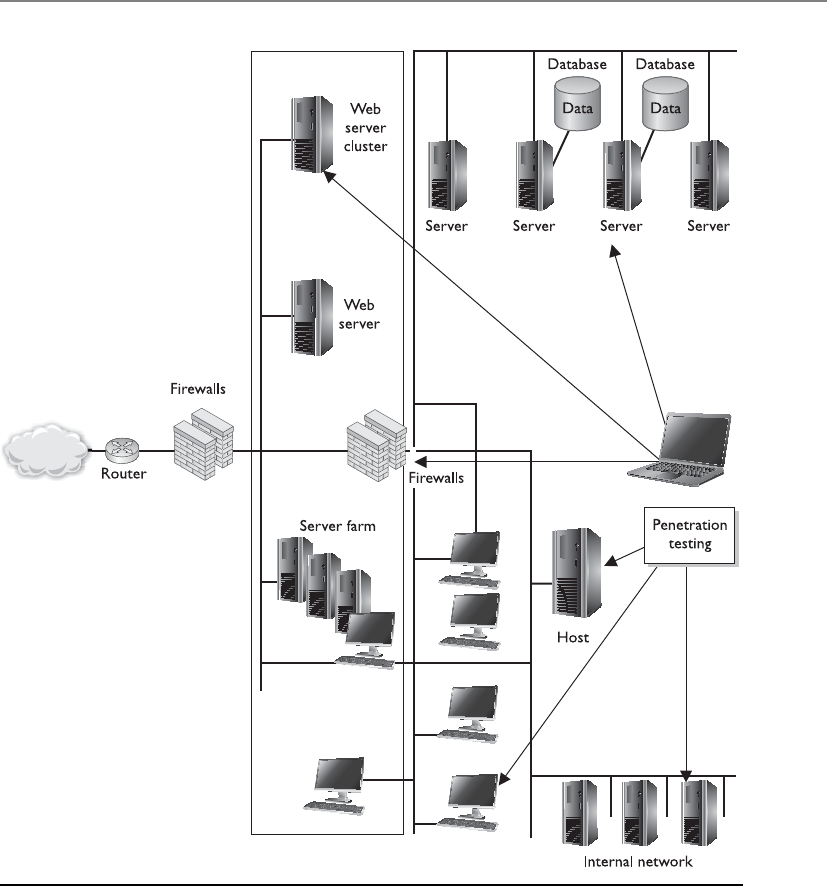
Chapter 11: Security Operations
1299
The result of a penetration test is a report given to management that describes the
vulnerabilities identified and the severity of those vulnerabilities, along with sugges-
tions on how to deal with them properly. From there, it is up to management to deter-
mine how the vulnerabilities are actually dealt with and what countermeasures are
implemented.
Figure 11-11 Penetration testing is used to prove an attacker can actually compromise systems.

CISSP All-in-One Exam Guide
1300
It is critical that senior management be aware of any risks involved in performing a
penetration test before it gives the authorization for one. In rare instances, a system or
application may be taken down inadvertently using the tools and techniques employed
during the test. As expected, the goal of penetration testing is to identify vulnerabilities,
estimate the true protection the security mechanisms within the environment are pro-
viding, and see how suspicious activity is reported—but accidents can and do happen.
Security professionals should obtain an authorization letter that includes the extent
of the testing authorized, and this letter or memo should be available to members of
the team during the testing activity. This type of letter is commonly referred to as a “Get
Out of Jail Free Card.” Contact information for key personnel should also be available,
along with a call tree in the event something does not go as planned and a system must
be recovered.
NOTE
NOTE A “Get Out of Jail Free Card” is a document you can present to
someone who thinks you are up to something malicious, when in fact you are
carrying out an approved test. There have been many situations in which an
individual (or a team) was carrying out a penetration test and was approached
by a security guard or someone who thought this person was in the wrong
place at the wrong time.
When performing a penetration test, the team goes through a five-step process:
1. Discovery Footprinting and gathering information about the target
2. Enumeration Performing port scans and resource identification methods
3. Vulnerability mapping Identifying vulnerabilities in identified systems and
resources
4. Exploitation Attempting to gain unauthorized access by exploiting
vulnerabilities
5. Report to management Delivering to management documentation of test
findings along with suggested countermeasures
The penetration testing team can have varying degrees of knowledge about the pen-
etration target before the tests are actually carried out:
•Zero knowledge The team does not have any knowledge of the target and
must start from ground zero.
•Partial knowledge The team has some information about the target.
•Full knowledge The team has intimate knowledge of the target.

Chapter 11: Security Operations
1301
Security testing of an environment may take several forms, in the sense of the degree
of knowledge the tester is permitted to have up front about the environment, and also
the degree of knowledge the environment is permitted to have up front about the tester.
Tests should be conducted externally (from a remote location) or internally (mean-
ing the tester is within the network). Both should be carried out to understand threats
from either domain (internal and external).
Tests may be blind, double-blind, or targeted. A blind test is one in which the asses-
sors only have publicly available data to work with. The network staff is aware that this
type of test will take place.
Adouble-blind test (stealth assessment) is also a blind test to the assessor as men-
tioned previously, plus the security staff is not notified. This enables the test to evaluate
the network’s security level and the staff’s responses, log monitoring, and escalation pro-
cesses, and is a more realistic demonstration of the likely success or failure of an attack.

CISSP All-in-One Exam Guide
1302
Targeted tests can involve external consultants and internal staff carrying out fo-
cused tests on specific areas of interest. For example, before a new application is rolled
out, the team might test it for vulnerabilities before installing it into production. An-
other example is to focus specifically on systems that carry out e-commerce transactions
and not the other daily activities of the company.
It is important that the team start off with only basic user-level access to properly
simulate different attacks. The team needs to utilize a variety of different tools and at-
tack methods, and look at all possible vulnerabilities, because this is how actual attack-
ers will function.
The following sections cover common activities carried out in a penetration test.
Wardialing
As touched on earlier, wardialing allows attackers and administrators to dial large
blocks of phone numbers in search of available modems. Several free and commercial
tools are available to dial all of the telephone numbers in a phone exchange (for ex-
ample, all numbers from 212-555-0000 through 212-555-9999) and make note of
those numbers answered by a modem. Wardialers can be configured to call only those
specific exchanges and their subsets that are known to belong to a company. They can
be smart, calling only at night when most telephones are not monitored, to reduce the
likelihood of several people noticing the odd hang-up phone calls and thus raising the
alarm. Wardialers can call in random order so nobody notices the phones are ringing
at one desk after another after another, and thus raise an alarm. Wardialing is a mature
science, and can be accomplished quickly with low-cost equipment. Wardialers can go
so far as to fingerprint the hosts that answer, similar to a network vulnerability scanner,
and attempt a limited amount of automated penetration testing, returning a ready-
made compromise of the environment to the attacker. Finally, some private branch
exchanges (PBXs) (phone systems) or telephony diagnostic tools may be able to iden-
tify modem lines and report on them.
Types of Tests
A vulnerability assessment identifies a wide range of vulnerabilities in the envi-
ronment. This is commonly carried out through a scanning tool. By contrast, in
a penetration test, the security professional exploits one or more vulnerabilities
to prove to the customer (or your boss) that a hacker can actually gain access to
company resources.

Chapter 11: Security Operations
1303
Other Vulnerability Types
As noted earlier, vulnerability scans find the potential vulnerabilities. Actual penetra-
tion testing is required to identify those vulnerabilities that can actually be exploited in
the environment and cause damage.
Commonly exploited vulnerabilities include the following:
•Kernel flaws These are problems that occur below the level of the user
interface, deep inside the operating system. Any flaw in the kernel that can
be reached by an attacker, if exploitable, gives the attacker the most powerful
level of control over the system.
•Countermeasure Ensure that security patches to operating systems—after
sufficient testing—are promptly deployed in the environment to keep the
window of vulnerability as small as possible.
•Buffer overflows Poor programming practices, or sometimes bugs in
libraries, allow more input than the program has allocated space to store it.
This overwrites data or program memory after the end of the allocated buffer,
and sometimes allows the attacker to inject program code and then cause the
processor to execute it. This gives the attacker the same level of access as that held
by the program that was attacked. If the program was run as an administrative
user or by the system itself, this can mean complete access to the system.
Testing Oneself
Some of the same tactics an attacker may use when wardialing may be useful to
the system administrator, such as wardialing at night to reduce disruption to the
business. Be aware, when performing wardialing proactively, that dialing at night
may also miss some unauthorized modems that are attached to systems that are
turned off by their users at the end of the day. Wardialers can be configured to
avoid certain numbers or blocks of numbers, so the system administrator can
avoid dialing numbers known to be voice-only, such as help desks. This can also
be done on more advanced PBXs, with any number assigned to a digital voice
device that is configured to not support a modem.
Any unauthorized modems identified by wardialing should be investigated
and either brought into compliance or removed, and staff who installed the un-
authorized modems retrained or disciplined.

CISSP All-in-One Exam Guide
1304
•Countermeasure Good programming practices and developer education,
automated source code scanners, enhanced programming libraries, and
strongly typed languages that disallow buffer overflows are all ways of
reducing this extremely common vulnerability.
•Symbolic links Though the attacker may be properly blocked from seeing or
changing the content of sensitive system files and data, if a program follows
a symbolic link (a stub file that redirects the access to another place) and the
attacker can compromise the symbolic link, then the attacker may be able
to gain unauthorized access. (Symbolic links are used in Unix and Linux
type systems.) This may allow the attacker to damage important data and/or
gain privileged access to the system. A historical example of this was to use
a symbolic link to cause a program to delete a password database, or replace
a line in the password database with characters that, in essence, created an
unpassworded root-equivalent account.
•Countermeasure Programs and especially scripts must be written to
ensure that the full path to the file cannot be circumvented.
•File descriptor attacks File descriptors are numbers many operating systems
use to represent open files in a process. Certain file descriptor numbers are
universal, meaning the same thing to all programs. If a program makes unsafe
use of a file descriptor, an attacker may be able to cause unexpected input to
be provided to the program, or cause output to go to an unexpected place
with the privileges of the executing program.
•Countermeasure Good programming practices and developer education,
automated source code scanners, and application security testing are all
ways of reducing this type of vulnerability.
•Race conditions Race conditions exist when the design of a program puts it
in a vulnerable condition before ensuring that those vulnerable conditions are
mitigated. Examples include opening temporary files without first ensuring
the files cannot be read, or written to, by unauthorized users or processes, and
running in privileged mode or instantiating dynamic load library functions
without first verifying that the dynamic load library path is secure. Either of
these may allow an attacker to cause the program (with its elevated privileges)
to read or write unexpected data or to perform unauthorized commands.
•Countermeasure Good programming practices and developer education,
automated source code scanners, and application security testing are all
ways of reducing this type of vulnerability.
•File and directory permissions Many of the previously described attacks
rely on inappropriate file or directory permissions—that is, an error in the
access control of some part of the system, on which a more secure part of the

Chapter 11: Security Operations
1305
system depends. Also, if a system administrator makes a mistake that results
in decreasing the security of the permissions on a critical file, such as making
a password database accessible to regular users, an attacker can take advantage
of this to add an unauthorized user to the password database, or an untrusted
directory to the dynamic load library search path.
•Countermeasure File integrity checkers, which should also check
expected file and directory permissions, can detect such problems in a
timely fashion, hopefully before an attacker notices and exploits them.
Many, many types of vulnerabilities exist and we have covered some, but certainly
not all, here in this book. The previous list includes only a few specific vulnerabilities
you should be aware of for exam purposes.
Postmortem
Once the tests are over and the interpretation and prioritization are done, management
will have in its hands a Booke of Doome showing many of the ways the company could
be successfully attacked. This is the input to the next cycle in the remediation strategy.
There exists only so much money, time, and personnel, and thus only so much of the
total risk can be mitigated. Balancing the risks and risk appetite of the company, and
the costs of possible mitigations and the value gained from each, management must
direct the system and security administrators as to where to spend those limited re-
sources. An oversight program is required to ensure that the mitigations work as ex-
pected and that the estimated cost of each mitigation action is closely tracked by the
actual cost of implementation. Any time the cost rises significantly or the value is found
to be far below what was expected, the process should be briefly paused and reevalu-
ated. It may be that a risk-versus-cost option initially considered less desirable will now
make more sense than continuing with the chosen path.
Finally, when all is well and the mitigations are underway, everyone can breathe
easier. Except maybe for the security engineer who has the task of monitoring vulnera-
bility announcements and discussion mailing lists, as well as the early warning services
offered by some vendors. To put it another way, the risk environment keeps changing.
Between tests, monitoring may make the company aware of newly discovered vulnera-
bilities that would be found the next time the test is run but that are too high risk to
allow to wait that long. And so another smaller cycle of mitigation decisions and ac-
tions must be taken.
And then it is time to run the tests again. Table 11-3 provides an example of a testing
schedule that each operations and security department should develop and carry out.
We have covered the assurance mechanisms in this chapter or earlier ones. These are
methods used to make sure the operations department is carrying out its responsibili-
ties correctly and securely.

CISSP All-in-One Exam Guide
1306
Test Type Frequency Benefits
Network Scanning Continuously to
quarterly
•Enumerates the network structure and determines
the set of active hosts and associated software
•Identifies unauthorized hosts connected to a
network
•Identifies open ports
•Identifies unauthorized services
Wardialing Annually •Detects unauthorized modems and prevents
unauthorized access to a protected network
War Driving Continuously to
weekly
•Detects unauthorized wireless access points and
prevents unauthorized access to a protected
network
Virus Detectors Weekly or as
required
•Detects and deletes viruses before successful
installation on the system
Log Reviews Daily for critical
systems
•Validates that the system is operating according
to policy
Password
Cracking
Continuously to
same frequency as
expiration policy
•Verifies the policy is effective in producing
passwords that are more or less difficult to break
•Verifies that users select passwords compliant
with the organization’s security policy
Vulnerability
Scanning
Quarterly or
bimonthly (more
often for high-
risk systems),
or whenever
the vulnerability
database is updated
•Enumerates the network structure and
determines the set of active hosts and associated
software
•Identifies a target set of computers to focus
vulnerability analysis
•Identifies potential vulnerabilities on the target set
•Validates operating systems and major
applications are up-to-date with security patches
and software versions
Penetration
Testing
Annually •Determines how vulnerable an organization’s
network is to penetration and the level of
damage that can be incurred
•Tests the IT staff’s response to perceived
security incidents and their knowledge and
implementation of the organization’s security
policy and the system’s security requirements
Integrity
Checkers
Monthly and in
case of a suspicious
event
•Detects unauthorized file modifications
Table 11-3 Example Testing Schedules for Each Operations and Security Department

Chapter 11: Security Operations
1307
Summary
Operations security involves keeping up with implemented solutions, keeping track of
changes, properly maintaining systems, continually enforcing necessary standards, and
following through with security practices and tasks. It does not do much good for a com-
pany to develop a strong password policy if, after a few months, enforcement gets lax and
users can use whatever passwords they want. It is similar to working out and staying
physically fit. Just because someone lifts weights and jogs for a week does not mean he
can spend the rest of the year eating jelly donuts and expect to stay physically fit. Security
requires discipline day in and day out, sticking to a regimen, and practicing due care.
Quick Tips
• Facilities that house systems that process sensitive information should have
physical access controls to limit access to authorized personnel only.
• Data should be classified, and the necessary technical controls should be put
into place to protect its integrity, confidentiality, and availability.
• Hacker tools are becoming increasingly more sophisticated while requiring
increasingly less knowledge by the attacker about how they work.
• Quality assurance involves the verification that supporting documentation
requirements are met.
• Quality control ensures that an asset is operating within accepted standards.

CISSP All-in-One Exam Guide
1308
• System and audit logs should be monitored and protected from unauthorized
modification.
• Repetitive errors can indicate lack of training or issues resulting from a poorly
designed system.
• Sensitive data should not be printed and left at stand-alone printers or fax
devices.
• Users should have the necessary security level to access data and resources, but
must also have a need to know.
• Clipping levels should be implemented to establish a baseline of user activity
and acceptable errors.
• Separation of responsibilities and duties should be in place so that if fraud
takes place, it requires collusion.
• Sensitive information should contain the correct markings and labels to
indicate the corresponding sensitivity level.
• Contract and temporary staff members should have more restrictive controls
put upon their accounts.
• Access to resources should be limited to authorized personnel, applications,
and services and should be audited for compliance to stated policies.
• Change control and configuration management should be put in place so
changes are approved, documented, tested, and properly implemented.
• Activities that involve change management include requesting a change,
approving a change, documenting a change, testing a change, implementing a
change, and reporting to management.
• Systems should not allow their bootup sequences to be altered in a way that
could bypass operating system security mechanisms.
• Potential employees should have background investigations, references,
experience, and education claims checked out.
• Proper fault-tolerant mechanisms should be put in place to counter
equipment failure.
• Antivirus and IDS signatures should be updated on a continual basis.
• System, network, policy, and procedure changes should be documented and
communicated.
• When media is reused, it should contain no residual data.
• Media holding sensitive data must be properly purged, which can be
accomplished through zeroization, degaussing, or media destruction.
• Life-cycle assurance involves protecting a system from inception to
development to operation to removal.
• The key aspects of operations security include resource protection, change
control, hardware and software controls, trusted system recovery, separation of
duties, and least privilege.

Chapter 11: Security Operations
1309
• Least privilege ensures that users, administrators, and others accessing a
system have access only to the objects they absolutely require to complete
their job.
• Vulnerability assessments should be done on a regular basis to identify new
vulnerabilities.
• The operations department is responsible for any unusual or unexplained
occurrences, unscheduled initial program loads, and deviations from standards.
• Standards need to be established that indicate the proper startup and
shutdown sequence, error handling, and restoration procedures.
• A teardrop attack involves sending malformed fragmented packets to a
vulnerable system.
• Improper mail relay configurations allow for mail servers to be used to
forward spam messages.
• Phishing involves an attacker sending false messages to a victim in the hopes
that the victim will provide personal information that can be used to steal
their identity.
• A browsing attack occurs when an attacker looks for sensitive information
without knowing what format it is in.
• A fax encryptor encrypts all fax data leaving a fax server.
• A system can fail in one of the following manners: system reboot, emergency
system restart, and system cold start.
• The main goal of operations security is to protect resources.
• Operational threats include disclosure, theft, corruption, interruption, and
destruction.
• Operations security involves balancing the necessary level of security with ease
of use, compliance, and cost constraints.
Questions
Please remember that these questions are formatted and asked in a certain way for a
reason. Keep in mind that the CISSP exam is asking questions at a conceptual level.
Questions may not always have the perfect answer, and the candidate is advised against
always looking for the perfect answer. Instead, the candidate should look for the best
answer in the list.
1. Which of the following best describes operations security?
A. Continual vigilance about hacker activity and possible vulnerabilities
B. Enforcing access control and physical security
C. Taking steps to make sure an environment, and the things within it, stay at
a certain level of protection
D. Doing strategy planning to develop a secure environment and then
implementing it properly

CISSP All-in-One Exam Guide
1310
2. Which of the following describes why operations security is important?
A. An environment continually changes and has the potential of lowering its
level of protection.
B. It helps an environment be functionally sound and productive.
C. It ensures there will be no unauthorized access to the facility or its
resources.
D. It continually raises a company’s level of protection.
3. What is the difference between due care and due diligence?
A. Due care is the continual effort of ensuring that the right thing takes place,
and due diligence is the continual effort to stay compliant with regulations.
B. Due care and due diligence are in contrast to the “prudent person” concept.
C. They mean the same thing.
D. Due diligence involves investigating the risks, while due care involves
carrying out the necessary steps to mitigate these risks.
4. Why should employers make sure employees take their vacations?
A. They have a legal obligation.
B. It is part of due diligence.
C. It is a way for fraud to be uncovered.
D. To ensure the employee does not get burnt out.
5. Which of the following best describes separation of duties and job rotation?
A. Separation of duties ensures that more than one employee knows how to
perform the tasks of a position, and job rotation ensures that one person
cannot perform a high-risk task alone.
B. Separation of duties ensures that one person cannot perform a high-risk
task alone, and job rotation can uncover fraud and ensure that more than
one person knows the tasks of a position.
C. They are the same thing, but with different titles.
D. They are administrative controls that enforce access control and protect the
company’s resources.
6. If a programmer is restricted from updating and modifying production code,
what is this an example of?
A. Rotation of duties
B. Due diligence
C. Separation of duties
D. Controlling input values
7. Why is it important to control and audit input and output values?
A. Incorrect values can cause mistakes in data processing and be evidence
of fraud.

Chapter 11: Security Operations
1311
B. Incorrect values can be the fault of the programmer and do not comply
with the due care clause.
C. Incorrect values can be caused by brute force attacks.
D. Incorrect values are not security issues.
8. What is the difference between least privilege and need to know?
A. A user should have least privilege that restricts her need to know.
B. A user should have a security clearance to access resources, a need to know
about those resources, and least privilege to give her full control of all
resources.
C. A user should have a need to know to access particular resources, and least
privilege should be implemented to ensure she only accesses the resources
she has a need to know.
D. They are two different terms for the same issue.
9. Which of the following would not require updated documentation?
A. An antivirus signature update
B. Reconfiguration of a server
C. A change in security policy
D. The installation of a patch to a production server
10. If sensitive data are stored on a CD-ROM and are no longer needed, which
would be the proper way of disposing of the data?
A. Degaussing
B. Erasing
C. Purging
D. Physical destruction
11. If SSL is being used to encrypt messages that are transmitted over the network,
what is a major concern of the security professional?
A. The network segments have systems that use different versions of SSL.
B. The user may have encrypted the message with an application-layer
product that is incompatible with SSL.
C. Network tapping and wiretapping.
D. The networks that the message will travel that the company does not
control.
12. What is the purpose of SMTP?
A. To enable users to decrypt mail messages from a server
B. To enable users to view and modify mail messages from a server
C. To transmit mail messages from the client to the mail server
D. To encrypt mail messages before being transmitted

CISSP All-in-One Exam Guide
1312
13. If a company has been contacted because its mail server has been used to
spread spam, what is most likely the problem?
A. The internal mail server has been compromised by an internal hacker.
B. The mail server in the DMZ has private and public resource records.
C. The mail server has e-mail relaying misconfigured.
D. The mail server has SMTP enabled.
14. Which of the following is not a reason fax servers are used in many companies?
A. They save money by not needing individual fax devices and the constant
use of fax paper.
B. They provide a secure way of faxing instead of having faxed papers sitting
in bins waiting to be picked up.
C. Faxes can be routed to employees’ electronic mailboxes.
D. They increase the need for other communication security mechanisms.
15. If a company wants to protect fax data while it is in transmission, which of
the following are valid mechanisms?
A. PGP and MIME
B. PEM and TSL
C. Data link encryption or fax encryptor
D. Data link encryption and MIME
16. What is the purpose of TCP wrappers?
A. To monitor requests for certain ports and control access to sensitive files
B. To monitor requests for certain services and control access to password files
C. To monitor requests for certain services and control access to those services
D. To monitor requests to system files and ensure they are not modified
17. How do network sniffers work?
A. They probe systems on a network segment.
B. They listen for ARP requests and ICMP packets.
C. They require an extra NIC to be installed and configured.
D. They put the NIC into promiscuous mode.
18. Which of the following is not an attack against operations?
A. Brute force
B. Denial-of-service
C. Buffer overflow
D. ICMP sting
19. Why should user IDs be included in data captured by auditing procedures?
A. They show what files were attacked.

Chapter 11: Security Operations
1313
B. They establish individual accountability.
C. They are needed to detect a denial-of-service attack.
D. They activate corrective measures.
20. Which of the following controls requires separate entities, operating together,
to complete a task?
A. Least privilege
B. Data hiding
C. Dual control
D. Administrative
21. Which of the following would not be considered an operations media
control task?
A. Compressing and decompressing storage materials
B. Erasing data when its retention period is over
C. Storing backup information in a protected area
D. Controlling access to media and logging activities
22. How is the use of clipping levels a way to track violations?
A. They set a baseline for normal user errors, and any violations that exceed
that threshold should be recorded and reviewed to understand why they
are happening.
B. They enable the administrator to view all reduction levels that have been
made to user codes and that have incurred violations.
C. They disallow the administrator to customize the audit trail to record only
those violations deemed security related.
D. They enable the administrator to customize the audit trail to capture only
access violations and denial-of-service attacks.
23. Tape library management is an example of operations security through which
of the following?
A. Archival retention
B. The review of clipping levels
C. Resource protection
D. Change management
24. A device that generates coercive magnetic force for the purpose of reducing
magnetic flux density to zero on media is called
A. Magnetic saturation
B. Magnetic field
C. Physical destruction
D. Degausser
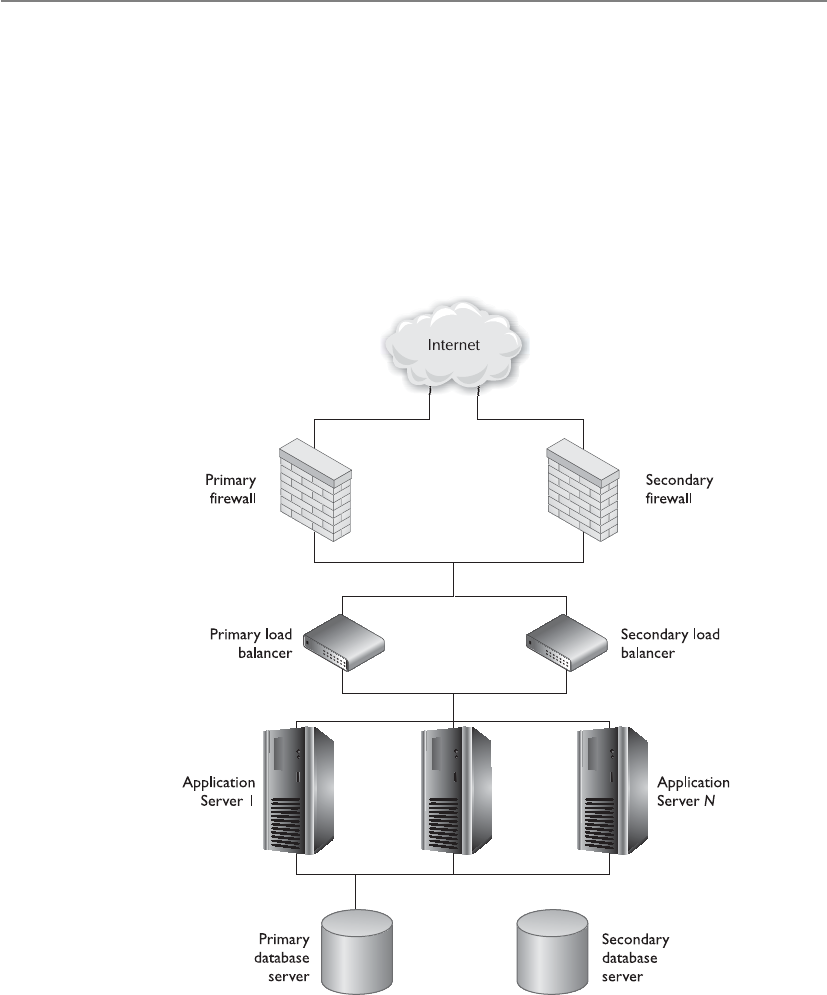
CISSP All-in-One Exam Guide
1314
25. Which of the following controls might force a person in operations into
collusion with personnel assigned organizationally within a different function
for the sole purpose of gaining access to data he is not authorized to access?
A. Limiting the local access of operations personnel
B. Enforcing auditing
C. Enforcing job rotation
D. Limiting control of management personnel
26. What does the following graphic represent and what is the technology’s
importance?
A. Hierarchical storage management
B. Storage access network
C. Network redundancy
D. Single point of failure

Chapter 11: Security Operations
1315
Answers
1. C. All of these are necessary security activities and procedures—they just
don’t all fall under the operations umbrella. Operations is about keeping
production up and running in a healthy and secure manner. Operations
is not usually the entity that carries out strategic planning. It works at an
operational, day-to-day level, not at the higher strategic level.
2. A. This is the best answer because operations has the goal of keeping
everything running smoothly each and every day. Operations implements
new software and hardware and carries out the necessary security tasks passed
down to it. As the environment changes and security is kept in the loop with
these changes, there is a smaller likelihood of opening up vulnerabilities.
3. D. Due care and due diligence are legal terms that do not just pertain to
security. Due diligence involves going through the necessary steps to know
what a company’s or individual’s actual risks are, while due care involves
carrying out responsible actions to reduce those risks. These concepts
correspond with the “prudent person” concept.
4. C. Many times, employees who are carrying out fraudulent activities do not
take the vacation they have earned because they do not want anyone to find
out what they have been doing. Forcing employees to take vacations means
that someone else has to do that person’s job and can possibly uncover any
misdeeds.
5. B. Rotation of duties enables a company to have more than one person trained
in a position and can uncover fraudulent activities. Separation of duties is put
into place to ensure that one entity cannot carry out a critical task alone.
6. C. This is just one of several examples of separation of duties. A system must
be set up for proper code maintenance to take place when necessary, instead
of allowing a programmer to make changes arbitrarily. These types of changes
should go through a change control process and should have more entities
involved than just one programmer.
7. A. There should be controls in place to make sure the data input into a system
and the results generated are in the proper format and have expected values.
Improper data being put into an application or system could cause bad
output and security issues, such as buffer overflows.
8. C. Users should be able to access only the resources they need to fulfill the
duties of their positions. They also should only have the level of permissions
and rights for those resources that are required to carry out the exact operations
they need for their jobs, and no more. This second concept is more granular
than the first, but they have a symbiotic relationship.
9. A. Documentation is very important for data processing and networked
environments. This task often gets pushed to the back burner or is totally
ignored. If things are not properly documented, employees will forget
what actually took place with each device. If the environment needs to be

CISSP All-in-One Exam Guide
1316
rebuilt, for example, it may be done incorrectly if the procedure was poorly
or improperly documented. When new changes need to be implemented,
the current infrastructure may not be totally understood. Continually
documenting when virus signatures are updated would be overkill. The
other answers contain events that certainly require documentation.
10. D. One cannot properly erase data held on a CD-ROM. If the data are
sensitive and you need to ensure no one has access to the same, the media
should be physically destroyed.
11. D. This is not a great question, but could be something that you run into on
the exam. Let’s look at the answers. Different SSL versions are usually not a
concern, because the two communicating systems will negotiate and agree
upon the necessary version. There is no security violation issue here. SSL
works at the transport layer; thus, it will not be affected by what the user does,
as stated in answer B. SSL protects against network tapping and wiretapping.
Answer D talks about the network segments the company does not own.
You do not know at what point the other company will decrypt the SSL
connection because you do not have control of that environment. Your data
could be traveling unencrypted and unprotected on another network.
12. C. Simple Mail Transfer Protocol (SMTP) is the protocol used to allow clients
to send e-mail messages to each other. It lets different mail servers exchange
messages.
13. C. Spammers will identify the mail servers on the Internet that have relaying
enabled and are “wide open,” meaning the servers will forward any e-mail
messages they receive. These servers can be put on a black list, which means
other mail servers will not accept mail from them.
14. D. The other three answers provide reasons why fax servers would be used
instead of individual fax machines: ease of use, they provide more protection,
and their supplies may be cheaper.
15. C. This is the best answer for this question. The other components could
provide different levels of protection, but a fax encryptor (which is a data
link encryptor) provides a higher level of protection across the board because
everything is encrypted. Even if a user does not choose to encrypt something,
it will be encrypted anyway before it is sent out the fax server.
16. C. This is a technology that wraps the different services available on a system.
What this means is that if a remote user makes a request to access a service,
this product will intercept this request and determine whether it is valid and
legal before allowing the interaction to take place.
17. D. A sniffer is a device or software component that puts the NIC in promiscuous
mode, meaning the NIC will pick up all frames it “sees” instead of just the
frames addressed to that individual computer. The sniffer then shows the output
to the user. It can have capture and filtering capabilities.

Chapter 11: Security Operations
1317
18. D. The first three choices are attacks that can directly affect security
operations. There is no such attack as an ICMP sting.
19. B. For auditing purposes, the procedure should capture the user ID, time of
event, type of event, and the source workstation. Capturing the user ID allows
the company to hold individuals accountable for their actions.
20. C. Dual control requires two or more entities working together to complete a
task. An example is key recovery. If a key must be recovered, and key recovery
requires two or more people to authenticate to a system, the act of them
coming together and carrying out these activities is known as dual control.
This reduces the possibility of fraud.
21. A. The last three tasks fall under the job functions of an individual or
department responsible for controlling access to media. Compressing and
decompressing data does not.
22. A. Clipping levels are thresholds of acceptable user errors and suspicious
activities. If the threshold is exceeded, it should be logged and the
administrator should decide if malicious activities are taking place or if the
user needs more training.
23. C. The reason to have tape library management is to have a centralized and
standard way of protecting how media is stored, accessed, and destroyed.
24. D. A degausser is a device that generates a magnetic field (coercive magnetic
force) that changes the orientation of the bits held on the media (reducing
magnetic flux density to zero).
25. A. If operations personnel are limited in what they can access, they would
need to collude with someone who actually has access to the resource. This
question is not very clear, but it is very close to the way many CISSP exam
questions are formatted.
26. C. Network redundancy is duplicated network equipment that can provide
a backup in case of network failures. This technology protects the company
from single points of failure.
This page intentionally left blank

APPENDIX A
Comprehensive Questions
Use the following scenario to answer Questions 1–3. Josh has discovered that an organized
hacking ring in China has been targeting his company’s research and development de-
partment. If these hackers have been able to uncover his company’s research finding,
this means they probably have access to his company’s intellectual property. Josh thinks
that an e-mail server in their DMZ may have been successfully compromised and a
rootkit loaded.
1. Based upon this scenario, what is most likely the biggest risk Josh’s company
needs to be concerned with?
A. Market share drop if the attackers are able to bring the specific product to
market more quickly than Josh’s company.
B. Confidentiality of e-mail messages. Attackers may post all captured e-mail
messages to the Internet.
C. Impact on reputation if the customer base finds out about the attack.
D. Depth of infiltration of attackers. If attackers have compromised other
systems, more confidential data could be at risk.
2. The attackers in this situation would be seen as which of the following?
A. Vulnerability
B. Threat
C. Risk
D. Threat agent
3. If Josh is correct in his assumptions, which of the following best describes the
vulnerability, threat, and exposure, respectively?
A. E-mail server is hardened, an entity could exploit programming code flaw,
server is compromised and leaking data.
B. E-mail server is not patched, an entity could exploit a vulnerability, server
is hardened.
C. E-mail server misconfiguration, an entity could exploit misconfiguration,
server is compromised and leaking data.
D. DMZ firewall misconfiguration, an entity could exploit misconfiguration,
internal e-mail server is compromised.
1319

CISSP All-in-One Exam Guide
1320
4. Aaron is a security manager who needs to develop a solution to allow
his company’s mobile devices to be authenticated in a standardized and
centralized manner using digital certificates. The applications these mobile
clients use require a TCP connection. Which of the following is the best
solution for Aaron to implement?
A. SESAME using PKI
B. RADIUS using EAP
C. Diameter using EAP
D. RADIUS using TTLS
5. Terry is a security manager for a credit card processing organization. His
company uses internal DNS servers, which are placed within the LAN, and
external DNS servers, which are placed in the DMZ. The company also relies
upon DNS servers provided by their service provider. Terry has found out that
attackers have been able to manipulate several DNS server caches, which point
employee traffic to malicious websites. Which of the following best describes
the solution this company should implement?
A. IPSec
B. PKI
C. DNSSEC
D. MAC-based security
6. It is important to deal with the issue of “reasonable expectation of privacy”
(REP) when it comes to employee monitoring. In the U.S. legal system
the expectation of privacy is used when defining the scope of the privacy
protections provided by _____________________.
A. Federal Privacy Act
B. PATRIOT Act
C. The Fourth Amendment of the Constitution
D. The Bill of Rights
7. Jane is suspicious that an employee is sending sensitive data to one of the
company’s competitors. The employee has to use these data for daily activities,
thus it is difficult to properly restrict the employee’s access rights. In this
scenario, which best describes the company’s vulnerability, threat, risk, and
necessary control?
A. Vulnerability is employee access rights, threat is internal entities misusing
privileged access, risk is the business impact of data loss, and the necessary
control is detailed network traffic monitoring.

Appendix A: Comprehensive Questions
1321
B. Vulnerability is lenient access rights, threat is internal entities misusing
privileged access, risk is the business impact of data loss, and the necessary
control is detailed user monitoring.
C. Vulnerability is employee access rights, threat is internal employees
misusing privileged access, risk is the business impact of confidentiality,
and the necessary control is multifactor authentication.
D. Vulnerability is employee access rights, threat is internal users misusing
privileged access, risk is the business impact of confidentiality, and the
necessary control is CCTV.
8. Which of the following best describes what role-based access control offers
companies in reducing administrative burdens?
A. It allows entities closer to the resources to make decisions about who can
and cannot access resources.
B. It provides a centralized approach for access control, which frees up
department managers.
C. User membership in roles can be easily revoked and new ones established
as job assignments dictate.
D. It enforces an enterprise-wide security policy, standards, and guidelines.
9. Mark needs to ensure that the physical security program he develops for his
company increases performance, decreases risk in a cost-effective manner, and
allows management to make informed decisions. Which of the following best
describes what he needs to put into place?
A. Performance-based program
B. Defense-in-depth program
C. Layered program
D. Security through obscurity
10. A software development company released a product that committed several
errors that were not expected once deployed in their customers’ environments.
All of the software code went through a long list of tests before being released.
The team manager found out that after a small change was made to the code,
the program was not tested before it was released. Which of the following
tests was most likely not conducted?
A. Unit
B. Compiled
C. Integration
D. Regression

CISSP All-in-One Exam Guide
1322
11. It is important to choose the right risk analysis methodology to meet the goals
of the organization’s needs. Which of the following best describes when the
risk management standard AS/NZS 4360 should be used?
A. When there is a need to assess items of an organization that are directly
related to information security.
B. When there is a need to assess items of an organization that are not just
restricted to information security.
C. When a qualitative method is needed to prove the compliance levels as
they pertain to regulations.
D. When a qualitative method is needed to prove the compliance levels as
they pertain to laws.
12. Companies should follow certain steps in selecting and implementing a new
computer product. Which of the following sequences is ordered correctly?
A. Evaluation, accreditation, certification
B. Evaluation, certification, accreditation
C. Certification, evaluation, accreditation
D. Certification, accreditation, evaluation
Use the following scenario to answer Questions 13–15. Jack has just been hired as the secu-
rity officer for a large hospital. The organization develops some of its own proprietary
applications. The organization does not have as many layers of controls when it comes
to the data processed by these applications, since external entities will not understand
the internal logic of the applications. One of the first things that Jack wants to carry out
is a risk assessment to determine the organization’s current risk profile. He also tells his
boss that the hospital should become ISO certified to bolster its customers’ and part-
ners’ confidence.
13. Which of the following approaches has been implemented in this scenario?
A. Defense-in-depth
B. Security through obscurity
C. Information security management system
D. BS 17799
14. Which ISO/IEC standard would be best for Jack to follow to meet his goals?
A. ISO/IEC 27002
B. ISO/IEC 27004
C. ISO/IEC 27005
D. ISO/IEC 27006
15. Which standard should Jack suggest to his boss for compliance?
A. BS 17799
B. ISO/IEC 27004

Appendix A: Comprehensive Questions
1323
C. ISO/IEC 27799
D. BS 7799:2011
16. An operating system maintains several processes in memory at the same time.
The processes can only interact with the CPU during its assigned time slice since
there is only one CPU and many processes. Each process is assigned an interrupt
value to allow for this type of time slicing to take place. Which of the following
best describes the difference between maskable and nonmaskable interrupts?
A. A maskable interrupt is assigned to a critical process, and a nonmaskable
interrupt is assigned to a noncritical process.
B. A maskable interrupt is assigned to a process in ring 0, and a nonmaskable
interrupt is assigned to a process in ring 3.
C. A maskable interrupt is assigned to a process in ring 3, and a nonmaskable
interrupt is assigned to a process in ring 4.
D. A maskable interrupt is assigned to a noncritical process, and a
nonmaskable interrupt is assigned to a critical process.
17. Cable telecommunication networks used to provide a security risk in that
neighbors could commonly access each other’s Internet-based traffic because
the traffic was not encrypted and protected. Which of the following is an
international telecommunications standard that addresses these issues?
A. Safe Harbor Encryption Requirements
B. Data-Over-Cable Service Interface Specifications
C. Privacy Service Requirements
D. Telecommunication Privacy Protection Standard
18. There are different categories for evidence depending upon what form it is
in and possibly how it was collected. Which of the following is considered
supporting evidence?
A. Best evidence
B. Corroborative evidence
C. Conclusive evidence
D. Direct evidence
19. _____________ is the graphical representation of data commonly used on
websites. It is a skewed representation of characteristics a person must enter to
prove that the subject is a human and not an automated tool, as in a software
robot.
A. Anti-spoofing
B. CAPTCHA
C. Spam anti-spoofing
D. CAPCHAT

CISSP All-in-One Exam Guide
1324
20. Mark has been asked to interview individuals to fulfill a new position in his
company. The position is a chief privacy officer (CPO). What is the function
of this type of position?
A. Ensuring that company financial information is correct and secure
B. Ensuring that customer, company, and employee data are protected
C. Ensuring that security policies are defined and enforced
D. Ensuring that partner information is kept safe
21. A risk management program must be developed properly and in the right
sequence. Which of the following provides the correct sequence for the steps
listed?
i. Developed a risk management team
ii. Calculated the value of each asset
iii. Identified the vulnerabilities and threats that can affect the identified assets
iv. Identified company assets to be assessed
A. i, iii, ii, iv
B. ii, i, iv, iii
C. iii, i, iv, ii
D. i, iv, ii, iii
22. Jack needs to develop a security program for a medical organization. He has
been instructed by the security steering committee to follow the ISO/IEC
international standards when constructing and implementing this program so
that certification can be accomplished. Which of the following best describes
the phases Jack should follow?
A. “Plan” by defining scope and policy. “Do” by managing identified risks.
“Check” by carrying out monitoring procedures and audits. “Act” by
implementing corrective actions.
B. “Plan” by defining scope and policy. “Do” by creating an implementation
risk mitigation plan and implementing controls. “Check” by carrying
out monitoring procedures and audits. “Act” by implementing corrective
actions.
C. “Plan” by identifying controls. “Do” by creating an implementation risk
mitigation plan. “Check” by carrying out monitoring procedures and
audits. “Act” by implementing corrective actions.
D. “Plan” by defining scope and policy. “Do” by creating an implementation
risk mitigation plan and implementing controls. “Check” by carrying
out monitoring procedures and audits. “Act” by implementing risk
management.
23. Which of the following best describes the core reasons the Department
of Defense Architecture Framework and the British Ministry of Defense
Architecture Framework were developed?

Appendix A: Comprehensive Questions
1325
A. Data need to be captured and properly presented so that decision makers
understand complex issues quickly, which allows for fast and accurate
decisions.
B. Modern warfare is complex and insecure. Data need to be properly secured
against enemy efforts to ensure decision makers can have access to it.
C. Critical infrastructures are constantly under attack in warfare situations.
These frameworks are used to secure these types of environments.
D. Weapon systems are computerized and must be hardened and secured in a
standardized manner.
24. George is the security manager of a large bank, which provides online banking
and other online services to its customers. George has recently found out
that some of their customers have complained about changes to their bank
accounts that they did not make. George worked with the security team and
found out that all changes took place after proper authentication steps were
completed. Which of the following describes what most likely took place in
this situation?
A. Web servers were compromised through cross-scripting attacks.
B. SSL connections were decrypted through a man-in-the-middle attack.
C. Personal computers were compromised with Trojan horses that installed
keyloggers.
D. Web servers were compromised and masquerading attacks were carried out.
25. Internet Protocol Security (IPSec) is actually a suite of protocols. Each
protocol within the suite provides different functionality. Which of the
following is not a function or characteristic of IPSec?
A. Encryption
B. Link layer protection
C. Authentication
D. Protection of packet payloads and the headers
26. A typical PKI infrastructure would have which of the following transactions?
1. Receiver decrypts and obtains session key.
2. Sender requests receiver’s public key.
3. Public key is sent from a public directory.
4. Sender sends a session key encrypted with receiver’s public key.
A. 4, 3, 2, 1
B. 2, 1, 3, 4
C. 2, 3, 4, 1
D. 2, 4, 3, 1

CISSP All-in-One Exam Guide
1326
Use the following scenario to answer Questions 27–28. Tim is the CISO for a large distrib-
uted financial investment organization. The company’s network is made up of different
network devices and software applications, which generate their own proprietary logs
and audit data. Tim and his security team have become overwhelmed with trying to
review all of the log files when attempting to identify if anything suspicious is taking
place within the network. Another issue Tim’s team needs to deal with is that many of
the network devices have automated IPv6-to-IPv4 tunneling enabled by default.
27. Which of the following is the best solution for this company to implement as
it pertains to the first issue addressed in the scenario?
A. Event correlation tools
B. Intrusion detection systems
C. Security information and event management
D. Security event correlation management tools
28. Which of the following best describes why Tim should be concerned about
the second issue addressed in the scenario?
A. Software and devices that are scanning traffic for suspicious activity may
only be configured to evaluate one system type.
B. Software and devices that are monitoring traffic for illegal activity may
only be configured to evaluate one service type.
C. Software and devices that are monitoring traffic for illegal activity may
only be configured to evaluate two protocol types.
D. Software and devices that are monitoring traffic for suspicious activity may
only be configured to evaluate one traffic type.
29. Which of the following is not a characteristic of the Sherwood Applied
Business Security Architecture framework?
A. Model and methodology for the development of information security
enterprise architectures
B. Layered model, with its first layer defining business requirements from a
security perspective
C. Risk-driven enterprise security architecture that maps to business
initiatives, similar to the Zachman framework
D. Enterprise architecture framework used to define and understand a
business environment
30. What type of rating system is used within the Common Criteria structure?
A. PP
B. EPL

Appendix A: Comprehensive Questions
1327
C. EAL
D. A–D
31. ___________________ a declarative access control policy language
implemented in XML and a processing model, describes how to interpret
security policies. _________________ is an XML-based framework being
developed by OASIS for exchanging user, resource, and service provisioning
information between cooperating organizations.
A. Service Provisioning Markup Language (SPML), Extensible Access Control
Markup Language (XACML)
B. Extensible Access Control Markup Language (XACML), Service
Provisioning Markup Language (SPML)
C. Extensible Access Control Markup Language (XACML), Security Assertion
Markup Language (SAML)
D. Security Assertion Markup Language (SAML), Service Provisioning Markup
Language (SPML)
32. Doors configured in fail-safe mode assume what position in the event of a
power failure?
A. Open and locked
B. Closed and locked
C. Closed and unlocked
D. Open
33. Packet-filtering firewalls have limited capabilities. Which of the following is
not a common characteristic of these firewall types?
i. They cannot prevent attacks that employ application-specific
vulnerabilities or functions.
ii. The logging functionality present in packet-filtering firewalls is limited.
iii. Most packet-filtering firewalls do not support advanced user
authentication schemes.
iv. Many packet-filtering firewalls can detect spoofed addresses.
v. May not be able to detect packet fragmentation attacks.
A. ii
B. iii
C. iv
D. v

CISSP All-in-One Exam Guide
1328
34. BS 25999 is the BSI (British Standards Institute’s) standard for Business
Continuity Management (BCM). The BS standard has two main parts. Which
of the following properly defines one of these parts correctly?
A. BS 25999-1:2006 Business Continuity Management Code of Practice—
General guidance that provides principles, processes, and requirements
for BCM.
B. BS 25999-2:2007 Specification for Business Continuity Management—
Specifies objective, regulatory requirements for executing, operating, and
enhancing a BCM system.
C. BS 25999-1:2006 Business Continuity Management Code of Practice—
General specifications that provide principles, deadlines, and terminology
for BCM.
D. BS 25999-2:2007 Specification for Business Continuity Management—
Specifies objective, auditable requirements for executing, operating, and
enhancing a BCM system.
Use the following scenario to answer Questions 35–36. Zack is a security consultant who
has been hired to help an accounting company improve some of their current e-mail
security practices. The company wants to ensure that when their clients send the com-
pany accounting files and data, the clients cannot later deny sending these messages.
The company also wants to integrate a more granular and secure authentication meth-
od for their current mail server and clients.
35. Which of the following best describes how client messages can be dealt with
and addresses the first issue outlined in the scenario?
A. Company needs to integrate a public key infrastructure and the Diameter
protocol.
B. Clients must encrypt messages with their public key before sending them
to the accounting company.
C. Company needs to have all clients sign a formal document outlining
nonrepudiation requirements.
D. Client must digitally sign messages that contain financial information.
36. Which of the following would be the best solution to integrate to meet the
authentication requirements outlined in the scenario?
A. TLS
B. IPSec
C. 802.1x
D. SASL
37. Rennie needs to ensure that the BCP project will be successful. His manager
has asked him to carry out a SWOT analysis to ensure that the defined
objectives within the scope can be accomplished and to identify issues that
could impede upon the necessary success and productivity required of the

Appendix A: Comprehensive Questions
1329
project as a whole. Which of the following is not considered to be a basic
tenet of a SWOT analysis?
A. Strengths: characteristics of the project team that give it an advantage over
others
B. Weaknesses: characteristics that place the team at a disadvantage relative to
others
C. Opportunities: elements that could contribute to the project’s success
D. Trends: elements that could contribute to the project’s failure
38. A ___________________ is the amount of time it should take to recover from
a disaster, and a ____________________ is the amount of data, measured in
time, that can be lost and be tolerable from that same event.
A. Recovery time objective, recovery point objective
B. Recovery point objective, recovery time objective
C. Maximum tolerable downtime, work recovery time
D. Work recovery time, maximum tolerable downtime
39. Mary is playing around on her computer late at night and discovers a way
to hack into a small company’s personnel files. She decides to take a look
around, but does not steal any information. Is she still committing a crime
even if she does not steal any of the information?
A. No, since she does not steal any information, she is not committing a crime.
B. Yes, she has gained unauthorized access.
C. No, the system was easily hacked; therefore, entry is allowed.
D. Yes, she could jeopardize the system without knowing it.
40. In the structure of Extensible Access Control Markup Language (XACML)
a Subject element is the ______________, a Resource element is the
___________, and an Action element is the ___________.
A. Requesting entity, requested entity, types of access
B. Requested entity, requesting entity, types of access
C. Requesting entity, requested entity, access control
D. Requested entity, requesting entity, access control
41. The Mobile IP protocol allows location-independent routing of IP datagrams
on the Internet. Each mobile node is identified by its ______________
disregarding its current location in the Internet. While away from its home
network, a mobile node is associated with a ___________.
A. Prime address, care-of address
B. Home address, care-of address
C. Home address, secondary address
D. Prime address, secondary address

CISSP All-in-One Exam Guide
1330
42. Instead of managing and maintaining many different types of security
products and solutions, Joan wants to purchase a product that combines
many technologies into one appliance. She would like to have centralized
control, streamlined maintenance, and a reduction in stove pipe security
solutions. Which of the following would best fit Joan’s needs?
A. Dedicated appliance
B. Centralized hybrid firewall applications
C. Hybrid IDS\IPS integration
D. Unified threat management
43. Why is it important to have a clearly defined incident-handling process in
place?
A. To avoid dealing with a computer and network threat in an ad hoc,
reactive, and confusing manner
B. In order to provide a quick reaction to a threat so that a company can
return to normal operations as soon as possible
C. In order to provide a uniform approach with certain expectations of the
results
D. All of the above
44. Which of the following is an international organization that helps different
governments come together and tackle the economic, social, and governance
challenges of a globalized economy and provides guidelines on the protection
of privacy and transborder flows of personal data rules?
A. Council of Global Convention on Cybercrime
B. Council of Europe Convention on Cybercrime
C. Organisation for Economic Co-operation and Development
D. Organisation for Cybercrime Co-operation and Development
45. System ports allow different computers to communicate with each other’s
services and protocols. Internet Corporation for Assigned Names and
Numbers has assigned registered ports to be ____________________ and
dynamic ports to be ____________.
A. 0–1024, 49152–65535
B. 1024–49151, 49152–65535
C. 1024–49152, 49153–65535
D. 0–1024, 1025–49151
46. When conducting a quantitative risk analysis, items are gathered and assigned
numeric values so that cost/benefit analysis can be carried out. Which of the
following provides the correct formula to understand the value of a safeguard?

Appendix A: Comprehensive Questions
1331
A. (ALE before implementing safeguard) – (ALE after implementing
safeguard) – (annual cost of safeguard) = value of safeguard to the
company
B. (ALE before implementing safeguard) – (ALE during implementing
safeguard) – (annual cost of safeguard) = value of safeguard to the
company
C. (ALE before implementing safeguard) – (ALE while implementing
safeguard) – (annual cost of safeguard) = value of safeguard to the
company
D. (ALE before implementing safeguard) – (ALE after implementing
safeguard) – (annual cost of asset) = value of safeguard to the company
47. Patty is giving a presentation next week to the executive staff of her company.
She wants to illustrate the benefits of the company using specific cloud
computing solutions. Which of the following does not properly describe
one of these benefits or advantages?
i. Organizations have more flexibility and agility in IT growth and
functionality.
ii. Cost of computing can be increased since it is a shared delivery model.
iii. Location independence can be achieved because the computing is not
centralized and tied to a physical data center.
iv. Applications and functionality can be more easily migrated from one
physical server to another because environments are virtualized.
v. Scalability and elasticity of resources can be accomplished in near real-
time through automation.
vi. Performance can increase as processing is shifted to available systems
during peak loads.
A. i
B. ii
C. iii
D. v
Use the following scenario to answer Questions 48–49. Frank is the new manager over in-
house software designers and programmers. He has been telling his team that before
design and programming on a new product begins, a formal architecture needs to be
developed. He also needs this team to understand security issues as they pertain to
software design. Frank has shown the team how to follow a systematic approach, which
allows them to understand how different compromises could take place with the soft-
ware products they develop.

CISSP All-in-One Exam Guide
1332
48. Which of the following best describes what an architecture is in the context of
this scenario?
A. Tool used to conceptually understand the structure and behavior of a
complex entity through different views
B. Formal description and representation of a system and the components
that make it up
C. Framework used to create individual architectures with specific views
D. Framework that is necessary to identify needs and meet all of the
stakeholder requirements
49. Which of the following best describes the approach Frank has shown his team
as outlined in the scenario?
A. Attack surface analysis
B. Threat modeling
C. Penetration testing
D. Double-blind penetration testing
50. Barry was told that the IDS product that is being used on the network has
heuristic capabilities. Which of the following best describes this functionality?
A. Gathers packets and reassembles the fragments before assigning anomaly
values
B. Gathers data to calculate the probability of an attack taking place
C. Gathers packets and compares their payload values to a signature engine
D. Gathers packet headers to determine if something suspicious is taking
place within the network traffic
51. System assurance evaluations have gone through many phases. First, TCSEC
was used, but it was considered too narrow. Next, ITSEC was developed to be
flexible, but in the process became extremely complicated. Now, products are
evaluated through the use of a new list of requirements. What is this list of
requirements called?
A. International Evaluation Criteria System
B. Universal Evaluation Standards
C. Common Criteria
D. National Security Standards
52. Don is a senior manager of an architectural firm. He has just found out that
a key contract was renewed, allowing the company to continue developing
an operating system that was idle for several months. Excited to get started,

Appendix A: Comprehensive Questions
1333
Don begins work on the operating system privately, but cannot tell his staff
until the news is announced publicly in a few days. However, as Don begins
making changes in the software, various staff members notice changes in their
connected systems, even though they work in a lower security level. What kind
of model could be used to ensure this does not happen?
A. Biba
B. Bell-LaPadula
C. Noninterference
D. Clark-Wilson
53. Betty has received several e-mail messages from unknown sources that try and
entice her to click a specific link using a “Click Here” approach. Which of the
following best describes what is most likely taking place in this situation?
A. DNS pharming attack
B. Embedded hyperlink is obfuscated
C. Malware back-door installation
D. Bidirectional injection attack
54. Rebecca is the network administrator of a large retail company. The company
has Ethernet-based distributed networks throughout the northwest region
of the United States. Her company would like to move to an Ethernet-based
multipoint communication architecture that can run over their service
provider’s IP/MPLS network. Which of the following would be the best
solution for these requirements?
A. Metro-Ethernet
B. L2TP/IPSec
C. Virtual Private LAN Services
D. SONET
55. Which of the following multiplexing technologies analyzes statistics related to
the typical workload of each input device and makes real-time decisions on
how much time each device should be allocated for data transmission?
A. Time-division multiplexing
B. Wave-division multiplexing
C. Frequency-division multiplexing
D. Statistical time-division multiplexing

CISSP All-in-One Exam Guide
1334
56. In a VoIP environment, the Real-time Transport Protocol (RTP) and RTP
Control Protocol (RTCP) are commonly used. Which of the following best
describes the difference between these two protocols?
A. RTCP provides a standardized packet format for delivering audio and
video over IP networks. RTP provides out-of-band statistics and control
information to provide feedback on QoS levels.
B. RTP provides a standardized packet format for delivering data over IP
networks. RTCP provides control information to provide feedback on
QoS levels.
C. RTP provides a standardized packet format for delivering audio and video
over MPLS networks. RTCP provides control information to provide
feedback on QoS levels.
D. RTP provides a standardized packet format for delivering audio and
video over IP networks. RTCP provides out-of-band statistics and control
information to provide feedback on QoS levels.
57. ISO/IEC 27031:2011 is an international standard for business continuity that
organizations can follow. Which of the following is a correct characteristic of
this standard?
A. Guidelines for information and communications technology readiness for
business continuity
B. ISO/IEC standard that is a component of the overall BS 7999 series
C. Standard that was developed by NIST and evolved to be an international
standard
D. Component of the Safe Harbor requirements
58. Fran is the CSO of a new grocery and retail store. Her company paid for
a physical security consultant to assess their current controls and security
program that is in place to ensure that the company is carrying out due care
efforts. The security consultant told Fran that the areas in front of the stores
need to have two foot-candle illumination. Which of the following best
describes the consultant’s advice?
A. Lights must be placed two feet apart.
B. The area being lit must be illuminated two feet high and two feet out.
C. This is an illumination metric used for lighting.
D. Each lit area must be within two feet of the next lit area.
59. IPSec’s main protocols are AH and ESP. Which of the following services does
AH provide?
A. Confidentiality and authentication
B. Confidentiality and availability
C. Integrity and accessibility
D. Integrity and authentication

Appendix A: Comprehensive Questions
1335
60. When multiple databases exchange transactions, each database is updated.
This can happen many times and in many different ways. To protect the
integrity of the data, databases should incorporate a concept known as an
ACID test. What does this acronym stand for?
A. Availability, confidentiality, integrity, durability
B. Availability, consistency, integrity, durability
C. Atomicity, confidentiality, isolation, durability
D. Atomicity, consistency, isolation, durability
Use the following scenario to answer Questions 61–62. Jim works for a power plant, and
senior management just conducted a meeting with Jim’s team explaining that the up-
grades that will be made to the surrounding power grid and its components will allow
for better self-healing, resistance to physical and cyberattacks, increased efficiency, and
better integration of renewable energy sources. The senior management also expressed
concerns about the security of these changes.
61. Which of the following best describes the changes the organization in the
scenario will be moving forward with?
A. Integrating natural gas production with their current coal activities
B. Integrating a smart grid
C. Integrating the power grid with the existing SONET rings
D. Integrating authentication technologies into power metering devices
62. Which of the following best describes the security concerns addressed in this
scenario?
A. Allows for direct attacks through Ethernet over Power
B. Increased embedded software and computing capabilities
C. Does not have proper protection against common web-based attacks
D. Power fluctuation and outages directly affect computing systems
63. Henry is the team leader of a group of software designers. They are at a stage
in their software development project where they need to reduce the amount
of code running, reduce entry points available to untrusted users, reduce
privilege levels as much as possible, and eliminate unnecessary services.
Which of the following best describes the first step they need to carry out to
accomplish these tasks?
A. Attack surface analysis
B. Software development life cycle
C. Risk assessment
D. Unit testing

CISSP All-in-One Exam Guide
1336
64. Jenny needs to engage a new software development company to create her
company’s internal banking software. It will need to be created specifically
for her company’s environment, so it must be proprietary in nature. Which
of the following would be useful for Jenny to use as a gauge to determine
how advanced and mature the various software development companies are
in their processes?
A. SaS 70
B. Capability Maturity Model Integration level
C. Auditing results
D. Key performance metrics
65. Which of the following is a representation of the logical relationship between
elements of data and dictates the degree of association among elements,
methods of access, processing alternatives, and the organization of data
elements?
A. Data element
B. Array
C. Secular component
D. Data structure
66. Kerberos is a commonly used access control and authentication technology.
It is important to understand what the technology can and cannot do and its
potential downfalls. Which of the following is not a potential security issue
that must be addressed when using Kerberos?
i. The KDC can be a single point of failure.
ii. The KDC must be scalable.
iii. Secret keys are temporarily stored on the users’ workstations.
iv. Kerberos is vulnerable to password guessing.
A. i, iv
B. iii
C. All of them
D. None of them
67. If the ALE for a specific asset is $100,000, and after implementation of the
control the new ALE is $45,000 and the annual cost of the control is $30,000,
should the company implement this control?
A. Yes
B. No
C. Not enough information
D. It depends on the ARO

Appendix A: Comprehensive Questions
1337
68. ISO/IEC 27000 is a growing family of ISO/IEC Information Security
Management Systems (ISMS) standards. It comprises information
security standards published jointly by the International Organization for
Standardization (ISO) and the International Electrotechnical Commission
(IEC). Which of the following provides an incorrect mapping of the
individual standards that make up this family of standards?
A. ISO/IEC 27002 Code of practice for information security management.
B. ISO/IEC 27003 Guideline for ISMS implementation.
C. ISO/IEC 27004 Guideline for information security management
measurement and metrics framework.
D. ISO/IEC 27005 Guideline for bodies providing audit and certification of
information security management systems.
69. When a CPU is passed an instruction set and data to be processed and the
program status word (PSW) register contains a value indicating that execution
should take place in privileged mode, which of the following would be
considered true?
A. Operating system is executing in supervisory mode
B. Request came from a trusted process
C. Functionality that is available in user mode is not available
D. An untrusted process submitted the execution request
70. Encryption and decryption can take place at different layers of an operating
system, application, and network stack. End-to-end encryption happens
within the _______. SSL encryption takes place at the _________ layer. PPTP
encryption takes place at the ______ layer. Link encryption takes place at the
_________ and ___________ layers.
A. Applications, network, data link, data link and physical
B. Applications, transport, network, data link and physical
C. Applications, transport, data link, data link and physical
D. Network, transport, data link, data link and physical
71. Which of the following best describes the difference between hierarchical
storage management (HSM) and storage area network (SAN) technologies?
A. HSM uses optical or tape jukeboxes, and SAN is a network of connected
storage systems.
B. SAN uses optical or tape jukeboxes, and HSM is a network of connected
storage systems.
C. HSM and SAN are one and the same. The difference is in the
implementation.
D. HSM uses optical or tape jukeboxes, and SAN is a standard of how to
develop and implement this technology.

CISSP All-in-One Exam Guide
1338
72. The Anticybersquatting Consumer Protection Act (ACPA) was enacted to
protect which type of intellectual property?
A. Trade secrets
B. Copyrights
C. Trademarks
D. Patents
73. The International Organization on Computer Evidence (IOCE) was appointed
to draw up international principles for procedures relating to what type of
evidence?
A. Information evidence
B. Digital evidence
C. Conclusive evidence
D. Real evidence
74. A fraud analyst with a national insurance company uses database tools
every day to help identify violations and identify relationships between the
captured data through the uses of rule discovery. These tools help identify
relationships among a wide variety of information types. What kind of
knowledge discovery in database (KDD) is this considered?
A. Probability
B. Statistical
C. Classification
D. Behavioral
75. Which of the following is an XML-based protocol that defines the schema of
how web service communication takes place over HTTP transmissions?
A. Service-Oriented Protocol
B. Active X Protocol
C. Simple Object Access Protocol
D. JVEE
76. Which of the following has an incorrect definition mapping?
i. Operationally Critical Threat, Asset, and Vulnerability Evaluation
(OCTAVE) Team-oriented approach that assesses organizational and IT
risks through facilitated workshops.
ii. AS/NZS 4360 Australia and New Zealand business risk management
assessment approach.

Appendix A: Comprehensive Questions
1339
iii. ISO/IEC 27005 International standard for the implementation of a
risk management program that integrates into an information security
management system (ISMS).
iv. Failure Modes and Effect Analysis Approach that dissects a component
into its basic functions to identify flaws and those flaws’ effects.
v. Fault tree analysis Approach to map specific flaws to root causes in
complex systems.
A. None of them
B. ii
C. iii, iv
D. v
77. For an enterprise security architecture to be successful in its development
and implementation, which of the following items must be understood and
followed?
i. Strategic alignment
ii. Process enhancement
iii. Business enablement
iv. Security effectiveness
A. i, ii
B. ii, iii
C. i, ii, iii, iv
D. iii, iv
78. Which of the following best describes the purpose of the Organisation for
Economic Co-operation and Development (OECD)?
A. An international organization that helps different governments come
together and tackle the economic, social, and governance challenges of a
globalized economy.
B. A national organization that helps different governments come together
and tackle the economic, social, and governance challenges of a globalized
economy.
C. An international organization that helps different organizations come
together and tackle the economic, social, and governance challenges of a
globalized economy.
D. A national organization that helps different organizations come together
and tackle the economic, social, and governance challenges of a globalized
economy.

CISSP All-in-One Exam Guide
1340
79. There are many enterprise architecture models that have been developed over
the years for specific purposes. Some of them can be used to provide structure
for information security processes and technology to be integrated throughout
an organization. Which of the following provides an incorrect mapping
between the architect types and the associated definitions?
A. Zachman framework Model and methodology for the development of
information security enterprise architectures.
B. TOGAF Model and methodology for the development of enterprise
architectures developed by The Open Group.
C. DoDAF U.S. Department of Defense architecture framework that ensures
interoperability of systems to meet military mission goals.
D. MODAF Architecture framework used mainly in military support
missions developed by the British Ministry of Defence.
80. Which of the following best describes the difference between the role of the
ISO/IEC 27000 series and CobiT?
A. The CobiT provides a high-level overview of security program requirements,
while the ISO/IEC 27000 series provides the objectives of the individual
security controls.
B. The ISO/IEC 27000 series provides a high-level overview of security
program requirements, while CobiT provides the objectives of the
individual security controls.
C. CobiT is process oriented, and the ISO/IEC standard is solution oriented.
D. The ISO/IEC standard is process oriented, and CobiT is solution oriented.
81. The Capability Maturity Model Integration (CMMI) approach is being used
more frequently in security program and enterprise development. Which of
the following provides an incorrect characteristic of this model?
A. A model that provides a pathway for how incremental improvement can
take place.
B. Provides structured steps that can be followed so an organization can
evolve from one level to the next and constantly improve its processes.
C. It was created for process improvement and developed by Carnegie Mellon.
D. It was built upon the SABSA model.
82. If Joe wanted to use a risk assessment methodology that allows the various
business owners to identify risks and know how to deal with them, what
methodology would he use?
A. Qualitative
B. COSO

Appendix A: Comprehensive Questions
1341
C. FRAP
D. OCTAVE
83. Information security is a field that is maturing and becoming more organized
and standardized. Organizational security models should be based upon a
formal architecture framework. Which of the following best describes what
a formal architecture framework is and why it would be used?
A. Mathematical model that defines the secure states that various software
components can enter and still provide the necessary protection.
B. Conceptual model that is organized into multiple views addressing each of
the stakeholder’s concerns.
C. Business enterprise framework that is broken down into six conceptual
levels to ensure security is deployed and managed in a controllable manner.
D. Enterprise framework that allows for proper security governance.
84. Which of the following provides a true characteristic of a fault tree analysis?
A. Fault trees are assigned qualitative values to faults that can take place over
a series of business processes.
B. Fault trees are assigned failure mode values.
C. Fault trees are labeled with actual numbers pertaining to failure
probabilities.
D. Fault trees are used in a stepwise approach to software debugging.
85. Several models and frameworks have been developed by different
organizations over the years to help businesses carry out processes in a more
efficient and effective manner. Which of the following provides the correct
definition mapping of one of these items?
i. COSO A framework and methodology for Enterprise Security
Architecture and Service Management.
ii. ITIL Processes to allow for IT service management developed by the
United Kingdom’s Office of Government Commerce.
iii. Six Sigma Business management strategy that can be used to carry out
process improvement.
iv. Capability Maturity Model Integration (CMMI) Organizational
development for process improvement developed by Carnegie Mellon.
A. i
B. i, iii
C. ii, iv
D. ii, iii, iv

CISSP All-in-One Exam Guide
1342
86. It is important that organizations ensure that their security efforts are effective
and measurable. Which of the following is not a common method used to
track the effectiveness of security efforts?
A. Service level agreement
B. Return on investment
C. Balanced scorecard system
D. Provisioning system
87. Capability Maturity Model Integration (CMMI) is a process improvement
approach that is used to help organizations improve their performance. The
CMMI model may also be used as a framework for appraising the process
maturity of the organization. Which of the following is an incorrect mapping
of the levels that may be assigned to an organization based upon this model?
i. Maturity Level 2 – Managed
ii. Maturity Level 3 – Defined
iii. Maturity Level 4 – Quantitatively Managed
iv. Maturity Level 5 – Optimizing
A. i
B. i, ii
C. All of them
D. None of them
88. An organization’s information risk management policy should address many
items to provide clear direction and structure. Which of the following is not a
core item that should be covered in this type of policy?
i. The objectives of the IRM team
ii. The level of risk the organization will accept and what is considered an
acceptable level of risk
iii. Formal processes of risk identification
iv. The connection between the IRM policy and the organization’s strategic
planning processes
v. Responsibilities that fall under IRM and the roles to fulfill them
vi. The mapping of risk to specific physical controls
vii. The approach toward changing staff behaviors and resource allocation in
response to risk analysis
viii. The mapping of risks to performance targets and budgets
ix. Key indicators to monitor the effectiveness of controls
A. ii, v, ix

Appendix A: Comprehensive Questions
1343
B. vi
C. v
D. vii, ix
89. More organizations are outsourcing business functions to allow them to
focus on their core business functions. Companies use hosting companies
to maintain websites and e-mail servers, service providers for various
telecommunication connections, disaster recovery companies for co-location
capabilities, cloud computing providers for infrastructure or application
services, developers for software creation, and security companies to carry out
vulnerability management. Which of the following items should be included
during the analysis of an outsourced partner or vendor?
i. Conduct onsite inspection and interviews
ii. Review contracts to ensure security and protection levels are agreed upon
iii. Ensure service level agreements are in place
iv. Review internal and external audit reports and third-party reviews
v. Review references and communicate with former and existing customers
vi. Review Better Business Bureau reports
A. ii, iii, iv
B. iv, v, vi
C. All of them
D. i, ii, iii
90. Privacy has become a very important component of information security over
the last few years. Organizations should carry out security and privacy impact
assessments to evaluate their processes. Which of the following contains an
incorrect characteristic or definition of a privacy impact assessment?
i. An analysis of how information is handled to ensure handling conforms
to applicable legal, regulatory, and policy requirements regarding privacy.
ii. An analysis of how information is handled to determine the risks and
effects of collecting, maintaining, and disseminating information in
identifiable form in an electronic information system.
iii. An analysis of how information is handled to examine and evaluate
protections and alternative processes for handling information to increase
potential privacy risks.
A. None of them
B. ii, iii
C. i, ii
D. iii

CISSP All-in-One Exam Guide
1344
91. A financial institution has developed their internal security program based
upon the ISO/IEC 27000 series. The security officer has been told that metrics
need to be developed and integrated into this program so that effectiveness
can be gauged. Which of the following standards should be followed to
provide this type of guidance and functionality?
A. ISO/IEC 27002
B. ISO/IEC 27003
C. ISO/IEC 27004
D. ISO/IEC 27005
92. Which of the following is not a requirement for a database based on the
X.500 standard?
A. The directory has a tree structure to organize the entries using a parent-
child configuration.
B. Each entry has the same name made up of attributes of a specific object.
C. The attributes used in the directory are dictated by the defined schema.
D. The unique identifiers are called distinguished names.
93. Sue has been asked to install a web access management (WAM) product for
her company’s environment. What is the best description for what WAMs are
commonly used for?
A. Control external entities requesting access to internal objects
B. Control internal entities requesting access to external objects
C. Control external entities requesting access through X.500 databases
D. Control internal entities requesting access through X.500 databases
94. A user’s digital identity is commonly made up of more than just a user name.
Which of the following is not a common item that makes up a user’s identity?
A. Entitlements
B. Traits
C. Figures
D. Attributes
95. Which of the following is a true statement pertaining to markup languages?
A. HyperText Markup Language (HTML) came from Generalized Markup
Language (GML), which came from the Standard Generalized Markup
Language (SGML).
B. HyperText Markup Language (HTML) came from Standard Generalized
Markup Language (SGML), which came from the Generalized Markup
Language (GML).

Appendix A: Comprehensive Questions
1345
C. Standard Generalized Markup Language (SGML) came from the HyperText
Markup Language (HTML), which came from the Generalized Markup
Language (GML).
D. Standard Generalized Markup Language (SGML) came from the
Generalized Markup Language (GML), which came from the HyperText
Markup Language (HTML).
96. What is Extensible Markup Language (XML) and why was it created?
A. A specification that is used to create various types of markup languages for
specific industry requirements
B. A specification that is used to create static and dynamic websites
C. A specification that outlines a detailed markup language dictating all
formats of all companies that use it
D. A specification that does not allow for interoperability for the sake of security
97. Which access control policy is enforced in an environment that uses containers
and implicit permission inheritance using a nondiscretionary model?
A. Rule-based
B. Role-based
C. Identity-based
D. Mandatory
98. Which of the following centralized access control protocols would a security
professional choose if her network consisted of multiple protocols, including
Mobile IP, and had users connecting via wireless and wired transmissions?
A. RADIUS
B. TACACS+
C. Diameter
D. Kerberos
99. Jay is the security administrator at a credit card processing company. The
company has many identity stores, which are not properly synchronized. Jay
is going to oversee the process of centralizing and synchronizing the identity
data within the company. He has determined that the data in the HR database
will be considered the most up-to-date data, which cannot be overwritten by
the software in other identity stores during their synchronization processes.
Which of the following best describes the role of this database in the identity
management structure of the company?
A. Authoritative system of record
B. Infrastructure source server
C. Primary identity store
D. Hierarchical database primary

CISSP All-in-One Exam Guide
1346
100. Proper access control requires a structured user provisioning process. Which
of the following best describes user provisioning?
A. The creation, maintenance, and deactivation of user objects and attributes
as they exist in one or more systems, directories, or applications, in
response to business processes.
B. The creation, maintenance, activation, and delegation of user objects and
attributes as they exist in one or more systems, directories, or applications,
in response to compliance processes.
C. The maintenance of user objects and attributes as they exist in one or more
systems, directories, or applications, in response to business processes.
D. The creation and deactivation of user objects and attributes as they exist in
one or more systems, directories, or applications, in response to business
processes.
101. A user’s identity can be a collection of her _________ (department, role
in company, shift time, clearance); her __________ (resources available
to her, authoritative rights in the company); and her ________ (biometric
information, height, sex,).
A. Attributes, access, traits
B. Attributes, entitlements, access
C. Attributes, characteristics, traits
D. Attributes, entitlements, traits
102. John needs to ensure that his company’s application can accept provisioning
data from their partner’s application in a standardized method. Which of the
following best describes the technology that John should implement?
A. Service Provisioning Markup Language
B. Extensible Provisioning Markup Language
C. Security Assertion Markup Language
D. Security Provisioning Markup Language
103. Lynn logs into a website and purchases an airline ticket for her upcoming
trip. The website also offers her pricing and package deals for hotel rooms
and rental cars while she is completing her purchase. The airline, hotel, and
rental companies are all separate and individual companies. Lynn decides
to purchase her hotel room through the same website at the same time. The
website is using Security Assertion Markup Language to allow for this type of
federated identity management functionality. In this example which entity
is the principal, which entity is the identity provider, and which entity is the
service provider?
A. Portal, Lynn, hotel company

Appendix A: Comprehensive Questions
1347
B. Lynn, airline company, hotel company
C. Lynn, hotel company, airline company
D. Portal, Lynn, airline company
104. John is the new director of software development within his company.
Several proprietary applications offer individual services to the employees,
but the employees have to log into each and every application independently
to gain access to these discrete services. John would like to provide a way
that allows each of the services provided by the various applications to be
centrally accessed and controlled. Which of the following best describes the
architecture that John should deploy?
A. Service-oriented architecture
B. Web services architecture
C. Single sign-on architecture
D. Hierarchical service architecture
105. Which security model enforces the principle that the security levels of an
object should never change and is known as the “strong tranquility” property?
A. Biba
B. Bell-LaPadula
C. Brewer-Nash
D. Noninterference
106. In the system design phase, system requirement specifications are gathered
and a modeling language is used. Which of the following best describes what
a modeling language is and what it is used for?
A. A modeling language is commonly mathematical to allow for the
verification of the system components. It is used to understand what
the components need to accomplish individually and when they work
together.
B. A modeling language is commonly graphical to allow for threat modeling
to be accomplished through the understanding of system components.
It is used to understand what the components need to accomplish
individually and when they work together.
C. A modeling language is commonly graphical to allow for a system
architecture to be built.
D. A modeling language is commonly graphical to allow for visualization of
the system components. It is used to understand what the components
need to accomplish individually and when they work together.

CISSP All-in-One Exam Guide
1348
107. There is a specific terminology taxonomy used in the discipline of formal
architecture framework development and implementation. Which of the
following terms has an incorrect definition?
i. Architecture Fundamental organization of a system embodied in its
components, their relationships to each other and to the environment,
and the principles guiding its design and evolution.
ii. Architectural description (AD) Representation of a whole system from the
perspective of a related set of concerns.
iii. Stakeholder Individual, team, or organization (or classes thereof) with
interests in, or concerns relative to, a system.
iv. View Collection of document types to convey an architecture in a formal
manner.
v. Viewpoint A specification of the conventions for constructing and using a
view. A template from which to develop individual views by establishing
the purposes and audience for a view and the techniques for its creation
and analysis.
A. i, iii
B. ii, iv
C. iv, v
D. ii
108. Operating systems may not work on systems with specific processors. Which
of the following best describes why one operating system may work on a
Pentium Pro processor but not on an AMD processor?
A. The operating system was not developed to work within the architecture of
a specific processor and cannot use that specific processor instruction set.
B. The operating system was developed before the new processor architecture
was released, thus it is not backwards compatible.
C. The operating system is programmed to use a different instruction set.
D. The operating system is platform dependent, thus it can only work on one
specific processor family.
109. Which of the following best describes how an address and a data bus are used
for instruction execution?
A. CPU sends a “fetch” request on the data bus, and the data residing at the
requested address are returned on the address bus.
B. CPU sends a “get” request on the address bus, and the data residing at the
requested address are returned on the data bus.
C. CPU sends a “fetch” request on the address bus, and the data residing at
the requested address are returned on the data bus.

Appendix A: Comprehensive Questions
1349
D. CPU sends a “get” request on the data bus, and the data residing at the
requested address are returned on the address bus.
110. An operating system has many different constructs to keep all of the different
execution components in the necessary synchronization. One construct the
operating system maintains is a process table. Which of the following best
describes the role of a process table within an operating system?
A. The table contains information about each process that the CPU uses
during the execution of the individual processes’ instructions.
B. The table contains memory boundary addresses to ensure that processes
do not corrupt each other’s data.
C. The table contains condition bits that the CPU uses during state
transitions.
D. The table contains I/O and memory addresses.
111. Hanna is a security manager of a company that relies heavily on one specific
operating system. The operating system is used in the employee workstations
and is embedded within devices that support the automated production line
software. She has uncovered that the operating system has a vulnerability that
could allow an attacker to force applications to not release memory segments
after execution. Which of the following best describes the type of threat this
vulnerability introduces?
A. Injection attacks
B. Memory corruption
C. Denial of service
D. Software locking
112. Which of the following architecture frameworks has a focus on command,
control, communications, computers, intelligence, surveillance, and
reconnaissance systems and processes?
A. DoDAF
B. TOGAF
C. CMMI
D. MODAF
113. Many operating systems implement address space layout randomization
(ASLR). Which of the following best describes this type of technology?
A. Randomly arranging memory address values
B. Restricting the types of processes that can execute instructions in
privileged mode
C. Running privileged instructions in virtual machines
D. Randomizing return pointer values

CISSP All-in-One Exam Guide
1350
114. A company needs to implement a CCTV system that will monitor a large area
of the facility. Which of the following is the correct lens combination for this?
A. A wide-angle lens and a small lens opening
B. A wide-angle lens and a large lens opening
C. A wide-angle lens and a large lens opening with a small focal length
D. A wide-angle lens and a large lens opening with a large focal length
115. What is the name of a water sprinkler system that keeps pipes empty
and doesn’t release water until a certain temperature is met and a “delay
mechanism” is instituted?
A. Wet
B. Preaction
C. Delayed
D. Dry
116. There are different types of fire suppression systems. Which of the following
answers best describes the difference between a deluge and a preaction system?
A. A deluge system provides a delaying mechanism that allows someone to
deactivate the system in case of a false alarm or if the fire can be extinguished
by other means. A preaction system provides similar functionality but has
wide open sprinkler heads that allow a lot of water to be dispersed quickly.
B. A preaction system provides a delaying mechanism that allows someone to
deactivate the system in case of a false alarm or if the fire can be extinguished
by other means. A deluge system has wide open sprinkler heads that allow a
lot of water to be dispersed quickly.
C. A dry pipe system provides a delaying mechanism that allows someone to
deactivate the system in case of a false alarm or if the fire can be extinguished
by other means. A deluge system has wide open sprinkler heads that allow a
lot of water to be dispersed quickly.
D. A preaction system provides a delaying mechanism that allows someone to
deactivate the system in case of a false alarm or if the fire can be extinguished
by other means. A deluge system provides similar functionality but has wide
open sprinkler heads that allow a lot of water to be dispersed quickly.
117. Which of the following best describes why a Crime Prevention Through
Environmental Design (CPTED) would integrate block parties and civic
meetings?
A. These activities are designed to get people to work together to increase the
overall crime and criminal behavior in the area.
B. These activities are designed to get corporations to work together to increase
the overall awareness of acceptable and unacceptable activities in the area.
C. These activities are designed to get people to work together to increase the
three strategies of this design model.

Appendix A: Comprehensive Questions
1351
D. These activities are designed to get people to work together to increase the
overall awareness of acceptable and unacceptable activities in the area.
118. Which of the following frameworks is a two-dimensional model that uses six
basic communication interrogatives intersecting with different viewpoints to
give a holistic understanding of the enterprise?
A. SABSA
B. TOGAF
C. CMMI
D. Zachman
119. Not every data transmission incorporates the session layer. Which of the
following best describes the functionality of the session layer?
A. End-to-end data transmission
B. Application client/server communication mechanism in a distributed
environment
C. Application-to-computer physical communication
D. Provides application with the proper syntax for transmission
120. What is the purpose of the Logical Link Control (LLC) layer in the OSI model?
A. Provides a standard interface for the network layer protocol
B. Provides the framing functionality of the data link layer
C. Provides addressing of the packet during encapsulation
D. Provides the functionality of converting bits into electrical signals
121. Which of the following best describes why classless interdomain routing
(CIDR) was created?
A. To allow IPv6 traffic to tunnel through IPv4 networks
B. To allow IPSec to be integrated into IPv4 traffic
C. To allow an address class size to meet an organization’s need
D. To allow IPv6 to tunnel IPSec traffic
122. John is a security engineer at a company that develops highly confidential
products for various government agencies. While his company has VPNs
set up to protect traffic that travels over the Internet and other nontrusted
networks, he knows that internal traffic should also be protected. Which of
the following is the best type of approach John’s company should take?
A. Implement a data link technology that provides 802.1AE security
functionality.
B. Implement a network-level technology that provides 802.1AE security
functionality.
C. Implement SSL over L2TP.
D. Implement IPSec over L2TP.

CISSP All-in-One Exam Guide
1352
123. IEEE ________ provides a unique ID for a device. IEEE _________ provides
data encryption, integrity, and origin authentication functionality. IEEE
________ carries out key agreement functions for the session keys used for
data encryption. Each of these standards provides specific parameters to work
within an IEEE ________ framework.
A. 802.1AF, 802.1AE, 802.1AR, 802.1X EAP-TLS
B. 802.1AT, 802.1AE, 802.1AM, 802.1X EAP-SSL
C. 802.1AR, 802.1AE, 802.1AF, 802.1X EAP-SSL
D. 802.1AR, 802.1AE, 802.1AF, 802.1X EAP-TLS
124. Bob has noticed that one of the network switches has been acting strangely
over the last week. Bob installed a network protocol analyzer to monitor the
traffic going to the specific switch. He has identified UDP traffic coming from
an outside source using the destination port 161. Which of the following best
describes what is most likely taking place?
A. Attacker is modifying the switch SNMP MIB.
B. Attacker is carrying out a selective DoS attack.
C. Attacker is manipulating the ARP cache.
D. Attacker is carrying out an injection attack.
125. Larry is a seasoned security professional and knows the potential dangers
associated with using an ISP’s DNS server for Internet connectivity. When
Larry stays at a hotel or uses his laptop in any type of environment he does
not fully trust, he updates values in his HOSTS file. Which of the following
best describes why Larry carries out this type of task?
A. Reduces the risk of an attacker sending his system a corrupt ARP address
which points his system to a malicious website.
B. Ensures his host-based IDS is properly updated.
C. Reduces the risk of an attacker sending his system an incorrect IP address
to host mapping that points his system to a malicious website.
D. Ensures his network-based IDS is properly synchronized with his host-
based IDS.
126. John has uncovered a rogue system on the company network that emulates
a switch. The software on this system is being used by an attacker to modify
frame tag values. Which of the following best describes the type of attack that
has most likely been taking place?
A. DHCP snooping
B. VLAN hopping
C. Network traffic shaping
D. Network traffic hopping

Appendix A: Comprehensive Questions
1353
127. Frank is a new security manager for a large financial institution. He has
been told that the organization needs to reduce the total cost of ownership
for many components of the network and infrastructure. The organization
currently maintains many distributed networks, software packages, and
applications. Which of the following best describes the cloud services that
are most likely provided by service providers for Frank to choose from?
A. Infrastructure as a Service provides an environment similar to an operating
system, Platform as a Service provides operating systems and other
major processing platforms, and Software as a Service provides specific
application-based functionality.
B. Infrastructure as a Service provides an environment similar to a data
center, Platform as a Service provides operating systems and other
major processing platforms, and Software as a Service provides specific
application-based functionality.
C. Infrastructure as a Service provides an environment similar to a data center,
Platform as a Service provides application-based functionality, and
Software as a Service provides specific operating system functionality.
D. Infrastructure as a Service provides an environment similar to a
database, Platform as a Service provides operating systems and other
major processing platforms, and Software as a Service provides specific
application-based functionality.
128. Terry is told by his boss that he needs to implement a networked-switched
infrastructure that allows several systems to be connected to any storage
device. What does Terry need to roll out?
A. Electronic vaulting
B. Hierarchical storage management
C. Storage area network
D. Remote journaling
129. On a Tuesday morning, Jami is summoned to the office of the security
director where she finds six of her peers from other departments. The
security director gives them instructions about an event that will be taking
place in two weeks. Each of the individuals will be responsible for removing
specific systems from the facility, bringing them to the offsite facility, and
implementing them. Each individual will need to test the installed systems
and ensure the configurations are correct for production activities. What event
is Jami about to take part in?
A. Parallel test
B. Full-interruption test
C. Simulation test
D. Structured walk-through test

CISSP All-in-One Exam Guide
1354
130. While DRP and BCP are directed at the development of “plans,” ______________
is the holistic management process that should cover both of them. It provides
a framework for integrating resilience with the capability for effective responses
that protects the interests of the organization’s key stakeholders.
A. Continuity of operations
B. Business continuity management
C. Risk management
D. Enterprise management architecture
131. The “Safe Harbor” privacy framework was created to:
A. Ensure that personal information should be collected only for a stated
purpose by lawful and fair means and with the knowledge or consent of
the subject
B. Provide a streamlined means for U.S. organizations to comply with
European privacy laws
C. Require the federal government to release to citizens the procedures for
how records are collected, maintained, used, and distributed
D. None of the above
132. The European Union’s Directive on Data Protection forbids the transfer of
individually identifiable information to a country outside the EU, unless:
A. The receiving country grants individuals adequate privacy protection.
B. The receiving country pays a fee to the EU.
C. There are no exceptions; no information is ever transferred.
D. The receiving country is a member of the Fair Trade Organization.
133. The main goal of the Wassenaar Arrangement is to prevent the buildup of
military capabilities that could threaten regional and international security
and stability. How does this relate to technology?
A. Cryptography is a dual-use tool.
B. Technology is used in weaponry systems.
C. Military actions directly relate to critical infrastructure systems.
D. Critical infrastructure systems can be at risk under this agreement.
134. Which world legal system of law is used in continental European countries,
such as France and Spain, and is rule-based law, not precedence based?
A. Civil (code) law system
B. Common law system
C. Customary law system
D. Mixed law system
135. Which of the following is not a correct characteristic of the Failure Modes and
Effect Analysis (FMEA) method?

Appendix A: Comprehensive Questions
1355
A. Determining functions and identifying functional failures
B. Assessing the causes of failure and their failure effects through a structured
process
C. Structured process carried out by an identified team to address high-level
security compromises
D. Identify where something is most likely going to break and either fix the
flaws that could cause this issue or implement controls to reduce the
impact of the break
136. A risk analysis can be carried out through qualitative or quantitative means. It
is important to choose the right approach to meet the organization’s goals. In
a quantitative analysis, which of the following items would not be assigned a
numeric value?
i. Asset value
ii. Threat frequency
iii. Severity of vulnerability
iv. Impact damage
v. Safeguard costs
vi. Safeguard effectiveness
vii. Probability
A. All of them
B. None of them
C. ii
D. vii
137. Uncovering restricted information by using permissible data is referred to as
__________.
A. Inference
B. Data mining
C. Perturbation
D. Cell suppression
138. Tim wants to deploy a server-side scripting language on his company’s
web server that will allow him to provide common code that will be used
throughout the site in a uniform manner. Which of the following best
describes this type of technology?
A. Sandbox
B. Server-side includes
C. Cross-site scripting
D. Java applets

CISSP All-in-One Exam Guide
1356
139. An attacker can modify the client-side JavaScript that provides structured
layout and HTML representation. This commonly takes place through form
fields within compromised web servers. Which of the following best describes
this type of attack?
A. Injection attack
B. DOM-based XSS
C. Persistent XSS
D. Session hijacking
140. CobiT and COSO can be used together, but have different goals and focuses.
Which of the following is incorrect as it pertains to these two models?
i. COSO is a model for corporate governance, and CobiT is a model for IT
governance.
ii. COSO deals more at the strategic level, while CobiT focuses more at the
operational level.
iii. CobiT is a way to meet many of the COSO objectives, but only from the IT
perspective.
iv. COSO deals with non-IT items also, as in company culture, financial
accounting principles, board of director responsibility, and internal
communication structures.
A. None
B. All
C. i, ii
D. ii, iii
Use the following scenario to answer Questions 141–142. Ron is in charge of updating his
company’s business continuity and disaster recovery plans and processes. After a busi-
ness impact analysis his team has told him that if the company’s e-commerce payment
gateway was unable to process payments for 24 hours or more, this could drastically
affect the survivability of the company. The analysis indicates that after an outage the
payment gateway and payment processing should be restored within 13 hours. Ron’s
team needs to integrate solutions that provide redundancy, fault tolerance, and failover
capability.
141. In the scenario, what does the 24-hour time period represent and what does
the 13-hour time period represent?
A. Maximum tolerable downtime, recovery time objective
B. Recovery time objective, maximum tolerable downtime
C. Maximum tolerable downtime, recovery data period
D. Recovery time objective, data recovery period

Appendix A: Comprehensive Questions
1357
142. Which of the following best describes the type of solution Ron’s team needs
to implement?
A. RAID and clustering
B. Storage area networks
C. High availability
D. Grid computing and clustering
Answers
1. A. While they are all issues to be concerned with, risk is a combination of
probability and business impact. The largest business impact out of this list and
in this situation is the fact that intellectual property for product development
has been lost. If a competitor can produce the product and bring it to market
quickly, this can have a long-lasting financial impact on the company.
2. D. The attackers are the entities that have exploited a vulnerability; thus, they
are the threat agent.
3. C. In this situation the e-mail server most likely is misconfigured or has a
programming flaw that can be exploited. Either of these would be considered
a vulnerability. The threat is that someone would find out about this
vulnerability and exploit it. In this scenario since the server is compromised,
it is the item that is providing exposure to the company. This exposure is
allowing sensitive data to be accessed in an unauthorized manner.
4. C. Diameter is a protocol that has been developed to build upon the
functionality of RADIUS and to overcome many of its limitations. Diameter
is an AAA protocol that provides the same type of functionality as RADIUS
and TACACS+ but also provides more flexibility and capabilities, including
working with EAP. RADIUS uses UDP, and cannot effectively deal well with
remote access, IP mobility, and policy control.
5. C. DNSSEC (DNS security, which is part of the many current implementations
of DNS server software) works within a PKI and uses digital signatures, which
allows DNS servers to validate the origin of a message to ensure that it is not
spoofed and potentially malicious. If DNSSEC were enabled on server A, then
server A would, upon receiving a response, validate the digital signature on
the message before accepting the information to make sure that the response
is from an authorized DNS server. So even if an attacker sent a message to a
DNS server, the DNS server would discard it because the message would not
contain a valid digital signature. DNSSEC allows DNS servers to send and
receive only authenticated and authorized messages between themselves,
and thwarts the attacker’s goal of poisoning a DNS cache table.
6. C. It is important to deal with the issue of “reasonable expectation of privacy”
(REP) when it comes to employee monitoring. In the U.S. legal system
the expectation of privacy is used when defining the scope of the privacy
protections provided by the Fourth Amendment of the Constitution. If it is

CISSP All-in-One Exam Guide
1358
not specifically explained to an employee that monitoring is possible and/
or probable, when the monitoring takes place he could claim that his privacy
rights have been violated and launch a civil suit against a company.
7. B. A vulnerability is a lack or weakness of a control. In this situation the access
control may be weak in nature, thus exploitable. The vulnerability is that the
user, who must be given access to the sensitive data, is not properly monitored
to deter and detect a willful breach of security. The threat is that any internal
entity might misuse given access. The risk is the business impact of losing
sensitive data. One control that could be put into place is monitoring so that
access activities can be closely watched.
8. C. An administrator does not need to revoke and reassign permissions to
individual users as they change jobs. Instead, the administrator assigns
permissions and rights to a role, and users are plugged into those roles.
9. A. It is possible to determine how beneficial and effective your physical
security program is only if it is monitored through a performance-based
approach. This means you should devise measurements and metrics to
gauge the effectiveness of your countermeasures. This enables management
to make informed business decisions when investing in the protection of
the organization’s physical security. The goal is to increase the performance
of the physical security program and decrease the risk to the company in a
cost-effective manner. You should establish a baseline of performance and
thereafter continually evaluate performance to make sure that the company’s
protection objectives are being met.
10. D. Regression testing should take place after a change to a system takes place,
retesting to ensure functionality, performance, and protection.
11. B. AS/NZS 4360 takes a much broader approach to risk management than just
information security. This Australian and New Zealand methodology can be
used to understand a company’s financial, capital, human safety, and business
decisions risks. Although it can be used to analyze security risks, it was not
created specifically for this purpose. This risk management standard is more
focused on the health of a company from a business point of view, not security.
12. B. The first step is evaluation. Evaluation involves reviewing the product’s
protection functionality and assurance ratings. The next phase is certification.
Certification involves testing the newly purchased product within the company’s
environment. The final stage is accreditation, which is management’s formal
approval.
13. B. Security through obscurity is depending upon complexity or secrecy as
a protection method. Some organizations feel that since their proprietary
code is not standards based, outsiders will not know how to compromise its
components. This is an insecure approach. Defense-in-depth is a better approach
with the assumption that anyone can figure out how something works.

Appendix A: Comprehensive Questions
1359
14. C. ISO/IEC 27005 is the international standard for risk assessments and
analysis.
15. C. The ISO/IEC 27799 is a guideline for information security management in
health organizations. It deals with how organizations that store and process
sensitive medical information should protect it.
16. D. A maskable interrupt is assigned to an event that may not be overly
important, and the programmer can indicate that if that interrupt calls, the
program does not stop what it is doing. This means the interrupt is ignored.
Nonmaskable interrupts can never be overridden by an application because
the event that has this type of interrupt assigned to it is critical.
17. B. Most cable providers comply with Data-Over-Cable Service Interface
Specifications (DOCSIS), which is an international telecommunications
standard that allows for the addition of high-speed data transfer to an existing
cable TV (CATV) system. DOCSIS includes MAC-layer security services in its
Baseline Privacy Interface/Security (BPI/SEC) specifications. This protects
individual user traffic by encrypting the data as they travel over the provider’s
infrastructure. Sharing the same medium brings up a slew of security
concerns, because users with network sniffers can easily view their neighbors’
traffic and data as both travel to and from the Internet. Many cable companies
are now encrypting the data that go back and forth over shared lines through
a type of data link encryption.
18. B. Corroborative evidence cannot stand alone, but instead is used as supporting
information in a trial. It is often testimony indirectly related to the case but
offers enough correlation to supplement the lawyer’s argument. The other
choices are all types of evidence that can stand alone.
19. B. A CAPTCHA is a skewed representation of characteristics a person must
enter to prove that the subject is a human and not an automated tool, as in
a software robot. It is the graphical representation of data.
20. B. The CPO is a newer position, created mainly because of the increasing
demands on organizations to protect a long laundry list of different types
of data. This role is responsible for ensuring that customer, company, and
employee data are secure and kept secret, which keeps the company out of
criminal and civil courts and hopefully out of the headlines.
21. D. The correct steps for setting up a risk management program are as follows:
1. Develop a risk management team
2. Identify company assets to be assessed
3. Calculate the value of each asset
4. Identify the vulnerabilities and threats that can affect the identified assets

CISSP All-in-One Exam Guide
1360
22. B. When building an information security management system (ISMS)
based upon the ISO/IEC standard, it is best to follow the Plan-Do-Check-Act
approach. ISO/IEC 27001 defines the components of this approach as the
following:
1. Plan: Establish ISMS policy, objectives, processes, and procedures relevant
to managing risk and improving information security to deliver results in
accordance with an organization’s overall policies and objectives.
2. Do: Implement and operate the ISMS policy, controls, processes, and
procedures.
3. Check: Assess and, where applicable, measure process performance against
ISMS policy, objectives, and practical experience and report the results to
management for review.
4. Act: Take corrective and preventive actions, based on the results of
the internal ISMS audit and management review or other relevant
information, to achieve continual improvement of the ISMS.
23. A. Modern warfare is complex, and activities happen fast, which requires
personnel and systems to be more adaptable than ever before. Data need to be
captured and properly presented so that decision makers understand complex
issues quickly, which allows for fast and accurate decisions.
24. C. While all of these situations could have taken place, the most likely attack
type in this scenario is the use of a keylogger. Attackers commonly compromise
personal computers by tricking the users into installing Trojan horses that have
the capability to install keystroke loggers. The keystroke logger can capture
authentication data that the attacker can use to authenticate as a legitimate
user and carry out malicious activities.
25. B. IPSec is a protocol used to provide VPNs that use strong encryption and
authentication functionality. It can work in two different modes: tunnel mode
(payload and headers are protected) or transport mode (payload protection
only). IPSec works at the network layer, not the data link layer.
26. C. The sender would need to first obtain the receiver’s public key, which could
be from the receiver or a public directory. The sender needs to protect the
symmetric session key as it is being sent, so she encrypts it with the receiver’s
public key. The receiver decrypts the session key with his private key.
27. C. Today, more organizations are implementing security event management
(SEM) systems, also called security information and event management
(SIEM) systems. These products gather logs from various devices (servers,
firewalls, routers, etc.) and attempt to correlate the log data and provide
analysis capabilities. We also have different types of systems on a network
(routers, firewalls, IDS, IPS, servers, gateways, proxies) collecting logs in
various proprietary formats, which requires centralization, standardization,
and normalization. Log formats are different per product type and vendor.

Appendix A: Comprehensive Questions
1361
28. D. While many of these automatic tunneling techniques reduce
administration overhead because network administrators do not have to
configure each and every system and network device with two different IP
addresses, there are security risks that need to be understood. Many times
users and network administrators do not know that automatic tunneling
capabilities are enabled, thus they do not ensure that these different tunnels
are secured and/or are being monitored. If you are an administrator of a
network and have IDS, IPS, and firewalls that are only configured to monitor
and restrict IPv4 traffic, then all IPv6 traffic could be traversing your network
insecurely. Attackers use these protocol tunnels and misconfigurations to
get past these types of security devices so that malicious activities can take
place unnoticed. Products and software may need to be updated to address
both traffic types, proxies may need to be deployed to manage traffic
communication securely, IPv6 should be disabled if not needed, and security
appliances need to be configured to monitor all traffic types.
29. D. The Zachman framework is an enterprise architecture framework developed
by John Zachman used to define and understand a business environment.
30. C. The Common Criteria uses a different assurance rating system than the
previously used criteria. It has packages of specifications that must be met for a
product to obtain the corresponding rating. These ratings and packages are called
Evaluation Assurance Levels (EALs). Once a product achieves any type of rating,
customers can view this information on an Evaluated Products List (EPL).
31. B. Extensible Access Control Markup Language (XACML), a declarative access
control policy language implemented in XML and a processing model,
describes how to interpret security policies. Service Provisioning Markup
Language (SPML) is an XML-based framework being developed by OASIS
for exchanging user, resource, and service provisioning information between
cooperating organizations.
32. C. A company must decide how to handle physical access control in the event
of a power failure. In fail-safe mode, doorways are automatically unlocked. This
is usually dictated by fire codes to ensure that people do not get stuck inside of
a burning building. Fail-secure means that the door will default to lock.
33. C. Some of the weaknesses and characteristics of packet-filtering firewalls are
as follows:
• They cannot prevent attacks that employ application-specific vulnerabilities
or functions.
• The logging functionality present in packet-filtering firewalls is limited.
• Most packet-filtering firewalls do not support advanced user authentication
schemes.
• Many packet-filtering firewalls cannot detect spoofed addresses.
• They may not be able to detect packet fragmentation attacks.

CISSP All-in-One Exam Guide
1362
34. D. The BS standard has two parts: BS 25999-1:2006 Business Continuity
Management Code of Practice—General guidance that provides principles,
processes, and terminology for BCM. BS 25999-2:2007 Specification
for Business Continuity Management—Specifies objective, auditable
requirements for executing, operating, and enhancing a BCM system.
35. D. When clients digitally sign messages this is ensuring nonrepudiation. Since
the client should be the only person who has his private key and only his public
key can decrypt it, the e-mail must have been sent from the client. Digital
signatures provide nonrepudiation protection, which is what this company needs.
36. D. Simple Authentication and Security Layer (SASL) is a protocol-independent
authentication framework. It is a framework for authentication and data
security in Internet protocols. It decouples authentication mechanisms from
application protocols, with the goal of allowing any authentication mechanism
supported by SASL to be used in any application protocol that uses SASL.
SASL’s design is intended to allow new protocols to reuse existing mechanisms
without requiring redesign of the mechanisms, and allows existing protocols to
make use of new mechanisms without redesign of protocols.
37. D. The individual objectives of a project must be analyzed to ensure that each
is actually attainable. A part of scope analysis that may prove useful is SWOT
analysis. SWOT stands for Strengths/Weaknesses/Opportunities/Threats, and
its basic tenets are as follows:
• Strengths: characteristics of the project team that give it an advantage over
others.
• Weaknesses: characteristics that place the team at a disadvantage relative to
others.
• Opportunities: elements that could contribute to the project’s success.
• Threats: elements that could contribute to the project’s failure.
38. A. A recovery time objective (RTO) is the amount of time it takes to recover
from a disaster, and a recovery point objective (RPO) is the amount of data,
measured in time, that can be lost from that same event. The RPO is the
acceptable amount of data loss measured in time. This value represents the
earliest point in time by which data must be recovered. The higher the value
of data, the more funds or other resources that can be put into place to ensure
a smaller amount of data is lost in the event of a disaster. RTO is the earliest
time period and a service level within which a business process must be
restored after a disaster to avoid unacceptable consequences associated
with a break in business continuity.
39. B. Computer crime can broadly be defined as criminal activity involving
an information technology infrastructure, including illegal access, illegal
interception, data interference, systems interference, misuse of devices, forgery,
and electronic fraud.

Appendix A: Comprehensive Questions
1363
40. A. XACML uses a Subject element (requesting entity), a Resource element
(requested entity), and an Action element (types of access). XACML defines
a declarative access control policy language implemented in XML.
41. B. The Mobile IP protocol allows location-independent routing of IP packets
on web-based environments. Each mobile device is identified by its home
address. While away from its home network, a mobile node is associated with
a care-of address, which identifies its current location, and its home address
is associated with the local endpoint of a tunnel to its home agent. Mobile
IP specifies how a mobile device registers with its home agent and how the
home agent routes packets to the mobile device.
42. D. The list of security solutions most companies need includes, but is not
limited to, firewalls, antimalware, antispam, IDS\IPS, content filtering, data
leak prevention, VPN capabilities, continuous monitoring, and reporting.
Unified Threat Management (UTM) appliance products have been developed
that provide all (or many) of these functionalities into a single network
appliance. The goals of UTM are simplicity, streamlined installation and
maintenance, centralized control, and the ability to understand a network’s
security from a holistic point of view.
43. D. A clearly defined incident-handling process can be more cost-effective,
enable recovery to happen more quickly, and provide a uniform approach
with certain expectations of the results. Incident handling should be closely
related to disaster recovery planning and should be part of the company’s
disaster recovery plan.
44. C. Global organizations that move data across other country boundaries
must be aware of and follow the Organisation for Economic Co-operation
and Development (OECD), which provides guidelines on the Protection of
Privacy and Transborder Flows of Personal Data rules. Since most countries
have a different set of laws pertaining to the definition of private data and
how they should be protected, international trade and business get more
convoluted and can negatively affect the economy of nations. The OECD is
an international organization that helps different governments come together
and tackle the economic, social, and governance challenges of a globalized
economy. Because of this, the OECD came up with guidelines for the various
countries to follow so that data are properly protected and everyone follows
the same type of rules.
45. B. Registered ports are 1024–49151, which can be registered with the Internet
Corporation for Assigned Names and Numbers (ICANN) for a particular use.
Vendors register specific ports to map to their proprietary software. Dynamic
ports are 49152–65535 and are available to be used by any application on an
“as needed” basis.

CISSP All-in-One Exam Guide
1364
46. A. The correct formula for cost/benefit analysis is (ALE before implementing
safeguard) – (ALE after implementing safeguard) – (annual cost of safeguard)
= value of safeguard to the company.
47. B. Each of the listed items are correct benefits or characteristics of cloud
computing except “Cost of computing can be increased since it is a shared
delivery model.” The correct answer would be “Cost of computing can be
decreased since it is a shared delivery model.”
48. A. An architecture is a tool used to conceptually understand the structure and
behavior of a complex entity through different views. An architecture provides
different views of the system, based upon the needs of the stakeholders of that
system.
49. B. Threat modeling is a systematic approach used to understand how different
threats could be realized and how a successful compromise could take place.
A threat model is a description of a set of security aspects that can help define
a threat and a set of possible attacks to consider. It may be useful to define
different threat models for one software product. Each model defines a
narrow set of possible attacks to focus on. A threat model can help to assess
the probability, the potential harm, and the priority of attacks, and thus help
to minimize or eradicate the threats.
50. B. IDS and some antimalware products are said to have “heuristic”
capabilities. The term heuristic means to create new information from
different data sources. The IDS gathers different “clues” from the network
or system and calculates the probability an attack is taking place. If the
probability hits a set threshold, then the alarm sounds.
51. C. The Common Criteria was created by several organizations in different
countries as a way of combining the best parts of TCSEC and ITSEC and other
criteria into a more useful measure. The Common Criteria has been accepted
globally.
52. C. In this example, lower-ranked staffers could have deduced that the contract
had been renewed by paying attention to the changes in their systems. The
noninterference model addresses this specifically by dictating that no action
or state in higher levels can impact or be visible to lower levels. In this
example, the staff could learn something indirectly or infer something that
they do not have a right to know yet.
53. B. HTML documents and e-mails allow users to attach or embed hyperlinks
in any given text, such as the “Click Here” links you commonly see in e-mail
messages or webpages. Attackers misuse hyperlinks to deceive unsuspecting
users into clicking rogue links. The most common approach is known as URL
hiding.
54. C. Virtual Private LAN Services (VPLS) is a multipoint layer 2 virtual private
network that connects two or more customer devices using Ethernet bridging
techniques. In other words, VPLS emulates a LAN over a managed IP/MPLS

Appendix A: Comprehensive Questions
1365
network. VPLS is a way to provide Ethernet-based multipoint-to-multipoint
communication over IP/MPLS networks.
55. D. Statistical time-division multiplexing (STDM) transmits several types of
data simultaneously across a single transmission line. STDM technologies
analyze statistics related to the typical workload of each input device and
make real-time decisions on how much time each device should be allocated
for data transmission.
56. D. The actual voice stream is carried on media protocols such as the Real-
time Transport Protocol (RTP). RTP provides a standardized packet format for
delivering audio and video over IP networks. RTP is a session layer protocol
that carries data in media stream format, as in audio and video, and is used
extensively in VoIP, telephony, video conferencing, and other multimedia
streaming technologies. It provides end-to-end delivery services and is
commonly run over the transport layer protocol UDP. RTP Control Protocol
(RTCP) is used in conjunction with RTP and is also considered a session layer
protocol. It provides out-of-band statistics and control information to provide
feedback on QoS levels of individual streaming multimedia sessions.
57. A. ISO/IEC 27031:2011 is a set of guidelines for information and
communications technology readiness for business continuity. This ISO/IEC
standard is a component of the overall ISO/IEC 27000 series.
58. C. The National Institute of Standards and Technology (NIST) standard
pertaining to perimeter protection states that critical areas should be
illuminated eight feet high and use two foot-candles, which is a unit that
represents the illumination power of an individual light.
59. D. IPSec is made up of two main protocols, Authentication Header (AH) and
Encapsulating Security Payload (ESP). AH provides system authentication
and integrity, but not confidentiality or availability. ESP provides system
authentication, integrity, and confidentiality, but not availability. Nothing
within IPSec can ensure the availability of the system it is residing on.
60. D. The ACID test concept should be incorporated into the software of a
database. ACID stands for:
•Atomicity Divides transactions into units of work and ensures that either
all modifications take effect or none take effect. Either the changes are
committed or the database is rolled back.
•Consistency A transaction must follow the integrity policy developed
for that particular database and ensure that all data are consistent in the
different databases.
•Isolation Transactions execute in isolation until completed, without
interacting with other transactions. The results of the modification are not
available until the transaction is completed.
•Durability Once the transaction is verified as accurate on all systems, it is
committed and the databases cannot be rolled back.

CISSP All-in-One Exam Guide
1366
61. B. Many parts of the world are moving to smart grids, which means that
there is a lot more computing software and technology embedded into the
grids to optimize and automate these functions. Some of the goals of a smart
grid are self-healing, resistance to physical and cyberattacks, bidirectional
communication capabilities, increased efficiency, and better integration of
renewable energy sources. We want our grids to be more reliable, resilient,
flexible, and efficient.
62. B. We are moving to smart grids, which means that there is a lot more
computing software and technology embedded into the grids to optimize
and automate these functions. This means that almost every component of
the new power grid has to be computerized in some manner; thus, it can be
vulnerable to digital-based attacks.
63. A. The aim of an attack surface analysis is to identify and reduce the amount
of code accessible to untrusted users. The basic strategies of attack surface
reduction are to reduce the amount of code running, reduce entry points
available to untrusted users, reduce privilege levels as much as possible, and
eliminate unnecessary services. Attack surface analysis is generally carried
out through specialized tools to enumerate different parts of a product and
aggregate their findings into a numerical value. Attack surface analyzers
scrutinize files, registry keys, memory data, session information, processes,
and services details.
64. B. The Capability Maturity Model Integration (CMMI) model outlines the
necessary characteristics of an organization’s security engineering process.
It addresses the different phases of a secure software development life cycle,
including concept definition, requirements analysis, design, development,
integration, installation, operations, and maintenance, and what should
happen in each phase. It can be used to evaluate security engineering practices
and identify ways to improve them. It can also be used by customers in the
evaluation process of a software vendor. In the best of both worlds, software
vendors would use the model to help improve their processes and customers
would use the model to assess the vendor’s practices.
65. D. A data structure is a representation of the logical relationship between
elements of data. It dictates the degree of association among elements,
methods of access, processing alternatives, and the organization of data
elements. The structure can be simple in nature, like the scalar item, which
represents a single element that can be addressed by an identifier and accessed
by a single address in storage. The scalar items can be grouped in arrays, which
provide access by indexes. Other data structures include hierarchical structures
by using multilinked lists that contain scalar items, vectors, and possibly
arrays. The hierarchical structure provides categorization and association.
66. D. These are all issues that are directly related to Kerberos. These items are as
follows:

Appendix A: Comprehensive Questions
1367
• The KDC can be a single point of failure. If the KDC goes down, no one can
access needed resources. Redundancy is necessary for the KDC.
• The KDC must be able to handle the number of requests it receives in a
timely manner. It must be scalable.
• Secret keys are temporarily stored on the users’ workstations, which means
it is possible for an intruder to obtain these cryptographic keys.
• Session keys are decrypted and reside on the users’ workstations, either in a
cache or in a key table. Again, an intruder can capture these keys.
• Kerberos is vulnerable to password guessing. The KDC does not know if a
dictionary attack is taking place.
67. A. Yes, the company should implement the control, as the value would be
$25,000.
68. D. The correct mappings for the individual standards are as follows:
•ISO/IEC 27002 Code of practice for information security management.
•ISO/IEC 27003 Guideline for ISMS implementation.
•ISO/IEC 27004 Guideline for information security management
measurement and metrics framework.
•ISO/IEC 27005 Guideline for information security risk management.
•ISO/IEC 27006 Guideline for bodies providing audit and certification of
information security management systems.
69. B. If the PSW has a bit value that indicates the instructions to be executed
should be carried out in privileged mode, this means a trusted process (e.g.,
an operating system process) made the request and can have access to the
functionality that is not available in user mode.
70. C. End-to-end encryption happens within the applications. SSL encryption
takes place at the transport layer. PPTP encryption takes place at the data link
layer. Link encryption takes place at the data link and physical layers.
71. A. Hierarchical storage management (HSM) provides continuous online
backup functionality. It combines hard disk technology with the cheaper and
slower optical or tape jukeboxes. Storage area network (SAN) is made up of
several storage systems that are connected together to form a single backup
network.
72. C. The ACPA was enacted for trademark owners to have legal recourse to
protect the illegal registration of their domain names. It is only relevant under
the following categories: domain name registrant has the intent to profit
from registering the trademark domain name; the registrant registers or uses
a domain name that at the time of registration is identical or confusingly
similar to an existing distinctive mark, or is identical or confusingly similar to
a famous mark; or is a trademark, word, or name protected by certain sections
of the U.S. Code.

CISSP All-in-One Exam Guide
1368
73. B. In March 1998, the IOCE was appointed to draw up international
principles for the procedures relating to digital evidence to ensure the
harmonization of methods and practices among nations, and to guarantee the
ability to use digital evidence collected by one national state in the courts of
another state.
74. B. Data mining is also known as knowledge discovery in database (KDD),
which is a technique used to identify valid and useful patterns. Different types
of data can have various interrelationships, and the method used depends
on the type of data and patterns that are sought. The following are three
approaches used in KDD systems to uncover these patterns:
•Classification Data are grouped together according to shared similarities.
•Probabilistic Data interdependencies are identified and probabilities are
applied to their relationships.
•Statistical Identifies relationships between data elements and uses rule
discovery.
75. C. What if we need programs running on different operating systems and
written in different programming languages to communicate over web-based
communication methods? We would use Simple Object Access Protocol
(SOAP). SOAP is an XML-based protocol that encodes messages in a web
service environment. SOAP actually defines an XML schema or a structure of
how communication is going to take place. The SOAP XML schema defines
how objects communicate directly.
76. A. Each answer lists the correct definition mapping.
77. C. For an enterprise security architecture to be successful in its development
and implementation, the following items must be understood and followed:
strategic alignment, process enhancement, business enablement, and security
effectiveness.
78. A. The OECD is an international organization that helps different
governments come together and tackle the economic, social, and governance
challenges of a globalized economy. Thus, the OECD came up with guidelines
for the various countries to follow so data are properly protected and everyone
follows the same type of rules.
79. A. The Zachman model is for business enterprise architectures, not security
enterprises. The proper definition mappings are as follows:
•Zachman framework Model for the development of enterprise
architectures developed by John Zachman.
•TOGAF Model and methodology for the development of enterprise
architectures developed by The Open Group.
•DoDAF U.S. Department of Defense architecture framework that ensures
interoperability of systems to meet military mission goals.

Appendix A: Comprehensive Questions
1369
•MODAF Architecture framework used mainly in military support
missions developed by the British Ministry of Defence.
•SABSA model Model and methodology for the development of
information security enterprise architectures.
80. B. The ISO/IEC 27000 series provides a high-level overview of security
program requirements, while CobiT provides the objectives of the individual
security controls. CobiT provides the objectives that the real-world
implementations (controls) you chose to put into place need to meet.
81. D. This model was not built upon the SABSA model. All other characteristics
are true.
82. D. Operationally Critical Threat, Asset, and Vulnerability Evaluation
(OCTAVE) is a methodology that is intended to be used in situations where
people manage and direct the risk evaluation for information security within
their company. This places the people who work inside the organization in
the position of being able to make decisions regarding the best approach for
evaluating the security of their organization.
83. B. A formal architecture framework is a conceptual model in which an
architecture description is organized into multiple architecture views,
where each view addresses specific concerns originating with the specific
stakeholders. Individual stakeholders have a variety of system concerns, which
the architecture must address. To express these concerns, each view applies the
conventions of its architecture viewpoint.
84. C. Fault tree analysis follows this general process. First, an undesired effect
is taken as the root, or top, event of a tree of logic. Then, each situation that
has the potential to cause that effect is added to the tree as a series of logic
expressions. Fault trees are then labeled with actual numbers pertaining to
failure probabilities.
85. D. Each of the listed answers in ii., iii., and iv. has the correct definition
mapping. Answer i. is incorrect. COSO is an organization that provides
leadership in the areas of organizational governance, internal control,
enterprise risk management, fraud, business ethics, and financial reporting.
The incorrect description for COSO in answer i. maps to SABSA.
86. D. Security effectiveness deals with metrics, meeting service level agreement
(SLA) requirements, achieving return on investment (ROI), meeting set
baselines, and providing management with a dashboard or balanced
scorecard system. These are ways to determine how useful the current security
solutions and architecture as a whole are performing.
87. D. Each answer provides the correct definition of the four levels that can be
assigned to an organization during its evaluation against the CMMI model.
This model can be used to determine how well the organization’s processes
compare to CMMI best practices, and to identify areas where improvement
can be made. Maturity Level 1 is Initial.

CISSP All-in-One Exam Guide
1370
88. B. The information risk management (IRM) policy should map to all of the
items listed except specific physical controls. Policies should not specify any
type of controls, whether they are administrative, physical, or technical.
89. C. Each of these items should be considered before committing to an
outsource partner or vendor.
90. D. Privacy impact assessment (PIA) is an analysis of how information is
handled: (i) to ensure handling conforms to applicable legal, regulatory, and
policy requirements regarding privacy; (ii) to determine the risks and effects
of collecting, maintaining, and disseminating information in identifiable
form in an electronic information system; and (iii) to examine and evaluate
protections and alternative processes for handling information to mitigate
potential privacy risks.
91. C. ISO/IEC 27004:2009, which is used to assess the effectiveness of an ISMS
and the controls that make up the security program as outlined in ISO/IEC
27001. ISO/IEC 27004 is the guideline for information security management
measurement and metrics framework.
92. B. The following are rules for object organization within a database based on
the X.500 standard:
• The directory has a tree structure to organize the entries using a parent-
child configuration.
• Each entry has a unique name.
• The attributes used in the directory are dictated by the defined schema.
• The unique identifiers are called distinguished names.
93. A. A WAM product allows an administrator to configure and control access
to internal resources. This type of access control is commonly put in place to
control external entities requesting access. The product may work on a single
web server or a server farm.
94. C. A user’s identity is commonly a collection of her attributes (department,
role in company, shift time, clearance, and others), her entitlements (resources
available to her, authoritative rights in the company, and so on), and her traits
(biometric information, height, sex, and so forth).
95. B. HTML came from Standard Generalized Markup Language (SGML), which
came from the Generalized Markup Language (GML). A markup language is
a way to structure text and how it will be presented. You can control how the
text looks and some of the actual functionality the page provides.
96. A. Extensible Markup Language (XML) was created as a specification to create
various markup languages. From this specification, more specific markup
language standards were created to be able to provide individual industries
with the functions they required. Individual industries use markup languages
to meet different needs, but there is an interoperability issue in that the
industries still need to be able to communicate with each other.

Appendix A: Comprehensive Questions
1371
97. B. Roles work as containers for users. The administrator or security professional
creates the roles and assigns rights to them and then assigns users to the
container. The users then inherit the permissions and rights from the
containers (roles), which is how implicit permissions are obtained.
98. C. Diameter is a more diverse centralized access control administration
technique than RADIUS and TACACS+ because it supports a wide range of
protocols that often accompany wireless technologies. RADIUS supports
PPP, SLIP, and traditional network connections. TACACS+ is a RADIUS-like
protocol that is Cisco-proprietary. Kerberos is a single sign-on technology, not
a centralized access control administration protocol that supports all stated
technologies.
99. A. An “Authoritative System of Record” (ASOR) is a hierarchical tree-like
structure system that tracks subjects and their authorization chains. The
authoritative source is the “system of record,” or the location where identity
information originates and is maintained. It should have the most up-to-date
and reliable identity information.
100. A. User provisioning refers to the creation, maintenance, and deactivation of
user objects and attributes as they exist in one or more systems, directories, or
applications in response to business processes.
101. D. A user’s identity can be a collection of her attributes (department, role
in company, shift time, clearance, and others), her entitlements (resources
available to her, authoritative rights in the company, and so on), and her traits
(biometric information, height, sex, and so forth).
102. A. The Service Provisioning Markup Language (SPML) allows for the exchange of
provisioning data between applications, which could reside in one organization
or many. SPML allows for the automation of user management (account
creation, amendments, revocation) and access entitlement configuration related
to electronically published services across multiple provisioning systems.
This markup language allows for the integration and interoperation of service
provisioning requests across various platforms.
103. B. In this scenario, Lynn is considered the principal, the airline company
would be considered the identity provider, and the hotel company that
receives the user’s authentication information from the airline company web
server is considered the service provider. Security Assertion Markup Language
(SAML) provides the authentication pieces to federated identity management
systems to allow business-to-business (B2B) and business-to-consumer (B2C)
transactions.
104. A. The use of web services in this manner also allows for organizations to
provide service-oriented architecture environments (SOA). SOA is way to provide
independent services residing on different systems in different business
domains in one consistent manner. This architecture is a set of principles
and methodologies for designing and developing software in the form of
interoperable services.

CISSP All-in-One Exam Guide
1372
105. B. Bell-LaPadula models have rigid security policies that are built to ensure
confidentiality. The “strong tranquility” property is an inflexible mechanism
that enforces the consistent security classification of an object.
106. D. In the system design phase we gather system requirement specifications
and use modeling languages to establish how the system will accomplish
design goals, such as required functionality, compatibility, fault tolerance,
extensibility, security, usability, and maintainability. The modeling language
is commonly graphical so that we can visualize the system from a static
structural view and a dynamic behavioral view. We can understand what the
components within the system need to accomplish individually and how they
work together to accomplish the larger established architectural goals.
107. B. Formal enterprise architecture frameworks use the following terms:
•Architecture Fundamental organization of a system embodied in its
components, their relationships to each other and to the environment,
and the principles guiding its design and evolution.
•Architectural description (AD) Collection of document types to convey
an architecture in a formal manner.
•Stakeholder Individual, team, or organization (or classes thereof) with
interests in, or concerns relative to, a system.
•View Representation of a whole system from the perspective of a related
set of concerns.
•Viewpoint A specification of the conventions for constructing and using
a view. A template from which to develop individual views by establishing
the purposes and audience for a view and the techniques for its creation
and analysis.
108. A. Each CPU type has a specific architecture and set of instructions that it can
carry out. The operating system must be designed to work within this CPU
architecture. This is why one operating system may work on a Pentium Pro
processor (CISC) but not on an AMD processor (RISC).
109. C. If the CPU needs to access some data, either from memory or from an
I/O device, it sends a “fetch” request on the address bus. The fetch request
contains the address of where the needed data are located. The circuitry
associated with the memory or I/O device recognizes the address the CPU
sent down the address bus and instructs the memory or device to read the
requested data and put it on the data bus. So the address bus is used by the
CPU to indicate the location of the needed information, and the memory or
I/O device responds by sending the information that resides at that memory
location through the data bus.
110. A. The operating system keeps a process table, which has one entry per
process. The table contains each individual process’s state, stack pointer,
memory allocation, program counter, and status of open files in use. The
reason the operating system documents all of this status information is that

Appendix A: Comprehensive Questions
1373
the CPU needs all of it loaded into its registers when it needs to interact with,
for example, process 1. The CPU uses this information during the execution
activities for specific processes.
111. C. Attackers have identified programming errors in operating systems that
allow them to “starve” the system of its own memory. This means the
attackers exploit a software vulnerability that ensures that processes do not
properly release their memory resources. Memory is continually committed
and not released, and the system is depleted of this resource until it can no
longer function. This is an example of a denial-of-service attack.
112. A. The Department of Defense Architecture Framework (DoDAF) has a focus
on command, control, communications, computers, intelligence, surveillance,
and reconnaissance systems and processes. When the U.S. DoD purchases
technology products and weapon systems, enterprise architecture documents
must be created based upon DoDAF standards to illustrate how they will
properly integrate into the current infrastructures.
113. A. Address space layout randomization (ASLR) is a control that involves
randomly arranging processes’ address space and other memory segments.
ASLR makes it more difficult for an attacker to predict target addresses for
specific memory attacks.
114. A. The depth of field refers to the portion of the environment that is in focus
when shown on the monitor. The depth of field varies, depending upon the
size of the lens opening, the distance of the object being focused on, and the
focal length of the lens. The depth of field increases as the size of the lens
opening decreases, the subject distance increases, or the focal length of the
lens decreases. So if you want to cover a large area and not focus on specific
items, it is best to use a wide-angle lens and a small lens opening.
115. B. A link must melt before the water will pass through the sprinkler heads,
which creates the delay in water release. This type of suppression system is
best in data-processing environments because it allows time to deactivate the
system if there is a false alarm.
116. B. A preaction system has a link that must be burned through before water
is released. This is the mechanism that provides the delay in water release. A
deluge system has wide open sprinkler heads that allow a lot of water to be
released quickly. It does not have a delaying component.
117. D. CPTED encourages activity support, which is planned activities for the
areas to be protected. These activities are designed to get people to work
together to increase the overall awareness of acceptable and unacceptable
activities in the area. The activities could be neighborhood watch groups,
company barbeques, block parties, or civic meetings. This strategy is
sometimes the reason for particular placement of basketball courts, soccer
fields, or baseball fields in open parks. The increased activity will hopefully
keep the bad guys from milling around doing things the community does not
welcome.

CISSP All-in-One Exam Guide
1374
118. D. The Zachman framework is a two-dimensional model that uses six basic
communication interrogatives (What, How, Where, Who, When, and Why)
intersecting with different viewpoints (Planner, Owner, Designer, Builder,
Implementer, and Worker) to give a holistic understanding of the enterprise.
This framework was developed in the 1980s and is based on the principles of
classical business architecture that contain rules that govern an ordered set of
relationships.
119. B. The communication between two pieces of the same software product that
reside on different computers needs to be controlled, which is why session
layer protocols even exist. Session layer protocols take on the functionality
of middleware, which allow software on two different computers to
communicate.
120. A. The data link layer has two sublayers: the Logical Link Control (LLC) and
Media Access Control (MAC) layers. The LLC provides a standard interface for
whatever network protocol is being used. This provides an abstraction layer so
that the network protocol does not need to be programmed to communicate
with all of the possible MAC level protocols (Ethernet, Token Ring, WLAN,
FDDI, etc.).
121. C. A Class B address range is usually too large for most companies, and a
class C address range is too small, so CIDR provides the flexibility to increase
or decrease the class sizes as necessary. CIDR is the method to specify more
flexible IP address classes.
122. A. 802.1AE is the IEEE MAC Security standard (MACSec), which defines a
security infrastructure to provide data confidentiality, data integrity, and data
origin authentication. Where a VPN connection provides protection at the
higher networking layers, MACSec provides hop-by-hop protection at layer 2.
802.1AE is the IEEE MAC Security standard (also known as MACSec), which
defines connectionless data confidentiality and integrity for media access–
independent protocols.
123. D. 802.1AR provides a unique ID for a device. 802.1AE provides data
encryption, integrity, and origin authentication functionality. 802.1AF carries
out key agreement functions for the session keys used for data encryption.
Each of these standards provides specific parameters to work within an
802.1X EAP-TLS framework.
124. A. If an attacker can uncover the read-write string she could change values
held within the MIB, which could reconfigure the device. The usual default
read-only community string is “public” and the read-write string is “private.”
Many companies do not change these, so anyone who can connect to port 161
can read the status information of a device and potentially reconfigure it. The
SNMP ports (161 and 162) should not be open to untrusted networks, like
the Internet, and if needed they should be filtered to ensure only authorized
individuals can connect to them.

Appendix A: Comprehensive Questions
1375
125. C. The HOSTS file resides on the local computer and can contain static
hostname-to-IP mapping information. If you do not want your system to
query a DNS server, you can add the necessary data in the HOSTS file, and
your system will first check its contents before reaching out to a DNS server.
Some people use these files to reduce the risk of an attacker sending their
system a bogus IP address that points them to a malicious website.
126. B. An attacker can have a system act as though it is a switch. The system
understands the tagging values being used in the network and the trunking
protocols, and can insert itself between other VLAN devices and gain access
to the traffic going back and forth. Attackers can also insert tagging values to
manipulate the control of traffic at the data link layer.
127. B. The most common cloud service models are:
•Infrastructure as a Service (IaaS) Cloud providers offer the infrastructure
environment of a traditional data center in an on-demand delivery method.
•Platform as a Service (PaaS) Cloud providers deliver a computing
platform, which can include an operating system, database, and web server
as a holistic execution environment.
•Software as a Service (SaaS) Provider gives users access to specific
application software (CRM, e-mail, games).
128. C. Storage area network (SAN) is made up of several storage systems that are
connected together to form a single backup network. A SAN is a networked
infrastructure that allows several systems to be connected to any storage
device. This is usually provided by using switches to create a switching fabric.
The switching fabric allows for several devices to communicate with back-
end storage devices and provides redundancy and fault tolerance by not
depending upon one specific line or connection. Private channels or storage
controllers are implemented so hosts can access the different storage devices
transparently.
129. A. Parallel tests are similar to simulation tests, except that parallel tests
include moving some of the systems to the offsite facility. Simulation tests
stop just short of the move. Parallel tests are effective because they ensure that
specific systems work at the new location, but the test itself does not interfere
with business operations at the main facility.
130. B. While DRP and BCP are directed at the development of “plans,” business
continuity management (BCM) is the holistic management process that
should cover both of them. BCM provides a framework for integrating
resilience with the capability for effective responses that protects the interests
of the organization’s key stakeholders. The main objective of BCM is to allow
the executive staff to continue to manage business operations under various
conditions. BCM is the overarching approach to managing all aspects of BCP
and DRP.

CISSP All-in-One Exam Guide
1376
131. B. The U.S. approach to privacy protection relies on industry-specific
legislation, regulation, and self-regulation, whereas the European Union
relies on comprehensive privacy regulation. In order to bridge these different
privacy approaches, the U.S. Department of Commerce and the European
Commission developed a “Safe Harbor” framework.
132. A. The European Union has restrictions on “transborder data flows” that
would allow private data to flow to countries whose laws would not protect
that data. The “Safe Harbor” privacy framework was developed between
the United States and the EU to provide a streamlined means for U.S.
organizations to comply with the European privacy laws.
133. A. The Wassenaar Arrangement implements export controls for “Conventional
Arms and Dual-Use Goods and Technologies.” The main goal of this
arrangement is to prevent the buildup of military capabilities that could
threaten regional and international security and stability. So everyone is
keeping an eye on each other to make sure no one country’s weapons can take
everyone else out. One item the agreement deals with is cryptography, which
is seen as a dual-use good. It can be used for military and civilian uses. It is
seen to be dangerous to export products with cryptographic functionality to
countries that are in the “offensive” column, meaning that they are thought
to have friendly ties with terrorist organizations and/or want to take over the
world through the use of weapons of mass destruction.
134. A. The civil (code) law system is used in continental European countries
such as France and Spain. It is a different legal system from the common law
system used in the United Kingdom and United States. A civil law system
is rule-based law, not precedence based. For the most part, a civil law
system is focused on codified law—or written laws.
135. C. Failure Modes and Effect Analysis (FMEA) is a method for determining
functions, identifying functional failures, and assessing the causes of failure
and their failure effects through a structured process. It is commonly used in
product development and operational environments. The goal is to identify
where something is most likely going to break and either fix the flaws that
could cause this issue or implement controls to reduce the impact of the break.
136. B. Each of these items would be assigned a numeric value in a quantitative
risk analysis. Each element is quantified and entered into equations to
determine total and residual risks. It is more of a scientific or mathematical
approach to risk analysis compared to qualitative.
137. A. Aggregation and inference go hand in hand. For example, a user who uses
data from a public database in order to figure out classified information
is exercising aggregation (the collection of data) and can then infer the
relationship between that data and the data he does not have access to.
This is called an inference attack.

Appendix A: Comprehensive Questions
1377
138. B. Server-side includes (SSI) is an interpreted server-side scripting language
used mainly on web servers. It allows web developers to reuse content by
inserting the same content into multiple web documents. This typically
involves use of an include statement in the code and a file (.inc) that is
to be included.
139. B. DOM (Document Object Model)–based XSS vulnerability is also referred
to as local cross-site scripting. DOM is the standard structure layout to
represent HTML and XML documents in the browser. In such attacks the
document components such as form fields and cookies can be referenced
through JavaScript. The attacker uses the DOM environment to modify the
original client-side JavaScript. This causes the victim’s browser to execute the
resulting abusive JavaScript code.
140. A. They are all correct.
141. A. RTO is an allowable amount of downtime, and the MTD is a time period
that represents the inability to recover. The RTO value is smaller than the MTD
value, because the MTD value represents the time after which an inability
to recover significant operations will mean severe and perhaps irreparable
damage to the organization’s reputation or bottom line. The RTO assumes
that there is a period of acceptable downtime. This means that a company can
be out of production for a certain period of time (RTO) and still get back on
its feet. But if the company cannot get production up and running within the
MTD window, the company is sinking too fast to properly recover.
142. C. High availability (HA) is a combination of technologies and processes that
work together to ensure that critical functions are always up and running at
the necessary level. To provide this level of high availability, a company has to
have a long list of technologies and processes that provide redundancy, fault
tolerance, and failover capabilities.
This page intentionally left blank

Appendix B
About the Download
NOTE: For print book customers with CD-ROMs who have downloaded the PDF
eBook and are using Adobe Digital Editions, the content available for
download identified here is the same content that is included on the CD-
ROM that came with your print book.
This eBook comes with free downloads, including Total Seminars’ Total Tester
Software, with over 1,400 practice questions covering all ten CISSP domains, and a
sample cryptography video presented by Shon Harris. The Total Tester software can be
installed on any Windows XP/Vista/7 computer and must be installed to access the Total
Tester practice exams. All these features can be downloaded using the links in this
appendix.
Downloading the Total Tester
To download the Total Tester CISSP Practice Exam Software, simply click the
link below and follow the directions for free online registration.
http://www.totalsem.com/0071781730.php
Total Tester System Requirements
The software requires Windows XP or higher, Internet Explorer 7 or higher or
Firefox with Flash Player, and 30MB of hard disk space for full installation.
Installing and Running Total Tester
Once you’ve downloaded the Total Tester software, double-click the Launch.exe
icon. From the splash screen, you may install Total Tester by clicking the Install Practice
Exams button. This will begin the installation process, create a program group named
Total Seminars, and put an icon on your desktop. To run Total Tester, go to Start |
Programs | Total Seminars or just double-click the icon on your desktop.

To uninstall the Total Tester software, go to Start | Settings | Control Panel |
Add/Remove Programs and select the Total Tester program you want to remove. Select
Remove and Windows will completely uninstall the software.
About Total Tester CISSP Practice Exam Software
Total Tester provides you with a simulation of the CISSP exam. You can create
practice exams from selected domain objectives or chapters. The exams can be taken in
either Practice mode or Exam Simulation mode. Practice mode provides an assistance
window with hints, references to the book, an explanation of the answer, and the option
to check your answer as you take the test. Both Practice mode and Exam Simulation
mode provide an overall grade and a grade broken down by certification objective. To
take a test, launch the program and select CISSP from the Installed Question Packs list.
You can then select either a Practice Exam or an Exam Simulation, or create a Custom
Exam.
Media Center Download
To access the video download, visit McGraw-Hill Professional’s Media Center by
clicking the link below and entering this eBook’s ISBN and your e-mail address. You
will then receive an e-mail message with a download link for the additional content.
http://mhprofessional.com/mediacenter/
This eBook’s ISBN is 978-0-07-178173-2.
Once you’ve received the e-mail message from McGraw-Hill Professional’s
Media Center, click the link included to download a zip file containing the download for
this eBook. Extract the video file from the zip file and save it to your computer. If you do
not receive the e-mail, be sure to check your spam folder.
Cryptography Video Sample
The QuickTime video file is a portion of a complete CISSP training product
featuring Shon Harris. The QuickTime player must be installed on your computer to play
this file. QuickTime is available from www.apple.com. After downloading the file,
double-click the video file to start QuickTime. If QuickTime does not launch
automatically, choose QuickTime from the Programs menu.
System Requirements
The following are the minimum system requirements for the cryptography video
sample:
• Windows 98, 800 MHz Pentium II, 24X CD-ROM drive, 64MB RAM, 800×600
monitor, millions of colors, QuickTime 5, Microsoft Internet Explorer 5 or Netscape
Navigator 4.5, and speakers or headphones
• Macintosh OS 9.2.1, 450 MHz G3, 24X CD-ROM drive, 64MB RAM, 800×600
monitor, millions of colors, QuickTime 5, Microsoft Internet Explorer 5 or Netscape
Navigator 4.5, and speakers or headphones.
The following are the recommended system requirements for the cryptography
video sample:
• Windows 2000, 2 GHz Pentium IV, 48X CD-ROM drive, 128MB RAM, 1024×768
monitor, millions of colors, QuickTime 6, Microsoft Internet Explorer 5.5 or
Netscape Navigator 4.7, and speakers or headphones
• Macintosh OS 10.1, 800 MHz G4, 48X CD-ROM drive, 128MB RAM, 1024×768
monitor, millions of colors, QuickTime 6, Microsoft Internet Explorer 5.5 or
Netscape Navigator 4.7, and speakers or headphones
Troubleshooting
This software runs inside of your Internet browser. You must have its preferences
set for correct playback of QuickTime movies to view the video. The QuickTime installer
(free download from www.apple.com/quicktime) may not change all of your file helpers
properly.
After QuickTime is installed, if movies take a very long time to load or don’t load
at all, verify that your browser associates the file type .mov with the QuickTime plug-in.
To verify this, do the following:
• If using Internet Explorer for Windows, go to Tools | Internet Options | Advanced |
Multimedia Or Control Panels | QuickTime.
• If using Internet Explorer for Macintosh, go to Preferences | Receiving Files |
Helpers.
Technical Support
For questions regarding the operation of the Adobe Digital Edition download, e-
mail techsolutions@mhedu.com or visit http://mhp.softwareassist.com.
For questions regarding book content, please e-mail customer.service@mcgraw-
hill.com. For customers outside the United States, e-mail international_cs@mcgraw-
hill.com.
This page intentionally left blank

GLOSSARY
A
access A subject’s ability to view, modify, or communicate with an object. Access
enables the flow of information between the subject and the object.
access control Mechanisms, controls, and methods of limiting access to resources
to authorized subjects only.
access control list (ACL) A list of subjects that are authorized to access a par-
ticular object. Typically, the types of access are read, write, execute, append, modify,
delete, and create.
access control mechanism Administrative, physical, or technical control that is
designed to detect and prevent unauthorized access to a resource or environment.
accountability A security principle indicating that individuals must be identifi-
able and must be held responsible for their actions.
accredited A computer system or network that has received official authorization
and approval to process sensitive data in a specific operational environment. There
must be a security evaluation of the system’s hardware, software, configurations, and
controls by technical personnel.
add-on security Security protection mechanisms that are hardware or software
retrofitted to a system to increase that system’s protection level.
administrative controls Security mechanisms that are management’s responsibil-
ity and referred to as “soft” controls. These controls include the development and publica-
tion of policies, standards, procedures, and guidelines; the screening of personnel; securi-
ty-awareness training; the monitoring of system activity; and change control procedures.
AIC triad The three security principles: availability, integrity, and confidentiality.
annualized loss expectancy (ALE) A dollar amount that estimates the loss
potential from a risk in a span of a year.
single loss expectancy (SLE) × annualized rate of occurrence (ARO) = ALE
annualized rate of occurrence (ARO) The value that represents the estimated
possibility of a specific threat taking place within a one-year timeframe.
assurance A measurement of confidence in the level of protection that a specific
security control delivers and the degree to which it enforces the security policy.
attack An attempt to bypass security controls in a system with the mission of using
that system or compromising it. An attack is usually accomplished by exploiting a cur-
rent vulnerability.
1

Glossary
3
CISSP All-in-One Exam Guide
2
audit trail A chronological set of logs and records used to provide evidence of a
system’s performance or activity that took place on the system. These logs and records
can be used to attempt to reconstruct past events and track the activities that took place,
and possibly detect and identify intruders.
authenticate To verify the identity of a subject requesting the use of a system and/
or access to network resources. The steps to giving a subject access to an object should
be identification, authentication, and authorization.
authorization Granting access to an object after the subject has been properly
identified and authenticated.
automated information system (AIS) A computer system that is used to pro-
cess and transmit data. It is a collection of hardware, software, and firmware that works
together to accept, compute, communicate, store, process, transmit, and control data-
processing functions.
availability The reliability and accessibility of data and resources to authorized in-
dividuals in a timely manner.
B
back up Copy and move data to a medium so that it may be restored if the original
data is corrupted or destroyed. A full backup copies all the data from the system to the
backup medium. An incremental backup copies only the files that have been modified
since the previous backup. A differential backup backs up all files since the last full backup.
backdoor An undocumented way of gaining access to a computer system. After a
system is compromised, an attacker may load a program that listens on a port (back-
door) so that the attacker can enter the system at any time. A backdoor is also referred
to as a trapdoor.
baseline The minimum level of security necessary to support and enforce a security
policy.
Bell-LaPadula model The model uses a formal state transition model that de-
scribes its access controls and how they should perform. When the system must transi-
tion from one state to another, the security of the system should never be lowered or
compromised. See also multilevel security, simple security property, and star property
(*-property).
Biba model A formal state transition system of computer security policy that de-
scribes a set of access control rules designed to ensure data integrity.
biometrics When used within computer security, identifies individuals by physio-
logical characteristics, such as a fingerprint, hand geometry, or pattern in the iris.
browsing Searching through storage media looking for specific information with-
out necessarily knowing what format the information is in. A browsing attack is one in

Glossary
3
CISSP All-in-One Exam Guide
2
which the attacker looks around a computer system either to see what looks interesting
or to find specific information.
brute force attack An attack that continually tries different inputs to achieve a
predefined goal, which can be used to obtain credentials for unauthorized access.
C
callback A procedure for identifying a system that accessed an environment remote-
ly. In a callback, the host system disconnects the caller and then dials the authorized
telephone number of the remote terminal in order to reestablish the connection. Syn-
onymous with dialback.
capability A capability outlines the objects a subject can access and the operations
the subject can carry out on the different objects. It indicates the access rights for a spe-
cific subject; many times, the capability is in the form of a ticket.
certification The technical evaluation of the security components and their compli-
ance for the purpose of accreditation. A certification process can use safeguard evaluation,
risk analysis, verification, testing, and auditing techniques to assess the appropriateness
of a specific system processing a certain level of information within a particular environ-
ment. The certification is the testing of the security component or system, and the ac-
creditation is the approval from management of the security component or system.
challenge-response method A method used to verify the identity of a subject
by sending the subject an unpredictable or random value. If the subject responds with
the expected value in return, the subject is authenticated.
ciphertext Data that has been encrypted and is unreadable until it has been con-
verted into plaintext.
Clark-Wilson model An integrity model that addresses all three integrity goals:
prevent unauthorized users from making modifications, prevent authorized users from
making improper modifications, and maintain internal and external consistency
through auditing.
classification A systematic arrangement of objects into groups or categories ac-
cording to a set of established criteria. Data and resources can be assigned a level of
sensitivity as they are being created, amended, enhanced, stored, or transmitted. The
classification level then determines the extent to which the resource needs to be con-
trolled and secured, and is indicative of its value in terms of information assets.
cleartext In data communications, cleartext is the form of a message or data which
is transferred or stored without cryptographic protection.
collusion Two or more people working together to carry out a fraudulent activity.
More than one person would need to work together to cause some type of destruction
or fraud; this drastically reduces its probability.

Glossary
5
CISSP All-in-One Exam Guide
4
communications security Controls in place to protect information as it is being
transmitted, especially by telecommunications mechanisms.
compartment A class of information that has need-to-know access controls be-
yond those normally provided for access to confidential, secret, or top-secret informa-
tion. A compartment is the same thing as a category within a security label. Just because
a subject has the proper classification, that does not mean it has a need to know. The
category, or compartment, of the security label enforces the subject’s need to know.
compartmented mode workstation (CMW) A workstation that contains
the necessary controls to be able to operate as a trusted computer. The system is trusted
to keep data from different classification levels and categories in separate compart-
ments and properly protected.
compensating controls Controls that are alternative procedures designed to reduce
the risk. They are used to “counterbalance” the effects of an internal control weakness.
compromise A violation of the security policy of a system or an organization such
that unauthorized disclosure or modification of sensitive information occurs.
computer fraud Computer-related crimes involving deliberate misrepresenta-
tion, modification, or disclosure of data in order to compromise a system or obtain
something of value.
confidentiality A security principle that works to ensure that information is not
disclosed to unauthorized subjects.
configuration management The identification, control, accounting, and docu-
mentation of all changes that take place to system hardware, software, firmware, sup-
porting documentation, and test results throughout the lifespan of the system.
confinement Controlling information in a manner that prevents sensitive data
from being leaked from a program to another program, subject, or object in an unau-
thorized manner.
contingency plan A plan put in place before any potential emergencies, with the
mission of dealing with possible future emergencies. It pertains to training personnel,
performing backups, preparing critical facilities, and recovering from an emergency or
disaster so that business operations can continue.
control zone The space within a facility that is used to protect sensitive processing
equipment. Controls are in place to protect equipment from physical or technical un-
authorized entry or compromise. The zone can also be used to prevent electrical waves
carrying sensitive data from leaving the area.
cost/benefit analysis An assessment that is performed to ensure that the cost of a
safeguard does not outweigh the benefit of the safeguard. Spending more to protect an asset
than the asset is actually worth does not make good business sense. All possible safe-

Glossary
5
CISSP All-in-One Exam Guide
4
guards must be evaluated to ensure that the most security-effective and cost-effective
choice is made.
countermeasure A control, method, technique, or procedure that is put into place
to prevent a threat agent from exploiting a vulnerability. A countermeasure is put into
place to mitigate risk. Also called a safeguard or control.
covert channel A communications path that enables a process to transmit infor-
mation in a way that violates the system’s security policy.
covert storage channel A covert channel that involves writing to a storage loca-
tion by one process and the direct or indirect reading of the storage location by an-
other process. Covert storage channels typically involve a resource (for example, sectors
on a disk) that is shared by two subjects at different security levels.
covert timing channel A covert channel in which one process modulates its sys-
tem resource (for example, CPU cycles), which is interpreted by a second process as
some type of communication.
cryptanalysis The practice of breaking cryptosystems and algorithms used in en-
cryption and decryption processes.
cryptography The science of secret writing that enables storage and transmission
of data in a form that is available only to the intended individuals.
cryptology The study of cryptography and cryptanalysis.
cryptosystem The hardware or software implementation of cryptography.
D
data classification Assignments to data that indicate the level of availability, in-
tegrity, and confidentiality that is required for each type of information.
data custodian An individual who is responsible for the maintenance and protec-
tion of the data. This role is usually filled by the IT department (usually the network ad-
ministrator). The duties include performing regular backups of the data, implementing
security mechanisms, periodically validating the integrity of the data, restoring data from
backup media, and fulfilling the requirements specified in the company’s security policy,
standards, and guidelines that pertain to information security and data protection.
Data Encryption Standard (DES) Symmetric key encryption algorithm that
was adopted by the government as a federal standard for protecting sensitive unclassi-
fied information. DES was later replaced with Advanced Encryption Standard (AES).
data remanence A measure of the magnetic flux density remaining after removal
of the applied magnetic force, which is used to erase data. Refers to any data remaining
on magnetic storage media.

Glossary
7
CISSP All-in-One Exam Guide
6
database shadowing A mirroring technology used in databases, in which infor-
mation is written to at least two hard drives for the purpose of redundancy.
declassification An administrative decision or procedure to remove or reduce the
security classification information.
dedicated security mode The mode in which a system operates if all users have
the clearance or authorization to access, and the need to know about, all data processed
within the system. All users have been given formal access approval for all information on
the system and have signed nondisclosure agreements pertaining to this information.
degauss Process that demagnetizes magnetic media so that a very low residue of
magnetic induction is left on the media. Used to effectively erase data from media.
Delphi technique A group decision method used to ensure that each member of
a group gives an honest and anonymous opinion pertaining to the company’s risks.
denial of service (DoS) Any action, or series of actions, that prevents a system,
or its resources, from functioning in accordance with its intended purpose.
dial-up The service whereby a computer terminal can use telephone lines, usually
via a modem, to initiate and continue communication with another computer system.
dictionary attack A form of attack in which an attacker uses a large set of likely
combinations to guess a secret, usually a password.
digital signature An electronic signature based upon cryptographic methods of
originator authentication, computed by using a set of rules and a set of parameters such
that the identity of the signer and the integrity of the data can be verified.
disaster recovery plan A plan developed to help a company recover from a di-
saster. It provides procedures for emergency response, extended backup operations, and
post-disaster recovery when an organization suffers a loss of computer processing capa-
bility or resources and physical facilities.
discretionary access control (DAC) An access control model and policy that
restricts access to objects based on the identity of the subjects and the groups to which
those subjects belong. The data owner has the discretion of allowing or denying others
access to the resources it owns.
domain The set of objects that a subject is allowed to access. Within this domain, all
subjects and objects share a common security policy, procedures, and rules, and they
are managed by the same management system.
due care Steps taken to show that a company has taken responsibility for the ac-
tivities that occur within the corporation and has taken the necessary steps to help
protect the company, its resources, and employees.

Glossary
7
CISSP All-in-One Exam Guide
6
due diligence The process of systematically evaluating information to identify vul-
nerabilities, threats, and issues relating to an organization’s overall risk.
E
electronic vaulting The transfer of backup data to an offsite location. This pro-
cess is primarily a batch process of transmitting data through communications lines to
a server at an alternative location.
emanations Electrical and electromagnetic signals emitted from electrical equipment
that can transmit through the airwaves. These signals carry information that can be cap-
tured and deciphered, which can cause a security breach. These are also called emissions.
encryption The transformation of plaintext into unreadable ciphertext.
end-to-end encryption A technology that encrypts the data payload of a packet.
Evaluated Products List (EPL) A list of products that have been evaluated and
assigned an assurance rating. The products could be evaluated using several different
criteria: TCSEC, ITSEC, or Common Criteria.
exposure An instance of being exposed to losses from a threat. A weakness or vul-
nerability can cause an organization to be exposed to possible damages.
exposure factor The percentage of loss a realized threat could have on a certain asset.
F
failover A backup operation that automatically switches to a standby system if the
primary system fails or is taken offline. It is an important fault-tolerant function that
provides system availability.
fail-safe A functionality that ensures that when software or a system fails for any
reason, it does not end up in a vulnerable state. After a failure, software might default
to no access instead of allowing full control, which would be an example of a fail-safe
measure.
firmware Software instructions that have been written into read-only memory
(ROM) or a programmable ROM (PROM) chip.
formal security policy model A mathematical statement of a security policy.
When an operating system is created, it can be built upon a predeveloped model that
lays out how all activities will take place in each and every situation. This model can be
expressed mathematically, which is then translated into a programming language.
formal verification Validating and testing of highly trusted systems. The tests are
designed to show design verification, consistency between the formal specifications
and the formal security policy model, implementation verification, consistency be-
tween the formal specifications, and the actual implementation of the product.

Glossary
9
CISSP All-in-One Exam Guide
8
G
gateway A system or device that connects two unlike environments or systems. The
gateway is usually required to translate between different types of applications or pro-
tocols.
guidelines Recommended actions and operational guides for users, IT staff, opera-
tions staff, and others when a specific standard does not apply.
H
handshaking procedure A dialog between two entities for the purpose of iden-
tifying and authenticating the entities to one another. The dialog can take place be-
tween two computers or two applications residing on different computers. It is an activ-
ity that usually takes place within a protocol.
honeypot A computer set up as a sacrificial lamb on the network in the hope that
attackers will attack this system instead of actual production systems.
I
identification A subject provides some type of data to an authentication service.
Identification is the first step in the authentication process.
information owner The person who has final corporate responsibility of data pro-
tection and would be the one held liable for any negligence when it comes to protecting
the company’s information assets. The person who holds this role—usually a senior ex-
ecutive within the management group of the company—is responsible for assigning a
classification to the information and dictating how the information should be protected.
integrity A security principle that makes sure that information and systems are not
modified maliciously or accidentally.
intrusion detection system (IDS) Software employed to monitor and detect
possible attacks and behaviors that vary from the normal and expected activity. The IDS
can be network based, which monitors network traffic, or host based, which monitors
activities of a specific system and protects system files and control mechanisms.
isolation The containment of processes in a system in such a way that they are
separated from one another to ensure integrity and confidentiality.
K
kernel The core of an operating system, a kernel manages the machine’s hardware
resources (including the processor and the memory), and provides and controls the
way any other software component accesses these resources.
key A discrete data set that controls the operation of a cryptography algorithm. In
encryption, a key specifies the particular transformation of plaintext into ciphertext, or

Glossary
9
vice versa during decryption. Keys are also used in other cryptographic algorithms, such
as digital signature schemes and keyed-hash functions (also known as HMACs), which
are often used for authentication and integrity.
keystroke monitoring A type of auditing that can review or record keystrokes
entered by a user during an active session.
L
lattice-based access control model A mathematical model that allows a sys-
tem to easily represent the different security levels and control access attempts based on
those levels. Every pair of elements has a highest lower bound and a lowest upper
bound of access rights. The classes stemmed from military designations.
least privilege The security principle that requires each subject to be granted the
most restrictive set of privileges needed for the performance of authorized tasks. The
application of this principle limits the damage that can result from accident, error, or
unauthorized use.
life-cycle assurance Confidence that a trusted system is designed, developed, and
maintained with formal designs and controls. This includes design specification and
verification, implementation, testing, configuration management, and distribution.
link encryption A type of encryption technology that encrypts packets’ headers,
trailers, and the data payload. Each network communications node, or hop, must de-
crypt the packets to read its address and routing information and then re-encrypt the
packets. This is different from end-to-end encryption.
logic bomb A malicious program that is triggered by a specific event or condition.
loss potential The potential losses that can be accrued if a threat agent actually
exploits a vulnerability.
M
maintenance hook Instructions within a program’s code that enable the devel-
oper or maintainer to enter the program without having to go through the usual access
control and authentication processes. Maintenance hooks should be removed from the
code before it is released to production; otherwise, they can cause serious security risks.
Also called trapdoor or backdoor.
malware Malicious software. Code written to perform activities that circumvent the
security policy of a system. Examples are viruses, malicious applets, Trojan horses, logi-
cal bombs, and worms.
mandatory access control (MAC) An access policy that restricts subjects’ ac-
cess to objects based on the security clearance of the subject and the classification of the
object. The system enforces the security policy, and users cannot share their files with
other users.

Glossary
11
CISSP All-in-One Exam Guide
10
masquerading Impersonating another user, usually with the intention of gaining
unauthorized access to a system.
message authentication code (MAC) In cryptography, a message authentica-
tion code (MAC) is a generated value used to authenticate a message. A MAC can be
generated by HMAC or CBC-MAC methods. The MAC protects both a message’s integ-
rity (by ensuring that a different MAC will be produced if the message has changed) as
well as its authenticity, because only someone who knows the secret key could have
modified the message.
multilevel security A class of systems containing information with different clas-
sifications. Access decisions are based on the subject’s security clearances, need to know,
and formal approval.
N
need to know A security principle stating that users should have access only to the
information and resources necessary to complete their tasks that fulfill their roles with-
in an organization. Need to know is commonly used in access control criteria by oper-
ating systems and applications.
node A system that is connected to a network.
O
object A passive entity that contains or receives information. Access to an object po-
tentially implies access to the information that it contains. Examples of objects include
records, pages, memory segments, files, directories, directory trees, and programs.
object reuse Reassigning to a subject media that previously contained informa-
tion. Object reuse is a security concern because if insufficient measures were taken to
erase the information on the media, the information may be disclosed to unauthorized
personnel.
one-time pad A method of encryption in which the plaintext is combined with a
random “pad,” which should be the same length as the plaintext. This encryption pro-
cess uses a nonrepeating set of random bits that are combined bitwise (XOR) with the
message to produce ciphertext. A one-time pad is a perfect encryption scheme, because
it is unbreakable and each pad is used exactly once, but it is impractical because of all
of the required overhead.
operational assurance A level of confidence of a trusted system’s architecture
and implementation that enforces the system’s security policy. This can include system
architecture, covert channel analysis, system integrity, and trusted recovery.
operational goals Daily goals to be accomplished to ensure the proper operation
of an environment.

Glossary
11
operator An individual who supports the operations of computer systems—usu-
ally a mainframe. The individual may monitor the execution of the system, control the
flow of jobs, and develop and schedule batch jobs.
Orange Book The common name for the Trusted Computer Security Evaluation
Criteria (TCSEC).
overt channel A path within a computer system or network that is designed for the
authorized transfer of data.
P
password A sequence of characters used to prove one’s identity. It is used during a
logon process and should be highly protected.
penetration A successful attempt at circumventing security controls and gaining
access to a system.
penetration testing Penetration testing is a method of evaluating the security of
a computer system or network by simulating an attack that a malicious hacker would
carry out. This is done so that vulnerabilities and weaknesses can be uncovered.
permissions The type of authorized interactions that a subject can have with an
object. Examples include read, write, execute, add, modify, and delete.
personnel security The procedures that are established to ensure that all person-
nel who have access to sensitive information have the required authority as well as ap-
propriate clearances. Procedures confirm a person’s background and provide assurance
of necessary trustworthiness.
physical controls Controls that pertain to controlling individual access into the
facility and different departments, locking systems and removing unnecessary floppy or
CD-ROM drives, protecting the perimeter of the facility, monitoring for intrusion, and
checking environmental controls.
physical security Controls and procedures put into place to prevent intruders
from physically accessing a system or facility. The controls enforce access control and
authorized access.
piggyback Unauthorized access to a system by using another user’s legitimate cre-
dentials.
plaintext In cryptography, the original readable text before it is encrypted.
playback attack Capturing data and resending the data at a later time in the hope
of tricking the receiving system. This is usually carried out to obtain unauthorized ac-
cess to specific resources.
privacy A security principle that protects an individual’s information and employs con-
trols to ensure that this information is not disseminated or accessed in an unauthorized
manner.

Glossary
13
CISSP All-in-One Exam Guide
12
procedure Detailed step-by-step instructions to achieve a certain task, which are
used by users, IT staff, operations staff, security members, and others.
protection ring An architecture that provides hierarchies of privileged operation
modes of a system, which gives certain access rights to processes that are authorized to
operate in that mode. Supports the integrity and confidentiality requirements of multi-
tasking operating systems and enables the operating system to protect itself from user
programs and rogue processes.
protocol A set of rules and formats that enables the standardized exchange of infor-
mation between different systems.
pseudo-flaw An apparent loophole deliberately implanted in an operating system
or program as a trap for intruders.
public key encryption A type of encryption that uses two mathematically related
keys to encrypt and decrypt messages. The private key is known only to the owner, and
the public key is available to anyone.
purge The removal of sensitive data from a system, storage device, or peripheral de-
vice with storage capacity at the end of a processing period. This action is performed in
such a way that there is assurance proportional to the sensitivity of the data that the
data cannot be reconstructed.
Q
qualitative risk analysis A risk analysis method that uses intuition and experi-
ence to judge an organization’s exposure to risks. It uses scenarios and ratings systems.
Compare to quantitative risk analysis.
quantitative risk analysis A risk analysis method that attempts to use percent-
ages in damage estimations and assigns real numbers to the costs of countermeasures
for particular risks and the amount of damage that could result from the risk. Compare
to qualitative risk analysis.
R
RADIUS (Remote Authentication Dial-in User Service) A security ser-
vice that authenticates and authorizes dial-up users and is a centralized access control
mechanism.
read An operation that results in the flow of information from an object to a subject
and does not give the subject the ability to modify the object or the data within the
object.
recovery planning The advance planning and preparations that are necessary to
minimize loss and to ensure the availability of the critical information systems of an
organization after a disruption in service or a disaster.

Glossary
13
reference monitor concept An access control concept that refers to an abstract
machine that mediates all accesses to objects by subjects. The security kernel enforces
the reference monitor concept.
reliability The assurance of a given system, or individual component, performing its
mission adequately for a specified period of time under the expected operating conditions.
remote journaling A method of transmitting changes to data to an offsite facility.
This takes place as parallel processing of transactions, meaning that changes to the data
are saved locally and to an off-site facility. These activities take place in real time and
provide redundancy and fault tolerance.
repudiation When the sender of a message denies sending the message. The coun-
termeasure to this is to implement digital signatures.
residual risk The remaining risk after the security controls have been applied. The
conceptual formulas that explain the difference between total and residual risk are
threats × vulnerability × asset value = total risk
(threats × vulnerability × asset value) × controls gap = residual risk
risk The likelihood of a threat agent taking advantage of a vulnerability and the re-
sulting business impact. A risk is the loss potential, or probability, that a threat will
exploit a vulnerability.
risk analysis A method of identifying risks and assessing the possible damage that
could be caused in order to justify security safeguards.
risk management The process of identifying, assessing, and reducing the risk to an
acceptable level and implementing the right mechanisms to maintain that level of risk.
role-based access control (RBAC) Type of model that provides access to re-
sources based on the role the user holds within the company or the tasks that the user
has been assigned.
S
safeguard A software configuration, hardware, or procedure that eliminates a vul-
nerability or reduces the risk of a threat agent from being able to exploit a vulnerability.
Also called a countermeasure or control.
secure configuration management Implementing the set of appropriate pro-
cedures to control the life cycle of an application, document the necessary change con-
trol activities, and ensure that the changes will not violate the security policy.
security evaluation Assesses the degree of trust and assurance that can be placed
in systems for the secure handling of sensitive information.
security kernel The hardware, firmware, and software elements of a trusted com-
puting base (TCB) that implement the reference monitor concept. The kernel must

Glossary
15
CISSP All-in-One Exam Guide
14
mediate all access between subjects and objects, be protected from modification, and
be verifiable as correct.
security label An identifier that represents the security level of an object.
security perimeter An imaginary boundary between the components within the
trusted computing base (TCB) and mechanisms that do not fall within the TCB. It is the
distinction between trusted and untrusted processes.
security policy Documentation that describes senior management’s directives to-
ward the role that security plays within the organization. It provides a framework within
which an organization establishes needed levels of information security to achieve the
desired confidentiality, availability, and integrity goals. A policy is a statement of informa-
tion values, protection responsibilities, and organization commitment managing risks.
security testing Testing all security mechanisms and features within a system to
determine the level of protection they provide. Security testing can include penetration
testing, formal design and implementation verification, and functional testing.
sensitive information Information that would cause a negative effect on the
company if it were lost or compromised.
sensitivity label A piece of information that represents the security level of an
object. Sensitivity labels are used by the TCB as the basis for mandatory access control
(MAC) decisions.
separation of duties A security principle that splits up a critical task among two
or more individuals to ensure that one person cannot complete a risky task by himself.
shoulder surfing When a person looks over another person’s shoulder and watch-
es keystrokes or watches data as it appears on the screen in order to uncover informa-
tion in an unauthorized manner.
simple security property A Bell-LaPadula security model rule that stipulates
that a subject cannot read data at a higher security level.
single loss expectancy (SLE) A dollar amount that is assigned to a single event that
represents the company’s potential loss amount if a specific threat were to take place.
asset value × exposure factor = SLE
social engineering The act of tricking another person into providing confidential
information by posing as an individual who is authorized to receive that information.
spoofing Presenting false information, usually within packets, to trick other systems
and hide the origin of the message. This is usually done by hackers so that their iden-
tity cannot be successfully uncovered.
standards Rules indicating how hardware and software should be implemented,
used, and maintained. Standards provide a means to ensure that specific technologies,

Glossary
15
applications, parameters, and procedures are carried out in a uniform way across the
organization. They are compulsory.
star property (*-property) A Bell-LaPadula security model rule that stipulates
that a subject cannot write data to an object at a lower security level.
strategic goals Long-term goals that are broad, general statements of intent. Opera-
tional and tactical goals support strategic goals and all are a part of a planning horizon.
subject An active entity, generally in the form of a person, process, or device, that
causes information to flow among objects or that changes the system state.
supervisor state One of several states in which an operating system may operate,
and the only one in which privileged instructions may be executed by the CPU.
T
TACACS (Terminal Access Controller Access Control System) A cli-
ent/server authentication protocol that provides the same type of functionality as
RADIUS and is used as a central access control mechanism mainly for remote users.
tactical goals Midterm goals to accomplish. These may be milestones to accom-
plish within a project or specific projects to accomplish in a year. Strategic, tactical, and
operational goals make up a planning horizon.
technical controls These controls, also called logical access control mechanisms,
work in software to provide confidentiality, integrity, or availability protection. Some
examples are passwords, identification and authentication methods, security devices,
auditing, and the configuration of the network.
Tempest The study and control of spurious electronic signals emitted by electrical
equipment. Tempest equipment is implemented to prevent intruders from picking up
information through the airwaves with listening devices.
threat Any potential danger that a vulnerability will be exploited by a threat agent.
top-down approach An approach in which the initiation, support, and direction
for a project come from top management and work their way down through middle
management and then to staff members.
topology The physical construction of how nodes are connected to form a network.
total risk When a safeguard is not implemented, an organization is faced with the
total risk of that particular vulnerability.
Trojan horse A computer program that has an apparently or actually useful func-
tion, but that also contains additional hidden malicious capabilities to exploit a vul-
nerability and/or provide unauthorized access into a system.

CISSP All-in-One Exam Guide
16
trusted computer system A system that has the necessary controls to ensure
that the security policy will not be compromised and that can process a range of sensi-
tive or classified information simultaneously.
trusted computing base (TCB) All of the protection mechanisms within a
computer system (software, hardware, and firmware) that are responsible for enforcing
a security policy.
trusted path A mechanism within the system that enables the user to communi-
cate directly with the TCB. This mechanism can be activated only by the user or the TCB
and not by an untrusted mechanism or process.
trusted recovery A set of procedures that restores a system and its data in a trust-
ed manner after the system has been disrupted or a system failure has occurred.
U
user A person or process that is accessing a computer system.
user ID A unique set of characters or code that is used to identify a specific user to a
system.
V
validation The act of performing tests and evaluations to test a system’s security
level to see if it complies with security specifications and requirements.
virus A small application, or string of code, that infects applications. The main func-
tion of a virus is to reproduce, and it requires a host application to do this. It can dam-
age data directly or degrade system performance.
vulnerability The absence or weakness of a safeguard that could be exploited.
W
wardialing An attack in which a long list of phone numbers is inserted into a wardi-
aling program in the hope of finding a modem that can be exploited to gain unauthor-
ized access.
work factor The estimated time and effort required for an attacker to overcome a
security control.
worm An independent program that can reproduce by copying itself from one sys-
tem to another. It may damage data directly or degrade system performance by tying up
resources.
write An operation that results in the flow of information from a subject to an object.

INDEX
Numbers
Numbers
1G mobile wireless, 733–735
2G mobile wireless, 733–735
3DES (Triple-DES)
comparing algorithm
functions, 831
defined, 812
overview of, 808
3G mobile wireless, 733–735
3GPP (Third Generation Partnership
Project), 734
4G mobile wireless, 734–735
5G mobile wireless, 734
6to4 tunneling, 545–546, 549
10Base-T, 568
10Base-TX (Fast Ethernet), 568
10Base2 (ThinNet), 568
10Base5 (ThickNet), 568
64-bit addresses and data buses, 308
1000Base-T, 569
1000Base-X (Gigabit Ethernet),
569, 619
A
A
AAA (authentication, authorization,
and auditing) protocols
Diameter, 238–240
overview of, 233
RADIUS (Remote
Authentication Dial-In User
Service), 234, 238
TACACS (Terminal Access
Controller Access Control
System), 234–238
ABR (Available Bit Rate), 681
absolute addresses, 330–331, 339
abstract machine (reference
monitor)
defined, 365
for enforcing security policy,
362–363
abstraction
defined, 1141
as goal of memory
management, 322
in high-level languages,
1126, 1128
in OOP, 1134
academic software licenses, 1004
acceptable use policy, 1250
acceptance testing, in software
development, 1105
access cards, in authentication by
ownership, 163
access control
account management, 177
AIC (availability, integrity,
confidentiality) triad and,
158–160
authorization. See
authorization
biometric systems, 190–192
biometrics for, 187–190
BS7799 and, 37
CBK security domains, 4
cryptographic keys, 198–199
database management and, 1169
database security and,
1184–1185
directories and directory
services, 168–169
directories in identity
management, 169–171
directory services as SSO
system, 217–218
dominance relations and, 370
facility and, 476–477
factors used in authentication,
162–164
federated identities, 180–183
identification, authentication,
authorization, and
accountability, 160–162
identity management, 165–168
Kerberos. See Kerberos
markup languages and, 183–187
media controls, 1258
memory cards, 199
natural access control, 437–440
overview of, 157–158
passphrases, 199
passwords. See passwords
personnel and, 483–484
profile updates, 179–180
quick tips, 277–281
review answers, 291–295
review questions, 282–290
security domains, 214–217
SESAME SSO system, 214
smart cards, 200–202
SSO (single sign-on), 207–209
summary, 277
system-based
authentication, 164
thin clients, 218–219
token devices, 196–198
user provisioning, 178–179
WAM (web access
management), 171–174
Web security and, 1160–1161
wireless standards, 723
access control administration
centralized, 233
decentralized, 240–241
Diameter, 238–240
overview of, 232
RADIUS (Remote
Authentication Dial-In User
Service), 234, 238
TACACS (Terminal Access
Controller Access Control
System), 234–238
access control lists. See ACLs (access
control lists)
access control methods
administrative controls (soft
controls), 242–243
categories or layers of, 241–242
overview of, 241
physical controls, 243–245
technical controls (logical
controls), 245–248
access control models
DAC (discretionary access
control), 220–221, 227
MAC (mandatory access
control), 221–223, 227
overview of, 219–220
RBAC (role-based access
control), 224–227
sensitivity (security) labels in
MAC, 223–224
access control monitoring
anomaly-based intrusion
detection, 258–261
application-based intrusion
detection, 264
honeypots in, 266–267
IDS sensors, 264–265
IDSs (intrusion detection
systems), 255–257, 263
1385

CISSP All-in-One Exam Guide
1386
IPSs (intrusion prevention
systems), 265–266
knowledge- or signature-based
intrusion detection, 257
network sniffers, 268
overview of, 255
rule-based intrusion detection,
261–262
state-based intrusion detection, 258
access control practices
emanation security, 254–255
object reuse and, 253
overview of, 252–253
unauthorized disclosure of
information, 253
access control techniques and
technologies
access control matrices, 229
ACLs (access control lists), 230–231
capability tables, 229–230
constrained user interfaces,
228–229
content-dependent, 231
context-dependent, 231–232
overview of, 227
rule-based, 227–228
summary of, 233
access control threats
brute force attacks and
countermeasures, 270
dictionary attacks and
countermeasures, 269
identity theft, 275–277
overview of, 268–269
phishing and pharming attacks,
271–273
spoofing attacks, 270
threat modeling, 273–276
access points (APs), as WLAN
component, 716
access rights
in Graham-Denning model, 384
in Harrison-Ruzzo-Ullman (HRU)
model, 385
account management
approaches to identity
management, 168
ASOR (Authoritative System of
Record), 178
federated identities, 180–181
overview of, 177
profile updates, 179–180
user provisioning, 178–179
accountability
access control and, 160–162, 166
auditing in, 1239
computer security and, 298
keystroke monitoring for, 251–252
Orange Book assurance levels, 393
overview of, 248–250
protecting audit data, 251
reviewing audit information,
250–251
accreditation
defined, 412
system evaluation and, 406–407
system implementation and,
1092, 1095
ACID (atomicity, consistency, isolation,
durability) test, 1187–1188
ACK packets
stateful firewalls and, 633–634
TCP handshake and, 539
ACLs (access control lists)
capability tables and, 229–230
defaulting to no access, 205
defined, 233
dynamic packet filtering and,
640–641
in identity management, 167
overview of, 229
packet-filtering firewalls and,
630–631
acoustical detection systems, IDSs
(intrusion detection systems),
495–496
ACPA (Anti-cybersquatting Consumer
Protection Act), 1061
acquisition/development phase, system
development life cycle,
1087–1088, 1091
acrylic glass, for window security,
451–452
active agents (users), in Clark-Wilson
security model, 374
active attacks, 865, 869
Active Directory (AD), as SSO
system, 218
ActiveX controls, 1156–1157
ActiveX Data Objects (ADO), 1176
AD (Active Directory), as SSO
system, 218
AD (architectural description), 300–301
ad hoc query language (QL), for
relational databases, 1177–1178
ad hoc WLANs, 716
address bus, 307–308, 311
address resolution protocol (ARP),
580–582, 598
address space layout randomization
(ASLR)
defined, 340
memory protection techniques, 336
adequate parameter validation, 1166
ADM (Architecture Development
Model), 47
administration
of access control. See access control
administration
of locks, 482
remote, 1251
security administrator vs. network
administrator, 122–123
administrative controls (soft controls)
access control and, 241–243
overview of, 28
rotation of duties, 127
separation of duties, 126
administrative interfaces, Web security
and, 1159–1160
administrative management
accountability, 1239
assurance levels, 1240
clipping level, 1239–1240
overview of, 1235–1237
security and network personnel,
1237–1238
administrative (regulatory) law, 996, 998
ADO (ActiveX Data Objects), 1176
ADSL (Asymmetric DSL), 699
Advanced Encryption Standard. See AES
(Advanced Encryption Standard)
advanced persistent threat (APT),
987–988
advisory security policies, 104
adware, 1204
AES (Advanced Encryption Standard)
defined, 811
overview of, 809
replaces DES standard, 801
securing WLANs, 720, 722
agents, SNMP, 588–589
aggregation, as database security
issue, 1183
Agile model, for software development,
1118–1120
AH (Authentication Header)
defined, 864
function of, 705
overview of, 861–863
transport adjacency and, 707
access control monitoring (continued)

Index
1387
AI (artificial intelligence), in expert
systems, 1192
AIC (availability, integrity,
confidentiality) triad
access control and, 158–160
availability, 23
confidentiality, 24
integrity, 23–24
overview of, 22
AIK (Attestation Identity Key), in TPM
(Trusted Platform Module), 844–845
AirSnort, WLAN security and, 719
alarms, automatic dial-up fire alarm, 471
ALE (annualized loss expectancy), in
risk analysis, 87, 99
algebraic attacks, 868, 870
algorithms. See also ciphers
asymmetric key, 786, 815
comparing functions of, 831
comparing symmetric with
asymmetric, 782
in cryptography, 765
defined, 770
hashing algorithms, 826–827
mathematics of, 816–817
public vs. secret key, 867
symmetric key, 783
techniques for improving
cryptographic strength, 791
ALU (arithmetic logic unit),
304–305, 311
American National Standards Institute
(ANSI), 570
American Society for Testing and
Materials (ASTM), fire resistance
ratings, 469
American Standard Code for
Information Interchange. See ASCII
(American Standard Code for
Information Interchange)
amplitude, measuring signals in, 713
analog signals, 550–551, 556
analysis
of evidence (forensics), 1052
incident response procedures, 1039
stages of investigation process, 1047
analytic attacks, 868, 870
ANN (artificial neural network),
1195–1197
annualized loss expectancy (ALE), in
risk analysis, 87, 99
annualized rate of occurrence (ARO), in
quantitative risk analysis, 87–88
annunciator systems, in boundary
security, 493
anomaly-based intrusion detection
defined, 263
protocol anomaly-based IDS,
260–261
statistical anomaly-based IDS,
258–260
traffic anomaly-based IDS, 260–261
ANSI (American National Standards
Institute), 570
Anti-cybersquatting Consumer
Protection Act (ACPA), 1061
antimalware programs, 1212–1213
antivirus programs, 602, 1207–1210
AP (authenticator), in IEEE 802.1X,
720–721
APIs (application program interfaces)
calling system services via, 335
in communication between
application and underlying
protocols, 521–522
component interaction via, 1134
controlling access between trusted
and non-trusted processes, 345
defined, 354
appliances, firewall, 643
application-based intrusion
detection, 264
application controls, vs. operating
system controls, 1084–1085
application errors, risk management
and, 71
application events, auditing, 249
application layer (layer 7), of OSI model
overview of, 521–522
protocols, 530
application-level proxy firewalls,
637–640, 642
application owner, responsibilities
of, 123
application program interfaces. See APIs
(application program interfaces)
application-specific integrated circuits
(ASIC), 618
APs (access points), as WLAN
component, 716
APT (advanced persistent threat),
987–988
architectural description (AD), 300–301
architecture
CBK security domains, 5
computer hardware. See hardware
architecture
defined in ISO/IEC 42010:2007, 301
developing enterprise architecture.
See enterprise architecture
development
enterprise security. See enterprise
security architecture
firewall, 644–648
hardware architecture. See
hardware architecture
operating systems. See operating
system architecture
security. See security architecture
system. See system architecture
system security. See system security
architecture
Architecture Development Model
(ADM), 47
arithmetic logic unit (ALU), 304–305, 311
ARO (annualized rate of occurrence), in
quantitative risk analysis, 87–88
ARP (address resolution protocol),
580–582, 598
ARP table cache poisoning, 581–582
artificial intelligence (AI), in expert
systems, 1192
artificial neural network (ANN),
1195–1197
AS/NZS 4360, risk assessment and
analysis, 81
ASCII (American Standard Code for
Information Interchange)
e-mail and, 602
presentation layer and, 522
ASIC (application-specific integrated
circuits), 618
ASLR (address space layout
randomization)
defined, 340
memory protection techniques, 336
ASOR (Authoritative System of
Record), 178
ASs (autonomous systems), 608, 627
assemblers, 1128, 1141
assembly languages, 1126, 1141
assessment
designing physical security, 444
planning physical security, 432
responsibilities of security
administrator, 1238
risk assessment. See risk assessment
assets
assigning value to, 76–77, 908–909
classifying and controlling, 36
identifying and managing,
1242–1243
protecting, 457–458, 985–986

CISSP All-in-One Exam Guide
1388
assisted password reset, 175
assurance
evaluation criteria, 411
Orange Book assurance levels,
392–393
security modes and, 390–391
system evaluation, 391
trust and, 1240
ASTM (American Society for Testing and
Materials), fire resistance ratings, 469
asymmetric cryptography
comparing algorithm functions, 831
comparing with symmetric, 786
defined, 792
Diffie-Hellman algorithm, 812–814
El Gamal algorithm, 818
elliptic curve systems, 818–819
hybrid methods using asymmetric
algorithms, 792–796
knapsack algorithm, 819
numbers in, 816–817
one-way functions, 817–818
overview of, 784–786
PKI (public key infrastructure)
compared with, 815
RSA algorithm, 815–816
strengths and weaknesses of, 786
types of systems, 812
zero knowledge proof, 819–820
Asymmetric DSL (ADSL), 699
asymmetric mode multiprocessing,
310–311
asymmetric services, DSL (digital
subscriber line), 699
asynchronous communication
data transmission, 552–553
defined, 556
asynchronous cryptosystems, 807
asynchronous replication, 940
asynchronous token devices, 197–198
Asynchronous Transfer Mode. See ATM
(Asynchronous Transfer Mode)
ATM (Asynchronous Transfer Mode)
characteristics of WAN
technologies, 694
in evolution of
telecommunications, 667–668
overview of, 679–680
switches, 517, 619
atomicity, consistency, isolation,
durability (ACID) test, 1187–1188
attack surface, 1098, 1108
attack surface analysis, 1099–1100, 1108
attacks. See also by individual type
backdoor attacks, 1293–1295
browsing technique and, 1290
cryptographic, 865–869
on DNS, 597–598
on e-mail, 604, 1279
evolution of cybercrime attacks,
986–989
hacking tools and, 1286
on ICMP, 587
Loki attacks, 1292
network channels for and targets
of, 521
on one-way hash functions,
827–829
overview of, 1285
on passwords, 193, 213, 1292–1293
on PBX systems, 625
port scanning and, 1288–1289
risk management and, 71
on routing protocols, 611
session hijacking attacks, 1291–1292
on smart cards, 201–202
sniffing attacks, 1290–1291
on SNMP, 590
targeting, 1286–1288
threats. See threats
types of computer crime, 1058–1061
vulnerabilities. See vulnerabilities
vulnerability scanning, 1289–1290
WASC tracking, 1108–1109
attenuation, 561, 578
Attestation Identity Key (AIK), in TPM
(Trusted Platform Module), 844–845
attributes, database, 1174
audit committee, 121
audit-reduction tool, 250
auditing/audit logs
AAA protocols. See AAA
(authentication, authorization,
and auditing)
in accountability, 1239
facsimile security and, 1285
keystroke monitoring, 251–252
liability and, 1025–1026
physical access, 498
protecting audit data, 251
reviewing audit information,
250–251
security administrator reviewing,
1238
technical controls (logical
controls), 247–248
tracking media, 1258
auditors
audit committee and, 121
compliance with laws and
regulations and, 1031–1032
responsibilities of, 125
on security steering committee, 120
authentication
AAA protocols. See AAA
(authentication, authorization,
and auditing)
access control and, 160–162, 166
account management and, 177
biometric systems, 190–192
biometrics for, 187–190
cognitive passwords, 195
cryptographic keys, 198–199
digital signatures for, 198
directories and directory services,
168–169
directories in identity management,
169–171
factors in, 162–164
federated identities, 180–183
identity management, 165–168
IPSec (IP Security) and, 861
Kerberos used for, 210–213
limiting logon attempts, 195
markup languages and, 183–187
memory cards, 199
OTP (one-time passwords), 196
passphrases, 199
password aging, 195
password checkers, 194–195
password hashing and
encryption, 195
password management, 174–176,
192–194
PKI and, 833
profile updates, 179–180
race condition and, 161
RADIUS for device
authentication, 548
Red Book, 398
services of cryptosystems, 769
smart cards, 200–202
system-based, 164
token devices, 196–198
user provisioning, 178–179
WAM (web access management),
171–174
Web security and, 1160–1161
wireless standards, 723
authentication, authorization, and
auditing (AAA) protocols. See AAA
(authentication, authorization, and
auditing) protocols
authentication by characteristic, 162–163
authentication by knowledge,
162–163, 196

Index
1389
authentication by ownership, 162–163
Authentication Header. See AH
(Authentication Header)
authentication protocols
CHAP (Challenge Handshake
Authentication Protocol), 710
EAP (Extensible Authentication
Protocol), 710–711
PAP (Password Authentication
Protocol), 709
authentication server, 720
authenticator (AP), in IEEE 802.1X,
720–721
authenticity, computer security and, 298
Authenticode, 1156–1157
authoritative source, copying user
information to directory, 178
Authoritative System of Record
(ASOR), 178
authority, in business continuity and
disaster recovery, 950
authorization
AAA protocols. See AAA
(authentication, authorization,
and auditing) protocols
access control and,
160–162, 166
creep, 207
defaulting to no access, 205
defining access criteria, 203–205
need-to-know principle in,
205–206
overview of, 203
race condition and, 161
services of cryptosystems, 769
automatic tunneling, comparing IPv4
with IPv6, 545–546
autonomous systems (ASs), 608, 627
availability. See also redundancy
access control and, 159
AIC triad. See AIC (availability,
integrity, confidentiality) triad
availability, integrity,
confidentiality (AIC) triad. See
AIC (availability, integrity,
confidentiality) triad
backups for, 1273
business continuity planning and,
888–889
computer security and, 298
controls related to, 25
MTBF (mean time between
failures) and, 1264
MTTR (mean time to repair) and,
1264–1265
network and resource availability,
1263–1264
security principles, 23
Available Bit Rate (ABR), 681
avalanche effect, 788, 792
B
B
B2B (business-to-business)
transactions, 185
B2C (business-to-consumer)
transactions, 185
back doors
attacks, 1293–1295
maintenance hooks as, 409–410
removing, 1106
back-off algorithm, for timing
collisions, 575–576
Back Orifice, 1293
background checks, hiring practices,
128–129
backups
HSM (Hierarchical Storage
Management), 1274–1276
media management and, 1258
offsite facilities and, 923
overview of, 1273–1274
backups, in disaster recovery
data backups, 934–938
electronic solutions, 938–941
hardware backups, 928–929
software backups, 929–930
supplies and technology backups,
926–928
badges, personnel access control
and, 484
balanced scorecards, as security
metric, 134
bandwidth, 552
base register, in memory management,
323–324, 339
baseband communication, 554–556
Basel II, privacy protection regulations,
1015–1016, 1022
baselines
clipping level as, 1239–1240
combining with policies, standards,
guidelines, and procedures, 107
planning physical security and, 434
security, 105
basic input/output system (BIOS), 325
Basic Rate Interface (BRI) ISDN,
697–698
Basic Security Theorem, in computer
science, 370
Basic Service Set (BSS), 716
bastion host, 644–645, 659
Bayesian filtering, for spam detection,
1210–1212
BCM (business continuity
management)
including in enterprise security
program, 893–897
overview of, 888–889
standards and best practices,
890–893
BCP (business continuity plan)
backup facility options, 930–931
benefits of, 890
BIA (business impact analysis),
905–906
business process recovery, 918–919
contingency planning compared
with, 1276
data backup options, 934–938
disruption types, 919
documentation and, 931–932
electronic backup solutions,
938–941
emergency response, 956–958
end-user environment and,
933–934
focusing on critical systems, 911
goal setting, 949–951
HA (high availability) and,
941–944
hardware backups, 928–929
human resources and, 932–933
implementing strategies for,
951–952
insurance options, 944–945
integrating into enterprise security
plan, 895–897
interdependencies addressed,
912–913
lifecycle of, 960
MTD (maximum tolerable
downtime), 909–910
offsite facilities as recovery options,
920–923
offsite facilities handled by
reciprocal agreements with other
companies, 923–925
outsourcing continuity in, 927
overview of, 887
planning for, 887–890
planning requirements, 904–905
policy for, 901
preventive measures, 913–914
project components, 897–899

CISSP All-in-One Exam Guide
1390
project management, 901–903
project scope, 899–900
quick tips, 961–964
recent disasters and need for
organizational planning,
885–887
recovering and restoring, 945–948
recovery metrics, 915–918
redundant sites, 925–926
review answers, 972–977
review questions, 964–972
risk assessment, 906–908
software backups, 929–930
standards and best practices,
890–893
storing plans for, 933
structure of, 952
summary, 961
supply and technology recovery,
926–928
testing and revising plans, 953–954
tests in, 955–956
training for, 956
valuation of assets, 908–909
BCP committee, 898
BEDO DRAM (Burst EDO DRAM), 326
behavior blocking antivirus programs,
1209–1210, 1214
behavioral model, of software
requirements, 1098
Bell-LaPadula security model
Biba security model compared
with, 373
core concepts, 385
as information flow model,
377–378
overview of, 369–371
best-effort service, QoS levels, 681
best evidence, 1055
BGP (Border Gateway Protocol), 627
BIA (business impact analysis)
assigning values to assets, 908–909
determining recovery metrics
and maximum tolerable
downtime, 917
focusing on critical systems, 911
MTD (maximum tolerable
downtime), 909–910
overview of, 905–906
risk assessment, 906–908
Biba security model, 371–373
core concepts, 385
as information flow model, 377–378
binary format, vs. digital, 551
biometrics
authentication by characteristic, 163
overview of, 187–190
processing speed and, 189
types of systems, 190–192
BIOS (basic input/output system), 325
birthday attacks, 828–829, 833
blackout, electric power issues, 462–463
blind tests, penetration testing, 1301
block ciphers
Blowfish, 810
defined, 792
DES, 801
IDEA, 809–810
overview of, 787–788
RC5 and RC6 algorithms, 810
block devices. See I/O (input/output)
devices
blocked state, process states, 313–314
Blowfish
comparing algorithm functions, 831
defined, 812
overview of, 810
Bluejacking, 727–728
blueprints, developing for security
program, 65–67
Bluesnarfing, 728
Bluetooth wireless standard, 727–728
BNC (British Naval Connector), for
coaxial cable, 560
board of directors
responsibilities of, 115
in security governance, 132–133
bollards, in natural access control,
437–438, 487
boot sector viruses, 1199
BOOTP (Bootstrap Protocol), 585
bootup sequence, checking following
system crash, 1245–1246
Border Gateway Protocol (BGP),
611, 627
bot herders, 1204
botnets, 984, 1204–1205
bots, 984, 1214
bottom-up approach, to security
programs, 63
boundary protections
auditing physical access, 498
bollards, 487
fencing, 485–487
IDSs (intrusion detection systems),
493–496
lighting, 488–489
overview of, 484–485
patrol forces and guards, 496
surveillance, 489–493
bounds checking, buffer overflows
and, 334
Brewer and Nash (Chinese Wall)
security model, 383–384, 386
BRI (Basic Rate Interface) ISDN, 697–698
bridges
forwarding tables, 614
OSI layer and, 623
overview of, 613
transparent bridging, 614
British Naval Connector (BNC), for
coaxial cable, 560
British Standards Institute. See BSI
(British Standards Institute)
broadband communication
data transmission, 554–555
defined, 556
satellite wireless connectivity,
729–730
Broadband ISDN, 697
broadcast storms, bridges and, 613
broadcast transmission, 579
brownout, electric power issues,
462–463
browsers, Internet security and, 853
browsing technique, used by intruders,
1290
brute force attacks
countermeasures, 270
overview of, 270
for password cracking, 1292
password management and, 193
PBX systems susceptible to, 625
BSA (Business Software Alliance)
combating software piracy, 1005
licensing and, 1249
BSI (British Standards Institute)
BS 7799 for security program
development, 36–37
business continuity management
standard (BS 25999), 891, 893
BSI (Build Security In) initiative, DHS
(Department of Homeland Security),
1110 – 1111
BSS (Basic Service Set), 716
buffer overflows, 332–336
attack on routing protocols, 611
bounds checking and, 334
defined, 340
memory stacks and, 333–335
overview of, 332
vulnerabilities, 336, 1303–1304
BCP (business continuity plan)
(continued)

Index
1391
Build and Fix model, for software
development, 1111 , 111 9
Build Security In (BSI) initiative, DHS
(Department of Homeland Security),
1110 – 1111
building codes, facility construction
and, 446
bulletproof doors, options for physical
security, 450
Burst EDO DRAM (BEDO DRAM), 326
bus topology
defined, 578
network topologies, 564, 566
business continuity
BS7799 and, 37
CBK security domains, 5
management. See BCM (business
continuity management)
plan. See BCP (business continuity
plan)
business continuity coordinator,
897, 903
Business Continuity Institute, 892
business, data classification and, 110–111
business enablement, in enterprise
security architecture, 52–53
business impact analysis. See BIA
(business impact analysis)
business interruption insurance, 945
business perspective, vs. technology
perspective, 44
business process recovery, in disaster
recovery, 918–919
Business Software Alliance (BSA)
combating software piracy, 1005
licensing and, 1249
CC
C&A (certification and accreditation)
accreditation, 406–407
certification, 406
system implementation and, 1092
C&C (command-and-control) servers,
1205
cable modems
in broadband communication, 555
defined, 701
overview of, 700
cabling
coaxial, 557
connectors, 560
Ethernet, 568–569
fiber-optic, 558–560
fire ratings, 562
network diagramming, 625
overview of, 556–557
physical controls, 244–245
problems, 560–561
twisted-pair, 557–558
cache memory
defined, 339
memory management and, 322
overview of, 328
Caesar cipher
defined, 781
as example of substitution
cipher, 778
in history of cryptography, 761–762
call-processing manager, smart phones,
686–687
Capability Maturity Model Integration
(CMMI). See CMMI (Capability
Maturity Model Integration)
Capability Maturity Models (CMMs).
See also CMMI (Capability Maturity
Model Integration), 1122
capability tables, 229–230, 233
capacitance detectors, IDSs (intrusion
detection systems), 496
card badges, personnel access control
and, 484
care-of addresses, IP addresses, 238
carrier sense multiple access with
collision avoidance. See CSMA/CA
(carrier sense multiple access with
collision avoidance)
carrier sense multiple access with
collision detection. See CSMA/CD
(carrier sense multiple access with
collision detection)
carriers, steganography, 775
CAs (certificate authorities)
defined, 848
Kerberos, 212
PKI, 834–837
CASE (computer-aided software
engineering) tools, 1102, 1108
CAT 5 cable, 569
catastrophes, 919
CBC (Cipher Block Chaining) mode,
DES, 803–805
CBC-MAC (cipher block chaining
message authentication code)
CMAC variation on, 824–825
defined, 833
overview of, 823–824
CBK (Common Body of Knowledge)
CISSP domains and, 2–3
policies, standards, and guidelines
corresponding to discipline tiers
of, 894–895
security domains in, 4–6
CBR (Constant Bit Rate), QoS and, 680
CCD (charged-coupled devices), in
surveillance devices, 491
CCMP (CCM Protocol), WLAN security
and, 720
CCTV (closed-circuit TV)
components of, 494
depth of field of, 492
focal length of, 491–492
iris of, 492–493
mounting, 493
overview of, 490–491
CDDI (Copper Distributed Data
Interface), 572
CDIs (constrained data items), in Clark-
Wilson security model, 374–375
CDMS (code division multiple access),
732–733
CDs
media controls, 1254
protecting audit data, 251
for secondary storage, 337
ceilings, facility construction and, 447
cell phone cloning attacks, 736
cell phones. See mobile wireless
communication
cell suppression, database security and,
1185, 1191
cells, database, 1174
Central Computing and
Telecommunications Agency Risk
Analysis and Management Method
(CRAMM), 84–85
central processing units. See CPUs
(central processing units)
CEO (chief executive officer)
executive succession planning, 933
liability under SOX, 1011
responsibilities of, 116
in security governance, 132–133
on security steering committee, 120

CISSP All-in-One Exam Guide
1392
CER (crossover error rate), in
biometrics, 188–189
CERT (Computer Emergency Response
Team), 1037
certificate authorities. See CAs
(certificate authorities)
certificate revocation lists. See CRLs
(certificate revocation lists)
certificates. See digital certificates
certification. See also C&A (certification
and accreditation)
defined, 412
system implementation and,
1092, 1095
vs. degrees, 131
CFB (Cipher Feedback) mode, DES,
805–806
CFO (chief financial officer)
executive succession planning, 933
liability under SOX, 1011
responsibilities of, 116
in security governance, 133
on security steering committee, 120
chain of custody of evidence, 1032,
1050–1052
Challenge Handshake Authentication
Protocol. See CHAP (Challenge
Handshake Authentication Protocol)
change control
defined, 1125
overview of, 1252–1254
software configuration
management, 1124
software development and,
1122–1124
change control analyst, 124
channel for an attack, 521
Channel Service Unit/Data Service Unit
(CSU/DSU), 673, 677
channels, as WLAN component, 716
CHAP (Challenge Handshake
Authentication Protocol)
as AAA protocol, 233
overview of, 710
PPP and, 683
PPP authentication, 703
character devices. See I/O (input/
output) devices
charged-coupled devices (CCD), in
surveillance devices, 491
checklist test, business continuity and
disaster recovery, 955
chief executive officer. See CEO (chief
executive officer)
chief financial officer. See CFO (chief
financial officer)
chief information officer. See CIO (chief
information officer)
chief information security officer
(CISO), 120, 133
chief privacy officer (CPO), 118–119
chief security officer (CSO), 119–120
Chinese Wall (Brewer and Nash)
security model, 383–384, 386
chipping code, in DSSS, 714–715
chosen-ciphertext attacks, 869
chosen-plaintext attacks, 869
CIDR (classless interdomain routing),
543, 549
CIO (chief information officer)
executive succession planning, 933
responsibilities of, 118
in security governance, 133
on security steering committee, 120
Cipher-Based Message Authentication
Code (CMAC), 824–825, 833
Cipher Block Chaining (CBC) mode,
DES, 803–805
cipher block chaining-message
authentication code. See CBC-MAC
(cipher block chaining message
authentication code)
Cipher Feedback (CFB) mode, DES,
805–806
cipher locks, 480
ciphers. See also algorithms
block ciphers, 787–788
concealment ciphers, 773–774
defined, 770
running key ciphers, 773
stream ciphers, 788–790
substitution ciphers, 778
transposition ciphers, 778–780
types of, 777
ciphertext
chosen-ciphertext attacks, 866
ciphertext-only attacks, 865, 869
transforming plaintext to, 765
CIR (committed information rate),
Frame Relay, 677
circuit-level proxy firewalls
comparing firewall types, 642
overview of, 636, 638–640
circuit switching
data link protocols, 684
dedicated links and, 674–675
PSTN using, 685
circumstantial evidence, 1055
CISO (chief information security
officer), 120, 133
CISSP (Certified Information Systems
Security Professional)
brief history of, 6–7
CBK security domains and, 4–6
exam for, 2–3
how to sign up for exam, 7
overview of, 1
reasons for becoming CISSP
professional, 1–2
review answers for assessing exam
readiness, 18–20
review questions for assessing
exam readiness, 10–18
tips for taking exam, 8–9
civil (code) law systems, 994
civil (tort) law, 995–997
Clark-Wilson security model,
374–376, 386
classes, IP address, 541
classification, of information.
See information classification
classless interdomain routing (CIDR),
543, 549
clean power, electric power, 462
Cleanroom model, in software
development, 1120
cleanup rule, firewalls, 652
cleartext, not making private and
symmetric keys available in, 799
client-side validation
defined, 1168
input validation attacks, 1162–1163
clipping level
auditing and, 249
as baseline in investigation of
suspicious activity, 1239–1240
logon attempts and, 194
closed-circuit TV. See CCTV (closed-
circuit TV)
closed computer systems
comparing open systems with, 408
defined, 412
cloud computing
defined, 660, 1153
overview of, 657–658
service models, 658–659
SOA (service oriented architecture)
and, 1151–1152
technologies using, 678
clustering, for availability and load
balancing, 1272–1273
CMAC (Cipher-Based Message
Authentication Code), 824–825, 833

Index
1393
CMM block cipher mode, 833
CMMI (Capability Maturity Model
Integration)
defined, 68, 1125
for incremental process
improvement, 62–68
maturity levels of, 1120–1121
overview of, 40, 1120
uses of, 1122
CMMs (Capability Maturity
Models), 1122
CMWs (compartmented mode
workstations), 388
CO2, as fire suppressant, 472
coaxial cable, 557
BNC (British Naval Connector)
connectors for, 560
cable modems and, 700
use with 10base2 Ethernet, 568
CobiT (Control Objectives for
Information and Related Technology)
defined, 68
derived from COSO framework, 59
domains of, 55–57
overview of, 40
code division multiple access (CDMS),
732–733
Code of Ethics, (ISC)2, 7, 1061–1062
CoE (Council of Europe), 991
cognitive passwords, 195
cohesion
defined, 1141
in OOP, 1138–1139
cold sites, offsite facility options,
921–922
collection stage, of investigative process,
1047
collision domains, media sharing and,
576–577
collisions
attacks on one-way hash
functions, 827
CSMA/CD and, 575
defined, 833
collusion
defined, 127
planning physical security and, 432
separation of duties and, 126
COM (Component Object Model),
1146–1147, 1153
combination locks, 479–480
command-and-control (C&C) servers,
1205
commercial software licenses, 1004
commit operations, database integrity
and, 1182
committed information rate (CIR),
Frame Relay, 677
Committee of Sponsoring
Organizations. See COSO
(Committee of Sponsoring
Organizations)
Common Body of Knowledge. See CBK
(Common Body of Knowledge)
Common Criteria
components of, 404
defined, 411
EAL (Evaluation Assurance
Level), 402
ISO/IEC 15408 and, 405
moving from Orange Book to, 394
protection profiles in, 403
common law systems, 994–996
Common Object Request Broker
Architecture (CORBA),
1143–1145, 1152
Common Weakness Enumeration
(CWE), MITRE, 1110
communication
between applications (session
layer), 524–525
BS7799 and, 37
between computer systems
(transport layer), 524–525
communities, SNMP, 589
community strings, SNMP, 589–590
compartmented mode workstations
(CMWs), 388
compartmented security mode, 387–390
compensating controls, 30–31, 34
compilers, 1128–1129, 1141
completeness, of evidence, 1056
compliance
BS7799 and, 37
CBK security domains, 5
with laws and regulations,
1030–1032
compression
presentation layer and, 523
techniques for improving
cryptographic strength of
algorithms, 791
compression viruses, 1199, 1213
computer-aided software engineering
(CASE) tools, 1102, 1108
computer-assisted crime, 981–982
Computer Emergency Response Team
(CERT), 1037
Computer Ethics Institute, 1062–1063
Computer Fraud and Abuse Act,
1013–1014
computer programs, protected under
copyright law as literary works, 1000
computer rooms, in physical security,
453–456
Computer Security Institute (CSI), 7
Computer Security Technology Planning
Study (U.S. government), 359
computer surveillance, 1057
computer-targeted crime, 981–982
computers
hardware architecture. See
hardware architecture
physical controls, 244
security of, 298–299
concealment ciphers
defined, 781
overview of, 773–774
steganography and, 776–777
conclusive evidence, 1055
concrete with rebar, facility construction
and, 449
concurrency issues, database integrity
and, 1180
confidentiality
access control and, 160
AIC triad. See AIC (availability,
integrity, confidentiality) triad
Bell-LaPadula model enforcing,
369, 373
computer security and, 298
controls related to, 25
data classification and, 110–111
PKI and, 833
Red Book, 398–399
security principles, 24
services of cryptosystems, 769
configuration management
change control, 1252–1254
data leakage, 1262
MTBF (mean time between
failures) and, 1264
MTTR (mean time to repair) and,
1264–1265
network and resource availability,
1263–1264
overview of, 1251–1252
configuration standards, 1243
confusion attribute, of block cipher,
787–788, 792
connection-oriented protocols, 534–538
connectionless protocols, 534–538
connectivity technologies. See remote
connectivity technologies

CISSP All-in-One Exam Guide
1394
connectors, cabling, 560
consistent state, CDIs (constrained data
items), 375
Constant Bit Rate (CBR), QoS and, 680
constrained data items (CDIs), in Clark-
Wilson security model, 374–375
contact smart cards, 200
contactless smart cards, 200–201
containment, incident response
procedures, 1039
content-dependent access control
database security and, 1184–1185
defined, 233
overview of, 231
content-filtering
e-mail and, 602, 1283
firewalls for, 643
context-dependent access control
database security and, 1184–1185
defined, 233
overview of, 231–232
contingency planning, 1276–1277
continuity of operations, Red Book, 398
continuous lighting, 489
continuous protection, Orange
Book, 393
contractual agreements, liability related
to, 1029
control unit, CPU, 305–306, 311
control zones
countermeasures in emanation
security, 255
physical controls, 245
controlled lighting, 489
controls
characteristics in selection of,
95–96
compensating controls, 31
defined, 26–28
evaluating functionality and
effectiveness of countermeasures,
94–95
functions of, 30–31, 34
selecting, 93–94
types of, 28–30, 32–34
convergence, responsibilities of
CSO, 120
cookies
defined, 864
Internet security, 858–859
persistent and session, 1165
cooperative multitasking, 313, 319
Copper Distributed Data Interface
(CDDI), 572
copyright law, 1000, 1006
CORBA (Common Object Request
Broker Architecture), 1143–1145, 1152
corporate governance
COSO model for, 59–60
overview of, 40
corporation ethics programs, 1064–1065
corrective controls, 30, 32–34
corroborative evidence, 1055
COSO (Committee of Sponsoring
Organizations)
defined, 68
as model for corporate governance,
59–60
overview of, 40
SOX-compliance and, 1011
cost/benefit comparisons
control selection and, 93
in risk analysis, 74, 99
Counter (CTR) mode, DES, 807
counter-synchronization, between
token device and authentication
service, 196
countermeasures. See also attacks;
controls
access control threats, 269–270
covert channels, 380
in emanation security, 255
evaluating functionality and
effectiveness of, 94–96
maintenance hooks, 410
man-in-the-middle attacks, 835
phishing attacks, 273
planning physical security and,
434–435
in risk mitigation, 26–27
SNMP attacks, 590
TOC/TOU (time-of-check/time-of-
use) attacks, 411
wormhole attacks, 612
coupling, in OOP, 1139, 1141
covert channels
countermeasures, 380
overview of, 378
types of, 378–379
covert storage channels, 378–379
covert timing channels, 379
CPO (chief privacy officer), 118–119
CPTED (Crime Prevention Through
Environmental Design)
natural access control, 437–440
natural surveillance, 440–441
natural territorial reinforcement,
441–442
overview of, 435–436
target hardening, 436–437
CPUs (central processing units)
absolute, logical, and relative
addresses and, 330–331
address and data buses, 307–308
ALU (arithmetic logic unit),
304–305
architecture, 342–345
control unit, 305–306
defined, 310
memory mapping and, 328–332
memory stacks and, 309
multiprocessing, 309–311
operation modes, 346
overview of, 304
registers, 306–307
time multiplexing, 321
Crack program, for password cracking,
1292
CRAMM (Central Computing and
Telecommunications Agency Risk
Analysis and Management Method),
84–85
cramming attacks, 1294
credit card fraud, 1016–1017
Crime Prevention Through
Environmental Design. See CPTED
(Crime Prevention Through
Environmental Design)
crime scene, controlling, 1048
crimeware toolkits, 1207
criminal behavior, 1044–1045
criminal law. See also legality, 995,
997–998
CRLs (certificate revocation lists)
defined, 848
overview of, 836–837
securing WLAN
implementations, 723
cross certification process, in PKI, 835
cross-site scripting (XSS), 1164, 1168
crossover error rate (CER), in
biometrics, 188–189
crosstalk, cabling problems, 561, 578
cryptanalysis, 764–765, 770
cryptography. See also encryption
AES (Advanced Encryption
Standard), 809
asymmetric, 784–786
asymmetric systems, 812
attacks and, 865–869
attacks on one-way hash functions,
827–829
Blowfish, 810
CBC-MAC, 823–825
CBK security domains, 4

Index
1395
CMAC, 825
defined, 770
definitions and concepts in,
765–767
DES (Data Encryption Standard).
See DES (Data Encryption
Standard)
Diffie-Hellman algorithm, 812–814
digital signatures, 829–831
DSS (Digital Signature
Standard), 831
e-mail standards, 849
El Gamal algorithm, 818
elliptic curve systems, 818–819
encryption methods, 781
hardware vs. software systems
for, 848
hashing algorithms, 826–827
history of, 760–765
HMAC, 821–823
hybrid methods using asymmetric
and symmetric algorithms,
792–796
IDEA (International Data
Encryption Standard), 809–810
IVs (initialization vectors) and,
790–791
Kerckhoff’s principle, 767–768
key management, 840–843
knapsack algorithm, 819
link encryption vs. end-to-end
encryption, 845–848
message integrity and, 820
MIME (Multipurpose Internet Mail
Extensions), 849–850
notation, 811
numbers in, 816–817
one-time pads, 771–773
one-way functions, 817–818
one-way hash functions, 820–821
overview of, 759–760
PGP (Pretty Good Privacy), 850–851
PKI (public key infrastructure). See
PKI (public key infrastructure)
quantum cryptography, 851–853
quick tips, 871–874
RC algorithms, 810
review answers, 880–883
review questions, 874–880
RSA algorithm, 815–816
security through obscurity and, 35
services of cryptosystems, 769–770
session keys, 796–799
steganography, 774–777
strength of cryptosystems, 768–769
summary, 870
symmetric, 782–783
symmetric systems, 800
TPM (Trusted Platform Module),
843–845
transformation techniques, 791
zero knowledge proof, 819–820
cryptology, 770
cryptosystems
components of, 767
defined, 765, 770
services of, 769–770
strength of, 768–769
synchronous vs. asynchronous, 807
CSI (Computer Security Institute), 7
CSMA/CA (carrier sense multiple access
with collision avoidance)
defined, 579
overview of, 576
Wi-Fi using, 578, 713
CSMA/CD (carrier sense multiple access
with collision detection)
defined, 579
Ethernet using, 578, 713
Fast Ethernet using, 568
overview of, 575–576
technologies, 570
CSO (chief security officer), 119–120
CSU/DSU (Channel Service Unit/Data
Service Unit), 673, 677
CTR (Counter) mode, DES, 807
customary law systems, 996
CWE (Common Weakness
Enumeration), MITRE, 1110
cyber squatting, DNS attacks, 597–598
cyberlaw. See also legality
common types of Internet crime
schemes, 989
complexities of cybercrime,
983–984
computer crime laws, 981–983
evolution of cybercrime attacks,
986–989
facets of, 980
cybersquatting attacks, 1061
D
D
DAC (discretionary access control)
access control matrices and, 229
compared with RBAC and
MAC, 227
overview of, 220–221
DAC (dual-attached concentrator),
FDDI devices, 573
damage assessment, in disaster recovery,
946–947
DAS (dual-attachment station), FDDI
devices, 573
DASD (Direct Access Storage Device).
See also RAID (redundant array of
independent disks), 1267–1268
data analyst, responsibilities of, 124
data bus, CPU component, 307–308, 311
Data Circuit-Terminating Equipment
(DCE), in Frame Relay, 673, 677–678
data classification. See information
classification
data control language (DCL), for
relational databases, 1177
data custodian (information custodian),
122, 127
data definition language (DDL), for
relational databases, 1177
data dictionaries
database and, 1174
defined, 1191
overview of, 1178–1179
data diddling attack, 1059
Data Encryption Algorithm (DEA),
800, 811
Data Encryption Standard. See DES
(Data Encryption Standard)
data execution prevention (DEP),
336–337, 340
data hiding
defined, 354
encapsulation providing, 320, 1134
in layered operating systems, 349
data leakage, 1262
data link layer (layer 2)
circuit switching protocols, 684
link encryption at, 846–847
overview of, 528–529
PPTP (Point-to-Point Tunneling
Protocol) for encryption at,
846–847
protocols, 531–532
security standards, 547–548
data loss/misuse, risk management
and, 71
data manipulation language (DML),
1177–1178
data mining, 1188–1191
data modeling, in OOP, 1138, 1141
data origin authentication, in CBC-
MAC, 823
Data-Over-Cable Service Interface
Specifications (DOCIS), 700

CISSP All-in-One Exam Guide
1396
data owner (information owner),
121–122, 127
Data Processing Management
Association (DPMA), 6
data remanence, erasing media and, 1256
Data Service Unit (DSU), 673, 677
Data Source Name (DSN), 1159
data structures
defined, 1141
in OOP, 1139–1140
in TCP/IP suite, 540–541
data throughput, compared with
bandwidth, 552
data transmission. See transmission
of data
data warehousing, 1188–1191
database management
data dictionaries, 1178–1179
data warehousing and data mining,
1188–1191
database models, 1170–1171
database views, 1185–1186
hierarchical data model, 1171–1172
integrity and, 1180–1182
network database model, 1172–1173
object-oriented database, 1173–1174
OLTP (online transaction
processing), 1187–1188
ORD (object-relational
database), 1175
overview of, 1168–1169
polyinstantiation, 1186–1187
primary and foreign keys,
1179–1180
programming interfaces, 1176–1177
relational database concepts,
1177–1178
relational database model, 1171
security issues, 1183–1185
software for, 1170
database management system (DBMS),
1168, 1170, 1191
database views, 229, 1174, 1185–1186
databases
defined, 1191
models, 1170–1171
overview of, 1170
datagrams, data structures in TCP/IP
suite, 540–541
DBMS (database management system),
1168, 1170, 1191
DCE (Data Circuit-Terminating
Equipment), in Frame Relay, 673,
677–678
DCE (Distributed Computing
Environment), 1142–1143, 1152
DCL (data control language), for
relational databases, 1177
DCOM (Distributed Component Object
Model), 1142, 1146–1147
DDL (data definition language), for
relational databases, 1177
DDoS (distributed denial of
service) attacks
DSL lines and cable modems
and, 700
firewalls and, 651
techniques for amplifying damage
potential of, 1287
DDR (dial-on-demand), ISDN and, 698
DDR SDRAM (Double data rate
DRAM), 326
DEA (Data Encryption Algorithm),
800, 811
deadlocks, process vulnerabilities
and, 318
decentralized administration, of access
control, 240–241
decipher, 770
dedicated links (leased lines/port-to-
port links)
characteristics of WAN
technologies, 694
overview of, 669
packet switching and circuit
switching, 674–675
dedicated security mode, 387, 389–390
dedicated (special) registers, CPU
components, 306, 311
default settings, software
implementation issues related to,
1086–1087
defense-in-depth, 28–29, 34
degaussing media, 1256–1257
degrees (education), vs. certification, 131
delayed loss, loss potential of risks
and, 77
delaying mechanisms
designing physical security
program and, 444
planning physical security and, 432
reinforced walls as, 449
Delphi method, in risk analysis, 89, 99
demilitarized zones. See DMZs
(demilitarized zones)
denial-of-service. See DoS (denial-of-
service) attacks
DEP (data execution prevention),
336–337, 340
Department of Defense. See DoD
(Department of Defense)
Department of Homeland Security
(DHS), 1110–1111
dependability, computer security
and, 298
depth of field, of CCTV devices, 492
DES Cracker, 801
DES (Data Encryption Standard)
CBC (Cipher Block Chaining)
mode, 803–805
CFB (Cipher Feedback) mode,
805–806
comparing algorithm functions, 831
CTR (Counter) mode, 807
defined, 811
ECB (Electronic Code Book)
mode, 803
history of cryptography, 764
how it was broken, 801–802
how it works, 801
modes, 802
OFB (Output Feedback) mode,
806–807
overview of, 800–801
Triple-DES. See 3DES (Triple-DES)
design
CBK security domains, 5
computer security and, 299
system design phase, 300
design phase, software development life
cycle, 1098–1102
designing physical security program
computer and equipment rooms,
453–456
door options, 450–451
entry points, 449–450
facility construction, 446–449
facility design, 444–446
internal compartments, 452–453
overview of, 442–444
window options, 451–452
detection
designing physical security
program and, 444
planning physical security and, 432
detective controls, 30, 32–34
deterrence
designing physical security
program and, 444
planning physical security and, 432
deterrent controls, 30, 32–34
development phase, software
development life cycle, 1102–1103
device controllers, 325

Index
1397
device locks, 481
DFS (distributed file service), 1143
DFSRW (Digital Forensic Science
Research Workshop), 1043
DHCP (Dynamic Host Configuration
Protocol), 582–585, 598
DHCP snooping, 584, 598
DHS (Department of Homeland
Security), 1110–1111
dial-on-demand (DDR), ISDN and, 698
dial-up connections, 695–696
dialog management, at session layer, 524
Diameter, 238–240
dictionary attacks
countermeasures, 269
overview of, 269
for password cracking, 1292
password management and, 193
PBX systems susceptible to, 625
differential backups, 936
differential cryptanalysis attacks,
866, 869
differential power analysis, side-channel
attacks on smart cards, 202
differentiated service, QoS, 681
Diffie-Hellman algorithm
as asymmetric algorithm, 815
comparing algorithm
functions, 831
defined, 832
overview of, 812–814
diffusion
attribute of block cipher, 787–788
defined, 792
digital certificates
CAs (certificate authorities) issuing,
834–837
certificate authorities. See CAs
(certificate authorities)
countermeasures to man-in-the-
middle attacks, 814, 835
defined, 848
overview of, 837
digital envelopes, 798, 811
digital evidence, computer forensics and
collection of, 1042–1043
Digital Forensic Science Research
Workshop (DFSRW), 1043
Digital Millennium Copyright Act
(DMCA), 1006
Digital Rights Management (DRM),
777, 781
digital signals, 550–551, 556
Digital Signature Standard (DSS),
832, 833
digital signatures
for authentication, 198
countermeasures to man-in-the-
middle attacks, 814
defined, 833
DSS (Digital Signature
Standard), 832
overview of, 829–831
digital subscriber line. See DSL (digital
subscriber line)
digital watermarks, 777
Direct Access Storage Device (DASD).
See also RAID (redundant array of
independent disks), 1267–1268
direct evidence, 1055
direct memory access (DMA), 341–342
direct sequence spread spectrum
(DSSS), 714–716
directories
in identity management, 167–168
overview of, 168–169
role in identity management,
169–171
directory permissions, as vulnerability,
1304
directory services
access control and, 168–169
managing directory objects
with, 168
as SSO system, 217–219
disaster recovery plan. See DRP (disaster
recovery plan)
disasters, types of disruptions, 919
discretionary access control. See DAC
(discretionary access control)
Discretionary Protection (Orange Book
Division C), 394–395
Discretionary Security Property (ds-
property), in Bell-LaPadula model, 371
disk drives
as I/O device, 340
memory management and, 322
disk mirroring, 938
disk shadowing, 938
disposal, of media, 1260
disposal phase, system development life
cycle, 1087–1088, 1093
distance-vector routing protocols,
609, 627
distinguished names (DNs), directory
namespaces and, 168
Distributed Component Object Model
(DCOM), 1142, 1146–1147
distributed computing
DCE (Distributed Computing
Environment), 1142–1143
overview of, 1142
Distributed Computing Environment
(DCE), 1142–1143, 1152
distributed denial of service attacks. See
DDoS (distributed denial of service)
attacks
distributed file service (DFS), 1143
DLLs (dynamic link libraries), 323, 339
DMA (direct memory access), 341–342
DMCA (Digital Millennium Copyright
Act), 1006
DML (data manipulation language),
1177–1178
DMZs (demilitarized zones)
e-mail security and, 1283
firewalls and, 628–629
multihomed firewalls and, 645
screened subnet firewall
architecture and, 646–648
DNs (distinguished names), directory
namespaces and, 168
DNS (Domain Name Service)
defined, 599
DNS splitting, 596
Internet domains, 592–593
name resolution, 594–595
overview of, 590–592
threats, 595–598
DNS poisoning attacks, 272
DNS resolver, 594
DNS servers
Internet domains, 592–593
overview of, 591–592
DNS splitting, 596
DNS zone transfer, 599
DNS zones, 591
DNSSEC (DNS security), 596, 599
DOCIS (Data-Over-Cable Service
Interface Specifications), 700
Document Object Model (DOM), 1164
documentation
for business continuity and disaster
recovery, 931–932
of changes to media, 1258–1259
Orange Book assurance levels, 393
DoD (Department of Defense)
DoDAF (Department of Defense
architecture framework), 40
DoDAF (Department of Defense
Architecture Framework), 48
TOGAF (The Open Group
Architecture Framework), 46–47
DOM (Document Object Model), 1164

CISSP All-in-One Exam Guide
1398
domain grabbing, DNS attacks, 597
Domain Name Service. See DNS
(Domain Name Service)
domains
CISSP exam, 1
Internet, 592–593
process domain, 346
security domains, 214–217
dominance relation, in Bell-LaPadula
model, 370
doors
facility construction and, 446–447
in physical security, 450–451
protecting computer and
equipment rooms, 456
DoS (denial-of-service) attacks
firewalls and, 651
memory leaks and, 337
overview of, 1293
process vulnerabilities and, 318
Red Book in prevention of, 398
on routing protocols, 611
stateful firewalls and, 635
double-blind (stealth assessment) tests,
penetration testing, 1301
Double data rate DRAM (DDR
SDRAM), 326
downstream liability, 1025
DPMA (Data Processing Management
Association), 6
DRAM (dynamic RAM), 325–726
DRI International Institute, 892
drills
disaster recovery, 953–954
physical security systems, 498
DRM (Digital Rights Management),
777, 781
DRP (disaster recovery plan)
backup facility options, 930–931
business process recovery, 918–919
CBK security domains, 5
comparing recovery strategies with
preventive measures, 918
data backup options, 934–938
documentation and, 931–932
electronic backup solutions,
938–941
emergency response, 956–958
end-user environment and,
933–934
goal setting in planning process,
949–951
HA (high availability) and,
941–944
hardware backups, 928–929
human resources and, 932–933
implementing strategies for,
951–952
incident response and, 1035
lifecycle of, 960
maintaining/updating plans,
958–960
metrics for, 915–918
offsite facilities as recovery options,
920–923
offsite facilities handled by
reciprocal agreements with other
companies, 923–925
outsourcing continuity, 927
overview of, 887
quick tips, 961–964
recovering and restoring, 945–948
redundant sites, 925–926
review answers, 972–977
software backups, 929–930
storing plans for, 933
summary, 961
supply and technology recovery,
926–928
testing and revising plans, 953–954
types of disruptions, 919
types of plans, 953
dry powders, as fire suppressant, 472
ds-property (Discretionary Security
Property), in Bell-LaPadula
model, 371
DSA algorithm, 831
DSL (digital subscriber line)
always connected, 700
in broadband communication, 555
defined, 701
overview of, 698–699
DSN (Data Source Name), 1159
DSS (Digital Signature Standard),
832, 833
DSSS (direct sequence spread
spectrum), 714–716
DSU (Data Service Unit), 673, 677
DTE, in Frame Relay, 677
dual-attached concentrator (DAC),
FDDI devices, 573
dual-attachment station (DAS), FDDI
devices, 573
dual control, variation on separation of
duties, 126
dual-homed firewalls, 645, 649, 659
due care, 1022–1023, 1234
due diligence, 1022–1023, 1234
dumpster diving attacks, 1060
DVDs, media controls, 1254
dynamic analysis
by antivirus programs, 1209
in software development, 1106
Dynamic Host Configuration Protocol
(DHCP), 582–585, 598
dynamic link libraries (DLLs), 323, 339
dynamic mapping, NAT (network
address translation), 606
dynamic packet filtering, 640–641
dynamic ports, 537
dynamic RAM (DRAM), 325–726
dynamic routing protocols, 608
E
E
E-carriers, 668, 670–671
e-mail
cryptography standards, 849
IMAP (Internet Message Access
Protocol), 600–601, 1282
MIME (Multipurpose Internet Mail
Extensions), 849–850
overview of, 599–600
PGP (Pretty Good Privacy),
850–851
POP (Post Office Protocol),
600, 1282
quantum cryptography, 851–853
relaying, 601–602, 1283
security of, 1279–1283
SMTP (Simple Mail Transfer
Protocol), 1281–1282
threats, 602–604
e-mail gateways, 622
e-mail spoofing attacks, 602–603, 607
EAC (electronic access control), 484
EAL (Evaluation Assurance Level), based
on Common Criteria, 402, 405
EAP (Extensible Authentication
Protocol)
as AAA protocol, 233
iDevID (initial secure device
identity), 547–548
overview of, 710–711
PPP and, 683
securing WLAN implementations,
722
EAP-TLS (EAP-Transport Layer Security),
703, 721–722
EAP-TTLS (EAP-Tunneled Transport
Layer Security), 721–722
eavesdropping attacks, 865,
1060–1061
ECB (Electronic Code Book) mode,
DES, 803

Index
1399
ECC (elliptic curve cryptosystem)
algorithm
as asymmetric algorithm, 815
comparing algorithm functions, 831
defined, 832
overview of, 818–819
Economic Espionage Act of 1996, 1018
EDGE (Enhanced Data Rates for GSM
Evolution), 734
EDI (electronic data interchange),
661–662, 676
EDO DRAM (Extended data out
DRAM), 326
EEPROM (electrically erasable
PROM), 327
EER (equal error rate), in biometrics,
188–189
EF (exposure factor), in quantitative risk
analysis, 87
EGPs (exterior gateway protocols), 611
egress filtering, by packet-filtering
firewalls, 631
EIA (Electronic Industries Association),
cabling standard (TIA/EIA-568-B), 560
EIGRP (Enhanced Interior Gateway
Routing Protocol), 610
EK (Endorsement Key), in TPM (Trusted
Platform Module), 844–845
El Gamal algorithm
as asymmetric algorithm, 815
comparing algorithm functions, 831
defined, 832
overview of, 818
electric power
backup. See UPS (uninterrupted
power supply)
facility construction and, 447
grounding, 448
issues, 461–465
overview of, 459
protecting computer and
equipment rooms, 456
protection, 460–461
smart grid, 459–460
electrically erasable PROM
(EEPROM), 327
electromagnetic analysis, side-channel
attacks on smart cards, 202
electromagnetic interference (EMI),
461–462, 557
electromechanical systems, IDSs
(intrusion detection systems), 495
electronic access control (EAC), 484
electronic assets, protecting, 985–986
Electronic Code Book (ECB) mode,
DES, 803
electronic data interchange (EDI),
661–662, 676
Electronic Industries Association (EIA),
cabling standard (TIA/EIA-568-B), 560
electronic monitoring, 193
electronic vaulting, 938–939
elliptic curve cryptosystem algorithm.
See ECC (elliptic curve cryptosystem)
algorithm
emanation security
overview of, 254
TEMPEST system for, 254–255
embedding, OLE (object linking and
embedding), 1147
emergency system restart, 1244
EMI (electromagnetic interference),
461–462, 557
employees. See personnel
emulated services, in honeypots, 655
encapsulation
in OOP, 1133–1134
OSI layers providing data
encapsulation, 519–520
of processes, 320
encipher, 770
encryption. See also cryptography
confidentiality and, 24
IEEE 802.1AE (MAC Security)
standard, 548
IPSec (IP Security) and, 861
link encryption vs. end-to-end
encryption, 845–848
methods, 781
of passwords, 195
presentation layer and, 523
technical controls (logical
controls), 246
wireless standards, 723
end-to-end encryption, 845–848
end-users. See users
Endorsement Key (EK), in TPM (Trusted
Platform Module), 844–845
Enhanced Data Rates for GSM Evolution
(EDGE), 734
Enhanced Interior Gateway Routing
Protocol (EIGRP), 610
Enigma machine, 763
enterprise architecture development
military-oriented architecture
frameworks, 48
overview of, 40, 41–43
TOGAF (The Open Group
Architecture Framework), 46–47
why enterprise architecture
frameworks are needed, 44–45
Zachman architecture framework,
45–46
enterprise security architecture
development of, 40
overview of, 49–50
SABSA (Sherwood Applied
Business Security Architecture),
50–53
enticement, legal system and, 1057
entity integrity, database integrity and,
11 81
entry points, into facility
door options, 450–451
overview of, 449–450
window options, 451–452
environment
adapting security to, 1083–1084
Crime Prevention Through
Environmental Design. See
CPTED (Crime Prevention
Through Environmental Design)
issues related to, 465–466
operations department
responsibilities, 1278
physical security. See physical
security
protecting media from
environmental factors, 1259
regulations in designing physical
security program and, 443
testing/reviewing, 1296
Environmental Protection Agency
(EPA), 443
EPL (Evaluated Products List), 393
EPROM (erasable PROM), 327
equal error rate (EER), in biometrics,
188–189
equipment malfunction, risk
management and, 71
equipment rooms, in physical security,
453–456
erasable PROM (EPROM), 327
ESP (Encapsulating Security Payload)
defined, 864
function of, 705
IPSec suite and, 707
overview of, 861–863
Ethernet
defined, 578
IEEE 802.3, 528, 574
overview of, 567–568
RJ-45 connectors for Ethernet
cable, 560

CISSP All-in-One Exam Guide
1400
switches, 619
types, 568–570
ethical hacking, 1286
ethics
Computer Ethics Institute,
1062–1063
corporate programs for, 1064–1065
IAB (Internet Architecture Board),
1063–1064
overview of, 1061–1062
EU (European Union)
Copyright Directive, 1006
privacy principles, 992–993
EULA (End User Licensing Agreement),
1004
Evaluated Products List (EPL), 393
Evaluation Assurance Level (EAL), based
on Common Criteria, 402, 405
events, incidents compared with, 1033
evidence
admissibility of, 1053–1056
analysis of, 1052
Australian guidelines for computer
forensics, 1053
categories of, 1055–1056
chain of custody, 1032
collection of, 1042–1043
controlling the crime scene, 1048
FRE (Federal Rules of Evidence),
1054
IOCE (International Organization
on Computer Evidence), 1043
lifecycle of, 1054–1055
evolutionary prototype model, in
software development,
111 3 – 111 4
exam, CISSP
answers for assessing exam
readiness, 18–20
comprehensive review answers,
1357–1377
comprehensive review questions,
1319–1357
how to sign up for, 7
overview of, 2–3
questions for assessing exam
readiness, 10–18
tips for taking, 8–9
Total Tester simulation of, 1381
examination, stages of investigation
process, 1047
exclusive-OR (XOR)
encryption process in one-time pad
and, 771–772
stream ciphers and, 789–790
execution domain, for TCB
processes, 361
executives
security responsibilities of, 116–118
succession planning, 933
exigent circumstances, in seizure of
evidence, 1057
expansion, technique for improving
cryptographic strength of
algorithms, 791
expert systems/knowledge-based
systems
ANN (artificial neural network),
1195–1197
defined, 1197
overview of, 1192–1195
exploratory model, in software
development, 1119
exposure factor (EF), in quantitative risk
analysis, 87
exposures, 26, 28
Extended data out DRAM (EDO
DRAM), 326
Extended Markup Language (XML),
183–184, 1149
Extensible Access Control Markup
Language (XACML), 186
Extensible Authentication Protocol.
See EAP (Extensible Authentication
Protocol)
exterior gateway protocols (EGPs), 611
extranets
overview of, 660–662
security management and, 70
FF
facial scans, in biometrics, 192
Facilitated Risk Analysis Process (FRAP),
79, 85
facility
access control, 476–477
computer and equipment rooms,
453–456
construction, 446–449
door options, 450–451
entry points, 449–450
internal compartments, 452–453
internal support systems, 458
planning, 444–445
site selection, 445–446
testing/reviewing, 1296
window options, 451–452
facility recovery
choosing software backup facility,
929–930
offsite facilities as recovery options,
920–923
offsite facilities handled by
reciprocal agreements with other
companies, 923–925
redundant sites, 925–926
types of disruptions and, 919
facility safety officer, 443
facsimile security, 1283–1285
fail-safe door locks, 451
fail-secure door locks, 451
failover, in HA (high availability)
solutions, 942–943
Failure Modes and Effect Analysis
(FMEA), 81–84, 85
fake login screen, 1294
Faraday cages, in emanation security,
254–255
Fast Ethernet (10Base-TX), 568
FAST (Federation Against Software
Theft), 1005
fast flux, botnet evasion technique, 1206
fault generation, smart card attacks, 201
fault tolerance
availability and, 1263
clustering providing, 1272
HA (high availability) solutions
providing, 942–943
RAID for, 1266
SANs (storage area networks)
providing, 1271
fault tree analysis, in risk analysis, 83, 85
fax encryptors, 1285
fax servers, 1284–1285
FBI, role investigating computer
crime, 984
FCC (Federal Communications
Commission), 517, 713
FDDI (Fiber Distributed Data Interface)
CDDI (Copper Distributed Data
Interface) version, 572
defined, 579
device categories, 573
IEEE 802.4, 574
MANs (metropolitan area
networks) and, 663
overview of, 570–572
FDM (frequency-division multiplexing),
672, 676
Ethernet (continued)

Index
1401
FDMA (frequency division multiple
access), 732–733
Federal Communications Commission
(FCC), 517, 713
Federal Copyright Act, 1000
federal government standards (NIST SP-
53), 57–59
Federal Information Security
Management Act of 2002 (FISMA),
1017–1018
Federal Privacy Act of 1974,
1007–1008, 1014
Federal Rules of Evidence (FRE), 1054
Federal Sentencing Guidelines for
Organizations (FSGO), 1065
federated identities, 180–183
Federation Against Software Theft
(FAST), 1005
fencing
gates, 487
gauge and mesh sizes, 486
in natural access control, 437
overview of, 485–486
PIDAS (Perimeter Intrusion
Detection and Assessment
System), 487
FHSS (frequency hopping spread
spectrum), 713, 715–716
Fiber Distributed Data Interface.
See FDDI (Fiber Distributed Data
Interface)
fiber-optic cable
1000Base-X Ethernet, 569
cable modems and, 700
in evolution of
telecommunications, 667
OC (optical carrier)
transmission, 671
overview of, 558–560
file descriptor attacks, 1304
File Transfer Protocol. See FTP (File
Transfer Protocol)
files
database, 1174
permissions as vulnerability,
1304
financial privacy rule, in Gramm-Leach-
Bliley Act, 1012–1013
fingerprint detection, antivirus
programs, 1208
fingerprint systems, in biometrics, 190
fingerprinting, operating system
fingerprinting, 1287–1288
fingerprints. See hashing
functions
fire
cable ratings, 562
detection options, 468–471
door options and, 450
facility construction and, 448–449
prevention, 467–468
protecting computer and
equipment rooms, 454
suppression, 468, 471–474
types of (A, B, C, and D),
468–469, 472
water sprinkler systems, 474–475
fire extinguishers, by fire type, 469
fire-resistant materials, 448
firewalls
appliances, 643
capabilities, 643–644
comparing types of, 642
defaulting to no access, 205
dual-homed architecture, 645
dynamic packet filtering, 640–641
IM (instant messaging) and, 738
kernel proxy firewalls, 642
overview of, 628–629
packet-filtering firewalls, 630–632
proxy firewalls, 636–640
rules and best practices, 651–653
screened host architecture, 645–646
screened subnet architecture,
646–648
stateful firewalls, 632–635
types of, 629
virtual firewalls, 649–650
firmware, memory types and, 325
FISMA (Federal Information Security
Management Act of 2002), 1017–1018
Flash devices, media controls, 1254
flash memory, 328
flooring, facility construction and, 447
FMEA (Failure Modes and Effect
Analysis), 81–84, 85
foam, as fire suppressant, 472
focal length, of CCTV devices, 491–492
footprint, satellite coverage, 729
foreign keys, in database management,
1174, 1179–1180
forensics
analysis of evidence, 1052
Australian guidelines for, 1053
chain of custody of evidence,
1050–1052
controlling the crime scene, 1048
field kit for, 1050
incident investigators
understanding, 1045
keeping primary and working
images of evidence, 1049
overview of, 1042
steps in investigation process,
1046–1047
forking, child processes in Unix/Linux
systems, 313
formats, data (analog and digital), 552
forwarding proxy servers, 654
forwarding tables, 614
fractional E lines, 670
fractional T lines, 669
Fraggle attacks
defined, 599
ICMP and, 587
fragmentation attacks, 651
Frame Relay
characteristics of WAN
technologies, 694
overview of, 677–678
frames
data link layer, 529
data structures in TCP/IP suite,
540–541
frameworks
CobiT (Control Objectives for
Information and Related
Technology), 55–57
contrasting architecture framework
with actual architecture, 42
COSO (Committee of Sponsoring
Organizations), 59–60
military-oriented architecture
frameworks, 48
overview of, 34–36
SABSA (Sherwood Applied
Business Security Architecture),
50–53
TOGAF (The Open Group
Architecture Framework), 46–47
why enterprise architecture
frameworks are needed, 44–45
Zachman architecture framework,
45–46
FRAP (Facilitated Risk Analysis Process),
79, 85
FRE (Federal Rules of Evidence), 1054
free-space optics (FSO), 726
freeware, types of software licenses, 1004
frequency analysis
applying to substitution and
transposition ciphers, 780
defined, 781
frequency division multiple access
(FDMA), 732–733

CISSP All-in-One Exam Guide
1402
frequency-division multiplexing (FDM),
672, 676
frequency hopping spread spectrum
(FHSS), 713, 715–716
frequency, measuring signals in, 713
FSGO (Federal Sentencing Guidelines
for Organizations), 1065
FSO (free-space optics), 726
FTP (File Transfer Protocol)
attacks related to well-known ports,
1289
SSH use in place of, 860
stateful firewalls and, 635
full backups, 936
full-duplex, communication options of
session layer, 524
full-interruption test, in business
continuity and disaster recovery, 956
fully mapped I/O, 341–342
functional analysis, BIA (business
impact analysis) as, 905
functional model, of software
requirements, 1098
functionality vs. security
information security, 68–69
software development, 1085–1086
fuzzing
defined, 1108
discovering flaws in software, 1105
fuzzy logic, ANN (artificial neural
network) and, 1196
G
G
garbage collectors
defined, 340, 1141
programming languages and, 1130
gas lines, emergency shut off valves, 465
gateways
H.323 gateways, 687–689
OSI layer and functionality of, 623
overview of, 621–623
general registers, 306, 311
Generalized Markup Language
(GML), 183
Generic Routing Encapsulation
(GRE), 702
GIF (Graphic Interchange Format), 522
Gigabit Ethernet (1000Base-X), 569, 619
glass options, for window security,
451–452
GLBA (Gramm-Leach-Bliley Act)
board of directors and, 115
overview of, 1012–1013
privacy law and, 1007, 1022
Global System Mobile (GSM), 736
globalization, increasing need for
privacy laws, 1008–1009
globally unique identifier (GUID), in
DCOM, 1142
GML (Generalized Markup
Language), 183
Good Practice Guidelines (GPG), of
Business Continuity Institute, 892
governance, COSO model for corporate
governance, 59–60
governance, risk, and compliance
(GRC), 1031
GPG (Good Practice Guidelines), of
Business Continuity Institute, 892
Graham-Denning security model,
384, 386
Gramm-Leach-Bliley Act. See GLBA
(Gramm-Leach-Bliley Act)
Graphic Interchange Format (GIF), 522
graphical user interface (GUI), in early
Windows OSs, 348
GRC (governance, risk, and
compliance), 1031
GRE (Generic Routing
Encapsulation), 702
grid computing, for load balancing, 1273
ground, electric, 462
groups, defining access criteria, 204
GSM (Global System Mobile), 736
guaranteed service, QoS, 681
guards, boundary protections, 496
guest, virtual machines, 355
GUI (graphical user interface), in early
Windows OSs, 348
GUID (globally unique identifier), in
DCOM, 1142
guidelines
combining with policies, standards,
baselines, and procedures, 107
implementing, 107–108
security, 105–106
H
H
H.323 gateways, 687–689, 701
hack methods, 1285–1290
hacker intrusion, liability related to,
1027–1028
hacking, ethical or white hat, 1286
HAL (Hardware Abstraction Layer), in
Windows OSs, 349
half-duplex, communication options of
session layer, 524
halon, as fire suppressant, 472–474
hand topography, in biometrics,
190–192
hard drives, secondary storage, 337
hardware
backups of key equipment for
disaster recovery, 928–929
for cryptography, 848
incident investigators performing
hardware analysis, 1046
redundancy of hardware devices,
1266
segmentation, 327, 339
Hardware Abstraction Layer (HAL), in
Windows OSs, 349
hardware architecture
buffer overflows, 332–336
CPU architecture, 342–345
CPU operation modes, 346
CPUs (central processing units),
304–308
I/O device management, 340–342
memory leaks, 337
memory management, 322–324
memory mapping, 328–332
memory types, 325–328
multiprocessing, 309–311
operating system components, 312
overview of, 303
process activity, 319–322
process management, 312–316
process scheduling, 317–318
thread management,
316–317
virtual memory, 337–339
hardware guards, 388–389
Harrison-Ruzzo-Ullman (HRU) security
model, 385, 386
hashing algorithms, 826–827, 831
hashing functions. See also message
integrity
attacks on one-way hash functions,
827–829
compared with MAC (message
authentication code), 825
digital signatures, 829–831
hashing algorithms, 826–827
HMAC, 821–823
nonrepudiation via message
digests, 850
one-way hash, 820–821
hashing, passwords, 195
HAVAL
comparing algorithm
functions, 831
hashing algorithm, 827

Index
1403
HDLC (High-level Data Link Control)
characteristics of WAN
technologies, 694
overview of, 682–683
X.25 and, 679
HDSL (High-Bit-Rate DSL), 699
Health Information Technology for
Economic and Clinical Health
(HITECH) Act, 1012
Health Insurance Portability and
Accountability Act. See HIPPA
(Health Insurance Portability and
Accountability Act)
hearsay evidence, admissibility of,
1053, 1056
heat-activated fire detectors, 470
heating, facility construction and, 447
heavy timber construction materials, 448
heuristic detection, in antivirus
programs, 1208, 1210
HIDS (host-based IDS), 256–257
hierarchical data model, 1171–1172, 1191
Hierarchical Storage Management
(HSM), 1274–1276
High-Bit-Rate DSL (HDSL), 699
High-level Data Link Control. See
HDLC (High-level Data Link
Control)
high-level languages,
1126–1127, 1141
High-Speed Downlink Packet Access
(HSDPA), 734
High-Speed Serial Interface (HSSI),
685, 695
hinges, door options for physical
security, 450
HIPPA (Health Insurance Portability
and Accountability Act)
overview of, 1011–1012
privacy law and, 1007, 1022
hiring practices, personnel security and,
128–129
HITECH (Health Information
Technology for Economic and
Clinical Health) Act, 1012
HMAC (hashed message authentication
code)
comparing MAC (message
authentication code) varieties
and hashes, 825
defined, 833
functions, 821–823
home addresses, IP addresses, 238
honeypots
in access control, 266–267
defined, 660
overview of, 655–656
hostnames, resolving to IP addresses,
590–591
HOSTS file, DNS name resolution,
594–597
hosts, virtual machines and, 355
hot sites, offsite facility options, 920–922
hot swapping, 1263, 1268
HRU (Harrison-Ruzzo-Ullman) security
model, 385, 386
HSDPA (High-Speed Downlink Packet
Access), 734
HSM (Hierarchical Storage
Management), 1274–1276
HSSI (High-Speed Serial Interface),
685, 695
HTML (HyperText Markup Language),
183
HTTP (Hypertext Transfer Protocol)
attacks related to well-known
ports, 1289
cookies and, 858–859
port 80, 640–641
as protocol of Web, 854
as SOA (service oriented
architecture), 1149
HTTPS (HTTP Secure), 854–856, 864
hubs, as multiport repeater, 612–613
human activity, risk management and, 71
human resources, business continuity
planning and, 932–933
humidity, climate controlled
atmosphere and, 466
HUNT Project, session hijacking attacks
and, 1291
HVAC systems
climate controlled atmosphere
and, 466
protecting computer and
equipment rooms, 456
shut down if fire detected, 473
hybrid cryptography, 811, 833
hybrid microkernel architecture
comparing operating system kernel
architectures, 353
defined, 352, 354
operating systems, 351–353
hygrometer, for monitoring
humidity, 466
HyperText Markup Language
(HTML), 183
Hypertext Transfer Protocol.
See HTTP (Hypertext Transfer
Protocol)
hypervisor
defined, 365
virtual machines and, 355–356
I
I
I/O (input/output) devices
address and data buses and,
307–308
interrupts, 341
overview of, 340–341
performing I/O procedures,
341–342
IaaS (Infrastructure as a Service),
658–659
IAB (Internet Architecture Board),
1063–1064
ICANN (Internet Corporation for
Assigned Names and Numbers),
537, 596
ICMP (Internet Control Message
Protocol)
attacks using, 585, 587
defined, 598
Loki attacks and, 1292
message types, 586
operating system fingerprinting
and, 1287–1288
overview of, 585
stateful firewalls and, 635
ICMP spoofing attacks, 611
ICT (information and communication
technology), 893
ICV (integrity check value)
IEEE 802.1AE (MAC Security)
standard, 547
overview of, 862–863
WLAN security and, 718, 720
IDEA (International Data Encryption
Standard)
comparing algorithm functions, 831
defined, 812
overview of, 809–810
identification
access control and, 160–162, 166
ASOR (Authoritative System of
Record), 178
components requirements, 164
digital identities, 181
federated identities, 180–183
Orange Book assurance levels, 393
stages of investigation process,
1047
verification of, 163
identity-based access control, 220

CISSP All-in-One Exam Guide
1404
identity management. See IdM (identity
management)
identity repository. See also
directories, 178
identity theft, 275–277
Identity Theft Enforcement and
Restitution Act, 1013
iDevID (initial secure device identity),
547–548
IdM (identity management)
account management, 177–179
legacy SSO approaches to, 176
overview of, 165–168
password management, 174–176
profile updates, 179–180
role of directories in, 169–171
WAM (web access management),
171–174
IDS sensors, 264–265
IDSs (intrusion detection systems)
anomaly-based, 258–261
application-based, 264
auditing and, 249
boundary protections, 493–496
characteristics of, 496
host-based, 256–257
IDS sensors, 264–265
intrusion response, 267
knowledge- or signature-based, 257
network-based, 256
overview of, 255–256, 263
rule-based, 261–262
state-based, 258
IEC (International Electrotechnical
Commission), 37
IEEE 802.1AE (MAC Security) standard,
547–548, 550
IEEE 802.1AF, 548
IEEE 802.1AR, 547–548, 550
IEEE 802.1X
characteristics of, 723
overview of, 720–723
WLAN security and, 718–723
IEEE 802.2 (Logical Link Control)
standard, 528
IEEE 802.3 (Ethernet) standard,
528, 574
IEEE 802.4 (FDDI) standard, 574
IEEE 802.5 (Token Ring) standard,
528, 574
IEEE 802.11 (wireless networking)
standards, 528, 719–720,
724–726, 799
IEEE 802.15 (wireless networking)
standards, 528, 726, 727
IEEE 1471 (Recommended Practice for
Architectural Description of Software-
Intensive Systems), 301
IGMP (Internet Group Management
Protocol), 580, 598
IGP (Interior Gateway Protocol), 608
IGRP (Interior Gateway Routing
Protocol), 610
IKE (Internet Key Exchange), 705, 863
IM (instant messaging), 738–739
IMAP (Internet Message Access
Protocol)
defined, 607
in e-mail operation, 1282
overview of, 600–601
immunizers, antivirus programs and,
1209, 1214
implementation phase, system
development life cycle, 1087–1088,
1092
import/export requirements, 993–994
incident investigators, 1045
incident response measurement
template, 136–137
incident response team, 1034–1035
incidents
common approaches to security
breaches, 985
events compared with, 1033
managing, 1033–1037
response procedures, 1037–1041
incombustible materials, facility
construction and, 448
incremental backups, 936
Incremental model, for software
development, 1114–1115, 1119
inference attacks, 381, 1184
inference engine, in expert systems,
1193, 1197
information
unauthorized disclosure
of, 253
value of, 75
information and communication
technology (ICT), 893
information classification
classification controls, 113
classification levels, 110–113
controlling unauthorized
downgrading of information, 371
information flow security models
and, 377
overview of, 109
steps in classification
program, 114
information flow security models
Brewer and Nash model based on,
383–384
core concepts, 386
covert channels and, 378–380
overview of, 377–378
information gathering
defined, 1168
Web security and, 1158–1159
Information Risk Management. See IRM
(Information Risk Management)
information security governance and
risk management
baselines, 105
BS7799 and, 36–37
corporate governance, 59–60
description of CISSP security
domains, 4
enterprise security architecture
development, 49–53
enterprise vs. system architectures,
53–54
functionality vs. security, 68–69
guidelines, 105–106
implementing policies and
procedures, 108
ISO/IEC standards, 37–40
overview of, 21–22
policies, 102–104
procedures, 107
quick tips, 138–141
review answers, 150–156
review questions, 141–150
risk management, 70–73
security definitions, 26–28
security frameworks, 34–36
security governance, governance
security management, 69–70
standards, 104
summary, 137–138
information security management
system. See ISMS (information
security management system)
Information Systems Security
Association (ISSA), 7
Information Technology Infrastructure
Library. See ITIL (Information
Technology Infrastructure Library)
Information Technology Security
Evaluation Criteria. See ITSEC
(Information Technology Security
Evaluation Criteria)
informational model, of software
requirements, 1098

Index
1405
informative policies, types of security
policies, 104
Infrastructure as a Service (IaaS),
658–659
infrastructure WLANs, 716
ingress filtering, packet-filtering
firewalls and, 631
initial program load (IPL), 1242
initial secure device identity (iDevID),
547–548
initialization vectors. See IVs
(initialization vectors)
initiation phase, system development
life cycle, 1087–1088, 1089–1090
input controls, in security operations,
1246–1247
input/output devices. See I/O (input/
output) devices
input validation attacks, 1161–1164
instant messaging (IM), 738–739
Instant messaging spam (SPIM), 739
instantiation, in OOP, 1131
Institute of Electrical and Electronics
Engineers. See IEEE
instruction sets, in CPU architecture,
342–343, 354
insurance
disaster recovery and, 944–945
as means of transferring risk, 97
Integrated Services Digital Network
(ISDN), 697–698, 701
integration testing, in software
development, 1105
integrity
access control and, 159
AIC triad. See AIC (availability,
integrity, confidentiality) triad
Biba security model enforcing,
372–373
Clark-Wilson security model
enforcing, 374
computer security and, 298
controls related to, 25
database management, 1180–1182
goals of integrity-oriented security
models, 376–377
PKI and, 833
Red Book, 398
security principles, 23–24
services of cryptosystems, 769
verifying media integrity, 1259
wireless standards, 723
*-integrity axiom, in Biba security
model, 372, 385
integrity check value. See ICV (integrity
check value)
integrity verification procedures (IVPs),
in Clark-Wilson security model,
374–375
intellectual property law
copyright law, 1000
internal protection for, 1003–1004
overview of, 998–999
patents, 1001–1003
software piracy, 1004–1006
trade secret law, 999
trademarks, 1001
interference, electric power issues,
461–462
Interior Gateway Protocol (IGP), 608
Interior Gateway Routing Protocol
(IGRP), 610
Intermediate System to Intermediate
System (IS-IS), 611
internal partitions, physical security
and, 452–453
International Data Encryption Standard.
See IDEA (International Data
Encryption Standard)
International Information System
Security Certification Consortium.
See (ISC)2
international issues, in computer crime
CoE (Council of Europe), 991
EU privacy principles, 992–993
import/export requirements,
993–994
OECD (Organization for Economic
Co-operation and Development)
guidelines, 991–992
overview of, 990
types of law systems, 994–998
International Organization for
Standardization. See ISO
(International Organization for
Standardization)
International Telecommunication
Union (ITU), 517, 687
Internet
ASs (autonomous systems), 608
connecting to, 854
domains, 592–593
Internet Architecture Board (IAB),
1063–1064
Internet Control Message Protocol. See
ICMP (Internet Control Message
Protocol)
Internet Corporation for Assigned
Names and Numbers (ICANN),
537, 596
Internet Group Management Protocol
(IGMP), 580, 598
Internet Key Exchange (IKE), 705, 863
Internet Message Access Protocol. See
IMAP (Internet Message Access
Protocol)
Internet Protocol (IP), 534, 549
Internet security
connecting to Internet, 854
cookies, 858–859
HTTP as protocol of Web, 854
HTTPS (HTTP Secure), 854–856
IPSec (IP Security), 860–864
managing, 70
overview of, 853
S-HTTP (Secure HTTP), 856
SET (Secure Electronic
Transaction), 856–858
SSH (Secure Shell), 859–860
Internet Security Association and Key
Management Protocol (ISAKMP),
705, 863, 865
Internet service providers (ISPs), 591
interpreters, 1129–1130, 1141
interrogations, investigative process
and, 1058
interrupts
defined, 319, 354
I/O devices and, 341
interrupt-driven I/O, 341–342
processes, 314–316
interviews, in criminal investigation,
1058
Intra-Site Automatic Tunnel Addressing
Protocol (ISA-TAP), 545–546, 550
intranets
overview of, 660–662
security management and, 70
intrusion detection systems. See IDSs
(intrusion detection systems)
intrusion prevention systems. See IPSs
(intrusion prevention systems)
inventory
in asset management, 1243
of media, 1260
investigations
admissibility of evidence and,
1053–1056
computer criminal behavior and,
1044–1045
computer forensics and collection
of evidence, 1042–1043

CISSP All-in-One Exam Guide
1406
forensic investigation process,
1046–1052
incident investigators, 1045
incident management and,
1033–1037
incident response and, 1037–1041
interviews and interrogations, 1058
motive, opportunity, and means,
1044
overview of, 1032–1033
surveillance, search, and seizure,
1057–1058
invocation property, in Biba security
model, 372–373
IP addresses
ARP (address resolution protocol),
580–582
classes, 541
DHCP (Dynamic Host
Configuration Protocol),
582–585
IPv4 addressing. See IPv4
addressing
IPv6 addressing. See IPv6
addressing
mobile IP, 238
NAT (network address translation)
and, 604–606
network diagramming, 625
private, 605
resolving host names to, 590–591
sockets and, 536
subnets, 541–543
supernetting, 543
IP fragmentation attacks, 651
IP (Internet Protocol), 534, 549
IP next generation (IPng), 544
IP Security. See IPSec (IP Security)
IP spoofing attacks, 1059–1060
IP telephony
issues, 692–694
network diagramming, 626
VoIP compared with, 686, 688
IPL (initial program load), 1242
IPng (IP next generation), 544
IPSec (IP Security)
configuration options with, 707
defined, 864
integrated with IPv6, 544
overview of, 860–864
preventing session hijacking
attacks, 1292
protocols in IPSec suite, 705–706
summary of features, 708
IPSs (intrusion prevention systems)
honeypots, 266–267
intrusion response, 267
network sniffers, 268
overview of, 265–266
IPv4 addressing
compared with IPv6, 544–545
IPv4 to IPv6 tunneling techniques,
545–546
overview of, 541
IPv6 addressing
Class D addresses for multicast
transmission, 580
comparing IPv4 with IPv6
addressing, 544–545
defined, 549
IPv4 to IPv6 tunneling techniques,
545–546
overview of, 544
iris, of CCTV lenses, 492–493
iris scans, in biometrics, 191
IRM (Information Risk Management)
policy, 72–73
risk management and, 70
risk management team in, 73
IS-IS (Intermediate System to
Intermediate System), 611
ISA-TAP (Intra-Site Automatic Tunnel
Addressing Protocol), 545–546, 550
ISAKMP (Internet Security Association
and Key Management Protocol), 705,
863, 865
(ISC)2
Code of Ethics, 1061–1062
in history of CISSP, 7
scenario based questions on CISSP
exam, 3
taking CISSP exam and, 8–9
technology-related questions in
CISSP exam, 6
ISDN (Integrated Services Digital
Network), 697–698, 701
ISMS (information security
management system)
assessing effectiveness of, 135
BS7799 and, 36
enterprise security architecture
compared with, 52
overview of, 1090
risk methodologies and, 81
ISO/IEC standards
27005 (risk assessment and
analysis), 81, 85
business continuity standards,
891–893
Common Criteria (ISO/IEC
15408), 405
defined, 68
Identify Risks Related to the Use of
External Parties, 1025–1026
information security management
system. See ISMS (information
security management system)
list of, 37–38
PDCA (Plan - Do - Check - Act)
cycle in, 38–39
security governance (ISO/IEC
270004:0009), 135–136
security program development,
38–40
smart cards (ISO/IEC 14443), 202
software development (ISO/IEC
27034), 1110–1111
systems and software engineering
(ISO/IEC 42010:2007), 301, 310
ISO (International Organization for
Standardization)
Common Criteria, 402
global standards and, 37
OSI reference model
(ISO 7498), 518
telecommunications standards, 517
ISPs (Internet service providers), 591
ISSA (Information Systems Security
Association), 7
issue-specific security policies, 103
ITIL (Information Technology
Infrastructure Library)
defined, 68
overview of, 40
standard for IT service
management, 60–61
ITSEC (Information Technology
Security Evaluation Criteria)
assurance evaluations based on,
399–400
defined, 411
Orange Book compared with, 401
ITU (International Telecommunication
Union), 517, 687
IVPs (integrity verification procedures),
in Clark-Wilson security model,
374–375
IVs (initialization vectors)
in cryptography, 790–791
defined, 792
WLAN security and, 718
investigations (continued)

Index
1407
J
J
J2EE (Java Platform, Enterprise Edition),
1147–1148, 1153
JAD (Joint Analysis Development), in
software development, 1119
Java applets, 1154–1155, 1157
Java Database Connectivity (JDBC),
1176–1177
Java Platform, Enterprise Edition (J2EE),
1147–1148, 1153
Java Virtual Machine (JVM), 1154–1155
JDBC (Java Database Connectivity),
1176–1177
jittering, 686
job rotation, in administration of
security, 1236
John the Ripper, for password cracking,
1292
Joint Analysis Development (JAD), in
software development, 1119
JPEG (Joint Photographic Experts
Group), 522
Juggernaut, session hijacking attacks
and, 1291
jumbograms, IPv6, 545
JVM (Java Virtual Machine), 1154–1155
K
K
KDC (Key Distribution Center)
authentication process and,
210–213
in Kerberos environment, 209–210
managing cryptographic keys, 841
weaknesses of Kerberos, 213
KDD (knowledge discovery in
database). See also data mining, 1190
KDFs (Key Derivation Functions),
780, 781
Kerberos
authentication process, 210–213
KDC (Key Distribution Center) in,
209–210
password-guessing attacks and, 213
preventing session hijacking
attacks, 1292
SSO system, 209, 219
weaknesses of, 213
Kerckhoff’s principle, 767–768, 770
kernel flaws, vulnerabilities, 1303
kernel mode (privileged mode), CPUs
working in, 307, 311
kernel proxy firewalls, 642
key clustering, 770
Key Derivation Functions (KDFs),
780, 781
Key Distribution Center. See KDC (Key
Distribution Center)
key escrow, 843
key exchange protocol, in RSA
algorithm, 816
key mixing, techniques for improving
cryptographic strength, 791
key rings, in PGP, 851
keys, cryptographic
access control and, 198–199
asymmetric, 784–785
defined, 770
encryption algorithms and,
765–766
KDFs (Key Derivation
Functions), 780
managing, 840–841
principles in key management,
841–842
rules for key management,
842–843
session keys, 796–799
symmetric (secret), 782–783
keyspace, 766, 770
keystream generators, use by stream
ciphers, 788–789, 792
keystroke dynamics, in biometrics, 191
keystroke monitoring, in audits, 251–252
Kismet, sniffing for wireless APs, 728
Knapsack algorithm
as asymmetric algorithm, 815
comparing algorithm functions, 831
defined, 832
overview of, 819
knowledge discovery in database
(KDD). See also data mining, 1190
knowledge (or signature) -based
intrusion detection, 257, 263
known-plaintext attacks, 865, 869
L
L
L0phtcrack, for password cracking, 1292
L1 (level 1) cache, 328
L2 (level 2) cache, 328
L2TP (Layer 2 Tunneling Protocol),
703–705, 708
L3 (level 3) cache, 328
labeling media, 1260
labels, Orange Book assurance
levels, 393
laminated glass, options for window
security, 451–452
LANs (local area networks)
ATM and, 679
bridges connecting LAN
segments, 613
CDDI use with, 572
collision domains, 576–577
connecting WANs to, 673
CSMA (carrier sense multiple
access), 575–576
data link layer and, 528
Ethernet and, 566–570
key terms, 578–579
media access topologies, 566
media sharing, 574
overview of, 566–567
polling, 577–578
protocols, 668
token passing, 574–575
Token Ring and, 570
wireless. See WLANs (wireless LANs)
LAP (Link Access Procedure), SDLC
and, 682
LAPB (Link Access Procedure-Balanced),
SDLC and, 682
laptop computers, protecting, 457–458
last in, first out (LIFO), stack
processing, 309
latency, network transmission delays, 576
lattice security model, 381–383
law enforcement officials, issues in
using for security breach, 1041
laws and regulations. See also legality
Basel II, 1015–1016
compliance, 1020–1022, 1030–1032
Computer Fraud and Abuse Act,
1013–1014
directives and regulations and,
1009–1011
Economic Espionage Act of 1996,
1018
employee privacy and, 1020–1022
Federal Privacy Act of 1974, 1014
FISMA (Federal Information
Security Management Act of
2002), 1017–1018
GLBA (Gramm-Leach-Bliley Act),
1012–1013
HIPPA (Health Insurance
Portability and Accountability
Act), 1011–1012
liability. See liability
PCI DSS (Payment Card Industry
Data Security Standard),
1016–1017

CISSP All-in-One Exam Guide
1408
PIPEDA (Personal Information
Protection and Electronic
Documents Act), 1015
SOX (Sarbanes-Oxley Act), 1011
USA Patriot Act, 1019
layer 1. See physical layer (layer 1)
layer 2. See data link layer (layer 2)
Layer 2 Tunneling Protocol (L2TP),
703–705, 708
layer 3. See network layer (layer 3), of
OSI model
layer 4. See transport layer (layer 4)
layer 5 (session layer)
overview of, 523–525
protocols, 531
layer 6 (presentation layer)
overview of, 522–523
protocols, 530–531
layered architecture
defined, 352, 354
operating systems, 347–349,
352–353
layered defense model, for physical/
environmental security, 430
LCP (Link Control Protocol), 683
LDAP (Lightweight Directory Access
Protocol)
directory services as SSO
system, 218
hierarchical data model, 1172
overview of, 168
LEAP (Lightweight Extensible
Authentication Protocol), 721
leashes, countermeasure for wormhole
attack, 612
least-privilege principle
in access control, 205–206
in administration of security,
1236–1237
least significant bit (LSB), 775
legality. See also laws and regulations
CBK security domains, 5
common types of Internet crime
schemes, 989
complexities of cybercrime,
983–984
compliance, 1030–1032
computer crime laws, 981–983
computer security and, 299
copyright law, 1000
designing physical security
program and, 443
evolution of cybercrime attacks,
986–989
facets of cyberlaw, 980
import/export requirements,
993–994
intellectual property law, 998–999
internal protection for intellectual
property, 1003–1004
international issues, 990–993
investigations. See investigations
liability. See liability
overview of, 979–980
patents, 1001–1003
physical security requirements, 435
privacy law, 1006–1009
protecting electronic assets and,
985–986
quick tips, 1065–1069
relationship of ethics to laws, 1062
review answers, 1076–1079
review questions, 1069–1075
software piracy, 1004–1006
SOX (Sarbanes-Oxley Act), 59–60
summary, 1065
trade secret law, 999
trademarks, 1001
types of computer attacks,
1058–1061
types of legal systems, 994–998
legally recognized obligation or duty, in
establishing negligence, 1025
liability
auditing and, 1025–1026
in civil (tort) law, 997
contractual agreements in, 1029
due care and due diligence and,
1022–1023
hacker intrusion and, 1027–1028
outsourcing services and, 1025
overview of, 1022
personal information and, 1027
procurement and vendor processes
and, 1029–1030
senior management and,
1023–1024
third-party risk, 1028–1029
licensing
in security operations, 1249–1250
types of software licenses, 1004
life-cycle approach, to security
programs, 64–65
life-cycle assurance
Orange Book assurance levels, 393
trust and, 1240
life safety, physical/environmental
security and, 430
LIFO (last in, first out), stack
processing, 309
light frame construction materials,
facility construction and, 448
lighting
exterior, 488–489
in natural access control, 437–438
Lightweight Directory Access Protocol.
See LDAP (Lightweight Directory
Access Protocol)
Lightweight Extensible Authentication
Protocol (LEAP), 721
limit register, memory management
and, 323–324, 339
line conditioners, electric power, 464
line monitors, electric power, 464
line noise, electric power issues, 461
linear cryptanalysis attacks, 867, 870
Link Access Procedure-Balanced (LAPB),
SDLC and, 682
Link Access Procedure (LAP), SDLC
and, 682
Link Control Protocol (LCP), 683
link encryption
at data link and physical layer,
846–847
defined, 848
vs. end-to-end encryption,
845–848
link-state routing protocols, 609, 627
linking, OLE (object linking and
embedding), 1147
LLC (Logical Link Control), 528–529
load balancing, clustering providing,
1272
local area networks. See LANs (local
area networks)
local bridges, 613
Locard’s Principle of Exchange, 1045
locks
administration of, 482
circumventing, 482–483
device locks, 481
doorways with automatic, 451
mechanical locks, 478–481
overview of, 477
strength ratings, 482
logic bombs, 1206, 1214
logical access controls, 161
logical addresses, CPUs and,
330–331, 339
logical controls (technical controls)
access control and, 242,
245–248
overview of, 28–29
laws and regulations (continued)

Index
1409
Logical Link Control (LLC), 528–529
logical location, defining access
criteria, 204
logon attempts
clipping level, 194
limiting, 195
spoofing attacks, 270
Loki attacks, 1292
Long-Term Evolution (LTE), 734
loss potential, of risks, 77
LSB (least significant bit), 775
LTE (Long-Term Evolution), 734
Lucifer algorithm, 811
Lucifer project, 764
M
M
MAC (mandatory access control)
based on Bell-LaPadula model,
371, 377
compared with RBAC and DAC, 227
guards and, 388
overview of, 221–223
security administrator configuring
and maintaining, 1238
security modes in, 386
sensitivity (security) labels in,
223–224
MAC (Media Access Control)
ARP (address resolution protocol)
and, 581
defined, 598
sublayer of data link layer, 528–529
MAC (message authentication code)
CBC-MAC, 823–825
defined, 832
HMAC, 821–823
overview of, 821
machine languages, 1126, 1141
Macintosh, as open system, 408
macro viruses, 1199, 1213
MAID (massive array of inactive disks),
1270–1271
mail bombing attacks, 1294
mainframe computers
operators’ responsibilities, 1280
polling, 578
security operations, 1277–1279
maintenance hooks
as back door, 409
countermeasures, 410
defined, 412
removing, 1106
malicious software (malware)
antimalware programs, 1212–1213
antivirus programs, 1207–1210
botnets, 1204–1205
components of, 1202
logic bombs, 1206
overview of, 1197–1199
rootkits, 1202–1204
spam detection, 1210–1212
spyware and adware, 1204
trojan horses, 1206
viruses, 1199–1201
worms, 1202
man-in-the-middle attacks
defined, 870
Diffie-Hellman algorithm
susceptible to, 813–814
overview of, 1294
management
liability of senior management,
1023–1024
security awareness training for,
130–131
in security governance, 132
Management Information Base
(MIB), 588
managers, SNMP, 588
mandatory access control. See MAC
(mandatory access control)
Mandatory Protection (Orange Book
Division B), 395–396
mandatory vacations, in administration
of security, 127, 1237
MANs (metropolitan area networks)
architecture of, 665
ATM and, 679
broadband wireless in, 727
defined, 676
Ethernet in, 570
FDDI use with, 572
Metro Ethernet, 664–665
overview of, 663
SONET networks, 663–664
mantraps, door options, 450
manual tests, in software development,
110 5
markup languages
HTML (HyperText Markup
Language), 183
SAML (Security Assertion Markup
Language), 184–187
SPML (Service Provisioning
Markup Language), 184–185
XACML (Extensible Access Control
Markup Language), 186
XML (Extended Markup Language),
183–184
mashups
defined, 1153
SOA (service oriented architecture),
11 5 0
maskable interrupts, 316, 319
masquerading attacks
firewalls and, 651
on routing protocols, 611
massive array of inactive disks (MAID),
1270–1271
mathematics
of algorithms, 816–817
of one-way functions, 817–818
MAU (Multistation Access Unit), Token
Ring, 570
maximum period time of disruption
(MPTD), 909
maximum tolerable downtime (MTD),
909–910, 915–918
maximum transmission unit (MTU),
545, 565
MD2 algorithm, 826, 831
MD4 algorithm, 195, 826, 831
MD5 algorithm, 195, 827, 831
MDC (modification detection code). See
MAC (message authentication code)
mean time between failures (MTBF),
919, 1264–1265
mean time to repair (MTTR), 919,
1264–1265
means, in legal investigations, 1044
mechanical locks, 478–481
Media Access Control. See MAC (Media
Access Control)
media access topologies, for LANs
Ethernet, 567–570
FDDI (Fiber Distributed Data
Interface), 570–574
overview of, 565–567
Token Ring, 570
media analysis, incident investigators
using, 1046
media controls
clearing/purging/destroying media,
1256–1257
overview of, 1254–1255
media gateways, 622
media management, 1258–1261
media sharing, via LANs
collision domains, 576–577
CSMA (carrier sense multiple
access), 575–576
overview of, 574
polling, 577–578
token passing, 574–575

CISSP All-in-One Exam Guide
1410
meet-in-the-middle attacks, 869
meme viruses, 1200–1201, 1214
memory
leaks, 337
managing, 322–324
mapping, 321, 328–332
protection issues, 324
protection techniques, 336–337
types of, 325–328
virtual, 337–339
memory cards, access control and,
199, 484
memory manager
base and limit registers, 323–324
overview of, 322
responsibilities of, 323
Menezes-Qu-Vanstone (MQV), 815
mesh topology
defined, 578
network topologies, 565, 566
message authentication code. See MAC
(message authentication code)
message digests. See hashing functions
message integrity
attacks on one-way hash functions,
827–829
CBC-MAC, 823–825
digital signatures, 829–831
DSS (Digital Signature
Standard), 831
hashing algorithms, 826–827
HMAC, 821–823
one-way hash functions, 820–821
overview of, 820
message integrity code (MIC). See MAC
(message authentication code)
messages
data structures in TCP/IP suite, 540
in object communication, 1133
meta-directories, 169
metadata
data dictionaries and, 1178
data mining and, 1188
methods, object, 1132
metrics
balanced scorecards, 134
for disaster recovery, 915–918
for monitoring physical security, 433
security effectiveness and, 53
in security governance, 132–134
Metro Ethernet, 663–665, 676
metropolitan area networks. See MANs
(metropolitan area networks)
MIB (Management Information
Base), 588
MIC (message integrity code). See MAC
(message authentication code)
microarchitecture, CPUs, 343, 354
microdot, as method in
steganography, 777
microkernel architecture
comparing operating system kernel
architectures, 353
defined, 352, 354
operating systems, 349–350
microprobing, smart card attacks, 202
Microsoft Active Directory. See AD
(Active Directory)
Microsoft Point-to-Point Encryption
(MPPE), 702
Microsoft Windows. See Windows OSs
military, data classification and, 110–111
million-instruction-per-second (MIPS),
cryptographic attacks measured in, 768
MIME (Multipurpose Internet Mail
Extensions), 849–850, 864
MIMO (multiple input and output), 733
Minimal Protection (Orange Book
Division D), 394
Ministry of Defense Architecture
Framework (MODAF), 40, 48, 68
MIPS (million-instruction-per-second),
cryptographic attacks measured in, 768
MITRE, 1110
MO (modus operandi), computer
criminal behavior and, 1044–1045
mobile code
ActiveX controls, 1156
defined, 1157
java applets, 1154–1155
overview of, 1153
mobile IP, 238
mobile wireless communication
frequency limits and, 731–732
generations of, 733–735
multiple access technologies,
732–733
overview of, 730
securing mobile phones, 736–737
MODAF (Ministry of Defense
Architecture Framework), 40, 48, 68
mode transitions, in microkernel
architectures, 350, 354
models
formal vs. informal, 367
security. See security models
modems (modulate/demodulate)
dial-up connections and,
695–696
for digital to analog conversion, 551
modification detection code (MDC).
See MAC (message authentication
code)
modus operandi (MO), computer
criminal behavior and, 1044–1045
monoalphabetic substitution ciphers, 760
monolithic architecture
comparing operating system kernel
architectures, 353
defined, 352, 354
operating systems, 347–349,
352–353
motherboards, cache types, 328
motion detectors, IDSs (intrusion
detection systems), 496
motive, in legal investigations, 1044
MPLS (Multiprotocol Label Switching),
619, 628
MPPE (Microsoft Point-to-Point
Encryption), 702
MPTD (maximum period time of
disruption), 909
MQV (Menezes-Qu-Vanstone), 815
MS-DOS, 348
MTBF (mean time between failures),
919, 1264–1265
MTD (maximum tolerable downtime),
909–910, 915–918
MTTR (mean time to repair), 919,
1264–1265
MTU (maximum transmission unit),
545, 565
multicast transmission, 579
multifactor authentication, 163
multihomed devices, 645
multilayered switches, 618
multilevel security mode, 388, 389–390
multilevel security policies, 364, 365
multilevel security system, 369, 380
multipart viruses, 1200, 1214
multiparty key recovery, 843
multiple input and output (MIMO), 733
multiplexing
defined, 676
in evolution of
telecommunications, 666
OFDM (orthogonal frequency-
division multiplexing), 715–716
TDM (time-division multiplexing),
669–670
time multiplexing, 321
types of, 672
multiprocessing, 309–311
multiprogramming, 312
Multiprotocol Label Switching (MPLS),
619, 628

Index
1411
Multipurpose Internet Mail Extensions
(MIME), 849–850, 864
multiservice access technologies, 685–687
Multistation Access Unit (MAU), Token
Ring, 570
multitasking, 312–313, 319
multithreaded applications, 317, 319
mutual authentication, 164
N
N
name resolution, DNS (Domain Name
Service), 594–595
namespaces, directory, 168
naming distinctions, processes, 321
NAT (network address translation)
defined, 607
IPv4 limitations and, 544
overview of, 604–606, 862
National Computer Science Center
(NCSC), 391, 393
National Institute of Standards and
Technology. See NIST (National
Institute of Standards and
Technology)
natural disasters, recent history of
(1965-present), 886
natural languages, types of
programming languages, 1127, 1141
NCPs (Network Control Protocols), 683
NCSC (National Computer Science
Center), 391, 393
NDA (nondisclosure agreement)
dedicated security mode and, 387
hiring practices, 128
outsourcing and, 100
trade secrets and, 999
NDS (NetWare Directory Service), 218
need-to-know principle
in access control, 205–206
information flow security models
and, 377
negate rule, firewall rules, 652
negligence. See also liability
data leakage and, 1262
requirements for establishing,
1025–1026
.NET framework, 1147
NetBus, for backdoor remote control,
1293
NetStumbler, sniffing for wireless
APs, 728
NetWare Directory Service (NDS), 218
network access, technical controls
(logical controls), 246
network address translation. See NAT
(network address translation)
network administrator
responsibilities of, 1237
security administrator compared
with, 122–123
network analyzers. See network sniffers
network architecture, technical controls
(logical controls), 246–247
network-based IDS (NIDS), 256, 265
Network Control Protocols (NCPs), 683
network convergence, 657, 660
network database model, 1172–1173
network devices
bridges, 613
firewalls. See firewalls
forwarding tables, 614
gateways, 621–623
network diagramming, 625–627
OSI layer and functionality of, 623
overview of, 612
repeaters, 612–613
routers, 615–617
switches, 617–620
VLANs, 620–621
network layer (layer 3), of OSI model
overview of, 527
protocols, 531
routers as layer 3 device, 615
network management, Red Book, 398
network personnel, 1237–1238
network segregation, physical
controls, 244
network services, presentation layer
and, 523
network sniffers
access control, 268
monitoring network traffic
with, 1290
network topologies
bus topology, 564
collision domains, 576–577
CSMA (carrier sense multiple
access), 575–576
Ethernet, 567–570
FDDI (Fiber Distributed Data
Interface), 570–574
media access topologies, 565–567
media sharing capabilities, 574
mesh topology, 565
overview of, 563
polling, 577–578
ring topology, 563–564
star topology, 564
token passing, 574–575
Token Ring, 570
networks/networking. See also
telecommunications
availability, 1263–1264
cabling. See cabling
CBK security domains, 4
data transmission. See transmission
of data
devices. See network devices
foundations of, 562–563
IDSs and traffic volume limits, 265
incident investigators using
network analysis, 1045
intranets and extranets, 660–662
MANs (metropolitan area
networks), 663–665
OSI model. See OSI (Open System
Interconnection) model
protocols and services. See
protocols and services, network
quick tips, 740–744
remote connectivity. See remote
connectivity technologies
review answers, 753–758
review questions, 744–753
security administrator, 122–123
summary, 739
TCP/IP (Transmission Control
Protocol/Internet Protocol)
suite. See TCP/IP (Transmission
Control Protocol/Internet
Protocol)
testing, 1296
topologies. See network topologies
WANs (wide area networks). See
WANs (wide area networks)
wireless. See WLANs (wireless
LANs)
NIDS (network-based IDS), 256, 265
NIST (National Institute of Standards
and Technology)
AES (Advanced Encryption
Standard), 809
Continuity Planning Guide for
Information Technology Systems
(SP 800-34), 890–891, 893
control categories, 58
history of DES and, 800
measuring performance of
information security (NIST
800-55), 135
SP 800-30 Risk Management Guide
for Information Technology
Systems, 78–81, 85
SP 800-53 governmental standards,
40, 57–59, 68

CISSP All-in-One Exam Guide
1412
noise
cabling problems, 560–561
electric power, 462–463
noise and perturbation, 1185, 1191
non-recursive queries, DNS name
resolution, 594
nondisasters, types of disruptions
and, 919
noninterference security model,
380–381, 386
nonkeyed message digests. See hashing
algorithms
nonmaskable interrupts, 316, 319
nonpersistent XSS vulnerability, 1164
nonrepudiation
computer security and, 298
message digests and, 850
PKI and, 833
Red Book, 398
services of cryptosystems, 769
notation, cryptographic, 811
NSA (National Security Agency)
DEA (Data Encryption
Algorithm), 800
decision to drop support for
DES, 801
history of cryptography, 764
system evaluation and, 391
null ciphers, 774, 776–777
number generators, creating random
values for use in encryption, 772, 781
numbers, in cryptography, 816–817
O
O
OAKLEY, 863
Object Linking and Embedding
Database (OLE DB), 1176
object linking and embedding (OLE),
1147–1148, 1153
Object Management Group
(OMG), 1144
object-oriented analysis (OOA), 1138
object-oriented database, 1173–1174,
11 91
object-oriented design (OOD), 1138
object-oriented programming. See OOP
(object-oriented programming)
object-relational database (ORD), 1175,
11 91
object request brokers (ORBs), in
CORBA model, 1144–1145, 1152
objects
access and, 157–158
Bell-LaPadula model as subject-to-
object model, 369
reuse, 253, 1256
specifications, 1134–1135
OC (optical carrier) transmission, in
fiber-optics, 671
Occupational Safety and Health
Administration (OSHA), 443
OCSP (Online Certificate Status
Protocol), 837, 848
OCTAVE (Operationally Critical Threat,
Asset, and Vulnerability Evaluation),
79, 81, 85
ODBC (Open Database Connectivity),
1176
OECD (Organization for Economic
Co-operation and Development)
guidelines, 991–992
OFB (Output Feedback) mode, DES,
806–807
OFDM (orthogonal frequency-division
multiplexing), 715–716, 724
OFDMA (orthogonal frequency-division
multiple access), 733
offsite facilities
choosing location for, 924
handled by reciprocal agreements
with other companies, 923–925
as recovery options, 920–923
OLE DB (Object Linking and
Embedding Database), 1176
OLE (object linking and embedding),
1147–1148, 1153
OLTP (online transaction processing),
1187–1188
OMG (Object Management Group),
1144
one-time pads
defined, 781
overview of, 771–773
requirements of, 773
stream ciphers compared with, 791
one-time passwords (OTP), 196
one-way functions, 817–818
one-way hash functions
attacks on, 827–829
defined, 832
overview of, 820–821
Online Certificate Status Protocol
(OCSP), 837, 848
online encryption. See link encryption
online transaction processing (OLTP),
1187–1188
OOA (object-oriented analysis), 1138
OOD (object-oriented design), 1138
OOP (object-oriented programming)
abstraction, 1134
benefits of, 1132
cohesion and coupling in,
1138–1139
data modeling in, 1138
data structures in, 1139–1140
encapsulation, 1133
object methods, 1132
object specifications, 1134–1135
overview of, 1130–1132
polymorphism, 1136–1137
Open Database Connectivity (ODBC),
1176
open mail relay, 607
open message format, 785
open proxy server, 654
Open Shortest Path First (OSPF), 610
Open Software Foundation (OSF), 1142
open system authentication (OSA), 717
Open System Interconnection model.
See OSI (Open System
Interconnection) model
open systems
comparing open and closed
computer systems, 408
defined, 412
open network architecture, 518
OSI model and, 520
Open Web Application Security Project
(OWASP), 1109, 1111
operating system architecture
key terms, 353
microkernel and hybrid
microkernel, 349–353
monolithic and layered, 347–349,
352–353
overview of, 347
virtual machines, 355–357
operating system fingerprinting,
1287–1288
operating systems
components, 312
instruction sets used by, 343
process models, 313
system controls vs. application
controls, 1084–1085
operational assurance, trust and, 1240
operational procedures, availability and,
1264
operational prototype model, in
software development, 1113–1114
Operationally Critical Threat, Asset, and
Vulnerability Evaluation (OCTAVE),
79, 81, 85

Index
1413
operations department responsibilities
asset identification and
management, 1242–1243
deviations from standards,
1241–1242
input and output controls, 1246–
1247
overview of, 1234, 1240–1241
remote access security, 1250–1251
system controls, 1243–1244
system hardening, 1248–1249
trusted recovery, 1244–1246
unscheduled initial program loads
(rebooting), 1242
unusual or unexplained
occurrences, 1241
operations/maintenance phase, system
development life cycle, 1087–1088,
1092
operators, mainframe computers, 1280
opinion evidence, 1056
opportunity, in legal investigations, 1044
optical carrier (OC) transmission, in
fiber-optics, 671
optical wireless, 726
Orange Book (TCSEC)
Common Criteria replacing, 394
defined, 411
defining trusted systems, 361
Discretionary Protection (Orange
Book Division C), 394–395
Mandatory Protection (Orange
Book Division B), 395–396
Minimal Protection (Orange Book
Division D), 394
overview of, 392–394
Rainbow Series expanding on, 397
system evaluation against, 391
Verified Protection (Orange Book
Division A), 396–397
ORBs (object request brokers), in
CORBA model, 1144–1145, 1152
ORD (object-relational database), 1175,
11 91
Organization for Economic Co-
operation and Development (OECD)
guidelines, 991–992
organizational roles, 1235–1236
organizational units (OUs), 170
orthogonal frequency-division multiple
access (OFDMA), 733
orthogonal frequency-division
multiplexing (OFDM), 715–716, 724
OSA (open system authentication), 717
OSF (Open Software Foundation), 1142
OSHA (Occupational Safety and Health
Administration), 443
OSI (Open System Interconnection)
model
application layer, 521–522
data link layer, 528–529
defined, 549
encryption at various layers of,
846–847
network layer, 527
overview of, 517–518
physical layer, 530
presentation layer, 522–523
protocol stacks, 532–534
protocols, 518–520
protocols by layer, 530–532
session layer, 523–525
transport layer, 525–526
OSPF (Open Shortest Path First), 610
OTP (one-time passwords), 196
OUs (organizational units), 170
out-of-band method, for transferring
encryption key, 783, 792
output controls, in security operations,
1246–1247
output devices. See I/O (input/output)
devices
Output Feedback (OFB) mode, DES,
806–807
outsourcing
BCP (business continuity plan)
and, 927
liability related to outsourcing
services, 1025
reducing risk related to, 100
overlapping fragment attacks, 651
OWASP (Open Web Application
Security Project), 1109, 1111
P
P
PaaS (Platform as a Service), 658–659
packet-filtering firewalls
comparing firewall types, 642
dynamic packet filtering,
640–641
overview of, 630–632
routers and, 644
weaknesses of, 632
packet switching
data link protocols, 684
dedicated links and, 674–675
packets
in communication between TCP/IP
layers, 536
data structures in TCP/IP suite, 540
routers and, 616
PACs (Privileged Attribute Certificates),
SESAME, 214
padding, techniques for improving
cryptographic strength of
algorithms, 791
page files, RAM (random access
memory) and, 338
palm scans, in biometrics, 190
pan, tilt, and zoom (PTZ), CCTV
cameras, 493
PAP (Password Authentication
Protocol)
as AAA protocol, 233
overview of, 709
PPP and, 683
PPP authentication, 703
parallel test, in business continuity and
disaster recovery, 955
parameter validation attacks,
1165–1166, 1168
parent-child hierarchy, directory
structure and, 170
partitioning, database security and, 1185
PASs (Privileged Attribute Servers),
SESAME, 214
passive attacks, 865, 869
passive infrared systems (PIR), IDSs
(intrusion detection systems), 495
passphrases, 199
password aging, 195
Password Authentication Protocol.
See PAP (Password Authentication
Protocol)
password checkers, 194–195
password cracking attacks, 1292–1293
password generators, 193
password-guessing attacks, 213
password sniffing attacks, 1059
passwords
aging, 195
authentication by knowledge, 163
checkers, 194–195
cognitive passwords, 195
hashing and encrypting, 195
in identity management, 168
limiting logon attempts, 195
managing, 174, 192–194
OTP (one-time passwords), 196
password synchronization
techniques, 174–175
resetting, 175–176
security administrator setting, 1238
SSO (single sign-on), 176

CISSP All-in-One Exam Guide
1414
strong, 1293
synchronization, 174–175
virtual, 199
PAT (port address translation), 606
patents, 1001–1003
path or directory traversal, input
validation attacks, 1161
patrol forces, for boundary
protection, 496
pattern matching, in expert systems,
1193
payload component, of
steganography, 775
Payment Card Industry Data Security
Standard (PCI DSS), 1016–1017, 1032
Payment Card Industry (PCI), 1022
PBXs (Private Branch Exchanges)
defined, 628
H.323 gateways, 688
multiservice access technologies
and, 686
overview of, 624–625
PCI DSS (Payment Card Industry Data
Security Standard), 1016–1017, 1032
PCI (Payment Card Industry), 1022
PCR (Platform Configuration Register
Hashes), 844–845
PDCA (Plan - Do - Check - Act) cycle, in
ISO standards, 38–39
PEAP (Protective EAP), 721–722
peer-to-peer file sharing, IM (instant
messaging), 738
penetration testing
blind and double blind tests, 1301
as ethical hacking technique, 1286
five-steps in, 1300
overview of, 1298–1300
in software development, 1104
targeted tests, 1302
performance-based approach, to
monitoring physical security, 433
Perimeter Intrusion Detection and
Assessment System (PIDAS), 487
perimeter security
circumventing locks, 482–483
defined, 365
facility access control, 476–477
locks, 477
mechanical locks, 478–481
physical controls, 244, 475–476
in TCB (trusted computing base),
361–362
vs. dealing with software security
weaknesses, 1082–1083
permanent virtual circuits (PVCs), 679
permissions, as vulnerability, 1304
persistent cookies, 1165
persistent memory, in TPM (Trusted
Platform Module), 844–845
persistent XSS vulnerability, 1164
personal identification numbers. See
PINs (personal identification
numbers)
personal information
data leakage and, 1262
liability related to corporate use of,
1027
protecting personal privacy,
1020–1022
Personal Information Protection and
Electronic Documents Act (PIPEDA),
1015
personally identifiable information (PII)
privacy law and, 1006–1007
privacy risk assessment, 1097
personnel
access control, 242–243, 483–484
BS7799 and, 37
data leakage and, 1262
degree vs. certification, 131
hiring, 128–129
overview of, 126–127
prescreening, 1020
privacy rights of, 1020–1022
reporting incidents, 1036
security and network personnel,
1237–1238
security awareness training,
130–131
termination, 129
testing/reviewing, 1296
PGP (Pretty Good Privacy)
defined, 864
e-mail security and, 1280
overview of, 850–851
pharming attacks, 271–273
phishing attacks
countermeasures, 273
defined, 607
e-mail security and, 604, 1279
overview of, 271–272
spear-phishing, 272
photoelectric systems, IDSs (intrusion
detection systems), 495
photometric systems, IDSs (intrusion
detection systems), 495
photon polarization, in quantum
cryptography, 852–853
phreakers, 625
physical damage, risk management
and, 71
physical layer (layer 1)
link encryption at, 846–847
overview of, 530
protocols, 531–532
physical location, defining access
criteria, 204
physical security
access control and, 242, 243–245
asset protection, 457–458
auditing physical access, 498
bollards, 487
BS7799 and, 37
CBK security domains, 6
computer and equipment rooms,
453–456
CPTED (Crime Prevention Through
Environmental Design), 435–437
designing, 442–444
door options, 450–451
electric power issues, 461–465
electric power protection, 460–461
electric power supply, 459–460
entry points, 449–450
environmental issues, 465–466
external boundary protections,
484–485
facility access control, 476–477
facility construction, 446–449
facility design, 444–446
fencing options, 485–487
fire detection, 468–471
fire prevention, 467–468
fire suppression, 471–475
IDSs (intrusion detection systems),
493–496
internal compartments, 452–453
internal support systems, 458
lighting, 488–489
locks, 477–483
natural access control, 437–440
natural surveillance, 440–441
natural territorial reinforcement,
441–442
overview of, 28–29, 427–430
patrol forces and guards, 496
perimeter security, 475–476
personnel access control, 483–484
planning process, 430–435
quick tips, 499–502
review answers, 509–513
passwords (continued)

Index
1415
review questions, 502–509
static electricity prevention, 467
summary, 499
surveillance, 489–493
system hardening, 1248
testing systems and drills, 498
ventilation, 467
window options, 451–452
physical surveillance, 1057
PID (process identification), 321
PIDAS (Perimeter Intrusion Detection
and Assessment System), 487
piggybacking, personnel access control
and, 484
PII (personally identifiable
information)
privacy law and, 1006–1007
privacy risk assessment, 1097
pin tumbler locks, 478
Ping of Death attacks
defined, 598
ICMP and, 587
overview of, 1294
ping utility, ICMP and, 585
PINs (personal identification numbers)
authentication by knowledge, 163
personnel access control and, 484
smart cards and, 200
PIPEDA (Personal Information
Protection and Electronic Documents
Act), 1015
PIR (passive infrared systems), IDSs
(intrusion detection systems), 495
piracy, software piracy, 1004–1006
PKCS (Public Key Cryptography
Standards), 850
PKI (public key infrastructure), 199
asymmetric cryptography
compared with, 815
CAs (certificate authorities),
834–837
certificates, 837
e-mail security and, 1280
entities of, 839
overview of, 833–834
PEAP and EAP-TLS and, 721–722
RAs (registration authorities),
837–838
services of, 840
steps in process, 838–839
plaintext
chosen-plaintext attacks, 866
defined, 770
known-plaintext attacks, 865
transforming into ciphertext, 765
Plan - Do - Check - Act (PDCA) cycle, in
ISO standards, 38–39
planning process, for physical security,
430–435
Platform as a Service (PaaS), 658–659
Platform Configuration Register Hashes
(PCR), 844–845
plenums
cabling and, 578
fire detectors in, 472
fire ratings and, 562
point-to-point protocol. See PPP (Point-
to-point protocol)
Point-to-Point Tunneling Protocol. See
PPTP (Point-to-Point Tunneling
Protocol)
polarization, in quantum cryptography,
852–853
policies
business continuity, 901
combining with standards,
guidelines, baselines, and
procedures, 107
data leakage and, 1262
implementing, 108
incident response, 1036
information security, 36
IRM (Information Risk
Management), 72–73
routing, 611
security. See security policy
security governance, 134
polling
mainframes using, 578
for media sharing, 577–578
polyalphabetic substitution ciphers,
760, 763
polyinstantiation, 1186–1187
polymorphic viruses, 1200, 1213
polymorphism, 1136–1137, 1141
polyvinyl chloride (PVC) jacket,
covering nonplenum cables, 562
POP (Post Office Protocol)
defined, 607
in e-mail operation, 1282
overview of, 600–601
port address translation (PAT), 606
port scanning, use by attackers, 1288
portlets, 182
ports
for communication between TCP/
IP layers, 536
defined, 549
types of, 537
Post Office Protocol. See POP (Post
Office Protocol)
power systems. See electric power
PPP (point-to-point protocol)
characteristics of WAN
technologies, 695
dial-up connections and, 696
overview of, 683–684
PPTP (Point-to-Point Tunneling
Protocol)
encryption at data link layer,
846–847
summary of features, 708
VPNs and, 702–705
preemptive multitasking, 313, 319
preliminary risk assessment, in
initiation phase of system
development, 1090
premapped I/O, 341–342
presentation layer (layer 6)
overview of, 522–523
protocols, 530–531
presentation stage, of investigative
process, 1047
preservation stage, of investigative
process, 1047
pretexting protection, in Gramm-Leach-
Bliley Act, 1013
Pretty Good Privacy. See PGP (Pretty
Good Privacy)
prevention
comparing recovery strategies with
preventive measures, 918
crime prevention. See CPTED
(Crime Prevention Through
Environmental Design)
fire prevention, 467–468
intrusion prevention. See IPSs
(intrusion prevention systems)
preventive controls, 30–34
PRI (Primary Rate Interface) ISDN,
697–698
primary image of media, in investigative
process, 1049
primary keys
in database management, 1179–
1180
defined, 1191
overview of, 1174
Primary Rate Interface (PRI) ISDN,
697–698
principals, KDC providing security
service to, 210
priorities, in business continuity and
disaster recovery, 950–951

CISSP All-in-One Exam Guide
1416
privacy
contrasting with security, 119
employee rights, 1020–1022
increasing need for privacy laws,
1008–1009
law, 1006–1008
risk assessment, 1097
Privacy Impact Rating, 1097, 1108
Private Branch Exchanges. See PBXs
(Private Branch Exchanges)
private IP addresses, 605
private keys
in asymmetric cryptography,
784–785
defined, 792
in Diffie-Hellman algorithm, 812
in hybrid cryptography, 794–795
Privileged Attribute Certificates (PACs),
SESAME, 214
Privileged Attribute Servers (PASs),
SESAME, 214
privileged mode (or kernel or supervisor
mode), CPUs working in, 307, 311
procedures
combining with policies, standards,
baselines, and guidelines, 107
data classification, 114
implementing, 107–108
security, 107
process domain, 346
process identification (PID), 321
process isolation, 320, 339
process management development
CMMI (Capability Maturity Model
Integration), 62–68
ITIL (Information Technology
Infrastructure Library), 60–61
overview of, 40, 59–60
Six Sigma, 60–61
process owner, responsibilities of, 124
process states, 313–314, 319
process table, 314–315
processes
defined, 312, 319
enhancement in enterprise security
architecture, 53
interrupts, 314–316
isolation, 320, 339
managing, 312–316
multitasking, 312–313
operating system process
model, 313
process table, 314–315
scheduling, 317–318
states, 313–314, 319
states of, 313–314
watchdog timer, 316
procurement process, liability related
to, 1029–1030
product line manager, responsibilities
of, 125
Professional Practices for Business
Continuity, of DRI International
Institute, 892
profiles
of computer criminal behavior,
1044–1045
in identity management, 167–168
updating, 179–180
program counter register, CPU
components, 306, 311
program status word (PSW), CPU
components, 307, 311
programmable I/O, 341–342
programmable ROM (PROM), 327
programming interfaces, databases,
1176–1177
programming languages
assemblers, compilers, and
interpreters, 1128–1130
object-oriented programming.
See OOP (object-oriented
programming)
overview of, 1125–1128
project management, in software
development life cycle, 1096
PROM (programmable ROM), 327
*-property rule, in Bell-LaPadula model,
369–370, 372, 385
protection mechanisms, risk assessment
and analysis and, 92–93
protection profiles, in Common
Criteria, 403, 405
Protective EAP (PEAP), 721–722
protocol analyzers. See network sniffers
protocol anomaly-based IDS, 260–261
protocols and services, network
ARP (address resolution protocol),
580–582
DHCP (Dynamic Host
Configuration Protocol),
582–585
DNS (Domain Name Service),
590–592
DNS resolution, 594–595
DNS splitting, 596
DNS threats, 595–598
e-mail relaying, 601–602
e-mail services, 599–600
e-mail threats, 602–604
ICMP (Internet Control Message
Protocol), 585–587
IMAP (Internet Message Access
Protocol), 600–601
Internet domains, 592–593
LAN and WAN protocols, 668
NAT (network address translation),
604–606
overview of, 580
POP (Post Office Protocol), 600
routing protocols, 608–611
SNMP (Simple Network
Management Protocol), 587–590
protocols, as technical controls (logical
controls), 246
protocols, OSI
application layer protocols, 521
data link layer, 528–529
by layers, 530–532
mapping to ports, 537
network layer, 527
network stacks, 532–534
overview of, 518–520
session layer, 524, 526
transport layer, 525
protocols, routing
distance-vector and link-state,
609–610
exterior, 611
interior, 610–611
overview of, 616
static and dynamic, 608
prototype models, in software
development, 1113–1114, 1119
provisioning, 178–179
Provisioning Service Provider (PSP), in
SPML, 184
Provisioning Service Target (PST), in
SPML, 184
proximate cause, in establishing
negligence, 1025–1026
proximity detectors, IDSs (intrusion
detection systems), 496
proxy firewalls, 636–640
proxy servers
defined, 660
overview of, 653
SIP server, 691
types of, 654–655
pseudorandom values, encryption
and, 772
PSP (Provisioning Service Provider), in
SPML, 184
PST (Provisioning Service Target), in
SPML, 184

Index
1417
PSTN (public-switched telephone
network)
defined, 701
H.323 gateways, 688–689
multiservice access technologies
and, 685–686
overview of, 517
PSW (program status word), CPU
components, 307, 311
PTZ (pan, tilt, and zoom), CCTV
cameras, 493
The Public Company Accounting
Reform and Investor Protection Act of
2002. See SOX (Sarbanes-Oxley Act)
public key cryptography, 784
Public Key Cryptography Standards
(PKCS), 850
public key infrastructure. See PKI
(public key infrastructure)
public keys
in asymmetric cryptography,
784–785
defined, 792
in Diffie-Hellman algorithm, 812
use in hybrid cryptography system,
794–795
vs. secret keys, 867
public-switched telephone network.
See PSTN (public-switched telephone
network)
purging media, 1256
PVC (polyvinyl chloride) jacket,
covering nonplenum cables, 562
PVCs (permanent virtual circuits), 679
Q
Q
QL (ad hoc query language), for
relational databases, 1177–1178
QoS (Quality of Service)
IEEE 802.11e and, 725
IPv6 addressing, 544
overview of, 680–681
qualitative risk analysis
approaches to risk analysis, 85–86
defined, 98
overview of, 89–90
quantitative risk analysis compared
with, 91–92
Quality of Service. See QoS (Quality of
Service)
quantitative risk analysis
approaches to risk analysis, 85–86
defined, 98
qualitative risk analysis compared
with, 91–92
results of, 89
steps in, 87–88
quantum cryptography, 851–853, 864
R
R
r-utilities (Unix), 1291
RA (Requesting Authority), in SPML, 184
race conditions
authentication and authorization
and, 161
defined, 412
TOC/TOU (time-of-check/time-of-
use) attacks and, 410–411
as vulnerability, 1304
RAD (Rapid Application Development),
111 6 – 111 9
radio-frequency identification
(RFID), 203
radio frequency interference (RFI),
461–462
radio-frequency (RF), in optical
wireless, 726
RADIUS (Remote Authentication Dial-
In User Service)
device authentication with, 548
dial-up connections and, 696
overview of, 234–238
RADSL (Rate-Adaptive DSL), 699
RAID (redundant array of independent
disks)
fault tolerance, 1266
levels, 1270
overview of, 1268–1269
Rainbow Series. See also Orange Book
expanding on Orange Book, 397
Red Book, 398–399
rainbow tables, password management
and, 193
RAIT (redundant array of independent
tapes), 1271
RAM (random access memory)
defined, 339
memory management and, 322
overview of, 325–327
virtual memory and, 338
random access memory. See RAM
(random access memory)
random number generation
creating random values for use in
encryption, 772
IVs (initialization vectors) and,
788–790
random number generator (RNG),
statistical attacks and, 869
Rapid Application Development (RAD),
111 6 – 111 9
rapid prototype model, in software
development, 1113–1114
RARP (Reverse Address Resolution
Protocol), 584–585, 598
RAs (registration authorities)
defined, 848
overview of, 834
in PKI, 837–838
Rate-Adaptive DSL (RADSL), 699
RATs (remote access Trojans), 1206, 1214
RBAC (role-based access control)
compared with MAC and DAC, 227
core, 225
hierarchical, 225–226
overview of, 224–225
RC4 algorithm
comparing algorithm functions, 831
defined, 812
securing WLAN
implementations, 722
as stream cipher, 810
WLAN security and, 718
RC5 algorithm
as block cipher, 810
defined, 812
RC6 algorithm
as block cipher, 810
defined, 812
read-only memory (ROM),
327–328, 339
ready state, process states, 313
Real-time Transport Protocol (RTP),
690, 701
realms, Kerberos, 210
reasonable expectation of privacy (REP),
1020–1021
reconstitution phase, 947–948
records, database, 1174
recovery
control functions, 30
disaster recovery plan. See DRP
(disaster recovery plan)
incident response procedures, 1040
metrics, 915–918
trusted recovery, 1245–1247
recovery controls, 32–34
Recovery Point Objective (RPO), metrics
for disaster recovery, 916–917
recovery stage strategy, 917
Recovery Time Objective (RTO), metrics
for disaster recovery, 915–917

CISSP All-in-One Exam Guide
1418
recursive queries, DNS name
resolution, 594
Red Book, 398–399
redirect server, SIP server, 691
redundancy
availability and, 1263
backups, 1273–1274
clustering, 1272–1273
contingency planning, 1276–1277
DASD (Direct Access Storage
Device), 1267–1268
of facility sites (mirrored sites),
925–926
grid computing, 1273
HA (high availability) solutions
providing, 942–943
of hardware devices, 1266
HSM (Hierarchical Storage
Management), 1274–1276
MAID (massive array of inactive
disks), 1270–1271
overview of, 1265–1267
RAID (redundant array of
independent disks), 1268–1270
RAIT (redundant array of
independent tapes), 1271
SANs (storage area networks),
1271–1272
redundant array of independent disks.
See RAID (redundant array of
independent disks)
redundant array of independent tapes
(RAIT), 1271
reference monitor (or abstract machine)
defined, 365
for enforcing security policy,
362–363
references, checking during hiring, 128
referential integrity, databases, 1181
registered ports, 537
registers
CPU components, 306–307
defined, 311
memory management and,
322–323
registrar server, SIP server, 691
registration authorities. See RAs
(registration authorities)
regression testing, in software
development, 1105
regulations. See also laws and
regulations
board of directors and, 115
CBK security domains, 5
designing physical security
program and, 443
physical security requirements, 435
planning physical security and, 434
SOX (Sarbanes-Oxley Act), 59–60
regulatory policies, 104
relational database model
concepts related to, 1177–1178
defined, 1191
overview of, 1171
relative addresses, CPUs (central
processing units), 330–331
relay agents, e-mail and, 602, 1283
release/maintenance phase, in software
development life cycle, 1106–1108
relevance, of evidence, 1056
reliability, of evidence, 1056
religious law systems, 996
remote access security, 1250–1251
remote access Trojans (RATs), 1206, 1214
remote administration, 1251
Remote Authentication Dial-In User
Service. See RADIUS (Remote
Authentication Dial-In User Service)
remote bridges, 613
remote connectivity technologies
cable modems, 700
dial-up connections, 695–696
DSL (digital subscriber line),
698–699
IPSec (IP Security), 705–707
ISDN (Integrated Services Digital
Network), 697–698
overview of, 695
SSL (Secure Sockets Layer), 706–708
tunneling protocols, 702–705
VPNs (virtual private networks), 702
remote journaling, electronic backup
solutions, 939
remote procedure call (RPC), 524–525
REP (reasonable expectation of privacy),
1020–1021
repeaters
OSI layer and functionality of, 623
overview of, 612–613
replay attacks
cryptography, 868
defined, 870, 1168
password management and, 193
session management and,
1166–1167
replication, electronic backup solutions,
940–941
report generator, for relational
databases, 1178
reputation-based protection, antivirus
programs, 1210
Request for Proposals (RFP), 1030
Requesting Authority (RA), in SPML, 184
requirements gathering phase, in
software development life cycle,
1096–1098
residual risk
in risk analysis, 99
vs. total risk, 96–97
resource availability, 1263–1264
resource records, DNS, 591
response
designing physical security
program and, 444
DRP (disaster recovery plan) and,
1035
incident response measurement
template, 136–137
incident response policies, 1036
incident response procedures,
1037–1041
incident response team, 1034–1035
planning physical security and, 432
responsibilities
application owner, 123
audit committee, 121
auditor, 125
board of directors, 115
in business continuity and disaster
recovery, 950
change control analyst, 124
CIO (chief information officer), 118
CPO (chief privacy officer), 118–119
CSO (chief security officer),
119–120
data analyst, 124
data custodian, 122
data owner, 121–122
executives, 116–118
organizational roles, 1235–1236
overview of, 114–115
process owner, 124
product line manager, 125
security administrator, 122–123,
1237–1238
security analyst, 123
solution provider, 124–125
steering committee, 120–121
supervisor, 123
system owner, 122
user, 125
responsive area illumination, 489
restoration teams, in disaster
recovery, 946

Index
1419
retina scans, in biometrics, 191
return pointers, memory stacks, 309
reuse model, in software development,
1119–1120
Reverse Address Resolution Protocol
(RARP), 584–585, 598
reverse proxy server, 654
review answers, comprehensive,
1357–1377
review questions, comprehensive,
1319–1357
RF (radio-frequency), in optical
wireless, 726
RFC 1087 (Ethics and the Internet), 1064
RFC 2460 (IPv6 addressing), 544–546
RFI (radio frequency interference),
461–462
RFID (radio-frequency
identification ), 203
RFP (Request for Proposals), 1030
Rijndael algorithm
defined, 811
selected for use in AES, 809
use by AES (Advanced Encryption
Standard), 801
ring structure, trusted processes and,
344–346
ring topology
defined, 578
network topologies, 563–564, 566
RIP (Routing Information Protocol), 610
risk analysis team, 75–76
risk assessment and analysis
in acquisition/development phase
of system development, 1091
approaches to, 85–86
assigning value to assets, 76–77
automating, 86
in BIA (business impact analysis),
906–907
CRAMM (Central Computing and
Telecommunications Agency
Risk Analysis and Management
Method), 84–85
designing physical security and, 443
evaluating functionality and
effectiveness of countermeasures,
94–96
facility construction and, 448
fault tree analysis, 83, 85
FMEA (Failure Modes and Effect
Analysis), 81–85
FRAP (Facilitated Risk Analysis
Process), 79, 85
handling risk, 97–99
identifying vulnerabilities and
threats, 77–78
in initiation phase of system
development, 1090
ISO/IEC 27005, 81, 85
NIST Risk Management Guide for
Information Technology Systems
(SP 800-30), 79, 85
AS/NZS 4360, 81
OCTAVE (Operationally Critical
Threat, Asset, and Vulnerability
Evaluation), 79, 81, 85
overview of, 74–75
planning physical security and, 434
project risk analysis compared with
security risk analysis, 1090
protection mechanisms and, 92–93
qualitative risk analysis, 89–92
quantitative risk analysis, 87–89,
91–92
reducing risk related to
outsourcing, 100
risk analysis team, 75–76
selecting security controls, 93–94
total risk vs. residual risk, 96–97
risk management
IRM (Information Risk
Management) policy, 72–73
overview of, 70–71
risk management team, 73
understanding, 71–72
risk management team, 73
risks
acceptance, 98
avoidance, 97
defined, 26, 28
handling, 99
loss potential of, 77
mitigating, 98
project risk analysis compared with
security risk analysis, 1090
RJ-11 connectors, for telephone
wires, 560
RJ-45 connectors, for Ethernet cable,
560, 568
rlogin, SSH use in place of, 860
RNG (random number generator),
statistical attacks and, 869
role-based access control. See RBAC
(role-based access control)
roles, defining access criteria, 204
rollback operations
database integrity and, 1181
defined, 1191
rolling hot sites, facility recovery, 926
ROM (read-only memory),
327–328, 339
rootkits, 1202–1204, 1214
ROT13 cipher, 762
rotation of duties, 127
route flapping, 609
routers
bridges compared with, 616–617
defaulting to no access, 205
OSI layer and functionality of, 623
overview of, 615–617
packet-filtering firewalls, 644
routing
network diagramming, 625
policy, 611
protocols. See protocols, routing
Routing Information Protocol (RIP), 610
RPC (remote procedure call), 524–525
RPO (Recovery Point Objective), metrics
for disaster recovery, 916–917
RSA algorithm
comparing algorithm functions, 831
defined, 832
overview of, 815–816
process of key selection, 816–817
RTCP (RTP Control Protocol), 692
RTO (Recovery Time Objective), metrics
for disaster recovery, 915–917
RTP Control Protocol (RTCP), 692
RTP (Real-time Transport Protocol),
690, 701
rule-based access control, 227–228,
233, 263
rule-based intrusion detection, 261–262
rule-based programming, 1193, 1197
running key ciphers, 773, 781
running state, process states, 313
S
S
S-boxes, block ciphers, 788
S-HTTP (Secure HTTP), 856
S/MIME (Secure MIME)
defined, 864
e-mail security and, 1280
overview of, 850
S-RPC (Secure RPC), for combatting
sniffers, 1291
SaaS (Software as a Service)
cloud computing service model,
658–659
defined, 1153
SOA (service oriented
architecture), 1151

CISSP All-in-One Exam Guide
1420
SABSA (Sherwood Applied Business
Security Architecture)
defined, 68
enterprise security architecture,
50–53
overview of, 40
SAC (single-attached concentrator),
FDDI devices, 573
safe mode, entering following system
crash, 1245
safeguards. See controls
safeguards rule, in Gramm-Leach-Bliley
Act, 1013
SAFER algorithm, 831
safes, protecting assets, 458
sags, electric power, 462–463
salami attacks, 1058–1059
SAML (Security Assertion Markup
Language), 184–187
sandboxes
defined, 1157
JVM (Java Virtual Machine), 1154
sanitizing media, 1256
SANs (storage area networks),
1271–1272
Sarbanes-Oxley Act. See SOX (Sarbanes-
Oxley Act)
SAs (security associations), IPSec,
861–862
SAS (single-attachment station), FDDI
devices, 573
SAS (Statement on Auditing Standards),
100, 1025–1026
SASL (Simple Authentication and
Security Layer), 601, 607
satellite wireless connectivity, 729–730
savepoint operations, database integrity
and, 1182
scheduling processes, 317–318
schema, database, 1174, 1192
Scientific Working Group on Digital
Evidence (SWDGE), 1043
SCM (software configuration
management), 1124, 1125
screened host firewall architecture,
645–646, 649, 660
screened subnet firewall architecture,
646–649, 660
script kiddies, 986
script viruses, 1201
scrubbing audit logs, 251
scytale cipher, 761, 770
SDH (Synchronous Digital
Hierarchy), in evolution of
telecommunications, 668
SDLC (software development life cycle)
design phase, 1098–1102
development phase, 1102–1103
overview of, 1095
project management, 1096
release/maintenance phase,
1106–1108
requirements gathering phase,
1096–1098
system development life cycle
compared with, 1089
testing/validation phase, 1104–1106
SDLC (Synchronous Data Link Control)
characteristics of WAN
technologies, 694
HDLC as extension of, 682
overview of, 682
SDLC (system development life cycle)
acquisition/development
phase, 1091
defined, 1095
disposal phase, 1093
implementation phase, 1092
initiation phase, 1089–1090
operations/maintenance phase,
1092
overview of, 1087–1089
security goals related to phases of,
1088
summary of phases of, 1094
SDRAM (Synchronous DRAM), 326
SDSL (Symmetric DSL), 699
search, investigative process and,
1057–1058
secondary evidence, 1055
secondary storage, virtual memory
and, 337
secret keys. See symmetric (secret) keys
Secret Service, role investigating
computer crime, 984
Secure Electronic Transaction (SET),
856–858, 864
Secure European System for
Applications in a Multi-vendor
Environment (SESAME), 214, 219
Secure HTTP (S-HTTP), 856
secure message format, 785
Secure MIME. See S/MIME (Secure
MIME)
Secure RPC (S-RPC), for combatting
sniffers, 1291
Secure Shell. See SSH (Secure Shell)
Secure Sockets Layer. See SSL (Secure
Sockets Layer)
SecurID, tokens from, 197
security administrator, responsibilities
of, 122–123, 1237–1238
security analyst, responsibilities of, 123
security architecture
computer hardware. See hardware
architecture
computer security and, 298–299
operating systems. See operating
system architecture
overview of, 297–298
quick tips, 413–416
reference monitor, 362–363
review answers, 423–426
review questions, 416–423
security kernel, 363–364
security models. See security models
security modes. See security modes
security perimeter, 361–362
summary, 412
system architecture, 300–303
system evaluation. See system
evaluation
system security. See system security
architecture
TCB (trusted computing base),
359–361
Security Assertion Markup Language
(SAML), 184–187
security associations (SAs), IPSec,
861–862
security-awareness training
administrative controls (soft
controls), 243
personnel security and, 130–131
security controls development. See also
controls
CobiT (Control Objectives for
Information and Related
Technology), 55–57
NIST 800-53, 57–59
overview of, 40, 55
security domains, 214–217, 219
Security Entity (SecY), IEEE 802.1AE
(MAC Security) standard, 547
security event management (SEM), 250
security frameworks. See frameworks
security governance
balanced scorecards, 134
incident response measurement
template, 136–137
ISO/IEC standards in, 135–136
metrics in, 132–134
overview of, 132
security guards, 497

Index
1421
security information and event
management (SIEM), 250, 1034
security kernel
defined, 365
in TCB (trusted computing base),
363–364
security management
overview of, 69–70
risk assessment and analysis. See
risk assessment and analysis
risk management, 70–73
security models
Bell-LaPadula model, 369–371
Biba model, 371–373
Brewer and Nash model, 383–384
Clark-Wilson model, 374–376
covert channels, 378–380
formal, 367
goals of integrity-oriented security
models, 376–377
Graham-Denning model, 384
Harrison-Ruzzo-Ullman (HRU)
model, 385
information flow models, 377–378
lattice model, 381–383
noninterference model, 380–381
overview of, 365–366
recapping, 385–386
state machine models, 367–369
security modes
compartmented, 387–388
dedicated, 387
multilevel, 388
overview of, 386
recapping, 389–390
software and hardware guards and,
388–389
system-high, 387
trust and assurance and, 390–391
security operations
accountability, 1239
administrative management,
1235–1237
asset identification and
management, 1242–1243
assurance levels, 1240
backdoor attacks, 1293–1295
backups, 1273–1274
browsing technique used by
intruders, 1290
CBK security domains, 5
change control, 1252–1254
clearing/purging/destroying media,
1256–1257
clipping level, 1239–1240
clustering, 1272–1273
configuration management,
1251–1252
contingency planning, 1276–1277
DASD (Direct Access Storage
Device), 1267–1268
data leakage, 1262
deviations from standards,
1241–1242
e-mail security, 1279–1283
facsimile security, 1283–1285
grid computing, 1273
hack and attack methods,
1285–1290
HSM (Hierarchical Storage
Management), 1274–1276
input and output controls,
1246–1247
Loki attacks, 1292
MAID (massive array of inactive
disks), 1270–1271
mainframe computers and,
1277–1279
media controls, 1254–1255
media management, 1258–1261
MTBF (mean time between
failures) and, 1264
MTTR (mean time to repair) and,
1264–1265
network and resource availability,
1263–1264
operational responsibilities,
1240–1241
overview of, 1233–1234
password cracking attacks,
1292–1293
penetration testing, 1298–1302
quick tips, 1307–1309
RAID (redundant array of
independent disks), 1268–1270
RAIT (redundant array of
independent tapes), 1271
redundancy in reducing risk of
single point of failure, 1265–1267
remote access security, 1250
remote administration, 1251
review answers, 1315–1317
review questions, 1309–1314
role of operations department,
1234
SANs (storage area networks),
1271–1272
security and network personnel,
1237–1238
session hijacking attacks,
1291–1292
sniffing attacks, 1290–1291
summary, 1307
system controls, 1243–1244
system hardening, 1248–1249
testing schedules by operation and
department, 1306
trusted recovery, 1244–1246
unscheduled initial program loads
(rebooting), 1242
unusual or unexplained
occurrences, 1241
vulnerability testing, 1295–1297
vulnerability types, 1303–1305
wardialing attacks, 1302
security parameter index (SPI), 861–862
security perimeter. See perimeter security
security personnel, 1237–1238
security policy. See also TCB (trusted
computing base)
defined, 365
enforcing, 362–363
multilevel security policies, 364
Orange Book assurance levels, 393
organizational, 102–104
relationship to security models, 366
system-based, 357–359
security principles
availability, 23
balanced security, 24–25
confidentiality, 24
integrity, 23–24
security program development
British Standard 7799, 36–37
ISO/IEC standards, 37–40
overview of, 40
security steering committee,
responsibilities of, 120–121
security through obscurity, 34–35, 68
security zones, CPTED (Crime
Prevention Through Environmental
Design), 438–439
SecY (Security Entity), IEEE 802.1AE
(MAC Security) standard, 547
segments, data structures in TCP/IP
suite, 540
seizure, investigative process and,
1057–1058
self-garbling viruses, 1200, 1214
self-service password reset, 175
SEM (security event management), 250
semantic integrity, databases, 1181
Sender Policy Framework (SPF),
604, 607

CISSP All-in-One Exam Guide
1422
sensitivity (security) labels, in MAC,
223–224
separation of duties
in Clark-Wilson security model, 376
defined, 127
organizational roles,
1235–1236
personnel security and, 126
separating development, testing,
and production environments,
110 4
Serial Line Internet Protocol (SLIP), 684
server clusters, 1272
server side includes (SSI), 1159, 1168
service level agreements (SLAs)
availability and, 1263–1264
in vendor management, 1030
Service Organization Controls (SOC),
SAS 70 and, 1026
service oriented architecture. See SOA
(service oriented architecture)
Service Provisioning Markup Language
(SPML), 184–185
Service Set IDs (SSIDs), 716–717
SESAME (Secure European System for
Applications in a Multi-vendor
Environment), 214, 219
session cookies, 1165
session hijacking attacks, 549,
1291–1292
Session Initiation Protocol. See SIP
(Session Initiation Protocol)
session keys, in cryptography,
796–799, 811
session layer (layer 5)
overview of, 523–525
protocols, 531
session management, Web security and,
1166–1167
SET (Secure Electronic Transaction),
856–858, 864
SGML (Standard Generalized Markup
Language), 183
SHA algorithm, 827, 831
shared key authentication
(SKA), 717
shareware (trialware) licenses, 1004
shells, constrained user interfaces,
228–229
Sherwood Applied Business Security
Architecture. See SABSA (Sherwood
Applied Business Security
Architecture)
shielded twisted pair (STP) cabling,
557, 578
shoulder surfing
as browsing attack, 1290
confidentiality and, 24–25
side-channel attacks
cryptography, 867–868
defined, 870
smart card attacks, 201–202
SIEM (security information and event
management), 250, 1034
SIG-CS (Special Interest Group for
Computer Security), in history of
CISSP, 6
Signaling System 7 (SS7), 685
signals
analog and digital, 550–551
frequency and amplitude of, 713
signature-based detection, antivirus
programs, 1208
signature dynamics, in
biometrics, 191
signatures, in knowledge (or signature)
-based intrusion detection, 257
silent rule, firewall rules, 652
SIM (Subscriber Identity Module), in
GSM mobile phones, 736
Simple Authentication and Security
Layer (SASL), 601, 607
simple integrity axiom, in Biba security
model, 372, 385
Simple Key Management Protocol
(SKIP), 864
Simple Mail Transfer Protocol. See
SMTP (Simple Mail Transfer
Protocol)
Simple Network Management Protocol.
See SNMP (Simple Network
Management Protocol)
Simple Object Access Protocol. See
SOAP (Simple Object Access
Protocol)
simple security rule, in Bell-LaPadula
model, 369–370, 372, 385
simplex, communication options of
session layer, 524
simulation tests, in business continuity
and disaster recovery, 955
single-attached concentrator (SAC),
FDDI devices, 573
single-attachment station (SAS), FDDI
devices, 573
single loss expectancy (SLE), in risk
analysis, 87, 99
single point of failure, reducing risk of.
See also redundancy, 1265–1267
single sign-on. See SSO (single sign-on)
SIP (Session Initiation Protocol)
defined, 701
IP telephony issues, 692
multiservice access technologies
and, 685–686
overview of, 689–691
servers, 691
three-way handshake, 689–690
SITT (Spectrum, Information
Technologies and
Telecommunications), 517
Six Sigma
defined, 68
overview of, 40
as process improvement
methodology, 60–61
SKA (shared key authentication), 717
SKIP (Simple Key Management
Protocol), 864
Skype, 691
slamming attacks, 1294
SLAs (service level agreements)
availability and, 1263–1264
in vendor management, 1030
SLE (single loss expectancy), in risk
analysis, 87, 99
SLIP (Serial Line Internet
Protocol), 684
smart cards
attacks on, 201–202
overview of, 199–200
personnel access control and, 484
types of, 200–201
smart grid, electric power and, 459–460
smart locks, 481
smart phones, 686–687
SMDS (Switched Multimegabit Data
Service), 681, 694
smoke detectors
overview of, 470
placement of, 471
protecting computer and
equipment rooms, 454–455
SMTP (Simple Mail Transfer Protocol)
attacks related to well-known ports,
1289
authentication, 604
defined, 607
in e-mail operation, 1281–1282
e-mail services and, 599–600
Smurf attacks, 587–588, 599
SNA (Systems Network Architecture),
602, 682
sniffing attacks, 865, 1290–1291

Index
1423
SNMP (Simple Network Management
Protocol)
attacks and countermeasures, 590
communities and community
strings, 589–590
defined, 599
managers and agents, 588–589
overview of, 587–588
SOA (service oriented architecture)
cloud computing, 1151–1152
defined, 1153
mashups and, 1150
overview of, 1148
SaaS (Software as a Service), 1151
web services and, 186, 1149–1150
SOAP (Simple Object Access Protocol)
defined, 1153
as SOA (service oriented
architecture), 1149–1151
in transmission of SAML data, 186
SOC (Service Organization Controls),
SAS 70 and, 1026
social engineering attacks
confidentiality and, 24–25
cryptography, 869
defined, 870
e-mail threats, 604
password management
and, 193
sockets, IP addresses and, 536
SOCKS circuit-level proxy firewall,
638, 640
software
backing up as part of disaster
recovery plan, 929–930
choosing backup facility for,
929–930
cryptography systems, 848
for database management, 1170
escrow, 1124–1125
guards, 388–389
importance of, 1081–1082
licensing, 1004
malicious software (malware),
1195–1197
piracy, 1004–1006
software analysis, incident investigators
using, 1046
Software as a Service. See SaaS (Software
as a Service)
software attacks, side-channel attacks on
smart cards, 202
software configuration management
(SCM), 1124, 1125
software deadlock, 318, 319
software development
abstraction in OOP, 1134
ActiveX controls, 1156
adapting security to environment,
1083–1084
Agile model, 1118–1120
application controls vs. operating
system controls, 1084–1085
assemblers, compilers, and
interpreters, 1128–1130
best practices, 1108–1110
Build and Fix model, 1111
CBK security domains, 4
change control and, 1122–1124
CMMI (Capability Maturity Model
Integration) model, 1120–1122
cohesion and coupling, 1138–1139
COM (Component Object Model)/
DCOM (Distributed COM),
1146–1147
CORBA (Common Object Request
Broker Architecture), 1143–1145
data modeling, 1138
data structures, 1139–1140
DCE (Distributed Computing
Environment), 1142–1143
for distributed computing, 1142
encapsulation in OOP, 1133
enumeration list of software
weaknesses, 1103
functionality vs. security, 1085–1086
implementation issues related to
default settings, 1086–1087
importance of software and,
1081–1082
incremental model, 1114–1115
J2EE (Java Platform, Enterprise
Edition), 1147–1148
java applets, 1154–1155
mobile code, 1153
object methods, 1132
object specifications, 1134–1135
OLE (object linking and
embedding), 1147–1148
OOP (object-oriented
programming), 1130–1132
overview of, 1081, 1111
perimeter security vs. dealing with
software security weaknesses,
1082–1083
polymorphism, 1136–1137
programming languages and
concepts, 1125–1128
prototyping, 1113–1114
quick tips, 1215–1219
RAD (Rapid Application
Development), 1116–1118
review answers, 1227–1232
review questions, 1220–1227
SOA (service oriented architecture),
1148–1152
software configuration
management, 1124
software development life cycle. See
SDLC (software development life
cycle)
Spiral model, 1115–1116
summary, 1214–1215
system development life cycle. See
SDLC (system development life
cycle)
V-model, 1112–1113
Waterfall model, 1112
Software Protection Association (SPA),
1005
solar window film, options for window
security, 452
solution provider, responsibilities of,
124–125
SONETs (Synchronous Optical
Networks)
defined, 676
in evolution of
telecommunications, 667–668
overview of, 663–664
source routing, 614, 627
SOW (Statement of Work), 1096, 1108
SOX (Sarbanes-Oxley Act)
based on COSO model, 59–60
board of directors and, 115
overview of, 1011
privacy protection regulations, 1022
SPA (Software Protection Association),
1005
spam
detection, 1210–1212
e-mail and, 602, 1283
SPIM (Instant messaging
spam), 739
SPIT (Spam over Internet
Telephony), 693
Spanning Tree Algorithm (STA), 614
Spanning Tree Protocol (STP), 627
spear-phishing, 272, 604
special (dedicated) registers, CPU
components, 306, 311
Special Interest Group for Computer
Security (SIG-CS), in history of
CISSP, 6

CISSP All-in-One Exam Guide
1424
Spectrum, Information Technologies
and Telecommunications (SITT), 517
SPF (Sender Policy Framework), 604, 607
SPI (security parameter index), 861–862
spikes, electric power issues, 462
SPIM (Instant messaging spam), 739
Spiral model, for software development,
1115–1116, 1119
SPIT (Spam over Internet
Telephony), 693
split knowledge, variation on separation
of duties, 126
SPML (Service Provisioning Markup
Language), 184–185
sponsorship, of CISSP certification, 3
spoofing attacks
access control and, 270
e-mail security and, 1279
firewalls and, 651
spread spectrum technologies
DSSS (direct sequence spread
spectrum), 714–715
FHSS compared with DSSS,
715–716
FHSS (frequency hopping spread
spectrum), 713
overview of, 712–713
spyware, 1204
SQL injection attacks, 1163
SQL (Structured Query Language), for
database interaction, 1174
SRAM (static RAM), 325–726
SRK (Storage Root Key), in TPM
(Trusted Platform Module), 844–845
SS7 (Signaling System 7), 685
SSH (Secure Shell)
defined, 864
overview of, 859–860
using in place of r-utilities, 1291
SSI (server side includes), 1159, 1168
SSIDs (Service Set IDs), 716–717
SSL (Secure Sockets Layer)
encryption at transport layer,
846–847
HTTPS (HTTP Secure) and,
854–856
portal and tunnel VPNs, 707–709
S-HTTP (Secure HTTP) and, 856
session layer and, 526
summary of features, 708
as VPN technology, 706
SSO (single sign-on)
authentication process using
Kerberos, 210–213
directory services as SSO system,
217–218
KDC (Key Distribution Center) in
Kerberos environment, 209–210
Kerberos SSO system, 209
legacy approaches to, 176
legacy approaches to identity
management, 168
overview of, 207–209
security domains, 214–217
SESAME SSO system, 214
thin clients, 218–219
WAM (web access management)
and, 172
weaknesses of Kerberos, 213
STA (Spanning Tree Algorithm), 614
stack pointers, 309
stacks
buffers and, 333
CPUs and, 309
defined, 311, 339
stakeholders
identifying when developing
architecture, 42
system architecture and, 301–302
standalone mode, WLANs (wireless
LANs), 716
Standard Generalized Markup Language
(SGML), 183
standards. See also by individual type
ASCII (American Standard Code
for Information Interchange),
522, 602
combining with policies,
guidelines, baselines, and
procedures, 107
configuration standards, 1243
deviations from, 1241–1242
implementing, 107
information security governance
and risk management, 104
payment card industry, 1016–1017,
1032
system architecture standards, 301
wireless standards, 723–727
standards organizations
ANSI (American National
Standards Institute), 570
British Standards Institute. See BSI
(British Standards Institute)
IEEE. See IEEE
ISO/IEC. See ISO/IEC standards
NIST. See NIST (National Institute
of Standards and Technology)
standby lighting, 489
star topology
defined, 578
network topologies, 564, 566
state-based intrusion detection, 258
state machine security model, 367–369
state tables, in stateful firewalls, 633
state transitions, in state machine
security model, 367–369
stateful firewalls, 632–635, 642
stateless inspection, packet-filtering
firewalls using, 631–632
Statement of Work (SOW), 1096, 1108
Statement on Auditing Standards (SAS),
100, 1025–1026
states, processes, 313–314, 319
static analysis
by antivirus programs, 1209
defined, 1108
of software, 1103
static electricity, preventing, 467
static mapping, NAT (network address
translation), 605
static RAM (SRAM), 325–726
static routing protocols, 609
statistical anomaly-based IDS, 258–260
statistical attacks, 869, 870
STDM (statistical time-division
multiplexing), 672, 677
stealth rule, firewall rules, 652
stealth virus, 1200, 1213
steam lines, emergency shut off valves,
465
steganography, 774–777, 781
stegomedium components, 775
storage area networks (SANs), 1271–
1272
storage keys, in TPM (Trusted Platform
Module), 844–845
storage media, 337
Storage Root Key (SRK), in TPM
(Trusted Platform Module), 844–845
STP (shielded twisted pair) cabling,
557, 578
STP (Spanning Tree Protocol), 627
strategic alignment, in enterprise
security architecture, 51
stream ciphers
defined, 792
IVs (initialization vectors) for
randomness in, 790–791
one-time pads compared with, 791
overview of, 788–790
RC4 algorithm, 810
Strengths/Weaknesses/Opportunities/
Threats (SWOT) analysis, 901–903

Index
1425
strong passwords, 1293
strong star property rule, in Bell-
LaPadula model, 369–370, 372, 385
strong (two-factor) authentication, 163
structured analysis, data modeling
compared with, 1138
Structured Query Language (SQL), for
database interaction, 1174
structured walk-through test, in
business continuity and disaster
recovery, 955
subject-to-object model, Bell-LaPadula
model as, 369
subjects, access and, 157–158
subkeys, KDFs (Key Derivation
Functions), 780
subnets, IP address, 541–543, 549
Subscriber Identity Module (SIM), in
GSM mobile phones, 736
SubSeven, for backdoor remote control,
1293
substitution ciphers
defined, 770
frequency analysis in breaking, 780
historical use, 760
overview of, 777–778
sufficiency, of evidence, 1056
supercomputers, 1279
supernetting, IP address, 543
supervisor mode (privileged mode),
CPUs working in, 307, 311
supervisor, responsibilities of, 123
supervisory structure, administrative
controls (soft controls), 243
supplies, backup solutions in disaster
recovery, 926–928
surge protectors, 464
surges, electric power issues, 462–463
surveillance
CCD (charged-coupled devices)
in, 491
criminal investigation and,
1057–1058
devices, 489
natural surveillance, 440–441
visual recording devices, 490–493
SVCs (switched virtual circuits),
679, 688
swap space, RAM, 338
SWDGE (Scientific Working Group on
Digital Evidence), 1043
swipe cards keys, authentication by
ownership, 163
Switched Multimegabit Data Service
(SMDS), 681, 694
switched virtual circuits (SVCs), 679, 688
switches
layer 2, 618
layer 3 and layer 4, 618–620
OSI layer and functionality of, 623
overview of, 617–618
packet switching and circuit
switching, 674–675
PBXs, 624–625
VLANs as, 620–621
symbolic links, as vulnerability, 1304
symmetric cryptography
AES (Advanced Encryption
Standard), 809
block ciphers, 787–788
Blowfish, 810
comparing algorithm functions, 831
comparing with asymmetric, 786
defined, 792
DES (Data Encryption Standard).
See DES (Data Encryption
Standard)
drawbacks of, 812
hybrid methods using asymmetric
and symmetric algorithms,
792–796
IDEA (International Data
Encryption Standard), 809–810
overview of, 782–783
RC algorithms, 810
stream ciphers, 788–790
strengths and weaknesses of, 783
types of systems, 800
Symmetric DSL (SDSL), 699
symmetric mode multiprocessing, 309–
310 , 311
symmetric (secret) keys
Diffie-Hellman algorithm and, 813
overview of, 782–783
single-use (session keys),
796–799
use in public key cryptography, 793
vs. public keys, 867
symmetric services, DSL (digital
subscriber line), 699
SYN flood attacks
defined, 549
overview of, 539
on routing protocols, 611
SYN packets
stateful firewalls and, 633–634
TCP handshake and, 539
SYN proxies, 539
synchronization, of data transmission,
552–554
synchronous communication
defined, 556
transmission of data, 552–553
synchronous cryptosystems, 807
Synchronous Data Link Control. See
SDLC (Synchronous Data Link
Control)
Synchronous Digital Hierarchy
(SDH), in evolution of
telecommunications, 668
Synchronous DRAM (SDRAM), 326
Synchronous Optical Networks. See
SONETs (Synchronous Optical
Networks)
synchronous replication, 940
synchronous token devices, 196–197
system architecture
enterprise architectures compared
with, 53–54
overview of, 300–301
standards and terminology,
301–303
system authentication, in CBC-MAC, 823
system-based authentication, 164
system cold start, 1244
system evaluation
accreditation and, 406–407
certification and, 406
Common Criteria, 402–405
Discretionary Protection (Orange
Book Division C), 394–395
ITSEC (Information Technology
Security Evaluation Criteria),
399–401
key terms, 411–412
maintenance hooks as back door,
409–410
Mandatory Protection (Orange
Book Division B), 395–396
Minimal Protection (Orange Book
Division D), 394
open vs. closed systems, 408
Orange Book, 392–394
overview of, 391
Rainbow Series expanding on
Orange Book, 397
reasons for product evaluations,
391–392
Red Book, 398–399
threats, 409
TOC/TOU (time-of-check/time-of-
use) attacks, 410–411
Verified Protection (Orange Book
Division A), 396–397

CISSP All-in-One Exam Guide
1426
system high-security mode, 387,
389–390
system logs, checking following system
crash, 1246
system owner, responsibilities of, 122
system reboot, types of system failure,
1244
system security architecture
overview of, 357
requirements, 359
security policy, 357–359
system sensing access control readers
(transponders), personnel access
control and, 484
systems
auditing system events, 249
comparing open and closed
computer systems, 408
controls in operational security,
1243–1244
development and maintenance
(BS7799), 37
development life cycle. See SDLC
(system development life cycle)
hardening, 1248–1249
overview of, 300–301
security policies, 104
system owner role, 122
technical controls (logical controls)
in controlling access to, 245
testing, 1296
trusted recovery following crash,
1245
types of system failure, 1244
Systems Network Architecture (SNA),
602, 682
TT
T-carriers
defined, 676
overview of, 669–670
T1 and T3 lines in evolution of
telecommunications, 666, 668
TACACS (Terminal Access Controller
Access Control System), 234–238, 696
Tagged Image File (TIFF), 522
tape, media controls, 1254
tape vaulting, electronic backup
solutions, 940
target hardening
combining with CPTED, 442
overview of, 436–437
targeted tests, penetration testing, 1302
targets, of attack, 521
tarpits, compared with honeypots,
655–656
TCB (trusted computing base)
defined, 365
overview of, 359–361
reference monitor for enforcing,
362–363
security kernel in, 363–364
security perimeter and, 361–362
TCP/IP (Transmission Control Protocol/
Internet Protocol)
data structures in, 540–541
defined, 549
IP addressing, 541–543
IPv6 addressing, 544–546
key terms, 549–550
layer 2 security standards, 547–548
overview of, 534
TCP handshake, 539
TCP (Transmission Control
Protocol) and UDP (User
Datagram Protocol), 534–538
TCP session hijacking attacks, 539
TCP (Transmission Control Protocol)
compared with UDP, 537–538
as connection-oriented protocol,
525–526
connection-oriented protocols, 534
defined, 549
handshake, 539
overview of, 534
ports in between layer
communication, 535–537
stateful firewalls and, 633–635
TCP wrappers, 1289
TCSEC (Trusted Computer System
Evaluation Criteria). See Orange Book
TDM (time-division multiplexing),
669, 676
TDMA (time division multiple access),
732–733
teams
disaster recovery, 945
risk analysis, 75–76
risk management, 73
teardrop attacks, 651, 1294
technical controls (logical controls)
access control and, 242, 245–248
overview of, 28–29
technology
backup solutions in disaster
recovery, 926–928
increasing need for privacy laws
related to, 1008–1009
technology perspective vs. business
perspective, 44
telecommunications
authentication protocols, 709–711
cabling. See cabling
CBK security domains, 4
data transmission. See transmission
of data
devices. See network devices
evolution of, 666–669
foundations of networking,
562–563
intranets and extranets, 660–662
MANs (metropolitan area
networks), 663–665
OSI model. See OSI (Open System
Interconnection) model
overview of, 515–517
protocols and services. See
protocols and services, network
quick tips, 740–744
remote connectivity. See remote
connectivity technologies
review answers, 753–758
review questions, 744–753
summary, 739
TCP/IP (Transmission Control
Protocol/Internet Protocol)
suite. See TCP/IP (Transmission
Control Protocol/Internet
Protocol)
topologies. See network topologies
WANs (wide area networks). See
WANs (wide area networks)
wireless technologies. See wireless
technologies
telephone
PBXs (Private Branch Exchanges).
See PBXs (Private Branch
Exchanges)
RJ-11 connectors for, 560
Telnet, SSH use in place of, 860
temperature, climate controlled
atmosphere and, 466
tempered glass, for window security,
451–452
TEMPEST system, for emanation
security, 254–255
temporal isolation (time of day),
defining access criteria, 204–205
Temporal Key Integrity Protocol (TKIP),
719–720, 722–723
Teredo, 545–546, 549
Terminal Access Controller Access
Control System (TACACS),
234–238, 696
termination, of employment, 129

Index
1427
territorial reinforcement, CPTED (Crime
Prevention Through Environmental
Design), 441–442
tertiary sites, offsite facility options, 923
testing
administrative controls (soft
controls), 243
drills, 498
penetration testing, 1298–1302
scheduling by operation and
department, 1306
types of tests, 1302
vulnerability testing, 1295–1297
testing/validation phase, in software
development life cycle, 1104–1106
TFTP (Trivial File Transfer Protocol),
1276
TGS (ticket granting service)
KDC (Key Distribution Center)
and, 210
Kerberos authentication process,
210–213
managing cryptographic keys, 841
The Open Group Architecture
Framework (TOGAF). See TOGAF
(The Open Group Architecture
Framework)
ThickNet (10Base5), 568
thin clients, 218–219
ThinNet (10Base2), 568
Third Generation Partnership Project
(3GPP), 734
third-party risk, liability related to,
1028–1029
thrashing, 326
threads
defined, 319
managing, 316–317
threat agents, 26, 28, 78
threat modeling
access control, 273–276
defined, 1108
in software development, 1100–1101
threats. See also by individual type
access control. See access control
threats
APT (advanced persistent threat),
987–988
assessing in business impact
analysis, 906, 908
attacks. See attacks
defined, 26, 28
DNS, 595–598
e-mail, 602–604
identifying, 77–78
OCTAVE (Operationally Critical
Threat, Asset, and Vulnerability
Evaluation), 81
physical/environmental, 429,
431–432
SWOT (Strengths/Weaknesses/
Opportunities/Threats) analysis,
901–903
system evaluation and, 409
UTM (Unified Threat
Management), 656–657
vulnerabilities. See vulnerabilities
Web security, 1158
three factor authentication, 163
TIA/EIA-568-B (cabling standard), 560
ticket granting service. See TGS (ticket
granting service)
tickets, KDC (Key Distribution Center)
and, 210
TIFF (Tagged Image File), 522
Tiger algorithm, 827, 831
time division multiple access (TDMA),
732–733
time-division multiplexing (TDM),
669, 676
time multiplexing, sharing resources
via, 321
time-of-check/time-of-use attacks. See
TOC/TOU (time-of-check/time-of-
use) attacks
time of day (temporal isolation),
defining access criteria, 204–205
TKIP (Temporal Key Integrity Protocol),
719–720, 722–723
TLS (Transport Layer Security),
855–856
TNI (Trusted Network Interpretation),
398–399
TOC/TOU (time-of-check/time-of-use)
attacks
countermeasures, 411
defined, 412
overview of, 410–411
TOGAF (The Open Group Architecture
Framework)
defined, 68
enterprise architecture frameworks,
46–47
overview of, 40
token devices
asynchronous, 197–198
overview of, 196
from SecurID, 197
synchronous, 196–197
Token Ring and FDDI using, 578
token passing
overview of, 574–575
technologies, 570
Token Ring
defined, 578
IEEE 802.5 standard, 528, 574
overview of, 570
top-down approach, to security
programs, 63
ToS (Type of Service), IP packets, 543
Total Quality Management (TQM), Six
Sigma and, 60–61
total risk
in risk analysis, 99
vs. residual risk, 96–97
TPEP (Trusted Product Evaluation
Program), 391–392, 393
TPM (Trusted Platform Module),
843–845
TPs (transformation procedures), in
Clark-Wilson security model, 374
TQM (Total Quality Management), Six
Sigma and, 60–61
Traceroute utility, ICMP and, 587
tracking procedure, in incident
response, 1040
trade secret law, 999
trademarks, 1001
traffic analysis attacks, 1294
traffic anomaly-based IDS, 260–261
traffic flow security, 846
training, in security awareness,
130–131, 243
tranquility principle, in Bell-LaPadula
model, 370
transaction-type restrictions, defining
access criteria, 205
transformation procedures (TPs), in
Clark-Wilson security model, 374
transformation techniques, in
cryptography, 791
transient noise, electric power, 462
translation bridges, 613
Transmission Control Protocol. See TCP
(Transmission Control Protocol)
Transmission Control Protocol/Internet
Protocol. See TCP/IP (Transmission
Control Protocol/Internet Protocol)
transmission of data
analog and digital, 550–551
asynchronous and synchronous,
552–553

CISSP All-in-One Exam Guide
1428
broadband and baseband
technologies, 554–555
methods, 579–580
overview of, 550
transparent bridging, 614
transport adjacency, IPSec (IP
Security), 707
transport layer (layer 4)
overview of, 525–526
protocols, 531
SSL for encryption at, 846–847
TCP and UDP at, 534–538
Transport Layer Security (TLS), 855–856
transport mode, IPSec, 861, 864
transposition ciphers, 778–780, 781
trapdoors, 817
tree-leaf hierarchy, of directory, 170
tree topology, network topologies, 566
triage procedures, in incident response,
1037–1038
Triple-DES (3DES). See 3DES (Triple-
DES)
Trivial File Transfer Protocol (TFTP), 1276
trust
assurance levels and, 1240
security modes and, 390–391
Trusted Computer System Evaluation
Criteria. See Orange Book
trusted computing base. See TCB
(trusted computing base)
Trusted Network Interpretation (TNI),
398–399
trusted path, 360, 365
Trusted Platform Module (TPM),
843–845
Trusted Product Evaluation Program
(TPEP), 391–392, 393
trusted recovery
following system crash, 1245
overview of, 1244
security concerns related to,
1245–1246
trusted shell, 360, 365
TTL (time to live), IP packets, 543
tumbler locks, 478–479
tunnel mode, IPSec, 861, 865
tunneling protocols, 702–705
tunneling viruses, 1201
tuples, database, 1174
turnstiles, door options, 450
twisted-pair cable, 557–558, 568
two-phase commit, database integrity
and, 1182, 1191
Type I errors (false rejection), in
biometrics, 188–189
Type II errors (false acceptance), in
biometrics, 188–189
Type of Service (ToS), IP packets, 543
U
U
UAC (User Agent Client), SIP
component, 689
UAS (User Agent Server), SIP
component, 689
UBR (Unspecified Bit Rate), in QoS, 681
UDDI (Universal Description, Discovery
and Integration), 1149–1150
UDIs (unconstrained data items), in
Clark-Wilson security model, 374–375
UDP (User Datagram Protocol)
attacks related to well-known ports,
1289
compared with TCP, 537–538
as connectionless protocol,
525–526, 534
defined, 549
ports in between layer
communication, 535–537
stateful firewalls and, 635
in TCP/IP suite, 534–538
UL (Underwriters Laboratory), gate
classifications (UL-235), 487
uncertainty, risk analysis and, 88, 99
unconstrained data items (UDIs), in
Clark-Wilson security model,
374–375
Underwriters Laboratory (UL), gate
classifications (UL-235), 487
unicast transmission, 579
Unicode encoding attacks, 1162
Unified Threat Management (UTM),
656–657
uniform resource locators (URL),
resolving to IP addresses, 591
uninterrupted power supply (UPS)
online and standby, 460–461
protecting computer and
equipment rooms, 456
unit testing, in software development,
1104–1105
Universal Description, Discovery and
Integration (UDDI), 1149–1150
universal unique identifier (UUID), in
DCE, 1142
Unix/Linux
layered operating systems, 349
as open system, 408
running multiple operating systems
via virtual machines, 355
unshielded twisted pair (UTP) cable,
557–559, 578
Unspecified Bit Rate (UBR), in QoS, 681
UPS (uninterrupted power supply)
online and standby, 460–461
protecting computer and
equipment rooms, 456
URL encoding attacks, 1162
URL hiding, DNS attacks and, 597
URL (uniform resource locators),
resolving to IP addresses, 591
USA Patriot Act, 1013, 1019
USB drives
media controls, 1254
secondary storage, 337
user-activated card readers, for access
cards, 484
User Agent Client (UAC), SIP
component, 689
User Agent Server (UAS), SIP
component, 689
User Datagram Protocol. See UDP (User
Datagram Protocol)
user interfaces, constrained as access
control technique, 228–229, 233
user mode (or problem state), CPUs
working in, 307, 311
user provisioning, 178–179
users
auditing, 249
CobiT control practices and, 57
identifying vulnerabilities and
threats, 77
managing user accounts, 177
privacy protection methods, 1022
responsibilities of, 125
security administrator creating and
maintaining user profiles, 1238
taking end-user environment into
account in business continuity
planning, 933–934
user provisioning and, 178–179
users (active agents), in Clark-Wilson
security model, 374
utility tunnels, protecting against
intruder access, 449
UTM (Unified Threat Management),
656–657
UTP (unshielded twisted pair) cable,
557–559, 578
UUID (universal unique identifier), in
DCE, 1142
V
V
V-model, for software development,
1112–1113, 1119
validation
of critical files following system
crash, 1245
transmission of data (continued)

Index
1429
defined, 1108
testing/validation phase of software
development, 1104
verification compared with, 1106
VANs (value-added networks),
661–662, 676
Variable Bit Rate (VBR), in QoS, 681
VBR (Variable Bit Rate), in QoS, 681
VDSL (Very High-Bit-Rate DSL), 699
vendors
liability related to, 1029–1030
managing, 1030
ventilation
facility construction and, 447
physical/environmental
security, 467
protecting ventilation ducts from
intruders, 449
verification
defined, 1108
of identification, 163
validation compared with, 1106
Verified Protection (Orange Book
Division A), 396–397
Vernam cipher, 770
versatile memory, in TPM (Trusted
Platform Module), 844–845
versioning, in software configuration
management, 1124
Very High-Bit-Rate DSL (VDSL), 699
very high-level languages, 1127, 1141
vibration sensors, IDSs (intrusion
detection systems), 496
viewpoints, system architecture and, 301
views
architecture development and, 42
database, 1174, 1185–1186
system architecture and, 301–303
Vigenere table, 762–763
virtual address memory mapping, 321
virtual circuits, 679
virtual directories, 171
virtual firewalls, 649–650, 660
virtual LANs (VLANs), 620–621, 628
virtual machines
overview of, 355–356
reasons for using, 356–357
virtual memory, 340
virtual passwords, 199
virtual private networks. See VPNs
(virtual private networks)
Virtual Router Redundancy Protocol
(VRRP), 610
virtualization, 355, 365
viruses, 1199–1201, 1213
vishing attacks, 687, 701
vision statement, as responsibility of
security steering committee, 120–121
visual recording devices, for
surveillance, 490–493
VLAN hopping attacks, 620, 628
VLANs (virtual LANs), 620–621, 628
VoATM (Voice over ATM), 688
voice gateways, 622, 686
Voice over IP. See VoIP (Voice over IP)
voice prints, in biometrics, 191–192
voicemail systems, 686
VoIP (Voice over IP)
characteristics of WAN
technologies, 695
defined, 701
IP telephony compared with, 688
IP telephony issues, 692–694
multiservice access technologies
and, 685–687
packet-switching and, 675
security measures, 693–694
voltage regulators, 464
VPNs (virtual private networks)
e-mail security and, 1280
overview of, 702
SSL and, 706–709
tunneling protocols, 702–705
VRRP (Virtual Router Redundancy
Protocol), 610
vulnerabilities. See also attacks; threats
assessing in business impact
analysis, 906
buffer overflows, 336
defined, 26, 28
identifying, 77–78
OCTAVE (Operationally Critical
Threat, Asset, and Vulnerability
Evaluation), 79, 81, 85
scanning checks for, 1105
scanning tools, 1289, 1298
testing, 1295–1297
threat modeling, 274
types of, 1303–1305
XSS (cross-site scripting), 1164
zero-day vulnerabilities, 1107
W
W
wafer locks, 478
walls, facility construction and, 446
WAM (web access management), 168,
171–174
WAN technologies
ATM (Asynchronous Transfer
Mode), 679–680
CSU/DSU (Channel Service Unit/
Data Service Unit), 673
Frame Relay, 677–678
H.323 gateways, 687–689
HDLC (High-level Data Link
Control), 682–683
HSSI (High-Speed Serial
Interface), 685
IP telephony issues, 692–694
multiservice access technologies,
685–687
overview of, 673
PPP (Point-to-point protocol),
683–684
QoS (Quality of Service), 680–681
SDLC (Synchronous Data Link
Control), 682
SIP (Session Initiation Protocol),
689–691
SMDS (Switched Multimegabit
Data Service), 681
summary, 694–695
switching, 674–675
virtual circuits, 679
X.25, 679
WANs (wide area networks)
data link layer and, 528
dedicated links (leased lines/port-
to-port links), 669
defined, 676
E-carriers, 670–671
LANs compared with, 566
multiplexing, 672
optical carriers, 671
overview of, 665–666
protocols, 668
T-carriers, 669–670
war dialing attacks
defined, 701
dial-up connections and, 696
overview of, 1294
security operations and, 1302
war driving attacks, on WLANs, 728–729
warded locks, 478
“warez” sites, copyright law and, 1000
warm sites, offsite facility options,
921–922
WASC (Web Application Security
Consortium), 1108–1109, 1111
Wassenaar Arrangement, 993–994
watchdog timer, 316
water
emergency shut off valves, 465
as fire suppressant, 472, 474–475
protecting computer and
equipment rooms from water
damage, 455–456
Waterfall model, 1112, 1119

CISSP All-in-One Exam Guide
1430
watermarks, digital, 777
wave-division multiplexing (WDM),
672, 676
wave-pattern motion detectors, IDSs
(intrusion detection systems), 496
WBS (work breakdown structure), 1096,
110 8
WDM (wave-division multiplexing),
672, 676
web access management (WAM), 168,
171–174
web application security, 1167
Web Application Security Consortium
(WASC), 1108–1109, 1111
“web of trust,” PGP (Pretty Good
Privacy) and, 850
web portals, 182
web proxies
defined, 1168
parameter validation attacks and,
1165–1166
types of proxy servers, 654–655
Web security
administrative interfaces as threat,
1159–1160
authentication and access control,
1160–1161
information gathering and,
1158–1159
input validation, 1161–1164
overview of, 1157–1158
parameter validation, 1165–1166
session management, 1166–1167
threats, 1158
web application security, 1167
web services
defined, 185
SOA (service oriented architecture)
and, 186, 1149–1150
Web Services Description Language
(WSDL), 1149
well-formed transactions, in Clark-
Wilson security model, 376
well-known ports
attacks related to, 1289
dynamic packet filtering and,
640–641
mapping protocols to, 537
WEP-Crack, 719
WEP (Wired Equivalent Privacy)
characteristics of, 723
session keys and, 799
SKA (shared key authentication)
and, 717
WLAN security and, 718–720
whaling attacks, 604
white noise, countermeasures in
emanation security, 255
Wi-Fi Protected Access (WPA), 723
wide area networks. See WANs (wide
area networks)
WiMax (Worldwide Interoperability for
Microwave Access), 734
windows
facility construction and, 447
physical security and, 451–452
types of, 452
Windows OSs
comparing I/O device operation in,
340–341
kernel-based architecture in
Windows NT/2000, 348
as open system, 408
running multiple operating systems
via virtual machines, 355
Windows 3x based on MS-DOS, 348
Wired Equivalent Privacy. See WEP
(Wired Equivalent Privacy)
wireless LANs. See WLANs (wireless
LANs)
wireless personal area network
(WPAN), 727
wireless technologies
Bluetooth, 727–728
DSSS (direct sequence spread
spectrum), 714–715
FHSS compared with DSSS, 715–716
FHSS (frequency hopping spread
spectrum), 713
IEEE 802.1X and, 720–723
IM (instant messaging), 738–739
mobile phone security, 736–737
mobile wireless communication,
730–735
overview of, 711
satellite wireless connectivity,
729–730
spread spectrum, 712–713
standards, 723–724
war driving attacks, 728–729
wireless communication, 711–712
wireless standards, 723–727
WLAN components, 716–717
WLAN security, 717–720
wiretapping attacks, 1060–1061
WLANs (wireless LANs)
components, 716–717
IEEE 802.11 standard, 528
network diagramming, 625
security, 717–720
war driving attacks on, 728–729
work area separation, physical
controls, 244
work breakdown structure (WBS), 1096,
110 8
work factor
asymmetric algorithms and, 818
cryptography strength and, 768
Work Recovery Time (WRT), metrics for
disaster recovery, 916
working image, of media in
investigation process, 1049
Worldwide Interoperability for
Microwave Access (WiMax), 734
wormhole attacks, 612, 627
worms, 1202, 1214
WPA (Wi-Fi Protected Access), 723
WPAN (wireless personal area
network), 727
write-once media, protecting audit
data, 251
WRT (Work Recovery Time), metrics for
disaster recovery, 916
WSDL (Web Services Description
Language), 1149
X
X
X.25
characteristics of WAN
technologies, 694
overview of, 679
x86 instruction set, 343
X.500, 168–169, 218
X.509, 833, 850
XACML (Extensible Access Control
Markup Language), 186
XML (Extended Markup Language),
183–184, 1149
XOR (exclusive-OR)
encryption process in one-time pad
and, 771–772
stream ciphers and, 789–790
XSS (cross-site scripting), 1164, 1168
Z
Z
Zachman architecture framework
defined, 68
enterprise architecture frameworks,
45–46
overview of, 40
understanding organizational
structure, 894
zero-day vulnerabilities, 1107
zero knowledge proof, 819–820, 832
zeroization, sanitizing media, 1256–1257
zombies
computer crime and, 984
firewalls and, 651
zone transfers, DNS, 591, 599
This page intentionally left blank
LICENSE AGREEMENT
THIS PRODUCT (THE “PRODUCT”) CONTAINS PROPRIETARY SOFTWARE, DATA AND INFORMATION (INCLUDING
DOCUMENTATION) OWNED BY THE McGRAW-HILL COMPANIES, INC. (“McGRAW-HILL”) AND ITS LICENSORS. YOUR
RIGHT TO USE THE PRODUCT IS GOVERNED BY THE TERMS AND CONDITIONS OF THIS AGREEMENT.
LICENSE: Throughout this License Agreement, “you” shall mean either the individual or the entity whose agent opens this package. You
are granted a non-exclusive and non-transferable license to use the Product subject to the following terms:
(i) If you have licensed a single user version of the Product, the Product may only be used on a single computer (i.e., a single CPU). If you
licensed and paid the fee applicable to a local area network or wide area network version of the Product, you are subject to the terms of the
following subparagraph (ii).
(ii) If you have licensed a local area network version, you may use the Product on unlimited workstations located in one single building
selected by you that is served by such local area network. If you have licensed a wide area network version, you may use the Product on
unlimited workstations located in multiple buildings on the same site selected by you that is served by such wide area network; provided,
however, that any building will not be considered located in the same site if it is more than five (5) miles away from any building included in
such site. In addition, you may only use a local area or wide area network version of the Product on one single server. If you wish to use the
Product on more than one server, you must obtain written authorization from McGraw-Hill and pay additional fees.
(iii) You may make one copy of the Product for back-up purposes only and you must maintain an accurate record as to the location of the
back-up at all times.
COPYRIGHT; RESTRICTIONS ON USE AND TRANSFER: All rights (including copyright) in and to the Product are owned by
McGraw-Hill and its licensors. You are the owner of the enclosed disc on which the Product is recorded. You may not use, copy, decompile,
disassemble, reverse engineer, modify, reproduce, create derivative works, transmit, distribute, sublicense, store in a database or retrieval
system of any kind, rent or transfer the Product, or any portion thereof, in any form or by any means (including electronically or otherwise)
except as expressly provided for in this License Agreement. You must reproduce the copyright notices, trademark notices, legends and logos
of McGraw-Hill and its licensors that appear on the Product on the back-up copy of the Product which you are permitted to make hereunder.
All rights in the Product not expressly granted herein are reserved by McGraw-Hill and its licensors.
TERM: This License Agreement is effective until terminated. It will terminate if you fail to comply with any term or condition of this
License Agreement. Upon termination, you are obligated to return to McGraw-Hill the Product together with all copies thereof and to purge
all copies of the Product included in any and all servers and computer facilities.
DISCLAIMER OF WARRANTY: THE PRODUCT AND THE BACK-UP COPY ARE LICENSED “AS IS.” McGRAW-HILL, ITS
LICENSORS AND THE AUTHORS MAKE NO WARRANTIES, EXPRESS OR IMPLIED, AS TO THE RESULTS TO BE OBTAINED
BY ANY PERSON OR ENTITY FROM USE OF THE PRODUCT, ANY INFORMATION OR DATA INCLUDED THEREIN AND/OR
ANY TECHNICAL SUPPORT SERVICES PROVIDED HEREUNDER, IF ANY (“TECHNICAL SUPPORT SERVICES”).
McGRAW-HILL, ITS LICENSORS AND THE AUTHORS MAKE NO EXPRESS OR IMPLIED WARRANTIES OF
MERCHANTABILITY OR FITNESS FOR A PARTICULAR PURPOSE OR USE WITH RESPECT TO THE PRODUCT.
McGRAW-HILL, ITS LICENSORS, AND THE AUTHORS MAKE NO GUARANTEE THAT YOU WILL PASS ANY
CERTIFICATION EXAM WHATSOEVER BY USING THIS PRODUCT. NEITHER McGRAW-HILL, ANY OF ITS LICENSORS NOR
THE AUTHORS WARRANT THAT THE FUNCTIONS CONTAINED IN THE PRODUCT WILL MEET YOUR REQUIREMENTS OR
THAT THE OPERATION OF THE PRODUCT WILL BE UNINTERRUPTED OR ERROR FREE. YOU ASSUME THE ENTIRE RISK
WITH RESPECT TO THE QUALITY AND PERFORMANCE OF THE PRODUCT.
LIMITED WARRANTY FOR DISC: To the original licensee only, McGraw-Hill warrants that the enclosed disc on which the Product is
recorded is free from defects in materials and workmanship under normal use and service for a period of ninety (90) days from the date of
purchase. In the event of a defect in the disc covered by the foregoing warranty, McGraw-Hill will replace the disc.
LIMITATION OF LIABILITY: NEITHER McGRAW-HILL, ITS LICENSORS NOR THE AUTHORS SHALL BE LIABLE FOR ANY
INDIRECT, SPECIAL OR CONSEQUENTIAL DAMAGES, SUCH AS BUT NOT LIMITED TO, LOSS OF ANTICIPATED PROFITS
OR BENEFITS, RESULTING FROM THE USE OR INABILITY TO USE THE PRODUCT EVEN IF ANY OF THEM HAS BEEN
ADVISED OF THE POSSIBILITY OF SUCH DAMAGES. THIS LIMITATION OF LIABILITY SHALL APPLY TO ANY CLAIM OR
CAUSE WHATSOEVER WHETHER SUCH CLAIM OR CAUSE ARISES IN CONTRACT, TORT, OR OTHERWISE. Some states do
not allow the exclusion or limitation of indirect, special or consequential damages, so the above limitation may not apply to you.
U.S. GOVERNMENT RESTRICTED RIGHTS: Any software included in the Product is provided with restricted rights subject to
subparagraphs (c), (1) and (2) of the Commercial Computer Software-Restricted Rights clause at 48 C.F.R. 52.227-19. The terms of this
Agreement applicable to the use of the data in the Product are those under which the data are generally made available to the general public
by McGraw-Hill. Except as provided herein, no reproduction, use, or disclosure rights are granted with respect to the data included in the
Product and no right to modify or create derivative works from any such data is hereby granted.
GENERAL: This License Agreement constitutes the entire agreement between the parties relating to the Product. The terms of any Purchase
Order shall have no effect on the terms of this License Agreement. Failure of McGraw-Hill to insist at any time on strict compliance with
this License Agreement shall not constitute a waiver of any rights under this License Agreement. This License Agreement shall be construed
and governed in accordance with the laws of the State of New York. If any provision of this License Agreement is held to be contrary to law,
that provision will be enforced to the maximum extent permissible and the remaining provisions will remain in full force and effect.
