Smart Pro Net Compaq UPS Power Management
User Manual: SmartPro Net
Open the PDF directly: View PDF  .
.
Page Count: 34
- Competitive
- Overview
- Table of Contents
- Compaq Power Management Products
- Compaq Power Management Products
- Why Buy Compaq Power Management Products?
- Enhanced Battery Management Ensures Ultimate, Long- Term Battery Reliability
- Protecting Enterprise Environments with Compaq UPSs
- Protecting Enterprise Environments with
- Compaq UPSs
- Intelligent Manageability with Compaq Power Management Software
- Compaq Power Management Software
- Compaq Power Management Software
- Extended Backup with Load Segment Control
- Ease of Serviceability with Hot-Swappable Batteries
- Enhance System Flexibility and Manageability with Compaq UPS Option Cards
- Compaq UPS Option Cards
- Preservation of Rack Real Estate with the Compaq Power Distribution Unit
- Ease of Configuration Via Front Panel Display
- Rear Panels
- Understanding UPS Configurations
- Which Compaq UPS is Right for You?
- Worldwide Power Requirements
- Compaq UPS Model Guide
- Compaq UPS Technical Specifications
- Questions & Answers
- Questions & Answers
- Questions & Answers
- Questions & Answers
- Troubleshooting
- Compaq Power Management Products Glossary
- Notes
- Notice
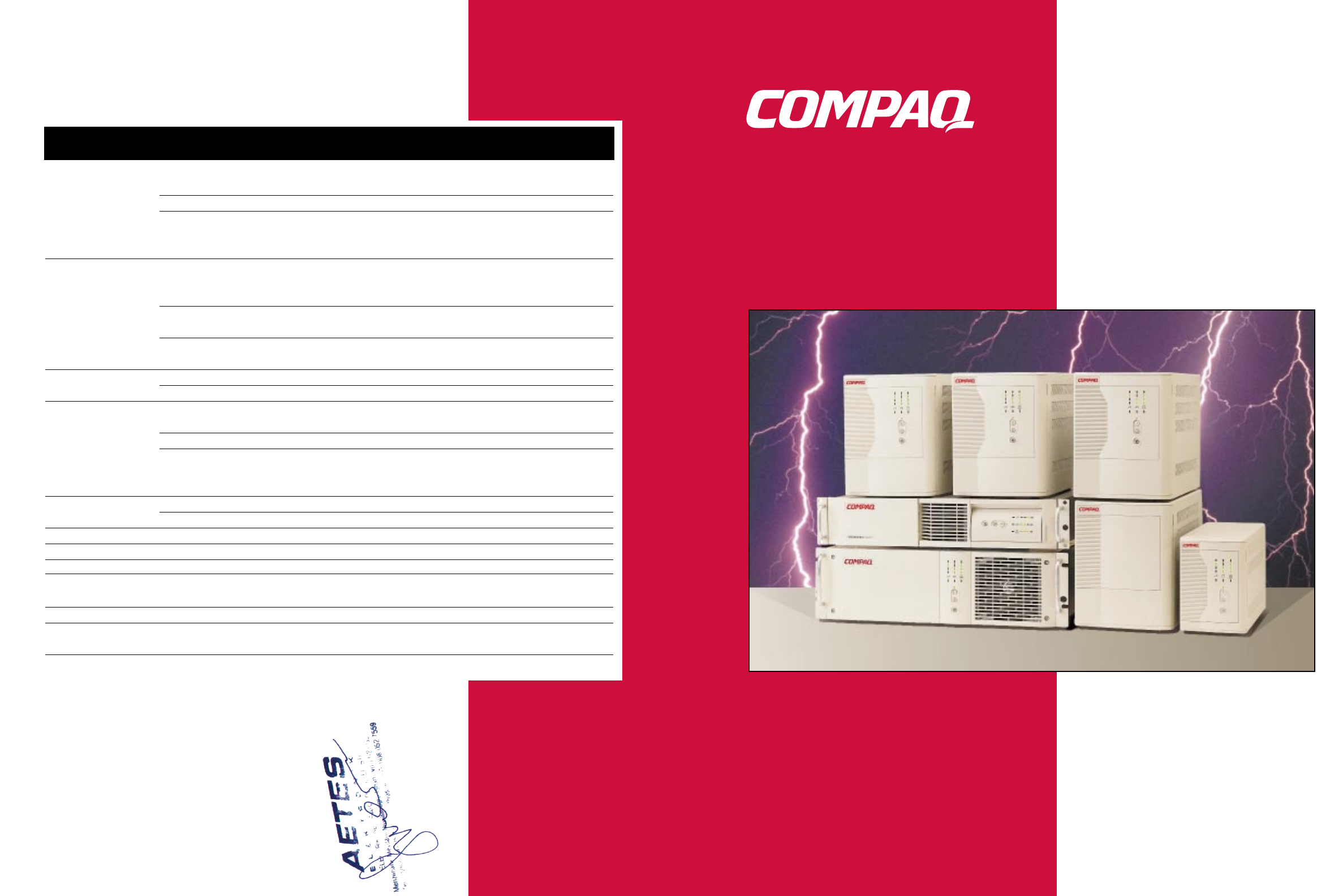
Power
Management
Products
Reference Guide
Competitive Overview
Compaq APC Tripp Lite Best
UPS SmartUPS SmartPro NET Fortress
Enhanced Battery Doubled battery service
Management life (up to 3-6 years) ■
Faster recharge time ■
Advanced warning of
battery failure
(up to 60 days) ■
Buck/Double Boost Monitor input voltage
variations without
transferring to battery ■
Widest input voltage
regulation (-35%, +20%) ■
Tightest output voltage
regulation (-10%, +6%) ■
Compaq Power Prioritized shutdown ■
Management Software Scheduled startups ■
Independently Controlled shutdowns
Controlled Load and Startups ■
Segments Extended Runtime ■
Energy conservation by
turning equipment off
when not needed ■
UPS Option Cards Multi-Server Card ■■
Scalable Card ■
Start-On-Battery ■
Hot Swappable Batteries ■■ ■ ■
Warranty 3-Year* 2-Year 2-Year 2-Year
Network/Modem
Protection ■■ ■ ■
Sinewave ■■ ■ ■
Line Interactive
Topology ■■ ■ ■
*Certain restrictions and exclusions apply. Consult the Compaq Customer Support Center for details.

Table of Contents
Compaq Power Management Products.....................................................................1
Why Buy Compaq Power Management Products?....................................................3
Enhanced Battery Management Ensures
Ultimate, Long-Term Battery Reliability ....................................................................4
Protecting Enterprise Environments with Compaq UPSs .........................................5
Intelligent Manageability with Compaq Power Management Software ..................7
Extended Backup with Load Segment Control........................................................10
Ease of Serviceability with Hot-Swappable Batteries............................................11
Enhance System Flexibility and Manageability
with Compaq UPS Option Cards...............................................................................12
Preservation of Rack Real Estate
with the Compaq Power Distribution Unit...............................................................14
Ease of Configuration Via Front Panel Display........................................................15
Rear Panels (Tower Models) ......................................................................................16
Rear Panels (Rack Models)........................................................................................18
Understanding UPS Configurations .........................................................................20
Which Compaq UPS is Right for You?......................................................................21
Worldwide Power Requirements..............................................................................22
Compaq UPS Model Guide........................................................................................23
Compaq UPS Technical Specifications....................................................................24
Questions & Answers...............................................................................................25
Troubleshooting........................................................................................................29
Compaq Power Management Products Glossary....................................................30
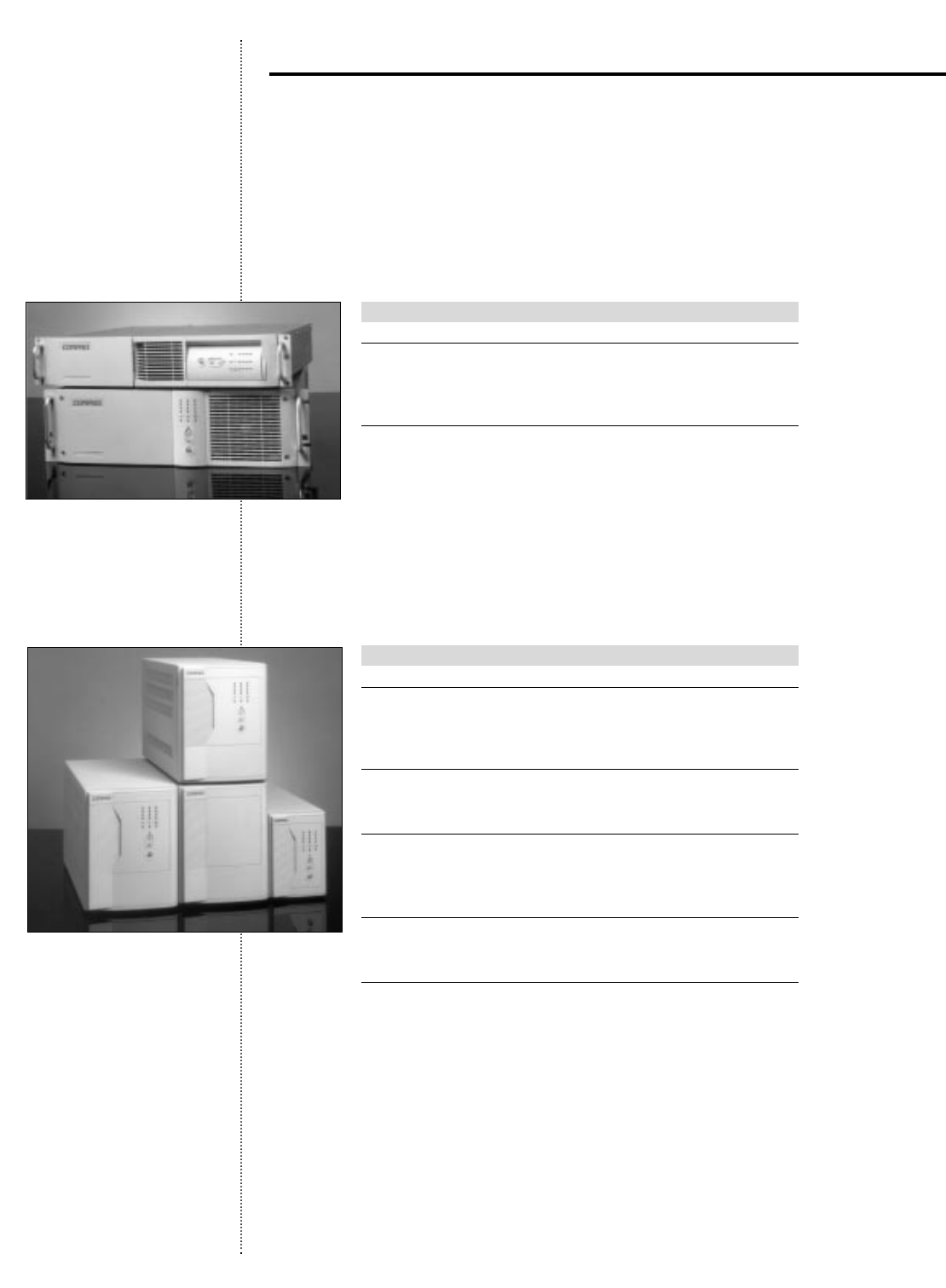
Rack-mountable Uninterruptible Power Supplies
Compaq Rack-mountable UPSs provide maximum uptime in the event of a power problem
for a variety of rack-based computer systems,providing powerful performance while occupying
minimal rack space.The R3000 UPS is 3U (5.25 inches).The R1500 UPS is 2U (3.5 inches).
UPS Model Part Number
R1500 Series
R1500 242704-001
R1500j 242704-291
R1500h 242704-002
R3000 Series
R3000 242705-001
R3000j 242705-291
R3000h 242705-002
R3000h-NA 242705-003
Tower Uninterruptible Power Supplies
Compaq Tower UPSs provide advanced power protection for the entire network including
workstations, hubs,routers,and servers that require maximum uptime and fault tolerance
in the event of a power problem.
UPS Model Part Number
T700 Series
T700 295372-B21
T700h 295372-B22
T700j 295372-291
T1000 Series
T1000 242688-001
T1000h 242688-002
T1500 Series
T1500 242688-003
T1500h 242688-004
T1500j 242688-293
T2000 Series
T2000 242688-005
T2000j 242688-295
T2400 Series
T2400h 242688-006
T2400h-NA 242688-007
1
Compaq Power Management Products
j = Japanese model
h = High voltage model
h-NA = North American high voltage model.
Compaq has developed a full range of power management products that protect and manage
computer systems ranging from individual workstations to distributed enterprises.
2
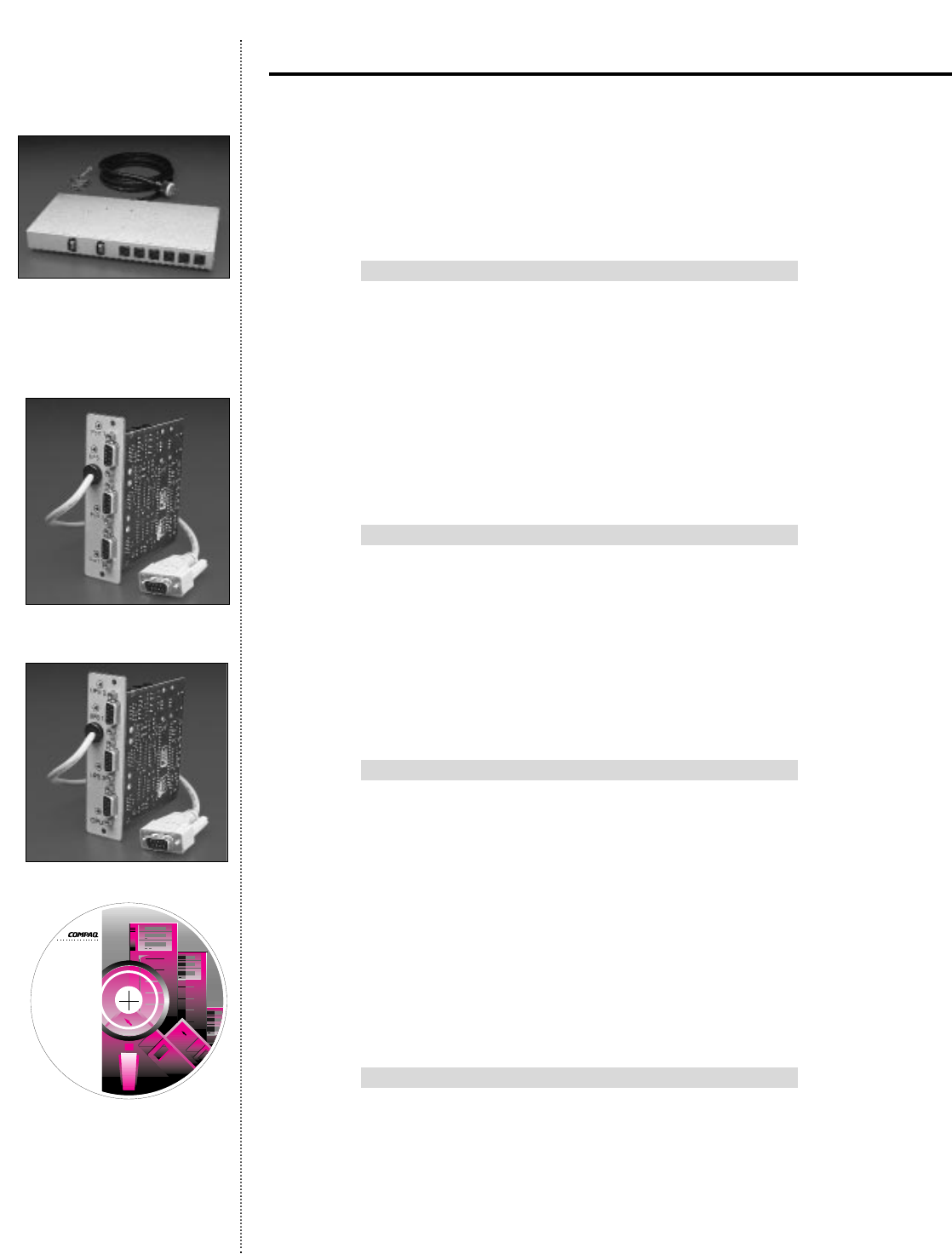
Power Distribution Unit
The Compaq Power Distribution Unit provides managed power distribution for rack cabi-
nets without consuming valuable rack space.The unique sidewall mount design provides 12
AC receptacles that help distribute elevated power requirements within rack cabinets,as well
as maximized cord management.
Model Part Number
PDU 295363-001
PDUh 295363-B31
PDUh-NA 295363-002
PDUj 295363-291
Multi-Server Card
The Multi-Server Card is a Compaq UPS option that facilitates direct communication with
up to three critical servers (each of which can run a different operating system) via individual
serial communication ports,eliminating the need to purchase additional UPSs to support
each server.
Model Part Number
Worldwide 242755-001
Scalable Card
The Scalable Card,another Compaq UPS option,enables multiple Compaq UPSs to work
together as one virtual UPS,providing UPS scalability, field upgradeability, and expandable
run time.
Model Part Number
Worldwide 242756-001
Compaq Power Management Software
Compaq Power Management Software is a tightly integrated,alert response application within
Compaq Insight Manager which enables system administrators to monitor and control Compaq
UPSs locally or remotely.This versatile application provides system administrators with an
overview of network power conditions,as well as enables them to configure shutdown timing,
customize alert messages,and perform UPS diagnostic checks.
Model Part Number
Software provided with all Compaq UPS models.
j = Japanese model
h = High voltage model
h-NA = North American high voltage model.
Compaq Power Management Products (continued)
POWER
MANAGEMENT
SOFTWARE
with LanSafe III
and FailSafe III
© 1996, 1997 Compaq Computer Corporation
© 1996, 1997 Deltec Electronics Corporation
All Rights Reserved
CD P/N: 05144864-002 A
S/W: 05144863-0002

3
Compaq’s full range of power management products provide you with the power to protect,
the power to manage,the power to communicate with your network,and the power to guar-
antee maximum data integrity.
Ultimate,Long-Term Battery Reliability with Compaq Enhanced
Battery Management
Batteries that are constantly trickle-charged reach the end of their useful life in less than half
the time of those charged using advanced techniques such as Compaq’s Enhanced Battery
Management technology.Compaq understands that the battery reliability of your UPS is
essential to ensuring network server protection.Compaq’s Enhanced Battery Management,
standard with all Compaq UPSs,is an advanced battery technology that uses a patented,three-
stage charging technique that doubles battery service life,optimizes battery recharge time,and
provides up to a 60-day advanced notification of pending battery failure.
Intelligent Manageability with Compaq Power Management
Software
Compaq Power Management Software allows for diagnostics,monitoring,user notification,
and — when necessary during an extended blackout — unattended,prioritized shutdown of
multiple servers and client workstations.For ultimate intelligent manageability,the Compaq
UPS has been designed to schedule startups and shutdowns of connected equipment and con-
trol separate receptacle groups (load segments).
More Flexibility with Compaq UPS Option Cards
All Compaq UPS option cards seamlessly integrate into the back of your Compaq UPS.
The Compaq Multi-Server Card facilitates direct communication with up to three servers,
thereby eliminating the need for multiple UPSs.The Compaq Scalable Card enables multiple
UPSs to work together and be monitored as one logical UPS providing enhanced protection,
scalability (runtime),and future expandability.
Preserve Valuable Rack Space with the Compaq Power
Distribution Unit
Designed to fit into a Compaq rack cabinet environment,the Compaq Power Distribution
Unit provides managed power distribution and surge protection via 12 circuit-breaker
and fuse-protected AC receptacles.The unique sidewall-mount design of the Compaq
Power Distribution Unit preserves valuable rack space for more critical servers and systems.
Compaq Quality
Having built its reputation on providing the highest quality products,Compaq’s hardware
qualification process is the toughest in the industry.Extensive evaluation,testing,and product
improvement guarantee the highest level of system protection,electrical performance,
product construction, and compatibility.
Superior UPS Warranty
To back up the wide range of features offered with our UPSs,Compaq provides a three-year,
on-site limited warranty,as well as an additional $25,000 Computer Load Protection Guarantee
(provided by Compaq’s original equipment manufacturer),while competitive systems typically
offer only a two-year warranty.
Why Buy Compaq Power Management
Products?
4
The heart of any UPS is the battery.The maintenance-free,sealed,lead-acid cells used in
virtually all manufacturers’UPSs have a two- to four-year life expectancy.When the batteries
die,the UPS is no longer uninterruptible,leaving its user unprotected in the event of a
power failure.Compaq’s Enhanced Battery Management is a proprietary technology that
doubles battery service life,provides up to a 60-day advance warning of pending battery
failure,and offers the fastest safe recharge time — increasing the return on your UPS
investment.This innovative technology is comprised of three components:
Double Battery Service Life with Intelligent Battery Charging
All UPS batteries need charging.Extended charging,however,significantly shortens battery
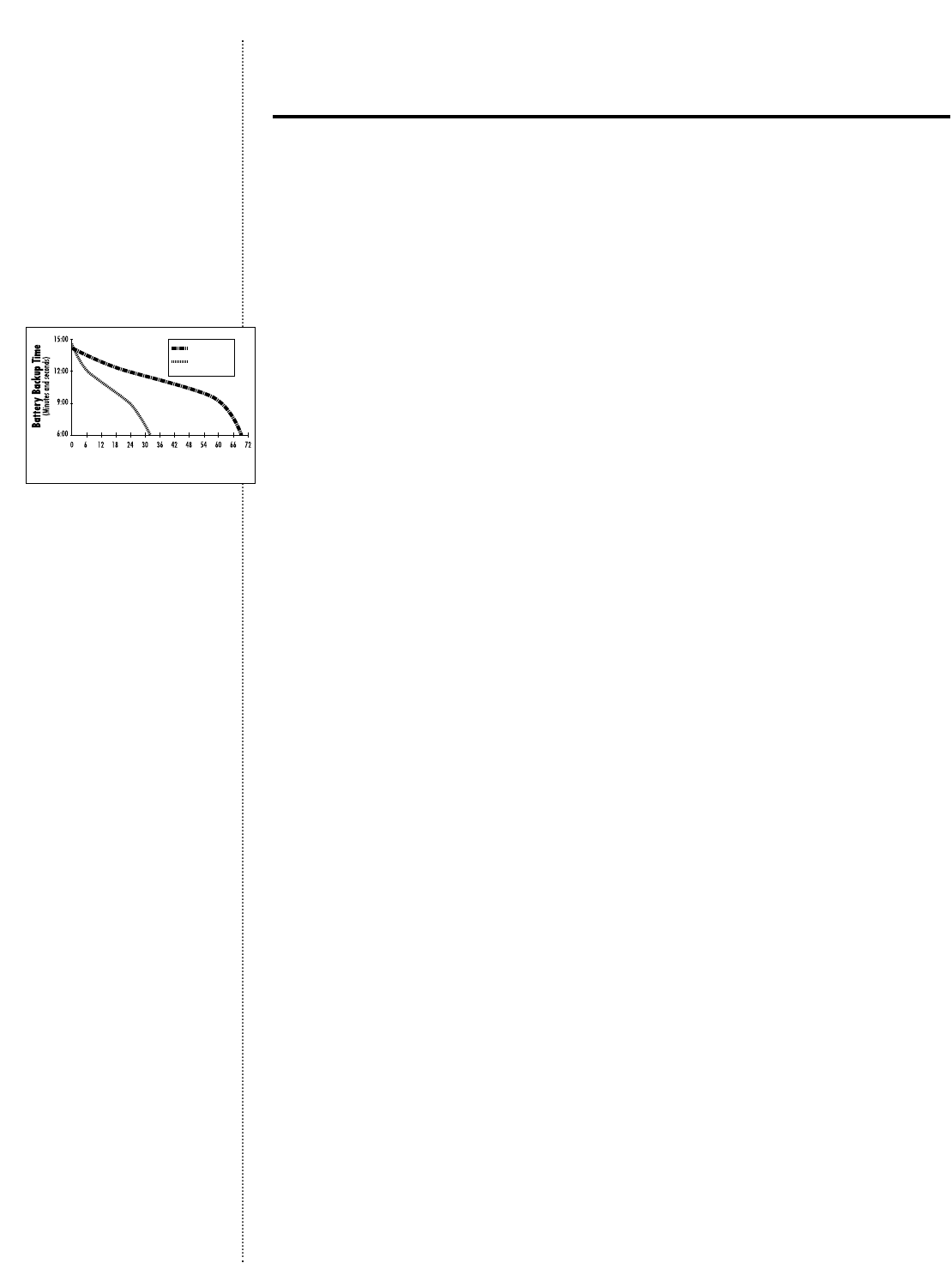
life.The Compaq UPS utilizes a patented three-stage charging process that ultimately doubles
battery service life.First,the Compaq UPS rapid charges the battery to 90%.A constant
voltage (float charge) continues until the battery reaches full capacity.The charger is then
turned off and the Compaq UPS goes into a rest mode,enabling the battery to be preserved
for future power failures. Most manufacturers use a trickle-charging method (a constant
voltage feeding a low current to the battery) which dries the electrolyte and corrodes the
plates,reducing potential battery life by up to 50%.
Advance Notification of Battery Replacement with Sophisticated
Monitoring Techniques
All batteries will eventually fail.Because UPS batteries are valve-regulated,sealed,lead-acid
cells,there has not been a practical way to provide users with advance notification of battery
failure.The only way to determine that batteries needed replacing was to wait until the power
failed,taking the servers and computers down with it.Compaq’s Enhanced Battery Management
is the only technology available that reliably provides advance notification prior to battery fail-
ure.The Compaq UPS microprocessor periodically initiates a brief discharge cycle to check the
internal impedance of the battery.This impedance is calculated and compared to an ideal bat-
tery state,indicating to the user,well in advance,when battery replacement is necessary.
Minimize Battery Use with Superior Voltage Regulation
Most manufacturers’UPSs monitor input voltage variations as low as -25%,but transfer to
battery when a surge or a sag needs to be filtered in the system.This type of voltage regulation
shortens the UPS’s battery service life.Compaq’s innovative Buck/Double Boost voltage
regulation ensures consistent input voltage to the load by automatically “bucking”it if it is
too high,or “boosting”it if it is too low.Voltage variations as low as -35% or as high as +20%
are corrected — without transferring to battery.This reduces the number of charge/recharge
cycles, thereby prolonging the life of the Compaq UPS battery.
UPS w/EBM*
UPS w/Trickle
Charge
*EBM = Enhanced Battery Management
Battery
Enhanced Battery Management Ensures
Ultimate, Long-Term Battery Reliability
5
The Costly Effects of Power Problems in an Enterprise Environment
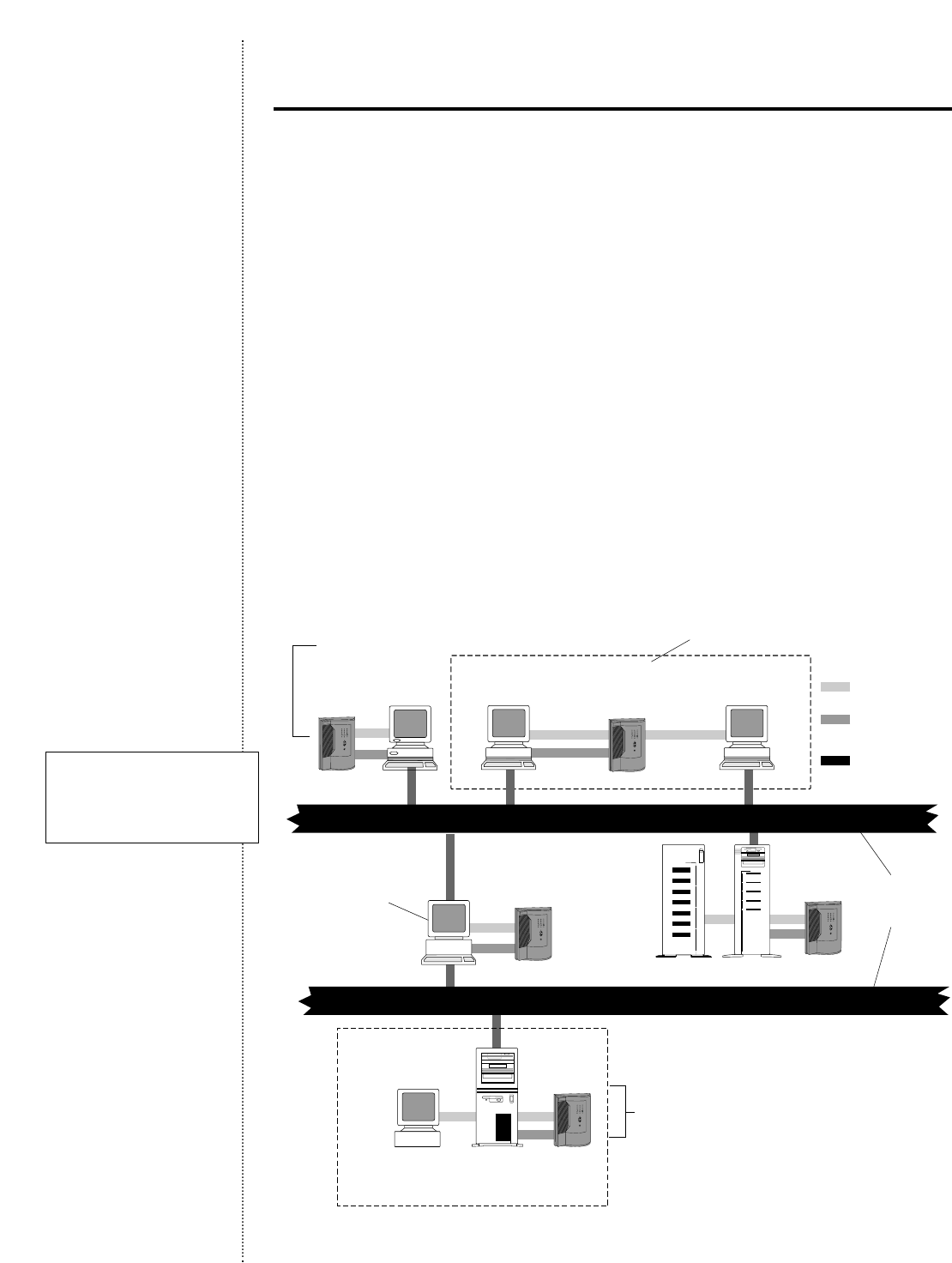
The effects of blackouts and other power problems in an enterprise environment can be
devastating and costly. Using a Compaq UPS to protect servers and other critical equipment
prevents unnecessary downtime,loss of data,and damage to your hardware.Maximum data
integrity and system uptime require a prioritized shutdown plan which is managed by Compaq
Power Management Software.Preserving data is an increasingly complex issue in today’s
enterprise environments.Communication systems are required to transfer and store informa-
tion within internal computer networks and must also provide critical links to the enterprise-
wide networks.
Data Integrity of Your Entire Network with Compaq Power
Management Software
A prioritized shutdown ensures that all network devices are shut down in a orderly,sequential
manner,saving all work-in-progress throughout the network.Compaq Power Management
Software empowers network administrators by allowing them to define their own shutdown
process.Thus,a company’s most critical equipment (such as a database or file server) can be
shut down last,after work-in-progress has been saved from client workstations through hubs,
switches,routers,and communication servers.
Protecting Enterprise Environments with
Compaq UPSs
Compaq File Server & Storage
(Load Segment 1)
Compaq UPS
Workstation Controller
NT Workstation
Member
Win 95 Workstation
Router
UPS Group Power
Serial
Communication
Local or Wide
Area Network
UPS with
Load Segments
Compaq UPS
Compaq UPSCompaq UPS
Compaq UPS
Compaq
File Server
Monitor
(Load Segment 2)
Network Communications
Network Communications
Saves work-in-progress throughout the network Supports up to 64 network devices with a single
UPS Group with unattended sequential shutdown
Provides unattended
sequential shutdown
of all network devices
Supports hubs and routers, ensuring
the integrity of data being transferred
during extended power failures
Individual load segments can
be sequentially powered down
or powered up
Complete network power
protection with Compaq
Power Management
Software and Compaq UPSs

6
Protecting Enterprise Environments with
Compaq UPSs (continued)
Extended Runtime for Critical Servers and More
With Compaq Power Management Software,individual load segments on Compaq UPSs can
be sequentially powered down,extending run time for more critical servers,or powered up,
ensuring correct,orderly startup such as servers before workstations.In addition,to conserve
energy,Compaq Power Management Software allows for scheduled on and off times which
are programmable for each load segment or the entire UPS.
Complete Network Power Protection
Compaq Power Management Software supports up to 64 network devices within a single
UPS group and provides unattended,sequential shutdown of every device in that group,
regardless of the operating system.Any device whose input power is supported by a single
UPS is considered to be part of a UPS group.A UPS group might be several servers or
workstations.If the network devices are connected by a network cable and can communi-
cate with one another via this interface,only a UPS-to-computer serial interface connection
is required.If different operating systems are in the UPS group,still only one copy of Power
Management Software is needed,although a signal splitting device such as Compaq’s
Multi-Server Card might be necessary.
When power quality is compromised,so are a company’s vital data files including data entry,
orders,records,e-mail messages,and other critical business information.Compaq Power
Management Software used in conjunction with Compaq UPSs plays a vital role in ensuring
data integrity and protection of your business’s critical network servers and other systems.
7
Your UPS Just Got Smarter with Compaq Power Management
Software
Compaq Power Management Software takes server data protection the extra mile,and then
some.Management notification,diagnostics, monitoring,and — when necessary during an
extended blackout — unattended,prioritized shutdown of multiple Compaq servers and client
workstations are standard features of Compaq Power Management Software. Because the
Compaq UPS supports separate load segments,users can program Compaq Power Management
Software to schedule segment-by-segment shutdowns and startups of connected equipment.
Status Information is Clear and Complete
For any Compaq server or system device in your network,you can access UPS status infor-
mation quickly and easily.The Status function provides a color-coded system overview (nor-
mal,degraded, or failed) at the status button on the Compaq Power Management Window.
The status window provides color-coded information on system elements,including UPS
communications,UPS operational status,utility power,battery charge,utility ground fault
detection,inverter power, and UPS overload detection.
The Power Situation is Easy to Understand
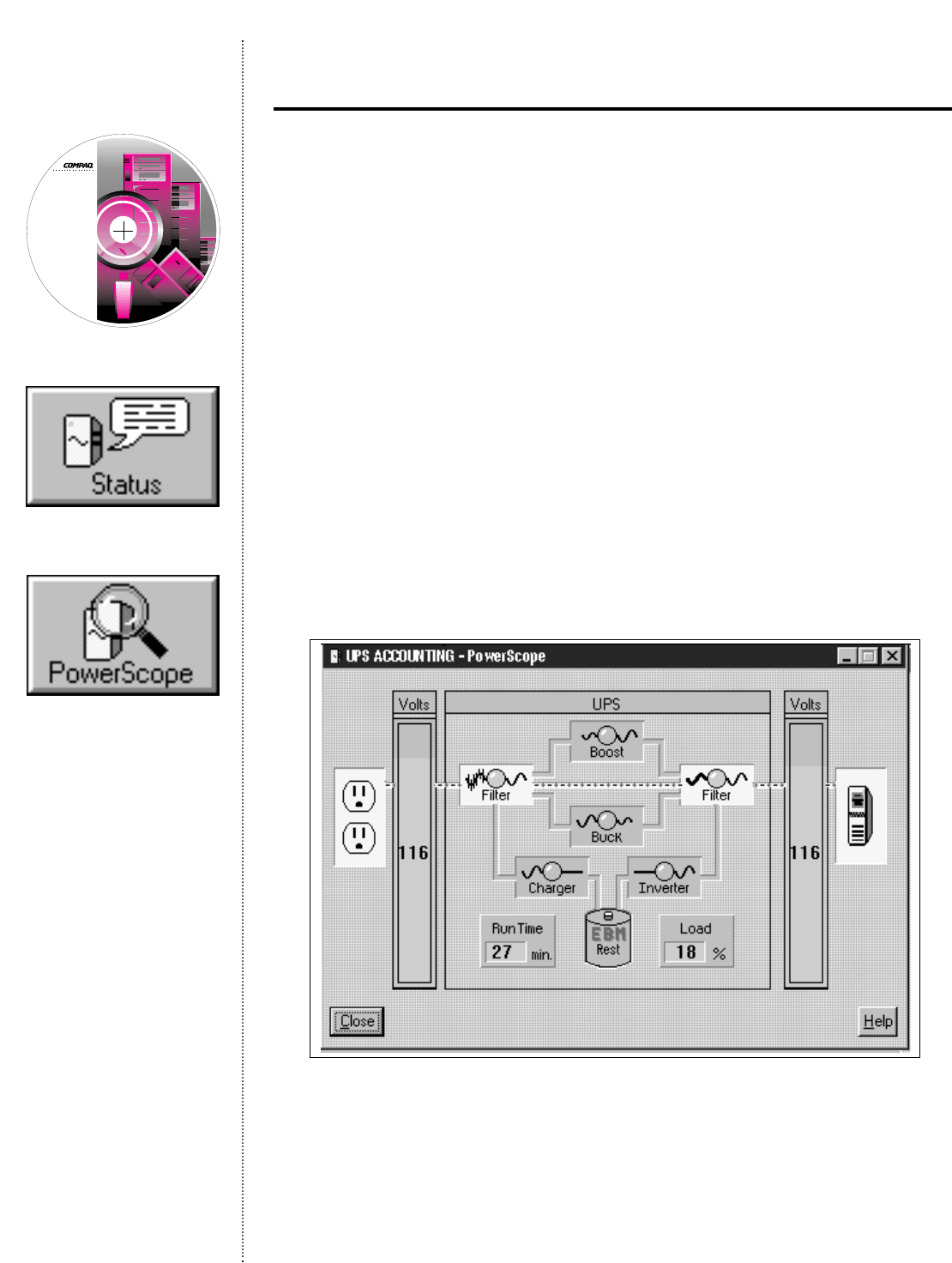
The Compaq Power Management PowerScope screen provides a graphical,real-time display
of the inside of the UPS.
The PowerScope display is a dynamic,functional block diagram of power from the source,
through the UPS,and out to the load.For any Compaq server on the network,the PowerScope
shows the UPS input and output voltages (color-coded for easy interpretation),available
battery run time in minutes, and the percentage load,a measure of the capacity of the UPS.
Intelligent Manageability with Compaq
Power Management Software
POWER
MANAGEMENT
SOFTWARE
with LanSafe III
and FailSafe III
© 1996, 1997 Compaq Computer Corporation
© 1996, 1997 Deltec Electronics Corporation
All Rights Reserved
CD P/N: 05144864-002 A
S/W: 05144863-0002
8
Load Segmenting for Extended Backup Time
The Compaq UPS has individually controlled load segments.If power fails,users can extend
backup time for their most critical servers or systems via Compaq Power Management Software.
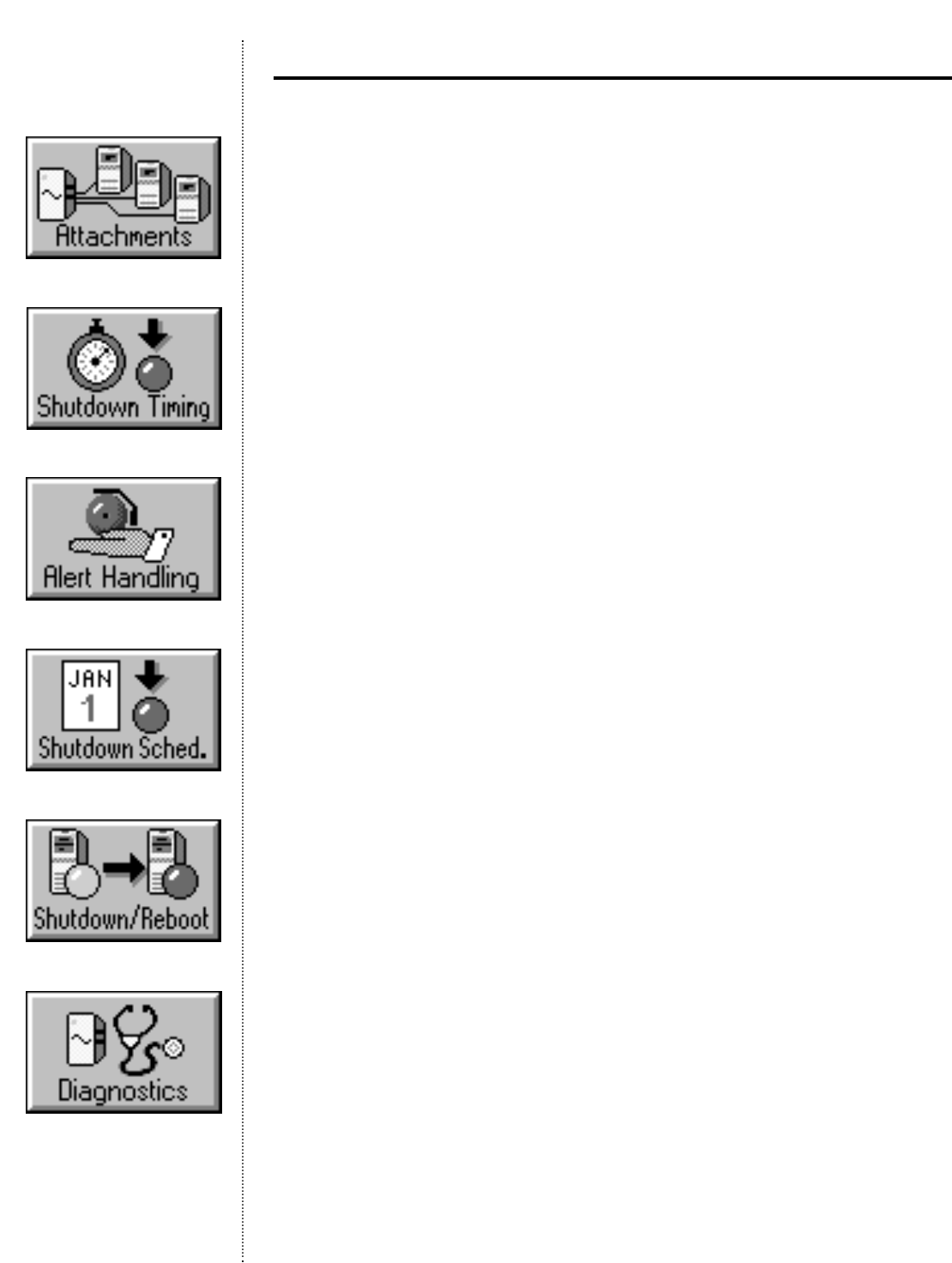
The Attachments window enables configuration of the connected servers/systems to specified
load segments.Once this is done,the shutdown window details your Shutdown Timing
in terms of wink time,countdown time,and shutdown delay, assuring a prioritized system
shutdown.Similarly, the Startup Timing feature ensures a prioritized return to service.
Automatic Alert Communication
Compaq Power Management Software provides additional Alert Handling capabilities.These
capabilities allow you to customize alert messages in another language,configure the system
to execute commands in the occurrence of a particular alert,and to broadcast messages
and off-site e-mails in any given alert situation.This ensures that the entire system adminis-
tration staff is fully informed of any system emergency.
Scheduled Shutdowns
Why spend money on power by running equipment you don’t need? Compaq Power Management
Software and Compaq UPSs supporting load segments give you the ability to run the equip-
ment you want when you want to.Shutdowns and restarts can be scheduled on a regular
basis for each day of the week. If a piece of equipment isn’t needed (on weekends and holi-
days,for example),the system shuts it down and doesn’t start it until you program it to do so.
Shutdown/Reboot Flexibility
Use Compaq Power Management Software to Shutdown your UPS with three restart options.
An immediate Reboot can be performed,the startup can be timed for any user-specified
interval,or it may be permanent until the UPS is restarted manually.
Information Logs
The power event and battery management Logs provide a history of significant system events
that can be used for problem detection and resolution.
Diagnostics
Compaq Power Management Software Diagnostics features a Power Monitor window
reminder when it’s time to run preventive maintenance.You can program the messages for
whatever time intervals you need.When you start Diagnostics,you start a simple but
vital test of every UPS on the network for approximately 40 seconds, wherein your system is
put on battery power to test the circuitry.This way you know your UPS will be ready in the
event of an emergency.
Compaq Power Management Software (continued)
9
How It Works
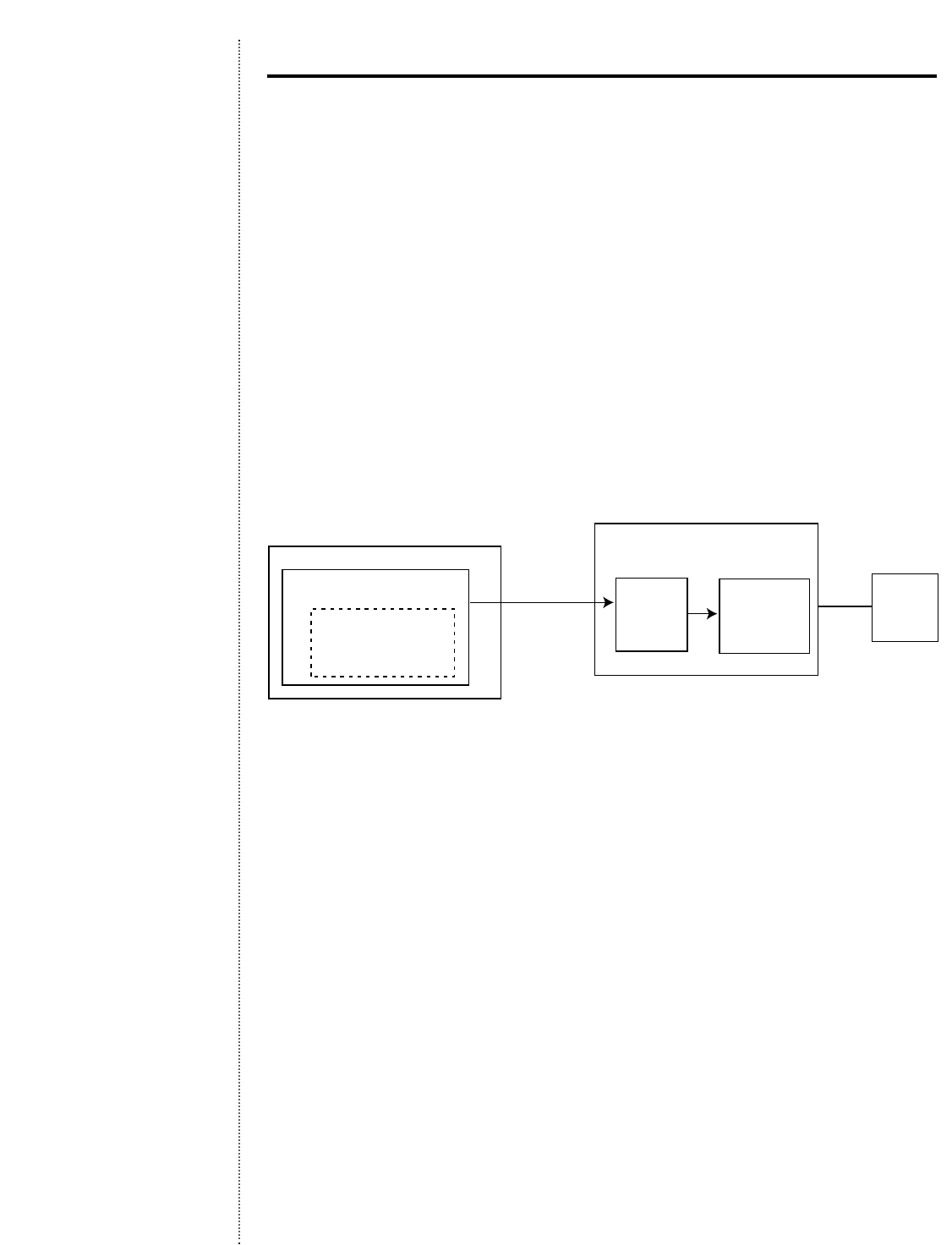
The Compaq Power Management Software Agent runs on each Compaq computer and Compaq
server supported by a Compaq UPS.As long as the equipment is running,the agent observes
the power environment of the UPS.Access to Compaq Power Management Software is through
the UPS icon within the Compaq Insight Manager Console.
Should utility power fail or another significant power problem occur, the Compaq UPS
places connected servers and systems on battery power and the Compaq Power Management
Software issues an alert.The alert goes via an SNMP trap to the system administrator’s work-
station (Windows NT or Windows 95) running Compaq Insight Manager.
Compaq Power Management Software responds to the alert as programmed by the system
administrator.As the power event continues,Compaq Power Management Software begins
a prioritized system shutdown,saving all work-in-progress throughout the network.
Management Workstation
(Windows 95/NT only)
Compaq Insight Manager
management application
Compaq Power
Management Software
management application
Server (*Compaq Insight Manager
Operating Systems)
Serial
Comm
Compaq Power
Management
Software
agent
Compaq
Insight
Manager
agent
UPS
Compaq Power Management Software (continued)
*Compaq Power Management Software supports the following Operating Systems through Compaq
Insight Manager: Microsoft WindowsNT 3.51 and 4.0 (server and workstation), Microsoft Windows
95, IBM OS/2 1.21B, SCO Unix 5.0 and 5.02, Unixware, and Novell Netware Intranetware 3.X and 4.X.
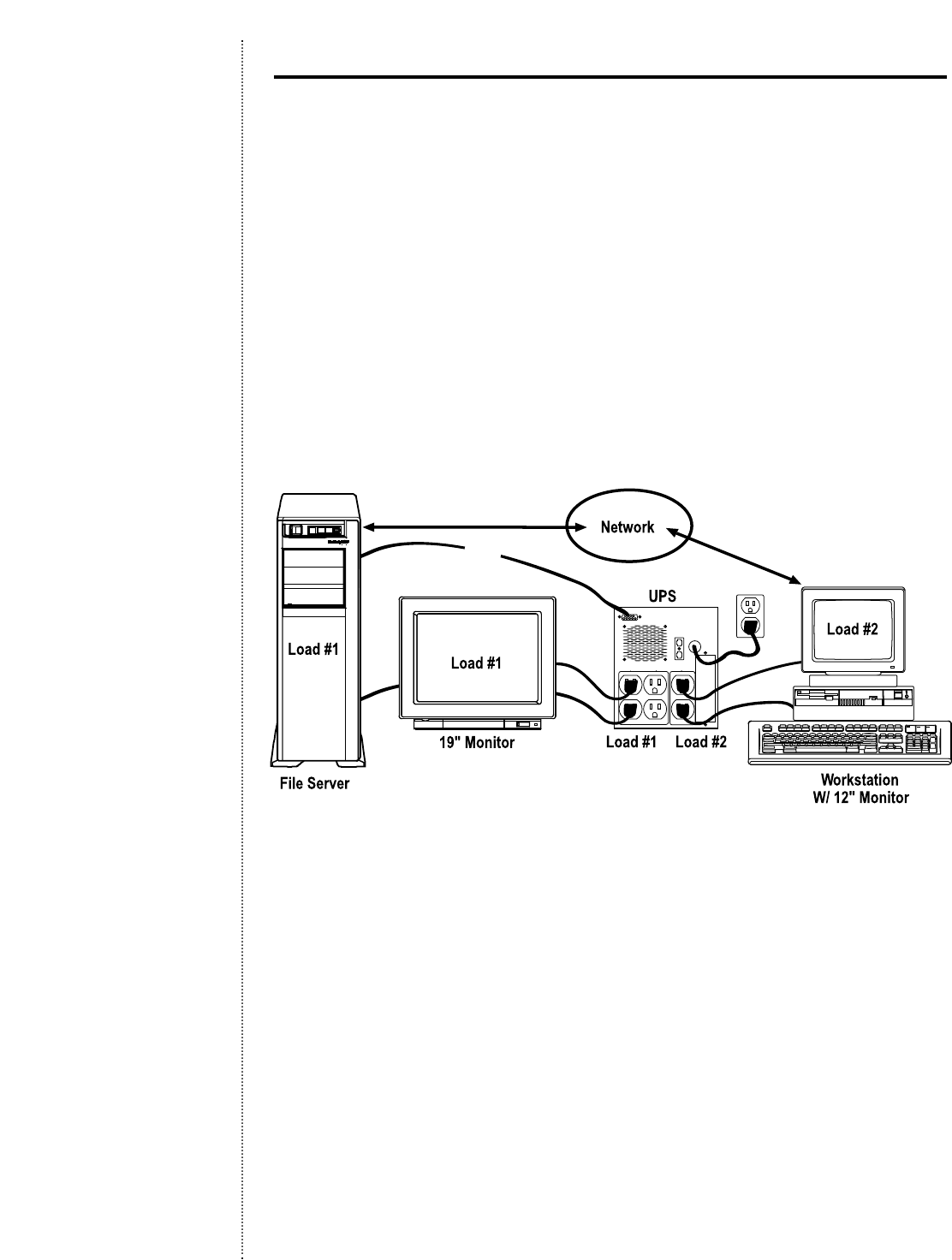
With Compaq UPS load segment control,users have the flexibility to configure scheduled
startups and shutdowns of their equipment,as well as to independently control load segments.
Working in conjunction with Compaq Power Management Software, the Compaq UPS can
be configured to extend run times for critical devices.Because the receptacles on the back
of the Compaq UPS are divided into two or more groups — called load segments — each
load can be controlled independently.*By shutting down one load segment,the runtime for
more critical servers and systems is extended on the other load segment, providing addi-
tional protection by shutting down less critical servers and systems first.
Compaq Power Management Software also facilitates a prioritized startup of connected
equipment.Furthermore,the power scheduling feature allows for scheduled on-and-off
times,promoting energy and power conservation.
*700 UPS Series have only one load segment.
10
Extended Backup with Load Segment Control
Serial
Independently controlled load segments with Compaq UPSs are managed by Compaq Power
Management Software
11
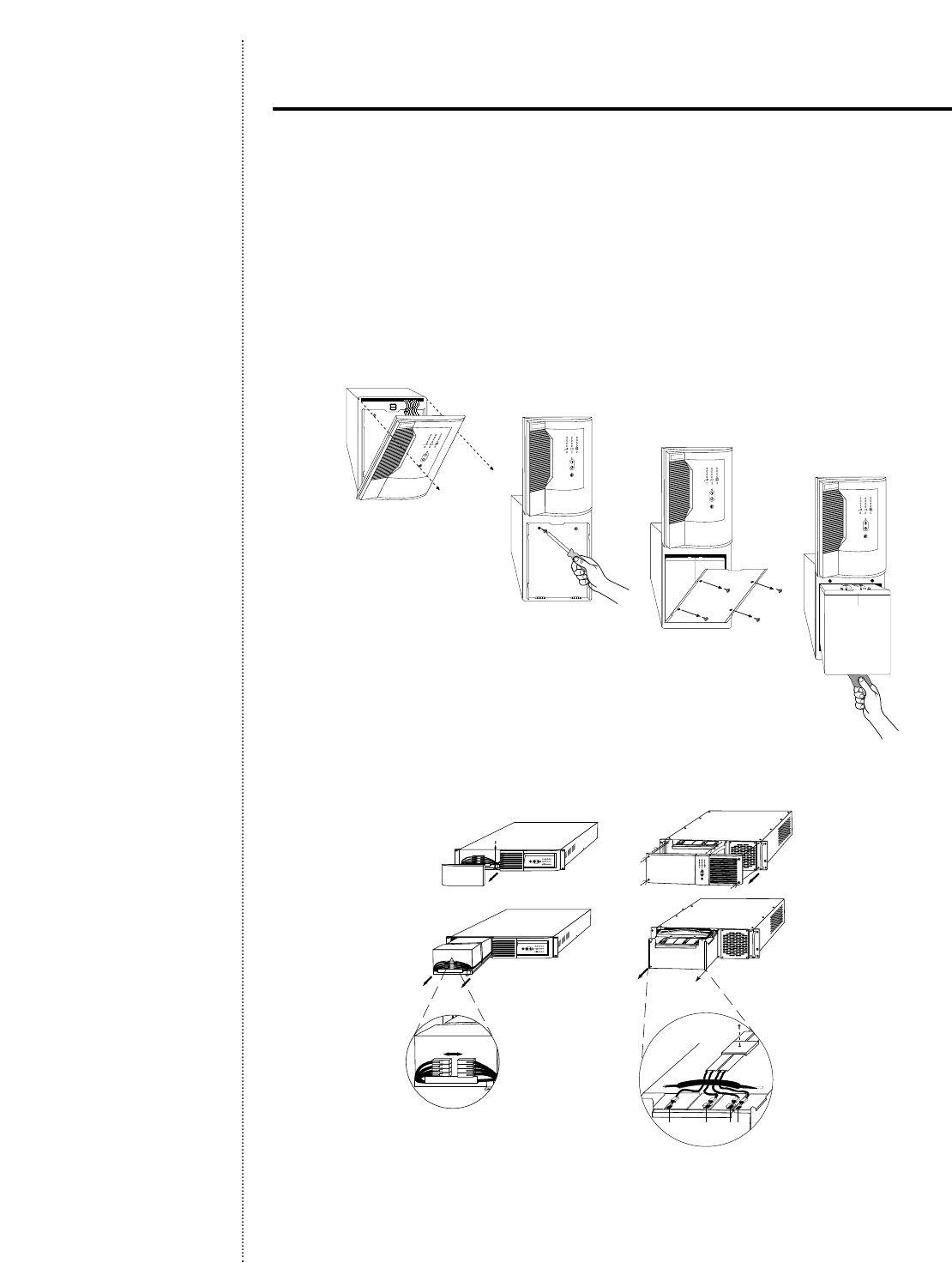
While Enhanced Battery Management has the ability to double battery service life,it cannot
prevent inevitable battery failure.When your batteries reach the end of their useful life,
replacement is easy with hot-swappable batteries.Simple access through the front panel
allows users to safely install new batteries without ever powering down the connected
equipment.
Tower Series: T700,T1000,T1500,T2000, and T2400h
For models without internal batteries (Tower models 2000 and 2400h), the procedure is
accomplished by replacing battery packs.
Rack-Mount Series: R1500 and R3000
Ease of Serviceability with Hot-Swappable
Batteries
Black Red RedBlack
R1500 R3000

12
To further enhance your UPS communication capabilities,Compaq offers two UPS option
cards that provide additional management and control capabilities during a power failure
and are available at a minimum investment.
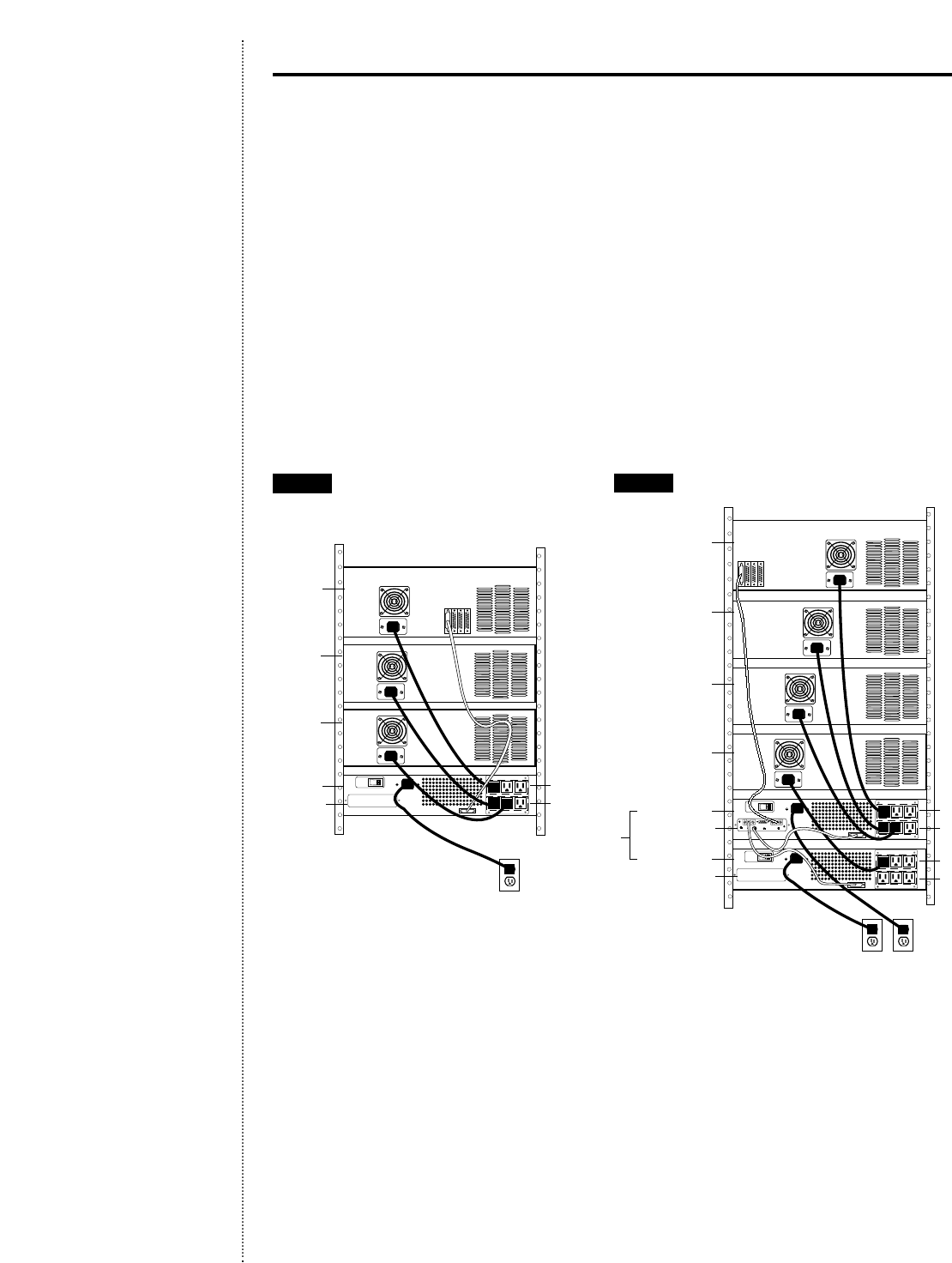
Compaq Multi-Server Card
With Compaq’s Multi-Server Card,users can serially connect up to three network devices
to a single UPS.This allows communication for networks with multiple servers or disparate
operating systems.So a business running Novell,Windows NT, and Unix servers does not
have to acquire an individual UPS for each piece of equipment.The Multi-Server card permits
out-of-band communication with up to three servers even when the network is down. It
saves you money since it is not necessary to buy additional UPSs.
Application: Need to add an NT server and another UPS for serial communications?
Solution: Install the Compaq Multi-Server Card and manage multiple platforms with
one UPS.
Port 3
Port 2
UPS
Port 1
Multi-Server
Card
Unix Server
UPS Load 1
Load 2
NT Server
Outlet
UPS Option
Card Slot
Outlet
Unix Server
UPS Load 1
Load 2
AFTER
Enhance System Flexibility and Manageability
with Compaq UPS Option Cards
BEFORE
13
Compaq Scalable Card
Because evolving system needs may require a higher power level to accommodate an increased
load,users can add the Scalable Card to their Compaq UPS.Enabling up to three UPSs to
be connected to one group of network devices,this option provides power scalability and
field upgradeability. Rather than having to purchase a new,larger UPS to increase load
capacity, users can choose to connect a second or third UPS to the original UPS to achieve
the right power level for their system.
Application: Need increased server capacity;need a larger UPS?
Solution: Add another (smaller) UPS and install Compaq’s Scalable Card.This provides
flexibility and eliminates the need to buy a larger UPS.In the example below,
Load 1 on UPS 2 becomes a virtual third load segment.
CPU
UPS 3
UPS 1
UPS 2
Scalable Card
UPS Option Card Slot
Disk Array
( 1.5 KVA) UPS 1
3 KVA
Load 1
Load 2
Load 1
Load 2
Disk Array
CPU
( 1.5 KVA) UPS 2
Disk Array
Outlets
UPS Option
Card Slot
Disk Array
UPS 1 Load 1
Load 2
Disk Array
CPU
Outlet
BEFORE AFTER
Compaq UPS Option Cards (continued)
14
The Compaq Power Distribution Unit offers managed power distribution without sacrificing
valuable rack space.The Power Distribution Unit distributes power to a maximum of 12 addi-
tional circuit-breaker and fuse-protected AC receptacles.From a single point of connection,
the Power Distribution Unit delivers exceptional surge and spike protection while convenient-
ly consolidating multiple power cords.
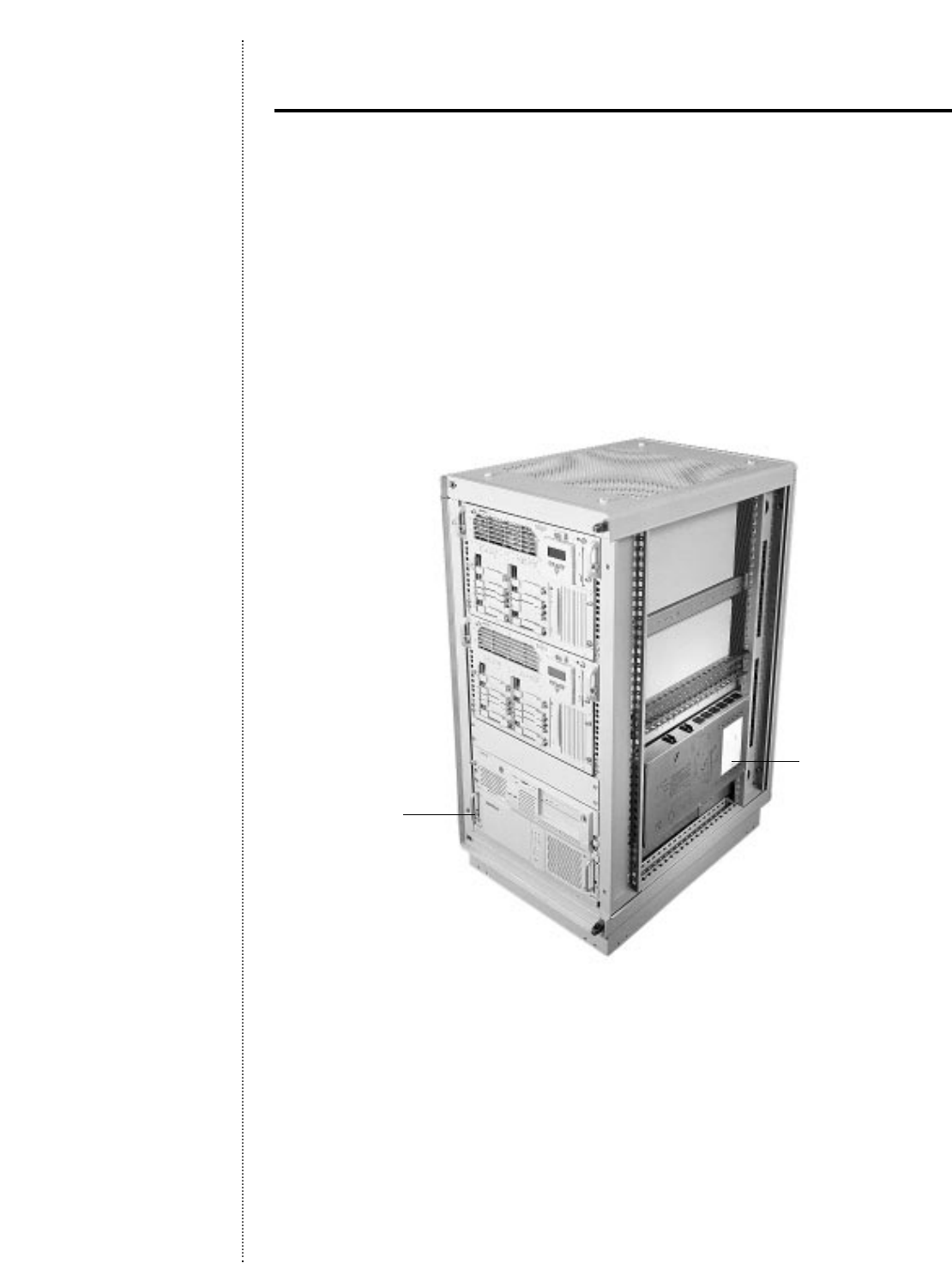
The unique “Zero-U”design of the Compaq Power Distribution Unit enables it to be mounted
into the side of an equipment rack,consuming no valuable front-panel rack space.Connected
between the frame members of Compaq 42U,36U, and 22U rack cabinets,the unit can be
added to a fully configured rack while saving space for business critical servers and other
equipment.
Preservation of Rack Real Estate with the
Compaq Power Distribution Unit
Typical rack-mount application with Compaq Power Distribution Unit.
Compaq Power
Distribution Unit
Compaq R3000 UPS
The Compaq Power Distribution Unit is also designed to further complement the functionality
of your Compaq R3000 UPS (high and low voltage models).On the R3000 UPS,Compaq
provides a high current outlet that is part of load segment three of the UPS.By plugging a
Compaq Power Distribution Unit in this high current outlet,you have added 12 receptacles to
your UPS,which can be managed as part of load segment three of your Compaq R3000 UPS.
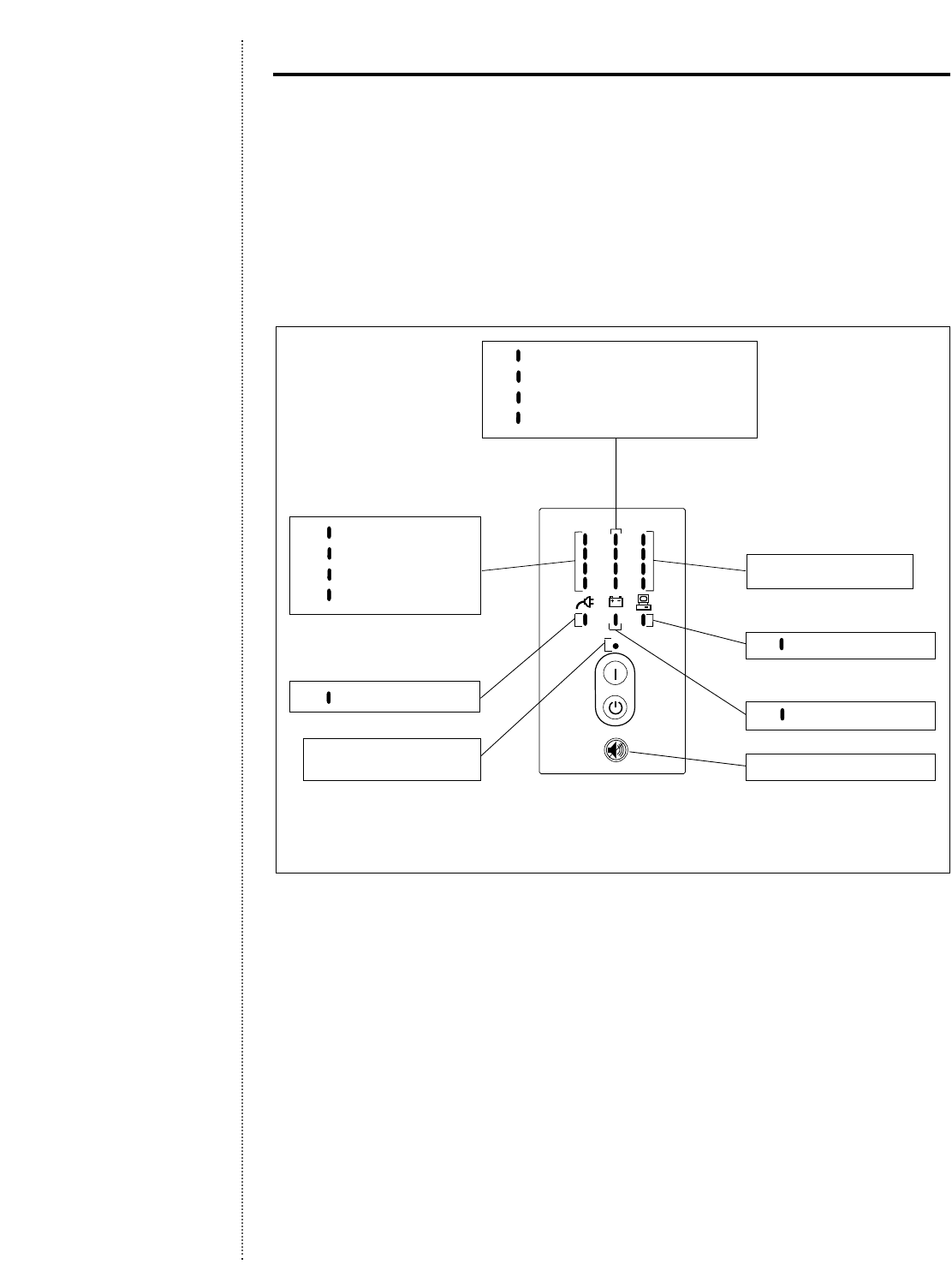
15
Load Level
LEDs
Battery Charge
LEDs
AC Input
LEDs
Communication
LED
Battery Service
(Enhanced Battery
Management) LED
On
LED
Test/Alarm
Reset
Off/Standby
Button
On
Button
Site Wiring
Fault LED
Operation
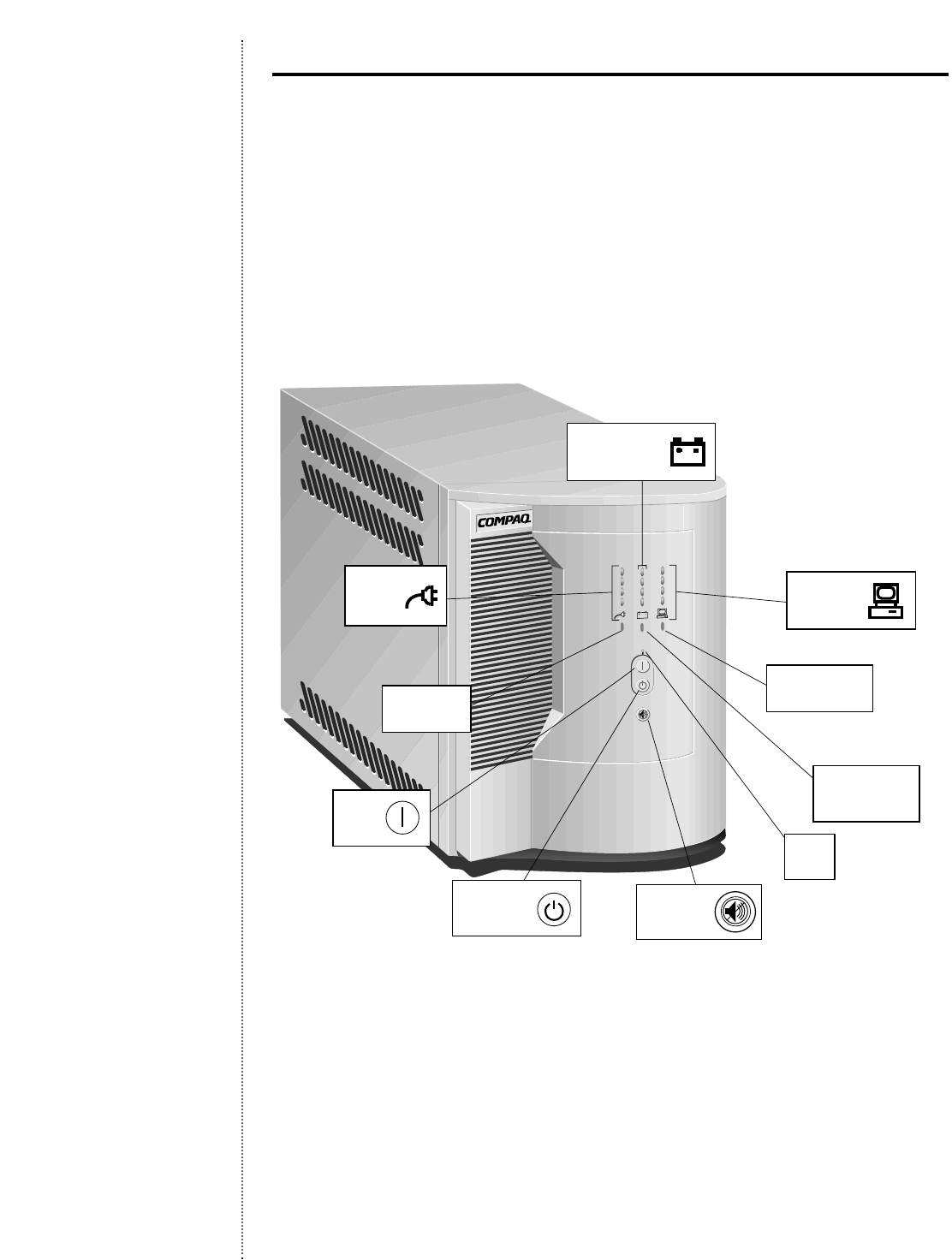
For easy monitoring,all Compaq UPSs feature simple icons.The provided LEDs tell users
everything they need to know about site wiring,voltage,battery, load,and communications
conditions.In addition, depressing the dual-purpose Test/Alarm Silence button initiates a
self-diagnostic routine that verifies monitoring operations.
When the Compaq UPS is in its standard mode of operation,the front panel LEDs indicate
how the UPS is functioning and also warn about possible problems,such as low battery,
overvoltage,or overload conditions.
Ease of Configuration Via Front Panel Display
16
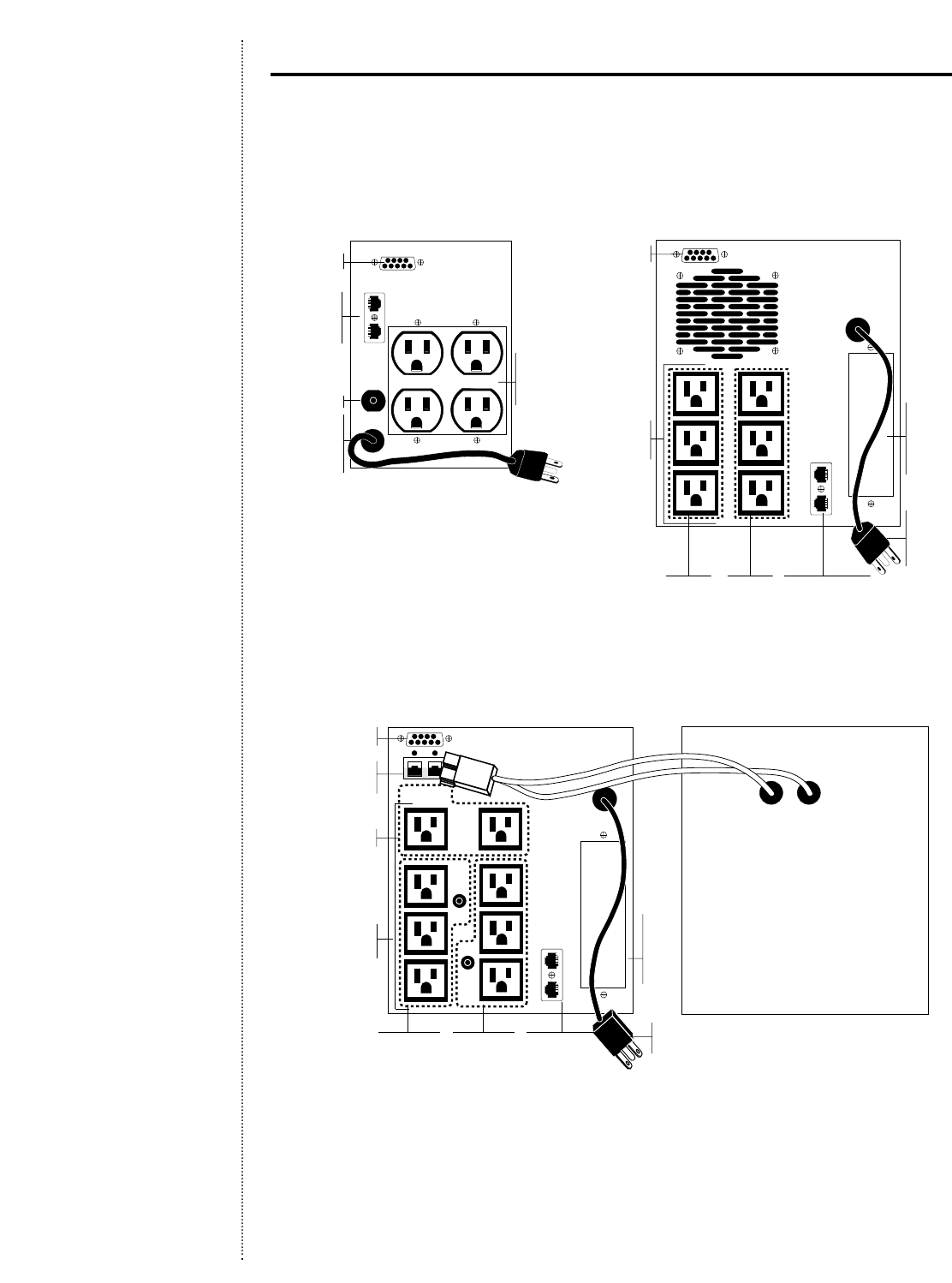
Rear Panels (Tower Models)
Comm Port
Four
5-15R
Receptacles
Network
Transient
Protector
Line Cord
with 5-15P
plug
Reset Button
Models T1000 & T1500(j)
Model T2000(j)
Low Voltage (100–127 VAC)
Model T700(j)
Comm Port
Six 5-15R
Receptacles
Network Transient
Protector
Line Cord
with 5-15
Plug
UPS
Option
Card
Slot
Load
Segment 1 Load
Segment 2
Eight 5-15R
Receptacles
Line Cord with
5-20P Plug
Battery
Connector
UPS
Option
Card
Slot
Load Segment 3
Load
Segment 1 Load
Segment 2 Network
Transient Protector
LOAD 1
RESET
LOAD 2
RESET
Comm Port
Battery Box
(j) = models available for Japan.

17
High Voltage (208–240 VAC)
Four Female IEC-320
Receptacles
IEC-320 Male
Inlet (10A)
Comm Port
Network Transient
Protector
Comm Port
Six
IEC-320
Receptacles
IEC-320
Male
Inlet
(10A)
UPS
Option
Card
Slot
Load
Segment 1 Load
Segment 2Network Transient
Protector
Input
Circuit
Breaker
Model T700h
(220–240 VAC only)
Model T2400h
Model T2400h-NA*
Models T1000h & T1500h
*North American Model
(includes 6-15P line cord)
Nine IEC-320
Receptacles
IEC-320 Male
Inlet (10A)
Input Circuit
Breaker
UPS Option
Card Slot
Load Segment 1
Load Segment 2
Load Segment 3
Comm Port
Battery
Connector
Network Transient
Protector
Battery Box
Rear Panels (Tower Models)
Note: h = high voltage
h-NA = high voltage-North America
18
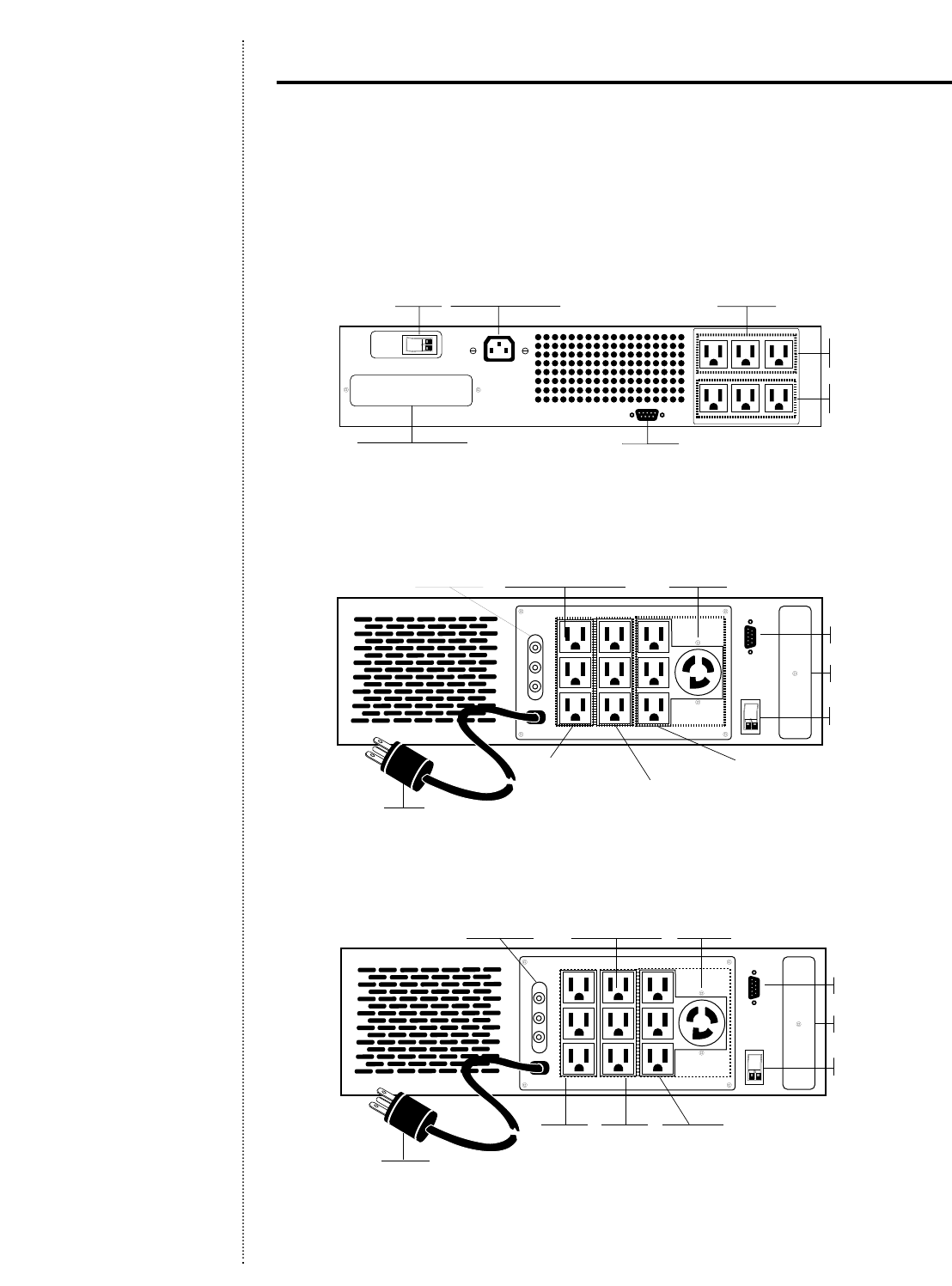
Rear Panels (Rack Models)
Low Voltage (100–127 VAC)
Model R1500(j)
Model R3000
Model R3000j
Comm Port
UPS Option Card Slot
REPO Port
Load
Segment 1
Load
Segment 2
Male IEC-320 Inlet
(includes detachable
line cord w/5-15P) Six 5-15R
Receptacles
Comm Port
UPS Option Card Slot
Load
Segment 1 Load
Segment 2 Load
Segment 3
REPO Port
L6-30R
Receptacle
Nine
5-15R Receptacles
Output Circuit
Breakers
L6-30P
Comm Port
UPS Option Card Slot
Load Segment 1 Load Segment 2 Load Segment 3
REPO Port
L5-30R
Receptacle
Nine 5-15R Receptacles
Output Circuit
Breakers
L5-30P
(j) = Models available for Japan.
19
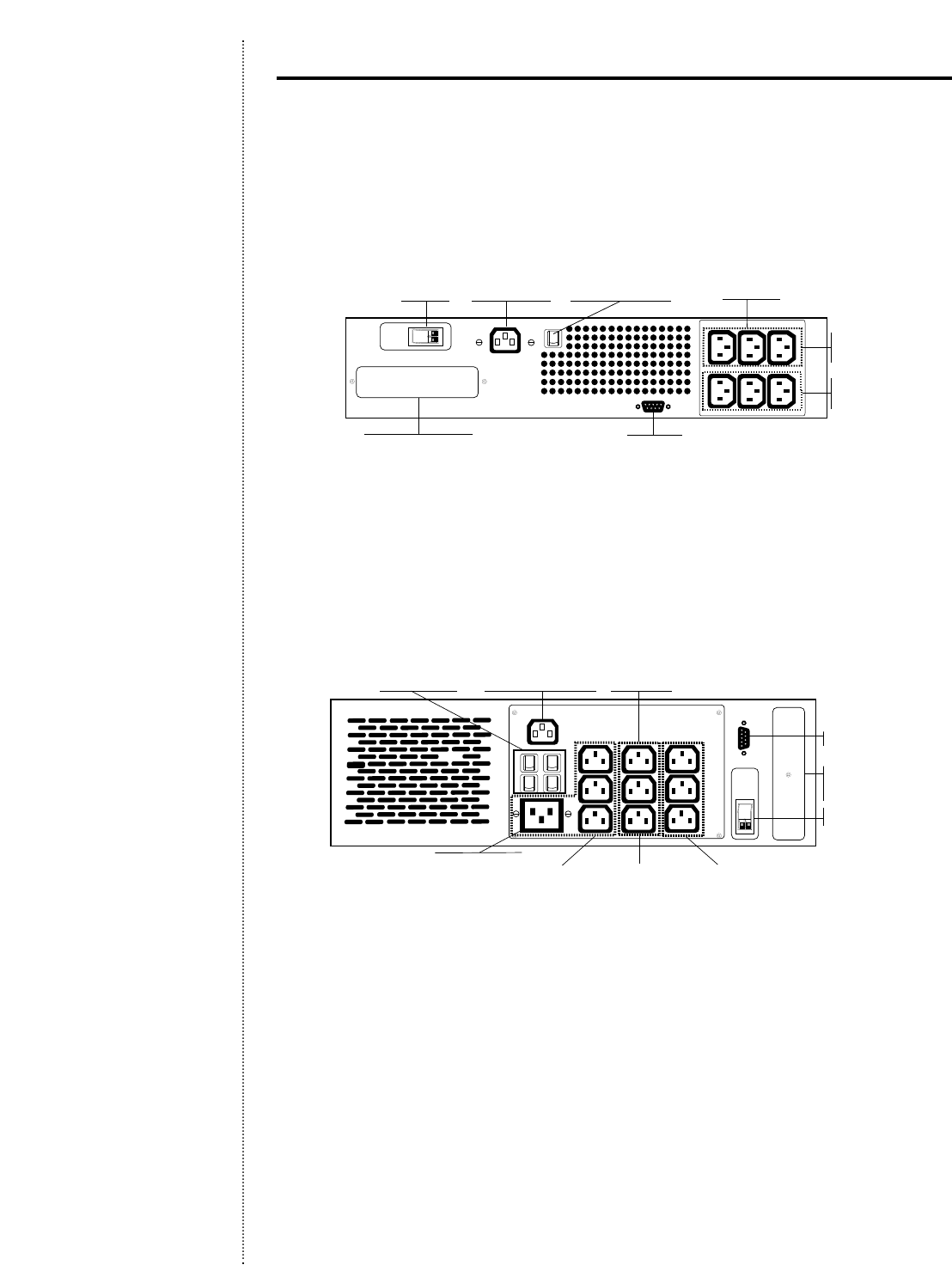
High Voltage (200–240 VAC)
Model R1500h
Comm Port
UPS Option Card Slot
REPO Port
Load
Segment 1
Load
Segment 2
Male IEC-320
Inlet (16A) Six IEC-320
Receptacles
Input Circuit Breaker
Model R3000h
Model R3000h-NA*
*North American model includes L6-20P line cord
UPS Option
Card Slot
Load
Segment 3 Load
Segment 2 Load
Segment 1
REPO Port
Comm Port
Male IEC-320Input/Output
Circuit Breakers Inlet (16A)
IEC-320, 16 Amp
Receptacle
Nine IEC-320,
10 Amp
Receptacles
Rear Panels (Rack Models)
Note: h = high voltage
h-NA = high voltage-North America
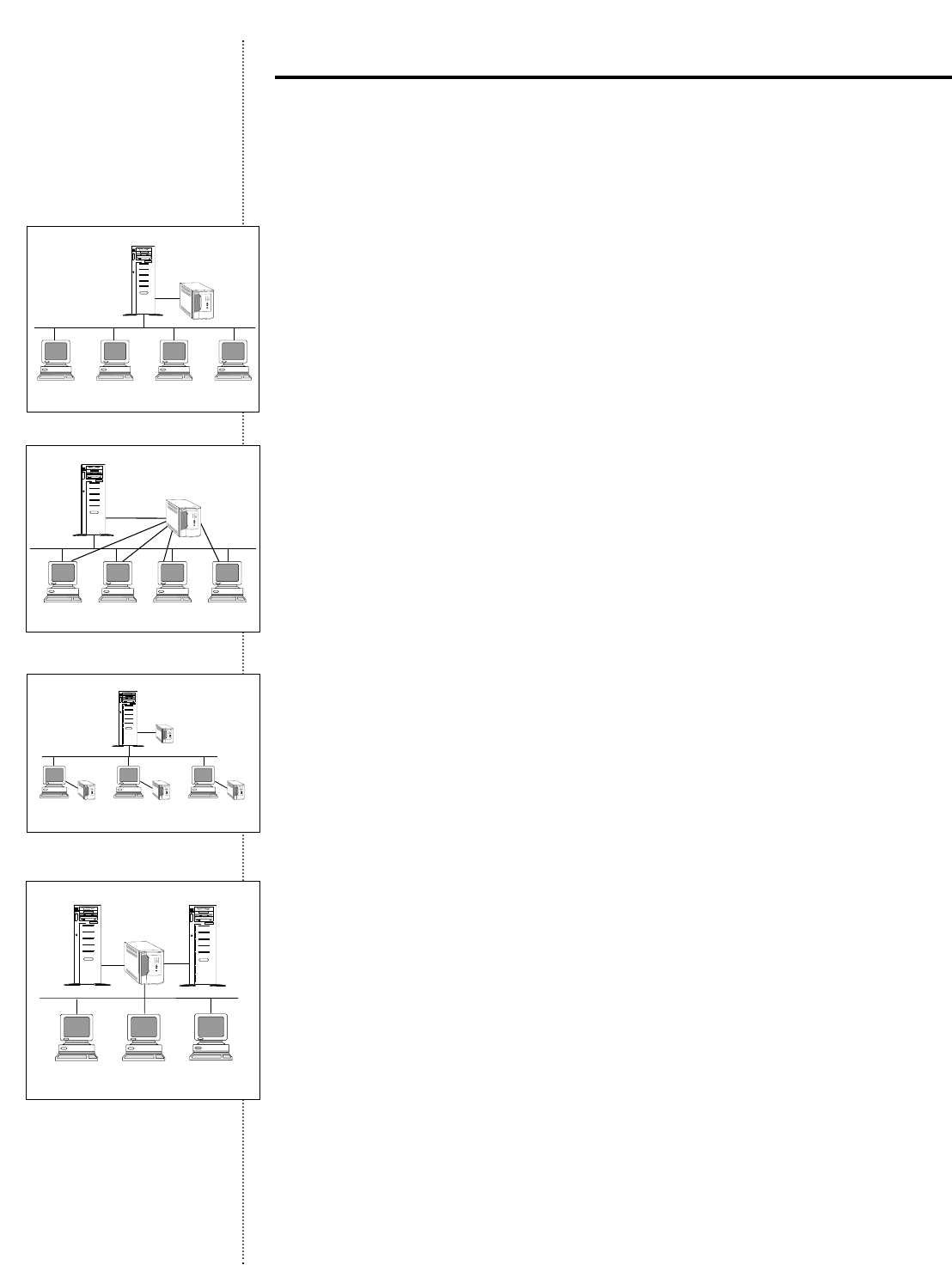
Network Configurations
There are several configuration options when using Compaq UPSs to protect a Local Area
Network (LAN).
Server or Single Workstation Only
For those seeking basic protection,using one UPS to protect a single server or single work-
station is considered sufficient.In case of a power failure,data integrity is maintained.The data,
however,is not accessible by unprotected servers or workstations until normal power is resumed.
Central UPS for Server and Nodes or Total Multi-User
Environment
Use of one central UPS is recommended for more critical LAN environments when each
workstation’s processing transactions must be kept current and where workstation location
does not require special wiring or use of extension cords to connect to the UPS.This single
UPS must not only support all connected equipment, but also must be large enough to
allow for future expansion.
Multiple UPSs for Server and Nodes or Individual Workstations
Using multiple UPSs is recommended in the most critical real-time processing environ-
ments.It is often the most practical option for both financial and safety reasons and
requires no special wiring.In addition, as the LAN grows,additional UPSs are added to
each workstation location,instead of replacing an outgrown unit.
Multiple Servers with One UPS
Connecting one UPS to more than one server is practical in applications where there are
multiple servers in close proximity to one another (especially common in rack cabinet
configurations).In such cases,it may be more economical or a space-saving advantage to
use one larger UPS instead of two smaller ones to back up multiple servers.
20
Understanding UPS Configurations
Power
Comapq UPS
Compaq Server
Compaq
Workstation Compaq
Workstation Compaq
Workstation Compaq
Workstation
Network
Power
Compaq UPS
Network
Compaq
Workstation Compaq
Workstation Compaq
Workstation Compaq
Workstation
Compaq Server
Power
Compaq UPS
Compaq UPS Compaq UPS Compaq UPS
Compaq Server
Network
Compaq
Workstation Compaq
Workstation Compaq
Workstation
Power
Compaq UPS
Compaq Server Compaq Server
Network
Compaq
Workstation Compaq
Workstation Compaq
Workstation
Power

21
Which Compaq UPS is Right for You?
Determining the Required
UPS Power Rating
The table below shows which UPS models
can be used with the various Compaq
server and storage system models.This
will vary with actual configurations,
type of peripherals also protected by
the UPS,and amount of backup time
required.The VA values shown on the
adjacent chart are maximum values.
For configurations involving multiple
servers and/or additional critical stor-
age/option products,simply add up the
total VA of the equipment that will be
plugged into the UPS and select the
UPS model with a VA rating higher than
the equipment load.To allow for future
system growth,a good rule of thumb is
that the computer load should be about
60% - 80% of the UPS VA capacity.
300 VA 19 49 79 92 162 67 187
350 VA 16 30 67 79 139 57 160
400 VA 14 26 59 69 122 50 140
450 VA 12 23 43 58 108 36 124
500 VA 9 21 38 51 97 32 112
600 VA 7 16 32 36 81 27 93
700 VA 5 14 27 30 62 23 80
800 VA 12 24 26 54 20 56
900 VA 9 17 23 48 15 50
1000 VA 8 16 20 43 13 45
1200 VA 13 14 36 11 38
1400 VA 10 12 24 8 32
1500 VA 9 10 23 7 30
1800 VA 8 19 21
2000 VA 7 16 19
2200 VA 14 17
2400 VA 13 14
3000 VA 11
*VA loads are estimates;size UPS according to total actual equipment configurations VA load.
**Includes external battery cabinet.
Estimated Backup Time in Minutes
Load* T700 Series T1000
Load T700 Series T1000 Series T1500 Series T2000 Series**
T2400 Series** R1500 Series R3000 Series
Volts x Amps = VA per
device
If only Watts are given:
Watts x 1.35 = VA
VA/1000 = KVA
Compaq VA Redundant
Products Rating Power Supply
14- or 15- inch Compaq Monitor1112 N/A
4/8 Port Rack Switch1117 N/A
SCSI Storage Expander1235 N/A
ProLiant 850, 850R1270 N/A
ProSignia 2001280 N/A
ProSignia VS or ProSignia 3001285 N/A
ProLiant 8001324 N/A
CPW 50001324 N/A
ProSignia 5001345 N/A
CPW 51001378 N/A
ProLiant 12001378 N/A
CPW 6000, 80001439 N/A
ProLiant 1600,1600R1439 N/A
ProLiant Storage System1465 N/A
ProLiant 2500, 2500R1470 N/A
ProLiant 1500, 1500R1500 N/A
ProLiant Storage System F1/F21585 N/A
ProLiant 2000, 2000R2659 N+1
ProLiant 4500, 5000,4500R, 5000R2729 N+1
DLT Array II1745 N/A
ProLiant 3000, 5500,650021013 N+1
ProLiant 6000, 700032025 2N+1
1VA Rating is calculated at maximum configuration of the system.
2VA Rating is calculated based on N+1 maximum configuration.
3VA Rating is calculated based on 2N+1 maximum configuration.
22
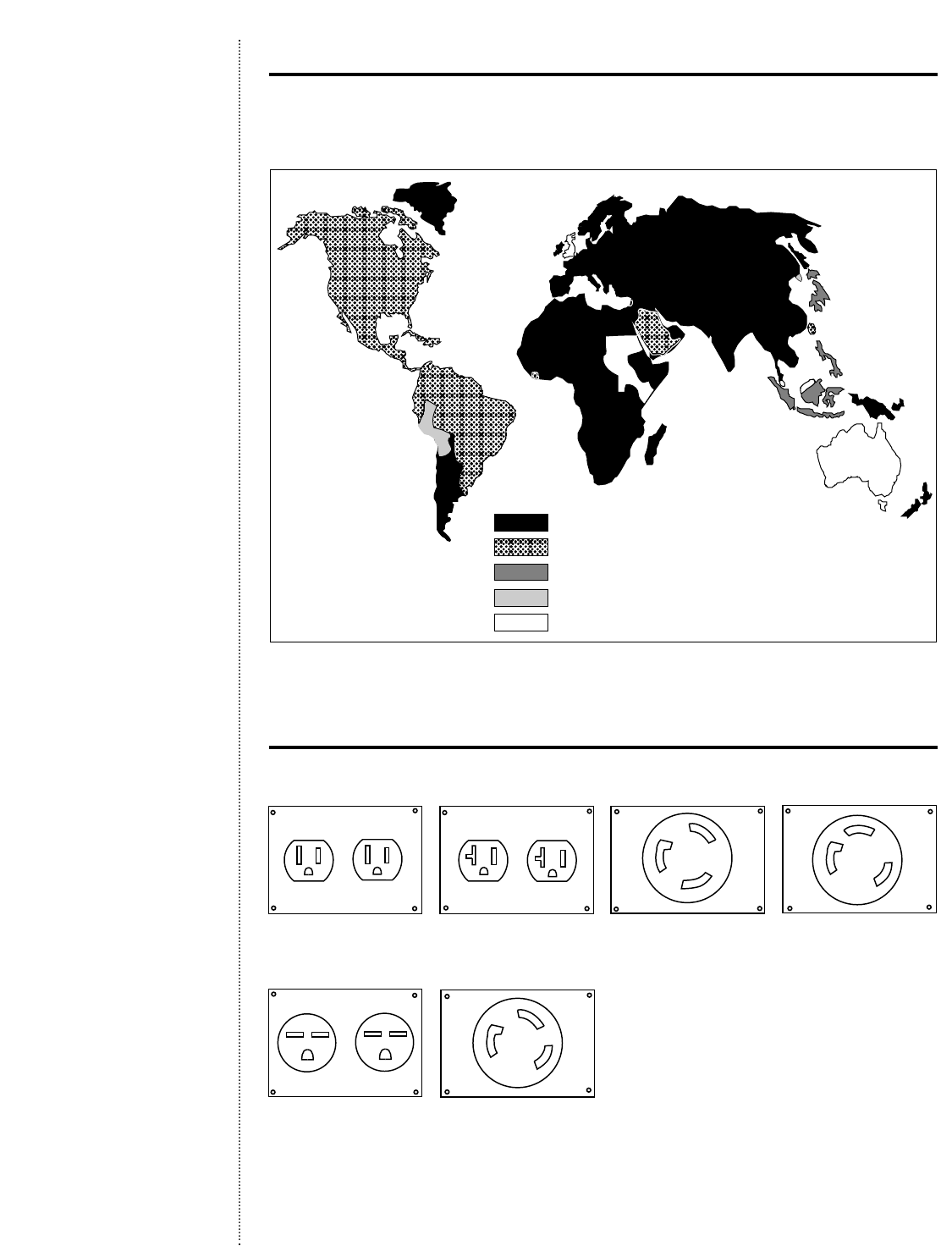
Worldwide Power Requirements
220-230V/50Hz
110-127V/60Hz
100-127V/50-60Hz
220V/60Hz
240V/50Hz
6-15R
L5-30R L6-30R
L6-20R
5-20R5-15R
Electrical Receptacles (North American,Latin America, and Japanese Models)
(100–127 VAC)
(200–240 VAC)
Worldwide Voltage
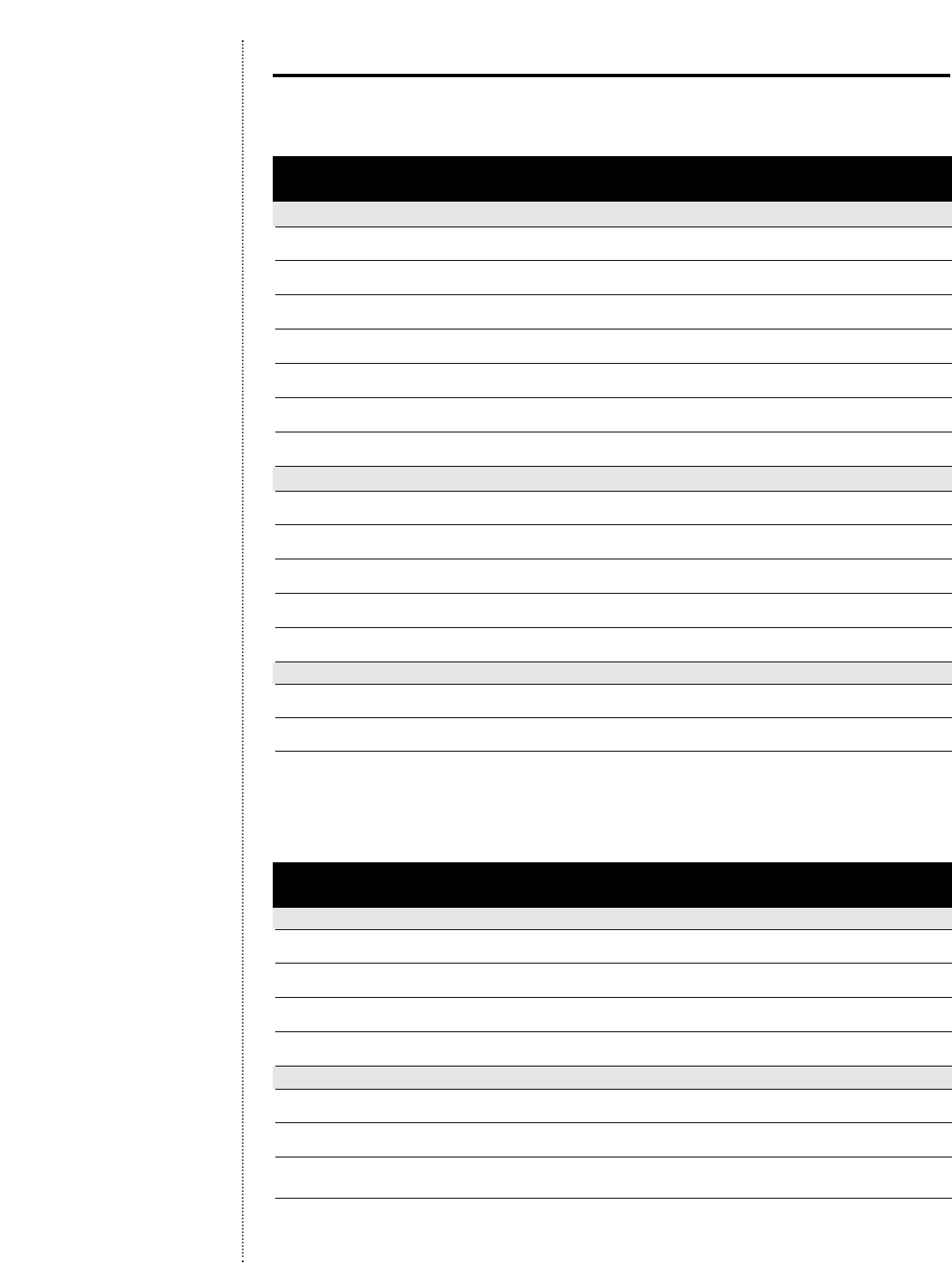
23
Compaq Tower UPS Models
Model Part Power Out Input Output Dimensions Weight
Number Number (VA/Watt) Connection Connections WxHxD
Low Voltage Models (100–127 VAC; 60 Hz)1
T7002295372-B21 700/420 5-15P (4) 5-15R 4.6 x 6.4 x 14.8 in 22 lb/10 kg
11.68 x 16.26 x 37.6 cm
T700j3295372-291 700/420 5-15P (4) 5-15R 4.6 x 6.4 x 14.8 in 22 lb/10 kg
11.68 x 16.26 x 37.6 cm
T1000 242688-001 1000/670 5-15P (6) 5-15R 7.0 x 8.8 x 17.1 in 43 lb/19.5 kg
17.78 x 22.35 x 44.43 cm
T1500 242688-003 1440/960 5-15P (6) 5-15R 7.0 x 8.8 x 17.1 in 57 lb/25.85 kg
17.78 x 22.35 x 44.43 cm
T1500j3242688-293 1440/960 5-15P (6) 5-15R 7.0 x 8.8 x 17.1 in 57 lb/25.85 kg
17.78 x 22.35 x 44.43 cm
T2000 242688-005 1920/1400 5-20P (8) 5-15R 7.0 x 8.8 x 17.1 in 32 lb/14.5 kg
17.78 x 22.35 x 44.43 cm
T2000j3242688-295 1920/1400 5-20P (8) 5-15R 7.0 x 8.8 x 17.1 in 32 lb/14.5 kg
17.78 x 22.35 x 44.43 cm
High Voltage Models (208–240 VAC; 50/60 Hz)4
T700h 295372-B22 700/420 IEC-320 (10 A) (4) IEC-320 (10 A) 4.6 x 6.4 x 14.8 in 22 lb/10 kg
11.68 x 16.26 x 37.6 cm
T1000h 242688-002 1000/670 IEC-320 (10 A) (6) IEC-320 (10 A) 7.0 x 8.8 x 17.1 in 43 lb/19.5 kg
17.78 x 22.35 x 44.43 cm
T1500h 242688-004 1500/960 IEC-320 (10 A) (6) IEC-320 (10 A) 7.0 x 8.8 x 17.1 in 57 lb/25.85 kg
17.78 x 22.35 x 44.43 cm
T2400h 242688-006 2300/1600 IEC-320 (10 A) (9) IEC-320 (10 A) 7.0 x 8.8 x 17.1 in 34 lb/15.42 kg
17.78 x 22.35 x 44.43 cm
T2400h-NA5242688-007 2300/1600 IEC-320 (10 A) (9) IEC-320 (10 A) 7.0 x 8.8 x 17.1 in 34 lb/15.42 kg
17.78 x 22.35 x 44.43 cm
Battery Boxes
(for T2000) — 48 VDC, 10 AHr cord w/connector — 7.0 x 8.8 x 17.1 in 47 lb/21.32 kg
17.78 x 22.35 x 44.43 cm
(for T2400h) — 48 VDC, 17 AHr cord w/connector — 7.0 x 8.8 x 17.1 in 63 lb/28.58 kg
17.78 x 22.35 x 44.43 cm
1.User selectable for 100,110, 120,or 127 VAC.With 100 or 110 VAC selected,unit can operate at 50 Hz.
2.T700 not configurable for 100 VAC.
3.Japanese,100 volt model.
4.User selectable for 208,220, 230,or 240 VAC.T700h not configurable for 208 VAC.
5.NA indicates North American high voltage model.
Compaq Rack-Mount UPS Models
Model Part Power Out Input Output Dimensions Weight
Number Number (VA/Watt) Connection Connections WxHxD
Low Voltage Models (100–127 VAC; 60 Hz)1
R1500 242704-001 1440/960 5-15P (6) 5-15R 19.0 x 3.5 x 16.0 in 58 lb/26.31 kg
48.26 x 8.89 x 40.64 cm
R1500j2242704-291 1440/960 5-15P (6) 5-15R 19.0 x 3.5 x 16.0 in 58 lb/26.31 kg
48.26 x 8.89 x 40.64 cm
R3000 242705-001 2880/2250 L5-30P (9) 5-15R & 19.0 x 5.25 x 22.3 in 132 lb/59.87 kg
(1) L5-30R 48.26 x 13.34 x 56.64 cm
R3000j2242705-291 2880/2250 L6-30P (9) 5-15R & 19.0 x 5.25 x 22.3 in 132 lb/59.87 kg
(1) L6-30R 48.26 x 13.34 x 56.64 cm
High Voltage Models (208–240 VAC; 50/60 Hz)3
R1500h 242704-002 1500/960 IEC-320 (10 A) (6) IEC-320 (10 A) 19.0 x 3.5 x 16.0 in 58 lb/26.31 kg
48.26 x 8.89 x 40.64 cm
R3000h 242705-002 3000/2250 IEC-320 (16 A) (9) IEC-320 (10 A) & 19.0 x 5.25 x 22.3 in 132 lb/59.87 kg
(1) IEC-320 (16 A) 48.26 x 13.34 x 56.64 cm
R3000h-NA4242705-003 3000/2250 IEC-320 (16 A) (9) IEC-320 (10 A) & 19.0 x 5.25 x 22.3 in 132 lb/59.87 kg
(1) IEC-320 (16 A) 48.26 x 13.34 x 56.64 cm
1.User selectable 100,110, 120,or 127 VAC.With 100 or 110 VAC selected,unit can operate at 50 Hz.
2.Japanese,100 volt model.
3.User selectable for 208,220, 230,or 240 VAC.
4.h-NA indicates North American high voltage model.
Compaq UPS Model Guide

24
Electrical Input
Voltage
120 and 230 VAC nominal; see Model
Selection Guide for user selectable voltages
On Line Voltage Range
-30%,+20% for nominal; user selectable
extended range of -35%,+20%
Nominal Input Frequency
50/60 Hz auto-selection
(60 Hz only for 120 and 127 VAC)
Frequency Tolerance
Nominal ±3 Hz
Electrical Output
Power Levels
700 to 3000 VA
On Line Regulation
-10%,+6%; within Computer Business
Equipment Manufacturers Association’s
Guidelines (+10%;-15% using extended
range)
On Battery Regulation
<±5% RMS
Voltage Wave Shape
Sine wave,3% THD (T700 and T700h
models:quasi-sine wave)
No Load Sleep Mode (Battery Mode)
Outputs are turned off if <5% load is
detected (selectable),except T700
Interconnecting Cords (high voltage
models)
Rack models: 6 ea.IEC-320 (10 A)
Tower models:2 ea. IEC-320 (10 A)
Backup Time
15 minutes @ typical load
Battery Charging
<3 hrs.to 90% usable capacity
Battery Type
Sealed,maintenance-free lead-acid;starved
electrolyte
Start-On-Battery
Startup with UPS batteries in absence of
utility power
Compaq UPS Technical Specifications
Indicators and Controls
Serial Communication
Intelligent serial communication to provide
alarms with history,measured parameters,
self-test,and many other features
REPO Port
Remote Emergency Power Off; allows for
shutdown of UPS (rack models only)
Environmental and Safety
Dimensions and Weight
See Model Selection Guide
Operating Temp
0°C - 40°C (32°F - 104°F) UL tested at
25°C (77°F)
Storage Temp
-20°C - 60°C (-4°F -140°F)
Relative Humidity
5 to 95% non-condensing
Operating Altitude
Up to 3,000 meters above sea level
EMC Markings
FCC;low voltage models also VCCI; high
voltage models also CE
Emissions
FCC Class B 700,1000, 1500VA models;
FCC Class A 2000, 2400,3000VA models;
high voltage models also CISPR Class A,
EN50091-2,EN55022, and IEC6100-3-2
Surge Suppression
Manufactured with surge suppressors that
meet UL 1449
Safety Certifications
UL 1778,CSA 22.2, No.107.1; high volt-
age models also EN50091-1 and IEC60950
Safety Markings
UL and CSA;120 volt models also NOM*;
high voltage models also CE,VDE, S*, FI*,
N*,and D* (except models T700 and T700h)
Immunity
EN50091-2,IEC6100-4-2,3,4,5 and ANSI
C62.41 Cat B (formerly IEEE 587)
REPO Port
Meets NEC code 645-11 intent and UL
requirements

Understanding Power Quality
What is Power Quality?
Industry relies on power quality,yet lack of reliable power can lead to substantial problems.
Power quality is,in essence,powering and grounding sensitive electronic equipment in the
manner that is suitable for its operation.Power quality problems arise when there is a differ-
ence between the quality of power supplied and the quality of power required for reliable load
equipment operation.The electronics age has unveiled two apparent truths about power:
• Utilities cannot provide the clean and consistent power that sensitive electronic equipment
demands.
• Computer or communications customers are ultimately responsible for the safe operation
of their equipment.
You may be surprised to learn that while the power supplied by local utility companies is
sufficient to run components such as lights and television sets,it is not suitable for sensitive
electronic equipment such as computers and servers.
What is the Real Impact of Power Quality Problems?
The financial impact of power quality problems can be astronomical.It is estimated that “dirty
power”and associated momentary disturbances in transmission can cost industry in lost pro-
duction and equipment damage between $3 billion and $5 billion per year.1 The real effects of
system downtime,including lost data and business opportunities,can be immeasurable.
According to a survey by the Business Communications Co.,downtime costs are estimated
between $1,000 per hour and more than $78,000 per hour.Some studies raise this estimate
to $500,000 per hour.
On an even more serious note, research has shown that only 43% of businesses suffering a
substantial power disaster ever recover sufficiently to resume business,according to the
National Archives and Records Administration in Washington,DC.
Every data processing professional knows the risk of hardware damage resulting from a major
disaster.But the truth is that everyday dirty power poses a far greater risk to processing systems
because there’s no way to get rid of dirty power without power protection equipment.Power
problems alone account for 45% of computer data loss,according to Contingency Research
Inc.Equipment that utilizes adequate power protection will experience less downtime.
Although this information emphasizes power quality in the United States,foreign power is
generally more erratic and therefore more damaging than that in the U.S.
What are the Causes of Power Problems?
Only 35% of power problems are generated outside the home or office by events such as
lightning,utility grid switching,mis-wiring,etc.Almost all electrical surges or transient volt-
age activity are generated within the home or business.
Sags are the most common disturbance at a typical computer site (72.1%),followed by surges
(15.8%) and spikes (8.1%).Four out of five computer crashes and communications problems
are caused by deep sags and not power outages and blackouts.2
1Information Week,January 8,1998.
2Business Communications Co., 1998.
25
Questions & Answers
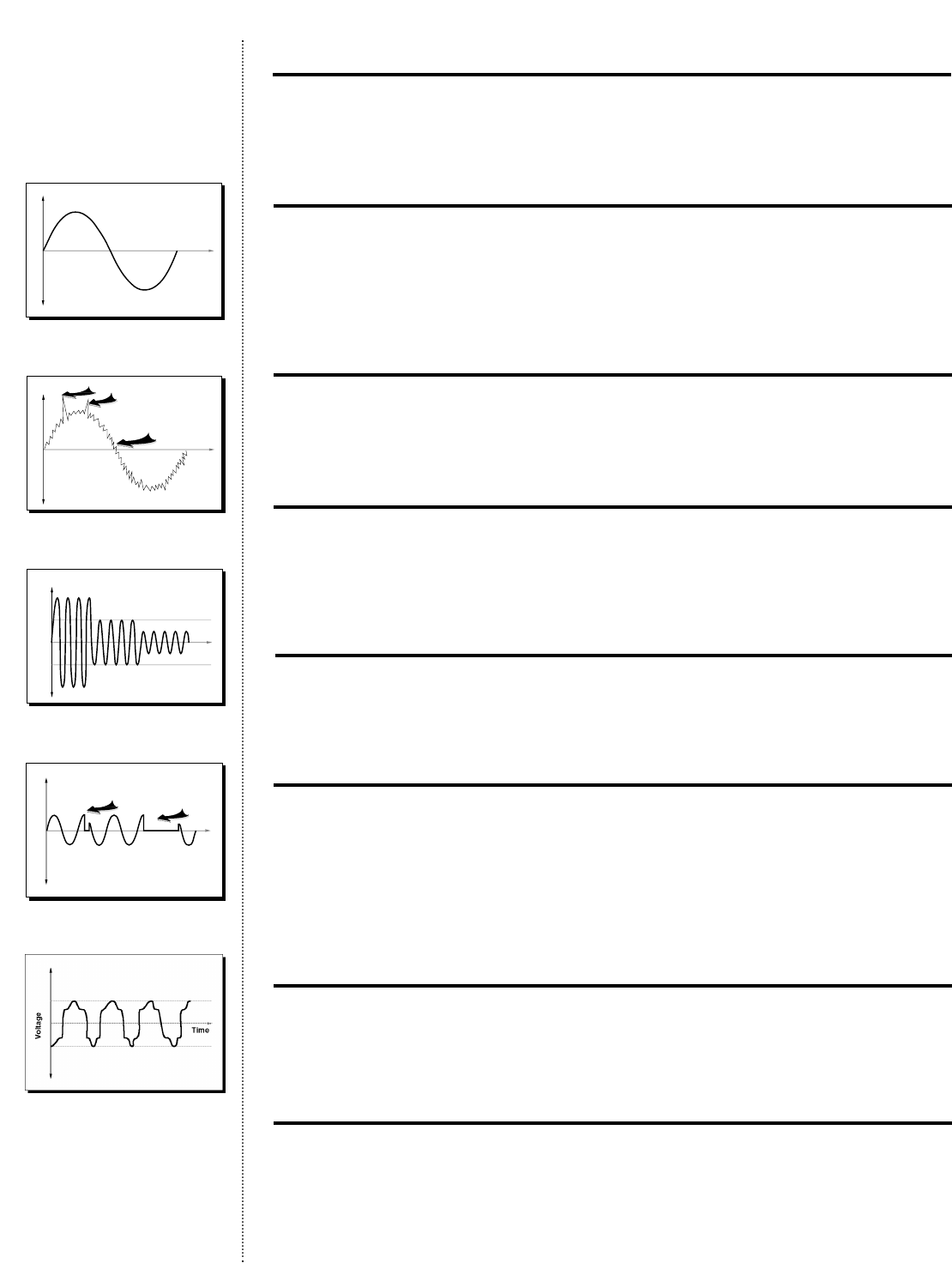
What Are the Causes and Effects of Power Problems?
Healthy Electricity
A typical sine wave form
Noise and Transients
High frequency impulses on sine wave
•Cause — radio frequency on utility line
•Effects — damage to logic circuitry and data files
Spikes
Extremely high voltage strikes to utility line
•Cause — lightning,utility load switching
•Effects — actual hardware damage,file corruption
Fluctuation:Sags and Surges (Spikes lasting longer than one cycle)
Over and under voltage conditions
•Cause — sudden startups of large loads, large load switching
•Effects — slows disk drives intolerably, causing data errors;actual hardware damage
Brownouts, Extended Sags
Periods of low voltage on utility lines
•Cause — voltage reduction by overburdened utilities, damage to electrical lines and
other factors
•Effects — causes intolerable voltage levels for circuitry and drive performance,
damaging hardware or causing data errors
Harmonic Distortion
Distortions in the current and voltage sine wave sent back by variable speed motor equipment
•Cause — computers,fax equipment, copiers
•Effects — actual hardware damage,interrupted communications
Blackouts Total Power Failures
•Cause — violent weather, overburdened power grids,car accidents that bring down
power lines, earthquakes,etc.
•Effects — hardware damage and data loss
26
Questions & Answers
Time
Voltage
Time
Voltage
Spikes
“Noise”
Time
Voltage
Normal
Voltage
Over
Voltage
(“Surge”)
Under Voltage
(“Sag” or “Brownout”)
Voltage
Time
Affects
Mainframe CPU Affects
Personal Computers
Healthy Electricity (sine wave)
Noise, Transients, and Spikes
Fluctuation: Sags and Surges
Brownouts, Extended Sags
Harmonic Distortion
27
#1*
120/230 VAC nominal (ON)
#2
110/220 VAC nominal (OFF)
#3
127/240 VAC nominal (OFF)
#4
Extended Voltage (OFF)
#6
Low Battery Alarm (ON)
#7
Shutdown Delay (ON)
#8
AC Input Failure Alarm (ON)
#9
Sleep Mode (ON) (defaulted OFF on T700)
#11-14 Reserved for Future Use
#5
Site Wiring Fault Alarm (ON)
When lit, LED #16 indicates that
the selected LED (1-15) is ON.
#10
100/208 VAC nominal (OFF)
#15
Reset Default Settings
Self Test/Alarm Silencer
*LED #1: Indicates 100 volt mode on T700j
LED #10: Not applicable for T700 models
†
†
ON
OFF
Understanding UPS Configuration
In the Configure Mode,the LEDs allow factory-set defaults to be changed.A user may
wish to alter these functions if the AC input consistently fluctuates higher or lower than
the factory-set nominal input voltage.Other changeable functions include LEDs for
extended voltage,shutdown delay,sleep mode,low battery,and AC input failure. In the
Configure Mode,each LED represents a changeable function,with the control buttons
responsible for enabling or disabling them (see illustration below).
Questions & Answers
Where can I find definitions of the setting and instructions on how to change
the UPS configurations?
In the Compaq UPS user manual.
How do I get into configure mode?
Press the ON and Self Test/Alarm Silencer button at the same time to switch to configure
mode.Once in configure mode,use the ON button to scroll through the LEDs (LED will flash).
Then,to turn on or off a particular LED, simply press the Self Test/Alarm Silencer button
(while in configure mode).The light over the ON button will be green if the LED is on
and no light will appear if the LED is off.
Can I configure voltage settings via the front panel?
Yes,the front panel is the only place you can configure voltages other than the default setting
already programmed on the UPS.Refer to the above question on how to change these defaults.

UPS Technology
What UPS technology is available with the Compaq UPS?
The Compaq UPS utilizes a line-interactive plus topology which features sine wave output
and superior input/output voltage regulation.This technology is inherently reliable and
highly efficient.The Compaq UPS can correct input voltage variations as low as -35% of
nominal voltage without transferring to the battery.This will ensure the battery is preserved
and ready for the next power anomaly.
Does the UPS have a transformer?
Yes.Its function is to provide buck and boost regulation as well as provide isolation between
the battery and the output.
Can I change the line cord that is provided with the UPS?
We strongly recommend,due to worldwide safety standards,that you do not remove or
change the line cords provided with the UPS.
Can I change the plug provided with the UPS?
Yes,as long as the new plug is rated the same voltage and amperage as the provided plug.
What does the ground fault indicator (LED # 5,front panel) tell me?
This would indicate a possible wiring error in the outlet to the UPS,which should be checked
by an electrician.In high voltage applications (240 V), however,this alarm is always on,even
in a correctly wired installation.If this is the case,it should be disabled.
When should I disable the SLEEP feature (LED # 9,front panel) ?
In lightly loaded applications that you wish to keep running (less than 5% load) the sleep
feature should be disabled.
28
Questions & Answers

The Troubleshooting Guide tells you how to solve problems you may encounter with your
Compaq UPS.
Symptom Possible Cause What To Do
UPS will not start Line cord is not connected Connect line cord
Circuit breaker on rear Push circuit breaker button
panel is open
Wall socket is dead Test wall socket
Battery fuse or circuit open Contact service center
LED 5 is RED Ground wire or connection Have a qualified electrician establish
(Site Wiring Fault) does not exist in wall outlet grounding connection
Line & neutral wires are Have a qualified electrician correct
reversed in wall outlet the wiring
Flashing Battery DC overvoltage condition Call Customer Service
Service LED (LED 10)
and alarm won’t clear
LED 10 is RED Potential battery failure Let UPS go through a full charge
(Battery Service) cycle by keeping it plugged in for
24 hrs; push Test/Alarm Reset button
New battery improperly Check connections or call
connected Customer Service
UPS switches Input voltage in your Change UPS nominal input to match
frequently area differs from the local nominal
between battery UPS nominal
and AC input
LED 10 (Battery UPS out of service for a long Keep UPS connected to line for at
Service) is red period least 24 hrs.and then conduct self test
during initial start up
LED 11 is Overload condition because Determine if load(s) is defective or if
SOLID RED load is drawing too much too many loads are connected to UPS;
power if so,disconnect a load
LED 1 is Line is high;UPS in battery Correct input voltage problem if
SOLID RED* operation possible or be prepared to lose battery
power to your load(s) in approx.3 to 5
minutes (depending on configuration)
after Impending Low Battery LED
turns on
LED 4 is Line is low (power failure); Correct AC input problem if possible
SOLID RED UPS in battery operation or be prepared to lose battery power
to your load(s) in approx.3 to 5
minutes (depending on configuration)
after Impending Low Battery LED
turns on
LED 4 is Line has returned but Push Test/Alarm Reset
FLASHING RED reset was not pushed
*If the UPS continuously displays a solid red LED 1 or 4 above the AC Input symbol,input voltage range can be extended.
29
Troubleshooting

Agent
A power management software program
that acts as a focal point for data collection
and configuration of a specific network
entity (hardware or software).Agents send
data to the power management software
console.They are installed and run on each
network system.
Battery Management Log
A record of battery history maintained by
the Compaq Power Management Software.
Circuit Breaker (CB)
A device for manually opening (breaking)
or closing a circuit to interrupt or apply
electric power to an electrical apparatus.
A circuit breaker can also open a circuit
automatically when it senses an overload.
Console
The software program that displays informa-
tion and controls the system by communi-
cating with agents.The console is used to
configure communications port setup,alert
handling,shutdown timing,restart delays,
and regularly scheduled shutdowns.The
console runs on the management station
for the network.
Countdown Time
The time in minutes after the end of wink
time that the system waits before starting
a shutdown sequence.This interval provides
time to finish work and save files.Each
minute,the user is informed of the time
remaining until shutdown.
LEDs
Light Emitting Diodes located on the front
of the UPS that inform users of various
UPS operations.
Line-interactive
A UPS containing an off-line inverter that
transfers on during a blackout,but providing
faster transfer times than a standby UPS.
Power conditioning and surge suppression
are provided to protect the load.
Load
Equipment that receives power from a UPS.
Load Segments
Groups of receptacles on the rear panel
of a UPS which can be independently con-
trolled via power management software.
Load Shedding
The ability to divide the total load into
segments and to start and stop each load
segment individually.
Shutdown Delay
The time in seconds from when the soft-
ware begins to shut down your system
until the power from the UPS shuts off.
This interval allows the system to log off
servers and users,terminate any applica-
tions that may be running,and close all
files in the file system.The default value
is 90 seconds.
Transformer
A device that raises or lowers the voltage
of an alternating current of an electrical
source.
UPS Group
Multiple nodes supported by a single UPS.
The UPS with the serial communications
cable is the UPS Group Controller;all oth-
ers are UPS Group Members.With regard
to Compaq Power Management Software,
this feature maximizes network control
and saves money.
Wink Time
The interval between an alert situation and
the transmission of an alert message from
the system to the user.The interval can be
extended to reduce nuisance messages or
shortened to reduce reliance on the battery.
The default is 5 seconds.
30
Compaq Power Management Products Glossary

31
Notes

The information in this reference guide is subject to change without notice.
COMPAQ COMPUTER CORPORATION SHALL NOT BE LIABLE FOR TECHNICAL OR EDITORIAL ERRORS OR
OMISSIONS CONTAINED HEREIN; NOR FOR INCIDENTAL OR CONSEQUENTIAL DAMAGES RESULTING FROM
THE FURNISHING, PERFORMANCE OR USE OF THIS MATERIAL.
This reference guide contains information protected by copyright. No part of this reference guide may be
photocopied or reproduced in any form without prior written consent from Compaq Computer Corporation.
©1998 Compaq Computer Corporation
All rights reserved. Printed in the U.S.A.
Compaq, Contura, Deskpro, Fastart,Compaq Insight Manager, LTE, Systempro,Systempro/LT, LicensePaq,
QVision SLT, ProLiant,ProLinea, SmartStart, SpeedPaq, NetFlex, QuickFind, RemotePaq,TechPaq,
QuickBack registered United States Patent and Trademark Office.
Aero, CompaqCare, Concerto, PaqFax, ProSigma, Systempro/XL, Netl,SilentCool, LTE Elite, SmartStation,
MiniStation,Vocalyst, EasyPoint, EZ Help MaxLight, MultiLock, QuickBlank, QuickLock,TriFlex Architecture
and UltraView are trademarks/service marks of Compaq Computer Corporation.
Other product names mentioned herein may be trademarks and/or registered trademarks of their respec-
tive companies.
Compaq Power Management Products/Reference Guide
ECG036/0598
Notice
