Configuration Guide=en
User Manual:
Open the PDF directly: View PDF  .
.
Page Count: 393 [warning: Documents this large are best viewed by clicking the View PDF Link!]
- Introduction
- XML Configuration File Elements
- Sample XML Configuration File
- XML Configuration File DTD
- Attributes Objects
- Access to Current Operating Options
- Example Configuration Scenarios
- Interrelated Configuration Options
- Preventing NAK Storms with NAK Intervals
- Preventing Tail Loss With TSNI and NAK Interval Options
- Preventing IPC Receiver Deafness With Keepalive Options
- Preventing Erroneous LBT-RM/LBT-RU Session Timeouts
- Preventing Errors Due to Bad Multicast Address Ranges
- Preventing Store Timeouts
- Preventing ULB Timeouts
- Preventing Unicast Resolver Daemon Timeouts
- Preventing Undetected Late Join Loss
- Preventing Undetected Loss
- Preventing Store Registration Hangs
- General Configuration Guidelines
- Special Notes
- Major Options
- Reference
- broker (context)
- compatibility_include_pre_um_6_0_behavior (context)
- context_event_function (context)
- context_name (context)
- datagram_acceleration_functions (context)
- default_interface (context)
- fd_management_type (context)
- message_selector (receiver)
- multiple_receive_maximum_datagrams (context)
- operational_mode (context)
- operational_mode (xsp)
- ordered_delivery (receiver)
- receiver_callback_service_time_enabled (context)
- resolver_source_notification_function (context)
- source_event_function (context)
- source_includes_topic_index (context)
- transport (source)
- transport_demux_tablesz (receiver)
- transport_mapping_function (context)
- transport_session_multiple_sending_threads (context)
- transport_session_single_receiving_thread (context)
- transport_source_side_filtering_behavior (source)
- transport_topic_sequence_number_info_active_threshold (source)
- transport_topic_sequence_number_info_interval (source)
- transport_topic_sequence_number_info_request_interval (receiver)
- transport_topic_sequence_number_info_request_maximum (receiver)
- use_extended_reclaim_notifications (source)
- zero_transports_function (xsp)
- Reference
- Resolver Operation Options
- Minimum Values for Advertisement and Query Intervals
- Reference
- disable_extended_topic_resolution_message_options (context)
- resolution_no_source_notification_threshold (receiver)
- resolution_number_of_sources_query_threshold (receiver)
- resolver_advertisement_maximum_initial_interval (source)
- resolver_advertisement_minimum_initial_duration (source)
- resolver_advertisement_minimum_initial_interval (source)
- resolver_advertisement_minimum_sustain_duration (source)
- resolver_advertisement_send_immediate_response (source)
- resolver_advertisement_sustain_interval (source)
- resolver_cache (context)
- resolver_context_name_activity_timeout (context)
- resolver_context_name_query_duration (context)
- resolver_context_name_query_maximum_interval (context)
- resolver_context_name_query_minimum_interval (context)
- resolver_datagram_max_size (context)
- resolver_domain_id_active_propagation_timeout (context)
- resolver_initial_advertisement_bps (context)
- resolver_initial_advertisements_per_second (context)
- resolver_initial_queries_per_second (context)
- resolver_initial_query_bps (context)
- resolver_query_maximum_initial_interval (receiver)
- resolver_query_minimum_initial_duration (receiver)
- resolver_query_minimum_initial_interval (receiver)
- resolver_query_minimum_sustain_duration (receiver)
- resolver_query_sustain_interval (receiver)
- resolver_receiver_map_tablesz (context)
- resolver_send_final_advertisements (source)
- resolver_send_initial_advertisement (source)
- resolver_source_map_tablesz (context)
- resolver_string_hash_function (context)
- resolver_string_hash_function_ex (context)
- resolver_sustain_advertisement_bps (context)
- resolver_sustain_advertisements_per_second (context)
- resolver_sustain_queries_per_second (context)
- resolver_sustain_query_bps (context)
- resolver_unicast_activity_timeout (context)
- resolver_unicast_change_interval (context)
- resolver_unicast_check_interval (context)
- resolver_unicast_force_alive (context)
- resolver_unicast_ignore_unknown_source (context)
- resolver_unicast_keepalive_interval (context)
- Multicast Resolver Network Options
- Reference
- resolver_multicast_address (context)
- resolver_multicast_incoming_address (context)
- resolver_multicast_incoming_port (context)
- resolver_multicast_interface (context)
- resolver_multicast_outgoing_address (context)
- resolver_multicast_outgoing_port (context)
- resolver_multicast_port (context)
- resolver_multicast_receiver_socket_buffer (context)
- resolver_multicast_ttl (context)
- Reference
- Unicast Resolver Network Options
- Transport TCP Network Options
- Transport TCP Operation Options
- Reference
- transport_session_maximum_buffer (source)
- transport_tcp_activity_method (receiver)
- transport_tcp_activity_timeout (receiver)
- transport_tcp_activity_timeout (source)
- transport_tcp_coalesce_threshold (source)
- transport_tcp_datagram_max_size (context)
- transport_tcp_exclusiveaddr (source)
- transport_tcp_listen_backlog (source)
- transport_tcp_multiple_receiver_behavior (source)
- transport_tcp_multiple_receiver_send_order (source)
- transport_tcp_nodelay (source)
- transport_tcp_receiver_socket_buffer (context)
- transport_tcp_reuseaddr (source)
- transport_tcp_sender_socket_buffer (source)
- transport_tcp_use_session_id (source)
- Reference
- Transport LBT-RM Network Options
- Transport LBT-RM Reliability Options
- LBT-RM Datagram
- LBT-RM Source Ignoring NAKs for Efficiency
- LBT-RM Receiver Suppressing NAK Generation
- Reference
- transport_lbtrm_ignore_interval (source)
- transport_lbtrm_nak_backoff_interval (receiver)
- transport_lbtrm_nak_generation_interval (receiver)
- transport_lbtrm_nak_initial_backoff_interval (receiver)
- transport_lbtrm_nak_suppress_interval (receiver)
- transport_lbtrm_receiver_socket_buffer (context)
- transport_lbtrm_send_naks (receiver)
- transport_lbtrm_source_socket_buffer (context)
- transport_lbtrm_transmission_window_limit (source)
- transport_lbtrm_transmission_window_size (source)
- Transport LBT-RM Operation Options
- Reference
- transport_lbtrm_activity_timeout (receiver)
- transport_lbtrm_coalesce_threshold (source)
- transport_lbtrm_data_rate_limit (context)
- transport_lbtrm_datagram_max_size (context)
- transport_lbtrm_preactivity_timeout (receiver)
- transport_lbtrm_preallocate_receive_buffers (context)
- transport_lbtrm_rate_interval (context)
- transport_lbtrm_receiver_timestamp (context)
- transport_lbtrm_retransmit_rate_limit (context)
- transport_lbtrm_sm_maximum_interval (source)
- transport_lbtrm_sm_minimum_interval (source)
- transport_lbtrm_source_timestamp (context)
- transport_lbtrm_tgsz (source)
- Reference
- Transport LBT-RU Network Options
- Transport LBT-RU Reliability Options
- Reference
- transport_lbtru_ignore_interval (source)
- transport_lbtru_nak_backoff_interval (receiver)
- transport_lbtru_nak_generation_interval (receiver)
- transport_lbtru_nak_initial_backoff_interval (receiver)
- transport_lbtru_nak_suppress_interval (receiver)
- transport_lbtru_receiver_socket_buffer (context)
- transport_lbtru_source_socket_buffer (context)
- transport_lbtru_transmission_window_limit (source)
- transport_lbtru_transmission_window_size (source)
- Reference
- Transport LBT-RU Operation Options
- Reference
- transport_lbtru_acknowledgement_interval (receiver)
- transport_lbtru_activity_timeout (receiver)
- transport_lbtru_client_activity_timeout (source)
- transport_lbtru_client_map_size (source)
- transport_lbtru_coalesce_threshold (source)
- transport_lbtru_connect_interval (receiver)
- transport_lbtru_data_rate_limit (context)
- transport_lbtru_datagram_max_size (context)
- transport_lbtru_maximum_connect_attempts (receiver)
- transport_lbtru_preallocate_receive_buffers (context)
- transport_lbtru_rate_interval (context)
- transport_lbtru_retransmit_rate_limit (context)
- transport_lbtru_sm_maximum_interval (source)
- transport_lbtru_sm_minimum_interval (source)
- transport_lbtru_use_session_id (source)
- Reference
- Transport LBT-IPC Operation Options
- LBT-IPC Transport Session Management
- Reference
- transport_lbtipc_activity_timeout (receiver)
- transport_lbtipc_behavior (source)
- transport_lbtipc_datagram_max_size (context)
- transport_lbtipc_id (source)
- transport_lbtipc_id_high (context)
- transport_lbtipc_id_low (context)
- transport_lbtipc_maximum_receivers_per_transport (source)
- transport_lbtipc_pend_behavior_linger_loop_count (context)
- transport_lbtipc_preallocate_receive_buffers (context)
- transport_lbtipc_receiver_operational_mode (context)
- transport_lbtipc_receiver_thread_behavior (context)
- transport_lbtipc_sm_interval (source)
- transport_lbtipc_transmission_window_size (source)
- Transport LBT-SMX Operation Options
- LBT-SMX Transport Session Management
- Reference
- transport_lbtsmx_activity_timeout (receiver)
- transport_lbtsmx_datagram_max_size (source)
- transport_lbtsmx_id (source)
- transport_lbtsmx_id_high (context)
- transport_lbtsmx_id_low (context)
- transport_lbtsmx_maximum_receivers_per_transport (source)
- transport_lbtsmx_message_statistics_enabled (context)
- transport_lbtsmx_sm_interval (source)
- transport_lbtsmx_transmission_window_size (source)
- Transport Acceleration Options
- Smart Source Options
- Reference
- mem_mgt_callbacks (source)
- smart_src_enable_spectrum_channel (source)
- smart_src_max_message_length (source)
- smart_src_message_property_int_count (source)
- smart_src_retention_buffer_count (source)
- smart_src_user_buffer_count (source)
- transport_lbtrm_smart_src_transmission_window_buffer_count (source)
- transport_lbtru_smart_src_transmission_window_buffer_count (source)
- Reference
- Encrypted TCP Options
- Compressed TCP Options
- Multicast Immediate Messaging Network Options
- Multicast Immediate Messaging Reliability Options
- Multicast Immediate Messaging Operation Options
- Reference
- immediate_message_receiver_function (context)
- immediate_message_topic_receiver_function (context)
- mim_activity_timeout (context)
- mim_delivery_control_activity_check_interval (context)
- mim_delivery_control_activity_timeout (context)
- mim_delivery_control_order_tablesz (context)
- mim_implicit_batching_interval (context)
- mim_implicit_batching_minimum_length (context)
- mim_ordered_delivery (context)
- mim_sm_maximum_interval (context)
- mim_sm_minimum_interval (context)
- mim_sqn_window_increment (context)
- mim_sqn_window_size (context)
- mim_src_deletion_timeout (context)
- mim_tgsz (context)
- mim_unrecoverable_loss_function (context)
- Reference
- Late Join Options
- Estimating Recovery Time
- Reference
- late_join (source)
- late_join_info_request_interval (receiver)
- late_join_info_request_maximum (receiver)
- retransmit_initial_sequence_number_request (receiver)
- retransmit_message_caching_proximity (receiver)
- retransmit_request_interval (receiver)
- retransmit_request_maximum (receiver)
- retransmit_request_message_timeout (receiver)
- retransmit_request_outstanding_maximum (receiver)
- retransmit_retention_size_limit (source)
- retransmit_retention_size_threshold (source)
- use_late_join (receiver)
- Off-Transport Recovery Options
- Request Network Options
- Request Operation Options
- Response Operation Options
- Implicit Batching Options
- Delivery Control Options
- Burst Loss
- Reference
- channel_map_tablesz (receiver)
- delivery_control_loss_check_interval (receiver)
- delivery_control_maximum_burst_loss (receiver)
- delivery_control_maximum_total_map_entries (context)
- delivery_control_message_batching (context)
- mim_delivery_control_loss_check_interval (context)
- null_channel_behavior (receiver)
- source_notification_function (receiver)
- unrecognized_channel_behavior (receiver)
- Wildcard Receiver Options
- Reference
- pattern_type (wildcard_receiver)
- receiver_create_callback (wildcard_receiver)
- receiver_delete_callback (wildcard_receiver)
- resolver_no_source_linger_timeout (wildcard_receiver)
- resolver_query_maximum_interval (wildcard_receiver)
- resolver_query_minimum_duration (wildcard_receiver)
- resolver_query_minimum_interval (wildcard_receiver)
- resolver_wildcard_queries_per_second (context)
- resolver_wildcard_query_bps (context)
- resolver_wildcard_receiver_map_tablesz (context)
- Reference
- Event Queue Options
- Reference
- event_queue_name (event_queue)
- queue_age_enabled (event_queue)
- queue_cancellation_callbacks_enabled (event_queue)
- queue_count_enabled (event_queue)
- queue_delay_warning (event_queue)
- queue_enqueue_notification (event_queue)
- queue_objects_purged_on_close (event_queue)
- queue_service_time_enabled (event_queue)
- queue_size_warning (event_queue)
- Reference
- Ultra Messaging Persistence Options
- Reference
- ume_ack_batching_interval (context)
- ume_activity_timeout (receiver)
- ume_activity_timeout (source)
- ume_allow_confirmed_delivery (receiver)
- ume_application_outstanding_maximum (receiver)
- ume_confirmed_delivery_notification (source)
- ume_consensus_sequence_number_behavior (receiver)
- ume_consensus_sequence_number_behavior (source)
- ume_explicit_ack_only (receiver)
- ume_flight_size (source)
- ume_flight_size_behavior (source)
- ume_flight_size_bytes (source)
- ume_force_reclaim_function (source)
- ume_late_join (source)
- ume_message_stability_lifetime (source)
- ume_message_stability_notification (source)
- ume_message_stability_timeout (source)
- ume_proactive_keepalive_interval (context)
- ume_proxy_source (source)
- ume_receiver_liveness_interval (context)
- ume_receiver_paced_persistence (receiver)
- ume_receiver_paced_persistence (source)
- ume_recovery_sequence_number_info_function (receiver)
- ume_registration_extended_function (receiver)
- ume_registration_function (receiver)
- ume_registration_interval (receiver)
- ume_registration_interval (source)
- ume_repository_ack_on_reception (source)
- ume_repository_disk_file_size_limit (source)
- ume_repository_size_limit (source)
- ume_repository_size_threshold (source)
- ume_retention_intergroup_stability_behavior (source)
- ume_retention_intragroup_stability_behavior (source)
- ume_retention_size_limit (source)
- ume_retention_size_threshold (source)
- ume_retention_unique_confirmations (source)
- ume_session_id (context)
- ume_session_id (receiver)
- ume_session_id (source)
- ume_source_liveness_timeout (context)
- ume_sri_flush_sri_request_response (source)
- ume_sri_immediate_sri_request_response (source)
- ume_sri_inter_sri_interval (source)
- ume_sri_max_number_of_sri_per_update (source)
- ume_sri_request_interval (receiver)
- ume_sri_request_maximum (receiver)
- ume_sri_request_response_latency (source)
- ume_state_lifetime (receiver)
- ume_state_lifetime (source)
- ume_store (source)
- ume_store_activity_timeout (source)
- ume_store_behavior (source)
- ume_store_check_interval (source)
- ume_store_group (source)
- ume_store_name (source)
- ume_use_ack_batching (receiver)
- ume_use_late_join (receiver)
- ume_use_store (receiver)
- ume_user_receiver_registration_id (context)
- ume_write_delay (source)
- Reference
- Ultra Messaging Queuing Options
- Reference
- umq_command_interval (context)
- umq_command_outstanding_maximum (context)
- umq_delayed_consumption_report_interval (receiver)
- umq_hold_interval (receiver)
- umq_index_assignment_eligibility_default (receiver)
- umq_message_stability_notification (source)
- umq_msg_total_lifetime (source)
- umq_queue_activity_timeout (context)
- umq_queue_participation (receiver)
- umq_queue_registration_id (context)
- umq_receiver_type_id (receiver)
- umq_retransmit_request_interval (receiver)
- umq_retransmit_request_outstanding_maximum (receiver)
- umq_session_id (context)
- umq_ulb_application_set (source)
- umq_ulb_application_set_assignment_function (source)
- umq_ulb_application_set_events (source)
- umq_ulb_application_set_load_factor_behavior (source)
- umq_ulb_application_set_message_lifetime (source)
- umq_ulb_application_set_message_max_reassignments (source)
- umq_ulb_application_set_message_reassignment_timeout (source)
- umq_ulb_application_set_receiver_activity_timeout (source)
- umq_ulb_application_set_receiver_keepalive_interval (source)
- umq_ulb_application_set_round_robin_bias (source)
- umq_ulb_check_interval (source)
- umq_ulb_events (source)
- umq_ulb_flight_size (source)
- umq_ulb_flight_size_behavior (source)
- umq_ulb_receiver_events (source)
- umq_ulb_receiver_portion (source)
- umq_ulb_receiver_priority (source)
- umq_ulb_source_activity_timeout (receiver)
- umq_ulb_source_check_interval (receiver)
- Reference
- Hot Failover Operation Options
- Reference
- delivery_control_loss_check_interval (hfx)
- delivery_control_max_delay (hfx)
- delivery_control_maximum_burst_loss (hfx)
- delivery_control_maximum_total_map_entries (hfx)
- duplicate_delivery (hfx)
- hf_duplicate_delivery (receiver)
- hf_optional_messages (receiver)
- hf_receiver (wildcard_receiver)
- ordered_delivery (hfx)
- Reference
- Automatic Monitoring Options
- Deprecated Options
- Reference
- delivery_control_loss_tablesz (receiver)
- delivery_control_order_tablesz (receiver)
- implicit_batching_type (source)
- network_compatibility_mode (context)
- otr_request_duration (receiver)
- pattern_callback (wildcard_receiver)
- rcv_sync_cache (receiver)
- rcv_sync_cache_timeout (receiver)
- receive_thread_pool_size (context)
- resolver_active_source_interval (context)
- resolver_active_threshold (context)
- resolver_context_advertisement_interval (context)
- resolver_maximum_advertisements (context)
- resolver_maximum_queries (context)
- resolver_query_interval (context)
- resolver_query_max_interval (wildcard_receiver)
- resolver_unicast_address (context)
- resolver_unicast_destination_port (context)
- resolver_unicast_port (context)
- retransmit_message_map_tablesz (source)
- retransmit_request_generation_interval (receiver)
- retransmit_retention_age_threshold (source)
- source_cost_evaluation_function (context)
- transport_datagram_max_size (context)
- transport_lbtipc_acknowledgement_interval (receiver)
- transport_lbtipc_client_activity_timeout (source)
- transport_lbtrdma_datagram_max_size (context)
- transport_lbtrdma_interface (source)
- transport_lbtrdma_maximum_ports (context)
- transport_lbtrdma_port (source)
- transport_lbtrdma_port_high (context)
- transport_lbtrdma_port_low (context)
- transport_lbtrdma_receiver_thread_behavior (context)
- transport_lbtrdma_transmission_window_size (source)
- ume_message_map_tablesz (source)
- ume_primary_store_address (source)
- ume_primary_store_port (source)
- ume_registration_id (source)
- ume_retransmit_request_generation_interval (receiver)
- ume_retransmit_request_interval (receiver)
- ume_retransmit_request_maximum (receiver)
- ume_retransmit_request_outstanding_maximum (receiver)
- ume_secondary_store_address (source)
- ume_secondary_store_port (source)
- ume_tertiary_store_address (source)
- ume_tertiary_store_port (source)
- umq_flight_size (context)
- umq_flight_size (source)
- umq_flight_size_behavior (context)
- umq_flight_size_behavior (source)
- umq_message_retransmission_interval (context)
- umq_message_stability_notification (context)
- umq_msg_total_lifetime (context)
- umq_queue_check_interval (context)
- umq_queue_name (source)
- umq_queue_participants_only (source)
- umq_queue_query_interval (context)
- umq_require_queue_authentication (context)
- umq_retention_intergroup_stability_behavior (context)
- umq_retention_intergroup_stability_behavior (source)
- umq_retention_intragroup_stability_behavior (context)
- umq_retention_intragroup_stability_behavior (source)
- use_transport_thread (receiver)
- Reference
- Option Categories

Ultra Messaging (Version 6.12)
Configuration Guide
Copyright (C) 2004-2017, Informatica Corporation. All Rights Reserved.
Contents
1 Introduction 5
1.1 Configuration Overview . . . . . . . . . . . . . . . . . . . . . . . . . . . . . . . . . . . . . . . . . 5
1.1.1 Assignment Methods . . . . . . . . . . . . . . . . . . . . . . . . . . . . . . . . . . . . . . 5
1.1.2 Assignment Flow ........................................ 6
1.1.3 Definitions ............................................ 7
1.1.4 Which Method Should I Use? . . . . . . . . . . . . . . . . . . . . . . . . . . . . . . . . . . 8
1.1.5 Host Name Resolution . . . . . . . . . . . . . . . . . . . . . . . . . . . . . . . . . . . . . 8
1.1.6 Configuration Files . . . . . . . . . . . . . . . . . . . . . . . . . . . . . . . . . . . . . . . 9
1.2 Plain Text Configuration Files . . . . . . . . . . . . . . . . . . . . . . . . . . . . . . . . . . . . . . 9
1.2.1 Reading Plain Text Configuration Files . . . . . . . . . . . . . . . . . . . . . . . . . . . . . 9
1.3 Plain Text Configuration File Format . . . . . . . . . . . . . . . . . . . . . . . . . . . . . . . . . . . 10
1.4 XML Configuration Files . . . . . . . . . . . . . . . . . . . . . . . . . . . . . . . . . . . . . . . . . 10
1.4.1 Reading XML Configuration Files . . . . . . . . . . . . . . . . . . . . . . . . . . . . . . . . 10
1.4.2 Using XML Configuration Files With a UM Application . . . . . . . . . . . . . . . . . . . . . 11
1.4.3 XML Configuration File Format . . . . . . . . . . . . . . . . . . . . . . . . . . . . . . . . . 12
1.4.4 Merging Multiple XML Configuration Files . . . . . . . . . . . . . . . . . . . . . . . . . . . 12
2 XML Configuration File Elements 15
2.1 <um-configuration>........................................... 15
2.2 <license>. . . . . . . . . . . . . . . . . . . . . . . . . . . . . . . . . . . . . . . . . . . . . . . . 16
2.3 <options>. . . . . . . . . . . . . . . . . . . . . . . . . . . . . . . . . . . . . . . . . . . . . . . . 16
2.4 <option>. . . . . . . . . . . . . . . . . . . . . . . . . . . . . . . . . . . . . . . . . . . . . . . . 17
2.5 <allow>................................................. 18
2.6 <deny>................................................. 19
2.7 <templates>. . . . . . . . . . . . . . . . . . . . . . . . . . . . . . . . . . . . . . . . . . . . . . 20
2.8 <template>............................................... 20
2.9 <applications>............................................. 21
2.10 <application>. . . . . . . . . . . . . . . . . . . . . . . . . . . . . . . . . . . . . . . . . . . . . . 22
2.11 <contexts>............................................... 23
2.12 <context>. . . . . . . . . . . . . . . . . . . . . . . . . . . . . . . . . . . . . . . . . . . . . . . . 23
2.13 <sources>............................................... 25

4 CONTENTS
2.14 <topic>................................................. 26
2.15 <receivers>............................................... 27
2.16 <wildcard-receivers>. . . . . . . . . . . . . . . . . . . . . . . . . . . . . . . . . . . . . . . . . . 28
2.17 <wildcard-receiver>........................................... 29
2.18 <event-queues>. . . . . . . . . . . . . . . . . . . . . . . . . . . . . . . . . . . . . . . . . . . . 30
2.19 <event-queue>............................................. 30
2.20 <hfxs>................................................. 31
2.21 <application-data>........................................... 32
3 Sample XML Configuration File 35
3.1 Using the Order and Rule XML Attributes . . . . . . . . . . . . . . . . . . . . . . . . . . . . . . . . 36
4 XML Configuration File DTD 39
5 Attributes Objects 41
5.1 Creating An Attributes Object . . . . . . . . . . . . . . . . . . . . . . . . . . . . . . . . . . . . . . 42
5.2 Setting an Option from a Binary Value . . . . . . . . . . . . . . . . . . . . . . . . . . . . . . . . . . 42
5.2.1 Setting an Option from Arrays of Binary Values . . . . . . . . . . . . . . . . . . . . . . . . . 43
5.3 Setting an Option from a String Value . . . . . . . . . . . . . . . . . . . . . . . . . . . . . . . . . . 43
5.4 Getting an Option as a Binary Value . . . . . . . . . . . . . . . . . . . . . . . . . . . . . . . . . . . 44
5.5 Getting an Option as a String Value . . . . . . . . . . . . . . . . . . . . . . . . . . . . . . . . . . . 44
5.6 Deleting an Attributes Object . . . . . . . . . . . . . . . . . . . . . . . . . . . . . . . . . . . . . . 45
6 Access to Current Operating Options 47
6.1 Retrieving Current Option Values . . . . . . . . . . . . . . . . . . . . . . . . . . . . . . . . . . . . 47
6.1.1 Getting Current Option as a Binary Value . . . . . . . . . . . . . . . . . . . . . . . . . . . . 47
6.1.2 Getting Current Option as a String Value . . . . . . . . . . . . . . . . . . . . . . . . . . . . 48
6.2 Modifying Current Option Values . . . . . . . . . . . . . . . . . . . . . . . . . . . . . . . . . . . . 48
6.2.1 Setting Current Option from a Binary Value . . . . . . . . . . . . . . . . . . . . . . . . . . . 49
6.2.2 Setting Current Option from a String Value . . . . . . . . . . . . . . . . . . . . . . . . . . . 49
7 Example Configuration Scenarios 51
7.1 Highest Throughput . . . . . . . . . . . . . . . . . . . . . . . . . . . . . . . . . . . . . . . . . . . 51
7.2 Lowest Latency . . . . . . . . . . . . . . . . . . . . . . . . . . . . . . . . . . . . . . . . . . . . . 51
7.3 Creating Multicast Sources . . . . . . . . . . . . . . . . . . . . . . . . . . . . . . . . . . . . . . . 52
7.4 Disabling Aspects of Topic Resolution . . . . . . . . . . . . . . . . . . . . . . . . . . . . . . . . . . 52
7.4.1 Disabling Topic Advertisements . . . . . . . . . . . . . . . . . . . . . . . . . . . . . . . . . 53
7.4.2 Disabling Receiver Topic Queries . . . . . . . . . . . . . . . . . . . . . . . . . . . . . . . . 53
7.4.3 Disabling Wildcard Topic Queries . . . . . . . . . . . . . . . . . . . . . . . . . . . . . . . . 53
7.4.4 Disabling Store (Context) Name Queries . . . . . . . . . . . . . . . . . . . . . . . . . . . . 53
7.4.5 All But the Minimum Topic Resolution Traffic . . . . . . . . . . . . . . . . . . . . . . . . . . 54
7.5 Unicast Resolver . . . . . . . . . . . . . . . . . . . . . . . . . . . . . . . . . . . . . . . . . . . . . 54

CONTENTS 5
7.6 Re-establish Pre-4.0 Topic Resolution . . . . . . . . . . . . . . . . . . . . . . . . . . . . . . . . . . 54
7.7 Re-establish Pre-LBM 3.3 (Pre-UME 2.0) Port Defaults . . . . . . . . . . . . . . . . . . . . . . . . . 55
7.8 Configure New Port Defaults . . . . . . . . . . . . . . . . . . . . . . . . . . . . . . . . . . . . . . . 55
8 Interrelated Configuration Options 57
8.1 Preventing NAK Storms with NAK Intervals . . . . . . . . . . . . . . . . . . . . . . . . . . . . . . . 57
8.2 Preventing Tail Loss With TSNI and NAK Interval Options . . . . . . . . . . . . . . . . . . . . . . . 58
8.3 Preventing IPC Receiver Deafness With Keepalive Options . . . . . . . . . . . . . . . . . . . . . . 58
8.4 Preventing Erroneous LBT-RM/LBT-RU Session Timeouts . . . . . . . . . . . . . . . . . . . . . . . 59
8.5 Preventing Errors Due to Bad Multicast Address Ranges . . . . . . . . . . . . . . . . . . . . . . . . 60
8.6 Preventing Store Timeouts . . . . . . . . . . . . . . . . . . . . . . . . . . . . . . . . . . . . . . . . 60
8.7 Preventing ULB Timeouts . . . . . . . . . . . . . . . . . . . . . . . . . . . . . . . . . . . . . . . . 61
8.8 Preventing Unicast Resolver Daemon Timeouts . . . . . . . . . . . . . . . . . . . . . . . . . . . . 61
8.9 Preventing Undetected Late Join Loss . . . . . . . . . . . . . . . . . . . . . . . . . . . . . . . . . 62
8.10 Preventing Undetected Loss . . . . . . . . . . . . . . . . . . . . . . . . . . . . . . . . . . . . . . . 62
8.11 Preventing Store Registration Hangs . . . . . . . . . . . . . . . . . . . . . . . . . . . . . . . . . . 63
9 General Configuration Guidelines 65
9.1 Case Sensitivity . . . . . . . . . . . . . . . . . . . . . . . . . . . . . . . . . . . . . . . . . . . . . 65
9.2 Specifying Interfaces . . . . . . . . . . . . . . . . . . . . . . . . . . . . . . . . . . . . . . . . . . . 65
9.2.1 Interface Device Names and XML . . . . . . . . . . . . . . . . . . . . . . . . . . . . . . . . 66
9.3 Socket Buffer Sizes . . . . . . . . . . . . . . . . . . . . . . . . . . . . . . . . . . . . . . . . . . . 66
9.4 Port Assignments . . . . . . . . . . . . . . . . . . . . . . . . . . . . . . . . . . . . . . . . . . . . 67
9.4.1 Ephemeral Ports . . . . . . . . . . . . . . . . . . . . . . . . . . . . . . . . . . . . . . . . 67
9.4.2 Network VS Host Order . . . . . . . . . . . . . . . . . . . . . . . . . . . . . . . . . . . . . 67
9.5 Reference Entry Format . . . . . . . . . . . . . . . . . . . . . . . . . . . . . . . . . . . . . . . . . 67
10 Special Notes 69
10.1 Configuring Multi-Homed Hosts . . . . . . . . . . . . . . . . . . . . . . . . . . . . . . . . . . . . . 69
10.2 Traversing a Firewall . . . . . . . . . . . . . . . . . . . . . . . . . . . . . . . . . . . . . . . . . . . 70
11 Major Options 71
11.1 Reference . . . . . . . . . . . . . . . . . . . . . . . . . . . . . . . . . . . . . . . . . . . . . . . . 71
11.1.1 broker (context) . . . . . . . . . . . . . . . . . . . . . . . . . . . . . . . . . . . . . . . . . 71
11.1.2 compatibility_include_pre_um_6_0_behavior (context) . . . . . . . . . . . . . . . . . . . . . 71
11.1.3 context_event_function (context) . . . . . . . . . . . . . . . . . . . . . . . . . . . . . . . . 72
11.1.4 context_name (context) . . . . . . . . . . . . . . . . . . . . . . . . . . . . . . . . . . . . . 72
11.1.5 datagram_acceleration_functions (context) . . . . . . . . . . . . . . . . . . . . . . . . . . . 73
11.1.6 default_interface (context) . . . . . . . . . . . . . . . . . . . . . . . . . . . . . . . . . . . . 73
11.1.7 fd_management_type (context) . . . . . . . . . . . . . . . . . . . . . . . . . . . . . . . . . 73
11.1.8 message_selector (receiver) . . . . . . . . . . . . . . . . . . . . . . . . . . . . . . . . . . 74

6 CONTENTS
11.1.9 multiple_receive_maximum_datagrams (context) . . . . . . . . . . . . . . . . . . . . . . . . 75
11.1.10 operational_mode (context) . . . . . . . . . . . . . . . . . . . . . . . . . . . . . . . . . . . 75
11.1.11 operational_mode (xsp) . . . . . . . . . . . . . . . . . . . . . . . . . . . . . . . . . . . . . 76
11.1.12 ordered_delivery (receiver) . . . . . . . . . . . . . . . . . . . . . . . . . . . . . . . . . . . 76
11.1.13 receiver_callback_service_time_enabled (context) . . . . . . . . . . . . . . . . . . . . . . . 77
11.1.14 resolver_source_notification_function (context) . . . . . . . . . . . . . . . . . . . . . . . . . 78
11.1.15 source_event_function (context) . . . . . . . . . . . . . . . . . . . . . . . . . . . . . . . . 78
11.1.16 source_includes_topic_index (context) . . . . . . . . . . . . . . . . . . . . . . . . . . . . . 79
11.1.17 transport (source) . . . . . . . . . . . . . . . . . . . . . . . . . . . . . . . . . . . . . . . . 79
11.1.18 transport_demux_tablesz (receiver) . . . . . . . . . . . . . . . . . . . . . . . . . . . . . . . 80
11.1.19 transport_mapping_function (context) . . . . . . . . . . . . . . . . . . . . . . . . . . . . . . 81
11.1.20 transport_session_multiple_sending_threads (context) . . . . . . . . . . . . . . . . . . . . . 81
11.1.21 transport_session_single_receiving_thread (context) . . . . . . . . . . . . . . . . . . . . . . 82
11.1.22 transport_source_side_filtering_behavior (source) . . . . . . . . . . . . . . . . . . . . . . . 82
11.1.23 transport_topic_sequence_number_info_active_threshold (source) . . . . . . . . . . . . . . 83
11.1.24 transport_topic_sequence_number_info_interval (source) . . . . . . . . . . . . . . . . . . . 83
11.1.25 transport_topic_sequence_number_info_request_interval (receiver) . . . . . . . . . . . . . . 84
11.1.26 transport_topic_sequence_number_info_request_maximum (receiver) . . . . . . . . . . . . 84
11.1.27 use_extended_reclaim_notifications (source) . . . . . . . . . . . . . . . . . . . . . . . . . . 84
11.1.28 zero_transports_function (xsp) . . . . . . . . . . . . . . . . . . . . . . . . . . . . . . . . . 85
12 Resolver Operation Options 87
12.1 Minimum Values for Advertisement and Query Intervals . . . . . . . . . . . . . . . . . . . . . . . . 87
12.2 Reference . . . . . . . . . . . . . . . . . . . . . . . . . . . . . . . . . . . . . . . . . . . . . . . . 88
12.2.1 disable_extended_topic_resolution_message_options (context) . . . . . . . . . . . . . . . . 88
12.2.2 resolution_no_source_notification_threshold (receiver) . . . . . . . . . . . . . . . . . . . . . 88
12.2.3 resolution_number_of_sources_query_threshold (receiver) . . . . . . . . . . . . . . . . . . 89
12.2.4 resolver_advertisement_maximum_initial_interval (source) . . . . . . . . . . . . . . . . . . 89
12.2.5 resolver_advertisement_minimum_initial_duration (source) . . . . . . . . . . . . . . . . . . 90
12.2.6 resolver_advertisement_minimum_initial_interval (source) . . . . . . . . . . . . . . . . . . . 90
12.2.7 resolver_advertisement_minimum_sustain_duration (source) . . . . . . . . . . . . . . . . . 90
12.2.8 resolver_advertisement_send_immediate_response (source) . . . . . . . . . . . . . . . . . 91
12.2.9 resolver_advertisement_sustain_interval (source) . . . . . . . . . . . . . . . . . . . . . . . 91
12.2.10 resolver_cache (context) . . . . . . . . . . . . . . . . . . . . . . . . . . . . . . . . . . . . 92
12.2.11 resolver_context_name_activity_timeout (context) . . . . . . . . . . . . . . . . . . . . . . . 92
12.2.12 resolver_context_name_query_duration (context) . . . . . . . . . . . . . . . . . . . . . . . 93
12.2.13 resolver_context_name_query_maximum_interval (context) . . . . . . . . . . . . . . . . . . 93
12.2.14 resolver_context_name_query_minimum_interval (context) . . . . . . . . . . . . . . . . . . 94
12.2.15 resolver_datagram_max_size (context) . . . . . . . . . . . . . . . . . . . . . . . . . . . . . 94
12.2.16 resolver_domain_id_active_propagation_timeout (context) . . . . . . . . . . . . . . . . . . . 96

CONTENTS 7
12.2.17 resolver_initial_advertisement_bps (context) . . . . . . . . . . . . . . . . . . . . . . . . . . 97
12.2.18 resolver_initial_advertisements_per_second (context) . . . . . . . . . . . . . . . . . . . . . 97
12.2.19 resolver_initial_queries_per_second (context) . . . . . . . . . . . . . . . . . . . . . . . . . 98
12.2.20 resolver_initial_query_bps (context) . . . . . . . . . . . . . . . . . . . . . . . . . . . . . . 98
12.2.21 resolver_query_maximum_initial_interval (receiver) . . . . . . . . . . . . . . . . . . . . . . 99
12.2.22 resolver_query_minimum_initial_duration (receiver) . . . . . . . . . . . . . . . . . . . . . . 99
12.2.23 resolver_query_minimum_initial_interval (receiver) . . . . . . . . . . . . . . . . . . . . . . . 100
12.2.24 resolver_query_minimum_sustain_duration (receiver) . . . . . . . . . . . . . . . . . . . . . 100
12.2.25 resolver_query_sustain_interval (receiver) . . . . . . . . . . . . . . . . . . . . . . . . . . . 100
12.2.26 resolver_receiver_map_tablesz (context) . . . . . . . . . . . . . . . . . . . . . . . . . . . . 101
12.2.27 resolver_send_final_advertisements (source) . . . . . . . . . . . . . . . . . . . . . . . . . 101
12.2.28 resolver_send_initial_advertisement (source) . . . . . . . . . . . . . . . . . . . . . . . . . . 102
12.2.29 resolver_source_map_tablesz (context) . . . . . . . . . . . . . . . . . . . . . . . . . . . . 103
12.2.30 resolver_string_hash_function (context) . . . . . . . . . . . . . . . . . . . . . . . . . . . . 103
12.2.31 resolver_string_hash_function_ex (context) . . . . . . . . . . . . . . . . . . . . . . . . . . . 104
12.2.32 resolver_sustain_advertisement_bps (context) . . . . . . . . . . . . . . . . . . . . . . . . . 105
12.2.33 resolver_sustain_advertisements_per_second (context) . . . . . . . . . . . . . . . . . . . . 105
12.2.34 resolver_sustain_queries_per_second (context) . . . . . . . . . . . . . . . . . . . . . . . . 105
12.2.35 resolver_sustain_query_bps (context) . . . . . . . . . . . . . . . . . . . . . . . . . . . . . 106
12.2.36 resolver_unicast_activity_timeout (context) . . . . . . . . . . . . . . . . . . . . . . . . . . . 106
12.2.37 resolver_unicast_change_interval (context) . . . . . . . . . . . . . . . . . . . . . . . . . . . 107
12.2.38 resolver_unicast_check_interval (context) . . . . . . . . . . . . . . . . . . . . . . . . . . . 107
12.2.39 resolver_unicast_force_alive (context) . . . . . . . . . . . . . . . . . . . . . . . . . . . . . 108
12.2.40 resolver_unicast_ignore_unknown_source (context) . . . . . . . . . . . . . . . . . . . . . . 108
12.2.41 resolver_unicast_keepalive_interval (context) . . . . . . . . . . . . . . . . . . . . . . . . . . 109
13 Multicast Resolver Network Options 111
13.1 Reference . . . . . . . . . . . . . . . . . . . . . . . . . . . . . . . . . . . . . . . . . . . . . . . . 111
13.1.1 resolver_multicast_address (context) . . . . . . . . . . . . . . . . . . . . . . . . . . . . . . 111
13.1.2 resolver_multicast_incoming_address (context) . . . . . . . . . . . . . . . . . . . . . . . . 112
13.1.3 resolver_multicast_incoming_port (context) . . . . . . . . . . . . . . . . . . . . . . . . . . . 112
13.1.4 resolver_multicast_interface (context) . . . . . . . . . . . . . . . . . . . . . . . . . . . . . . 113
13.1.5 resolver_multicast_outgoing_address (context) . . . . . . . . . . . . . . . . . . . . . . . . . 113
13.1.6 resolver_multicast_outgoing_port (context) . . . . . . . . . . . . . . . . . . . . . . . . . . . 113
13.1.7 resolver_multicast_port (context) . . . . . . . . . . . . . . . . . . . . . . . . . . . . . . . . 114
13.1.8 resolver_multicast_receiver_socket_buffer (context) . . . . . . . . . . . . . . . . . . . . . . 114
13.1.9 resolver_multicast_ttl (context) . . . . . . . . . . . . . . . . . . . . . . . . . . . . . . . . . 115
14 Unicast Resolver Network Options 117
14.1 Reference . . . . . . . . . . . . . . . . . . . . . . . . . . . . . . . . . . . . . . . . . . . . . . . . 118
14.1.1 resolver_unicast_daemon (context) . . . . . . . . . . . . . . . . . . . . . . . . . . . . . . . 118

8 CONTENTS
14.1.2 resolver_unicast_interface (context) . . . . . . . . . . . . . . . . . . . . . . . . . . . . . . 119
14.1.3 resolver_unicast_port_high (context) . . . . . . . . . . . . . . . . . . . . . . . . . . . . . . 119
14.1.4 resolver_unicast_port_low (context) . . . . . . . . . . . . . . . . . . . . . . . . . . . . . . 120
14.1.5 resolver_unicast_receiver_socket_buffer (context) . . . . . . . . . . . . . . . . . . . . . . . 120
15 Transport TCP Network Options 121
15.1 TCP Transport Session Management . . . . . . . . . . . . . . . . . . . . . . . . . . . . . . . . . . 121
15.2 Reference . . . . . . . . . . . . . . . . . . . . . . . . . . . . . . . . . . . . . . . . . . . . . . . . 122
15.2.1 transport_tcp_interface (receiver) . . . . . . . . . . . . . . . . . . . . . . . . . . . . . . . . 122
15.2.2 transport_tcp_interface (source) . . . . . . . . . . . . . . . . . . . . . . . . . . . . . . . . 122
15.2.3 transport_tcp_maximum_ports (context) . . . . . . . . . . . . . . . . . . . . . . . . . . . . 123
15.2.4 transport_tcp_port (source) . . . . . . . . . . . . . . . . . . . . . . . . . . . . . . . . . . . 123
15.2.5 transport_tcp_port_high (context) . . . . . . . . . . . . . . . . . . . . . . . . . . . . . . . . 124
15.2.6 transport_tcp_port_low (context) . . . . . . . . . . . . . . . . . . . . . . . . . . . . . . . . 124
16 Transport TCP Operation Options 125
16.1 Reference . . . . . . . . . . . . . . . . . . . . . . . . . . . . . . . . . . . . . . . . . . . . . . . . 125
16.1.1 transport_session_maximum_buffer (source) . . . . . . . . . . . . . . . . . . . . . . . . . . 125
16.1.2 transport_tcp_activity_method (receiver) . . . . . . . . . . . . . . . . . . . . . . . . . . . . 125
16.1.3 transport_tcp_activity_timeout (receiver) . . . . . . . . . . . . . . . . . . . . . . . . . . . . 126
16.1.4 transport_tcp_activity_timeout (source) . . . . . . . . . . . . . . . . . . . . . . . . . . . . . 127
16.1.5 transport_tcp_coalesce_threshold (source) . . . . . . . . . . . . . . . . . . . . . . . . . . . 127
16.1.6 transport_tcp_datagram_max_size (context) . . . . . . . . . . . . . . . . . . . . . . . . . . 127
16.1.7 transport_tcp_exclusiveaddr (source) . . . . . . . . . . . . . . . . . . . . . . . . . . . . . . 128
16.1.8 transport_tcp_listen_backlog (source) . . . . . . . . . . . . . . . . . . . . . . . . . . . . . 129
16.1.9 transport_tcp_multiple_receiver_behavior (source) . . . . . . . . . . . . . . . . . . . . . . . 129
16.1.10 transport_tcp_multiple_receiver_send_order (source) . . . . . . . . . . . . . . . . . . . . . 130
16.1.11 transport_tcp_nodelay (source) . . . . . . . . . . . . . . . . . . . . . . . . . . . . . . . . . 131
16.1.12 transport_tcp_receiver_socket_buffer (context) . . . . . . . . . . . . . . . . . . . . . . . . . 131
16.1.13 transport_tcp_reuseaddr (source) . . . . . . . . . . . . . . . . . . . . . . . . . . . . . . . . 132
16.1.14 transport_tcp_sender_socket_buffer (source) . . . . . . . . . . . . . . . . . . . . . . . . . . 132
16.1.15 transport_tcp_use_session_id (source) . . . . . . . . . . . . . . . . . . . . . . . . . . . . . 133
17 Transport LBT-RM Network Options 135
17.1 LBT-RM Transport Session Management . . . . . . . . . . . . . . . . . . . . . . . . . . . . . . . . 135
17.2 Reference . . . . . . . . . . . . . . . . . . . . . . . . . . . . . . . . . . . . . . . . . . . . . . . . 136
17.2.1 transport_lbtrm_destination_port (source) . . . . . . . . . . . . . . . . . . . . . . . . . . . 136
17.2.2 transport_lbtrm_multicast_address (source) . . . . . . . . . . . . . . . . . . . . . . . . . . 136
17.2.3 transport_lbtrm_multicast_address_high (context) . . . . . . . . . . . . . . . . . . . . . . . 137
17.2.4 transport_lbtrm_multicast_address_low (context) . . . . . . . . . . . . . . . . . . . . . . . . 137
17.2.5 transport_lbtrm_source_port_high (context) . . . . . . . . . . . . . . . . . . . . . . . . . . 138

CONTENTS 9
17.2.6 transport_lbtrm_source_port_low (context) . . . . . . . . . . . . . . . . . . . . . . . . . . . 138
18 Transport LBT-RM Reliability Options 139
18.1 LBT-RM Datagram . . . . . . . . . . . . . . . . . . . . . . . . . . . . . . . . . . . . . . . . . . . . 139
18.2 LBT-RM Source Ignoring NAKs for Efficiency . . . . . . . . . . . . . . . . . . . . . . . . . . . . . . 140
18.3 LBT-RM Receiver Suppressing NAK Generation . . . . . . . . . . . . . . . . . . . . . . . . . . . . 141
18.4 Reference . . . . . . . . . . . . . . . . . . . . . . . . . . . . . . . . . . . . . . . . . . . . . . . . 141
18.4.1 transport_lbtrm_ignore_interval (source) . . . . . . . . . . . . . . . . . . . . . . . . . . . . 141
18.4.2 transport_lbtrm_nak_backoff_interval (receiver) . . . . . . . . . . . . . . . . . . . . . . . . 142
18.4.3 transport_lbtrm_nak_generation_interval (receiver) . . . . . . . . . . . . . . . . . . . . . . 142
18.4.4 transport_lbtrm_nak_initial_backoff_interval (receiver) . . . . . . . . . . . . . . . . . . . . . 143
18.4.5 transport_lbtrm_nak_suppress_interval (receiver) . . . . . . . . . . . . . . . . . . . . . . . 143
18.4.6 transport_lbtrm_receiver_socket_buffer (context) . . . . . . . . . . . . . . . . . . . . . . . . 144
18.4.7 transport_lbtrm_send_naks (receiver) . . . . . . . . . . . . . . . . . . . . . . . . . . . . . 144
18.4.8 transport_lbtrm_source_socket_buffer (context) . . . . . . . . . . . . . . . . . . . . . . . . 145
18.4.9 transport_lbtrm_transmission_window_limit (source) . . . . . . . . . . . . . . . . . . . . . . 145
18.4.10 transport_lbtrm_transmission_window_size (source) . . . . . . . . . . . . . . . . . . . . . . 145
19 Transport LBT-RM Operation Options 147
19.1 Reference . . . . . . . . . . . . . . . . . . . . . . . . . . . . . . . . . . . . . . . . . . . . . . . . 148
19.1.1 transport_lbtrm_activity_timeout (receiver) . . . . . . . . . . . . . . . . . . . . . . . . . . . 148
19.1.2 transport_lbtrm_coalesce_threshold (source) . . . . . . . . . . . . . . . . . . . . . . . . . . 149
19.1.3 transport_lbtrm_data_rate_limit (context) . . . . . . . . . . . . . . . . . . . . . . . . . . . . 149
19.1.4 transport_lbtrm_datagram_max_size (context) . . . . . . . . . . . . . . . . . . . . . . . . . 150
19.1.5 transport_lbtrm_preactivity_timeout (receiver) . . . . . . . . . . . . . . . . . . . . . . . . . 150
19.1.6 transport_lbtrm_preallocate_receive_buffers (context) . . . . . . . . . . . . . . . . . . . . . 151
19.1.7 transport_lbtrm_rate_interval (context) . . . . . . . . . . . . . . . . . . . . . . . . . . . . . 151
19.1.8 transport_lbtrm_receiver_timestamp (context) . . . . . . . . . . . . . . . . . . . . . . . . . 152
19.1.9 transport_lbtrm_retransmit_rate_limit (context) . . . . . . . . . . . . . . . . . . . . . . . . . 153
19.1.10 transport_lbtrm_sm_maximum_interval (source) . . . . . . . . . . . . . . . . . . . . . . . . 153
19.1.11 transport_lbtrm_sm_minimum_interval (source) . . . . . . . . . . . . . . . . . . . . . . . . 153
19.1.12 transport_lbtrm_source_timestamp (context) . . . . . . . . . . . . . . . . . . . . . . . . . . 154
19.1.13 transport_lbtrm_tgsz (source) . . . . . . . . . . . . . . . . . . . . . . . . . . . . . . . . . . 154
20 Transport LBT-RU Network Options 157
20.1 LBT-RU Transport Session Management . . . . . . . . . . . . . . . . . . . . . . . . . . . . . . . . 157
20.2 Reference . . . . . . . . . . . . . . . . . . . . . . . . . . . . . . . . . . . . . . . . . . . . . . . . 158
20.2.1 transport_lbtru_interface (receiver) . . . . . . . . . . . . . . . . . . . . . . . . . . . . . . . 158
20.2.2 transport_lbtru_interface (source) . . . . . . . . . . . . . . . . . . . . . . . . . . . . . . . . 158
20.2.3 transport_lbtru_maximum_ports (context) . . . . . . . . . . . . . . . . . . . . . . . . . . . 159
20.2.4 transport_lbtru_port (source) . . . . . . . . . . . . . . . . . . . . . . . . . . . . . . . . . . 159

10 CONTENTS
20.2.5 transport_lbtru_port_high (context) . . . . . . . . . . . . . . . . . . . . . . . . . . . . . . . 160
20.2.6 transport_lbtru_port_high (receiver) . . . . . . . . . . . . . . . . . . . . . . . . . . . . . . . 160
20.2.7 transport_lbtru_port_low (context) . . . . . . . . . . . . . . . . . . . . . . . . . . . . . . . 160
20.2.8 transport_lbtru_port_low (receiver) . . . . . . . . . . . . . . . . . . . . . . . . . . . . . . . 161
21 Transport LBT-RU Reliability Options 163
21.1 Reference . . . . . . . . . . . . . . . . . . . . . . . . . . . . . . . . . . . . . . . . . . . . . . . . 163
21.1.1 transport_lbtru_ignore_interval (source) . . . . . . . . . . . . . . . . . . . . . . . . . . . . 163
21.1.2 transport_lbtru_nak_backoff_interval (receiver) . . . . . . . . . . . . . . . . . . . . . . . . . 163
21.1.3 transport_lbtru_nak_generation_interval (receiver) . . . . . . . . . . . . . . . . . . . . . . . 164
21.1.4 transport_lbtru_nak_initial_backoff_interval (receiver) . . . . . . . . . . . . . . . . . . . . . 164
21.1.5 transport_lbtru_nak_suppress_interval (receiver) . . . . . . . . . . . . . . . . . . . . . . . . 165
21.1.6 transport_lbtru_receiver_socket_buffer (context) . . . . . . . . . . . . . . . . . . . . . . . . 165
21.1.7 transport_lbtru_source_socket_buffer (context) . . . . . . . . . . . . . . . . . . . . . . . . . 166
21.1.8 transport_lbtru_transmission_window_limit (source) . . . . . . . . . . . . . . . . . . . . . . 166
21.1.9 transport_lbtru_transmission_window_size (source) . . . . . . . . . . . . . . . . . . . . . . 166
22 Transport LBT-RU Operation Options 169
22.1 Reference . . . . . . . . . . . . . . . . . . . . . . . . . . . . . . . . . . . . . . . . . . . . . . . . 169
22.1.1 transport_lbtru_acknowledgement_interval (receiver) . . . . . . . . . . . . . . . . . . . . . 170
22.1.2 transport_lbtru_activity_timeout (receiver) . . . . . . . . . . . . . . . . . . . . . . . . . . . 170
22.1.3 transport_lbtru_client_activity_timeout (source) . . . . . . . . . . . . . . . . . . . . . . . . 170
22.1.4 transport_lbtru_client_map_size (source) . . . . . . . . . . . . . . . . . . . . . . . . . . . . 171
22.1.5 transport_lbtru_coalesce_threshold (source) . . . . . . . . . . . . . . . . . . . . . . . . . . 171
22.1.6 transport_lbtru_connect_interval (receiver) . . . . . . . . . . . . . . . . . . . . . . . . . . . 172
22.1.7 transport_lbtru_data_rate_limit (context) . . . . . . . . . . . . . . . . . . . . . . . . . . . . 172
22.1.8 transport_lbtru_datagram_max_size (context) . . . . . . . . . . . . . . . . . . . . . . . . . 173
22.1.9 transport_lbtru_maximum_connect_attempts (receiver) . . . . . . . . . . . . . . . . . . . . 173
22.1.10 transport_lbtru_preallocate_receive_buffers (context) . . . . . . . . . . . . . . . . . . . . . 174
22.1.11 transport_lbtru_rate_interval (context) . . . . . . . . . . . . . . . . . . . . . . . . . . . . . 174
22.1.12 transport_lbtru_retransmit_rate_limit (context) . . . . . . . . . . . . . . . . . . . . . . . . . 175
22.1.13 transport_lbtru_sm_maximum_interval (source) . . . . . . . . . . . . . . . . . . . . . . . . 175
22.1.14 transport_lbtru_sm_minimum_interval (source) . . . . . . . . . . . . . . . . . . . . . . . . . 176
22.1.15 transport_lbtru_use_session_id (source) . . . . . . . . . . . . . . . . . . . . . . . . . . . . 176
23 Transport LBT-IPC Operation Options 179
23.1 LBT-IPC Transport Session Management . . . . . . . . . . . . . . . . . . . . . . . . . . . . . . . . 179
23.2 Reference . . . . . . . . . . . . . . . . . . . . . . . . . . . . . . . . . . . . . . . . . . . . . . . . 180
23.2.1 transport_lbtipc_activity_timeout (receiver) . . . . . . . . . . . . . . . . . . . . . . . . . . . 180
23.2.2 transport_lbtipc_behavior (source) . . . . . . . . . . . . . . . . . . . . . . . . . . . . . . . 180
23.2.3 transport_lbtipc_datagram_max_size (context) . . . . . . . . . . . . . . . . . . . . . . . . . 181

CONTENTS 11
23.2.4 transport_lbtipc_id (source) . . . . . . . . . . . . . . . . . . . . . . . . . . . . . . . . . . . 182
23.2.5 transport_lbtipc_id_high (context) . . . . . . . . . . . . . . . . . . . . . . . . . . . . . . . . 182
23.2.6 transport_lbtipc_id_low (context) . . . . . . . . . . . . . . . . . . . . . . . . . . . . . . . . 182
23.2.7 transport_lbtipc_maximum_receivers_per_transport (source) . . . . . . . . . . . . . . . . . 183
23.2.8 transport_lbtipc_pend_behavior_linger_loop_count (context) . . . . . . . . . . . . . . . . . 183
23.2.9 transport_lbtipc_preallocate_receive_buffers (context) . . . . . . . . . . . . . . . . . . . . . 184
23.2.10 transport_lbtipc_receiver_operational_mode (context) . . . . . . . . . . . . . . . . . . . . . 184
23.2.11 transport_lbtipc_receiver_thread_behavior (context) . . . . . . . . . . . . . . . . . . . . . . 185
23.2.12 transport_lbtipc_sm_interval (source) . . . . . . . . . . . . . . . . . . . . . . . . . . . . . . 186
23.2.13 transport_lbtipc_transmission_window_size (source) . . . . . . . . . . . . . . . . . . . . . . 186
24 Transport LBT-SMX Operation Options 187
24.1 LBT-SMX Transport Session Management . . . . . . . . . . . . . . . . . . . . . . . . . . . . . . . 187
24.2 Reference . . . . . . . . . . . . . . . . . . . . . . . . . . . . . . . . . . . . . . . . . . . . . . . . 188
24.2.1 transport_lbtsmx_activity_timeout (receiver) . . . . . . . . . . . . . . . . . . . . . . . . . . 188
24.2.2 transport_lbtsmx_datagram_max_size (source) . . . . . . . . . . . . . . . . . . . . . . . . 188
24.2.3 transport_lbtsmx_id (source) . . . . . . . . . . . . . . . . . . . . . . . . . . . . . . . . . . 189
24.2.4 transport_lbtsmx_id_high (context) . . . . . . . . . . . . . . . . . . . . . . . . . . . . . . . 190
24.2.5 transport_lbtsmx_id_low (context) . . . . . . . . . . . . . . . . . . . . . . . . . . . . . . . 190
24.2.6 transport_lbtsmx_maximum_receivers_per_transport (source) . . . . . . . . . . . . . . . . . 190
24.2.7 transport_lbtsmx_message_statistics_enabled (context) . . . . . . . . . . . . . . . . . . . . 191
24.2.8 transport_lbtsmx_sm_interval (source) . . . . . . . . . . . . . . . . . . . . . . . . . . . . . 191
24.2.9 transport_lbtsmx_transmission_window_size (source) . . . . . . . . . . . . . . . . . . . . . 192
25 Transport Acceleration Options 193
25.1 Myricom® Datagram Bypass Layer (DBL™) . . . . . . . . . . . . . . . . . . . . . . . . . . . . . . 193
25.2 Reference . . . . . . . . . . . . . . . . . . . . . . . . . . . . . . . . . . . . . . . . . . . . . . . . 194
25.2.1 dbl_lbtrm_acceleration (context) . . . . . . . . . . . . . . . . . . . . . . . . . . . . . . . . 194
25.2.2 dbl_lbtru_acceleration (context) . . . . . . . . . . . . . . . . . . . . . . . . . . . . . . . . . 194
25.2.3 dbl_mim_acceleration (context) . . . . . . . . . . . . . . . . . . . . . . . . . . . . . . . . . 195
25.2.4 dbl_resolver_acceleration (context) . . . . . . . . . . . . . . . . . . . . . . . . . . . . . . . 195
25.3 Solarflare® Onload . . . . . . . . . . . . . . . . . . . . . . . . . . . . . . . . . . . . . . . . . . . 196
25.4 Reference . . . . . . . . . . . . . . . . . . . . . . . . . . . . . . . . . . . . . . . . . . . . . . . . 197
25.4.1 onload_acceleration_stack_name (receiver) . . . . . . . . . . . . . . . . . . . . . . . . . . 197
25.4.2 onload_acceleration_stack_name (source) . . . . . . . . . . . . . . . . . . . . . . . . . . . 198
25.5 UD Acceleration for Mellanox® Hardware Interfaces . . . . . . . . . . . . . . . . . . . . . . . . . . 198
25.6 Reference . . . . . . . . . . . . . . . . . . . . . . . . . . . . . . . . . . . . . . . . . . . . . . . . 199
25.6.1 resolver_ud_acceleration (context) . . . . . . . . . . . . . . . . . . . . . . . . . . . . . . . 199
25.6.2 ud_acceleration (context) . . . . . . . . . . . . . . . . . . . . . . . . . . . . . . . . . . . . 199
26 Smart Source Options 201

12 CONTENTS
26.1 Reference . . . . . . . . . . . . . . . . . . . . . . . . . . . . . . . . . . . . . . . . . . . . . . . . 201
26.1.1 mem_mgt_callbacks (source) . . . . . . . . . . . . . . . . . . . . . . . . . . . . . . . . . . 201
26.1.2 smart_src_enable_spectrum_channel (source) . . . . . . . . . . . . . . . . . . . . . . . . . 202
26.1.3 smart_src_max_message_length (source) . . . . . . . . . . . . . . . . . . . . . . . . . . . 202
26.1.4 smart_src_message_property_int_count (source) . . . . . . . . . . . . . . . . . . . . . . . 203
26.1.5 smart_src_retention_buffer_count (source) . . . . . . . . . . . . . . . . . . . . . . . . . . . 203
26.1.6 smart_src_user_buffer_count (source) . . . . . . . . . . . . . . . . . . . . . . . . . . . . . 204
26.1.7 transport_lbtrm_smart_src_transmission_window_buffer_count (source) . . . . . . . . . . . 204
26.1.8 transport_lbtru_smart_src_transmission_window_buffer_count (source) . . . . . . . . . . . . 205
27 Encrypted TCP Options 207
27.1 Reference . . . . . . . . . . . . . . . . . . . . . . . . . . . . . . . . . . . . . . . . . . . . . . . . 207
27.1.1 tls_certificate (context) . . . . . . . . . . . . . . . . . . . . . . . . . . . . . . . . . . . . . 207
27.1.2 tls_certificate_key (context) . . . . . . . . . . . . . . . . . . . . . . . . . . . . . . . . . . . 207
27.1.3 tls_certificate_key_password (context) . . . . . . . . . . . . . . . . . . . . . . . . . . . . . 208
27.1.4 tls_cipher_suites (context) . . . . . . . . . . . . . . . . . . . . . . . . . . . . . . . . . . . 208
27.1.5 tls_compression_negotiation_timeout (context) . . . . . . . . . . . . . . . . . . . . . . . . . 209
27.1.6 tls_trusted_certificates (context) . . . . . . . . . . . . . . . . . . . . . . . . . . . . . . . . 209
27.1.7 use_tls (context) . . . . . . . . . . . . . . . . . . . . . . . . . . . . . . . . . . . . . . . . . 210
28 Compressed TCP Options 211
28.1 Reference . . . . . . . . . . . . . . . . . . . . . . . . . . . . . . . . . . . . . . . . . . . . . . . . 211
28.1.1 compression (context) . . . . . . . . . . . . . . . . . . . . . . . . . . . . . . . . . . . . . . 211
29 Multicast Immediate Messaging Network Options 213
29.1 Reference . . . . . . . . . . . . . . . . . . . . . . . . . . . . . . . . . . . . . . . . . . . . . . . . 213
29.1.1 mim_address (context) . . . . . . . . . . . . . . . . . . . . . . . . . . . . . . . . . . . . . 214
29.1.2 mim_destination_port (context) . . . . . . . . . . . . . . . . . . . . . . . . . . . . . . . . . 214
29.1.3 mim_incoming_address (context) . . . . . . . . . . . . . . . . . . . . . . . . . . . . . . . . 214
29.1.4 mim_incoming_destination_port (context) . . . . . . . . . . . . . . . . . . . . . . . . . . . 215
29.1.5 mim_outgoing_address (context) . . . . . . . . . . . . . . . . . . . . . . . . . . . . . . . . 215
29.1.6 mim_outgoing_destination_port (context) . . . . . . . . . . . . . . . . . . . . . . . . . . . . 216
30 Multicast Immediate Messaging Reliability Options 217
30.1 Reference . . . . . . . . . . . . . . . . . . . . . . . . . . . . . . . . . . . . . . . . . . . . . . . . 217
30.1.1 mim_ignore_interval (context) . . . . . . . . . . . . . . . . . . . . . . . . . . . . . . . . . . 217
30.1.2 mim_nak_backoff_interval (context) . . . . . . . . . . . . . . . . . . . . . . . . . . . . . . . 218
30.1.3 mim_nak_generation_interval (context) . . . . . . . . . . . . . . . . . . . . . . . . . . . . . 218
30.1.4 mim_nak_initial_backoff_interval (context) . . . . . . . . . . . . . . . . . . . . . . . . . . . 218
30.1.5 mim_nak_suppress_interval (context) . . . . . . . . . . . . . . . . . . . . . . . . . . . . . 219
30.1.6 mim_send_naks (context) . . . . . . . . . . . . . . . . . . . . . . . . . . . . . . . . . . . . 219

CONTENTS 13
30.1.7 mim_transmission_window_limit (context) . . . . . . . . . . . . . . . . . . . . . . . . . . . 220
30.1.8 mim_transmission_window_size (context) . . . . . . . . . . . . . . . . . . . . . . . . . . . 220
31 Multicast Immediate Messaging Operation Options 221
31.1 Reference . . . . . . . . . . . . . . . . . . . . . . . . . . . . . . . . . . . . . . . . . . . . . . . . 221
31.1.1 immediate_message_receiver_function (context) . . . . . . . . . . . . . . . . . . . . . . . . 221
31.1.2 immediate_message_topic_receiver_function (context) . . . . . . . . . . . . . . . . . . . . 222
31.1.3 mim_activity_timeout (context) . . . . . . . . . . . . . . . . . . . . . . . . . . . . . . . . . 222
31.1.4 mim_delivery_control_activity_check_interval (context) . . . . . . . . . . . . . . . . . . . . 222
31.1.5 mim_delivery_control_activity_timeout (context) . . . . . . . . . . . . . . . . . . . . . . . . 223
31.1.6 mim_delivery_control_order_tablesz (context) . . . . . . . . . . . . . . . . . . . . . . . . . 223
31.1.7 mim_implicit_batching_interval (context) . . . . . . . . . . . . . . . . . . . . . . . . . . . . 224
31.1.8 mim_implicit_batching_minimum_length (context) . . . . . . . . . . . . . . . . . . . . . . . 224
31.1.9 mim_ordered_delivery (context) . . . . . . . . . . . . . . . . . . . . . . . . . . . . . . . . . 225
31.1.10 mim_sm_maximum_interval (context) . . . . . . . . . . . . . . . . . . . . . . . . . . . . . . 225
31.1.11 mim_sm_minimum_interval (context) . . . . . . . . . . . . . . . . . . . . . . . . . . . . . . 226
31.1.12 mim_sqn_window_increment (context) . . . . . . . . . . . . . . . . . . . . . . . . . . . . . 226
31.1.13 mim_sqn_window_size (context) . . . . . . . . . . . . . . . . . . . . . . . . . . . . . . . . 226
31.1.14 mim_src_deletion_timeout (context) . . . . . . . . . . . . . . . . . . . . . . . . . . . . . . 227
31.1.15 mim_tgsz (context) . . . . . . . . . . . . . . . . . . . . . . . . . . . . . . . . . . . . . . . 227
31.1.16 mim_unrecoverable_loss_function (context) . . . . . . . . . . . . . . . . . . . . . . . . . . 228
32 Late Join Options 229
32.1 Estimating Recovery Time . . . . . . . . . . . . . . . . . . . . . . . . . . . . . . . . . . . . . . . . 229
32.2 Reference . . . . . . . . . . . . . . . . . . . . . . . . . . . . . . . . . . . . . . . . . . . . . . . . 230
32.2.1 late_join (source) . . . . . . . . . . . . . . . . . . . . . . . . . . . . . . . . . . . . . . . . 230
32.2.2 late_join_info_request_interval (receiver) . . . . . . . . . . . . . . . . . . . . . . . . . . . . 230
32.2.3 late_join_info_request_maximum (receiver) . . . . . . . . . . . . . . . . . . . . . . . . . . 231
32.2.4 retransmit_initial_sequence_number_request (receiver) . . . . . . . . . . . . . . . . . . . . 231
32.2.5 retransmit_message_caching_proximity (receiver) . . . . . . . . . . . . . . . . . . . . . . . 232
32.2.6 retransmit_request_interval (receiver) . . . . . . . . . . . . . . . . . . . . . . . . . . . . . 232
32.2.7 retransmit_request_maximum (receiver) . . . . . . . . . . . . . . . . . . . . . . . . . . . . 233
32.2.8 retransmit_request_message_timeout (receiver) . . . . . . . . . . . . . . . . . . . . . . . . 233
32.2.9 retransmit_request_outstanding_maximum (receiver) . . . . . . . . . . . . . . . . . . . . . 233
32.2.10 retransmit_retention_size_limit (source) . . . . . . . . . . . . . . . . . . . . . . . . . . . . 234
32.2.11 retransmit_retention_size_threshold (source) . . . . . . . . . . . . . . . . . . . . . . . . . . 234
32.2.12 use_late_join (receiver) . . . . . . . . . . . . . . . . . . . . . . . . . . . . . . . . . . . . . 235
33 Off-Transport Recovery Options 237
33.1 Reference . . . . . . . . . . . . . . . . . . . . . . . . . . . . . . . . . . . . . . . . . . . . . . . . 237
33.1.1 otr_message_caching_threshold (receiver) . . . . . . . . . . . . . . . . . . . . . . . . . . . 237

14 CONTENTS
33.1.2 otr_request_initial_delay (receiver) . . . . . . . . . . . . . . . . . . . . . . . . . . . . . . . 238
33.1.3 otr_request_log_alert_cooldown (receiver) . . . . . . . . . . . . . . . . . . . . . . . . . . . 238
33.1.4 otr_request_maximum_interval (receiver) . . . . . . . . . . . . . . . . . . . . . . . . . . . . 238
33.1.5 otr_request_message_timeout (receiver) . . . . . . . . . . . . . . . . . . . . . . . . . . . . 239
33.1.6 otr_request_minimum_interval (receiver) . . . . . . . . . . . . . . . . . . . . . . . . . . . . 239
33.1.7 otr_request_outstanding_maximum (receiver) . . . . . . . . . . . . . . . . . . . . . . . . . 240
33.1.8 use_otr (receiver) . . . . . . . . . . . . . . . . . . . . . . . . . . . . . . . . . . . . . . . . 240
34 Request Network Options 241
34.1 Reference . . . . . . . . . . . . . . . . . . . . . . . . . . . . . . . . . . . . . . . . . . . . . . . . 241
34.1.1 request_tcp_bind_request_port (context) . . . . . . . . . . . . . . . . . . . . . . . . . . . . 241
34.1.2 request_tcp_interface (context) . . . . . . . . . . . . . . . . . . . . . . . . . . . . . . . . . 242
34.1.3 request_tcp_port (context) . . . . . . . . . . . . . . . . . . . . . . . . . . . . . . . . . . . 242
34.1.4 request_tcp_port_high (context) . . . . . . . . . . . . . . . . . . . . . . . . . . . . . . . . 242
34.1.5 request_tcp_port_low (context) . . . . . . . . . . . . . . . . . . . . . . . . . . . . . . . . . 243
35 Request Operation Options 245
35.1 Reference . . . . . . . . . . . . . . . . . . . . . . . . . . . . . . . . . . . . . . . . . . . . . . . . 245
35.1.1 request_tcp_exclusiveaddr (context) . . . . . . . . . . . . . . . . . . . . . . . . . . . . . . 245
35.1.2 request_tcp_listen_backlog (context) . . . . . . . . . . . . . . . . . . . . . . . . . . . . . . 246
35.1.3 request_tcp_reuseaddr (context) . . . . . . . . . . . . . . . . . . . . . . . . . . . . . . . . 246
36 Response Operation Options 247
36.1 Reference . . . . . . . . . . . . . . . . . . . . . . . . . . . . . . . . . . . . . . . . . . . . . . . . 247
36.1.1 response_session_maximum_buffer (context) . . . . . . . . . . . . . . . . . . . . . . . . . 247
36.1.2 response_session_sender_socket_buffer (context) . . . . . . . . . . . . . . . . . . . . . . . 247
36.1.3 response_tcp_deletion_timeout (context) . . . . . . . . . . . . . . . . . . . . . . . . . . . . 248
36.1.4 response_tcp_interface (context) . . . . . . . . . . . . . . . . . . . . . . . . . . . . . . . . 248
36.1.5 response_tcp_nodelay (context) . . . . . . . . . . . . . . . . . . . . . . . . . . . . . . . . 249
37 Implicit Batching Options 251
37.1 Reference . . . . . . . . . . . . . . . . . . . . . . . . . . . . . . . . . . . . . . . . . . . . . . . . 251
37.1.1 implicit_batching_interval (source) . . . . . . . . . . . . . . . . . . . . . . . . . . . . . . . 251
37.1.2 implicit_batching_minimum_length (source) . . . . . . . . . . . . . . . . . . . . . . . . . . 251
38 Delivery Control Options 253
38.1 Burst Loss . . . . . . . . . . . . . . . . . . . . . . . . . . . . . . . . . . . . . . . . . . . . . . . . 254
38.2 Reference . . . . . . . . . . . . . . . . . . . . . . . . . . . . . . . . . . . . . . . . . . . . . . . . 255
38.2.1 channel_map_tablesz (receiver) . . . . . . . . . . . . . . . . . . . . . . . . . . . . . . . . 255
38.2.2 delivery_control_loss_check_interval (receiver) . . . . . . . . . . . . . . . . . . . . . . . . . 255
38.2.3 delivery_control_maximum_burst_loss (receiver) . . . . . . . . . . . . . . . . . . . . . . . . 256
38.2.4 delivery_control_maximum_total_map_entries (context) . . . . . . . . . . . . . . . . . . . . 256

CONTENTS 15
38.2.5 delivery_control_message_batching (context) . . . . . . . . . . . . . . . . . . . . . . . . . 257
38.2.6 mim_delivery_control_loss_check_interval (context) . . . . . . . . . . . . . . . . . . . . . . 257
38.2.7 null_channel_behavior (receiver) . . . . . . . . . . . . . . . . . . . . . . . . . . . . . . . . 258
38.2.8 source_notification_function (receiver) . . . . . . . . . . . . . . . . . . . . . . . . . . . . . 258
38.2.9 unrecognized_channel_behavior (receiver) . . . . . . . . . . . . . . . . . . . . . . . . . . . 259
39 Wildcard Receiver Options 261
39.1 Reference . . . . . . . . . . . . . . . . . . . . . . . . . . . . . . . . . . . . . . . . . . . . . . . . 261
39.1.1 pattern_type (wildcard_receiver) . . . . . . . . . . . . . . . . . . . . . . . . . . . . . . . . 261
39.1.2 receiver_create_callback (wildcard_receiver) . . . . . . . . . . . . . . . . . . . . . . . . . . 262
39.1.3 receiver_delete_callback (wildcard_receiver) . . . . . . . . . . . . . . . . . . . . . . . . . . 262
39.1.4 resolver_no_source_linger_timeout (wildcard_receiver) . . . . . . . . . . . . . . . . . . . . 263
39.1.5 resolver_query_maximum_interval (wildcard_receiver) . . . . . . . . . . . . . . . . . . . . . 263
39.1.6 resolver_query_minimum_duration (wildcard_receiver) . . . . . . . . . . . . . . . . . . . . . 263
39.1.7 resolver_query_minimum_interval (wildcard_receiver) . . . . . . . . . . . . . . . . . . . . . 264
39.1.8 resolver_wildcard_queries_per_second (context) . . . . . . . . . . . . . . . . . . . . . . . . 264
39.1.9 resolver_wildcard_query_bps (context) . . . . . . . . . . . . . . . . . . . . . . . . . . . . . 265
39.1.10 resolver_wildcard_receiver_map_tablesz (context) . . . . . . . . . . . . . . . . . . . . . . . 265
40 Event Queue Options 267
40.1 Reference . . . . . . . . . . . . . . . . . . . . . . . . . . . . . . . . . . . . . . . . . . . . . . . . 267
40.1.1 event_queue_name (event_queue) . . . . . . . . . . . . . . . . . . . . . . . . . . . . . . . 267
40.1.2 queue_age_enabled (event_queue) . . . . . . . . . . . . . . . . . . . . . . . . . . . . . . 267
40.1.3 queue_cancellation_callbacks_enabled (event_queue) . . . . . . . . . . . . . . . . . . . . . 268
40.1.4 queue_count_enabled (event_queue) . . . . . . . . . . . . . . . . . . . . . . . . . . . . . . 268
40.1.5 queue_delay_warning (event_queue) . . . . . . . . . . . . . . . . . . . . . . . . . . . . . . 269
40.1.6 queue_enqueue_notification (event_queue) . . . . . . . . . . . . . . . . . . . . . . . . . . 269
40.1.7 queue_objects_purged_on_close (event_queue) . . . . . . . . . . . . . . . . . . . . . . . . 270
40.1.8 queue_service_time_enabled (event_queue) . . . . . . . . . . . . . . . . . . . . . . . . . . 270
40.1.9 queue_size_warning (event_queue) . . . . . . . . . . . . . . . . . . . . . . . . . . . . . . 271
41 Ultra Messaging Persistence Options 273
41.1 Reference . . . . . . . . . . . . . . . . . . . . . . . . . . . . . . . . . . . . . . . . . . . . . . . . 273
41.1.1 ume_ack_batching_interval (context) . . . . . . . . . . . . . . . . . . . . . . . . . . . . . . 273
41.1.2 ume_activity_timeout (receiver) . . . . . . . . . . . . . . . . . . . . . . . . . . . . . . . . . 273
41.1.3 ume_activity_timeout (source) . . . . . . . . . . . . . . . . . . . . . . . . . . . . . . . . . 274
41.1.4 ume_allow_confirmed_delivery (receiver) . . . . . . . . . . . . . . . . . . . . . . . . . . . . 274
41.1.5 ume_application_outstanding_maximum (receiver) . . . . . . . . . . . . . . . . . . . . . . . 275
41.1.6 ume_confirmed_delivery_notification (source) . . . . . . . . . . . . . . . . . . . . . . . . . 276
41.1.7 ume_consensus_sequence_number_behavior (receiver) . . . . . . . . . . . . . . . . . . . 277
41.1.8 ume_consensus_sequence_number_behavior (source) . . . . . . . . . . . . . . . . . . . . 277

16 CONTENTS
41.1.9 ume_explicit_ack_only (receiver) . . . . . . . . . . . . . . . . . . . . . . . . . . . . . . . . 278
41.1.10 ume_flight_size (source) . . . . . . . . . . . . . . . . . . . . . . . . . . . . . . . . . . . . 279
41.1.11 ume_flight_size_behavior (source) . . . . . . . . . . . . . . . . . . . . . . . . . . . . . . . 279
41.1.12 ume_flight_size_bytes (source) . . . . . . . . . . . . . . . . . . . . . . . . . . . . . . . . . 280
41.1.13 ume_force_reclaim_function (source) . . . . . . . . . . . . . . . . . . . . . . . . . . . . . . 281
41.1.14 ume_late_join (source) . . . . . . . . . . . . . . . . . . . . . . . . . . . . . . . . . . . . . 281
41.1.15 ume_message_stability_lifetime (source) . . . . . . . . . . . . . . . . . . . . . . . . . . . . 282
41.1.16 ume_message_stability_notification (source) . . . . . . . . . . . . . . . . . . . . . . . . . . 282
41.1.17 ume_message_stability_timeout (source) . . . . . . . . . . . . . . . . . . . . . . . . . . . . 283
41.1.18 ume_proactive_keepalive_interval (context) . . . . . . . . . . . . . . . . . . . . . . . . . . 283
41.1.19 ume_proxy_source (source) . . . . . . . . . . . . . . . . . . . . . . . . . . . . . . . . . . 284
41.1.20 ume_receiver_liveness_interval (context) . . . . . . . . . . . . . . . . . . . . . . . . . . . . 285
41.1.21 ume_receiver_paced_persistence (receiver) . . . . . . . . . . . . . . . . . . . . . . . . . . 285
41.1.22 ume_receiver_paced_persistence (source) . . . . . . . . . . . . . . . . . . . . . . . . . . . 286
41.1.23 ume_recovery_sequence_number_info_function (receiver) . . . . . . . . . . . . . . . . . . 286
41.1.24 ume_registration_extended_function (receiver) . . . . . . . . . . . . . . . . . . . . . . . . . 287
41.1.25 ume_registration_function (receiver) . . . . . . . . . . . . . . . . . . . . . . . . . . . . . . 287
41.1.26 ume_registration_interval (receiver) . . . . . . . . . . . . . . . . . . . . . . . . . . . . . . . 288
41.1.27 ume_registration_interval (source) . . . . . . . . . . . . . . . . . . . . . . . . . . . . . . . 288
41.1.28 ume_repository_ack_on_reception (source) . . . . . . . . . . . . . . . . . . . . . . . . . . 288
41.1.29 ume_repository_disk_file_size_limit (source) . . . . . . . . . . . . . . . . . . . . . . . . . . 289
41.1.30 ume_repository_size_limit (source) . . . . . . . . . . . . . . . . . . . . . . . . . . . . . . . 290
41.1.31 ume_repository_size_threshold (source) . . . . . . . . . . . . . . . . . . . . . . . . . . . . 290
41.1.32 ume_retention_intergroup_stability_behavior (source) . . . . . . . . . . . . . . . . . . . . . 291
41.1.33 ume_retention_intragroup_stability_behavior (source) . . . . . . . . . . . . . . . . . . . . . 292
41.1.34 ume_retention_size_limit (source) . . . . . . . . . . . . . . . . . . . . . . . . . . . . . . . 293
41.1.35 ume_retention_size_threshold (source) . . . . . . . . . . . . . . . . . . . . . . . . . . . . . 293
41.1.36 ume_retention_unique_confirmations (source) . . . . . . . . . . . . . . . . . . . . . . . . . 294
41.1.37 ume_session_id (context) . . . . . . . . . . . . . . . . . . . . . . . . . . . . . . . . . . . . 294
41.1.38 ume_session_id (receiver) . . . . . . . . . . . . . . . . . . . . . . . . . . . . . . . . . . . 295
41.1.39 ume_session_id (source) . . . . . . . . . . . . . . . . . . . . . . . . . . . . . . . . . . . . 296
41.1.40 ume_source_liveness_timeout (context) . . . . . . . . . . . . . . . . . . . . . . . . . . . . 296
41.1.41 ume_sri_flush_sri_request_response (source) . . . . . . . . . . . . . . . . . . . . . . . . . 297
41.1.42 ume_sri_immediate_sri_request_response (source) . . . . . . . . . . . . . . . . . . . . . . 297
41.1.43 ume_sri_inter_sri_interval (source) . . . . . . . . . . . . . . . . . . . . . . . . . . . . . . . 298
41.1.44 ume_sri_max_number_of_sri_per_update (source) . . . . . . . . . . . . . . . . . . . . . . 299
41.1.45 ume_sri_request_interval (receiver) . . . . . . . . . . . . . . . . . . . . . . . . . . . . . . . 299
41.1.46 ume_sri_request_maximum (receiver) . . . . . . . . . . . . . . . . . . . . . . . . . . . . . 300
41.1.47 ume_sri_request_response_latency (source) . . . . . . . . . . . . . . . . . . . . . . . . . . 300
41.1.48 ume_state_lifetime (receiver) . . . . . . . . . . . . . . . . . . . . . . . . . . . . . . . . . . 301

CONTENTS 17
41.1.49 ume_state_lifetime (source) . . . . . . . . . . . . . . . . . . . . . . . . . . . . . . . . . . . 301
41.1.50 ume_store (source) . . . . . . . . . . . . . . . . . . . . . . . . . . . . . . . . . . . . . . . 302
41.1.51 ume_store_activity_timeout (source) . . . . . . . . . . . . . . . . . . . . . . . . . . . . . . 303
41.1.52 ume_store_behavior (source) . . . . . . . . . . . . . . . . . . . . . . . . . . . . . . . . . . 303
41.1.53 ume_store_check_interval (source) . . . . . . . . . . . . . . . . . . . . . . . . . . . . . . . 303
41.1.54 ume_store_group (source) . . . . . . . . . . . . . . . . . . . . . . . . . . . . . . . . . . . 304
41.1.55 ume_store_name (source) . . . . . . . . . . . . . . . . . . . . . . . . . . . . . . . . . . . 304
41.1.56 ume_use_ack_batching (receiver) . . . . . . . . . . . . . . . . . . . . . . . . . . . . . . . 305
41.1.57 ume_use_late_join (receiver) . . . . . . . . . . . . . . . . . . . . . . . . . . . . . . . . . . 305
41.1.58 ume_use_store (receiver) . . . . . . . . . . . . . . . . . . . . . . . . . . . . . . . . . . . . 306
41.1.59 ume_user_receiver_registration_id (context) . . . . . . . . . . . . . . . . . . . . . . . . . . 306
41.1.60 ume_write_delay (source) . . . . . . . . . . . . . . . . . . . . . . . . . . . . . . . . . . . . 307
42 Ultra Messaging Queuing Options 309
42.1 Reference . . . . . . . . . . . . . . . . . . . . . . . . . . . . . . . . . . . . . . . . . . . . . . . . 309
42.1.1 umq_command_interval (context) . . . . . . . . . . . . . . . . . . . . . . . . . . . . . . . . 309
42.1.2 umq_command_outstanding_maximum (context) . . . . . . . . . . . . . . . . . . . . . . . 310
42.1.3 umq_delayed_consumption_report_interval (receiver) . . . . . . . . . . . . . . . . . . . . . 310
42.1.4 umq_hold_interval (receiver) . . . . . . . . . . . . . . . . . . . . . . . . . . . . . . . . . . 310
42.1.5 umq_index_assignment_eligibility_default (receiver) . . . . . . . . . . . . . . . . . . . . . . 311
42.1.6 umq_message_stability_notification (source) . . . . . . . . . . . . . . . . . . . . . . . . . . 311
42.1.7 umq_msg_total_lifetime (source) . . . . . . . . . . . . . . . . . . . . . . . . . . . . . . . . 312
42.1.8 umq_queue_activity_timeout (context) . . . . . . . . . . . . . . . . . . . . . . . . . . . . . 312
42.1.9 umq_queue_participation (receiver) . . . . . . . . . . . . . . . . . . . . . . . . . . . . . . . 313
42.1.10 umq_queue_registration_id (context) . . . . . . . . . . . . . . . . . . . . . . . . . . . . . . 313
42.1.11 umq_receiver_type_id (receiver) . . . . . . . . . . . . . . . . . . . . . . . . . . . . . . . . 314
42.1.12 umq_retransmit_request_interval (receiver) . . . . . . . . . . . . . . . . . . . . . . . . . . 314
42.1.13 umq_retransmit_request_outstanding_maximum (receiver) . . . . . . . . . . . . . . . . . . 315
42.1.14 umq_session_id (context) . . . . . . . . . . . . . . . . . . . . . . . . . . . . . . . . . . . . 315
42.1.15 umq_ulb_application_set (source) . . . . . . . . . . . . . . . . . . . . . . . . . . . . . . . 316
42.1.16 umq_ulb_application_set_assignment_function (source) . . . . . . . . . . . . . . . . . . . . 316
42.1.17 umq_ulb_application_set_events (source) . . . . . . . . . . . . . . . . . . . . . . . . . . . 317
42.1.18 umq_ulb_application_set_load_factor_behavior (source) . . . . . . . . . . . . . . . . . . . . 317
42.1.19 umq_ulb_application_set_message_lifetime (source) . . . . . . . . . . . . . . . . . . . . . 318
42.1.20 umq_ulb_application_set_message_max_reassignments (source) . . . . . . . . . . . . . . 319
42.1.21 umq_ulb_application_set_message_reassignment_timeout (source) . . . . . . . . . . . . . 319
42.1.22 umq_ulb_application_set_receiver_activity_timeout (source) . . . . . . . . . . . . . . . . . . 320
42.1.23 umq_ulb_application_set_receiver_keepalive_interval (source) . . . . . . . . . . . . . . . . 320
42.1.24 umq_ulb_application_set_round_robin_bias (source) . . . . . . . . . . . . . . . . . . . . . 321
42.1.25 umq_ulb_check_interval (source) . . . . . . . . . . . . . . . . . . . . . . . . . . . . . . . . 322

18 CONTENTS
42.1.26 umq_ulb_events (source) . . . . . . . . . . . . . . . . . . . . . . . . . . . . . . . . . . . . 322
42.1.27 umq_ulb_flight_size (source) . . . . . . . . . . . . . . . . . . . . . . . . . . . . . . . . . . 323
42.1.28 umq_ulb_flight_size_behavior (source) . . . . . . . . . . . . . . . . . . . . . . . . . . . . . 323
42.1.29 umq_ulb_receiver_events (source) . . . . . . . . . . . . . . . . . . . . . . . . . . . . . . . 324
42.1.30 umq_ulb_receiver_portion (source) . . . . . . . . . . . . . . . . . . . . . . . . . . . . . . . 325
42.1.31 umq_ulb_receiver_priority (source) . . . . . . . . . . . . . . . . . . . . . . . . . . . . . . . 325
42.1.32 umq_ulb_source_activity_timeout (receiver) . . . . . . . . . . . . . . . . . . . . . . . . . . 326
42.1.33 umq_ulb_source_check_interval (receiver) . . . . . . . . . . . . . . . . . . . . . . . . . . . 326
43 Hot Failover Operation Options 327
43.1 Reference . . . . . . . . . . . . . . . . . . . . . . . . . . . . . . . . . . . . . . . . . . . . . . . . 327
43.1.1 delivery_control_loss_check_interval (hfx) . . . . . . . . . . . . . . . . . . . . . . . . . . . 327
43.1.2 delivery_control_max_delay (hfx) . . . . . . . . . . . . . . . . . . . . . . . . . . . . . . . . 327
43.1.3 delivery_control_maximum_burst_loss (hfx) . . . . . . . . . . . . . . . . . . . . . . . . . . 328
43.1.4 delivery_control_maximum_total_map_entries (hfx) . . . . . . . . . . . . . . . . . . . . . . 329
43.1.5 duplicate_delivery (hfx) . . . . . . . . . . . . . . . . . . . . . . . . . . . . . . . . . . . . . 329
43.1.6 hf_duplicate_delivery (receiver) . . . . . . . . . . . . . . . . . . . . . . . . . . . . . . . . . 330
43.1.7 hf_optional_messages (receiver) . . . . . . . . . . . . . . . . . . . . . . . . . . . . . . . . 330
43.1.8 hf_receiver (wildcard_receiver) . . . . . . . . . . . . . . . . . . . . . . . . . . . . . . . . . 331
43.1.9 ordered_delivery (hfx) . . . . . . . . . . . . . . . . . . . . . . . . . . . . . . . . . . . . . . 331
44 Automatic Monitoring Options 333
44.1 Reference . . . . . . . . . . . . . . . . . . . . . . . . . . . . . . . . . . . . . . . . . . . . . . . . 333
44.1.1 monitor_appid (context) . . . . . . . . . . . . . . . . . . . . . . . . . . . . . . . . . . . . . 333
44.1.2 monitor_appid (event_queue) . . . . . . . . . . . . . . . . . . . . . . . . . . . . . . . . . . 334
44.1.3 monitor_interval (context) . . . . . . . . . . . . . . . . . . . . . . . . . . . . . . . . . . . . 334
44.1.4 monitor_interval (event_queue) . . . . . . . . . . . . . . . . . . . . . . . . . . . . . . . . . 335
44.1.5 monitor_interval (receiver) . . . . . . . . . . . . . . . . . . . . . . . . . . . . . . . . . . . 335
44.1.6 monitor_interval (wildcard_receiver) . . . . . . . . . . . . . . . . . . . . . . . . . . . . . . 335
44.1.7 monitor_transport (context) . . . . . . . . . . . . . . . . . . . . . . . . . . . . . . . . . . . 336
44.1.8 monitor_transport (event_queue) . . . . . . . . . . . . . . . . . . . . . . . . . . . . . . . . 336
44.1.9 monitor_transport_opts (context) . . . . . . . . . . . . . . . . . . . . . . . . . . . . . . . . 337
44.1.10 monitor_transport_opts (event_queue) . . . . . . . . . . . . . . . . . . . . . . . . . . . . . 338
45 Deprecated Options 339
45.1 Reference . . . . . . . . . . . . . . . . . . . . . . . . . . . . . . . . . . . . . . . . . . . . . . . . 339
45.1.1 delivery_control_loss_tablesz (receiver) . . . . . . . . . . . . . . . . . . . . . . . . . . . . 339
45.1.2 delivery_control_order_tablesz (receiver) . . . . . . . . . . . . . . . . . . . . . . . . . . . . 339
45.1.3 implicit_batching_type (source) . . . . . . . . . . . . . . . . . . . . . . . . . . . . . . . . . 340
45.1.4 network_compatibility_mode (context) . . . . . . . . . . . . . . . . . . . . . . . . . . . . . 341
45.1.5 otr_request_duration (receiver) . . . . . . . . . . . . . . . . . . . . . . . . . . . . . . . . . 341

CONTENTS 19
45.1.6 pattern_callback (wildcard_receiver) . . . . . . . . . . . . . . . . . . . . . . . . . . . . . . 342
45.1.7 rcv_sync_cache (receiver) . . . . . . . . . . . . . . . . . . . . . . . . . . . . . . . . . . . 342
45.1.8 rcv_sync_cache_timeout (receiver) . . . . . . . . . . . . . . . . . . . . . . . . . . . . . . . 343
45.1.9 receive_thread_pool_size (context) . . . . . . . . . . . . . . . . . . . . . . . . . . . . . . . 343
45.1.10 resolver_active_source_interval (context) . . . . . . . . . . . . . . . . . . . . . . . . . . . . 344
45.1.11 resolver_active_threshold (context) . . . . . . . . . . . . . . . . . . . . . . . . . . . . . . . 344
45.1.12 resolver_context_advertisement_interval (context) . . . . . . . . . . . . . . . . . . . . . . . 345
45.1.13 resolver_maximum_advertisements (context) . . . . . . . . . . . . . . . . . . . . . . . . . . 345
45.1.14 resolver_maximum_queries (context) . . . . . . . . . . . . . . . . . . . . . . . . . . . . . . 346
45.1.15 resolver_query_interval (context) . . . . . . . . . . . . . . . . . . . . . . . . . . . . . . . . 346
45.1.16 resolver_query_max_interval (wildcard_receiver) . . . . . . . . . . . . . . . . . . . . . . . . 347
45.1.17 resolver_unicast_address (context) . . . . . . . . . . . . . . . . . . . . . . . . . . . . . . . 347
45.1.18 resolver_unicast_destination_port (context) . . . . . . . . . . . . . . . . . . . . . . . . . . 348
45.1.19 resolver_unicast_port (context) . . . . . . . . . . . . . . . . . . . . . . . . . . . . . . . . . 348
45.1.20 retransmit_message_map_tablesz (source) . . . . . . . . . . . . . . . . . . . . . . . . . . 349
45.1.21 retransmit_request_generation_interval (receiver) . . . . . . . . . . . . . . . . . . . . . . . 349
45.1.22 retransmit_retention_age_threshold (source) . . . . . . . . . . . . . . . . . . . . . . . . . . 349
45.1.23 source_cost_evaluation_function (context) . . . . . . . . . . . . . . . . . . . . . . . . . . . 350
45.1.24 transport_datagram_max_size (context) . . . . . . . . . . . . . . . . . . . . . . . . . . . . 351
45.1.25 transport_lbtipc_acknowledgement_interval (receiver) . . . . . . . . . . . . . . . . . . . . . 351
45.1.26 transport_lbtipc_client_activity_timeout (source) . . . . . . . . . . . . . . . . . . . . . . . . 352
45.1.27 transport_lbtrdma_datagram_max_size (context) . . . . . . . . . . . . . . . . . . . . . . . . 352
45.1.28 transport_lbtrdma_interface (source) . . . . . . . . . . . . . . . . . . . . . . . . . . . . . . 353
45.1.29 transport_lbtrdma_maximum_ports (context) . . . . . . . . . . . . . . . . . . . . . . . . . . 353
45.1.30 transport_lbtrdma_port (source) . . . . . . . . . . . . . . . . . . . . . . . . . . . . . . . . 354
45.1.31 transport_lbtrdma_port_high (context) . . . . . . . . . . . . . . . . . . . . . . . . . . . . . 354
45.1.32 transport_lbtrdma_port_low (context) . . . . . . . . . . . . . . . . . . . . . . . . . . . . . . 355
45.1.33 transport_lbtrdma_receiver_thread_behavior (context) . . . . . . . . . . . . . . . . . . . . . 355
45.1.34 transport_lbtrdma_transmission_window_size (source) . . . . . . . . . . . . . . . . . . . . 356
45.1.35 ume_message_map_tablesz (source) . . . . . . . . . . . . . . . . . . . . . . . . . . . . . 356
45.1.36 ume_primary_store_address (source) . . . . . . . . . . . . . . . . . . . . . . . . . . . . . 356
45.1.37 ume_primary_store_port (source) . . . . . . . . . . . . . . . . . . . . . . . . . . . . . . . 357
45.1.38 ume_registration_id (source) . . . . . . . . . . . . . . . . . . . . . . . . . . . . . . . . . . 357
45.1.39 ume_retransmit_request_generation_interval (receiver) . . . . . . . . . . . . . . . . . . . . 358
45.1.40 ume_retransmit_request_interval (receiver) . . . . . . . . . . . . . . . . . . . . . . . . . . 358
45.1.41 ume_retransmit_request_maximum (receiver) . . . . . . . . . . . . . . . . . . . . . . . . . 359
45.1.42 ume_retransmit_request_outstanding_maximum (receiver) . . . . . . . . . . . . . . . . . . 359
45.1.43 ume_secondary_store_address (source) . . . . . . . . . . . . . . . . . . . . . . . . . . . . 359
45.1.44 ume_secondary_store_port (source) . . . . . . . . . . . . . . . . . . . . . . . . . . . . . . 360
45.1.45 ume_tertiary_store_address (source) . . . . . . . . . . . . . . . . . . . . . . . . . . . . . . 360

20 CONTENTS
45.1.46 ume_tertiary_store_port (source) . . . . . . . . . . . . . . . . . . . . . . . . . . . . . . . . 361
45.1.47 umq_flight_size (context) . . . . . . . . . . . . . . . . . . . . . . . . . . . . . . . . . . . . 361
45.1.48 umq_flight_size (source) . . . . . . . . . . . . . . . . . . . . . . . . . . . . . . . . . . . . 362
45.1.49 umq_flight_size_behavior (context) . . . . . . . . . . . . . . . . . . . . . . . . . . . . . . . 362
45.1.50 umq_flight_size_behavior (source) . . . . . . . . . . . . . . . . . . . . . . . . . . . . . . . 363
45.1.51 umq_message_retransmission_interval (context) . . . . . . . . . . . . . . . . . . . . . . . . 364
45.1.52 umq_message_stability_notification (context) . . . . . . . . . . . . . . . . . . . . . . . . . 364
45.1.53 umq_msg_total_lifetime (context) . . . . . . . . . . . . . . . . . . . . . . . . . . . . . . . . 365
45.1.54 umq_queue_check_interval (context) . . . . . . . . . . . . . . . . . . . . . . . . . . . . . . 365
45.1.55 umq_queue_name (source) . . . . . . . . . . . . . . . . . . . . . . . . . . . . . . . . . . . 366
45.1.56 umq_queue_participants_only (source) . . . . . . . . . . . . . . . . . . . . . . . . . . . . . 366
45.1.57 umq_queue_query_interval (context) . . . . . . . . . . . . . . . . . . . . . . . . . . . . . . 366
45.1.58 umq_require_queue_authentication (context) . . . . . . . . . . . . . . . . . . . . . . . . . . 367
45.1.59 umq_retention_intergroup_stability_behavior (context) . . . . . . . . . . . . . . . . . . . . . 367
45.1.60 umq_retention_intergroup_stability_behavior (source) . . . . . . . . . . . . . . . . . . . . . 368
45.1.61 umq_retention_intragroup_stability_behavior (context) . . . . . . . . . . . . . . . . . . . . . 369
45.1.62 umq_retention_intragroup_stability_behavior (source) . . . . . . . . . . . . . . . . . . . . . 370
45.1.63 use_transport_thread (receiver) . . . . . . . . . . . . . . . . . . . . . . . . . . . . . . . . . 371
46 Option Categories 373
46.1 UM UDP Port Values . . . . . . . . . . . . . . . . . . . . . . . . . . . . . . . . . . . . . . . . . . 373
46.2 UM TCP Port Values . . . . . . . . . . . . . . . . . . . . . . . . . . . . . . . . . . . . . . . . . . . 373
46.3 UM Multicast Group Values . . . . . . . . . . . . . . . . . . . . . . . . . . . . . . . . . . . . . . . 374
46.4 UM Timer Interval Values . . . . . . . . . . . . . . . . . . . . . . . . . . . . . . . . . . . . . . . . 374
46.5 Options That May Be Set During Operation . . . . . . . . . . . . . . . . . . . . . . . . . . . . . . . 376
46.6 Options that Cannot Be Set Via Configuration Files . . . . . . . . . . . . . . . . . . . . . . . . . . . 377
Chapter 1
Introduction
This document describes how Ultra Messaging-based user applications are configured. The configurations of stan-
dard UM daemon components (Dynamic Router, Persistent Store, Resolver Daemon, etc.) are describe in other
documents.
Attention
See the Documentation Introduction for important information on copyright, patents, infor-
mation resources (including Knowledge Base, and How To articles), Marketplace, Support, and other
information about Informatica and its products.
This document assumes familiarity with the UM Concepts Guide.
See UM Glossary for Ultra Messaging terminology, abbreviations, and acronyms.
1.1 Configuration Overview
For Ultra Messaging applications, you can set a variety of operational options to customize the application's behavior
or performance. You assign values to these options in configuration files or by using function calls. You can assign
option values to objects upon or after object creation. Within an object, the implemented option values are referred
to as attributes.
Ultra Messaging uses intelligent default values for configuration options, enabling applications to run "out of the
box." However, expect to customize Ultra Messaging options to optimize your operating environment. You can use
different ways to configure option default and customized value assignments.
1.1.1 Assignment Methods
You can use the following ways to set attributes with configuration options:
XML configuration files
Customized defaults in an XML-formatted file, used during object creation.
plain text configuration files
Customized defaults in a text file, used during object creation.
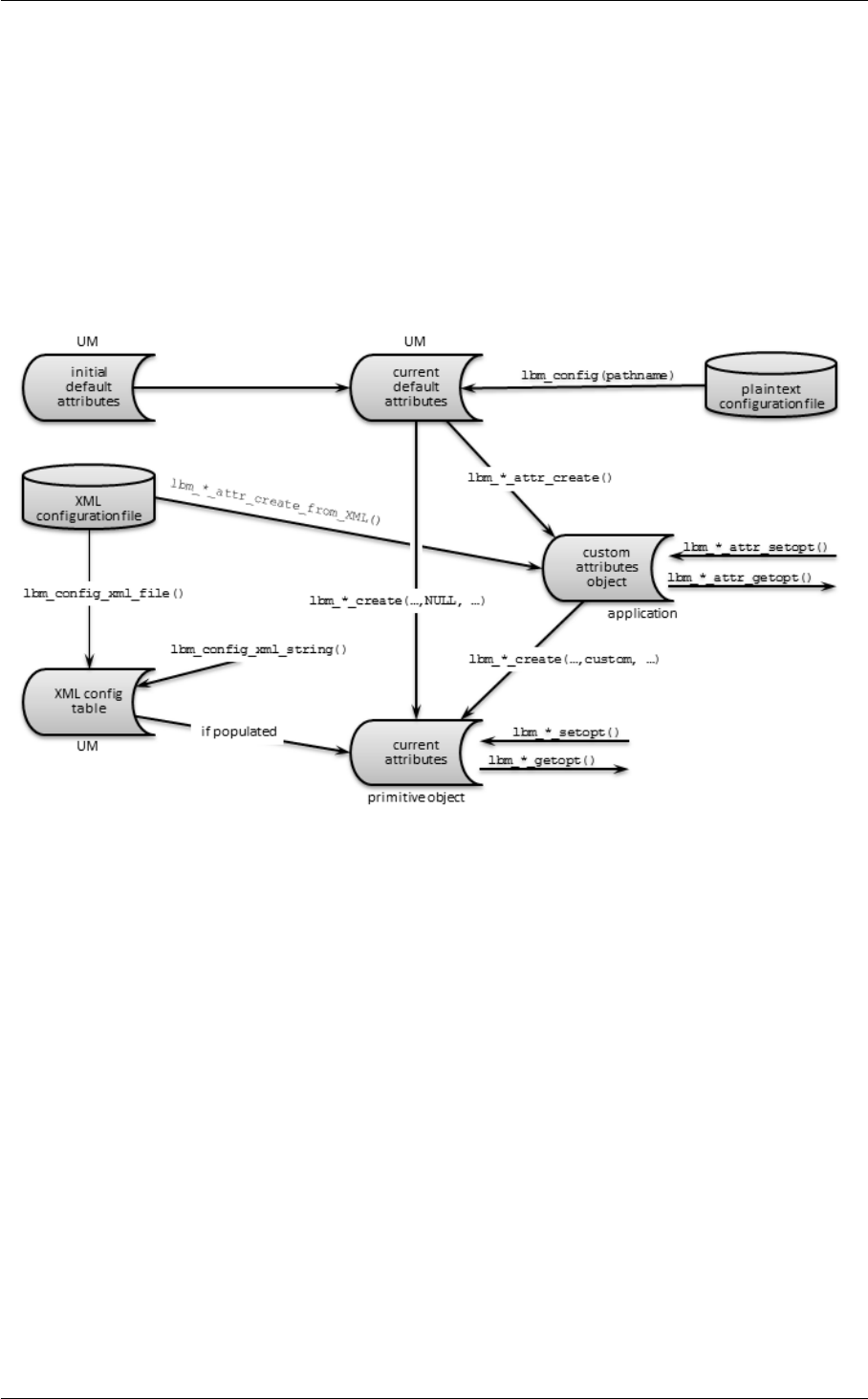
22 Introduction
attributes objects
Application-specific option values used during object creation.
function calls with ∗_setopt()
Used after object creation.
The following image shows the different ways Ultra Messaging stores and assigns option values before, during, and
after primitive object creation. Primitive objects are sources, receivers, wildcard receivers, event queues, contexts,
or HFX objects. The ultimate result is a primitive object with the assigned values residing in current attributes.
The initial default attributes is the set of factory defaults in Ultra Messaging. Ultra Messaging modifies selected
options in the plain text configuration file, and then stores these values in current default attributes. The current
default attributes is the starting point for all created primitive objects.
An instantiated primitive object uses values from current default attributes, the XML config table, and the custom
attributes object, and then holds the results in current attributes.
An XML configuration file can pass its setting to an object being created either by directly populating the XML config
table, or by creating a custom attributes object.
1.1.2 Assignment Flow
The above diagram implies, but does not fully explain, the flow of attribute value assignment that UM performs when
an application creates a primitive object. This flow is described below, and is important in understanding how and
when default values are overridden:
1. If applicable, copy plain text configuration file values to current default attributes.
2. Start creating object.
3. Custom attributes object(s) created/populated (if applicable).

1.1 Configuration Overview 23
4. If lbm_∗_create() has a NULL attr, copy current default attributes into current attributes. Otherwise, copy
custom attributes object values into current attributes.
5. Read applicable options from the XML config table into the current attributes. Do not overwrite options set
with lbm_config(), or lbm_∗_attr_setopt(), which were tagged when modified.
6. Finish object creation.
7. current attributes can be changed further (only certain options) via lbm_∗_setopt().
1.1.3 Definitions
Before discussing how UM options can be set, some terminology is in order.
Option
A single configuration item that controls some aspect of UM operation. An option typically resides in a configu-
ration file, but can also be assigned a value via a function call. We use options to assign values to an object's
attributes.
Attribute
An operational characteristic of an object. An attribute's value is set by an option, hence, there is a one-to-one
correspondence between options and attributes. (Note: This use of the term "attribute" is unrelated to, and not
to be confused with, "attribute" in XML syntax. In this document, we refer to the latter as "XML attribute".)
XML attribute
See above. In XML syntax, XML attributes are parameters for XML elements.
Custom attributes object
A UM object that contains custom attribute values (set by options) for a specific UM object. Separate (and
multiple) sets of attributes can exist for each application, though only one can be used when creating a primitive
object.
Initial default attributes
The default attributes values built into UM. UM and your applications use these if you have not set any options
for the attributes.
Primitive object
Specifically, an object that is a source, receiver, wildcard receiver, event queue, context, or HFX object.
Configuration file
This comes in two types: XML and plain text. Configuration files contain assigned values for options, but the
different types are read/copied at different times during the creation of an object.
XML config table
Contains option values that are read from the XML configuration file.
Current default attributes
The attributes values used to create an object in the absence of custom attributes values.

24 Introduction
Current attributes
The attribute values for an instantiated UM object that control the current operation of that object.
Scope
The type of object to which an option can apply. Possible scopes are context, source, receiver, wildcard_←-
receiver, event_queue, and hfx.
1.1.4 Which Method Should I Use?
For the four basic assignment methods listed above, following are some scenarios where specific methods are
selected.
• To change a default option value and apply it to all objects you create, call lbm_config() for one or more con-
figuration files. For example, to use LBT-RM rather than TCP for all sources, create a plain text configuration
file containing
source transport LBTRM
and pass its file name to lbm_config().
Note
The C API offers functions lbm_∗_attr_create_default() to change a current default value back to the
initial (factory) default value. No such corresponding method exists for the Java or .NET APIs.
• To customize specific options before an object is created for a specific object instance, use a custom attributes
object. Also, you can assign XML data to the XML config table directly from your application via lbm_config←-
_xml_string().
• To create sets of custom values to be used when creating primitive objects, call lbm_config_xml_file() and
specify an XML configuration file. This is useful for setting specific default options on a per-topic or per-
context basis, which cannot be done with a plain text configuration file. For an example where a sending
application uses specific options and values, create an XML configuration file with the application's name
(optional) that specifies those options and values. Then pass the XML file name and application name to
lbm_config_xml_file().
• To change an option after an object is created, modify the current attributes for the object. (Note that many
options cannot be changed after an object has been created.)
These methods can be used in combination. See Assignment Methods to see the relationships between attributes
and the various UM API function calls that affect them.
1.1.5 Host Name Resolution
Many of UM's configuration options specify an IP address. Prior to UM version 6.10 these needed to be specified in
dotted numeric format. For example, 10.23.19.210. Starting in version 6.10, any configuration option that accepts
an IP address can also accept a DNS host name (the few exceptions are noted in the documentation). For example,
myhost.mydomain.com. Note that the DNS name system is not necessarily used when host names are specified;
for example, most Unix systems will first look up the name in /etc/hosts.
When host names are specified, the name is resolved to an IP address when the configuration option is parsed.
If you change the IP address associated with a name, that change will not take effect until the configuration file is
re-read, typically by restarting the application.

1.2 Plain Text Configuration Files 25
1.1.6 Configuration Files
There are two types of UM Configuration files:
•Plain Text Configuration Files
•XML Configuration Files
You can read Configuration files either by function call, or automatically upon application launch by specifying a file
name in an environment variable. See Assignment Methods and Assignment Flow for details on how these options
replace or override default values.
There are some UM configuration options which cannot be set via configuration files. These are options whose
values are function pointers or data structures. These options can only be set via API functions ∗_setopt. For
example, context resolver_source_notification_function has a function pointer as its value. See Options that
Cannot Be Set Via Configuration Files for the full list.
1.2 Plain Text Configuration Files
The plain text configuration file, when invoked, writes option values into UM's current default attributes. These are
then read and used in the creation of all objects.
See Example Configuration Scenarios for example configuration files.
1.2.1 Reading Plain Text Configuration Files
There are two ways to read a plain text configuration file to set values in current default attributes.
API function lbm_config()
You can call the function multiple times with different file names to set configuration options in phases.
When you create UM objects (such as a context or receiver), UM sets attributes for that object using the current
default attributes. Hence, you must call lbm_config() before creating objects (lbm_∗_create()).
Environment variable LBM_DEFAULT_CONFIG_FILE
Reads configuration file when your application is started. You can set this variable to a full pathname or a URL;
for example:
export LBM_DEFAULT_CONFIG_FILE=/home/lbm/lbtrm.cfg
(You can still use the lbm_config() function on a different file to make additional changes.)

26 Introduction
1.3 Plain Text Configuration File Format
A plain text configuration file contains lines that each take the form:
scope_keyword option_name option_value
where:
scope_keyword - the scope to which the option applies,
option_name - the predefined name for the option, and
option_value - the new value to be assigned to that option.
Allowable values for these parameters are given throughout the rest of this document. Any text following a hash
character # (also known as a pound sign, number sign, or octothorp) is interpreted as comment text and is ignored.
For example:
# Set transport_tcp_port_low to 4901
context transport_tcp_port_low 4901
# And set transport_tcp_port_high to 4920
context transport_tcp_port_high 4920
Note
For plain text configuration files, do not enclose any fields in double quotation marks (").
1.4 XML Configuration Files
XML configuration files let you address many different applications and operating requirements, removing the need
to programmatically set and reset options for them. A single XML file can contain options for multiple applications.
Moreover, for a single application, you can configure multiple named contexts, event queues, etc., with different
values for the same options.
See Example Configuration Scenarios for example configuration files.
1.4.1 Reading XML Configuration Files
There are multiple ways to read an XML configuration file to assign values while creating a primitive object.
API function lbm_config_xml_file()
Reads an XML configuration file into XML config table. Call this before the primitive create function. This does
not change the current default attributes. Use a file path, or a URL beginning with http:// or ftp://.
API function lbm_config_xml_string()
Populates the XML config table directly from your application. Call this before the primitive create function. This
does not change the current default attributes.
API function lbm_∗_attr_create_from_XML()
Creates a custom attributes object containing the values from an XML configuration file. The values can then
be applied to a primitive object being created by calling function lbm_∗_create() and specifying this custom
attributes object in the second parameter.

1.4 XML Configuration Files 27
Environment variable LBM_XML_CONFIG_FILENAME
Reads the file into the XML config table. These settings are then available to all applications when they start.
Use a file path, or a URL beginning with http:// or ftp://.
Environment variable LBM_XML_CONFIG_APPNAME
Reads options for a specific application from the LBM_XML_CONFIG_FILENAME variable's filename. This
initiates the specified application's configuration; set this environment variable for every application.
Environment variable LBM_UMM_INFO
Initiates UMM Daemon to read options for an application and user from the LBM_XML_CONFIG_FILENAME
variable's filename. Set this variable for every application/user combination, in the following format:
export LBM_UMM_INFO=application_name:user_name:password@ip:port
Note
Since you can use these API functions and environment variables without the UMM Daemon, you cannot set
a username or password.
1.4.2 Using XML Configuration Files With a UM Application
The following procedure describes a general approach to implementing XML configuration files.
1. Create an XML configuration file using an XML editor or text editor. Just for this example, name the file,
UM_CONFIG.XML.
2. Insert any desired templates in the <templates>element to hold configuration option values shared by
multiple applications or primitive UM objects (context, source, receiver, wildcard receiver or event queue).
You can create and apply multiple templates to applications and primitive UM objects, however, if the same
option appears in multiple templates, the option value in the last template overrides the option value in the
previous template. See <templates>.
3. Insert an <application>element for your UM application in the <applications>element and include any
relevant templates created in the previous step. Just for this example, name the application, SENDAPP. See
<applications>.
4. Within the <contexts>element, configure the application's <context>element and context options. And
since our example application, SENDAPP is a sending application, also configure its Source options. (If this
was a receiving application, you would configure Receiver or Wildcard Receiver options. If your application
creates multiple Contexts, enter multiple <context>elements within the <contexts>element, inserting the
appropriate source, receiver or wildcard receiver options. See <contexts>.
5. Configure the applications Event Queue options. See <event-queues>.
6. Save the XML configuration file, UM_CONFIG.XML, and load it onto the machine where the application (S←-
ENDAPP) runs.
7. Set the following environment variables on the machine where SENDAPP runs.
• Set LBM_XML_CONFIG_FILENAME to UM_CONFIG.XML.
• Set LBM_XML_CONFIG_APPNAME to SENDAPP.
• Optionally, you could also use lbm_config_xml_file(UM_CONFIG.XML,SENDAPP) in the SENDAPP
source.
8. Start SENDAPP.

28 Introduction
1.4.3 XML Configuration File Format
An XML Configuration File follows standard XML conventions. Element declarations or a pointer to a DTD file are
not needed, as these are handled by UM.
An XML configuration file generally comprises two primary elements: templates and applications. Organized and
contained within these are option value assignments. Applications containers let you set options for specific appli-
cations. To provide more global control over applications, or to simply reduce repetition, you can create templates
to hold option settings that are to be used in one or more different applications.
XML configuration files use the high-level structure shown in the following example. This example includes only
some container elements, and no options.
<um-configuration version="1.0">
<templates>
<template name="Sending">
<options type="source">
</options>
<options type="context">
</options>
</template>
</templates>
<applications>
<application name="Sending-Topic1">
<contexts>
<context name="Sending-LBTRM">
<sources>
<topic topicname="Topic1">
<options type="source">
</options>
</topic>
</sources>
</context>
</contexts>
<event-queues>
<event-queue/>
<event-queue name="EQ-1"/>
</event-queues>
</application>
</applications>
</um-configuration>
1.4.4 Merging Multiple XML Configuration Files
For UM XML configuration files and UMP store daemon XML configuration files, you can use the XInclude mecha-
nism to merge multiple configuration files.
To include an external file, use the following syntax:
<xi:include xmlns:xi=http://www.w3.org/2003/XInclude" href="filename.xml" />
Files to be included must be formatted such that all elements are enclosed in a single container element, as shown
in the following examples:
Example 1
<ume-attributes>
<option type="store" name="allow-proxy-source" value="1"/>
<option type="lbm-context" name="resolver_multicast_address" value="239.255.38.0"
/>
<option type="lbm-context" name="resolver_multicast_port" value="19999" />

1.4 XML Configuration Files 29
</ume-attributes>
Example 2
<topics>
<topic pattern="." type="PCRE">
<ume-attributes>
<option type="store" name="repository-type" value="disk"/>
<option type="store" name="retransmission-request-forwarding" value="0"/>
</ume-attributes>
</topic>
</topics>

30 Introduction

Chapter 2
XML Configuration File Elements
Following are descriptions of the XML configuration file elements.
2.1 <um-configuration>
Description:
The <um-configuration>element is a required container for all UM configuration options residing in the XML
configuration file. This is the top-level element.
Parents:
None.
Children:
•<license>
•<templates>
•<applications>
XML Attributes:
XML Attribute Description Default Value
version The version of the DTD. none
Example:
<um-configuration version="1.0">
<applications>
<application>
...
...
</application>
</applications>
</um-configuration>

32 XML Configuration File Elements
2.2 <license>
Description:
The <license>element identifies the UM product license, either as the license key or as a pointer to a license
file, as an alternative to setting it in an environment variable.
Parents:
•<um-configuration>
Children:
None.
XML Attributes:
XML Attribute Description Default Value
format The format for the license element data. filename points to the file con-
taining the license key. string identifies the data as the license key itself.
string
xml:space How whitespace is handled. default trims leading and trailing whites-
pace (e.g., tabs, spaces, linefeeds, etc.), and compresses multiple
whitespace characters into a single space character. preserve pre-
serves the whitespace exactly as read.
default
Example:
<um-configuration>
<license format=filename>/
usr/local/licenses/um_license.txt
</license>
<applications>
<application>
...
2.3 <options>
Description:
The <options>element is a container element for individual options. You specify the primitive object in the
attribute type.

2.4 <option>33
Parents:
•<template>
•<context>
•<topic>
•<wildcard-receiver>
•<event-queue>
Children:
•<option>
•<application-data>
XML Attributes:
XML Attribute Description Default Value
type The type of primitive object, which can be event-queue,context,
source,receiver,wildcard-receiver, or hfx).
None
Example:
<um-configuration version="1.0">
<templates>
<template name="my-app-1">
<options type="context">
<option>
...
</option>
...
</options>
</template>
</templates>
</um-configuration>
2.4 <option>
Description:
The <option>element corresponds to any UM configuration option.
Parents:
•<options>
Children:
•<allow>
•<deny>

34 XML Configuration File Elements
XML Attributes:
XML Attribute Description Default Value
name Name of the UM configuration option. See Reference
for all options.
N/A
default-value The value you are setting for this option. The default value for the option.
order Permit or restrict particular option values. Valid val-
ues are deny,allow (deny what you specify, allow ev-
erything else) or allow,deny (allow what you specify,
deny everything else). If using this XML attribute, fol-
low this element with <allow>or <deny>elements
as needed.
deny,allow
Example:
To permit any application to choose any transport method except LBT-RU, configure the following in a template
included in sending applications.
<option default-value="tcp" name="transport" order="deny,allow">
<deny>LBTRU</deny>
</option>
To restrict any application to only the LBT-RM or LBT-RU transport method, configure the following in a template
included in sending applications.
<option default-value="tcp" name="transport" order="allow,deny">
<allow>LBTRU</allow>
<allow>LBTRM</allow>
</option>
2.5 <allow>
Description:
Use the <allow>element with <option>to set a condition for that option to permit only a certain subset
of possible default value values for the option. See also Using the Order and Rule XML Attributes
Parents:
•<option>
Children:
None
XML Attributes:

2.6 <deny>35
XML Attribute Description Default Value
xml:space How whitespace is handled. default trims leading and trailing whites-
pace (e.g., tabs, spaces, linefeeds, etc.), and compresses multiple
whitespace characters into a single space character. preserve pre-
serves the whitespace exactly as read.
default
Example:
<option default-value="tcp" name="transport" order="allow,deny">
<allow>LBTRU</allow>
<allow>LBTRM</allow>
</option>
2.6 <deny>
Description:
Use the <deny>element with <option>to set a condition for that option that restricts certain (otherwise)
possible default value values from being used by the option. See also Using the Order and Rule XML Attributes
Parents:
•<option>
Children:
None
XML Attributes:
XML Attribute Description Default Value
xml:space How whitespace is handled. default trims leading and trailing whites-
pace (e.g., tabs, spaces, linefeeds, etc.), and compresses multiple
whitespace characters into a single space character. preserve pre-
serves the whitespace exactly as read.
default
Example:
<option default-value="tcp" name="transport" order="deny,allow">
<deny>LBTRU</deny>
</option>

36 XML Configuration File Elements
2.7 <templates>
Description:
The <templates>element is a container element for all templates that contain configuration options that can
be used in other templates or applications. A template can be very specific, such as configuring options only
for LBT-RM sources, or more comprehensive, configuring common options for your applications.
Insert any desired templates in the <templates>element to hold configuration option values shared by multiple
applications or primitive objects. You can create and apply multiple templates to applications and primitive UM
objects in a comma separated value (CSV) format. However, if the same option appears in multiple templates,
the option value in the last or lower-level template overrides the option value in the previous or higher-level
template.
Parents:
•<um-configuration>
Children:
•<template>
XML Attributes:
None
Example:
<templates>
<template name="Sending">
<options>
...
</options>
</template>
</templates>
2.8 <template>
Description:
The <template>element is a container for one uniquely named set of options.
Parents:
•<templates>
Children:
•<options>

2.9 <applications>37
XML Attributes:
XML Attribute Description Default Value
name Name of the configuration template, which can be ref-
erenced elsewhere in this XML configuration file to
assign to other configuration elements. Multiple tem-
plates can be specified in a comma separated value
(CSV) format.
None
default-value The value you are setting for this option. The default value for the option.
Example:
<templates>
<template name="Sending",name="Sending-LBTRM">
<options>
...
</options>
</template>
</templates>
2.9 <applications>
Description:
The <application>element is a container element for all applications configured in the XML configuration file.
UM lets you configure one or more applications.
Parents:
•<um-configuration>
Children:
•<application>
XML Attributes:
None.
Example:
<applications>
<application name="Sending-IXM-LBTRM" template="Sending-LBTRM">
<contexts>
...
</contexts>
</application>
</applications>
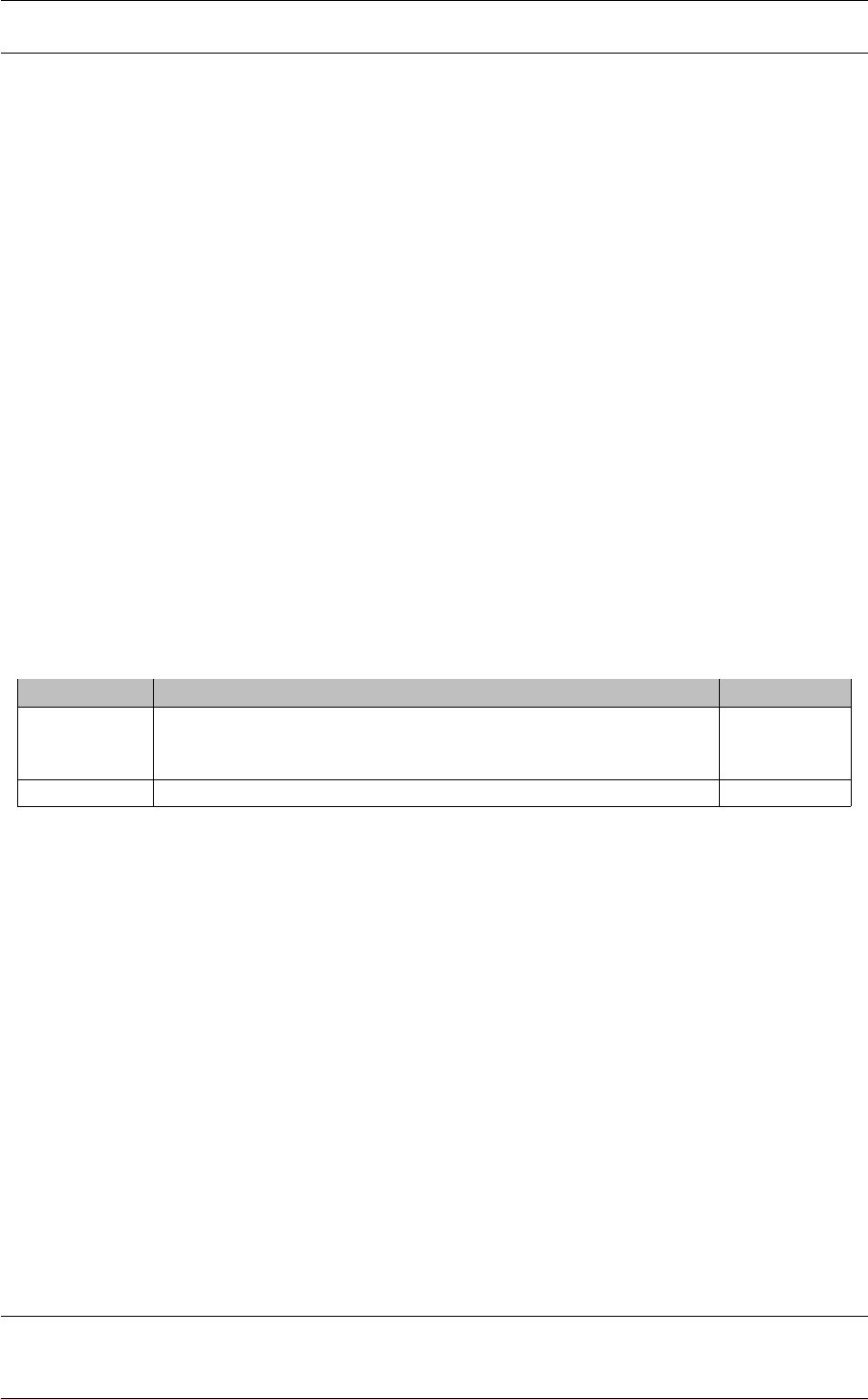
38 XML Configuration File Elements
2.10 <application>
Description:
The <application>element contains option values for all object elements within a single, uniquely named,
application.
Parents:
•<applications>
Children:
•<application-data>
•<contexts>
•<event-queues>
•<hfxs>
XML Attributes:
XML Attribute Description Default Value
name Name of the application. Used as an optional parameter for lbm_←-
config_from_xml(). If a name is not supplied, this must be the only
occurrence of this element in the XML configuration file.
None
template Name of the configuration template to use for the application. None
Example:
<applications>
<application name="Sending-IXCM-LBTRM" template="Sending">
<application-data>
...
</application-data>
<contexts>
...
<contexts/>
<event-queues>
...
</event-queues>
</application>
<application name="Sending-IXCM-TCP" template="Sending">
...
</application>
</applications>

2.12 <context>39
2.11 <contexts>
Description:
The <contexts>element is a container element for all UM contexts configured for an application. UM lets you
create one or more contexts for an application.
Parents:
•<application>
Children:
•<context>
XML Attributes:
XML Attribute Description Default Value
template Name of the configuration template to apply to each individual context
object configured within this element. Multiple templates can be ap-
plied by specifying them in a comma-separated-value manner, i.e., "←-
Sending1,Sending2". Can be overridden by a different template con-
figured for an individual context.
None
order Establishes the permission semantic for each individual context config-
ured within this element. Valid values are deny,allow (deny what you
specify, allow everything else) or allow,deny (allow what you specify,
deny everything else). Works in conjunction with the <context>X←-
ML attribute, rule.
deny,allow
Example:
<applications>
<application>
<contexts>
<context name=Sending-95" template="Sending-LBTRM" rule="allow">
...
<context>
<contexts/>
</application>
</applications>
2.12 <context>
Description:
The <context>element contains option values for a single context, organized into its child elements.
Important:
Setting the name attribute in this element does not actually name a context. A context name must be estab-

40 XML Configuration File Elements
lished when you create the context. See the name description in the table below.
Parents:
•<contexts>
Children:
•<sources>
•<receivers>
•<wildcard-receivers>
•<options>
XML Attributes:
XML Attribute Description Default Value
name Name of the context. UM only applies an XML configuration using this
name to contexts that match this context name. Setting this XML name
attribute does not name the context, but provides the ability to map previ-
ously created context attributes to this XML element. You can configure
an automatic monitoring context by setting name="29west_statistics←-
_context".
None
template Name of the configuration template to use for the context object's op-
tions.
None
rule Permits or restricts the creation of the context object. If rule="deny",
the context object errors upon creation.
allow
Example:
<applications>
<application>
<contexts>
<context name=Sending-95" template="Sending-LBTRM" rule="allow">
<sources>
...
</sources>
<receivers>
...
</receivers>
...
<context>
<contexts/>
</application>
</applications>

2.13 <sources>41
2.13 <sources>
Description:
The <sources>element is a container for all UM sources configured for an application. UM lets you create
one or more sources for an application.
Parents:
•<context>
Children:
•<topic>
XML Attributes:
XML Attribute Description Default Value
template Name of the configuration template to apply to each individual context
object configured within this element. Multiple templates can be ap-
plied by specifying them in a comma-separated-value manner, i.e., "←-
Sending1,Sending2". Can be overridden by a different template con-
figured for an individual context.
None
order Establishes the permission semantic for each individual context config-
ured within this element. Valid values are deny,allow (deny what you
specify, allow everything else) or allow,deny (allow what you specify,
deny everything else). Works in conjunction with the <topic>XML
attribute, rule.
deny,allow
Example:
<applications>
<application>
<contexts>
<context name=Sending-95">
<sources>
<topic topicname="ICXM" template="Sending-LBTRM" rule="allow">
...
</topic>
</sources>
<receivers>
...
</receivers>
...
<context>
<contexts/>
</application>
</applications>

42 XML Configuration File Elements
2.14 <topic>
Description:
The <topic>element contains option values for a single source or receiver.
Parents:
•<hfxs>
•<receivers>
•<sources>
Children:
•<options>
XML Attributes:
XML Attribute Description Default Value
topicname The topic string for the topic that the source sends or the receiver ac-
cepts. Used as a parameter for lbm_src_topic_alloc(),lbm_rcv←-
_topic_lookup(),lbm_src_attr_create_from_xml(),lbm_src_attr_←-
set_from_xml(),lbm_rcv_attr_create_from_xml(), and lbm_rcv_←-
attr_set_from_xml(). Do not use with the pattern attribute.
None
template Name of the configuration template to use for this topic's source or re-
ceiver options.
None
rule Permits or restricts the creation of the source or receiver object. If
rule="deny", the object errors upon creation.
allow
pattern Identify the set of options for this topic with a topic string regular ex-
pression pattern. Any source created with a topic string that matches
this pattern receives the configured option values. Do not use with the
topicname attribute.
None
Example:
<applications>
<application>
<contexts>
<context name=Sending-95">
<sources>
<topic topicname="ICXM" rule="allow">
<options type="source">
...
</options>
</topic>
</sources>
...
<context>
<contexts/>
</application>
</applications>

2.15 <receivers>43
2.15 <receivers>
Description:
The <receivers>element is a container element for all UM receivers configured for an application. You can
create one or more receivers for an application.
Parents:
•<context>
Children:
•<topic>
XML Attributes:
XML Attribute Description Default Value
template Name of the configuration template to apply to each individual receiver
object configured within this element. You can apply multiple tem-
plates by specifying them in a comma-separated-value manner, e.g.,
"Receiving1,Receiving2".
N/A
order Establishes the permission semantic for each individual context config-
ured within this element. Valid values are deny,allow (deny what you
specify, allow everything else) or allow,deny (allow what you specify,
deny everything else). Works in conjunction with the <topic>XML
attribute, rule.
deny,allow
Example:
<applications>
<application>
<contexts>
<context name=Sending-95">
<receivers template="Receiving" order="deny,allow">
<topic topicname="ICXM" template="Receiving" rule="allow">
<options type="receiver">
...
</options>
</topic>
</receivers>
...
<context>
<contexts/>
</application>
</applications>

44 XML Configuration File Elements
2.16 <wildcard-receivers>
Description:
The <wildcard-receivers>element is a container element for all UM wildcard receivers configured for an
application. UM lets you create one or more wildcard receivers for an application.
Parents:
•<context>
Children:
•<wildcard-receiver>
XML Attributes:
XML Attribute Description Default Value
template Name of the configuration template to apply to each individual wildcard
receiver object configured within this element. Multiple templates can
by applied by specifying them in a comma-separated-value manner, i.e.,
"Receiving1,Receiving2". Can be overridden by a different template
configured for an individual wildcard receiver.
N/A
order Establishes the permission semantic for each individual context con-
figured within this element. Valid values are deny,allow (deny
what you specify, allow everything else) or allow,deny (allow what
you specify, deny everything else). Works in conjunction with the
<wildcard-receiver>XML attribute, rule.
deny,allow
Example:
<applications>
<application>
<contexts>
<context name=Sending-95">
<wildcard-receivers template="Receiving" order="deny,allow">
<wildcard-receiver template="Receiving" rule="allow"
pattern="^ABC.*XYZ$">
...
</wildcard-receiver>
</wildcard-receivers>
...
<context>
<contexts/>
</application>
</applications>
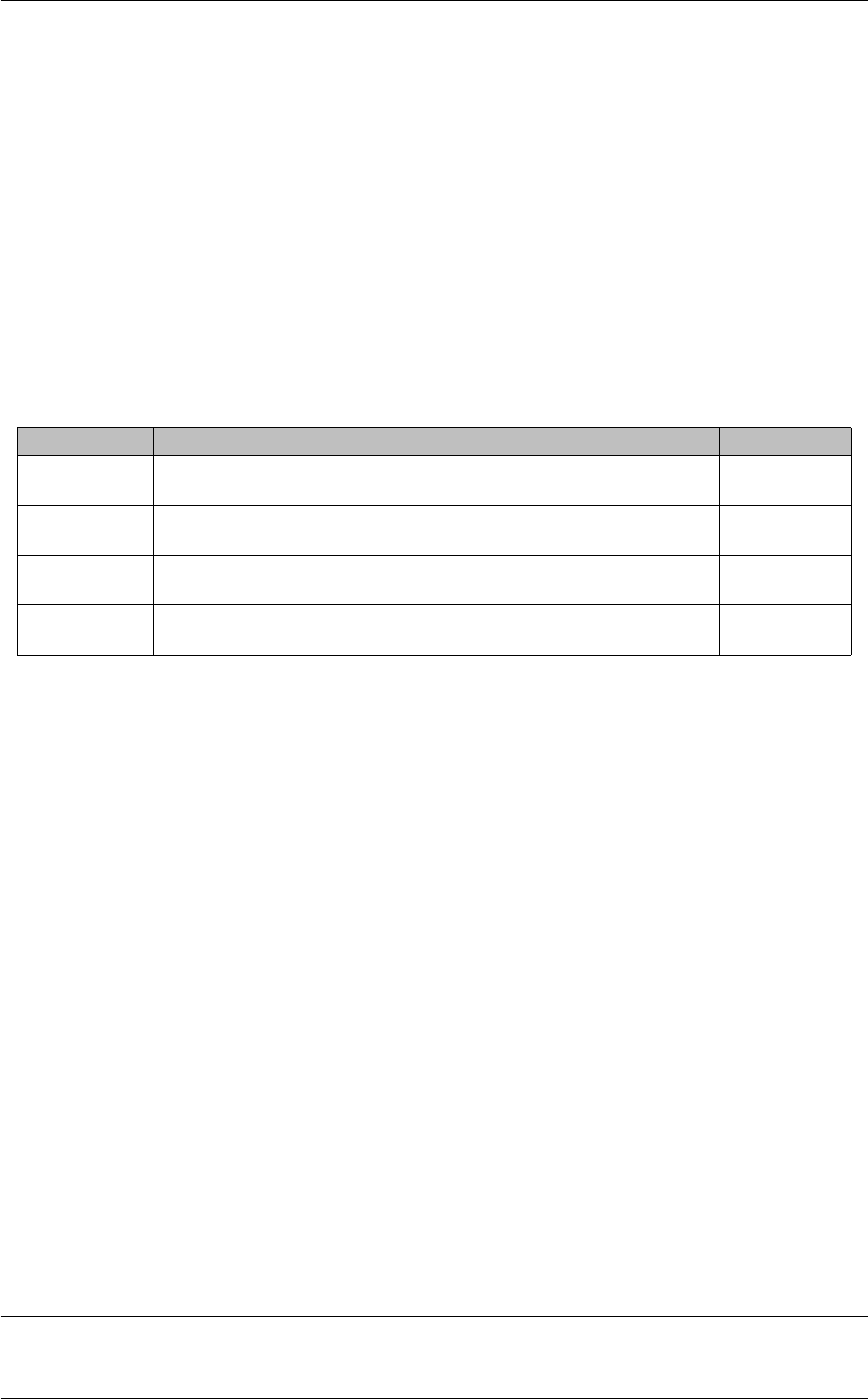
2.17 <wildcard-receiver>45
2.17 <wildcard-receiver>
Description:
The <wildcard-receiver>element contains option values for a single wildcard receiver.
Parents:
•<wildcard-receivers>
Children:
•<options>
XML Attributes:
XML Attribute Description Default Value
template Name of the configuration template to use for the wildcard receiver ob-
ject's options.
None
rule Permits or restricts the creation of the wildcard receiver object. If
rule="deny", the object errors upon creation.
allow
pattern The wildcard receiver topic string regular expression pattern for this wild-
card receiver object.
None
pattern-type The type of pattern matching to use for the wildcard receiver object. Valid
values are pcre,regex or application-callback.
pcre
Example:
<applications>
<application>
<contexts>
<context name=Sending-95">
<wildcard-receivers template="Receiving" order="deny,allow">
<wildcard-receiver template="Receiving" rule="allow"
pattern="^ABC.*XYZ$">
<options type="receiver">
...
</options>
</wildcard-receiver>
</wildcard-receivers>
...
<context>
<contexts/>
</application>
</applications>

46 XML Configuration File Elements
2.18 <event-queues>
Description:
The <event-queues>Element is a container element for all UM event queues configured for an application.
UM lets you create one or more event queues for an application.
Parents:
•<application>
Children:
•<event-queue>
XML Attributes:
XML Attribute Description Default Value
template Name of the configuration template to apply to each individual event
queue object configured within this element. You can apply multiple
templates specifying them in a comma-separated-value manner, e.g.,
"EVQ-1,EVQ-2". Can be overridden by a different template configured
for an individual event queue.
N/A
order Establishes the permission semantic for each individual context con-
figured within this element. Valid values are deny,allow (deny
what you specify, allow everything else) or allow,deny (allow what
you specify, deny everything else). Works in conjunction with the
<event-queue>XML attribute, rule.
deny,allow
Example:
<applications>
<application name="Sender">
<event-queues template="Receiving" order="deny,allow">
<event-queue name="EVQ-1" template="Sending-LBTRM" rule="allow">
...
</event-queue>
</event-queues>
</application>
</applications>
2.19 <event-queue>
Description:
The <event-queue>element contains option values for a single event queue.
Parents:
•<event-queue>
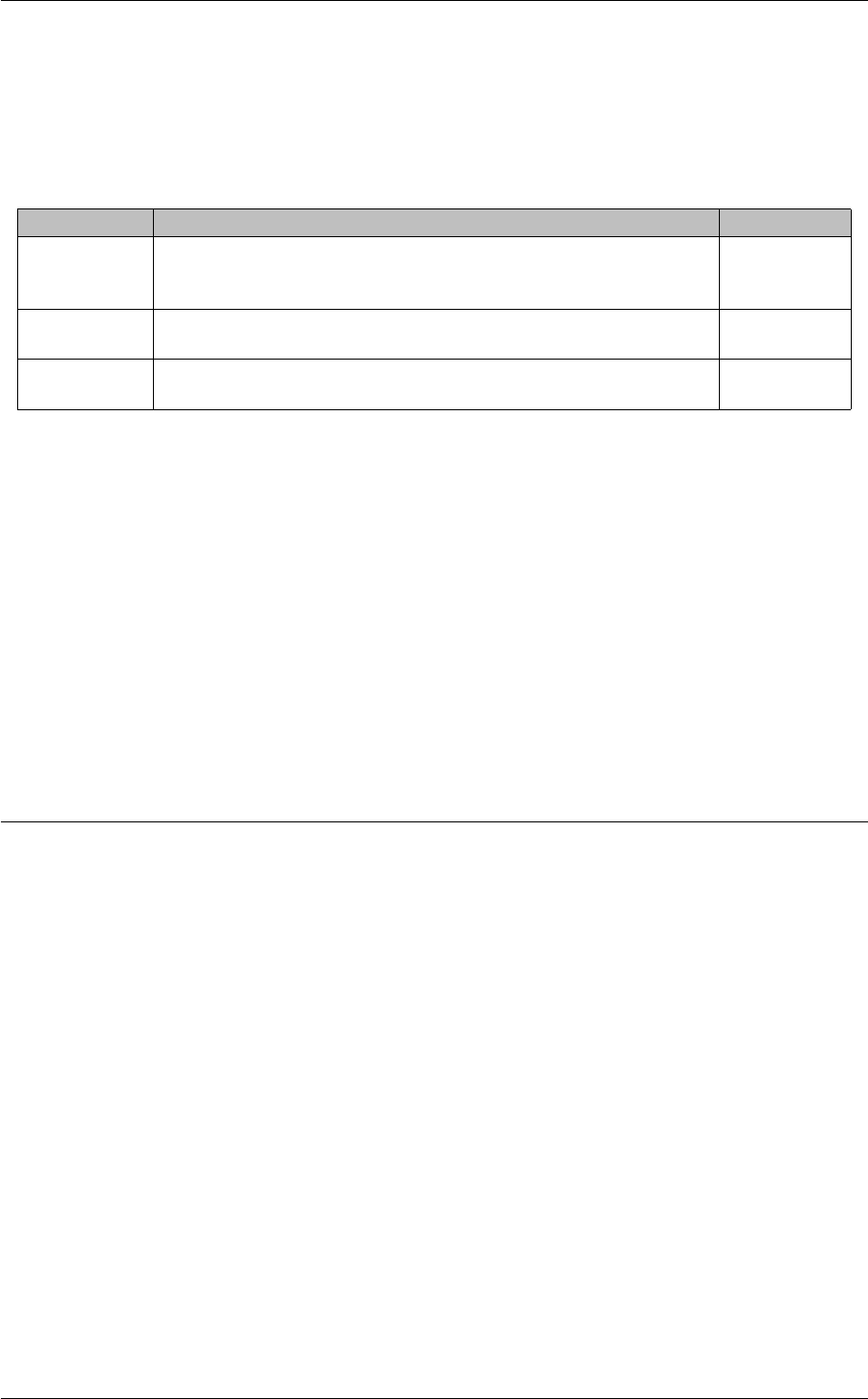
2.20 <hfxs>47
Children:
•<options>
XML Attributes:
XML Attribute Description Default Value
name Name of the event queue. Used as a parameter for lbm_event←-
_queue_attr_create_from_xml() and lbm_event_queue_attr_set_←-
from_xml().
None
template Name of the configuration template to use for the event queue object's
options.
None
rule Permits or restricts the creation of the event queue object. If rule="deny",
the object errors upon creation.
allow
Example:
<applications>
<application name="Sender">
<event-queues template="Receiving" order="deny,allow">
<event-queue name="EVQ-1" template="Sending-LBTRM" rule="allow">
<options type="receiver">
...
</options>
</event-queue>
</event-queues>
</application>
</applications>
2.20 <hfxs>
Description:
The <hfxs>element is a container for all UM HFX objects configured for an application. Within the <hfxs>
element, options are organized by topic.
Parents:
•<application>
Children:
•<topic>
XML Attributes:

48 XML Configuration File Elements
XML Attribute Description Default Value
template Name of the configuration template to apply to each individual HFX ob-
ject configured within this element. Multiple templates can by applied by
specifying them in a comma-separated-value manner, i.e., "Sending1,←-
Sending2". Can be overridden by a different template configured for an
individual HFX object.
N/A
order Establishes the permission semantic for each individual context config-
ured within this element. Valid values are deny,allow (deny what you
specify, allow everything else) or allow,deny (allow what you specify,
deny everything else). Works in conjunction with the <topic>XML
attribute, rule.
deny,allow
Example:
<applications>
<application name="Sender">
<hfxs template="Sending" order="deny,allow">
<topic topicname="ICXM" template="Sending-LBTRM" rule="allow">
<options type="Sending-LBTRM">
...
</options>
</topic>
</event-queues>
</application>
</applications>
2.21 <application-data>
Description:
The <application-data>element is a free-form text comment field that you can use to store application-
specific or options-group-specific metadata. When defined at the options level, this content overrides
<application-data>elements defined at the application level.
Your application can retrieve this data via the lbm_∗_attr_getopt() and lbm_∗_attr_str_getopt() API functions
under the option name application_data. You can also programmatically set it using the equivalent ∗_setopt()
APIs. The application_data option is defined for all option scopes.
Also, you can set or retrieve this value at runtime via the ∗_getopt() and ∗_setopt() functions defined for the
types lbm_context_t,lbm_src_t,lbm_rcv_t,lbm_wildcard_rcv_t,lbm_event_queue_t, and lbm_hfx_t.
Parents:
•<application>
•<options>
Children:
None.

2.21 <application-data>49
XML Attributes:
XML Attribute Description Default Value
xml:space How whitespace is handled. default trims leading and trailing whites-
pace (e.g., tabs, spaces, linefeeds, etc.), and compresses multiple
whitespace characters into a single space character. preserve pre-
serves the whitespace exactly as read.
default
Example:
<applications>
<application>
<application-data>Comment about this section.</application-data>
<contexts>
<context name=Sending-95">
<wildcard-receivers template="Receiving" order="deny,allow">
<wildcard-receiver template="Receiving" rule="allow"
pattern="^ABC.*XYZ$">
<options type="receiver">
<application-data>Comment about this section.</application-data>
...
</options>
</wildcard-receiver>
</wildcard-receivers>
...
<context>
<contexts/>
</application>
</applications>

50 XML Configuration File Elements
Chapter 3
Sample XML Configuration File
A sample XML configuration file appears below and has the following notable aspects.
• Contains object attributes for a UM context and source.
• Application name is Sending.
• Uses a template of attributes also called Sending-LBTRM.
• The template, Sending-LBTRM, uses the order attribute for the fd_management_type to allow all file de-
scriptor types except DEVPOLL. However the Sending-LBTRM application further restricts the file descriptor
types to exclude EPOLL in addition to DEVPOLL.
<um-configuration version="1.0">
<templates>
<template name="Sending-LBTRM">
<options type="source">
<option default-value="0" name="late_join"/>
<option default-value="500"
name="resolver_advertisement_maximum_initial_interval"/>
<option default-value="5000"
name="resolver_advertisement_minimum_initial_duration"/>
<option default-value="10"
name="resolver_advertisement_minimum_initial_interval"/>
<option default-value="60"
name="resolver_advertisement_minimum_sustain_duration"/>
<option default-value="1000" name="resolver_advertisement_sustain_interval"/>
<option default-value="lbtrm" name="transport"/>
<option default-value="14400" name="transport_lbtrm_destination_port"/>
<option default-value="0.0.0.0" name="transport_lbtrm_multicast_address"/>
</options>
<options type="context">
<option default-value="wsaeventselect" name="fd_management_type"
order="deny,allow">
<deny>wincompport</deny>
</option>
<option default-value="5000"
name="mim_delivery_control_activity_check_interval"/>
<option default-value="60000" name="mim_delivery_control_activity_timeout"/>
<option default-value="6000" name="mim_delivery_control_loss_check_interval"/>
<option default-value="2000000" name="resolver_initial_advertisement_bps"/>
<option default-value="2000" name="resolver_initial_advertisements_per_second"/>
<option default-value="2000" name="resolver_initial_queries_per_second"/>
<option default-value="2000000" name="resolver_initial_query_bps"/>
</options>
</template>
</templates>

52 Sample XML Configuration File
<applications>
<application name="Sending">
<contexts order="deny,allow">
<context rule="allow" template="Sending-LBTRM">
<sources order="deny,allow">
<topic rule="allow" topicname="IXCM">
<options type="source">
<option default-value="1" name="late_join"/>
<option default-value="lbtrm" name="transport"/>
<option default-value="14488" name="transport_lbtrm_destination_port"/>
<option default-value="224.12.5.101"
name="transport_lbtrm_multicast_address"/>
</options>
</topic>
</sources>
<receivers order="deny,allow"/>
<wildcard-receivers order="deny,allow"/>
<options type="context">
<option default-value="224.9.10.11" name="resolver_multicast_address"/>
<option default-value="224.9.10.11"
name="resolver_multicast_incoming_address"/>
<option default-value="12965" name="resolver_multicast_incoming_port"/>
<option default-value="224.9.10.11"
name="resolver_multicast_outgoing_address"/>
<option default-value="12965" name="resolver_multicast_outgoing_port"/>
<option default-value="12965" name="resolver_multicast_port"/>
<option default-value="224.9.10.12" name="resolver_multicast_interface"/>
<option default-value="0" name="resolver_multicast_receiver_socket_buffer"/>
<option default-value="wsaeventselect" name="fd_management_type"
order="deny,allow">
<deny>wincompport</deny>
</option>
</options>
</context>
</contexts>
<event-queues order="deny,allow">
<event-queue rule="allow">
<options type="event-queue">
<option default-value="lbm" name="monitor_transport"/>
<option default-value="" name="monitor_appid"/> </options>
</event-queue>
</event-queues>
</application>
</applications>
</um-configuration>
3.1 Using the Order and Rule XML Attributes
The order and rule XML attributes combine to enable you to permit or restrict the creation of primitive UM objects.
The container elements such as the <contexts>,<sources>,<receivers>,etc. have the order
attribute. The single object elements, such as <context>,<topic>,etc., have the rule attribute. The
default for both attributes allows creation of all objects. You can however, exert some administrative control over
your applications by allowing the creation of only certain objects.
You can vary the order attribute values to suit whether permission or restriction is more prevalent. In the example
below, only a single topic needs to be restricted, so we use the default values for the order attribute with only a
single topic restricted with a rule="deny" attribute.
<sources order="deny,allow">

3.1 Using the Order and Rule XML Attributes 53
<topic topicname="CDEF" rule="deny"/>
<!-- all other source topics allowed -->
</sources>
In contrast, the following example requires the creation of only a single receiver topic object, so you can change the
order attribute to "allow,deny", which restricts the creation of all receiver topic objects except the one allowed.
<receivers order="allow,deny">
<topic topicname="AARM" rule="allow"/>
<!-- all other receive topics denied -->
</receivers>
You can also combine topic names with topic patterns. In the example below, we set the order attribute to the
default. Topic ISM is denied with its order attribute. Topics IRM and SRM satisfy both their own allow rules and the
pattern ∗R∗deny rule. So when you allocate a source topic with lbm_src_topic_alloc(), UM accepts the rule that
matches the order attribute default, which is allow.
<sources order="deny,allow">
<topic topicname="ISM" rule="deny"/>
<topic topicname="IRM" rule="allow"/>
<topic pattern="*R*" rule="deny"/>
<topic topicname="SRM" rule="allow"/>
</sources>
As a result of the above configuration, UM allows the creation of source topic objects IRM and SRM, and all other
topics, except those that match the regular expression pattern ∗R∗.

54 Sample XML Configuration File
Chapter 4
XML Configuration File DTD
The XML configuration file DTD is integrated into UM and appears below.
<?xml version="1.0" encoding="UTF-8"?>
<!ELEMENT um-configuration (license | templates | applications)*>
<!ATTLIST um-configuration version CDATA #REQUIRED>
<!ELEMENT license ( #PCDATA )>
<!ATTLIST license format (filename | string) "string">
<!ATTLIST license xml:space (default | preserve) "default">
<!ELEMENT templates (template*)>
<!ELEMENT template (options+)>
<!ATTLIST template name CDATA #REQUIRED>
<!ELEMENT options (option | application-data)*>
<!ATTLIST options type (event-queue | context | source | receiver |
wildcard-receiver | hfx) #IMPLIED>
<!ELEMENT option (allow | deny)*>
<!ATTLIST option name CDATA #REQUIRED>
<!ATTLIST option default-value CDATA #IMPLIED>
<!ATTLIST option order CDATA #IMPLIED>
<!ELEMENT application-data ( #PCDATA )>
<!ATTLIST application-data xml:space (default | preserve) "default">
<!ELEMENT allow ( #PCDATA )>
<!ATTLIST allow xml:space (default | preserve) "default">
<!ELEMENT deny ( #PCDATA )>
<!ATTLIST deny xml:space (default | preserve) "default">
<!ELEMENT applications (application*)>
<!ELEMENT application (contexts | event-queues | hfxs | application-data)+>
<!ATTLIST application name CDATA #IMPLIED>
<!ATTLIST application template CDATA #IMPLIED>
<!ELEMENT contexts (context*)>
<!ATTLIST contexts template CDATA #IMPLIED>
<!ATTLIST contexts order CDATA #IMPLIED>
<!ELEMENT event-queues (event-queue*)>
<!ATTLIST event-queues template CDATA #IMPLIED>
<!ATTLIST event-queues order CDATA #IMPLIED>
<!ELEMENT hfxs (topic*)>
<!ATTLIST hfxs template CDATA #IMPLIED>
<!ATTLIST hfxs order CDATA #IMPLIED>
<!ELEMENT event-queue (options*)>
<!ATTLIST event-queue name CDATA #IMPLIED>
<!ATTLIST event-queue template CDATA #IMPLIED>
<!ATTLIST event-queue rule (allow | deny) "allow">
<!ELEMENT context (sources | receivers | wildcard-receivers | options)+>
<!ATTLIST context name CDATA #IMPLIED>
<!ATTLIST context template CDATA #IMPLIED>
<!ATTLIST context rule (allow | deny) "allow">
<!ELEMENT sources (topic*)>

56 XML Configuration File DTD
<!ATTLIST sources template CDATA #IMPLIED>
<!ATTLIST sources order CDATA #IMPLIED>
<!ELEMENT receivers (topic*)>
<!ATTLIST receivers template CDATA #IMPLIED>
<!ATTLIST receivers order CDATA #IMPLIED>
<!ELEMENT wildcard-receivers (wildcard-receiver*)>
<!ATTLIST wildcard-receivers template CDATA #IMPLIED>
<!ATTLIST wildcard-receivers order CDATA #IMPLIED>
<!ELEMENT topic (options*)>
<!ATTLIST topic template CDATA #IMPLIED>
<!ATTLIST topic rule (allow | deny) "allow">
<!ATTLIST topic pattern CDATA #IMPLIED>
<!ATTLIST topic topicname CDATA #IMPLIED>
<!ELEMENT wildcard-receiver (options*)>
<!ATTLIST wildcard-receiver template CDATA #IMPLIED>
<!ATTLIST wildcard-receiver rule (allow | deny) "allow">
<!ATTLIST wildcard-receiver pattern CDATA #IMPLIED>
<!ATTLIST wildcard-receiver pattern-type (pcre | regex | application-callback)
#IMPLIED>

Chapter 5
Attributes Objects
Many UM primitive objects have a corresponding attributes object, which contains the configuration information
specific to that UM object type. You can set configuration options in an attributes object, and supply the attributes
when creating the UM object. This allows assignment of different options for different instances of UM objects. The
following table lists the UM primitive objects and corresponding attributes objects.
UM object Corresponding Attributes Object(s)
lbm_context_t lbm_context_attr_t
lbm_topic_t lbm_src_topic_attr_t,lbm_rcv_topic_attr←-
_t
lbm_wildcard_rcv←-
_t
lbm_wildcard_rcv_attr_t
lbm_event_queue←-
_t
lbm_event_queue_attr_t
lbm_hfx_t lbm_hfx_attr_t
You call API functions to create attributes objects and set, retrieve, or delete their values. These function names are
based on the attributes object name and are shown in the following table, using the context object as an example.
See the C API for all attributes functions.
Action UM API function
Create Attributes Object lbm_context_attr_create()
Set Option from Binary Value lbm_context_attr_setopt()
Set Option from String Value lbm_context_attr_str_setopt()
Get Option as Binary Value lbm_context_attr_getopt()
Get Option as String Value lbm_context_attr_str_getopt()
Delete Attributes Object lbm_context_attr_delete()
For other object types, replace context with src_topic,rcv_topic,wildcard_rcv,event_queue, or hfx.
The following sections describe in detail the use of these UM API functions. The functions related to lbm_context←-
_attr_t objects are used for the purpose of illustration, but the instructions (if not the specifics) apply to all UM
attributes objects.

58 Attributes Objects
5.1 Creating An Attributes Object
In the following example, the call to lbm_context_attr_create() creates the custom attributes object, and initializes
each option from the current default values. Subsequent calls to lbm_context_attr_setopt() or lbm_context_←-
attr_str_setopt() modify only the option values in the attributes object.
lbm_context_attr_t *attrib;
int rc;
rc = lbm_context_attr_create(&attrib);
if (rc != 0)
{/
*Immediately after UM returns error, capture error details. */
int errnum = lbm_errnum();
const char *errmsg = lbm_errmsg();
fprintf(stderr, "Error %d returned from lbm_context_attr_create(), %s\n",
errnum, errmsg);
}
This example also illustrates the proper way to determine the success or failure of an UM API call. Most UM API
calls return 0 to indicate success, and -1 to indicate failure. To retrieve the specific UM error code for the failure, call
lbm_errnum(). To retrieve a text string describing the error code, call lbm_errmsg().
5.2 Setting an Option from a Binary Value
For an option of type other than "string", call lbm_context_attr_setopt() to set its value. (See the C API reference
for details on this function.) The final two parameters in the function are a pointer to a variable containing the option
value, and a variable of type size_t that contains the correct length of the option value variable.
The example code below sets three options. First, we set operational_mode (context) to sequential. Then we set
the transport_tcp_port_low (context) and transport_tcp_port_high (context) values to 4901 and 4920, respectively.
lbm_context_attr_t *attrib; /*Must have already been created */
int rc;
unsigned short int optval;
size_t optlen;/
*Set the operational_mode */
optlen = sizeof(optval);
optval = LBM_CTX_ATTR_OP_SEQUENTIAL;
rc = lbm_context_attr_setopt(attrib, "operational_mode", &optval, optlen);
if (rc != 0) {/
*Handle error */
}/
*Set transport_tcp_port_low */
optlen = sizeof(optval);
optval = 4901;
rc = lbm_context_attr_setopt(attrib, "transport_tcp_port_low", &optval, optlen);
if (rc != 0) {/
*Handle error */
}/
*Set transport_tcp_port_high */
optlen = sizeof(optval);

5.3 Setting an Option from a String Value 59
optval = 4920;
rc = lbm_context_attr_setopt(attrib, "transport_tcp_port_high", &optval, optlen);
if (rc != 0) {/
*Handle error */
}
5.2.1 Setting an Option from Arrays of Binary Values
There are some configuration options which expect an array of a particular type. The ∗_setopt() function uses its
"optlen" parameter to determine the number of valid elements in the array.
For example, when using umq_ulb_application_set (source) to configure a ULB source's application sets, the lbm←-
_umq_ulb_receiver_type_entry_t structure is used to define one mapping between receiver type ID and appli-
cation set index. It is common to have more than one receiver type and/or more than one application set, so the
application code must pass an array of lbm_umq_ulb_receiver_type_entry_t structures. Note how lbm_src_topic←-
_attr_setopt()'s "optlen" is calculated in the following code:
lbm_umq_ulb_receiver_type_entry_t appsets[32]; / *This application’s worst case
need. */
int optlen, num_valid_elements;
.../
*We need three entries, the equiv of "source umq_ulb_application_set
0:10,20;1:100". */
appsets[0].application_set_index = 0;
appsets[0].id = 10; / *Receiver type ID. */
appsets[1].application_set_index = 0;
appsets[1].id = 20; / *Receiver type ID. */
appsets[2].application_set_index = 1;
appsets[2].id = 100; / *Receiver type ID. */
num_valid_elements = 3;
optlen = num_valid_elements *sizeof(lbm_umq_ulb_receiver_type_entry_t);
rc = lbm_src_topic_attr_setopt(tattr, "umq_ulb_application_set", appsets, optlen);
if (rc != 0) {/
*Handle error */
}
5.3 Setting an Option from a String Value
Setting an option from a string value effectively does the same thing that setting an option from a binary value does.
However, the option value is passed as a null-terminated string, rather than as value and length pointers. UM uses
this mechanism to process options in a configuration file. Thus, the format used for option values must match the
format you would use in a configuration file.
In the following example, as before, we set the operational mode to sequential. Then we set the transport TCP port
low and high values to 4901 and 4920, respectively.
lbm_context_attr_t *attrib; /*Must have already been created */
int rc;/
*Set the operational_mode */
rc = lbm_context_attr_str_setopt(attrib, "operational_mode", "sequential");
if (rc != 0) {/
*Handle error */
}/

60 Attributes Objects
*Set transport_tcp_port_low */
rc = lbm_context_attr_str_setopt(attrib, "transport_tcp_port_low", "4901");
if (rc != 0) {/
*Handle error */
}/
*Set transport_tcp_port_high */
rc = lbm_context_attr_str_setopt(attrib, "transport_tcp_port_high", "4920");
if (rc != 0) {/
*Handle error */
}
5.4 Getting an Option as a Binary Value
Getting an option as a binary value is very similar to setting an option from a binary value: it requires knowledge of
not only the option name, but its type as well. The final two parameters in the call to lbm_context_attr_getopt() are
a pointer to a variable to receive the current option value, and a pointer to a variable of type size_t which contains
the length of the option value variable. This length must be correct for the specified option.
In the example code below, we get the option values for operational mode and the transport TCP port low and high
values.
lbm_context_attr_t *attrib; /*Must have already been created */
int rc;
unsigned short int optval;
size_t optlen;/
*Get the operational_mode */
optlen = sizeof(optval);
rc = lbm_context_attr_getopt(attrib, "operational_mode", &optval, &optlen);
if (rc != 0) {/
*Handle error */
}/
*optval now contains LBM_CTX_ATTR_OP_EMBEDDED or LBM_CTX_ATTR_OP_SEQUENTIAL *//
*Get transport_tcp_port_low */ optlen = sizeof(optval);
rc = lbm_context_attr_getopt(attrib, "transport_tcp_port_low", &optval, &optlen);
if (rc != 0) {/
*Handle error */
}/
*optval now contains the value of transport_tcp_port_low, which should be 4901 *//
*Get transport_tcp_port_high */ optlen = sizeof(optval);
rc = lbm_context_attr_getopt(attrib, "transport_tcp_port_high", &optval, &optlen);
if (rc != 0) {/
*Handle error */
}/
*optval now contains the value of transport_tcp_port_high, which should be 4920 */
5.5 Getting an Option as a String Value
Getting an option as a string value effectively does the same thing that getting an option as a binary value does.
However, the option value is returned as a null-terminated string, just as you would specify the option value in a

5.6 Deleting an Attributes Object 61
configuration file. The final two parameters in the call to lbm_context_attr_str_getopt() are a pointer to a string
variable to receive the current option value, and a pointer to a variable of type size_t which contains the maximum
size of the option value string variable.
In the example code below, we get the option values for operational mode and the transport TCP port low and high
values.
lbm_context_attr_t *attrib; /*Must have already been created */
int rc;
char optval_string[256];/
*Get the operational_mode */
optlen = sizeof(optval_string);
rc = lbm_context_attr_str_getopt(attrib, "operational_mode", optval_string,
&optlen);
if (rc != 0) {/
*Handle error */
}/
*optval_string now contains either "embedded" or "sequential" *//
*Get transport_tcp_port_low */
optlen = sizeof(optval_string);
rc = lbm_context_attr_str_getopt(attrib, "transport_tcp_port_low",
optval_string, &optlen);
if (rc != 0) {/
*Handle error */
}/
*optval_string now contains the string value of transport_tcp_port_low,
which should be "4901" *//
*Get transport_tcp_port_high */ optlen = sizeof(optval_string);
rc = lbm_context_attr_str_getopt(attrib, "transport_tcp_port_high",
optval_string, &optlen);
if (rc != 0) {/
*Handle error */
}/
*optval_string now contains the string value of transport_tcp_port_high,
which should be "4920" */
5.6 Deleting an Attributes Object
Once the attributes object is no longer needed, it should be deleted.
lbm_context_attr_t *attrib; /*Must have already been created */
int rc;
rc = lbm_context_attr_delete(attrib);
if (rc != 0) {/
*Handle error */
}

62 Attributes Objects

Chapter 6
Access to Current Operating Options
After a UM object is created, the current operating option values can be retrieved, and a small subset of its current
operating options can be modified. UM API functions supporting such actions operate on the object itself, rather
than on an attributes object.
6.1 Retrieving Current Option Values
Almost all UM objects allow their current attributes' option values to be retrieved during operation. UM API functions
supporting such actions operate on the object itself.
The UM objects which support these actions are lbm_src_t,lbm_rcv_t,lbm_context_t, and lbm_event_queue_t.
For each such object, there are corresponding API functions to get an option as a binary value, and get an option
as a string value. These function names are based on the object name, suffixed with _getopt(), and _str_getopt().
As an illustration of this convention, the API functions for working with lbm_event_queue_t objects are shown in
the following table.
Action UM API function
Get Option from Binary Value lbm_event_queue_getopt()
Get Option from String Value lbm_event_queue_str_getopt()
For other object types, replace event_queue with context,src_topic,rcv_topic,wildcard_rcv, or hfx.
6.1.1 Getting Current Option as a Binary Value
Getting an option as a binary value is very similar to setting an option from a binary value: it requires knowledge of
not only the option name, but its type as well. The final two parameters in the call to lbm_event_queue_getopt()
are a pointer to a variable to receive the current option value, and a pointer to a variable of type size_t which
contains the length of the option value variable. This length must be correct for the specified option.
In the example code below, the option value for the queue size warning is retrieved.
unsigned long int optval;
size_t optlen;

64 Access to Current Operating Options
lbm_event_queue_t evq; /*must be previously created */
int rc;/
*Get the queue size warning value */
optlen = sizeof(optval);
rc = lbm_event_queue_getopt(&evq, "queue_size_warning", &optval, &optlen);
if (rc != 0) {/
*Handle error */
}/
*optval now contains the value of queue_size_warning, which should be 5000 */
6.1.2 Getting Current Option as a String Value
Getting an option as a string value effectively does the same thing that getting an option as a binary value does.
However, the option value is returned as a null-terminated string, just as you would specify the option value in a
configuration file. The final two parameters in the call to lbm_event_queue_str_getopt() are a pointer to a string
variable to receive the current option value, and a pointer to a variable of type size_t which contains the maximum
size of the option value string variable.
In the example code below, the option value for the queue size warning is retrieved.
char optval_string[256];
size_t optlen;
lbm_event_queue_t evq; /*must be previously created */
int rc;/
*Get the queue size warning value */
optlen = sizeof(optval_string);
rc = lbm_event_queue_str_getopt(&evq, "queue_size_warning", optval_string, &optlen);
if (rc != 0) {/
*Handle error */
}/
*optval now contains the value of queue_size_warning, which should be "5000" */
6.2 Modifying Current Option Values
A small subset of UM object options may be modified after the object is created. See the individual option descrip-
tions to determine if an options value may be changed after the UM object is created.
The UM objects which support these actions are lbm_src_t,lbm_rcv_t,lbm_context_t, and lbm_event_queue_t.
For each such object, there are corresponding API functions to set an option from a binary value and set an option
from a string value. These function names are based on the object name, suffixed with _setopt() and _str_setopt().
As an illustration of this convention, the API functions for working with lbm_event_queue_t objects are shown in
the following table.
Action UM API function
Set Option from Binary Value lbm_event_queue_setopt()
Set Option from String Value lbm_event_queue_str_setopt()

6.2 Modifying Current Option Values 65
For other object types, replace event_queue with context,src_topic,rcv_topic,wildcard_rcv, or hfx.
The following sections describe in detail the use of these UM API functions. The functions related to lbm_event←-
_queue_t objects are used for the purpose of illustration, but the instructions (if not the specifics) apply to all such
UM objects.
6.2.1 Setting Current Option from a Binary Value
Setting an option from a binary value requires knowledge of not only the option name, but its type and allowable
values as well. The final two parameters in the call to lbm_event_queue_setopt() are a pointer to a variable which
contains the option value to be set, and a pointer to a variable of type size_t which contains the length of the option
value variable. This length must be correct for the specified option.
In the example code below, we set the queue size warning to 5000 events.
unsigned long int optval;
size_t optlen;
lbm_event_queue_t evq; /*must be previously created */
int rc;/
*Set the queue size warning */
optlen = sizeof(optval);
optval = 5000;
rc = lbm_event_queue_setopt(&evq, "queue_size_warning", &optval, &optlen);
if (rc != 0) {/
*Handle error */
}
6.2.2 Setting Current Option from a String Value
Setting an option from a string value effectively does the same thing that setting an option from a binary value does.
However, the option value is passed as a null-terminated string, rather than as value and length pointers. This is
similar to the mechanism used by UM to process options in a configuration file. Thus, the format used for option
values must match the format you would use in a configuration file.
As before, we set the queue size warning to 5000 events.
lbm_event_queue_t evq; /*must be previously created */
int rc;/
*Set the queue size warning */
rc = lbm_event_queue_setopt(&evq, "queue_size_warning", "5000");
if (rc != 0) {/
*Handle error */
}

66 Access to Current Operating Options
Chapter 7
Example Configuration Scenarios
7.1 Highest Throughput
The following configuration option tunes UM for the highest possible throughput.
#
# LBM can be configured to make efficient use of CPU time, leading
# to the highest-possible throughput (bytes per second or messages
# per second). This may come at the expense of latency at low
# message rates. The following line configures LBM to accumulate
# 8KB of messages (or for wait implicit_batching_interval) before sending.
#
source implicit_batching_minimum_length 8192
7.2 Lowest Latency
This is an example configuration that favors low latency at the expense of higher CPU utilization and potentially
lower throughput.
#
# Latency can be reduced at the expense of network efficiency and
# system CPU time by adjusting implicit batching parameters. The
# default parameters hold messages for up to 200 milliseconds or until
# 2048 bytes are waiting to go. The lowest possible latency is
# obtained by setting the minimum batching length to 1 byte, which
# effectively disables the implicit batching feature. For example:
#
context mim_implicit_batching_minimum_length 1
source implicit_batching_minimum_length 1
#
# Latency can be kept to a minimum with UM by writing receiving
# applications that can accept messages in the order they arrive.
# See https://communities.informatica.com/infakb/faq/5/Pages/80043.aspx and
# http://www.29West.Com/docs/THPM/tcp-latency.html#TCP-RECEIVER-SIDE-LATENCY
# for more information. Here’s how to use arrival-order delivery:
#
receiver ordered_delivery 0

68 Example Configuration Scenarios
#
# Disable Nagel’s algorithm (batching) for TCP responses to eliminate
# queuing latency when sending only single responses.
#
context response_tcp_nodelay 1
#
# If you are running a LAN environment with under 100 machines, you can
# drastically improve your recovery related latencies without significant
# additional network overhead by using the following UM loss recovery parameter.
# See https://communities.informatica.com/infakb/faq/5/Pages/80070.aspx
# for additional information about this and other recovery parameters.
#
receiver transport_lbtrm_nak_backoff_interval 10
7.3 Creating Multicast Sources
This is an example configuration file that changes the default transport to reliable multicast so all sources created
send messages over LBT-RM.
#
# UM can be configured to create sources using the LBT-RM reliable
# multicast protocol instead of the default TCP.
#
source transport LBT-RM
#
# Stable and reliable operation with multicast requires careful
# setting of rate control limits.
#
# It’s generally best to start with small limits and gradually
# increase them after testing indicates that they can be safely
# sustained on your network.
#
# The following example limits (new) data to 10 Mbps and retransmissions
# to 1 Mbps (10%).
#
context transport_lbtrm_data_rate_limit 10000000
context transport_lbtrm_retransmit_rate_limit 1000000
7.4 Disabling Aspects of Topic Resolution
If you need to reduce the amount of Topic Resolution traffic on your network, use the following Configuration options
and values in a Ultra Messaging Configuration file.
Note
Ultra Messaging does not recommend disabling both advertisements and queries because topics may not
resolve at all.

7.4 Disabling Aspects of Topic Resolution 69
7.4.1 Disabling Topic Advertisements
You can disable topic advertisements in the Initial Phase, Sustaining Phase or both phases of topic resolution.
Disabling Initial Phase Advertisements
Use the following options to disable topic advertisements in only the Initial Phase.
source resolver_advertisement_minimum_initial_interval 0
source resolver_advertisement_maximum_initial_interval 0
Disabling Sustaining Phase Advertisements
Use the following option to disable topic advertisements in only the Sustaining Phase.
source resolver_advertisement_sustain_interval 0
7.4.2 Disabling Receiver Topic Queries
You can disable the querying of topics by receivers in the Initial Phase, Sustaining Phase or both phases of topic
resolution.
Disabling Initial Phase Queries
Use the following options to disable topic queries in only the Initial Phase.
receiver resolver_query_minimum_initial_interval 0
receiver resolver_query_maximum_initial_interval 0
Disabling Sustaining Phase Queries
Use the following options to disable topic queries in only the Sustaining Phase.
receiver resolver_query_sustain_interval 0
receiver resolution_number_of_sources_query_threshold 0
7.4.3 Disabling Wildcard Topic Queries
Use the following options to disable topic queries by wildcard receivers.
wildcard_receiver resolver_query_minimum_interval 0
wildcard_receiver resolver_query_maximum_interval 0
7.4.4 Disabling Store (Context) Name Queries
When using Persistence, use the following options to disable context name queries by sources.
resolver_context_name_query_maximum_interval 0
resolver_context_name_query_minimum_interval 0

70 Example Configuration Scenarios
7.4.5 All But the Minimum Topic Resolution Traffic
A minimalist approach to topic resolution can take different forms based on you requirements. One approach is
to disable all traffic except for queries in the sustaining phase. Add the following settings to your Ultra Messaging
configuration file to implement this approach.
source resolver_advertisement_minimum_initial_interval 0
source resolver_advertisement_sustain_interval 0
receiver resolver_query_minimum_initial_interval 0
receiver resolution_number_of_sources_query_threshold 1
wildcard_receiver resolver_query_minimum_interval 0
7.5 Unicast Resolver
To use the unicast resolver, use a configuration file like the following example:
#
# Topic resolution can be configured to use unicast traffic with an
# LBM resolver daemon (lbmrd) instead of the default which uses multicast.
# Be sure to insert the IP address of your lbmrd below.
#
context resolver_unicast_daemon 127.0.0.1:15380
7.6 Re-establish Pre-4.0 Topic Resolution
Ultra Messaging topic resolution prior to LBM Version 4.0 did not have resolution phases. To implement pre-4.0
topic resolution, include the following configuration option changes in your Ultra Messaging configuration file.
# ----- Disable Advertisements in 4.0 Initial Phase
source resolver_advertisement_minimum_initial_interval 0
# ----- Re-establish pre-4.0 Advertisement Behavior
source resolver_advertisement_minimum_sustain_duration 0
context resolver_sustain_advertisement_bps 0
# ----- Disable Queries in 4.0 Initial Phase
receiver resolver_query_minimum_initial_interval 0
# ----- Re-establish pre-4.0 Query Behavior
receiver resolver_query_sustain_interval 100
receiver resolver_query_minimum_sustain_duration 0
context resolver_sustain_query_bps 0
receiver resolution_number_of_sources_query_threshold 1
# ----- Re-establish pre-4.0 Wildcard Query Behavior
wildcard_receiver resolver_query_minimum_interval 0

7.7 Re-establish Pre-LBM 3.3 (Pre-UME 2.0) Port Defaults 71
7.7 Re-establish Pre-LBM 3.3 (Pre-UME 2.0) Port Defaults
To use the early default ports (prior to LBM 3.3 and UME 2.0), the following configuration file may be used.
context mim_destination_port 4401
context mim_incoming_destination_port 4401
context mim_outgoing_destination_port 4401
context resolver_multicast_port 2965
context resolver_multicast_incoming_port 2965
context resolver_multicast_outgoing_port 2965
context resolver_unicast_destination_port 5380
context resolver_unicast_port_high 4406
context resolver_unicast_port_low 4402
source transport_lbtrm_destination_port 4400
context transport_lbtrm_source_port_high 4399
context transport_lbtrm_source_port_low 4390
context transport_lbtru_port_high 4389
context transport_lbtru_port_high 4380
receiver transport_lbtru_port_high 4379
receiver transport_lbtru_port_low 4360
context request_tcp_port_high 4395
context request_tcp_port_low 4391
context transport_tcp_port_high 4390
context transport_tcp_port_low 4371
source ume_primary_store_port 4567
source ume_secondary_store_port 4567
source ume_tertiary_store_port 4567
Note
Alternatively, UM will use the early port settings when the environment variable LBM_USE_ORIG_DEFAU←-
LT_PORTS is set to 1.
7.8 Configure New Port Defaults
In the unusual case that you must run older versions of Ultra Messaging (less than LBM 3.3 / UME 2.0) on certain
machine(s) and need these older version to work with the machines running the current versions of UMS and UMP,
you can use the following configuration file for the older versions to synchronize port usage between old and current
versions.
context mim_destination_port 14401
context mim_incoming_destination_port 14401
context mim_outgoing_destination_port 14401
context resolver_multicast_port 12965
context resolver_multicast_incoming_port 12965
context resolver_multicast_outgoing_port 12965
context resolver_unicast_destination_port 15380
context resolver_unicast_port_high 14406
context resolver_unicast_port_low 14402
source transport_lbtrm_destination_port 14400
context transport_lbtrm_source_port_high 14399
context transport_lbtrm_source_port_low 14390
context transport_lbtru_port_high 14389
context transport_lbtru_port_high 14380
receiver transport_lbtru_port_high 14379
receiver transport_lbtru_port_low 14360
context request_tcp_port_high 14395

72 Example Configuration Scenarios
context request_tcp_port_low 14391
context transport_tcp_port_high 14390
context transport_tcp_port_low 14371
source ume_primary_store_port 14567
source ume_secondary_store_port 14567
source ume_tertiary_store_port 14567
Chapter 8
Interrelated Configuration Options
Some Ultra Messaging configuration options are related in ways that might not be immediately apparent. Changing
the value for one option without adjusting its related option can cause problems such as NAK storms, tail loss, etc.
This section identifies these relationships and recommends a best practice for setting the interrelated options.
The following sections discuss configuration option relationships.
8.1 Preventing NAK Storms with NAK Intervals
The NAK generation interval should be sufficiently longer than the NAK backoff interval so that the source, after
receiving the first NAK from a receiver, has time to retransmit the missing datagram and prevent a NAK storm from
all receivers. LBTRM, LBTRU, and MIM all use NAK generation and backoff intervals. The NAK behavior for all
transports is the same.
Interrelated Options:
•transport_lbtrm_nak_backoff_interval (receiver)
•transport_lbtrm_nak_generation_interval (receiver)
•transport_lbtru_nak_backoff_interval (receiver)
•transport_lbtru_nak_generation_interval (receiver)
•mim_nak_backoff_interval (context)
•mim_nak_generation_interval (context)
Recommendation:
Set the NAK generation interval to at least 2x the NAK backoff interval.
Example:
#
# To avoid NAK storms, set NAK generation interval to at least 2x the
# NAK backoff interval.
#
receiver transport_lbtrm_nak_backoff_interval 200 # .2 seconds
receiver transport_lbtrm_nak_generation_interval 10000 # 10 seconds
See also:
Transport LBT-RM Reliability Options
Transport LBT-RU Reliability Options
Multicast Immediate Messaging Reliability Options

74 Interrelated Configuration Options
8.2 Preventing Tail Loss With TSNI and NAK Interval Options
Tail loss refers to the situation where a receiver (subscriber) does not receive the last few (tail) messages sent
by a source (publisher). When unrecoverable loss occurs on a transport, due to the possibility of multiple topic-
level messages being contained in a single transport-level sequence number (due to implicit batching), a receiver
does not know which particular messages were unrecoverable until the arrival of later messages (revealing earlier
gaps in topic-level sequence number) or until the arrival of Topic Sequence Number Information (TSNI) records
sent periodically by a publisher. Specific topic-level knowledge of sequence gaps is a prerequisite for the receiver
to deliver event callbacks to the application indicating that unrecoverable loss has occurred, because those event
callbacks are per-receiver (topic-level). A TSNI active threshold that is too small relative to the TSNI and/or NAK
generation interval may prevent the reporting of tail loss to the application, especially with ordered delivery.
Interrelated Options:
•transport_topic_sequence_number_info_active_threshold (source)
•transport_topic_sequence_number_info_interval (source)
•transport_lbtrm_nak_generation_interval (receiver)
•transport_lbtru_nak_generation_interval (receiver)
Recommendation:
Set the TSNI active threshold to at least 4x the topic sequence number info interval (TSNI) plus the NAK
generation interval.
Example:
#
# NOTE: transport_topic_sequence_number_info_active_threshold is in seconds.
#
source transport_topic_sequence_number_info_interval 2000
receiver transport_lbtrm_nak_generation_interval 10000
source transport_topic_sequence_number_info_active_threshold 60
See also:
Transport LBT-RM Reliability Options
Transport LBT-RU Reliability Options
8.3 Preventing IPC Receiver Deafness With Keepalive Options
With an LBT-IPC transport, an activity timeout that is too small relative to the session message interval may cause
receiver deafness. If a timeout is too short, the keepalive messages might not be received in time to prevent the
receiver from being deleted or disconnecting because the source appears to be gone.
Interrelated Options:
•transport_lbtipc_activity_timeout (receiver)
•transport_lbtipc_sm_interval (source)

8.4 Preventing Erroneous LBT-RM/LBT-RU Session Timeouts 75
Recommendations:
Set the activity timeout to at least 2x the session message interval
Example:
#
# To avoid receiver deafness:
# - set client activity timeout to at least 2x the acknowledgement interval.
# - set activity timeout to at least 2x the session message interval.
#
receiver transport_lbtipc_activity_timeout 60000
source transport_lbtipc_sm_interval 10000
See also:
Transport LBT-IPC Operation Options
8.4 Preventing Erroneous LBT-RM/LBT-RU Session Timeouts
An LBT-RM or LBT-RU receiver-side quiescent timeout may delete a transport session that a source is still active
on. This can happen if the timeout is too short relative to the source's interval between session messages (which
serve as a session keepalive).
Interrelated Options:
•transport_lbtrm_activity_timeout (receiver)
•transport_lbtrm_sm_maximum_interval (source)
•transport_lbtru_activity_timeout (receiver)
•transport_lbtru_sm_maximum_interval (source)
Recommendations:
Set the receiver LBT-RM or LBT-RU activity timeout to at least 3x the source session message maximum
interval.
Example:
#
# To avoid erroneous session timeouts, set receiver transport activity
# timeout to at least 3x the source session message maximum interval.
#
receiver transport_lbtrm_activity_timeout 60000
source transport_lbtrm_sm_maximum_interval 10000
receiver transport_lbtru_activity_timeout 60000
source transport_lbtru_sm_maximum_interval 10000
See also:
Transport LBT-RM Operation Options
Transport LBT-RU Operation Options

76 Interrelated Configuration Options
8.5 Preventing Errors Due to Bad Multicast Address Ranges
Sometimes it is easy to accidentally reverse the low and high values for LBT-RM multicast addresses, which actually
creates a very large range. Aside from excluding intended addresses, this can cause error conditions.
Interrelated Options:
•transport_lbtrm_multicast_address_low (context)
•transport_lbtrm_multicast_address_high (context)
Recommendations:
Ensure that the intended low and high values for LBT-RM multicast addresses are not reversed
Example:
#
# To avoid incorrect LBT-RM multicast address ranges, ensure that you have not
# reversed the low and high values.
#
context transport_lbtrm_multicast_address_low 224.10.10.10
context transport_lbtrm_multicast_address_high 224.10.10.14
See also:
Transport LBT-RM Network Options
8.6 Preventing Store Timeouts
When using Persistence, a store may be erroneously declared unresponsive if its activity timeout expires before it
has had adequate opportunity to verify it is still active via activity check intervals.
Interrelated Options:
•ume_store_activity_timeout (source)
•ume_store_check_interval (source)
Recommendations:
Set the store activity timeout to at least 5x the activity check interval
Example:
#
# To avoid erroneous store activity timeouts, set the activity
# timeout to at least 5x the activity check interval.
#
source ume_store_activity_timeout 3000
source ume_store_check_interval 500

8.7 Preventing ULB Timeouts 77
8.7 Preventing ULB Timeouts
When using ULB queuing, ULB source or receiver may be erroneously declared unresponsive if its activity timeout
expires before it has had adequate opportunities to attempt to re-register via activity check intervals if the source
appears to be inactive. It is also possible for sources to attempt to reassign messages that have already been
processed.
Interrelated Options:
•umq_ulb_source_activity_timeout (receiver)
•umq_ulb_source_check_interval (receiver)
•umq_ulb_application_set_message_reassignment_timeout (source)
•umq_ulb_application_set_receiver_activity_timeout (source)
•umq_ulb_check_interval (source)
Recommendations:
Set the ULB source activity timeout to at least 5x the ULB source activity check interval.
Set the ULB application set message reassignment timeout to at least 5x the ULB check interval.
Set the ULB receiver activity timeout to at least 5x the ULB check interval.
Example:
#
# To avoid erroneous ULB source, receiver or application set message activity
# timeouts, set the activity timeout to at least 5x the activity check interval.
#
receiver umq_ulb_source_activity_timeout 10000
receiver umq_ulb_source_check_interval 1000
source umq_ulb_application_set_message_reassignment_timeout 50000
source umq_ulb_application_set_receiver_activity_timeout 10000
source umq_ulb_check_interval 1000
See also:
Ultra Messaging Queuing Options ]]])
8.8 Preventing Unicast Resolver Daemon Timeouts
A unicast resolver daemon may be erroneously declared inactive if its activity timeout expires before it has had
adequate opportunity to verify that it is still alive.
Interrelated Options:
•resolver_unicast_activity_timeout (context)
•resolver_unicast_check_interval (context)
Recommendations:
Set the unicast resolver daemon activity timeout to at least 5x the activity check interval. Or, if activity notification
is not desired, set both options to 0.

78 Interrelated Configuration Options
Example:
#
# To avoid erroneous unicast resolver daemon timeouts, set the activity
# timeout to at least 5x the activity check interval.
#
context resolver_unicast_activity_timeout 1000
context resolver_unicast_check_interval 200
See also:
Resolver Operation Options
8.9 Preventing Undetected Late Join Loss
If during a Late Join operation, a transport times out while a receiver is requesting retransmission of missing mes-
sages, this can cause lost messages to go undetected and likely become unrecoverable.
Interrelated Options:
•retransmit_request_generation_interval (receiver)
•transport_tcp_activity_timeout (receiver)
•transport_lbtrm_activity_timeout (receiver)
•transport_lbtru_activity_timeout (receiver)
•transport_lbtipc_activity_timeout (receiver)
Recommendations:
Set the Late Join retransmit request interval to a value less than its transport's activity timeout value
Example:
#
# To avoid a transport inactivity timeout while requesting Late Join
# retransmissions, set the Late Join retransmit request interval to a value
# less than its transport’s activity timeout.
#
receiver retransmit_request_generation_interval 10000
receiver transport_lbtrm_activity_timeout 60000
See also:
Late Join Options
8.10 Preventing Undetected Loss
It is possible that an unrecoverable loss due to unsatisfied NAKs or a transport activity timeout may go unreported
if the delivery controller loss check is disabled or has too long an interval. For UMP stores, the loss check interval
must be enabled. Two options (three, if using LBT-RM) are interrelated and must be set according to the guidelines
below.

8.11 Preventing Store Registration Hangs 79
Interrelated Options:
•delivery_control_loss_check_interval (receiver)
•transport_lbtrm_activity_timeout (receiver)
•transport_lbtrm_nak_generation_interval (receiver)
•transport_lbtru_activity_timeout (receiver)
Recommendations:
For LBT-RM, set the transport activity timeout to value greater than the sum of the delivery control loss check
interval and the NAK generation interval. Also, set the NAK generation interval to at least 4x the delivery control
loss check interval.
For LBT-RU, set the transport activity timeout to value greater than the delivery control loss check interval
For UMP, always enable and set accordingly the delivery control loss check interval when configuring a store
Example:
#
# To avoid undetected or unreported loss, set NAK generation to 4x the delivery
# control check interval, and ensure that these two combined are less than the
# transport activity timeout
#
receiver delivery_control_loss_check_interval 2500
receiver transport_lbtrm_activity_timeout 60000
receiver transport_lbtrm_nak_generation_interval 10000
See also:
Delivery Control Options
8.11 Preventing Store Registration Hangs
The following configuration options come into play when sources register with stores in a lossy environment:
Interrelated Options:
•ume_sri_request_interval (receiver)
•ume_sri_request_maximum (receiver)
•transport_topic_sequence_number_info_request_interval (receiver)
•transport_topic_sequence_number_info_request_maximum (receiver)
•transport_tcp_activity_timeout (receiver)
•transport_lbtrm_activity_timeout (receiver)
•transport_lbtru_activity_timeout (receiver)
•transport_lbtipc_activity_timeout (receiver)
The sri_request "interval" and "maximum" options multiply to define a duration over which the receiver requests
Store Information Records (SRI) messages from the source. Similarly, the transport_topic_sequence_number_←-
info_request "interval" and "maximum" options multiply to define a duration over which the receiver requests Trans-
port Topic Sequence Number Info (TSNI) messages from the source.
Recommendations:

80 Interrelated Configuration Options
The two request durations should be twice the value of the appropriate transport activity timer.
Example:
#
# To avoid hung store registration, set the durations of the SRI and TSNI
# requests to 2x the transport activity timeout.
#
receiver transport_lbtrm_activity_timeout 60000
receiver ume_sri_request_maximum 120
receiver ume_sri_request_interval 1000
receiver transport_topic_sequence_number_info_request_maximum 120
receiver transport_topic_sequence_number_info_request_interval 1000
Warning
As of this version of UM, the default values for these options do not satisfy this recommendation. Users are
advised to double the values for umesrirequestmaximumreceiver and transport_topic_sequence_number_←-
info_request_maximum (receiver).
Chapter 9
General Configuration Guidelines
9.1 Case Sensitivity
All Ultra Messaging scope, option, and value strings are case-insensitive. Thus, the following are identical:
context fd_management_type wincompport
Context Fd_Management_Type WinCompPort
CONTEXT FD_MANAGEMENT_TYPE WINCOMPPORT
9.2 Specifying Interfaces
The ∗_interface options require a network interface, usually supplied as a string (from a configuration file or in
source code via ∗_attr_str_setopt()), the syntax used for network interface specifications is CIDR notation:
a.b.c.d/num
where 'num' is the optional number of leading 1 bits in the netmask. If the '/num' is omitted, it defaults to 32
(netmask 255.255.255.255), which means that it must be an exact match for the interface's IP address. However, if
'/num' is supplied, it tells Ultra Messaging to find an interface within that network. This makes it easier to share a
configuration file between many (possibly multi-homed) machines on the same network.
For example:
context resolver_unicast_interface 192.168.0.0/24
specifies a netmask of 255.255.255.0 and would match the interface 192.168.0.3 on one host, and 192.168.0.251
on another host.
You can also set network interfaces by device name. When setting a configuration option's interface by device name,
you must use double quotes, as illustrated below.
context resolver_unicast_interface "en0"
Finally, you can also set network interfaces by DNS host name. When setting a configuration option's interface by
DNS name, simply replace the dotted IP address with the host name, as illustrated below.
context resolver_unicast_interface myhost.mydomain.com/24

82 General Configuration Guidelines
Notice the use of the optional netmask even though the host name will typically resolve to a specific host IP address.
In this case, UM will zero out the host bits of myhost's address and find any interface within that network. If the
netmask is omitted, an exact match to myhost's address is needed.
9.2.1 Interface Device Names and XML
As mentioned above, when a device name is supplied as an interface specification, the device name must be
enclosed in double quotes. This presents a problem when the configuration option is specified within an XML file.
In XML files, the values for all options must be enclosed in double quotes, but those quotes are only used by the
XML parser to delimit the value. The quote characters themselves are not passed to the UM configuration parser.
But the UM configuration parser needs the double quotes to indicate that the device name is being used.
The solution is to use the """ escape when specifying device names for interfaces within an XML file. The XML
parser will convert those to actual double quote characters as part of the value passed to UM.
For example:
<options type="context">
<option name="resolver_multicast_interface" default-value=""en0"">
</option>
</options>
Another example:
<options type="context">
<option name="monitor_transport_opts"
default-value="context|resolver_multicast_interface="en0";source|transport=lbt-rm">
</option>
</options>
(The repeated semicolon looks strange; the first one closes the """, and the second one separates the resolver_←-
multicast_interface option from the transport option.)
9.3 Socket Buffer Sizes
When specifying send or receive socket buffer sizes, keep the following platform-specific information in mind.
Linux
The kernel value net.core.rmem_max dictates the highest value allowed for a receive socket. The kernel value
net.core.wmem_max dictates the highest value allowed for a sending socket. Increase these values to increase
the amount of buffering allowed.
Windows
Windows should allow socket buffer sizes to be set very high if needed without requiring registry changes.
See our whitepaper Topics in High Performance Messaging for background and guidelines on UDP
buffer sizing.

9.5 Reference Entry Format 83
9.4 Port Assignments
There are a large number of configuration options which are network port numbers. In many cases, ranges of
ports are specified so that multiple instances of UM-based programs can be run on the same machine without
interference. Each instance will find a free port in the configured range. However, if the range is not large enough,
an instance of UM can fail to initialize due to ports not being available.
Port range exhaustion can also happen if other software packages assign to ports in the range configured for UM.
Users should be careful to configure all their networking packages to use non-overlapping port numbers.
9.4.1 Ephemeral Ports
The operating system allocates a range of ports for ephemeral ports. These ports are allocated dynamically as-
needed by networking packages, including UM, for sockets that don't need a well-known, predictable port number.
See Wikipedia's article Ephemeral port for ephemeral port ranges used by popular operating systems.
UM port configurations should avoid the host's ephemeral port range. Since these ports are allocated dynamically
by the operating system, these allocations can interfere with UM by exhausting UM port ranges.
9.4.2 Network VS Host Order
When the UM C API is used to set configuration options programmatically, port numbers can be specified as a string
or as a binary value. For example, here is an option being set by binary value:
unsigned short int optval = 4901; / *host byte order required */
size_t optlen = sizeof(optval);
rc = lbm_context_attr_setopt(attrib, "transport_tcp_port_low", &optval, optlen);
See Setting an Option from a Binary Value.
There are some port options whose binary values must be supplied in network order. For example:
unsigned short int optval = htons(4901); / *network byte order required */
size_t optlen = sizeof(optval);
rc = lbm_source_attr_setopt(attrib, "transport_tcp_port", &optval, optlen);
It is generally the case where setting a port to a specific value (i.e. not setting up a range) requires network order.
Whereas setting the high and low port values of a range are done in host order.
The reference documentation for each port option specifies the byte order required when binary values are being
specified. For example, transport_tcp_port (source) has a table row that says:
Byte
order:
Network
9.5 Reference Entry Format
This section describes the format of each option reference entry.
Each entry begins with a brief description of the option. Following the description is a series of items that defines

84 General Configuration Guidelines
permissible usage and describes the values for the option.
Scope
Defines the scope to which the option applies.
Type
Defines the data type of the option. The type is required for calls to the ∗_setopt() and ∗_getopt() API functions.
Units
Defines the units in which the option value is expressed. This item is optional.
Default value
For range-valued options, indicates the base default value for the option.
Byte order
For options whose value is an IP address or port, defines the byte ordering (Host or Network) expected by the
API for ∗_setopt() calls, and returned by the API for ∗_getopt() calls.
May be set during operation
If an option may be set after the UM object is created, it is so indicated here.
Next, for enumerated-valued options with limited specific choices, a table details the permissible String Value (con-
figuration file), Integer Value (programmatic attribute setting), and a Description of each choice that includes default
value designations.
Alternately, for switch-valued options (0 or 1), a table describes the meaning of each of the two possible values. The
default value is noted within the description.
Chapter 10
Special Notes
10.1 Configuring Multi-Homed Hosts
By default, UM will select the first multicast-capable, non-loopback interface for multicast topic resolution. If you are
fortunate, on a multi-homed host, the correct interface will be selected. However, this fortuitous selection should not
be relied upon. Moving the interface card to a different slot, a change in the operating system kernel, and numerous
other factors can lead to a different ordering of interfaces as reported by the operating system. This in turn can lead
UM to a select a different interface after the change.
It is strongly recommended that the actual interface be specified. The resolver_multicast_interface (context) option
allows you to explicitly specify the multicast interface. Note that this also changes the interface for LBT-RM and
multicast immediate messaging.
Other interface options:
resolver_unicast_interface (context) when using the unicast resolver
request_tcp_interface (context) when using the request/response messaging
transport_lbtru_interface (receiver)
transport_lbtru_interface (source)
transport_tcp_interface (receiver)
transport_tcp_interface (source)
TCP transport:
transport_tcp_port_low (context)
transport_tcp_port_high (context)
transport_tcp_port (source)
LBT-RM transport:
transport_lbtrm_source_port_low (context)
transport_lbtrm_source_port_high (context)
transport_lbtrm_destination_port (source)
LBT-RU transport:
transport_lbtru_port_low (context)
transport_lbtru_port_high (context)
transport_lbtru_port (source)
transport_lbtru_port_low (receiver)
transport_lbtru_port_high (receiver)

86 Special Notes
Multicast immediate messaging:
mim_destination_port (context)
mim_incoming_destination_port (context)
mim_outgoing_destination_port (context)
Requests:
request_tcp_port (context)
request_tcp_port_low (context)
request_tcp_port_high (context)
In addition, since machines acting as a firewall are often multi-homed as well, see Configuring Multi-Homed Hosts
for additional considerations.
10.2 Traversing a Firewall
To use UM across a firewall, several port options may need to be changed. The options of interest include:
Multicast resolver:
resolver_multicast_port (context)
Unicast resolver:
resolver_unicast_port (context)
resolver_unicast_port_low (context)
resolver_unicast_port_high (context)
resolver_unicast_destination_port (context)
Chapter 11
Major Options
Options in this group have a major impact on the operation of Ultra Messaging. Most UM application developers will
need to be aware of the default values of these options or perhaps override them.
11.1 Reference
11.1.1 broker (context)
Add a broker specification to the list of brokers. Specifying a broker does not overwrite other broker entries. You
can specify multiple brokers with a comma or semicolon-separated list on a single line. Each entry contains
the broker IP address (or domain name of the IP address) and destination port in the format IP:Dest_←-
Port[,IP:Dest_Port]. An entry or string with the IP address of 0.0.0.0 and port 0 removes all previous
broker specifications.
Scope: context
Type: lbm_transport_broker_entry_t
When to
Set:
Can only be set during object initialization.
Version: This option was implemented in UMQ 6.8
11.1.2 compatibility_include_pre_um_6_0_behavior (context)
Enable Ultra Messaging 6.x applications to inter-operate with pre-6.0 applications. Enabling this option in-
creases overhead data on the wire and slightly changes some operational behaviors of UMP sources.

88 Major Options
Scope: context
Type: int
When to
Set:
Can only be set during object initialization.
Version: This option was implemented in UM 6.7
String value Integer value Description
"1" 1 Inter-operate with pre-6.0 applications.
"0" 0 Disable Inter-operation with pre-6.0 applications. Default for all.
11.1.3 context_event_function (context)
Callback function (and associated client data pointer) that is called when a context event occurs. This callback
may be called inline or from an event queue, if one is given. If called inline, the callback function used should
not block or it will block the context thread processing.
Scope: context
Type: lbm_context_event_func_t
When to
Set:
Can only be set during object initialization.
Version: This option was implemented in UMQ 1.0.
11.1.4 context_name (context)
The name of the context, limited to 128 alphanumeric characters, hyphens or underscores.
Scope: context
Type: string
When to
Set:
Can only be set during object initialization.
Version: This option was implemented in LBM 4.3/UMP 3.3/UMQ 2.3.

11.1 Reference 89
11.1.5 datagram_acceleration_functions (context)
Specifies the callback functions that implement Datagram Acceleration. Refer to the description of lbm_←-
datagram_acceleration_func_t for the callback definitions.
Scope: context
Type: lbm_datagram_acceleration_func_t
Default
value:
NULL
When to
Set:
Can only be set during object initialization.
Config File: Cannot be set from an UM configuration file.
11.1.6 default_interface (context)
Specifies the network interface to be used as the default setting for all other interface configuration options. You
can specify the full IP address of an interface, or just the network part (see Specifying Interfaces for details).
Default is set to INADDR_ANY, meaning that it will not bind to a specific interface.
Scope: context
Type: lbm_ipv4_address_mask_t
Default
value:
0.0.0.0 (INADDR_ANY)
When to
Set:
Can only be set during object initialization.
11.1.7 fd_management_type (context)
Define the mechanism UM uses for socket file descriptor (FD) management. For more information, search on
"file descriptors" in the Informatica Knowledge Base.

90 Major Options
Scope: context
Type: int
When to
Set:
Can only be set during object initialization.
String value Integer value Description
"poll" LBM_CTX_ATTR_FDTYPE_POLL FD management uses poll(). Unix only.
"select" LBM_CTX_ATTR_FDTYPE_SELECT FD management uses select(). Unix only.
Default for Unix.
"epoll" LBM_CTX_ATTR_FDTYPE_EPOLL FD management uses epoll(). Linux ker-
nel 2.6 or later only.
"devpoll" LBM_CTX_ATTR_FDTYPE_DEVPOLL FD management uses the /dev/poll driver.
Solaris 8 or later only.
"kqueue" LBM_CTX_ATTR_FDTYPE_KQUEUE FD management uses the BSD kqueue
notification system. Mac OS X only.
"wsaeventselect" LBM_CTX_ATTR_FDTYPE_WSAEV FD management uses WSAEventSelect()
and WaitForMultipleObjects(), which im-
poses a limit of 64 file descriptors. Win-
dows only.
"wincompport" LBM_CTX_ATTR_FDTYPE_WINCPORT FD management uses Windows comple-
tion ports and completion routines. Avoids
the 64 file descriptor limit set by WSA←-
EventSelect(). Windows XP or later only.
Default for Windows.
11.1.8 message_selector (receiver)
Enables UM to pass a message selector string to any receiver. The value must be an expression that conforms
to JMS message selector syntax as defined in the Oracle JMS specification. For a UM receiver used with UMP,
please see the Native Applications section in UM JMS Guide.
Scope: receiver
Type: string
Default
value:
NULL
When to
Set:
Can only be set during object initialization.
Version: This option was implemented in UMQ 5.3.

11.1 Reference 91
11.1.9 multiple_receive_maximum_datagrams (context)
The number of datagrams requested to be read per call to recvmmsg(). Values greater than 1 improve efficiency
and reduce latency. Value of 0 means do NOT use recvmmsg(). Only supported for UDP reception: LBT-RM,
LBT-RU, MIM, and multicast topic resolution. Only available for Linux 2.6.32 and later. Requires glibc 2.12 or
later. This option is ignored for non-Linux platforms.
Scope: context
Type: lbm_uint32_t
Units: datagrams
Default
value:
0
When to
Set:
Can only be set during object initialization.
Version: This option was implemented in UM 6.8
11.1.10 operational_mode (context)
The mode in which UM operates to process events. Refer to Embedded Mode in the Ultra Messaging Concepts
Guide for additional information.
Scope: context
Type: int
When to
Set:
Can only be set during object initialization.
String value Integer value Description
"embedded" LBM_CTX_ATTR_OP_EMBEDDED A thread is spawned within UM to handle process-
ing of events (timers and socket events). Default
for all.
"sequential" LBM_CTX_ATTR_OP_SEQUENTIAL The application is responsible for calling lbm←-
_context_process_events() to process events.
Sequential mode does not support Multi-Transport
Threads.
92 Major Options
11.1.11 operational_mode (xsp)
The mode in which UM operates to process events. Refer to Embedded Mode in the Ultra Messaging Concepts
Guide for additional information.
Scope: xsp
Type: int
When to
Set:
Can only be set during object initialization.
String value Integer value Description
"embedded" LBM_CTX_ATTR_OP_EMBEDDED A thread is spawned within UM to handle process-
ing of events (timers and socket events). Default
for all.
"sequential" LBM_CTX_ATTR_OP_SEQUENTIAL The application is responsible for calling lbm_←-
xsp_process_events() to process events.
11.1.12 ordered_delivery (receiver)
For LBT-RM, LBT-RU, TCP-LB or LBT-IPC transport sessions only. (This option also applies to TCP when using
Late Join because the Late Join messages are not part of the TCP message stream.) Indicates whether or
not the topic should have its data delivered in order and reassembled. The default value guarantees ordering
and reassembly of large messages. Reassembly of large messages is optional. Changing this option from
the default value to a value of 0 (zero) results in messages being delivered as soon as they arrive. Value -1
allows arrival order delivery after the reassembly of large messages. See also Ordered Delivery in the Ultra
Messaging Concepts Guide for more information about large message fragmentation and reassembly.
Note that ordering only applies to a specific topic from a single publisher. UM does not ensure ordering across
topics, or on a single topic across different publishers. See Message Ordering for more information.
Scope: receiver
Type: int
When to
Set:
Can only be set during object initialization.

11.1 Reference 93
String value Integer value Description
"1" 1 UM delivers topic messages to a receiver in-order and reassembles large
messages. Default for all.
"0" 0 UM delivers topic messages to a receiver as they arrive and may be out of
order. Duplicate delivery is possible. UM delivers large messages as indi-
vidual fragments of less than the maximum datagram size for the transport
in use.
"-1" -1 UM delivers topic messages to a receiver as they arrive and may be out
of order. Duplicate delivery is possible. However, UM reassembles large
messages. Your application can use the sequence_number field of lbm←-
_msg_t objects to order or discard messages.
11.1.13 receiver_callback_service_time_enabled (context)
Indicates if UM collects receiver callback statistics, which provide the maximum, mean and minimum time in
microseconds required to complete wildcard, hot-failover, and regular receiver callbacks.
Scope: context
Type: int
Default
value:
0
When to
Set:
Can only be set during object initialization.
Version: This option was implemented in UM 6.5
Value Description
1 UM collects receiver callback statistics.
0 UM collects receiver callback statistics. Default for all.

94 Major Options
11.1.14 resolver_source_notification_function (context)
Application callback function (and associated client data pointer) that is called when a new source is discovered
for any topic, even if the application does not have a matching receiver.
Contrast this with source_notification_function (receiver).
This callback is called by the context thread and can not use an event queue. Therefore the callback function
used should not block or it will delay reception of latency-sensitive messages.
Scope: context
Type: lbm_src_notify_func_t
Default
value:
NULL
When to
Set:
Can only be set during object initialization.
Config File: Cannot be set from an UM configuration file.
11.1.15 source_event_function (context)
Callback function (and associated client data pointer) that is called when a context source event (such as a
multicast immediate mode source wakeup event) occurs. This callback may be called inline or from an event
queue, if one is given. If called inline, the callback function used should not block or it will block the context
thread processing.
Scope: context
Type: lbm_context_src_event_func_t
Default
value:
NULL
When to
Set:
Can only be set during object initialization.
Config File: Cannot be set from an UM configuration file.
Version: This option was implemented in LBM 3.4/UME 2.1.
11.1 Reference 95
11.1.16 source_includes_topic_index (context)
Determines whether the topic index is included in the source string generated for messages and new source
notifications.
Scope: context
Type: int
When to
Set:
Can only be set during object initialization.
Version: This option was implemented in LBM 3.6/UME 3.0.
Value Description
1 Indicates the topic index should be included in the source string. Default for all.
0 Indicates the topic index should not be included.
11.1.17 transport (source)
The transport type to be used for created sources.
Note
With Smart Sources, only LBT-RM and LBT-RU are supported.
Note
With Transport Services Provider (XSP), only LBT-RM, LBT-RU, and TCP are supported.
Scope: source
Type: int
When to
Set:
Can only be set during object initialization.

96 Major Options
String value Integer value Description
"tcp" LBM_SRC_TOPIC_ATTR_TRANSP←-
ORT_TCP
TCP over IPv4. Default for all.
"lbtrm", "lbt-rm" LBM_SRC_TOPIC_ATTR_TRANSP←-
ORT_LBTRM
UDP-based reliable multicast with uni-
cast NAKs.
"lbtru", "lbt-ru" LBM_SRC_TOPIC_ATTR_TRANSP←-
ORT_LBTRU
UDP-based reliable unicast with unicast
NAKs.
"lbtipc", "lbt-ipc" LBM_SRC_TOPIC_ATTR_TRANSP←-
ORT_LBTIPC
Inter-Process Communication between
processes on the same host using a
shared memory area.
"lbtsmx", "lbt-smx" LBM_SRC_TOPIC_ATTR_TRANSP←-
ORT_LBTSMX
Shared Memory Acceleration. Ultra-
low-latency Inter-Process Communica-
tion transport between processes on the
same host using a shared memory area.
Restrictions apply. See Concepts Guide
for details.
"broker" LBM_SRC_TOPIC_ATTR_TRANSP←-
ORT_BROKER
Sources send messages to a broker,
which manages the messages for con-
sumption.
"lbtrdma", "lbt-rdma" LBM_SRC_TOPIC_ATTR_TRANSP←-
ORT_LBTRDMA
InfiniBand Remote Direct Memory Ac-
cess transport. Deprecated in UM 6.9.
11.1.18 transport_demux_tablesz (receiver)
Specifies the size of the table used for storing receiver delivery controllers used by UM for message delivery.
Must be a power of two (1, 2, 4, 8, 16, etc.). If not a power of two, UM generates a log warning and uses the
next highest power of two. For most use cases with low to moderate numbers of topics per transport session,
the default suffices. For large numbers of topics and in cases where the lowest latency is desired, set the option
to the next highest power of two for the number of topics expected on the transport session.
Scope: receiver
Type: size_t
Default
value:
1
When to
Set:
Can only be set during object initialization.
Version: This option was implemented in LBM 4.2/UME 3.2.
11.1 Reference 97
11.1.19 transport_mapping_function (context)
Application callback function (and associated client data pointer) that is called when a context is about to join a
new transport session.
This callback provides an opportunity for the user to map the transport session in question to an XSP.
This callback is called by the context thread and can not use an event queue. Therefore the callback function
used should not block or it will delay reception of latency-sensitive messages.
Scope: context
Type: lbm_transport_mapping_func_t
Default
value:
NULL
When to
Set:
Can only be set during object initialization.
Config File: Cannot be set from an UM configuration file.
11.1.20 transport_session_multiple_sending_threads (context)
Flag that indicates the application intends to use multiple sending threads per transport session.
Scope: context
Type: int
When to
Set:
Can only be set during object initialization.
Value Description
1 Indicates the application does intend to use multiple sending threads per transport session and
that UM should make that assumption. Default for all.
0 Indicates the application does not intend to use multiple sending threads per transport session and
that UM should make that assumption.

98 Major Options
11.1.21 transport_session_single_receiving_thread (context)
Flag that indicates the application intends to use only a single thread for receiving. This could be the main
context thread or a customer thread using sequential mode. Event queues and message retention will not
work.
Scope: context
Type: int
When to
Set:
Can only be set during object initialization.
Value Description
1 The user intends to ensure that only one thread is used to process LBM transport messages.
0 No assumptions will be made by LBM regarding threading. Default for all.
11.1.22 transport_source_side_filtering_behavior (source)
The filtering behavior desired when TCP and LBT-RU clients are connected. Any other value besides none
requires that the clients send unicast messages to the source. These control messages are sent to the T←-
CP request port of the senders context and processed internally. This option affects the transport session
underlying the source rather than the source itself. Refer to Source Object in the Ultra Messaging Concepts
Guide for additional information.
Scope: source
Type: int
When to
Set:
Can only be set during object initialization.
String value Integer value Description
"none" LBM_SRC_TOPIC_ATTR_SSF_NONE The source sends all data to all clients re-
gardless of the topics they are listening to.
Default for all.
"inclusion" LBM_SRC_TOPIC_ATTR_SSF_INCLUSI←-
ON
The source sends only that data to a client
that the client specifically requests.

11.1 Reference 99
String value Integer value Description
"ulb" LBM_SRC_TOPIC_ATTR_SSF_ULB The ULB source sends only control and data
to a ULB client that the source has specifi-
cally assigned to that client.
11.1.23 transport_topic_sequence_number_info_active_threshold (source)
Duration in seconds that an inactive source sends contiguous Topic Sequence Number Info (TSNI) messages.
(Those TSNIs are sent at an interval defined by transport_topic_sequence_number_info_interval (source).) A
value of 0 indicates that sources continue sending TSNIs until data messages resume, with no timeout. See
also Interrelated Configuration Options.
Scope: source
Type: lbm_ulong_t
Units: seconds
Default
value:
60
When to
Set:
Can only be set during object initialization.
Version: This option was implemented in LBM 4.0
11.1.24 transport_topic_sequence_number_info_interval (source)
The interval between Topic Sequence Number Info (TSNI) messages that a source sends. TSNI messages are
enabled on all transports except LBT-SMX, and they carry the topic sequence number of the latest message
sent by the source. The interval is also a source inactivity threshold. In other words, a source does not
send TSNIs during normal data transmission, but once the source is inactive for as long as this interval, it
starts sending TSNI messages. A value of 0 turns off TSNI messages for the source. See also Interrelated
Configuration Options.
Scope: source
Type: lbm_ulong_t
Units: milliseconds
Default
value:
5000 (5 second)
When to
Set:
Can only be set during object initialization.

100 Major Options
11.1.25 transport_topic_sequence_number_info_request_interval (receiver)
The interval at which the receiver requests a Topic Sequence Number Information Record (TSNI) from the
source. Controlling these requests helps reduce receiver start-up traffic on your network.
Scope: receiver
Type: lbm_ulong_t
Units: milliseconds
Default
value:
1000 (1 second)
When to
Set:
Can only be set during object initialization.
Version: This option was implemented in UMP 6.0
11.1.26 transport_topic_sequence_number_info_request_maximum (receiver)
The maximum number of requests the receiver issues for a Topic Sequence Number Information Record (TSNI)
from the source. If the receiver has not received an TSNI after this number of requests, it stops requesting.
Scope: receiver
Type: lbm_ulong_t
Default
value:
60
When to
Set:
Can only be set during object initialization.
Version: This option was implemented in UMP 6.0
11.1.27 use_extended_reclaim_notifications (source)
Specifies which reclaim notification your application receives. The expanded notification, LBM_SRC_EVENT←-
_UME_MESSAGE_RECLAIMED_EX, contains a flag, LBM_SRC_EVENT_UME_MESSAGE_RECLAIMED←-
_EX_FLAG_FORCED that UMP sets if the reclamation is a forced reclaim.

11.1 Reference 101
Scope: source
Type: int
When to
Set:
Can only be set during object initialization.
Version: This option was implemented in LBM 4.2.
Value Description
1 Indicates your application receives the expanded reclaim notification. Default for all.
0 Indicates your application receives the standard reclaim notification that is identical to the expanded
notification but without the "Forced" flag.
11.1.28 zero_transports_function (xsp)
Application callback function (and associated client data pointer) that is called when the number of transports
associated with a given XSP falls to zero.
This callback provides an opportunity to delete the given XSP.
This callback is called by the context thread and can not use an event queue. Therefore the callback function
used should not block or it will delay reception of latency-sensitive messages.
Scope: xsp
Type: lbm_xsp_zero_transports_func_t
Default
value:
NULL
When to
Set:
Can only be set during object initialization.
Config File: Cannot be set from an UM configuration file.

102 Major Options
Chapter 12
Resolver Operation Options
See Topic Resolution in the UM Concepts Guide for more information.
The following topic resolution options have been deprecated in LBM Version 4.0.
•resolver_active_source_interval (context)
•resolver_active_threshold (context)
•resolver_maximum_advertisements (context)
•resolver_maximum_queries (context)
•resolver_query_interval (context)
See Re-establish Pre-4.0 Topic Resolution for option values that configure the topic resolution used in LBM Version
3.6 and prior versions. You should also comment out or remove from your Ultra Messaging Configuration file the
deprecated configuration options shown above.
12.1 Minimum Values for Advertisement and Query Intervals
These intervals have the following effective minimal values.
• 10 ms for Initial Phase Advertisements
• 20 ms for Initial Phase Queries
• 30 ms Wildcard Queries
• 100 ms for Sustaining Phase Advertisements and Queries
• 100 ms for Context Name Queries (mostly for persistence)
These effective minimums exist because the internal timer that schedules advertisements and queries fires at the
stated interval, i.e., every 10 ms for Initial Phase Advertisements, every 20 ms for Initial Phase Queries, etc. If you
set the option's value below the minimum, after the initial advertisement or query at 0 ms, the resolver schedules
the second advertisement or query at the first timer "tick", which is the minimum.
Subsequent advertisements or queries can only be issued at the next timer "tick". If you increase this option from
the default to a value that is not a multiple of the minimum, the resolver maintains the rate you establish as an
average over subsequent "ticks".
As an example, if you set resolver_advertisement_sustain_interval (source) or resolver_query_sustain_interval (re-
ceiver) to 10 ms, the resolver schedules the second advertisement or query after the initial (0 ms) at the first timer
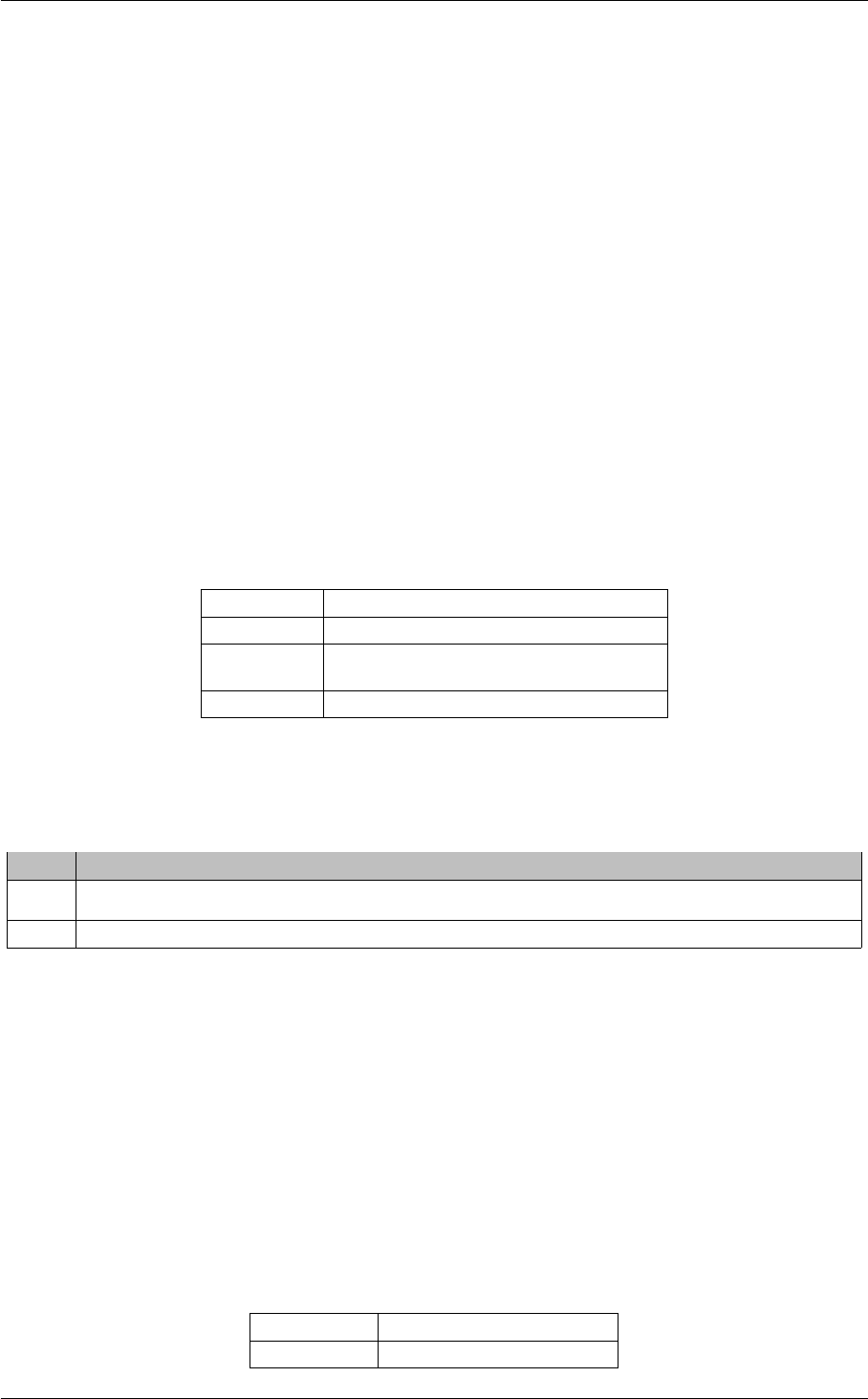
104 Resolver Operation Options
"tick", which is 100 ms. Subsequent advertisements or queries can only be issued at the next timer "tick" (every 100
ms). If you increase either option from the default to 1.25 seconds, for example and not a multiple of 100 ms, the
resolver maintains the rate you establish as an average over subsequent "ticks". That is, the second advertisement
or query goes out at the 1300 ms "tick". The resolver tracks the tardiness of this advertisement (50 ms) and adjusts
the next advertisement or query, which goes out at 2500 ms, giving an average of 1250 ms or 1.25 seconds.
12.2 Reference
12.2.1 disable_extended_topic_resolution_message_options (context)
This is a topic resolution compatibility option that, when set to 1, lets LBM 4.0 (or later) installations work with
LBM 3.5.3 / UME 2.2.4 (or earlier) installations. If you do not have early-version installations in the network,
leave this option at 0.
Scope: context
Type: int
When to
Set:
Can only be set during object initialization.
Version: This option was implemented in LBM 4.0.
Value Description
1 Enable compatibility with earlier-version installations (and disable some message structure features).
0 Normal current-version compatibility. Strongly recommended. Default for all.
12.2.2 resolution_no_source_notification_threshold (receiver)
The threshold for the number of unanswered topic resolution queries before UM delivers a LBM_MSG_NO_S←-
OURCE_NOTIFICATION for the topic. The receiver does not stop querying after the delivery of this notification.
A value of 0 indicates no notifications will be sent.
Scope: receiver
Type: lbm_ulong_t

12.2 Reference 105
Units: Number of queries
Default
value:
0 (do not notify)
When to
Set:
May be set during operation.
12.2.3 resolution_number_of_sources_query_threshold (receiver)
The threshold for the number of sources a topic must have before topic resolution queries are not sent. A value
of zero results in no topic resolution queries being generated. See also Disabling Aspects of Topic Resolution.
Scope: receiver
Type: lbm_ulong_t
Units: Number of sources
Default
value:
10000000 (10 million)
When to
Set:
May be set during operation.
12.2.4 resolver_advertisement_maximum_initial_interval (source)
The longest - and last - interval in the initial phase of topic advertisement. A value of 0 disables the initial phase
of advertisement. See also Disabling Aspects of Topic Resolution.
Scope: source
Type: lbm_ulong_t
Units: milliseconds
Default
value:
500 (0.5 seconds)
When to
Set:
Can only be set during object initialization.
Version: This option was implemented in LBM 4.0

106 Resolver Operation Options
12.2.5 resolver_advertisement_minimum_initial_duration (source)
The duration of the initial phase of topic advertisement. A value of 0 guarantees that the initial phase of
advertisement never completes.
Scope: source
Type: lbm_ulong_t
Units: milliseconds
Default
value:
5000 (5 seconds)
When to
Set:
Can only be set during object initialization.
Version: This option was implemented in LBM 4.0
12.2.6 resolver_advertisement_minimum_initial_interval (source)
Interval between the first topic advertisement sent upon creation of the source and the second advertisement
sent by the source. A value of 0 disables the initial phase of advertisement. See also Disabling Aspects of
Topic Resolution. This option has an effective minimum of 10 ms. See Resolver Operation Options.
Scope: source
Type: lbm_ulong_t
Units: milliseconds
Default
value:
10 (0.01 seconds)
When to
Set:
Can only be set during object initialization.
Version: This option was implemented in LBM 4.0
12.2.7 resolver_advertisement_minimum_sustain_duration (source)
The duration of the sustaining phase of topic advertisement. A value of 0 guarantees that the sustaining phase
of advertising never completes.
Scope: source
Type: lbm_ulong_t
Units: seconds
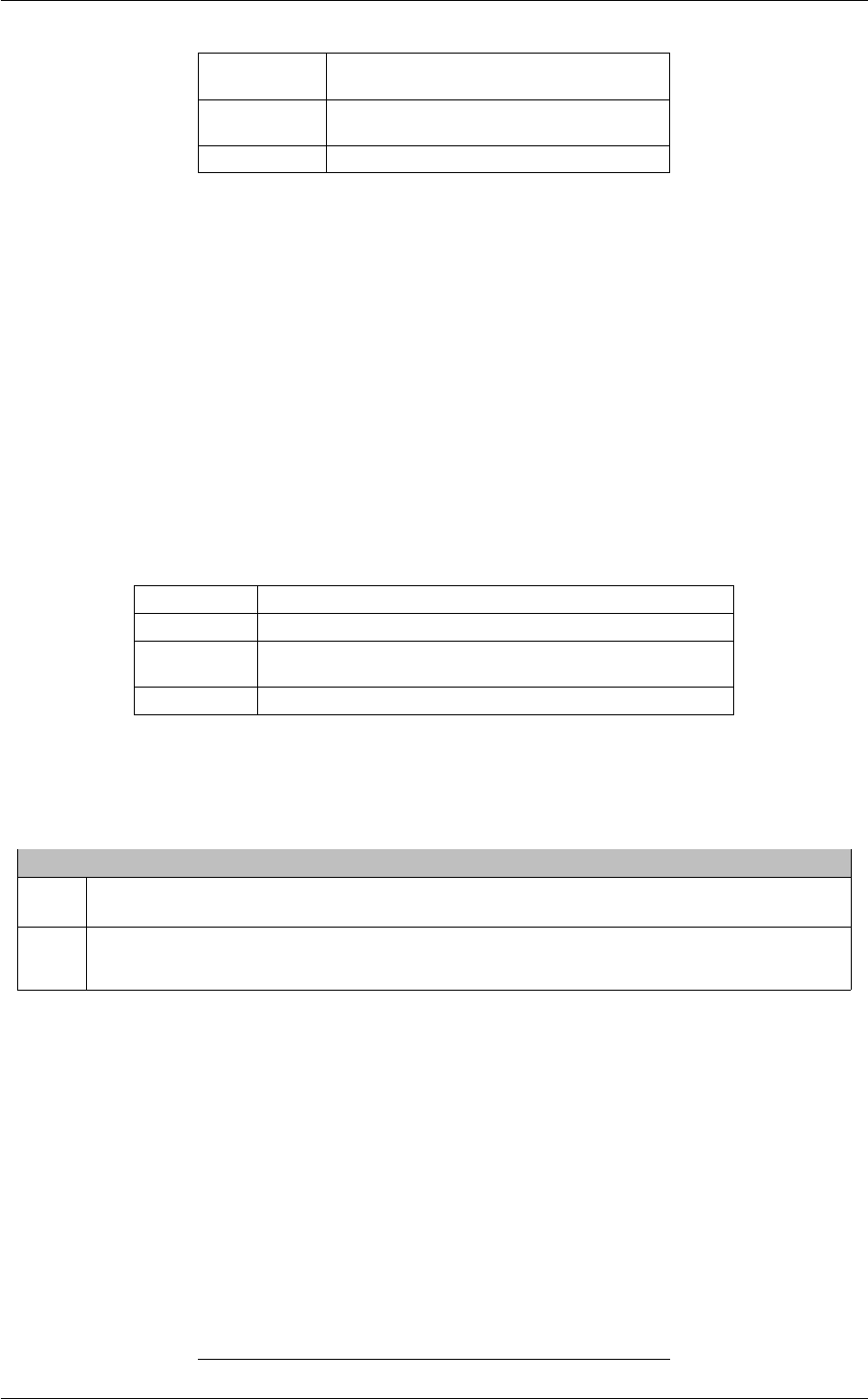
12.2 Reference 107
Default
value:
60 (1 minute)
When to
Set:
Can only be set during object initialization.
Version: This option was implemented in LBM 4.0
12.2.8 resolver_advertisement_send_immediate_response (source)
Allows you to disable the normal immediate response to queries and wildcard queries. Sources normally send
topic advertisements (TIR) immediately in response to topic queries (TQR) for a local topic or wildcard queries
(WC-TQR) with a pattern that matches a local topic. If you configure sources to delay sending advertisements,
UM delays advertisements by the limits defined by the advertisement rate limiter options, resolver_∗_bps
and resolver_∗_per_second.
Scope: source
Type: lbm_uint_t
When to
Set:
Can only be set during object initialization.
Version: This option was implemented in LBM 4.2/UME 3.2/UMQ 2.1
Value Description
1 Sources immediately send advertisements (TIR) in response to topic queries (TQR) or wildcard
queries (WC-TQR). Default for all.
0 Sources delay sending advertisements (TIR) in response to topic queries (TQR) or wildcard queries
(WC-TQR).
12.2.9 resolver_advertisement_sustain_interval (source)
Interval between sending topic advertisements in the sustaining phase of topic advertisement. A value of 0
disables the sustaining phase of advertisement. See also Disabling Aspects of Topic Resolution. This option
has an effective minimum of 100 ms. See Resolver Operation Options.

108 Resolver Operation Options
Scope: source
Type: lbm_ulong_t
Units: milliseconds
Default
value:
1000 (1 second)
When to
Set:
Can only be set during object initialization.
Version: This option was implemented in LBM 4.0
12.2.10 resolver_cache (context)
Whether or not to enable the resolver cache to hold topic resolution information. Disabling the resolver cache
uses less memory. Note that if you disable the resolver cache, source notification occurs for only topics with
UM receivers already created.
To use wildcard receivers, you must enable the resolver cache.
Scope: context
Type: int
When to
Set:
Can only be set during object initialization.
Value Description
1 Topic resolution information will be cached. Default for all.
0 Do not cache topic resolution information.
12.2.11 resolver_context_name_activity_timeout (context)
Period of inactivity before a context name is declared unresolved.
The minimum amount of time without any context name resolution traffic that must pass before UM declares a
resolved context name unresolved. Context name resolution traffic is defined as the reception of context name

12.2 Reference 109
advertisements and/or unicast control traffic from the resolved context.
Scope: context
Type: lbm_uint64_t
Units: milliseconds
Default
value:
60000 (60 seconds)
When to
Set:
Can only be set during object initialization.
Version: This option was implemented in UM 6.0
12.2.12 resolver_context_name_query_duration (context)
Maximum period of time UM sends context name queries.
The maximum duration for which UM sends context name queries for a given context name. UM sends queries
until the context name resolves. A value of 0 means queries have no time limit and UM continues to query until
the context name resolves.
Scope: context
Type: lbm_uint64_t
Units: milliseconds
Default
value:
0 (query for as long as unresolved)
When to
Set:
Can only be set during object initialization.
Version: This option was implemented in UM 6.0
12.2.13 resolver_context_name_query_maximum_interval (context)
The longest interval between sending context name queries. A value of 0 disables context name queries. See
also Disabling Aspects of Topic Resolution. This option has an effective minimum of 100 ms. See Resolver
Operation Options.
Scope: context
Type: lbm_ulong_t
Units: milliseconds

110 Resolver Operation Options
Default
value:
1000 (1 second)
When to
Set:
Can only be set during object initialization.
Version: This option was implemented in UM 6.0
12.2.14 resolver_context_name_query_minimum_interval (context)
Interval between the first context name query sent upon creation of the UMP source using named stores and
the second query sent. A value of 0 disables context name queries. See also Disabling Aspects of Topic
Resolution. This option has an effective minimum of 100 ms. See Resolver Operation Options.
Scope: context
Type: lbm_ulong_t
Units: milliseconds
Default
value:
100 (0.1 seconds)
When to
Set:
Can only be set during object initialization.
Version: This option was implemented in UM 6.0
12.2.15 resolver_datagram_max_size (context)
The maximum UDP datagram payload size that can be generated for topic resolution advertisements and
queries. Note that this does not include UDP, IP, or packet overhead added by the network stack. The default
value is 8192, the minimum is 500 bytes, and the maximum is 65535.
See Message Fragmentation and Reassembly for more information.
Informatica does not recommend setting datagram max size options to the network MTU. See Datagram Max
Size and Network MTU.

12.2 Reference 111
Warning
When the DRO is in use, it is recommended that all UM applications and components (including the DRO and
Persistent Store) share the same maximum datagram size setting. See Protocol Conversion.

112 Resolver Operation Options
Scope: context
Type: lbm_uint_t
Units: bytes
Default
value:
8192
When to
Set:
Can only be set during object initialization.
Version: This option was implemented in LBM 3.6/UME 3.0.
12.2.16 resolver_domain_id_active_propagation_timeout (context)
Indicates how a context learns the ID of its own Topic Resolution Domain (TRD).
Scope: context
Type: int
Default
value:
0
When to
Set:
Can only be set during object initialization.
Version: This option was implemented in UM 6.7.1
String value Integer value Description
"-1" -1 Learn TRD ID from other contexts in the same TRD, without
restriction. This is the method Ultra Messaging has tradition-
ally used.
This method assigns TRD IDs quickly to avoid partial connec-
tivity. However, note that to change a TRD ID, you must recon-
figure and restart all UM Routers, if present. Then you must
delete all application contexts, and then re-create all applica-
tion contexts.
Note: With this option value, newly-created contexts can learn
from earlier versions of Ultra Messaging software.
"0" 0 Learn TRD ID only from a UM Router directly. Do not learn the
TRD ID from other contexts in the same TRD. Consider using
this option with a TRD that has many contexts and a possible
need to change a TRD ID. Default for all.

12.2 Reference 113
String value Integer value Description
"1" to "2147483647" 1 to 2,147,483,647 Learn TRD ID from other contexts in the same TRD that have
heard the domain ID advertised by a UM Router within this
timeout value in seconds. Use the following formula:
3∗{propagation-interval}/1000 + {maximum expected dura-
tion of UM Router outage}
where propagation-interval is an attribute value of the UM
Router configuration option "<route-info>" element, which de-
faults to 1000. With a timeout value set, a restarted context
does not learn obsolete TRD IDs from un-restarted contexts,
but instead, learns from UM Routers or restarted contexts. You
do not need to bring all contexts to a deleted state simultane-
ously before you re-create the first context.
Note: During this timeout period, there is a risk for temporary
incomplete connectivity in networks with no UM Routers.
12.2.17 resolver_initial_advertisement_bps (context)
Maximum advertisement rate during the initial phase of topic advertisement. A value of 0 means that initial
phase advertisements for the topic are not limited to a maximum number of bits per second. Note that the topic's
advertisements are still subject to being rate limited by resolver_initial_advertisements_per_second (context).
Refer to Rate Controls in the Ultra Messaging Concepts Guide for additional information about the UM rate
limiting algorithm.
Scope: context
Type: lbm_uint64_t
Units: bits per second
Default
value:
1000000
When to
Set:
Can only be set during object initialization.
Version: This option was implemented in LBM 4.0
12.2.18 resolver_initial_advertisements_per_second (context)
Maximum number of advertisements sent within a one second period during the initial phase of topic advertise-
ment. A value of 0 means that initial phase advertisements for the topic are not limited to a maximum number
of advertisements per second. Note that the topic's advertisements are still subject to being rate limited by
resolver_initial_advertisement_bps (context). Refer to Rate Controls in the Ultra Messaging Concepts Guide
for additional information about the UM rate limiting algorithm.

114 Resolver Operation Options
Scope: context
Type: lbm_ulong_t
Units: advertisements
Default
value:
1000
When to
Set:
Can only be set during object initialization.
Version: This option was implemented in LBM 4.0
12.2.19 resolver_initial_queries_per_second (context)
Maximum number of queries sent within a one second period during the initial phase of topic querying. A value
of 0 means that initial phase queries for the topic are not limited to a maximum number of queries per second.
Note that the topic's queries are still subject to being rate limited by resolver_initial_query_bps (context). Refer
to Rate Controls in the Ultra Messaging Concepts Guide for additional information about the UM rate limiting
algorithm.
Scope: context
Type: lbm_ulong_t
Units: advertisements
Default
value:
1000
When to
Set:
Can only be set during object initialization.
Version: This option was implemented in LBM 4.0
12.2.20 resolver_initial_query_bps (context)
Maximum query rate during the initial phase of topic querying. A value of 0 means that initial phase queries
for the topic are not limited to a maximum number of bits per second. Note that the topic's queries are still
subject to being rate limited by resolver_initial_queries_per_second (context). Refer to Rate Controls in the
Ultra Messaging Concepts Guide for additional information about the UM rate limiting algorithm.
Scope: context
Type: lbm_uint64_t
Units: bits per second
Default
value:
1000000

12.2 Reference 115
When to
Set:
Can only be set during object initialization.
Version: This option was implemented in LBM 4.0
12.2.21 resolver_query_maximum_initial_interval (receiver)
The longest - and last - interval in the initial phase of topic querying. A value of 0 disables the initial phase of
querying. See also Disabling Aspects of Topic Resolution.
Scope: receiver
Type: lbm_ulong_t
Units: milliseconds
Default
value:
200 (0.2 seconds)
When to
Set:
Can only be set during object initialization.
Version: This option was implemented in LBM 4.0
12.2.22 resolver_query_minimum_initial_duration (receiver)
The duration of the initial phase of topic querying. A value of 0 guarantees that the initial phase of querying
never completes.
Scope: receiver
Type: lbm_ulong_t
Units: milliseconds
Default
value:
5000 (5 seconds)
When to
Set:
Can only be set during object initialization.
Version: This option was implemented in LBM 4.0

116 Resolver Operation Options
12.2.23 resolver_query_minimum_initial_interval (receiver)
Interval between the first topic query sent upon creation of the receiver and the second query sent by the
receiver. A value of 0 disables the initial phase of querying. See also Disabling Aspects of Topic Resolution.
This option has an effective minimum of 20 ms. See Resolver Operation Options.
Scope: receiver
Type: lbm_ulong_t
Units: milliseconds
Default
value:
20 (0.02 seconds)
When to
Set:
Can only be set during object initialization.
Version: This option was implemented in LBM 4.0
12.2.24 resolver_query_minimum_sustain_duration (receiver)
The duration of the sustaining phase of topic querying. A value of 0 guarantees that the sustaining phase of
querying never completes.
Scope: receiver
Type: lbm_ulong_t
Units: seconds
Default
value:
60 (1 minute)
When to
Set:
Can only be set during object initialization.
Version: This option was implemented in LBM 4.0
12.2.25 resolver_query_sustain_interval (receiver)
Interval between sending topic queries in the sustaining phase of topic querying. A value of 0 disables the
sustaining phase of querying. See also Disabling Aspects of Topic Resolution. This option has an effective
minimum of 100 ms. See Resolver Operation Options.
Scope: receiver
Type: lbm_ulong_t

12.2 Reference 117
Units: milliseconds
Default
value:
1000 (1 second)
When to
Set:
Can only be set during object initialization.
Version: This option was implemented in LBM 4.0
12.2.26 resolver_receiver_map_tablesz (context)
The size of the hash table used for storing receiver topic information used for topic resolution. This value should
be a prime number.
Scope: context
Type: size_t
Units: map entries
Default
value:
131111
When to
Set:
Can only be set during object initialization.
12.2.27 resolver_send_final_advertisements (source)
Controls whether or not a source sends "final advertisements" before deletion.
A final advertisement is an announcement that the source object is being deleted. Without final advertisements,
receivers are not informed that a source has been deleted until all sources on a transport session are deleted
and the transport session is disposed. At that point, any receivers to sources on that transport session will
simultaneously be delivered an EOS event.
However, if the source has final advertisements enabled, the source will send the final advertisement and trigger
the delivery of the EOS event in a more-timely way. They also give other contexts an opportunity to purge the
source from their local topic resolution cache.
Note: the final advertisements are not necessarily sent immediately upon deletion of the source. They are
scheduled with other topic resolution traffic and obey the rate limits. As a result, if an application is in the
process of cleaning up prior to exit and it deletes the context object too soon after the deletion of its sources,
the final advertisements may not be sent at all. Typically this will simply result in a less-timely notification of
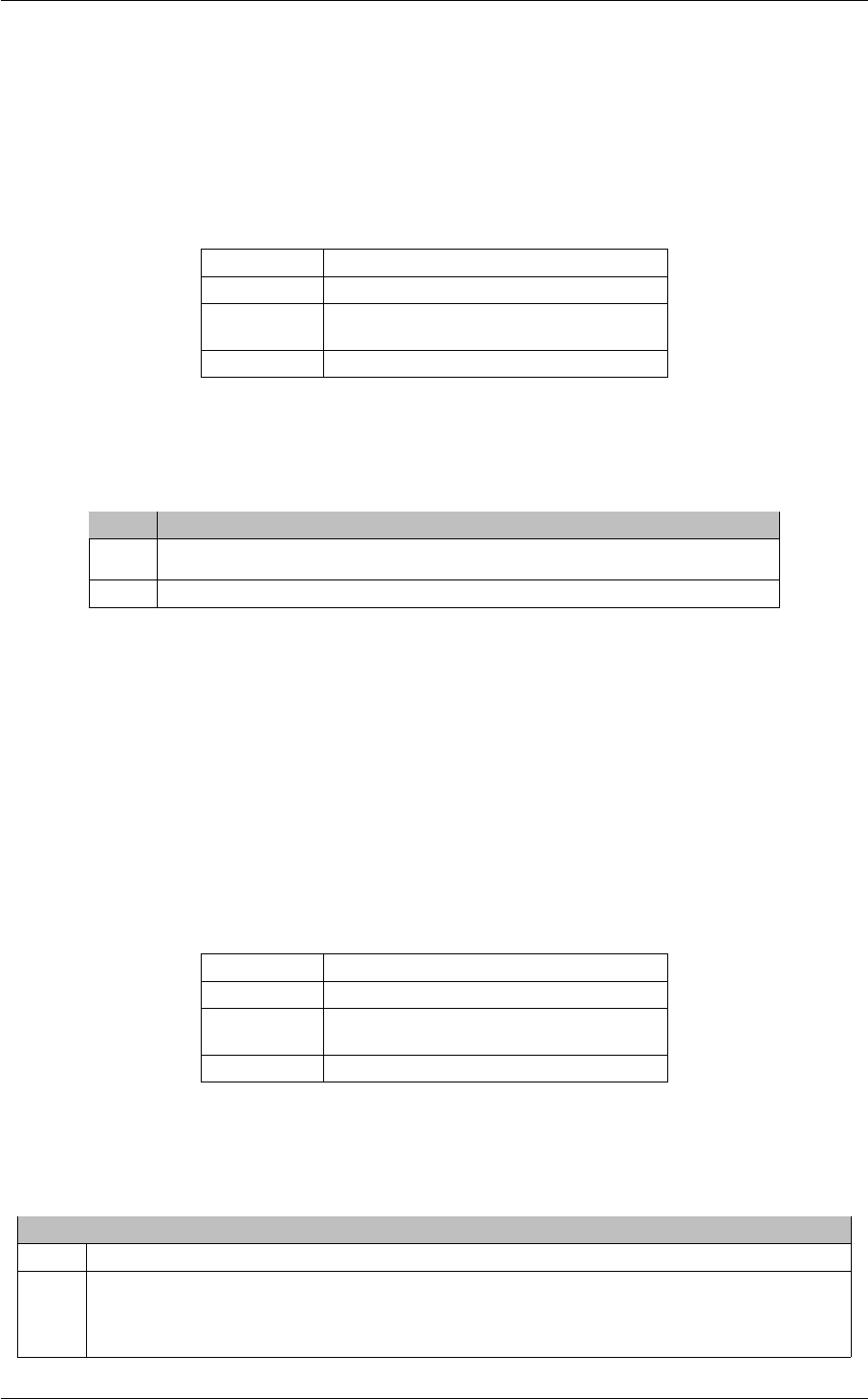
118 Resolver Operation Options
EOS as transport sessions time out, but there are some circumstances where the time required to deliver EOS
is not technically bounded. If timely delivery of EOS is important, it is recommended to add a few seconds of
delay after the sources are deleted before deleting the context.
This setting does not affect the topic resolution phases you have configured, which execute as expected. See
Disabling Aspects of Topic Resolution for information about altering topic resolution advertisement phases.
Scope: source
Type: lbm_uint_t
When to
Set:
Can only be set during object initialization.
Version: This option was implemented in LBM 6.10
Value Description
1 Source sends final advertisements before deletion.
0 Source does not send any final advertisements before deletion. Default for all.
12.2.28 resolver_send_initial_advertisement (source)
Controls whether or not a source sends an advertisement upon creation. Turning off this advertisement speeds
source creation and reduces the number of messages on your network through application initialization.
Scope: source
Type: lbm_uint_t
When to
Set:
Can only be set during object initialization.
Version: This option was implemented in LBM 4.0
Value Description
1 Source sends a topic advertisement immediately upon creation. Default for all.
0 Source does not send an advertisement upon creation. This setting does not affect the topic
resolution phases you have configured, which execute as expected. See Disabling Aspects of
Topic Resolution for information about altering topic resolution phase advertisements.

12.2 Reference 119
12.2.29 resolver_source_map_tablesz (context)
The size of the hash table used for storing source topic information used by topic resolution. This value should
be a prime number.
Scope: context
Type: size_t
Units: map entries
Default
value:
131111
When to
Set:
Can only be set during object initialization.
12.2.30 resolver_string_hash_function (context)
The hash function to use for hashing topic name strings for source and receiver topics. The application may
choose from a list of defined hash functions or it may define its own hash function, as identified by the string
value of this option. When setting a hash function, note that:
• If set through a configuration file or a call to lbm_context_attr_str_setopt(), only the string values classic,
djb2, sdbm, or murmur2 are valid. (If retrieved by a call to lbm_context_attr_str_getopt(), one of these
string values is returned.)
• If set through a call to lbm_context_attr_setopt(), you must pass a pointer to a hash function. Use this
method for hash functions other than the four pre-defined functions.
Scope: context
Type: lbm_str_hash_func_t
Default
value:
NULL
When to
Set:
Can only be set during object initialization.

120 Resolver Operation Options
String value Integer value Description
"classic" n.a. A "classic" good string hash function. Works best when topic names have
a constant prefix with a changing suffix.
"djb2" n.a. The Dan Bernstein algorithm from comp.lang.c. Works best when topic
names have a changing prefix with a constant suffix.
"sdbm" n.a. sdbm database library (used in Berkeley DB). A useful alternative to djb2.
"murmur2" n.a. Good all-around hash function by Austin Appleby. Best for medium to long
topic strings. Default for all.
12.2.31 resolver_string_hash_function_ex (context)
This option is similar to the resolver_string_hash_function (context) above, except for the following differences:
• This option can be set via only lbm_context_attr_setopt() (not from a configuration file or lbm_context←-
_attr_str_setopt()). Hence, this also means you cannot use the string options (classic, etc.).
• You can pass a string length to the hash function, allowing it to then possibly run faster by operating on
multiple-character strings at a time. Note that if -1 is passed in, you must use a strlen to calculate the
length.
• The hash function accepts a clientd pointer, which you can set as needed, and which is passed back in
each time the function is called.
This option is the better choice when setting your own custom hash function. Note that both the resolver_←-
string_hash_function and resolver_string_hash_function_ex options set the same attributes, hence, if you use
both (not recommended) one will override the other.
Scope: context
Type: lbm_str_hash_func_ex_t
Default
value:
NULL
When to
Set:
Can only be set during object initialization.
Config File: Cannot be set from an UM configuration file.

12.2 Reference 121
12.2.32 resolver_sustain_advertisement_bps (context)
Maximum advertisement rate during the sustaining phase of topic advertisement. A value of 0 means that
sustaining phase advertisements for the topic are not limited to a maximum number of bits per second. Note
that the topic's advertisements are still subject to being rate limited by resolver_sustain_advertisements_per←-
_second (context). Refer to Rate Controls in the Ultra Messaging Concepts Guide for additional information
about the UM rate limiting algorithm.
Scope: context
Type: lbm_uint64_t
Units: bits per second
Default
value:
1000000
When to
Set:
Can only be set during object initialization.
Version: This option was implemented in LBM 4.0
12.2.33 resolver_sustain_advertisements_per_second (context)
Maximum number of advertisements sent within a one second period during the sustaining phase of topic
advertisement. A value of 0 means that sustaining phase advertisements for the topic are not limited to a
maximum number of advertisements per second. Note that the topic's advertisements are still subject to being
rate limited by resolver_sustain_advertisement_bps (context). Refer to Rate Controls in the Ultra Messaging
Concepts Guide for additional information about the UM rate limiting algorithm.
Scope: context
Type: lbm_ulong_t
Units: advertisements
Default
value:
0
When to
Set:
Can only be set during object initialization.
Version: This option was implemented in LBM 4.0
12.2.34 resolver_sustain_queries_per_second (context)
Maximum number of queries sent within a one second period during the sustaining phase of topic querying. A
value of 0 means that sustaining phase queries for the topic are not limited to a maximum number of queries

122 Resolver Operation Options
per second. Note that the topic's queries are still subject to being rate limited by resolver_sustain_query_bps
(context). Refer to Rate Controls in the Ultra Messaging Concepts Guide for additional information about the
UM rate limiting algorithm.
Scope: context
Type: lbm_ulong_t
Units: advertisements
Default
value:
0
When to
Set:
Can only be set during object initialization.
Version: This option was implemented in LBM 4.0
12.2.35 resolver_sustain_query_bps (context)
Maximum query rate during the sustaining phase of topic querying. A value of 0 means that sustaining phase
queries for the topic are not limited to a maximum number of bits per second. Note that the topic's queries are
still subject to being rate limited by resolver_sustain_queries_per_second (context). Refer to Rate Controls in
the Ultra Messaging Concepts Guide for additional information about the UM rate limiting algorithm.
Scope: context
Type: lbm_uint64_t
Units: bits per second
Default
value:
1000000
When to
Set:
Can only be set during object initialization.
Version: This option was implemented in LBM 4.0
12.2.36 resolver_unicast_activity_timeout (context)
Indicates the maximum time between messages from a unicast resolver daemon before UM declares it inactive
and stops sending normal topic resolution traffic via that daemon. UM will still send keepalives to the daemon.
A value of 0 will force all resolver daemons to be treated as permanently active.
Scope: context
Type: lbm_ulong_t

12.2 Reference 123
Units: milliseconds
Default
value:
1000
When to
Set:
Can only be set during object initialization.
Version: This option was implemented in UMS 5.0
12.2.37 resolver_unicast_change_interval (context)
Indicates how often UM will change to the next available resolver daemon specified using the. resolver←-
_unicast_daemon configuration option. The actual value used is random, and is selected from the range
(1/2∗change_interval, 3/2∗change_interval). If all resolver daemons have been marked inactive, UM enters a
quick-change mode where it uses a random value from the range (1/4∗change_interval, 3/4∗change_interval)
in order to more quickly locate an active daemon.
Scope: context
Type: lbm_ulong_t
Units: milliseconds
Default
value:
200
When to
Set:
Can only be set during object initialization.
Version: This option was implemented in UMS 5.0
12.2.38 resolver_unicast_check_interval (context)
Indicates how often a UM checks for resolver activity in order to determine liveness. A value of 0 will disable
activity checks. This setting only applies to the unicast resolver.
Scope: context
Type: lbm_ulong_t
Units: milliseconds
Default
value:
200
When to
Set:
Can only be set during object initialization.
Version: This option was implemented in UMS 5.0

124 Resolver Operation Options
12.2.39 resolver_unicast_force_alive (context)
Indicates whether sources or receivers in this context should send keepalive messages to a configured Unicast
Topic Resolver so they can receive topic resolution traffic.
Scope: context
Type: lbm_uint16_t
When to
Set:
Can only be set during object initialization.
Value Description
1 Contexts send keepalive messages to the Unicast Resolver at the resolver_unicast_keepalive_←-
interval (context) regardless of whether the context has any sources or receivers that require topic
resolution.
0 Contexts do not send keepalive messages to the Unicast Resolver until sources or receivers have
been created. Then Contexts send keepalives at the resolver_unicast_keepalive_interval (context).
Default for all.
12.2.40 resolver_unicast_ignore_unknown_source (context)
Indicates whether contexts using unicast topic resolution accept topic resolution udp datagrams that originate
from any lbmrd or only the specific lbmrd configured for use.
Note: Do not modify this setting without guidance from Informatica.
Scope: context
Type: int
When to
Set:
Can only be set during object initialization.
Version: This option was implemented in UM 6.7.1

12.2 Reference 125
String value Integer value Description
"0" 0 A context using unicast topic resolution accepts traffic from lbmrd resolver
daemons not configured for use by the context.
"1" 1 Contexts using unicast topic resolution accept topic resolution udp data-
grams that originate from only the specific lbmrd configured for use. The
context discards topic resolution datagrams from unrecognized origins and
logs a message. This prevents applications at the same IP address, but
in different topic resolution domains that might share resolver unicast port
ranges, from processing unintended topic resolution traffic while lbmrd re-
solver daemons time out stale client entries. Default for all.
12.2.41 resolver_unicast_keepalive_interval (context)
Indicates how often keepalive messages should be sent to a resolver daemon. Keepalives are only sent if no
other traffic has been sent since the last keepalive interval expired.
Scope: context
Type: lbm_ulong_t
Units: milliseconds
Default
value:
500
When to
Set:
Can only be set during object initialization.
Version: This option was implemented in UMS 5.0

126 Resolver Operation Options
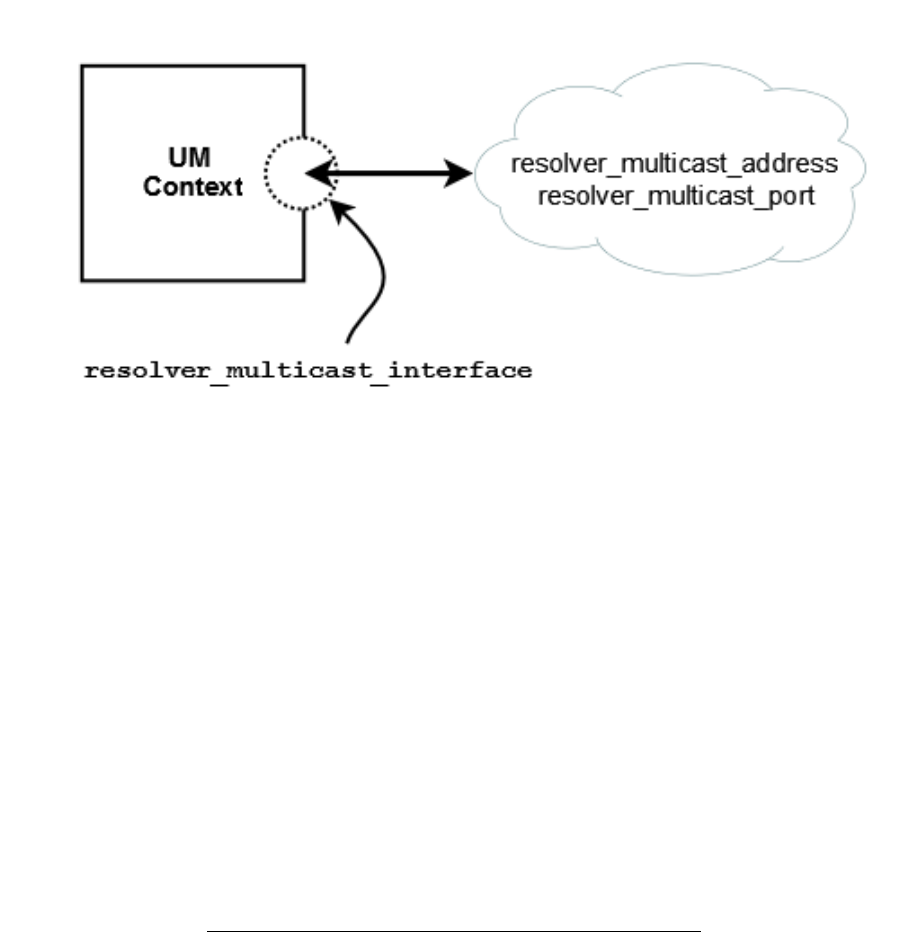
Chapter 13
Multicast Resolver Network Options
The image below shows a simplified relationship between the primary multicast resolver network options.
See also Topic Resolution in the Ultra Messaging Concepts Guide for more information.
13.1 Reference
13.1.1 resolver_multicast_address (context)
Multicast address (or domain name of the multicast address) used for Topic Resolution. This option automat-
ically sets the values for resolver_multicast_incoming_address (context) and resolver_multicast_outgoing_←-
address (context) as evidenced by the default values for all three options, which are the same.

128 Multicast Resolver Network Options
Scope: context
Type: struct in_addr
Default
value:
224.9.10.11
When to
Set:
Can only be set during object initialization.
13.1.2 resolver_multicast_incoming_address (context)
Incoming multicast address (or domain name of the multicast address) used for finer control of Topic Resolution.
This value may be set to 0.0.0.0 (INADDR_ANY), to switch off listening to topic resolution messages. This
means that queries from receivers or advertisements from sources will not be handled.
See also resolver_multicast_outgoing_address (context).
Scope: context
Type: struct in_addr
Default
value:
224.9.10.11
When to
Set:
Can only be set during object initialization.
13.1.3 resolver_multicast_incoming_port (context)
Incoming multicast port used for finer control of Topic Resolution.
See also resolver_multicast_outgoing_port (context).
See Port Assignments for more information about configuring ports.
Scope: context
Type: lbm_uint16_t
Default
value:
12965
Byte order: Network
When to
Set:
Can only be set during object initialization.

13.1 Reference 129
13.1.4 resolver_multicast_interface (context)
Specifies which network interface UM sends/receives all multicast traffic (Topic Resolution, LBT-RM, Multicast
Immediate Messaging). Can specify full IP address of interface, or just network part (see Specifying Interfaces
for details). Default is set to default_interface (context) if specified. Otherwise, it is set to the default multicast
interface as determined by UM (the first multicast-capable, non-loopback interface).
Scope: context
Type: lbm_ipv4_address_mask_t
Default
value:
0.0.0.0
When to
Set:
Can only be set during object initialization.
13.1.5 resolver_multicast_outgoing_address (context)
Outgoing multicast address (or domain name of the multicast address) used for finer control of Topic Resolution.
See also resolver_multicast_incoming_address (context).
Scope: context
Type: struct in_addr
Default
value:
224.9.10.11
When to
Set:
Can only be set during object initialization.
13.1.6 resolver_multicast_outgoing_port (context)
Outgoing multicast port used for finer control of Topic Resolution.

130 Multicast Resolver Network Options
See also resolver_multicast_incoming_port (context).
See Port Assignments for more information about configuring ports.
Scope: context
Type: lbm_uint16_t
Default
value:
12965
Byte order: Network
When to
Set:
Can only be set during object initialization.
13.1.7 resolver_multicast_port (context)
Multicast port used for Topic Resolution. This option automatically sets the values for resolver_multicast_←-
incoming_port (context) and resolver_multicast_outgoing_port (context) as evidenced by the default values for
all three options, which are the same.
See Port Assignments for more information about configuring ports.
Scope: context
Type: lbm_uint16_t
Default
value:
12965
Byte order: Network
When to
Set:
Can only be set during object initialization.
13.1.8 resolver_multicast_receiver_socket_buffer (context)
Value used to set SO_RCVBUF value of the resolver receivers. In some cases the OS will not allow all of this
value to be used. A value of 0 instructs UM to use the default OS values. See the section on Socket Buffer
Sizes for platform-dependent information. See also our white paper Topics in High Performance Messaging for
background and guidelines on UDP buffer sizing.

13.1 Reference 131
Scope: context
Type: lbm_ulong_t
Units: bytes
Default
value:
8388608 (8MB)
When to
Set:
Can only be set during object initialization.
13.1.9 resolver_multicast_ttl (context)
The IP TTL (hop count) to use for a Topic Resolution packet. A value of 1 confines the packet to the local
network (but may also cause high CPU usage on some routers). Also controls TTL on LBT-RM packets.
Scope: context
Type: lbm_uint8_t
Default
value:
16
When to
Set:
Can only be set during object initialization.

132 Multicast Resolver Network Options
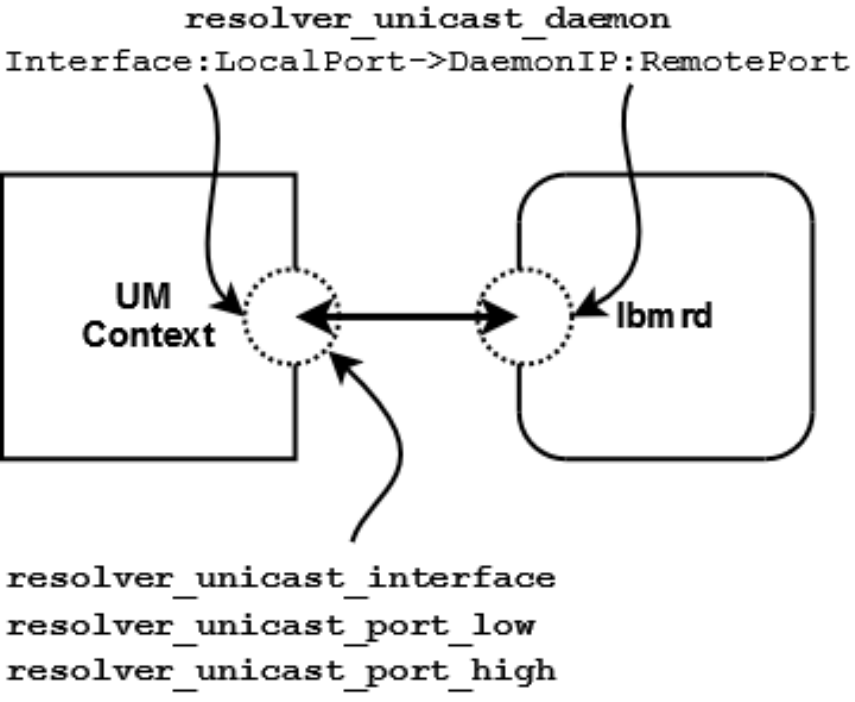
Chapter 14
Unicast Resolver Network Options
The image below shows a simplified relationship between the primary unicast resolver network options.
If using multiple lbmrd instances with a single context, you can configure resolver_unicast_interface and
resolver_unicast_port_low/high and omit the Interface:LocalPort section of resolver_unicast_daemon.
See also Unicast Topic Resolution in the Ultra Messaging Concepts Guide for more information.

134 Unicast Resolver Network Options
14.1 Reference
14.1.1 resolver_unicast_daemon (context)
Add a list of one or more unicast resolver daemon specifications to the list of unicast resolver daemons. Unlike
most other UM settings, every time this setting is called, it adds another daemon specification to the list and
does NOT overwrite previous specifications. The value is formatted as comma or semicolon separated entries,
where each entry contains the interface, source port, resolver IP, and destination port for a single daemon.
When the binary form of option setting is used, UM expects an array of structures. See Setting an Option from
Arrays of Binary Values.
For the configuration file as well as string versions of setting this option, the string value is formatted as follows:
[Iface[:Src_Port]->]IP:Dest_Port[,...]
Iface is the interface to use (previously set via resolver_unicast_interface (context)).
Src_Port is the source port to use (previously resolver_unicast_port (context)).
IP is the resolver daemon's IP address (previously resolver_unicast_address (context)).
Dest_Port is the resolver daemon's UDP port (previously resolver_unicast_destination_port (context)).
You can omit either the Src_Port or both the Iface and Src_Port, in which case the default resolver_unicast←-
_interface (context) and resolver_unicast_port (context) settings are used. Because each entry adds a new
daemon specification and does not overwrite previous values, an entry or string with the IP address of 0.0.0.0
and port of 0 removes all previous daemon specifications. At least one daemon specification means the context
does not use multicast topic resolution.
Possible formats of each entry are as follows:
Interface:LocalPort->DaemonIP:RemotePort
Interface->DaemonIP:RemotePort
DaemonIP:RemotePort
You can specify Interface in any of the ways described in Specifying Interfaces.

14.1 Reference 135
Scope: context
Type: lbm_ucast_resolver_entry_t
When to
Set:
Can only be set during object initialization.
Version: This option was implemented in UMS 5.0
14.1.2 resolver_unicast_interface (context)
Specifies the network interface over which UM receives unicast Topic Resolution messages. Can specify full
IP address of interface, or just network part (see Specifying Interfaces for details). Default is set to default_←-
interface (context), if specified. Otherwise, it is set to INADDR_ANY, meaning that it will accept unicast Topic
Resolution messages on any interface.
Scope: context
Type: lbm_ipv4_address_mask_t
Default
value:
0.0.0.0 (INADDR_ANY)
When to
Set:
Can only be set during object initialization.
14.1.3 resolver_unicast_port_high (context)
The highest local UDP port in a range of ports used for unicast topic resolution messages. The UM resolution
daemon (lbmrd) sends unicast topic resolution messages to the UDP port range defined by this option and
resolver_unicast_port_low (context).
See Port Assignments for more information about configuring ports.
Scope: context
Type: lbm_uint16_t
Default
value:
14406
Byte order: Host
When to
Set:
Can only be set during object initialization.

136 Unicast Resolver Network Options
14.1.4 resolver_unicast_port_low (context)
The lowest local UDP port in a range of ports used for unicast topic resolution messages. The UM resolution
daemon (lbmrd) sends unicast topic resolution messages to the UDP port range defined by this option and
resolver_unicast_port_high (context).
See Port Assignments for more information about configuring ports.
Scope: context
Type: lbm_uint16_t
Default
value:
14402
Byte order: Host
When to
Set:
Can only be set during object initialization.
14.1.5 resolver_unicast_receiver_socket_buffer (context)
Value used to set SO_RCVBUF value of the UDP receivers for unicast topic resolution messages. In some
cases the OS will not allow all of this value to be used. A value of 0 instructs UM to use the default OS values.
See the section on Socket Buffer Sizes for platform-dependent information.
Scope: context
Type: lbm_ulong_t
Units: bytes
Default
value:
8388608 (8MB)
When to
Set:
Can only be set during object initialization.
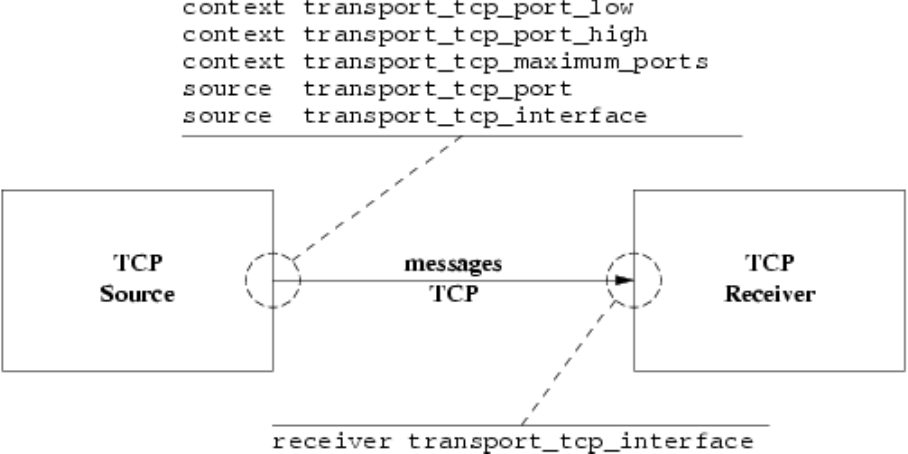
Chapter 15
Transport TCP Network Options
15.1 TCP Transport Session Management
The image below shows a simplified relationship between the primary TCP transport network options.
When a source is created, the application can explicitly map it to a transport session by setting the transport_tcp←-
_port (source) option. If a previous source was created on the same context with the same port number, this new
source will be mapped to the same transport session. However, two different contexts on the same host may not
share the same port number. If a source is created with a port number that is already in use, UM will return an error.
Alternatively, if the application does not explicitly specify a source port, UM will implicitly assign the new source to
a pool of transport sessions defined when the context was created. The pool is defined as a range of port numbers
specified by the options transport_tcp_port_low (context) and transport_tcp_port_high (context). In addition, the
option transport_tcp_maximum_ports (context) defines the number of transport sessions in the pool.
When a new source is created and the source port is not explicitly defined, UM will check to see how many transport
sessions are currently active from the pool within the context. If it is less than transport_tcp_maximum_ports
(context) then UM will attempt to use the next port in the range transport_tcp_port_low (context) to transport_←-
tcp_port_high (context). If that port is already in use, UM continues along the range until it finds an unused port,

138 Transport TCP Network Options
then it uses that port to create the transport session. However, if the context already has activated all transport
sessions in the pool, then the new topic is mapped to one of the existing transport sessions, in round-robin fashion.
Notice that the default range of ports, 14371 to 14390, is 30 ports. But the default number of transport sessions
in the pool is 10. This allows three contexts to be created on the same host and use the same configuration. If
more than 3 contexts are intended to co-exist on the same host, the port range and number of transport session per
context must be managed to give a unique port number to every transport session.
The option transport_tcp_interface (source) may be used on TCP sources to choose particular interface, overriding
the default INADDR_ANY which accepts connections on all interfaces. Similarly, transport_tcp_interface (receiver)
may be used on receivers to choose a particular interface.
15.2 Reference
15.2.1 transport_tcp_interface (receiver)
Specifies the network interface to which UM receivers bind before connecting to sources. You can specify the
full IP address of interface, or just the network part (see Specifying Interfaces for details). Default is set to
default_interface (context), if specified.
Scope: receiver
Type: lbm_ipv4_address_mask_t
Default
value:
0.0.0.0 (INADDR_ANY)
When to
Set:
Can only be set during object initialization.
15.2.2 transport_tcp_interface (source)
Specifies the network interface over which UM accepts connection requests (from topic receivers). You can
specify the full IP address of interface, or just the network part (see Specifying Interfaces for details). Be aware
that this option is applied to the transport session when the first topic is created on that session. Thus, setting a
different interface for a subsequent topic that maps onto the same transport session will have no effect. Default
is set to default_interface (context) if specified. Otherwise, it is set to INADDR_ANY, meaning that it will not
bind to a specific interface. You can also modify the default by setting the option to 0.0.0.0/0 which produces
the same result.
Scope: source
Type: lbm_ipv4_address_mask_t

15.2 Reference 139
Default
value:
0.0.0.0 (INADDR_ANY)
When to
Set:
Can only be set during object initialization.
15.2.3 transport_tcp_maximum_ports (context)
Maximum number of TCP sessions to allocate.
See Port Assignments for more information about configuring ports.
Scope: context
Type: lbm_uint16_t
Units: number of ports
Default
value:
10
When to
Set:
Can only be set during object initialization.
15.2.4 transport_tcp_port (source)
The preferred TCP port number for this Topic. If 0, the context will attempt to find one in the given TCP port
range.
See Port Assignments for more information about configuring ports.
Scope: source
Type: lbm_uint16_t
Default
value:
0 (pick open port)
Byte order: Network
When to
Set:
Can only be set during object initialization.

140 Transport TCP Network Options
15.2.5 transport_tcp_port_high (context)
High port number to assign to TCP sessions.
See Port Assignments for more information about configuring ports.
Scope: context
Type: lbm_uint16_t
Default
value:
14390
Byte order: Host
When to
Set:
Can only be set during object initialization.
15.2.6 transport_tcp_port_low (context)
Low port number to assign to TCP sessions.
See Port Assignments for more information about configuring ports.
Scope: context
Type: lbm_uint16_t
Default
value:
14371
Byte order: Host
When to
Set:
Can only be set during object initialization.

Chapter 16
Transport TCP Operation Options
16.1 Reference
16.1.1 transport_session_maximum_buffer (source)
Value used to control the maximum amount of data buffered in UM for the transport session used for the topic.
For the normal multiple receiver behavior, this value represents the total buffered by all TCP receivers. For the
bounded_latency and source_paced multiple receiver behavior, this value represents the individual receiver
buffered amount. This option affects the transport session underlying the source rather than the source itself.
The transport session uses the value from the first source created on the session and ignores subsequent
sources. Refer to Source Object in the Ultra Messaging Concepts Guide for additional information.
Scope: source
Type: lbm_ulong_t
Units: bytes
Default
value:
65536
When to
Set:
Can only be set during object initialization.
16.1.2 transport_tcp_activity_method (receiver)
For TCP sessions only. The type of timeout method to use for TCP receivers.

142 Transport TCP Operation Options
Scope: receiver
Type: int
When to
Set:
Can only be set during object initialization.
Version: This option was implemented in LBM 3.3.8/UME 2.0.6.
String value Integer value Description
"timer" LBM_RCV_TOPIC_ATTR_TCP_ACTI←-
VITY_TIMEOUT_TIMER
Timer method that requires new TCP
session data to be sent to determine if the
connection is alive. Default for all.
"SO_KEEPALIVE" LBM_RCV_TOPIC_ATTR_TCP_ACTI←-
VITY_TIMEOUT_SO_KEEPALIVE
Set SO_KEEPALIVE on the TCP con-
nection which uses the TCP keepalive
support in the operating system to de-
termine if the connection is alive. When
you use the SO_KEEPALIVE method,
UM uses transport_tcp_activity_timeout
value to set the idle and probe times for
SO_KEEPALIVE. The idle time is 90% of
the timeout value at most. The probe time
is 10% with 10 seconds as the minimum.
16.1.3 transport_tcp_activity_timeout (receiver)
For TCP sessions only. The maximum time that a TCP session may be quiescent before it is deleted and an
EOS event is delivered for all topics using this transport session. A value greater than zero turns the timer on.
Scope: receiver
Type: lbm_ulong_t
Units: milliseconds
Default
value:
0
When to
Set:
Can only be set during object initialization.

16.1 Reference 143
16.1.4 transport_tcp_activity_timeout (source)
For TCP sessions only. This timeout option enables using SO_KEEPALIVE to detect when a receiver does
not cleanly disconnect or is no longer reachable from the source. When the timeout expires, a DISCO←-
NNECT source event is delivered. This option affects only Linux or Windows platforms. Outstanding TCP
retransmit timers must expire before this timer starts. With a default Linux or Windows system configuration,
TCP retransmit timers may take minutes or even hours to expire. Therefore the total time taken to detect an
unreachable receiver may be significantly higher than the value configured for this timeout. A value of zero (0)
defers TCP timeout to OS settings.
Scope: source
Type: lbm_ulong_t
Units: milliseconds
Default
value:
0
When to
Set:
Can only be set during object initialization.
16.1.5 transport_tcp_coalesce_threshold (source)
UM passes implicitly batched messages to the Operating System sendmsg() as a set unless the size of the set
exceeds the coalescing threshold at which point the messages are coalesced and passed to the O/S as one
copy. This option accommodates the different number of iovecs supported by different O/Ss. Tuning this option
balances the efficiency of less iovecs handled by the OS vs. the expense of an additional copy operation of the
messages before sending. The default values are also the maximum allowable values.
Scope: source
Type: int
Units: number of individual messages
Default
value:
1024 for Linux, Microsoft Windows, Darwin; 16 for Solaris, AIX, HPUX
When to
Set:
Can only be set during object initialization.
Version: This option was implemented in LBM 3.6/UME 2.3.
16.1.6 transport_tcp_datagram_max_size (context)
The maximum datagram size that can be generated for a TCP transport session. While TCP does not use
UDP datagrams, this option limits the size of the UM message which is given to the underlying transport type,

144 Transport TCP Operation Options
including all UM headers and overhead. It does not include TCP, IP, or packet overhead added by the network
stack. The default value is 65535, the minimum is 500 bytes, and the maximum is 65535.
See Message Fragmentation and Reassembly for more information.
Informatica does not recommend setting datagram max size options to the network MTU. See Datagram Max
Size and Network MTU.
Warning
When the DRO is in use, it is recommended that all UM applications and components (including the DRO and
Persistent Store) share the same maximum datagram size setting. See Protocol Conversion.
Scope: context
Type: lbm_uint_t
Units: bytes
Default
value:
65535
When to
Set:
Can only be set during object initialization.
Version: This option was implemented in LBM 4.1/UME 3.1/UMQ 1.1
16.1.7 transport_tcp_exclusiveaddr (source)
Applicable only to Windows. Indicate whether the TCP session should set SO_EXCLUSIVEADDRUSE or not
before it binds. The default setting in Windows allows multiple binds to the same port. By default, UM will set
SO_EXCLUSIVEADDRUSE to minimize port sharing. Refer to Microsoft's web site for more information on
SO_EXCLUSIVEADDRUSE.
Scope: source
Type: int
When to
Set:
Can only be set during object initialization.
Value Description
1 Set SO_EXCLUSIVEADDRUSE. Default for Windows.
16.1 Reference 145
Value Description
0 Do not set SO_EXCLUSIVEADDRUSE.
16.1.8 transport_tcp_listen_backlog (source)
The backlog used in the TCP listen() call to set the queue length for incoming connections.
Scope: source
Type: int
Units: number of queued connections
Default
value:
5
When to
Set:
Can only be set during object initialization.
16.1.9 transport_tcp_multiple_receiver_behavior (source)
This option determines the flow control behavior of a TCP source that is sending to multiple receivers. In partic-
ular, it addresses the scenario where some receivers are consuming messages slower than other receivers (or
not at all). In this scenario, pending messages will be buffered by the source up to the configured limit specified
by the transport_session_maximum_buffer (source) option. Once that limit is reached, the source can either
wait for slow receivers (resulting in a blocked source) or discard messages from the buffer (resulting in gaps
and potentially unrecoverable loss of messages for slow receivers). This option affects the transport session
underlying the source rather than the source itself. The transport session uses the value from the first source
created on the session and ignores the value set for subsequent sources. Refer to Source Object in the Ultra
Messaging Concepts Guide for additional information.
Scope: source
Type: int
When to
Set:
Can only be set during object initialization.

146 Transport TCP Operation Options
String value Integer value Description
"normal" LBM_SRC_TOPIC_ATTR_TCP_MUL←-
TI_RECV_NORMAL
The application will wait for the slow-
est receiver rather than discarding recent
messages. This slows down all sources
on the TCP session. Default for all.
"source_paced" LBM_SRC_TOPIC_ATTR_TCP_MUL←-
TI_RECV_SOURCE_PACED
The application sends as fast as it can
even if recent messages headed for any
or all receivers must be discarded. Note
that for applications requiring source-
paced behavior, LBT-RU and LBT-RM are
more efficient than source-paced TCP,
so this setting is primarily for scenarios
where UDP-based protocols are not vi-
able.
"bounded_latency" LBM_SRC_TOPIC_ATTR_TCP_MUL←-
TI_RECV_BOUNDED_LATENCY
The application sends as fast as the
fastest receiver can consume data even
if recent data headed for slower receivers
must be discarded. Deprecated since
UM 6.9.
16.1.10 transport_tcp_multiple_receiver_send_order (source)
In the case of multiple receivers, this option determines whether datagrams are sent to each receiver in the
established order of receivers, or if receivers are selected in random order for each datagram transmission.
Scope: source
Type: lbm_src_topic_attr_t
When to
Set:
Can only be set during object initialization.
String value Integer value Description
"serial" LBM_SRC_TOPIC_ATTR_TCP_MULTI_←-
RECV_SEND_ORDER_SERIAL
Select receivers to receive a datagram
based on current established order. Default
for all.
"random" LBM_SRC_TOPIC_ATTR_TCP_MULTI_←-
RECV_SEND_ORDER_RANDOM
For each datagram sent, select receivers
in random order, for the sake of "fairness".
Note that this option adds a small amount of
CPU overhead.

16.1 Reference 147
16.1.11 transport_tcp_nodelay (source)
Whether the TCP sockets used for the transport session should set TCP_NODELAY or not. (Setting TCP_N←-
ODELAY disables Nagle's algorithm.)
Scope: source
Type: int
When to
Set:
Can only be set during object initialization.
Value Description
1 TCP transport sockets should set TCP_NODELAY (disable Nagle). Default for all.
0 TCP transport sockets should not set TCP_NODELAY (leave Nagle enabled).
16.1.12 transport_tcp_receiver_socket_buffer (context)
Value used to set SO_RCVBUF value of the TCP receivers for topics. In some cases the OS will not allow all of
this value to be used. A value of 0 instructs UM to use the default OS values. See the section on Socket Buffer
Sizes for platform-dependent information.
Scope: context
Type: lbm_ulong_t
Units: bytes
Default
value:
0 (use TCP autotuning)
When to
Set:
Can only be set during object initialization.

148 Transport TCP Operation Options
16.1.13 transport_tcp_reuseaddr (source)
Whether the TCP session should set SO_REUSEADDR or not before it binds.
Warning
This option is not recommended for Microsoft Windows users because the SO_REUSEADDR socket option in
Windows allows a socket to forcibly bind to a port in use by another socket. Multiple sockets using the same
port results in indeterminate behavior.
Scope: source
Type: int
When to
Set:
Can only be set during object initialization.
Value Description
1 Set SO_REUSEADDR.
0 Do not set SO_REUSEADDR. Default for all.
16.1.14 transport_tcp_sender_socket_buffer (source)
Value used to set the SO_SNDBUF value of the TCP session. In some cases the OS will not allow all of this
value to be used. A value of 0 instructs UM to use the OS defaults. See the section on Socket Buffer Sizes for
platform-dependent information.
Scope: source
Type: lbm_ulong_t
Units: bytes
Default
value:
0 (use TCP autotuning)
When to
Set:
Can only be set during object initialization.
16.1 Reference 149
16.1.15 transport_tcp_use_session_id (source)
Control whether a session ID is used for TCP Transport sessions. This option should be set to 0 if a version 6.0
(and beyond) TCP source must interoperate with a version pre-6.0 receiver.
Scope: source
Type: int
When to
Set:
Can only be set during object initialization.
Version: This option was implemented in UM 6.0
Value Description
1 Indicates the application desires TCP to use a session ID. Default for all.
0 Indicates the application does not desire TCP to use a session ID. For use when version pre-6.0
receivers must be used with TCP sources that are version 6.0 and beyond.

150 Transport TCP Operation Options
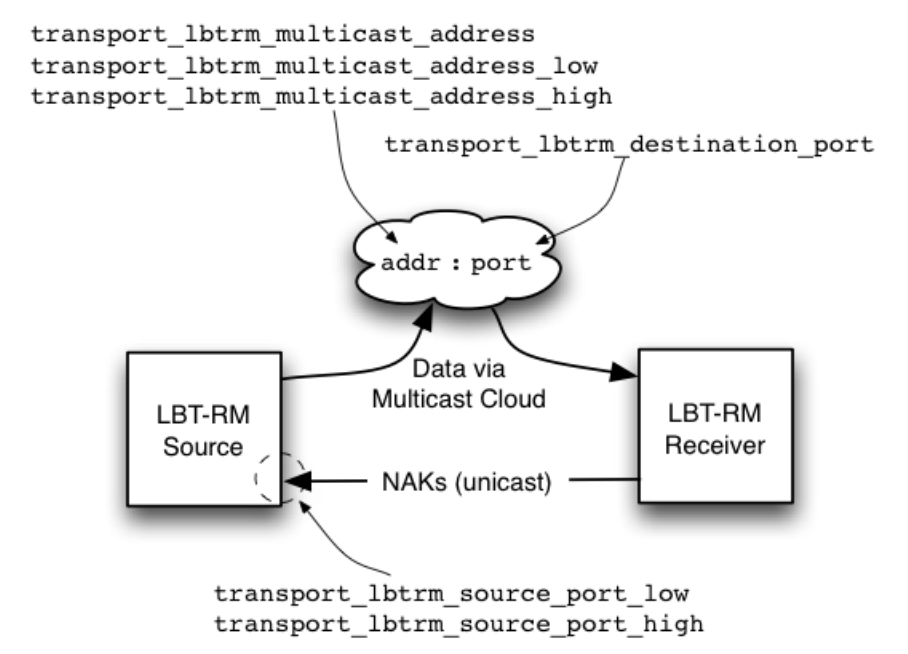
Chapter 17
Transport LBT-RM Network Options
17.1 LBT-RM Transport Session Management
The image below shows a simplified relationship between the primary LBT-RM transport network options.
Note
for a multi-homed LBT-RM source, the interface LBT-RM multicast resolver interface specified with resolver←-
_multicast_interface (context) will be used as the source for LBT-RM.

152 Transport LBT-RM Network Options
When a source is created, the application can explicitly map it to a transport session by setting the transport_←-
lbtrm_multicast_address (source) and transport_lbtrm_destination_port (source) options. If a previous source was
created on the same context with the same group/port pair, this new source will be mapped to the same transport
session. Note that two different contexts on the same host may share the same group/port pair, and the resulting
transport sessions will be separate and independent.
Alternatively, if the application does not explicitly specify a multicast group and destination port, UM will implicitly
assign the new source to a pool of transport sessions defined when the context was created. The pool is defined as a
range of multicast groups specified by the options transport_lbtrm_multicast_address_low (context) and transport←-
_lbtrm_multicast_address_high (context). The number of transport sessions in the pool is the range of the two
multicast group IP addresses, as represented by a 32-bit number. For example, the default settings 224.10.10.←-
10 and 224.10.10.14 are represented by the numbers 0xE00A0A0A and 0xE00A0A0E. This represents 5 different
groups, so the pool contains 5 transport sessions (all with the same destination port).
When a new source is created and the multicast group is not explicitly defined, UM will check to see how many
transport sessions are currently active from the pool within the context. If it is less than the number in the pool, then
UM will activate the next transport session in the range. However, if the context already has activated all transport
sessions in the pool, then the new topic is mapped to one of the existing transport sessions, in round-robin fashion.
17.2 Reference
17.2.1 transport_lbtrm_destination_port (source)
The UDP destination port used for this Topic when the transport is LBT-RM.
See Port Assignments for more information about configuring ports.
Scope: source
Type: lbm_uint16_t
Default
value:
14400
Byte order: Network
When to
Set:
Can only be set during object initialization.
17.2.2 transport_lbtrm_multicast_address (source)
The preferred multicast address (or domain name of the multicast address) for this Topic when the transport is
LBT-RM. If 0.0.0.0 (INADDR_ANY), the context will attempt to find one in the given multicast address range.

17.2 Reference 153
Scope: source
Type: struct in_addr
Default
value:
0.0.0.0 (INADDR_ANY)
When to
Set:
Can only be set during object initialization.
17.2.3 transport_lbtrm_multicast_address_high (context)
Multicast address (or domain name of the multicast address) used as the highest value to assign to LBT-RM
sessions.
Scope: context
Type: struct in_addr
Default
value:
224.10.10.14
When to
Set:
Can only be set during object initialization.
17.2.4 transport_lbtrm_multicast_address_low (context)
Multicast address (or domain name of the multicast address) used as the lowest value to assign to LBT-RM
sessions.
Scope: context
Type: struct in_addr
Default
value:
224.10.10.10
When to
Set:
Can only be set during object initialization.

154 Transport LBT-RM Network Options
17.2.5 transport_lbtrm_source_port_high (context)
Highest port number value used for LBT-RM source session's unicast NAK processing. Receivers send NAKs
to this port for to request retransmission. Each LBT-RM session must use a unique port value. Note that this
does not control the UDP source port on the outbound LBT-RM stream.
See Port Assignments for more information about configuring ports.
Scope: context
Type: lbm_uint16_t
Default
value:
14399
Byte order: Host
When to
Set:
Can only be set during object initialization.
17.2.6 transport_lbtrm_source_port_low (context)
Lowest port number value used for LBT-RM source session's unicast NAK processing. Receivers send NAKs
to this port for to request retransmission. Each LBT-RM session must use a unique port value. Note that this
does not control the UDP source port on the outbound LBT-RM stream.
See Port Assignments for more information about configuring ports.
Scope: context
Type: lbm_uint16_t
Default
value:
14390
Byte order: Host
When to
Set:
Can only be set during object initialization.
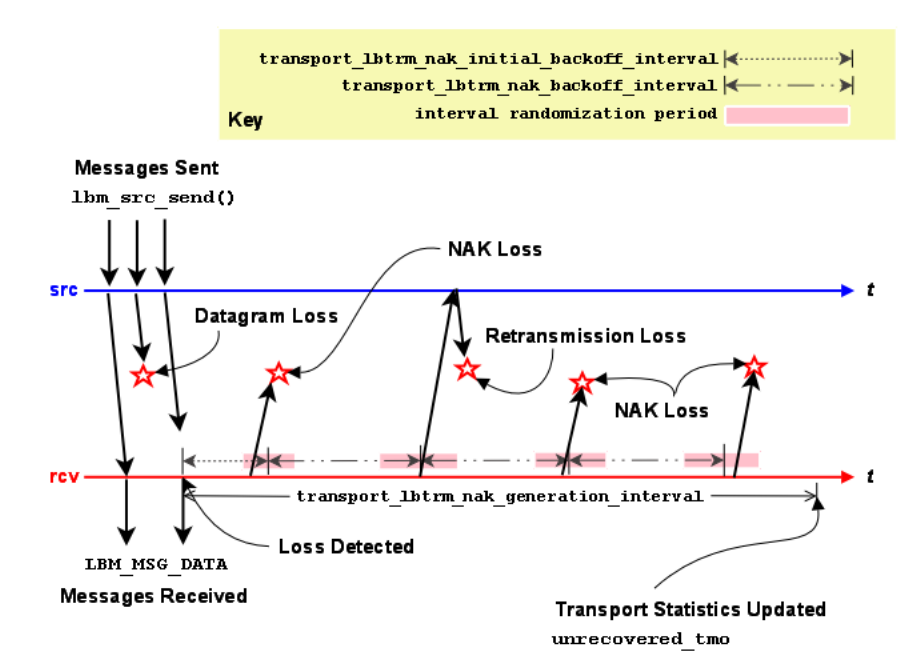
Chapter 18
Transport LBT-RM Reliability Options
18.1 LBT-RM Datagram
Loss Resulting in Unrecovered Message Loss
An LBT-RM receiver will attempt to recover lost datagrams. The options transport_lbtrm_nak_backoff_interval (re-
ceiver) and transport_lbtrm_nak_generation_interval (receiver) control the timing of the recovery effort. Timers for
both start when loss is detected. The following timeline illustrates a case where a receiver is notified of unrecover-
able message loss following repeated datagram loss.
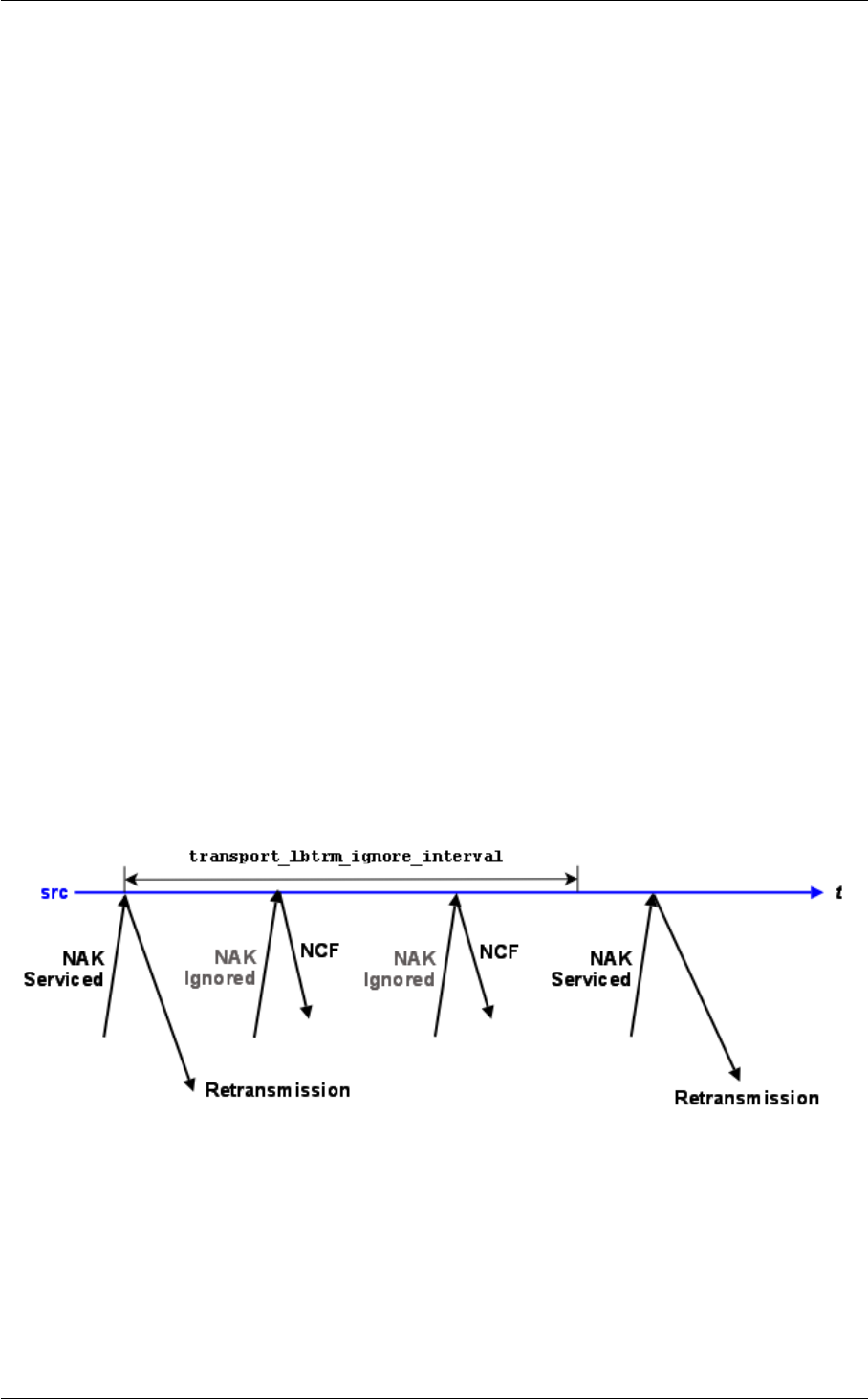
156 Transport LBT-RM Reliability Options
Note
the actual length of the interval randomization periods are between 1/2 and 3/2 of the configured interval value.
In the diagram above, time periods are not drawn to scale to simplify the diagram.
Set transport_lbtrm_nak_backoff_interval (receiver) to the NAK service time that could be reasonably expected
from the receiver's location in the network plus some cushion for network congestion. Set transport_lbtrm_nak_←-
generation_interval (receiver) to the latency budget established for the transport layer. See our whitepaper Topics
in High Performance Messaging for background on latency budgets. See also the KB article Reducing
Loss Recovery Latencies for more advice on tuning.
Note
these parameters relate to loss at the transport session (datagram) level, not the topic level. See Delivery
Control Options for information on how applications are informed of topic-level unrecoverable loss.
18.2 LBT-RM Source Ignoring NAKs for Efficiency
Bandwidth efficiency of an LBT-RM source may be improved by avoiding useless retransmissions. Consider the
case of an LBT-RM source that has received a NAK for a datagram that it has just retransmitted. If the NAK
and the retransmission crossed on the network, it is likely that the receiver generating the NAK will receive the
retransmission just sent. If so, there's no need for the source to send another retransmission, so the NAK can be
safely ignored.
The image below illustrates the timing relationships.
This shows NAKs for a given datagram being ignored for transport_lbtrm_ignore_interval (source) following the
retransmission of that datagram. (The successive NAKs received by the source indicate that more than one receiver
is subscribed to the source's topic.) A NAK will be serviced as normal following the passage of the interval.
When ignoring a NAK, the source sends a NCF (NAK ConFirmation) instead of a retransmission, which starts a
NAK suppression interval at the receiver.
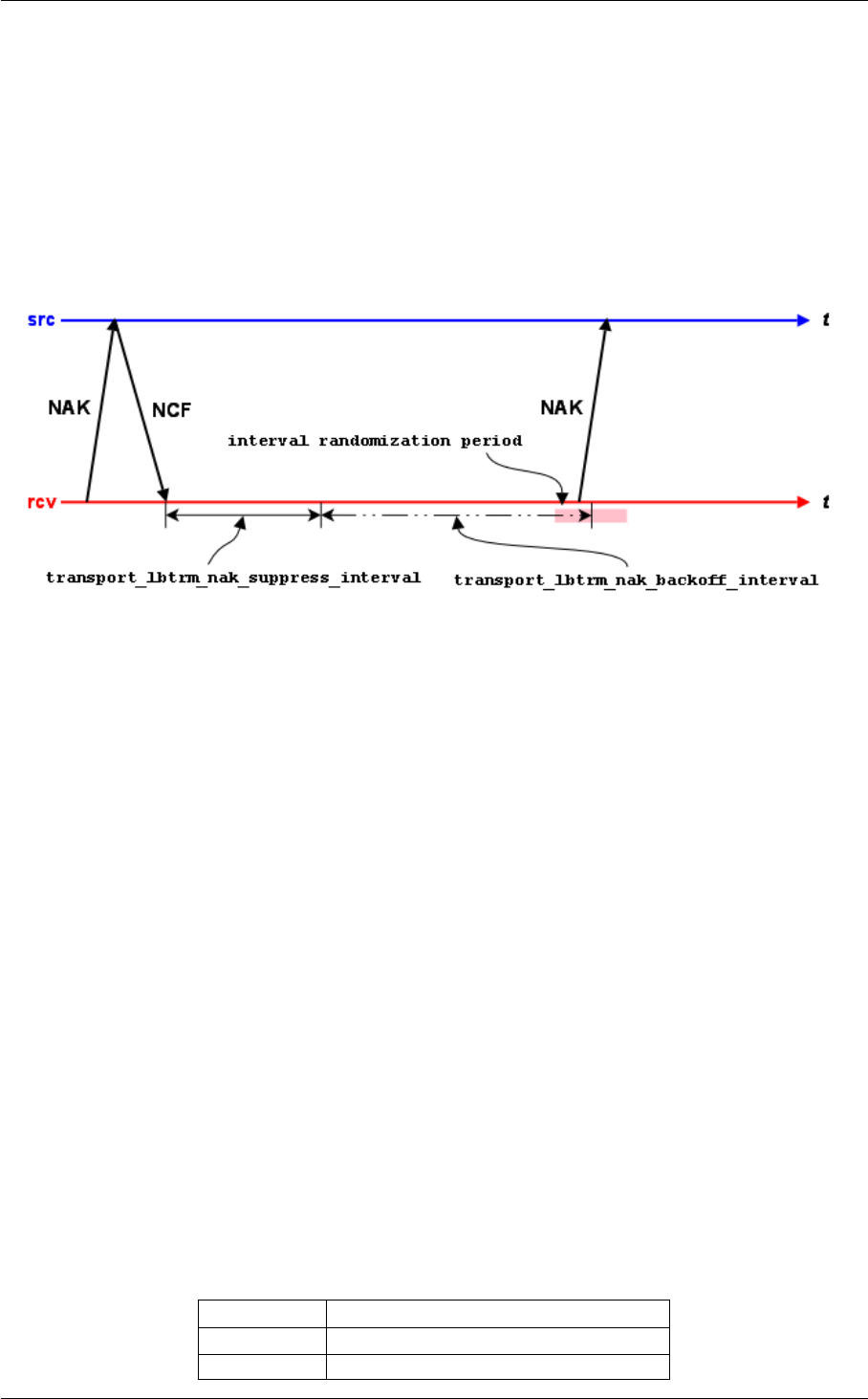
18.3 LBT-RM Receiver Suppressing NAK Generation 157
18.3 LBT-RM Receiver Suppressing NAK Generation
LBT-RM sources want receivers to be notified that their NAKs have been heard. Prompt notification via a retrans-
mission or NCF can suppress useless NAK generation. There are a variety of circumstances where the source
does not send a retransmission in response to a receiver's NAK. For example, NAKs received during the ignore
interval do not generate retransmissions. Another example would be if previous retransmissions have used up all
the retransmission bandwidth for the current rate limiter interval.
The image below illustrates a receiver's reaction to an NCF.
Following the receipt of an NCF, a receiver suppresses all NAK generation until transport_lbtrm_nak_suppress_←-
interval (receiver) passes. NAK generation resumes with the usual transport_lbtrm_nak_backoff_interval (receiver)
if repair was not received during the suppression interval.
Note
the actual length of the interval randomization period is between 1/2 and 3/2 of the configured interval value.
In the diagram above, time periods are not drawn to scale to simplify the diagram.
18.4 Reference
18.4.1 transport_lbtrm_ignore_interval (source)
The interval to ignore NAKs after a retransmission is sent. This option affects the transport session underlying
the source rather than the source itself. The transport session uses the value from the first source created on
the session and ignores subsequent sources. Refer to Source Object in the Ultra Messaging Concepts Guide
for additional information.
Scope: source
Type: lbm_ulong_t
Units: milliseconds

158 Transport LBT-RM Reliability Options
Default
value:
500 (0.5 seconds)
When to
Set:
Can only be set during object initialization.
18.4.2 transport_lbtrm_nak_backoff_interval (receiver)
For LBT-RM sessions only. The maximum interval between transmissions of a single NAK. The actual time the
receiver will wait to NAK again is random. The algorithm used to determine the time range is (1/2 ∗backoff_←-
interval - 3/2 ∗backoff_interval). This can result in a wait interval longer than the specified value. This option
affects the transport session underlying the receiver rather than the receiver itself. The transport session uses
the value from the first receiver created on the session and ignores subsequent receivers. Refer to Receiver
Object in the Ultra Messaging Concepts Guide and Interrelated Configuration Options for additional information.
Scope: receiver
Type: lbm_ulong_t
Units: milliseconds
Default
value:
200 (0.2 seconds)
When to
Set:
Can only be set during object initialization.
18.4.3 transport_lbtrm_nak_generation_interval (receiver)
For LBT-RM sessions only. The maximum time that a piece of data may be outstanding before the data is
unrecoverably lost. Although the minimum valid value is 5 milliseconds, larger values are advisable. This option
affects the transport session underlying the receiver rather than the receiver itself. The transport session uses
the value from the first receiver created on the session and ignores subsequent receivers. Refer to Receiver
Object in the Ultra Messaging Concepts Guide and Interrelated Configuration Options for additional information.
Scope: receiver
Type: lbm_ulong_t
Units: milliseconds
Default
value:
10000 (10 seconds)
When to
Set:
Can only be set during object initialization.

18.4 Reference 159
18.4.4 transport_lbtrm_nak_initial_backoff_interval (receiver)
For LBT-RM sessions only. The interval between loss detection and transmission of the first NAK. The actual
time the receiver will wait to NAK is random. The algorithm used to determine the time range is (1/2 ∗initial_←-
backoff_interval - 3/2 ∗initial_backoff_interval). This can result in a wait interval longer than the specified value.
A value of 0 indicates that the receiver should immediately send a NAK. Users should be fully aware of the
implications of this before using a value of 0.
Scope: receiver
Type: lbm_ulong_t
Units: milliseconds
Default
value:
50 (0.05 seconds)
When to
Set:
Can only be set during object initialization.
Version: This option was implemented in LBM 3.4/UME 2.1.
18.4.5 transport_lbtrm_nak_suppress_interval (receiver)
For LBT-RM sessions only. The maximum interval to suppress sending NAKs after an NCF or a NAK from
another receiver. This option affects the transport session underlying the receiver rather than the receiver itself.
The transport session uses the value from the first receiver created on the session and ignores subsequent
receivers. Refer to Receiver Object in the Ultra Messaging Concepts Guide for additional information.
Scope: receiver
Type: lbm_ulong_t
Units: milliseconds
Default
value:
1000 (1 second)
When to
Set:
Can only be set during object initialization.

160 Transport LBT-RM Reliability Options
18.4.6 transport_lbtrm_receiver_socket_buffer (context)
Value used to set SO_RCVBUF value of the LBT-RM receiver multicast socket. In some cases the OS will not
allow all of this value to be used. See the section on Socket Buffer Sizes for platform-dependent information.
See also our white paper Topics in High Performance Messaging for background and guidelines on UDP buffer
sizing.
Scope: context
Type: lbm_ulong_t
Units: bytes
Default
value:
8388608 (8MB)
When to
Set:
Can only be set during object initialization.
18.4.7 transport_lbtrm_send_naks (receiver)
For LBT-RM sessions only. This flag indicates whether LBT-RM should send negative acknowledgements (N←-
AKs) for missing packets or not. This option affects the transport session underlying the receiver rather than
the receiver itself. The transport session uses the value from the first receiver created on the session and
ignores subsequent receivers. Refer to Receiver Object in the Ultra Messaging Concepts Guide for additional
information.
Scope: receiver
Type: int
When to
Set:
Can only be set during object initialization.
Value Description
1 NAKs are sent for missing packets to request retransmission. Default for all.
0 Do not send NAKs for missing packets.

18.4 Reference 161
18.4.8 transport_lbtrm_source_socket_buffer (context)
Value used to set SO_SNDBUF value of the LBT-RM send multicast socket. In some cases the OS will not
allow all of this value to be used. See the section on Socket Buffer Sizes for platform-dependent information. A
value of 0 instructs UM to use the OS default.
Scope: context
Type: lbm_ulong_t
Units: bytes
Default
value:
1048576 (1MB)
When to
Set:
Can only be set during object initialization.
18.4.9 transport_lbtrm_transmission_window_limit (source)
Caps the total amount of memory that a transmission window uses, which includes data and overhead. For
example, if the transport_lbtrm_transmission_window_size (source) is 24 MB (default) and the source sends
(with flush flag set) 1.2 million messages with a 20-byte payload and 230-byte header, the actual amount of
memory used can approximate 300 MB. The default value of 0 (zero) disables the transmission window size
limit.
Scope: source
Type: size_t
Units: bytes
Default
value:
0 (zero)
When to
Set:
Can only be set during object initialization.
18.4.10 transport_lbtrm_transmission_window_size (source)
The maximum amount of buffered payload data, excluding UM headers, that the LBT-RM source is allowed to
retain for retransmissions. The minimum valid value is 65,536 bytes. This option affects the transport session
underlying the source rather than the source itself. The transport session uses the value from the first source
created on the session and ignores subsequent sources. For more information, see the Ultra Messaging
Concepts Guide.

162 Transport LBT-RM Reliability Options
Scope: source
Type: size_t
Units: bytes
Default
value:
25165824 (24 MB)
When to
Set:
Can only be set during object initialization.
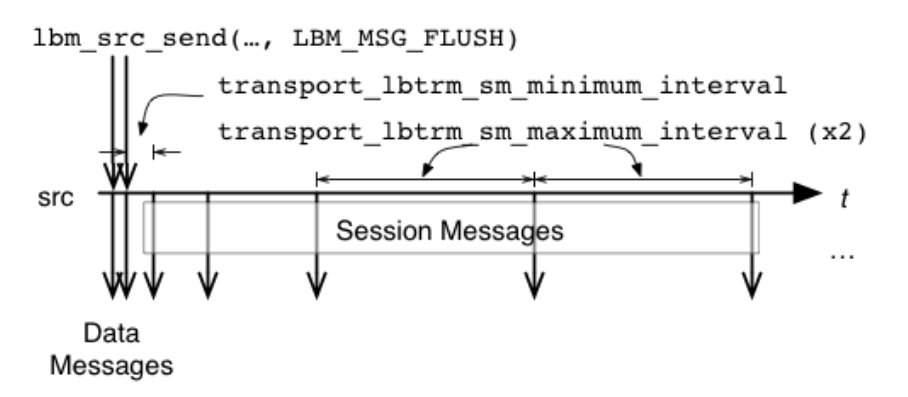
Chapter 19
Transport LBT-RM Operation Options
Reliable multicast protocols like LBT-RM rely on sequence numbers and the arrival of data after a loss as evidence
that the loss happened. What would happen if the last packet sent by a source was lost? How would receivers learn
of the loss if no further messages were sent?
LBT-RM generates session messages when the sources on a transport session stop sending. These messages
contain the expected last sequence number for the session so that receivers can detect loss even when sources
aren't sending. Session messages also help to maintain state in multicast routers and switches that require regular
traffic to prevent the reclamation of unused forwarding entries.
The image below illustrates the sending of session messages.
No session messages are generated as long as the interval between lbm_src_send() calls that generate writes
to LBT-RM is less than transport_lbtrm_sm_minimum_interval (source) option. The interval between session mes-
sages starts at transport_lbtrm_sm_minimum_interval (source) and doubles till it reaches transport_lbtrm_sm_←-
maximum_interval (source) at which point the interval continues at that level.
The absence of activity on a transport session is the only indication receivers get that a source is gone or no longer
available through any network path. LBT-RM receivers reset a session activity timer for each data message or
session message that arrives. If the activity timer ever expires, all receivers on the transport session receive an
LBM_MSG_EOS event. This is illustrated in the following timeline:
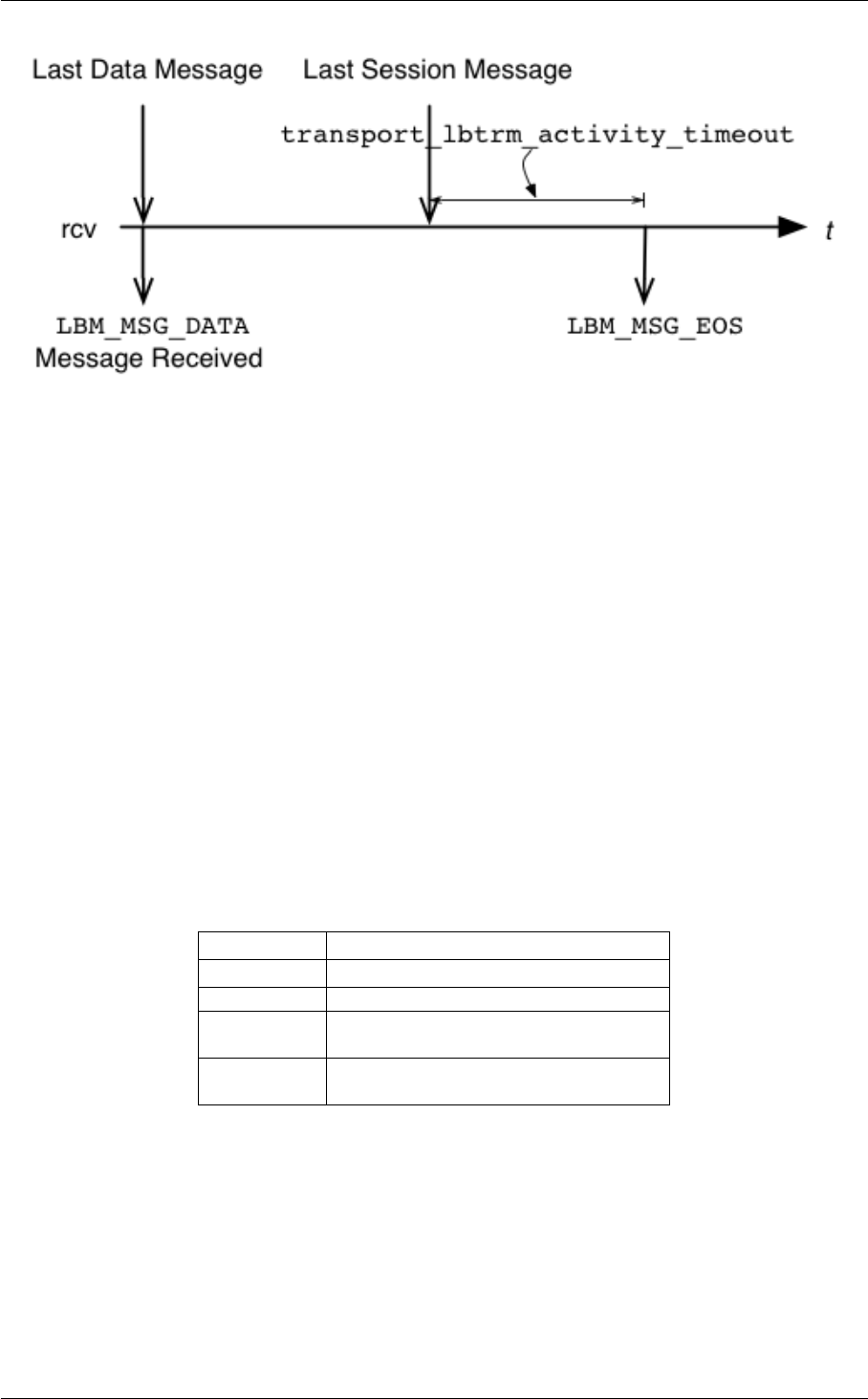
164 Transport LBT-RM Operation Options
The activity timer is controlled with the transport_lbtrm_activity_timeout (receiver) option.
19.1 Reference
19.1.1 transport_lbtrm_activity_timeout (receiver)
For LBT-RM sessions only. The maximum time that an LBT-RM session may be quiescent before it is deleted
and an EOS event is delivered for all topics using this transport session. This option affects the transport
session underlying the receiver rather than the receiver itself. The transport session uses the value from the
first receiver created on the session and ignores subsequent receivers. Refer to Receiver Object in the Ultra
Messaging Concepts Guide for additional information.
Scope: receiver
Type: lbm_ulong_t
Units: milliseconds
Default
value:
60000 (60 seconds)
When to
Set:
Can only be set during object initialization.

19.1 Reference 165
19.1.2 transport_lbtrm_coalesce_threshold (source)
UM passes implicitly batched messages to the Operating System sendmsg() as a set unless the size of the
set exceeds the coalescing threshold at which point the messages are coalesced and passed to the O/S as
one copy. This option accommodates the different number of iovecs supported by different O/Ss. Tuning this
option balances the efficiency of less iovecs handled by the OS vs. the expense of an additional copy operation
of the messages before sending. The default value is also the maximum allowable value for Solaris, AIX and
HPUX. For Linux and Microsoft Windows and Darwin, the maximum allowable value is 1023. These maximum
allowable values are one less than what the O/S provides. This option affects the transport session underlying
the source rather than the source itself. The transport session uses the value from the first source created on
the session and ignores subsequent sources. Refer to Source Object in the Ultra Messaging Concepts Guide
for additional information.
Scope: source
Type: int
Units: number of individual messages
Default
value:
15
When to
Set:
Can only be set during object initialization.
19.1.3 transport_lbtrm_data_rate_limit (context)
Maximum aggregate transmission rate of all LBT-RM sessions' original data plus retransmissions for this par-
ticular context. Refer to Rate Controls in the Ultra Messaging Concepts Guide for additional information about
the UM rate limiting algorithm.
Note: For backwards compatibility with earlier versions, the lbm_context_attr_setopt() function will accept
both 32 and 64 bit values for this option. Note however that a 32-bit value can only specify a rate limit a little
larger than 4 Gbps.
Scope: context
Type: lbm_uint64_t
Units: bits per second
Default
value:
10000000 (10 Mbps)
When to
Set:
Can only be set during object initialization.

166 Transport LBT-RM Operation Options
19.1.4 transport_lbtrm_datagram_max_size (context)
The maximum UDP datagram payload size that can be generated for a LBT-RM transport session. Note that
this does not include UDP, IP, or packet overhead added by the network stack. The default value is 8192, the
minimum is 500 bytes, and the maximum is 65535.
See Message Fragmentation and Reassembly for more information.
Informatica does not recommend setting datagram max size options to the network MTU. See Datagram Max
Size and Network MTU.
Warning
When the DRO is in use, it is recommended that all UM applications and components (including the DRO and
Persistent Store) share the same maximum datagram size setting. See Protocol Conversion.
Scope: context
Type: lbm_uint_t
Units: bytes
Default
value:
8192
When to
Set:
Can only be set during object initialization.
Version: This option was implemented in LBM 4.1/UME 3.1/UMQ 1.1
19.1.5 transport_lbtrm_preactivity_timeout (receiver)
Use this option only if the receiver subscribes to a pre-LBM 3.3 source or if you have turned off transport←-
_topic_sequence_number_info_interval (source) messages in your post-LBM 3.3 implementation. Set it high
enough so the source starts sending data messages before the timeout expires. This timeout begins when
the receiver receives a topic advertisement. Pre-LBM 3.3 sources do not send TSNI messages which in effect
inform receivers that the source is alive even though it has not started sending data. Session messages provide
the same information but do not begin until after the source has started sending data. This option provides an
additional transport_lbtrm_activity_timeout (receiver) for the receiver that does not rely on TSNI or sessions
messages. The default value of 0 (zero) essentially disables this option, giving precedence to the receiver's
standard transport_lbtrm_activity_timeout (receiver). This option affects the transport session underlying the
receiver rather than the receiver itself. The transport session uses the value from the first receiver created on
the session and ignores subsequent receivers. Refer to Receiver Object in the Ultra Messaging Concepts
Guide for additional information.

19.1 Reference 167
Scope: receiver
Type: lbm_ulong_t
Units: milliseconds
Default
value:
0 (zero)
When to
Set:
Can only be set during object initialization.
Version: This option was implemented in LBM 3.4.1/UME 2.1.1.
19.1.6 transport_lbtrm_preallocate_receive_buffers (context)
Enables the use of preallocated buffers for socket operations. See section TBD before using (document bug
10356).
Scope: context
Type: int
When to
Set:
Can only be set during object initialization.
Version: This option was implemented in UM 6.12
Value Description
1 Use preallocated buffers. Message retention is NOT allowed.
0 Preallocated buffers are not used. Default for all.
19.1.7 transport_lbtrm_rate_interval (context)
Period that LBT-RM rate limiter runs. Reducing period reduces burst intensity, but also increases CPU load.
Refer to Rate Controls in the Ultra Messaging Concepts Guide for additional information about the UM rate
limiting algorithm.
Scope: context
Type: lbm_ulong_t

168 Transport LBT-RM Operation Options
Units: milliseconds
Default
value:
10
When to
Set:
Can only be set during object initialization.
String value Integer value Description
"10" 10 LBT-RM rate limiter runs every 10 milliseconds. Default for all.
"20" 20 LBT-RM rate limiter runs every 20 milliseconds.
"50" 50 LBT-RM rate limiter runs every 50 milliseconds.
"100" 100 LBT-RM rate limiter runs every 100 milliseconds.
19.1.8 transport_lbtrm_receiver_timestamp (context)
Controls whether high-resolution timestamps for received packets are delivered to the receiver callback. For
LBT-RM sessions only. Refer to High-resolution Timestamps in the Ultra Messaging Concepts Guide for addi-
tional information.
Scope: context
Type: int
When to
Set:
Can only be set during object initialization.
Version: This option was implemented in UM 6.9
Value Description
1 Receive timestamps delivered to receive callback.
0 Receive timestamps not delivered. Default for all.

19.1 Reference 169
19.1.9 transport_lbtrm_retransmit_rate_limit (context)
Maximum aggregate transmission rate of all LBT-RM sessions' retransmissions for this particular context. This
should always be less than the value used for original data. Refer to Rate Controls in the Ultra Messaging
Concepts Guide for additional information about the UM rate limiting algorithm.
Note: For backwards compatibility with earlier versions, the lbm_context_attr_setopt() function will accept
both 32 and 64 bit values for this option. Note however that a 32-bit value can only specify a rate limit a little
larger than 4 Gbps.
Scope: context
Type: lbm_uint64_t
Units: bits per second
Default
value:
5000000 (5 Mbps)
When to
Set:
Can only be set during object initialization.
19.1.10 transport_lbtrm_sm_maximum_interval (source)
The maximum interval between LBT-RM session messages. In lieu of data being sent, LBT-RM sends session
messages to inform receivers of sequence numbers and to let receivers know that the sender is still transmitting.
This option affects the transport session underlying the source rather than the source itself. The transport
session uses the value from the first source created on the session and ignores subsequent sources. Refer to
Source Object in the Ultra Messaging Concepts Guide for additional information.
Scope: source
Type: lbm_ulong_t
Units: milliseconds
Default
value:
10000 (10 seconds)
When to
Set:
Can only be set during object initialization.
19.1.11 transport_lbtrm_sm_minimum_interval (source)
The minimum interval between LBT-RM session messages. In lieu of data being sent, LBT-RM sends session
messages to inform receivers of sequence numbers and to let receivers know that the sender is still transmitting.

170 Transport LBT-RM Operation Options
This option affects the transport session underlying the source rather than the source itself. The transport
session uses the value from the first source created on the session and ignores subsequent sources. Refer to
Source Object in the Ultra Messaging Concepts Guide for additional information.
Scope: source
Type: lbm_ulong_t
Units: milliseconds
Default
value:
200 (0.2 seconds)
When to
Set:
Can only be set during object initialization.
19.1.12 transport_lbtrm_source_timestamp (context)
Controls whether high-resolution timestamps for transmitted packets are delivered to the source event callback.
For LBT-RM sessions only. Refer to High-resolution Timestamps in the Ultra Messaging Concepts Guide for
additional information.
Scope: context
Type: int
When to
Set:
Can only be set during object initialization.
Version: This option was implemented in UM 6.9
Value Description
1 Transmit timestamps delivered to receive callback.
0 Transmit timestamps not delivered. Default for all.
19.1.13 transport_lbtrm_tgsz (source)
The transmission group size used for this Topic when LBT-RM is used. This value must be greater than 0 and
must be a power of 2 no greater than 32K. This option affects the transport session underlying the source rather
than the source itself. The transport session uses the value from the first source created on the session and

19.1 Reference 171
ignores subsequent sources. Refer to Source Object in the Ultra Messaging Concepts Guide for additional
information.
Scope: source
Type: lbm_uint16_t
Units: packets
Default
value:
8
When to
Set:
Can only be set during object initialization.

172 Transport LBT-RM Operation Options
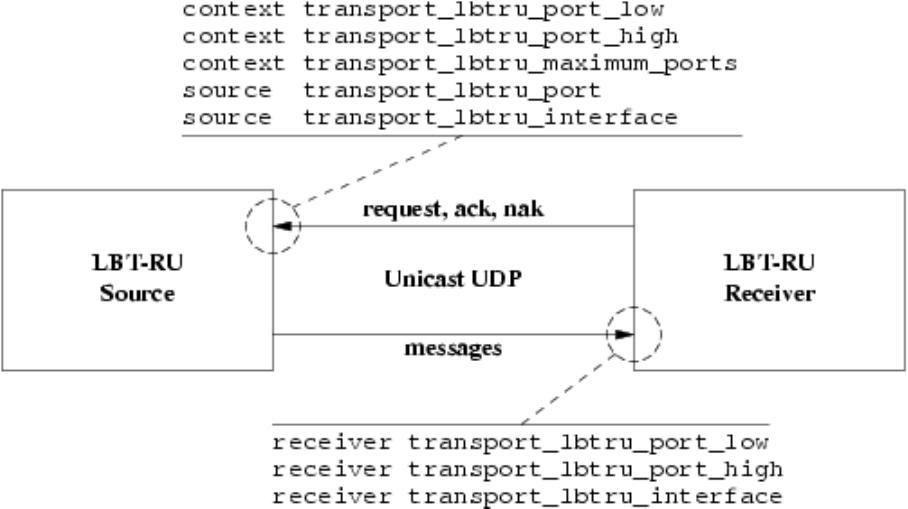
Chapter 20
Transport LBT-RU Network Options
20.1 LBT-RU Transport Session Management
The image below illustrates the relationship between the primary LBT-RU network options.
When a source is created, the application can explicitly map it to a transport session by setting the transport_lbtru←-
_port (source) option. If a previous source was created on the same context with the same port, this new source
will be mapped to the same transport session. However, two different contexts on the same host may not share the
same port number. If a source is created with a port number that is already in use, UM will return an error.
Alternatively, if the application does not explicitly specify a source port, UM will implicitly assign the new source to
a pool of transport sessions defined when the context was created. The pool is defined as a range of port numbers
specified by the options transport_lbtru_port_low (context) and transport_lbtru_port_high (context). In addition, the
option transport_lbtru_maximum_ports (context) defines the number of transport sessions in the pool.
When a new source is created and the source port is not explicitly defined, UM will check to see how many transport

174 Transport LBT-RU Network Options
sessions are currently active from the pool within the context. If it is less than the number in the pool, then UM will
activate the next transport session in the range. However, if the context already has activated all transport sessions
in the pool, then the new topic is mapped to one of the existing transport sessions, in round-robin fashion.
Notice that the default range of ports, 14380 to 14389, is 10 ports. But the default number of transport sessions in
the pool is 5. This allows two contexts to be created on the same host and use the same configuration. If more than
2 contexts are intended to co-exist on the same host, the port range and number of transport session per context
must be managed to give a unique port number to every transport session.
The option transport_lbtru_interface (source) may be used on LBT-RU sources to choose particular interface, over-
riding the default INADDR_ANY which accepts connections on all interfaces. Similarly, transport_lbtru_interface
(receiver) may be used on receivers to choose a particular interface for outgoing connections.
20.2 Reference
20.2.1 transport_lbtru_interface (receiver)
Specifies the network interface over which UM LBT-RU receivers read application data messages. Can specify
full IP address of interface, or just network part (see Specifying Interfaces for details). Default is set to default←-
_interface (context) if specified. Otherwise, it is set to INADDR_ANY, meaning that it will accept incoming
connection requests from any interface.
Scope: receiver
Type: lbm_ipv4_address_mask_t
Default
value:
0.0.0.0 (INADDR_ANY)
When to
Set:
Can only be set during object initialization.
20.2.2 transport_lbtru_interface (source)
Specifies the network interface over which UM LBT-RU sources receive connection requests from topic re-
ceivers. Can specify full IP address of interface, or just network part (see Specifying Interfaces for details). Be
aware that this option is applied to the transport session when the first topic is created on that session. Thus,
setting a different interface for a subsequent topic that maps onto the same transport session will have no effect.
Default is set to default_interface (context) if specified. Otherwise, it is set to INADDR_ANY, meaning that it will
accept incoming connection requests from any interface.
Scope: source
Type: lbm_ipv4_address_mask_t

20.2 Reference 175
Default
value:
0.0.0.0 (INADDR_ANY)
When to
Set:
Can only be set during object initialization.
20.2.3 transport_lbtru_maximum_ports (context)
Maximum number of unicast port numbers that LBT-RU will use for all implicitly allocated sessions.
See Port Assignments for more information about configuring ports.
Scope: context
Type: lbm_uint16_t
Units: number of ports
Default
value:
5
When to
Set:
Can only be set during object initialization.
20.2.4 transport_lbtru_port (source)
The preferred unicast port number for this Topic. If 0, the context will attempt to find one in the given LBT-RU
source port range.
See Port Assignments for more information about configuring ports.
Scope: source
Type: lbm_uint16_t
Default
value:
0 (use open port)
Byte order: Network
When to
Set:
Can only be set during object initialization.

176 Transport LBT-RU Network Options
20.2.5 transport_lbtru_port_high (context)
High unicast port number to assign to LBT-RU sources. Clients send connection requests, ACKs, and NAKs to
a port number in this range.
See Port Assignments for more information about configuring ports.
Scope: context
Type: lbm_uint16_t
Default
value:
14389
Byte order: Host
When to
Set:
Can only be set during object initialization.
20.2.6 transport_lbtru_port_high (receiver)
High port number to use for receiving LBT-RU data. All LBT-RU data for the topic will arrive on this range.
See Port Assignments for more information about configuring ports.
Scope: receiver
Type: lbm_uint16_t
Default
value:
14379
Byte order: Host
When to
Set:
Can only be set during object initialization.
20.2.7 transport_lbtru_port_low (context)
Low unicast port number to assign to LBT-RU sources. Clients send connection requests, ACKs, and NAKs to
a port number in this range.

20.2 Reference 177
See Port Assignments for more information about configuring ports.
Scope: context
Type: lbm_uint16_t
Default
value:
14380
Byte order: Host
When to
Set:
Can only be set during object initialization.
20.2.8 transport_lbtru_port_low (receiver)
Low port number to use for receiving LBT-RU data. All LBT-RU data for the topic will arrive on this range.
See Port Assignments for more information about configuring ports.
Scope: receiver
Type: lbm_uint16_t
Default
value:
14360
Byte order: Host
When to
Set:
Can only be set during object initialization.

178 Transport LBT-RU Network Options

Chapter 21
Transport LBT-RU Reliability Options
LBT-RU's reliability options closely model LBT-RM's. The descriptions and illustrations in Transport LBT-RM Relia-
bility Options generally apply to LBT-RU, with appropriate option name changes.
21.1 Reference
21.1.1 transport_lbtru_ignore_interval (source)
The interval to ignore NAKs after a retransmission is sent. This option affects the transport session underlying
the source rather than the source itself. The transport session uses the value from the first source created on
the session and ignores subsequent sources. Refer to Source Object in the Ultra Messaging Concepts Guide
for additional information.
Scope: source
Type: lbm_ulong_t
Units: milliseconds
Default
value:
500 (0.5 seconds)
When to
Set:
Can only be set during object initialization.
21.1.2 transport_lbtru_nak_backoff_interval (receiver)
For LBT-RU sessions only. The maximum interval between transmissions of a single NAK. The actual value
is randomized (to reduce self-similar behaviors) and is uniform on the range [0.5∗interval, 1.5∗interval]. This

180 Transport LBT-RU Reliability Options
option affects the transport session underlying the receiver rather than the receiver itself. The transport session
uses the value from the first receiver created on the session and ignores subsequent receivers. Refer to
Receiver Object in the Ultra Messaging Concepts Guide and Interrelated Configuration Options for additional
information.
Scope: receiver
Type: lbm_ulong_t
Units: milliseconds
Default
value:
200 (0.2 seconds)
When to
Set:
Can only be set during object initialization.
21.1.3 transport_lbtru_nak_generation_interval (receiver)
For LBT-RU sessions only. The maximum time that a piece of data may be outstanding before the data is
unrecoverably lost. Although the minimum valid value is 5 milliseconds, larger values are advisable. This option
affects the transport session underlying the receiver rather than the receiver itself. The transport session uses
the value from the first receiver created on the session and ignores subsequent receivers. Refer to Receiver
Object in the Ultra Messaging Concepts Guide and Interrelated Configuration Options for additional information.
Scope: receiver
Type: lbm_ulong_t
Units: milliseconds
Default
value:
10000 (10 seconds)
When to
Set:
Can only be set during object initialization.
21.1.4 transport_lbtru_nak_initial_backoff_interval (receiver)
For LBT-RU sessions only. The interval between loss detection and transmission of the first NAK. The actual
time the receiver will wait to NAK is random. The algorithm used to determine the time range is (1/2 ∗initial_←-
backoff_interval - 3/2 ∗initial_backoff_interval). This can result in a wait interval longer than the specified value.
A value of 0 indicates that the receiver should immediately send a NAK.
Scope: receiver
Type: lbm_ulong_t

21.1 Reference 181
Units: milliseconds
Default
value:
0 (disabled)
When to
Set:
Can only be set during object initialization.
21.1.5 transport_lbtru_nak_suppress_interval (receiver)
For LBT-RU sessions only. The maximum interval to suppress sending NAKs after an NCF is received. This
option affects the transport session underlying the receiver rather than the receiver itself. The transport session
uses the value from the first receiver created on the session and ignores subsequent receivers. Refer to
Receiver Object in the Ultra Messaging Concepts Guide for additional information.
Scope: receiver
Type: lbm_ulong_t
Units: milliseconds
Default
value:
1000 (1 second)
When to
Set:
Can only be set during object initialization.
21.1.6 transport_lbtru_receiver_socket_buffer (context)
Value used to set SO_RCVBUF value of the LBT-RU receiver unicast socket (both sender and receiver sides). In
some cases the OS will not allow all of this value to be used. See the section on Socket Buffer Sizes for platform-
dependent information. See also our white paper Topics in High Performance Messaging for background and
guidelines on UDP buffer sizing.
Scope: context
Type: lbm_ulong_t
Units: bytes
Default
value:
8388608 (8MB)
When to
Set:
Can only be set during object initialization.

182 Transport LBT-RU Reliability Options
21.1.7 transport_lbtru_source_socket_buffer (context)
Value used to set SO_SNDBUF value of the LBT-RU send multicast socket. In some cases the OS will not allow
all of this value to be used. See the section on Socket Buffer Sizes for platform-dependent information. A value
of 0 instructs UM to use the OS default.
Scope: context
Type: lbm_ulong_t
Units: bytes
Default
value:
1048576 (1MB)
When to
Set:
Can only be set during object initialization.
21.1.8 transport_lbtru_transmission_window_limit (source)
Caps the total amount of memory that a transmission window uses, which includes data and overhead. For
example, if the transport_lbtru_transmission_window_size (source) is 24 MB (default) and the source sends 20
byte messages with the "flush" flag, the actual amount of memory used can approximate 300 MB. The default
value of this option does not limit the transmission window.
Scope: source
Type: size_t
Units: bytes
Default
value:
0 (zero)
When to
Set:
Can only be set during object initialization.
21.1.9 transport_lbtru_transmission_window_size (source)
The maximum amount of buffered data that the LBT-RU source is allowed to retain for retransmissions. The
minimum valid value is 65536 bytes. This option affects the transport session underlying the source rather than
the source itself. The transport session uses the value from the first source created on the session and ignores
subsequent sources. Refer to Source Object in the Ultra Messaging Concepts Guide for additional information.

21.1 Reference 183
Scope: source
Type: size_t
Units: bytes
Default
value:
25165824 (24 MB)
When to
Set:
Can only be set during object initialization.

184 Transport LBT-RU Reliability Options
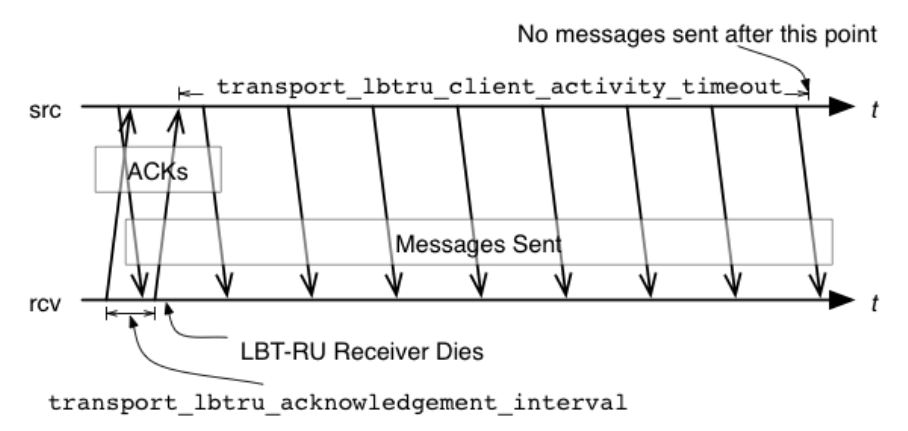
Chapter 22
Transport LBT-RU Operation Options
LBT-RU's operational options closely model LBT-RM's. The descriptions and illustrations in Transport LBT-RM
Operation Options generally apply to LBT-RU, with appropriate option name changes.
The following options are present for LBT-RU but not LBT-RM:
•transport_lbtru_client_map_size (source)
•transport_lbtru_connect_interval (receiver)
•transport_lbtru_acknowledgement_interval (receiver)
•transport_lbtru_client_activity_timeout (source)
The image below illustrates the timing of the latter two LBT-RU unique options:
22.1 Reference

186 Transport LBT-RU Operation Options
22.1.1 transport_lbtru_acknowledgement_interval (receiver)
For LBT-RU session only. The interval between sending acknowledgements. Each client continually sends
acknowledgements to let the source know that the client is still alive. This option affects the transport session
underlying the receiver rather than the receiver itself. The transport session uses the value from the first receiver
created on the session and ignores subsequent receivers. Refer to Receiver Object in the Ultra Messaging
Concepts Guide for additional information.
Scope: receiver
Type: lbm_ulong_t
Units: milliseconds
Default
value:
500 (0.5 seconds)
When to
Set:
Can only be set during object initialization.
22.1.2 transport_lbtru_activity_timeout (receiver)
For LBT-RU sessions only. The maximum time that an LBT-RU session may be quiescent before it is deleted
and an EOS event is delivered for all topics using this transport session. This option affects the transport
session underlying the receiver rather than the receiver itself. The transport session uses the value from the
first receiver created on the session and ignores subsequent receivers. Refer to Receiver Object in the Ultra
Messaging Concepts Guide for additional information.
Scope: receiver
Type: lbm_ulong_t
Units: milliseconds
Default
value:
60000 (60 seconds)
When to
Set:
Can only be set during object initialization.
22.1.3 transport_lbtru_client_activity_timeout (source)
The maximum time that an LBT-RU client may be quiescent, i.e. not sending ACKs, before the sender assumes
that it is dead and stops sending to it. This option affects the transport session underlying the source rather
than the source itself. The transport session uses the value from the first source created on the session and
ignores subsequent sources. Refer to Source Object in the Ultra Messaging Concepts Guide for additional
information.

22.1 Reference 187
Scope: source
Type: lbm_ulong_t
Units: milliseconds
Default
value:
10000 (10 seconds)
When to
Set:
Can only be set during object initialization.
22.1.4 transport_lbtru_client_map_size (source)
The size of the hash table used to store client information and state. This option affects the transport session
underlying the source rather than the source itself. The transport session uses the value from the first source
created on the session and ignores subsequent sources. Refer to Source Object in the Ultra Messaging
Concepts Guide for additional information.
Scope: source
Type: size_t
Units: table entries
Default
value:
7
When to
Set:
Can only be set during object initialization.
22.1.5 transport_lbtru_coalesce_threshold (source)
UM passes implicitly batched messages to the Operating System sendmsg() as a set unless the size of the
set exceeds the coalescing threshold at which point the messages are coalesced and passed to the O/S as
one copy. This option accommodates the different number of iovecs supported by different O/Ss. Tuning this
option balances the efficiency of less iovecs handled by the OS vs. the expense of an additional copy operation
of the messages before sending. The default value is also the maximum allowable value for Solaris, AIX and
HPUX. For Linux and Microsoft Windows and Darwin, the maximum allowable value is 1023. These maximum
allowable values are one less than what the O/S provides. This option affects the transport session underlying
the source rather than the source itself. The transport session uses the value from the first source created on
the session and ignores subsequent sources. Refer to Source Object in the Ultra Messaging Concepts Guide
for additional information.
Scope: source
Type: int

188 Transport LBT-RU Operation Options
Units: number of messages
Default
value:
15
When to
Set:
Can only be set during object initialization.
22.1.6 transport_lbtru_connect_interval (receiver)
For LBT-RU session only. The interval between sending connection requests. This option affects the transport
session underlying the receiver rather than the receiver itself. The transport session uses the value from the
first receiver created on the session and ignores subsequent receivers. Refer to Receiver Object in the Ultra
Messaging Concepts Guide for additional information.
Scope: receiver
Type: lbm_ulong_t
Units: milliseconds
Default
value:
100 (0.1 seconds)
When to
Set:
Can only be set during object initialization.
22.1.7 transport_lbtru_data_rate_limit (context)
Maximum aggregate transmission rate of all LBT-RU sessions original data for this particular context. Refer
to Rate Controls in the Ultra Messaging Concepts Guide for additional information about the UM rate limiting
algorithm.
Note: For backwards compatibility with earlier versions, the lbm_context_attr_setopt() function will accept
both 32 and 64 bit values for this option. Note however that a 32-bit value can only specify a rate limit a little
larger than 4 Gbps.
Scope: context
Type: lbm_uint64_t
Units: bits per second
Default
value:
10000000 (10 Mbps)
When to
Set:
Can only be set during object initialization.

22.1 Reference 189
22.1.8 transport_lbtru_datagram_max_size (context)
The maximum UDP datagram payload size that can be generated for a LBT-RU transport session. Note that
this does not include UDP, IP, or packet overhead added by the network stack. The default value is 8192, the
minimum is 500 bytes, and the maximum is 65535.
See Message Fragmentation and Reassembly for more information.
Informatica does not recommend setting datagram max size options to the network MTU. See Datagram Max
Size and Network MTU.
Warning
When the DRO is in use, it is recommended that all UM applications and components (including the DRO and
Persistent Store) share the same maximum datagram size setting. See Protocol Conversion.
Scope: context
Type: lbm_uint_t
Units: bytes
Default
value:
8192
When to
Set:
Can only be set during object initialization.
Version: This option was implemented in LBM 4.1/UME 3.1/UMQ 1.1
22.1.9 transport_lbtru_maximum_connect_attempts (receiver)
The maximum number of connect attempts to make before this transport session is deleted and an EOS event
is delivered for all topics using this transport session. This option affects the transport session underlying the
receiver rather than the receiver itself. The transport session uses the value from the first receiver created on
the session and ignores subsequent receivers. Refer to Receiver Object in the Ultra Messaging Concepts
Guide for additional information.
190 Transport LBT-RU Operation Options
Scope: receiver
Type: lbm_ulong_t
Default
value:
600
When to
Set:
Can only be set during object initialization.
22.1.10 transport_lbtru_preallocate_receive_buffers (context)
Enables the use of preallocated buffers for socket operations. See section TBD before using (document bug
10356).
Scope: context
Type: int
When to
Set:
Can only be set during object initialization.
Version: This option was implemented in UM 6.12
Value Description
1 Use preallocated buffers. Message retention is NOT allowed.
0 Preallocated buffers are not used. Default for all.
22.1.11 transport_lbtru_rate_interval (context)
Period that LBT-RU rate limiter runs. Reducing period reduces burst intensity, but also increases CPU load.
Refer to Rate Controls in the Ultra Messaging Concepts Guide for additional information about the UM rate
limiting algorithm.
Scope: context
Type: lbm_ulong_t
Units: milliseconds

22.1 Reference 191
Default
value:
100
When to
Set:
Can only be set during object initialization.
String value Integer value Description
"10" 10 LBT-RU rate limiter runs every 10 milliseconds.
"20" 20 LBT-RU rate limiter runs every 20 milliseconds.
"50" 50 LBT-RU rate limiter runs every 50 milliseconds.
"100" 100 LBT-RU rate limiter runs every 100 milliseconds. Default for all.
22.1.12 transport_lbtru_retransmit_rate_limit (context)
Maximum aggregate transmission rate of all LBT-RU sessions retransmissions for this particular context. This
should always be less than the value used for original data. Refer to Rate Controls in the Ultra Messaging
Concepts Guide for additional information about the UM rate limiting algorithm.
Note: For backwards compatibility with earlier versions, the lbm_context_attr_setopt() function will accept
both 32 and 64 bit values for this option. Note however that a 32-bit value can only specify a rate limit a little
larger than 4 Gbps.
Scope: context
Type: lbm_uint64_t
Units: bits per second
Default
value:
5000000 (5 Mbps)
When to
Set:
Can only be set during object initialization.
22.1.13 transport_lbtru_sm_maximum_interval (source)
The maximum interval between LBT-RU session messages. In lieu of data being sent, LBT-RU sends session
messages to each client to inform them of sequence numbers and to let receivers know that the sender is still

192 Transport LBT-RU Operation Options
transmitting. This option affects the transport session underlying the source rather than the source itself. The
transport session uses the value from the first source created on the session and ignores subsequent sources.
Refer to Source Object in the Ultra Messaging Concepts Guide for additional information.
Scope: source
Type: lbm_ulong_t
Units: milliseconds
Default
value:
10000 (10 seconds)
When to
Set:
Can only be set during object initialization.
22.1.14 transport_lbtru_sm_minimum_interval (source)
The minimum interval between LBT-RU session messages. In lieu of data being sent, LBT-RU sends session
messages to each client to inform them of sequence numbers and to let receivers know that the sender is still
transmitting. This option affects the transport session underlying the source rather than the source itself. The
transport session uses the value from the first source created on the session and ignores subsequent sources.
Refer to Source Object in the Ultra Messaging Concepts Guide for additional information.
Scope: source
Type: lbm_ulong_t
Units: milliseconds
Default
value:
200 (0.2 seconds)
When to
Set:
Can only be set during object initialization.
22.1.15 transport_lbtru_use_session_id (source)
Control whether a session ID is used for LBT-RU Transport sessions. This option should be set to 0 if a version
3.3 (and beyond) LBT-RU source must interoperate with a version pre-3.3 receiver.
Scope: source
Type: int
When to
Set:
Can only be set during object initialization.
Version: This option was implemented in UM 3.3

22.1 Reference 193
Value Description
1 Indicates the application desires LBT-RU to use a session ID. Default for all.
0 Indicates the application does not desire LBT-RU to use a session ID. For use when version pre-3.3
receivers must be used with TCP sources that are version 3.3 and beyond.

194 Transport LBT-RU Operation Options
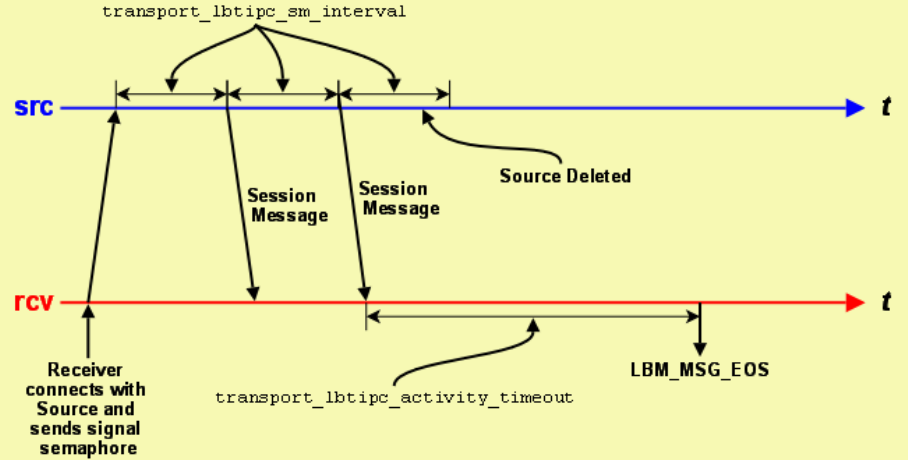
Chapter 23
Transport LBT-IPC Operation Options
The image below illustrates the timing of an LBT-IPC transport session.
The Source Session Message mechanism enables the receiver to detect when a source goes away and works
similarly to LBT-RU. It operates independently of message writes/reads in the Shared Memory Area.
23.1 LBT-IPC Transport Session Management
When a source is created, the application can explicitly map it to a transport session by setting the transport_←-
lbtipc_id (source) option. If a previous source was created on the same context with the same ID number, this new
source will be mapped to the same transport session. Note that ID numbers can be re-used by different contexts on
the same host. The resulting transport sessions will be separate, independent, and non-interfering.
Alternatively, if the application does not explicitly specify a source ID, UM will implicitly assign the new source to a
pool of transport sessions defined when the context was created. The pool is defined as a range of ID numbers
specified by the options transport_lbtipc_id_low (context) and transport_lbtipc_id_high (context). The numeric range
defines the number of transport sessions in the pool.
When a new source is created and the source port is not explicitly defined, UM will check to see how many transport
sessions are currently active from the pool within the context. If it is less than the configured range of IDs then UM

196 Transport LBT-IPC Operation Options
will use the next ID in the range transport_lbtipc_id_low (context) to transport_lbtipc_id_high (context). However,
if the context already has activated all transport sessions in the pool, then the new topic is mapped to one of the
existing transport sessions, in round-robin fashion.
23.2 Reference
23.2.1 transport_lbtipc_activity_timeout (receiver)
The maximum period of inactivity (lack of session messages) from an IPC source before the UM delivers an
EOS event for all topics using the transport session. Refer to Receiver Object in the Ultra Messaging Concepts
Guide and Interrelated Configuration Options for additional information.
Scope: receiver
Type: lbm_ulong_t
Units: milliseconds
Default
value:
60,000 (60 seconds)
When to
Set:
Can only be set during object initialization.
Version: This option was implemented in LBM 3.5ea2/UME 2.2ea1
23.2.2 transport_lbtipc_behavior (source)
Desired flow control behavior when multiple receivers have joined the same LBT-IPC transport session. See
also Transport LBT-IPC in the Ultra Messaging Concepts Guide. This option affects the transport session
underlying the source rather than the source itself. The transport session uses the value from the first source
created on the session and ignores subsequent sources. Refer to Source Object in the Ultra Messaging
Concepts Guide for additional information.
Scope: source
Type: lbm_ushort_t
When to
Set:
Can only be set during object initialization.
Version: This option was implemented in LBM 4.0

23.2 Reference 197
String value Integer value Description
"source_paced" LBM_SRC_TOPIC_ATTR_LBTIPC_BE←-
HAVIOR_SOURCE_PACED
Your application writes as fast as it can to
the LBT-IPC shared memory area. Slower
receivers can experience loss. A source
does not consider if any receivers have
successfully read a message before it re-
claims it. Default for all.
"receiver_paced" LBM_SRC_TOPIC_ATTR_LBTIPC_BE←-
HAVIOR_RECEIVER_PACED
Your application writes to the LBT-IPC
shared memory area only as fast as the
slowest receiver consumes data. A source
will not reclaim a message until all re-
ceivers have successfully read the mes-
sage. This slows down all receiver on the
LBT-IPC transport session.
23.2.3 transport_lbtipc_datagram_max_size (context)
The maximum datagram size that can be generated for a LBT-IPC transport session. While IPC does not
use UDP datagrams, this option limits the size of the UM message which is given to the underlying transport
type, including all UM headers and overhead. The default value is 65535, the minimum is 500 bytes, and the
maximum is 65535.
See Message Fragmentation and Reassembly for more information.
Informatica does not recommend setting datagram max size options to the network MTU. See Datagram Max
Size and Network MTU.
Warning
When the DRO is in use, it is recommended that all UM applications and components (including the DRO and
Persistent Store) share the same maximum datagram size setting. See Protocol Conversion.
Scope: context
Type: lbm_uint_t
Units: bytes
Default
value:
65535
When to
Set:
Can only be set during object initialization.
Version: This option was implemented in LBM 4.1/UME 3.1/UMQ 1.1

198 Transport LBT-IPC Operation Options
23.2.4 transport_lbtipc_id (source)
The preferred Transport ID for a specific source's LBT-IPC session. If 0, the UM context attempts to find one in
the given Transport ID range of transport_lbtipc_id_low (context) and transport_lbtipc_id_high (context). Refer
to Source Object in the Ultra Messaging Concepts Guide for additional information.
Scope: source
Type: lbm_uint16_t
Default
value:
0 (use open ID)
When to
Set:
Can only be set during object initialization.
Version: This option was implemented in LBM 3.5ea2/UME 2.2ea1
23.2.5 transport_lbtipc_id_high (context)
Highest transport ID of the range of available LBT-IPC Transport IDs.
Scope: context
Type: lbm_uint16_t
Default
value:
20,005
When to
Set:
Can only be set during object initialization.
Version: This option was implemented in LBM 3.5ea2/UME 2.2ea1
23.2.6 transport_lbtipc_id_low (context)
Lowest transport ID of the range of available LBT-IPC Transport IDs.
Scope: context
Type: lbm_uint16_t

23.2 Reference 199
Default
value:
20,001
When to
Set:
Can only be set during object initialization.
Version: This option was implemented in LBM 3.5ea2/UME 2.2ea1
23.2.7 transport_lbtipc_maximum_receivers_per_transport (source)
The maximum number of receiving contexts that can join an IPC transport session. Once a receiving context
joins an IPC transport session, it can receive messages on multiple topics. Increasing this value increases the
amount of shared memory allocated per transport session by a negligible amount.
Scope: source
Type: lbm_ushort_t
Default
value:
20
When to
Set:
Can only be set during object initialization.
Version: This option was implemented in LBM 4.0
23.2.8 transport_lbtipc_pend_behavior_linger_loop_count (context)
When using pend as the LBTIPC receiver thread behavior, the receiver loop can linger in a temporary busy
wait behavior before pending again. At high sustained rates or during short bursts of data, this can result in a
significant reduction in the number of kernel calls if more data arrives relatively quickly. Once the burst subsides,
the CPU utilization drops again since the receiver would be pending. The default value of 1 results in legacy
pend behavior. If the value is set large, significant CPU will be consumed.
Scope: context
Type: lbm_ulong_t
Default
value:
1
When to
Set:
Can only be set during object initialization.
Version: This option was implemented in UM 6.10

200 Transport LBT-IPC Operation Options
23.2.9 transport_lbtipc_preallocate_receive_buffers (context)
Enables the use of preallocated buffers for IPC operations. See section TBD before using (document bug
10356).
Scope: context
Type: int
When to
Set:
Can only be set during object initialization.
Version: This option was implemented in UM 6.12
Value Description
1 Use preallocated buffers. Message retention is NOT allowed.
0 Preallocated buffers are not used. Default for all.
23.2.10 transport_lbtipc_receiver_operational_mode (context)
The mode in which UM operates to process LBT-IPC messages. See also Embedded Mode in the Ultra
Messaging Concepts Guide for additional information.
Scope: context
Type: int
When to
Set:
Can only be set during object initialization.
String value Integer value Description
"embedded" LBM_CTX_ATTR_OP_EMBEDDED UM spawns a thread to process received LBT-IPC
messages. Default for all.

23.2 Reference 201
String value Integer value Description
"sequential" LBM_CTX_ATTR_OP_SEQUENTIAL Your application must call lbm_context_←-
process_lbtipc_messages() to process received
LBT-IPC messages. If you also set the context's
operational_mode option to sequential, your
application must donate an additional thread
to service the lbm_context_process_events()
calls. Note: You can use sequential mode with the
C API, but not with the Java API or .NET API. The
Java and .NET APIs do not provide an equivalent
lbm_context_process_lbtipc_messages() API
for LBT- IPC.
23.2.11 transport_lbtipc_receiver_thread_behavior (context)
Receiver behavior for monitoring the signaling semaphore set by the IPC source when it writes new data to the
shared memory area.
Scope: context
Type: int
When to
Set:
Can only be set during object initialization.
Version: This option was implemented in LBM 3.5ea2/UME 2.2ea1
String value Integer value Description
"pend" LBM_CTX_ATTR_IPC_RCV_THREAD_←-
PEND
Receiver waits (sleep) for notification from
OS that IPC source has updated the signal-
ing semaphore. This option is best when the
IPC source frequently writes new data to the
shared area. Default for all.
"busy_wait" LBM_CTX_ATTR_IPC_RCV_THREAD_←-
BUSY_WAIT
Provides the lowest latency as the receiver
monopolizes the CPU core looking for an in-
cremented semaphore. This option works
best for infrequent or sporadic message de-
livery from the IPC source, but involves a
CPU cost.

202 Transport LBT-IPC Operation Options
23.2.12 transport_lbtipc_sm_interval (source)
Time period between sessions message sent from source to receivers. Refer to Source Object in the Ultra
Messaging Concepts Guide and Interrelated Configuration Options for additional information.
Scope: source
Type: lbm_ulong_t
Units: milliseconds
Default
value:
10,000 (10 seconds)
When to
Set:
Can only be set during object initialization.
Version: This option was implemented in LBM 3.5ea2/UME 2.2ea1
23.2.13 transport_lbtipc_transmission_window_size (source)
Size of an LBT-IPC transport's shared memory area. This value may vary across platforms. The actual size of
the shared memory area equals the value you specify for this option plus about 64 KB for header information.
The minimum value for this option is 65,536. Refer to Source Object in the Ultra Messaging Concepts Guide
for additional information.
Scope: source
Type: size_t
Units: bytes
Default
value:
25165824 (24 MB)
When to
Set:
Can only be set during object initialization.
Version: This option was implemented in LBM 3.5ea2/UME 2.2ea1
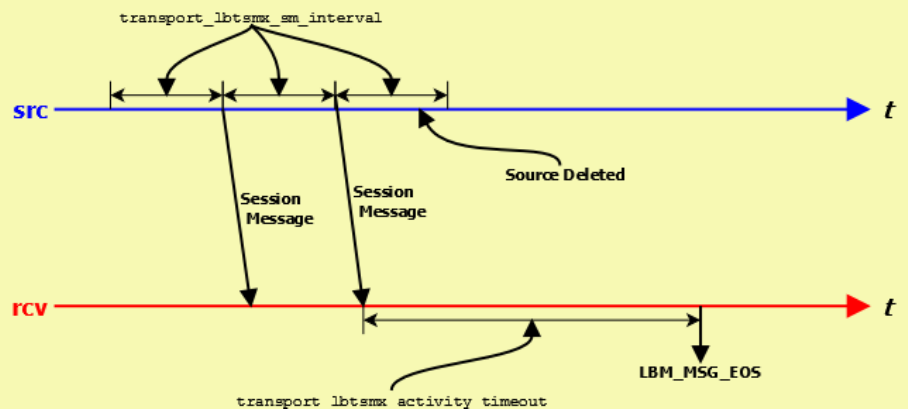
Chapter 24
Transport LBT-SMX Operation Options
The image below illustrates the timing of an LBT-SMX transport session.
The Source Session Message mechanism enables the receiver to detect when a source goes away and works
similarly to LBT-RU. It operates independently of message writes/reads in the Shared Memory Area.
24.1 LBT-SMX Transport Session Management
When a source is created, the application can explicitly map it to a transport session by setting the transport_←-
lbtsmx_id (source) option. If a previous source was created on the same context with the same ID number, this new
source will be mapped to the same transport session. Note that ID numbers can be re-used by different contexts on
the same host. The resulting transport sessions will be separate, independent, and non-interfering.
Alternatively, if the application does not explicitly specify a source ID, UM will implicitly assign the new source to a
pool of transport sessions defined when the context was created. The pool is defined as a range of ID numbers
specified by the options transport_lbtsmx_id_low (context) and transport_lbtsmx_id_high (context). The numeric
range defines the number of transport sessions in the pool.
When a new source is created and the source port is not explicitly defined, UM will check to see how many transport
sessions are currently active from the pool within the context. If it is less than the configured range of IDs then UM
will use the next ID in the range transport_lbtsmx_id_low (context) to transport_lbtsmx_id_high (context). However,

204 Transport LBT-SMX Operation Options
if the context already has activated all transport sessions in the pool, then the new topic is mapped to one of the
existing transport sessions, in round-robin fashion.
24.2 Reference
24.2.1 transport_lbtsmx_activity_timeout (receiver)
The maximum period of inactivity (lack of updates to the source's shared activity counter) from an SMX source
before UM delivers an EOS event for all topics using the transport session. You should configure this option to
a value greater than the source's transport_lbtsmx_sm_interval so receivers do not erroneously report a source
as inactive.
Scope: receiver
Type: lbm_ulong_t
Units: milliseconds
Default
value:
60,000 (60 seconds)
When to
Set:
Can only be set during object initialization.
Version: This option was implemented in UM 6.1
24.2.2 transport_lbtsmx_datagram_max_size (source)
The maximum datagram size that can be sent for an LBT-SMX transport session. While SMX does not use
UDP datagrams, this option limits the size of the UM message which is given to the underlying transport type,
including all UM headers and overhead. This value includes 16 bytes of header information per message, plus
an additional 24 bytes of reserved space for compatibility with other egress transports when re-sending SMX
messages through a UM Dynamic Router. Therefore, the largest usable message size for the default setting of
8192 bytes would be 8176 bytes (8192 - 16 - 24). The minimum is 32 bytes. The maximum size is limited by
available memory.
This option imposes a hard limit on message size because the LBT-SMX transport does not support datagram
fragmentation or reassembly. Unlike other transports that do support fragmentation, attempts to send messages
larger than the datagram size configured by this option fail.
The minimum value for this option is 32 bytes. Unlike other transports, there is no hard-coded maximum value;
the maximum is limited only by the amount of memory available.

24.2 Reference 205
Note: The source's configured transport_lbtsmx_transmission_window_size (source) must be at least twice as
large as the source's configured transport_lbtsmx_datagram_max_size. If the transmission window has not
been configured to be large enough to hold at least two maximum-sized SMX datagrams, then a warning will
be issued and the source's transport_lbtsmx_transmission_window_size option will be automatically adjusted
upwards to the nearest power-of-2 size in bytes that can fit at least two maximum-sized datagrams.
See Message Fragmentation and Reassembly for more information.
Informatica does not recommend setting datagram max size options to the network MTU. See Datagram Max
Size and Network MTU.
Warning
When the DRO is in use, it is recommended that all UM applications and components (including the DRO and
Persistent Store) share the same maximum datagram size setting. See Protocol Conversion.
Scope: source
Type: lbm_uint_t
Units: bytes
Default
value:
8192
When to
Set:
Can only be set during object initialization.
Version: This option was implemented in UM 6.1
24.2.3 transport_lbtsmx_id (source)
The preferred Transport ID for a specific source's LBT-SMX session. To use this option, configure a non-zero
value. For the default value of 0 (zero), the UM context selects the next available Transport ID in the Transport
ID range of transport_lbtsmx_id_low (context) and transport_lbtsmx_id_high (context). Refer to Source Object
in the Ultra Messaging Concepts Guide for additional information.
Scope: source
Type: lbm_uint16_t
Default
value:
0
When to
Set:
Can only be set during object initialization.
Version: This option was implemented in UM 6.1

206 Transport LBT-SMX Operation Options
24.2.4 transport_lbtsmx_id_high (context)
Highest transport ID in the range of available LBT-SMX Transport IDs.
Scope: context
Type: lbm_uint16_t
Default
value:
30,005
When to
Set:
Can only be set during object initialization.
Version: This option was implemented in UM 6.1
24.2.5 transport_lbtsmx_id_low (context)
Lowest transport ID in the range of available LBT-SMX Transport IDs.
Scope: context
Type: lbm_uint16_t
Default
value:
30,001
When to
Set:
Can only be set during object initialization.
Version: This option was implemented in UM 6.1
24.2.6 transport_lbtsmx_maximum_receivers_per_transport (source)
The maximum number of receiving contexts that can join an SMX transport session. Once a receiving context
joins an SMX transport session, it can receive messages on multiple topics. Increasing this value increases the
amount of shared memory allocated per transport session by a negligible amount.

24.2 Reference 207
Scope: source
Type: lbm_ushort_t
Default
value:
64
When to
Set:
Can only be set during object initialization.
Version: This option was implemented in UM 6.1
24.2.7 transport_lbtsmx_message_statistics_enabled (context)
Controls whether or not UM records LBT-SMX transport statistics, which adds a small but measurable amount
of latency.
Scope: context
Type: int
Default
value:
0
When to
Set:
Can only be set during object initialization.
Version: This option was implemented in UM 6.1
Value Description
1 UM records source and receiver LBT-SMX transport statistics.
0 UM does not record source and receiver LBT-SMX transport statistics. Default for all.
24.2.8 transport_lbtsmx_sm_interval (source)
Time period between updates to an LBT-SMX source's shared activity counter, which enables connected re-
ceivers to determine the source's liveness. You should configure this option to a value less than the receivers'
corresponding transport_lbtsmx_activity_timeout (receiver) setting so receivers do not time out sources too
early.
Refer to Source Object in the Ultra Messaging Concepts Guide for additional information.

208 Transport LBT-SMX Operation Options
Scope: source
Type: lbm_ulong_t
Units: milliseconds
Default
value:
10,000 (10 seconds)
When to
Set:
Can only be set during object initialization.
Version: This option was implemented in UM 6.1
24.2.9 transport_lbtsmx_transmission_window_size (source)
Size of an LBT-SMX transport's shared memory area, which must be a power of two and be twice a large as
the source's transport_lbtsmx_datagram_max_size (source). If you configure a value that is not a power of 2 or
is less than twice the size of the maximum datagram size, UM issues a warning log message and automatically
rounds up the value of this option to the next power of 2 window size that can fit at least two maximum-sized
datagrams. The minimum value for this option is 64 bytes.
Refer to Source Object in the Ultra Messaging Concepts Guide for additional information.
Scope: source
Type: size_t
Units: bytes
Default
value:
131072 (128 KB)
When to
Set:
Can only be set during object initialization.
Version: This option was implemented in UM 6.1
Chapter 25
Transport Acceleration Options
Transport acceleration options enable kernel-bypass acceleration in conjunction with the following vendor
solutions:
• Myricom® Datagram Bypass Layer (DBL™)
• Solarflare® Onload
• Mellanox® 10-Gigabit Ethernet or InfiniBand hardware
25.1 Myricom® Datagram Bypass Layer (DBL™)
DBL is a kernel-bypass technology that accelerates sending and receiving UDP traffic and operates with DBL-
enabled Myricom 10-Gigabit Ethernet adapter cards for Linux and Microsoft® Windows.
DBL does not support fragmentation and reassembly, so do not send messages larger than the MTU size configured
on the DBL interface.
DBL acceleration is compatible with the following Ultra Messaging transport types:
• LBT-RM (UDP-based reliable multicast)
• LBT-RU (UDP-based reliable unicast)
• Multicast Immediate Messaging
• Multicast Topic Resolution
To use DBL Transport Acceleration, perform the following steps:
1. Install the Myricom 10-Gigabit Ethernet NIC.
2. Install the DBL shared library.
3. Update your search path to include the location of the DBL shared library.
4. Set option transport_∗_datagram_max_size and option resolver_datagram_max_size (context) to a value of
no more than 28 bytes smaller than the Myricom interface's configured MTU size.

210 Transport Acceleration Options
25.2 Reference
25.2.1 dbl_lbtrm_acceleration (context)
Flag indicating if DBL acceleration is enabled for LBT-RM transports.
Scope: context
Type: int
When to
Set:
Can only be set during object initialization.
Version: This option was implemented in LBM 4.0.
Value Description
1 DBL acceleration is enabled for LBT-RM.
0 DBL acceleration is not enabled for LBT-RM. Default for all.
25.2.2 dbl_lbtru_acceleration (context)
Flag indicating if DBL acceleration is enabled for LBT-RU transports.
Scope: context
Type: int
When to
Set:
Can only be set during object initialization.
Version: This option was implemented in LBM 4.0.
Value Description
1 DBL acceleration is enabled for LBT-RU.
0 DBL acceleration is not enabled for LBT-RU. Default for all.

25.2 Reference 211
25.2.3 dbl_mim_acceleration (context)
Flag indicating if DBL acceleration is enabled for multicast immediate messaging (MIM).
Scope: context
Type: int
When to
Set:
Can only be set during object initialization.
Version: This option was implemented in LBM 4.0.
Value Description
1 DBL acceleration is enabled for MIM.
0 DBL acceleration is not enabled for MIM. Default for all.
25.2.4 dbl_resolver_acceleration (context)
Flag indicating if DBL acceleration is enabled for topic resolution.
Scope: context
Type: int
When to
Set:
Can only be set during object initialization.
Version: This option was implemented in LBM 4.0.
Value Description
1 DBL acceleration is enabled for topic resolution.
0 DBL acceleration is not enabled for topic resolution. Default for all.

212 Transport Acceleration Options
25.3 Solarflare® Onload
Solarflare Onload is a kernel-bypass technology that accelerates message traffic and operates with Solarflare 10←-
GbE Ethernet NICs.
Note
Onload does not support fragmentation and reassembly, so do not send messages larger than the MTU size
configured on the Solarflare interface.
Warning
Onload does not support both accelerated and non-accelerated processes subscribing to the same multicast
group on the same host. An attempt to do so will result in the non-accelerated process becoming "deaf" to
the shared multicast group. See "Onload User Guide", chapter 9.11 "Multicast Operation and Stack Sharing",
sub-section "Multicast Receive - Onload Stack and Kernel Stack".
Ultra Messaging loads the Onload library dynamically during Ultra Messaging initialization on the following Ultra
Messaging platforms:
• Linux-glibc-2.3-i686
• Linux-glibc-2.3-x86_64 Linux-glibc-2.5-x86_64
Onload default behavior accelerates all sockets. You can access the Onload onload_set_stackname API extension
to select the sockets you want to accelerate by using UM configuration options. Selecting sockets with a stackname
lets you accelerate data transmission sockets and not sockets for control messages, topic resolution, or responses.
You can select a stackname with the configuration options onload_acceleration_stack_name (receiver) and onload←-
_acceleration_stack_name (source) for the following Ultra Messaging transport types:
• LBT-RM (UDP-based reliable multicast)
• LBT-RU (UDP-based reliable unicast)
• TCP
Note
If you set the LBM_SUPPRESS_ONLOAD environment variable to any value, Ultra Messaging does not dy-
namically load the Onload library at runtime. In this case, you cannot use the onload_acceleration_stack_←-
name options.
If you use the onload_set_stackname API directly for any other accelerated sockets, note that after Ultra Messaging
accelerates a transport socket, Ultra Messaging resets the stackname to the default for all threads by calling:
onload_set_stackname(ONLOAD_ALL_THREADS, ONLOAD_SCOPE_NOCHANGE, "");
Ultra Messaging resets the stackname during source creation and when a receiver matched topic opens a transport
session.
To enable Onload socket acceleration for selected transports, perform the following steps:

25.4 Reference 213
1. Install Onload.
2. Set the Onload environment variable EF_DONT_ACCELERATE = 1 to disable Onload default behavior.
3. To enable acceleration for all applications in an environment, export the following environment variable:
export LD_PRELOAD=libonload.so
4. To enable acceleration on a per-application basis, start the application as in the following example:
onload <app_name>[app_options]
5. Set UM configuration option onload_acceleration_stack_name (source) according to the thread the source
uses.
Note: Disable batching to ensure that it is the application thread that sends the data out.
6. Set UM configuration option onload_acceleration_stack_name (receiver) according to the thread the receiver
uses.
Note: Receiver transports might not share the same thread if MTT is enabled.
7. Set option transport_∗_datagram_max_size and option resolver_datagram_max_size (context) to a value of
no more than 28 bytes smaller than the Solarflare interface's configured MTU size.
For detailed information about onload stack names, refer to the Solarflare® Onload User Guide.
25.4 Reference
25.4.1 onload_acceleration_stack_name (receiver)
The stackname to use when creating an OpenOnload transport data socket. The stackname must be eight
characters or less. Because this is a transport setting, the first receiver applies its configuration option setting,
and other receivers that join the transport inherit the setting of the first source. To disable the stackname, set
this option to NULL, which must be all uppercase.
Note: Use of this option requires Solarflare OpenOnload and applies to LBT-RM, LBT-RU, and TCP transports.
Scope: receiver
Type: string
Default
value:
NULL
When to
Set:
Can only be set during object initialization.
Version: This option was implemented in UM 6.5.

214 Transport Acceleration Options
25.4.2 onload_acceleration_stack_name (source)
The stackname to use when creating an OpenOnload transport data socket. The stackname must be eight
characters or less. Because this is a transport setting, the first source applies its configuration option setting,
and other sources that join the transport inherit the setting of the first source. To disable the stackname, set this
option to NULL, which must be all uppercase.
Note: Use of this option requires Solarflare OpenOnload and applies to LBT-RM, LBT-RU, and TCP transports.
Scope: source
Type: string
Default
value:
NULL
When to
Set:
Can only be set during object initialization.
Version: This option was implemented in UM 6.5.
25.5 UD Acceleration for Mellanox® Hardware Interfaces
UD (Unreliable Datagram) acceleration is a kernel-bypass technology that accelerates sending and receiving UDP
traffic and operates with Mellanox 10-Gigabit Ethernet or InfiniBand adapter cards for 64-bit Linux on X86 platforms.
UD acceleration does not support fragmentation and reassembly, so do not send messages larger than the MTU
size configured on the Mellanox interface.
UD acceleration is available for the following Ultra Messaging transport types:
• LBT-RM (UDP-based reliable multicast)
• LBT-RU (UDP-based reliable unicast)
• Multicast Immediate Messaging
• Multicast Topic Resolution
To use UD acceleration, perform the following steps:
1. Install the Mellanox NIC.
2. Install the VMA package, which is part of the UD acceleration option .
3. Include the appropriate transport acceleration options in your Ultra Messaging Configuration File.
4. Set option transport_∗_datagram_max_size and option resolver_datagram_max_size (context) to a value of
no more than 28 bytes smaller than the Mellanox interface's configured MTU size.

25.6 Reference 215
25.6 Reference
25.6.1 resolver_ud_acceleration (context)
Flag indicating if Accelerated Multicast is enabled for Topic Resolution. Accelerated Multicast requires Mellanox
InfiniBand or 10 Gigabit Ethernet hardware. UD Acceleration of topic resolution relies on hardware-supported
loopback, which InfiniBand provides, but which the 10 Gigabit Ethernet ConnectX hardware does not.
Note: If 10 Gigabit Ethernet ConnectX hardware is used and multiple UM contexts are desired on the host, this
option must be disabled.
Scope: context
Type: int
When to
Set:
Can only be set during object initialization.
Version: This option was implemented in LBM 5.2.
Value Description
1 Accelerated Topic Resolution is enabled.
0 Accelerated Topic Resolution is not enabled. Default for all.
25.6.2 ud_acceleration (context)
Flag indicating if Accelerated Multicast is enabled for LBT-RM. Accelerated Multicast requires InfiniBand or
10 Gigabit Ethernet hardware and the purchase and installation of the Ultra Messaging Accelerated Multicast
Module. See your Ultra Messaging representative for licensing specifics.
Scope: context
Type: int
When to
Set:
Can only be set during object initialization.
Version: This option was implemented in LBM 4.1.

216 Transport Acceleration Options
Value Description
1 Accelerated Multicast is enabled.
0 Accelerated Multicast is not enabled. Default for all.

Chapter 26
Smart Source Options
See Smart Sources for introductory information on Smart Sources.
26.1 Reference
26.1.1 mem_mgt_callbacks (source)
Callback functions (and optional associated client data pointer) that are called when a Smart Source allocates,
reallocates, and deallocates memory.
The callbacks are called by the user thread that invokes lbm_ssrc_create() for create, and by lbm_ssrc_←-
delete() for delete. The reallocate callback is unused at this time.
See Smart Sources and Memory Management for restrictions.
See Smart Sources for more information about Smart Sources.
Scope: source
Type: lbm_mem_mgt_callbacks_t
Default
value:
NULL
When to
Set:
Can only be set during object initialization.
Config File: Cannot be set from an UM configuration file.
218 Smart Source Options
26.1.2 smart_src_enable_spectrum_channel (source)
This option enables spectrum channel use with Smart Sources.
See Smart Sources and Spectrum for restrictions.
See Smart Sources in the Concepts Guide for more information about Smart Sources.
Scope: source
Type: int
When to
Set:
Can only be set during object initialization.
Value Description
1 The source will allocate spectrum channel resources.
0 The source will not allocate spectrum channel resources. Default for all.
26.1.3 smart_src_max_message_length (source)
The number of bytes allocated to each Smart Source buffer.
Buffers are pre-allocated and the size of each will be increased to accommodate internal data headers. Be
aware that the actual amount of memory allocated can be as much as double the expected amount; this is
done in a time/space tradeoff to optimize execution speed. The default value was specifically chosen so that
the total memory consumed per buffer, including internal headers, is 512 bytes.
There are three types of buffers sized by this parameter: user buffers, retention buffers (for late join), and
transmission window buffers (for LBT-RM retransmissions). User buffers and retention buffers are created by
lbm_ssrc_create(), and are deleted by lbm_ssrc_delete(). Transmission window buffers are created only
when the first Smart Source on a transport session is created, and are deleted when the last Smart Source on
a transport session is deleted.
This option affects both the transport session underlying the source and also the source itself. The transport
session uses the value from the first source created on the session when it allocates the transmission window;
subsequent sources created on the same session do not affect the transmission window. However, the sizes of
the user buffers and retention buffers are specific to each Smart Source on a session.

26.1 Reference 219
See transport_lbtrm_smart_src_transmission_window_buffer_count (source) and transport_lbtru_smart_src←-
_transmission_window_buffer_count (source) for restrictions.
See Smart Sources for more information about Smart Sources.
Scope: source
Type: int
Units: bytes
Default
value:
468
When to
Set:
Can only be set during object initialization.
26.1.4 smart_src_message_property_int_count (source)
The maximum number of 32-bit integer message properties that can be set on messages for a particular Smart
Source.
See Smart Sources and Message Properties for restrictions.
See Smart Sources in the Concepts Guide for more information about Smart Sources.
Scope: source
Type: int
Units: 32-bit integer properties
Default
value:
0
When to
Set:
Can only be set during object initialization.
26.1.5 smart_src_retention_buffer_count (source)
The number of Smart Source buffers that are allocated for Late Join and other topic level retransmission features
such as Off Transport Recovery. Once created, the application cannot change the number of buffers. Also, the
number of buffers should be a power of 2. If a value is supplied that is not a power of 2, the value is increased
to the next larger power of two and a warning message is logged.

220 Smart Source Options
The normal Late Join options "retransmit_retention_∗" do not apply to Smart Sources.
See Smart Sources in the Concepts Guide for more information about Smart Sources.
Scope: source
Type: int
Units: buffers
Default
value:
1024
When to
Set:
Can only be set during object initialization.
26.1.6 smart_src_user_buffer_count (source)
The number of Smart Source buffers that are allocated when the source is created. Once created, the appli-
cation cannot change the number of buffers. Also, the number of buffers should be a power of 2. If a value is
supplied that is not a power of 2, the value is increased to the next larger power of two and a warning message
is logged.
See Smart Sources in the Concepts Guide for more information about Smart Sources.
Scope: source
Type: int
Units: buffers
Default
value:
32
When to
Set:
Can only be set during object initialization.
26.1.7 transport_lbtrm_smart_src_transmission_window_buffer_count (source)
The number of Smart Source buffers allocated for transport-level retransmissions. Once created, the application
cannot change the number of buffers. Also, the number of buffers should be a power of 2. If a value is supplied
that is not a power of 2, the value is increased to the next larger power of two and a warning message is logged.
This option affects the transport session underlying the source rather than the source itself. The transport

26.1 Reference 221
session uses the value from the first source created on the session and ignores subsequent sources.
The option smart_src_max_message_length (source) is used to size the buffers. This means that the first Smart
Source created on the session defines the maximum possible size of user messages for all Smart Sources on
the transport session. It is not legal to create a subsequent Smart Source on the same transport session with
a larger max message size, although smaller values are permissible.
The normal LBT-RM transmission window options "transport_lbtrm_transmission_window_∗" do not apply to
Smart Sources.
See Smart Sources in the Concepts Guide for more information about Smart Sources.
Scope: source
Type: int
Units: buffers
Default
value:
16384 (16K)
When to
Set:
Can only be set during object initialization.
26.1.8 transport_lbtru_smart_src_transmission_window_buffer_count (source)
The number of Smart Source buffers allocated for transport-level retransmissions.
Once created, the application cannot change the number of buffers. Also, the number of buffers should be a
power of 2. If a value is supplied that is not a power of 2, the value is increased to the next larger power of two
and a warning message is logged.
This option affects the transport session underlying the source rather than the source itself. The transport
session uses the value from the first source created on the session and ignores subsequent sources.
The option smart_src_max_message_length (source) is used to size the buffers. This means that the first Smart
Source created on the session defines the maximum possible size of user messages for all Smart Sources on
the transport session. It is not legal to create a subsequent Smart Source on the same transport session with
a larger max message size, although smaller values are permissible.
The normal LBT-RU transmission window options "transport_lbtru_transmission_window_∗" do not apply to
Smart Sources.

222 Smart Source Options
Note
If transport_source_side_filtering_behavior (source) is enabled, each connecting receiver will be assigned
its own transmission window buffer. As the number of connecting receivers increases, the total memory
consumption of the source can become very large.
See Smart Sources in the Concepts Guide for more information about Smart Sources.
Scope: source
Type: int
Units: buffers
Default
value:
16384 (16K)
When to
Set:
Can only be set during object initialization.

Chapter 27
Encrypted TCP Options
27.1 Reference
27.1.1 tls_certificate (context)
When TLS is enabled, this option specifies the path to a file containing an OpenSSL-compatible PEM-formatted
certificate that will be presented as the TLS server certificate when a TLS connection is established by a client.
Scope: context
Type: string
Default
value:
NULL
When to
Set:
Can only be set during object initialization.
Version: This option was implemented in UM 6.9
27.1.2 tls_certificate_key (context)
When TLS is enabled, this option specifies the path to a file containing the private key associated with the
"server" certificate specified by the tls_certificate (context) option. Note that this private key must be protected
from intruders. For that reason, when the certificate and private key files are generated, the private key file
is typically encrypted with a passphrase. The passphrase is supplied using the tls_certificate_key_password
(context) option.

224 Encrypted TCP Options
Scope: context
Type: string
Default
value:
NULL
When to
Set:
Can only be set during object initialization.
Version: This option was implemented in UM 6.9
27.1.3 tls_certificate_key_password (context)
When TLS is enabled, this option specifies the passphrase needed to decrypt the server private key file speci-
fied by the tls_certificate_key (context) option.
Scope: context
Type: string
Default
value:
NULL
When to
Set:
Can only be set during object initialization.
Version: This option was implemented in UM 6.9
27.1.4 tls_cipher_suites (context)
When TLS is enabled, this option defines the list of one or more (comma separated) names of cipher suites
that are acceptable to this context. The names are in OpenSSL format (the names with dashes). If more than
one name is supplied, they should be in descending order of preference. When a remote context negotiates
encrypted TCP, the two sides must find a cipher suite in common, otherwise the connection will be canceled.
The default is highly secure and is recommended. For information on valid cipher suite specifications, see
Encrypted TCP in the Ultra Messaging Concepts Guide.
Scope: context
Type: string
Default
value:
DHE-RSA-AES256-GCM-SHA384
When to
Set:
Can only be set during object initialization.
Version: This option was implemented in UM 6.9

27.1 Reference 225
27.1.5 tls_compression_negotiation_timeout (context)
The number of milliseconds allowed for TLS and/or compression handshake and negotiation. This negotiation
happens when the TCP connection is initiated. If the negotiation does not complete within this amount of time,
the connection is canceled. Note that in many cases, this will result in a retry a short time later. If the timeout
is caused by mismatched endpoints, it can result in unbounded flapping of the connection.
Scope: context
Type: int
Units: milliseconds
Default
value:
5000
When to
Set:
Can only be set during object initialization.
Version: This option was implemented in UM 6.9
27.1.6 tls_trusted_certificates (context)
When TLS is enabled, this option specifies the path to a file containing one or more OpenSSL-compatible PE←-
M-formatted TLS client certificates and certificate authorities. If this option is not supplied, the default behavior
is to use the system-level trusted certificates and certificate authorities (operating-system dependent). The
TLS server uses these trusted certificates to verify the identity of connecting clients. If a client connects and
presents a certificate which is not in the server's trusted certificates file, the connection will be canceled. Note
that in many cases, this will result in a retry a short time later, which can lead to unbounded flapping of the
connection.
Scope: context
Type: string
Default
value:
NULL
When to
Set:
Can only be set during object initialization.
Version: This option was implemented in UM 6.9

226 Encrypted TCP Options
27.1.7 use_tls (context)
This option enables data encryption on all TCP links established within the context. This includes but may not
be limited to TCP transports, Late Join, and Request/Response.
Scope: context
Type: int
Default
value:
0
When to
Set:
Can only be set during object initialization.
Version: This option was implemented in UM 6.9
String value Integer value Description
"1" 1 All TCP data will be encrypted.
"0" 0 No encryption will be implemented. Default for all.
Chapter 28
Compressed TCP Options
28.1 Reference
28.1.1 compression (context)
This option enables compression and sets the desired data compression algorithm on all TCP links established
within the context. This includes but may not be limited to TCP transports, Late Join, and Request/Response.
Currently, only LZ4 lossless data compression is supported.
Scope: context
Type: int
When to
Set:
Can only be set during object initialization.
Version: This option was implemented in UM 6.9.
String value Integer value Description
"none" LBM_CTX_ATTR_COMPRESSION_NONE No compression will be implemented. De-
fault for all.
"lz4" LBM_CTX_ATTR_COMPRESSION_LZ4 All TCP data will be compressed using LZ4.

228 Compressed TCP Options
Chapter 29
Multicast Immediate Messaging Network
Options
The multicast address and port used for incoming and outgoing multicast immediate messages can be set with
mim_address (context) and mim_destination_port (context) options.
A context may use different multicast addresses and/or ports for incoming and outgoing messages by setting one
or more of:
•mim_incoming_address (context)
•mim_outgoing_address (context)
•mim_incoming_destination_port (context)
•mim_outgoing_destination_port (context)
In case of conflict, the most recently set option wins.
As with LBT-RM on multi-homed hosts, the interface UM uses for MIM follows the interface used with multicast topic
resolution. See resolver_multicast_interface (context).
Warning
The addresses and ports you configure for MIM traffic should not overlap with any addresses or ports - or
address and port ranges - configured for LBT-RM transports or Topic Resolution traffic. For example, do not
use the same multicast address for both Topic Resolution (resolver_multicast_address (context)) and MIM
(mim_address (context)). Use different addresses and ports for all multicast address options and port options.
See also Multicast Immediate Messaging in the Ultra Messaging Concepts Guide for more information about this
feature.
29.1 Reference

230 Multicast Immediate Messaging Network Options
29.1.1 mim_address (context)
Convenience option to set both the incoming and outgoing multicast addresses for multicast immediate mes-
sages. See mim_outgoing_address (context) and mim_incoming_address (context) for their respective default
values.
Scope: context
Type: struct in_addr
Default
value:
n.a.
When to
Set:
Can only be set during object initialization.
29.1.2 mim_destination_port (context)
The UDP destination port that multicast immediate messages are sent to and received from.
See Port Assignments for more information about configuring ports.
Scope: context
Type: lbm_uint16_t
Default
value:
14401
Byte order: Network
When to
Set:
Can only be set during object initialization.
29.1.3 mim_incoming_address (context)
The IP multicast address (or domain name of the multicast address) that multicast immediate messages are
received from. The value 0.0.0.0 disables reception of multicast immediate messages.
Scope: context
Type: struct in_addr
Default
value:
0.0.0.0

29.1 Reference 231
When to
Set:
Can only be set during object initialization.
29.1.4 mim_incoming_destination_port (context)
The UDP destination port that multicast immediate messages are received from.
See Port Assignments for more information about configuring ports.
Scope: context
Type: lbm_uint16_t
Default
value:
14401
Byte order: Network
When to
Set:
Can only be set during object initialization.
29.1.5 mim_outgoing_address (context)
The IP multicast address (or domain name of the multicast address) that multicast immediate messages are
sent to.
Scope: context
Type: struct in_addr
Default
value:
224.10.10.21
When to
Set:
Can only be set during object initialization.

232 Multicast Immediate Messaging Network Options
29.1.6 mim_outgoing_destination_port (context)
The UDP destination port that multicast immediate messages are sent to.
See Port Assignments for more information about configuring ports.
Scope: context
Type: lbm_uint16_t
Default
value:
14401
Byte order: Network
When to
Set:
Can only be set during object initialization.

Chapter 30
Multicast Immediate Messaging Reliability
Options
For every MIM reliability option, there is a corresponding LBT-RM reliability option. For more information on how
MIM reliability options interact and for illustrations, see Transport LBT-RM Reliability Options.
See also Multicast Immediate Messaging in the Ultra Messaging Concepts Guide for more information about this
feature.
30.1 Reference
30.1.1 mim_ignore_interval (context)
For multicast immediate message senders only. See transport_lbtrm_ignore_interval (source) for description.
Scope: context
Type: lbm_ulong_t
Units: milliseconds
Default
value:
500 (0.5 seconds)
When to
Set:
Can only be set during object initialization.

234 Multicast Immediate Messaging Reliability Options
30.1.2 mim_nak_backoff_interval (context)
For multicast immediate message receivers only. See transport_lbtrm_nak_backoff_interval (receiver) for de-
scription.
Scope: context
Type: lbm_ulong_t
Units: milliseconds
Default
value:
200 (0.2 seconds)
When to
Set:
Can only be set during object initialization.
30.1.3 mim_nak_generation_interval (context)
For multicast immediate message receivers only. See transport_lbtrm_nak_generation_interval (receiver) for
description.
Scope: context
Type: lbm_ulong_t
Units: milliseconds
Default
value:
10000 (10 seconds)
When to
Set:
Can only be set during object initialization.
30.1.4 mim_nak_initial_backoff_interval (context)
For multicast immediate message receivers only. See transport_lbtrm_nak_initial_backoff_interval (receiver)
for description.
Scope: context
Type: lbm_ulong_t
Units: milliseconds
Default
value:
50 (0.05 seconds)

30.1 Reference 235
When to
Set:
Can only be set during object initialization.
Version: This option was implemented in LBM 3.4/UME 2.1.
30.1.5 mim_nak_suppress_interval (context)
For multicast immediate message receivers only. See transport_lbtrm_nak_suppress_interval (receiver) for
description.
Scope: context
Type: lbm_ulong_t
Units: milliseconds
Default
value:
1000 (1 second)
When to
Set:
Can only be set during object initialization.
30.1.6 mim_send_naks (context)
For multicast immediate message receivers only. See transport_lbtrm_send_naks (receiver) for description.
Scope: context
Type: int
When to
Set:
Can only be set during object initialization.
Value Description
1 NAKs are sent for missing packets to request retransmission. Default for all.
0 Do not send NAKs for missing packets.

236 Multicast Immediate Messaging Reliability Options
30.1.7 mim_transmission_window_limit (context)
For multicast immediate message senders only. See transport_lbtrm_transmission_window_limit (source) for
description.
Scope: context
Type: size_t
Units: bytes
Default
value:
0 (zero)
When to
Set:
Can only be set during object initialization.
30.1.8 mim_transmission_window_size (context)
For multicast immediate message senders only. See transport_lbtrm_transmission_window_size (source) for
description.
Scope: context
Type: size_t
Units: bytes
Default
value:
25165824 (24 MB)
When to
Set:
Can only be set during object initialization.

Chapter 31
Multicast Immediate Messaging Operation
Options
For many MIM operation options, there is a corresponding LBT-RM operation option. For more information on how
MIM operation options interact and for illustrations, see Transport LBT-RM Operation Options.
Note that the LBT-RM rate controller also governs MIM transmission rates. Hence there is no separate option for
setting MIM transmission rate.
See also Multicast Immediate Messaging in the Ultra Messaging Concepts Guide for more information about this
feature.
31.1 Reference
31.1.1 immediate_message_receiver_function (context)
Callback function (and associated event queue and client data pointer) called when a topic-less immediate
message is received. A value of NULL (the default) disables this feature.
Scope: context
Type: lbm_context_rcv_immediate_msgs_func←-
_t
Default
value:
NULL
When to
Set:
Can only be set during object initialization.
Config File: Cannot be set from an UM configuration file.

238 Multicast Immediate Messaging Operation Options
31.1.2 immediate_message_topic_receiver_function (context)
Callback function (and associated event queue and client data pointer) that is called when an immediate mes-
sage is received for a topic for which there is no receiver. A value of NULL (the default) disables this feature.
Scope: context
Type: lbm_context_rcv_immediate_msgs_func←-
_t
Default
value:
NULL
When to
Set:
Can only be set during object initialization.
Config File: Cannot be set from an UM configuration file.
31.1.3 mim_activity_timeout (context)
For multicast immediate message receivers only. See transport_lbtrm_activity_timeout (receiver) for descrip-
tion. However, multicast immediate message channels do not deliver an EOS indication.
Scope: context
Type: lbm_ulong_t
Units: milliseconds
Default
value:
60000 (60 seconds)
When to
Set:
Can only be set during object initialization.
31.1.4 mim_delivery_control_activity_check_interval (context)
The interval between activity checks of a Multicast Immediate Messaging delivery controller. Multiple MIM
delivery controllers may exist to accommodate multiple messages from a single MIM sender received across
more than one UM Dynamic Router. These multiple delivery controllers allow for duplicate message detection.
Scope: context
Type: lbm_ulong_t
Units: milliseconds

31.1 Reference 239
Default
value:
5000 (5 seconds)
When to
Set:
Can only be set during object initialization.
Version: This option was implemented in LBM 4.0.
31.1.5 mim_delivery_control_activity_timeout (context)
The maximum time that a Multicast Immediate Messaging delivery controller may be quiescent before it is
deleted. MIM delivery controllers may be created to accommodate multiple messages from a single MIM sender
received across more than one UM Dynamic Router. These multiple delivery controllers allow for duplicate
message detection.
Scope: context
Type: lbm_ulong_t
Units: milliseconds
Default
value:
60000 (60 seconds)
When to
Set:
Can only be set during object initialization.
Version: This option was implemented in LBM 4.0.
31.1.6 mim_delivery_control_order_tablesz (context)
For multicast immediate messages with ordered delivery, this controls the size of the hash table used to hold
data.
Scope: context
Type: size_t
Units: table entries
Default
value:
1031
When to
Set:
Can only be set during object initialization.

240 Multicast Immediate Messaging Operation Options
31.1.7 mim_implicit_batching_interval (context)
The maximum timeout between when the first message of an implicitly batched immediate message is queued
until the batch is sent. A message will not stay in the queue longer than this value before being sent in the worst
case.
See Implicit Batching for details.
Scope: context
Type: lbm_ulong_t
Units: milliseconds
Default
value:
200 (0.2 seconds)
When to
Set:
Can only be set during object initialization.
31.1.8 mim_implicit_batching_minimum_length (context)
The minimum length of an implicitly batched multicast immediate message. When the total length of the implic-
itly batched messages reaches or exceeds this value, the batch is sent.
See Implicit Batching for details.
Scope: context
Type: size_t
Units: bytes
Default
value:
2048 (8192 for Microsoft Windows)
When to
Set:
Can only be set during object initialization.

31.1 Reference 241
31.1.9 mim_ordered_delivery (context)
For multicast immediate messages only. Indicates whether or not the MIM source should have its data delivered
in order. The default value also guarantees fragmentation and reassembly of large messages. Changing this
option from the default value results in large messages being delivered as individual fragments of less than
8K each, requiring the application to reassemble them. See also Ordered Delivery in the Ultra Messaging
Concepts Guide for more information about large message fragmentation and reassembly.
Scope: context
Type: int
When to
Set:
Can only be set during object initialization.
Value Description
1 Indicates the source should have its data delivered in order. Default for all.
0 The source should have its data delivered as soon as possible and may come in out of order.
31.1.10 mim_sm_maximum_interval (context)
For multicast immediate message senders only. See transport_lbtrm_sm_maximum_interval (source) for de-
scription.
Scope: context
Type: lbm_ulong_t
Units: milliseconds
Default
value:
10000 (10 seconds)
When to
Set:
Can only be set during object initialization.

242 Multicast Immediate Messaging Operation Options
31.1.11 mim_sm_minimum_interval (context)
For multicast immediate message senders only. See transport_lbtrm_sm_minimum_interval (source) for de-
scription.
Scope: context
Type: lbm_ulong_t
Units: milliseconds
Default
value:
200 (0.2 seconds)
When to
Set:
Can only be set during object initialization.
31.1.12 mim_sqn_window_increment (context)
For multicast immediate message receivers only. Determines the increment by which the sequence number
window is moved when detecting the receipt of duplicate multicast immediate messages. Must be a multiple of
8 and an even divisor of mim_sqn_window_size (context).
Scope: context
Type: lbm_ulong_t
Units: messages
Default
value:
8192
When to
Set:
Can only be set during object initialization.
Version: This option was implemented in LBM 4.2.8/UME 3.2.8/UMQ 2.1.8
31.1.13 mim_sqn_window_size (context)
For multicast immediate message receivers only. Determines the window size used to detect the receipt of
duplicate multicast immediate messages. Must be a multiple of 8.
Scope: context
Type: lbm_ulong_t
Units: messages

31.1 Reference 243
Default
value:
16384
When to
Set:
Can only be set during object initialization.
Version: This option was implemented in LBM 4.2.8/UME 3.2.8/UMQ 2.1.8
31.1.14 mim_src_deletion_timeout (context)
The timeout after a multicast immediate message is sent before the internal source is deleted and cleaned up.
Scope: context
Type: lbm_ulong_t
Units: milliseconds
Default
value:
30000 (30 seconds)
When to
Set:
Can only be set during object initialization.
31.1.15 mim_tgsz (context)
For multicast immediate message senders only. See transport_lbtrm_tgsz (source) for description.
Scope: context
Type: lbm_uint16_t
Units: packets
Default
value:
8
When to
Set:
Can only be set during object initialization.

244 Multicast Immediate Messaging Operation Options
31.1.16 mim_unrecoverable_loss_function (context)
Callback function (and associated client data pointer) that is called when a MIM receiver has unrecoverable
loss.
This callback is called by the context thread and can not use an event queue. Therefore the callback function
used should not block or it will delay reception of latency-sensitive messages.
Scope: context
Type: lbm_mim_unrecloss_func_t
Default
value:
NULL
When to
Set:
Can only be set during object initialization.
Config File: Cannot be set from an UM configuration file.
Chapter 32
Late Join Options
Late Join allows sources to save a predefined amount of their messaging traffic for late-joining receivers. Sources
set the configuration options that determine whether they use Late Join or not, and receivers set options that
determine whether they will participate in Late Join recovery if sources use Late Join.
UMP's persistent store is built on Late Join technology. In the Estimating Recovery Time discussion below, the
terms Late Join buffers and UMP store are roughly equivalent.
For more, review Late Join in the Ultra Messaging Concepts Guide, especially Configuring Late Join for Large
Numbers of Messages.
32.1 Estimating Recovery Time
Late Join message recovery time is a function of how much data must be recovered and how fast messages are
retransmitted. To estimate Late Join recovery time Rin minutes, use the formula:
R=D/(1-(txrate/rxrate))
where:
Dis the downtime (in minutes) across all receivers
txrate is the average source transmission rate of normal (live stream) messages during recovery (in kms-
gs/sec).
rxrate is the average source retransmission rate from source-side Late Join buffers during recovery (in kms-
gs/sec). This rate needs to be greater than txrate.
For example, consider the following scenario:
D= 10 minutes
txrate = 10k messages / second
rxrate = 25k messages / second
Plugging these values into the formula gives an estimated recovery time in minutes:
R=10/(1-(10/25))
or 16.67 minutes. Note that this formula assumes the following:
• Retransmit rate(rxrate) is as linear as possible with use of option response_tcp_nodelay (context) to 1.
• Transmit rate (txrate) from all relevant sources is fairly constant and equal
246 Late Join Options
• Retransmit rate (rxrate) from Late Join buffers is fairly constant and equal, and should be measured in a
live test, if possible. You can adjust the recovery rate with two Late Join configuration options: retransmit_←-
request_outstanding_maximum (receiver) and retransmit_request_interval (receiver).
32.2 Reference
32.2.1 late_join (source)
Configure the source to enable both Late Join and Off-Transport Recovery operation for receivers. See Using
Late Join and Off-Transport Recovery (OTR) in the Ultra Messaging Concepts Guide.
Scope: source
Type: int
When to
Set:
Can only be set during object initialization.
Value Description
1 Enable source for Late Join and OTR. (Forced on for Persistence.)
0 Disable source for Late Join and OTR. Default for all.
32.2.2 late_join_info_request_interval (receiver)
The interval at which the receiver requests a Late Join Information Record (LJI) from the source. Controlling
these requests helps reduce receiver start-up traffic on your network.
Scope: receiver
Type: lbm_ulong_t
Units: milliseconds
Default
value:
1000 (1 second)
When to
Set:
Can only be set during object initialization.
Version: This option was implemented in UMP 6.0

32.2 Reference 247
32.2.3 late_join_info_request_maximum (receiver)
The maximum number of requests the receiver issues for a Late Join Information Record (LJI) from the source.
If the receiver has not received an LJI after this number of requests, it stops requesting.
Scope: receiver
Type: lbm_ulong_t
Default
value:
60
When to
Set:
Can only be set during object initialization.
Version: This option was implemented in UMP 6.0
32.2.4 retransmit_initial_sequence_number_request (receiver)
When a late-joining receiver detects (from the topic advertisement) that a source is enabled for Late Join but
has sent no messages, this flag option lets the receiver request an initial sequence number from a source.
Sources respond with a TSNI.
Scope: receiver
Type: int
Default
value:
1
When to
Set:
Can only be set during object initialization.
Version: This option was implemented in LBM 4.2.
Value Description
1 The receiver requests an initial sequence number from Late Join enabled sources that have not
sent any messages. Default for all.
0 The receiver does not request an initial sequence number.

248 Late Join Options
32.2.5 retransmit_message_caching_proximity (receiver)
This option determines how a receiver handles new messages that are being published while the receiver is
in the process of recovering older messages through the retransmit request mechanism. A receiver has the
ability to cache new messages during the recovery process in order to facilitate a smooth transition from recov-
ery to live stream. This option value determines how close (proximate) a newly received message sequence
number must be to the latest retransmitted sequence number for the receiver to cache it. New messages
that arrive while the receiver is not within proximity will be discarded, and the receiver will attempt to recover
those messages later via the retransmit request mechanism. An option value between 0 and 0x7FFFFFFE
(2,147,483,646) enables proximity caching, with larger values allowing caching to begin earlier during recovery.
Values 0x7FFFFFFF and above disable proximity caching. This value has meaning for only receivers using or-
dered delivery of data. See Configuring Late Join for Large Numbers of Messages in the Ultra Messaging
Concepts Guide for additional information about this option.
Scope: receiver
Type: lbm_ulong_t
Units: messages
Default
value:
5000 (was 0xFFFFFFFF = 4,294,967,295 in versions prior to 6.8)
When to
Set:
Can only be set during object initialization.
Version: This option was implemented in LBM 3.3.2/UME 2.0.
32.2.6 retransmit_request_interval (receiver)
The interval between retransmission request messages to the source. See Configuring Late Join for Large
Numbers of Messages in the Ultra Messaging Concepts Guide for additional information about this option.
Scope: receiver
Type: lbm_ulong_t
Units: milliseconds
Default
value:
500 (0.5 seconds)
When to
Set:
Can only be set during object initialization.

32.2 Reference 249
32.2.7 retransmit_request_maximum (receiver)
The maximum number of messages to request, counting backward from the current latest message, when
late-joining a topic. Due to network timing factors, UM may transmit an additional message. For example, a
value of 5 sends 5 or possibly 6 retransmit messages to the new receiver. (Hence, you cannot request and be
guaranteed to receive only 1 last message–you may get 2.) A value of 0 indicates no maximum.
Scope: receiver
Type: lbm_ulong_t
Units: messages
Default
value:
0
When to
Set:
Can only be set during object initialization.
32.2.8 retransmit_request_message_timeout (receiver)
The maximum time from when a receiver first sends a retransmission request to when the receiver gives up
on receiving the retransmitted message and reports loss. See Configuring Late Join for Large Numbers of
Messages for additional information about this option.
Scope: receiver
Type: lbm_ulong_t
Units: milliseconds
Default
value:
10000 (10 seconds)
When to
Set:
Can only be set during object initialization.
Version: This option was implemented in UM 6.0
32.2.9 retransmit_request_outstanding_maximum (receiver)
The maximum number of messages to request and to remain active (pending) at a single time. A value of 0
indicates no maximum. See Configuring Late Join for Large Numbers of Messages in the Ultra Messaging
Concepts Guide for additional information about this option.

250 Late Join Options
Scope: receiver
Type: lbm_ulong_t
Units: messages
Default
value:
10
When to
Set:
Can only be set during object initialization.
32.2.10 retransmit_retention_size_limit (source)
Sets a maximum limit on the size of the source's retransmit retention buffer when using a UMP store.
With UMP, stability and delivery confirmation events can delay the deletion of retained messages, which can
increase the size of the buffer above the retransmit_retention_size_threshold (source). Hence, this option
provides a hard size limit. UM sets a minimum value for this option of 8K for UDP and 64K for TCP, and issues
a log warning if you set a value less than the minimum.
With Smart Sources, this option is ignored. Retention buffers are preallocated.
Scope: source
Type: size_t
Units: bytes
Default
value:
25165824 (24 MB)
When to
Set:
Can only be set during object initialization.
32.2.11 retransmit_retention_size_threshold (source)
Specifies the minimum size of the retained message buffer before UM can delete messages.
The buffer must reach this size before UM can delete any messages older than retransmit_retention_age_←-
threshold (source). For UMP, these options combined with retransmit_retention_size_limit (source) affect the
retention buffer size. A value of 0 sets the size threshold to be always triggered, in which case deletion is
determined by other threshold criteria.
With Smart Sources, this option is ignored. Retention buffers are preallocated and are never deleted.
32.2 Reference 251
Scope: source
Type: size_t
Units: bytes
Default
value:
0 (threshold always triggered)
When to
Set:
Can only be set during object initialization.
32.2.12 use_late_join (receiver)
Flag indicating if the receiver should participate in a late join operation or not.
Scope: receiver
Type: int
When to
Set:
Can only be set during object initialization.
Value Description
1 The receiver will participate in using late join if requested to by the source. Default for all.
0 The receiver will not participate in using late join even if requested to by the source.

252 Late Join Options

Chapter 33
Off-Transport Recovery Options
See also Off-Transport Recovery (OTR) in the Ultra Messaging Concepts Guide for more information about this
feature.
33.1 Reference
33.1.1 otr_message_caching_threshold (receiver)
This option sets the maximum number of messages a receiver can buffer. When the number of cached mes-
sages hits this threshold, Ultra Messaging drops and does not cache new streamed messages. Dropped
messages can be requested later as retransmissions.
This option applies for only receivers using sequence-number ordered delivery of data.
Scope: receiver
Type: lbm_ulong_t
Units: messages
Default
value:
10000
When to
Set:
Can only be set during object initialization.
Version: This option was implemented in UM 6.0

254 Off-Transport Recovery Options
33.1.2 otr_request_initial_delay (receiver)
The length of time a receiver waits before initiating OTR lost-message requests.
Scope: receiver
Type: lbm_ulong_t
Units: milliseconds
Default
value:
2000 (2 seconds)
When to
Set:
Can only be set during object initialization.
Version: This option was implemented in UM 5.3
33.1.3 otr_request_log_alert_cooldown (receiver)
Each OTR request generates a log message. The first request's log message is a WARNING-level log mes-
sage, and subsequent requests that quickly follow generate INFO-level log messages. After a time interval
defined by this option, the next request leading a new burst of requests again generates a WARNING-level log
message.
Scope: receiver
Type: lbm_ulong_t
Units: seconds
Default
value:
300 (5 minutes)
When to
Set:
Can only be set during object initialization.
Version: This option was implemented in UM 5.3
33.1.4 otr_request_maximum_interval (receiver)
The maximum time interval between a receiver's OTR lost-message requests. After the receiver initiates OTR
and is waiting to receive the retransmission, the initial interval (set by otr_request_minimum_interval (receiver))
doubles in length for each request until it reaches this option's value, then continues at this interval (until
timeout or UM recovers messages). NOTE: When using TCP Request/Response, this value must be shorter
than response_tcp_deletion_timeout (context).

33.1 Reference 255
Scope: receiver
Type: lbm_ulong_t
Units: milliseconds
Default
value:
10000 (10 seconds)
When to
Set:
Can only be set during object initialization.
Version: This option was implemented in UM 5.3
33.1.5 otr_request_message_timeout (receiver)
The maximum time from when a receiver first sends an OTR lost-message request to when the receiver gives
up on receiving the retransmitted message and reports loss.
Scope: receiver
Type: lbm_ulong_t
Units: milliseconds
Default
value:
60000 (60 seconds)
When to
Set:
Can only be set during object initialization.
Version: This option was implemented in UM 6.0
33.1.6 otr_request_minimum_interval (receiver)
The initial time interval between a receiver's OTR lost-message requests. While the receiver is waiting to
receive the retransmission, the interval doubles in length for each request until it reaches the maximum interval
set by otr_request_maximum_interval (receiver).
Scope: receiver
Type: lbm_ulong_t
Units: milliseconds
Default
value:
1000 (1 second)
When to
Set:
Can only be set during object initialization.
Version: This option was implemented in UM 5.2

256 Off-Transport Recovery Options
33.1.7 otr_request_outstanding_maximum (receiver)
The maximum number of OTR lost-message requests outstanding at any given time. Each message specifies
an individual lost message. A value of 0 indicates no maximum.
Scope: receiver
Type: lbm_ulong_t
Units: messages
Default
value:
200
When to
Set:
Can only be set during object initialization.
Version: This option was implemented in UM 5.2
33.1.8 use_otr (receiver)
Flag indicating if the receiver can use OTR or not.
Scope: receiver
Type: int
When to
Set:
Can only be set during object initialization.
Version: This option was implemented in UM 5.2
String value Integer value Description
"0" 0 The receiver is not enabled to use OTR to recover lost messages.
"1" 1 The receiver is enabled to use OTR to recover lost messages.
"2" 2 If the receiver is a persistent receiver, the receiver is enabled to use OTR
to recover lost messages. Default for all.
Chapter 34
Request Network Options
See also Request/Response in the Ultra Messaging Concepts Guide for more information about this feature.
34.1 Reference
34.1.1 request_tcp_bind_request_port (context)
Allows you to turn off request port binding. Setting this option to 0 prevents sockets from being bound to the
request port. Turning off request port binding also turns off the UM features such as: Request/Response
Model,Using Late Join,Off-Transport Recovery (OTR), the reception of Unicast Immediate Messages,
persistence, brokered queuing, and ULB.
Scope: context
Type: int
Default
value:
1
When to
Set:
Can only be set during object initialization.
Version: This option was implemented in LBM 3.3.7/UME 2.0.5.
Value Description
1 Set request port binding. Default for all.
0 Turn off request port binding.

258 Request Network Options
34.1.2 request_tcp_interface (context)
Specifies the network interface over which UM accepts TCP connections in response to requests it has sent
out. You can specify a full IP address of interface, or just the network part (see Specifying Interfaces for details).
Default is set to default_interface (context) if specified. Otherwise, it is set to INADDR_ANY, meaning that it will
not bind to a specific interface. You can also modify the default by setting the option to 0.0.0.0/0 which produces
the same result.
Scope: context
Type: lbm_ipv4_address_mask_t
Default
value:
0.0.0.0 (INADDR_ANY)
When to
Set:
Can only be set during object initialization.
34.1.3 request_tcp_port (context)
Port number used for listening for responses from requests. If 0, use a random open port within the range of
[request_tcp_port_low (context),request_tcp_port_high (context)]. If nonzero, the specific port number is used
instead. Each UM context will bind to a TCP port for requests when it is initialized.
See Port Assignments for more information about configuring ports.
Scope: context
Type: lbm_uint16_t
Default
value:
0 (use open port)
Byte order: Network
When to
Set:
Can only be set during object initialization.
34.1.4 request_tcp_port_high (context)
High port number to use for listening for responses from requests.

34.1 Reference 259
See Port Assignments for more information about configuring ports.
Scope: context
Type: lbm_uint16_t
Default
value:
14395
Byte order: Host
When to
Set:
Can only be set during object initialization.
34.1.5 request_tcp_port_low (context)
Low port number to use for listening for responses from requests.
See Port Assignments for more information about configuring ports.
Scope: context
Type: lbm_uint16_t
Default
value:
14391
Byte order: Host
When to
Set:
Can only be set during object initialization.

260 Request Network Options
Chapter 35
Request Operation Options
See also Request/Response in the Ultra Messaging Concepts Guide for more information about this feature.
35.1 Reference
35.1.1 request_tcp_exclusiveaddr (context)
Applicable only to Windows. Indicate whether the TCP accepting socket should set SO_EXCLUSIVEADDRU←-
SE or not before it binds. The default setting in Windows allows multiple binds to the same port. By default, UM
will set SO_EXCLUSIVEADDRUSE to minimize port sharing. Refer to Microsoft's web site for more information
on SO_EXCLUSIVEADDRUSE.
Scope: context
Type: int
When to
Set:
Can only be set during object initialization.
Value Description
1 Set SO_EXCLUSIVEADDRUSE. Default for Windows.
0 Do not set SO_EXCLUSIVEADDRUSE.

262 Request Operation Options
35.1.2 request_tcp_listen_backlog (context)
The backlog used in the TCP listen() call to set the queue length for incoming connections.
Scope: context
Type: int
Default
value:
5
When to
Set:
Can only be set during object initialization.
35.1.3 request_tcp_reuseaddr (context)
Whether the TCP session should set SO_REUSEADDR or not before it binds.
Warning
This option is not recommended for Microsoft Windows users because the SO_REUSEADDR socket option in
Windows allows a socket to forcibly bind to a port in use by another socket. Multiple sockets using the same
port results in indeterminate behavior.
Scope: context
Type: int
When to
Set:
Can only be set during object initialization.
Value Description
1 Set SO_REUSEADDR.
0 Do not set SO_REUSEADDR. Default for all.

Chapter 36
Response Operation Options
See also Request/Response in the Ultra Messaging Concepts Guide for more information about this feature.
36.1 Reference
36.1.1 response_session_maximum_buffer (context)
Value used to control the maximum amount of data buffered in UM for each response session (unicast connec-
tion to a requester).
Scope: context
Type: lbm_ulong_t
Units: bytes
Default
value:
65536
When to
Set:
Can only be set during object initialization.
36.1.2 response_session_sender_socket_buffer (context)
Value used to set the SO_SNDBUF value of the response session (unicast connection to a requester). In some
cases the OS will not allow all of this value to be used. A value of 0 instructs UM to use the OS defaults. See
the section on Socket Buffer Sizes for platform-dependent information.

264 Response Operation Options
Scope: context
Type: lbm_ulong_t
Units: bytes
Default
value:
0 (use TCP autotuning)
When to
Set:
Can only be set during object initialization.
36.1.3 response_tcp_deletion_timeout (context)
After UM deletes a TCP response, this is the timeout period after which UM closes the connection and re-
claims its memory. NOTE: When using Off-Transport Recovery, this value must be longer than otr_request_←-
maximum_interval (receiver).
Scope: context
Type: lbm_ulong_t
Units: milliseconds
Default
value:
20,000 (20 seconds)
When to
Set:
Can only be set during object initialization.
36.1.4 response_tcp_interface (context)
Specifies the network interface over which UM initiates TCP connections for responses. You can specify the
full IP address of interface, or just the network part (see Specifying Interfaces for details). Default is set to
default_interface (context) if specified. Otherwise, it is set to INADDR_ANY, meaning that it will not bind to a
specific interface. You can also modify the default by setting the option to 0.0.0.0/0 which produces the same
result.
Scope: context
Type: lbm_ipv4_address_mask_t
Default
value:
0.0.0.0 (INADDR_ANY)
When to
Set:
Can only be set during object initialization.

36.1 Reference 265
36.1.5 response_tcp_nodelay (context)
Whether the TCP sockets used for sending responses should set TCP_NODELAY or not. (Setting TCP_NO←-
DELAY disables Nagle's algorithm.)
Scope: context
Type: int
When to
Set:
Can only be set during object initialization.
Value Description
1 TCP response sockets should set TCP_NODELAY (disable Nagle).
0 TCP response sockets should not set TCP_NODELAY (leave Nagle enabled). Default for all.

266 Response Operation Options

Chapter 37
Implicit Batching Options
37.1 Reference
37.1.1 implicit_batching_interval (source)
The maximum timeout between when the first message of an implicit batch is queued until the batch is sent. A
message will not stay in the queue longer than this value before being sent in the worst case.
See Implicit Batching for details.
Scope: source
Type: lbm_ulong_t
Units: milliseconds
Default
value:
200 (0.2 seconds)
When to
Set:
May be set during operation.
37.1.2 implicit_batching_minimum_length (source)
The minimum length of an implicitly batched message. When the total length of the implicitly batched messages
reaches or exceeds this value, the batch is sent.

268 Implicit Batching Options
See Implicit Batching for details.
Scope: source
Type: size_t
Units: bytes
Default
value:
2048 (8192 for Microsoft Windows)
When to
Set:
May be set during operation.
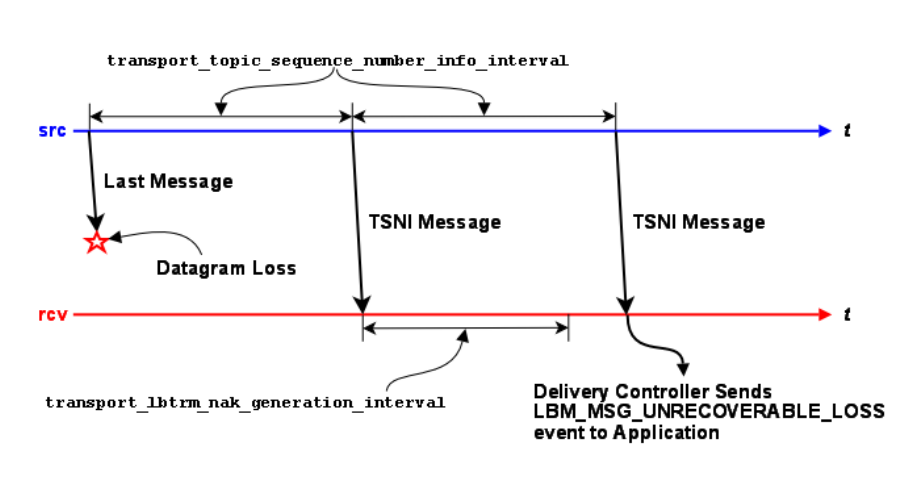
Chapter 38
Delivery Control Options
A Delivery Controller is a receiver-side object created for each source identified by the receiver through topic reso-
lution. A delivery controller performs the following.
• Delivers messages to multiple receivers subscribed to the same topic.
• Orders received topic messages if ordered_delivery (receiver) is set to 1 (default). This option applies to
LBT-RU and LBT-RM transports.
• Determines unrecoverable loss and burst loss events for the receiver's topic over LBT-RU and LBT-RM trans-
ports.
Unlike the loss depicted in LBT-RM, the image below illustrates how a receiver's Delivery Controller detects unre-
coverable tail loss on a topic.
In a non-tail-loss case, the TSNI messages shown above can also be application messages. The point being that the
delivery controller does not send NAKs, and instead waits for a transport_lbtrm_nak_generation_interval (receiver)
period after the point where the gap is detected (either by an application message or by a TSNI). During that wait
interval, the transport may deliver retransmitted message. If not, it is the reception of another message or TSNI
after the NAK generation interval expires which triggers delivery of the unrecoverable loss event.
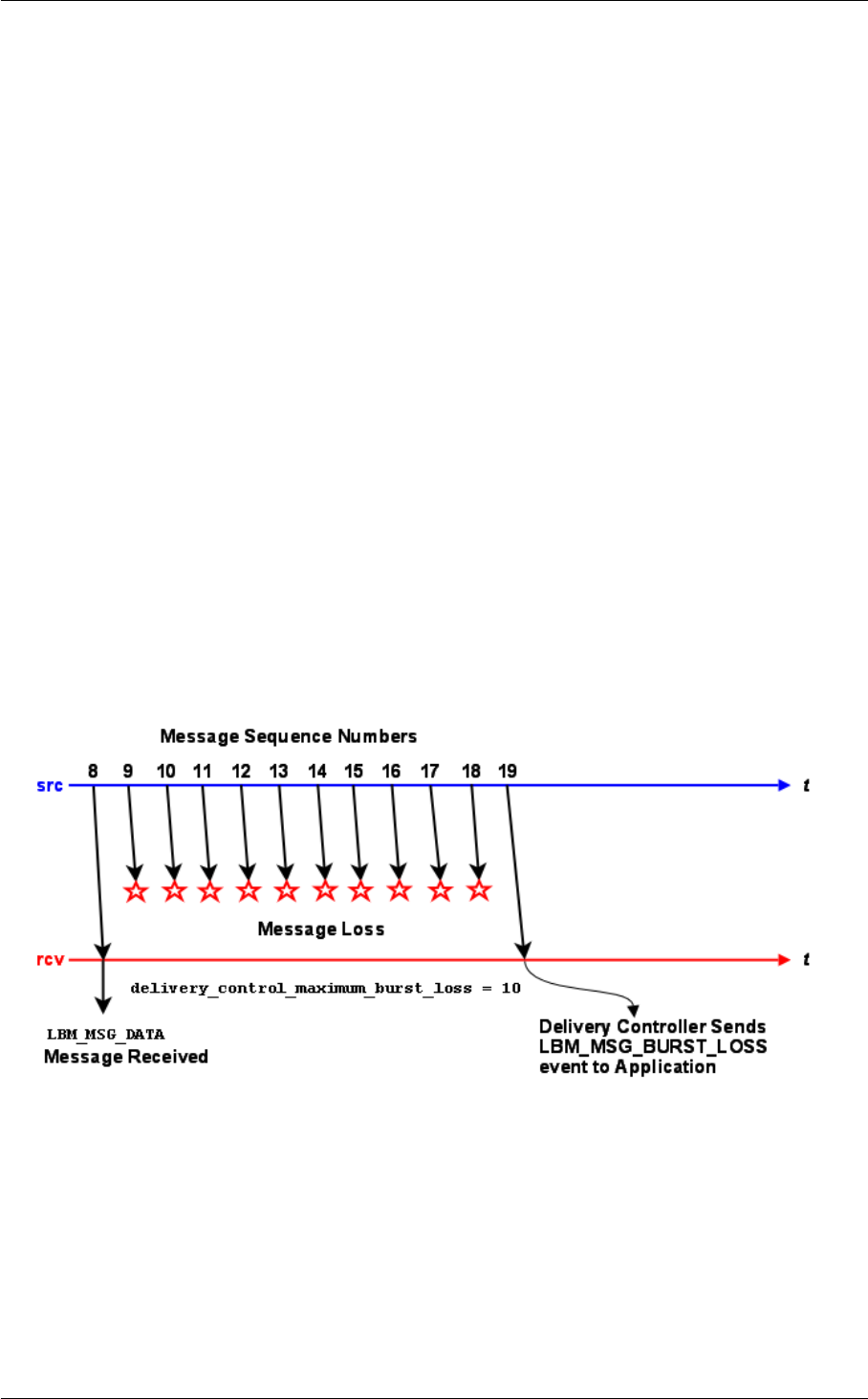
270 Delivery Control Options
Note
if the source disables TSNIs, tail loss can go undetected unless and until another application is sent on that
topic.
38.1 Burst Loss
Normally, when the delivery controller detects a gap in topic sequence numbers of received message fragments,
it waits for a NAK generation interval (defaults to 10 seconds) before declaring the missing message fragments
unrecoverably lost. This wait time allows the underlying transport layer to attempt to retrieve the missing message
fragments.
The configuration options delivery_control_maximum_burst_loss (receiver) and delivery_control_maximum_burst←-
_loss (hfx) specify a size for a contiguous gap in topic sequence numbers beyond which the gap is defined to be a
"burst loss". When this happens, the delivery controller immediately declares the entire gap to be unrecoverably lost
and resets its loss-handling structures. Thus, even if the underlying transport layer is subsequently able to retrieve
some or all of the missing message fragments, the delivery controller will discard them (since they are already
declared unrecoverably lost).
The purpose of this is to prevent long delays for large loss events for which the chances of successful recover are
very small.
The image below illustrates this.
For burst loss, a single LBM_MSG_UNRECOVERABLE_LOSS_BURST event is delivered for the entire sequence
number gap. (Contrast this with simple (not burst) loss events, where a separate LBM_MSG_UNRECOVERABL←-
E_LOSS event will be delivered to the receiver for each lost sequence number.)
Note
The burst loss control takes priority over all recovery methods. For example, if the receiver is reading a per-
sistent stream and OTR is enabled, a gap longer than delivery_control_maximum_burst_loss will immediately
declare the gap as unrecoverable without even trying to use OTR to recover. If gapless message delivery is a
high priority, delivery_control_maximum_burst_loss should be set to a very large value.

38.2 Reference 271
There is a possibility of successfully-received messages being discarded when a burst loss is detected.
Let's say a minor loss event is followed by several successful message fragments. The delivery of those
successfully-received message fragments will be delayed in hopes that the underlying transport layer can
retrieve the missing data. However, if a burst loss is detected while the delivery controller is still waiting for
recovery, the pending messages will be deleted as the loss-handling structures are cleaned up.
38.2 Reference
38.2.1 channel_map_tablesz (receiver)
The size of the hash table that the receiver uses to store channel subscriptions. A larger table means more
channels can be stored more efficiently, but takes up more memory. A smaller table uses less memory, but
costs more CPU time for large numbers of channel subscriptions.
Scope: receiver
Type: size_t
Default
value:
10273
When to
Set:
Can only be set during object initialization.
38.2.2 delivery_control_loss_check_interval (receiver)
This controls the interval between mandatory topic loss checks for a receiver. A value of 0 turns this loss check
off.
Scope: receiver
Type: lbm_ulong_t
Units: milliseconds
Default
value:
0 (disabled)
When to
Set:
Can only be set during object initialization.

272 Delivery Control Options
38.2.3 delivery_control_maximum_burst_loss (receiver)
This controls the size of a topic sequence number gap past which the gap is declared a "burst loss".
See Burst Loss for a detailed explanation of burst loss and its semantics.
Note
the burst loss control takes priority over all recovery methods. For example, if the receiver is reading a per-
sistent stream and OTR is enabled, a gap longer than delivery_control_maximum_burst_loss will immediately
declare the gap as unrecoverable without even trying to use OTR to recover. If message integrity is a high
priority, delivery_control_maximum_burst_loss should be set to a very large value.
Scope: receiver
Type: lbm_uint_t
Units: number of messages (fragments)
Default
value:
1024
When to
Set:
Can only be set during object initialization.
38.2.4 delivery_control_maximum_total_map_entries (context)
The maximum total buffered map entries (unrecoverable loss messages as well as data) that all topics can
buffer. When this is exceeded, unrecoverable loss is signaled for data until the total buffered subsides. A value
of 0 implies no maximum value setting and allows any amount required to be buffered.
If you use OTR with cache management (otr_message_caching), consider disabling this option (set to 0).
Scope: context
Type: size_t
Units: map entries
Default
value:
200000
When to
Set:
Can only be set during object initialization.

38.2 Reference 273
38.2.5 delivery_control_message_batching (context)
Controls whether or not to use receive-side batching, which can improve receiver throughput when using event
queues, but might add latency in other cases. If you enable this option, and you use an event queue that is
in polling mode, using lbm_event_dispatch(evq, LBM_EVENT_QUEUE_POLL), then rather than dispatching
exactly one event per call to lbm_event_dispatch, you may get multiple events dispatched with a single call.
Scope: context
Type: int
When to
Set:
Can only be set during object initialization.
Value Description
1 Receive-side batching is enabled.
0 Receive-side batching is disabled. Default for all.
38.2.6 mim_delivery_control_loss_check_interval (context)
This controls the interval between mandatory loss checks for a Multicast Immediate Messaging (MIM) transport
session. A value of 0 turns this loss check off.
Scope: context
Type: lbm_ulong_t
Units: milliseconds
Default
value:
0 (disabled)
When to
Set:
Can only be set during object initialization.
Version: This option was implemented in LBM 4.2

274 Delivery Control Options
38.2.7 null_channel_behavior (receiver)
Behavior desired when a message without channel information (i.e. a standard UM message) is received by
UM.
Scope: receiver
Type: int
When to
Set:
Can only be set during object initialization.
String value Integer value Description
"deliver" LBM_RCV_TOPIC_ATTR_CHANNEL_B←-
EHAVIOR_DELIVER_MSGS
Messages sent without channel information
will be delivered to the callback specified
upon receiver creation. Default for all.
"discard" LBM_RCV_TOPIC_ATTR_CHANNEL_B←-
EHAVIOR_DISCARD_MSGS
Messages sent without channel information
will be discarded.
38.2.8 source_notification_function (receiver)
Callback functions (and associated client data pointer) that are called when a receiver creates or deletes a
delivery controller associated with a source.
For the creation function, the application has the ability to set the source client data pointer to be used in each
message received from the source.
Contrast this with resolver_source_notification_function (context).
This callback is called by the context thread and can not use an event queue. Therefore the callback function
used should not block or it will delay reception of latency-sensitive messages.
Scope: receiver
Type: lbm_rcv_src_notification_func_t
Default
value:
NULL
When to
Set:
Can only be set during object initialization.
Config File: Cannot be set from an UM configuration file.

38.2 Reference 275
38.2.9 unrecognized_channel_behavior (receiver)
Behavior desired when a message with channel information for a channel not in the receiver's set of subscribed
channels is received by UM.
Scope: receiver
Type: int
When to
Set:
Can only be set during object initialization.
String value Integer value Description
"deliver" LBM_RCV_TOPIC_ATTR_CHANNEL_B←-
EHAVIOR_DELIVER_MSGS
Messages sent with channel information for
a channel not in the receiver's set of sub-
scribed channels will be delivered to the call-
back specified upon receiver creation. De-
fault for all.
"discard" LBM_RCV_TOPIC_ATTR_CHANNEL_B←-
EHAVIOR_DISCARD_MSGS
Messages sent with channel information for
a channel not in the receiver's set of sub-
scribed channels will be discarded.

276 Delivery Control Options

Chapter 39
Wildcard Receiver Options
39.1 Reference
39.1.1 pattern_type (wildcard_receiver)
The type of expression UM uses to compare wildcard receiver patterns to new topics seen in topic advertise-
ments or responses to wildcard receiver queries. As of UM Version 6.1, wildcard receivers must use PCRE
expressions.
Scope: wildcard_receiver
Type: int
When to
Set:
Can only be set during object initialization.
String value Integer value Description
"pcre" LBM_WILDCARD_RCV_PATT←-
ERN_TYPE_PCRE
The pattern is a regular expres-
sion usable by PCRE (Perl Com-
patible Regular Expressions) li-
brary. Default for all.
"regex" Deprecated in UM Ver-
sion 6.1.
LBM_WILDCARD_RCV_PATT←-
ERN_TYPE_REGEX
The pattern is a regular expres-
sion usable by POSIX Extended
Regular Expressions.
"appcb" Deprecated in UM Ver-
sion 6.1.
LBM_WILDCARD_RCV_PATT←-
ERN_TYPE_APP_CB
The wildcard receiver ignores the
pattern and calls an application
callback set by the pattern_←-
callback (wildcard_receiver) op-
tion.

278 Wildcard Receiver Options
39.1.2 receiver_create_callback (wildcard_receiver)
Callback function (and associated client data pointer) that is called when a receiver is about to be created for a
topic which matched a wildcard receiver pattern.
This callback is called by the context thread and can not use an event queue. Therefore the callback function
used should not block or it will delay reception of latency-sensitive messages.
The callback function should always return 0.
Scope: wildcard_receiver
Type: lbm_wildcard_rcv_create_func_t
Default
value:
NULL
When to
Set:
Can only be set during object initialization.
Config File: Cannot be set from an UM configuration file.
Version: This option was implemented in LBM 3.4/UME 2.1.
39.1.3 receiver_delete_callback (wildcard_receiver)
Callback function (and associated client data pointer) that is called when a receiver is about to be deleted.
This callback is called by the context thread and can not use an event queue. Therefore the callback function
used should not block or it will delay reception of latency-sensitive messages.
The callback function should always return 0.
Scope: wildcard_receiver
Type: lbm_wildcard_rcv_delete_func_t
Default
value:
NULL
When to
Set:
Can only be set during object initialization.
Config File: Cannot be set from an UM configuration file.
Version: This option was implemented in LBM 3.4/UME 2.1.

39.1 Reference 279
39.1.4 resolver_no_source_linger_timeout (wildcard_receiver)
This sets the linger timeout value before a topic with no sources is removed and cleaned up. Since wildcard
receivers set the resolution_no_source_notification_threshold (receiver) to 10, the linger timer starts after the
wildcard receiver sends 10 queries and subsequently receives a no-source notification.
Scope: wildcard_receiver
Type: lbm_ulong_t
Units: milliseconds
Default
value:
1000 (1 second)
When to
Set:
Can only be set during object initialization.
39.1.5 resolver_query_maximum_interval (wildcard_receiver)
The longest - and last - interval in wildcard receiver topic querying. A value of 0 disables wildcard receiver topic
querying. See also Disabling Aspects of Topic Resolution.
Scope: wildcard_receiver
Type: lbm_ulong_t
Units: milliseconds
Default
value:
1000 (1 second)
When to
Set:
Can only be set during object initialization.
Version: This option was implemented in LBM 4.0
39.1.6 resolver_query_minimum_duration (wildcard_receiver)
The duration of wildcard queries in wildcard receiver topic querying. Only PCRE and regex pattern types can
use wildcard queries. A value of 0 guarantees that wildcard receiver topic querying never completes.

280 Wildcard Receiver Options
Scope: wildcard_receiver
Type: lbm_ulong_t
Units: seconds
Default
value:
60 (1 minute)
When to
Set:
Can only be set during object initialization.
Version: This option was implemented in LBM 4.0
39.1.7 resolver_query_minimum_interval (wildcard_receiver)
Interval between the first topic query sent upon creation of the wildcard receiver and the second query sent
by the receiver. A value of 0 disables wildcard receiver topic querying. See also Disabling Aspects of Topic
Resolution. This option has an effective minimum of 30 ms. See Resolver Operation Options.
Scope: wildcard_receiver
Type: lbm_ulong_t
Units: milliseconds
Default
value:
50 (0.05 seconds)
When to
Set:
Can only be set during object initialization.
Version: This option was implemented in LBM 4.0
39.1.8 resolver_wildcard_queries_per_second (context)
Maximum number of queries sent within a one second period during wildcard receiver topic querying. A value
of 0 means that queries for the wildcard topic are not limited to a maximum number of queries per second. Note
that the topic's queries are still subject to being rate limited by resolver_wildcard_query_bps (context). Refer
to Rate Controls in the Ultra Messaging Concepts Guide for additional information about the UM rate limiting
algorithm.
Scope: context
Type: lbm_ulong_t
Units: advertisements
Default
value:
0

39.1 Reference 281
When to
Set:
Can only be set during object initialization.
Version: This option was implemented in LBM 4.0
39.1.9 resolver_wildcard_query_bps (context)
Maximum query rate during wildcard receiver topic querying. A value of 0 means that queries for the wildcard
topic are not limited to a maximum number of bits per second. Note that the topic's queries are still subject
to being rate limited by resolver_wildcard_queries_per_second (context). Refer to Rate Controls in the Ultra
Messaging Concepts Guide for additional information about the UM rate limiting algorithm.
Scope: context
Type: lbm_uint64_t
Units: bits per second
Default
value:
1000000
When to
Set:
Can only be set during object initialization.
Version: This option was implemented in LBM 4.0
39.1.10 resolver_wildcard_receiver_map_tablesz (context)
The size of the hash table used for storing wildcard receiver patterns. A value of 0 disables caching wildcard
receiver patterns. This value should be a prime number.
Scope: context
Type: size_t
Units: map entries
Default
value:
10273
When to
Set:
Can only be set during object initialization.

282 Wildcard Receiver Options

Chapter 40
Event Queue Options
40.1 Reference
40.1.1 event_queue_name (event_queue)
The name of an event queue, limited to 128 alphanumeric characters, hyphens or underscores.
Scope: event_queue
Type: string
When to
Set:
Can only be set during object initialization.
Version: This option was implemented in LBM 4.3/UMP 3.3/UMQ 2.3.
40.1.2 queue_age_enabled (event_queue)
Controls whether the length of time each event spends on the event queue is measured. Useful only if you are
monitoring event queue statistics.
Scope: event_queue
Type: int
Default
value:
0

284 Event Queue Options
When to
Set:
May be set during operation.
Value Description
1 Enables measuring of event queue entry ages.
0 Disables measuring of event queue entry ages. Default for all.
40.1.3 queue_cancellation_callbacks_enabled (event_queue)
Flag indicating whether the event queue is to do appropriate locking to provide cancellation callback support for
cancel/delete functions.
Scope: event_queue
Type: int
When to
Set:
Can only be set during object initialization.
Value Description
1 Provide support for cancellation callbacks.
0 Do not provide cancellation callback support. Default for all.
40.1.4 queue_count_enabled (event_queue)
Controls whether the numbers of each type of queue entry are counted. Useful only if you are monitoring event
queue statistics.
Scope: event_queue

40.1 Reference 285
Type: int
Default
value:
0
When to
Set:
May be set during operation.
Value Description
1 Enables counting event queue entries.
0 Disables counting of event queue entries. Default for all.
40.1.5 queue_delay_warning (event_queue)
The event queue delay threshold (in microseconds) at which the monitor function for the event queue is called.
This delay is the time that an event has been queued before being dispatched. A value of 0 indicates the event
queue delay is not to be monitored and checked.
Scope: event_queue
Type: lbm_ulong_t
Units: microseconds
Default
value:
0 (not monitored)
When to
Set:
May be set during operation.
40.1.6 queue_enqueue_notification (event_queue)
Flag indicating whether to call the monitor function when an event is enqueued into the given event queue. The
thread enqueuing the event is the one that calls this function. So, when this is called, the monitoring function in
use should only assume this is only notification of enqueuing. The monitor function should not dispatch events
directly.
Scope: event_queue
Type: int

286 Event Queue Options
When to
Set:
May be set during operation.
Value Description
1 Enable notification.
0 Disable notification. Default for all.
40.1.7 queue_objects_purged_on_close (event_queue)
Flag indicating whether the event queue should be immediately purged of any pending events associated with a
recently closed object (e.g. source, receiver) during the close operation, or be left on the queue to be discarded
as the event queue drains normally. In either case, UM does not deliver the defunct events to the application.
The Immediate purge setting reclaims memory immediately, while the Delay purge setting spreads
the reclamation work over time, reducing the CPU impact of closing objects associated with the queue.
Scope: event_queue
Type: int
When to
Set:
Can only be set during object initialization.
Value Description
1 Immediate purge. Default for all.
0 Delay purge.
40.1.8 queue_service_time_enabled (event_queue)
Controls whether the amount of time required to service each event on the event queue is measured. Useful
only if you are monitoring event queue statistics.

40.1 Reference 287
Scope: event_queue
Type: int
Default
value:
0
When to
Set:
May be set during operation.
Value Description
1 Enables measuring of event queue service times.
0 Disables measuring of event queue service times. Default for all.
40.1.9 queue_size_warning (event_queue)
The event queue size threshold (in number of events) at which the monitor function for the event queue is called.
A value of 0 indicates the event queue size is not to be monitored and checked.
Scope: event_queue
Type: lbm_ulong_t
Units: number of events
Default
value:
0 (not monitored)
When to
Set:
May be set during operation.

288 Event Queue Options

Chapter 41
Ultra Messaging Persistence Options
The options described in this section are for persistence, and are invalid for users of the UMS (streaming-only)
product.
See the Guide for Persistence for more information.
41.1 Reference
41.1.1 ume_ack_batching_interval (context)
The interval between checks by UMP of consumed, unacknowledged messages. See also ume_use_ack_←-
batching (receiver).
Scope: context
Type: lbm_ulong_t
Units: milliseconds
Default
value:
100 (0.1 seconds)
When to
Set:
Can only be set during object initialization.
Version: This option was implemented in UMS 5.0, UMP 5.0, UMQ 5.0.
41.1.2 ume_activity_timeout (receiver)
Establishes the period of time from a receiver's last activity to the release of the receiver's Reg ID. Stores return
an error to any new request for the receiver's Reg ID during this period.

290 Ultra Messaging Persistence Options
Overrides the receiver-activity-timeout setting configured for the receiver's topic on the store. The default
value of 0 (zero) disables this option.
See also Persistence Proxy Sources.
Scope: receiver
Type: lbm_ulong_t
Units: milliseconds
Default
value:
0 (zero)
When to
Set:
Can only be set during object initialization.
41.1.3 ume_activity_timeout (source)
Establishes the period of time from a source's last activity to the release of the source's Reg ID. Stores return
an error to any new source requesting the source's Reg ID during this period.
If proxy sources are enabled (ume_proxy_source (source)), the store does not release the source's Reg ID and
UMP elects a proxy source. Overrides the source-activity-timeout setting configured for the source's topic on
the store. The default value of 0 (zero) disables this option. If neither proxy sources nor ume_state_lifetime
(source) are configured, the store also deletes the source's state and cache.
See also Persistence Proxy Sources.
Scope: source
Type: lbm_ulong_t
Units: milliseconds
Default
value:
0 (zero)
When to
Set:
Can only be set during object initialization.
41.1.4 ume_allow_confirmed_delivery (receiver)
Specifies whether or not UMP allows the sending of confirmed delivery notifications back to the source.

41.1 Reference 291
Scope: receiver
Type: int
When to
Set:
Can only be set during object initialization.
Version: This option was implemented in UM 5.0.
Value Description
1 Indicates that UMP can send confirmed delivery notifications. Default for all.
0 Indicates that UMP can not send confirmed delivery notifications.
41.1.5 ume_application_outstanding_maximum (receiver)
This UMP receiver option enables the UMP Throttled Delivery feature and sets an upper threshold on the num-
ber of message fragments from a single source that are delivered or in an event queue, but not yet consumed.
When the number of message fragments exceeds this threshold, the receiver stops buffering all incoming mes-
sage fragments. Thus, messages from the source transport stream might be dropped and recovered via OTR
or UMP late-join mechanisms.
This feature effectively limits the recovery rate and live stream rate to the receiver message consumption rate. If
OTR is disabled for the receiver, this threshold applies only during initial Late Join recovery. Setting this option
to 0 (zero) disables the UMP Throttled Delivery feature.
Scope: receiver
Type: lbm_ulong_t
Units: message fragments
Default
value:
0 (disabled)
When to
Set:
Can only be set during object initialization.
Version: This option was implemented in UMP 6.7
292 Ultra Messaging Persistence Options
41.1.6 ume_confirmed_delivery_notification (source)
Flag indicating the application is interested in receiving notifications of consumption of messages by receivers
(confirmed delivery) via the source event mechanism.
Generates the source events LBM_SRC_EVENT_UME_DELIVERY_CONFIRMATION and/or LBM_SRC_E←-
VENT_UME_DELIVERY_CONFIRMATION_EX. When turned off, receivers do not send delivery confirmation
notifications to the source unless the release policy dictates the need for them. For more information, see
Delivery Confirmation Concept.
Note
Smart Sources do not support delivery confirmation.
Scope: source
Type: int
When to
Set:
Can only be set during object initialization.
String value Integer value Description
"0" LBM_SRC_TOPIC_ATTR_UME_CDELV←-
_EVENT_NONE
The source does not wish to receive delivery
confirmation notifications. Default for all.
"1" LBM_SRC_TOPIC_ATTR_UME_CDELV←-
_EVENT_PER_FRAGMENT
The source wishes to receive delivery con-
firmation notifications for all messages and
message fragments.
"2" LBM_SRC_TOPIC_ATTR_UME_CDELV←-
_EVENT_PER_MESSAGE
The source wishes to receive only one de-
livery confirmation for a message regardless
of how many fragments it comprised.
"3" LBM_SRC_TOPIC_ATTR_UME_CDELV←-
_EVENT_FRAG_AND_MSG
The source wishes to receive delivery con-
firmation notifications for all messages and
message fragments. In addition, the notifi-
cation contains a WHOLE_MESSAGE_C←-
ONFIRMED flag when the last fragment of a
message has been delivered.

41.1 Reference 293
41.1.7 ume_consensus_sequence_number_behavior (receiver)
The behavior that the receiver will follow when determining the consensus sequence number used as the
sequence number to begin reception at upon re-registration after a failure or suspension. This setting is only
used when quorum-consensus is also used on the source.
Scope: receiver
Type: int
When to
Set:
Can only be set during object initialization.
String value Integer value Description
"lowest" LBM_RCV_TOPIC_ATTR_UME_QC_SQ←-
N_BEHAVIOR_LOWEST
Consensus is determined as the lowest of
the latest sequence numbers seen from any
store.
"majority" LBM_RCV_TOPIC_ATTR_UME_QC_SQ←-
N_BEHAVIOR_MAJORITY
Consensus is determined as the latest se-
quence number agreed upon by the majority
of stores within a group. Between groups,
the latest of all majority decisions is used.
Default for all.
"highest" LBM_RCV_TOPIC_ATTR_UME_QC_SQ←-
N_BEHAVIOR_HIGHEST
Consensus is determined as the highest of
the latest sequence numbers seen from any
store.
41.1.8 ume_consensus_sequence_number_behavior (source)
The behavior that the source follows when determining the consensus sequence number used as the first
message of a source upon re-registration after a failure or suspension. This setting is only used when quorum-
consensus is also used.
Scope: source
Type: int
When to
Set:
Can only be set during object initialization.

294 Ultra Messaging Persistence Options
String value Integer value Description
"lowest" LBM_SRC_TOPIC_ATTR_UME_QC_SQ←-
N_BEHAVIOR_LOWEST
Consensus is determined as the lowest of
the latest sequence numbers seen from any
store.
"majority" LBM_SRC_TOPIC_ATTR_UME_QC_SQ←-
N_BEHAVIOR_MAJORITY
Consensus is determined as the latest se-
quence number agreed upon by the major-
ity of stores within a group. Between groups,
the latest of all majority decisions is used.
"highest" LBM_SRC_TOPIC_ATTR_UME_QC_SQ←-
N_BEHAVIOR_HIGHEST
Consensus is determined as the highest of
the latest sequence numbers seen from any
store. Default for all.
41.1.9 ume_explicit_ack_only (receiver)
Flag indicating if the receiver should automatically send acknowledgements to any stores and to the source or
if the application desires to explicitly generate acknowledgements itself.
See also Explicit Acknowledgments.
Scope: receiver
Type: int
When to
Set:
Can only be set during object initialization.
Value Description
1 The receiving application will generate acknowledgements explicitly and the UMP receiver should
not automatically generate them.
0 The UMP receiver will automatically generate and send acknowledgements based on message
consumption. Default for all.

41.1 Reference 295
41.1.10 ume_flight_size (source)
Specifies the number of messages allowed to be in flight (unstabilized at a store and without delivery confirma-
tion) before a new message send either blocks or triggers a notification (source event).
See ume_flight_size_behavior (source).
Note that the flight size is also limited by ume_flight_size_bytes (source). The blocking behavior is enforced if
either threshold is met.
Note: for very small flight sizes, it is recommended to configure the Store's UM config option response_tcp_←-
nodelay (context) to 1.
Scope: source
Type: unsigned int
Units: messages
Default
value:
1000
When to
Set:
Can only be set during object initialization.
Version: This option was implemented in LBM 4.1.1/UME 3.1.1
41.1.11 ume_flight_size_behavior (source)
The behavior that UMP follows when a message send exceeds the source's ume_flight_size (source).
Scope: source
Type: int
When to
Set:
Can only be set during object initialization.
Version: This option was implemented in LBM 4.1.1/UME 3.1.1
String value Integer value Description
"Block" LBM_FLIGHT_SIZE_BEHAVIOR_BLOCK The send call blocks when a source sends
a message that exceeds its flight size. If
the source uses a non-blocking send, the
send returns an LBM_EWOULD_BLOCK.
Default for all.

296 Ultra Messaging Persistence Options
String value Integer value Description
"Notify" LBM_FLIGHT_SIZE_BEHAVIOR_NOTIFY A message send that exceeds the config-
ured flight size does not block but triggers a
flight size notification (source event), indicat-
ing that the flight size has been surpassed.
UMP also sends a source event notification
if the number of in-flight messages falls be-
low the configured flight size.
41.1.12 ume_flight_size_bytes (source)
Specifies the number of bytes of message payload allowed to be in flight (unstabilized at a store and without
delivery confirmation) before a new message send either blocks or triggers a notification source event.
See ume_flight_size_behavior (source).
Note that the flight size is also limited by ume_flight_size (source). The blocking behavior is enforced if either
threshold is met. If ume_flight_size_bytes is set to zero, then only ume_flight_size is used.
If using Receiver-paced Persistence, this option must be greater than 0 (zero) but less than or equal to the
repository's source-flight-size-bytes-maximum value, otherwise the source registration will fail. See the "←-
Implementing RPP" section of the Guide for Persistence for more information on the coordination between RPP
source and store configuration options.
Note: for very small flight sizes, it is recommended to configure the Store's UM config option response_tcp_←-
nodelay (context) to 1.
Scope: source
Type: lbm_uint64_t
Units: bytes
Default
value:
0 (disabled)
When to
Set:
Can only be set during object initialization.
Version: This option was implemented in UMP 5.3

41.1 Reference 297
41.1.13 ume_force_reclaim_function (source)
Callback function (and associated client data pointer) that is called when a source is forced to release a retained
message due to size limitations specified.
This callback is called by the context thread and can not use an event queue. Therefore the callback function
used should not block or it will delay reception of latency-sensitive messages.
Scope: source
Type: lbm_ume_src_force_reclaim_func_t
Default
value:
NULL
When to
Set:
Can only be set during object initialization.
Config File: Cannot be set from an UM configuration file.
41.1.14 ume_late_join (source)
Flag indicating the source should allow late join operation for receivers and persistent stores. This is a compat-
ibility setting. The late_join (source) setting should be used instead.
Scope: source
Type: int
When to
Set:
Can only be set during object initialization.
Value Description
1 The source allows late join receivers and persistent stores.
0 The source does not allow late join receivers or persistent stores. Default for all.

298 Ultra Messaging Persistence Options
41.1.15 ume_message_stability_lifetime (source)
The total time in milliseconds from the initial send of a message before a UMP source gives up entirely on
receiving a stability acknowledgement for the message. The source then delivers a forced reclaim notice to the
application. This option is part of the Proactive Retransmissions feature.
Scope: source
Type: lbm_ulong_t
Units: milliseconds
Default
value:
1200000 (20 minutes)
When to
Set:
Can only be set during object initialization.
Version: This option was implemented in UMP 6.0
41.1.16 ume_message_stability_notification (source)
Flag indicating the source is interested in receiving notifications of message stability from persistent stores via
the source event mechanism.
Even when turned off, stores continue to send message stability notifications to the source for retention pur-
poses. However, no notification will be delivered to the application.
Note
Smart Sources only support "0" (none) or "2" (per-message).
Scope: source
Type: int
When to
Set:
Can only be set during object initialization.
String value Integer value Description
"0" LBM_SRC_TOPIC_ATTR_UME_STABL←-
E_EVENT_NONE
The source does not wish to receive mes-
sage stability notifications from the store.

41.1 Reference 299
String value Integer value Description
"1" LBM_SRC_TOPIC_ATTR_UME_STABL←-
E_EVENT_PER_FRAGMENT
The source wishes to receive all message
and message fragment stability notifications
from the store. Default for all.
"2" LBM_SRC_TOPIC_ATTR_UME_STABL←-
E_EVENT_PER_MESSAGE
The source wishes to receive only a sin-
gle message stability notifications from the
store when the entire message has been
stabilized. This notification contains the Se-
quence Number of the last fragment of the
whole message but does NOT contain store
information.
"3" LBM_SRC_TOPIC_ATTR_UME_STABL←-
E_EVENT_FRAG_AND_MSG
The source wishes to receive all message
and message fragment stability notifications
from the store. In addition, the notifica-
tion contains a WHOLE_MESSAGE_STA←-
BLE flag when the last fragment of a mes-
sage has been stabilized.
41.1.17 ume_message_stability_timeout (source)
The time in milliseconds from initial send of a message until it is resent by the source because the source has
not received a stability acknowledgement for the store (or a quorum of stores). Setting this option to 0 (zero)
disables the Proactive Retransmissions feature.
Scope: source
Type: lbm_ulong_t
Units: milliseconds
Default
value:
5000 (5 seconds)
When to
Set:
Can only be set during object initialization.
Version: This option was implemented in UMP 6.0
41.1.18 ume_proactive_keepalive_interval (context)
A persistent receiver sends consumption acknowledgements to the store to update that receiver's state in
the store. In the absence of new consumption acknowledgments, a receiver re-sends the most-recent ac-
knowledgement periodically to maintain that state. The ume_proactive_keepalive_interval option specifies the
maximum interval between successive acknowledgements. This value should be set less than the ume_←-
activity_timeout (receiver) and the state lifetime, ideally no more than 1/3 of the lesser of those two. Valid

300 Ultra Messaging Persistence Options
settings are greater than or equal to 1500 (1.5 seconds, the effective minimum), or zero to disable proactive
keepalives and revert to pre-UM 6.9 keepalive behavior.
Scope: context
Type: lbm_ulong_t
Units: milliseconds
Default
value:
3000 (3 seconds)
When to
Set:
Can only be set during object initialization.
Version: This option was implemented in UMP 6.9.1
41.1.19 ume_proxy_source (source)
Controls whether any stores with which the source registers should provide a proxy source in the event the
actual source terminates. Proxy source support is only available for quorum/consensus store configurations. In
addition, proxy source support requires that the source register with an actual registration ID, and not request
that the store assign it a registration ID.
Scope: source
Type: int
Default
value:
0
When to
Set:
Can only be set during object initialization.
Value Description
1 Enables proxy source support.
0 Disables proxy source support. Default for all.

41.1 Reference 301
41.1.20 ume_receiver_liveness_interval (context)
The maximum interval between delivery confirmations or keepalive messages send to the source. Expiration
of this interval triggers another keepalive and an interval reset.
Scope: context
Type: int
Units: milliseconds
Default
value:
0 (disable; do not send keepalives)
When to
Set:
Can only be set during object initialization.
Version: This option was implemented in UMP 5.2.
41.1.21 ume_receiver_paced_persistence (receiver)
Enables Receiver-paced Persistence (RPP) for the receiver, and specifies the blocking behavior. If the source
and store agree that the topic is receiver-paced, a receiver that leaves this option at 0 will have a store reg-
istration error. Similarly, if the source and store agree that the topic is source paced, a receiver setting this
option to 1 or 2 will have a store registration error. See Receiver-Paced Persistence Operations in the Guide
for Persistence for additional information. Also see repository-allow-receiver-paced-persistence in the Guide for
Persistence.
Scope: receiver
Type: lbm_uint8_t
When to
Set:
Can only be set during object initialization.
Version: This option was implemented in UMP 5.3. Value "2" was added in UMP 6.9
String value Integer value Description
"0" 0 Indicates that the receiver is not a RPP receiver. Default for all.
"1" 1 Indicates that the receiver is a blocking RPP receiver.
"2" 2 Indicates that the receiver is a non-blocking RPP receiver.

302 Ultra Messaging Persistence Options
41.1.22 ume_receiver_paced_persistence (source)
Specifies that the source is a Receiver-paced Persistence (RPP) source and may change certain topic repos-
itory options to values allowed by the repository. If the repository has set repository-allow-receiver-paced-
persistence to 0 (disable), setting this option to 1 creates a store registration error. See Receiver-Paced
Persistence Operations in the Guide for Persistence for additional information.
Scope: source
Type: lbm_uint8_t
When to
Set:
Can only be set during object initialization.
Version: This option was implemented in UMP 5.3
Value Description
1 Indicates that source is a RPP source.
0 Indicates that source is not a RPP source. Default for all.
41.1.23 ume_recovery_sequence_number_info_function (receiver)
Callback function (and associated client data pointer) that is called when a receiver is about to complete regis-
tration from the stores in use by the source and the low sequence number is to be determined. The application
has the ability to modify the sequence number to use if it desires.
This callback is called by the context thread and can not use an event queue. Therefore the callback function
used should not block or it will delay reception of latency-sensitive messages.
Scope: receiver
Type: lbm_ume_rcv_recovery_info_ex_func_t
Default
value:
NULL
When to
Set:
Can only be set during object initialization.
Config File: Cannot be set from an UM configuration file.

41.1 Reference 303
41.1.24 ume_registration_extended_function (receiver)
Callback function (and associated client data pointer) that is called when a receiver is about to attempt to
register with a persistent store. The app must return the registration ID to request from the store or 0 if it will
allow the store to allocate one. This function passes additional extended information, such as the store being
used and a source client data pointer, etc.
This callback is called by the context thread and can not use an event queue. Therefore the callback function
used should not block or it will delay reception of latency-sensitive messages.
Scope: receiver
Type: lbm_ume_rcv_regid_ex_func_t
Default
value:
NULL
When to
Set:
Can only be set during object initialization.
Config File: Cannot be set from an UM configuration file.
41.1.25 ume_registration_function (receiver)
Callback function (and associated client data pointer) that is called when a receiver is about to attempt to
register with a persistent store. The app must return the registration ID to request from the store or 0 if it will
allow the store to allocate one.
This callback is called by the context thread and can not use an event queue. Therefore the callback function
used should not block or it will delay reception of latency-sensitive messages.
This setting is provided for compatibility. The ume_registration_extended_function (receiver) setting should be
used instead.
Scope: receiver
Type: lbm_ume_rcv_regid_func_t
Default
value:
NULL
When to
Set:
Can only be set during object initialization.
Config File: Cannot be set from an UM configuration file.

304 Ultra Messaging Persistence Options
41.1.26 ume_registration_interval (receiver)
The interval between registration attempts by the receiver to a persistent store in use by the source.
Scope: receiver
Type: lbm_ulong_t
Units: milliseconds
Default
value:
3000 (3 seconds)
When to
Set:
Can only be set during object initialization.
41.1.27 ume_registration_interval (source)
The interval between registration attempts by the source. Before declaring Registration Complete, sources wait
at least one full interval, unless all stores have registered.
When using the round-robin store behavior, this is the value between registration attempts with the various
stores. In other words, attempt to register with primary, wait interval, attempt to register with secondary, wait
interval, etc.
Scope: source
Type: lbm_ulong_t
Units: milliseconds
Default
value:
3000 (3 seconds)
When to
Set:
Can only be set during object initialization.
41.1.28 ume_repository_ack_on_reception (source)
For Receiver-paced Persistence (RPP) sources with a repository-type of disk or reduced-fd, specifies that the
stability acknowledgement should be sent upon message reception by the store instead of when the message
has been written to disk. Note that this reduces the robustness of the persisted stream and makes it more
susceptible to message loss in the event of multiple failures.
This source option is ignored if RPP is not enabled. With non-RPP sources, the store's acknowledgement

41.1 Reference 305
behavior is controlled directly by the store's repository-allow-ack-on-reception configuration element.
When RPP is enabled, the store checks this option's value against the repository element repository-allow-
ack-on-reception. If repository-allow-ack-on-reception is false, then the store will reject the registration from
any source that enables ume_repository_ack_on_reception. See the "Implementing RPP" section of the Guide
for Persistence for more information on the coordination between RPP source and store configuration options.
Scope: source
Type: lbm_uint8_t
When to
Set:
Can only be set during object initialization.
Version: This option was implemented in UMP 5.3
Value Description
1 The repository sends a stability acknowledgement for a message as soon as it has received the
message.
0 The repository sends a stability acknowledgement for a message once it has been written to disk.
Default for all.
41.1.29 ume_repository_disk_file_size_limit (source)
For Receiver-paced Persistence (RPP) sources with a repository-type of disk or reduced-fd, specifies the
maximum amount of disk space used to store retained messages.
This source option is ignored if RPP is not enabled. For non-RPP sources, the repository's file size limit is
controlled directly by the store's repository-disk-file-size-limit configuration element.
When RPP is enabled, the store range checks this option's value against the repository element repository-
disk-file-size-limit, and rejects the registration if the source requests more bytes than that store's limit. As long
as the source request is less than or equal to repository-disk-file-size-limit, the store will use the source's
value in its operation. The default value (zero) causes the store to use its repository-disk-file-size-limit value.
See the "Implementing RPP" section of the Guide for Persistence for more information on the coordination
between RPP source and store configuration options.
Scope: source
Type: lbm_uint64_t
Units: bytes

306 Ultra Messaging Persistence Options
Default
value:
0 (disabled)
When to
Set:
Can only be set during object initialization.
Version: This option was implemented in UMP 5.3
41.1.30 ume_repository_size_limit (source)
For Receiver-paced Persistence (RPP) sources with a repository-type of memory,disk or reduced-fd, spec-
ifies the maximum number of message bytes retained by the store (includes payload only). For the disk or
reduced-fd repository type, this value configures the size of the memory cache.
This source option is ignored if RPP is not enabled. For non-RPP sources, the repository size limit is controlled
directly by the store's repository-size-limit configuration element.
When RPP is enabled, the store range checks this option's value against the repository element repository-
size-limit, and rejects the registration if the source requests more bytes than that store's limit. As long as the
source request is less than or equal to repository-size-limit, the store will use the source's value in its oper-
ation. The default value (zero) causes the store to use its repository-size-limit value. See the "Implementing
RPP" section of the Guide for Persistence for more information on the coordination between RPP source and
store configuration options.
Scope: source
Type: size_t
Units: bytes
Default
value:
0 (disabled)
When to
Set:
Can only be set during object initialization.
Version: This option was implemented in UMP 5.3
41.1.31 ume_repository_size_threshold (source)
For Receiver-paced Persistence (RPP) sources with a repository-type of memory,disk or reduced-fd, spec-
ifies the minimum number of message bytes retained by the store (includes payload only). For the disk or
reduced-fd repository type, this value configures the size of the memory cache.
This source option is ignored if RPP is not enabled. For non-RPP sources, the repository size threshold is

41.1 Reference 307
controlled directly by the store's repository-size-threshold configuration element.
When RPP is enabled, the store range checks this option's value against the repository element repository-
size-threshold, and rejects the registration if the source requests more bytes than that store's threshold. As
long as the source request is less than or equal to repository-size-threshold, the store will use the source's
value in its operation. The default value (zero) causes the store to use its repository-size-threshold value.
See the "Implementing RPP" section of the Guide for Persistence for more information on the coordination
between RPP source and store configuration options.
Scope: source
Type: size_t
Units: bytes
Default
value:
0 (disabled)
When to
Set:
Can only be set during object initialization.
Version: This option was implemented in UMP 5.3
41.1.32 ume_retention_intergroup_stability_behavior (source)
The behavior that the source will follow when determining, across store groups, both message stability and
registration completion. A source cannot release a message until the message is stable. To be stable, a
message must first be stable within the group and then stable between groups.
Scope: source
Type: int
When to
Set:
Can only be set during object initialization.
String value Integer value Description
"any", "any-group" LBM_SRC_TOPIC_ATTR_UME_STA←-
BLE_BEHAVIOR_ANY
Registration is complete when it is com-
plete in any group. Messages are stable
when they are stable in any group. De-
fault for all.

308 Ultra Messaging Persistence Options
String value Integer value Description
"all-active" LBM_SRC_TOPIC_ATTR_UME_STA←-
BLE_BEHAVIOR_ALL_ACTIVE
A group is active if it has at least a quo-
rum of registered stores, or as deter-
mined by the ume_retention_intragroup←-
_stability_behavior option. Registration is
complete when it is complete in all active
groups. At least one group must be ac-
tive. Messages are stable when they are
stable in all active groups.
"majority" LBM_SRC_TOPIC_ATTR_UME_STA←-
BLE_BEHAVIOR_MAJORITY
Registration is complete when it is com-
plete in a majority of groups. Messages
are stable when they are stable in a ma-
jority of groups.
"all", "all-groups" LBM_SRC_TOPIC_ATTR_UME_STA←-
BLE_BEHAVIOR_ALL
Registration is complete when it is com-
plete in all groups. Messages are stable
when they are stable in all groups.
41.1.33 ume_retention_intragroup_stability_behavior (source)
The behavior that the source will follow when determining, within a store group, both message stability and
group registration completion. A source cannot release a message until the message is stable. To be stable, a
message must first be stable within the group and then stable between groups.
Scope: source
Type: int
When to
Set:
Can only be set during object initialization.
String value Integer value Description
"quorum" LBM_SRC_TOPIC_ATTR_UME_STAB←-
LE_BEHAVIOR_QUORUM
Registration is complete for the group
when a majority of the stores in the group
are registered. A message is stable within
the group when a majority of the stores
have acknowledged the message as sta-
ble. Default for all.

41.1 Reference 309
String value Integer value Description
"all-active" LBM_SRC_TOPIC_ATTR_UME_STAB←-
LE_BEHAVIOR_ALL_ACTIVE
Registration is complete for the group
when a majority of the stores in the group
are registered. Stores registered with a
source are active stores. A message is
stable within the group when each active
store in that group has acknowledged the
message as stable.
"all", "all-stores" LBM_SRC_TOPIC_ATTR_UME_STAB←-
LE_BEHAVIOR_ALL
Registration is complete for the group
when all stores in the group are registered.
A message is stable within the group when
all stores in the group are registered and
have acknowledged the message as sta-
ble.
41.1.34 ume_retention_size_limit (source)
The release policy regarding aggregate size limit before messages are forced to be released.
With Smart Sources, this option is ignored. Retention buffers are preallocated. NOTE: this setting is provided
for compatibility. The retransmit_retention_size_limit (source) setting should be used instead. See that option
for more information.
Scope: source
Type: size_t
Units: bytes
Default
value:
25165824 (24 MB)
When to
Set:
Can only be set during object initialization.
41.1.35 ume_retention_size_threshold (source)
The release policy regarding aggregate size threshold before messages are released. With Smart Sources,
this option is ignored. Retention buffers are preallocated. This setting is provided for compatibility. The
retransmit_retention_size_threshold (source) setting should be used instead. See that option for more infor-
mation.

310 Ultra Messaging Persistence Options
Scope: source
Type: size_t
Units: bytes
Default
value:
0 (no threshold)
When to
Set:
Can only be set during object initialization.
41.1.36 ume_retention_unique_confirmations (source)
The release policy regarding the number of confirmations from different receivers required before the source
can release a message.
This option enhances, but does not supersede, message stability notification from the store(s). If the number of
unique confirmations for a message is less than this amount, the message will not be released. If the number
of unique confirmations for a message exceeds or equals this amount, then the message may be released
if no other release policy setting overrides the decision. A value of 0 indicates there is no unique number of
confirmations required for reclamation. For more information, see Delivery Confirmation Concept.
Note
Smart Sources do not support delivery confirmation.
Scope: source
Type: size_t
Units: number of confirmations
Default
value:
0 (none required)
When to
Set:
Can only be set during object initialization.
41.1.37 ume_session_id (context)
Specifies the default Session ID to use for sources and receivers within a context. A value of 0 (zero) indicates
no Session ID is to be set.

41.1 Reference 311
See also Managing RegIDs with Session IDs. Valid formats for session IDs are as follows: A hexadec-
imal string with a maximum value of FFFFFFFFFFFFFFFE, prefixed with '0x'. An octal string with a max-
imum value of 1777777777777777777776 prefixed with '0'. A decimal string with a maximum value of
18446744073709551614. Prior to LBM 5.2.2, all UME session IDs were interpreted as hexadecimal, and
did not accept the '0x' prefix. If upgrading from an earlier version to LBM 5.2.2 or later, prepend '0x' to the
original setting to use the originally assigned session ID.
Scope: context
Type: lbm_uint64_t
Default
value:
0 (zero)
When to
Set:
Can only be set during object initialization.
Version: This option was implemented in LBM 4.2/UME 3.2
41.1.38 ume_session_id (receiver)
Specifies the Session ID to use for a receiver. A value of 0 (zero) indicates the context ume_session_id will be
used.
See also Managing RegIDs with Session IDs.
Valid formats for session IDs are as follows: A hexadecimal string with a maximum value of FFFFFFFFFFFF←-
FFFE, prefixed with '0x'. An octal string with a maximum value of 1777777777777777777776 prefixed with '0'.
A decimal string with a maximum value of 18446744073709551614. Prior to LBM 5.2.2, all UME session IDs
were interpreted as hexadecimal, and did not accept the '0x' prefix. If upgrading from an earlier version to LBM
5.2.2 or later, prepend '0x' to the original setting to use the originally assigned session ID.
Scope: receiver
Type: lbm_uint64_t
Default
value:
0 (zero)
When to
Set:
Can only be set during object initialization.
Version: This option was implemented in LBM 4.2/UME 3.2

312 Ultra Messaging Persistence Options
41.1.39 ume_session_id (source)
Specifies the Session ID to use for a source. A value of 0 (zero) indicates the context ume_session_id will be
used.
See also Managing RegIDs with Session IDs.
Valid formats for session IDs are as follows: A hexadecimal string with a maximum value of FFFFFFFFFFFF←-
FFFE, prefixed with '0x'. An octal string with a maximum value of 1777777777777777777776 prefixed with '0'.
A decimal string with a maximum value of 18446744073709551614. Prior to LBM 5.2.2, all UME session IDs
were interpreted as hexadecimal, and did not accept the '0x' prefix. If upgrading from an earlier version to LBM
5.2.2 or later, prepend '0x' to the original setting to use the originally assigned session ID.
Scope: source
Type: lbm_uint64_t
Default
value:
0 (zero)
When to
Set:
Can only be set during object initialization.
Version: This option was implemented in LBM 4.2/UME 3.2
41.1.40 ume_source_liveness_timeout (context)
The expected maximum interval between keepalive or delivery confirmation messages from a receiver. If neither
are received within the interval, the source declares the receiver "dead".
Scope: context
Type: int
Units: milliseconds
Default
value:
0 (disable; do not track receivers)
When to
Set:
Can only be set during object initialization.
Version: This option was implemented in UMP 5.2.
41.1 Reference 313
41.1.41 ume_sri_flush_sri_request_response (source)
This option determines if a source flushes the Implicit Batching buffer after it sends a Source Registration
Information (SRI) record in response to a SRI request from a receiver.
Flushing this buffer places the SRI record immediately on the transport, which speeds up the process of re-
ceivers registering, but also can impose a greater load on the overall network since it can reduce the amount of
transport batching.
See ume_sri_immediate_sri_request_response (source) for more information on SRI messages.
Note
Smart Sources do not support batching, so this option is ignored by a Smart Source.
Scope: source
Type: lbm_ulong_t
When to
Set:
Can only be set during object initialization.
Version: This option was implemented in UMP 6.0
Value Description
1 The source places a SRI record in the Implicit Batching buffer and then flushes the buffer.
0 The source places a SRI record in the Implicit Batching buffer and lets normal batch scheduling
determine when to place the SRI on the transport. Default for all.
41.1.42 ume_sri_immediate_sri_request_response (source)
This option controls how quickly a source responds to a receiver's request for an SRI record.
A persistent source need to send information about its Stores so that the receivers can properly register with
those stores. The information messages sent by the sources, contained in a Source Registration Information
(SRI) record, is sent on the source's data transport session, and therefore have an effect on the transfer of
application data messages. This configuration option is provided to assist you in managing the impact of SRI
messages on the normal flow of data when a registering receiver requests the SRI record.

314 Ultra Messaging Persistence Options
Note
Smart Sources do not support batching, so this option is ignored by a Smart Source.
Scope: source
Type: lbm_ulong_t
When to
Set:
Can only be set during object initialization.
Version: This option was implemented in UMP 6.0
Value Description
1 Indicates that the source sends an SRI record and also flushes the implicit batching buffer to
immediately put the SRI record on the transport. This maximizes the speed at which a receiver
completes its registration, but also can impose a greater load on the overall network since it can
reduce the amount of transport batching. Default for all.
0 Indicates that the source waits for the period of time defined by ume_sri_request_response_←-
latency (source) before sending an SRI record. This reduces overall system load, especially if
multiple receivers are registering, as it allows a single SRI record to satisfy the registration needs
of multiple receivers.
41.1.43 ume_sri_inter_sri_interval (source)
This option controls how frequently a source sends SRI records in reaction to a change in the source's regis-
tration with its stores.
Source Registration Information (SRI) records are sent by a source to its receivers for either of two reasons:
• a receiver has requested an SRI, usually because it is in the process of initializing and registering, or
• the source sees a change in its registration with its stores. For example, if a store becomes unresponsive
and the source loses registration with it. Or if a previously failed store returns to service, and the source
successfully registers with it.
This configuration option is concerned with the latter case (change in a source's registration with its stores):
the source will send SRI records to receivers to inform them of the change. It sends multiple copies over time
to maximize the chances of successful reception. It uses this configuration option to determine the interval
between these SRI sends.

41.1 Reference 315
The default value results in the source sending 2 SRI packets every second. This value cannot be set to 0. See
also ume_sri_max_number_of_sri_per_update (source).
Scope: source
Type: lbm_ulong_t
Units: milliseconds
Default
value:
500 (0.5 seconds)
When to
Set:
Can only be set during object initialization.
Version: This option was implemented in UMP 6.0
41.1.44 ume_sri_max_number_of_sri_per_update (source)
The maximum number of SRI packets sent by a source after a change in the source's registration with its stores.
For more information about these SRI messages, see ume_sri_inter_sri_interval (source).
Scope: source
Type: lbm_uint16_t
Default
value:
20
When to
Set:
Can only be set during object initialization.
Version: This option was implemented in UMP 6.0
41.1.45 ume_sri_request_interval (receiver)
The interval at which a registering receiver requests information about the persistent Store(s) from the source.
The receiver cannot complete registration with the Store(s) until the source supplies the information, in the form
of a Store Information Record (SRI). If no SRI is received within this interval, the receiver will continue to send
requests until either the information is received, or until the ume_sri_request_maximum (receiver) is reached.
If that limit is reached without having received the SRI, the receiver registration fails.
Scope: receiver
Type: lbm_ulong_t
Units: milliseconds

316 Ultra Messaging Persistence Options
Default
value:
1000 (1 second)
When to
Set:
Can only be set during object initialization.
Version: This option was implemented in UMP 6.0
41.1.46 ume_sri_request_maximum (receiver)
The maximum number of requests the receiver issues for a Store Information Record (SRI) from the source. If
the receiver has not received an SRI after this number of requests, it stops requesting and fails its registration.
See ume_sri_request_interval (receiver).
Scope: receiver
Type: lbm_ulong_t
Default
value:
60
When to
Set:
Can only be set during object initialization.
Version: This option was implemented in UMP 6.0
41.1.47 ume_sri_request_response_latency (source)
The interval a source waits before sending an SRI packet in response to a request from a receiver.
At the expiration of this interval, the SRI record may also be slightly delayed by normal batch scheduling unless
ume_sri_flush_sri_request_response (source) is set to 1.
See ume_sri_immediate_sri_request_response (source) for more information about how and why to use this.
Note
Smart Sources do not support batching, so this option is ignored by a Smart Source.

41.1 Reference 317
Scope: source
Type: lbm_ulong_t
Units: milliseconds
Default
value:
100 (0.1 seconds)
When to
Set:
Can only be set during object initialization.
Version: This option was implemented in UMP 6.0
41.1.48 ume_state_lifetime (receiver)
Establishes the period of time from a receiver's last activity to the deletion of the receiver's state and cache by
the store.
You can also configure a receiver-state-lifetime for the receiver's topic on the store. The store uses whichever
is shorter. The default value of 0 (zero) disables this option.
See also Persistence Proxy Sources.
Scope: receiver
Type: lbm_ulong_t
Units: milliseconds
Default
value:
0 (zero)
When to
Set:
Can only be set during object initialization.
41.1.49 ume_state_lifetime (source)
Establishes the period of time from a source's last activity to the deletion of the source's state and cache by the
store, regardless of whether a proxy source has been created or not.
You can also configure a source-state-lifetime for the source's topic on the store. The store uses whichever is
shorter. The default value of 0 (zero) disables this option.
See also Persistence Proxy Sources.

318 Ultra Messaging Persistence Options
Scope: source
Type: lbm_ulong_t
Units: milliseconds
Default
value:
0 (zero)
When to
Set:
Can only be set during object initialization.
41.1.50 ume_store (source)
Add a store specification to the list of stores specified for the source. Unlike most other UMP settings, ev-
ery time this setting is called, it adds another store specification to the list and does NOT overwrite previous
specifications.
Each entry contains the IP address, TCP port, registration ID, and group index for the store. For the configu-
ration file as well as API string setting functions, the string value for this option is formatted as "DomainID:IP←-
:port:RegID:GroupIDX" where DomainID is the store's UM domain ID, IP is the store's IP address, port is the
TCP port for the store, RegID is the registration ID that the source desires to use, and GroupIDX is the group
index that the store belongs to. The DomainID, RegID, and GroupIDX pieces may be left off the string if desired.
If so, UMP assumes the value of 0 for them.
With most configuration options, a previously-specified value can be overridden by simply specifying the option
again with a new value. However, because each occurrence of ume_store adds a new store specification, use
the IP address 0.0.0.0 and TCP port 0 to remove all previously specified stores. This allows subsequent store
specifications to, in effect, override the earlier stores.
One or more stores means the source will use persistence. If no stores are specified, then persistence will not
be provided for the source.
Scope: source
Type: lbm_ume_store_entry_t
When to
Set:
Can only be set during object initialization.

41.1 Reference 319
41.1.51 ume_store_activity_timeout (source)
The timeout value used to indicate when a store is unresponsive. The store must not be active within this
interval to be considered unresponsive. This value must be much larger than the check interval.
Scope: source
Type: lbm_ulong_t
Units: milliseconds
Default
value:
10,000 (10 seconds)
When to
Set:
Can only be set during object initialization.
41.1.52 ume_store_behavior (source)
The behavior that the source follows for handling store failures. Only quorum-consensus is allowed. The option
is retained for backwards compatibility purposes.
Scope: source
Type: int
When to
Set:
Can only be set during object initialization.
String value Integer value Description
"qc", "quorum-consensus" LBM_SRC_TOPIC_ATTR_UME_S←-
TORE_BEHAVIOR_QC
The source uses multiple stores at
the same time based on store and
store group configuration. Default for
all.
41.1.53 ume_store_check_interval (source)
The interval between activity checks of the current store. This interval also governs how often a source checks
outstanding unstabilized messages to see if they have reached the configured ume_message_stability_timeout
(source) value yet.

320 Ultra Messaging Persistence Options
Scope: source
Type: lbm_ulong_t
Units: milliseconds
Default
value:
500 (0.5 seconds)
When to
Set:
Can only be set during object initialization.
41.1.54 ume_store_group (source)
Add a store group specification to the list of store groups specified for the source. Unlike other UMP settings,
every time this setting is called, it adds another store group specification to the list and does NOT overwrite
previous specifications. Each entry contains the group index and group size for the group. For the configuration
file as well as string versions of setting this option, the string value is formatted as "GroupIDX:GroupSZ" where
GroupIDX is the index of the group and GroupSZ is the size of the group. Because each entry adds a new store
specification and does not overwrite previous values, an entry or string with the group index of 0 and group size
of 0 will cause all previous store group specifications to be removed.
Note: When setting this option multiple times, you must set this option in group-index order, from lowest to
highest. In other words, do not set this option for a group index lower in value than any previously set group
index value.
Scope: source
Type: lbm_ume_store_group_entry_t
When to
Set:
Can only be set during object initialization.
41.1.55 ume_store_name (source)
Add a store specification to the list of stores specified for the source. Unlike other UMP settings, every time
this setting is called, it adds another store specification to the list and does NOT overwrite previous specifica-
tions. Each entry contains the store name, registration ID, and group index for the store. For the configuration
file as well as string versions of setting this option, the string value is formatted as "name:RegID:GroupIDX"
where name is the name of the store configured with the store attribute, context-name in the umestored XML
configuration file, RegID is the registration ID that the source desires to use, and GroupIDX is the group index
that the store belongs to. The RegID and GroupIDX pieces may be left off the string if desired. If so, then the
value of 0 is assumed for them. Store names are restricted to 128 characters in length, and may contain only
alphanumeric characters, hyphens, and underscores.

41.1 Reference 321
Scope: source
Type: lbm_ume_store_name_entry_t
When to
Set:
Can only be set during object initialization.
41.1.56 ume_use_ack_batching (receiver)
Specifies whether or not UMP allows the batching of consumption acknowledgments sent to the store(s). If en-
abled, UMP checks for contiguous sequence numbered messages at the ume_ack_batching_interval (context).
See also Batching Acknowledgments.
Scope: receiver
Type: int
When to
Set:
Can only be set during object initialization.
Version: This option was implemented in UMS 5.0, UMP 5.0, UMQ 5.0.
Value Description
1 Indicates that UMP can acknowledge the consumption of a batch of messages. Default for all.
0 Indicates that UMP acknowledges the consumption of individual messages by the receiver.
41.1.57 ume_use_late_join (receiver)
Flag indicating if the receiver should participate in late join operation or not. This is a compatibility setting. The
use_late_join (receiver) setting should be used instead.
Scope: receiver
Type: int
When to
Set:
Can only be set during object initialization.
322 Ultra Messaging Persistence Options
Value Description
1 The receiver will participate in using late join if requested to by the source. Default for all.
0 The receiver will not participate in using late join even if requested to by the source.
41.1.58 ume_use_store (receiver)
Flag indicating if the receiver should participate in using a persistent store or not.
Scope: receiver
Type: int
When to
Set:
Can only be set during object initialization.
Value Description
1 The receiver will participate in using a persistent store if requested to by the source. Default for all.
0 The receiver will not participate in using a persistent store even if requested to by the source.
41.1.59 ume_user_receiver_registration_id (context)
32-bit value that is used as a user set identifier to be included as the receiver registration ID in acknowledge-
ments send by any receivers in the context to sources as confirmed delivery notifications. The value is not
interpreted by UMP in any way and has no relation to registration IDs used by the receiver. A value of 0
indicates no user set value is in use and should not be sent with acknowledgements
Scope: context
Type: lbm_uint_t
Units: identifier

41.1 Reference 323
Default
value:
0 (no user set value in use)
When to
Set:
Can only be set during object initialization.
41.1.60 ume_write_delay (source)
For Receiver-paced Persistence (RPP) sources with a repository-type of disk or reduced-fd, specifies the
delay in milliseconds the store should delay before persisting a message to disk.
This source option is ignored if RPP is not enabled. For non-RPP sources, the store's write delay is controlled
directly by the store's repository-disk-write-delay configuration element.
When RPP is enabled, the store range checks this option's value against the repository element repository-
disk-write-delay, and rejects the registration if the source requests a longer delay than that store's limit. As
long as the source request is less than or equal to repository-disk-write-delay, the store will use the source's
value in its operation. The default value (zero) causes the store to use its repository-disk-write-delay value.
See the "Implementing RPP" section of the Guide for Persistence for more information on the coordination
between RPP source and store configuration options.
Scope: source
Type: lbm_uint32_t
Units: milliseconds
Default
value:
0 (disabled)
When to
Set:
Can only be set during object initialization.
Version: This option was implemented in UMP 5.3

324 Ultra Messaging Persistence Options

Chapter 42
Ultra Messaging Queuing Options
The options described in this section are for queuing, and are invalid for users of the UMS (streaming-only) and
UMP (streaming and persistent) products.
See the Guide for Queuing for more information.
42.1 Reference
42.1.1 umq_command_interval (context)
The interval at which all currently outstanding UMQ commands (registrations, de-registrations, message list
commands, indexed queueing commands, etc.) are re-sent if they have not yet been acknowledged by the
queue.
Scope: context
Type: lbm_ulong_t
Units: milliseconds
Default
value:
500 (0.5 seconds)
When to
Set:
Can only be set during object initialization.
Version: This option was implemented in LBM 3.6/UME 3.0/UMQ 1.0.

326 Ultra Messaging Queuing Options
42.1.2 umq_command_outstanding_maximum (context)
The maximum number of UMQ commands (registrations, de-registrations, message list commands, indexed
queueing commands, etc.) that may be outstanding at one time for each configured queue. This option value
must be greater than 0. Reducing this value may help alleviate some load on the UMQ queue daemon, but may
potentially cause registrations and other commands to take longer to complete.
Scope: context
Type: lbm_uint32_t
Units: number of outstanding commands
Default
value:
1000
When to
Set:
Can only be set during object initialization.
Version: This option was implemented in UMQ 5.3.1.
42.1.3 umq_delayed_consumption_report_interval (receiver)
The maximum interval to delay sending consumption reports on the receiver. Delaying consumption reports
allows them to be batched together for efficiency but at the expense of delaying the consumption reports
themselves individually. The value of 0 indicates the consumption reports should not be delayed.
Scope: receiver
Type: lbm_ulong_t
Units: milliseconds
Default
value:
0
When to
Set:
Can only be set during object initialization.
Version: This option was implemented in LBM 4.1/UME 3.1/UMQ 1.1.
42.1.4 umq_hold_interval (receiver)
The maximum interval to hold control and data information within the UM queue delivery controller.
Scope: receiver
Type: lbm_ulong_t
42.1 Reference 327
Units: milliseconds
Default
value:
10000 (10 seconds)
When to
Set:
Can only be set during object initialization.
Version: This option was implemented in LBM 3.6/UME 3.0/UMQ 1.0.
42.1.5 umq_index_assignment_eligibility_default (receiver)
Controls whether new receivers are immediately eligible for index assignment upon registration with a queue
(the default) or whether they are ineligible upon registration and must be explicitly made eligible via a call to
lbm_rcv_umq_index_start_assignment().
Scope: receiver
Type: int
When to
Set:
Can only be set during object initialization.
Version: This option was implemented in LBM 4.2/UME 3.2/UMQ 1.2
String value Integer value Description
"Eligible" LBM_RCV_TOPIC_ATTR_UMQ_INDEX←-
_ASSIGN_ELIGIBILITY_ELIGIBLE
The receiver may be assigned indices as
soon as it registers with a queue. Default
for all.
"Ineligible" LBM_RCV_TOPIC_ATTR_UMQ_INDEX←-
_ASSIGN_ELIGIBILITY_INELIGIBLE
The receiver must first call lbm_rcv_umq←-
_index_start_assignment() before it can
be assigned any indices.
42.1.6 umq_message_stability_notification (source)
Flag indicating the source is interested in receiving notifications of message stability from UMQ via the source
event mechanism. Even when turned off, UMQ continues to send message stability notifications to the source
for retention purposes. However, UMQ delivers no notification to the application.

328 Ultra Messaging Queuing Options
Scope: source
Type: int
When to
Set:
Can only be set during object initialization.
Version: This option was implemented in LBM 3.6/UME 3.0/UMQ 1.0.
Value Description
1 The source wishes to receive message stability notification. Default for all.
0 The source does not wish to receive message stability notifications.
42.1.7 umq_msg_total_lifetime (source)
Establishes the period of time from when a queue enqueues a message until the time the message cannot be
assigned or reassigned to a receiver. The queue deletes the message upon expiration of the lifetime.
You can also configure a message-total-lifetime for the source's topic on the queue. The queue uses
whichever is shorter. The default value of 0 (zero) disables this option. See also Message Lifetime.
Scope: source
Type: lbm_ulong_t
Units: milliseconds
Default
value:
0 (zero)
When to
Set:
Can only be set during object initialization.
Version: This option was implemented in LBM 4.2 / UME 3.2 / UMQ 2.1
42.1.8 umq_queue_activity_timeout (context)
The timeout value used to indicate when a queue is marked inactive. The queue must be active within this
interval to be marked inactive. This value must be much larger than the check interval.
42.1 Reference 329
Scope: context
Type: lbm_ulong_t
Units: milliseconds
Default
value:
3000 (3.0 seconds)
When to
Set:
Can only be set during object initialization.
Version: This option was implemented in LBM 3.6/UME 3.0/UMQ 1.0.
42.1.9 umq_queue_participation (receiver)
Flag indicating if the receiver desires to participate in Queuing operations or not.
Scope: receiver
Type: int
When to
Set:
Can only be set during object initialization.
Version: This option was implemented in LBM 3.6/UME 3.0/UMQ 1.0.
String value Integer value Description
"1" 1 The receiver desires to participate in Queuing operations. Default for all.
"0" 0 The receiver does not wish to participate in Queuing operations.
42.1.10 umq_queue_registration_id (context)
Assigns a Registration ID when connected to the given broker name, using the format "BrokerName:RegID". If
a broker is not named or a broker does not support names, the broker will be given the name Default.
If a Registration ID is set for a given broker, that Registration ID is passed from the source through to the
receiver. This information can be used to identify the source from which the data originated.
Each time you set this option, it adds another BrokerName:RegID pair to a list and does not overwrite previous

330 Ultra Messaging Queuing Options
specifications. If you supply an empty name, the list resets.
Scope: context
Type: lbm_umq_queue_entry_t
When to
Set:
Can only be set during object initialization.
Version: This option was implemented in LBM 3.6/UME 3.0/UMQ 1.0.
42.1.11 umq_receiver_type_id (receiver)
32-bit value that is used as an identifier to instruct the queue as to the type of receiver the receiver should be.
Used by the broker or ULB source to associate various settings with the connecting receiver.
For ULB receivers, see Application Sets and Receiver Type IDs for more information.
Scope: receiver
Type: lbm_uint_t
Units: identifier
Default
value:
0
When to
Set:
Can only be set during object initialization.
Version: This option was implemented in LBM 3.6/UME 3.0/UMQ 1.0.
42.1.12 umq_retransmit_request_interval (receiver)
The interval between retransmission request messages to the queue.
Scope: receiver
Type: lbm_ulong_t
Units: milliseconds
Default
value:
500 (0.5 seconds)
When to
Set:
Can only be set during object initialization.

42.1 Reference 331
Version: This option was implemented in LBM 3.6/UME 3.0/UMQ 1.0.
42.1.13 umq_retransmit_request_outstanding_maximum (receiver)
The maximum number of messages to request at a single time from the queue. A value of 0 indicates no
maximum.
Scope: receiver
Type: lbm_ulong_t
Units: messages
Default
value:
100
When to
Set:
Can only be set during object initialization.
Version: This option was implemented in LBM 3.6/UME 3.0/UMQ 1.0.
42.1.14 umq_session_id (context)
Specifies the Session ID to use for managing sources and receivers within a context. A value of 0
(zero) indicates no Session ID is to be set. Valid formats for session IDs are as follows: A hexadeci-
mal string with a maximum value of FFFFFFFFFFFFFFFE, prefixed with '0x'. An octal string with a max-
imum value of 1777777777777777777776 prefixed with '0'. A decimal string with a maximum value of
18446744073709551614.
Scope: context
Type: lbm_uint64_t
Default
value:
0 (zero)
When to
Set:
Can only be set during object initialization.
Version: This option was implemented in UMQ 5.3.

332 Ultra Messaging Queuing Options
42.1.15 umq_ulb_application_set (source)
Defines the application sets for a ULB source. Format: "Index1:ID1,ID2,...;Index2:ID3,ID4,..."
"Index1" is the numeric index which defines an application set, and "ID1" is the numeric receiver type ID asso-
ciated with one or more receivers (see umq_receiver_type_id (receiver)).
At least one application set must be specified for the source to use ULB.
The application set indices in the string can be specified in any order. However, they must be numbered
contiguously starting with 0 when the topic is allocated.
When the binary form of option setting is used, UM expects an array of structures. See Setting an Option from
Arrays of Binary Values.
For more information on application sets, see Application Sets and Receiver Type IDs.
Scope: source
Type: lbm_umq_ulb_receiver_type_entry_t
When to
Set:
Can only be set during object initialization.
Version: This option was implemented in LBM 4.1/UME 3.1/UMQ 1.1.
42.1.16 umq_ulb_application_set_assignment_function (source)
The assignment function for one or more application sets specified as a list of entries in the format, "Index1←-
:value1;Index2:value2;..."
"Index1" is the numeric index which defines an application set, and "value1" is the desired assignment function
associated that application set.
When the binary form of option setting is used, UM expects an array of structures. See Setting an Option from
Arrays of Binary Values.
Scope: source
Type: lbm_umq_ulb_application_set_attr_t
When to
Set:
Can only be set during object initialization.
Version: This option was implemented in LBM 4.1/UME 3.1/UMQ 1.1.

42.1 Reference 333
String value Integer value Description
"default" LBM_SRC_TOPIC_ATTR_UMQ_ULB_A←-
SSIGNMENT_DEFAULT
The default assignment function. Default
for all.
"random" LBM_SRC_TOPIC_ATTR_UMQ_ULB_A←-
SSIGNMENT_RANDOM
Randomized assignment function.
42.1.17 umq_ulb_application_set_events (source)
The events mask of one or more application sets specified as a list of entries in the format, "Index1:value1;←-
Index2:value2;..."
"Index1" is the numeric index which defines an application set, and "value1" is the event mask to be set asso-
ciated that application set.
The values may follow the same format as described in umq_ulb_events (source).
Application sets not listed default to a mask of 0.
When the binary form of option setting is used, UM expects an array of structures. See Setting an Option from
Arrays of Binary Values.
Scope: source
Type: lbm_umq_ulb_application_set_attr_t
When to
Set:
Can only be set during object initialization.
Version: This option was implemented in LBM 4.1/UME 3.1/UMQ 1.1.
42.1.18 umq_ulb_application_set_load_factor_behavior (source)
The behavior for the load factor for one or more application sets specified as a list of entries in the format,
"Index1:value1;Index2:value2;..."

334 Ultra Messaging Queuing Options
"Index1" is the numeric index which defines an application set, and "value1" is the load factor behavior associ-
ated that application set.
When the binary form of option setting is used, UM expects an array of structures. See Setting an Option from
Arrays of Binary Values.
Scope: source
Type: lbm_umq_ulb_application_set_attr_t
When to
Set:
Can only be set during object initialization.
Version: This option was implemented in LBM 4.1/UME 3.1/UMQ 1.1.
String value Integer value Description
"ignored" LBM_SRC_TOPIC_ATTR_UMQ_ULB_L←-
F_BEHAVIOR_IGNORED
Load Factor information not sent and not
processed or taken into assignment consid-
eration. Default for all.
"provisioned" LBM_SRC_TOPIC_ATTR_UMQ_ULB_L←-
F_BEHAVIOR_PROVISIONED
Load Factor information on number of
sources sent and processed as well as
taken into consideration to reduce the active
portion size for each receiver.
"dynamic" LBM_SRC_TOPIC_ATTR_UMQ_ULB_L←-
F_BEHAVIOR_DYNAMIC
Load Factor information sent and processed
as well as taken into consideration during
assignment to weight receiver choice.
42.1.19 umq_ulb_application_set_message_lifetime (source)
The message lifetime in milliseconds of one or more application sets specified as a list of entries in the format,
"Index1:value1;Index2:value2;..."
"Index1" is the numeric index which defines an application set, and "value1" is the message lifetime to be set
associated that application set. A message lifetime of 0 means UMQ never discards the message.
Application sets not listed default to a timeout of 0.
When the binary form of option setting is used, UM expects an array of structures. See Setting an Option from
Arrays of Binary Values.

42.1 Reference 335
Scope: source
Type: lbm_umq_ulb_application_set_attr_t
When to
Set:
Can only be set during object initialization.
Version: This option was implemented in LBM 4.1/UME 3.1/UMQ 1.1.
42.1.20 umq_ulb_application_set_message_max_reassignments (source)
The maximum number of message reassignments before UMQ discards a message for one or more application
sets specified as a list of entries in the format, "Index1:value1;Index2:value2;..."
"Index1" is the numeric index which defines an application set, and "value1" is the maximun number of reas-
signments associated that application set.
UMQ applies the initial assignment to this maximum. Setting this option to 1 means that the message will never
be reassigned. The default value of 0 means UMQ never discards the message due to too many reassignments.
Application sets not listed default to a maximum of 0.
When the binary form of option setting is used, UM expects an array of structures. See Setting an Option from
Arrays of Binary Values.
Scope: source
Type: lbm_umq_ulb_application_set_attr_t
When to
Set:
Can only be set during object initialization.
Version: This option was implemented in LBM 4.1/UME 3.1/UMQ 1.1.
42.1.21 umq_ulb_application_set_message_reassignment_timeout (source)
The message reassignment timeout (in milliseconds) of one or more application sets specified as a list of entries
in the format, "Index1:value1;Index2:value2;..."
"Index1" is the numeric index which defines an application set, and "value1" is the message reassignment
timeout to be set associated that application set.

336 Ultra Messaging Queuing Options
Application sets not listed default to a timeout of 10000 (10 seconds).
When the binary form of option setting is used, UM expects an array of structures. See Setting an Option from
Arrays of Binary Values.
Scope: source
Type: lbm_umq_ulb_application_set_attr_t
When to
Set:
Can only be set during object initialization.
Version: This option was implemented in LBM 4.1/UME 3.1/UMQ 1.1.
42.1.22 umq_ulb_application_set_receiver_activity_timeout (source)
The receiver activity timeout (in milliseconds) of one or more application sets specified as a list of entries in the
format, "Index1:value1;Index2:value2;..."
"Index1" is the numeric index which defines an application set, and "value1" is the receiver activity timeout
associated that application set.
Application sets not listed default to an activity timeout of 10000 (10 seconds).
When the binary form of option setting is used, UM expects an array of structures. See Setting an Option from
Arrays of Binary Values.
Scope: source
Type: lbm_umq_ulb_application_set_attr_t
When to
Set:
Can only be set during object initialization.
Version: This option was implemented in LBM 4.1/UME 3.1/UMQ 1.1.
42.1.23 umq_ulb_application_set_receiver_keepalive_interval (source)
The interval (in milliseconds) between keepalive messages to receivers for one or more application sets speci-
fied as a list of entries in the format, "Index1:value1;Index2:value2;..."

42.1 Reference 337
"Index1" is the numeric index which defines an application set, and "value1" is the receiver keepalive interval
associated that application set.
Application sets not listed default to an activity timeout of 1000 (1 second).
When the binary form of option setting is used, UM expects an array of structures. See Setting an Option from
Arrays of Binary Values.
Scope: source
Type: lbm_umq_ulb_application_set_attr_t
When to
Set:
Can only be set during object initialization.
Version: This option was implemented in LBM 4.1/UME 3.1/UMQ 1.1.
42.1.24 umq_ulb_application_set_round_robin_bias (source)
The bias assignment towards unassigned receivers for one or more application sets specified as a list of entries
in the format, "Index1:value1;Index2:value2;..."
"Index1" is the numeric index which defines an application set, and "value1" is the round robin bias associated
that application set.
Large values increase the bias toward unassigned receivers. Zero (0) disables the bias.
When the binary form of option setting is used, UM expects an array of structures. See Setting an Option from
Arrays of Binary Values.
Scope: source
Type: lbm_umq_ulb_application_set_attr_t
Default
value:
1
When to
Set:
Can only be set during object initialization.
Version: This option was implemented in LBM 4.1/UME 3.1/UMQ 1.1.

338 Ultra Messaging Queuing Options
42.1.25 umq_ulb_check_interval (source)
The interval upon which ULB sources check for message reassignment, message discards, and receiver live-
ness.
Scope: source
Type: unsigned long int
Units: milliseconds
Default
value:
1000 (1 second)
When to
Set:
Can only be set during object initialization.
Version: This option was implemented in LBM 4.1/UME 3.1/UMQ 1.1.
42.1.26 umq_ulb_events (source)
A mask indicating what ULB events should be delivered to the source event callback. Applies to all application
sets and receiver types for the source. For the configuration file as well as string versions of this option, the
string value may be formatted as hexadecimal value or a list of enumerated values separated by a '|' or ','.
Scope: source
Type: lbm_ulong_t
Units: mask
Default
value:
0
When to
Set:
Can only be set during object initialization.
Version: This option was implemented in LBM 4.1/UME 3.1/UMQ 1.1.
String value Integer value Description
"MSG_CONSUME", "Msg←-
Consume"
LBM_SRC_TOPIC_ATTR_UM←-
Q_ULB_EVENT_MSG_CONS←-
UME (0x1)
Deliver message consumption
events.
"MSG_TIMEOUT", "MsgTimeout" LBM_SRC_TOPIC_ATTR_UM←-
Q_ULB_EVENT_MSG_TIMEO←-
UT (0x2)
Deliver message timeout/discard
events.
"MSG_ASSIGNMENT", "Msg←-
Assignment"
LBM_SRC_TOPIC_ATTR_UM←-
Q_ULB_EVENT_MSG_ASSIG←-
NMENT (0x4)
Deliver message assignment
events.

42.1 Reference 339
String value Integer value Description
"MSG_REASSIGNMENT", "←-
MsgReassignment"
LBM_SRC_TOPIC_ATTR_UM←-
Q_ULB_EVENT_MSG_REASS←-
IGNMENT (0x8)
Deliver message reassignment
events.
"MSG_COMPLETE", "Msg←-
Complete"
LBM_SRC_TOPIC_ATTR_UM←-
Q_ULB_EVENT_MSG_COMP←-
LETE (0x10)
Deliver message completion
events. Messages are complete
once they are consumed or
discarded from all application
sets.
"RCV_TIMEOUT", "RcvTimeout" LBM_SRC_TOPIC_ATTR_UM←-
Q_ULB_EVENT_RCV_TIMEO←-
UT (0x20)
Deliver receiver timeout events.
"RCV_REGISTRATION", "Rcv←-
Registration"
LBM_SRC_TOPIC_ATTR_UM←-
Q_ULB_EVENT_RCV_REGIS←-
TRATION (0x40)
Deliver receiver registration
events.
"RCV_DEREGISTRATION", "←-
RcvDeregistration"
LBM_SRC_TOPIC_ATTR_UM←-
Q_ULB_EVENT_RCV_DEREG←-
ISTRATION (0x80)
Deliver receiver deregistration
events.
"RCV_READY", "RcvReady" LBM_SRC_TOPIC_ATTR_UM←-
Q_ULB_EVENT_RCV_READY
(0x100)
Deliver receiver ready events.
42.1.27 umq_ulb_flight_size (source)
Specifies the number of messages allowed to be in flight (unconsumed) before a new message send either
blocks or triggers a notification (source event).
Scope: source
Type: unsigned int
Units: messages
Default
value:
1000
When to
Set:
Can only be set during object initialization.
Version: This option was implemented in LBM 4.1.1/UME 3.1.1/UMQ 1.1.1
42.1.28 umq_ulb_flight_size_behavior (source)
The behavior that UMQ follows when a message send exceeds the source's umq_ulb_flight_size (source).
340 Ultra Messaging Queuing Options
Scope: source
Type: int
When to
Set:
Can only be set during object initialization.
Version: This option was implemented in LBM 4.1.1/UME 3.1.1/UMQ 1.1.1
String value Integer value Description
"Block" LBM_FLIGHT_SIZE_BEHAVIOR_BLOCK The send call blocks when a message send
exceeds the source's flight size. If the
message send is a non-blocking send, the
send returns an LBM_EWOULD_BLOCK.
Default for all.
"Notify" LBM_FLIGHT_SIZE_BEHAVIOR_NOTIFY A message send that exceeds the config-
ured flight size does not block but triggers a
flight size notification (source event), indicat-
ing that the flight size has been surpassed.
UMQ also sends a source event notification
if the number of in-flight messages falls be-
low the configured flight size.
42.1.29 umq_ulb_receiver_events (source)
Set the events mask of one or more receiver types specified as a list of entries in the format, "ID1:value1;ID2←-
:value2;..."
"ID1" is the numeric receiver type ID associated with one or more receivers (see umq_receiver_type_id (re-
ceiver)), and "value1" is the evet mask to be associated with receivers of that type.
The values may follow the same format as described in umq_ulb_events (source).
Receivers with types not listed default to a mask of 0.
When the binary form of option setting is used, UM expects an array of structures. See Setting an Option from
Arrays of Binary Values.
Scope: source
Type: lbm_umq_ulb_receiver_type_attr_t
When to
Set:
Can only be set during object initialization.
Version: This option was implemented in LBM 4.1/UME 3.1/UMQ 1.1.

42.1 Reference 341
42.1.30 umq_ulb_receiver_portion (source)
The portion size of one or more receiver types specified as a list of entries in the format: "ID1:value1;ID2←-
:value2;..."
"ID1" is the numeric receiver type ID associated with one or more receivers (see umq_receiver_type_id (re-
ceiver)), and "value1" is the portion size to be associated with receivers of that type.
Receivers with types not listed default to a portion size of 1.
When the binary form of option setting is used, UM expects an array of structures. See Setting an Option from
Arrays of Binary Values.
Scope: source
Type: lbm_umq_ulb_receiver_type_attr_t
When to
Set:
Can only be set during object initialization.
Version: This option was implemented in LBM 4.1/UME 3.1/UMQ 1.1.
42.1.31 umq_ulb_receiver_priority (source)
The priority of one or more receiver types specified as a list of entries in the format, "ID1:value1;ID2:value2;..."
"ID1" is the numeric receiver type ID associated with one or more receivers (see umq_receiver_type_id (re-
ceiver)), and "value1" is the priority to be associated with receivers of that type.
Receivers with types not listed default to a priority of 0.
When the binary form of option setting is used, UM expects an array of structures. See Setting an Option from
Arrays of Binary Values.
Scope: source
Type: lbm_umq_ulb_receiver_type_attr_t

342 Ultra Messaging Queuing Options
When to
Set:
Can only be set during object initialization.
Version: This option was implemented in LBM 4.1/UME 3.1/UMQ 1.1.
42.1.32 umq_ulb_source_activity_timeout (receiver)
The timeout value used to indicate when a ULB source is unresponsive. The ULB source must not be active
within this interval to be considered unresponsive. This value must be much larger than the source check
interval.
Scope: receiver
Type: lbm_ulong_t
Units: milliseconds
Default
value:
10000 (10 seconds)
When to
Set:
Can only be set during object initialization.
Version: This option was implemented in LBM 4.2 / UME 3.2 / UMQ 2.1
42.1.33 umq_ulb_source_check_interval (receiver)
The interval between activity checks of a ULB source. Allow a ULB receiver to proactively attempt re-registration
with a ULB source if the receiver has not seen any activity (including keepalives) from that source in a specified
amount of time, provided the source's transport session is still alive and valid.
Scope: receiver
Type: lbm_ulong_t
Units: milliseconds
Default
value:
1000 (1 second)
When to
Set:
Can only be set during object initialization.
Version: This option was implemented in LBM 4.2 / UME 3.2 / UMQ 2.1

Chapter 43
Hot Failover Operation Options
Hot Failover (HF) allows your applications to build in sender redundancy. See Hot Failover in the Ultra Messaging
Concepts Guide for a discussion of using Hot Failover within a single receiver context or across multiple receiver
contexts.
43.1 Reference
43.1.1 delivery_control_loss_check_interval (hfx)
The interval between periodic forced loss checks. This option defaults to 0, indicating that loss checks should
only be made when a new message arrives.
Scope: hfx
Type: lbm_ulong_t
Units: msec
Default
value:
0 (no periodic loss checks)
When to
Set:
Can only be set during object initialization.
Version: This option was implemented in LBM 4.2
43.1.2 delivery_control_max_delay (hfx)
The minimum interval that must expire before the HFX Receiver declares a message unrecoverable and delivers
an unrecoverable loss message the application. By default, the HFX Receiver only checks loss when it receives

344 Hot Failover Operation Options
new messages. To enable periodic loss checks, set the delivery_control_loss_check_interval (hfx) option.
Scope: hfx
Type: lbm_ulong_t
Units: msec
Default
value:
10000 (10 seconds)
When to
Set:
Can only be set during object initialization.
Version: This option was implemented in LBM 4.2
43.1.3 delivery_control_maximum_burst_loss (hfx)
This controls the size of a topic sequence number gap past which the gap is declared a "burst loss".
Note that the default value for HFX is different than for non-HFX receivers.
See Burst Loss for a detailed explanation of burst loss and its semantics.
Note
the burst loss control takes priority over all recovery methods. For example, if the receiver is reading a per-
sistent stream and OTR is enabled, a gap longer than delivery_control_maximum_burst_loss will immediately
declare the gap as unrecoverable without even trying to use OTR to recover. If message integrity is a high
priority, delivery_control_maximum_burst_loss should be set to a very large value.
Scope: hfx
Type: lbm_uint_t
Units: number of messages (fragments)
Default
value:
512
When to
Set:
Can only be set during object initialization.
Version: This option was implemented in LBM 4.2

43.1 Reference 345
43.1.4 delivery_control_maximum_total_map_entries (hfx)
The maximum number of map entries for the HFX order and loss maps. This is a soft limit. When the sum
of the number of loss records and the number of messages held for ordering (messages that will be delivered
once all prior messages have been delivered) is greater than this value, the oldest consecutive sequence of
loss records will be declared lost immediately to reduce the number of outstanding map entries. A value of 0
indicates that the map should be allowed to grow without bound.
Scope: hfx
Type: size_t
Units: map entries
Default
value:
200000
When to
Set:
Can only be set during object initialization.
Version: This option was implemented in LBM 4.2
43.1.5 duplicate_delivery (hfx)
Flag indicating whether duplicate messages should be discarded or simply marked as duplicates. Setting this
to 1 overrides the hf_duplicate_delivery (receiver) setting on all underlying HFX Receivers.
Scope: hfx
Type: int
When to
Set:
Can only be set during object initialization.
Version: This option was implemented in LBM 4.2
Value Description
1 The HFX delivers duplicate messages.
0 The HFX does not deliver duplicate messages. Default for all.

346 Hot Failover Operation Options
43.1.6 hf_duplicate_delivery (receiver)
Flag indicating if the Hot Failover receiver delivers duplicate messages or not.
Scope: receiver
Type: int
When to
Set:
Can only be set during object initialization.
Value Description
1 The Hot Failover receiver delivers duplicate messages.
0 The Hot Failover receiver does not deliver duplicate messages. Default for all.
43.1.7 hf_optional_messages (receiver)
Indicates if a Hot Failover receiver can receive optional messages. See also Hot Failover (HF) in the Ultra
Messaging Concepts Guide.
Scope: receiver
Type: int
When to
Set:
Can only be set during object initialization.
Version: This option was implemented in LBM 4.2.5/UME 3.2.5/UMQ 2.1.5
Value Description
1 Hot Failover receivers can receive optional messages. Default for all.
0 Hot Failover receivers do not receive optional messages.
43.1 Reference 347
43.1.8 hf_receiver (wildcard_receiver)
Specifies whether to create hot failover receivers for each topic that maps to the wildcard receiver pattern.
Scope: wildcard_receiver
Type: int
When to
Set:
Can only be set during object initialization.
Version: This option was implemented in UMS 5.2.2
Value Description
1 Create hot failover receivers for each matched topic.
0 Normal wildcard receiver operation. Hot failover sequence numbers are ignored. Default for all.
43.1.9 ordered_delivery (hfx)
Flag indicating if the HFX Receiver orders messages before delivery.
Scope: hfx
Type: int
When to
Set:
Can only be set during object initialization.
Version: This option was implemented in LBM 4.2
String value Integer value Description
"1" 1 The HFX Receiver delivers messages in order. Default for all.
"-1" -1 The HFX Receiver delivers messages as soon as they are received. In
the case of fragmented messages, as soon as all fragments have been
received and reassembled.

348 Hot Failover Operation Options

Chapter 44
Automatic Monitoring Options
The Monitoring Options below apply to a given UM context. You can override the default values of these options
and apply monitoring option values to all UM contexts (transports and event queues) with the following environment
variables.
• LBM_MONITOR_INTERVAL
• LBM_MONITOR_TRANSPORT
• LBM_MONITOR_TRANSPORT_OPTS
• LBM_MONITOR_APPID
These variables will not override any Monitoring Options you explicitly set. The environment variables only override
Monitoring Options default values.
If you do not specify any monitoring options either in a UM configuration file or via lbm_context_attr_setopt() calls,
no monitoring will occur. However, if you then set the LBM_MONITOR_INTERVAL environment variable to 5, you
will turn on automatic monitoring for every UM context your application creates at 5 second intervals. If you then
set monitor_interval to 10 for a particular context, all transport sessions in that context will be monitored every 10
seconds.
For XML configuration files, you can configure an automatic monitoring context by setting the <context>attribute
name=29west_statistics_context.
See also Automatic Monitoring in the Ultra Messaging Operations Guide for more information about this feature.
44.1 Reference
44.1.1 monitor_appid (context)
An application ID string used by automatic monitoring to identify the application generating the statistics.

350 Automatic Monitoring Options
Scope: context
Type: string
When to
Set:
Can only be set during object initialization.
Version: This option was implemented in LBM 3.4/UME 2.1.
44.1.2 monitor_appid (event_queue)
An application ID string used by automatic monitoring to identify the application generating the statistics.
Scope: event_queue
Type: string
When to
Set:
Can only be set during object initialization.
Version: This option was implemented in LBM 3.4/UME 2.1.
44.1.3 monitor_interval (context)
Interval at which automatic monitoring retrieves the statistics for all transport sessions on a context. Setting this
option to zero (the default) disables the automatic monitoring of a context's transport sessions.
Scope: context
Type: lbm_ulong_t
Units: seconds
Default
value:
0
When to
Set:
Can only be set during object initialization.
Version: This option was implemented in LBM 3.4/UME 2.1.

44.1 Reference 351
44.1.4 monitor_interval (event_queue)
Interval at which automatic monitoring retrieves the statistics for an event queue. Setting this option to zero
(the default) disables the automatic monitoring of an event queue. When monitoring Event Queue statistics
you must enable the Event Queue UM Configuration Options, queue_age_enabled (event_queue),queue_←-
count_enabled (event_queue) and queue_service_time_enabled (event_queue). UM disables these options by
default, which produces no event queue statistics.
Scope: event_queue
Type: lbm_ulong_t
Units: seconds
Default
value:
0
When to
Set:
Can only be set during object initialization.
Version: This option was implemented in LBM 3.4/UME 2.1.
44.1.5 monitor_interval (receiver)
Interval at which automatic monitoring retrieves the topic interest information for all receivers using a UM con-
figuration file with this option set to a non-zero value. Topic interest information contains source and topic
information if the receiver has joined the source transport session. If the topic interest information is blank, the
receiver has not joined a source transport session. UM System Monitoring uses this information to monitor
the number of subscribed topics. Setting this option to zero (the default) disables the automatic monitoring of
receiver interest.
Scope: receiver
Type: lbm_ulong_t
Units: seconds
Default
value:
0
When to
Set:
Can only be set during object initialization.
Version: This option was implemented in UM 6.5.
44.1.6 monitor_interval (wildcard_receiver)
Interval at which automatic monitoring retrieves the topic interest information for all receivers interested in topics
that match the wildcard receiver pattern. Topic interest information contains source and topic information if the

352 Automatic Monitoring Options
receiver has joined the source transport session. If the topic interest information is blank, the receiver has
not joined a source transport session. UM System Monitoring uses this information to monitor the number
of subscribed topics. Setting this option to zero (the default) disables the automatic monitoring of a wildcard
receiver interest.
Scope: wildcard_receiver
Type: lbm_ulong_t
Units: seconds
Default
value:
0
When to
Set:
Can only be set during object initialization.
Version: This option was implemented in UM 6.5.
44.1.7 monitor_transport (context)
The LBMMON transport module to be used for automatic monitoring.
Scope: context
Type: int
When to
Set:
Can only be set during object initialization.
Version: This option was implemented in LBM 3.4/UME 2.1.
String value Integer value Description
"lbm" LBM_CTX_ATTR_MON_TRANSPORT_L←-
BM
Use the LBMMON lbm transport module.
Default for all.
"lbmsnmp" LBM_CTX_ATTR_MON_TRANSPORT_L←-
BMSNMP
Use the LBMMON lbmsnmp transport mod-
ule. This value is required if you use the UM
SNMP Agent.
44.1.8 monitor_transport (event_queue)
The LBMMON transport module to be used for automatic monitoring.

44.1 Reference 353
Scope: event_queue
Type: int
When to
Set:
Can only be set during object initialization.
Version: This option was implemented in LBM 3.4/UME 2.1.
String value Integer value Description
"lbm" LBM_CTX_ATTR_MON_TRANSPORT_L←-
BM
Use the LBMMON lbm transport module.
Default for all.
"lbmsnmp" LBM_CTX_ATTR_MON_TRANSPORT_L←-
BMSNMP
Use the LBMMON lbmsnmp transport mod-
ule. This value is required if you use the UM
SNMP Agent.
44.1.9 monitor_transport_opts (context)
An option string to be passed to the LBMMON transport module for automatic monitoring. The format of the
option string is one or more instances of scope|optname=optval separated by semicolons.
For example:
context monitor_transport_opts context|resolver_multicast_interface="en0";source|transport=lbt-rm
Note
Some UM options specify interfaces, which can be done by supplying the device name of the interface. Special
care must be taken when including this option in XML configuration files. See Interface Device Names and
XML for details.
See The LBM Transport Module for more information about Transport Options. (Options for the lbm transport
module and the lbmsnmp transport module are identical.)
Scope: context
Type: string
When to
Set:
Can only be set during object initialization.
Version: This option was implemented in LBM 3.4/UME 2.1.

354 Automatic Monitoring Options
44.1.10 monitor_transport_opts (event_queue)
An option string to be passed to the LBMMON transport module for automatic monitoring. The format of the
option string is one or more instances of scope|optname=optval separated by semicolons.
For example:
event_queue monitor_transport_opts context|resolver_multicast_interface="en0";source|transport=lbt-rm
Note
Some UM options specify interfaces, which can be done by supplying the device name of the interface. Special
care must be taken when including this option in XML configuration files. See Interface Device Names and
XML for details.
See The LBM Transport Module for more information about Transport Options. (Options for the lbm transport
module and the lbmsnmp transport module are identical.)
Scope: event_queue
Type: string
When to
Set:
Can only be set during object initialization.
Version: This option was implemented in LBM 3.4/UME 2.1.

Chapter 45
Deprecated Options
45.1 Reference
45.1.1 delivery_control_loss_tablesz (receiver)
For LBT-RM and other datagram-based transport sessions only. This controls the size of the hash table index
used for storing unrecoverable loss state on a per source per topic basis. Larger values mean larger hash
tables and probably better CPU usage under loss scenarios at the cost of more memory per source per topic.
Smaller values mean smaller hash tables and probably worse CPU usage under loss scenarios but with less
memory usage. The value used should be a prime number for efficiency.
Scope: receiver
Type: size_t
Units: table entries
Default
value:
131
When to
Set:
Can only be set during object initialization.
Version: Deprecated
45.1.2 delivery_control_order_tablesz (receiver)
For LBT-RM and other datagram-based transport sessions only. This controls the size of the hash table index
used for storing buffered data on a per source per topic basis when ordered delivery is used. Larger values

356 Deprecated Options
mean larger hash tables and probably better CPU usage under loss scenarios at the cost of more memory
per source per topic. Smaller values mean smaller hash tables and probably worse CPU usage under loss
scenarios but with less memory usage. The value used should be a prime number for efficiency.
Scope: receiver
Type: size_t
Units: table entries
Default
value:
131
When to
Set:
Can only be set during object initialization.
Version: Deprecated
45.1.3 implicit_batching_type (source)
Determines the algorithm to use for implicit batching. This option has been deprecated because the adaptive
batching algorithm has the same worst case for latency as the default algorithm and is not better for throughput.
This is because, even with adaptive batching, UM cannot predict when the application will stop sending, at
which point (unless the application calls the flush API) the implicit batching interval must expire before the
batch will be sent. To minimize latency while batching, it is most effective to call the flush API whenever the
application will not immediately send another message.
Scope: source
Type: int
When to
Set:
May be set during operation.
Version: This option was deprecated in UM 6.9.
String value Integer value Description
"default" LBM_SRC_TOPIC_ATTR_IMPLICIT_BA←-
TCH_TYPE_DEFAULT
Implicit batching is controlled entirely by the
implicit_batching_minimum_length (source)
and implicit_batching_interval (source) op-
tions. Refer to Message Batching for ad-
ditional information. Default for all.

45.1 Reference 357
String value Integer value Description
"adaptive" LBM_SRC_TOPIC_ATTR_IMPLICIT_BA←-
TCH_TYPE_ADAPTIVE
Source-paced batching method that at-
tempts to adjust the amount of mes-
sages sent in each batch automatically.
The options, implicit_batching_minimum←-
_length (source) and implicit_batching_←-
interval (source), limit batch sizes and inter-
vals but sizes and intervals will usually be
much smaller. Setting this option may have
a negative impact on maximum throughput.
45.1.4 network_compatibility_mode (context)
This option has no effect on Ultra Messaging Versions 6.0 and later. In earlier versions, this option was used
to achieve partial wire-level protocol compatibility with older releases by blocking the sending of some newer
header types.
Scope: context
Type: int
When to
Set:
Can only be set during object initialization.
Version: This option was implemented in LBM 4.2/UME 3.2/UMQ 2.1.
Version: This option was deprecated in UM 6.0 (documentation was updated to reflect this depreca-
tion in UM 6.9).
45.1.5 otr_request_duration (receiver)
The length of time a receiver continues to send OTR lost-message requests before giving up. This option is
deprecated in favor of otr_request_message_timeout.
Scope: receiver
Type: lbm_ulong_t
Units: milliseconds
Default
value:
20000 (20 seconds)
When to
Set:
Can only be set during object initialization.
Version: This option was implemented in UM 5.2

358 Deprecated Options
Version: This option was deprecated in UM 6.0
45.1.6 pattern_callback (wildcard_receiver)
Callback function (and associated client data pointer) that is called when a pattern match is desired for a topic
discovered for a wildcard receiver if the pattern type is set to "appcb".
This callback is called by the context thread and can not use an event queue. Therefore the callback function
used should not block or it will delay reception of latency-sensitive messages.
A function return value of 0 indicates the given topic should be considered part of the wildcard. A value of 1 or
more indicates the topic should NOT be considered matching the wildcard.
Scope: wildcard_receiver
Type: lbm_wildcard_rcv_compare_func_t
Default
value:
NULL
When to
Set:
Can only be set during object initialization.
Config File: Cannot be set from an UM configuration file.
45.1.7 rcv_sync_cache (receiver)
UM Cache only - a valid cache address (such as TCP:192.168.5.11:4567) in the standard form of TCP←-
:address:port enables a UM receiver to use UMCache to receive a snapshot of larger, multiple-field
messages stored by UMCache. Receiving applications can then become synchronized with the live stream of
messages sent on the receiver's topic. address is the IP address of the machine where the UMCache runs
and port is the configured port where the cache request handler listens.
Scope: receiver
Type: umcache_reqlib_request_info_t
Default
value:
NULL
When to
Set:
Can only be set during object initialization.
Version: This option was implemented in UMS 5.0/UMP 5.0/UMQ 5.0

45.1 Reference 359
Version: This option was deprecated in UM 6.9
45.1.8 rcv_sync_cache_timeout (receiver)
UM Cache only - The maximum time period that a UM receiver waits for a snapshot message from the UM←-
Cache .
Scope: receiver
Type: lbm_ulong_t
Units: milliseconds
Default
value:
2000 (2 seconds)
When to
Set:
Can only be set during object initialization.
Version: This option was implemented in UMS 5.0/UMP 5.0/UMQ 5.0
Version: This option was deprecated in UM 6.9
45.1.9 receive_thread_pool_size (context)
For LBT-RM, LBT-RU, or TCP-LB transport sessions only. Defines the maximum number of threads available
for transports (excluding the context thread).
The MTT feature is replaced in 6.11 and beyond by Transport Services Provider (XSP).
For more information on the deprecated MTT feature, see Multi-Transport Threads.
Scope: context
Type: int
Default
value:
4
When to
Set:
Can only be set during object initialization.
Version: This option was implemented in LBM 4.1/UME 3.1.
Version: This option was deprecated in UM 6.9

360 Deprecated Options
45.1.10 resolver_active_source_interval (context)
Interval between sending Topic Resolution advertisements for active sources. A value of 0 indicates that peri-
odic advertisements should not be sent (sources will still respond to queries). When set to 0, the resolver_←-
active_threshold should typically also be set to 0. See also Disabling Aspects of Topic Resolution.
Note: Although this option is eligible to be set during operation, two considerations exist.
• If this option is disabled at initialization (set to 0), you cannot re-set the option during operation.
• Disabling this option by setting it to 0 (zero) during operation prevents you from re-setting the option a
second time during operation.
Scope: context
Type: unsigned long int
Units: milliseconds
Default
value:
1000 (1 second)
When to
Set:
May be set during operation.
Version: This option was deprecated in LBM 4.0
45.1.11 resolver_active_threshold (context)
Number of seconds since the last application message was sent to a source that causes that source to be
marked inactive. Inactive sources are not advertised periodically (but will continue to respond to queries). A
value of 0 indicates that sources will advertise periodically regardless of how often the application sends mes-
sages. Note that for publishers with large numbers of sources, this can increase the topic resolution traffic
load. However, also note that this option SHOULD be set to 0 if periodic advertisements are disabled (by set-
ting resolver_active_source_interval to 0). See also Disabling Aspects of Topic Resolution and Interrelated
Configuration Options.
Scope: context
Type: unsigned long int
Units: seconds
Default
value:
60

45.1 Reference 361
When to
Set:
May be set during operation.
Version: This option was deprecated in LBM 4.0
45.1.12 resolver_context_advertisement_interval (context)
Interval between context advertisements. Setting this option to 0 disables context advertisements, though
UM Router and other functionality depends upon context advertisements, so a value of 0 is not generally
recommended.
Scope: context
Type: lbm_ulong_t
Units: milliseconds
Default
value:
10000 (10 seconds)
When to
Set:
Can only be set during object initialization.
Version: This option was deprecated in UM 6.0
45.1.13 resolver_maximum_advertisements (context)
Maximum number of topics that will be advertised per active source interval. A value of 0 means to advertise
all topics.
Scope: context
Type: unsigned long int
Units: Number of topics
Default
value:
0 (all topics)
When to
Set:
May be set during operation.
Version: This option was deprecated in LBM 4.0

362 Deprecated Options
45.1.14 resolver_maximum_queries (context)
Maximum number of topics that will be queried for per query interval. A value of 0 means to query for all topics
that do not have at least one source.
Scope: context
Type: unsigned long int
Units: Number of topics
Default
value:
0 (all topics with no source)
When to
Set:
May be set during operation.
Version: This option was deprecated in LBM 4.0
45.1.15 resolver_query_interval (context)
Interval between query transmissions for receivers attempting Topic Resolution. A value of 0 indicates queries
should not be sent. See also Disabling Aspects of Topic Resolution.
Note: Although this option is eligible to be set during operation, two considerations exist.
• If this option is disabled at initialization (set to 0), you cannot re-set the option during operation.
• Disabling this option by setting it to 0 (zero) during operation prevents you from re-setting the option a
second time during operation.
Scope: context
Type: unsigned long int
Units: milliseconds
Default
value:
100 (0.1 seconds)
When to
Set:
May be set during operation.
Version: This option was deprecated in LBM 4.0

45.1 Reference 363
45.1.16 resolver_query_max_interval (wildcard_receiver)
This sets the maximum interval between wildcard queries in topic resolution (when used). Only PCRE and
regex pattern types can use wildcard queries. A value of 0 indicates wildcard queries should not be sent. UM
currently queries a maximum of 250 unique wildcard patterns (receivers).
Note: Although this option is eligible to be set during operation, two considerations exist.
• If this option is disabled at initialization (set to 0), you cannot re-set the option during operation.
• Disabling this option by setting it to 0 (zero) during operation prevents you from re-setting the option a
second time during operation.
Scope: wildcard_receiver
Type: unsigned long int
Units: milliseconds
Default
value:
0 (do not query)
When to
Set:
Can only be set during object initialization.
Version: This option was deprecated in LBM 4.0
45.1.17 resolver_unicast_address (context)
The IP address (or domain name of the IP address) to send unicast topic resolution messages to. If set to
0.0.0.0 (INADDR_ANY), then topic resolution uses multicast (the default). If set to anything else, then topic
resolution messages go to the IP address specified.
Scope: context
Type: struct in_addr
Default
value:
0.0.0.0 (INADDR_ANY)
When to
Set:
Can only be set during object initialization.
Version: This option was deprecated in UMS 5.0. See resolver_unicast_daemon (context) instead.

364 Deprecated Options
45.1.18 resolver_unicast_destination_port (context)
The UDP port to send unicast topic resolution messages to. This is the UDP port used by the UM resolution
daemon (lbmrd).
See Port Assignments for more information about configuring ports.
Scope: context
Type: lbm_uint16_t
Default
value:
15380
Byte order: Network
When to
Set:
Can only be set during object initialization.
Version: This option was deprecated in UMS 5.0. See resolver_unicast_daemon (context) instead.
45.1.19 resolver_unicast_port (context)
The local UDP port used for unicast topic resolution messages. The UM resolution daemon (lbmrd) will send
unicast topic resolution messages to this UDP port. A value of 0 indicates that UM should pick an open port in
the range (resolver_unicast_port_low (context),resolver_unicast_port_high (context)).
See Port Assignments for more information about configuring ports.
Scope: context
Type: lbm_uint16_t
Default
value:
0 (pick open port)
Byte order: Network
When to
Set:
Can only be set during object initialization.
Version: This option was deprecated in UMS 5.0. See resolver_unicast_daemon (context) instead.

45.1 Reference 365
45.1.20 retransmit_message_map_tablesz (source)
The size of the hash table that the source uses to store messages for the retention policy in effect. A larger
table means more messages can be stored more efficiently, but takes up more memory. A smaller table uses
less memory, but costs more CPU time as more messages are retained. See Configuring Late Join for Large
Numbers of Messages in the Ultra Messaging Concepts Guide for additional information about this option.
Scope: source
Type: size_t
Default
value:
131
When to
Set:
Can only be set during object initialization.
Version: This option has been deprecated.
45.1.21 retransmit_request_generation_interval (receiver)
The maximum interval between when a receiver first sends a retransmission request and when the receiver
stops and reports loss on the remaining RXs not received. See Configuring Late Join for Large Numbers of
Messages in the Ultra Messaging Concepts Guide for additional information about this option.
This option is deprecated and has no effect. Use retransmit_request_message_timeout (receiver) instead.
Scope: receiver
Type: lbm_ulong_t
Units: milliseconds
Default
value:
10000 (10 seconds)
When to
Set:
Can only be set during object initialization.
Version: This option was deprecated in UM 6.0
45.1.22 retransmit_retention_age_threshold (source)
Specifies the minimum age of messages in the retained message buffer before UM can delete them. UM cannot
delete any messages younger than this value.

366 Deprecated Options
For UMS Late Joins, this and retransmit_retention_size_threshold (source) are the only options that affect
the retention buffer size. For UMP, these two options combined with retransmit_retention_size_limit (source)
affect the retention buffer size. UM deletes a message when it meets all configured threshold criteria, i.e.,
the message is older than this option (if set), and the size of the retention buffer exceeds the retransmit_←-
retention_size_threshold (if set). A value of 0 sets the age threshold to be always triggered, in which case
deletion is determined by other threshold criteria.
With Smart Sources, this option is ignored. Retention buffers are preallocated and are never deleted.
Scope: source
Type: lbm_ulong_t
Units: seconds
Default
value:
0 (threshold always triggered)
When to
Set:
Can only be set during object initialization.
Version: This option was deprecated in LBM 6.10
45.1.23 source_cost_evaluation_function (context)
Callback function that you can use in the lbm_src_cost_function_cb() to evaluate or determine the cost of a
message path. The UM Dynamic Router evaluates the cost of any new topic it detects. The callback supplied
with this option can affect the cost of topics to bias the UM Dynamic Router toward certain message paths.
Scope: context
Type: lbm_src_cost_func_t
Default
value:
NULL
When to
Set:
Can only be set during object initialization.
Config File: Cannot be set from an UM configuration file.
Version: This option was implemented in UMS 5.0/UMP 5.0/UMQ 5.0
Version: This option was deprecated in UM 6.0

45.1 Reference 367
45.1.24 transport_datagram_max_size (context)
The maximum datagram size that can be generated by UM. The default value is 8192, the minimum is 400
bytes, and the maximum is 65535.
Do not use this configuration option.
This configuration option is replaced by the following transport-specific options: transport_tcp_datagram_max←-
_size (context),transport_lbtrm_datagram_max_size (context),transport_lbtru_datagram_max_size (context),
transport_lbtipc_datagram_max_size (context),transport_lbtsmx_datagram_max_size (source).
Scope: context
Type: unsigned int
Units: bytes
Default
value:
8192
When to
Set:
Can only be set during object initialization.
Version: This option was implemented in LBM 3.3.5/UME 2.0.3.
Version: This option was deprecated in LBM 4.1
45.1.25 transport_lbtipc_acknowledgement_interval (receiver)
Period of time between acknowledgement (keepalive) messages sent from the receiver to the IPC source. See
also transport_lbtipc_client_activity_timeout (source).
Scope: receiver
Type: unsigned long int
Units: milliseconds
Default
value:
500 (0.5 seconds)
When to
Set:
Can only be set during object initialization.
Version: This option was deprecated in LBM 4.0

368 Deprecated Options
45.1.26 transport_lbtipc_client_activity_timeout (source)
The maximum period of inactivity (lack of acknowledgement keepalive messages) from a receiver before
the source deletes the receiver from its active receiver table. The IPC source signals all receivers in its
active receiver's table when it writes new data to the shared memory area. See also transport_lbtipc_←-
acknowledgement_interval (receiver).
Scope: source
Type: unsigned long int
Units: milliseconds
Default
value:
10,000 (10 seconds)
When to
Set:
Can only be set during object initialization.
Version: This option was deprecated in LBM 4.0
45.1.27 transport_lbtrdma_datagram_max_size (context)
The maximum datagram size that can be generated for a LBT-RDMA transport session. The default value is
4096, the minimum is 500 bytes, and the maximum is 4096.
See Message Fragmentation and Reassembly for more information.
Warning
When the DRO is in use, it is recommended that all UM applications and components (including the DRO and
Persistent Store) share the same maximum datagram size setting. See Protocol Conversion.
Scope: context
Type: lbm_uint_t
Units: bytes
Default
value:
4096
When to
Set:
Can only be set during object initialization.
Version: This option was implemented in LBM 4.1/UME 3.1/UMQ 1.1
Version: This option was deprecated in UM 6.9

45.1 Reference 369
45.1.28 transport_lbtrdma_interface (source)
Specifies the network interface over which UM LBT-RDMA sources receive connection requests from topic
receivers. You can specify the full IP address of the interface, or just the network part (see Specifying Interfaces
for details). Be aware that the first source joining a transport session sets the interface with this option. Thus,
setting a different interface for a subsequent topic that maps onto the same transport session will have no effect.
Default is set to INADDR_ANY, meaning that it accepts incoming connection requests from any interface.
Scope: source
Type: lbm_ipv4_address_mask_t
Default
value:
0.0.0.0 (INADDR_ANY)
When to
Set:
Can only be set during object initialization.
Version: This option was implemented in LBM 4.1/UME 3.1/UMQ 1.1
Version: This option was deprecated in UM 6.9
45.1.29 transport_lbtrdma_maximum_ports (context)
Maximum number of LBT-RDMA sessions to allocate.
See Port Assignments for more information about configuring ports.
Scope: context
Type: lbm_uint16_t
Units: number of ports
Default
value:
5
When to
Set:
Can only be set during object initialization.
Version: This option was implemented in LBM 4.1/UME 3.1/UMQ 1.1
Version: This option was deprecated in UM 6.9

370 Deprecated Options
45.1.30 transport_lbtrdma_port (source)
Port number for a specific source's LBT-RDMA session that is outside the transport_lbtrdma_port_low (context)
and transport_lbtrdma_port_high (context) range. Refer to the Ultra Messaging Concepts Guide for additional
information.
See Port Assignments for more information about configuring ports.
Scope: source
Type: lbm_uint16_t
Default
value:
0 (zero)
Byte order: Host
When to
Set:
Can only be set during object initialization.
Version: This option was implemented in LBM 4.1/UME 3.1/UMQ 1.1
Version: This option was deprecated in UM 6.9
45.1.31 transport_lbtrdma_port_high (context)
Highest port number that can be assigned to a LBT-RDMA session.
See Port Assignments for more information about configuring ports.
Scope: context
Type: lbm_uint16_t
Default
value:
20,020
When to
Set:
Can only be set during object initialization.
Version: This option was implemented in LBM 4.1/UME 3.1/UMQ 1.1
Version: This option was deprecated in UM 6.9

45.1 Reference 371
45.1.32 transport_lbtrdma_port_low (context)
Lowest port number that can be assigned to a LBT-RDMA session.
See Port Assignments for more information about configuring ports.
Scope: context
Type: lbm_uint16_t
Default
value:
20,001
When to
Set:
Can only be set during object initialization.
Version: This option was implemented in LBM 4.1/UME 3.1/UMQ 1.1
Version: This option was deprecated in UM 6.9
45.1.33 transport_lbtrdma_receiver_thread_behavior (context)
Receiver behavior for monitoring a LBT-RDMA source's shared memory area for new data.
Scope: context
Type: int
When to
Set:
Can only be set during object initialization.
Version: This option was implemented in LBM 4.1/UME 3.1/UMQ 1.1
Version: This option was deprecated in UM 6.9
String value Integer value Description
"pend" LBM_CTX_ATTR_RDMA_RCV_THREA←-
D_PEND
Receiver waits (sleep) for notification from
RDMA that the source has updated the
shared memory area with new data. Default.
Default for all.
"busy_wait" LBM_CTX_ATTR_RDMA_RCV_THREA←-
D_BUSY_WAIT
UM polls the shared memory area for new
data.

372 Deprecated Options
45.1.34 transport_lbtrdma_transmission_window_size (source)
Size of an LBT-RDMA transport's shared memory area. This value may vary across platforms. The actual size
of the shared memory area equals the value you specify for this option plus about 64 KB for header information.
The minimum value for this option is 65,536. Refer to Source Object in the Ultra Messaging Concepts Guide
for additional information.
Scope: source
Type: size_t
Units: bytes
Default
value:
25165824 (24 MB)
When to
Set:
Can only be set during object initialization.
Version: This option was implemented in LBM 4.1/UME 3.1/UMQ 1.1
Version: This option was deprecated in UM 6.9
45.1.35 ume_message_map_tablesz (source)
The size of the hash table that the source uses to store messages for the retention policy in effect. A larger
table means more messages can be stored more efficiently, but takes up more memory. A smaller table uses
less memory, but costs more CPU time as more messages are retained. This setting no longer has any effect.
Scope: source
Type: size_t
Default
value:
131
When to
Set:
Can only be set during object initialization.
Version: This option has been deprecated.
45.1.36 ume_primary_store_address (source)
IPv4 address of the persistent store to be used as the primary store. A value of 0.0.0.0 (or INADDR_ANY)
indicates no store is set as the primary. In other words, persistence is not enabled for the source. This setting is

45.1 Reference 373
deprecated. Its use is not recommended except by legacy systems. Please use the ume_store option instead.
Scope: source
Type: struct in_addr
Default
value:
0.0.0.0 (INADDR_ANY)
When to
Set:
Can only be set during object initialization.
Version: This option was deprecated in UME 2.0
45.1.37 ume_primary_store_port (source)
TCP port of the primary persistent store. This setting is deprecated. Its use is not recommended except by
legacy systems. Please use the ume_store option instead.
See Port Assignments for more information about configuring ports.
Scope: source
Type: lbm_uint16_t
Default
value:
14567
Byte order: Network
When to
Set:
Can only be set during object initialization.
Version: This option was deprecated in UME 2.0
45.1.38 ume_registration_id (source)
32-bit value that is used by a persistent store to identify a source. If a source desires to identify itself as a
previously known source (after a crash or shutdown), it should set the ID to the value it was using before. A
value of 0 indicates the source will allow the persistent store to assign an ID. This setting is deprecated. Its use
is not recommended except by legacy systems. Please use the ume_store option instead.
Scope: source
Type: lbm_uint_t
Units: identifier

374 Deprecated Options
Default
value:
0 (allow persistent store to assign ID)
When to
Set:
Can only be set during object initialization.
Version: This option was deprecated in UME 2.0
45.1.39 ume_retransmit_request_generation_interval (receiver)
The maximum interval between when a retransmission request is first sent and when it is given up on and loss
is reported. This setting is provided for compatibility. The retransmit_request_generation_interval (receiver)
setting should be used instead.
Scope: receiver
Type: unsigned long int
Units: milliseconds
Default
value:
10000 (10 seconds)
When to
Set:
Can only be set during object initialization.
45.1.40 ume_retransmit_request_interval (receiver)
The interval between retransmission request messages to the persistent store or to the source. This setting is
provided for compatibility. The retransmit_request_interval (receiver) setting should be used instead.
Scope: receiver
Type: unsigned long int
Units: milliseconds
Default
value:
500 (0.5 seconds)
When to
Set:
Can only be set during object initialization.

45.1 Reference 375
45.1.41 ume_retransmit_request_maximum (receiver)
The maximum number of messages to request back from the current latest message when late joining a topic or
when registering with a UMP store. A value of 0 indicates no maximum. This setting is provided for compatibility.
The retransmit_request_maximum (receiver) setting should be used instead.
Scope: receiver
Type: unsigned long int
Units: messages
Default
value:
0
When to
Set:
Can only be set during object initialization.
45.1.42 ume_retransmit_request_outstanding_maximum (receiver)
The maximum number of messages to request at a single time from the store or source. A value of 0 indi-
cates no maximum. This setting is provided for compatibility. The retransmit_request_outstanding_maximum
(receiver) setting should be used instead.
Scope: receiver
Type: unsigned long int
Units: messages
Default
value:
10
When to
Set:
Can only be set during object initialization.
45.1.43 ume_secondary_store_address (source)
IPv4 address of the persistent store to be used as the secondary store. A value of 0.0.0.0 (or INADDR_ANY)
indicates no store is set as the secondary. This setting is deprecated. Its use is not recommended except by
legacy systems. Please use the ume_store option instead.
Scope: source
Type: struct in_addr

376 Deprecated Options
Default
value:
0.0.0.0 (INADDR_ANY)
When to
Set:
Can only be set during object initialization.
Version: This option was deprecated in UME 2.0
45.1.44 ume_secondary_store_port (source)
TCP port of the secondary persistent store. This setting is deprecated. Its use is not recommended except by
legacy systems. Please use the ume_store option instead.
See Port Assignments for more information about configuring ports.
Scope: source
Type: lbm_uint16_t
Default
value:
14567
Byte order: Network
When to
Set:
Can only be set during object initialization.
Version: This option was deprecated in UME 2.0
45.1.45 ume_tertiary_store_address (source)
IPv4 address of the persistent store to be used as the tertiary store. A value of 0.0.0.0 (or INADDR_ANY)
indicates no store is set as the tertiary. This setting is deprecated. Its use is not recommended except by
legacy systems. Please use the ume_store option instead.
Scope: source
Type: struct in_addr
Default
value:
0.0.0.0 (INADDR_ANY)
When to
Set:
Can only be set during object initialization.
Version: This option was deprecated in UME 2.0

45.1 Reference 377
45.1.46 ume_tertiary_store_port (source)
TCP port of the tertiary persistent store. This setting is deprecated. Its use is not recommended except by
legacy systems. Please use the ume_store option instead.
See Port Assignments for more information about configuring ports.
Scope: source
Type: lbm_uint16_t
Default
value:
14567
Byte order: Network
When to
Set:
Can only be set during object initialization.
Version: This option was deprecated in UME 2.0
45.1.47 umq_flight_size (context)
Specifies the number of Multicast Immediate Messages allowed to be in flight (unstabilized at a queue) before
a new message send either blocks or triggers a notification (source event).
Scope: context
Type: unsigned int
Units: messages
Default
value:
1000
When to
Set:
Can only be set during object initialization.
Version: This option was implemented in LBM 4.1.1/UME 3.1.1/UMQ 1.1.1
Version: This option was deprecated in UMQ 6.8

378 Deprecated Options
45.1.48 umq_flight_size (source)
Specifies the number of messages allowed to be in flight (unstabilized at a queue) before a new message send
either blocks or triggers a notification (source event).
Scope: source
Type: unsigned int
Units: messages
Default
value:
1000
When to
Set:
Can only be set during object initialization.
Version: This option was implemented in LBM 4.1.1/UME 3.1.1/UMQ 1.1.1
Version: This option was deprecated in UM 6.8
45.1.49 umq_flight_size_behavior (context)
The behavior that UMQ follows when a Multicast Immediate Message send exceeds the context's umq_flight←-
_size (source).
Scope: context
Type: int
When to
Set:
Can only be set during object initialization.
Version: This option was implemented in LBM 4.1.1/UME 3.1.1/UMQ 1.1.1
Version: This option was deprecated in UMQ 6.8
String value Integer value Description
"Block" LBM_FLIGHT_SIZE_BEHAVIOR_BLOCK The send call blocks when a MIM send ex-
ceeds the context's flight size. If the MIM
send is a non-blocking send, the send re-
turns an LBM_EWOULD_BLOCK. Default
for all.

45.1 Reference 379
String value Integer value Description
"Notify" LBM_FLIGHT_SIZE_BEHAVIOR_NOTIFY A message send that exceeds the config-
ured flight size does not block but triggers
a flight size notification (context event), in-
dicating that the flight size has been sur-
passed. UMQ also sends a context event
notification if the number of in-flight mes-
sages falls below the configured flight size.
45.1.50 umq_flight_size_behavior (source)
The behavior that UMQ follows when a message send exceeds the source's umq_flight_size (source).
Scope: source
Type: int
When to
Set:
Can only be set during object initialization.
Version: This option was implemented in LBM 4.1.1/UME 3.1.1/UMQ 1.1.1
Version: This option was deprecated in UM 6.8
String value Integer value Description
"Block" LBM_FLIGHT_SIZE_BEHAVIOR_BLOCK The send call blocks when a source sends
a message that exceeds its flight size. If
the source uses a non-blocking send, the
send returns an LBM_EWOULD_BLOCK.
Default for all.
"Notify" LBM_FLIGHT_SIZE_BEHAVIOR_NOTIFY A message send that exceeds the config-
ured flight size does not block but triggers a
flight size notification (source event), indicat-
ing that the flight size has been surpassed.
UMQ also sends a source event notification
if the number of in-flight messages falls be-
low the configured flight size.

380 Deprecated Options
45.1.51 umq_message_retransmission_interval (context)
The interval between retransmissions of data messages when submitting to a Queue.
Scope: context
Type: lbm_ulong_t
Units: milliseconds
Default
value:
500 (0.5 seconds)
When to
Set:
Can only be set during object initialization.
Version: This option was implemented in LBM 3.6/UME 3.0/UMQ 1.0.
Version: This option was deprecated in UMQ 6.8
45.1.52 umq_message_stability_notification (context)
Flag indicating the context is interested in receiving notifications of message stability from Queues via the
context event mechanism. Even when turned off, Queues will continue to send message stability notifications
to the context for retention purposes. However, no notification will be delivered to the application.
Scope: context
Type: int
When to
Set:
Can only be set during object initialization.
Version: This option was implemented in LBM 3.6/UME 3.0/UMQ 1.0.
Version: This option was deprecated in UMQ 6.8
Value Description
1 The context wishes to receive message stability notification. Default for all.
0 The context does not wish to receive message stability notifications.

45.1 Reference 381
45.1.53 umq_msg_total_lifetime (context)
Establishes the period of time from when a queue receives a message, or, for ULB, when a source sends a
message, until the time the message cannot be assigned or reassigned to a receiver. The queue deletes the
message upon expiration of the lifetime. You can also set UMQ umestored option message-total-lifetime for the
source's topic on the queue. However, the message-total-lifetime option is overridden by any value assigned to
umq_msg_total_lifetime (source). The default value of 0 (zero) disables this option.
Note: This option is overridden by any message lifetime value set using send call, lbm_src_send_ex().
Scope: context
Type: lbm_ulong_t
Units: milliseconds
Default
value:
0 (zero)
When to
Set:
Can only be set during object initialization.
Version: This option was implemented in LBM 4.2 / UME 3.2 / UMQ 2.1
Version: This option was deprecated in UMQ 6.8
45.1.54 umq_queue_check_interval (context)
The interval between activity checks of the individual UMQ queues.
Scope: context
Type: lbm_ulong_t
Units: milliseconds
Default
value:
500 (0.5 seconds)
When to
Set:
Can only be set during object initialization.
Version: This option was implemented in LBM 3.6/UME 3.0/UMQ 1.0.
Version: This option was deprecated in UMQ 6.8

382 Deprecated Options
45.1.55 umq_queue_name (source)
The queue to submit messages to when sending.
Scope: source
Type: string
When to
Set:
Can only be set during object initialization.
Version: This option was implemented in LBM 3.6/UME 3.0/UMQ 1.0.
Version: This option was deprecated in UMQ 6.8
45.1.56 umq_queue_participants_only (source)
Flag indicating the source only desires queue participants to listen to the topic.
Scope: source
Type: int
When to
Set:
Can only be set during object initialization.
Version: This option was implemented in LBM 3.6/UME 3.0/UMQ 1.0.
Version: This option was deprecated in UMQ 6.8
Value Description
1 The source desires that only queue participants listen to the topic.
0 The source desires anyone to listen to the topic without regard to queue participation. Default for all.
45.1.57 umq_queue_query_interval (context)
The interval between queries sent for resolving Queues.

45.1 Reference 383
Scope: context
Type: lbm_ulong_t
Units: milliseconds
Default
value:
200 (0.2 seconds)
When to
Set:
Can only be set during object initialization.
Version: This option was implemented in LBM 3.6/UME 3.0/UMQ 1.0.
Version: This option was deprecated in UMQ 6.8
45.1.58 umq_require_queue_authentication (context)
Indicates if an application requires a queue to authenticate itself before accepting the queue's responses to
Queue Browser commands.
Scope: context
Type: int
When to
Set:
Can only be set during object initialization.
Version: This option was implemented in UMQ 5.2.2.
Version: This option was deprecated in UMQ 6.8
Value Description
1 An application requires the queue to successfully authenticate before using browsing command
responses from the queue. Default for all.
0 An application does not require queue authentication.
45.1.59 umq_retention_intergroup_stability_behavior (context)
The behavior that the context will follow when determining the stability of a message from an inter-group per-
spective. This has a direct impact on the release policy for the context in that a message must be stable before

384 Deprecated Options
it may be released. To be stable, a message must first be stable within the group and then stable between
groups.
Scope: context
Type: int
When to
Set:
Can only be set during object initialization.
Version: This option was implemented in LBM 3.6/UME 3.0/UMQ 1.0.
Version: This option was deprecated in UMQ 6.8
String value Integer value Description
"any", "any-group" LBM_SRC_TOPIC_ATTR_UMQ_STA←-
BLE_BEHAVIOR_ANY
Message is considered stable once it is
stable in any group. Default for all.
"majority" LBM_SRC_TOPIC_ATTR_UMQ_STA←-
BLE_BEHAVIOR_MAJORITY
Message is considered stable once it is
stable in a majority of groups.
"all", "all-groups" LBM_SRC_TOPIC_ATTR_UMQ_STA←-
BLE_BEHAVIOR_ALL
Message is considered stable once it is
stable in all groups.
"all-active" LBM_SRC_TOPIC_ATTR_UMQ_STA←-
BLE_BEHAVIOR_ALL_ACTIVE
Message is considered stable once it is
stable in all active groups. A group is
considered active if it has at least a quo-
rum of active or registered queues. Inter-
group stability requires at least one stable
group.
45.1.60 umq_retention_intergroup_stability_behavior (source)
The behavior that the source will follow when determining the stability of a message from an inter-group per-
spective. This has a direct impact on the release policy for the context in that a message must be stable before
it may be released. To be stable, a message must first be stable within the group and then stable between
groups.
Scope: source
Type: int
When to
Set:
Can only be set during object initialization.
Version: This option was implemented in LBM 3.6/UME 3.0/UMQ 1.0.
Version: This option was deprecated in UMQ 6.8

45.1 Reference 385
String value Integer value Description
"any", "any-group" LBM_SRC_TOPIC_ATTR_UMQ_STA←-
BLE_BEHAVIOR_ANY
Message will be considered stable once
any group has reached intra-group stabil-
ity for the message. Default for all.
"majority" LBM_SRC_TOPIC_ATTR_UMQ_STA←-
BLE_BEHAVIOR_MAJORITY
Message will be considered stable once
a majority of groups have reached intra-
group stability for the message.
"all", "all-groups" LBM_SRC_TOPIC_ATTR_UMQ_STA←-
BLE_BEHAVIOR_ALL
Message will be considered stable once
all groups have reached intra-group sta-
bility for the message.
"all-active" LBM_SRC_TOPIC_ATTR_UMQ_STA←-
BLE_BEHAVIOR_ALL_ACTIVE
Message will be considered stable once
all active groups have reached intra-
group stability for the message.
45.1.61 umq_retention_intragroup_stability_behavior (context)
The behavior that the context will follow when determining the stability of a message from an intra-group per-
spective. This has a direct impact on the release policy for the context in that a message must be stable before
it may be released. To be stable, a message must first be stable within the group and then stable between
groups.
Scope: context
Type: int
When to
Set:
Can only be set during object initialization.
Version: This option was implemented in LBM 3.6/UME 3.0/UMQ 1.0.
Version: This option was deprecated in UMQ 6.8
String value Integer value Description
"quorum" LBM_SRC_TOPIC_ATTR_UMQ_STAB←-
LE_BEHAVIOR_QUORUM
Message is considered stable within the
group once a quorum (or majority) of the
queues have acknowledged the message
as stable. Default for all.

386 Deprecated Options
String value Integer value Description
"all", "all-stores" LBM_SRC_TOPIC_ATTR_UMQ_STAB←-
LE_BEHAVIOR_ALL
Message is considered stable with the
group once all queues have acknowledged
the message as stable.
"all-active" LBM_SRC_TOPIC_ATTR_UMQ_STAB←-
LE_BEHAVIOR_ALL_ACTIVE
Message is considered stable with the
group once all active queues have ac-
knowledged the message as stable.
45.1.62 umq_retention_intragroup_stability_behavior (source)
The behavior that the source will follow when determining the stability of a message from an intra-group per-
spective. This has a direct impact on the release policy for the context in that a message must be stable before
it may be released. To be stable, a message must first be stable within the group and then stable between
groups.
Scope: source
Type: int
When to
Set:
Can only be set during object initialization.
Version: This option was implemented in LBM 3.6/UME 3.0/UMQ 1.0.
Version: This option was deprecated in UMQ 6.8
String value Integer value Description
"quorum" LBM_SRC_TOPIC_ATTR_UMQ_STAB←-
LE_BEHAVIOR_QUORUM
Message will be considered stable within
the group once a quorum (or majority) of
the queues have acknowledged the mes-
sage as stable. Default for all.
"all", "all-stores" LBM_SRC_TOPIC_ATTR_UMQ_STAB←-
LE_BEHAVIOR_ALL
Message will be considered stable with the
group once all queues have acknowledged
the message as stable.
"all-active" LBM_SRC_TOPIC_ATTR_UMQ_STAB←-
LE_BEHAVIOR_ALL_ACTIVE
Message will be considered stable with
the group once all active queues have ac-
knowledged the message as stable.

45.1 Reference 387
45.1.63 use_transport_thread (receiver)
For LBT-RM, LBT-RU, or TCP-LB transport sessions only. Determines whether UM uses a thread from the
receiver thread pool to process message data or if it uses the context thread, which is the default.
The MTT feature is replaced in 6.11 and beyond by Transport Services Provider (XSP).
For more information on the deprecated MTT feature, see Multi-Transport Threads.
Scope: receiver
Type: int
When to
Set:
Can only be set during object initialization.
Version: This option was implemented in LBM 4.1/UME 3.1.
Version: This option was deprecated in UM 6.9
String value Integer value Description
"1" 1 UM uses a thread from the receiver thread pool.
"0" 0 UM uses the context thread to process message data. Default for all.

388 Deprecated Options

Chapter 46
Option Categories
46.1 UM UDP Port Values
Configuration Option Default Value
mim_destination_port (context) 14401
mim_incoming_destination_port (context) 14401
mim_outgoing_destination_port (context) 14401
resolver_multicast_incoming_port (context) 12965
resolver_multicast_outgoing_port (context) 12965
resolver_multicast_port (context) 12965
resolver_unicast_destination_port (context) 15380
resolver_unicast_port (context) 0 (pick open port)
resolver_unicast_port_high (context) 14406
resolver_unicast_port_low (context) 14402
transport_lbtrm_destination_port (source) 14400
transport_lbtrm_source_port_high (context) 14399
transport_lbtrm_source_port_low (context) 14390
transport_lbtru_maximum_ports (context) 5
transport_lbtru_port (source) 0 (pick open port)
transport_lbtru_port_high (context) 14389
transport_lbtru_port_high (receiver) 14379
transport_lbtru_port_low (context) 14380
transport_lbtru_port_low (receiver) 14360
46.2 UM TCP Port Values

390 Option Categories
Configuration Option Default Value
request_tcp_port (context) 0 (use open port)
request_tcp_port_high (context) 14395
request_tcp_port_low (context) 14391
transport_tcp_maximum_ports (context) 10
transport_tcp_port (source) 0 (pick open port)
transport_tcp_port_high (context) 14390
transport_tcp_port_low (context) 14371
ume_primary_store_port (source) 14567
ume_secondary_store_port (source) 14567
ume_tertiary_store_port (source) 14567
46.3 UM Multicast Group Values
Configuration Option Default Value
mim_address (context) 224.10.10.21
mim_incoming_address (context) 224.10.10.21
mim_outgoing_address (context) 224.10.10.21
resolver_multicast_address (context) 224.9.10.11
resolver_multicast_incoming_address (context) 224.9.10.11
resolver_multicast_outgoing_address (context) 224.9.10.11
transport_lbtrm_multicast_address (source) 0.0.0.0 (INADDRANY)
transport_lbtrm_multicast_address_high (context) 224.10.10.14
transport_lbtrm_multicast_address_low (context) 224.10.10.10
46.4 UM Timer Interval Values
Configuration Option Default Value
delivery_control_loss_check_interval (receiver) 0 (disabled)
implicit_batching_interval (source) 200 (0.2 sec)
mim_activity_timeout (context) 60000 (60 sec)
mim_delivery_control_loss_check_interval (context) 0 (disabled)
mim_ignore_interval (context) 500 (0.5 sec)
mim_implicit_batching_interval (context) 200 (0.2 sec)
mim_nak_backoff_interval (context) 200 (0.2 sec)
mim_nak_generation_interval (context) 10000 (10 sec)

46.4 UM Timer Interval Values 391
Configuration Option Default Value
mim_nak_initial_backoff_interval (context) 50 (0.05 sec)
mim_nak_suppress_interval (context) 1000 (1 sec)
mim_sm_maximum_interval (context) 10000 (10 sec)
mim_sm_minimum_interval (context) 200 (0.2 sec)
mim_src_deletion_timeout (context) 30000 (30 sec)
rcv_sync_cache_timeout (receiver) 2000 (2 sec)
resolver_active_source_interval (context) 1000 (1 sec)
resolver_advertisement_maximum_initial_interval (source) 500 (0.5 sec)
resolver_advertisement_minimum_initial_duration (source) 5000 (5 sec)
resolver_advertisement_minimum_initial_interval (source) 10 (0.01 sec)
resolver_advertisement_minimum_sustain_duration (source) 60 (1 minute)
resolver_advertisement_sustain_interval (source) 1000 (1 sec)
resolver_context_advertisement_interval (context) 10000 (10 sec)
resolver_no_source_linger_timeout (wildcard_receiver) 1000 (1 sec)
resolver_query_interval (context) 100 (0.1 sec)
resolver_query_max_interval (wildcard_receiver) 0 (no query)
resolver_query_maximum_initial_interval (receiver) 200 (0.2 sec)
resolver_query_maximum_interval (wildcard_receiver) 1000 (1 sec)
resolver_query_minimum_duration (wildcard_receiver) 60 (1 minute)
resolver_query_minimum_initial_duration (receiver) 5000 (5 sec)
resolver_query_minimum_initial_interval (receiver) 20 (0.02 sec)
resolver_query_minimum_interval (wildcard_receiver) 50 (0.05 sec)
resolver_query_minimum_sustain_duration (receiver) 60 (1 minute)
resolver_query_sustain_interval (receiver) 1000 (1 sec)
response_tcp_deletion_timeout (context) 20000 (20 sec)
retransmit_request_generation_interval (receiver) 10000 (10 sec)
retransmit_request_interval (receiver) 500 (0.5 sec)
transport_lbtipc_acknowledgement_interval (receiver) 500 (0.5 sec)
transport_lbtipc_activity_timeout (receiver) 60,000 (60 sec)
transport_lbtipc_client_activity_timeout (source) 10,000 (10 sec)
transport_lbtipc_sm_interval (source) 10,000 (10 sec)
transport_lbtrm_activity_timeout (receiver) 60000 (60 sec)
transport_lbtrm_ignore_interval (source) 500 (0.5 sec)
transport_lbtrm_nak_backoff_interval (receiver) 200 (0.2 sec)
transport_lbtrm_nak_generation_interval (receiver) 10000 (10 sec)
transport_lbtrm_nak_initial_backoff_interval (receiver) 50 (0.05 sec)
transport_lbtrm_nak_suppress_interval (receiver) 1000 (1 sec)
transport_lbtrm_preactivity_timeout (receiver) 0 (zero)
transport_lbtrm_rate_interval (context) 100 (0.1 sec)
transport_lbtrm_sm_maximum_interval (source) 10000 (10 sec)
transport_lbtrm_sm_minimum_interval (source) 200 (0.2 sec)
transport_lbtsmx_activity_timeout (receiver) 60,000 (60 sec)
transport_lbtsmx_sm_interval (source) 10,000 (10 sec)
transport_lbtru_acknowledgement_interval (receiver) 500 (0.5 sec)
transport_lbtru_activity_timeout (receiver) 60000 (60 sec)
transport_lbtru_client_activity_timeout (source) 10000 (10 sec)
transport_lbtru_connect_interval (receiver) 100 (0.1 sec)
transport_lbtru_ignore_interval (source) 500 (0.5 sec)

392 Option Categories
Configuration Option Default Value
transport_lbtru_nak_backoff_interval (receiver) 200 (0.2 sec)
transport_lbtru_nak_generation_interval (receiver) 10000 (10 sec)
transport_lbtru_nak_suppress_interval (receiver) 1000 (1 sec)
transport_lbtru_rate_interval (context) 100 (0.1 sec)
transport_lbtru_sm_maximum_interval (source) 10000 (10 sec)
transport_lbtru_sm_minimum_interval (source) 200 (0.2 sec)
transport_tcp_activity_timeout (receiver) 0
transport_topic_sequence_number_info_active_threshold (source) 60
transport_topic_sequence_number_info_interval (source) 5000 (5 sec)
ume_ack_batching_interval (context) 100 (0.1 sec)
ume_activity_timeout (receiver) 0 (zero)
ume_activity_timeout (source) 0 (zero)
ume_message_stability_lifetime (source) 1200000 (20 min)
ume_message_stability_timeout (source) 20000 (20 sec)
ume_receiver_liveness_interval (context) 0 (disable)
ume_registration_interval (receiver) 500 (0.5 sec)
ume_registration_interval (source) 500 (0.5 sec)
ume_retransmit_request_generation_interval (receiver) 10000 (10 sec)
ume_retransmit_request_interval (receiver) 500 (0.5 sec)
ume_source_liveness_timeout (context) 0 (disable)
ume_state_lifetime (receiver) 0 (zero)
ume_state_lifetime (source) 0 (zero)
ume_store_activity_timeout (source) 10000 (10 sec)
ume_store_check_interval (source) 500 (0.5 sec)
umq_command_interval (context) 500 (0.5 sec)
umq_delayed_consumption_report_interval (receiver) 0
umq_hold_interval (receiver) 10000 (10 sec)
umq_message_retransmission_interval (context) 500 (0.5 sec)
umq_msg_total_lifetime (context) 0 (zero)
umq_msg_total_lifetime (source) 0 (zero)
umq_queue_activity_timeout (context) 3000 (3.0 sec)
umq_queue_check_interval (context) 500 (0.5 sec)
umq_queue_query_interval (context) 200 (0.2 sec)
umq_retransmit_request_interval (receiver) 500 (0.5 sec)
umq_ulb_check_interval (source) 1000 (1 sec)
umq_ulb_source_activity_timeout (receiver) 10000 (10 sec)
umq_ulb_source_check_interval (receiver) 1000 (1 sec)
46.5 Options That May Be Set During Operation
Configuration Option Default Value
implicit_batching_interval (source) 200 (0.2 seconds)

46.6 Options that Cannot Be Set Via Configuration Files 393
Configuration Option Default Value
implicit_batching_minimum_length (source) 2048 (8192 for Microsoft Windows)
implicit_batching_type (source)
queue_age_enabled (event_queue) 0
queue_count_enabled (event_queue) 0
queue_delay_warning (event_queue) 0 (not monitored)
queue_enqueue_notification (event_queue)
queue_service_time_enabled (event_queue) 0
queue_size_warning (event_queue) 0 (not monitored)
resolution_no_source_notification_threshold (receiver) 0 (do not notify)
resolution_number_of_sources_query_threshold (receiver) 10000000 (10 million)
resolver_active_source_interval (context) 1000 (1 second)
resolver_active_threshold (context) 60
resolver_maximum_advertisements (context) 0 (all topics)
resolver_maximum_queries (context) 0 (all topics with no source)
resolver_multicast_ttl (context) 16
resolver_query_interval (context) 100 (0.1 seconds)
resolver_query_max_interval (wildcard_receiver) 0 (do not query)
46.6 Options that Cannot Be Set Via Configuration Files
Configuration Option Default Value
immediate_message_receiver_function (context) NULL
immediate_message_topic_receiver_function (context) NULL
mim_unrecoverable_loss_function (context) NULL
pattern_callback (wildcard_receiver) NULL
receiver_create_callback (wildcard_receiver) NULL
receiver_delete_callback (wildcard_receiver) NULL
resolver_source_notification_function (context) NULL
resolver_string_hash_function_ex (context) NULL
source_cost_evaluation_function (context) NULL
source_event_function (context) NULL
source_notification_function (receiver) NULL
ume_force_reclaim_function (source) NULL
ume_recovery_sequence_number_info_function (receiver) NULL
ume_registration_extended_function (receiver) NULL
ume_registration_function (receiver) NULL
