Crowd Response User Guide
User Manual:
Open the PDF directly: View PDF  .
.
Page Count: 28

CrowdResponse User Guide v1.0.6.0
1
CrowdStrike, Inc. Copyright (c) 2016. All rights reserved.
CROWDSTRIKE PROFESSIONAL SERVICES
web: WWW.CROWDSTRIKE.COM | twitter: @CROWDSTRIKE
email: SERVICES@CROWDSTRIKE.COM
CrowdStrike
CrowdResponse User Guide v1.0.6

CrowdResponse User Guide v1.0.6.0
2
CrowdStrike, Inc. Copyright (c) 2016. All rights reserved.
Contents
Revision(History(.....................................................................................................................(4!
Executive(Summary(................................................................................................................(5!
CrowdResponse!....................................................................................................................................!5!
Supported!Operating!Systems!..............................................................................................................!5!
Additional!Requirements!.....................................................................................................................!5!
Functionality(&(Features(........................................................................................................(6!
General!Overview!.................................................................................................................................!6!
Functionality!&!Features!......................................................................................................................!6!
Deployment!......................................................................................................................................................!7!
Embedding!YARA!Rules!........................................................................................................................!7!
Deployment!Methods!..........................................................................................................................!8!
Scan(Execution(and(Output(...................................................................................................(10!
Example!Output!(Command!Line)!......................................................................................................!12!
Output!Key!Observations:!..............................................................................................................................!13!
Output(Conversion(................................................................................................................(14!
CRconvert!...........................................................................................................................................!14!
CRconvert!Overview!.......................................................................................................................................!14!
Splunk!.................................................................................................................................................!15!
Analysis(.................................................................................................................................(16!
System!Information!............................................................................................................................!16!
Splunk!.............................................................................................................................................................!16!
Excel!...............................................................................................................................................................!16!
Web!Browser!..................................................................................................................................................!17!
YARA!Module!.....................................................................................................................................!18!
Splunk!.............................................................................................................................................................!18!
Excel!...............................................................................................................................................................!19!

CrowdResponse User Guide v1.0.6.0
3
CrowdStrike, Inc. Copyright (c) 2016. All rights reserved.
Web!Browser!..................................................................................................................................................!19!
PSList!Module!.....................................................................................................................................!21!
Splunk!.............................................................................................................................................................!21!
Excel!...............................................................................................................................................................!22!
Web!Browser!..................................................................................................................................................!22!
DirList!Module!....................................................................................................................................!23!
Splunk!.............................................................................................................................................................!24!
Excel!...............................................................................................................................................................!25!
Web!Browser!..................................................................................................................................................!25!
Analysis!-!Next!Steps!..........................................................................................................................!26!
Appendix(A(............................................................................................................................(27!
Appendix(B(............................................................................................................................(28!

CrowdResponse User Guide v1.0.6.0
4
CrowdStrike, Inc. Copyright (c) 2016. All rights reserved.
REVISION HISTORY
Version
Date
Revisions
Author
1.0
March 13, 2014
Initial Draft
J. Weissert
1.0.2.0
May 16, 2014
Added Revision History
Added three new modules: Drivers, Handles,
and PSStrings (Functionality and Features
section)
J. Weissert
1.0.3.0
August 23, 2014
Add two new modules: RegFile and RegDump
(Functionality and Features section)
C. Tilbury
1.0.4.0
December 18, 2014
Add three new modules: Prefetch, Superfetch,
and Shim (Functionality and Features section)
C. Tilbury
1.0.5.0
April 17, 2015
New module: Mal (Functionality and Features
section)
R. Keir
1.0.6.0
May 10, 2016
New modules: Jobs, Tasks
Reed
Pochron

CrowdResponse User Guide v1.0.6.0
5
CrowdStrike, Inc. Copyright (c) 2016. All rights reserved.
EXECUTIVE SUMMARY
CrowdResponse
CrowdResponse is a lightweight Windows console application designed to aid in the gathering
of system information for incident response and security engagements. The application contains
numerous modules, each of them invoked by providing specific command line parameters to the
main application. Modules are all built into the main application in C++ language utilizing the
Win32 API to achieve their functionality.
Supported Operating Systems
CrowdResponse supports 32-bit and 64-bit versions of:
o Workstation:
o Windows XP
o Windows Vista
o Windows 7
o Windows 8
o Windows 8.1
o Windows 10
o Server:
o Windows Server 2003
o Windows Server 2008
o Windows Server 2008 R2
o Windows Server 2012
Additional Requirements
o For best results, CrowdResponse should be run with administrative privileges

CrowdResponse User Guide v1.0.6.0
6
CrowdStrike, Inc. Copyright (c) 2016. All rights reserved.
FUNCTIONALITY & FEATURES
General Overview
CrowdResponse is intended for use by organizations to run on-demand data scanning of their
host environment. The tool can be used to scan a system for malware by using embedded
YARA (Yet Another Regex Analyzer) signatures and collect contextual information such as
process and file listings to assist incident responders.
Functionality & Features
The key functionality of CrowdResponse is provided through modules. The primary module is
the Main Tool, which is supported by additional modules known as sub-tools, including Directory
Listing, Process List, and YARA Rule Process. Together, the Main tool and associated sub-tools
allow the investigator to collect different types of information from the scan. Each of these
modules is discussed in more detail in the following sections. Additional sub-tool modules will be
released over time to further enhance the overall capabilities of the tool for the investigator.
Please see the accompanying readme-CrowdResponse.html file for comprehensive
details on the various modules and their usage.

CrowdResponse User Guide v1.0.6.0
7
CrowdStrike, Inc. Copyright (c) 2016. All rights reserved.
Deployment
Embedding YARA Rules
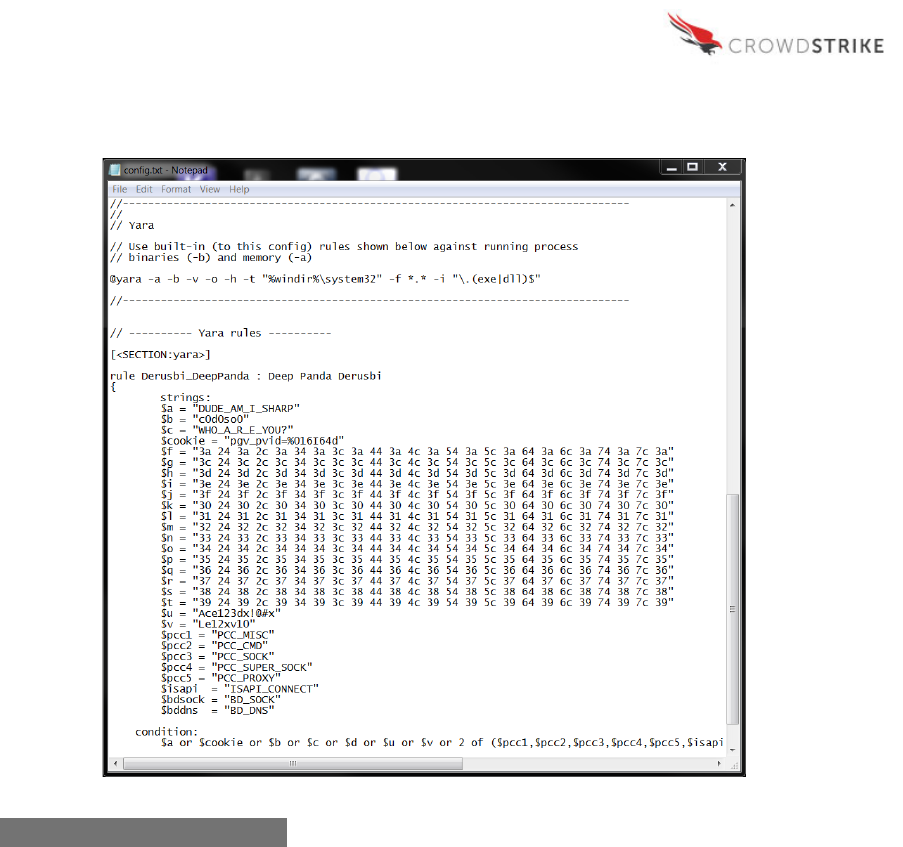
The main functionality provided by CrowdResponse is the ability to search for specific YARA
rules across an environment. Using these rules, the investigator can search for hits against
running process binaries and memory.
The YARA scans can be accomplished in two different ways. The first option is for the user to
denote the specific directory or directories at the command prompt to indicate where the rules
are located, which is accomplished through an HTTP POST function. The second option is for
the user to embed YARA rules into the configuration file. This configuration file can also contain
specific options and variables associated with the other sub-tools. The configuration file input
option is likely the easier option for most users. Additionally, the user may choose to use
different configurations for different sets of hosts or for initial/subsequent runs. The image below
shows a configuration file with embedded YARA rules.
CrowdResponse User Guide v1.0.6.0
8
CrowdStrike, Inc. Copyright (c) 2016. All rights reserved.
Deployment Methods
CrowdResponse can be deployed via several methods, including those discussed below:
• SCCM – In a managed environment, organizations can utilize System Center
Configuration Manager (SCCM) to deploy CrowdResponse to multiple workstations and
servers at once. The tool will look to the config file for the variables and rules to use in
the scan and associated output.
• PSExec – Similarly to SCCM, organizations can utilize PSExec to run a script that will
deploy CrowdResponse to multiple workstations and servers at once. The tool will look
to the config file for the variables and rules to use in the scan and associated output.
Figure 1: Example Config File

CrowdResponse User Guide v1.0.6.0
9
CrowdStrike, Inc. Copyright (c) 2016. All rights reserved.
• Falcon Host – For organizations that utilize CrowdStrike’s Falcon Host product, the
agent can be used to deploy CrowdResponse as well. The tool will look to the config file
for the variables and rules to use in the scan and associated output.
• Command Line – Windows Command Line can be utilized to manually execute the
CrowdResponse scan on individual hosts. In this manner, users can actually specify
individual actions at the command prompt rather than relying on the configuration file if
desired. This is the method utilized throughout this user guide for ease of use.
Note: This user guide focuses on execution of the CrowdResponse tool via the command line.
As such, the instructions and screenshots that follow are associated with execution and output
from the command line deployment method. The other deployment methods are partially
dependent on individual organizational settings and environments, making it difficult to provide a
guide for each.
CrowdResponse User Guide v1.0.6.0
10
CrowdStrike, Inc. Copyright (c) 2016. All rights reserved.
SCAN EXECUTION AND OUTPUT
The CrowdResponse sub-tools (modules) and the associated options can be executed at the
command line. The format utilized for executing the tool and options is as follows:
CrowdResponse [opts] @tool_name [params] @tool_name [params]... etc.
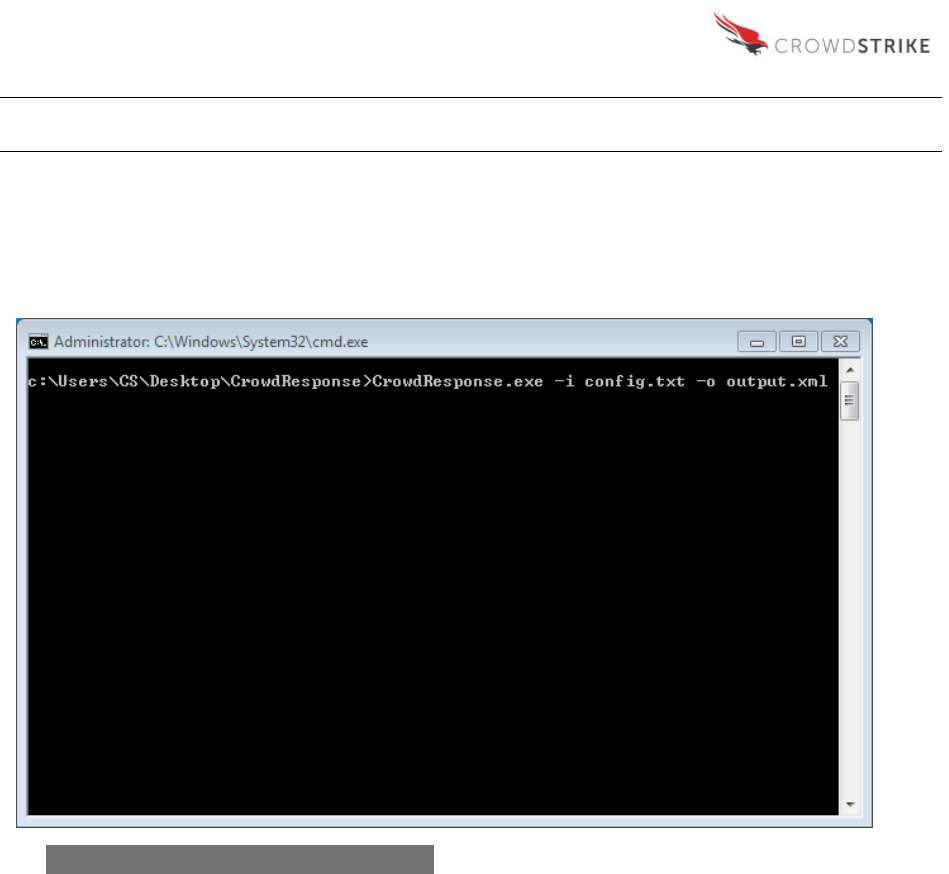
This command will execute the main “CrowdResponse.exe” file which calls the associated
processes defined in the configuration file “config.txt”. The data associated with the scan is then
output to a file called “output.xml”.
In addition to the simple syntax utilized above, the following table lists the full variables that
may be called from the command line during execution of the scan, which were detailed
previously under the Main Tool Options section:
Figure 2: Example Command Line Input

CrowdResponse User Guide v1.0.6.0
11
CrowdStrike, Inc. Copyright (c) 2016. All rights reserved.
The output file (listed after “-o”) also understands the following syntax, outside of these system
environment variables:
Each of the sub-tools also has additional variables associated with its functionality, which can
be adapted in the configuration file itself. This information is provided in the Sub-Tools section of
this document.
CrowdResponse User Guide v1.0.6.0
12
CrowdStrike, Inc. Copyright (c) 2016. All rights reserved.
Example Output (Command Line)
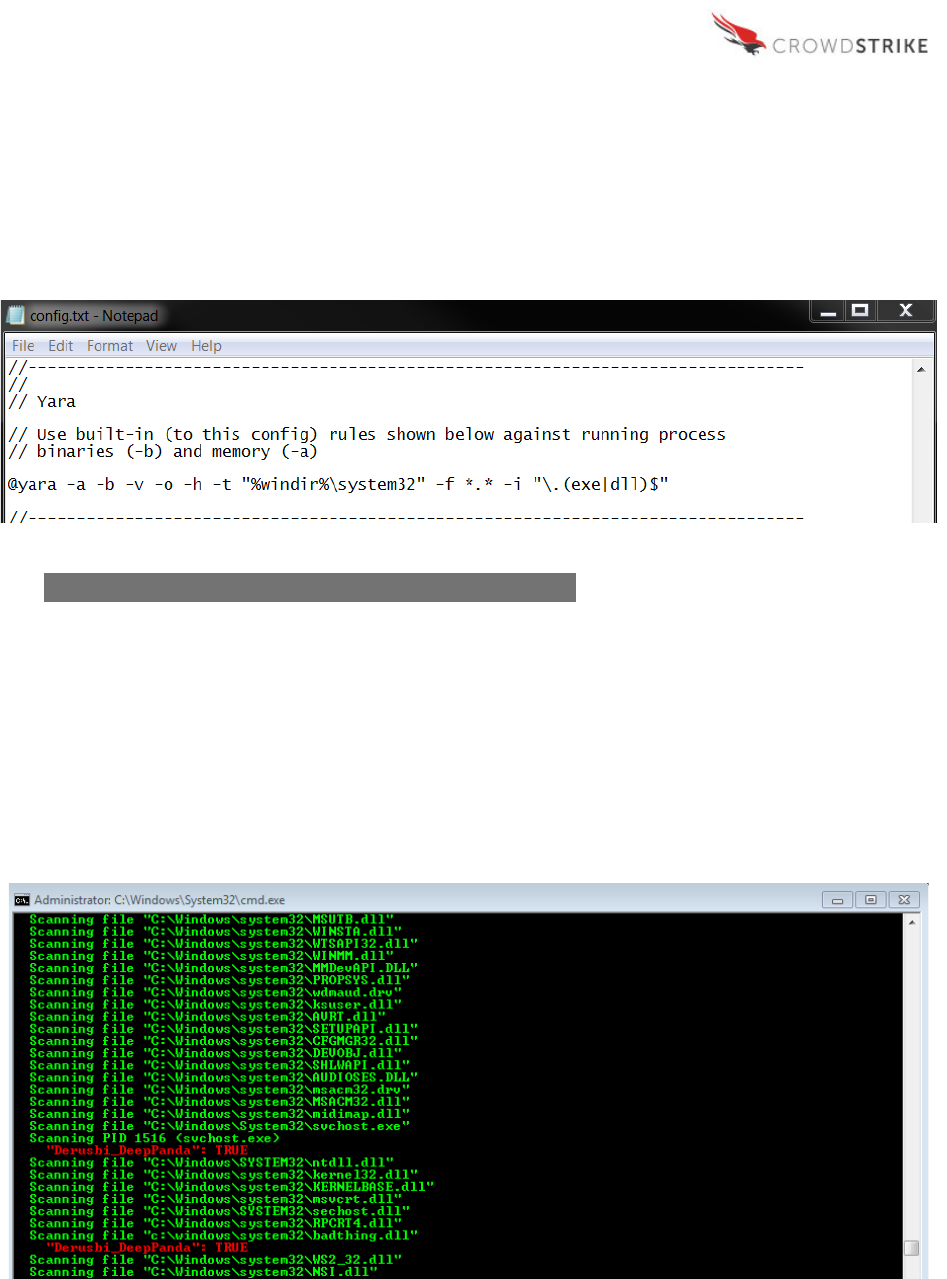
For the purpose of providing example screenshots, the simple command noted previously
(CrowdResponse.exe –i config.txt –o output.xml) was executed on a virtual image
utilizing the following config file information:
As you can see in the screenshot above, the YARA sub-tool includes several variables including
the options to scan active processes in memory (-a), scan active process executable files (-b),
enable verbose informational output (-v), scan all loaded module files of active processes (-o),
only show positive hits (-h), start target file directory (-t), apply a target file name mask (-f), and
apply a target file path inclusion regex filter (-i).
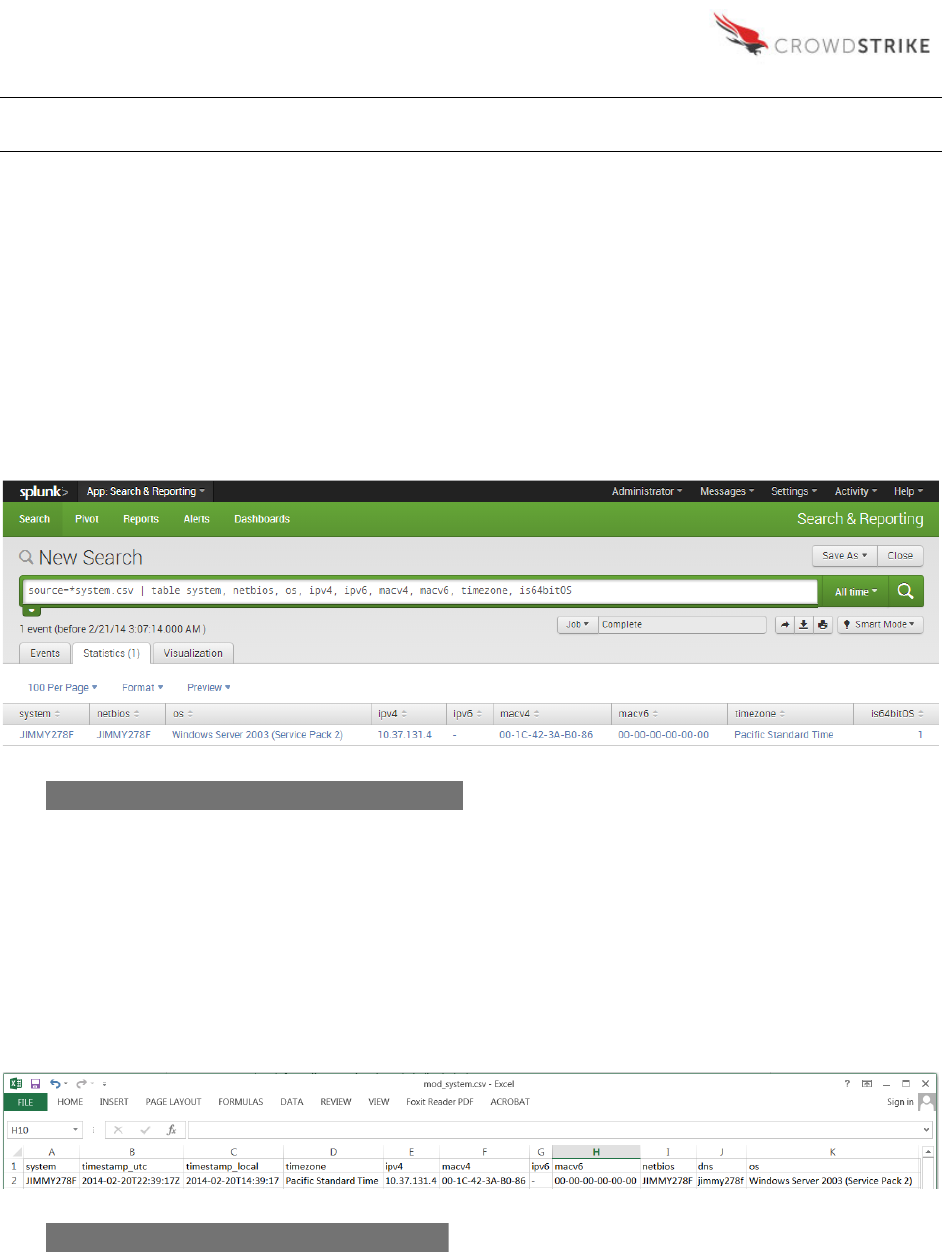
The command line execution of the config file results in the following output:
Figure 3: Example Config File with YARA Specified Variables

CrowdResponse User Guide v1.0.6.0
13
CrowdStrike, Inc. Copyright (c) 2016. All rights reserved.
Output Key Observations:
• (-h): The output identifies a TRUE hit on the “Derusbi_DeepPanda” YARA rule provided
in an earlier screenshot. The scan first identifies the parent process (svchost.exe) and
then subsequently identifies the underlying bad file associated with the malware
(badthing.dll). The scan utilizes the –o variable to load the module files of the active
processes, otherwise only the parent processes would show.
• (-i): The only results that are returned are for files and processes that end in with a .exe
or .dll extension. This is the result of the target file path inclusion regex filter in the YARA
sub-tool section of the config file.
• (-h): Only the positive hits are reported.
• In addition to the data that is passed back in the command line, the output is also
exported to an .xml file that is located in the default folder where the
CrowdResponse.exe file is located, unless otherwise specified.
Figure 4: Example Command Line Output Identifying Positive Hits

CrowdResponse User Guide v1.0.6.0
14
CrowdStrike, Inc. Copyright (c) 2016. All rights reserved.
OUTPUT CONVERSION
CRconvert
CrowdResponse results may be viewed in a variety of ways, particularly when leveraging
CrowdStrike’s CRconvert. By default, output from CrowdResponse is provided in an XML file.
CRconvert will flatten this XML to CSV, TSV, HTML or plain Text, if desired. The HTML output
may be viewed in any browser. The CSV and TSV output may be processed via a spreadsheet
application of your choice, such as Microsoft Excel or OpenOffice Calc, or via a data analysis
platform such as Splunk. The various format options were created to support the different needs
and analysis preferences of the end user.
Please see the accompanying readme-CRConvert.html file for comprehensive details on
syntax and options.
CRconvert Overview
CRconvert -f <path/mask>
[-b <table>]
[-d <database>]
[-e <prefix>]
[-m <rows>]
[-n <name>]
[-o <dir>]
[-achjpqrstvx]
-a Append output files (default is overwrite)
-b <table> Database table name for option -d. Default is "Hashes"
-c Output in CSV format
-d <database> Path to SQLite3 database of whitelisted SHA256 hashes
-e <prefix> Output file name prefix. Default is "CrowdResponse_"
-f <path/mask> File name path/mask. Default mask is "*.xml"
-h Output in HTML format
-j Delete all output files on error
-m <rows> Limit rows per CSV output file creating new ones when reached
-n <name> Database SHA256 column name for option -d. Default is "SHA256"
-o <dir> Output directory for files. Default is current
-p Use low CPU priority (idle) to lessen load on the system
-q Quit the application immediately after decryption
-r Recursively search input directory when looking for files
-s Do not use XML file name as first field ("system")
-t Use tabs to separate CSV output fields instead of commas
-v Verbose output
-x Output in text format
-z Ignore zero byte sized file when using whitelist (option -d)

CrowdResponse User Guide v1.0.6.0
15
CrowdStrike, Inc. Copyright (c) 2016. All rights reserved.
Splunk
Depending on your environment, Splunk may be a very powerful way to leverage
CrowdResponse output. The CSV output that CRconvert can create is Splunk-friendly and can
be indexed with ease. By default, CSV column headers will be used as field names in Splunk
when setting the sourcetype to CSV, allowing for easy labeling of the data.
Once ingested, analysis of the data is as powerful as your queries. Within the context of
CrowdResponse, Splunk reports, dashboards and alerts can simplify analysis of output files by
utilizing key events. For instance, you can enable a Splunk alert if “result=TRUE” in the YARA
output, indicating a match of a YARA. Thus, rather than searching through the output for the
positive hits, Splunk will easily pull these records to your attention.
Modules may contain multiple timestamps (e.g. created, modified, and accessed). In order to
specify which timestamp you’d like Splunk to use at index time as the primary (for quickly
filtering based on timeframe), a new sourcetype may be defined per module in your props.conf
including the parameters below:
• INDEXED_EXTRACTIONS = csv
• TIME_FORMAT = %Y-%m-%dT%H:%M:%S%Z
• TIME_PREFIX = ^([^,]*,){6}
Note: TIME_PREFIX is used to provide a regular expression to represent where Splunk should
begin looking for the appropriate timestamp, based on field.
CrowdResponse User Guide v1.0.6.0
16
CrowdStrike, Inc. Copyright (c) 2016. All rights reserved.
ANALYSIS
System Information
Upon conversion of the XML data via CRconvert, you’ll have a CSV, TSV or HTML file for each
sub-tool module selected, in addition to one for overall main system information collected during
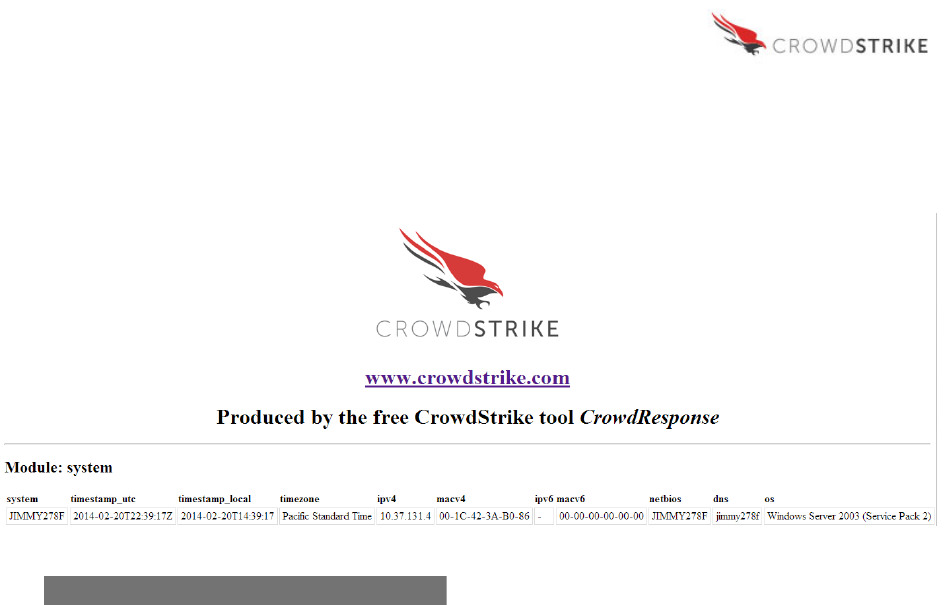
execution. The system information provides an inventory of the systems that have been
scanned along with associated data point. The output will be similar to what is seen below:
Splunk
Sample Query:
source=*system.csv | table system, netbios, os, ipv4, ipv6, macv4,
macv6, timezone, is64bitOS
Excel
Figure 5: Example System Information - Splunk
Figure 6: Example System Information - Excel
CrowdResponse User Guide v1.0.6.0
17
CrowdStrike, Inc. Copyright (c) 2016. All rights reserved.
Web Browser
Figure 7: Example System Information – Web
CrowdResponse User Guide v1.0.6.0
18
CrowdStrike, Inc. Copyright (c) 2016. All rights reserved.
YARA Module
Following the System information that shows inventory information, it is important to review any
YARA matches. The steps required to investigate a YARA match will vary based on method of
viewing the data, but the methodology will remain the same. Examples of the YARA match
information output are shown in the following sections and screenshots.
The first step in analysis of the YARA module is to identify any YARA results that returned
“TRUE.” The YARA module output will yield the name of the affected system, the YARA rule
that matched, the name and path of the matching file, as well as the process ID in use by the
operating system (if applicable).
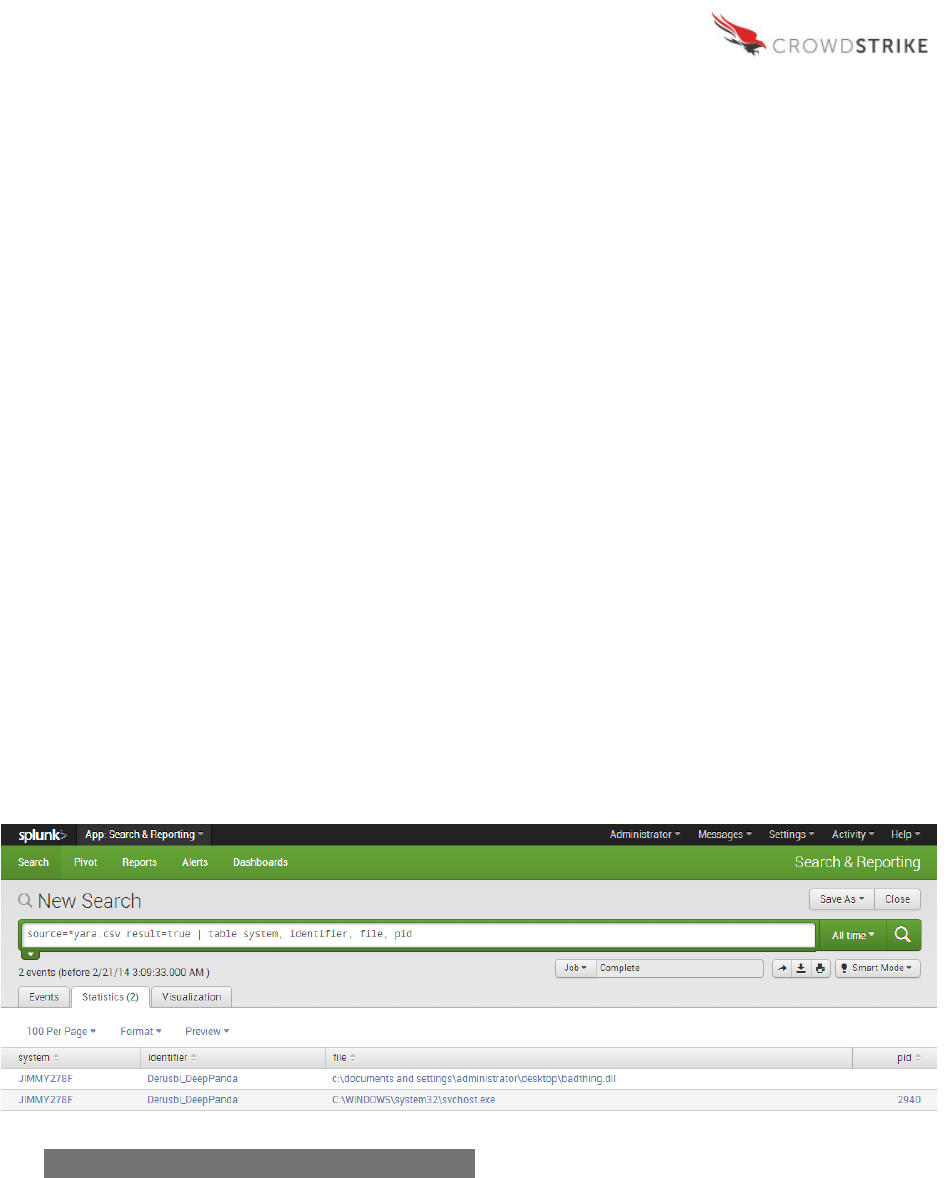
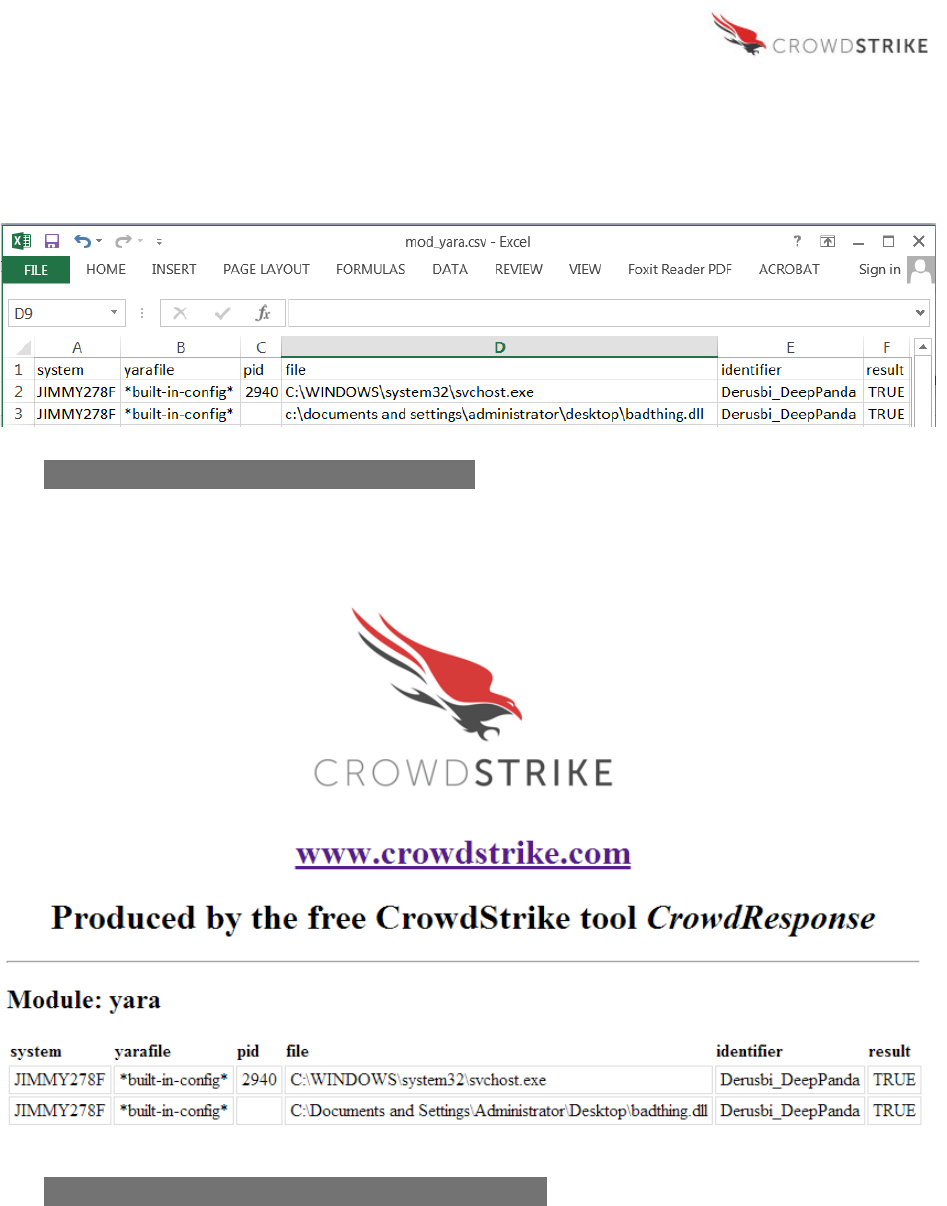
In the output below, “svchost.exe” and “badthing.dll” both match the YARA rule named
“Derusbi_DeepPanda.” The Process ID (“pid”) reported for svchost.exe (2940) indicates that it is
the parent process, while the identified file “badthing.dll” does not have a process ID value,
indicating it is not a process. Instead, this result is the offending module loaded by process ID
2940. This malicious file was identified by using the “-o” option for @YARA to scan all modules
loaded by an active process, which leads the analyst directly to the issue.
Splunk
Sample Query:
source=*YARA.csv result=true | table system, identifier, file, pid
Figure 8: Example YARA Module Output – Splunk
CrowdResponse User Guide v1.0.6.0
19
CrowdStrike, Inc. Copyright (c) 2016. All rights reserved.
Excel
Web Browser
Figure 9: Example YARA Module Output – Excel
Figure 10: Example YARA Module Output – Web Browser

CrowdResponse User Guide v1.0.6.0
20
CrowdStrike, Inc. Copyright (c) 2016. All rights reserved.
Note: Depending on signature quality, it’s possible that false positive YARA hits on memory will
result with some processes like Anti-Virus.
CrowdResponse User Guide v1.0.6.0
21
CrowdStrike, Inc. Copyright (c) 2016. All rights reserved.
PSList Module
Using the process ID (2940) and system name (JIMMY278F) identified previously, the PSList
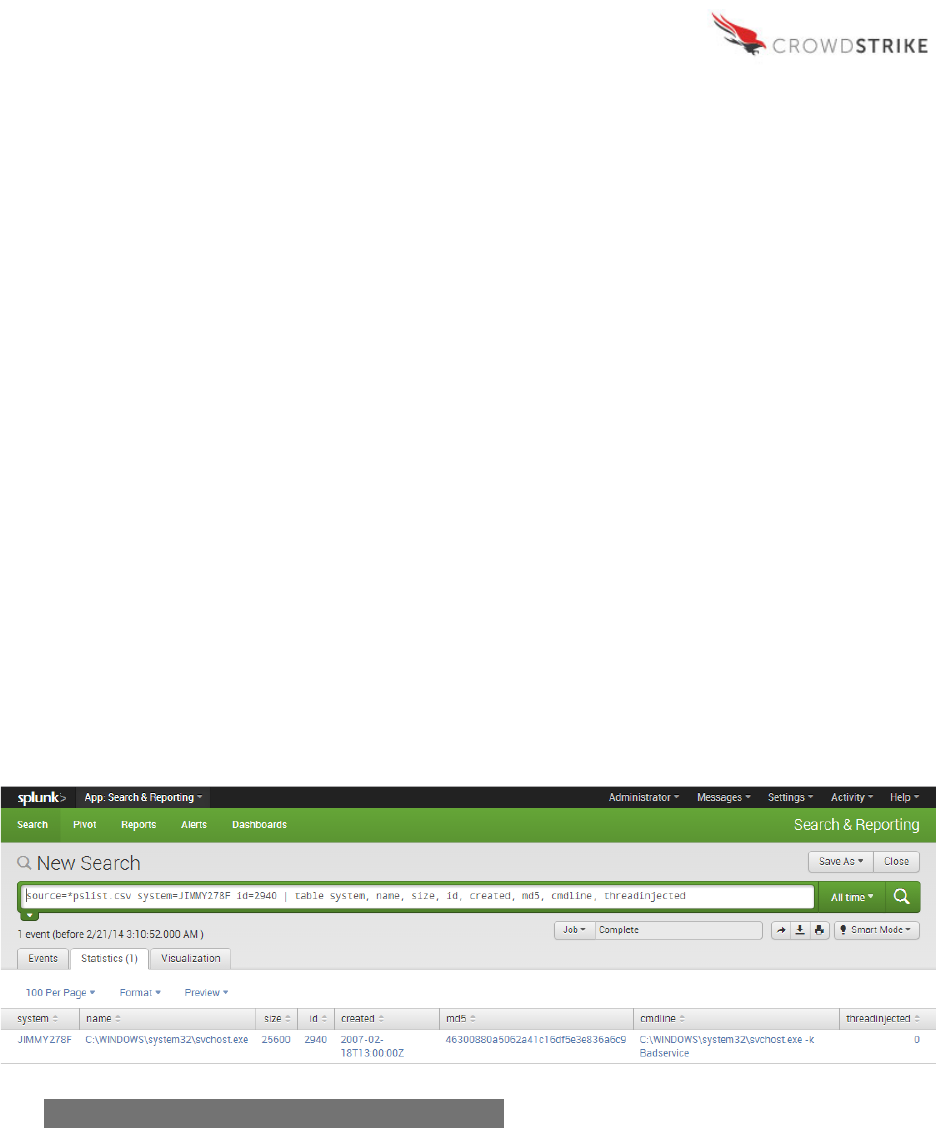
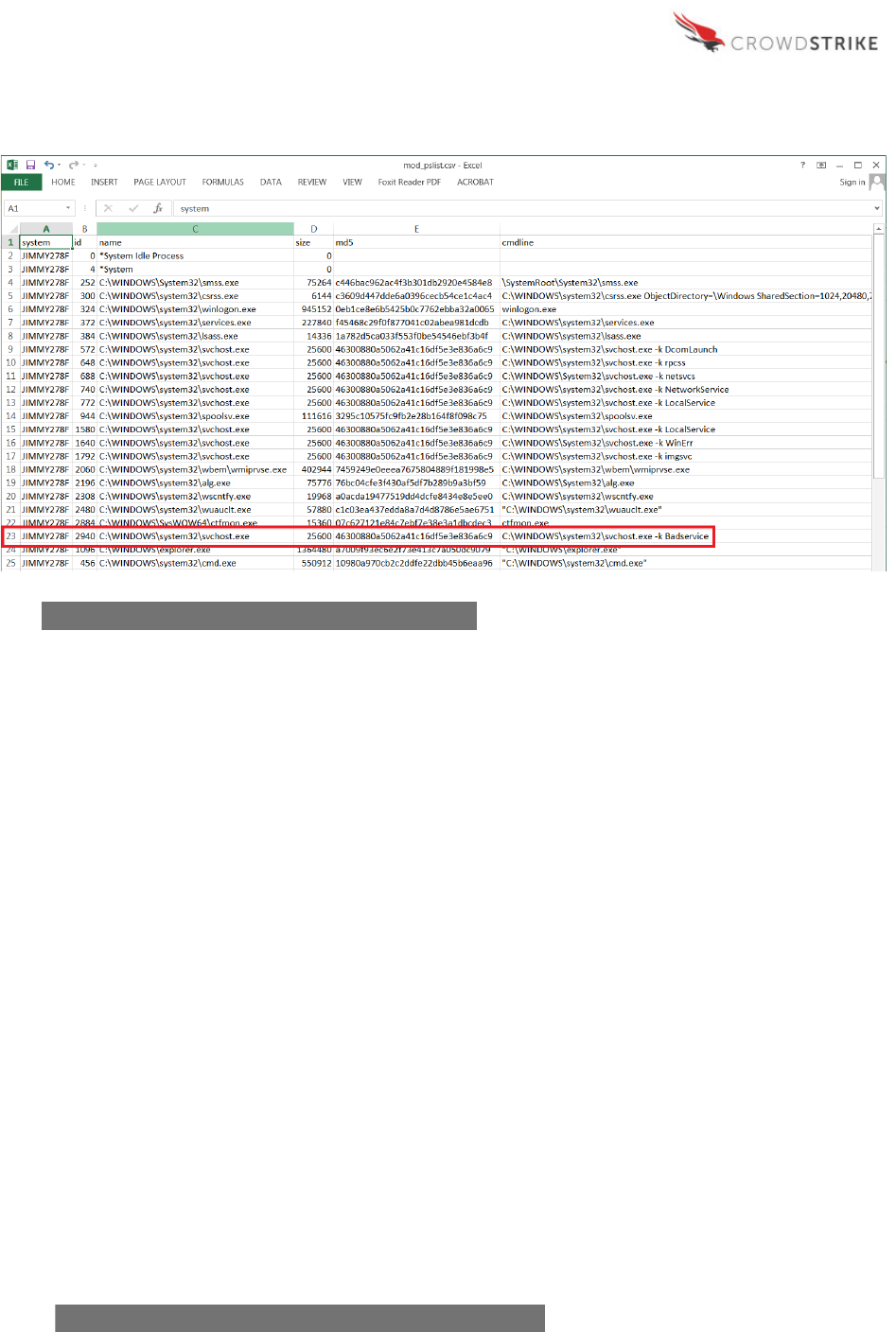
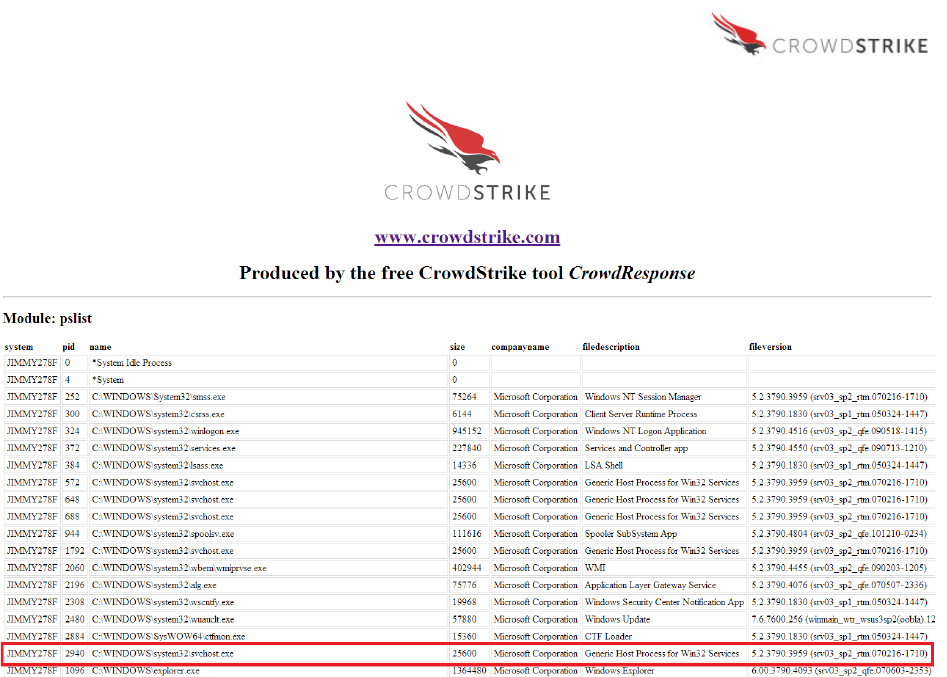
Module output can be used to cross-reference details on that specific process. In this example
note that the svchost.exe process itself is not malicious, as it is only being used to load the
offending DLL as a service.
PSList provides numerous fields of interest related to a specific process, such as the system
name, file path and name, size, process ID, creation date, MD5 or SHA256 hash, command line
parameters used to execute the process and detection of thread injection. These fields are a
small sampling of what’s available with PSList, the rest of which may be explored by the analyst
as desired and are included in Appendix A.
Looking at the command line details for the svchost.exe process shows the parameter used to
reference and execute the malicious DLL as “Badservice.” Also of value is to verify the MD5 or
SHA256 hash of “svchost.exe” with repositories of known hashes. In this case, the hash
identifies svchost.exe as the standard, non-malicious Microsoft version.
Splunk
Sample Query:
source=*pslist.csv system=JIMMY278F id=2940 | table system, name,
size, id, created, md5, cmdline, threadinjected
Figure 11: Example PSList Module Output – Splunk
CrowdResponse User Guide v1.0.6.0
22
CrowdStrike, Inc. Copyright (c) 2016. All rights reserved.
Excel
Web Browser
Figure 12: Example PSList Module Output – Excel
Figure 13: Example PSList Module Output – Web Browser
CrowdResponse User Guide v1.0.6.0
23
CrowdStrike, Inc. Copyright (c) 2016. All rights reserved.
DirList Module
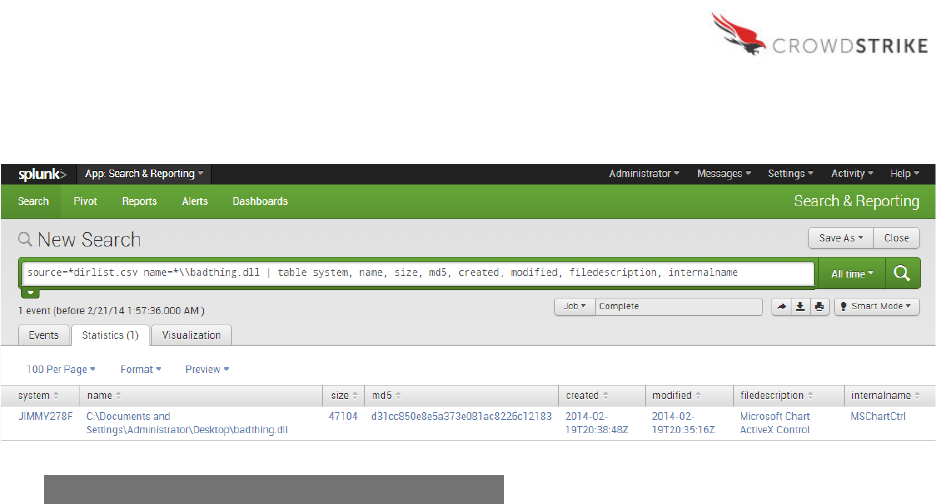
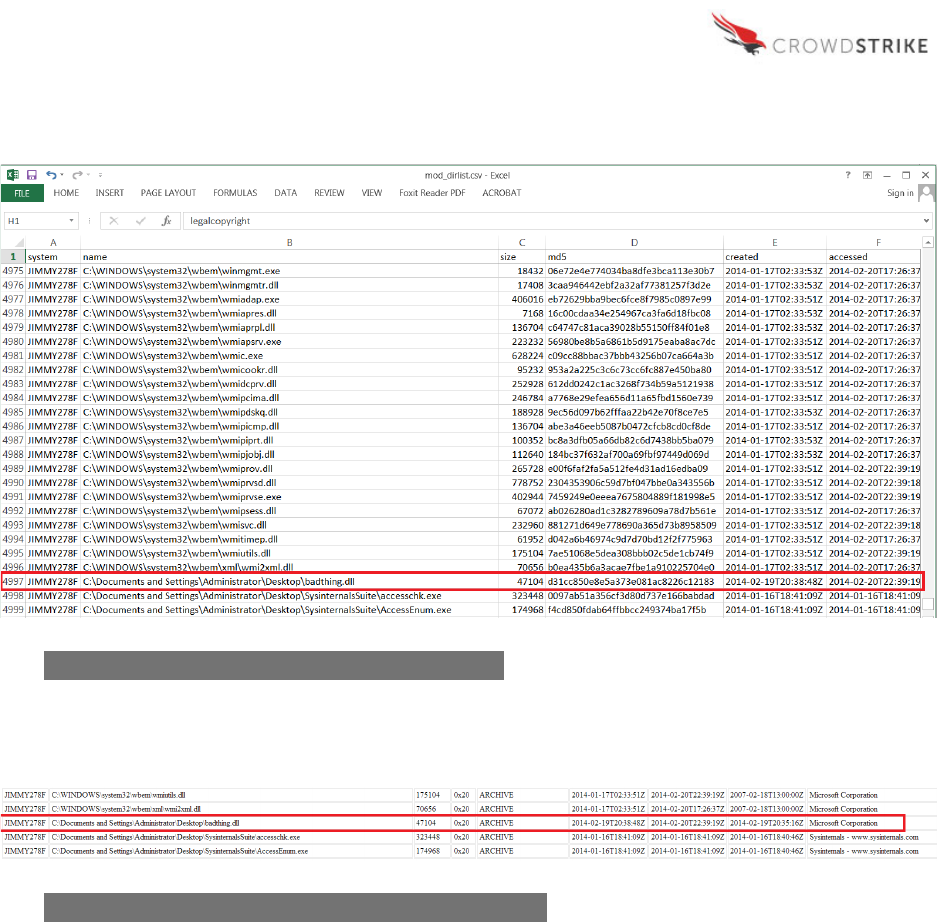
The next logical analytical step is to look more closely at “badthing.dll”. As the file itself is not a
process, PSList does not provide details about it. Instead, the analyst should reference the
DirList module output. In the output below, we see a variety of details surrounding the file
including the system(s) it’s present on, the full path, size, MD5 hash, created date, modified
date, file description and internal name. Similar to PSList, the output shown here is a small
sampling of the information available to the analyst, but the full list is provided in Appendix B.
Armed with these details, the investigator can immediately analyze the malware’s metadata and
establish indicators of compromise to determine the scope of infection in our environment.
CrowdResponse User Guide v1.0.6.0
24
CrowdStrike, Inc. Copyright (c) 2016. All rights reserved.
Splunk
Sample Query:
source=*dirlist.csv name=*\\badthing.dll | table system, name, size,
md5, created, modified, filedescription, internalname
Figure 14: Example DirList Module Output – Splunk
CrowdResponse User Guide v1.0.6.0
25
CrowdStrike, Inc. Copyright (c) 2016. All rights reserved.
Excel
Web Browser
Figure 15: Example DirList Module Output – Excel
Figure 16: Example DirList Module Output – Web Browser

CrowdResponse User Guide v1.0.6.0
26
CrowdStrike, Inc. Copyright (c) 2016. All rights reserved.
Analysis - Next Steps
After completing the analysis discussed previously over the System, YARA, DirList, and PSList
output, the analyst will likely want to leverage the newly discovered indicators of compromise to
determine the extent of the issue and related malicious activity. Suggested next steps include:
• Lookup the MD5 and SHA256 hashes of the malware obtained from the DirList output
against a repository of known hashes in an attempt to quickly identify the malware;
• Use the created and modified timestamps of the malware obtained from the DirList
output to identify other suspicious files created or modified on the system (and all
systems in the environment) around the same time;
• Use the MD5 and SHA256 hashes of the malware obtained from the DirList output to
look for other copies, potentially with different filenames, across the enterprise;
• Using the DirList output and a defined time period of interest based off of other
indicators, look for the creation of key files like NTUSER.dat or Desktop.ini that may
indicate a user first appeared on a system during this time;
• Explore all available fields that were not covered here for the identified bad process from
the PSList module and look for more potential indicators of compromise where values
are atypical; and
• Explore all available fields that were not covered here for the identified malware from the
DirList module and look for more potential indicators of compromise where values are
atypical.

CrowdResponse User Guide v1.0.6.0
27
CrowdStrike, Inc. Copyright (c) 2016. All rights reserved.
APPENDIX A
Complete List of PSList Values Captured by CrowdResponse
accessed
id
peid
AddressOfEntryPoint
ImageBase
PEname
anomalies
importcount
productname
BaseOfCode
internalname
productversion
BaseOfData
legalcopyright
SectionAlignment
cert_comment
LoaderFlags
size
cert_exists
Machine
SizeOfCode
cert_result
MachineStr
SizeOfHeaders
cert_signer
MajorImageVersion
SizeOfHeapCommit
cert_verified
MajorLinkerVersion
SizeOfHeapReserve
Characteristics
MajorOperatingSystemVersion
SizeOfImage
CharacteristicsStr
MajorSubSystemVersion
SizeOfInitializedData
CheckSum
MemAddressOfEntryPoint
SizeOfOptionalHeader
cmdline
MinorImageVersion
SizeOfStackCommit
companyname
MinorLinkerVersion
SizeOfStackReserve
created
MinorOperatingSystemVersion
SizeOfUninitializedData
DllCharacteristics
MinorSubSystemVersion
Subsystem
DllCharacteristicsStr
modified
SubsystemStr
exportcount
name
system
FileAlignment
NumberOfSections
threadinjected
filedescription
NumberOfSymbols
TimeDateStamp
fileversion
originalfilename
Win32VersionValue
CrowdResponse User Guide v1.0.6.0
28
CrowdStrike, Inc. Copyright (c) 2016. All rights reserved.
APPENDIX B
Complete List of DirList Values Captured by CrowdResponse
accessed
companyname
name
attrhex
created
originalfilename
attrstr
filedescription
productname
cert_comment
fileversion
productversion
cert_exists
internalname
sha256
cert_result
legalcopyright
size
cert_signer
md5
system
cert_verified
modified
!
