D450_photo D450 Photo
User Manual: D450_photo
Open the PDF directly: View PDF  .
.
Page Count: 2
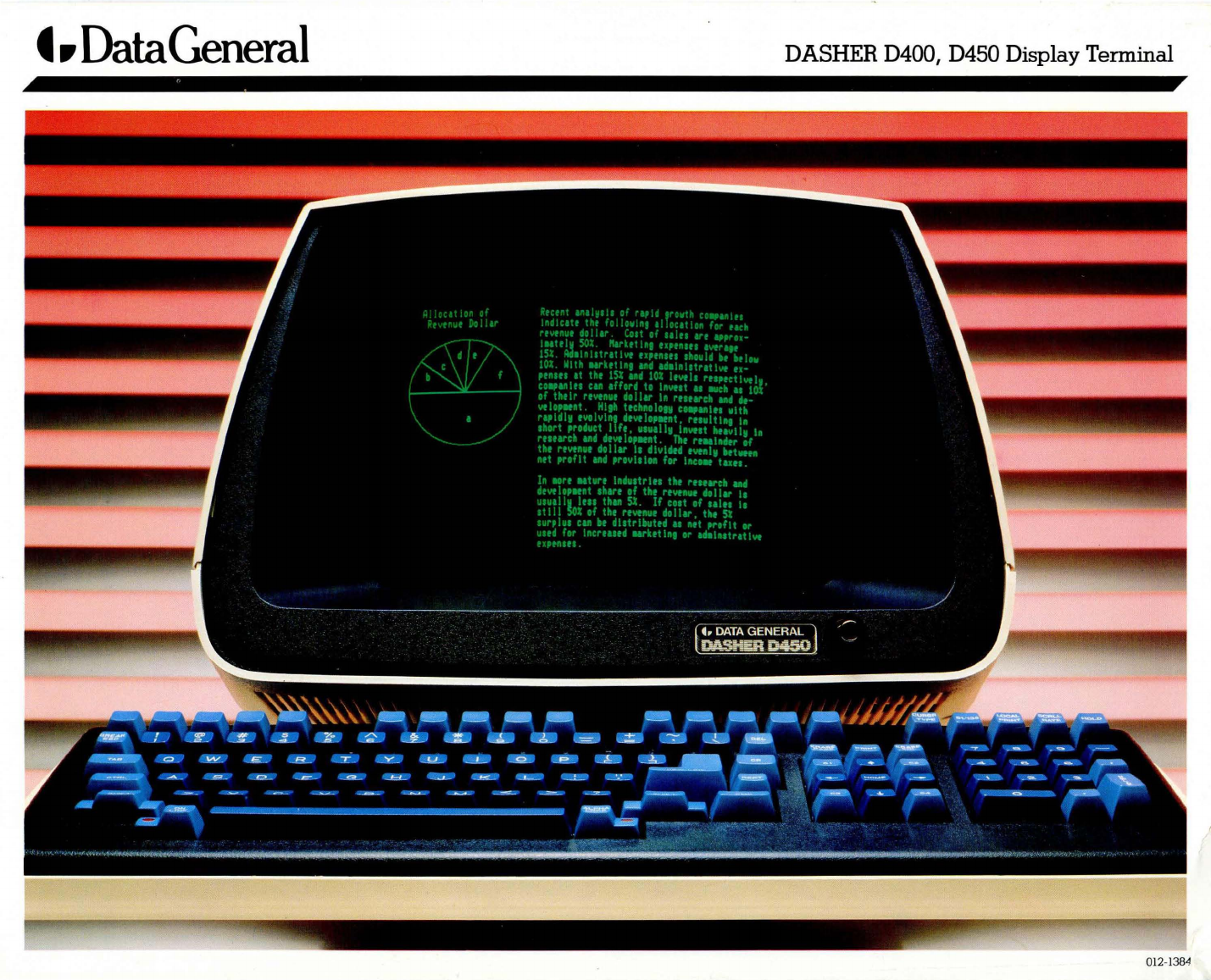
t.
Data
General
DASHER D400, D450 Display Terminal
01
2-
1
384
Data
General
Corporation's
DASHER®
D400
and
D450 smart display terminals
provide
advanced
operator-oriented
text
and
graphics
capabilities in
both
business
and
non-commercial
environments. Built-
in
intelligence
provides
features
and
func-
tions that
make
these
DASHER
products
extremely cost-effective
and
versatile.
Both
the
D400
and
the
D450 facilitate text
processing
through
expanded
character
sets,
screen
editing
functions,
and
multi-
window capacity. These features
combine
to let
the
user
display information
more
comprehensively
than
on
conventional
alphanumeric
terminals.
The
detached
keyboard
includes
such
features as
deep-dish
homing
keys for
operator
convenience,
special
operator
function keys,
and
a low-profile
sculptured
design
for
user
comfort. The display itself
is
on
a tilt-and-swivel
base
for adjustment
to individual
preference,
contains a
green
phosphor
screen
to
reduce
eyestrain,
and
has a
dark
bezel
with
hood
effect to elimi-
nate
overhead
light reflection.
The
scr
ee
n
ma
y
be
divi
ded-und
er
pro
-
gram
control-into
as
many
as 24 individ-
ual viewing windows,
each
with its own
character
mode
("normal"
at
80
characters
per
line,
or
"compressed"
at
135
characters
per
line),
margin
settings,
and
scroll rate.
Horizontal scrolling
extends
screen
capa-
bilities,
providing
for text
up
to
162
columns
wide. In addition,
the
ROM-
resident
character
set
includes
American,
British, DanishINorwegian,
French,
Ger-
man,
Spanish,
and
Swedish/Finnish fonts,
line-drawing, mathematical notation,
word
processing
symbols,
and
a subset of
the
Greek
alphabet.
Scrolling
rates-fast-
or
slow-smooth,
and
jump-can
be
selected
by
the
user
to allow
for
increased
readability. Also
among
the
operator-controlled
functions
are
a
choice
of
four
cursor
types
and
the
ability to
print
the
contents of
the
screen
on
the
auxiliary
printer
without host intervention. Reduc-
tion
of
host/terminal
character
traffiC
is
accomplished
by
the
resident
editing
facilities
on
these
smart terminals.
The D450
incorporates
all
of
the
functions
and
benefits
of
the
D400
and
also features
an
extended
memory
for
the
storage
of
more
than
1,000
user-defined
characters
and
symbols. These
can
be
used
with
the
fixed, ROM-resident
character
sets to pro-
duce
customized
documents
or
graphic
displays. Use of
the
DEFINp
M
character
management
utility software facilitates
the
creation
of
these
special
characters
. Data
General's
TRENDVIEWT
M
graphics
display
software,
used
with a D450,
enables
the
creation
of
common
business
graphics-
pie, bar,
and
line
graphs-directly
from
tabular
data.
The features of
the
new
DASHER D400
and
D450 terminals
add
up
to
increased
pro-
ductivity
through
enhanced
versatility
and
ease-of-use. Their overall
elegant
design
makes
them
an
invaluable
part
of
any
sophisticated information system. Both
the
D400
and
the
D450
can
operate
on
com-
puter
systems
and
applications
currently
using
the
DASHER D200 terminal.
Benefit and Feature Summary
•
Operator-oriented
and
human-
engineered
for
ease
-of-use
•
Increased
productivity
• Newly
designed
,
sculptured
keyboard
• Multilingual display for international
utility
•
Handles
extra-wide
documents
• Variable scroll rates
•
Customized
graphics
presentations
created
by
user
•
Reduced
demand
on
host
processor
time
• Low cost
and
high
versatility
•
Compatible
with Data
General
DASHER
D200 display terminals.
The materials
conta
i
ned
here
in
are
summary
in
nature,
subject
to
change,
and
intended
fo
r
gene
ral inf
orma
ti
on
only. Details
and
speCifications
concerning
t
he
use
and
operation
of Data
General
eqUipment
and
software
are
available in
the
applicable
technical manuals, available
th
rough
local sales representatives.
DASHER
is
a
registered
trademark
of
Data
General
Corporation
.
TRENDVIEW
and
DEFI
NE
are
trademarks
of
Data
General
Corporation.
Copyright
©
1981,
Data
General
Corporation
Westboro, Massachusetts
01581
Printed in U.S .A. All
right
s r
ese
rved
.
