DIA NN GUI Manualx Manual
User Manual:
Open the PDF directly: View PDF  .
.
Page Count: 5

DIA-NN GUI manual1
version 14/7/2018
Contents
Introduction ................................................................................................................................ 1
GUI window............................................................................................................................... 2
Files ............................................................................................................................................ 2
Main Settings ............................................................................................................................. 3
Spectral library ....................................................................................................................... 3
FASTA ................................................................................................................................... 4
Library-free search ..................................................................................................................... 4
Use library-free search / generate spectral library ................................................................. 4
Training library ...................................................................................................................... 4
Protease .................................................................................................................................. 4
Variable modifications ........................................................................................................... 4
Fragment ion mass range ....................................................................................................... 4
Algorithm ................................................................................................................................... 5
Introduction
DIA-NN is a fast and easy to use tool for processing data-independent acquisition (DIA or SWATH)
proteomics data. DIA-NN is designed to do as much as possible automatically, eliminating the need to
optimise the processing parameters for each experiment.
DIA-NN distribution contains DiaNN.exe, which is a command line tool, and DIA-NN.exe, a GUI wrapper
for this tool. The GUI works by launching DiaNN.exe and displaying its output. A report (with precursor ion
and protein identification and quantification information) is generated by the command line tool. Optionally,
a spectral library can be generated. Any analysis that can be performed with the GUI can also be performed
with the command line tool and vice versa. Using the GUI is recommended for any workflow that does not
involve automated processing of several experiments. Here we provide detailed information on data formats
supported by DIA-NN and consider the ways to fine-tune its performance.
1 Please email any comments, suggestions, questions or feedback to Vadim Demichev (vadim.demichev[аt]gmail.com) or create a
new issue on GitHub (github.com/vdemichev/diann).
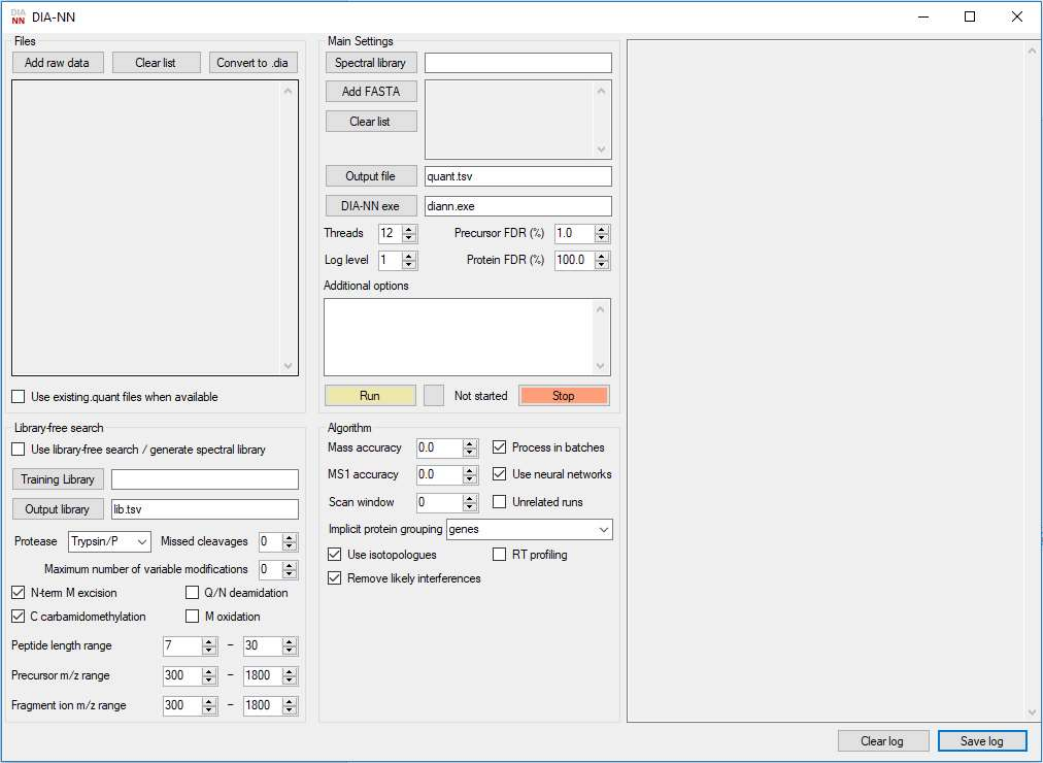
GUI window
The GUI window features four panels used to specify the data and processing settings: Files, Main Settings,
Library-free search and Algorithm. The panel located to the right is used to display the output of the
command-line tool. Extra commands entered in the Additional options text box will also be passed to the
command line tool; quotes can be used when passing options but are not required unless file names featuring
multiple adjacent spaces need to be specified.
Files
Thermo .raw, .mzML and .dia (native DIA-NN format) files are supported. Reading Thermo .raw files requires
Thermo MS File Reader to be installed. It is highly recommended that .mzML files are centroided, preferably
using the vendor centroiding algorithm for both MS1 and MS2 spectra. DIA-NN has been tested on .mzML
files produced from Sciex .wiff and Thermo .raw by MSConvert GUI (part of the ProteoWizard project) with
32-bit binary precision, vendor centroiding enabled and all other options disabled.
DIA-NN can convert raw files to its own .dia format. This format allows very quick loading, essentially limited
only by the hard drive speed. Converted files are placed in the same location as the raw files.
During the analysis, DIA-NN generates a .quant file containing identification and quantification information
for each run analysed. These .quant files are placed in the same location as the raw files. Thus it is not
recommended to analyse the same files simultaneously with multiple instances of DIA-NN, although multiple
instances of DIA-NN can be used to analyse different experiments. The size of the .quant files is roughly
proportional to the number of precursors identified at the given FDR setting and is negligible unless a library-
free search without any FDR filtering is used (not recommended). The .quant files can be reused to speed up
reanalysis of the data, but only if the spectral library and FASTA files specified as well as the FDR filtering
settings are exactly the same as the settings that were used to generate these .quant files.
Main Settings
Spectral library
Used to specify the spectral library. The library is required unless a library-free search against a FASTA
database is to be performed. In that case, if specified, the spectral library will be used to enhance and speed
up library-free search. DIA-NN accepts spectral libraries in a plain text format (tab-separated or comma-
separated, i.e. .tsv, .csv, .xls or .txt).
Libraries produced by TargetedFileConverter (part of OpenMS), exported from Spectronaut (Biognosys) in
the .xls format or generated by DIA-NN itself are supported “as is”.
For libraries generated by other means, DIA-NN needs to be told the header names (separated by commas)
(for the columns it requires) using the --library-headers command. The headers should be specified in
the following order:
- UniProt identifiers of the proteins matched to the peptide (separated by semicolon). These will be
used for peptide annotation as well as protein quantification. If a FASTA file is specified, UniProt
identifiers will be searched against this file and annotated with protein and gene names. If the library
contains no column specifying which peptides are proteotypic (see below), DIA-NN will consider any
peptide matched to a single UniProt identifier proteotypic. DIA-NN does not check the validity of the
UniProt identifiers provided, i.e. arbitrary text can be used instead.
- Modified peptide sequences. Outside parentheses, all symbols apart from letters are ignored.
Modifications are specified within parentheses (“()” or “[]”) after the modified amino acid or (e.g.
“[Acetyl (Protein N-term)]”) before the first amino acid. Recognition of some common modifications
is built in. Custom modifications can be specified using the --mod command, e.g. “--mod
UniMod:5,43.005814” will add carbamylation (KR) to the list of modifications recognized by DIA-
NN. DIA-NN does not need to recognize modifications if decoys are provided in the library (see
below).
- Precursor charge.
- Precursor m/z.
- Reference retention time. There are no restrictions on the retention time scale used here.
- Fragment ion m/z.
- Relative intensity of the fragment ion. There are no restrictions on the scale used here.
The following optional headers can also be specified:
- Protein names. These will be used for annotation if a FASTA file is not provided.
- Gene names. These will be used for annotation if a FASTA file is not provided.
- Proteotypicity. The value should be 1 if the peptide is to be considered proteotypic. DIA-NN
calculates protein q-values using proteotypic peptides only. If the protein FDR filter setting is below
100%, proteotypicity definition also affects protein inference and grouping.
- Decoy. Indicates whether the peptide is a decoy. If there are decoy peptides in the library, DIA-NN
uses these and does not generate its own decoys.
- Fragment ion charge. If this column is not provided, DIA-NN infers the charges itself, although this
inference relies on recognition of all peptide modifications and is not guaranteed to be correct in all
the cases. However, DIA-NN needs to know fragment ion charges only if it is told to consider
isotopologues of the peptides and fragments in the library (this is enabled by default).
FASTA
One or several FASTA files can optionally be specified. These will be used for protein annotation (if in
UniProt format). If library-free search is used, the FASTA files will be digested in silico to generate a spectral
library.
Optionally, peptides considered can be filtered using the --fasta-filter command, e.g. “--fasta-
filter C:/human_peptides.fasta”. Peptides can be provided as a fasta file (e.g. DIA-NN recognises
the format of peptide lists from PeptideAtlas builds) or as a simple list of stripped sequences (one per line);
all lines starting with ‘>’ are ignored. Filtering allows to dramatically reduce the search space, speeding up
the analysis and improving identification performance.
Library-free search
Use library-free search / generate spectral library
This will instruct DIA-NN to in silico generate a spectral library from the FASTA file provided and use it to
analyse the data files. In addition to the analysis report, a new spectral library will be generated. If a spectral
library is provided in addition to the FASTA file, it will be used to enhance and speed up the library-free
search. In this mode, q-values for precursor ions that belong to the library will be calculated separately. If a
spectral library is provided, but there is no FASTA file, this library will be used to analyse the data files and
a new spectral library will be generated using only identified precursor ions (at the specified precursor and
protein FDR cutoff rates) and featuring refined spectra and retention times; the retention time scale used in
the spectral library will be retained. A new spectral library is saved in an OpenMS-compatible format.
Training library
Specifying a training library allows DIA-NN to in silico predict peptide fragmentation patterns (only charge
one y-series fragments without neutral losses are considered) using an algorithm similar to that of MS
Simulator. In addition, a linear retention time predictor is trained. It is essential that if a spectral library is also
specified (in the Main Settings panel), its retention time scale should be the same (e.g. both the training and
the spectral library may use the iRT scale). It is desirable but not essential that the training library is generated
on the same LC-MS setup. If no suitable training library is available, one can first run DIA-NN without it
(identification performance will be somewhat worse) and then run it again using the newly generated library
as the training library. For efficient training of the predictors at least 10’000 precursors should be present in
the training library.
Protease
Several built-in options are available for the in silico digest. Alternatively, one can specify custom cleavage
specificity, e.g. “--cut-after KR --no-cut-before P” corresponds to a tryptic digest. Multiple
proteases are not supported, however DIA-NN can be provided with an in silico digest in the FASTA format
instead of the FASTA database.
Variable modifications
For now, only deamidation (QN) and oxidation (M) have been implemented. In general, it is not recommended
to enable variable modifications, as this slows down analysis considerably and expands the search space,
potentially negatively affecting identification performance. It is essential that the removal of likely
interferences is enabled (see the Algorithm settings below), if deamidation is enabled and the runs have been
acquired on an instrument that does not allow to effectively distinguish between deamidated ions and heavy
isotopologues.
Fragment ion mass range
It is desirable to restrict this to a range within that of the instrument, if known.
Algorithm
Mass accuracies can be determined automatically (when set to the default 0.0) or specified by the user.
Initially, DIA-NN performs a preliminary search with mass accuracy set to 100ppm, followed by mass
correction. If the masses reported by the instrument are guaranteed not to be that much off (e.g. the instrument
is regularly calibrated), this setting can be reduced, e.g. to 30ppm with “--mass-acc-cal 30”. This can
produce a noticeable speed up for library-free searches.
The implicit protein grouping option allows to specify the proteotypicity definition that will be used by DIA-
NN. For example, if set to the default “genes”, DIA-NN will consider a peptide proteotypic, if all of its
associated proteins correspond (according to the FASTA files provided) to a single gene. Proteotypicity
definition affects protein q-value calculation, as it only utilises proteotypic peptides, and, if the protein FDR
filter setting is below 100%, protein inference and grouping.
DIA-NN can use an ensemble of neural networks to calculate q-values. By default, these are trained for a
single epoch, minimizing the chance of overfitting. It is not recommended to disable the removal of likely
interferences when using neural networks. The number of epochs can be increased by setting--nn-epochs,
and the number of neural networks in the ensemble – by setting --nn-bagging (more = better and slower;
default = 12). To almost completely eliminate any potential overfitting and allow for an increased number of
epochs, neural networks can be used in a “cross-validation mode”, when each network is only used to score
peptide-spectrum matches that have not been used for its training. However, in this case it is desirable to also
increase the number of networks, slowing down the analysis. For example, “--nn-cross-val --nn-
bagging 96 --nn-epochs 5”.
Output
Default output header names can be replaced with those specified with the --output-headers command,
analogous to --library-headers (see above).
Protein.Group
DIA-NN aims to reduce the number of proteins matched to each precursor ion. Maximal parsimony approach
is implemented using a greedy set cover algorithm. Furthermore, TrEMBL proteins can be omitted, if the
precursor in question is also matched to at least one SwissProt protein (this can be disabled with --no-
swissprot). Protein inference and grouping can be disabled with --no-prot-inf.
Protein.Names and Genes
Protein names and genes corresponding to proteins listed in the Protein.Group column.
Extra information
CScore and Decoy.CScore columns provide information on the scores for each precursor ion and the
respective decoy, which were used to calculate q-values. Fragment.Quant.Raw, Fragment.Quant.Corrected
and Fragment.Correlations columns list raw and interference-corrected fragment intensities and correlation
scores (higher = better) (the fragments being ordered by their library intensities from highest to lowest). This
information allows to easily direct DIA-NN output to scripts that perform custom protein inference,
quantification, etc.
