DOMjudge Manual
DOMjudge_Manual
User Manual:
Open the PDF directly: View PDF  .
.
Page Count: 10
DOMJUDGE TEAM MANUAL
(FOR THE ACM SOUTH PACIFIC PROGRAMMING CONTEST)
1
SUMMARY
Here follows a short summary of the system interface. This is meant as a quick
introduction, to be able to start using the system. It is, however, strongly advised that
at least one of your team's members reads all of this manual.
DOMjudge works through a web interface – your documentation will give you the
URL.
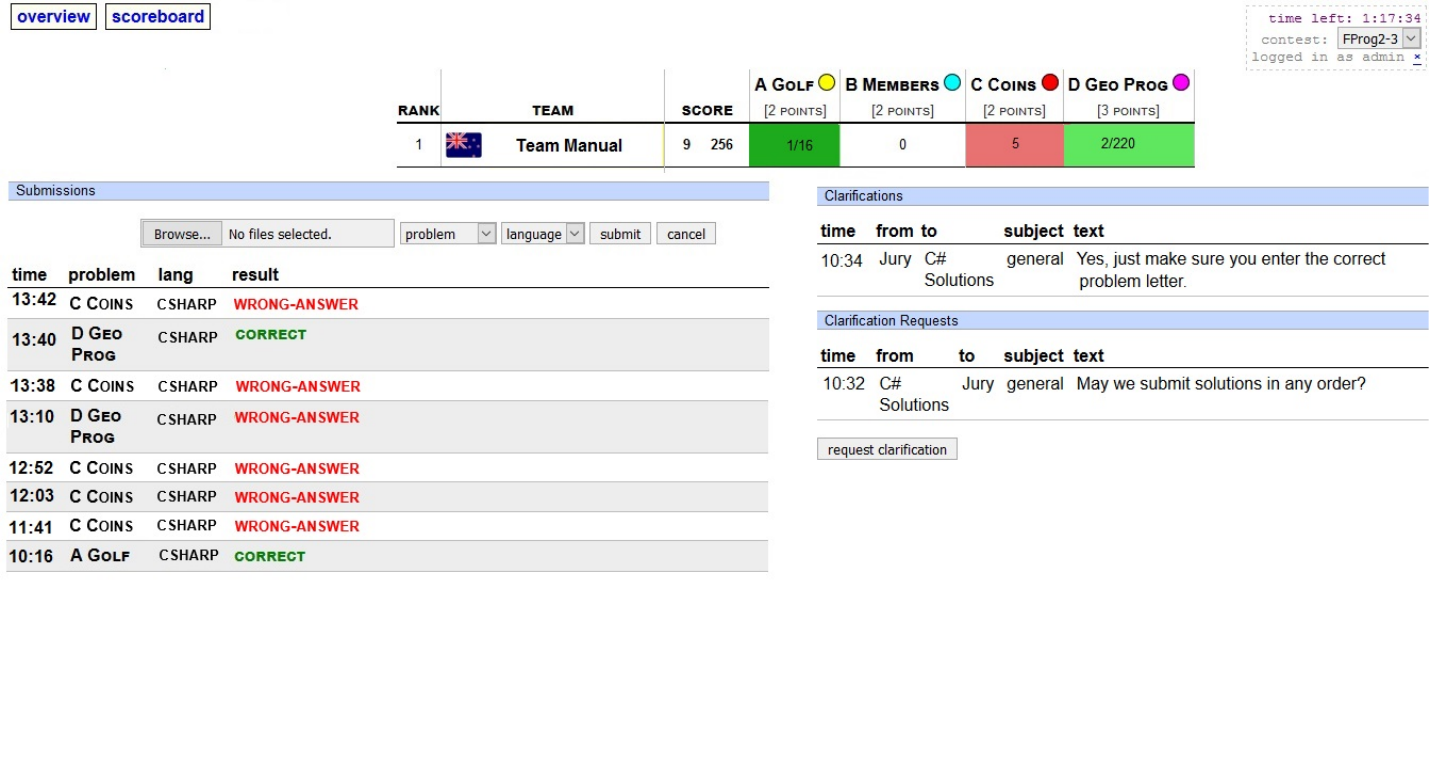
See Figure 4 on page 3 for an impression.
1 SUBMITTING SOLUTIONS
Solutions can be submitted from the web interface (see URL above).
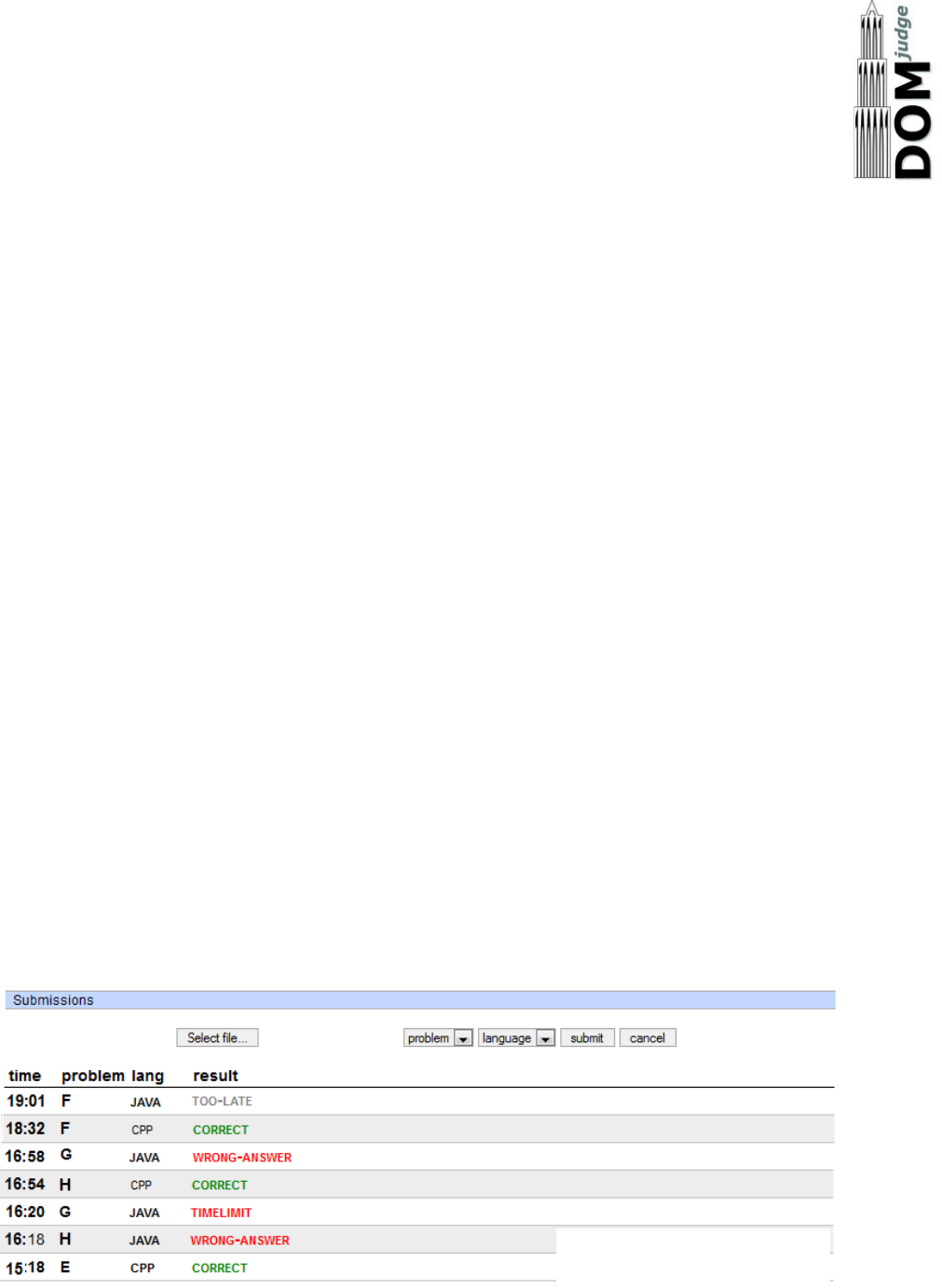
In the left column (see figure 1) click Select file… to select the file for submission.
DOMjudge will try to determine the problem and language from the base and
extension of the filename respectively. Otherwise, select the appropriate values
from the drop down lists problem and language.
Note that the current compilers and versions on DOMjudge are: C/C++ – gcc
version 6.3.0, Python 3.5.3, Java 1.8.0_131. C# Mono may be available for
unofficial teams.
Compiler error messages will be provided to assist teams with different local
environments.
After you hit the submit button and confirm the submission, you will be redirected
back to your submission list page. On this page, a message will be displayed that
your submission was successful and the submission should be present in the list. An
error message will be displayed if something went wrong.
Figure 1 Making a submission
2
2 VIEWING THE RESULTS OF SUBMISSIONS
The left column of your team web page shows an overview of your submissions. It
contains all relevant information: submission time, programming language, problem
and status.
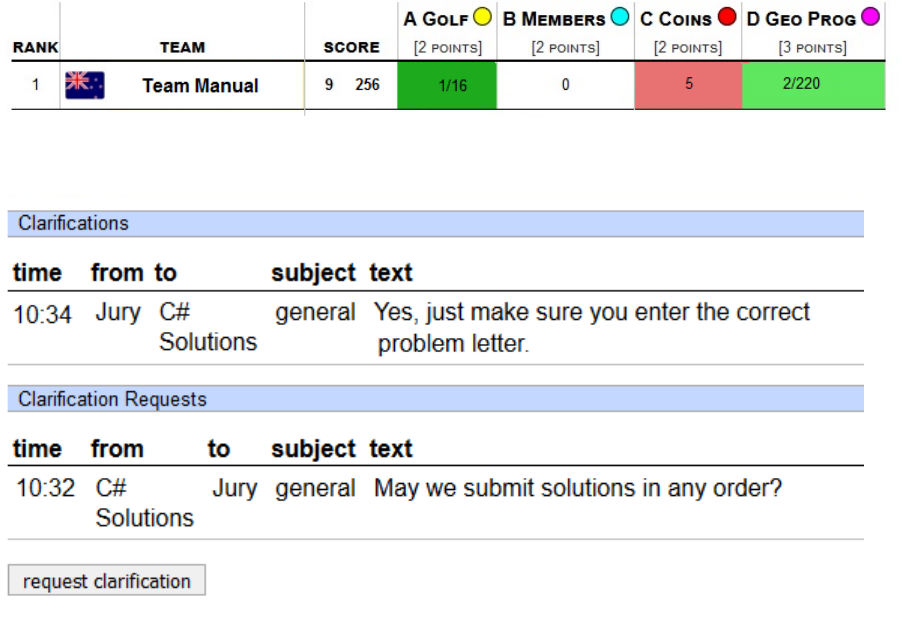
The top of the page shows your team's row in the scoreboard: your position and
which problems you attempted and solved. Via the menu you can view the public
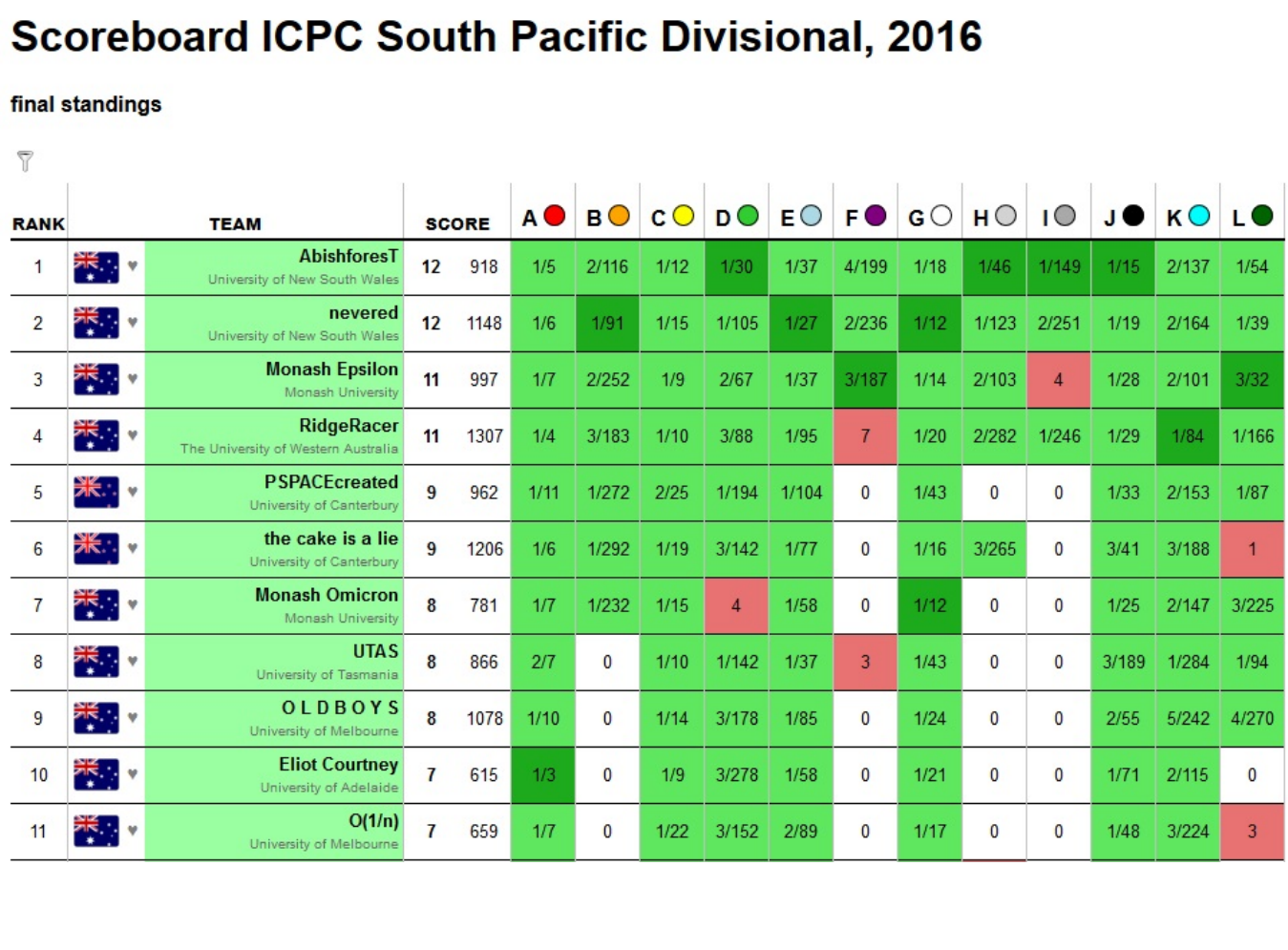
scoreboard page with the scores of all teams (see figure 5 on page 4). The
scoreboard will be 'frozen' one hour before the end of the contest. The full
scoreboard view will not be updated any more, but your team row will. Your team's
rank will be displayed as `?'.
Figure 2 Team scoreboard
Figure 3 Clarifications
3
Figure 4 Overview
4
Figure 5 Public Scoreboard
5
2.1 Possible results
A submission can have the following results:
CORRECT The submission passed all tests: you solved this problem!
COMPILER-ERROR There was an error when compiling your program. On the
submission details page you can inspect the exact error.
TIMELIMIT Your program took longer than the maximum allowed time for this
problem, therefore it has been aborted. This might indicate that
your program hangs in a loop or that your solution is not efficient
enough.
RUN-ERROR There was an error during the execution of your program. This can
have a lot of different causes like division by zero, incorrectly
addressing memory (e.g. by indexing arrays out of bounds), trying
to use more memory than the limit, etc. Also check that your
program exits with exit code 0!
NO-OUTPUT Your program did not generate any output. Check that you write to
standard output.
WRONG-ANSWER The output of your program was incorrect. This can happen simply
because your solution is not correct, but remember that your
output must comply exactly with the specifications of the jury.
TOO-LATE Unfortunately you submitted after the contest ended! Your
submission is stored but will not be processed any more.
6
3 CLARIFICATIONS
All communication with the jury is to be done with clarifications (see figure 3). These can
be found in the right column on your team page. Both clarification replies from the jury and
requests sent by you are displayed there.
There is also a button to submit a new clarification request to the jury. This request is only
readable for the jury and they will respond as soon as possible. Answers that are relevant
for everyone will be sent to everyone.
4 HOW ARE SUBMISSIONS BEING JUDGED?
The DOMjudge jury system is fully automated. In principle no human interaction is
necessary. The judging is done in the following way:
4.1 Submitting solutions
You submit a solution to a problem to the jury from the Web interface. Note that you have
to submit the source code of your program (and not a compiled program or the output of
your program).
There your program enters a queue, awaiting compilation, execution and testing on one of
the jury computers.
4.2 Compilation
Your program will be compiled on a jury computer running Linux. The submitted source file
will be passed to the compiler which generates a program to run.
Using a different compiler or operating system than the jury should not be a problem. Be
careful however, not to use any special compiler and/or system specific things (eg
Microsoft libraries for C++).
4.3 Testing
After your program has compiled successfully it will be executed and its output compared
to the output of the jury. Before comparing the output, the exit status of your program is
checked: if your program gives the correct answer, but exits with a non-zero exit code, the
result will be a RUN-ERROR! (see Restrictions below).
Java does not require an exit code. However, be careful about catching exceptions. If you
handle all exceptions in your code, you may get WRONG-ANSWER instead of the potentially
more useful RUN-ERROR.
When comparing program output, it has to exactly match to output of the jury. So take care
that you follow the output specifications. In case of problem statements which do not have
unique output (e.g. with floating point answers), the jury may use a modified comparison
function.
7
4.4 Restrictions
To prevent abuse, keep the jury system stable and give everyone clear and equal
environments, there are some restrictions to which all submissions are subjected:
compile time Compilation of your program may take no longer than a specified time.
After that compilation will be aborted and the result will be a compile
error. In practice this should never give rise to problems. Should this
happen to a normal program, please inform the jury right away.
source size The total amount of source code in a single submission may not
exceed 256 kilobytes, otherwise your submission will be rejected.
memory During execution of your program, there are 2 gigabytes of memory
available. This is the total amount of memory (including program code,
statically and dynamically defined variables, stack, Java VM, etc)! If
your program tries to use more memory, it will abort, resulting in a run
error.
number of processes You are not supposed to create multiple
processes (threads). This is to no avail anyway, because your
program has exactly 1 processor fully at its disposal. To increase
stability of the jury system, there is a maximum of 15 processes that
can be run simultaneously (including processes that started your
program).
People who have never programmed with multiple processes (or have
never heard of ''threads'') do not have to worry: a normal program runs
in one process.
8
APPENDIX : CODE EXAMPLES
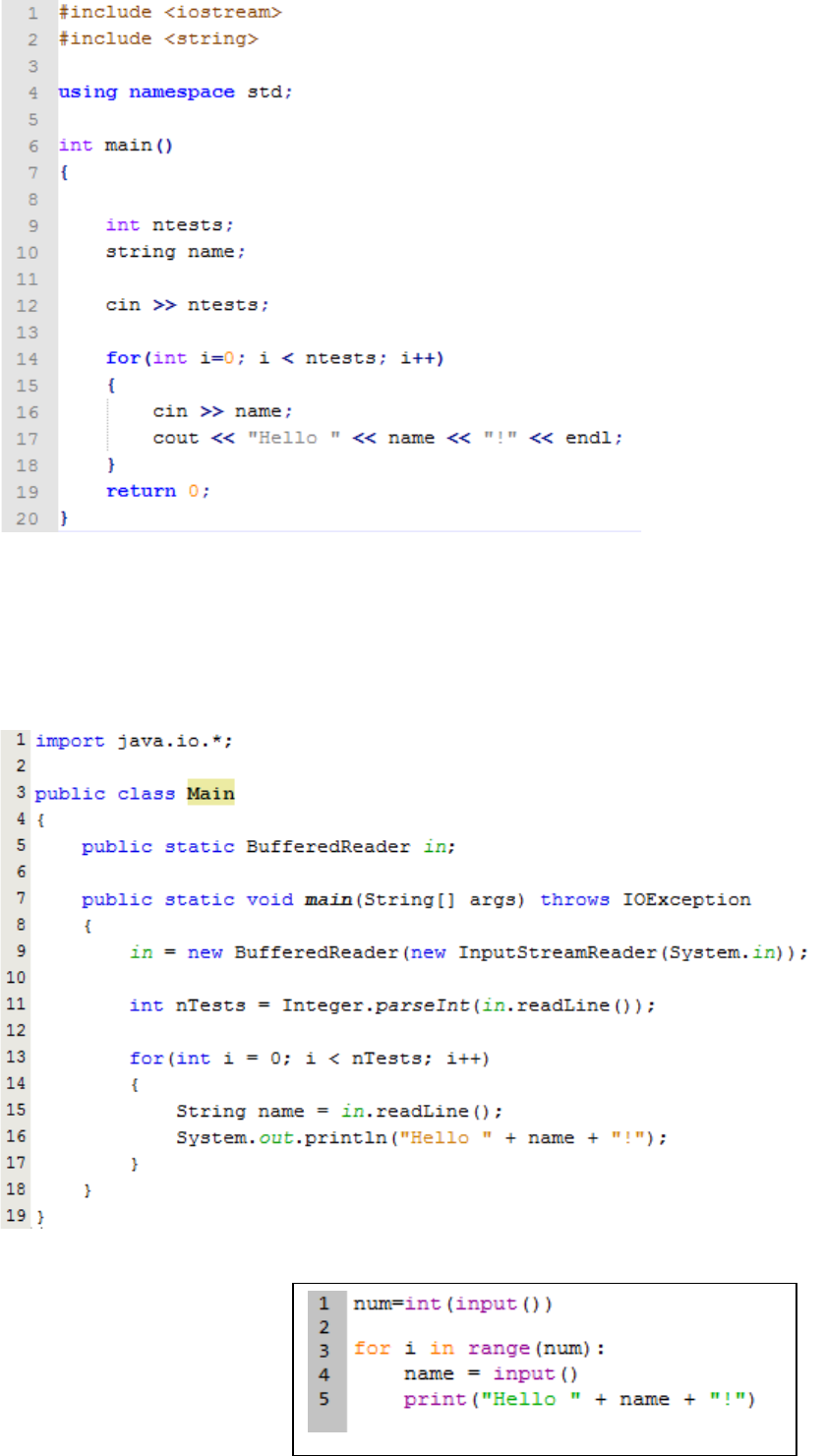
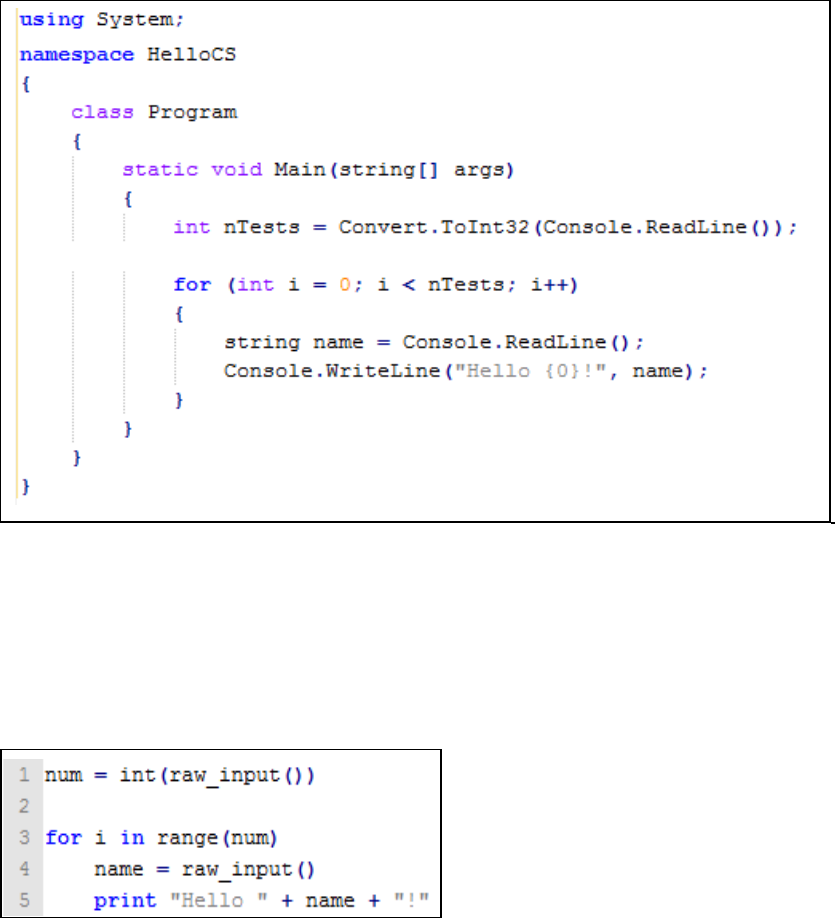
Below are a few examples on how to read input and write output for a problem.
The examples are solutions for the following problem: The first line of the input contains
the number of test cases. Then each test case consists of a line containing a name (a
single word) of at most 99 characters. For each test case output the string Hello <name>!
on a separate line.
Sample input and output for this problem:
Sample Input
Output for Sample Input
3
world
Jan
SantaClaus
Hello world!
Hello Jan!
Hello SantaClaus!
Note that the number 3 on the first line indicates that 3 test cases follow.
1 Solutions for Contest Languages
i C:
Notice the last line, return 0, which prevents a RUN-ERROR!
9
ii C++:
Notice the last line, return 0, which prevents a RUN-ERROR!
iii Java:
iv Python 3
10
2 Solutions in Other Languages
i C#
NOTE If you develop your solution in Visual Studio, a number of libraries will be
referenced with using statements. Many of these are not necessary (eg System.Linq)
and may be removed.
ii Python 2
