INSTALLATION INSTRUCTIONS Dada Mail Subscriptions CBPlugin V3.7 User Manual
User Manual:
Open the PDF directly: View PDF  .
.
Page Count: 10

"Dada Mail Subscriptions" Community Builder Plug-In
© 2019 Bruce Scherzinger
Page 1 of 10
INSTALLATION INSTRUCTIONS
Version 3.7, June 2019
Compatible with Joomla! 3.x
INTRODUCTION
Dada Mail filled a need for me when my web-hosting company imposed a limit on the number of
outbound emails per hour my site could send. I was running a simple Mailman discussion list that
had about 165 subscribers. The per-hour limit was 250 messages, which was exceeded if anyone
replied to a message posted to the list within an hour of it being posted. Then, Mailman promptly
suspended the subscriptions of anyone who could not be sent the message. This entirely defeated
the purpose of Mailman mailing lists with that provider in my opinion.
Dada Mail solved my problem because it allows me to use any SMTP server I want, whether it's
on the same server as my site or another server. Dada Mail can implement a discussion list by
enabling the "dada_bridge.pl" plug-in, which uses a standard POP3 email account to receive
messages to be posted to the list. The email account is periodically polled by a cronjob command,
and messages pulled from it are sent by Dada Mail to all the subscribers of the respective list. The
cronjob command is easy to setup and, in fact, can be done several ways.
My first application of Dada Mail was to implement a closed email discussion list for a home
owner association (HOA). The HOA site uses Joomla, and I wanted the email list subscriptions to
be exclusively available to site members, not open to the public. Dada Mail is written in Perl, not
PHP like Joomla!. I did not want to use system calls to interface the two programs because they
are always problematic. Not a problem…
Fortunately, Dada Mail can manage its lists using MySQL (among other) database tables. Since
Dada Mail has options to make its lists inaccessible via its own web interface, it was clear that it
was designed to be integrated with content management systems like Joomla! through the
database tables.
Being a big Joomla! fan and an intermediate extension author, I saw Dada Mail as the solution I
needed, that is once I integrated it with Joomla!.
FEATURES
The Dada Mail Subscriptions CB plug-in integrates Dada Mail's subscription capability into a
Joomla! website. It is really more of a bridge than an independent application. Everything the
plug-in does is based on Dada Mail being installed to manage its settings and subscribers in a
MySQL database. The tables created by Dada Mail when it is configured to use MySQL are
accessible to the Joomla! site as long as the same database is used by both Joomla! and Dada
Mail.
Your site members can subscribe to and unsubscribe from any Dada Mail list for which you
publish a corresponding CB field. Each user can subscribe multiple email addresses, including the
Joomla! account email. If a site member changes one of his/her email address using the CB
profile editor, it is automatically updated in all Dada Mail lists to which he/she is subscribed. In
addition, you can specify list(s) to which the primary account email address for new users is
automatically subscribed after they register or if you create accounts for them via the CB
administrator interface. Configuration options include sending subscription notification emails
and formatting those email messages.

"Dada Mail Subscriptions" Community Builder Plug-In
© 2019 Bruce Scherzinger
Page 2 of 10
Note that this plug-in does not implement any Dada Mail administrator functions. So you will
still need to create and configure your email lists using Dada Mail's web interface. It is
recommended that you include the default Dada Mail list administration URL in a Joomla!
Wrapper and put it in your administrator front-end menu for convenience.
HOW TO INSTALL
Compatibility and Testing
This plug-in has been tested with Joomla! 3.1 through 3.8.6 along with Community Builder
version 2.1.4, and Dada Mail version 10.7. It may work in older versions of these applications,
but has only been tested with some of them. The very first version of the plug-in was initially
tested using the EasyEclipse integrated development environment (IDE) with XAMPP version
1.5.1 for Microsoft Windows on a locally-installed Joomla! 1.5 site with legacy support enabled.
It was subsequently installed and testing was completed on a live SSL site running Linux,
Joomla! 1.0.12, and CB 1.0.2.
Preparation
Before you install the Dada Mail Subscriptions plug-in, your site must be running Joomla! 3.x
and Community Builder 2.x and you must acquire and install Dada Mail. You can get Dada Mail
at http://dadamailproject.com. This plug-in was developed using the free version of Dada Mail
but has also been tested using both the free and Pro versions.
After you install Dada Mail, you must follow the instructions for configuring it to use a MySQL
database. When you do this, make sure you specify the same database your Joomla! site is using.
The plug-in will not work otherwise.
If you are going to create a discussion list, highly likely if you run a “closed” list, make sure to
install the dada_bridge.pl plug-in into the Dada Mail system. Instructions for installing Dada Mail
and the bridge are available on the Dada Mail website under Support/Complete Documentation.
Installing the Dada Mail Subscriptions Plug-in
After you've created your first Dada Mail list using the native Dada Mail administrator web
interface, you can install this plug-in, manage that list, and create additional lists. Just install the
plug-in as you would any other CB plug-in, using the CB plug-in manager. Installing the plug-in
will create a new CB tab called "Email Lists". Although you do not need to use this tab for your
Dada Mail list subscriptions, it is created for your convenience. You may delete it if you prefer to
put the subscription fields into another profile tab. Make sure you remember to publish the plug-
in.
Plug-in Administration Options
Allowing your Dada Mail list to be subscribed within the CB profile is very easy. There are two
different ways to do it depending on whether or not you want to support multiple email addresses
on your site. This is a decision you should consider carefully since converting your site later from
supporting only one address per account to supporting multiple addresses requires technical
knowledge of managing the MySQL database directly.
If you used the default Dada Mail database table names when you installed it, you do not need to
change the settings table name. This name must be the same as the one you specified during Dada
Mail installation.
"Dada Mail Subscriptions" Community Builder Plug-In
© 2019 Bruce Scherzinger
Page 3 of 10
The plug-in is setup by default to support either a single or up to 4 email addresses per site
account profile. Since it does not dynamically add/delete configuration fields to allow this to be
varied, if you want to support more or fewer lists, you’ll need to edit the plug-in’s XML file.
There are only “On” and “Off” options for the “Use Multiple Email Addresses”. The “Off” option
makes the plug-in ignore all but the first profile field name you specify. The “On” option sets the
number of email addresses to the value in the XML file definition for this option. If you want
more than 4 addresses, you need to change the value of the “On” option to that number and add
the appropriate number of additional configuration fields to the XML file, following the naming
convention used for the first 4. Alternatively, you could make the options for selecting the
number of email addresses to select any number up to the maximum for which you have defined
configuration fields. For more on this subject, see “Adding More Email Addresses” below.
Single-Address Support
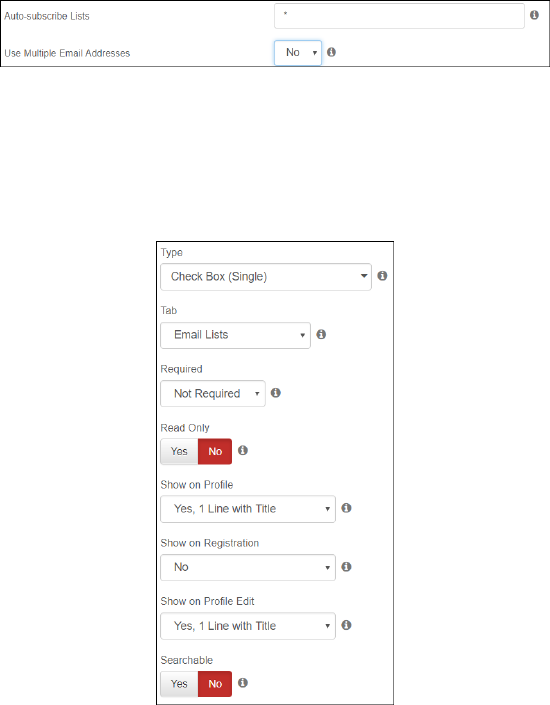
To configure your site to support subscribing only one email address per Joomla! user account,
select “No” in the plug-in admin interface in the site back end “Use Multiple Email Addresses”
option. Note that choosing this option will force ALL of your Dada Mail lists to be limited to
subscribing only the primary email address of each Joomla! user account. To allow your site users
to subscribe multiple addresses, select the number (up to 4) as shown below. If you want your
users to be automatically subscribed to any of your Dada Mail lists, enter the list short names in
the Auto-subscribe box, separated by commas, or enter an asterisk (*) if you want new users to be
subscribed to all of your lists.
If you select “No” for the above option, to allow users to subscribe/unsubscribe to/from your
Dada Mail list simply define a Check Box (Single) or Drop Down (Single-select) field for each
Dada Mail list using the list's "simple name". When you do this, Community Builder will prefix
the field name with "cb_". For instance, if you have a Dada Mail list named "neighbors", create a
CB field by this name and CB will rename it "cb_neighbors" automatically. Publish the field and
your members will then be able to subscribe to the corresponding Dada Mail list.
"Dada Mail Subscriptions" Community Builder Plug-In
© 2019 Bruce Scherzinger
Page 4 of 10
Multiple-Address Support
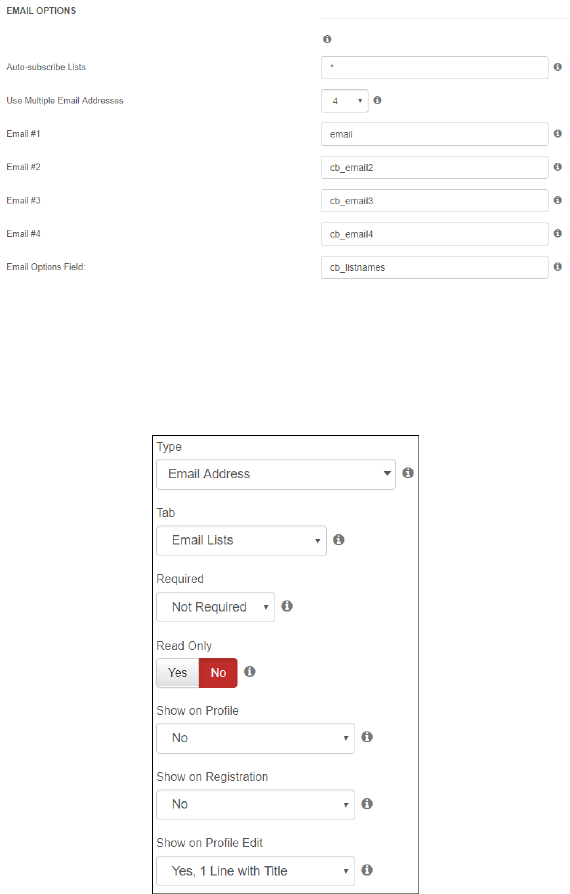
If you select “On” for the above option, to allow users to subscribe/unsubscribe to/from your
Dada Mail list you’ll need to define one field for each email address you wish to allow your site
users to subscribe to Dada Mail lists. In the plug-in admin interface, enter one of these CB field
names into each of the boxes beneath the On/Off option (see below). Note that when this
configuration is used, the account email address is NOT automatically included. Enter “email” in
one of the boxes to allow users to subscribe their account email address. Note that the order you
enter these field names is significant, which will be explained later.
The email address fields should be created as type Email Address in the CB Field Manager as
shown below. The Size you specify depends on your site’s template and is purely for user
aesthetics. Whether you enable Show on Registration is entirely up to you, however consider the
fact that whether or not a user subscribes at registration will override a Dada list specified in the
Auto-subscribe list (the auto-subscribe function executes first).
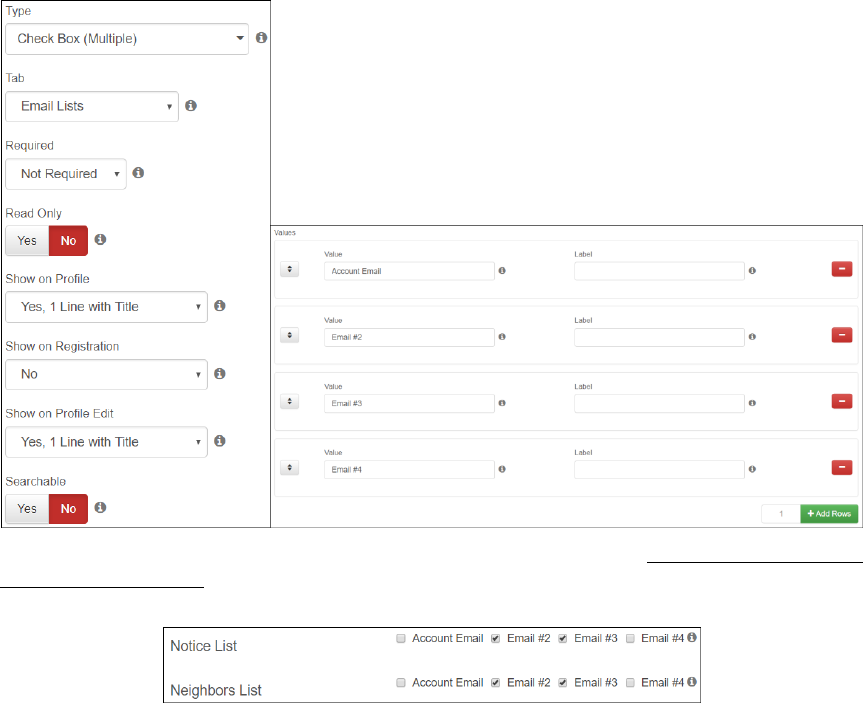
In addition to creating fields for the email addresses, you must also define a Check Box
(Multiple) or Drop Down (Multi-select) field for each Dada list using the list's "simple name".
These two field types allow multiple selections to be made for a single CB field, in this case
allowing multiple addresses to be subscribed to a single Dada Mail list. The number of rows and
columns you specify depends mostly on the aesthetics you want. For checkboxes, the
recommendation is to set all the field dimensions to 0. For a drop list, the recommendation is to
"Dada Mail Subscriptions" Community Builder Plug-In
© 2019 Bruce Scherzinger
Page 5 of 10
set the number of rows to the number of email addresses your site will support plus one and the
other dimensions to 0.
You can also use Code field types, which are a bit trickier. First, you have to know a little bit of
PHP. You at least need to understand array key-value pairs. But the tricky part of this is that
without a static field option list defined for your actual email list fields (the code generates the
options list on the fly), you need to define an unpublished option list field so this plugin knows
what the options are. Using Code Check Box (Multi-select) or Code Drop List (Multi-select) field
types can create visually pleasing response and order enforcement when combined with CB’s
Core Ajax plugin.
For each email address your site will support (or for a common field if you use Code fields for
your actual list fields), you will need to “Add a Value”. Each value you enter corresponds to one
supported email address. And the order you define them here must match the order you entered
the email address field names in the plug-in admin interface. It is important to understand that the
correlation between the checkboxes (values entered here) and the email address fields is made by
the software based on the ORDER they are specified, not on the names or labels you assign to
them. This allows you the freedom to use HTML formatting on the email address field labels.
Unless you use a common, unpublished field, you will need to define the same exact list of values
in the exact same order for each email list field. The end result should look to the user something
like the following example in the CB profile editor.
Email Notifications
Plug-in options allow you to choose whether the user, admin, both or neither receives a
notification email whenever a change is made. Note that these messages will be sent whether the
change is made in the back end by the administrator or in the front end by the user. A good
"Dada Mail Subscriptions" Community Builder Plug-In
© 2019 Bruce Scherzinger
Page 6 of 10
number of the plug-in options are devoted to formatting these messages. HTML is the better
format since it supports lists and tables.
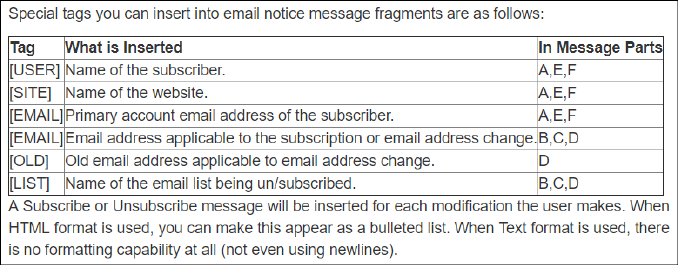
The body of each notification message consists of three parts: the prefix, the changes, and the
suffix. Changes are either subscriptions or unsubscriptions. Because the information in the
different parts of the messages are user-dependent and can be list-dependent, several tags are
defined to provide a personal touch to the messages. Not all tags work in all message parts, and
some of them work differently in different message parts. A table displayed in the plug-in
configuration description summarizes the tags.
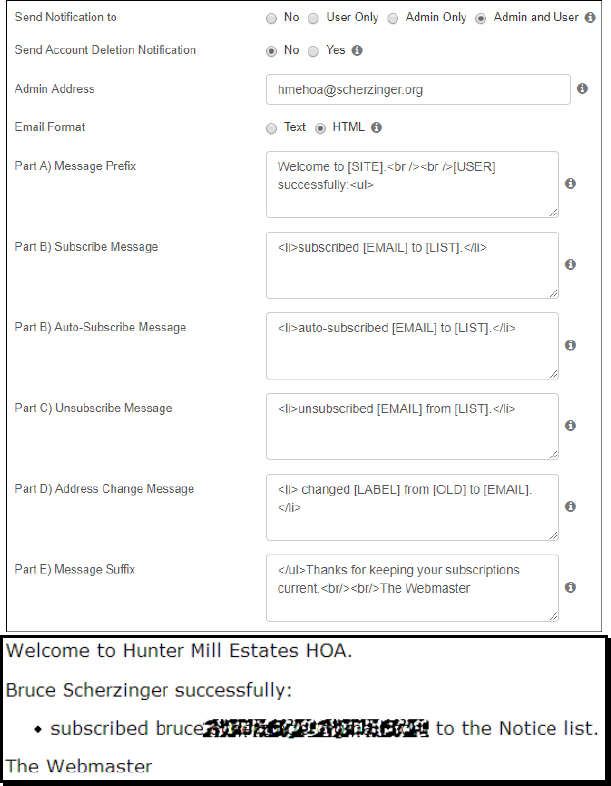
This example illustrates how the HTML format can be used to create nicely-formatted
notification messages.
"Dada Mail Subscriptions" Community Builder Plug-In
© 2019 Bruce Scherzinger
Page 7 of 10
Parameter Summary
Auto-subscribe Lists – If you want the account email address of new site members to be
subscribed to any email lists automatically after they register, just enter the simple names of those
lists in this field separated by commas. You can enter a single asterisk to subscribe new users to
all of your lists. The new member will receive a subscription notice email (if enabled) after the
registration is approved. If your site does not require confirmation or admin approval, the new
member will be sent the subscription notice email immediately after registering. If it requires
confirmation but not admin approval, the notice email will be sent immediately after confirming.
Note that although the auto-subscribe function will work for any/all email address fields you
include in the registration form, giving the user an option to subscribe at registration and then
forcing subscription may be frowned upon by some people. If you do auto-subscribe your new
users, make sure you include your email list policies and privacy notices in the registration form.
And if you want to give a new user the option to subscribe an address at registration, don’t
include the field name for that address in the auto-subscribe list. Use good judgment.
Use Multiple Email Addresses – This option allows you to choose whether you wish for your
site to support multiple email addresses per user for subscriptions to Dada Mail email lists.
"Dada Mail Subscriptions" Community Builder Plug-In
© 2019 Bruce Scherzinger
Page 8 of 10
Email #1…#4 – If you choose to support multiple email addresses per user, enter the CB field
names associated with each email address entry field you present in your user profiles. Note that
you MUST SPECIFY a CB field for as many email addresses as you select. If you only wish to
support two addresses, for example, change the option value for the “User Multiple Email
Addresses” to “2”. All supported email address entry fields must be specified. Make sure the
fields are created BEFORE you enter them here!
Email Options Field – If you are using Code fields, which really have no statically predefined
option list (because the code computes it on the fly), then enter the name of the single options list
field you will used to define the options in this box. This field should not be published. Its only
purpose is to specify a single field that represents the options each of your list fields should use.
Please note that if you enter something in this box, the options it statically defines are what the
plugin is going to assume your individual list Code fields are going to return.
Send Notification to – This option allows you to select who should receive email notifications
when a member subscribes or unsubscribes to one of your Dada Mail lists. This applies to ALL
notifications sent by the plug-in. Note that a notification is sent when a user’s account is deleted
informing the user that each of their subscribed emails was unsubscribed from all lists.
Send Account Deletion Notification – This option specifies whether the plugin should send an
unsubscribe notification to a user when their account is deleted using the CB User Manager.
Admin Address – Some mail servers will not send an email message To the address specified in
the From part of the email envelope. This field allows you to specify the address you wish to
receive subscription notice emails when you include “Admin” in the Email Notification option.
Email Format – Although you can elect to send subscription notice emails in plain text format,
HTML is recommended because there are no formatting options with plain text at all. All newline
characters are removed by PHP Mailer when “Text” is selected. The screen shot above illustrates
the flexibility in formatting you have using HTML.
Message Prefix – The text entered into this box will appear at the beginning of all notification
email messages. You can have the plug-in fill-in the site name, user’s name, and/or user’s account
email address in this part of the message by specifying [SITE], [USER], and/or [EMAIL],
respectively. The plug-in will not insert any list names into this part of the message, and the
[EMAIL] tag will insert only the user account email.
Subscribe Message – The text appearing in this box will be repeated for each list the user
subscribes to. Insert the subscribed address using the [EMAIL] tag and the list name using the
[LIST] tag.
Auto-Subscribe Message – The text appearing in this box will be repeated for each list the user
is auto-subscribed to following registration. Insert the subscribed address using the [EMAIL] tag
and the list name using the [LIST] tag.
Unsubscribe Message – The text appearing in this box will be repeated for each list the user
unsubscribes from. Insert the unsubscribed address using the [EMAIL] tag and the list name
using the [LIST] tag. Note: If a user account is deleted, an unsubscribe notification will be sent
if/as specified containing one of these lines for each of the user’s email addresses with “all email
lists” filled-in for the [LIST] tag.
Email Address Change Message – The text appearing in this box will be repeated for each email
address the user changes. Insert the old address using the [OLD] tag and the new address using
the [EMAIL] tag. Note that the code does not check to see which email lists these changes affect,
but know that it affects all lists to which that address is subscribed.

"Dada Mail Subscriptions" Community Builder Plug-In
© 2019 Bruce Scherzinger
Page 9 of 10
Message Suffix – The text entered into this box will appear at the end of all notification email
messages. Formatting options for this part of the message are the same as for the Message Prefix.
Email Subject – This will be the subject of all subscribe, unsubscribe, and address change notice
emails sent. You can include the [SITE], [EMAIL], and [USER] tags in this field. Note that
[EMAIL] will insert the user account email.
From Address – Use this field to override the email address specified in the Joomla! Global
Configuration panel Email tab if you want different sender information for email list subscription
notices than for other website email notices. If you leave this blank, the Global Configuration
setting will be used.
From Name – Use this field to override the email address specified in the Joomla! Global
Configuration panel Email tab if you want different sender information for email list subscription
notices than for other website email notices. If you leave this blank, the Global Configuration
setting will be used.
Language Adaptation
To adapt this plug-in for other languages, change all applicable text in the XML file as well as in
all “define” statements at the top of the PHP file. There is no separate language file.
Adding More Email Addresses
The plug-in comes preconfigured to support up to 4 email addresses per Joomla! user account. If
you need more than this number, you can easily edit the plug-in XML file to add more. To do
this, open the XML file in a text editor and look for the comments containing the words
“MULTIPLE EMAIL ADDRESSES”.
The XML file below is setup to only allow 1 or 4 addresses. Let’s say you want to support 1 or 6
email addresses per user. To do this, simply add two more dada_email# parameters to allow CB
fields to be specified for your additional email addresses and add two more options for the
“dada_emails” field. Note that these parameter names must follow the naming convention
“dada_email#” where # starts at 1 and ends at the number of options you entered for the
dada_emails parameter option value list. If you want to support a variable number, just add more
option records below the “dada_emails” parameter, each with a different number (e.g., 1,2,3,4).
You can make these edits directly on the installed XML file at any time. You can even do it using
the text editor built into your favorite file explorer component if you have one installed. The plug-
in will automatically recognize your new email address fields, but don’t forget that you’ll need to
create the new fields so your users can enter their email addresses. If the fields themselves do not
exist, the database query of the fields that the plug-in code executes will fail and the user profile
will not be fully displayed. Therefore, it is a good idea to always create the new email address

"Dada Mail Subscriptions" Community Builder Plug-In
© 2019 Bruce Scherzinger
Page 10 of 10
fields FIRST, and then extend the number of them the plug-in can use by specifying the new field
names afterwards.
Acknowledgements
Dada Mail is the creation of Justin Simoni. My sincere thanks go to Justin for creating Dada Mail
and for his very personal and gracious manner of supporting his “work of art” (Google “Dada
Era” for more insight) and also for his encouragement toward my goal to integrate Dada Mail into
the Joomla! CMS.
Dada Mail is Free Software and is released under the Gnu Public License.
To acquire Dada Mail, visit http://dadamailproject.com.
Community Builder is the quintessential Joomla! extension for sites that are based on member
registration and need members to have configurable options. This plug-in would have been a lot
more difficult to develop without CB. Hats off to the entire CB Team!
Community Builder is open source software released under the Gnu Public License.
To acquire Community Builder, visit http://joomlapolis.com.
