Dynamsoft Barcode Reader Javascript Edition Ation Java Script Manual
Dynamsoft%20Barcode%20Reader%20JavaScript%20Edition%20Manual
User Manual:
Open the PDF directly: View PDF  .
.
Page Count: 60
- Introduction
- Guide
- Object Constructor
- object dynamsoft.dbrEnv
- object dynamsoft.BarcodeReader()
- object LocalizationResult
- object PublicRuntimeSettings
- mTimeout
- mPDFRasterDPI
- enumTextFilterMode
- mTextFilterMode
- enumRegionPredetectionMode
- mRegionPredetectionMode
- mLocalizationAlgorithmPriority
- mBarcodeFormatIds
- mMaxAlgorithmThreadCount
- mTextureDetectionSensitivity
- mDeblurLevel
- mAntiDamageLevel
- mMaxImageDimensionToLocalizeBarcodesOnFullImage
- mMaxBarcodesCount
- enumBarcodeInvertMode
- mBarcodeInvertMode
- mScaleDownThreshold
- mGrayEqualizationSensitivity
- mEnableFillBinaryVacancy
- mReserved
- enumColourImageConvertMode
- mColourImageConvertMode
- mExpectedBarcodesCount
- mBinarizationBlockSize
- object TextResult
- Error dynamsoft.BarcodeReader.BarcodeReaderException
- Function
- function .deleteInstance()
- function dynamsoft.BarcodeReader.loadWasm()
- function .decodeBase64String()
- function .decodeFileInMemory()
- function .decodeVideo()
- function .decodeVideo()
- function .decodeVideo()
- function .decodeBuffer()
- function .getAllLocalizationResults()
- function .getRuntimeSettings()
- function .resetRuntimeSettings()
- function .updateRuntimeSettings()
- Enumeration

1.1
1.2
2.1
2.1.1
2.1.2
2.1.3
2.1.3.1
2.1.4
2.1.4.1
2.1.4.2
2.1.4.3
2.1.4.4
2.1.4.5
2.1.4.6
2.1.4.7
2.1.4.8
2.1.4.9
2.1.4.10
2.1.4.11
2.1.4.12
2.1.4.13
2.1.4.14
2.1.4.15
2.1.4.16
2.1.4.17
2.1.4.18
2.1.4.19
2.1.4.20
2.1.4.21
2.1.4.22
Table of Contents
Overview
Introduction
Guide
API List - Web Assembly Edition
Object Constructor
object dynamsoft.dbrEnv
object dynamsoft.BarcodeReader()
object LocalizationResult
PSExtendedResult
object PublicRuntimeSettings
mTimeout
mPDFRasterDPI
enumTextFilterMode
mTextFilterMode
enumRegionPredetectionMode
mRegionPredetectionMode
mLocalizationAlgorithmPriority
mBarcodeFormatIds
mMaxAlgorithmThreadCount
mTextureDetectionSensitivity
mDeblurLevel
mAntiDamageLevel
mMaxImageDimensionToLocalizeBarcodesOnFullImage
mMaxBarcodesCount
enumBarcodeInvertMode
mBarcodeInvertMode
mScaleDownThreshold
mGrayEqualizationSensitivity
mEnableFillBinaryVacancy
mReserved
enumColourImageConvertMode
mColourImageConvertMode

2.1.4.23
2.1.4.24
2.1.5
2.2
2.3
2.3.1
2.3.2
2.3.3
2.3.4
2.3.5
2.3.6
2.3.7
2.3.8
2.3.9
2.3.10
2.3.11
2.3.12
2.4
2.4.1
2.4.2
2.4.3
2.4.4
2.4.5
mExpectedBarcodesCount
mBinarizationBlockSize
object TextResult
Error dynamsoft.BarcodeReader.BarcodeReaderException
Function
function .deleteInstance()
function dynamsoft.BarcodeReader.loadWasm()
function .decodeBase64String()
function .decodeFileInMemory()
function .decodeVideo()
function .decodeVideo()
function .decodeVideo()
function .decodeBuffer()
function .getAllLocalizationResults()
function .getRuntimeSettings()
function .resetRuntimeSettings()
function .updateRuntimeSettings()
Enumeration
enum dynamsoft.BarcodeReader.EnumImagePixelFormat
enum dynamsoft.BarcodeReader.EnumBarcodeFormat
enum dynamsoft.BarcodeReader.EnumErrorCode
enum dynamsoft.BarcodeReader.EnumResultType
enum dynamsoft.BarcodeReader.EnumTerminateStage
Introduction
DBR_WASM uses Webassembly technology which requires a higher browser version.
In most browsers, you need to deploy page to the site and set .wasm mimetype to application/wasm on the server
side to debug and run it. Please check the settings below for different environments.
set mimetype in nginx: mime.types
set mimetype in asp.net: web.config
set mimetype in javaee web app: web.xml
set mimetype in nodejs: npm mime
On Firefox, you can open the page and debug/run directly from the file browser
You may encounter this error when you run several other samples with video
[Deprecation] getUserMedia() no longer works on insecure origins. To use this feature, you should
consider switching your application to a secure origin, such as HTTPS. See https://goo.gl/rStTGz for more
details.
That's because most browsers today need to be deployed on https to use getUserMedia. Below are some
samples for configuring an HTTPS server.
nginx: Configuring HTTPS servers
iis: Create a Self Signed Certificate in IIS
tomcat: Setting Up SSL on Tomcat in 5 minutes
nodejs: npm tls
If you really need to access video on an http site, you can use our DCS product.
For mobile browser
If you want to use DBR_WASM on your mobile browser (most developers are under this usage scenario),
you need to be aware that the mobile devices' memory is very limited.
Before decoding a large image(e.g. in our demo, we have a limit of 480*480), you'd better intercept or
compress the image. It will prevent your site from crash though the decode rate will decrease.
We provide a special interface for processing video decodeVideo to capture and decode a small area of
the video on the video.

# guide
Init DBR_WASM
Add the related files to your application
First, put dbr-<version>.min.js and dbr-<version>.wasm in the same directory as your html page. Then, add the
following code to the page.
<script src="dbr-<version>.min.js"></script>
Now, you can load DBR_WASM to your application.
Note: Since the initialization is asynchronous, in order to get the information of the initiating completed accurately,
it's better to add the following code
<div id="divLoadInfo">loading...</div>
<script>
dynamsoft = self.dynamsoft || {};
dynamsoft.dbrEnv = dynamsoft.dbrEnv || {};
dynamsoft.dbrEnv.onAutoLoadWasmSuccess = function(){
document.getElementById('divLoadInfo').innerHTML="load dbr wasm success.";
};
dynamsoft.dbrEnv.onAutoLoadWasmError = function(status){
document.getElementById('divLoadInfo').innerHTML="load wasm failed: "+status;
};
</script>
You can now open the page and run it. It will take a long time to load the page for the first time. Because
dynamsoft.barcodereader.min.js will execute to download the whole dynamsoft.barcodereader.wasm file and compile it.
Please wait patiently for the loading to finish.
After loading successfully, if the browser supports indexedDB, we will try to store the compiled result of
dynamsoft.barcodereader.wasm or the file itself in the browser cache locally. The workflow is as below.
First we will try to store the compiled result of the WebAssembly.Module type (currently only supported in FireFox
and Edge, and other browsers will probably also add this feature in the future). The next time the page is loaded,
it can be completed within seconds.
If the browsers don't support it, we will save the dynamsoft.barcodereader.wasm file itself. It will take some time to
compile when initializing next time. At least there is no need to download it again.
Process the uploaded images
Please add an input lable to listen to change event so you can decode the uploaded images like the following.
<input id="uploadImage" type="file" accept="image/bmp,image/jpeg,image/png,image/gif">
<script>
document.getElementById('uploadImage').addEventListener('change', function(){
var file = this.files[0];
//blob to image
var objUrl = URL.createObjectURL(file);
var image = new Image();
image.src = objUrl;
image.onload = function(){
//draw image to canvas
var cvs = document.createElement('canvas');
cvs.width = image.naturalWidth;
cvs.height = image.naturalHeight;
var ctx = cvs.getContext('2d');
ctx.drawImage(image, 0, 0);
URL.revokeObjectURL(objUrl);
//get Uint8ClampedArray from canvas
var data = ctx.getImageData(0,0,cvs.width,cvs.height).data;
//decodeBuffer(source, width, height, stride, enumImagePixelFormat)
var reader = new dynamsoft.BarcodeReader();
reader.decodeBuffer(data, cvs.width, cvs.height, cvs.width * 4,
dynamsoft.BarcodeReader.EnumImagePixelFormat.IPF_ARGB_8888
).then(results=>{
var txts = [];
for(let j=0;j<results.length;++j){
txts.push(results[j].BarcodeText);
}
alert(txts.join("\n"));
}).catch(ex=>{
alert('decode fail: ' + (ex.message || ex));
throw ex;
});
};
image.onerror = function(){
alert("Can't convert the blob to image.");
};
this.value = '';
});
</script>
You will also need to set licenseKey in the below line. Click the link to get a try one.
dynamsoft.dbrEnv.licenseKey = "<a license key>"
Try and do it
Try to write your own page. If there are any questions, please feel free to contact support@dynamsoft.com.

Object Constructor
object dynamsoft.dbrEnv
object dynamsoft.BarcodeReader()
object LocalizationResult
object PublicRuntimeSettings
mTimeout
mPDFRasterDPI
enumTextFilterMode
mTextFilterMode
enumRegionPredetectionMode
mRegionPredetectionMode
mLocalizationAlgorithmPriority
mBarcodeFormatIds
mMaxAlgorithmThreadCount
mTextureDetectionSensitivity
mDeblurLevel
mAntiDamageLevel
mMaxImageDimensionToLocalizeBarcodesOnFullImage
mMaxBarcodesCount
enumBarcodeInvertMode
mBarcodeInvertMode
mScaleDownThreshold
mGrayEqualizationSensitivity
mEnableFillBinaryVacancy
mReserved
enumColourImageConvertMode
mColourImageConvertMode
mExpectedBarcodesCount
mBinarizationBlockSize
object TextResult

object dynamsoft.dbrEnv
example:
// All the settings are optional, even dynamsoft and dynamsoft.dbrEnv.
dynamsoft = self.dynamsoft || {};
dynamsoft.dbrEnv = dynamsoft.dbrEnv || {};
dynamsoft.dbrEnv.licenseKey = "<a license key>",
// The default value is true. It wll load the wasm files automatically.
// If you want to load the file manually, please set it to false.
// and call dynamsoft.BarcodeReader.loadWasm when needed.
dynamsoft.dbrEnv.bAutoLoadWasm = true;
// The default value is false. You can set it to true to decode in another thread so the UI won't stuck.
dynamsoft.dbrEnv.bUseWorker = false;
// By default, js will load `dbr-<version>.wasm` & `dbr-<version>.wasm` in the same folder as the context.
// `dbr-<version>.min.js` & `dbr-<version>.wasm` should always put in same folder.
// Modify this setting when you put `dbr-<version>.wasm` somewhere else.
// e.g. Set this as 'js' when you place `dbr-<version>.wasm` at 'js/'.
dynamsoft.dbrEnv.resourcesPath = 'js';
dynamsoft.dbrEnv.onAutoLoadWasmSuccess: function(){
console.log("success");
};
dynamsoft.dbrEnv.onAutoLoadWasmError: function(status){
console.log("error");
};
constructor dynamsoft.BarcodeReader()
Description
Defines a class that provides functions for working with extracting barcode data.
Syntax
new dynamsoft.BarcodeReader( [licenceKeys] )
Parameter
parameter type Description
licenceKeys (optional) String If not set, the default value is dynamsoft.dbrEnv.licenseKey .
Returned Value
dynamsoft.BarcodeReader
Example
var reader = new dynamsoft.BarcodeReader();
Remarks
New an instance of BarcodeReader. Don't forget to delete the instance using DeleteInstance() when you will not
use the reader again.
LocalizationResult
Stores the localization result including the boundary, the angle, the page number, the region name, etc.
Syntax
typedef struct tagSLocalizationResult
{
TerminateStage emTerminateStage;
BarcodeFormat emBarcodeFormat;
const char* pszBarcodeFormatString;
int iX1;
int iY1;
int iX2;
int iY2;
int iX3;
int iY3;
int iX4;
int iY4;
int iAngle;
int iModuleSize;
int iPageNumber;
const char* pszRegionName;
const char* pszDocumentName;
int nResultsCount;
PSExtendedResult* ppResults;
}SLocalizationResult, *PSLocalizationResult;
Members
Members Description
ResultType emResultType The barcode format.
BarcodeFormat emBarcodeFormat Barcode format.
pszBarcodeFormatString Barcode type in string.
iX1 The X coordinate of the left-most point.
iY1 The Y coordinate of the left-most point.
iX2 The X coordinate of the second point in a clockwise direction.
iY2 The Y coordinate of the second point in a clockwise direction.
iX3 The X coordinate of the third point in a clockwise direction.
iY3 The Y coordinate of the third point in a clockwise direction.
iX4 The X coordinate of the fourth point in a clockwise direction.
iY4 The Y coordinate of the fourth point in a clockwise direction.
iAngle The angle of a barcode. Values range from 0 to 360.
iModuleSize The barcode module size (the minimum bar width in pixel).
iPageNumber The page number the barcode located in. The index is 0-based.
pszRegionName The region name the barcode located in.
pszDocumentName The document name the barcode located in.
nResultsCount Total extended result count.
PSExtendedResult* ppResults The extended result array .
PSExtendedResult
Stores the extended result including the format, the bytes, etc.
Syntax
typedef struct tagSExtendedResult
{
ResultType emResultType;
BarcodeFormat emBarcodeFormat;
const char* pszBarcodeFormatString;
int iConfidence;
unsigned char* pBytes;
int nBytesLength;
}SExtendedResult, *PSExtendedResult;
Members
Members Description
ResultType emResultType Extended result type.
BarcodeFormat emBarcodeFormat Barcode format.
pszBarcodeFormatString Barcode type in string.
iConfidence The confidence of the result.
pBytes The content as in byte array.
nBytesLength The length of the byte array.
object PublicRuntimeSettings
Syntax
typedef struct PublicRuntimeSettings
{
number mTimeout;
number mPDFRasterDPI; //readonly
[TextFilterMode](enumTextFilterMode.md) mTextFilterMode;
[RegionPredetectionMode](enumRegionPredetectionMode.md) mRegionPredetectionMode;
char mLocalizationAlgorithmPriority[64];
number mBarcodeFormatIds;
number mMaxAlgorithmThreadCount;
number mTextureDetectionSensitivity;
number mDeblurLevel;
number mAntiDamageLevel;
number mMaxImageDimensionToLocalizeBarcodesOnFullImage;
number mMaxBarcodesCount;
[BarcodeInvertMode](enumBarcodeInvertMode.md) mBarcodeInvertMode;
number mScaleDownThreshold;
number mGrayEqualizationSensitivity;
number mEnableFillBinaryVacancy;
string mReserved[256];
[ColourImageConvertMode](enumColourImageConvertMode.md) mColourImageConvertMode;
number mExpectedBarcodesCount;
number mBinarizationBlockSize;
};
Example
mAntiDamageLevel: 9
mBarcodeFormatIds: 503317503
mBarcodeInvertMode: 0
mBinarizationBlockSize: 0
mColourImageConvertMode: 0
mDeblurLevel: 9
mEnableFillBinaryVacancy: 1
mExpectedBarcodesCount: 0
mGrayEqualizationSensitivity: 0
mLocalizationAlgorithmPriority: ""
mMaxAlgorithmThreadCount: 4
mMaxBarcodesCount: 2147483647
mMaxImageDimensionToLocalizeBarcodesOnFullImage: 262144
mPDFRasterDPI: 300
mRegionPredetectionMode: 1
mReserved: ""
mScaleDownThreshold: 2300
mTextFilterMode: 2
mTextureDetectionSensitivity: 5
mTimeout: 10000

mTimeout
Sets the maximum amount of time (in milliseconds) it should spend searching for a barcode per page. It does not
include the time taken to load/decode an image (Tiff, PNG, etc) from disk into memory.
Presence
Optional
Type
number
Values
[0,7fffffff]
Default Value
10000
Example
{
"Timeout": 10000,
}

mPDFRasterDPI
Sets the output image resolution. When you are trying to decode a PDF file using DecodeFile method, the library
will convert the pdf file to image(s) first, then perform barcode recognition.
Presence
Optional
Type
number
Values
[100-600]
Default Value
300
Example
{
"PDFRasterDPI": 300
}

enumTextFilterMode
Description
Values that represent text filter modes
Allowed Values
Allowed Values Description
TFM_Disable Disable text filter
TFM_Enable Enable text filter
mTextFilterMode
Sets the text filter mode for barcodes search.
Presence
Optional
Type
number, String
Values
enum TextFilterMode
{
TFM_Disable = 1,
TFM_Enable = 2
}
"Disable",
"Enable",
Default Value
"Enable"
Remarks
If the barcode image contains lots of texts, filtering texts can speed up the recognition process.
Example
{
"TextFilterMode": "Enable",
}

enumRegionPredetectionMode
Description
Values that represent region predetection modes
Allowed Values
Allowed Values Description
RPM_Disable Disable region pre-detection
RPM_Enable Enable region pre-detection
mRegionPredetectionMode
Sets the region pre-detection mode for barcodes search. If you want to pre-detect barcode regions, it is better to
set the ColourImageConvertMode to "Auto".
Presence
Optional
Type
number, String
Values
enum RegionPredetectionMode
{
RPM_Disable = 1,
RPM_Enable = 2
}
"Disable",
"Enable"
Default Value
"Disable"
Remarks
RPM_Disable: Disable the feature of pre-detecting barcode regions. RPM_Enable: Detects barcode region
based on statistical properties of pixel colours, which is used to speed up barcode localization.
Example
{
"RegionPredetectionMode": "Enable",
}
mLocalizationAlgorithmPriority
Sets the priority of localization algorithms.
Presence
Optional
Type
Array
Values
enum EnumLocalizationAlgorithmPriority
{
ELAP_ConnectedBlock =1,
ELAP_Statistics=2,
ELAP_Lines= 3,
ELAP_FullImageAsBarcodeZone=4,
}
"ConnectedBlock",
"Statistics",
"Lines",
"FullImageAsBarcodeZone"
Default Value
""
Remarks
Default value "": The library will automatically select optimized localization algorithm for your barcode image. The
order for each image might be different.
ConnectedBlock: Localizes barcodes by searching connected blocks. This algorithm usually gives best result
and it is recommended to set ConnectedBlock to the highest priority.
Lines: Localizes barcodes by searching for groups of lines. This is optimized for 1D and PDF417 barcodes.
Statistics: Localizes barcodes by groups of contiguous black-white regions. This is optimized for QRCode and
DataMatrix.
FullImageAsBarcodeZone: Disables localization. In this mode, it will directly localize barcodes on the full image
without localization. If there is nothing other than the barcode in the image, it is recommended to use this mode. If
there are regions defined or detected, those regions will be used to decode directly rather than the whole image.
If TextFilterMode is set to disable, localization by Lines must be set after localization by Connected Block to
ensure some corresponding functions working correctly.
If only Lines is chosen to be used for localization, TextFilterMode must be activated (i.e. be set to enable).

Example
{
"LocalizationAlgorithmPriority": ["ConnectedBlock", "Lines", "Statistics", "FullImageAsBarcodeZone"],
}
mBarcodeFormatIds
Sets which types of barcode to be read. Barcode types can be combined as an array. For example, if you want to
choose Code_39 and Code_93, you can set it to ["CODE_39", "CODE_93"].
Presence
Optional
Type
Array
Values
enum BarcodeFormat
{
All = 503317503,
OneD = 1023,
CODE_39 = 1,
CODE_128 = 2,
CODE_93 = 4,
CODABAR = 8,
ITF = 16,
EAN_13 = 32,
EAN_8 = 64,
UPC_A = 128,
UPC_E = 256,
INDUSTRIAL_25 = 512,
PDF417 = 33554432,
QR_CODE = 67108864,
DATAMATRIX = 134217728,
AZTEC = 268435456
}
"All",
"AZTEC",
"CODABAR",
"CODE_128",
"CODE_39",
"CODE_93",
"DATAMATRIX",
"EAN_13",
"EAN_8",
"INDUSTRIAL_25",
"ITF",
"OneD",
"PDF417",
"QR_CODE",
"UPC_A",
"UPC_E"
Default Value

"All"
Example
{
"BarcodeFormatIds": ["OneD", "DATAMATRIX"],
}

mMaxAlgorithmThreadCount
Sets how many image processing algorithm threads will be used to decode barcodes.
Presence
Optional
Type
number
Values
[1,4]
Default Value
4
Remarks
By default, our library concurrently runs four different threads for decoding barcodes in order to keep a balance
between speed and quality. For some devices (e.g. Raspberry Pi) that is only using one core, you can set it to 1
for best speed.
Example
{
"MaxAlgorithmThreadCount": 4,
}

mTextureDetectionSensitivity
Sets the sensitivity for texture detection. The higher value you set, the more efforts it will take to detect texture.
Presence
Optional
Type
number
Values
[0,9]
Default Value
5
Example
{
"TextureDetectionSensitivity": 5,
}

mDeblurLevel
The degree of blurriness of the barcode. The higher value you set, the much more effort the library will take to
decode images, but it may also slow down the recognition process.
Presence
Optional
Type
number
Values
[0,9]
Default Value
9
Example
{
"DeblurLevel": 5
}

mAntiDamageLevel
The degree of anti-damage of the barcode. This value decides how many localization algorithms will be used. To
ensure the best results, the value of AntiDamageLevel is suggested to be set to 9 if the ExpectedBarcodesCount
is set to 0 or 1; otherwise, the value of AntiDamageLevel is suggested to be set to 7.
Presence
Optional
Type
number
Values
[0,9]
Default Value
9
Example
{
"AntiDamageLevel": 9
}

mMaxImageDimensionToLocalizeBarcodesOnFullIm
age
The maximum dimension of full image as barcode zone.
Sets the maximum image dimension (in pixels) to localize barcode on the full image. If the image dimension is
smaller than the given value, the library will localize barcode on the full image. Otherwise,
"FullImageAsBarcodeZone" mode will not be enabled.
Presence
Optional
Type
number
Values
[261244,0x7fffffff]
Default Value
261244
Example
{
"MaxImageDimensionToLocalizeBarcodesOnFullImage": 261244
}

mMaxBarcodesCount
Sets the maximum number of barcodes to read.
Presence
Optional
Type
number
Values
[1,0x7fffffff]
Default Value
0x7fffffff
Example
{
"MaxBarcodesCount": 10,
}

enumBarcodeInvertMode
Description
Values that represent barcode invert modes.
Allowed Values
Allowed Values Description
BIM_DarkOnLight Dark barcode region on light background.
BIM_LightOnDark Light barcode region on dark background.
mBarcodeInvertMode
The ink colour for barcodes search.
Presence
Optional
Type
number, string
Values
enum BarcodeInvertMode
{
BIM_DarkOnLight,
BIM_LightOnDark
}
"DarkOnLight"
"LightOnDark"
Default Value
"DarkOnLight"
Example
{
"BarcodeInvertMode": "DarkOnLight"
}

mScaleDownThreshold
Sets the threshold value of the image shrinking. If the shorter edge size is larger than the given value, the library
will calculate the required height and width of the barcode image and shrink the image to that size before
localization. Otherwise, it will perform barcode localization on the original image.
Presence
Optional
Type
number
Values
[512, 0x7fffffff]
Default Value
2300
Example
{
"ScaleDownThreshold": 3400,
}

mGrayEqualizationSensitivity
Sets the sensitivity used for gray equalization. The higher the value, the more likely gray equalization will be
activated. Effective for images with low comparison between black and white colour. May cause adverse effect on
images with high level of black and white colour comparison.
Presence
Optional
Type
number
Values
[0,9]
Default Value
0
Example
{
"GrayEqualizationSensitivity": 0
}

mEnableFillBinaryVacancy
For barcodes with a large module size there might be a vacant area in the position detection pattern after
binarization which may result in a decoding failure. Setting this to true will fill in the vacant area with black and
may help to decode it successfully.
Presence
Optional
Type
bool, number (0,1)
Values
1 for true, 0 for false.
Default Value
true
Example
{
"EnableFillBinaryVacancy": true
}
mReserved
Reserved memory for struct.
The length of this array indicates the size of the memory reserved for this struct.

enumColourImageConvertMode
Description
Values that represent colour image convert modes
Allowed Values
Allowed Values Description
CICM_Auto Process input image as its original colour space.
CICM_Grayscale Process input image with gray scale.
mColourImageConvertMode
Sets whether to convert colour images. Recommend setting it to "Auto" if you want to pre-detect the barcode
regions.
Presence
Optional
Type
string, number
Values
enum ColourImageConvertMode
{
CICM_Auto = 0,
CICM_Grayscale = 1
}
"Auto",
"Grayscale"
Default Value
"Auto"
Example
{
"ColourImageConvertMode": "Auto"
}

mExpectedBarcodesCount
The expected number of barcodes to read for each image (or each region of the image if you specified barcode
regions).
Presence
Optional
Type
number
Values
[0,0x7fffffff]
Default Value
0
Remarks
0: means Unknown and it will find at least one barcode. 1: try to find one barcode. If one barcode is found, the
library will stop localization process and perform barcode decoding. n: try to find n barcodes. If the library only
finds m (m < n) barcode, it will try different algorithms till n barcodes are found or all algorithms are used.
Example
{
"ExpectedBarcodesCount": 5
}

mBinarizationBlockSize
Sets the block size for the process of binarization. Block size means the size of a pixel neighbourhood that is
used to calculate a threshold value for the pixel.
Presence
Optional
Type
number
Values
[0,1000]
Default Value
0
Example
{
"BinarizationBlockSize": 60
}
TextResult
Stores the text result including the format, the text, the bytes, the localization result etc.
Syntax
typedef struct tagSTextResult
{
BarcodeFormat emBarcodeFormat;
const char* pszBarcodeFormatString;
const char* pszBarcodeText;
unsigned char* pBarcodeBytes;
int nBarcodeBytesLength;
SLocalizationResult* pLocalizationResult;
} STextResult, *PSTextResult;
Members
Members Description
ResultType emResultType The barcode format.
pszBarcodeFormatString Barcode type in string.
pszBarcodeText The barcode text, ends by '\0'.
pBarcodeBytes The barcode content in a byte array.
nBarcodeBytesLength The length of the byte array.
SLocalizationResult pLocalizationResult The corresponding localization result.


Function
function .DeleteInstance()
function dynamsoft.BarcodeReader.loadWasm()
function .decodeVideo()
function .decodeVideo()
function .decodeVideo()
function .decodeBuffer()
function .decodeBase64String()
function .decodeFileInMemory()
function .getAllLocalizationResults()
function .getRuntimeSettings()
function .resetRuntimeSettings()
function .updateRuntimeSettings()
function .deleteInstance()
Description
Release BarcodeReader when it will not be used again.
Syntax
.deleteInstance()
Example
reader.deleteInstance();
function dynamsoft.BarcodeReader.loadWasm()
Description
Load the DBR-WASM manually.
Syntax
dynamsoft.BarcodeReader.loadWasm()
Returned Value
parameter type Description
(Return value) Promise(resolve(null), reject(ex))
Remarks
Only need to call manually when you set dynamsoft.dbrEnv.bAutoLoadWasm as false .
function .decodeBase64String()
Description
Decodes barcode from an image file encoded as a base64 string.
Syntax
.decodeBase64String(base64Str)
Parameter
Parameter Type Description
base64Str String (base64 with or without mime)
Returned Value
Parameter Type Description
(Return value) Promise(resolve(array), reject(ex)) The array element is TextResult.
Example
var base64str = 'data:image/png;base64,xxxxxxx';
//with mime
reader.decodeBase64String(base64str).then(results=>{
for(var i = 0; i < results.length; ++i){
console.log(results[i].BarcodeText);
}
});
//without mime
reader.decodeBase64String(base64str.substring(base64str.indexOf(',') + 1)).then(results=>{
for(var i = 0; i < results.length; ++i){
console.log(results[i].BarcodeText);
}
});
function .decodeFileInMemery()
Description
Decodes barcodes from an image file in memory.
Syntax
.decodeFileInMemery(source)
Parameter
parameter type Description
source
Blob ArrayBuffer Uint8Array HTMLImageElement
HTMLCanvasElement HTMLVideoElement String (base64 with
mime) String (url)
The image to be decode,
supporting png, jpeg, bmp
and gif.
Returned Value
| Parameter | Type | Description | | (Return value) | Promise(resolve(array), reject(ex)) | The array element is like
TextResult. |
Example
reader.decodeFileInMemery('./imgs/example.png').then(results=>{
for(var i = 0; i < results.length; ++i){
console.log(results[i].BarcodeText);
// Confidence >= 30 is reliable
console.log(results[i].LocalizationResult.ExtendedResultArray[0].Confidence);
}
})
function .decodeVideo()
Description
A useful function when you want to decode video. It uses built-in drawImage before decoding.
Syntax
.decodeVideo(video)
Parameter
Parameter Type Description
video HTMLVideoElement
Returned Value
Type Description
Promise(resolve(array), reject(ex)) The array element is TextResult.
Example
reader.decodeVideo(video).then(results=>{
for(var i = 0; i < results.length; ++i){
console.log(results[i].BarcodeText);
// If Confidence >= 30, the result is reliable.
console.log(results[i].LocalizationResult.ExtendedResultArray[0].Confidence);
}
})
function .decodeVideo()
Description
A useful function when you want to decode video. It uses built-in drawImage before decoding.
Syntax
.decodeVideo(video, sx, sy, sWidth, sHeight, dWidth, dHeight)
Parameter
parameter type Description
video HTMLVideoElement
sx number
sy number
sWidth number
sHeight number
dWidth number
dHeight number
Returned Value
Type Description
Promise(resolve(array), reject(ex)) The array element is TextResult.
Example
// decode a region in video to speed up decoding
var vw = video.videoWidth;
var vh = video.videoHeight;
var vw_2 = Math.round(vw * 0.2);
var vh_2 = Math.round(vh * 0.2);
var vw_6 = Math.round(vw * 0.6);
var vh_6 = Math.round(vh * 0.6);
reader.decodeVideo(video, vw_2, vh_2, vw_6, vh_6, vw_6, vh_6).then(results=>{
for(var i = 0; i < results.length; ++i){
console.log(results[i].BarcodeText);
}
})
See Also
drawImage)*
function .decodeVideo()
Description
A useful function when you want to decode video. It uses built-in drawImage before decoding.
Syntax
.decodeVideo(video, dWidth, dHeight)
Parameter
parameter type Description
video HTMLVideoElement
dWidth number
dHeight number
Returned Value
Type Description
Promise(resolve(array), reject(ex)) The array element is TextResult.
Example
// decode a region in video to speed up decoding
var vw = video.videoWidth;
var vh = video.videoHeight;
var vw_2 = Math.round(vw * 0.2);
var vh_2 = Math.round(vh * 0.2);
var vw_6 = Math.round(vw * 0.6);
var vh_6 = Math.round(vh * 0.6);
reader.decodeVideo(video, vw_2, vh_2, vw_6, vh_6, vw_6, vh_6).then(results=>{
for(var i = 0; i < results.length; ++i){
console.log(results[i].BarcodeText);
}
})
See Also
drawImage)*
function .decodeBuffer()
Description
Decodes barcodes from the memory buffer containing image pixels in defined format.
Syntax
.decodeBuffer(source, width, height, stride, enumImagePixelFormat)
Parameter
Parameter Type Description
source Blob ArrayBuffer Uint8Array The image
raw buffer.
width number
The width of
the image
buffer.
height number
The height
of the image
buffer.
stride number
The stride
width (also
called scan
width) of the
image
buffer.
enumImagePixelFormat number (dynamsoft.BarcodeReader.EnumImagePixelFormat)
The pixel
format of the
image
buffer.
Returned Value
Type Description
Promise(resolve(array), reject(ex)) The array element is TextResult.
Example
var rawImgData = new Blob(['xxxxxxx']);
var width = 100;
var height = 200;
reader.decodeBuffer(rawImgData, width, height, width * 4, dynamsoft.BarcodeReader.EnumImagePixelFormat.IPF_ARGB_8888)
.then(results=>{
for(var i = 0; i < results.length; ++i){
console.log(results[i].BarcodeText);
}
})
function .getRuntimeSettings()
Description
Gets current settings and saves it into a struct.
Syntax
.getRuntimeSettings()`
Returned value
parameter type Description
Returned value PlainObject an object of PublicRuntimeSettings*
Example
//get the settings
var settings = reader.getRuntimeSettings();
//modify it
settings.mExpectedBarcodesCount = 3;
//update the settings
reader.updateRuntimeSettings(settings);
//read using the new settings
reader.decodeFileInMemory('img/example.png').then(result=>{
for(var i = 0; i < results.length; ++i){
console.log(results[i].BarcodeText);
}
//reset settings
reader.resetRuntimeSettings();
});
See Also
function .updateRuntimeSettings()
function .resetRuntimeSettings()
function .updateRuntimeSettings()
Description
Updates runtime settings with a given struct.
Syntax
.updateRuntimeSettings(settings)
Parameter
parameter type Description
settings a String (json), a PlainObject The struct of template settings.
Returned value
Promise(resolve(), reject(ex))
Example
//get the settings
var settings = reader.getRuntimeSettings();
//modify it
settings.mExpectedBarcodesCount = 3;
//update the settings
reader.updateRuntimeSettings(settings);
//read using the new settings
reader.decodeFileInMemory('img/example.png').then(result=>{
for(var i = 0; i < results.length; ++i){
console.log(results[i].BarcodeText);
}
//reset settings
reader.resetRuntimeSettings();
});
See Also
function .getRuntimeSettings()
function .resetRuntimeSettings()

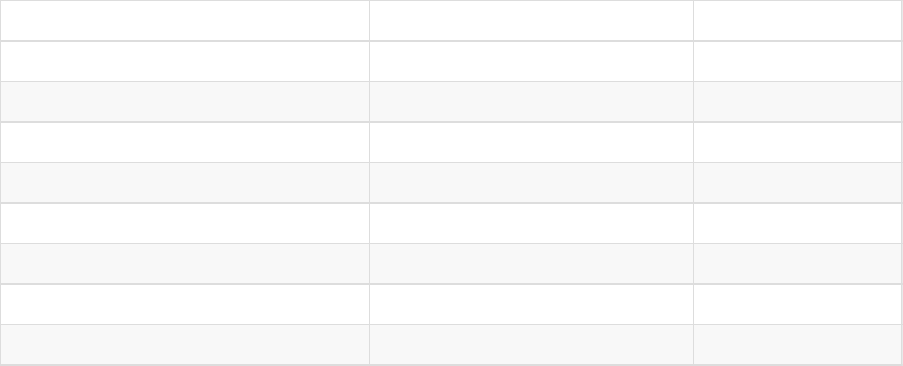
enum
dynamsoft.BarcodeReader.EnumImagePixelFormat
Description
Describes the image pixel format.
Allowed Values
Member Description Number
IPF_Binary 0:Black, 1:White 0
IPF_BinaryInverted 1:Black, 0:White 1
IPF_GrayScaled 8-bit Gray 2
IPF_NV21 NV21 3
IPF_RGB_565 16-bit 4
IPF_RGB_555 16-bit 5
IPF_RGB_888 24-bit 6
IPF_ARGB_8888 32-bit 7
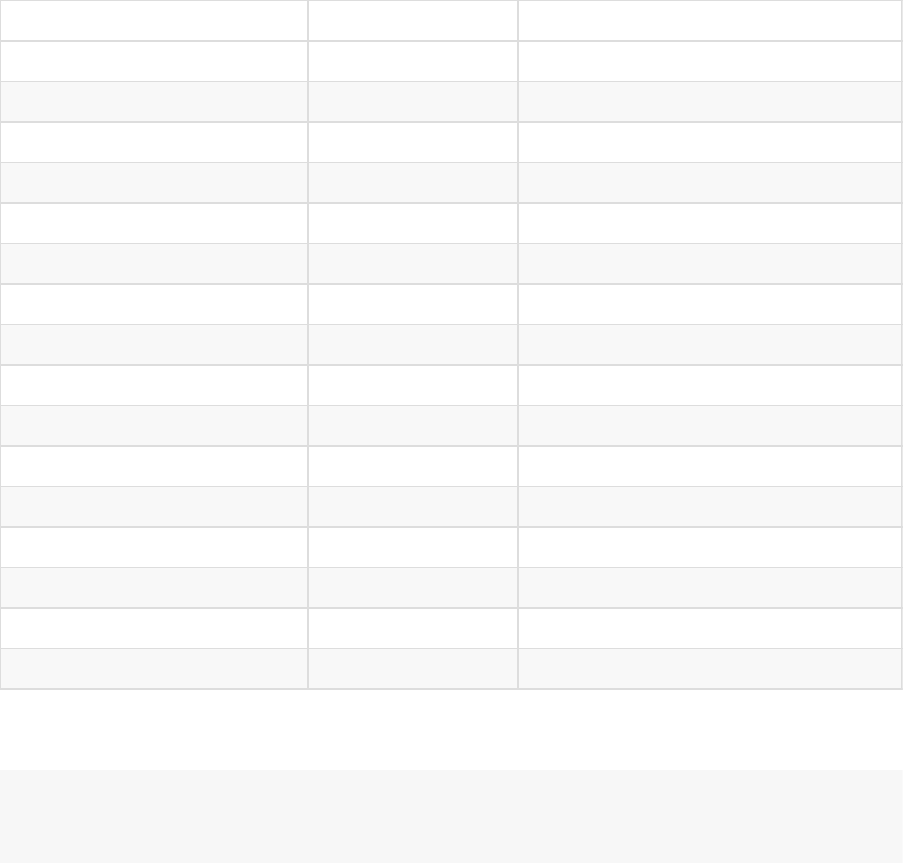
enum
dynamsoft.BarcodeReader.EnumBarcodeFormat
Description
Describes the type of the barcode.
Allowed Values
Allowed Values Hex Value Barcode Type
BF_All 0x1E0003FF All following barcodes types
BF_OneD 0x3FF One-D barcode
BF_CODE_39 0x1 Code 39
BF_CODE_128 0x2 Code 128
BF_CODE_93 0x4 Code 93
BF_CODABAR 0x8 Codabar
BF_ITF 0x10 Interleaved 2 of 5
BF_EAN_13 0x20 EAN-13
BF_EAN_8 0x40 EAN-8
BF_UPC_A 0x80 UPC-A
BF_UPC_E 0x100 UPC-E
BF_INDUSTRIAL_25 0x200 Industrial 2 of 5
BF_PDF417 0x2000000 PDF417
BF_QR_CODE 0x4000000 QR Code
BF_DATAMATRIX 0x8000000 DATAMATRIX
BF_AZTEC 0x10000000 AZTEC
Example
if(results[0].BarcodeFormat == dynamsoft.BarcodeReader.EnumBarcodeFormat.QR_CODE){
// The format is QR code.
}
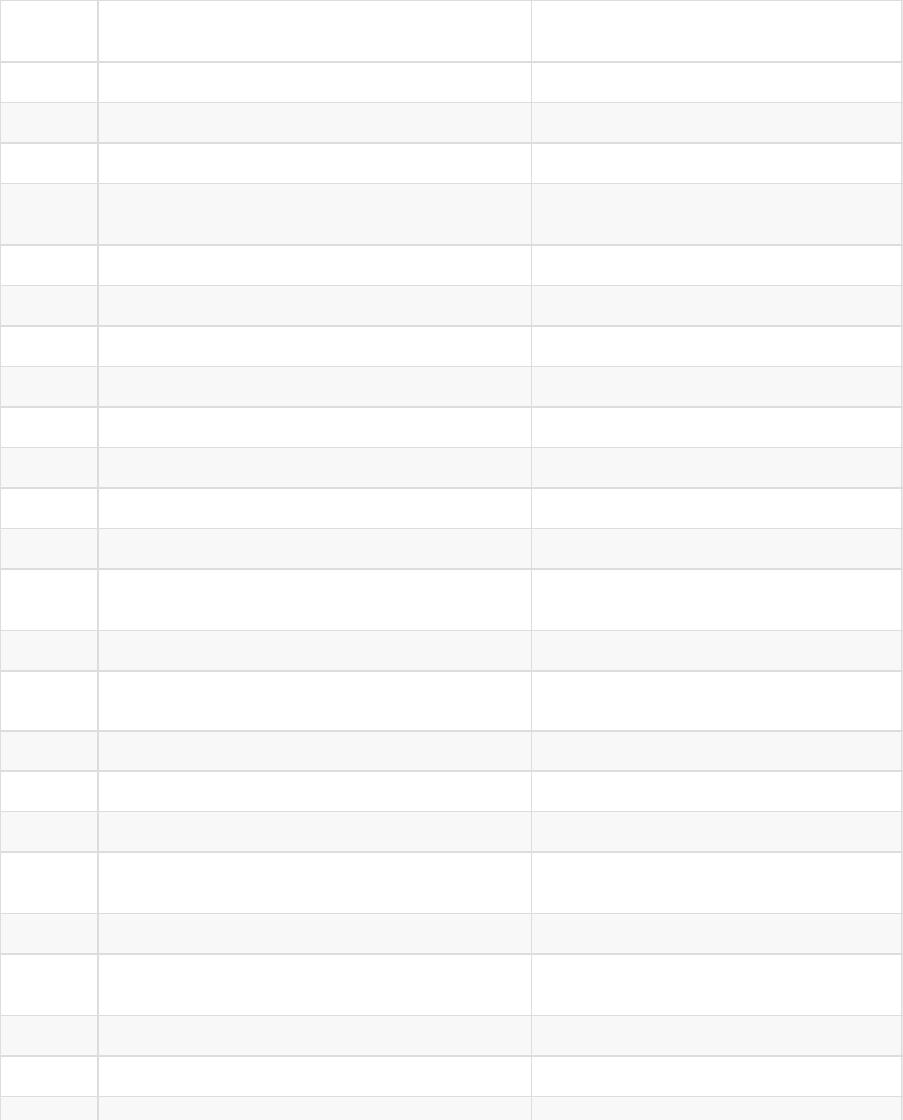
enum dynamsoft.BarcodeReader.EnumErrorCode
Description
Defines the error code of dynamsoft.BarcodeReader.
Allowed Values
Error
Code Constant Error Message
0 DBR_SUCCESS Successful.
1 DBR_SYSTEM_EXCEPTION System exception is thrown.
-10000 DBRERR_UNKNOWN Unknown error.
-10001 DBRERR_NO_MEMORY Not enough memory to perform the
operation.
-10002 DBR_NULL_REFERENCE Null reference.
-10003 DBRERR_LICENSE_INVALID The license is invalid.
-10004 DBRERR_LICENSE_EXPIRED The license has expired.
-10005 DBRERR_FILE_NOT_FOUND The file to decode is not found.
-10006 DBRERR_FILETYPE_NOT_SUPPORTED The file type is not supported.
-10007 DBRERR_BPP_NOT_SUPPORTED The BPP(Bits per pixel) is not supported.
-10008 DBRERR_INDEX_INVALID The index is invalid.
-10009 DBRERR_BARCODE_FORMAT_INVALID The barcode format is invalid.
-10010 DBRERR_CUSTOM_REGION_INVALID The input region value parameter is
invalid.
-10011 DBRERR_MAX_BARCODE_NUMBER_INVALID The maximum barcode number is invalid.
-10012 DBRERR_IMAGE_READ_FAILED Failed to read the image.
-10013 DBRERR_TIFF_READ_FAILED Failed to read the TIFF image.
-10016 DBRERR_QR_LICENSE_INVALID The QR Code license is invalid.
-10017 DBRERR_1D_LICENSE_INVALID The 1D Barcode license is invalid.
-10018 DBRERR_DIB_BUFFER_INVALID The DIB(device-independent bitmaps)
buffer is invalid.
-10019 DBRERR_PDF417_LICENSE_INVALID The PDF417 barcode license is invalid.
-10020 DBRERR_DATAMATRIX_LICENSE_INVALID The DATAMATRIX barcode license is
invalid.
-10021 DBRERR_PDF_READ_FAILED Failed to read the PDF file.
-10022 DBRERR_PDF_DLL_MISSING The PDF DLL is missing.
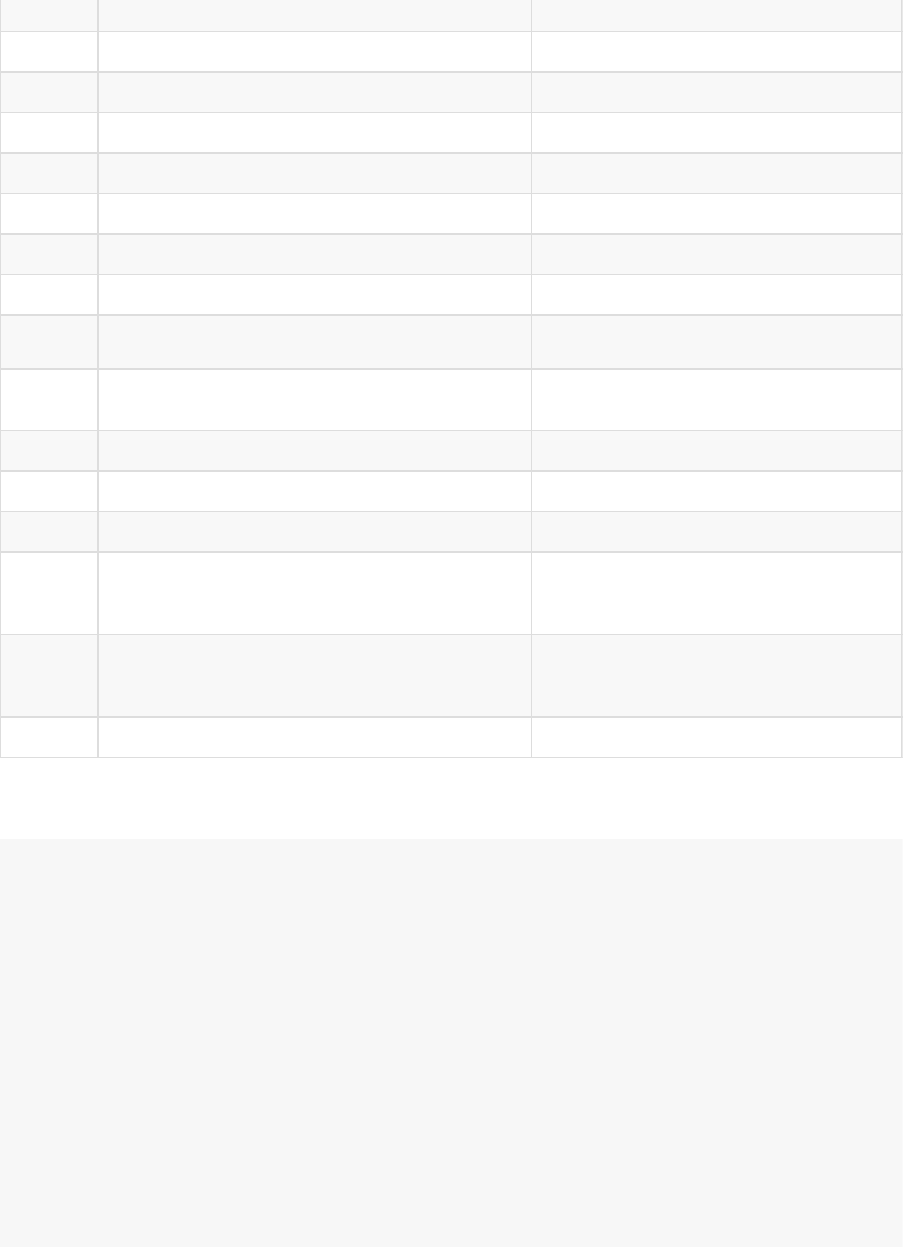
-10023 DBRERR_PAGE_NUMBER_INVALID The page number is invalid.
-10024 DBRERR_CUSTOM_SIZE_INVALID The custom size is invalid.
-10025 DBRERR_CUSTOM_MODULESIZE_INVALID The custom module size is invalid.
-10026 DBRERR_RECOGNITION_TIMEOUT Recognition timeout.
-10030 DBRERR_JSON_PARSE_FAILED Failed to parse the JSON string.
-10031 DBRERR_JSON_TYPE_INVALID The value type is invalid.
-10032 DBRERR_JSON_KEY_INVALID The key is invalid.
-10033 DBRERR_JSON_VALUE_INVALID The value is invalid or out of range.
-10034 DBRERR_JSON_NAME_KEY_MISSING The mandatory key "Name" is missing.
-10035 DBRERR_JSON_NAME_VALUE_DUPLICATED The value of the key "Name" is
duplicated.
-10036 DBRERR_TEMPLATE_NAME_INVALID The template name is invalid.
-10037 DBRERR_JSON_NAME_REFRENCE_INVALID The name reference is invalid.
-10038 DBR_PARAMETER_VALUE_INVALID The parameter value is invalid.
-10039 DBRERR_DOMAIN_NOT_MATCHED
The domain of your current site does not
match the domain bound in the current
product key.
-10040 DBRERR_RESERVEDINFO_NOT_MATCHED
The reserved info does not match the
reserved info bound in the current
product key.
-10041 DBRERR_AZTEC_LICENSE_INVALID The AZTEC license is invalid.
Example
try{
reader.appendParameterTemplate({
"ImageParameters": {
"Name": "not exist",
"BarcodeFormatIds": ["not exist"]
}
});
}catch(ex){
if(ex instanceof dynamsoft.BarcodeReader.BarcodeReaderException){
if(ex.code == dynamsoft.BarcodeReader.EnumErrorCode.DBR_JSON_VALUE_INVALID)){
console.log("DBR_JSON_VALUE_INVALID: " + ex.message);
}else{
throw ex;
}
}else{
throw ex;
}
}
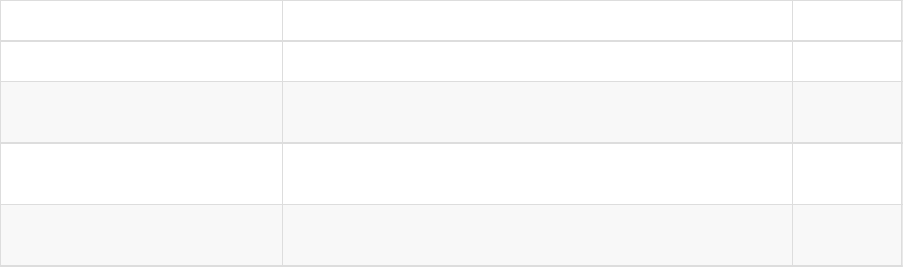
enum dynamsoft.BarcodeReader.EnumResultType
Description
Describes the extended result type.
Allowed Values
Member Description Number
EDT_StandardText Specifies the standard text. This means the barcode value. 0
EDT_RawText Specifies the raw text. This means the text that includes
start/stop characters, check digits, etc. 1
EDT_CandidateText Specifies all the candidate text. This means all the
standard text results decoded from the barcode. 2
EDT_PartialText (Not yet
supported in version 6.0)
Specifies the partial Text. This means part of the text result
decoded from the barcode. 3

enum
dynamsoft.BarcodeReader.EnumTerminateStage
Description
Describes the stage when the results are returned.
Allowed Values
Member Description Number
ETS_Prelocalized Pre-localized 0
ETS_Localized Localized 1
ETS_Recognized Recognized 2
