My E3 Device Integrator's Guide
E3%20Device%20Integrator's%20guide
User Manual:
Open the PDF directly: View PDF  .
.
Page Count: 21
- Table of Contents
- 1 Overview
- 2 Encryption Data
- 3 Z01 Section
- 4 NTS Section
- 5 POS 8583
- 6 Heartland Exchange
- 7 E3 Hardware Devices
- Bookmarks

Heartland End-to-End
Encryption
Integrator's Guide
V 2.0
AUGUST 12, 2014

Table of Contents
Table of Contents ii
1 Overview 1
1.1 Introduction 1
1.2 The E3® Solution 1
1.3 Target Audience 1
2 Encryption Data 2
2.1 Encrypted Track and PAN Data 2
2.2 Encrypted Card Security Code 3
2.3 Encryption Transmission Block 3
3 Z01 Section 4
4 NTS Section 6
5 POS 8583 8
6 Heartland Exchange 9
6.1 Unique Transaction ID (UID) 9
6.2 Merchant ID Number (MID) 9
6.3 Account Data Source 9
6.4 Customer Data 9
6.5 Retrieval Reference Number (RRN) 10
6.6 Transaction Identifier 10
6.7 Authorization Example 10
6.8 Void/Incremental Example 12
6.9 Settlements 12
6.9.1 Header Record Fields 12
6.9.2 Detail Record Fields 12
6.9.3 Settlement Notes 13
7 E3 Hardware Devices 14
7.1 E3 MSR Wedge (HPS-E3-M1) 14
7.1.1 E3 MSR Wedge Device Interface 15
7.1.2 E3 MSR Wedge Example Output 15
7.2 E3 PIN Pad (HPS-E3-P1) 15
7.2.1 E3 PIN Pad Device Interface 17
7.2.1.1 E3 PIN Pad Requests 18
7.2.1.2 E3 PIN Pad Responses 18
7.3 Ingenico iPP300 and iSC Touch Series PIN Pads 18
7.4 Equinox L4000 and L5000 Series PIN Pads 19
©2014 Heartland Payment Systems, Inc., All Rights Reserved -HPS Confidential:Sensitive ii
E3 User's Guide, V 2.0—August 12, 2014 Table of Contents

1 Overview
1.1 Introduction
Heartland Secure™ is a comprehensive credit/debit card data security solution that combines three
powerful technologies working in tandem to provide merchants with the highest level of protection
available against card-present data fraud.
Offered to Heartland customers for no additional processing fees as part of Heartland's
comprehensive solutions, Heartland Secure combines:
lEMV electronic chip card technology to prove that a consumer's card is genuine.
lHeartland's E3®end-to-end encryption technology, which immediately encrypts card data as it
is acquired so that no one else can read it.
lTokenization technology, which replaces card data with "tokens" that can be used for returns
and repeat purchases, but are unusable by outsiders because they have no value.
This guide focuses on Heartland's E3 end-to-end encryption solution and contains integration
information for POS systems. It serves as a companion to Heartland's host network specifications
and the E3 device programmer's manuals. These documents should be referred to for more detailed
information.
1.2 The E3®Solution
E3, an end-to-end encryption product by Heartland Payment Systems, is designed to protect credit
and debit card data from the moment of card swipe and through the Heartland network — not just at
certain points of the transaction flow.
E3 is based on Voltage Security's SecureData Payments product which provides a complete
payment transaction protection framework, built on two breakthrough technologies encompassing
encryption and key management: Voltage Format-Preserving Encryption (FPE) and Voltage
Identity-Based Encryption (IBE).
With Voltage Format-Preserving Encryption (FPE), credit card numbers and other sensitive data
are protected without the need to change the data format or structure. In addition, data properties
are maintained, such as a checksum, and portions of the data can remain in the clear.
With Voltage Identity-Based Encryption (IBE), the complexity of key management through
traditional Public Key Infrastructure (PKI) systems and symmetric key systems is eliminated.
Because encryption keys are securely generated on demand and not stored, POS devices are not
subject to key injection and key rotation.
1.3 Target Audience
This document's target audience includes POS software developers who use Heartland’s POS
technologies and are certified in payment processing with Heartland.
©2014 Heartland Payment Systems, Inc., All Rights Reserved -HPS Confidential:Sensitive 1
E3 User's Guide, V 2.0—August 12, 2014 1 Overview
2 Encryption Data
2.1 Encrypted Track and PAN Data
Depending on the configuration of your E3-capable card acceptance device, the E3 encrypted Track
and PAN data will be formatted using one of two Track Encryption Protocol (TEP) algorithms, TEP1
or TEP2. TEP1 is whole track encryption, while TEP2 is structure preserving encryption. For
example, the following data was produced by an E3-capable device using Heartland's VISA test
card:
Table 2.1: PAN Encryption
PAN Encryption
Cleartext 4012002000060016
TEP2 4012002650330016
TEP1 +++++++BWmfv/HUA
Table 2.2: Track 1 Encryption
Track 1 Encryption
Cleartext %B4012002000060016^VI TEST CREDIT^251210118039000000000396?
TEP2 B4012007060016^VI TEST CREDIT^2512101XlwD91O5qOg+7Ftv+nLu
TEP1 3FLr83Ed5tiHN3r2CpT3kIndkhtiHRt3mtKQsozJ2rFQM8GE0ha2X7K6t
Table 2.3: Track 2 Encryption
Track 2 Encryption
Cleartext ;4012002000060016=25121011803939600000?
TEP2 4012007060016=2512101e3vdC5QhAEZa7UAN
TEP1 AsbjXkDWaRqLV0o5U33jffZqiPg
For TEP2, the following is guaranteed:
lThe leading six digits of the original PAN are maintained in the clear.
lThe trailing four digits of the original PAN are maintained in the clear.
lThe middle digits are used for the ciphertext value, which is guaranteed to consist solely of
digits.
lThe Luhn check value is preserved so that a PAN with a valid (0) result, creates ciphertext that
also checks as valid.
For TEP1, the device will provide a separate masked or obfuscated representation of the track data
for processing that requires the first six or last four digits of the PAN, cardholder name, expiration
date, Luhn check results, etc.
©2014 Heartland Payment Systems, Inc., All Rights Reserved -HPS Confidential:Sensitive 2
E3 User's Guide, V 2.0—August 12, 2014 2 Encryption Data

2.2 Encrypted Card Security Code
The Card Security Code (CSC) printed on the back of the card, referred to as CAV2, CVC2, CVV2,
or CID depending on the card brand, can be optionally encrypted. The value to be encrypted is
constructed as follows:
Length [1 digit] Random Filler [x digits] CSC [3 or 4 digits]
Step Example Data
1. Obtain the CSC value (either 3 or 4 digits) 572
2. Generate a random 3-digit number 413
3. Construct the value to be encrypted 3413572
4. Encrypt the value 9037662
Note: The total length of the encrypted CSC will always be seven digits. Typically, the device will
randomly generate two or three digits of filler to ensure the CSC is seven digits.
2.3 Encryption Transmission Block
The Encryption Transmission Block (ETB), sometimes referred to as a Key Transmission Block
(KTB), contains the IBE encrypted version of the device's randomly generated FPE key that was
used to encrypt the card data. The ETB must be sent in the authorization requests so that the host
can decrypt the card data.
Heartland's ETB must be Base64 encoded, and for TEP1 and TEP2 it must be 276 bytes.
For example:
/wECAQEEAoFGAgEH3gcOTDT6jRZwb3NAc2VjdXJlZXhjaGFuZ2UubmV0tmpl5zBEIeye
aDRWB0IlbnWdMjK32V4QIJRoRIpu1Fm9w8fdoJt1gLt2jkkliD+0kvFOrhspWh4dsDYv
SHGgdgetU3pfAx+iBS38Wq2KvTOOlueGvXcGe0y4G/DFVgT7zBHm1YS7cseYLEtADtoS
nhBUjasCciO5ul9GhesvQo8Ah7NM8geDZdKN0QZZiLH8cmYhgHp8kamxSciDJHARUO9t
Fb+h
©2014 Heartland Payment Systems, Inc., All Rights Reserved -HPS Confidential:Sensitive 3
E3 User's Guide, V 2.0—August 12, 2014 2 Encryption Data

3 Z01 Section
This section addresses specific requirements for E3 terminals processing on the Z01 network
platform. All card types may be sent via E3 encryption. All transactions using E3 processing append
additional data items at the end of the record, which signals to the host that the transaction is E3
encrypted.
These transactions require the following:
lPortions of the E3 data must always appear at the end of a transaction. The POS terminal will
append a 0x1D at the end of the transaction followed by the E3 data. Refer to Table 2.1 Data
Fields.
Note: The encrypted CVV and ETB are attached to the E3 Data Block, while the encrypted
track data and/or encrypted PAN are placed in their normal position in the
authorization message.
lPOS must send spaces in AVS RESULT AND CID RESULT. The encrypted values are in
the E3 Data Block.
lAn account number must not be less than 13 characters and the encrypted account number
data will not exceed 19 characters.
lEncrypted Track 1 data will not include the field separator 0x1C.
lEncrypted Track 2 data will not exceed 37 bytes.
Response codes specific to E3 transactions are:
lURC = EG, SRC = 8 (Failure for E3 terminals only – encryption error)
lURC = EH, SRC = 8 (Failure for E3 terminals only – too many queued / no connection)
Note: E3 transactions are not supported for TDC batch uploads.
Table 2.1 Data Fields shows the data items that must be appended to the end of an E3 transaction.
Table 3.1: Z01 Data Fields
Name Length Value Comment
FIELD SEPARATOR 1 0x1D Indicator for E3 transaction (Hex: Constant ASCII)
Must be appended at end of E3 transaction.
RECORD ID 2 E3
RECORD TYPE 3 001
KEY BLOCK DATA TYPE 1 v v = Voltage
ENCRYPTED FIELD MATRIX 2 Values:
l03 = Customer Data
l04 = Customer Data, Card Security Code
©2014 Heartland Payment Systems, Inc., All Rights Reserved -HPS Confidential:Sensitive 4
E3 User's Guide, V 2.0—August 12, 2014 3 Z01 Section

TEP TYPE 1 Values:
l1 = TEP 1
l2 = TEP 2
RESERVED 18 Blank-fill
CARD SECURITY CODE 7 Encrypted CVV data. Unencrypted bytes defined as:
l1 = Length of actual CVV data
l2-7 = CVV data, right-justified, random-fill, numeric
only
RESERVED 45 Blank-fill
ETB LLL 3 Length of ETB Block.
ETB BLOCK Varies ETB should not exceed 276 bytes.
©2014 Heartland Payment Systems, Inc., All Rights Reserved -HPS Confidential:Sensitive 5
E3 User's Guide, V 2.0—August 12, 2014 3 Z01 Section

4 NTS Section
This section addresses specific requirements for E3 terminals processing on the NTS network
platform. All card types may be sent via E3 encryption. All transactions using E3 processing append
additional data items at the end of the record, which signals to the host that the transaction is E3
encrypted. These transactions require the following:
lPortions of the E3 data must always appear at the end of a transaction. The POS terminal will
append a 0x1D at the end of the transaction followed by the E3 data. Refer to Table 3.1: NTS
DataFields.
Note: The encrypted CVV and ETB are attached to the E3 Data Block, while the encrypted
track data and/or encrypted PAN are placed in their normal position in the
authorization message.
lPOS must send spaces in the CVN field. This encrypted CVN value will be in the E3 Data
Block.
lAn account number must not be less than 13 characters and the encrypted account number
data will not exceed 19 characters.
lEncrypted Track 1 data will not exceed 79 bytes.
lEncrypted Track 2 data will not exceed 40 bytes.
Response codes specific to E3 transactions are:
l52 (Failure for E3 terminals only – encryption error)
l53 (Failure for E3 terminals only – too many queued / no connection)
Table 3.1 NTSData Fields shows the data items that must be appended to the end of an E3
transaction.
Table 4.1: NTS Data Fields
Name Length Value Comment
FIELD SEPARATOR 1 0x1D Indicator for E3 transaction (Hex: Constant ASCII) Must
be appended at end of E3 transaction.
RECORDID 2 E3
RECORD TYPE 3 001
KEYBLOCKDATATYPE 1 v v = Voltage
ENCRYPTEDFIELDMATRIX 2 Values:
l03 = Customer Data
l04 = Customer Data, Card Security Code
TEPTYPE 1 Values:
l1 = TEP 1
l2 = TEP 2
RESERVED 18 Blank-fill
©2014 Heartland Payment Systems, Inc., All Rights Reserved -HPS Confidential:Sensitive 6
E3 User's Guide, V 2.0—August 12, 2014 4 NTS Section

CARDSECURITYCODE 7 Encrypted CVV data. Unencrypted bytes defined as:
l1 = Length of actual CVV data
l2 – 7 = CVV data, right-justified, random-fill, numeric
only
RESERVED 45 Blank-fill
ETBLLL 3 Length of ETB Block.
EBTBLOCK Varies ETB should not exceed 276 bytes.
©2014 Heartland Payment Systems, Inc., All Rights Reserved -HPS Confidential:Sensitive 7
E3 User's Guide, V 2.0—August 12, 2014 4 NTS Section

5 POS 8583
This section addresses specific requirements for E3 terminals using the POS 8583 message
specification. All card types may be sent using E3 encryption. All transactions utilizing E3 processing
will include E3 data in DE 127: Forwarding Data.
These transactions require the following:
lE3 data must always appear in DE 127: Forwarding Data (using an Entry Tag value of
“E3E”.)
Note: The encrypted CVV and ETB are attached to the E3 Data Block, while the encrypted
track data and/or encrypted PAN are placed in their normal position in the
authorization message.
lAn account number must be more than 13 characters, the encrypted account number data
cannot exceed 19 characters.
lEncrypted Track 1 data will not exceed 79 bytes.
lEncrypted Track 2 data will not exceed 40 bytes.
Response codes specific to E3 transactions are:
lDE 39 = 952 (Failure for E3 terminals only – encryption error)
lDE 39 = 953 (Failure for E3 terminals only – too many queued / no connection)
Table 5.1: POS 8583 Data Fields
Field Name Field Length Comment
RECORD ID 2 "E3"
RECORD TYPE 3 "001"
KEY BLOCK DATA
TYPE
1 "v" Voltage
ENCRYPTED FIELD
MATRIX
2 Values:
l03 CustomerData
l04 CustomerData,Card Security Code
TEP TYPE 1 Values:
l1 = TEP 1
l2 = TEP 2
RESERVED 18 Blank-fill
CARD SECURITY
CODE
7 Encrypted CVV data. Unencrypted bytes defined as:
l1 = Length of actual CVV data
l2-7 = CVV data, right-justified, random-fill, numeric only
RESERVED 45 Blank-fill
ETBLLL 3 Length of ETB Block
ETB BLOCK Varies ETB cannot exceed 276 bytes.
©2014 Heartland Payment Systems, Inc., All Rights Reserved -HPS Confidential:Sensitive 8
E3 User's Guide, V 2.0—August 12, 2014 5 POS 8583

6 Heartland Exchange
This section addresses specific requirements for E3 terminals using the Heartland Exchange
message specification. All card types may be sent using E3 encryption.
6.1 Unique Transaction ID (UID)
Heartland's Unique Transaction ID (UID) is a software solution that eliminates the need for a POS
application to store the account number or track data for subsequent processing such as Voids,
Incrementals, and Batch Settlement. The UID is returned by the Heartland Exchange Host in the
Authorization response messages. This application is not available on other Heartland host
platforms.
Voids / Incrementals:
The Account Data Source field will be 'Z' or 'z' to indicate that the UID is being used instead of
track or Primary Account Number (PAN) data. The Customer Data field will contain the UID
which is the Retrieval Reference Number (RRN) from the Authorization.
Batch Settlement:
The Primary Account Number field in the Batch Settlement Detail Record will be filled with all
spaces to indicate that the UID is being used instead of PAN data. The Transaction Identifier field
in the Batch Settlement Detail Record is the Transaction Identifier from the Authorization and it
contains the UID.
6.2 Merchant ID Number (MID)
Merchant ID Number is a 12 character field that contains a unique number assigned by Heartland. If
your E3 implementation encrypts the MID, then the E3 sub-encryption indicator in the Key Block
data field must indicate the MID is encrypted (01 or 02 as appropriate).
6.3 Account Data Source
The Account Data Source field is used to indicate the source and format of the data contained in the
Customer Data field. Refer to the Exchange Host Specification for a complete list of Account Data
Source codes.
6.4 Customer Data
The Customer Data field contains the Key Block data and either the Cardholder Account data or the
Unique Transaction ID. The Cardholder Account data may be either the encrypted Track 1,
encrypted Track 2, or encrypted primary account number. The unique transaction ID is never
encrypted. Refer to the Exchange Host Specification for the Customer Data format.
©2014 Heartland Payment Systems, Inc., All Rights Reserved -HPS Confidential:Sensitive 9
E3 User's Guide, V 2.0—August 12, 2014 6 Heartland Exchange

6.5 Retrieval Reference Number (RRN)
The Retrieval Reference Number field contains a value that uniquely identifies a transaction. The
Retrieval Reference Number is sent in an authorization response. The POS then uses the RRN in
voids and incrementals to identify the original transaction.
6.6 Transaction Identifier
The Transaction Identifier field contains the UID. The Transaction Identifier is sent in an
authorization response.
6.7 Authorization Example
The following examples shows highlighted fields that are used in the POS message to Heartland
messaging:
lEncrypted Track 1 data
lEncrypted Track 2 data
lEncrypted PAN (Primary Account Number)
lKTB (Key Transmission Block)
Table 6.1: Authorization Examples
Request Response
For Encrypted Card Swipes:
The following request fields require specific handling:
lMID (Merchant ID Number) This field will be the unencrypted,
cleartext MID.
lAccount Data Source – This field will indicate that either
encrypted Track 1 or Track 2 data is being sent:
n“h” = Encrypted Track 1
n“d” = Encrypted Track 2
lCustomer Data – This field will be <Key Block
Data><FS><Encrypted Track 1 or Track 2 Data>, where <Key
Block Data> is “v” (Voltage encryption)+ “03” + KTB.
For example:
v03/wECAQECAoFGAgEH2ggJTHLeIBZwb3NAc2
VjdXJlZXhjaGFuZ2UubmV0aFLxu2XTNLs6jIk3Bakt
bFZrdJ26dX85BjkkngQnmk+3tOhXRVILvASHnfmao0y
l5z7KNBx6Na7ekL+hryGQ3oPOcOVkEzei83Clsc
9QSfQJWB9ysAynGc6btccnrfjwyJn70KJ1cqQrw
The following response
fields require specific
handling:
lRRN (Retrieval
Reference Number)–
This field will be used as
the UID (Unique
Transaction ID) for
subsequent messages
such as voids.
lTransaction Identifier –
This field will be used as
the UID in the batch
settlement detail record.
©2014 Heartland Payment Systems, Inc., All Rights Reserved -HPS Confidential:Sensitive 10
E3 User's Guide, V 2.0—August 12, 2014 6 Heartland Exchange

623ASSWm57Hov2fMtWmPpYpQRr54oAoXZY
jUajd0sRXCn5XeD5BhpE/Wzd4Ayn+342BGUL
0N7hWKm<FS>V2uvVFzWkBTNzcX7vcrWTi4
jV9AtG2bLYJkCOi+OA2aY2OiRmw/0ZSQcH
For Encrypted Manual Entry:
The following request fields require specific handling:
lThis field will be the unencrypted, cleartext MID.
lAccount Data Source – This field will indicate that an encrypted
PAN is being sent:
n“x” = Encrypted, manually keyed PAN, Track 1 capable
n“t” = Encrypted, manually keyed PAN, Track 2 capable
lCustomer Data – This field will be <Key Block
Data><FS><Encrypted Primary Acct Num><FS><Exp
Date><FS>, where <Key Block Data> is “v” (Voltage
encryption) + “03” + KTB. For example:
v03/wECAQECAoFGAgEH2ggJTHLeIBZwb3NAc
2VjdXJlZXhjaGFuZ 2UubmV0aFLxu2XTNLs6jIk3Ba
ktbFZrdJ26dX85BjkkngQnm
k+3 tOhXRVILvASHnfmao0yl5z7
KNBx6Na7ekL+hryGQ3oPOcOVkE
zei83Clsc9QSf QJWB9ysAynGc6btccnfrfjwyJn70KJ1
cqQrw623ASSWm57Hov2fMtWmPpYpQRr
54oAoXZYjUajd0sRXCOn5XeD5BhpE/Wzd4Ayn+3
42BGUL0N7hWKm<FS>+++++++X8zr5YaCZ<FS>1012
Notes:
lRefer to section Authorization Chapter in the Heartland Exchange specification for all other
fields.
lUIDs are used to retrieve a transaction’s account data for Voids, Incrementals, and Batch
Settlement. This eliminates the need to store or send encrypted or unencrypted track, PAN, or
KTB data once authorization has occurred.
lFor refunds/returns, Purchase Return (Transaction Code CR) must be utilized so that the
returned UID can be used for settlement.
lFor voice authorizations, Online Forced Purchase (Transaction Code 5S) must be utilized so
that the returned UID can be used for settlement.
©2014 Heartland Payment Systems, Inc., All Rights Reserved -HPS Confidential:Sensitive 11
E3 User's Guide, V 2.0—August 12, 2014 6 Heartland Exchange

6.8 Void/Incremental Example
A Void is required to cancel a previously authorized transaction. Online Auth Void (Transaction
Code 59), PIN Debit: Purchase Void (Transaction Code A3), or PIN Debit: Purchase Return Void
(Transaction Code A4) should be used depending on the type of the original authorization.
An Incremental Authorization is required in certain industries such as Hotel/Lodging when the final
amount due is more than 15% higher than the originally authorized amount.
For Voids/Incremental Requests, the fields below require specific handling:
lMerchant ID Number – This field will be the unencrypted, cleartext MID.
lAccount Data Source – This field will indicate that the UID is being sent instead of track or
PAN data:
n“z” = Original authorization request contained encrypted track or PAN data.
lCustomer Data – This field will be <Key Block Data><FS><UID>, where <Key Block Data>
is just "v03" - the KTB is not required in this case since no encrypted data is being sent, and
<UID> is the RRN from the original authorization response.
Note: Refer to the Heartland Exchange specification for all other fields.
For Void/Incremental Responses, no specific fields in the Exchange Host response require specific
handling.
6.9 Settlements
Batch transactions consist of a number of record types and require both request and responses.
6.9.1 Header Record Fields
Header Record Requirements:
lMerchant ID Number – This field will be the unencrypted, cleartext MID.
lKey Block – This field will be just “v03” – the KTB is not required in this case since no encrypted
data is being sent.
6.9.2 Detail Record Fields
Detail Record Requirements:
lAccount Data Source – This field will be the same value as was used in the original
authorization request.
lPrimary Account Number – This field will be filled with 22 spaces to indicate that the UID will
be used.
lTransaction Identifier – This field will be the Transaction Identifier from the original
authorization response (it contains the UID).
©2014 Heartland Payment Systems, Inc., All Rights Reserved -HPS Confidential:Sensitive 12
E3 User's Guide, V 2.0—August 12, 2014 6 Heartland Exchange

6.9.3 Settlement Notes
UIDs must be used for settlement, all other record fields in both the request and responses follow
those defined in the Exchange Host Specifications.
Note: The only alternative supported on Exchange for settling E3 encrypted transactions is to send
the encrypted PANs in the detail records, but that option requires that all transactions in the
batch share the same KTB.
©2014 Heartland Payment Systems, Inc., All Rights Reserved -HPS Confidential:Sensitive 13
E3 User's Guide, V 2.0—August 12, 2014 6 Heartland Exchange
7 E3 Hardware Devices
The following section describes hardware devices that use E3 encryption technology which
integrates with Heartland Hosts:
lE3 MSR Wedge (HPS-E3-M1)
lE3 PIN Pad (HPS-E3-P1)
lIngenico iPP300 Series Retail PIN Pads
lIngenico iSC Touch Series Signature Capture PIN Pads
lEquinox L4000 and L5000 Series Signature Capture PIN Pads
Note: These E3-capable devices must be pre-configured to use either TEP1 or TEP2 encryption,
and pre-configured to be used in either the certification or production environments. Please
work with Heartland to ensure that the your devices have been configured appropriately
prior to certification testing or production deployment.
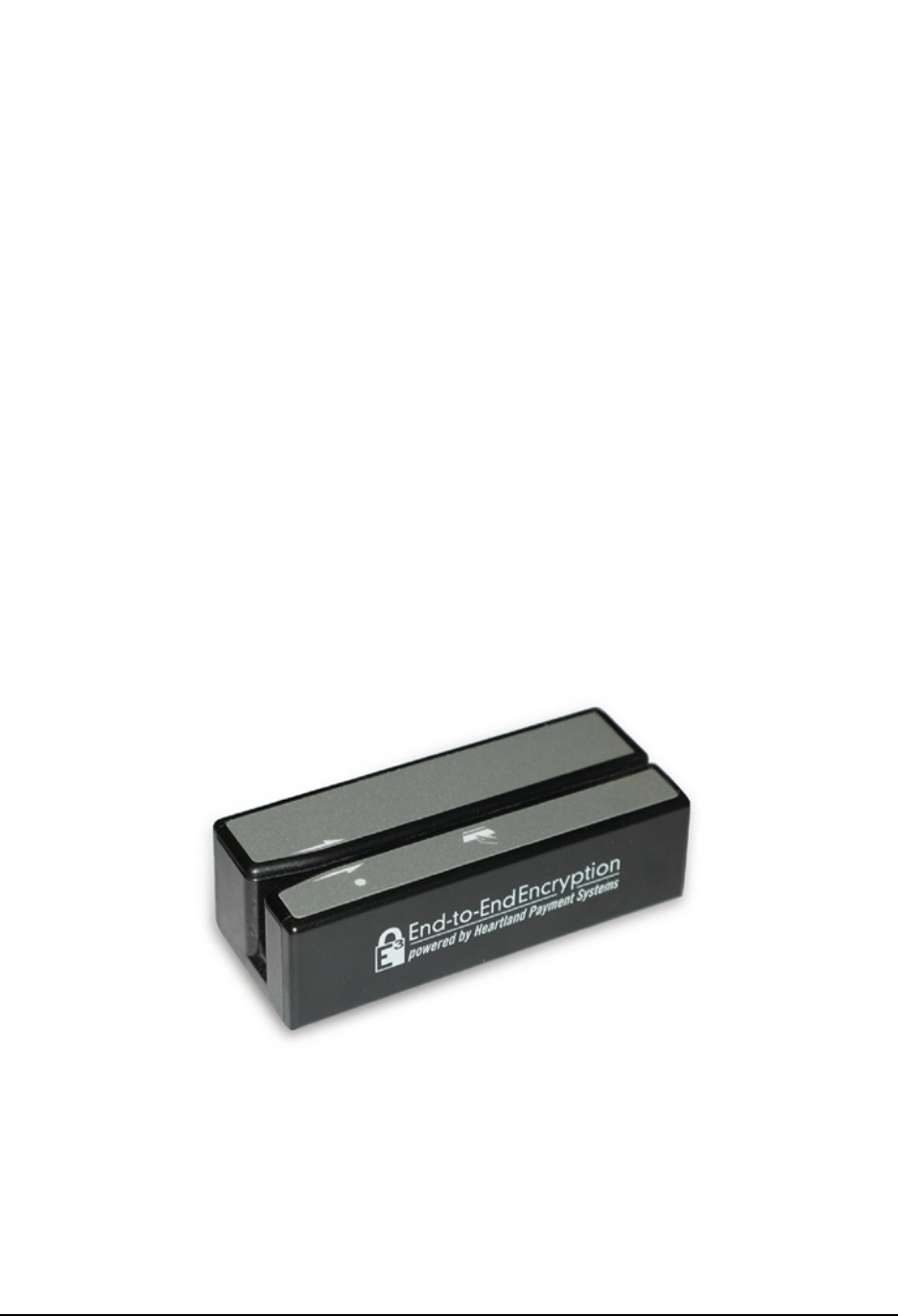
7.1 E3 MSR Wedge (HPS-E3-M1)
lHardware-encrypts card data upon swipe
lIncorporates a Tamper-Resistant Security Module (TRSM) to physically protect data and
encryption keys
lAvailable with USB and RS232 connectors
Figure 7.1: E3 MSR Wedge
©2014 Heartland Payment Systems, Inc., All Rights Reserved -HPS Confidential:Sensitive 14
E3 User's Guide, V 2.0—August 12, 2014 7 E3 Hardware Devices

7.1.1 E3 MSR Wedge Device Interface
Table 7.1: E3 MSR Wedge operation modes:
Mode Description
USB HID-KB The POS system receives data from the E3 MSR Wedge as if sent from a
standard USB keyboard. In this mode, you can see the output by opening a text
editor such as Notepad and swiping a card. The output is in Format 2 per the
programmer’s manual.
USB HID-MSR The POS system receives data from the E3 MSR Wedge via its native USB HID
interface in Format 1. For this mode, an ActiveX control is available for web
applications running on Internet Explorer and provides commands for obtaining
the desired output components. Also, a command-line application is available
that acquires and reformats the output as Format 2.
USB Virtual-COM or RS232 The POS system receives data from the E3 MSR Wedge via its native serial
COM port interface, which outputs in Format 2.
A virtual COM port driver is available for Windows. The RS232 wedge has a
standard 9-PIN serial connector.
7.1.2 E3 MSR Wedge Example Output
See the following Format 2 example output from the E3 MSR Wedge:
<E1050711%B4012001000000016^VI TEST CREDIT^251200000000000000000000?
|ycO0LNhgiu4XH7J1Lqg8BY6Vc25F3ft3qoTEeqk3wrx7KGh8JSrEUfAAW|+++++++8q
0sLWCB5|11;4012001000000016=25120000000000000000?|7YIC67MkijZle6TL5T
dw90jCQ3F|+++++++8q0sLWCB5|00|||/wECAQECAoFGAgEH1AESTDT6jRZwb3NA
c2VjdXJlZXhjaGFuZ2UubmV0aXGRuQf68kvJ3SbfATjjdctZlBnX2gFQ3chN7Fq2s22b
Tq/rTVzl7fLQ/j1CGGohcyBvmmYxGs6ZLDyYL+8EWZFhhjQC7tIKaYMsdua4SxeYAg9w
QGHczVI+tTKFXClWEQ8kCKZ6zHkG5+jJZhjGpO2EWSe18DH3HiKMsDwM8DcA5l5b3GT+
pc7XwwK8oEdU3gjOiRo4/fdPmF/PPBxAET1zlPUq|>
7.2 E3 PIN Pad (HPS-E3-P1)
The E3 PIN Pad is compatible with standard PIN entry/encryption operations, but is also capable of
functioning with MSR, Europay, MasterCard, and VISA (EMV) smart cards.
lBuilt-in MSR encrypts at the swipe and TRSM protects the data and keys
lHardware-encrypt manually-entered card numbers
lAvailable with USB and RS232 connectors
©2014 Heartland Payment Systems, Inc., All Rights Reserved -HPS Confidential:Sensitive 15
E3 User's Guide, V 2.0—August 12, 2014 7 E3 Hardware Devices
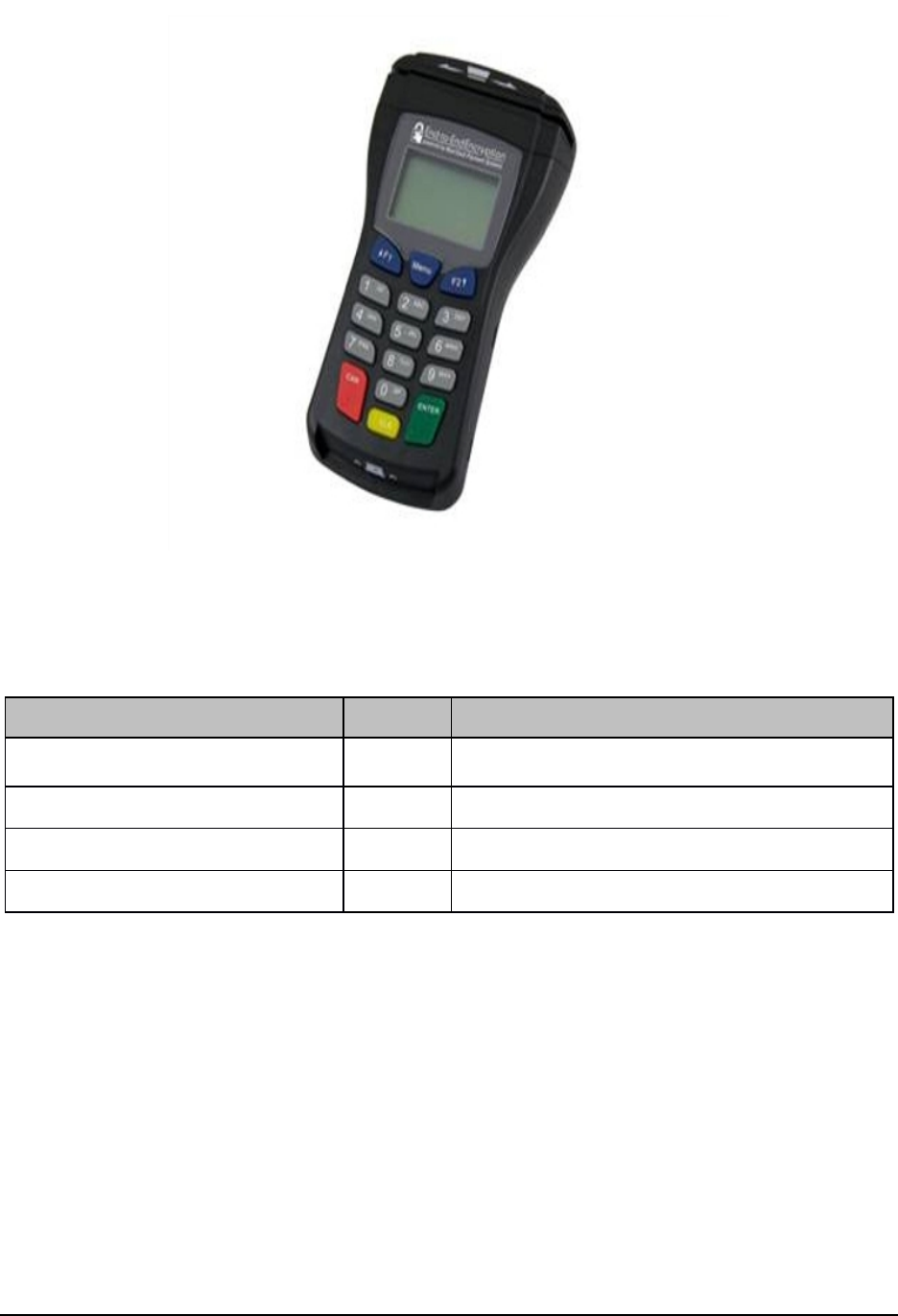
Figure 7.2: E3 PINPad
Table 7.2: E3 PIN Pad Codes
POS System Direction E3 PIN Pad
<STX>E1.3111219098025<ETX>[LRC] →“SWIPE CARD OR ENTER ACCOUNT #” is displayed
on LCD.
←<ACK>
<STX>E2.030<ETX>[LRC] →
←<ACK>
©2014 Heartland Payment Systems, Inc., All Rights Reserved -HPS Confidential:Sensitive 16
E3 User's Guide, V 2.0—August 12, 2014 7 E3 Hardware Devices

←If card is swiped...
<STX>E3.11%B401200000000001
6^VI TEST CREDIT^25120000000
0000000000000?|V2uvVFzWkBT
NzcX7vcrWTi4jV9AtG2bLYJkCO
i+OA2aY2OiRmw/0ZSQcH|++++
+++X8zr5YaCZ<FS>11;4012000
000000016= 251 20000000000
000000?|7QjTe2v1Qy1L84Q+n6
zudfNOXf|+++++++X8zr5YaCZ
<FS>00||<FS>/wECAQ
ECAoFGAgEH2ggJTHLeIBZwb3N
Ac2VjdXJlZXhjaGFuZ2
UubmV0aFLxu2XTNLs6jIk3Baktb
FZrdJ26dX85Bjkkng Qnmk+3tOhX
RVILvASHnfmao0yl5z7KNBx6Na
7ekL+hry GQ3oPOcOVkEzei8
3Clsc9QSfQJWB9ysAynGc6btccn
fr fjwyJn70KJ1cqQrw623ASSWm
57Hov2fMtWmPpYpQRr54
oAoXZYjUajd0sRXCOn5XeD5Bhp
E/Wzd4Ayn+3 42BGUL0N7hWKm
<ETX>[LRC]
or
If card number is manually entered...
<STX>E4.114012000000000016
<FS>+++++++X8zr5YCZ<FS>/wECA
QECAoFGAgEH2g
gJTHLeIBZwb3NA2VjdXJlZXhj
aGFuZ2UubmV0aFLxu2XTNLs6
jIk3Baktb FZrdJ26dX85Bjkkng
Qnmk+3tOhXRVILvASHnfma
o0yl5 z7KNBx6Na7ekL+hryGQ3
oPOcOVkEzei83Clsc9QSfQJW
B9ysAynGc6btccnfrfjwyJn70KJ
1cqQrw623ASSWm57H ov2fM
tWmPYpQRr54oAoXZYjUajd0
sRXCOn5XeD5BhpE /Wzd4Ayn
+342BGUL0N7hWKm<ETX>[LRC]
<ACK> →
7.2.1 E3 PIN Pad Device Interface
The POS system transmits and receives data to/from the E3 PIN Pad via its native serial COM port
interface. For the USB PIN pad, a virtual COM port driver is available for Windows. The RS232 PIN
pad has a standard 9-PIN serial connector.
All messages are framed using standard VISA protocols:
l<STX>Message<ETX>[LRC]
l<SI>Message<SO>[LRC]
©2014 Heartland Payment Systems, Inc., All Rights Reserved -HPS Confidential:Sensitive 17
E3 User's Guide, V 2.0—August 12, 2014 7 E3 Hardware Devices

7.2.1.1 E3 PIN Pad Requests
The following messages are sent to the PIN pad to request E3 encrypted card data via card swipe
and/or manual entry:
l<STX>E1.[entry_flag][disp_flag][mask_flag] [min len][max len]
[prompt1][prompt2]<FS> [prossing_prompt]<ETX>[LRC]
l<STX>E2.[timeout]<ETX>[LRC]
7.2.1.2 E3 PIN Pad Responses
The following messages are returned from the PIN pad with E3 encrypted card data via card swipe
or manual entry:
lCard Swipe:
<STX>E3.[trk1]<FS>[trk2]<FS>[trk3]<FS>[ktb]<ETX>[LRC]
lManual Entry:
<STX>E4.[result][luhn][obf]<FS>[enc]<FS>[ktb]<ETX>[LRC]
7.3 Ingenico iPP300 and iSC Touch Series PIN Pads
You must sign up for an account at the Ingenico Developer Portal and mention that you are working
with Heartland. Retail Base Application (RBA) Integration Kits, Software Development Kits (SDKs),
and integration documentation for these devices can be downloaded from their portal.
The E3 encryption settings are contained in a digitally signed SECURITY.PGZ files. Work with
Heartland to ensure that the appropriate file is loaded to your devices prior to certification testing or
production deployment.
©2014 Heartland Payment Systems, Inc., All Rights Reserved -HPS Confidential:Sensitive 18
E3 User's Guide, V 2.0—August 12, 2014 7 E3 Hardware Devices

7.4 Equinox L4000 and L5000 Series PIN Pads
You must sign up for an account at the Equinox Developer Portal and mention that you are working
with Heartland. Software Development Kits (SDKs) and integration documentation for these
devices can be downloaded from their portal.
The E3 encryption settings are contained in XML files which must be specified for all forms (screens)
from which card data is obtained, and the forms must be digitally signed. Equinox can provide a
development key to sign the forms for use on a development device, but for production devices the
forms will either need to be signed by Heartland, Equinox, or another entity that has the appropriate
signing tools. Work with Heartland to ensure that the appropriate forms have been signed and
loaded to your devices prior to certification testing or production deployment.
©2014 Heartland Payment Systems, Inc., All Rights Reserved -HPS Confidential:Sensitive 19
E3 User's Guide, V 2.0—August 12, 2014 7 E3 Hardware Devices
