ECC Integration Guide 1.2
User Manual:
Open the PDF directly: View PDF  .
.
Page Count: 16

ECC Integration Guide
1.2
User Manual
April 2016 In Mind Cloud

User Manual ECC Integration Guide
1.2
Contents
Page I
Contents
Inhaltsverzeichnis
1 ISS ECC Integration .................................................................................................................2
1.1 BAPI overview ........................................................................................................................... 2
1.1.1 BAPI patches ......................................................................................................................... 2
1.2 ECC RFC-User ............................................................................................................................ 4
o Create RFC-User with Logon-Data User type ‘System’ (Transaction SU01) ................................. 4
1.2.1 Create new single role e.g. ‘Z_ISS_RFC’ (Transaction PFCG) ................................................ 4
1.2.2 Change Authorization Data (without template) ................................................................... 4
1.2.3 Grant full authorization for each object or restrict to e.g. company code, sales doc type,
division… ........................................................................................................................................... 5
1.2.4 Generate and save single role .............................................................................................. 5
1.2.5 Edit RFC-User and add ‘Z_ISS_RFC’ to Roles (SU01) ............................................................. 5
1.3 ECC User for Sample Product Model ........................................................................................ 5
2 Product data sync ...................................................................................................................7
2.1 Included Data ........................................................................................................................... 7
2.2 Data selection ........................................................................................................................... 8
2.2.1 Product selection .................................................................................................................. 9
2.2.2 Characteristic selection ......................................................................................................10
2.2.3 Class selection ....................................................................................................................11
3 Pricing Procedure Determination .......................................................................................... 12
4 Reference Distribution Channel for Condition Lookup ........................................................... 13
5 SSC Integration..................................................................................................................... 14
5.1 BAPI overview .........................................................................................................................14
5.1.1 Make ECC Product Model Runtime Version available........................................................14

User Manual ECC Integration Guide 1.2
Page 2
1 ISS ECC Integration
1.1 BAPI overview
ECC integration uses several BAPIs from ECC system which need to be whitelisted in the SAP Hana
Cloud Connector (SCC).
Order creation
Product data sync SSC
Base data
Classification data
BAPI_CHARACT_GETDETAIL X
BAPI_CLASS_READ X
BAPI_INQUIRY_CREATEFROMDATA2 (X
1,2
)
BAPI_MATERIAL_AVAILABILITY
BAPI_MATERIAL_GETALL X
BAPI_MATERIAL_GET_PRODUCTHIER X
BAPI_QUOTATION_CREATEFROMDATA2
(X
1,2
)
BAPI_SALESORDER_CREATEFROMDAT2 (X
1,2
)
BAPI_TRANSACTION_COMMIT X
CLAF_CLASSIFICATION_OF_OBJECTS X
COM_CFG_READ_VARCOND_DESCR X
3
EXTRACT_DATA X
4,5
RFC_READ_TABLE X X
SELECT_COUNT X
6
1.1.1 BAPI patches
SAP made some changes within ECC which prevents successful usage of some required BAPIs from
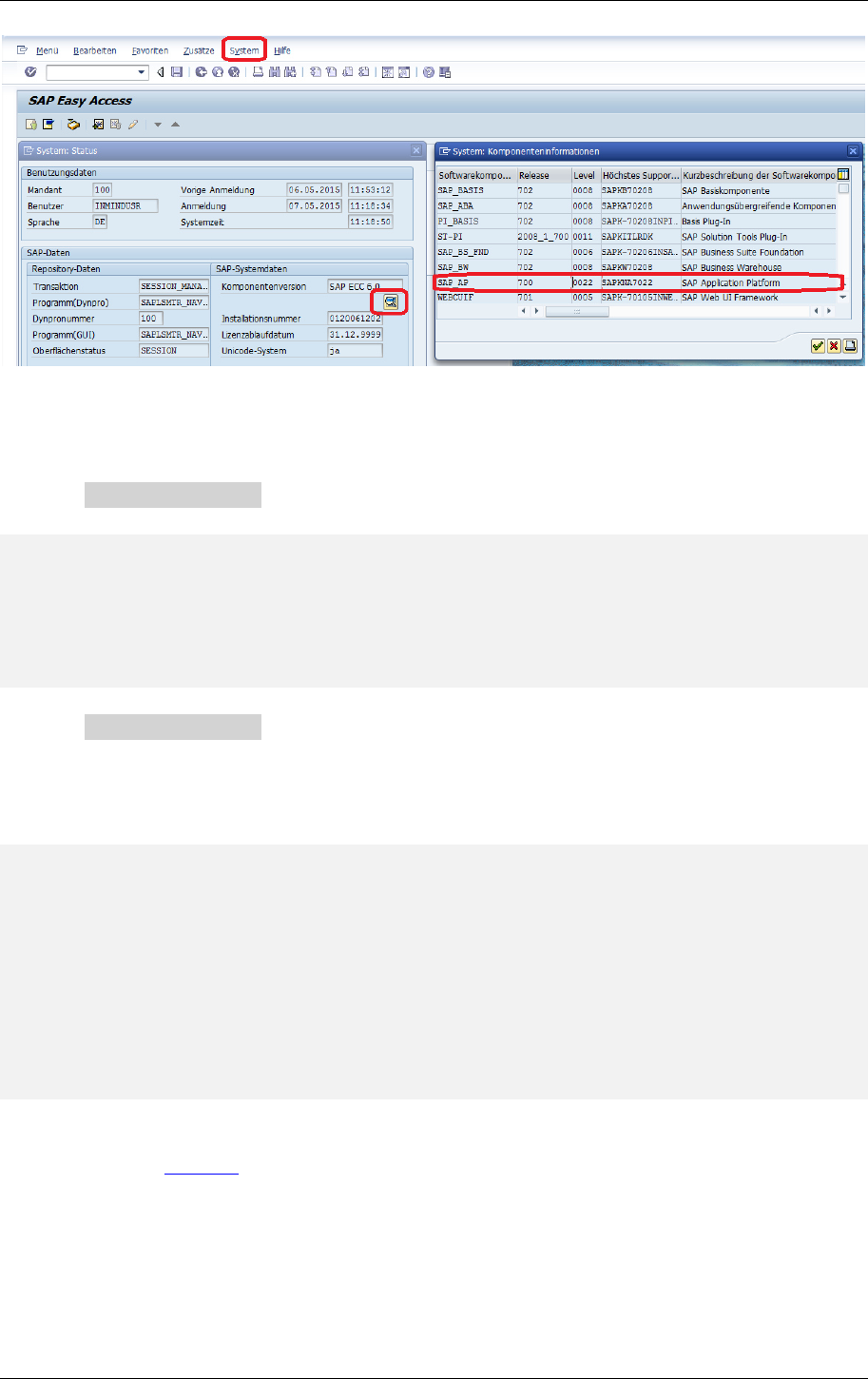
ISS. Most likely all ECC systems running SAP_AP releases >= 23 are affected. The SAP_AP release info
can be found in System -> Status -> Component information.
1
Depending on used document types
2
BAPI SD_SALES_DOCU_MAINTAIN needs to be patched in current SAP releases to enable transfer of manually
entered pricing conditions
3
See SAP Note 1778380
4
Depending on installed add-ons this could also be /SLCC/EXTRACT_DATA or /SLCE/EXTRACT_DATA
5
Doesn't work by default in SAP_AP releases >=23
6
Doesn't work by default if support package SAPKNA7032 is installed (sap note 1995783)
User Manual ECC Integration Guide 1.2
Page 3
If the SAP_AP release is >=23 the BAPI EXTRACT_DATA has to be patched:
Patch for SAP_AP 700 Level 26 (Lines 50 to 55)
IF sy-subrc <> 0.
*{ REPLACE DEVK900005 1
*\ RAISE internal_error. "do not proceed if caller is not from VMC
*RAISE internal_error. "do not proceed if caller is not from VMC
*} REPLACE
ENDIF.
Patch for SAP_AP 700 Level 29 (Lines 35 to 44)
SAP moved the VMC check into if_ex_extract_data-check_table_access so its easier to comment out
this invocation
* check whether the access onto this table is allowed or not
get badi lr_badi.
call badi lr_badi->check_table_access
exporting
iv_table_name = tabname
importing
ev_access_allowed = lv_allowed.
if lv_allowed = space.
raise table_not_found.
endif.
The same patch has to be applied to BAPI SELECT_COUNT if support package SAPKNA7032 is
installed (sap note 1995783).
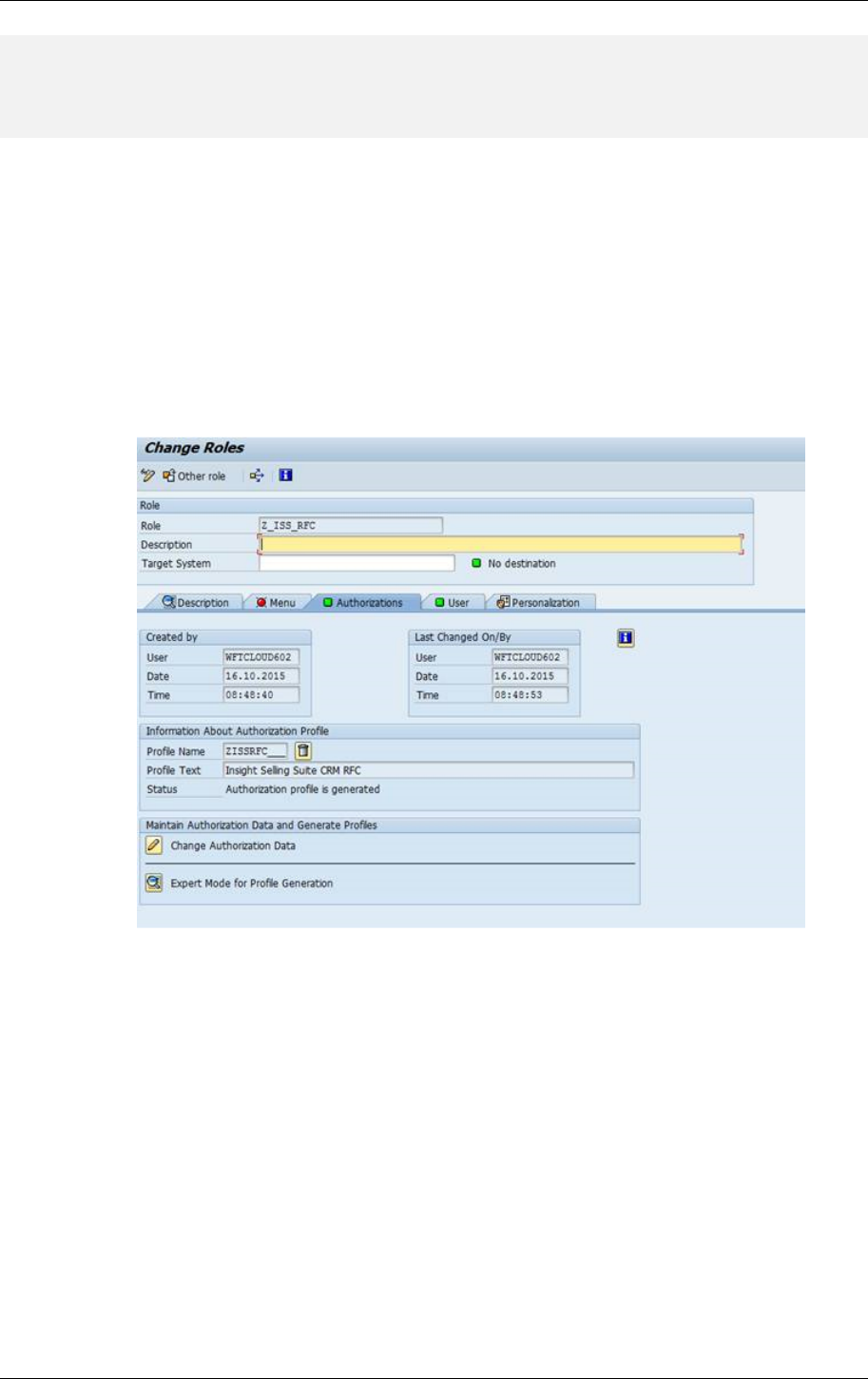
Attention - the BAPI SD_SALES_DOCU_MAINTAIN news to be patched in current SAP releases to
enable transfer of manually entered pricing conditions
Patch (region around line 1062)
User Manual ECC Integration Guide 1.2
Page 4
*{ REPLACE EC6K900372 1
*\ if ( pricingtype ca 'BCG' and call_from_crm = charx ) and
if ( pricingtype ca 'BCG' and call_bapi = charx ) and
*} REPLACE
1.2 ECC RFC-User
ECC integration is conducted via Remote Function Calls (RFC) that are run with a distinct ECC user,
who requires certain permissions.
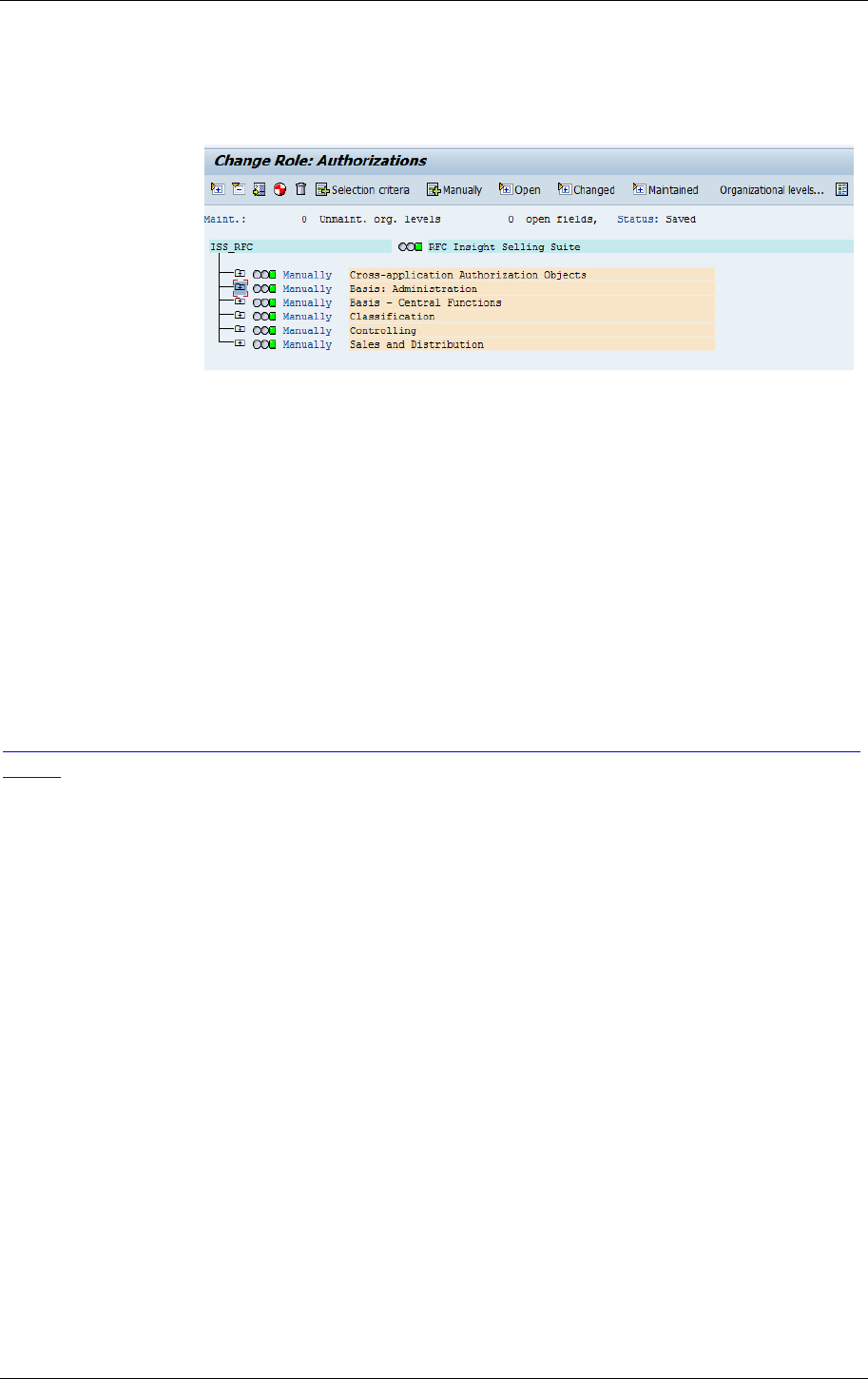
o Create RFC-User with Logon-Data User type ‘System’ (Transaction SU01)
1.2.1 Create new single role e.g. ‘Z_ISS_RFC’ (Transaction PFCG)
1.2.2 Change Authorization Data (without template)
Manually add Authorization Objects:
a) for SSC product configuration
• C_TCLA_BKA (configuration)
• C_TCLS_BER (configuration)
• C_TCLS_MNT (configuration)
• K_KEKO (variant prices)
• S_RFC (KB export)
• S_TABU_DIS (KB export)
b) for sales order/quote creation or simulation
• V_VBAK_AAT (sales doc)
• V_VBAK_VKO (sales doc)
c) for replication of ERP non-configurable material master
• M_MATE_STA (to pull material master, display C, K, V for STATM)
User Manual ECC Integration Guide 1.2
Page 5
• M_MATE_MAN (to pull material master, display)
• C_CABN (to pull classification data, display)
Select Edit – Insert authorizations – from profile: S_A.SCON
1.2.3 Grant full authorization for each object or restrict to e.g. company code, sales doc
type, division…
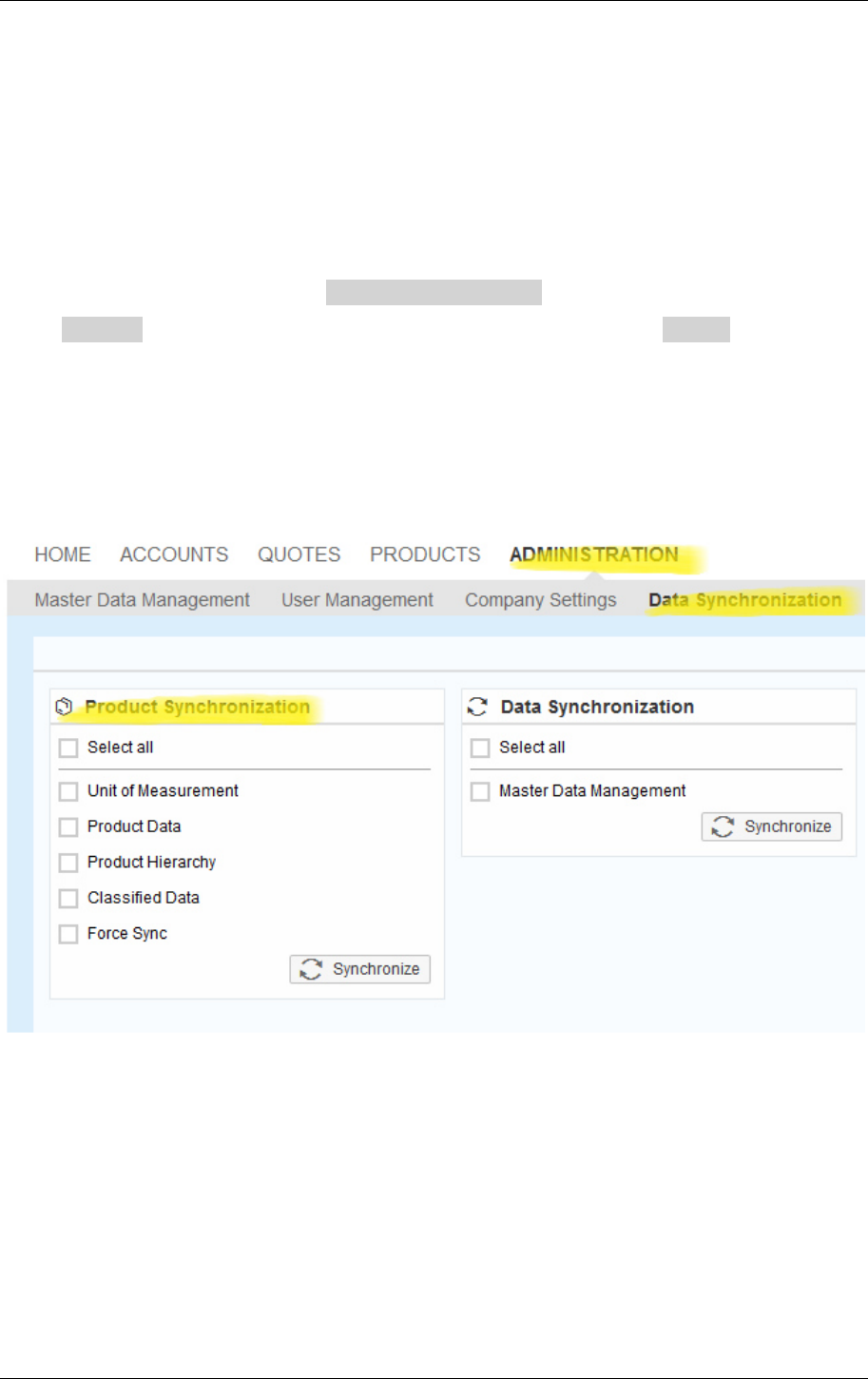
1.2.4 Generate and save single role
1.2.5 Edit RFC-User and add ‘Z_ISS_RFC’ to Roles (SU01)
For debugging of e.g. a specific BAPI call switch RFC user to ‘Dialog’-Mode and add role
SAP_BC_DWB_ABAPDEVELOPER to access SE37 with RFC user.
For changed authorizations than refer to SAP system trace to record authorization checks (ST01), cf.
http://help.sap.com/saphelp_nw73ehp1/helpdata/en/92/7ac87d293a47d8a17368c9f45661f4/conte
nt.htm.
1.3 ECC User for Sample Product Model
For sample product modelling and testing a ECC user is required with the following permissions:
Roles assigned to User:
SAP_LO_VC_MAINTAIN
SAP_LO_MD_BOM_MAINTAIN
SAP_CA_CL_MAINTAIN
Plus, usage of transactions:
MM01/MM02/MM03
VK11/VK12/VK13
VK30
VA01/VA02/VA03

User Manual ECC Integration Guide 1.2
Page 6
VA21/VA22/VA23
SE37 (to execute function module ECC_SCE_REQUEST)
User Manual ECC Integration Guide 1.2
Page 7
2 Product data sync
In release 1604 ISS introduced support for pulling product data from ECC. This includes units of
measurement, basic product data and optionally also product classification. The product and
classification data to pull can be filtered by maintaining database views in the ECC system. Once the
initial sync is performed only changed data will be synced. Changes are detected based on the last
change date in ECC. If this delta based approach does not work a full sync can be forced. All data is
imported into a separate namespace which is derived from the destination ECC_RFC_DESTINATION
and follows the pattern
http://<system>/<client>
where <system> is populated from jco.client.ashost or jco.client.mshost and <client> is populated
from jco.client.client. Note that no checks with respect to existing data are performed which might
lead to duplicated data for instance if units of measurement are predefined in ISS customizing or
imported from C4C. Data imported from ECC will nevertheless only reference other data within the
separate namespace. To avoid confusion units of measurement shouldn’t be maintained in base
customizing and should always be synchronized from ECC first. Afterwards the units of measurement
can also be pulled from C4C which won’t overwrite existing data and might add additional units of
measurement not maintained in ECC.
2.1 Included Data
Unit of measurement
Short text (imported as label) in all maintained languages
Product
Short text (imported as label) in all maintained languages
Base texts (imported as description) in all maintained languages
Unit of measurement
Product hierarchy (imported as product category)
Deletion flag (mapped to product status)

User Manual ECC Integration Guide 1.2
Page 8
Material number (mapped to objectERPId)
Last change date
Product Hierarchy
Short text (imported as label) in all maintained languages
Hierarchy id mapped to objectERPId
Class
Short text (imported as label) in all maintained languages
Long text (imported as description) in all maintained languages
Class name mapped to objectName
Last change date
Characteristic
Short text (imported as label) in all maintained languages
Characteristic name mapped to objectName
Last change date
Characteristic value
Short text (imported as label) in all maintained languages
Characteristic value mapped to objectName
Limitations
only hierarchy nodes referenced by products are fetched
only material classes (class type 001) are taken into account during product sync
no relationship between hiearchy nodes is maintained so hierarchy tree is not
available
no material sales texts are fetched
no material sales data is fetched
no long texts fetched for characteristic values
no units fetched for characteristics
no class hierarchy information is fetched
inherited characteristics are not taken into account during product sync
time and date characteristics are fetched as string values only
2.2 Data selection
ISS uses databases views in ECC to determine which data should be pulled. Currently products,
classes and characteristics can be filtered by this mechanism. If only product data should be fetched
maintaining the product view is sufficient otherwise all views have to be maintained. Note that the
database filters might return duplicated records since ECC does not support DISTINCT concept when
creating views. This is currently handled on ISS side where duplicates are eliminated. Database views
in ECC can be created using transaction SE11.
User Manual ECC Integration Guide 1.2
Page 9
2.2.1 Product selection
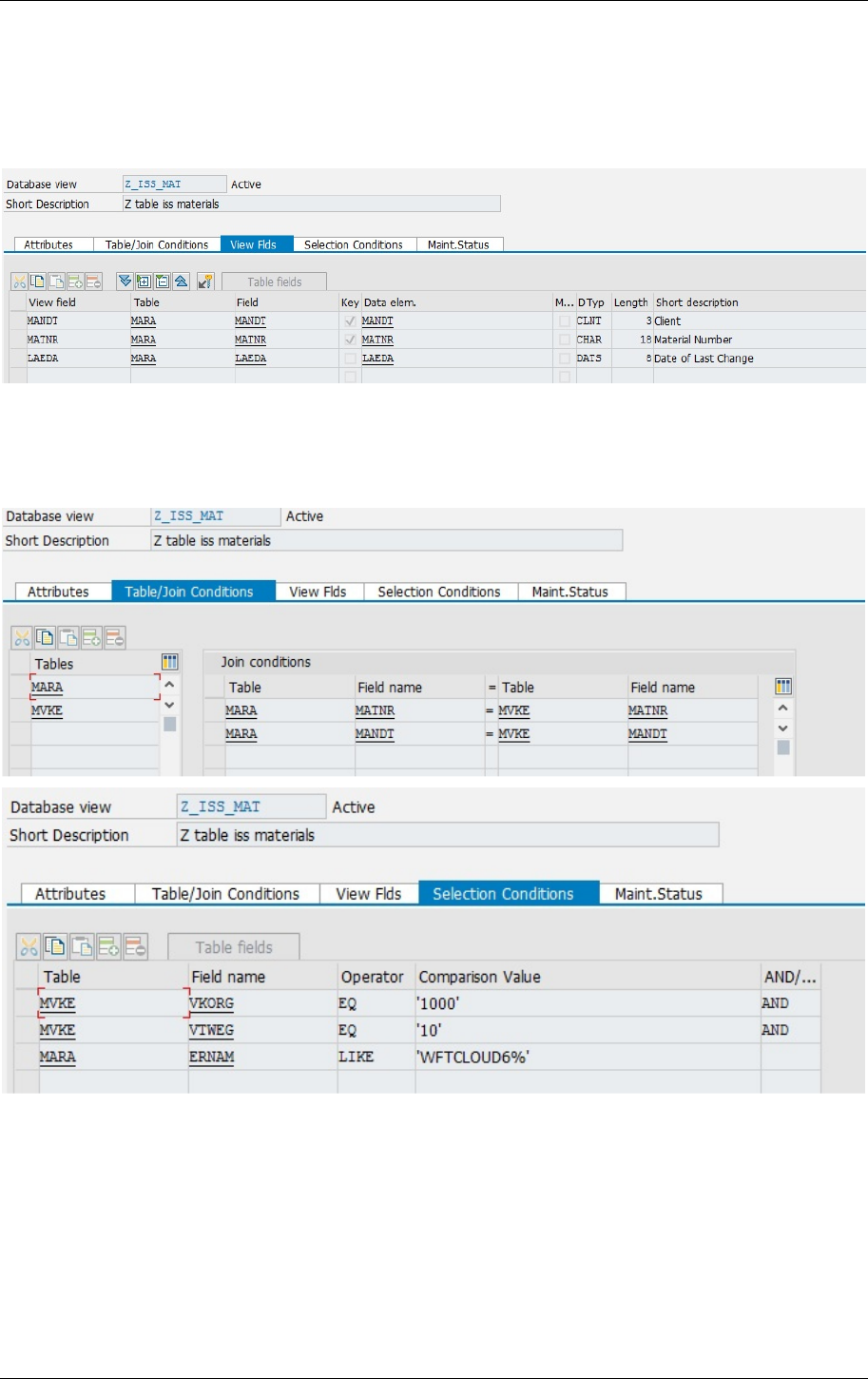
Using SE11 maintain a new database view called Z_ISS_MAT with columns MANDT, MATNR and
LAEDA based on table MARA. If the filtering needs access to other data also put the required tables
into the view definition.
Depending on the filter conditions the view might need to perform a join on different tables and a
set of selection conditions (screenshots below shows the setup for a filter which only returns
materials created by users beginning with the prefix WFTCLOUD6 which are to be sold in sales org
1000 and distribution channel 10).
User Manual ECC Integration Guide 1.2
Page 10
2.2.2 Characteristic selection
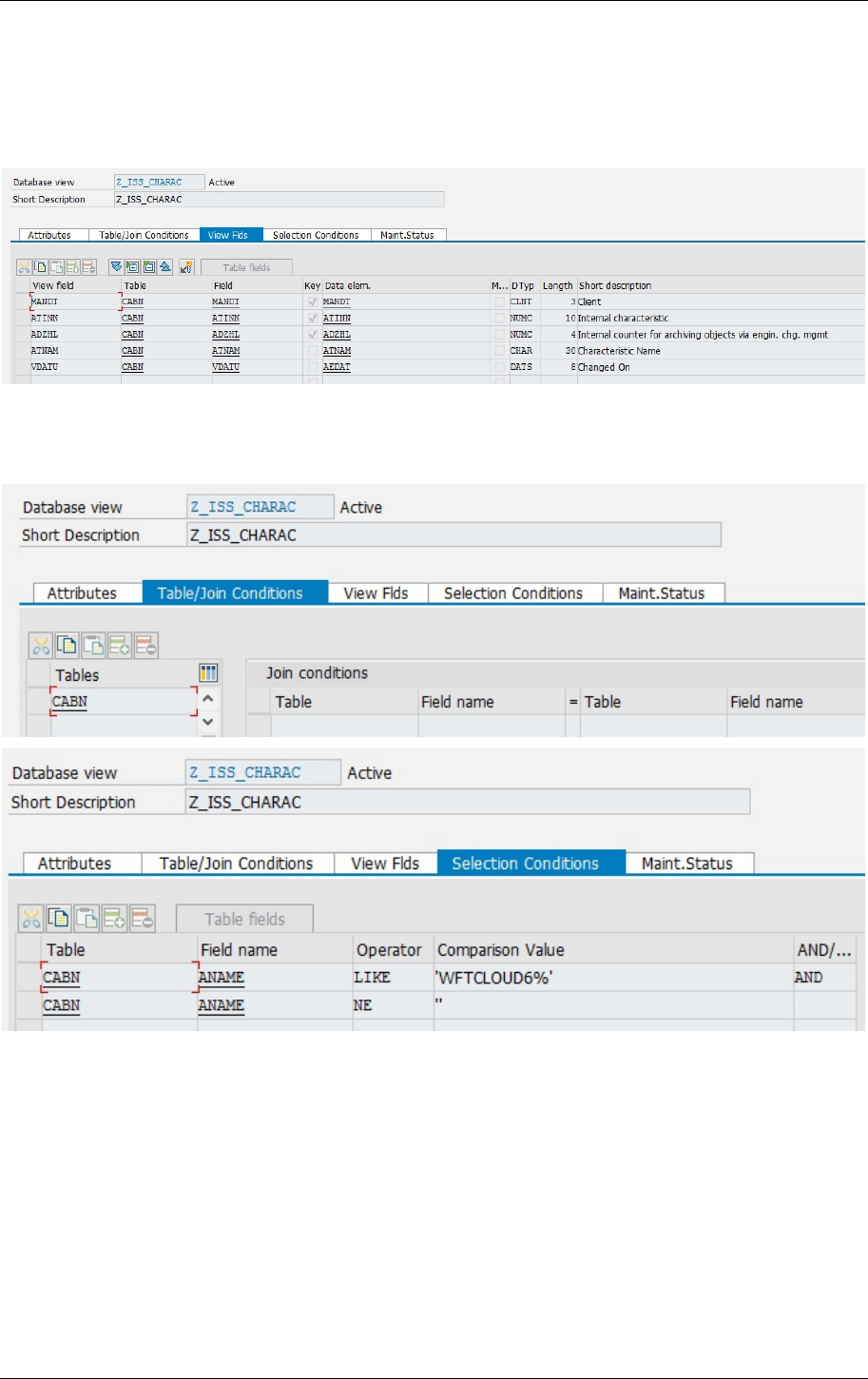
Using SE11 maintain a new database view called Z_ISS_CHARAC with columns MANDT, ATINN,
ADZHL, ATNAM and VDATU based on table CABN. If the filtering needs access to other data also put
the required tables into the view definition.
Depending on the filter conditions the view might need to perform a join on different tables and a
set of selection conditions (screenshots below shows the setup for a filter which only returns
characteristics created by users beginning with the prefix WFTCLOUD6).
User Manual ECC Integration Guide 1.2
Page 11
2.2.3 Class selection
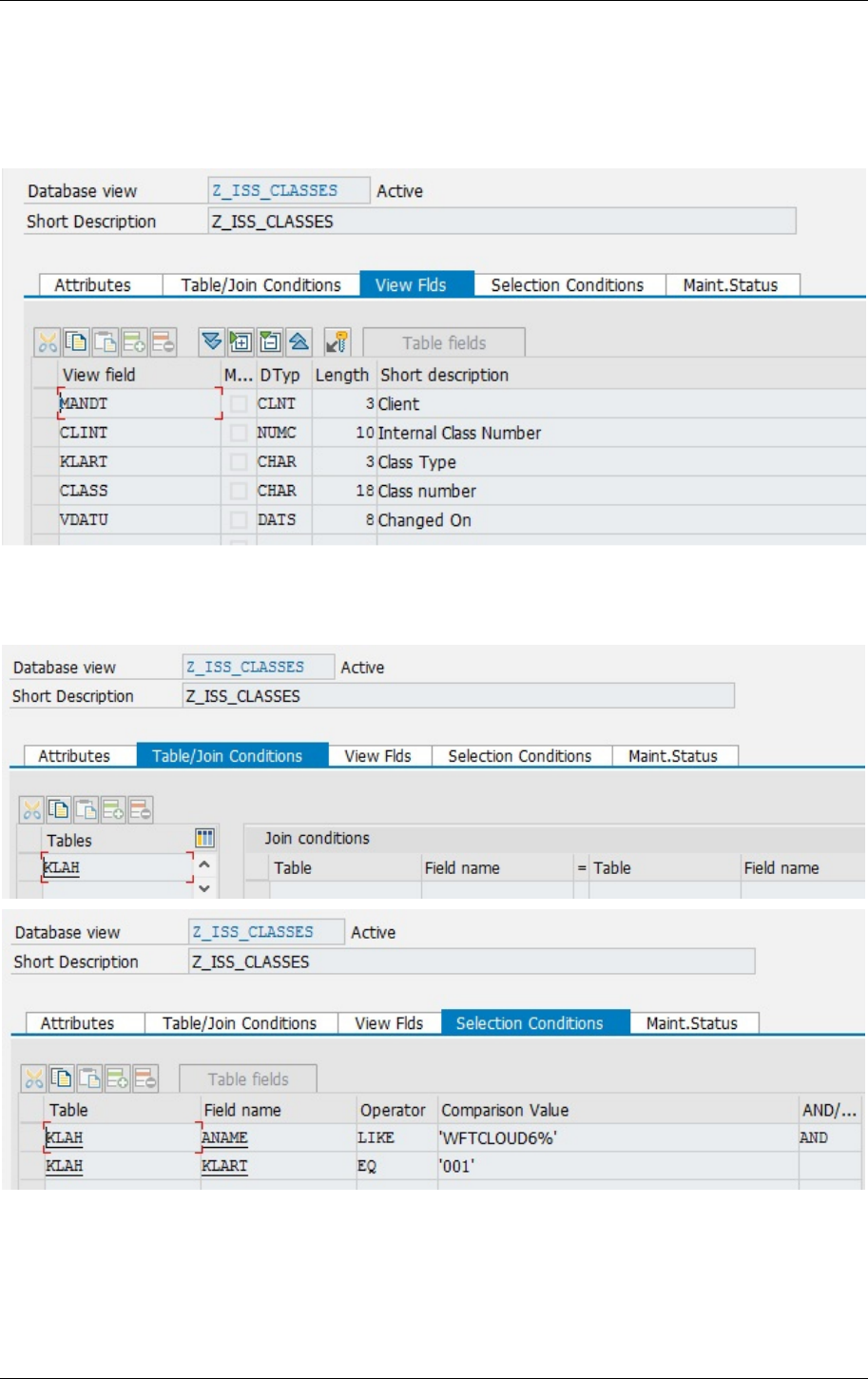
Using SE11 maintain a new database view called Z_ISS_CLASSES with columns MANDT, CLINT,
KLART, CLASS and VDATU based on table KLAH. If the filtering needs access to other data also put
the required tables into the view definition.
Depending on the filter conditions the view might need to perform a join on different tables and a
set of selection conditions (screenshots below shows the setup for a filter which only returns classes
created by users beginning with the prefix WFTCLOUD6 and with class type 001).
User Manual ECC Integration Guide 1.2
Page 12
3 Pricing Procedure Determination
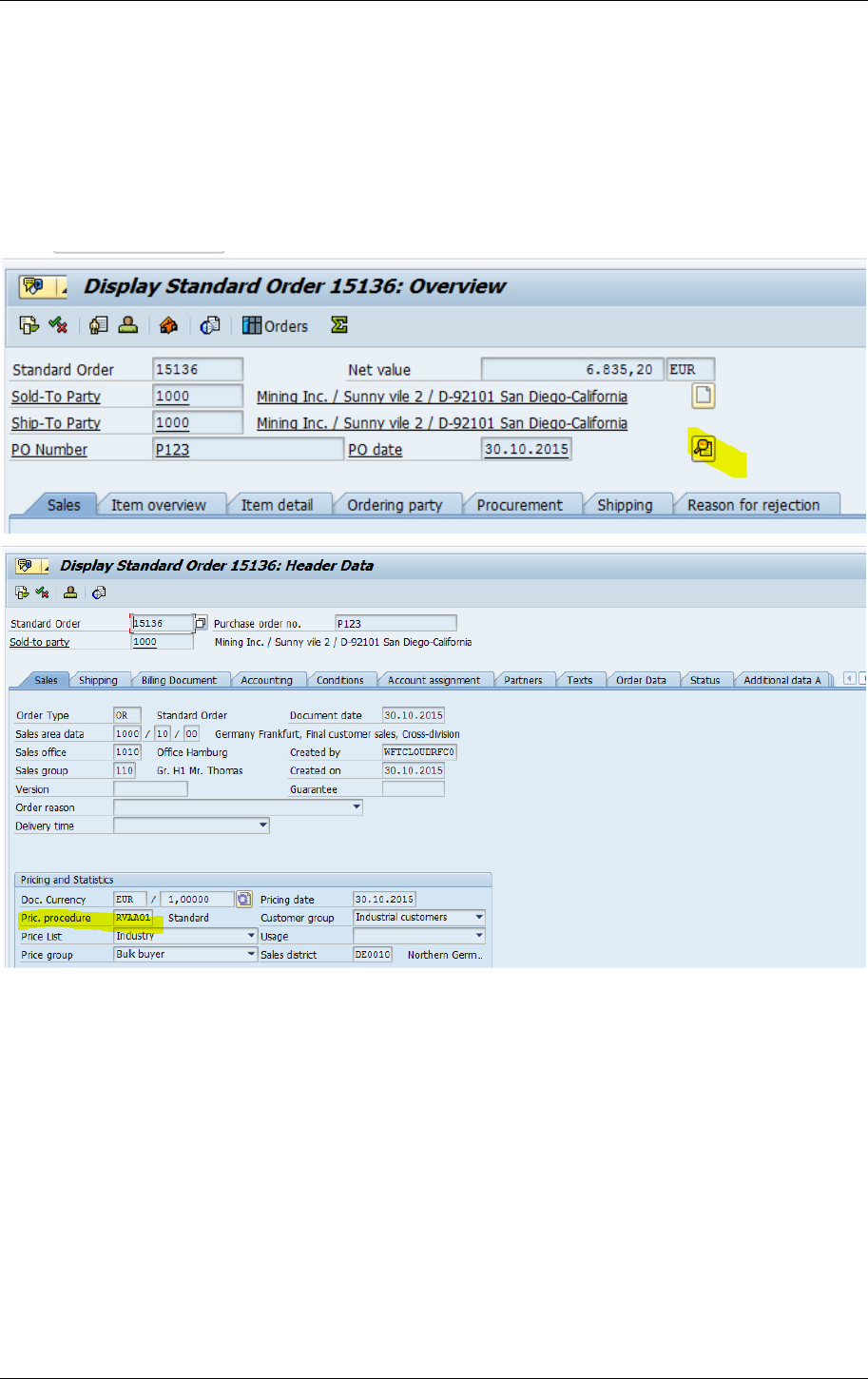
To determine which access sequence for pricing procedure is active in ECC double-check pricing
procedure for required combination of sales area data in sales document.
Create Sales Order (VA01) and select sales area data. Then display sales document header data and
find pricing procedure that is active in ECC.
Modify pricing procedure determination via ECC customizing V/07.
User Manual ECC Integration Guide 1.2
Page 13
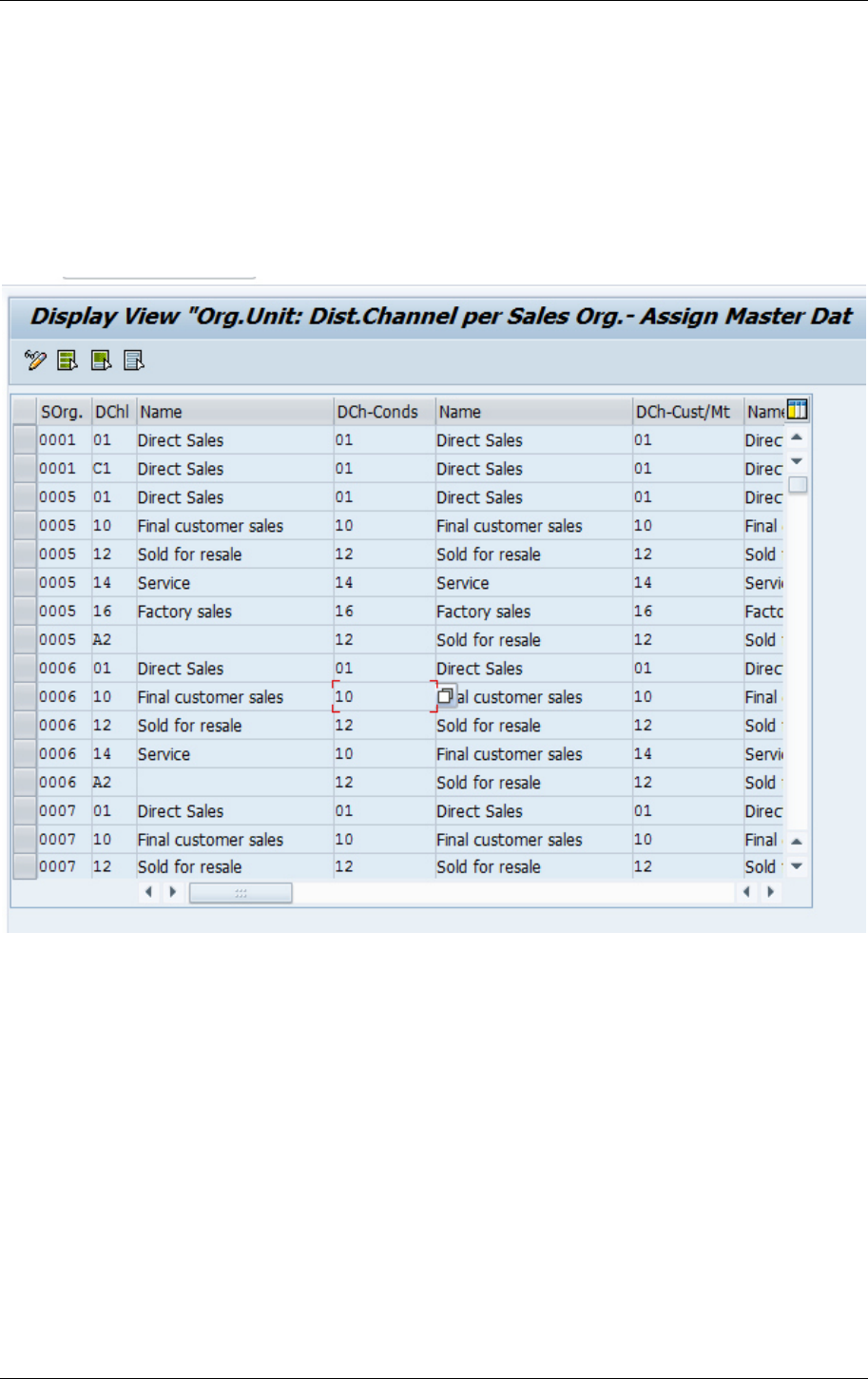
4 Reference Distribution Channel for Condition Lookup
Price condition lookup in ECC is done via keys ‘Sales Organization and ‘Distribution Channel’.
Maintained conditions can be expanded to multiple Distribution Channels by defining a reference
Distribution Channel.
Goto ‘Customizing (SPRO) – Sales and Distribution – Master Data – Define Common Distribution
Channels’ and maintain reference distribution channel for condition.
User Manual ECC Integration Guide 1.2
Page 14
5 SSC Integration
5.1 BAPI overview
ECC_SCE_EXTRACT copy all kbs found in SCEKB into COMM_CFGKB
ECC_SCE_REQUEST copy a specific kb from SCEKB into COMM_CFGKB
COM_CFG_DB_DELETE_KB
delete a specific kb from COMM_CFGKB
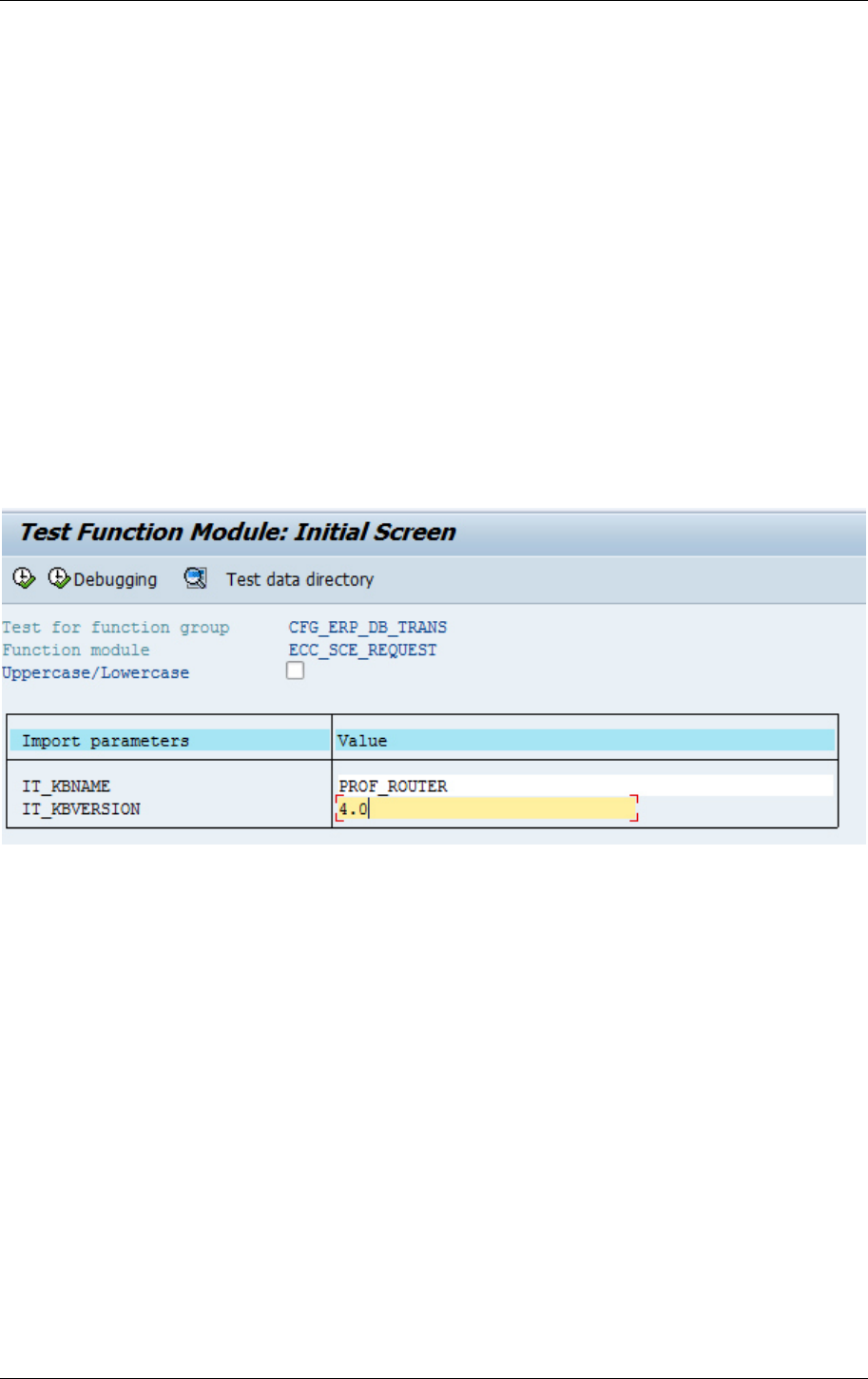
5.1.1 Make ECC Product Model Runtime Version available
Goto SE37 and open function module ECC_SCE_REQUEST. Enter knowledge base name and version
and execute.
