EDMA3 RM User Guide
EDMA3_RM_User_Guide
User Manual:
Open the PDF directly: View PDF  .
.
Page Count: 61

November 2014
Document Version 02.12.00.XX
EDMA3 Resource Manager
U s e r ' s G u i d e
User Guide

ii
IMPORTANT NOTICE
Texas Instruments Incorporated and its subsidiaries (TI) reserve the right to make corrections,
modifications, enhancements, improvements, and other changes to its products and services at any
time and to discontinue any product or service without notice. Customers should obtain the latest
relevant information before placing orders and should verify that such information is current and
complete.
TI assumes no liability for applications assistance or customer product design. Customers are
responsible for their products and applications using TI components. To minimize the risks
associated with customer products and applications, customers should provide adequate design and
operating safeguards.
TI does not warrant or represent that any license, either express or implied, is granted under any
TI patent right, copyright, mask work right, or other TI intellectual property right relating to any
combination, machine, or process in which TI products or services are used. Information published
by TI regarding third-party products or services does not constitute a license from TI to use such
products or services or a warranty or endorsement thereof. Use of such information may require a
license from a third party under the patents or other intellectual property of the third party, or a
license from TI under the patents or other intellectual property of TI
Mailing Address:
Texas Instruments
Post Office Box 655303, Dallas, Texas 75265
Copyright © 2009, Texas Instruments Incorporated
LICENSE
This work is licensed under the Creative Commons Attribution-Share Alike 3.0 United
States License. To view a copy of this license, visit
http://creativecommons.org/licenses/by-sa/3.0/us/ or send a letter to Creative Commons,
171 Second Street, Suite 300, San Francisco, California, 94105, USA.

iii
Preface
Read This First
About This Manual
This User’s Manual serves as a software programmer’s handbook
for working with the EDMA3 Resource Manager Version
02.12.xx.xx. This manual provides necessary information
regarding how to effectively install, build and use EDMA3
Resource Manager in user systems and applications.
This manual provides details regarding how the EDMA3
Resource Manager is Architected, its composition, its
functionality, the requirements it places on the hardware and
software environment where it can be deployed, how to
customize/ configure it to specific requirements, how to leverage
the supported run-time interfaces in user’s own application etc.,
This manual also provides supplementary information regarding
steps to be followed for proper installation/ un-installation of the
EDMA3 Resource Manager. Also included are appendix sections
on related Glossary, Web sites and Pointers for gathering further
information on the EDMA3 Resource Manager.

iv
Terms and Abbreviations
Term/Abbreviation Description
EDMA Enhanced Direct Memory Access
EDMA3 Controller Consists of the EDMA3 channel controller (EDMA3CC) and
EDMA3 transfer memory access controller(s) (EDMA3TC). Is
referred to as EDMA3 in this document.
DMA Direct Memory Access
QDMA Quick DMA
TCC Transfer Completion Code (basically Interrupt Channel)
ISR Interrupt Service Routine
CC Channel Controller
TC Transfer Controller
RM Resource Manager
TR Transfer Request.
A command for data movement that is issued from the
EDMA3CC to the EDMA3TC. A TR includes source and
destination addresses, counts, indexes, options, etc.

Read This First
v
Notations
Explain any special notations or typefaces used (such as for API
guides, special typefaces for functions, variables, etc.)
Information about Cautions and Warnings
This book may contain cautions and warnings.
The information in a caution or a warning is provided for your
protection. Please read each caution and warning carefully.
Related Documentation
Internal
EDMA3 Channel Controller (TPCC), version 3.0.2 (Available at
PDS)
EDMA3 Transfer Controller (TPTC), version 3.0.1 (Available at
PDS)
This is an example of a caution statement.
A caution statement describes a situation that could potentially
damage your software or equipment.
This is an
example of a warning statement.
A warning statement describes a situation that could potentially
cause harm to you.

vi
Trademarks
The TI logo design is a trademark of Texas Instruments
Incorporated. All other brand and product names may be
trademarks of their respective companies.

Read This First
vii
Revision History
Date Author Revision History Version
October 16,
2008
Anuj
Aggarwal
First release supporting platform DA830
on BIOS 6.
02.00.00.XX
June 3, 2009 Anuj
Aggarwal
Patch release for DA830 platform on
BIOS 6.
02.00.01.XX
December 7,
2009
Anuj
Aggarwal
a) Migration to new BSD license
b) Added support for TCI6498 platform.
See release notes for more details.
02.10.00.XX
April 9,2010 Imtiaz SMA Added support for the C6748 and
OMAPL138 platforms. See release notes
for more details.
02.10.01.XX
May 12, 2010 Vinay K
Nooji
Added support for the OMAPL138 ARM
platform. See release notes for more
details.
02.10.02.XX
Sep 6, 2010 Sundaram
Raju
Support for the TI816X Simulator &
platform, C6472 & TCI6486 platform
and TI814X platform have been added.
02.10.03.XX
Oct 12, 2010 Sundaram
Raju
Support for C66x(ELF) in Generic
library of Resource Manager and bug
fixes
02.10.04.XX
Feb 02, 2011 Sundaram
Raju
Support for Make based build for all the
libraries and sample applications
02.11.00.XX
Feb 15, 2011 Raghu
Nambiath
Sundaram
Raju
Additional support for C66x platforms
TCI6608/TCI6616/C6670/C6678
02.11.01.XX
Apr 8, 2011 Prasad
Konnur
Addition of TI816x-m3vpss and TI816x-
m3video platform to EDMA3LLD 02.11.02.XX
Nov 15, 2011 Prasad
Konnur
Addition of M3 support for TI814X and
A8 support for TI816X and bug fixes 02.11.03.XX
Jan 27, 2012 Murtaza
Gaadiwala
Addition of Appleton (TCI6614) support 02.11.04.XX
Mar 9, 2012 Prasad Addition of TI811X platform support 02.11.05.01

viii
Aug 10, 2012 Prasad
Konnur
Bug Fixes 02.11.06.01
May 13, 2013 Prasad
Konnur
Addition of TDA2XX support 02.11.07.03
May 17, 2013 Murtaza
Gaadiwala
Addition of TCI6638K2K support 02.11.07.04
July 12, 2013 Prasad
Konnur
TDA2XX return region number at
runtime based on core and Bug fix
02.11.08.XX
July 18, 2013 Murtaza
Gaadiwala
Addition of TCI6636K2H support 02.11.09.XX
Sept 23, 2013 Sivaraj R Addition of GCC Compiler build for A8
for Centaurus and bug fix
02.11.10.XX
Dec 20, 2013 Arvind S Ported EDMA lld to EVE core to access
EVE internal EDMA instance.
02.11.11.XX
Dec 24, 2013 Arvind S Bug fixes 02.11.11.XX
Jan 7, 2014 Arvind S Removed warnings and bug fix 02.11.11.XX
Feb 19, 2014 Ivan P Merged in user space support for
Keystone 2 devices
02.11.11.XX
May 30, 2014 Prasad
Konnur
Addition of tda3xx and dra72x platform
support.
02.11.12.XX
June 30, 2014 Prasad
Konnur
Bug Fixes 02.11.14.XX
August 25,
2014
Sunil
MS
Added tda3xx and dra72x which were
missing in package.xs file of RM.
02.11.14.XX
November 4,
2014
Sunil
MS
Misra C Compliance of edma3lld and
bug fixes.
02.12.00.XX

Contents
ix
Contents
Read This First ............................................................................................................ iii
About This Manual......................................................................................................... iii
Terms and Abbreviations ............................................................................................. iv
Notations v
Information about Cautions and Warnings ................................................................ v
Related Documentation ................................................................................................. v
Internal v
Trademarks vi
Revision History............................................................................................................ vii
Contents........................................................................................................................ ix
Tables............................................................................................................................. xi
EDMA3 Resource Manager Introduction..........................................................1-1
1.1 Overview...............................................................................................1-2
1.1.1 System Partitioning ....................................................................................... 1-2
1.1.2 Supported Services........................................................................................ 1-3
Installation Guide .................................................................................................1-2-1
2.1 Component Folder............................................................................1-2-2
2.2 Development Tools Environment(s) .............................................1-2-4
2.2.1 Development Tools .....................................................................................1-2-4
2.3 Installation Guide.............................................................................1-2-5
2.3.1 Installation and Usage Procedure............................................................1-2-5
2.3.2 Un-installation..............................................................................................1-2-5
2.4 Integration Guide.............................................................................1-2-6
2.4.1 Building EDMA3 Libraries...........................................................................1-2-6
2.4.2 Build Options ................................................................................................1-2-8
Run-Time Interfaces/Integration Guide .........................................................2-1
3.1 Symbolic Constants and Enumerated Data types .........................2-2
3.2 Data Structures .................................................................................2-12
3.2.1 RM Global Error Callback ............................................................................ 2-12
3.2.2 EDMA3_RM_GblErrCallbackParams .......................................................... 2-12
3.2.3 EDMA3_RM_GblConfigParams ................................................................... 2-12
3.2.4 EDMA3_RM_InstanceInitConfig................................................................. 2-14
3.2.5 EDMA3_RM_Param ...................................................................................... 2-17
3.2.6 EDMA3_RM_MiscParam............................................................................... 2-17
3.2.7 EDMA3_RM_GblXbarToChanConfigParams............................................. 2-17
3.2.8 EDMA3_RM_ResDesc................................................................................... 2-18
3.3 API Specification ...............................................................................2-21
3.4 API Usage Example...........................................................................2-22
EDMA3 Resource Manager Porting ..................................................................3-31
4.1 Getting Started..................................................................................3-32
4.2 Step-by-Step procedure for porting ..............................................3-34

x
4.2.1 edma3_<PLATFORM_NAME>_cfg.c:........................................................3-34
4.2.2 Make file for the Resource Manager.........................................................3-35

Tables
xi
Tables
Table 1: Development Tools/components...................................................1-2-4
Table 2: Build Options.........................................................................................1-2-8
Table 3: Symbolic Constants and Enumerated Data types Table for
common header file edma3_common.h...................................................2-2
Table 4: Symbolic Constants and Enumerated Data types Table for
EDMA3 Resource Manager Header file edma3_rm.h...........................2-4

1-1
Chapter 1
EDMA3 Resource Manager
Introduction
This chapter introduces the EDMA3 Resource Manager to the
user by providing a brief overview of the purpose and
construction of the EDMA3 Resource Manager along with
hardware and software environment specifics in the context of
EDMA3 Resource Manager Deployment.

1-2
1.1 Overview
This section describes the functional scope of the EDMA3
Resource Manager and its feature set.
A brief definition of the component is provided at this point – its
main characteristics and purpose.
1.1.1 System Partitioning
EDMA3 peripheral supports data transfers between two memory
mapped devices. It supports EDMA as well as QDMA channels for
data transfer. This peripheral IP is being re-used in different SoCs
with only a few configuration changes like number of DMA and
QDMA channels supported, number of PARAM sets available etc.
The EDMA3 peripheral is used by other peripherals for their DMA
needs thus the EDMA3 driver needs to cater to the requirements
of device drivers of these peripherals as well as other application
software that may need to use the 3rd party DMA services.
The EDMA3 Resource Manager comprises of the following two
parts:
Physical Resource Manager: This component is responsible
for the management of several resources within the EDMA3
peripheral like TCC codes, PARAM entry, DMA and QDMA
channels, all global EDMA3 registers, queues etc.
Interrupt Manager: This component handles EDMA3
interrupts, which are registered with the underlying OS
interrupt handling mechanism by the user. Since interrupts
are associated with TCC codes in EDMA3 module, this module
provides the functionality of accepting application registration
callbacks for TCC codes and calls the callback functions upon
receipt of the given interrupt (TCC). Note that the
application/driver using the EDMA3 Resource Manager has to
register/unregister the Interrupt Handlers with the underlying
operating system. The Resource Manager does not do this by
itself.

EDMA3 Resource Manager Introduction
I-1-3
1.1.2 Supported Services
Following are the services provided by the Physical Resource
Manager:
1.1.2.1 Allocation/de-allocation of EDMA3 resources: It provides interfaces that
allow applications to allocate and free EDMA3 resources:
EDMA channels
QDMA channels
PARAM Entries
TCC

1-4
These resources shall be provided to the instance of the resource manager at
run time.
1.1.2.2 Global EDMA3 settings configuration: It provides an interface that can be
used by applications to configure global EDMA3 settings. For e.g. number of
resources (DMA/QDMA channels, TCCs, PaRAM sets) available, number of
Transfer controllers, queue priorities etc.
1.1.2.3 Binding of specific EDMA3 resources: It provides an interface that can be
used by applications to bind specific EDMA3 resources like EDMA or QDMA
channel with PaRAM Set entries.
1.1.2.4 Multiple RM Instances Support: It supports multiple instances of the
Resource Manager, running on the same processor, but managing
same/different sets of resources and tied to same/different shadow regions.
1.1.2.5 Read/Write a specific CC register: It provides APIs to read as well as write
on a specific Channel Controller Register.
1.1.2.6 Non-RTSC Environment Support: Resource Manager module should gets
built in non-RTSC environment also. All the CCS PJT files should come for non-
RTSC environment too.
1.1.2.7 IOCTL interface support: EDMA3 Resource Manager shall provide an IOCTL
interface for toggling the option whether PaRAM Sets should be cleared during
allocation or not. This interface could also be extended in future for other misc
requirements.
1.1.2.8 Provides Poll mode support: It also provides APIs which could be used by
users, working in Poll Mode. These users don’t rely upon the trasnfer
completion interrupts generated by the Channel controller, and instead, Poll
the IPR/IPRH register for the transfer completion interrupt bit.
1.1.2.9 Big Endian platforms support: EDMA3 Resource Manager can also be used
for big endian platforms.
Following are the services provided by the Interrupt Manager:

EDMA3 Resource Manager Introduction
I-1-5
1.1.2.10 Error Interrupts Handling: It also handles error interrupts and
depending upon the nature of error, either calls a global application callback
or TCC callback with the appropriate error status. It provides APIs to
register/unregister these error interrupt handlers.
1.1.2.11 Registration and Un-registration of TCC callbacks: It provides
an interface that can be called by applications to register/un-register for TCC
callbacks. It handles EDMA3 interrupts and calls the respective TCC callback
function with appropriate status.
1.1.2.12 Map Cross bar events to the DMA channels: It provides and
interface than can be used to map the cross bar mapped events to the specific
DMA channel.

2-1
Chapter 2
Installation Guide
This chapter discusses the EDMA3 Resource Manager
installation, how and what software and hardware components to
be availed in order to complete a successful installation of
EDMA3 Resource Manager.
2-2
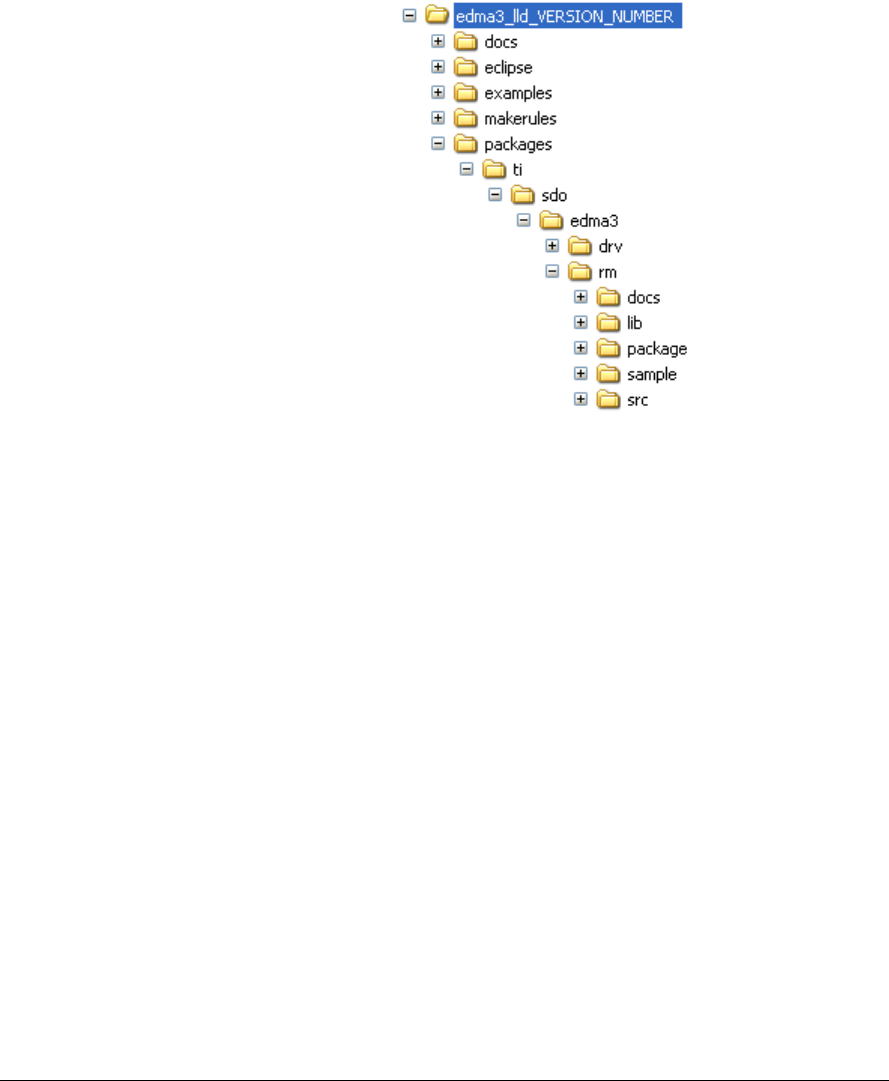
2.1 Component Folder
Upon installing the EDMA3 Resource Manager, the following
directory structure is found in the main directory.
Figure 1: EDMA3 Resource Manager Directory Structure
The sections below describe the folder contents:
edma3_lld_<<version_number>>
Top level installation directory. Contains the source code,
examples and the documents.
docs
Contains release notes for EDMA3 Driver and Resource
Manager.
eclipse
Contains eclipse related files for CCSv4.
examples
Contains the stand-alone applications for EDMA3 Driver
(for all the supported platforms) and the DAT example.

Installation Guide
I-2-3
makerules
Contains the common makerules required to build the
libraries and the sample applications.
packages
All components (Driver, Resource Manager, sample OS-abstraction
layers etc) fall under packages/ti/sdo/edma3 directory, under their
individual directories. For e.g., EDMA3 Resource Manager lies under
packages/ti/sdo/edma3/rm folder, sample initialization library for EDMA3
Resource Manager lies under packages/ti/sdo/edma3/rm/sample folder
etc.
a) rm -> Top level folder for the Resource Manager
b) rm\docs -> User guide, datasheet etc.
c) rm\lib -> Resource Manager libraries for all the supported
platforms.
d) rm\package -> XDC related meta files for the module RM
e) rm\sample -> Sample code for how to use the Resource
Manager, along-with the pre-built libraries for the same.
f) rm\src -> Source files for Resource Manager.
Just to clarify, the sample folder inside the edma3/rm folder DOESN’T
contain the sample applications. It provides the:
a) Sample initialization code to properly configure the EDMA3 hardware,
and,
b) Sample OS abstraction layer to provide the OS-specific hooks to the
EDMA3 package.
This sample code is provided for reference purpose only. To start with,
the user is advised to use the sample code/library as it is, and later
modify/create his/her own initialization code, as per the requirements.
The stand-alone applications are provided in the top level examples
folder as mentioned above. Please note that these examples use the
above mentioned sample initialization/OS abstraction libraries and the
EDMA3 Driver libraries.
2-4
2.2 Development Tools Environment(s)
This section describes the development tools environment(s) for
software development with EDMA3 Resource Manager. It
describes the tools used and their setup, for each supported
environment.
2.2.1 Development Tools
Describe here the tools that need to be installed, the installation
order and specific configuration. Including: 3rd party
components/ libraries, Operating system and auxiliary Tools.
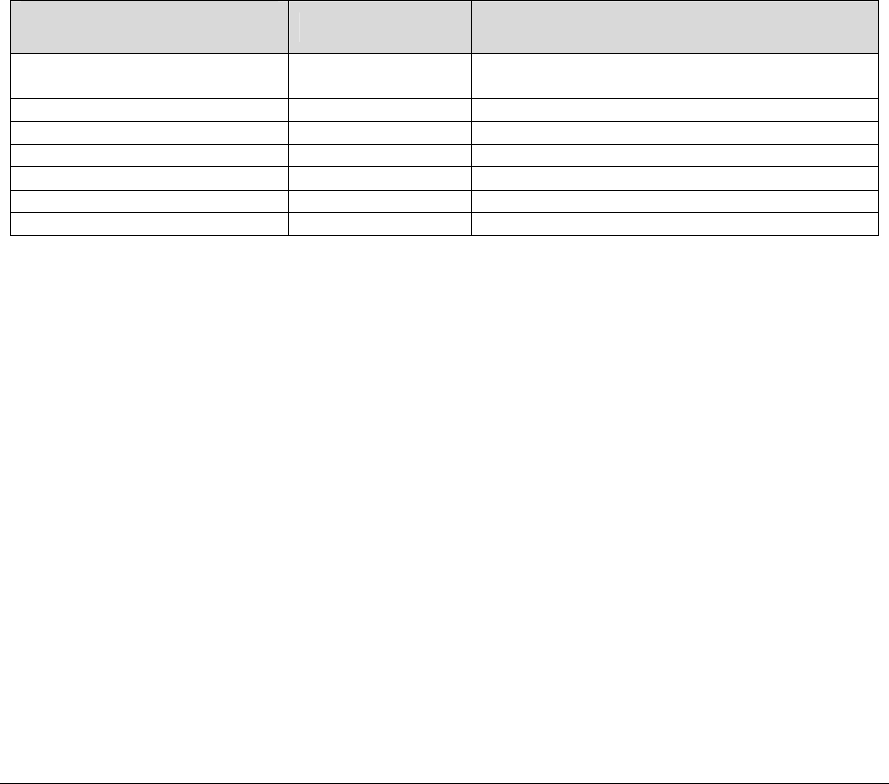
Table 1: Development Tools/components
Development tool/
component Version Comments
Code Composer Studio
(CCS)
5.5.0 IDE
C6x Code Gen Tools 7.4.4 Code generation utilities
TMS470 Code Gen Tools 5.1.5 Code generation utilities
ARP32 Code Gen Tools 1.0.2 Code generation utilities
DSP BIOS 6.40.03.39 Operating System
XDC tool chain 3.30.04.52 XDC tools
TCI6608/TCI6616 Simulator 1.0.0 Simulator

Installation Guide
I-2-5
2.3 Installation Guide
This section describes the EDMA3 LLD installation and un-installation.
2.3.1 Installation and Usage Procedure
1) Install the products mentioned in the development tools requirements section,
as per instructions provided along with the products.
2) Install the EDMA3 package by untarring the tar.gz file into preferred
drive/folder.
3) After untarring, create an environment variable
“EDMA3LLD_BIOS6_INSTALLDIR” with its value as the current EDMA3
installation directory. This environment variable can be used by other users of
EDMA3 package for e.g. BIOS PSP drivers package.
2.3.2 Un-installation
1) Uninstall the EDMA3 package by simply deleting the install directory.
2) Un-install the products mentioned in the development tools requirements
section as per the instructions provided with the product.

2-6
2.4 Integration Guide
This section describes the EDMA3 LLD package usage. The package provides
pre-built libraries for all the different components: Resource Manager along
with their sample initialization libraries etc. Moreover, demo applications are
also provided to check the basic functionality for the supported components.
2.4.1 Building EDMA3 Libraries
The EDMA3 package contains pre-built libraries for all EDMA3 components. But
user can also build them by following the below mentioned steps in case of source
code modification or some other specific use cases described below.
1) Install the products mentioned in the development tools requirements section
(section 2.2), as per instructions provided along with the products.
2) Change the variables in the makerules\env.mk as follows
a. INTERNAL_SW_ROOT: to the path where EDMA3LLD is installed
b. EXTERNAL_SW_ROOT: to the path of the top level directory where all the tools
mentioned in section 2.2 are installed. It is required that all the tools are located
within a single top level directory as all tools are accessed using relative paths
from this variable. Else each variable used for the location of each tool has to be
updated with its absolute path in makerules\env.mk
c. UTILS_INSTALL_DIR: to the path where any utility that has the make binary is
installed. It can be Cygwin/any utility that has the make compiled for win32 or it
can be xdc tools itself as it has make binary as gmake inside it. All illustrations
provided here after are for the gmake binary in xdc tools. One can simply use any
other utility also by pointing this variable to the install directory of that utility.
d. Always be sure not to have any spaces in the values populated for these
variables. If the file/folder name has spaces in between, then use the non-8dot3
file names.
3) Set the variables PATH and ROOTDIR in command prompt to the location where
make binary is available and EDMA3LLD is installed respectively, like
Z:\edma3_lld_<<version_number>>\packages> set PATH=C:/PROGRA~1/TEXASI~1/xdctools_x_xx_xx_xx
Z:\edma3_lld_<<version_number>>\packages> set ROOTDIR=C:/PROGRA~1/TEXASI~1/edma3_lld_02_11_xx_xx
4) Build the required libraries using the gmake command at the command prompt:
Example:
Z:\edma3_lld_<<version_number>>\packages> gmake libs FORMAT=ELF
Z:\edma3_lld_<<version_number>>\packages> gmake libs FORMAT=COFF
This command builds both the DRV and Resource Manager Libraries for all the
platforms mentioned in the top level make file.

Installation Guide
I-2-7
5) In case of C66x based devices including
TCI6608/TCI6616/C6670/C6678/TCI6614/C6657/TCI6638K2K following make
command could be used to build. This will limit building binaries only for C66x
target
gmake -f makefile_c66x libs FORMAT=ELF
6) All EDMA3 public APIs provide a mechanism to disable input parameter
checking. This is intended to reduce the number of CPU cycles spent in the
parameter checking and hence provide more efficient libraries. To do that, user
has to modify the “make” file, found in the component base folder itself, and
re-build the libraries. By default, the parameter checking is enabled for all the
public APIs.
For e.g., following code snippet in the edma3\rm\make file is used to create the
EDMA3 Resource Manager libraries:
CFLAGS_LOCAL_COMMON = -mi10
By default, parameter checking is enabled in both Debug and Release modes
for all the public APIs. If user wants to disable the same in Release mode (for
example), he has to modify the above code as:
CFLAGS_LOCAL_COMMON = -mi10 -DEDMA3_RM_PARAM_CHECK_DISABLE
The Release mode library generated now will have input parameter check
disabled for all the public APIs. User is advised to use this configuration option
with caution.
7) All EDMA3 private functions use the standard C assert mechanism to
enable/disable input parameter checking. This is intended to reduce the number
of CPU cycles spent in the parameter checking and hence provide more efficient
libraries. To do that, user has to modify the “make” file, found in the
component base folder itself, and re-build the libraries. By default, the
parameter checking is enabled for all the private functions.
For e.g., following code snippet in the edma3\drv\make file is used to create
the EDMA3 Driver libraries:
CFLAGS_LOCAL_COMMON = -mi10
By default, parameter checking is enabled in both Debug and Release modes
for all the private functions. If user wants to disable the same in Release mode
(for example), he has to modify the above code as:
CFLAGS_LOCAL_COMMON = -mi10 -DNDEBUG
The Release mode library generated now will have input parameter check
disabled for all the private functions. User is advised to use this configuration
option with caution.

2-8
2.4.2 Build Options
This section enumerates and describes alongside each of the allowed build options.
It also tells the default configurations available.
Build option Reference Default Configuration Description
EDMA3_INSTRUMENTATIO
N_ENABLED
Instrumentation disabled To enable/disable Real
Time Instrumentation
support.
EDMA3_RM_PARAM_CHEC
K_DISABLE
Parameter checking enabled
(public APIs)
Disable parameter
checking for public APIs, if
required. See note 1
below.
NDEBUG Parameter checking enabled
(private functions)
Disable parameter
checking for private
functions, if required. See
note 2 below.
_BIG_ENDIAN NA Used while building
libraries for Big Endian
platforms.
Table 2: Build Options
Note 1: All EDMA3 public APIs provide a mechanism to disable input parameter
checking. This is intended to reduce the number of CPU cycles spent in the parameter
checking and hence provide more efficient libraries. To do that, user has to modify the
build environment (for e.g. the make file), and re-build the libraries. By default, the
parameter checking is enabled for all the public APIs.
Note 2: All EDMA3 private functions use the standard C assert mechanism to
enable/disable input parameter checking. This is intended to reduce the number of
CPU cycles spent in the parameter checking and hence provide more efficient libraries.
To do that, user has to modify the build environment (for e.g. the make file), and re-
build the libraries. By default, the parameter checking is enabled for all the private
functions.

1
Chapter 3
Run-Time
Interfaces/Integration Guide
This chapter discusses the EDMA3 Resource Manager run-time
interfaces that comprise the API specification & usage scenarios,
in association with its data types and structure definitions.
2
3.1 Symbolic Constants and Enumerated Data types
This section summarizes all the symbolic constants specified as
either #define macros and/or enumerated C data types.
Described alongside the macro or enumeration is the semantics
or interpretation of the same in terms of what value it stands for
and what it means.
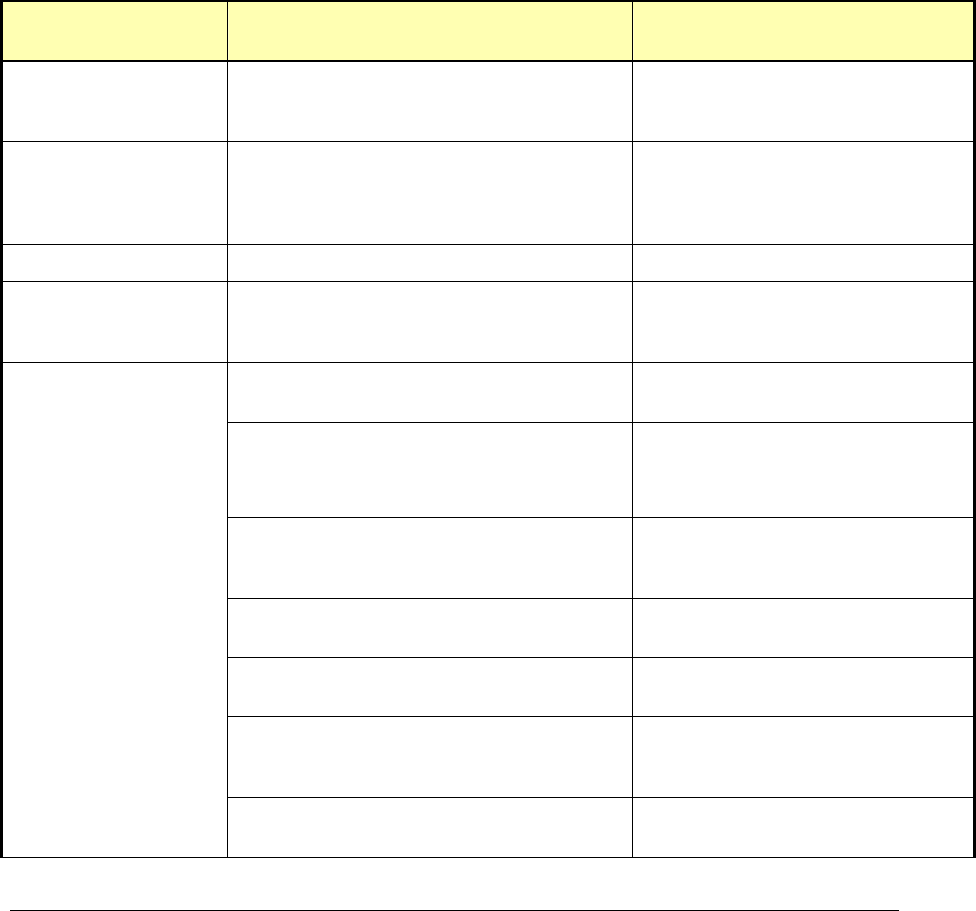
Table 3: Symbolic Constants and Enumerated Data types Table for common
header file edma3_common.h
Group or
Enumeration Class
Symbolic Constant Name Description or Evaluation
RM Global Defines EDMA3_RM_DEBUG This define is used to
enable/disable EDMA3 Driver
debug messages
EDMA3_RM_PRINTF If EDMA3_RM_DEBUG is defined,
EDMA3_RM_PRINTF will be used to
print the debug messages on the
user specified output.
EDMA3_RM_SOK EDMA3 Driver Result OK
EDMA3_OSSEM_NO_TIMEOUT This define is used to specify a
blocking call without timeout while
requesting a semaphore.
EDMA3_MAX_
EDMA3_INSTANCES
Maximum EDMA3 Controllers on
the SoC
EDMA3_MAX_DMA_CH Maximum DMA channels supported
by the EDMA3 Controller
EDMA3_MAX_QDMA_CH Maximum QDMA channels
supported by the EDMA3
Controller
EDMA3_MAX_PARAM_SETS Maximum PaRAM Sets supported
by the EDMA3 Controller
EDMA3_MAX_LOGICAL_CH Maximum Logical channels
supported by the EDMA3 Package
EDMA3_MAX_TCC Maximum TCCs (Interrupt
Channels) supported by the
EDMA3 Controller
Defines used to
support the maximum
resources supported
by the EDMA3
controller. These are
used to allocate the
maximum memory
for different data
structures of the
EDMA3 Driver and
Resource Manager.
EDMA3_MAX_EVT_QUE Maximum Event Queues supported
by the EDMA3 Controller

Run-Time Interfaces/Integration Guide
I-3
EDMA3_MAX_TC Maximum Transfer Controllers
supported by the EDMA3
Controller
EDMA3_MAX_REGIONS Maximum Shadow Regions
supported by the EDMA3
Controller
EDMA3_MAX_DMA_CHAN_DWRDS Maximum Words (4-bytes region)
required for the book-keeping
information specific to the
maximum possible DMA channels.
EDMA3_MAX_QDMA_CHAN_DWRDS Maximum Words (4-bytes region)
required for the book-keeping
information specific to the
maximum possible QDMA
channels.
EDMA3_MAX_PARAM_DWRDS Maximum Words (4-bytes region)
required for the book-keeping
information specific to the
maximum possible PaRAM Sets.
EDMA3_MAX_TCC_DWRDS Maximum Words (4-bytes region)
required for the book-keeping
information specific to the
maximum possible TCCs.
EDMA3_OS_PROTECT_INTERRUPT Protection from All Interrupts
required
EDMA3_OS_PROTECT_SCHEDULER Protection from scheduling
required
EDMA3_OS_PROTECT_INTERRUPT_XFER_
COMPLETION
Protection from EDMA3 Transfer
Completion Interrupt required
EDMA3_OS_PROTECT_INTERRUPT_CC_E
RROR
Protection from EDMA3 CC Error
Interrupt required
Defines for the level
of OS protection
needed when calling
edma3OsProtectXXX()
EDMA3_OS_PROTECT_INTERRUPT_TC_E
RROR
Protection from EDMA3 TC Error
Interrupt required

4
Table 4: Symbolic Constants and Enumerated Data types Table for EDMA3
Resource Manager Header file edma3_rm.h
Group or
Enumeration Class
Symbolic Constant Name Description or Evaluation
Enum
EDMA3_RM_TccStat
us
EDMA3_RM_XFER_COMPLETE DMA Transfer successfully
completed (true completion mode)
or submitted to the TC (early
completion mode).
EDMA3_RM_E_CC_DMA_EVT_MISS EDMA3 Channel Controller has
reported an error for DMA missed
event. It gets latched in the DMA
event missed register
(EMR/EMRH).
EDMA3_RM_E_CC_QDMA_EVT_MISS EDMA3 Channel Controller has
reported an error for QDMA
missed event. It gets latched in
the QDMA event missed register
(QEMR).
Enum
EDMA3_RM_Global
Error
EDMA3_RM_E_CC_QUE_THRES_EXCEED The EDMA3CC error register
(CCERR) indicates whether or not
at any instant of time the number
of
events queued up in a particular
event queue exceeds or equals the
threshold/watermark value that is
set in the queue watermark
threshold register (QWMTHRA) for
that particular queue.
EDMA3_RM_E_CC_TCC The EDMA3CC error register
(CCERR) indicates when the
number of outstanding TRs
(Transfer Requests) that have
been programmed to return
transfer completion code (TRs
which have the TCINTEN or
TCCHEN bit in OPT set to 1) to the
EDMA3CC has exceeded the
maximum allowed value of 63.
EDMA3_RM_E_TC_MEM_LOCATION_REA
D_ERROR
Transfer Controller has reported a
Read error signaled by the source
or destination address.
EDMA3_RM_E_TC_MEM_LOCATION_WRIT
E_ERROR
Transfer Controller has reported a
Write error signaled by the source
or destination address.
EDMA3_RM_E_TC_INVALID_ADDR Transfer Controller has reported
an attempt to read or write to an
invalid address in the configuration

Run-Time Interfaces/Integration Guide
I-5
memory map.
EDMA3_RM_E_TC_TR_ERROR Transfer Controller has reported
that a Transfer Request has been
detected that violates FIFO mode
transfer (SAM or DAM is set to 1)
alignment rules (the
source/destination addresses and
source/destination indexes must
be aligned to 32 bytes) OR has
ACNT or
BCNT == 0.
Resource Manager
Error Codes
EDMA3_RM_E_OBJ_NOT_DELETED Before a Resource Manager Object
could be created, it must be in the
‘Deleted’ state. Since it is not yet
‘Deleted’, it cannot be created.
EDMA3_RM_E_OBJ_NOT_CLOSED Before a Resource Manager Object
could be deleted, it must be in the
‘Closed’ state. Since it is not yet
‘Closed’, it cannot be deleted.
EDMA3_RM_E_OBJ_NOT_OPENED Before a Resource Manager Object
could be closed, it must be in the
‘Opened’ state. Since it is not yet
‘Opened’, it cannot be closed.
EDMA3_RM_E_INVALID_PARAM Invalid Parameter passed to
Resource Manager API.
EDMA3_RM_E_RES_ALREADY_FREE Specific resource requested for
freeing is already free.
EDMA3_RM_E_RES_NOT_OWNED Resource requested for
allocation/freeing is not owned by
the Resource Manager Instance.
EDMA3_RM_E_SPECIFIED_RES_NOT_AVA
ILABLE
Specific resource requested for
allocation is not available.
EDMA3_RM_E_ALL_RES_NOT_AVAILABLE No resource of the specified type
is available.
EDMA3_RM_E_INVALID_STATE Resource Manager Object is in an
invalid state. For e.g., if number of
RM instances opened is more than
0 and less than the maximum
allowed, then RM Object state
should be ‘Opened’. If not, this
error is returned.
EDMA3_RM_E_MAX_RM_INST_OPENED There could be a maximum of
EDMA3_RM_NUM_MAX_INSTANCE
S instances per EDMA3 Controller.
If maximum number of RM
Instances are already Opened, this
error is returned.
EDMA3_RM_E_RM_MASTER_ALREADY_EX
ISTS
A Master Resource Manager
Instance is ONLY allowed to

6
program the global
EDMA3 registers like Event Queues
Priority, Watermark threshold etc.
More than ONE Master Resource
Manager Instance is NOT
supported.
EDMA3_RM_E_CALLBACK_ALREADY_REG
ISTERED
Callback function already
registered with the specified TCC.
EDMA3_RM_E_FEATURE_UNSUPPORTED Hardware feature NOT supported
EDMA3_RM_E_RES_NOT_ALLOCATED EDMA3 Resource NOT allocated
EDMA3_RM_E_SEMAPHORE Semaphore related error
EDMA3_RM_E_FEATURE_UNSUPPORTED Hardware feature NOT supported
EDMA3_RM_E_RES_NOT_ALLOCATED EDMA3 Resource NOT allocated
Resource Manager
Global Defines
EDMA3_RM_RES_ANY It is used to specify any available
resource Id
(EDMA3_RM_ResDesc.resId) for
the specific type
(EDMA3_RM_ResDesc.type), while
requesting a resource.
EDMA3_RM_DMA_CHANNEL_ANY Used to specify any available DMA
Channel while requesting one.
Used in the API
EDMA3_RM_allocLogicalChannel
(). DMA channel from the pool of
(owned && non_reserved &&
available_right_now) DMA
channels will be chosen and
returned.
EDMA3_RM_QDMA_CHANNEL_ANY Used to specify any available
QDMA Channel while requesting
one. Used in the API
EDMA3_RM_allocLogicalChannel().
QDMA channel from the pool of
(owned && non_reserved &&
available_right_now) QDMA
channels will be chosen and
returned.
EDMA3_RM_TCC_ANY Used to specify any available TCC
while requesting one. Used in the
API
EDMA3_RM_allocLogicalChannel(),
for both DMA and QDMA channels.
TCC from the pool of (owned &&
non_reserved &&
available_right_now) TCCs will be
chosen and returned.
EDMA3_RM_PARAM_ANY Used to specify any available
PaRAM Set while requesting one.

Run-Time Interfaces/Integration Guide
I-7
Used in the API
EDMA3_RM_allocLogicalChannel(),
for both DMA/QDMA and Link
channels. PaRAM Set from the
pool of (owned && non_reserved
&& available_right_now) PaRAM
Sets will be chosen and returned.
EDMA3_RM_CH_NO_PARAM_MAP This define is used to specify that
a DMA channel is NOT tied to any
PaRAM Set and hence any
available PaRAM Set could be used
for that DMA channel. It could be
used in dmaChannelPaRAMMap
[EDMA3_MAX_DMA_CH], in global
configuration structure
EDMA3_RM_GblConfigParams.
This value should mandatorily be
used to mark DMA channels with
no initial mapping to specific
PaRAM Sets.
EDMA3_RM_CH_NO_TCC_MAP This define is used to specify that
the DMA/QDMA channel is not tied
to any TCC and hence any
available TCC could be used for
that DMA/QDMA channel. It could
be used in dmaChannelTccMap
[EDMA3_MAX_DMA_CH], in global
configuration structure
EDMA3_RM_GblConfigParams.
This value should mandatorily be
used to mark DMA channels with
no initial mapping to specific TCCs.
Enum
EDMA3_RM_HW_C
HANNEL_EVENT
EDMA3_RM_HW_CHANNEL_EVENT_0 =
0,
EDMA3_RM_HW_CHANNEL_EVENT_1,
EDMA3_RM_HW_CHANNEL_EVENT_2,
.
.
.
.
DMA Channels assigned to
different Hardware Events. They
should be used while requesting a
specific DMA channel.
One possible usage is to maintain
a SoC specific file, which will
contain the mapping of these
hardware events to the respective
peripherals for better
understanding and lesser
probability of errors. Also, if any
event associated with a particular
peripheral gets changed, only that
SoC specific file needs to be
changed.
Enum
EDMA3_RM_ResTyp
e
EDMA3_RM_RES_DMA_CHANNEL EDMA3 DMA Channel resource
type.
EDMA3_RM_RES_QDMA_CHANNEL EDMA3 QDMA Channel resource
type.

8
EDMA3_RM_RES_TCC EDMA3 TCC resource type.
EDMA3_RM_RES_PARAM_SET EDMA3 PaRAM Set resource type.
Enum
EDMA3_RM_QdmaT
rigWord
EDMA3_RM_QDMA_TRIG_OPT Used to set the OPT field (Offset
Address 0h Bytes) of the PaRAM
Set as the QDMA trigger word.
EDMA3_RM_QDMA_TRIG_SRC Used to set the Source Address
field (Offset Address 4h Bytes) of
the PaRAM Set as the QDMA
trigger word.
EDMA3_RM_QDMA_TRIG_ACNT_BCNT Used to set the (ACNT+BCNT) field
(Offset Address 8h Bytes) of the
PaRAM Set as the QDMA trigger
word.
EDMA3_RM_QDMA_TRIG_DST Used to set the Destination
Address field (Offset Address Ch
Bytes) of the PaRAM Set as the
QDMA trigger word.
EDMA3_RM_QDMA_TRIG_SRC_DST_BIDX Used to set the
(SRCBIDX+DSTBIDX) field (Offset
Address 10h Bytes) of the PaRAM
Set as the QDMA trigger word.
EDMA3_RM_QDMA_TRIG_LINK_BCNTRLD Used to set the (LINK+BCNTRLD)
field (Offset Address 14h Bytes) of
the PaRAM Set as the QDMA
trigger word.
EDMA3_RM_QDMA_TRIG_SRC_DST_CIDX Used to set the
(SRCCIDX+DSTCIDX) field (Offset
Address 18h Bytes) of the PaRAM
Set as the QDMA trigger word.
EDMA3_RM_QDMA_TRIG_CCNT Used to set the CCNT field (Offset
Address 1Ch Bytes) of the PaRAM
Set as the QDMA trigger word.
EDMA3_RM_QDMA_TRIG_DEFAULT Used to set the CCNT field (Offset
Address 1Ch Bytes) of the PaRAM
Set as the default QDMA trigger
word.
EDMA3_RM_CC_PHY_ADDR Channel Controller Physical
Address
EDMA3_RM_TC0_PHY_ADDR Transfer Controller 0 Physical
Address
EDMA3_RM_TC0_PHY_ADDR Transfer Controller 1 Physical
Address
EDMA3_RM_TC0_PHY_ADDR Transfer Controller 2 Physical
Address
Enum
EDMA3_RM_Cntrlr_
PhyAddr
Use this enum to get
the physical address
of the Channel
Controller or the
Transfer Controller.
The address returned
could be used by the
advanced users to EDMA3_RM_TC0_PHY_ADDR Transfer Controller 3 Physical

Run-Time Interfaces/Integration Guide
I-9
Address
EDMA3_RM_TC0_PHY_ADDR Transfer Controller 4 Physical
Address
EDMA3_RM_TC0_PHY_ADDR Transfer Controller 5 Physical
Address
EDMA3_RM_TC0_PHY_ADDR Transfer Controller 6 Physical
Address
set/get some specific
registers directly.
EDMA3_RM_TC0_PHY_ADDR Transfer Controller 7 Physical
Address
Enum
EDMA3_RM_IoctlC
md
EDMA3_RM_IOCTL_MIN_IOCTL EDMA3 Resource Manager IOCTL
commands. Min IOCTL.
EDMA3_RM_IOCTL_SET_PARAM_CLEAR_
OPTION
PaRAM Sets will be cleared OR will
not be cleared during allocation,
depending upon this option.
For e.g., To clear the PaRAM Sets
during allocation,
cmdArg = (void *)1;
To NOT clear the PaRAM Sets
during allocation,
cmdArg = (void *)0;
For all other values, it will return
error.
By default, PaRAM Sets will be
cleared during allocation.
Note: Since this enum can change
the behavior how the resources
are initialized during their
allocation, user is advised to not
use this command while allocating
the resources. User should first
change the behavior of resources'
initialization and then should use
start allocating resources.
EDMA3_RM_IOCTL_GET_PARAM_CLEAR_
OPTION
To check whether PaRAM Sets will
be cleared or not during allocation.
If the value read is '1', it means
that PaRAM Sets are getting
cleared during allocation.
If the value read is '0', it means
that PaRAM Sets are NOT getting
cleared during allocation.
For e.g.,
unsigned short
isParamClearingDone;
cmdArg =
¶mClearingRequired;
EDMA3_RM_IOCTL_SET_GBL_REG_MODI Global EDMA3 registers

10
FY_OPTION (DCHMAP/QCHMAP) and PaRAM
Sets will be modified OR will not
be modified during
EDMA3_RM_allocLogicalChannel
(), depending upon this option.
For e.g.,
To modify the Registers or PaRAM
Sets during allocation,
cmdArg = (void *)1;
To NOT modify the Registers or
PaRAM Sets during allocation,
cmdArg = (void *)0;
For all other values, it will return
error.
By default, Registers or PaRAM
Sets will be programmed during
allocation.
Note: Since this enum can change
the behavior how the resources
are initialized during their
allocation, user is advised to not
use this command while allocating
the resources. User should first
change the behavior of resources'
initialization and then should use
start allocating resources.
EDMA3_RM_IOCTL_GET_GBL_REG_MODI
FY_OPTION
To check whether Global EDMA3
registers (DCHMAP/QCHMAP) and
PaRAM Sets will be programmed
or not during allocation
(EDMA3_RM_allocLogicalChannel
()).
If the value read is '1', it means
that the registers/PaRAMs are
getting programmed during
allocation.
If the value read is '0', it means
that the registers/PaRAMs are NOT
getting programmed during
allocation.
For e.g.,
unsigned int
*isParamClearingDone =
(unsigned int *)cmdArg;
(*isParamClearingDone) =
paramClearingRequired;

Run-Time Interfaces/Integration Guide
I-11
EDMA3_RM_IOCTL_MAX_IOCTL Max IOCTL.
12
3.2 Data Structures
This section summarizes the entire user visible data structure
elements pertaining to the EDMA3 Resource Manager run-time
interfaces.
3.2.1 RM Global Error Callback
It caters to module events like bus error, queue threshold
exceeded etc which are not channel specific. gblerrData is
application provided data when opening the Resource Manager
Instance. It runs in the ISR context.
3.2.2 EDMA3_RM_GblErrCallbackParams
It consists of the Global Error Callback function and the data to
be passed to it.
3.2.3 EDMA3_RM_GblConfigParams
This configuration structure is used to specify the EDMA3
Resource Manager global settings, specific to the SoC. For e.g.
number of DMA/QDMA channels, number of PaRAM sets, TCCs,
event queues, transfer controllers, base addresses of CC global
registers and TC registers, interrupt number for EDMA3 transfer
completion, CC error, event queues’ priority, watermark
threshold level etc.
This configuration information is SoC specific and could be
provided by the user at run-time while creating the EDMA3 Driver
Object. In case user doesn’t provide it, this information could be
taken from the SoC specific configuration file
edma3_<SOC_NAME>_cfg.c, in case it is available.
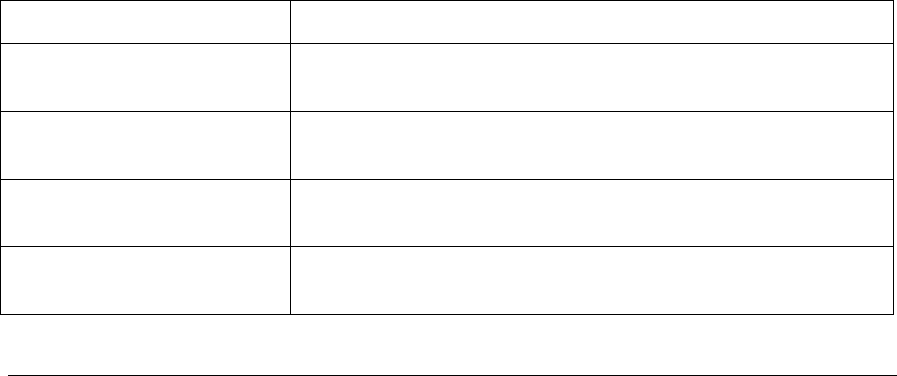
Member Description
numDmaChannels Number of DMA Channels supported by the underlying
EDMA3 Controller
numQdmaChannels Number of QDMA Channels supported by the underlying
EDMA3 Controller
numTccs Number of Interrupt Channels supported by the
underlying EDMA3 Controller
numPaRAMSets Number of PaRAM Sets supported by the underlying
EDMA3 Controller

Run-Time Interfaces/Integration Guide
I-13
numEvtQueue Number of Event Queues in the underlying EDMA3
Controller
numTcs Number of Transfer Controllers (TCs) in the underlying
EDMA3 Controller
numRegions Number of Regions in the underlying EDMA3 controller
dmaChPaRAMMapExists Channel mapping existence:
A value of 0 (No channel mapping) implies that there is
fixed association between a DMA channel and a PaRAM
Set or, in other words, DMA channel n can ONLY use
PaRAM Set n (No availability of DCHMAP registers) for
transfers to happen.
A value of 1 implies the presence of DCHMAP registers
for the DMA channels and hence the flexibility of
associating any DMA channel to any PaRAM Set. In other
words, ANY PaRAM Set can be used for ANY DMA channel
(like QDMA Channels).
memProtectionExists Existence of memory protection feature
globalRegs Base address of EDMA3 CC memory mapped registers.
tcRegs[EDMA3_MAX_TC] Base address of EDMA3 TCs memory mapped registers.
xferCompleteInt EDMA3 transfer completion interrupt line (could be
different for ARM and DSP)
ccError EDMA3 CC error interrupt line (could be different for ARM
and DSP)
tcError[EDMA3_MAX_TC] EDMA3 TCs error interrupt line (could be different for
ARM and DSP)
evtQPri
[EDMA3_MAX_EVT_QUE]
User can program the priority of the Event Queues at a
system-wide level. This means that the user can set the
priority of an IO initiated by either of the TCs (Transfer
Controllers) relative to IO initiated by the other bus
masters on the device (ARM, DSP, USB, etc).
evtQueueWaterMarkLvl
[EDMA3_MAX_EVT_QUE]
To Configure the Threshold level of number of events
that can be queued up in the Event queues. EDMA3CC
error register (CCERR) will indicate whether or not at any
instant of time the number of events queued up in any of
the event queues exceeds or equals the
threshold/watermark value that is set in the queue
watermark threshold register (QWMTHRA).
tcDefaultBurstSize[EDMA3
_MAX_TC]
To Configure the Default Burst Size (DBS) of TCs. An
optimally-sized command is defined by the transfer
controller default burst size (DBS). Different TCs can
have different DBS values. It is defined in Bytes.

14
dmaChannelPaRAMMap
[EDMA3_MAX_DMA_CH]
If channel mapping exists (DCHMAP registers are
present), this array stores the respective PaRAM Set for
each DMA channel. User can initialize each array member
with a specific PaRAM Set or with
EDMA3_RM_CH_NO_PARAM_MAP.
If channel mapping doesn’t exist, it is of no use as the
EDMA3 driver automatically uses the right PaRAM Set for
that DMA channel.
dmaChannelTccMap
[EDMA3_MAX_DMA_CH]
This array stores the respective TCC (interrupt channel)
for each DMA channel. User can initialize each array
member with a specific TCC or with
EDMA3_RM_CH_NO_TCC_MAP. This specific TCC code
will be returned when the transfer is completed on the
mapped DMA channel.
dmaChannelHwEvtMap
[EDMA3_MAX_DMA_CHAN
_DWRDS]
Each bit in this array corresponds to one DMA channel
and tells whether this DMA channel is tied to any
peripheral. That is whether any peripheral can send the
synch event on this DMA channel or not.
1 means the channel is tied to some peripheral; 0 means
it is not.
DMA channels which are tied to some peripheral are
RESERVED for that peripheral only. They are not
allocated when user asks for ‘ANY’ DMA channel.
All channels need not be mapped, some can be free also.
3.2.4 EDMA3_RM_InstanceInitConfig
This configuration structure is used to specify which EDMA3 resources
are owned and reserved by the EDMA3 driver instance. This
configuration structure is shadow region specific and will be provided by
the user at run-time while calling EDMA3_RM_open ().
Owned resources:
EDMA3 Driver Instances are tied to different shadow regions and hence
different masters. Regions could be:
a) ARM,
b) DSP,
c) IMCOP (Imaging Co-processor) etc.

Run-Time Interfaces/Integration Guide
I-15
User can assign each EDMA3 resource to a shadow region using this
structure. In this way, user specifies which resources are owned by the
specific EDMA3 Driver Instance.
This assignment should also ensure that the same resource is not
assigned to more than one shadow regions (unless desired in that way).
Any assignment not following the above mentioned approach may have
catastrophic consequences.
Reserved resources:
During EDMA3 driver initialization, user can reserve some of the EDMA3
resources for future use, by specifying which resources to reserve in the
configuration data structure. These (critical) resources are reserved in
advance so that they should not be allocated to someone else and thus
could be used in future for some specific purpose.
User can request different EDMA3 resources using two methods:
a) by passing the resource type and the actual resource id,
b) by passing the resource type and ANY as resource id
For e.g. to request DMA channel 31, user will pass 31 as the resource id.
But to request ANY available DMA channel (mainly used for memory-to-
memory data transfer operations), user will pass
EDMA3_RM_DMA_CHANNEL_ANY as the resource id.
During initialization, user may have reserved some of the DMA channels
for some specific purpose (mainly for peripherals using EDMA). These
reserved DMA channels then will not be returned when user requests
ANY as the resource id.
Same logic applies for QDMA channels and TCCs.
For PaRAM Set, there is one difference. If the DMA channels are one-to-one tied
to their respective PaRAM Sets (i.e. user cannot ‘choose’ the PaRAM Set for a
particular DMA channel), EDMA3 Driver automatically reserves all those PaRAM
Sets which are tied to the DMA channels. Then those PaRAM Sets would not be
returned when user requests for ANY PaRAM Set (specifically for linking
purpose). This is done in order to avoid allocating the PaRAM Set, tied to a
particular DMA channel, for linking purpose. If this constraint is not there, that
DMA channel thus could not be used at all, because of the unavailability of the
desired PaRAM Set.
Member Description
ownPaRAMSets
[EDMA3_MAX_PARAM_DWRDS]
PaRAM Sets owned by the EDMA3 Driver
Instance.
ownDmaChannels
[EDMA3_MAX_DMA_CHAN_DWRDS]
DMA channels owned by the EDMA3 Driver
Instance.
ownQdmaChannels QDMA channels owned by the EDMA3 Driver

16
[EDMA3_MAX_QDMA_CHAN_DWRDS] Instance.
ownTccs [EDMA3_MAX_TCC_DWRDS] TCCs owned by the EDMA3 Driver Instance.
resvdPaRAMSets
[EDMA3_MAX_PARAM_DWRDS]
PaRAM Sets reserved during initialization for
future use. These will not be given when user
requests for ANY available PaRAM Set using
'EDMA3_RM_LINK_CHANNEL' as
resource/channel id.
resvdDmaChannels
[EDMA3_MAX_DMA_CHAN_DWRDS]
DMA channels reserved during initialization for
future use. These will not be given when user
requests for ANY available DMA channel using
'EDMA3_RM_DMA_CHANNEL_ANY' as
resource/channel id.
resvdQdmaChannels
[EDMA3_MAX_QDMA_CHAN_DWRDS]
QDMA channels reserved during initialization
for future use. These will not be given when
user requests for ANY available QDMA channel
using 'EDMA3_RM_QDMA_CHANNEL_ANY' as
resource/channel id.
resvdTccs
[EDMA3_MAX_TCC_DWRDS]
TCCs reserved during initialization for future
use. These will not be given when user
requests for ANY available TCC using
'EDMA3_RM_TCC_ANY' as resource/TCC id.

Run-Time Interfaces/Integration Guide
I-17
3.2.5 EDMA3_RM_Param
This configuration structure is used to initialize the Resource
Manager Instance (Master or Slave). It consists of the Instance
(shadow region) specific configuration, like resources owned and
reserved by this Instance, region id, global error callback
parameters, instance specific semaphore handle, whether this
instance is master or not etc. Only the master instance will
receive the interrupts from the EDMA3 controller, if interrupts are
enabled.
3.2.6 EDMA3_RM_MiscParam
This configuration structure is used to specify some miscellaneous
options while creating the Resource Manager object. New options may
also be added into this structure in future.
Member Description
isSlave In a multi-master system (for e.g. ARM + DSP), this option is used to
distinguish between Master and Slave. Only the Master is allowed to
program the global EDMA3 registers (like Queue priority, Queue water-
mark level, error registers etc).
param For future use
3.2.7 EDMA3_RM_GblXbarToChanConfigParams
This configuration structure is used to map the cross bar events
to DMA channels. This setting is done at initialization time. For
the cross bar event if the DMA channel is to be mapped then DMA
channel number is stored in the event array location, otherwise -
1 is written.

18
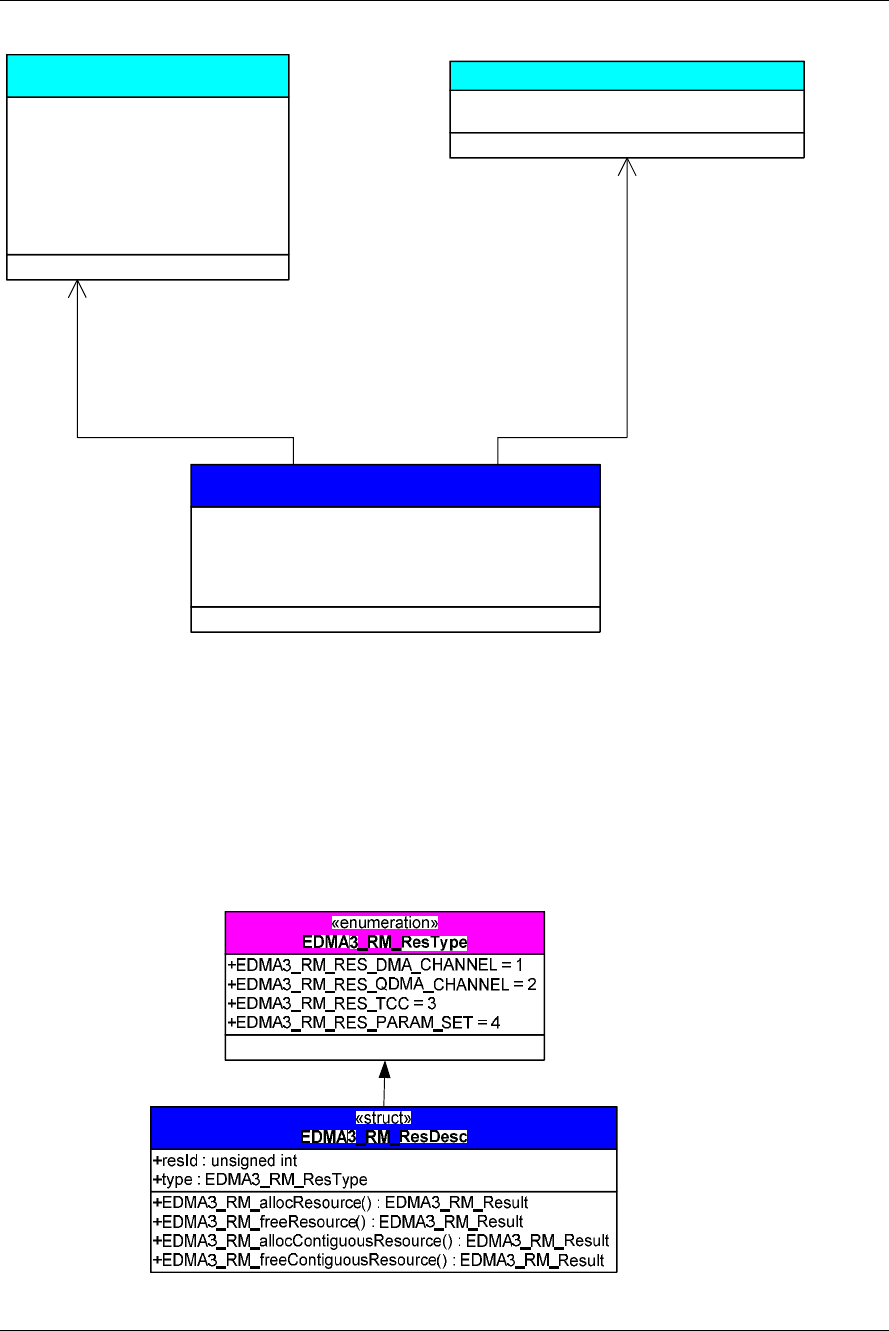
3.2.8 EDMA3_RM_ResDesc
This structure is used to specify an EDMA3 resource object i.e.
the resource type (DMA / QDMA / PaRAM Set / TCC) and the
resource Id. The handle of this object is used while
allocating/freeing the resources.
+EDMA3_RM_create() : EDMA3_RM_Result
+numDmaChannels : unsigned int
+numDmaChannels : unsigned int
+numTccs : unsigned int
+numPaRAMSets : unsigned int
+numEvtQueue : unsigned int
+numTcs : unsigned int
+numRegions : unsigned int
+dmaChPaRAMMapExists : unsigned short
+memProtectionExists : unsigned short
+*globalRegs : void
+*tcRegs [] : void
+xferCompleteInt : unsigned int
+ccError : unsigned int
+tcError [] : unsigned int
+evtQPri [] : unsigned int
+evtQueueWaterMarkLvl [] : unsigned int
+tcDefaultBurstSize [] : unsigned int
+dmaChannelPaRAMMap [] : unsigned int
+dmaChannelTccMap [] : unsigned int
+dmaChannelHwEvtMap [] : unsigned int
«struct»
EDMA3_RM_GblConfigParams
Run-Time Interfaces/Integration Guide
I-19
+ownPaRAMSets [] : unsigned int
+ownDmaChannels [] : unsigned int
+ownQdmaChannels [] : unsigned int
+ownTccs [] : unsigned int
+resvdPaRAMSets [] : unsigned int
+resvdDmaChannels [] : unsigned int
+resvdQdmaChannels [] : unsigned int
+resvdTccs [] : unsigned int
«struct»
EDMA3_RM_InstanceInitConfig
+gblerrCb : EDMA3_RM_GblErrCallbackParams
+*gblerrData : void
«struct»EDMA3_RM_GblErrCallbackParams
+EDMA3_RM_open() : EDMA3_RM_Handle
+regionId : EDMA3_RM_RegionId
+isMaster : unsigned short
+rmInstInitConfig : EDMA3_RM_InstanceInitConfig
+regionInitEnable : unsigned short
+gblerrCbParams : EDMA3_RM_GblErrCallbackParams
«struct»
EDMA3_RM_Param

20

Run-Time Interfaces/Integration Guide
I-21
3.3 API Specification
The application programming interface (API) for the EDMA3
Resource Manager can be found at:
EDMA3_Resource_Manager.chm

22
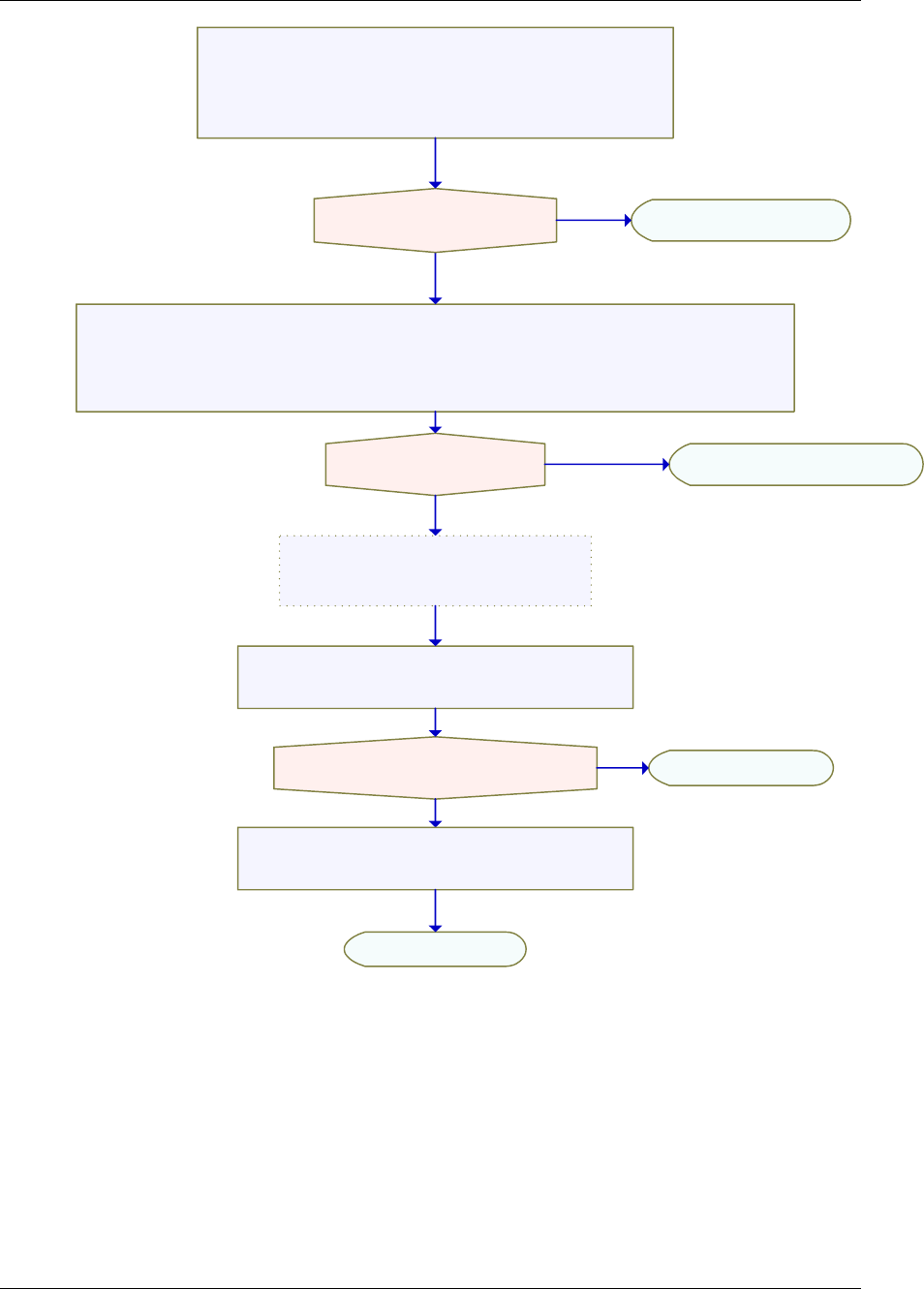
3.4 API Usage Example
Below is a flow-chart describing the steps required to create the
Resource Manager Object and then initialize a region specific
Resource Manager Instance.
After the successful opening, the RM instance can be used to call
other RM APIs.
Run-Time Interfaces/Integration Guide
I-23
/* Afterwards, Close the RM Instance */
rm R e s ult = ED M A 3 _RM_ c l o se( h ResM g r , N U L L );
/* Create a RM Instance tied to a specific region, passing all the required configuration info in
in i tPar a m */
hResMgr = EDMA3_RM_open (edmaInstanceId, (EDMA3_RM_Param *)&initParam, &rmErrorCode);
if ( r mR e s u lt = = EDM A 3 _ RM_SO K )
if ( N ULL ! = h R e s Mgr ) retu r n rm E r r or C o d e;
re t urn r m R esul t ;
==
!=
!=
==
==
!=
/* Create the Resource Manager Object for the specific EDMA3
Ha r dwar e i ns t a n ce p h yCt r l l erI n s tId * /
result = EDMA3_RM_create (phyCtrllerInstId, globalCfgParams,
N U L L) ;
If (result == EDMA3_RM_SOK)
/*RM Instance Successfully Opened */
/* Use the RM handle returned hResMgr to
call other RM APIs */
/* In the end, Delete the RM Object */
re s u l t = E D MA 3 _ R M_del e t e ( p h yCtr l lerIn s t Id, N ULL);
re t u r n r e s ult;
re t u rn r e s ult ;
!=

24
Below is the sample configuration of the Resource Manager Object, tied to a
specific EDMA3 hardware. This configuration information is EDMA3 controller
specific and needs to be passed while calling the API EDMA3_RM_create ().
Also, sample configuration for Resource Manager Instance is also provided
which could be passed in EDMA3_RM_open ().

Run-Time Interfaces/Integration Guide
I-25
/* Driver Object Initialization Configuration */
EDMA3_RM_GblConfigParams globalCfgParams =
{
/** Total number of DMA Channels supported by the EDMA3 Controller */
32u,
/** Total number of QDMA Channels supported by the EDMA3 Controller */
8u,
/** Total number of TCCs supported by the EDMA3 Controller */
32u,
/** Total number of PaRAM Sets supported by the EDMA3 Controller */
128u,
/** Total number of Event Queues in the EDMA3 Controller */
2u,
/** Total number of Transfer Controllers (TCs) in the EDMA3 Controller */
2u,
/** Number of Regions on this EDMA3 controller */
4u,
/**
* \brief Channel mapping existence
* A value of 0 (No channel mapping) implies that there is fixed association
* for a channel number to a parameter entry number or, in other words,
* PaRAM entry n corresponds to channel n.
*/
0u,
/** Existence of memory protection feature */
0u,
/** Global Register Region of CC Registers */
(void *)0x01C00000u,
/** Transfer Controller (TC) Registers */
{
(void *)0x01C10000u,
(void *)0x01C10400u,
(void *)NULL,
(void *)NULL,
(void *)NULL,
(void *)NULL,
(void *)NULL,
(void *)NULL
},
/** Interrupt no. for Transfer Completion */
8u,
/** Interrupt no. for CC Error */
56u,
/** Interrupt no. for TCs Error */
{
57u,
58u,
0u,
0u,
0u,
0u,
0u,
0u,
},

26
/**
* \brief EDMA3 TC priority setting
*
* User can program the priority of the Event Queues
* at a system-wide level. This means that the user can set the
* priority of an IO initiated by either of the TCs (Transfer Controllers)
* relative to IO initiated by the other bus masters on the
* device (ARM, DSP, USB, etc)
*/
{
0u,
1u,
0u,
0u,
0u,
0u,
0u,
0u
},
/**
* \brief To Configure the Threshold level of number of events that can be queued up in the Event queues.
EDMA3CC error register (CCERR) will indicate whether or not at any instant of time the number of events queued
up in any of the event queues exceeds or equals the threshold/watermark value that is set in the queue
watermark threshold register (QWMTHRA).
*/
{
16u,
16u,
0u,
0u,
0u,
0u,
0u,
0u
},
/**
* \brief To Configure the Default Burst Size (DBS) of TCs.
* An optimally-sized command is defined by the transfer controller
* default burst size (DBS). Different TCs can have different
* DBS values. It is defined in Bytes.
*/
{
16u,
16u,
0u,
0u,
0u,
0u,
0u,
0u
},
/**
* \brief Mapping from each DMA channel to a Parameter RAM set,
* if it exists, otherwise of no use.
*/
{
0u, 1u, 2u, 3u,
4u, 5u, 6u, 7u,
8u, 9u, 10u, 11u,
12u, 13u, 14u, 15u,
16u, 17u, 18u, 19u,
20u, 21u, 22u, 23u,
24u, 25u, 26u, 27u,
28u, 29u, 30u, 31u,

Run-Time Interfaces/Integration Guide
I-27
/* DMA channels 32-63 DOES NOT exist in DA830. */
EDMA3_MAX_PARAM_SETS, EDMA3_MAX_PARAM_SETS,
EDMA3_MAX_PARAM_SETS, EDMA3_MAX_PARAM_SETS,
EDMA3_MAX_PARAM_SETS, EDMA3_MAX_PARAM_SETS,
EDMA3_MAX_PARAM_SETS, EDMA3_MAX_PARAM_SETS,
EDMA3_MAX_PARAM_SETS, EDMA3_MAX_PARAM_SETS,
EDMA3_MAX_PARAM_SETS, EDMA3_MAX_PARAM_SETS,
EDMA3_MAX_PARAM_SETS, EDMA3_MAX_PARAM_SETS,
EDMA3_MAX_PARAM_SETS, EDMA3_MAX_PARAM_SETS,
EDMA3_MAX_PARAM_SETS, EDMA3_MAX_PARAM_SETS,
EDMA3_MAX_PARAM_SETS, EDMA3_MAX_PARAM_SETS,
EDMA3_MAX_PARAM_SETS, EDMA3_MAX_PARAM_SETS,
EDMA3_MAX_PARAM_SETS, EDMA3_MAX_PARAM_SETS,
EDMA3_MAX_PARAM_SETS, EDMA3_MAX_PARAM_SETS,
EDMA3_MAX_PARAM_SETS, EDMA3_MAX_PARAM_SETS,
EDMA3_MAX_PARAM_SETS, EDMA3_MAX_PARAM_SETS,
EDMA3_MAX_PARAM_SETS, EDMA3_MAX_PARAM_SETS
},
/**
* \brief Mapping from each DMA channel to a TCC. This specific
* TCC code will be returned when the transfer is completed
* on the mapped channel.
*/
{
0u, 1u, 2u, 3u,
4u, 5u, 6u, 7u,
8u, 9u, 10u, 11u,
12u, 13u, 14u, 15u,
16u, 17u, 18u, 19u,
20u, 21u, EDMA3_RM_CH_NO_TCC_MAP, EDMA3_RM_CH_NO_TCC_MAP,
24u, 25u, 26u, 27u,
EDMA3_RM_CH_NO_TCC_MAP, EDMA3_RM_CH_NO_TCC_MAP, 30, 31,
/* DMA channels 32-63 DOES NOT exist in DA830. */
EDMA3_MAX_TCC, EDMA3_MAX_TCC, EDMA3_MAX_TCC, EDMA3_MAX_TCC,
EDMA3_MAX_TCC, EDMA3_MAX_TCC, EDMA3_MAX_TCC, EDMA3_MAX_TCC,
EDMA3_MAX_TCC, EDMA3_MAX_TCC, EDMA3_MAX_TCC, EDMA3_MAX_TCC,
EDMA3_MAX_TCC, EDMA3_MAX_TCC, EDMA3_MAX_TCC, EDMA3_MAX_TCC,
EDMA3_MAX_TCC, EDMA3_MAX_TCC, EDMA3_MAX_TCC, EDMA3_MAX_TCC,
EDMA3_MAX_TCC, EDMA3_MAX_TCC, EDMA3_MAX_TCC, EDMA3_MAX_TCC,
EDMA3_MAX_TCC, EDMA3_MAX_TCC, EDMA3_MAX_TCC, EDMA3_MAX_TCC,
EDMA3_MAX_TCC, EDMA3_MAX_TCC, EDMA3_MAX_TCC, EDMA3_MAX_TCC
},
/**
* \brief Mapping of DMA channels to Hardware Events from
* various peripherals, which use EDMA for data transfer.
* All channels need not be mapped, some can be free also.
*/
{
0xCF3FFFFFu,
0x0u
}
};

28
/* Driver Instance Initialization Configuration */
EDMA3_RM_InstanceInitConfig sampleInstInitConfig =
{
/* Resources owned by Region 1 */
/* ownPaRAMSets */
/* 31 0 63 32 95 64 127 96 */
{0xFFFFFFFFu, 0xFFFFFFFFu, 0xFFFFFFFFu, 0xFFFFFFFFu,
/* 159 128 191 160 223 192 255 224 */
0x00000000u, 0x00000000u, 0x00000000u, 0x00000000u,
/* 287 256 319 288 351 320 383 352 */
0x00000000u, 0x00000000u, 0x00000000u, 0x00000000u,
/* 415 384 447 416 479 448 511 480 */
0x00000000u, 0x00000000u, 0x00000000u, 0x00000000u,},
/* ownDmaChannels */
/* 31 0 63 32 */
{0xFFFFFFFFu, 0x00000000u},
/* ownQdmaChannels */
/* 31 0 */
{0x000000FFu},
/* ownTccs */
/* 31 0 63 32 */
{0xFFFFFFFFu, 0x00000000u},
/* Resources reserved by Region 1 */
/* resvdPaRAMSets */
/* 31 0 63 32 95 64 127 96 */
{0xFFFFFFFFu, 0x00000000u, 0x00000000u, 0x00000000u,
/* 159 128 191 160 223 192 255 224 */
0x00000000u, 0x00000000u, 0x00000000u, 0x00000000u,
/* 287 256 319 288 351 320 383 352 */
0x00000000u, 0x00000000u, 0x00000000u, 0x00000000u,
/* 415 384 447 416 479 448 511 480 */
0x00000000u, 0x00000000u, 0x00000000u, 0x00000000u,},
/* resvdDmaChannels */
/* 31 0 */
{EDMA3_DMA_CHANNEL_TO_EVENT_MAPPING_0,
/* 63 32 */
EDMA3_DMA_CHANNEL_TO_EVENT_MAPPING_0},
/* resvdQdmaChannels */
/* 31 0 */
{0x00000000u},
/* resvdTccs */
/* 31 0 */
{EDMA3_DMA_CHANNEL_TO_EVENT_MAPPING_0,
/* 63 32 */
EDMA3_DMA_CHANNEL_TO_EVENT_MAPPING_0},
};

Run-Time Interfaces/Integration Guide
I-29
EDMA3_DRV_GblXbarToChanConfigParams sampleXbarChanInitConfig=
/* Event to channel map for region 0 */
{
-1, -1, -1, -1, -1, -1, -1, -1,
-1, -1, -1, -1, -1, -1, -1, -1,
-1, -1, -1, -1, -1, -1, -1, -1,
-1, -1, -1, -1, -1, -1, -1
}
/* End of File */

30
Below is the sample configuration of the Resource Manager instance,
operating on shadow region 1 as a slave. So this Resource Manager instance
will not receive any interrupts from the EDMA3 controller. To receive the
interrupts on a specific region (or Master), one has to open the Resource
Manager instance as Master (only ONCE), i.e. set isMaster as TRUE.
/* Cre a te a R M In sta nce tie d to a s pec ific reg ion , pa ssi ng a ll t he r equ ired c o nfig ura tio n in fo.
For eg , * /
ini tPa r am. reg ionI d = ( E D MA 3_R M _R e gio nId ) 1 u;
ini tPa r am. isM aste r = FAL SE;
ini tPa r am. reg ionI nit Enab le = TR UE ;
/* Crea te a s emap hor e */
rm Resu lt = ed ma3O sS e mCr eat e ( 1 , & sem A ttr s, & i ni t Par a m.r mSe m Ha ndle );
if (rm R es u lt ! = E DMA 3_D V R_S OK)
{
re turn rmR esu lt;
}
ini tPa r am. gbl e rrC bP a ram s.gb ler r Cb = (ED MA3 _ RM _Gb l Err Call bac k)NU LL;
ini tPa r am. gbl e rrC bP a ram s.gb ler r Da t a = (vo id * )NU LL;
/* 4 D MA c han nels a r e ow ne d by thi s RM in sta nce */
ini tPa r am. rmI nstI nitC on f i g.o wnD maC han nel s [0] = ( u ns i gne d i n t)0 x 0u ;
ini tPa r am. rmI nstI nitC on f i g.o wnD maC han nel s [1] = 0 x 00 0Fu;
ini tPa r am. rmI nstI nitC on f i g.r esv d Dm aCha nne ls[0 ] = 0x0 u;
ini tPa r am. rmI nstI nitC on f i g.r esv d Dm aCha nne ls[1 ] = 0x0 u;
/* 1 Q DMA cha nne l ar e o wne d b y thi s R M in sta n ce */
ini tPa r am. rmI nstI nitC on f i g.o wnQ dma Cha nne l s[0 ] = 0x00 80u ;
ini tPa r am. rmI nstI nitC on f i g.r esv d Qd m aC han n els[ 0] = 0x 0u;
/* 4 P ARA M S e ts a re own e d b y t his RM i nst a nc e */
fo r (r esMg rId x = 0u; res M gr Idx < 1 6 u; ++re sMg rId x )
{
in i tPar am .rmI n st Init C onf ig. ownP aRA MSe t s[r esM grI dx] = 0x0u ;
in i tPar am .rmI n st Init C onf ig. resv dPa RAM S et s [re sMg rIdx ] = 0 x0 u;
}
ini tPa r am. rmI nstI nitC on f i g.o wnP aRA MSe ts[ 1 ] = 0x0 00F u ;
/* 4 T C Cs are ow n ed by this RM ins t an c e * /
ini tPa r am. rmI nstI nitC on f i g.o wnT ccs[ 0] = 0 x0u;
ini tPa r am. rmI nstI nitC on f i g.o wnT ccs[ 1] = 0 x000 Fu;
ini tPa r am. rmI nstI nitC on f i g.r esv d Tcc s[0 ] = 0x0 u;
ini tPa r am. rmI nstI nitC on f i g.r esv d Tcc s[1 ] = 0x0 u;
/* Now Ope n t h e R M I nst a nc e */
hR esMg r = ED M A3_ RM _ ope n (e dm a Ins tanc eId, (E DMA 3 _RM _P a ram *)& init Par am,
&r m Err orC ode );
if (NUL L = = h Res M gr)
{
#if def EDM A3_ RM_ DEB UG
ED MA3_ RM _ PRI NTF ("R M I nsta nce Ope n F aile d\n ");
#endif
re turn ;
}

EDMA3 Resource Manager Porting
I-31
Chapter 4
EDMA3 Resource Manager
Porting
This chapter discusses how to port EDMA3 Resource Manager
to other supported target platforms.

32
4.1 Getting Started
The EDMA3 Resource Manager is based upon PSP Framework
architecture making portability and re-usability as prime requirements.
Based upon the architecture, the EDMA3 Resource Manager is made like
it can be ported to another platform very easily. EDMA3 Resource
Manager itself is completely platform independent. So for its proper
functioning, user has to provide the platform specific configuration,
which the Resource Manager will use for managing all the resources.
The platform specific configuration can be provided in two ways:
a) Provide the configuration during init time only while calling the APIs:
EDMA3_RM_create () (for providing the global hardware specific
configuration) and EDMA3_RM_open () (for providing the shadow
regions specific configuration), OR,
b) Create the platform specific configuration file
“edma3_<PLATFORM_NAME>_cfg.c” in
“edma3_lld_<VERSION_NUMBER>\packages\ti\sdo\edma3\rm\src\c
onfigs” folder, if it is not already there. Use this configuration file as
input and generate the required platform specific library.
Support is already provided for multiple platforms. To port to a new
platform, user is advised to look the existing files.
Also, the EDMA3 Resource Manager module is completely OS-agnostic,
for make it’s porting to a different OS completely hassle-free. It is
designed in such a way that the OS dependent part has to be provided
by the user for its proper functioning. This is done in order to make the
it OS independent.
The following OS dependent part of the EDMA3 Package has to be
provided by the user:
a) Critical section entry and exit functions: They should be
implemented by the application for proper linking with the EDMA3
RM. It uses these functions for proper sharing of resources (among
various users) and for other purposes and assumes the
implementation of these functions to be provided by the application.
Without the definitions being provided, the image won’t get linked
properly.
/** Entry to critical section */
extern void edma3OsProtectEntry (unsigned int
edma3InstanceId, int level, unsigned int *intState);
/** Exit from critical section */
extern void edma3OsProtectExit (unsigned int edma3InstanceId,
int level, unsigned int intState);

EDMA3 Resource Manager Porting
I-33
These APIs should be mandatorily implemented once by the
global initialization routine or by the user itself, for proper
linking.
b) Semaphore related functions: They should be implemented by the
application for proper linking with Resource Manager. The EDMA3
Resource Manager uses these functions for proper sharing of
resources (among various users) and assumes the implementation of
these functions to be provided by the application. Without the
definitions being provided, the image won’t get linked properly.
/** EDMA3 OS Semaphore Take */
extern EDMA3_RM_Result edma3OsSemTake
(EDMA3_OS_Sem_Handle hSem, int mSecTimeout);
/** EDMA3 OS Semaphore Give */
extern EDMA3_RM_Result edma3OsSemGive
(EDMA3_OS_Sem_Handle hSem);
c) Interrupts registration and un-registration: It is not done by the
Resource Manager. The application which is using it should register
the various Interrupt Handlers (ISRs in Resource Manager) with the
underlying OS on which it is running. Similarly, the application
should un-register the previously registered Interrupt Handlers when
the Resource Manager instance is no more required.
Public header file
“edma3_lld_<VERSION_NUMBER>\packages\ti\sdo\edma3\rm\edma3_c
ommon.h” contains all the OS dependent part which needs to be
provided by the user application.
Sample initialization libraries are already provided for multiple
platforms which provide the DSP/BIOS 6 side OS adaptation
layer implementation and platform specific configuration for
proper functioning of the EDMA3 Resource Manager. User is
encouraged to look at them and use them in the porting activity.

34
4.2 Step-by-Step procedure for porting
This section provides illustrative description on how to port the
EDMA3 Resource Manager to the selected platform and the OS.
4.2.1 edma3_<PLATFORM_NAME>_cfg.c:
EDMA3_RM_GblConfigParams is the initialization structure which
is used to specify the EDMA3 Hardware specific global settings,
specific to the SoC. For e.g. number of DMA/QDMA channels,
number of PaRAM sets, TCCs, event queues, transfer controllers,
base addresses of CC global registers and TC registers, interrupt
number for EDMA3 transfer completion, CC error, event queues’
priority, watermark threshold level etc. This configuration
information is SoC specific and could be provided by the user at
run-time also while creating the EDMA3 Resource Manager
object. In case user doesn’t provide it, this information will be
taken from the configuration file, in case it is available for the
specific SoC.
Similarly, EDMA3_RM_InstanceInitConfig is the initialization
structure which is used to specify the EDMA3 Resource Manager
Region specific settings. For e.g. resources (DMA/QDMA
channels, PaRAM sets, TCCs) owned and reserved by this EDMA3
driver instance. This configuration information is shadow region
(or master) specific and could be provided by the user at run-
time while creating the EDMA3 Resource Manager instance. In
case user doesn’t provide it, this information will be taken from
the configuration file, in case it is available for the specific SoC
for the specific shadow region.
To summarize, this file contains the global and region specific
configuration information for EDMA3 for the specific platform.
User can create this file by adding the desired information for the
new SoC, or he/she can provide this info at init-time.
User can find the sample configuration files for different platforms
at:
“edma3_lld_<VERSION_NUMBER>\packages\ti\sdo\edma3\rm\sr
c\configs”. On the same lines, user can create different
configuration file for another platform.

EDMA3 Resource Manager Porting
I-35
4.2.2 Make file for the Resource Manager
Platform specific EDMA3 configuration file will be included as a
source file in the make file. The make file has many variables
which will be used to generate the platform specific Resource
Manager libraries.
User can find the make file at
“edma3_lld_<VERSION_NUMBER>\packages\ti\sdo\edma3\rm\”
and modify it appropriately to add support for the desired
platform.
User will also be required to modify the files in the makerules
directory in the EDMA3_LLD_INSTALLDIR to add complete
support to that particular platform.
