Execution Instructions
User Manual:
Open the PDF directly: View PDF  .
.
Page Count: 3
CMSC 628 Homework - 3
Akash Reddy Gurram
HR69338
Execution Instructions:
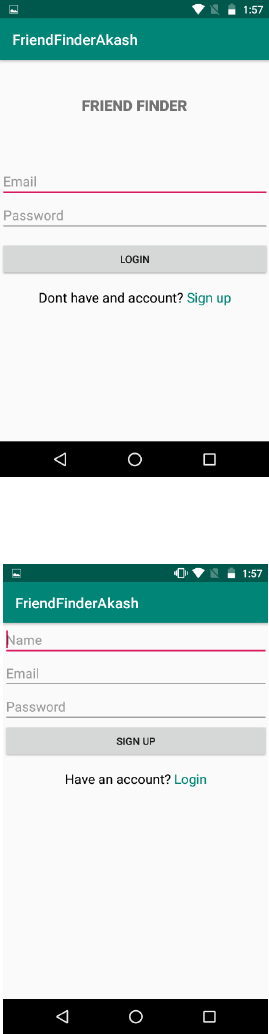
• When you first open the application, create a new account by clicking the little green Sign
up button which will prompt you to a new sign up activity.
• Create an account with your name, email address and a password.
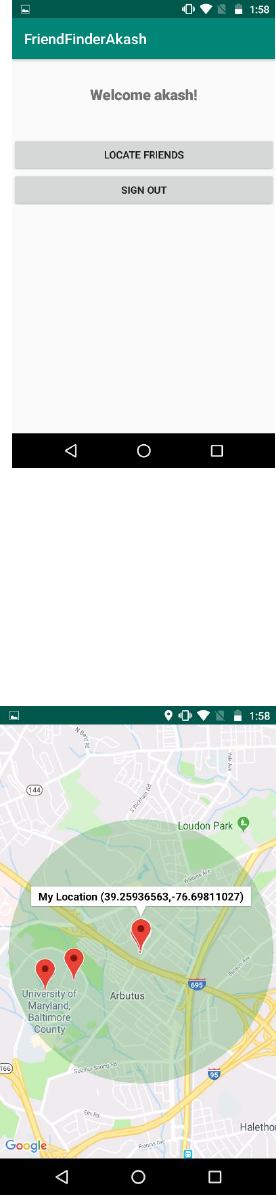
• Once you sign up or login (If you already have an account), you will be prompted to a
Welcome page.
• If the location services are disabled or location access is not yet given, alert windows rise
giving us options to turn on the location services and to give location access to the
application.
• Clicking on the button LOCATE FRIENDS will open a map activity which shows all the
users(friends) within 1-mile radius. These locations of friends are populated on the map
by taking their values from the Firebase real time database.
• Whenever you sign up, your account details are added to the backend firebase
authentication server.
• Similarly, whenever you open the map, your location is updated in the Firebase real time
database along with the current time stamp. This is to make sure that the database
contains the most up to data location values.
• To sign out, click the back button, which will stop the location services and then click the
sign out button.
