FaceVACS_DBScan_Manualx Face VACS DBScan Manual 4.x
FaceVACS_DBScan_Manual_4.x
User Manual:
Open the PDF directly: View PDF  .
.
Page Count: 110 [warning: Documents this large are best viewed by clicking the View PDF Link!]

FaceVACS-DBScan 4.X - Manual

FaceVACS-DBScan 4.X
4.3.1.0 Edition
Published 2009
Copyright © 1998, 1999, 2000, 2001, 2002, 2003, 2004, 2005, 2006, 2007, 2008, 2009 Cognitec
Systems GmbH
The information in this book was compiled with great attention and care. However, errors cannot be completely excluded.
All brands are used without guarantee of their free usefulness and are possibly entered registered trademarks. The
authors essentially depend on the ways of writing of the manufacturers. This manual and the software associated with it
are protected by copyright. All rights reserved including duplication, translation, microfilming as well as line-to-store
transfer and processing in electronic systems.
Cognitec Systems GmbH
Grossenhainer Str. 101
01127 Dresden
Germany
Tel: +49(351)86292-0
Fax: +49(351)86292-10
eMail: support@cognitec.com
Internet: www.cognitec.com
i
目錄
目錄目錄
目錄
.
1.1. ...................................................................................................................... 1
1.1.1. .................................................................................................... 1
1.1.2. ................................................................................................................... 1
1.1.3. .......................................................................................................................... 2
1.2. ............................................................................................... 3
1.3. ...................................................................................................................... 5
1.3.1. ................................................................................................................... 5
1.3.2. ................................................................................................ 6
1.3.3. ............................................................................................................ 6
1.3.4. ....................................................................................................... 7
1.3.5. FaceVACS-DBScan ............................................................................................. 8
1.3.6. FaceVACS-DBScan .............................................................................. 8
.
2.1. ......................................................................................................................... 9
2.2. ................................................................................................................ 10
2.2.1. ......................................................................................................... 10
2.2.2. ................................................................................................................. 13
2.2.3. ................................................................................................................. 13
2.3. ....................................................................................................................... 13
2.3.2. Windows ........................................................................................... 13
2.3.3. Linux ........................................................................................ 14
2.3.4. ................................................................................................................. 15
2.3.5. ................................................................................................................. 15
2.4. ....................................................................................................................... 16
2.5. FaceVACS - DBScan ................................................................................................ 16
.
3.1. ............................................................................................................................... 18
ii
3.2. ................................................................................................................ 18
3.2.1. ................................................................................................................. 19
3.2.2. ......................................................................................................... 19
3.2.3. ......................................................................................................... 20
3.2.5. ........................................................................................................................ 22
3.3. FaceVACS ........................................................................................ 24
.
4.1. ............................................................................................................ 26
4.1.1. .............................................................................................. 26
4.1.2. ................................................................................................................. 27
4.1.3. ............................................................................................................. 28
4.1.4. ................................................................................................................. 28
4.1.5. ......................................................................................................... 28
4.1.6. .............................................................................................. 29
4.2. ................................................................................................................ 29
4.2.1. ............................................................................................................. 30
4.2.2. .................................................................................................. 30
4.2.3. ......................................................................................................... 31
4.3. ............................................................................................................. 32
4.4. .................................................................................................... 35
4.4.1. ............................................................... 35
4.4.2. ...................................................................................... 35
4.4.3. ........................................................... 35
4.5. ......................................................................................... 37
4.5.1. .............................................................................. 37
4.5.2. ..................................................................................................... 37
4.5.3. .................................................................................................. 37
4.6. ................................................................................................. 38
4.6.1. ......................................................................................................... 38
4.6.2. .............................................................................................. 38
iii
4.6.3. .............................................................................................. 38
4.6.4. ...................................................................................... 38
4.7. ....................................................................................................................... 39
4.7.1. ................................................................................................................. 39
4.7.2. ............................................................................................................. 39
4.7.3. ............................................................................................................. 39
4.8. ................................................................................................................ 40
4.8.1. ......................................................................................................... 40
4.9. / ........................................................................................................... 43
4.10. .......................................................................................................... 45
4.10.1. ............................................................................................ 45
4.10.2. ................................................................................................... 46
.
5.1. - - - ...................................................... 47
5.2. .................................................................................................................... 48
5.3. / ................................................................................................... 50
.
6.1. ............................................................................................................ 51
6.2. FaceVACS ........................................................................................................... 51
6.2.1. ‘Cases’ .................................................................................................................. 51
6.2.2. ’Images’ .............................................................................................................. 52
6.2.3. ’FIR_6_0’ ............................................................................................................. 53
6.2.4. ’FIR_6_1’ .............................................................................................................. 54
6.2.5. ’FIR_4_5’ .............................................................................................................. 55
6.2.6. ’EnrollmentResults’ .............................................................................................. 56
6.2.7. ’EnrollmentCases’ ............................................................................................... 57
6.2.8. ’IdentificationProbes’ ........................................................................................... 57
6.2.9. ’IdentificationResults’ ........................................................................................... 57
6.2.10. ’CrossIdentificationCases’ ................................................................................... 58
6.2.11. ’CrossIdentificationProcessed’ ............................................................................ 58
iv
6.2.12. ’CrossIdentificationResults’ ................................................................................ 58
6.2.13. ’MatesIdentificationCases’ ................................................................................. 59
6.2.14. ’MatesIdentificationProcessed’ .......................................................................... 59
6.2.15. ’MatesIdentificationResults’ ............................................................................... 59
6.2.16. ’RepSelf’ ............................................................................................................. 59
6.2.17. ’RepTV’ .............................................................................................................. 60
6.2.18. ’RepDeleted’ ...................................................................................................... 60
6.3. FaceVACS .................................................................................................... 61
6.3.1. ’EnrollmentLogs ............................................................................................... 61
6.3.2. ’EnrollmentLogImages’ ......................................................................................... 61
6.3.3. ’VerificationLogs’ .................................................................................................. 62
6.3.4. ’VerificationLogImages’ ........................................................................................ 63
6.3.5. ’IdentificationLogs’ ............................................................................................... 64
6.3.6. ’IdentificationLogImages’ ..................................................................................... 64
6.3.7. ’IdentificationMatches’ ........................................................................................ 65
6.3.8. ’AdministrationLogs’ ............................................................................................ 65
6.3.9. ’EventLogs’ ........................................................................................................... 66
6.4. ......................................................................................... 68
6.4.1. ............................................................................................................. 68
6.4.2. ............................................................................................................. 68
6.4.3. SQL ............................................................................................. 68
6.4.4. SQL .................................................................................. 69
6.4.5. .......................................................................................... 69
6.5. .................................................................................................................... 69
6.5.1. ................................................................................................................. 69
6.5.2. ................................................................................................................. 70
6.5.3. ................................................................................................................. 70
6.5.4. .................................................................................................. 70
.
7.1. ............................................................................................................................... 71
v
7.1.1. ..................................................................................................... 71
7.1.2. ................................................................................................................. 71
7.2. ................................................................................................................ 72
7.2.1. ......................................................................................................... 72
7.2.2. ...................................................................................... 74
7.2.3. .............................................................................................. 74
7.3. ....................................................................................................................... 74
7.3.1. ........................................................................................................................ 74
7.3.2. ........................................................................................................................ 75
7.3.3. .................................................................................................. 75
7.4. ....................................................................................................................... 77
7.4.1. ........................................................................................................................ 77
7.4.2. ........................................................................................................................ 78
7.4.3. .................................................................................. 79
.
8.1. ............................................................................................................................... 80
8.2. ............................................................................................................................... 81
8.3. ............................................................................................................ 81
.
9.1. ....................................................................................................................... 82
9.2. FaceVACS-DBScan .......................................................................................... 83
. FaceVACS-DBScan
10.1. ...................................................................................................................... 84
10.2. .................................................................................................................. 84
10.2.1. ............................................................................................................... 84
10.2.2. ............................................................................................................... 84
10.3. ............................................................................................................................. 85
10.3.1. ............................................................................................................... 85
10.3.2. ............................................................................................................... 85
10.4. / ................................................................................................... 86
vi
.
11.1. ...................................................................................................................... 86
.
12.2. .............................................................................................................. 87
12.2.1. ....................................................................................................... 89
12.2.2. ....................................................................................................... 90
12.2.3. ................................................................................................... 90
12.2.4. ......................................................................... 90
12.3. ....................................................................................... 91
12.3.1. ................................................................................................... 92
12.3.2. ................................................................................................................... 93
12.3.3 ............................................................................................................ 94
12.3.4. ....................................................................................................................... 94
12.4. ...................................................................................................................... 94
1
第一章
第一章第一章
第一章. 簡介
簡介簡介
簡介
1.1. 有關此手冊
有關此手冊有關此手冊
有關此手冊
FaceVACS - DBScan 4.1.3
1.1.1.
• GUI GUI=
•
• [ ] [ ]
• /
•
• Sequence ! of Menus ! and
• Submenus
Windows
•
ConfigurationTree.OfConfigurationKeys.AndSubitems
• CaseID
•
1.1.2.
?
•
• FaceVACS-DBScan
•
•
•
2
FaceVACS
DBScan
•
•
• FaceVACS DBScan
FaceVACS - DBScan 4.1.3
FaceVACS-DBScan :
•
•
•
1.1.3.
• - FaceVACS- DBScan4 .1.3
• FaceVACS - DBScan - FaceVACS- DBScan
• -
• -
• -
• - FaceVACS- DBScan
/
• -
• - FaceVACS- DBScan4 .1.3
3
• FaceVACS - DBScan - FaceVACS - DBScan
• - FaceVACS
1.2. 使用人臉識別的生物識別
使用人臉識別的生物識別使用人臉識別的生物識別
使用人臉識別的生物識別
.
1.
2.
3.
4.
5.
• + / -1 5
•
•
• 32
• 64
• JPEG ( Independent JPEG
Group 80. JPEG2000 JPEG2000
1.0
•
•
• 60
•
•
•
•
Table 1-1.
4
1 15
3
5
•
•
•
•
•
•
FaceVACS
•
•
•
•
•
/
1.3. 概況及特點
概況及特點概況及特點
概況及特點
1.3.1.
FaceVACS - DBScan
•
6
•
1.3.2.
FaceVACS - DBScan
• SQL
• API
• GUI
• GUI
• SQL
•
• PC
•
•
•
1.3.3.
FaceVACS
DBScan -
Figure 1-1. FaceVACS-DBScan -
SQL
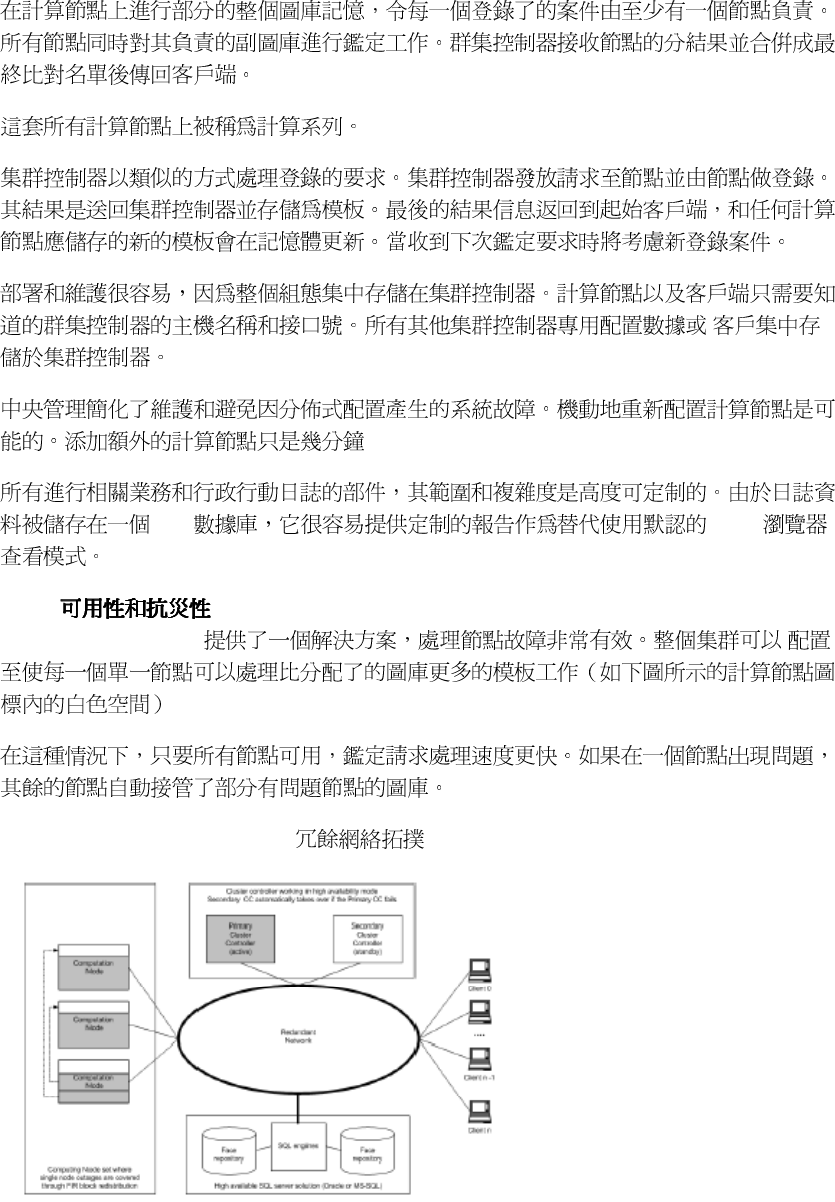
7
SQL HTTP
1.3.4.
FaceVACS - DBScan
Figure 1-2. FaceVACS-DBScan -
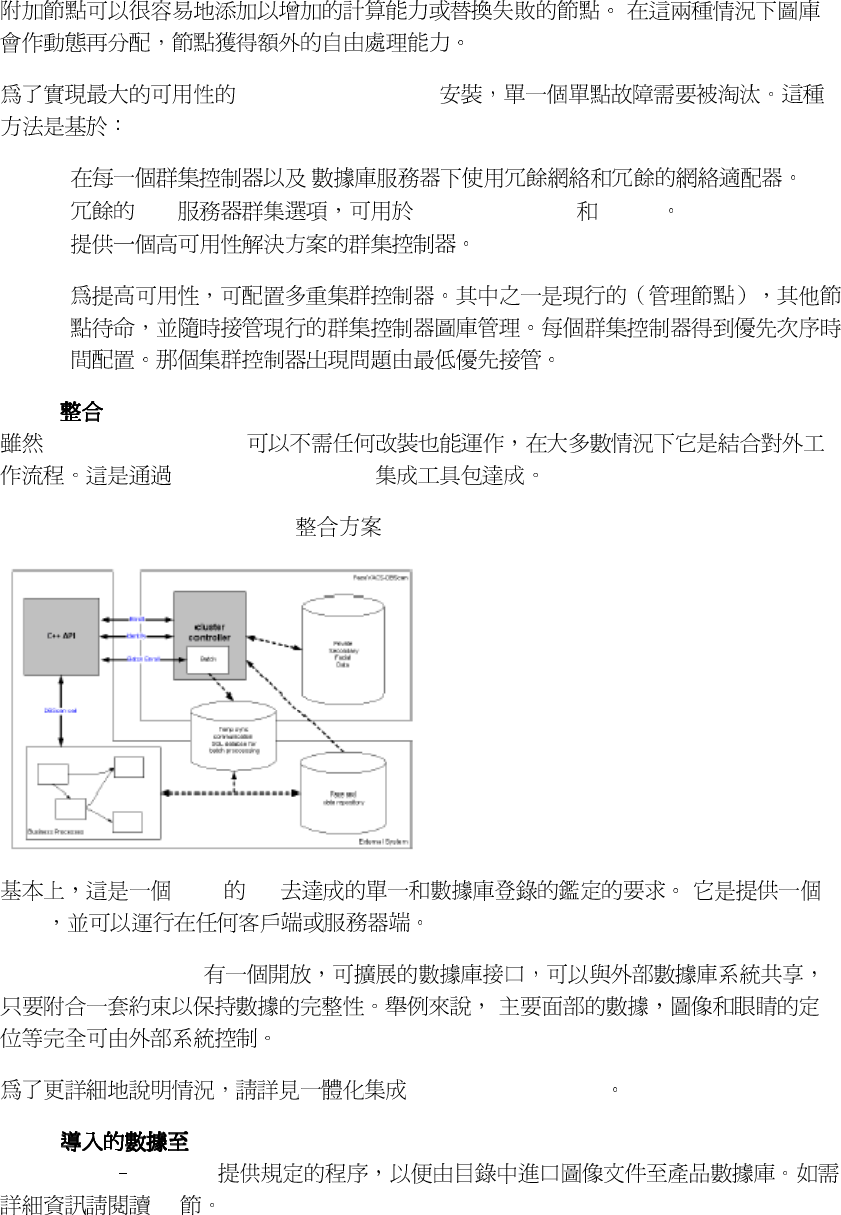
8
FaceVACS - DBScan
•
• SQL MS - SQL Server Oracle
•
1.3.5. FaceVACS-DBScan
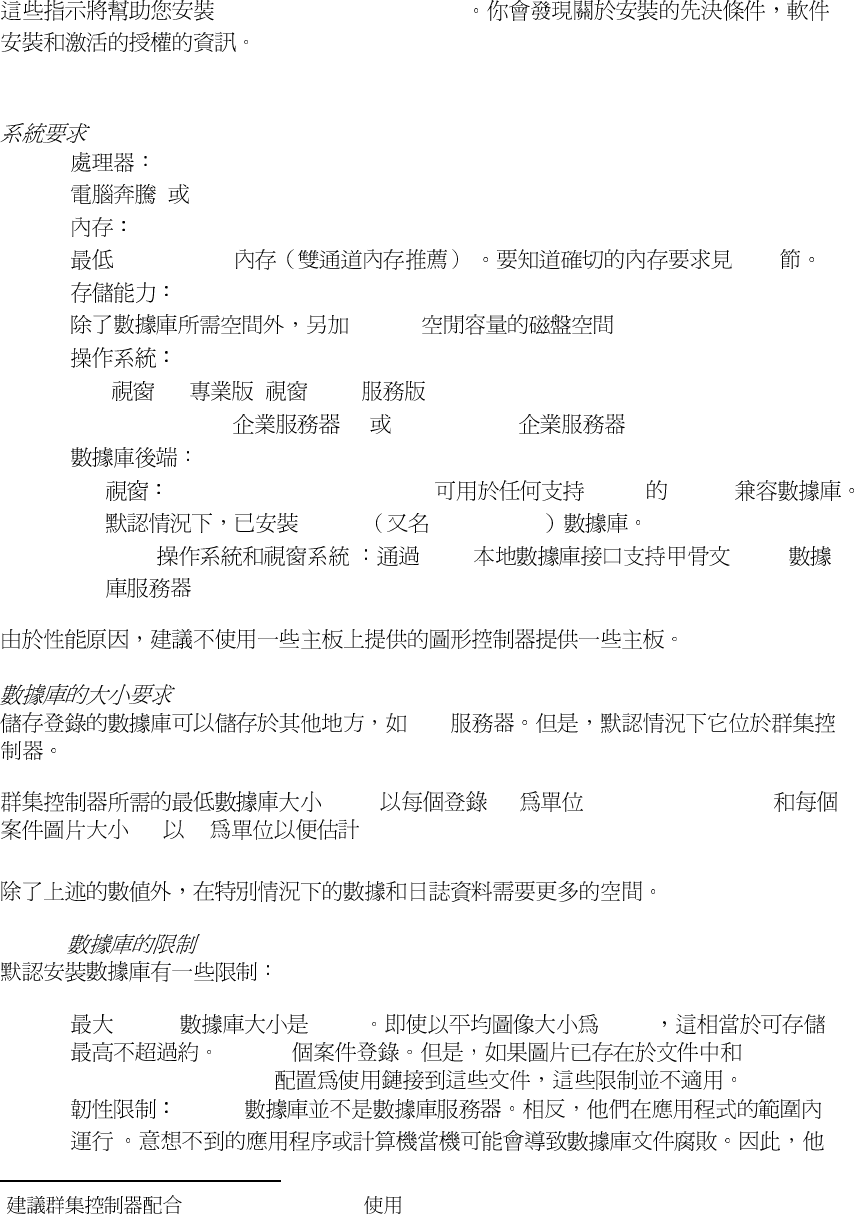
FaceVACS - DBScan
FaceVACS - DBScan
Figure 1-3. FaceVACS-DBScan -
C + + API
DLL
FaceVACS - DBScan
FaceVACS-DBScan
1.3.6. FaceVACS-DBScan
FaceVACS DBScan
7.2
9
第
第第
第二
二二
二章
章章
章. 安裝
安裝安裝
安裝
FaceVACS-DBScan 4.1.3
2.1. 系統需求
系統需求系統需求
系統需求
•
4 Athlon XP>1GHz
•
512MB DDR 2.2.1
•
2.5.GB
•
• XP / 2003
1
• SUSE LINUX 8,9 SUSE LINUX 10
•
• FaceVACS - DBScan 4.1.3 ODBC SQL92
MS Jet MS Access
• Linux OCCI 9i/10g
SQL
(DBS) MB numberOfEnrollees
(IS) kB
DBS = numberOfEnrollees * (IS + 10) / 1000
MS Jet
• MS Jet 2 GB 40 kB
50,000
FaceVACS - DBScan
• MS Jet '
'
1
Windows 2003 Server
10
/ 6.4
2.2. 安裝項目規劃
安裝項目規劃安裝項目規劃
安裝項目規劃
2.2.1.
•
•
• numberOfEnrollees
•
P4 3.0 GHz
subgallery 2.5
• numberOfResilientNodes
512Mb 1GB
numberOfEnrollees subgalleries
FIR
FIR
[A13]
1 5165
2 2647
3 1780
4 1340
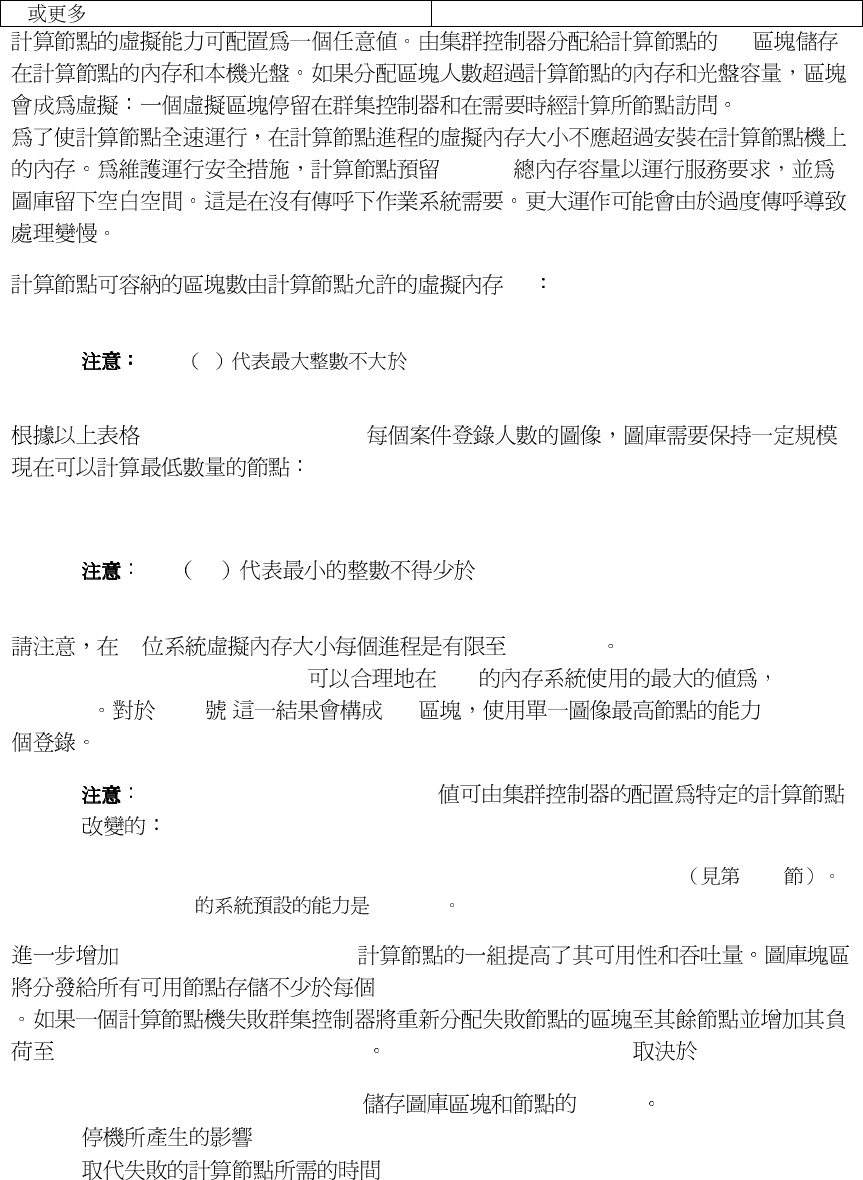
11
5 1075
FIR
184 MB
MB
maxNumberOfBlocksPerNode = floor( ( AllowedProcessVirtualMemory - 184 ) / 4.779)
floor x x
numberOfFIRsPerBlock
minNumberOfNodesNeeded = ceil( numberOfEnrollees / (numberOfFIRsPerBlock *
maxNumberOfBlocksPerNode))
ceil
x x
32 2 GBytes
AllowedProcessVirtualMemory 2GB
2048MB [ A13 ] 390 2014350
AllowedProcessVirtualMemory
Fvd.Identifier.BatteryManager.Nodes.[NODENAME].RamCapacity 4.4.2
2GByte RAM 1990MB
numberOfResilientNodes
maxNumberOfBlocksPerNode
maxNumberOf - BlocksPerNode numberOfResilientNodes
• minNumbersOfNodesNeeded MTBF
•
•
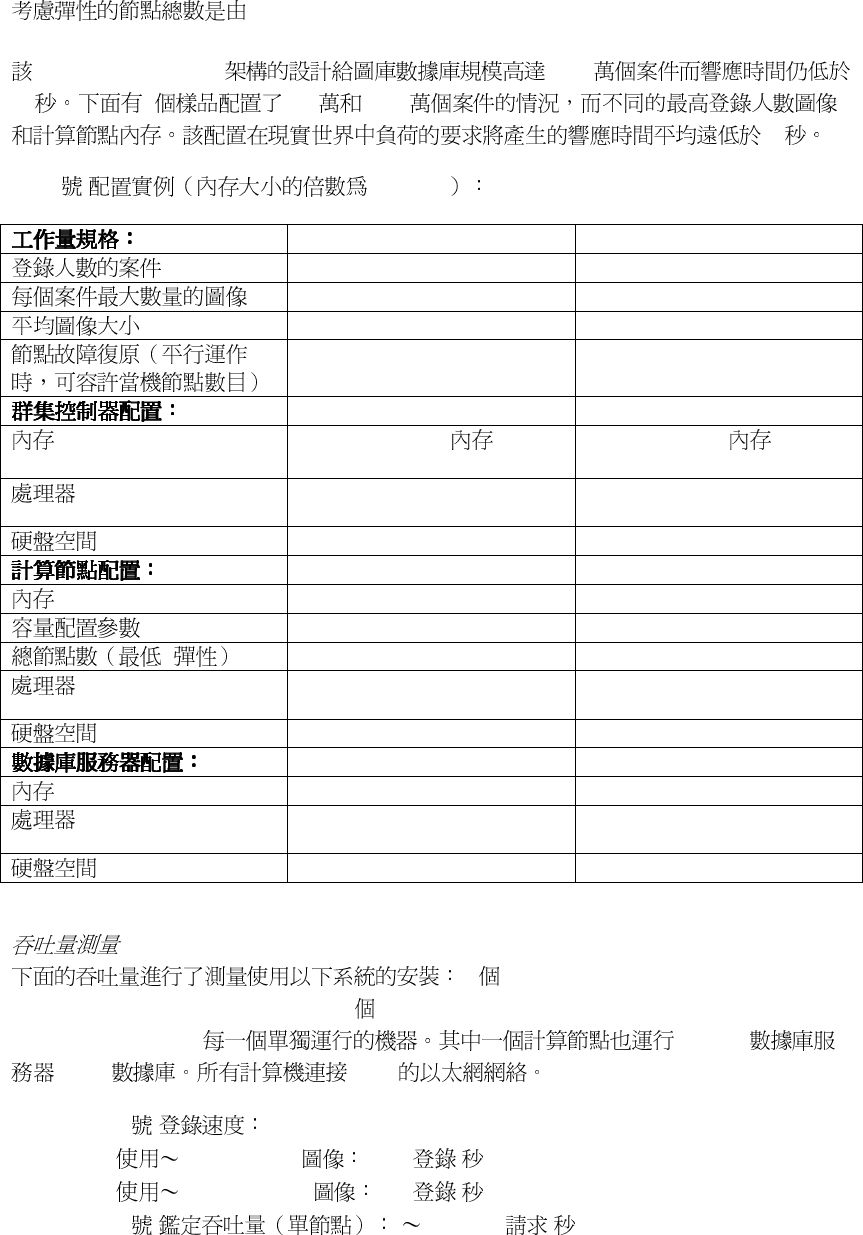
12
totalNumberOfNodesNeeded = minNumberOfNodesNeeded + numberOfResilientNodes
FaceVACS-DBScan 2000
10 2 200 1000
10
[ A13 ] 512 MB
2,000,000 10,000,000
3 1
kBytes 35 50
2 1
512
M
B
yte
DDR
PC3200
1.5
G
B
yte
DDR
PC3200
Pentium 4@3.0 GHz 800
FSB
Pentium 4@3.0 GHz 800
FSB
40
G
B
yte
40
G
B
yte
1.5 Gbyte DDR RAM PC3200
2.0 Gbyte DDR RAM PC3200
1536
2048
+ 5 7
Pentium 4@3.0 GHz 800
FSB
Pentium 4@3.0 GHz 800
FSB
2
GByte
2
GByte
2 Gbyte DDR RAM PC3200
2 Gbyte DDR RAM PC3200
Pentium 4@3.0 GHz 800
FSB
Pentium 4@3.0 GHz 800
FSB
250
Gbyte
550
Gbyte
1 ClusterController (P4 3.0Ghz,
800MHz FSB, Fast PC3200 RAM) 2 ComputingNodes (P4 3.0Ghz, 800MHz FSB,
Fast PC3200 RAM) MSSQL
FVDB 1Gbit
• [ A13 ]
• 25KB JPEG 10.5 /
• 220KB JPEG 8.5 /
• [ A13 ] 800.000 /
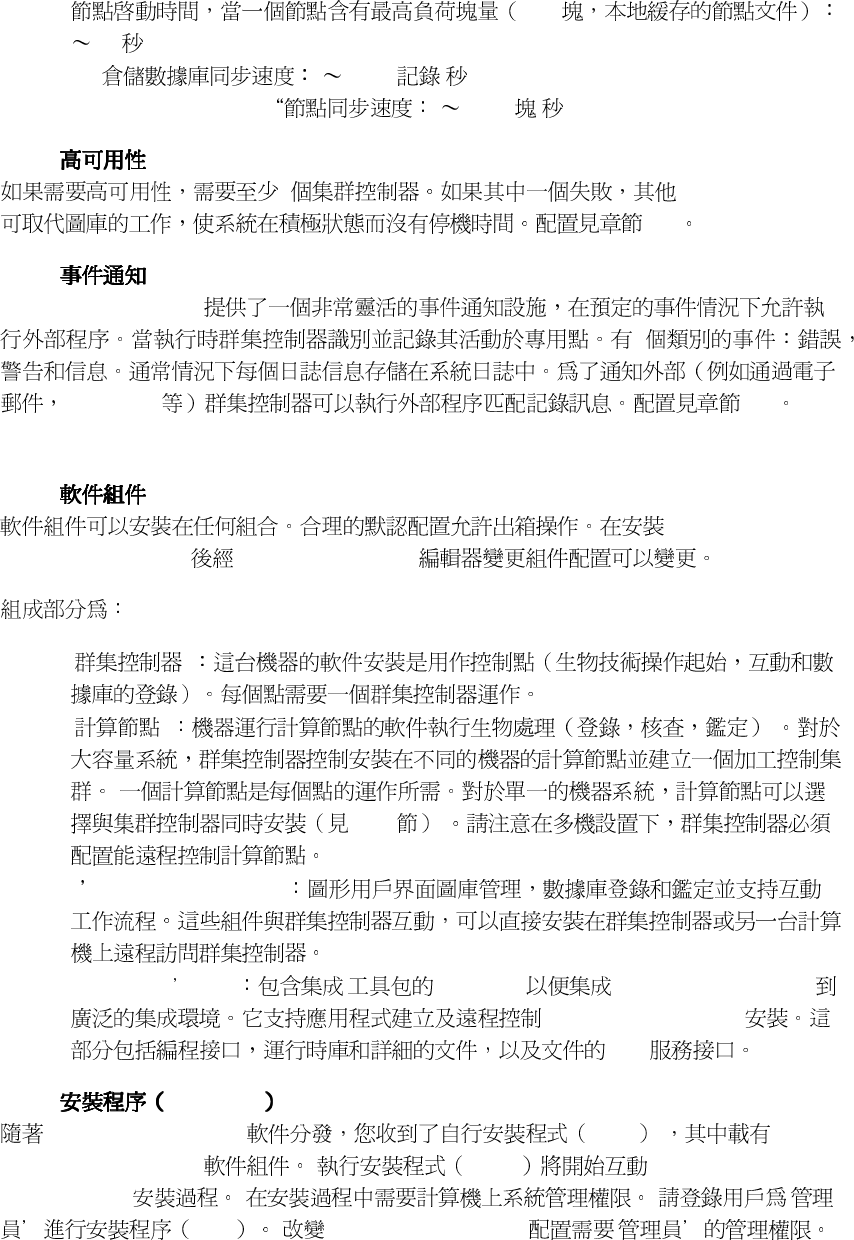
13
• 390
75
•
FIR
2900 /
•
ClusterController -> 1 4.6 /
2.2.2.
2
4.5
2.2.3.
FaceVACS - DBScan
3
snmp-traps
4.9
2.3. 軟件安裝
軟件安裝軟件安裝
軟件安裝
2.3.1.
FaceVACSDBScan FaceVACSDBScan
• ' '
• ' '
2.3.4
• '
Cognitec Frontends
'
• '
Integrators Kit
' ' C + + API FaceVACS - DBScan
FaceVACS - DBScan
Web
2.3.2. Windows
FaceVACS - DBScan .exe
FaceVACS - DBScan .exe FaceVACS -
DBScan 4.1.3 '
exe FaceVACS - DBScan '
14
• FaceVACS - DBScan 4.1.3
FaceVACS -
DBScan 9.1
• FaceVACS - DBScan
2.3.1 MS Jet
2.1
2.3.3. Linux
FaceVACS - DBScan , FaceVACS - DBScan 4.1.3.rpm
FaceVACS - DBScan Yast rpm
YaST2
1. yast2 YaST2
2.
Software !Change Source of Installation
rpm NFS FTP
3.
Software !Install and Remove software
4.
Filter - Search or Package Groups Applications - Databases
FaceVACS-DBScan
5. [
Accept
]
2
rpm
rpm
--checksig -i -h
RPM
FHS
http://www.pathname.com/fhs/pub/fhs-2.3.html FaceVACS - DBScan /
opt/FaceVACS/DBScan-4.1.3
/opt/FaceVACS/DBScan-4.1.3/bin/setup.sh
2.3.1
FaceVACS-DBScan /etc/init.d/FaceVACS-DBScan-4.1.3
3 5
/ etc/init.d/rc3.d / / /
2
FaceVACS–DBScan
15
FaceVACS-DBScan
4.1.3
Start !FaceVACS-DBScan 4.1.3 !Configuration Editor
/etc/init.d/FaceVACS-DBScan-4.1.3 start
FaceVACS - DBScan 4.1.3 facevacs
root
Linux FaceVACS - DBScan 4.1.3
Oracle 9i
2.3.4.
2
• ’Cluster Controller’, ‘Computing Node’ ‘Cognitec
Frontends’
2.3.5.
•
•
•
2-1
TCP / IP
A computer_a.cognitec.com
1104
B computer_b.cognitec.com
1104
C computer_c.cognitec.com
1102
2 1
c 2.4
A B 2.5
A B C
C ClusterController
ComputationNodes A B
computer_a.cognitec.com ClusterController.ComputationNodes.
A.Host
computer_b.cognitec.com” ClusterController.ComputationNodes.
B.Host
FaceVACS-DBScan
16
2.4. 授權
授權授權
授權激活
激活激活
激活
FaceVACS – DBScan
FaceVACS - DBScan Cognitec
a. ' '
Start !Programs !FaceVACS-DBScan
b.
Setup ! License License Management
[Save as...]
Cognitec
license@cognitec.com
•
User
•
Email of User
•
Project
/
c. Cognitec
3
License
Management [Import License From File].
FaceVACS - DBScan
FaceVACS-DBScan HASP USB
FaceVACS – DBScan USB
FaceVACS – DBScan
HASP
HASP USB FaceVACS-DBScan Linux and Windows
HASP
Windows
switch install
Linux 1
2.5. FaceVACS-DBScan服務
服務服務
服務
FaceVACS DBScan
Service Restart Required
Configuration ! Restart FaceVACS-
3
Cognitec
17
DBScan Service Configuration ! Stop FaceVACS-DBScan Service
FaceVACS - DBScan
•
"Access is denied"
- FaceVACS- DBScan
•
"The specific service does not exist as an installed service"
-
FaceVACSDBScan
Setup.ServiceControler.ServiceName
•
TCP
Cognitec 11.1

18
第
第第
第三
三三
三章
章章
章. 基本操作
基本操作基本操作
基本操作
3.1. 概念
概念概念
概念
CaseID
FaceVACS - DBScan
CaseID
PFD
PFD
FaceVACS - DBScan
CaseID
FaceVACS - DBScan
1 1
1 N N FaceVACS - DBScan
3.2. 圖庫管理程序
圖庫管理程序圖庫管理程序
圖庫管理程序
FaceVACS DBScan
Gallery Administration.
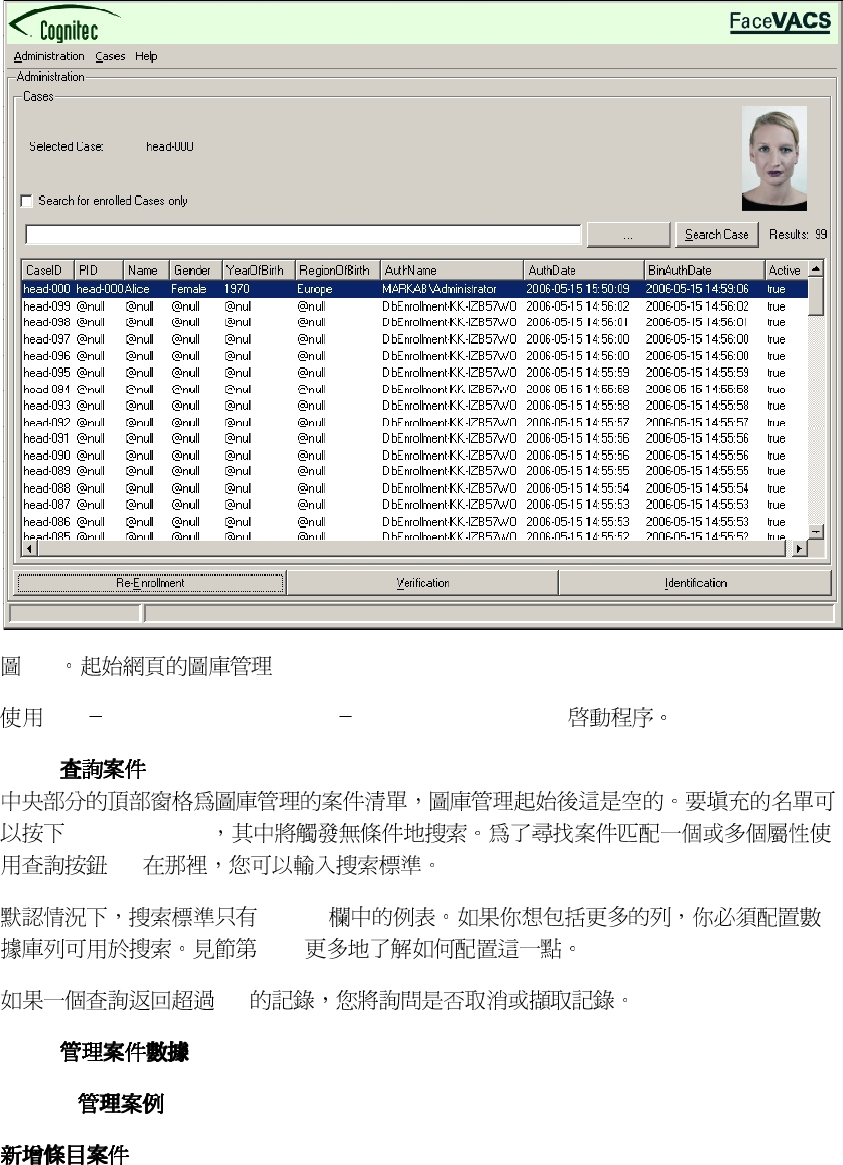
19
3-1
Start !FaceVACS-DBScan 4.1.3 !Gallery Administration
3.2.1.
[
Search Cases
]
[...].
CaseID
4.6.1
100
3.2.2.
3.2.2.1.
20
[ ] FaceVACS
FaceVACS
[ ]
CaseID CaseID
CaseID
[
[Del]
]
Cases !Delete Case.
3.2.3.
FaceVACS - DBScan
[
Enrollment
]
1.
2. -
3.2.3.1.
Image Set Assembling
PFD
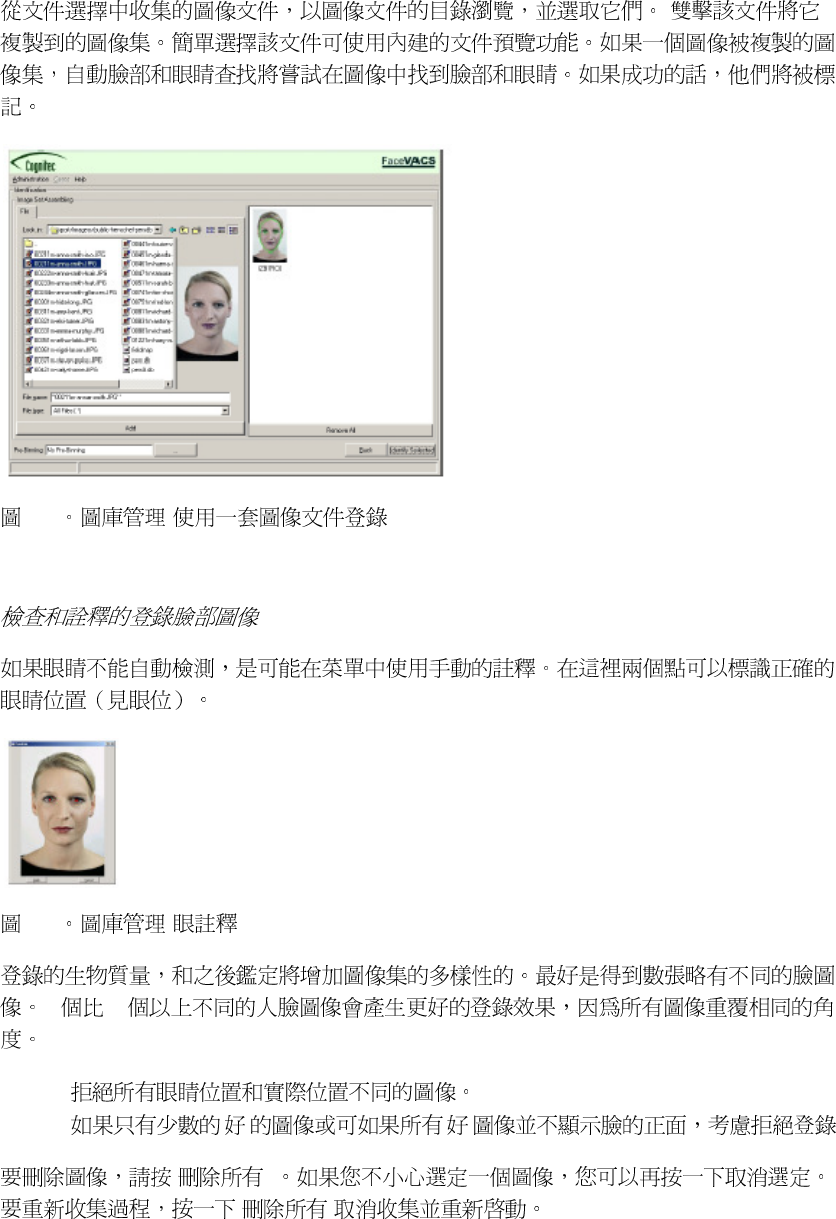
21
3-2 -
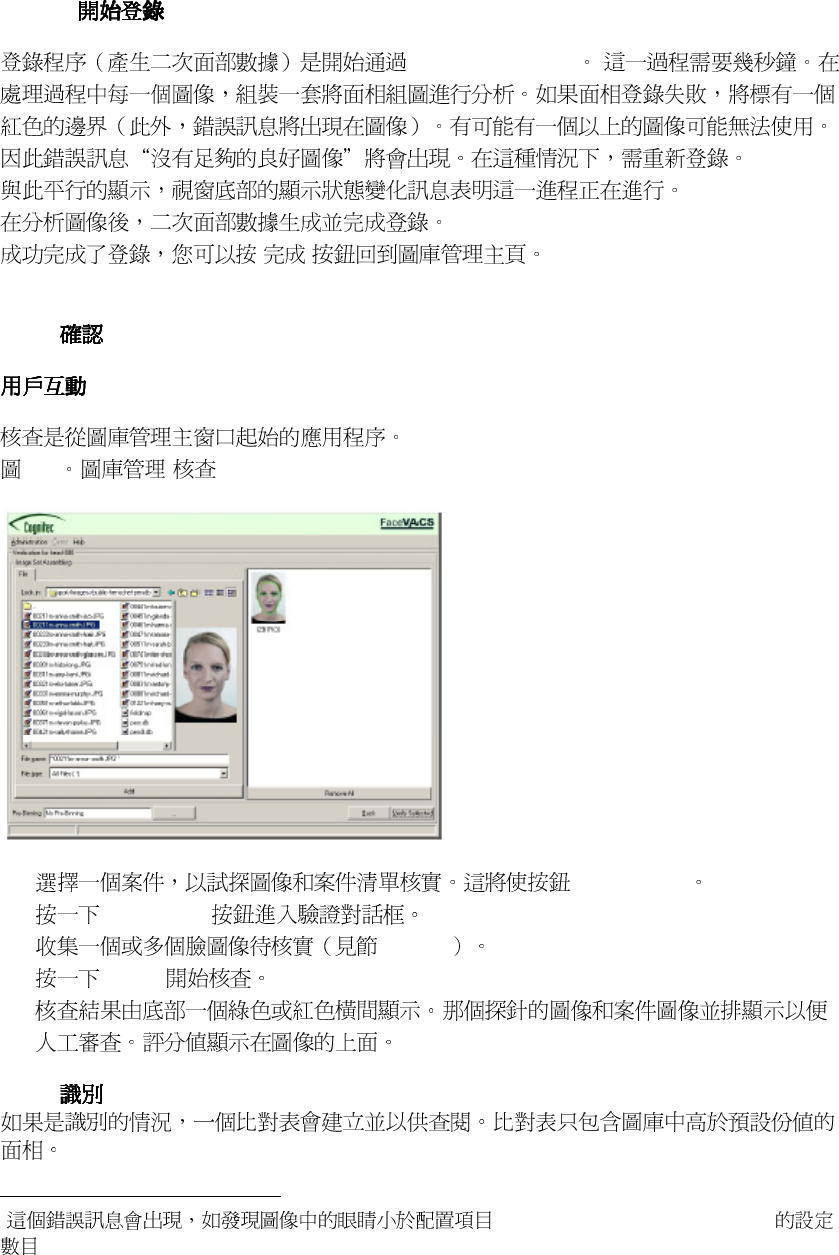
3-3 -
8 40
•
• ' ' ' '
[ ]
[ ]
22
3.2.3.2.
[
Start Enrollment
]
1
4
[ ]
3.2.4.
3-4 -
1. [
Verification
]
2. [
Verification
3. 3.2.3.1
4. [
Verify
]
5.
3.2.5.
4
Fvd.Enroller.AnnotatedSetEnroller
23
4.2.3
1. 3.2.3.1
2. [
Identify
]
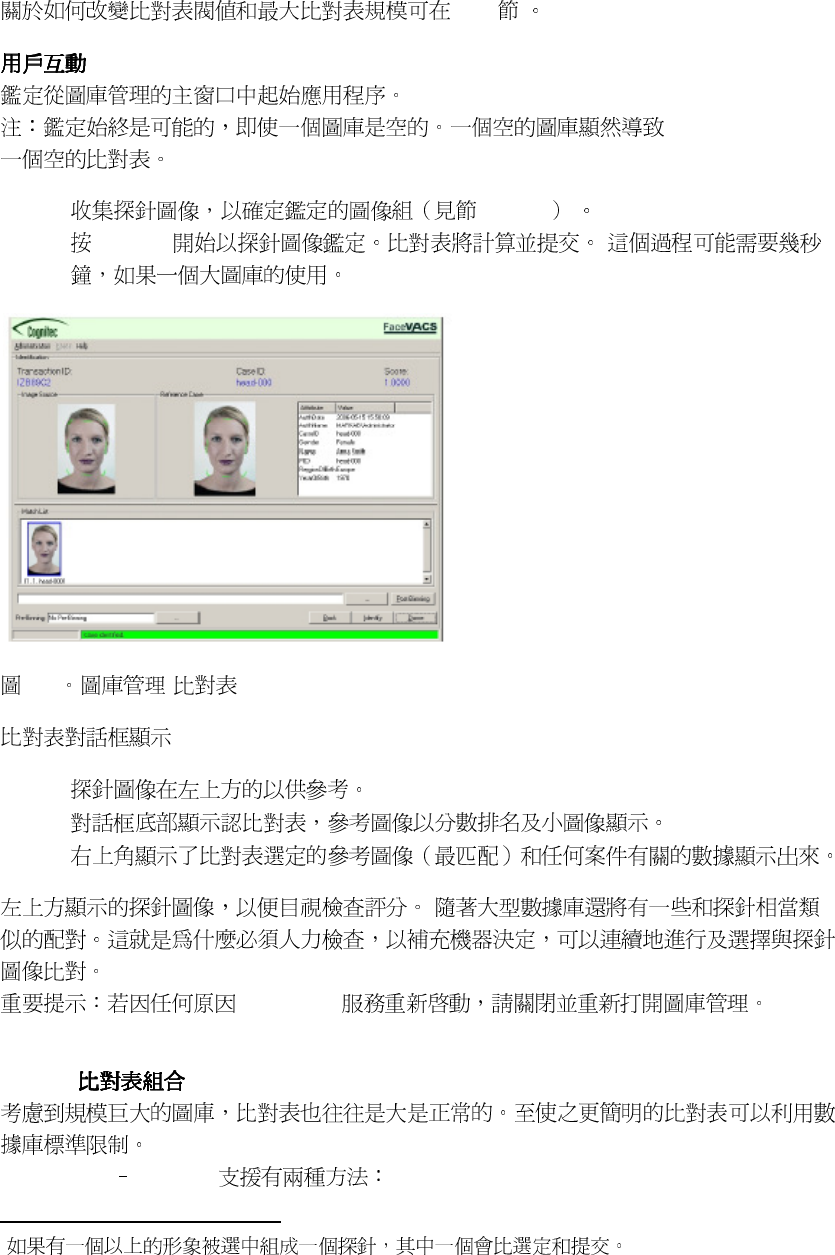
3-5 -
•
5
•
•
FaceVACS
3.2.5.1.
FaceVACS DBScan
5
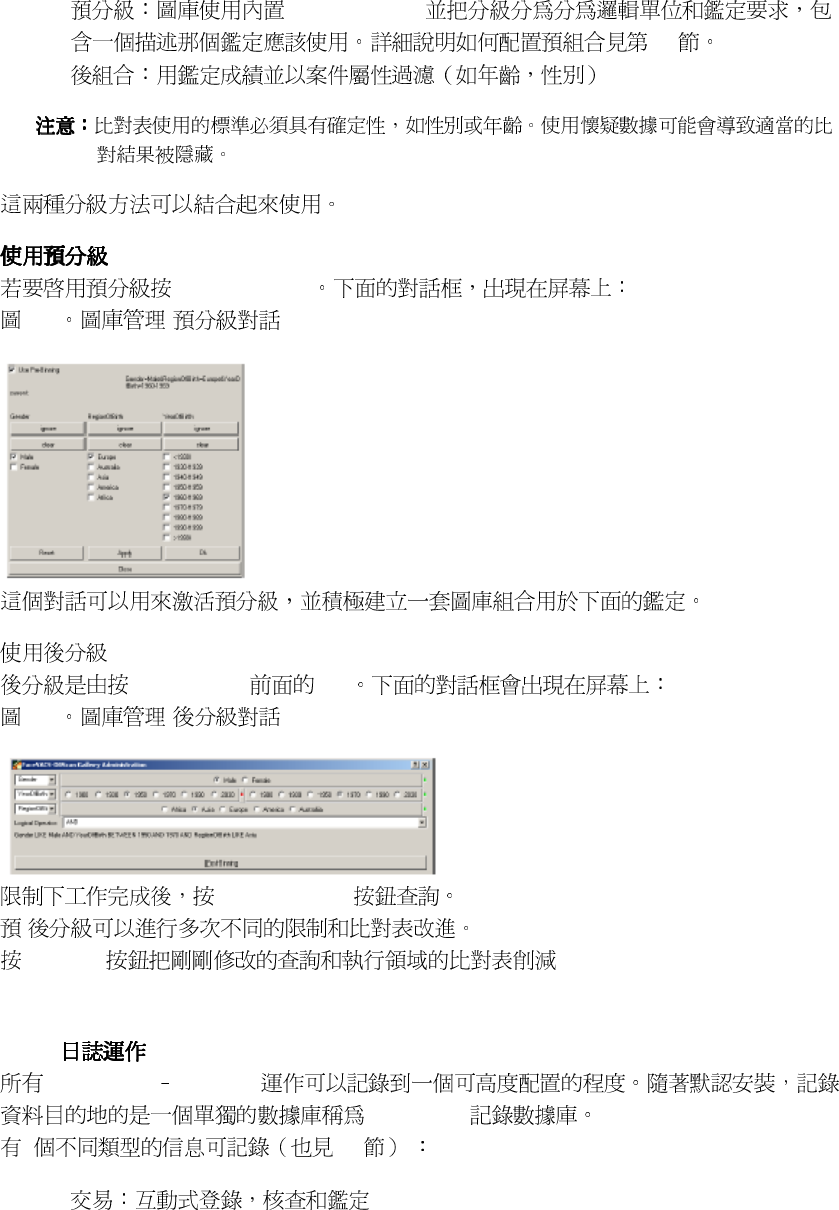
24
• BinningCriteria
4.3
•
[...]
Pre-Binning
3-6 -
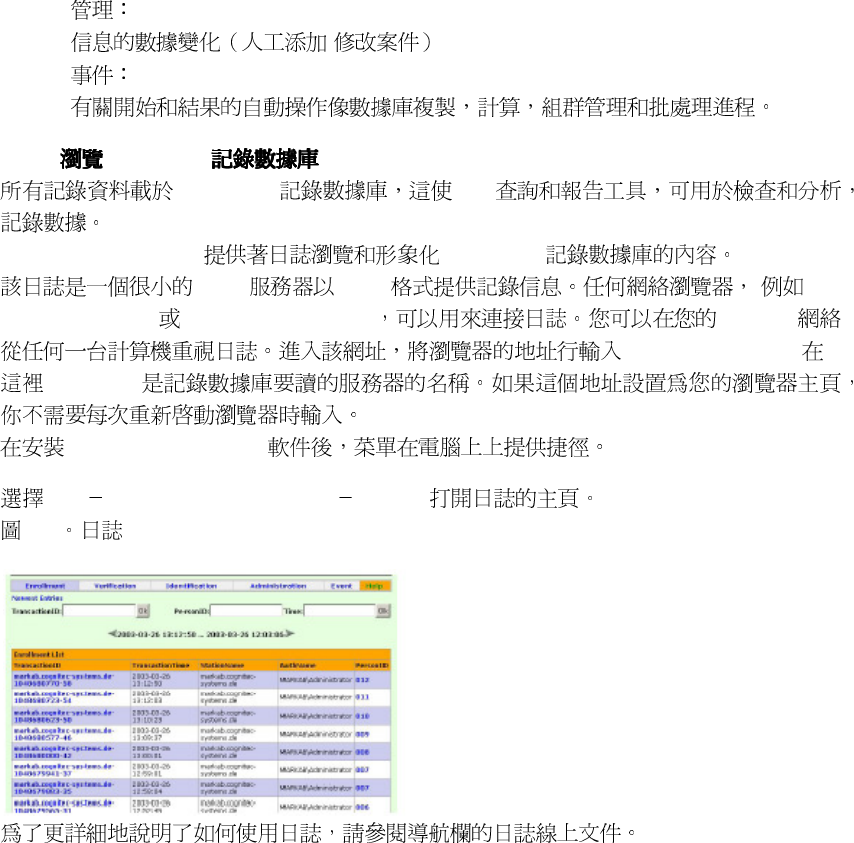
Post-Binning
[...]
3-7 -
[
Post-Binning
]
/
[
Binning
]
3.3. FaceVACS記錄數據庫和日誌
記錄數據庫和日誌記錄數據庫和日誌
記錄數據庫和日誌
3.3.1.
FaceVACS DBScan
FaceVACS
3 4.8
•
25
•
/
•
3.3.2. FaceVACS
FaceVACS SQL
FaceVACS - DBScan FaceVACS
HTTP HTTP
MS
Internet Explorer Netscape Navigator TCP / IP
http://[hostname]:1062
[
hostname
]
FaceVACS - DBScan
Start !FaceVACS-DBScan 4.1.3 !Journal
3-8
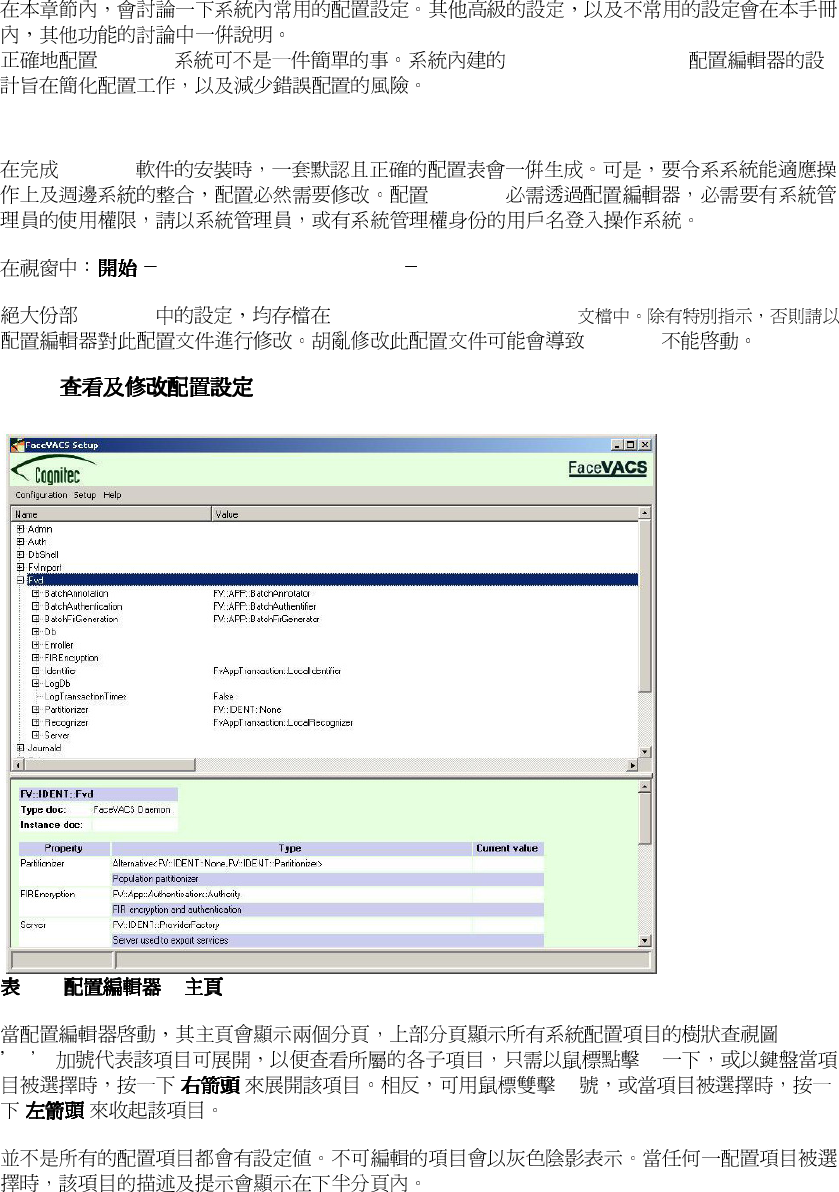
26
第
第第
第四
四四
四章
章章
章. 配置
配置配置
配置
DBScan Configuration Editor
4.1. 使手配置編輯器
使手配置編輯器使手配置編輯器
使手配置編輯器
DBScan
DBScan
! FaceVACS-DBScan 4.1.3 ! Configuration Editor
DBScan
FVDBScan__\etc\facevacs.cfg
DBScan
4.1.1.
4-1. -
+ [+]
[ ] [-]
[ ]
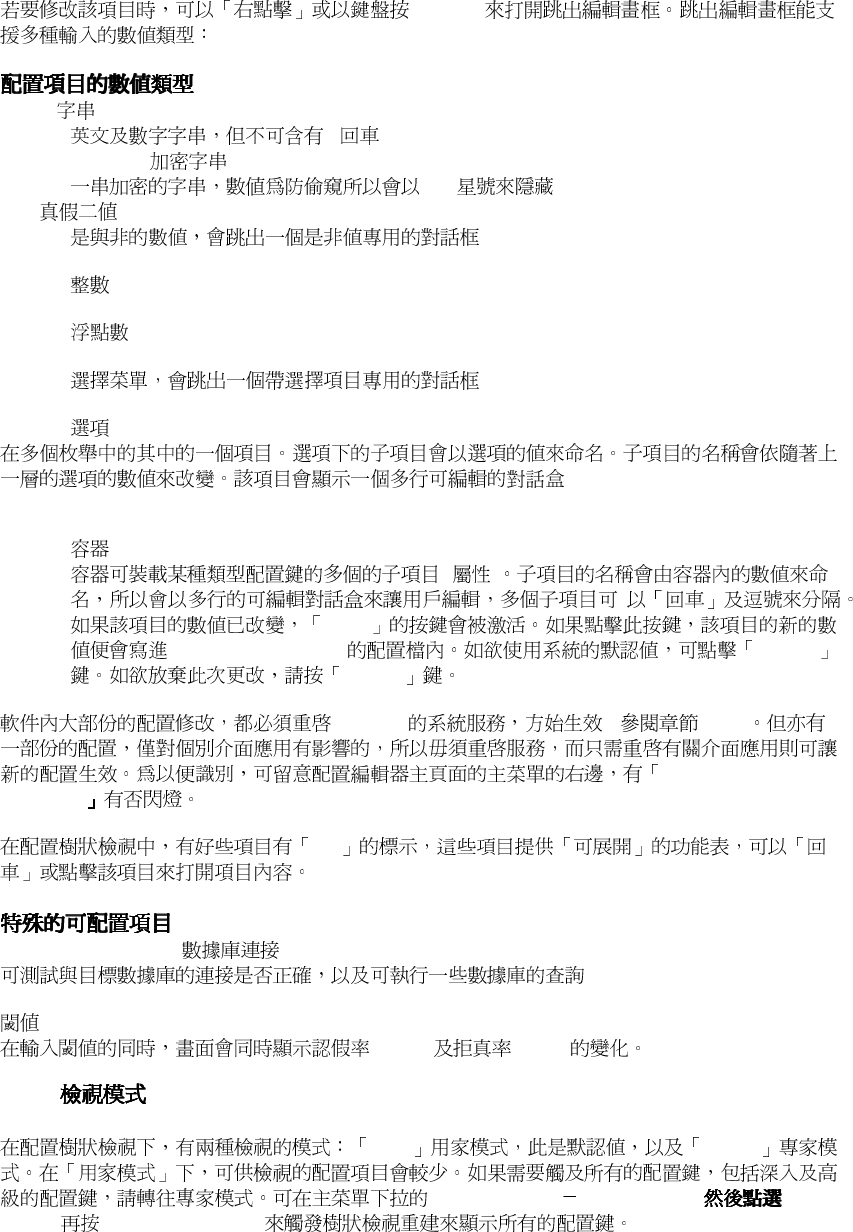
27
CTRL-E
String
< >
Encrypted String
****
Bool
Int
Float
Enum
Alternative
Container
( )
Store
FaceVACS-DBScan Default
Cancel
DBScan ( 2.5 )
Service Restart
Required
Ext
DatabaseConnection
(FAR
) (FRR)
4.1.2.
User Expert
Configuration !Current View
Expert [Apply-Changes]
28
DBScan
4.1.3.
Edit !Find
[*]
[*]
[Find]
[Find Next]
4.1.4.
Component access restricted ( )
DBscan TCP/IP
TCP/IP 1102
1102 DBScan DBScan
1102 DBScan
ClusterController.Communication.Port
ClusterController.Communication.Port
. ClusterControllerConstraints
EqualityConstraints
EqualityConstraints
4.1.5.
: DBScan
Setup.ApplicationConfiguration.Applications
Setup.ApplicationConfiguration.Applications
( )
Setup.ApplicationConfiguration.Applications
Setup.ApplicationConfiguration.Applications < >
< >
Static ( ) Service
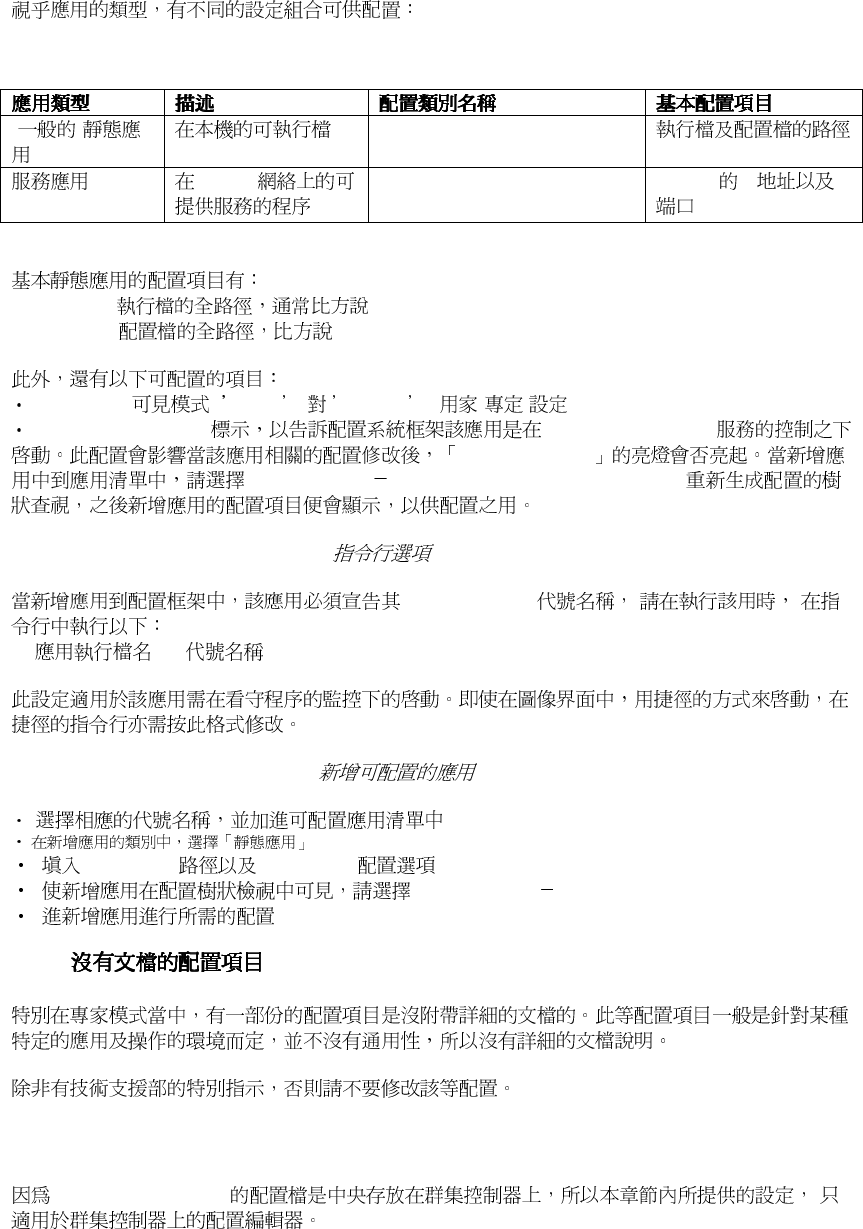
29
Table 4-1. Configurable Application Types
( )
Fn:: Deployment::StaticApplication
TCP/IP
Fn::ServiceConnectorFactoryWithout
Name
TCP/IP IP
Pathname:
C:\FVDBScan__ \bin\application_name.exe
ConfigFile:
C:\FVDBScan__ \etc \facevacs.cfg
VisibleFor ( User Expert ) -
ServiceApplication FaceVACS-DBScan
Service Restart
Configuration ! Reconfigure New Applications
The -appname command line option
Symbolic Name
-
< > < >
Add a new configurable application
Pathname ConfigFile
Configuration !Reconfigure New Applications
4.1.6.
4.2. 基本配置設定
基本配置設定基本配置設定
基本配置設定
FaceVACS-DBScan
30
4.2.1.
DBScan 2 MS Jet DBScan
FaceVACS FaceVACS-Log
SQL
SQL DBScan
FaceVACS-DBScan Cluster Controller .Databases.Db Cluster
Controller .Databases.LogDb FaceVACS FaceVACS-Log
Fn::Database::ODBC::Component
FaceVACS-DBScan FaceVACS-Log
Name . ODBC
UniqueId
NetworkWide -
HostWide - DBScan
ProcessWide - Fvd
ProcessWide
Cluster Controller .Databases.Db Cluster Controller.Databases.LogDb
Ext .
ODBC
4.2.2.
Cluster Controller .ComputingNodes.
symbolic names
2
Host: IP IP
Port: 1102

31
4.2.3.
Cluster Controller .BiometricSettings
( )
( )
( )
Cluster Controller .BiometricSettings.EyeDistanceRange.MinEyeDistance
Cluster Controller .BiometricSettings.EyeDistanceRange.MaxEyeDistance
1%
Cluster Controller .BiometricSettings.MaxMatchListThreshold
0.6
Cluster Controller .BiometricSettings.MatchListSize
Cluster Controller .BiometricSettings.MinNumOfSamples
1
Fvd. EnrollmentPipeline. UseSampleEvaluation
Fvd. Identifier. Pipeline. UseSampleEvaluation
Fvd. Recognizer. FvAppTransaction::LocalRecognizer. StreamRecognizer.
UseSampleEvaluation
Fvd. Recognizer. FvAppTransaction::LocalRecognizer. SetRecognizer.
UseSampleEvaluation
32
Fvd. Recognizer. FvAppTransaction::LocalRecognizer. AnnotatedSetRecognizer.
UseSampleEvaluation
Fvd. SampleEvaluation. Threshold
12.4
4.3.條件查詢的配置
條件查詢的配置條件查詢的配置
條件查詢的配置
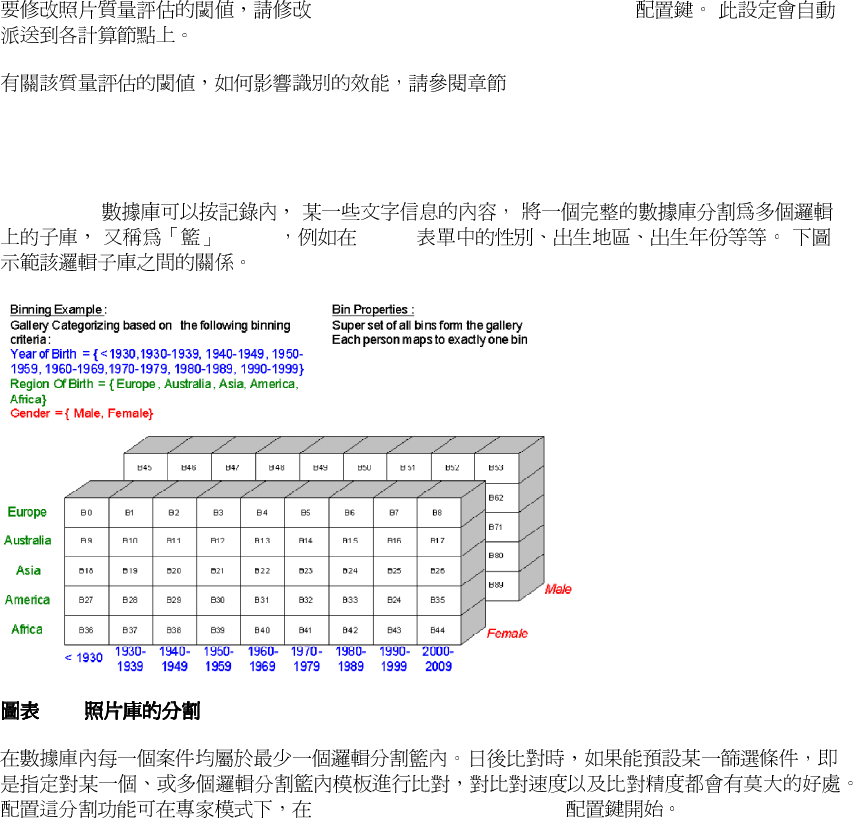
FaceVACS
( Bin
)
Cases
4-2.
Fvd.BinningCriteria setting
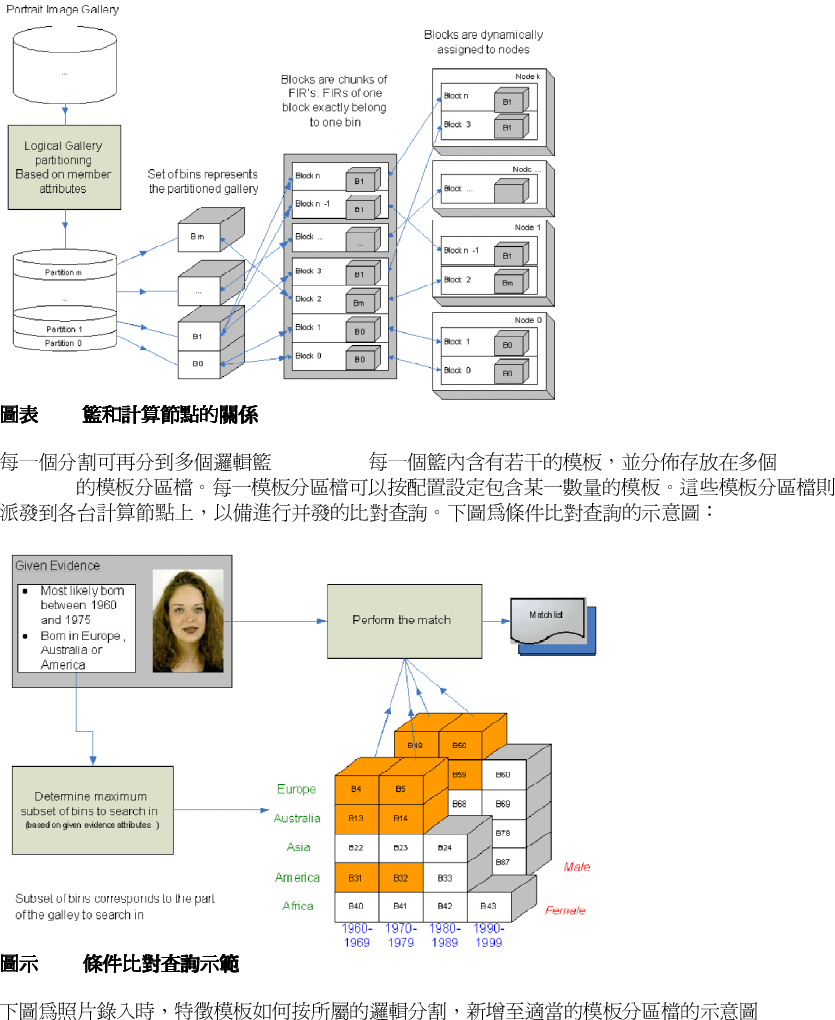
33
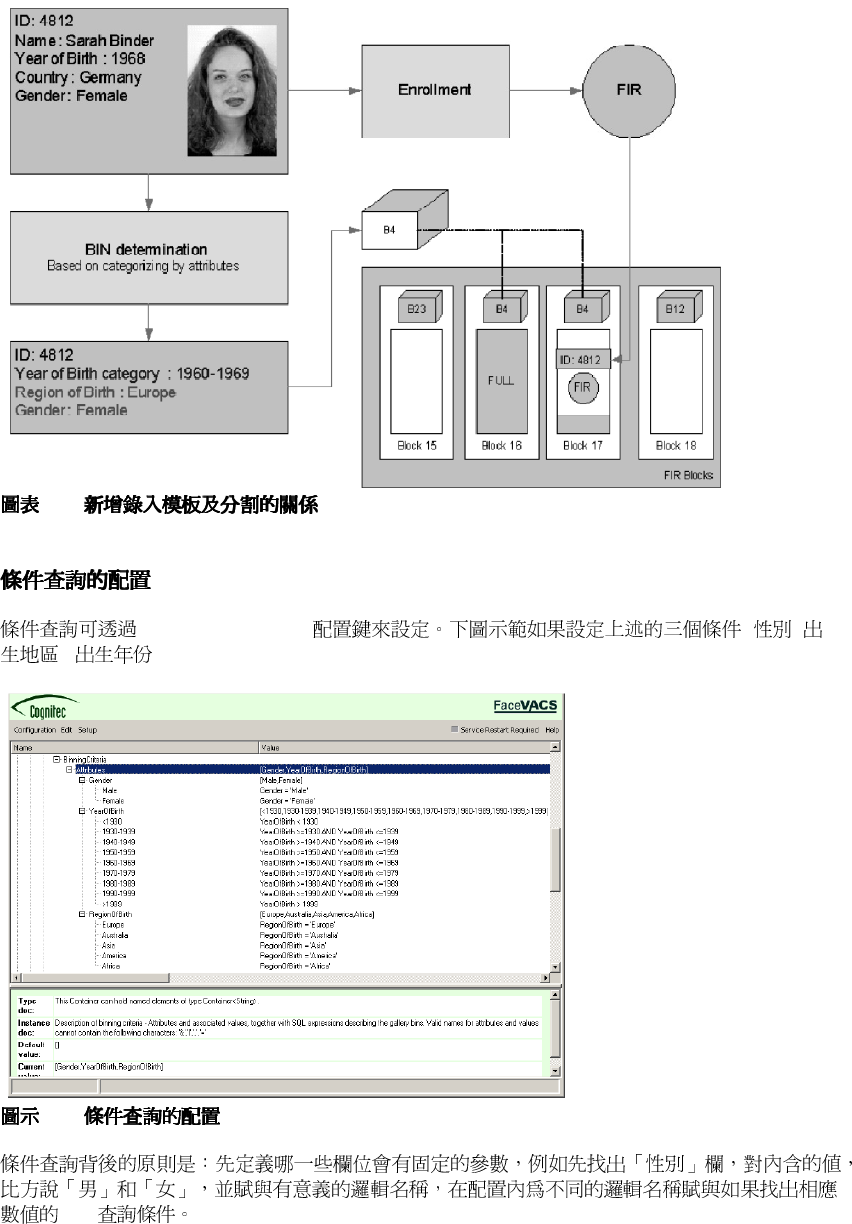
4-3.
B0 ... Bm.
DBScan
4-4.
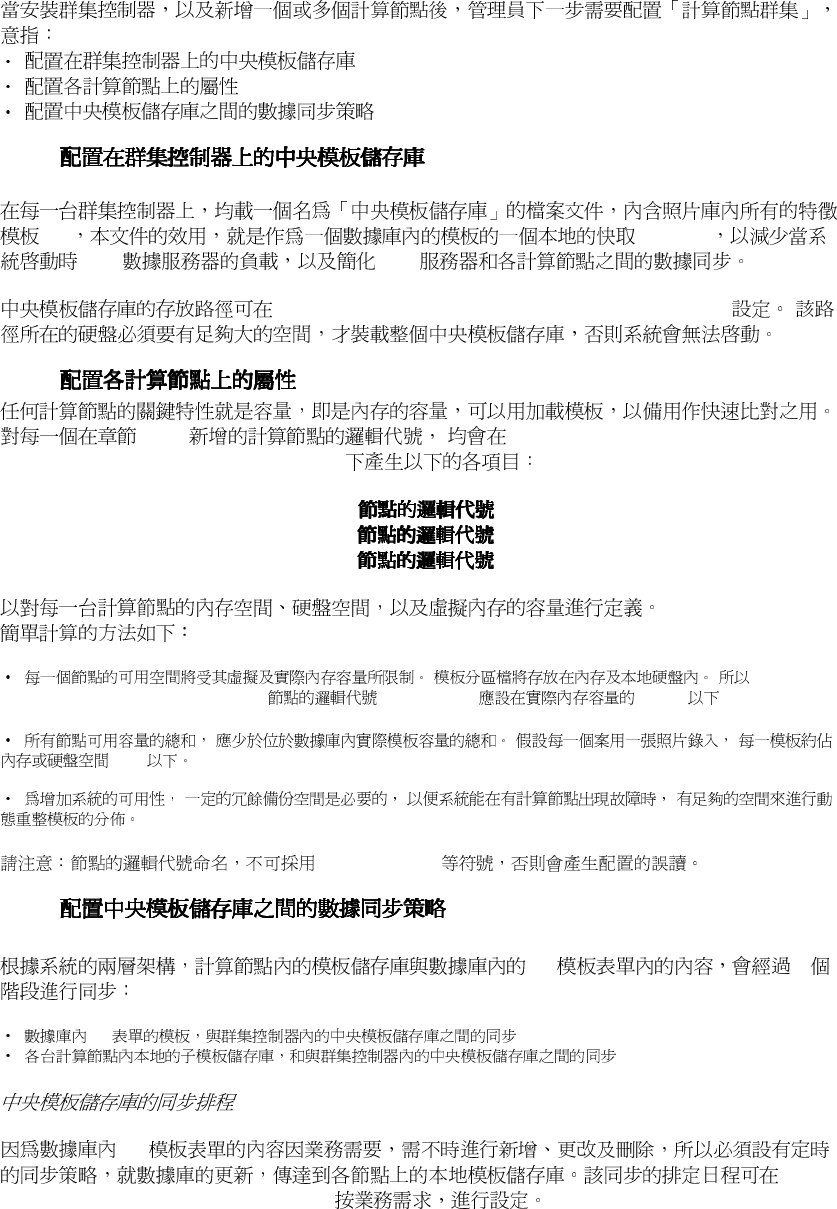
34
4-5.
Fvd.BinningCriteria ( ,
, ):
4-6.
SQL
35
4.4. 計算節點群集的配置
計算節點群集的配置計算節點群集的配置
計算節點群集的配置
4.4.1.
FIR (Cache)
SQL SQL
Fvd.Identifier.FIRRepository.Repository.BlockDir
4.4.2.
4.2.2
Fvd.Identifier.BatteryManager.Nodes
Fvd.Identifier.BatteryManager.Nodes.[
].RamCapacity
Fvd.Identifier.BatteryManager.Nodes.[ ].DiscCapacity
Fvd.Identifier.BatteryManager.Nodes.[ ].VirtualCapacity
Fvd.Identifier.BatteryManager.Nodes.[ ].RamCapacity 200MB
1KB
[&], [|], [,], [ ], [=]
4.4.3.
FIR 2
FIR
FIR
Fvd.Identifier.FIRRepSyncSchedule

36
Fvd.Identifier.FIRRepository.BatteryManager.SyncTime
37
4.5. 多台群集控制器和高可用性
多台群集控制器和高可用性多台群集控制器和高可用性
多台群集控制器和高可用性
FaceVACS-DBScan
Active Cluster Controller
Standby Cluster Controller
4.5.1.
Cluster Controller.Cluster ControllerName
ClusterController0
Cluster Controller .Cluster ControllerPriority. 0
1 2 3 4
4.5.2.
ClusterController.Other-Cluster Controllers
Host Port IP
4.5.3.
CognitecFrontends. Cluster Controllers.
Host Port IP
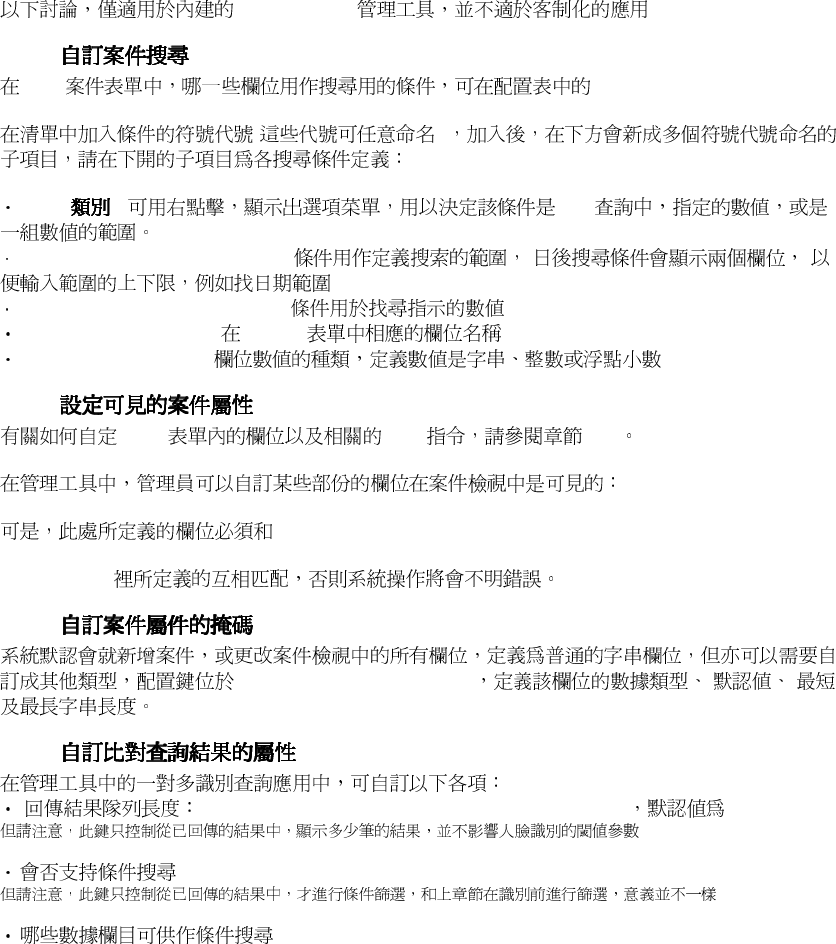
38
4.6. 自訂化管理程序的介面
自訂化管理程序的介面自訂化管理程序的介面
自訂化管理程序的介面
Administration
4.6.1.
Case
Admin.DbView.CaseSearchConditions.Conditions
( )
Type : SQL
[...]RangeLikeConditionField:
[...]MatchLikeConditionField:
[Type].ColumnName: Cases
[Type].ColumnType:
4.6.2.
Case SQL 6.4
Admin. DbView.
Administration. CasePropertiesInfo
Admin. DbView. Administration. IntroduceCase Admin.
DbView. Administration. ChangeCase-Properties Admin. DbView. Administration.
QueryCases
4.6.3.
Admin.DbView.EditFields
4.6.4.
Admin.Identification.NumberOfVisibleMatches 10
Admin.Identification.EnableBinning
Admin.Identification.BinningConditions

39
4.7. 進階配置
進階配置進階配置
進階配置
4.7.1.
Primary Facial Data (PFD)
Leo: no such key Fvd. Enroller. PrimaryBiometricDataUpdate in Cluster Controller of
DBScan 4.1.3
Update (or storing) of Primary Facial Data (PFD) is the process of storing images and eye
positions into
the database upon enrollment. Both whether and how images are stored can be configured in
Fvd. Enroller. PrimaryBiometricDataUpdate
Please note that the settings applied here do not affect batch enrollments.
First, the type of the data update can be set to either FvAppTransaction:: LocalEnroller.
PrimaryBiometricDataUpdate,
which is the default, or to Fn:: None, which means that there is no storing at all.
There are two main configurable properties of PrimaryBiometricDataUpdate:
RefImgStoring defines the image format as described in Configurable Image Formats.
FaceCropping defines whether to store the cropped face region only instead of the entire
image.
4.7.2.
4.7.3.
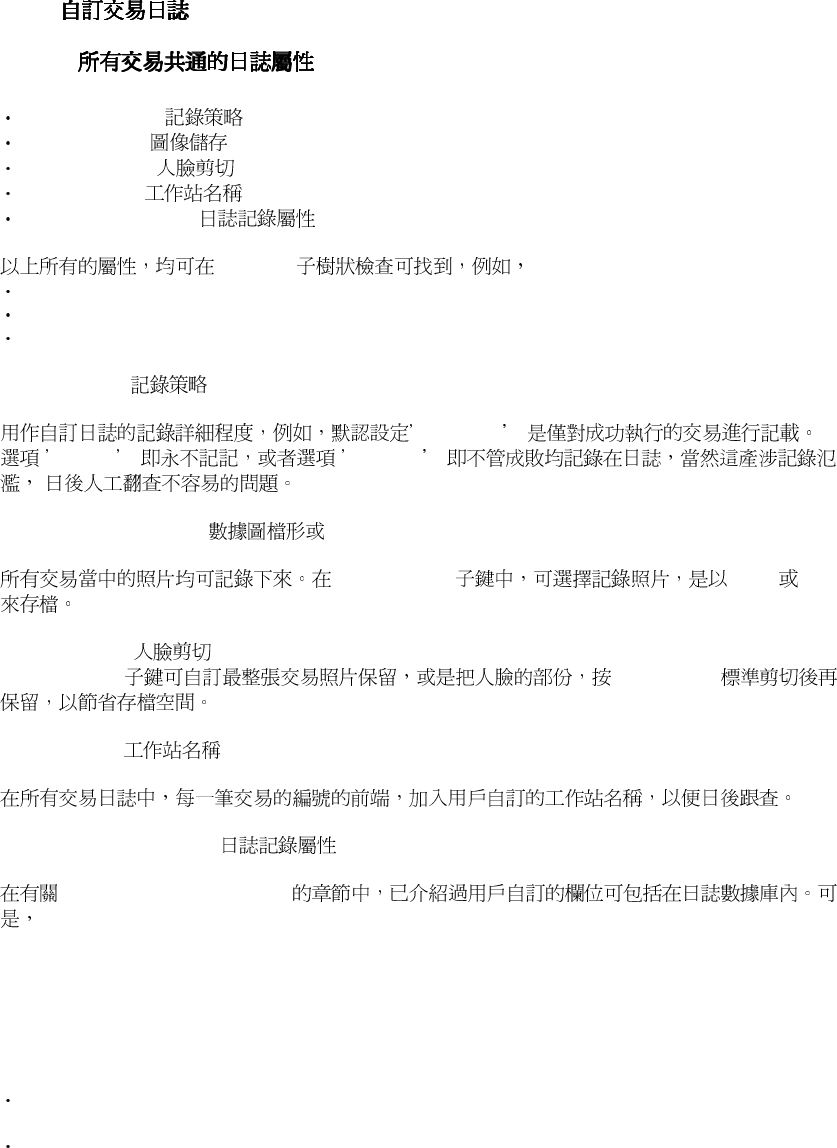
40
4.8. 自訂日誌記錄
自訂日誌記錄自訂日誌記錄
自訂日誌記錄
4.8.1.
4.8.1.1.
LoggingPolicy
ImageStoring
FaceCropping
StationName
LogCaseProperties
Logging
Fvd. Enroller. Logging
Fvd. Recognizer. FvAppTransaction:: LocalRecognizer. Logging
Fvd. Identifier. BatteryManager. CompositeIdentification. Logging
Logging policy
Success
Never Always
Database image format
ImageStoring JPEG PNG
Face Cropping
FaceCroppin ISO19794-5
Station Name
Logging Case Properties
FaceVACS Log Database
included in FaceVACS Log Database tables. However, normally these properties are not logged.
If this
is desired, it must be configured, which is more advanced, since changes have to be applied at
different
locations.
To enable logging of case properties three steps are required:
Enable case logging and customize SQL query retrieving property data from FaceVACS
Database
Adopt SQL INSERT queries for storing logging data into FaceVACS Log Database

41
If required, adopt SQL queries used by Journal
The first step is accomplished by changing the type of LogCaseProperties from Fn::None,
which is the
default, to FVAppTransaction:: CaseProperties and to configure the SQL query to be used to
retrieve
the properties within the Properties setting. This query has to return the columns to be involved,
and
its WHERE clause has to refer to the CaseID.
Next, you have to adjust the SQL INSERT query configured in the Log[TransactionName] (e.g.
Fvd.Enroller.Logging.LogEnrollment) configuration item to actually store the new properties,
too.
Note that the columns to be considered in addition have to be appended to the list of columns
and
that as many question mark parameter placeholders are to be added as new columns.
To enable Journal to display the property data, you have to adjust all corresponding queries
within the
Journald. HttpServer. Queries sub-tree to retrieve the columns desired.
As an example below is demonstrated how to include the Name case property with the
enrollment
logs:
1. Change the type of
Fvd. Enroller. Logging. LogCaseProperties
to FVAppTransaction:: CaseProperties. The Properties entry of the latter now will read
SELECT Name from Cases WHERE CaseID = ?;
which is the default for the case properties query. You might replace this by any other SELECT
query which uses just 1 parameter referring to the CaseID within the WHERE clause.
2. Now change the Fvd. Enroller. Logging. LogEnrollment INSERT query. By default it reads
INSERT INTO EnrollmentLogs
(TransactionID, TransactionTime, StationName, AuthName, CaseID)
VALUES ( ?, ?, ?, ?, ?);
This has to be changed to consider the Name column now:
INSERT INTO EnrollmentLogs
(TransactionID, TransactionTime, StationName, AuthName, CaseID, Name)
VALUES ( ?, ?, ?, ?, ?, ?);
Note that the Name column has been added after the CaseID key and that for each column
added in the column enumeration (1 in this case) one question mark parameter placeholder has
to be added in the values list.
3. To make the new logging data visible with Journal, too, the Journal queries have to be adopted
analogously. This is done by changing the configuration entries
Journald. HttpServer. Queries. GetEnrollment
Journald. HttpServer. Queries. GetEnrollmentsFore
Journald. HttpServer. Queries. GetEnrollmentsBack
to read
SELECT
TransactionID, TransactionTime, StationName, AuthName, CaseID, Name
FROM EnrollmentLogs
WHERE TransactionID = ?;
SELECT
TransactionID, TransactionTime, StationName, AuthName, CaseID, Name
FROM EnrollmentLogs
WHERE CaseID LIKE ? AND TransactionTime >= ? ORDER BY TransactionTime ASC;
SELECT
TransactionID, TransactionTime, StationName, AuthName, CaseID, Name
FROM EnrollmentLogs
42
WHERE CaseID LIKE ? AND TransactionTime <= ? ORDER BY TransactionTime DESC;
respectively.
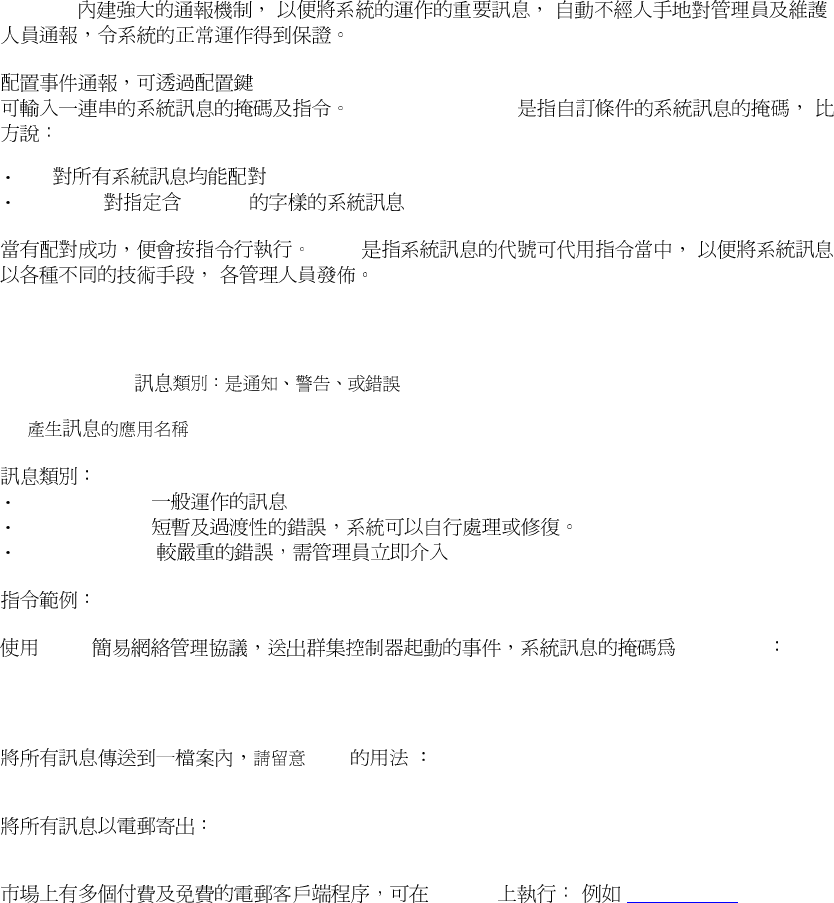
43
4.9. 日誌
日誌日誌
日誌/通報的配置
通報的配置通報的配置
通報的配置
DBScan
Fvd. NotificationDirector. CommandExpressions
MatchExpression
"*":
"*Error*": "Error"
"$@"
General message format:
{Application Name} [{Message Type}]: {Message}
| |
| -->
|
-->
Info :
Warning :
Error :
snmp fvd started
snmptrap -e 0x0102030405 -v 3 -u myuser -a MD5 -A mypassword \
-l authNoPriv localhost 42 coldStart.0
"$@"
echo "$@" >> /tmp/dbscan.log
echo "$@" | mail -s FVDBScan {email address}
Window ( www.blat.net)
blat dummy -body "$@" -to {recipient email} -server mail \
-f {mail server user} -pw {mail server password} -subject "CC
Notification"
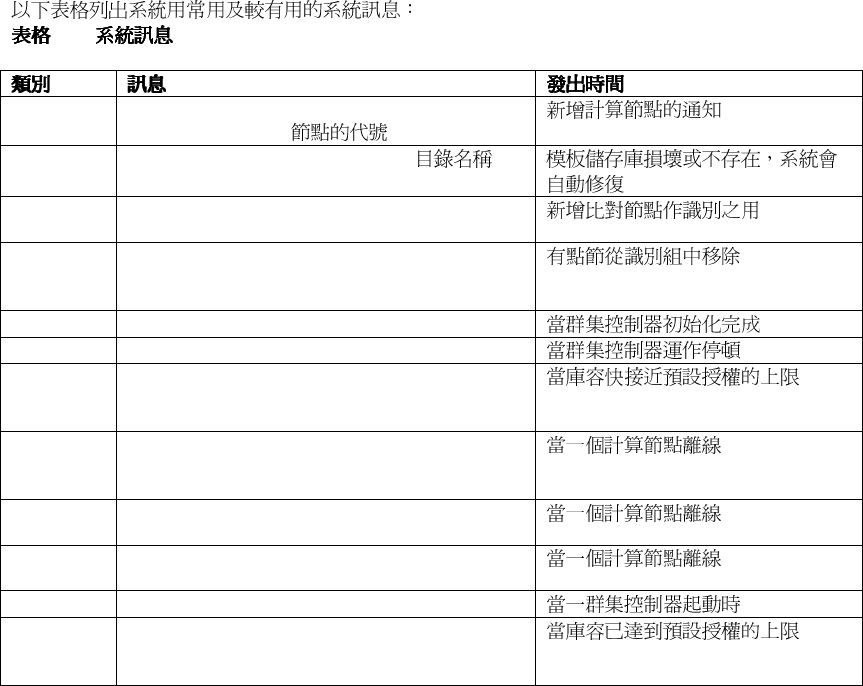
44
4-2.
Info "Added nodes to working set of battery " |
batteryName | ": " { }
Info "Purging Repository directory " | { }
Info "Adding identifier " {logical name} | " , num
of processors now " | {number of processors}
Info "Removing identifier " | {logical name} | " ,
num of processors now " | {number of
processors}
Info "fvd started"
Info "fvd terminated"
Warning "Identification gallery size " | {current
gallery size} | " approaches the allowed limit
of " | {max allowed gallery size}
Warning "Failed to add node " | {Node name} | " to
working set of battery " | {battery name} | ":
" {error message}
Warning "Node " | {logical name} | " is not reachable:
" | {error message}
Error "Error during synchronisation of FIR
Repository: " | {error message}
Error "fvd terminated on error:" | {error message}
Error "Identification gallery size " {current gallery
size} | " approaches the allowed limit of " |
{max allowed gallery size}
45
4.10. 配置系統的保安
配置系統的保安配置系統的保安
配置系統的保安
FaceVACS-DBScan
DBScan
4.10.1.
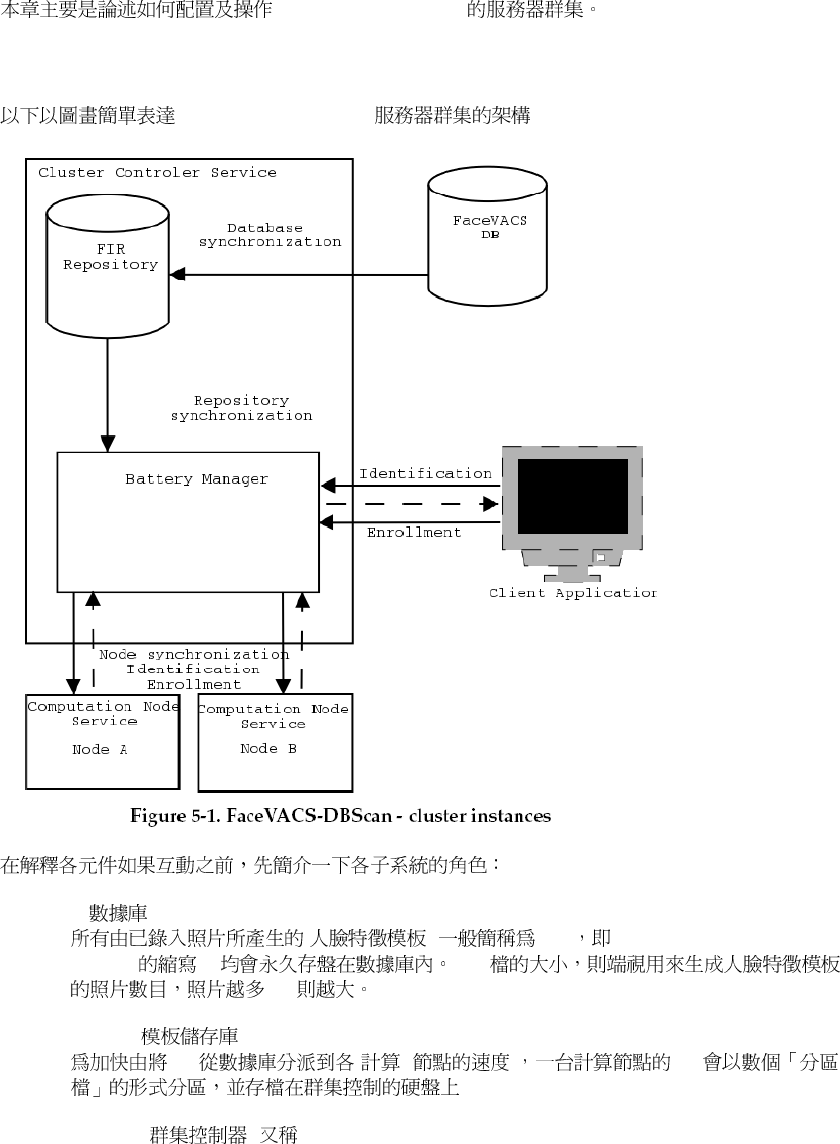
FaceVACS-DBScan
DBScan
DBScan -
A
A
A A
"A"
4
ClientID
PPOffice
-
-
keygen -pub <ClientID> -priv <ClientID> -fpub
<Public Key File>
-fpriv
<Private Key File>
ClientID
PPOffice
keygen -pub PPOffice -priv PPOffice -fpub
authpubkey.cfg
-fpriv
authprivkey.cfg
D:\FVDBScan__\etc\authpubkey.cfg
C:\FVDBScan__\etc\authprivkey.cfg
StationType. Communication. ServerAuthenticationMethod StationType.
Communication. ClientAuthenticationMethod Fn:: Server:: PkAuth Fn::
ClientPkAuth
46
Fn::Server::PkAuth Public Key File
D:\FVDBScan__\etc\authpubkey.cfg
.
Fn:: ClientPkAuth Private Key File
C:\FVDBScan__\etc\authprivkey.cfg
Fn:: ClientPkAuth Identifier PPOffice .
4-7. PKI
4.10.2.
Journal Web
FaceVACS-DBScan
FaceVACS-DBScan
DBScan \etc
Journald. HttpServer. AccessControlFile
Journald. HttpServer. UseAccessControl True
:: \\
Biomet bioadmin
\\Biomet\bioadmin
47
第
第第
第五
五五
五章
章章
章. 群集的操作
群集的操作群集的操作
群集的操作
FaceVACS®-DBScan
5.1. 數據庫
數據庫數據庫
數據庫-模板儲存庫
模板儲存庫模板儲存庫
模板儲存庫-群集控制器
群集控制器群集控制器
群集控制器-節點
節點節點
節點 之間的關係
之間的關係之間的關係
之間的關係
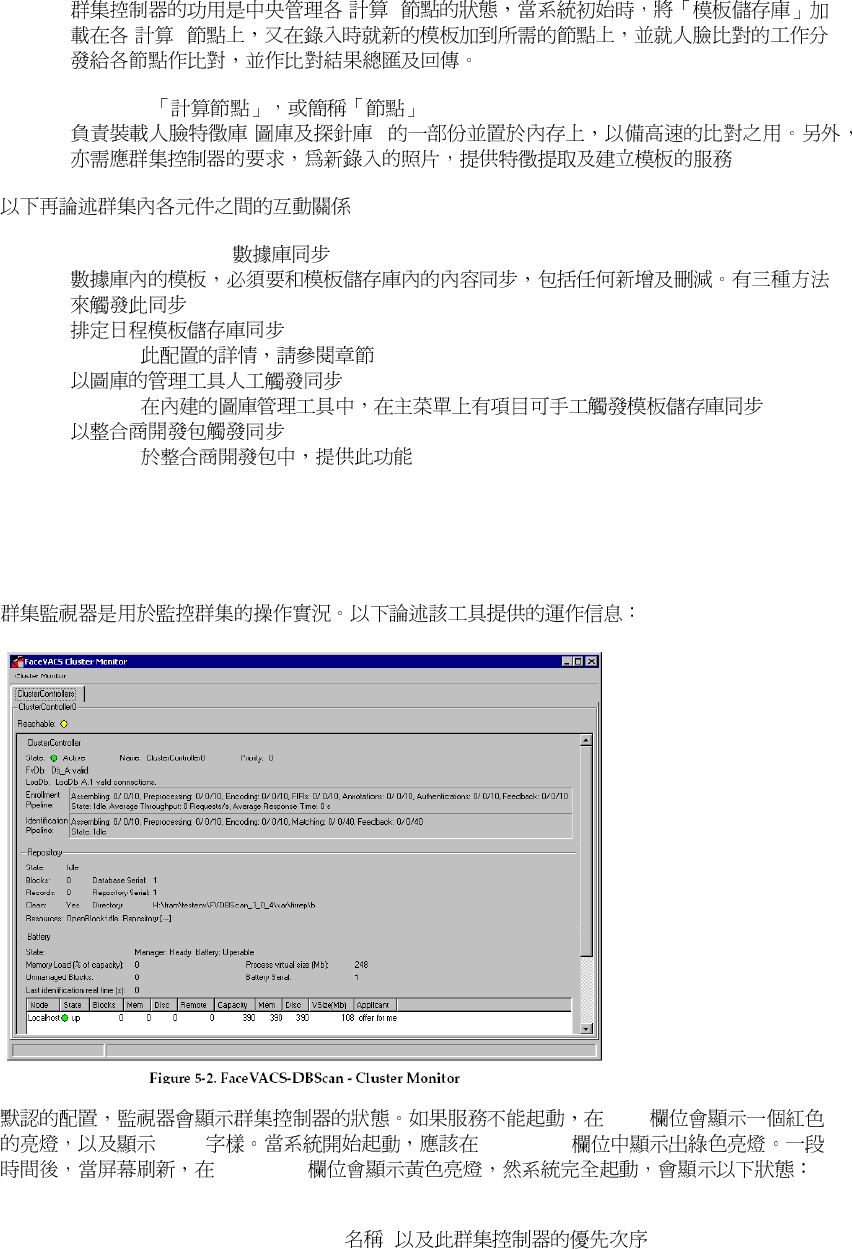
FaceVACS®-DBScan
Database
( FIR Facial Identification
Record ) FIR
FIR
FIR Repository
FIR ( )
FIR
Battery Manager ( Cluster Controller
)
48
( )
( )
Computing Node
( )
Database Synchronization
4.4.3.
fvisdk/enroll.h: FVIsdk::Enrollment::waitForSync
5.2. 群集監視器
群集監視器群集監視器
群集監視器
State
Down Reachable
Reachable
ClusterController
State (Active, Standby), Name ( )

49
Database connectivity ( )
Repository
State
"Initialize", "SyncWithDB",
"SyncWithOtherCC", "Backup"
Blocks
Records
FIR
Database Serial
Repository Serial
Directory
Corruption detected
Corrupt
Resources
OpenBlock Repository
Battery Manager
Battery Serial
Unmanaged Blocks
Nodes
Node
( 4.2.2 )
State
Up, Down
Blocks
Ram-/Disc-/Remote-Blocks

50
5.3. 群集狀態
群集狀態群集狀態
群集狀態/診斷及故障
診斷及故障診斷及故障
診斷及故障
FaceVACS-DBScan
UnmanagedBlocks
51
第六章
第六章第六章
第六章. 數據庫模型
數據庫模型數據庫模型
數據庫模型
FaceVACS
6.1. 數據庫欄位類型
數據庫欄位類型數據庫欄位類型
數據庫欄位類型
SQL MS Jet, MS SQL Server, Oracle and DB2
6-1.
Generic
MS Jet
MS SQL Server
Oracle
IBM DB2
STRING VARCHAR(255) VARCHAR(255) VARCHAR(255) VARCHAR(255)
INTEGER INTEGER INTEGER INTEGER INTEGER
FLOAT REAL REAL REAL REAL
DATETIME DATETIME DATETIME DATE DATE
BLOB IMAGE IMAGE BLOB BLOB
b
:
a. SQL Server TIMESTAMP
b. IBM DB2 database CLI/ODBC BLOB BINARY
LONGDATACOMPAT=1 DB2/CLI BLOB LONGVARBINARY
DB2
FaceVACS-DBScan FaceVACS FaceVACS Log
FaceVACS FaceVACS Log
6.2. FaceVACS 數據庫
數據庫數據庫
數據庫
FaceVACS-DBScan FaceVACS 1.22
FaceVACS
6.2.1. Cases
FaceVACS-DBScan Persons
"Gender"
STRING(10) ( ).
"Name" STRING ( ).
"RegionOfBirth" STRING ( ).
"YearOfBirth" INTEGER ( ).

52
AuthDate DATETIME
AuthName STRING
AuthSig STRING
BinAuthDate DATETIME
CaseID STRING
FaceVACS-DBScan
PersonID
Issuer STRING RepSelf
PID STRING
RecordID STRING
RepTV
Serial INTEGER RepTV
6.2.2. Images
CaseID STRING
Cases.CaseID
FaceVACS-DBScan
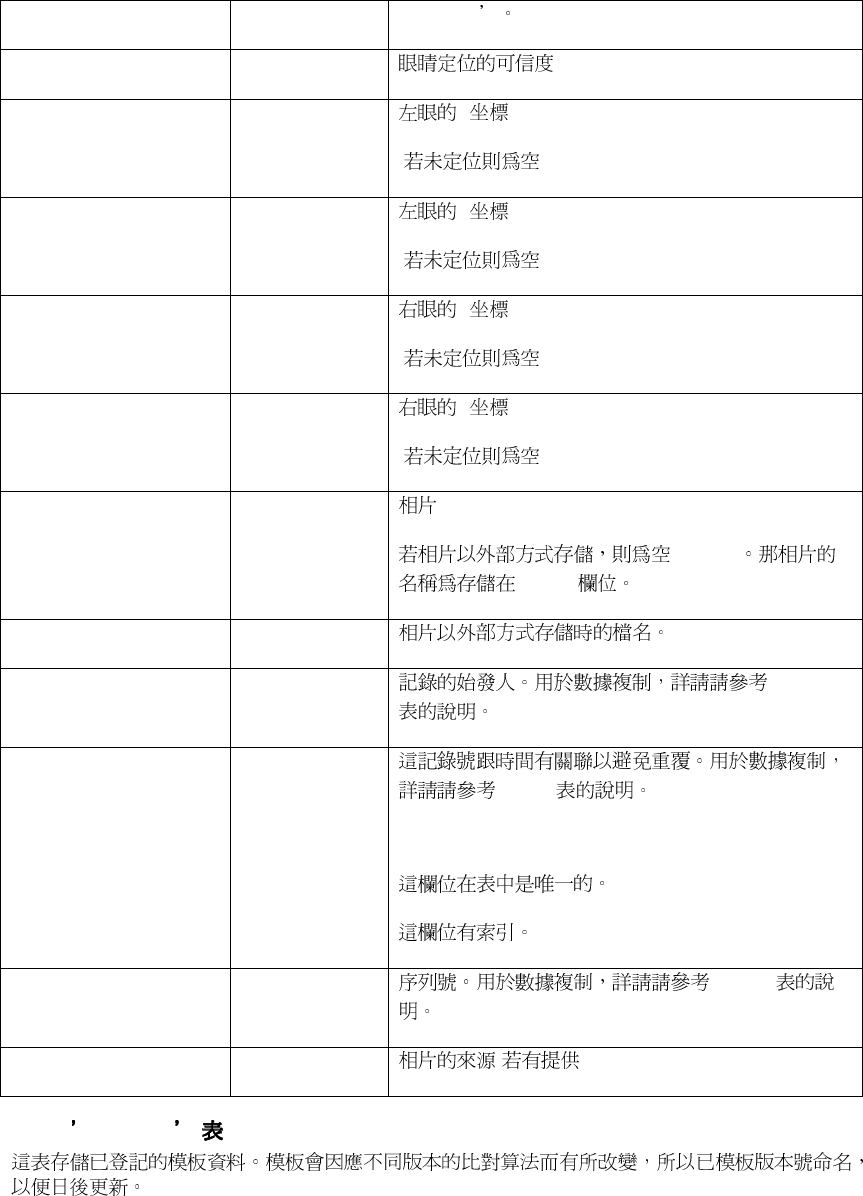
53
PersonID
EyeConfidence REAL
EyeLX REAL X
(NULL)
EyeLY REAL Y
(NULL)
EyeRX REAL X
(NULL)
EyeRY REAL Y
(NULL)
Img BLOB
(NULL)
ImgRef
ImgRef STRING
Issuer STRING RepSelf
RecordID STRING
RepTV
Serial INTEGER RepTV
Source STRING ( )
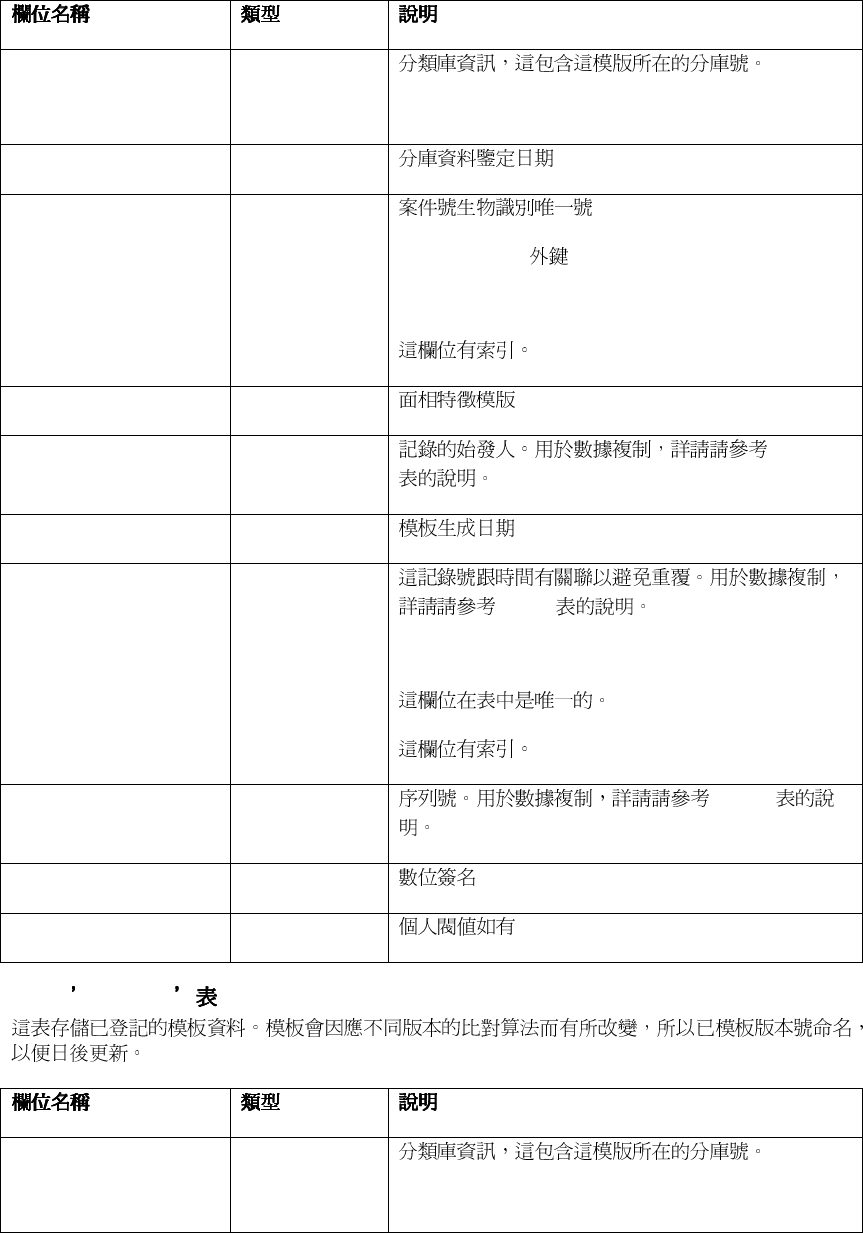
6.2.3. FIR_6_0
54
Bin STRING(1024)
BinDate DATETIME
CaseID STRING
Cases.CaseID
FIR BLOB
Issuer STRING RepSelf
PfdDate DATETIME
RecordID STRING
RepTV
Serial INTEGER RepTV
Signature STRING
Threshold REAL
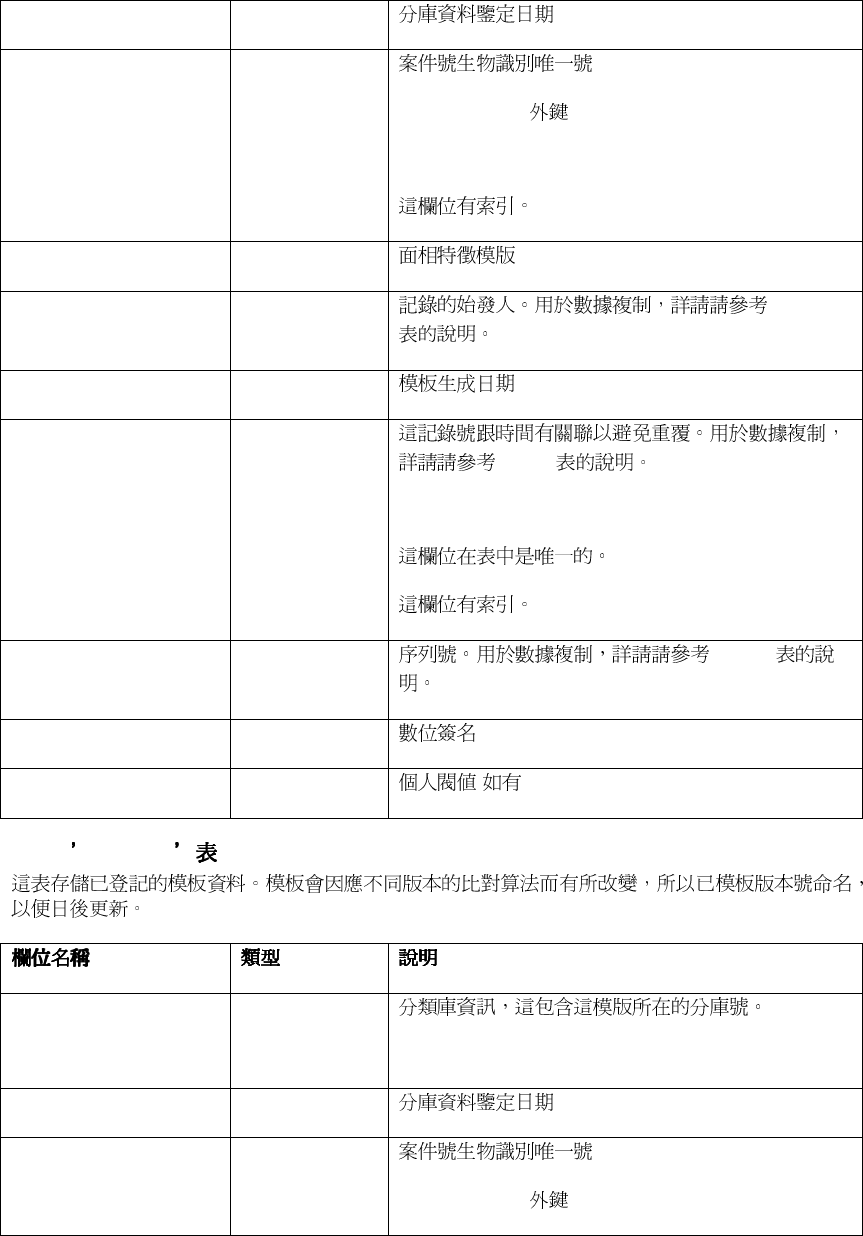
6.2.4. FIR_6_1
Bin STRING(1024)
55
BinDate DATETIME
CaseID STRING
Cases.CaseID
FIR BLOB
Issuer STRING RepSelf
PfdDate DATETIME
RecordID STRING
RepTV
Serial INTEGER RepTV
Signature STRING
Threshold REAL ( )
6.2.5. FIR_4_5
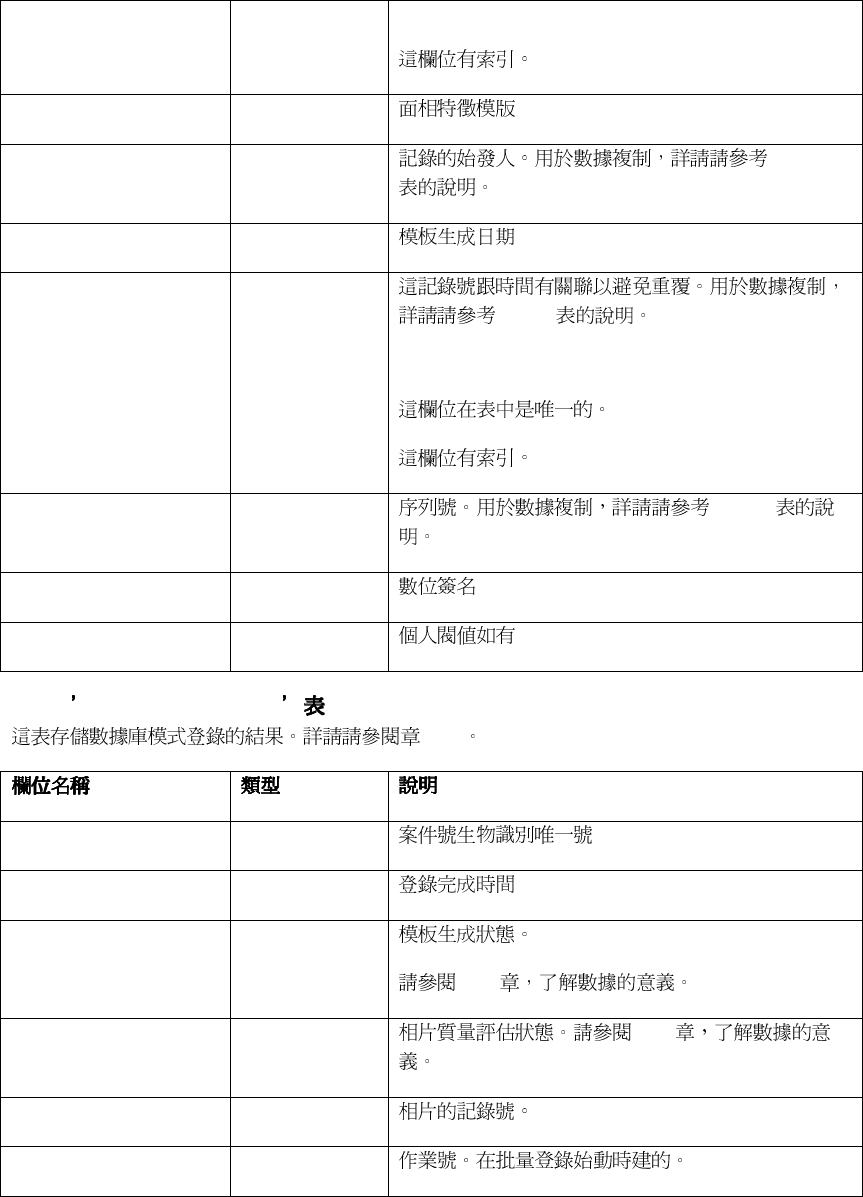
Bin STRING(1024)
BinDate DATETIME
CaseID STRING
Cases.CaseID
56
FIR BLOB
Issuer STRING RepSelf
PfdDate DATETIME
RecordID STRING
RepTV
Serial INTEGER RepTV
Signature STRING
Threshold REAL
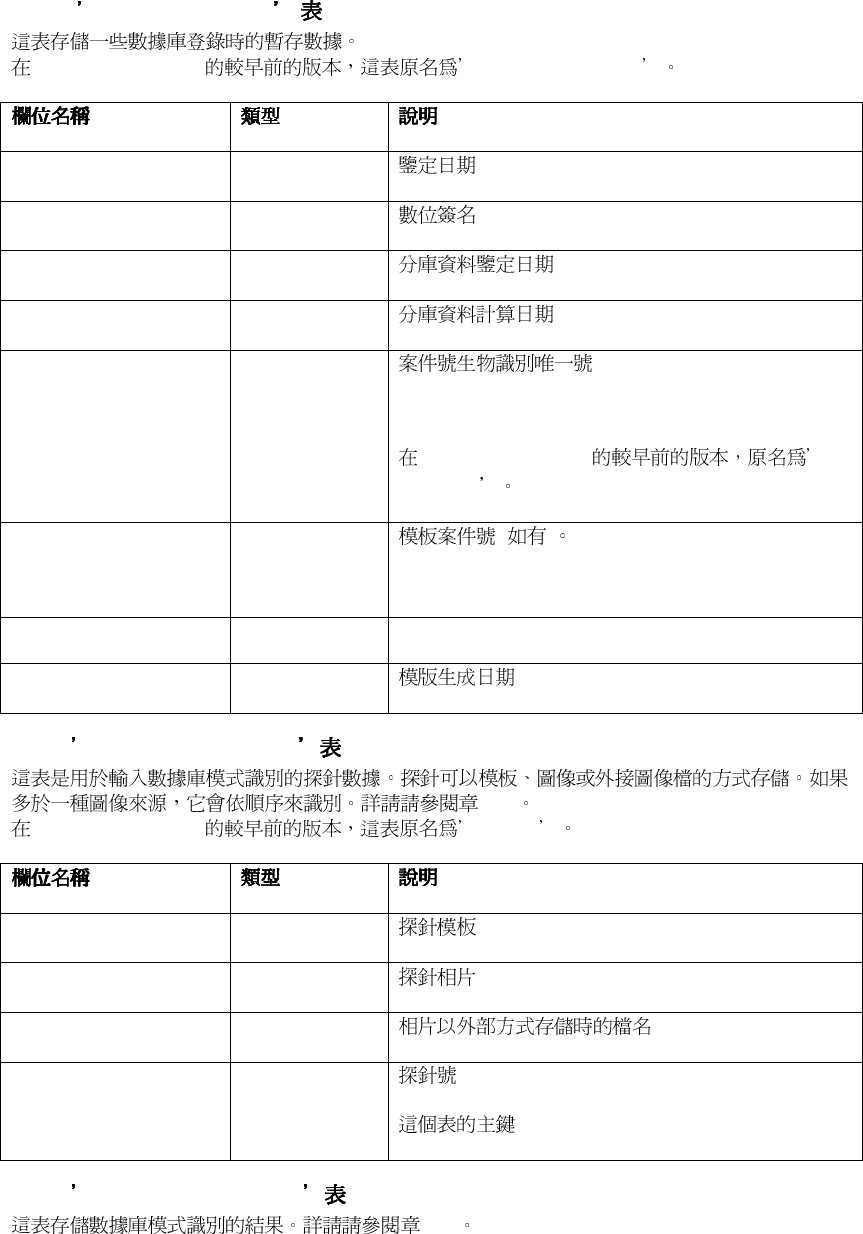
6.2.6. EnrollmentResults
7.3.3
CaseID STRING
EnrollmentTime DATETIME
FIRGeneration INTEGER
7.3.3
ImageEvaluation INTEGER 7.3.3
ImageRecordID STRING
JobID STRING
57
6.2.7. EnrollmentCases
FaceVACS-DBScan EnrollmentPersons
AuthDate DATETIME
AuthSig STRING
BinAuthDate DATETIME
BinDate DATETIME
CaseID STRING
FaceVACS-DBScan
PersonID
FIRCaseID STRING ( )
FIRPID STRING
PfdDate DATETIME
6.2.8. IdentificationProbes
10.3
FaceVACS-DBScan Probes .
FIR BLOB
Img BLOB
ImgRef STRING
ProbeID STRING
6.2.9. IdentificationResults
10.3
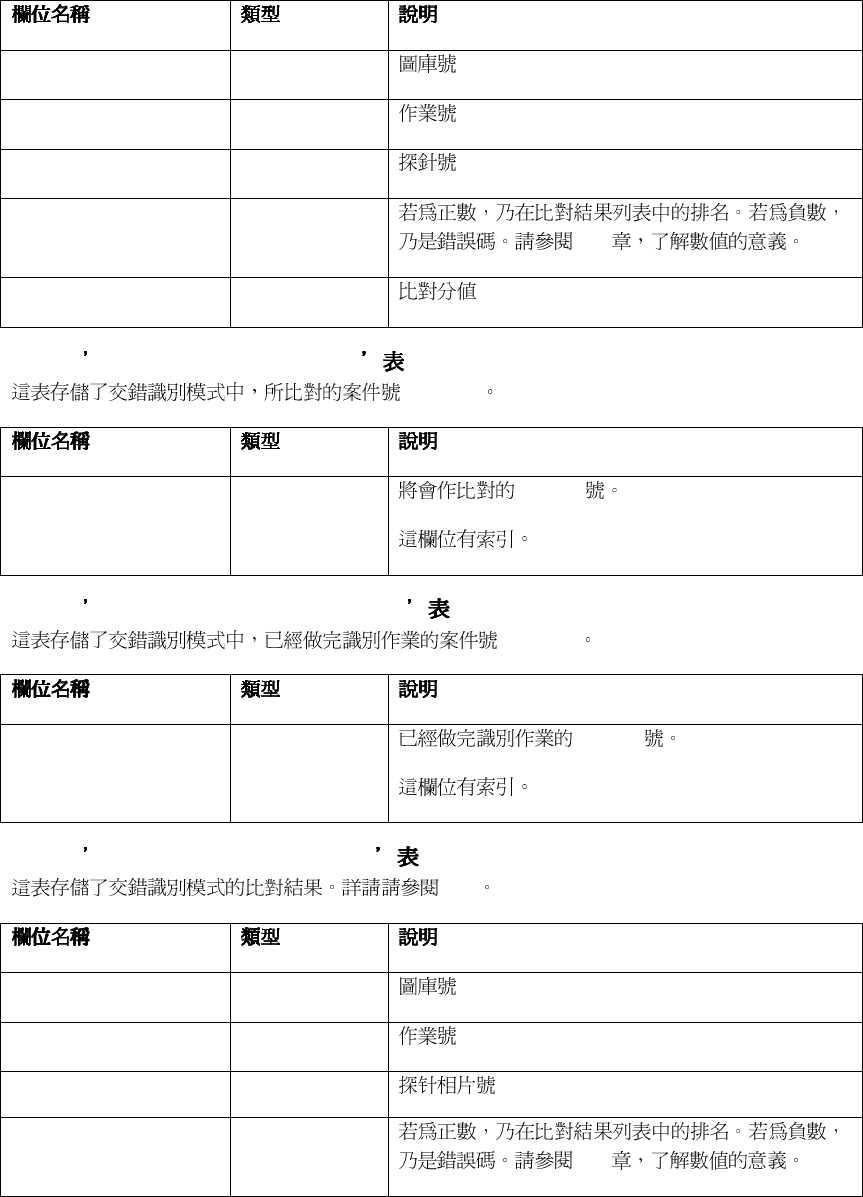
58
GalleryID STRING
JobID STRING
ProbeID STRING
Rank INTEGER
10.3
Score REAL
6.2.10. CrossIdentificationCases
(CaseId)
ProbeID STRING CaseID
6.2.11. CrossIdentificationProcessed
(CaseId)
ProbeID STRING CaseID
6.2.12. CrossIdentificationResults
10.3
GalleryID STRING
JobID STRING
ProbeID STRING
Rank INTEGER
10.3
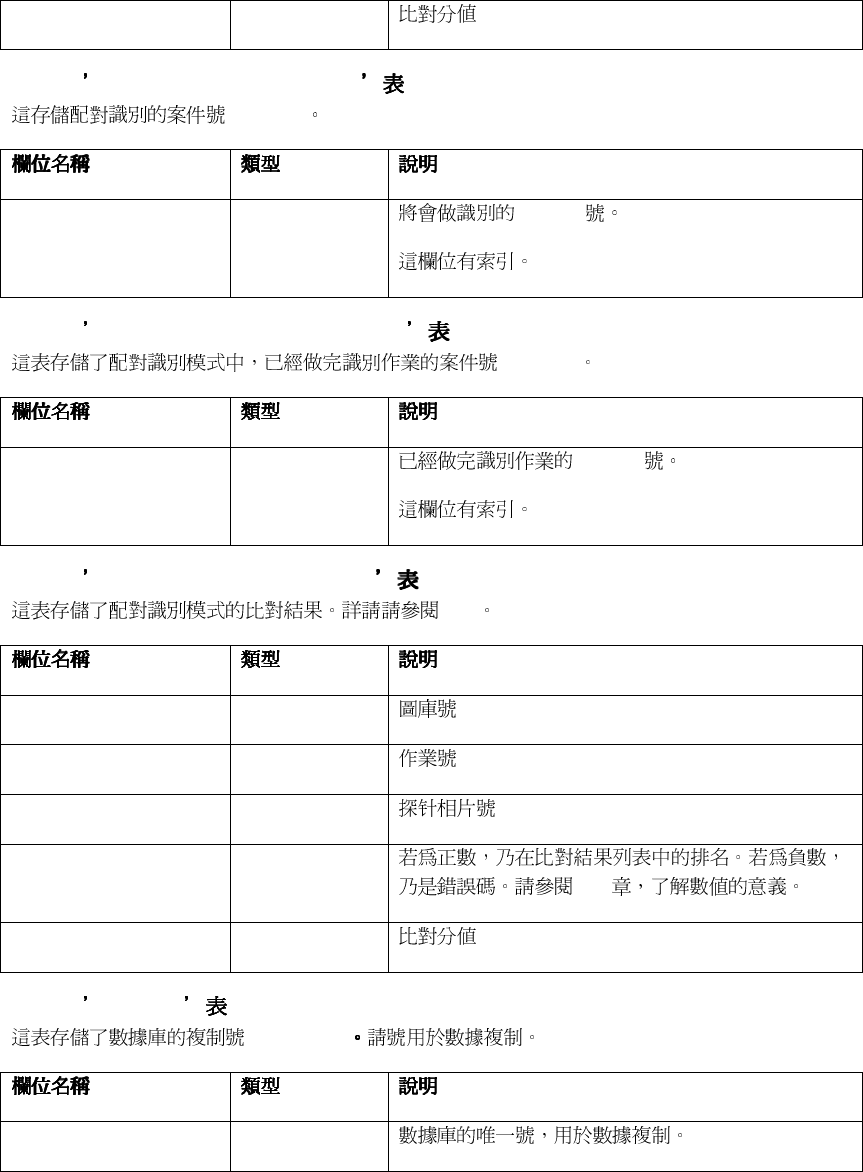
59
Score REAL
6.2.13. MatesIdentificationCases
(CaseId)
ProbeID STRING CaseID
6.2.14. MatesIdentificationProcessed
(CaseId)
ProbeID STRING CaseID
6.2.15. MatesIdentificationResults
10.3
GalleryID STRING
JobID STRING
ProbeID STRING
Rank INTEGER
10.3
Score REAL
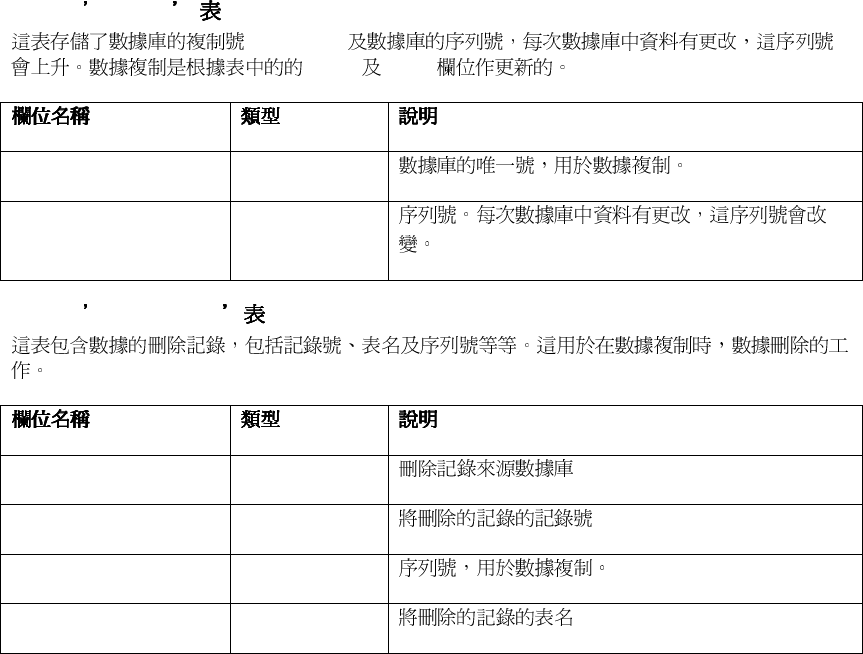
6.2.16. RepSelf
(ReplicaID)
ReplicaID STRING
60
6.2.17. RepTV
(ReplicaID)
Issuer Serial
ReplicaID STRING
Serial INTEGER
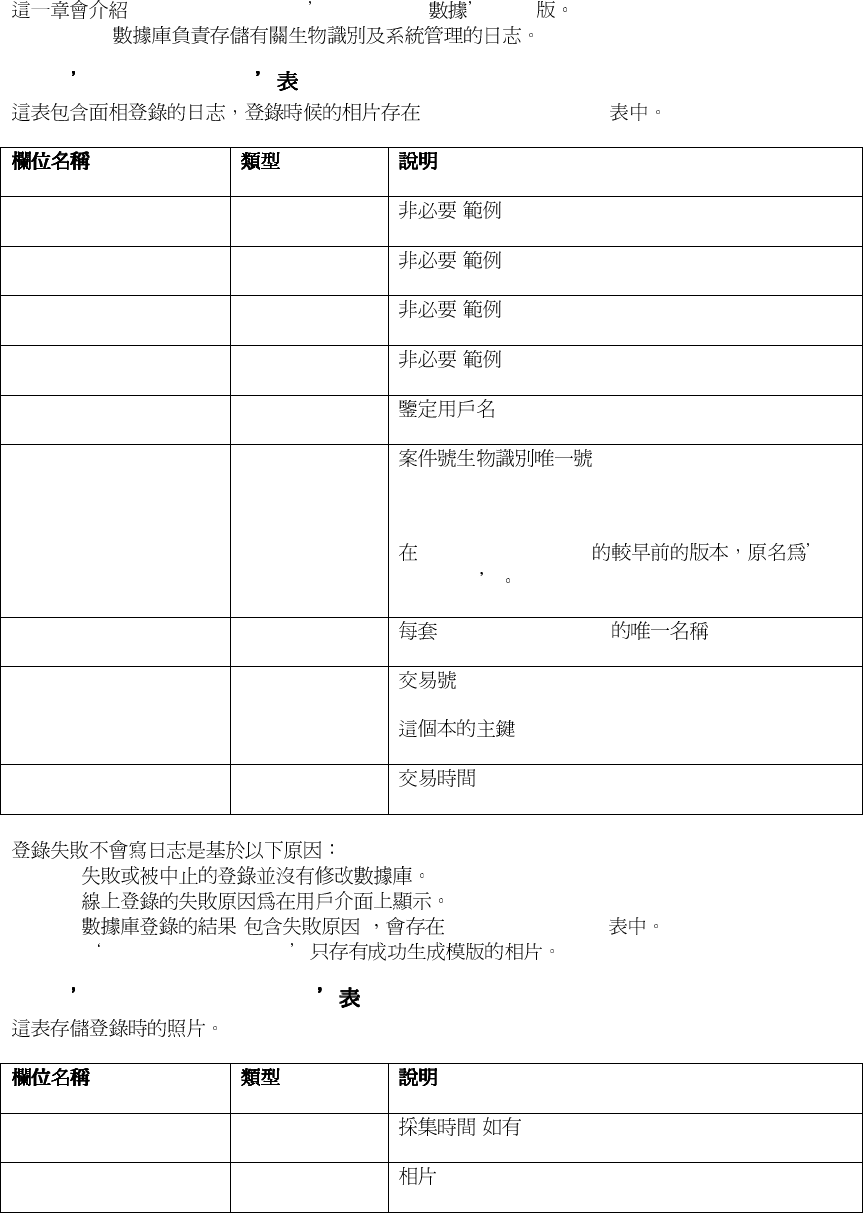
6.2.18. RepDeleted
Issuer STRING
RecordID STRING
Serial INTEGER
TableName STRING
61
6.3. FaceVACS 日志數據庫
日志數據庫日志數據庫
日志數據庫
FaceVACS-DBScan FaceVACS 1.22
FaceVACS
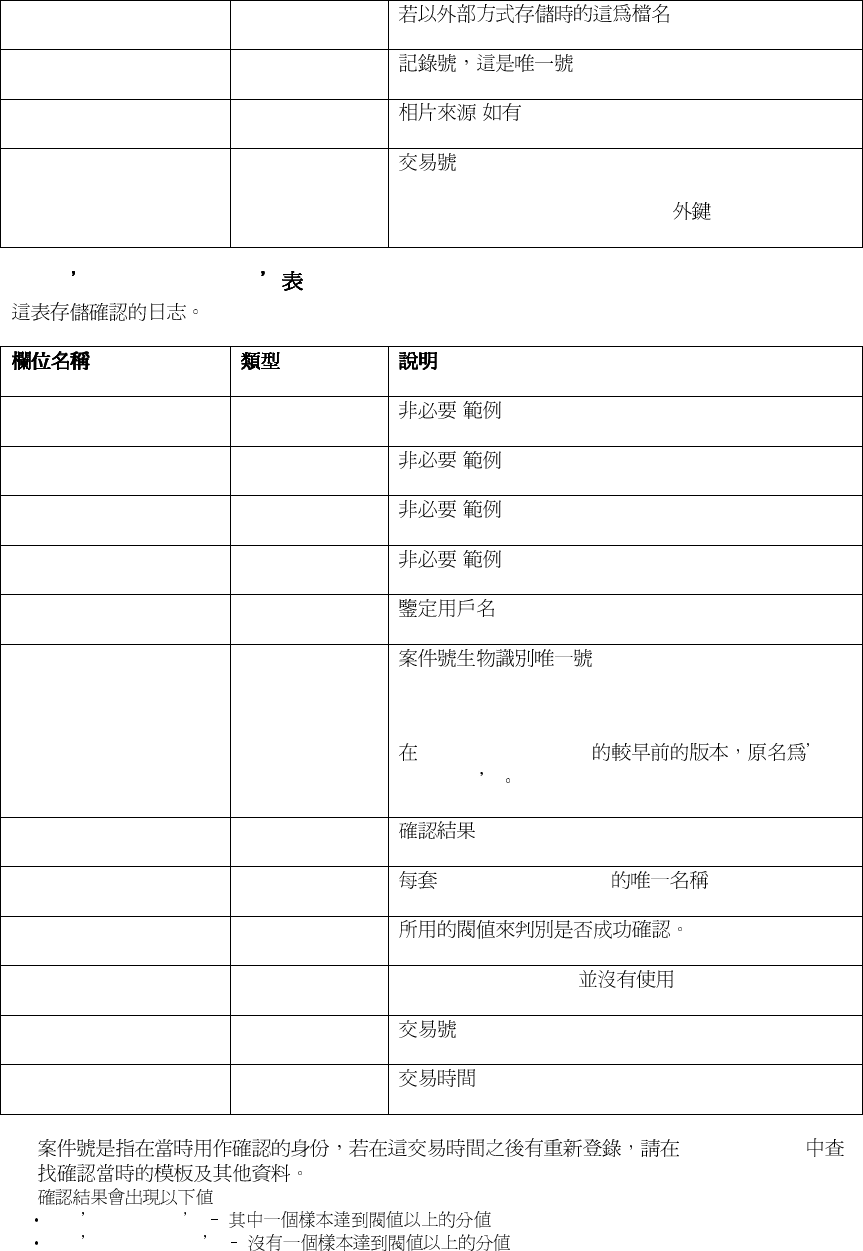
6.3.1. EnrollmentLogs
EnrollmentLogImages
"Gender" STRING ( ).
"Name" STRING ( ).
"RegionOfBirth" STRING ( ).
"YearOfBirth" INTEGER ( ).
AuthName STRING
CaseID STRING
FaceVACS-DBScan
PersonID
StationName STRING FaceVACS-DBScan
TransactionID STRING
TransactionTime DATETIME
•
•
•
( ) EnrollmentResults
•
EnrollmentLogImages
6.3.2. EnrollmentLogImages
CaptureTime DATETIME ( )
Img BLOB
62
RecordID STRING
Source STRING ( )
TransactionID STRING
Enrollment-Logs.TransactionID
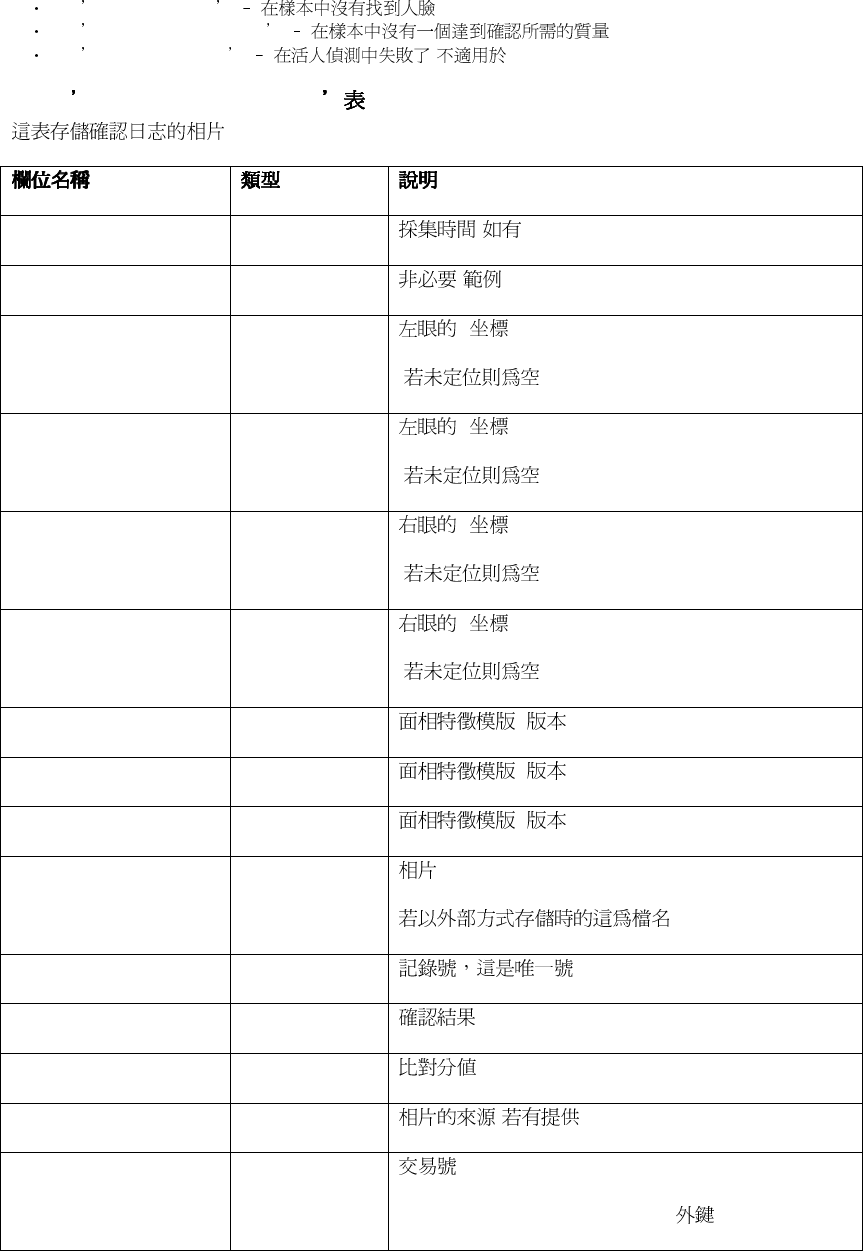
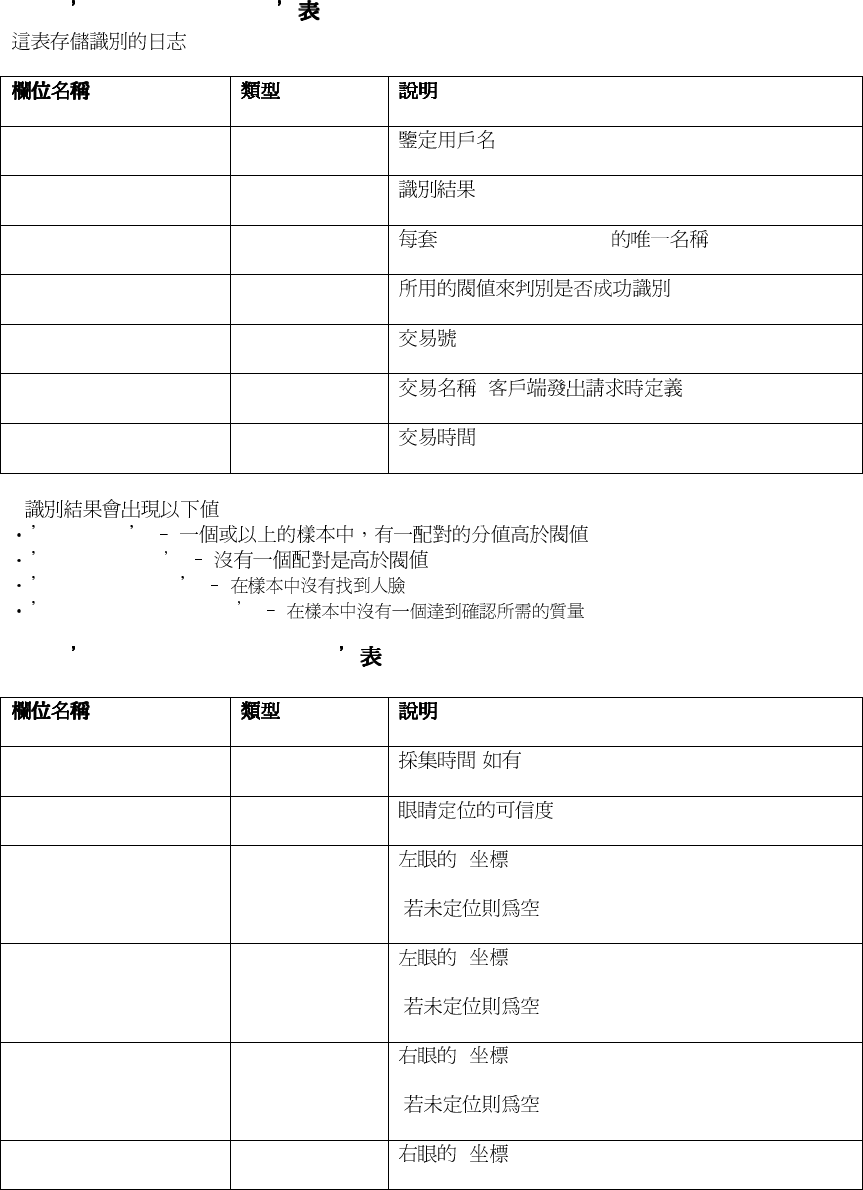
6.3.3. VerificationLogs
"Gender" STRING(10) ( ).
"Name" STRING ( ).
"RegionOfBirth" STRING ( ).
"YearOfBirth" INTEGER ( ).
AuthName STRING
CaseID STRING *
FaceVACS-DBScan
PersonID
Result STRING . **
StationName STRING FaceVACS-DBScan
Threshold REAL
TokenID STRING FaceVACS-DBScan
TransactionID STRING
TransactionTime DATETIME
*
EnrollmentLog
** :
Successful
Unsuccessful
63
Face not found
Image quality not met
Live check failed (
FaceVACS-DBScan)
6.3.4. VerificationLogImages
CaptureTime DATETIME ( )
"Name" STRING ( )
EyeLX REAL X
(NULL)
EyeLY REAL Y
(NULL)
EyeRX REAL X
(NULL)
EyeRY REAL Y
(NULL)
FIR_4_5 BLOB ( 4.5)
FIR_6_0 BLOB ( 4.5)
FIR_6_1 BLOB ( 4.5)
Img BLOB
RecordID STRING
Result STRING
Score REAL
Source STRING ( )
TransactionID STRING
Verification-Logs.TransactionID
64
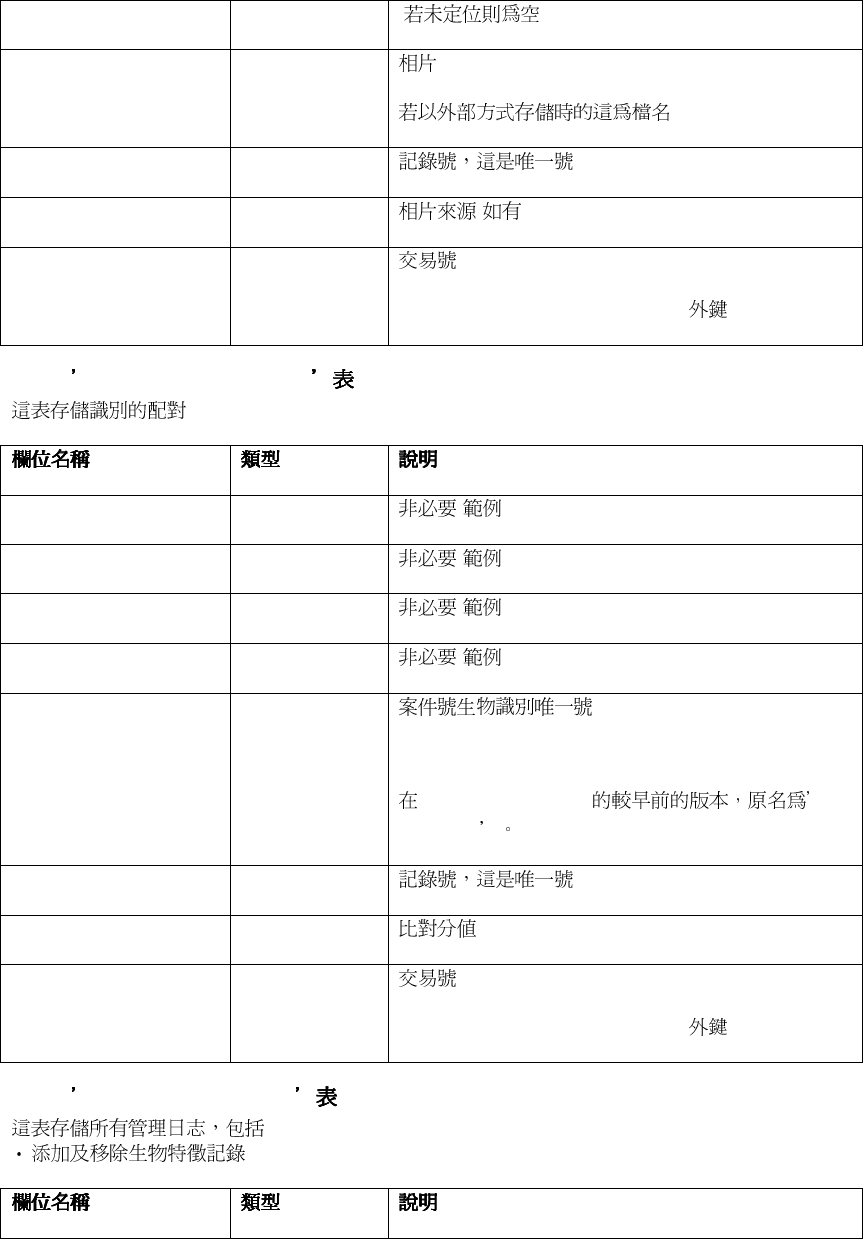
6.3.5. IdentificationLogs
AuthName STRING
Result STRING *
StationName STRING FaceVACS-DBScan
Threshold REAL
TransactionID STRING
TransactionName STRING ( )
TransactionTime DATETIME
* :
Identified
Not identified
Face not found
Image quality not met
6.3.6. IdentificationLogImages
CaptureTime DATETIME ( )
EyeConfidence REAL
EyeLX REAL X
(NULL)
EyeLY REAL Y
(NULL)
EyeRX REAL X
(NULL)
EyeRY REAL Y
65
(NULL)
Img BLOB
RecordID STRING
Source STRING ( )
TransactionID STRING
Identification-Logs.TransactionID
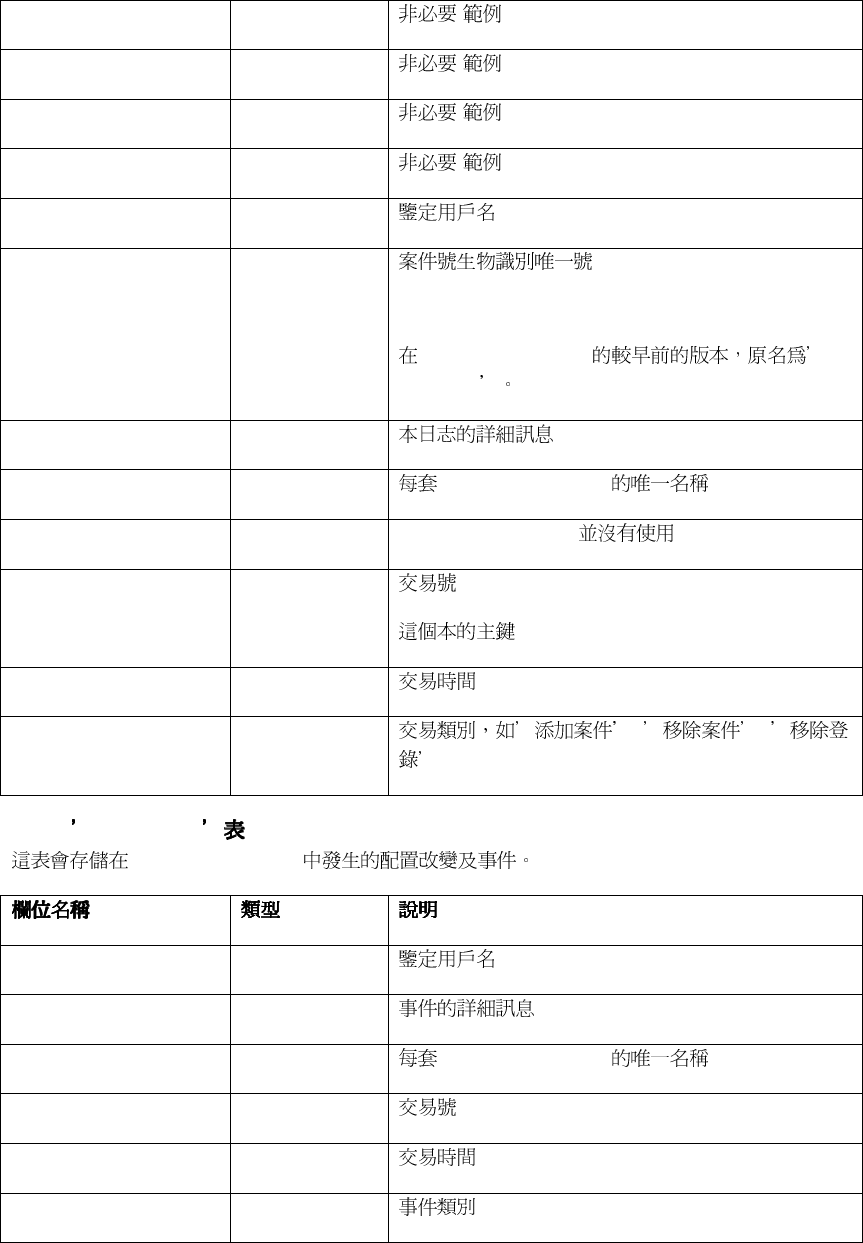
6.3.7. IdentificationMatches
"Gender" STRING(10) ( )
"Name" STRING ( )
"RegionOfBirth" STRING ( )
"YearOfBirth" INTEGER ( )
CaseID STRING
FaceVACS-DBScan
PersonID
RecordID STRING
Score REAL
TransactionID STRING
Identification-Logs.TransactionID
6.3.8. AdministrationLogs
:
66
"Gender" STRING(10) ( ).
"Name" STRING ( ).
"RegionOfBirth" STRING ( ).
"YearOfBirth" INTEGER ( ).
AuthName STRING
CaseID STRING
FaceVACS-DBScan
PersonID
Message STRING
StationName STRING FaceVACS-DBScan
TokenID STRING FaceVACS-DBScan
TransactionID STRING
TransactionTime DATETIME
Type STRING , ,
.
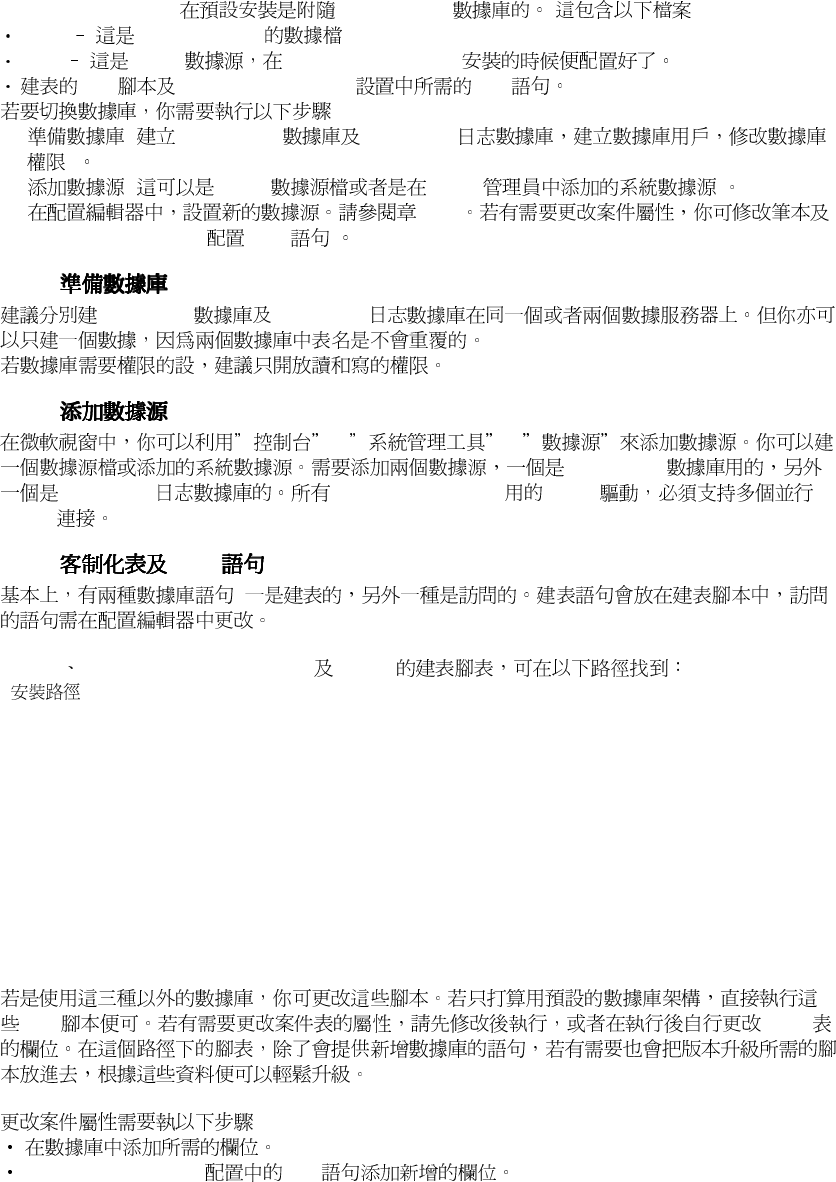
6.3.9. EventLogs
FaceVACS-DBScan
AuthName STRING
Message STRING
StationName STRING FaceVACS-DBScan
TransactionID STRING
TransactionTime DATETIME
Type STRING *

67
* :
•
Info
•
Log ( : )
•
Warning
•
Error
68
6.4. 切換數據庫或更改案件屬性
切換數據庫或更改案件屬性切換數據庫或更改案件屬性
切換數據庫或更改案件屬性
FaceVACS-DBScan (MS Jet DB) :
*.mdb
MS Jet engine
*.dsn
ODBC FaceVACS-DBScan
SQL FaceVACS-DBScan SQL
:
1. ( FaceVACS FaceVACS
)
2. ( ODBC ODBC )
3. 4.2.1
FaceVACS-DBScan (SQL )
6.4.1.
FaceVACS FaceVACS
6.4.2.
-> ->
FaceVACS
FaceVACS FaceVACS-DBScan ODBC
ODBC
6.4.3. SQL
:
MS Jet MS SQL Server (MSSQL) Oracle
< >
+-etc
+-database
+-msjet
| +- createfvdb.sql
| +- createfvlogdb.sql
+- mssql
| +- createfvdb.sql
| +- createfvlogdb.sql
+- oracle
| +- createfvdb.sql
| +- createfvlogdb.sql
+- db2
+- createfvdb.sql
+- createfvlogdb.sql
.sql cases
:
FaceVACS-DBScan SQL
69
cases cases SQL
*"Name"* SQL INSERT UPDATE
?
4.1.3
6.4.4. SQL
SQL
6-2. SQL
MSJET/MSSQL Server
ORACLE 9i/10g
NULL AS AS
( 4.1.3 )
6.4.5.
FaceVACS
FaceVACS Images ImgRef Img ImgRef
ExternalPrimaryFacialData
ExternalPrimaryFacialData :
•
FaceVACS : Admin.ReferencsImageSource.StoreViaContentManager
•
: Fvd.DbImport.ImportImagesPolicy
6.5. 數據庫服務
數據庫服務數據庫服務
數據庫服務
FaceVACS-DBScan FaceVACS-
DBScan FaceVACS FaceVACS
FaceVACS FaceVACS-DBScan
:
•
Replication ( ):
•
Transfer ( ): FaceVACS
•
Pruning ( ):
FaceVACS-DBScan
6.5.1.
FaceVACS
RecordID STRING
Issuer STRING

70
Serial INTEGER
•
•
•
•
6.5.2.
•
FaceVACS
6.5.3.
6.5.4.
DatabaseServices
ClusterController ( )
•
Cluster Controller. DatabaseReplication UseReplication
•
ClusterController.DatabaseReplication.OtherSites,
ClusterController.DatabaseReplication.OtherSites.SITENAME.ConnectionAlternativ
es
DatabaseServices.Scheduler.Jobs
FV::DbServices::Replication FV::DbServices::Transfer
FV::DbServices::Pruning FV::DbServices::CustomDbSync
Schedule Configuration ( ) PruneAfterDays
71
第七章
第七章第七章
第七章. 批量處理
批量處理批量處理
批量處理
7.1. 概觀
概觀概觀
概觀
FaceVACS-DBScan FaceVACS-DBScan
7.1.1.
•
/ FaceVACS-DBScan
•
FaceVACS
•
•
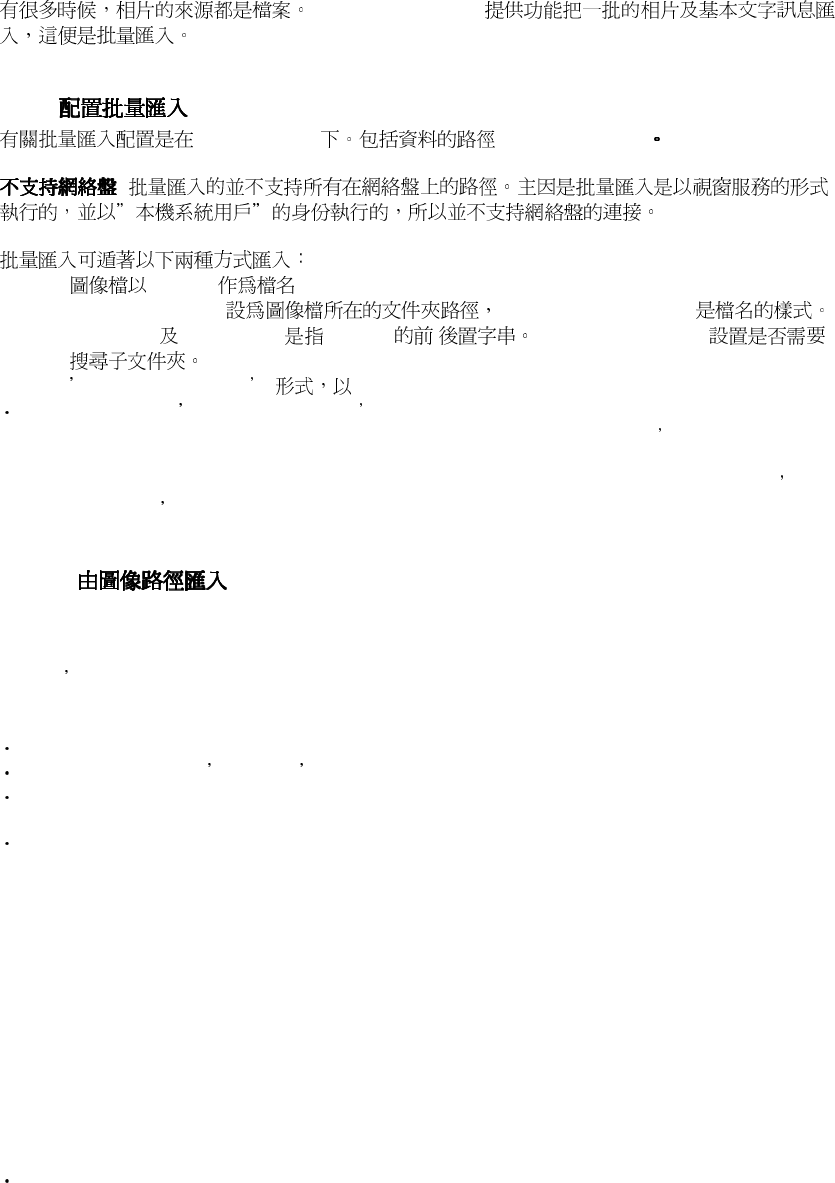
7-1.
Cluster Controller( )
Cluster Controller( ) Computing Nodes( )
7.1.2.
FaceVACS SQL
IdentificationMatches
72
7.2. 批量
批量批量
批量匯入檔案
匯入檔案匯入檔案
匯入檔案
FaceVACS-DBScan
7.2.1.
Fvd.DbImport SourceDirectory
:
•
CaseID
SourceDirectory FileNameExpression
PidPrefix PidPostfix CaseID / RecursiveSubDirs
•
Transfer Database
Data structured in Transfer Database format, which consists of image files located in an
arbitrary directory, a description file containing the mapping between CaseID s and associated
images and optional case information in additional files.
In this case the SourceDirectory setting contains just a directory which has to contain the
Transfer Database file collection as described below.
7.2.1.1.
Important configuration entries are as follows
SourceDirectory
For importing plain image directories the import mechanism must be enabled to derive the
CaseID s the images belong to from their filenames. The setting for SourceDirectory consists
of the directory followed by the file name pattern.
The file name pattern is a sequence of at most 4 elements:
An optional leading delimiting character
The mandatory literal CASEID representing the part of the filename to form the CaseID
An optional subsequent delimiting character (which must be the same character as the leading
one, if both occur)
An optional suffix
The resulting CaseID is everything that is left from the filename after removing any part matching
the suffix, the preceding part up to and including the first delimiter and the remaining part starting
from and including the trailing delimiter. Some examples to clarify usage:
Table 7-1. Plain Image Directory Configuration Examples
Image file SourceDirectory FileName
Expression
Resulting
CaseID
C:\images\121341.jpg C:\images CASEID.jpg 121341
C:\images\121341.jpg C:\images CASEID 121341.jpg
C:\images\P_121341_1.jpg C:\images _CASEID_.jpg 121341
C:\images\P-121341_1.jpg C:\images CASEID_.jpg P-121341
ImportImagesPolicy
The policy how to import the images. Possible values are
ImportImagesToDatabase: Store the image as database BLOB into the database (Img
Column).

73
This makes a copy of the image.
ImportName: Store the image as file name reference into the database (ImgRef column). This
avoids copying the image.
ImportImagesToContentManagement: Store the image to the configured ContentManager
and store a reference to the image (ImgRef column). This makes a copy of the image.
ImageStoring
The format for storing the images if a copy is needed. Currently JPEG and PNG format is
supported.
CASEIDPrefix
CASEIDPostfix
Prepend or append a string to the CASEIDs if not empty.
AbsoluteFileNames
If true absolute file names are stored, otherwise filenames are relative to source directory. This
option is active only for import images by reference rather than importing the data.
RecursiveSubDirs
If true subdirs of SourceDirectory will be included according to the given FileNameExpression (if
one). All file names needs to be unique as well.
7.2.1.2. Transfer Database
More complex mappings of CaseID s to image files with arbitrary locations as well as import of
case information can be accomplished by specifying a Fvd.DbImport.SourceDirectory directory
containing a set of files as defined below:
ImportSourceDirectory
|
+-- pid-map
+-- cases.db(*)
+-- image1.jpg
+-- image2.jpg
:
+-- imageN.jpg
The
pid-map
has to contain exactly 2 columns: !the CaseID and the image filename, respectively,
both in double quotes. For example:
"001" "image1.jpg"
"001" "image2.jpg"
"002" "image3.jpg"
The image files can be either plain filenames (without path component) or fully qualified path
names.
In the first case the images have to reside in the import source directory as well, otherwise the
images can be located anywhere.
Note: Note that any Transfer Database directory specified must be writeable (to the importing process,
which runs in the local system account).
The optional
cases.db
contains textual data describing additional case properties.
The first line can contain the word "FIELDS" followed by additional fields.
Subsequent lines contain TokenId, CaseID and data items of the additional fields, if any. In our
example
it looks like this:
FIELDS Name DateOfBirth
921 001 Smith 10.6.1982
922 002 Miller 7.5.1972
Though TokenId, is not a concept used in FaceVACS-DBScan the corresponding position within
cases.db
has nevertheless to be filled in. So in cases where you need to provide a
cases.db
, fill this
position with the same value you specify for the CaseID. This will ensure uniqueness and is
sufficient to let the import process run smoothly.
Note that strings in
cases.db
must not contain spaces, since these are interpreted as column
delimiters.

74
When using
cases.db
to specify case properties, you have to specify how the names in the
FIELDS entry of
cases.db
map correspond to the columns of your FaceVACS-DBScan database
Cases table.
This is accomplished by specifying a field mapping configuration file, whose location is configured
with Fvd.DbImport.FieldDescriptionFile.
The file contains key-value pairs, one per line, that contain the column names used in the SQL
databases on the left side and the names used in the FIELDS enumeration on the right side.
Whether the Cases table is referred to, is controlled by the column name prefix case . In
addition, specifying default at the beginning of the key string allows for filling the
corresponding table columns with configurable default values in case these values are not
contained in
cases.db
.
Example fieldmap configuration file contents corresponding to the
cases.db
example above
(additionally filling column Notes of table Cases with the string Imported ):
case.Name = Name
case.Date_Of_Birth = DateOfBirth
default.case.Notes = Imported
7.2.2.
-> FaceVACS-DBScan 4.1.3 -> Database Enrollment
Database Processing -> Database Import /
7.2.3.
batchsrv.exe
batchsrv.exe :
bin\batchsrv.exe -f etc\facevacs.cfg -appname dbimport -import
7.3. 批量登錄
批量登錄批量登錄
批量登錄
7.3.1.
Importing data makes only part of the Primary Facial Data (PFD) available to FaceVACS-DBScan.
To make the images imported usable for subsequent biometric transactions more processing
steps are required:
1. Completing Primary Facial Data (PFD) by eye annotations
2. Creating Secondary Facial Data
3. Calculate the Bin using the binning properties the person belongs to
Actually, these steps are combined in what is called Database Enrollment . However, automatic
generation of eye annotations is subject to errors (missing or wrong eye positions), which can
degrade
biometric performance. Therefore we recommend you to complement the automatic process by
manual inspection of eye positions. See the next section for a description of the procedure.
The Database Enrollment is started from within the equally named tool: Start !FaceVACS-
DBScan
4.1.3 !Database Enrollment . Choose the menu item Database Processing !Database
enrollment
As before with Database Import, a controlling dialog will pop up where you can start, stop and
observe the database enrollment process. Closing this dialog or Database Enrollment does not
disrupt the batch processing.

75
7.3.2.
The Cluster Controller supports automatic database enrollment. For that purpose a schedule can
be configured using the Fvd. DbEnrollmentSchedule. The default is a empty string disabling
automatic database enrollments. By using a cron like syntax the schedule can be set to the
needed time schedule with minute resolution.
The database query to collect the cases to enoll involved in the database enrollment processing
(Fvd.DbEnrollment. CollectCasesToEnroll) is very expensive on large databases containing
millions of cases. To avoid doing this if nothing was changed to the Primary Facial Data (Cases
or Images table) the Fvd. DbEnrollment. EnrollmentPreCondition query can be used. The
database enrollment will be launched only if that query returns at least one row. If no row is
returned the complete processing will be skipped. The default (cheap) query simply returns the
serial from RepTV table. Alternativly a more sophisticated (cheap) query could be configured
determining whether to process database enrollments depending on changed Primary Facial
Data.
To enable enrollment result analysis the Fvd. DbEnrollment. StoreProcessingInformation can
be switched from Fn::None to StoreProcessingInformation. This stores the processing
information for the processed cases to the EnrollmentResults table for later analysis. To log
only processing errors set the LogProcessingErrorsOnly item to true.
1
During enrollment the Bin of the Case will be generated according to the BinAuthDate. The
enrollment facility detects if to (re)generate the Cases Bin using the Persons.BinAuthDate and
FIR_X_X.BinDate timestamps. The Bin is stored in the Bin columns of the FIR_X_X table.
7.3.3.
7.3.3.1. Inspecting, Setting and Changing Eye Annotations
It only makes sense to use Primary Facial Data (PFD) if it is trusted and biometrically significant.
Trusted means that face and facial features really belong to the case labeled by CaseID.
Data is Biometrically significant if image quality is sufficient and eye annotations are correct.
When doing database enrollments, the enrolling authority trusts the instance which created the
case image associations (by associating filenames to images or preparing a transfer database). It
is virtually impossible to verify these associations by visual inspections as normally noone is
familar with all enrolled cases.
Biometric significance, however, can be checked by visual inspection. Of course, there is a
tradeoff between requirements of efficiency and quality: the larger the job , the more effort is
required for inspection.
To make this process most effective, FaceVACS-DBScan provides quality measures for making
qualified proposals for the order of enrollment inspection. These are based on the confidence of
eye positions (see Eye Positions) linkend="g-EyePositions">)found. Images with lowest eye
confidence (including images where eyes could not be found) should be inspected first.
Image inspection is a function provided by the Database Enrollment tool, too. After a database
enrollment has been run, one should query for images to be inspected by pressing the [Inspect]
button.
1. Be aware that there is no automatic mechanism which cleans up this table from time to time. Especially if
used togehter with automatic (scheduled) Database Enrollments this table can be very big and needs
cleanup from time to time.
76
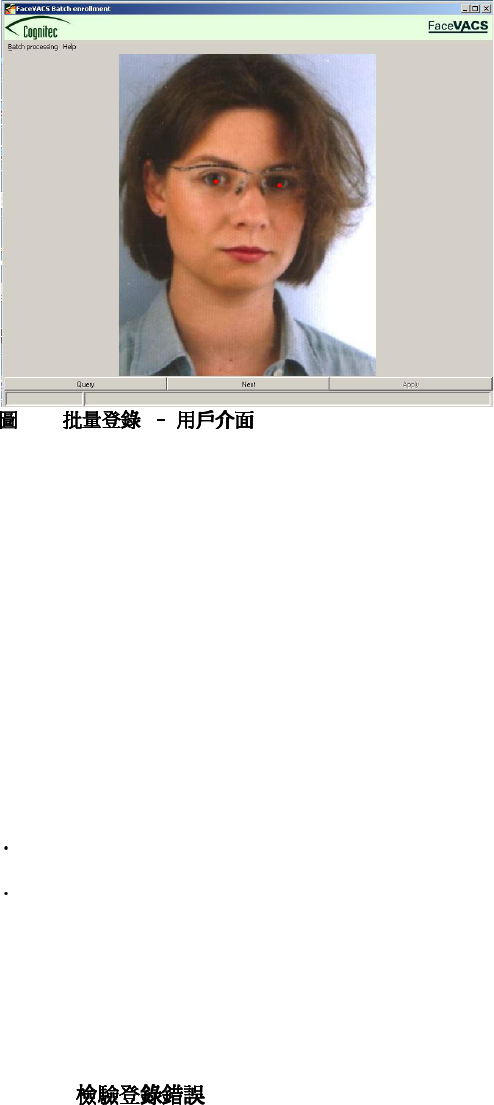
7-2.
Once the query triggered by that button is finished, face images are displayed. When eye
positions are
already available, they will be marked by red spots, otherwise you can enter them by clicking at
the
locations where they should be positioned. Existing eye positions can be moved by dragging
them with
the mouse.
Where to put eye annotations
It is important to annotate the eyes (see Eye Positions)correctly, as even minor shifts of eye
positions can
lower the biometric performance.
If you feel satisfied with image quality and eye positions press the [Apply] button to store the
changes
in the database. If you want to move to the next image without changing something, press the
[Next]
button.
Implications of annotation changes
Storing annotation changes will have two implications:
Eye confidence values will be set to maximum value. This implies that these images will not be
proposed for inspection again
The generation date of the Primary Facial Data (PFD) the processed image eye positions are
part of will
be updated. This will cause the corresponding Secondary Facial Data to be recreated when
Database
Enrollment is rerun.
From the second implication you can see, that in order to make annotation changes effective for
the
biometric operation the Database Enrollment has to be restarted after each inspection session.
7.3.3.2.
After enrollment usually some of the enrollment Cases are processed with errors. If storing
processing
information was enabled the table EnrollmentResults allows for inspection of what was wrong in
that
cases.

77
To get statistics according to the different error conditions for a database enrollment run (JOBID)
the
following database queries could be used:
SELECT COUNT(*) FROM EnrollmentResults
WHERE
JobID = [JobID] AND ImageEvaluation = [Reason];
For [Reason] set
IS NULL to count No image available
1 to count Image not readable (e.g. broken JPEG)
2 to count Eyes not found
3 to count Quality too low
4 to count Not accepted ( too close to the border)
For [JOBID] use the id of the last enrollment run. ( Be aware that
more than one job could be stored in the EnrollmentResult table.)
70
Batch processing
To use the Database Enrollment tool to inspect images belong to given error conditions change
the
default query for DbEnrollment.QueryImages to
SELECT RecordID, CaseID, Img, ImgRef, EyeLX, EyeLY, EyeRX, EyeRY,
EyeConfidence FROM Images
WHERE RecordID IN
( SELECT ImageRecordID from EnrollmentResults
WHERE ImageEvaluation = [Reason] AND JobID = [JobID]);
7.4. 批量識別
批量識別批量識別
批量識別
7.4.1.
FaceVACS-DBScan
FaceVACS-DBScan offers support for identification runs using the database as input. As practice
shows
there is a need for alowing different kinds of identification jobs, called identification facilites. Here
we will explain the 3 different pre-configured types called Identifiaction , CrossIdentification
and
MatesIdentification which will be explained further.
Identification : general purpose facility to allow for customer defined probeID collecting
queries.By
default this facility uses the highest processing priority (0).
CrossIdentification : pre-configured facility to do a cross identification: this means all gallery
cases
are matched against the whole gallery. This facility is usefull for doing biometric performance
measurements.
By default this facility uses a lower processing priority (1).
MatesIdentification : pre-configured facility to match all gallery cases against a subgallery
containing
the cases with the same PID as the PID of the Probe. This facility is usefull for doing biometric
performance measurements.By default this facility uses a lower processing priority (1).
The batch database identification can be started via: Start ! FaceVACS-DBScan 4.1.3 !
Database
(Cross|Mates)Identification .

78
7.4.2.
The Identification facility will be used as example to describe the properties which are
common to all
kinds of identification facilities.
Each of the facilities uses at least 2 tables: one for collecting the CaseID s of the cases to be
processed
(IdentificationProbes), and another one for the identification results (IdentificationResults).
2
The special meaning of the Rank values in the Rank column can be found in the following table:
Database Identification Evaluation Codes
>=1 The rank in the match list
0 Probe Ok, no matches found
-1 No eyes found in probe
-2 Sample quality too low
-3 Unspecified error
Configuring database query defining probes to be identified
To arrange for database identification you have to customize the SQL queries describing the set
of
probes to be identified. The configurable parameters for each of the identification facilities can be
found
at Fvd. DbIdentificationFacilities. <FacilityName>.
On starting and finishing identification the facilities allows for a configurable SQL-Statement
allowing
to prepare or tidy up the processing data. The default for Cross and Mates identification is just
cleaning
up the entries in the CrossIdentificationCases table. This queries are configured using
PrepareIdentification
and FinishIdentification.
2. Because Cross and Mates Identification are mostly jobs with a very long processing duration this Facilities
uses
a third table (CrossIdentificationProcessed, MatesIdentificationProcessed) collecting the processed cases to
allow
for continue a stopped process without doing the already processed cases again.
71
Batch processing
After preparation the CollectProbes query is launched to collect the probe set to be identified
and store
them into IdentificationProbes. The probe set to be identified is described by a database query
returning
the columns ProbeID
3
(STRING), FIR (BLOB), Img (BLOB) and ImgRef( STRING, relative
filename via
ExternalImages or absolute file name) in each record. FIR, Img and Img are optional - only one of
them
needs to contain a value different from NULL. If more than on value is set the FIR wins before
Img and
Img wins before ImgRef.
After collecting the probe set the QueryProbes query is executed and the identification is
processed for
each entry of the result set of that query.
There is another configuration key QueryNumberOfProbes which indicates the expected
number of
images to be identified. This is used merely for purpose of progress estimates and display in the
controlling
dialog.
Example: Suppose you have a table Probes containing the probe images in column Image
and their

79
ID in column ProbeID . Then the SQL queries to be configured were:
SELECT ProbeID, FIR, Img, ImgRef from Probes;
SELECT COUNT(*) from Probes;
If needed the reporting of processed probes can be done using SQL query
ReportProbeProcessed.
Argument is the ProbeID of the processed probe. On CrossIdentification and MatesIdentification
this
query inserts the ProbeID into the facilities Processed table to allow for continuing a stopped run.
Other configuration settings
Like single identifications, database identifications are affected by settings like
Maximum match list size and match list threshold
Global identification threshold which defines the outcome of the identification ( Identified or
not)
Priority is the processing priority of this facility in the Identification Pipeline. 0 is the highest
priority.
Higher priority identifications are processed first.
ExternalImages is used for finding images via relative or absolute file names (ImgRef column)
IdentificationType describes the gallery used for the identification. Possible values are
OneToAll ... uses the whole runtime gallery
OneToFew ... use a SQL query to get a list of CaseID defining the subset of the gallery to be
used
for a given probe.
BinSubset ... use a SQL query to get the BinSubset defining the subset of the gallery to be
used for
a given probe.
These are configured in Section 4.2.3.
7.4.3.
SQL
SELECT
ProbeID, C0.PID as ProbePID, GalleryID, C1.PID as GalleryPID, score, rank
FROM
CrossIdentificationResults, Cases C0, Cases C1
WHERE
ProbeID = C0.CaseID AND GalleryID = C1.CaseID AND C0.PID <> C1.PID AND
score > 0.8
SQL
SELECT
ProbeID, GalleryID, PID, score, rank
FROM
MatesIdentificationResults, Cases
WHERE
ProbeID = CaseID AND score < 0.3;
3. The ProbeID s has to be unique within the probe set to avoid confusion since the matches are labelled
by this
ID.
80
第
第第
第八
八八
八章
章章
章. 備份與還原
備份與還原備份與還原
備份與還原
8.1. 備份
備份備份
備份
DBScan
DBScan
SQL
DBScan
< >
|
+-- bin
| +-- binaries
| + ...
| +--
watchd.cfg
- a FaceVACS-DBScan
+-- doc
+-- etc
| +--
*.cfg
- FaceVACS-DBScan
| +--
*.db
- FaceVACS-DBScan
| +--
*.dsn
– FaceVACS
| +--
cara, cmp, ojo, portrait
| +-- templates
+-- var
+--
fvdb.mdb
- FaceVACS Database MSJET file
+--
fvlog.mdb
- FaceVACS Log Database MSJET file
FaceVACS-DBScan
facevacs.cfg etc
.
*.cfg, *.db, *.dsn
bin watchd.cfg
ODBC
DBScan MSJET SQL
DBScan MSJET
•
FaceVACS-DBScan ( 2.5 ) |
•
var .mdb
•
FaceVACS-DBScan
FaceVACS-DBScan Setup.exe
DBScan
81
8.2. 還原
還原還原
還原
•
FaceVACS-DBScan ( 2.5 ) |
•
•
•
FaceVACS-DBScan
8.3. 處理分散式安裝
處理分散式安裝處理分散式安裝
處理分散式安裝
FaceVACS-DBScan Cluster Controller
Computing node
Cross Cluster Controller Replication
82
第
第第
第九
九九
九章
章章
章. 軟件升級
軟件升級軟件升級
軟件升級
FaceVACS DBScan
FaceVACS-DBScan
1. 9.1
2.
a.
b. 2.4
c. 2.5
3.
DBScan Database Enrollment
FIR
DBScan
ClusterController.ComputationNodes IP
4.
a.
DBScan
b.
DBScan 2.5
c.
DBScan
5.
a. DBScan 2.5
b. ClusterController.ComputationNodes IP
c
.
6. Configure the client applications of the new version to use the new Cluster Controller.
This can be
done via Configuration Editor adapting the configuration item CognitecFrontends.
ClusterControllers.
ConnectionAlternatives
9.1. 數據升級
數據升級數據升級
數據升級
• MS Jet *.mdb
• *.mdb var\ :
Installdir
|
|
+-- var
+--
fvdb.mdb
... FaceVACS Database MSJET file
1. FIR
+--
fvlog.mdb
... FaceVACS Log Database MSJET file
DBscan *.mdb
VAR\

83
•
etc/database/msjet, etc/database/mssql etc/database/oracle
MS Jet, MS SQL Server Oracle
• FIR’s.
DBScan FIR
DBScan ( 7.3 ) FIR
FIR
9.2. FaceVACS-DBScan 的反安裝
的反安裝的反安裝
的反安裝
DBScan DBScan
−!FaceVACS-DBScan−!Uninstall.
:
84
第十章
第十章第十章
第十章. 與
與與
與FaceVACS-DBScan 整合
整合整合
整合
FaceVACS-DBScan FaceVACS-DBScan
FaceVACS-DBScan Integrators Kit ( fvisdk) C++ API
FaceVACS-DBScan Sample
Integration
Scenario Reference
10.1. 一般方法
一般方法一般方法
一般方法
FaceVACS-DBScan
FaceVACS-DBScan
ID
:
• /
• /
10.2. 匯入及登錄
匯入及登錄匯入及登錄
匯入及登錄
10.2.1.
(fvisdk) (enrollment processor)
10.2.2.
FaceVACS Cases Images
CaseID
FVIsdk::Enrollment::startDbEnrollment startDbEnrollment
FVIsdk::Enrollment::waitForDbEnrollment
fvisdk/enroll.h: FVIsdk::Enrollment::waitForSync
Fvd.DbEnrollment.StoreProcessingInformation
FV:: App:: DbEnroller::StoreProcessingInformation
10.2.2.1.
EnrollmentResults
ImageEvaluation
The meaning of the image evaluation values in the ImageEvaluation column can be found in the
following
table:

85
ImageEvaluation
0 Ok, suitable for FIR generation
1 Image not readable Image not readable
2 Eyes not found
3 Image for other reasons not accepted for
Processing
NULL No image found for UID
FIRGeneration
FIRGeneration
0 Ok, FIR generated
1 Not enough good images for FIR generation
( ) Images
EnrollmentResults
Cases :
AuthDate DATETIME -
Images :
EyeLX REAL, EyeLY REAL -
EyeRX REAL, EyeRY REAL -
EyeConfidence REAL -
10.3. 識別
識別識別
識別
10.3.1.
(fvisdk) (identification processor)
10.3.2.
FVIsdk::Identification::startDbIdentification startDbIdentification
FVIsdk::Identification::waitForDbIdentification
facility 7.4
(web services)

86
10.4. 案件管理
案件管理案件管理
案件管理 / 模
模模
模板
板板
板移除
移除移除
移除
FaceVACS-DBScan
Cases Images
- CaseID
fvisdk/fvdb.h: FVIsdk::FVDb::deleteFIR
-
fvisdk/enroll.h: FVIsdk::Enrollment::waitForSync
FVIsdk::FVDb (addCase),
(deleteCase) (caseExists) deleteFIR
FvDB
第十一章
第十一章第十一章
第十一章. 故障排除
故障排除故障排除
故障排除
11.1. 故障報告
故障報告故障報告
故障報告
FaceVACS-DBScan " " ASCII :
•
•
FaceVACS-DBScan
•
:
Help -> Problem Report
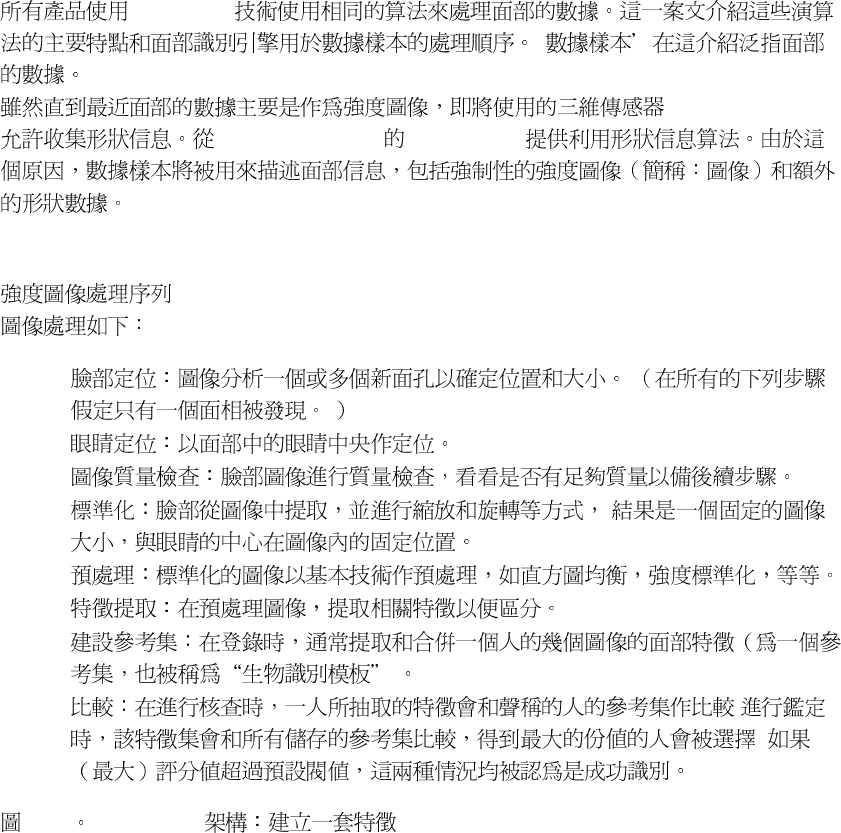
87
第
第第
第十二
十二十二
十二章
章章
章. 生物識別技術
生物識別技術生物識別技術
生物識別技術
12.1. 簡介
簡介簡介
簡介
FaceVACS
'
FaceVACS - SDK 4.0 Cognitec
12.2. 強度圖像處理
強度圖像處理強度圖像處理
強度圖像處理
•
•
•
•
•
•
•
• ;
;
12-1 FaceVACS
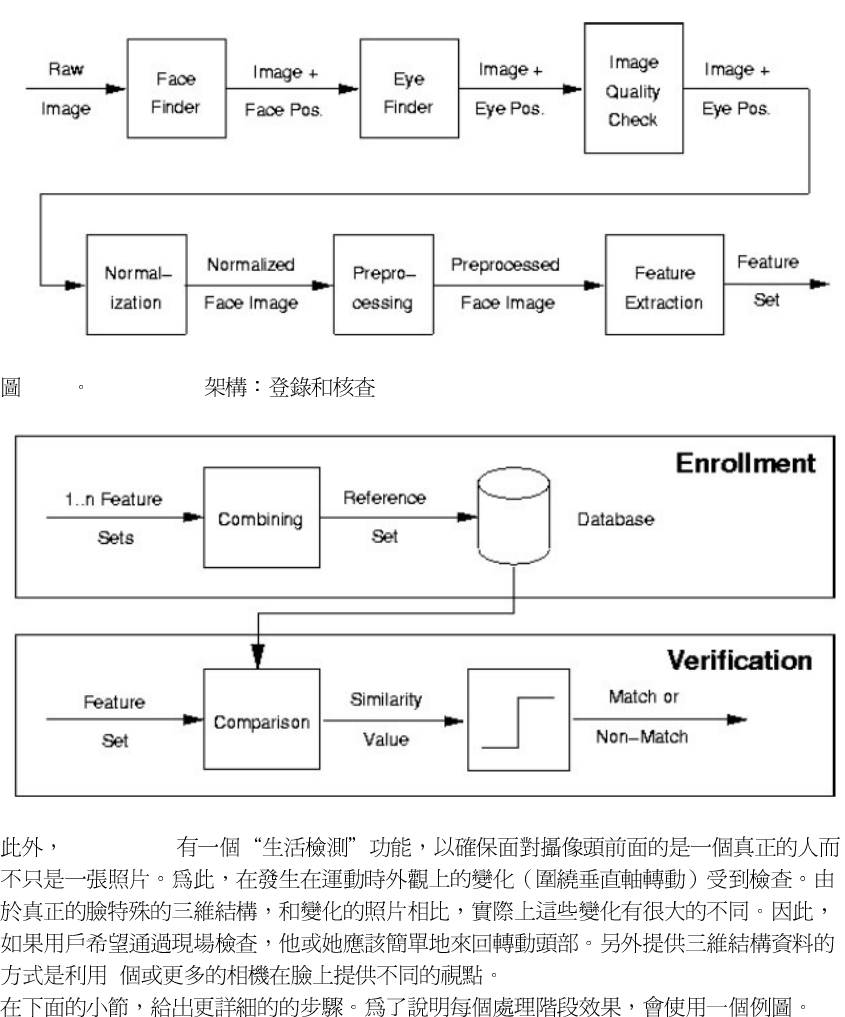
88
12-2 FaceVACS
FaceVACS
2
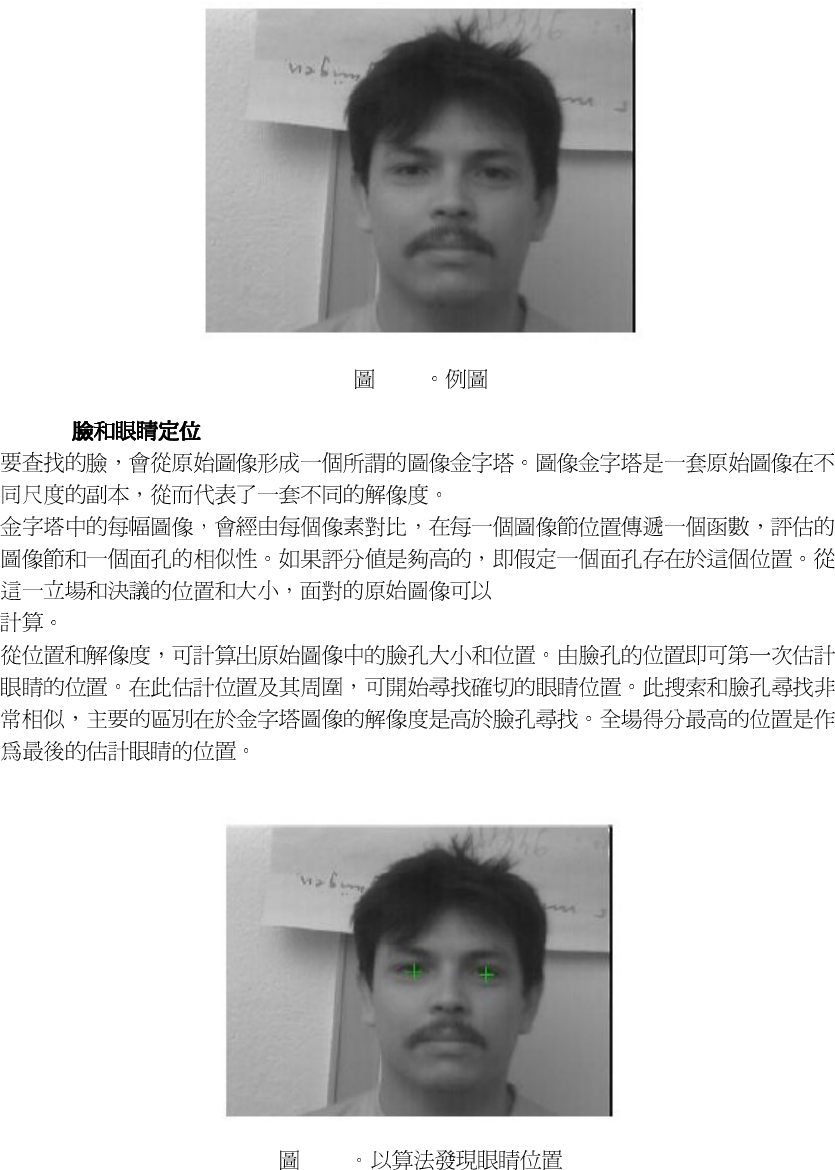
89
12-3
12.2.1.
12-4
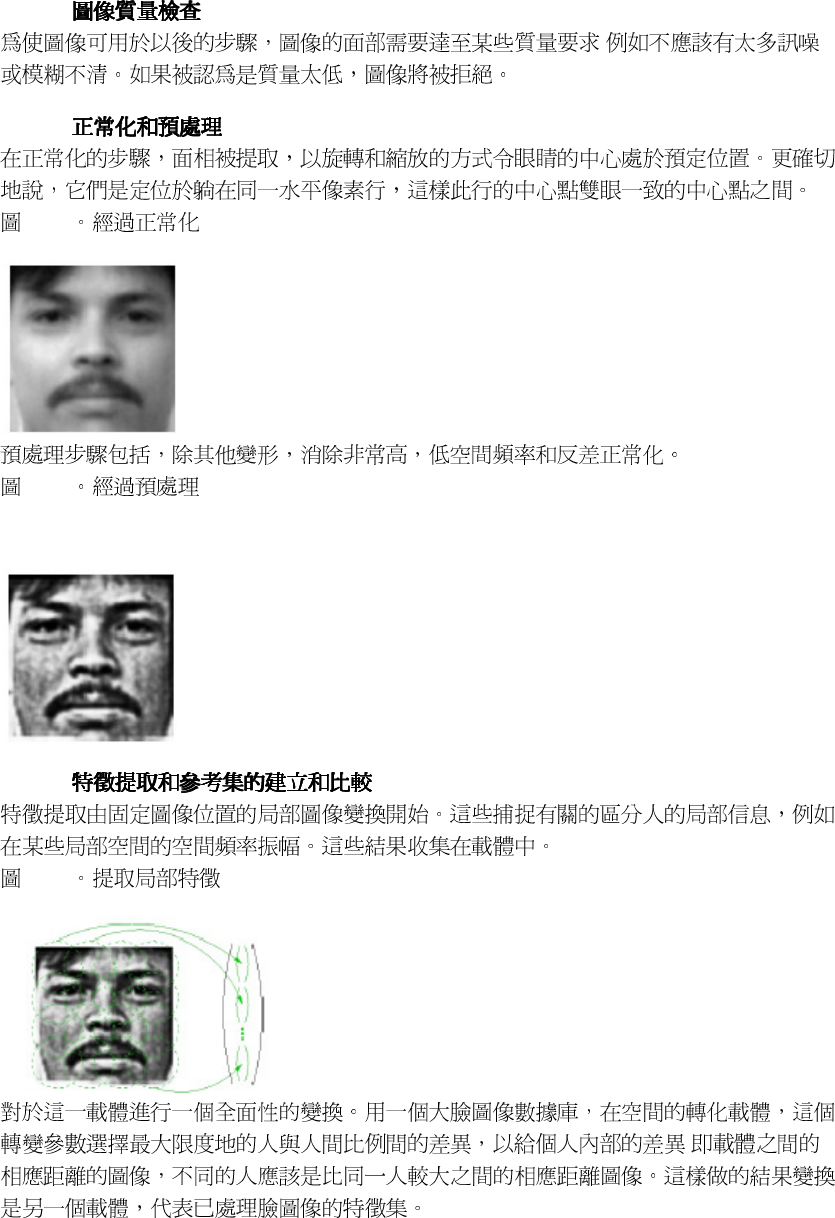
90
12.2.2.
;
12.2.3.
12-5
12-6
Figure 12-6. After preprocessing
12.2.4.
12-7
;
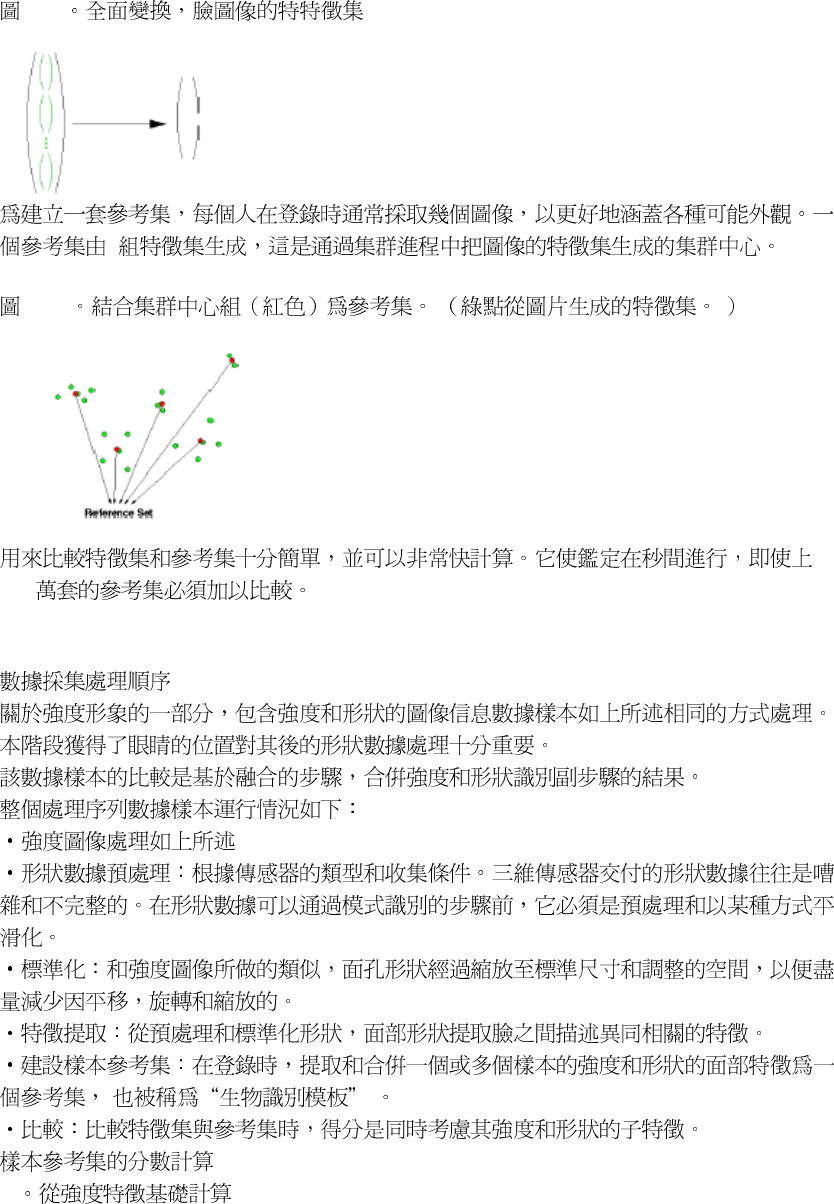
91
12-8
5
12- 9
100
12.3. 組合形狀和強度的圖像處理
組合形狀和強度的圖像處理組合形狀和強度的圖像處理
組合形狀和強度的圖像處理
1 Subscore
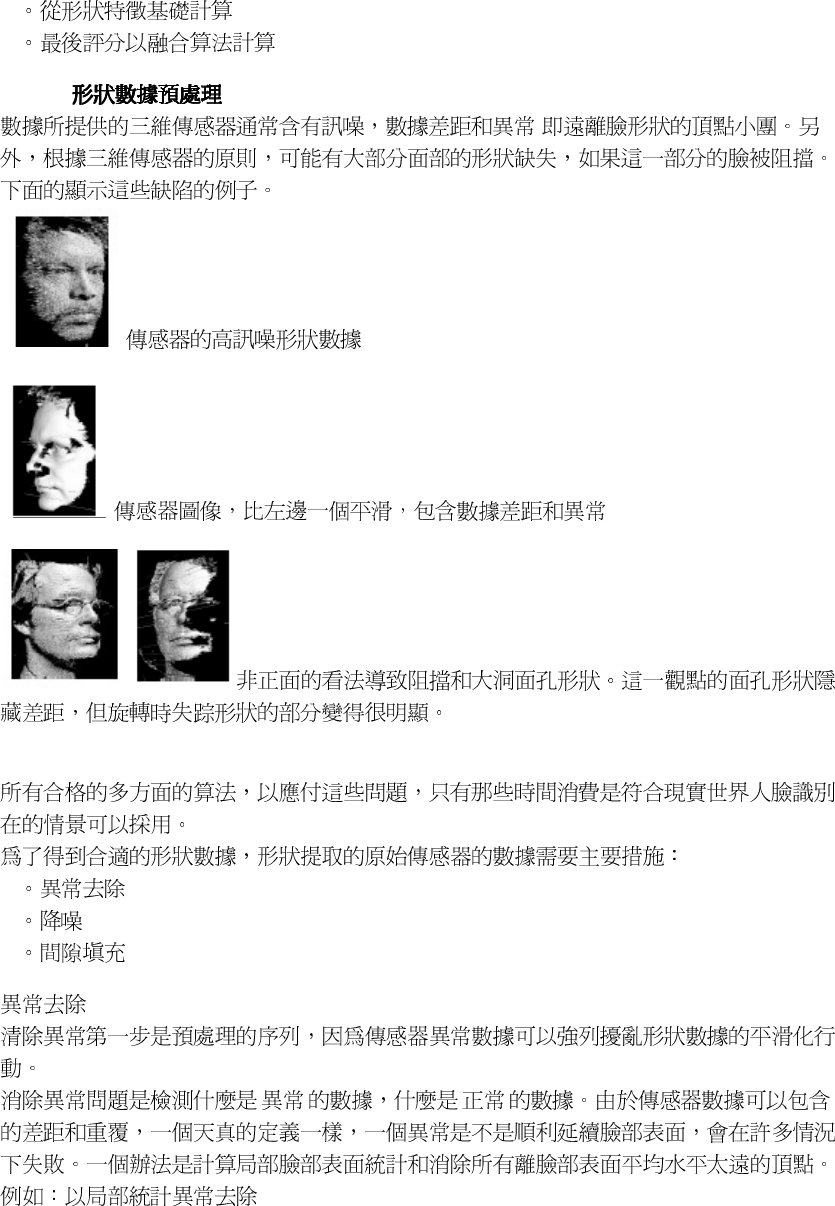
92
2 Subscore
3
12.3.1.
;
1
2
3
' ' ' '
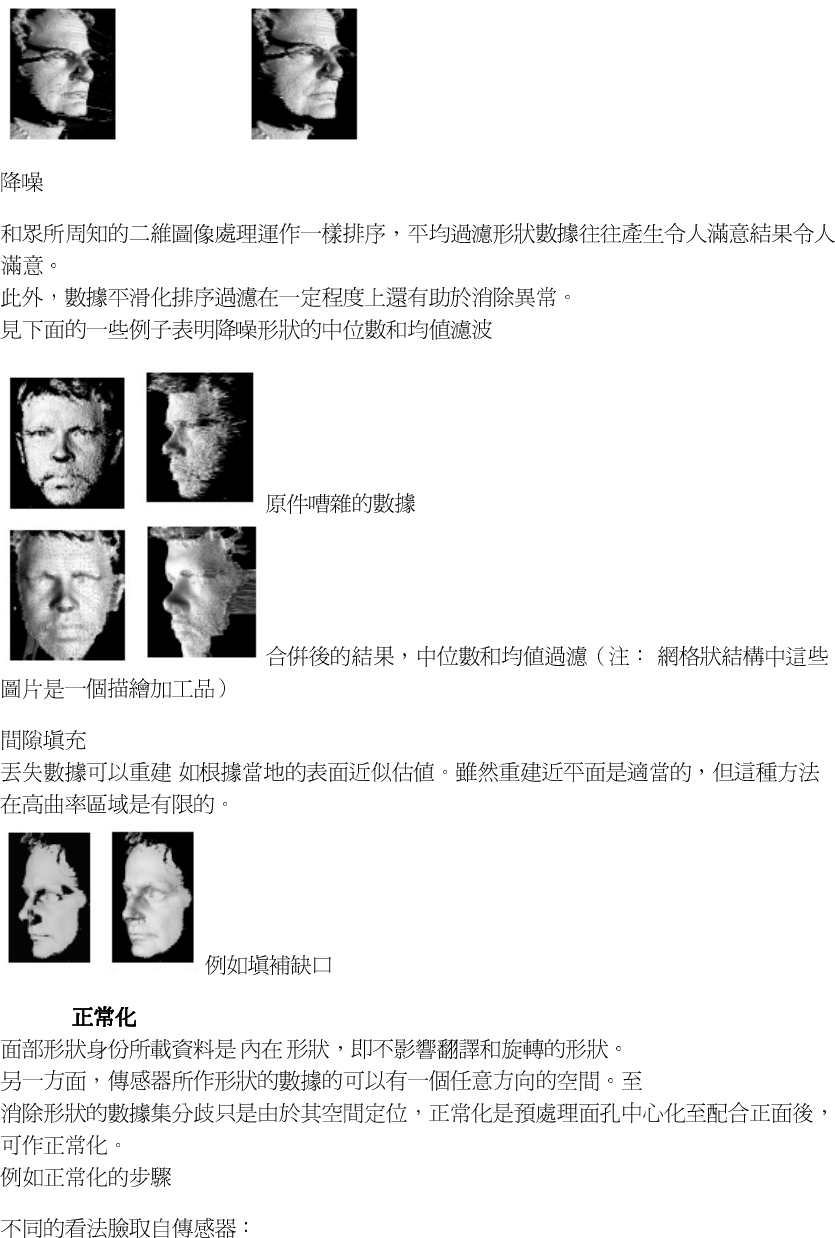
93
;
12.3.2.
' '

94
12.3.3
12.3.4.
12.4. 樣品質量
樣品質量樣品質量
樣品質量
FaceVACS
FaceVACS
FaceVACS 12-10
12-10
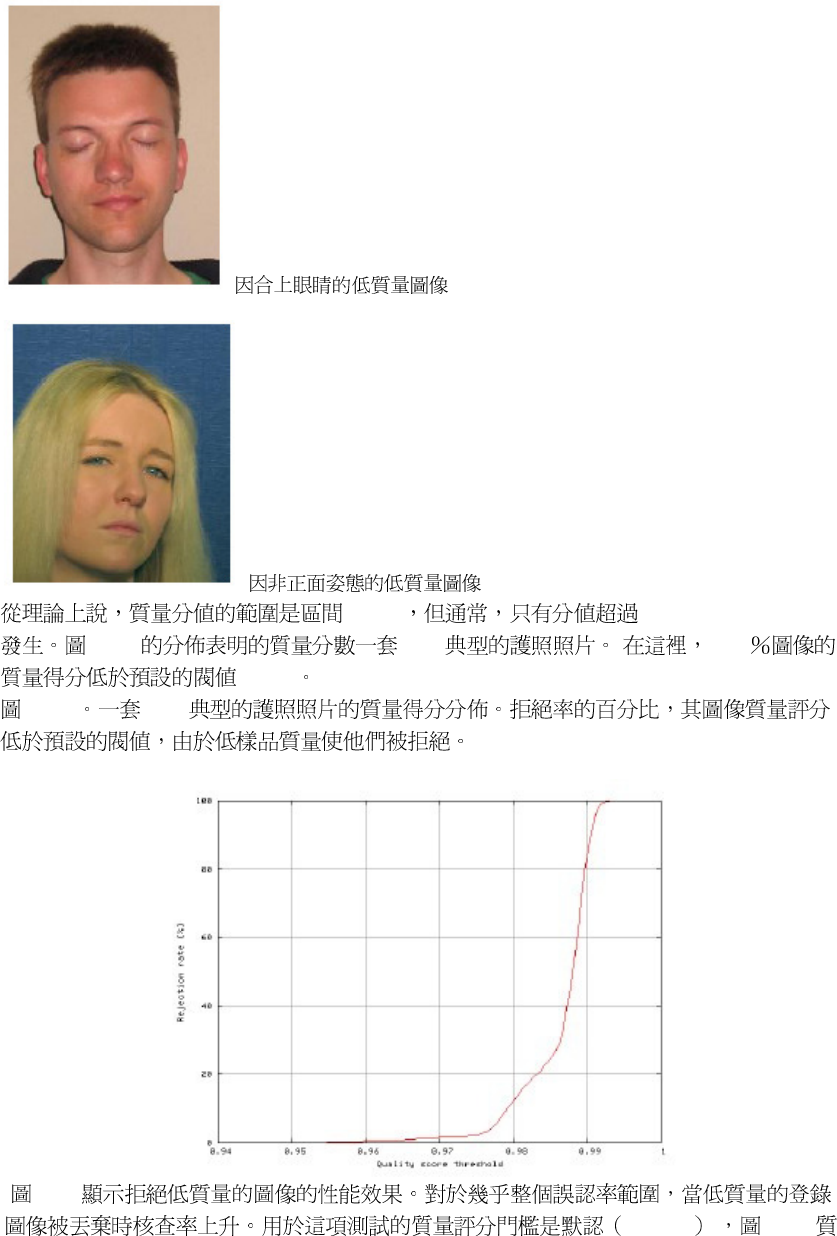
95
[ 0,1 ] 0.9
12-11 1000 2.3
0.975
12-11 1000
12-12
0.975 12-11
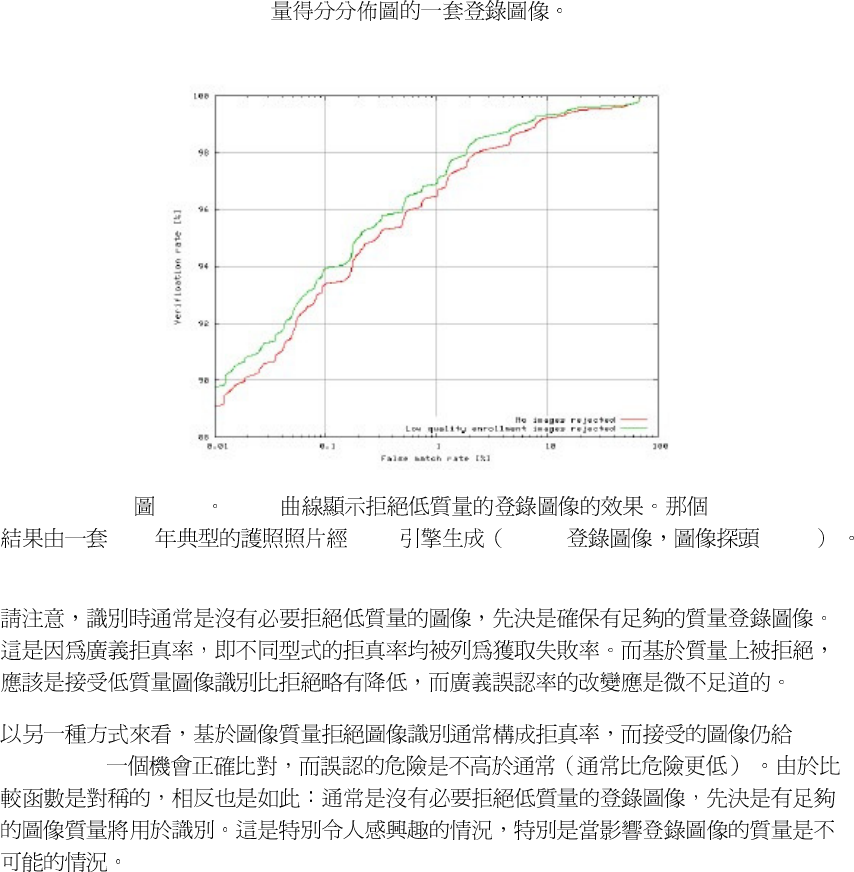
96
12-12
ROC
2000 B2T6 1000 1000
FaceVACS
97
Glossary
CaseID
A unique identifier for a biometric record; uniquely identifies a biometric entity.
PID
A unique identifier refering a real person.
Primary Facial Data (PFD)
As primary facial data we denote a set of faces along with annotations of the eye positions and a
CaseID which represents the identity of an biometric identity.
Secondary Facial Data
The Primary Facial Data (PFD) is sufficent to do biometric operations as verifications and
identifications.However to improve speed some processing of the faces is done. The result is called
FacialIdentification Record (FIR) and represents now the biometric identity of the CaseID attached to
it.The Facial Identification Record (FIR) and CaseID represent the secondary facial data.
Signature
Signing and signature verification is done by using public/private key encryption techniques.
Asignature is build by using an private key and the data to sign. To check if the data was altered by an
unauthorized person, an signature is build from the data and compared with the stored signature using
the public key. If they mismatch then the data was changed.
Person Properties
Additional data of arbitrary sql type related to a person
TransactionID
A network wide unique identifier for FaceVACS-DBScan transactions like Enrollments, Verifications,
Identifications, Administrative Transactions. Used as primary key in the FaceVACS Log
Database tables;
Entity
A distinguishable object.
Property
An attribute of an entity.
Relationship
A Relationship is an entity that describes a relation between two other entities.
Primary Key
A Primary key of an entity is the unique identifier that denominates that entity.
Foreign Key
A Foreign key in a table is the reference to the primary key in another table.
Sample
98
An image of a person, authorized by an authentication authority, optionally combined with additional
data like annotations (eye positions).
Facial Identification Record (FIR)
A FIR is a set of biometric information about a persons face characteristics in a format specific to the
comparison algorithm used. Each algorithm provides a function returning a measure for how similar 2
FIR’s are. Updates of the algorithm will require recreation of FIR’s.
False Acceptance Rate (FAR)
Statistical measure for the acceptance failure rate of a biometric system. It is computed by comparing
in a controlled performance evaluation experiment a number of probe images (whose identity is known)
against a gallery. The FAR (at a given threshold) is then the proportion of false acceptances, i.e. of
comparisons between images with different identities whose similarities were above the threshold.
False Rejection Rate (FRR)
Statistical measure for the rejection failure rate of a biometric system. It is computed by comparing in a
controlled performance evaluation experiment a number of probe images (whose identity is known)
against a gallery. The FRR (at a given threshold) is then the proportion of false rejections, i.e. of
comparisons between images with equal identity whose similarities were below the threshold.
Enrollment
is the process that introduces a new biometric identity to the system. The result is a trusted biometric
identity in form of Primary Facial Data (PFD) and Secondary Facial Data. It doesn’t matter how the
annotation is done: Either the eye position is found by the system and a committed by a human
authorization authority or that authorization authority manually annotates the eye positions. The
system always takes enrolled biometric identities as trusted and only operates on/against trusted
biometric identities.
Verification
Main biometric use case, where a Sample is compared to the enrollment of a specific case. Only if the
Score achieved is above the Threshold, the Sample is believed to belong to this case and verification is
regarded successful.
Identification
Main biometric use case, where a Sample is compared to all enrollments of the system. The result of a
identification is an ordered list of matches (Match List) and a decision, whether the identification was
successful or not. An identification is regarded successful, if the highest score value achieved was
above the system Threshold.
Score
A floating point value computed in the result of comparing two samples or a Sample with Secondary
Facial Data. The value ranges from 0 to 1 and represents the ’score’ of the faces.
Threshold
A special Score value defining the identity discrimination border. Biometric transactions yielding
similarities above the threshold are considered to have been successful. The global threshold of a
biometric system influences False Acceptance Rate (FAR) and False Rejection Rate (FRR), which are
measures for security and usability, respectively. It depends on the main use case of the biometric
application, which value of the threshold constitutes the optimal compromise between these opposites.
Trusted Facial Identity
99
is in general any facial information set that is sufficient to identify a human being. The facial identity is
taken as trusted if and only if an authorization authority has given the "trusted" approval. The
authorization authority can only be a human being. The trusted label can never be given by the system,
it always requires human responsibility and professionalism. However, the system can still and does
propose a trust grade and supports the authorization authority.
Identification Match
A CaseID along with the score value the identification image achieved against the enrollment of this
CaseID.
Match List
A list of Identification Matches ordered by their score values in descending order. In interactive
identification, the CaseID’s, the similarities and the reference images are displayed in the Graphical
User Interface. In database identifications, CaseID’s and similarities are stored into a database table.
Size of the list is controlled by parameters Match List Size and Match List Threshold
Match List Size
Configurable maximum number of items to be returned in the Match List.
Match List Threshold
Configurable minimum threshold for inclusion of matches into the Match List. Onlymatches whose
score is above this threshold will be included with the match list.
Eye Positions
The eye positions describes a location in a image where eyes within a face are located. The correct
annotating positions of the eyes are not the pupils, but the midpoints of the lines connecting the eye
corners.
Gallery and Probe
Generic biometric terms designating the sets of "known" and "unknown" biometric data sets involved
in a sequence of comparisons. In terms of Verification or Identification transactions, the "probe" is the
image presented to be verified or identified, respectively, while the "gallery" is the enrollment data of
the cases the transaction is performed against.
Gallery Item
is a specific element of the gallery. Usually it represents the enrollment data belonging to a case.
Schedule Configuration
Schedules are defined by description strings. This can be
• Strings containing 5 scheduling positions
• Shortcuts for particular or frequently used schedules
Defining Schedules by 5-position strings
Schedules can be defined by strings containing 5 positions separated by spaces, which represent
minute [0-59], hour [0-23], day of month [1-31], month [1-12], day of week [1-7 or names: Mon Tue
Wed Thu Fri Sat Sun], respectively. The settings apply to the local time of the system were the
Schedule is processed.Each position can contain a list of schedule items separated by commas. A
schedule item is either a simple value or a range of values with an optional step. The syntax for
defining a range of values is lower-higher/step
Examples:
0 * * * * Every full hour
0,30 * * * * Every 30 minutes
0-59 * * * * Every minute
100
0-59/5 * * * * Every 5 minutes
The overall schedule will be computed as a logical AND of the single conditions, with one exception:
If both values for day of week and day ofmonth are configured, the resulting schedule will contain
both dates.
Examples:
0 12 * * * Everyday 12:00
0 0 * * 7 Sunday midnight only
0 0 * 12 7 Sunday midnight in December only
0 0 15 5-9 7 From May to September midnight on Sundays and on the 15th
Shortcuts for particular or frequently used schedules
Instead of specifying strings as described above, these shortcuts are available:
@start Only once upon process startup
@hourly Begin of each hour
@daily Begin of each day (00:00)
@weekly Begin of each week
@monthly: Begin of each month
@yearly: Begin of each year (1st January 00:00)
Empty string: job will never be started
Note: Specifying an empty string can be used for temporarily disabling a job schedule. This might
be preferrable to deleting the job, which has the same result, but will cause all job settings to be
lost.
The syntax above has originally been defined in IEEE Std1003.2-1992 (AKA POSIX2) in the context
of UNIX cron utility.
Data Input Fields
Define the type of the graphic user interface control to be used for data input. These types are available:
•
FV::App::DbInput_::StringInputField: Plain text input line
For this control type, the minimum and maximum length of the input string can be customized
with the MinimumLength and MaximumLength settings.
•
FV::App::DbInput_::DateInputField Widget to enter dates
For this control type, the Format setting defines whether Day or Month input fields are displayed
leftmost in the control.
•
FV::App::DbInput_::EnumInputField Widget to select out of enumerations
For this control type, the Values subnode allows for defining the set of enumeration values to
choose of. To define a set of values, add a (symbolic) entry for each of them and customize the
values entered. For example, to let the user choose an input value out of (2,4,8) you might add
symbolic value names ’V2’, ’V4’, ’V8’ and assign to them the values ’2’, ’4’, ’8’, respectively.
Configurable Image Formats
Images can be stored in the database in either jpeg or png format. While png format is lossless,
jpeg format is not and original images cannot be fully restored. On the other hand, jpeg images
require much fewer space in the database, and as long as the compression quality (see below) is
not below 80, there is no measurable degradation of biometric performance.
Within the configuration view, these formats are represented by the image storage types
FV::App::Jpeg
and
FV::App::Png.
These in turn have the configurable properties FV::App::Jpeg.Quality and
FV::App::Png.CompressionLevel, respectively.
The jpeg quality level is defined by the Independent Jpeg Group (IJG). Its range is from 0 to 100.
While it is safe to configure a value lower than 80 for images which are stored for mere documentation
purpose, images to be reused for biometric purposes should be stored at a quality of at least
The png compression level is from 0 to 9. It controls the compromise between speed of compression
and compressed image size, whereby higher values represent stronger, but slower compression.
Since png is lossless, the compression rate achievable is limited.
Software Component
101
’Software Component’ names the installable components of a FaceVACS-DBScan installation.
Software components available for FaceVACS-DBScan are ’Cluster Controller’,’Computing
Node’, ’Cognitec Front End’ and ’Integrators Kit’. They differ by their role within a distributed
identification system.
Cluster Controllers start and supervise distributed transactions (enrollments or identifications)
and collect their results. Computing Nodes do the actual processing of subtasks they have been
assigned to by the Cluster Controller. Increasing the number of machines with Computing Node
software improves performance and resilience of the system.
Cognitec Front Ends are GUI programs implementing basic biometric workflows like enrollment
and identification. The Integrators Kit is a C++ API designed to support integration of
FaceVACSDBScan.
For basic operation, at least one Cluster Controller and one Computing Node are required. The
installation procedure allows for a combined installation of both of them on one machine.
102
Appendix A. End User License Agreement
License Notice
Cognitec Systems GmbH will grant you a license for the software contained in
this package only under the condition that there is a signed license
agreement (as provided by Cognitec Systems GmbH) in place for this
software in which the serial number of the software is expressly mentioned.
Please make sure that the license agreement is available and signed and that
you act according to this agreement.
Using the software requires the entry of a license key specific for the
hardware used. If there is no valid license agreement in place, Cognitec
Systems shall not grant you the license for this software. In this case,
please return the whole package (software and other contents) to Cognitec
Systems. Receipt of a license key from Cognitec Systems GmbH and/or use
thereof is a representation and warranty on the part of the licensee that it
is in compliance with the terms and conditions of the license agreement with
Cognitec Systems GmbH.
Cognitec Systems GmbH
Dresden, May, 2006
