FoxNet User Guide V1.0.0 Fox Net
User Manual:
Open the PDF directly: View PDF  .
.
Page Count: 45
FoxNet User Guide V1.0.0
Bronwyn Hradsky, Quantitative and Applied Ecology, University of Melbourne
Contents
1 About FoxNet 3
1.1 Overview ............................................... 3
1.2 Components.............................................. 3
1.3 Temporalandspatialscales ..................................... 5
1.4 Process overview and scheduling . . . . . . . . . . . . . . . . . . . . . . . . . . . . . . . . . . 5
1.5 Designconcepts............................................ 7
1.6 Initialisation ............................................. 8
2 Getting started 10
2.1 Installing NetLogo and opening FoxNet . . . . . . . . . . . . . . . . . . . . . . . . . . . . . . 10
2.2 Theuserinterface .......................................... 10
2.3 Thecode ............................................... 11
2.4 Modeldemonstration......................................... 11
3 Building a simple scenario from scratch 12
3.1 A fox population in a homogenous landscape . . . . . . . . . . . . . . . . . . . . . . . . . . . 12
3.2 Monitoring your model outputs . . . . . . . . . . . . . . . . . . . . . . . . . . . . . . . . . . . 14
3.3 Experiment .............................................. 14
3.4 Addingabaitingprogram...................................... 15
4 An example customisation 18
4.1 Glenelg-abuilt-inscenario..................................... 18
4.2 Building the Glenelg scenario from scratch . . . . . . . . . . . . . . . . . . . . . . . . . . . . . 19
5 Building a new customised scenario 25
5.1 Acustomisedlandscapelayer .................................... 25
5.2 Customised region(s) of interest . . . . . . . . . . . . . . . . . . . . . . . . . . . . . . . . . . . 26
5.3 Customisedbaitlayout........................................ 26
5.4 Customisedsurveytransect ..................................... 26
6 Running batch scripts 27
6.1 WithinNetLogo ........................................... 27
6.2 From R using the RNetLogo package . . . . . . . . . . . . . . . . . . . . . . . . . . . . . . . . 27
7 Implementation verification 31
7.1 Effect of productivity on fox-family territories . . . . . . . . . . . . . . . . . . . . . . . . . . . 31
7.2 Effect of productivity on fox density . . . . . . . . . . . . . . . . . . . . . . . . . . . . . . . . 32
7.3 Effect of baiting on fox mortality . . . . . . . . . . . . . . . . . . . . . . . . . . . . . . . . . . 33
8 Submodels 34
8.1 Submodels used during model processing . . . . . . . . . . . . . . . . . . . . . . . . . . . . . . 34
8.2 Submodels specific to model set-up . . . . . . . . . . . . . . . . . . . . . . . . . . . . . . . . . 37
9 Appendices 40
9.1 Customisable model parameters . . . . . . . . . . . . . . . . . . . . . . . . . . . . . . . . . . . 40
9.2 WeekConversionTable ....................................... 44
10 References 45
1
Notation
The names of agent-sets are italicised. An agent-set is a group of the same entities within FoxNet.
Submodel names are in bold.
Parameter names are shown in code font.
“Input values” for a
parameter
are shown in “quotes”. “Input values” can be varied to customise the FoxNet
modelling framework to a scenario and explore key sensitivities.
This project is licensed under the GNU General Public License v3.0 - see the LICENSE.md file for details.
To cite this User Guide
Hradsky B, Kelly L, Robley A, Wintle B (2019) FoxNet: an individual-based modelling framework to support
red fox management Journal of Applied Ecology.
Software source
Data available via Zenodo http://doi.org/10.5281/zenodo.2572045 (Hradsky et al. 2019b). A current version
of FoxNet and the User Guide is also maintained at this location.
For further information or help with customising model code
Email hradskyb@unimelb.edu.au or bhradsky@gmail.com
The development of FoxNet was funded by the
•
Australian Government’s National Environmental Science Program through the Threatened Species
Recovery Hub
•Victorian Government (Department of Environment, Land, Water and Planning)
•Parks Victoria
2
1 About FoxNet
1.1 Overview
FoxNet is a customisable, individual-based modelling framework for running spatially-explicit red fox
population models at a landscape-scale. It can be used to predict red fox population density, age structure,
composition and responses to management across an entire landscape or within customised region(s) of
interest.
1.2 Components
FoxNet has four main types of agent: habitat-cells,foxes,fox-families and bait-stations. Another type of
short-lived agent (vacancy) is used to execute territory-checking processes efficiently.
Habitat-cells are the squares of habitat that define the spatial resolution, configuration and productivity of a
model landscape in FoxNet. Within a habitat-cell, productivity and fox access to bait-stations is homogenous.
The area represented by each habitat-cell can be specified using
cell-dimension
, and is usually in the order
of 0.01 km
2
to provide a compromise between computational efficiency and intra-home-range variation (fox
home-range size varies between <0.5 and >9 km
2
; Trewhella et al. 1988). Each habitat-cell keeps track of
the following parameters:
•habitat-type
: an integer that denotes the type of habitat (e.g. “0” = ocean, “1” = forest, “2” =
farmland). If the model landscape is generated within FoxNet, there will only be one
habitat-type
.
However, if the model landscape is imported as an ascii raster layer, the
uninhabitable-raster-value
,
second-habitat-raster-value
and
hab2:hab1
inputs can be used to specify, respectively, a raster
integer value that denotes habitat-cells that are not available to foxes (such as ocean or lakes), a raster
integer value that denotes a secondary type of habitat (e.g. farmland if the primary habitat type is
forest), and the productivity of the second
habitat-type
relative to the primary
habitat-type
. The
productivity of the habitat-cells determines how many habitat-cells afox-family needs to acquire to
establish a territory (see below).
•available-to-foxes
: “true” or “false”. This parameter defaults to “true” unless the habitat-cell’s
habitat-type
is the same as the
uninhabitable-raster-value
for an imported landscape. In this case,
the habitat-cell becomes unavailable to foxes and is not included in the
available-landscape-size
.
This allows to you to specify areas that foxes cannot access, such as oceans, lakes, predator-proof fenced
areas etc.
•part-of-region-of-interest
: “true” or “false”. This parameter defaults to “false”. When “true”, the
habitat-cell becomes part of the
region-of-interest
where the fox population is monitored (e.g. a
central square or a nature reserve). The region-of-interest can be the entire landscape if desired.
•part-of-region-of-interest2
: “true” or “false”. This parameter defaults to “false”. When “true”,
the habitat-cell becomes part of a second region of interest (
region-of-interest2
) where the fox
population is also monitored (e.g. a second nature reserve).
•true-color
: the intrinsic colour of the habitat-cell when unoccupied by a fox-family. This defaults to
black for the primary habitat type, but will be a different colour if the habitat-cell is the secondary
habitat type, is not available to foxes, or is part of the region(s)-of-interest.
•true-productivity
: the intrinsic amount of food available to a fox in the habitat-cell during each
time-step (in grams time-step
-1
). The
true-productivity
of habitat-cells in the primary habitat
type is calculated from the size of an average fox home-range (input by the user) and the daily food
requirements of an adult fox (378 g/day; Lockie 1959); an approach similar to Carter et al. (2015)
but which facilitates scenario customisation.
True-productivity
in the secondary habitat-type (if
applicable) depends on the
hab2:hab1
ratio. See the
set-landscape-productivity
submodel for more
information.
•current-productivity: the current amount of food available to a fox in the habitat-cell during each
time-step (in grams time-step
-1
). The
current-productivity
of each habitat-cell determines how many
3
habitat-cells foxes need to acquire to establish a territory - see the
fox-families-check-territories
and
foxes-disperse
submodels. By default, a habitat-cell’s
current-productivity
is the same as
its
true-productivity
, but it can be varied spatially or temporally through manual coding. Future
extensions will use this feature to incorporate disturbance events such as fire that have short-term
effects on red fox habitat selection.
•fox-family-owner
: the identity of the fox-family that currently owns the habitat-cell (set to “nobody”
when the cell is unowned).
•cell-relative-productivity
: set to 0 by default. However, if the habitat-cell is owned by a fox-family,
it is calculated as the
current-productivity
of the habitat-cell weighted by the inverse of its distance
from the centre of the fox-family’s territory. This value is updated by the fox-family.
•cell-relative-use
: set to 0 by default. However, if the habitat-cell is owned by a fox-family,
it is calculated as the intensity with which the habitat-cell is used by the fox-family, i.e., the
current-productivity
of the habitat-cell divided by the total productivity of the fox-family’s terri-
tory. For example, in a homogeneous landscape with a territory-size of 100 ha and 1-ha habitat-cells,
cell-relative use
would be 0.01. However, if the territory-size was 500 ha,
cell-relative-use
would be 0.002.
cell-relative-use
is used to scale the exposure of foxes to bait-stations with
territory-size and habitat-cell productivity, and to derive the density of foxes (a monitoring output).
•cell-relative-use-foxes
: set to 0 by default. However, if the habitat-cell is owned by a fox-family, it
is calculated as
cell-relative-use
multiplied by the number of foxes in the fox-family. This is used to
calculate the density of foxes. For example, if 4 foxes share the 500-ha territory and
cell-relative-use
is 0.002, cell-relative-use-foxes is 0.222 x 4 = 0.008.
•checked-already
: “no” (default) or “yes”: indicates whether the fox-family owner has already consid-
ered discarding this habitat-cell. Used to speed up the update-territory submodel.
Foxes are mobile individuals whose behaviour is determined by their
age
and
status
, and the time of year
(Larivière & Pasitschniak-Arts 1996). Each “alpha” fox is a member of a fox-family .Foxes have the following
characteristics:
•age: in weeks. Foxes are born at age “0”.
•sex: “female” or “male”.
•status
: “cub”, “subordinate”, “disperser” or “alpha”, depending on the fox’s
age
and territory-holding
status.
•natal-id: the fox-family that the fox was born into.
•natal-cell: the habitat-cell where the fox was born.
•family-id: the fox-family that the fox currently belongs to.
•my-dispersal-distance
: the distance (km) that the fox intends to move from its
natal-cell
(drawn
from a random-exponential distribution which is influenced by the fox’s sex and size of its natal territory)
- see the foxes-disperse submodel.
•distance-from-natal: the current distance of the fox from its natal-cell (in kilometres).
•my-dispersal-duration
: the length of time the fox has been attempting to join or establish a new
territory (in weeks).
•failed-territory-id: a list of this fox’s territories which have failed.
Fox-families are used to establish and update the territories of their family-members (foxes within a family
share a semi-exclusive territory; Sargeant 1972). A fox-family must contain at least one “alpha” fox, and may
also include the alpha’s mate, cubs and subordinate offspring. Fox-families have the following characteristics:
•family-members
- an agent-set comprising the “alpha female” and/or “alpha male” fox, and any of
their “cub” or “subordinate” offspring that have not yet dispersed.
4
•my-territory - an agent-set comprising the habitat-cells held as territory by the fox-family.
•territory-productivity: the total productivity of the fox-family’s territory.
•vacancy-score
: the sum of the
relative-productivity
values of the vacancy agents surrounding
the territory at the end of the last time-step. Fox-families only try to improve their territory if the
vacancy-score
this time-step is different - this helps the model run more efficiently. The
vacancy-score
will change if the
current-productivity
of the habitat-cells has changed, if new habitat-cells have
become available through the death of a fox-family, or if location of the fox-family has changed. See
the fox-families-check-territories submodel.
Bait-stations are static agents that mark the locations of baiting sites (this is more efficient than using the
habitat-cells to record this). Bait-stations track:
•bait-present - whether a bait is currently available (“true” or “false”).
•Pr-death-bait-scaled - the likelihood of the bait affecting a fox whose territory overlaps it.
Vacancies are temporary static agents. They are briefly created and used by fox-families to (a) identify any
habitat-cells that are adjacent to their territory and not owned by another fox-family, and (b) determine
the
relative-productivity
of each of these available habitat-cells (i.e. the
current-productivity
of the
habitat-cell weighted by the inverse of its distance from the centre of the fox-family’s territory). The sum of
these values becomes the fox-family’s
vacancy-score
for that time-step. Vacancies are removed at the end
of each fox-family’s territory-checking procedure and are simply used to help the model run efficiently.
1.3 Temporal and spatial scales
FoxNet progresses in time-steps (or ticks) of 1, 2 or 4 weeks, depending on the
weeks-per-timestep
setting.
There are 52 weeks per year (and therefore 13 ‘months’, each of 4-weeks duration). A series of processes occur
consecutively each time step, and key seasonal events are linked to
week-of-year
, making the framework
customisable to northern- and southern-hemisphere scenarios.
The landscape can either be generated within FoxNet (as a square with the area specified by the
landscape-size
input parameter), or uploaded as raster layer, with each cell of the raster corresponding to
ahabitat-cell in the model. By default, the landscape doesn’t wrap (i.e. boundaries are non-permeable).
1.4 Process overview and scheduling
Each timestep, FoxNet works through a series of processes in order. Because key seasonal events are linked
to week-of-year, the framework is customisable to northern- and southern-hemisphere scenarios. There is no
hierarchy among agents of the same type (i.e. the order in which agents conduct each process is random and
varies each time-step).
The key processes are as follows:
(1)
Year and week counters are updated (by 1, 2 or 4 weeks, as required). Key seasonal events are linked
to week-of-year, making FoxNet customisable to northern- and southern-hemisphere scenarios.
(2)
The
age
of each fox is updated by the appropriate number of weeks. “Cub” foxes become “subordinates”
if they have reached the
age-of-independence
. If it is the dispersal season, “subordinate male”
and “subordinate female” foxes have user-specified probabilities of becoming “dispersers”. See the
update-fox-age-and-status submodel.
(3)
Natal succession occurs within fox-families. That is, if a fox-family is missing an “alpha” fox, one of
the family’s “subordinates” that is the right sex and at least 24 weeks old becomes the “alpha” (as
described by Baker et al. 1998).
5
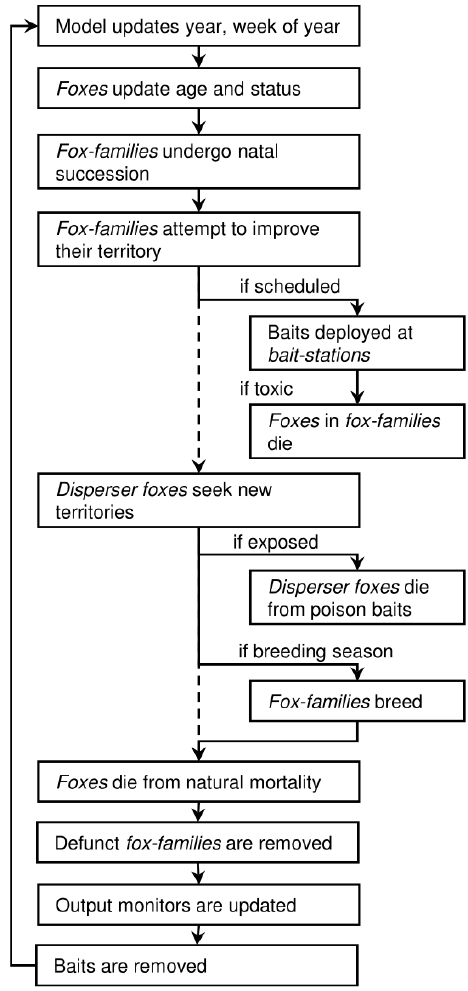
(4)
Fox-families check their territories. Fox-families seek to maximise their
territory-productivity
within a compact area by acquiring or replacing habitat-cells. This enables the fox-family to take over
unoccupied productive habitat-cells (Sargeant 1972), and respond to changes in resource availability
(Bino et al. 2010; Hradsky et al. 2017b). If the
territory-productivity
of fox-family’s territory
is less than an adult fox’s minimum food requirements (<295 g/day; Winstanley et al. 2003), the
fox-family fails, causing all adult foxes in the family to become “dispersers” and any “cubs” to die. See
the fox-families-check-territories submodel.
(5)
If applicable, baits are laid at bait-stations and the cost of the baiting session is calculated. Foxes
belonging to a fox-family with a territory that overlaps an active bait-station are at risk of dying. Risk
scales directly with the number of bait-stations and bait efficacy, and inversely with territory size and
the number of foxes in the familiy. Each bait-station only affects one fox each time-step. See the
6
bait-if-applicable submodel.
(6)
Foxes who have just become “dispersers” leave their natal fox-family and move a random distance
generated from a sex-specific exponential distribution, scaled by their territory-size (Trewhella et al.
1988). “Disperser” foxes then explore the area within their
territory-perception-radius
(set to
an area three times the radius of an average home-range; Soulsbury et al. 2011) where they (1) are
exposed to any active bait-stations; (2) attempt to join a fox-family that lacks an “alpha” fox of the
appropriate sex; (3) try to establish a new fox-family. If unsuccessful, they remain a “disperser” until
the next time-step. See the foxes-disperse submodel.
(7)
If it is the breeding season, fox-families that contain an “alpha” male and an “alpha” female fox breed,
producing a Poisson-distributed number of “cub” foxes. If an “alpha” fox is absent, all family-members
become dispersers and attempt to join other nearby fox-families, promoting the persistence of the
population at low densities. See the fox-families-breed submodel.
(8)
Provided that
include-fox-mortality
is “on”, stochastic background mortality of foxes occurs, based
on their age. See the foxes-die submodel.
(9)
“Cub” foxes belonging to fox-families without any adults die, reflecting their dependence on food-
provision (Baker et al. 1998). This allows baiting to affect reproductive success. Defunct fox-families
(those that have no family members) are removed from the model.
(10)
Model outputs are updated (and plotted if specified). Outputs can include age structure, population struc-
ture, dispersal distances, density or number of neighbours of foxes within the
region-of-interest
(s),
the number of foxes with territories overlapping a monitoring transect, and/or bait-take rates. See the
update-monitors submodel.
(11)
If baits were deployed at bait-stations at step 5, any baits that were not eaten by foxes are removed to
mimic the removal of baits by managers or the degradation of the poison to non-toxic levels (Saunders
et al. 2000).
(12) The time-step (tick) counter increases by 1.
(13) The model checks if any foxes are alive. If all foxes are dead, the model stops.
Detailed descriptions of the submodels underlying these processes can be found in Chapter 8
1.5 Design concepts
1.5.1 Basic principles
The size of a fox-family’s territory depends on the productivity of the habitat-cells, and can be updated in
response to changes in the productivity or availability of these habitat-cell.
Foxes with established territories are only exposed to bait-stations within their territory. “Disperser” foxes
are exposed to bait-stations within their territory-perception-radius.
1.5.2 Emergence
The density of foxes, the distribution of ages and dispersal-distances within the population, and the configu-
ration of fox-family territories emerge over time from demographic processes, territory dynamics and the
spatial configuration of different habitat-types.
Bait-take rates result from the configuration of active bait-stations relative to fox-family territories and the
relative-use of habitat-cells,fox density, and the likelihood of a fox consuming a bait.
1.5.3 Adaptation
Fox-families adapt the size and position of their territory to the productivity of the habitat-cells and the
presence of surrounding fox-families.
7
1.5.4 Objectives
Each fox-family aims to maximise the productivity of its territory (up to 110% of an adult fox’s daily food
requirements) within as compact an area as possible.
“Disperser” foxes seek to join an existing fox-family as an “alpha”, or establish their own fox-family.
Foxes seek to breed, and so will disband their fox-family if it lacks an “alpha” of the opposite sex during the
breeding period.
1.5.5 Sensing
When they are dispersing, foxes can sense the location of fox-family territories and unoccupied habitat-cells
within their territory-perception-radius.
Fox-families can sense the productivity of the habitat-cells within their territory. They can also sense the
productivity and availability of the habitat-cells surrounding their territory, via the vacancy agents.
1.5.6 Interaction
Fox-families indirectly compete for habitat-cells, as each habitat-cell can only be used by one fox-family. The
fox-families use vacancy agents to determine which habitat-cells surrounding their territory are currently
available. This effectively limits the carrying-capacity of the landscape, as only foxes within fox-families can
breed. See Effect of productivity on fox density.
1.5.7 Stochasticity
Stochasticity occurs throughout the model to represent natural variation, including the dispersal locations of
foxes,fox sex and survival rates, and fox-family territory-acquisition and litter size.
1.5.8 Collectives
The
region-of-interest
(s) is nominated by the user, and defines the area(s) in which foxes are monitored.
Foxes form family-groups (represented by a fox-family agent) which share a territory. The status of each fox
is influenced by the sex and status of its other family-members.
The survival of a “cub” fox depends on the presence of at least one adult member in its fox-family until it
reaches the age-of-independence.
1.5.9 Observation
At the end of each time-step, data can be collected on the foxes,fox-families and bait-stations. The user
specifies which data to collect and plot. See the update-monitors submodel.
1.6 Initialisation
FoxNet initialises by setting the input parameters as per the model interface, and then running through the
following processes in order:
1. A random-seed is set and recorded, so that the model run can be reproduced exactly if required.
2. set-current-directory.
The current directory is set to the
working-directory
so that any spatial
layers can be easily imported and model outputs will be saved in the appropriate folder.
3. check-for-errors.
This checks for inconsistencies in the input parameters. If an error is found, the
model returns a detailed error message and stops. See the check-for-errors submodel.
4. calculate-conversion-factors.
This calculates the factors for converting between input units and the
model (e.g. km2to habitat-cells).
8
5. set-fox-parameters.
This sets a variety of parameters which are not available on the interface and
derives others, such as the duration of the dispersal season. See the set-fox-parameters submodel.
6. create-world.
This generates a landscape of an appropriate size, either by generating it within the
model or importing a raster layer. See the create-world submodel.
7. identify-region-of-interest.
This identifies the part of the landscape in which fox populations
will be monitored. This may be the entire landscape or a subset group of habitat-cells. See the
identify-region-of-interest submodel.
8. set-landscape-productivity.
This calculates the distribution of productivity values across the habitat-
cells using the
home-range-area
and
kernel-percent
inputs. See the
set-landscape-productivity
submodel.
9. set-up-bait-stations.
This sets up the bait-stations across the landscape (if applicable). See the
set-up-bait-stations submodel.
10. set-up-survey-transect.
This sets up a survey transect for monitoring the number of foxes, if
applicable.
11. set-up-foxes.
This creates an initial number of foxes at the specified density. Each fox immediately
disperses and tries to join an existing fox-family or establish a new fox-family. See the
set-up-foxes
submodel.
12. update-monitors.
This calculates the model ouputs and plots them if applicable. See the
update-
monitors submodel.
13. Finally, the model resets the time-step counter.
9
2 Getting started
2.1 Installing NetLogo and opening FoxNet
FoxNet was built in NetLogo (Wilensky 1999) version 6.0.2 - an open-source modelling environment, download-
able from https://ccl.northwestern.edu/netlogo/. FoxNet is saved in within the FoxNet folder:
FoxNet_model
/ FoxNet.nlogo. You can open it from within NetLogo or by double-clicking the file name.
For an introduction to using NetLogo see https://ccl.northwestern.edu/netlogo/docs/, particularly the three
tutorials listed in the LH menu.
2.2 The user interface
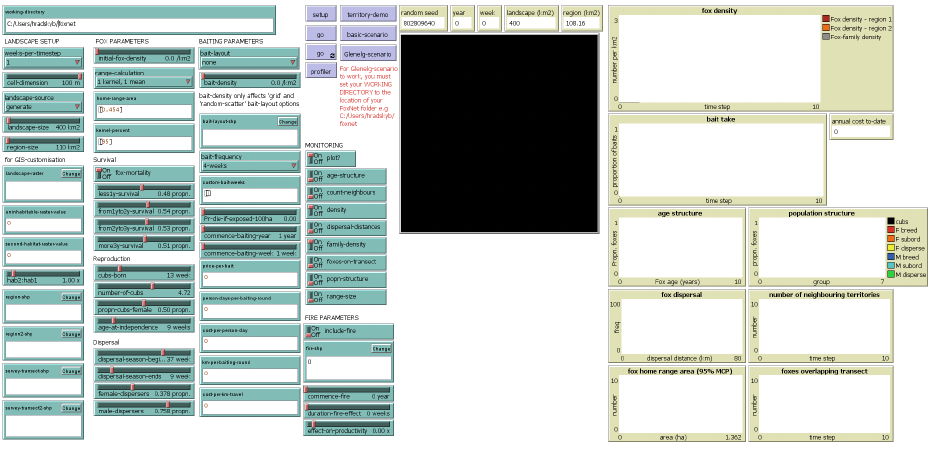
When you first open FoxNet, you should see the graphic user interface. The interface has four key sections:
1.
Inputs (green) - these boxes and sliders allow you to set model parameters and customise FoxNet to
your scenario.
2. Buttons (mauve) - these are used to control FoxNet:
•setup will parameterise FoxNet with whatever settings you have chosen in the inputs.
•go will run FoxNet for one timestep.
•go (continuous)
will run FoxNet forever (or at least until you click the button again) - this is shown
by the circling arrows.
•territory-demo will provide a demonstration of key model processes - see Model demonstration.
•basic-scenario
will setup FoxNet with a simple example scenario - see Building a simple scenario from
scratch.
•glenelg-scenario
will setup FoxNet with a complex scenario to demonstrate all the bells and whistles
(see An example customisation). You must set the
working-directory
to the location of the FoxNet
folder to use this option.
3.
World-view (large black square) - this depicts some aspects of the model so that you can watch what is
happening as you run FoxNet.
4. Outputs (beige boxes and plots) - these enable you to track key model outputs.
10
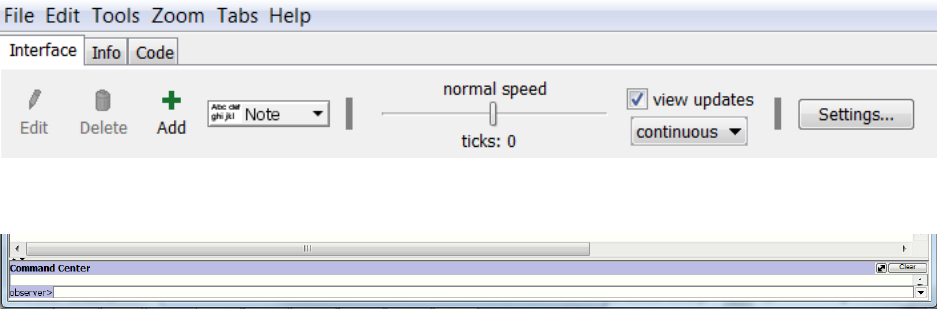
At the top of the screen, there are additional controls that affect how FoxNet displays, including a slider that
controls the model speed, a tick-box that specifies whether you want to watch updates in the world-view or
not, and a drop-down option for whether updates should be shown continuously or just at the end of each
time-step.
Under the Settings button, you can adjust the number of pixels per cell in the world-view and the frame rate.
TIP: To make the world-view larger/smaller you can increase/decrease the number of pixels per
cell. If the world-view is too large, you may encounter memory constraints.
At the bottom of the screen is the command center where you can issue direct instructions to the model.
Information on what is happening during the territory-demo is also shown here.
2.3 The code
The underlying model code can be viewed by clicking across to the Code tab. Submodels are provided in
separate files, which can be viewed by clicking on the Included Files dropdown box, within the Code tab.
Ignore this for now - you don’t need to view or edit the code to build or run a model in FoxNet.
2.4 Model demonstration
FoxNet comes with a build-in demonstration of several key processes, including territory formation, fox
responses to changes in habitat productivity, mate-seeking and reproduction.
Click on
territory-demo
(mauve button). A description of what is happening will appear in the Command
Center bar at the bottom of the screen. You can expand this bar if you want to see more than one line of
writing at once.
TIP: To stop the demonstration (or any FoxNet model) part-way through, click Tools > Halt.
11
3 Building a simple scenario from scratch
3.1 A fox population in a homogenous landscape
Let’s start by building a simple landscape. Using the Interface tab, either:
•
Set the following inputs manually by moving the sliders and entering the values, and then click
setup
, OR
•
Click the mauve
basic-scenario
button (which will automatically set up the model with the same
input parameters)
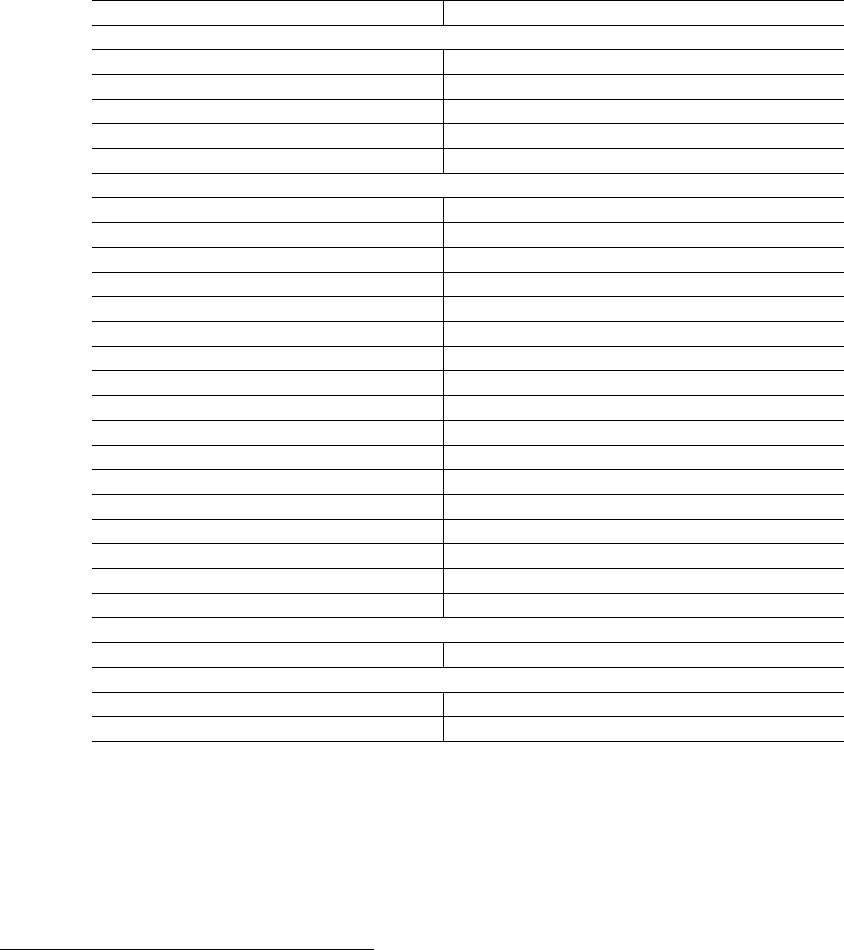
Parameter Value
Landscape setup
‘weeks-per-timestep‘ 1
‘cell-dimension (m)‘ 100
‘landscape-source‘ generate
‘landscape-size (km^2^)‘ 400
‘region-size (km^2^)‘ 110
Fox parameters
‘initial-fox-density (foxes km^-2^) ‘ 0
‘range-calculation‘ 1 kernel, 1 mean
‘home-range-area (km^2^)‘ [0.454] **make sure to include the brackets
‘kernel-percent (%)‘ [95] **make sure to include the brackets
‘fox-mortality‘ on
‘less1y-survival (propn.)‘ 0.48
‘from1yto2y-survival (propn.)‘ 0.54
‘from2yto3y-survival (propn.)‘ 0.53
‘more3y-survival (propn.)‘ 0.51
‘breeding-season (week)‘ 13
‘number-of-cubs‘ 4.72
‘propn-cubs-female (propn.)‘ 0.5
‘age-at-independence (weeks)‘ 12
‘dispersal-season-begins (week)‘ 37
‘dispersal-season-ends (week)‘ 9
‘female-dispersers (propn.)‘ 0.378
‘male-dispersers (propn.)‘ 0.758
Baiting parameters
‘bait-layout‘ none
Monitoring parameters
‘plot? ‘ "on"
‘density‘ "on"
These parameters are based on a fox population in Bristol, United Kingdom, with survival data from
Devenish-Nelson et al. (2013), and breeding and dispersal data from Trewhella and Harris (1988). See
Hradsky et al. (2019a) Table S1 for a full list of citations.
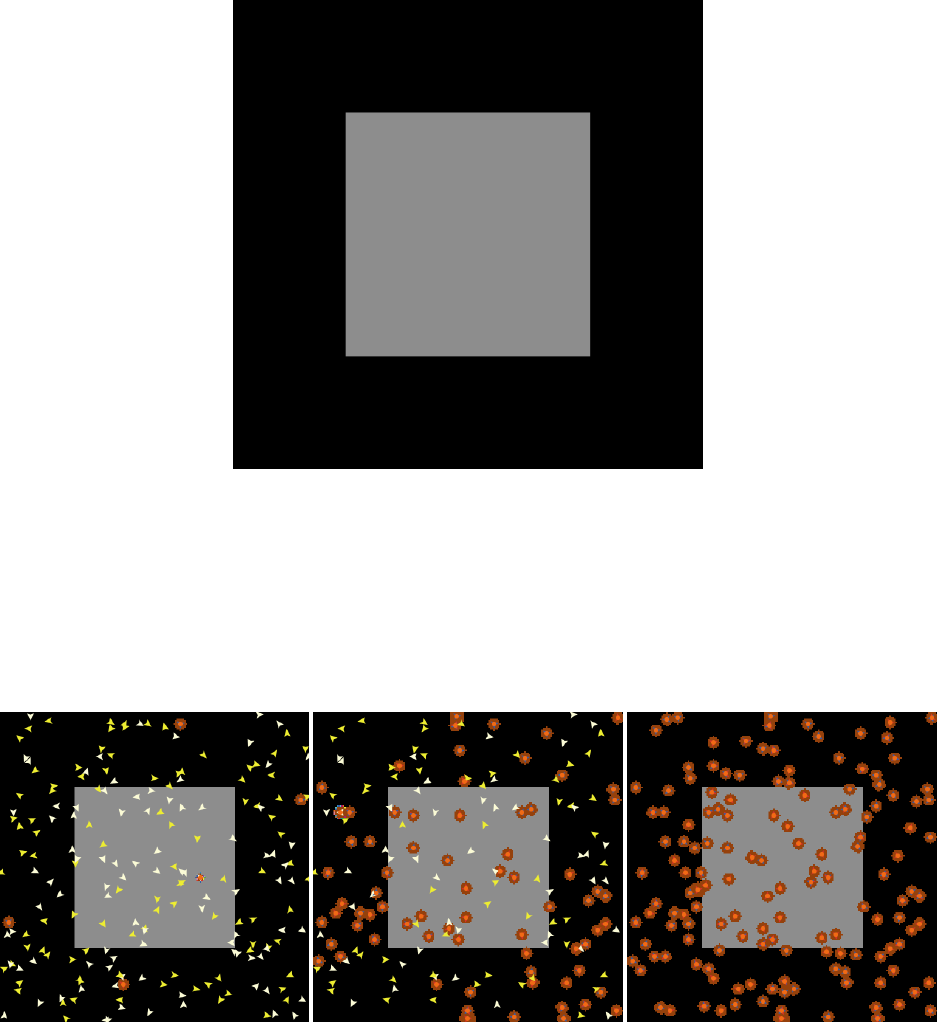
Whichever approach you chose, you should now see a black landscape with a central grey square in the
world-view. The entire landscape is 400 km
2
. The central grey square is your ‘region-of-interest’ where the
fox population is monitored, and is 110.25 km2 1. These values are shown in the beige output boxes.
1
Because FoxNet is generating a square lnadscape with 1 ha pixels (as specified by
cell-dimension
), it has had to adjust the
size of the region-of-interest slightly
12
Now change initial-fox-density to “0.5” foxes km-2 by sliding or clicking the slider to the right.
TIP: You can also alter the value of a slider by right-clicking the slider, selecting “edit” and then
typing in a new value in the appropriate box.
Click
setup
again. A scattering of white and yellow triangles should appear - these are “female” and “male”
foxes without territories (i.e. their
status
is “disperser”). Each fox should attempt to establish or join a
circular brown territory. A fox with a territory acquires “alpha”
status
, becomes red (“female”) or blue
(“male”), and sits beneath an orange-coloured fox-family in the centre of its territory. A “female” and “male”
fox can share a territory.
TIP: If you would like to slow this process down so that you can see what is happening, try sliding
the speed toggle in the grey header bar to about 25% speed and click setup again.
If you’d like to see the foxes more clearly, right-click the world-view > Edit, and change the
patch-size
to 2
pixels.
Now click
go
. You might see a fox or two move, but not much else will change. However, the beige year and
week of year output boxes at the top of the screen will now show year 1, week 1.
Click go (continuous). As time progresses, foxes breed, disperse, establish new territories and die.
You can observe the density of foxes and fox-families within your 110 km
2region-of-interest
by looking
13
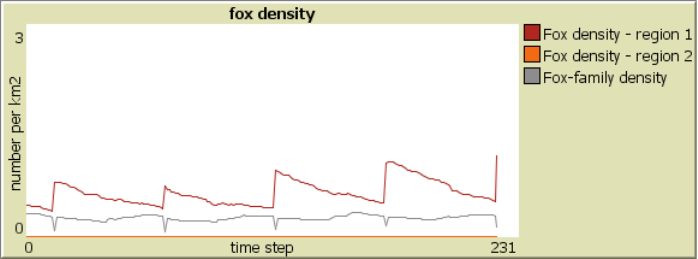
at the plot to the right of the world-view. For example, by Year 5, week 13, the density of foxes has just
spiked with the fifth breeding season, because the
cub-birth-season
is currently set to week 13 of the year
(late March - see the Week Conversion Table). The density of fox-families remains relatively stable:
TIP: To export the fox density data, right-click the plot and select “export”. End the filename
with “.csv”.
Click
setup
and
go (continuous)
again. Each time you run the model with the same settings, you will get
slightly different results due to stochastic variation.
3.2 Monitoring your model outputs
The
basic-scenario
defaults to plotting the density of foxes and fox-families within the
region-of-interest
.
However, you can monitor other aspects of the fox population within the
region-of-interest
using the
switches under MONITORING on the FoxNet interface. Options include:
•“age-structure” - the proportion of foxes in each age class from 0 to 8+ years.
•“bait-consumption” - the proportion of baits that have been removed by foxes per time-step.
•
“count-neighbours” - the mean (min, max) number of territories directly abutting each fox-family’s
territory.
•“density” - the density of foxes and fox-families.
•“dispersal distances” - the distance moved by foxes that have attempted to disperse.
•“family-density” - the density of fox-families.
•“popn-structure” - the proportion of foxes in each demographic group.
•
“foxes-on-transect - the number of foxes who have territories that overlap the
survey-transect
. This
only works for landscapes that have been imported as a raster and where a survey transect shapefile
has been uploaded.
•“home range size” - not provided in this version of FoxNet.
You can choose whether or not to plot summary values using the
plot?
button. Plotting makes the model
run more slowly.
3.3 Experiment
Have a play with the input parameters. For example, try making
landscape-size
larger,
initial-fox-density
higher, home-range-area bigger or switch fox-mortality to “off”.
TIP: Huge landscapes with high densities of foxes may take a very long time to setup and run.
To cancel a model at any point, select Tools > halt.
Note that all week-related inputs must be consistent with
weeks-per-timestep
. FoxNet checks this during
model set-up and will return an error if, for example,
weeks-per-timestep
is “4” but
cub-birth-season
is
set to week “6”.
14
3.4 Adding a baiting program
Return to the original settings by clicking basic-scenario.
Then alter the baiting parameters as follows to apply a uniform grid of bait-stations across your model
landscape:
Parameter Value
Baiting parameters
‘bait-layout‘ grid
‘bait-density (km^-2^)‘ 1
‘bait-frequency‘ 4-weeks
‘Pr-die-if-exposed-100ha (propn.)‘ 0.3
‘commence-baiting-year‘ 3
‘commence-baiting-week‘ 13
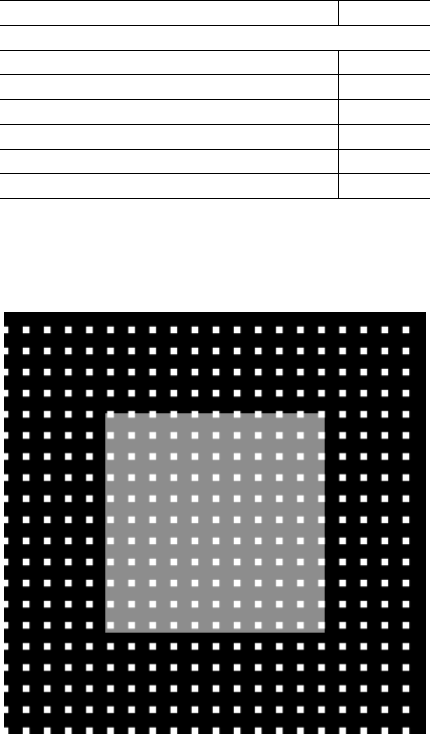
Click setup to see the layout of bait-stations.
The current setting will have established a 1 km-2 grid of 400 bait-stations across your landscape.
If
initial-fox-density
is > “0” and you click “go”, baits will be deployed at bait-stations every 4 weeks.
Baits are deployed at bait-stations from the start of the model, but under the current settings only become
poisonous from Year 3 week 13 - this allows the population to begin to establish without baiting, and enables
you to quantify uptake of non-toxic baits (i.e. free-feeding).
TIP: Baits are only deployed at bait-stations if the initial-fox-density is greater than 0.
Setting
Pr-die-if-exposed-100ha
to “0.3” means that one fox with a 100-ha territory has a 30% chance of
consuming a bait if one bait is deployed on its territory (and dying if the bait is toxic). The risk to a fox
scales with the number of baits and inversely with the territory size and number of foxes in its fox-family.
See Effect of baiting on fox mortality
Try altering bait-density to “4.0” baits km-2 or changing bait-layout to “random-scatter”, and clicking
setup again.
15
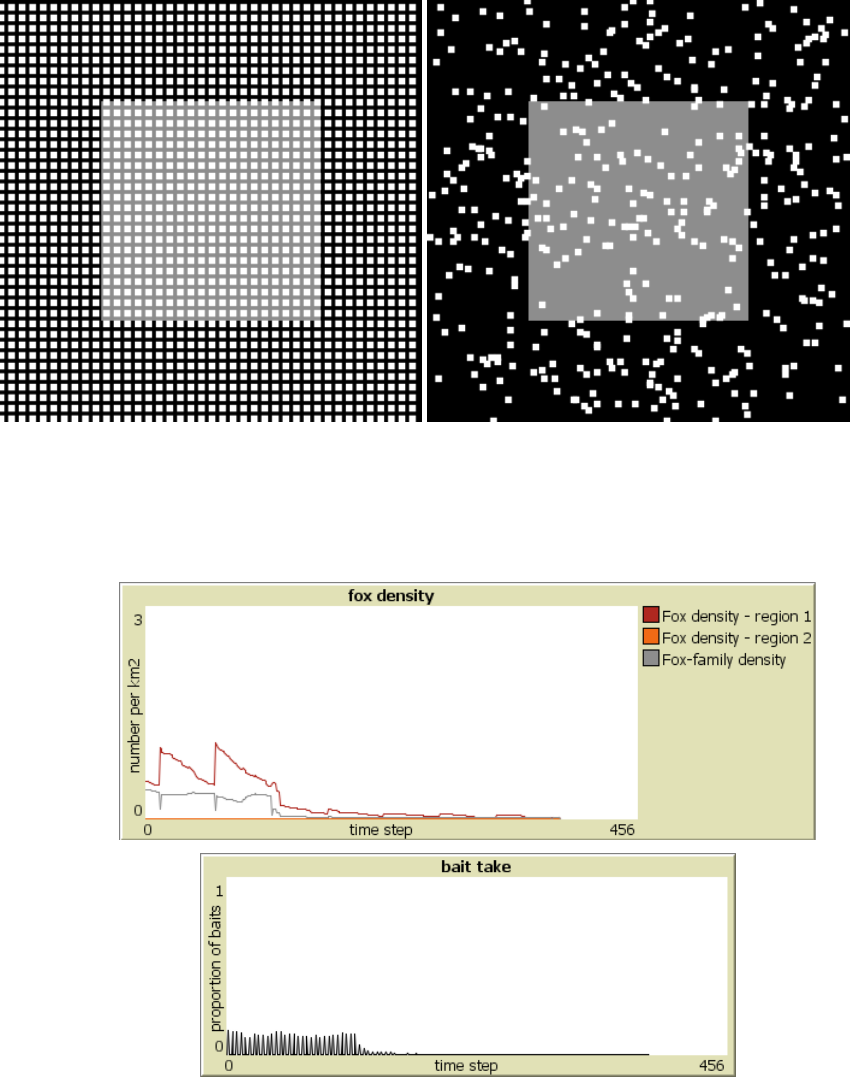
Look at the effects of baiting on the population by changing the settings to a “grid” of baits with “2” baits
km
-2
, setting
initial-fox-density
to “0.5” km
-2
, turning “on” the
bait-consumption
monitor, and then
clicking setup and go (continuous).
Fox density declines rapidly in Year 3 after the baits become toxic, in this case, going extinct by Year 8 week
21. The model stops when all foxes are dead. Bait-take rates fluctuate with fox density.
TIP: By default, baits only remain at bait-stations for one time-step. You can change the duration
of a time-step to “1”, “2” or “4” weeks. Other durations require a customised code. See foxnet /
foxnet_model / foxnet_carnarvon_custombait.nlogo for an example.
Baits can be deployed at bait-stations at custom intervals (e.g. quarterly, only in winter or once per year), by
changing bait-frequency to “custom*" and adding the relevant week numbers to custom-bait-weeks.
TIP: Make sure that the week inputs are surrounded by square-brackets, are consistent with the
weeks-per-timestep parameter and do not include commas between values.
16
For example, the following will deploy baits in weeks 6, 19, 31 and 45 each year (i.e. the start of February,
May, August and November):
Parameter Value
Baiting parameters
‘bait-frequency‘ custom*
‘custom-bait-weeks‘ [6 19 31 45]
To calculate the cumulative annual cost of a baiting regime (displayed in a beige box to the right of the
world-view), you can specify the price per bait deployed, the number of person-days it takes to deploy all
baits in a single bait deployment, the number of kilometres travelled per bait deployment, and the cost of
travel per kilometre. For example, if the parameters as set as follows. . .
Parameter Value
Baiting parameters
‘price-per-bait ($)‘ 2.00
‘person-days-per-baiting-round (days)‘ 3.00
‘cost-per-person-day ($)‘ 250.00
‘km-per-baiting-round (km)‘ 420.00
‘cost-per-km-travel ($)‘ 0.67
. . . a single bait deployment costs $2599, and the cost of deploying baits every 4 weeks for a year is $33,792.
TIP: The FoxNet interface constrains you to a baiting schedule that remains constant across years.
To vary the location of bait sites or baiting frequency between years, you will need to write a
customised baiting schedule. For an examplecode, open
foxnet_carnarvon_custombait.nlogo
,
click across to the
Code
tab, then
Included Files
and select
bait_routines_carnarvon.nls
.
Please get in contact with model developers if you need help with writing a customised schedule.
17
4 An example customisation
FoxNet models can be customised to real-world management landscapes using GIS layers that describe the land-
scape size and configuration of different habitat types, the area and location of the
region(s)-of-interest
,
survey-transect(s), and/or the layout of bait-stations.
Example spatial layers are provided so that you can explore the suite of customisation features in FoxNet
before developing your own.
4.1 Glenelg - a built-in scenario
To explore the built-in customised scenario:
1)
Set the
working-directory
to wherever you have saved the FoxNet folder, for example:
C:/Users/hradsky/foxnet.
Take careful note of the direction of the slashes if you are using Windows.
2) Click Glenelg-scenario
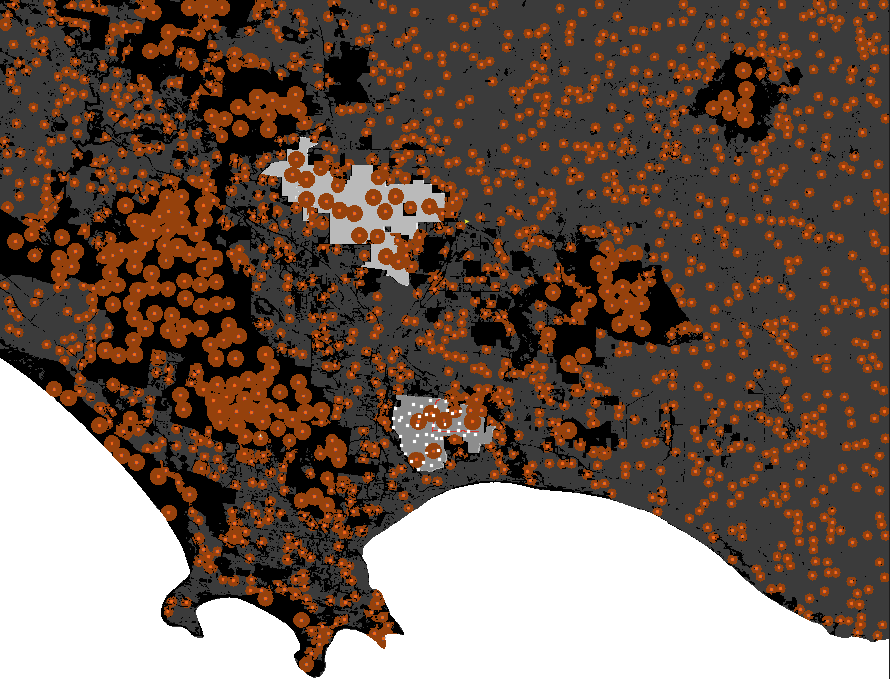
The world-view should now be much larger, and show an imported landscape layer with three different types
of habitat-cells: forest (black), farmland (dark grey) and ocean (white, unavailable to foxes). Fox home
ranges are three times smaller in the farmland than the forest because of differences in the productivity of
the habitat-cells.
Within the landscape, there are two
regions-of-interest
for monitoring the fox population. The first
is mid-grey (to the south), and includes bait-stations (white squares) and a survey-transect (red line) for
monitoring the number of foxes. The second region-of-interest is lighter grey (to the north).
18
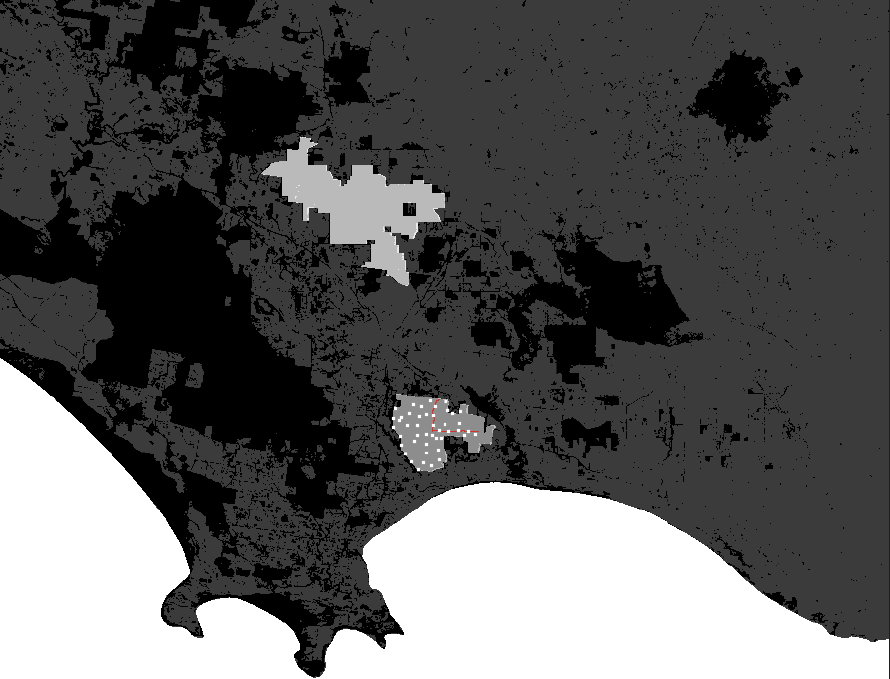
If you’d like to see the landscape more clearly, set initial-fox-density to 0 and click setup again.
3)
Set
initial-fox-density
back to 0.5, and explore the effects of some of the other parameters . After
you change the parameters, you must click
set-up
again. For example, make the productivity of the
farmland the same as the productivity of the forest by changing the hab2:hab1 slider to “1.00”.
TIP: Don’t forget that you can make the model run more quickly by sliding the toggle at the top
of the screen to the right.
4.2 Building the Glenelg scenario from scratch
Now let’s work through each customisation process to build the Glenelg scenario from scratch
Once you are comfortable with how the Glenelg customisation scenario works, you can follow the same
processes to customise FoxNet to your own management scenario. Additional information on how to do this
is provided in the next chapter.
4.2.1 A customised landscape layer
Let’s start by importing an ascii raster layer to create a customised landscape of south-western Victoria,
Australia. This landscape is rectangular and contains three types of habitat-cell: forest, farmland and ocean.
Begin by clicking “basic-scenario” to reset all your parameters.
Alter the number of pixels per cell but clicking on the worldview > Edit. . . > Patch size > 0.5.
Then adjust the following parameters and click “setup”:
19
Parameter Value
‘working-directory‘ Location of FoxNet folder, e.g. C:/Users/hradsky/foxnet
Landscape setup
‘cell-dimension (m)‘ 100
‘landscape-source‘ import raster
‘landscape-raster (.asc)‘ gis_layers/glenelg/mtclay_landscape.asc
‘uninhabitable-raster-value ‘ 2
‘second-habitat-raster-value‘ 0
‘hab2:hab1‘ 1.00 x
Fox parameters
‘initial-fox-density (km^-2^)‘ 0
Baiting parameters
‘bait-layout‘ none
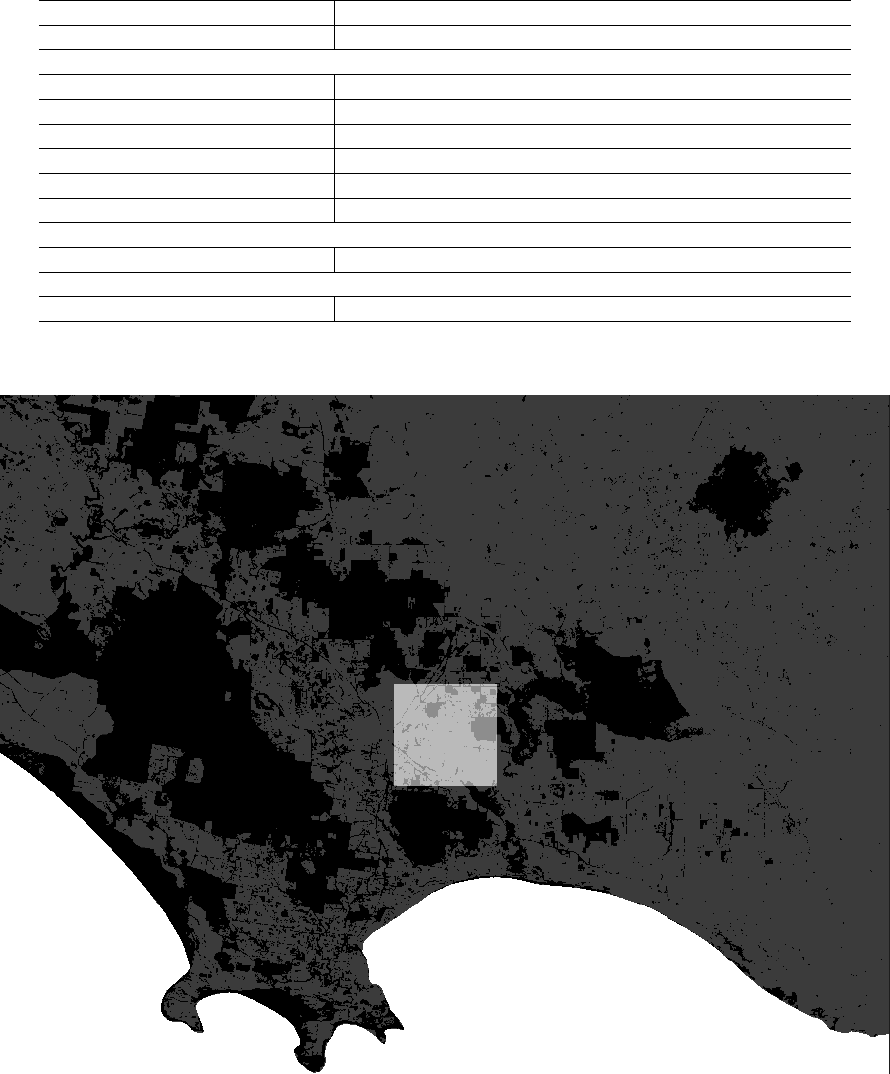
The worldview should now look like this:
Forest (the primary habitat type, which has a value of “1” in the raster) is shown in black, farmland (the
second habitat type, with raster value ‘0’) is shown in dark grey, and the ocean (specified by raster value ‘2’)
appears white.
TIP. You can check these values by right-clicking a habitat-cell, selecting inspect patch x y and
then seeing the integer shown next to habitat-type.
The
region-of-interest
has still been generated within the model and so forms a 200 km
2
lighter-shaded
block in the centre of the landscape.
20
At the top of the interface, the output box
actual landscape size
shows the area habitable by foxes
(4970.79 km2).
The total size of the landscape including the ocean is 6260.46 km
2
. To find this out, type
count patches *
cells-to-km2 into the command center at the bottom of the screen.
4.2.2 Add some foxes
Provided the
intial-fox-density
is large enough that the population doesn’t go extinct through stochastic
processes, the fox density will eventually stabilise at the landscape’s carrying capacity (see Effect of productivity
on fox density ).
The productivity of the landscape is set by specifying an average home-range-area for foxes in this landscape
(in km2), and the percentage of the home range kernel that this comprises.
For example, foxes in the forested regions of south-western Victoria have an average 95% kernel of 2.14 km
2
.
Specify the following parameters, then click setup again.
Parameter Value
Fox parameters
‘initial-fox-density (km^-2^)‘ 0.5
‘home-range-area (km^2^)‘ [2.14]
‘kernel-percent (%)‘ [95]
‘less1y-survival‘ 0.39
‘from1yto2y-survival‘ 0.65
‘from2yto3y-survival‘ 0.92
‘more3y-survival‘ 0.18
‘breeding-season‘ 37
‘number-of-cubs‘ 3.2
‘propn-cubs-female‘ 0.5
‘age-at-independence‘ 12
‘dispersal-season-begins‘ 9
‘dispersal-season-ends‘ 21
‘female-dispersers‘ 0.7
‘male-dispersers‘ 0.999
21
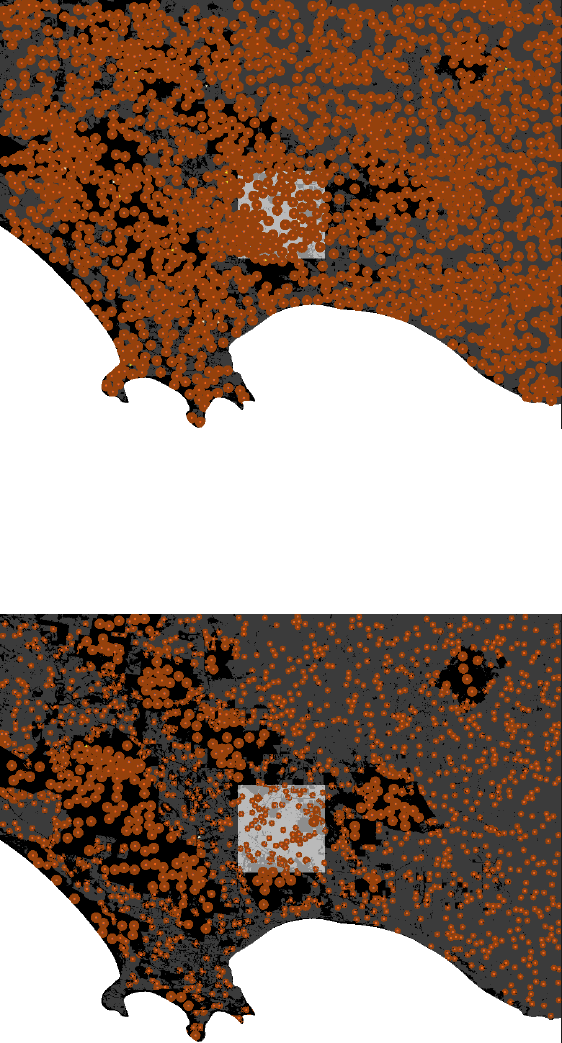
If forest and farmland habitats have equal productivity, a landscape with an initial-fox-density of 0.5 km
-2
looks like this after setup:
If different habitat types support different densities of foxes (Sálek, Drahnikova & Tkadlec 2015), you can
specify this using the
hab2:hab1
input slider. For example, farmland (the second habitat type) might be
three times more productive than forest (the primary habitat type), and so the slider would be set to “3.00”.
This causes foxes to select for farmland over forest. Territories entirely within the farmland are a third of the
size of those entirely within the forest (0.75 km
2
vs. 2.26 km
2
, 100% kernel), and the landscape’s carrying
capacity increases.
TIP To find out the size of the smallest and largest fox-family territories, type
min [count
my-territory] of fox-families * cells-to-km2
or
max [count my-territory] of
fox-families * cells-to-km2 into the command center at the bottom of the screen
22
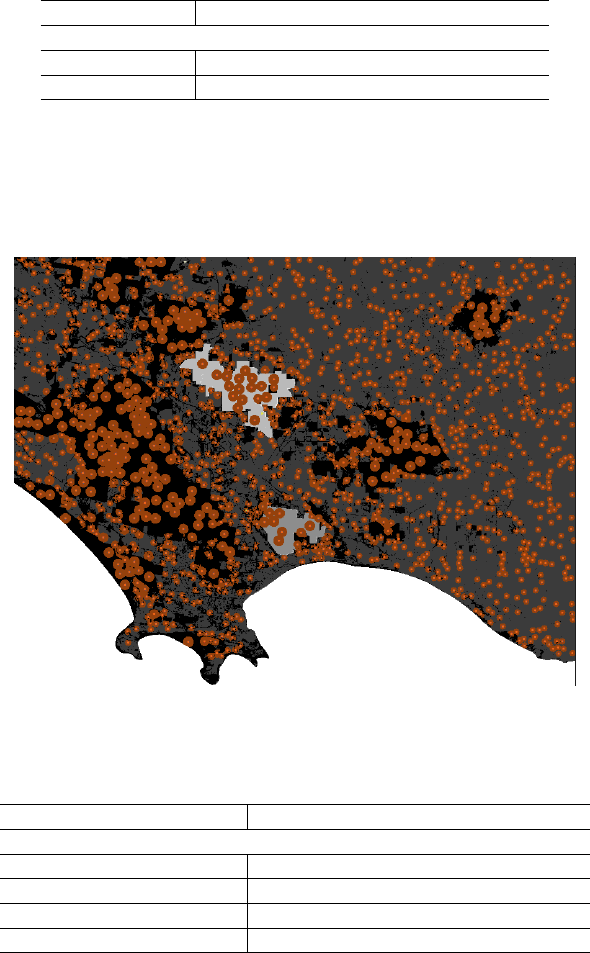
4.2.3 Add two monitoring regions
Rather than monitoring foxes in a central, square region-of-interest, we can monitor fox density in one or two
customised regions, in this case: Mt Clay Nature Reserve (where fox baiting occurs) and Annya State Forest
(where baiting does not occur). These regions are specified as separate polygon shapefiles:
Parameter Value
Landscape setup
‘region-shp‘ gis_layers/glenelg/mtclay_region.shp
‘region2-shp‘ gis_layers/glenelg/annya_region.shp
The first region-of-interest is Mt Clay Nature Reserve (48.29 km2, as shown in the output box).
The second region of interest (
region-of-interest2
) is Annya State Forest. The size of this region is not
automatically displayed but can be shown by typing “region-of-interest2-size” into the observer input pane at
the bottom of the screen. The value is in km2.
4.2.4 Add customised bait sites
To import a customised layout of bait-stations, use a shapefile with a point for each bait-station location.
Parameter Value
Baiting parameters
‘bait-layout‘ custom
‘bait-layout-shp‘ gis_layers/glenelg/mtclay_baits.shp
‘bait-frequency‘ 4-weeks
‘Pr-die-if-exposed-100-ha‘ 0.3
In this case the bait-stations are entirely within the first
region-of-interest
, however, this isn’t required -
bait-stations can cover the entire landscape if preferred.
23
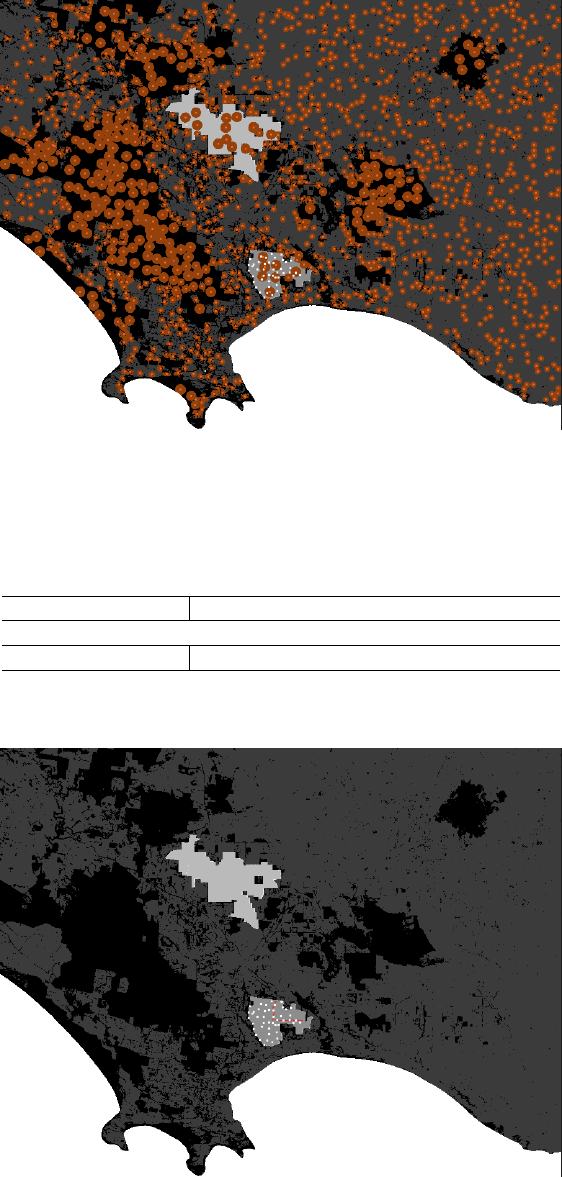
4.2.5 Add a survey transect
We can also calculate the number of foxes that have territories which overlap a linear transect, if for example,
we intend to collect fox scats and identify individuals using DNA analysis. The transect can be imported as a
line shapefile.
Parameter Value
Landscape setup
‘survey-transect‘ gis_layers/glenelg/mtclay_transect.shp
initial-fox-density has been set to 0 to make the transect easier to see.
24
5 Building a new customised scenario
5.1 A customised landscape layer
5.1.1 Preparing your ascii file
The underlying landscape in FoxNet can be customised using a raster in ascii format (.asc). This allows you
to depict, for example, a rectangular landscape, different habitat types that support different densities of
foxes, and/or areas that are inaccessible to foxes such as oceans, lakes or fenced reserves.
You can prepare your ascii file in any spatial software you like (e.g. ArcGIS, QGIS or R).
The usual procedure involves drawing a rectangle for your landscape, dividing it into polygons that represent
each habitat type, and editing the attribute table so that each habitat type has a different number (e.g. 1 =
ocean, 2 = forest, 3 = farmland). You then convert the polygon to a raster, and the raster to an ascii.
The size of your landscape should reflect the likely dispersal distance of foxes into your management zone.
A simple calculator can be found in
foxnet/user_guide/Calculator_dispersaldistance.xlsx
. You can
use this to estimate the proportion of potential dispersers that would be captured by a given buffer size,
based on the relationship between home range size and dispersal distance derived by Trewhella et al. (1988).
Take care with your projection file!
The .asc file must be accompanied by a projection file (.prj), which has the same filename and is saved in the
same folder. Your spatial software will automatically generate this. However,for NetLogo to accept it, the
.prj file must show the projection in one continuous line, like this:
PROJCS["WGS_1984_UTM_Zone_54S",GEOGCS["GCS_WGS_1984",DATUM["D_WGS_1984",SPHEROID["WGS_1984",6378137.0,298.257223563]],PRIMEM["Greenwich",0.0],UNIT["Degree",0.0174532925199433]],PROJECTION["Transverse_Mercator"],PARAMETER["False_Easting",500000.0],PARAMETER["False_Northing",10000000.0],PARAMETER["Central_Meridian",141.0],PARAMETER["Scale_Factor",0.9996],PARAMETER["Latitude_Of_Origin",0.0],UNIT["Meter",1.0]]
You can open the .prj file in Notepad (or similar) to check.
If you have generated your ascii layer in ArcGIS, the projection layer might be in the wrong format, and
instead look like this:
Projection UTM
Zone 54
Datum WGS84
Spheroid WGS84
Units METERS
Zunits NO
Yshift 10000000.0
Parameters
This will not work! The easiest way to fix this problem is to open the .prj file for a shapefile that uses the
same projection as your raster, and copy and paste the contents over the .prj information for your ascii.
A list of acceptable projection coordinate systems can be found at
<https://ccl.northwestern.edu/netlogo/docs/gis.html>
TIP: It is easiest to save all your GIS layers for customising FoxNet within
FoxNet/GIS_Layers/YourNewSubfolder
5.1.2 Importing your ascii file into FoxNet
On the FoxNet interface:
1) Change the landscape-source to “import raster”.
2)
Click on ‘change’ on the
landscape-raster
input box, and type the file path to your .asc file. If the file
is saved within your FoxNet folder, you only need to enter the location within your
working-directory
(e.g. GIS_Layers/YourNewSubfolder/Yourascii.asc). Click OK.
3)
Your raster should use different integers for each habitat type as well as uninhabitable ar-
eas (such as ocean). Enter the relevant integers into the
second-habitat-raster-value
and
unihabitable-raster-value boxes, respectively.
25
4)
If the second habitat type is more or less productive for foxes than the primary habitat type, you can
specify this using the
hab2:hab1
slider (a ratio of the productivity of habitat type 2 to habitat type 1).
5.2 Customised region(s) of interest
To monitor foxes within a customised area of your raster-based landscape (for example, a nature reserve)
rather than a generic central square, you can import a polygon shapefile of the
region-of-interest
. Make
sure that it is in the same spatial projection as your raster layer.
1)
Click ‘change’ on the
region-shp
input box, and type the file path to your .shp file. If the file is
saved within your FoxNet folder, you only need to enter the location within your
working-directory
(e.g. GIS_Layers/YourNewSubfolder/RegionShapefile.shp)
2) If you have a second region-of-interest, you can enter the file path in the region2-shp input box.
5.3 Customised bait layout
Customised bait-stations can be imported as a point shapefile, in the same projection as your raster layer.
1)
Click ‘change’ on the
bait-layout-shp
input box, and type the file path to your .shp file. If the file is
saved within your FoxNet folder, you only need to enter the location within your
working-directory
(e.g. GIS_Layers/YourNewSubfolder/BaitsShapefile.shp)
5.4 Customised survey transect
A customised survey transect can be imported as a line shapefile, in the same projection as your raster layer.
1)
Click ‘change’ on the
survey-transect-shp
input box, and type the file path to your .shp file. If the file
is saved within your FoxNet folder, you only need to enter the location within your
working-directory
(e.g. GIS_Layers/YourNewSubfolder/TransectShapefile.shp)
26
6 Running batch scripts
Specifying inputs from the interface and running scenarios becomes tedious when you want to run many
experiments with varying parameters.
There are two ways to run batch scripts: (1) within NetLogo and (2) from R, using the RNetLogo package.
6.1 Within NetLogo
On the NetLogo interface, go to Tools > BehaviourSpace.
You can then setup a new experiment or run an existing script.
Information on how to use BehaviourSpace can be found at
<https://ccl.northwestern.edu/netlogo/docs/behaviorspace.html>
.
Example BehaviourSpace scripts for each of the FoxNet models described in Hradsky et al. (2019a) J. Applied
Ecology are saved within FoxNet. Note that you must set the
working-directory
within the BehaviourSpace
experiment to the correct file path (the location of your FoxNet folder e.g.
C:/Users/hradskyb/foxnet
) for
any script that involves importing a raster layer.
6.2 From R using the RNetLogo package
NetLogo can be called from R via the RNetLogo package. However, this package is no longer maintained.
See:
•
Thiele J (2014). R Marries NetLogo: Introduction to the RNetLogo Package. Journal of Statistical
Software, 58(2), 1-41. http://www.jstatsoft.org/v58/i02/
•
Thiele J, Kurth W, Grimm V (2012). RNetLogo: An R Package for Running and Exploring Individual-
Based Models Implemented in NetLogo. Methods in Ecology and Evolution 3 (3), 480-483. http:
//onlinelibrary.wiley.com/doi/10.1111/j.2041-210X.2011.00180.x/abstract/
Example R scripts for running each of the FoxNet models described in Hradsky et al. (2019a) J. Applied
Ecology in parallel are provided within the FoxNet folder - see
foxnet/r_scripts/run_model
. Note again
that you must set the
working-directory
within the script to the correct file path (the location of your
FoxNet folder e.g. C:/Users/hradskyb/foxnet) for any model that involves importing a raster layer.
An example for running a single version of FoxNet from R is provided here:
# LOAD PACKAGES
require(rJava)
.jinit(options(java.parameters=c("-server","-Xmx6000m")), force.init = TRUE)
#this may be required to override memory constraints for some computers
require(RNetLogo) #version 1.0-4
# SPECIFY PATHS FOR NETLOGO SOFTWARE AND FOXNET FOLDER
computersetup <- "laptop"
if (computersetup == "laptop") {
netlogo.path <- "C:/Program Files/NetLogo 6.0.2/app"
foxnet.path <- "C:/Users/hradskyb/FoxControlPatrol/Dropbox/personal/bron/ibm/foxnet"
}
corename <- "testrun"
# LOAD NETLOGO
NLStart(netlogo.path, gui = TRUE,nl.jarname = "netlogo-6.0.2.jar",
27
nl.obj = corename)
# make sure version number is correct
# ignore the Warning about error code 5 and "Unable to locate empty model: /system/empty.nlogo"
# it only occurs when gui (the visual interface) = TRUE and doesn't affect anything
# LOAD FOXNET MODELLING PLATFORM
NLLoadModel(paste0(foxnet.path, "/foxnet_model/foxnet.nlogo"),
nl.obj = corename)
# SET MODEL PARAMETERS
NLCommand(
# LANDSCAPE CONFIGURATION
"set working-directory",paste0("\"", foxnet.path, "\""),
"set weeks-per-timestep 2",
"set cell-dimension 100",
"set landscape-source \"import raster\"",
"set landscape-size 0",
"set region-size 0",
"set landscape-raster \"gis_layers/glenelg/mtclay_landscape.asc\"",
"set uninhabitable-raster-value 2",
"set second-habitat-raster-value 0",
"set hab2:hab1 1",
"set region-shp \"gis_layers/glenelg/mtclay_region.shp\"",
"set region2-shp \"\"",
"set survey-transect-shp \"\"",
"set survey-transect2-shp \"\"",
# FOX PARAMETERS
"set initial-fox-density 0.5",
# ranging behaviour
"set range-calculation \"1 kernel, 1 mean\"",
"set home-range-area \"[2.14]\"",
"set kernel-percent \"[95]\"",
# survival
"set fox-mortality true",
"set less1y-survival 0.39",
"set from1yto2y-survival 0.65",
"set from2yto3y-survival 0.92",
"set more3y-survival 0.18",
# reproduction
"set cub-birth-season 37",
"set number-of-cubs 3.74",
"set propn-cubs-female 0.5",
"set age-at-independence 12",
# dispersal
"set dispersal-season-begins 9",
"set dispersal-season-ends 21",
"set female-dispersers 0.7",
"set male-dispersers 0.999",
28
# BAITING PARAMETERS
"set bait-layout \"custom\"",
"set bait-density 0",
"set bait-layout-shp \"gis_layers/glenelg/mtclay_baits.shp\"",
"set bait-frequency \"fortnightly*\"",
"set custom-bait-weeks \"[]\"",
"set Pr-die-if-exposed-100ha 0.3",
"set commence-baiting-year 16",
"set commence-baiting-week 1",
"set price-per-bait 0",
"set person-days-per-baiting-round 0",
"set cost-per-person-day 0",
"set km-per-baiting-round 0",
"set cost-per-km-travel 0",
# MONITORING
"set plot? false",
"set age-structure false",
"set bait-consumption false",
"set count-neighbours false",
"set density true",
"set dispersal-distances false",
"set family-density false",
"set foxes-on-transect false",
"set popn-structure false",
"set range-size false",# this won't work from R as it requires calling R
nl.obj = corename)
# SETUP MODEL
NLCommand("setup",nl.obj = corename)
# NLCommand("go", nl.obj = corename)
# RUN MODEL
timesteps <- 702 # number of ticks
output.parameters <- c("year",
"week-of-year",
"total-fox-density",
"all-fox-but-cub-density",
"bait-take",
"bait-cost"
)
output <- NLDoReport(timesteps, "go", output.parameters,
as.data.frame = TRUE,
df.col.names=output.parameters,
nl.obj = corename)
# EXPORT OUTPUT AS A .csv
write.csv(output, paste0(foxnet.path, "/outputs/mtclay/mtclay_example_test.csv"))
29

# CLOSE NETLOGO (restart R if you want to run another model)
NLQuit(nl.obj = corename)
30
7 Implementation verification
These FoxNet outputs illustrate key model behaviours at an individual-level, and are intended to supplement
the population-level output verifications provided in Hradsky et al (2019a). Netlogo code for these testing
procedures can be found in the demo_routines.nls file within FoxNet.
7.1 Effect of productivity on fox-family territories
The size and location of fox-family territories in FoxNet is determined by the productivity of available
habitat-cells.
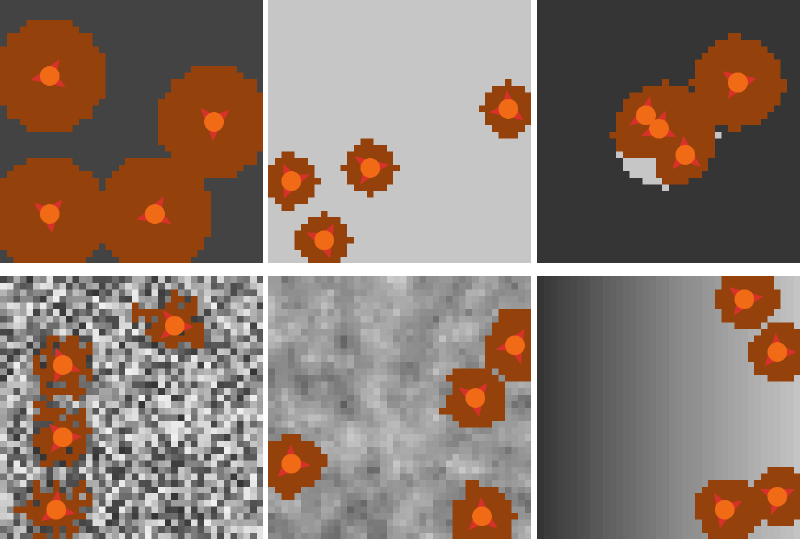
Following the example of Carter et al. (2015), we modelled a 16 km
2
landscape with five different habitat-cell
productivity patterns to demonstrate this behaviour. The patterns were:
i.
homogenenous, low productivity. The
home-range-area
was set to 2 km
2
and
kernel-percent
to 100
%. This resulted in each habitat-cell having a current-productivity of 13.23 g ha-1 week-1.
ii.
homogenous, high productivity. The
current-productivity
of each habitat-cell was quadrupled to
52.92 g ha-1 week-1.
iii.
two habitat types. A low productivity landscape (13.23 g ha
-1
week
-1
) with a central circle of high
productivity (52.92 g ha-1 week-1).
iv.
scattered random. The
current-productivity
of each habitat-cell was chosen at at random between
13.23 and 52.92 g ha-1 week-1.
v.
smoothed random. As for heterogeneous random, but the
current-productivity
of each habitat-cell
was then averaged by that of its eight neighbours.
vi. a left-right gradient from 13.23 to 52.92 g ha-1 week-1.
We then visualised the configuration of territories established by four foxes of the same sex after a 12 month
period (with no mortality or reproduction), and output the size of each territory.
31
The territory sizes of the four fox-families (in km2) for each of these six scenarios were:
i. 2, 2, 2, 2.
ii. 0.5, 0.5, 0.5, 0.5
iii. 0.52, 0.53, 0.54, 1.65.
iv. 0.54, 0.55, 0.56, 0.58.
v. 0.64, 0.65, 0.68, 0.73.
vi. 0.59, 0.59, 0.65, 0.70.
These outputs show that territory size scales inversely with habitat-cell productivity, and that territory
location is determined by the productivity of the habitat-cells.Fox-families select for the most productive
habitat-cells, while trying to keep their territory as compact as possible. They also adjust the size of their
territory so that it supplies no more than 110%2of an adult fox’s food requirements (2646 g week-1).
7.2 Effect of productivity on fox density
Fox density in FoxNet models stabilises at a carrying capacity determined by the productivity of the
habitat-cells.
To demonstrate this, we simulated a landscape as per the Bristol, UK model described in Hradsky et al
(2019a). We populated the model with
initial-fox-density
inputs ranging from 0.5 to 12 foxes km
-2
and
home-range-area
inputs of (a) 0.454 km
2
(small home range, i.e. high productivity and high carrying
capacity) and (b) 2.14 km
2
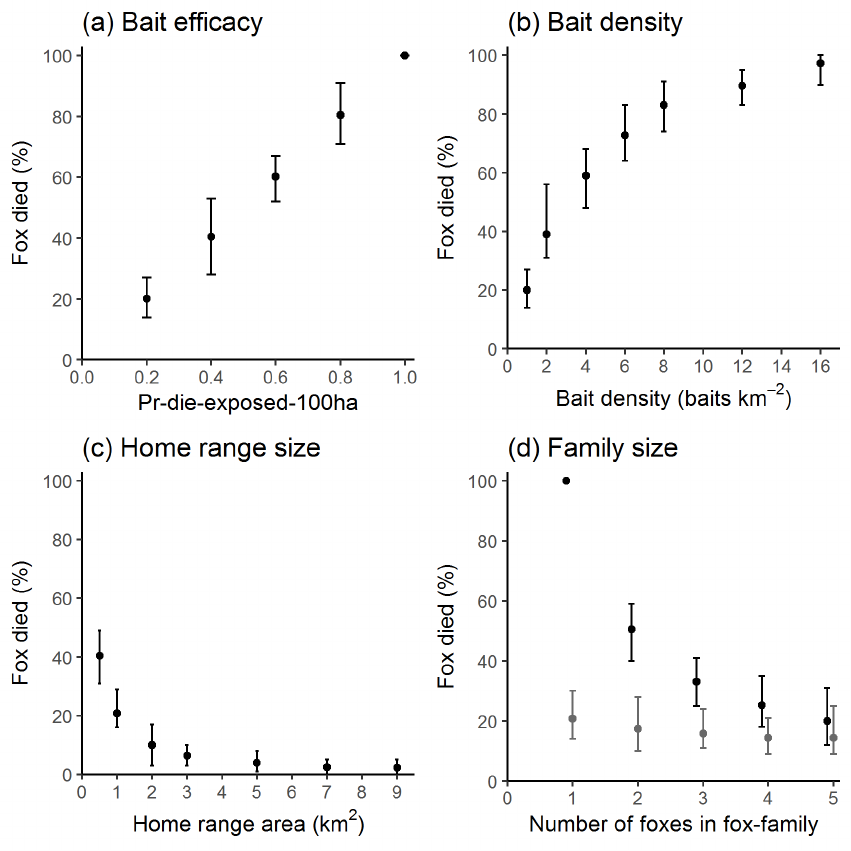
(large home range, i.e. low productivity and low carrying capacity). We tracked
the density of foxes for 20 years.
Fox densities reached a dynamic equilibrium in both landscapes, regardless of the
initial-fox-density
.
Densities were substantially higher in the more productive landscape (where home ranges were smaller).
2
a value slightly greater than 100% is necessary to prevent rounding problems when the productivity of each habitat-cel l does
not divide neatly into the adult fox’s total food requirements.
32
7.3 Effect of baiting on fox mortality
The probability of a fox dying from a poison-bait in FoxNet scales with bait efficacy, the number of baits on
the territory, territory size, and the number of foxes in the fox-family.
To demonstrate this behaviour, we modelled a homogenous 16 km
2
landscape with one fox-family with
a central territory and no natural mortality. The baseline settings were
Pr-die-if-exposed-100ha
0.2,
bait-density 0.5 baits km-2,home-range-area 1 km2and one fox.
Holding the other parameters constant, we varied (a)
Pr-die-if-exposed-100ha
from 0.2 to 1.0, (b)
bait-density
from 0.5 to 16 baits km
-2
, (c)
home-range-area
from 0.5 to 9 km
2
and (d) the number of
foxes in the fox-family from 1 to 5 with a bait-efficacy of 0.2 (grey) or 1.0 (black).
For each set of model parameters, we ran 100 iterations of the model for 1 time-step to determine the number
of foxes that were killed. We repeated this process 30 times. Results are presented as the mean (min, max)
percentage of iterations where the fox was killed.
As expected, foxes were more likely to die as
bait-efficacy
and
bait-density
increased, and were less
likely to die as
home-range-area
and the number of foxes within the fox-family increased. The effect of the
number of foxes within the fox-family was greater when bait-efficacy was high.
33
8 Submodels
8.1 Submodels used during model processing
8.1.1 update-fox-age-and-status
Each time-step:
•
The
age
of all foxes is increased by the appropriate number of weeks (1, 2 or 4, depending on the
weeks-per-timestep setting).
•The status of any “cub” fox that has reached the age-of-independence is changed to “subordinate”.
•
If it is the dispersal season, a proportion of “subordinate” foxes become “dispersers”. The duration
of the dispersal season is determined by the
dispersal-season-begins
(week of year; inclusive)
and
dispersal-season-ends
(week of year; exclusive) inputs. It can either occur within one year
or overlap two years, and so accommodates both southern hemisphere (March - May; Pech et al.
1992) and northern hemisphere (September - March; Trewhella & Harris 1988) scenarios. The annual
probability of a “subordinate female” or “subordinate male” becoming a “disperser” is set via the
female-dispersers
and
male-dispersers
input, respectively. The probability that a “subordinate”
fox becomes a “disperser” during any time-step of the dispersal season is:
1−(1 −dispersal.probability)1/dispersal.season.duration
where the dispersal.season.duration is measured in time-step units.
8.1.2 fox-families-check-territories
Each fox-family checks its territory each time-step by:
1.
Moving to the centre of its territory (along with all its family-members) and updating the
cell-relative-productivity
of the habitat-cells within its territory. See the
move-to-centroid
submodel.
2.
Discarding any excess habitat-cells from its territory. If the total productivity of the habitat-cells within
the fox-family’s territory is greater than 110% of an adult fox’s food requirements (378 g day
-1
; Lockie
1959), the habitat-cell with the lowest
cell-relative-productivity
is removed. Steps (1) and (2)
are repeated until the total productivity of the territory is no more than 110 % of an adult fox’s food
requirements.
3.
Creating a temporary agent (a vacancy) on each un-owned habitat-cell immediately adjacent to its
territory, and calculating the relative-productivity of these habitat-cells.
4.
If there has been a change to the total productivity of the unoccupied habitat-cells surrounding
the territory (i.e. if the sum of the
relative-productivity
of the vacancy agents is different to
the value from the previous time-step), the fox-family will attempt to updating its territory by
acquiring or swapping habitat-cells to maximise their
relative-productivity
(see the
update-
territory
submodel). However, if the available habitat-cells haven’t changed, the territory won’t be
updated (this speeds up the model). The territory is updated one cell at a time and is repeated until
the maximum-territory-update-area has been reached.
5.
Removing any habitat-cells from its territory that have become isolated (i.e. habitat-cells that don’t have
any neighbours which are owned by the same fox-family). It then recalculates the total productivity of
its territory.
6.
Checking whether the total productivity of its territory is less than the minimum productivity required
to sustain an adult fox’s metabolic rate (295 g day
-1
; Winstanley et al. 2003) . If so, the territory fails
(see the
territory-fail
submodel). If not, the fox-family finalises its updates by repeating step (1),
removing all temporary vacancy agents, and updating the
cell-relative-use
of the habitat-cells in
its territory.
34
8.1.3 bait-if-applicable
Baits are laid at bait-stations during time-steps identified by the
bait-frequency
input, either: “weekly”
(52
×
per year), “fortnightly” (26
×
per year), “4-weeks” (13
×
per year) or “custom” (where the week-numbers
are specified using the
custom-bait-weeks
input). Regardless of
bait-frequency
, no baits will be laid
if
bait-layout
is set to “none”. As part of the
check-for-errors
submodel during model setup, FoxNet
will return an error if the
bait-frequency
is incompatible with the
weeks-per-timestep
.Bait-stations are
white when no bait is present, and red when a bait is present. Note that this happens very quickly - if the
model is running fast, you won’t see it.
Baits are only toxic if the
commence-baiting-year
and
commence-baiting-week
values have been reached.
This allows you to run-in the model before baiting commences and determine the rate of bait-take during
free-feeding.
Baits that are is within the territory of a fox-family are at
Pr-death-bait-scaled
risk of being eaten by each
family member that not a cub. This is calculated as
Pr-die-if-exposed-100ha ×
100
×cell-relative-use
of the habitat-cell where the bait-station is located. Each bait can only be eaten once eat time step. If the
bait is toxic, the fox dies.
8.1.4 foxes-disperse
Each fox whose status is “disperser”:
(1) Updates how long it has been attempting to find a new territory.
(2)
If it is its first dispersal attempt, leaves its natal fox-family and moves a random distance and bearing
from the exponential distribution appropriate to its sex and home range size, as per Trewhella et al.
(1988):
F emale : 3.853 + 2.659 ×hr.100perc
Male : 2.778 + 4.038 ×hr.100perc
(1)
If that location is not possible (e.g. because it is in the ocean or beyond the edge of the landscape), the
fox chooses another random distance and bearing from the appropriate distribution and tries again
until it succeeds in moving.
(2)
Checks for baits within its
territory-perception-radius
. The likelihood of the disperser eating a
bait scales inversely with the radius. If the bait is toxic, the disperser dies.
(3)
Looks for a fox-family that lacks an “alpha” fox of the appropriate sex within its
territory-perception-radius
.
If any candidate fox-families exist, the “disperser” fox will join the nearest one and become an “alpha”
fox.
(4) If this fails, the “disperser” fox will try-to-establish-new-territory. It will:
i.
Move to a random cell within its
territory-perception-radius
that hasn’t already been occupied
by another fox-family.
ii.
Create a fox-family which has the “disperser” fox as its sole family-member. The fox-
family’s territory is the single cell where it is located, its
territory-productivity
is the
current-productivity of that cell, and its vacancy-score is 0.
iii.
The new fox-family then creates vacancy agents on any of the 4 neighbouring habitat-cells that
aren’t already owned by other fox-families. It moves to the centre of this area and calculates the
cell and vacancy relative-productivities of its territory - see the
move-to-centroid
submodel. It
then:
iv. Repeats the update-territory submodel up to 10 ×the maximum-territory-update-area.
35

v.
Removes any habitat-cells from its territory that have become isolated, recalculates the total
productivity of its territory and checks whether the total productivity of its territory is less than
the minimum productivity required to sustain an adult fox’s metabolic rate. If so, the territory
fails. See the fox-families-check-territories submodel for more details.
(5)
If the fox is still a “disperser” (i.e. if the new territory failed), it returns to its original dispersal location.
8.1.5 fox-families-breed
Fox-families that contain both an “alpha male” and an “alpha female” fox breed. The number of “cub” foxes
born to each fox-family is drawn from a Poisson distribution with mean
number-of-cubs
. The
sex
of the
cubs is randomly allocated, with the likelihood of a “cub” fox being “female” given by
propn-cubs-female
.
Cub
age
is 0, their
natal-cell
is their current location, their
natal-id
and
family-id
is that of their
fox-family, and they update the family-members of their fox-family to include themselves.
If instead the fox-family lacks an “alpha” fox of either sex, it is removed and all its family-members become
“dispersers”. These individuals then look for another a fox-family that lacks an “alpha” fox of the appropriate
sex within their
territory-perception-radius
. If any candidate fox-families exist, the “disperser” fox will
join the nearest one as a new “alpha”. This helps the population persist at low densities.
8.1.6 foxes-die
The probability of a fox surviving for each time-step depends on its age (<52 weeks, 52 - 103 weeks, 104 -
155 weeks, or >156 weeks), and is given by:
age.specific.annual.probability.of.survivalweeks.per.tick/52
8.1.7 update-monitors
The parameters that are calculated depend on the monitoring options selected on the interface - see Monitoring
your model outputs and Customisable model parameters for descriptions of each parameter. Outputs are
plotted if plot? is set to “on”.
8.1.8 move-to-centroid
To move to the centre of its territory, the fox-family creates a list of the x and y coordinates of each of the
habitat-cells in its territory, and moves to the habitat-cell with the mean x and y coordinates. It then asks
its family-members to move to this location. Finally, it updates the
cell-relative-productivity
of the
habitat-cells in its territory and the relative-productivity of any vacancies to:
1
distance.from.fox.family ×current.productivity ×100
8.1.9 update-territory
With each repeat, the fox-family checks whether the productivity of its territory is below the average
requirements of an adult fox. If so, it will try to add new habitat-cells to its territory. This involves
acquiring-the-best-available-vacancy by:
(1)
Identifying the vacancy that has the highest
relative-productivity
and adding the habitat-cell that
the vacancy is sitting on to the fox-family’s territory.
(2)
Asking the neighbours of this habitat-cell that aren’t currently owned by a fox-family or don’t already
have a vacancy on them, to create a vacancy agent.
(3) Updating the productivity score for the fox-family’s territory.
(4)
Moving to the centre of the fox-family’s territory and updating the
relative-productivity
of the
habitat-cells and vacancies (see move-to-centroid).
36
If the productivity of its territory is already adequate, the fox-family won’t expand its territory. Rather, it
will try to
swap-poor-territory-for-better
. This involves identifying which habitat-cell in its territory has
the lowest
cell-relative-productivity
. If the habitat-cell has already been checked, the routine aborts
(this speeds up the model). If not:
(5) The habitat-cell’s checked-already parameter is updated to “true”.
(6)
The vacancy agent on the unoccupied habitat-cell neighbouring the fox-family’s territory with the
highest relative-productivity is identified.
(7)
If the best vacancy has a higher
relative-productivity
than the worst territory cell (and isn’t a
neighbour of that cell), the fox-family will:
•Remove the worst habitat-cell from its territory.
•Update its territory-productivity score.
•
Add the best vacancy cell to its territory, following the
acquiring-the-best-available-vacancy
routine described above.
8.1.10 territory-fail
Afox-family will fail if the total productivity of its territory is less than the minimum required to sustain
an adult fox’s metabolism. In this case, the
fox-family-owner
of the habitat-cells in its territory is set
to “nobody”, any “cub” foxes die and the
status
of all other family-members is reset to “disperser”. The
fox-family and all associated vacancies are removed from the model.
8.2 Submodels specific to model set-up
8.2.1 check-for-errors
This checks for inconsistencies in the input parameters. The model will return a detailed error message and
stops if:
•bait-frequency is set to “weekly” but the weeks-per-timestep input is greater than “1”.
•bait-frequency is set to “fortnightly but the weeks-per-timestep input is greater than”2“.
•bait-frequency
is set to “custom” but the
custom-bait-weeks
values are incompatible with the
weeks-per-timestep input (i.e. if (value - 1) MOD weeks-per-timestep != 0).
•
the
dispersal-season-begins
or
dispersal-season-ends
values are incompatible the
weeks-per-timestep
input.
•dispersal-season-begins and dispersal-season-ends are the same value.
•the cub-birth-season value is incompatible with the weeks-per-timestep input.
•you have asked the model to monitor the number of foxes on a transect without uploading a transect
•you have imported a shapefile for region2-shp without importing a shapefile for region-shp
•
you are trying to use a customised bait layout in a model-generated (rather than imported) landscape.
8.2.2 set-fox-parameters
This sets a variety of parameters which are not available on the interface, including the minimum amount of
food required for short-term sustenance of an adult fox’s metabolic rate - 295 g day
-1
(Winstanley et al. 2003)
and a fox’s average daily food requirements - 378 g day
-1
(Lockie 1959), see also (Sargeant 1978; Winstanley
et al. 2003).
It also calculates several derived parameters:
37

•maximum-territory-update-area
: The maximum area of territory that can be updated each time-step
- half the area of a home range: hr.100perc ×0.5
•territory-perception-radius
: the distance that a fox can perceive adjacent fox-families. Three
times the radius of a home range: 3×phr.100perc)/π
•dispersal-duration: The duration of the dispersal season:
If dispersal.season.ends > dispersal.season.begins (i.e.southern hemisphere scenarios):
dispersal.duration =dispersal.season.ends−dispersal.season.begins
weeks.per.tick
Else (i.e. northern hemisphere scenarios):
dispersal.duration
=
dispersal.season.ends+(52−dispersal.season.begins)
weeks.per.tick
8.2.3 create-world
This generates a landscape of an appropriate size.
If
landscape-source
= “generate”, the landscape is generated by the model as a square with an area as
close to world-size as possible.
If
landscape-source
= “input raster”, the landscape is imported at a raster layer (ascii file), and will
automatically re-size to the appropriate dimensions. In the latter case, the
habitat-type
of each habitat-cell
will be determined by the raster value.
Habitat-types
that are unavailable to all agents (e.g. ocean) can be specified using the
uninhabitable-raster-value
.
These areas are not included in the landscape size output.
For both options, the spatial resolution is set by
cell-dimension
; this must correspond to the size of the
raster cells if applicable.
8.2.4 identify-region-of-interest
This identifies the part of the landscape in which fox populations will be monitored. This may be the entire
landscape, or a smaller area to reduce any potential edge effects. The
region-of-interest
can be specified
using the
region-size
input (which creates a central square of appropriate size), or imported as a shapefile.
This changes the part-of-region-of-interest value of habitat-cells to “true”.
8.2.5 set-landscape-productivity
This determines the
true-productivity
values for the habitat-cells across the landscape using the input
data on fox
home-range-area
. The productivity of each habitat-cell in the primary habitat-type is calculated
from the
home-range-area
and
kernel-percent
of an average fox for that location (input by the user) and
the daily food requirements of an adult fox (378 g/day; Lockie 1959); an approach similar to Carter et al.
(2015). The calculations are based on the assumption that the intensity of use of an area by a fox corresponds
to the amount of food it obtains from the area. For example, if an average adult red fox requires ~370 g of
fresh food a day (Lockie 1959; Winstanley et al. 2003) and 100 % of its range covers 100 ha, 1-ha habitat-cell
would be supplying 3.7 g food day-1 on average.
If
range-calculation
is set to “1 kernel, 1 mean”, a single estimate of
home-range-area
and
kernel-percent
(e.g. mean 95% MCP) is used to create a homogeneous landscape, with the productivity of
each cell during each time-step being:
adult.f ox.timestep.food ×proportion.of.range
home.range.area ×area.of.habitat.cell
If
range-calculation
is set to “1 kernel, min and max”, minimum and maximum estimates of
home-range-area
(and one
kernel-percent
, e.g. mean 95% MCP) are used to create a heterogeneous
landscape, with the productivity of each cell during each time-step being a random value drawn between the
minimum and maximum productivity values, each calculated as above.
38
Whichever approach is used, the productivity of the second habitat type is specified relative to this primary
habitat type, according to the hab2:hab1 ratio.
8.2.6 set-up-bait-stations
The locations of bait-stations can be specified by choosing a
bait-layout
: “none”, “regular grid”, “random
scatter” or “custom”.
If “regular grid” or “random scatter” is chosen, bait-stations are generated by the model at the specified
density. If “custom”, the locations for the bait-stations are imported as a shapefile. The
bait-present
attribute of all bait-stations is set to “false” (i.e. no bait is present).
8.2.7 set-up-foxes
An initial number of foxes are created at the specified density, with
ages
ranging between 36 and 166 weeks,
and a sex ratio in accordance with the propn-cubs-female input. Each fox is moved to a random location
and its status is set to “disperser”. All foxes then disperse (see the foxes-disperse submodel).
39
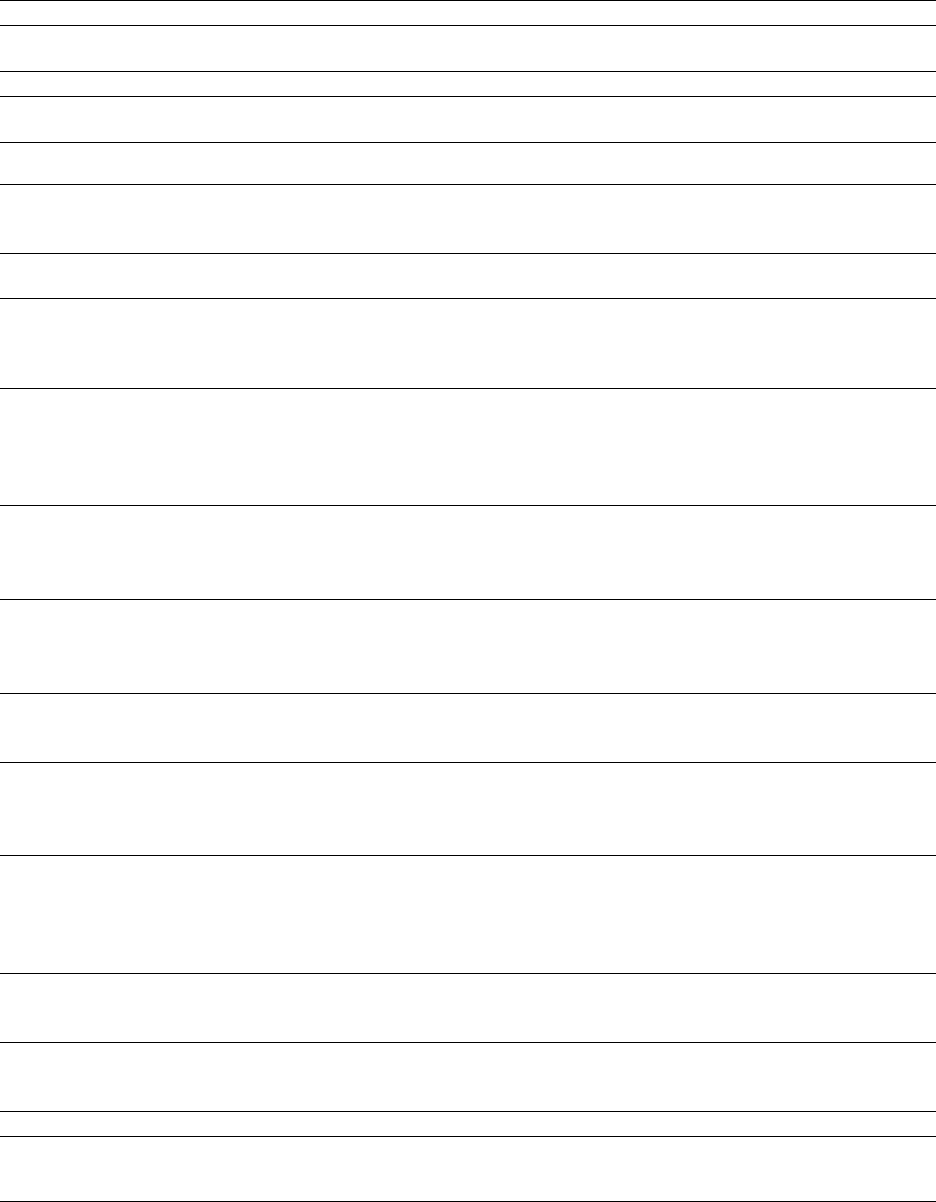
9 Appendices
9.1 Customisable model parameters
Parameter Unit Explanation
‘working-directory‘ — Location of FoxNet folder, e.g.
‘C:/Users/hradsky/FoxNet‘
Landscape setup
‘weeks-per-timestep‘ weeks Number of weeks for each model
timestep ("1", "2" or "4")
‘cell-dimension‘ m Distance along one edge of a
*habitat-cell*
‘landscape-source‘ “generate” or “import raster” Whether the landscape is
generated within the model or
imported as a raster
‘landscape-size‘ km^2^ The size of the landscape, if it is
generated within the model
‘region-size‘ km^2^ The size of the region-of-interest
(where the *fox* population is
monitored), if it is generated
within the model
‘landscape-raster‘ .asc file The raster (ascii) file describing
the landscape layout (e.g.
‘GIS_layers/Glenelg/
mtclay_landscape.asc‘), if the
landscape is imported
‘uninhabitable-raster-value‘ integer
The value used in the raster layer
to specify *habitat-cells* that
can’t be inhabited by *foxes*
(e.g. ocean)
‘second-habitat-raster-value‘ integer
The value used in the raster layer
to specify *habitat-cells* that are
a secondary type of habitat (e.g.
farmland rather than forest)
‘hab2:hab1‘ ratio The productivity of the
secondary habitat type relative
to the primary habitat type
‘region-shp‘ .shp file A shapefile (polygon) describing
a region-of-interest (where *fox*
populations are monitored) if the
landscape is imported
‘region2-shp‘ .shp file A shapefile (polygon) describing
a second region-of-interest (where
*fox* populations are monitored)
if the landscape is imported –
optional.
‘survey-transect-shp‘ .shp file A shapefile (line) describing a
transect for surveying *fox*
populations
‘survey-transect2-shp‘ .shp file A shapefile (line) describing a
second transect for surveying
*fox* populations
Fox parameters
‘initial-fox-density‘ individuals km^-2^ The number of *foxes* per
square kilometre when the model
is initiated
40
(continued)
Parameter Unit Explanation
‘range-calculation‘ ‘ “1 kernel, 1 mean” ‘ or “1
kernel, min and max”
The method used for calculating
the productivity of the landscape
from the fox home range data
‘home-range-area‘ km^2^ The area of an average fox home
range in this landscape
‘kernel-percent‘ % The proportion of the home
range kernel included in the %
area (e.g. 90 for a 90% MCP)
‘fox-mortality‘ "true"/"false" Whether natural mortality of
*foxes* occurs. Usually set to
"on".
‘less1-survival‘ propn. Annual survival rate for *foxes*
< 1 year old
‘from1yto2y-survival‘ propn.
Annual survival rate for *foxes* 1
- 2 years old
‘from2yto3y-survival‘ propn.
Annual survival rate for *foxes* 2
- 3 years old
‘more3y-survival‘ propn. Annual survival rate for *foxes*
> 3 years old
‘cub-birth-season‘ week of year
Time of year when *fox* cubs are
born
‘number-of-cubs‘ cubs fox-family^-1^ Average number of cubs born to
a *fox-family*
‘propn-cubs-female‘ propn Proportion of cubs that are
female when born
‘age-at-independence‘ weeks Age of cubs when they can
survive the death of all adults in
their *fox-family*
‘dispersal-season-begins‘ week of year Start of dispersal season
‘dispersal-season-ends‘ week of year End of dispersal season
‘female-dispersers‘ propn. Female dispersal rate
‘male-dispersers‘ propn. Male dispersal rate
Baiting parameters
‘bait-layout‘ “none”, “grid”, “random-scatter”,
“custom”
The layout of *bait-stations*. A
shapefile must be imported for
the "custom" option.
‘bait-density‘ baits-stations km^-2^ The density of *bait-stations*.
This only affects the “grid” and
“random-scatter” ‘bait-layout‘
options
‘bait-layout-shp‘ .shp file A shapefile (points) describing
the locations of the
*bait-stations*, if ‘bait-layout‘ is
“custom”
‘bait-frequency‘ “weekly*”, “fortnightly*,
“4-weeks” or “custom*”
The frequency with which baits
are laid at baitstations. Check
that * options are compatible
with ‘weeks-per-timestep‘.
‘custom-bait-weeks‘ week(s) of year Weeks-of-year when baits will be
deployed at *bait-stations* if a
“custom*” bait-frequency is
chosen
41
(continued)
Parameter Unit Explanation
‘Pr-die-if-exposed-100ha‘ index The efficacy of the poison baits
when they are deployed at
*bait-stations*
‘commence-baiting-year‘ year The first year when baits at
*bait-stations* will be poisonous
(until then, baits are deployed
and eaten but don’t kill *foxes*)
‘commence-baiting-week‘ week of year The first week of the first year
when baits at *bait-stations* will
be poisonous
‘price-per-bait‘ $ The cost of a single bait
‘person-days-per-baiting-round‘
days The number of person-days it
takes to deploy a bait at each
*bait-station*
‘cost-per-person-day‘ $ The cost per person-day while
deploying baits
‘km-per-baiting-round‘ km
Total distance travelled to deploy
a bait at each *bait-station*
‘cost-per-km-travel‘ $ The per-kilometre cost of travel
while deploying baits
Monitoring Parameters
‘plot‘ "true"/"false" Whether you want monitored
variables to be shown in the
beige plot(s)
‘age-structure‘ "true"/"false" The number of *foxes* in each
age class within the
‘region-of-interest‘
‘count-neighbours‘ "true"/"false" The number of neighbouring
territories for each *fox-family*
within the ‘region-of-interest‘
‘density‘ "true"/"false" The density of *foxes*, various
classes of *foxes*, and
*fox-families* within the
‘region-of-interest‘ (and
‘region-of-interest2‘ if applicable)
‘dispersal-distances‘ "true"/"false" The distance that *foxes* within
the ‘region-of-interest‘ have
dispersed (excludes cubs &
individuals that have not
attempted to disperse)
‘family-density‘ "true"/"false" The density of *fox-families*
within the ‘region-of-interest‘
‘foxes-on-transect‘ "true"/"false"
The number of *foxes* (excluding
cubs) who have a territory that
overlaps ‘survey-transect‘ (and
‘survey-transect2‘, if applicable)
‘popn-structure‘ "true"/"false"
The number of *foxes* in various
status/sex classes within the
‘region-of-interest‘
‘range-size‘ "true"/"false" Not currently activated
42
43
9.2 Week Conversion Table
week start end
Week 1 1-Jan 7-Jan
Week 2 8-Jan 14-Jan
Week 3 15-Jan 21-Jan
Week 4 22-Jan 28-Jan
Week 5 29-Jan 4-Feb
Week 6 5-Feb 11-Feb
Week 7 12-Feb 18-Feb
Week 8 19-Feb 25-Feb
Week 9 26-Feb 4-Mar
Week 10 5-Mar 11-Mar
Week 11 12-Mar 18-Mar
Week 12 19-Mar 25-Mar
Week 13 26-Mar 1-Apr
Week 14 2-Apr 8-Apr
Week 15 9-Apr 15-Apr
Week 16 16-Apr 22-Apr
Week 17 23-Apr 29-Apr
Week 18 30-Apr 6-May
Week 19 7-May 13-May
Week 20 14-May 20-May
Week 21 21-May 27-May
Week 22 28-May 3-Jun
Week 23 4-Jun 10-Jun
Week 24 11-Jun 17-Jun
Week 25 18-Jun 24-Jun
Week 26 25-Jun 1-Jul
Week 27 2-Jul 8-Jul
Week 28 9-Jul 15-Jul
Week 29 16-Jul 22-Jul
Week 30 23-Jul 29-Jul
Week 31 30-Jul 5-Aug
Week 32 6-Aug 12-Aug
Week 33 13-Aug 19-Aug
Week 34 20-Aug 26-Aug
Week 35 27-Aug 2-Sep
Week 36 3-Sep 9-Sep
Week 37 10-Sep 16-Sep
Week 38 17-Sep 23-Sep
Week 39 24-Sep 30-Sep
Week 40 1-Oct 7-Oct
Week 41 8-Oct 14-Oct
Week 42 15-Oct 21-Oct
Week 43 22-Oct 28-Oct
Week 44 29-Oct 4-Nov
Week 45 5-Nov 11-Nov
Week 46 12-Nov 18-Nov
Week 47 19-Nov 25-Nov
Week 48 26-Nov 2-Dec
Week 49 3-Dec 9-Dec
Week 50 10-Dec 16-Dec
Week 51 17-Dec 23-Dec
Week 52 24-Dec 30-Dec
44
10 References
Baker, P.J., Robertson, C.P.J., Funk, S.M. & Harris, S. (1998) Potential fitness benefits of group living in the
red fox, Vulpes vulpes.Animal Behaviour, 56, 1411-1424.
Bino, G., Dolev, A., Yosha, D., Guter, A., King, R., Saltz, D. & Kark, S. (2010) Abrupt spatial and numerical
responses of overabundant foxes to a reduction in anthropogenic resources. Journal of Applied Ecology, 47,
1262-1271.
Carter, N., Levin, S. et al. (2015) Modeling tiger population and territory dynamics using an agent-based
approach. Ecological Modelling, 312, 347-362.
Devenish-Nelson, E.S., Harris, S., Soulsbury, C.D., Richards, S.A. & Stephens, P.A. (2013) Demography of a
carnivore, the red fox, Vulpes vulpes: what have we learnt from 70 years of published studies? Oikos, 122,
705-716.
Hradsky, B.A., Kelly, L.T., Robley, A. & Wintle, B.A. (2019a) FoxNet: an individual-based model framework
to support management of an invasive predator, the red fox. Journal of Applied Ecology.
Hradsky, B.A., Kelly, L.T., Robley, A. & Wintle, B.A. (2019b) Data from: FoxNet: an individual-based
model framework to support management of an invasive predator, the red fox. Zenodo. http://doi.org/10.
5281/zenodo.2572045.
Hradsky, B.A., Mildwaters, C.A., Ritchie, E.G., Christie, F. & Di Stefano, J. (2017a) Responses of invasive
predators and native prey to a prescribed forest fire. Journal of Mammalogy, 98, 835-847.
Hradsky, B.A., Robley, A., Alexander, R., Ritchie, E.G., York, A. & Di Stefano, J. (2017b) Human-modified
habitats facilitate forest-dwelling populations of an invasive predator, Vulpes vulpes.Scientific Reports, 7,
12291.
Larivière, S. & Pasitschniak-Arts, M. (1996) Vulpes vulpes.Mammalian Species, 537, 1-11.
Lockie, J.D. (1959) The estimation of the food of foxes. The Journal of Wildlife Management, 23, 224-227.
Pech, R.P., Sinclair, A., Newsome, A. & Catling, P. (1992) Limits to predator regulation of rabbits in
Australia: evidence from predator-removal experiments. Oecologia, 89, 102-112.
Šálek, M., Drahnikova, L. & Tkadlec, E. (2015) Changes in home range sizes and population densities of
carnivore species along the natural to urban habitat gradient.* Mammal Review*, 45, 1-14.
Sargeant, A.B. (1972) Red fox spatial characteristics in relation to waterfowl predation. Journal of Wildlife
Management, 36, 225-&.
Saunders, G., McLeod, S. & Kay, B. (2000) Degradation of sodium monofluoroacetate (1080) in buried fox
baits. Wildlife Research, 27, 129-135.
Soulsbury, C.D., Iossa, G., Baker, P.J., White, P.C. & Harris, S. (2011) Behavioral and spatial analysis of
extraterritorial movements in red foxes (Vulpes vulpes). Journal of Mammalogy, 92, 190-199.
Thiele, J.C. (2014) R Marries NetLogo: Introduction to the RNetLogo Package. Journal of Statistical
Software, 58, 1-41.
Trewhella, W. & Harris, S. (1988) A simulation model of the pattern of dispersal in urban fox (Vulpes vulpes)
populations and its application for rabies control. Journal of Applied Ecology, 435-450.
Trewhella, W.J., Harris, S. & McAllister, F.E. (1988) Dispersal distance, home-range size and population
density in the red fox (Vulpes vulpes) - a quantitative analysis. Journal of Applied Ecology, 25, 423-434.
Wilensky, U. (1999) Netlogo. Center for Connected Learning and Computer-Based Modeling, Northwestern
University, Evanston, IL.
Winstanley, R.K., Buttemer, W.A. & Saunders, G. (2003) Field metabolic rate and body water turnover of
the red fox Vulpes vulpes in Australia. Mammal Review, 33, 295-301.
45
