From Relational To Graph A Developers Guide
User Manual:
Open the PDF directly: View PDF  .
.
Page Count: 8
© DZONE, INC.
|
DZONE.COM
» Relational DBs + App Development
» Graph Databases
» Data Modeling: Relational + Graph Models
» Developing the Graph Model
» Relationships ... and more!
CONTENTS
INTRODUCTION
Today’s business and user requirements demand applicaions that
connect more and more of the world’s data, yet sill expect high levels
of performance and data reliability.
Many applicaions of the future will be built using graph databases
like Neo4j. This Refcard was written to help you—a developer with
relaional database experience—through every step of the learning
process. We will use the widely adopted property graph model and the
open Cypher query language in our explanaions, both of which are
supported by Neo4j.
WHEN RELATIONAL DATABASES DON’T FIT INTO
TODAY’S APPLICATION DEVELOPMENT
For several decades, developers have tried to manage connected,
semi-structured datasets within relaional databases. But, because
those databases were iniially designed to codify paper forms and
tabular structures—the "relaion" in relaional databases refers to the
definiion of a table as a relaion of tuples—they struggle to manage
rich, real-world relaionships.
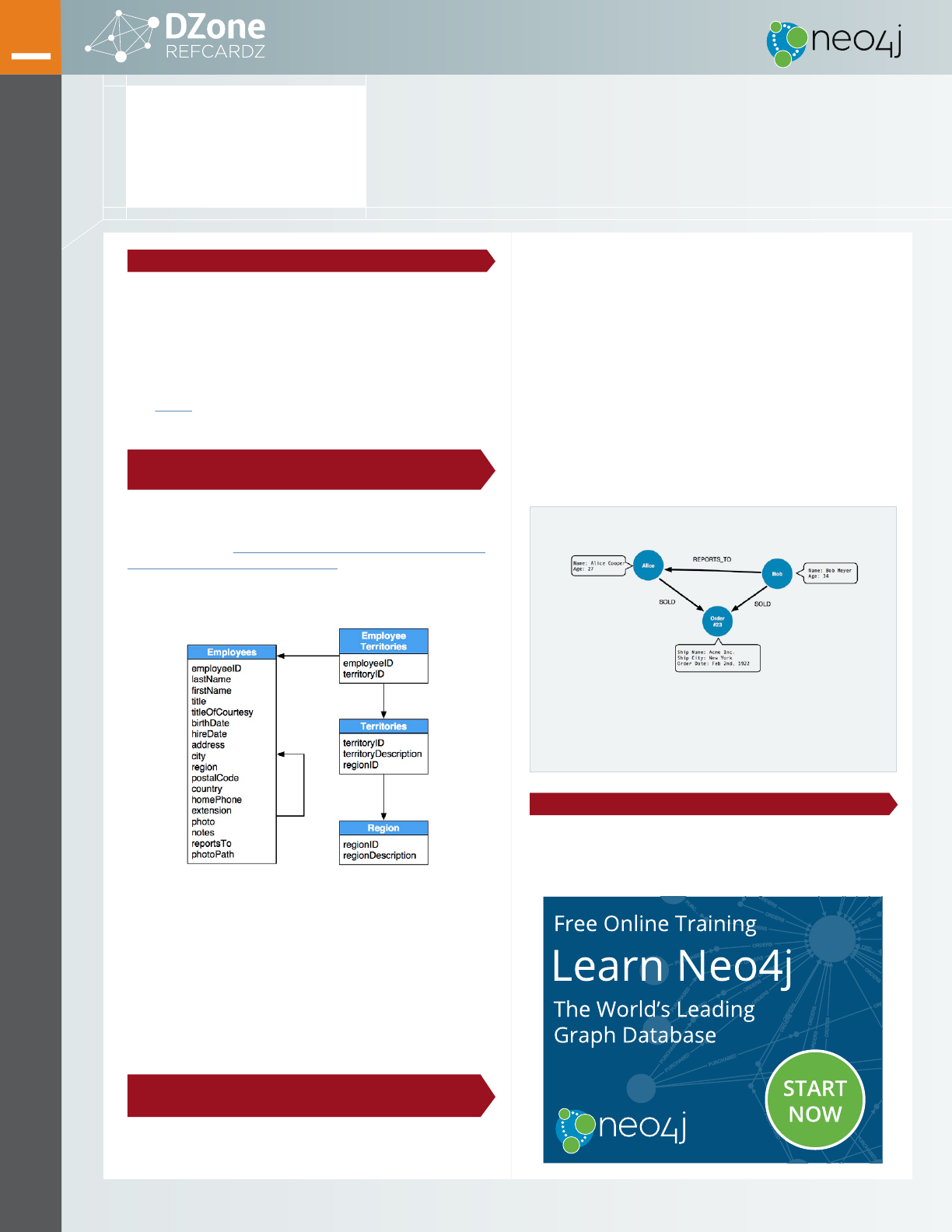
For example, take a look at the following relaional model:
The Northwind applicaion exerts a significant inluence over the design
of this schema, making some queries very easy and others more dificult.
While the strength of relaional databases lies in their abstracion—
simple mathemaical models work for all use cases with enough JOINs—
in pracice, maintaining foreign key constraints and compuing more
than a handful of JOINs becomes prohibiively expensive.
Although relaional databases perform admirably when asked
quesions such as "What products has this customer bought?," they fail
to answer recursive quesions such as "Which customers bought this
product who also bought that product?"
GRAPH DATABASES: ADVANTAGES OF A MODERN
ALTERNATIVE
RELATIONSHIPS SHOULD BE FIRST-CLASS CITIZENS Graph databases
are unlike other databases that require you to guess at connecions between
Get More Refcardz! Visit DZone.com/Refcardz
231
FROM RELATIONAL TO GRAPH: A DEVELOPER’S GUIDE
eniies using arificial properies such as foreign keys or out-of-band
processing like MapReduce. In the graph model, however, relaionships are
first-class ciizens.
Creaing connected structures from simple nodes and their relaionships,
graph databases enable you to build models that map closely to your
problem domain. The resuling models are both simpler and more
expressive than those produced using relaional databases.
JOINS ARE EXPENSIVE JOIN-intensive query performance in relaional
databases deteriorates as the dataset gets bigger. In contrast, with a graph
database, performance tends to remain relaively constant, even as the
dataset grows. This is because queries are localized to a porion of the
graph. As a result, the execuion ime for each query is proporional only
to the size of the part of the graph covered to saisfy that query, rather
than the size of the overall data.
DATA MODELING: RELATIONAL AND GRAPH MODELS
If you’re experienced in modeling with relaional databases, think
of the ease and beauty of a well-done, normalized enity-relaionship
diagram: a simple, easy-to-understand model you can quickly
whiteboard with your colleagues and domain experts. A graph is
From Relational to Graph:
A DEVELOPER’S GUIDE
BY MICHAEL HUNGER
GRAPH MODEL COMPONENTS
NODES
• The objects in the graph
• Can have name-value
properties
• Can be labeled
RELATIONSHIPS
• Relate nodes by type and
direction
• Can have name-value properties
BROUGHT TO YOU IN PARTNERSHIP BY
© DZONE, INC.
|
DZONE.COM
3FROM RELATIONAL TO GRAPH:
A DEVELOPER’S GUIDE
exactly that: a clear model of the domain, focused on the use cases you want
to eficiently support.
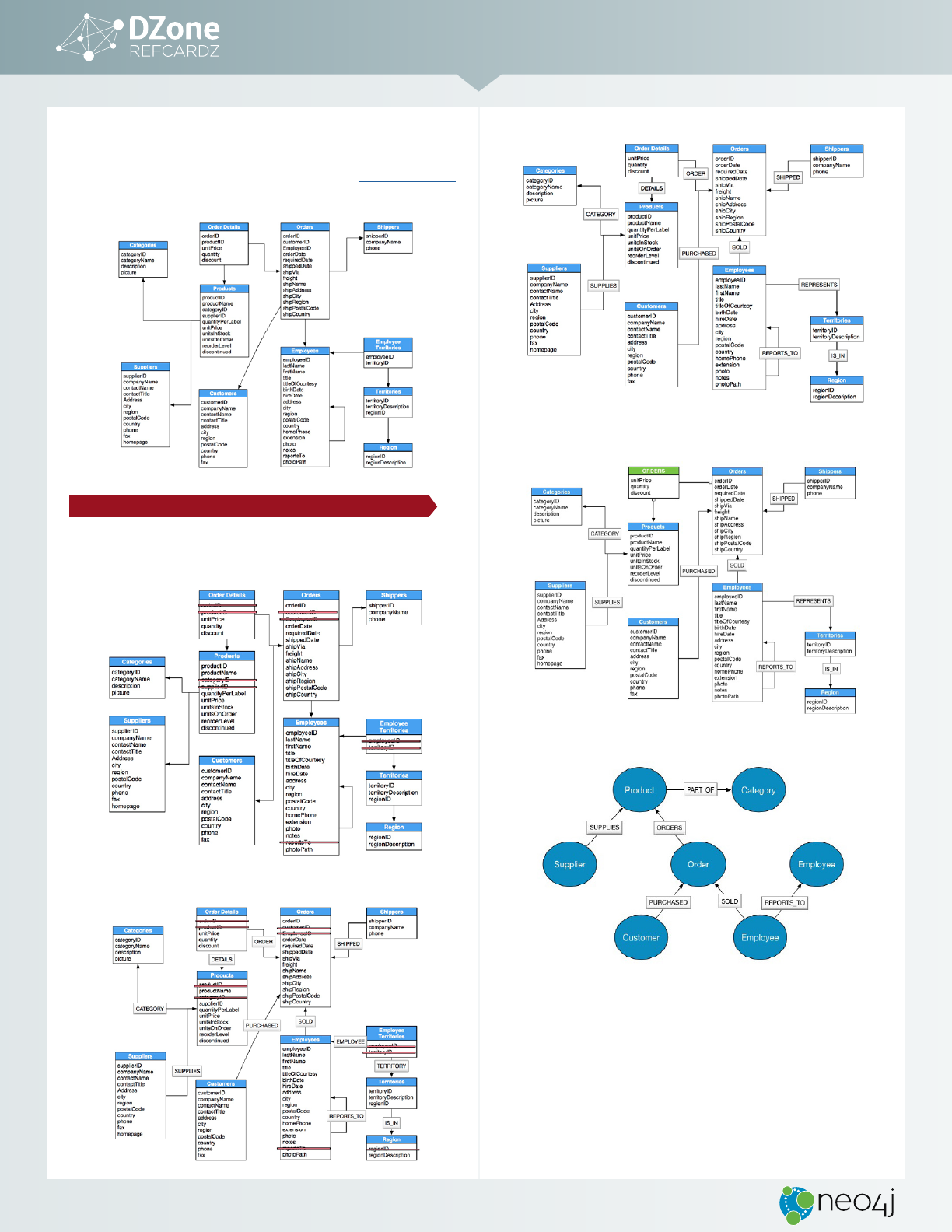
THE NORTHWIND DATASET This guide will be using the Northwind dataset,
commonly used in SQL examples, to explore modeling in a graph database:
DEVELOPING THE GRAPH MODEL
The following guidelines describe how to adapt this relaional database
model into a graph database model:
LOCATE FOREIGN KEYS
FOREIGN KEYS BECOME RELATIONSHIPS
SIMPLE JOIN TABLES BECOME RELATIONSHIPS
ATTRIBUTED JOIN TABLES BECOME RELATIONSHIPS WITH PROPERTIES
THE NORTHWIND GRAPH DATA MODEL
How does the Northwind Graph Model Differ from the Relational Model?
• No
nulls
: non-exising value entries (properies) are just not present
• The graph model has no JOIN tables or arificial primary or foreign keys
• Relaionships are more detailed. For example, it shows an employee
SOLD
an order without the need of an intermediary table.
EXPORTING THE RELATIONAL DATA TO CSV
With the model defined and the use case in mind, data can now be extracted
from its original database and imported into a Neo4j graph database. The
© DZONE, INC.
|
DZONE.COM
4
easiest way to start is to export the appropriate tables in CSV format. The
PostgreSQL copy command lets us execute a SQL query and write the result to
a CSV file, e.g., with
psql -d northwind < export_csv.sql: export_csv.sql
COPY (SELECT * FROM customers) TO ‘/tmp/customers.csv’ WITH CSV header;
COPY (SELECT * FROM suppliers) TO ‘/tmp/suppliers.csv’ WITH CSV header;
COPY (SELECT * FROM products) TO ‘/tmp/products.csv’ WITH CSV header;
COPY (SELECT * FROM employees) TO ‘/tmp/employees.csv’ WITH CSV header;
COPY (SELECT * FROM categories) TO ‘/tmp/categories.csv’ WITH CSV header;
COPY (SELECT * FROM orders
LEFT OUTER JOIN order_details ON order_details.OrderID = orders.
OrderID) TO ‘/tmp/orders.csv’ WITH CSV header;
BULK-IMPORTING CSV DATA USING THE NEO4J-IMPORT TOOL
Neo4j provides a bulk import tool that can import billions of nodes and
relaionships. It uilizes all CPU and disk resources, adding at least one million
records per second into the database. It consumes large, also compressed CSV
files with a specific header configuraion to indicate mapping instrucions.
IMPORT TOOL FACTS
• Files can be repeatedly used for both nodes and relationships.
• Files can be compressed.
• A header that provides information on the data elds must precede each input.
• Header and raw data can optionally be provided using multiple les.
• Fields without corresponding information in the header will be ignored.
• UTF-8 encoding is used.
• Indexes are not created during the import.
• Bulk import is only available for initial seeding of a database.
NODES
GROUPS
The import tool assumes that node idenifiers are unique across node files. If
this isn’t the case then you can define groups, defined as part of the ID field of
node files.
For example, to specify the Person group you would use the field header
ID(Person)
in your persons node file. You also need to reference that exact
group in your relaionships file, i.e.,
START_ID(Person)
or
END_ID(Person)
.
In this Northwind example, the
suppliers.csv
header would be modified to
include a group for Supplier nodes:
ORIGINAL HEADER:
supplierID,companyName,contactName,contactTitle,...
MODIFIED HEADER:
id:ID(Supplier),companyName,contactName,contactTitle,...
PROPERTY TYPES
Property types for nodes and relaionships are set in the header file (e.g.,
:int,
:string, :IGNORE
, etc.). In this example,
supplier.csv
would be modified like this:
id:ID(Supplier),companyName,contactName,contactTitle,...
LABELING NODES
Use the
LABEL
header to provide the labels of each node created by a row. In the
Northwind example, one could add a column with header
LABEL
and content
Supplier
,
Product
, or whatever the node labels are. As the
supplier.csv
file
represents only nodes for one label (
Supplier
), the node label can be declared
on the command line.
Like array values, multiple labels are separated by
;,
or by the character specied
with
--array-delimiter
.
RELATIONSHIPS
Relaionship data sources have three mandatory fields:
•
TYPE
: The relaionship type to use for the relaionship
•
START_ID
: The id of the start node of the relaionship to create
•
END_ID
: The id of the end node of the relaionship to create
In the case of this dataset, the
products.csv
export from the relaional
database can be repurposed to build the
(:Supplier)-[:SUPPLIES]-
>(:Product)
relaionships in the graph database.
Original
products.csv
header:
id:ID(Product) productName supplierID:int
categoryID:int ...
Products.csv
header modified to create the
supplies_rels_hdr.csv
header:
:END_ID(Product) productName:IGNORE :START_ID(Supplier)
categoryID:IGNORE ...
As every row in the input file is of the same relaionship type, the
TYPE
is set
on the command line.
Applying the same treatment to the
customers.csv
and
orders.csv
and
creaing
purchased.csv
and
orders_rels.csv
allows for the creaion of a usable
subset of the data model. Use the following command to import the data:
neo4j-import --into northwind-db --ignore-empty-strings --delimiter
"TAB" --nodes:Supplier suppliers.csv --nodes:Product products_hdr.
csv,products.csv --relationships:SUPPLIES supplies_rels_hdr.
csv,products.csv
--nodes:Order orders_hdr.csv,orders.csv --nodes:Customer customers.csv
--relationships:PURCHASED purchased_rels_hdr.csv,orders.csv
--relationships:ORDERS order_rels_hdr.csv,orders.csv
UPDATING THE GRAPH
Now that the graph has data, it can be updated using Cypher, Neo4j’s open
graph query language, to generate Categories based on the
categoryID
and
categoryName
properies in the product nodes. The query below creates new
category nodes and removes the category properies from the product nodes.
CREATE CONSTRAINT ON (c:Category) ASSERT c.id IS UNIQUE;
MATCH (p:Product) WHERE exists(p.categoryID)
MERGE (c:Category {id:p.categoryID})
ON CREATE SET c.categoryName = p.categoryName
MERGE (p)-[:PART_OF]->(c)
REMOVE p.categoryID, p.categoryName;
FROM RELATIONAL TO GRAPH:
A DEVELOPER’S GUIDE
© DZONE, INC.
|
DZONE.COM
5
QUERY LANGUAGES: SQL VS. CYPHER
LANGUAGE MATTERS
Cypher is about patterns of relationships between eniies. Just as the graph
model is more natural to work with, so is Cypher. Borrowing from the
pictorial representaion of circles connected with arrows, Cypher allows
any user, whether technical or non- technical, to understand and write
statements expressing aspects of the domain.
Graph database models not only communicate how your data is related, but
they also help you clearly communicate the kinds of quesions you want to
ask of your data model.
Graph models and graph queries are two sides of the same coin.
SQL VS. CYPHER QUERY EXAMPLES
FIND ALL PRODUCTS
Select and Return Records
SQL Cypher
SELECT p.*
FROM products AS p;
MATCH (p:Product)
RETURN p;
In SQL, just
SELECT
everything from the products table. In Cypher,
MATCH
a
simple pattern: all nodes with the label
:Product
, and
RETURN
them.
FIELD ACCESS, ORDERING, AND PAGING
It is more eficient to return only a subset of attributes, like
ProductName
and
UnitPrice
. You can also order by price and only return the 10 most expensive items.
SQL Cypher
SELECT p.ProductName, p.UnitPrice MATCH (p:Product)
FROM products AS p
ORDER BY p.UnitPrice DESC
LIMIT 10;
RETURN p.productName, p.unitPrice
ORDER BY p.unitPrice DESC
LIMIT 10;
Remember that labels, relationship types, and property names are case sensitive in Neo4j.
FIND SINGLE PRODUCT BY NAME
FILTER BY EQUALITY
SQL Cypher
SELECT p.ProductName, p.UnitPrice
FROM products AS p
WHERE p.ProductName =
‘Chocolade’;
MATCH (p:Product)
WHERE p.productName = "Chocolade"
RETURN p.productName,
p.unitPrice;
To look at only a single Product, for instance,
Chocolade
, filter the table in
SQL with a
WHERE
clause. Similarly, in Cypher the
WHERE
belongs to the
MATCH
statement. Alternaively, you can use the following shortcut:
MATCH (p:Product {productName:"Chocolade"})
RETURN p.productName, p.unitPrice;
You can also use any other kind of predicates: text, math, geospaial, and
pattern comparisons. Read more on the Cypher Refcard.
JOINING PRODUCTS WITH CUSTOMERS
JOIN RECORDS, DISTINCT RESULTS
In order to see who bought Chocolade,
JOIN
the four necessary tables
(
customers
,
orders, order_details
, and
products
) together:
SELECT DISTINCT c.CompanyName
FROM customers AS c
JOIN orders AS o ON (c.CustomerID = o.CustomerID)
JOIN order_details AS od ON (o.OrderID = od.OrderID)
JOIN products AS p ON (od.ProductID = p.ProductID)
WHERE p.ProductName = ‘Chocolade’;
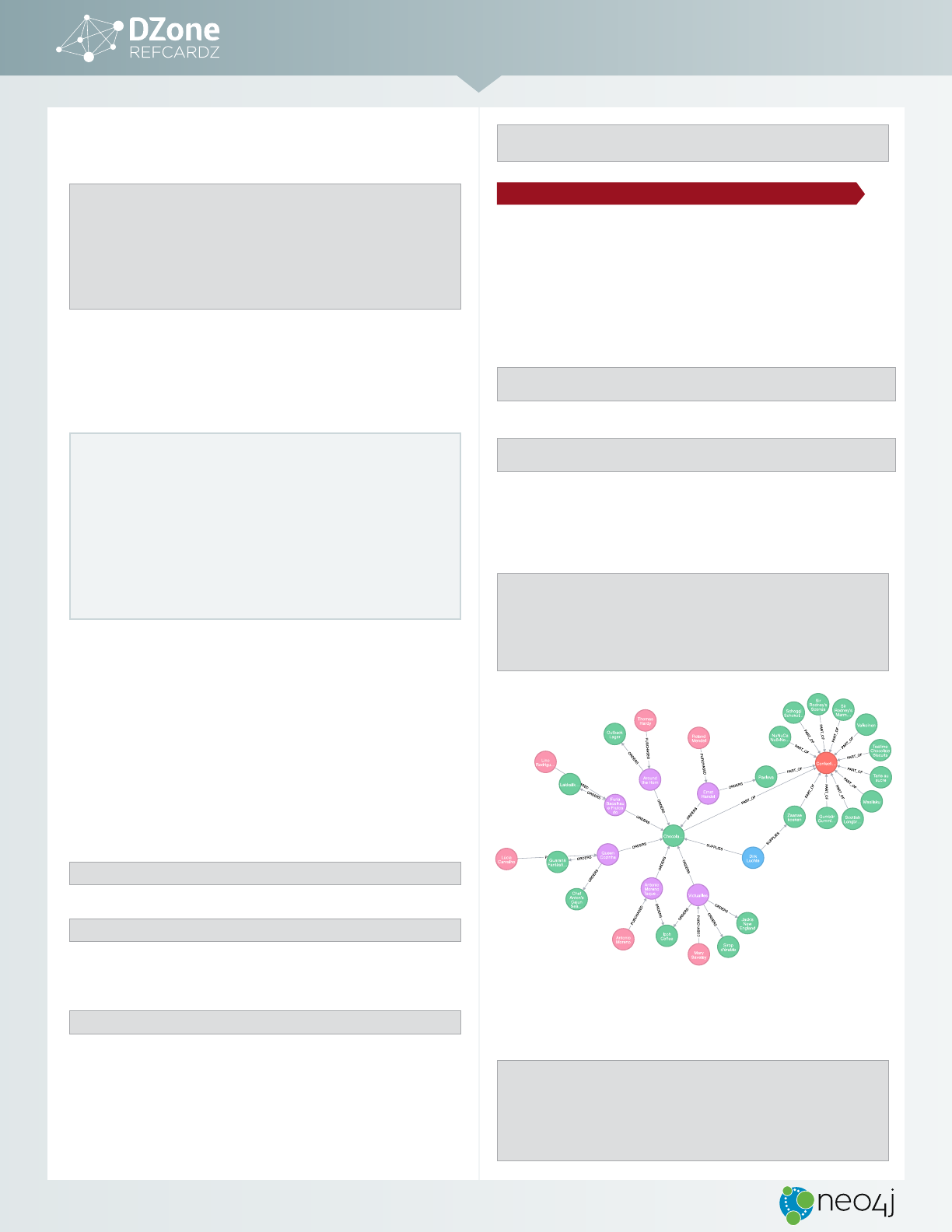
The graph query is much simpler:
MATCH (:Product {productName:"Chocolade"})
<-[:ORDERS]-(:Order)<-[:PURCHASED]-(c:Customer)
RETURN DISTINCT c.companyName AS Company;
NEW CUSTOMERS WITHOUT ORDERS
OUTER JOINS AND AGGREGATION
To ask the relaional Northwind database What have I bought and paid
in total? use a similar query to the one above with changes to the filter
expression. However, if the database has customers without any orders and
you want them included in the results, use
OUTER JOIN
s to ensure results are
returned even if there were no matching rows in other tables.
SELECT p.ProductName, sum(od.UnitPrice * od.Quantity) AS Volume
FROM customers AS c
LEFT OUTER JOIN orders AS o ON (c.CustomerID = o.CustomerID)
LEFT OUTER JOIN order_details AS od ON (o.OrderID = od.OrderID)
LEFT OUTER JOIN products AS p ON (od.ProductID = p.ProductID)
WHERE c.CompanyName = ‘Drachenblut Delikatessen’
GROUP BY p.ProductName
ORDER BY Volume DESC;
In the Cypher query, the
MATCH
between customer and order becomes an
OPTIONAL MATCH
, which is the equivalent of an
OUTER JOIN
. The parts of this
pattern that are not found will be
NULL
.
MATCH (c:Customer {companyName:"Drachenblut Delikatessen"})
OPTIONAL MATCH (p:Product)<-[pu:ORDERS]-(:Order)<-[:PURCHASED]-(c)
RETURN p.productName, sum(pu.unitPrice * pu.quantity) as volume
ORDER BY volume DESC;
As you can see, there is no need to specify grouping columns. Those are
inferred automaically from your
RETURN
clause structure.
When it comes to application performance and development time, your database query
language matters.
SQL is well-optimized for relational database models, but once it has to handle complex,
connected queries, its performance quickly degrades. In these instances, the root problem
lies with the relational model, not the query language.
For domains with highly connected data, the graph model and their associated query
languages are helpful. If your development team comes from an SQL background, then
Cypher will be easy to learn and even easier to execute.
IMPORTING DATA USING CYPHER’S LOAD CSV
The easiest (though not the fastest) way to import data from a relaional
database is to create a CSV dump of individual enity-tables and JOIN-tables.
Ater exporing data from PostgreSQL, and using the import tool to load the
bulk of the data, the following example will use Cypher’s
LOAD CSV
to move
the model’s remaining data into the graph.
LOAD CSV
works both with single-
table CSV files as well as with files that contain a fully denormalized table or
a JOIN of several tables. The example below uses the
LOAD CSV
command to:
• Add Employee nodes
• Create Employee-Employee relaionships
• Create Employee-Order relaionships
CREATE CONSTRAINTS
Unique constraints serve two purposes. First, they guarantee uniqueness per
label and property value combinaion of one enity. Second, they can be used
for determining nodes of a matched pattern by property comparisons.
Create constraints on the previously imported nodes (
Product
,
Customer
,
Order
) and also for the Employee label that is to be imported:
CREATE CONSTRAINT ON (e:Employee) ASSERT e.employeeID IS UNIQUE;
CREATE CONSTRAINT ON (o:Order) ASSERT o.id IS UNIQUE;
Note that a constraint implies an index on the same label and property.
These indices will ensure speedy lookups when creaing relaionships
between nodes.
FROM RELATIONAL TO GRAPH:
A DEVELOPER’S GUIDE
© DZONE, INC.
|
DZONE.COM
6
CREATE INDICES
To quickly find a node by property, Neo4j uses indexes on labels and
properies. These indexes are also used for range queries and text search.
CREATE INDEX ON :Product(name);
CREATE EMPLOYEE NODES AND RELATIONSHIPS
employeeID lastName firstName title reportsTo
1Davolio Nancy Sales Representative 2
2Fuller Andrew Vice President, Sales NULL
3Leverling Janet Sales Representative 2
// Create Employee Nodes
USING PERIODIC COMMIT
LOAD CSV WITH HEADERS FROM "http://data.neo4j.com/northwind/
employees.csv" AS row
MERGE (e:Employee {employeeID:toInt(row.employeeID)})
ON CREATE SET e.firstName = row.firstName, e.lastName = row.lastName,
e.title = row.title;
// Create Employee-Employee Relationships
USING PERIODIC COMMIT
LOAD CSV WITH HEADERS FROM "http://data.neo4j.com/northwind/
employees.csv" AS row
MATCH (a:Employee {employeeID:toInt(row.employeeID)})
MATCH (b:Employee {employeeID:toInt(row.reportsTo)})
MERGE (a)-[:REPORTS_TO]->(b);
// Create Employee-Order Relationships
USING PERIODIC COMMIT
LOAD CSV WITH HEADERS FROM "http://data.neo4j.com/northwind/
employees.csv" AS row
MATCH (a:Employee {employeeID:toInt(row.employeeID)})
MATCH (b:Order {employeeID:toInt(row.employeeID)})
MERGE (a)-[:SOLD]->(b);
In brief, one can use Cypher’s
LOAD CSV
command to:
• Ingest data, accessing columns by header name or column offset
• Convert values from strings to different formats and structures (
toFloat
,
split
, etc.)
•
SKIP
rows to be ignored,
LIMIT
rows for importing a sample dataset
•
MATCH
existing nodes based on attribute lookups
•
CREATE
or
MERGE
nodes and relationships with labels and attributes from the row data
•
SET
new labels and properties or
REMOVE
outdated ones
UPDATING THE GRAPH
To update the graph data, find the relevant informaion first, then update or
extend the graph structures.
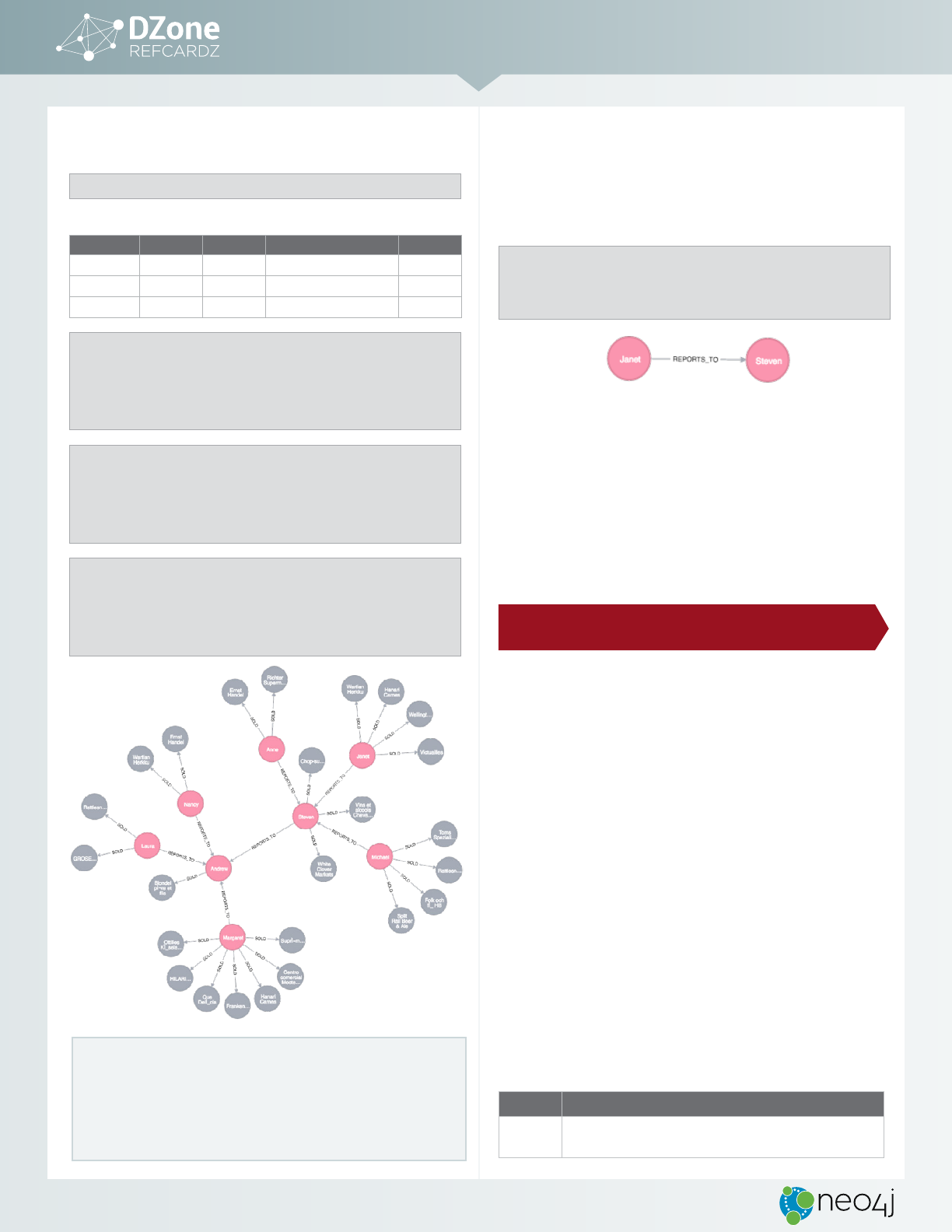
Janet is now reporting to Steven
Find Steven, Janet, and Janet’s
REPORTS_TO
relaionship. Remove Janet’s exising
relaionship and create a
REPORTS_TO
relaionship from Janet to Steven.
MATCH (mgr:Employee {employeeID:5})
MATCH (emp:Employee {employeeID:3})-[rel:REPORTS_TO]->()
DELETE rel
CREATE (emp)-[r:REPORTS_TO]->(mgr)
RETURN emp,r,mgr;
This single relaionship change is all you need to update a part of the
organizaional hierarchy. All subsequent queries will immediately use the
new structure.
LOAD CSV CONSIDERATIONS
• Provide enough memory (heap and page-cache)
• Test with small batch first to verify the data is clean
• Create indexes and constraints upfront
• Use Labels for matching
• Use
DISTINCT
,
SKIP
, and/or
LIMIT
on row data, to control input data volume
• Use
PERIODIC COMMIT
for larger volumes (> 20k)
DRIVERS AND NEO4J: CONNECTING TO NEO4J WITH
LANGUAGE DRIVERS
INTRODUCTION
If you’ve installed and started Neo4j as a server on your system, you can
interact with the database via the console or the built-in Neo4j Browser
applicaion. Neo4j’s Browser is the modern answer to old-fashioned relaional
workbenches, a web applicaion running in your web browser to allow you to
query and visualize your graph data.
Naturally, you’ll sill want your applicaion to connect to Neo4j through
other means—most oten through a driver for your programming language
of choice. The Neo4j Driver API is the preferred means of programmaic
interacion with a Neo4j database server. It implements the Bolt binary
protocol and is available in four oficially supported drivers for C#/.NET,
Java, JavaScript, and Python. Community drivers exist for PHP, C, Go, Ruby,
Haskell, R, and others.
Bolt is a connecion-oriented protocol that uses a compact binary encoding
over TCP or web sockets for higher throughput and lower latency. The API is
defined independently of any programming language. This allows for a high
degree of uniformity across languages, which means that the same features
are included in all the drivers. The uniformity also inluences the design of
the API in each language. This provides consistency across drivers, while
retaining afinity with the idioms of each programming language.
CONNECTING TO NEO4J USING THE OFFICIAL DRIVERS
GETTING STARTED
You can download the driver source or acquire it with one of the dependency
managers of your language.
LANGUAGE SNIPPET
C#
Using NuGet in Visual Studio:
PM> Install-Package Neo4j.Driver-1.0.0
FROM RELATIONAL TO GRAPH:
A DEVELOPER’S GUIDE
© DZONE, INC.
|
DZONE.COM
7
Java
When using Maven, add this to your pom.xml le:
<dependencies>
<dependency>
<groupId>org.neo4j.driver</groupId>
<artifactId>neo4j-java-driver</artifactId>
<version>1.0.0</version>
</dependency>
</dependencies>
For Gradle or Grails, use:
compile ‘org.neo4j.driver:neo4j-java-driver:1.0.0’
For other build systems, see information available at Maven Central.
Javascript
npm install neo4j-driver@1.0.0
Python
pip install neo4j-driver==1.0.0
USING THE DRIVERS
Each Neo4j driver uses the same concepts in its API to connect to and
interact with Neo4j. To use a driver, follow this pattern:
1. Ask the database object for a new driver.
2. Ask the driver object for a new session.
3. Use the session object to run statements. It returns a statement result
represening the results and metadata.
4. Process the results, opionally close the statement.
5. Close the session.
EXAMPLE:
DRIVER SNIPPET
C#
using Neo4j.Driver;
using Neo4j.Driver.Exceptions;
using (var driver = GraphDatabase.Driver("bolt://
localhost"))
using (var session = driver.Session())
{
session.Run("CREATE (:Employee {employeeID:123,
firstName:’Thomas’, lastName:’Anderson’})");
var result = session.Run("MATCH (p:Employee) WHERE
p.firstName = ‘Thomas’ RETURN p.employeeID");
foreach (var record in result)
{
output.WriteLine(
$"Neo has employee ID {record["p.
employeeID"]}");
}
}
Java
import org.neo4j.driver.v1.*;
Driver driver = GraphDatabase.driver( "bolt://localhost"
);
Session session = driver.session();
session.run( "CREATE (:Employee {employeeID:123,
firstName: 'Thomas', lastName:'Anderson'})");
String query = "MATCH (p:Employee) WHERE p.firstName =
{name} RETURN p.employeeID as id";
StatementResult result = session.run(query,
singletonMap("name","Thomas"));
while ( result.hasNext() ) {
Record record = result.next();
System.out.println( "Neo has employee ID " + record.
get( "id" ).asInt());
}
session.close();
driver.close();
Javascript
var driver = neo4j.driver("bolt://localhost",
neo4j.auth.basic("neo4j",
"neo4j"));
var session = driver.session();
Var query = "MATCH (p:Person) WHERE p.firstName = {name}
RETURN p";
session
.run(query , {name: 'Thomas'})
.subscribe({
onNext: function(record) {
console.log(record);
},
onCompleted: function() {
session.close();
},
onError: function(error) {
console.log(error);
}
});
Python
from neo4j.v1 import GraphDatabase, basic_auth
driver = GraphDatabase.driver("bolt://localhost")
auth=basic_auth("neo4j", "<password>"))
session = driver.session()
session.run("CREATE (:Employee {employeeID:123,
firstName:'Thomas', lastName:'Anderson'})")
query = "MATCH (p:Employee) WHERE p.firstName = {name}
RETURN p.employeeID AS id"
result = session.run(query, name="Thomas")
for record in result:
print("Neo has id %s" % (record["id"]))
session.close()
A CLOSER LOOK: USING NEO4J SERVER WITH JDBC
If you’re a Java developer, you’re probably familiar with Java Database
Connectivity (JDBC) as a way to work with relational databases. This is done
either directly or through abstractions like Spring’s JDBCTemplate or MyBatis.
Many other tools use JDBC drivers to interact with relational databases for
business intelligence, data management, or ETL (Extract, Transform, Load).
Cypher–like SQL–is a textual and parameterizable query language capable of
returning tabular results. Neo4j easily supports large parts of the JDBC APIs
through a Neo4j-JDBC driver. The Neo4j-JDBC driver is based on the Java driver
for Neo4j’s binary protocol and offers read and write operations, transaction
control, and parameterized prepared statements with batching.
JDBC DRIVER EXAMPLE
Class.forName("neo4j.jdbc.Driver");
Connection con = DriverManager.getConnection("jdbc:bolt://
localhost");
String query = "MATCH (p:Product)<-[:ORDERS]-()<-
[:PURCHASED]-(c) "+
"WHERE p.productName = {1} RETURN c.name,
count(*) as freq";
try (PreparedStatement stmt = con.prepareStatement(query))
{
stmt.setString(1,"Chocolade");
ResultSet rs = stmt.executeQuery();
while (rs.next()) {
System.out.println(rs.getString("c.name")+" "+rs.
getInt("freq"));
}
}
con.close();
FROM RELATIONAL TO GRAPH:
A DEVELOPER’S GUIDE
© DZONE, INC.
|
DZONE.COM
8
DEVELOPMENT & DEPLOYMENT: ADDING GRAPHS TO YOUR ARCHITECTURE
Make sure to develop a clean graph model for your use case first, then build
a proof of concept to demonstrate the added value for relevant paries. This
allows you to consolidate the import and data synchronizaion mechanisms.
When you’re ready to move ahead, you’ll integrate Neo4j into your
architecture both at the infrastructure and the applicaion level.
Deploying Neo4j as a database server on the infrastructure of your choice
is straightforward, either in the cloud or on premise. You can use our
installers, the oficial Docker image, or available cloud oferings. For
producion applicaions you can run Neo4j in a clustered mode for high
availability and scaling. As Neo4j is a transacional OLTP database, you can
use it in any end-user facing applicaion.
Using eficient drivers to connect from your applicaions to Neo4j is no
diferent than with other databases. You can use Neo4j’s powerful user
interface to develop and opimize the Cypher queries for your use case and
then embed the queries to power your applicaions.
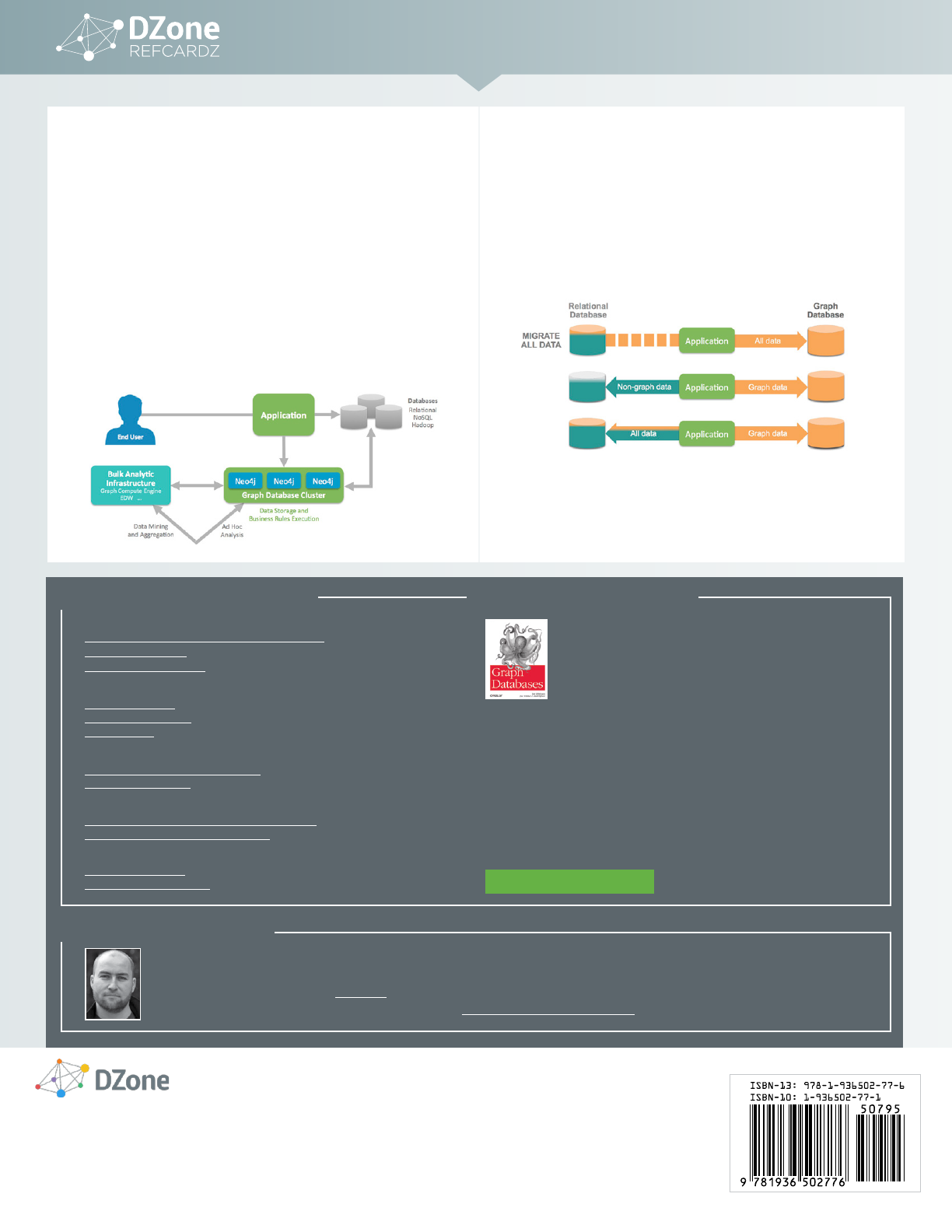
If you augment your exising system with graph capabiliies, you can choose
to either mirror or migrate the connected data of your domain into the
graph. Then you would run a polyglot persistence setup, which could also
involve other databases, e.g., for textual search or o line analyics.
If you develop a new graph-based applicaion or realize that the graph model
is the better fit for your needs, you would use Neo4j as your primary database
and manage all your data in it.
ARCHITECTURAL CHOICES
The three most common paradigms for deploying relational and graph
databases
For data synchronizaion, you can rely on exising tools or acively push to
or pull from other data sources based on indicaive metadata.
FROM RELATIONAL TO GRAPH:
A DEVELOPER’S GUIDE
DZONE, INC.
150 PRESTON EXECUTIVE DR.
CARY, NC 27513
888.678.0399
919.678.0300
REFCARDZ FEEDBACK WELCOME
refcardz@dzone.com
SPONSORSHIP OPPORTUNITIES
sales@dzone.com
Copyright © 2016 DZone, Inc. All rights reserved. No part of this publication may be reproduced, stored in a retrieval system, or
transmitted, in any form or by means electronic, mechanical, photocopying, or otherwise, without prior written permission of the publisher. VERSION 1.0
DZone communities deliver over 6 million pages each month to more than 3.3 million software
developers, architects and decision makers. DZone offers something for everyone, including news,
tutorials, cheat sheets, research guides, feature articles, source code and more.
"DZone is a developer's dream," says PC Magazine.
MICHAEL HUNGER
has been passionate about software development for a long time. He is particularly interested in the people who develop
software and making them successful by coding, writing, and speaking. For the last few years he has been working at Neo Technology on the
open source Neo4j graph database (neo4j.com). There, Michael is involved in many things but focuses on developer evangelism in the great
Neo4j community and leading the Spring Data Neo4j project (projects.spring.io/spring-data-neo4j).
Discover how graph databases can help you manage and query highly
connected data. With this practical book, you’ll learn how to design and
implement a graph database that brings the power of graphs to bear on
a broad range of problem domains. Whether you want to speed up your
response to user queries or build a database that can adapt as your business
evolves, this book shows you how to apply the schema-free graph model to
real-world problems.
Learn how different organizations are using graph databases to outperform their competitors.
With this book’s data modeling, query, and code examples, you’ll quickly be able to implement
your own solution.
• Model data with the Cypher query language and property graph model
• Learn best practices and common pitfalls when modeling with graphs
• Plan and implement a graph database solution in test-driven fashion
• Explore real-world examples to learn how and why organizations use a graph database
• Understand common patterns and components of graph database architecture
• Use analytical techniques and algorithms to mine graph database information
RELATIONAL DATABASES VS. GRAPH DATABASES
A relational model of data for large shared data banks (PDF)
Graph Databases Book
Relational to Graph e-Book
SQL VS. CYPHER
From SQL to Cypher
Cypher Query Language
Cypher Refcard
DATA IMPORT
Neo4j Bulk Import Tool Documentation
Guide to importing data
NEO4J BOLT DRIVERS
Introducing Bolt, Neo4j's Upcoming Binary Protocol
Neo4j JDBC Driver 3.x: Bolt it with LARUS!
NEO4J DEPLOYMENT & DEVELOPMENT
Neo4j Integration Tools
What is Polyglot Persistence?
ADDITIONAL RESOURCES
ABOUT THE AUTHOR
RECOMMENDED BOOK
FREE DOWNLOAD
