GD32E230F START User Guide V1.0
User Manual:
Open the PDF directly: View PDF  .
.
Page Count: 11
GigaDevice Semiconductor Inc.
GD32E230F-START
User Guide
V1.0

User Guide
GD32E230F-START
1/ 10
Table of Contents
Table of Contents .............................................................................................................................. 1
List of Tables ..................................................................................................................................... 2
1 Summary .................................................................................................................................... 3
2 Function Pin Assign .................................................................................................................. 3
3 Getting started ........................................................................................................................... 3
4 Hardware layout overview ........................................................................................................ 4
4.1 Power ................................................................................................................................... 4
4.2 Boot ...................................................................................................................................... 4
4.3 LED....................................................................................................................................... 4
4.4 KEY ...................................................................................................................................... 4
4.5 GD-Link ................................................................................................................................ 5
4.6 MCU ..................................................................................................................................... 5
5 Routine use guide ..................................................................................................................... 6
5.1 GPIO_Runing_Led ............................................................................................................... 6
5.2 GPIO_Keyboard_Polling_mode ........................................................................................... 6
5.3 EXTI_KeyBoard_Interrupt_mode ......................................................................................... 7
5.4 TIMER_KeyBoard_EXTI ...................................................................................................... 7
6 Revision history......................................................................................................................... 9

User Guide
GD32E230F-START
2/ 10
List of Tables
Table 1. Function pin assign .......................................................................................................................... 3
Table 2. Revision history ................................................................................................................................ 9
User Guide
GD32E230F-START
3/ 10
1 Summary
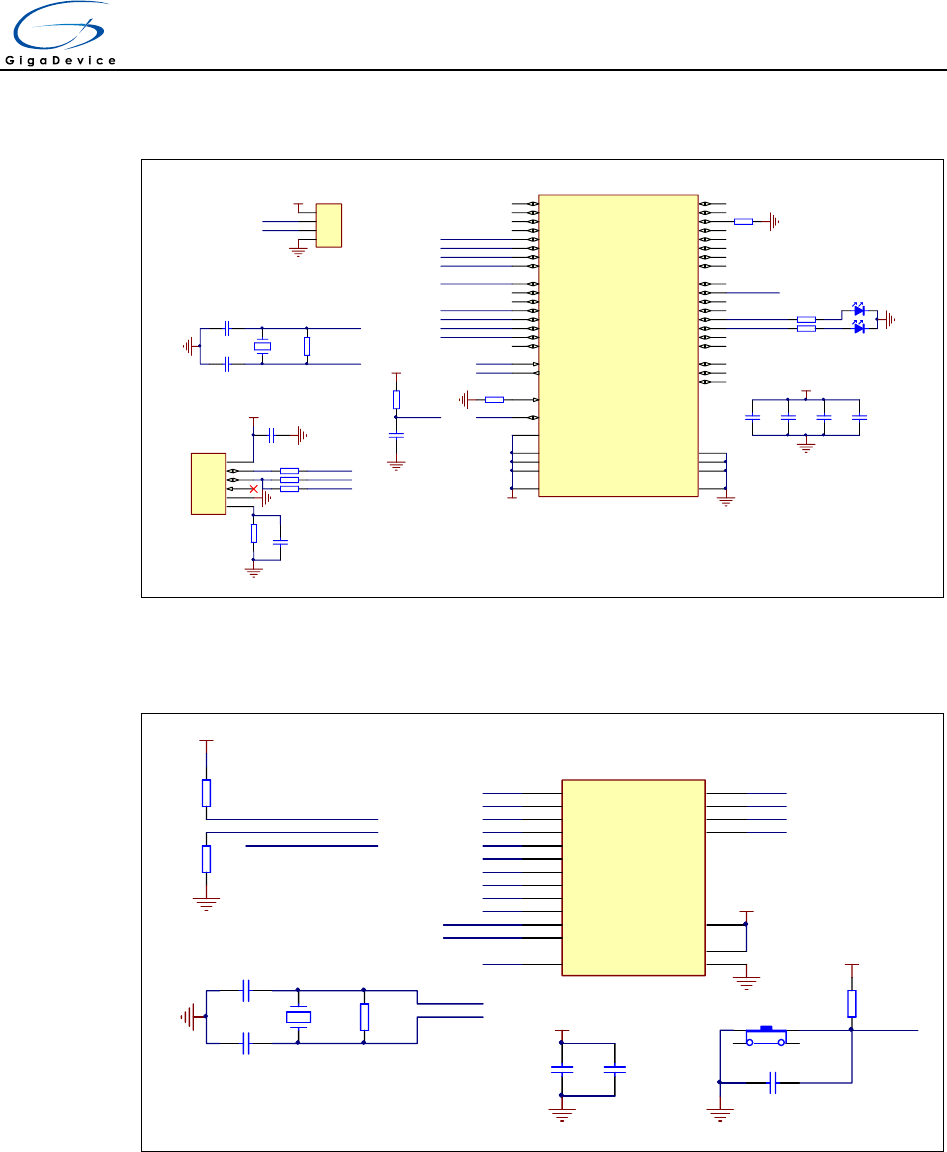
GD32E230F-START uses GD32E230F8P6 as the main controller. It uses Mini USB
interface to supply 5V power. Reset, Boot, User key, LED, GD-Link are also included.
For more details please refer to GD32E230F-START-V1.0 schematic.
2 Function Pin Assign
Table 1. Function pin assign
Function
Pin
Description
LED
PA1
LED1
LED
PA2
LED2
RESET
K1-Reset
KEY
PA0
K2-User Key
3 Getting started
The EVAL board uses Mini USB connecter to get power DC +5V, which is the hardware
system normal work voltage. A GD-Link on board is necessary in order to download and
debug programs. Select the correct boot mode and then power on, the LEDPWR will turn
on, which indicates that the power supply is OK.
There are Keil version and IAR version of all projects. Keil version of the projects are
created based on Keil MDK-ARM 5.25 uVision5. IAR version of the projects are created
based on IAR Embedded Workbench for ARM 8.31.1. During use, the following points
should be noted:
1. If you use Keil uVision5 to open the project. In order to solve the "Device Missing (s)"
problem, you can install GigaDevice.GD32E230_DFP.1.0.0.pack.
2. If you use IAR to open the project, install IAR_GD32E230_ADDON_1.0.0.exe to load
the associated files.
User Guide
GD32E230F-START
4/ 10
4 Hardware layout overview
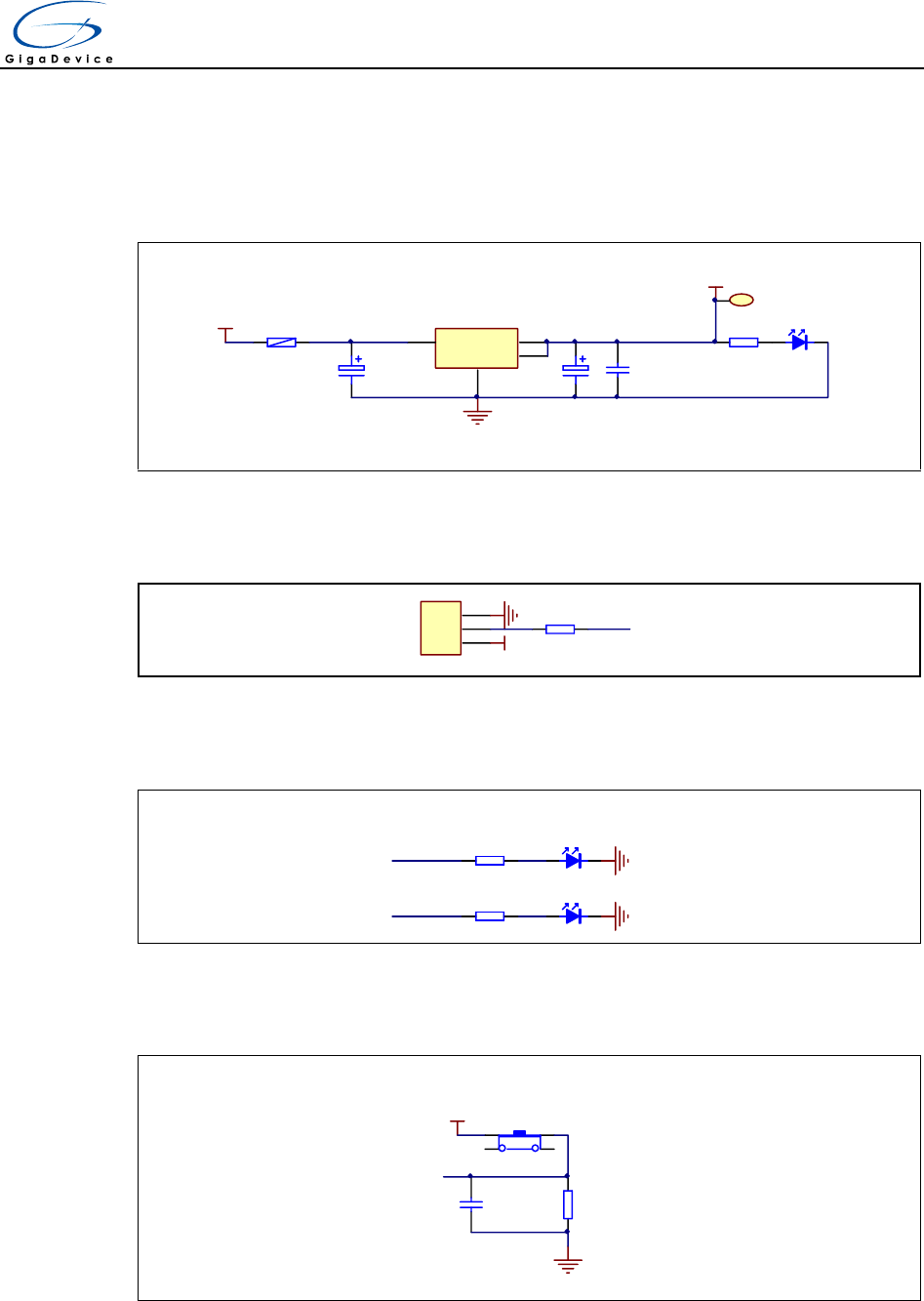
4.1 Power
G
1
Vout 2
Vin
34
U2 LM1117-3.3
E1
16V/10uF,AVX
E2
16V/10uF,AVX
GND
C11
50V/0.1uF
+3V3
LEDPWR
LED0603
R9
470Ω
1
TP1
TP +3V3
+U5V P1
SMD1210P005TF
4.2 Boot
R7
10KΩ
1
2
3
JP4
BOOT0
GND BOOT0
+3V3
4.3 LED
PA1LED1
LED0603
LED
R2
470Ω
GND
PA2LED2
LED0603
R3
470Ω
GND
4.4 KEY
PA0
R1
10KΩ
+3V3
GND
C1
50V/0.1uF
KEY
K1
K-1102B
User Guide
GD32E230F-START
5/ 10
4.5 GD-Link
L_USB_Ctr
C100
50V/20pF
C102
50V/20pF
Y101
HC-49S-8MHz
GND
L_NRST
+3V3
GND
R102
10KΩ
C103
50V/0.1uF
R104
10KΩ
GND
C105
50V/0.1uF
C106
50V/0.1uF
C107
50V/0.1uF
C108
50V/0.1uF
R101
1MΩ
L_OSC_IN
L_OSC_OUT
L_OSC_IN
L_OSC_OUT
L_NRST
GND
+3V3
GND
1
2
3
4
JP100
4×1P2.54
+3V3
GND
MCU SWD
Reset
L_TMS/IO
L_TDI
L_TDO/SWO
L_TCK/CLK
L_USB_DP
L_SWDIO
L_SWDCK
L_SWDIO
L_SWDCK
+3V3
L_USB_DM
BOOT0
44
NRST
7
OSC_IN/PD0
5
OSC_OUT/PD1
6
PA0-WKUP
10
PA1
11
PA2
12
PA3
13
PA4
14
PA5
15
PA6
16
PA7
17
PA8
29
PA9
30
PA10
31
PA11
32
PA12
33
PA13/JTMS/SWDIO
34
PA14/JTCK/SWCLK
37
PA15/JTDI
38
PB018
PB119
PB2/BOOT1 20
PB3/JTDO 39
PB4/JNTRST 40
PB541
PB642
PB743
PB845
PB946
PB10 21
PB11 22
PB12 25
PB13 26
PB14 27
PB15 28
PC13-TAMPER-RTC 2
PC14-OSC32_IN 3
PC15-OSC32_OUT 4
VBAT
1
VDD_1
24
VDD_2
36
VDD_3
48
VDDA
9
VSS_1 23
VSS_2 35
VSS_3 47
VSSA 8
U0
GD32F103C8T6
L_TReset
L_LED1
L_LED2
L_LED1 LED0603
L_LED2 LED0603
R103
10KΩ
GND
R109 470Ω
R110 470ΩGND
GND
R105 22R
R106 22R
R108
1MΩC104
50V/4700pF
L_USB_DM
L_USB_DP
GND
R107 1.5KΩL_USB_Ctr
VCC 1
D- 2
D+ 3
ID 4
GND 5
SHELL 6
CN100
Mini_USB
+U5VC10
50V/0.1uF
4.6 MCU
PA4
PA5
PA6
PA7
PA0
PA1
PA3
PA2
PA9
PA10
PB1
C2
50V/20pF
C3
50V/20pF
Y1
HC-49S-G20SSA-8MHz
GND NRST
K2
K-1102B
+3V3
GND
R8
10KΩ
C6
50V/0.1uF
BOOT0
C8
50V/0.1uF
C9
50V/0.1uF
R5
10KΩ
R6
1MΩ
R4
10KΩ
OSC_IN
OSC_OUT GND
GND
+3V3
NRST
PA13
PA14SWCLK
SWDAT
+3V3
SWDAT
SWCLK
GND
NRST
L_TMS/IO
L_TCK/CLK
L_TReset
GDLinkSWD OSC_IN
OSC_OUT
+3V3
BOOT0 1
PF0/OSC_IN 2
PF1/OSC_OUT 3
NRST 4
VDDA 5
PA0
6
PA1
7
PA2
8
PA3
9
PA4
10
PA5
11
PA6
12
PA7
13
PB1
14 VSS 15
VDD 16
PA9
17
PA10
18
PA13
19
PA14
20
U1
GD32E230F8P6
User Guide
GD32E230F-START
6/ 10
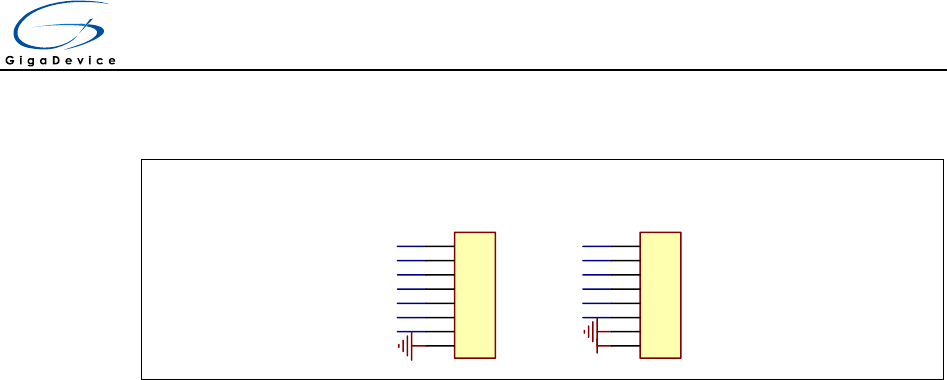
4.7 Extension
Extension Pin
PA4
PA5
PA6
PA7
PA1PB1
PA3
PA2PA9
PA10
PA13
PA14
PA0
+3V3
GND
1
2
3
4
5
6
7
8
JP1
HEADER 8
1
2
3
4
5
6
7
8
JP2
HEADER 8
GND
5 Routine use guide
5.1 GPIO_Runing_Led
5.1.1 DEMO Purpose
This demo includes the following functions of GD32 MCU:
Learn to use GPIO control the LED
Learn to use SysTick to generate 1ms delay
GD32E230F-START board has two LEDs. The LEDs are controlled by GPIO. This demo
will show how to light the LED.
5.1.2 DEMO Running Result
Download the program < 01_GPIO_Runing_Led > to the EVAL board, LED1 and LED2
will turn on and off in sequence with interval of 1000ms, repeat the process.
5.2 GPIO_Keyboard_Polling_mode
5.2.1 DEMO Purpose
This demo includes the following functions of GD32 MCU:
Learn to use GPIO control the LED and the KEY
Learn to use SysTick to generate 1ms delay
GD32E230F-START board has two keys and two LEDs. The two keys are Reset key and
User key. The LEDs are controlled by GPIO.

User Guide
GD32E230F-START
7/ 10
This demo will show how to use the User key to control the LED1. When press down the
User Key, it will check the input value of the IO port. If the value is 1 and will wait for 50ms.
Check the input value of the IO port again. If the value still is 1, it indicates that the button
is pressed successfully and toggle LED1.
5.2.2 DEMO Running Result
Download the program < 02_GPIO_KeyBoard_Polling_mode > to the EVAL board, all the
LEDs are flashed once for test and LED1 and LED2 are on, press down the User Key,
LED1 will be turned off. Press down the User Key again, LED1 will be turned on.
5.3 EXTI_KeyBoard_Interrupt_mode
5.3.1 DEMO Purpose
This demo includes the following functions of GD32 MCU:
Learn to use GPIO control the LED and the KEY
Learn to use EXTI to generate external interrupt
GD32E230F-START board has two keys and two LEDs. The two keys are Reset key and
User key. The LEDs are controlled by GPIO.
This demo will show how to use the EXTI interrupt line to control the LED1.When press
down the User Key, it will produce an interrupt. In the interrupt service function, the demo
will toggle LED1.
5.3.2 DEMO Running Result
Download the program < 03_EXTI_KeyBoard_Interrupt_mode > to the EVAL board, all
the LEDs are flashed once for test and LED1 and LED2 are on, press down the User Key,
LED1 will be turned off. Press down the User Key again, LED1 will be turned on.
5.4 TIMER_KeyBoard_EXTI
5.4.1 DEMO Purpose
This demo includes the following functions of GD32 MCU:
Learn to use GPIO control the LED and the KEY
Learn to use EXTI to generate external interrupt

User Guide
GD32E230F-START
8/ 10
Learn to use TIMER to generate PWM
GD32E230F-START board has two keys and two LEDs. The two keys are Reset key and
User key. The LEDs are controlled by GPIO.
This demo will show how to use the TIMER PWM to trigger EXTI interrupt to toggle the
state of LED1 and EXTI interrupt line to control the LED2. When press down the User
Key, it will produce an interrupt. In the interrupt service function, the demo will toggle
LED2.
5.4.2 DEMO Running Result
Download the program < 04_TIMER_KeyBoard_EXTI > to the EVAL board, all the LEDs
are flashed once for test, press down the User Key, LED2 will be turned on. Press down
the User Key again, LED2 will be turned off. Connect PA6(TIMER2_CH0) and PA5 with
DuPont line. The LED1 will be toggled every 500ms.
User Guide
GD32E230F-START
9/ 10
6 Revision history
Table 2. Revision history
Revision No.
Description
Date
1.0
Initial Release
Nov. 21, 2018

User Guide
GD32E230F-START
10/ 10
Important Notice
This document is the property of GigaDevice Semiconductor Inc. and its subsidiaries (the "Company"). This document, including any
product of the Company described in this document (the “Product”), is owned by the Company under the intellectual property laws and
treaties of the People’s Republic of China and other jurisdictions worldwide. The Company reserves all rights under such laws and
treaties and does not grant any license under its patents, copyrights, trademarks, or other intellectual property rights. The names and
brands of third party referred thereto (if any) are the property of their respective owner and referred to for identification purposes only.
The Company makes no warranty of any kind, express or implied, with regard to this document or any Product, including, but not
limited to, the implied warranties of merchantability and fitness for a particular purpose. The Company does not assume any liability
arising out of the application or use of any Product described in this document. Any information provided in this document is provided
only for reference purposes. It is the responsibility of the user of this document to properly design, program, and test the functionality
and safety of any application made of this information and any resulting product. Except for customized products which has been
expressly identified in the applicable agreement, the Products are designed, developed, and/or manufactured for ordinary business,
industrial, personal, and/or household applications only. The Products are not designed, intended, or authorized for use as components
in systems designed or intended for the operation of weapons, weapons systems, nuclear installations, atomic energy control
instruments, combustion control instruments, airplane or spaceship instruments, transportation instruments, traffic signal instruments,
life-support devices or systems, other medical devices or systems (including resuscitation equipment and surgical implants), pollution
control or hazardous substances management, or other uses where the failure of the device or Product could cause personal injury,
death, property or environmental damage ("Unintended Uses"). Customers shall take any and all actions to ensure using and selling
the Products in accordance with the applicable laws and regulations. The Company is not liable, in whole or in part, and customers
shall and hereby do release the Company as well as it’s suppliers and/or distributors from any claim, damage, or other liability arising
from or related to all Unintended Uses of the Products. Customers shall indemnify and hold the Company as well as it’s suppliers
and/or distributors harmless from and against all claims, costs, damages, and other liabilities, including claims for personal injury or
death, arising from or related to any Unintended Uses of the Products.
Information in this document is provided solely in connection with the Products. The Company reserves the right to make changes,
corrections, modifications or improvements to this document and Products and services described herein at any time, without notice.
© 2018 GigaDevice – All rights reserved
