GEOPHIRES V2.0 User Manual
User Manual:
Open the PDF directly: View PDF  .
.
Page Count: 23

1
GEOPHIRES v2.0 User Manual | May 11th, 2018
Koenraad Beckers | Koenraad.Beckers@nrel.gov
Kevin McCabe | Kevin.McCabe@nrel.gov
Contents
1. Introduction .............................................................................................................................................. 1
2. GEOPHIRES v2.0 Overview ........................................................................................................................ 2
3. Quick Start Guide ...................................................................................................................................... 3
4. Example Problems ..................................................................................................................................... 4
5. Input parameter format ............................................................................................................................ 5
6. List of GEOPHIRES input parameters ........................................................................................................ 5
6.1 Subsurface Technical Parameters ....................................................................................................... 5
6.2 Surface Technical Parameters ........................................................................................................... 14
6.3 Financial Parameters ......................................................................................................................... 17
6.4 Capital and O&M Cost Parameters ................................................................................................... 19
6.5 Simulation Parameters ...................................................................................................................... 23
1. Introduction
This manual helps the user run geothermal techno-economic simulations with the software tool
GEOPHIRES v2.0. The manual provides a short overview of the tool (Section 2), a quick start
guide (Section 3), an overview of the included example problems (Section 4), the format
required to enter input values (Section 5), and a list of all input parameters (Section 6) with
corresponding description, units, allowable values (or range of values), and default values.
The latest version of GEOPHIRES, this manual and example simulations can be downloaded
from the GEOPHIRES GitHub folder: https://github.com/kfbeckers/GEOPHIRES
If case of questions or comments or if you find a bug, please contact Koenraad Beckers
(koenraad.beckers@nrel.gov) or Kevin McCabe (kevin.mccabe@nrel.gov).
2
2. GEOPHIRES v2.0 Overview
A detailed description of the objectives, capabilities, history, software architecture, and built-in
models and correlations of GEOPHIRES v2.0 is provided in the paper XXX. Below is a short
summary:
• GEOPHIRES combines reservoir, wellbore, surface plant, and economic and cost models
and correlations to estimate the capital and operation and maintenance costs,
instantaneous and lifetime energy production, and overall levelized cost of energy of a
geothermal plant.
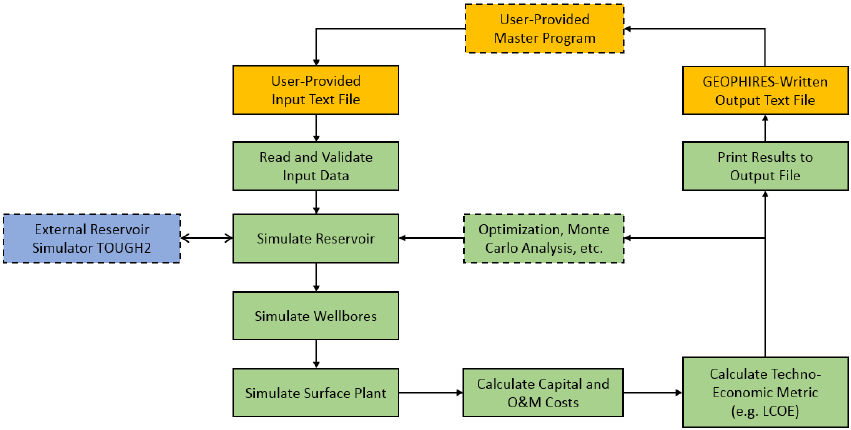
• The software architecture is illustrated in Figure 1. Green, orange and blue rectangles
refer to internal GEOPHIRES components, external user-interface components, and the
external reservoir simulator TOUGH2, respectively. Rectangles with solid outline are
always executed during a simulation run; rectangles with dashed outline refer to optional
or user-provided components.
Figure 1. GEOPHIRES v2.0 Software Architecture
• GEOPHIRES v2.0 is open-source under the Creative Commons License CC BY-NC-SA
(anybody can modify for non-commercial purposes). Users are encouraged to improve
and expand upon the GEOPHIRES code by adding new model features that are not
standard built-in (e.g. optimization and Monte Carlo routine), implementing their own
models and correlations (e.g. to simulate a specific direct-use heat application), coupling
to other simulators (e.g. IPSEpro to simulate the surface plant), etc.
• Unlike its predecessor, GEOPHIRES v.2.0 is written in Python to make it highly
readable, easy to modify, and free to compile.

3
• GEOPHIRES v2.0 has six different built-in reservoir models: (1) multiple parallel
fractures model, (2) 1-dimensional linear heat sweep model, (3) m/a thermal drawdown
parameter model, (4) percentage temperature drawdown model, (5) user-provided
reservoir temperature production data, (6) coupling to TOUGH2 external reservoir
simulator.
• GEOPHIRES v2.0 can simulate three different end-uses of the geothermal heat: (1)
direct-use heat (e.g. for industrial processing heating or residential space heating), (2)
electricity (with subcritical ORC, supercritical ORC, single-flash, or double-flash plant),
(3) co-generation of heat and electricity. The co-generation option considers bottoming
cycle, topping cycle, and parallel cycle.
• GEOPHIRES v2.0 has 3 economic models to calculate the levelized cost of heat or
electricity: (1) fixed charge rate (FCR) model, (2) standard discounting levelized cost
model, and (3) BICYCLE model.
• The capital and O&M costs for the different geothermal system components (exploration,
well drilling, surface plant, etc.) are either provided by the user or calculated with built-in
correlations.
3. Quick Start Guide
The following steps guide a new user through the process of running his/her first simulation with
GEOPHIRES v2.0:
1. Download and Install Python: If not already installed, the user should download Python
and the necessary libraries (math, datetime, numpy, time, os, sys) from www.python.org
and install on the computer. If unsure if Python is already installed, typing “python” in a
command window will return the Python version if installed. GEOPHIRES v2.0 has
successfully been tested on Python 2.7 and 3.5.
2. Download and install advanced text editor or Integrated Development Environment
(optional): while a simple text editor (e.g. notepad for Windows) is sufficient to modify
Python code, a more sophisticated text editor (e.g. sublime) or integrated development
environment (e.g. Spyder) facilitates writing and modifying Python code by providing
functionalities such as automatic code completion, installing missing libraries, debugging,
and even compiling.
3. Download GEOPHIRES v2.0 files: the user should download the GEOPHIRES v2.0 files
from the GEOPHIRES folder on GitHub. These files include the source code
(GEOPHIRESv2.py), three example input files (example1.txt, example2.txt,

4
example3.txt), and an example user-provided reservoir output temperature profile
(ReservoirOutput.txt). These files should be located in the same folder.
4. Download TOUGH2 (optional): if the user would like to make use of the coupling with
TOUGH2 (reservoir option 6), a TOUGH2 executable should be provided in the
GEOPHIRES folder. Downloading and running a TOUGH reservoir simulator requires
purchasing a license from Lawrence Berkeley National Laboratory (LBNL).
5. Run example file: The user should run the included examples to get familiar with the input
format and calculated output results. Example 1 simulates a binary cycle power plant and
assumes a simple linear drawdown in reservoir output temperature (reservoir option 4).
Example 2 simulates a direct-use heat application and a user-provided reservoir output
temperature profile (reservoir option 5). Example 3 considers a direct-use application and
a doublet simulated in TOUGH2 (reservoir option 6).
4. Example Problems
Three example problems (see Table 1) are included in the GEOPHIRES GitHub folder
considering different reservoir types, reservoir models, end-uses, and economic models. These
various example problems can help users setting up correctly the GEOPHIRES input text file for
their application. Example 3 requires having the TOUGH2-EOS1 executable (“xt2_eos1.exe”)
located in the same folder as the GEOPHIRES python code (“GEOPHIRESv2.py”).
Table 1. Overview of example problems includes in the GEOPHIRES GitHub folder
Reservoir Type
Reservoir Model
End-Use
Economic Model
Example 1
EGS
Multiple Parallel
Fractures
Electricity with
Subcritical ORC
Fixed Charge Rate
Model
Example 2
EGS
1D Linear Heat
Sweep
Industrial
Direct-Use Heat
Standard LCOH
Example 3
EGS
m/a Single
Fracture
Drawdown
CHP Topping
Model with
electricity as the
main product,
Double-Flash
BICYCLE
Example 4
Hydrothermal
Percentage
Thermal
Drawdown
Electricity with
Subcritical ORC
BICYCLE

5
Example 5
EGS
User-Provided
Reservoir Output
Temperature Data
Industrial
Direct-Use Heat
BICYCLE
Example 6
Hydrothermal
TOUGH2 Doublet
Industrial
Direct-Use Heat
Standard
Levelized Cost
Model
5. Input Parameter Format
In the input text file, each parameter and value are provided by the user on a single line using one
of the following two formats:
Parameter_name, parameter_value
Parameter_name, parameter_value, any comments
For example, to set the production well flow rate to 50 L/s, the user writes:
Production Flow Rate per Well, 50
Or when the user wants to include comments, e.g. to explain the units, he/she can write:
Production Flow Rate per Well, 50, production well flow rate in units of L/s
The user is free to choose any name for the input text file (in .txt format) but has to assign that
name to the parameter “fname” at the beginning in the GEOPHIRES Python code.
6. List of GEOPHIRES Input Parameters
This section provides a list of all 92 input parameters with their name, description, parameter
type, unit, allowable values or range of values, default value, and when the parameter is required
as input. They are grouped into:
• Subsurface technical parameters (47)
• Surface technical parameters (9)
• Financial parameters (13)
• Capital and O&M Cost parameters (21)
• Simulation parameters (2)
6.1 Subsurface Technical Parameters
1. Parameter name: Reservoir Model
6
o Description: Select the reservoir model to be used in GEOPHIRES
o Parameter type: Integer
o Units: N/A
o Allowable values:
▪ 1: Multiple parallel fractures model
▪ 2: 1D linear heat sweep model
▪ 3: m/a single fracture drawdown model
▪ 4: Linear thermal drawdown model
▪ 5: Generic user-provided temperature profile
▪ 6: TOUGH2
o When required: Always
o Default value: 4
2. Parameter name: Drawdown Parameter
o Description: specify the thermal drawdown for reservoir model 3 and 4
o Parameter type: Real
o Units:
▪ kg/s/m2 if reservoir model = 3
▪ 1/year if reservoir model = 4
o Allowable value range:
▪ [0,0.2] if reservoir model = 3
▪ [0,0.2] if reservoir model = 4
o When required: if reservoir model = 3 or 4
o Default value:
▪ 0.0001 if reservoir model = 3
▪ 0.005 if reservoir model = 3
3. Parameter name: Reservoir Output File Name
o Description: File name of reservoir output in case reservoir model 5 is selected
o Parameter type: String
o Units: N/A
o Allowable values: N/A
o When required: if reservoir model = 5
o Default value: ReservoirOutput.txt
4. Parameter name: TOUGH2 Model/File Name
o Description: File name of reservoir output in case reservoir model 5 is selected
o Parameter type: String
o Units: N/A
o Allowable values: N/A
o When required: if reservoir model = 5
o Default value: ReservoirOutput.txt
5. Parameter name: Reservoir Depth
o Description: Depth of the reservoir
o Parameter type: Real
o Units: km
o Allowable value range: [0.1,15]
o When required: Always
o Default value: 3 km
7
6. Parameter name: Number of Segments
o Description: Number of rock segments from surface to reservoir depth with
specific geothermal gradient
o Parameter type: Integer
o Units: N/A
o Allowable values: [1,2,3,4]
o When required: Always
o Default value: 1
7. Parameter name: Gradient 1
o Description: Geothermal gradient in rock segment 1
o Parameter type: Real
o Units: °C/km
o Allowable value range: [0,500]
o When required: Always
o Default value: 50
8. Parameter name: Gradient 2
o Description: Geothermal gradient in rock segment 2
o Parameter type: Real
o Units: °C/km
o Allowable value range: [0,500]
o When required: If number of segments > 1
o Default value: 50
9. Parameter name: Thickness 1
o Description: Thickness of rock segment 1
o Parameter type: Real
o Units: km
o Allowable value range: [0.01,100]
o When required: If number of segments > 1
o Default value: 2
10. Parameter name: Gradient 3
o Description: Geothermal gradient in rock segment 3
o Parameter type: Real
o Units: °C/km
o Allowable value range: [0,500]
o When required: If number of segments > 2
o Default value: 50
11. Parameter name: Thickness 2
o Description: Thickness of rock segment 2
o Parameter type: Real
o Units: km
o Allowable value range: [0.01,100]
o When required: If number of segments > 2
o Default value: 2
12. Parameter name: Gradient 4
o Description: Geothermal gradient in rock segment 4
o Parameter type: Real
8
o Units: °C/km
o Allowable value range: [0,500]
o When required: If number of segments > 3
o Default value: 50
13. Parameter name: Thickness 3
o Description: Thickness of rock segment 3
o Parameter type: Real
o Units: km
o Allowable value range: [0.01,100]
o When required: If number of segments > 3
o Default value: 2
14. Parameter name: Maximum Temperature
o Description: Maximum allowable reservoir temperature (e.g. due to drill bit or
logging tools constraints). GEOPHIRES will cap the drilling depth to stay below
this maximum temperature.
o Parameter type: Real
o Units: °C
o Allowable value range: [50,1000]
o When required: Always
o Default value: 400
15. Parameter name: Number of Production Wells
o Description: Number of (identical) production wells
o Parameter type: Integer
o Units: N/A
o Allowable value range: [1,20]
o When required: Always
o Default value: 2
16. Parameter name: Number of Injection Wells
o Description: Number of (identical) injection wells
o Parameter type: Integer
o Units: N/A
o Allowable value range: [1,20]
o When required: Always
o Default value: 2
17. Parameter name: Production Well Diameter
o Description: Inner diameter of production wellbore (assumed constant along the
wellbore) to calculate frictional pressure drop and wellbore heat transmission with
Ramey’s model
o Parameter type: Real
o Units: Inch
o Allowable value range: [1,30]
o When required: Always
o Default value: 8 inch
18. Parameter name: Injection Well Diameter
o Description: Inner diameter of injection wellbore (assumed constant along the
wellbore) to calculate frictional pressure drop
9
o Parameter type: Real
o Units: Inch
o Allowable value range: [1,30]
o When required: Always
o Default value: 8 inch
19. Parameter name: Ramey Production Wellbore Model
o Description: Select whether to use Ramey’s model to estimate the geofluid
temperature drop in the production wells.
o Parameter type: Boolean
o Units: N/A
o Allowable value range: 0 (disable) or 1 (enable)
o When required: Always
o Default value: 1
20. Parameter name: Production Wellbore Temperature Drop
o Description: Specify constant production well geofluid temperature drop in case
Ramey’s model is disabled.
o Parameter type: Real
o Units: °C
o Allowable value range: [-5,50]
o When required: If Ramey’s model is disabled
o Default value: 5
21. Parameter name: Injection Wellbore Temperature Gain
o Description: Specify constant injection well geofluid temperature gain.
o Parameter type: Real
o Units: °C
o Allowable value range: [-5,50]
o When required: Always
o Default value: 0
22. Parameter name: Production Flow Rate per Well
o Description: Geofluid flow rate per production well.
o Parameter type: Real
o Units: kg/s
o Allowable value range: [1,500]
o When required: Always
o Default value: 50
23. Parameter name: Fracture Shape
o Description: Specifies the shape of the (identical) fractures in a fracture-based
reservoir
o Parameter type: Integer
o Units: N/A
o Allowable values:
▪ 1: Circular fracture with known area
▪ 2: Circular fracture with known diameter
▪ 3: Square fracture
▪ 4: Rectangular fracture
o When required: If reservoir model = 1 or 2
10
o Default value: 1
24. Parameter name: Fracture Area
o Description: Effective heat transfer area per fracture
o Parameter type: Real
o Units: m2
o Allowable value range: [1,1E8]
o When required: If reservoir model = 1 or 2 and fracture shape = 1
o Default value: 250,000 m2
25. Parameter name: Fracture Height
o Description: Diameter (if fracture shape = 2) or height (if fracture shape = 3 or 4)
of each fracture
o Parameter type: Real
o Units: m
o Allowable value range: [1,10000]
o When required: If reservoir model = 1 or 2 and fracture shape = 2, 3 or 4
o Default value: 500 m
26. Parameter name: Fracture Width
o Description: Width of each fracture
o Parameter type: Real
o Units: m
o Allowable value range: [1,10000]
o When required: If reservoir model = 1 or 2 and fracture shape = 4
o Default value: 500 m
27. Parameter name: Reservoir Volume Option
o Description: Specifies how the reservoir volume, and fracture distribution (for
reservoir models 1 and 2) are calculated. The reservoir volume is used by
GEOPHIRES to estimate the stored heat in place. The fracture distribution is
needed as input for the EGS fracture-based reservoir models 1 and 2.
o Parameter type: Integer
o Units: N/A
o Allowable values:
▪ 1: Specify number of fractures and fracture separation
▪ 2: Specify reservoir volume and fracture separation
▪ 3: Specify reservoir volume and number of fractures
▪ 4: Specify reservoir volume only (sufficient for reservoir models 3, 4, 5
and 6)
o When required: Always
o Default value:
o 4 if reservoir model = 1 or 2
o 3 if reservoir model = 3, 4, 5 or 6
28. Parameter name: Number of Fractures
o Description: Number of identical parallel fractures in EGS fracture-based
reservoir model.
o Parameter type: Integer
o Units: N/A
o Allowable value range: [1,20]
11
o When required: If reservoir model = 1 or 2 and reservoir volume option = 1 or 3
o Default value: 10
29. Parameter name: Fracture Separation
o Description: Separation of identical parallel fractures with uniform spatial
distribution in EGS fracture-based reservoir.
o Parameter type: real
o Units: m
o Allowable value range: [1,1E4]
o When required: If reservoir model = 1 or 2 and reservoir volume option = 1 or 2
o Default value: 50 m
30. Parameter name: Reservoir Volume
o Description: Geothermal reservoir volume
o Parameter type: real
o Units: m3
o Allowable value range: [10,1E12]
o When required: If reservoir volume option = 3 or 4
o Default value: 500 × 500 × 500 m3 = 125,000,000 m3
31. Parameter name: Water Loss Fraction
o Description: Fraction of water lost in the reservoir defined as (total geofluid
lost)/(total geofluid produced). The total injection flow rate is then calculated as:
(injection rate) = (production rate) × (1+ water loss fraction)
o Parameter type: Real
o Units: N/A
o Allowable value range: [0,0.99]
o When required: If reservoir volume option = 3 or 4
o Default value: 0
32. Parameter name: Reservoir Impedance
o Description: Reservoir resistance to flow per well-pair. For EGS-type reservoirs
when the injection well is in hydraulic communication with the production well,
this parameter specifies the overall pressure drop in the reservoir between
injection well and production well, calculated as (reservoir impedance) ×
(reservoir flow rate).
o Parameter type: Real
o Units: GPa·s/m3
o Allowable value range: [1E-4,1E4]
o When required: Optional; default is specifying productivity and injectivity indices
o Default value: 0.1
33. Parameter name: Productivity Index
o Description: Productivity index defined as ratio of production well flow rate over
production well inflow pressure drop (hydrostatic reservoir pressure – flowing
bottom hole pressure).
o Parameter type: Real
o Units: kg/s/bar
o Allowable value range: [1E-2,1E4]
o When required: Required if not specifying reservoir impedance and no flash
power plant considered
12
o Default value: 10
34. Parameter name: Injectivity Index
o Description: Injectivity index defined as ratio of injection well flow rate over
injection well outflow pressure drop (flowing bottom hole pressure - hydrostatic
reservoir pressure).
o Parameter type: Real
o Units: kg/s/bar
o Allowable value range: [1E-2,1E4]
o When required: Required if not specifying reservoir impedance
o Default value: 10
35. Parameter name: Reservoir Hydrostatic Pressure
o Description: Reservoir hydrostatic far-field pressure
o Parameter type: Real
o Units: kPa
o Allowable value range: [1E2,1E5]
o When required: Required if specifying productivity/injectivity indices.
o Default value: Built-in modified Xie-Bloomfield-Shook equation (DOE, 2016).
36. Parameter name: Production Wellhead Pressure
o Description: Constant production wellhead pressure
o Parameter type: Real
o Units: kPa
o Allowable value range: [0,1E4]
o When required: Required if specifying productivity index
o Default value: Water vapor pressure (at initial production temperature) + 344.7
kPa (50 psi).
37. Parameter name: Plant Outlet Pressure
o Description: Constant plant outlet pressure equal to injection well pump(s)
suction pressure
o Parameter type: Real
o Units: kPa
o Allowable value range: [0,1E4]
o When required: Required if specifying injectivity index
o Default value:
▪ 100 kPa (1 bar) in case of flash power plant
▪ Production wellhead pressure – 68.95 kPa (10 psi) in all other cases
38. Parameter name: Injection Temperature
o Description: Constant geofluid injection temperature at injection wellhead.
o Parameter type: Real
o Units: °C
o Allowable value range: [0,200]
o When required: Always
o Default value: 70°C
39. Parameter name: Maximum Drawdown
o Description: Maximum allowable thermal drawdown before redrilling of all wells
into new reservoir (most applicable to EGS-type reservoirs with heat farming
strategies). E.g. a value of 0.2 means that all wells are redrilled after the
13
production temperature (at the wellhead) has dropped by 20% of its initial
temperature.
o Parameter type: Real
o Units: N/A
o Allowable value range: [0,1]
o When required: If reservoir model is 1, 2, 3, or 4.
o Default value: 1 (i.e., no redrilling considered)
40. Parameter name: Reservoir Heat Capacity
o Description: Constant and uniform reservoir rock heat capacity
o Parameter type: Real
o Units: J/kg/K
o Allowable value range: [100,10000]
o When required: Always
o Default value: 1000 J/kg/K
41. Parameter name: Reservoir Density
o Description: Constant and uniform reservoir rock density
o Parameter type: Real
o Units: kg/m3
o Allowable value range: [100,10000]
o When required: Always
o Default value: 2700 kg/m3
42. Parameter name: Reservoir Thermal Conductivity
o Description: Constant and uniform reservoir rock thermal conductivity
o Parameter type: Real
o Units: W/m/K
o Allowable value range: [0.01,100]
o When required: If use of Ramey model, or reservoir model = 1, 2 or 3, or
reservoir model = 6 and use of built-in TOUGH2 model
o Default value: 3 W/m/K
43. Parameter name: Reservoir Porosity
o Description: Constant and uniform reservoir porosity
o Parameter type: Real
o Units: N/A
o Allowable value range: [0.001,0.99]
o When required: If reservoir model = 2, or reservoir model = 6 and use of built-in
TOUGH2 model
o Default value: 0.04
44. Parameter name: Reservoir Permeability
o Description: Constant and uniform reservoir permeability
o Parameter type: Real
o Units: m2
o Allowable value range: [1E-20,1E-5]
o When required: If reservoir model = 6 and use of built-in TOUGH2 model
o Default value: 1E-13 m2
45. Parameter name: Reservoir Thickness
o Description: Reservoir thickness for built-in TOUGH2 doublet reservoir model
14
o Parameter type: Real
o Units: m
o Allowable value range: [10,10000]
o When required: If reservoir model = 6 and use of built-in TOUGH2 model
o Default value: 250 m
46. Parameter name: Reservoir Width
o Description: Reservoir width for built-in TOUGH2 doublet reservoir model
o Parameter type: Real
o Units: m
o Allowable value range: [10,10000]
o When required: If reservoir model = 6 and use of built-in TOUGH2 model
o Default value: 500 m
47. Parameter name: Well Separation
o Description: Well separation for built-in TOUGH2 doublet reservoir model
o Parameter type: Real
o Units: m
o Allowable value range: [10,10000]
o When required: If reservoir model = 6 and use of built-in TOUGH2 model
o Default value: 1000 m
6.2 Surface Technical Parameters
48. Parameter name: End-Use Option
o Description: Select the end-use application of the geofluid heat
o Parameter type: Integer
o Units: N/A
o Allowable values:
▪ 1: Electricity: All the geothermal fluid heat is used to generate electricity
(with a certain conversion heat-to-power conversion efficiency. The
levelized cost of energy is expressed as levelized cost of electricity
(LCOE) in ¢/kWhe.
▪ 2: Direct-Use Heat: All the geothermal fluid heat is directly used as heat.
The levelized cost of energy is expressed as levelized cost of heat (LCOH)
in $/MMBTU.
▪ 3X: CHP Topping Cycle: An electricity generation cycle (high
temperature) is in series with direct-use heat (low temperature).
▪ 31: The levelized cost of energy is calculated as LCOE (¢/kWhe)
with electricity considered the main product, and the heat sales
considered an additional revenue stream subtracted from the
annual O&M costs.
▪ 32: The levelized cost of energy is calculated as LCOH
($/MMBTU) with heat considered the main product, and the
electricity sales considered an additional revenue stream subtracted
from the annual O&M costs.
15
▪ 4X: CHP Bottoming Cycle: A direct-use heat application (high
temperature) is in series with an electricity generation cycle (low
temperature).
▪ 41: The levelized cost of energy is calculated as LCOE (¢/kWhe)
with electricity considered the main product, and the heat sales
considered an additional revenue stream subtracted from the
annual O&M costs.
▪ 42: The levelized cost of energy is calculated as LCOH
($/MMBTU) with heat considered the main product, and the
electricity sales considered an additional revenue stream subtracted
from the annual O&M costs.
▪ 5X: CHP Parallel Cycle: The geothermal fluid flow splits in two parts two
serve an electricity generation cycle in parallel with direct-use heat, both
at the same temperature.
▪ 51: The levelized cost of energy is calculated as LCOE (¢/kWhe)
with electricity considered the main product, and the heat sales
considered an additional revenue stream subtracted from the
annual O&M costs.
▪ 52: The levelized cost of energy is calculated as LCOH
($/MMBTU) with heat considered the main product, and the
electricity sales considered an additional revenue stream subtracted
from the annual O&M costs.
o When required: Always
o Default value: 1
49. Parameter name: Power Plant Type
o Description: Specify the type of power plant in case of electricity generation
o Parameter type: Integer
o Units: N/A
o Allowable values:
o 1: Subcritical ORC
o 2: Supercritical ORC
o 3: Single-flash
o 4: Double-flash
o When required: If the end-use option is 1, 31, 32, 41, 42, 51, or 52
o Default value: 1
50. Parameter name: Circulation Pump Efficiency
o Description: Specify the overall efficiency of the injection and production well
pumps
o Parameter type: Real
o Units: N/A
o Allowable value range: [0.1,1]
o When required: Always
o Default value: 0.75
16
51. Parameter name: Utilization Factor
o Description: Ratio of the time the plant is running in normal production in a 1-
year time period.
o Parameter type: Real
o Units: N/A
o Allowable value range: [0.1,1]
o When required: Always
o Default value: 0.9
52. Parameter name: End-Use Efficiency Factor
o Description: Constant thermal efficiency of the direct-use application
o Parameter type: Real
o Units: N/A
o Allowable value range: [0.1,1]
o When required: If the end-use option is 2, 31, 32, 41, 42, 51, or 52
o Default value: 0.9
53. Parameter name: CHP Fraction
o Description: Fraction of produced geofluid flow rate going to direct-use heat
application in CHP parallel cycle
o Parameter type: Real
o Units: N/A
o Allowable value range: [0.0001, 0.9999]
o When required: If the end-use option is 51 or 52
o Default value: 0.5
54. Parameter name: CHP Bottoming Entering Temperature
o Description: Power plant entering geofluid temperature used in CHP bottoming
cycle
o Parameter type: Real
o Units: °C
o Allowable value range: [Injection Temperature, Maximum Temperature]
o When required: If the end-use option is 41 or 42
o Default value: 150°C
55. Parameter name: Surface Temperature
o Description: Surface temperature used for calculating bottom-hole temperature
(with geothermal gradient and reservoir depth)
o Parameter type: Real
o Units: °C
o Allowable value range: [-50,50]
o When required: Always
o Default value: 15°C
56. Parameter name: Ambient Temperature
o Description: Ambient (or dead-state) temperature used for calculating power plant
utilization efficiency
o Parameter type: Real
o Units: °C
o Allowable value range: [-50,50]
o When required: If the end-use option is 1, 31, 32, 41, 42, 51, or 52
17
o Default value: 15°C
6.3 Financial Parameters
57. Parameter name: Plant Lifetime
o Description: System lifetime
o Parameter type: Integer
o Units: years
o Allowable value range: [1,100]
o When required: Always
o Default value: 30 years
58. Parameter name: Economic Model
o Description: Specify the economic model to calculate the levelized cost of energy
o Parameter Type: Integer
o Units: N/A
o Allowable values:
o 1: Fixed Charge Rate Model
o 2: Standard Levelized Cost Model
o 3: BICYCLE Levelized Cost Model
o When required: Always
o Default value: 2
59. Parameter name: Fixed Charge Rate
o Description: Fixed charge rate (FCR) used in the Fixed Charge Rate Model
o Parameter type: Real
o Units: N/A
o Allowable value range: [0,1]
o When required: If economic model = 1
o Default value: 0.1
60. Parameter name: Discount Rate
o Description: Discount rate used in the Standard Levelized Cost Model
o Parameter type: Real
o Units: N/A
o Allowable value range: [0,1]
o When required: If economic model = 2
o Default value: 0.07
61. Parameter name: Fraction of Investment in Bonds
o Description: Fraction of geothermal project financing through bonds (debt); the
remaining will be through equity.
o Parameter type: Real
o Units: N/A
o Allowable value range: [0,1]
o When required: If economic model = 3
o Default value: 0.5
62. Parameter name: Inflated Bond Interest Rate
18
o Description: Inflated bond interest rate, defined as: (1+inflated bond interest rate)
= (1 + deflated bond interest rate)×(1 + interest rate). This parameter characterizes
the cost of debt.
o Parameter type: Real
o Units: N/A
o Allowable value range: [0,1]
o When required: If economic model = 3
o Default value: 0.05
63. Parameter name: Inflated Equity Interest Rate
o Description: Inflated equity interest rate, defined as: (1+inflated equity interest
rate) = (1 + deflated equity interest rate)×(1 + interest rate). This parameter
characterizes the cost of equity.
o Parameter type: Real
o Units: N/A
o Allowable value range: [0,1]
o When required: If economic model = 3
o Default value: 0.1
64. Parameter name: Inflation Rate
o Description: Inflation rate
o Parameter type: Real
o Units: N/A
o Allowable value range: [-0.1,1]
o When required: If economic model = 3
o Default value: 0.02
65. Parameter name: Combined Income Tax Rate
o Description: Combined income tax rate. Income taxes in each year are calculated
using (combined income tax rate) × (revenue – deductible expenses) – investment
tax credits.
o Parameter type: Real
o Units: N/A
o Allowable value range: [0,1]
o When required: If economic model = 3
o Default value: 0.3
66. Parameter name: Gross Revenue Tax Rate
o Description: Gross revenue tax rate. Gross revenue taxes in each year are
calculated using (gross revenue tax rate) × (revenue).
o Parameter type: Real
o Units: N/A
o Allowable value range: [0,1]
o When required: If economic model = 3
o Default value: 0
67. Parameter name: Investment Tax Credit Rate
o Description: Investment tax credit rate. Investment tax credits are calculated using
(investment tax credit rate) × (initial capital investment).
o Parameter type: Real
o Units: N/A
19
o Allowable value range: [0,1]
o When required: If economic model = 3
o Default value: 0
68. Parameter name: Property Tax Rate
o Description: Property tax rate. Property taxes are fixed annual charges and are
calculated using (property tax rate) × (initial capital investment).
o Parameter type: Real
o Units: N/A
o Allowable value range: [0,1]
o When required: If economic model = 3
o Default value: 0
69. Parameter name: Inflation Rate During Construction
o Description: Initial capital investment can be inflated with this inflation rate
during construction before annual revenue kicks in.
o Parameter type: Real
o Units: N/A
o Allowable value range: [0,1]
o When required: Always
o Default value: 0
6.4 Capital and O&M Cost Parameters
70. Parameter name: Total Capital Cost
o Description: Total initial capital cost.
o Parameter type: Real
o Units: M$
o Allowable value range: [0,1000]
o When required: Optional
o Default value: If not provided or out of range, GEOPHIRES will calculate total
capital cost using built-in capital cost correlations for each plant component.
71. Parameter name: Well Drilling and Completion Capital Cost
o Description: Total fixed drilling and completion capital cost per well
o Parameter type: Real
o Units: M$/well
o Allowable value range: [0,200]
o When required: Optional
o Default value: If not provided or out of range, GEOPHIRES will calculate well
drilling and completion capital cost using built-in correlation.
72. Parameter name: Well Drilling and Completion Capital Cost Adjustment Factor
o Description: Multiplier for built-in well drilling and completion capital cost
correlation
o Parameter type: Real
o Units: N/A
o Allowable value range: [0,10]
o When required: If no well drilling and completion capital cost number provided
o Default value: 1 (i.e., use built-in correlation as is)
20
73. Parameter name: Well Drilling Cost Correlation
o Description: Select the built-in well drilling and completion cost correlation
o Parameter type: Integer
o Units: N/A
o Allowable value range:
▪ 1: vertical open-hole, small diameter
▪ 2: deviated liner, small diameter
▪ 3: vertical open-hole, large diameter
▪ 4: deviated liner, large diameter
o When required: If no valid fixed well drilling and completion capital cost is
provided
o Default value: 1
74. Parameter name: Reservoir Stimulation Capital Cost
o Description: Total reservoir stimulation capital cost
o Parameter type: Real
o Units: M$
o Allowable value range: [0,100]
o When required: Optional
o Default value: If not provided or out of range, GEOPHIRES will calculate
reservoir stimulation capital cost using built-in correlation.
75. Parameter name: Reservoir Stimulation Capital Cost Adjustment Factor
o Description: Multiplier for built-in reservoir stimulation capital cost correlation
o Parameter type: Real
o Units: N/A
o Allowable value range: [0,10]
o When required: If no reservoir stimulation capital cost number provided
o Default value: 1 (i.e., use built-in correlation as is)
76. Parameter name: Surface Plant Capital Cost
o Description: Total surface plant capital cost
o Parameter type: Real
o Units: M$
o Allowable value range: [0,1000]
o When required: Optional
o Default value: If not provided or out of range, GEOPHIRES will calculate surface
plant capital cost using built-in correlation.
77. Parameter name: Surface Plant Capital Cost Adjustment Factor
o Description: Multiplier for built-in surface plant capital cost correlation
o Parameter type: Real
o Units: N/A
o Allowable value range: [0,10]
o When required: If no surface plant capital cost number provided
o Default value: 1 (i.e., use built-in correlation as is)
78. Parameter name: Field Gathering System Capital Cost
o Description: Total field gathering system capital cost
o Parameter type: Real
o Units: M$
21
o Allowable value range: [0,100]
o When required: Optional
o Default value: If not provided or out of range, GEOPHIRES will calculate field
gathering system capital cost using built-in correlation.
79. Parameter name: Field Gathering System Capital Cost Adjustment Factor
o Description: Multiplier for built-in field gathering system capital cost correlation
o Parameter type: Real
o Units: N/A
o Allowable value range: [0,10]
o When required: If no field gathering system capital cost number provided
o Default value: 1 (i.e., use built-in correlation as is)
80. Parameter name: Exploration Capital Cost
o Description: Total exploration capital cost
o Parameter type: Real
o Units: M$
o Allowable value range: [0,100]
o When required: Optional
o Default value: If not provided or out of range, GEOPHIRES will calculate
exploration capital cost using built-in correlation.
81. Parameter name: Exploration Capital Cost Adjustment Factor
o Description: Multiplier for built-in exploration capital cost correlation
o Parameter type: Real
o Units: N/A
o Allowable value range: [0,10]
o When required: If no exploration capital cost number provided
o Default value: 1 (i.e., use built-in correlation as is)
82. Parameter name: Total O&M Cost
o Description: Total initial O&M cost.
o Parameter type: Real
o Units: M$/year
o Allowable value range: [0,100]
o When required: Optional
o Default value: If not provided or out of range, GEOPHIRES will calculate total
O&M cost using built-in O&M cost correlations for each plant component.
83. Parameter name: Wellfield O&M Cost
o Description: Total annual wellfield O&M cost
o Parameter type: Real
o Units: M$/year
o Allowable value range: [0,100]
o When required: Optional
o Default value: If not provided or out of range, GEOPHIRES will calculate annual
wellfield O&M cost using built-in correlation.
84. Parameter name: Wellfield O&M Cost Adjustment Factor
o Description: Multiplier for built-in wellfield O&M cost correlation
o Parameter type: Real
o Units: N/A
22
o Allowable value range: [0,10]
o When required: If no annual wellfield O&M cost number provided
o Default value: 1 (i.e., use built-in correlation as is)
85. Parameter name: Surface Plant O&M Cost
o Description: Total annual surface plant O&M cost
o Parameter type: Real
o Units: M$/year
o Allowable value range: [0,100]
o When required: Optional
o Default value: If not provided or out of range, GEOPHIRES will calculate annual
surface plant O&M cost using built-in correlation.
86. Parameter name: Surface Plant O&M Cost Adjustment Factor
o Description: Multiplier for built-in surface plant O&M cost correlation
o Parameter type: Real
o Units: N/A
o Allowable value range: [0,10]
o When required: If no annual surface plant O&M cost number provided
o Default value: 1 (i.e., use built-in correlation as is)
87. Parameter name: Water Cost
o Description: Total annual make-up water cost
o Parameter type: Real
o Units: M$/year
o Allowable value range: [0,100]
o When required: Optional
o Default value: If not provided or out of range, GEOPHIRES will calculate annual
make-up water cost using built-in correlation.
88. Parameter name: Water Cost Adjustment Factor
o Description: Multiplier for built-in make-up water cost correlation
o Parameter type: Real
o Units: N/A
o Allowable value range: [0,10]
o When required: If no annual make-up water cost number provided
o Default value: 1 (i.e., use built-in correlation as is)
89. Parameter name: Electricity Rate
o Description: Price of electricity to calculate pumping costs in direct-use heat only
mode or revenue from electricity sales in CHP mode.
o Parameter type: Real
o Units: $/kWh
o Range of allowable values: [0,1]
o When required: In case end-use option = 2, 32, 42, or 52
o Default value: 0.07
90. Parameter name: Heat Rate
o Description: Price of heat to calculate revenue from heat sales in CHP mode.
o Parameter type: Real
o Units: $/kWh
o Range of allowable values: [0,1]
23
o When required: In case end-use option = 31, 41, or 51
o Default value: 0.02
6.5 Simulation Parameters
91. Parameter name: Print Output to Console
o Description: Select whether to print simulation results to the console screen
o Parameter type: Boolean
o Units: N/A
o Allowable values: 0 (no) or 1 (yes)
o When required: Always
o Default value: 1
92. Parameter name: Time steps per year
o Description: Number of internal simulation time steps per year
o Parameter type: Integer
o Units: N/A
o Range of allowable values: [1,100]
o When required: Always
o Default value: 4
