Game Flow Manual V0.8 Beta EN
User Manual:
Open the PDF directly: View PDF  .
.
Page Count: 51

!! 1
User Manual!
v0.8 Beta

Overview
GameFlowisapluginorextensionfortheUnityenginetosimplifyand
acceleratethedevelopmentofvideogamestogreatlyreducethe
barrierformanygamedesignersandartistssupposedscriptingor
programminglogicandspecialeffects.
GameFlowisperfectlyintegratedintheUnityeditoraddingasupport
event-basedvisualprogrammingblocksofsharesthatallowsdesigners
/asgameswithbasicprogrammingskillstobuildperfectlyfunctional
programsinafractionofthetimeitwouldtaketodosothrough
languagesscriptingasC#orJavascript.
GameFlowalsoincludesasetoftoolstofacilitatetheworkofmounting
levelsofplay,suchasavisualeditortrajectoriesaswellasafull
repertoireofprefabs(partsofprefabricatedgame)configuredand
readytouse.
GameFlowisdesignedforreuseandhasanownextensibilityAPIfor
advanceduserswhowanttocreatetheirownblocksofstockorbespoke
events.
Visual programming
Callorvisualprogramming“visualscripting”tooneinwhichtocreatea
programisnotnecessarytowritelinesofcodeinatexteditor,butonly
manipulatevisualelements.ForGameFlow,thesevisualelementsare
blocksofdifferenttypes(actions,conditions,etc.)thatcanbeassociated
todifferentgameobjects(hereinafterGameObjects)thereatthescene.

Features
Programming
GameFlowletsyoudesignthelogicortheeffectsofagamethrough
programs(sequencesofactions)wecanassociatetheGameObjects,all
withoutleavingtheeditorofUnityitself.
Actions
GameFlowcomesstandardwitharepertoireof150sharestocover
muchofthebasicnecessitiesrequiredindevelopingagame.Acomplete
listisavailableintheActionssection.
Variables
AllactionsandtoolsGameFlowacceptnotonlyspecificvaluesfortheir
propertiesbutalsovariables,whichallowstobuildflexibleandversatile
programs.Thevariables,ofcourse,arealsodefinedfromtheeditor.
Events
GameFlowfacilitatesbasedscheduling(seeanexplanationinChapter
Events)throughavarietyofspecialprograms(Event Programs)thatrun
automaticallywhencertaineventsoccur.
Lists
GameFlowsupportsdynamiclistsofitemsintheeditoritself.Theselists
canbeusedformanypurposesduringthegame,butareespecially
usefultoapplythesameactiontomultipleobjectsinonestep.
Trajectories

GameFlowincorporatesaneditorofbothlinearpathsasbasedon
curvesthatcanbecombinedwithsomeactiontogetthegameobjects
followthemovertimeandalsoforotherpurposessuchasautomated
scenariogenerationwithcurves(oneroad,example).
Forces
GameFlowallowsdefiningforces(vectorswithadirectionanda
magnituderepresentedasarrows)canbeeditedvisuallyintheeditor
andcanbeappliedondemandovertheobjectsyouwant.It’saneasy
waytocommunicatewiththephysicsengineUnitytoaddmotioneffects
toourgame.
Timers
Timers(Timers)arecomponentsthatallowtheimplementationof
programsatregularintervalsorwhenatimeoutexhausted.Canalsobe
usedtoconstructtypemarkerstimecountdowntimerortype.
Pools
Thepoolsarestorehousesofobjectsofthesametypethatimprovethe
performanceofaplayinthosesituationswhereitisnecessaryto
continuouslydisplayamultitudeofobjectsonthescreen.GameFlow
Poolsofferssupportintegratedandeasytouse.
GameFabs
GameFlowincorporatesarepertoireofobjecttemplates(Prefabsinthe
jargonofUnity)wecallGamefabsthataredesignedaspartsreadyto
useandcanconsiderablyacceleratetheinstallationofavideogame.In
thisdirectorywefindfromkeyboarddriversandmouseupgenerators
objectsandreadytousemarkers.
Persistence
Withjustoneclick,GameFlowdealswithdatapersistenceofyourgame
sothatitiseasytoprogramgamesthatrememberthestateofthe
game.

Parameterization
GameFlowallowstheconstructionofparameterizedPrefabsfromthe
editorwithouthavingtowritecode.Thiswayyoucancreatelistsparts
forreuseinotherprojects.
Automation
Perhapsthefeature“hidden”GameFlowmostpowerfulisthatitallows
theexecutionofprogramsnotonlyatruntimebutalsoediting
time.Thatis,youcaneasilybuildprogramsthatgenerateormanipulate
sceneelementsfromtheeditor,thusfacilitatingtheconstructionof
gamelevels.

First Steps
Installation
IfGameFlowwasacquiredintheUnityAssetStoreyourpackage
(.unityPackagefile)alreadyinstalledonyoursystemandreadytousein
ourprojects.Theonlyrequiredstepistoimportthepackagewithinour
projectinoneoftwoways:
1. Ifyoucreateanewproject,checktheappropriatecheckthe
packageGameFlow.unityPackagewindowcreatingnewprojectto
displaydirectlyimported.
2. IfyouwishtoincorporateGameFlowtoanexistingproject,findthe
menuoptionAssets> Import Package> GameFlowandclickthe
“Import”buttonintheImportwindowthatappearsbelow.
IfinsteadGameFlowwasnotpurchasedintheUnityAssetStore
installationpackageisalsoverysimple,itjustopenorcreateaproject
wherewewanttoimportGameFlowandthendoubleclickonthe
fileGameFlow.unityPackagetoimmediatelybeginyourImport.
IfyouwantyoucanalsocopythefiletoGameFlow.unityPackage
Standard PackagesfoldershouldappearintheinstallationpathofUnity
forthusitisavailableasapackagepurchasedintheUnityAssetStore.
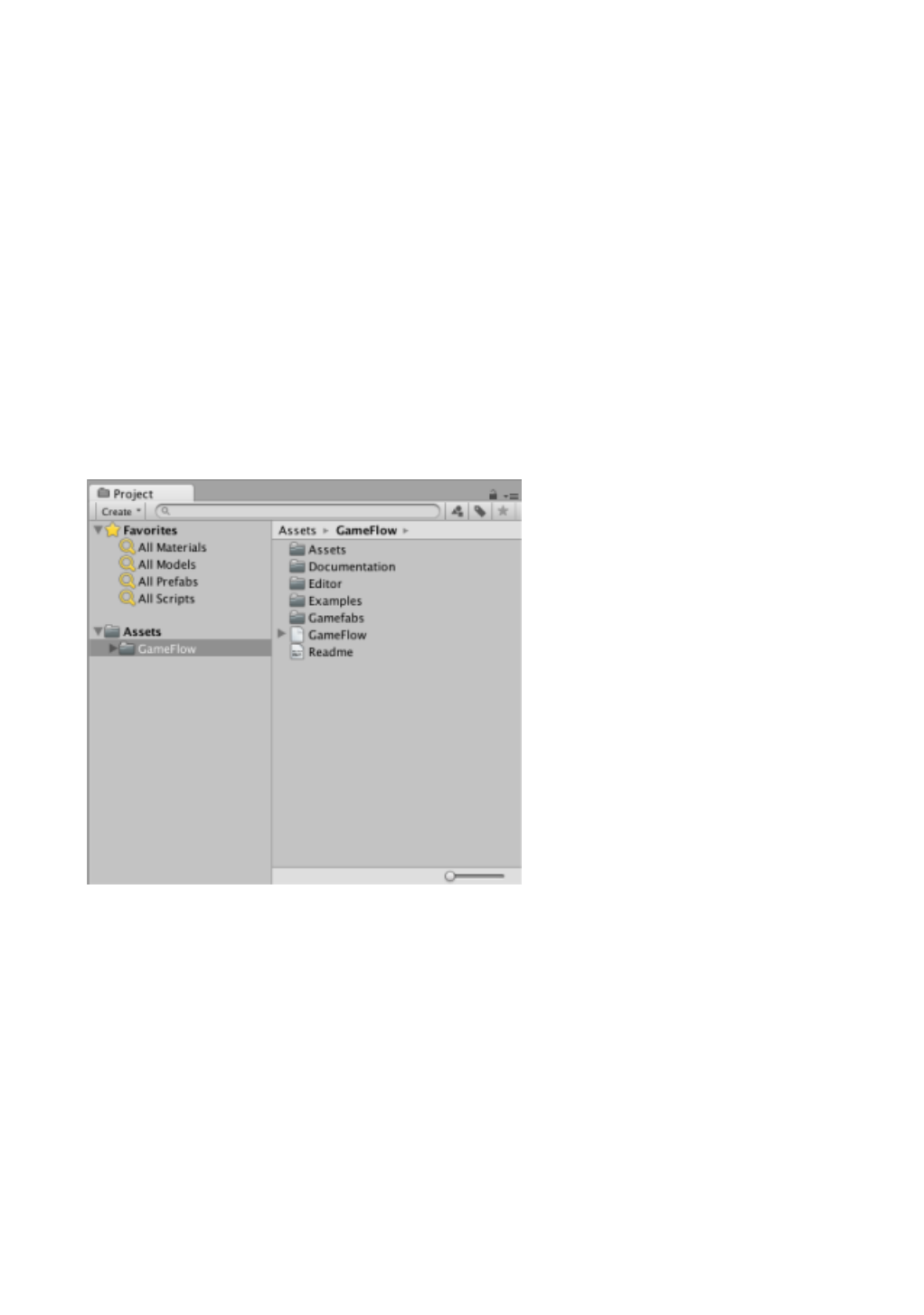
Afterimportandregardlessofhowwehavedone,weshouldnotethat
intheProjectwindowUnityGameFlowanewfoldercontainingafolder
ofdocuments,some.DLLfilesandaReadmefilecontainsreleasenotes
appear.
Update
Theupdateprocessisexactlyliketheinstallation,ascouldbeconsidered
are-importthepackage.Itshould,however,alwaysreadtherelease
notesforthenewversionpriortoupdatingtoensurethatitdoesnot
includechangesthatmayaffecttheproperfunctioningofourgameor
application.
Help
Documentation
Thedocumentationcontainingtheusermanualandreference
programmingAPIcanbefoundintherelevantsectionofthewebsite
GameFlow.Thissamedocumentationisalsoavailableforconsultation
offlineundertheGameFlow / DocumentationofUnityprojectwherewe
GameFlowimportingthepackagefolder.
ThemanualisinPDFformatwhilethereferencedocumentationisin
HTMLformat,currentlyonlyinEnglishandSpanish.
Contextual Help
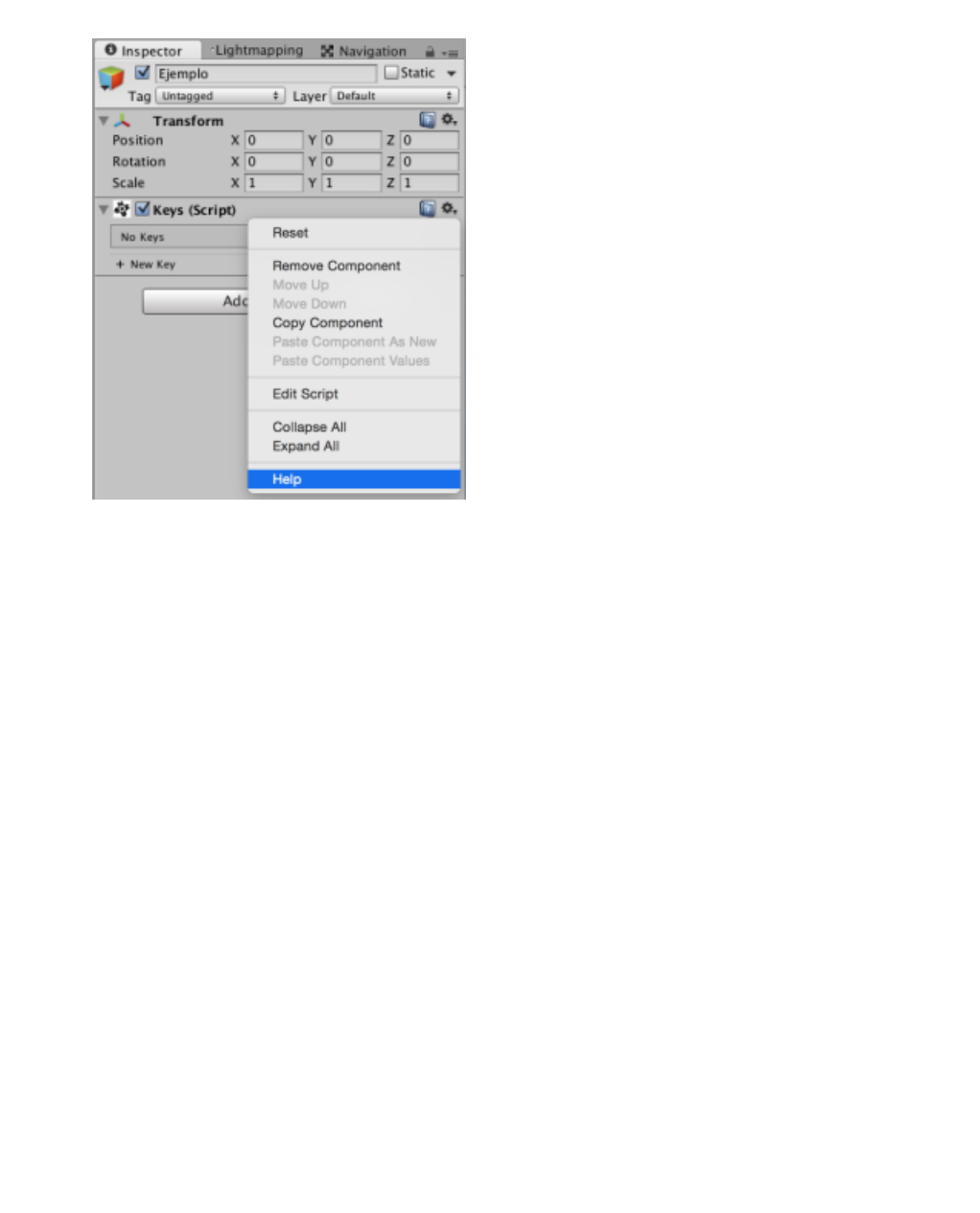
AstoaidintheUnityeditor,itisalwaysavailableasalastoptioninthe
contextmenuofeachelement.Thecontextmenuisdisplayedby
clickinganyofthemousebuttonsonthegeariconappearsintheupper
rightcornerofanycomponentorblockGameFlowintheInspector
window.
Quickhelpsummarizedinthewindowsforselectingactionsand
conditions,includinganiconthatgivesusaccesstotheselecteditem
pagemanualisalsodisplayed.
Tutorials
InthesectionoftutorialsontheGameFlowweb,newvideotutorialsthat
explainthroughshortexamplesdevelopingspecifictechniquesstepby
stepthatmaybeusefulwhendevelopingvideogamesareregularly
published.
Forum
Userswhoneedmorehelpcanbefoundontheofficialforum
GameFlow,asiteaimedatsharingexperiences,questionsand
knowledgewiththerestofthecommunity.
Basic Concepts
Basic Components
Containers
PremiumcomponentsaredisplayedintheInspectorwindowand
componentsofUnity,whosebasicfeatureisthattheycontainother
minorcomponentscalledblocks.InGameFlowthefollowingtypesof
containersaredistinguished:
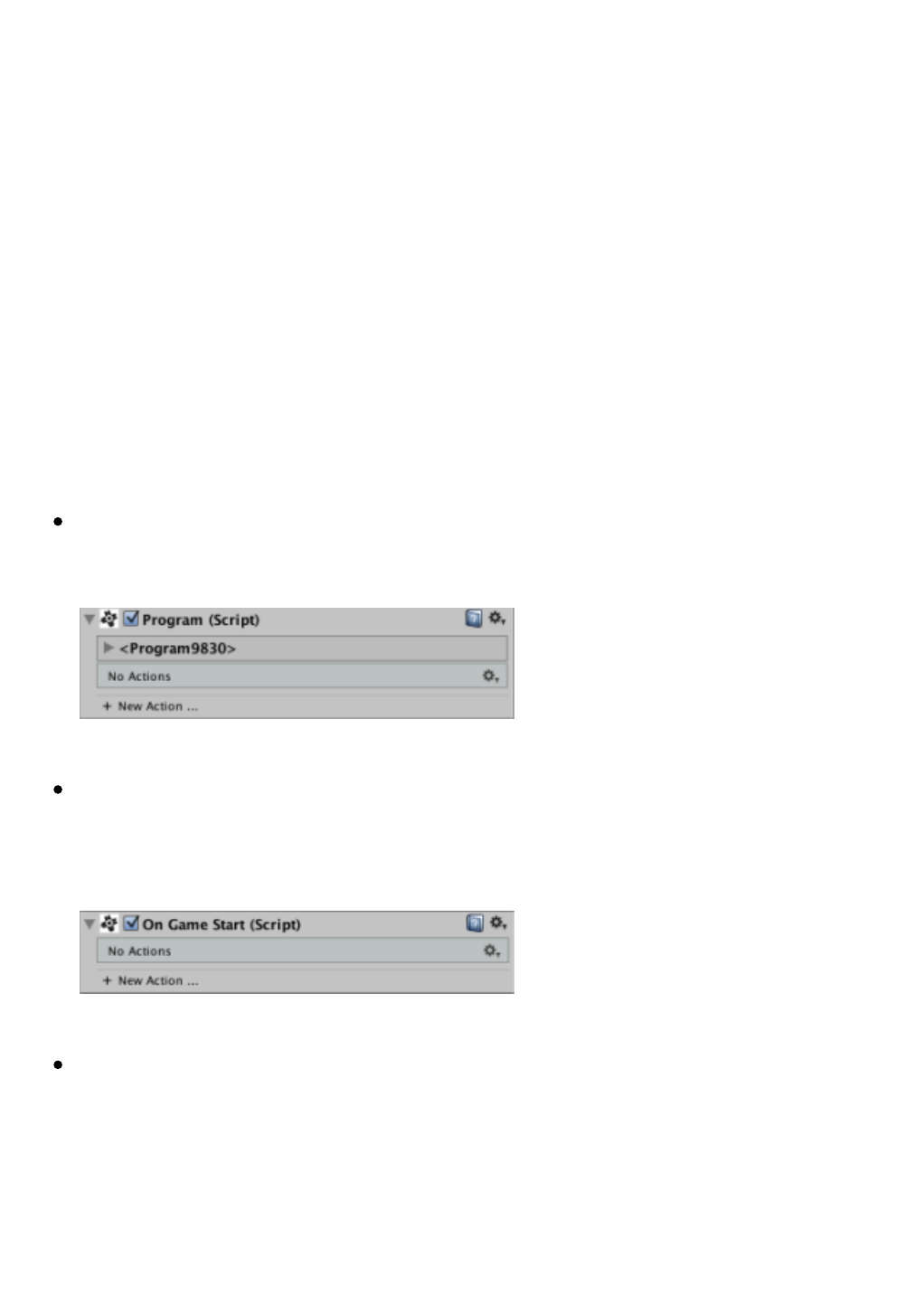
Program:Asequenceofactionstobeinactive(ie,notrunning)until
hisexecutionwasorderedexplicitly.
Programevent(On…):Asequenceofactionsthatstart
automaticallywhenaneventsuchasrecognizedbytheprogram
detected.
Variables:Alistshowingallvariablesdefinedwithintheobject.

Keys:Alistshowingallthekeysdefinedwithinthatobject.
Forces:Displaysallforcesdefinedwithintheobject.
Parameters:Showsallparametersdefinedintheobject.The
parametersareaspecialtypeofvariablesasdiscussedinthe
chapter.
Blocks
Theseareelementsthatcannotliveindependentlyoutsideofa
containerandplayingaparticularroleinthefunctionalityofthe
container.InGameFlowfindthefollowingtypes:
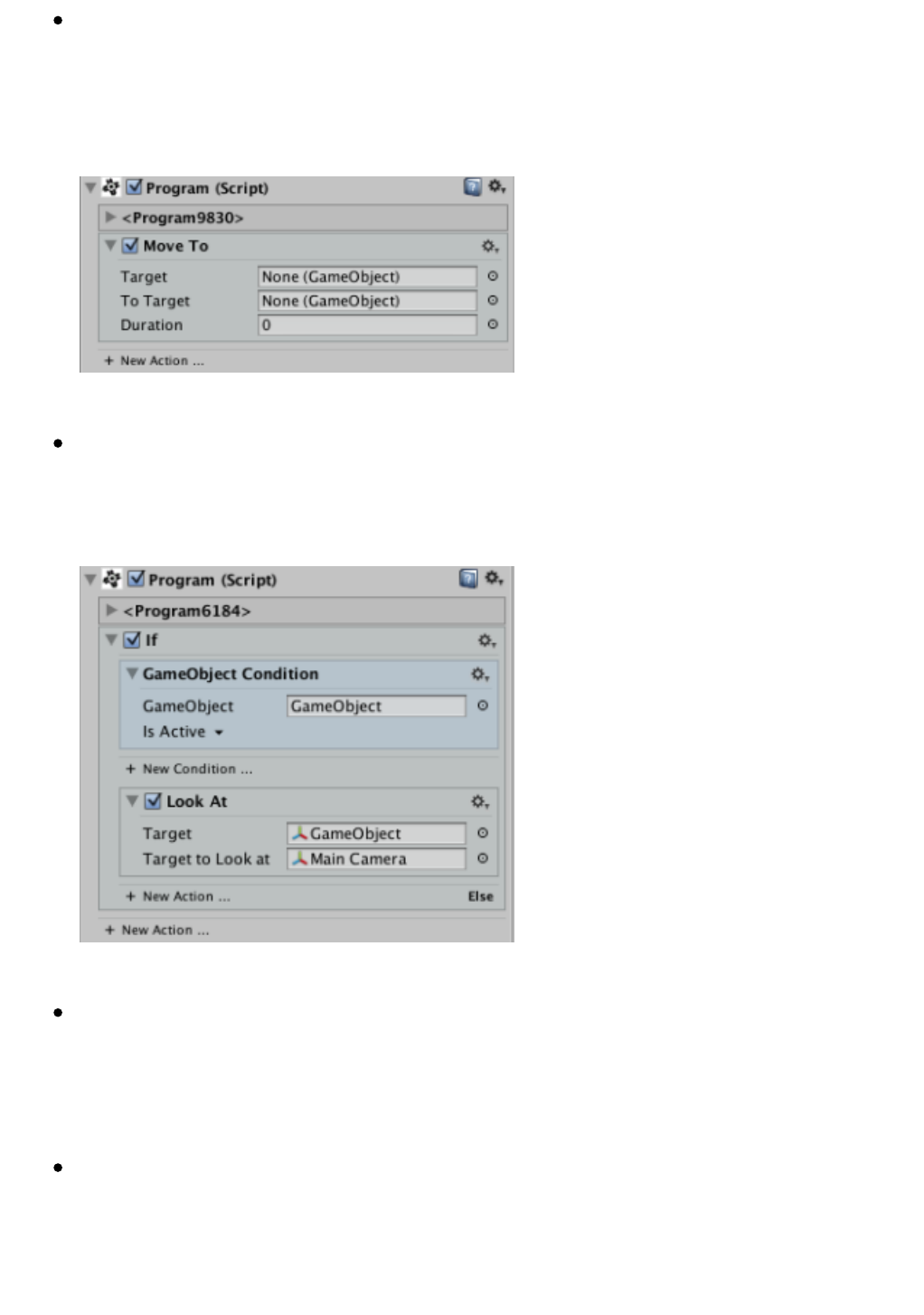
Action:Aprogramelementthatmakes(ifenabled)averyspecific
taskbasedonparametersorproperties.Mostactionsareexecuted
instantaneously,butothersonthecontrarywillrunduringthetime
intervalthatyouspecify.
Condition:Anelementoftheprogramthatperformsaspecific
assessmenttoreturna“True”or“False”resultthatcanbeusedfor
conditionalactionsasIforWhilecontrollingtheflowofaprogram.
Variable:Adynamicstorageunitthatcanstoreadataofacertain
type.Thegreatpowerofthevariablesistobeusedasthevaluefor
thepropertiesofvirtuallyanyelementofGameFlow:actions,
conditions,toolsorevenforothervariables.
Built-inVariable:Aspecialtypeofvariablethatcannotbeedited
becauseitstypeandvaluearealreadypredefined.Usuallyserveto
consultsysteminformationliketimeanddate,resolution,platform,
etc.
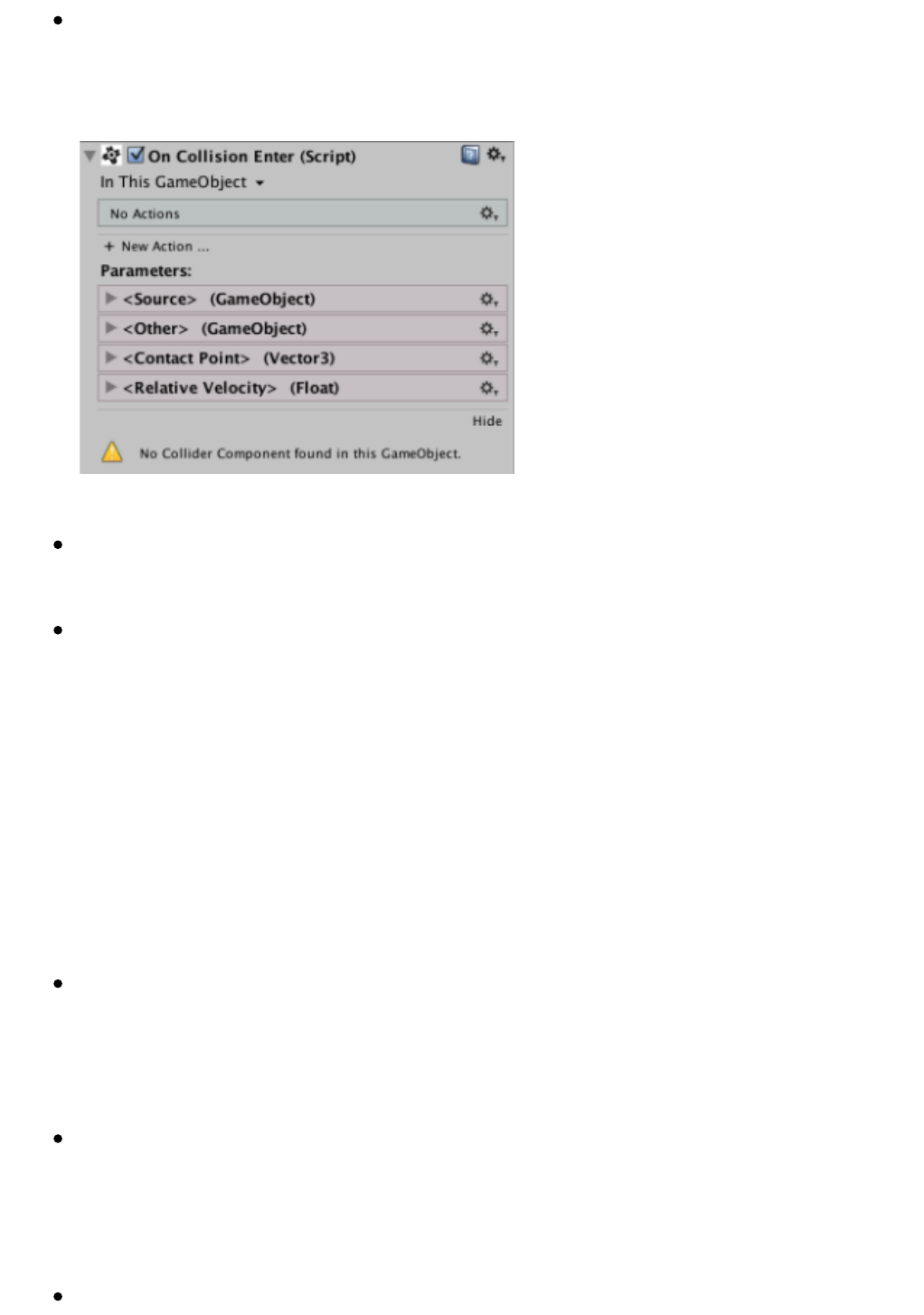
Parameter:Aspecialvariablethoughtthatservesbothtodisplay
theparametersofeventprograms(picturedright)toallowthe
constructionofparameterizedPrefabs.
Key:AkeydefinitionorwaytotellGameFlowwewanttomonitorthe
statusofthatparticularkey.
Force:Adefinitionofaforcethatcanbedisplayedintheeditor.
Tools
Theyarebasicindependentcomponentsthathavetheirownlogicand
itsownformofvisualediting,butareintegratedwithGameFlowto
withstandvariablesandbeingmanipulatedbyaseriesofactionsthat
workspecificallywiththem.Wecanaccessthemthroughthebrowser
andselectingcomponentsGameFlow>Tools.InGameFlowthefollowing
toolsaredistinguished.
List:Acomponentthatstoresasequentialsetofvalueswiththe
samebasetype.Likevariables,GameFlowlistsaredynamicandcan
bemanipulatedtoadd,insert,replace,ordeleteitemsinboth
runtimeandeditingtime.
Timer:Acomponentthatsendstimingeventsatregulartime
intervalswhich,incombinationwithaprogrameventasExpire On
Timerallowsexecutionofactionsfromtimetotimeeitherby
exhaustingatimeout.
Path:Acomponentthatdefinesapathinthespaceofthescene

fromaseriesofpoints,andthatcanbemanipulatedvisuallyandbe
coveredbytheobjectsofourgamebyFollow Pathaction.
Pool:Acomponentthatdefinesacollectionofpre-instantiated
objectsthatcanbeusedatruntime.Theuseofpoolsimproves
performanceinsituationswhereitisnecessarytocontinuously
displaymanyobjectsonscreen,anexamplewouldbeagameships
withmanyscreenshots.
Area:Acomponentthatletsyoudefineacubicareainthesceneand
whileactivatedanddeployedintheInspectorwillbedrawnatall
times.Itisusedtodefineareasofthegamewithouthavingtoresort
tousingBoxColliders.
EventController:Acomponentthatletsyoucontrolwhatevents
aredetectedandwhichareignoredbytheobject.
Note:Asimplecomponentthatallowsyoutoaddatextnotetothe
object,whichcanbeuseful,forexample,torememberwhyweset
certainparametersinaparticularwayatthetime.
Accessories
GameFabs
TheGameFabs(contractionGamePrefabs)areGameObjectsor
hierarchiesconfigurableGameObjectsthatoffercomponentsand/or
logicaluseroftenusedinvideogamesandwhoseincorporationintoa
juevoistrivial,socandramaticallyacceleratemountingprototype
games.GameFabslistisavailableontheGameFabschapter.
Utilities
Theyareintegratedtoolsthatdonotqualifycomponentsandtypically
dealwithconductspecialoperationsthatcangobeyondtheissue.An
exampleofusewouldbeintegratedGameFlowincorporatedintoa
futureversiondebugger.
Templates

ReadymadeTemplatesareincorporatingasystemconfigurationguide
andahigherlevelofGameFabs,asitisresponsiblefordefiningthe
configurationandinterrelationofthese.Thetemplatesupportwillbe
incorporatedinfutureversionsofGameFlow.
Programs
Aprogramisacomponentthatcontainsanorderedlistofactionsthat
theGameFlowenginewillrunsequentiallyallowingbothtogivelifeto
ourplaythingsandcontrollingtheflowofthegame,hencethenameof
thetool.
Aprogrammay,forexample,responsibleforcontrollingthemovement
ofourmaincharacter,whileanotherseriesofprogramscandealwith
managingtheenemies,controllingthegamemarkersandswitchthe
musictoreachcertainpartsofthestage.Basicallyprogramsgivelifeto
agame.
Creating programs
Aseverycomponent,aprogrambeginstoexistwhenaddedanobjectof
particulargame.ThiscanbedoneusingtheAdd Componentbuttonat
thebottomofthelistofcomponentsintheInspectorwindow,looking
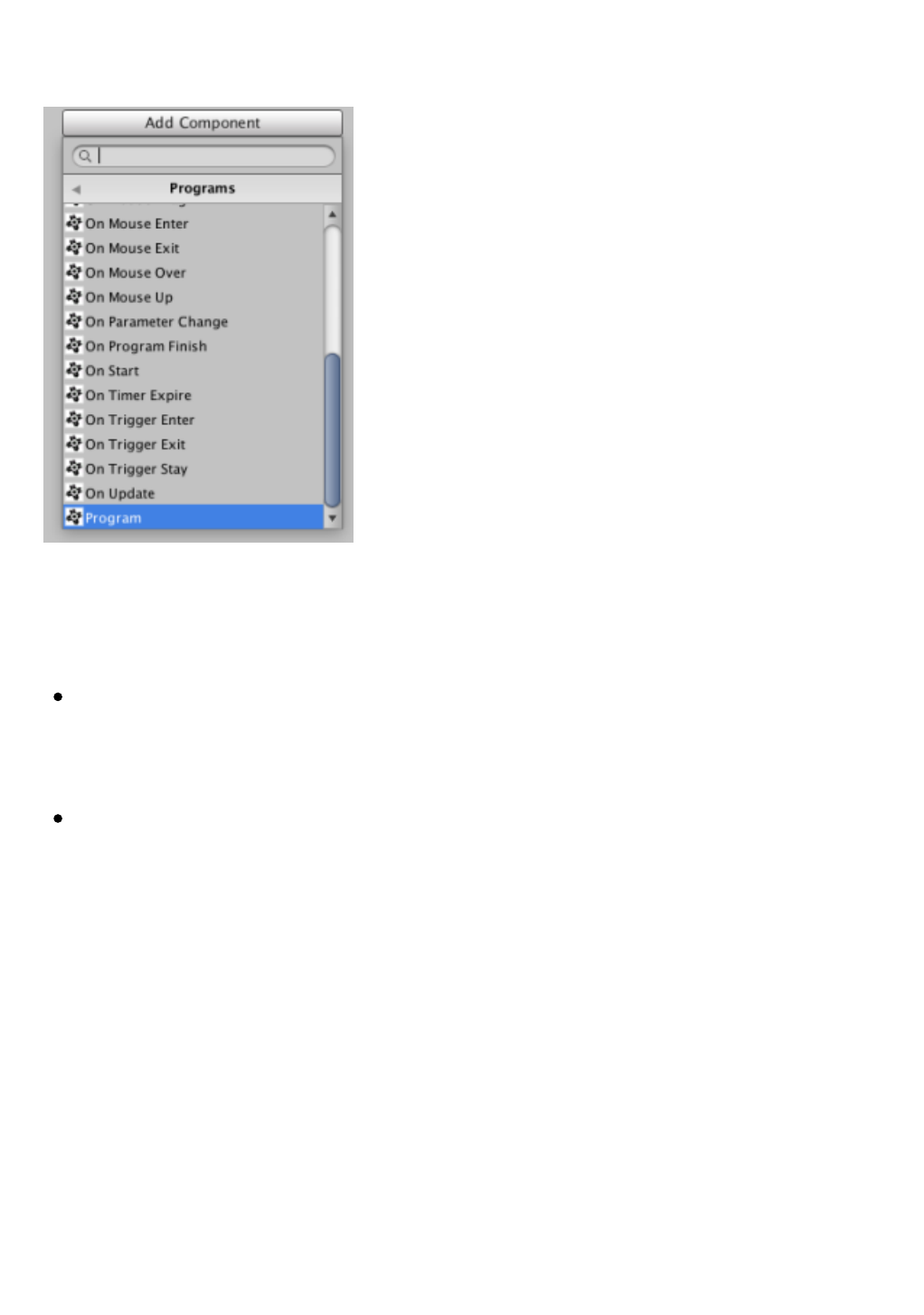
belowtheGameFlow> Programsmenuandthenselectingoneofthe
typesofprogramsavailable.
Asdiscussedbelow,consideringthewayaprogramrunsinGameFlow
twobasictypesofprogramsaredistinguished:
IdleProgram:Aprogramthatremainsinactiveuntiltheexecution
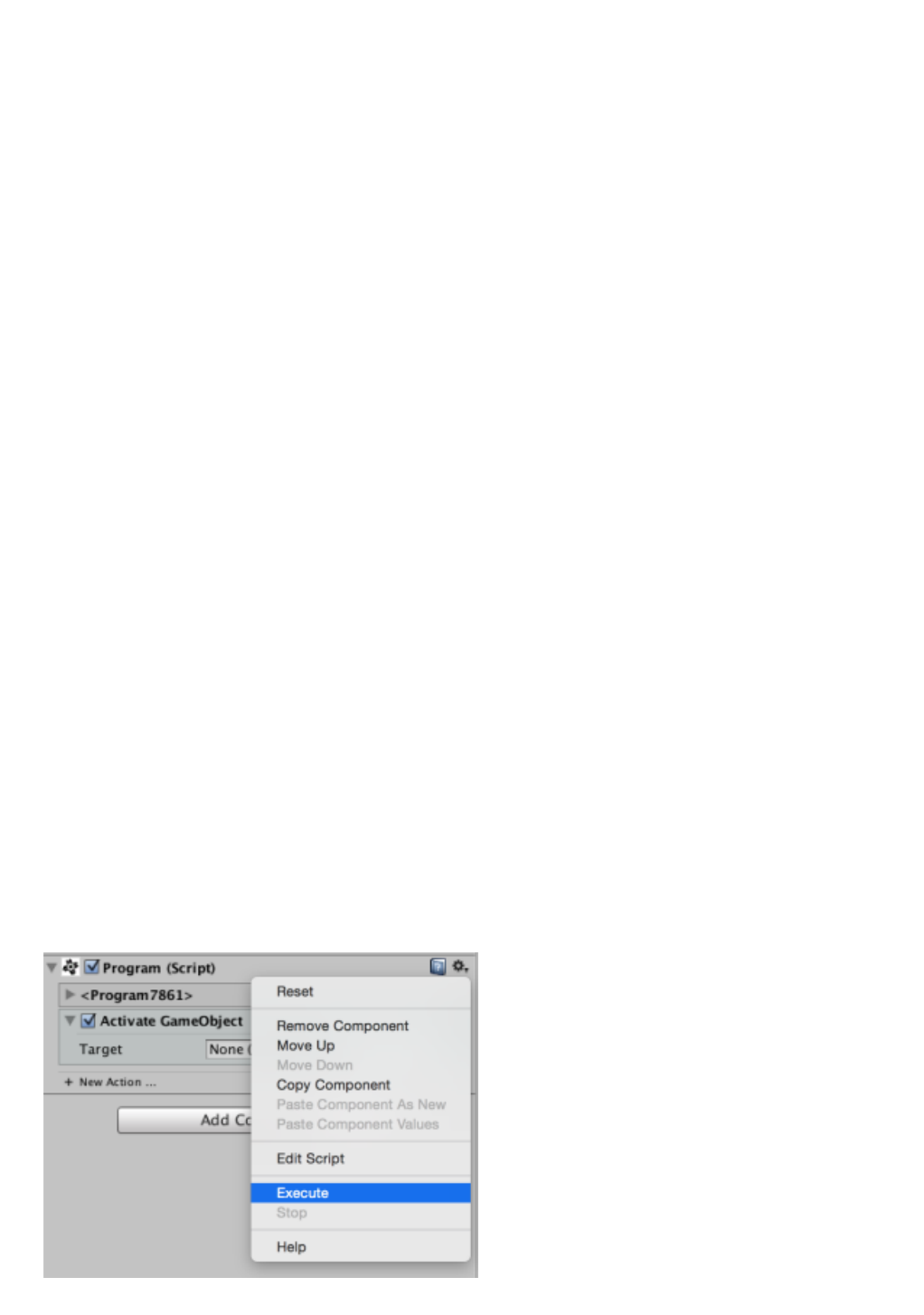
isorderedbyeitheranExecute ProgramactionortheExecute
contextmenuoption.
EventProgram:Aprogramthat,ifenabled,startsrunning
automaticallyrecognizedataneventtypeintherangeoflistening
detected.
Programistheonlyprograminactive,withallotherprogramsof
events.Besidesallprogramseventbeginswiththeword“On”soitis
easytodistinguishthem.
Adding actions
Theactionsarethebuildingblocksfromwhichprogramsarebuilt.They
canbeconsideredsmall,specializedcomponentsthatperformvery
specifictasksbasedonpropertiesthatyouspecifywithintheirownarea
ofeditingintheInspectorwindow.
ToaddactionstoaprogramwehaveaddedwecandoitusingtheAdd
ComponentbuttonInspectorandlookingbelowtheGameFlow>
Actionsmenu,butwe’llhavemorecontrolifweusethe+buttonNew
ActionthatappearsatthebottomoftheprogramareaintheInspector.
Sincethisbuttonappearsatthebottomofeachcontainerofshares,
whethertheprogramitselfthatisanactioncancontainotheractions
asWhile,useallowustodecidewhereexactlytheprogramwewantto
addtheaction,whichwillbemorecomfortabletowalkthenrearranging
theshares.
Also,usethisbuttonwillallowustofindsharesinaneasiermannerasin
thiscaseinsteadofusingthemenuofstandardcomponentsofUnity,a
specialwindowforselectingactionspreparedespeciallyforthistaskwill
open.
Thisnewwindowwillshowusinauniquelistallavailableactions,both
whichbringsthetoolsetasactionscreatedasuserviaAPIGameFlow,
alongwithfastintegratedhelpthatwillallowustogetabetterideathe
purposeofeachaction.
Tochooseanactionjusthavetomovewiththeupanddownarrowsand
pressEnter,ordouble-clickdirectlyontheactionyouwishtoincorporate
intotheprogram.
Thewindowalsohasasearchfilterthatwillallowustoquicklyfilter
actionssothatonlythoseremainingintheirnameenteredtext.Inthe
futurethefilteringmechanismofthiswindowwillbeenhancedtoalso
incorporatesearchbytags,sothattheuserismorelikelytofinda
suitablefortheirpurposesaction.
Order of execution of actions
Asindicatedatthebeginningofthechapter,theactionsinaprogram
areexecutedinsequentialorder,iestartwiththefirstactionprogram
andcontinuesitsexecutionuntil,atwhichpointitbeginswiththe
executionofthesecondactionfromthelist,andsoonuntiltheendof
theprogram.
Asdiscussedinthechapteronflowcontrol,thisisthedefaultorderof
executionforalinearprogram,butbyusingspecialactionssuch
asGrouporIfyoucanvarythisorderofexecutionsothatitisnot
entirelysequentialandbettersuitedtodifferentusecases.
Execution Contexts
Mostprogramsonlyeventwillbeexecutedatruntime(iewhenwehave
giventhePlaybutton)andnotduringeditingtime(iewhileweare
workingontheeditorofUnity)becausetheMosteventsarenot
generateduntilthegameisnotrunning.
However,itisimportanttonotethatGameFlowallows
anyProgram(inactiveprogram)isalsoimplementedintimeediting
usingtheExecuteoptiontothecontextmenu,whichcanbeveryuseful
bothforfastperformancetestswithoutbootingthestaketoautomate
editingtasksprogrammatically.


Actions
Theactionsarethebuildingblocksfromwhichprogramsarebuilt.They
canbeconsideredsmall,specializedcomponentsthatperformvery
specifictasksbasedonpropertiesthatyouspecifywithintheirownarea
ofeditingintheInspectorwindow.
Mostactionsareexecutedinatimelyandinstantlywhentheirturn
comeswithintheirprogram,butotheractions,however,aredesignedto
runduringatimeinterval,reasonwhytypicallytheseactionsincludea
Durationproperty.
Besidesthis,anotherdifferenceofactiononatypicalUnity
script(MonoBehaviour)isthatactionsaredesignedtobeappliedona
targetthatdoesnotnecessarilyhavetomatchtheGameObjectthat
containstheprogramitbelongstotheaction.
GameFlowactionsarerepresentedascollapsibleblockshavingitsown
interfaceasasubcomponent.Ifactioniscollapsed,itonlyshowsitstitle
bar.Iftheactionisexpandedorunfoldedthenitwillalsodisplayallits
properties.Thecoloroftheseblocksisintentionallyslightlydifferentto
thedefaultbackgroundcoloroftheInspectorwindow.
Thereareactionsthatcaninturncontainotheractions,such
asFororRepeatactionsthatallowbuildrepeatloops.Inthesecases,the
actionscontainedaredisplayedwithintheareaofthecontainingaction
withalevelofindentation.
Editing operations
Mostoperationsthatalloweditingtimesharesareavailableinyour
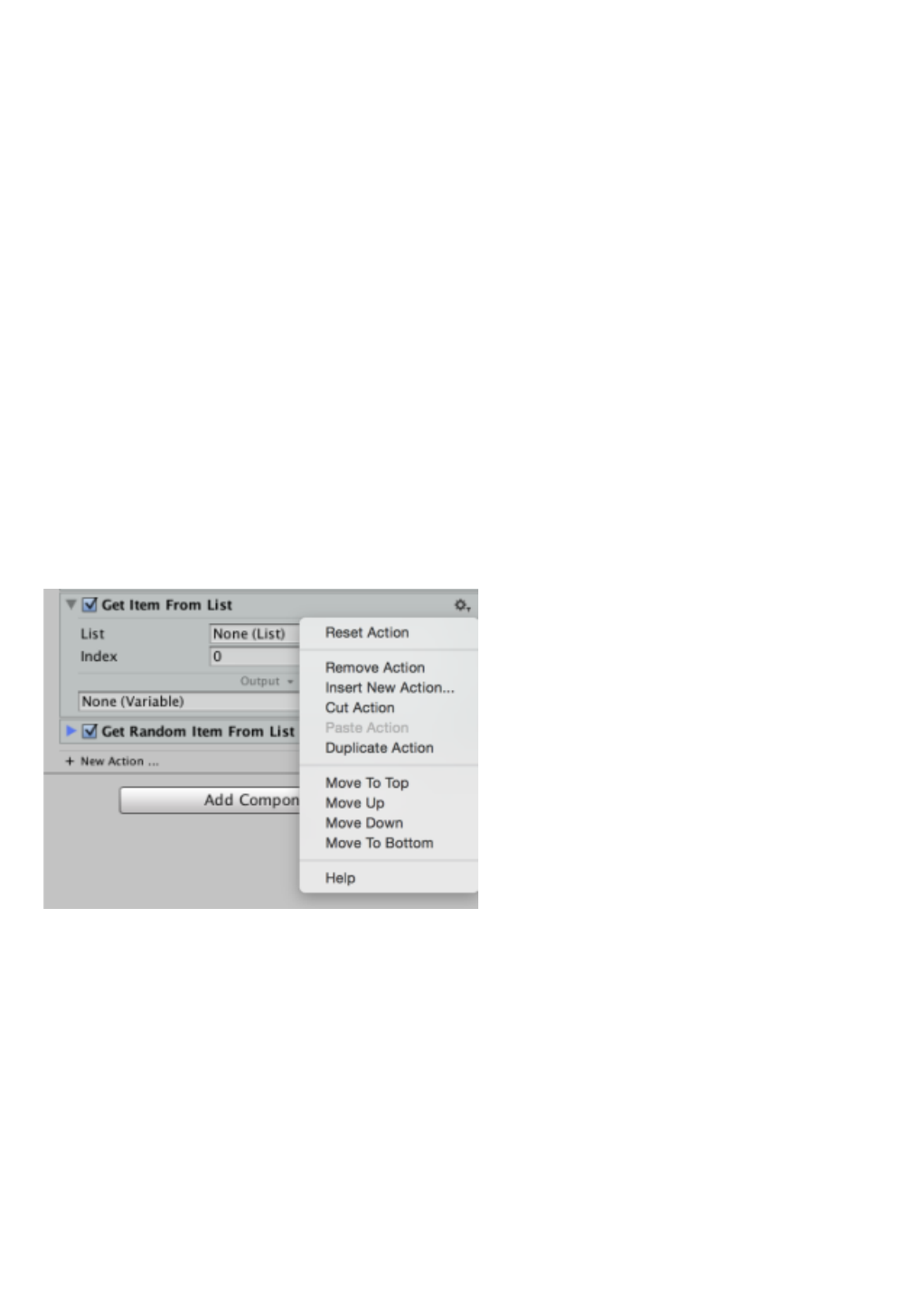
context(geariconontherightsideofthetitleareaofaction)menu.
Collapse / Expand
Anactioncanbeeitherexpandedorcollapsedbyclickingonthearrowin
theupperleftcornerofitstitle,orbyclickinganywhereinthetitlearea
ofaction.
Activation / Deactivation
Toenableordisableanactionsimplycheckoruncheckthecheckbox
thatprecedesitstitle.Enablingordisablingeditingdoesnotaffectthe
propertiesoftheaction,onlyitsimplementation.Offactionwillnotbe
executedbytheprogram,whichwillcontinueexecutionatthenext
triggeredaction.
Rearrangement
Anactioncanbemovedtoanotherplaceintheprogrameitherthrough
theactionsofmovementfromitscontextmenu(Move to Top, Move Up,
Move Down, Move to Bottom)orviaadraganddrop(drag and
drop)initiatedwithaclickonitstitlebar.
Anactionmayalsobetransferredtoanotherprogrambydrag and
droplongasbothprogramsarecontainedwithinthesameGameObject.
Finallyyoucanalsomoveanactionprogramtoprogramactions
usingCutandPaste Action Actioncontextmenu,butagainwiththe
limitationthatbothprograms,boththesourceofactionandtarget
areGameObjectcontainedtherein.
Note:thereiscurrentlynoactionAction Copy,butitsimplementationis
plannedinfuturereleases.

Reset
Anactioncanberestartedtotaketheirdefaultvaluesusing
theResetoptionfromitscontextmenu.
Removal
AnactioncanbeeliminatedbyAction Removeoptionfromitscontext
menu.
Insertion
YoucaninsertanewactionbeforeanotherusingtheInsert New
Actionoptionfromthecontextmenuthataction.
Duplication
YoucanduplicateanactionusingtheDuplicate Actioncontextmenu
option.
New action
Inthoseactionsthathavetheabilitytocontainotheractionssuch
asIfby+ New Actionbuttonappearsatthebottomoftheareaofaction
whenclickedwilldisplaythewindowforselectingactionstoaddactions.
Editing Properties
EditingpropertiesofanactionisperformedasinanyotherpartofUnity,
withsomeslightdifferences:
Somepropertiesmayhaveadditionaloptionsascontextmenus
associatedwithyourtags,whichareindicatedintheinterfacewitha
smallarrowpointingdowntotherightofthetitle.Anexampleis
foundintheDirectionpropertyoftheAddActionForce,whichlets
youspecifythetypeofinputvaluebythislabelincorporatedintothe
contextmenu.
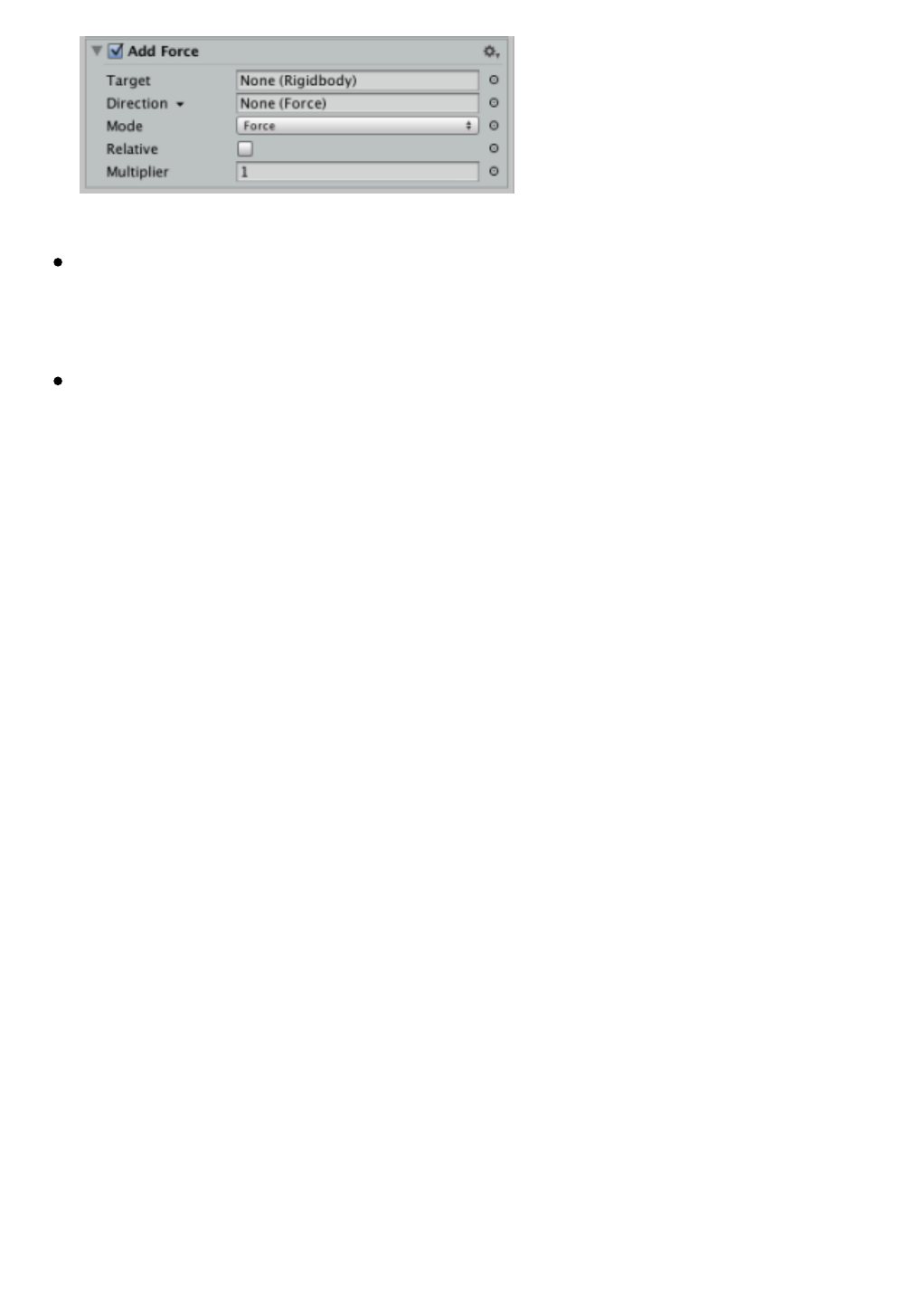
Mostpropertiesareofanytype,incorporatedontherightsidea
smallcirclethroughwhichitispossibletoassociate,asdiscussedin
thenextchapter,avariable.
Someactions(usuallythosewhosenamesbeginwiththe
wordGet)incorporateaspecialfieldtospecifyanoutputvariable,and
thisfieldcanbedrawnasanothervariableforeasewhencomposing
programs.
Help
YoucanconsultthehelpofanactionundertheHelpoptionfromthe
contextmenu.
Implementation of measures
AlthoughthemajorityofthingsonGameFlowaredesignedtorunat
runtime,onlysomeofthesealsoworkineditingtime.Whenanaction
maynotrunontimeeditingGameFlowindicatethisbysendinga
warningmessagetotheconsole.
Moreover,therearealsoactionsthatperformonlyeffectivewhen
executedontimeeditingandwillbeignoredatruntimenotmakesense
inthiscontexttask.
Available Actions
ThefollowingisalistofactionscurrentlyincorporatedinGameFlow
organizedbyfunctionality.
Activation
ActivateGameObject
ActivateGameObjectsInList
DeactivateGameObject
DeactivateGameObjectsInList
DisableBehaviour
DisableBehavioursInList
DisableCollider
DisableProgram
EnableBehaviour
EnableBehavioursInList
EnableCollider
EnableProgram
Variables
DecrementVariableValue
DivideVariableValue
IncrementVariableValue
VariableLimitValue
MultiplyVariableValue
SetVariableValue
ToggleVariableValue
Lists
AddItemToList
ClearList
GetItemFromList
InsertItemInList
RemoveItem
FromList
SetIteminList
Flow Control
Break
For
Group
If
Loop
Repeat
RepeatUntil
RestartProgram
While
Execution
ExecuteProgram
StartProgram
Publisher
ProgressCloseWindow
SetupProgress
ShowProgressWindow
ProgressUpdate
Strings
ConcatenateStrings
GetStringLength
GetSubstring
ReplaceStringIn
Documentation
Comment
Creating Objects
Clone
CreateEmptyGameObject
Instantiate
Destruction of objects
Destroy
State of play
GameOver
StartGame
PauseGame
ResumeGame
TogglePause
Trajectories
FollowPath
GetPathProperty
SetPathProperty
Motion
Follow
Interpolate
LookAt
MoveTo
Rotate
RotateTo
Animation
PlayAnimation
SetAnimatorState
Transform
GetPosition
GetRotation
GetTransform
GetTransformProperty
SetPosition
SetPositionFromScreenPoint
SetRotation
SetTransformProperty
GetWorldPointFromScreenPoint
Audio
GetAudioProperty
SetAudioProperty
PlayMusic
PlaySound
PlaySoundAtSource
StopMusic
StopSoundAtSource
ToggleAudioMute
GUI
GetGUITextProperty
GetGUITextureProperty
SetGUITextProperty
SetGUITextureProperty
Timers
WaitForTimer
RestartTimer
ResumeTimer
StopTimer
Cameras
GetCameraProperty
SetCameraProperty
Pools
GetObjectFromPool
GetPoolCapacity
ResetPool
Random Values
GetRandomColor
GetRandomItemFromList
GetRandomNumber
GetRandomPointInCollider
GetRandomPointInColliderList
GetRandomVector
SetRandomSeed
Restrictions
Confine
SetDistance
GetDistance
Persistence
SaveData
Mouse
HideMouseCursor
ShowMouseCursor
Scenes
LoadScene
GetSceneProperty
Depuration
ClearConsole
LogMessage
PauseEditor
HelloWorld
Navigation
SetNavMeshAgentDestination
Physics
AddForce
GetRigidbodyProperty
GetVelocity
VelocityLimit
Sleep
SleepList
WakeUp
WakeUpList
SetRigidbodyProperty
SetVelocity
Time
SetTimeScale
Wait
GameObjects
GetGameObjectProperty
SetGameObjectProperty
SetParent
Vectors
GetVectorComponent
SetVectorComponent
Visual Effects
SetColor

Application
SetApplicationProperty
ExitGame

Variables
Avariableisacomponentwhichbehavesasadynamicstorageunit.This
meansthatcancontainacertaintypeofdata(text,anumber,acolor,a
referencetoanobject,etc.)andalsobeusedinplaceofsuchavalue
whereGameFlowsupportstheuseofvariables.
SoifforexamplewehaveanactionasSet Color,usedtochangethe
colortoanobject,andrequiresasoneofitspropertiescolorwewantto
changethesubject,wewouldhavetwowaystoindicatewhatshouldbe
saidcolor:
1. Assignthepropertyaparticularcolor,egthered-directlythroughthe
colorpicker,or
2. AssigningaVariablepropertytypeColorindicatingthatwewantto
useasacolorvalueofthevariable(whichwillalsobeacolor,eg
green).
WhathappenswhenyourunthegameisthattheactionSet Colortobe
executedbyaprogramwillevaluateinturnthevalueofeachofthe
variableswhichareassignedtodetermineitspresentvalue.Inother
words,andreturningtoourexample,whatwillhappenisthattheaction
variableask:“Whatcolordoyouhaveatthistime”andthevariablewill
respondwithavalueof“green”,whichwillbethecolorthataction
eventuallyuseforitspurpose.
Sinceitispossibletochangethevalueofvariablesasmanytimesas
neededthroughoutthelifeoftheprogram,whichoffersintegrated
variablesGameFlowsupportistheabilitytobuildprogramsorusetools
withinputvaluesdynamicthatmayvarydependingonthestateofthe
gameorasotherparameters.
Foritsdynamicnature,inagameweoftenfindtheneedtoworkwith
variables.Someexamplesthatsuggestusewouldbe:createascoring
track,controlthedamagestateofourcharacter,keeptrackofthe
numberofcollectedobjects,etc.
Create variables
Thevariableslivelikeanyanothercomponentwithin
aGameObject,thustocreateitisonlynecessarytoadda
componentVariabletype:
UsingtheAdd ComponentbuttonintheInspectorwindow,or
UsingthemenuComponent> GameFlow> Data> Variable.
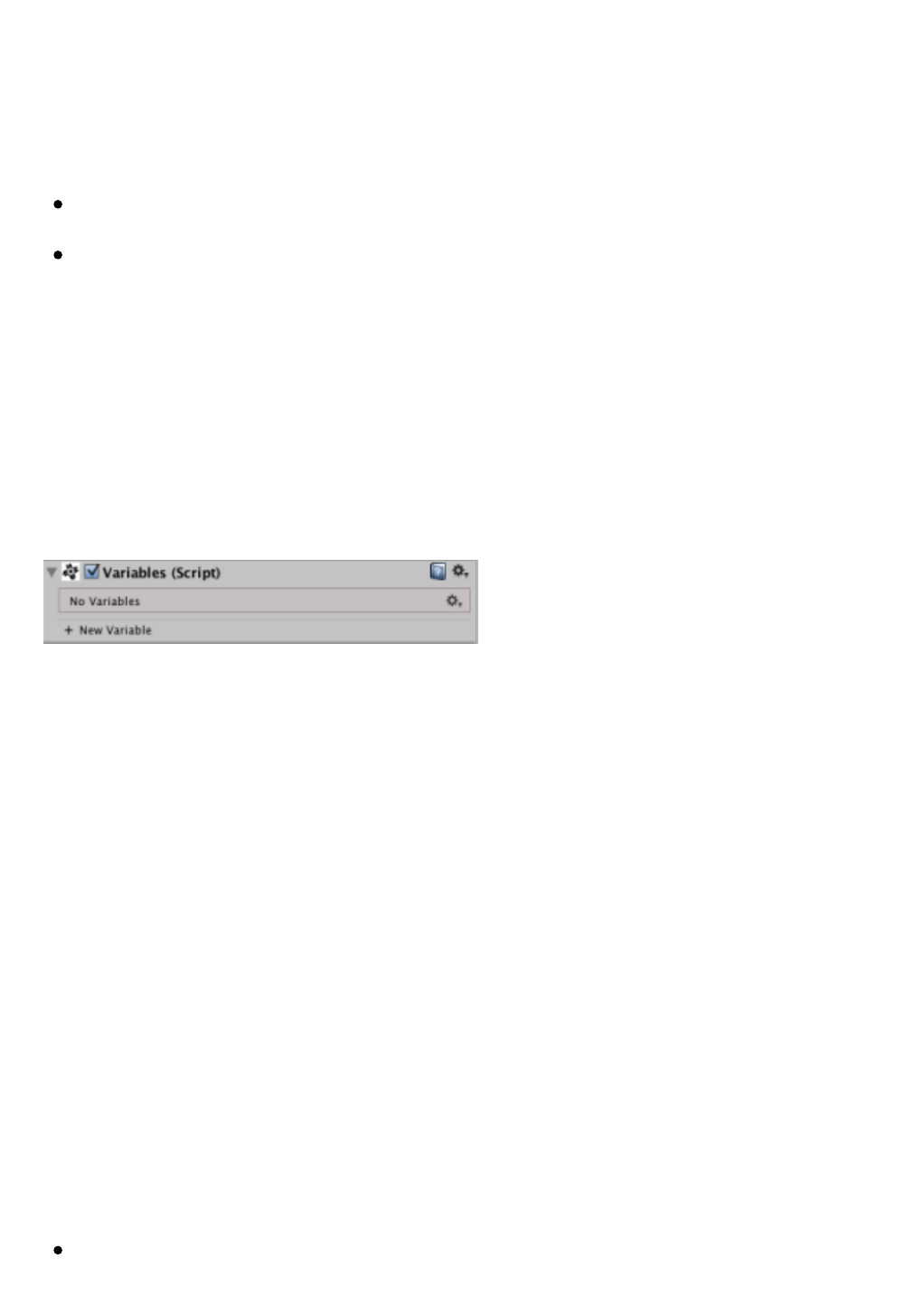
IneithercaseifyouarecreatingthefirstvariableintheVariables
GameObjectonecomponent(plural)thatwillactasacontainerforall
blocksofvariablerateweaddtheobjectiscreated.
Fromtherewewillhaveavailableathirdwaytoaddanewvariable
usingthe+ New Variablebuttoninthelowerareaofthecomponentin
theInspectorwindow.
Wewillalsohaveseveraladditionaloptionsinthecontextmenuofthis
componentVariablessuchastheResetoptionoroptionsCollapse
All/Expand Allthatrespectivelyallowustocollapseorexpandall
variablesoftheobjectinonestep.
Definition of variables
Todefineavariablesimplygiveitanappropriateidentifiertothe
purposewewanttogivethevariable,indicatethetypeofdatayouwant
tostoreinitandgiveitaninitialvalue.Optionally,wecanalsoindicate
whetherwewantthevariableispersistentornot.
Type
ThetypessupportedbyGameFlowvariablesare:
String:Text.
Integer:IntegerNumbers.
Float:Decimalnumbers.
Boolean:TrueorFalse.
Vector2:2-dimensionalvector(X,Y).
Vector3:3-dimensionalvector(X,Y,Z).
Rect:Rectangle(X,Y,Width,Height).
Color:Color.
Object:Areferencetoanobject.
Enum:Anenumerationvalue.
Toggle:Markedorunmarked(equivalenttoBoolean).
Tag:GameObjectTag.
Layer:GameObjectLayer.
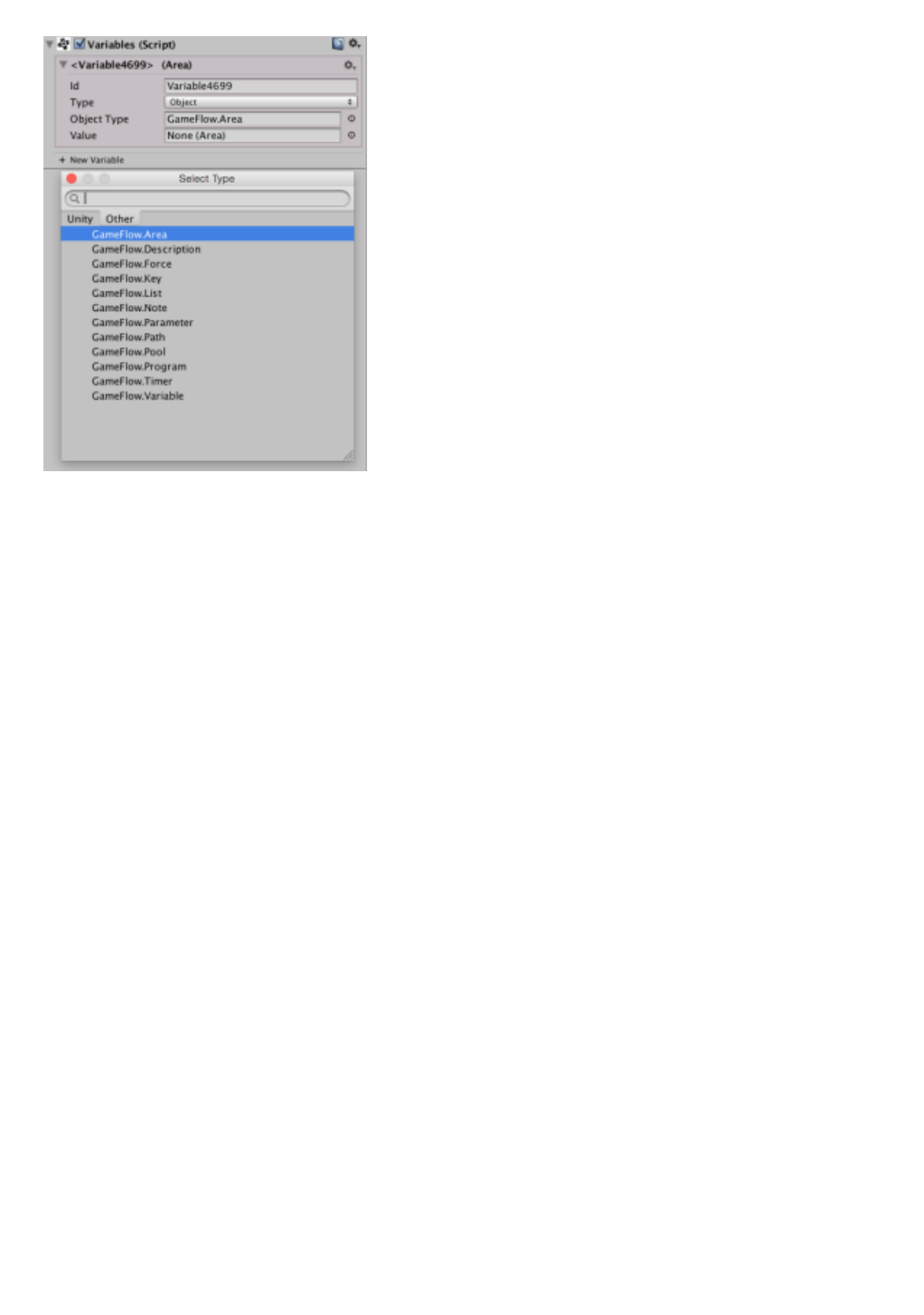
Type Specification
TheObjectandEnumtypesrequireadditionalspecificationofthe
particularobjecttypeorenumerationcontainingthevariablethatcan
bedonebyaspecialselectionwindowtypesorganizedintotwotabs:
Unity Tab:containsonlythetypesofUnityusableinGameFlow.
OtherTab:containsonlyGameFlowtypesandtypesthattheuser
hasdefinedthroughtheirownscripts.
Conversions type and value
WecallType Castingtotheautomaticmodificationofthetypeofa
variableVariableGameFlowperformedwhenthisismodifiedbysome
actionthatreturnsvaluesthatareofadifferenttypetothevariablehad
atthattime.
ThismeansthatinGameFlowvariablesaredynamictypeand
automaticallyadaptwhenusedtostoreadatatypedifferentfromthat
initiallyhad.Thishasitsadvantages,butalsodisadvantagesshould
thereforebetakenintoaccount.
TheotherconversionoperationisautomaticallyperformedGameFlowto
trytoconvertthecurrentvaluetothenewtype,whenallyoumodifythe
typeofthevariable,whichisnotstrangeperformatauthoringtime.
Thus,ifinavariableoftypeStringhavethealphanumericvalue“3”and
suddenlywedecidedtochangethetypeofthatvariable
toInteger,GameFlowwhathewilldoistrytomakethebestpossible
conversionofuservalues.Inthisexampletheconversionispossibleand
thevalueshallbeupdated,butiftheconversionisnotpossiblethevalue
ofthevariablewouldbecomethedefaultforthenewtypechosen.

Editing operations
Editingoperationsareessentiallythesamefortheactionslistedinthe
previouschapter,exceptthattheCutandPasteoperationsarenot
available.
Assignment by drag & drop
Perhapsthemostimportantoperationthatweshouldknowaboutthe
variableswecanassigntovirtuallyanypropertyofanyoftheactions,
conditionsortoolsincludingGameFlow.
Todothis,simplyclickonthetitleblockvariablewewanttodragupthe
propertyyouwanttoassignthevariableandonceobservethatthefield
ofpropertyisdrawnwithanotherfund,releasethemousebutton.
Assignment with object selector
Theotherwaytoassignavariabletoapropertyistoclickonthesmall
circlethatappearstotherightofthefieldvalueofthepropertytoshow
usawindowGameFlowselectionofspecialobjects,whichresemblesthe
standardUnitybutthatisnotso.
Thefirstdifferenceyouobserveregardingthestandardwindowisthat
theselectorGameFlownotleftasthestandardinthelevel
ofGameObjectsbutisabletoreachthelevelofcomponents,whycan
seeeachandeveryoneofthevariablesthatwecreatedintheproject
andinthescene,eachconvenientlylabeledwiththeidentifierthat
wouldhaveputhim.
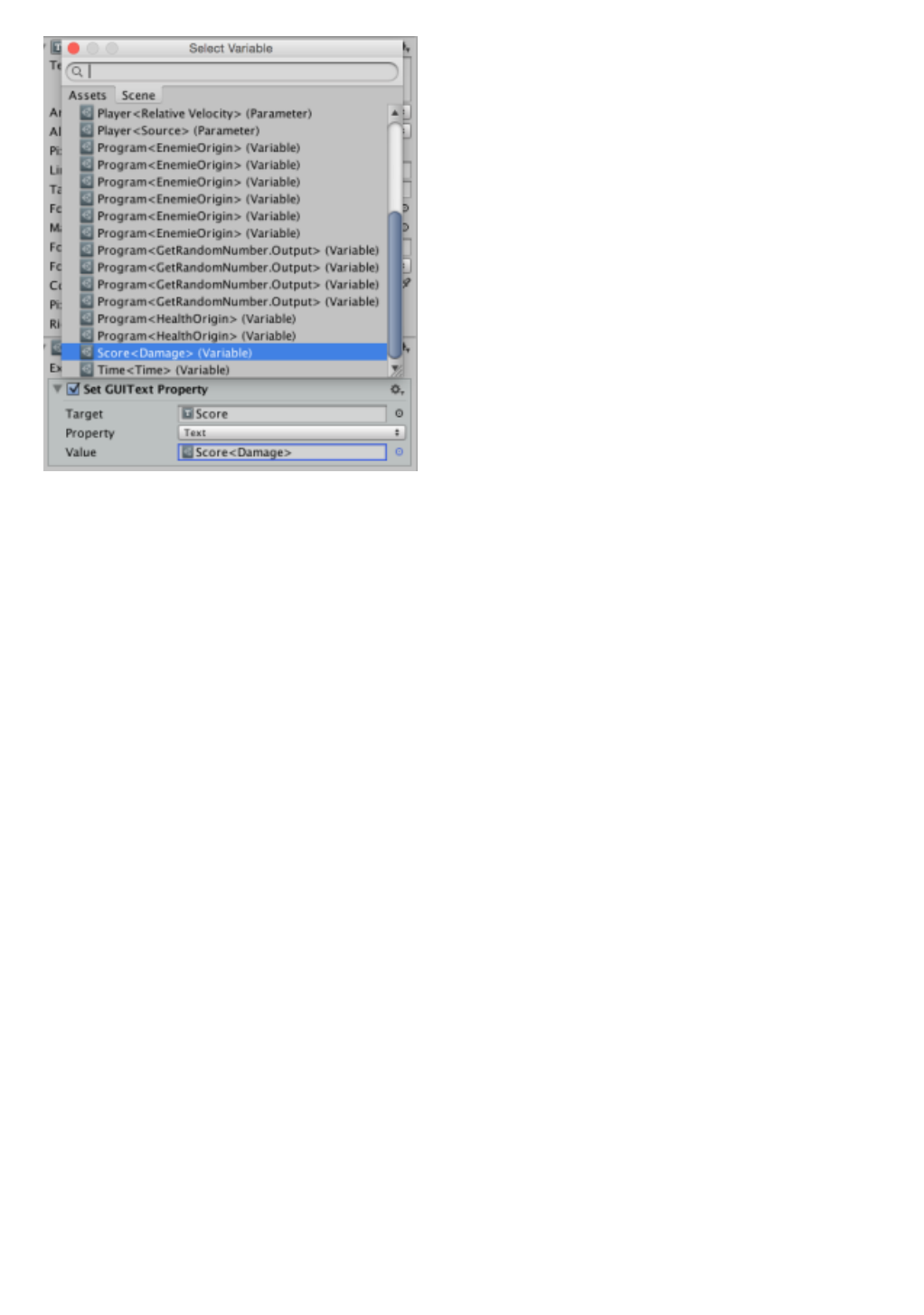
TheseconddifferenceisthatGameFlowobserveaddsanextratabthat
willallowustoseeonlythevariablesdefinedwithinthecurrently
selectedGameObjectorifthisbelongstoaprefab,seeonlythevariables
definedwithinthehierarchyoftheprefab.Thisisespeciallyconvenient
whenyou’rebuildingprefabs,ithelpsustofindthevariablesthatwe
seekandmakesureweneverchooseanexternalvariabletoprefab
faster.
Itshouldalsobenotedthatwhenthepropertywewanttochangeisof
typeobject,theselectorwillallowustochoosebothobjectsofthattype
(whethertheyarecomponentslikeGameObjects)asvariables,sothe
workmodeisidenticaltothatdiscussedandifwewantistodirectly
assignobjectreferencestothetraditionalwayofUnityitcanalsobe
donewithoutanyproblem.
Built-in Variables
Built-inVariablesareaspecialkindofvariableswhosevaluecannotbe
determinedbytheuserbutisalreadypredefined(arevariablesread-
only)andallowustoconsultdynamicsystemsettings,suchasthe
currentdateorresolutionscreen,inasimplemanner.
Allthepredefinedvariablescanbefoundandaddedtotheprojectas
partofprefabBuilt-inoftheGameFlow / Assetsfolderofyourproject,so
youcanfindthematanytimeinAssetstabofthewindowobject
selection.
Thentheintegratedvariablesavailableareasfollows:
Built-in<Day>:Dayofthemonthofthecurrentdate.
Built-in<DeltaTime>:Timeelapsedsincethelastframe.
Built-in<DeviceName>:Nameofdeviceruntime.
Built-in<Hour>:Currenthourin24hformat.
Built-in<Minute>:Currentminute.
Built-in<Month>:Numberofmonthofthecurrentdate.
Built-in<MousePosition>:Currentpositionofthemousepointer.
Built-in<NativeResolution>:Nativeresolutionofthedisplay.
Built-in<ScreenSize>:ScreenResolution/currentwindow.
Built-in<Second>:Currentsecond.
Built-in<Year>:Yearofthecurrentdateinlongformat.
Persistence
Whenwespeakof“persistence”talkabouttheabilityofcertaindatais
notdeletedwhenyouleaveourgamebutremainstoredinthe
nonvolatilememorydeviceonwhichwerunourgamesowecanrestore
themthenexttimeyoubootthegame.
Thisisveryusefulinvideogamesbecauseitallowsustosavevaluable
informationontheprogressoftheplayerorthelaststateinwhichthe
gamewassothatwecanimplementinarelativelysimplewaygames
thatallow“continue”agameinthelastpointbeingmadeorwithout
goingsofarastosimplyrememberwhatwasourbestscore.
GameFlowofferssupporttransparenttotheuserandintegrated
variablepersistence,butfortechnicalreasonscanonlybeusedon
variablesthatareNOToftypeObject.Allwehavetodotogetthevalue
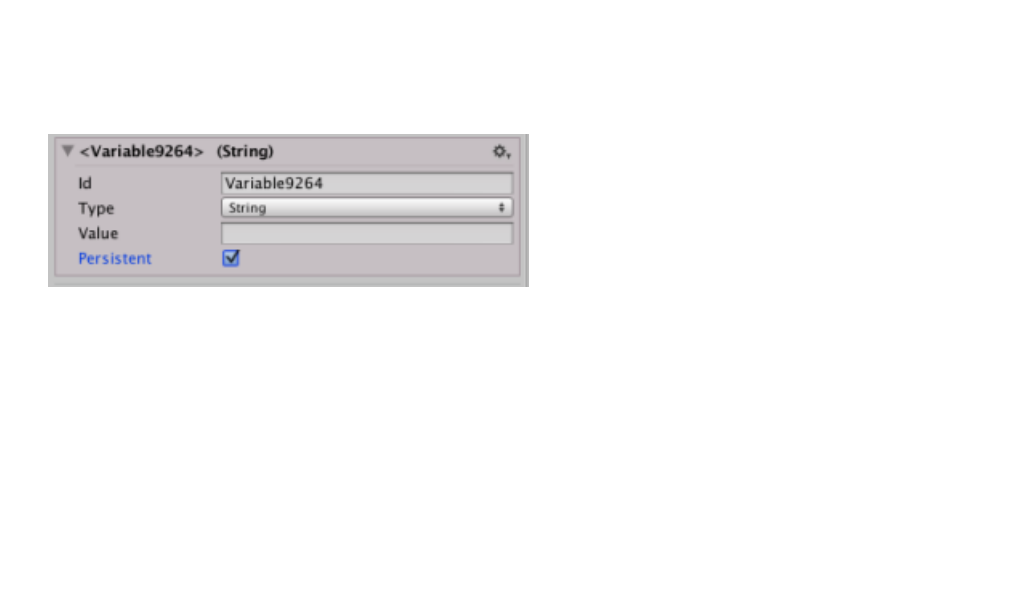
ofavariable“survive”attheendofthegameistocheckthebox
onPersistentinterfaceintheInspectorwindow.
Fromthatmoment,GameFlowwillensurethatthevalueofthatvariable
ispersistent,whichwecanverifyevenwhileweareworkinginthe
Editor,aseachtimeyoupressPlaythevariablewillbethelastvaluethat
hadattheendofthepreviousrun.
Events
Aswesawinearlierchapters,eventprogramsareprogramsthatstart
runningautomaticallyenabledwhenbeingdetectedinitsrangeof
listeninganeventofagiventype.
Inthischapterwewillseeindetailallaspectsofeventprogramsto
understandhowtomakethebestofittosupportevent-driven
programmingGameFlowoffers.
Listening range
Therangelistenerwillfinditatthetopofsomeprogramsofeventssuch
asamenuofoptionsandfunctionsasafilterprogramcanbeusedto
addressonlycertaineventsbasedontheirorigin.
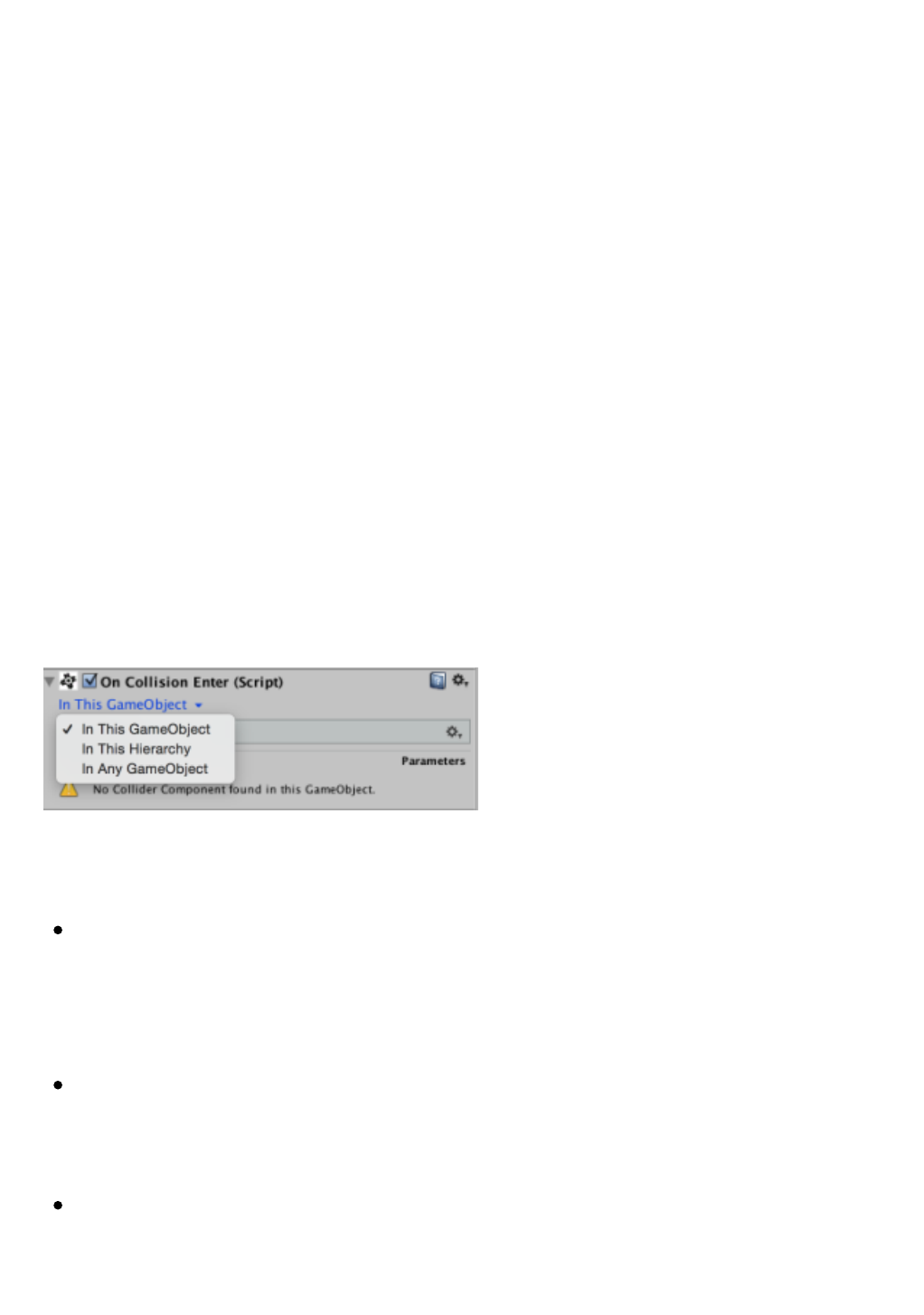
Therangeoflisteningwillusuallythreepossiblevalues:
In This GameObject:whenwejustwanttoattendeventsthathave
beendetectedbycomponentsofthesameGameObjectinwhichis
includedtheprogram.Thisisthedefaultandprovidesbetter
performance.
In This Hierarchy:whenweattendeventsthatcomealsoboththe
parentobjectoftheGameObjectinwhichisincludedtheprogram
andanyofitsGameObjectschildren.
In Any GameObject:whennotwanttodoanyfilteringandwantto
attendtheeventwhateverthesource.

Inmostcases,therangeoflisteningcanbeleftatthedefaultbecauseit
isgoodpracticetolimitthescopeofaprogramtoaminimum.Only
whereweneedtomakeourprogramcapableofactingonelementsof
thewholesceneshouldexpandtherangeoflistening.
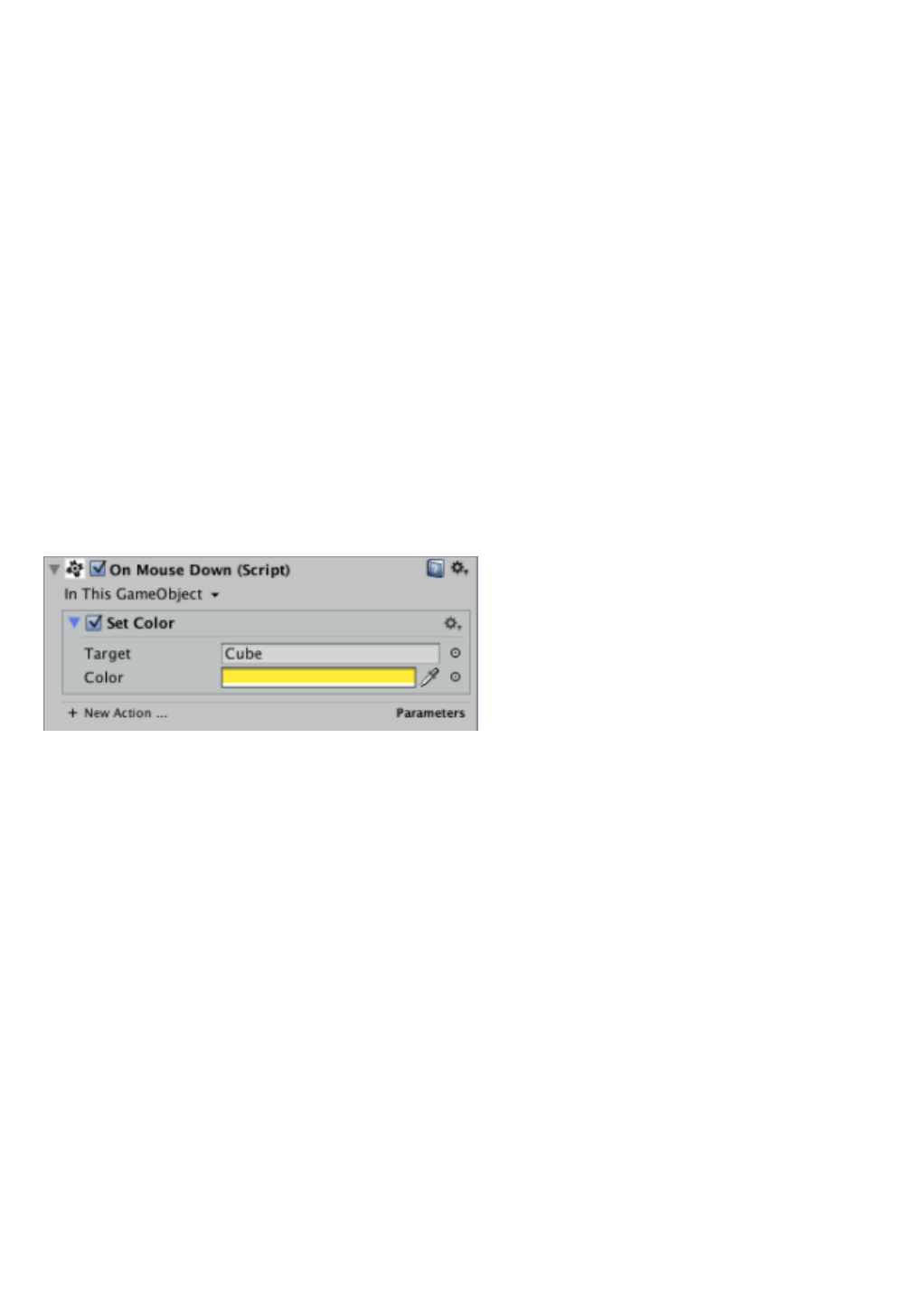
Forinstance,ifwemakeaprogramthatchangesthecolorofyour
GameObjectbyclickingwiththemouseonitwillsufficeminimumrange,
butifweseektomakeaprogramtochangethecolorofanyobjectin
thesceneonwhereweclick,weneednecessarilyextendtherangeto
maximum.
Conditions for implementation
Foraneventprogramcanbeginexecutionisautomaticallyrequired:
1. Theprogramitselfisactivatedorenabled.
2. Thattheeventhasoccurredintherangespecifiedintheprogram
listeningevent.
Exceptinsomecases,suchasOnStart,forarunningeventprogramis
notessentialthattheGameObjectinwhichitisincludedisalsoactive,
especiallyifthelisteningrangeissettomaximum.
Event parameters
Mosteventprogramsofferalistofparameterswhosevalueis
completedwithcertainspecificinformationabouttheeventoccurred
justbeforetheprogramstartsrunning.
Theeventparameterssignificantlyexpandthepossibilitiesofaprogram,
sincewecannowmaketheprogramknows,forexample,the
GameObjectthatoriginatedtheeventandgotooneoftheprogram’s
actionsthatparameter.Itwould,inotherwords,asallowingthe
programtoactonanunspecifiedGameObject,atsomepoint,whenthe
eventoccurs,willbeimplementedtobeoneoftheGameObjectsofour
game.
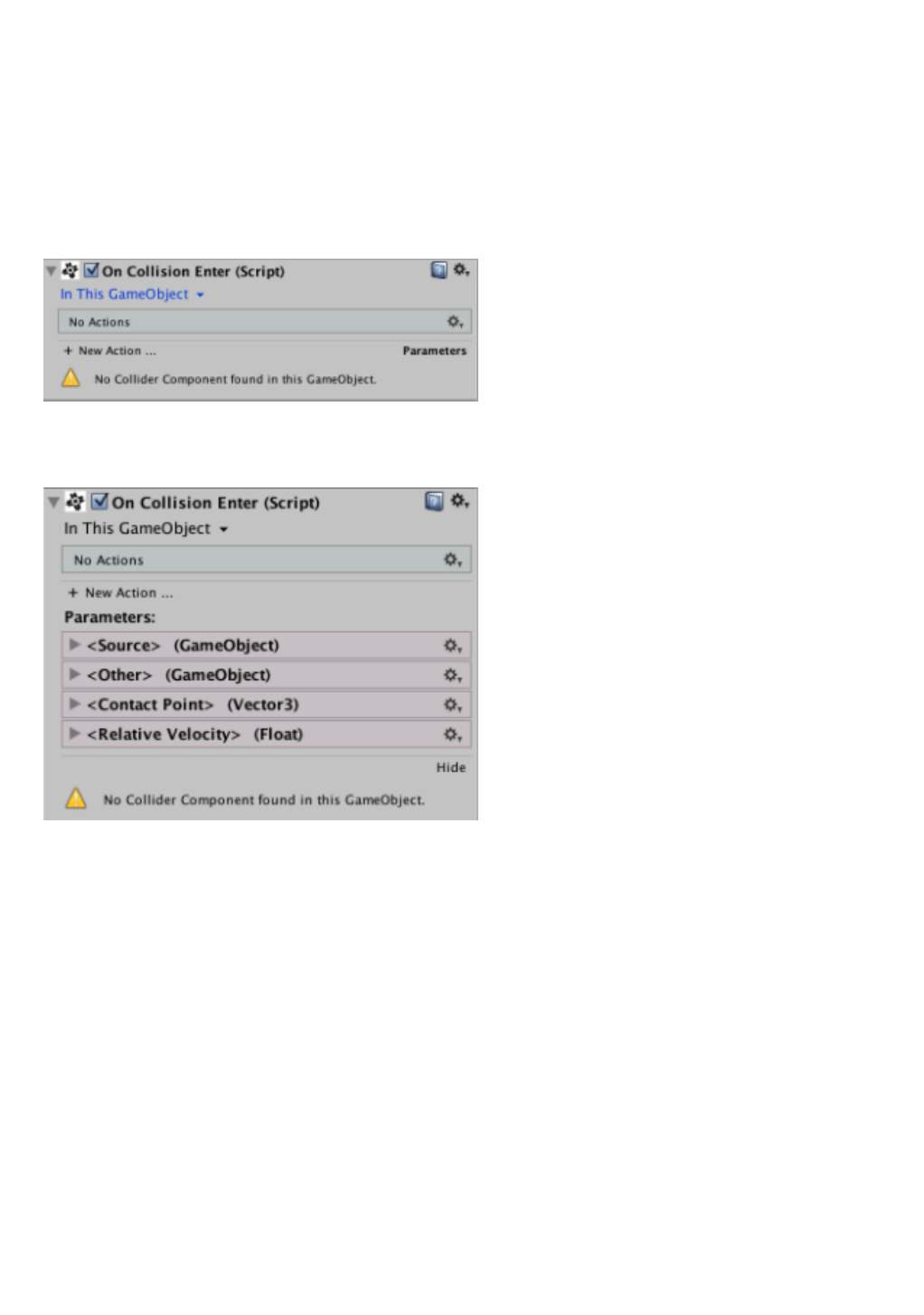
Whentheeventprogramsupportsparameters,itdisplaysasmalllabel
onthebottomrightcornerofyourareaintheInspectorwith
theParameterstextinbold.Clickingonthelabel,justalistof
parametersundertheactionlistwithaformatsimilartovariablesblocks
aredisplayed,becausetheparameterscanbeconsideredread-only
variables.
Likevariables,theeventparameterscanbedraggedtothefieldsof
programactionsthatsupportvariables,butunlikevariables,parameters
canonlybeusedintheprogramofeventitselfanddoesnotallowdrag
themtootherprograms(eventhesametype)norselecttheminthe
ObjectSelector,thenarenotreflectedinit.
Supported Events
Thefollowingisalistofeventtypesrecognizedandsupportedby
GameFlowalongwithabriefdescriptionoftheeventprogramsdealing
managethem.

Initialization events
Theyaretheeventsrelatedtothegameinitializationprocesses.This
typeofeventismanagedbythefollowingprogramsofevent:
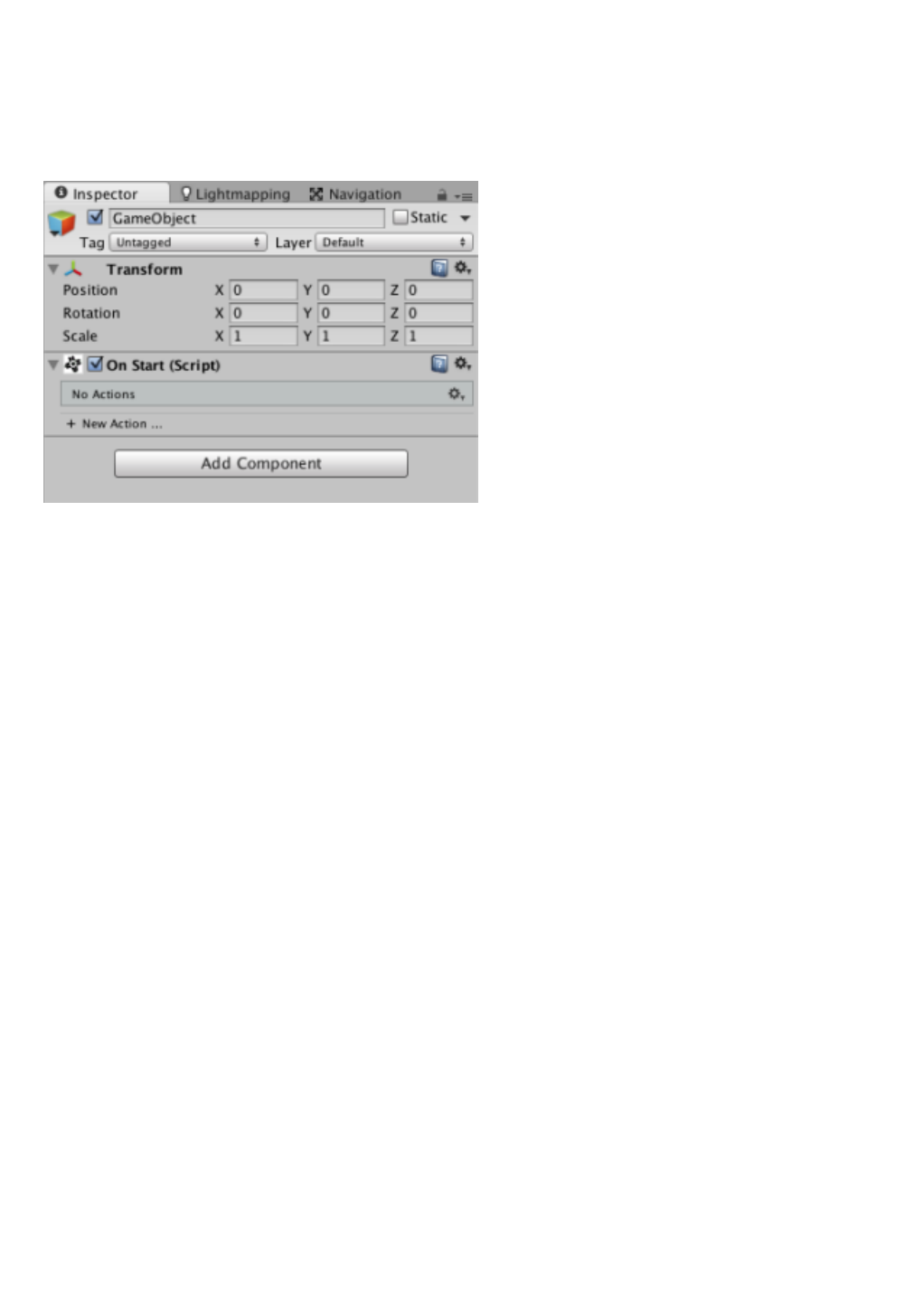
OnStart:aprogramofthistyperuntostartagameifthe
GameObjectisactiveorwasnotactive,thefirst(andonlythefirst)
onceactivated.
Activation events
Aretheeventsrelatedtotheactivation/deactivationofa
GameObject.Thistypeofeventismanagedbythefollowingprogramsof
event:
OnActivate:aprogramofthistypewillrunwhenevera
GameObjectpassfrominactivetoactive.NottobeconfusedwithOn
Start,thoughitmaybeequivalenttothecaseofaGameObjectthat
whenstartingthegameisoffandisthenactivatedatsomelater
time.
OnDeactivate:aprogramofthistypewillrunwhenevera
GameObjectpassfromactivetoinactive.
Events Update
Aretheeventsthatarelaunchedregularlycoincidingwithprocesses
themselvesUnityengineupdate.Thistypeofeventismanagedbythe
followingprogramsofevent:
OnUpdate:aprogramofthistypewillrunatthebeginningofeach
frameofplay.Itistheidealtypeofprogramwhenwerunfastand
continuousactions.
OnLateUpdate:aprogramofthistypewillruntheUpdateOn
completionofallprograms.
OnFixedUpdate:programrunningatfixedregularintervalsandis
usedmainlytogiveorderstotheUnityenginePhysics.
Game Events

Aretheeventsthatarereleasedwhenthegeneralstateofthegameis
changed.Thistypeofeventismanagedbythefollowingprogramsof
event:
OnGameStart:aprogramofthistypewillbeexecutedasaresult
ofthechangeofstatethatproducestheStart Gameaction.Indicates
normallythegameitselfhasbegun.
OnGameOver:aprogramofthistypewillbeexecutedasaresult
ofthechangeofstatethatproducestheGame Overaction.Indicates
usuallythegameisover.
OnGamePause:aprogramofthistypeisexecutedwhenthegame
enterspause,usuallyasaresultofanactionorToggle Pause Pause
Game.
OnGameResume:aprogramofthistypewillrunwhenplay
resumesafterbeingpreviouslypaused,usuallyasaresultofan
actionorToggle Pause Resume Game.
Mouse events
Aretheeventsthatarelaunchedwhentheuserperformactionswith
themouseonelementsthatsupportitasGUIorColliderselements.This
typeofeventismanagedbythefollowingprogramsofevent:
OnMouseDown:aprogramofthistypewillrunwhenyouclickany
ofthemousebuttonsonaGUIoranelementCollider.
OnMouseDrag:aprogramofthistypewillrunwhenmouse
movementonaGUIoranColliderelementisdetectedwhileanyof
themousebuttonsiskeptpressed.
OnMouseEnter:aprogramofthistypeisexecutedwhenthe
mouseenterstheareaoccupiedbyaGUIelementoranCollider.
OnMouseExit:aprogramofthistypewillbeexecutedwhenthe
mousepointerleavestheoccupiedbyaGUIelementor
anColliderarea.
OnMouseOver:aprogramofthistypewillrunwhenmousemove
overaGUIelementoranColliderisdetectedwhilenotbeingpressed
anyofthemousebuttons.
OnMouseUp:aprogramofthistypewillruntoreleaseamouse
buttonwasbeingpressedonaGUIoranelementCollider.
Collision events
AretheeventsPhysicsengineUnitylaunchestoreportthattherehave
beencollisionsbetweenobjectsandalsotoindicatethestatusofsuch
collisions.Thistypeofeventismanagedbythefollowingprogramsof
event:
OnCollisionEnter:aprogramofthistypewillbeexecutedassoon
asitdetectsthatithasbegunacollisionbetweentwoobjects.
OnCollisionExit:aprogramofthistypewillrunassoonasit
detectsacollisionbetweentwoobjectsnolongerproduced.
OnCollisionStay:aprogramofthistypewillrunoneveryframeof
thegamewhilecontinuingtoproduceagivencollisionbetweentwo
objects.
OnTriggerEnter:CollisionOnEntersimilarbutapplicablewhenat
leastoneoftheobjectshasamarkedasColliderTrigger Is,thatis,
thatdetectscollisionsbutitistraversablebyotherobjects.
OnTriggerExit:ExitsimilartoOnCollisionbutapplicablewhenat
leastoneoftheobjectshasamarkedColliderIs Trigger.
OnTriggerStay:OnCollisionsimilartoStaybutapplicablewhenat
leastoneoftheobjectshasaColliderIsmarkedasTrigger.
Itisimportanttonotethatasthesefeweventsthatalwaystwoobjects
involved,yournoticeisdoublebecausethecollisionisreportedtoboth
objectsalike.Thismeansyoucanassociateaprogramofthiskindtoany
ofthetwoobjectssusceptibletocollideandinbothcasestheprogram
willrun.Theonlydifference,aswewillbeintheparameterssenttoeach
program.
Time Events

Theyareweather-relatedeventsandcomponentsthatworkbasedon
time,astheTimer(Timer).Thistypeofeventismanagedbythe
followingprogramsofevent:
OnTimerExpire:aprogramofthistypeareexecutedwhen
aTimercomponentnotifiedthatthetimeintervalhaselapsedfor
whichhadbeenscheduled.
Program events
Theseareeventsthatlaunchtheprogramsthemselvestoreport
changesinyourstate.Thistypeofeventismanagedbythefollowing
programsofevent:
OnProgramFinish:aprogramofthistypewillbeexecutedwhena
programintherangeoflisteningfinishedexecuting.
Variables events
TheyarethrowingeventsGameFlowtonotifythatavariable(or
parameter)hasbeenamended.Thistypeofeventismanagedbythe
followingprogramsofevent:
OnVariableChange:aprogramofthistypewillruninboth
runtimeandeditingwhenavariableintherangeoflisteninghas
beenmodified.
OnParameterChange:aprogramofthistypewillruninboth
runtimeandeditingwhenaparameterintherangeoflistening
(whichinthistypeofprogramislimitedtoGameObjectfather)has
beenmodified.
Event Handlers
Eventhandlersarespecialcomponentsthatserveasgeneralevent
filters.WhenaddedtoaGameObjectallowyoutospecifywhichofthe
eventsgeneratedbythisGameObjectthatcorrespondtothetype
managedbythecontrollershouldbenotifiedandwhichwillsimplybe
ignored.
Thiscontrolisespeciallyusefulforoptimizingtheperformanceofa
gameasitreducesthenumberofinternalmessagesthatthesystem
mustprocessmakinglessprocessingtimeperframeneeded.
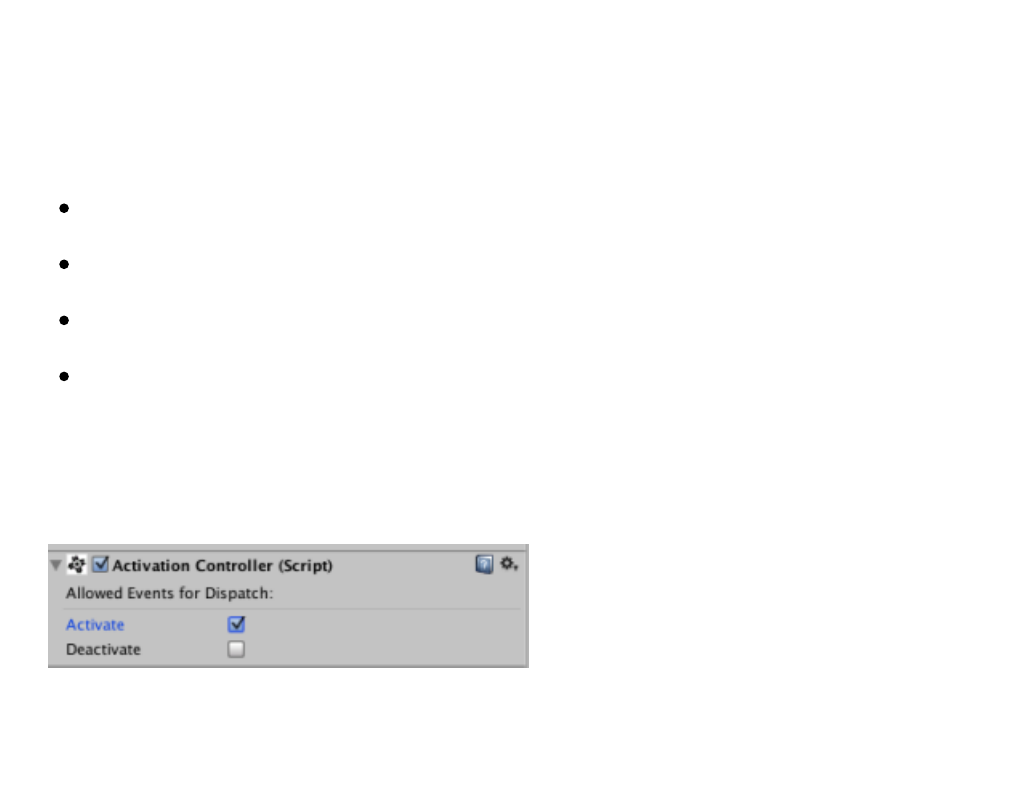
Controllerstypessupportedeventsare:
ActivationController:Activationeventhandler.
CollisionController:Controllercollisionevents.
MouseController:mouseeventhandler.
TriggerController:ControllerTriggerscollisionevents.
Foratypeofeventisnotifieditscheckboxmustbechecked,whilethose
eventswiththeunlabeledbeignored.

Flow Control
Theprogramflowistheorderinwhichaprogramexecutesitsaction
list.Theprogramflowissequentialbydefault,thatis,itwillfirstrunthe
firstactionenabledtocompletion,thenthenextactionandsoonuntil
theendoftheprogram,butthisorderdoesnotalwaysallowustoget
theresultsweneedinourgame,that’swhyGameFlowgivesusthe
abilitytomodifythisflowinasimplewaybyusingakindofspecialized
actionsinthistask.
Withthesespecializedactions,whichwilldetailthenbepossibleto
implementsophisticatedlogicgameinwhich:
Partsofaprogramareexecutedrepeatedlyanumberoftimes.This
inprogrammingmethodologyiscalled“loop”.
Certainpartsofaprogramareexecutedonlywhenmet(ornotmet)
certainconditions.Thisiscalled“fork”or“conditionalexecution”.
Certainpartsofaprogramnotrunsequentially,ieactionbyaction,
butrunningalltheiractionssimultaneouslyasagroup.
Thewaywecontroltheflowofprogramslargelydefinesthe
programmingqualityofourgame,whichiswhywerecommendyou
clearthebasicideasofprogrammingmethodologybeforeattemptingto
buildprogramswithaflowcontrolverycomplex.
Flow Control Actions
Asmentioned,GameFlowletsyoucontroltheflowofprogramsthrough
theuseofapanelofactionsthatcanbefoundundertheComponent>
GameFlow> Control menu.
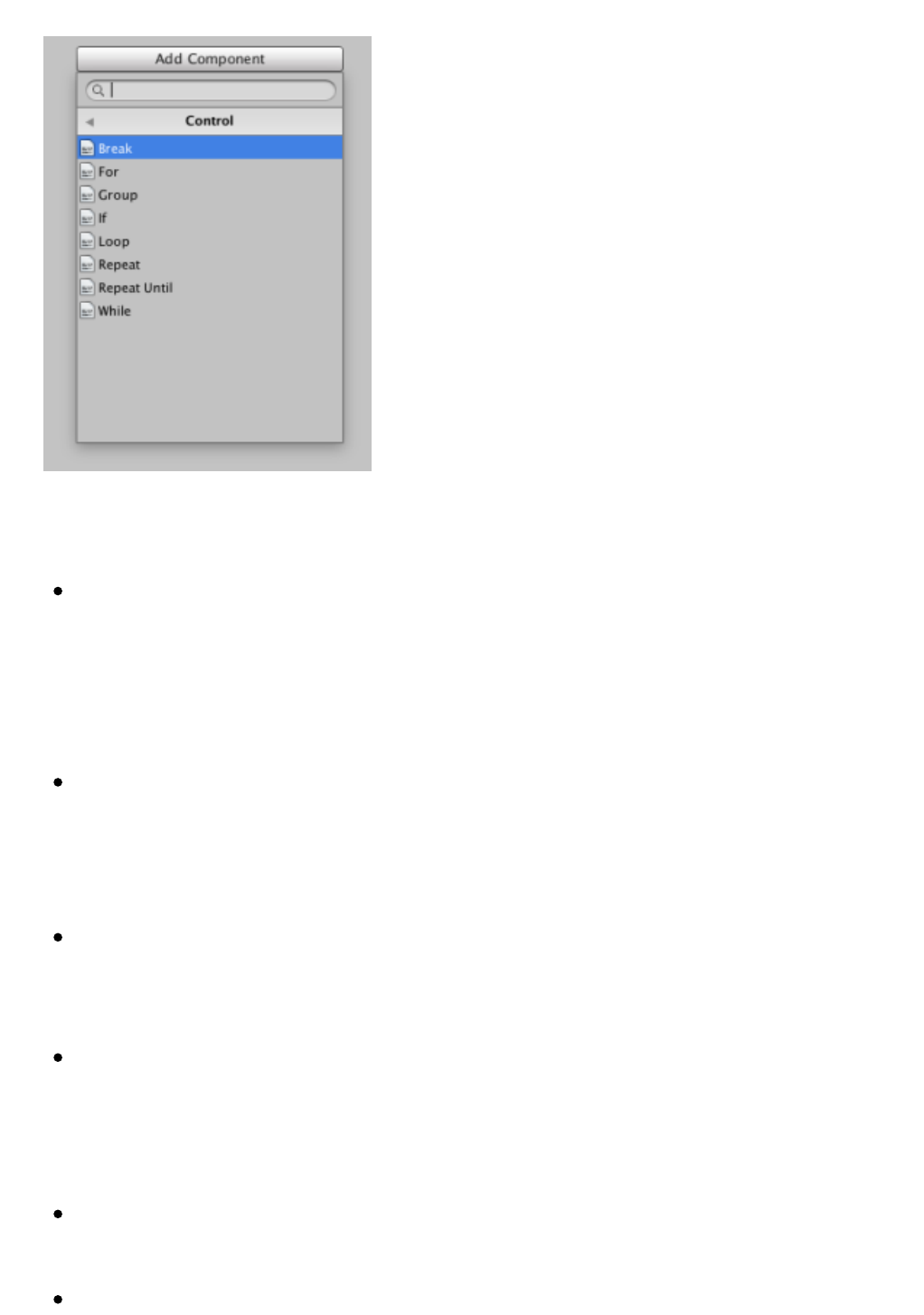
Thepurposeofeachoftheseactionsisasfollows:
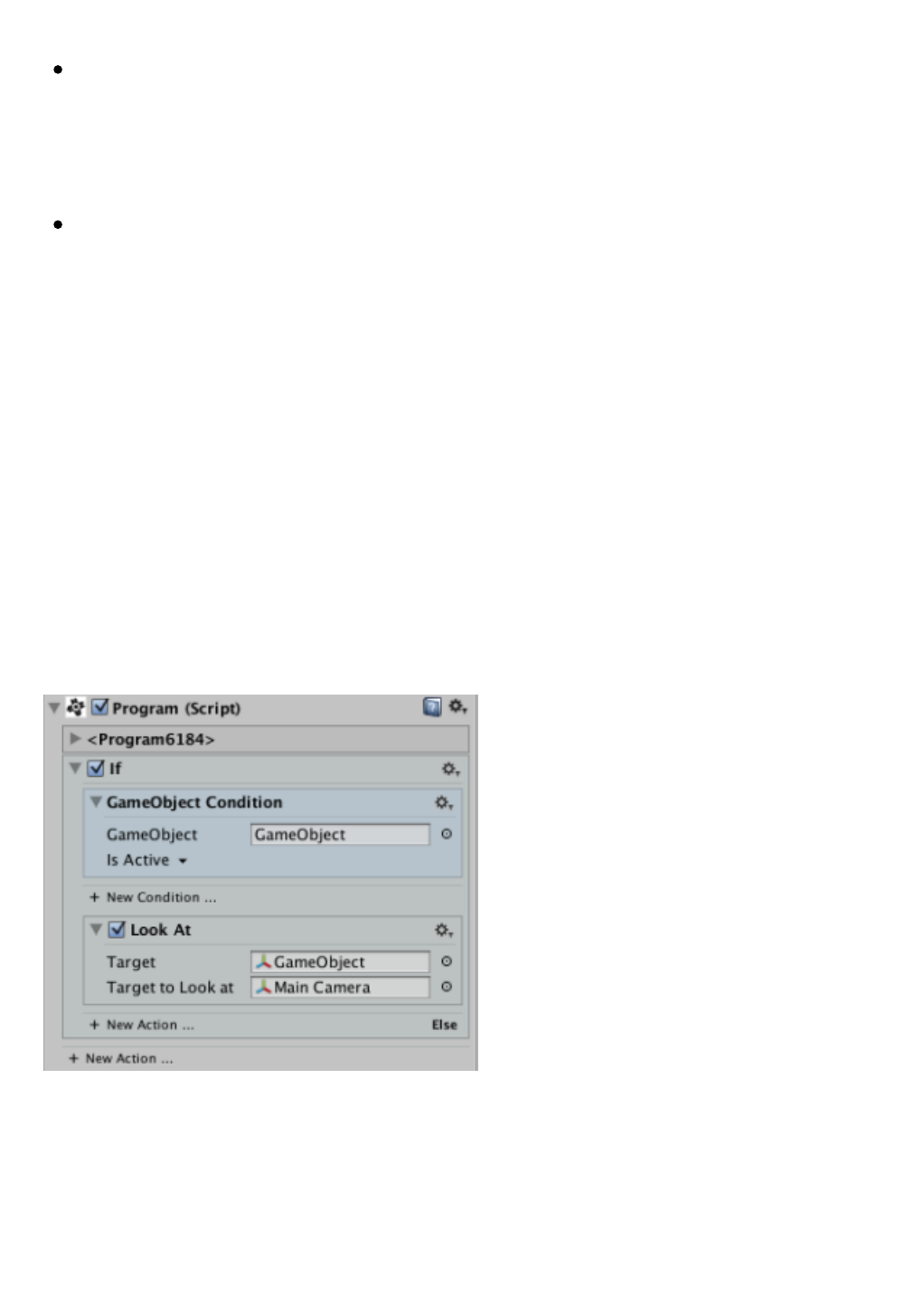
If:allowsexecutiontobranchbasedontheresultofalistof
conditions.Iftheseconditionsaremet(theoverallresultisTrue)
containedthemainlistofactionswillbeexecuted,whileiftheresult
isFalsealistofsecondaryshares(sharesundertheElsesection)will
run.
For:createaloopexecutionforalistofactionscontained(inother
words,performtheseactionsrepeatedly)anumberoftimeswhichis
givenbythevalueofavariablethatismodifiedateachiterationof
thelooporturnandlimitvalueagainstwhichyouwillcompare.
Repeat:Forasimplifiedversionthatrequiresonlyspecifythe
numberoftimesyouwanttorepeattheactionscontained,without
variablesorlimitvalue.
Loop:asimplifiedversionofRepeatasdefaultexecutionwillloopwill
berepeatedindefinitelywelluntiltheprogramisstoppedoruntilthe
actionscontainedwithinoneBreakaction(seedescriptionbelow)is
executed.
While:implementtheactionscontainedifacertainconditionismet
andwillcontinuetoloopwhilestillmeetsthecondition.
RepeatUntil:implementtheactionscontainedinloopuntilthelist
ofassociatedconditionsaremet.
Group:allowsyoutorunallcontainedactionsinparallel,ie,inthis
typeofblockisnotexpectedthatanactionhasfinishedrunning,but
allactionsareexecutedatatimeandonlywhenallactionsendwhen
youconsiderthattheactionisover.
Break:stopsaloop,makingtheprogramrunninginthenextaction
aftergeneratingtheloopisactivated.
Terms
Theconditionsareatypeofspecialblocksthatusesomeactionsto
determine,initsassessment,howorwhentochangetheprogramflow.
Visuallyconditionsareverysimilartothosesharesbecauselikethese
arerepresentedascollapsibleblockscontainingpropertyfieldsthat
allowustoconfiguretheoperationofthecondition.Onlyvaryincolor,
whichisdifferentfromtheactionsandtheirlocation,astheycanonly
liveinsharesthathavebeendesignedforuseconditions.
Asforeditingoperations,conditionssupportthesameediting
operationsthatactionswithintheirowncontextsandthroughtheir
contextmenus.
Evaluation

Evaluateaconditionistocheckifitistrueornottrue.Inprogramming,a
conditionismetwhenwesaythattheresultisTrue,Falsewhennot
beingmet.Theresultoftheevaluationofaconditioniswhatwecalla
Booleanvalue,asonlysupportstwopossiblevaluesoppositeeachother.
Thisresultanditsinterpretationdependlargelyonhowthecondition
hasbeenconfiguredthroughthepropertiesstatedinitsinterface,which
willnormallyincludeatleastonecomparisonfieldtoindicatewhat
exactlywewanttodowithinthecondition.
GameFlownotonlysupportstheevaluationofaconditionbutthat
createsalistofconditionslinkedbylogicaloperatorsthatalwaysbe
evaluatedusingthelastresultandtheresultoftheconditioncurrently
beingevaluated.Theseoperatorscanbe:
And:thatwillreturnTrueasresultif(andonlyif)thepreviousresult
isTrueandtheconditionunderwhichconnectsalsoevaluatesto
True.Otherwise,itwillreturnFalseasresult.
Or:thatwillreturnresultsforbothTrueifthepreviousresultwas
trueasiftheresultoftheconditionwithwhichconnectsevaluatesto
True.OnlyreturnsFalseifbothresultsarefalse.
Aswehaveseen,thewayinwhichacontrolactioninterpretstheresult
ofevaluatingitslistofconditionsdependsontheinternallogicofeach
action.Toclarifyanydoubtsyoucanalwaysconsultthecontextualhelp
foreachaction.
