GigE V Framework For Linux 32/64 Bit Gig E Programmers Manual
GigE-V_Framework_Programmers_Manual
GigE-V_Framework_Programmers_Manual
User Manual:
Open the PDF directly: View PDF  .
.
Page Count: 91
- GigE-V Framework API Overview
- GigE-V Framework API
- About GigE Vision
- API Initialization and Configuration
- Automatic Camera Discovery
- Connecting to a Camera
- Camera GenICam Feature Access - Simplified
- Camera GenICam Feature Access – Manual Setup
- GenICam GenApi Feature Access through XML
- Example C++ Code: Simplified Access to GenICam Feature Node Map
- Example C++ Code: Retrieve a Pointer to the GenICam Feature Node Map and Use GenApi Directly
- Example C++ Code: Read XML as Data and Manually Instantiate a GenICam Feature Node Map for the Camera
- Example C++ Code: Store XML File and Manually Instantiate a GenICam Feature Node Map for the Camera
- Image Acquisition
- Member Function Overview
- Structure Definition: GEVBUF_HEADER
- Member Function Descriptions
- GevGetImageParameters, GevSetImageParameters
- GevInitImageTransfer
- GevInitializeImageTransfer
- GevFreeImageTransfer
- GevStartImageTransfer
- GevStopImageTransfer
- GevAbortImageTransfer
- GevGetImageBuffer
- GevGetImage
- GevWaitForNextImageBuffer
- GevWaitForNextImage
- GevGetNextImage
- GevReleaseImageBuffer
- GevReleaseImage
- GevQueryImageTransferStatus
- Asynchronous Camera Event Handling
- Manual Camera Detection and Configuration (Advanced Topic)
- Utility Functions
- Operating System Independence Wrapper
- Appendix A: Feature Access Through Static Registers
- Member Function Overview
- Member Function Descriptions
- GevGetCameraRegisters
- GevSetCameraRegInfo
- GevInitCameraRegisters
- GevGetNumberOfRegisters
- GevReadRegisterByName
- GevWriteRegisterByName
- GevGetRegisterNameByIndex
- GevGetRegisterByName
- GevGetRegisterPtrByName
- GevGetRegisterByIndex
- GevGetRegisterPtrByIndex
- GevRegisterRead
- GevRegisterWrite
- GevRegisterWriteNoWait
- GevRegisterWriteArray
- GevRegisterReadArray
- GevRegisterWriteInt
- GevRegisterReadInt
- GevRegisterWriteFloat
- GevRegisterReadFloat
- Appendix B: Common Package Management methods in Linux
- Contact Information

NOTICE
© 2017 Teledyne DALSA, inc. All rights reserved.
This document may not be reproduced nor transmitted in any form or by any means, either electronic
or mechanical, without the express written permission of Teledyne DALSA. Every effort is made to
ensure the information in this manual is accurate and reliable. Use of the products described herein is
understood to be at the user’s risk. Teledyne DALSA assumes no liability whatsoever for the use of the
products detailed in this document and reserves the right to make changes in specifications at any
time and without notice.
Linux® is a registered trademark of Linus Torvalds.
All other trademarks or intellectual property mentioned herein belongs to their respective owners.
Printed on June 28, 2017
Document Number: OC- COMM-GEVP0
Printed in Canada
About This Manual
This manual exists in Adobe Acrobat® (PDF) formats (printed manuals are available as special
orders). The PDF format make full use of hypertext cross-references. The Teledyne DALSA home page
on the Internet, located at http://www.teledynedalsa.com/imaging, contains documents, software
updates, demos, errata, utilities, and more.
About Teledyne DALSA
Teledyne DALSA is an international high performance semiconductor and electronics company that
designs, develops, manufactures, and markets digital imaging products and solutions, in addition to
providing wafer foundry services.
Teledyne DALSA Digital Imaging offers the widest range of machine vision components in the world.
From industry-leading image sensors through powerful and sophisticated cameras, frame grabbers,
vision processors and software to easy-to-use vision appliances and custom vision modules.

GigE-V Framework for Linux 32/64-bit GigE-V Framework API Overview
•
3
Contents
GIGE-V FRAMEWORK API OVERVIEW _______________________________ 4
A COMPACT API FOR GIGE VISION CAMERAS UNDER LINUX ............................................ 4
GETTING STARTED ............................................................................................ 5
PRE-REQUISITES .............................................................................................. 5
INSTALLATION ................................................................................................. 7
PERFORMANCE TUNING ....................................................................................... 9
GIGE NETWORK ADAPTER OVERVIEW ..................................................................... 11
FIRMWARE UPDATE .......................................................................................... 12
GIGE WITH TURBODRIVE ................................................................................... 12
EXAMPLE PROGRAMS ......................................................................................... 13
GIGE VISION DEVICE STATUS TOOL ...................................................................... 20
CAMERA IP ADDRESS CONFIGURATION TOOL ............................................................. 22
GIGE-V FRAMEWORK API _______________________________________ 24
ABOUT GIGE VISION ........................................................................................ 24
API INITIALIZATION AND CONFIGURATION ................................................................ 25
AUTOMATIC CAMERA DISCOVERY ........................................................................... 28
CONNECTING TO A CAMERA ................................................................................. 29
CAMERA GENICAM FEATURE ACCESS - SIMPLIFIED ...................................................... 37
CAMERA GENICAM FEATURE ACCESS – MANUAL SETUP ................................................. 44
GENICAM GENAPI FEATURE ACCESS THROUGH XML .................................................... 47
IMAGE ACQUISITION ......................................................................................... 49
ASYNCHRONOUS CAMERA EVENT HANDLING .............................................................. 60
MANUAL CAMERA DETECTION AND CONFIGURATION (ADVANCED TOPIC) ............................. 64
UTILITY FUNCTIONS ......................................................................................... 68
OPERATING SYSTEM INDEPENDENCE WRAPPER ........................................................... 70
APPENDIX A: FEATURE ACCESS THROUGH STATIC REGISTERS __________ 71
APPENDIX B: COMMON PACKAGE MANAGEMENT METHODS IN LINUX _____ 88
SOFTWARE PACKAGE MANAGEMENT TOOLS ............................................................... 88
CLI PACKAGE MANAGEMENT COMMAND EXAMPLES (BY DISTRIBUTION)............................... 89
REQUIRED PACKAGES ........................................................................................ 90
CONTACT INFORMATION ________________________________________ 91
SALES INFORMATION ........................................................................................ 91
TECHNICAL SUPPORT ........................................................................................ 91
4
•
GigE-V Framework API Overview GigE-V Framework for Linux 32/64-bit
GigE-V Framework API Overview
A Compact API for GigE Vision Cameras under Linux
This document describes GigE-V Framework API for Linux which is a simplified, user-level API for
accessing the features of GigE Vision devices. Its compact footprint is ideal for embedded platforms.
It is implemented in the C language and has an operating system independent layer that allows it to
run, potentially, on any operating system which supports threads, events, and a socket based network
interface. For example, it can run on popular distrubutions such as Ubuntu, Debian, Suse/openSuse,
and Red Hat (RHEL/Fedora/CentOS/Scientific).
Supported PC and Embedded Hardware Platforms
The following PC architectures are supported:
• x86 : Intel/AMD 32-bit and 64-bit CPUs
The following embedded architectures are supported:
• ARM AArch64: 64-bit ARMv8
• ARM hard float : 32-bit ARMv7 with hardware floating point
• ARM soft float : 32-bit ARM with software emulated floating point
System Requirements
• Linux OS support for Gigabit NIC hardware is required (kernel 2.6.24 and later)
• Support for PF_PACKET with RX_RING capability recommended for best performance (usually
available with the Wireshark application and/or the libpcap package which is widely installed
by default).
• libcap-dev package is required to use Linux “capabilities” when running as “root” is not
desired.
• libglade2-dev package is required for building and using the GigE Vision Device Status tool
(uses gtk).
• libx11-dev / libxext-dev packages are required for using the X11 display in the example
programs.
See Appendix B: Common Package Management methods in Linux for information on installing the
required packages and the various commands available.
Note: It is recommended to enable “jumbo” frames by setting the NIC MTU to its
maximum value (usually 9018). This can be set using “ifconfig” or a distribution-
specific tool or configuration file. Please consult the documentation for the Linux
distribution being used.
Application Notes
Available application notes for the GigE-V Framework are on the Teledyne DALSA website.
GigE-V Framework for Linux 32/64-bit GigE-V Framework API Overview
•
5
Getting Started
The GigE-V Framework for Linux is distributed as a compressed tar archive, with file type “.tar.gz”.
The naming convention e of this archive is:
GigE-V-Framework_<architecture>_<Version#>.<Build#>.tar.gz
For example, the 4 available files for version 2.02 build 0.0105 are:
• GigE-V-Framework_x86_2.02.0.0105.tar.gz,
• GigE-V-Framework_aarch64_2.02.0.0105.tar.gz,
• GigE-V-Framework_ARMhf_2.02.0.0105.tar.gz, and
• GigE-V-Framework_ARMsf_2.02.0.0105.tar.gz
At this time, only target systems configured for self-hosted development are supported. At installation
time, parts of the API are compiled and linked to the run-time libraries found on the target system.
This reduces the risk of an installation package failing to work with a target system due to mismatched
versions of run-time libraries. As a consequence of this, certain pre-requisites are required for
successful installation.
Pre-requisites
To compile and link the API on installation and use the example applications that are distributed with
the framework, installation of the following packages is required:
Package
Description
gcc
C compiler
g++
C++ compiler
libgtk-3-dev
Compile and link GigE Vision Device Status tool
GNU make
make utility
libglade2-0
libglade2-dev
Library for loading and using “.glade” UI definition files
libX11-dev
Library for using basic X11 display primitives in programs
libxext-dev
Library for using extended X11 display primitives in programs
In addition, the following libraries are useful for enhancing the performance of the framework.
Package
Description
libpcap0.8
Library for user level packet capture
libcap2
Library / tools for assigning Linux “capabilities” to a program
ethtool
Utility to configuring tuning parameters of NIC drivers
(usually installed by default)
For example, in Ubuntu. packages can be installed from the terminal using the following command:
sudo apt-get install <package name>
Note, if you are unable to locate a specific package, regular expression can be used to try to find a
suitable alternative package. For example,
sudo apt-get install libpcap*
Note: The pre-requisite packages may have different names on different Linux
distributions. See Appendix B: Common Package Management methods in Linux for more
information on installing these packages and possible variations on their names.
6
•
GigE-V Framework API Overview GigE-V Framework for Linux 32/64-bit
System Date and Time Considerations
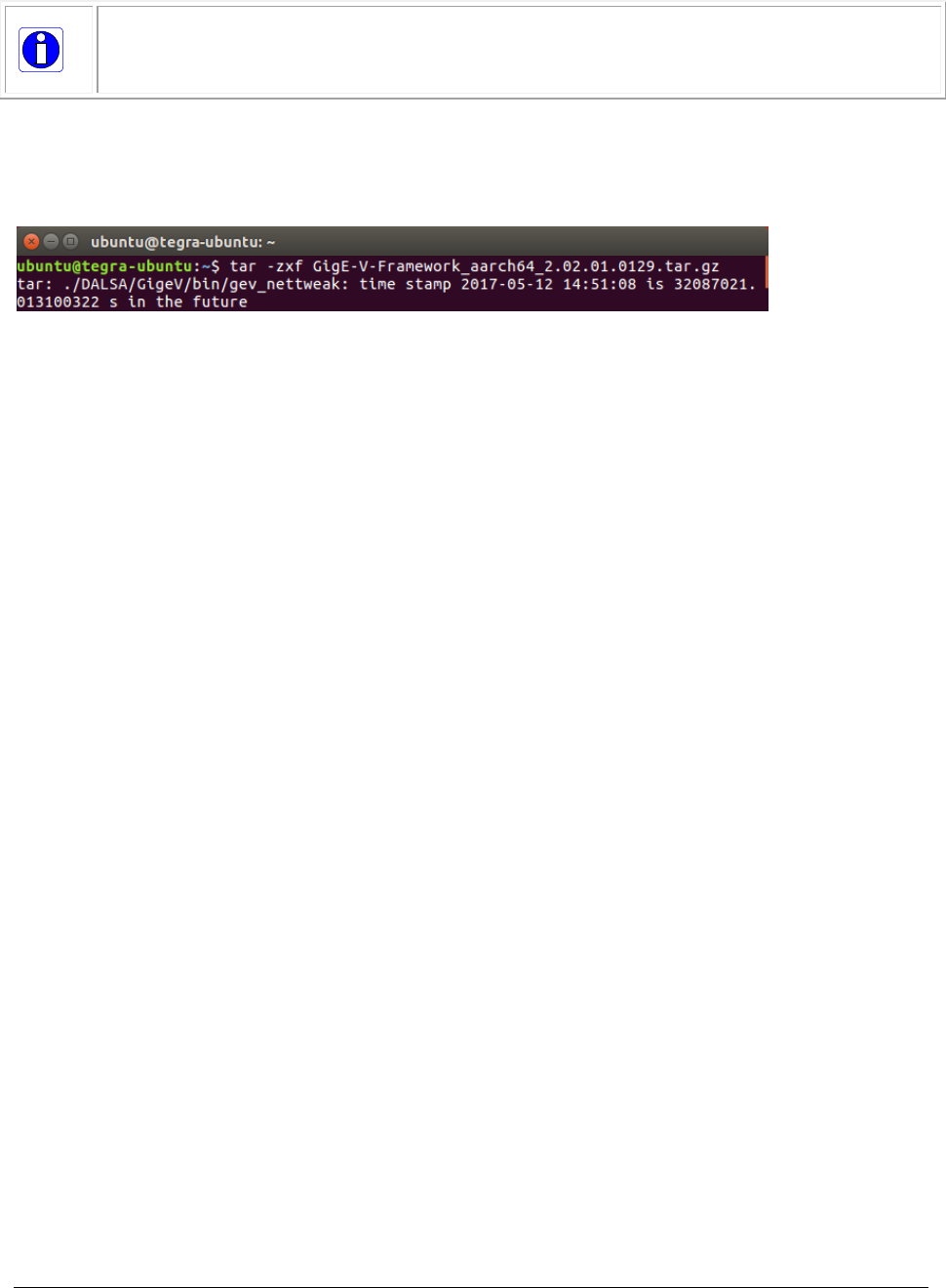
Note: Some computer systems do not retain time and date settings after power cycling.
This is particularly true of embedded systems. Installation of the GigE-V Framework for
Linux can be affected by misconfigured time and date settings if the files being installed are
timestamped in the future when compared to the current system time.
In such instances, it may be necessary to install/enable an NTP (Network Time Protocol) capability in
order to keep the time and date settings current.
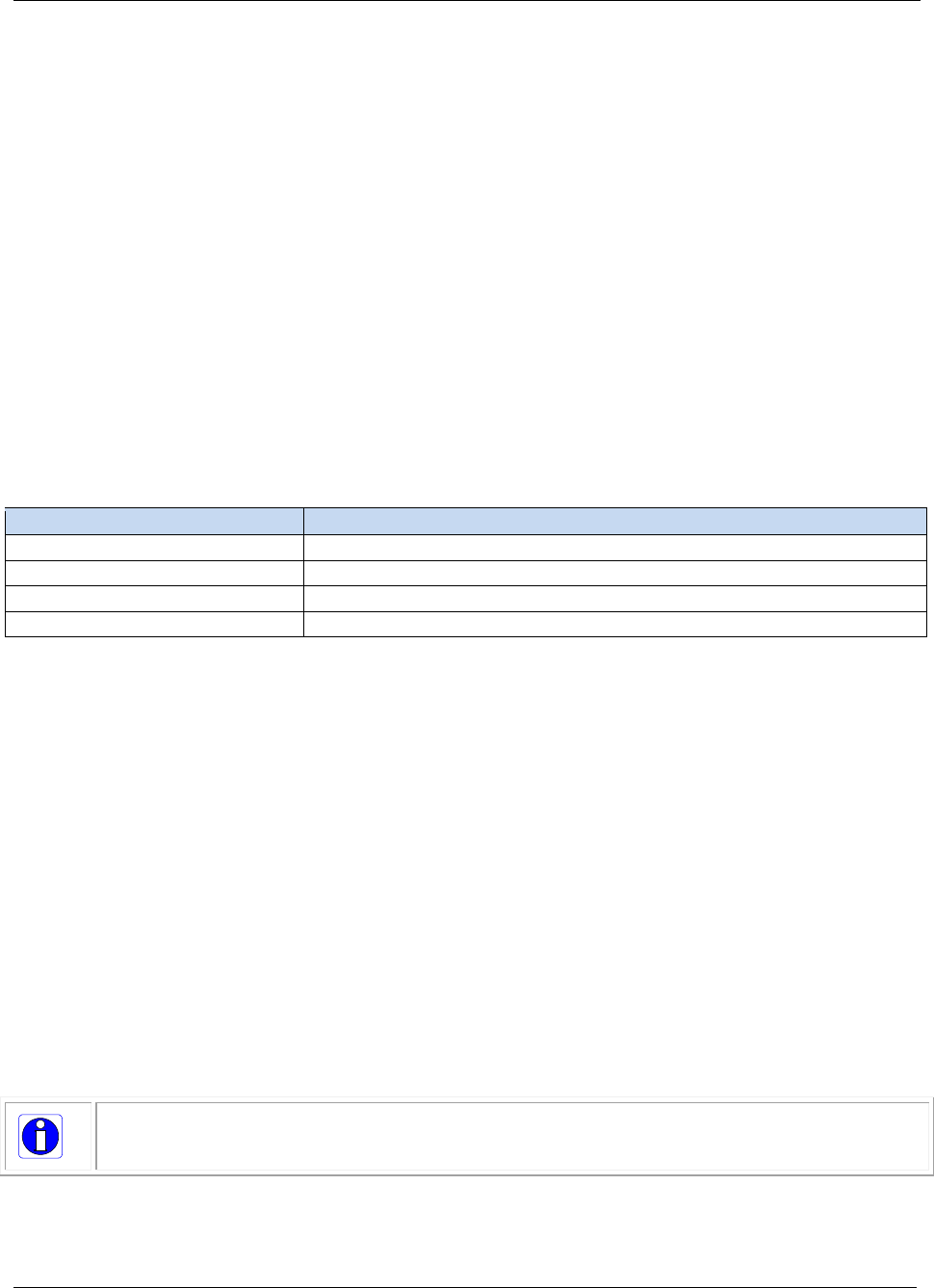
For example, the following message indicates the timestamp of the file is in the future:
As an example, the ntpdate package can be installed and configured to use an available local or online
NTP server to synchronize the system clock.
To install and configure the ntpdate package, use the following commands:
sudo apt-get install ntpdate
sudo ntpdate 140.165.161.1
It may be necessary to stop the service before initiating the update; for example:
sudo service ntp stop
sudo ntpdate time.nist.gov
sudo service ntp start
Additionally, the /etc/ntp.conf file can be updated to include the required NTP server. For example, the
following lines can be modified to add the NTP server:
# Use Ubuntu's ntp server as a fallback.
pool ntp.ubuntu.com
140.165.161.1
GigE-V Framework for Linux 32/64-bit GigE-V Framework API Overview
•
7
Installation
To install the GigE-V Framework for Linux from its compressed tar archive file, start by copying it to a
base directory, usually the HOME directory of the user installing it, and extracting the files.
For example:
cp GigE-V-Framework_x86_2.00.0.0105.tar.gz $HOME
cd $HOME
tar –zxf GigE-V-Framework_x86_2.00.0.0105.tar.gz
Then, change to the directory DALSA and run the installer script.
cd DALSA
./corinstall
The script installs the GenICam SDK (v3_0 or later), if not already installed, and then configures,
compiles, links, and installs the GigE-V Framework for Linux and its API libraries. It prompts for the
administrator password when it needs to copy the various libraries to their preferred locations.
Alternately, the installation can be run using sudo (for example, using “sudo ./corinstall”).
The locations used for files are as follows:
Directory
Description
/opt/genicam_v3_0
GenICam SDK v3_0 files
/var/opt/genicam/xml/cache
GenICam XML cache
/usr/local/lib
Dynamic library files for the GigE-V Framework
/usr/dalsa/GigeV
Dynamic link to $HOME/DALSA/GigeV for system wide visibility
Environment Variables
The script also adds environment variables that are needed for the GenICam installation to operate
properly. The environment variables added are :
GENICAM_ROOT_V3_0 = /opt/genicam_v3_0
GENICAM_CACHE_V3_0 = /var/opt/genicam/xml/cache
GENICAM_LOG_CONFIG_V3_0 = /opt/genicam_v3_0/log/config-unix
and GIGEV_XML_DOWNLOAD = /usr/dalsa/GigeV
The new environment variables are visible to all subsequent login shells. After installation, for them to
be visible, the current shell should be logged out and back in again. For the case of a GUI desktop, the
user should log off and back in.
As a reminder, the installation script outputs the message :
*************************************************************************************
GenICam library installation was performed - you will need to log out and back in to
properly set up the environment variables.
**************************************************************************************
Note: The environment variables are set globally via shell scripts inside the folder
/etc/profile.d/ that are sourced at login. This configuration works for the shells bash
and csh in most Linux systems.

8
•
GigE-V Framework API Overview GigE-V Framework for Linux 32/64-bit
Note: When using “sudo” to provide the necessary permissions for the higher performance
interface, remember to use “sudo –E” or “sudo –i” to invoke an interactive (login) shell in
order to pick up the environment variables that point to the GenICam SDK installation.
These are used at runtime to be able to set up and use the GenICam XML based features.
Uninstalling
To uninstall the GigE-V Framework API, use the following steps:
cd $HOME/DALSA
./corinstall uninstall
The script prompts for the administrator password when deleting files from their install locations. In
addition, the shell scripts that define the added environment variables are removed so that the
environment variables will not be defined at the next login. Files unzipped from the .tar archive during
installation are not removed.
Alternately, the uninstall procedure can be run using sudo (for example, using “sudo ./corinstall
uninstall”).
The GenICam SDK, installed with the GigE-V Framework, is not uninstalled when this API is
uninstalled since it may be used with other APIs and frameworks and with newer, updated, versions of
this framework. During uninstallation, the following text reminds the user that GenICam is not
uninstalled and describes how to uninstall the GenICam SDK if required:
*******************************************************************************
Found the GenICam library installation directory at /opt/genicam_v3_0
It is not necessary to uninstall it if it will be re-used later
To uninstall the GenICam library use the following command :
. $HOME/DALSA/GenICam_v3_0_0_linux_pkg/uninstall.sh
(Then you will need to log out and log in to remove the environment variables)
*******************************************************************************
Please note the command line for uninstall has a <space> between the <dot> and the
script name. As in <dot><space>$HOME/DALSA/GenICam_v3_0_0_linux_pkg /uninstall.sh
GigE-V Framework for Linux 32/64-bit GigE-V Framework API Overview
•
9
Performance Tuning
The Linux OS provides the GigE-V Framework with access to the standard network stack, suitable for
grabbing single images, and also provides a high performance network packet access mechanism,
suitable for streaming image sequences, that is traditionally used by packet sniffer applications.
To avoid packet loss on the network interface, a number of parameters may be adjusted by the user.
Important parameters to maximize are the MTU (maximum transmission unit) size and the number of
receive buffers available to the NIC driver. This helps reduce the number of packets to process and
therefore minimizes CPU overhead and interrupts.
A network tuning script provided with the API can maximize the MTU (enabling Jumbo frames) and
optimize certain network settings, including the number of receive buffers, using a standard tool
named “ethtool”. The tuning script is located in the following directory:
$HOME/DALSA/GigeV/bin/gev_nettweak
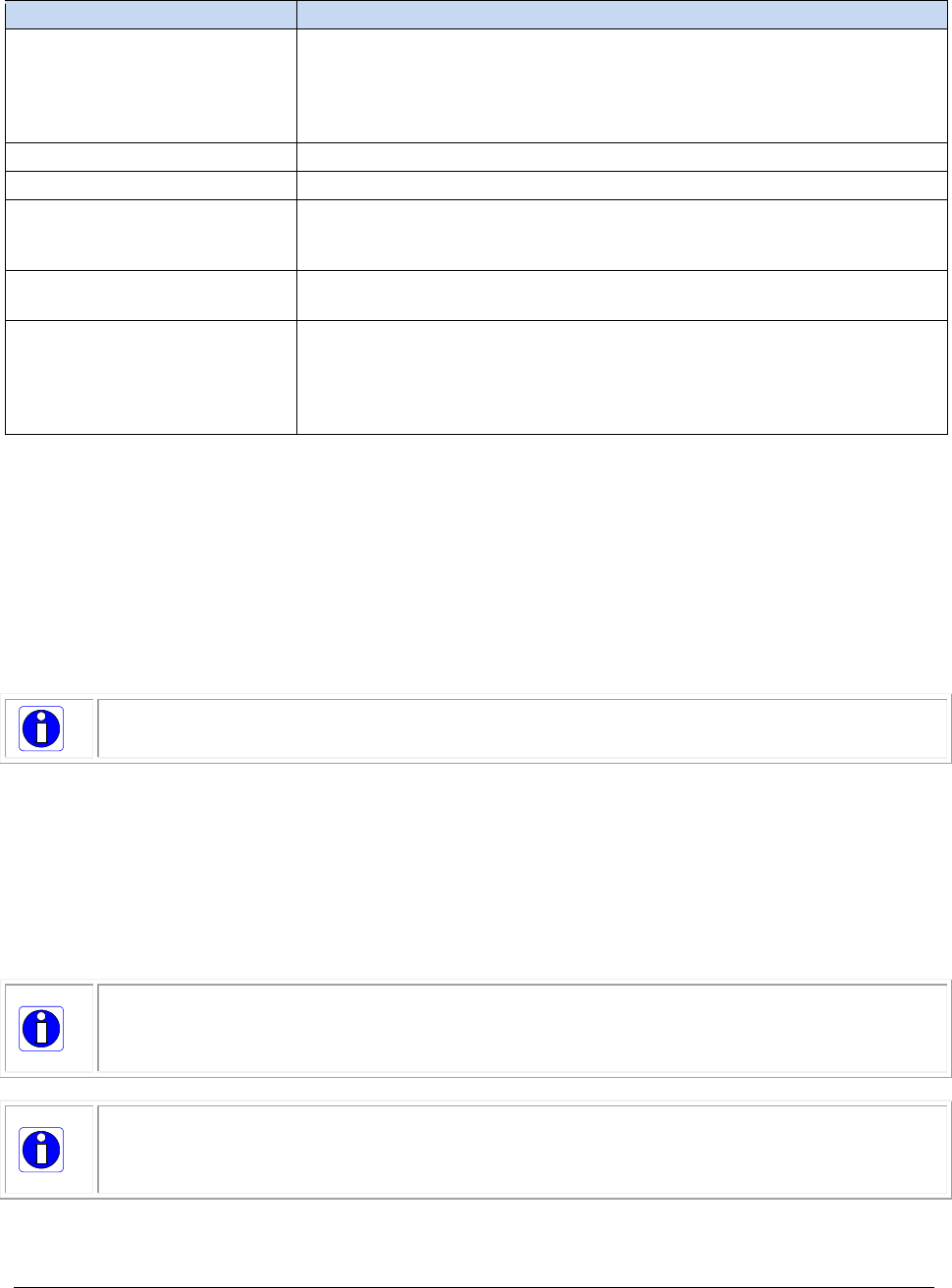
For example, to adjust network interface eth0, use the following terminal command to run the script
(administator privileges are required):
sudo $HOME/DALSA/GigeV/bin/gev_nettweak eth0
10
•
GigE-V Framework API Overview GigE-V Framework for Linux 32/64-bit
The script adjusts the following parameters:
Parameter
Description
MTU
Maximizes the MTU (Maximal Tranmission Unit) size on the NIC. This
corresponds to the maximum packet size for image data. The use of
NIC hardware whose drivers support “Jumbo frames” aids in making
this value as large as possible ( typically maximum is around 9K
bytes (9216 bytes).
net.ipv4.udp_rmem_min
Adjust the receive memory allocation size in the network stack.
net.core.netdev_max_backlog
Adjust the network packet backlog queue size.
net.unix.max_dgram_qlen
Adjust the network queue length for UDP packets. Computes the
amount of memory for UDP packets - a maximum image size and the
number of cameras expected provide a hint for this setting.
net.core.rmem_default
net.core.rmem_max
Adjust the default (and maximum) memory for receiving network
packets.
rx_value
rx_jumbo
Use "ethtool" utility (if present) to adjust the setting of the network
device drivers to optimize the rx_ring and the rx jumbo packet queue
for maximum throughput and to disable the rx pause operation. This
improves reception of image data packets from the cameras.
(Sending to the camerais not as critical)
Access to the high performance packet access interface, mentioned above, is provided by the
PF_PACKET socket interface and is restricted to processes that have a capability set that allows
CAP_NET_RAW (permits raw access to an interface for capturing directly). Generally, this is
accomplished either by using root / sudo permissions to run the program or to have the
CAP_NET_RAW capability set up with the setcap utility that comes with the libcap library.
The ability to tune threads with specific CPU affinity values and higher priority is restricted to
processes that have the capablity set that allow CAP_SYS_NICE. Generally, this is accomplished either
by using root / sudo permissions to run the program or to have the CAP_SYS_NICE capability set up
with the setcap utility that comes with the libcap library.
Note: Some security environments can assign capabilities to executables with a
configuration file (for example, /etc/permissions.local).
Without the CAP_NET_RAW bit set, the library defaults to standard packet accesses using sockets
reading UDP (User Datagram Protocol) packets from the network stack. Various parameters in the
standard network stack can be tuned to buffer more image data. Examples of tuning these parameters
can be found in the “gev_nettweak” script that accompanies the library installation. While the
standard network socket access works for receiving images from a camera, there can be considerable
latency in frame reception as the data makes its way through the network stack. For minimal latency
and higher data rates, it is recommended that the PF_PACKET interface be used by enabling the
CAP_NET_RAW capability bit.
Note: The setcap utility usage is “setcap cap_net_raw+eip <application>”. Where
<application> is the file name of the executables being used. This includes the application
program and all the loadable libraries it uses, referenced from ldconfig instead of
LD_LIBRARY_PATH.
Note: When using “sudo” to provide the necessary permissions for the higher performance
interface, remember to use “sudo –E” or “sudo –i” to invoke an interactive (login) shell in
order to pick up the environment variables that point to the GenICam SDK installation.
These are used at runtime to be able to set up and use the GenICam XML based features.
GigE-V Framework for Linux 32/64-bit GigE-V Framework API Overview
•
11
GigE Network Adapter Overview
GigE Vision compliant cameras connects to a computer’s Gigabit Network Adapter. If the computer is
already connected to a network, the computer requires a second network adapter, either onboard or
an additional PCIe NIC adapter. Refer to the Teledyne DALSA Network Imaging manual for information
on optimizing network adapters for GigE Vision cameras.
IP Configuration Sequence
For Teledyne DALSA GigE Vision cameras IP (Internet Protocol) Configuration sequence to assign an IP
address is executed automatically on camera power-up or when connected to a network. As a GigE
Vision compliant device, the camera attempts to assign an IP address as follows.
For any GigE Vision device, the IP configuration protocol sequence is:
• Persistent IP (if enabled)
• DHCP (if a DHCP server is available)
• Link-Local Address (always enabled as default)
The factory default for Teledyne DALSA GigE Vision cameras is Persistent IP disabled and DHCP
enabled with LLA always enabled as per the GigE Vision specification.
Supported Network Configurations
The camera obtains an IP address using the Link Local Address (LLA) or DHCP, by default. If required,
a persistent IP address can be assigned (refer to the Network Imaging manual).
If a DHCP server is present on the network, the camera issues a DHCP request for an IP address. The
DHCP server then provides the camera an IP address.
The LLA method, if used, automatically assigns the camera with a randomly chosen address on the
169.254.xxx.xxx subnet. After an address is chosen, the link-local process sends an ARP query with
that IP onto the network to see if it is already in use. If there is no response, the IP is assigned to the
device, otherwise another IP is selected, and the ARP is repeated. Note that the LLA mode is unable to
forward packets across routers. To use LLA, the NIC must be configured to an address on the
169.254.xxx.xxx subnet.
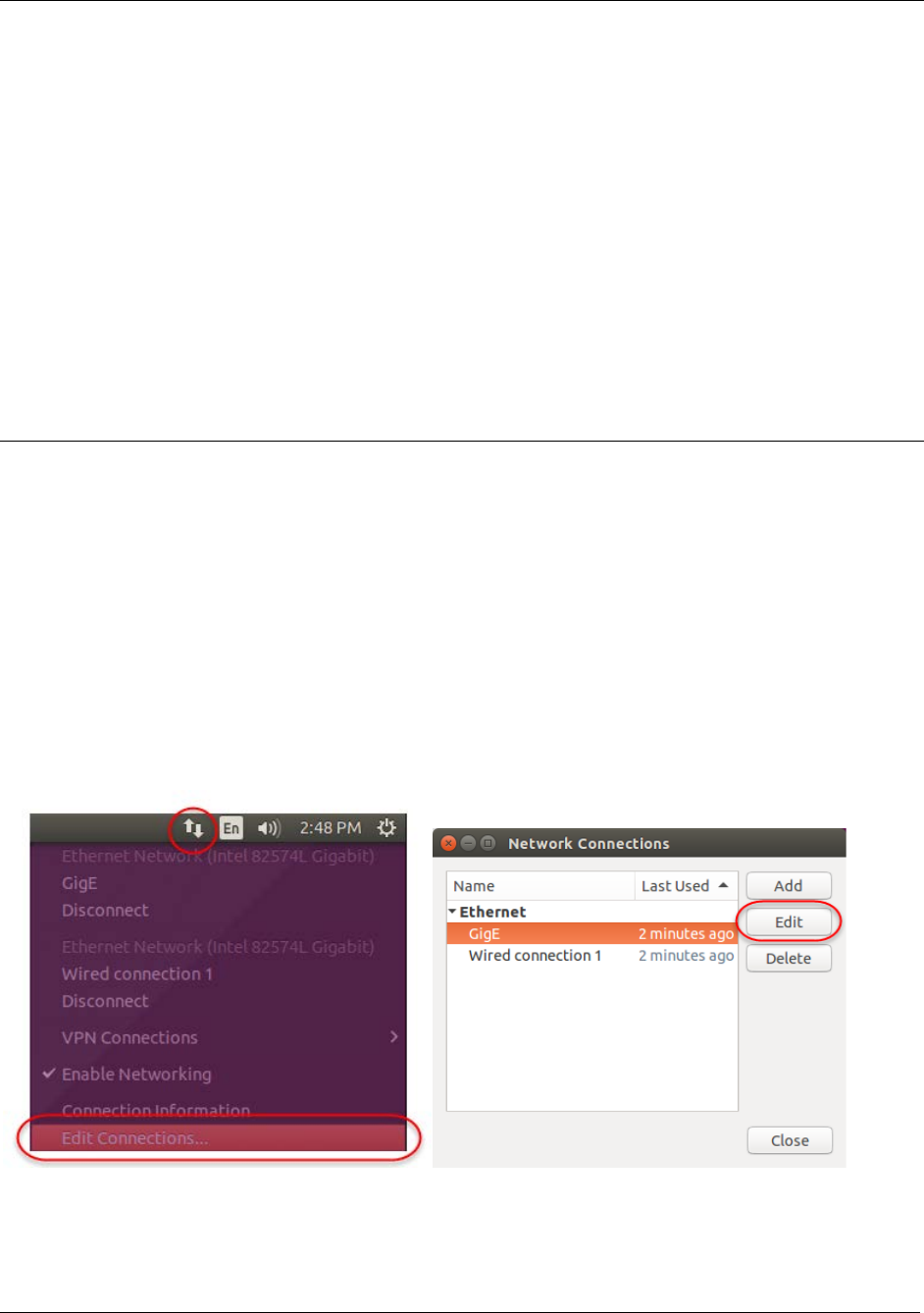
For example, in Ubuntu, click the network icon in the menu bar to open the Network Connections
dialog; select the NIC and click Edit to modify its parameters.
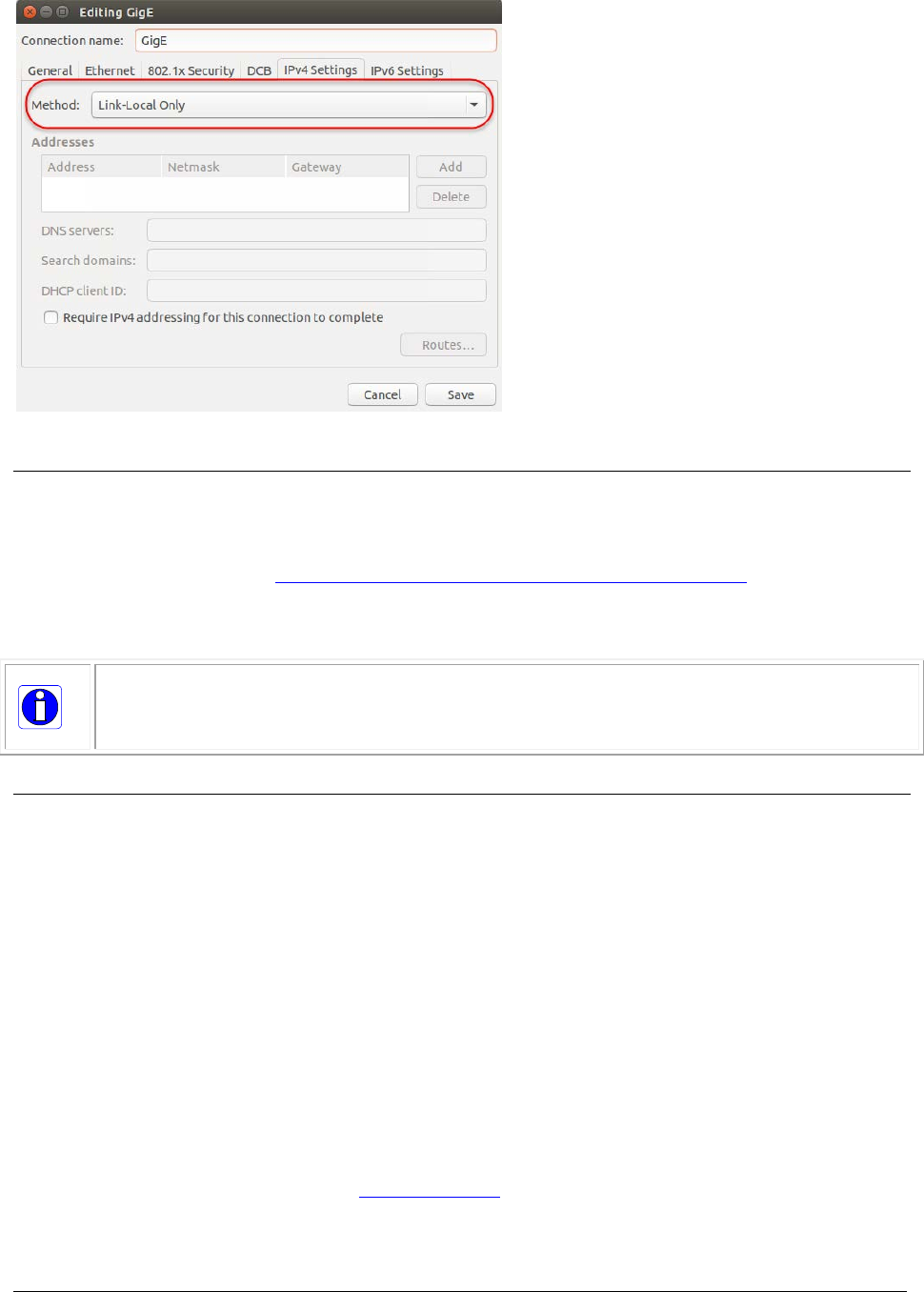
12
•
GigE-V Framework API Overview GigE-V Framework for Linux 32/64-bit
Firmware Update
The standard GenICam File Access features are used to updated the camera firmware, if the camera
supports firmware file write access. GenICam Standard Features Naming Convention (SFNC)
documentation is available at http://www.emva.org/standards-technology/genicam/.
The File Access Example demonstrates how to implement file access using the GigE-V Framework API
feature access functions.
Note: After successfully writing (uploading) a new firmware file to the camera, the camera
typically must be reset (using the GenICam DeviceReset command or power cycling the
camera) to activate the new firmware; refer to the camera documentation for more
information.
GigE with TurboDrive
The GigE-V Framework supports devices equipped with TurboDrive™ technology, delivering high speed
data transfers exceeding the GigE limit. TurboDrive uses advanced data modeling to boost data
transfers up to 2 or 3 times faster than standard GigE Vision speeds – with no loss of image quality.
These breakthrough rates are achieved using a proprietary, patent pending process that assembles
data from the sensor to optimize throughput, simultaneously taking full advantage of both the
sensor’s maximum frame rate and the camera’s maximum GigE data transfer speed (up to 115
Mbytes/s). Teledyne DALSA’s TurboDrive increases system dependability and robustness similar to
Camera Link throughput on a GigE network.
The “transferTurboMode” feature sets the enable state of TurboDrive (1 = enable, 0 = disable). If
TurboDrive is not supported this feature returns an error. Refer to the example programs
(genicam_c_demo/genicam_cpp_demo) for source code on to how to utilize TurboDrive in your
application.
Important: Actual Transfers with TurboDrive is image content dependent but in the best case
scenario, transfers over a GigE Network can reach the camera’s internal acquisition limit of up to
252MB/sec. If transfers are less than the camera maximum acquisition rate, camera memory will be
used as a circular frame buffer. Refer to TurboDrive Primer on the Teledyne DALSA web site for more details.
GigE-V Framework for Linux 32/64-bit GigE-V Framework API Overview
•
13
Example Programs
Example programs are located in the following directory:
$HOME/DALSA/GigeV/examples
The example programs are categorized by the basic functionality they demonstrate. One category
demonstrates the use of the GigE-V Framework API itself. Another category demonstrates the use of
the GigE-V Framework to setup access to the GenApi itself, provided by the GenICam SDK that was
installed with the Framework.
Each example program directory includes a makefile to compile the example. Examples must be
compiled before using by running the make command in the example directory. For example, in
Ubuntu:
sapera@computername:~/DALSA/GigeV/examples/genicam_c_demo$ make
Note: If the make operation fails on link, verify that the required prerequisites are installed
for the given hardware architecture (for example, ARM hardfloat, ARM softfloat, and Intel
x86).
Call the program name to run program. For example, in Ubuntu, to run the program in the current
directory, precede the program name with “./”:
sapera@computername:~/DALSA/GigeV/examples/genicamdemo$ ./genicamconsoledemo
If multiple cameras are connected, most example programs can be invoked using a camera index
(starting from 0):
./genicamconsoledemo 1
Note: For multiple cameras on the same NIC indices are not static and are populated
dynamically when the program is run, therefore the index for a specific camera may change
depending on the order it is acknowledged when the program is run. Functions are provided
to perform automatic camera (device) discovery and enumeration; see the Automatic
Camera Discovery section. Functions are also available to open cameras by IP address,
name or serial number; see the Connecting to a Camera section for more information.
The “-“ or “?” switch provides usage for most example programs. For example,
ubuntu@tegra-ubuntu:~/DALSA/GigeV/examples/dump_features$ ./savefeatures ?
GigE Vision Library GenICam Feature Save Example (May 6 2016)
3 camera(s) on the network
Usage: savefeatures : Output features from camera 0 to stdout.
savefeatures - cam_index : Output features from camera 'cam_index' to
stdout. (Note the hyphen indicating stdout)
savefeatures filename : Save features from camera 0 to 'filename'.
savefeatures filename cam_index : Save features from camera 'cam_index' to
'filename'.
ubuntu@tegra-ubuntu:~/DALSA/GigeV/examples/dump_features$
GigE-V Framework
API Examples
Description
genicam_c_demo
The genicam_c_demo program, in $HOME/DALSA/GigeV/examples/genicam_c_demo,

14
•
GigE-V Framework API Overview GigE-V Framework for Linux 32/64-bit
demonstrates a grab and display application utilizing GenICam XML feature accesses
using only C language calls to the Framework API.
gevconsoledemo
The gevconsoledemo program, in $HOME/DALSA/GigeV/examples/gevconsoledemo ,
demonstrates a grab and display application utilizing direct register access to the
camera. Only cameras known to the API can be used with this program since the
camera register definitions need to be hardcoded in a static table. For more information,
please see Appendix A: Feature Access Through Static Registers.
c_loadfeatures
The c_loadfeatures program, in $HOME/DALSA/GigeV/examples/dump_features,
demonstrates loading {feature_name : value } pairs from a text file to the camera using
only C callable functions from the Framework API.
GigE-V Framework for Linux 32/64-bit GigE-V Framework API Overview
•
15
GenICam GenApi
API Examples
Description
genicam_cpp_demo
The genicam_cpp_demo program, in
$HOME/DALSA/GigeV/examples/genicam_cpp_demo, demonstrates a grab and display
application utilizing GenICam XML feature accesses using the C++ access methods
provided by the GenApi SDK from the GenICam organization.
dumpfeatures
The dumpfeatures program, in $HOME/DALSA/GigeV/examples/dump_features,
demonstrates the use of the C++ access methods provided by the GenApi SDK from
the GenICam organization to access the GenICam XML features of a camera and output
the entire hierarchy of features, including their type, to the screen.
savefeatures
The savefeatures program, in $HOME/DALSA/GigeV/examples/dump_features,
demonstrates the use of the C++ access methods provided by the GenApi SDK from
the GenICam organization to access the GenICam XML features of a camera and save
the streamable features, as {feature_name : value} pairs, to the screen or to a text
file.
loadfeatures
The loadfeatures program, in $HOME/DALSA/GigeV/examples/dump_features,
demonstrates the use of the C++ access methods provided by the GenApi SDK from
the GenICam organization to access the GenICam XML features of a camera in order to
load {feature_name : value} pairs, from a text file, to the camera.
genicam_fileaccessdemo
The genicam_fileaccessdemo program, in
$HOME/DALSA/GigeV/examples/genicam_fileaccessdemo , demonstrates the use of the
C++ access methods provided by the GenApi SDK from the GenICam organization to
access the GenICam XML features that provide access to the file interface on the
camera. The files present can be detected and read or written, as allowed by the
definitions provided by the XML file.
Note: Running demos that display images, such as genicam_c_demo and
genicam_cpp_demo, on an ARM hard float platform using the ARM soft float package (GigE-
V-Framework_ARMsf_xxx) will not execute properly unless the required soft float library
packages are installed.
16
•
GigE-V Framework API Overview GigE-V Framework for Linux 32/64-bit
Grab Demos
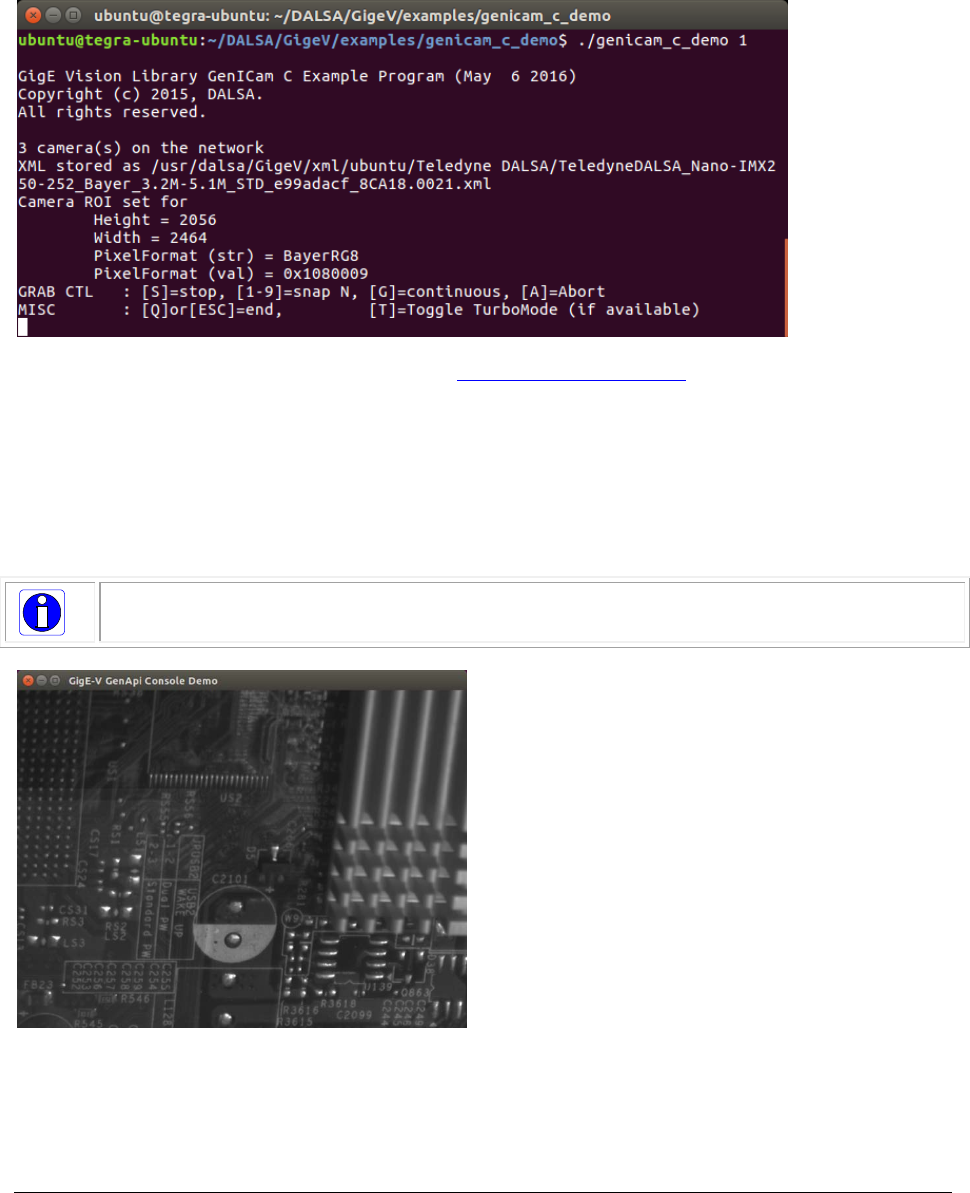
The grab demo examples (genicam_c_demo and genicam_cpp_demo) demonstrate how to acquire
and display images using a continuous (grab) or single frame (snap) acquisition. The examples display
the current image and pixel format settings for the selected camera. Bayer/YUV images are displayed
as monochrome since no conversion is performed; RGB images are displayed in color.
For a list of supported pixel formats refer to the GevGetImageParameters function description.
When more than 1 camera is available on the network, call the exectable followed by the camera
index (0 to (number of cameras -1), default = 0). For example,
./genicam_c_demo 1
The image is displayed in a separate window . To improve display performance, the user can optimize
the display as needed for the required platform.
Note: Depending on the image size, the display window can overlap the terminal window;
switch focus to the terminal window as required.
GigE-V Framework for Linux 32/64-bit GigE-V Framework API Overview
•
17
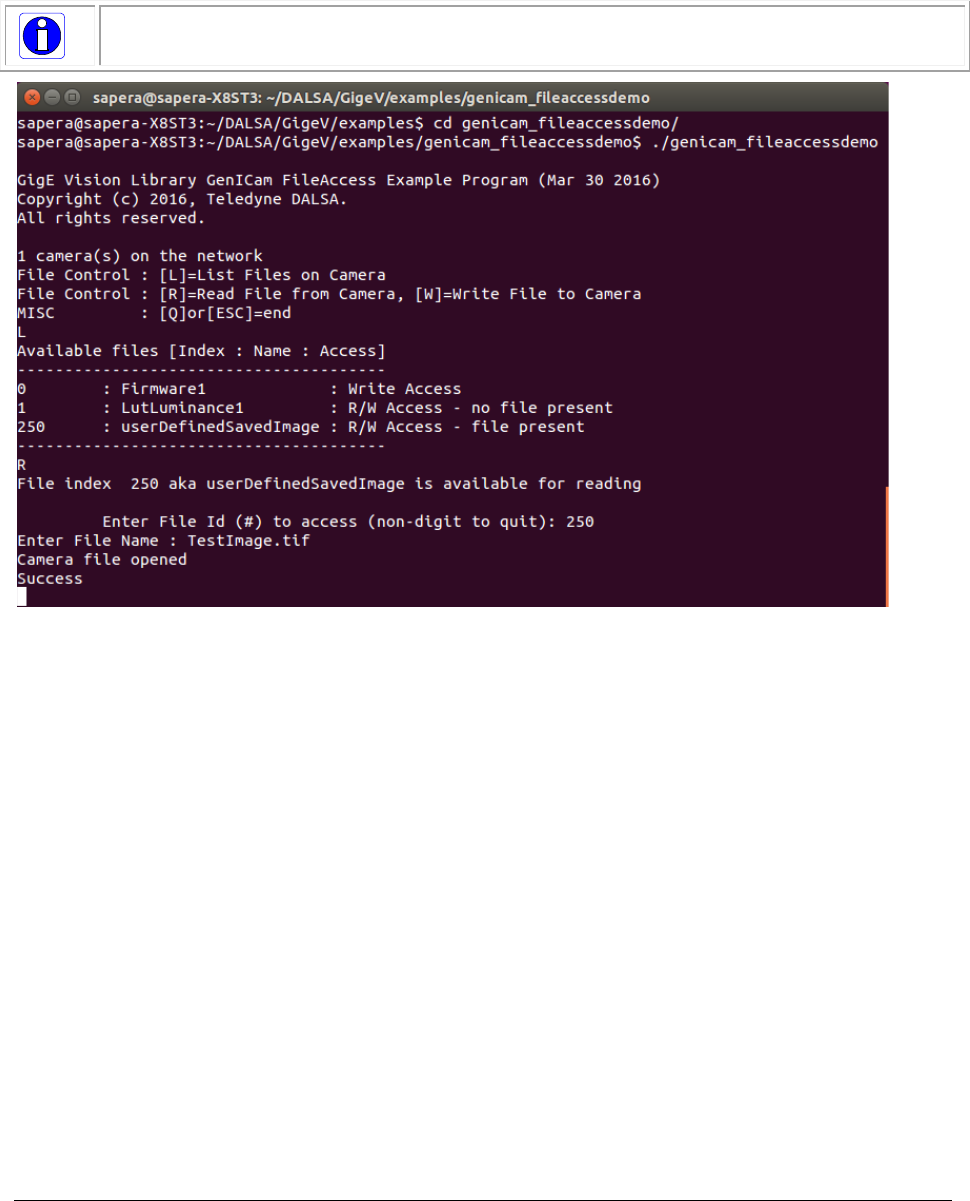
File Access Example
The file access example provides commands to list (L) the available files and their associated file
access privileges, read (R) files to save in the current directory, and write (W) files from the current
directory to the camera. Indices identify the available files.
Note: Refer to the camera documentation for the available files, formats and usage.

18
•
GigE-V Framework API Overview GigE-V Framework for Linux 32/64-bit
Feature Access Examples
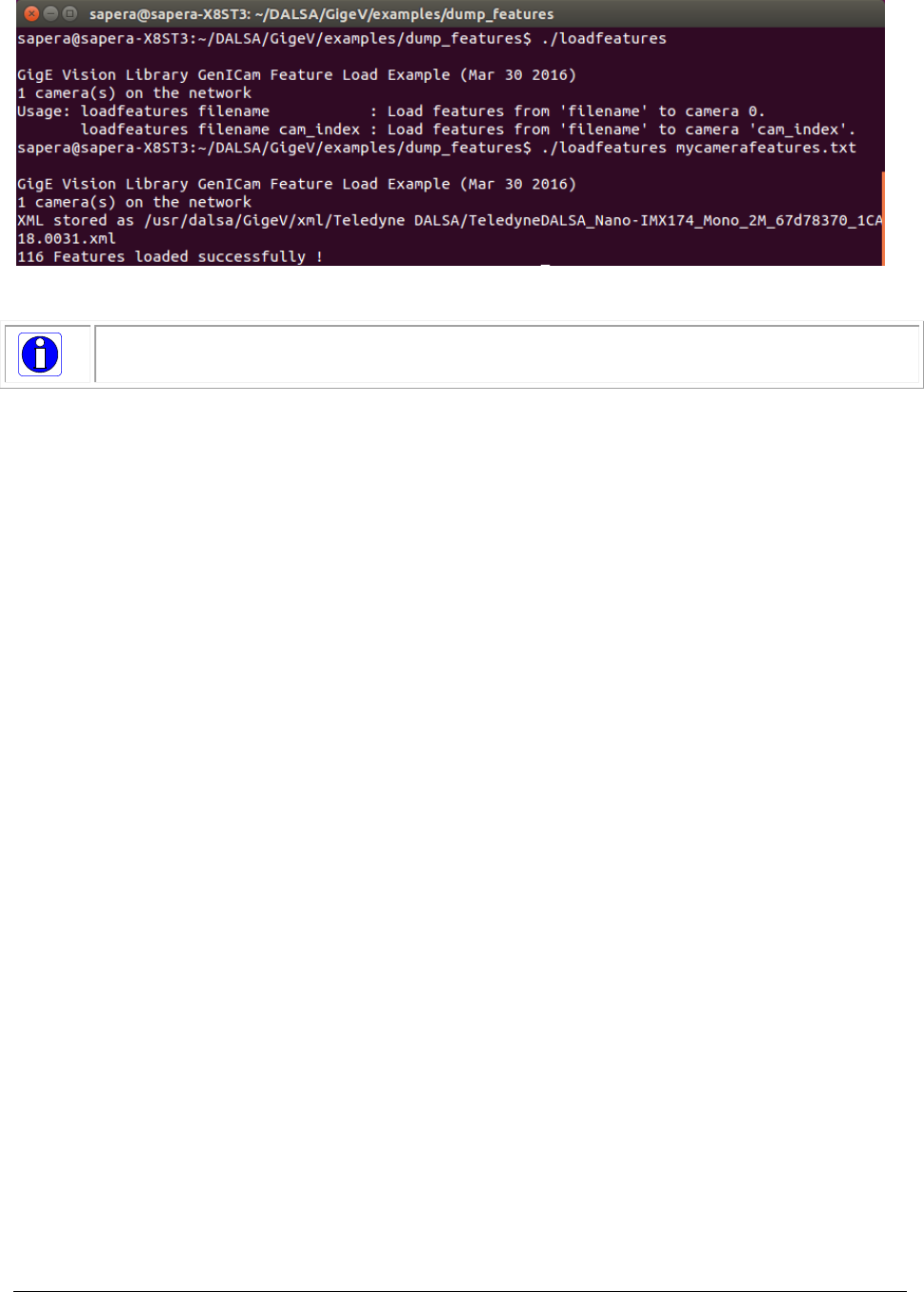
Feature access examples include the dumpfeatures, savefeatures and loadfeatures/c_loadfeatures that
demonstrate how to list the available features on a camera, output the current camera settings and
load camera settings to the camera, respectively.
The dumpfeatures example parses the xml file to extract all available features on the camera by
category and their corresponding type, displaying them in the terminal window:
Dumping feature tree :
Category : Root
Category : deviceInformation
DeviceVendorName : <IString>
DeviceFamilyName : <IString>
DeviceModelName : <IString>
DeviceVersion : <IString>
deviceManufacturerPartNumber : <IString>
DeviceManufacturerInfo : <IString>
DeviceFirmwareVersion : <IString>
DeviceID : <IString>
DeviceSerialNumber : <IString>
deviceMacAddress : <IInteger>
…
Category : deviceSensorControl
DeviceScanType : <IEnumeration>
sensorColorType : <IEnumeration>
pixelSizeInput : <IEnumeration>
SensorWidth : <IInteger>
SensorHeight : <IInteger>
acquisitionFrameRateControlMode : <IEnumeration>
AcquisitionFrameRateEnable : <IBoolean>
AcquisitionFrameRate : <IFloat>
…
Category : DigitalIOControl
TriggerSelector : <IEnumeration>
TriggerMode : <IEnumeration>
triggerFrameCount : <IInteger>
…
The savefeatures and loadfeatures/c_loadfeatures examples export/import feature settings that are
streamable (that is, can be uploaded/downloaded in a batch process ) using a simple text file in the
following format:
<feature> <value>
<feature> <value>
For example, to save current camera feature settings to a text file (in the current directory), use the
following command:
./savefeatures <filename>.txt
With multiple cameras, usage is as follows:
savefeatures : Output features from camera 0 to stdout.
savefeatures - cam_index : Output features from camera 'cam_index' to
stdout. (Note the hyphen indicating stdout)
savefeatures filename : Save features from camera 0 to 'filename'.
savefeatures filename cam_index : Save features from camera 'cam_index' to
'filename'.
When loading features, the file need only contain the feature-value pair for those features that need to
be modified. For example:
PixelFormat Mono8
OffsetX 0
OffsetY 0
Width 640
Height 480
GigE-V Framework for Linux 32/64-bit GigE-V Framework API Overview
•
19
If multiple cameras are connected, the camera index (0 to (number of cameras -1), default = 0) is
used to select the required camera.
Note: Not all camera features are streamable ; for non-streamable features you must use
the GevGetFeatureValue and GevSetFeatureValue functions.
20
•
GigE-V Framework API Overview GigE-V Framework for Linux 32/64-bit
GigE Vision Device Status Tool
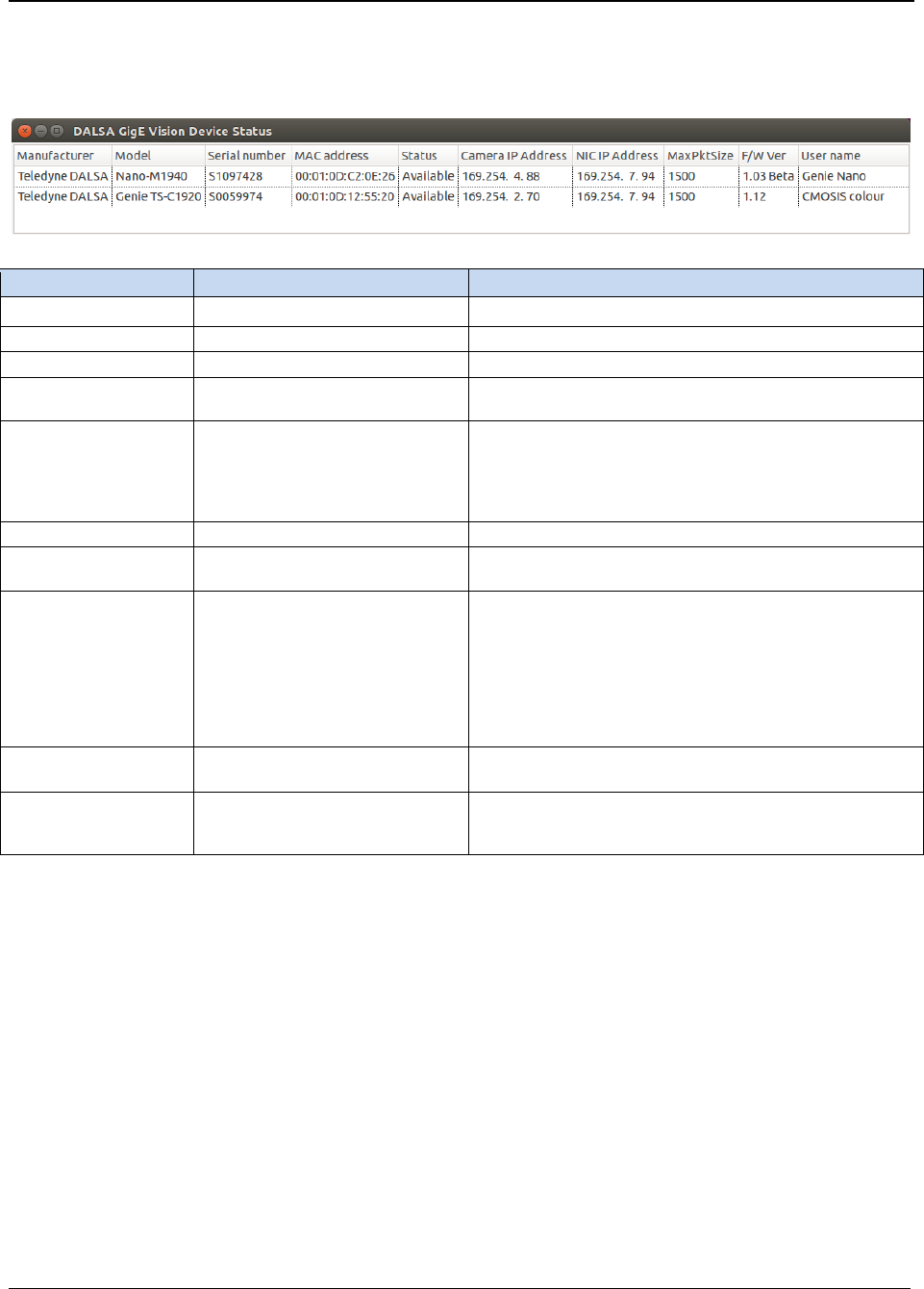
The GigE Vision Device Status tool lists all devices connected to the host system. Each GigE device is
listed by name along with important information such as the assigned IP address and device MAC
address.
The following table provides the feature name and description of the available status fields.
Name
Feature Name
Description
Manufacturer
DeviceVendorName
Displays the device vendor name.
Model
DeviceModelName
Displays the device model name.
Serial number
DeviceSerialNumber
Dispays the device’s factory set 8-digit serial number.
MAC address
deviceMacAddress
Displays the unique MAC (Media Access Control)
address of the device.
Status
DeviceConnectionStatus
Displays the current status of the device connectino.
Possible values are:
• Available: The device is available.
• Connected: The device is currently connected
to an application and is not available.
Camera IP Address
GevCurrentIPAddress
Displays the device’s current IP address.
NIC IP Address
GevPrimaryApplicationIPAddress
Displays the NIC IP address to which the device is
connected.
MaxPktSize
GevSCPSPacketSize
Displays the current maximum packet size, in bytes,
for the device to send on the stream channel. The
actual packet size sent is set to the maximum
supported by both the NIC and device packet size
settings.
Note, when a device is connected, this feature cannot
be queried and displays a default value that may not
correspond to the actual device setting.
F/W Version
DeviceVersion
Displays the device version. This field will also highlight
if the firmware is a beta or custom design.
User name
DeviceUserID
Displays the device’s current user-programmable
identifier of up to 15 characters. The default factory
setting is the camera serial number.
The GigE server periodically scans the network automatically to refresh its state. It might take a few
seconds for the GigE Server to refresh its state after a GigE camera has obtained an IP address.
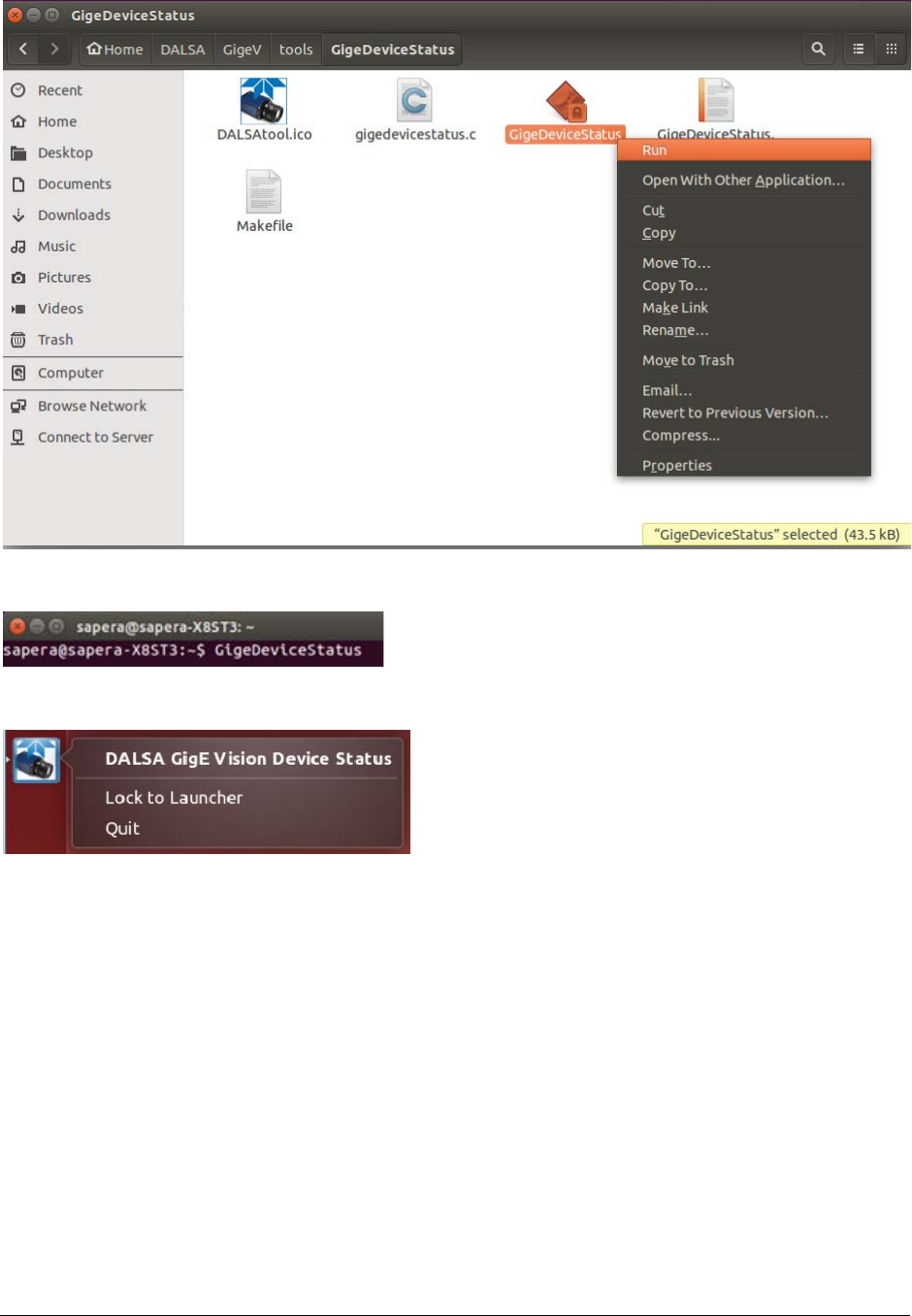
For example, to start the application in Ubuntu, use the File Manager to open the directory and use
the pop-up menu Run command.
GigE-V Framework for Linux 32/64-bit GigE-V Framework API Overview
•
21
Alternatively, the tool can be started directly from any local directory (it is copied to the /usr/local/bin
directory). For example, in Ubuntu:
When the application is started, the application icon is placed in the Launcher bar (in Ubuntu), from
where it can be locked to easily start the application.
22
•
GigE-V Framework API Overview GigE-V Framework for Linux 32/64-bit
Camera IP Address Configuration Tool
The gevipconfig tool is a command line utility that assigns an IP address to a camera based on its MAC
address. IP addresses can be assigned temporarily (ForceIP) or with a persistent IP mode (assigned
address is saved in non-volatile memory and used on power-up).
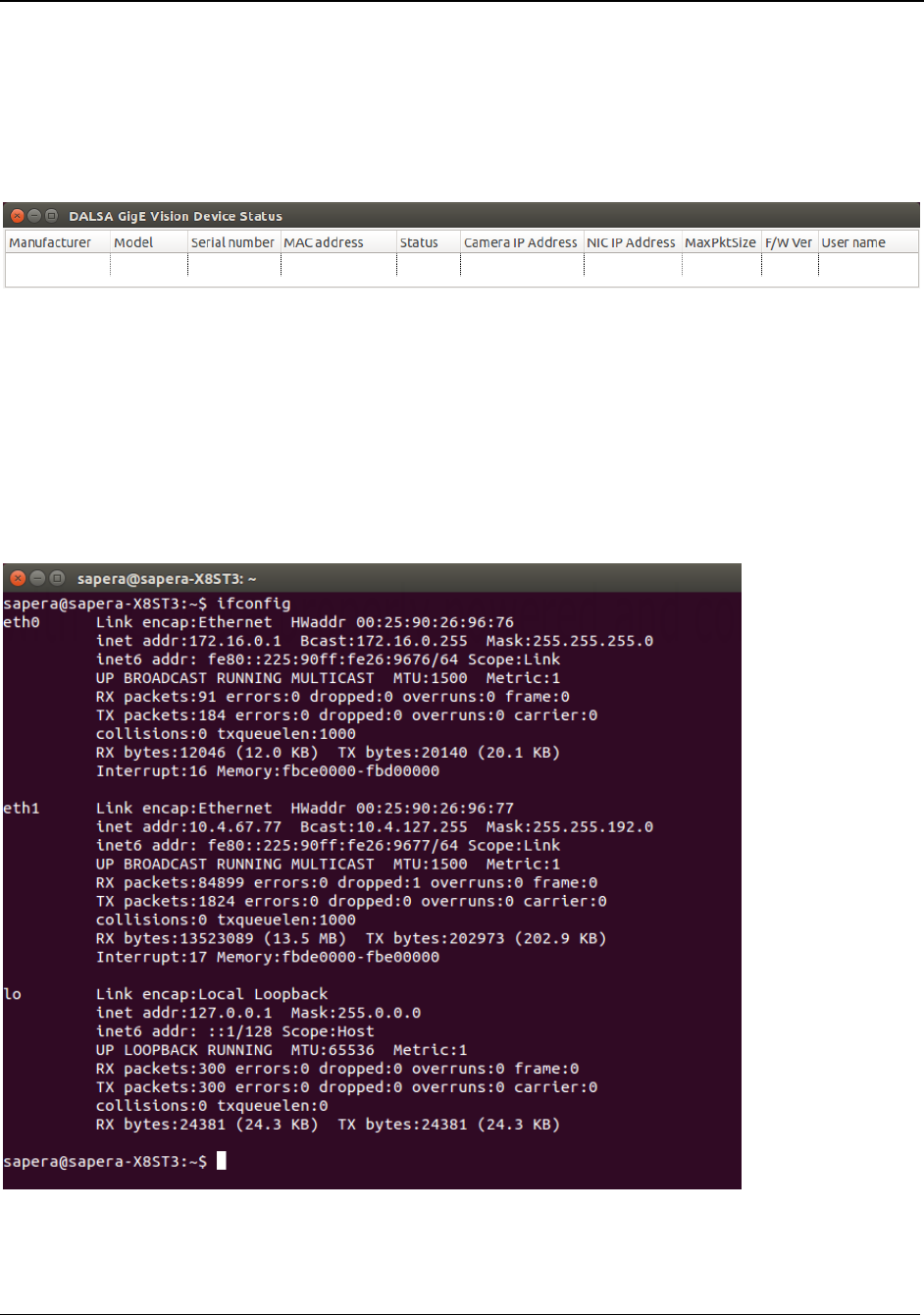
This allows cameras to be recovered if the network addressing scheme makes them undetectable. The
gevipconfig tool can be used, for example, when the GigeDeviceStatus tool does not display any
devices (with a camera properly powered and connected):
The command parameters are:
Usage: gevipconfig [-p] MAC_Address IP_Address Subnet_Mask
-p (optional) = sets address/subnet to persistent mode
MAC_Address = aa:bb:cc:dd:ee:ff (a-f are HEX digits)
IP_Address = A.B.C.D (A-D are decimal digits)
Subnet_Mask = A.B.x.y (Mask for class B or C subnet)
The tool can be started directly from the local directory (it is copied to the /usr/local/bin directory).
The ifconfig command can be used to list the available NIC IP configurations.

GigE-V Framework for Linux 32/64-bit GigE-V Framework API Overview
•
23
Example usage:
To temporarily set a camera with MAC address 00:01:0D:11:08:7F to an address visible to a NIC (for
example, in LAA mode IP address 169.254.0.1 with subnet 255.255.0.0):
gevipconfig 00:01:0D:11:08:7F 169.254.8.128 255.255.0.0
Note: The camera will retain its previous settings when reset.
Setting A Persistent IP Address
To set a camera with MAC address 00:01:0D:11:08:7F to a persistent static address of 172.10.1.4
(camera reboots with the specified address):
gevipconfig –p 00:01:0D:11:08:7F 172.10.1.4 255.255.255.0

24
•
GigE-V Framework API GigE-V Framework for Linux 32/64-bit
GigE-V Framework API
About GigE Vision
The GigE Vision standard describes a set of protocols that define access methods and capabilities for
devices and applications alike. The main protocols applicable for GigE Vision cameras are GVCP (GigE
Vision Control Protocol) and GVSP (GigE Vision Streaming Protocol).
The GigE-V Framework API supports the standard register and memory area access parts of GVCP as
well as its asynchronous message channel. The API also supports image acquisition from a device
using GVSP.
The specific definitions of what is supported by a device are contained in the GigE Vision compliant
XML file provided with the device. Starting with v2.0, the GigE-V Framework API library is able to read
the XML file from the device, and associate a GenICam feature node tree with the device. For more
information on how to use the XML file see the code examples provided in this document and the
example programs supplied with the API
The GigE-V Framework API builds on the GenICam GenApi, which is included in the GigE-V Framework
API installation. For more information and documentation of the GenICam GenApi visit the EMVA
(European Machine Vision Association) website: www.emva.org/standards-technology/genicam/.
GigE-V Framework for Linux 32/64-bit GigE-V Framework API
•
25
API Initialization and Configuration
This section describes the API functions to initialize the API and adjust the configuration parameters
available to modify the API’s behavior.
Member Function Overview
Function Description
GevApiInitialize Function used to initialize the API.
GevApiUninitialize Function used to close (un-initialize) the API.
GevApiGetLibraryConfigOptions Gets GigE-V Framework API library user configurable
parameters.
GevApiSetLibraryConfigOptions Sets GigE-V Framework API library user configurable
parameters.
Member Function Descriptions
The following functions are members of the API Initialization and Configuration group.
GevApiInitialize
GEV_STATUS
GevApiInitialize(void);
Description
Initialize
s the API.
Return Value
GEVLIB_OK
GEVLIB_ERROR_INSUFFICIENT_MEMORY
GevApiUninitialize
GEV_STATUS
GevApiUninitialize(void);
Description
C
loses (un-initialize) the API.
Return Value
GEVLIB_OK

26
•
GigE-V Framework API GigE-V Framework for Linux 32/64-bit
GevApiGetLibraryConfigOptions
GevApiSetLibraryConfigOptions
GEV_STATUS
GevGetLibraryConfigOptions(GEVLIB_CONFIG_OPTIONS *options);
GEV_STATUS
GevSetLibraryConfigOptions(GEVLIB_CONFIG_OPTIONS *options);
Description
Obtain
s or updates the user configurable parameters that apply to the GigE-V Framework API library.
The configurable options are contained in a data
structure of type GEVLIB_CONFIG_OPTIONS and
apply globally to the operation of the
GigE-V Framework API library within the current application.
Parameters
options
Pointer to a GEVLIB_CONFIG_OPTIONS structure
:
typedef struct
{
UINT32 version;
UINT32 logLevel;
UINT32 numRetries;
UINT32 command_timeout_ms;
UINT32 discovery_timeout_ms;
UINT32 enumeration_port;
UINT32 gvcp_port_range_start;
UINT32 gvcp_port_range_end;
} GEVLIB_CONFIG_OPTIONS, *PGEVLIB_CONFIG_OPTIONS;
Structure
Description
version
The version of the API (it is read
-only)
logLevel
The current message severity logging level for informational
messages. The logLevel can be set to select which messages are
actually output.
Possible values are:
GEV_LOG_LEVEL_OFF
No logging is performed
GEV_LOG_LEVEL_NORMAL
Fatal and error messages
are
enabled
GEV_LOG_LEVEL_ERRORS
Same as “NORMAL”
GEV_LOG_LEVEL_WARNINGS
Warning messages are also
enabled
GEV_LOG_LEVEL_DEBUG
Debug messages are also enabled
GEV_LOG_LEVEL_TRACE
Trace messages are also enabled
The default value is
GEV_LOG_LEVEL_NORMAL.
Messages are logged using GevPrint to print messages.
Messages can have the following levels of severity :
GEV_LOG_FATAL
For fatal errors.
GEV_LOG_ERROR
For general errors.
GEV_LOG_WARNING
For warnings
GEV_LOG_INFO
For informational purposes

GigE-V Framework for Linux 32/64-bit GigE-V Framework API
•
27
Important:
The more types of messages that are enabled, the
more of a load is placed on the library to perform the logging.
This can lead to degradation of performance in high data rate
applications.
numRetries
Number
of times a command is retried before giving up on the
command and generating an error. This is to allow some
tolerance for collisions and added traffic on the network interface
connecting the PC to the camera. (The default value is 3)
c
ommand_timeout_ms
M
illiseconds the library will wait for a response to a command
before attempting to retry the command or, if the number of
retries have been exhausted, failing the command.
(The default value is 2000 msecs)
discovery_timeout_ms
Milliseconds the library will wait for a response when querying the
network for the presence of cameras. The number of retries
setting also applies to the process of querying the presence of
cameras. (The default value is 1000 msecs)
enumeration_port
IP (
Internet Protocol) port on which the device
enumeration/discovery will take place. This allows for the tuning
of network port usage in a system. (The default value is 39999)
gvcp_port_range_start
gvcp_port_range_end
Start
and end IP (Internet Protocol) port numbers for the range
of ports used by the library for communicating with cameras. Port
assignments are taken as needed, from this range and returned
when they are no longer required. This allows for the tuning of
network port usage in a system.
(The
default range is 40000 to 49999)
Return Value
GEVLIB_OK

28
•
GigE-V Framework API GigE-V Framework for Linux 32/64-bit
Automatic Camera Discovery
Functions are provided to perform automatic camera (device) discovery and enumeration.
Member Function Overview
Function Description
GevDeviceCount Function used to query the number of cameras detected in the
system.
GevGetCameraList Function returns a list of cameras detected as present in the
system.
Member Function Descriptions
The following functions are members of the Automatic Camera Discovery group.
GevDeviceCount
int
GevDeviceCount(void);
Description
Q
ueries the number of cameras detected in the system.
Note: A number of factors determine whether connected cameras
are seen in the system. Most
notably, the camera and network interface card (NIC) must be on the same IPV4 subnet.
Return Value
The return value is the number of cameras visible in the system.
GevGetCameraList
GEV_STATUS
GevGetCameraList
(GEV_CAMERA_INFO *
cameras, int maxCameras,
int *numCameras);
Description
Returns
a list of cameras detected as present in the system.
Parameters
cameras
Pointer to an array of
GEV_CAMERA_INFO structures, allocated by the caller, to
contain information for the cameras detected in the system.
maxCameras
M
aximum number of entries in the array of GEV_CAMERA_INFO structures passed in
the ‘cameras’ parameter.
numCameras
Pointer
to contain the number of cameras actually detected in the system.
(Note: The number of cameras found can be larger than the number of entries in the
‘cameras’ array. In this case, only ‘maxCameras’ entries are returned in the array. The
total number of cameras in the system is returned in ‘numCameras’.)
Return Value
GEVLIB_OK.
GigE-V Framework for Linux 32/64-bit GigE-V Framework API
•
29
Connecting to a Camera
After cameras are detected by the system, they can be connected to and accessed via a ‘handle’ (of
type GEV_CAMERA_HANDLE). GigE Vision makes a distinction between classes of connection. Primary
control connections and secondary control connections are supported.
A connection using the primary control channel to a camera is able to control all aspects of the camera
function including its streaming interface and its asynchronous message channel. If this connection is
exclusive, no other connections can be made to the camera. If the primary control channel is not
being used in an exclusive mode, a secondary control channel can be opened and the camera queried
for monitor access. Applications using the secondary control channel can only read from the camera
and are used only for monitoring.
The following functions provide a means to create the camera handle for device access. These
functions are compatible for use in both C and C++ language application programs.
Note: In all cases, the camera device and the NIC card must share the same IP subnet
mask.
Member Function Overview
Function Description
GevOpenCamera Creates a camera handle for accessing a camera.
GevOpenCameraByAddress Creates a camera handle for accessing a camera identified by a
its IP address.
GevOpenCameraByName Creates a camera handle for accessing a camera identified by a
its user name.
GevOpenCameraBySN Creates a camera handle for accessing a camera identified by a
its serial number.
GevCloseCamera Closes a previously opened camera handle and terminates
access.
GevGetCameraInterfaceOptions Obtains the user configurable parameters.
GevSetCameraInterfaceOptions Updates the user configurable parameters.
GevGetCameraInfo Obtains a pointer to the GEV_CAMERA_INFO structure.

30
•
GigE-V Framework API GigE-V Framework for Linux 32/64-bit
Member Function Descriptions
The following functions are members of the Camera Access group.
GevOpenCamera
GEV_STATUS
GevOpenCamera
(GEV_CAMERA_INFO *
device, GevAccessMode mode,
GEV_CAMERA_HANDLE *handle);
Description
C
reates a camera handle for accessing a camera identified by an input camera information structure
(type
GEV_CAMERA_INFO).
Parameters
device
Pointer to a
GEV_CAMERA_INFO structure,
allocated by the caller,
passed in to identify the camera device to open.
mode
Required
access mode. The available values are:
GevExclusiveMode
: Exclusive R/W access to the camera.
GevMonitorMode
: Shared Read-only access to the camera.
GevControlMode
: Shared R/W access to the camera.
The most commonly used mode, for user imaging applications, is GevExclusiveMode.
handle
Pointer to a GEV_CAMERA_HANDLE type
Receives the allocated handle to be used to access the camera.
Return Value
GEV_STATUS
Possible values are
:
GEVLIB_ERROR_API_NOT_INITIALIZED
GEVLIB_ERROR_INVALID_HANDLE
GEVLIB_ERROR_INSUFFICIENT_MEMORY
GEVLIB_ERROR_NO_CAMERA
GEV_STATUS_ACCESS_DENIED

GigE-V Framework for Linux 32/64-bit GigE-V Framework API
•
31
GevOpenCameraByAddress
GEV_STATUS
GevOpenCameraByAddress
(un
signed long ip_address,GevAccessMode mode,
GEV_CAMERA_HANDLE *handle);
Description
C
reates a camera handle for accessing a camera identified by a camera’s IP address.
Parameters
ip_address
32
-bit IP address for a camera, as a number.
For example,
192.168.1.10 is 0xC0A8010A.
mode
Required
access mode. The available values are:
GevExclusiveMode : Exclusive R/W access to the camera.
GevMonitorMode : Shared Read-only access to the camera.
GevControlMode : Shared R/W access to the camera.
The most
commonly used mode for user imaging applications is GevExclusiveMode.
handle
Pointer to a GEV_CAMERA_HANDLE type
to receive the allocated handle to be used to access the camera.
Return Value
GEV_STATUS
Possible values are
:
GEVLIB_ERROR_API_NOT_INITIALIZED
GEVLIB_ERROR_INVALID_HANDLE
GEVLIB_ERROR_INSUFFICIENT_MEMORY
GEVLIB_ERROR_NO_CAMERA
GEV_STATUS_ACCESS_DENIED

32
•
GigE-V Framework API GigE-V Framework for Linux 32/64-bit
GevOpenCameraByName
GEV_STATUS
GevOpenCameraByName
(char *
name, GevAccessMode mode,
GEV_CAMERA_HANDLE *handle);
Description
C
reates a camera handle for accessing a camera identified by a camera’s user defined name. The user
defined name is a string that can be programmed into the camera for use in identifying multiple
cameras.
Parameters
name
A character string (16 characters max) that will be used to match the user defined name
string contained in a camera connected on the system.
mode
The
required access mode. The available values are:
GevExclusiveMode : Exclusive R/W access to the camera.
GevMonitorMode : Shared Read-only access to the camera.
GevControlMode : Shared R/W access to the camera.
The most commonly used mode for user imaging applications is GevExclusiveMode.
handle
Pointer to a GEV_CAMERA_HANDLE type
to receive the allocated handle to be used to access the camera.
Return Value
GEV_STATUS
Possible values are
:
GEVLIB_ERROR_API_NOT_INITIALIZED
GEVLIB_ERROR_INVALID_HANDLE
GEVLIB_ERROR_INSUFFICIENT_MEMORY
GEVLIB_ERROR_NO_CAMERA
GEV_STATUS_ACCESS_DENIED

GigE-V Framework for Linux 32/64-bit GigE-V Framework API
•
33
GevOpenCameraBySN
GEV_STATUS
GevOpenCameraBySN
(char *sn, GevAccessMode mode,
GEV_CAMERA_HANDLE *handle);
Description
C
reates a camera handle for accessing a camera identified by a camera’s serial number. The serial
number is re
presented as a string that is programmed into the camera, by the manufacturer, to
identify a particular camera unit.
Parameters
sn
A character string (16 characters max) that match
es the serial number string
contained in a camera connected on the system.
mode
The
required access mode. The available values are:
GevExclusiveMode : Exclusive R/W access to the camera.
GevMonitorMode : Shared Read-only access to the camera.
GevControlMode : Shared R/W access to the camera.
The most commonly used mode, for
user imaging applications, is GevExclusiveMode.
handle
Pointer to a GEV_CAMERA_HANDLE type to receive the allocated handle
used to
access the camera.
Return Value
GEV_STATUS
Possible values are
:
GEVLIB_ERROR_API_NOT_INITIALIZED
GEVLIB_ERROR_INVALID_HANDLE
GEVLIB_ERROR_INSUFFICIENT_MEMORY
GEVLIB_ERROR_NO_CAMERA
GEV_STATUS_ACCESS_DENIED
GevCloseCamera
GEV_STATUS
GevCloseCamera(GEV_CAMERA_HANDLE *handle);
Description
C
loses a previously opened camera handle and terminates access to the camera from the application.
Parameters
handle
Pointer to a GEV_CAMERA_HANDLE type to receive the allocated handle, used to
access the camera.
Return Value
GEV_STATUS
Possible values are
:
GEVLIB_ERROR_INVALID_HANDLE
GEVLIB_OK

34
•
GigE-V Framework API GigE-V Framework for Linux 32/64-bit
GevGetCameraInterfaceOptions, GevSetCameraInterfaceOptions
GEV_STATUS
GevGetCameraInterfaceOptions
(GEV_CAMERA_HANDLE
handle,
GEV_CAMERA_OPTIONS *options);
GEV_STATUS
GevSetCameraInterfaceOptions
(GEV_CAMERA_HANDLE
handle,
GEV_CAMERA_OPTIONS *options);
Description
These functions are used to obtain and update the user configurable parameters that apply to the
camera connection through the
camera handle. The configurable options are contained in a data
structure of type GEV_CAMERA_OPTIONS and apply only to the camera accessed through the specific
camera handle.
Parameters
handle
Pointer to a GEV_CAMERA_HANDLE type to receive the allocated
handle, used to access
the camera.
o
ptions
Pointer to a data structure of type GEV_CAMERA_OPTIONS, allocated by the caller, that
contains the parameters associated with the underlying camera handle. This type is
defined as
typedef struct
{
UINT32 numRetries;
UINT32 command_timeout_ms;
UINT32 heartbeat_timeout_ms;
UINT32 streamPktSize;
UINT32 streamPktDelay
UINT32 streamNumFramesBuffered;
UINT32 streamMemoryLimitMax;
UINT32 streamMaxPacketResends;
UINT32 streamFrame_timeout_ms;
INT32 streamThreadAffinity;
INT32 serverThreadAffinity;
UINT32 msgChannel_timeout_ms;
} GEV_CAMERA_OPTIONS, *PGEV_CAMERA_OPTIONS;
Structure
Description
numRetries
N
umber of times a command is retried before giving up on
the command and generating an error. This is to allow some
tolerance for collisions and added traffic on the network
interface connecting the PC to the camera. (The default
value is 3)
command_timeout_ms
M
illiseconds the library waits for a response to a command
before attempting to retry the command or, if the number of
retries have been exhausted, failing the command. (The
default value is 2000 msecs)
heartbeat_timeout_ms
M
illiseconds the library and camera waits for contact
between the application and the camera before the camera
decides that the application is unresponsive and releases the
connection. (The default value is 10000 msecs)
streamPktSize
S
ize, in bytes, of the data packets used for streaming data
from the camera. This value is determined algorithmically
when the camera is opened and can be overridden by setting
a new value using this parameter. The new value must be
less than the NIC MTU
(maximum transmission unit) size.

GigE-V Framework for Linux 32/64-bit GigE-V Framework API
•
35
streamPktDelay
Time delay, in microsecond, between packets sent from the
camera. It can be used to adjust the performance of the
packet streaming on busy network segments.
(The default
is
0)
.
streamNumFramesBuffered
Sets the number of frames that can be buffered concurrently
in an internal list. These frames remain in the list until their
acquisition is completed either successfully, or with some
error condition caused by problems encountered during the
acquisition. With a good connection to the camera, the
number
of frames actually being buffered at any given time
is one. The default is 4. The minimum is 2.
streamMemoryLimitMax
Maximum amount of memory to use (puts an upper limit on
the
number of frames to buffer).
streamMaxPacketResends
Maximum number of pack
et resends to allow for a frame
(defaults to 100).
The time, in milliseonds, that a frame
is
active in the internal
buffering list before it is completed with a timeout error. The
time is measured from the reception of the first packet for
the frame from the cam
era. The default is 1000 ms.
streamFrame_timeout_ms
M
illiseconds, following the reception of the start of a frame,
that the API wait
s
for a frame to be completed. If this time is
exceeded, the frame
is delivered to the application with the
status member of the
GEVBUF_HEADER structure set to
GEV_FRAME_STATUS_TIMEOUT.
s
treamThreadAffinity
CPU index (0 to 1023) used to specify a particular CPU on
which to create the streaming packet receive thread when
running a multi
-CPU system. A value of “-1” allows the
thread to be created on whatever default CPU the OS
chooses. A value that is larger than the number of CPUs in a
system
is treated as if it is “-1”. (The default is -1)
serverThreadAffinity
CPU index (0 to 1023) used to specify a particular CPU on
which to create the high performance packet server thread
when running a multi
-
CPU system. The packet server thread
reads packets from the PF_PACKET socket interface which
intercepts network data be
fore it is written into the systems
network stack. A value of “
-1” allows the thread to be
created on whatever default CPU the OS chooses based on
its (fairly reasonable) load balancing algorithm. A value that
is larger than the number of CPUs in a system
is
treated as if
it is “
-1”. (The default is -1)
msgChannel_timeout_ms
M
illiseconds that the asynchronous messaging thread waits
during its periodic checks for asynchronous messages from
the camera. (The default is 1 second)
Return Value
GEV_STATUS
Possible values are
:
GEVLIB_OK
GEVLIB_ERROR_INVALID_HANDLE
GEV_STATUS_NULL_PTR

36
•
GigE-V Framework API GigE-V Framework for Linux 32/64-bit
GevGetCameraInfo
GEV_CAMERA_INFO
*GevGetCameraInfo(GEV_CAMERA_HANDLE handle);
Description
O
btains a pointer to the GEV_CAMERA_INFO structure stored internally in the camera handle.
Parameters
handle
Pointer to a GEV_CAMERA_HANDLE type to receive the allocated handle, used to access
the camera.
Return Value
Possible values are
:
GEVLIB_OK
GEVLIB_ERROR_INVALID_HANDLE

GigE-V Framework for Linux 32/64-bit GigE-V Framework API
•
37
Camera GenICam Feature Access - Simplified
This section describes the functions provided for accessing camera features defined by the GenICam
compatible definitions obtained from the vendor supplied XML data corresponding to the camera.
These functions are compatible for use in both C and C++ language application programs.
Member Function Overview
Function Description
GevInitGenICamXMLFeatures Initializes access to GenICam features based on the
XML file in the camera.
GevInitGenICamXMLFeatures_FromFile Initializes access to GenICam features based on an
XML file on disk.
GevInitGenICamXMLFeatures_FromData Initializes access to GenICam features based on XML
data in a string.
GevGetGenICamXML_FileName Retrieves the name of the file (if any) used to initialize
the GenICam features.
GevGetFeatureValue Retrieves the value of a GenICam feature, as well as
its type, by name.
GevSetFeatureValue Sets the value of a GenICam feature, by name.
GevGetFeatureValueAsString Retrieves a string representation of the value of a
GenICam feature, as well as its type, by name.
GevSetFeatureValueAsString Sets the value of a GenICam feature, by name, via a
string representation of the value.

38
•
GigE-V Framework API GigE-V Framework for Linux 32/64-bit
Member Function Descriptions
The following functions are members of the Camera GenICam Feature Access group.
GevInitGenICamXMLFeatures
GEV_STATUS GevInitGenICamXMLFeatures(GEV_CAMERA_HANDLE
handle
, BOOL
updateXMLFile
);
Description
R
etrieves the GenICam XML file from the camera and uses it to initialize internal access to the
GenICam GenApi via an internal
GenApi::CNodeMapRef object connected to the camera. Optionally,
the XML file read from the camera is stored to disk.
Parameters
h
andle
Handle to the camera
.
updateXMLFile
The GenApi:CNodeMapRef object is created from the XML data retrieved from the
came
ra accessed via the camera handle.
If this flag is false, the XML file is not stored to disk.
If this flag is true, the XML file is stored to disk. The location (path) to the stored XML
files will be relative to the GIGEV_XML_DOWNLOAD environment variable.
The path
will be
:
$GIGEV_XML_DOWNLOAD/xml/download.
If that location is not writable by the application, the XML file will be stored in the
“current” directory that the executable is running in.
Return Value
GEVLIB_OK on success
GevInitGenICamXMLFeatures_FromFile
GEV_STATUS
GevInitGenICamXMLFeatures_FromFile
(GEV_CAMERA_HANDLE
handle,
char *xmlFileName);
Description
I
nitializes internal access to the GenICam GenApi, using
the GenICam XML file identified by name, via
an internal GenApi::CNodeMapRef object connected to the camera
.
Parameters
Handle
Handle to the camera
.
xmlFileName
F
ull path name of the XML file used to create the GenAPI::CNodeMapRef object.
GigE-V Framework for Linux 32/64-bit GigE-V Framework API
•
39
GevInitGenICamXMLFeatures_FromData
GEV_STATUS
GevInitGenICamXMLFeatures_FromData
(GEV_CAMERA_HANDLE
handle, int size,
void *xmlDataBuffer);
Description
I
nitializes internal access to the GenICam GenApi, using the GenICam XML data string contained in
the xmlDataBuffer,
via an internal GenApi::CNodeMapRef object connected to the camera.
Parameters
handle
Handle to the camera
.
size
Size
(in bytes) of the XML data string passed in (including the terminating NULL ‘\0’).
To aid in detection of an invalid XML definition.
xmlDataBuffer
D
ata array (string) containing a properly qualified XML definition for creating the
GenApi::CNodeMapRef obj
ect.
GevGetGenICamXML_FileName
GEV_STATUS
GevGetGenICamXML_FileName
(GEV_CAMERA_HANDLE
handle, int size,
char *xmlFileName);
Description
R
eturns the full path name of the XML file that was used to create the GenApi::CNodeMapRef object
containing the feature tree for the camera.
Note: If the XML data
is
from a string/data buffer, or from the camera but not stored on disk, then the
returned file name
is blank.
Parameters
handle
Handle to the camera
.
size
Size
(in bytes) allocated to hold the full path name of the XML file currently in use.
xmlFileName
The full path name of the XML file that is in use.

40
•
GigE-V Framework API GigE-V Framework for Linux 32/64-bit
GevGetFeatureValue
GEV_STATUS
GevFeatureValue
(GEV_CAMERA_HANDLE
handle, const char *feature_name,
int *feature_type, int value_size, void *value);
Description
Retrieves the value of a feature as well as its type.
This function is intended to be used from C code, where the GenApi object class accesses are not
supported.
Note : The corresponding
GenApi::CNodeMapRef object must already be associated with the camera
handle via call to GevConnectFeatures.
Parameters
handle
Handle to the camera.
feature_name
String containing the name of the feature to be accessed.
feature_type
Pointer to storage to the feature type being returned. This is the integer version
of the GenApi::EInterfacetype associated with the feature node accessed by
name. The valid values are :
GENAPI_UNUSED_TYPE
= 1 for intfIBase/intfIValue/intfICategory that
are not accessible from C code.
GENAPI_INTEGER_TYPE
= 2 for GenApi::EInterfaceType intfIInteger
GENAPI_BOOLEAN_TYPE
= 3 for GenApi::EInterfaceType intfIBoolean
GENAPI_COMMAND_TYPE
= 4 for GenApi::EInterfaceType intfICommand
GENAPI_FLOAT_TYPE
= 5 for GenApi::EInterfaceType intfIFloat
GENAP
I_STRING_TYPE = 6 for GenApi::EInterfaceType intfIString
GENAPI_REGISTER_TYPE
= 7 for GenApi::EInterfaceType intfRegister
GEN
API_ENUM_TYPE = 9 for GenApi::EInterfaceType intfIEnum
GENAPI_ENUMENTRY_TYPE = 10
for GenApi::EInterfaceType intfIEnumEntry
value_size
Size, in bytes, of the storage pointed to by “value” that receives the data
contained at the feature node being accessed.
value
Pointer to storage at which to return the data read from the feature node.
Return Value
GEVLIB_OK on success.

GigE-V Framework for Linux 32/64-bit GigE-V Framework API
•
41
GevSetFeatureValue
GEV_STATUS
GevSetFeatureValue
(GEV_CAMERA_HANDLE
handle, const char *feature_name,
int value_size, void *value)
Description
Writes the value of a feature.
This function is intended to be used from C code, where the GenApi object class accesses are not
supported.
Note : The corresponding GenApi::CNodeMapRef
object must already be associated with the camera
handle via call to GevConnectFeatures.
Parameters
handle
Handle to the camera.
feature_name
String containing the name of the feature to be accessed.
value_size
Size, in bytes, of the storage pointed to by “value” that contains the data to be
written to the feature node being accessed.
Note: The feature node already knows the type of data that it expects.
value
Pointer to storage at which the data to be written is located.
Return Value
GEVLIB_OK on success.

42
•
GigE-V Framework API GigE-V Framework for Linux 32/64-bit
GevGetFeatureValueAsString
GEV_STATUS
GevGetFeatureValueAsString
(GEV_CAMERA_HANDLE
handle, const char
*feature_name, int *feature_type, int
value_string_size, char *value_string);
Description
Reads the value of a feature and returns it as a string representation.
This function is useful in C and C++ code, especially for representing feature names and values in a
GUI program.
Note : The corresponding GenApi::CNodeMapRef object must already be a
ssociated with the camera
handle via call to GevConnectFeatures.
Parameters
handle
Handle to the camera.
feature_name
String containing the name of the feature to be accessed.
feature_type
Pointer to storage to the feature type being returned. This is the integer
version of the GenApi::EInterfacetype associated with the feature node
accessed by name. The valid values are :
GENAPI_UNUSED_TYPE
= 1 for intfIBase/intfIValue/intfICategory that
are not accessible from C code.
GENAPI_INTEGER_TYPE
= 2 for GenApi::EInterfaceType intfIInteger
GENAPI_BOOLEAN_TYPE
= 3 for GenApi::EInterfaceType intfIBoolean
GENAPI_COMMAND_TYPE
= 4 for GenApi::EInterfaceType intfICommand
GENAPI_FLOAT_TYPE
= 5 for GenApi::EInterfaceType intfIFloat
GENAP
I_STRING_TYPE = 6 for GenApi::EInterfaceType intfIString
GENAPI_REGISTER_TYPE
= 7 for GenApi::EInterfaceType intfRegister
GENAPI_ENUM_TYPE
= 9 for GenApi::EInterfaceType intfIEnum
GE
NAPI_ENUMENTRY_TYPE = 10 for GenApi::EInterfaceType intfIEnumEntry
value_string_size
Size, in bytes, of the storage pointed to by “value_string” that is to contain
string version of the feature value.
value_string
Pointer to storage at which string version of the value is copied on return.
Return Value
GEVLIB_OK on success.

GigE-V Framework for Linux 32/64-bit GigE-V Framework API
•
43
GevSetFeatureValueAsString
GEV_STATUS
Gev
S
etFeatureValueAsString
(GEV_CAMERA_HANDLE
handle, const char
*feature_name, char *value_string);
Description
Writes the value of a feature using its string representation.
This function is useful in C and C++ code, especially for representing feature names and values in a
GUI program.
Note : The corresponding GenApi::CNodeMapRef object must already be associated with
the camera
handle via call to GevConnectFeatures.
Parameters
handle
Handle to the camera.
feature_name
String containing the name of the feature to be accessed.
value_string_size
Size, in bytes, of the storage pointed to by “value_string” that contains the string
version of the feature value.
value_string
Pointer to storage for the string version of the value being written.
Return Value
GEVLIB_OK on success.
Example Code (C language syntax):
GEV_DEVICE_INTERFACE pCamera[MAX_CAMERAS] = {0};
int numCamera = 0;
int camIndex = 0;
int type;
GEV_CAMERA_HANDLE handle = NULL;
char xmlFileName[MAX_PATH] = {0};
UINT32 height, width, size;
char pixelfmt[64] = {0};
// Get camera list.
GevGetCameraList( pCamera, MAX_CAMERAS, &numCamera);
// Open the camera you want
GevOpenCamera( &pCamera[camIndex], GevExclusiveMode, &handle);
// Set up feature access using the XML file retrieved from the camera
GevInitGenICamXMLFeatures( handle, TRUE);
// Example of getting the XML file name (where it was stored)
GevGetGenICamXML_FileName( handle, sizeof(xmlFileName), xmlFileName);
// Get the image dimensions, payload size, and format.
GevGetFeatureValue( handle, “Height”, &type, sizeof(height), &height);
GevGetFeatureValue( handle, “Width”, &type, sizeof(width), &width);
GevGetFeatureValue( handle, “PayloadSize”, &type, sizeof(size), &size);
GevGetFeatureValueAsString( handle, “PixelFormat”, &type, sizeof(pixelfmt), pixelfmt);
44
•
GigE-V Framework API GigE-V Framework for Linux 32/64-bit
Camera GenICam Feature Access – Manual Setup
This section describes the functions provided for manually setting up access to XML-defined GenICam
features. The functions show how to retrieve the XML definitions from a camera, how to instantiate a
GenICam feature node tree, how to associate/connect the node tree to a camera.
Member Function Overview
Function Description
Gev_RetrieveXMLData Retrieves the XML data from the camera.
Gev_RetrieveXMLFile Retrieves the XML file from the camera.
GevConnectFeatures Connects a feature node map to a camera handle.
GevGetFeatureNodeMap Retrieves a pointer to a feature node map from a handle.
Member Function Descriptions
The following functions are members of the Camera GenICam Feature Access (Manual Setup) group.
Gev_RetrieveXMLData
GEV_STATUS
Gev_RetrieveXMLData
(GEV_CAMERA_HANDLE
handle, int size, char
*xml_data, int *num_read, int *data_is_compressed);
Description
Retrieves XML data used for the camera from the camera itself. The data is returned in the location
pointed to by the input data buffer. The number of bytes read from the camera is also returned.
Note: If the input buffer pointer is NULL, the function returns the required size of the XML data buffer.
Parameters
handle
Handle to the camera.
size
Size (in bytes) of the XML data buffer passed in.
xml_data
Pointer to storage to hold XML data read from the camera.
num_read
Pointer to hold the number of bytes read from the camera. If the “xml_data”
pointer is NULL, the required buffer size is returned here.
data_is_compressed
Pointer to hold a flag indicating if the returned XML data is compressed (1 for
true) or not (0 for false)
Return Value
GEVLIB_OK on success.

GigE-V Framework for Linux 32/64-bit GigE-V Framework API
•
45
Gev_RetrieveXMLFile
GEV_STATUS
Gev_RetrieveXMLFile
(GEV_CAMERA_HANDLE
handle, char *filename, int size,
BOOL force_download);
Description
Retrieves the name of the XML file to use for the camera. If the XML file has not yet been
downloaded from the camera, it is downloaded and stored in the subdirectory
'xml/<manufacturer>' of the installation directory pointed to by the GIGEV_XML_DOWNLOAD
environment variable.
If the GIGEV_XML_DOWNLOAD environment variable is not set, the XML file is stored in the
'xml/<manufacturer>' subdirectory of the program executing.
Generally, once the XML file is already on the local disk, it is not downloaded again. If the
"force_download" flag is set, the XML file is downloaded, regardless of whether it is on the disk or
not.
Parameters
handle
Handle to the camera.
filename
P
ointer to a string to receive the XML file name (as stored in the camera)
size
Number of bytes available to store
the file name in the filename string.
force_download
If TRUE, the XML file is always downloaded from the camera overwriting the file on
disk.
If FALSE, the XML file is downloaded from the camera only if it does not exist on
disk.
Return Value
GEVLIB_OK
on success.
GevConnectFeatures
GEV_STATUS GevConnectFeatures(GEV_CAMERA_HANDLE handle, void *featureNodeMap);
Description
Connects a GenApi::CNodeMapRef object with the device port associated with the camera handle. The
CNodeMapRef object is passed in as a void pointer.
Note: There is no way for the API to verify, ahead of time, that the void pointer provided is indeed a
pointer to a valid GenApi::CNodeMapRef object. An error is returned, however, if the GenApi
environment throws an exception while attempting to use the pointer as a GenApi::CNodeMapRef for
the connection to the device port
Parameters
handle
Handle to the camera.
featureNodeMap
Void pointer that is assumed to point to a GenApi::CNodeMapRef object that is to
be associated with the input camera handle. The feature node map is accessed to
initialize internal access to mandatory features as well as some useful ones.
Return Value
GEVLIB_OK on success.

46
•
GigE-V Framework API GigE-V Framework for Linux 32/64-bit
GevGetFeatureNodeMap
void * GevGetFeatureNodeMap(GEV_CAMERA_HANDLE handle);
Description
Returns, as a void pointer, a pointer to a GenApi::CNodeMapRef object that was previously associated
with the camera handle by a call to GevConnectFeatures. This allows the pointer to be retrieved from
the API for use in cases where only the camera handle is available.
Note: There is no way for the API to enforce that the passed in void pointer is indeed a pointer to a
valid GenApi::CNodeMapRef object.
If the pointer returned is NULL, then either it was not originally associated with the handle or an error
occurred during the call to GevConnectFeatures.
Parameters
handle
Handle to the camera.
Return Value
A non-NULL pointer on success. A NULL pointer on error.

GigE-V Framework for Linux 32/64-bit GigE-V Framework API
•
47
GenICam GenApi Feature Access through XML
This section describes how to use the GenApi feature node tree directly. Code examples, in C++, are
given to aid in using the GenApi interface provided by the GenICam standard libraries.
Example C++ Code: Simplified Access to GenICam Feature Node Map
GEV_DEVICE_INTERFACE pCamera[MAX_CAMERAS] = {0};
int numCamera = 0;
int camIndex = 0;
GEV_CAMERA_HANDLE handle = NULL;
// Get camera list.
GevGetCameraList( pCamera, MAX_CAMERAS, &numCamera);
// Open the camera you want
GevOpenCamera( &pCamera[camIndex], GevExclusiveMode, &handle);
// Set up feature access using the XML file retrieved from the camera
GevInitGenICamXMLFeatures( handle, TRUE);
// Set up feature access using the XML file retrieved from the camera
GenApi::CNodeMapRef *Camera = \
static_cast<GenApi::CNodeMapRef*>(GevGetFeatureNodeMap(handle));
< … GenApi access to features from here on via pointer to Camera object … >
Example C++ Code: Retrieve a Pointer to the GenICam Feature Node
Map and Use GenApi Directly
GenApi::CNodeMapRef *pCamera = \
static_cast<GenApi::CNodeMapRef*>(GevGetFeatureNodeMap(handle));
if (pCamera)
{
// Access the features (by pointer)
GenApi::CIntegerPtr ptrIntNode = pCamera->_GetNode("Width");
UINT32 width = (UINT32) ptrIntNode->GetValue();
ptrIntNode = pCamera->_GetNode("Height");
UINT32 height = (UINT32) ptrIntNode->GetValue();
GenApi::CEnumerationPtr ptrEnumNode = pCamera->_GetNode("PixelFormat") ;
format = (UINT32)ptrEnumNode->GetIntValue();
}
For developers wanting to handle the management of the XML and feature node map themselves,
either to wrap it all in an application level class or to alter the default handling of the XML, the
following code examples are provided.
Example C++ Code: Read XML as Data and Manually Instantiate a
GenICam Feature Node Map for the Camera
GEV_DEVICE_INTERFACE pCamera[MAX_CAMERAS] = {0};
int numCamera = 0;
int camIndex = 0;
GEV_CAMERA_HANDLE handle = NULL;
GenApi::CNodeMapRef Camera;
// Get camera list.
GevGetCameraList( pCamera, MAX_CAMERAS, &numCamera);

48
•
GigE-V Framework API GigE-V Framework for Linux 32/64-bit
// Open the camera you want
GevOpenCamera( &pCamera[camIndex], GevExclusiveMode, &handle);
// Retrieve the XML data from the camera
{ int xmlFileSize = 0;
char *pXmlData;
BOOL compressed_data = 0;
Gev_RetrieveXMLData( handle, 0, NULL, &xmlFileSize);
xmlFileSize = (xmlFileSize + 3) & (~3));
pXmlData = (char *)malloc( xmlFileSize + 1);
Gev_RetrieveXMLData( handle, xmlFileSize, pXmlData, &xmlFileSize, &compressed_data);
pXmlData[xmlFileSize ] = 0;
GenICam::gcstring xmlStr( pXmlData );
// Generate the feature node map from the XML data.
if (compressed_data)
{
Camera._LoadXMLFromZIPData(xmlStr);
}
else
{
Camera._LoadXMLFromString(xmlStr);
}
free(pXmlData);
}
// Connect the camera to the feature map
GevConnectFeatures( handle, (void *)&Camera);
< … GenApi access to features from here on via Camera object … >
Example C++ Code: Store XML File and Manually Instantiate a
GenICam Feature Node Map for the Camera
GEV_DEVICE_INTERFACE pCamera[MAX_CAMERAS] = {0};
int numCamera = 0;
int camIndex = 0;
GEV_CAMERA_HANDLE handle = NULL;
GenApi::CNodeMapRef Camera;
// Get camera list.
GevGetCameraList( pCamera, MAX_CAMERAS, &numCamera);
// Open the camera you want
GevOpenCamera( &pCamera[camIndex], GevExclusiveMode, &handle);
// Retrieve the XML data from the camera
{
char xmlFileName[MAX_PATH] = {0};
status = Gev_RetrieveXMLFile( handle, xmlFileName, sizeof(xmlFileName), FALSE );
if ( status == GEVLIB_OK)
{
printf("XML stored as %s\n", xmlFileName);
Camera._LoadXMLFromFile( xmlFileName );
}
}
// Connect the camera to the feature map
GevConnectFeatures( handle, (void *)&Camera);
< … GenApi access to features from here on via Camera object … >
GigE-V Framework for Linux 32/64-bit GigE-V Framework API
•
49
Image Acquisition
This section describes functions that are used for performing image acquisition.
Member Function Overview
Function Description
GevGetImageParameters Gets the image parameters from the camera.
GevSetImageParameters Sets the image parameters from the camera.
GevInitImageTransfer Initializes a streaming transfer to the list of buffers indicated.
GevInitializeImageTransfer Initializes a streaming transfer to the list of buffers indicated.
GevFreeImageTransfer Frees a streaming transfer to the list of buffers indicated.
GevStartImageTransfer Starts the streaming transfer.
GevStopImageTransfer Stops the streaming transfer.
GevAbortImageTransfer Stops the streaming transfer immediately.
GevGetImageBuffer Returns the pointer to the most recently acquired image buffer
data.
GevGetImage Returns the pointer to the most recently acquired image object.
GevWaitForNextImageBuffer Waits for the next image to be acquired and returns the pointer to
the image data.
GevWaitForNextImage Waits for the next image object to be acquired and returns its
pointer.
GevGetNextImage Waits for the next image object to be acquired and returns its
pointer.
GevReleaseImageBuffer Releases an image object back to the acquisition process for re-
use.
GevReleaseImage Releases an image object back to the acquisition process for re-
use.
Structure Definition: GEVBUF_HEADER
The image buffer header structure is defined as follows:
typedef struct
{
UINT32 state; // State of buffer (full / empty) – not yet used.
UINT32 status; // Frame Status as GEV_FRAME_STATUS_* (see below)
UINT32 timestamp_hi; // MSB of time stamp (device dependent meaning)
UINT32 timestamp_lo; // LSB of time stamp (device dependent meaning)
UINT32 recv_size; // Received size for buffer (allows variable sized
data).
UINT32 id; // Block id for image (starts at 1, wraps to 1 at 65535).
UINT32 h; // Received heigth for this buffer
UINT32 w; // Received width for this buffer
UINT32 x_offset; // Received x offset for origin of ROI in this buffer
UINT32 y_offset; // Received y offset for origin of ROI in this buffer
UINT32 x_padding; // Received x padding bytes
UINT32 y_padding; // Received y padding bytes
UINT32 d, // Received depth (bytes per pixel) for this buffer
UINT32 format; // Received format for image.
PUINT8 address; // Memory address for image data.
} GEVBUF_HEADER, *PGEVBUF_HEADER;
50
•
GigE-V Framework API GigE-V Framework for Linux 32/64-bit
For the various frame reception functions ( GevWaitForNextImage, GevGetNextImage) the status of
the image data should be checked by looking at the “status” member of the GEVBUF_HEADER to
verify if all the data was received.
The actual image data received so far is present in the data buffer pointed to by "address" but the
data may be incomplete if the “status” member is not 0.
Frame Status values returned by the status member are :
Define Value Definition
GEV_FRAME_STATUS_RECVD
0
Frame is complete.
GEV_FRAME_STATUS_PENDING
1
Frame is not ready.
GEV_FRAME_STATUS_TIMEOUT 2 Frame was not ready before timeout condition
met.
GEV_FRAME_STATUS_OVERFLOW 3 Frame was not complete before the max number
of frames to buffer queue was full.
GEV_FRAME_STATUS_BANDWIDTH
4 Frame had too many resend operations due to
insufficient bandwidth.
GEV_FRAME_STATUS_LOST
5
Frame had resend operations that failed.
<other value> <16-bit> 16-bit Status value from the camera itself.
(Device / Vendor specific).
Member Function Descriptions
The following functions are members of the Image Acquisition group.
GevGetImageParameters, GevSetImageParameters
GEV_STATUS
GevGetImageParameters
(GEV_CAMERA_HANDLE
handle, PUINT32 width,
PUINT32 height, PUINT32 x_offset, PUINT32 y_offset,
PUINT32 format);
GEV_STATUS
Gev
SetImage
Parameters
(GEV_CAMERA_HANDLE
handle, UINT32 width,
UINT32 height, UINT32 x_offset, UINT32 y_offset,
UINT32 format);
Description
G
ets/sets image parameters from the camera. The current height, width, x/y origin, and image data format can be
manipulated with these functions. (Note : Some cameras allow the format of the image data to be changed whereas
others do not.)
Parameters
width
Image
width setting (in pixels).
height
Image height setting (in lines).
x_offset
Image X (pixel) origin (in pixels).
y_offset
Image Y (line) origin (in lines).
format
Enumerated value for image format. The value depend on the camera model. Possible
values
are:
fmtMono8
0x01080001
8 Bit Monochrome Unsigned
fmtMono8Signed
0x01080002
8 Bit Monochrome Signed

GigE-V Framework for Linux 32/64-bit GigE-V Framework API
•
51
fmtMono10
0x01100003
10 Bit Monochrome Unsigned
fmtMono10Packed
0x010C0004
10 Bit Monochrome Packed
fmtMono12
0x01100005
12 Bit Monochrome Unsigned
fmtMono12Packed
0x010C0006
8 Bit Monochrome Packed
fmtMono14
0x01100025
14 Bit Monochrome Unsigned
fmtMono16
0x01100007
16 Bit Monochrome Unsigned
fMtBayerGR8
0x01080008
8-bit Bayer
fMtBayerRG8
0x01080009
8-bit Bayer
fMtBayerGB8
0x0108000A
8-bit Bayer
fMtBayerBG8
0x0108000B
8-bit Bayer
fMtBayerGR10
0x0110000C
10-bit Bayer
fMtBayerRG10
0x0110000D
10-bit Bayer
fMtBayerGB10
0x0110000E
10-bit Bayer
fMtBayerBG10
0x0110000F
10-bit Bayer
fMtBayerGR12
0x01100010
12-bit Bayer
fMtBayerRG12
0x01100011
12-bit Bayer
fMtBayerGB12
0x01100012
12-bit Bayer
fMtBayerBG12
0x01100013
12-bit Bayer
fmtRGB8Packed
0x02180014
8 Bit RGB Unsigned in 24bits
fmtBGR8Packed
0x02180015
8 Bit BGR Unsigned in 24bits
fmtRGBA8Packed
0x02200016
8 Bit RGB Unsigned
fmtBGRA8Packed
0x02200017
8 Bit BGR Unsigned
fmtRGB10Packed
0x02300018
10 Bit RGB Unsigned
fmtBGR10Packed
0x02300019
10 Bit BGR Unsigned
fmtRGB12Packed
0x0230001A
12 Bit RGB Unsigned
fmtBGR12Packed
0x0230001B
12 Bit BGR Unsigned
fmtRGB10V1Packed
0x0220001C
10 Bit RGB custom V1 (32bits)
fmtRGB10V2Packed
0x0220001D
10 Bit RGB custom V2 (32bits)
fmtYUV411packed
0x020C001E
YUV411 (composite color)
fmtYUV422packed
0x0210001F
YUV422 (composite color)
fmtYUV444packed
0x02180020
YUV444 (composite color)
fmtRGB8Planar
0x02180021
RGB8 Planar buffers
fmtRGB10Planar
0x02300022
RGB10 Planar buffers
fmtRGB12Planar
0x02300023
RGB12 Planar buffers
fmtRGB16Planar
0x02300024
RGB16 Planar buffers
Return Value
GEV_STATUS
Possible values are
:
GEVLIB_OK
GEVLIB_ERROR_INVALID_HANDLE
GEVLIB_ERROR_
PARAMETER_INVALID
(GEV_REGISTER struct is not for an Integer regis
ter)
GEVLIB_ERROR_ARG_INVALID
(GEV_REGISTER definition is invalid)
GEVLIB_ERROR_SOFTWARE
(GEV_REGISTER struct defines an unsupported register type)

52
•
GigE-V Framework API GigE-V Framework for Linux 32/64-bit
GevInitImageTransfer
GEV_STATUS
GevInitImageTransfer
(GEV_CAMERA_HANDLE
handle, GevBufferCyclingMode mode
,
UINT32 numBuffers, UINT8 **bufAddress);
Description
I
nitializes a streaming transfer to the list of buffers indicated. The buffer cycling mode is also set.
Parameters
handle
Handle to the camera.
mode
Buffer cycling mode. Can be either :
Asynchronous:
All buffers available all the time with no protection between the
application and the acquisition process.
Or
SynchronousNextEmpty;
Buffers obtained by the application are available only to
the application until released back to the acquisition process. Buffers are filled in the
order they are released back to the acquisition process. If there are no more buffers
available to the acquisition process, subsequent images are not stored to memory and
are deemed to have been sent to the “trash”.
numBuffers
Number of buffers addresses in array.
bufAddress
Array of buffer addresses (already allocated).
Return Value
GEV_STATUS
Possible val
ues are:
GEVLIB_OK
GEVLIB_ERROR_INVALID_HANDLE
GEVLIB_ERROR_PARAMETER_INVALID
(
GEV_REGISTER struct is not for an Integer register)
GEVLIB_ERROR_ARG_INVALID
(
GEV_REGISTER definition is invalid)
GEVLIB_ERROR_SOFTWARE
(
GEV_REGISTER struct defines an unsupported register type)
Note: Errors include attempting to initialize the transfer on a connection that is not set
up for streaming.

GigE-V Framework for Linux 32/64-bit GigE-V Framework API
•
53
GevInitializeImageTransfer
GEV_STATUS
GevInitializeImageTransfer
(GEV_CAMERA_HANDLE
handle, UINT32 numBuffers,
UINT8 **bufAddress);
Description
I
nitializes a streaming transfer to the list of buffers indicated.
The transfer is set up with the Asynchronous cycling mode.
Parameters
handle
Handle to the camera.
numBuffers
Number of buffers
addresses in array.
bufAddress
Array of buffer addresses (already allocated).
Return Value
GEV_STATUS
Possible values are
:
GEVLIB_OK
GEVLIB_ERROR_INVALID_HANDLE
GEVLIB_ERROR_PARAMETER_INVALID
(
GEV_REGISTER struct is not for an Integer register)
GEVLIB
_ERROR_ARG_INVALID
(
GEV_REGISTER definition is invalid)
GEVLIB_ERROR_SOFTWARE
(
GEV_REGISTER struct defines an unsupported register type)
Note: Errors include attempting to initialize the transfer on a connection that is not set
up for streaming.
GevFreeImageTransfer
GEV_STATUS
GevFreeImageTransfer(GEV_CAMERA_HANDLE handle);
Description
F
rees a streaming transfer to the list of buffers indicated.
Parameters
handle
Handle to the camera.
Return Value
GEV_STATUS
Possible values are
:
GEVLIB_OK
GEVLIB_ERROR_INVALID_HANDLE
GEVLIB_ERROR_TIMEOUT
(streaming thread did not respond within 5 seconds)

54
•
GigE-V Framework API GigE-V Framework for Linux 32/64-bit
GevStartImageTransfer
GEV_STATUS
GevStartImageTransfer(GEV_CAMERA_HANDLE handle, UINT32 numFrames);
Description
S
tarts the streaming transfer.
Parameters
handle
Handle to the camera
numFrames
Number of frames to be acquired (
-1 for continuous).
Return Value
GEV_STATUS
Possible values are
:
GEVLIB_OK
GEVLIB_ERROR_INVALID_HANDLE
GEV_STATUS_BUSY
(camera is busy reconfiguring – try again later)
GevStopImageTransfer
GEV_STATUS
GevStopImageTransfer(GEV_CAMERA_HANDLE handle);
Description
S
tops the streaming transfer.
Parameters
handle
Handle to the
camera
Return Value
GEV_STATUS
Possible values are
:
GEVLIB_OK
GEVLIB_ERROR_INVALID_HANDLE
(other errors from GevRegisterWriteInt)
GevAbortImageTransfer
GEV_STATUS
GevAbortImageTransfer(GEV_CAMERA_HANDLE handle);
Description
S
tops the streaming transfer immediately.
Parameters
handle
Handle to the camera
Return Value
GEV_STATUS
Possible values are
:
GEVLIB_OK
GEVLIB_ERROR_INVALID_HANDLE
(other errors from GevRegisterWriteInt)

GigE-V Framework for Linux 32/64-bit GigE-V Framework API
•
55
GevGetImageBuffer
GEV_STATUS
GevGetImageBuffer(GEV_CAMERA_HANDLE handle, void **image_buffer_ptr);
Description
Returns
the pointer to the most recently acquired image buffer data. If no buffer has been acquired, a
NULL pointer is returned with a time
out condition.
Parameters
handle
Handle to the camera
image_buffer_ptr
Pointer to receive the image buffer data pointer.
Return Value
GEV_STATUS
Possible values are
GEVLIB_OK
GEVLIB_ERROR_INVALID_HANDLE
GEVLIB_ERROR_TIME_OUT
GEVLIB_ERROR_NULL_PTR
GevGetImage
GEV_STATUS
GevGetImage
(GEV_CAMERA_HANDLE handle,
GEV_BUFFER_OBJECT **image_object_ptr);
Description
Returns
the pointer to the next acquired image object acquired images.
If no images are available in the queue,
a NULL pointer is returned.
Parameters
handle
Handle to the camera
image_object_ptr
Pointer to receive the image object pointer.
Return Value
GEV_STATUS
Possible values are:
GEVLIB_OK
GEVLIB_ERROR_INVALID_HANDLE
GEVLIB_ERROR_TIME_OUT
GEVLIB_ERROR_NULL_PTR
56
•
GigE-V Framework API GigE-V Framework for Linux 32/64-bit
GevWaitForNextImageBuffer
GEV_STATUS
GevWaitForNextImageBuffer
(GEV_CAMERA_HANDLE
handle,
void **image_buffer_ptr, UINT32 timeout);
Description
Waits
for the next image to be acquired and returns the pointer to the image data. If no buffer has
been acquired before the timeout period expires, a NULL pointer is returned.
Parameters
handle
Handle to the camera
image_buffer_ptr
Pointer to receive the im
age buffer data pointer.
timeout
Timeout period (in msec) to wait for the next.
Return Value
GEV_STATUS
Possible values are
:
GEVLIB_OK
GEVLIB_ERROR_INVALID_HANDLE
GEVLIB_ERROR_TIME_OUT
GEVLIB_ERROR_NULL_PTR
GevWaitForNextImage
GEV_STATUS
GevWaitForNextImage
(GEV_CAMERA_HANDLE
handle,
GEV_BUFFER_OBJECT **image_object_ptr, UINT32
timeout);
Description
Waits
for the next image object to be acquired and returns its pointer. If no buffer has been acquired
before the timeout period expires, a NULL pointer is returned.
Parameters
handle
Handle to the camera
image_object_ptr
Pointer to receive the image object
pointer.
timeout
Timeout period (in msec) to wait for the next frame.
Return Value
GEV_STATUS
Possible values are
:
GEVLIB_OK
GEVLIB_ERROR_INVALID_HANDLE
GEVLIB_ERROR_TIME_OUT
GEVLIB_ERROR_NULL_PTR

GigE-V Framework for Linux 32/64-bit GigE-V Framework API
•
57
GevGetNextImage
GEV_STATUS
GevGetNextImage
(GEV_CAMERA_HANDLE
handle,
GEV_BUFFER_OBJECT **image_object_ptr,
struct timeval *pTimeout);
Description
Waits
for the next image object to be acquired and returns its pointer. If no buffer has been acquired
before the timeout period expires, a NULL pointer is returned.
Parameters
handle
Handle to the camera
image_object_ptr
Pointer to receive the image object
pointer.
pTimeout
Pointer to a struct timeval (microsecond precision) for the timeout period to wait
for the next frame.
Return Value
GEV_STATUS
Possible values are
:
GEVLIB_OK
GEVLIB_ERROR_INVALID_HANDLE
GEVLIB_ERROR_TIME_OUT
GEVLIB_ERROR_NULL_PTR
GevReleaseImageBuffer
GEV_STATUS
GevReleaseImageBuffer(GEV_CAMERA_HANDLE handle, void **image_buffer_ptr);
Description
Releases
an image object back to the acquisition process for re-use. The image object is identified
from the image buffer pointer passed in to the function. It is mandatory to call this function for a
transfer using the SynchronousNextEmpty cycle mode in order to
avoid running out of images for the
acquisition process to fill. It is not necessary to call this function for a transfer using the Asynchronous
cycle mode..
Parameters
handle
Handle to the camera
image_buffer_ptr
Pointer to the image buffer data for t
he image object being released,.
Return Value
GEV_STATUS
Possible values are
GEVLIB_OK
GEVLIB_ERROR_INVALID_HANDLE
GEVLIB_ERROR_PARAMETER_INVALID
GEVLIB_ERROR_ARG_INVALID

58
•
GigE-V Framework API GigE-V Framework for Linux 32/64-bit
GevReleaseImage
GEV_STATUS
GevReleaseImage
(
GEV_CAMERA_HANDLE handle,
GEV_BUFFER_OBJECT **image_object_ptr);
Description
Releases
an image object back to the acquisition process for re-use. It is mandatory to call this
function for a transfer using the SynchronousNextEmpty cycle mode in order to avoid running out of
images for the acquisitions process to fill. It is not necessary to
call this function for a transfer using
the Asynchronous cycle mode..
Parameters
handle
Handle to the camera
image_object_ptr
Pointer to the image object begin released.
Return Value
GEV_STATUS
Possible values are:
GEVLIB_OK
GEVLIB_ERROR_INVALID_HANDLE
GEVLIB_ERROR_PARAMETER_INVALID
GEVLIB_ERROR_ARG_INVALID

GigE-V Framework for Linux 32/64-bit GigE-V Framework API
•
59
GevQueryImageTransferStatus
GEV_STATUS
GevQueryImageTransferStatus
(GEV_CAMERA_HANDLE handle,
PUINT32 pTotalBuffers, PUINT32 pNumUsed,
PUINT32 pNumFree, PUINT32 pNumTrashed,
GevBufferCyclingMode *pMode);
Description
Releases
an image object back to the acquisition process for re-use. It is mandatory to call this
function for a transfer using the SynchronousNextEmpty cycle mode in order to avoid running out of
images for the acquisitions process to fill. It is not necessary to
call this function for a transfer using
the Asynchronous cycle mode..
Parameters
handle
Handle to the camera
pTotalBuffers
Pointer to
receive the total number of buffers in the transfer list.
pNumUsed
Pointer to receive the number of filled buffers
ready to be received from the transfer
list.
pNumFree
Pointer to receive the number of empty (free) buffers that are available to be filled.
pNumTrashed
Pointer to
receive the total number of buffers that have been “trashed” so far. (i.e.
Frames that are
dropped when there are no more empty buffers to fill but image data
has still been received).
pMode
Pointer to
receive the current buffer cycling mode (Asynchronous=0,
SynchronousNextEmpty=1)
.
Return Value
GEV_STATUS
Possible values are:
GEVLIB_OK
GEVLIB_ERROR_INVALID_HANDLE
GEVLIB_ERROR_PARAMETER_INVALID
GEVLIB_ERROR_ARG_INVALID
60
•
GigE-V Framework API GigE-V Framework for Linux 32/64-bit
Asynchronous Camera Event Handling
The GVCP asynchronous message channel is available only to applications using the primary control
channel. Support for it is automatically enabled when a camera is opened with access mode
GevExclusiveMode or GevControlMode.
The supported EVENT_CMD and EVENTDATA_CMD events are found in the device’s XML file. Signaling
of these events needs to be enabled via calls to GevWriteReg using the proper address and enable
values.
GigE-V Framework API allows an application to register two actions for an event. On receipt of an
event, an application may have a callback function invoked and/or an event object can be signaled. In
this case the application event is signaled before the callback function is invoked. A single call to
GevUnregisterEvent will cause both the application event and the callback function to be unregistered.
Note that the callback is performed synchronously with the delivery of the event message from the
camera. Care should be taken to complete the callback processing quickly so that subsequent
messages are not lost. If lengthy processing is required, the callback is responsible for saving the
contents of the EVENT_MSG data structure and the “data” buffer and signaling some other
asynchronous processing context (thread) to perform that processing. Once the callback function
returns, the contents of the EVENT_MSG structure (msg) and the ‘data’ buffer are no longer valid and
will be overwritten by the asynchronous message.
The following functions provide this service.
Member Function Overview
Function Description
GEVEVENT_CBFUNCTION Type Definition
GevRegisterEventCallback Register an Event Callback
GevRegisterApplicationEvent Register an Application Event
GevUnregisterEvent Un-register an Application Event

GigE-V Framework for Linux 32/64-bit GigE-V Framework API
•
61
Member Function Descriptions
The following functions are members of the Asynchronous Camera Event Handling group.
GEVEVENT_CBFUNCTION
typedef void (*GEVEVENT_CBFUNCTION)
(PEVENT_MSG msg, PUINT8 data, UINT16 size, void *context);
Parameters
msg
Pointer to an EVENT_MSG structure containing information on the intercepted event.
Here the data structure is defined as :
typedef struct
{
UINT16 reserved;
UINT16 eventNumber;
UINT16 streamChannelIndex;
UINT16 blockId;
UINT32 timeStampHigh;
UINT32 timeStampLow;
} EVENT_MSG, *PEVENT_MSG;
where:
eventNumber
The event number that caused the callback to be invoked.
streamChannelIndex
The streaming data channel identifier that caused the event to
be sent in the first place.
blockId
The blockId associated with this event.
timeStampHigh
timeStampLow
64
-bit timestamp identifying when the event occurred with
respect to the camera’s timestamp timebase.
data
P
o
inter to event data returned from the camera if the particular event intercepted also
sends data. It is NULL if not data has been sent.
size
S
ize of the event data returned by the camera.
(It is zero if the particular event intercepted does not send any
data).
context
P
ointer to context data set up at the time of the callback’s registration.
Return Value
VOID

62
•
GigE-V Framework API GigE-V Framework for Linux 32/64-bit
GevRegisterEventCallback
GEV_STATUS
GevRegisterEventCallback
(GEV_CAMERA_HANDLE handle, UINT32 EventID,
GEVEVENT_CBFUNCTION func, void *context);
Description
Register
s an Event Callback
Parameters
handle
GEV_CAMERA_HANDLE identifying the camera whose events are to be intercepted by
the application.
EventID
Specific
EventID of the event to be intercepted. They are usually defined in the XML
file for the camera.
func
F
unction to call when EventID is signaled. The function is of type
GEVEVENT_CBFUNCTION.
context
P
ointer to context data set up at the time of the callback’s registration and passed to
‘func’.
Return Value
GEV_STATUS
GEVLIB
Possible values are
:
GEVLIB_OK
GEVLIB_ERROR_INVALID_HANDLE
GEV_STATUS_ERROR (too many registration calls have been made for this
camera
– 16 maximum)
GevRegisterApplicationEvent
GEV_STATUS
GevRegisterApplicationEvent
(GEV_CAMERA_HANDLE handle,
UINT32 EventID, _EVENT appEvent);
Description
Register
s an Application Event
Parameters
handle
GEV_CAMERA_HANDLE identifying the camera whose events
are to be intercepted by
the application.
EventID
Specific
EventID of the event to be intercepted. They are usually defined in the XML
file for the camera.
appEvent
E
vent handle. The _EVENT type is aliased to the HANDLE data type used by the
CorW32 helpe
r library that provides WIN32-like constructs to the Linux environment.
In this case, the HANDLE is for a WIN32
-like event that is, essentially, a thin wrapper
around a pthread condition variable.
Return Value
GEV_STATUS
GEVLIB
Possible values are
:
GEVLIB_OK
GEVLIB_ERROR_INVALID_HANDLE
GEV_STATUS_ERROR (too many registration calls have been made for this
camera
– 16 maximum)

GigE-V Framework for Linux 32/64-bit GigE-V Framework API
•
63
GevUnregisterEvent
GEV_STATUS
GevUnregisterEvent(GEV_CAMERA_HANDLE handle, UINT32 EventID);
De
scription
Un
-register an Application Event
Parameters
handle
GEV_CAMERA_HANDLE
identifying the camera whose events are to be intercepted by
the application.
EventID
The particular EventID of the event to be intercepted. They are usually defined in the
XML file for the camera.
Return Value
GEV_STATUS
GEVLIB
Possible values are
:
GEVLIB_OK
GEVLIB_ERROR_INVALID_HANDLE
GEV_STATUS_ERROR (eventID not found)
64
•
GigE-V Framework API GigE-V Framework for Linux 32/64-bit
Manual Camera Detection and Configuration
(Advanced Topic)
For situations where the automatic detection and configuration of cameras is not desired, functions are
provided to manually set up the camera in the system.
Member Function Overview
Function Description
GevEnumerateNetworkInterfaces Function used to fill a list of network interfaces visible from
the application.
GevEnumerateGevDevices Function used to fill a list of device interfaces visible from
the application through a particular network interface.
GevSetCameraList Function used to manually fill the internal camera
information list.
GevForceCameraIPAddress Function used to force the IP address of a device to a
known value.
GevReconnect Function used to reconnect a camera that has become
disconnected.
Structure Definition: GEV_NETWORK_INTERFACE
typedef struct
{
BOOL fIPv6;
UINT32 ipAddr;
UINT32 ipAddrLow;
UINT32 ipAddrHigh;
UINT32 ifIndex;
} GEV_NETWORK_INTERFACE, *PGEV_NETWORK_INTERFACE;
Where:
fIPv6 Is TRUE/FALSE for the NIC having an IPv6 address.
(GigE Vision is currently only supported on IPv4).
ipAdd 32-bit IP address (IPv4) for the NIC card.
ipAddrLow Low 32-bits of a 64-bit IPv6 address for the NIC card.
(GigE Vision is currently only supported on IPv4).
ipAddrHigh High 32-bits of a 64-bit IPv6 address for the NIC card.
(GigE Vision is currently only supported on IPv4).
ifIndex The O/S internal index of the network interface, set by the system.
It is required for the GigE-V Framework API under Linux to provide access to the
high performance packet interface (PF_PACKET protocol).

GigE-V Framework for Linux 32/64-bit GigE-V Framework API
•
65
Structure Definition: GEV_CAMERA_INFO
typedef struct
{
BOOL fIPv6;
UINT32 ipAddr;
UINT32 ipAddrLow;
UINT32 ipAddrHigh;
UINT32 macLow;
UINT32 macHigh;
GEV_NETWORK_INTERFACE host;
UINT32 capabilities;
char manufacturer[65];
char model[65];
char serial[65];
char version[65];
char username[65];
} GEV_CAMERA_INFO, *PGEV_CAMERA_INFO;
Member Function Descriptions
The following functions are members of the Manual Camera Detection and Configuration (Advanced
Topic) group.
GevEnumerateNetworkInterfaces
GEV_STATUS
GevEnumerateNetworkInterfaces
(GEV_NETWORK_INTERFACE *
pIPAddr,
UINT32 maxInterfaces,
PUINT32 pNumInterfaces);
Description
F
ills a list of network interfaces visible from the application.
Parameters
pIPAddr
Network interface data structure
(GEV_NETWORK_INTERFACE) to contain
information found for NIC cards in the system.
maxInterfaces
Maximum number of interfaces for which there is storage in pIPAddr.
pNumIntefaces
Number of network i
nterfaces found.
Return Value
GEV_STATUS
Always returns success (GEV_STATUS_SUCCESS / GEVLIB_OK)

66
•
GigE-V Framework API GigE-V Framework for Linux 32/64-bit
GevEnumerateGevDevices
GEV_STATUS
GevEnumerateGevDevices
(GEV_NETWORK_INTERFACE *pIPAddr,
UINT32 discoveryTimeout,
GEV_DEVICE_INTERFACE *pDevice, UINT32 maxDevices,
PUINT32 pNumDevices);
Description
F
ills a list of device interfaces visible from the application through a particular network interface.
Parameters
pIPAddr
Pointer to the GEV_NETWORK_INTERFACE structure to use to query the
attached network for the presence of GigE Vision camera devices.
discoveryTimeout
Time, in milliseconds, to wait for a response from cameras on the attached
network.
pDevice
Pointer to an array of GEV_DEVICE_INTERFACE (also known as
GEV_CAMERA_INFO
) structures to contain information for cameras found on the
attached network.
maxDevices
Maximum number of entries in the list pointed to by pDevice.
pNumDevices
Pointer to contain the number of devices found on the network.
Return Value
GEV_STATUS
Possible values are
:
GEV_STATUS_SUCCESS
GEV_STATUS_ERROR (an internal error in the library)
GevSetCameraList
GEV_STATUS
GevSetCameraList(GEV_CAMERA_INFO *cameras, int numCameras);
Description
M
anually fills the internal camera list containing information on the GigE Vision device of interest to
the API. This allows an application to manually set up only the cameras it is interested in and skip the
"automatic" detection step.
Note: If the camera list is set manually (with at least one camera), all calls to the GevGetCameraList
function will return this manually set list. No further automatic detection will be performed. Automatic
detection can be re
-enabled by setting a zero length (NULL) camera list with this function.
Parameters
camera
Pointer to a list of
GEV_CAMERA_INFO entries.
numCameras
N
umber of camera / device entries in the list
Return Value
GEV_STATUS
Only returns GEVLIB_OK

GigE-V Framework for Linux 32/64-bit GigE-V Framework API
•
67
GevForceCameraIPAddress
GEV_STATUS
GevForceCameraIPAddress
(UINT32 macHi, UINT32 macLo, UINT32 IPAddress,
UINT32 subnetmask);
Description
F
orces the IP address of a device to a known value. It allows for recovery from incorrect IP address
configuration. The device is identified by its MAC address and uses the known network interface list
(stored internally) to locate and access the camera for reco
nfiguration.
Parameters
macHi
Hi 16 bits of the 48 bit MAC address for device.
macLo
Low 32 bits of the 48 bit MAC address for device.
ip
IP address to assign to the device when it is fond. (IPv4).
subnetmask
Subnet mask to be assigned to the camera
when it is found.
Return Value
GEV_STATUS
Possible values are
:
GEV_STATUS_SUCCESS
GEV_STATUS_ERROR
NOTE: A returned error may indicate that the command was silently discarded rather
than being an actual error.
Gev_Reconnect
GEV_STATUS
Gev_Reconnect(GEV_CAMERA_HANDLE handle);
Description
R
econnects a camera that has become disconnected. A camera can become disconnected when it is
temporarily/briefly unplugged from the network. A disconnected camera cannot always be restored
using this function. If an error is returned, the program should consider closing and re
-opening the
camera and restarting any initialized transfers.
Note: A disconnection that results in the camera losing its IP address
– through a power cycle,
through
having the camera’s heartbeat timer expire (usually due to running an application in a
debugger and remaining too long at a breakpoint), or through unplugging the network cable when the
camera is not in a persistent IP address mode.
Parameters
handle
Camera handle
Return Value
GEV_STATUS
Possible values are
:
GEVLIB_OK
GEVLIB_ERROR_INVALID_HANDLE
GEV_STATUS_ERROR (camera is not actually disconnected)
Other error from writing to the camera.

68
•
GigE-V Framework API GigE-V Framework for Linux 32/64-bit
Utility Functions
The following functions are provided as useful utility functions for manipulating image formats used to
define image buffer storage.
GevGetPixelSizeInBytes
UINT32
GevGetPixelSizeInBytes(UINT32 pixelType);
Description
Returns
the number of bytes taken up by the input raw (GigE Vision) image format.
Parameters
pixelType
Gig
E Vision pixel data format.
Return Value
UINT32
Size
of the pixel in bytes
GevGetPixelDepthInBits
UINT32
GevGetPixelDepthInBits(UINT32 pixelType);
Description
Returns
the number of bits taken up by a single color channel in a pixel for the input raw (GigeVision)
image format. It is intended for simplifying display and LUT functions.
Note: YUV composite color pixel formats need to be converted to an RGB equivalent. The
various
Y/U/V packed combinations may be (incorrectly) treated as 8 bit data.
Parameters
pixelType
G
igE Vision pixel data format.
Return Value
UINT32
The depth of the pixel in bits
GevIsPixelTypeMono, GevIsPixelTypeRGB, GevIsPixelTypePacked
BOOL
GevIsPixelTypeMono(UINT32 pixelType);
BOOL
GevIsPixelTypeRGB(UINT32 pixelType);
BOOL
GevIsPixelTypePacked(UINT32 pixelType);
Description
R
eturns true/false for the various image pixel types (mono, RGB, packed).
Parameters
pixelType
Gig
E Vision pixel data format.
Return Value
BOOL
True/False (for the condition queried).

GigE-V Framework for Linux 32/64-bit GigE-V Framework API
•
69
GevTranslateRawPixelFormat
GEV_STATUS
GevTranslateRawPixelForma
t
(UINT32
rawFormat, PUINT32 translatedFormat,
PUINT32 bitDepth, PUINT32 order)
Description
T
ranslates an input raw (GigE Vision) image format into information useful during image display.
Parameters
rawFormat
GigE Vision
pixel data format.
translatedFormat
S
implified version of the format. Possible values are:
GEV_PIXEL_FORMAT_MONO, GEV_PIXEL_FORMAT_MONO_PACKED,
GEV_PIXEL_FORMAT_RGB, GEV_PIXEL_FORMAT_RGB_PACKED,
GEV_PIXEL_FORMAT_BAYER, GEV_PIXEL_FORMAT_YUV,
GEV_PIXEL_FORMAT_RGB_PLANAR
bitDepth
Number o
f bits in a mono pixel or in each color channel..
order
C
olor channel order. Possible values are:
GEV_PIXEL_ORDER_NONE (for MONO and YUV)
GEV_PIXEL_ORDER_RGB,
GEV_PIXEL_ORDER_BGR,
GEV_PIXEL_ORDER_GRB,,
GEV_PIXEL_ORDER_GBR,
GEV_PIXEL_ORDER_RGB10V1 (a custom 10
-bit RGB)
GEV_PIXEL_ORDER_RGB10V2 (a custom 10
-bit RGB)
Return Value
BOOL
True/False (for the condition queried).
70
•
GigE-V Framework API GigE-V Framework for Linux 32/64-bit
Operating System Independence Wrapper
The OS Independence wrapper provides a compatibility layer allowing GigE-V Framework API to be
(potentially) used in multiple operating system environments. It uses functions from the WIN32
compatibility library (libCorW32) provided with the installation.
Function Overview
Function Description
BOOL _CreateEvent (_EVENT *pEvent);
BOOL _DestroyEvent (_EVENT *pEvent);
BOOL _WaitForEvent (_EVENT *pEvent, UINT32 timeout);
BOOL _ClearEvent (_EVENT *pEvent);
BOOL _SetEvent (_EVENT *pEvent);
Event objects:
Required functions for
manual reset event
signaling
BOOL _InitCriticalSection (_CRITICAL_SECTION *pCSection);
BOOL _ReleaseCriticalSection (_CRITICAL_SECTION *pCSection);
BOOL _EnterCriticalSection (_CRITICAL_SECTION *pCSection);
BOOL _LeaveCriticalSection (_CRITICAL_SECTION *pCSection);
Critical Section objects
required functions
BOOL _CreateThread (unsigned _stdcall fct(void *), void *context,
int priority, _THREAD *pThread);
BOOL _WaitForThread (_THREAD *pThread, UINT32 timeout);
Thread objects required
functions:
GigE-V Framework for Linux 32/64-bit Appendix A: Feature Access Through Static Registers
•
71
Appendix A: Feature Access
Through Static Registers
Camera register access functions using the GEV_REGISTER structure. Standard features are
implemented as simple registers using a static device-specific table of GEV_REGISTER structure
definitions.
Note : These function operate outside of the GenICam XML based feature access functions (see above)
and require manual configuration of the static register table in order to work. They remain in the API
for support of legacy applications and memory constrained embedded environments.
Member Function Overview
Function Description
GevGetCameraRegisters Get the Camera Registers
GevSetCameraRegInfo Set the Camera Register Info
GevInitCameraRegisters Initialize Camera Registers
GevGetNumberOfRegisters Get the number of Camera register entries configured for the
camera
GevReadRegisterByName Read the contents of a Camera Register by name.
GevWriteRegisterByName Write the contents of a Camera Register byname.
GevGetRegisterNameByIndex Get the name of a Camera register entry based on its index
GevGetRegisterByName Get a Camera Register structure by name
GevGetRegisterPtrByName Get a Pointer to a Camera Register structure by name
GevGetRegisterByIndex Get a Camera Register structure by index
GevGetRegisterPtrByIndex Get a Pointer to a Camera Register structure by index.
GevRegisterRead Read Register (a generic register access function)
GevRegisterWrite Write Register (a generic register access function)
GevRegisterWriteNoWait Write Register without waiting for an ack (a generic register
access function)
GevRegisterWriteArray Write multiple values to a memory area.
GevRegisterReadArray Read multiple values from a memory area.
GevRegisterWriteInt Write an integer to a register (an integer register access
function)
GevRegisterReadInt Read an integer from a register (an integer register access
function)
GevRegisterWriteFloat Write a float to a register (a float register access function)
GevRegisterReadFloat Read a float from a register (a float register access function)

72
•
Appendix A: Feature Access Through Static Registers GigE-V Framework for Linux 32/64-bit
Member Function Descriptions
The following functions are members of the Camera Register / Feature Access group. They operate on
the GEV_REGISTER data structure.
For informational purposed, this data structure is defined as:
typedef struct
{
char featureName[FEATURE_NAME_MAX_SIZE]; // String name of feature for this register.
UINT32 address; // Address for accessing feature in camera
// NOREF_ADDR if not in camera).
RegAccess accessMode; // RO, WO, RW access allowed.
BOOL32 available; // True if feature is available (in camera or not)
// False is not available.
RegType type; // String, Float, Integer, Enum, Bit, Area, Fixed …
UINT32 regSize; // Size of storage for register
// (or register set / area).
UINT32 regStride; // Increment between register items accessed via selector
UINT32 minSelector; // Minimum value for selector
// (corresponds to base address).
UINT32 maxSelector; // Maximum value for selector.
GENIREG_VALUE. value; // Current value
// (storage for features not backed by a register).
GENIREG_VALUE minValue; // Minimum allowable value.
GENIREG_VALUE maxValue; // Maximum allowable value.
UINT32 readMask; // AND Mask for read (integers only)
UINT32 writeMask; // AND Mask for write (integers only)
PGENICAM_FEATURE feature; // Pointer to feature in feature table (future).
char selectorName[FEATURE_NAME_MAX_SIZE]; // String name of register-based selector
// for feature.
char indexName[FEATURE_NAME_MAX_SIZE]; // String name of index (second selector)
// for feature.
} GEV_REGISTER, *PGEV_REGISTER;
Some functions operate on the DALSA_GENICAM_GIGE_REGS data structure (refer to the gevapi.h file
in the DALSA/GigeV/include directory) which is a set of GEV_REGISTER structures organized along the
lines of the GenICam Standard Features Naming Convention (SFNC) version 1.2.1. The SFNC
documentation is available at http://www.emva.org/standards-technology/genicam/.
Note: The GEV_REGISTER structure and its access methods are a work-in-progress. While the
functions in the API are expected to remain the same, the underlying setup of the GEV_REGISTER
structures used by a device will change.
GigE-V Framework for Linux 32/64-bit Appendix A: Feature Access Through Static Registers
•
73
GevGetCameraRegisters
GEV_STATUS
GevGetCameraRegisters
(GEV_CAMERA_HANDLE
handle,
DALSA_GENICAM_GIGE_REGS *camera_registers,
int size);
Description
Get
s the Camera Registers stored with the camera’s handle.
Parameters
handle
GEV_CAMERA_HANDLE
identifying the camera to be accessed.
*camera_registers
Pointer
to a structure, allocated by the application, to contain the camera
registers.
size
Size
of the camera registers structure, in bytes.
Return Value
GEV_STATUS
Possible values are
:
GEVLIB_OK
GEVLIB_ERROR_INVALID_HANDLE
GEVLIB_ERROR_NULL_PTR
GevSetCameraRegInfo
GEV_STATUS
GevSetCameraRegInfo
(GEV_CAMERA_HANDLE
handle, cameraType type,
BOOL fSupportedDalsaCamera,
DALSA_GENICAM_GIGE_REGS *camera_registers,
int size);;
Description
Set
s the Camera Register Info
Parameters
handle
GEV_CAMERA_HANDLE identifying the camera to be accessed.
type
Type of the camera.
fSupportedDalsaCamera
True if the camera is a supported Teledyne DALSA camera.
*camera_registers
Pointer to the camera registers structure to be assigned to the camera
handle,
size
Size of the camera registers structure.
Return Value
GEV_STATUS STATUS
Possible values are
:
GEVLIB_OK
GEVLIB_ERROR_INVALID_HANDLE
GEVLIB_ERROR_NULL_PTR

74
•
Appendix A: Feature Access Through Static Registers GigE-V Framework for Linux 32/64-bit
GevInitCameraRegisters
GEV_STATUS
GevInitCameraRegisters(GEV_CAMERA_HANDLE handle);
Description
Initialize
s Camera Registers.
For supported Teledyne DALSA cameras, this is automatically done when the
camera is opened. Users
generating their own camera register structure should see ‘cameraregdata.c’ in order to have this
function set up their registers automatically.
Parameters
handle
GEV_CAMERA_HANDLE
identifying the camera whose registers are to be initialized.
Return Value
GEV_STATUS STATUS
Possible values are
:
GEVLIB_OK
GEVLIB_ERROR_INVALID_HANDLE
GEVLIB_ERROR_SOFTWARE
(camera registers structure is not properly set up)
GEVLIB_ERROR_NULL_PTR
GevGetNumberOfRegisters
GEV_STATUS
GevGetNumberOfRegisters(GEV_CAMERA_HANDLE handle, UINT32 *pNumReg);
Description
Get
s the number of Camera register entries configured for the camera.
Returns
the number of valid GEV_REGISTER structures defined in the camera handle.
Parameters
handle
GEV_CAMERA_HANDLE
identifying the camera whose registers are to be accessed.
pNumReg
Pointer
to storage to return the number of valid GEV_REGISTER structures in.
Return Value
GEV_STATUS STATUS
Possible values are
:
GEVLIB_OK
GEVLIB_ERROR_INVALID_HANDLE
GEVLIB_ERROR_NULL_PTR

GigE-V Framework for Linux 32/64-bit Appendix A: Feature Access Through Static Registers
•
75
GevReadRegisterByName
GEV_STATUS
GevReadRegisterByName
(GEV_CAMERA_HANDLE
handle, char *name, int selector,
UINT32 size, void *data);
Description
Read
s a camera register, identified by name. A helper function using the pattern
GevGetRegisterPtrByName and GevRegisterRead.
Parameters
handle
GEV_CAMERA_HANDLE
identifying the camera.
name
N
ame to use to search for a GEV_REGISTER structure for the camera.
selector
Index
into a group of registers providing the same functionality. These register groups
need to be set up properly in the GEV_REGISTER structure.
This is generally 0 as the ‘array’ based functions can be used to access multiple
contiguous locations.
size
Size
of the data to be read.
*data
Pointer
to a location, allocated by the caller, to receive the data to be read.
Return Value
GEV_STATUS STATUS
Possible values are
:
GEVLIB_OK
GEVLIB_ERROR_INVALID_HANDLE
GEVLIB_ERROR_RESOURCE_NOT_ENABLED
(GEV_REGISTER struct is for a register that is not
available)
GEVLIB_ERROR_NOT_IMPLEMENTED (GEV_REGISTER struct is for a Write
-
Only register)
GEVLIB_ERROR_SOFTWARE (GEV_REGISTER struct defines an unsupported
register type)

76
•
Appendix A: Feature Access Through Static Registers GigE-V Framework for Linux 32/64-bit
GevWriteRegisterByName
GEV_STATUS
GevWriteRegisterByName
(GEV_CAMERA_HANDLE
handle, char *name,
int selector, UINT32 size, void *data);
Description
Write
s a camera register, identified by name. A helper function using the pattern
GevGetRegisterPtrByName and GevRegisterWrite
Parameters
handle
GEV_CAMERA_HANDLE
identifying the camera.
name
N
ame to use to search for a GEV_REGISTER structure for the camera.
selector
Index
into a group of registers providing the same functionality. These register groups
need to be set up properly in the GEV_REGISTER structure.
This is generally 0 as the ‘array’ based functions can be used to access multiple
contiguous
locations.
size
Size
of the data being written.
*data
Pointer
to the data to be written.
Return Value
GEV_STATUS STATUS
Possible values are
:
GEVLIB_OK
GEVLIB_ERROR_INVALID_HANDLE
GEVLIB_ERROR_RESOURCE_NOT_ENABLED
(GEV_REGISTER struct is for a register that is not
available)
GEVLIB_ERROR_NOT_IMPLEMENTED (GEV_REGISTER struct is for a Read
-
Only
register)
GEVLIB_ERROR_SOFTWARE (GEV_REGISTER struct defines an unsupported
register type)
GigE-V Framework for Linux 32/64-bit Appendix A: Feature Access Through Static Registers
•
77
GevGetRegisterNameByIndex
GEV_STATUS
GevGetRegisterNameByIndex
(GEV_CAMERA_HANDLE
handle, UINT32 index,
int size, char *name)
Description
Get
s the name of a Camera register entry based on its index.
Returns
the name of a GEV_REGISTER structure defined in the camera handle based on the input
index.
Parameters
handle
GEV_CAMERA_HANDLE
identifying the camera whose registers are to be accessed.
index
Index
to use to access the available GEV_REGISTER structures for the camera.
size
Number
of bytes available to store the name (should be FEATURE_NAME_MAX_SIZE
(48)).
name
Pointer
to storage to return the name of the register structure in.
Return Value
GEV_STATUS STATUS
Possible values are
:
GEVLIB_OK
GEVLIB_ERROR_INVALID_HANDLE
GEVLIB_ERROR_NULL_PTR
GevGetRegisterByName
GEV_STATUS
GevGetRegisterByName
(GEV_CAMERA_HANDLE handle, char *name,
GEV_REGISTER *pReg);
Description
Get
s a Camera Register structure by name.
This function finds and returns a GEV_REGISTER structure from the camera using the name of the
GEV_REGISTER structure. If the name is not matched in the list of registers, an error is returned.
Note: The name is
case-sensitive.
Parameters
handle
GEV_CAMERA_HANDLE
identifying the camera whose registers are to be accessed.
name
The name to use to search for a GEV_REGISTER structure for the camera.
pReg
Pointer
to a GEV_REGISTER data structure, allocated by the application, to contain
the GEV_REGISTER data copied from the internal camera configuration data,
Return Value
GEV_STATUS STATUS
Possible values are
:
GEVLIB_OK
GEVLIB_ERROR_INVALID_HANDLE
GEVLIB_ERROR_NULL_PTR
78
•
Appendix A: Feature Access Through Static Registers GigE-V Framework for Linux 32/64-bit
GevGetRegisterPtrByName
GEV_STATUS
GevGetRegisterPtrByName
(GEV_CAMERA_HANDLE handle, char *name,
GEV_REGISTER **pReg)
Description
Get
s a pointer to a Camera Register structure by name.
This function finds and returns a pointer to a GEV_REGISTER structure from the camera using the
name of the GEV_REGISTER structure. If the name is not matched in the list of registers a NULL
pointer is returned.
Note: The name is case sensitive.
Parameters
handle
GEV_CAMERA_HANDLE
identifying the camera whose registers are to be accessed.
name
N
ame to use to search for a GEV_REGISTER structure for the camera.
pReg
Pointer
to hold a pointer to a GEV_REGISTER data structure, obtained from the
in
ternal camera configuration data,
Return Value
GEV_STATUS STATUS
Possible values are
:
GEVLIB_OK
GEVLIB_ERROR_INVALID_HANDLE
GEVLIB_ERROR_NULL_PTR
GevGetRegisterByIndex
GEV_STATUS
GevGetRegisterByIndex
(GEV_CAMERA_HANDLE
handle, UINT32 index,
GEV_REGISTER *pReg);
Description
Get
s a Camera Register structure by index.
This function finds and returns a GEV_REGISTER structure from the camera using the index of the
GEV_REGISTER structure.
Parameters
handle
GEV_CAMERA_HANDLE
identifying the camera whose registers are to be accessed.
index
Index
to use to access the available GEV_REGISTER structures for the camera.
pReg
Pointer
to a GEV_REGISTER data structure, allocated by the application, to contain
the G
EV_REGISTER data copied from the internal camera configuration data,
Return Value
GEV_STATUS STATUS
Possible values are
:
GEVLIB_OK
GEVLIB_ERROR_INVALID_HANDLE
GEVLIB_ERROR_NULL_PTR

GigE-V Framework for Linux 32/64-bit Appendix A: Feature Access Through Static Registers
•
79
GevGetRegisterPtrByIndex
GEV_STATUS
GevGetRegisterPtrByIndex
(GEV_CAMERA_HANDLE handle, UINT32 index,
GEV_REGISTER **pReg)
Description
Gets a p
ointer to a Camera Register structure by index.
This function finds and returns a pointer to a GEV_REGISTER structure from the camera using the
index of the GEV_REGISTER structure.
Parameters
handle
GEV_CAMERA_HANDLE
identifying the camera whose registers are to be accessed.
index
Index
to use to access the available GEV_REGISTER structures for the camera.
pReg
Pointer
to hold a pointer to a GEV_REGISTER data structure, obtained from the
internal camera configuration data,
Return Value
GEV_STATUS STATUS
Possible values are
:
GEVLIB_OK
GEVLIB_ERROR_INVALID_HANDLE
GEVLIB_ERROR_NULL_PTR
GevRegisterRead
GEV_STATUS
GevRegisterRead
(GEV_CAMERA_HANDLE
handle, GEV_REGISTER *pReg,
int selector, UINT32 size, void *data);
Description
Read
s the specified register (a generic register access function)
Parameters
handle
GEV_CAMERA_HANDLE
identifying the camera.
*pReg
Pointer
to the GEV_REGISTER structure for the register to be accessed.
selector
Index
into a group of registers providing the same functionality. These register groups
need to be set up properly in the GEV_REGISTER structure.
This is generally 0 as the ‘array’ based functions can be used to access multiple
contiguous locations.
size
Size
of the data to be read.
*data
Pointer
to a location, allocated by the caller, to receive the data to be read.
Return Value
GEV_STATUS STATUS
Possible values are
:
GEVLIB_OK
GEVLIB_ERROR_INVALID_HANDLE
GEVLIB_ERROR_RESOURCE_NOT_ENABLED
(GEV_REGISTER struct is for a register that is not
available)
GEVLIB_ERROR_NOT_IMPLEMENTED (GEV_REGISTER struct is for a Write
-
Only register)
GEVLIB_ERROR_SOFTWARE (GEV_REGISTER struct defines an unsupported
register type)

80
•
Appendix A: Feature Access Through Static Registers GigE-V Framework for Linux 32/64-bit
GevRegisterWrite
GEV_STATUS
GevRegister
Write
(GEV_CAMERA_HANDLE
handle, GEV_REGISTER *pReg,
int selector, UINT32 size, void *data);
Description
Write
s a value to a specified register (a generic register access function)
Parameters
handle
GEV_CAMERA_HANDLE
identifying the camera.
*pReg
Pointer
to the GEV_REGISTER structure for the register to be accessed.
selector
Index
into a group of registers providing the same functionality. These register groups
need to be set up properly in the GEV_REGISTER structur
e.
This is generally 0 as the ‘array’ based functions can be used to access multiple
contiguous locations.
size
Size
of the data being written.
*data
Pointer
to the data to be written.
Return Value
GEV_STATUS STATUS
Possible values are
:
GEVLIB_OK
GEVLIB_ERROR_INVALID_HANDLE
GEVLIB_ERROR_RESOURCE_NOT_ENABLED
(GEV_REGISTER struct is for a register that is not
available)
GEVLIB_ERROR_NOT_IMPLEMENTED (GEV_REGISTER struct is for a Read
-
Only
register)
GEVLIB_ERROR_SOFTWARE (GEV_REGISTER struct defi
nes an unsupported
register type)

GigE-V Framework for Linux 32/64-bit Appendix A: Feature Access Through Static Registers
•
81
GevRegisterWriteNoWait
GEV_STATUS
GevRegister
WriteNoWait
(GEV_CAMERA_HANDLE
handle, GEV_REGISTER *pReg,
int selector, UINT32 size, void *data);
Description
Write
s a value to a register without waiting for an acknowledgment that the write succeeded. (A
generic register access function).
Note: Writing without waiting for an ack will queue writes in the camera. Eventually the caller should
perform a write with an ack in order to make sure a
ll of the queued writes complete before the queue
overflows. The number of writes that can be safely queued is dependent on the camera itself. For
Teledyne DALSA cameras, this is typically at least 16 write,
Parameters
handle
GEV_CAMERA_HANDLE
identifying the camera.
*pReg
Pointer
to the GEV_REGISTER structure for the register to be accessed.
selector
Index
into a group of registers providing the same functionality. These register groups
need to be set up properly in the GEV_REGISTER structure.
This is generally 0 as the ‘array’ based functions can be used to access multiple
contiguous locations.
size
Size
of the data being written.
*data
Pointer
to the data being written.
Return Value
GEV_STATUS
Possible values are
GEVLIB_OK
GEVLIB_ERROR_INVALID_HANDLE
GEVLIB_ERROR_RESOURCE_NOT_ENABLED
(GEV_REGISTER struct is for a register that is not available)
GEVLIB_ERROR_NOT_IMPLEMENTED
(GEV_REGISTER struct is for a Read
-Only register)
GEVLIB_ERROR_SOFTWARE
(GEV_REGISTER struct defines
an unsupported register type)

82
•
Appendix A: Feature Access Through Static Registers GigE-V Framework for Linux 32/64-bit
GevRegisterWriteArray
GEV_STATUS
GevRegister
WriteArray
(GEV_CAMERA_HANDLE
handle, GEV_REGISTER *pReg,
int selector, UINT32 array_offset,
UINT32 num_entries, void *data);
Description
Write
s an array of 32-bit values to a memory area on the camera.
Parameters
handle
GEV_CAMERA_HANDLE
identifying the camera.
*pReg
Pointer
to the GEV_REGISTER structure for the register to be accessed.
selector
Index
into a group of registers providing the same functionality. These register groups
need to be set up properly in the GEV_REGISTER structure. This is generally 0.
array_offset
Start
offset into the array.
num_entries
N
umber of entries to be written starting at the start offset.
*data
Pointer
to the data to be written.
Return Value
GEV_STATUS
Possible values are
:
GEVLIB_OK
GEVLIB_ERROR_INVALID_HANDLE
GEVLIB_ERR
OR_RESOURCE_NOT_ENABLED (GEV_REGISTER struct is for a register
that is not available)
G
EVLIB_ERROR_NOT_IMPLEMENTED (GEV_REGISTER struct is for a Read-Only
register)
GEVLIB_ERROR_SOFTWARE (GEV_REGISTER struct does not define an array

GigE-V Framework for Linux 32/64-bit Appendix A: Feature Access Through Static Registers
•
83
GevRegisterReadArray
GEV_STATUS
GevRegister
ReadArray
(GEV_CAMERA_HANDLE handle, GEV_REGISTER *pReg,
int selector, UINT32 array_offset,
UINT32 num_entries, void *data);
Description
Read
s an array of 32-bit values from a memory area on the camera.
Parameters
handle
GEV_CAMERA_HANDLE
identifying the camera.
*pReg
Pointer
to the GEV_REGISTER structure for the register to be accessed.
selector
Index
into a group of registers providing the same functionality. These register groups
need to be set up properly in the GEV_REGISTER structure. This is generally 0 for
arrays
arr
ay_offset
S
tart offset into the array.
num_entries
N
umber of entries to be read from the array, starting at the start offset.
*data
Pointer
to a location allocated by the caller, to receive the data read from the array.
Return Value
GEV_STATUS
Possible values are
:
GEVLIB_OK
GEVLIB_ERROR_INVALID_HANDLE
GEVLIB_ERROR_RESOURCE_NOT_ENABLED (GEV_REGISTER struct is for a register
that is not available)
GEVLIB_ERROR_NOT_IMPLEMENTED (GEV_REGISTER struct is for a Write
-Only
register)
GEVLIB_ERROR_SOFTWAR
E (GEV_REGISTER struct does not define an array

84
•
Appendix A: Feature Access Through Static Registers GigE-V Framework for Linux 32/64-bit
GevRegisterWriteInt
GEV_STATUS
GevRegisterWriteInt
(GEV_CAMERA_HANDLE
handle, GEV_REGISTER *pReg,
int selector, UINT32 value);
Description
Write
s an integer value to a register (an integer register access function)
Parameters
handle
identifying the camera.
*pReg
Pointer
to the GEV_REGISTER structure for the register to be accessed.
selector
Index
into a group of registers providing the same functionality. These register groups
need to be set up properly in the GEV_REGISTER structure.
This is generally 0 as the ‘array’ based functions can be used to access multiple
contiguous locations.
value
Value
to write.
Return Value
GEV_STATUS
Possible values are
:
GEVLIB_OK
GEVLIB_ERROR_INVALID_HANDLE
GEVLIB_ERROR_PARAMETER_INVALID (GEV_REGISTER struct is not for an Integer
register
)
GEVLIB_ERROR_ARG_INVALID (GEV_REGISTER definition is invalid)
GEVLIB
_ERROR_RESOURCE_NOT_ENABLED (GEV_REGISTER struct is for a register
that is not available)
GEVLIB_ERROR_NOT_IMPLEMENTED (GEV_REGISTER struct is for a Read
-Only
register)
GEVLIB_ERROR_SOFTWARE (GEV_REGISTER struct defines an unsupported register
type)

GigE-V Framework for Linux 32/64-bit Appendix A: Feature Access Through Static Registers
•
85
GevRegisterReadInt
GEV_STATUS
GevRegister
ReadInt
(GEV_CAMERA_HANDLE
handle, GEV_REGISTER *pReg,
int selector, UINT32 *value);
Description
Read
s an integer value from a register (an integer register access function)
Parameters
handle
GEV_CAMERA_HANDLE identifying the camera.
*pReg
P
ointer to the GEV_REGISTER structure for the register to be accessed.
selector
Index into a group of registers providing the same functionality. These register groups
need to be set up properly in t
he GEV_REGISTER structure.
This is generally 0 as the ‘array’ based functions can be used to access multiple
contiguous locations.
value
P
ointer to a location to receive the integer value from the camera.
Return Value
GEV_STATUS
Possible values are
:
GEVLIB_OK
GEVLIB_ERROR_INVALID_HANDLE
GEVLIB_ERROR_PARAMETER_INVALID (GEV_REGISTER struct is not for an Integer
register
)
GEVLIB_ERROR_ARG_INVALID (GEV_REGISTER definition is invalid)
GEVLIB_ERROR_RESOURCE_NOT_ENABLED (GEV_REGISTER struct is for a regis
ter
that is not available)
GEVLIB_ERROR_NOT_IMPLEMENTED (GEV_REGISTER struct is for a Read
-Only
register)
GEVLIB_ERROR_SOFTWARE (GEV_REGISTER struct defines an unsupported register
type)

86
•
Appendix A: Feature Access Through Static Registers GigE-V Framework for Linux 32/64-bit
GevRegisterWriteFloat
GEV_STATUS
GevReg
isterWriteFloat
(GEV_CAMERA_HANDLE
handle, GEV_REGISTER *pReg,
int selector, float value);
Description
Write
s a floating point value to a register (a float register access function)
Parameters
handle
GEV_CAMERA_HANDLE identifying the camera.
*pReg
P
ointer to the GEV_REGISTER structure for the register to be accessed.
selector
Index into a group of registers providing the same functionality. These register groups
need to be set up properly in the GEV_REGISTER structure.
This is generally 0 as the ‘a
rray’ based functions can be used to access multiple
contiguous locations.
value
V
alue to be written to the camera.
Return Value
GEV_STATUS
Possible values are
:
GEVLIB_OK
GEVLIB_ERROR_INVALID_HANDLE
GEVLIB_ERROR_PARAMETER_INVALID (GEV_REGISTER struct is not for an Integer
register
)
GEVLIB_ERROR_ARG_INVALID (GEV_REGISTER definition is invalid)
GEVLIB_ERROR_RESOURCE_NOT_ENABLED (GEV_REGISTER struct is for a register
that is not available)
GEVLIB_ERRO
R_NOT_IMPLEMENTED (GEV_REGISTER struct is for a Read-Only
register)
GEVLIB_ERROR_SOFTWARE (GEV_REGISTER struct defines an unsupported register
type)

GigE-V Framework for Linux 32/64-bit Appendix A: Feature Access Through Static Registers
•
87
GevRegisterReadFloat
GEV_STATUS
GevRegisterReadFloat
(GEV_CAMERA_HANDLE handle, GEV_REGISTER *pReg,
int selector, float *value);
Description
Read
s a floating point value from a register (a float register access function).
Parameters
handle
GEV_CAMERA_HANDLE identifying the camera.
*pReg
P
ointer to the GEV_REGISTER structure for the register to be accessed.
selector
Index into a group of registers providing the same functionality. These register groups
need to be set up properly in the GEV_REGISTER structure.
This is generally 0 as the ‘array’ based functions can be used to
access multiple
contiguous locations.
value
P
ointer to a location to receive the floating point value from the camera.
Return Value
GEV_STATUS
Possible values are
:
GEVLIB_OK
GEVLIB_ERROR_INVALID_HANDLE
GEVLIB_ERROR_PARAMETER_INVALID (GEV_REGISTER struct is not for an Integer
register
)
GEVLIB_ERROR_ARG_INVALID (GEV_REGISTER definition is invalid)
GEVLIB_ERROR_RESOURCE_NOT_ENABLED (GEV_REGISTER struct is for a register
that is not available)
GEVLIB_ERRO
R_NOT_IMPLEMENTED (GEV_REGISTER struct is for a Read-Only
register)
GEVLIB_ERROR_SOFTWARE (GEV_REGISTER struct defines an unsupported register
type)
88
•
Appendix B: Common Package Management methods in Linux GigE-V Framework for Linux 32/64-bit
Appendix B: Common Package
Management methods in Linux
As part of installing the GigE-V Framework for Linux, other software packages are either useful or
required for proper functioning of the API. Software packages are available for distribution in different
file formats. The most common ones are:
• “.deb” files: Debian package files
• “.rpm” files: RedHat Package Manger files
• “.tgz”: Compressed tar archive files
Different Linux distributions use different programs for managing (searching, installing, updating)
these packages. Distributions usually have both a graphical program used for installing packages as
well as a command-line program for installing packages.
Software Package Management Tools
Linux Distribution (Family)
GUI-based Tool
Command Line Tool
Ubuntu
Ubuntu Software Center
apt
Debian
Synpatic (among others)
apt
Suse/openSuse
Yast
zypper
Red Hat
(RHEL/Fedora/CentOS/Scientific)
“Add / Remove Software” menu
item
gnome-packagekit-installer
yumex
yum (for older releases)
dnf (for recent releases)
Other
See distro documentation
See distro documentation
The common tasks provided by package managers are :
1) Managing (Install/Remove) Packages
This is the most frequently used set of tasks performed by a package manager. The functions
include :
• Installing package from a repository
• Installing package from a file obtained elsewhere than a repository
• Updating an installed package
• Uninstalling a package.
2) Searching for Packages
The known repositories can be searched for packages by name. Descriptive information about
the packages can be displayed and the list of packages actually installed can be found.
3) Updating Package Repository Information
Each distribution has its own default list of repositories plus lists of extra repositories that can
be added (by URL) should they be required in order to locate a package. Updating the
repository information involves the following functions :
• Updating package lists with the latest information
• Listing known repositories
• Adding repositories to the known list
• Removing repositories from the known list

GigE-V Framework for Linux 32/64-bit Appendix B: Common Package Management methods in Linux
•
89
CLI Package Management Command Examples (by
Distribution)
The following is a summary of the commands (and options) that can be used on some, more popular,
Linux distributions for finding and installing the packages used by the GigE-V Framework for Linux.
Task
apt (.deb)
(Ubuntu/Debian
family)
yum (.rpm)
(older RedHat
family)
dnf (.rpm)
(newer RedHat
family)
zipper (.rpm)
(Suse/openSuse
family)
Update package list
apt-get update
yum check-
update
dnf check-update
zypper refresh
install from repository
apt-get install
pkgname
yum install
pkgname
dnf install
pkgname
zypper install
pkgname
update installed package
apt-get install
pkgname
yum update
pkgname
dnf update
pkgname
zypper update –t
package pkgname
remove package
apt-get remove
pkgname
yum erase
pkgname
dnf erase
pkgname
zypper remove
pkgname
show package info
apt-cache show
pkgname
yum info
pkgname
dnf info pkgname
zypper info
pkgname
list installed packages
dpkg -l
rpm -qa
rpm -qa
zypper search -is
search for package
by name :
by pattern :
apt-cache search
pkgname
apt-cache search
pattern
yum list
pkgname
yum search
pattern
dnf list pkgname
dnf search pattern
zypper search
pkgname
zypper search –t
pattern pattern
list known repos
cat
/etc/apt/sources.list
yum reposlist
dnf repolist
zypper repos
add repository
Add URL to file
/etc/apt/sources.list
Add *.repo files
to
/etc/yum.repos.d
Add *.repo files to
/etc/yum.repos.d
And/or edit
/etc/dnf/dnf.conf
zypper addrepo
URL reponame
remove repository
Remove URL from
file
/etc/apt/sources.list
Remove *.repo
files from
/etc/yum.repos.d
Remove *.repo
files from
/etc/yum.repos.d
And/or edit
/etc/dnf/dnf.conf
zypper removerepo
reponame
Usually, if the command line program cannot find the desired package, the graphical program can be
used to search using regular expression patterns to find candidates and the package information /
descriptions returned can be used to determine which package to install.
Note: Different Linux distributions sometimes call the same packages by different, but similar, names.
Some attention is required in order to ensure that the proper package is found and installed.

90
•
Appendix B: Common Package Management methods in Linux GigE-V Framework for Linux 32/64-bit
Required Packages
The following table contains a list of packages needed. In some cases the names are different or need
to be searched for using a pattern due to distribution-dependent naming conventions.
Purpose
Distribution
Package Name
S/W Development
(Compilers/Linkers etc….)
Ubuntu / Debian
gcc (top level package for C
compiler)
and
g++ (top level package for C++
compilation)
Suse/openSuse
gcc
gcc-c++
Fedora/RHEL/CentOs
gcc
gcc-c++
Packet capture (for PF_PACKET
interface support)
Ubuntu/Debian
libpcap0.8
Suse/openSuse
libpcap1
Fedora/RHEL/CentOs
Search for libcap*
Load “.glade” UI definition files at
application runtime
Ubuntu/Debian
libglade2-0
libglade2-dev
Suse/openSuse
libglade-2_0-0
libglade2-devel
Fedora/RHEL/CentOs
Search for libglade2*
Compile and Link Demos using X11
for Image display
Ubuntu/Debian
libx11-dev
libxext-dev
Suse/openSuse
xorg-x11-libX11-devel
xorg-x11-libXext
Fedora/RHEL/CentOs
Search for libXext*
Search for libX11-devel (may need
rpmfind for this).
Capabilities setting for
CAP_NET_RAW and
CAP_SYS_NICE support
Ubuntu / Debian
libcap2 or
libcap-ng0
Suse/openSuse
libcap2 or
libcap-ng0 and
libcap-progs
Fedora/RHEL/CentOs
Search for libcap*
Compile and link GigE Vision Device
Status tool
Ubuntu / Debian
libgtk-3-dev
Suse/openSuse
gtk2-devel
Fedora/RHEL/CentOs
gtk2-devel

GigE-V Framework for Linux 32/64-bit Contact Information
•
91
Contact Information
The following sections provide sales and technical support contact information.
Sales Information
Visit our web site: www.teledynedalsa.com/corp/contact/
Email: mailto:info@teledynedalsa.com
Technical Support
Submit any support question or request via our web site:
Technical support form via our web page:
Support requests for imaging product
installations
http://www.teledynedalsa.com/imaging/support
Support requests for imaging applications
Camera support information
Product literature and driver updates
