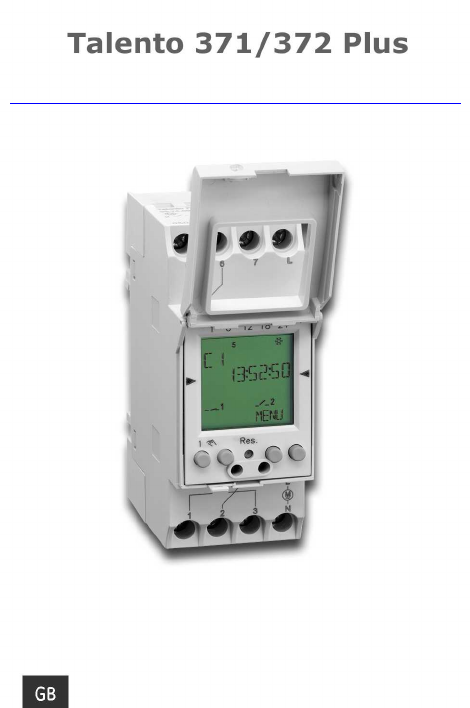
1131 Talento371_372plus Grasslin Talento 371+372 Plus Xx 371 372
User Manual: Grasslin-talento 371+372 plus xx
Open the PDF directly: View PDF  .
.
Page Count: 9
http://waterheatertimer.org/Intermatic-timers-and-manuals.html#Talento-400
2
Safety precautions
· The connection and installation of electrical devices may only be carried out by a qualified
electrician.
· Interventions in and changes to the device result in the voiding of the warranty claim.
· Observe your national regulations and the respective safety provisions.
· Fixed and flexible conductors of up to 10 mm2may be attached to the external terminal clips.
· Flexible cables with a cross-section ≤ 1 mm2should not be attached.
General information
· Deactivation commands take priority over activation commands.
· If the power supply is correct, the dots shown between the hours and minutes (HH:MM) are
displayed permanently. The dots flash if the power supply is interrupted.
· If there is no power supply, the position indicator display goes out after 2 minutes.
· The whole display flashes the battery needs to be changed for up to 2 weeks to warn that.
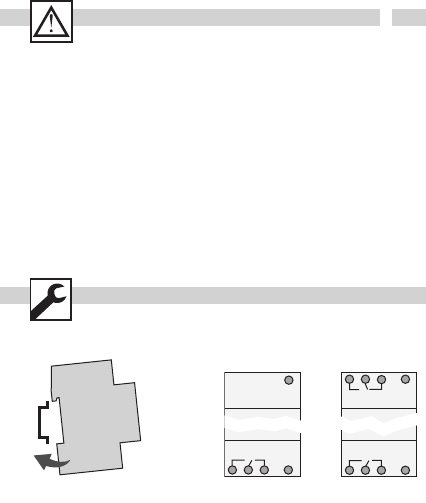
Installation on DIN rail Terminal diagram
567
L
123
N
56
L
123
N
C1
C2
C1
3
GB
OK
reset
MENU
16121824
Res.
1
A
F
B
C
D
E
G
H
I
J
K
C1
15:26:38
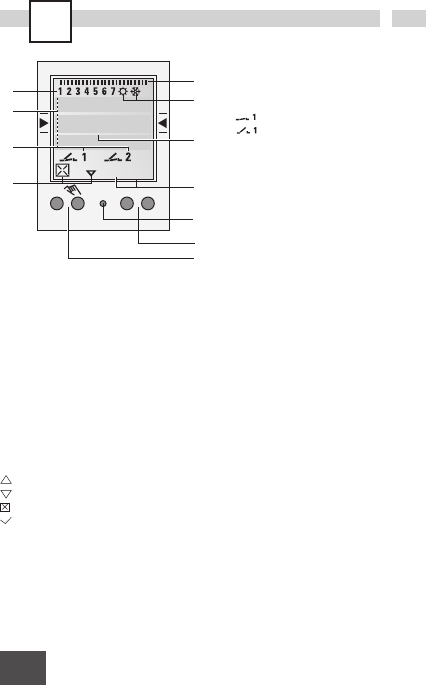
Display
AFunction displays of the two left-hand
buttons
BChannel status displays
= Channel 1 ON
= Channel 1 OFF
Channel 1 = C1, Channel 2 = C2
C3 Communication lines for time display,
Menu items, entry prompts etc.
DDay-of-week display
EOverview of daily switching program
FDisplay of summer/winter time
GOperating voltage (permanently lit dots)
Reserve power operation (dots flash)
HFunction displays of the two right-hand
buttons
Buttons
IReset
The programs are retained in the case of a
reset. The date and time must be set again.
Press reset button with a blunt object (pen).
JRight-hand buttons
KLeft-hand buttons with manual switch
function in Automatic mode
General information
· The middle communication line shows the
selectable menu item. If confirmed with OK,
this item is activated.
· Flashing texts or symbols require an entry.
· If no entries are made within the next
2 minutes, the clock reverts to auto mode.
Function displays of the two left-hand
buttons:
scroll up in menu
scroll down in menu
Select/reject suggestion
Select/accept suggestion
+ Press briefly = +1
Press and hold (approx. 2 sec) = +5
- Press briefly = -1
Press and hold (approx. 2 sec) = -5
Function displays of the two right-hand
buttons:
MENU Exits the Automatic mode and enters
the Programming mode
ESC Press briefly = one step back
Press and hold (approx. 2 sec) = return
to Automatic mode
OK Make selection and apply
EDT Change request in Read mode
NO Do not execute command
YES Execute command
DEL Delete
4
1.
ESC
OK
SVENSKA
ENGLISH
NORSK OK
12H 24H
LANGUAGE
DATETIME
ESC OK
OK
SVENSKA
ENGLISH
NORSK
ESC OK
ESC
MENU
16121824
1
C1
15:26:38
Res.
MENU
Info
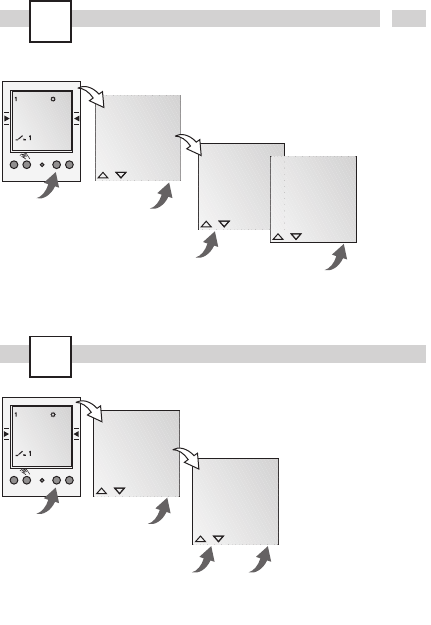
In the delivered state the time switch is in the
Auto mode with a preset time, date and the
menu language English.
Initial start-up - selection of menu language
Prog.
MENU
16121824
1
C1
15:26:38
Res.
DATETIME
PROGRAM
DAYLIGHT
MENU
OK
REVIEW
NEW
DELETE
ESC OK
ESC OK
5
GB
Prog.
HOURS
00
CHL ON
ESC OK
OK
SELECT
DAY
CHL ON
ESC OK
MINUTES
15:00
CHL ON
ESC OK
MINUTES
18:00
CHL OFF
ESC OK
OK
HOURS
00
CHL OFF
ESC OK
SAVED
P01 P02
OK
FREE 50
OK
REVIEW
NEW
DELETE
ESC OK
OK
CHANNEL
SELECT
I
ESC
OK
CHANNEL
SELECT
I
ESC OK
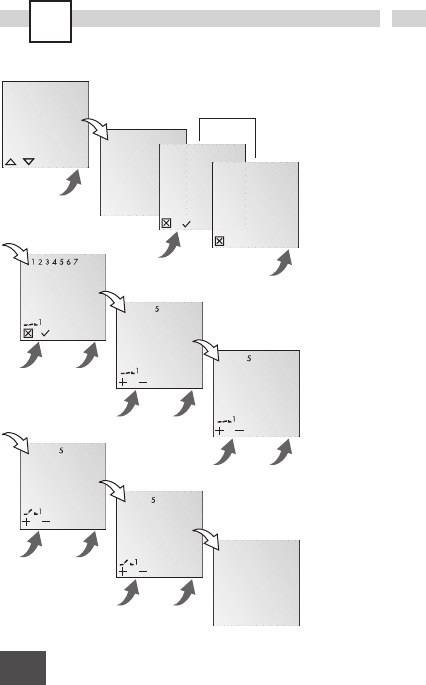
New program
Info
The time switch has 50
memory spaces.
Example
ON command for channel
1 at 3 pm. OFF command
at 6 pm.
· Select NEW program
and confirm with OK.
· The free memory spaces
are briefly displayed.
· Select channel and
confirm with OK.
· Select day block or
individual day (block
formation as desired)
and confirm with OK.
· Enter hour for ON
command (+/-) and
confirm with OK.
· Enter minute for ON
command (+/-) and
confirm with OK.
· Enter hour for OFF
command (+/-) and
confirm with OK.
· Enter minute for OFF
command (+/-) and
confirm with OK.
· Program is saved.
· Program jumps to
selection REVIEW, NEW,
DELETE. Now additional
programs can be
created.
only with 2-channel version
6
Prog.
OK
ON P01
15:00
HH:MM
OK
DELETE
REVIEW
NEW
ESC OK
EDT OK
OK
OFF P02
18:00
HH:MM
EDT OK
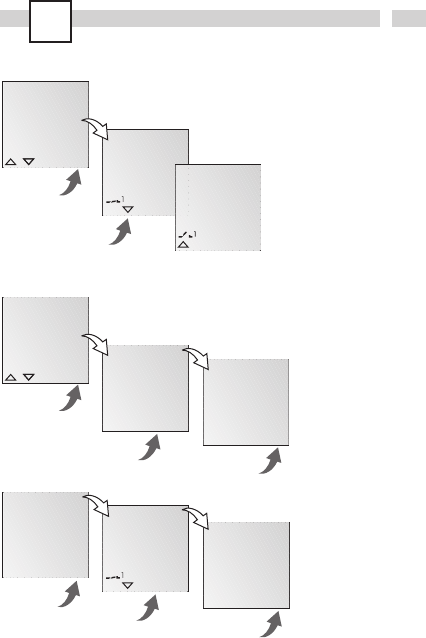
View, edit program
Info
· The program steps can
be scrolled through
with .
· The respective program
can be edited by
pressing EDT.
The procedure is the
same as when creating
a new program.
Info
· It is possible to delete all
programs with YES
· By pressing NO,
individual programs
can be deleted.
OK
DELETE
ALL
OK
NEW
DELETE
REVIEW
ESC OK
YES NO OK
CONFIRM
YESNO
OK
ON P01
15:00
HH:MM
DEL OK
OK
DELETE
ALL
YES NO OK
CONFIRM
YESNO
Delete all programs
Delete individual programs
Info
When deleting individual
programs, the corres-
ponding program steps
are deleted (e.g. P01 ON
and P02 OFF).
7
GB
OK
YEAR
2004
ESC OK
MONTH
2004:03
ESC OK
DAY
2004:03:25
ESC OK
OK
LANGUAGE
DATETIME
PROGRAM
ESC OK
MINUTES
13:45
ESC OK
OK
HOURS
13
ESC OK
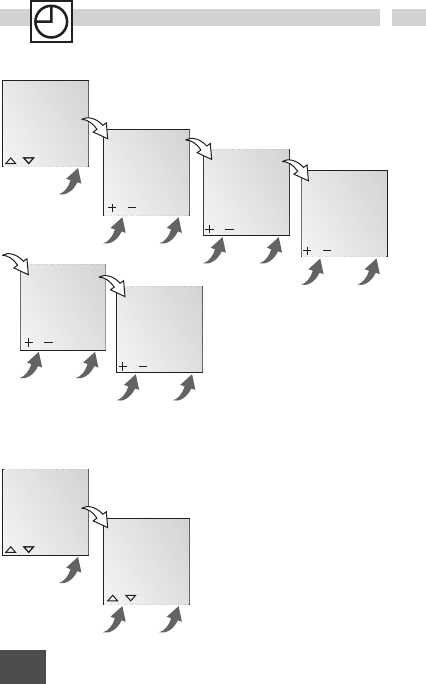
Set date and time
OK
AM PM
24H
ESC OK
OK
DAYLIGHT
12H 24H
LANGUAGE
ESC OK
Set AM/PM (12-hour) or 24-hour display
Info
The date and time are preset at the factory.
8
OK
CALIBRAT
AUTO
NO
ESC OK
OK
PROGRAM
DAYLIGHT
12H 24H
ESC OK
SU START
03
MONTH
ESC OK
OK
NO
CALIBRAT
AUTO
ESC OK SU START
03:21
DAY
ESC OK
WI START
10
MONTH
ESC OK
WI START
10:31
DAY
ESC OK
SU WI
2103:3110
CALIBRAT
ESC OK
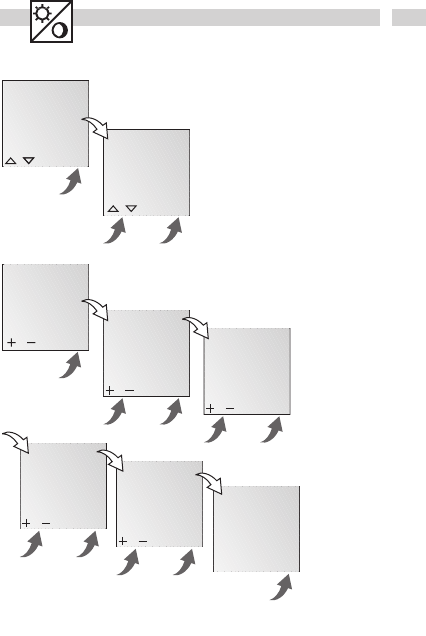
Switchover for summer/winter time
Info
The following settings are
possible:
AUTO
Factory presetting of the
published calendar dates.
This is automatically
recalculated for each year.
NO
No switchover
CALIBRAT
Programming. The start
date of the summer time
and winter time must be
entered for this purpose.
The factory presetting is
overwritten.
The programmed
summer/ winter time is
automatically recalculated
for each year.
The changeover takes
place on the same
specified day of the week
in the same week of each
month.
Example
03/21 Start summer time
10/31 Start winter time
9
GB
MENU
16121824
1
C1
15:26:38
FIX ON:
FIX OFF:
AUTO: (keine Anzeige) progra
m
FIX
FIX
Res.
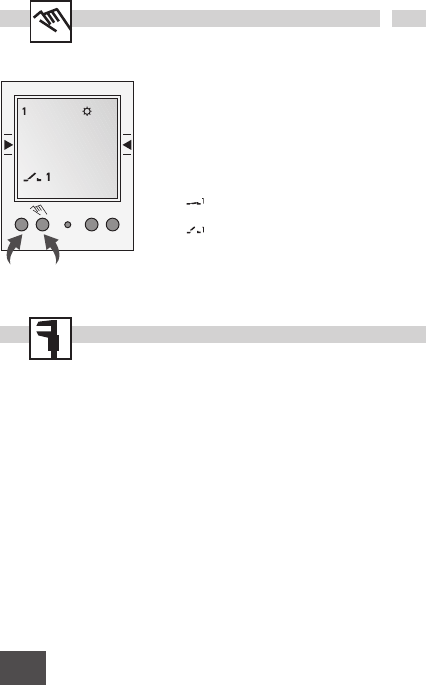
Operating mode
Info
Left-hand button = Channel 1
Right-hand button = Channel 2 (only with
2-channel version)
Press 1 x = FIX ON = continuous ON
Press 2 x = FIX OFF = continuous OFF
Press 3 x = return to Auto mode
Technical Data
Dimensions H x W x D 45 x 35 x 60 mm
Weight g (approx.) 170
Supply voltage see imprint on device
Power consumption 5 VA
Switching capacity
- ohmic load
(VDE, IEC) 16 A/250 VAC
- inductive load
cos ϕ0.6 8 A/250 VAC
- Incandescent
lamp load 1,000 W
Switching output potential-free
Switch contacts 1 or 2 changeover
contact(s)
Ambient temperature -13°F to 131°F (25°C
to +55°C)
Protection class II
Accuracy typ. ±2.5 s/day
at 68°F (20°C)
Reserve power 3 years from factory
at +20°C (20°C)
Shortest switching time 1 min.
Memory spaces 50
Block formation of
day of the week fixed/free selection
Switching status
display yes
Sealable yes
(no display) programmed switching times
