Guest Guide Fuze Mobile
Guest%20Guide%20-%20Fuze%20Mobile
User Manual:
Open the PDF directly: View PDF  .
.
Page Count: 15


Fuze Mobile — Guest Guide
Introduction
Welcome to Fuze! If you’re reading this guide then you’ve probably been invited to sign up to use
Fuze as a guest. This guide will help you understand everything you can do as a guest in Fuze
Mobile, including chat, meet with people, share files, and collaborate.
Table of contents
Introduction 1
Welcome 2
Getting Started 3
Sign Up 3
Fuze Mobile Overview 4
Chat 5
Groups 6
Meetings 7
Overview 7
Join a Meeting 8
In Meetings 9
Share Content 10
Presence and Settings 11
Presence 11
Settings 11
Support 11
Additional Resources 12
Appendix: System Requirements 13
© 2018 Fuze, Inc. All rights reserved. Fuze Privacy Policy | Fuze Terms of Use
2 Copley Place, Boston, MA | 800-890-1553 | www.fuze.com 1

Fuze Mobile — Guest Guide
Welcome
What is Fuze? Fuze is a unified communications platform that is designed for the way people work.
Fuze powers business conversations through a secure and reliable global platform that unifies voice,
video, and messaging into a single application.
As a Fuze guest user, you can chat with people and groups, share files, and attend meetings with
anyone at the organization that invites you to join.
Here are some more details about actions that Fuze guests can and cannot perform:
Guests Can
Guests Cannot
● Sign in to Fuze Web, Desktop, and Mobile
● Join groups by invitation
● Join meetings and video calls
● Chat with users who:
● You invite to one-on-one conversations
● Are members of groups they’ve been
invited to join
● Create groups and invite their Fuze contacts
(i.e., users who have invited the guest to chat,
or members of groups the guest has joined)
● Access a limited set of guest-specific settings
● See everyone in the corporate directory
● Invite other guests
● Rename, archive, or delete groups
● Remove other members from groups
● Make and receive phone calls
● Start or schedule Meetings
Note: Depending on preference and policies, some companies who use Fuze may not allow guest
users. Additionally, guest features are not currently available for companies that require HIPAA
compliance.
Read on to learn more about Fuze features, and how to get started.
© 2018 Fuze, Inc. All rights reserved. Fuze Privacy Policy | Fuze Terms of Use
2 Copley Place, Boston, MA | 800-890-1553 | www.fuze.com 2
Fuze Mobile — Guest Guide
Getting Started
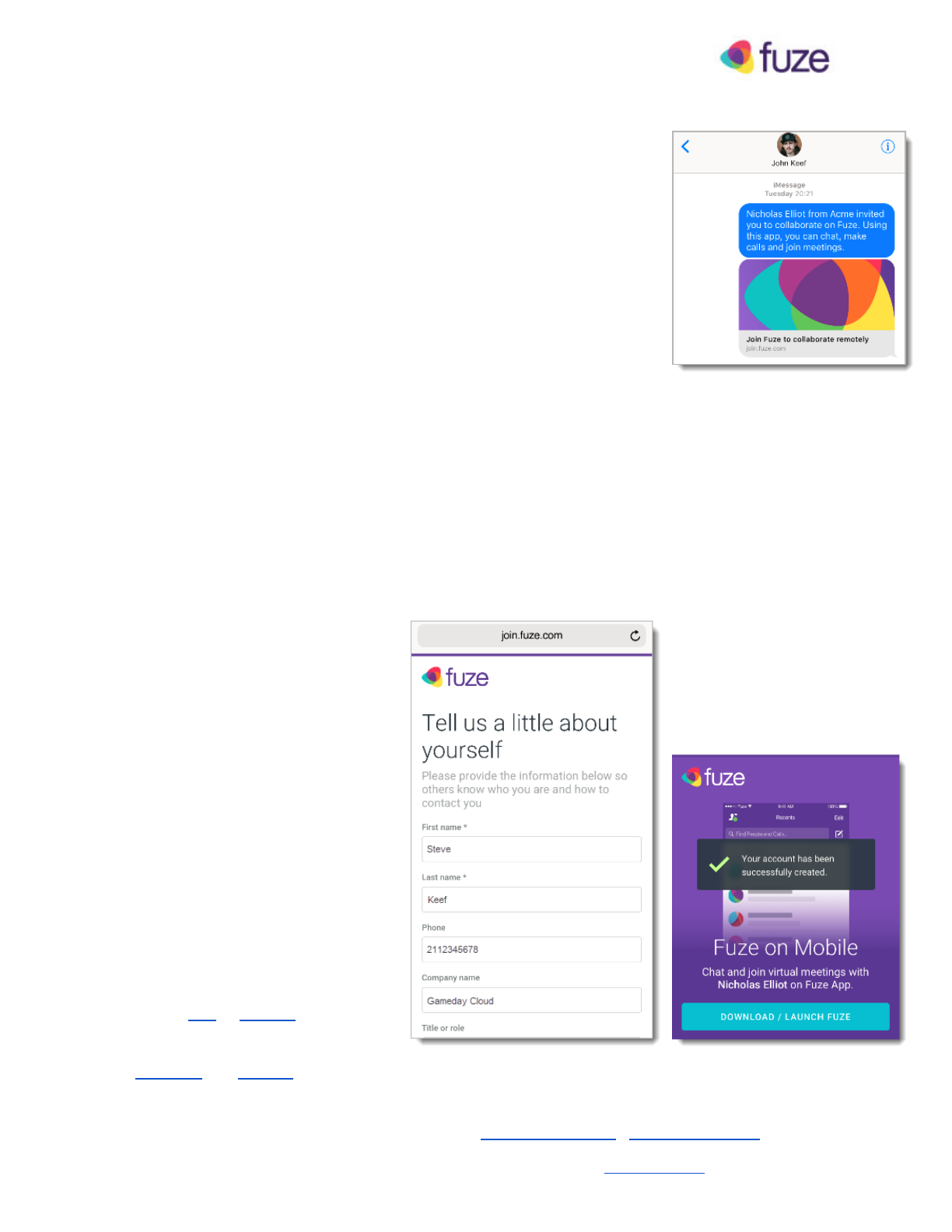
When someone invites you to use Fuze Mobile as a guest, an invitation is
automatically sent to you via email or SMS that includes a link that you can
use to sign up, download the Fuze Mobile app, and start using Fuze.
Sign Up
When you tap Join the Conversation , a web browser opens, and you’re
brought to our website where you can set up your Fuze account.
To create your account:
1. Enter your email and create a password that you can use to access Fuze.
2. Tap Create an Account . A contact information screen appears where you can enter some basic
details about yourself so that people in the organization can understand a little more about you.
The following details are required:
● First name
● Last Name
● Company name
3. Tap Join . Your Fuze account is
created and a confirmation screen
appears.
4. Tap Download/Launch Fuze to
download and install Fuze Mobile from
your device store, or open Fuze Mobile
if its already installed on your device.
Note: You can also download Fuze
Mobile for iOS or Android here.
Our Fuze Desktop app is also available
for Windows and macOS .
© 2018 Fuze, Inc. All rights reserved. Fuze Privacy Policy | Fuze Terms of Use
2 Copley Place, Boston, MA | 800-890-1553 | www.fuze.com 3
Fuze Mobile — Guest Guide
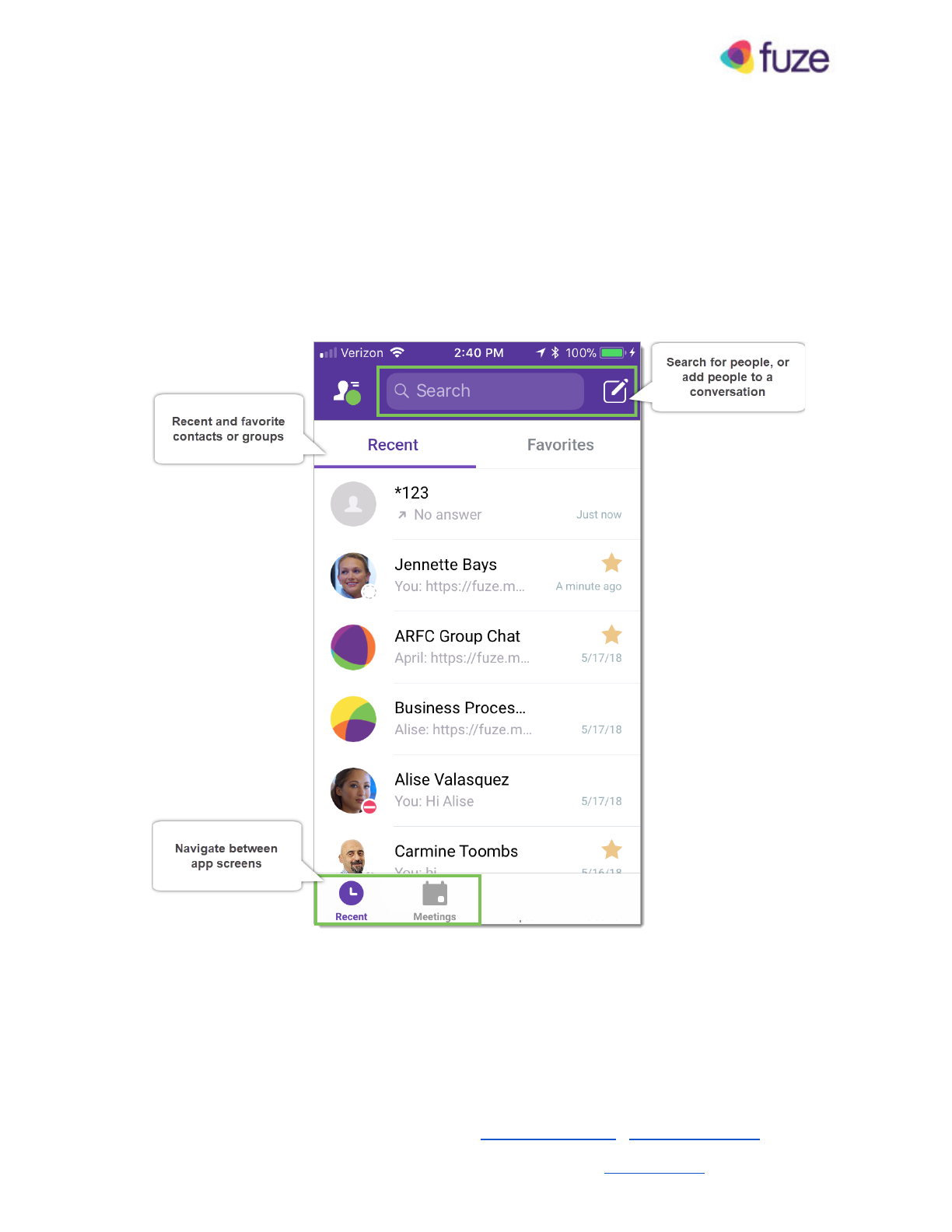
Fuze Mobile Overview
Fuze products are designed to be consistent and intuitive so that you can let work flow. Whether
you’re using Fuze Desktop, Fuze Web, or Fuze Mobile, you’ll likely find it easy to chat or meet
without assistance, but to help you get started, here’s an overview of Fuze Mobile:
© 2018 Fuze, Inc. All rights reserved. Fuze Privacy Policy | Fuze Terms of Use
2 Copley Place, Boston, MA | 800-890-1553 | www.fuze.com 4
Fuze Mobile — Guest Guide
Chat
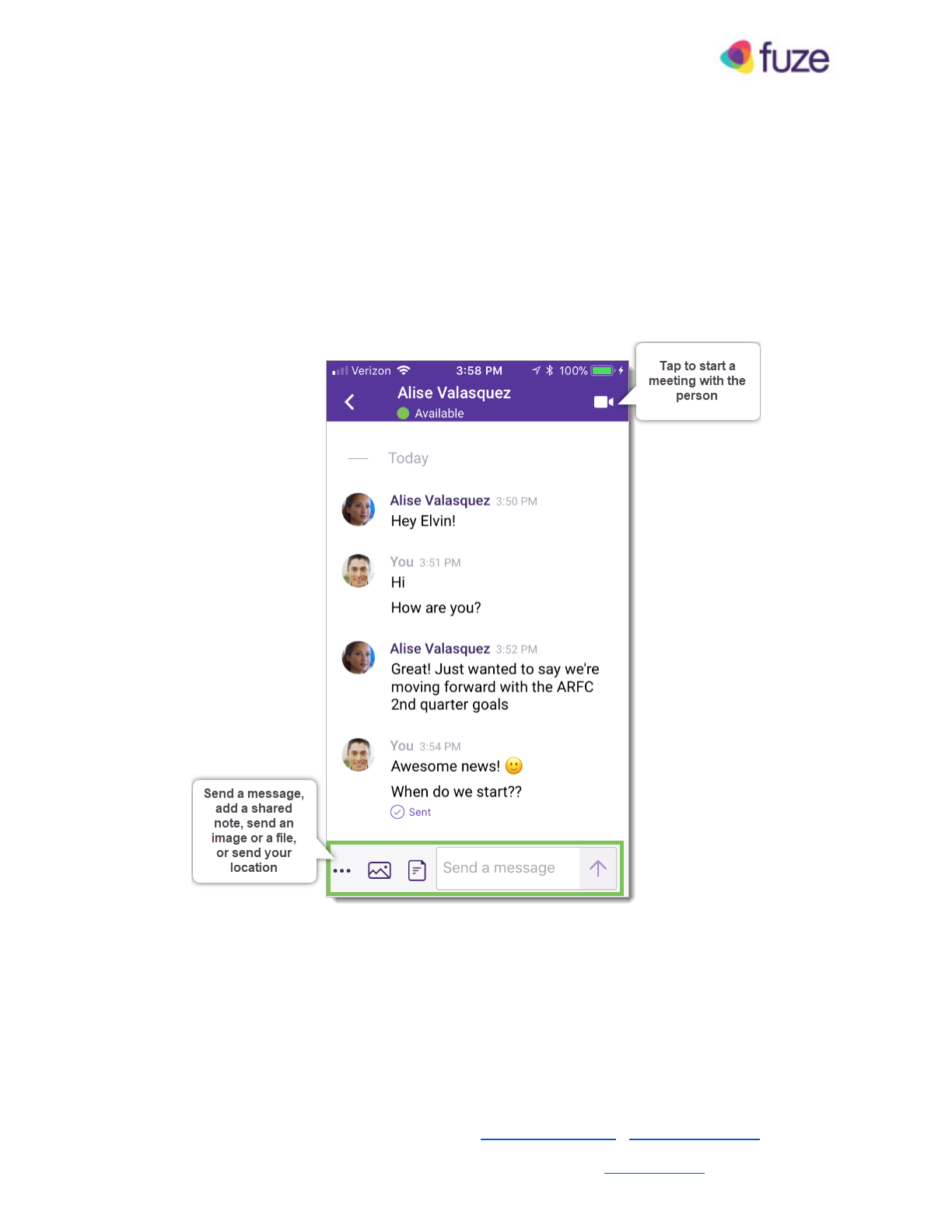
You can chat with groups to which you are invited, or one-on-one conversations other people start
with you. You can also start a one-on-one conversation with anyone in a group you’ve joined.
To chat with a person or group, simply open Fuze, Search for the person or group (or tap a
conversation), enter a message, and tap Send .
Note: At this time, Fuze apps do not generate notifications or follow up emails for messages you
receive while the app is not open.
© 2018 Fuze, Inc. All rights reserved. Fuze Privacy Policy | Fuze Terms of Use
2 Copley Place, Boston, MA | 800-890-1553 | www.fuze.com 5
Fuze Mobile — Guest Guide
Groups
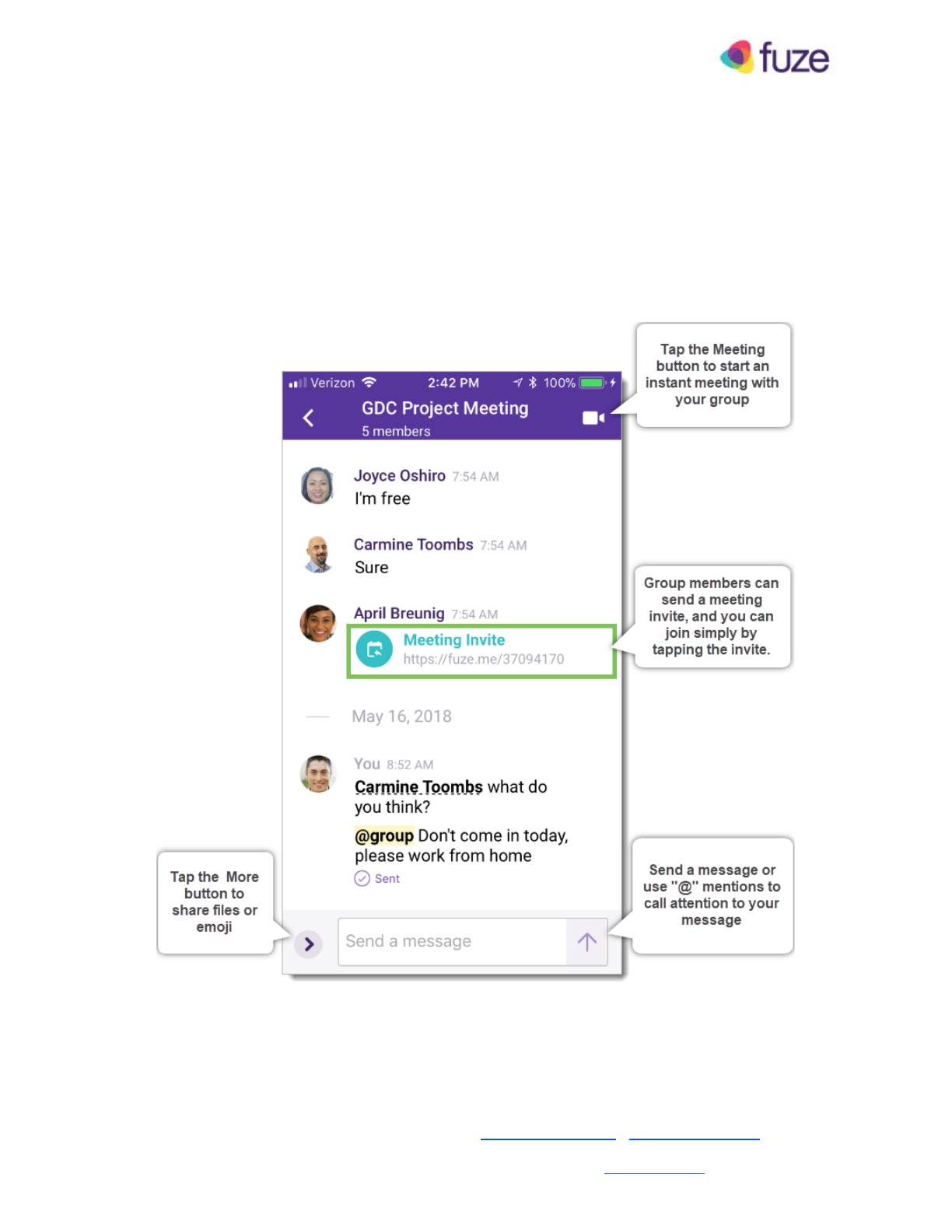
Groups are one of the primary ways you can get together and collaborate with people in Fuze. You
can create groups any time, and you can name groups if you need to give them a theme. When
you’re part of a group, your meetings, chat conversations, and shared files are all available in one
place. You can also jump from a group chat into a meeting at any time.
© 2018 Fuze, Inc. All rights reserved. Fuze Privacy Policy | Fuze Terms of Use
2 Copley Place, Boston, MA | 800-890-1553 | www.fuze.com 6
Fuze Mobile — Guest Guide
Meetings
Overview
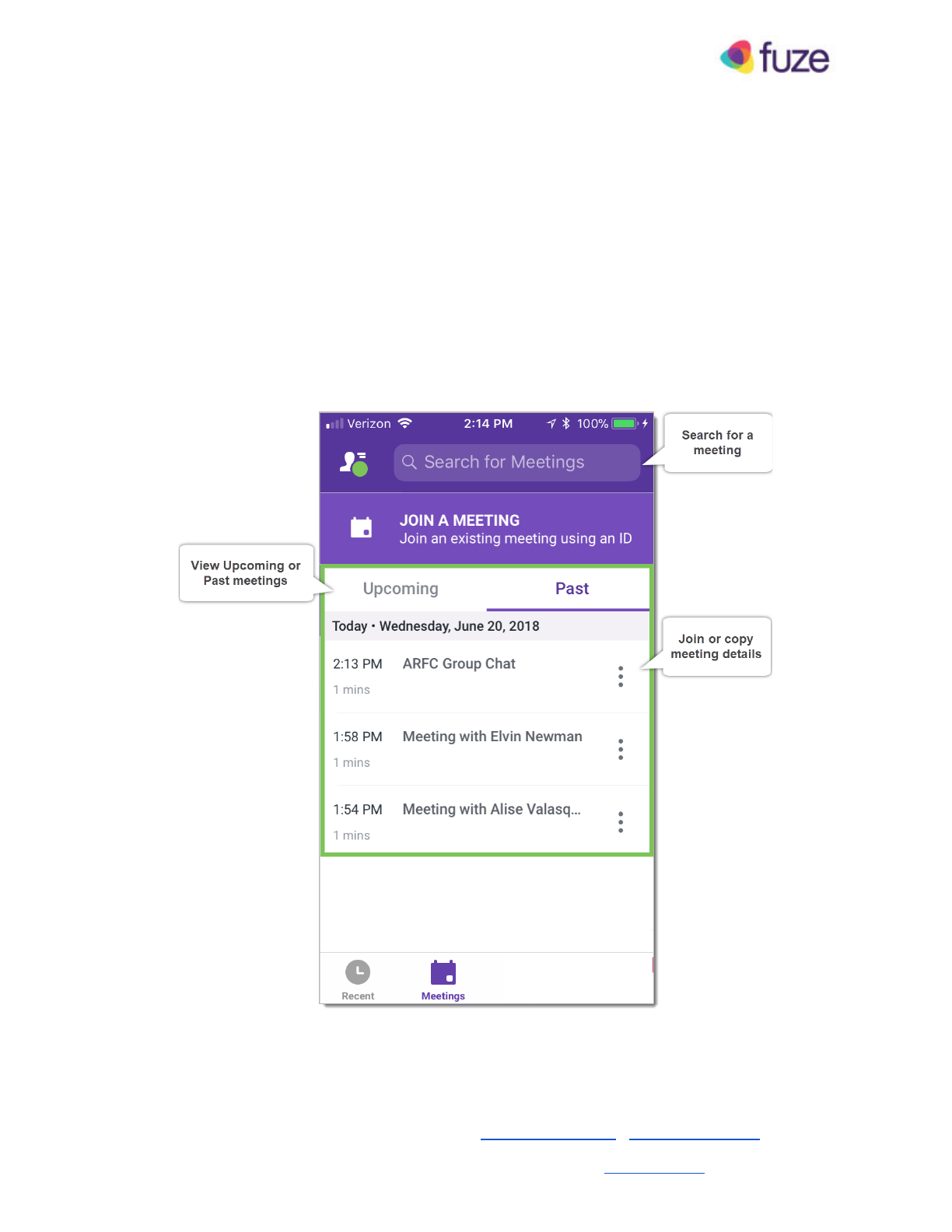
You can join any meeting to which you’re invited, or if someone provides you with a meeting ID, you
can join using the ID. Additionally, you can use Fuze Mobile to view and join Upcoming or Past
meetings to which you’ve been invited.
© 2018 Fuze, Inc. All rights reserved. Fuze Privacy Policy | Fuze Terms of Use
2 Copley Place, Boston, MA | 800-890-1553 | www.fuze.com 7
Fuze Mobile — Guest Guide
Join a Meeting
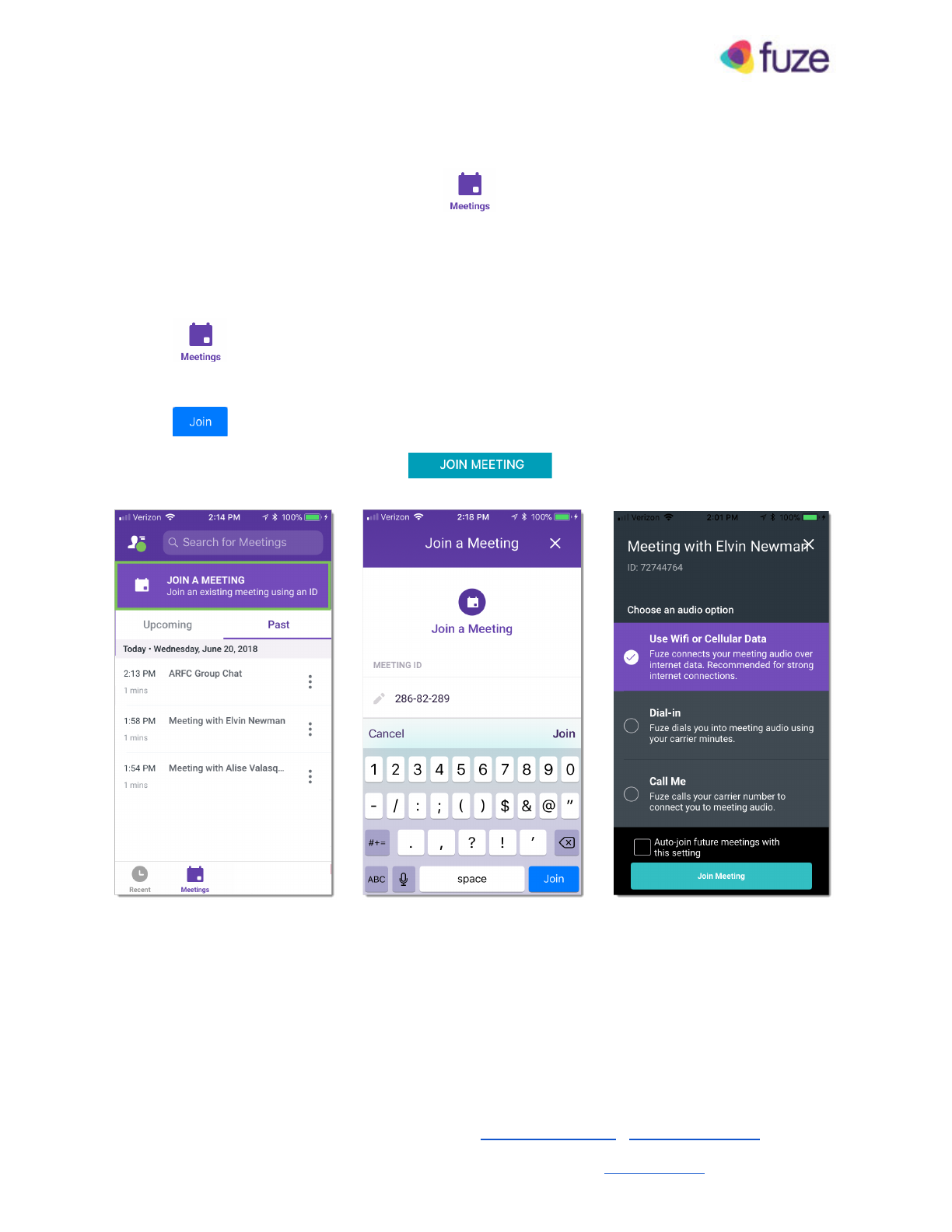
You can join a scheduled meeting by tapping , then tapping the meeting you want to join in
the Upcoming list.
To join a meeting using the Meeting ID:
1. Tap
2. Then tap Join a Meeting , and enter the meeting ID number.
3. Tap .
4. Select an audio option, and then tap to join the meeting.
© 2018 Fuze, Inc. All rights reserved. Fuze Privacy Policy | Fuze Terms of Use
2 Copley Place, Boston, MA | 800-890-1553 | www.fuze.com 8
Fuze Mobile — Guest Guide
In Meetings
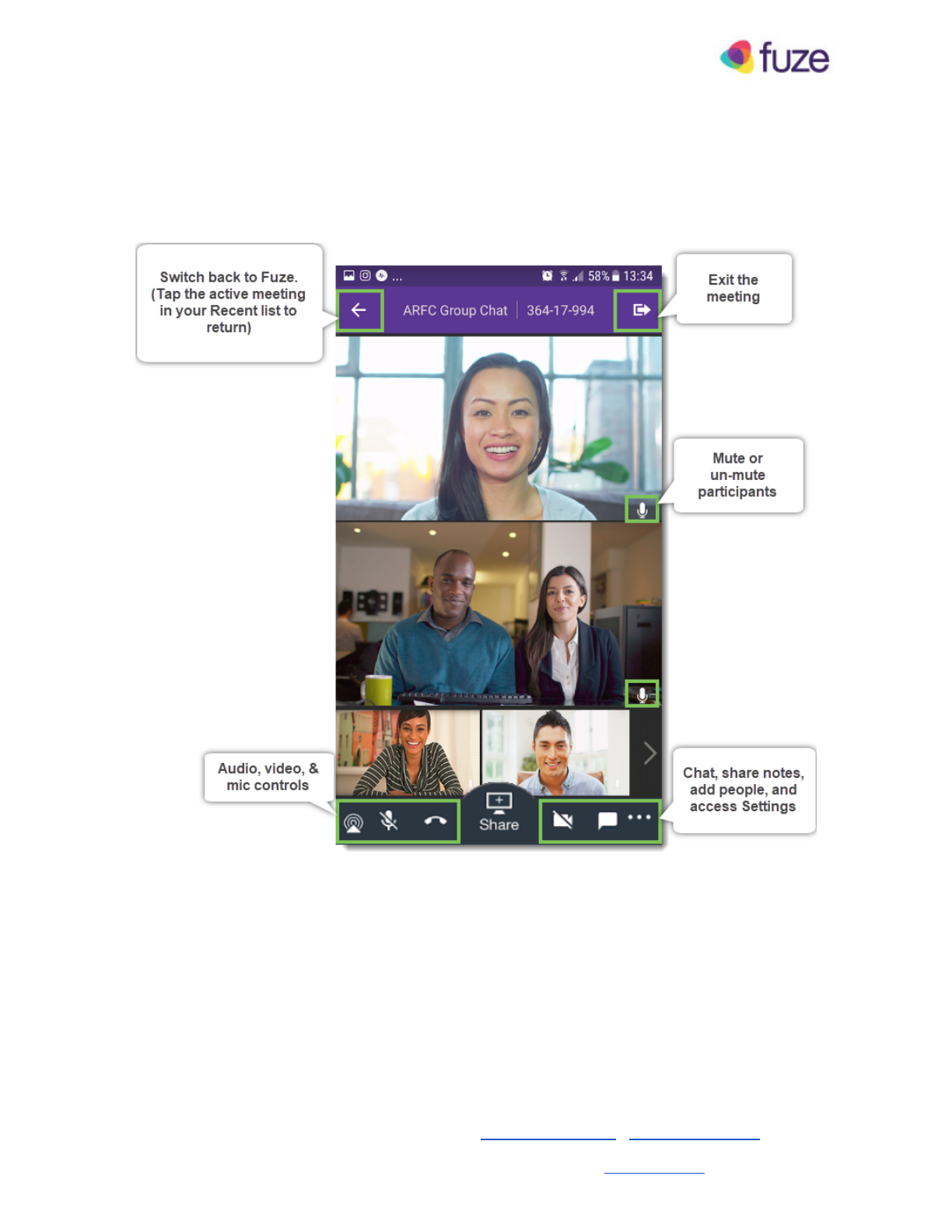
When you’re in a meeting, you’ll see tiles for other participants whether they’re on video, voice-only,
or they’re dialed in.
From the meeting toolbar at the bottom of a meeting, you can control your mic, audio, and video, and
you can add people, chat, or create a shared note with everyone in the meeting.
Tap the More menu at the lower right of the meeting to access everything from meeting info, to
settings, to recordings and more.
© 2018 Fuze, Inc. All rights reserved. Fuze Privacy Policy | Fuze Terms of Use
2 Copley Place, Boston, MA | 800-890-1553 | www.fuze.com 9
Fuze Mobile — Guest Guide
Share Content
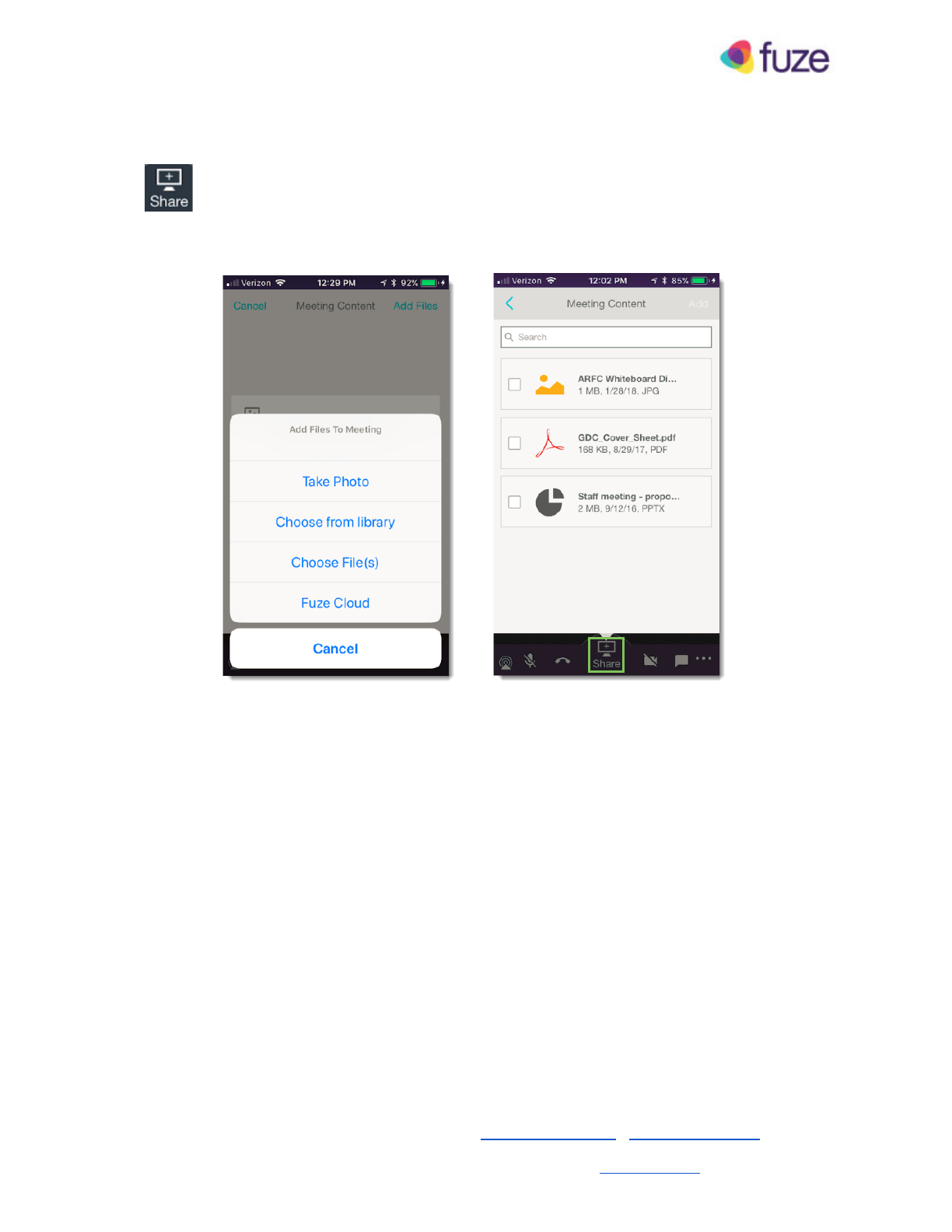
Tap to share content from your mobile device. You can share photos and other files from
your device, or, if you’ve previously uploaded the file, you can share content from the Fuze cloud.
© 2018 Fuze, Inc. All rights reserved. Fuze Privacy Policy | Fuze Terms of Use
2 Copley Place, Boston, MA | 800-890-1553 | www.fuze.com 10
Fuze Mobile — Guest Guide
Presence and Settings
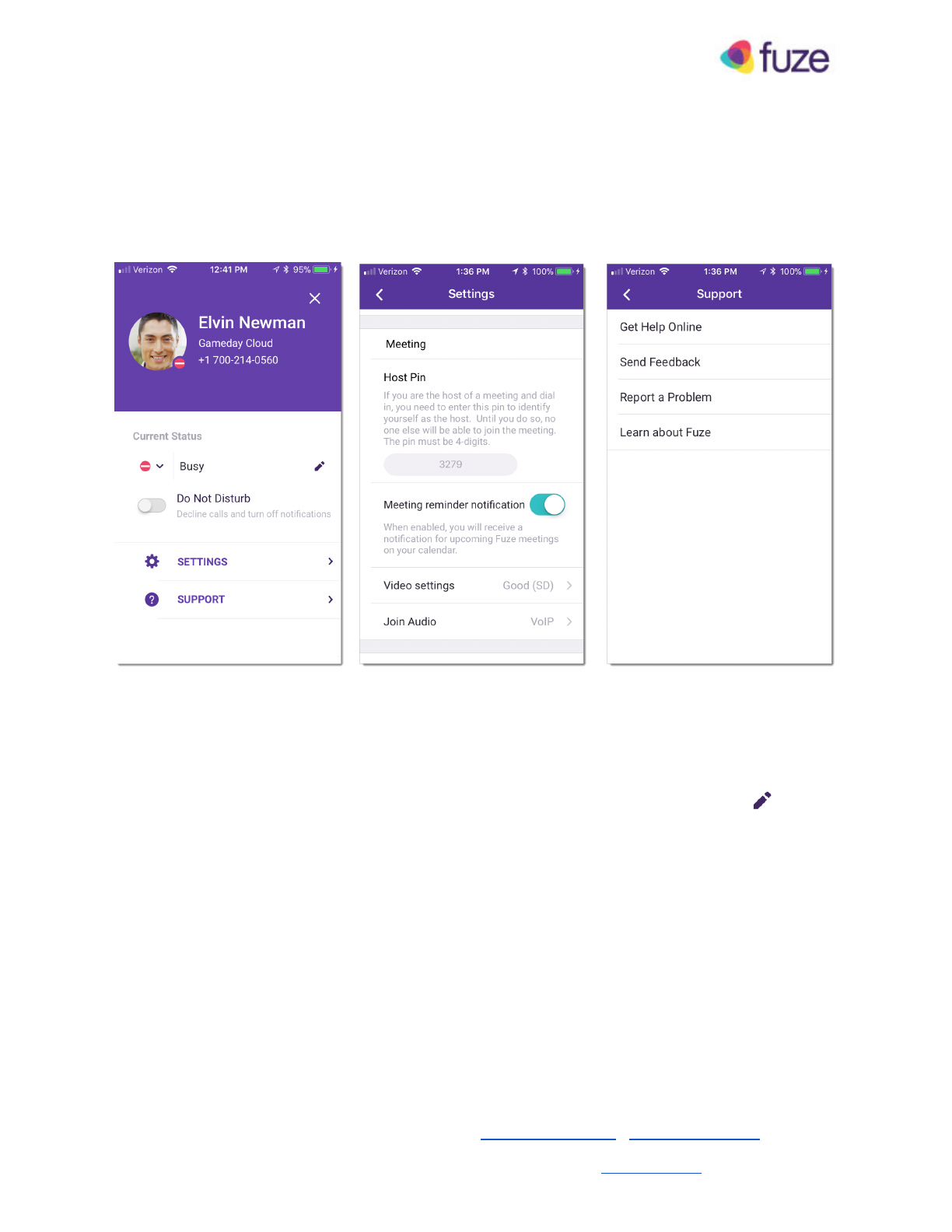
You can set your presence, update your avatar, sign out, and access settings window via the Profile
menu.
Presence
Your status automatically updates when you’re in a meeting, busy, away, available, or unavailable.
You can also manually set your presence and add a custom status message by tapping and
selecting a state.
Settings
The Settings screen includes several subsections in which you can configure your meeting, audio,
video and other settings.
Support
Tap Support to send feedback, report a problem, and learn more about Fuze.
© 2018 Fuze, Inc. All rights reserved. Fuze Privacy Policy | Fuze Terms of Use
2 Copley Place, Boston, MA | 800-890-1553 | www.fuze.com 11

Fuze Mobile — Guest Guide
Additional Resources
To help support you, a Fuze Web and Desktop guide is also available for guests.
See the System Requirements section for more details about installation and requirements.
© 2018 Fuze, Inc. All rights reserved. Fuze Privacy Policy | Fuze Terms of Use
2 Copley Place, Boston, MA | 800-890-1553 | www.fuze.com 12

Fuze Mobile — Guest Guide
Appendix: System Requirements
Guest systems must meet or exceed the following requirements in order to use Fuze as a guest.
Desktop
Mac
Download Desktop: Mac
Size: 95 MB
Operating System: macOS® 10.11, 10.12 or later
Memory: 2 GB RAM (4 GB RAM recommended)
Graphics: 128 MB of video memory
Processor: Intel® Core Duo 2.66 GHz or faster
Windows
Download Desktop: Windows
Size : 106 MB
Operating System : Windows
®
7 SP1, 8, 10 or later and
Microsoft
®
.NET Framework 4.5.2 or later
Memory : 2 GB RAM (4 GB recommended)
Graphics : 64 MB of video memory
Processor : Intel
®
Core Duo 1.87 GHz, AMD Athlon™ 64 x2
4200+ or faster
Web
Browser
Fuze Web works with the current version and 1 previous
major release of Google Chrome: Download
Operating System: Windows, macOS, Chrome OS, or
Ubuntu and other Debian-based Linux distributions
Processor : Any quad core processor
Camera: USB web camera or computer camera. Other
devices, like virtual cameras, may not work.
Cookies: ensure that the Google Chrome setting “ Block
third-party cookies ” is disabled as it interferes with
cross iframe communication required by our meeting
experience.
NOTE: Firefox Mozilla, Microsoft Edge and Apple Safari
are not currently supported.
Video Meetings Bandwidth
Fuze automatically adjusts how much bandwidth is used
based on your network.
Minimum bandwidth required:
●Outbound: 1.0 mbps
●Inbound: 1.0 mbps
Ideal bandwidth for two-person video calls :
●Outbound: 3.2 mbps
●Inbound: 2.6 mbps
Ideal bandwidth for group video calls :
●Outbound: 3.2 mbps
●Inbound (with 5 participants): 3.2 mbps
●Inbound (with 10+ participants): 4.0 mbps
Mobile
iOS
Download : App Store
®
Size : 103 MB
Operating System : iOS 10, iOS 11
Compatible Devices : Apple
®
iPhone
®
5, 5s, SE, 6, 6
Plus, 7, 7 Plus, 8, 8 Plus, X
Android
Download : Google Play™ Store
Size : 31 MB
Operating System : Android ™ 6.0 (Marshmallow™)
Google Play Services : 11.4.0 or later
Fuze supports the last two (2) major versions of iOS,
including the in-market version. As of the current date,
the last two major versions are iOS 10 and iOS 11.
Fuze supports the last three (3) major versions of the Android
OS, including the in-market version. As of the current date,
the last three major versions are 6.x ( M arshmallow), 7.x
( N ougat ™ ) and 8.x ( O reo ™ ).
© 2018 Fuze, Inc. All rights reserved. Fuze Privacy Policy | Fuze Terms of Use
2 Copley Place, Boston, MA | 800-890-1553 | www.fuze.com 13

Fuze Mobile — Guest Guide
Copyright 2018 Fuze, Inc. All rights reserved. Information in this document is subject to change without
notice. The software described in this document is furnished under a license agreement or nondisclosure
agreement. The software may be used or copied only in accordance with the terms of such agreements.
No part of this publication may be reproduced, stored in a retrieval system, or transmitted in any form or
any means electronic or mechanical, including photocopying and recording for any purpose other than the
purchaser's personal use without the written permission of Fuze, Inc.
Fuze, Inc
2 Copley Place, Suite 7000
Boston MA 02116
800.890.1553
© 2018 Fuze, Inc. All rights reserved. Fuze Privacy Policy | Fuze Terms of Use
2 Copley Place, Boston, MA | 800-890-1553 | www.fuze.com 14
