HuddleCam 20X Data Sheet HC20X GY G2, Huddle Cam
User Manual: HC20X-GY-G2, HuddleCam-20x
Open the PDF directly: View PDF  .
.
Page Count: 2
• 20X Optical Zoom
• USB 3.0
• RS-232
• 1920 x 1080
• 58° Field of View
• Up to 30fps
• 64 Presets
• IR Remote
• Certied SONY Lens
HuddleCamHD
HuddleCam HD 20X G2
Conferencing Camera
Features
Specications
DATA SHEET
What’s in the Box
20X Zoom USB 3.0 Camera
12V/2.0A DC Power Adapter
Installation Bracket & Screw
USB 3.0 Data Cable (9ft) Serial Control Cable, RS-232C to RS-485 Cable
IR Remote Control
User Manual (Downloadable online)
Compatibility
• Windows 7 & 8
• Mac OS X
• Adobe Connect
• BlueJeans
• Cisco Jabber
• Cisco WebEx
• Easy Meeting
• Facetime
• Fuzebox
• Google Hangout
• GoToMeeting
• Lifesize
• Microsoft Lync
• Polycom RealPresence
• Radavision
• Spontania
• Skype
• TurboMeeting.US
• Vidyo
• Vsee
• Zoom.US
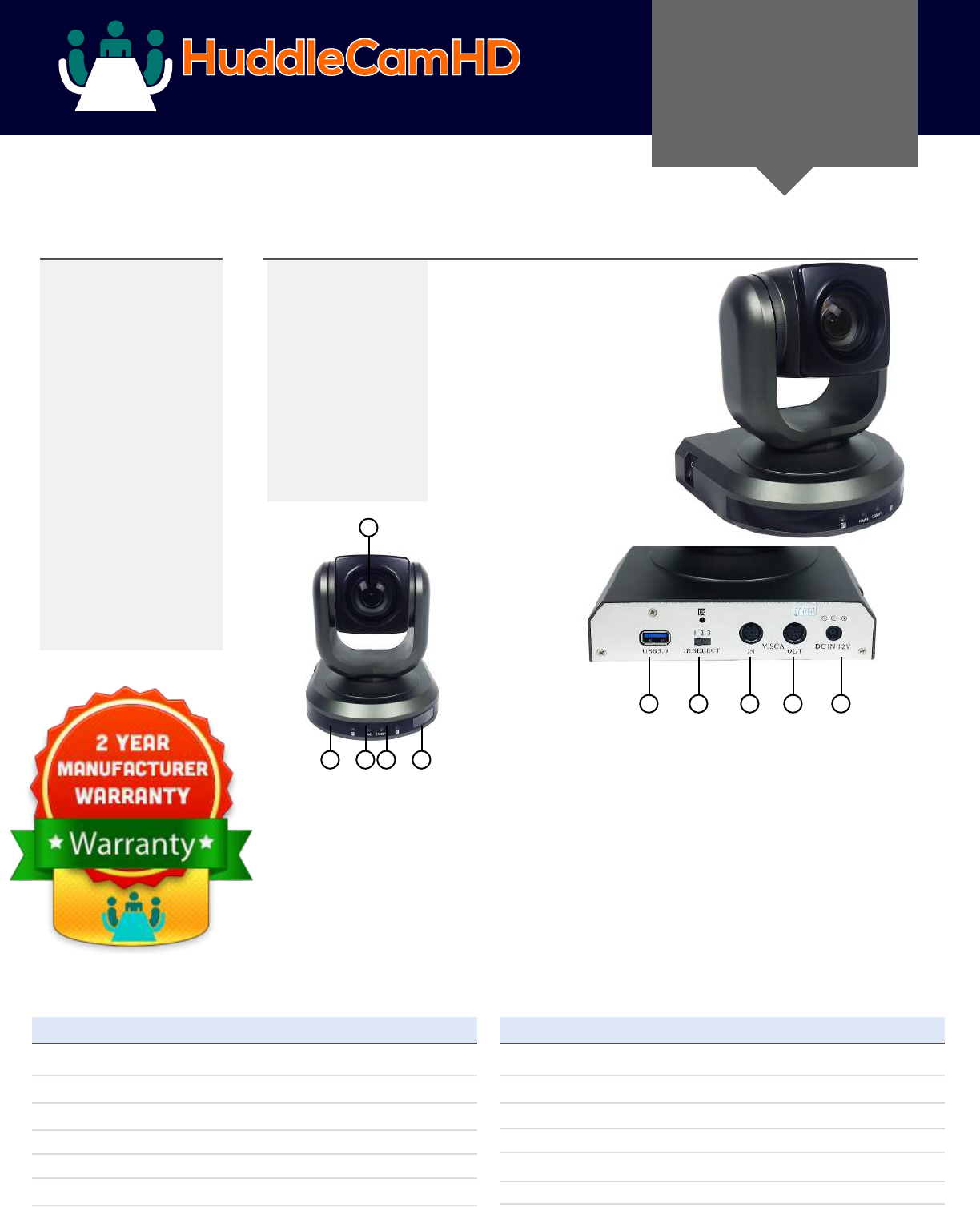
Power LED
Blue LED blinks when unit is
powered,
Lens
20x Optical Zoom.
IR Receiver
To receive IR remote
controller signal.
1.
2.
3.
Standby LED
Orange LED blinks for
Stand-By status. Blue
LED for Working status.
4.
Camera & Lens
Video CMOS Sensor 1/2.8” CMOS 3.27 Mega Pixel
Frame Rate 30fps 1920 x 1080p, 60fps 1280 x 720p
Lens Zoom 20X Optical Zoom, 12X Digital Zoom f=4.7-90mm
Field of View 5°-58°
Min Lux 0.1 Lux
White Balance Auto/Sunlight/Shade/Fluorescence White Balance
1
1
2 3 54
The HuddleCamHD 20X Gen 2 is
ideal for a medium to large sized
meeting rooms. Comes standard
with certied SONY lens
VISCA IN Port
For hard wired remote control
from a 3rd party PC, joystick, etc...
LCD Display
Information display for
camera/rmware.
5.
6. VISCA OUT Port/RS485
Used for daisy chaining multiple
cameras for RS-232 RS-485 control.
7.
8.
6 7 8 9 10
USB 3.0 Interface
For connection to PC USB 3.0 port
(also compatible with USB 2.0 port
and driver).
IR Selective Swtich
When using only one remote to
control more than one camera,
this switch will assign a unique
ID to each camera .
DC IN 12V Socket
Only use the Power Adapter
supplied with this camera.
9.
10.
Video CMOS Sensor 1/2.8” CMOS 3.27 Mega Pixel
Frame Rate 30fps 1920 x 1080p, 60fps 1280 x 720p
Lens Zoom 20X Optical Zoom, 12X Digital Zoom f=4.7-90mm
Field of View 5°~58°
Min Lux 0.1 Lux
White Balance Auto/Sunlight/Shade/Fluorescence White Balance
DATA SHEET HuddleCamHD Camera Specications
Rear Board Connectors
High Denition Interface USB 3.0
Controller Signal Interface Mini DIN-8 (VISCA IN, VISCA OUT/RS485)
Controller Signal Cong. IDip-Switch Pin 7/TTL Signal
Baud Rate 9600 bds
Power Supply Interface DC 12V 2A
Pan/Tilt Movement
Pan Movement 0-355°
Tilt Rotation Up: 45°, Down: 45°
Presets 64 Presets, 4 Patrol lines
Electrical Index
Power Supply Adapter 12V DC 2A
Input Voltage 12V DC (10.5-14V DC)
Input Power 24W (Max)
2
Remote Contol
152 Robbins Road Downingtown, PA 19335 HuddleCamHD.com 800-486-5276
Still have questions?
Give us a call.
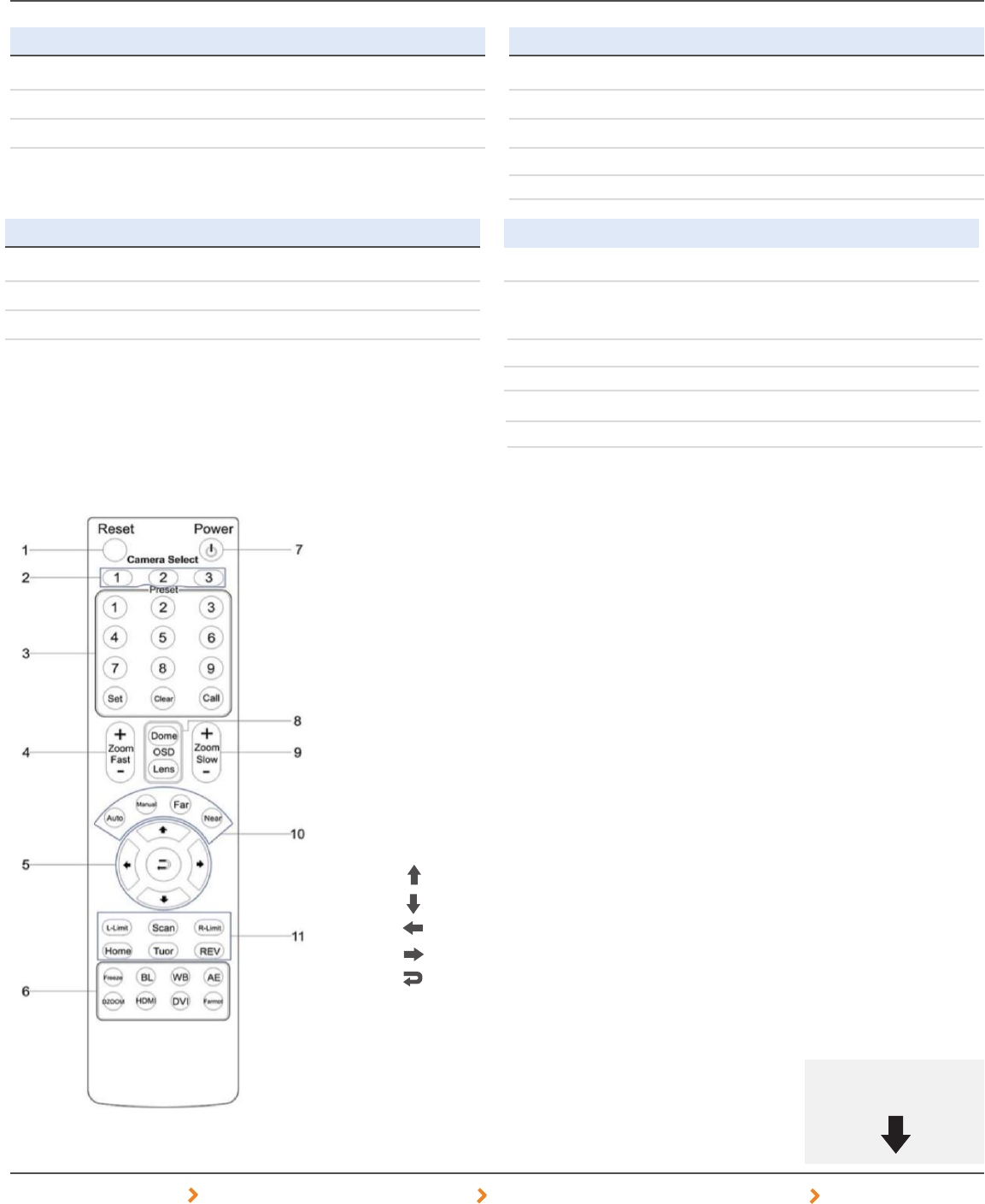
Preset Positions
1-9: Preset Positions
Set: Setting Preset Position
Clear: Clear Preset Position
Call: Call Preset Position
Note: If you want to set (or call) the rst
preset position to 1, you should press
number key “1”, then press
“Set” (or “Call”) to set (call) the position.
Additional Function Zone
Freeze: Image Freeze
BL: Back-light Compensation
WB: White Balance
AE: Auto Exposure
D Zoom: Digital Zoom
HDMI: Swap to HDMI video output
DVI: Swap to DVI video output
Format: Swap between dierent formats
Reset
Restarts the camera
and restores it to Factory Default
settings. (Note: Will delete all memory).
Camera Selection
Select Camera ID: 1, 2 or 3
1.
2.
3.
Fast Zoom in/out Control Zone
+ : Zoom in quickly
- : Zoom out quickly
Pan/Tilt Controller
Move Up
Move Down
Move Left
Move Right
Auto Pan
4.
5.
6.
OSD Menu Zone
Dome OSD: Enter Pan Tilt Zoom OSD menu
Lens OSD: Enter lens OSD menu
Slow Zoom In/Out Zone
+ : Zoom in slowly
- : Zoom out slowly
Power Supply Switch
Switch for turning camera on
(i.e. Stand-By mode vs. Working mode)
7.
8.
9.
10. Focus Control Zone
Auto: Turn on auto focus
Manual: Turn on manual focus
Far: Set focus at farther distance
Near: Set focus at nearer distance
11. Pan/Tilt Function Zone
L-Limit: Set left boundary limit scanning position
Scan: Enable Boundary Scanning (Auto Panning)
R-Limit: Set right boundary limit scanning position
Home: Go to camera’s Home position
Tour: Enable automatic patrol tour of presets
Rev: Enable image ip for ceiling mounting
Physical
Material Aluminum, Plastic
Dimensions 5.68”W x 5.63”H x 5.88”D (7” Height Ext)
(W x H x D) mm 144mm x 142mm x 149mm (177mm Height Ext)
Camera Weight 2.52 lbs (1.14 kg)
Box Dimensions 13.25”x9.25”x9.5” (336mm x 234mm x 241mm)
Boxed Weight 5.8 lbs | 2.63 kg
Temperature 32°F to + 113°F
Color Silver Gray
