HDL Survival Guide
User Manual:
Open the PDF directly: View PDF  .
.
Page Count: 7

HDL Survival Guide
by Mark Armbrust
This guide is designed to help you understand and write HDL programs in
the context of Nand2Tetris courses. It was written in order to answer
recurring issues that came up in many posts in the Q&A forum of the
nand2tetris web site. These posts were made by people who worked on the
course's hardware projects and got stuck for one reason or another.
Terminology
Throughout this document, we use the terms "HDL file", "HDL program", and
"HDL implementation" interchangeably. Likewise, we use the terms "build a
chip", "construct a chip", and "implement a chip" interchangeably. The term
"HDL file stub" refers to a file that contains the HDL definition of a chip
interface. That is, a stub file contains the chip name and the names of all the
chip's input and output pins, without the chip's implementation, also known
as the "PARTS" section of the HDL program. A stub file also contains the
chip's documentation -- a succinct description of what the chip is supposed to
do.
Project Files
If you've downloaded the nand2tetris software, then there are now 13
directories (folders) on your computer, named
projects/01
...,
projects/13
. Each
directory contains all the files necessary to complete the respective project.
The projects themselves are described in the
Course
page of the nand2tetris
web site. Projects 1-5 focus on building the hardware platform of the Hack
computer. Each project walks you through the construction of a certain
subset of the Hack chip-set. The directory (folder) that accompanies each
project contains stub HDL files for all the chips you need to build, as well as
all the test scripts required to test your HDL implementations .The "only"
thing that you have to do is extend the supplied stub HDL files into working
chip implementations, i.e. chips that run in the supplied hardware simulator
and successfully pass all the tests listed in the supplied test scripts.
Other useful resources to help you complete the projects are the lecture
slides given in the "Lecture" column of the
Course
page, as well as the
relevant book chapters.
Chip Implementation Order
Each project directory contains a set of HDL stub files, one for each chip that
you have to build. It's important to understand that all the supplied HDL files
contain no implementations (building these implementations is what the
project is all about). For example, consider the construction of a Xor chip. If
your
Xor.hdl
program will include, say, And and Or chip-parts, and you have
http://www.nand2tetris.org/software/HDL Surviv...
1 of 7 6/22/17, 9:35 PM

not yet implemented the And and Or chips, your tests will fail even if your
Xor implementation is correct.
Note however that if the project directory included no
And.hdl
and
Or.hdl
files
at all, your
Xor.hdl
program will work properly. This sounds surprising, so
here is the explanation. The hardware simulator, which is a Java program,
features working Java implementations of all the chips necessary to build the
Hack computer. When the simulator has to execute the logic of some chip-
part, say And, taken from the Hack chip-set, it looks for an
And.hdl
file in the
current project directory. At this point there are three possibilities:
No HDL file is found. In this case, the Java implementation of the chip
kicks in and "covers" for the missing HDL implementation.
A stub HDL file is found. The simulator tries to execute it. But since a
stub file contains no implementation, the execution fails.
A "normal" HDL file is found. The simulator executes it, reporting errors
to the best of its ability.
Therefore, to avoid chip order implementation troubles, you can do one of
two things. First, you can implement your chips in the order presented in the
book and in the project descriptions. Since the chips are presented "bottom-
up", from basic chips to more complex ones, you will encounter no chip order
implementation troubles.
A recommended alternative is to create a subdirectory called "stubs" and
move all the supplied HDL stub files into that directory. You can then move
them into your working directory as needed.
Note that the
.hdl
file that you are working on and its associated
.tst
file must
be in the same directory. If you will look at the header code of the supplied
test script, you will see that it includes a command that loads the HDL file
that it is supposed to test from the same working directory. Thus, if you load
your HDL file into the simulator and then load the test script from a different
directory, the test script will load and test a different HDL file. Proper usage
is to load into the simulator either an
.hdl
file or a
.tst
file, not both.
HDL syntax and the meaning of
"a=a"
HDL statements are used to describe how chip-parts are connected to each
other, as well as to the input and output pins of the constructed chip. The
syntax of these statements can be confusing, especially when pin names like
in
,
out
,
a
and
b
are used both by the chip-parts as well as by the constructed
chip. This leads to statements like
And(a=a, b=b, out=r)
. This particular
statement instructs to (i) connect the
a
and
b
input pins of the And chip-part
to the
a
and
b
input pins of the constructed chip, (ii) create an internal pin
("wire") named
r
, and (iii) connect the output pin of the And chip-part to
r
.
Here is a simple rule that helps sort things out: the symbol on the left hand
side of each "=" symbol is always the name of a pin in a chip-part, and the
symbol on the right hand side is always the name of a pin or a wire in the
constructed chip (the chip that you are building).
http://www.nand2tetris.org/software/HDL Surviv...
2 of 7 6/22/17, 9:35 PM
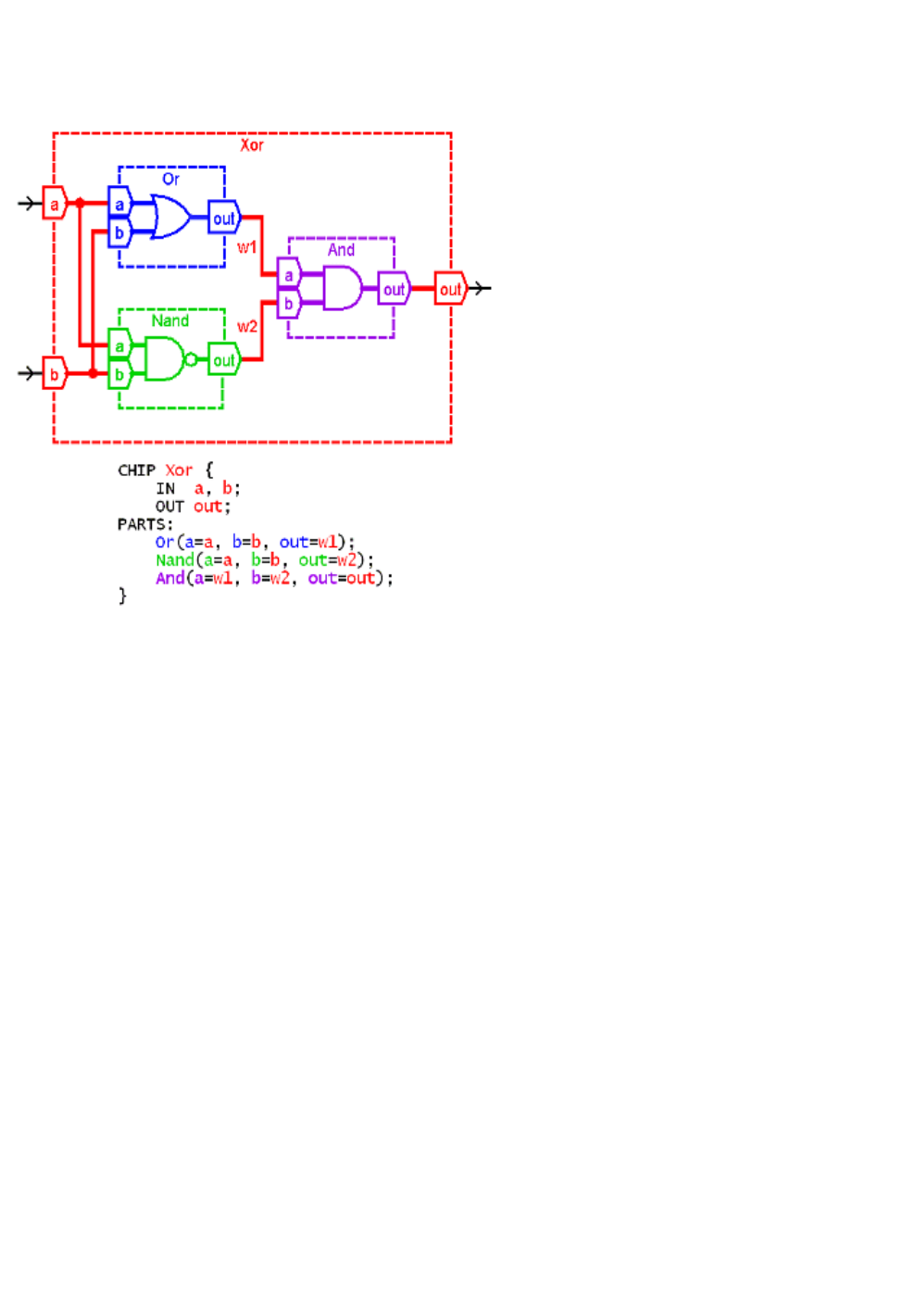
The following figure shows a diagram and HDL code of a Xor chip. The
diagram uses color coding to highlight which symbols "belong" to which
chips. (Note that there are several different ways to implement Xor; this is
just one of them.)
HDL Syntax Errors
The hardware simulator displays errors on the status bar at the bottom of its
window. On some computers with small screens these messages are off the
bottom of the screen and are not visible. If you load your HDL and nothing
show up in the HDL window in the simulator and you don't see an error
message, this is probably what's happening.
Your computer should have a way to move the window to see the message
using the keyboard. For example, on Windows use Alt+Space, M, and the
arrow keys.
Unconnected Pins
The Hardware Simulator does not consider unconnected pins to be errors. It
defaults any unconnected input or output to be
false
(0). This can cause
mysterious errors in your chip implementations.
If the output of your chip is always 0, make sure that your chip's output pin is
connected to the output pin of one of the chip-parts you are using. Double-
check the names of the wires involved in the chip's output. Typographic
errors are particularly bad here since the simulator doesn't throw errors on
disconnected wires. For example, if you write
SomeChip(..., sum=sun);
the
simulator will happily make a wire named
sun
and your chip's output will
always be 0 (because, quite likely, the
sun
pin will not be connected to any
other chip-part in your implementation, so nothing will be piped further from
http://www.nand2tetris.org/software/HDL Surviv...
3 of 7 6/22/17, 9:35 PM

SomeChip
onward).
If the output of a chip-part in your implementation does not appear to be
working correctly, check that all of its input pins are connected to something.
For a complete list of all the chips that you need in all the hardware projects,
see the Hack Chip-Set API at the end of this document.
Canonical Representation
The book introduces you to the canonical representation of a Boolean
function. This representation can be very useful for chips with small numbers
of inputs. As the number of inputs grows, the complexity of the canonical
representation grows exponentially.
For example, the canonical representation of Mux has 4 three-variable terms;
that of a Mux8Way would have 1024 11-variable terms. Large canonical
representations can be reduced with algebra, usually by computer programs.
In the case of Mux8Way it can be reduced to 8 four-input terms.
Clearly, this is not a practical approach for nand2tetris. You need to think
about how to use the chips you have already made to make the next chip
(assuming you're following the recommended order). The projects are
organized in such a way that often you need the chip that you have just
made.
Tests Are More Than Pass/Fail
For every
chip
.hdl
file, your working directory also includes a test script,
named
chip
.tst
, and a compare file, named
chip
.cmp
. Once your chip starts
generating outputs, your directory will also include an output file named
chip
.out
. When your chip fails the test script, don't forget to consult the
.out
file. Inspect the listed output values, and seek clues to the failure. If you can't
see the output file in the simulator environment (reported bug on some
Macs), you can look at it in a text editor.
If you need to, you can copy the
chip
.tst
file to
myChip
.tst
and change it to
give you more information about the behavior of your chip. Change the
output file name in the
output-file
line and delete the
compare-to
line. This will
cause the test to always run to completion.
You can also modify the
output-list
line to show the outputs of your internal
wires. The output format specifier is fairly obvious. The format letters are
B
for binary,
D
for decimal, and
X
for hexadecimal.
Testing A Chip In Isolation
At some point you may become convinced that your chip is correct, but it is
still failing the test. The problem may be with one of the chip-parts used in
your chip implementation.
http://www.nand2tetris.org/software/HDL Surviv...
4 of 7 6/22/17, 9:35 PM

You can diagnose which chip-part is causing the problem as follows. Create a
test subdirectory and copy into it only the three
.hdl
,
.tst
, and
.out
files
related to the chip that you are building. If your chip implementation passes
its test in this subdirectory as-is (letting the simulator use the default Java
implementation of the missing chip-parts), there must be a subtle problem
with one of your chip-parts implementations, i.e. with one of the chips that
you've built earlier in this project. Copy your other chips into this test
directory one by one, repeating the test, until you find the problematic chip.
Note also that the supplied tests, especially for more complex chips, cannot
guarantee that the tested chips are 100% correct.
HDL Is Not A Programming Language
Go back to one of your chips that uses 3 or 4 parts. Reverse the order of the
HDL statements that describe some of the chip-parts.
Will the chip still work?
You may be surprised that the answer is
yes
.
The reason that the chip still works is that HDL is a hardware
description
language (also known as a "declarative" language). It describes the wiring
connections that are needed to make the chip, not how it operates once
power is applied. It makes no difference what order the parts are put into a
circuit board. As long as all the parts get placed and connected together
correctly, the circuit board will function.
The Hardware Simulator "applies the power" and tests how the chip
functions.
An important aspect of this is that there is no such thing as an "uninitialized
variable" in HDL. If a wire is connected to an output somewhere in the HDL,
it can be connected to any input. This is particularly important to understand
for Chapter 3.
Bit Numbering and Bus Syntax
Hardware bits are numbered from right to left, starting with 0. When a bus is
carrying a number, bit
n
is the bit with weight 2
n
.
For example, when the book says
sel=110
, it means that a bus named
sel
receives the inputs
110
. That means
sel[2]=1
,
sel[1]=1
and
sel[0]=0
. Read
Appendix A.5.3 in the book to learn about bus syntax.
Sub-busing
Sub-busing can only be used on buses that are named in the IN and OUT
statements of an HDL file, or inputs and outputs of the chip-parts used in the
PARTS section. If you need a sub-bus of an internal bus, you must create the
narrower bus as an output from a chip-part. For example:
CHIP Foo {
IN in[16];
http://www.nand2tetris.org/software/HDL Surviv...
5 of 7 6/22/17, 9:35 PM

OUT out;
PARTS:
Something16 (in=in, out=notIn);
Or8Way (in=notIn[4..11], out=out);
}
This implementation causes an error on the Or8Way statement. This needs to
be coded as:
Something16 (in=in, out[4..11]=notIn);
Or8Way (in=notIn, out=out);
Multiple Outputs
Sometimes you need more than one sub-bus connected to the output of a
chip-part. Simply add more than one
out=
connection to the chip-part
definition.
CHIP Foo {
IN in[16];
OUT out[8];
PARTS:
Not16 (in=in, out[0..7]=low8, out[8..15]=high8);
Something8 (a=low8, b=high8, out=out);
}
This also works if you want to use an output of a chip in further
computations.
CHIP Foo {
IN a, b, c;
OUT out1, out2;
PARTS:
Something (a=a, b=b, out=x, out=out1);
Whatever (a=x, b=c, out=out2);
}
The Hack chip-set API
Below is a list of all the chip interfaces in the Hack chip-set, prepared by
Warren Toomey. If you need to use a chip-part, you can copy-paste the chip
interface and proceed to fill in the missing data. This is a very useful list to
have bookmarked or printed.
Add16(a= ,b= ,out= );
ALU(x= ,y= ,zx= ,nx= ,zy= ,ny= ,f= ,no= ,out= ,zr= ,ng= );
And16(a= ,b= ,out= );
And(a= ,b= ,out= );
ARegister(in= ,load= ,out= );
Bit(in= ,load= ,out= );
CPU(inM= ,instruction= ,reset= ,outM= ,writeM= ,addressM= ,pc= );
DFF(in= ,out= );
DMux4Way(in= ,sel= ,a= ,b= ,c= ,d= );
DMux8Way(in= ,sel= ,a= ,b= ,c= ,d= ,e= ,f= ,g= ,h= );
DMux(in= ,sel= ,a= ,b= );
DRegister(in= ,load= ,out= );
FullAdder(a= ,b= ,c= ,sum= ,carry= );
HalfAdder(a= ,b= ,sum= , carry= );
Inc16(in= ,out= );
http://www.nand2tetris.org/software/HDL Surviv...
6 of 7 6/22/17, 9:35 PM

Keyboard(out= );
Memory(in= ,load= ,address= ,out= );
Mux16(a= ,b= ,sel= ,out= );
Mux4Way16(a= ,b= ,c= ,d= ,sel= ,out= );
Mux8Way16(a= ,b= ,c= ,d= ,e= ,f= ,g= ,h= ,sel= ,out= );
Mux(a= ,b= ,sel= ,out= );
Nand(a= ,b= ,out= );
Not16(in= ,out= );
Not(in= ,out= );
Or16(a= ,b= ,out= );
Or8Way(in= ,out= );
Or(a= ,b= ,out= );
PC(in= ,load= ,inc= ,reset= ,out= );
RAM16K(in= ,load= ,address= ,out= );
RAM4K(in= ,load= ,address= ,out= );
RAM512(in= ,load= ,address= ,out= );
RAM64(in= ,load= ,address= ,out= );
RAM8(in= ,load= ,address= ,out= );
Register(in= ,load= ,out= );
ROM32K(address= ,out= );
Screen(in= ,load= ,address= ,out= );
Xor(a= ,b= ,out= );
http://www.nand2tetris.org/software/HDL Surviv...
7 of 7 6/22/17, 9:35 PM
