Xtensa Audio Framework (Hostless) Programmer's Guide Hi Fi AF Hosted Programmers
User Manual:
Open the PDF directly: View PDF  .
.
Page Count: 47
®
Xtensa Audio Framework (Hosted)
Programmer’s Guide
For Xtensa HiFi Audio Engines
Cadence Design Systems, Inc.
2655 Seely Ave.
San Jose, CA 95134
www.cadence.com

Xtensa Audio Framework (Hostless) Programmer's Guide
II CADENCE DESIGN SYSTEMS, INC. / CONFIDENTIAL
© 2016 Cadence Design Systems, Inc.
All Rights Reserved
This publication is provided “AS IS.” Cadence Design Systems, Inc. (hereafter “Cadence") does not make any warranty of any ki nd, either
expressed or implied, including, but not limited to, the implied warranties of merchantability and fitness for a particular purpose. Information in
this document is provided solely to enable system and software developers to use our processors. Unless specifically set forth herein, there
are no express or implied patent, copyright or any other intellectual property rights or licenses granted hereunder to design or fabricate
Cadence integrated circuits or integrated circuits based on the information in this document. Cadence does not warrant that the contents of this
publication, whether individually or as one or more groups, meets your requirements or that the publication is error-free. This publication could
include technical inaccuracies or typographical errors. Changes may be made to the information herein, and these changes may be
incorporated in new editions of this publication.
© 2016 Cadence, the Cadence logo, Allegro, Assura, Broadband Spice, CDNLIVE!, Celtic, Chipestimate.com, Conformal, Connections, Denali,
Diva, Dracula, Encounter, Flashpoint, FLIX, First Encounter, Incisive, Incyte, InstallScape, NanoRoute, NC-Verilog, OrCAD, OSKit, Palladium,
PowerForward, PowerSI, PSpice, Purespec, Puresuite, Quickcycles, SignalStorm, Sigrity, SKILL, SoC Encounter, SourceLink, Spectre,
Specman, Specman-Elite, SpeedBridge, Stars & Strikes, Tensilica, TripleCheck, TurboXim, Vectra, Virtuoso, VoltageStorm, Xplorer, Xtensa,
and Xtreme are either trademarks or registered trademarks of Cadence Design Systems, Inc. in the United States and/or other jurisdictions.
OSCI, SystemC, Open SystemC, Open SystemC Initiative, and SystemC Initiative are registered trademarks of Open SystemC Initiative, Inc. in
the United States and other countries and are used with permission. All other trademarks are the property of their respective holders.
Version 0.6
February 2018
Xtensa Audio Framework (Hostless) Programmer's Guide
CADENCE DESIGN SYSTEMS, INC. / CONFIDENTIAL III
Contents
1. Introduction to Xtensa Audio Framework ....................................................................... 1
1.1 Document Overview .................................................................................................. 1
1.2 Xtensa Audio Framework Specifications ................................................................... 2
1.2.1 Terminology ........................................................................................................... 2
1.2.2 Feature Set ............................................................................................................ 4
1.3 Xtensa Audio Framework Performance .................................................................... 5
1.3.1 Memory .................................................................................................................. 6
1.3.2 Timings .................................................................................................................. 8
2. Xtensa Audio Framework Architecture Overview .......................................................... 9
2.1 Xtensa Audio Framework Building Blocks ................................................................. 9
2.1.1 Applications ........................................................................................................... 9
2.1.2 Host Framework .................................................................................................. 10
2.1.3 DSP Framework .................................................................................................. 10
2.1.4 IPC Interface ........................................................................................................ 10
2.1.5 Audio Components .............................................................................................. 10
3. Xtensa Audio Framework Developer APIs .................................................................... 11
3.1 Files Specific to Developer APIs ............................................................................. 13
3.2 Developer API-Specific Error Codes ....................................................................... 13
3.2.1 Common API Errors............................................................................................. 14
3.2.2 Specific Errors ..................................................................................................... 14
3.3 Developer APIs ........................................................................................................ 15
4. Xtensa Audio Framework Sample Applications ........................................................... 31
4.1 Build and Execute using makefile............................................................................ 33
5. Integration of New Audio Components with XAF .......................................................... 34
5.1 Component Modification .......................................................................................... 34
5.2 Component Integration ............................................................................................ 34
5.3 Component Integration – Example .......................................................................... 37
6. Known Issues ................................................................................................................ 38
7. Appendix: Memory Guidelines ...................................................................................... 39
8. References .................................................................................................................... 41
Xtensa Audio Framework (Hostless) Programmer's Guide
IV CADENCE DESIGN SYSTEMS, INC. / CONFIDENTIAL
Figures
Figure 1-1 Terminology ............................................................................................................. 3
Figure 2-1 Software Stack Diagram ......................................................................................... 9
Figure 3-1 Flowgraph Sequence for API Calls ........................................................................ 12
Figure 4-1 (pcm-gain) Block Diagram ..................................................................................... 31
Figure 4-2 (dec) Block Diagram............................................................................................... 31
Tables
Table 1-1 Component types ..................................................................................................... 4
Table 1-2 Library Memory ........................................................................................................ 6
Table 1-3 Runtime Memory ...................................................................................................... 6
Table 1-4 MCPS ....................................................................................................................... 8
Table 3-1 xaf_adev_open API ............................................................................................ 15
Table 3-2 xaf_adev_close API .......................................................................................... 17
Table 3-3 xaf_comp_create API ........................................................................................ 18
Table 3-4 xaf_comp_delete API ........................................................................................ 21
Table 3-5 xaf_comp_set_config API ............................................................................... 22
Table 3-6 xaf_comp_get_config API ............................................................................... 23
Table 3-7 xaf_connect API ................................................................................................. 24
Table 3-8 xaf_comp_process API ...................................................................................... 25
Table 3-9 xaf_comp_get_status API ............................................................................... 28
Table 3-10 xaf_get_verinfo API ...................................................................................... 30
Table 5-1 Example components ............................................................................................. 37
Xtensa Audio Framework (Hostless) Programmer's Guide
V CADENCE DESIGN SYSTEMS, INC. / CONFIDENTIAL
Document Change History
Version
Changes
0.6
Alpha release
Xtensa Audio Framework (Hostless) Programmer's Guide
VI CADENCE DESIGN SYSTEMS, INC. / CONFIDENTIAL
Xtensa Audio Framework (Hostless) Programmer's Guide
1 CADENCE DESIGN SYSTEMS, INC. / CONFIDENTIAL
1. Introduction to
Xtensa Audio Framework
Xtensa Audio Framework (XAF) is a framework designed to accelerate the development of audio
processing applications for the HiFi family of DSP cores. Application developers may choose
components from the rich portfolio of audio and speech libraries already developed by Cadence
and its ecosystem partners. In addition, customers may also package their proprietary
algorithms and components and integrate them into the framework. Towards this goal, a
simplified “Developer API” is defined, which enables application developers to rapidly create an
end application and focus more on using the available components. XAF is designed to work on
both the instruction set simulator as well as actual hardware.
The version of XAF described in this guide is designed to work on actual hardware with Host
CPU and HiFi DSP (that is, a “hosted” solution). Note, this version of XAF is ported and tested
on HiKey960 Board where Host CPU runs Android operating system.
XAF is part of the “HiFi Integrator Studio” suite of tools.
1.1
Document Overview
This guide covers all the information required to create, configure, and run audio processing
chains using XAF developer APIs. Section 2 briefly describes the XAF architecture, and Section
3 provides details about developer APIs available for the application developer. Section 4
provides details about building and running a sample application, which illustrates usage of the
developer APIs. Section 5 provides a “How To” guide for adding support for a new component
in XAF.
Instructions on how to run the XAF on the HiKey960 Board have been provided in a companion
document [1].
Xtensa Audio Framework (Hostless) Programmer's Guide
CADENCE DESIGN SYSTEMS, INC. / CONFIDENTIAL 2
1.2
Xtensa Audio Framework Specifications
This section provides XAF specifications, including the operating system.
1.2.1 Terminology
The following terms are used within this guide.
Audio Device: The software abstraction of a digital signal processor (DSP) core.
Component: A software module that conforms to a specified interface and runs on the audio
device. It would implement some audio processing functionality.
Port: An interface through which a component can connect to other components and exchange
data. Each port may be connected to only one port of another component. A component must
have at least one port.
Input Port: A port through which a component can receive data from another component. A
component may have 0 or more input ports.
Output Port: A port through which a component can send data to another component. A
component may have 0 or more output ports.
Link: The connection between the output port of one component and the input port of another
component.
Buffer: Memory block containing data that is transferred over a link between two ports.
Chain: A graph formed by connecting different components by links.
Framework: A software entity that enable the creation of an audio processing chain. It manages
the transfer of buffers between ports as well as the scheduling of the different components in
the chain.
Application: A software entity that uses the framework to create a chain. It is the responsibility
of the application to provide input data to the chain and consume the output data generated by
the chain.
Xtensa Audio Framework (Hostless) Programmer's GuideGuide
3 CADENCE DESIGN SYSTEMS, INC. / CONFIDENTIAL
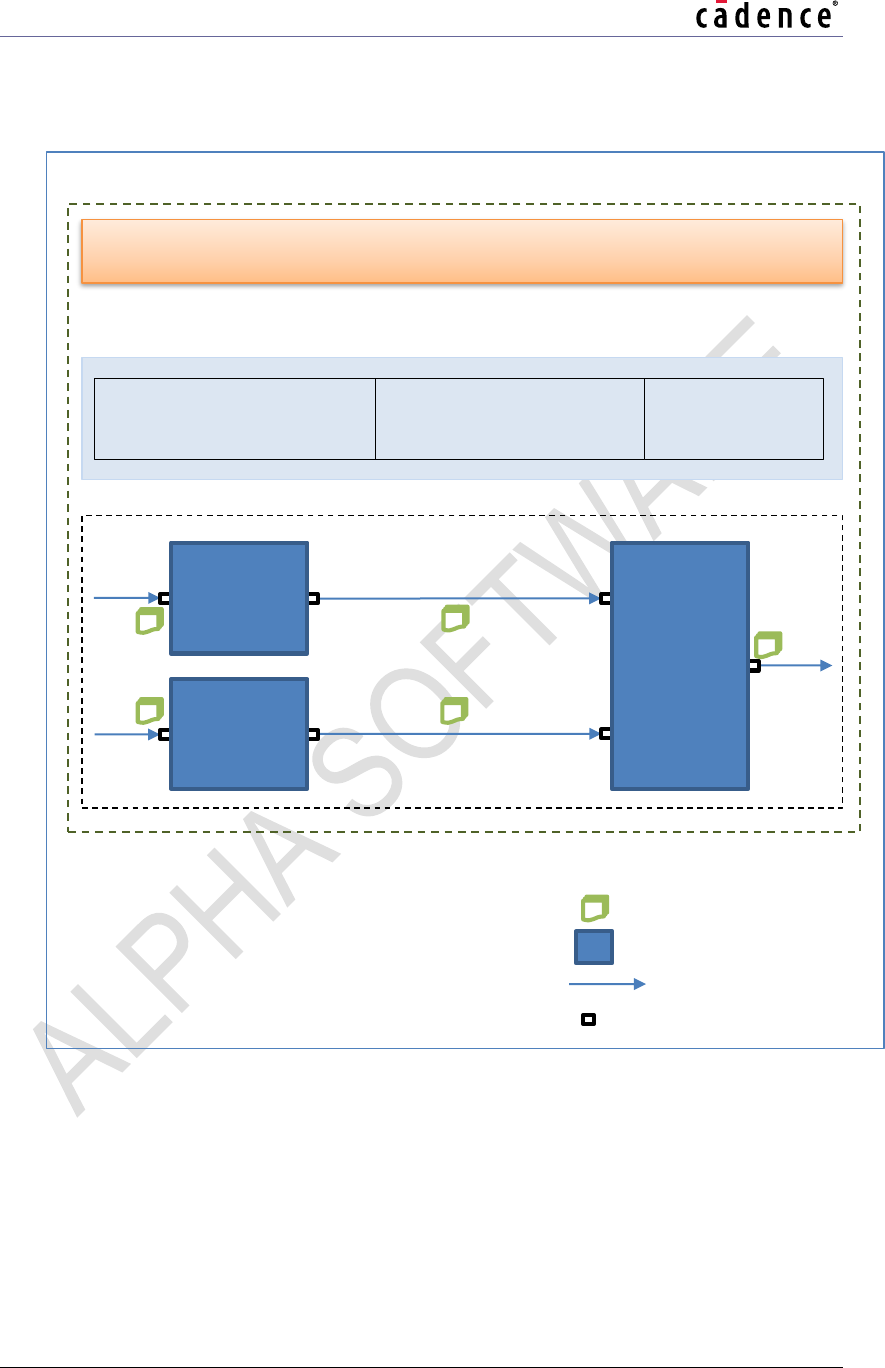
Figure 1-1 shows the terms above in a diagrammatic form, with an example chain.
Figure 1-1 Terminology
Chain
Output
port
Input
port
Output
port
Input
port
A1
Input
port
Input
port
Output
port
Component
A
Component
B
Component
C
Framework
Buffer management Scheduler etc...
Application
Buffers
Component
Link
Port
Legend
Audio Device
Xtensa Audio Framework (Hostless) Programmer's Guide
CADENCE DESIGN SYSTEMS, INC. / CONFIDENTIAL 4
1.2.2 Feature Set
API features:
Ability to create components and connect them in a chain.
Ability to read and write component configuration parameters.
Ability to read component status and trigger component processing.
XAF features:
Manages the scheduling of components in the chain. No explicit restriction on the complexity of
the component chain, i.e., the number of components/links is restricted by the memory/MHz
resources available and not by XAF.
Manages the allocation of memory for data buffers. Number of data buffers is 0, 1, or 2 for input
ports and 0 or 1 for output ports. The number of buffers on a link between two ports can be
increased at component connection stage.
Manages the allocation of memory for itself and created components. Dynamic memory
allocation within XAF is done through an allocation function registered by the application. This
allows the application to control the memory type/region for the allocation.
Manages the data transfer between components. The buffering of data to match the different
block sizes between two connected components is also managed by XAF. As XAF merely
transfers the data between components, there is no restriction on the actual format of the data.
Component types supported (See Table 1-1), depending on the number of ports and the type
of data transferred across the ports (PCM or non-PCM).
Table 1-1 Component types
Component
Type
Input
Output
Component Description
Ports
PCM
Ports
PCM
Decoder
1
N
1
Y
Decodes input compressed data to
generate output PCM data.
Encoder
1
Y
1
N
Encodes input PCM data to generate
output compressed data.
Mixer
4
Y
1
Y
Combines input PCM data from multiple
ports to generate one output PCM data.
Pre-
processing
1
Y
1
Y
Pre-processes input PCM data to
generate output PCM data.
Post
processing
1
Y
1
Y
Post-processes input PCM data to
generate output PCM data.
Package features:
One example test application provided to demonstrate various use-cases.
Xtensa Audio Framework (Hostless) Programmer's GuideGuide
5 CADENCE DESIGN SYSTEMS, INC. / CONFIDENTIAL
Example code to demonstrate the integration of two Cadence audio libraries (Ogg Vorbis
decoder, PCM gain library) into XAF is included in this package. Note that some of these libraries
may need to be licensed separately.
Compile time flags provided to support detailed analysis and debugging
Tracing: Enables printing of detailed component scheduling information (Set
TRACE = 1 while building, disabled by default).
Debugging: Disables optimization and enables debugger information (Set DEBUG
= 1 while building, disabled by default).
Profiling: Measurement of component and XAF MHz. (Set XAF_PROFILE = 1
while building, enabled by default).
Support for HiKey960 Board[1] along with detailed instructions on board setup.
RTOS:
XAF requires a real-time operating system (RTOS) on Host CPU for multithreaded execution,
Inter Processor Communication (IPC) interface, mutual exclusion for accessing shared
resources, etc. This version of XAF supports Android [1] (only) as the RTOS. Support for other
RTOS variants will be added in future versions.
Limitations:
Code for the components needs to be linked into the application. Dynamic loading of code is not
supported.
API enhancements to disconnect components from a graph and to pause/resume the graph are
planned in future releases.
Only one instance of XAF can run at a time.
Known Issues:
1.3
Xtensa Audio Framework Performance
The performance was characterized on the 5-stage Audio Engine processor cores. The memory
usage and performance figures are provided for design reference.
Xtensa Audio Framework (Hostless) Programmer's Guide
CADENCE DESIGN SYSTEMS, INC. / CONFIDENTIAL 6
1.3.1 Memory
Table 1-2 Library Memory
XAF Module
Text (Kbytes)
ROData
(Kbytes)
HiFi3 DSP Firmware Library
39.5
9.0
ARM64 XAF Host Library
20.4
0.7
Note Above memory measurements are for XAF on HiKey960 Board set up.
Note The HiFi3 DSP Firmware Library measurements were done with Version 7.0.5 of
the Xtensa tool chain and it excludes memory required by audio components (i.e.
Ogg Vorbis Decoder, PCM Gain and Mixer components).
The total runtime memory allocated can be divided into two categories:
1. Local memory used by XAF on AP: This memory is allocated by AP for XAF
data structures.
2. Local memory used by XAF on DSP: This memory is allocated by DSP for
usage by audio components.
3. Shared memory between AP and DSP for IPC: This memory is shared by AP
and DSP for Inter Processor Communication (IPC) between AP and DSP (i.e.
for sharing messages and audio data).
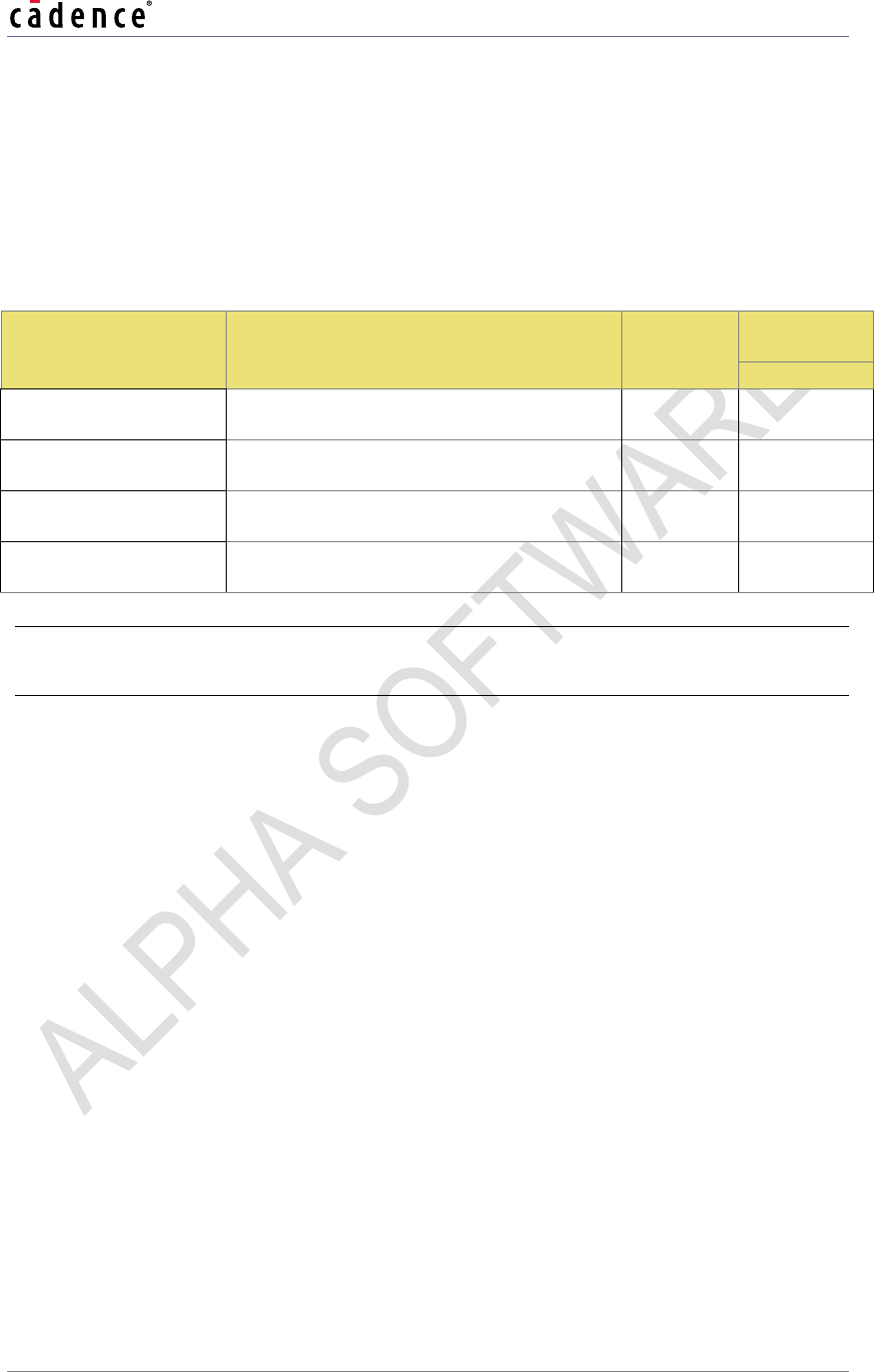
Table 1-3 shows the runtime memory allocated by XAF for a simple processing chain.
No
Memory breakup
RAM (Kbytes)
HiFi 3
1
Local memory used by XAF on AP
4
2
Local memory used by XAF on DSP
1030
3
Shared memory between AP and DSP
for IPC
256
Total memory
1290
Note Above memory measurements are for XAF on HiKey960 Board set up.
Note ‘Local memory used by XAF on AP’ mentioned above is for use cases
demonstrated by xaf-dec-test and xaf-dec-mix-test.
Note ‘Local memory used by XAF on DSP’ and ‘Shared memory between AP and
DSP’ are allocated to higher values for XAF on HiKey960 Board set up. To
compute exact sizes required by any audio processing chain, please refer to
Appendix 7.
Note The HiFi3 DSP measurements were done with Version 7.0.5 of the Xtensa tool
chain.
Table 1-3 Runtime Memory
Xtensa Audio Framework (Hostless) Programmer's GuideGuide
7 CADENCE DESIGN SYSTEMS, INC. / CONFIDENTIAL
Xtensa Audio Framework (Hostless) Programmer's Guide
CADENCE DESIGN SYSTEMS, INC. / CONFIDENTIAL 8
1.3.2 Timings
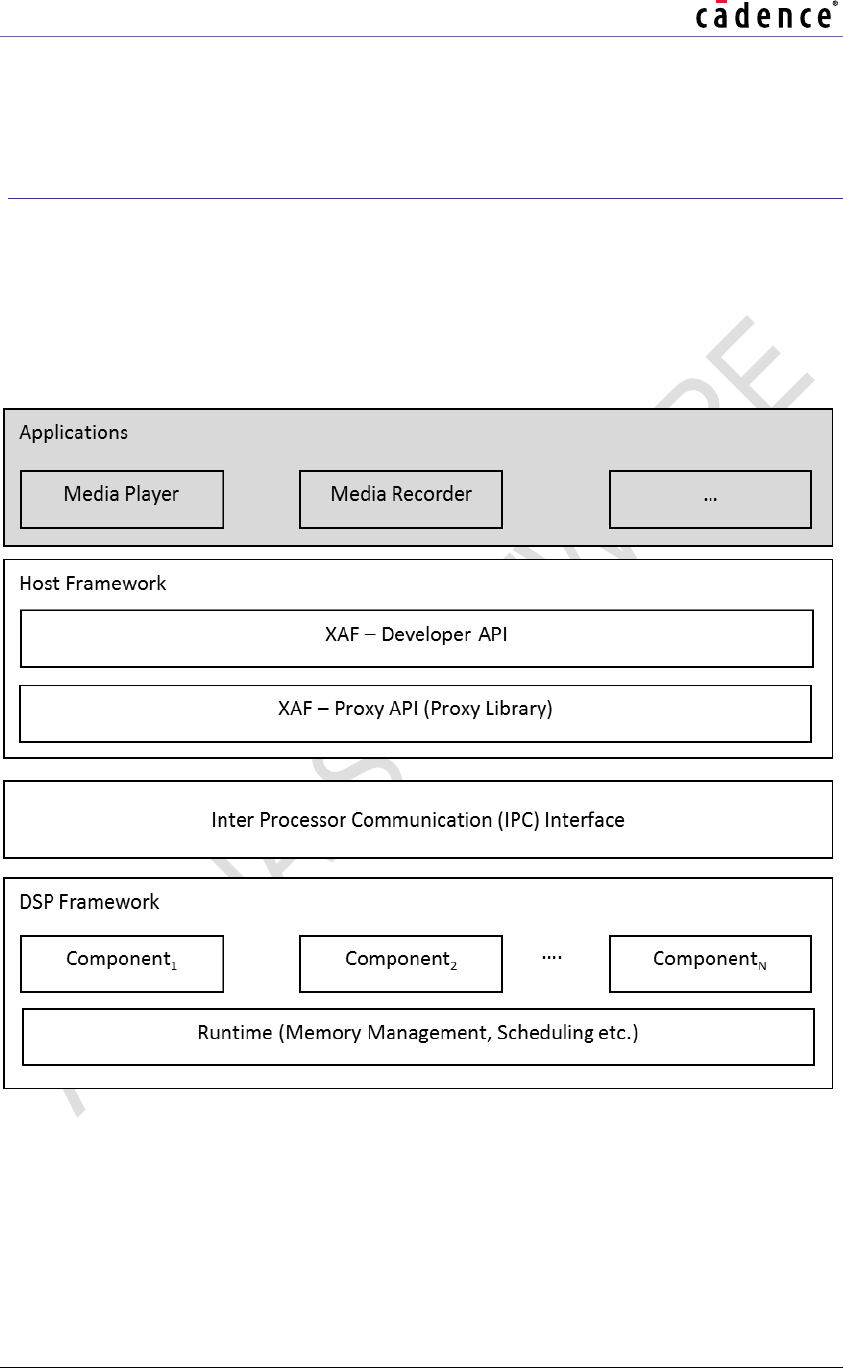
Table 1-4 contains details for the MCPS usage by the audio processing chain on DSP. The
“Average CPU Load” MCPS are the total MHz consumed by the DSP for executing the use case
through XAF.
Table 1-4 MCPS
Testbench
Use Case
MCPS for
Average CPU
Load (MHz)
HiFi 3
xaf-dec-test
Ogg-Vorbis Decoder
(Stereo, 48 KHz, 16 bits/sample)
XAF DSP
46
xaf-dec-test
PCM gain
(Stereo, 48 KHz, 16 bits/sample)
XAF DSP
14
xaf-dec-mix-test
Ogg-Vorbis Decoder (2 instances) + Mixer
(Stereo, 48 KHz, 16 bits/sample)
XAF DSP
83
xaf-dec-mix-test
PCM Gain (2 instances) + Mixer
(Stereo, 48 KHz, 16 bits/sample)
XAF DSP
42
Note Above memory measurements are for XAF on HiKey960 Board set up.
Note The measurements were done with Version 7.0.5 of the Xtensa tool chain.
Xtensa Audio Framework (Hostless) Programmer's GuideGuide
9 CADENCE DESIGN SYSTEMS, INC. / CONFIDENTIAL
2. Xtensa Audio Framework
Architecture Overview
2.1
Xtensa Audio Framework Building Blocks
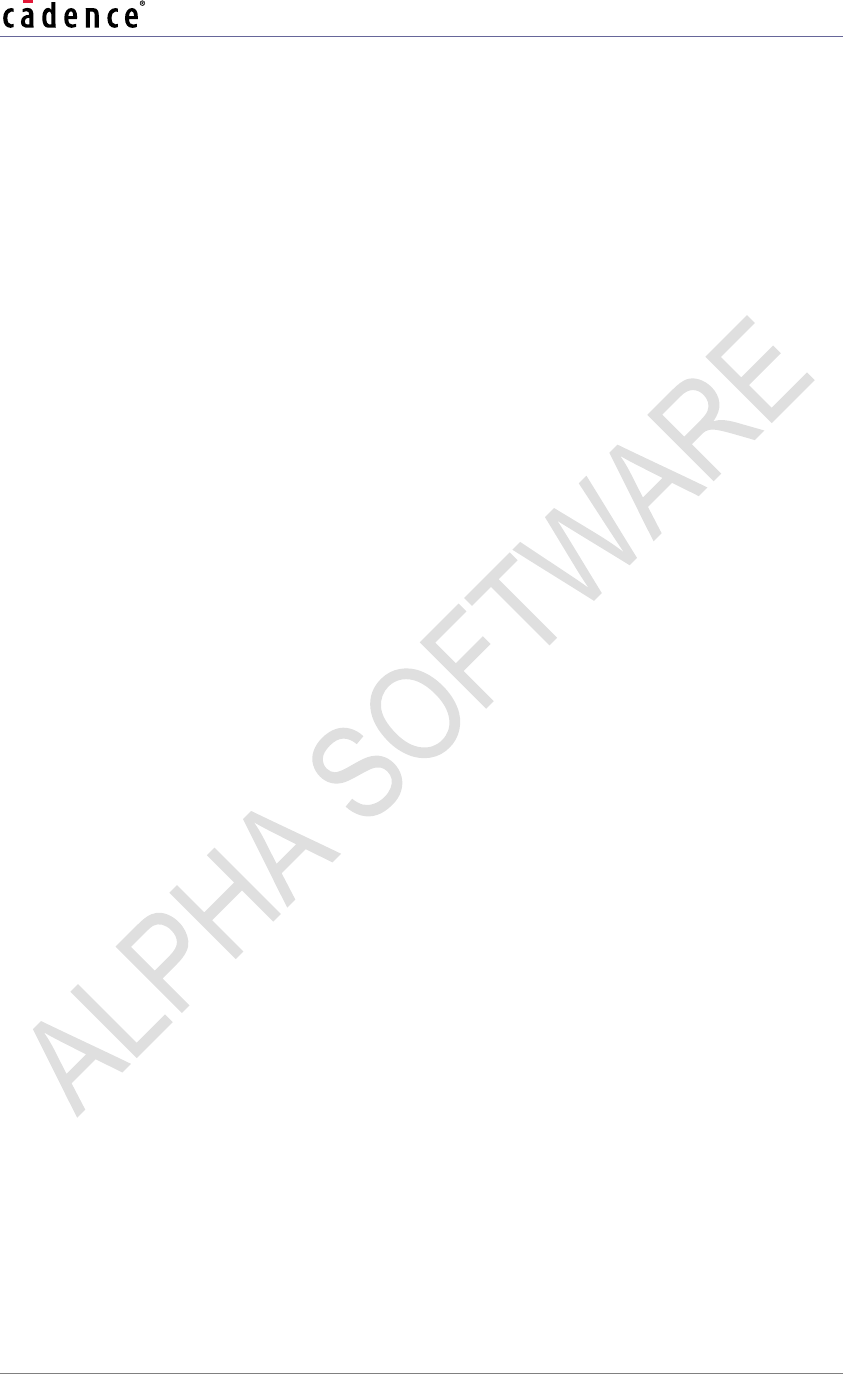
The following figure shows various building blocks of applications based on XAF. Note that in
this figure the gray blocks are not part of XAF.
Figure 2-1 Software Stack Diagram
2.1.1 Applications
In this application space, an application developer will leverage the developer API to create a
processing chain and Host CPU Operating System (Android) to handle multiple threads. As
such, XAF enables chains to be set up and configured.
Xtensa Audio Framework (Hostless) Programmer's Guide
CADENCE DESIGN SYSTEMS, INC. / CONFIDENTIAL 10
The developer API is the interface between the Application space and XAF.
Note that XAF allows an unlimited number of components in the audio processing chain — the
limitation is only from the system hardware. The system developer must ensure that there is
enough memory and CPU bandwidth available on the hardware.
2.1.2 Host Framework
Host framework implements Developer API and underlying Proxy library. Host framework is
responsible for sending the commands to DSP framework and receive responses from DSP
framework.
2.1.3 DSP Framework
This block interfaces between the host framework and the audio processing components. It also
performs all memory management for audio processing chains. It receives commands from
applications and sends the responses back.
It also manages the data buffers between each individual audio component. Note that each
audio component running in the audio processing chain may consume and produce a different
amount of data. The decoder component from Cadence consumes one encoded frame and
produces one output PCM frame in one execution call. For example, the MP3 decoder from
Cadence may consume 2048 bytes (largest encoded frame size) and produce one output PCM
frame of 4608 bytes (1152 samples, stereo channel, 16-bit data). Post process components
from Cadence generally consume and produce a variable block size (from a pre-defined set) in
one execution call.
2.1.4 IPC Interface
Inter Processor Communication (IPC) interface is hardware specific module and is responsible
for communication between Host CPU and HiFi DSP with appropriate interrupts.
2.1.5 Audio Components
Audio components, used by the Applications, can be connected to form chains with a cascade
or parallel interface. Except for the mixer, each audio component type can have one input and
one output stream. The Mixer Component type can have up to four input streams and one output
stream. Section 5 contains details on how to add a new component.
Xtensa Audio Framework (Hostless) Programmer's GuideGuide
11 CADENCE DESIGN SYSTEMS, INC. / CONFIDENTIAL
3. Xtensa Audio Framework Developer
APIs
This section discusses XAF developer APIs that are available for the application programmer to
create, configure and run audio processing chains.
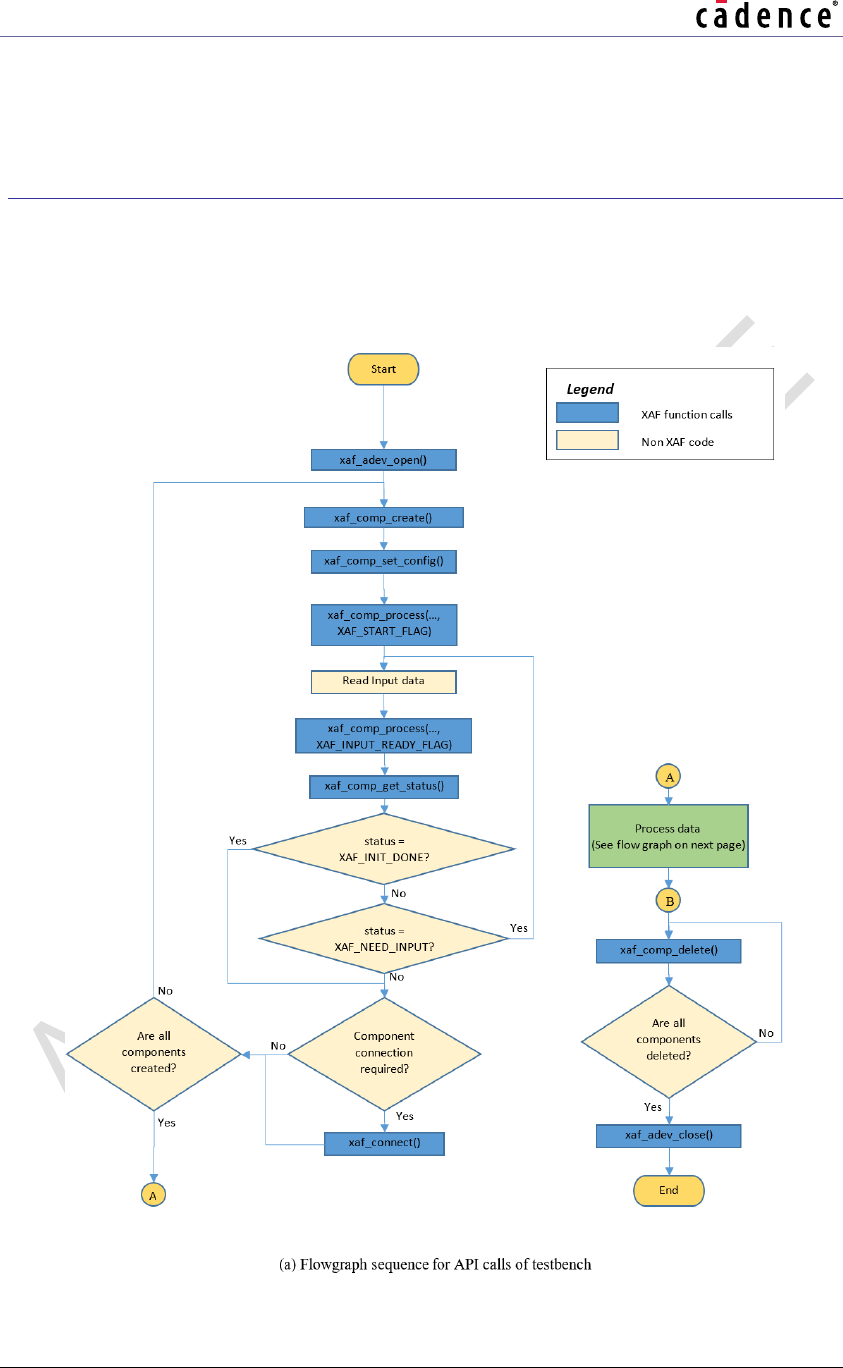
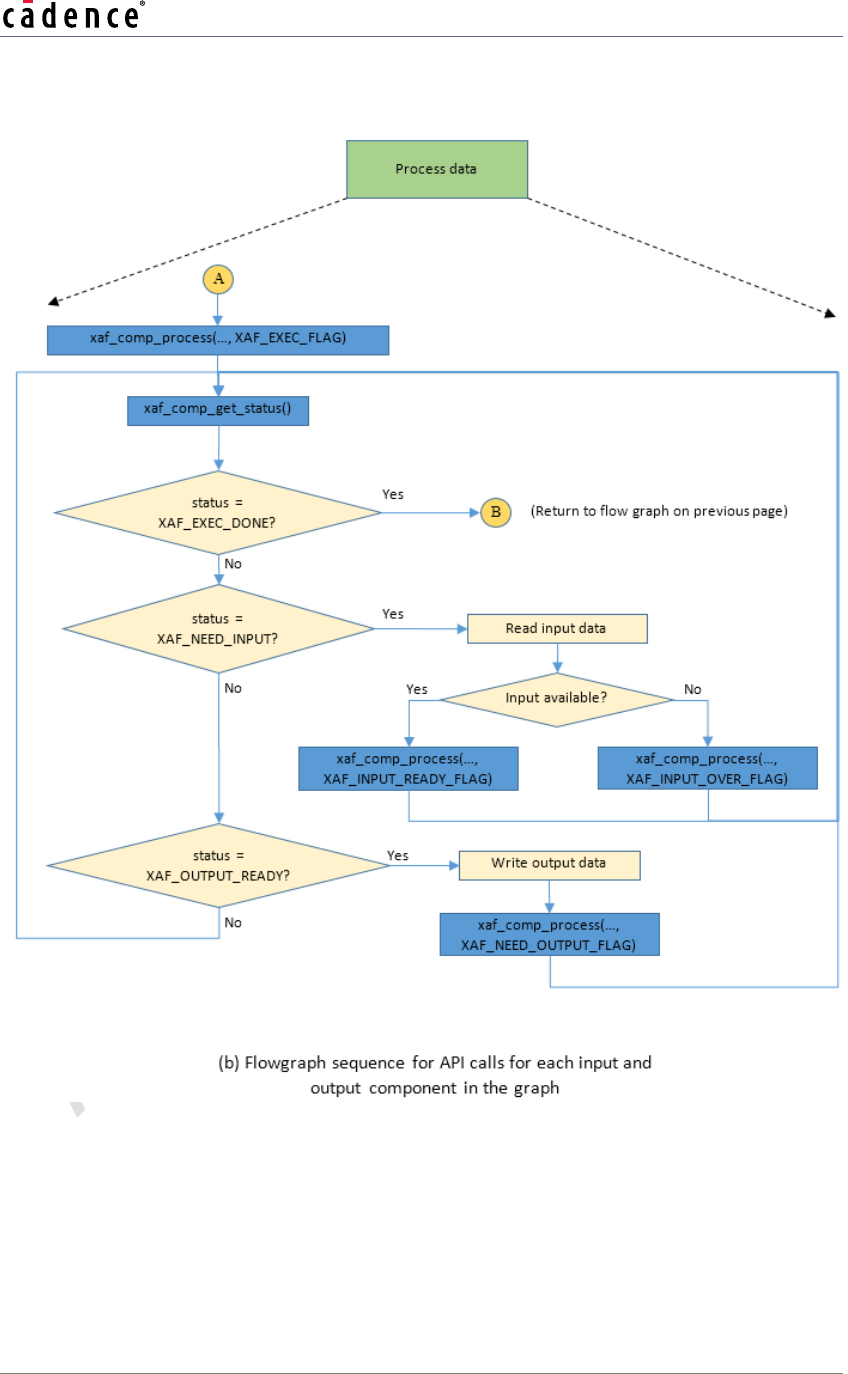
Figure 3-1 shows the flow graph for a typical application.
Xtensa Audio Framework (Hostless) Programmer's Guide
CADENCE DESIGN SYSTEMS, INC. / CONFIDENTIAL 12
Figure 3-1 Flowgraph Sequence for API Calls
Xtensa Audio Framework (Hostless) Programmer's GuideGuide
13 CADENCE DESIGN SYSTEMS, INC. / CONFIDENTIAL
Following is a brief description of the flowgraph sequence:
Initialize XAF: The XAF is initialized by calling xaf_adev_open. The framework memory
allocation is performed at this stage.
Create Processing Chain: The various components in the chain are instantiated by calling
xaf_comp_create for each component. Then, the component configuration parameters (if
any) are set using xaf_comp_set_config. Finally, the components are connected together
using xaf_connect.
Process data: Input and output data is passed to the components using xaf_comp_process.
This must be performed only for components that need to be supplied with input/output data
(typically the edge components of the chain). The component status should be queried using
xaf_comp_status. This stage continues until all the data has been processed.
Delete Processing Chain: The various components of the chain are deleted by calling
xaf_comp_delete.
Terminate XAF: The XAF is terminated by calling xaf_adev_close. The memory allocated by
the framework is freed at this stage.
3.1
Files Specific to Developer APIs
Developer API Header File (/include/)
xaf-api.h
3.2
Developer API-Specific Error Codes
The errors in this section can result from the developer API layer of the Xtensa Audio
Framework. All errors are fatal (unrecoverable) errors. In response to an error, the function
xaf_adev_close(p_adev, 0) may be called to close the device and release resources used
by XAF.
Xtensa Audio Framework (Hostless) Programmer's Guide
CADENCE DESIGN SYSTEMS, INC. / CONFIDENTIAL 14
3.2.1 Common API Errors
XAF_PTR_ERROR
This error indicates that a null pointer was passed to the developer API where a
valid pointer was expected.
XAF_INVALID_VALUE
This error code indicates that an invalid value (out of valid range) was passed to the
developer API.
XAF_API_ERR
This error code indicates a developer API call sequence error, for example,
xaf_comp_create() is called before xaf_adev_open().
3.2.2 Specific Errors
The following error is specific to some APIs.
XAF_ROUTING_ERROR
This error code indicates that the developer API was unable to connect
(xaf_connect() call) the two requested components.
Xtensa Audio Framework (Hostless) Programmer's GuideGuide
15 CADENCE DESIGN SYSTEMS, INC. / CONFIDENTIAL
3.3
Developer APIs
This section contains tables describing the developer APIs.
Table 3-1 xaf_adev_open API
API
XAF_ERR_CODE xaf_adev_open(pVOID *p_adev,
WORD32 audio_frmwk_buf_size,
WORD32 audio_comp_buf_size,
xaf_mem_malloc_fxn_t mem_malloc,
xaf_mem_free_fxn_t mem_free)
Description
This API opens and initializes the audio device structure. It also
memory maps shared memory for the framework.
Actual Parameters
p_adev
Pointer to audio device handle which will be returned with the valid
pointer to audio device structure.
audio_frmwk_buf_size
Unused in this release.
audio_comp_buf_size
Unused in this release.
mem_malloc
Function pointer to testbench implementation of memory allocation.
The ‘id’ indicates whether the memory is allocated for device
(DEV_ID) or for component (COMP_ID).
pVOID mem_malloc(WORD32 size, WORD32 id);
Note: XAF expects that mem_malloc should return a 4-byte aligned
address.
mem_free
Function Pointer to testbench implementation of memory free
VOID mem_free(pVOID ptr, WORD32 id);
Restrictions
OnOnly one instance of XAF can run at a time.
Example
ret = xaf_adev_open(&p_adev,
0,
Xtensa Audio Framework (Hostless) Programmer's Guide
CADENCE DESIGN SYSTEMS, INC. / CONFIDENTIAL 16
0,
&mem_malloc,
&mem_free);
Errors
Common API Errors
Xtensa Audio Framework (Hostless) Programmer's GuideGuide
17 CADENCE DESIGN SYSTEMS, INC. / CONFIDENTIAL
Table 3-2 xaf_adev_close API
API
XAF_ERR_CODE xaf_adev_close(pVOID p_adev,
xaf_comp_flag flag)
Description
This API closes the Audio Device and frees up allocated memory.
Actual Parameters
p_adev
Pointer to the audio device
flag
Unused in this release.
Restrictions
Should not be called before xaf_adev_open API. All components
must be deleted before closing the audio device.
Example
ret = xaf_adev_close(p_adev, 0);
Errors
Common API Errors
Xtensa Audio Framework (Hostless) Programmer's Guide
CADENCE DESIGN SYSTEMS, INC. / CONFIDENTIAL 18
Table 3-3 xaf_comp_create API
API
XAF_ERR_CODE xaf_comp_create(pVOID p_adev,
pVOID *p_comp,
xf_id_t comp_id,
UWORD32 ninbuf,
UWORD32 noutbuf,
pVOID pp_inbuf[],
xaf_comp_type comp_type)
Description
This API creates the Audio Component. The component is identified by
comp_id and comp_type. You can specify the number of input and output
buffers for the component. The IO buffer requirement is dependent upon the
position of the component in the audio processing chain – see the parameter
description below for details.
Xtensa Audio Framework (Hostless) Programmer's GuideGuide
19 CADENCE DESIGN SYSTEMS, INC. / CONFIDENTIAL
Actual
Parameters
p_adev
Pointer to the audio device structure
p_comp
Pointer to the audio component structure (should be one of the available audio
components). This pointer will be allocated and returned with a valid pointer
to allocated component structure.
comp_id
Component Identifier string. e.g. “mixer”, “audio-decoder/mp3”, etc. It should
match with class_id’s defined under the constant definition of
xf_component_id in xa-factory.c file. (Refer to Section 5.2, Step 6)
ninbuf
Unsigned integer containing the number of input buffers. This is the number
of buffers that the testbench needs to pass to the component. For components
connected in the chain where it receives input from other components, this
must be configured as zero (0).
Valid values: 0, 1, 2.
noutbuf
Unsigned integer containing the number of output buffers. This is the number
of buffers that the component passes to the testbench as output. For
components connected in the chain where the output is passed to another
component, this must be configured as zero (0).
Valid values: 0, 1.
pp_inbuf
Pointer to the array to hold ninbuf input buffer addresses that have been
allocated within XAF. If the pointer is NULL, the input buffer addresses will not
be returned.
type
Type of audio component
Following are valid values:
Type
Description
XAF_DECODER:
Decoder component
XAF_ENCODER:
Encoder component
XAF_MIXER:
Mixer component
XAF_PRE_PROC:
Preprocessing component
XAF_POST_PROC:
Post processing
component
Restrictions
Should not be called before xaf_adev_open
Xtensa Audio Framework (Hostless) Programmer's Guide
CADENCE DESIGN SYSTEMS, INC. / CONFIDENTIAL 20
Example
ret = xaf_comp_create(p_adev,
&p_audioComp,
"comp_id",
N_INP_BUFF,
N_OUT_BUFF,
& inbuf[0],
XAF_POST_PROC);
Errors
Common API Errors
Xtensa Audio Framework (Hostless) Programmer's GuideGuide
21 CADENCE DESIGN SYSTEMS, INC. / CONFIDENTIAL
Table 3-4 xaf_comp_delete API
API
XAF_ERR_CODE xaf_comp_delete(pVOID p_comp)
Description
This API deletes the Audio Component and frees the memory
associated with it.
Actual Parameters
p_comp
Pointer to the audio component structure
Restrictions
Should not be called before xaf_comp_create
Example
ret = xaf_comp_delete(p_audioComp);
Errors
Common API Errors
Xtensa Audio Framework (Hostless) Programmer's Guide
CADENCE DESIGN SYSTEMS, INC. / CONFIDENTIAL 22
Table 3-5 xaf_comp_set_config API
API
XAF_ERR_CODE xaf_comp_set_config(
pVOID p_comp,
WORD32 num_param,
pWORD32 p_param)
Description
This API sets (writes) configuration parameters to the Audio
Component.num_param provides the number of configuration parameters to
be set.p_param points to an array containing ID/value pairs for all
num_param parameters.
For example, for two parameters, p_param will contain ID1, VAL1, ID2,
VAL2.
Actual
Parameters
p_comp
Pointer to the audio component structure
num_param
Integer containing the number of parameters to be set.
The maximum limit is 16.
p_param
Pointer to an integer array containing ID/Value pairs – i.e., parameter ID
followed by parameter value.
Restrictions
Should not be called before xaf_comp_create
Example
ret = xaf_comp_set_config(p_comp,
N_PARAMS,
¶m[0]);
Errors
Common API Errors
Xtensa Audio Framework (Hostless) Programmer's GuideGuide
23 CADENCE DESIGN SYSTEMS, INC. / CONFIDENTIAL
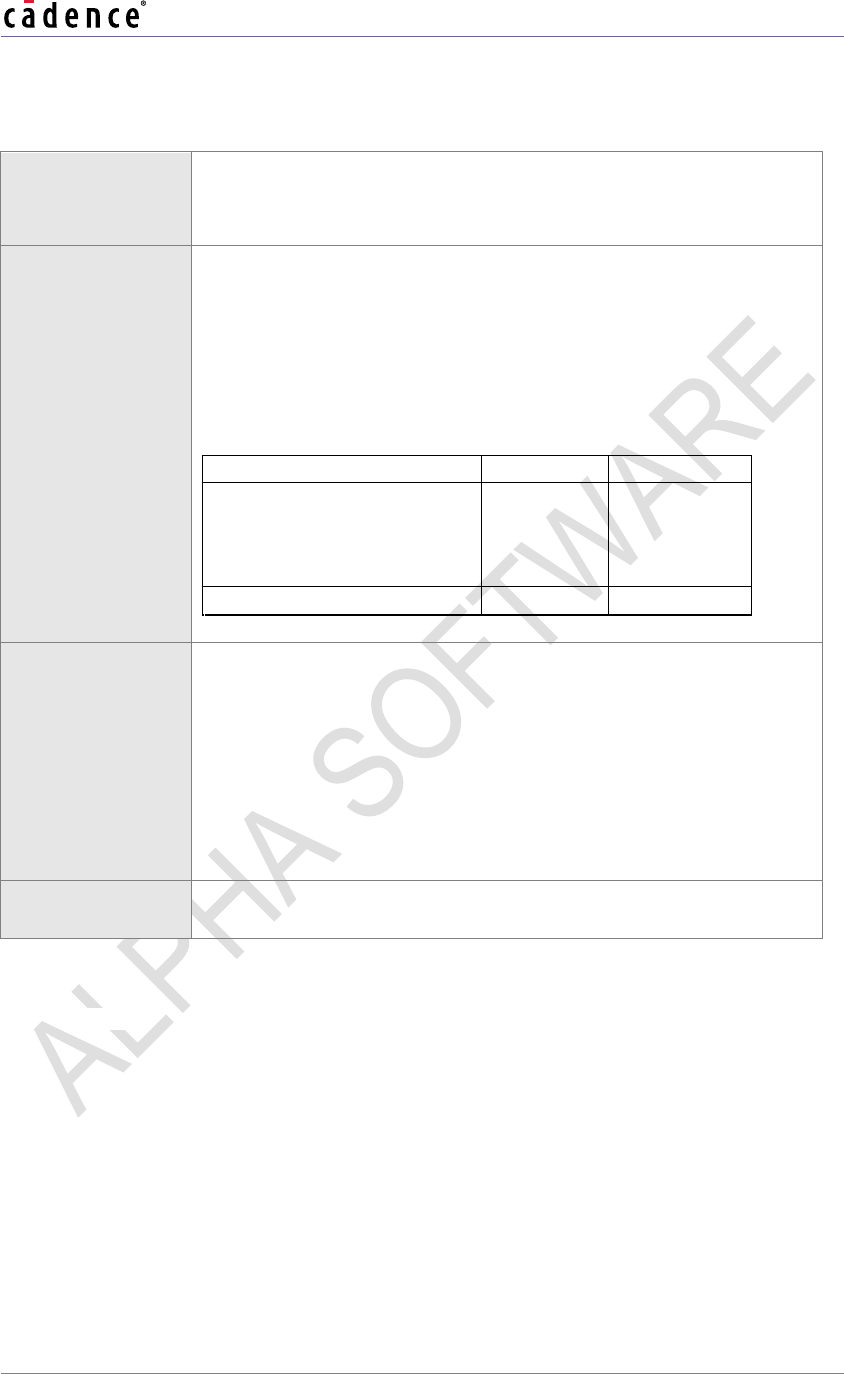
Table 3-6 xaf_comp_get_config API
API
XAF_ERR_CODE xaf_comp_get_config(
pVOID p_comp,
WORD32 num_param,
pWORD32 p_param)
Description
This API gets (reads) configuration parameters from the Audio
Component.num_param provides the number of configuration parameters
to get.p_param points to an array containing ID/value pairs for all
num_param parameters.
For example, for two parameters, p_param will contain ID1, VAL1, ID2,
VAL2. VAL1 and VAL2 can contain any arbitrary value, as they will be over-
written when the function returns.
Upon successful execution of this API, the value field of the ID/value pair
will be set to the correct value.
Actual
Parameters
p_comp
Pointer to the audio component structure
num_param
Integer containing the number of parameters to get.
The maximum limit is 16.
p_param
Pointer to an integer array containing ID/Value pairs – i.e., parameter ID
followed by parameter value.
Restrictions
Should not be called before xaf_comp_create
Example
ret = xaf_comp_get_config(p_comp,
N_PARAMS,
¶m[0]);
Errors
Common API Errors
Xtensa Audio Framework (Hostless) Programmer's Guide
CADENCE DESIGN SYSTEMS, INC. / CONFIDENTIAL 24
Table 3-7 xaf_connect API
API
XAF_ERR_CODE xaf_connect(pVOID p_src,
pVOID p_dest,
WORD32 num_buf)
Description
This API connects the output port of audio component p_src to the
input port of audio component p_dest with num_buf buffers
between them. The size of these buffers will be equal to the size of
the output buffer of p_src .
This API will fail if there are no free input or output ports on Audio
Components. Audio Components have input and output ports as
follows:
Component Type
Input Ports
Output Ports
XAF_DECODER or
XAF_ENCODER or
XAF_PRE_PROC or
XAF_POST_PROC
1
1
XAF_MIXER
4
1
Actual Parameters
p_src
Pointer to the source audio component structure
p_dest
Pointer to the destination audio component structure
num_buf
Number of buffers to be added between components
Valid values: 2, 3, 4
Restrictions
Should not be called before at least two audio components are
created using xaf_comp_create.
Example
ret = xaf_connect(p_audioComp1,
p_audioComp2,
N_BUFFS);
Errors
Common API Errors
XAF_ROUTING_ERROR
Indicates that the API was unable to connect the two requested components
Xtensa Audio Framework (Hostless) Programmer's GuideGuide
25 CADENCE DESIGN SYSTEMS, INC. / CONFIDENTIAL
Table 3-8 xaf_comp_process API
API
XAF_ERR_CODE xaf_comp_process(pVOID p_adev,
pVOID p_comp,
pVOID p_buf,
UWORD32 length,
xaf_comp_flag flag)
Description
This API is the main process function for the audio component; it will
do Audio Component start, initialization, execution, and wrap-up
based on the process flag provided to it. This API needs to be
called only for components that need to be supplied with input/output
data, typically the edge components of the chain.
After processing has started, this API should be called until end of
stream, alternatively along with xaf_comp_get_status API. The
value to be set for the parameter ‘flag’ depends on the status
returned by the xaf_comp_get_status API.
Note: This API is asynchronous, i.e., it delivers the process
command to the audio component and returns. The audio
component will process this request when all required resources (IO
buffers, CPU, etc.) from the processing chain are available. The
status of this process command can be probed by the API described
in Table 3-9.
Note: The pointer to an audio device (p_adev) is not required and
can be passed as NULL during the execution phase of the audio
component (after the component is initialized).
Xtensa Audio Framework (Hostless) Programmer's Guide
CADENCE DESIGN SYSTEMS, INC. / CONFIDENTIAL 26
Actual Parameters
p_adev
Pointer to the audio device structure
p_comp
Pointer to the audio component structure
p_buf
Pointer to the input buffer with the input data or output buffer to be
filled
length
Unsigned integer containing the length of buffer in bytes
process_flag – Process flag
Following are valid values:
Flag
Description
XAF_START_FLAG
Initiates processing, to be called
only once for each component,
during initialization.
XAF_EXEC_FLAG
Executes, to be called only once for
each component to start
processing.
XAF_INPUT_OVER_FLAG
Indicates input is complete, when
xaf_comp_get_status returns
XAF_NEED_INPUT, and input
stream is exhausted.
XAF_INPUT_READY_FLAG
Indicates input buffer availability,
when xaf_comp_get_status
returns XAF_NEED_INPUT, and
input data is available.
XAF_NEED_OUTPUT_FLAG
Request for output, when
xaf_comp_get_status returns
XAF_OUTPUT_READY, and size
returned in xaf_info_t structure
is non-zero.
Restrictions
Should not be called before xaf_comp_create
Xtensa Audio Framework (Hostless) Programmer's GuideGuide
27 CADENCE DESIGN SYSTEMS, INC. / CONFIDENTIAL
Example
ret = xaf_comp_process( p_adev,
p_audioComp,
&Buff,
length,
compFlag);
Errors
Common API Errors
Xtensa Audio Framework (Hostless) Programmer's Guide
CADENCE DESIGN SYSTEMS, INC. / CONFIDENTIAL 28
Table 3-9 xaf_comp_get_status API
API
XAF_ERR_CODE xaf_comp_get_status(
pVOID p_adev,
pVOID p_comp,
xaf_comp_status *p_status,
xaf_info_t *p_info)
Description
This API returns the status of the audio component and associated
information. p_adev and p_comp should point to the valid audio
device and audio component structures respectively. This API will
return one of following status and associated information.
Note: This API is a blocking API, i.e., it may block for status from the
DSP thread for a previously issued process command.
Actual Parameters
p_adev
Pointer to the audio device structure
p_comp
Pointer to the audio component structure
p_status
Pointer to get the audio component status
Valid values are:
Flag
Description
p_info
XAF_STARTING
Started
XAF_INIT_DONE
Initialization complete
XAF_NEED_INPUT
Component needs
data
Buffer pointer,
size in bytes
XAF_OUTPUT_READY
Component has
generated output
Buffer pointer,
size in bytes
XAF_EXEC_DONE
Execution done
p_info
Pointer to component information structure to get information from the
audio component associated with its status. When the p_status
returned is XAF_STARTING or XAF_INIT_DONE, this buffer is not
updated.
Restrictions
Should not be called before xaf_comp_create
Xtensa Audio Framework (Hostless) Programmer's GuideGuide
29 CADENCE DESIGN SYSTEMS, INC. / CONFIDENTIAL
Example
ret = xaf_comp_get_status(p_adev,
p_audioComp,
&compStatus,
&Info[0]);
Errors
Common API Errors
Xtensa Audio Framework (Hostless) Programmer's Guide
CADENCE DESIGN SYSTEMS, INC. / CONFIDENTIAL 30
Table 3-10 xaf_get_verinfo API
API
XAF_ERR_CODE xaf_get_verinfo (pUWORD8 ver_info[3])
Description
This API gets the version information from the XAF library. It returns
an array of the following three strings.
ver_info[0] Library name
ver_info[1] Library version
ver_info[2] API version
Actual Parameters
ver_info
Pointer to array of three strings
Restrictions
NOT IMPLEMENTED IN ALPHA RELEASE
Example
ret = xaf_get_verinfo(&versionInfo[0]);
Errors
Common API Errors
Xtensa Audio Framework (Hostless) Programmer's GuideGuide
31 CADENCE DESIGN SYSTEMS, INC. / CONFIDENTIAL
4. Xtensa Audio Framework
Sample Applications
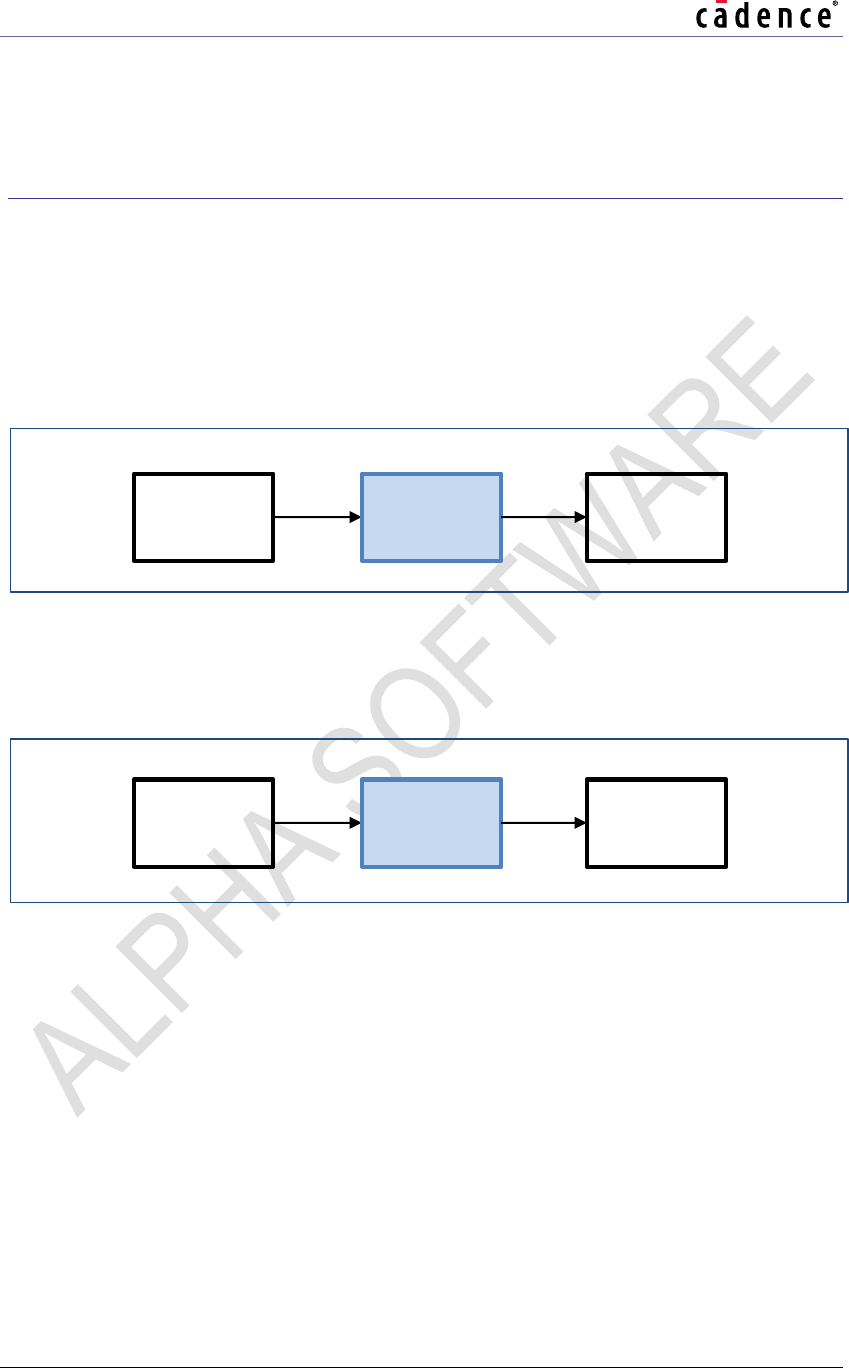
Two sample applications (testbenches) are provided, which implement two different audio
processing chains as described below. Audio components and links are shown in blue in the
diagrams below.
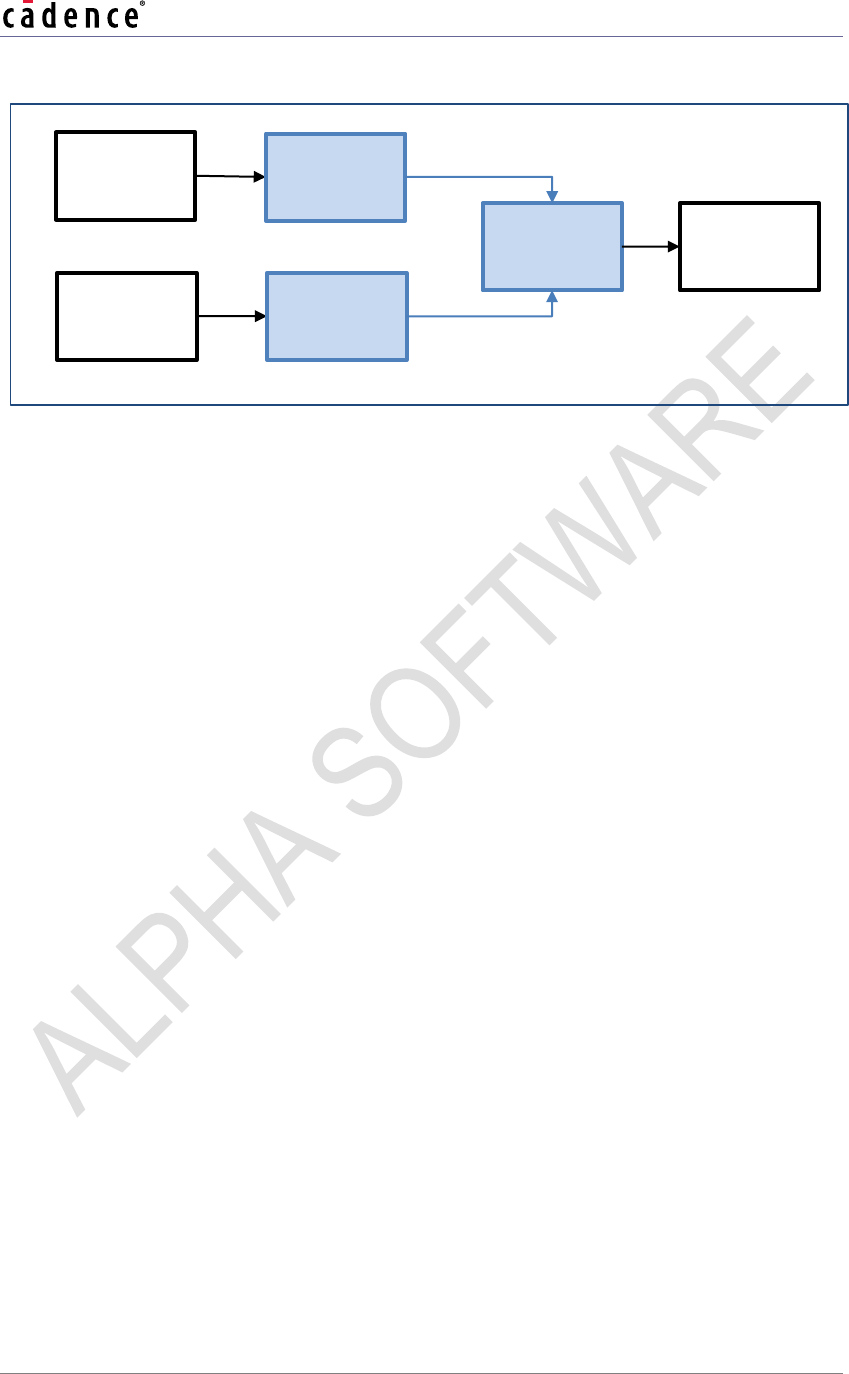
Testbench 1 (xaf_dec_test) applies gain to PCM streams when ‘.pcm’ file is fed as input.
The output is written to dec-out.pcm file.
Figure 4-1 Testbench 1 (pcm-gain) Block Diagram
Testbench 1 also (xaf_dec_test) decodes Ogg Vorbis streams when ‘.ogg’ file is fed as
input. The output is written to dec-out.pcm file.
Figure 4-2 Testbench 1 (decoder) Block Diagram
Testbench 2 (xaf-dec-mix-test) decodes two Ogg Vorbis streams and mixes the output.
The output is written to dec-mix-out.pcm file.
Input PCM
File
Output
PCM File
PCM gain
Input Ogg
Vorbis File
Output
PCM File
Ogg Vorbis
Decoder
Xtensa Audio Framework (Hostless) Programmer's Guide
CADENCE DESIGN SYSTEMS, INC. / CONFIDENTIAL 32
Figure 4-3 Testbench 2 (dec-mix) Block Diagram
Testbench specific source files (/host-apf/utest/)
xaf-dec-test.c
xaf-dec-mix-test.c
Input Ogg
Vorbis
File 1
Ogg Vorbis
Decoder 1
Input Ogg
Vorbis
File 2
Mixer
Ogg Vorbis
Decoder 2
Output
PCM File
Xtensa Audio Framework (Hostless) Programmer's GuideGuide
33 CADENCE DESIGN SYSTEMS, INC. / CONFIDENTIAL
Common testbench source files (/host-apf/utest/)
.
xaf-mem-test.c – Memory allocation functions.
xaf-utils-test.c – Other shared utility functions.
4.1
Build and Execute using makefile
To build and execute sample application, please refer to companion document [1] describing how
to run the XAF on the HiKey960 Board.
Xtensa Audio Framework (Hostless) Programmer's Guide
CADENCE DESIGN SYSTEMS, INC. / CONFIDENTIAL 34
5. Integration of New Audio Components
with XAF
This section describes how to create an application with a new audio component in addition to
the existing example audio components. The source code pertaining to new audio component
and library needs to be added in DSP framework.
5.1
Component Modification
The new component must be modified as follows:
1. Change the component interface to conform to the HiFi Audio/Speech Codec
Application Programming Interface [2][3]. The interface (API) is a C-callable API that is
exposed by all the HiFi based Audio/Speech Codecs developed by Cadence. An “audio
codec” is a generic term for any audio processing component and is not restricted to
encoders and decoders.
2. XAF requires all components to support the following configuration parameters for the
PCM data ports.
3. XA_CODEC_CONFIG_PARAM_CHANNELS: Number of channels.
4. XA_CODEC_CONFIG_PARAM_SAMPLE_RATE: Sampling rate.
5. XA_CODEC_CONFIG_PARAM_PCM_WIDTH: PCM width.
6. Build the audio component using the Xtensa tools to create a library targeted at the
appropriate HiFi core.
5.2
Component Integration
The steps given below need to be followed to integrate the component in XAF. For each step,
the corresponding step for the MP3 decoder library is also provided as an example, marked by
MP3_DEC_EG.
Integration Step 1: Add component files
Three files have to be added to the XAF library to enable support for a new component.
Header file containing the library API definition.
Library file implementing the library.
Wrapper file that “glues” the library to the XAF.
Xtensa Audio Framework (Hostless) Programmer's GuideGuide
35 CADENCE DESIGN SYSTEMS, INC. / CONFIDENTIAL
The detailed steps are as follows:
On Host Framework:
1. Copy the API header file for the audio component to the host-apf/include/audio
folder. This header file must contain the library entry point declaration and all associated
structures and constants.
MP3_DEC_EG: host-apf/include/audio/xa_mp3_dec_api.h
On DSP Framework:
2. Create a separate folder under /hifi-dpf/plugins/ for the new component.
MP3_DEC_EG: /hifi-dpf/plugins/cadence/mp3_dec
3. Copy the component library for the appropriate core(s) to that folder
MP3_DEC_EG: /hifi-dpf/plugins/cadence/mp3_dec/lib/xa_mp3_dec.a
4. Create a wrapper file for the new component in the /hifi-dpf/plugins/ folder. The
wrapper file connects the component library to XAF.
MP3_DEC_EG: /hifi-dpf/plugins/cadence/mp3_dec/xa-mp3-decoder.c
Integration Step 2: Update the DSP Framework to include the
component
The DSP Framework must be updated to include references to the new component. The detailed
steps are as follows:
5. In the /hifi-dpf/app/xa-factory.c file, add the audio component entry point API
function extern declaration.
MP3_DEC_EG: The line below in xa_factory.c
extern XA_ERRORCODE xa_mp3_decoder(xa_codec_handle_t, WORD32,
WORD32, pVOID);
6. In the constant definition of xf_component_id (in xa_factory.c), add the
registration information for the new audio component.
MP3_DEC_EG: The line below in xa_factory.c
{"audio-decoder/mp3", xa_audio_codec_factory, xa_mp3_decoder},
The required fields are:
a. class_id (string identifier): This defines the class name and the component
name. The different class names are defined in the comp_id array.
MP3_DEC_EG: "audio-decoder/mp3"
b. class_constructor - predefined by XAF and can be either of:
xa_audio_codec_factory (for components with a single input buffer and
a single output buffer), or
xa_mixer_factory (for components with multiple input buffers and a single
output buffer),
MP3_DEC_EG: xa_audio_codec_factory
Xtensa Audio Framework (Hostless) Programmer's Guide
CADENCE DESIGN SYSTEMS, INC. / CONFIDENTIAL 36
c. The function name for the audio component entry point, as defined in the wrapper
file which connects the component library to XAF.
MP3_DEC_EG: xa_mp3_decoder
Integration Step 3: Create the application to use the component
7. Update makefile in DSP Framework to include new component source files and library.
8. Update application in Host Framework to include and use new component in the audio
processing chain.
Xtensa Audio Framework (Hostless) Programmer's GuideGuide
37 CADENCE DESIGN SYSTEMS, INC. / CONFIDENTIAL
5.3
Component Integration – Example
One example component is provided that can be used as starting point for the development of
new components. This is described in Table 5-1. The table does not include the mixer and PCM
Gain component which are considered to be part of XAF. The component folder is under
/hifi-dpf/plugins/cadence and the application is in /host-apf/utest folder.
Table 5-1 Example components
Component
Name
API
Description
References
Cadence Ogg
Vorbis decoder
Audio
Decodes
Ogg Vorbis
data
Folder: vorbis_dec
Application: xaf-dec-test.c
Xtensa Audio Framework (Hostless) Programmer's Guide
CADENCE DESIGN SYSTEMS, INC. / CONFIDENTIAL 38
6. Known Issues
1. The XAF has only been tested with Version 7.0.5 of the Xtensa tool chain.
2. Fatal errors from XAF component (e.g. Ogg Vorbis Decoder) are ignored and may
cause XAF Host application to hang. This issue will be addressed in next XAF release.
Xtensa Audio Framework (Hostless) Programmer's GuideGuide
39 CADENCE DESIGN SYSTEMS, INC. / CONFIDENTIAL
7. Appendix: Memory Guidelines
XAF manages the allocation of memory for all created components. Most of the memory is
allocated for XAF audio component buffer on DSP (used for audio components allocations) and
XAF shared memory buffer (used for IPC between AP and DSP). This section provides
guidelines to the application developer to compute these memory sizes.
Notation: Consider a chain of N components, where the nth component has An input ports and
Bn output ports and requires Pn, Sn, In, and On KB for persistent, scratch, input, and output buffers
respectively. Assume that the nth component is created (xaf_comp_create) with Xn input
buffers and Yn output buffers. Note that Xn would be zero except for the components that need
to receive data from the application and Yn would be zero except for the components that need
to send data to application. Furthermore, assume that the nth component is connected
(xaf_comp_connect) to another component with Zn buffers (to be counted only if the nth
component is not the last component in the chain sending data to application).
Guideline for XAF audio component buffer size on DSP:
All memory required by the components is allocated by DSP from this local buffer pool – this
includes persistent, scratch, input, and output buffers required by the component. The
persistent, scratch, input, and output buffer sizes for a component are typically mentioned in the
programmer’s guide for that particular component.
Then the total memory required by all components in the chain would be given by the
formula:
T1 is the sum of the persistent, input and output sizes required by the components. T2
is the maximum scratch memory required by the components, as the scratch memory
is shared across components. In this version of XAF, T2 is fixed at 56 KB, via the compile
time constant XF_CFG_CODEC_SCRATCHMEM_SIZE. Furthermore, some memory is
required by XAF itself. The size of the memory required by XAF is (N + 16) KB, where
N is the number of components.
Thus, the XAF audio component buffer size on DSP should be set to a value
greater than (T1 + 56 + N + 16) KB.
Guideline for XAF shared memory buffer size between AP and DSP:
All buffers exchanged between audio components on DSP and the AP application are allocated
from this buffer. The number of buffers exchanged are defined in the xaf_comp_create call
for each component.
Then the total memory required by all components in the chain would be given by the
formula:
Xtensa Audio Framework (Hostless) Programmer's Guide
CADENCE DESIGN SYSTEMS, INC. / CONFIDENTIAL 40
In this version of XAF, the inter-component input buffer size is fixed at 8 KB, via the
compile time constant XAF_INBUF_SIZE. Furthermore, some memory is also required
by XAF itself. The size of the memory required by XAF is 16 KB, independent of the
number of components.
Thus, the XAF shared memory buffer between AP and DSP should be set to a
value greater than (S + 16) KB.
Xtensa Audio Framework (Hostless) Programmer's GuideGuide
41 CADENCE DESIGN SYSTEMS, INC. / CONFIDENTIAL
8. References
[1]
HiKey960 HiFi3 Android SDK Guide, Ver 0.6. This document is provided as part of
the XAF package
[2]
HiFi Audio Codec Application Programming Interface (API) Definition, Ver 1.0. This
document is provided as part of the XAF package.
[3]
HiFi Speech Codec Application Programming Interface (API) Definition, Ver 1.0. This
document is provided as part of the XAF package.
