Trouble Shooting Manual, Procedures And Descriptions Robot Controller IRC5 Manual M2004 3HAC020738 001 Error En
User Manual:
Open the PDF directly: View PDF  .
.
Page Count: 466 [warning: Documents this large are best viewed by clicking the View PDF Link!]
- Trouble shooting manual, Procedures and Descriptions - Robot Controller IRC5
- Table of Contents
- Overview of this manual
- 1 Safety
- 1.1. Safety signals in the manual
- 1.2. Safety symbols on the manipulator labels
- 1.3. Safety during trouble shooting
- 1.4. Applicable safety standards
- 1.5 Safe Trouble Shooting
- 2 Trouble shooting Overview
- 3 Troubleshooting by fault symptoms
- 3.1. Start-up failures
- 3.2. Controller not responding
- 3.3. Low Controller performance
- 3.4. All LEDs are OFF at Controller
- 3.5. No voltage in service outlet
- 3.6. Problem starting the FlexPendant
- 3.7. Problem connecting FlexPendant to the controller
- 3.8. Erratic event messages on FlexPendant
- 3.9. Problem jogging the robot
- 3.10. Reflashing firmware failure
- 3.11. Inconsistent path accuracy
- 3.12. Oil and grease stains on motors and gearboxes
- 3.13. Mechanical noise
- 3.14. Manipulator crashes on power down
- 3.15. Problem releasing Robot brakes
- 3.16. Intermittent errors
- 4 Trouble shooting by Unit
- 5 Descriptions and background information
- 6 Trouble shooting by Event log
- Index
Trouble shooting manual, Procedures and Descriptions
Robot Controller
IRC5
M2004
© Copyright 2005-2010 ABB. All rights reserved.
Operating manual - Trouble shooting, IRC5
Robot Controller
IRC5
M2004
Document ID: 3HAC020738-001
Revision: K
© Copyright 2005-2010 ABB. All rights reserved.
The information in this manual is subject to change without notice and should not be
construed as a commitment by ABB. ABB assumes no responsibility for any errors that
may appear in this manual.
Except as may be expressly stated anywhere in this manual, nothing herein shall be
construed as any kind of guarantee or warranty by ABB for losses, damages to persons
or property, fitness for a specific purpose or the like.
In no event shall ABB be liable for incidental or consequential damages arising from
use of this manual and products described herein.
This manual and parts thereof must not be reproduced or copied without ABB's written
permission, and contents thereof must not be imparted to a third party nor be used for
any unauthorized purpose. Contravention will be prosecuted.
Additional copies of this manual may be obtained from ABB at its then current charge.
© Copyright 2005-2010 ABB All rights reserved.
ABB AB
Robotics Products
SE-721 68 Västerås
Sweden

Table of Contents
33HAC020738-001 Revision: K
© Copyright 2005-2010 ABB. All rights reserved.
Overview of this manual. . . . . . . . . . . . . . . . . . . . . . . . . . . . . . . . . . . . . . . . . . . . . . . . . . . . . . . . . . . . . . . . . . 5
1 Safety 7
1.1 Safety signals in the manual. . . . . . . . . . . . . . . . . . . . . . . . . . . . . . . . . . . . . . . . . . . . . . . . . . . . . . . . . . . . 7
1.2 Safety symbols on the manipulator labels . . . . . . . . . . . . . . . . . . . . . . . . . . . . . . . . . . . . . . . . . . . . . . . . . 9
1.3 Safety during trouble shooting . . . . . . . . . . . . . . . . . . . . . . . . . . . . . . . . . . . . . . . . . . . . . . . . . . . . . . . . . 13
1.4 Applicable safety standards . . . . . . . . . . . . . . . . . . . . . . . . . . . . . . . . . . . . . . . . . . . . . . . . . . . . . . . . . . . 14
1.5 Safe Trouble Shooting . . . . . . . . . . . . . . . . . . . . . . . . . . . . . . . . . . . . . . . . . . . . . . . . . . . . . . . . . . . . . . 16
1.5.1 DANGER - Robot without axes' holding brakes are potentially lethal! . . . . . . . . . . . . . . . . . . . . 16
1.5.2 DANGER - Live voltage inside Drive Module!. . . . . . . . . . . . . . . . . . . . . . . . . . . . . . . . . . . . . . . 17
1.5.3 WARNING - The unit is sensitive to ESD! . . . . . . . . . . . . . . . . . . . . . . . . . . . . . . . . . . . . . . . . . .19
1.5.4 CAUTION - Hot parts may cause burns!. . . . . . . . . . . . . . . . . . . . . . . . . . . . . . . . . . . . . . . . . . . .21
2 Trouble shooting Overview 23
2.1 Documentation and references . . . . . . . . . . . . . . . . . . . . . . . . . . . . . . . . . . . . . . . . . . . . . . . . . . . . . . . . . 24
2.2 Overview . . . . . . . . . . . . . . . . . . . . . . . . . . . . . . . . . . . . . . . . . . . . . . . . . . . . . . . . . . . . . . . . . . . . . . . . . 25
2.3 Standard toolkit. . . . . . . . . . . . . . . . . . . . . . . . . . . . . . . . . . . . . . . . . . . . . . . . . . . . . . . . . . . . . . . . . . . . . 27
2.4 Tips and Tricks while trouble shooting . . . . . . . . . . . . . . . . . . . . . . . . . . . . . . . . . . . . . . . . . . . . . . . . 28
2.4.1 Trouble shooting strategies. . . . . . . . . . . . . . . . . . . . . . . . . . . . . . . . . . . . . . . . . . . . . . . . . . . . . . . 28
2.4.2 Work systematically. . . . . . . . . . . . . . . . . . . . . . . . . . . . . . . . . . . . . . . . . . . . . . . . . . . . . . . . . . . . 29
2.4.3 Keeping track of history. . . . . . . . . . . . . . . . . . . . . . . . . . . . . . . . . . . . . . . . . . . . . . . . . . . . . . . . . 30
2.5 Filing an error report. . . . . . . . . . . . . . . . . . . . . . . . . . . . . . . . . . . . . . . . . . . . . . . . . . . . . . . . . . . . . . . . . 31
3 Troubleshooting by fault symptoms 33
3.1 Start-up failures . . . . . . . . . . . . . . . . . . . . . . . . . . . . . . . . . . . . . . . . . . . . . . . . . . . . . . . . . . . . . . . . . . . . 34
3.2 Controller not responding. . . . . . . . . . . . . . . . . . . . . . . . . . . . . . . . . . . . . . . . . . . . . . . . . . . . . . . . . . . . . 35
3.3 Low Controller performance . . . . . . . . . . . . . . . . . . . . . . . . . . . . . . . . . . . . . . . . . . . . . . . . . . . . . . . . . . 36
3.4 All LEDs are OFF at Controller. . . . . . . . . . . . . . . . . . . . . . . . . . . . . . . . . . . . . . . . . . . . . . . . . . . . . . . . 38
3.5 No voltage in service outlet . . . . . . . . . . . . . . . . . . . . . . . . . . . . . . . . . . . . . . . . . . . . . . . . . . . . . . . . . . . 40
3.6 Problem starting the FlexPendant. . . . . . . . . . . . . . . . . . . . . . . . . . . . . . . . . . . . . . . . . . . . . . . . . . . . . . . 42
3.7 Problem connecting FlexPendant to the controller. . . . . . . . . . . . . . . . . . . . . . . . . . . . . . . . . . . . . . . . . . 43
3.8 Erratic event messages on FlexPendant . . . . . . . . . . . . . . . . . . . . . . . . . . . . . . . . . . . . . . . . . . . . . . . . . . 44
3.9 Problem jogging the robot . . . . . . . . . . . . . . . . . . . . . . . . . . . . . . . . . . . . . . . . . . . . . . . . . . . . . . . . . . . . 45
3.10 Reflashing firmware failure . . . . . . . . . . . . . . . . . . . . . . . . . . . . . . . . . . . . . . . . . . . . . . . . . . . . . . . . . . 46
3.11 Inconsistent path accuracy . . . . . . . . . . . . . . . . . . . . . . . . . . . . . . . . . . . . . . . . . . . . . . . . . . . . . . . . . . . 47
3.12 Oil and grease stains on motors and gearboxes . . . . . . . . . . . . . . . . . . . . . . . . . . . . . . . . . . . . . . . . . . . 48
3.13 Mechanical noise . . . . . . . . . . . . . . . . . . . . . . . . . . . . . . . . . . . . . . . . . . . . . . . . . . . . . . . . . . . . . . . . . . 49
3.14 Manipulator crashes on power down . . . . . . . . . . . . . . . . . . . . . . . . . . . . . . . . . . . . . . . . . . . . . . . . . . . 51
3.15 Problem releasing Robot brakes. . . . . . . . . . . . . . . . . . . . . . . . . . . . . . . . . . . . . . . . . . . . . . . . . . . . . . . 52
3.16 Intermittent errors. . . . . . . . . . . . . . . . . . . . . . . . . . . . . . . . . . . . . . . . . . . . . . . . . . . . . . . . . . . . . . . . . . 54
4 Trouble shooting by Unit 55
4.1 Trouble shooting the FlexPendant . . . . . . . . . . . . . . . . . . . . . . . . . . . . . . . . . . . . . . . . . . . . . . . . . . . . . . 56
4.2 Trouble shooting communications . . . . . . . . . . . . . . . . . . . . . . . . . . . . . . . . . . . . . . . . . . . . . . . . . . . . . . 57
4.3 Trouble shooting fieldbuses and I/O units . . . . . . . . . . . . . . . . . . . . . . . . . . . . . . . . . . . . . . . . . . . . . . . . 58
4.4 Trouble shooting power supply. . . . . . . . . . . . . . . . . . . . . . . . . . . . . . . . . . . . . . . . . . . . . . . . . . . . . . . 59
4.4.1 Trouble shooting DSQC 604 . . . . . . . . . . . . . . . . . . . . . . . . . . . . . . . . . . . . . . . . . . . . . . . . . . . . . 59
4.4.2 Trouble shooting DSQC 661 . . . . . . . . . . . . . . . . . . . . . . . . . . . . . . . . . . . . . . . . . . . . . . . . . . . . . 62
4.4.3 Trouble shooting DSQC 662 . . . . . . . . . . . . . . . . . . . . . . . . . . . . . . . . . . . . . . . . . . . . . . . . . . . . . 65

Table of Contents
43HAC020738-001 Revision: K
© Copyright 2005-2010 ABB. All rights reserved.
5 Descriptions and background information 69
5.1 Indications. . . . . . . . . . . . . . . . . . . . . . . . . . . . . . . . . . . . . . . . . . . . . . . . . . . . . . . . . . . . . . . . . . . . . . . . 69
5.1.1 LEDs in the Control Module . . . . . . . . . . . . . . . . . . . . . . . . . . . . . . . . . . . . . . . . . . . . . . . . . . . . . 69
5.1.2 LEDs in the Drive Module for Drive System 04 . . . . . . . . . . . . . . . . . . . . . . . . . . . . . . . . . . . . . . 75
5.1.3 LEDs in the Drive Module for Drive System 09 . . . . . . . . . . . . . . . . . . . . . . . . . . . . . . . . . . . . . . 79
6 Trouble shooting by Event log 83
Index 465
Overview of this manual
53HAC020738-001 Revision: K
© Copyright 2005-2010 ABB. All rights reserved.
Overview of this manual
About this manual
This manual contains information, procedures and descriptions, for trouble shooting IRC5
based robot systems.
Usage
This manual should be used whenever robot operation is interrupted by malfunction,
regardless of whether an error event log message is created or not.
Who should read this manual?
This manual is intended for the following personnel:
•Machine and robot operators qualified to perform very basic trouble shooting and
reporting to service personnel.
•Programmers qualified to write and change RAPID programs.
•Specialized trouble shooting personnel, usually very experienced service personnel,
qualified for methodically isolating, analyzing and correcting malfunctions within the
robot system.
Prerequisites
The reader should:
•Have extensive experience in trouble shooting industrial electro-mechanical
machinery.
•Have in depth knowledge of the robot system function.
•Be familiar with the actual robot installation at hand, its surrounding equipment and
peripherals.
References
Reference: Document ID:
Product manual - IRC5 3HAC021313-001
Emergency safety information 3HAC027098-001
General safety information 3HAC031045-001
Operating manual - IRC5 with FlexPendant 3HAC16590-1
Operating manual - RobotStudio 3HAC032104-001
Operating manual - Getting started, IRC5 and RobotStudio 3HAC027097-001
Technical reference manual - System parameters 3HAC17076-1
Application manual - MultiMove 3HAC021272-001
Continues on next page

Overview of this manual
3HAC020738-001 Revision: K6
© Copyright 2005-2010 ABB. All rights reserved.
Revisions
Revision Description
-First edition.
AInformation has been added.
The document has been partly restructured.
BInformation on how to submit error report has been changed.
Information on RAPID change logs have been added.
Event log messages have been added.
CUpdated Event log messages.
DUpdated Event log messages.
EUpdated Event log messages.
FMinor corrections. Updated Event log messages.
GMinor corrections. Updated Event log messages.
HNew information in section Serial Measurement Unit regarding the battery
pack.
More detailed information about trouble shooting power supplies DSQC 604,
661 and 662.
Removed safety I/O signals: DRV1PANCH1, DRV1PANCH2, DRV1SPEED.
New drive system introduced. Drive System 04 and Drive System 09 are
both described.
JReleased with RobotWare 5.13
The chapter Safety updated with:
• Updated safety signal graphics for the levels Danger and Warning,
see Safety signals in the manual on page 7.
• New safety labels on the manipulators, see Safety symbols on the
manipulator labels on page 9.
• Updated the graphic in the section DANGER - Live voltage inside
Drive Module! on page 17.
The contents in the following sections were updated:
• Corrections regarding drive system information in chapter Descrip-
tions and background information on page 65
• Restructured the chapters as per the new document startergy.
• Updated the graphic in the Recommended actions of the section No
voltage in service outlet on page 38.
• Updated the Possible causes in the section Problem starting the
FlexPendant on page 40.
• Updated the graphics in the section LEDs in the Control Module on
page 65.
• Updated the graphic in Possible causes of the section Problem
releasing Robot brakes on page 50.
KUpdated Event log messages.
Continued
1 Safety
1.1. Safety signals in the manual
73HAC020738-001 Revision: K
© Copyright 2005-2010 ABB. All rights reserved.
1 Safety
1.1. Safety signals in the manual
Introduction to safety signals
This section specifies all dangers that can arise when doing the work described in this manual.
Each danger consists of:
•A caption specifying the danger level (DANGER, WARNING, or CAUTION) and the
type of danger.
•A brief description of what will happen if the operator/service personnel do not
eliminate the danger.
•An instruction on how to eliminate the danger to simplify doing the work.
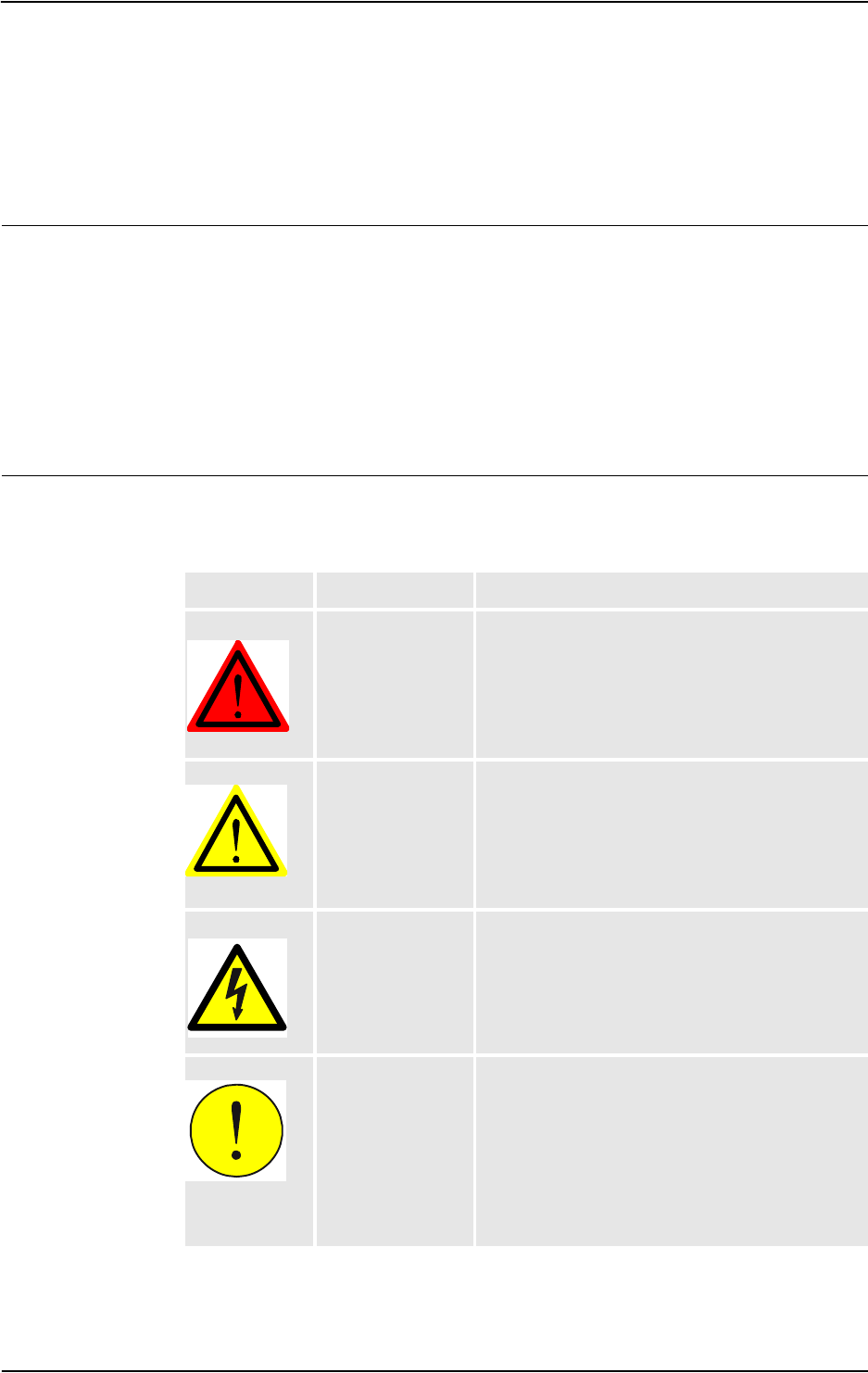
Danger levels
The table below defines the captions specifying the danger levels used throughout this
manual.
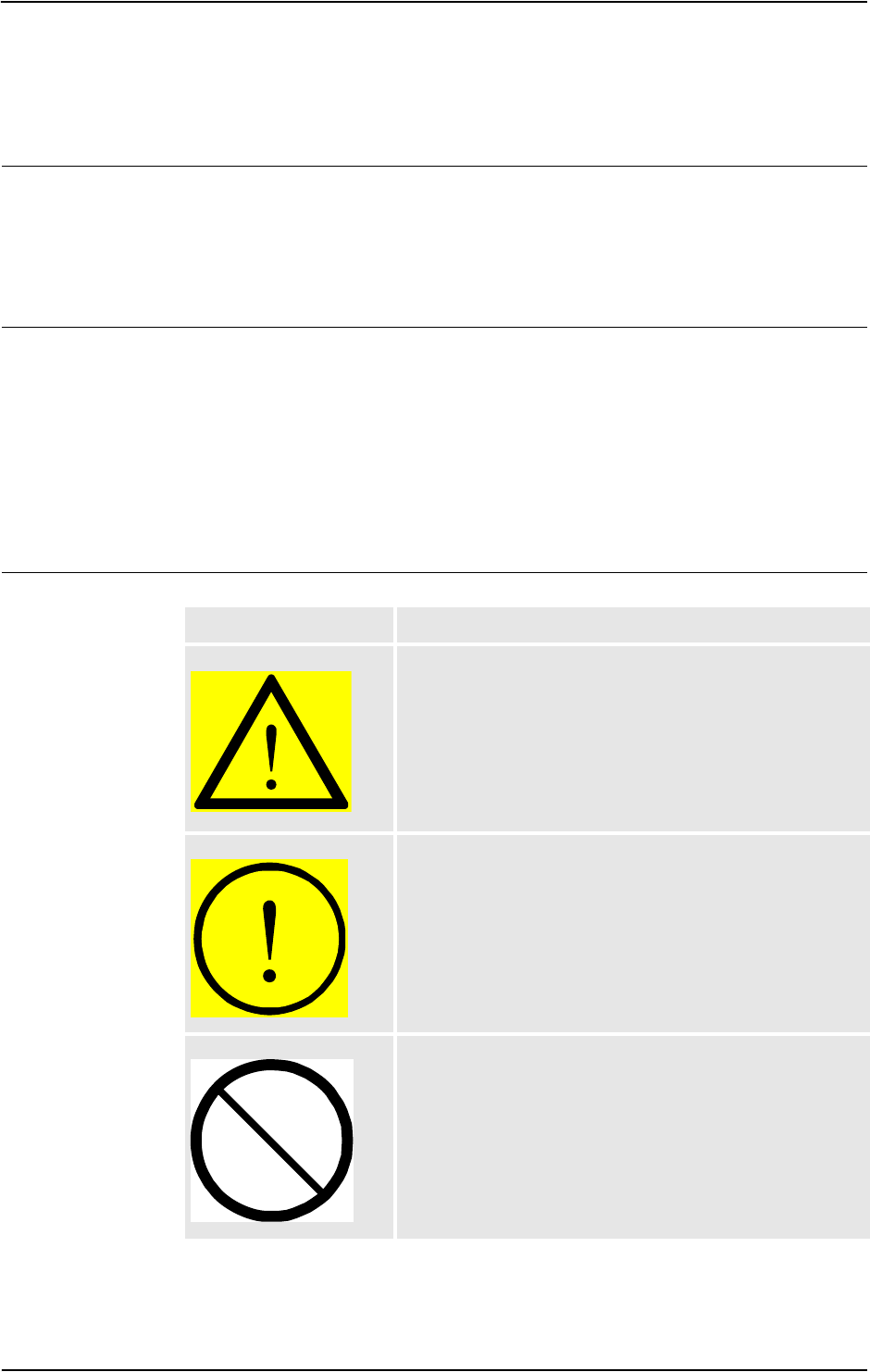
Symbol Designation Significance
danger
DANGER Warns that an accident will occur if the instructions
are not followed, resulting in a serious or fatal injury
and/or severe damage to the product. It applies to
warnings that apply to danger with, for example,
contact with high voltage electrical units, explosion
or fire risk, risk of poisonous gases, risk of crushing,
impact, fall from height, etc.
warning
WARNING Warns that an accident may occur if the instructions
are not followed that can lead to serious injury,
possibly fatal, and/or great damage to the product. It
applies to warnings that apply to danger with, for
example, contact with high voltage electrical units,
explosion or fire risk, risk of poisonous gases, risk of
crushing, impact, fall from height, etc.
Electrical shock
ELECTRICAL
SHOCK
Warns for electrical hazards which could result in
severe personal injury or death.
caution
CAUTION Warns that an accident may occur if the instructions
are not followed that can result in injury and/or
damage to the product. It also applies to warnings of
risks that include burns, eye injury, skin injury,
hearing damage, crushing or slipping, tripping,
impact, fall from height, etc. Furthermore, it applies
to warnings that include function requirements when
fitting and removing equipment where there is a risk
of damaging the product or causing a breakdown.
Continues on next page
1 Safety
1.1. Safety signals in the manual
3HAC020738-001 Revision: K8
© Copyright 2005-2010 ABB. All rights reserved.
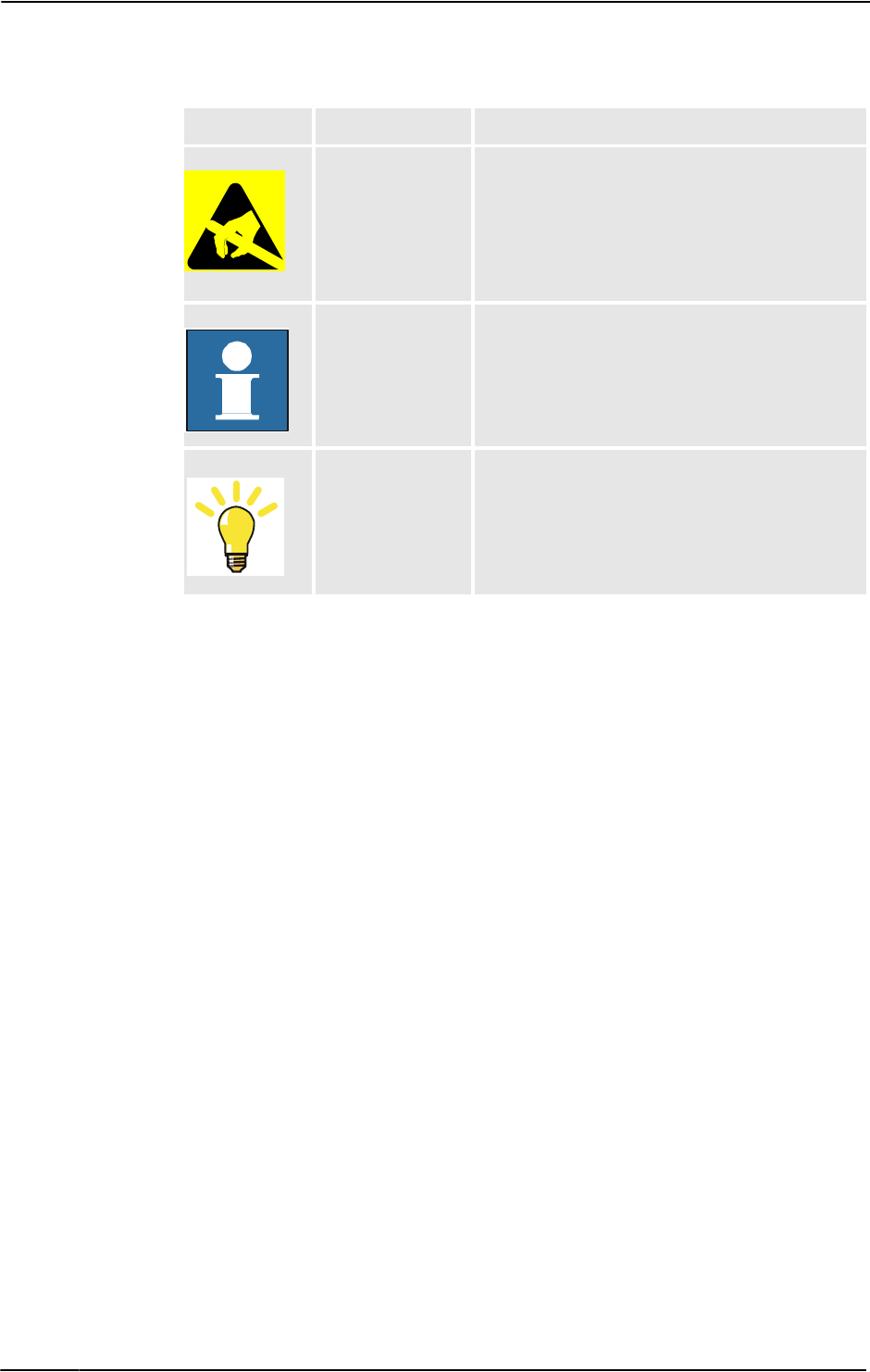
Electrostatic discharge
(ESD)
ELECTROSTATIC
DISCHARGE (ESD)
Warns for electrostatic hazards which could result in
severe damage to the product.
Note
NOTE Describes important facts and conditions.
Tip
TIP Describes where to find additional information or
how to do an operation in an easier way.
Symbol Designation Significance
Continued
1 Safety
1.2. Safety symbols on the manipulator labels
93HAC020738-001 Revision: K
© Copyright 2005-2010 ABB. All rights reserved.
1.2. Safety symbols on the manipulator labels
Introduction to labels
This section describes safety symbols used on labels (stickers) on the manipulator.
Symbol are used in combinations on the labels, describing each specific warning. The
descriptions in this section are generic, the labels can contain additional information such as
values.
Types of labels
Both the manipulator and the controller are marked with several safety and information
labels, containing important information about the product. The information is useful for all
personnel handling the manipulator system, for example during installation, service, or
operation.
The safety labels are language independent, they only use graphics. See Symbols on safety
labels on page 9.
The information labels can contain information in text (English, German, and French).
Symbols on safety labels
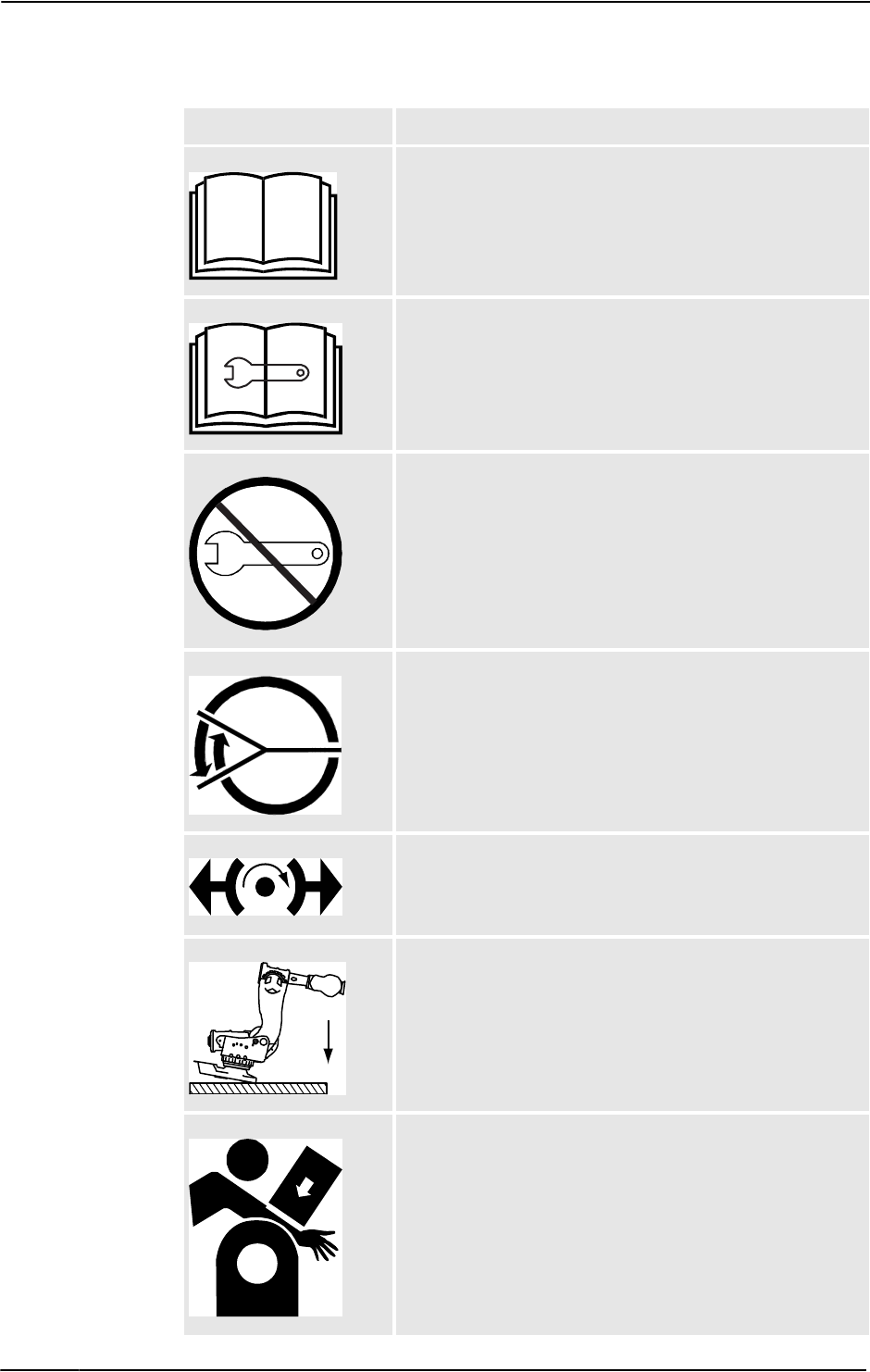
Symbol Description
xx0900000812
Warning!
Warns that an accident may occur if the instructions are not
followed that can lead to serious injury, possibly fatal, and/or
great damage to the product. It applies to warnings that apply to
danger with, for example, contact with high voltage electrical
units, explosion or fire risk, risk of poisonous gases, risk of
crushing, impact, fall from height, etc.
xx0900000811
Caution!
Warns that an accident may occur if the instructions are not
followed that can result in injury and/or damage to the product.
It also applies to warnings of risks that include burns, eye injury,
skin injury, hearing damage, crushing or slipping, tripping,
impact, fall from height, etc. Furthermore, it applies to warnings
that include function requirements when fitting and removing
equipment where there is a risk of damaging the product or
causing a breakdown.
xx0900000839
Prohibition
Used in combinations with other symbols.
Continues on next page
1 Safety
1.2. Safety symbols on the manipulator labels
3HAC020738-001 Revision: K10
© Copyright 2005-2010 ABB. All rights reserved.
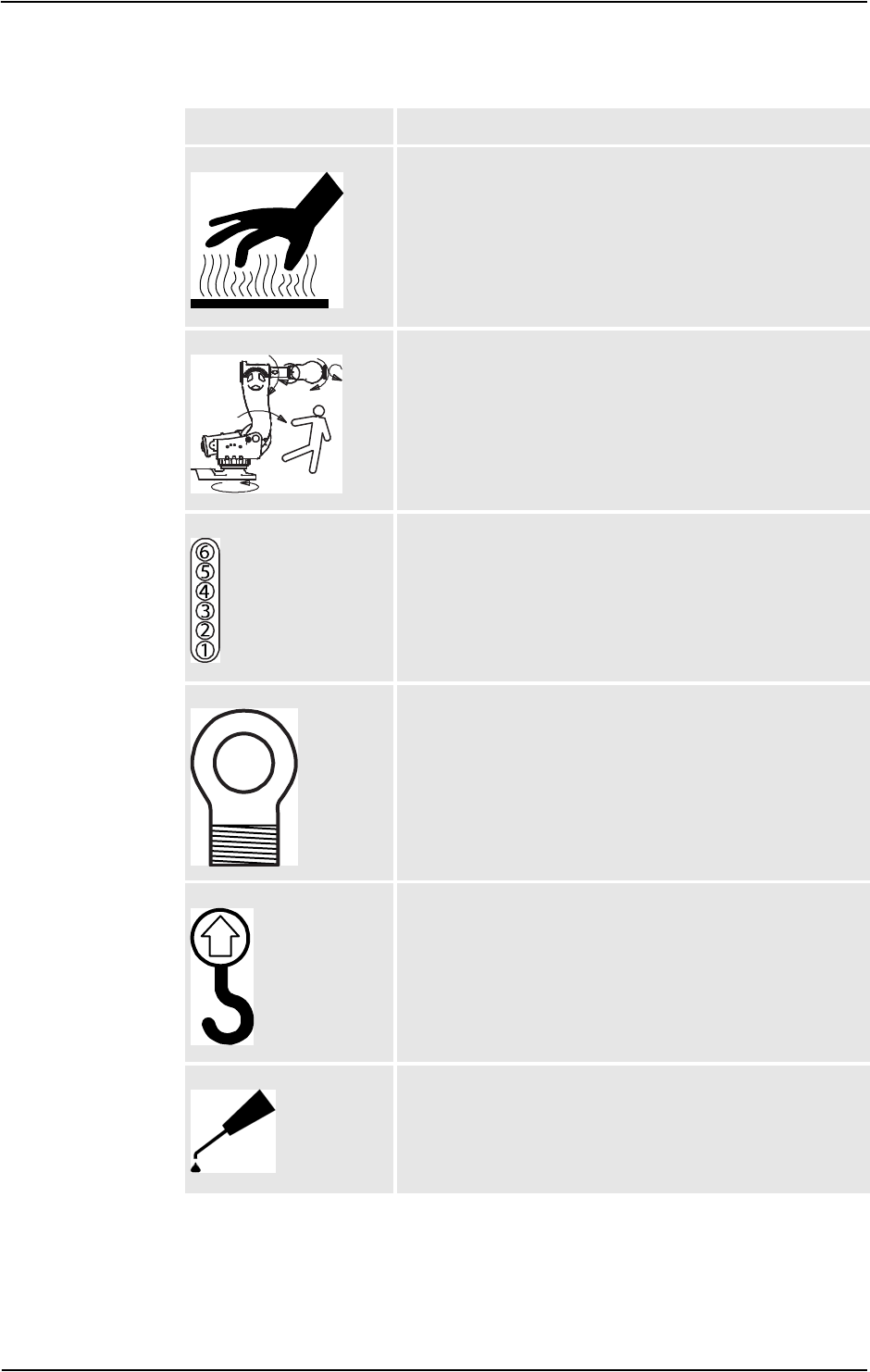
xx0900000813
Product manual
Read the product manual for details.
xx0900000816
Before dismantling see product manual
xx0900000815
Do not dismantle
Dismantling this part can cause injury.
xx0900000814
Extended rotation
This axis has extended rotation (working area) compared to
standard.
xx0900000808
Brake release
Pressing this button will release the brakes. This means that the
manipulator arm can fall down.
xx0900000810
Tip risk when loosening bolts
The manipulator can tip over if the bolts are not securely
fastened.
xx0900000817
Crush
Risk for crush injuries.
Symbol Description
Continued
Continues on next page
1 Safety
1.2. Safety symbols on the manipulator labels
113HAC020738-001 Revision: K
© Copyright 2005-2010 ABB. All rights reserved.
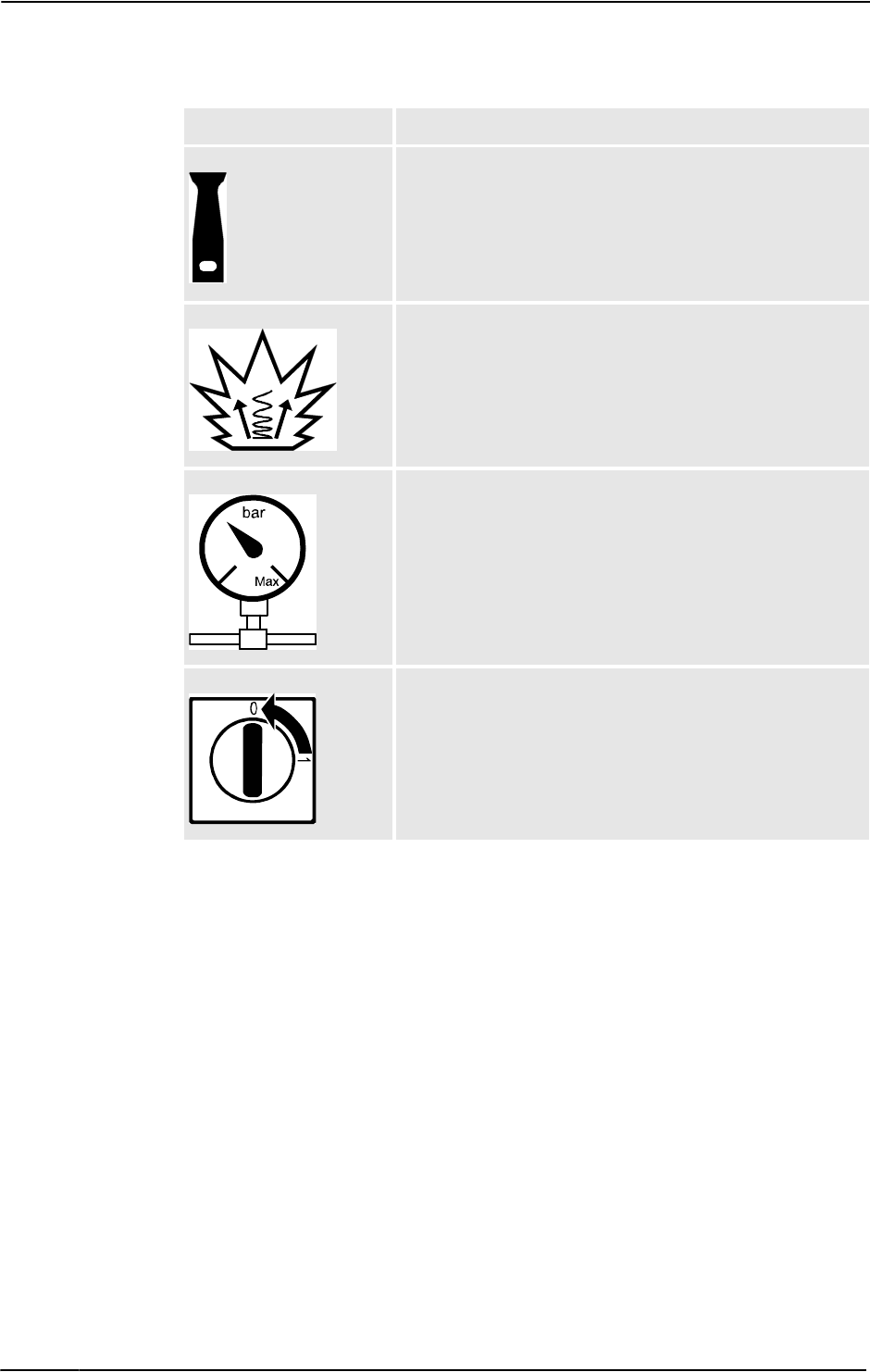
xx0900000818
Heat
Risk of heat that can cause burns.
xx0900000819
Moving robot
The robot can move unexpectedly.
xx0900000820
Brake release buttons
xx0900000821
Lifting bolt
xx0900000822
Lifting of robot
xx0900000823
Oil
Can be used in combination with prohibition if oil is not allowed.
Symbol Description
Continued
Continues on next page
1 Safety
1.2. Safety symbols on the manipulator labels
3HAC020738-001 Revision: K12
© Copyright 2005-2010 ABB. All rights reserved.
xx0900000824
Mechanical stop
xx0900000825
Stored energy
Warns that this part contains stored energy.
Used in combination with Do not dismantle symbol.
xx0900000826
Pressure
Warns that this part is pressurized. Usually contains additional
text with the pressure level.
xx0900000827
Shut off with handle
Use the power switch on the controller.
Symbol Description
Continued

1 Safety
1.3. Safety during trouble shooting
133HAC020738-001 Revision: K
© Copyright 2005-2010 ABB. All rights reserved.
1.3. Safety during trouble shooting
General
All normal service work; installation, maintenance and repair work, is usually performed with
all electrical, pneumatic and hydraulic power switched off. All manipulator movements are
usually prevented by mechanical stops etc.
Trouble shooting work differs from this. While trouble shooting, all or any power may be
switched on, the manipulator movement may be controlled manually from the FlexPendant,
by a locally running robot program or by a PLC to which the system may be connected.
Dangers during trouble shooting
This implies that special considerations unconditionally must be taken when trouble
shooting:
•All electrical parts must be considered as live.
•The manipulator must at all times be expected to perform any movement.
•Since safety circuits may be disconnected or strapped to enable normally prohibited
functions, the system must be expected to perform accordingly.
1 Safety
1.4. Applicable safety standards
3HAC020738-001 Revision: K14
© Copyright 2005-2010 ABB. All rights reserved.
1.4. Applicable safety standards
Standards, EN ISO
The manipulator system is designed in accordance with the requirements of:
1. There is a deviation from paragraph 6.2 in that only worst case stop distances and stop
times are documented.
2. Only robots with Protection Clean Room.
3. Only valid for arc welding robots. Replaces EN 61000-6-4 for arc welding robots.
European standards
Standard Description
EN ISO 12100 -1 Safety of machinery - Basic concepts, general principles for
design - Part 1: Basic terminology, methodology
EN ISO 12100 -2 Safety of machinery - Basic concepts, general principles for
design - Part 2: Technical principles
EN ISO 13849-1 Safety of machinery, safety related parts of control systems -
Part 1: General principles for design
EN ISO 13850 Safety of machinery - Emergency stop - Principles for design
EN ISO 10218-11Robots for industrial environments - Safety requirements -Part 1
Robot
EN ISO 9787 Manipulating industrial robots, Coordinate systems and motion
nomenclatures
EN ISO 9283 Manipulating industrial robots, Performance criteria and related
test methods
EN ISO 14644-12 Classification of air cleanliness
EN ISO 13732-1 Ergonomics of the thermal environment - Part 1
EN 61000-6-4
(option 129-1)
EMC, Generic emission
EN 61000-6-2 EMC, Generic immunity
EN IEC 60974-13Arc welding equipment - Part 1: Welding power sources
EN IEC 60974-103Arc welding equipment - Part 10: EMC requirements
EN 60204-1 Safety of machinery - Electrical equipment of machines - Part 1
General requirements
IEC 60529 Degrees of protection provided by enclosures (IP code)
Standard Description
EN 614-1 Safety of machinery - Ergonomic design principles - Part 1:
Terminology and general principles
EN 574 Safety of machinery - Two-hand control devices - Functional
aspects - Principles for design
EN 953 Safety of machinery - General requirements for the design and
construction of fixed and movable guards
Continues on next page

1 Safety
1.4. Applicable safety standards
153HAC020738-001 Revision: K
© Copyright 2005-2010 ABB. All rights reserved.
Other standards
Standard Description
ANSI/RIA R15.06 Safety Requirements for Industrial Robots and Robot Systems
ANSI/UL 1740
(option 429-1)
Safety Standard for Robots and Robotic Equipment
CAN/CSA Z 434-03
(option 429-1)
Industrial Robots and Robot Systems - General Safety Require-
ments
Continued
1 Safety
1.5.1. DANGER - Robot without axes' holding brakes are potentially lethal!
3HAC020738-001 Revision: K16
© Copyright 2005-2010 ABB. All rights reserved.
1.5 Safe Trouble Shooting
1.5.1. DANGER - Robot without axes' holding brakes are potentially lethal!
Description
Since the robot arm system is quite heavy, especially on larger robot models, it is dangerous
if the holding brakes are disconnected, faulty, worn or in any way rendered non-operational.
For instance, a collapsing IRB 7600 arm system may kill or seriously injure a person standing
beneath it.
Elimination
Action Info/illustration
1. If you suspect that the holding brakes are
non-operational, secure the robot arm
system by some other means before
working on it.
Weight specifications etc. may be found in
the Product manual of each robot model.
2. If you intentionally render the holding
brakes non-operational by connecting an
external voltage supply, the utmost care
must be taken!
DANGER!
NEVER stand inside the robot working
area when disabling the holding brakes
unless the arm system is supported by
some other means!
DANGER!
Under no circumstance stand beneath any
of the robot’s axes!
How to correctly connect an external
voltage supply is detailed in the Product
manual of each robot model.
1 Safety
1.5.2. DANGER - Live voltage inside Drive Module!
173HAC020738-001 Revision: K
© Copyright 2005-2010 ABB. All rights reserved.
1.5.2. DANGER - Live voltage inside Drive Module!
Description
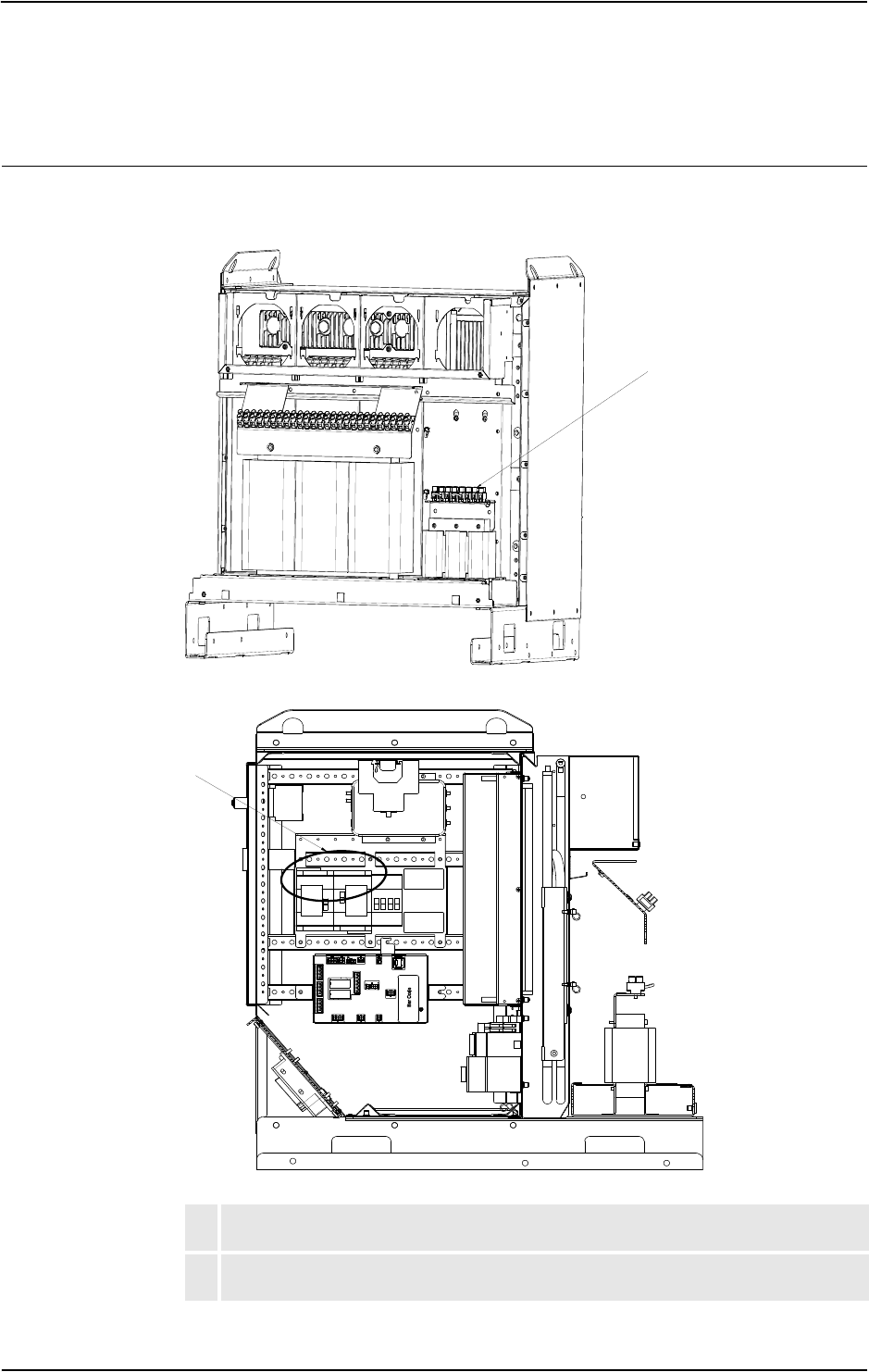
The Drive Module has live voltage potentially accessible directly behind the rear covers and
inside the front cover, even when the main switches have been switched off.
en1000000049
en1000000050
ALive voltage at transformer terminals even if the main power switches have been
switched off.
BLive voltage at Motors ON terminals even if the main power switches have been
switched off.
A
B
Continues on next page

1 Safety
1.5.2. DANGER - Live voltage inside Drive Module!
3HAC020738-001 Revision: K18
© Copyright 2005-2010 ABB. All rights reserved.
Elimination
Read this information before opening the rear cover of either module.
Step Action
1. Make sure the incoming mains power supply has been switched off.
2. Use a voltmeter to verify that there is not voltage between any of the terminals.
3. Proceed with the service work.
Continued
1 Safety
1.5.3. WARNING - The unit is sensitive to ESD!
193HAC020738-001 Revision: K
© Copyright 2005-2010 ABB. All rights reserved.
1.5.3. WARNING - The unit is sensitive to ESD!
Description
ESD (electrostatic discharge) is the transfer of electrical static charge between two bodies at
different potentials, either through direct contact or through an induced electrical field. When
handling parts or their containers, personnel not grounded may potentially transfer high static
charges. This discharge may destroy sensitive electronics.
Elimination
Location of wrist strap button
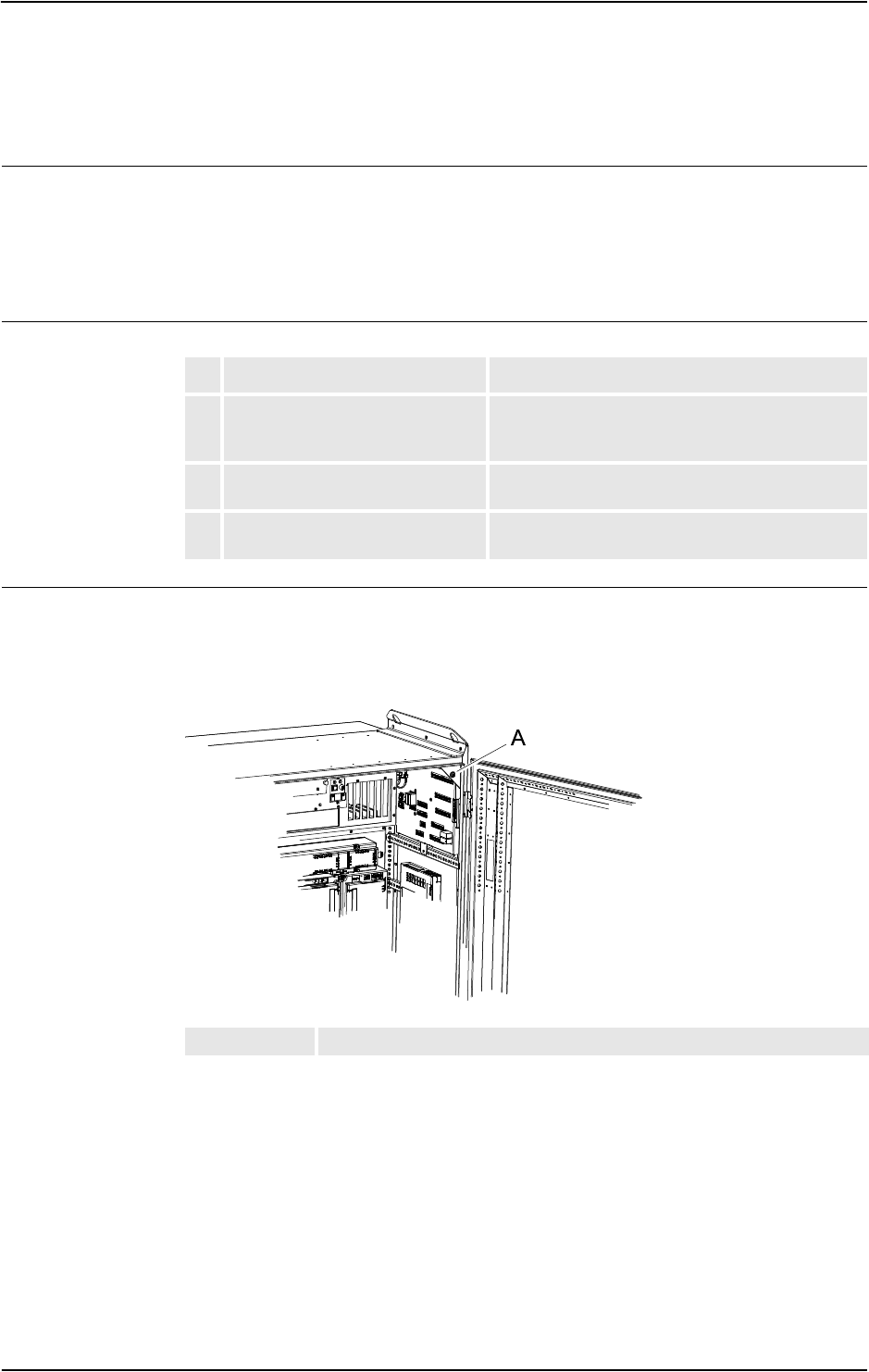
The location of the wrist strap button is shown in the following illustration.
IRC5
The wrist strap button is located in the top right corner.
xx0500002171
Action Note
1. Use a wrist strap Wrist straps must be tested frequently to ensure
that they are not damaged and are operating
correctly.
2. Use an ESD protective floor mat. The mat must be grounded through a current-
limiting resistor.
3. Use a dissipative table mat. The mat should provide a controlled discharge of
static voltages and must be grounded.
AWrist strap button
Continues on next page
1 Safety
1.5.3. WARNING - The unit is sensitive to ESD!
3HAC020738-001 Revision: K20
© Copyright 2005-2010 ABB. All rights reserved.
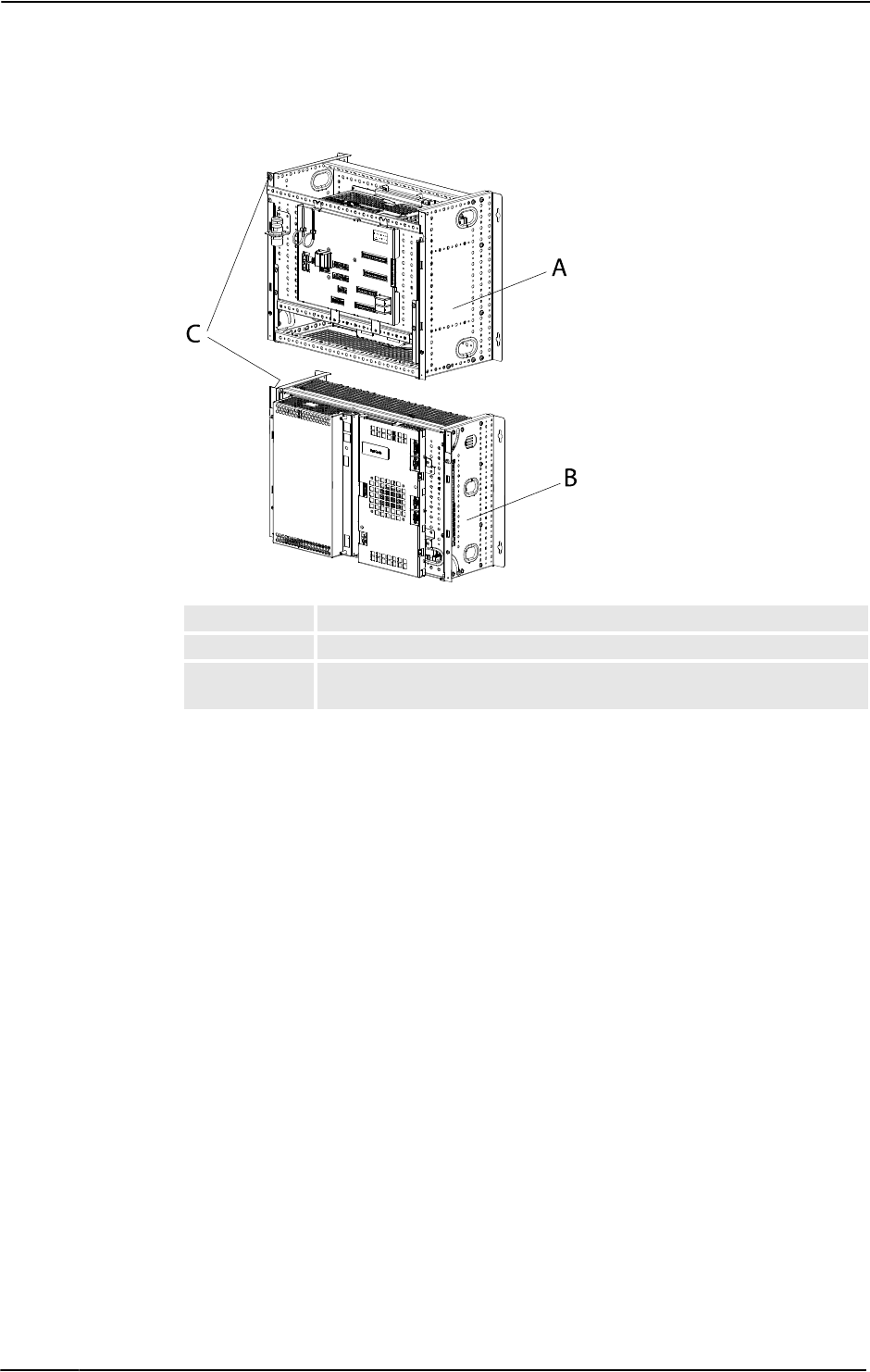
Panel Mounted Controller
xx0600003249
APanel Mounted Control Module
BPanel Mounted Drive Module
CWrist strap button NOTE! When not used, the wrist strap must always be
attached to the wrist strap button.
Continued
1 Safety
1.5.4. CAUTION - Hot parts may cause burns!
213HAC020738-001 Revision: K
© Copyright 2005-2010 ABB. All rights reserved.
1.5.4. CAUTION - Hot parts may cause burns!
Description
During normal operation, many manipulator parts become hot, especially the drive motors
and gears. Sometimes areas around these parts also become hot. Touching these may cause
burns of various severity.
Because of a higher environment temperature, more surfaces on the manipulator get hot and
may result in burns.
NOTE!
The drive parts in the cabinet can be hot.
Elimination
The instructions below detail how to avoid the dangers specified above:
Action Info
1. Always use your hand, at some distance, to feel if heat is
radiating from the potentially hot component before
actually touching it.
2. Wait until the potentially hot component has cooled if it is
to be removed or handled in any other way.
3. The Bleeder can be hot upto 80 degrees.

1 Safety
1.5.4. CAUTION - Hot parts may cause burns!
3HAC020738-001 Revision: K22
© Copyright 2005-2010 ABB. All rights reserved.
2 Trouble shooting Overview
2.1. Documentation and references
233HAC020738-001 Revision: K
© Copyright 2005-2010 ABB. All rights reserved.
2 Trouble shooting Overview
2.1. Documentation and references
General
A great deal of effort was put into writing the event log messages as well as the technical
documentation. Though imperfect, they may give vital clues. They are also constantly being
upgraded.
The product documentation is available in several languages.
Read the documentation!
Do not wait until nothing else works to read the manual!
References to document numbers are specified in the chapter Reference information in
Product manual - IRC5.
Read the circuit diagram!
The complete electrical circuitry of the controller is documented in Product manual - IRC5.
It contains a lot of information useful, or even essential, to a trained trouble shooter.
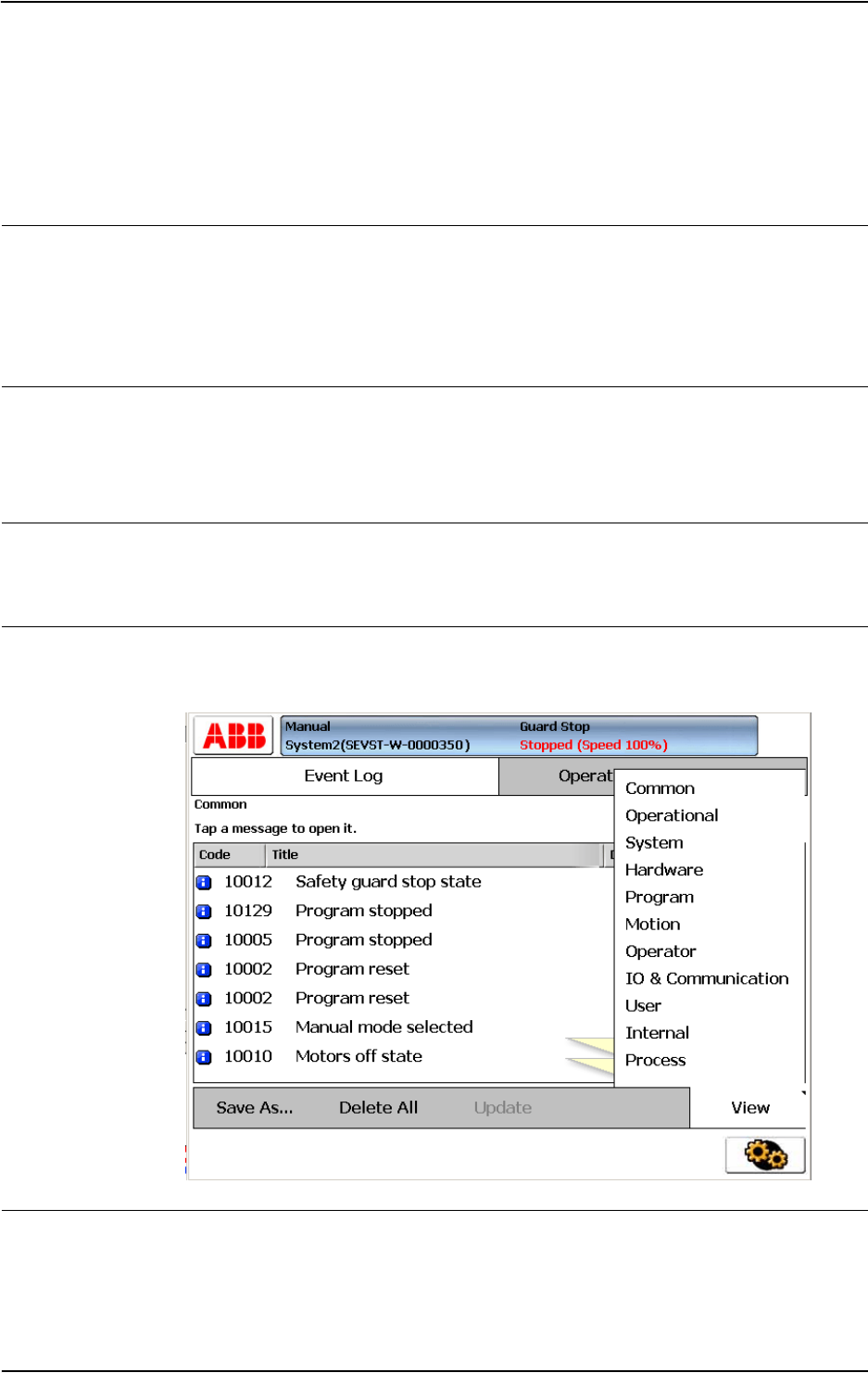
Read the logs!
The error event logs which may be viewed on either the FlexPendant or RobotStudio, contain
lots of information about any malfunction detected by the system.
en0300000547
Check the electronical unit's LEDs!
If a fault is thought to be caused by an electronic unit (circuit board in the controller or other),
the LEDs on the unit front may give leads.
These are described in section Indications on page 65.
2 Trouble shooting Overview
2.2. Overview
3HAC020738-001 Revision: K24
© Copyright 2005-2010 ABB. All rights reserved.
2.2. Overview
How to use this manual when trouble shooting
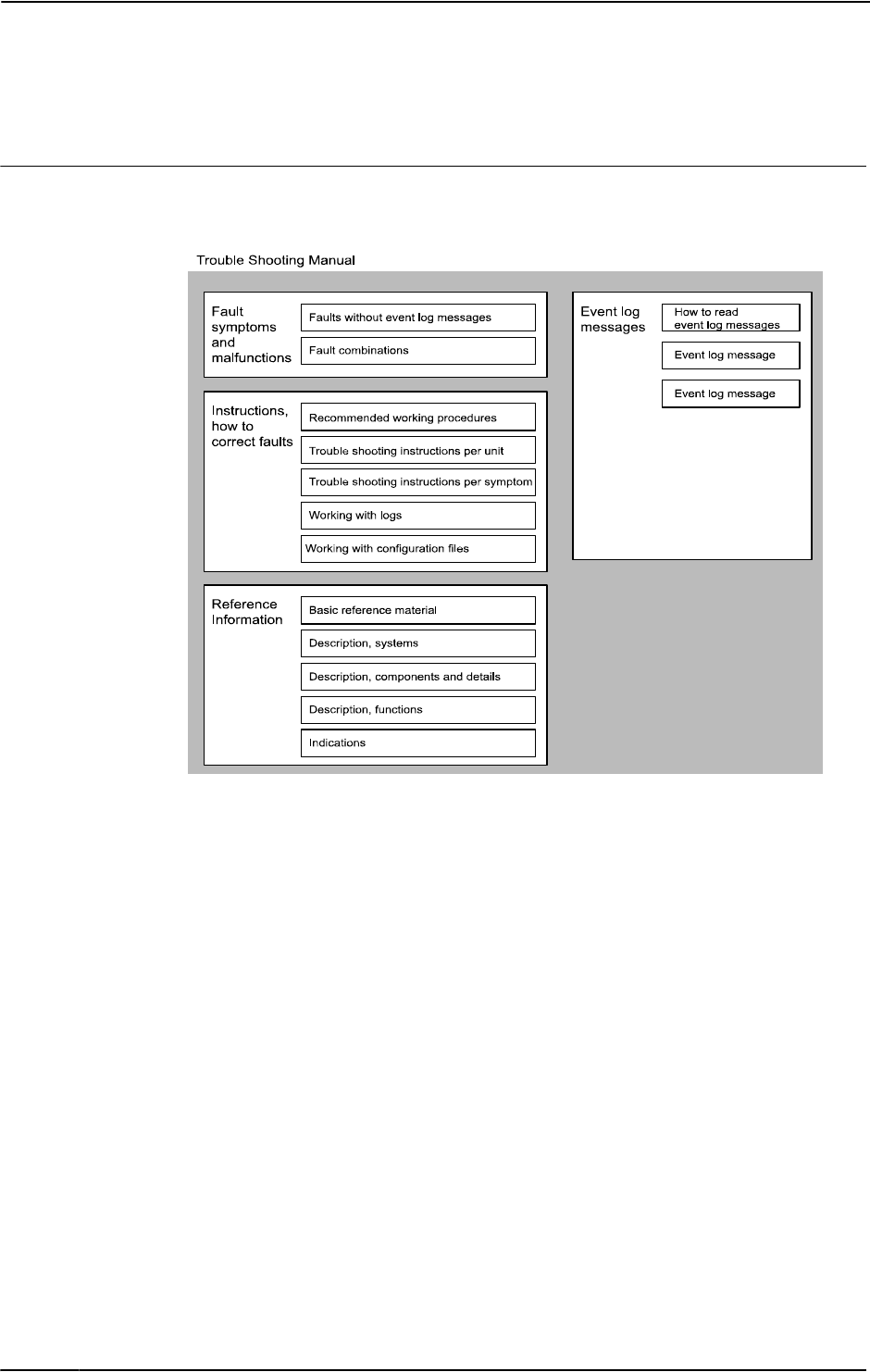
The illustration and description detail how to put the information in this manual to best use
during trouble shooting the robot system.
en0400001200
Trouble shooting manual
Fault symptoms and malfunctions:
•Each fault or error is first detected as a symptom, for which an error event log message
may or may not be created. It could be an error event log message on the FlexPendant,
an observation that the gearbox on axis 6 is getting hot or that the controller can not
be started. The faults displaying an event log message are listed in the end of this
manual.
Instructions, how to correct faults:
•The instructions are divided into two main categories: descriptions of how to correctly
handle the different parts of the system and instructions of how to remedy faults
causing the symptoms specified above. The latter category is divided into two sub-

2 Trouble shooting Overview
2.2. Overview
253HAC020738-001 Revision: K
© Copyright 2005-2010 ABB. All rights reserved.
categories, depending on whether to trouble shoot a specific symptom or a suspected
unit causing the problem. The first category contains information on how to use the
event log to facilitate trouble shooting, etc.
Recommended working procedures:
•Here, you will find a procedure for how to correctly perform certain specific tasks.
These may be used to make sure the seemingly irrational behavior of the system is not
due to incorrect handling.
Basic reference info:
•This section contains information about what tools to use, references to documents
that may be useful when trouble shooting, etc.
Description, systems:
•The different systems and sub-systems are described to give a better understanding of
its function when it works “as it’s supposed to”. This enables the trouble shooter to
better see and understand the differences between a system that’s functional and one
that’s not.
Description, components and details:
•Specific details of the system are described with regards to their function, etc.
Description, functions:
•Contains descriptions on how specific functions within the system work, e.g the RUN
chain, and what signals and other systems affect that particular function. This provides
for a better understanding of the relations and mechanisms of the robot system.
Indications
•All indication LEDs and other indications (as found on the Control and Drive Modules
as well as separate circuit boards, etc) are described in this section along with
information about their indication modes and significances respectively.
Recommended actions are often specified or references containing such instructions.
Event log messages:
•This section is basically a printout of all available event log messages. These may be
displayed either on the FlexPendant or using RobotStudio. Having access to all
messages at the same time may be useful during trouble shooting.
Additional information
In addition to the information given in this document, other documents may provide vital
information, e.g. the Circuit Diagram.
Such useful documents are listed in Overview of this manual on page 5.
Continues on next page
2 Trouble shooting Overview
2.3. Standard toolkit
3HAC020738-001 Revision: K26
© Copyright 2005-2010 ABB. All rights reserved.
2.3. Standard toolkit
General
Listed are tools required to perform the actual trouble shooting work. All tools required to
perform any corrective measure, such as replacing parts, are listed in their Product Manual
section respectively.
Contents, standard toolkit, IRC5
Contents, standard toolkit, trouble shooting
Tool Remark
Screw driver, Torx Tx10
Screw driver, Torx Tx25
Ball tipped screw driver, Torx Tx25
Screw driver, flat blade 4 mm
Screw driver, flat blade 8 mm
Screw driver, flat blade 12 mm
Screw driver Phillips-1
Box spanner 8 mm
Qty Art. no. Tool Rem.
- - Normal shop tools Contents as specified above.
1 - Multimeter -
1 - Oscilloscope -
1 - Recorder -
Continued

2 Trouble shooting Overview
2.4.1. Trouble shooting strategies
273HAC020738-001 Revision: K
© Copyright 2005-2010 ABB. All rights reserved.
2.4 Tips and Tricks while trouble shooting
2.4.1. Trouble shooting strategies
Isolate the fault!
Any fault may give rise to a number of symptoms, for which error event log messages may
or may not be created. In order to effectively eliminate the fault, it is vital to distinguish the
original symptom from the consequential ones.
A help in isolating the fault may be creating a historical fault log as specified in section Make
a historical fault log! on page 29.
Split the fault chain in two!
When trouble shooting any system, a good practice is to split the fault chain in two. This
means:
•identify the complete chain.
•decide and measure the expected value at the middle of the chain.
•use this to determine in which half the fault is caused.
•split this half into two new halves, etc.
•finally, a single component may be isolated. The faulty one.
Example
A specific IRB 7600 installation has a 12 VDC power supply to a tool at the manipulator
wrist. This tool does not work, and when checked, there is no 12 VDC supply to it.
•Check at the manipulator base to see if there is 12 VDC supply. Measurement show
there are no 12 VDC supply. (Reference: Circuit Diagram in the Product manual,
IRC5)
•Check any connector between the manipulator and the power supply in the controller.
Measurement show there are no 12 VDC supply. (Reference: Circuit Diagram in the
Product manual, IRC5)
•Check the power supply unit LED. (Reference: Indications on page 65)
Check communication parameters and cables!
The most common causes of errors in serial communication are:
• Faulty cables (e.g. send and receive signals are mixed up)
• Transfer rates (baud rates)
• Data widths that are incorrectly set.
Check the software versions!
Make sure the RobotWare and other software run by the system are the correct version.
Certain versions are not compatible with certain hardware combinations.
Also, make a note of all software versions run, since this will be useful information to the
ABB support people.
How to file a complete error report to your local ABB service personnel is detailed in section
Filing an error report on page 30.

2 Trouble shooting Overview
2.4.2. Work systematically
3HAC020738-001 Revision: K28
© Copyright 2005-2010 ABB. All rights reserved.
2.4.2. Work systematically
Do not replace units randomly!
Before replacing any part at all, it is important to establish a probable cause for the fault, thus
determining which unit to replace.
Randomly replacing units may sometimes solve the acute problem, but also leaves the trouble
shooter with a number of units that may/may not be perfectly functional.
Replace one thing at a time!
When replacing a presumably faulty unit that has been isolated, it is important that only one
unit be replaced at a time.
Always replace components as detailed in the Repairs section of the Product manual of the
robot or controller at hand.
Test the system after replacing to see if the problem has been solved.
If replacing several units at once:
•it is impossible to determine which of the units was causing the fault.
•it greatly complicates ordering a new spare part.
•it may introduce new faults to the system.
Take a look around!
Often, the cause may be evident once you see it. In the area of the unit acting erroneously, be
sure to check:
•Are the attachment screws secured?
•Are all connectors secured?
•Are all cabling free from damage?
•Are the units clean (especially for electronic units)?
•Is the correct unit fitted?
Check for tools left behind!
Some repair and maintenance work require using special tools to be fitted to the robot
equipment. If these are left behind (e.g. balancing cylinder locking device or signal cable to
a computer unit used for measuring purposes), they may cause erratic robot behavior.
Make sure all such tools are removed when maintenance work is complete!
2 Trouble shooting Overview
2.4.3. Keeping track of history
293HAC020738-001 Revision: K
© Copyright 2005-2010 ABB. All rights reserved.
2.4.3. Keeping track of history
Make a historical fault log!
In some cases, a particular installation may give rise to faults not encountered in others.
Therefore, charting each installation may give tremendous assistance to the trouble shooter.
To facilitate trouble shooting, a log of the circumstances surrounding the fault gives the
following advantages:
•it enables the trouble shooter to see patterns in causes and consequences not apparent
at each individual fault occurrance.
•it may point out a specific event always taking place just before the fault, for example
a certain part of the work cycle being run.
Check up the history!
Make sure you always consult the historical log if it is used. Also remember to consult the
operator, or similar, who was working when the problem first occurred.
At what stage did the fault occur?
What to look for during trouble shooting depends greatly of when the fault occurred: was the
robot just freshly installed? Was it recently repaired?
The table gives specific hints to what to look for in specific situations:
If the system has just: then:
been installed Check:
• the configuration files
• connections
• options and their configuration
been repaired Check:
• all connections to the replaced part
• power supplies
• that the correct part has been fitted
had a software upgrade Check:
• software versions
• compatibilities between hardware and software
• options and their configuration
been moved from one site
to another (an already
working robot)
Check:
• connections
• software versions
2 Trouble shooting Overview
2.5. Filing an error report
3HAC020738-001 Revision: K30
© Copyright 2005-2010 ABB. All rights reserved.
2.5. Filing an error report
Introduction
If you require the assistance of ABB support personnel in trouble shooting your system, you
may file a formal error report as detailed below.
In order for the ABB support personnel to better solve your problem, you may attach a special
diagnostics file that the system generates on demand.
The diagnostics file includes:
•Event log A list of all system events.
•Backup A backup of the system taken for diagnostics purposes.
•System information Internal system information useful to ABB support personnel.
NOTE that it is not required to create or attach any additional files to the error report if not
explicitely requested by the support personnel!
Creating the diagnostics file
The diagnostics file is created manually as detailed below.
Action
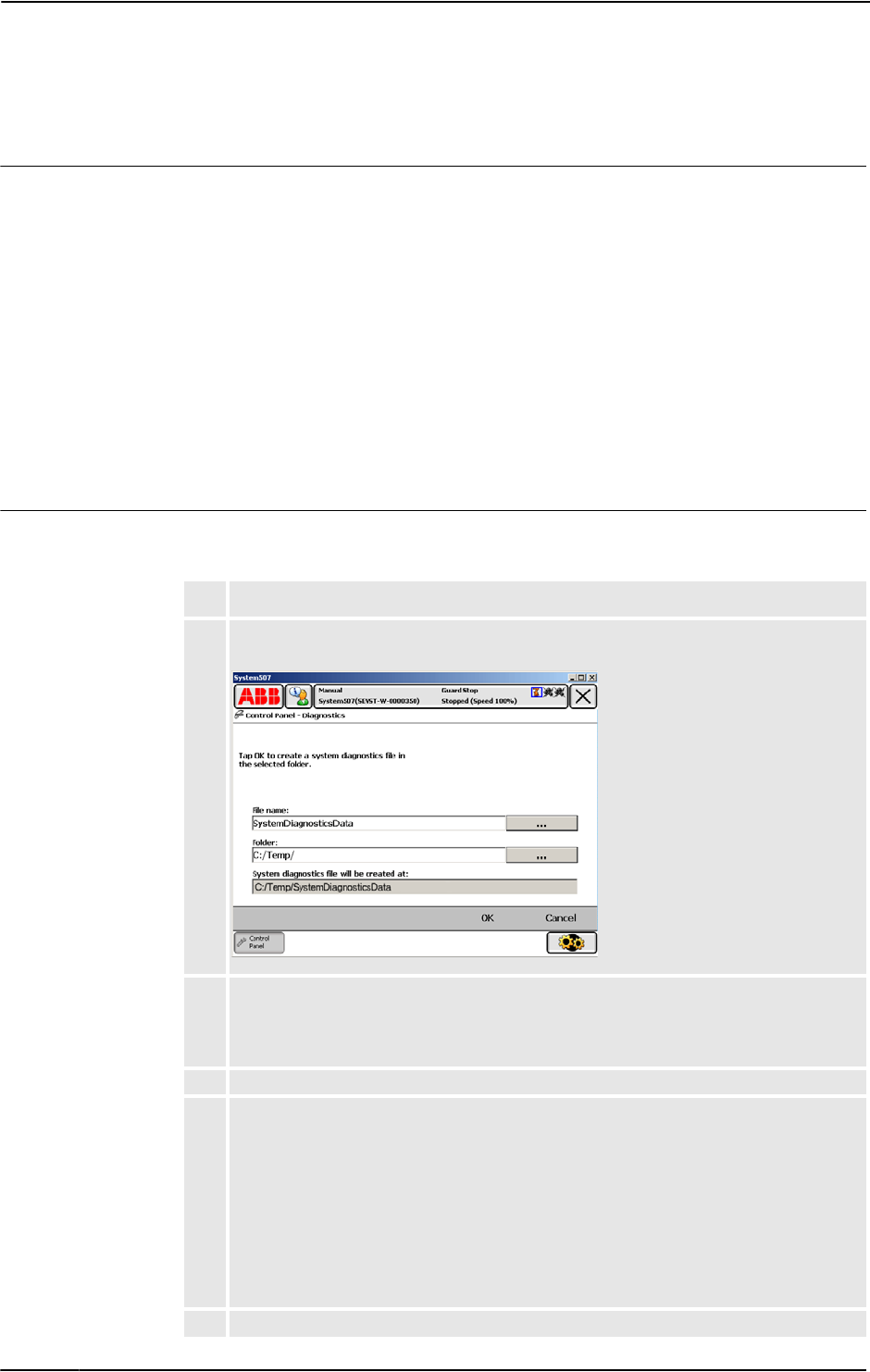
1. Tap ABB, then Control Panel and then Diagnostics.
A display is shown:
en0500002175
2. Specify the name you want for the diagnostics file, the save folder of it and tap OK. The
default save folder is C:/Temp, but any folder may be selected, for instance an
externally connected USB memory.
This may take a couple of minutes, while “Creating file. Please wait!” is displayed.
3. To shorten file transfer time, you may compress the data into a zip-file.
4. Write a regular e-mail addressed to your local ABB support personnel, and make sure
to include the following information:
• Robot serial number
• RobotWare version
• External options
• A written fault description. The more detailed, the easier for the ABB support
personnel to assist you.
• if available, enclose the license key.
• attach the diagnostics file!
5. Mail it!
3 Troubleshooting by fault symptoms
3.1. Start-up failures
313HAC020738-001 Revision: K
© Copyright 2005-2010 ABB. All rights reserved.
3 Troubleshooting by fault symptoms
3.1. Start-up failures
Introduction
This section describes possible faults during start-up and the recommended action for each
failure.
Consequences
Problem starting the sytem.
Symptoms and causes
The following are the possible symptoms of a start-up failure:
•LEDs not lit on any unit.
•Earth fault protection trips.
•Unable to load the system software.
•FlexPendant not responding.
•FlexPendant starts, but does not respond to any input.
•Disk containing the system software does not start correctly.
Recommended actions
The following are the recommended actions to be taken during a start-up failure:
NOTE!
This may be due to a loss of power supply in many stages.
Action Info/illustration
1. Make sure the main power supply to the system
is present and is within the specified limits.
Your plant or cell documentation can
provide this information.
2. Make sure that the main transformer in the Drive
module is correctly connected to the mains
voltage levels at hand.
How to strap the mains transformer
is detailed in the product manual for
the controller.
3. Make sure that the main switches are switched
on.
4. Make sure that the power supply to the Control
module and Drive module are within the
specified limits.
If required, trouble shoot the power
supply units as explained in section
Trouble shooting power supply on
page 56.
5. If no LEDs lit, proceed to section All LEDs are
OFF at Controller on page 36.
6. If the system is not responding, proceed to
section Controller not responding on page 33.
7. If the FlexPendant is not responding, proceed to
section Problem starting the FlexPendant on
page 40.
Continues on next page

3 Troubleshooting by fault symptoms
3.1. Start-up failures
3HAC020738-001 Revision: K32
© Copyright 2005-2010 ABB. All rights reserved.
8. If the FlexPendant starts, but does not
communicate with the controller, proceed to
section Problem connecting FlexPendant to the
controller on page 41.
Action Info/illustration
Continued
3 Troubleshooting by fault symptoms
3.2. Controller not responding
333HAC020738-001 Revision: K
© Copyright 2005-2010 ABB. All rights reserved.
3.2. Controller not responding
Description
This section describes the possible faults and the recommended actions for each failure:
•Robot controller not responding
•LED indicators not lit
Consequences
System cannot be operated using the FlexPendant.
Possible causes
Symptoms Recommended action
1Controller not connected to the
mains power supply.
Ensure that the mains power supply is working and
the voltage level matches that of the controller
requirement.
2Main transformer is malfunction-
ing or not connected correctly.
Ensure that the main transformer is connected
correctly to the mains voltage level.
3Main fuse (Q1) might have
tripped.
Ensure that the mains fuse (Q1) inside the Drive
Module is not tripped
4Connection missing between the
Control and Drive modules.
If the Drive Module does not start although the
Control Module is working and the Drive Module
main switch has been switched on, ensure that all
the connections between the Drive module and the
Control module are connected correctly.
3 Troubleshooting by fault symptoms
3.3. Low Controller performance
3HAC020738-001 Revision: K34
© Copyright 2005-2010 ABB. All rights reserved.
3.3. Low Controller performance
Description
The controller performance is low, and seems to work irrationally.
The controller is not completely“ dead”. If it is, proceed as detailed in section Controller not
responding on page 33.
Consequences
These symptoms can be observed:
•Program execution is sluggish, seemingly irrational and sometimes stalls.
Possible causes
The computer system is experiencing too high load, which may be due to one, or a
combination, of the following:
•Programs containing too high a degree of logical instructions only, causing too fast
program loops and in turn, overloads the processor.
•The I/O update interval is set to a low value, causing frequent updates and a high I/O
load.
•Internal system cross connections and logical functions are used too frequently.
•An external PLC, or other supervisory computer, is addressing the system too
frequently, overloading the system.
Recommended actions
Action Info/illustration
1. Check whether the program contains logical
instructions (or other instructions that take “no
time” to execute), since such programs may
cause the execution to loop if no conditions are
fulfilled.
To avoid such loops, you can test by adding
one or more WAIT instructions. Use only short
WAIT times, to avoid slowing the program
down unnecessarily.
Suitable places to add WAIT instructions
can be:
• In the main routine, preferably
close to the end.
• In a WHILE/FOR/GOTO loop,
preferably at the end, close to the
ENDWHILE/ENDFOR etc. part
of the instruction.
2. Make sure the I/O update interval value for
each I/O board is not too low. These values are
changed using RobotStudio.
I/O units that are not read regularly may be
switched to “change of state” operation as
detailed in the RobotStudio manual.
ABB recommends these poll rates:
• DSQC 327A: 1000
• DSQC 328A: 1000
• DSQC 332A: 1000
• DSQC 377A: 20-40
• All others: >100
3. Check whether there is a large amount of cross
connections or I/O communication between
PLC and robot system.
Heavy communication with PLCs or
other external computers can cause
heavy load in the robot system main
computer.

3 Troubleshooting by fault symptoms
3.3. Low Controller performance
353HAC020738-001 Revision: K
© Copyright 2005-2010 ABB. All rights reserved.
4. Try to program the PLC in such a way that it
uses event driven instructions, instead of
looped instructions.
The robot system have a number of
fixed system inputs and outputs that
may be used for this purpose.
Heavy communication with PLCs or
other external computers can cause
heavy load in the robot system main
computer.
Action Info/illustration
3 Troubleshooting by fault symptoms
3.4. All LEDs are OFF at Controller
3HAC020738-001 Revision: K36
© Copyright 2005-2010 ABB. All rights reserved.
3.4. All LEDs are OFF at Controller
Description
No LEDs at all are lit on the Control Module or the Drive Module respectively.
Consequences
The system cannot be operated or started at all.
Possible causes
The symptom can be caused by (the causes are listed in order of probability):
•The system is not supplied with power.
•The main transformer is not connected for the correct mains voltage.
•Circuit breaker F6 (if used) is malfunctioning or open for any other reason.
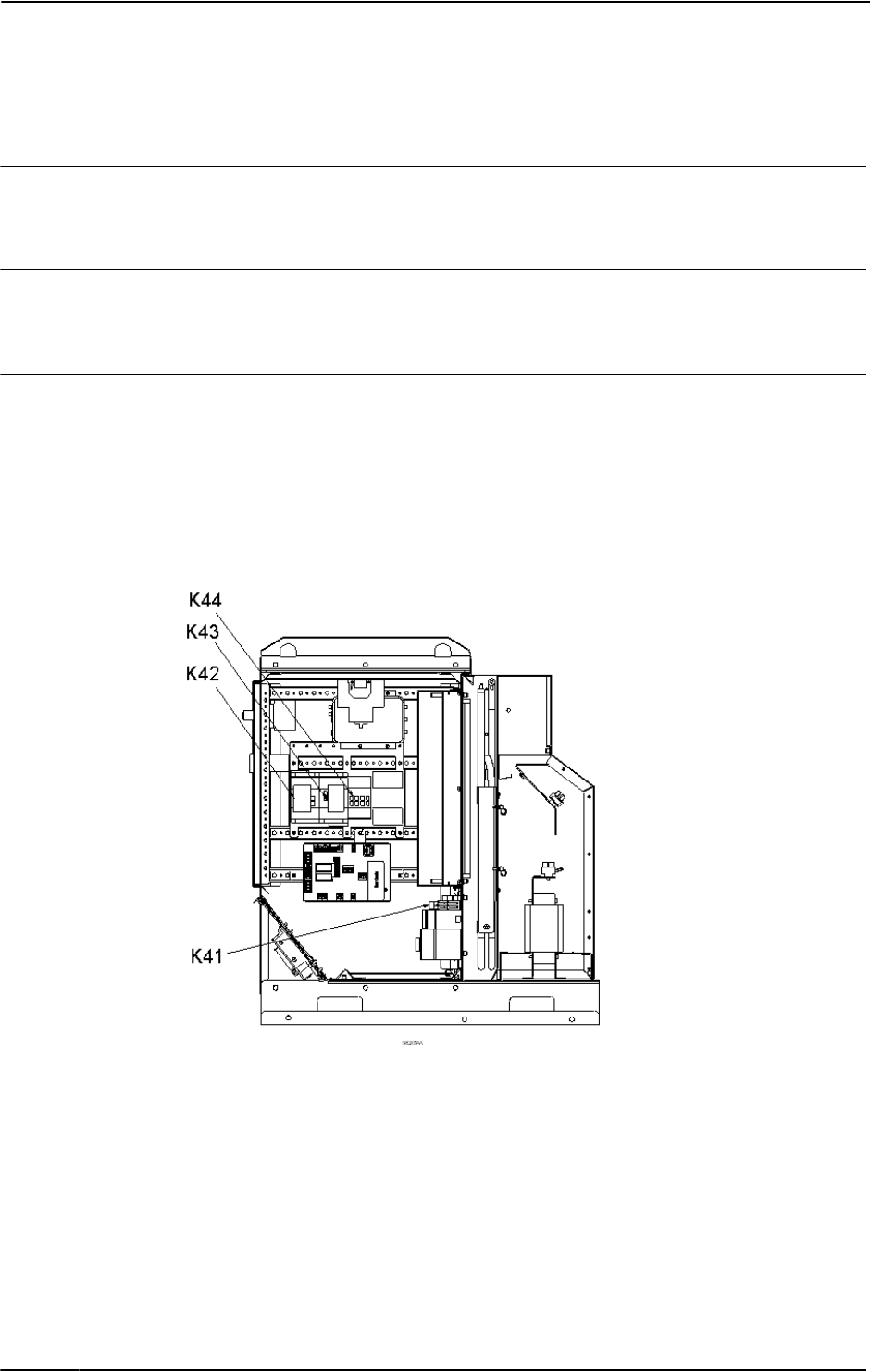
•Contactor K41 is malfunctioning or open for any other reason.
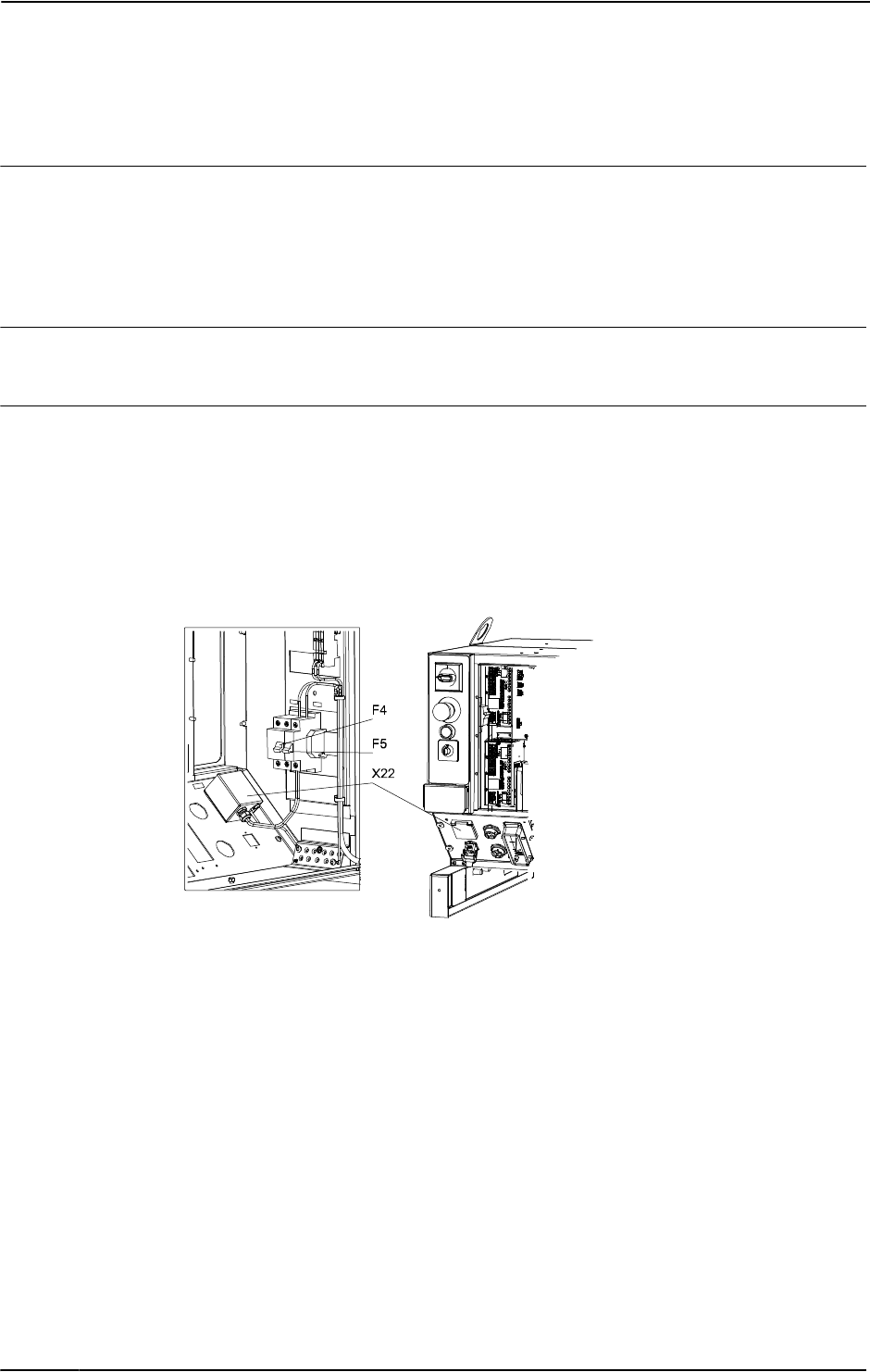
en1000000051
Continues on next page
3 Troubleshooting by fault symptoms
3.4. All LEDs are OFF at Controller
373HAC020738-001 Revision: K
© Copyright 2005-2010 ABB. All rights reserved.
Recommended actions
Action Info
1. Make sure the main switch has been
switched on.
2. Make sure the system is supplied with
power.
Use a voltmeter to measure incoming mains
voltage.
3. Check the main transformer
connection.
The voltages are marked on the terminals.
Make sure they match the shop supply
voltage.
4. Make sure circuit breaker F6 (if used) is
closed in position 3.
The circuit breaker F6 is shown in the circuit
diagram in the product manual for the
controller.
5. Make sure contactor K41 opens and
closes when ordered.
6.
-
Disconnect connector X1 from the Drive
Module power supply and measure the
incoming voltage.
Measure between pins X1.1 and X1.5.
7. If the power supply incoming voltage is
correct (230 VAC) but the LEDs still do
not work, replace the Drive Module
power supply.
Replace the power supply as detailed in the
product manual for the controller.
Continued
3 Troubleshooting by fault symptoms
3.5. No voltage in service outlet
3HAC020738-001 Revision: K38
© Copyright 2005-2010 ABB. All rights reserved.
3.5. No voltage in service outlet
Description
Some Control Modules are equipped with service voltage outlet sockets, and this information
applies to these modules only.
No voltage is available in the Control Module service outlet for powering external service
equipment.
Consequences
Equipment connected to the Control Module service outlet does not work.
Probable causes
The symptom can be caused by (the causes are listed in order of probability):
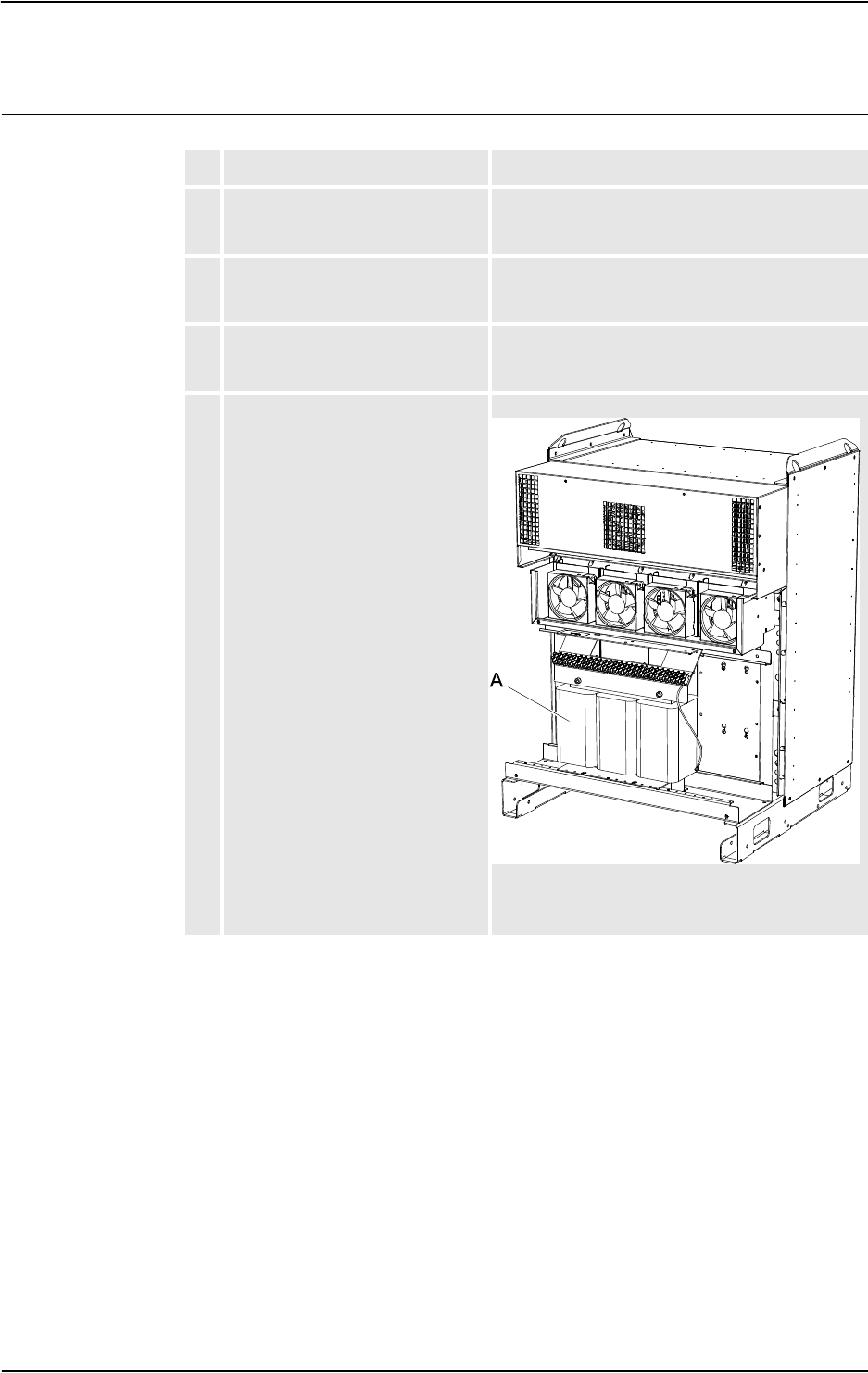
•Tripped circuit breaker (F5)
•Tripped earth fault protection (F4)
•Mains power supply loss
•Transformers incorrectly connected
xx0500001403
Continues on next page
3 Troubleshooting by fault symptoms
3.5. No voltage in service outlet
393HAC020738-001 Revision: K
© Copyright 2005-2010 ABB. All rights reserved.
Recommended actions
Action Info
1. Make sure the circuit breaker in the
Control Module has not been
tripped.
Make sure any equipment connected to the
service outlet does not consume too much power,
causing the circuit breaker to trip.
2. Make sure the earth fault protection
has not been tripped.
Make sure any equipment connected to the
service outlet does not conduct current to ground,
causing the earth fault protection to trip.
3. Make sure the power supply to the
robot system is within specifica-
tions.
Refer to the plant documentation for voltage
values.
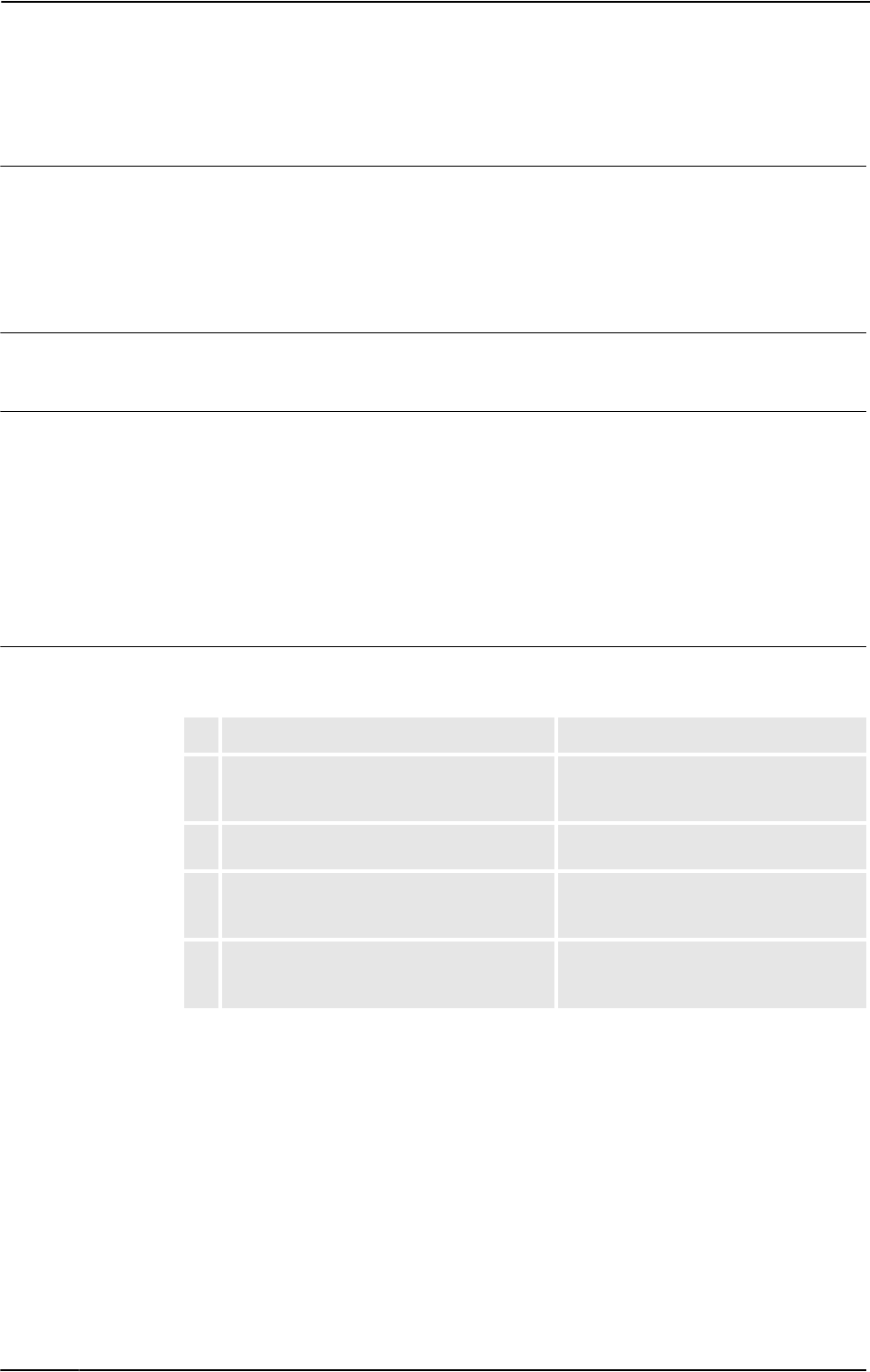
4. Make sure the transformer (A)
supplying the outlet is correctly
connected, i.e. input and output
voltages in accordance with speci-
fications.
xx0500002028
Refer to the plant documentation for voltage
values.
Continued
3 Troubleshooting by fault symptoms
3.6. Problem starting the FlexPendant
3HAC020738-001 Revision: K40
© Copyright 2005-2010 ABB. All rights reserved.
3.6. Problem starting the FlexPendant
Description
The FlexPendant is completely or intermittently "dead".
No entries are possible, and no functions are available.
If the FlexPendant starts but does not display a screen image, proceed as detailed in section
Problem connecting FlexPendant to the controller on page 41.
Consequences
The system cannot be operated using the FlexPendant.
Possible causes
The symptom can be caused by (the causes are listed in order of probability):
•The system has not been switched on.
•The FlexPendant is not connected to the controller.
•The cable from the controller is damaged.
•The cable connector is damaged.
•FlexPendant power supply from controller is faulty.
Recommended actions
The following actions are recommended (listed in order of probability):
Action Info
1. Make sure the system is switched on and
that the FlexPendant is connected to the
controller.
How to connect the FlexPendant to the
controller is detailed in Operating manual
- Getting started, IRC5 and RobotStudio.
2. Inspect the FlexPendant cable for any visible
damage.
If faulty, replace the FlexPendant.
3. If possible, test by connecting a different
FlexPendant to eliminate the FlexPendant
and cable as error sources.
4. If possible, test the FlexPendant with a
different controller to eliminate the controller
as error source.
Continues on next page
3 Troubleshooting by fault symptoms
3.7. Problem connecting FlexPendant to the controller
413HAC020738-001 Revision: K
© Copyright 2005-2010 ABB. All rights reserved.
3.7. Problem connecting FlexPendant to the controller
Description
The FlexPendant starts but does not display a screen image.
No entries are possible, and no functions are available.
The FlexPendant is not completely dead. If it is dead, proceed as detailed in section Problem
starting the FlexPendant on page 40.
Consequences
The system cannot be operated using the FlexPendant.
Possible causes
The symptom can be caused by (the causes are listed in order of probability):
•The Ethernet network has problems.
•The main computer has problems.
Recommended actions
The following actions are recommended (listed in order of probability):
Action Info
1. Check all cables from power supply unit to main
computer, making sure these are correctly
connected.
2. Make sure the FlexPendant has been correctly
connected to the controller.
3. Check all indication LEDs on all units in the
controller.
All indication LEDs and their signifi-
cance are specified in section
Indications on page 65.
4. Check all status signals on the main computer.
Continued
3 Troubleshooting by fault symptoms
3.8. Erratic event messages on FlexPendant
3HAC020738-001 Revision: K42
© Copyright 2005-2010 ABB. All rights reserved.
3.8. Erratic event messages on FlexPendant
Description
The event messages displayed on the FlexPendant are erratic and do not seem to correspond
to any actual malfunctions on the robot. Several types of messages can be displayed,
seemingly erroneously.
This type of fault may occur after major manipulator disassembly or overhaul, if not
performed correctly.
Consequences
Major operational disturbances due to the constantly appearing messages.
Possible causes
The symptom can be caused by (the causes are listed in order of probability):
•Internal manipulator cabling not correctly performed. Causes may be: faulty
connection of connectors, cable loops too tight causing the cabling to get strained
during manipulator movements, cable insulation chafed or damaged by rubbing short-
circuiting signals to earth.
Recommended actions
The following actions are recommended (listed in order of probability):
Action Info
1. Inspect all internal manipulator cabling, especially
all cabling disconnected, connected re-routed or
bundled during recent repair work.
Refit any cabling as detailed in the
product manual for the robot.
2. Inspect all cable connectors to make sure these are
correctly connected and tightened.
3. Inspect all cable insulation for damage. Replace any faulty cabling as
detailed in the product manual for
the robot.

3 Troubleshooting by fault symptoms
3.9. Problem jogging the robot
433HAC020738-001 Revision: K
© Copyright 2005-2010 ABB. All rights reserved.
3.9. Problem jogging the robot
Description
The system can be started but the joystick on the FlexPendant does not work.
Consequences
The robot can not be jogged manually.
Possible causes
The symptom can be caused by (the causes are listed in order of probability):
•The joystick is malfunctioning.
•The joystick may be deflected.
Recommended actions
The following actions are recommended (listed in order of probability):
Action Info
1. Make sure the controller is in manual mode. How to change operating mode is
described in Operating manual - IRC5
with FlexPendant.
2. Make sure the FlexPendant is connected
correctly to the Control Module.
3. Reset the FlexPendant. Press Reset button located on the
back of the FlexPendant.
NOTE!
The Reset button resets the
FlexPendant not the system on the
Controller.
3 Troubleshooting by fault symptoms
3.10. Reflashing firmware failure
3HAC020738-001 Revision: K44
© Copyright 2005-2010 ABB. All rights reserved.
3.10. Reflashing firmware failure
Description
When reflashing firmware, the automatic process can fail.
Consequences
The automatic reflashing process is interrupted and the system stops.
Possible causes
This fault usually occurs due to a lack of compatibility between hardware and software.
Consequences
The following actions are recommended (listed in order of probability):
Action Info
1. Check the event log for a message specifying
which unit failed.
The logs may also be accessed from
RobotStudio.
2. Was the relevant unit recently replaced?
If YES; make sure the versions of the old and
new unit is identical.
If NO; check the software versions.
3. Was the RobotWare recently replaced?
If YES; make sure the versions of the old and
new unit is identical.
If NO; proceed below!
4. Check with your local ABB representative for a
firmware version compatible with your
hardware/software combination.
3 Troubleshooting by fault symptoms
3.11. Inconsistent path accuracy
453HAC020738-001 Revision: K
© Copyright 2005-2010 ABB. All rights reserved.
3.11. Inconsistent path accuracy
Description
The path of the robot TCP is not consistent. It varies from time to time, and is sometimes
accompanied by noise emerging from bearings, gearboxes, or other locations.
Consequences
Production is not possible.
Possible causes
The symptom can be caused by (the causes are listed in order of probability):
•Robot not calibrated correctly.
•Robot TCP not correctly defined.
•Parallel bar damaged (applies to robots fitted with parallel bars only).
•Mechanical joint between motor and gearbox damaged. This often causes noise to be
emitted from the faulty motor.
•Bearings damaged or worn (especially if the path inconsistency is coupled with
clicking or grinding noises from one or more bearings).
•The wrong robot type may be connected to the controller.
•The brakes may not be releasing correctly.
Recommended actions
In order to remedy the symptom, the following actions are recommended (the actions are
listed in order of probability):
Action Info/Illustration
1. Make sure the robot tool and work object
are correctly defined.
How to define these are detailed in
Operating manual - IRC5 with FlexPendant.
2. Check the revolution counters’ positions. Update if required.
3. If required, recalibrate the robot axes. How to calibrate the robot is detailed in
Operating manual - IRC5 with FlexPendant.
4. Locate the faulty bearing by tracking the
noise.
Replace faulty bearing as specified in the
product manual for the robot.
5. Locate the faulty motor by tracking the
noise.
Study the path of the robot TCP to
establish which axis, and thus which
motor, may be faulty.
Replace the faulty motor/gearbox as
specified in the product manual for the robot.
6. Check the trueness of the parallel bar
(applies to robots fitted with parallel bars
only).
Replace the faulty parallel bar as specified in
the product manual for the robot.
7. Make sure the correct robot type is
connected as specified in the configura-
tion files.
8. Make sure the robot brakes work
properly.
Proceed as detailed in section Problem
releasing Robot brakes on page 50.
3 Troubleshooting by fault symptoms
3.12. Oil and grease stains on motors and gearboxes
3HAC020738-001 Revision: K46
© Copyright 2005-2010 ABB. All rights reserved.
3.12. Oil and grease stains on motors and gearboxes
Description
The area surrounding the motor or gearbox shows signs of oil leaks. This can be at the base,
closest to the mating surface, or at the furthest end of the motor at the resolver.
Consequences
Besides the dirty appearance, in some cases there are no serious consequences if the leaked
amount of oil is very small. However, in some cases the leaking oil lubricates the motor
brake, causing the manipulator to collapse at power down.
Possible causes
The symptom can be caused by (the causes are listed in order of probability):
•Leaking seal between gearbox and motor.
•Gearbox overfilled with oil.
•Gearbox oil too hot.
Recommended actions
In order to remedy the symptom, the following actions are recommended (the actions are
listed in order of probability):
Action Info
1.
CAUTION!
Before approaching the potentially hot robot
component, observe the safety information in
section CAUTION - Hot parts may cause burns! on
page 21.
2. Inspect all seals and gaskets between motor and
gearbox. The different manipulator models use
different types of seals.
Replace seals and gaskets as
specified in the product manual for
the robot.
3. Check the gearbox oil level. Correct oil level is specified in the
product manual for the robot.
4. Too hot gearbox oil may be caused by:
• Oil quality or level used is incorrect.
• The robot work cycle runs a specific axis too
hard. Investigate whether it is possible to
program small "cooling periods" into the
application.
• Overpressure created inside gearbox.
Check the recommended oil level
and type as specified in the
product manual for the robot.
Manipulators performing certain,
extremely heavy duty work cycles
may be fitted with vented oil plugs.
These are not fitted to normal duty
manipulators, but may be
purchased from your local ABB
representative.
3 Troubleshooting by fault symptoms
3.13. Mechanical noise
473HAC020738-001 Revision: K
© Copyright 2005-2010 ABB. All rights reserved.
3.13. Mechanical noise
Description
During operation, no mechanical noise should be emitted from motors, gearboxes, bearings,
or similar. A faulty bearing often emits scraping, grinding, or clicking noises shortly before
failing.
Consequences
Failing bearings cause the path accuracy to become inconsistent, and in severe cases, the joint
can seize completely.
Possible causes
The symptom can be caused by (the causes are listed in order of probability):
•Worn bearings.
•Contaminations have entered the bearing races.
•Loss of lubrication in bearings.
If the noise is emitted from a gearbox, the following can also apply:
•Overheating.
Recommended actions
The following actions are recommended (listed in order of probability):
Action Info
1.
CAUTION!
Before approaching the potentially hot robot
component, observe the safety information
in section CAUTION - Hot parts may cause
burns! on page 21.
2. Determine which bearing is emitting the
noise.
3. Make sure the bearing has sufficient lubrica-
tion.
As specified in the product manual for
the robot.
4. If possible, disassemble the joint and
measure the clearance.
As specified in the product manual for
the robot.
5. Bearings inside motors are not to be
replaced individually, but the complete motor
is replaced.
Replace faulty motors as specified in the
product manual for the robot.
6. Make sure the bearings are fitted correctly. Also see the product manual for the robot
for general instruction on how to handle
bearings.

3 Troubleshooting by fault symptoms
3.13. Mechanical noise
3HAC020738-001 Revision: K48
© Copyright 2005-2010 ABB. All rights reserved.
7. Too hot gearbox oil may be caused by:
• Oil quality or level used is incorrect.
• The robot work cycle runs a specific
axis too hard. Investigate whether it is
possible to program small "cooling
periods" into the application.
• Overpressure created inside
gearbox.
Check the recommended oil level and
type as specified in the product manual
for the robot.
Manipulators performing certain,
extremely heavy duty work cycles may
be fitted with vented oil plugs. These are
not fitted to normal duty manipulators,
but may be purchased from your local
ABB representative.
Action Info
3 Troubleshooting by fault symptoms
3.14. Manipulator crashes on power down
493HAC020738-001 Revision: K
© Copyright 2005-2010 ABB. All rights reserved.
3.14. Manipulator crashes on power down
Description
The manipulator is able to work correctly while Motors ON is active, but when Motors OFF
is active, it collapses under its own weight.
The holding brake, integral to each motor, is not able to hold the weight of the manipulator
arm.
Consequences
The fault can cause severe injuries or death to personnel working in the area or severe damage
to the manipulator and/or surrounding equipment.
Possible causes
The symptom can be caused by (the causes are listed in order of probability):
•Faulty brake.
•Faulty power supply to the brake.
Recommended actions
The following actions are recommended (listed in order of probability):
Action Info
1. Determine which motor(s) causes the robot
to collapse.
2. Check the brake power supply to the
collapsing motor during the Motors OFF
state.
Also see the circuit diagrams in the
product manuals for the robot and the
controller .
3. Remove the resolver of the motor to see if
there are any signs of oil leaks.
If found faulty, the motor must be replaced
as a complete unit as detailed in the
product manual for the robot.
4. Remove the motor from the gearbox to
inspect it from the drive side.
If found faulty, the motor must be replaced
as a complete unit as detailed in the
product manual for the robot.
Continues on next page
3 Troubleshooting by fault symptoms
3.15. Problem releasing Robot brakes
3HAC020738-001 Revision: K50
© Copyright 2005-2010 ABB. All rights reserved.
3.15. Problem releasing Robot brakes
Description
When starting robot operation or jogging the robot, the internal robot brakes must release in
order to allow movements.
Consequences
If the brakes do not release, no robot movement is possible, and a number of error log
messages can occur.
Possible causes
The symptom can be caused by (the causes are listed in order of probability):
•Brake contactor (K44) does not work correctly.
•The system does not go to status Motors ON correctly.
•Faulty brake on the robot axis.
•Supply voltage 24V BRAKE missing.
en1000000051
Continued
3 Troubleshooting by fault symptoms
3.15. Problem releasing Robot brakes
513HAC020738-001 Revision: K
© Copyright 2005-2010 ABB. All rights reserved.
Recommended actions
This section details how to proceed when the robot brakes do not release.
Action Info
1. Make sure the brake contactor is activated. A ‘tick’ should be audible, or you
may measure the resistance across
the auxiliary contacts on top of the
contactor.
2. Make sure the RUN contactors (K42 and K43) are
activated. NOTE that both contactors must be
activated, not just one!
A ‘tick’ should be audible, or you
may measure the resistance across
the auxiliary contacts on top of the
contactor.
3. Use the push buttons on the robot to test the
brakes.
If just one of the brakes malfunctions, the brake at
hand is probably faulty and must be replaced.
If none of the brakes work, there is probably no
24V BRAKE power available.
The location of the push buttons
differ, depending on robot model.
Please refer to the product manual
for the robot!
4. Check the Drive Module power supply to make
sure 24V BRAKE voltage is OK.
5. A number of other faults within the system can
cause the brakes to remain activated. In such
cases, event log messages will provide additional
information.
The event log messages can also
be accessed using RobotStudio.
3 Troubleshooting by fault symptoms
3.16. Intermittent errors
3HAC020738-001 Revision: K52
© Copyright 2005-2010 ABB. All rights reserved.
3.16. Intermittent errors
Description
During operation, errors and malfunctions may occur, in a seemingly random way.
Consequences
Operation is interrupted, and occasionally, event log messages are displayed, that sometimes
do not seem to be related to any actual system malfunction. This sort of problem sometimes
affects the Emergency stop or Enable chains respectively, and may at times be very hard to
pinpoint.
Probable causes
Such errors may occur anywhere in the robot system and may be due to:
• external interference
• internal interference
• loose connections or dry joints, e.g. incorrectly connected cable screen connections.
• thermal phenomena , e.g. major temperature changes within the workshop area.
Recommended actions
In order to remedy the symptom, the following actions are recommended (the actions are
listed in order of probability):
Action Info/illustration
1. Check all the cabling, especially the cables in the
Emergency stop and Enable chains. Make sure all
connectors are connected securely.
2. Check if any indication LEDs signal any malfunction
that may give some clue to the problem.
The significance of all
indication LEDs are specified in
section Indications on page 65.
3. Check the messages in the event log. Sometimes
specific error combinations are intermittent.
The event log messages may
be viewed either on the
FlexPendant or using Robot-
Studio.
4. Check the robot’s behaviour, etc, each time that type
of error occurs.
If possible, keep track of the
malfunctions in a log or similar.
5. Check whether any condition in the robot working
environment also changes periodically, e.g, interfer-
ence from any electric equipment only operating peri-
odically.
6. Investigate whether the environmental conditions
(such as ambient temperature, humidity, etc) has any
bearing on the malfunction.
If possible, keep track of the
malfunctions in a log or similar.
Continues on next page
4 Trouble shooting by Unit
4.1. Trouble shooting the FlexPendant
533HAC020738-001 Revision: K
© Copyright 2005-2010 ABB. All rights reserved.
4 Trouble shooting by Unit
4.1. Trouble shooting the FlexPendant
General
The FlexPendant communicates, through the Panel Board, with the Control Module main
computer. The FlexPendant is physically connected to the Panel Board through a cable in
which the +24 V supply and two Enabling Device chains run and emergency stop.
Procedure
The procedure below details what to do if the FlexPendant does not work correctly.
Action Info/illustration
1. If the FlexPendant is completely “dead”,
proceed as detailed in section Problem starting
the FlexPendant on page 40.
2. If the FlexPendant starts, but does not operate
correctly, proceed as detailed in section
Problem connecting FlexPendant to the
controller on page 41.
3. If the FlexPendant starts, seems to operate, but
displays erratic event messages, proceed as
detailed in section Erratic event messages on
FlexPendant on page 42.
4. Check the cable for connections and integrity.
5. Check the 24 V power supply.
6. Read the error event log message and follow
any instructions of references.
Continued

4 Trouble shooting by Unit
4.2. Trouble shooting communications
3HAC020738-001 Revision: K54
© Copyright 2005-2010 ABB. All rights reserved.
4.2. Trouble shooting communications
Overview
This section details how to trouble shoot data communication in the Control and Drive
Modules.
Trouble shooting procedure
When trouble shooting communication faults, follow the outline detailed below:
Action Info/illustrations
1. Faulty cables (e.g. send and receive signals are mixed
up).
2. Transfer rates (baud rates).
3. Data widths that are incorrectly set.

4 Trouble shooting by Unit
4.3. Trouble shooting fieldbuses and I/O units
553HAC020738-001 Revision: K
© Copyright 2005-2010 ABB. All rights reserved.
4.3. Trouble shooting fieldbuses and I/O units
Where to find information
Information about how to trouble shoot the fieldbuses and I/O units can be found in the
manual for the respective fieldbus or I/O unit.

4 Trouble shooting by Unit
4.4.1. Trouble shooting DSQC 604
3HAC020738-001 Revision: K56
© Copyright 2005-2010 ABB. All rights reserved.
4.4 Trouble shooting power supply
4.4.1. Trouble shooting DSQC 604
Required test equipment
Equipment needed for trouble shooting:
•Ohmmeter
•Resistive load (e.g. Main Computer DSQC 639 on +24V_PC)
•Voltmeter
Preparations
Trouble shooting procedure, DSQC 604
The trouble shooting table is supposed to be used as a detailed instruction together with the
trouble shooting flowchart, see Trouble shooting flowchart, DSQC 604 on page 58.
Action Note
1. Check the FlexPendant for errors and warnings.
Test Note Action
1. Check the indicator
LED on DSQC 604.
The indicator LED is
labelled DCOK.
If the LED is GREEN, the power
supply should be working properly.
If the LED is PULSING GREEN, the
DC outputs are probably not
connected to any units or there may
be a short circuit on an output.
Proceed with step 2.
If the LED is OFF, either the power
supply is faulty or it does not have
sufficient input voltage. Proceed with
step 4.
2. Check connections
between DC outputs
and connected units.
Make sure that the power
supply is connected to its
proper units.
A minimum load of 0.5-1A
is required on at least one
DC output for the 604 to
work properly.
If the connections are OK, proceed
with step 3.
If the connections are faulty or the
power supply is not connected to any
units at all, repair connections/
connect units. Verify that the fault has
been fixed and restart this guide if
necessary.
3. Check for short
circuits on DC
outputs.
Check both the DC
outputs on DSQC 604
and the inputs on
surrounding units.
Measure the resistance
between voltage pins and
ground. The resistance
should NOT be zero.
The DC outputs are
shown in the Circuit
Diagram in Product
manual - IRC5.
If no short circuit is found, proceed
with step 4.
If a short circuit is found on DSQC
604, proceed with step 10.
If a short circuit is found on any
surrounding unit, get that unit
working. Verify that the fault has
been fixed and restart this guide if
necessary.
4 Trouble shooting by Unit
4.4.1. Trouble shooting DSQC 604
573HAC020738-001 Revision: K
© Copyright 2005-2010 ABB. All rights reserved.
4. Disconnect one DC
output at a time and
measure its voltage.
Make sure that at least
one unit is connected at
all times. A minimum load
of 0.5- 1A is required on
at least one output for the
604 to work properly.
Measure the voltage
using a voltmeter. The
voltage should be: +24V
< U < +27V.
The DC outputs are
shown in the Circuit
Diagram in Product
manual - IRC5.
If the correct voltage is detected on
all outputs and the DCOK LED is
green, the power supply is working
properly.
If the correct voltage is detected on
all outputs and the DCOK LED is off,
the power supply is regarded as
faulty but does not have to be
replaced instantly.
If no or the wrong voltage is detected,
proceed with step 5.
5. Measure the input
voltage to the 604.
Measure the voltage
using a voltmeter. Voltage
should be: 172 < U <
276V.
The AC input is shown in
the Circuit Diagram in
Product manual - IRC5.
If the input voltage is correct,
proceed with step 10.
If no or the wrong input voltage is
detected, proceed with step 6.
6. Check switches Q1-
2.
Make sure that they are
closed.
Their physical location is
shown in the Circuit
Diagram in Product
manual - IRC5.
If the switches are closed, proceed
with step 7.
If the switches are open, close them.
Verify that the fault has been fixed
and restart this guide if necessary.
7. Check main fuse F2
and optional fuse F6
if used.
Make sure that they are
open.
Their physical location is
shown in the Circuit
Diagram in Product
manual - IRC5.
If the fuses are open, proceed with
step 8.
If the fuses are closed, open them.
Verify that the fault has been fixed
and restart this guide if necessary.
8. Make sure that the
input voltage to the
cabinet is the correct
one for that particular
cabinet.
If the input voltage is correct,
proceed with step 9.
If the input voltage is incorrect, adjust
it. Verify that the fault has been fixed
and restart this guide if necessary.
9. Check the cabling. Make sure that the
cabling is correctly
connected and not faulty.
If the cabling is OK, the problem is
likely to be the transformer T1 or the
input filter. Try to get this part of the
supply working. Verify that the fault
has been fixed and restart this guide
if necessary.
If the cabling is found unconnected or
faulty, connect/replace it. Verify that
the fault has been fixed and restart
this guide if necessary.
Test Note Action
4 Trouble shooting by Unit
4.4.1. Trouble shooting DSQC 604
3HAC020738-001 Revision: K58
© Copyright 2005-2010 ABB. All rights reserved.
Trouble shooting flowchart, DSQC 604
en0800000354
C orrect
DC level
D SQ C 604
1. D C O K L ED
GREEN
PU LSIN G
GREEN OFF
Fix connections 2. C heck output
connections 4. M easure D C
outputs
3. C heck for
short circuits on
outputs
Fix short circuit
5. M easure A C
input
6. C heck
sw itc h e s Q 1 - 2
7. Check fuses
F2 (F6)
Close sw itches
Q1-2
8. M easure A C
to cabinet
Open fuses
9. C heck
cabling
Fix cabling
AdjustAC
input
10. R eplace D SQ C 604
Probable cause of
dysfunction:
transfo rm er T 1 or filter
T he pow er supply unit
w orks properly
Wrong
DC level
Connections
ok
C o nnections
no t ok
Short circuit
on output(s)
Short circuit
on unit(s)
No
sh o rt c ircu it
Correct
AC level
Wrong
AC level
Sw itches
open
Sw itches
closed
Fuses
open
Fuses
closed
AC ok
A C not ok
Cabling
ok
Faulty
cabling

4 Trouble shooting by Unit
4.4.2. Trouble shooting DSQC 661
593HAC020738-001 Revision: K
© Copyright 2005-2010 ABB. All rights reserved.
4.4.2. Trouble shooting DSQC 661
Required test equipment
Equipment needed for trouble shooting:
•Ohmmeter
•Resistive load (e.g. Main Computer DSQC 639 on +24V_PC)
•Voltmeter
Preparations
Trouble shooting procedure, DSQC 661
The trouble shooting table is supposed to be used as a detailed instruction together with the
trouble shooting flowchart, see Trouble shooting flowchart, DSQC 661 on page 61.
Action
1. Check the FlexPendant for errors and warnings.
2. Make sure that the control system power supply is in run-time mode.
Do this by waiting 30 seconds after power-on.
Test Note Action
1. Check the indicator
LED on DSQC 661.
The indicator LED is labelled
DCOK.
If the LED is GREEN, the 661
should be working properly.
If the LED is PULSING GREEN,
the DC output is probably not
connected to any unit (load) or
there may be a short circuit on the
output. Proceed with step 2.
If the LED is OFF, either the 661 is
faulty or it does not have sufficient
input voltage. Proceed with step
4.
2. Check connection
between DC output
and connected unit.
Make sure that the power
supply is connected to
DSQC 662.
A minimum load of 0.5-1A is
required on the DC output
for the 661 to work properly.
If the connection is OK, proceed
with step 3.
If the connection is faulty or the
power supply is not connected to
DSQC 662, repair connection/
connect it. Verify that the fault has
been fixed and restart this guide if
necessary.
3. Check for short
circuit on DC output.
Check both the DC output on
DSQC 661 and the input on
DSQC 662.
Measure the resistance
between voltage pins and
ground. The resistance
should NOT be zero.
The DC output is shown in
the Circuit Diagram in
Product manual - IRC5.
If no short circuit is found, proceed
with step 4.
If a short circuit is found on DSQC
661, proceed with step 10.
If a short circuit is found on DSQC
662, get that unit working. Verify
that the fault has been fixed and
restart this guide if necessary.
Continues on next page

4 Trouble shooting by Unit
4.4.2. Trouble shooting DSQC 661
3HAC020738-001 Revision: K60
© Copyright 2005-2010 ABB. All rights reserved.
4. Measure the DC
voltage while the
output is connected
to DSQC 662 or
some other load.
DSQC 661 requires a
minimum load of 0.5- 1A in
order for it to deliver +24V.
Measure the voltage using a
voltmeter. The voltage
should be: +24V < U < +27V.
The DC output is shown in
the Circuit Diagram in
Product manual - IRC5.
If the correct voltage is detected
and the DCOK LED is green, the
power supply is working properly.
If the correct voltage is detected
and the DCOK LED is off, the
power supply is regarded as faulty
but does not have to be replaced
instantly.
If no or the wrong voltage is
detected, proceed with step 5.
5. Measure the input
voltage to the 661.
Measure the voltage using a
voltmeter. Voltage should
be: 172 < U < 276V.
The AC input is shown in the
Circuit Diagram in Product
manual - IRC5.
If the input voltage is correct,
proceed with step 10.
If no or the wrong input voltage is
detected, proceed with step 6.
6. Check switches Q1-
2.
Make sure that they are
closed.
Their physical location is
shown in the Circuit Diagram
in Product manual - IRC5.
If the switches are closed,
proceed with step 7.
If the switches are open, close
them. Verify that the fault has
been fixed and restart this guide if
necessary.
7. Check main fuse F2
and optional fuse F6
if used.
Make sure that they are
open.
Their physical location is
shown in the Circuit Diagram
in Product manual - IRC5.
If the fuses are open, proceed
with step 8.
If the fuses are closed, open
them. Verify that the fault has
been fixed and restart this guide if
necessary.
8. Make sure that the
input voltage to the
cabinet is the correct
one for that particular
cabinet.
If the input voltage is correct,
proceed with step 9.
If the input voltage is incorrect,
adjust it. Verify that the fault has
been fixed and restart this guide if
necessary.
9. Check the cabling. Make sure that the cabling is
correctly connected and not
faulty.
If the cabling is OK, the problem is
likely to be the transformer T1 or
the input filter. Try to get this part
of the supply working. Verify that
the fault has been fixed and
restart this guide if necessary.
If the cabling is found
unconnected or faulty, connect/
replace it. Verify that the fault has
been fixed and restart this guide if
necessary.
10. The 661 may be
faulty, replace it and
verify that the fault
has been fixed.
How to replace the unit is
detailed in Product manual -
IRC5.
Test Note Action
Continued
Continues on next page
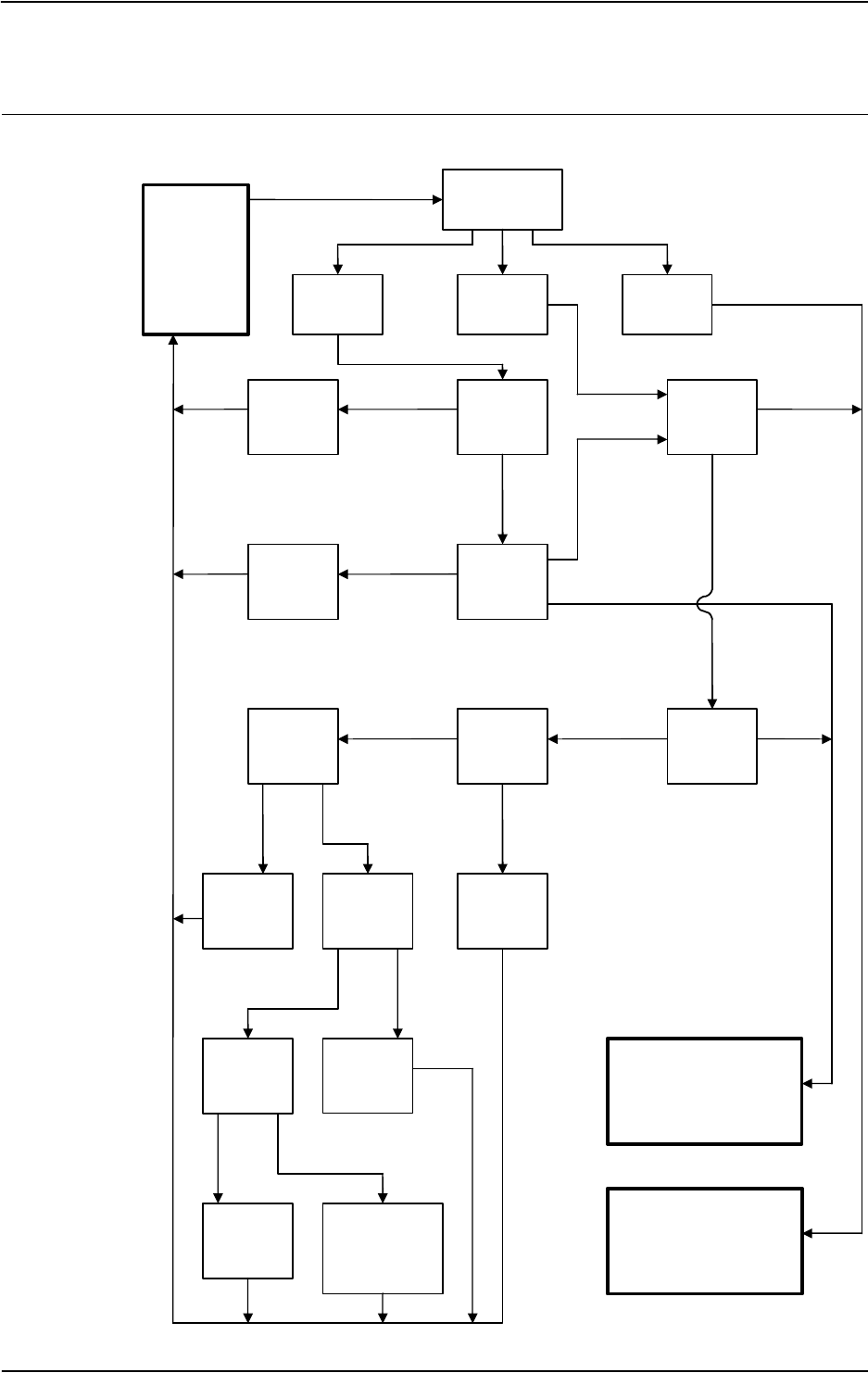
4 Trouble shooting by Unit
4.4.2. Trouble shooting DSQC 661
613HAC020738-001 Revision: K
© Copyright 2005-2010 ABB. All rights reserved.
Trouble shooting flowchart, DSQC 661
en0800000355
C orrect
DC level
D SQ C 661
1. D C O K L ED
GREEN
PU LSIN G
GREEN OFF
Fix connection 2. C heck output
co nnection 4. M easure D C
output
3. C heck for
short circuit on
output
Fix short circuit
5. M easure A C
input
6. C heck
sw itc h e s Q 1 - 2
7. Check fuses
F2 (F6)
Close sw itches
Q1-2
8. M easure A C
to cabinet
Open fuses
9. C heck
cabling
Fix cabling
AdjustAC
input
10. R eplace D SQ C 661
Probable cause of
dysfunction:
transfo rm er T 1 or filter
T he pow er supply unit
w orks properly
Wrong
DC level
Connections
ok
C o nnections
no t ok
Short circuit
on output(s)
Short circuit
on unit(s)
No
sh o rt c ircu it
Correct
AC level
Wrong
AC level
Sw itches
open
Sw itches
closed
Fuses
open
Fuses
closed
AC ok
A C not ok
Cabling
ok
Faulty
cabling
Continued

4 Trouble shooting by Unit
4.4.3. Trouble shooting DSQC 662
3HAC020738-001 Revision: K62
© Copyright 2005-2010 ABB. All rights reserved.
4.4.3. Trouble shooting DSQC 662
Required test equipment
Equipment needed for trouble shooting:
•Ohmmeter
•Resistive load (e.g. Main Computer DSQC 639 on +24V_PC)
•Voltmeter
Preparations
Trouble shooting procedure, DSQC 662
The trouble shooting table is supposed to be used as a detailed instruction together with the
trouble shooting flowchart, see Trouble shooting flowchart, DSQC 662 on page 64.
Action Note
1. Check the FlexPendant for errors and warnings.
2. Make sure that the power distribution board is in
run-time mode.
Do this by waiting 1 minute after power-on.
When the AC power has been cut
off, the indicator LED (Status
LED) on DSQC 662 will turn red
and stay red until UltraCAP is
empty. This may take a long time
and is completely normal. It does
not mean that there is something
wrong with the 662.
Test Note Action
1. Check the indicator
LED on DSQC 662.
The indicator LED is labelled
Status LED.
If the LED is GREEN, the 662
should be working properly.
If the LED is PULSING GREEN, a
USB communication error has
occurred. Proceed with step 2.
If the LED is RED, the input/output
voltage is low, and/or the logic
signal ACOK_N is high. Proceed
with step 4.
If the LED is PULSING RED, one
or more DC outputs are under
specified voltage level. Make sure
cables are properly connected to
its respective units. Proceed with
step 4.
If the LED is PULSING
REDGREEN, a firmware upgrade
error has occurred. This is not
supposed to happen during
runtime mode, proceed with step
6.
If the LED is OFF, either the 662 is
faulty or it does not have sufficient
input voltage. Proceed with step
4.
Continues on next page

4 Trouble shooting by Unit
4.4.3. Trouble shooting DSQC 662
633HAC020738-001 Revision: K
© Copyright 2005-2010 ABB. All rights reserved.
2. Check USB
connection on both
ends.
If the connection seems OK,
proceed with step 6.
If there is a problem with the
connection, proceed with step 3.
3. Try to fix the commu-
nication between the
power supply and
the computer by
reconnecting the
cable.
Make sure that the USB
cable is properly connected
on both ends.
If the communication comes back
up, verify that the fault has been
fixed and restart this guide if
necessary.
If unable to fix the communication,
proceed with step 6.
4. Disconnect one DC
output at a time and
measure its voltage.
Make sure that at least one
unit is connected at all times.
A minimum load of 0.5- 1A is
required on at least one
output for the 662 to work
properly.
Measure the voltage using a
voltmeter. The voltage
should be: +24V < U < +27V.
The DC outputs are shown in
the Circuit Diagram in
Product manual - IRC5.
If the correct voltage is detected
on all outputs and the Status LED
is green, the power supply is
working properly.
If the correct voltage is detected
on all outputs and the Status LED
is NOT green, the power supply is
regarded as faulty but does not
have to be replaced instantly.
If no or the wrong voltage is
detected, proceed with step 5.
5. Measure the input
voltage to the 662
and the ACOK_N
signal.
Measure the voltage using a
voltmeter. Input voltage
should be: 24 < U < 27V and
ACOK_N should be 0V.
Make sure that connectors
X1 and X2 are connected
properly on both ends.
The DC input X1 and
ACOK_N connector X2 are
shown in the Circuit Diagram
in Product manual - IRC5.
If the input voltage is correct,
proceed with step 6.
If no or the wrong input voltage is
detected, troubleshoot DSQC
661.
6. The 662 may be
faulty, replace it and
verify that the fault
has been fixed.
How to replace the unit is
detailed in Product manual -
IRC5.
Test Note Action
Continued
Continues on next page
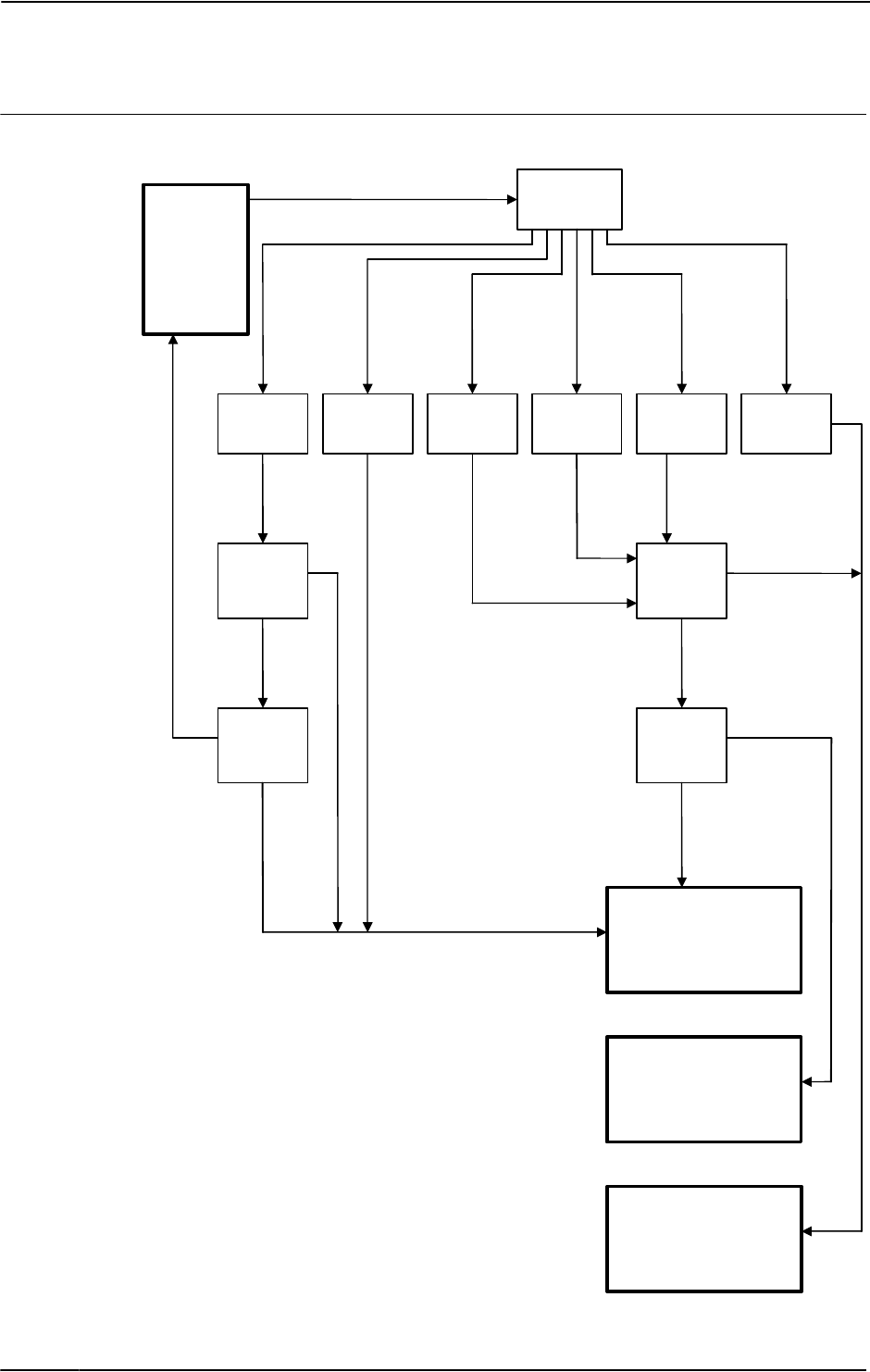
4 Trouble shooting by Unit
4.4.3. Trouble shooting DSQC 662
3HAC020738-001 Revision: K64
© Copyright 2005-2010 ABB. All rights reserved.
Trouble shooting flowchart, DSQC 662
en0800000356
24V not ok
D SQ C 662
1. D C O K L ED
GREEN
PU LSIN G
GREEN
2. C heck U SB
co nnection
6. R eplace D SQ C 662
T he pow er supply unit
w ork s pro perly
RED
PU LSIN G
RED
OFF
3. Fix
co nnection
4. M easure D C
outputs
5. M easure
24V _D C input
and A C O K
T roubleshoot
DSQC 661
PU L SIN G
RED -GREEN
Correct
DC level
W rong
DC level
C onnected
Not
connected Problem
with USB
C onnection ok
USB
C om m unication
er ro r
Low DC
input/output
O utputs low
Firm w are upgrade
error
24V ok
Continued
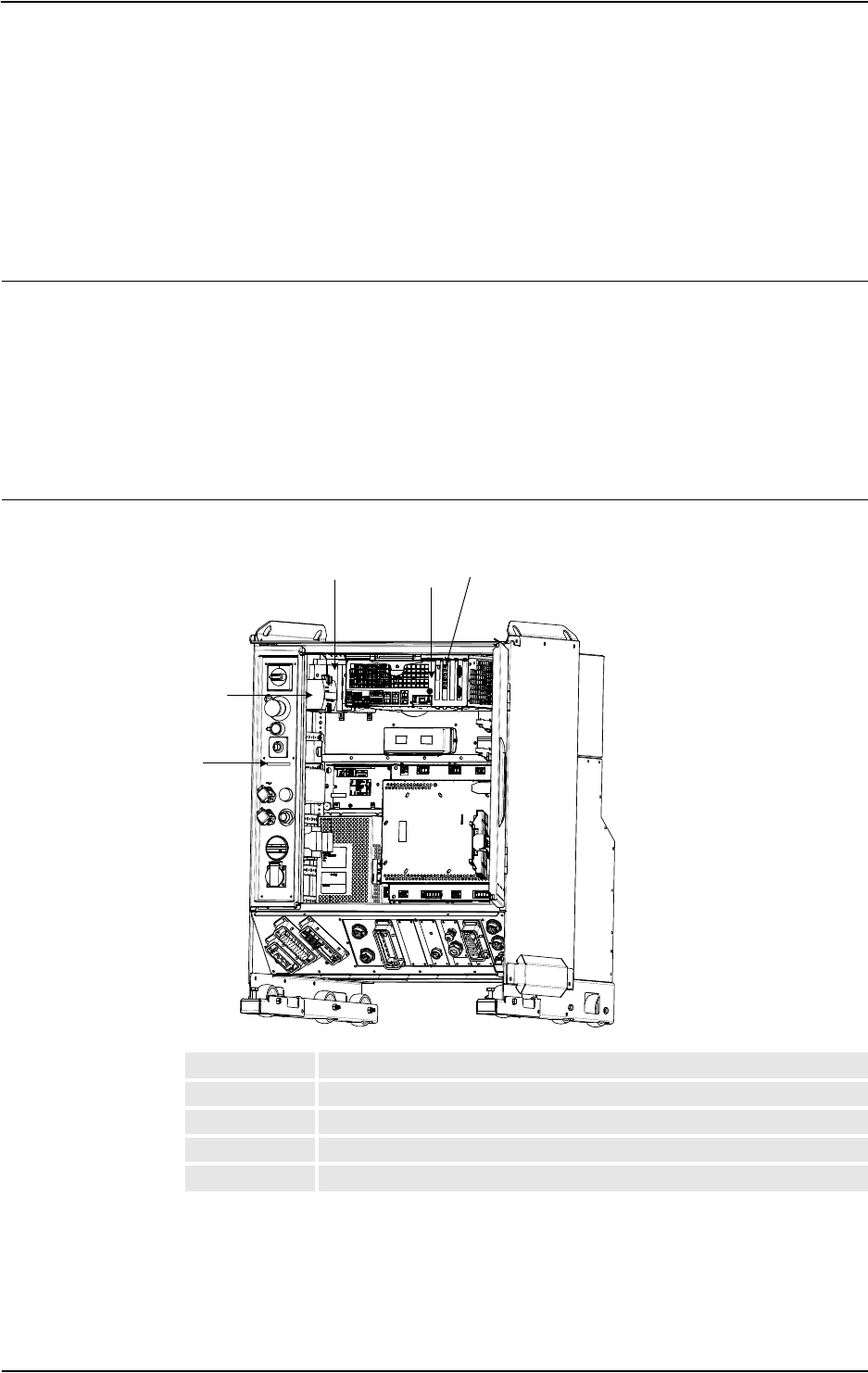
5 Descriptions and background information
5.1.1. LEDs in the Control Module
653HAC020738-001 Revision: K
© Copyright 2005-2010 ABB. All rights reserved.
5 Descriptions and background information
5.1 Indications
5.1.1. LEDs in the Control Module
General
The Control Module features a number of indication LEDs, which provide important
information for trouble shooting purposes. If no LEDs light up at all when switching the
system on, trouble shoot as detailed in section All LEDs are OFF at Controller on page 36
All LEDs on the respective units, and their significance, are described in the following
sections.
All units with LEDs are shown in the illustration below:
LEDs
Single cabinet controller
en1000000039
AEthernet board (any of the four board slots)
BComputer unit (DSQC 639)
CCustomer I/O power supply (up to three units)
DControl module power supply
ELED board
A
B
C
D
E
Continues on next page
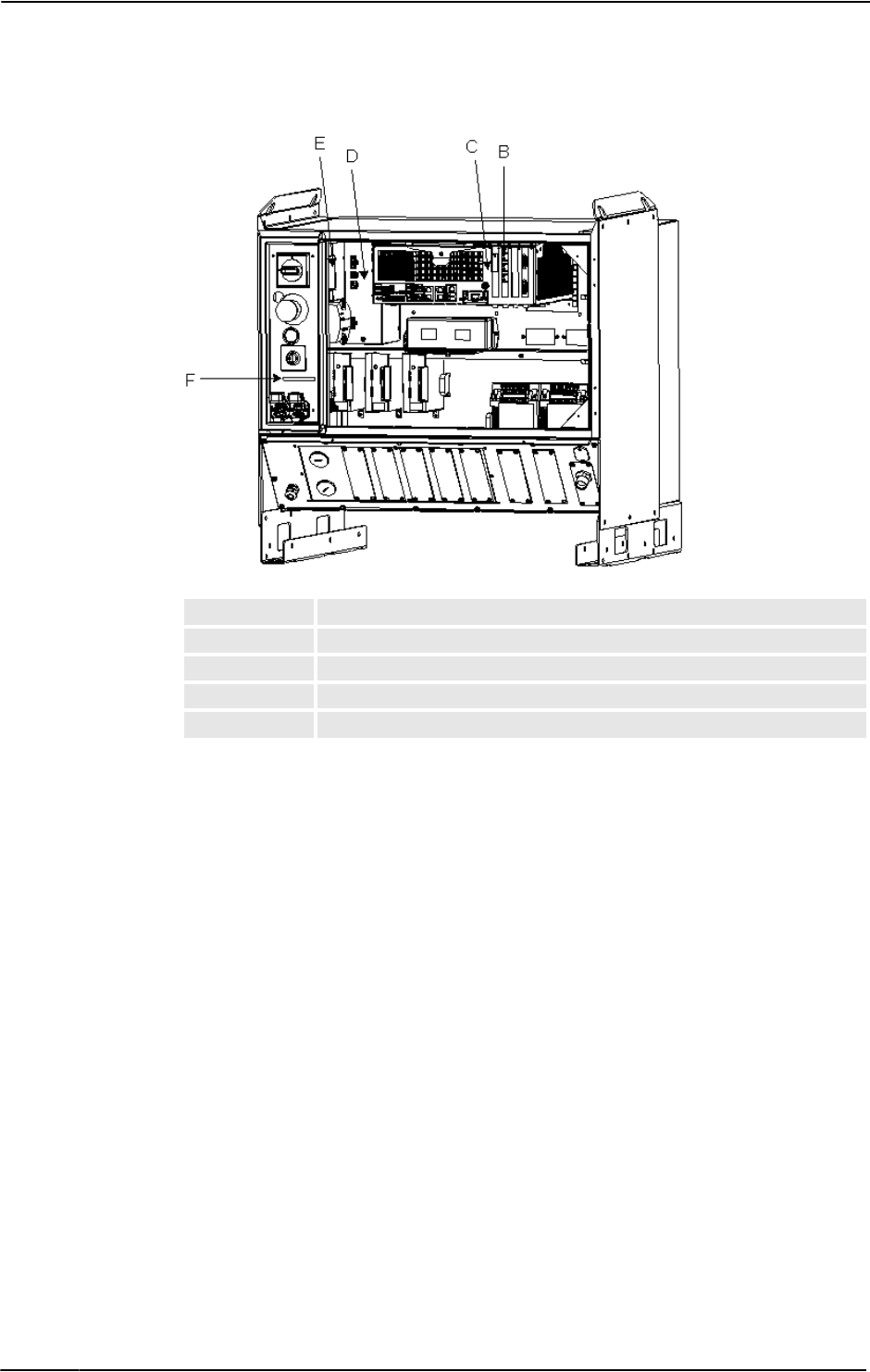
5 Descriptions and background information
5.1.1. LEDs in the Control Module
3HAC020738-001 Revision: K66
© Copyright 2005-2010 ABB. All rights reserved.
Control module for Dual cabinet controller
en1000000035
BEthernet board (any of the four board slots)
CComputer unit (DSQC 639)
DCustomer I/O power supply (up to three units)
EControl module power supply
FLED board
Continued
Continues on next page
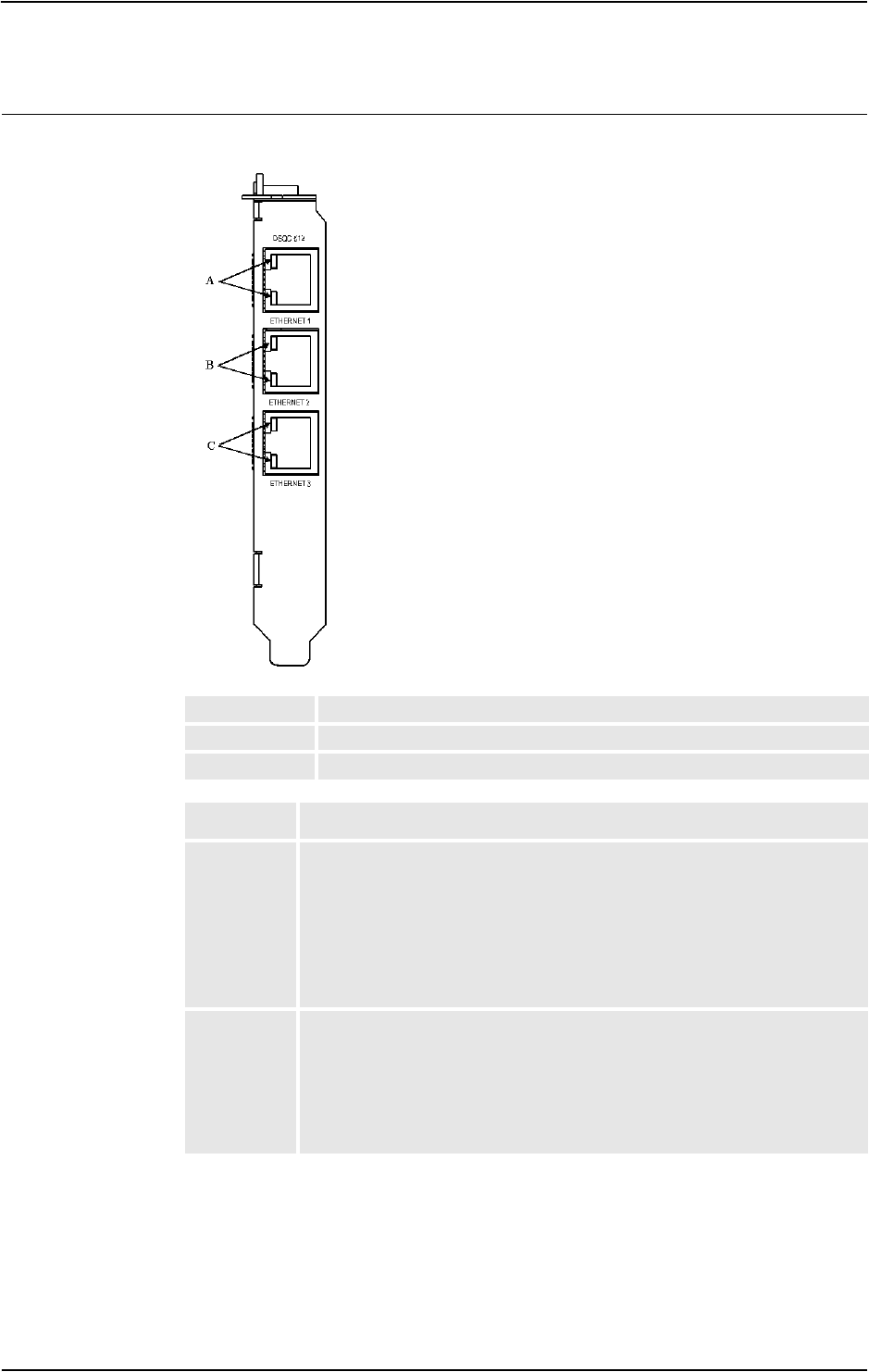
5 Descriptions and background information
5.1.1. LEDs in the Control Module
673HAC020738-001 Revision: K
© Copyright 2005-2010 ABB. All rights reserved.
Ethernet board
The illustration below shows the LEDs on the Ethernet board:
en0400000919
AAXC2 connector LED
BAXC3 connector LED
CAXC4 connector LED
Description Significance
AXC2
connector
LED
Shows the status of Ethernet communication between Axis Computer 2 and
the Ethernet board.
GREEN OFF:10 Mbps data rate has been selected.
GREEN ON:100 Mbps data rate has been selected.
YELLOW flashing: The two units are communicating on the Ethernet channel.
YELLOW steady: A LAN link is established.
YELLOW OFF: A LAN link is not established.
AXC3
connector
LED
Shows the status of Ethernet communication between Axis Computer 3 and
the Ethernet board
See the description above!
AXC4
connector
LED
Shows the status of Ethernet communication between Axis Computer 4 and
the Ethernet board
See the description above!
Continued
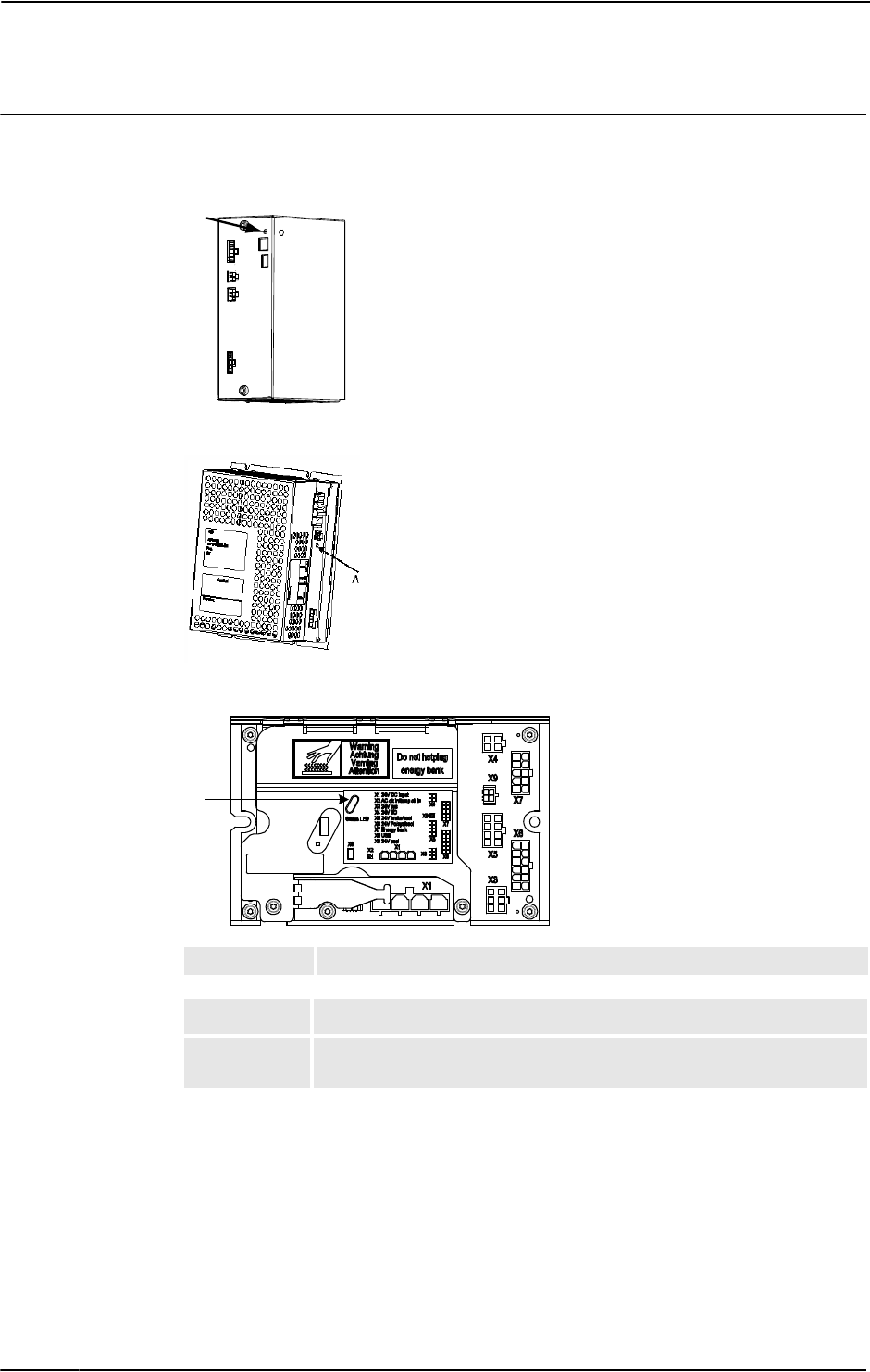
5 Descriptions and background information
5.1.1. LEDs in the Control Module
3HAC020738-001 Revision: K68
© Copyright 2005-2010 ABB. All rights reserved.
Control module Power supply
The illustration below shows the LEDs on the Control module power supply:
DSQC
xx0400001073
DSQC 661
en1000000041
DSQC 662
en1000000042
ADCOK indicator
Description Significance
DCOK indicator GREEN: When all DC outputs are above the specified minimum levels.
OFF: When one or more DC output/s below the specified minimum level.
A
A
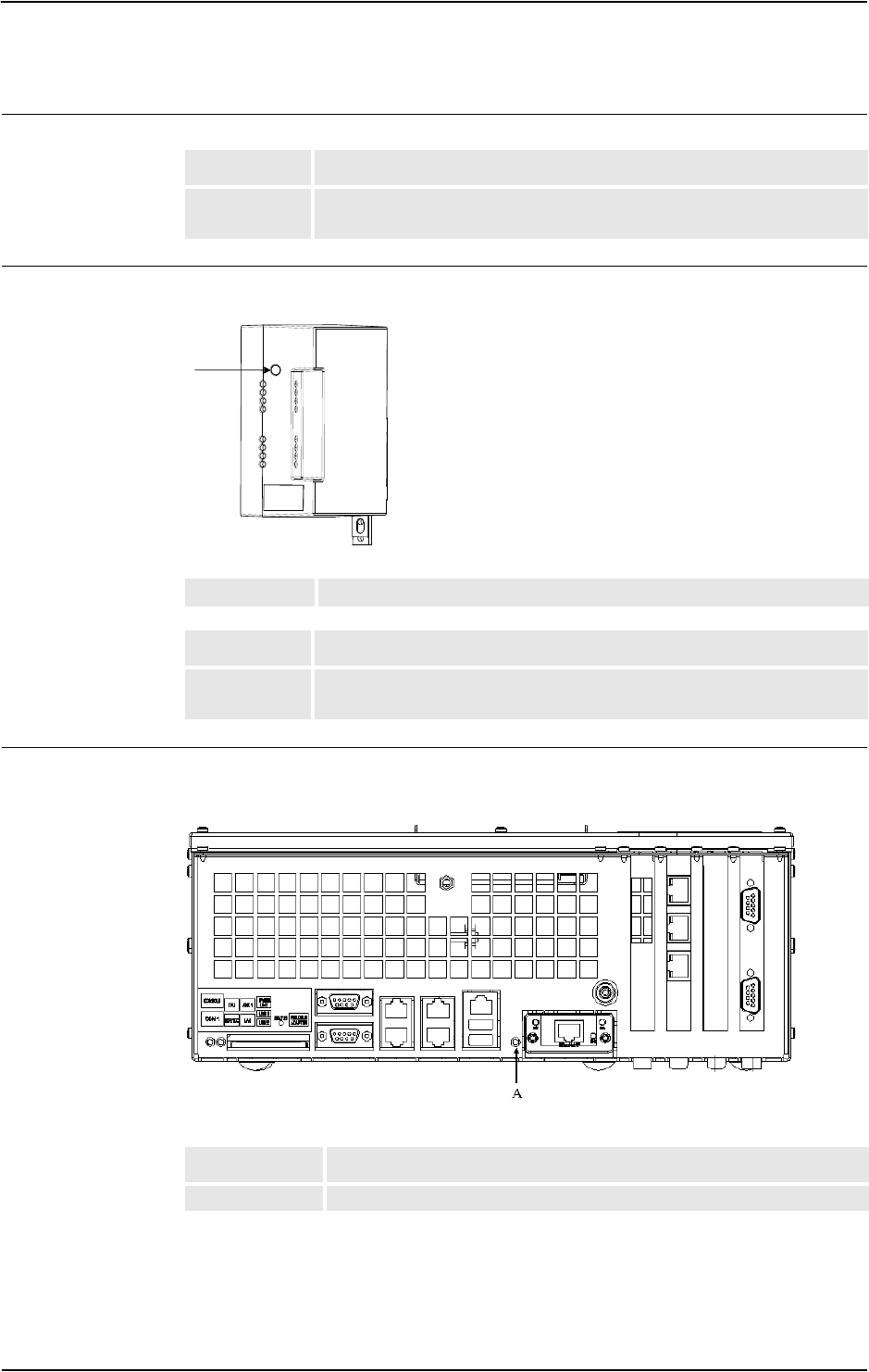
5 Descriptions and background information
5.1.1. LEDs in the Control Module
693HAC020738-001 Revision: K
© Copyright 2005-2010 ABB. All rights reserved.
Control module Power distribution board
Customer Power Supply
The illustration below shows the LEDs on the Customer Power Supply Module:
en1000000037
Computer unit
The illustration below shows the LEDs on the Computer unit:
en1000000040
Description Significance
DCOK indicator GREEN: When DC output is above the specified minimum level.
OFF: When the DC output below the specified minimum level.
ADCOK indicator
Description Significance
DCOK indicator GREEN: When all DC outputs are above the specified minimum levels.
OFF: When one or more DC output/s below the specified minimum level.
A
Description Significance
Status LED Shows the status of the communication on the computer unit
Continues on next page
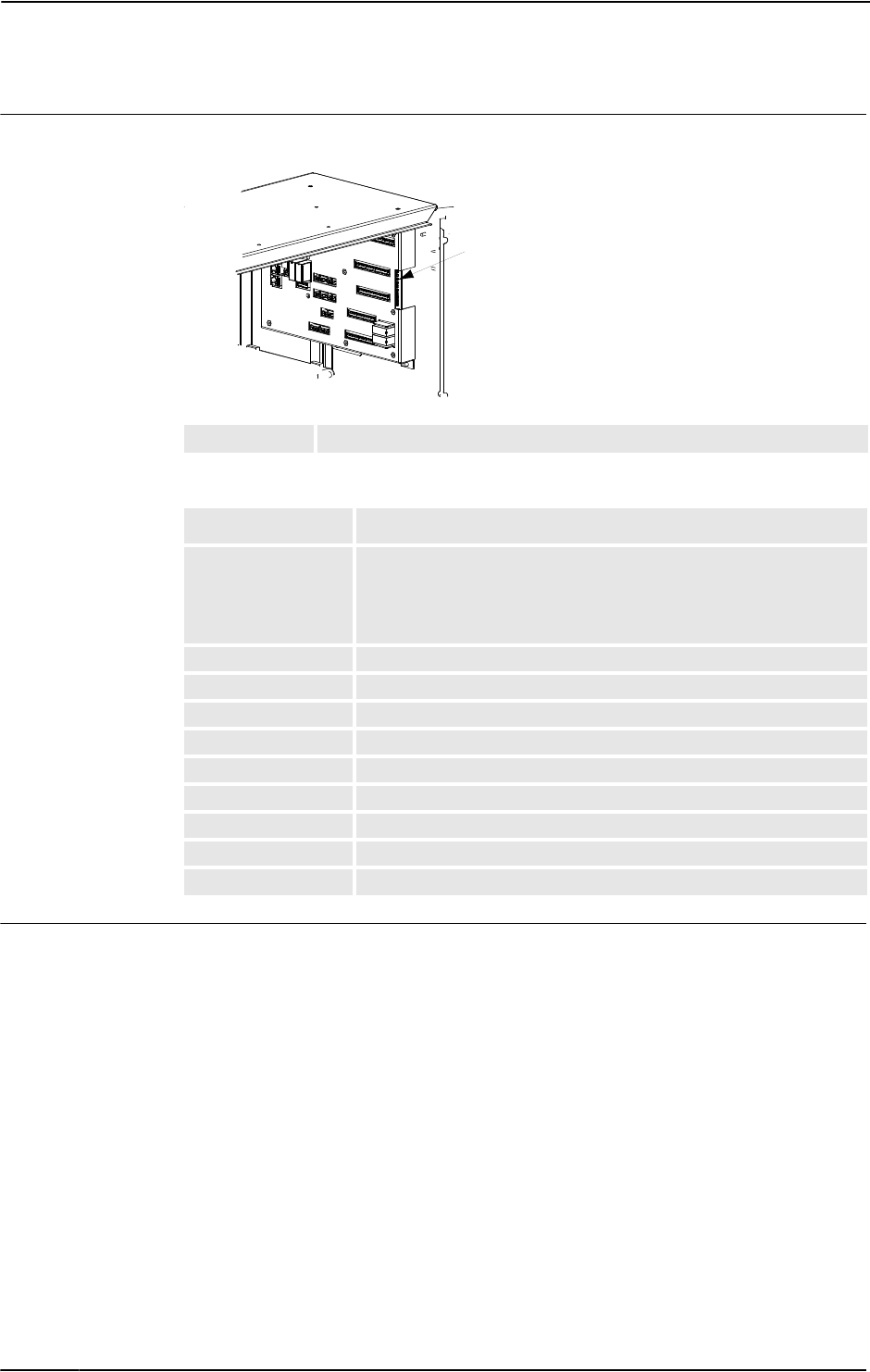
5 Descriptions and background information
5.1.1. LEDs in the Control Module
3HAC020738-001 Revision: K70
© Copyright 2005-2010 ABB. All rights reserved.
Panel board
The illustration below shows the LEDs on the Panel board:
dummy
The panel board LEDs are described from top to bottom below:
LED board
The function of the LEDs on the LED board are identical to those on the Panel board as
described above.
Should the LED board not be working, but the Panel board is, the problem is the
communication between these boards or the LED board itself. Check the cabling between
them.
APanel board LEDs
Description Significance
Status LED GREEN flashing: serial communication error.
GREEN steady: no errors found and system is running.
RED flashing: system is in power up/selftest mode.
RED steady: other error than serial communication error.
Indication LED, ES1 YELLOW when Emergency stop chain 1 closed
Indication LED, ES2 YELLOW when Emergency stop chain 2 closed
Indication LED, GS1 YELLOW when General stop switch chain 1 closed
Indication LED, GS2 YELLOW when General stop switch chain 2 closed
Indication LED, AS1 YELLOW when Auto stop switch chain 1 closed
Indication LED, AS2 YELLOW when Auto stop switch chain 2 closed
Indication LED, SS1 YELLOW when Superior stop switch chain 1 closed
Indication LED, SS2 YELLOW when Superior stop switch chain 2 closed
Indication LED, EN1 YELLOW when ENABLE1=1 and RS-communication is OK
A
Continued
Continues on next page
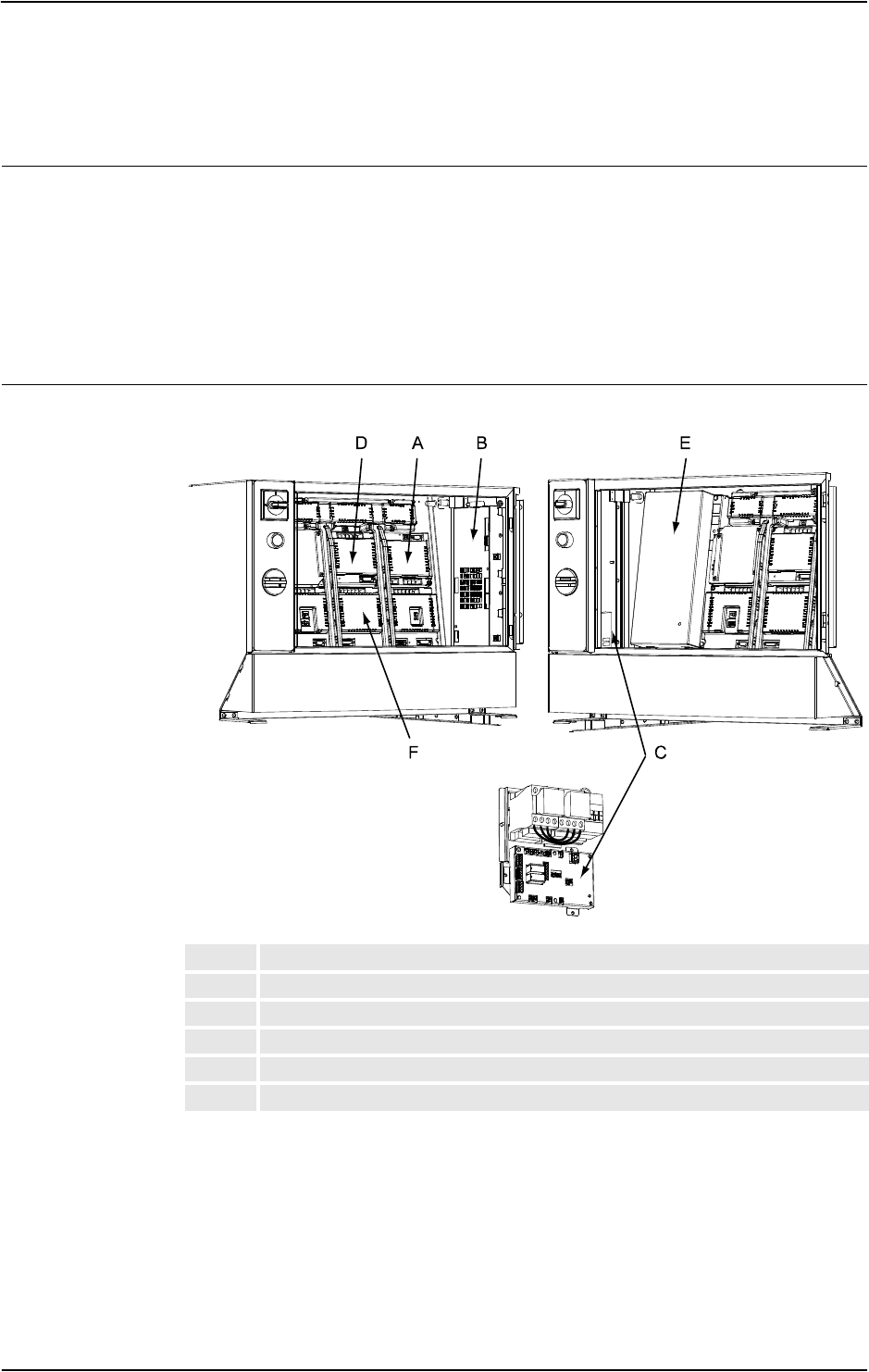
5 Descriptions and background information
5.1.2. LEDs in the Drive Module for Drive System 04
713HAC020738-001 Revision: K
© Copyright 2005-2010 ABB. All rights reserved.
5.1.2. LEDs in the Drive Module for Drive System 04
General
The Drive Module features a number of indication LEDs, which provide important
information for trouble shooting purposes. If no LEDs light up at all when switching the
system on, trouble shoot as detailed in section All LEDs are OFF at Controller on page 36.
All LEDs on the respective units, and their significance, are described in the following
sections.
All units with LEDs are shown in the illustration below:
LEDs
xx0400001084
ARectifier
BAxis Computer
CContactor interface board
DSingle servo drive
EDrive Module Power Supply
FMain drive unit
Continued
Continues on next page
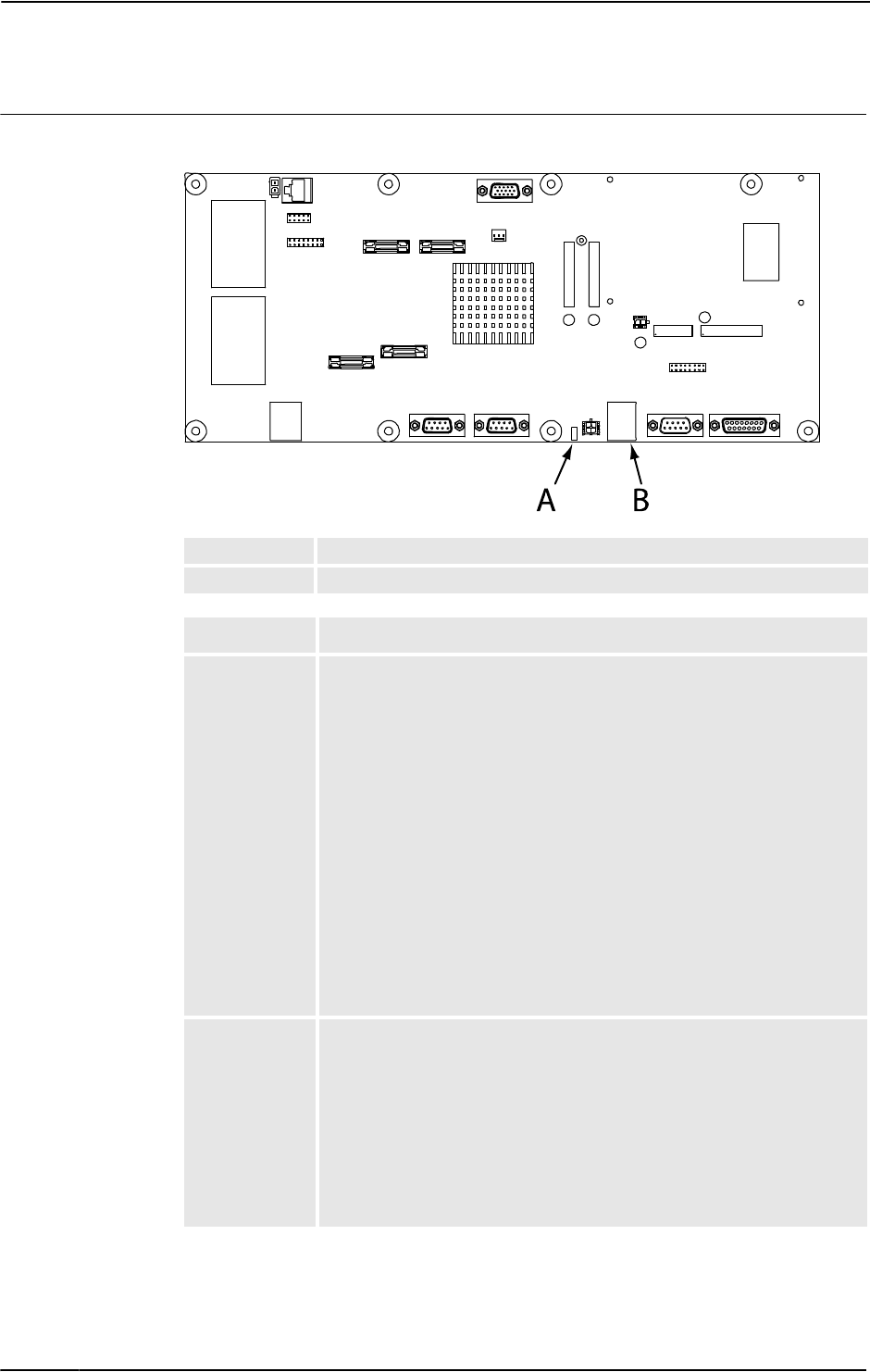
5 Descriptions and background information
5.1.2. LEDs in the Drive Module for Drive System 04
3HAC020738-001 Revision: K72
© Copyright 2005-2010 ABB. All rights reserved.
Axis computer
The illustration below shows the LEDs on the Axis computer:
xx0300000023
AStatus LED
BEthernet LEDs
Description Significance
Status LED Normal sequence during startup:
1. RED steady: Default at power-up.
2. GREEN flashing: Establish connection to main computer, retrieve
IP address and download the application file.
3. GREEN steady. Start-up sequence ready. Application is running.
The following indicates errors:
• RED steady (forever): The axis computer has failed to initialize
basic hardware.
• RED (long) -> GREEN flashing (short) -> RED (long) -> GREEN
flashing (short) -> ... : Missing connection to main computer.
Possible cable problem.
• RED (short) -> GREEN flashing (long) -> RED (short) -> GREEN
flashing (long) -> ... : Connection established with main computer.
Possible RobotWare problem in main computer.
• GREEN flashing (forever): Possible cable or RobotWare problem in
main computer.
Ethernet LED Shows the status of Ethernet communication between an additional axis
computer (2, 3 or 4) and the Ethernet board.
• GREEN OFF:10 Mbps data rate has been selected. This is an error
state.
• GREEN ON:100 Mbps data rate has been selected.
• YELLOW flashing: The two units are communicating on the
Ethernet channel.
• YELLOW steady: A LAN link is established.
• YELLOW OFF: A LAN link is not established.
Continued
Continues on next page
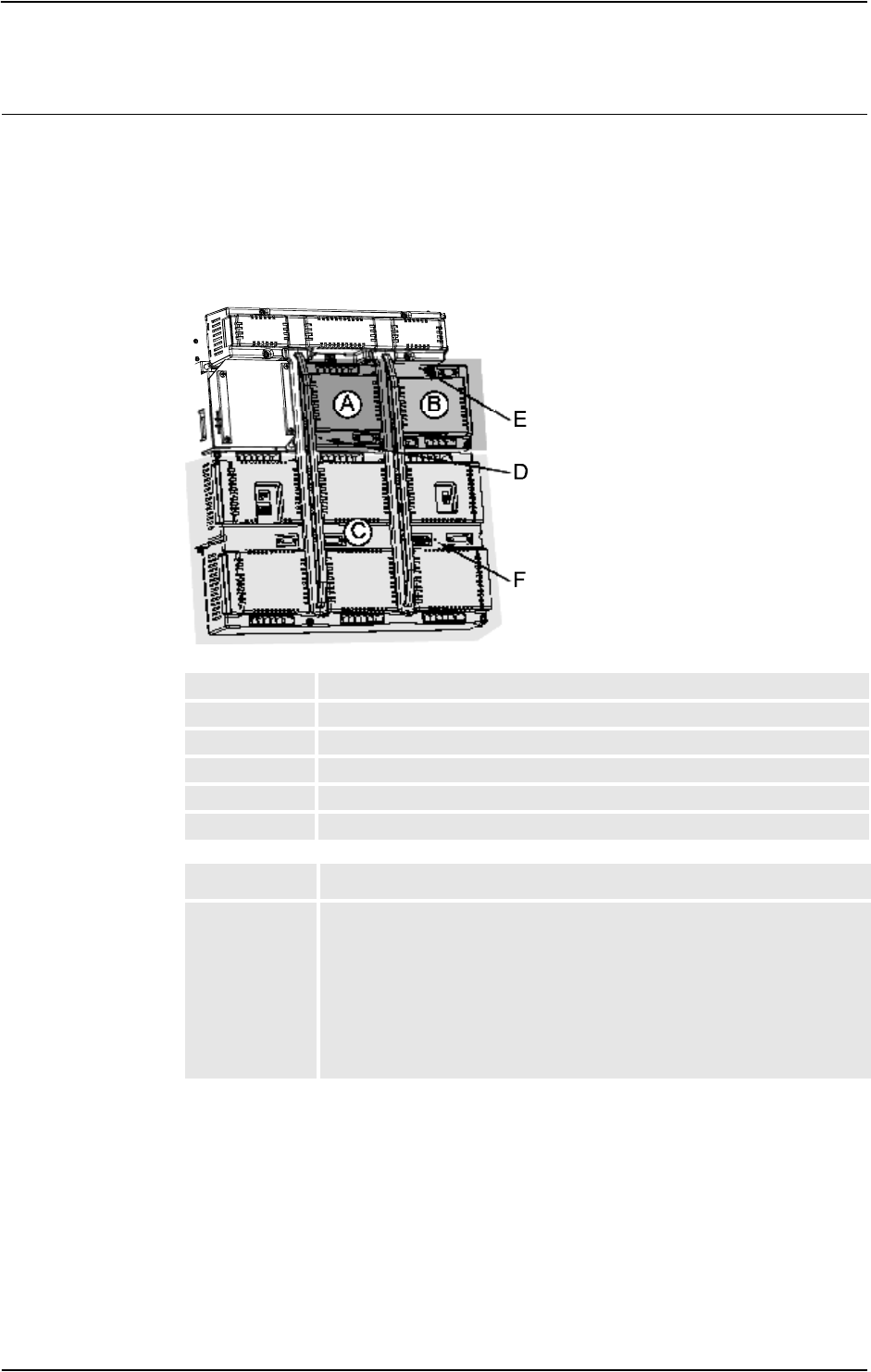
5 Descriptions and background information
5.1.2. LEDs in the Drive Module for Drive System 04
733HAC020738-001 Revision: K
© Copyright 2005-2010 ABB. All rights reserved.
Main drive unit, single drive unit and rectifier unit
The illustration below shows the indication LEDs on the main drive unit, single drive unit and
rectifier unit.
NOTE that there are two types of main drive units: a six unit drive and a three unit drive which
are both used to power a six axes robot. Shown in the illustration is a six unit drive. The three
unit drive is half the size of the six unit drive, but the indication LED is positioned in the same
place.
xx0400001089
ASingle drive unit
BRectifier unit
CMain drive unit
DIndication LED, single servo drive
EIndication LED, rectifier unit
FIndication LED, main drive unit
Description Significance
Indication LEDs
D, E and F
GREEN flashing: Internal function is OK and there is a malfunction in the
interface to the unit. The unit does not need to be replaced.
GREEN steady: Program loaded successfully, unit function OK and all
interfaces to the units is fully functional.
RED steady: Permanent internal fault detected. The LED is to have this
mode in case of failure at internal self test at start-up, or in case of detected
internal failure state in running system. The unit probably needs to be
replaced.
Continued
Continues on next page
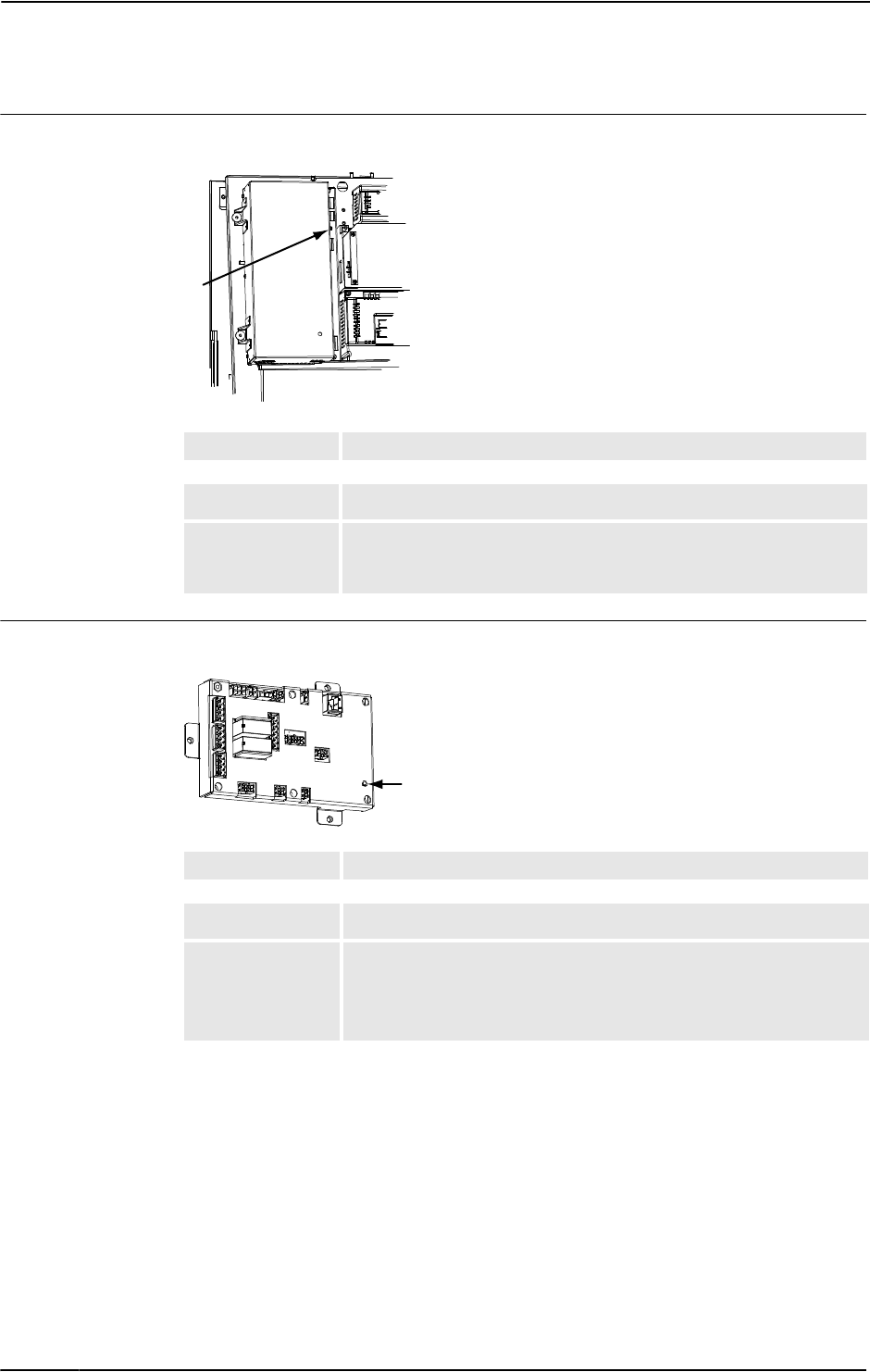
5 Descriptions and background information
5.1.2. LEDs in the Drive Module for Drive System 04
3HAC020738-001 Revision: K74
© Copyright 2005-2010 ABB. All rights reserved.
Drive Module Power Supply
The illustration below shows the LEDs on the Drive Module power supply:
xx0400001090
Contactor interface board
The illustration below shows the LEDs on the Contractor interface board:
xx0400001091
ADCOK indicator
Description Significance
DCOK indicator GREEN: When all DC outputs are above the specified minimum levels.
OFF: When one or more DC output/s below the specified minimum
level.
A
AStatus LED
Description
Status LED GREEN flashing: serial communication error.
GREEN steady: no errors found and system is running.
RED flashing: system is in power up/selftest mode.
RED steady: other error than serial communication error.
A
Continued
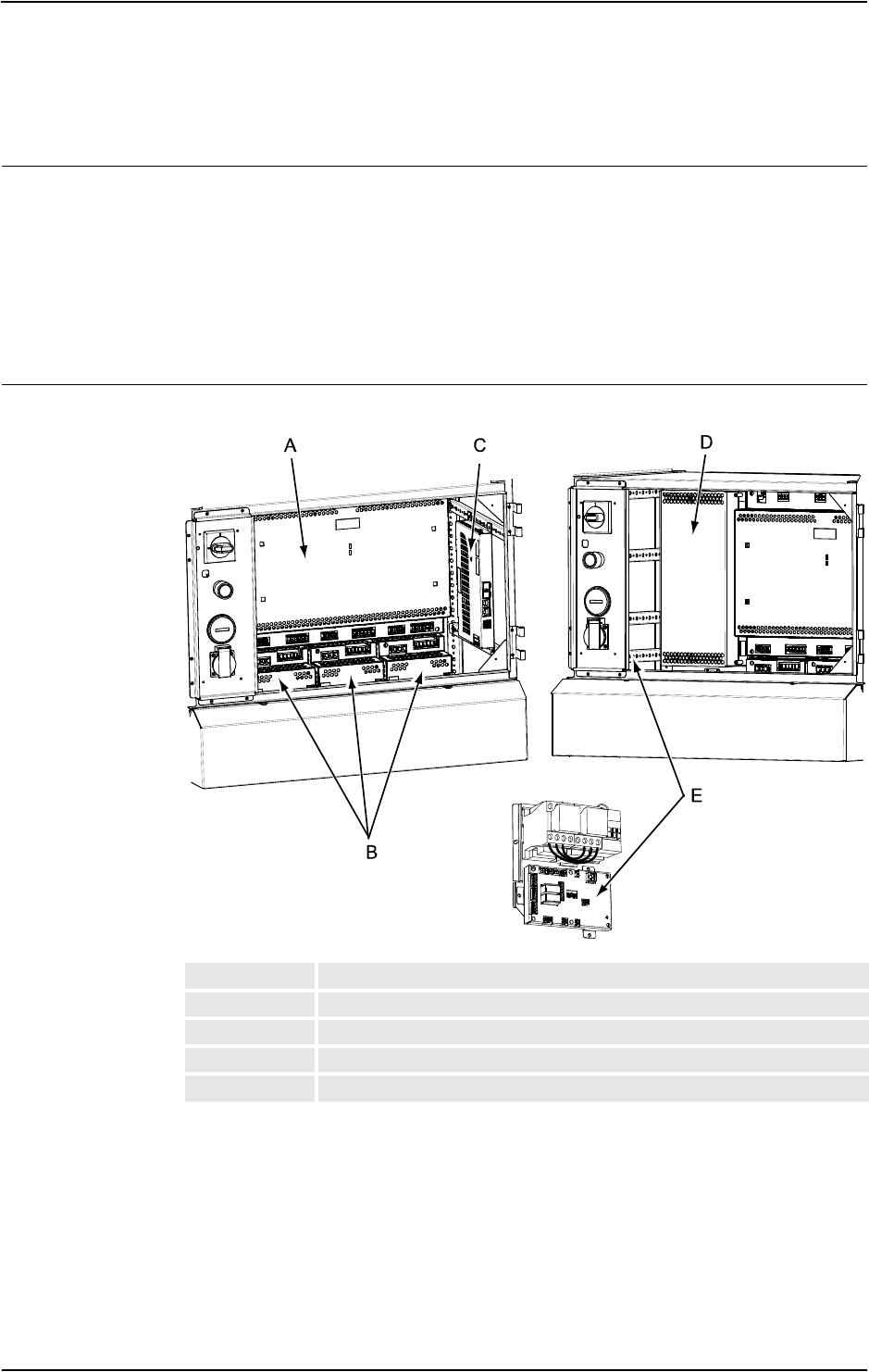
5 Descriptions and background information
5.1.3. LEDs in the Drive Module for Drive System 09
753HAC020738-001 Revision: K
© Copyright 2005-2010 ABB. All rights reserved.
5.1.3. LEDs in the Drive Module for Drive System 09
General
The Drive Module features a number of indication LEDs, which provide important
information for trouble shooting purposes. If no LEDs light up at all when switching the
system on, trouble shoot as detailed in section All LEDs are OFF at Controller on page 36.
All LEDs on the respective units, and their significance, are described in the following
sections.
All units with LEDs are shown in the illustration below:
Units
xx0800000484
AMain Drive Unit
BAdditional Drive Units
CAxis computer
DDrive Module power supply
EContactor interface board
Continues on next page
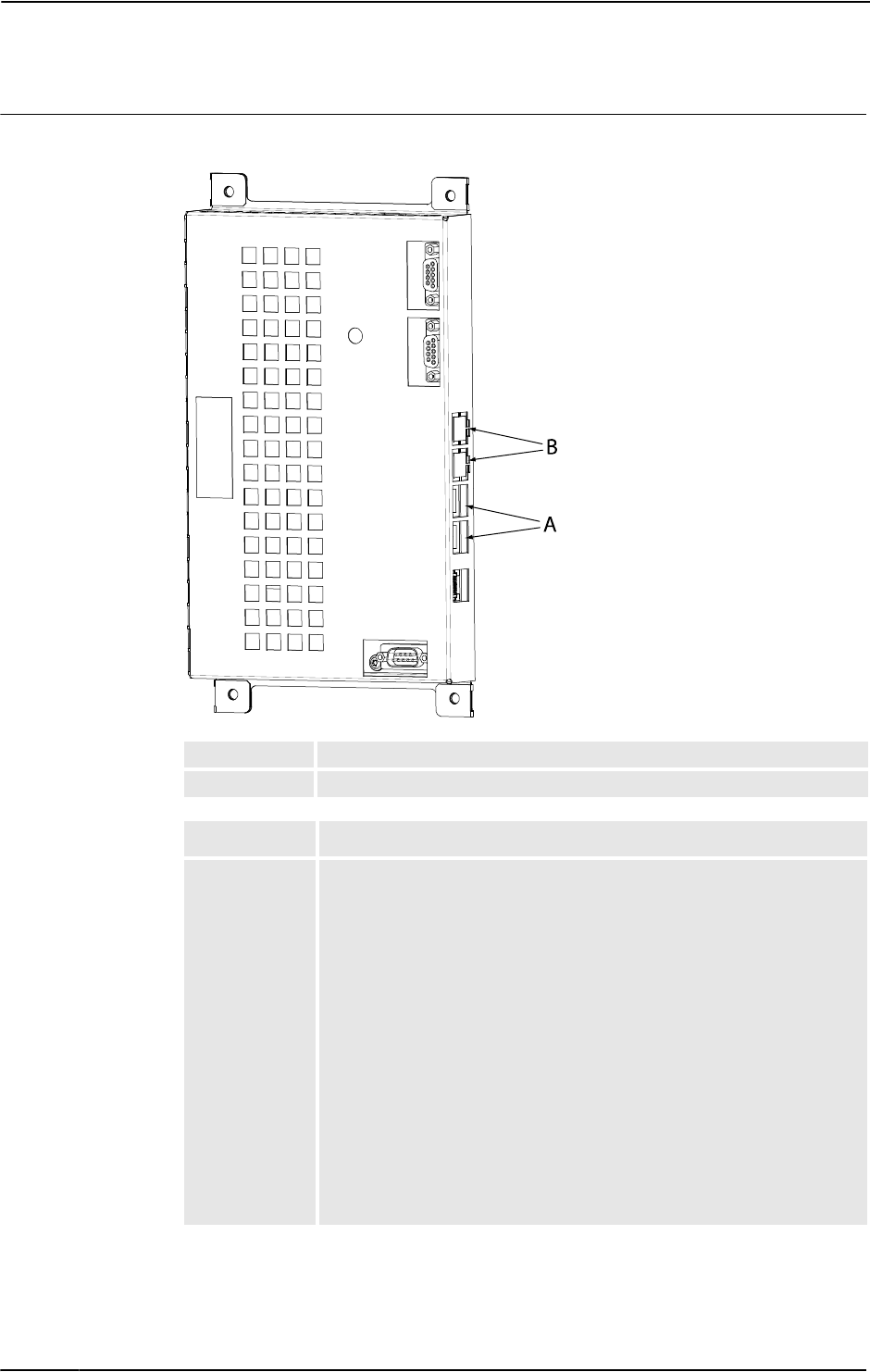
5 Descriptions and background information
5.1.3. LEDs in the Drive Module for Drive System 09
3HAC020738-001 Revision: K76
© Copyright 2005-2010 ABB. All rights reserved.
Axis computer
The illustration below shows the LEDs on the Axis computer:
xx0800000485
AStatus LED
BEthernet LED
Description Significance
Status LED Normal sequence during startup:
1. RED steady: Default at power-up.
2. RED flashing: Establish connection to main computer and load
program to axis computer.
3. GREEN flashing: Start-up of axis computer program and connect
peripheral units.
4. GREEN steady. Start-up sequence ready. Application is running.
The following indicates errors:
• DARK: No power to axis computer or internal error (hardware/
firmware).
• RED steady (forever): The axis computer has failed to initialize
basic hardware.
• RED flashing (forever): Missing connection to main computer, main
computer start-up problem or RobotWare installation problem.
• GREEN flashing (forever): Missing connections to peripheral units
or RobotWare start-up problem.
Continued
Continues on next page
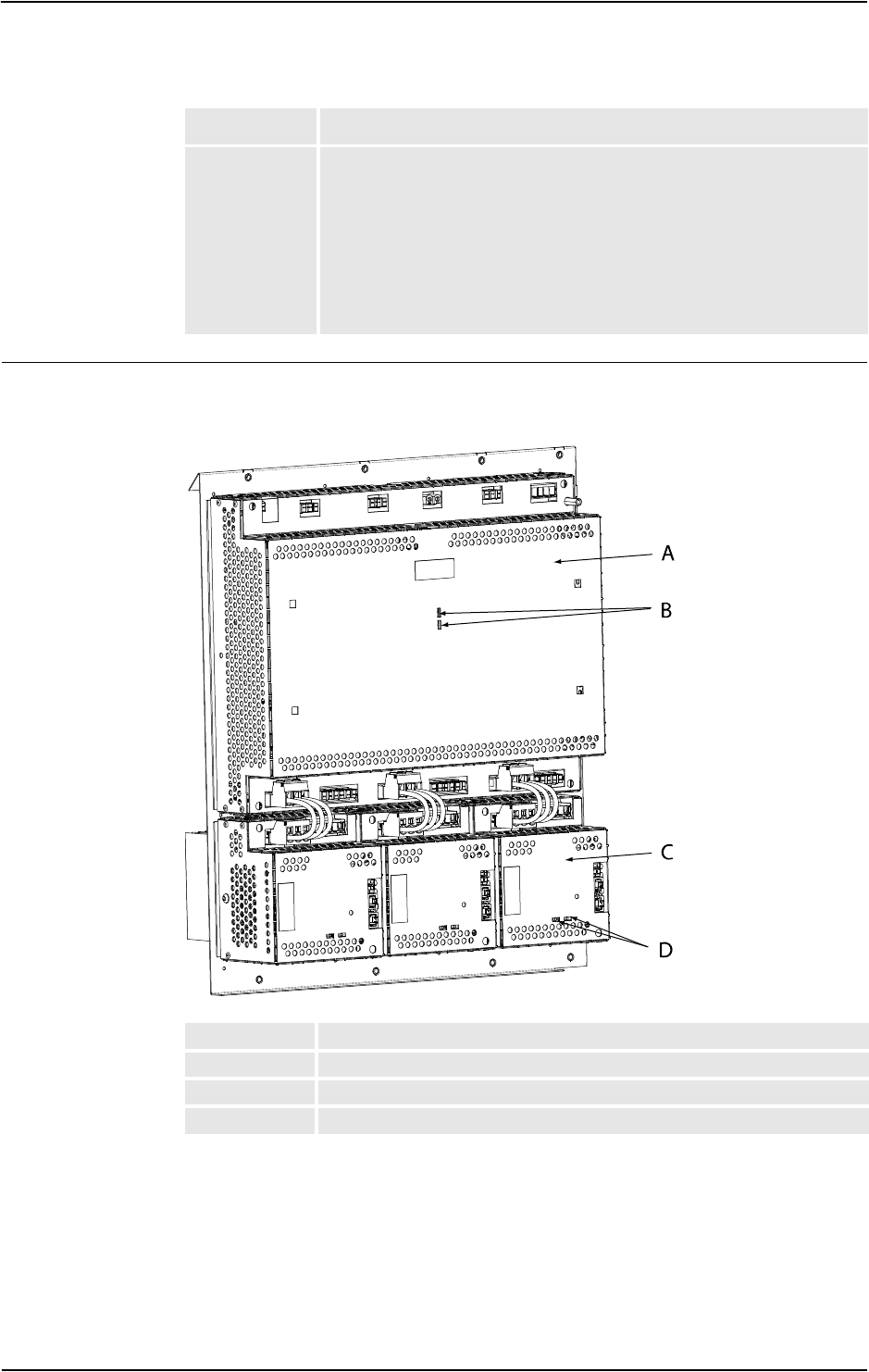
5 Descriptions and background information
5.1.3. LEDs in the Drive Module for Drive System 09
773HAC020738-001 Revision: K
© Copyright 2005-2010 ABB. All rights reserved.
Main Drive Unit and Additional Drive Unit
The illustration below shows the indication LEDs on the Main Drive Unit and Additional
Drive Units.
xx0800000486
Ethernet LED Shows the status of Ethernet communication between an additional axis
computer (2, 3 or 4) and the Ethernet board.
• GREEN OFF:10 Mbps data rate has been selected.
• GREEN ON:100 Mbps data rate has been selected.
• YELLOW flashing: The two units are communicating on the
Ethernet channel.
• YELLOW steady: A LAN link is established.
• YELLOW OFF: A LAN link is not established.
Description Significance
AMain Drive Unit
BMain Drive Unit Ethernet LEDs
CAdditional Drive Unit
DAdditional Drive Unit Ethernet LEDs
Continued
Continues on next page
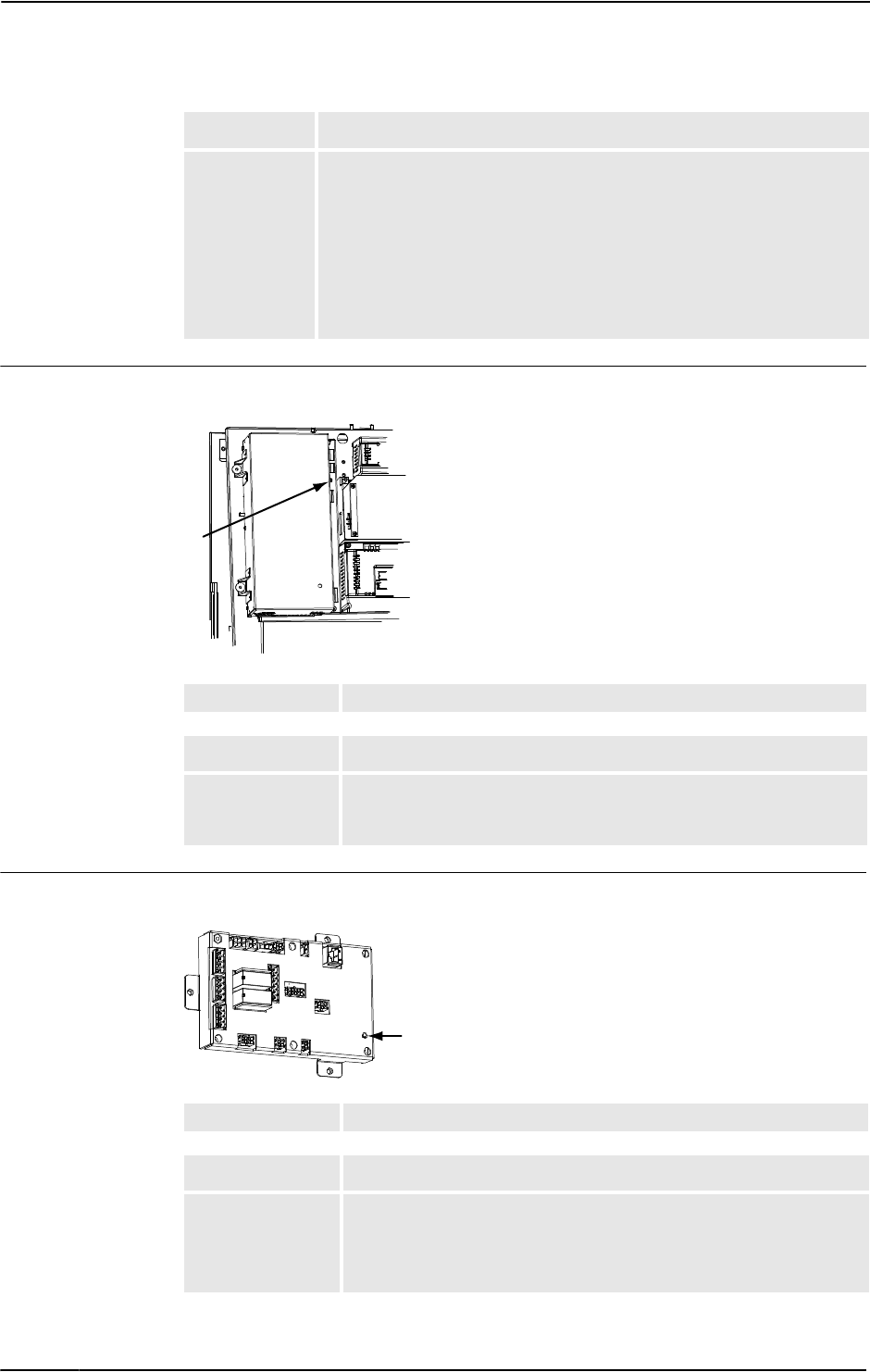
5 Descriptions and background information
5.1.3. LEDs in the Drive Module for Drive System 09
3HAC020738-001 Revision: K78
© Copyright 2005-2010 ABB. All rights reserved.
Drive Module Power Supply
The illustration below shows the LEDs on the Drive Module power supply:
xx0400001090
Contactor interface board
The illustration below shows the LEDs on the Contractor interface board:
xx0400001091
Description Significance
Ethernet LEDs
(B and D)
Shows the status of Ethernet communication between an additional axis
computer (2, 3 or 4) and the Ethernet board.
• GREEN OFF:10 Mbps data rate has been selected.
• GREEN ON:100 Mbps data rate has been selected.
• YELLOW flashing: The two units are communicating on the
Ethernet channel.
• YELLOW steady: A LAN link is established.
• YELLOW OFF: A LAN link is not established.
ADCOK indicator
Description Significance
DCOK indicator GREEN: When all DC outputs are above the specified minimum levels.
OFF: When one or more DC output/s below the specified minimum
level.
A
AStatus LED
Description
Status LED GREEN flashing: serial communication error.
GREEN steady: no errors found and system is running.
RED flashing: system is in power-up/self-test mode.
RED steady: other error than serial communication error.
A
Continued

6 Trouble shooting by Event log
793HAC020738-001 Revision: K
© Copyright 2005-2010 ABB. All rights reserved.
6 Trouble shooting by Event log
10002, Program pointer has been reset
Description
The program pointer of task arg has been reset.
Consequences
When started, program execution will start on the first instruction of
the task's entry routine. NOTE that the manipulator may move to
unexpected position when restarted!
Probable causes
The operator has probably requested this action manually.
10009, Work memory full
Description
The task arg has no memory left for new RAPID instructions or data.
Recommended actions
Save the program and then restart the system.
10010, Motors OFF state
Description
The system is in the Motors OFF state. It enters this state either after
switching from Manual mode to Automatic, or after the Motors ON
circuit has been opened during program execution.
Consequences
No operation will be possible until after closing the Motors ON circuit.
The manipulator's axes are meanwhile held in position by mechanical
holding brakes.
10011, Motors ON state
Description
The system is in the Motors ON state.
Consequences
The Motors ON circuit has been closed., enabling power supply to the
manipulator's motors. Normal operation may be resumed.
10012, Safety guard stop state
Description
The system is in the Guard stop state. It enters this state either after
switching from Automatic mode to Manual, or after the Motors ON
circuit has been opened by an Emergency Stop, General Stop,
Automatic Stop or Superior Stop.
Consequences
No operation will be possible until after closing the Motors ON circuit.
The manipulator's axes are meanwhile held in position by mechanical
holding brakes.
Probable causes
Any safety device connected to the system's stop inputs have been
opened. These are shown in the Circuit Diagram.
Recommended actions
1. Check which safety device caused the stop.
2. Close the device.
3. To resume operation, switch the system back to state Motors ON.
10013, Emergency stop state
Description
The system is in the Emergency stop state, since the Motors ON circuit
has been opened by an Emergency Stop device.
Consequences
All program execution and thus robot actions are immediately halted.
The robot axes are meanwhile held in position by mechanical holding
brakes.
Probable causes
Any emergency stop device connected to the emergency stop input
have been opened. These may be internal (on the controller or on the
teach pendant) or external (devices connected by the system builder).
The internal devices are shown in the Circuit Diagram.
Recommended actions
1) Check which emergency stop device caused the stop.
2) Close/reset the device.
3) To resume operation, switch the system back to state Motors ON by
pressing this button on the Control Module.
10014, System failure state
Description
Execution of all NORMAL tasks has been stopped due to malfunction.
Consequences
No start of program execution or manual manipulator jogging will be
possible until after the system has been restarted.
Probable causes
A large number of malfunctions may cause this condition. Please use
the teach pendant or RobotStudio to check other event log messages
for events occurring at this time!
Recommended actions
1. Determine what caused the stop by studying the event log.
2. Remedy the fault.
3. Restart the system as detailed in the Operator's Manual.
10015, Manual mode selected
Description
The system is in the Manual mode.
Continues on next page

6 Trouble shooting by Event log
80 3HAC020738-001 Revision: K
© Copyright 2005-2010 ABB. All rights reserved.
Consequences
Programmed operation is possible, but only with a max. speed of 250
mm/s. The manipulator may also be jogged manually after pressing the
enabling device on the teach pendant.
10016, Automatic mode requested
Description
The system has been ordered to go to the Automatic mode.
Consequences
The system will go to the Automatic mode after confirmed from teach
pendant.
10017, Automatic mode confirmed
Description
The system is in the Automatic mode.
Consequences
The enabling device is disconnected. The robot can move without
human intervention.
10018, Manual mode full speed requested
Description
The system has been ordered to go to the Manual mode without any
speed restraints.
Consequences
The system will go to the Manual mode full speed.
10019, Manual mode full speed confirmed
Description
The system is in the Manual mode without any speed restraints.
Consequences
Programmed operation is possible while pressing the hold-to-run
button on the teach pendant. The manipulator may also be jogged
manually after pressing the enabling device on the teach pendant.
10020, Execution error state
Description
The program execution in task arg has been stopped due to a
spontaneous error.
Consequences
No program execution will be possible until the error has been
removed.
Probable causes
A large number of malfunctions may cause this condition. Please use
the teach pendant or RobotStudio to check other event log messages
for events occurring at this time!
Recommended actions
1. Determine what caused the stop by studying the event log.
2. Remedy the fault.
3. If neccesary, move Program Pointer to main before pressing start
button.
10021, Execution error reset
Description
The program execution in task arg has left a spontaneous error state.
10024, Collision triggered
Description
Some mechanical part of the manipulator has collided with a piece of
fixed equipment in the cell.
Consequences
Manipulator movement is interrupted and program execution is
stopped.
10025, Collision confirmed
Description
The collision detection has been confirmed.
Recommended actions
10026, Collision retraction
Description
The manipulator has attempted to back away from the obstacle, into
which it collided, and succeeded.
Consequences
The system is ready to go back to normal operation.
10027, Collision retraction fail
Description
The manipulator has attempted to back away from the obstacle, into
which it collided, and failed.
Consequences
The system is NOT ready to go back to normal operation.
Probable causes
This may be caused by the robot being stuck to the object into which it
collided.
Recommended actions
1) Go to Manual Mode.
2) Manually run the robot away from the object.
3) Resume operation by restarting the program.
Continued
Continues on next page

6 Trouble shooting by Event log
813HAC020738-001 Revision: K
© Copyright 2005-2010 ABB. All rights reserved.
10030, All axes commutated
Description
After checking, the system has found all manipulator axes to be
commutated.
Consequences
Normal operation is possible.
10031, All axes calibrated
Description
After checking, the system has found all manipulator axes to be
calibrated.
Consequences
Normal operation is possible.
10032, All revolution counters updated
Description
After checking, the system has found all revolution counters for all
manipulator axes to be updated.
Consequences
Normal operation is possible.
10033, All axes synchronized
Description
After checking, the system has found all manipulator axes to be
synchronized.
Consequences
Normal operation is possible.
10034, Axis not commutated
Description
After checking, the system has found that one or more manipulator
axes are not commutated.
Consequences
To enable operation, all manipulator axes must be commutated.
Probable causes
The manipulator drive motor and related units may have been altered,
e.g. after replacing a faulty unit.
Recommended actions
Commutate the manipulator axes as detailed in the manipulator
Product Manual.
10035, Axis not calibrated
Description
After checking, the system has found that one or more manipulator
axes are not calibrated.
Consequences
To enable operation, all manipulator axes must be calibrated.
Probable causes
The manipulator drive motor and related units may have been altered,
e.g. after replacing a faulty unit.
Recommended actions
Calibrate the manipulator axes as detailed in the manipulator Product
Manual.
10036, Revolution counter not updated
Description
After checking, the system has found that the revolution counters of
one or more manipulator axes are not updated.
Consequences
To enable operation, the revolution counters of all manipulator axes
must be updated.
Probable causes
The manipulator drive motor and related units may have been altered,
e.g. after replacing a faulty unit.
Recommended actions
Update the revolution counters of all manipulator axes as detailed in
the manipulator Product Manual.
10037, Axis not synchronized
Description
After checking, the system has found that one or more manipulator
axes are not synchronized.
Consequences
To enable operation, all manipulator axes must be synchronized.
Probable causes
The manipulator drive motor and related units may have been altered,
e.g. after replacing a faulty unit.
Recommended actions
Synchronize the manipulator axes as detailed in the manipulator
Product Manual.
10038, SMB memory is OK
Description
During startup, the system has found that all data on the Serial
Measurement Board (SMB) is OK.
Continued
Continues on next page

6 Trouble shooting by Event log
82 3HAC020738-001 Revision: K
© Copyright 2005-2010 ABB. All rights reserved.
Consequences
Operation is possible.
10039, SMB memory is not OK
Description
During startup, the system has found that data in the Serial
Measurement Board (SMB) memory is not OK.
Consequences
All data must be OK before automatic operation is possible. Manually
jogging the robot is possible.
Probable causes
There are differences between the data stored on the SMB and the data
stored in the controller. This may be due to replacement of SMB,
controller or both.
Recommended actions
1) Update the Serial Measurement Board data as detailed in Operator's
Manual, IRC5.
10040, Program loaded
Description
A program or program module has been loaded into task arg. After
loading, arg bytes memory remain. The size of the loaded program is
arg.
10041, Program deleted
Description
A program or program module was deleted from task arg.
Consequences
If the deleted program contained the task entry routine, the program
will no longer be executable.
Probable causes
The program may have been removed manually.
Recommended actions
1) Define an entry routine in one of the task's remaining programs, or:
2) Load a program containing an entry routine.
10042, Axis recalibrated
Description
Fine calibration or rev counter update was made for an axis in an
already synchronized mechanical unit.
10043, Restart failed
Description
The task arg can't restart.
10044, Program Pointer updated
Description
The task arg could have changed the Program Pointer position.
Recommended actions
10045, System restarted
Description
An already installed system was restarted.
Recommended actions
10046, System restarted in cold mode
Description
First start after installation.
Recommended actions
10048, Background task did stop
Description
The task arg stopped without reason.
Recommended actions
10051, Event routine error
Description
The task arg could not start the specified system event routine arg. The
routine is either unknown to the system or the program is unlinkable.
Recommended actions
Insert the routine in a system module or correct the program.
10052, Regain start
Description
A regain movement has started.
Recommended actions
10053, Regain ready
Description
The regain movement is ready.
Recommended actions
10054, Regain rejected
Description
Regain on path not possible, as one client has already ordered it.
Continued

6 Trouble shooting by Event log
833HAC020738-001 Revision: K
© Copyright 2005-2010 ABB. All rights reserved.
Recommended actions
A new regain movement is ordered during an already started regain
movement. Reduce the number of start orders from e.g system I/O
10055, Path process restarted
Description
The path process has been restarted.
Recommended actions
10060, Test of enable chain
Description
The enable chain is always tested at startup. If the test failed an error
message concerning enable will follow.
Recommended actions
If enable chain test at startup failed the related error message will be
"Enable chain timeout"
10061, A target has been modified
Description
A target in module arg in task arg has been modified or tuned.
Start line arg, column arg, end line arg.
10062, A module has been edited.
Description
Module arg in task arg has been edited between lines: arg, arg.
10063, Module has been edited
Description
Module arg in task arg has been edited.
10064, A module has been erased.
Description
Module arg in task arg has been erased.
10065, New user has started to modify RAPID.
Description
User arg has started with RAPID program modifications in task arg.
10066, Not possible to load system module
Description
System module arg in task arg cannot be loaded since the file is not
found.
10067, Program Pointer Reset
Description
Unable to reset the program pointer for task arg.
Consequences
The program will not start.
Probable causes
- No program is loaded.
- The main routine is missing.
- There are errors in the program.
Recommended actions
1. Load program if no program is loaded.
2. Check that the program has a main routine. If there is no main
routine, add one.
3. Check for errors in the program and correct them.
4. See previous error messages in the Event log.
10068, Start Program
Description
Unable to start program for task arg.
Consequences
The program will not execute.
10074, NFS server up
Description
The control system communicates correctly with the NFS server arg.
10075, NFS server down
Description
The control system is not able to communicate correctly with the NFS
server arg.
Consequences
If the server arg is defined as TRUSTED, robot program execution will
be stopped. If the server is defined as NON-TRUSTED, execution will
proceed. These definitions are specified in the Application manual -
Robot communication and I/O control.
Probable causes
If this message is displayed at first start-up, the server configuration
may be incorrect. If displayed during operation, the previously
working communication has been lost due to a broken connection.
Also see the I/O event log!
Recommended actions
1. Check the NFS server configuration.
2. Check all communication hardware, cables and such.
3. Check NFS client configuration on the controller.

6 Trouble shooting by Event log
84 3HAC020738-001 Revision: K
© Copyright 2005-2010 ABB. All rights reserved.
10076, FTP server up
Description
The control system communicates correctly with the FTP server arg.
10077, FTP server down
Description
The control system is not able to communicate correctly with the FTP
server arg.
Consequences
If the server arg is defined as TRUSTED, robot program execution will
be stopped. If the server is defined as NON-TRUSTED, execution will
proceed. These definitions are specified in the Application manual -
Robot communication and I/O control.
Probable causes
If this message is displayed at first start-up, the server configuration
may be incorrect. If displayed during operation, the previously
working communication has been lost due to a broken connection.
Also see the I/O event log!
Recommended actions
1. Check the FTP server configuration.
2. Check all communication hardware, cables and such.
3. Check the FTP client configuration on the controller.
10080, An updated RAPID file is found
Description
The SEMISTATIC task arg has an older version of a module installed
than the source arg
Recommended actions
Restart the system with a P-START to install the newer version.
10081, Background task arg
Description
failed to load a newer version of a module. The source of the module
is arg.
Recommended actions
See previous messages for the cause or restart the system with a P-
START to load the newer version.
10082, RAPID Task supervision
Description
Task arg is not running. The system will be set in SysFail state. It's now
impossible to change to motors on arg.
Recommended actions
See previous messages for the cause. Restart the system to reset the
error state.
10083, RAPID Task supervision
Description
Task arg is not running. The system will be set in motors off state. arg
Recommended actions
See previous messages for the cause.
10084, RAPID Task supervision
Description
Task arg is not running. All NORMAL tasks will also be stopped.
Recommended actions
See previous messages for the cause.
10085, RAPID Task supervision
Description
Task arg can't be stopped. The trustLevel is set to a safety level.
Recommended actions
If the task should be possible to stop change the trustLevel or task type
in the system parameters menu.
10086, Robot is purged OK
Description
Purging pressure regained after a purge fault.
Recommended actions
10087, Purge state: arg.
Description
State changed.
Recommended actions
10090, P-Start done
Description
A P-Start is done.
Consequences
After restart the system's state will be resumed except for manually
loaded programs and modules. Static and semistatic tasks are restarted
from the beginning, not from the state they had when the system was
stopped.
Modules will be installed and loaded in accordance with the set
configuration. System parameters will not be affected.
Probable causes
1. The P-start was ordered by the user.
2. The system forced the P-start due to inconsistent data, malfunction
or unrecoverable task state.

6 Trouble shooting by Event log
853HAC020738-001 Revision: K
© Copyright 2005-2010 ABB. All rights reserved.
10091, Restart not possible
Description
A restart after collision detection is not possible before acknowledge
the error dialogue.
Recommended actions
10092, (Re)start not possible
Description
(Re)start is not possible due to lost contact with IO module arg
configured with trustlevel 3.
Recommended actions
10093, (Re)start not possible
Description
(Re)start of task arg is not possible before a warm start is done.
Recommended actions
The background task is configured with Trustlevel set to SysHalt
10095, At least one task is unchecked in the
task selection panel
Description
One or more of the NORMAL tasks are unchecked in the task selection
panel when performing a (re)start.
Recommended actions
10096, arg not active!
Description
The workobject arg contains a coordinated mechanical unit which is
not activated.
Recommended actions
Activate the mechanical unit and perform the operation again.
10097, Restart not possible
Description
The task arg is set in blocked state and the program is for that reason
not possible to restart from the current program position.
Recommended actions
The Program Pointer must be moved before restart.
10098, Restart not possible
Description
The task arg has been in system failure state and the program is for that
reason not possible to restart from the current program position.
Recommended actions
The Program Pointer must be moved before restart.
10099, Program start rejected
Description
The system has performed a soft stop, and the program may not be
restarted.
Consequences
The system goes to the Motors OFF state and can not be started. The
full meaning of this status is described in the Trouble shooting manual,
IRC5.
Probable causes
The soft stop may be caused by opening the safety circuit.
Recommended actions
1) Check the safety circuits for an open switch.
2) Go to Motors ON and restart the program.
10106, Service Message
Description
It's time for service for robot arg because it is arg days since the last
service.
Recommended actions
10107, Service Message
Description
It remains arg days for robot arg until it's time for service.
Recommended actions
10108, Service Message
Description
It's time for service for robot arg cause it's arg hours of production
since last service.
Recommended actions
10109, Service Message
Description
It remains arg hours of production for robot arg to next service.
Recommended actions
10110, Service Message
Description
The gearbox at arg of robot arg needs service.

6 Trouble shooting by Event log
86 3HAC020738-001 Revision: K
© Copyright 2005-2010 ABB. All rights reserved.
Recommended actions
10111, Service Message
Description
The gearbox at arg of robot arg has reached arg of its service interval.
Recommended actions
10112, Service Message
Description
The system date and time has changed.
This could cause problems with the SIS calender notification.
Recommended actions
The SIS parameters Calender Limit and Calender Warning might need
to be changed
10120, Program stopped
Description
The task arg has stopped. The reason is that an external or internal stop
after current instruction has occurred.
Recommended actions
10121, Program stopped
Description
The task arg has stopped. The reason is that the task has reached an exit
instruction.
Recommended actions
10122, Program stopped
Description
The task arg has stopped. The reason is that the task is ready.
Recommended actions
10123, Program stopped
Description
The task arg has stopped. The reason is that the task is ready with this
step.
Recommended actions
10124, Program stopped
Description
The task arg has stopped. The reason is that the task has reached a
break instruction.
Recommended actions
10125, Program stopped
Description
The task arg has stopped. The reason is that an external or internal stop
has occurred.
Recommended actions
10126, Program stopped
Description
The task arg has stopped. The reason is that an error has occurred.
Recommended actions
10127, Backward execution not possible
Description
The task arg has stopped. The reason is that it is not possible to execute
backward past beginning of instruction list.
Recommended actions
10128, Backward execution not possible
Description
The task arg has stopped. The reason is that it is not possible to execute
backward past the instruction.
Recommended actions
10129, Program stopped
Description
The task arg has stopped. The reason is that the event routine for
RESET or POWER_ON is ready.
Recommended actions
10130, Program stopped
Description
The task arg has stopped. The reason is that the task is ready with this
move step.
Recommended actions
10131, Program stopped
Description
The task arg has stopped. The reason is that the routine called from
system IO interrupt is ready.

6 Trouble shooting by Event log
873HAC020738-001 Revision: K
© Copyright 2005-2010 ABB. All rights reserved.
Recommended actions
10132, Program stopped
Description
The task arg has stopped. The reason could not be determined.
Recommended actions
10133, Program stopped
Description
The task arg has stopped. The reason is that the task is ready with the
execution of the UNDO handlers.
10150, Program started
Description
Execution of task arg has been started from the first instruction of the
task's entry routine. The originator could not be determined.
Recommended actions
10151, Program started
Description
Execution of task arg has been started from the first instruction of the
task's entry routine. The originator is an external client.
Recommended actions
10152, Program started
Description
Execution of task arg has been started from the first instruction of the
task's entry routine. The start order was initiated by an action causing
the UNDO handler to execute.
10155, Program restarted
Description
Execution of task arg has been restarted from where it was previously
stopped. The originator could not be determined.
Recommended actions
10156, Program restarted
Description
Execution of task arg has been restarted from where it was previously
stopped. The originator is an external client.
Recommended actions
10157, Program restarted
Description
Execution of task arg has been restarted from where it was previously
stopped. The restart order was initiated by an action causing the
UNDO handler to execute.
10170, Background task arg
Description
refuse to start. Task is empty.
Recommended actions
10171, Background task arg
Description
refuse to start. Wrong state.
Recommended actions
10172, Background task arg
Description
refuse to start. Can't set PP to the main routine.
Probable causes
The module that contains the main routine was not loaded since the
module file is missing in the target directory.
The module that contains the main routine was not loaded since the
configuration file has no entry for automatic loading of the module.
The main routine is missing.
The main entry is corrupted.
Recommended actions
Load the module by hand or perform an I-start when the cause of the
problem is removed.
10173, Background task arg
Description
refuse to start. Can't set the execution mode.
Recommended actions
10174, Background task arg
Description
refuse to start. The start order failed.

6 Trouble shooting by Event log
88 3HAC020738-001 Revision: K
© Copyright 2005-2010 ABB. All rights reserved.
Recommended actions
10175, Background task arg
Description
refuse to start due to a syntax error.
Recommended actions
10176, Background task arg
Description
refuse to start. Can't load module.
Probable causes
The module file is missing in the target directory.
Recommended actions
1. Copy the module file to the target directory.
2. Perform an I-start.
10177, Task refuses to start
Description
Task arg:
There is not sufficient program memory or the program memory is
fragmented. Modules could be missing or data may not have been
installed.
Recommended actions
1. Unload/reload modules and warmstart.
2. Split large data structures.
3. P-start the system.
4. Increase stack size for task.
10178, A static/semistatic task can't be stepped
Description
Task arg can't be started.
A static/semistatic task can only run in continuous mode.
Consequences
No tasks will be started.
Probable causes
Trying to step (forward or backward) a static/semistatic task.
Recommended actions
Start arg in continuous mode.
10185, Task could not be prepared for start
Description
Task arg:
There is not sufficient program memory or the program memory is
fragmented. Modules could be missing or data may not have been
installed.
Recommended actions
1. Unload/reload modules and warm start.
2. Split large data structures.
3. P-start the system.
10190, Protected area not done
Description
A power fail did occur in the middle of a protected area for the task arg.
The system is trying to selfheal.
Recommended actions
10191, Protected area not done
Description
A power fail did occur in the middle of a protected area for the task arg.
A pending error is removed from the queue.
Recommended actions
10192, Protected area not done
Description
A power fail did occur in the middle of a protected area for the task arg.
A pending exit is removed from the queue.
Recommended actions
10193, Protected area not done
Description
A power fail did occur in the middle of a protected area for the task arg.
This may result in an extra program cycle.
Recommended actions
10194, Protected area not done
Description
A power fail did occur in the middle of a protected area for the task arg.
The task will be restarted from the main routine.
Recommended actions
10195, Protected area not done
Description
A power fail did occur in the middle of a protected area for the task arg.
All tasks are reset and all user programs are lost.
Recommended actions
Try to save the user program and do a warm start of the system

6 Trouble shooting by Event log
893HAC020738-001 Revision: K
© Copyright 2005-2010 ABB. All rights reserved.
10196, Protected area not done
Description
A power fail did occur in the middle of a protected area for the task arg.
Recommended actions
10210, Execution cancelled
Description
The restart will clear the execution in task arg of a POWER ON system
event routine.
Recommended actions
10211, Execution cancelled
Description
The restart will clear the execution in task arg of a STOP system event
routine.
Recommended actions
10212, Execution cancelled
Description
The restart will clear the execution in task arg of an EMERGENCY
STOP system event routine.
Recommended actions
10213, Execution cancelled
Description
The restart will clear the execution in task arg of a START system
event routine.
Recommended actions
10214, Execution cancelled
Description
The restart will clear the execution in task arg of a RESTART system
event routine.
Recommended actions
10215, Execution cancelled
Description
The restart will clear the execution in task arg of a RESET system
event routine.
Recommended actions
10216, Execution cancelled
Description
The restart will clear the execution in task arg of an INTERNAL
system event routine.
Recommended actions
10217, Execution cancelled
Description
The restart will clear the execution in task arg of a USER routine.
Recommended actions
10218, Execution cancelled
Description
The restart will clear the execution in task arg.
Recommended actions
10219, Execution cancelled
Description
The restart will clear the execution in task argof a STEP system event
routine.
Recommended actions
10230, Backup step ready
Description
The backup step Prepare is ready.
Recommended actions
10231, Backup step ready
Description
The backup step Configuration is ready.
Recommended actions
10232, Backup step ready
Description
The backup of Task is ready.

6 Trouble shooting by Event log
90 3HAC020738-001 Revision: K
© Copyright 2005-2010 ABB. All rights reserved.
Recommended actions
10250, Restore step ready
Description
The restore step Prepare is ready.
Recommended actions
10251, Restore step ready
Description
The restore step Configuration is ready.
Recommended actions
10252, Restore step ready
Description
The restore of Task is ready.
Recommended actions
10253, Restore step ready
Description
The restore of User Task is ready.
Recommended actions
10260, System diagnostics info generated
Description
System diagnostics information was successfully generated to file arg
10261, System diagnostics info unavailable
Description
User requested to save diagnostics system information to file arg.
System was unable to fulfill this request.
Consequences
Diagnostics system information is normally used when reporting a
problem with the system to ABB support.
Probable causes
The system is in such state that it is not possible to generate the
requested information.
Please check that the device has enough space left.
Recommended actions
If you are experiencing a problem with the system contact ABB
support.
10270, Cyclic Brake Check Done
Description
The Cyclic Brake Check has been done for all brakes supervised by
Safety Controllers.
10300, A P-Start is ordered
Description
The P-Start has been ordered from the system.
Recommended actions
10301, A P-Start is ordered
Description
The P-Start has been ordered manually or automatically during a
configuration.
Recommended actions
10304, An update has been ordered
Description
An update of program configuration is done.
Recommended actions
10350, Update of task failed
Description
The system could not update task arg to the new configuration.
Recommended actions
10351, A task is removed
Description
The task arg was removed because of configuration changes.
Recommended actions
10352, A task is added
Description
The task arg was installed because of configuration changes.
Recommended actions
10353, A task is reinstalled
Description
The task arg was reinstalled because of configuration changes.

6 Trouble shooting by Event log
913HAC020738-001 Revision: K
© Copyright 2005-2010 ABB. All rights reserved.
Recommended actions
10354, Restore aborted due to lost system data.
Description
The system is using a backup of the system data, since the system data
was not properly saved at last shutdown. Due to this, a previously
ordered Restore from directory arg was attempted again, but was
aborted.
Consequences
No RAPID programs or modules will be loaded.
Probable causes
The system data was not properly saved at last shutdown.
Recommended actions
After recovering from the system data loss by a (B)ackup-Restart or
system re-installation, please verify that the backup directory arg is
OK, and perform the Restore again.
10355, Restore error
Description
Error during the restore of Task. Trying to load to unknown task, arg.
Consequences
Loading has been aborted for arg.
Probable causes
The current system doesn't have the same options as the one used to
create the backup.
10400, User arg logged on
Description
User arg logged on using arg.
10401, User arg logged off
Description
User arg using arg logged off.
10420, New unsafe robot path
Description
The robot path has been cleared after a target has been modified in task
arg. The robot will for that reason move towards the position pointed
out by the move instruction at the program pointer. Move instructions
between the modified target and the program pointer will be skipped.
Consequences
The programmed speed is used for this movement.
The new untested path may contain obstacles that might cause a
collision.
Recommended actions
Check your program pointer and move it if necessary.
Reduce the speed.
10421, Planned path not aborted
Description
A target that may be part of the planned robot path has been modified.
The new target position will be used the next time the instruction with
the target is executed.
Consequences
The current planned path is using the old target position.
Recommended actions
If the current planned path is unsafe, move the program pointer to abort
it.
11020, Backup error
Description
Error during the backup step Prepare. Unknown error.
Recommended actions
arg
11021, Backup error
Description
Error during the backup step Prepare. General error.
Recommended actions
arg
11022, Backup error
Description
Error during the backup step Prepare. The directory contains items that
are to be created.
Recommended actions
arg
11023, Backup error
Description
Error during the backup step Prepare. The directory lacks at least one
neccessary item.
Recommended actions
arg
11024, Backup error
Description
Error during the backup step Prepare. The directory does not exist.

6 Trouble shooting by Event log
92 3HAC020738-001 Revision: K
© Copyright 2005-2010 ABB. All rights reserved.
Recommended actions
arg
11025, Backup error
Description
Error during the backup step Prepare. Directory cannot be created.
Recommended actions
arg
11026, Backup error
Description
Error during the backup step Prepare. Error whilst writing the backup.
Recommended actions
arg
11027, Backup error
Description
Error during the backup step Prepare. Error reading configuration
parameters.
Recommended actions
arg
11028, Backup error
Description
Error during the backup step Prepare. Error writing configuration
parameters.
Recommended actions
arg
11029, Backup error
Description
Error during the backup step Prepare. The structure is too deep.
Recommended actions
arg
11030, Backup error
Description
Error during the backup step Prepare. No more objects.
Recommended actions
arg
11031, Backup error
Description
Error during the backup step Prepare. The directory lacks at least one
neccessary item.
Recommended actions
arg
11032, Backup error
Description
Error during the backup step Prepare. The system version doesn't
match the backup.
Recommended actions
arg
11033, Backup error
Description
Error during the backup step Prepare. Error restoring configuration
parameters.
Recommended actions
arg
11034, Backup error
Description
Error during the backup step Prepare. Error restoring configuration
parameters.
Recommended actions
arg
11035, Backup error
Description
Error during the backup step Prepare. Mismatch between current
system and the backup.
Recommended actions
arg
11036, Backup error
Description
Error during the backup step Prepare. Write error.
Consequences
The backup will be incomplete.
Probable causes
You may not have write access to the backup drive.
The drive might be full.
If it is a network drive you might have lost connection.

6 Trouble shooting by Event log
933HAC020738-001 Revision: K
© Copyright 2005-2010 ABB. All rights reserved.
Recommended actions
arg
11037, Backup error
Description
Error during the backup step Prepare. At least one modname is too
long.
Recommended actions
arg
11038, Backup error
Description
Error during the backup step Prepare. Unknown task.
Recommended actions
arg
11039, Backup error
Description
Error during the backup step Prepare. Storage media full.
Recommended actions
arg
11040, Backup error
Description
Error during the backup step Prepare. Item not possible to delete.
Recommended actions
arg
11120, Backup error
Description
Error during the backup step Configuration. Unknown error.
Recommended actions
11121, Backup error
Description
Error during the backup step Configuration. General error.
Recommended actions
11122, Backup error
Description
Error during the backup step Configuration. The directory contains
items that are to be created.
Recommended actions
11123, Backup error
Description
Error during the backup step Configuration. The directory lacks at
least one neccessary item.
Recommended actions
11124, Backup error
Description
Error during the backup step Configuration. The directory does not
exist.
Recommended actions
11125, Backup error
Description
Error during the backup step Configuration. Directory cannot be
created.
Recommended actions
11126, Backup error
Description
Error during the backup step Configuration. Error whilst writing the
backup.
Recommended actions
11127, Backup error
Description
Error during the backup step Configuration. Error reading
configuration parameters.
Recommended actions
11128, Backup error
Description
Error during the backup step Configuration. Error writing
configuration parameters.
Recommended actions
11129, Backup error
Description
Error during the backup step Configuration. The structure is too deep.

6 Trouble shooting by Event log
94 3HAC020738-001 Revision: K
© Copyright 2005-2010 ABB. All rights reserved.
Recommended actions
11130, Backup error
Description
Error during the backup step Configuration. No more objects.
Recommended actions
11131, Backup error
Description
Error during the backup step Configuration. The directory lacks at
least one neccessary item.
Recommended actions
11132, Backup error
Description
Error during the backup step Configuration. The system version
doesn't match the backup.
Recommended actions
11133, Backup error
Description
Error during the backup step Configuration. Error restoring
configuration parameters.
Recommended actions
11134, Backup error
Description
Error during the backup step Configuration. Error restoring
configuration parameters.
Recommended actions
11135, Backup error
Description
Error during the backup step Configuration. Mismatch between
current system and the backup.
Recommended actions
11136, Backup error
Description
Error during the backup step Configuration. Write error.
Recommended actions
11137, Backup error
Description
Error during the backup step Configuration. At least one modname is
too long.
Recommended actions
11138, Backup error
Description
Error during the backup step Configuration. Unknown task.
Recommended actions
11139, Backup error
Description
Error during the backup step Configuration. Storage media full.
Recommended actions
11140, Backup error
Description
Error during the backup step Configuration. Item not possible to
delete.
Recommended actions
11220, Backup error
Description
Error during the backup of Task. Unknown error.
Recommended actions
11221, Backup error
Description
Error during the backup of Task. General error.
Recommended actions
11222, Backup error
Description
Error during the backup of Task. The directory contains items that are
to be created.

6 Trouble shooting by Event log
953HAC020738-001 Revision: K
© Copyright 2005-2010 ABB. All rights reserved.
Recommended actions
11223, Backup error
Description
Error during the backup of Task. The directory lacks at least one
neccessary item.
Recommended actions
11224, Backup error
Description
Error during the backup of Task. The directory does not exist.
Recommended actions
11225, Backup error
Description
Error during the backup of Task. Directory cannot be created.
Recommended actions
11226, Backup error
Description
Error during the backup of Task. Error whilst writing the backup.
Recommended actions
11227, Backup error
Description
Error during the backup of Task. Error reading configuration
parameters.
Recommended actions
11228, Backup error
Description
Error during the backup of Task. Error writing configuration
parameters.
Recommended actions
11229, Backup error
Description
Error during the backup of Task. The structure is too deep.
Recommended actions
11230, Backup error
Description
Error during the backup of Task. No more objects.
Recommended actions
11231, Backup error
Description
Error during the backup of Task. The directory lacks at least one
neccessary item.
Recommended actions
11232, Backup error
Description
Error during the backup of Task. The system version doesn't match the
backup.
Recommended actions
11233, Backup error
Description
Error during the backup of Task. Error restoring configuration
parameters.
Recommended actions
11234, Backup error
Description
Error during the backup of Task. Error restoring configuration
parameters.
Recommended actions
11235, Backup error
Description
Error during the backup of Task. Mismatch between current system
and the backup.
Recommended actions
11236, Backup error
Description
Error during the backup of Task. Write error.
Recommended actions
Check: No space left on device. Corrupt device.

6 Trouble shooting by Event log
96 3HAC020738-001 Revision: K
© Copyright 2005-2010 ABB. All rights reserved.
11237, Backup error
Description
Error during the backup of Task. At least one modname is too long.
Recommended actions
11238, Backup error
Description
Error during the backup of Task. Unknown task.
Recommended actions
11239, Backup error
Description
Error during the backup of Task. Storage media full.
Recommended actions
11240, Backup error
Description
Error during the backup of Task. Item not possible to delete.
Recommended actions
12020, Restore error
Description
Error during the restore step Prepare. Unknown error.
Recommended actions
arg
12021, Restore error
Description
Error during the restore step Prepare. General error.
Recommended actions
arg
12022, Restore error
Description
Error during the restore step Prepare. The directory contains items that
are to be created.
Recommended actions
arg
12023, Restore error
Description
Error during the restore step Prepare. The directory lacks at least one
neccessary item.
Recommended actions
arg
12024, Restore error
Description
Error during the restore step Prepare. The directory does not exist.
Recommended actions
arg
12025, Restore error
Description
Error during the restore step Prepare. Directory cannot be created.
Recommended actions
arg
12026, Restore error
Description
Error during the restore step Prepare. Error whilst writing the backup.
Recommended actions
arg
12027, Restore error
Description
Error during the restore step Prepare. Error reading configuration
parameters.
Recommended actions
arg
12028, Restore error
Description
Error during the restore step Prepare. Error writing configuration
parameters.
Recommended actions
arg
12029, Restore error
Description
Error during the restore step Prepare. The structure is too deep.

6 Trouble shooting by Event log
973HAC020738-001 Revision: K
© Copyright 2005-2010 ABB. All rights reserved.
Recommended actions
arg
12030, Restore error
Description
Error during the restore step Prepare. No more objects.
Recommended actions
arg
12031, Restore error
Description
Error during the restore step Prepare. The directory lacks at least one
neccessary item.
Recommended actions
arg
12032, Restore error
Description
Error during the restore step Prepare. The system version doesn't
match the backup.
Recommended actions
arg
12033, Restore error
Description
Error during the restore step Prepare. Error restoring configuration
parameters.
Recommended actions
arg
12034, Restore error
Description
Error during the restore step Prepare. Error restoring configuration
parameters.
Recommended actions
arg
12035, Restore error
Description
Error during the restore step Prepare. Mismatch between current
system and the backup.
Recommended actions
arg
12036, Restore error
Description
Error during the restore step Prepare. Write error.
Recommended actions
arg
12037, Restore error
Description
Error during the restore step Prepare. At least one modname is too
long.
Recommended actions
arg
12038, Restore error
Description
Error during the restore step Prepare. Unknown task.
Recommended actions
arg
12039, Restore error
Description
Error during the restore step Prepare. Storage media full.
Recommended actions
arg
12040, Restore error
Description
Error during the restore step Prepare. Item not possible to delete.
Recommended actions
arg
12120, Restore error
Description
Error during the restore step Configuration. Unknown error.
Recommended actions
12121, Restore error
Description
Error during the restore step Configuration. General error.

6 Trouble shooting by Event log
98 3HAC020738-001 Revision: K
© Copyright 2005-2010 ABB. All rights reserved.
Recommended actions
12122, Restore error
Description
Error during the restore step Configuration. The directory contains
items that are to be created.
Recommended actions
12123, Restore error
Description
Error during the restore step Configuration. The directory lacks at least
one neccessary item.
Recommended actions
12124, Restore error
Description
Error during the restore step Configuration. The directory does not
exist.
Recommended actions
12125, Restore error
Description
Error during the restore step Configuration. Directory cannot be
created.
Recommended actions
12126, Restore error
Description
Error during the restore step Configuration. Error whilst writing the
backup.
Recommended actions
12127, Restore error
Description
Error during the restore step Configuration. Error reading
configuration parameters.
Recommended actions
12128, Restore error
Description
Error during the restore step Configuration. Error writing
configuration parameters.
Recommended actions
12129, Restore error
Description
Error during the restore step Configuration. The structure is too deep.
Recommended actions
12130, Restore error
Description
Error during the restore step Configuration. No more objects.
Recommended actions
12131, Restore error
Description
Error during the restore step Configuration. The directory lacks at least
one neccessary item.
Recommended actions
12132, Restore error
Description
Error during the restore step Configuration. The system version doesn't
match the backup.
Recommended actions
12133, Restore error
Description
Error during the restore step Configuration. Error restoring
configuration parameters.
Recommended actions
12134, Restore error
Description
Error during the restore step Configuration. Error restoring
configuration parameters.
Recommended actions
12135, Restore error
Description
Error during the restore step Configuration. Mismatch between current
system and the backup.

6 Trouble shooting by Event log
993HAC020738-001 Revision: K
© Copyright 2005-2010 ABB. All rights reserved.
Recommended actions
12136, Restore error
Description
Error during the restore step Configuration. Write error.
Recommended actions
12137, Restore error
Description
Error during the restore step Configuration. At least one modname is
too long.
Recommended actions
12138, Restore error
Description
Error during the restore step Configuration. Unknown task.
Recommended actions
12139, Restore error
Description
Error during the restore step Configuration. Storage media full
Recommended actions
12140, Restore error
Description
Error during the restore step Configuration. Item not possible to delete.
Recommended actions
12220, Restore error
Description
Error during the restore of Task. Unknown error.
Recommended actions
12221, Restore error
Description
Error during the restore of Task. General error.
Recommended actions
12222, Restore error
Description
Error during the restore of Task. The directory contains items that are
to be created.
Recommended actions
12223, Restore error
Description
Error during the restore of Task. The directory lacks at least one
neccessary item.
Recommended actions
12224, Restore error
Description
Error during the restore of Task. The directory does not exist
Recommended actions
12225, Restore error
Description
Error during the restore of Task. Directory cannot be created
Recommended actions
12226, Restore error
Description
Error during the restore of Task. Error whilst writing the backup
Recommended actions
12227, Restore error
Description
Error during the restore of Task. Error reading configuration
parameters
Recommended actions
12228, Restore error
Description
Error during the restore of Task. Error writing configuration
parameters

6 Trouble shooting by Event log
100 3HAC020738-001 Revision: K
© Copyright 2005-2010 ABB. All rights reserved.
Recommended actions
12229, Restore error
Description
Error during the restore of Task. The structure is too deep
Recommended actions
12230, Restore error
Description
Error during the restore of Task. No more objects
Recommended actions
12231, Restore error
Description
Error during the restore of Task. The directory lacks at least one
neccessary item.
Recommended actions
12232, Restore error
Description
Error during the restore of Task. The system version doesn't match the
backup.
Recommended actions
12233, Restore error
Description
Error during the restore of Task. Error restoring configuration
parameters.
Recommended actions
12234, Restore error
Description
Error during the restore of Task. Error restoring configuration
parameters.
Recommended actions
12235, Restore error
Description
Error during the restore of Task. Mismatch between current system and
the backup.
Recommended actions
12236, Restore error
Description
Error during the restore of Task. Write error.
Recommended actions
12237, Restore error
Description
Error during the restore of Task. At least one modname is too long.
Recommended actions
12238, Restore error
Description
Error during the restore of Task. Unknown task.
Recommended actions
12239, Restore error
Description
Error during the restore of Task. Storage media full.
Recommended actions
12240, Restore error
Description
Error during the restore of Task. Item not possible to delete.
Recommended actions
12320, Restore error
Description
Error during the restore of User Task. Unknown error.
Recommended actions
12321, Restore error
Description
Error during the restore of User Task. General error.
Recommended actions
12322, Restore error
Description
Error during the restore of User Task. The directory contains items that
are to be created.

6 Trouble shooting by Event log
1013HAC020738-001 Revision: K
© Copyright 2005-2010 ABB. All rights reserved.
Recommended actions
12323, Restore error
Description
Error during the restore of User Task. The directory lacks at least one
neccessary item.
Recommended actions
12324, Restore error
Description
Error during the restore of User Task. The directory does not exist
Recommended actions
12325, Restore error
Description
Error during the restore of User Task. Directory cannot be created
Recommended actions
12326, Restore error
Description
Error during the restore of User Task. Error whilst writing the backup
Recommended actions
12327, Restore error
Description
Error during the restore of User Task. Error reading configuration
parameters
Recommended actions
12328, Restore error
Description
Error during the restore of User Task. Error writing configuration
parameters
Recommended actions
12329, Restore error
Description
Error during the restore of User Task. The structure is too deep
Recommended actions
12330, Restore error
Description
Error during the restore of User Task. No more objects
Recommended actions
12331, Restore error
Description
Error during the restore of User Task. The directory lacks at least one
neccessary item.
Recommended actions
12332, Restore error
Description
Error during the restore of User Task. The system version doesn't
match the backup.
Recommended actions
12333, Restore error
Description
Error during the restore of User Task. Error restoring configuration
parameters.
Recommended actions
12334, Restore error
Description
Error during the restore of User Task. Error restoring configuration
parameters.
Recommended actions
12335, Restore error
Description
Error during the restore of User Task. Mismatch between current
system and the backup.
Recommended actions
12336, Restore error
Description
Error during the restore of User Task. Write error.

6 Trouble shooting by Event log
102 3HAC020738-001 Revision: K
© Copyright 2005-2010 ABB. All rights reserved.
Recommended actions
12337, Restore error
Description
Error during the restore of User Task. At least one modname is too
long.
Recommended actions
12338, Restore error
Description
Error during the restore of User Task. Unknown task.
Recommended actions
12339, Restore error
Description
Error during the restore of User Task. Storage media full.
Recommended actions
12340, Restore error
Description
Error during the restore of User Task. Item not possible to delete.
Recommended actions
12510, Network subnet mask illegal
Description
The subnet mask arg for network interface arg is illegal.
Consequences
The network interface will not be configured, and may not be used.
Probable causes
The network subnet mask may be mistyped.
Recommended actions
1) Make sure the network subnet mask is correct.
12511, Network interface IP address illegal
Description
The network IP address arg for interface arg is illegal/missing.
Consequences
The interface will not be configured, and may not be used.
Probable causes
The network IP address may be mistyped or it already exists on the
network.
Recommended actions
1) Make sure the interface IP address is correct and not a duplicate.
12512, Network gateway IP address illegal
Description
The default gateway IP address arg is illegal/missing or the LAN IP
address arg is illegal.
Consequences
The network will not be reached, and may not be used.
Probable causes
The gateway IP and/or LAN IP addresses may be mistyped.
Recommended actions
1) Make sure the gateway IP and LAN IP addresses are correct.
12513, No parameters from the DHCP server
Description
The network interface arg has not received any parameters from the
DHCP server.
Consequences
The interface will not be configured, and may not be used.
Probable causes
The LAN connection is not working -The DHCP server is not
activated.
Recommended actions
1) Make sure the LAN cable is working and correctly connected.
2) Make sure the DHCP server is activated.
3) Set the LAN IP address manually.
12514, Network interface initialization error
Description
The network interface arg could not be initialized.
Consequences
The interface will not be configured, and may not be used.
Probable causes
The network parameters may be wrong.
-Although unlikely, the hardware may be faulty, requiring
replacement.
Recommended actions
1) Make sure the network parameters for the interface at hand are
correct.
2) Isolate the cause, by replacing the suspected hardware.

6 Trouble shooting by Event log
1033HAC020738-001 Revision: K
© Copyright 2005-2010 ABB. All rights reserved.
20010, Emergency stop state
Description
The emergency stop circuit has previously been broken, and while
broken, an attempt was made to operate the robot.
Consequences
The system remains in state "Waiting for Motors ON after emergency
stop".
Probable causes
An attempt has been made to maneuvre a control, before switching the
system back to status Motors ON.
Recommended actions
1) To resume operation, switch the system back to state Motors ON by
pressing the Motors ON button on the Control Module.
20011, Emergency stop state.
Description
Emergency stop reset is required.
Recommended actions
First release the Em stop button
and then press the panel button.
20012, Sys failure state active
Description
Fatal non-recoverable system error.
Warm start is required.
Recommended actions
Turn the mains switch off and on
again if the soft restart command is
ignored or not possible to reach.
20025, Stop order timeout
Description
The stop order was carried out
as a forced guard stop when
no acknowledgement was received
within the expected time
Recommended actions
20030, Axis not commutated
Description
One or several internal drive unit
axes are not commutated.
Recommended actions
20031, Axis not calibrated.
Description
One or several absolute/relative
measurement axes are not calibrated.
Recommended actions
Check what axis that are not
calibrated and calibrate them.
20032, Rev. counter not updated
Description
Revolution counter is not updated.
One or several absolute measurement
axes are not synchronized.
Recommended actions
Move the axes to the sync position
and update the revolution counters.
20033, Axis not synchronized.
Description
One or several relative measurement
axes are not synchronized.
Recommended actions
Order Motors On and synchronize all
mechanical units in the list.
20034, SMB memory is not OK
Description
This action or state is not allowed since data in the Serial Measurement
Board (SMB) memory is not OK.
Consequences
All data must be OK before automatic operation is possible. Manually
jogging the robot is possible.
Probable causes
There are differences between the data stored on the SMB and the data
stored in the controller. This may be due to replacement of SMB,
controller or both, or manually cleared SMB.
Recommended actions
1) Update the Serial Measurement Board data as detailed in Operator's
Manual, IRC5.

6 Trouble shooting by Event log
104 3HAC020738-001 Revision: K
© Copyright 2005-2010 ABB. All rights reserved.
20051, Not allowed command
Description
The command is only allowed when the client is in control of the
resource (program/motion).
Consequences
The system remains in the same status, and the requested action will
not be performed.
Recommended actions
1) Check if the client is in control, by checking "Write Access" in
RobotStudio.
2) Check if the client who ought to be in control really is.
20054, Not allowed command
Description
The command is NOT allowed when the program is executing.
Consequences
The system remains in the same status, and the requested action will
not be performed.
Recommended actions
1) Make sure the program is not executing.
20060, Not allowed command
Description
The command is not allowed in Auto mode.
Consequences
The system remains in the same status, and the requested action will
not be performed.
Recommended actions
1) Make sure the system is NOT in Auto Mode.
20061, Not allowed command
Description
The command is not allowed when changing to Auto mode.
Consequences
The system remains in the same status, and the requested action will
not be performed.
Recommended actions
1) Make sure the system is NOT changing to Auto Mode.
20062, Not allowed command
Description
The command is not allowed in Manual mode.
Consequences
The system remains in the same status, and the requested action will
not be performed.
Recommended actions
1) Make sure the system is NOT in Manual Mode.
20063, Not allowed command
Description
The command is not allowed in Manual full speed mode.
Consequences
The system remains in the same status, and the requested action will
not be performed.
Recommended actions
1) Make sure the system is NOT in Manual full speed Mode.
20064, Not allowed command
Description
The command is not allowed when changing to Manual full speed
mode.
Consequences
The system remains in the same status, and the requested action will
not be performed.
Recommended actions
1) Make sure the system is NOT changing to Manual full speed Mode.
20065, Not allowed command
Description
The command is only allowed in Manual mode (reduced or full speed).
Consequences
The system remains in the same status, and the requested action will
not be performed.
Recommended actions
1) Make sure the system is NOT in Auto mode or changing to Manual
Mode (reduced or full speed).
20070, Not allowed command
Description
The command is not allowed in Motors ON state.
Consequences
The system remains in the same status, and the requested action will
not be performed.
Recommended actions
1) Make sure the system is in Motors OFF state.

6 Trouble shooting by Event log
1053HAC020738-001 Revision: K
© Copyright 2005-2010 ABB. All rights reserved.
20071, Not allowed command
Description
The command is not allowed while changing to Motors ON state.
Consequences
The system remains in the same status, and the requested action will
not be performed.
Recommended actions
1) Investigate by whom and why the action was requested, and, if
required, correct the reason.
20072, Not allowed command
Description
The command is not allowed in Motors OFF state.
Consequences
The system remains in the same status, and the requested action will
not be performed.
Recommended actions
1) Make sure the system is in Motors ON state.
20073, Not allowed command
Description
The command is not allowed while changing to Motors OFF state.
Consequences
The system remains in the same status, and the requested action will
not be performed.
Recommended actions
1) Investigate by whom and why the action was requested, and, if
required, correct the reason.
20074, Not allowed command
Description
The command is not allowed in Guard Stop state.
Consequences
The system remains in the same status, and the requested action will
not be performed.
Recommended actions
1) Make sure the system is NOT in Guard Stop state.
20075, Not allowed command
Description
The command is not allowed in Emergency Stop state.
Consequences
Emergency stop reset is required.
Recommended actions
1) Make sure the system is NOT in Emergency Stop state.
20076, Not allowed command
Description
The command is not allowed in System Failure state.
Consequences
A non-recoverable system error has resulted, and a warm start is
required.
Recommended actions
1) Make sure the system is NOT in Emergency Stop state.
2) Perform a restart as detailed in the Operator's Manual, IRC5.
3) If restarting is not possible, switch the main power OFF and then
back ON.
20080, Not allowed command
Description
The command is not allowed when axis has not been commutated.
Consequences
The system remains in the same status, and the requested action will
not be performed.
Recommended actions
1) Commutate the axis as detailed in the Additional Axes Manual.
2) Investigate by whom and why the action was requested, and, if
required, correct the reason.
20081, Not allowed command
Description
The command is not allowed when axis is not calibrated.
Consequences
The system remains in the same status, and the requested action will
not be performed.
Recommended actions
1) Calibrate the axis as detailed in the Calibration Pendulum
Instruction or the Instructions for Levelmeter calibration, depending
on which equipment to be used.
20082, Not allowed command
Description
The command is not allowed when axis revolution counter is not
updated.
Consequences
The system remains in the same status, and the requested action will
not be performed.

6 Trouble shooting by Event log
106 3HAC020738-001 Revision: K
© Copyright 2005-2010 ABB. All rights reserved.
Recommended actions
1) Update the revolution counter as detailed in Operator's Manual,
IRC5.
20083, Not allowed command
Description
The command is not allowed when axis is not synchronized.
Consequences
The system remains in the same status, and the requested action will
not be performed.
Recommended actions
1) Synchronize the axis as detailed in the Calibration Pendulum
Instruction or the Instructions for Levelmeter calibration, depending
on which equipment to be used.
20084, Not allowed command
Description
This command is not allowed since data in the Serial Measurement
Board (SMB) memory is not OK.
Consequences
All data must be OK before automatic operation is possible. Manually
jogging the robot is possible.
Recommended actions
1) Update the Serial Measurement Board data as detailed in Operator's
Manual, IRC5.
20088, Automatic Mode Rejected
Description
The speed could not be set to 100% when automatic mode was
requested.
Consequences
The system can not enter automatic mode.
Probable causes
The speed could not be set to 100%.
Recommended actions
1) Switch back to manual mode
2a) Set the speed in the QuickSet menu
2b) or set System Parameter Controller/Auto Condition Reset/
AllDebugSettings/Reset to No if the system should be in debug mode
when switching to auto.
3) Switch back to automatic mode and confirm.
20089, Automatic Mode Rejected
Description
The call chain was altered to begin at a routine other than main and
could not be reset to main when automatic mode was requested.
Consequences
The system can not enter automatic mode.
Probable causes
Program pointer could not be set to Main.
Recommended actions
1) Switch back to manual mode.
2a) Move PP to main.
2b) or if the program always shall start at the new routine, change
System Parameter "Main entry" (Domain Controller, Type Task) to the
new routine name.
2c) or set System Parameter Controller/Auto Condition Reset/
AllDebugSettings/Reset to No if the system should be in debug mode
when switching to auto.
3) Switch back to automatic mode and confirm.
20092, Not allowed command
Description
Not allowed in state
System IO Start Blocked.
Recommended actions
20093, Automatic Mode Rejected
Description
One or more of the NORMAL tasks were disabled and could not be
enabled when automatic mode was requested.
Consequences
The system can not enter automatic mode.
Probable causes
It is not possible to reset Task Selection Panel in synchronized block.
Recommended actions
1) Switch back to manual mode.
2a) Set PP to main.
2b) or step out of synchronized block.
2c) or set System Parameter Controller/Auto Condition Reset/
AllDebugSettings/Reset to No if the system should be in debug mode
when switching to auto.
3) Switch back to automatic mode and confirm.
20094, Load name could not be found
Description
Load name arg could not be found.
Consequences
It is not possible to jog without a correct defined load.
Probable causes
The module with the load definition is probably deleted.

6 Trouble shooting by Event log
1073HAC020738-001 Revision: K
© Copyright 2005-2010 ABB. All rights reserved.
Recommended actions
Load module with load definition.
Choose other load.
20095, Tool name could not be found
Description
Tool name arg could not be found.
Consequences
It is not possible to jog without a correct defined tool.
Probable causes
The module with the tool definition is probably deleted.
Recommended actions
Load module with tool definition.
Choose other tool.
20096, WorkObject name could not be found
Description
WorkObject name arg could not be found.
Consequences
It is not possible to jog without a correct defined workobject.
Probable causes
The module with the workobject definition is probably deleted.
Recommended actions
Load module with workobject definition.
Choose other workobject.
20097, Not allowed to jog with LOCAL PERS
Load
Description
The object arg is of type LOCAL PERS and is not possible to jog.
Recommended actions
Change Load.
20098, Not allowed to jog with LOCAL PERS
Tool
Description
The object arg is of type LOCAL PERS and is not possible to jog.
Recommended actions
Change Tool.
20099, Not allowed to jog with LOCAL PERS
Work Object
Description
The object arg is of type LOCAL PERS and is not possible to jog.
Recommended actions
Change Work Object.
20101, TP (program) in control.
Description
The teachpendant programming
window has focus and is in control
of the program server.
Recommended actions
Change to the production window
and perform the command again.
20103, Controller busy updating Task Selection
Panel.
Description
The Task Selection Panel is having an update.
It is not possible to do the requested command.
Recommended actions
Perform the command again or
make a warm start and perform the command again.
20105, Backup already in progress
Description
A backup is already in progress.
Consequences
The command "Backup" from System Input Signal will be rejected.
Recommended actions
Use System Output Signal "Backup in progress" to control if a backup
can be strarted or not.
20106, Backup path
Description
There are errors in the backup path or the backup name in the
configuration for the System Input Backup. The directory for the
backup can not be created.
Backup path: arg
Backup name: arg
Consequences
The command "Backup" from System Input Signal will be rejected.

6 Trouble shooting by Event log
108 3HAC020738-001 Revision: K
© Copyright 2005-2010 ABB. All rights reserved.
Recommended actions
Verify that configured path and name for the System Input Backup are
correct.
20111, TP (program) in control
Description
The teachpendant programming
window has focus and is in control
of the program server.
Recommended actions
Change to the production window
and perform the command again.
20120, System IO in control
Description
See Title
Recommended actions
20126, Load data has changed
Description
The active load arg was removed and replaced with arg. The load data
was located in task: arg connected to mechanical unit arg.
Consequences
The load definition for jogging may not be correct.
Probable causes
The load data was removed. The module containing the original tool
definition may have been deleted.
Recommended actions
If you require the old definition, locate the program or module of the
original load data and load it.
20127, Tool data has changed
Description
The active tool arg was removed and replaced with arg. The tool data
was located in task: arg connected to mechanical unit arg.
Consequences
The tool definition for jogging may not be correct.
Probable causes
The tool data was removed. The module containing the original tool
definition may have been deleted.
Recommended actions
If you require the old definition, locate the program or module of the
original tool data and load it.
20128, Work object data has changed
Description
The active work object arg was removed and replaced with arg. The
work object data was located in task: arg connected to mechanical unit
arg.
Consequences
The work object definition for jogging may not be correct.
Probable causes
The work object data was removed. The module containing the
original tool definition may have been deleted.
Recommended actions
If you require the old definition, locate the program or module of the
original work object data and load it.
20130, Active Task Menu is restored
Description
During warm start, the "Active Task Menu" is restored in Auto mode.
Consequences
If one or several tasks were unchecked, they are now checked again
after the warm start in Auto mode.
Probable causes
A warm start has been performed
Recommended actions
Go to manual mode.
2. Uncheck the not wanted tasks
3. Go back to Auto mode.
20131, Automatic Mode Rejected
Description
One or more logical I/O signals were blocked and could not be
unblocked when automatic mode was requested.
Consequences
The system can not enter automatic mode.
Probable causes
Some blocked I/O signal could not be unblocked.
Recommended actions
1) Switch back to manual mode.
2a) Check Event Log for errors related to I/O.
2b) or set System Parameter Controller/Auto Condition Reset/
AllDebugSettings/Reset to No if the system should be in debug mode
when switching to auto.
3) Switch back to automatic mode and confirm.

6 Trouble shooting by Event log
1093HAC020738-001 Revision: K
© Copyright 2005-2010 ABB. All rights reserved.
20132, Blocked I/O signals
Description
One or more logical I/O signals were blocked during startup in
automatic mode.
Consequences
Blocked signals will be unblocked.
Probable causes
System was switched to automatic mode during warm start.
System parameter AllDebugSettings is set to Yes.
Recommended actions
None, system has automatically reset debug settings.
To keep debug settings in auto:
1) Switch back to manual mode
2) Set system parameter Controller/Auto Condition Reset/
AllDebugSettings/Reset to NO.
3) Switch back to automatic mode and confirm.
4) For more info, see the Technical Reference Manual - System
Parameters.
20133, Debug Settings in Auto
Description
One or more logical I/O signals were blocked during startup in
automatic mode.
Consequences
Blocked I/O signals will stay blocked.
System will not be in full production mode in auto.
Recommended actions
For full production mode:
1) Switch back to manual mode
2) Set system parameter Controller/Auto Condition Reset/
AllDebugSettings/Reset to YES.
3) Switch back to automatic mode and confirm.
4) For more info, see the Technical Reference Manual - System
Parameters.
20134, Call Chain
Description
The call chain has been altered to begin at a routine other than main.
Consequences
Program pointer will be reset to main routine.
Probable causes
System was switched to automatic mode during warm start.
System parameter AllDebugSettings is set to Yes.
Recommended actions
For debug mode in auto:
1) Switch back to manual mode
2) Set system parameter AllDebugSetting, reset to NO.
3) Switch back to automatic mode and confirm.
4) For more info, see the Technical Reference Manual - System
Parameters.
20135, Debug Settings in Auto
Description
The call chain has been altered to begin at a routine other than main.
Consequences
Program pointer will not be set to main.
System will not be in full production mode in auto.
Recommended actions
For full production mode:
1) Switch back to manual mode
2) Set system parameter Controller/Auto Condition Reset/
AllDebugSettings/Reset to YES.
3) Switch back to automatic mode and confirm.
4) For more info, see the Technical Reference Manual - System
Parameters.
20136, Reduced Speed
Description
The system was running at reduced speed during startup in automatic
mode.
Consequences
Speed will be set to 100%.
Probable causes
System was switched to automatic mode during warm start.
Recommended actions
None, system has automatically reset debug settings.
To keep debug settings in auto:
1) Switch back to manual mode
2) Set system parameter Controller/Auto Condition Reset/
AllDebugSettings/Reset to NO.
3) Switch back to automatic mode and confirm.
4) For more info, see the Technical Reference Manual - System
Parameters.
20137, Debug Settings in Auto
Description
The system was running at reduced speed during startup in automatic
mode.
Consequences
Speed will stay unchanged.
System will not be in full production mode in auto.
Recommended actions
For full production mode:

6 Trouble shooting by Event log
110 3HAC020738-001 Revision: K
© Copyright 2005-2010 ABB. All rights reserved.
1) Switch back to manual mode
2) Set system parameter Controller/Auto Condition Reset/
AllDebugSettings/Reset to YES.
3) Switch back to automatic mode and confirm.
4) For more info, see the Technical Reference Manual - System
Parameters.
20138, Disabled Tasks
Description
One or more of the NORMAL tasks were disabled during the startup
when in automatic mode.
Consequences
All disabled normal tasks will be enabled.
Probable causes
System was switched to automatic mode during warm start
System parameter AllDebugSettings is set to Yes.
Recommended actions
None, system has automatically reset debug settings.
To keep debug settings in auto:
1) Switch back to manual mode
2) Set system parameter Controller/Auto Condition Reset/
AllDebugSettings/Reset to NO.
3) Switch back to automatic mode and confirm.
4) For more info, see the Technical Reference Manual - System
Parameters.
20139, Debug Settings in Auto
Description
One or more of the NORMAL tasks were disabled during startup in
automatic mode.
Consequences
Disabled tasks will stay disabled.
System will not be in full production mode in auto.
Recommended actions
For full production mode:
1) Switch back to manual mode
2) Set system parameter Controller/Auto Condition Reset/
AllDebugSettings/Reset to YES.
3) Switch back to automatic mode and confirm.
4) For more info, see the Technical Reference Manual - System
Parameters.
20140, Motors On rejected
Description
Motors On, via System IO, was rejected.
Recommended actions
20141, Motors Off rejected
Description
Motors Off, via System IO, was rejected.
Recommended actions
20142, Start rejected
Description
Start/restart of program, via System IO, was rejected.
The reason could be that the robot is outside of regain distance.
Recommended actions
20143, Start at main rejected
Description
Start of program at main, via System IO, was rejected.
Recommended actions
20144, Stop rejected
Description
Stop of program, via System IO, was rejected.
Recommended actions
20145, Stop cycle rejected
Description
Stop of program after cycle, via System IO, was rejected.
Recommended actions
20146, Manual interrupt rejected
Description
Manual interrupt of program, via System IO, was rejected.
Recommended actions
20147, Load and start rejected
Description
Load and start of program, via System IO, was rejected.
Recommended actions
The name of the program file to be loaded (including mass memory
unit) must be defined.

6 Trouble shooting by Event log
1113HAC020738-001 Revision: K
© Copyright 2005-2010 ABB. All rights reserved.
20148, Confirm rejected
Description
Emergency Stop reset confirm, via System IO, was rejected.
Recommended actions
20149, Error reset rejected
Description
Program execution error reset, via System IO, was rejected.
Recommended actions
20150, Load failure
Description
Load of program, via System IO, failed.
Consequences
Program will not be possible to start.
Probable causes
- The arguments for the System Input Load are wrong.
- The module was loaded, but the system failed to set the program
pointer.
- The program was executing.
Recommended actions
Check the following:
- correct arguments for System Input Load.
- defined and correct name of the program file to be loaded (including
mass memory unit).
- defined and correct name of the task that the program should be
loaded in.
- program stopped before activating System Input Load.
20153, Motors On and Start rejected
Description
Motors On and Start/Restart of program, via System IO, was rejected.
The reason could be that the robot is outside of regain distance.
Recommended actions
20154, Stop instruction rejected
Description
Stop of program after instruction, via System IO, was rejected.
Recommended actions
20156, Undefined Argument
Description
Interrupt routine name for System IO
Manual Interrupt is not defined.
Recommended actions
Configure the interrupt routine name.
20157, Undefined Argument
Description
Program name for System IO
LoadStart is not defined
Recommended actions
Configure the program name.
20158, No System Input signal
Description
A System Input has been configured to
an I/O-signal that doesn't exist.
System Input: arg
Signal Name: arg
Consequences
The system goes to status SYS FAIL.
Recommended actions
Add signal arg to eio.cfg or remove System Input arg from eio.cfg.
For every System Input a signal must be configured.
20159, No System Output signal
Description
A System Output has been configured to
an I/O-signal that doesn't exist.
System Output: arg
Signal Name: arg
Consequences
The system goes to status SYS FAIL.
Recommended actions
Add signal arg to eio.cfg or remove System Output arg from eio.cfg.
For every System Output a signal must be configured.
20161, Path not found
Description
The system module arg in task
arg has a corresponding
specification in the configuration
for "Task modules" that point out
a non existing file path
Recommended actions
View "Task modules" in the "System
Parameter" menu and change the path

6 Trouble shooting by Event log
112 3HAC020738-001 Revision: K
© Copyright 2005-2010 ABB. All rights reserved.
in the item for this system module
20162, Write error
Description
A write error occur when the system try
to save the system module arg
at arg
in task arg. Or the file
system was full
Recommended actions
View "Task modules" in the "System
Parameter" menu and change the path
in the item for this system module
20164, Reconfig failed
Description
There are still some unsaved system
modules.
Recommended actions
Read error descriptions in earlier
messages.
Try another system start
20165, Program Pointer lost.
Description
Restart is no longer possible from
current position.
Recommended actions
The program has to be
started from the beginning.
20166, Refuse to save module
Description
The module arg
is older than the source
at arg
in task arg.
Recommended actions
20167, Unsaved module
Description
The module arg
is changed but not saved
in task arg.
Recommended actions
20170, The system was stopped
Description
An error was detected, which stopped the system.
Consequences
The system goes to status SYS STOP and the robot is stopped along
the path. The full meaning of this status is described in the Trouble
Shooting Manual, IRC5.
Probable causes
A number of errors may cause this status transition.
Recommended actions
1) Check other event log messages occurring at the same time to
determine the actual cause.
2) Fix the cause of the fault.
20171, The system was halted
Description
An error was detected, which halted the system.
Consequences
The system goes to status SYS HALT, the program and robot motion
is stopped and the motors are switched OFF. The full meaning of this
status is described in the Trouble Shooting Manual, IRC5.
Probable causes
A number of errors may cause this status transition.
Recommended actions
1) Check other event log messages occurring at the same time to
determine the actual cause.
2) Fix the cause of the fault.
3) Restart the program.
20172, The system has failed
Description
An error was detected, which caused the system to fail.
Consequences
The system goes to status SYS FAIL. The program and robot motion
is stopped and the motors are switched OFF. The full meaning of this
status is described in the Trouble Shooting Manual, IRC5.
Probable causes
A number of errors may cause this status transition.
Recommended actions
1) Check other event log messages occurring at the same time to
determine the actual cause.
2) Fix the cause of the fault.
3) Perform a system restart as detailed in the Operator's Manual, IRC5.

6 Trouble shooting by Event log
1133HAC020738-001 Revision: K
© Copyright 2005-2010 ABB. All rights reserved.
20176, Analog System Output Outside Limits
Description
The value arg for the System Output arg, signal arg, is outside its
limits (logical min: arg m/s, logical max: arg m/s).
Consequences
The new value is not set; the previous value of the analogue signal is
preserved.
Probable causes
The logical upper and/or lower limit for the signal may be defined
wrongly.
Recommended actions
Adjust the values of the logical upper and/or lower limit for the signal
and restart the controller.
20177, Short circuit in Motor phase circuit
Description
The motor or motor cable for joint arg in drive module arg, drive
unit number arg, is a short circuit.
Consequences
No operation will be possible until after correcting the fault. The
system goes to status SYS HALT.
Probable causes
This may be caused by a faulty motor or motor cable. It may also be
caused by contamination in the contactors for the cables or a failure of
the motor windings.
Recommended actions
1) Make sure the motor cable is correctly connected to the drive
unit.
2) Check the cable and motor by measuring their resistance
respectively. Disconnect before measuring.
3) Replace any faulty component.
20178, Wrong task name configured
Description
Wrong task name arg configured for System Input arg.
Consequences
The digital input signal will not be connected to the specified event.
Recommended actions
Change the configuration and restart the system.
20179, Disk memory critically low
Description
The amount of free storage capacity on the disk has reached a critical
level. It is now less than 10 Mb. Execution of RAPID programs is
stopped.
Consequences
The disk memory is very close to being completely full. When this
happens the system will not be able to function.
Probable causes
Too much data on the disk
Recommended actions
1) Save the files on some other disk connected to the network.
2) Erase data from disk.
3) After removing files from the drive, restart the program.
20181, System Reset rejected.
Description
System Reset via System IO
not allowed.
Recommended actions
20184, Incorrect argument for System Inputs
Description
An undefined Start Mode has been
declared for System IO.
Recommended actions
20185, Incorrect Name
Description
An undefined Name has been declared
in current runchn_bool configuration.
Recommended actions
20187, Diagnostics record file created
Description
Due to any of a number of faults, a system diagnostics file was created
at arg. This file contains internal debug info and is intended for trouble
shooting and debugging purposes.
Consequences
The system will react to the error causing the stop as specified in its
own event log text.
Probable causes
A number of errors may cause this. Faults causing the system to go to
status SYS FAIL will generally also create a diagnostics record file.
Recommended actions
If required, the file may be appended to an error report sent to your
local ABB representative.

6 Trouble shooting by Event log
114 3HAC020738-001 Revision: K
© Copyright 2005-2010 ABB. All rights reserved.
20188, System data is not valid
Description
The contents of the file, arg, containing system persistent data is
invalid. Internal error code: arg. The system has been started using last
good system data saved earlier at arg.
Consequences
Any changes made in the system configuration or RAPID programs
since arg will NOT be available after restart. Any such changes will
have to be re-implemented.
Recommended actions
1) Check other event log messages occurring at the same time to
determine the actual cause.
2) If acceptable, perform a B-restart to accept starting with the loaded
last good system data.
3) Reinstall the system.
4) Check the available disk storage capacity. If required, erase data to
increase free storage capacity.
20189, Robot data not valid
Description
Could not load the system independent
robot data from file arg.
The file exists but the content is not
valid. Internal code: arg
Recommended actions
Check other logged messages for needed
actions.
Make sure there is free memory
left on the device.
20192, Disk memory low
Description
The amount of free storage capacity on the disk is less than 25 MB.
When reaching 10 MB, execution of RAPID programs will be stopped.
Consequences
The disk memory is close to being completely full. When this happens
the system will not be able to function.
Probable causes
Too much data on the disk
Recommended actions
1) Save the files on some other disk connected to the network.
2) Erase data from disk.
20193, Robot data update warning
Description
Axis sync values and service information
data (SIS) was restored from backup.
The system independent robot data was
not saved during system shutdown. The
data was restored from latest backup.
Recommended actions
Make sure there is free memory left on
the device.
The backup battery may be drained. Check
the hardware log.
20194, System data backup could not be
created
Description
The system was restored successfully
but a backup of the current system data
could not be created.
Recommended actions
Make sure there is free memory left on
the device arg.
20195, System data from last shutdown is lost
Description
Normally, all system data is saved on shutdown. During the last
shutdown saving data has failed. The system has been started using last
good system data saved earlier at arg.
Consequences
Any changes made in system configuration or RAPID programs since
arg will NOT be available after restart. Any such changes will have to
be re-implemented.
Probable causes
The backup energy bank may have been drained at the time of the shut
down. The storage disk may be full.
Recommended actions
1) Check other event log messages occurring at the same time to
determine the actual cause.
2) If acceptable, perform a B-restart to accept starting with the loaded
system data.
3) Reinstall the system.
4) Check the available disk storage capacity. If required, erase data to
increase free storage capacity.
20196, Module saved
Description
During reconfiguration of the system a changed and not saved module
was found.
The module was saved to
arg.

6 Trouble shooting by Event log
1153HAC020738-001 Revision: K
© Copyright 2005-2010 ABB. All rights reserved.
Recommended actions
20197, System data from last shutdown can not
be found
Description
Normally, all system data is saved on shutdown. The file containing
system persistent data cannot be found. The system has been started
using last good system data saved earlier at arg.
Consequences
Any changes made in system configuration or RAPID programs since
arg will NOT be available after restart. Any such changes will have to
be re-implemented.
Probable causes
The file containing the saved system data may have been manually
moved or deleted.
Recommended actions
1) Check the location and availability of the saved system data file.
2) If acceptable, perform a B-restart to accept starting with the loaded
last good system data.
3) Reinstall the system.
20199, System SoftStop Rejected
Description
The System Input SoftStop is not allowed
Recommended actions
20200, Limit Switch opened by SC
Description
The limit switch on the robot has been opened by the Safety Controller
(SC)
Consequences
The system goes to the Guard stop state.
Probable causes
The Safety Controller has opened the limit switch because of a safety
violation.
Recommended actions
1) Check for reason found in other event logs.
2)Check the cable between the contactor board and the Safety
Controller
3)Do a Confirm Stop by pressing the Motors on push button or by
activating the appropriated system input.
20201, Limit Switch open
Description
The limit switch on the robot has opened.
Consequences
The system goes to the Motors OFF status.
Probable causes
The robot has been run outside the working range defined by the limit
switches fitted to the robot.
Recommended actions
1) Press an eventual existing external "Override Limit" button and
manually
jog the robot back into the working area.
2) Resume operation.
20202, Emergency Stop open
Description
The emergency stop circuit has previously been broken, and while
broken, an attempt was made to operate the robot.
Consequences
The system remains in the Emergency Stop status.
Probable causes
An attempt has been made to manoeuvre a control, e.g. the enabling
device.
Recommended actions
1) To resume operation, first reset the emergency stop button triggering
the stop.
2) Then switch the system back to state Motors ON by pressing the
Motors ON button on the Control Module.
20203, Enabling Device open
Description
Only one of the two Enabling Device chains was opened.
Consequences
The system goes to status SYS HALT.
Probable causes
The teach pendant Enabling Device may be faulty or incorrectly
connected. The teach pendant and its Enabling Device is described in
the Trouble Shooting Manual, IRC5.
Recommended actions
1) Check the teach pendant cable and its connection.
2) If required, replace the faulty teach pendant or its cable.
20204, Operation Key imbalance
Description
The system has detected an imbalance in the two parallel MANUAL /
AUTO Operation Key circuits.
Probable causes
The contact pair in any of the cables connected to the Operation Key
circuit is not working correctly.

6 Trouble shooting by Event log
116 3HAC020738-001 Revision: K
© Copyright 2005-2010 ABB. All rights reserved.
Recommended actions
1) Isolate the cable connection causing the conflict
2) Connect the cable in a correct way
20205, Auto Stop open
Description
The Automatic Mode Safeguarded Stop circuit has been broken.
Consequences
The system goes to the Auto Stop status.
Probable causes
One or more of the switch connected in series with the Automatic
Mode Safeguarded Stop circuit have been opened, which may be
causes by a large number of faults. This is only possible while in the
Auto operational mode. The Automatic Mode Safeguarded Stop
circuit is described in the Trouble Shooting Manual.
Recommended actions
1) Locate the switch, reset it and restart the system.
2) Check cables and connections.
20206, General Stop open
Description
The General Mode Safeguarded Stop circuit has been broken.
Consequences
The system goes to the General Stop status.
Probable causes
One or more of the switch connected in series with the General Mode
Safeguarded Stop circuit have been opened, which may be causes by a
large number of faults. This is possible in any operational mode. The
General Mode Safeguarded Stop circuit is described in the Trouble
Shooting Manual.
Recommended actions
1) Locate the switch, reset it and restart the system.
2) Check cables and connections.
20208, Chain switches open
Description
A safety chain, other than Auto Stop and General Stop, has been
broken.
Consequences
The system goes to the Guard Stop status.
Probable causes
One or more of the switch connected in series with the RUN Chain Top
circuit have been opened, which may be causes by a large number of
faults. The RUN Chain Top is described in the Trouble Shooting
Manual and Circuit Diagram.
Recommended actions
1) Check other error messages for primary fault reason.
2) Locate the switch, reset it and restart the system.
3) Check cables and connections.
20209, External Contactor open
Description
An external contactor has been opened.
Consequences
The system goes from the Motors OFF status to SYS HALT when
attempting to start.
Probable causes
The RUN chain of external equipment has been broken, which may be
caused by the external contactor auxiliary contacts or, if used, any
PLC, controlling it. The external contactor supplies power to a piece of
external equipment, equivalently to how the RUN contactor supplies a
robot. This fault may occur when attempting to go to the Motors ON
mode only. The RUN chain is described in the Trouble Shooting
Manual and Circuit Diagram.
Recommended actions
1) Locate the switch, reset it and restart the system.
2) Check cables and connections.
3) Check the external contactor auxiliary contacts.
4) If used, check any PLC equipment controlling the external
contactor.
20211, Two channel fault, ENABLE chain
Description
A switch in only one of the two ENABLE chains was briefly affected,
opening the chain and then reclosing it, without the other chain being
affected.
Consequences
The system goes to status SYS HALT.
Probable causes
There may be a loose signal connection on either the axis computer or
the Safety System. The ENABLE chain is described in the Trouble
Shooting Manual and Circuit Diagram.
Recommended actions
1) Check cables and connections.
2) Make sure all signal connectors on the axis computer board and the
Safety System are securely connected.
3) If there is no loose connection, replace the faulty board.
20212, Two channel fault, RUN CHAIN
Description
Only one of the two RUN chains was closed.

6 Trouble shooting by Event log
1173HAC020738-001 Revision: K
© Copyright 2005-2010 ABB. All rights reserved.
Consequences
The system goes to status SYS HALT.
Probable causes
Any of the switches connected to the RUN chain may be faulty or not
correctly connected, causing only one channel to close. The RUN
chain is described in the Trouble Shooting Manual, IRC5.
Recommended actions
1) Check cables and connections.
2) Check other event log messages occurring at the same time to
determine which switch caused the fault.
3) Make sure all switches are working correctly.
4) To assist in returning the chains to a defined status, first pressing,
then resetting the Emergency Stop
5) If there is no loose connection, replace the faulty switch.
20213, Two channel fault
Description
A brief status change in any of the RUN or ENABLE chains has been
detected.
Consequences
The system goes to status SYS HALT.
Probable causes
This may be caused by a number of faults. The ENABLE and RUN
chains are described in the Trouble Shooting Manual, IRC5.
Recommended actions
1) Check cables and connections.
2) Check other event log messages occurring at the same time to
determine the cause of the fault.
3) To assist in returning the chains to a defined status, first pressing,
then resetting the Emergency Stop may work.
20214, Limit Switch open, DRV1
Description
The limit switch on the robot has opened.
Consequences
The system goes to the Motors OFF status.
Probable causes
The robot has been run outside the working range defined by the limit
switches fitted to the robot.
Recommended actions
1) Press an eventual existing external "Override Limit" button and
manually
jog the robot back into the working area.
2) Resume operation.
20215, Superior Stop open
Description
The Superior Mode Safeguarded Stop circuit has been opened.
Consequences
The system goes to the Superior Stop status.
Probable causes
One or more of the switch connected in series with the Superior Mode
Safeguarded Stop circuit have been opened, which may be causes by a
large number of faults. This is possible in any operational mode. The
Superior Mode Safeguarded Stop circuit is described in the Trouble
Shooting Manual.
Recommended actions
1) Locate the switch, reset it and restart the system.
20216, Enabling device active in Auto mode
Description
The system has detected that the Enabling device has been pressed for
more than 3 seconds in Automatic operating mode.
Consequences
The system goes to status Guard Stop.
Recommended actions
1. Release the Enabling device
2. Switch to Manual mode
20217, Limit Switch open, DRV2
Description
The limit switch on the robot has opened.
Consequences
The system goes to the Motors OFF status.
Probable causes
The robot has been run outside the working range defined by the limit
switches fitted to the robot.
Recommended actions
1) Press an eventual existing external "Override Limit" button and
manually
jog the robot back into the working area.
2) Resume operation.
20218, Limit Switch open, DRV3
Description
The limit switch on the robot has opened.
Consequences
The system goes to the Motors OFF status.

6 Trouble shooting by Event log
118 3HAC020738-001 Revision: K
© Copyright 2005-2010 ABB. All rights reserved.
Probable causes
The robot has been run outside the working range defined by the limit
switches fitted to the robot.
Recommended actions
1) Press an eventual existing external "Override Limit" button and
manually
jog the robot back into the working area.
2) Resume operation.
20219, Limit Switch open, DRV4
Description
The limit switch on the robot has opened.
Consequences
The system goes to the Motors OFF status.
Probable causes
The robot has been run outside the working range defined by the limit
switches fitted to the robot.
Recommended actions
1) Press an eventual existing external "Override Limit" button and
manually
jog the robot back into the working area.
2) Resume operation.
20220, Superior stop conflict
Description
Only one of the two Superior Mode Safeguarded Stop chains was
opened.
Consequences
The system goes to status SYS HALT.
Probable causes
Any of the switches connected to the Superior Stop chain may be
faulty or not correctly connected, causing only one channel to close.
The Superior Stop chain is described in the Trouble Shooting Manual,
IRC5.
Recommended actions
1) Check cables and connections.
2) Check other event log messages occurring at the same time to
determine which switch caused the fault.
3) Make sure all switches are working correctly.
4) If there is no loose connection, replace the faulty switch.
20221, Run chain conflict
Description
Status conflict
for Run chain.
Recommended actions
Please check the Run chain cables.
20222, Limit switch conflict
Description
Only one of the two Limit switch chains was opened.
Consequences
The system goes to status SYS HALT.
Probable causes
Any of the switches connected to the Limit switch chain may be faulty
or not correctly connected, causing only one channel to close. The
Limit switch chain is described in the Trouble Shooting Manual, IRC5.
Recommended actions
1) Check cables and connections.
2) Check other event log messages occurring at the same time to
determine which switch caused the fault.
3) Make sure all switches are working correctly.
4) If there is no loose connection, replace the faulty switch.
20223, Emergency Stop conflict
Description
Only one of the two Emergency Stop chains was opened.
Consequences
The system goes to status SYS HALT.
Probable causes
Any of the switches connected to the Emergency Stop chain may be
faulty or not correctly connected, causing only one channel to close.
The Emergency Stop chain is described in the Trouble Shooting
Manual, IRC5.
Recommended actions
1) Check cables and connections.
2) Check other event log messages occurring at the same time to
determine which switch caused the fault.
3) Make sure all switches are working correctly.
4) If there is no loose connection, replace the faulty switch.
20224, Enabling Device conflict
Description
Only one of the two Enabling Device chains was opened.
Consequences
The system goes to status SYS HALT.
Probable causes
The teach pendant Enabling Device may be faulty or incorrectly
connected. The teach pendant and its Enabling Device is described in
the Trouble Shooting Manual, IRC5.

6 Trouble shooting by Event log
1193HAC020738-001 Revision: K
© Copyright 2005-2010 ABB. All rights reserved.
Recommended actions
1) Check the teach pendant cable and its connection.
2) If required, replace the faulty teach pendant or its cable.
20225, Auto Stop conflict
Description
Only one of the two Automatic Mode Safeguarded Stop chains was
opened.
Consequences
The system goes to status SYS HALT.
Probable causes
Any of the switches connected to the Auto Stop chain may be faulty or
not correctly connected, causing only one channel to close. The Auto
Stop chain is described in the Trouble Shooting Manual, IRC5.
Recommended actions
1) Check cables and connections.
2) Check other event log messages occurring at the same time to
determine which switch caused the fault.
3) Make sure all switches are working correctly.
4) If there is no loose connection, replace the faulty switch.
20226, General Stop conflict
Description
Only one of the two General Mode Safeguarded Stop chains was
opened.
Consequences
The system goes to status SYS HALT.
Probable causes
Any of the switches connected to the General Stop chain may be faulty
or not correctly connected, causing only one channel to close. The
General Stop chain is described in the Trouble Shooting Manual,
IRC5.
Recommended actions
1) Check cables and connections.
2) Check other event log messages occurring at the same time to
determine which switch caused the fault.
3) Make sure all switches are working correctly.
4) If there is no loose connection, replace the faulty switch.
20227, Motor Contactor conflict, DRV1
Description
Only one of the two Motor Contactors for drive system 1 has
acknowledged the activation order.
Consequences
The system goes to status SYS HALT.
Probable causes
A failure of the motor contactor auxiliary contacts or the supply to
these.
Recommended actions
1) Check cables and connections.
2) Check the function of the auxiliary contacts.
20231, Delayed Emergency Stop due to circuit
imbalance
Description
The system has detected an imbalance in the two parallel Emergency
Stop circuits.
Consequences
The system goes to status Emergency Stop after approximately 1 sec.
Probable causes
The contact pair in any of the Emergency Stop buttons is not working
correctly.
Recommended actions
1. Isolate the Emergency Stop button causing the conflict.
2. Check the contact pair.
3. Make sure all connections are tight.
4. Replace the button if required.
20232, Delayed Auto Stop due to circuit
imbalance
Description
The system has detected an imbalance in the two parallel Auto Stop
circuits.
Consequences
The system goes to status Guard Stop after approximately 1 sec.
Probable causes
The contact pair in any of the safety devices connected to the Auto
Stop circuit is not working correctly.
Recommended actions
1. Isolate the safety device causing the conflict.
2. Make sure the device used is a two-channel device.
3. Check the contact pair.
4. Make sure all connections are tight.
5. Replace the device if required.
20233, Delayed General Stop due to circuit
imbalance
Description
The system has detected an imbalance in the two parallel General Stop
circuits.

6 Trouble shooting by Event log
120 3HAC020738-001 Revision: K
© Copyright 2005-2010 ABB. All rights reserved.
Consequences
The system goes to status Guard Stop after approximately 1 sec.
Probable causes
The contact pair in any of the safety devices connected to the General
Stop circuit is not working correctly.
Recommended actions
1. Isolate the safety device causing the conflict.
2. Make sure the device used is a two-channel device.
3. Check the contact pair.
4. Make sure all connections are tight.
5. Replace the device if required.
20234, Immediate Emergency Stop
Description
The Emergency Stop circuits have been broken.
Consequences
The system goes directly to status Emergency Stop.
Probable causes
One or more of the red emergency stop buttons have been activated.
Recommended actions
1) Isolate the Emergency Stop button that was opened.
2) Reset the button.
20235, Immediate Auto Stop
Description
The Auto Stop circuits have been broken.
Consequences
The system goes directly to status Guard Stop.
Probable causes
One or more of the safety device switches in the Auto Stop circuit have
been opened
Recommended actions
1) Isolate the safety device that was opened
2) Reset the device switch.
20236, Immediate General Stop
Description
The General Stop circuits have been broken.
Consequences
The system goes directly to status Guard Stop.
Probable causes
One or more of the safety device switches in the General Stop circuit
have been opened
Recommended actions
1) Isolate the safety device that was opened
2) Reset the device switch.
20237, Immediate Superior Stop
Description
The Superior Stop circuits have been broken.
Consequences
The system goes directly to status Guard Stop.
Probable causes
One or more of the safety device switches in the Superior Stop circuit
have been opened
Recommended actions
1) Isolate the safety device that was opened
2) Reset the device switch.
20238, Delayed Superior Stop due to circuit
imbalance
Description
The system has detected an imbalance in the two parallel Superior Stop
circuits.
Consequences
The system goes to status Guard Stop after approximately 1 sec.
Probable causes
The contact pair in any of the safety devices connected to the Superior
Stop circuit is not working correctly.
Recommended actions
1. Isolate the safety device causing the conflict.
2. Make sure the device used is a two-channel device.
3. Check the contact pair.
4. Make sure all connections are tight.
5. Replace the device if required.
20240, Conflict between ENABLE signals
Description
A switch in only one of the two ENABLE chains was affected, without
the other chain being affected.
Consequences
The system goes to status SYS HALT.
Probable causes
There may be a loose signal connection on the Safety System. The
ENABLE chain is described in the Trouble Shooting Manual and
Circuit Diagram.
Recommended actions
1) Check cables and connections.

6 Trouble shooting by Event log
1213HAC020738-001 Revision: K
© Copyright 2005-2010 ABB. All rights reserved.
2) Make sure all signal connectors on the Safety System are securely
connected.
3) If there is no loose connection, replace the faulty board.
20241, Operating mode conflict
Description
There is a conflict between the operating mode selected on the
operating mode selector on the controller cabinet front and the actual
operating mode as detected by the axis computer.
Consequences
The system goes to status SYS HALT.
Probable causes
There may be a hardware fault in the operating mode selector or its
cabling to the Safety System.
Recommended actions
Check the operating mode selector and its cabling to the Safety
System.
20245, Run Control status conflict, DRV2
Description
Status conflict between Run Control and Motor Contactors for drive
system 2.
Consequences
The system goes to status SYS HALT.
Probable causes
A failure of the Motor Contactors or the supply to these.
Recommended actions
1) Check cables and connections.
2) Do a Warm start.
20246, Run Control status conflict, DRV3
Description
Status conflict between Run Control and Motor Contactors for drive
system 3.
Consequences
The system goes to status SYS HALT.
Probable causes
A failure of the Motor Contactors or the supply to these.
Recommended actions
1) Check cables and connections.
2) Do a Warm start.
20247, Run Control status conflict, DRV4
Description
Status conflict between Run Control and Motor Contactors for drive
system 4.
Consequences
The system goes to status SYS HALT.
Probable causes
A failure of the Motor Contactors or the supply to these.
Recommended actions
1) Check cables and connections.
2) Do a Warm start.
20248, Motor Contactor conflict, DRV2
Description
Only one of the two Motor Contactors for drive system 2 has
acknowledged the activation order.
Consequences
The system goes to status SYS HALT.
Probable causes
A failure of the motor contactor auxiliary contacts or the supply to
these.
Recommended actions
1) Check cables and connections.
2) Check the function of the auxiliary contacts.
20249, Motor Contactor conflict, DRV3
Description
Only one of the two Motor Contactors for drive system 3 has
acknowledged the activation order.
Consequences
The system goes to status SYS HALT.
Probable causes
A failure of the motor contactor auxiliary contacts or the supply to
these.
Recommended actions
1) Check cables and connections.
2) Check the function of the auxiliary contacts.
20250, Motor Contactor conflict, DRV4
Description
Only one of the two Motor Contactors for drive system 4 has
acknowledged the activation order.
Consequences
The system goes to status SYS HALT.

6 Trouble shooting by Event log
122 3HAC020738-001 Revision: K
© Copyright 2005-2010 ABB. All rights reserved.
Probable causes
A failure of the motor contactor auxiliary contacts or the supply to
these.
Recommended actions
1) Check cables and connections.
2) Check the function of the auxiliary contacts.
20252, Motor temperature high, DRV1
Description
Over temperature in Manipulator Motor. Make sure to let the Motor
cool down before ordering Motors On again.
Recommended actions
1) Wait until the overheated Motor has cooled down before ordering
Motors On again.
2) If optional air filter is used, check if it is clogged and has to be
exchanged
20253, External device temperature high, DRV1
Description
Over temperature in External Device. Make sure to let the External
Device cool down before ordering Motors On again.
Recommended actions
Wait until the overheated Motor has cooled down before ordering
Motors On again.
20254, Motor temperature high, DRV2
Description
Over temperature in Manipulator Motor. Make sure to let the Motor
cool down before ordering Motors On again.
Recommended actions
1) Wait until the overheated Motor has cooled down before ordering
Motors On again.
2) If optional air filter is used, check if it is clogged and has to be
exchanged
20255, External device temperature high, DRV2
Description
Over temperature in External Device. Make sure to let the External
Device cool down before ordering Motors On again.
Recommended actions
Wait until the overheated Motor has cooled down before ordering
Motors On again.
20256, Motor temperature high, DRV3
Description
Over temperature in Manipulator Motor. Make sure to let the Motor
cool down before ordering Motors On again.
Recommended actions
1) Wait until the overheated Motor has cooled down before ordering
Motors On again.
2) If optional air filter is used, check if it is clogged and has to be
exchanged
20257, External device temperature high, DRV3
Description
Over temperature in External Device. Make sure to let the External
Device cool down before ordering Motors On again.
Recommended actions
Wait until the overheated Motor has cooled down before ordering
Motors On again.
20258, Motor temperature high, DRV4
Description
Over temperature in Manipulator Motor. Make sure to let the Motor
cool down before ordering Motors On again.
Recommended actions
1) Wait until the overheated Motor has cooled down before ordering
Motors On again.
2) If optional air filter is used, check if it is clogged and has to be
exchanged
20259, External device temperature high, DRV4
Description
Over temperature in External Device. Make sure to let the External
Device cool down before ordering Motors On again.
Recommended actions
Wait until the overheated Motor has cooled down before ordering
Motors On again.
20260, Run Control status conflict, DRV1
Description
Status conflict between Run Control and Motor Contactors for drive
system 1.
Consequences
The system goes to status SYS HALT.
Probable causes
A failure of the Motor Contactors or the supply to these.
Recommended actions
1) Check cables and connections.
2) Do a Warm start.

6 Trouble shooting by Event log
1233HAC020738-001 Revision: K
© Copyright 2005-2010 ABB. All rights reserved.
20262, SC arg Not found
Description
The system has an option for arg Safety Controller (SC) on drive
module arg, but no Safety Controller was found.
Recommended actions
- Check Safety Controller cabling.
- Check Safety Controller health.
Warm start controller, after performing recommended actions.
20263, SC arg Communication Failure
Description
Communication error with Safety Controller (SC) arg
Recommended actions
- Check Safety Controller cabling.
- Check Safety Controller health.
Warm start controller, after performing recommended actions.
20264, SC arg Option Not Present
Description
Found arg Safety Controller (SC) on drive module arg.This system
does not have the option for a Safety Controller on that drive module.
Recommended actions
- Check drive module software options.
- Install a system with Safety Controller option.
20265, SC Soft Stop Error
Description
Safety Controller (SC) Soft Stop has not opened the Motor Contactors
within the calculated time
Recommended actions
Check Lim-switch connection if SafeMove is present
20266, SC arg PIN Code Request
Description
Safety Controller (SC) arg has a new Safety Configuration and
needs a new PIN code to be activated.
Recommended actions
1. Log in as a user with Safety Configuration grants.
2. Enter new PIN-Code for the Safety Controller in the Control Panel.
20267, SC arg Initialization Failed
Description
Safety Controller (SC) arg failed to initialize properly, or failed to
respond during start up.
Recommended actions
1. Check previous error logs for possible causes.
2. Restart the system.
20268, SC arg Wrong Type
Description
Found arg Safety Controller (SC) on drive module arg, expected
arg.
Recommended actions
- Check drive module software options.
- Install a system with correct Safety Controller option.
- Install a Safety Controller of the correct type.
20270, Access error
Description
Panel Module access error.
Recommended actions
Examine your I/O configuration files.
20280, Symbol conflict
Description
The signal arg defined in the IO
configuration conflict with another
program symbol with the same name.
Due on that fact the signal will not be
mapped to a program variable.
Recommended actions
Rename the signal in
the IO configuration.
20281, IO configuration error
Description
argarg with signal
name arg has wrong signal
type. Found arg expected arg.
Recommended actions
Change your configuration
and restart the system.
20282, Resource and index exist
Description
Resource arg
Index arg.

6 Trouble shooting by Event log
124 3HAC020738-001 Revision: K
© Copyright 2005-2010 ABB. All rights reserved.
Recommended actions
20283, Text database is full.
Description
Resource arg
Index arg
Recommended actions
20284, Wrong Signal Type For System Input
Description
The System Input arg is configured with an I/O-signal of
wrong type.
The I/O-signal arg is of type arg and this System Input
requires an I/O-signal of type arg.
Recommended actions
Change the configuration for the specified System Input.
20285, Wrong Signal Type For System Output
Description
The System Output arg is configured with an I/O-signal of
wrong type.
The I/O-signal arg is of type arg and this System Output
requires an I/O-signal of type arg.
Recommended actions
Change the configuration for the specified System Output.
20286, Not Unique I/O-Signal For System
Output
Description
Each System Output must have a unique I/O-signal configured.
It is not possible to configure same I/O-signal to several System
Outputs.
System Output: arg
Signal Name: arg
Recommended actions
20287, Not Unique I/O-signal For System Input
Description
Each System Input must have a unique I/O-signal configured.
It is not possible to configure same I/O-signal to several System Inputs.
System Input: arg
Signal Name: arg
20288, Unknown System Output Type
Description
The configured System Output type is unknown by the system.
Unknown System Output: arg
Recommended actions
Verify that the System Output name is correctly spelled.
20289, Unknown System Input Type
Description
The configured System Input type is unknown by the system.
Unknown System Input: arg
Recommended actions
Verify that the System Input name is correctly spelled.
20290, Unknown Mechanical Unit Name For
System Output
Description
A System Output is configured with a mechanical unit name which is
unknown by the system.
System Output: arg
Mechanical unit name: arg
Recommended actions
The specified mechanical unit must be configured in order to be used
by System Outputs
Verify that the mechanical unit name is correctly spelled.
20291, Unknown System Input Restriction Type
Description
The configured System Input Restriction Type is unknown by the
system.
Unknown System Input Restriction: arg
Recommended actions
Verify that the System Input Restriction name is correctly spelled.
20292, Unknown System Input Restriction
Description
The configured System Input Restriction is unknown by the system.
System Input Restriction Type: arg
Unknown System Input Restriction: arg
Recommended actions
Verify that the System Input Restriction name is correctly spelled.

6 Trouble shooting by Event log
1253HAC020738-001 Revision: K
© Copyright 2005-2010 ABB. All rights reserved.
20293, System Input is Restricted
Description
The system input arg is restricted by the system input arg set by I/O
signal arg.
Consequences
The action called for by system input arg will not take place, and the
operation will NOT be affected.
Probable causes
System input arg may be set by external equipment, such as PLCs, etc,
for a number of reasons.
Recommended actions
1) Investigate why the system input was set, and, if required, correct
the reason.
20294, Action arg can not be fulfilled.
Description
The requested action cannot be fulfilled since the IO unit is not
responding.
Consequences
It is not possible to decide if there are any restrictions set to the action.
Probable causes
The requested action will not be fulfilled until the I/O unit is enabled
again.
Recommended actions
Never disable a unit with System Inputs/Outputs.
20295, Signal cannot be used as System
Output.
Description
The System Output arg is configured with an I/O-signal with wrong
category. The I/O-signal arg has category Safety and can not be used
as System Output.
Recommended actions
Choose another signal or set to another category.
20296, Wrong task name configured
Description
Wrong task name arg configured for System Output arg.
Consequences
The digital output signal will not be connected to the specified event.
Recommended actions
Change the configuration and restart the system.
20307, Motor cooling fan malfunction, axis 1
Description
The axis 1 motor cooling fan on the robot connected to Drive Module
arg does not work correctly.
Consequences
The full meaning of this status is described in the Trouble Shooting
Manual, IRC5.
Probable causes
-The fan power cabling may be damaged or not connected correctly to
motor or contactor unit.
-The fan or the Drive Module Power Supply may be faulty.
Recommended actions
1) Make sure the fan cable is correctly connected
2) Make sure the fan is free to rotate and that the air flow is not
obstructed.
3) Make sure the Drive Module Power Supply output and input
voltages are within specified limits as detailed in the Trouble shooting
manual. Replace any faulty unit.
20308, Motor cooling fan malfunction, axis 2
Description
The axis 2 motor cooling fan on the robot connected to Drive Module
arg does not work correctly.
Consequences
The full meaning of this status is described in the Trouble Shooting
Manual, IRC5.
Probable causes
-The fan power cabling may be damaged or not connected correctly to
motor or contactor unit.
-The fan or the Drive Module Power Supply may be faulty.
Recommended actions
1) Make sure the fan cable is correctly connected
2) Make sure the fan is free to rotate and that the air flow is not
obstructed.
3) Make sure the Drive Module Power Supply output and input
voltages are within specified limits as detailed in the Trouble shooting
manual. Replace any faulty unit.
20309, Motor cooling fan malfunction, axis 3
Description
The axis 3 motor cooling fan on the robot connected to Drive Module
arg does not work correctly.
Consequences
The full meaning of this status is described in the Trouble Shooting
Manual, IRC5.

6 Trouble shooting by Event log
126 3HAC020738-001 Revision: K
© Copyright 2005-2010 ABB. All rights reserved.
Probable causes
-The fan power cabling may be damaged or not connected correctly to
motor or contactor unit.
-The fan or the Drive Module Power Supply may be faulty.
Recommended actions
1) Make sure the fan cable is correctly connected
2) Make sure the fan is free to rotate and that the air flow is not
obstructed.
3) Make sure the Drive Module Power Supply output and input
voltages are within specified limits as detailed in the Trouble shooting
manual. Replace any faulty unit.
20310, SC arg Communication Failed
Description
An error occurred while trying to communicate with Safety
Controller (SC) arg
Recommended actions
- Check Safety Controller cabling.
- Check Safety Controller health.
Warm start controller, after performing recommended actions.
20311, Enable 1 open
Description
The ENABLE 1 circuit monitoring the Safety System has been
opened.
Consequences
The system goes to status SYS HALT.
Probable causes
There may be an internal fault in the Safety System or the internal
supervision has detected a fault.
Recommended actions
1) Check all connections to the Safety System.
2) If faulty, replace the faulty board.
20312, Enable 2 open
Description
The ENABLE 2 circuit monitoring the Axis Computer has been
opened.
Consequences
The system goes to status SYS HALT.
Probable causes
There may be a connection problem between Main Computer and Axis
Computer.
Recommended actions
1) Check all connections to the axis computer.
2) Check cables conntected to the Safety System.
20313, Enable1 supervision fault
Description
The ENABLE1 circuit has been broken. This circuit monitors the
function of the Safety System and the main computer.
Consequences
The system goes to status SYS HALT.
Probable causes
A fault, probably a software fault, has been detected by any of the units
supervised by the ENABLE1 circuit.
Recommended actions
1) Attempt restarting by pressing the Motors ON button. If restarting
is IMPOSSIBLE it indicates a hardware fault in Safety System, axis
computer. If restarting is POSSIBLE, it indicates a software fault. In
such case, contact your local ABB representative.
2) Determine which unit is faulty by checking its indication LEDs. The
LEDs are described in the Trouble Shooting Manual. Replace the
faulty unit.
20314, Enable2 supervision fault
Description
The ENABLE2 circuit to drive module 1 has been broken. This circuit
monitors e.g. the function of the Safety System and the axis computer.
Consequences
The system goes to status SYS HALT.
Probable causes
A fault, probably a software fault, has been detected by any of the units
supervised by the ENABLE2 circuit.
Recommended actions
1) Attempt restarting by pressing the Motors ON button. If restarting
is IMPOSSIBLE it indicates a hardware fault in Safety System, axis
computer. If restarting is POSSIBLE, it indicates a software fault. In
such case, contact your local ABB representative.
2) Determine which unit is faulty by checking its indication LEDs. The
LEDs are described in the Trouble Shooting Manual. Replace the
faulty unit.
20315, Enable2 Supervision fault
Description
The ENABLE2 circuit to drive module 2 has been broken. This circuit
monitors e.g. the function of the Safety System and the axis computer.
Consequences
The system goes to status SYS HALT.
Probable causes
A fault, probably a software fault, has been detected by any of the units
supervised by the ENABLE2 circuit.

6 Trouble shooting by Event log
1273HAC020738-001 Revision: K
© Copyright 2005-2010 ABB. All rights reserved.
Recommended actions
1) Attempt restarting by pressing the Motors ON button. If restarting
is IMPOSSIBLE it indicates a hardware fault in safety board, axis
computer. If restarting is POSSIBLE, it indicates a software fault. In
such case, contact your local ABB representative.
2) Determine which unit is faulty by checking its indication LEDs. The
LEDs are described in the Trouble Shooting Manual. Replace the
faulty unit.
20316, Enable2 Supervision fault
Description
The ENABLE2 circuit to drive module 3 has been broken. This circuit
monitors e.g. the function of the Safety System and the axis computer.
Consequences
The system goes to status SYS HALT.
Probable causes
A fault, probably a software fault, has been detected by any of the units
supervised by the ENABLE2 circuit.
Recommended actions
1) Attempt restarting by pressing the Motors ON button. If restarting
is IMPOSSIBLE it indicates a hardware fault in Safety System, axis
computer. If restarting is POSSIBLE, it indicates a software fault. In
such case, contact your local ABB representative.
2) Determine which unit is faulty by checking its indication LEDs. The
LEDs are described in the Trouble Shooting Manual. Replace the
faulty unit.
20317, Enable2 Supervision fault
Description
The ENABLE2 circuit to drive module 4 has been broken. This circuit
monitors e.g. the function of the Safety System and the axis computer.
Consequences
The system goes to status SYS HALT.
Probable causes
A fault, probably a software fault, has been detected by any of the units
supervised by the ENABLE2 circuit.
Recommended actions
1) Attempt restarting by pressing the Motors ON button. If restarting
is IMPOSSIBLE it indicates a hardware fault in Safety System, Axis
computer. If restarting is POSSIBLE, it indicates a software fault. In
such case, contact your local ABB representative.
2) Determine which unit is faulty by checking its indication LEDs. The
LEDs are described in the Trouble Shooting Manual. Replace the
faulty unit.
20350, Not a valid task name
Description
The task name arg cannot be used as a name of a task. It is either
already used as an installed symbol, a reserved word in the system or
too long (max. 16 characters).
Consequences
The task will not be installed in the system.
Recommended actions
Change the configuration of the task name and restart the controller.
20351, Max number of tasks exceeded
Description
The maximum number of tasks, arg, of the configuration type arg is
exceeded.
Consequences
All configured tasks will not be installed.
Recommended actions
Change the configuration and restart the system.
20352, Not a valid motion planner name
Description
The motion planner name for mechanical unit group arg in arg is not
correct.
The reason can be one of the following:
1. empty name
2. not present in the motion configuration
3. already in use by another mechanical unit group
Consequences
The system will not be able to use.
Recommended actions
Change the configuration and restart the controller.
20353, Mechanical unit not found
Description
The mechanical unit arg in arg can not be found in the list of
configured mechanical units.
Consequences
It is not possible to execute any RAPID instructions that use the
configured mechanical units.
Probable causes
The unit is probably not present in the motion configuration.
Recommended actions
Change the configuration and restart the controller.

6 Trouble shooting by Event log
128 3HAC020738-001 Revision: K
© Copyright 2005-2010 ABB. All rights reserved.
20354, The argument is undefined
Description
The configured argument arg for task arg is not a valid type.
Consequences
The behaviour of the task will be undefined.
Recommended actions
Change the configuration and restart the controller.
20355, Mechanical unit group name not correct
Description
The configured name of arg in task arg is not correct.
The reason could be:
1. The argument is not used in the configuration
2. The configured name is not a member of the mechanical unit group
3. The configured name is already used by another task.
Consequences
The task will not be installed or it will not be possible to execute
RAPID motion instructions.
Recommended actions
Change the configuration and restart the controller.
20356, Maximum number of motion tasks
exceeded
Description
Only arg tasks are allowed to control mechanical units i.e. execute
RAPID move instructions.
Recommended actions
Change the configuration and restart the controller.
20357, No configured motion task
Description
No task is configured to control mechanical units i.e. execute RAPID
move instructions.
Consequences
It is not possible to execute any RAPID move instructions.
Recommended actions
Change the configuration to include a task controlling mechanical
units.
Restart the controller.
20358, No members of arg configured
Description
The configuration type is required in a multi robot system.
Consequences
It is not possible to execute any RAPID move instructions.
Recommended actions
Change the configuration and restart the controller.
20359, Cfg type arg is configured
Description
The type was found but not expected in a system with current options.
Recommended actions
Check if the right configuration file is loaded or remove all instances
of the type.
Restart the controller.
20360, Unknown event in cfg type arg
Description
The event arg is not a system event.
Recommended actions
Change the configuration and restart the system.
20361, Only shared modules in the shared task
Description
The module arg is not configured shared and cannot be loaded into the
shared task.
Recommended actions
Change the configuration and restart the system.
20362, Not defined task name
Description
The task arg in cfg type arg is not configured in the system.
Recommended actions
Change the configuration and restart the system.
20363, Module not a system module
Description
The module arg loaded from the file arg is not a system module.
Recommended actions
Change the file suffix or add a module attribute to the module.
Load the module again or restart the system.
20364, Max number of mechanical unit groups
exceeded
Description
The maximum number of mechanical unit groups, arg, of the
configuration type arg is exceeded.

6 Trouble shooting by Event log
1293HAC020738-001 Revision: K
© Copyright 2005-2010 ABB. All rights reserved.
Consequences
Exceeded instances are ignored.
Recommended actions
Change the configuration and restart the controller.
20365, Update of configuration is done
Description
All tasks are reset to its main routine due to configuration changes.
Recommended actions
20366, Type error in task configuration
Description
The task arg is configured with wrong type. Task configured to control
mechanical units i.e. execute RAPID move instructions must be of
type arg.
Consequences
The task will not be installed.
Recommended actions
Change the configuration and restart the controller.
20367, No configured mechanical units
Description
The instance arg of configuration type arg has no mechanical unit
argument.
Consequences
It will not be possible to perform any actions against the motion
system, i.e. execute RAPID move instructions.
Recommended actions
Change the configuration and restart the controller.
20368, Not connected mechanical unit group
Description
There is no RAPID motion task connected with the mechanical unit
group arg.
Consequences
It will not be possible to use the mechanical units that belong to this
group.
Probable causes
The cause of this error can be a missing RAPID task instance in the
controller domain of the configuration or a task that has not been
configured as a motion task.
Recommended actions
1. Add a motion task instance that is connected to the mechanical unit
group.
2. Change an existing non-motion task to a motion task.
3. Remove the mechanical unit group.
4. Check for misspelled names.
20369, Confusing configuration of system
parameters.
Description
There is a mixture of old and new structure of type System Misc.
Consequences
It is possible that not the correct parameters are configured.
Probable causes
Configuration of old and new structure has been loaded into the
system.
Recommended actions
1. Check that the correct parameters are configured.
2. Update the parameters in System Misc with correct values.
3. Save the controller domain and replace the old config file.
20370, Failed to read configuration data for
regain distance
Description
The system failed to read the configuration data for the type <arg>.
The regain distance is the limit when the system will warn before a
start with regain movement.
Consequences
Default value for the regain distance will be used.
Probable causes
-The sys.cfg file loaded into the system does not contain any regain
distance information.
-No sys.cfg file has been loaded due to file errors.
Recommended actions
1) Load a new sys.cfg file and restart the system
20371, A default mechanical unit group is used
Description
The configuration of task arg has no connection to arg. The attribute
arg is required in a multimove system and is missing.
Consequences
The task performs no movement by the mechanical unit, but can read
motion data. The RAPID functions may fail, if they read motion data
and is connected to the wrong mechanical unit. The mechanical unit
group in arg has been connected to the task.
Probable causes
-The attribute was not specified when the configuration was created.
-The configuration file could have been created in a non-multi move
system.

6 Trouble shooting by Event log
130 3HAC020738-001 Revision: K
© Copyright 2005-2010 ABB. All rights reserved.
Recommended actions
1) Make sure the correct mechanical unit group is connected to the
task.
20372, Failed to read configuration data.
Description
The system failed to read the configuration data for the type <arg>.
Consequences
Hotedit or modpos will not be possible.
Probable causes
-The sys.cfg file loaded into the system does not contain hotedit and
modpos information.
-No sys.cfg file has been loaded due to file errors.
Recommended actions
Load a new sys.cfg file and restart the system
20380, No motion planner connected to
mechanical unit
Description
The mechanical unit arg has no motion planner connected.
Consequences
It is not possible to use this mechanical unit in any operations such as
calibration or activation.
Probable causes
The cause of this error is probably an error in the configuration.
Recommended actions
Check the motion and/or controller configuration.
20381, Error when recreating path after power
fail
Description
The path wasn't successfully recreated.
Consequences
The Program Pointer must be moved before restarting the program. It's
recommended to move the robot to a safe position though the robot
might not follow the original path when restarted.
Probable causes
A number of errors may cause this. Faults causing the system to go to
status SYS FAIL will generally also cause path recreate after powerfail
to fail.
Recommended actions
1) Check other event log messages occurring at the same time to
determine the actual cause.
2) Fix the cause of the fault.
3) Move the robot to a safe position before restarting. The robot may
not follow the original path.
20390, Start rejected
Description
Start/restart of program, via System IO, was rejected.
The reason is that write access is held by
arg using arg
Recommended actions
20391, Start at main rejected
Description
Start of program at main, via System IO, was rejected.
The reason is that write access is held by
arg using arg
Recommended actions
20392, Manual interrupt rejected
Description
Manual interrupt of program, via System IO, was rejected.
The reason is that write access is held by
arg using arg
Recommended actions
20393, Load and start rejected
Description
Load and start of program, via System IO, was rejected.
The reason is that write access is held by
arg using arg
Recommended actions
20394, Motors On and Start rejected.
Description
Motors On and Start/restart of program, via System IO, was rejected.
The reason is that write access is held by
arg using arg
Recommended actions
20395, Load rejected
Description
Load of program via System IO, was rejected.
The reason is that write access is held by
arg using arg

6 Trouble shooting by Event log
1313HAC020738-001 Revision: K
© Copyright 2005-2010 ABB. All rights reserved.
20396, Manual interrupt rejected
Description
Manual interrupt of program, via System IO, was rejected in task arg.
Manual interrupt is not allowed during synchronized movement.
20397, Manual interrupt rejected
Description
Manual interrupt of program, via System IO, was rejected in task arg.
The interrupt is connected to arg, which is not a valid RAPID
procedure.
Consequences
arg will not be executed.
Probable causes
1. arg does not exist.
2. arg is not a procedure (PROC) that takes zero (0) parameters.
Recommended actions
Make sure that arg is an existing procedure (PROC) that takes zero (0)
parameters.
20398, Automatic Mode Rejected
Description
A stopped static/semistatic task (alias background task) could not be
started when automatic mode was requested.
Consequences
The system can not enter automatic mode.
Probable causes
A stopped static/semistatic task could not be started.
Recommended actions
1) Switch back to manual mode.
2) Make sure that all static/semistatic tasks has a program/module
containing the configured production entry.
3) Make sure that no static/semistatic task has any syntax errors.
4) Switch back to automatic mode and confirm.
20399, Static/Semistatic task started
Description
At least on static/semistatic task (alias background task) was not
executing after startup in automatic mode.
Consequences
Execution was started in at least one static/semistatic task.
Probable causes
System was switched to automatic mode during warm start.
Recommended actions
None, system has automatically reset debug settings.
To keep debug settings in auto:
1) Switch back to auto mode
2) Set system parameter Controller/Auto Condition Reset/
AllDebugSettings/Reset to NO.
3) Switch back to automatic mode and confirm.
4) For more info, see the Technical Reference Manual - System
Parameters.
20400, Debug Settings In Auto
Description
A static/semistatic task (alias background task) has been stopped.
Consequences
The static/semistatic task will not be started.
System will not be in full production mode in auto.
Recommended actions
For full production mode:
1) Switch back to manual mode.
2) Set system parameter Controller/Auto Condition Reset/
AllDebugSettings/Reset to Yes.
3) Switch back to automatic mode and confirm.
4) For more info, see the Technical Reference Manual - System
Parameters.
20401, Too many CFG instances
Description
There are too many instances arg of type arg in topic arg.
Consequences
The wrong instance may be used and cause unexpected behavior.
Probable causes
There are multiple instances of argof type arg in topic arg.
Recommended actions
Remove all instances but one.
20440, Failed to initialize FW upgrade
framework
Description
The firmware upgrade framework for hardware boards could not be
initialized
Consequences
No firmware upgrade of hardware boards will be performed
Probable causes
An invalid xml file in the controller installation:
arg
Recommended actions
For developers:
- Correct the file. Use the hw_compatibility.xsd schema to verify.

6 Trouble shooting by Event log
132 3HAC020738-001 Revision: K
© Copyright 2005-2010 ABB. All rights reserved.
For other users:
- Reinstall the system.
20441, Failed to initialize firmware patch
Description
Failed to initialize the firmware patch handling for hardware boards.
Consequences
No firmware patches for hardware boards will be applied
Probable causes
The firmware patch file was invalid:
arg
Recommended actions
Correct the patch file. Use the schema hw_compatibility.xsd to verify.
20443, Multiple firmware upgrade restarts
Description
A new restart to firmware upgrade mode was ordered after two
consecutive upgrade restarts.
Consequences
No further restart to firmware upgrade mode was performed.
Probable causes
Firmware upgrade of a hardware board has most likely failed. The
board's firmware or hardware may be corrupt.
Recommended actions
Check the event log for previous error messages.
20450, SC argCBC Speed exceeded
Description
Cyclic Brake Check (CBC) speed limit is exceeded in Safety
Controller (SC) on Mechanical unit arg, when Brake check is required
Recommended actions
Decrease speed and execute Brake check
20451, SC arg Not synchronized
Description
Safety Controller (SC) arg is not synchronized with supervised
Mechanical units.
Recommended actions
Move all Mechanical units supervised by Safety Controller arg to
the synchronization positions defined in the Safety Configuration.
20452, SC arg Synchronized
Description
Safety Controller (SC) arg is now synchronized to supervised
Mechanical units. Safety supervision can be used.
20453, SC arg Wrong Sync. Position
Description
The positions of the supervised Mechanical units do not match the
synchronization positions defined in the Safety Configuration for
Safety Controller (SC) arg on axis arg.
Recommended actions
- Check that all supervised Mechanical units are positioned at the
configured synchronization position.
- Check that the synchronization switch is working properly.
- Check that motor calibration and revolution counters are updated
and correct.
- Check that the synchronization position in the Safety
Configuration is correct.
- Check for configuration error.
- Download Motor calibration values.
- Check if axis 4 or 6 is configured as independent, if YES, check
that the EPS configuration is configured likewise.
20454, SC arg Servo-Lag Limit exceeded
Description
Safety Controller (SC) arg detected a too big difference between
the ordered and actual position, for Mechanical unit arg on axis arg.
Recommended actions
- Check for collision.
- If using external axis, check Servo Lag settings in the Safety
Configuration.
- If using Soft Servo, Check that the Operational Safety Range
(OSR) Tolerance in the Safety Configuration is not set too low
- Verify that revolution counters are updated.
- Check for communication problems to the Main Computer, Axis
Computer or the Serial Measurement Board.
- Check if tool weight is correctly defined.
20455, SC arg Incorrect Position Value
Description
Incorrect position value from Serial Measurement Board detected
by Safety Controller (SC) arg on Mechanical unit arg.
Recommended actions
- Check resolver and resolver connections.
- Replace Serial Measurement Board.
- Replace resolver.
20456, SC arg Reference Data Timeout
Description
The Robot Controller has stopped sending reference data to Safety
Controller (SC) arg.
Recommended actions
1. Check previous error logs for possible causes.

6 Trouble shooting by Event log
1333HAC020738-001 Revision: K
© Copyright 2005-2010 ABB. All rights reserved.
2. Restart System.
20457, SC arg Corrupt Safety Configuration
Description
The Safety Configuration for Safety Controller (SC) arg is corrupt
or contains invalid data.
Recommended actions
- Warm start Robot Controller.
- Download a Safety Configuration to the Safety Controller.
- Reinstall System.
20458, SC arg Internal Failure
Description
Internal Failure in Safety Controller (SC) arg.
Recommended actions
- Check Safety Controller cabling.
- Check Safety Controller health on LED
- Replace Safety Controller if remaining error
20459, SC arg Input/Output Failure
Description
I/O Error on Safety Controller (SC) arg.
Recommended actions
- Check Safety Controller cabling.
- Check Safety Controller health.
Warm start Robot Controller, after performing recommended actions.
20460, SC arg Safety Configuration not
found
Description
Failed to retrieve Safety Configuration for Safety Controller (SC)
arg.
Recommended actions
- Warm start Robot Controller.
- Download a Safety Configuration to the SC.
- Reinstall System.
20461, SC arg Robot Configuration not found
Description
Failed to retrieve Robot Configuration for Safety Controller (SC)
arg.
Recommended actions
- Warm start Robot Controller.
- Reinstall System.
20462, SC arg Calibration Offset not found
Description
Failed to retrieve Motor Calibration offsets for Safety Controller
(SC) arg.
Recommended actions
Download new Calibration offsets to the SC.
20463, SC arg Safety Configuration
downloaded
Description
Download of Safety Configuration was successful for Safety
Controller (SC) arg.
20464, SC arg OSR Limit exceeded
Description
Safety Controller (SC) arg detected a too big difference between
the ordered and actual position inside Operational Safety Range (OSR)
, for Mechanical unit arg on axis arg.
Recommended actions
- Check for collision.
- Check that Operational Safety Range (OSR) Tolerance in the Safety
Configuration is not set too low.
- Synchronize the Safety Controller, if the revolution counters have
been updated since last synchronization.
20465, SC arg SAS Speed exceeded
Description
Safe Axis Speed (SAS) violation on Mechanical unit arg Axis arg
on Safety Controller (SC)
Recommended actions
Decrease speed on Axis arg
20466, SC arg Input/Output Failure
Description
I/O Error on Safety Controller (SC) arg I/O arg Type arg
Type 1: Input
Type 2: Output
Probable causes
- Wrong connection to I/O terminals on SC
- Two channel I/O mismatch
Recommended actions
- Check SC cabling.
- Check SC health.
Warm start Robot Controller, after performing recommended actions.

6 Trouble shooting by Event log
134 3HAC020738-001 Revision: K
© Copyright 2005-2010 ABB. All rights reserved.
20467, SC arg STS speed exceeded
Description
Safe reduced Tool Speed (STS) in Safety Controller (SC) on
Mechanical unit arg too high. Cause arg.
Probable causes
1. Tool0 speed
2. Elbow speed
3. Tool speed
4. Additional axis speed
Recommended actions
Reduce tool speed.
20468, SC arg STZ violation
Description
Safe Tool Zone (STZ) arg is violated on Mechanical unit arg. Cause
arg
Probable causes
1. Exceeded speed
2. Wrong tool position
3. Wrong tool orientation
4. Wrong elbow position
11. Wrong tool point 1 position
12. Wrong tool point 2 position
13. Wrong tool point 3 position
14. Wrong tool point 4 position
15. Wrong tool point 5 position
16. Wrong tool point 6 position
17. Wrong tool point 7 position
18. Wrong tool point 8 position
Recommended actions
- Reduce speed
- Move Robot tool to safe position
- Adjust tool orientation
20469, SC arg SAR violation
Description
Safe Axis Range (SAR) arg is violated on Mechanical unit arg Axis
arg
Recommended actions
Move Mechanical unit to safe position
20470, SC arg Synchronization Pre-warning
Description
Synchronization required for Mechanical units supervised by Safety
Controller (SC) arg in less than arg hour(s).
Recommended actions
Perform synchronization before the time limit expires.
20471, SC arg Synchronization Timeout
Description
Synchronization time limit expired for Safety Controller (SC) arg.
Last synchronization was arg hours ago.
Recommended actions
Perform synchronization.
20472, SC arg New Safety Configuration
Description
Safety Controller (SC) arg has received a new Safety
Configuration. A new PIN-code is needed to activate.
Recommended actions
1. Log in as a user with Safety Configuration grants.
2. Enter new PIN-Code for the Safety Controller in the Control Panel.
20473, SC arg Dual Computer mismatch
Description
Safety Controller (SC) arg have had conflicting values for a Safety
Output for too long.
Consequences
The Safety Controller has entered a Safe State and issue an error after
10 minutes of internal mismatch, if recommended actions are not
performed.
Probable causes
- The Mechanical unit have been parked at a position on, or close
to, a supervised or monitored function limit for too long time.
- Internal computation error in Safety Controller.
Recommended actions
Move all Mechanical units’ axes and tools well inside or outside
monitored and supervised function limits.
20474, SC arg I/O Supply Failure
Description
I/O supply voltage level for Safety Controller (SC) arg is out of
range.
Probable causes
Either the voltage is out of limits or the voltage is missing.
Recommended actions
1. Connect 24V supply with correct voltage level to I/O supply
terminals.
2. Warm start Robot Controller.

6 Trouble shooting by Event log
1353HAC020738-001 Revision: K
© Copyright 2005-2010 ABB. All rights reserved.
20475, SC arg Synchronization rejected
Description
Safety Controller (SC) arg is not correctly configured for
synchronization.
Probable causes
- Safety Configuration PIN is not set or is incorrect.
- Safety Configuration is empty.
- Safety Configuration is corrupt or missing.
- Safety Controller connected to the wrong SMB bus.
- I/O Power supply missing.
Recommended actions
Verify and check possible causes
20476, SC arg Disabled
Description
Safety Controller (SC) arg is disabled.
Consequences
All safety supervision has been disabled in the Safety Controller.
Risk for Safety hazards.
Recommended actions
Download a Safety Configuration to the Safety Controller.
20477, SC arg SMB Communication Failure
Description
Safety Controller (SC) arg failed to communicate with Serial
Measurement Board (SMB).
Recommended actions
1. Make sure that the cabling from SMB to Safety Controller is
connected to the right SMB connector and functional.
2. Restart System.
20478, SC arg Main Supply Failure
Description
The main power supply voltage for Safety Controller (SC) arg is
out of range.
Probable causes
Either the voltage is out of limit or the voltage is missing.
Recommended actions
1. Check Safety Controller cabling.
2. Check voltage from power supply.
3. Warm start Robot Controller.
20479, SC arg Additional Axis missing
Description
An Additional Axis that is supervised by Safety Controller (SC) arg
is no longer present in the System Configuration.
Recommended actions
Reinstall the supervised Additional Axis, or Download a Safety
Configuration without supervision of the Additional Axis.
20480, SC arg SST violation
Description
Safe Stand Still (SST) arg in Safety Controller (SC) is violated on
Mechanical unit arg Axis arg.
Recommended actions
- Verify Rapid program
- Verify process equipment
- Check that movement is not ongoing when SST is active
- Check previous elog messages
20481, SC arg OVR active
Description
Override Operation (OVR) active on Safety Controller (SC) arg
SafeMove will stop the robot after approximately 20 minutes with
OVR active.
Speed is limited to 250 mm/s or 18 degrees/s.
Recommended actions
Deactivate signal connected to OVR input
20482, SC arg OVR time out
Description
Override Operation (OVR) has been active too long time on Safety
Controller (SC) arg.
Recommended actions
1. Warmstart Robot Controller 2. Toggle signal connected to
OVR input
3. Activate Confirm stop by pressing Motors On push button
4. Jog Robot back into working area
5. Deactivate signal connected to OVR input
20483, SC arg CBC soon required
Description
Cyclic Brake Check (CBC) required in less than arg hours.
Recommended actions
Perform a Brake Check before the time limit expires.

6 Trouble shooting by Event log
136 3HAC020738-001 Revision: K
© Copyright 2005-2010 ABB. All rights reserved.
20484, SC arg CBC Time Limit expired
Description
Cyclic Brake Check (CBC) time limit expired in Safety Controller
(SC). Last Brake Check was executed arg hours ago.
Recommended actions
Perform a Brake Check.
20485, SC arg Too low brake torque
Description
Too low brake torque in Safety Controller (SC) on Mechanical unit
arg.
Probable causes
- Axis has not been tested.
- Worn out brake(s).
Recommended actions
- Check that the failing axis is activated
- If failing axis is activated replace brake(s)as soon as possible.
20486, SC arg CBC incorrect
Description
Safety Controller (SC) has detected that the last Cyclic Brake Check
(CBC) on Mechanical unit arg was incorrect.
Recommended actions
- Perform a new Brake Check.
- Check previous elogs.
20487, SC arg Unsynchronized speed
exceeded
Description
Exceeded Axis speed when Safety Controller (SC) arg was
unsynchronized.
Recommended actions
Jog Mechanical unit to synch position with low axis speed. Reduce
speed to 250 mm/s or 18 degrees/s.
20488, SC arg Unsynchronized time limit
expired
Description
Available time to move the Robot when unsynchronized has expired
for Safety Controller (SC) arg.
Recommended actions
1. Do a Confirm stop by pressing the Motors ON push button or
activate System input
2. Synchronize SC arg.
20489, SC arg has been disabled
Description
Safety Controller (SC) arg has been disabled and no supervision
functions are active.
Probable causes
Either a C-start has been performed or it's the first startup of SC.
Recommended actions
Download a Configuration to SC arg.
20490, SC arg OVR Speed exceeded
Description
Override (OVR) Speed limit exceeded on Mechanical unit arg.
Probable causes
If Override (OVR) is active, then OVR speed limitations will be active
Recommended actions
- Decrease speed.
- Deactivate OVR.
20491, SC arg Override active during startup
Description
Override digital input was active during startup on SCarg
20492, SC arg SST violation in Brake test
Description
Movement detected during Brake test on Safety Controller (SC)arg
Mechanical unit arg Axis arg
Probable causes
- Interrupted braketest.
- Worn out Brakes.
Recommended actions
- Restart CBC.
- Replace Brake.
20493, SC arg SBR triggered
Description
Safe Brake Ramp (SBR) on Safety Controller (SC) was interrupted by
a Class 0 stop due to slow deceleration on Mechanical unit arg. This is
normal and occurs in cases when a stop1 is to slow. Check for other
safety controller elog.
Recommended actions
- Change parameter value for SBR in motion configuration
- Trigger a new stop to test the Brake Ramp.
- If this happens frequently, check the Application manual for
Mechanical units configuration.

6 Trouble shooting by Event log
1373HAC020738-001 Revision: K
© Copyright 2005-2010 ABB. All rights reserved.
20494, SC arg Tool change incorrect
Description
Incorrect tool change with Tool arg on Mechanical unit arg
Recommended actions
- Check if correct tool.
- Decrease speed if needed.
- Perform a new tool change.
20501, ES panel open
Description
The emergency stop panel has previously been broken, and while
broken, an attempt was made to operate the robot.
Consequences
The system remains in the Emergency Stop status.
Probable causes
An attempt has been made to manoeuvre a control, e.g. the enabling
device.
Recommended actions
1) To resume operation, first reset the emergency stop panel button.
2) Then switch the system back to state Motors ON by pressing the
Motors ON button on the Control Module.
20502, ES pendant open
Description
The emergency stop pendant has previously been broken, and while
broken, an attempt was made to operate the robot.
Consequences
The system remains in the Emergency Stop status.
Probable causes
An attempt has been made to manoeuvre a control, e.g. the enabling
device.
Recommended actions
1) To resume operation, first reset the emergency stop pendant button.
2) Then switch the system back to state Motors ON by pressing the
Motors ON button on the Control Module.
20503, ES ext.cat.0 open
Description
The emergency stop external has previously been broken, and while
broken, an attempt was made to operate the robot.
Consequences
The system remains in the Emergency Stop status.
Probable causes
An attempt has been made to manoeuvre a control, e.g. the enabling
device.
Recommended actions
1) To resume operation, first reset the emergency stop external button.
2) Then switch the system back to state Motors ON by pressing the
Motors ON button on the Control Module.
20505, Delayed stop open
Description
Delayed stop open.
Consequences
The system goes to status SYS HALT.
Recommended actions
1) To resume operation, first reset the delayed stop button.
2) Then switch the system back to state Motors ON by pressing the
Motors ON button on the Control Module.
20506, Test Stop open
Description
The Test Mode Safeguarded Stop circuit has been broken.
Consequences
The system goes to status SYS HALT.
Probable causes
One or more of the switch connected in series with the Test Mode
Safeguarded Stop circuit have been opened, which may be causes by a
large number of faults. This is only possible while in the Manual
operational mode
Recommended actions
1) Locate the switch, reset it and restart the system.
2) Check cables and connections.
20507, Hardware chain open
Description
Relays (KA16 and KA17) on Safety Interface Board (SIB) not
activated.
Consequences
Motor on command rejected.
Recommended actions
Press motor ON button to close the chain.
20521, Test Stop conflict
Description
Status conflict for the Test Stop chain.
Consequences
The system goes to status SYS HALT.

6 Trouble shooting by Event log
138 3HAC020738-001 Revision: K
© Copyright 2005-2010 ABB. All rights reserved.
Recommended actions
Please check the two-channel safety guard that caused the status
conflict.
20525, ES panel conflict
Description
Status conflict for the Emergency Stop panel chain.
Consequences
The system goes to status emergency stop.
Recommended actions
Please check the two-channel safety guard that caused the status
conflict.
20526, ES pendant conflict
Description
Status conflict for the Emergency Stop pendant chain.
Consequences
The system goes to status emergency stop.
Recommended actions
Please check the two-channel safety guard that caused the status
conflict.
20527, ES ext.cat.0 conflict
Description
Status conflict for the Emergency Stop ext.cat.0 chain.
Consequences
The system goes to status emergency stop.
Recommended actions
Please check the two-channel safety guard that caused the status
conflict.
20528, HV Interlock input conflict
Description
Only one of the two input signals in the high voltage chains is opened.
Consequences
Paint enable chain opens.
Recommended actions
Please check the two-channel safety guard that caused the status
conflict.
20529, Cabin Interlock input conflict
Description
Only one of the two input signals in cabin interlock chains is opened.
Consequences
Paint enable chain opens.
Recommended actions
Check cables and connections.
20531, Delayed Stop conflict
Description
Status conflict for the delayed stop circuit.
Consequences
The system goes to status SYS HALT.
Recommended actions
Check cables and connections.
20534, Mode selector conflict
Description
Any of the connections to the mode selector are faulty.
Consequences
The system goes to status SYS HALT.
Recommended actions
Check cables and connections.
20535, AUX Interlock conflict
Description
Only one of the two AUX interlock chains was opened. Normally used
on CBS door interlock.
Consequences
Paint enable chain opens.
Recommended actions
Check cables and connections.
20536, Motor on chain conflict
Description
Only one of the two motor on chain signals in run chain is opened.
Consequences
The system goes to status SYS HALT.
Recommended actions
Check cables and connections.
20556, Enable 2 AXC 1 open
Description
Status active when enable from Axis Computer 1 open.
Consequences
The system goes to status SYS HALT.

6 Trouble shooting by Event log
1393HAC020738-001 Revision: K
© Copyright 2005-2010 ABB. All rights reserved.
Recommended actions
1. Check other error messages for primary fault reason.
2. If no other error messages, please check line voltage for one phase
missing.
20557, Enable 2 AXC 2 open
Description
Status active when enable from Axis Computer 2 open.
Consequences
The system goes to status SYS HALT.
Recommended actions
1. Check other error messages for primary fault reason.
2. If no other error messages, please check line voltage for one phase
missing.
20558, Manipulator fault
Description
Status active when power to manipulator arg connected to Manipulator
Interface Board (MIB) arg is lost, or manipulator's enable chain
conditions is not OK.
Consequences
The system goes to status SYS HALT.
Recommended actions
1. Check the power to the manipulator.
2. Check that the enable chain on Manipulator Controller Board
(MCOB) is OK.
20559, Collision sensor active
Description
Status active when digital collision sensor on Manipulator Controller
Board (MCOB) is active.
Consequences
The system goes to status SYS HALT.
Recommended actions
Check the collision sensors connected to MCOB.
20560, Axis limit on MCOB
Description
Status active when limit sensor on Manipulator Controller Board
(MCOB) is active.
Consequences
The system goes to status SYS HALT.
Recommended actions
Check the limit sensors connected to MCOB.
20561, MCOB software has opened enable
chain
Description
Status active when Manipulator Controller Board (MCOB) software
has opened the enable chain on MCOB.
Consequences
The system goes to status SYS HALT.
Recommended actions
Check the MCOB software.
20562, Reset ES fault
Description
Status active when Reset Emergency Stop input is activated for more
than 3 seconds.
Consequences
The system goes to status SYS HALT.
Recommended actions
1. Check the connection of external reset of Emergency Stop.
2. Check the motor on push button.
20563, Servo disconnect open
Description
Status active when Servo disconnect switch on system arg is off.
Consequences
The system goes to status SYS HALT.
Recommended actions
If Servo disconnect switch is not installed, check the disable link on
Manipulator Interface Board (MIB).
20564, Brake rel. on axes 1 & 7
Description
Status active when manual brake release on axes 1 and 7 enabled.
Consequences
The system goes to status SYS HALT.
Recommended actions
Check switch for manual brake release of axes 1 and 7.
20565, External enable 1 open
Description
Status active when external enable 1 on Manipulator Controller Board
(MCOB) is open.
Consequences
The system goes to status SYS HALT.

6 Trouble shooting by Event log
140 3HAC020738-001 Revision: K
© Copyright 2005-2010 ABB. All rights reserved.
Recommended actions
Check connection on MCCB X25.
20566, External enable 2 open
Description
Status active when external enable 2 on Manipulator Controller Board
(MCOB) is open.
Consequences
The system goes to status SYS HALT.
Recommended actions
Check connection on MCCB X43.
20567, Power low on MCOB
Description
Status active when power below 16V on Manipulator Controller Board
(MCOB).
Consequences
The system goes to status SYS HALT.
Recommended actions
Check power on MCOB.
20568, Hardware enable open on MCOB
Description
Status active when firmware on Manipulator Controller Board
(MCOB) has opened the enable chain.
Consequences
The system goes to status SYS HALT.
20569, Watchdog fault on MCOB
Description
Status active when watchdog on Manipulator Controller Board
(MCOB) fails.
Consequences
The system goes to status SYS HALT.
20570, TPU wiring error
Description
Status active when Process Interface Board (PIB) detects fault on
emergency stop pendant and enabling device signals (glitch test).
Consequences
The system goes to status SYS HALT.
Recommended actions
1. Check cables and connections to Teach Pendant Unit (TPU).
2. Check Pendant Interface Board (TIB) and Manipulator Interface
Board (MIB).
20571, HV Interlock open
Description
Paint system High Voltage (HV) interlock is opened by external
interlock connection.
Consequences
Paint enable chain opens.
Recommended actions
Check manual switch for disconnecting of the HV system.
20572, Cabin Interlock open
Description
Cabin Interlock is opened by external interlock connection.
Consequences
Paint enable chain opens.
Recommended actions
Check cabin ventilation and other cabin safety functions.
20573, Controller ID is Missing
Description
Controller ID is the controller's unique identity. It is by default equal
to the serial number of the controller's cabinet. The software
configuration of the controller is missing this identity information.
Probable causes
This may happen if the storage media of the controller has been
replaced or reformatted.
Recommended actions
Read the serial number of the controller from the controller cabinet to
find out what the controller ID should be. Use RobotStudio tools to set
this value for the controller.
20574, Process Interlock open
Description
Process Interlock is opened by external interlock connection.
Consequences
Paint enable chain opens.
Recommended actions
Check manual switch for disconnecting of the process system.
20575, AUX Interlock open
Description
AUX Interlock is opened by external interlock connection. Normally
used for Cartridge Bell System (CBS).

6 Trouble shooting by Event log
1413HAC020738-001 Revision: K
© Copyright 2005-2010 ABB. All rights reserved.
Consequences
Paint enable chain opens.
Recommended actions
Check cables and equipments connected to AUX inputs.
20576, System 2 Interlock open
Description
System 2 Interlock is opened. Normally used for Cartridge Bell
System (CBS) or paint pumps
Consequences
Paint enable chain opens.
Recommended actions
Check cables and equipments connected to system 2.
20577, HV ON open
Description
High Voltage (HV) switch on operating panel is opened.
Consequences
Paint enable chain opens.
Recommended actions
Give acknowledge on motor ON and switch on the HV key to close the
HV interlock chain.
20581, SPI communication towards SIB is down
Description
Status active when cyclic enable 1 test fails from Safety Interface
Board (SIB).
Consequences
The system goes to status SYS HALT.
Recommended actions
1. Check status on Serial Peripheral Interface (SPI) status.
2. Check cables between Process Interface Board (PIB) abd SIB.
20582, SPI communication towards MIB is
down
Description
Status active when cyclic enable 1 test fails from Manipulator Interface
Board (MIB) arg.
Consequences
The system goes to status SYS HALT.
Recommended actions
Check cables and Serial Peripheral Interface (SPI) status.
2. Check cables between SIB and Manipulator Interface Board (MIB).
20583, Watchdog towards PIB software fails
Description
Status active when firmware on Process Interface Board (PIB)
discover watchdog fault between PIB firmware and PIB software.
Consequences
The system goes to status SYS HALT.
Probable causes
Too high processor load on PIB software.
20584, Fault on internal SPI
Description
Status active when firmware on Process Interface Board (PIB)
discover watchdog fault towards Safety Interface Board (SIB) and
Manipulator Interface Board (MIB).
Consequences
The system goes to status SYS HALT.
Probable causes
Serial Peripheral Interface (SPI) communication is down on SPI 1.
Recommended actions
Check cables between PIB, SIB and MIB.
20585, Enable chain opened from IPS
Description
Status active when enable chain is opened from signal Safety/PibSw/
Enable.
Consequences
The system goes to status SYS HALT.
Recommended actions
Check the actuator connected to signal Safety/PibSw/Enable.
20586, Watchdog fault towards PIB firmware
Description
Status active when software on Process Interface Board (PIB) discover
watchdog fault towards PIB firmware caused by fault on FPGA.
Consequences
The system goes to status SYS HALT.
20587, Watchdog fault towards PIB firmware
Description
Status active when software on Process Interface Board (PIB) discover
watchdog fault towards PIB firmware caused by fault on the In-System
Micro Controller.
Consequences
The system goes to status SYS HALT.

6 Trouble shooting by Event log
142 3HAC020738-001 Revision: K
© Copyright 2005-2010 ABB. All rights reserved.
Probable causes
Firmware not running.
20588, Watchdog fault between PIB and MC
Description
Status active when software on Process Interface Board (PIB) discover
watchdog fault towards Main Computer (MC).
Consequences
The system goes to status SYS FAIL.
Recommended actions
Check ethernet cable between PIB and MC.
20589, Watchdog fault between PIB and MCOB
Description
Status active when agent connection on CAN between Process
Interface Board (PIB) and Manipulator Controller Board (MCOB) is
down.
Consequences
The system goes to status SYS HALT.
Recommended actions
1. Check CAN cables.
2. Check MCOB status.
20590, Open circuit mask not set
Description
The open circuit mask for brakes on Manipulator Controller Board
(MCOB) is not set. The mask should be set from Process Interface
Board (PIB) during start-up.
Consequences
This message will be given every time the brakes are released, until the
open circuit mask on MCOB is set.
Probable causes
IPS configuration on PIB is not loaded or configuration file for brake
settings is missing.
Recommended actions
1. Check that IPS configuration is loaded during start-up.
2. Check that IPS configuration file for brake settings are installed on
PIB.
20591, TPU hot plug timeout
Description
The TPU hot plug button is pressed for too long time.
Consequences
The system goes to status SYS HALT.
Recommended actions
Press motor ON button to close the chain.
20600, Unofficial RobotWare release
Description
The current RobotWare is not an officially supported release.
Unofficial RobotWare releases may only be used for time-limited test
and validation purposes.
Consequences
ABB will not provide long-term support on unofficial releases.
Recommended actions
If this is a production system, install an official RobotWare release as
soon as possible.
20601, Too long paths when unpacking
RobotWare files
Description
The RobotWare installation package was not properly unpacked on the
controller. Some files in the package have a path that is too long and
could not be handled by the controller software.
During the installation process the controller software was upgraded to
handle longer paths, so a re-installation of the system should solve the
problem.
Consequences
Some RobotWare files are missing on the controller and your system
may not be able to operate properly.
Recommended actions
Re-install the system by using SystemBuilder. If the error is still
present after the re-installation, contact customer support.
20602, Unofficial RobotWare image
Description
The current RobotWare main computer image is not the original, and
is hence not officially supported.
Consequences
ABB will not provide long-term support on unofficial RobotWare
releases.
Probable causes
The officially released main computer image has been replaced, e.g.,
for the purpose of collecting diagnostic data for a specific problem.
Recommended actions
If this is a production system, install an official RobotWare release as
soon as possible.

6 Trouble shooting by Event log
1433HAC020738-001 Revision: K
© Copyright 2005-2010 ABB. All rights reserved.
20610, Motor phase short circuit
Description
The drive unit for joint arg has reported short circuit. The joint is
connected to drive module arg with unit position arg and node arg.
Consequences
No operation will be possible until the fault is corrected. The system
goes to Motors Off state with zero torque.
Probable causes
1) Short circuit in cables or connectors between the phases or to
ground.
2) Short circuit in motor between the phases or to ground.
Recommended actions
1) Check/replace cables and connectors.
2) Check/replace motor.
20620, The system has entered an internal test
mode
Description
A feature to perform ABB Robotics internal tests has been enabled
in arg.
Consequences
The system may not behave as expected.
Recommended actions
Restart the system when the test has been performed. If this was
an unexpected message, please contact your contact your local ABB
representative for assistance.
31810, DeviceNet master/slave board is
missing
Description
The DeviceNet master/slave board does not work.
Consequences
No communication on the Devicenet is possible.
Probable causes
The DeviceNet master/slave board is either malfunctioning or missing.
Recommended actions
1. Make sure a DeviceNet master/slave board is installed.
2. Replace the board if faulty.
31811, Second DeviceNet master/slave board is
missing
Description
Dual option is configured but only one DeviceNet master/slave board
is installed.
Consequences
Only one DeviceNet bus is available.
Probable causes
The Second DeviceNet master/slave board is either malfunctioning or
missing.
Recommended actions
1. Make sure a Second DeviceNet master/slave board is installed.
2. Replace the Second board if faulty.
31812, Incompatible DeviceNet Boards
Description
The system has detected incompatible types of DeviceNet boards.
Consequences
No communication on the DeviceNet is possible.
Probable causes
Incompatible types of DeviceNet boards have been installed in the
system.
Recommended actions
Make sure that compatible board types are installed.
31910, Profibus-DP master/slave board is
missing
Description
The Profibus-DP master/slave board does not work.
Consequences
No communication on the Profibus is possible.
Probable causes
The Profibus-DP master/slave board is either malfunctioning or
missing.
Recommended actions
1. Make sure a Profibus-DP master/slave board is installed.
2. Replace the board if faulty.
31911, Profibus board update error
Description
The RobotWare software was not able to download new driver
software to the Profibus-DP master/slave board. The arg channel (ch
arg) of the Profibus board could not be programmed. Internal error
code:arg.
Consequences
No communication on the Profibus is possible.
Probable causes
The RobotWare software may be corrupt or the board hardware may
be malfunctioning.

6 Trouble shooting by Event log
144 3HAC020738-001 Revision: K
© Copyright 2005-2010 ABB. All rights reserved.
Recommended actions
1. Restart the system to reattempt downloading the software.
2. Reinstall the present system files.
3. Create and run a new system to download the driver software.
4. Replace the board if faulty.
31912, Profibus-DP master/slave board failure
Description
The Profibus-DP master/slave board did not start up correctly.
Consequences
No communication on the Profibus is possible.
Probable causes
The Profibus-DP master/slave board hardware may be malfunctioning.
Recommended actions
1. Restart the system.
2. Replace the Profibus-DP master/slave board if faulty.
31913, Profibus-DP master/slave board internal
error
Description
The Profibus-DP master/slave board reported internal error arg.
Consequences
No communication on the Profibus is possible.
Probable causes
The Profibus-DP master/slave board hardware may be malfunctioning.
Recommended actions
1. Restart the system.
2. Replace the Profibus-DP master/slave board if faulty.
31914, Profibus startup error
Description
- Profibus master bus error Error code arg. Check cabling, terminators
and modules then restart.
Recommended actions
31915, Profibus Bus Error
Description
Profibus master bus error.
Internal error
Error code arg.
Consequences
Certain expected associated errors may be delayed.
Probable causes
Faulty profibus cabling, terminators and/or module(s).
Duplicated profibus addresses.
Recommended actions
Check cabling, terminators and modules.
31916, Profibus bus OK
Description
- Profibus regained contact on the master bus.
Recommended actions
31917, Profibus-DP master/slave board
exception
Description
A fatal error has occurred on the Profibus-DP master/slave board. arg
channel in task arg. Parameters arg
Consequences
No communication on the Profibus is possible.
Probable causes
The Profibus-DP master/slave board hardware may be malfunctioning.
Recommended actions
1. Restart the system.
2. Replace the Profibus-DP master/slave board if faulty.
32500, Robot Communication Card is missing
Description
The system cannot contact the Robot Communication Card.
Consequences
No communication with the Safety System is possible. The system
goes to status SYS FAIL.
Probable causes
The Robot Communication Card is either malfunctioning or missing.
Recommended actions
1. Make sure a Robot Communication Card is installed.
2. Replace the unit if faulty.
32501, Incorrect RCC firmware
Description
The FPGAR11-Firmware on the RCC (DSQC602) is of an
incompatible version. Current version: arg.arg Requested version:
arg.arg
Recommended actions
1. Replace the DSQC602 board
2. Restart the system

6 Trouble shooting by Event log
1453HAC020738-001 Revision: K
© Copyright 2005-2010 ABB. All rights reserved.
32502, Can't find file
Description
The system cannot find the file: [arg]
Recommended actions
Reinstall the system
32503, Requested info not in file
Description
The system cannot find information about what software to download
to HardWare ID="arg", Version="arg", Revision="arg" in file [arg].
Probable causes
The file has either been damaged, or the actual hardware version of the
unit is not supported.
Recommended actions
1. Reinstall the system
2. Replace the unit to a version which is supported by this SW-release.
32530, No Communication With The Safety
System
Description
There is no serial communication between the Safety System and the
robot communication card.
Consequences
The system goes to status SYS FAIL.
Probable causes
Probably hardware fault in cable between Safety System and Robot
Communication Card. The Safety System, or it's power supply, may
also be faulty.
Recommended actions
1) Restart the system to resume operation.
2) Make sure the cable between robot communication card and Safety
System is working and correctly connected.
3) Check the Safety System power supply.
4) Replace the unit if faulty.
32540, Drive unit firmware reflash started
Description
In drive module arg, a required upgrade of the firmware in the drive
unit at unit position arg has started. The old firmware revision arg is
replaced with revision arg.
Recommended actions
Wait for the firmware upgrade process to complete. Do not turn off
system power!
32541, Drive unit firmware reflash complete
Description
In drive module arg, the upgrade of the firmware in the drive unit with
unit position arg is completed. New revision is arg.
32542, Drive unit hardware not supported
Description
In drive module arg, the system cannot use the drive unit with
hardware identity arg because the hardware revision arg is not
supported.
Consequences
The system is unable to use the drive unit. The system goes to System
Failure state.
Probable causes
The RobotWare version is too old to support the drive unit.
Recommended actions
1) Upgrade the system to a RobotWare version supporting the drive
unit revision.
2) Replace the drive unit to one with compatible revision.
32543, Drive unit firmware reflash failed
Description
In drive module arg, the upgrade of the firmware in the drive unit at
unit position arg failed.
Consequences
The required upgrade of the drive unit firmware is not performed.
Recommended actions
1) Check other hardware eventlog messages for detailed explanation of
the error condition.
2) Try again by restart the system using the main power switch.
32544, Drive unit firmware file not found
Description
The file arg, required to upgrade a drive unit’s firmware, is not found.
Consequences
The required upgrade of the drive unit firmware is not performed.
Probable causes
The RobotWare installation does not contain the firmware file.
Recommended actions
Reinstall the system.
32545, Drive unit firmware file type error
Description
The file arg, required to upgrade a drive unit’s firmware, is of wrong
type.

6 Trouble shooting by Event log
146 3HAC020738-001 Revision: K
© Copyright 2005-2010 ABB. All rights reserved.
Consequences
The required upgrade of the drive unit firmware is not performed.
Probable causes
The RobotWare installation is faulty.
Recommended actions
Reinstall the system.
32546, Drive unit firmware file error
Description
The file arg, required to upgrade a drive unit’s firmware, is not usable
because it failed the integrity check.
Consequences
The required upgrade of the drive unit firmware is not performed.
Probable causes
The RobotWare installation is faulty.
Recommended actions
Reinstall the system.
32550, Firmware reflash started
Description
A required update of the arg firmware has started. File used: [arg].
Recommended actions
Wait for the reflash to complete
32551, Firmware reflash completed
Description
The update of arg firmware has completed successfully.
32552, Firmware reflash failed
Description
The update of arg firmware failed.
Internal errorcode:arg
Recommended actions
1. Check other error messages for detailed explanation
2. Restart the system
3. Reinstall the system
4. Replace the arg
32553, Firmware file is corrupt
Description
The firmware file [arg] is corrupt. Internal errorcode:arg
Recommended actions
Reinstall the system
32554, Firmware file not found
Description
The firmware file [arg] is not found.
Recommended actions
Reinstall the system
32555, Safety System Unit Not Supported
Description
The system cannot use the Safety System unit arg, revision arg.
Consequences
The system is unable to use the affected hardware.
Recommended actions
1. Change the affected hardware to a compatible version.
32560, Axis computer firmware reflash started
Description
In drive module arg, a required upgrade of the firmware in the axis
computer arg with hardware identity arg has started. The old firmware
revision arg is replaced with revision arg.
Recommended actions
Wait for the firmware upgrade process to complete. Do not turn off
system power!
32561, Axis computer firmware reflash
complete
Description
In drive module arg, the upgrade of the firmware in the axis computer
arg with hardware identity arg is completed. New revision is arg.
32562, Axis computer communication error
Description
The system failed to communicate with the axis computer in drive
module arg when trying to read firmware information.
Consequences
The system is unable to determine if an upgrade is required of the
firmware in the affected drive module. The system goes to System
Failure state.
Probable causes
This may be due to a cable break, bad connector or high levels of
interference in the cable between the main computer and the axis
computer.
Recommended actions
1) Make sure the cable between the main computer and the axis
computer is not damaged and that both connectors are correctly
connected.

6 Trouble shooting by Event log
1473HAC020738-001 Revision: K
© Copyright 2005-2010 ABB. All rights reserved.
2) Make sure no extreme levels of electromagnetic interference are
emitted close to the robot cabling.
32563, Axis computer hardware not supported
Description
In drive module arg, the system cannot use the axis computer with
hardware identity arg because the hardware revision arg is not
supported.
Consequences
The system is unable to use the axis computer. The system goes to
System Failure state.
Probable causes
The RobotWare version is too old to support the axis computer unit.
Recommended actions
1) Replace the axis computer to one with compatible revision.
2) Upgrade the system to a RobotWare version supporting the axis
computer revision.
32564, Axis computer firmware reflash failed
Description
In drive module arg, the upgrade of the firmware in the axis computer
arg with hardware identity arg failed.
Consequences
The required upgrade of the axis computer firmware is not performed.
Recommended actions
1) Check other hardware eventlog messages for detailed explanation of
the error condition.
2) Retry again by restarting the system using the main power switch.
32565, Axis computer firmware file not found
Description
The file arg, required to upgrade an axis computer’s firmware, is not
found.
Consequences
The required upgrade of the axis computer firmware is not performed.
Probable causes
The RobotWare installation does not contain the firmware file.
Recommended actions
Reinstall the system.
32567, Axis computer firmware file type error
Description
The file arg, required to upgrade an axis computer firmware, is of
wrong type.
Consequences
The required upgrade of the axis computer’s firmware is not
performed.
Probable causes
The firmware file is corrupt.
Recommended actions
Reinstall the system.
32568, Axis computer firmware file error
Description
The file arg, required to upgrade an axis computer’s firmware, is not
usable because it failed the integrity check.
Consequences
The required upgrade of the axis computer firmware is not performed.
Probable causes
The firmware file is corrupt.
Recommended actions
Reinstall the system.
32569, Corrupt axis computer hardware
Description
In drive module arg, the axis computer flash memory has a corrupt
content.
Recommended actions
1. Retry again by restarting the system using the main power
switch.
2. If the problem remains then replace the axis computer.
32570, Firmware reflash started
Description
A required update of the arg firmware has started. Replacing old
firmware version: [arg].
Recommended actions
Wait for the reflash to complete
32571, Firmware reflash completed
Description
The update of arg firmware has completed successfully. New version:
[arg]. Internal code:[arg]
32572, Firmware reflash failed
Description
The upgrade of arg firmware failed.
Current version:arg. Internal errorcode:arg.

6 Trouble shooting by Event log
148 3HAC020738-001 Revision: K
© Copyright 2005-2010 ABB. All rights reserved.
Recommended actions
1. Check other hardware eventlog messages for detailed explanation of
the error condition.
2. Reinstall the system.
32573, Unable to download firmware file
Description
The firmware file arg is not found. Internal error code:arg.
Recommended actions
Reinstall the system.
32574, Corrupt axis computer hardware
Description
The arg flash memory has a corrupt content. Internal error code:arg.
Recommended actions
1. Check other hardware eventlog messages for detailed explanation of
the error condition.
2. Restart the system.
3. If failure occurs again, replace the axis computer.
32575, Found no axis computer board
Description
System failed to detect any connected axis computer.
Recommended actions
1. Check system for axis computer board.
2. Check ethernet cables between the main computer and the axis
computer.
3. Restart the system.
32576, Axis firmware: No communication
Description
The system failed to communicate with axis board arg when trying to
check the firmware version.
Consequences
The system is unable to check and if necessary upgrade the firmware
in the affected axis computer.
Recommended actions
1. Check system for axis computer board.
2. Check ethernet cables between the main computer and the axis
computer.
3. Restart system.
32577, Axis computer hardware data error
Description
In drive module arg, the axis computer has corrupt information
stored on the unit.
Consequences
The system goes to System Failure state.
Probable causes
The integrity check of the axis computer information stored on the unit
has failed.
Recommended actions
1) Retry again by restarting the system using the main power
switch.
2) Replace the faulty axis computer.
32580, Firmware reflash started
Description
A required update of the arg firmware has started. Internal code: [arg].
File: [arg].
Recommended actions
Wait for the reflash to complete
32581, Firmware reflash completed
Description
The update of arg firmware has completed successfully . Internal
code:[arg]
Recommended actions
No action required
32582, Firmware reflash failed
Description
The update of arg firmware failed.
Internal errorcode:arg
Recommended actions
1. Check other error messages for detailed explanation.
2. Reinstall the system.
32583, Firmware file corrupt
Description
The update of arg firmware failed.
The firmware file [arg] is corrupt.
Internal errorcode:arg.
Recommended actions
Reinstall the system
32584, Firmware file not found
Description
The update of arg firmware failed.
The firmware file [arg] is not found.
Internal errorcode:arg.

6 Trouble shooting by Event log
1493HAC020738-001 Revision: K
© Copyright 2005-2010 ABB. All rights reserved.
Recommended actions
Reinstall the system
32585, No Safety System Found By Axis
Computer
Description
Axis computer failed to detect the Safety System.
Recommended actions
1. Check communication cables between the axis computer and the
Safety System.
2. Check power supply to the Safety System.
3. Restart the system
32590, Firmware reflash started
Description
A required update of the arg firmware in drive module arg has started.
File: [arg].
Recommended actions
Wait for the reflash to complete, this will take approximately 3.5
minutes.
32591, Firmware reflash completed
Description
The update of arg firmware in drive module arg has sucessfully
completed.
Recommended actions
No action required
32592, Firmware reflash failed
Description
The update of arg firmware in drive module arg has failed.
Recommended actions
1. Check other error messages for detailed explanation.
2. Reinstall the system.
32593, Firmware file corrupt
Description
The update of arg firmware in drive module arg has failed.
The firmware file [arg] is corrupt.
Recommended actions
Reinstall the system
32594, Firmware file not found
Description
The update of arg firmware in drive module arg has failed.
The firmware file [arg] is not found.
Recommended actions
Reinstall the system
32601, Interbus master/slave board is missing
Description
The Interbus master/slave board does not work.
Consequences
No communication on the Interbus is possible.
Probable causes
The Interbus master/slave board is either malfunctioning or missing.
Recommended actions
1) Make sure a Interbus master/slave board is installed.
2) Replace the board if faulty.
32651, Serial port hardware is not accessible
Description
The system has tried to address the serial port arg, and failed.
Consequences
The optional serial port hardware can not be accessed. The connector
and the physical channel using the connector will not be available for
use.
Probable causes
The serial port hardware is missing or malfunctioning.
Recommended actions
1) Make sure the required serial port hardware has been correctly
installed and is not faulty.
2) Replace the serial port hardware.
33503, Revolution counter update failure
Description
Update of the revolution counter for joint arg failed.
Consequences
Joint not synchronized
Probable causes
1. Joint missing or not active
2. Measurement system error
Recommended actions
1. Check if joint active
2. Check configuration files
3. Check measurement system

6 Trouble shooting by Event log
150 3HAC020738-001 Revision: K
© Copyright 2005-2010 ABB. All rights reserved.
33601, Fieldbus Adapter is missing
Description
The Fieldbus Adapter is missing.
Consequences
No communication with the Fieldbus Adapter is possible.
Probable causes
The Fieldbus Adapter is either malfunctioning or missing.
Recommended actions
1. Make sure a Fieldbus Adapter is installed.
2. Replace the module if faulty.
34100, Drive system not supported
Description
The configured drive system in drive module arg is not of type Drive
System '04.
Consequences
The system goes to System Failure state.
Probable causes
1. Wrong drive module key used, i.e., the configuration does not match
hardware.
2. Wrong hardware used in the system.
Recommended actions
1. Reinstall the system with a drive module key that matches the
hardware.
2. Replace the drive module with one that supports Drive System '04.
34101, Drive system not supported
Description
The configured drive system in drive module arg is not of type Drive
System '09.
Consequences
The system goes to System Failure state.
Probable causes
1. Wrong drive module key used, i.e., the configuration does not match
hardware.
2. Wrong hardware used in the system.
Recommended actions
1. Reinstall the system with a drive module key that matches the
hardware.
2. Replace the drive module with one that supports Drive System '09.
34200, Lost communication with all drive units
Description
In drive module arg, the axis computer has lost communication with
all drive units.
Consequences
No operation will be possible until the fault is corrected. The system
goes to Motors Off state with zero torque.
Probable causes
Communication problem between drive units and the axis computer.
Recommended actions
1) Check that all cables are properly connected.
2) Check that the drive units have logic power.
3) Check/replace Ethernet cables.
4) Check for other hardware eventlog messages.
5) Check the event log for power supply unit error messages.
6) Check the cabling between the power supply unit and the drive unit.
7) Check the 24V output from the power supply unit.
34201, Connected drive unit not configured
Description
The drive unit in drive module arg with drive unit position arg is
connected but not used in the configuration.
Consequences
Operation will be possible, but the extra drive unit will not be used.
Probable causes
The drive unit is not used in the configuration.
Recommended actions
1) Remove extra drive unit if not needed.
2) Reinstall the system with a drive module key supporting the extra
drive unit.
34202, Lost communication with drive unit
Description
In drive module arg, the axis computer has lost communication with
the drive unit at unit position arg.
Consequences
No operation will be possible until the fault is corrected. The system
goes to Motors Off state with zero torque.
Probable causes
Communication problem between the drive unit and the axis computer.
Recommended actions
1) Check that all cables are properly connected.
2) Check that the drive unit has logic power.
3) Check/replace Ethernet cables.
4) Check for other hardware eventlog messages.
5) Check the event log for power supply unit error messages.
6) Check the cabling between the power supply unit and the drive unit.
7) Check the 24V output from the power supply unit.

6 Trouble shooting by Event log
1513HAC020738-001 Revision: K
© Copyright 2005-2010 ABB. All rights reserved.
34203, Motor current too high
Description
The motor current is too high for joint arg, connected to drive
module arg with the drive unit at unit position arg and node arg.
Consequences
No operation will be possible until the fault is corrected. The system
goes to Motors Off state.
Probable causes
1) The motor configuration is incorrect.
2) The axis load may be too high or the motor may have stalled (maybe
due to a collision).
3) The motor is too small for the drive unit.
4) Short circuit between motor phases or ground.
Recommended actions
1) Check that the motor configuration is correct.
2) Check that the robot has not collided.
3) If possible, reduce the speed of the user program.
4) Check that the axis load is not too high for the motor.
5) Verify that the maximum motor current is not too small compared to
the maximum current of the drive unit.
6) Check the motor cable and motor by measuring their resistance
respectively. Disconnect before measuring.
34251, Incoming mains phase missing
Description
In drive module arg, the rectifier unit at drive unit position arg has
detected a power loss in one phase.
Consequences
The system may stop with DC link too low voltage.
Probable causes
1) Incoming mains voltage loss of one phase.
2) Some malfunction in cabling or internal 3-phase components.
3) The rectifier unit is faulty.
Recommended actions
1) Check all incoming mains phases to the cabinet.
2) Check all internal 3-phase components (main switch, mains filter,
fuse, contactors) and cabling in the drive module.
34252, Incoming mains missing
Description
In drive module arg, the rectifier unit at drive unit position arg has
detected a mains voltage loss.
Consequences
No operation will be possible until the fault is corrected. The system
goes to Motors Off state.
Probable causes
1) Incoming mains voltage loss.
2) Some malfunction in the cabling or in internal 3-phase components.
3) The rectifier unit is faulty.
Recommended actions
1) Check the incoming mains voltage.
2) Check all the internal 3-phase components (main switch, mains
filter, fuse, contactors) and cabling in the drive module.
34255, Rectifier temperature error
Description
In drive module arg, the rectifier unit at drive unit position arg has
reached a too high temperature level.
Consequences
No operation will be possible until the rectifier has cooled down. The
system goes to Motors Off state.
Probable causes
1) The cooling fans may be faulty or the air flow may be obstructed.
2) The ambient temperature may be too high.
3) The system may be running with a too high torque for extended
periods of time.
Recommended actions
1) Verify that the fans are running and that the air flow is not
obstructed.
2) Verify that the ambient temperature does not exceed the cabinet's
temperature rating.
3) If possible, rewrite the user program to reduce the amount of hard
acceleration and hard deceleration.
4) Reduce the static torque due to gravity or external forces.
34256, Rectifier temperature warning
Description
In drive module arg, the rectifier unit at drive unit position arg is
approaching a too high temperature level.
Consequences
It is possible to continue but the margin to maximum allowed
temperature is too low to sustain long term operation.
Probable causes
1) The cooling fans may be faulty or the air flow may be obstructed.
2) The ambient temperature may be too high.
3) The system may be running with a too high torque for extended
periods of time.
Recommended actions
1) Verify that the fans are running and that the air flow is not
obstructed.
2) Verify that the ambient temperature does not exceed the cabinet's
temperature rating.

6 Trouble shooting by Event log
152 3HAC020738-001 Revision: K
© Copyright 2005-2010 ABB. All rights reserved.
3) If possible, rewrite the user program to reduce the amount of hard
acceleration and hard deceleration.
4) Reduce the static torque due to gravity or external forces.
34257, Open circuit in bleeder resistor circuit
Description
In drive module arg, the bleeder resistor connected to the rectifier
unit at drive unit position arg has too high resistance (open circuit).
Consequences
No operation will be possible until the fault is corrected. The system
goes to Motors Off state.
WARNING HIGH VOLTAGE: THE DC LINK WILL NOT BE
DISCHARGED WHEN THE SYSTEM IS POWERED OFF.
Probable causes
This may be caused by a faulty bleeder resistor cable or a faulty bleeder
resistor.
Recommended actions
WARNING HIGH VOLTAGE CAN BE PRESENT.
1) Make sure the bleeder resistor cable is properly connected to the
rectifier unit.
2) Disconnect the bleeder and check the cable and measure the bleeder
resistance. The expected resistance should be approximately arg oh m s .
34258, Short circuit in bleeder resistor circuit
Description
In drive module arg, the bleeder resistor connected to the rectifier
unit at drive unit position arg is indicating a short circuit.
Consequences
No operation will be possible until the fault is corrected. The system
goes to Motors Off state.
WARNING HIGH VOLTAGE: THE DC LINK WILL NOT BE
DISCHARGED WHEN THE SYSTEM IS POWERED OFF.
Probable causes
This may be caused by a faulty bleeder resistor cable or a faulty bleeder
resistor.
Recommended actions
WARNING HIGH VOLTAGE CAN BE PRESENT.
1) Make sure the bleeder resistor cable is correctly connected to the
rectifier unit.
2) Disconnect the bleeder and check the cable and measure the bleeder
resistance. The expected resistance should be approximately arg ohms.
3) Check for bleeder short circuit against ground.
34261, Rectifier startup error
Description
In drive module arg, the inrush control relay in the rectifier unit at
drive unit positionarg indicates an error.
Consequences
No operation will be possible until the fault is corrected. The system
goes to Motors Off state.
Probable causes
This may be caused by a faulty rectifier inrush control relay.
Recommended actions
Restart the system and try again. If the problem remains then replace
the unit.
34262, Incoming mains frequency warning
Description
In drive module arg, the incoming mains voltage has wrong
frequency. The rectifier unit at drive unit position arg has reported the
problem.
Consequences
The system may stop with DC link voltage too low.
Probable causes
1) The incoming mains frequency is not within specification.
2) Short circuit between motor phases or ground.
Recommended actions
1) Check and adjust incoming mains frequency.
2) Check the motor cable and motor by measuring their resistance
respectively. Disconnect before measuring.
34263, Rectifier startup error
Description
In drive module arg, the inrush control resistor in the rectifier unit
at drive unit position arg has too high resistance (open circuit).
Consequences
No operation will be possible until the fault is corrected. The system
goes to Motors Off state.
Probable causes
This may be caused by a faulty rectifier inrush control resistor.
Recommended actions
Restart the system and try again. If the problem remains then replace
the unit.
34264, Rectifier inrush limitation active in
Motors On
Description
In drive module arg, the inrush control resistor in the rectifier unit
at drive unit position arg is wrongly engaged.
Consequences
The system goes to Motors Off state to protect the hardware.

6 Trouble shooting by Event log
1533HAC020738-001 Revision: K
© Copyright 2005-2010 ABB. All rights reserved.
Probable causes
This error occur when the DC link voltage becomes too low and all
mains phases are missing.
Recommended actions
1) Check the hardware eventlog for other errors.
2) Check incoming mains voltage.
3) Check that the correct voltage is selected with jumpers on the
transformer (optional).
4) Check all internal 3-phase components (main switch, mains filter,
fuse, contactors) and cabling in the drive module.
34265, DC link short circuit error
Description
In drive module arg, the DC link in the rectifier unit at drive unit
position arg is short circuit.
Consequences
No operation will be possible until the fault is corrected. The system
goes to Motors Off state.
Probable causes
1) DC link cables for an additional drive unit is damaged or wrongly
connected.
2) Internal error in rectifier unit or drive unit.
Recommended actions
Check DC link cables and connectors.
34266, Rectifier inrush limitation and bleeder
active
Description
In drive module arg, with rectifier unit at drive unit position arg,
the inrush control resistor is active at the same time as the bleeder
resistor is active.
The inrush control resistor is located in the rectifier unit.
The bleeder resistor is connected to the rectifier unit or the drive unit
with embedded rectifier.
Consequences
The system goes to Motors Off state to protect the hardware.
Probable causes
This problem is most likely to occur when the incoming mains voltage
is too high to the rectifier.
Recommended actions
1) Check that the incoming mains voltage is according to specification
for the drive unit.
2) Check that the correct voltage is selected with jumpers on the
transformer (optional).
34267, Too many rectifiers connected
Description
In drive module arg the system has detected more rectifers than the
system can handle. The limit was reached when drive unit at unit
position arg was detected.
Consequences
No operation will be possible until the fault is corrected. The system
goes to System Failure state.
Probable causes
1) Too many drive unit that are equippted with rectifiers are connected.
2)
Recommended actions
1) Verify that the proper drive units types are connected to the drive
unit communication link.
2) Disconnect unused drive unit(s).
34300, Unknown drive unit type
Description
In drive module arg, the drive unit at unit position arg has an
unknown hardware identity arg.
Consequences
No operation will be possible until the fault is corrected. The system
goes to System Failure state.
Probable causes
The drive unit is either unsupported or faulty.
Recommended actions
1) Verify that the drive unit is supported by the RobotWare
version. Upgrade RobotWare if needed.
2) Replace drive unit.
34303, Motor current warning
Description
For joint arg, the current controller detected a too large torque
current deviation for the motor. The joint is connected to drive module
arg in the drive unit at unit position arg and node arg.
Consequences
Operation will be possible but system is close to a stopping error.
Probable causes
1) The motor data in the configuration files may be wrong.
2) The motor cables are not correctly connected or damaged.
3) Short circuit in motor cable between phase to phase or phase to
ground.
4) The DC link voltage may be too low.
5) The incoming mains voltage is not within specification.

6 Trouble shooting by Event log
154 3HAC020738-001 Revision: K
© Copyright 2005-2010 ABB. All rights reserved.
Recommended actions
1) Verify that the motor data in the configuration file is correct for
this joint. How to check the configuration file is detailed in the Trouble
Shooting Manual.
2) Verify that the motor cables are not damaged or badly connected.
3) Verify that the motor cables has no short circuits internally or to
ground.
4) Verify that no DC link errors are present in the event log.
5) Verify that the incoming mains voltage is within the specification.
34304, Motor current warning
Description
For joint arg, the current controller detected a too large current
deviation for the motor. The joint is connected to drive module arg in
the drive unit at unit position arg and node arg.
Consequences
Operation will be possible but system is close to a stopping error.
Probable causes
1) The motor data in the configuration files may be wrong.
2) The motor cables are not correctly connected or damaged.
3) Short circuit in motor cable between phase to phase or phase to
ground.
4) The DC link voltage may be too low.
5) The incoming mains voltage is not within specification.
Recommended actions
1) Verify that the motor data in the configuration file is correct for
this joint. How to check the configuration file is detailed in the Trouble
Shooting Manual.
2) Verify that the motor cables are not damaged or badly connected.
3) Verify that the motor cables has no short circuits internally or to
ground.
4) Verify that no DC link errors are present in the event log.
5) Verify that the incoming mains voltage is within the specification.
34306, Drive unit temperature error
Description
The drive unit for joint arg has reached a too high temperature level.
The joint is connected to drive module arg with the drive unit at unit
position arg and node arg.
Consequences
No operation will be possible until the fault is corrected. The system
goes to Motors Off state.
Probable causes
1) The cooling fans may be faulty or the air flow may be obstructed.
2) The cooling fins are covered by dust reducing the cooling effect.
3) The ambient temperature may be too high.
4) The joint may be running with a too high torque for extended
periods of time.
Recommended actions
1) Verify that the fans are running and that the air flow is not
obstructed.
2) Clean the cooling fins.
3) Verify that the ambient temperature does not exceed the cabinet's
temperature rating.
4) If possible, rewrite the user program to reduce the amount of hard
acceleration and hard deceleration.
5) Reduce the static torque due to gravity or external forces.
34307, Drive unit temperature warning
Description
The drive unit for joint arg is approaching a too high temperature
level. The joint is connected to drive module arg with the drive unit at
unit position arg and node arg.
Consequences
It is possible to continue but the margin to maximum allowed
temperature is too low to sustain long term operation.
Probable causes
1) The cooling fans may be faulty or the air flow may be obstructed.
2) The cooling fins are covered by dust reducing the cooling effect.
3) The ambient temperature may be too high.
4) The joint may be running with a too high torque for extended
periods of time.
Recommended actions
1) Verify that the fans are running and that the air flow is not
obstructed.
2) Clean the cooling fins.
3) Verify that the ambient temperature does not exceed the cabinet's
temperature rating.
4) If possible, rewrite the user program to reduce the amount of hard
acceleration and hard deceleration.
5) Reduce the static torque due to gravity or external forces.
34308, Drive unit critical temperature error
Description
The drive unit for joint arg has reached a critical high temperature
level. The joint is connected to drive module arg with the drive unit at
unit position arg and node arg.
Consequences
No operation will be possible until the fault is corrected. The system
goes to Motors Off state with zero torque.
Probable causes
1) The cooling fans may be faulty or the air flow may be obstructed.
2) The cooling fins are covered by dust reducing the cooling effect.
3) The ambient temperature may be too high.
4) The joint may be running with a too high torque for extended
periods of time.

6 Trouble shooting by Event log
1553HAC020738-001 Revision: K
© Copyright 2005-2010 ABB. All rights reserved.
Recommended actions
1) Verify that the fans are running and that the air flow is not
obstructed.
2) Clean the cooling fins.
3) Verify that the ambient temperature does not exceed the cabinet's
temperature rating.
4) If possible, rewrite the user program to reduce the amount of hard
acceleration and hard deceleration.
5) Reduce the static torque due to gravity or external forces.
34309, Drive transistor current too high
Description
The drive unit transistor current is too high for joint arg. The joint
is connected to drive module arg with the drive unit at unit position arg
and node arg.
Consequences
No operation will be possible until the fault is corrected. The system
goes to Motors Off state.
Probable causes
1) The motor configuration is incorrect.
2) The axis load may be too high or the motor may have stalled (maybe
due to a collision).
3) Short circuit between motor phases or ground.
Recommended actions
1) Check that the motor configuration is correct.
2) Check that the robot has not collided.
3) If possible, reduce the speed of the user program.
4) Check that the axis load is not too high for the drive unit.
5) Check the motor cable and motor by measuring their resistance
respectively. Disconnect before measuring.
34311, Drive inverter saturated warning
Description
The drive unit for joint arg has reached maximum output voltage.
The joint is connected to drive module arg with the drive unit at unit
position arg and node arg.
Consequences
Operation will be possible but system is close to a stopping error.
Probable causes
1) The motor is not properly connected to the drive unit.
2) The motor data in the configuration is not correct.
3) The DC link voltage is too low.
4) Short circuit between motor phases or ground.
Recommended actions
1) Check motor cables and connectors.
2) Check configuration of motor parameters.
3) Check for other hardware eventlog messages.
4) Check incoming mains voltage to the rectifier unit.
5) Check the motor cable and motor by measuring their resistance
respectively. Disconnect before measuring.
34312, Missing drive unit
Description
For joint arg, the system cannot find configured drive unit. The
joint is configured for drive module arg, in the drive unit at unit
position arg.
Consequences
The system goes to System Failure state.
Probable causes
A joint is configured but drive unit is not found.
Recommended actions
1) Verify that the drive module contains the drive unit for the
configured joint.
2) Verify that the configuration for the drive unit position is correct.
3) Verify that the cables between drive units are correctly inserted in
the correct connector position.
4) If the cable is correctly connected, then it may be damaged and
should be replaced.
5) Check the event log for power supply unit error messages.
6) Check the cabling between the power supply unit and the drive unit.
7) Check the 24V output from the power supply unit.
34313, Wrong type of drive unit
Description
In drive module arg, the hardware identity for drive unit at unit
position arg is different from the one specified in the configuration.
Installed drive unit hardware identity is arg, and the configured
identity is arg.
Consequences
No operation will be possible until the fault is corrected. The system
goes to System Failure state.
Probable causes
The drive unit type does not match the one specified in the installation
key.
Recommended actions
1) Verify that the drive unit positions are correct, i.e., the Ethernet
cables are correctly connected.
2) Verify that the drive module key match the installed hardware.
3) Replace the drive unit with the one specified in the drive module
key.
34314, Missing drive unit node
Description
For joint arg, the drive unit does not support the node number
configured. The joint is configured for drive module arg, in the drive
unit at unit position arg with node arg.

6 Trouble shooting by Event log
156 3HAC020738-001 Revision: K
© Copyright 2005-2010 ABB. All rights reserved.
Consequences
The system goes to System Failure state.
Probable causes
The configured drive unit node is not supported for the configured
type of drive unit.
Recommended actions
Check the drive unit node number in the configuration.
34316, Motor current error
Description
For joint arg, the current controller detected a too large torque current
deviation for the motor. The joint is connected to drive module arg in
the drive unit at unit position arg and node arg.
Consequences
The system goes to Motors Off state.
Probable causes
1) The motor data in the configuration files may be wrong.
2) The motor cables are not correctly connected or damaged.
3) Short circuit in motor cable between phase to phase or phase to
ground.
4) The DC link voltage may be too low.
5) The incoming mains voltage is not within specification.
Recommended actions
1) Verify that the motor data in the configuration file is correct for
this joint. How to check the configuration file is detailed in the Trouble
Shooting Manual.
2) Verify that the motor cables are not damaged or badly connected.
3) Verify that the motor cables has no short circuits internally or to
ground.
4) Verify that no DC link errors are present in the event log.
5) Verify that the incoming mains voltage is within the specification.
34317, Motor current error
Description
For joint arg, the current controller detected a too large current
deviation for the motor. The joint is connected to drive module arg in
the drive unit at unit position arg and node arg.
Consequences
The system goes to Motors Off state.
Probable causes
1) The motor data in the configuration files may be wrong.
2) The motor cables are not correctly connected or damaged.
3) Short circuit in motor cable between phase to phase or phase to
ground.
4) The DC link voltage may be too low.
5) The incoming mains voltage is not within specification.
Recommended actions
1) Verify that the motor data in the configuration file is correct for this
joint. How to check the configuration file is detailed in the Trouble
Shooting Manual.
2) Verify that the motor cables are not damaged or badly connected.
3) Verify that the motor cables has no short circuits internally or to
ground.
4) Verify that no DC link errors are present in the event log.
5) Verify that the incoming mains voltage is within the specification.
34318, Drive inverter saturated error
Description
The drive unit for joint arg has reached maximum output voltage. The
joint is connected to drive module arg with the drive unit at unit
position arg and node arg.
Consequences
The system goes to Motors Off state
Probable causes
1) The motor is not properly connected to the drive unit.
2) The motor data in the configuration is not correct.
3) The DC link voltage is too low.
4) Short circuit between motor phases or ground.
Recommended actions
1) Check motor cables and connectors.
2) Check configuration of motor parameters.
3) Check for other hardware eventlog messages.
4) Check incoming mains voltage to the rectifier unit.
5) Check the motor cable and motor by measuring their resistance
respectively. Disconnect before measuring.
34319, Drive unit critical error
Description
The drive unit for joint arg gives an unspecified error, but is likely
due to over temperature or short circuit. The joint is connected to drive
module arg with the drive unit at unit position arg and node arg.
Consequences
No operation will be possible until the fault is corrected. The system
goes to Motors Off state with zero torque.
Probable causes
1) The cooling fans may be faulty or the air flow may be
obstructed.
2) The cooling fins are covered by dust reducing the cooling effect.
3) The ambient temperature may be too high.
4) The joint may be running with a too high torque for extended
periods of time.
5) Short circuit in cables or connectors between the phases or to
ground.
6) Short circuit in motor between the phases or to ground.

6 Trouble shooting by Event log
1573HAC020738-001 Revision: K
© Copyright 2005-2010 ABB. All rights reserved.
Recommended actions
1) Verify that the fans are running and that the air flow is not
obstructed.
2) Clean the cooling fins.
3) Verify that the ambient temperature does not exceed the cabinet's
temperature rating.
4) If possible, rewrite the user program to reduce the amount of hard
acceleration and hard deceleration.
5) Reduce the static torque due to gravity or external forces.
6) Check/replace cables and connectors.
7) Check/replace motor.
34320, Too many drive nodes connected
Description
In drive module arg the system has detected more drive nodes than the
system can handle. The limit was reached when drive unit at unit
position arg was detected.
Consequences
No operation will be possible until the fault is corrected. The system
goes to System Failure state.
Probable causes
1) Too many drive units is connected to the drive unit communication
link.
2) Too many drive unit that are equippted with many drive nodes are
connected.
Recommended actions
1) Verify that the proper drive units types are connected to the drive
unit communication link.
2) Disconnect unused drive unit(s).
34400, DC link voltage too high
Description
In drive module arg, the drive unit at unit position arg has a DC
link voltage that is too high.
Consequences
No operation will be possible until the fault is corrected. The system
goes to Motors Off state.
WARNING HIGH VOLTAGE: THE DC LINK MAY BE
DISCHARGED VERY SLOWLY (APPROXIMATELY 1 HOUR)
WHEN THE SYSTEM IS POWERED OFF.
Probable causes
1) The bleeder resistor is not connected or faulty.
2) The user program may contain too much deceleration of the
manipulator's axes. This fault is more likely if the system contains
additional axes.
Recommended actions
WARNING HIGH VOLTAGE CAN BE PRESENT.
1) Make sure the bleeder resistor cable is properly connected to the
rectifier unit.
2) Disconnect the bleeder and check the cable and measure the bleeder
resistance. The expected resistance should be approximately arg ohms.
3) Rewrite the user program to reduce the amount of hard
decelerations.
34401, DC link voltage too low warning
Description
In drive module arg, the drive unit at unit position arg has a DC link
voltage that is close to minimum limit.
Consequences
Operation will be possible but the system is close to a stopping error.
Probable causes
The incoming mains voltage to the rectifier unit is out of specification.
Recommended actions
1) Check for other hardware eventlog messages regarding mains
voltage problem.
2) Check incoming mains voltage.
3) Check that the correct voltage is selected with jumpers on the
transformer (optional).
4) Check all internal 3-phase components (main switch, mains filter,
fuse, contactors) and cabling in the drive module.
34402, DC link voltage too low
Description
In drive module arg, the DC link voltage is too low for the drive
unit at unit position arg.
Consequences
No operation will be possible until the fault is corrected. The system
goes to Motors Off state.
Probable causes
The incoming mains voltage to the rectifier unit is out of specification.
Recommended actions
1) Check for other hardware eventlog messages regarding mains
voltage problem.
2) Check incoming mains voltage.
3) Check that the correct voltage is selected with jumpers on the
transformer (optional).
4) Check all internal 3-phase components (main switch, mains filter,
fuse, contactors) and cabling in the drive module.
34404, DC link voltage is critically high
Description
In drive module arg, the drive unit at unit position arg has a DC
link voltage that is critically high.
Consequences
No operation will be possible until the fault is corrected. The system
goes to Motors Off state with zero torque.

6 Trouble shooting by Event log
158 3HAC020738-001 Revision: K
© Copyright 2005-2010 ABB. All rights reserved.
WARNING HIGH VOLTAGE: THE DC LINK MAY BE
DISCHARGED VERY SLOWLY (APPROXIMATELY 1 HOUR)
WHEN THE SYSTEM IS POWERED OFF.
Probable causes
1) The bleeder resistor is not connected or faulty.
2) The user program may contain too much deceleration of the
manipulator's axes. This fault is more likely if the system contains
additional axes.
Recommended actions
WARNING HIGH VOLTAGE CAN BE PRESENT.
1) Make sure the bleeder resistor cable is properly connected to the
rectifier unit.
2) Disconnect the bleeder and check the cable and measure the bleeder
resistance. The expected resistance should be approximately arg ohms.
3) Rewrite the user program to reduce the amount of hard
decelerations.
34405, DC link voltage too high warning
Description
In drive module arg, the drive unit at unit position arg has a DC
link voltage that is close to maximum limit.
Consequences
Operation will be possible but the system is close to a stopping error.
WARNING HIGH VOLTAGE: THE DC LINK MAY BE
DISCHARGED VERY SLOWLY (APPROXIMATELY 1 HOUR)
WHEN THE SYSTEM IS POWERED OFF.
Probable causes
1) The bleeder resistor is not connected or faulty.
2) The user program may contain too much deceleration of the
manipulator's axes. This fault is more likely if the system contains
additional axes.
Recommended actions
WARNING HIGH VOLTAGE CAN BE PRESENT.
1) Make sure the bleeder resistor cable is properly connected to the
rectifier unit.
2) Disconnect the bleeder and check the cable and measure the bleeder
resistance. The expected resistance should be approximately arg ohms.
3) Rewrite the user program to reduce the amount of hard
decelerations.
34406, Drive unit power supply error
Description
In drive module arg, the drive unit with unit position arg has
detected problem with the logic power.
Consequences
No operation will be possible until the fault is corrected. The system
goes to Motors Off state with zero torque.
Probable causes
The 24V logic supply to the drive is temporary or constantly lost.
Recommended actions
1) Check the event log for power supply unit error messages.
2) Check the cabling between the power supply unit and the drive unit.
3) Check the 24V output from the power supply unit.
34407, Drive unit internal error
Description
In drive module arg, the drive unit at unit position arg has indicated an
internal error.
Consequences
The system goes to System Failure state with zero torque.
Probable causes
An internal error has occurred in the drive unit firmware.
Recommended actions
Restart the system by using the main power switch.
34408, Drive unit hardware data error
Description
In drive module arg, the drive unit at unit position arg has corrupt
information stored on the unit.
Consequences
The system goes to System Failure state.
Probable causes
The integrity check of the drive unit information stored on the drive
unit has failed.
Recommended actions
1) Retry again by restarting the system using the main power switch.
2) Replace the faulty drive unit.
34409, Drive unit startup error
Description
The system has failed to complete the initialization phase of a drive
unit. The drive unit is located in drive module arg at unit position arg.
Consequences
The system goes to System Failure state.
Probable causes
The system has failed to complete the initialization phase of the drive
unit.
Recommended actions
1) Retry by restarting the system using the main power switch.
2) Check for other hardware eventlog messages.

6 Trouble shooting by Event log
1593HAC020738-001 Revision: K
© Copyright 2005-2010 ABB. All rights reserved.
34410, Too many drive units connected
Description
In drive module arg the system has detected more drive units than the
system can handle. The maximum number of drive units supported is
arg, but arg was detected.
Consequences
No operation will be possible until the fault is corrected. The system
goes to System Failure state.
Probable causes
1) Too many drive unit that are connected.
Recommended actions
1) Disconnect unused drive unit(s).
37001, Motors ON contactor activation error
Description
Motors ON contactor arg in drive module arg failed to close when
ordered.
Consequences
The mechanical unit can not be run manually or automatically.
Probable causes
1) The runchain for the contactor is open.
2) There are problems in the contactor itself, either mechanical or
electrical.
3) The teach pendant enabling device may have been toggled too
quickly, or the system may not be configured correctly. On rare
occasions, this fault may occur in combination with other faults, in
which case this may be found in the error log.
Recommended actions
1) To resume normal operation, first acknowledge the error, then
release the enabling device and press it again after approx. one second.
2) Check cables and connections on the Safety System.
3) Check any other error log messages coinciding in time with this one
for clues.
4) Check the system motion configuration regarding Motors ON relay.
How to check the configuration file is detailed in the Trouble Shooting
Manual.
37043, Safety signals overloaded
Description
The AC_ON or SPEED signals draw too much current.
Consequences
The Safety System shuts down the signals, causing the system to go to
either status SYS FAIL (for AC_ON) or status SYS HALT (for
SPEED).
Probable causes
A load connected to the circuit may be too high, or the Safety System
may be malfunctioning. See the Circuit Diagram!
Recommended actions
1) Check all loads connected to the AC_ON and SPEED circuits
2) Check the Safety System cabling and connectors, and replace any
faulty unit if required.
37044, Overload on Panel Board digital output
signals
Description
The Panel Board User Digital outputs draw too much current.
Consequences
The Panel Board shuts down the signals, causing the system to go to
status SYS HALT.
Probable causes
A load connected to the circuit may be too high, or the Panel Board
may be malfunctioning. See the Circuit Diagram!
Recommended actions
1) Check all loads connected to the User Digital outputs
2) Check the Panel Board cabling and connectors, and replace any
faulty unit if required.
37045, Faulty External Computer fan
Description
The External Computer fan in the Control Module spins too slowly.
Consequences
No system consequence. The Control Module temperature will rise.
Probable causes
Faulty fan, cabling or power supply. See the Circuit Diagram!
Recommended actions
1) Check the cabling to the External Computer fan.
2) Check the fan, and replace any faulty unit if required.
37046, Safety signals overloaded
Description
The 24 V PANEL supply draws too much current.
Consequences
The Safety System shuts down the signal, causing the system to go to
status SYS HALT.
Probable causes
A load connected to the circuit may be too high, or the Safety System
unit may be malfunctioning. See the Circuit Diagram!
Recommended actions
1) Check all loads connected to the 24V PANEL circuit.
2) Check cabling on the Safety System.

6 Trouble shooting by Event log
160 3HAC020738-001 Revision: K
© Copyright 2005-2010 ABB. All rights reserved.
37049, Activation contactor activation error
Description
The activation relay for mechanical unit arg failed to close.
Consequences
The mechanical unit can not be run manually or automatically.
Probable causes
The activation relay configured within the system may be faulty, or the
system may not be configured correctly.
Recommended actions
1) Check the contactor and make sure its connections are connected
correctly.
2) Check the system motion configuration regarding the activation
relay. How to check the configuration file is detailed in the Trouble
Shooting Manual.
37050, Overtemperature in main computer
Description
The temperature in the main computer unit or the main computer
processor is too high.
Consequences
The system might get damaged.
Probable causes
The unit may be overloaded, its fans may be malfunctioning or the air
flow may be restricted.
Recommended actions
1) Make sure the fans are operating.
2) Check that air flow to the unit fans is not restricted.
37053, Low CMOS battery voltage level
Description
The CMOS battery on the computer board is empty.
Consequences
On restart, the system will use an erroneous setup or no restart will be
possible.
Probable causes
Faulty battery.
Recommended actions
1. Replace the CMOS battery
37054, Faulty Computer Unit fan
Description
The fans in the Computer Unit spin too slowly.
Consequences
No system consequence. The Computer Unit temperature will rise.
Probable causes
Faulty fan, cabling or power supply. See the Circuit Diagram!
Recommended actions
1) Check the cabling to the Computer Unit fan.
2) Check the fan.
3) Check the fan power supply.
4) Replace the faulty component if required.
37056, Cooling fan error
Description
Cooling unit fan has stopped or is rotating very slowly (Less than arg
rpm).
Recommended actions
1. Check the fan cables.
2. Replace the fan.
37062, Computer Module power supply warning
Description
The arg V voltage of the Computer Module power supply is arg V,
which is out of the allowed range.
Consequences
-
Probable causes
The power supply unit, cabling, input voltage to the power supply or
the output load may cause the faulty voltage level. See the Trouble
Shooting Manual and Circuit Diagram!
Recommended actions
1) Check all cabling to the power supply unit.
2) Measure the output and input voltage levels.
3) Replace the faulty unit if required.
37069, Faulty backup Power Supply
Description
The backup energy bank in the Control Module supplying the backup
voltage is faulty.
Consequences
After switching the power off, a B type restart must be performed. No
system data changes will be saved at power off.
Probable causes
This may be caused by a faulty backup energy bank, cabling or charger.
Recommended actions
Do not turn the main power off until battery has been charged, or the
system may perform a cold start!
1) Check the backup energy bank cabling and connectors.
2) Check the backup energy bank.
3) Check the power supply.

6 Trouble shooting by Event log
1613HAC020738-001 Revision: K
© Copyright 2005-2010 ABB. All rights reserved.
4) Replace the faulty unit if required.
37070, Overtemp in Control Module Power
Supply
Description
The temperature in the control module power supply is too high.
Consequences
The system is shut down immediately.
Probable causes
This may be caused by poor cooling, too high a load on the power
supply or by a faulty power supply.
Recommended actions
1) Check the cooling fan.
2) Check the output power.
3) Replace any faulty unit if required.
37074, Purge pressure too low
Description
Purge system number arg assosiated with Manipulator Interface Board
(MIB) arg.
Recommended actions
Check the purge air supply and search for leaks in:
1. The purge unit.
2. The flexible hose conduit.
3. The manipulator itself.
37075, Purge pressure too high
Description
Purge system number arg assosiated with Manipulator Interface Board
(MIB) arg.
Recommended actions
Check the purge unit and the air supply.
37076, Unexpected low purge flow
Description
Purge system number arg assosiated with Manipulator Interface Board
(MIB) arg.
Recommended actions
Check the purge unit and the air supply. Search for leaks in the purge
system.
37077, Unexpected high purge flow
Description
Purge system number arg assosiated with Manipulator Interface Board
(MIB) arg.
Recommended actions
Check the purge unit and the air supply.
37078, Purge timers differ
Description
Unacceptable divergence between Process Interface Board (PIB) and
Manipulator Interface Board (MIB) arg purge timers.
Consequences
The purge timer will be restarted.
Recommended actions
1. Check Serial Peripheral Interface (SPI) cables.
2. Replace MIB if faulty.
3. Replace PIB if faulty.
37080, Purge configuration not valid.
Description
The Purge Time Key on Manipulator Interface Board (MIB) arg X19
is not valid.
Consequences
Default time (300s) is used.
Probable causes
Faulty or missing Purge Time Key.
Recommended actions
1. Check that the Purge Time Key is correctly mounted.
2. Replace Purge Time Key.
37081, Purge timers differ
Description
Unacceptable divergence between CPLD and FPGA firmware on
Manipulator Interface Board (MIB) arg purge timers.
Consequences
The purge timer will be restarted.
Recommended actions
Replace MIB if faulty.
37082, Divergence between PIB and MIB
outputs
Description
Process Interface Board (PIB) and Manipulator Interface Board (MIB)
arg are not agreed concerned to output status for purge relay and power
relay.
Consequences
Purge sequence is restarted.

6 Trouble shooting by Event log
162 3HAC020738-001 Revision: K
© Copyright 2005-2010 ABB. All rights reserved.
37090, Temp. too high, sensor arg
Description
System overheat detected. Sensors 1-7: motor 1-7, sensor 8: Serial
measurement board. Run chain has been opened.
Recommended actions
37094, Activate connection error
Description
Could not activate arg. Connection relay input arg indicates no
connection.
Recommended actions
1. Check that if mechanical unit is connected.
2. Check the connection relay input signal setup.
37095, Brake power fault
Description
The supervision of brake power on Manipulator Controller Board
(MCOB) has detected fault on the power signal and turned ON all
brakes.
Recommended actions
1. Check brake power on MCOB.
2. Check brake power relay in cabinet.
3. Check for disturbances on the brake power signal on MCOB/MCB.
4. Check for short circuit on brakes.
37096, Brake power fault
Description
The supervision of brake power on Manipulator Controller Board
(MCOB/MCB) has detected fault on the power signal and turned ON
all brakes.
Recommended actions
1. Check brake power on MCOB/MCB.
2. Check brake power relay in cabinet.
3. Check for disturbances on the brake power signal on MCOB/MCB.
37097, Brake short circuit fault
Description
The supervision of brakes on Manipulator Controller Board (MCOB/
MCB) has detected a short circuit on axis arg and turned ON all brakes.
Recommended actions
1. Check for short circuit on brakes.
37098, Brake open circuit fault
Description
The supervision of brakes on Manipulator Controller Board (MCOB/
MCB) has detected an open circuit on axis arg and turned ON all
brakes.
Recommended actions
1. Check for open circuit on brakes.
37099, Temp. too high, sensor arg
Description
System overheat detected on motors, Serial measurement unit (SMU)
or process equipment. Run chain has been opened.
Recommended actions
Sensors 1-8: Robot motors 1-8
Sensor 9: SMU
Sensors 10-14: Process 1-5
Please refer to current robot config. for more details.
37100, I/O node flash disk error
Description
Flash name: arg
Flash disk function: arg
Error description: arg
Recommended actions
Report error.
37101, Brake Failure
Description
The brakes for mechanical unit arg fail to engage.
Consequences
The mechanical unit may collapse when the motors are turned off.
Probable causes
The configuration of brake relay may be incorrect, or the brake relay
may be faulty If an external brake relay is being used, the relay must
be correctly defined in the motion configuration file.
Recommended actions
1) Check that the external brake relay (if used) is correctly defined in
the configuration file.
2) Check that the corresponding I/O signal is correctly defined in the
I/O configuration file. How to check the configuration files is detailed
in the Trouble Shooting Manual.

6 Trouble shooting by Event log
1633HAC020738-001 Revision: K
© Copyright 2005-2010 ABB. All rights reserved.
37102, Power supply warning, faulty 24V COOL
level
Description
The 24V COOL output of the Control Module Power Supply is out of
range.
Consequences
No system consequence.
Probable causes
The Control Module Power Supply unit cabling or the output load may
cause the faulty voltage level. The power supplies are shown in the
Trouble Shooting Manual and the Circuit Diagram!
Recommended actions
1) Check all cabling to the Control Module Power Supply unit.
2) Check the output voltage level, and replace any faulty unit if
required.
37103, Power supply warning, faulty 24V SYS
level
Description
The 24V SYS output of the Control Module Power Supply is out of
range.
Consequences
No system consequence.
Probable causes
The Control Module Power Supply unit, cabling or the output load
may cause the faulty voltage level. The power supplies are shown in
the Trouble Shooting Manual and the Circuit Diagram!
Recommended actions
1) Check all cabling to the Control Module Power Supply unit.
2) Check the output voltage level, and replace any faulty unit if
required.
37104, There is no backup voltage available!
Description
The backup energy bank maintaining the backup voltage is not
functional.
Consequences
After switching the power off, a B type restart must be performed. No
system data changes will be saved at power off.
Probable causes
This may be caused by a faulty backup energy bank, cabling or charger.
Recommended actions
Before working on the system, perform a controlled shutdown to
ensure all system data is correctly saved.
1) Check the cables and connectors of the backup energy bank.
2) Check the backup energy bank.
3) Check the power supply.
4) Replace the faulty unit if required.
37105, Regained communication with Power
Supply
Description
The main computer has regained communication with the Control
Module Power Supply.
37106, Low backup energy bank voltage level
Description
The voltage in the computer unit backup energy bank is too low to be
functional.
Consequences
No system consequence. No system data changes will be saved at
power off.
Probable causes
This may be caused by a faulty backup energy bank, cabling or charger.
Recommended actions
Before working on the system, perform a controlled shutdown to
ensure all system data is correctly saved.
1) Check the cables and connectors of the backup energy bank.
2) Check the backup energy bank.
3) Check the power supply.
4) Replace the faulty unit if required.
37107, Faulty backup energy bank
Description
The backup energy bank in the Control Module maintaining the
backup voltage is not functional.
Consequences
If switching the power off, a B type restart must be performed. No
backup will be made at power off.
Probable causes
This may be caused by a faulty backup energy bank, cabling or charger.
Recommended actions
Before working on the system, perform a controlled shutdown to
ensure all system data is correctly saved.
1) Check the backup energy bank cable and connector.
2) Check the backup energy bank.
3) Replace the faulty unit if required.

6 Trouble shooting by Event log
164 3HAC020738-001 Revision: K
© Copyright 2005-2010 ABB. All rights reserved.
37108, Lost communication: Power Supply and
Computer
Description
The main computer has lost communication with the Control Module
Power Supply.
Consequences
The main computer cannot retrieve status info or switch the power
supply off. No system data changes will be saved at power off.
Probable causes
The USB cable from the main computer to the Control Module Power
Supply may be faulty or disconnected, or the power supply may be
faulty.
Recommended actions
Before working on the system, perform a controlled shutdown to
ensure all system data is correctly saved.
1) Check the cabling and connectors to the Control Module Power
Supply.
2) Check the power supply unit, and replace any faulty unit if required.
37200, Power fault: Emergency Stop supply
Description
Power fault on 24V Emergency Stop supply. Feedback from Safety
Interface Board (SIB).
Consequences
The system goes to status SYS HALT.
Recommended actions
1. Check cables and connections.
2. Check power supply.
37201, Power fault: 24V Failsafe supply
Description
Power fault on 24V Failsafe supply. Feedback from Safety Interface
Board (SIB).
Consequences
The system goes to status SYS HALT.
Recommended actions
1. Check cables and connections.
2. Check power supply.
37202, Power fault: 24V I/O supply
Description
Power fault on 24V I/O supply. Feedback from Safety Interface Board
(SIB).
Consequences
The system goes to status SYS HALT.
Recommended actions
1. Check cables and connections.
2. Check power supply.
37203, Power fault: 24V SYS supply
Description
Power fault reported when 24V SYS < 18V. Feedback from
Manipulator Interface Board (MIB) arg.
Consequences
The system goes to status SYS HALT.
Recommended actions
1. Check cables and connections.
2. Check power supply.
37204, Power fault: 24V I/O supply
Description
Power fault reported when 24V I/O < 18V. Feedback from Manipulator
Interface Board (MIB) arg.
Consequences
The system goes to status SYS HALT.
Recommended actions
1. Check cables and connections.
2. Check power supply.
37205, Power fault: 12V Purge supply
Description
Power fault reported when 12V Purge < 10.8V. Feedback from
Manipulator Interface Board (MIB) arg.
Consequences
The system goes to status SYS HALT.
Recommended actions
1. Check cables and connections.
2. Check power supply.
37206, Power fault: 12V TPU supply
Description
Power fault on 12V Teach Pendant Unit (TPU) supply. Feedback from
Pendant Interface Board (TIB).
Consequences
The system goes to status SYS HALT.
Recommended actions
1. Check cables and connections.
2. Check power supply.

6 Trouble shooting by Event log
1653HAC020738-001 Revision: K
© Copyright 2005-2010 ABB. All rights reserved.
37207, Battery charge low.
Description
Less than 2 months until the battery backup to Serial Measurement
Board (SMB) is discharged. Counting from first time this message was
displayed. The battery is mounted on Manipulator Interface Board
(MIB).
Recommended actions
Replace battery mounted on MIB.
37208, Overtemperature in transformer
Description
The temperature in the transformer is too high.
Consequences
The system goes to status SYS HALT.
Probable causes
The unit may be overloaded, its fans may be malfunctioning or the air
flow may be restricted.
Recommended actions
1) Make sure the fans are operating.
2) Check that air flow to the unit fans is not restricted.
37209, Overtemperature in cabinet
Description
The temperature in the cabinet is too high.
Consequences
The system goes to status SYS HALT.
Probable causes
The unit may be overloaded, its fans may be malfunctioning or the air
flow may be restricted.
Recommended actions
1) Make sure the fans are operating.
2) Check that air flow to the unit fans is not restricted.
37210, Fault on contactor KM1
Description
A fault is observed on motor contactor KM1.
Consequences
The system goes to status SYS HALT.
Recommended actions
1. Check cables and connections.
2. Check contactor.
37211, Fault on contactor KM2
Description
A fault is observed on motor contactor KM2.
Consequences
The system goes to status SYS HALT.
Recommended actions
1. Check cables and connections.
2. Check contactor.
37212, Fault on contactor KM101
Description
A fault is observed on motor contactor KM101.
Consequences
The system goes to status SYS HALT.
Recommended actions
1. Check cables and connections.
2. Check contactor.
37213, Fault on contactor KM102
Description
A fault is observed on motor contactor KM102.
Consequences
The system goes to status SYS HALT.
Recommended actions
1. Check cables and connections.
2. Check contactor.
37214, Run chain 1 feedback conflict
Description
Safety Interface Board (SIB) and Manipulator Interface Board (MIB)
arg reports divergence on Run chain 1 feedback signals.
Consequences
The system goes to status SYS HALT.
Recommended actions
1. Check cables and connections.
2. Replace SIB if faulty.
3. Replace MIB if faulty.
37215, Run chain 2 feedback conflict
Description
Safety Interface Board (SIB) and Manipulator Interface Board (MIB)
arg reports divergence on Run chain 2 feedback signals.

6 Trouble shooting by Event log
166 3HAC020738-001 Revision: K
© Copyright 2005-2010 ABB. All rights reserved.
Consequences
The system goes to status SYS HALT.
Recommended actions
1. Check cables and connections.
2. Replace SIB if faulty.
3. Replace MIB if faulty.
37216, Brake chain 1 feedback conflict
Description
Safety Interface Board (SIB) and Manipulator Interface Board (MIB)
arg reports divergence on Brake chain 1 feedback signals.
Consequences
The system goes to status SYS HALT.
Recommended actions
1. Check cables and connections.
2. Replace SIB if faulty.
3. Replace MIB if faulty.
37217, Brake chain 2 feedback conflict
Description
Safety Interface Board (SIB) and Manipulator Interface Board (MIB)
arg reports divergence on Brake chain 2 feedback signals.
Consequences
The system goes to status SYS HALT.
Recommended actions
1. Check cables and connections.
2. Replace SIB if faulty.
3. Replace MIB if faulty.
37218, Cabin Interlock chain 1 feedback conflict
Description
Safety Interface Board (SIB) and Manipulator Interface Board (MIB)
arg reports divergence on Cabin Interlock chain 1 feedback signals.
Consequences
The system goes to status SYS HALT.
Recommended actions
1. Check cables and connections.
2. Replace SIB if faulty.
3. Replace MIB if faulty.
37219, Cabin Interlock chain 2 feedback conflict
Description
Safety Interface Board (SIB) and Manipulator Interface Board (MIB)
arg reports divergence on Cabin Interlock chain 2 feedback signals.
Consequences
The system goes to status SYS HALT.
Recommended actions
1. Check cables and connections.
2. Replace SIB if faulty.
3. Replace MIB if faulty.
37220, HV Interlock chain 1 feedback conflict
Description
Safety Interface Board (SIB) and Manipulator Interface Board (MIB)
arg reports divergence on High Voltage (HV) Interlock chain 1
feedback signals.
Consequences
The system goes to status SYS HALT.
Recommended actions
1. Check cables and connections.
2. Replace SIB if faulty.
3. Replace MIB if faulty.
37221, HV Interlock chain 2 feedback conflict
Description
Safety Interface Board (SIB) and Manipulator Interface Board (MIB)
arg reports divergence on High Voltage (HV) Interlock chain 2
feedback signals.
Consequences
The system goes to status SYS HALT.
Recommended actions
1. Check cables and connections.
2. Replace SIB if faulty.
3. Replace MIB if faulty.
37222, System 2 Interlock chain feedback
conflict
Description
Safety Interface Board (SIB) and Manipulator Interface Board (MIB)
arg reports divergence on System 2 Interlock chain feedback signals.
Consequences
The system goes to status SYS HALT.
Recommended actions
1. Check cables and connections.
2. Replace SIB if faulty.
3. Replace MIB if faulty.

6 Trouble shooting by Event log
1673HAC020738-001 Revision: K
© Copyright 2005-2010 ABB. All rights reserved.
37223, Main relay chain feedback conflict
Description
Safety Interface Board (SIB) and Manipulator Interface Board (MIB)
arg reports divergence on Main relay chain feedback signals.
Consequences
The system goes to status SYS HALT.
Recommended actions
1. Check cables and connections.
2. Replace SIB if faulty.
3. Replace MIB if faulty.
37224, Cabin Interlock chain 1 conflict
Description
Divergence on Cabin Interlock chain 1 between input and output
signals on Safety Interface Board (SIB).
Consequences
Paint enable chain opens.
Recommended actions
1. Check cables and connections.
2. Replace SIB if faulty.
37225, Cabin Interlock chain 2 conflict
Description
Divergence on Cabin Interlock chain 2 between input and output
signals on Safety Interface Board (SIB).
Consequences
Paint enable chain opens.
Recommended actions
1. Check cables and connections.
2. Replace SIB if faulty.
37226, HV Interlock chain 1 conflict
Description
Divergence on High Voltage (HV) Interlock chain 1 between input and
output signals on Safety Interface Board (SIB).
Consequences
Paint enable chain opens.
Recommended actions
1. Check cables and connections.
2. Replace SIB if faulty.
37227, HV Interlock chain 2 conflict
Description
Divergence on High Voltage (HV) Interlock chain 2 between input and
output signals on Safety Interface Board (SIB).
Consequences
Paint enable chain opens.
Recommended actions
1. Check cables and connections.
2. Replace SIB if faulty.
37228, Cabin Interlock chain conflict from SIB
Description
Only one of the two Cabin Interlock chains is opened. Reported from
Safety Interface Board (SIB).
Consequences
Paint enable chain opens.
Recommended actions
Replace SIB if faulty.
37229, HV Interlock chain conflict from SIB
Description
Only one of the two High Voltage (HV) Interlock chains is opened.
Reported from Safety Interface Board (SIB).
Consequences
Paint enable chain opens.
Recommended actions
Replace SIB if faulty.
37230, Brake Performance Warning
Description
The Cyclic Brake Check indicates that the brake for the mechanical
unit arg axis no arg has not full braking torque.
Consequences
This is only a warning and no immediate action need to be taken.
37231, Brake Performance Error
Description
The Cyclic Brake Check has found that the brake for the mechanical
unit arg axis no arg has too low braking torque.
This brake will not be approved by the Safety Controller for Drive
Module no arg.
Consequences
WARNING: The brake performance is too low for this axis.

6 Trouble shooting by Event log
168 3HAC020738-001 Revision: K
© Copyright 2005-2010 ABB. All rights reserved.
Until the brake has approved braking torque, it is only possible to move
the robot with the specified "Reduced max speed (mm/s)" according
to the setup in the Configurator for Cylic Brake Check.
Recommended actions
1) Run the Cycle Brake Check once more.
2) Exchange the motor with its brake.
37232, Cyclic Brake Check Configuration Error
Description
The Cyclic Brake Check has found that the brake for the mechanical
unit arg axis no arg has no defined brake torque requirement level.
Consequences
The Cyclic Brake Check will continue but no valid brake check will be
done for this axis.
Probable causes
The motion configuration data are not correct specified for this axis.
Recommended actions
The motion configuration data are not correct specified for this axis:
1) Specify a value for parameter max_static_arm_torque if axis shell
be tested.
2) Deactivate Cyclic Brake Check in motion configuration if axis not
to be tested.
37233, Cyclic Brake Check Configuration Error
Description
The Cyclic Brake Check has found that the brake for the mechanical
unit arg axis no arg should be tested according to the configuration.
But the actual mechanical unit can not be included in the Safety
Controller, because activation/deactivation at runtime is allowed.
Consequences
The Cyclic Brake Check will continue with other mechanical units.
Probable causes
The motion configuration data are not correct specified for this axis.
Recommended actions
The motion configuration data are not correct specified for this axis:
1) Cyclic Brake Check has been specified but should not be done for
this axis
2) The mechanical unit must be active at startup and deactivation must
not be allowed
37240, Cabin Interlock chain conflict from MIB
Description
Only one of the two cabin interlock chains is opened. Reported from
Manipulator Interface Board (MIB) arg.
Consequences
Paint enable chain opens.
Recommended actions
Replace MIB if faulty.
37241, HV Interlock chain conflict from MIB
Description
Only one of the two High Voltage (HV) chains is opened. Reported
from Manipulator Interface Board (MIB) arg.
Consequences
Paint enable chain opens.
Recommended actions
Replace MIB if faulty.
37242, Run chain conflict from SIB
Description
Only one of the two run chain feedback signals from Safety Interface
Board (SIB) was opened.
Consequences
The system goes to status SYS HALT.
Recommended actions
Replace SIB if faulty.
37243, Brake chain conflict from SIB
Description
Only one of the two brake chain signals from Safety Interface Board
(SIB) was opened.
Consequences
The system goes to status SYS HALT.
Recommended actions
Replace SIB if faulty.
37244, Run chain conflict from MIB arg
Description
Only one of the two run chain feedback signals from Manipulator
Interface Board (MIB) was opened.
Consequences
The system goes to status SYS HALT.
Recommended actions
Replace MIB if faulty.
37245, Brake chain conflict from MIB arg
Description
Only one of the two brake chain feedback signals from Manipulator
Interface Board (MIB) was opened.

6 Trouble shooting by Event log
1693HAC020738-001 Revision: K
© Copyright 2005-2010 ABB. All rights reserved.
Consequences
The system goes to status SYS HALT.
Recommended actions
Replace MIB if faulty.
37246, Emergency Stop relay conflict
Description
Only one of the two Emergency Stop chains was opened internal on
Safety Interface Board (SIB).
Consequences
The system remains in the Emergency Stop status.
Recommended actions
1. Press emergency stop and reset emergency stop once again.
2. Replace SIB if faulty.
37247, Circulation Fan arg malfunction
Description
Circulation fan for the drive systems at the cabinet rear side has
stopped or is rotating very slowly.
Consequences
The drive systems temperature will rise.
Probable causes
Faulty fan, cabling or power supply. See the Circuit Diagram!
Recommended actions
1. Check the fan cables.
2. Check the power supply.
3. Check the fan.
37248, Circulation Fan arg malfunction
Description
Circulation fan in the cabinet front door has stopped or is rotating very
slowly.
Consequences
The temperature in the cabinet will rise.
Probable causes
Faulty fan, cabling or power supply. See the Circuit Diagram!
Recommended actions
1. Check the fan cables.
2. Check the power supply.
3. Check the fan.
37501, Filesystem unknown: USB Device
Description
The filesystem type on the USB device with logical unit arg is not
supported.
Consequences
The USB device with the logical unit arg cannot be accessed. The
filesystem is of type arg. The file(s) on the USB device with logical
number arg will not be accessible.
Probable causes
The filesystem is formatted with an unsupported file system type.
Recommended actions
Format the USB device with the FAT32 filesystem.
37502, Mass storage device removed
Description
The mass storage device was removed.
Consequences
The system goes to sys fail. The filesystem on the mass storage device
could be corrupt. The file(s) on the mass storage device could be
corrupt. The file(s) on the mass storage device will not be accessible.
Probable causes
The mass storage device was removed or there was a malfunction of
the mass storage device.
Recommended actions
Check that the mass storage device firmly is in place. If the problem
persists, try with another device.
38100, Configuration failure
Description
Drive Module has detected configuration failure at measurement link.
Drive module: arg
Measurement link: arg
Board node: arg
Recommended actions
- Check configuration for measurement link.
- Check configuration for measurement board.
- Check configuration for measurement nodes.
38101, SMB Communication Failure
Description
A transmission failure has been detected between the axis computer
and the serial measurement board on measurement link arg in Drive
Module arg.
Consequences
The system goes to status SYS FAIL and loses its calibration
information.

6 Trouble shooting by Event log
170 3HAC020738-001 Revision: K
© Copyright 2005-2010 ABB. All rights reserved.
Probable causes
This may be caused by bad connections or cables (screening),
especially if non-ABB cables are used for additional axes. Possible
causes are also faulty serial measurement board or axis computer.
Recommended actions
1) Reset the robot's revolution counters as detailed in the robot Product
Manual.
2) Make sure the cable between serial measurement board and axis
computer is connected correctly, and that it meets the specification set
by ABB.
3) Make sure the cable screen is correctly connected at both ends.
4) Make sure no extreme levels of electromagnetic interference are
emitted close to the robot cabling.
5) Make sure the serial measurement board and axis computer are fully
functional. Replace any faulty unit.
38102, Internal failure
Description
The measurement system has detected a hardware or software fault on
measurement link arg in Drive Module arg.
Consequences
The system goes to status SYS HALT and loses its calibration
information.
Probable causes
This may be caused by some temporary disturbance in the robot cell or
by a faulty axis computer.
Recommended actions
1) Restart the system.
2) Reset the robot's revolution counters as detailed in the robot Product
Manual.
3) Make sure no extreme levels of electromagnetic interference are
emitted close to the robot cabling.
4) Make sure the axis computer is fully functional. Replace any faulty
unit.
38103, Lost communication with the SMB
Description
The communication has been lost between the axis computer and the
serial measurement board on measurement link arg in Drive Module
arg.
Consequences
The system goes to status SYS HALT and loses its calibration
information.
Probable causes
This may be caused by bad connections or cables (screening),
especially if non-ABB cables are used for additional axes. Possible
causes are also faulty serial measurement board or axis computer.
Recommended actions
1) Reset the robot's revolution counters as detailed in the robot Product
Manual.
2) Make sure the cable between serial measurement board and axis
computer is connected correctly, and that it meets the specification set
by ABB.
3) Make sure the cable screen is correctly connected at both ends.
4) Make sure no extreme levels of electromagnetic interference are
emitted close to the robot cabling.
5) Make sure the serial measurement board and axis computer are fully
functional. Replace any faulty unit.
38104, Overspeed During Teach Mode
Description
One or more axes of the robot connected to drive module arg has
exceeded the maximum speed for teach mode operation.
Consequences
The system goes to status SYS HALT.
Probable causes
The robot may have been moved manually while in state Motors OFF.
The error may also be caused by a misadjustment in the relation,
commutation, between motor shaft and resolver on an additional axis,
primarily during installation.
Recommended actions
1) Press the Enabling Device to attempt resuming operation.
2) Check other event log messages occuring at the same time to
determine the actual cause.
3) Perform a re-commutation of the motor at hand. How to do this is
specified in the Additional Axes Manual.
38105, Data not found.
Description
Configuration data for measurement board not found.
System will use default data.
Drive module: arg
Measurement link: arg
Board node: arg
Recommended actions
Check configuration.
38200, Battery backup lost
Description
The battery backup to serial measurement board (SMB) arg in the
robot connected to drive module arg on measurement link arg has
been lost.
Consequences
When the SMB battery power supply is interrupted, the robot will lose
the revolution counter data. This warning will also repeatedly be
logged.

6 Trouble shooting by Event log
1713HAC020738-001 Revision: K
© Copyright 2005-2010 ABB. All rights reserved.
Probable causes
This may be due to an SMB battery that is discharged or not connected.
For some robot models, the SMB battery power is supplied through a
jumper in the robot signal cable (refer to the IRC5 Circuit Diagram),
and disconnecting the cable interrupts the battery power supply. Some
earlier robot versions used rechargeable batteries, and these must be
charged for at least 18 hrs before working correctly.
Recommended actions
1) Make sure a charged SMB battery is connected to the board.
2) NOTE! Disconnecting the robot signal cable may disconnect the
SMB battery power supply, triggering the battery warning to be
logged.
3) Reset the battery power warning by updating the revolution counters
as detailed in the Calibration or Product Manual.
4) Replace the battery if discharged.
38201, Serial Board not found
Description
Serial Measurement Board not found on measurement link.
Drive module: arg
Measurement link: arg
Measurement board: arg
Recommended actions
- Check system configuration parameters.
- Check connections and cables to Serial Measurement Board.
- Replace Serial Measurement Board.
38203, SMB offset X error
Description
Offset error for X signal at Serial Measurement Board.
Drive module: arg
Measurement link: arg
Measurement board: arg
Recommended actions
- Replace Serial Measurement Board.
38204, SMB offset Y error
Description
Offset error for Y signal at Serial Measurement Board.
Drive module: arg
Measurement link: arg
Measurement board: arg
Recommended actions
- Replace Serial Measurement Board
38205, SMB Linearity Error
Description
Linearity error for X-Y signal difference at Serial Measurement Board.
System may still operate with warning.
System will not function with error.
Drive module: arg
Measurement link: arg
Measurement board: arg
Recommended actions
- Replace Serial Measurement Board.
38206, SMB Linearity X Error
Description
Linearity error for X signal on Serial Measurement Board.
Drive module: arg
Measurement link: arg
Measurement board: arg
Recommended actions
- Replace Serial Measurement Board.
38207, SMB Linearity Y Error
Description
Linearity error for Y signal at Serial Measurement Board.
Drive module: arg
Measurement link: arg
Measurement board: arg
Recommended actions
- Replace Serial Measurement Board.
38208, Resolver error
Description
Too high voltage from X or Y resolver signals.
Sum of squared X and Y exceeds max.
Joint: arg
Drive module: arg
Measurement link: arg
Measurement board: arg
Board node: arg
Recommended actions
- Check resolver and resolver connections.
- Replace Serial Measurement Board.
- Replace resolver.

6 Trouble shooting by Event log
172 3HAC020738-001 Revision: K
© Copyright 2005-2010 ABB. All rights reserved.
38209, Resolver error
Description
Too low voltage from X or Y resolver signals.
Sum of squared X and Y too low.
Joint: arg
Drive module: arg
Measurement link: arg
Measurement board: arg
Board node: arg
Recommended actions
- Check resolver and resolver connections.
- Replace Serial Measurement Board.
- Replace resolver.
38210, Transmission fault.
Description
Serial Measurement Board SMS communication failed.
Status: arg
Drive module: arg
Measurement link: arg
Measurement board: arg
Board node: arg
Recommended actions
- Restart system.
- Check cable and connectors for SMB communication.
- Replace the Serial Measurement Board.
38211, Functionality error.
Description
The Serial Measurement Board does not support 7 axes.
Drive module: arg
Measurement link: arg
Measurement board: arg
Recommended actions
- Check configurations of the 7th axis.
- Replace Serial Measurement Board to a board with 7 axes
functionality.
38212, Data not found.
Description
Configuration data for Serial Measurement Board not found. System
will use default data.
Drive module: arg
Measurement link: arg
Measurement board: arg
Recommended actions
- Check configuration.
38213, Battery charge low.
Description
Less than 2 months until battery on Serial Measurement Board is
discharged. Counting from first time this message was displayed.
Drive module: arg
Measurement link: arg
Measurement board: arg
Recommended actions
- Replace battery on serial measurement.
38214, Battery failure.
Description
Transportation shut down of battery failed. The battery will still be in
normal mode.
Drive module: arg
Measurement link: arg
Measurement board: arg
Recommended actions
- Retry shut down.
- Replace serial measurement board.
38215, Battery supervision failure.
Description
Failure occurred during reset of battery supervision circuit in Serial
Measurement Board.
Drive module: arg
Measurement link: arg
Measurement board: arg
Recommended actions
- Repete update of revolution counter for joint connected to the SMB.
- Replace serial measurement board.
38230, PMC card not connected correctly
Description
The PMC card that is configured in the motion configuration is not
connected or is not working correctly.
Consequences
The application that needs this PMC card can not be ran.
Probable causes
The PMC card is not connected or the card is broken.
Recommended actions
Please check the PMC card that is attached to the axis computer in the
drive module arg.

6 Trouble shooting by Event log
1733HAC020738-001 Revision: K
© Copyright 2005-2010 ABB. All rights reserved.
38231, PMC card can not be started
Description
The PMC card that is configured in the motion configuration is not set
up correctly and can not be started.
Consequences
The application that uses this PMC card can not be ran.
Probable causes
The error is problably a error in the motion configuration.
Recommended actions
Please check the limits for channels for this card in the motion
configuration.
38232, PMC max channels reached
Description
The PMC card that is configured in the motion configuration is not set
up correctly and can not be started.
Consequences
The application that uses this PMC card can not be ran.
Probable causes
The error is problably a error in the motion configuration.
Recommended actions
Please check the limits for channels for this card in the motion
configuration.
38233, Force sensor safety channel error
Description
The safety channel in the cable between the force sensor and
measurment board is under configured safety channel voltage level.
The force sensor is connected to the axis computer in drive module
arg.
Consequences
The system will go to SYS HALT and the application that uses this
sensor can not be ran until cable is connected or replaced. Safety
channel supervision can be disconnected in the motion configuraion.
Probable causes
1. The cable is not attached correctly.
2. The cable has damage to the connectors or the cable itself.
3. The sensor cable does not have satefy channel.
Recommended actions
Assure that the cable is connected properlly and inspect the connectors
at both ends of the cable and the cable itself. Replace if damaged.
38234, Max Force or Torque reached
Description
The measurend force or torque in the force sensor attached to the axis
computer in drive module arg has higher value than it is configured for.
Consequences
The system will not stop due to this.
Probable causes
The appliced force or torque on the sensor is higher that configured.
Too high ordered reference can be the cause. The configuration might
also be faulty.
Recommended actions
Check the force and torque references in the program and if the
environment have applied too high force or torque to the sensor.
38235, Saturation warning of force sensor input
Description
The analog input values of the measurment board connected to the
force sensor have saturated and the time in saturation has reached the
warning level.
The measurment board is connected to the axis computer in drive
module arg
Recommended actions
Check the load that was applied to the force/torque sensor.
Check that the cable, sensor and measurment board is not damaged.
Increase the system parameter: time in satuartion before warning
38236, Saturation error of of force sensor input
Description
The analog input values of the measurment board connected to the
force sensor have saturated and the time in saturation has reached the
error level. The measurment board is connected to the axis computer
in drive module arg
Consequences
system will stop
Recommended actions
Check the load that was applied to the force/torque sensor. Check that
the cable, sensor and measurment board is not damaged. Increase the
system parameter: time in satuartion before error
38237, Configuration error for Force
Measurement Board
Description
The configuration input values for the Force Measurement Board
connected to the force sensor is erroneous. The board is connected to
drive module arg, link arg.
Consequences
The system goes to System Failure state.

6 Trouble shooting by Event log
174 3HAC020738-001 Revision: K
© Copyright 2005-2010 ABB. All rights reserved.
Recommended actions
Check the configuration.
39401, Torque Current Reference Error
Description
The torque-current reference is increasing too quickly for joint arg,
connected to drive module arg.
Consequences
-
Probable causes
The resolver feedback may be poor or the speed loop gain may be
badly adjusted.
Recommended actions
1) Check the resolver cable and the resolver grounding for this joint. If
this joint is an additional axis, then check that the motor data in the
configuration file is correct. How to check the configuration file is
detailed in the Trouble Shooting Manual.
2) Reduce the gain of the speed loop.
39402, Motor Angle Reference Warning
Description
The motor angle reference is increasing too quickly for joint arg,
connected to drive module arg.
Consequences
-
Probable causes
The resolver feedback may be poor or the speed loop gain may be
badly adjusted.
Recommended actions
1) Check the resolver cable and the resolver grounding for this joint. If
this joint is an additional axis, then check that the motor data in the
configuration file is correct. How to check the configuration file is
detailed in the Trouble Shooting Manual.
2) Reduce the gain of the speed loop.
39403, Torque Loop Undercurrent
Description
The torque-current controller detected too low current for joint arg,
connected to drive module arg.
Consequences
-
Probable causes
The motor data in the configuration files may be wrong or the DC bus
voltage may be too low.
Recommended actions
1) Check that the motor data in the configuration file is correct for this
joint. How to check the configuration file is detailed in the Trouble
Shooting Manual.
2) Check that no DC bus errors are present in the event log.
3) Check that the incoming mains voltage is within the specification.
4) Check that the motor cables are not damaged or badly connected.
39404, Torque Loop Overcurrent
Description
The field-current controller detected too high current for joint arg,
connected to drive module arg.
Consequences
-
Probable causes
The motor data in the configuration files may be wrong.
Recommended actions
1) Check that the motor data in the configuration file is correct for this
joint. How to check the configuration file is detailed in the Trouble
Shooting Manual.
2) Check that no DC bus errors are present in the event log.
3) Check that the incoming mains voltage is within the specification.
4) Check that the motor cables are not damaged or badly connected.
39405, Maximum PWM Reached in Torque
Controller
Description
The torque-current control loop has been saturated for joint arg,
connected to drive module arg.
Consequences
-
Probable causes
The mains voltage may be too low or the motor windings or motor
cables may be broken.
Recommended actions
1) Check that no DC bus errors are present in the event log.
2) Check that the incoming mains voltage is within specified limits.
3) Check the motor cables and motor windings for open circuits.
39406, Field Loop overcurrent
Description
The field-current control loop has produced too high current for joint
arg, connected to drive module arg.
Consequences
-

6 Trouble shooting by Event log
1753HAC020738-001 Revision: K
© Copyright 2005-2010 ABB. All rights reserved.
Probable causes
The motor data in the configuration files may be wrong.
Recommended actions
1) Check that no DC bus errors are present in the event log.
2) Check that the incoming mains is within specified limits.
3) Check the motor cables and motor windings.
39407, Drive Unit has the wrong type code
Description
The type code in drive unit for joint arg in drive module arg is different
from the one specified in the configuration file. Installed drive unit
type is arg, and the configured type is arg.
Consequences
No operation will be possible until after correcting the fault. The
system goes to status SYS HALT.
Probable causes
The configuration file may contain incorrect values, the configuration
key may be incorrect or the hardware may be of the wrong type. If the
drive unit was recently replaced, a drive unit with the wrong type code
may have been fitted or the key was not replaced with one for the
correct hardware/software combination.
Recommended actions
1) Make sure the values in the configuration file match the installed
hardware.
2) Make sure the configuration key match the installed hardware/
software combination. How to check the configuration file is detailed
in the Trouble Shooting Manual.
3) If the drive unit was recently replaced, make sure a unit of the
correct type code is used.
39408, Rectifier Unit has the wrong type code
Description
The type code for rectifier unit arg in drive module arg is different
from the one specified in the configuration file. Installed rectifier unit
type is arg, and the configured type is arg.
Consequences
No operation will be possible until after correcting the fault. The
system goes to status SYS HALT.
Probable causes
The configuration file may contain incorrect values, the configuration
key may be incorrect or the hardware may be of the wrong type. If the
rectifier unit was recently replaced, a rectifier unit with the wrong type
code may have been fitted or the key was not replaced with one for the
correct hardware/software combination.
Recommended actions
1) Make sure the values in the configuration file match the installed
hardware.
2) Make sure the configuration key match the installed hardware/
software combination. How to check the configuration file is detailed
in the Trouble Shooting Manual.
3) If the rectifier unit was recently replaced, make sure a unit of the
correct type code is used.
39409, Capacitor Unit has the wrong type code
Description
The type code for capacitor unit arg in drive module arg is different
from the one specified in the configuration file. Installed capacitor unit
type is arg, and the configured type is arg.
Consequences
No operation will be possible until after correcting the fault. The
system goes to status SYS HALT.
Probable causes
The configuration file may contain incorrect values, the configuration
key may be incorrect or the hardware may be of the wrong type. If the
capacitor unit was recently replaced, a capacitor unit with the wrong
type code may have been fitted or the key was not replaced with one
for the correct hardware/software combination.
Recommended actions
1) Make sure the values in the configuration file match the installed
hardware.
2) Make sure the configuration key match the installed hardware/
software combination. How to check the configuration file is detailed
in the Trouble Shooting Manual.
3) If the capacitor unit was recently replaced, make sure a unit of the
correct type code is used.
39410, Drive Unit communication warning
Description
Many communication errors are being detected between the axis
computer and drive unit number arg in drive module arg. (error rate
per time unit)
Consequences
If the number of communication errors increases further, there is a risk
that the controller will be forced to stop
Probable causes
External noise may interfere with the communication signals.
Recommended actions
1) Check the communication link cable between the axis computer and
the main drive unit is correctly connected.
2) Check that the module is properly grounded.
3) Check for external electromagnetic noise sources close to the drive
module.

6 Trouble shooting by Event log
176 3HAC020738-001 Revision: K
© Copyright 2005-2010 ABB. All rights reserved.
39411, Too Many communication errors
Description
Four or more consecutive communication packets have been lost
between the axis computer and drive unit arg in drive module arg.
Consequences
No operation will be possible until after correcting the fault. The
system goes to status SYS HALT.
Probable causes
There may be a break in the communication link cable between the
axis computer and the main drive unit, the drive module may be
incorrectly grounded or excessive noise may interfere with the
communication signals.
Recommended actions
1) Check the communication link cable between the axis computer and
the main drive unit is correctly connected.
2) Check that the module is properly grounded.
3) Check for external electromagnetic noise sources close to the drive
module.
39412, Too Many Missed Reference Updates
Description
Too many missed communication packets have been detected for joint
arg, in drive module arg.
Consequences
No operation will be possible until after correcting the fault. The
system goes to status SYS HALT.
Probable causes
There may be a break in the communication link cable between the
axis computer and the main drive unit, the drive module may be
incorrectly grounded or excessive noise may interfere with the
communication signals.
Recommended actions
1) Check the communication link cable between the axis computer and
the main drive unit is correctly connected.
2) Check that the module is properly grounded.
3) Check for external electromagnetic noise sources close to the drive
module..
39413, Drive Software Not Synchronised
Description
The axis computer software in drive module arg has become
unsynchronised with the drive software for joint arg. This is an
unstable software state.
Consequences
No operation will be possible until after correcting the fault. The
system goes to status SYS HALT.
Probable causes
There may be glitches in the system timing.
Recommended actions
1) Restart the controller.
2) If the problem persists, contact your local ABB representative..
39414, Unknown Capacitor Type Code
Description
The type code for the capacitor unit arg in drive module arg is not
recognised by the system.
Consequences
No operation will be possible until after correcting the fault. The
system goes to status SYS HALT.
Probable causes
The wrong type of capacitor unit may have been fitted or the capacitor
version used is not supported by the software.
Recommended actions
1) Check the type of capacitor unit fitted. Replace if it is the wrong
type.
2) If the problem persists, contact your local ABB representative.
39415, Communication with the Drive Unit Lost
Description
Communication with drive unit number arg in drive module arg has
been lost.
Consequences
No operation will be possible until after correcting the fault. The
system goes to status SYS HALT.
Probable causes
There may be a break in the communication link cable between the
axis computer and the main drive unit, the drive module may be
incorrectly grounded or excessive noise may interfere with the
communication signals.
Recommended actions
1) Check the communication link cable between the axis computer and
the main drive unit is correctly connected.
2) Check that the module is properly grounded.
3) Check for external electromagnetic noise sources close to the drive
module..
39416, Drive Unit Not Responding
Description
The main drive unit in drive module arg is not responding.
Consequences
No operation will be possible until after correcting the fault. The
system goes to status SYS HALT.

6 Trouble shooting by Event log
1773HAC020738-001 Revision: K
© Copyright 2005-2010 ABB. All rights reserved.
Probable causes
There may be a break in the communication link cable between the
axis computer and the main drive unit, or there may be a lock-up in the
software.
Recommended actions
1) Check the communication link cable between the axis computer and
the main drive unit is correctly connected.
2) Restart the controller.
3) If the problem persists, contact your local ABB representative.
39417, Cannot find Drive Software Version File
Description
The system cannot locate a valid drive version file on the disk.
The file may have been erased my mistake. Without this file it is not
possible to check if the drive units software needs updating.
Recommended actions
Contact your local ABB representative.
39418, Unknown Drive Unit type code
Description
The type code for the drive unit arg in drive module arg is not
recognised by the system. Installed drive unit type is arg, and the
configured type is arg.
Consequences
No operation will be possible until after correcting the fault. The
system goes to status SYS HALT.
Probable causes
The connection to the drive unit may be bad or the hardware may be
faulty.
Recommended actions
1) Make sure the cable connections on the drive unit are correct.
2) Make sure the drive unit is one supported by this controller.
3) If the drive unit was recently replaced, make sure a unit of the
correct type code is used.
39419, Unknown Rectifier type code
Description
The type code for the rectifier unit arg in drive module arg is not
recognised by the system. Installed rectifier unit type is arg, and the
configured type is arg.
Consequences
No operation will be possible until after correcting the fault. The
system goes to status SYS HALT.
Probable causes
The connection to the drive unit may be bad or the hardware may be
faulty.
Recommended actions
1) Make sure the cable connections on the rectifier unit unit are correct.
2) Make sure the rectifier unit is one supported by this controller.
3) If the rectifier unit was recently replaced, make sure a unit of the
correct type code is used.
39420, Drive Unit built in test failure
Description
Drive unit number arg in drive module arg has detected an internal
hardware failure.
Consequences
No operation will be possible until after correcting the fault. The
system goes to status SYS HALT.
Probable causes
The test software is not working correctly, or the actual hardware is
faulty.
Recommended actions
1) Perform a shutdown and then restart the system.
2) If the problem persists, isolate the faulty drive unit and replace it.
39421, Drive Unit configuration test failure
Description
Drive unit number arg in drive module arg has detected an internal
error.
Consequences
No operation will be possible until after correcting the fault. The
system goes to status SYS HALT.
Probable causes
The connection to the drive unit may be bad or incorrect hardware may
have been fitted.
Recommended actions
1) Perform a shutdown and then restart the system.
2) If the problem persists, isolate the faulty drive unit and replace it.
39422, Drive Unit watchdog timeout
Description
The time limit for watchdog timer for drive unit number arg in drive
module arg has expired.
Consequences
No operation will be possible until after correcting the fault. The
system goes to status SYS HALT.
Probable causes
The connection to the drive unit may be bad or incorrect hardware may
have been fitted. It may also be caused by an internal error in the drive
unit.

6 Trouble shooting by Event log
178 3HAC020738-001 Revision: K
© Copyright 2005-2010 ABB. All rights reserved.
Recommended actions
1) Perform a shutdown and then restart the system.
2) If the problem persists, isolate the faulty drive unit and replace it.
39423, Drive Unit Internal Warning
Description
Internal measurement warning for drive unit number arg in drive
module arg.
supervision code = arg
Consequences
No operation will be possible until after correcting the fault. The
system goes to status SYS HALT.
Probable causes
There may be problems with the control cable, the DC link connection
(bus bar or cable) or internal hardware.
Recommended actions
1) Check the control cables and DC link connection (bus bar or cable)
are correctly inserted for this unit.
2) Restart the system.
39424, Drive Unit internal error
Description
Internal measurement warning for drive unit number arg in drive
module arg.
Supervision Code = arg
Consequences
No operation will be possible until after correcting the fault. The
system goes to status SYS HALT.
Probable causes
The connection to the drive unit may be bad or incorrect hardware may
have been fitted. It may also be caused by faulty control cable, DC link
connection (bus bar or cable) or internal hardware.
Recommended actions
1) Make sure the control cables and DC link connection (bus bar or
cable) are correctly connected for this unit.
2) Perform a shutdown and then restart the system.
3) If the problem persists, isolate the faulty unit and replace it.
39425, Drive Unit measurement failure
Description
A current measurement circuit in drive unit number arg, drive module
arg, attached to joint arg has failed.
Consequences
No operation will be possible until after correcting the fault. The
system goes to status SYS HALT.
Probable causes
This may be caused by a faulty or lacking DC link connection between
the rectifier and drive units.
Recommended actions
1) Make sure the DC link connection (bus bar or cable) is correctly
connected between the rectifier and drive unit.
2) Check the indication LEDs on the rectifier and drive units. The
significance of the LEDs is described in the Trouble Shooting Manual.
39426, Rectifier internal failure
Description
The rectifier on communication link arg attached to drive module
arghas detected an internal failure.
Consequences
No operation will be possible until after correcting the fault. The
system goes to status SYS HALT.
Probable causes
This may be caused by a faulty or lacking signal connection between
the rectifier and drive units.
Recommended actions
1) Make sure the signal cable is correctly connected between the
rectifier and drive unit.
2) Check the indication LEDs on the rectifier and drive units. The
significance of the LEDs is described in the Trouble Shooting Manual.
39427, Rectifier communication missing
Description
The communication with the rectifier on drive comm link arg, drive
module arg has been lost.
Consequences
No operation will be possible until after correcting the fault. The
system goes to status SYS HALT.
Probable causes
This may be caused by a faulty or lacking signal connection between
the rectifier and drive units.
Recommended actions
1) Make sure the signal cable is correctly connected between the
rectifier and drive unit.
2) Perform a shutdown and then restart the system.
3) If the problem persists, isolate the faulty unit and replace it.
39428, Rectifier startup error
Description
The rectifier on drive comm link arg, drive module arg has detected a
startup error.

6 Trouble shooting by Event log
1793HAC020738-001 Revision: K
© Copyright 2005-2010 ABB. All rights reserved.
Consequences
No operation will be possible until after correcting the fault. The
system goes to status SYS HALT.
Probable causes
This may be caused by an internal error in the rectifier unit.
Recommended actions
1) Make sure the signal cable is correctly connected between the
rectifier and drive unit.
2) Perform a shutdown and then restart the system.
3) If the problem persists, isolate the faulty rectifier unit and replace it.
39431, Update of Drive Unit Software in
Progress
Description
The drive unit software in drive module arg is being updated.
Please wait for the upgrade to be completed. This will take
approximately 3.5 minutes.
NOTE: Please do not turn off the power or restart the controller until
the download is complete.
Recommended actions
Please wait...
39432, Incompatible boot version in drive unit
Description
The boot version in drive module arg is version arg, which is not
allowed. The latest allowed boot version is arg.
Consequences
No operation will be possible until after correcting the fault. The
system goes to status SYS HALT.
Probable causes
The boot version is not compatible with the hardware version.
Recommended actions
1) Replace the drive unit with one using a boot version equal to or
greater than the latest allowed one.
39434, Drive Unit Start Failure
Description
The drive unit in drive module arg failed to start. drive boot status =
arg. drive dsp1 status = arg
Consequences
The robot can not be operated.
Probable causes
A number of errors may cause this.
Recommended actions
1) Switch the main power off to the module and then switch it back on.
Note that a normal restart will NOT suffice!
2) If the problem persists, replace the drive unit.
39435, Cannot find additional axis drive unit
Description
The system cannot detect an additional axis drive for joint arg in drive
module arg.
Consequences
System goes to SYS_FAIL.
Probable causes
This can be due to:
1) Having an additional axis configured but not having a drive unit in
the drive module.
2) Having an external drive unit but not connecting the cable to the
Xarg connector position on the main drive unit.
3) Damaged cable between the additional axis drive and the main drive
unit.
Recommended actions
1) Check the drive module contains enough additional axis drives.
2) Check that the configuration key does not define more external
drive units then are connected in the drive module
3) Check the cable between the additional axis drive unit and to the
main drive unit is correctly inserted in the right connector position.
4) If the cable exists and is correctly inserted, then it may be damaged
and should be replaced.
39440, Open circuit in bleeder resistor circuit
Description
The bleeder resistor connected to the rectifier on drive link arg, drive
module arg, is an open circuit.
Consequences
No operation will be possible until after correcting the fault. The
system goes to status SYS HALT.
Probable causes
This may be caused by a faulty bleeder resistor cable or bleeder
resistor.
Recommended actions
1) Make sure the bleeder resistor cable is correctly connected to the
rectifier unit.
2) Make sure the cable and resistor is working correctly by measuring
their resistance respectively. Disconnect before measuring.
3) Replace any faulty component.
39441, Short circuit in bleeder resistor circuit
Description
The bleeder resistor connected to the rectifier on drive link arg, drive
module arg, is a short circuit.

6 Trouble shooting by Event log
180 3HAC020738-001 Revision: K
© Copyright 2005-2010 ABB. All rights reserved.
Consequences
No operation will be possible until after correcting the fault. The
system goes to status SYS HALT.
Probable causes
This may be caused by a faulty bleeder resistor cable or bleeder
resistor.
Recommended actions
1) Make sure the bleeder resistor cable is correctly connected to the
rectifier unit.
2) Make sure the cable and resistor is working correctly by measuring
their resistance respectively. Disconnect before measuring.
3) Replace any faulty component.
39442, Bleeder Resistance Too Low
Description
The bleeder resistance is too low for the rectifier on drive comm link
arg, drive module arg.
Consequences
No operation will be possible until after correcting the fault. The
system goes to status SYS HALT.
Probable causes
The bleeders may have the wrong resistance value or one of the
bleeders may have failed, causing a short circuit.
Recommended actions
1) Check the bleeder resistors to see that they are the correct resistance
value for this drive module configuration.
2) Check that none of the resistors have failed. How to check the
configuration file is detailed in the Trouble Shooting Manual.
39443, Bleeder Resistor Overload Warning
Description
The power consumed by the bleeder resistors is approaching overload
for the rectifier on drive communication link arg, drive module arg.
Consequences
No operation will be possible until after correcting the fault. The
system goes to status SYS HALT.
Probable causes
The user program may contain too much hard braking of the
manipulators, which is more likely if the system contains additional
axes.
Recommended actions
1) Rewrite the user program to reduce the amount of hard braking.
39444, Bleeder resistor overload error
Description
The bleeder resistors have been overloaded for the rectifier on drive
communication link arg, drive module arg.
Consequences
No operation will be possible until after correcting the fault. The
system goes to status SYS HALT.
Probable causes
The user program may contain too much hard braking or too high a
payload of the manipulators. This is more likely if the system contains
additional axes.
Recommended actions
1) Rewrite the user program to reduce the amount of hard braking.
39450, Faulty Fan Unit Power Supply
Description
The power supply for the fan unit in drive module arg is not within its
allowed voltage limits.
Consequences
-
Probable causes
The main fan power supply unit may be faulty or the supply to this
power supply unit may not be within its allowed voltage limits.
Recommended actions
1) Check the fan cable is correctly inserted.
2) Check that all fans are working. 3) Check the input voltage to the
main fan power supply unit. Replace any faulty unit.
39451, Fan Unit Malfunction
Description
The fan unit in drive module arg has malfunctioned.
Consequences
-
Probable causes
The fan unit may be faulty, a loss of power supply or the fan power
cable may not be connected correctly.
Recommended actions
1) Make sure the fan cable is correctly connected.
2) Make sure all fans are working and that air flow is not obstructed.
3) Measure the output voltage from the drive unit supplying the fan.
Replace any faulty unit.
39452, Axis Computer Cooling Fan Malfunction
Description
The cooling fan for the axis computer in drive module arg has
malfunctioned.
Recommended actions
1)Check that the fan cable is correctly inserted.
2) Replace the faulty fan unit.

6 Trouble shooting by Event log
1813HAC020738-001 Revision: K
© Copyright 2005-2010 ABB. All rights reserved.
39453, Transformer Cooling Fan Malfunction
Description
The cooling fan for the transformer supplying drive module arg has
malfunctioned.
Recommended actions
Check if fan cable is correctly inserted.
2) Replace the faulty fan unit.
39460, DC Link Voltage Too Low
Description
The DC link voltage is too low for the rectifier on drive
communication link arg, drive module arg.
Consequences
No operation will be possible until after correcting the fault. The
system goes to status SYS HALT.
Probable causes
The DC link bus bar may be incorrectly connected or the three-phase
mains power may be interrupted while the robot is in the Motors ON
state. The mains contactor may also have been opened whilst the robot
is in Motors ON state (breaking the safety chain). The incoming main
power supply may also be too low.
Recommended actions
1) Make sure the DC link bus bar is correctly connected.
2) Make sure the mains supply has not been interrupted.
3) Make sure the safety chain has not been broken.
4) Make sure the Drive Module Power Supply output voltage is within
acceptable limits as specified in the Product Manual.
39461, DC Link Voltage Too High
Description
The DC link voltage is too high for the rectifier on drive
communication link arg, drive module arg.
Consequences
No operation will be possible until after correcting the fault. The
system goes to status SYS HALT.
Probable causes
The user program may contain too much hard braking of the
manipulators, which is more likely if the system contains additional
axes. The brake resistors may also be faulty.
Recommended actions
1) Check the bleeder resistors to see that they are the correct resistance
value for this drive module configuration.
2) Check that none of the resistors have failed.
3) If possible, rewrite the user program to reduce the amount of hard
braking.
39462, DC Link Voltage at Critical
Description
The DC link voltage is critically high for the rectifier on drive
communication link arg, drive module arg.
Consequences
No operation will be possible until after correcting the fault. The
system goes to status SYS HALT.
Probable causes
The user program may contain too much hard braking of the
manipulators, which is more likely if the system contains additional
axes. The brake resistors may also be faulty.
Recommended actions
1) Check the bleeder resistors to see that they are the correct resistance
value for this drive module configuration.
2) Check that none of the resistors have failed.
3) Rewrite the user program to reduce the amount of hard braking.
39463, Motor Phase Short Circuit Warning
Description
A brief short circuit was detected in the motor/motor cable for the
motor attached to joint arg in drive module arg.
Consequences
-
Probable causes
This may be due to dust or metal fragments contaminating the contacts
or motor windings.
Recommended actions
No action is required if the problem does not persist.
39464, Short circuit in Motor phase circuit
Description
The motor or motor cable for joint arg in drive module arg, drive unit
number arg, is a short circuit.
Consequences
No operation will be possible until after correcting the fault. The
system goes to status SYS HALT.
Probable causes
This may be caused by a faulty motor or motor cable. It may also be
caused by contamination in the contactors for the cables or a failure of
the motor windings.
Recommended actions
1) Make sure the motor cable is correctly connected to the drive unit.
2) Check the cable and motor by measuring their resistance
respectively. Disconnect before measuring.
3) Replace any faulty component.

6 Trouble shooting by Event log
182 3HAC020738-001 Revision: K
© Copyright 2005-2010 ABB. All rights reserved.
39465, Motor current warning
Description
The motor current is higher than the allowed for joint arg in drive
module arg, drive unit number arg.
Consequences
-
Probable causes
The motor load may be too high or the motor may have stalled (maybe
due to a collision).
Recommended actions
1) Check that the robot has not collided with anything.
2) If possible, reduce the speed of the user program.
3) If the axis is an additional axis, check that the motor load is not too
high for the drive unit.
39466, Motor Current Overload
Description
The motor current is too high for joint arg in drive module arg, drive
unit number arg.
Consequences
No operation will be possible until after correcting the fault. The
system goes to status SYS HALT.
Probable causes
The motor load may be too high or the motor may have stalled (maybe
due to a collision).
Recommended actions
1) Check that the robot has not collided.
2) If possible, reduce the speed of the user program.
3) If the axis is an additional axis, check that the motor load is not too
high for the drive unit.
39467, Drive Unit Temperature Warning
Description
The temperature has risen above the warning level in drive unit
number arg, drive module arg, which is the lowest abnormal level of
three.
Consequences
-
Probable causes
The ambient temperature may be too high, the cooling fans may have
failed or the user program may consume more current than the drive
system can supply.
Recommended actions
1) Check that the fans are running and that the air flow is not
obstructed.
2) Check that the ambient temperature does not exceed the cabinet
rating.
3) If the system contains additional axes then check that motors are not
too large for the drive units.
4) If possible, rewrite the user program to reduce the amount of hard
acceleration.
39468, Drive Unit Temperature Alarm
Description
The temperature has risen above the alarm level in drive unit number
arg, drive module arg, which is the second abnormal level of three.
Consequences
No operation will be possible until after correcting the fault. The
system goes to status SYS HALT.
Probable causes
The ambient temperature may be too high, the cooling fans may have
failed or the user program may consume more current than the drive
system can supply.
Recommended actions
1) Check that the fans are running and that the air flow is not
obstructed.
2) Check that the ambient temperature does not exceed the cabinet
rating.
3) If the system contains additional axes then check that motors are not
too large for the drive units.
4) If possible, rewrite the user program to reduce the amount of hard
acceleration.
39469, Drive Unit Temperature Critical
Description
The temperature has risen above the critical level in drive unit number
arg, drive module arg, which is the top abnormal level of three.
Consequences
No operation will be possible until after correcting the fault. The
system goes to status SYS HALT.
Probable causes
The ambient temperature may be too high, the cooling fans may have
failed or the user program may consume more current than the drive
system can supply.
Recommended actions
1) Check that the fans are running and that the air flow is not
obstructed.
2) Check that the ambient temperature does not exceed the cabinet
rating.
3) If the system contains additional axes then check that motors are not
too large for the drive units.
4) If possible, rewrite the user program to reduce the amount of hard
acceleration.

6 Trouble shooting by Event log
1833HAC020738-001 Revision: K
© Copyright 2005-2010 ABB. All rights reserved.
39470, Power Semiconductor Warning
Description
The power semiconductor is approaching overload for joint arg, in
drive unit number arg, drive module arg .
Consequences
-
Probable causes
The motor load may be too high, the motor may have stalled (maybe
due to a collision), the motor load may be too high or there may not be
enough cooling.
Recommended actions
1) Check that the robot has not collided.
2) Check that the fans are running and that the air flow is not
obstructed.
3) Check that the ambient temperature does not exceed the cabinet
rating.
4) If the system contains additional axes then check that motors are not
too large for the drive units.
5) If possible, rewrite the user program to reduce the amount of hard
acceleration.
39471, Power Semiconductor Overload Error
Description
The power semiconductor has been overloaded for joint arg, in drive
unit number arg, drive module arg .
Consequences
No operation will be possible until after correcting the fault. The
system goes to status SYS HALT.
Probable causes
The motor load may be too high, the motor may have stalled (maybe
due to a collision), the motor load may be too high or there may not be
enough cooling.
Recommended actions
1) Check that the robot has not collided.
2) Check that the fans are running and that the air flow is not
obstructed.
3) Check that the ambient temperature does not exceed the cabinet
rating.
4) If the system contains additional axes then check that motors are not
too large for the drive units.
5) If possible, rewrite the user program to reduce the amount of hard
acceleration.
39472, Incoming Mains Phase Missing
Description
The rectifier connected to communication link arg in drive module arg
detects a power loss in one phase.
Consequences
No operation will be possible until after correcting the fault. The
system goes to status SYS HALT.
Probable causes
This may be caused by an actual mains power loss, some malfunction
in the Motors ON contactors or its cabling or in another part of the
three phase chain inside the cabinet. On rare occasions, this fault may
occur in combination with other faults, in which case this may be found
in the error log.
Recommended actions
1) Make sure the mains switch is closed and that there is mains voltage
present. No volts means the problem is in mains cable connector or the
factory power supply.
2) If the voltage is OK, disconnect the input mains cable and measure
the resistance of all three phases across all the components in the 3
phase supply chain. Start from the contactor closest to the rectifier and
work backwards towards the mains switch. The contactors can be
closed manually to perform the test. Refer to the electrical drawings for
the cabinet.
3) Check the indication LEDs on the rectifier unit. The significance of
these is described in the Trouble Shooting Manual.
4) If the voltage is OK, check any other error log messages coinciding
in time with this one for clues.
39473, All Incoming Mains Phases Missing
Description
The rectifier connected to communication link arg in drive module arg
detects a power loss in one or more phases.
Consequences
No operation will be possible until after correcting the fault. The
system goes to status SYS HALT.
Probable causes
This may be caused by an actual mains power loss, some malfunction
in the Motors ON contactors or its cabling or in another part of the
three phase chain inside the cabinet. On rare occasions, this fault may
occur in combination with other faults, in which case this may be found
in the error log.
Recommended actions
1) Make sure the mains switch is closed and that there is mains voltage
present. No volts means the problem is in mains cable connector or the
factory power supply.
2) If the voltage is OK, disconnect the input mains cable and measure
the resistance of all three phases across all the components in the 3
phase supply chain. Start from the contactor closest to the rectifier and
work backwards towards the mains switch. The contactors can be
closed manually to perform the test. Refer to the electrical drawings for
the cabinet.
3) Check the indication LEDs on the rectifier unit. The significance of
these is described in the Trouble Shooting Manual.
4) If the voltage is OK, check any other error log messages coinciding
in time with this one for clues.

6 Trouble shooting by Event log
184 3HAC020738-001 Revision: K
© Copyright 2005-2010 ABB. All rights reserved.
39474, Rectifier Current Warning
Description
The rectifier connected to drive communication link arg in drive
module arg is approaching overload.
Consequences
No operation will be possible until after correcting the fault. The
system goes to status SYS HALT.
Probable causes
The total motor current may be greater than that which the rectifier can
supply.
Recommended actions
1) If possible, rewrite the user program to reduce the amount of hard
acceleration.
39475, Rectifier Current Error
Description
The rectifier connected to drive communication link arg in drive
module arg has reached overload.
Consequences
No operation will be possible until after correcting the fault. The
system goes to status SYS HALT.
Probable causes
The total motor current may be greater than that which the rectifier can
supply.
Recommended actions
1) If possible, rewrite the user program to reduce the amount of hard
acceleration.
39476, Rectifier Temperature Warning
Description
The temperature in the rectifier unit connected to drive communication
link arg in drive module arg is approaching a too high a level.
Consequences
No operation will be possible until after correcting the fault. The
system goes to status SYS HALT.
Probable causes
The cooling fans may be faulty or the air flow may be obstructed. The
ambient temperature may be too high or the system may be running
with a too high load for extended periods.
Recommended actions
1) Check that the fans are running and that the air flow is not
obstructed.
2) Check that the ambient temperature does not exceed the cabinet
rating.
3) If the system contains additional axes then check that motors are not
too large for the drive units.
4) If possible, rewrite the user program to reduce the amount of hard
acceleration.
39477, Rectifier Temperature Error
Description
The temperature in the rectifier unit connected to drive communication
link arg in drive module arg has reached a too high a level.
Consequences
No operation will be possible until after correcting the fault. The
system goes to status SYS HALT.
Probable causes
The cooling fans may be faulty or the air flow may be obstructed. The
ambient temperature may be too high or the system may be running
with a too high load for extended periods.
Recommended actions
1) Check that the fans are running and that the air flow is not
obstructed.
2) Check that the ambient temperature does not exceed the cabinet
rating.
3) If the system contains additional axes then check that motors are not
too large for the drive units.
4) If possible, rewrite the user program to reduce the amount of hard
acceleration.
39478, Internal Motor PTC Temperature Error
Description
The temperature in one or more robot motors connected to drive
module arg is has reached a too high a level.
Consequences
No operation will be possible until after correcting the fault. The
system goes to status SYS HALT.
Probable causes
The motor may have stalled (possibly due to a collision), the motor
may be overloaded or the ambient temperature may be higher than the
rated level for the robot.
Recommended actions
1) Check that the robot has not collided.
2) Check that the ambient temperature does not exceed the robot
rating.
3) Allow the robot to cool down, and then run the system again.
Replace any motors damaged by the excessive heat.
4) If possible, rewrite the user program to reduce the amount of hard
acceleration.
39479, External Motor PTC Temperature Error
Description
One or more additional axis motors connected to drive module arg is
has reached a too high a level.

6 Trouble shooting by Event log
1853HAC020738-001 Revision: K
© Copyright 2005-2010 ABB. All rights reserved.
Consequences
No operation will be possible until after correcting the fault. The
system goes to status SYS HALT.
Probable causes
The motor may have stalled (possibly due to a collision), the motor
may be overloaded or the ambient temperature may be higher than the
rated level for the robot.
Recommended actions
1) Check that the additional axis has not collided.
2) Check that the ambient temperature does not exceed the rating.
3) Allow the motor to cool down, and then run the system again.
Replace any motors damaged by the excessive heat.
4) If possible, rewrite the user program to reduce the amount of hard
acceleration.
39482, Mains Voltage Too High
Description
The mains voltage detected in drive module arg is too high.
Consequences
The robot can not be operated.
Probable causes
The mains transformer may be incorrectly wired or the external supply
voltage may be too high.
Recommended actions
1) Measure the incoming mains voltage at the main contactor in the
drive module. Make sure it is within the range specified for this
module.
2) Check the wiring of the mains transformer as detailed in the robot
Product Manual.
39483, DC Link Short Circuit
Description
A short circuit has been detected on the DC link of drive module arg.
Consequences
The robot can not be operated.
Probable causes
The DC bus bar may be badly connected or its contact surfaces may be
contaminated causing a short circuit.
Recommended actions
1) Check that all DC link bus bars have been correctly connected.
2) Check that all contacts are free from contamination.
39484, Run chain open in motor on state
Description
Run chain arg is open when system is in motor on state. The problem
occurred in drive system arg.
Consequences
System goes to SYS_HALT.
Probable causes
1) Cables and connections on the Safety System are unplugged or
damaged.
2) The contactor for this run chain in the drive module may be stuck
due to mechanical problem in contactor itself.
3) The help contactor on the contactor can suffer from bad galvanic
behavior or faulty cable to the Safety System.
Recommended actions
1) Check if a motor contactor is stucked.
2) Replace faulty motor contactor.
39485, Run chain close in motor off state
Description
Run chain arg is open when system is in motor on state. The problem
occurred in drive system arg.
Consequences
System goes to SYS_HALT.
Probable causes
1) The contactor for this run chain placed in the drive module has been
pulled down manually.
2) The contactor has been welded in close position.
Recommended actions
1) If the contactor is not released and stays in pulled position, shut
down the system and replace the contactor.
2) If the contactor has been pulled down manually, take this message
as a warning only.
39486, DC Link Not Connected
Description
The DC Link connection to the drive serving joint arg in drive module
arg, drive unit number arg is missing or is not properly connected.
Consequences
The system goes to SYS_HALT.
Probable causes
1) The DC Bussbar is either missing or is not properly connected.
2) If the bussbar is correctly connected. The drive unit reporting the
error may have a fault.
Recommended actions
1) Check the DC Bussbar is properly connected to all the drive units
39500, Logic Voltage to Drive Unit Warning
Description
The 24V supply from the Drive Module Power Supply to the main
drive unit in drive module arg is out of range.

6 Trouble shooting by Event log
186 3HAC020738-001 Revision: K
© Copyright 2005-2010 ABB. All rights reserved.
Consequences
-
Probable causes
The 24V supply from the Drive Module Power Supply may be out of
range.
Recommended actions
1) Make sure the power cable from the Drive Module Power Supply to
the main drive unit is connected correctly.
2) Check if the power supply unit LED is red. The full meaning of all
LED indications are described in the Trouble Shooting Manual, IRC5.
39501, Logic Voltage to Drive Unit Error
Description
The 24V supply to the main drive unit in drive module arg is out of
range.
Consequences
No operation will be possible until after correcting the fault. The
system goes to status SYS HALT.
Probable causes
The 24V supply from the power supply unit may be out of range.
Recommended actions
1) Make sure the power cable from the power supply unit to the main
drive unit is connected correctly.
2) Check if the power supply unit LED is red. The full meaning of all
LED indications are described in the Trouble Shooting Manual, IRC5.
39502, Logic Voltage to Rectifier Error
Description
The 24V to the rectifier in drive module arg is out of range.
Consequences
-
Probable causes
The cable between the drive unit and the rectifier may be badly
connected, or the power supply voltage to the drive unit may be out of
range.
Recommended actions
1) Check that the power cable between the power supply unit and the
rectifier unit has been connected correctly.
2) Check the 24 V voltage in the power cable to the drive unit..
39503, Power Supply Overtemperature
Description
The temperature in the Drive Module Power Supply of drive module
arg has reached a critical level.
Consequences
No operation will be possible until after correcting the fault. The
system goes to status SYS HALT.
Probable causes
The fan unit may be faulty, the cooling air flow may be obstructed or
the ambient temperature may be too high.
Recommended actions
1) NOTE! Do not try to restart the controller for approx. ten minutes to
let it cool down.
2) Make sure the fans are running and that the air flow is not
obstructed.
3) Make sure the ambient temperature does not exceed the drive
module rating.
4) Make sure the power supply connectors are correctly connected to
the axis computer.
39504, Power Supply to Brakes Overload
Description
The brake power circuit in drive module arg draws too much current.
Consequences
No operation will be possible until after correcting the fault. The
system goes to status SYS HALT.
Probable causes
The brake power cable may be faulty (short circuit), or additional axis
motors with brakes consuming too much power may be used. The fault
may also occur if the cable from the power supply unit is not correctly
connected to the drive module.
Recommended actions
1) Make sure the power supply cable is correctly connected to the drive
module.
2) Check the brake supply cable for short circuits.
3) Make sure the total current consumed by additional axes' motors
does not exceed the specification for the drive module.
4) Make sure the power supply connectors are correctly connected to
the axis computer.
5) Make sure the 24 V BRAKE voltage is within specified limits. See
the Circuit Diagram in the Product Manual, IRC5.
39505, Mains Voltage to Power Supply Lost
Description
The mains power supply to the power supply unit in Drive Module arg
is missing.
Consequences
No operation will be possible until after correcting the fault. The
system goes to status SYS FAIL.

6 Trouble shooting by Event log
1873HAC020738-001 Revision: K
© Copyright 2005-2010 ABB. All rights reserved.
Probable causes
The main power switch on the Drive Module may be turned off. The
incoming mains cable may be faulty (break), or the circuit breaker for
the power supply may have tripped. The fault may also occur if the
connector from the power supply unit is not correctly connected to the
axis computer.
Recommended actions
1) Check that the main power switch in turned on for the Drive Module
and restart the system.
2) Check that the connector from the power supply unit is correctly
connected to the axis computer.
3) Measure the voltage at the mains contactor to ensure that the mains
is present.
4) Check that the power supply fuses/circuit breakers in the drive
module have not tripped.
39520, Communication lost with Drive Module
Description
The main computer has lost contact with drive module arg.
Consequences
The system goes to status SYS HALT No operation will be possible
until the fault has been corrected.
Probable causes
This may be due to a cable break, badly connected connector or high
levels of interference in the cable.
Recommended actions
1) Make sure the cable between Control Module and Drive Module is
not damaged and that both connectors are correctly connected.
2) Make sure no extreme levels of electromagnetic interference are
emitted close to the robot cabling.
39521, Drive Module Communication Warning
Description
There are a large number of communication errors being detected on
the ethernet link to drive module arg.
This can be due to external noise sources interfering with the cable.
Recommended actions
Check that there are no electromagnetic interference sources running
near the cable or the drive or computer modules.
39522, Axis computer not found
Description
The axis computer in drive module arg is not connected to the main
computer.
Consequences
The system goes to status SYS FAIL. No operation will be possible
until the fault has been corrected.
Probable causes
This may be due to a cable break, badly connected connectors or loss
of power supply.
Recommended actions
1) Make sure the main power switch on Drive Module arg has been
switched ON.
2) Make sure the cable between Control Module and Drive Module is
not damaged and that both connectors are correctly connected.
3) Make sure the cable is connected to the correct AXC connector on
the Main Computer Unit Robot Communication Card or EtherNet
Board (if the MultiMove option has been installed).
4) Restart the system.
5) Make sure the Power Supply Unit in Drive Module arg is working
correctly.
39523, Unused Axis computer connected
Description
Axis computer in the drive module arg is connected to the main
computer but not in use.
Probable causes
This can be due to configuration problem.
Recommended actions
1. Disconnect the unused axis computer or setup the system to use the
axis computer.
2. Restart the system.
39524, Drive Module Command timeout
Description
Drive Module arg does not respond to command arg. The system has
stopped the program for safety reasons.
Recommended actions
1. Check that drive module is powered on.
2. Check the cable between the main computer and axis computer.
3. Restart the system.
39525, Drive Module startup error
Description
The system has failed to complete the initialization phase of drive
module arg .
Consequences
The system goes to System Failure state.
Probable causes
The system has failed to complete the initialization phase of the drive
module.
Recommended actions
1) Retry by restarting the system using the main power switch.
2) Check for other hardware eventlog messages.

6 Trouble shooting by Event log
188 3HAC020738-001 Revision: K
© Copyright 2005-2010 ABB. All rights reserved.
39530, Axis Computer Lost Communication
With Safety System
Description
Communication has been lost between axis computer and the Safety
System in drive module arg.
Consequences
System goes to status SYS FAIL.
Probable causes
This may be due to a faulty communication cable or connection
between the axis computer and the Safety System. It may also be due
to severe interference or if the Safety System has lost its power.
Recommended actions
1) Check cable between the axis computer and the Safety System is
intact and correctly connected.
2) Check power supply connected to the Safety System.
3) Make sure no extreme levels of electromagnetic interference are
emitted close to the robot cabling.
39531, Run chain glitch test not running
Description
The glitch test of the run chain has not been performed. The problem
was discovered by the Safety System connected to the axis computer
in drive module arg.
Consequences
System goes to status SYS HALT.
Probable causes
This may be due internal errors.
Recommended actions
Contact your local ABB support office.
40001, Argument error
Description
The optional argument arg has been used more than once in the same
routine call.
Recommended actions
1) Make sure the optional parameter is not used more than once in the
same routine call.
40002, Argument error
Description
The argument arg has been specified for more than one parameter.
Recommended actions
The parameter list, from which the parameter is selected, contains
parameters mutually exclusive.
1) Make sure the argument is used for one parameter only.
40003, Argument error
Description
An argument for the required parameter arg was expected, but the
optional argument arg was found.
Recommended actions
1) Make sure all arguments are specified in the same order as the
parameters for the routine called.
40004, Argument error
Description
The argument for REF parameter arg is not a data reference.
Recommended actions
1) Make sure the argument is a data or a parameter reference.
40005, Argument error
Description
The argument for INOUT parameter arg is not a variable or persistent
reference, or it is read-only.
Recommended actions
1) Make sure the argument is a variable or a persistent variable
parameter or a persistent parameter reference and that it is NOT read-
only.
2) Also make sure the argument is NOT written within brackets ().
40006, Argument error
Description
Parameter arg is missing an optional argument value.
Recommended actions
The only parameters that may be specified by a name only are "switch"
parameters. All others must be assigned a value.
1) Make sure parameter has a value.
40007, Argument error
Description
The optional argument arg is not found in its correct position in the
argument list.
Recommended actions
1) Make sure all arguments are specified in the same order as the
parameters for the routine called.
40008, Argument error
Description
A reference to the optional parameter arg is missing.

6 Trouble shooting by Event log
1893HAC020738-001 Revision: K
© Copyright 2005-2010 ABB. All rights reserved.
Recommended actions
Each optional parameter must have a reference argument, specified
with a leading backslash character (\).
1) Change the required argument into an optional argument.
40009, Argument error
Description
A reference to the required parameter arg in a conditional argument is
missing.
Recommended actions
Each conditional value for an optional parameter must refer to an
optional parameter in the calling routine.
1) Change the conditional value.
40010, Argument error
Description
A reference to the required parameter arg in an optional argument is
missing.
Recommended actions
Each required parameter must have a reference argument, specified
with a leading backslash character (\).
1) Change the optional argument into a required argument.
40011, Argument error
Description
The required argument arg is not found in its correct position in the
argument list.
Recommended actions
Make sure all arguments are specified in the same order as the
parameters for the routine called.
40012, Argument error
Description
The "switch" argument arg has a value.
Probable causes
An argument corresponding to a "switch" parameter may not be
assigned a value.
Recommended actions
1) Remove the value.
40013, Argument error
Description
The call to routine arg has too few arguments.
Recommended actions
A routine call must supply values for all required parameters of the
routine being called. The argument list must have as many arguments,
as the parameter list has parameters.
1) Add more arguments to fit the parameter list.
40014, Argument error
Description
The call to routine arg has too many arguments.
Recommended actions
No arguments, more than those defined by the called routine parameter
list, must be supplied. The argument list must have as many
arguments, as the parameter list has parameters.
1) Remove excessive arguments from the argument list.
40015, Data declaration error
Description
The number of array dimensions is arg, but may be 1, 2 or 3 only.
Recommended actions
1) Change the dimension expression.
40016, Data declaration error
Description
Too many dimensions in array definition.
Recommended actions
An array may have at most 3 dimensions.
Rewrite the program so that no more than 3 dimensions are needed.
40017, Type error
Description
Indexed data arg, arg is not of array type.
Recommended actions
Only data that have been declared to be arrays may be indexed.
1) Remove the index or indices.
2) Declare the data to be an array.
40018, Type error
Description
Data arg, arg is not of record type.
Recommended actions
Components are only available for data of record type.
1) Check the type and name of the referenced data.

6 Trouble shooting by Event log
190 3HAC020738-001 Revision: K
© Copyright 2005-2010 ABB. All rights reserved.
40019, Limit error
Description
Task arg: Error when creating the persistent variable arg.
The error occurred when the persistent variable was to be inserted into
the
database.
Program Ref. arg
Consequences
The created persistent variable can not be used in a RAPID program.
Probable causes
The program memory is full or fragmentated.
Recommended actions
Check if large data structures could be split into smaller blocks.
Use of installed modules can save program memory.
40020, Data declaration error
Description
Expression arg is not a constant expression.
Recommended actions
Any expression contained within a data declaration must be a constant
expression.
1) Make sure no expression contains variables or persistent references,
or function calls.
40021, Instruction error
Description
Missing expression in RETURN instruction.
Probable causes
A RETURN instruction within a function must specify a value to be
returned.
Recommended actions
1) Add a value expression.
40022, Type error
Description
Illegal combination of operand types arg and arg for the '*' operator.
Recommended actions
Allowed operand type combinations are: "num"*"num", "num"*"pos",
"pos"*"num", "pos"*"pos" and "orient"*"orient".
1) Check the operand types.
40023, Instruction error
Description
Cannot transfer control into another instruction list.
Recommended actions
It is not possible to jump into a program flow instruction.
1) Make sure that the label is located in the same instruction list as the
GOTO instruction, at the same or an outer level.
40024, Type error
Description
Illegal type arg for left operand of binary '+' or '-' operator.
Recommended actions
Allowed operand types for the binary "+" operator are "num", "pos"
and "string", and for the binary "-" operator "num" and "pos".
1) Check the operand types.
40025, Type error
Description
Illegal type arg for operand of unary '+' or '-' operator.
Recommended actions
Allowed operand types for the unary "+" and "-" operators are "num"
and "pos".
1) Check the operand types.
40026, Type error
Description
Illegal type arg for right operand of binary '+' or '-' operator.
Recommended actions
Allowed operand types for the binary "+" operator are "num", "pos"
and "string", and for the binary "-" operator "num" and "pos".
1) Check the operand types.
40027, Type error
Description
Illegal type arg for left operand of '/', 'DIV' or 'MOD' operator.
Recommended actions
Allowed operand type for the "/", "DIV" or "MOD" operators is
"num".
1) Check the operand types.
40028, Type error
Description
Illegal type arg for right operand of '/', 'DIV' or 'MOD' operator.
Recommended actions
Allowed operand type for the "/", "DIV" or "MOD" operators is
"num".
1) Check the operand types.

6 Trouble shooting by Event log
1913HAC020738-001 Revision: K
© Copyright 2005-2010 ABB. All rights reserved.
40029, Type error
Description
Illegal type arg for left operand of '<', '<=', '>' or '>=' operator.
Recommended actions
Allowed operand type for the "<", "<=", ">" or ">=" operators is
"num".
1) Check the operand types.
40030, Type error
Description
Illegal type arg for right operand of '<', '<=', '>' or '>=' operator.
Recommended actions
Allowed operand type for the "<", "<=", ">" or ">=" operators is
"num".
1) Check the operand types.
40031, Type error
Description
Illegal type arg for left operand of '*' operator.
Recommended actions
Allowed operand types for the "*" operator are "num", "pos" or
"orient".
1) Check the operand types.
40032, Type error
Description
Illegal type arg for right operand of '*' operator.
Recommended actions
Allowed operand types for the "*" operator are "num", "pos" or
"orient".
1) Check the operand types.
40033, Type error
Description
Illegal type arg for operand of 'NOT' operator.
Recommended actions
Allowed operand type for the "NOT" operator is "bool".
1) Check the operand types.
40034, Type error
Description
Illegal type arg for left operand of 'OR', 'XOR' or 'AND' operator.
Recommended actions
Allowed operand type for the "OR", "XOR" or "AND" operators is
"bool".
1) Check the operand types.
40035, Type error
Description
Illegal type arg for right operand of 'OR', 'XOR' or 'AND' operator.
Recommended actions
Allowed operand type for the "OR", "XOR" or "AND" operators is
"bool".
1) Check the operand types.
40036, Type error
Description
Incorrect number of indices in index list for array arg with arg
dimension(s).
Recommended actions
1) Make sure that the number of indices in the index list corresponds
to the number of dimensions of the indexed data array.
40037, Data declaration error
Description
LOCAL illegal in routine constant declaration.
Recommended actions
Only program data declarations may have the LOCAL attribute.
Remove the LOCAL attribute or move the declaration outside of the
routine.
40038, Data declaration error
Description
LOCAL illegal in routine variable declaration
Recommended actions
Only program data declarations may have the LOCAL attribute.
Remove the LOCAL attribute or move the declaration outside of the
routine.
40039, Name error
Description
Constant name arg ambiguous.
Recommended actions
Routine data must have names that are unique within the routine.
Program data must have names that are unique within the module.
Rename the data or change the conflicting name.

6 Trouble shooting by Event log
192 3HAC020738-001 Revision: K
© Copyright 2005-2010 ABB. All rights reserved.
40040, Name error
Description
Global constant name arg ambiguous.
Recommended actions
Global data must have names that are unique among all the global
types, data, global routines and modules in the entire program. Rename
the data or change the conflicting name.
40041, Name error
Description
Global persistent name arg ambiguous.
Recommended actions
Global data must have names that are unique among all the global
types, data, global routines and modules in the entire program. Rename
the data or change the conflicting name.
40042, Name error
Description
Global routine name arg ambiguous.
Recommended actions
Global routines must have names that are unique among all the global
types, data, global routines and modules in the entire program. Rename
the routine or change the conflicting name.
40043, Name error
Description
Global variable name arg ambiguous.
Recommended actions
Global data must have names that are unique among all the global
types, data, global routines and modules in the entire program. Rename
the data or change the conflicting name.
40044, Name error
Description
Label name arg ambiguous.
Recommended actions
Labels must have names that are unique within the routine. Rename the
label or change the conflicting name.
40045, Name error
Description
Module name arg ambiguous.
Recommended actions
Modules must have names that are unique among all the global types,
global data, global routines and modules in the entire program.
Rename the module or change the conflicting name.
40046, Name error
Description
Parameter name arg ambiguous.
Recommended actions
Parameters must have names that are unique within the routine.
Rename the parameter or change the conflicting name.
40047, Name error
Description
Persistent name arg ambiguous
Recommended actions
Program data must have names that are unique within the module.
Rename the data or change the conflicting name.
40048, Name error
Description
Routine name arg ambiguous.
Recommended actions
Routines must have names that are unique within the module. Rename
the routine or change the conflicting name.
40049, Name error
Description
Variable name arg ambiguous.
Recommended actions
Routine data must have names that are unique within the routine.
Program data must have names that are unique within the module.
Rename the data or change the conflicting name.
40050, Type error
Description
Operand types arg and arg for binary '+' or '-' operator not equal
Recommended actions
The two operands of the '+' and '-' operators must have equal type.
Check the operand types.
40051, Type error
Description
Operand types arg and arg for '=' or '<>' operator not equal

6 Trouble shooting by Event log
1933HAC020738-001 Revision: K
© Copyright 2005-2010 ABB. All rights reserved.
Recommended actions
The two operands of the '=' and '<>' operators must have equal type.
Check the operand types.
40052, Instruction error
Description
RETURN with expression only allowed in function
Recommended actions
In a procedure or trap the return instruction must not specify a return
value expression. Remove the expression.
40054, Type error
Description
Different dimension of array type (arg) and aggregate (arg)
Recommended actions
Make sure that the number of expressions in the aggregate is the same
as the dimension of the data array.
40055, Type error
Description
Assignment target type arg is not value or semi-value type.
Recommended actions
The type, of the data to be assigned a value, must be a value or semi-
value type. Data of non-value types may only be set by special type
specific predefined instructions or functions.
40056, Type error
Description
Type arg for left operand of '=' or '<>' operator not value or semi-value
type
Recommended actions
The '=' and '<>' operators may only be applied to expressions of value
or semi-value type. If comparisons are to be made, special type specific
predefined functions are needed.
40057, Type error
Description
Type arg for right operand of '=' or '<>' operator not value or semi-
value type
Recommended actions
The '=' and '<>' operators may only be applied to expressions of value
or semi-value type. If comparisons are to be made, special type specific
predefined functions are needed.
40058, Type error
Description
TEST expression type arg not value or semi-value type
Recommended actions
The TEST instruction may only be applied to an expression of value or
semi-value type. If comparisons are to be made, special type specific
predefined functions are needed.
40059, Data declaration error
Description
Place holder for value expression not allowed in definition of named
constant
Recommended actions
Complete the data declaration or change the data name to a place
holder.
40060, Data declaration error
Description
Place holder for array dimension not allowed in definition of named
constant or variable
Recommended actions
Complete the data declaration or change the data name to a place
holder.
40061, Routine declaration error
Description
Place holder for parameter array dimensions not allowed in definition
of named routine
Recommended actions
Complete the parameter declaration or change the routine name to a
place holder.
40062, Name error
Description
Place holder for parameter name not allowed in definition of named
routine
Recommended actions
Complete the routine declaration or change the routine name to a place
holder.
40063, Data declaration error
Description
Place holder for initial value expression not allowed in definition of
named persistent

6 Trouble shooting by Event log
194 3HAC020738-001 Revision: K
© Copyright 2005-2010 ABB. All rights reserved.
Recommended actions
Complete the data declaration or change the data name to a place
holder.
40064, Routine declaration error
Description
Place holder for parameter not allowed in definition of named routine
Recommended actions
Complete the parameter declaration, remove the place holder or
change the routine name to a place holder.
40065, Reference error
Description
Place holder for type not allowed in definition of named data, record
component or routine
Recommended actions
Complete the data or routine declaration or change the data or routine
name to a place holder.
40066, Data declaration error
Description
Place holder for initial value expression not allowed in definition of
named variable
Recommended actions
Complete the data declaration or change the data name to a place
holder.
40067, Type error
Description
Too few components in record aggregate of type arg
Recommended actions
Make sure that the number of expressions in the aggregate is the same
as the number of components in the record type.
40068, Type error
Description
Too many components in record aggregate of type arg
Recommended actions
Make sure that the number of expressions in the aggregate is the same
as the number of components in the record type.
40069, Reference error
Description
Data reference arg is ambiguous
Recommended actions
At least one other object sharing the same name as the referred data is
visible from this program position. Make sure that all object names
fulfill the naming rules regarding uniqueness.
40070, Reference error
Description
function reference arg is ambiguous
Recommended actions
At least one other object sharing the same name as the referred
function is visible from this program position. Make sure that all object
names fulfill the naming rules regarding uniqueness.
40071, Reference error
Description
Label reference arg is ambiguous
Recommended actions
At least one other object sharing the same name as the referred label is
visible from this program position. Make sure that all object names
fulfill the naming rules regarding uniqueness.
40072, Reference error
Description
Procedure reference arg is ambiguous
Recommended actions
At least one other object sharing the same name as the referred
procedure is visible from this program position. Make sure that all
object names fulfill the naming rules regarding uniqueness.
40073, Reference error
Description
Trap reference arg is ambiguous.
Recommended actions
At least one other object sharing the
same name as the referred trap is
visible from this program position. Make
sure that all object names fulfill the
naming rules regarding uniqueness.
40074, Reference error
Description
arg
not entire data reference
Recommended actions
The specified name identifies an object
other than data. Check if the desired

6 Trouble shooting by Event log
1953HAC020738-001 Revision: K
© Copyright 2005-2010 ABB. All rights reserved.
data is hidden by some other object with
the same name.
40075, Reference error
Description
arg
not function reference
Recommended actions
The specified name identifies an object
other than a function. Check if the
desired function is hidden by some other
object with the same name.
40076, Reference error
Description
arg
not label reference
Recommended actions
The specified name identifies an object
other than a label. Check if the desired
label is hidden by some other object
with the same name.
40077, Reference error
Description
arg
not optional parameter reference in
conditional argument value
Recommended actions
The specified name identifies an object
other than an optional parameter. Change
the name to refer to an optional
parameter.
40078, Reference error
Description
arg
not optional parameter reference
Recommended actions
The specified name identifies an object
other than an optional parameter. Change
the name to refer to an optional
parameter.
40079, Reference error
Description
Task arg: arg is not a procedure reference
Recommended actions
The specified name identifies an object
other than a procedure. Check if the
desired procedure is hidden by some
other object with the same name.
40080, Reference error
Description
arg
not required parameter reference
Recommended actions
The specified name identifies an object
other than a required parameter. Change
the name to refer to a required
parameter.
40081, Reference error
Description
arg
not trap reference
Recommended actions
The specified name identifies an object
other than a trap. Check if the desired
trap is hidden by some other object with
the same name.
40082, Reference error
Description
arg
not type name
Recommended actions
The specified name identifies an object
other than a type. Check if the desired
type is hidden by some other object with
the same name.
40083, Type error
Description
arg
not value type
Recommended actions
Only variables that lack initial value,

6 Trouble shooting by Event log
196 3HAC020738-001 Revision: K
© Copyright 2005-2010 ABB. All rights reserved.
and 'VAR' mode parameters may be of
semi-value or non-value type.
40086, Reference error
Description
Reference to
unknown label arg
Recommended actions
The routine contains no label (or other
object) with the specified name.
40087, Reference error
Description
Reference to
unknown optional parameter
arg
Recommended actions
The called routine contains no optional
parameter (or other object) with the
specified name.
40089, Reference error
Description
Reference to
unknown record component
arg
Recommended actions
The record type contains no record
component with the specified name.
40090, Reference error
Description
Reference to
unknown required parameter
arg
Recommended actions
The called routine contains no required
parameter (or other object) with the
specified name.
40092, Reference error
Description
Unknown type name
arg
Recommended actions
No data type (or other object) with the
specified name is visible from this
program position.
40093, Instruction error
Description
Assignment target
is read only
Recommended actions
The data to be assigned a value may not
be a constant, read only variable or
read only persistent.
40094, Data declaration error
Description
Persistent
declaration not allowed in routine
Recommended actions
Persistents may only be declared at
module level. Move the persistent
declaration from the routine.
40095, Instruction error
Description
RAISE without
expression only allowed in error handler
Recommended actions
Add an error number expression to the
RAISE instruction.
40096, Instruction error
Description
RETRY only
allowed in error handler
Recommended actions
The RETRY instruction may only be used
in error handlers. Remove it.
40097, Instruction error
Description
TRYNEXT only
allowed in error handler
Recommended actions
The TRYNEXT instruction may only be used

6 Trouble shooting by Event log
1973HAC020738-001 Revision: K
© Copyright 2005-2010 ABB. All rights reserved.
in error handlers. Remove it.
40098, Parameter error
Description
'switch'
parameter must have transfer mode IN
Recommended actions
Remove the parameter transfer mode
specifier. If IN transfer mode is not
sufficient, change the data type of the
parameter.
40099, Parameter error
Description
'switch'
parameter cannot be dimensioned
Recommended actions
Remove the array dimension
specification, or change the data type
of the parameter.
40100, Parameter error
Description
'switch' only
allowed for optional parameter
Recommended actions
Change the parameter into an optional
parameter, or change the data type of
the parameter. If the object is not a
parameter, change the data type.
40101, Type error
Description
Type mismatch of
expected type arg and
found type arg
Recommended actions
The expression is not of the expected
data type.
40102, Type error
Description
Type mismatch of
aggregate, expected type
arg
Recommended actions
The aggregate does not match the
expected data type.
40103, Type error
Description
Persistent
arg, arg type
mismatch
Recommended actions
There is already a persistent data with
the same name but with another data
type. Rename the persistent, or change
its data type.
40104, Data declaration error
Description
Cannot determine
array dimensions (circular constant
references ?)
Recommended actions
Check that any referred constants are
correctly defined. If so, the program is
too complex. Try to rewrite the
declarations.
40105, Data declaration error
Description
Cannot determine
type of constant value (circular
constant references ?)
Recommended actions
Check that any referred constants are
correctly defined. If so, the program is
too complex. Try to rewrite the
declarations.
40106, Data declaration error
Description
Cannot evaluate
constant value expression (circular
constant references ?)
Recommended actions
Check that any referred constants are
correctly defined. If so, the program is
too complex. Try to rewrite the

6 Trouble shooting by Event log
198 3HAC020738-001 Revision: K
© Copyright 2005-2010 ABB. All rights reserved.
declarations.
40107, Data declaration error
Description
Cannot determine
type of variable value (circular
constant references?)
Recommended actions
Check that any referred constants are
correctly defined. If so, the program is
too complex. Try to rewrite the
declarations.
40108, Type error
Description
Unknown aggregate
type
Recommended actions
An aggregate may not be used in this
position since there is no expected data
type. Declare data with the desired data
type and aggregate value. Use the name
of the data instead of the aggregate.
40109, Type definition error
Description
Cannot determine
type of record component
arg
(circular type definitions?)
Recommended actions
Check that the type of the component is
correctly defined. If so, it could be
a circular definition, the type of a
component could not refer to the its
own record type.
40110, Reference error
Description
Record name
arg is ambiguous
Recommended actions
At least one other object sharing the
same name as the referred record name is
visible from this program position. Make
sure that all object names fulfill the
naming rules regarding uniqueness.
40111, Name error
Description
Global record
name arg ambiguous
Recommended actions
Global type must have names that are
unique among all the global types, data,
global routines and modules in the
entire program. Rename the record
or change the conflicting name.
40112, Reference error
Description
Alias name
arg is ambiguous
Recommended actions
At least one other object sharing the
same name as the referred alias name is
visible from this program position. Make
sure that all object names fulfill the
naming rules regarding uniqueness.
40113, Name error
Description
Global alias
name arg ambiguous
Recommended actions
Global type must have names that are
unique among all the global types, data,
global routines and modules in the
entire program. Rename the alias
or change the conflicting name.
40114, Type definition error
Description
Type reference
of alias name arg
is an alias type
Recommended actions
Check that the type of the component is
correctly defined. If so, it could be
a circular definition. The type of a
component could not refer to its
own record type.

6 Trouble shooting by Event log
1993HAC020738-001 Revision: K
© Copyright 2005-2010 ABB. All rights reserved.
40115, Type definition error
Description
Cannot determine
type of alias arg
(circular type definitions?)
Recommended actions
Check that the type of the alias is
correctly defined. If so, it could be
a circular definition, the type of an
alias could not refer to a record that
use this alias as a component.
40116, Reference error
Description
Record component name
arg is ambiguous
Recommended actions
At least one other object sharing the
same name as the referred component is
visible from this program position. Make
sure that all object names fulfill the
aming rules regarding uniqueness.
40117, Type definition error
Description
Place holder for
record component not allowed in
definition of named record
Recommended actions
Complete the definition or change
the data name to a place holder.
40119, Reference error
Description
Cannot use the semi-value type
arg for record components
Recommended actions
40120, Reference error
Description
Illegal reference
to installed task object
arg from shared object
Recommended actions
Install the referred object shared, or
install the referring ReaL object/
archive or RAPID module in each task
(not shared).
40121, Reference error
Description
Cannot use semi-value type for arrays
Recommended actions
40122, Reference error
Description
arg not procedure reference
Recommended actions
The specified name identifies an object other than a procedure.
Check if the desired procedure is hidden by some other object with the
same name.
40123, Argument error
Description
Argument for 'PERS' parameter arg is not a persistent reference or is
read only
Recommended actions
Make sure the argument is just a persistent or persistent parameter
reference and that it is writable.
Do not use () around the argument.
40124, Argument error
Description
Argument for 'VAR' parameter arg is not variable reference or is read
only
Recommended actions
Make sure the argument is just a variable or variable parameter
reference and that it is writable.
Do not use () around the argument.
40125, Instruction error
Description
The Interrupt number is not static variable reference, or it is shared, or
it is read only
Recommended actions
Make sure the interrupt number is just a variable or variable parameter
reference. The variable must be static and not shared. The variable may
not be read only.

6 Trouble shooting by Event log
200 3HAC020738-001 Revision: K
© Copyright 2005-2010 ABB. All rights reserved.
40126, Value error
Description
Integer value arg is too large
Recommended actions
The value of the expression must be an integer value. The current
value is outside the integer range.
40127, Value error
Description
arg is not an integer value
Recommended actions
The value of the expression must be an exact integer value. The
current value has a fraction part.
40128, Reference error
Description
Reference to unknown entire data arg
Recommended actions
No data (or other object) with the specified name is visible from this
program position.
40129, Reference error
Description
Reference to unknown function arg
Recommended actions
No function (or other object) with the specified name is visible from
this program position.
40130, Reference error
Description
Reference to unknown procedure arg
Recommended actions
No procedure (or other object) with the specified name is visible from
this program position.
40131, Reference error
Description
Reference to unknown trap arg
Recommended actions
No trap (or other object) with the specified name is visible from this
program position.
40135, Syntax error.
Description
Expected arg
Recommended actions
40136, Syntax error
Description
Unexpected arg
Recommended actions
40137, Syntax error
Description
Expected arg but found arg
Recommended actions
40138, Syntax error
Description
Syntax error, stack backed up
Recommended actions
40139, Syntax error
Description
Syntax error, parsing terminated
Recommended actions
40140, Numerical value for symbol arg is out of
range.
Description
Numerical value for symbol arg is out of range.
Recommended actions
Make the value smaller
40141, String too long
Description
The string arg is too long.
Recommended actions
Make the string shorter.
40142, TxId is out of range
Description
The Text identifier arg is out of range.

6 Trouble shooting by Event log
2013HAC020738-001 Revision: K
© Copyright 2005-2010 ABB. All rights reserved.
Recommended actions
40143, Aggregate is out of range
Description
The aggregate arg is out of range.
Recommended actions
Make the aggregate smaller
40144, Integer out of range
Description
The integer arg is out of range.
Recommended actions
Make the integer smaller.
40145, Parser stack is full
Description
The parser stack is full.
Recommended actions
Reduce program complexity
40146, Not enough heap space.
Description
There is not enough heap space to fulfill the action.
Recommended actions
Rewrite your program
40147, Identifier is reserved word in current
language
Description
The identifier arg is a reserved word in current language.
Recommended actions
Change the name of the identifier
40148, Identifier too long
Description
The name of the identifier arg is too long.
Recommended actions
Rename the identifier with a shorter name.
40149, Placeholder too long
Description
The placeholder arg is too long.
Recommended actions
Rename the placeholder with a shorter name.
40150, Unexpected unknown token
Description
Unexpected unknown token.
Recommended actions
Remove the unknown token.
40151, Initial value of PERS not updated.
Description
The initial value of PERS: arg will not be updated.
A PERS with the same name in another task has already an initial value
of the PERS.
Recommended actions
Check the value in the Program Data window to see that the PERS
have the correct value.
if necessary, unload modules with that PERS from all tasks and reload
with new initial value.
The PERS is of type: arg.
40152, Data declaration error
Description
TASK illegal in routine variable declaration
Recommended actions
Only program data declarations may have the TASK attribute. Remove
the TASK attribute or move the declaration outside of the routine.
40155, Argument error
Description
Task arg: Argument for
'PERS' parameter arg is not
persistent reference or is read only
Recommended actions
Make sure the argument is just a persistent or persistent parameter
reference and that it is writable. Do not use () around the argument.
40156, Argument error
Description
Task arg: Argument for 'VAR' parameter arg is not variable reference
or is read only
Recommended actions
Make sure the argument
is just a variable or variable
parameter reference and that
it is writable.

6 Trouble shooting by Event log
202 3HAC020738-001 Revision: K
© Copyright 2005-2010 ABB. All rights reserved.
Do not use () around the argument.
40157, Instruction error
Description
Task arg: Interrupt number is not a static variable reference,
is shared, or is read only.
Recommended actions
Make sure the interrupt number is just
a variable or variable parameter
reference. The variable must be
static and not shared. The variable may
not be read only.
40158, Value error
Description
Task arg: Integer value
arg too large
Recommended actions
The value of the expression must be an
integer value. The current value is
outside the integer range.
40159, Value error
Description
Task arg: arg not
integer value
Recommended actions
The value of the expression must be an
exact integer value. The current value
has a fraction part.
40160, Errors in RAPID program.
Description
Task arg: There are errors in the RAPID program.
Recommended actions
Check for RAPID errors using Check program
in the Program editor and correct
the program.
40161, Option is missing.
Description
The instruction arg requires the option arg.
Consequences
The program will not execute properly.
Probable causes
The system image doesn't include the required option.
Recommended actions
Update the system image with the required option.
40162, Errors in RAPID program.
Description
Task arg: There are errors in the RAPID program.
Recommended actions
Take the following actions to be able to debug the program:
1 Change the type of the task to NORMAL.
2 Restart the controller.
3 Check for RAPID errors and correct the program.
40165, Reference error
Description
Task arg: Reference to
unknown entire data arg
Recommended actions
No data (or other object) with the
specified name is visible from this
program position.
40166, Reference error
Description
Task arg: Reference to unknown function arg
Recommended actions
No function (or other object) with the
specified name is visible from this
program position.
40168, Reference error
Description
Task arg: Reference to unknown procedure arg
Recommended actions
No procedure (or other object) with the specified name is visible from
this program position.
To avoid run time errors like this, add code in error handler to handle
this.
ERRNO will be set to "ERR_REFUNKPRC".
40170, Reference error
Description
Task arg: Reference to unknown trap arg

6 Trouble shooting by Event log
2033HAC020738-001 Revision: K
© Copyright 2005-2010 ABB. All rights reserved.
Recommended actions
No trap (or other object) with the
specified name is visible from this
program position.
40171, Reference error
Description
Task arg:
Reference to unknown data (or other object) found during execution of
module arg.
Recommended actions
Check the program for unresolved references.
40172, Reference error
Description
Task arg:
Reference to unknown module arg.
Recommended actions
No module (or other object) with the specified name is visible from
this program position. Check the program for incorrect module
reference or if the module is missing.
40173, Reference error
Description
Task arg:
Reference to object arg that is not a module.
Recommended actions
The specified name identifies an object other than a module.
Check the program for incorrect module reference.
40174, Reference error
Description
Task arg:
Reference to module arg is ambiguous.
Recommended actions
At least one other object sharing the same name as the referred module
is visible from this program position. Make sure that all object names
fulfill the naming rules regarding uniqueness.
40175, Reference error
Description
Task arg:
Reference to procedure arg is ambiguous.
Recommended actions
At least one other object sharing the same name as the referred
procedure is visible from this program position. Make sure that all
object names fulfill the naming rules regarding uniqueness.
40191, Instruction error
Description
Task arg: Variable and trap
routine already connected
Recommended actions
It is not legal to connect a specific
variable with a trap routine
more than once.
40192, Argument error
Description
Task arg: arg
is second present conditional argument
for excluding parameters
Recommended actions
Arguments may not be present for more
than one parameter from a list of
parameters that exclude each other.
40193, Execution error
Description
Task arg: Late binding
procedure call error arg
Recommended actions
There is an error in the procedure call
instruction. See previous message for
the actual cause.
40194, Value error
Description
Task arg: Division by zero
Recommended actions
Cannot divide by 0. Rewrite the program
so that the divide operation is not
executed when the divisor is 0.
40195, Limit error
Description
Task arg:
The configured maximum
number of RETRYs (arg retries)

6 Trouble shooting by Event log
204 3HAC020738-001 Revision: K
© Copyright 2005-2010 ABB. All rights reserved.
is exceeded.
Recommended actions
The error correction performed before
the RETRY instruction is executed, is
probably not enough to cure the error.
Check the error handler.
40196, Instruction error
Description
Task arg: Attempt to
execute place holder
Recommended actions
Remove the place holder or the
instruction containing it, or make the
instruction complete. Then continue
execution.
40197, Execution error
Description
Task arg: Function does not
return any value
Recommended actions
The end of the function has been reached
without a RETURN instruction being
executed. Add a RETURN instruction
specifying a function return value.
40198, Value error
Description
Task arg: Illegal
orientation value
arg
Recommended actions
Attempt to use illegal orientation
(quaternion) value
40199, Value error
Description
Task arg: Illegal error number arg in arg.
Recommended actions
Use error numbers in the range 1-90 or book error numbers with the
instruction BookErrNo.
40200, Limit error
Description
Task arg: No more interrupt
number available
Recommended actions
There is a limited number of interrupt
numbers available. Rewrite the program
to use fewer interrupt numbers. This
message may also occur as a consequence
of a system error.
40202, Type error
Description
Task arg: Dimensions arg
and arg of conformant array
dimension number arg are incompatible
Recommended actions
The array is not of the expected size.
Array assignment may only be performed
on arrays of identical size.
40203, Reference error
Description
Task arg: Optional
parameter arg not present
Recommended actions
The value of a non-present optional
parameter may not be referred. Use the
predefined function 'Present' to check
the presence of the parameter before
using its value.
40204, Value error
Description
Task arg: Array index arg
for dimension number arg out of bounds
(1-arg)
Recommended actions
The array index value is non-positive or
violates the declared size of the array.
40205, Value error
Description
Task arg: Rapid String arg too long

6 Trouble shooting by Event log
2053HAC020738-001 Revision: K
© Copyright 2005-2010 ABB. All rights reserved.
Recommended actions
String value exceeds the maximum allowed length. Rewrite the
program to use strings of less length.
40206, Interrupt queue full
Description
Execution of all normal tasks has stopped. Too many interrupts has
occurred in arg while executing a trap routine.
Consequences
The system goes to blocked state and can not be restarted before
moving the program pointer to an arbitrary position.
Probable causes
Too many interrupts has occurred while executing a trap routine. This
can be caused by heavy CPU load.
Recommended actions
1) Minimize execution time in the trap routine.
2) Disable/enable interrupts while executing a trap routine using the
Isleep or Iwatch commands.
40207, Value error
Description
Task arg: Illegal error number arg in arg
Recommended actions
Error numbers used in an ERROR handler must be positive.
40208, Error event queue full
Description
Task arg: The program was already executing an error event when a
new event occurred.
Recommended actions
Attend the cause of the error event and restart the program.
40209, Error context already consumed
Description
An error event in task arg has occurred. The context of the RAPID
instruction that has generated this event is however already consumed.
No error handling is therefore possible to execute.
Recommended actions
Attend the cause of the error event and restart the program.
40210, Interrupt removed from queue
Description
All interrupts have been deleted from the interrupt queue in task arg.
Consequences
No trap routines, connected with the interrupt, may be executed.
Probable causes
-The program has been stopped
-A service routine or an event routine may be executing.
-The program is executing in step mode.
Recommended actions
-
40221, Execution error
Description
Task arg: Execution aborted
Recommended actions
Execution was aborted due to a fatal
error.
40222, Limit error
Description
Task arg: Execution stack
overflow
Recommended actions
The program is too complex to execute.
Probably the program contains recursive
routines.
40223, Execution error
Description
The execution of task arg has been stopped by a runtime error.
Consequences
The program execution is immediately halted.
Probable causes
The program error is considered UNRECOVERABLE so no error
recovery attempt by an error handler routine (if used) was allowed. The
actual cause of the error may vary, and is likely to be specified in an
event log message logged simultaneously as this one.
Recommended actions
1) Check other event log messages logged simultaneously to determine
the actual cause.
40224, Execution error
Description
Task arg: Illegal return
code arg from ReaL routine
This is always caused by an internal
error in the ReaL routine.

6 Trouble shooting by Event log
206 3HAC020738-001 Revision: K
© Copyright 2005-2010 ABB. All rights reserved.
Recommended actions
40225, Execution error
Description
Task arg: Execution could
not be restarted
Execution of the program could not be
continued after power failure.
Recommended actions
Restart the program.
40226, Name error
Description
Task arg: Procedure name
arg
is not a RAPID identifier excluding
reserved words
Recommended actions
The procedure name, must be a legal
RAPID identifier not equal to any of
the reserved words of the RAPID
language. Change the name expression.
40227, Limit error
Description
Task arg : Runtime stack
overflow
The program is too complex to execute.
Probably the program contains recursive
routines.
Recommended actions
40228, Execution error
Description
The execution of task arg has been stopped by a runtime error arg.
Consequences
The program execution is immediately halted.
Probable causes
The program error is considered RECOVERABLE but the error was
not recovered. The actual cause of the error may vary, and is likely to
be specified in an event log message logged simultaneously as this one.
Recommended actions
1) Check other event log messages logged simultaneously to determine
the actual cause.
40229, Execution error
Description
Task arg : Unhandled error
Recommended actions
An error occurred in called instruction but was not handled by any
ERROR clause in the program.
Check the previous error or warning in the common log for the cause.
40230, Execution error
Description
Task arg: Unhandled
non-fatal runtime error
Recommended actions
A non-fatal runtime error has occurred
but was not handled by any ERROR
clause.
40241, Value error
Description
Task arg: Array dimension
number arg out of range (1-arg)
Recommended actions
The value of the 'DimNo' parameter of
the 'Dim' function must be an integer
value in the specified range.
40242, Type error
Description
Task arg: Data is not an array
Recommended actions
The 'DatObj' parameter of the 'Dim' function must be an array.
40243, Value error
Description
Task arg: Unknown interrupt
number
Recommended actions
Check that the specified interrupt
variable has been initialized by
CONNECT, and that the interrupt has been
defined using the ISignalDI or other
interrupt definition instruction.

6 Trouble shooting by Event log
2073HAC020738-001 Revision: K
© Copyright 2005-2010 ABB. All rights reserved.
40244, Value error
Description
Task arg:
Object arg is of non-value type
Recommended actions
Use expression or data object of value or semivalue type.
40245, Parameter error
Description
Parameters in arg
and arg is not
matching (late binding)
Recommended actions
Make sure that all procedures that are
called from the same late binding node
have matching parameters. I.e. they
should be matching concerning base type,
mode and required/optional parameters.
40246, Cannot Deactivate Safe Interrupt
Description
Task: arg
It is not possible to deactivate a Safe Interrupt with the instruction
ISleep.
Program ref. arg
Recommended actions
Recovery: arg
40251, Name error
Description
Task arg: Ambiguous symbol
name arg
Recommended actions
Installed objects must have names that
are unique. Rename the object or change
the conflicting name.
40252, Limit error
Description
Task arg: Error arg when
creating sdb entry for arg
Recommended actions
An error occurred when the persistent
was to be inserted into the shared
database. Probably the database is full.
40253, Type definition error
Description
Task arg: Alias
arg of alias
arg not allowed
Recommended actions
It is not possible to define an alias
type equal to another alias type.
Instead, define two alias types equal to
the same atomic or record type.
40254, Symbol definition error
Description
Task arg: 'ANYTYPE#'
parameter arg cannot be
dimensioned
Recommended actions
Remove the dimension specification.
'ANYTYPE#' includes array types.
40255, Symbol definition error
Description
Task arg: 'ANYTYPE#' only
allowed for parameter (not for
arg)
Recommended actions
Use another type.
40256, Parameter error
Description
Task arg: 'alt' must not be
set for first optional parameter
arg in alternatives list
Recommended actions
Make sure that only the second and
following in each list of excluding
optional parameters are marked as
alternatives.
40257, Parameter error
Description
Task arg: REF mode
parameter arg cannot be
dimensioned

6 Trouble shooting by Event log
208 3HAC020738-001 Revision: K
© Copyright 2005-2010 ABB. All rights reserved.
Recommended actions
Remove the array dimension
specification, or change the mode of the
parameter.
40258, Parameter error
Description
Task arg: 'switch'
parameter arg can not be
dimensioned
Recommended actions
Remove the array dimension
specification, or change the data type
of the parameter.
40259, Parameter error
Description
Task arg: 'switch'
parameter arg must have
transfer mode IN (specified value
arg)
Recommended actions
Remove the parameter transfer mode
specifier. If IN transfer mode is not
sufficient, change the data type of the
parameter.
40260, Symbol definition error
Description
Task arg: 'switch' only
allowed for optional parameter
(not for arg)
Recommended actions
Change the parameter into an optional
parameter, or change the data type of
the parameter. If the object is not a
parameter, change the data type.
40261, Type definition error
Description
Task arg: Value type class
for arg must be one of
REAL_SYMVALTYP_VAL, _SEMIVAL, _NONVAL or
_NONE (specified value arg)
Recommended actions
Change the value type class.
40262, Data declaration error
Description
Task arg: Too many array
dimensions for arg
(specified value arg)
Recommended actions
An array may have at most 3 dimensions.
40263, Name error
Description
Task arg: Symbol name
arg
is not a RAPID identifier excluding
reserved words
Recommended actions
The names of installed objects,
including parameters and components,
must be legal RAPID identifiers not
equal to any of the reserved words of
the RAPID language. Change the name.
40264, Symbol definition error
Description
Task arg: Missing C
function for arg
Recommended actions
A C-function that executes the ReaL
function being defined, must be
specified.
40265, Symbol definition error
Description
Task arg: Missing value
initialization function for
arg
Recommended actions
A value initialization function must be
specified.
40266, Reference error
Description
Task arg: arg
is not a data type name (object
arg)
The specified name identifies an object

6 Trouble shooting by Event log
2093HAC020738-001 Revision: K
© Copyright 2005-2010 ABB. All rights reserved.
other than a type.
Recommended actions
40267, Reference error
Description
Task arg: arg
is not a value data type (object
arg)
Only record components, alias types,
variables and 'VAR' mode parameters may
be of semi-value or non-value type.
Recommended actions
40268, Symbol definition error
Description
Task arg: Missing value
conversion function for arg
Recommended actions
A value conversion function must be
specified for a semi-value type.
40269, Symbol definition error
Description
Task arg: Not enough
memory for value of data
arg
Recommended actions
More memory required.
40270, Type definition error
Description
Task arg: Private type
arg can only be semi-value
or non-value type (specified value
arg)
Recommended actions
Change the value type class.
40271, Type definition error
Description
Task arg: Private type
arg size must be multiple
of 4 (specified value arg)
Recommended actions
All RAPID types must have a size that is
a multiple of four. Change the specified
type size.
40272, Type error
Description
Task arg: Persistent type
mismatch for arg
Recommended actions
There is already a persistent data with
the same name but with another data
type. Rename the persistent, or change
its data type.
40273, Reference error
Description
Task arg: Unknown data type
name arg for
arg
Recommended actions
There is no data type (or other object)
with the specified name.
40274, Parameter error
Description
Task arg: Unknown parameter
transfer mode arg for
arg
Recommended actions
The specified parameter transfer mode is
not one of IN, 'VAR', 'PERS', 'INOUT' or
REF. Use corresponding REAL_SYMPARMOD_x.
40275, Symbol definition error
Description
Task arg: Unknown symbol
definition type arg
The symbol definition type tag does not
specify one of the allowed symbol
types (REAL_SYMDEF_x).

6 Trouble shooting by Event log
210 3HAC020738-001 Revision: K
© Copyright 2005-2010 ABB. All rights reserved.
Recommended actions
40277, Undo Aborted
Description
Task arg
The program execution was stopped while processing the UNDO
statements.
UNDO was not fully executed.
The routine arg was executing when UNDO was stopped.
Recommended actions
If the processing of UNDO takes too long, try to remove time-
consuming
instructions such as TPWrite from the UNDO-clause.
If the undo processing never seems to finish, make sure any loops in
the undo-statements are correct.
40278, Undo Aborted
Description
Task arg
The processing of UNDO was aborted due to an EXIT-statement in the
routine arg.
UNDO was not fully executed.
Recommended actions
40279, Undo Aborted
Description
Task arg
The processing of UNDO was aborted due to a run-time error in
routine arg.
UNDO was not fully executed.
Recommended actions
Investigate the cause of the error.
40280, Undo Aborted
Description
Task arg
The instructions BREAK, RAISE, RETURN and STOP are not
allowed to use in an
undo-clause or any routine that is called from an undo-clause.
The instruction arg was found in UNDO context when
executing the routine arg.
Recommended actions
Avoid executing the instruction when in undo-context.
40281, Undo Aborted
Description
Task arg
The program execution of UNDO statements was aborted due to edit
operation.
40301, File access error
Description
Task arg is trying to access file arg, but failing.
Consequences
No data in the file may be accessed.
Probable causes
File may be write protected.
Recommended actions
1) Check if the file is write protected, and in such case change the
setting.
40302, File access error
Description
Task arg is trying to access file arg, but does not find file or directory.
Consequences
If the missing file is a module, no automatic loading to a task is
possible.
Probable causes
-File may not have been correctly copied to the target directory.
-File or directory may have incorrect name.
Recommended actions
1) Make sure the file and directory names are correct.
40303, File access error
Description
Task arg is trying to access file arg, but failing.
Consequences
No data in the file may be accessed.
Probable causes
No storage space available on device.
Recommended actions
1) Make sure there is enough storage space available.
40304, File access error
Description
Task arg is trying to access file arg, but failing.

6 Trouble shooting by Event log
2113HAC020738-001 Revision: K
© Copyright 2005-2010 ABB. All rights reserved.
Consequences
No data in the file may be accessed.
Probable causes
-File may be write protected.
-File or directory may have incorrect name.
-No storage space available on device.
Recommended actions
1) Check if the file is write protected, and in such case change the
setting.
2) Make sure the file and directory names are correct.
3) Make sure there is enough storage space available.
40322, Load error
Description
Task arg: RAPID syntax
error(s) in file
arg
Recommended actions
The source file to be loaded contains
RAPID syntax errors. Correct the source
file.
40323, Load error
Description
Task arg: Syntax error(s)
in header in file
arg
Recommended actions
The source file to be loaded contains
syntax error in the file header. Correct
the source file. The syntax errors are
logged in a separate file.
40324, Load error
Description
Task arg: Keywords not
defined in specified language (file
arg)
Recommended actions
Cannot load RAPID source code in the
national language specified in the file
header.
40325, Load error
Description
Task arg:
A big enough free program memory block is not available. The ordered
operation could not be completed.
Probable causes
The program memory is full or fragmentated.
Recommended actions
Check if large data structures could be split into smaller blocks.
Use of installed modules can save program memory.
40326, Load error
Description
Task arg : Parser stack
full (file
arg)
Recommended actions
The program is too complex to load.
40327, Load error
Description
Task arg: Not current RAPID
version (file
arg)
Recommended actions
Cannot load RAPID source code of the
version specified in the file header.
40328, Load error
Description
Task: arg
Program memory is full.
arg
Recommended actions
The module arg could not be loaded because the program memory is
full.
Recovery: arg
40329, Module installation failure
Description
Task: arg It is not possible to install a module from file arg.
Consequences
The module will not be installed.
Probable causes
The RAPID module may have RAPID errors.
Recommended actions
1) Check the event messages in the Elog domain RAPID
2) Correct the RAPID errors and make a P-start.

6 Trouble shooting by Event log
212 3HAC020738-001 Revision: K
© Copyright 2005-2010 ABB. All rights reserved.
40330, Rapid errors in installed module
Description
Task: arg. Module (line/column): arg
There is an error with symbol: arg.
Consequences
The module will not be installed.
40331, Type error
Description
Operand types arg and arg for the '/', 'DIV' or 'MOD' operator not
equal
Recommended actions
The two operands of the '/', 'DIV' or 'MOD' operators must have equal
type. Check the operand types.
40332, Type error
Description
Operand types arg and arg for the '<', '<=', '>' or '>=' operator not
equal
Recommended actions
The two operands of the '<', '<=', '>' or '>=' operators must have equal
type. Check the operand types.
40351, Memory allocation error
Description
Task arg: Failed to
allocate hash table, use linear list
Recommended actions
40352, Memory allocation error
Description
Task arg: Failed to
update persistent expression, keep old
one
Recommended actions
40353, Mechanical Unit arg Missing!
Description
The mechanical unit component of the workobject arg is faulty.
Probable causes
- No mechanical unit is defined.
- The mechanical unit defined can not be found.
- The robot can not move the workobject by itself.
Recommended actions
Check the mechanical unit component of the workobject.
40354, A copy of a dynamic loaded module has
been saved.
Description
Task: arg
A dynamic loaded module arg has been changed.
The module is lost when PP is set to main.
A copy of the changed module is saved on arg
Probable causes
- A dynamic loaded module has been changed.
- PP is set to main.
- The dynamic loaded module is removed.
- A copy of the changed module is saved.
Recommended actions
If the changes shall be saved, replace the original file with the copy.
40355, A Stop/QStop event routine has been
stopped.
Description
Task: arg
A arg event routine has been stopped by an external stop command.
Any running Stop/QStop event routines will be stopped after arg ms
when controller receives second stop command.
Recommended actions
Keep all event routines short and free from RAPID instructions of type
WaitTime, WaitDI, etc.
40357, Missing Error Handler
Description
There is no error handler that deals with the process error for task arg.
Consequences
The program will not be able to execute past the next move instruction.
Probable causes
The error handler is missing.
Recommended actions
Add an error handler. The error handler should include the StartMove
(StartMoveRetry) instruction.
40358, RMQ message discarded
Description
A RMQ message was discarded in task arg. arg received a RMQ
message that couldn't be handled.

6 Trouble shooting by Event log
2133HAC020738-001 Revision: K
© Copyright 2005-2010 ABB. All rights reserved.
Consequences
The RMQ message was discarded without any notification to the
sender.
Probable causes
There can be several different reasons.
1. No interrupt is connected to the type of the received message.
2. No interrupt could be created because the interrupt queue was full.
3. The received message was corrupt.
Recommended actions
Make sure that the task has connected an interrupt to all types of
messages that is possible to receive. Read about IRMQMessage in the
RAPID reference maunal.
40502, Digital Input Break
Description
Task: arg
A digital input interrupted the execution.
Program Ref. arg
Recommended actions
Recovery: arg
40504, Parameter error
Description
Task: arg
arg
arg
arg
Recommended actions
Recovery: arg
40506, System Access Error
Description
Task: arg
arg
arg
arg
Recommended actions
Recovery: arg
40507, Limit Error
Description
Task: arg
Can not step further back on path arg.
Program Ref. arg
Recommended actions
Recovery: arg
40508, Orientation Value Error
Description
Task: arg
Wrong orientation value in arg.
Program Ref. arg
Recommended actions
All used orientations must be normalized, i.e. the sum of the
quaternion elements squares must equal 1.
40511, Parameter Error
Description
Task: arg
The parameter arg in arg is specified with a negative value.
Program Ref. arg
Recommended actions
The parameter must be set to a positive value.
40512, Missing External Axis Value
Description
Some active external axis have incorrect or no order value.
Recommended actions
Reprogram the position.
40513, Mechanical Unit Error
Description
Task: arg
Not possible to activate or deactivate mechanical unit. Previous
message may contain more information.
Program Ref. arg
40514, Execution Error
Description
Task: arg
The robot is too far from path to perform StartMove of the interrupted
movement.
Program Ref. arg
Recommended actions
Position the robot to the interrupted position in the program.
Recovery: arg
40515, Type Error
Description
Task: arg
Illegal data type of argument for parameter arg.

6 Trouble shooting by Event log
214 3HAC020738-001 Revision: K
© Copyright 2005-2010 ABB. All rights reserved.
Recommended actions
Change the parameter to a legal type. Make sure the value type is value
or semivalue.
40518, Type Error
Description
Task: arg
Expected type differs from read type in arg.
Program Ref. arg
Recommended actions
Check the type in the argument.
40519, End Of File
Description
Task: arg
End of file was found before all bytes were read in arg.
Program Ref. arg
Recommended actions
Recovery: arg
40522, Limit Error
Description
Task: arg
Stop watch overflow.
Program Ref. arg
Recommended actions
Recovery: arg
40523, Mechanical Unit Conflict
Description
Not possible to deactivate mechanical unit arg due to the
configuration.
Recommended actions
Check the configuration.
40524, Conveyor Access Error
Description
Task: arg
The conveyor is not activated.
Program Ref. arg
Recommended actions
Recovery: arg
40525, Conveyor Access Error
Description
Task: arg
No single number defined.
Program Ref. arg
40526, Conveyor Access Error
Description
Task: arg
The mechanical unit arg is not a single.
Program Ref. arg
40527, File Access Error
Description
Task: arg
Unable to open arg.
Program Ref. arg
Probable causes
- The I/O device reference is already in use.
Recommended actions
- If the I/O device reference is already in use, close it or use another.
Recovery: arg
40528, File Access Error
Description
Task: arg
File or serial channel is not open.
ProgramRef. arg
Probable causes
- The I/O device reference is not open, or has already been closed
Recommended actions
- Check that device is open
Recovery: arg
40529, File Access Error
Description
Task: arg
Could not access the file arg.
Program Ref. arg
Probable causes
- The path or filename is wrong.
- The I/O device reference is already in use.
- The maximum number of simultaneously opened files is exceeded.
- The disk is full.

6 Trouble shooting by Event log
2153HAC020738-001 Revision: K
© Copyright 2005-2010 ABB. All rights reserved.
Recommended actions
- Check the path or filename.
- If the I/O device reference is already in use, close it or use another.
- Check the disk space.
Recovery: arg
40530, Parameter Error
Description
Task: arg
The number of characters, parameter arg in WriteBin, you want to
write to the serial channel is greater than the size of the array
containing the characters to be written.
Program Ref. arg
Recommended actions
Make the array bigger or decrease the parameter.
40531, Parameter Error
Description
Task: arg
The array arg in WriteBin is smaller than 0 or greater than 255.
Program Ref. arg
Recommended actions
Change the size of the array to be 0 - 255.
40534, Timeout
Description
Task: arg
A timeout interrupted the execution.
Program Ref. arg
Recommended actions
Recovery: arg
40535, Type Error
Description
Task: arg
The data you was trying to read in the file was not a numeric type.
Program Ref. arg
Recommended actions
Recovery: arg
40536, System Access Error
Description
Task: arg
Too many pending read requests.
Program Ref. arg
40537, File Access Error
Description
Task: arg
The serial channel is not open, or you are trying to use the instruction
on a file.
Program Ref. arg
Recommended actions
- Open the serial channel.
- Check that the instruction is used on a serial channel.
Recovery: arg
40538, Max Time Expired
Description
Task: arg
The programmed waiting time has expired.
Program Ref. arg
Recommended actions
Recovery: arg
40539, System Access Error
Description
Task: arg
Not allowed option in this task.
Program Ref. arg
40540, File Access Error
Description
Task: arg
arg is not a directory.
ProgramRef. arg
Recommended actions
Check that the path is the correct path to the directory you want to
open.
Recovery: arg
40541, File Access Error
Description
Task: arg
Directory arg is not accessible.
Program Ref. arg
Recommended actions
Check the directory you are trying to open.
Recovery: arg

6 Trouble shooting by Event log
216 3HAC020738-001 Revision: K
© Copyright 2005-2010 ABB. All rights reserved.
40542, File Access Error
Description
Task: arg
Could not access the file system arg.
Program Ref. arg
Recommended actions
- Check the path and filename.
Recovery: arg
40543, File Access Error
Description
Task: arg
You can not open arg.
Program Ref. arg
Probable causes
There are too many directories already open.
Recommended actions
Close one of the already open directories.
Recovery: arg
40544, File Access Error
Description
Task: arg
Could not create the directory arg.
Program Ref. arg
Recommended actions
- Check the path.
- Check write and execute permission for the directory under which the
new directory should be created.
Recovery: arg
40545, File Access Error
Description
Task: arg
Could not remove the directory arg.
Program Ref. arg
Recommended actions
- Check the path.
- Check write and execute permission for the directory under which the
directory you want to remove is located.
Recovery: arg
40546, File Access Error
Description
Task: arg
Could not remove the file arg.
Program Ref. arg
Recommended actions
- Check the path.
- Check if you have write permission for the file.
- Check write and execute permission for the directory under which the
file you want to remove is located.
Recovery: arg
40547, File Access Error
Description
Task: arg
Could not rename the file arg.
Program Ref. arg
Recommended actions
- Check the path.
- Check write permission for the file you want to rename.
- Check write and execute permission for the directory under which the
file you want to remove is located.
Recovery: arg
40548, File Access Error
Description
Task: arg
Could not copy the file arg.
Program Ref. arg
Recommended actions
- Check the path.
- Check write permision for the directory that you want to copy the file
to.
- Check the available space.
Recovery: arg
40549, System Access Error
Description
Task: arg
Unknown mechanical unit arg.
The data of type mecunit is unknown for the system.
Program Ref. arg
Probable causes
Data of type mecunit has been declared in the program.
Recommended actions
Remove the declaration of mecunit data in the program and use one of
the predefined data of type mecunit (automatic defined by the system).

6 Trouble shooting by Event log
2173HAC020738-001 Revision: K
© Copyright 2005-2010 ABB. All rights reserved.
40555, I/O Error
Description
Task: arg
Unable to read I/O signal.
Program Ref. arg
40556, I/O Error
Description
Task: arg
Unable to write I/O signal.
Program Ref. arg
40557, I/O Error
Description
Task: arg
Configuration error for I/O signal.
Program Ref. arg
Recommended actions
Check the IO signal configuration or alias definition.
40558, I/O Error
Description
Task: arg
Unable to read the I/O signal arg in unit arg.
Program Ref. arg
40559, I/O Error
Description
Task: arg
Unable to write to the I/O signal arg in unit arg.
Program Ref. arg
40560, System Access Error
Description
Task: arg
Can't save program module arg.
Program Ref. arg
40561, System Access Error
Description
Task: arg
arg is not a module name.
Program Ref. arg
Consequences
You can not unload, save or erase this module.
Recommended actions
Check the name of the module.
40562, Parameter Error
Description
Task: arg
Unknown axis number for the mechanical unit arg.
Program Ref. arg
Recommended actions
Check the value for argument AxisNo.
Recovery: arg
40563, System Access Error
Description
Task: arg
Mechanical unit arg is not active.
Program Ref. arg
Recommended actions
Activate the mechanical unit.
Recovery: arg
40564, Argument Error
Description
Task: arg
Orientation definition error.
GripLoads attach frame in tool or work object (user + object) is
unnormalized.
Program Ref. arg
Recommended actions
Check the orientation. All used orientations must be normalized i.e. the
sum of the quaternion elements squares must equal 1.
40565, Parameter Error
Description
Task: arg
Both arguments must be > 0.
Program Ref. arg
Recommended actions
Check the value of the arguments.
40566, Parameter Error
Description
Task: arg
Both arguments must be > 0 and <= 100.
Program Ref. arg

6 Trouble shooting by Event log
218 3HAC020738-001 Revision: K
© Copyright 2005-2010 ABB. All rights reserved.
Recommended actions
Check the value of the arguments.
40567, Parameter Error
Description
Task: arg
Quaternion error.
Program Ref. arg
Recommended actions
Check the aom component of loaddata.
40568, Parameter Error
Description
Task: arg
Axis may not have a value less than 0.
Program Ref. arg
Recommended actions
Change to a positive value.
40569, Argument Error
Description
Task: arg
The argument AccMax must be set if the argument AccLim is set to
TRUE.
Program Ref. arg
Recommended actions
Set a value to argument AccMax.
40570, Argument Error
Description
Task: arg
The argument DecelMax must be set if argument DecelLim is set to
TRUE.
Program Ref. arg
Recommended actions
Set a value to argument DecelMax.
40571, Argument Error
Description
Task: arg
The value of parameter AccMax is too low.
Program Ref. arg
Recommended actions
Increase the value of parameter AccMax.
Recovery: arg
40572, Argument Error
Description
Task: arg
The value of parameter DecelMax is too low.
Program Ref. arg
Recommended actions
Increase the value of parameter DecelMax.
Recovery: arg
40573, Argument Error
Description
Task: arg
The value of argument On is too low.
Program Ref. arg
Recommended actions
Increase the value of argument On.
Recovery: arg
40574, Search Warning
Description
Task: arg
Number of hits during search was arg.
Before performing next search, make sure that TCP is moved back to
the start position of the search path.
Program Ref. arg
Consequences
If no repositioning is done, before restart of circular search, movement
that can cause damage might occur.
Recommended actions
Recovery: arg
40576, ParId Error
Description
Task: arg
The array size of argument AxValid is not equal to number of axes.
Program Ref. arg
Recommended actions
Check the size of the array.
40577, ParId Error
Description
Task: arg
This parameter identification can not be done in this robot type.
Program Ref. arg

6 Trouble shooting by Event log
2193HAC020738-001 Revision: K
© Copyright 2005-2010 ABB. All rights reserved.
40578, ParId Error
Description
Task: arg
The optional argument PayLoad is missing. For PayLoad
identification the argument must be given.
Program Ref. arg
Recommended actions
Give a value to the argument PayLoad.
40579, ParId Error
Description
Task: arg
The optional argument PayLoad may only be used for PayLoad
identification.
Program Ref. arg
Recommended actions
Remove the argument PayLoad.
40580, ParId Error
Description
Task: arg
Faulty state for LoadIdInit.
Program Ref. arg
Recommended actions
Check the whole ParId sequence.
40581, ParId Error
Description
Task: arg
Faulty state for ParIdMoveSeq.
Program Ref. arg
Recommended actions
Check the whole ParId sequence.
40582, ParId Error
Description
Task: arg
Faulty state for LoadIdInit.
Program Ref. arg
Recommended actions
Check the whole ParId sequence.
40583, ParId Error
Description
Task: arg
Backward execution not allowed.
Program Ref. arg
40584, ParId Error
Description
Task: arg
ParIdMoveSeq / Parameter NextMove:
Faulty array size.
Program Ref. arg
Recommended actions
Check the size of the array.
40585, ParId Error
Description
Task: arg
Missed argument WObj in LoadId for PayLoad with roomfix TCP.
Program Ref. arg
Recommended actions
Add argument WObj.
40586, ParId Error
Description
Task: arg
Not allowed argument WObj. The argument is only to be used for
PayLoad with roomfix TCP.
Program Ref. arg
Recommended actions
Remove argument WObj.
40587, ParId error
Description
Task: arg
ParIdMoveSeq / Parameter MoveData:
Faulty array size.
Program Ref. arg
Recommended actions
Check the size of the array.
40588, ParId Error
Description
Task: arg
ParIdMove / Parameter StartIndex:

6 Trouble shooting by Event log
220 3HAC020738-001 Revision: K
© Copyright 2005-2010 ABB. All rights reserved.
Faulty StartIndex.
Program Ref. arg
Recommended actions
Check the StartIndex.
40589, ParId Error
Description
Task: arg
ParIdMove / Parameter StartIndex:
Point at negative movetype.
Program Ref. arg
40590, ParId error
Description
arg
arg
Recommended actions
arg
40591, Argument Error
Description
Task: arg
Unknown type of parameter identification.
Program Ref. arg
Recommended actions
Check the argument ParIdType.
40592, Program Stop During Load Identification
Description
Task: arg
No type of program stop is allowed during load identification.
Program Ref. arg
Recommended actions
Start the identification procedure from the beginning again.
Recovery: arg
40593, Power Fail During Load Identification
Description
Task: arg
A Power Fail during load identification results in faulty load result.
Program Ref. arg
Recommended actions
Restart the program execution again with the same run mode (without
PP move) for load identification from the beginning.
Recovery: arg
40594, User Error During Load Identification
Description
Task: arg
Error resulting in raise of PP to the beginning of the parameter
identification procedure.
Program Ref. arg
Recommended actions
Start the identification procedure from the beginning again.
Recovery: arg
40595, Argument Error
Description
Task: arg
Unknown type of load identification.
Program Ref. arg
Recommended actions
Check the argument LoadIdType.
40596, Program Stop During Load Identification
Description
Task: arg
Any type of program stop during load identification is not allowed.
Program Ref. arg
Recommended actions
Restart the program execution again for load identification from
beginning.
40597, Speed Override
Description
Task: arg
Speed override is not 100 percent.
Program Ref. arg
Recommended actions
- Change the speed override to 100.
- Restart the program execution again for load identification from
beginning.
40598, Program Stop during Load Identification
Description
No type of Program Stop is allowed during the Load Identification
movements.
Consequences
Not possible to complete the Load Identification sequence.
Note that some axes for the actual mechanical unit are now in
independent mode.

6 Trouble shooting by Event log
2213HAC020738-001 Revision: K
© Copyright 2005-2010 ABB. All rights reserved.
Probable causes
Interrupt of the Load Identification sequence with Program Stop or
release of the Enable Device.
Recommended actions
1) Restart the program. The Load Identification service routine will
then start from beginning.
2) Also possible to cancel the Service Routine to completly skip the
Load Identification.
40603, Argument Error
Description
Argument arg may not have a negative value.
Recommended actions
Set argument arg to a positive value.
40607, Execution Error
Description
Task: arg
Not allowed to change run mode from forward to backward or vice
versa
when running a circular movement.
Program Ref. arg
Recommended actions
If possible, select the original run mode and press start to continue the
stopped circular movement. If this is not possible, move robot and
program pointer for a new start.
40608, Argument Error
Description
Task: arg
Orientation definition error in arg.
Program Ref. arg
Recommended actions
All used orientations must be normalized i.e. the sum of the quaternion
elements squares must equal 1.
40609, Argument Error
Description
Task: arg
Argument \WObj specifies a mechanical unit with too long name.
Program Ref. arg
Recommended actions
Use max. 16 characters to specify the name of a mechanical
coordinated unit.
40611, Execution Error
Description
Task: arg
Not allowed to step backwards with this move instruction.
Program Ref. arg
Consequences
Step backwards to a position defined with another tool or work object
could result in faulty path.
Recommended actions
Check tool and work object.
40612, Argument Error
Description
Task: arg
No argument programmed for the name of the output signal.
Program Ref. arg
Recommended actions
Possible to set one position fix IO such as digital, group of digital or
analog output signals during the robot movement.
40613, Argument Error
Description
Task: arg
Optional argument arg can only be combined with output signal
argument arg.
Program Ref. arg
Recommended actions
Check and change the arguments.
40614, Argument Error
Description
Task: arg
Argument arg is not 0 or 1.
Program Ref. arg
Recommended actions
Digital signals can only be set or checked to 0 or 1.
40615, Argument Error
Description
Task: arg
Argument arg is not an integer value.
Program Ref. arg
Recommended actions
Digital group of in/out signals, process identity or process selector can
only have an integer value.

6 Trouble shooting by Event log
222 3HAC020738-001 Revision: K
© Copyright 2005-2010 ABB. All rights reserved.
40616, Argument Error
Description
Task: arg
Argument arg is outside allowed limits.
Program Ref. arg
Recommended actions
Used group of digital in/out signals can only be set or checked within
0 to arg according to configuration in system parameters.
Recovery: arg
40617, Argument Error
Description
Task arg:
One of the arguments SetValue, SetDvalue, ScaleValue, CheckValue
or CheckDvalue is outside allowed limits.
Program Ref. arg
Probable causes
The analog signal can only be set/checked within arg to arg according
to the I/O system parameter configuration.
Recommended actions
Check the RAPID program or the I/O configuration.
Recovery: arg
40620, Argument Error
Description
Task: arg
Argument arg have too large negative value.
Program Ref. arg
Recommended actions
Set argument arg to arg or more.
40622, Argument Error
Description
Task: arg
The value of argument Time is too low for cyclic interrupts.
Program Ref. arg
Recommended actions
Change the value for Time, to a value greater than or equal to 0.1 s.
40623, Argument Error
Description
Task: arg
The value of argument Time is too low for single interrupts.
Program Ref. arg
Recommended actions
Change the value for Time to a value greater than or equal to 0.01 s.
40624, Argument Error
Description
Task: arg
Argument arg is not between 0 and 2.
Program Ref. arg
Recommended actions
Specify the flank to generate the interrupt.
0 = Negative flank (high -> low).
1 = Positive flank (low -> high).
2 = Both negative and positive flank.
40625, Limit Error
Description
Task: arg
The robot is outside its limits.
Program Ref. arg
Probable causes
- Axis outside working area.
- Limits exceeded for at least one coupled joint.
Recommended actions
Recovery: arg
40631, Instruction Error
Description
Task: arg
Too many move instructions in sequence with concurrent RAPID
program execution.
Program Ref. arg
Recommended actions
Edit the program to max. 5 MoveX \Conc in sequence on the basic
execution level of the program.
40632, Instruction Error
Description
Task: arg
No move instructions with concurrent RAPID program execution are
allowed within the StorePath-RestoPath part of the program.
Program Ref. arg
Recommended actions
Edit the program so it does not contain any MoveX \Conc instructions
within the StorePath-RestoPath part of the program.

6 Trouble shooting by Event log
2233HAC020738-001 Revision: K
© Copyright 2005-2010 ABB. All rights reserved.
40634, Reference Error
Description
Task: arg
The signal arg is unknown in the system.
Program Ref. arg
Probable causes
If the signal is defined in the RAPID program, it must be connected to
the configured signal with instruction AliasIO.
Recommended actions
All signals (except AliasIO signals) must be defined in the system
parameters and can not be defined in the RAPID program.
40636, Sensor Error
Description
Task: arg
No measurement from sensor.
Program Ref. arg
Recommended actions
Requested data is not available.
Recovery: arg
40637, Sensor Error
Description
Task: arg
Not ready yet.
Program Ref. arg
Recommended actions
Requested function is not ready yet.
Recovery: arg
40638, Sensor Error
Description
Task: arg
General error.
Program Ref. arg
Recommended actions
General error has occurred which is not specifically connected to the
requested action. Read the block "Error log" if the function is
available.
Recovery: arg
40639, Sensor Error
Description
Task: arg
Sensor busy, try later.
Program Ref. arg
Recommended actions
The sensor is busy with an other function.
Recovery: arg
40640, Sensor Error
Description
Task: arg
Unknown command.
Program Ref. arg
Recommended actions
The function requested from the sensor is unknown.
Recovery: arg
40641, Sensor Error
Description
Task: arg
Illegal variable or block number.
Program Ref. arg
Recommended actions
Requested variable or block is not defined in the sensor.
Recovery: arg
40642, Sensor Error
Description
Task: arg
External alarm.
Program Ref. arg
Recommended actions
Alarm from external equipment.
Recovery: arg
40643, Sensor Error
Description
Task: arg
Camera alarm.
Program Ref. arg
Recommended actions
Some error has been detected in the camera. Run Camcheck to test if
the
camera is OK.
Recovery: arg

6 Trouble shooting by Event log
224 3HAC020738-001 Revision: K
© Copyright 2005-2010 ABB. All rights reserved.
40644, Sensor Error
Description
Task: arg
Temperature alarm.
Program Ref. arg
Recommended actions
The camera is overheated it needs more cooling air or water.
Recovery: arg
40645, Sensor Error
Description
Task: arg
Value out of range.
Program Ref. arg
Recommended actions
The value of the data sent to the sensor is out of range.
Recovery: arg
40646, Sensor Error
Description
Task: arg
Camera check failed.
Program Ref. arg
Recommended actions
The CAMCHECK function failed. The camera is broken. Send it for
repair.
Recovery: arg
40647, Sensor Error
Description
Task: arg
Communication time out.
Program Ref. arg
Recommended actions
Increase the time out time and check the connections to the sensor.
Recovery: arg
40648, Search Error
Description
Task: arg
Not allowed to do StorePath while searching is active on motion base
path level.
Program Ref. arg
Consequences
Program is stopped.
Probable causes
Executing of instruction StorePath while searching is active.
Recommended actions
Not possible to use StorePath in TRAP, event or service routine while
searching is active on motion base path level.
If using interupts in the program for execution of TRAPs, such
interrupt must be deactivated during any search.
E.g. ISleep - SearchL - IWatch
40649, Path Limitation
Description
Task: arg
arg is already done or executing. Instruction arg must first be executed,
before a new arg can be done.
Program Ref. arg
Recommended actions
Check the RAPID program.
40650, Wrong Combination Of Parameters
Description
Task: arg
Optional parameters and switches are not used in a correct
combination.
Program Ref. arg
Recommended actions
- No optional parameters and no switch keep the old coordinate
system.
- The switch Old has the same function.
- RefPos or RefNum has to be defined with Short, Fwd or Bwd.
40651, Use Numeric Input
Description
Task: arg
Use numeric input for the position instead of a robtarget.
Program Ref. arg
Recommended actions
The position can not be defined with a robtarget for robot axes.
Use the optional parameter for numeric input of the position.
40652, Axis Is Moving
Description
Task: arg
A Robot axis, an external axis or an independent axis is moving.
Program Ref. arg
Recommended actions
All Robot axes, external axes and independent axes have to stand still.

6 Trouble shooting by Event log
2253HAC020738-001 Revision: K
© Copyright 2005-2010 ABB. All rights reserved.
Use MoveL with Fine argument for the Robot and external axes.
Use IndRMove for the independent axes.
Recovery: arg
40654, Axis Not Active
Description
Task: arg
The axis destination position to move to is undefined (9E9) or
the axis to move is not active at present.
Program Ref. arg
Probable causes
1)The position to move to has been programmed or ModPos with not
active
mechanical unit
2) The mechanical unit is not active at present
Recommended actions
The mechanical unit has to be activated before programming, ModPos
or execution of this instruction.
Recovery: arg
40655, Axis Is Not Independent
Description
Task: arg
The axis is not in independent mode.
Program Ref. arg
Consequences
It is only possible to get the status from an axis in independent mode.
Recommended actions
Set the axis to independent.
Recovery: arg
40658, Parameter Error
Description
Task: arg
Parameter arg can only be used, if parameter arg is greater than zero.
Program Ref. arg
Recommended actions
Parameter arg has effect only in the first TriggX instruction, in a
sequence of several TriggX instructions, that controls the speed
proportional AO signal.
40661, Search Error
Description
Task: arg
The signal arg for the SearchX instruction is already high at the start
of searching or the I/O-unit for the signal isn't up and running for the
occasion.
Before performing next search, make sure that TCP is moved back to
the start position of the search path.
Program Ref. arg
Consequences
If no repositioning is done, before restart of circular search, movement
that can cause damage might occur.
Recommended actions
Recovery: arg
40662, Invalid Worldzone Type
Description
Task: arg
The switch \ arg must be associated with a arg worldzone.
Program Ref. arg
Recommended actions
If use of switch \Temp, the datatype must be wztemporary in
WorldZone.
If use of switch \Stat, the datatype must be wzstationary in WorldZone.
40663, World Zone Not In Use
Description
Task: arg
The argument arg of the instruction arg refers to a not used worldzone.
Program Ref. arg
Recommended actions
The worldzone must have been defined and activated by a WZLimSup
or WZDOSet instruction.
40664, World Zone Already In Use
Description
Task: arg
The ' arg ' worldzone has already been defined and activated.
A world zone can only be defined once.
Program Ref. arg
Recommended actions
Use a worldzone with another name.
40665, Too Many World Zones
Description
Task: arg
It is not possible to add the world zone arg . The world zone table is
full.
Program Ref. arg
Recommended actions
Check the RAPID program to see if any word zone might be removed.

6 Trouble shooting by Event log
226 3HAC020738-001 Revision: K
© Copyright 2005-2010 ABB. All rights reserved.
40666, Illegal World Zones
Description
Task: arg
Worldzone ' arg ' is defined locally in current routine.
Program Ref. arg
Recommended actions
Define the world zone as global or local in module.
40667, Illegal World Zones
Description
Task: arg
WorldZone arg is not entire data reference.
Program Ref. arg
Recommended actions
Check the value of argument WorldZone.
40668, Shapedata Not In Use
Description
Task: arg
The ' arg ' argument of the instruction arg must refer to a defined
shapedata.
Program Ref. arg
Recommended actions
A shapedata is used to store a volume definition. It must have been
defined
by WZBoxDef, WZSphDef or WZCylDef before it can be used by
WZLimSup or WZDOSet.
40669, World Zone Too Small
Description
Task: arg
At least one side or radius is less than the minimal allowed in
instruction arg .
Program Ref. arg
Recommended actions
Check previous volume definition instruction.
40670, Invalid World Zone
Description
Task: arg
The index of the world zone argument arg in arg is not a valid index
defined by WZLimSup or WZDOSet.
Program Ref. arg
Recommended actions
Check the RAPID program.
40671, Illegal Use Of World Zone
Description
Task: arg
The argument ' arg ' for arg must be a temporary world zone.
Program Ref. arg
Recommended actions
Check the argument..
40672, World Zone Already In Use
Description
Task: arg
It is not possible to add the world zone arg . Another world zone with
the same name is already defined in the system.
Program Ref. arg
Recommended actions
Check the name of the world zone.
40673, I/O Access Error
Description
Task: arg
The signal given in parameter arg is write protected for RAPID access.
Program Ref. arg
Recommended actions
Select other user signal or change the access mode for the signal.
40674, I/O Access Error
Description
Task: arg
The signal given in parameter arg is not write protected for user access
from teach pendant or RAPID.
Program Ref. arg
Recommended actions
Change the access mode to system type for the signal in the I/O
configuration.
40675, Execution Error
Description
Not allowed changing the run mode from forward to backward or vice
versa when running an invisible trap routine.
Recommended actions
If possible, select the original run mode and press start to continue.
40676, Parameter Error
Description
Task: arg

6 Trouble shooting by Event log
2273HAC020738-001 Revision: K
© Copyright 2005-2010 ABB. All rights reserved.
The DeltaJointVal for robot axis arg is <= 0.
Program Ref. arg
Recommended actions
Check the value for DeltaJointVal. The DeltaJointVal for all axes to
supervise must be > 0 mm or degrees.
40677, Parameter Error
Description
Task: arg
The DeltaJointVal for external axis arg is <= 0.
Program Ref. arg
Recommended actions
Check the value for DeltaJointVal. The DeltaJointVal for all axes to
supervise must be > 0 mm or degrees.
40678, Parameter Error
Description
Task: arg
LowJointVal is higher than or equal to HighJointVal for robot axis arg.
Program Ref. arg
Recommended actions
Check the values for HighJointVal and LowJointVal. The HighJointVal
must be higher than the LowJointVal for all axes with defined high or/
and low limits.
40679, Parameter Error
Description
Task: arg
LowJointVal is higher than or equal to HighJointVal for external axis
arg.
Program Ref. arg
Recommended actions
Check the values for HighJointVal and LowJointVal. The HighJointVal
must be higher than the LowJointVal for all axes with defined high or/
and low limits.
40680, Parameter Error
Description
Task: arg
Error in used WZHomeJointDef. It is not allowed to specify
supervision of not active axis arg
Program Ref. arg
Recommended actions
Set the argument MiddleJointVal to 9E9 for the actual axis.
40681, Parameter Error
Description
Task: arg
Error in used WZLimJointDef. It is not allowed to specify limitation
of not active axis arg.
Program Ref. arg
Recommended actions
Set the argument LowJointVal and HighJointVal to 9E9 for the actual
axis.
40698, Read error
Description
Task arg is trying to read file arg, but is failing.
Consequences
It was not possible to read/load arg.
Probable causes
If trying to access file on FTP mounted disc, make sure that the size of
arg isn't larger then the maximum file size configured in the FTP
protocol settings.
40699, Program Memory Full
Description
The task arg, has only arg bytes in its program memory.
Consequences
It was not possible to load module arg.
Recommended actions
1. Remove some other module and try again.
2. Check if large data structures could be split into smaller blocks
3. Use of installed modules can save program memory.
40700, Syntax Error
Description
Task: arg
Syntax error.
arg
40701, Program Memory Full
Description
The task arg , has only arg free bytes in its user space.
Consequences
The ordered operation could not be completed.
Recommended actions
1. Remove some modules and try again.
2. Check if large data structures could be split into smaller blocks

6 Trouble shooting by Event log
228 3HAC020738-001 Revision: K
© Copyright 2005-2010 ABB. All rights reserved.
3. Use of installed modules can save program memory.
40702, File Not Found
Description
Task: arg
The file arg was not found.
Program Ref. arg
Recommended actions
- Check the file path and the file name.
- Check if the file exists.
Recovery: arg
40703, Unload Error
Description
Task: arg
The program module could not be unloaded.
The reason is that the module is changed but not saved.
Program Ref. arg
Recommended actions
The instruction UnLoad:
Use the optional switch ErrIfChanged, without recover from this
situation, in an Error handler.
Recovery: arg
40704, UnLoad Error
Description
Task: arg
arg
The program module couldn't be unloaded.
Program Ref. arg
Probable causes
- Module not loaded with Load instr.
- Not same file path as used for Load
Recommended actions
- Check if the program module has been loaded with the instruction
Load.
- Check if the file path and name are the same in the UnLoad and Load
instruction.
Recovery: arg
40705, Syntax Error
Description
Task: arg
Syntax error
arg
Recommended actions
More syntax errors will follow this.
40706, Load Error
Description
Task: arg
The program module is already loaded.
Program Ref. arg
Probable causes
The module name in the head of the file arg already exists in the
program memory.
Recommended actions
Recovery: arg
40707, I/O Unit Name Invalid
Description
Task: arg
The unit name arg does not exist.
Program Ref. arg
Recommended actions
- Check if the unit name is misspelled.
- Check if the unit is defined.
Recovery: arg
40708, I/O Unit Is Not Enabled
Description
Task: arg
I/O unit arg was not enabled.
Program Ref. arg
Probable causes
The maximum period of waiting time was too short.
Recommended actions
Increase the waiting time or make a retry.
Recovery: arg
40709, I/O Unit Is Not Disabled
Description
Task: arg
I/O unit arg was not disabled.
Program Ref. arg
Probable causes
The maximum period of waiting time was too short.
Recommended actions
Increase the waiting time or make a retry.
Recovery: arg

6 Trouble shooting by Event log
2293HAC020738-001 Revision: K
© Copyright 2005-2010 ABB. All rights reserved.
40710, Argument Error
Description
Task: arg
The argument arg is an expression value, is not present or is of the type
switch.
Program Ref. arg
Recommended actions
Change the parameter arg to a valid one.
Recovery: arg
40711, Alias Type Error
Description
Task: arg
The data types for the arguments FromSignal and ToSignal must be the
same and must be of signalxx type.
Program Ref. arg
Recommended actions
Change the type to a valid one (signalai/ao, signaldi/do, signalgi/go).
Recovery: arg
40712, Event Routine Error
Description
Task: arg
Too many event routines, the routine arg will not be executed.
Recommended actions
Encapsulate the routine in one of the others that are specified for the
same event.
40713, Alias Define Error
Description
Task: arg
The signal in argument FromSignal: arg, must be defined in the IO
configuration and the signal in argument ToSignal: arg, must be
declared in the RAPID program and not defined in the IO
configuration.
Program Ref. arg
Recommended actions
Check the IO configuration and the RAPID program.
Recovery: arg
40714, Argument Error
Description
Task: arg
Orientation definition error in arg .
Program Ref. arg
Recommended actions
This is probably an off-line generated "dummy" position (undefined
orienta-
tion), which needs to be modified with modpos.
40720, Alias IO Installation
Description
The system could not refresh all IO signals as RAPID symbols.
Consequences
No IO signals can be used in a RAPID program.
Probable causes
- Incorrect IO configuration
- Incorrect task configuration
Recommended actions
Restart the controller.
40721, IO Installation
Description
Task arg:
The system could not refresh all IO signals as RAPID symbols.
Consequences
No IO signals can be used in a RAPID program.
Probable causes
- Incorrect IO configuration
- Incorrect task configuration
Recommended actions
Restart the controller.
40722, Mechanical Units
Description
The system could not refresh all mechanical units as RAPID symbols.
Consequences
No mechanical units can be used in a RAPID program.
Probable causes
- Incorrect motion configuration
- Incorrect task configuration
Recommended actions
Restart the controller.
40724, Save or Erase Error
Description
Task: arg
The program module arg could not be saved or could not be erased.
Program Ref. arg

6 Trouble shooting by Event log
230 3HAC020738-001 Revision: K
© Copyright 2005-2010 ABB. All rights reserved.
Recommended actions
- Check the spelling of the module name
- Check if the module is loaded.
Recovery: arg
40726, Reference Error
Description
Task: arg
The reference to the load session is not valid.
Program Ref. arg
Recommended actions
Check if the specified reference is the same as in StartLoad
Recovery: arg
40727, Save Error
Description
Task: arg
Missing file source arg.
Program Ref. arg
Recommended actions
Use FilePath argument to specify the file destination.
Recovery: arg
40728, Frame Error
Description
Task: arg
Unable to calculate new frame.
Program Ref. arg
Probable causes
The positions have not the required relations or are not specified with
enough accuracy.
Recommended actions
Check if the positions are too close or not specified with enough
accuracy.
Recovery: arg
40731, Value Error
Description
Task: arg
The value of the argument arg for signal arg is above its maximum
logical value.
Program Ref. arg
Recommended actions
Change the argument or change the maximum logical value parameter
for the signal.
Recovery: arg
40732, Value Error
Description
Task: arg
The value of the argument arg for signal arg is below its minimum
logical value.
Program Ref. arg
Recommended actions
Change the argument or change the min logical value parameter for the
signal.
Recovery: arg
40733, Value Error
Description
Task: arg
The value of the argument arg for signal arg is below the value for
argument arg.
Program Ref. arg
Recommended actions
Change the values of the arguments.
40734, Symbol Definition Error
Description
Task: arg
The string in text table arg at index arg is too long.
Program Ref. arg
Recommended actions
Change the file for the text table and perform a cold start.
40735, Argument Error
Description
The axis is not defined.
Recommended actions
The axis has to be defined, before this instruction is executed.
40736, Mechanical Unit Error
Description
Task: arg
It is not possible to define a payload on the robot with this instruction.
Program Ref. arg
Recommended actions
Use the instruction GripLoad instead of MechUnitLoad.

6 Trouble shooting by Event log
2313HAC020738-001 Revision: K
© Copyright 2005-2010 ABB. All rights reserved.
40737, Symbol Definition Error
Description
Task: arg
The requested text or text package does not exist. Text table arg, Index
arg.
Program Ref. arg
Recommended actions
Check the arguments.
Recovery: arg
40738, I/O Error
Description
Unable to access the I/O signal arg on unit arg .
Impossible to restart.
Probable causes
The connection with the I/O module is broken.
Recommended actions
Re-establish the connection with the I/O unit. To make it possible
to restart the program move PP to a safe restart position.
40739, Parameter Error
Description
Task: arg
None of the option arguments DO1, GO1, GO2, GO3 or GO4 are
specified.
Program Ref. arg
Recommended actions
Specify at least one of the arguments.
40740, Execution Error
Description
The PERS variable specified in the instruction TriggStopProc can not
be
updated, because it does not exist any more.
Probable causes
The program module with the PERS variable is probably removed
from the
program memory.
Recommended actions
Check if the module with the PERS variable is removed, if so put it
back.
40741, Context Error
Description
Task: arg
Instruction arg may only be used in an event routine.
Program Ref. arg
Recommended actions
Remove the instruction.
40742, Parameter Error
Description
Task: arg
The timing parameter DipLag is larger than the system parameter
Event preset time.
Program Ref. arg
Recommended actions
Increase the system parameter Event preset time or check the
equipment dip lag (delay) compensation.
Recovery: arg
40743, Parameter Error
Description
Task: arg
Not a valid subtype in argument arg.
Program Ref. arg
Recommended actions
Check the argument.
40744, Parameter Error
Description
Task: arg
Invalid value in arg in argument arg.
Program Ref. arg
Recommended actions
Check the argument.
40745, Parameter Error
Description
Task: arg
arg is less than arg in argument arg.
Program Ref. arg
Recommended actions
Check the argument.
40746, Parameter Error
Description
Task: arg
arg TRUE in parameter arg in combination with conveyor
coordination.

6 Trouble shooting by Event log
232 3HAC020738-001 Revision: K
© Copyright 2005-2010 ABB. All rights reserved.
Program Ref. arg
Recommended actions
Cannot use fine points when leaving conveyors after coordinated
stoppoint.
Use a zone instead.
40747, Access Error
Description
Task: arg
Can not read or write to the system parameter arg. The parameter is
internal and protected from reading and writing.
Program Ref. arg
Recommended actions
Recovery: arg
40748, Value Error
Description
Task: arg
The data to write from parameter CfgData to the system parameter, is
outside valid limits.
Program Ref. arg
Recommended actions
Recovery: arg
40749, Execution Error
Description
Task: arg
It is not possible to execute StartMove when the robot is moving.
Program Ref. arg
Recommended actions
Recovery: arg
40752, Argument Error
Description
Task: arg
Some load session with StartLoad - WaitLoad has not been finished.
Program Ref. arg
Recommended actions
Finish the load session with WaitLoad, cancel it with CancelLoad or
set PP to main.
Recovery: arg
40753, Memory Fault
Description
Task: arg
Because of power fail in executed Load or StartLoad ... WaitLoad
instruction, the RAPID program memory is inconsistent.
*** TO REPAIR DO P-START ***
Program Ref. arg
Recommended actions
Important to do P-start, because the RAPID program memory is
destroyed:
- Faulty init value of PERS variables
- Reduction of the available program memory size
40754, Argument Error
Description
Task: arg
There are no arguments given.
Program Ref. arg
Recommended actions
If you want a limitation set the optional argument On with a value,
otherwise set to Off.
40755, Context Error
Description
Task: arg
Instruction arg may only be used in a trap routine.
Program Ref. arg
Recommended actions
Remove the instruction.
40756, Context Error
Description
Task: arg
Instruction arg may only be used in a trap routine ordered through
instruction arg.
Program Ref. arg
Recommended actions
Check that INTNO has the interrupt number used by arg.
40757, Argument Error
Description
Task: arg
The load session you are trying to cancel is not in use.
Program Ref. arg
Recommended actions
Recovery: arg

6 Trouble shooting by Event log
2333HAC020738-001 Revision: K
© Copyright 2005-2010 ABB. All rights reserved.
40758, I/O Error
Description
Unable to access the I/O signal arg unit arg .
Probable causes
The connection with the I/O module is broken.
Recommended actions
Re-establish the connection with the I/O unit.
40759, Parameter Error
Description
Task: arg
The argument Data in arg has improper data type.
Program Ref. arg
Recommended actions
Check the data type.Non-value and semi-value types may not be used.
40761, Parameter Error
Description
Task: arg
The argument arg has a negative value.
Program Ref. arg
Recommended actions
Set the value positive or to zero.
40762, Value Error
Description
Task: arg
The value of argument arg forces the robot out of workspace.
Program Ref. arg
Recommended actions
Decrease the value.
40763, Execution Error
Description
Task: arg
The instruction arg can not be executed while the system is in a stop
state.
Program Ref. arg
40764, Switch Argument Error
Description
Task: arg
The instruction arg must be used with one switch argument.
Program Ref. arg
Recommended actions
Use one of the switch Total or Free.
40765, Argument Error
Description
Task: arg
In the instruction arg the argument arg is not an open directory.
Program Ref. arg
Recommended actions
Open the directory before trying to read it.
Recovery: arg
40766, Parameter Error
Description
Task: arg
In the instruction arg the argument arg can't be used without the
argument arg.
Program Ref. arg
Recommended actions
Check the RAPID program.
40767, Search Error
Description
Task: arg
Object of the type arg could not be searched for.
Program Ref. arg
Recommended actions
Check the RAPID program.
40768, Symbol Access Error
Description
Task: arg
No system symbol arg is accessible in the system.
Program Ref. arg
Recommended actions
Recovery: arg
40769, Symbol Read Access Error
Description
Task: arg
The symbol arg is not a readable object.
Program Ref. arg
Recommended actions
Recovery: arg

6 Trouble shooting by Event log
234 3HAC020738-001 Revision: K
© Copyright 2005-2010 ABB. All rights reserved.
40770, Symbol Type Error
Description
Task: arg
The symbol arg is of type arg and not the expected type arg .
Program Ref. arg
Recommended actions
Check the RAPID program.
40771, Symbol Access Error
Description
Task: arg
The symbol arg is not accessible in this scope.
Program Ref. arg
Recommended actions
Recovery: arg
40772, I\O Error
Description
Task: arg
The arg instruction has lost contact with the conveyor.
Program Ref. arg
40773, Instruction Interrupted
Description
Task: arg
The instruction arg was interrupted, reason unknown.
Program Ref. arg
40774, Object Dropped
Description
Task: arg
The object that the instruction arg was waiting for has been dropped.
Program Ref. arg
Probable causes
Start window passed or Checkpoint not satisfied.
Recommended actions
If Checkpoint not used, Checkpoint Distance and Checkpoint Window
Width must be set to zero.
Rerun the instruction
Recovery: arg
40775, Conveyor Error
Description
Task: arg
Another arg instruction is waiting for a distance to the object.
Program Ref. arg
40776, Conveyor Error
Description
Task: arg
Another arg instruction is waiting for the object.
Program Ref. arg
40777, Conveyor Error
Description
Task: arg
The arg instruction is already connected.
Program Ref. arg
Recommended actions
Recovery: arg
40778, Value Error
Description
Task: arg
Booking of the new error number arg failed. The init value must be -1
or the old number.
Program Ref. arg
Recommended actions
Check the init value of the new errnum variable.
40779, Error Number Local
Description
Task: arg
The RAPID user error number arg must not be declared as local in
routine.
Program Ref. arg
Recommended actions
Check the errnum declaration.
40780, Data Object Error
Description
Task: arg
There is no valid data object for the argument arg of the instruction
arg.
Program Ref. arg
Recommended actions
Check if there is a right data object.

6 Trouble shooting by Event log
2353HAC020738-001 Revision: K
© Copyright 2005-2010 ABB. All rights reserved.
40781, File Error
Description
Task: arg
The parameter arg does not correspond to any loaded text file.
Program Ref. arg
Recommended actions
Check if the text file is (correct) installed.
40782, Mode Error
Description
Task: arg
File or serial channel is not opened for writing.
Program Ref. arg
Recommended actions
Check how the file or serial channel was opened..
40783, Mode Error
Description
Task: arg
File or serial channel is not opened in a character-based mode.
Program Ref. arg
Recommended actions
Check how the file or serial channel was opened.
40784, Mode Error
Description
Task: arg
File or serial channel is not opened in a binary mode.
Program Ref. arg
Recommended actions
Check how the file or serial channel was opened.
40785, Mode Error
Description
Task: arg
File or serial channel is not opened for reading.
Program Ref. arg
Recommended actions
Check how the file or serial channel was opened.
40786, Read Error
Description
Task: arg
One or more bytes is not read properly. The value of the read data
might be
inconsistent.
Program Ref. arg
Consequences
Because the checksum for the received message is not the same as
calculated at sending, the message data can not be used.
Probable causes
The reason can be:
- Communication problem
- Different WriteAnyBin - ReadAnyBin software version between the
sending WriteAnyBin and the receiving ReadAnyBin
Recommended actions
Error Recovery for communication problem: arg
40787, User Frame Error
Description
Task: arg
Not possible to get the coordinated user frame.
Program Ref. arg
40788, Axis Error
Description
Task: arg
The single axis is not init correctly.
Program Ref. arg
40789, Limitation Error
Description
Task: arg
The string length of the argument for the file path is too long.
Program Ref. arg
Probable causes
The maximum allowed string length for the full system file path is arg
characters.
Recommended actions
Shorten the length of the path.
40790, Value Error
Description
Task: arg
The RAPID string is too long.
Program Ref. arg
Probable causes
String value exceeds the maximum allowed length.

6 Trouble shooting by Event log
236 3HAC020738-001 Revision: K
© Copyright 2005-2010 ABB. All rights reserved.
Recommended actions
Rewrite the program to use strings of less length.
Recovery: arg
40791, I/O Error
Description
Task: arg
No space left on device (file name arg).
Program Ref. arg
Recommended actions
Recovery: arg
40792, I/O Error
Description
Task: arg
File open/access error for path arg.
Program Ref. arg
Recommended actions
- Check permission, is the file write protected?
- Check if the file or directory exists.
- Check if there is any space left on device.
Recovery: arg
40793, Error Installing Text Table
Description
Task: arg
No or faulty text resource name or index number in the text file.
Program Ref. arg
Consequences
The contents of some of the text tables may have been destroyed.
Recommended actions
Correct the error, cold start the system and try again.
40794, Error Installing Text Table
Description
Task: arg
The specified index within the text resource already exists in the
system.
Program Ref. arg
Probable causes
- Error in the index numbering.
- The file has been installed twice.
Recommended actions
If error in the index, correct it, cold start the system and try again.
40795, Error Installing Text Table
Description
Task: arg
System memory for text tables is full.
Program Ref. arg
Recommended actions
Reduce the amount of user defined text string installed from RAPID.
Cold start the system and try again.
40796, Overload Error
Description
Task: arg
The system is overloaded so the actual order can not be ready in time.
Program Ref. arg
Recommended actions
Reduce the main computer load, for example by:
- Add WaitTime in RAPID loops
- Increase filter time for I/O signals
- Avoid cyclic interrupts
40797, I/O Error
Description
Unable to access the I/O signal arg on unit arg.
Probable causes
The connection with the I/O module is broken.
Recommended actions
Re-establish the connection with the I/O unit.
40798, System Access Error
Description
arg
40799, Execution Error
Description
Task: arg
TestSignRead is using a channel without a defined signal.
Program Ref. arg
Recommended actions
Use TestSignDefine to define a signal to the channel.
40800, Tool Error
Description
Task: arg
The component robhold in the tool has not got the correct value.

6 Trouble shooting by Event log
2373HAC020738-001 Revision: K
© Copyright 2005-2010 ABB. All rights reserved.
Program Ref. arg
Recommended actions
Change the value of robhold.
If the robot is holding the tool the value should be TRUE. If the robot
is not holding the tool, i.e. a stationary tool, the value should be
FALSE.
40801, Calculation error
Description
Task: arg
Can not calculate the tool frame.
Program Ref. arg
Probable causes
It is not possible to calculate the tool frame with the selected approach
points.
Recommended actions
Select new approach points as accurate as possible.
40802, Execution Error
Description
Task: arg
Not possible to do subscribe.
Program Ref. arg
Probable causes
There is no memory left to make another subscription on this variable.
Recommended actions
To continue, PP must be moved to main!
40803, Error msg too long
Description
The length of the following error message was too long and has been
cut.
This means you will not be able to read the whole message.
40804, Argument Error
Description
Task: arg
The argument "type" in stoppointdata may not be followtime in the
instructions MoveJ, MoveAbsJ and MoveExtJ.
Program Ref. arg
Recommended actions
Change "type" to inpos or stoptime.
40805, Motion Error
Description
Task: arg
Error from MocGenInstr.
Ref to former message for reason.
Program Ref. arg
40806, IOF Error
Description
Task: arg
Error from IofGenInstr.
Ref to former message for reason.
Program Ref. arg
40807, File Error
Description
Task: arg
The file arg already exists.
Program Ref. arg
Recommended actions
To be able to rename or copy:
Change the file name or remove the existing file.
Recovery: arg
40811, No Contact With Unit
Description
Task: arg
There is no contact with unit.
Program Ref: arg
Probable causes
- The unit may have been disabled ( IODisable "UNIT1", 1; )
- No power to the unit.
40812, Execution Error
Description
Task: arg
Not allowed to run this program in non_motion_execution_mode.
Program Ref. arg
Recommended actions
Change mode.
40813, Execution Error
Description
Task: arg
The task is not allowed to execute the instruction arg.

6 Trouble shooting by Event log
238 3HAC020738-001 Revision: K
© Copyright 2005-2010 ABB. All rights reserved.
Program Ref. arg
Probable causes
The task is not configured to control mechanical units.
Recommended actions
Change the configuration or remove the instruction.
40814, Execution Error
Description
Task: arg
StartMove could not get the regain distance.
Program Ref. arg
Probable causes
Application error.
Recommended actions
Please restart the path.
Recovery: arg
40815, Non Existing Axis Number
Description
Task: arg
Unknown axis number for the mechanical unit arg
Program Ref. arg
Recommended actions
Check the value for the argument Axis.
40816, RolGenInstr Error
Description
Task: arg
Error from instruction RolGenInstr.
Ref. to former user or internal error message for reason.
Program Ref. arg
Recovery: arg
41000, Item source exists
Description
Item source arg already exists. Two item sources may not have the
same name.
41001, Not a valid name
Description
Choose arg or arg
41002, Buffer size exceeded
Description
Fatal internal error for item source arg. Try warm start or cold start.
Please report this error.
41003, Item source not defined
Description
The item source object has not been defined.
41004, Itmsrc internal error
Description
Internal error for item source arg.
Error type: arg.
41005, Flush item source first
Description
Item source arg must be flushed before it is used.
41006, Ack item target first
Description
Item target must be acknowledged before executing the GetItmTgt(s)
instruction again.
Error occurred for item source arg.
41007, Item target buffer full
Description
Item target buffer full for item source arg .
41008, Conveyor I/O init error
Description
Error in the initialization of the I/O signal for item source arg, for
conveyor
arg. I/O signal name arg.
41009, Conveyor does not exist
Description
Error for item source arg. The conveyor arg does not exist.
41010, No conveyor name given
Description
Error for item source arg. No conveyor name specified.

6 Trouble shooting by Event log
2393HAC020738-001 Revision: K
© Copyright 2005-2010 ABB. All rights reserved.
41011, Conveyor limits error
Description
Error for item source arg, conveyor arg. The limits are incorrectly
specified.
41012, Conveyor data are defined late
Description
Error for item source arg, conveyor arg. The ItmSrcCnvDat instruction
must be called before the ItmSrcFlush instruction.
41050, Record not activated
Description
Record not ready for activation
Consequences
Record not activated
Probable causes
Try to activate record too early
Recommended actions
Instruction Start Record must be called before activate record
41051, Record not stored
Description
No valid record to store
Consequences
Nothing stored
Probable causes
Try to store a record not existing or not activated .
Recommended actions
Instruction Activate must be called before
Store record
41052, Can't use this record file
Description
File not found or data not valid
Consequences
Record not used
Probable causes
File not found or data not valid .
Recommended actions
Check file directory and name and record data.
41100, Too Many Corrections
Description
Task: arg
Max 5 correction descriptors are allowed to be connected.
Program Ref. arg
Recommended actions
Check number of connected descriptors.
Recovery: arg
41101, Correction Not Connected
Description
Task: arg
Can not write to correction descriptor.
Program Ref. arg
Recommended actions
Check that the current correction descriptor is connected.
Recovery: arg
41102, No Corrections Connected.
Description
Task: arg
Correction unable to be read.
Program Ref. arg
Probable causes
No correction descriptor connected.
Recommended actions
Check if any correction generator is connected.
Recovery: arg
41200, Servo Tool Open Error.
Description
Task: arg
Not possible to open servo gun in motors off state.
Program Ref. arg
Recommended actions
Retry after setting motors on.
Recovery: arg
41201, Servo Tool Close Error.
Description
Task: arg
Not possible to close servo gun in motors off state.
Program Ref. arg

6 Trouble shooting by Event log
240 3HAC020738-001 Revision: K
© Copyright 2005-2010 ABB. All rights reserved.
Recommended actions
Retry after setting motors on.
Recovery: arg
41202, Servo Tool Calibration Error.
Description
Task: arg
Not possible to calibrate servo gun in motors off state.
Program Ref. arg
Recommended actions
Retry after setting motors on.
Recovery: arg
41203, Servo Tool Error.
Description
Task: arg
Servo tool arg does not exist.
Program Ref. arg
Recommended actions
Check mechanical unit name.
Recovery:arg
41204, Servo Tool error.
Description
Task: arg
Emergency stop when executing instruction in background task.
Program Ref. arg
Recommended actions
Retry after emergency stop reset.
Recovery:arg
41205, Servo Tool Error.
Description
Task: arg
Not possible to close servo gun. The gun is not open.
Program Ref. arg
Recommended actions
Retry after opening the gun.
Recovery: arg
41206, Servo Tool Parameter Error.
Description
Task: arg
The parameter PrePos must be a positive value.
Program Ref. arg
Recommended actions
Change the parameter value.
Recovery: arg
41207, Servo Tool Init Error.
Description
Task: arg
The position for servo tool arg is not initialized.
Program Ref. arg
Recommended actions
Change the parameter value or perform a tip change calib.
Recovery: arg
41208, Servo Tool Synchronization Error.
Description
Task: arg
The tips for servo tool arg are not synchronized.
Program Ref. arg
Recommended actions
Synchronize via ManServiceCalib or perform a tool change
calibration.
Recovery: arg
41209, Servo Tool Activation Error.
Description
Task: arg
Servo tool arg is not activated.
Program Ref. arg
Recommended actions
Use ActUnit to activate.
Recovery: arg
41210, Servo Tool Error.
Description
Task: arg
Not possible to execute instruction in motors off state for servo tool
arg.
Program Ref. arg
Recommended actions
Retry after setting motors on.
Recovery: arg
41211, Servo Tool Error.
Description
Task: arg
Not possible to perform a recalibration of the gun arg.

6 Trouble shooting by Event log
2413HAC020738-001 Revision: K
© Copyright 2005-2010 ABB. All rights reserved.
Program Ref. arg
Recommended actions
Retry after checking values.
Recovery: arg
41300, Argument Error
Description
The argument Joint must be between 1 and arg.
Recommended actions
Check and change the value.
41301, Argument Error
Description
The argument Type doesn't correspond to a service value.
41302, Argument Error
Description
The argument Type does not correspond to a service value.
41303, Argument Error
Description
The argument Robot must be between 1 and arg.
Recommended actions
Check and change the value.
41304, Argument Error
Description
The argument Level doesn't correspond to a service level.
41400, Parameter Error
Description
Task: arg
Faulty AxisNo.
Program Ref. arg
Recommended actions
Check and change the value.
Press Start to continue.
41401, I/O Error
Description
Unable to access the I/O signal.
Signal and unit unknown.
Probable causes
The connection with the I/O module is broken.
Recommended actions
Re-establish the connection with the I/O unit.
41402, Value Error
Description
Task: arg
Illegal value of argument for parameter Axis or Strength.
Program Ref. arg
Recommended actions
Check and change the value.
41403, Value Error
Description
Task: arg
Illegal value of argument for parameter Speed Priority Type.
Program Ref. arg
41404, Parameter Error
Description
Task: arg
Argument On or Off missing.
Program Ref. arg
Recommended actions
Check the RAPID program. One of the switch On or Off must be
given.
41405, Parameter Error
Description
Task: arg
Argument TuneValue not allowed together with argument Off.
Program Ref. arg
Recommended actions
Check and change the RAPID program.
41406, Parameter Error
Description
Task: arg
This TuneType is only valid for option Advanced Shape Tuning.
Program Ref.arg
Recommended actions
Change TuneType or install option.

6 Trouble shooting by Event log
242 3HAC020738-001 Revision: K
© Copyright 2005-2010 ABB. All rights reserved.
41407, Parameter Error
Description
Task: arg
Symbol arg is read-only.
Program Ref. arg
Recommended actions
Recovery: arg
41408, Parameter Error
Description
Task: arg
The symbol arg was not found.
Program Ref. arg
Recommended actions
Recovery: arg
41409, Parameter Error
Description
Task: arg
Ambiguous symbol arg.
Program Ref. arg
Recommended actions
Check and change the RAPID program.
41410, Parameter Error
Description
Task: arg
Search error for symbol arg.
Program Ref. arg
Recommended actions
Recovery: arg
41411, Parameter Error
Description
Task: arg
Unknown module name arg.
Program Ref. arg
Probable causes
The module does not exist.
Recommended actions
Check and change the RAPID program.
41412, Parameter Error
Description
Task: arg
Ambiguous module arg.
Program Ref. arg
Recommended actions
Check and change the RAPID program.
41413, Parameter Error
Description
Task: arg
Ambiguous routine name arg.
Program Ref. arg
Recommended actions
Check and change the RAPID program.
41414, Parameter Error
Description
Task: arg
Unknown routine name arg.
Program Ref. arg
Probable causes
The routine does not exist.
Recommended actions
Check and change the RAPID program.
41415, Parameter Error
Description
Task: arg
The module name arg does not exist.
Program Ref. arg
Recommended actions
Check and change the RAPID program.
Recovery: arg
41416, Parameter Error
Description
Task: arg
The symbol arg is not a module.
Program Ref. arg
Recommended actions
Check and change the RAPID program.
Recovery: arg

6 Trouble shooting by Event log
2433HAC020738-001 Revision: K
© Copyright 2005-2010 ABB. All rights reserved.
41417, System Access Error
Description
Task: arg
Can not convert date.
Program Ref. arg
Recommended actions
Warm start and retry.
41419, Parameter Error
Description
Task: arg
arg must be num, bool or string.
Program Ref. arg
Recommended actions
Check and change the RAPID program.
41420, Parameter Error
Description
Task: arg
The argument type of arg is not compatible with cfg type. Expected
arg.
Program Ref. arg
Recommended actions
Recovery: arg
41421, Parameter Error
Description
Task: arg
Unknown cfg domain in argument arg.
Program Ref. arg
Recommended actions
Check and change the RAPID program.
Recovery: arg
41422, Parameter error
Description
Task: arg
Unknown cfg type in argument arg.
Program Ref. arg
Recommended actions
Check and change the RAPID program.
Recovery: arg
41423, Parameter Error
Description
Task: arg
Unknown cfg instance in argument arg.
Program Ref. arg
Recommended actions
Check and change the RAPID program.
Recovery: arg
41424, Parameter Error
Description
Task: arg
Unknown cfg attribute in argument arg.
Program Ref. arg
Recommended actions
Check and change the RAPID program.
Recovery: arg
41425, Parameter Error
Description
Task: arg
The path 'arg' in argument arg is incorrect.
Program Ref. arg
Recommended actions
Check and change the path.
Recovery: arg
41426, I/O Error
Description
Unable to access the I/O signal. Signal and unit unknown.
Consequences
Impossible to restart.
Probable causes
The connection with the I/O module is broken.
Recommended actions
Re-establish the connection with the I/O unit. To make it possible to
restart the program move PP to a safe restart position.
41427, Argument Error
Description
Task arg:
The delaytime has to be positive.
Program Ref. arg

6 Trouble shooting by Event log
244 3HAC020738-001 Revision: K
© Copyright 2005-2010 ABB. All rights reserved.
Recommended actions
Change the value of delaytime.
41428, Axis Error
Description
Task: arg
The single axis is not init correctly. The sensor is not activated.
Program Ref. arg
41429, Axis Error
Description
Task: arg
The single axis is not init correctly.
The sensor process is not init correctly.
Program Ref. arg
41430, Argument Error
Description
Task: arg
Orientation definition error in arg .
Program Ref. arg
Recommended actions
Check orientation.
All used orientations must be normalized i.e. the sum of the quaternion
elements squares must equal 1.
41431, System Access Error
Description
Task: arg
Unknown LOGSRV instance.
Program Ref. arg
Recommended actions
Warm start and retry.
41432, System Access Error
Description
Task: arg
Can not set test signals.
Program Ref. arg
Recommended actions
Warm start and retry.
41433, Parameter Error
Description
Task: arg
Unknown mechanical unit.
Program Ref. arg
Recommended actions
Check if the mechanical unit exists in the system.
Recovery: arg
41434, Parameter Error
Description
Task: arg
Argument Axis is out of range.
Program Ref. arg
Recommended actions
Check and change the value of the argument axis.
Recovery: arg
41435, Parameter Error
Description
Task: arg
Argument Channel is out of range.
Program Ref. arg
Recommended actions
Check and change the value of argument Channel.
41437, System Access Error
Description
Task: arg
Can not reset all test signals.
Program Ref. arg
Recommended actions
Warm start and retry.
41438, Undefined Load
Description
Task: arg
WARNING!
Argument arg has undefined load (mass=0).
Program Ref. arg
Consequences
IMPORTANT TO DEFINE CORRECT LOAD to avoid mechanical
damages of the robot.
Recommended actions
Define the actual load for the tool or the grip load before program
movement or jogging. A good motion performance requires a correctly
defined load.

6 Trouble shooting by Event log
2453HAC020738-001 Revision: K
© Copyright 2005-2010 ABB. All rights reserved.
41439, Undefined Load
Description
Task: arg
WARNING!
Argument arg has undefined load center of gravity.
Program Ref. arg
Consequences
IMPORTANT TO DEFINE CORRECT LOAD to avoid mechanical
damage of the robot.
Recommended actions
Define the actual center of gravity for the tool load or the grip load
before program movement or jogging (cog.x, cog.y and cog.z can not
be 0 mm at the same time). Load identification can be done with the
service routine
LoadIdentify.
41440, Argument Is Missing
Description
Task: arg
One of the switch parameter arg or arg has to be defined.
Program Ref. arg
Consequences
The called RAPID routine could not be executed.
Recommended actions
An argument of the data type switch must be specified.
41441, UnLoad Error
Description
Task: arg
Module loaded with path arg is active and therefore can not be erased.
Program Ref. arg
Probable causes
Instruction UnLoad or WaitLoad is executed in the same module as the
module that should be removed.
Instruction UnLoad or WaitLoad is in a trap that is executed earlier
then expected.
If there is a CONNECT to a trap routine in the module, an IDelete on
the trap has to be done before the module can be unloaded.
Recommended actions
Check that the module does not contain routines or data that are still
active, for example CONNECT.
Recovery: arg
41442, Reference Error
Description
Task: arg
The reference in argument arg is not an entire persistent variable.
Program Ref. arg
Recommended actions
It is not possible to use record component or array element in arg. arg .
It is only possible to use entire persistent variables for Tool, WObj or
Load
in any motion instruction.
41443, Argument Error
Description
Task: arg
Argument Tool has negative load of the tool.
Program Ref. arg
Recommended actions
Define the correct load of the tool before use of the tool for jogging or
program movement. Load identification of the tool can be done with
the service
routine LoadIdentify.
41444, Argument Error
Description
Task: arg
Argument Tool has at least one inertia data component with negative
value.
Program Ref. arg
Recommended actions
Define all inertia data components (ix, iy or iz) to actual positive
values.
41445, Argument Error
Description
Task: arg
No \WObj specified for movement with stationary TCP.
Program Ref. arg
Recommended actions
Add argument \WObj for actual work object.
If not movement with stationary TCP, change the component
"robhold" in argument Tool to TRUE (robot holds the tool).
41446, Argument Error
Description
Task: arg
Undefined if robot holds the tool or the work object.
Program Ref. arg
Recommended actions
Check if mismatch between argument Tool and argument \WObj for
data component robhold.

6 Trouble shooting by Event log
246 3HAC020738-001 Revision: K
© Copyright 2005-2010 ABB. All rights reserved.
41447, Argument Error
Description
Task: arg
Argument arg has at least one data component with negative value.
Program Ref. arg
Recommended actions
Set all data components in argument arg to positive values.
41448, Argument Error
Description
Task: arg
Argument arg may not have a negative value.
Program Ref. arg
Recommended actions
Set argument arg to a positive value.
41449, Value Error
Description
Task: arg
Illegal value in argument arg.
Program Ref. arg
Recommended actions
Check the RAPID program.
41450, Argument Error
Description
Task: arg
Argument \WObj specifies a mechanical unit name, which is not
activated
or is unknown in the system.
Program Ref. arg
Recommended actions
The mechanical unit name defined in \WObj must correspond to the
name earlier defined in the system parameters and must be activated.
41451, Argument Error
Description
Task: arg
Argument arg contains an illegal interrupt number.
Program Ref. arg
Probable causes
Input interrupt number is illegal because it has not been allocated by
the instruction CONNECT.
Recommended actions
Use the instruction CONNECT to allocate and connect an interrupt
number to a trap routine.
41452, Argument Error
Description
Task: arg
Argument arg contains an interrupt number, which is already in use for
other purposes.
Program Ref. arg
Recommended actions
Before reuse of an interrupt variable in the program, it must have been
cancelled with the instruction IDelete.
41453, Type Error
Description
Task: arg
Illegal data type of argument arg.
Program Ref. arg
Recommended actions
Check the RAPID program.
41454, Reference Error
Description
Task: arg
Trigg parameter number arg, reference to undefined trigg data.
Program Ref. arg
Recommended actions
Define trigg data by executing instruction TriggIO, TriggInt,
TriggEquip, TriggSpeed or TriggCheckIO before execution of
instruction TriggL, TriggC, TriggJ, CapL or CapC.
41455, System Access Error
Description
Task: arg
Operative system get time failed.
Program Ref. arg
Recommended actions
Warm start and retry.
41456, Argument Error
Description
Task: arg
Argument arg not within range.
Program Ref. arg

6 Trouble shooting by Event log
2473HAC020738-001 Revision: K
© Copyright 2005-2010 ABB. All rights reserved.
Recommended actions
The argument must be in range arg
41457, Argument Error
Description
Task: arg
Missing optional argument.
Program Ref. arg
Recommended actions
Add one of the optional arguments arg or arg.
41458, Argument Error
Description
Task: arg
Argument arg or arg not within range.
Program Ref. arg
Recommended actions
Check and change the value of the argument.
41459, Argument Error
Description
Task: arg
Argument arg not within range.
Program Ref. arg
Recommended actions
Check and change the value of the argument.
41460, Argument Error
Description
Task: arg
Argument arg or arg or arg not within range.
Program Ref. arg
Recommended actions
Check and change the argument.
41461, Value Error
Description
Task: arg
Illegal value of argument arg.
Program Ref. arg
Recommended actions
The index must be an integer and in range 1 to 1024.
41462, Value Error
Description
Task: arg
Illegal value of argument for parameter arg.
Program Ref. arg
Recommended actions
The value must be an integer and in the correct range.
41463, Argument Switch Is Missing.
Description
Task: arg
There is an argument missing.
Program Ref. arg
Recommended actions
One of the switch parameters \Hex1, \Long4, \Float4 or \ASCII has to
be defined.
41464, Index To High.
Description
Task: arg
Illegal value in argument arg.
Program Ref. arg
Recommended actions
Check the RAPID program.
41465, The String Is Empty.
Description
Task: arg
Illegal value in argument arg.
Program Ref. arg
Recommended actions
Check the argument, and use a non-empty string.
41466, The Variables Are Equal.
Description
Task: arg
The argument FromRawData and ToRawData are equal.
Program Ref. arg
Recommended actions
Check and change the RAPID program.
41467, Value Error
Description
Task: arg

6 Trouble shooting by Event log
248 3HAC020738-001 Revision: K
© Copyright 2005-2010 ABB. All rights reserved.
Illegal value in argument arg.
Program Ref. arg
Recommended actions
Check and change the value. It must be an integer and in range 0 to
255.
41468, Value Error
Description
Task: arg
Illegal value in argument arg.
Program Ref. arg
Recommended actions
Check and change the value. NoOfBytes must be an integer and in
range 1 to 1024, and not higher than RawData length.
41469, Value Error
Description
Task: arg
Illegal value in argument arg.
Program Ref. arg
Recommended actions
Check the value. NoOfBytes must not be higher than RawData length.
41470, Argument Error
Description
Task: arg
Argument arg or arg not within range.
Program Ref. arg
Recommended actions
Check and change the value of the argument.
41471, Instruction Error
Description
Task: arg
You are not allowed to disable unit arg.
Program Ref. arg
Recommended actions
Recovery: arg
41472, Instruction Error
Description
Task: arg
There is no client e.g. a teach pendant taking care of instruction.
Program Ref. arg
Recommended actions
Recovery: arg
41473, System Access Error
Description
It was not possible to send data using SCWrite to external computer.
Failed to send variable arg
41474, Value Error
Description
Task: arg
Illegal value in argument arg.
Program Ref. arg
Recommended actions
Check the value: arg
arg must be a positive integer.
41475, Wrong size of tasklist
Description
Task: arg
The tasklist has wrong number of elements. It must not have less than
1 or more than arg.
Program Ref. arg
Recommended actions
Check and change the number of arguments in the tasklist.
41476, Non-consistent task list
Description
Task: arg
arg in the tasklist is not one of the tasks that are configured in the
system (max arg tasks can be configured).
Program Ref. arg
Recommended actions
Add the task to the system (in sys.cfg) or remove it from the tasklist.
41477, TimeOut
Description
Task: arg
The time set in argument arg in instruction WaitSyncTask has expired.
Program Ref. arg
Recommended actions
Recovery: arg

6 Trouble shooting by Event log
2493HAC020738-001 Revision: K
© Copyright 2005-2010 ABB. All rights reserved.
41483, Argument Error
Description
Task: arg
The value of the ID is negative or is not an integer.
Program Ref. arg
Recommended actions
Check the value of the optional argument ID. The value must be a
nonnegative integer.
41484, TimeOut
Description
Task: arg
The time set in argument arg in instruction SyncMoveOn has expired.
Program Ref. arg
Recommended actions
Recovery: arg
41486, Instruction Error
Description
Task: arg
The instruction arg is only available if there is a TCP-robot defined in
the program task.
Program Ref. arg
Recommended actions
- Check the configuration.
- The instruction must be removed, if the task is not supposed to have
a TCP-robot.
41487, Instruction Error
Description
Task: arg
The instruction arg only works if the TCP-robot is active.
Program Ref. arg
Recommended actions
Activate the TCP-robot in the task.
41488, Value Error
Description
Task: arg
There is no TCP-robot defined in the program task. One or several
robot axis value input is not equal to 9E9.
Program Ref. arg
Recommended actions
Change the robot axis value to 9E9.
41489, Value error
Description
Task: arg
The robot axis arg is not moveable and therefore must not be
supervised.
Program Ref. arg
Recommended actions
Change the value of axis arg to 9E9.
41490, TimeOut
Description
Task: arg
The time set in argument arg in instruction SyncMoveOff has expired.
Program Ref. arg
Recommended actions
Recovery: arg
41491, Instruction Error
Description
Task: arg
The instruction arg is not available if there is a TCP-robot defined in
the program task.
Program Ref. arg
Recommended actions
- Check the configuration.
- The instruction must be removed, if the task is supposed to have a
TCP-robot.
41492, Instruction Error
Description
Task: arg
The instruction arg only works if the mechanical unit is active.
Program Ref. arg
Recommended actions
Activate the mechanical unit in the task.
41493, Execution Error
Description
Task: arg
There is no TCP-robot available in the task.
Program Ref. arg
Recommended actions
To be able to run the instruction a TCP-robot must be available in the
task.

6 Trouble shooting by Event log
250 3HAC020738-001 Revision: K
© Copyright 2005-2010 ABB. All rights reserved.
41494, Instruction error
Description
Task: arg
The task does not control mechanical unit: arg.
Program Ref. arg
Recommended actions
Check the configuration.
41495, Move PP Error
Description
Task: arg
Not ready with the switch from independent to synchronized mode.
Program Ref. arg
Consequences
Restart of current instruction is blocked.
The system can either be in synchronized motion mode or still in
independent motion mode.
Probable causes
Stop of program when having an active instruction. Then a PP
movement within program has been done.
Recommended actions
Move PP to start the program again. PP must be moved in all program
tasks. To have a well defined state of the system you should move PP
to main.
41496, Move PP Error
Description
Task: arg
Not ready with the switch from synchronized to independent mode.
Program Ref. arg
Consequences
Restart of current instruction is blocked.
The system can either be in synchronized motion mode or still in
independent motion mode.
Probable causes
Stop of program when having an active instruction. Then a PP
movement within program has been done.
Recommended actions
Move PP to start the program again. PP must be moved in all program
tasks. To have a well defined state of the system you should move PP
to main.
41497, Move PP Notification
Description
Task: arg
Instruction arg was active in this task. Moving PP within the program
can be dangerous in some cases.
Program Ref. arg
Consequences
Moving PP in the RAPID program can result in unsynchronized
RAPID tasks or/and collision between robots.
Probable causes
PP movement within RAPID program when having active arg
instruction.
Recommended actions
Move PP to suitable position in this program task.
41498, No Defined UserFrame In Mechanical
Unit arg!
Description
The workobject arg contains a coordinated mechanical unit which has
no defined userframe.
Recommended actions
Check the mechanical unit component of the workobject.
41499, Synchronized Mode
Description
Task: arg
System is in synchronized mode. Instruction must have an ID.
Program Ref. arg
Recommended actions
Add switch \ID with an identification number to the instruction.
41500, Independent Mode
Description
Task: arg
System is in independent mode. Instruction must not have an ID.
Program Ref. arg
Recommended actions
Remove switch \ID from the instruction.
41501, Illegal Id
Description
Task: arg
ErrorId has wrong value. It must be an integer in interval arg - arg.
Program Ref. arg
Recommended actions
Change the value.

6 Trouble shooting by Event log
2513HAC020738-001 Revision: K
© Copyright 2005-2010 ABB. All rights reserved.
41502, Illegal Domain
Description
Task: arg
Domain arg can not be used.
Program Ref. arg
Recommended actions
Choose another Elog Domain.
41503, Illegal Error Type
Description
Task: arg
Error type TYPE_ALL can not be used.
Program Ref. arg
Recommended actions
Use another Error Type.
41504, No Mechanical Unit Stated
Description
Task: arg
No TCP in the system and no Mechanical Unit added to the instruction.
Program Ref. arg
Recommended actions
Add a Mechanical Unit, that exists in the task, to the instruction .
41505, Mechanical Unit Not In Task
Description
Task: arg
The Mechanical Unit stated does not exist in the task.
Program Ref. arg
Recommended actions
Add another Mechanical Unit to the instruction.
41506, Task Does Not Read a TCP Robot
Description
Task: arg
The read task does not read a tcp robot.
Program Ref. arg
Recommended actions
Change the configuration or add a Mechanical Unit, that exists in the
task, to the instruction.
41507, Task Reads Other Mechanical Unit
Description
Task: arg
Task reads another Mechanical Unit than the one stated in the
instruction.
Program Ref. arg
Recommended actions
Change Mechanical Unit in the instruction.
41508, LoadId Error
Description
Task: arg
Load Identification is not available for this robot type.
Program Ref. arg
Recommended actions
Check next Event Log message, for the next user action to do.
41509, LoadId Error
Description
Task: arg
Not valid load identification position.
Program Ref. arg
Recommended actions
Change the position for the robot.
Check next Event Log message, for the next user action to do.
41510, LoadId Error
Description
Task: arg
Not allowed to identify (or use) tool0.
Program Ref. arg
Recommended actions
Set the tool that should be identified, active in the jogging window.
Check next Event Log message, for the next user action to do.
41511, LoadId Error
Description
Task: arg
Not allowed to identify load0.
Program Ref. arg
Recommended actions
Use another load for identification.
Check next Event Log message, for the next user action to do.
41512, Internal Error
Description
Task: arg
Measurement axes > 2 at the same time.

6 Trouble shooting by Event log
252 3HAC020738-001 Revision: K
© Copyright 2005-2010 ABB. All rights reserved.
Program Ref. arg
Recommended actions
Check next Event Log message, for the next user action to do.
41513, LoadId Error
Description
Task: arg
Selection of PayLoad out of limits.
Program Ref. arg
Recommended actions
Select a PayLoad in the system.
Press Start to continue.
41514, LoadId Error
Description
Task: arg
wobj0 can not be active for roomfix TCP.
Program Ref. arg
Recommended actions
Select another Work Object.
Check next Event Log message, for the next user action to do.
41515, LoadId Error
Description
Task: arg
Selection of method out of limits.
Program Ref. arg
Recommended actions
Select one of the identification methods given.
Press Start to continue.
41516, LoadId Error
Description
Task: arg
The configuration angle is not adequate.
Program Ref. arg
Consequences
It is not possible to run the identification.
Probable causes
The selected value of the configuration angle is less than 30, or has
another value that is not possible to use for identification.
Recommended actions
Select a configuration angle between +/- 30 and +/- 90 degrees.
Press Start to continue.
41517, LoadId Error
Description
Task: arg
PP has been moved to the beginning of the Load Identification routine
and is now ready for a new restart.
Program Ref. arg
Probable causes
Service routine was stopped during measurement, interruped with
cancel by the user or interrupted because some type of other error.
Check former Event Log message for reason.
Recommended actions
1) Start service routine again
2) Use Debug - Cancel Call Routine to quit execution of service
routine.
NOTE: Cancel Call Routine result in loose of Program Pointer.
Use Debug - PP to Main to get a new Program Pointer.
41518, LoadId Error
Description
Task: arg
Selection of MechUnit out of limits.
Program Ref. arg
Recommended actions
Select one of the Mechanical Units displayed.
Press Start to continue.
41519, LoadId Error
Description
Task: arg
Mass must be > 0 kg.
Program Ref. arg
Recommended actions
Specify the mass to something greater than 0.
Press Start to continue.
41520, Error Recovery Constant Not Booked
Description
Task: arg
Error recovery constant arg is not booked.
Program Ref. arg
Recommended actions
Use instruction BookErrNo to book the constant or use an error
recovery constant booked by the system (can not be used with
ErrRaise).

6 Trouble shooting by Event log
2533HAC020738-001 Revision: K
© Copyright 2005-2010 ABB. All rights reserved.
41521, Task Status Error
Description
Task: arg
None of the tasks in the tasklist is a NORMAL, activated task.
Program Ref. arg
Recommended actions
Check in the Task Selection Panel that at least one of the tasks in the
tasklist are selected = activated.
Check in the .cfg-file that at least one of the tasks selected is
NORMAL.
41522, Wrong Error Recovery Constant Used
Description
Task: arg
Error recovery constant arg has been booked by the system. The
constant can not be used with instruction ErrRaise.
Program Ref. arg
Recommended actions
Book a new error recovery constant with instruction BookErrNo.
41523, Argument Error
Description
Task: arg
Argument arg is not an integer or is negative.
Program Ref. arg
Recommended actions
Change the value of the argument to a non-negative integer.
41524, Instruction Error
Description
Task: arg
The program is executing in an UNDO handler. It is not allowed to
execute the instruction arg in an UNDO handler.
Program Ref. arg
Recommended actions
Remove the instruction.
41525, Instruction Error
Description
Task: arg
The program is executing in an EVENT routine. It is not allowed to
execute the instruction arg in an EVENT routine.
Program Ref. arg
Recommended actions
Remove the instruction.
41526, Instruction Error
Description
Task: arg
Instruction arg may only be used in an ERROR handler.
Program Ref. arg
Recommended actions
Remove the instruction or move it to an ERROR handler.
41527, Argument Switch Is Missing.
Description
Task: arg
There is an argument missing.
Program Ref. arg
Recommended actions
One of the switch parameters \Continue or \BreakOff in arg has to be
defined.
41528, Instruction Error
Description
Task: arg
Instruction arg may only be used in a no stepin routine.
Recommended actions
Remove the instruction or move it to a no stepin routine.
41529, Instruction Error
Description
Task: arg
The switch \Inpos is only allowed when the task is in control of a
mechanical unit.
Program Ref. arg
Recommended actions
Remove the switch \Inpos from the instruction
41530, Instruction error
Description
Task: arg
It is not possible to execute the instruction arg, while the coordinated
workobject has a reference to the mechanical unit arg, located in
another task.
Program Ref. arg
Recommended actions
Change to a workobject with reference to a mechanical unit located in
the same task as the TCP robot.
Function CalcJointT can be used even when the coordinated
workobject is located in another task if:
- Switch \UseCurWObjPos is used

6 Trouble shooting by Event log
254 3HAC020738-001 Revision: K
© Copyright 2005-2010 ABB. All rights reserved.
- The coordinated workobject is standing still
41531, Task Not In TaskList
Description
Task: arg
arg is not one of the tasks in the TaskList, or there is a mismatch
between the tasklists in the different tasks.
Program Ref. arg
Recommended actions
- Add current task to the TaskList.
- Check that the tasklists in the different tasks are similar.
When using PERS variables, it might be necessary to unload the
modules containing the tasklists, and then reload them again.
41532, Mismatch of task list
Description
Task: arg
Failed to synchronize because of:
1) The task list, arg, does not match with the task lists with the same
SyncID in the other tasks, or a task name is used multiple times in the
task list.
2) Not the same active tasks in task selection panel in the first executed
instruction as in the following instructions.
Program Ref. arg
Consequences
The program execution is immediately halted.
Probable causes
The reason for this error is one of the following:
1) Tasklists do not have the same content for the same SyncID
or a taskname is used multiple times.
2) One or several tasks has been enabled/disabled in the task selection
panel after first instruction was executed.
Recommended actions
1) Check and modify tasklists and SyncIDs, or the same error will
occur again.
2) Start again. The instructions will be executed with the current status
of the task selection panel.
41533, Mismatch Of SyncID
Description
Task: arg
SyncID arg does not match with SyncID in the other task/tasks.
Program Ref. arg
Probable causes
Use of tasklists that are non global can cause this error.
Recommended actions
Change SyncID and check the tasklists.
PP must be moved to main in all tasks before you can continue.
41534, Inconsistent Synch Data
Description
Task: arg
Inconsistent synchdata in TaskList arg.
Program Ref. arg
Recommended actions
Change content of the TaskList.
PP must be moved to main in all tasks before you can continue.
41535, Unexpected SyncMoveOn
Description
Task: arg
Unexpected SyncMoveOn (SyncID arg). The system is already in
synchronized mode.
Program Ref. arg
Probable causes
The program task is already in synchronized mode becuase
SyncMoveOn has already been executed.
Use of tasklists that are non global can cause this error.
Recommended actions
PP must be moved to main in all task before you can continue the
program execution.
Remove the SyncMoveOn instruction. Every SyncMoveOn must be
followed by a SyncMoveOff instruction.
Check your tasklists.
41536, Unexpected SyncMoveOn
Description
Task: arg
Unexpected SyncMoveOn (SyncID arg). The system is waiting for a
SyncMoveOff.
Program Ref. arg
Recommended actions
Remove the SyncMoveOn instruction. Every SyncMoveOn must be
followed by a SyncMoveOff instruction.
41537, Unexpected SyncMoveOff
Description
Task: arg
Unexpected SyncMoveOff (SyncID arg). The system is waiting for a
SyncMoveOn.
Program Ref. arg
Recommended actions
Remove the SyncMoveOff instruction. Every SyncMoveOn must be
followed by a SyncMoveOff instruction.

6 Trouble shooting by Event log
2553HAC020738-001 Revision: K
© Copyright 2005-2010 ABB. All rights reserved.
41538, Wrong TaskList
Description
Task: arg
The task, arg, in the TaskList is a read task and can not be
synchronized.
Program Ref. arg
Recommended actions
Change the TaskList or the configuration.
41539, Speed Too High
Description
Task: arg
Speed is over 100 mm/s. This is too fast when Stiff Stop (switch \Stop)
is used.
Program Ref. arg
Recommended actions
Change the speed.
41540, Wrong Mechanical Unit
Description
Task: arg
The task reads the control task, arg, which does not control the
mechanical unit arg.
Program Ref. arg
Recommended actions
Change \MechUnit or the configuration.
41541, Not Allowed From a Read Task
Description
Task: arg
The instruction is not allowed to execute in a read task.
Program Ref. arg
Recommended actions
Remove the instruction.
41542, Program Stop
Description
Task: arg
Not possible to regain to path because of program stop in the system.
Program Ref. arg
Recommended actions
Recovery: arg
41543, Argument Error
Description
Task: arg
A loaddata has been defined, but is no longer available in the system.
Program Ref. arg
Probable causes
The instruction GripLoad might have been run in a module that is no
longer available in the system.
Recommended actions
Be sure to run GripLoad Load0, to reset loaddata.
41544, Obsolete Instruction
Description
Task: arg
The procedure arg is obsolete and will not have the expected behavior.
PFIOResto will do nothing at all.
PFDOVal and PFGOVal will act as the functions DOutput and
GOutput respectively.
Program Ref. arg
41545, Argument Error
Description
Task: arg
The argument arg may not be of type LOCAL PERS.
Program Ref. arg
Recommended actions
Remove the directive LOCAL from the data declaration.
41546, Argument Error
Description
Task: arg
The object arg does not exist in the system or is of type LOCAL PERS.
Program Ref. arg
Recommended actions
- Declare the object
- Remove the directive LOCAL from the data declaration
41547, Argument Error
Description
Task:arg
The \Corr switch can not be used without the option Path Offset.
Program Ref. arg
Recommended actions
Remove the argument or install the option.

6 Trouble shooting by Event log
256 3HAC020738-001 Revision: K
© Copyright 2005-2010 ABB. All rights reserved.
41548, Module Error
Description
Task: arg
The module you are trying to erase, arg, is active and thus can not be
removed.
Program Ref. arg
Recommended actions
Check that the module you want to erase is not active.
41549, Unexpected SyncMoveOn or
SyncMoveOff
Description
Task: arg
Wrong path level. It is not possible to use SyncMoveOn or
SyncMoveOff on StorePath level.
Used arg: arg
Program Ref. arg
Recommended actions
Check the RAPID program.
41550, PathRecorder Start/Stop Error
Description
Task: arg
Unable to execute arg
Program Ref. arg
Recommended actions
Ensure that a backward motion has not been initiated with
PathRecMoveBwd
without being terminated with PathRecMoveFwd.
41551, PathRecorder Move Error
Description
Task: arg
Unable to execute arg. The given identifier can not be reached.
Program Ref. arg
Recommended actions
Ensure that the PathRecorder has been started.
Ensure that the program pointer not is being moved manually.
Ensure that the limit of arg recorded move instructions is not exceeded.
41552, PathRecorder Path Level Error
Description
Task: arg
Can not execute arg on current path level.
Program Ref. arg
Recommended actions
- Switch to trap-level.
- Execute StorePath to switch path level.
41553, Destroyed Data
Description
System data arg in one of the tasks has been changed. It is NOT
allowed to change this data.
Recommended actions
The system has restored the data when it was started, but the program
has to be checked. Remove where arg has been assigned a value.
41554, Synchronized Mode
Description
Task: arg
It is not possible to use the optional parameter \Conc when the system
is in synchronized mode.
Program Ref. arg
Recommended actions
Remove the optional parameter \Conc from any move instruction used
in synchronized mode.
41555, No Contact With Unit
Description
Task: arg
There is no contact with the unit arg.
Program Ref. arg
Probable causes
The unit may have been disabled (IODisable "UNIT1", 1;)
No power to the unit.
Recommended actions
Recovery: arg
41556, No Contact With Unit
Description
Task: arg
There is no contact with unit.
Program Ref. arg
Probable causes
The unit may have been disabled (IODisable "UNIT1", 1;)
No power to the unit.
Recommended actions
Recovery: arg

6 Trouble shooting by Event log
2573HAC020738-001 Revision: K
© Copyright 2005-2010 ABB. All rights reserved.
41557, Mec. Unit not stopped
Description
Task: arg
Not allowed to change run mode, if not all motion program tasks are
stopped.
Program Ref. arg
Recommended actions
Do program stop and try again.
41558, Argument Switch Missing
Description
Task: arg
An argument is missing to instruction arg.
Program Ref. arg
Recommended actions
Add switch SyncOrgMoveInst or SyncLastMoveInst to the instruction.
41559, Not PERS variable
Description
Task: arg
The task list, arg, is either LOCAL or TASK persistent. It is not
allowed. It has to be global.
Program ref. arg
Recommended actions
Change the task list to PERS.
41560, No Start of Movement
Description
Task: arg
It was not possible to start the movement.
Program Ref. arg
Probable causes
1. There has been an emergency stop.
2. There was another error in the system.
Recommended actions
1. Reset the emergency stop, if there has been one.
2. Check former error messages for reason.
Recovery: arg
41561, No Text in Function Key
Description
Task: arg
The instruction TPReadFK has no text in either of the function keys.
Program Ref. arg
Consequences
When the instruction is executing there will be no button available to
press.
Recommended actions
Put a text in at least one of the function keys TPFK1 .. TPFK5
41562, Risk for faulty circular movement
Description
Task: arg
Risk for faulty circular movement because of:
1) An asynchronous process error has occurred and was not handled in
any error handler
2) Program Pointer at circular instruction in combination with done
MODPOS of any previous move instruction
Program Ref. arg
Consequences
The Program may not be started from the current position, because
there is a risk that the robot might perform an unexpected movement.
Probable causes
One of following:
1) The RAPID program is missing an error handler or the error handler
does not handle this specific error
2) MODPOS operation done when not running in step or move step
mode
Recommended actions
One of following:
1) Edit the program
2) Move the program pointer to be able to start the program.
41563, Argument Error
Description
Task: arg
The Mechanical Unit arg specified in the WObj for this MOVE
instruction is the same Mechanical Unit arg as the robot
for this program task.
Program Ref. arg
Consequences
It is not possible that the robot moves the work object itself.
Recommended actions
Edit the used wobjdata.
41564, Not allowed to run from a Motion Task
Description
Task: arg
The instructions StopMove, StartMove and StopMoveReset with the
option parameter \AllMotionTasks are not allowed to run from a
motion program task.

6 Trouble shooting by Event log
258 3HAC020738-001 Revision: K
© Copyright 2005-2010 ABB. All rights reserved.
Program Ref. : arg
Probable causes
It is only allowed to do stop and restart of all movements in the system
from
a supervision program task running as a read (or background) program
task.
Recommended actions
Remove the instruction.
41565, Not allowed value
Description
Task: arg
Illegal value in argument arg.
Program ref. arg
Recommended actions
Check and change the value. It must be an integer between arg and arg.
41566, Signal exceeds max number of allowed
bits
Description
Task: arg
The signal arg is too big.
Program ref. arg
Recommended actions
Group signals consisting of 23 bits or less can be represented by the
num datatype, and group signals of 32 bits or less can be represented
by the dnum datatype, if they are used in a RAPID program
41567, Digital Output Break
Description
Task: arg
A digital output interrupted the execution.
Program Ref. arg
Recommended actions
Recovery: arg
41568, Specified name is not a bus
Description
Task: arg
The bus name arg doesn't exist.
Program Ref.arg
Probable causes
The unit name is misspelled or not defined.
Recommended actions
Recovery: arg
41569, Socket error
Description
Task: arg
The socket is already connected and can not be used to listen for
incoming connections.
Program Ref. arg
Recommended actions
Use another socket to listen for incoming connections.
41570, Socket error
Description
Task: arg
The socket can not accept incoming connection requests since it is not
set to listen state.
Program Ref. arg
Probable causes
SocketAccept is used before SocketListen.
Recommended actions
Set socket to listen for incoming connections before trying to accept.
41571, Socket error
Description
Task: arg
The address and port is already in use and can not be used by this
socket.
Program Ref. arg
Recommended actions
Recovery: arg
41572, Socket error
Description
Task: arg
Unexpected error creating socket.
Check log for further messages of possible cause.
Program Ref. arg
Recommended actions
Move program pointer to main and restart program.
41573, Socket error
Description
Task: arg
No more sockets can be created. The maximum number of concurrent
sockets is eight.
Program Ref. arg

6 Trouble shooting by Event log
2593HAC020738-001 Revision: K
© Copyright 2005-2010 ABB. All rights reserved.
Recommended actions
Close one or more sockets, to allow a new socket to be created.
41574, Socket error
Description
Task: arg
The socket must be created before it can be used in any socket
instruction.
Program Ref. arg
Probable causes
The reason for this error is one of the following:
1) Socket not created at all.
2) PP movements has been done.
3) Start of program after power fail.
4) The socket has been closed after SocketCreate.
Recommended actions
Insert an SocketCreate instruction at a suitable place in the program
before the socket is used.
Recovery: arg
41575, Socket error
Description
Task: arg
The specified address is invalid. The only valid addresses are the LAN
address of the controller or the service port address, 192.168.125.1.
Program Ref. arg
Recommended actions
Specify the LAN address or the service port address.
41576, Socket error
Description
Task: arg
The specified port is invalid.
Program Ref. arg
Recommended actions
It is recommended that a port number in the range 1025-4999 is used.
41577, Socket error
Description
Task: arg
The timeout specified in the instruction is too low. The timeout is
specified in seconds and must not be zero.
Program Ref. arg
Recommended actions
Use a timeout value greater than zero.
41578, Socket error
Description
Task: arg
Unexpected error when connecting socket.
Check event log for other messages for possible cause.
Program Ref. arg
Recommended actions
Move program pointer to Main and restart program.
41579, Socket error
Description
Task: arg
The connection was refused by the remote host.
Program Ref. arg
41580, Socket error
Description
Task: arg
The socket is already connected and can not be connected again.
Program Ref. arg
Probable causes
SocketConnect has already been executed for the specified socket.
Recommended actions
Close the socket and recreate before connecting.
41581, Socket error
Description
Task: arg
The instruction was not finished within the timeout period.
Program Ref. arg
Recommended actions
Use a higher timeout value or use an error handler to retry the
instruction.
Recovery: arg
41582, Socket error
Description
Task: arg
Empty data was specified to be sent or as storage in receive.
Program Ref. arg
Recommended actions
Use a string, rawbyte or byte array with size greater than zero.

6 Trouble shooting by Event log
260 3HAC020738-001 Revision: K
© Copyright 2005-2010 ABB. All rights reserved.
41583, Socket error
Description
Task: arg
The specified data is too big.
Program Ref. arg
Recommended actions
A socket can handle at most 1024 bytes in one instruction.
41584, Socket error
Description
Task: arg
The specified string or data to be sent is empty.
Program Ref. arg
Recommended actions
Check that the data is correct.
41585, Socket error
Description
Task: arg
The number of bytes to send has to be a value bigger than zero.
Program Ref. arg
Recommended actions
Change the value for the optional parameter NoOfBytes to a value
bigger than zero.
41586, Socket error
Description
Task: arg
The specified number of bytes to be sent is longer than the length of
the actual data.
Program Ref. arg
Recommended actions
Change the value for the optional parameter NoOfBytes to be less than
or equal to the actual data.
If all data should be sent remove the optional parameter.
41587, Socket error
Description
Task: arg
An unexpected error occurred when sending data.
Check the event log for other messages for the possible cause.
Program Ref. arg
Recommended actions
Move the programpointer to Main and restart the program.
41590, Socket error
Description
Task: arg
The byte array is invalid. A byte array can only contain integers
between 0 and 255.
Program Ref. arg
Recommended actions
Change the byte array to contain valid data or use rawbytes to send
complex data.
41591, Socket error
Description
Task: arg
Unexpected error when trying to get socket state.
Program Ref. arg
Recommended actions
Move programpointer to Main and restart program.
41592, Socket error
Description
Task: arg
No data was received.
Program Ref. arg
Probable causes
The connection may have been closed by the remote host.
Recommended actions
Move programpointer to Main and restart program.
41593, Socket error
Description
Task: arg
The data received is too long to be stored in a string. The maximum
length of data that can be stored in a string is 80 characters.
Program Ref. arg
Recommended actions
Use an byte array or rawbytes to receive data longer than 80 bytes.
41594, Socket error
Description
Task: arg
The socket is not connected.
Program Ref. arg
Probable causes
For client, use SocketConnect before receiving/sending data.
For server, use SocketAccept before receiving/sending data.

6 Trouble shooting by Event log
2613HAC020738-001 Revision: K
© Copyright 2005-2010 ABB. All rights reserved.
Recommended actions
Use SocketConnect or SocketAccept to connect socket before trying to
receive/send.
41595, Socket error
Description
Task: arg
The connection has been closed by the remote host.
Program Ref. arg
Recommended actions
Use error handler to re-establish connection before retrying to send/
receive.
Recovery: arg
41596, Socket error
Description
Task: arg
Unexpected error binding socket.
Program Ref. arg
Recommended actions
Move programpointer to Main and restart program.
41597, Socket error
Description
Task: arg
The socket has already been bound to an address and can not be bound
again.
Program Ref. arg
Recommended actions
Close socket and recreate before trying to bind socket to a new address.
41598, Socket error
Description
Task: arg
Unexpected error trying to listen for connections.
Program Ref. arg
Recommended actions
Move programpointer to Main and restart program.
41599, Socket error
Description
Task: arg
The socket has not been bound to an address.
Program Ref. arg
Recommended actions
Use SocketBind to specify which address to listen for incoming
connections.
41600, Socket error
Description
Task: arg
The specified client socket is already in use. The client socket must not
be created before calling SocketAccept.
Program Ref. arg
Probable causes
SocketAccept has already been executed for the specified socket.
Recommended actions
Close the client socket before using it in the call to SocketAccept, or
remove multiple SocketAccept with same client socket.
41601, Socket error
Description
Task: arg
Unexpected error accepting connection.
Program Ref. arg
Recommended actions
Move programpointer to Main and restart program.
41602, Socket error
Description
Task: arg
Unexpected error receiving data.
Program Ref. arg
Recommended actions
Move programpointer to Main and restart program.
41603, Socket error
Description
Task: arg
The socket has already been created.
A socket can only be created once and must be closed before it can be
created again.
Program Ref. arg
Recommended actions
Use another socket or close socket before creating.
41604, Socket error
Description
Task: arg

6 Trouble shooting by Event log
262 3HAC020738-001 Revision: K
© Copyright 2005-2010 ABB. All rights reserved.
The socket is already listening for incoming connections.
A socket can only be used once to listen for incoming connections.
Program Ref. arg
Probable causes
Multiple use of SocketListen with same socket.
Recommended actions
Use another socket or close socket before using it again.
41611, UIMsgBox - No user or program action
defined
Description
Task: arg
The instruction UIMsgBox or function UIMessageBox has no user or
program action defined.
None of the option arguments \Buttons, \BtnArray,\MaxTime,
\DIBreak or
\DOBreak are used.
Program Ref. arg
Consequences
The RAPID program will be executed for ever.
Recommended actions
Use one or several of the arguments \Buttons, \BtnArray, \MaxTime,
\DIBreak or \DObreak.
Recovery: arg
41612, MinValue greater than MaxValue
Description
Task: arg
In function arg, the argument \MinValue is greater
than \MaxValue.
Program Ref. arg
Consequences
Not possible to continue the program execution.
Recommended actions
Change the RAPID program so argument \MaxValue is greater than
\MinValue.
Recovery: arg
41613, InitValue not within specified value
range
Description
Task: arg
In function arg, the argument \InitValue is not
specified within the range \MaxValue ... \MinValue.
Program Ref. arg
Consequences
Not possible to continue the program execution.
Recommended actions
Change the argument \InitValue so it's inside the value range.
Recovery: arg
41614, InitValue is not an integer
Description
Task: arg
In function arg, the argument \InitValue is not an integer value as
specified in argument \AsInteger.
Program Ref. arg
Consequences
The program execution can not continue.
Recommended actions
Change the argument \InitValue to an integer.
Recovery: arg
41615, Reference Error
Description
Task: arg
The datapos arg is undefined.
Program Ref. arg
Recommended actions
All datapos is retrieved with the function GetNextSym.
41616, Reference Error
Description
Task: arg
The taskid arg is unknown in the system.
Program Ref. arg
Recommended actions
Program tasks must be defined in the system parameter and not in the
RAPID program. (Taskid can be used as a parameter when declaring a
routine).
41617, Too intense frequency of Write
Instructions
Description
A high usage frequency of user interface write instructions, such as
TPWrite, has forced the program execution to slow down.
Recommended actions
Decrease the usage frequency of user interface write instructions. Add
wait instructions, such as WaitTime, when many write instructions are
used in conjunction.

6 Trouble shooting by Event log
2633HAC020738-001 Revision: K
© Copyright 2005-2010 ABB. All rights reserved.
41618, Argument error buttondata
Description
Task: arg
The argument Buttons of type buttondata has not allowed value.
Only allowed to use the predefined data of type buttondata.
Program Ref. arg
Probable causes
Buttondata must be:
- an integer
- have a value within the predefined range
Recommended actions
Edit the program.
41619, Argument error icondata
Description
Task: arg
The argument Icon of type icondata has not allowed value.
Only allowed to use the predefined data of type icondata.
Program Ref. arg
Probable causes
Icondata must be:
- an integer
- have a value within the predefined range.
Recommended actions
Edit the program.
41620, Socket Error
Description
Task: arg
The Socket Messaging subsystem is overloaded.
Program Ref. arg
Probable causes
This can happen if sockets are created and closed frequently and very
rapidly.
Recommended actions
Try to rewrite the program in such a way that sockets are reused instead
of closed and then recreated.
41621, StorePath Error
Description
Task: arg
Instruction arg is used with arg switch in one or several tasks together
with arg without arg switch.
Program Ref. arg
Consequences
The program execution is immediately halted.
Probable causes
Error in the RAPID programs.
Recommended actions
Check that no mix of StorePath and StorePath \KeepSync is used.
Change the program.
PP must be moved in all tasks before you can continue.
41622, Unexpected instruction
Description
Task: arg
The instruction arg can only be used in between instruction
arg and instruction arg (on store path level).
Program Ref. arg
Consequences
The program execution is immediately halted.
Probable causes
Error in the RAPID program.
Recommended actions
Check and change the RAPID program.
PP must be moved in all tasks before you can continue.
41623, Faulty use of arg
Description
Task: arg
Instruction arg is used multiple times, or the instruction is used when
already in synchronized motion mode.
arg suspends synchronized coordinated movements.
arg resumes synchronized coordinated movements.
Program Ref. arg
Consequences
The program execution is immediately halted.
Probable causes
Error in the RAPID program.
Recommended actions
Check and change the RAPID program.
PP must be moved in all tasks before you can continue.
41625, Unexpected arg
Description
Task: arg
Instruction arg is used directly after instruction arg, or the system is
not in synchronized motion mode.
A change to independent motion mode can not be done.

6 Trouble shooting by Event log
264 3HAC020738-001 Revision: K
© Copyright 2005-2010 ABB. All rights reserved.
Program Ref. arg
Consequences
The program execution is immediately halted.
Probable causes
Error in the RAPID program.
Recommended actions
Check and change the RAPID program.
PP must be moved in all tasks before you can continue.
41626, Unexpected arg \arg
Description
Task: arg
Instruction arg \arg is used in independent motion mode.
Program Ref. arg
Consequences
The program execution is immediately halted.
Probable causes
Error in the RAPID program.
Recommended actions
Check and change the RAPID program.
PP must be moved in all tasks before you can continue.
41627, Faulty use of arg
Description
Task: arg
arg is used on store path level and system was not in synchronized
motion mode before arg.
Program Ref. arg
Consequences
The program execution is immediately halted.
Probable causes
Error in the RAPID program.
Recommended actions
Check and change the RAPID program.
PP must be moved in all tasks before you can continue.
41630, Unsafe Synchronization
Description
Task: arg
To reach safe synchronization functionality, variable arg should be
used only one time, not in several arg or arg instructions.
Program Ref. arg
Consequences
Program tasks/movements may not always be synchronized.
Probable causes
Use of arg several times in the same program.
Recommended actions
Check and change the RAPID program.
41631, Instruction Error
Description
Task: arg
The program is executing in an EVENT routine. It is not allowed to
execute the instruction arg in an EVENT routine with shelf arg.
Program Ref. arg
Recommended actions
Remove the instruction
41632, Argument does not exist
Description
Task: arg
The functionality when using arguments TP_SCREENVIEWER and
TP_PROGRAM in instruction TPShow has been removed.
Program Ref. arg
Consequences
When the instruction with these arguments is executing nothing will
happen.
Recommended actions
Remove the instruction.
41633, Can only be used in an UNDO handler
Description
Task: arg
The instruction arg can only be used in an UNDO handler.
Program Ref. arg
Consequences
Program execution will be stopped.
Recommended actions
Use another instruction and/or move this instruction to the UNDO
handler.
41634, Unknown Task Name
Description
Task: arg
The task name arg is unknown in the system.
Program Ref. arg
Consequences
It is not possible to execute this instruction with a task name that is not
found in the system.

6 Trouble shooting by Event log
2653HAC020738-001 Revision: K
© Copyright 2005-2010 ABB. All rights reserved.
Probable causes
1. The program task is not defined in the system parameters.
2. The task name is wrong spelled.
Recommended actions
Recovery: arg
41635, Unexpected SyncMoveOff
Description
Task: arg
Unexpected SyncMoveOff (SyncID arg). The system is already in
unsynchronized mode.
Program Ref. arg
Probable causes
Use of tasklists that are non global can cause this error.
Recommended actions
Remove the SyncMoveOff instruction. Every SyncMoveOn must be
followed by one SyncMoveOff instruction.
Check your tasklists.
41636, Unexpected SyncMoveOff
Description
Task: arg
Unexpected SyncMoveOff (SyncId arg) from Task not included in
synchronized group.
Program Ref.arg
Probable causes
Use of tasklists that are non global can cause this error.
Recommended actions
Remove the SyncMoveOff instruction. Every SyncMoveOn must be
followed by one SyncMoveOff instruction.
Check your tasklists.
41637, Task not active in task selection panel
anymore
Description
Task: arg
The task arg is not active in the task selection panel anymore.
The task arg was active in task selection panel at start from main.
Because of that not possible to pass this arg instruction.
Program Ref. arg
Consequences
The program execution is immediately stopped..
Probable causes
The task arg has been deactivated in the task selection panel.
Recommended actions
1) Activate task arg in the task selection panel.
2) To permanent skip task arg for the rest of this cycle run the service
routine SkipTaskExec.
After that restart the instruction arg.
41638, Not allowed task activation
Description
Task: arg
The task arg is active in the task selection panel. This task was not
active in the task selection panel when start from main was done. It is
not allowed to add tasks in the task selection panel after start from
main.
Program Ref. arg
Consequences
The program execution is immediately stopped.
Probable causes
1) The task arg was not active when start from main was done.
2) Deactivation of task arg with service routine arg, but not
deactivating the task in the task selection panel.
3) Activation of task arg that earlier was deactivated in task selection
panel and deactivated with service routine arg.
Recommended actions
Move PP to main to reset tasks used at start from main. Then use the
task selection panel to select which tasks that you want to execute.
41640, Move PP Warning
Description
Task: arg
Move of program pointer when path is stored may cause problems if
moved to a place after the path restore.
Consequences
Path may unintentionally stay in a stored state.
Probable causes
Stop of program when having a stored path. Then a PP movement
within the program has been done.
Recommended actions
Ensure that restore of path is not skipped by moving PP to a RestoPath
instruction if necessary.
41641, Move PP Warning
Description
Task: arg
Move of program pointer when stop motion is active may cause
problems if moved to a place after stop motion deactivation.
Consequences
Restart of motion may be blocked.
Program execution may be waiting at motion instructions.

6 Trouble shooting by Event log
266 3HAC020738-001 Revision: K
© Copyright 2005-2010 ABB. All rights reserved.
Probable causes
Stop of program when stop motion is active. Then a PP movement
within the program has been done.
Recommended actions
Ensure that stop motion deactivation is not skipped.
41642, Argument Error
Description
Task: arg
Argument arg not within range.
Program Ref. arg
Recommended actions
arg must be > 0 when arg = 0.
41643, Argument Error
Description
Task: arg
Argument arg not within range.
Program Ref. arg
Recommended actions
arg must be an integer when arg < 0
41644, Argument Error
Description
Task: arg
Argument arg not within range.
Program Ref. arg
Recommended actions
arg must greater or equal to 0.
41645, Program Stopped from RAPID
Description
Task: arg
Program and movement are stopped with System Stop from RAPID.
Program Ref. arg
Consequences
Due to a programmed System Stop in RAPID both program execution
and movements are stopped. The problem causing the stop has
preferable been presented in another log.
Recommended actions
Find out why the program has been stopped (maybe in other logs),
correct the problem and restart the program.
41646, Program Blocked from RAPID
Description
Task: arg
Program and movement are stopped and blocked with System Stop
RAPID Block from RAPID.
Program Ref. arg
Consequences
Due to a programmed System Stop RAPID Block in RAPID both
program execution and movements are stopped. The problem causing
the stop has preferable been presented in another log.
If the robot is performing a circular movement, the robot has to be
moved to the beginning of the circular movement before restarting the
program.
Recommended actions
Find out why the program has been blocked (maybe in other logs),
correct the problem and move program pointer in all motion tasks
before restarting the program.
41647, Program Halted from RAPID
Description
Task: arg
Program and movement are halted with System Halt from RAPID.
Program Ref. arg
Consequences
Due to a programmed System Halt in RAPID both program execution
and movements are stopped. The problem causing the stop has
preferable been presented in another log.
Recommended actions
Find out why the program has been halted (maybe in other logs),
correct the problem and turn motors on before restarting the program.
41648, Execution Error
Description
Task: arg
Not allowed to change run mode from forward to backward, from
continues to stepwise or vice versa.
Program Ref. arg
Recommended actions
Select the original run mode and continue program execution.
41649, Incorrect Error Message
Description
Task: arg
At least one of the arguments in the instruction arg exceeds the
limitations described in the manual.
Program Ref. arg

6 Trouble shooting by Event log
2673HAC020738-001 Revision: K
© Copyright 2005-2010 ABB. All rights reserved.
Probable causes
The arguments to instruction arg contain limitations both on each
string and the total amount of characters used in the instruction. This
is described in the manual.
Recommended actions
Consult the manual and correct the arguments.
41650, Task already stopped by another task
Description
The non motion task arg has executed a StopMove instruction. No stop
action has, however, been taken because the motion task arg was
already stopped by task arg.
Program Ref. arg
Consequences
The motion task must be started, with the instruction StartMove, from
the task that stopped it or the switch \AllMotionTasks has to be used in
StartMove from this task.
41651, Ignored StartMove actions for task
Description
The non motion task arg has executed a StartMove instruction. The
motion task arg has, however, not been started.
Program Ref. arg
Consequences
No movements can be performed if the motion task has been stopped
by another non motion task.
Probable causes
1. The motion task has not been stopped.
2. The motion task was stopped by another non motion task arg.
This time the cause was arg.
Recommended actions
Use the switch \AllMotionTasks in StartMove if this instruction should
start a movement that is stopped by another non motion task.
41652, Forced StartMove action
Description
The non motion task arg has executed a StartMove instruction. The
instruction discovered that the motion task arg has been stopped by
this task. That motion task will be started to prevent inexplicable
stopped movements.
Program Ref.arg
Probable causes
1. The motion task has been stopped with the switch \AllMotionTasks
active in the StopMove instruction but not in the StartMove
instruction.
2. The StopMove instruction has been executed in synchronized mode
and the StartMove in independent mode.
41653, Argument error CalcJointT
Description
Task: arg
It is not possible to execute the function CalcJointT with argument
\UseCurWObjPos, if the coordinated workobject moved by some
mechanical unit is located in the same task as the TCP robot or if the
workobject is not moved by any mechanical unit at all.
Program Ref. arg
Recommended actions
Remove the argument \UseCurWObjPos, so can the function
CalcJointT be executed and the calculation can be done with data
solely from the RAPID program.
41654, Execution error CalcJointT
Description
Task: arg
It was not possible to execute the function CalcJointT with argument
\UseCurWObjPos, because the mechanical unit arg was moving at the
time of execution of CalcJointT.
Program Ref. arg
Recommended actions
Function CalcJointT with argument \UseCurWObjPos can only be
exected without error, if the coordinated workobject moved by another
task is standing still.
Recovery: arg
41655, Argument not a motion task
Description
Task: arg
The function CRobT or CJointT has been used with an argument that
refer to an other task, arg. That task is not a motion task (controlling
mechanical units) and can therefore not be used.
Program Ref. arg
Probable causes
CRobT or CJoinT with argument \TaskRef or \TaskName can only be
used without errors if the task that the arguments refer to is a motion
task.
Recommended actions
Change the argument \TaskRef or \TaskName or remove it and restart
the program execution.
Recovery: arg
41656, Not allowed value
Description
Task: arg
Illegal value in argument arg.
Program ref. arg

6 Trouble shooting by Event log
268 3HAC020738-001 Revision: K
© Copyright 2005-2010 ABB. All rights reserved.
Recommended actions
Check and change the value. It must be between arg and arg.
41657, File Access Error
Description
Task: arg
Could not access the file/device arg.
Program Ref. arg
Probable causes
- The path or filename is wrong.
- The maximum number of simultaneously opened files is exceeded.
- The disk is full.
- Function does not support check of selected device.
Recommended actions
- Check the path or filename.
- Check the disk space.
Recovery: arg
41658, Program task is in StopMove state
Description
Task: arg
No movement will be performed in this motion task, because the task
is currently set in StopMove state ordered by some non-motion task.
Consequences
Not possible to start any movements.
Probable causes
Some non-motion task connected to this motion task has set the task in
StopMove state.
Recommended actions
To perform movements in this motion task, the StopMove state must
be reset by the responsible non-motion task with one of the following
actions:
1) Execute StartMove
2) Start the non-motion task from main
a) Do power off-on if semi static non-motion task
b) Do installation start if static non-motion task
c) Set PP to main if normal non-motion task
41660, No space left for the new view
Description
Task: arg
Maximum number of views has been exceeded.
There is no space left on the FlexPendant for the new view.
Program Ref. arg
Consequences
The view will not be launched.
Probable causes
Too many open views.
Recommended actions
Close one view and try again.
Recovery: arg
41661, Assembly could not be found
Description
Task: arg
1) The assembly could not be found, or does not exist.
2) The FlexPendant Interface option is missing.
Status arg.
Program Ref.arg
Consequences
The view will not be launched.
Probable causes
1) The assembly arg could not be found.
2) The system image does not include the required option FlexPendant
Interface.
Recommended actions
1) Check inparameters. Make sure that the modules been loaded
correctly
to the robot controller.
2) Check that FlexPendant Interface option is used.
Recovery: arg
41662, Assembly could not be loaded
Description
Task: arg
The assembly was found but could not be loaded.
Status arg.
Program Ref.arg
Consequences
The view will not be launched.
Recommended actions
Make sure that the loaded modules are executable files for the
FlexPendant.
Recovery: arg
41663, Instance could not be created
Description
Task: arg
The assembly exist but no new instance could be created.
Status arg.
Program Ref.arg

6 Trouble shooting by Event log
2693HAC020738-001 Revision: K
© Copyright 2005-2010 ABB. All rights reserved.
Consequences
The view will not be launched.
Recommended actions
Make sure that the loaded modules are executable files for the
FlexPendant.
Recovery: arg
41664, The typename is invalid for this
assembly
Description
Task: arg
The inparameter arg is invalid. The typename does not match the
assembly.
Status arg.
Program Ref arg.
Consequences
The view will not be launched.
Recommended actions
Check the inparameters.
Recovery: arg
41665, arg does not match assembly to load
Description
Task: arg
The type or name of the assembly does not match with the used arg.
Status arg.
Program Ref arg.
Consequences
The view will not be launched.
Probable causes
Use of arg without setting it to 0 first.
Recommended actions
Set arg to 0 before using it.
Recovery: arg
41666, Fatal UIShow error
Description
Task: arg
Unknow error code arg received.
Program Ref. arg
Consequences
The program execution is immediately stopped.
Recommended actions
Report this to ABB Robotics.
41670, Entire Array Not Allowed As Argument
Description
Task: arg
The argument arg is of data type any type and can for that reason only
be checked during runtime.
An entire array can not be used as argument even if the array is of right
data type.
Program ref. arg
Consequences
The program execution is immediately stopped.
Recommended actions
Replace the array with a valid argument.
41671, Too high poll rate
Description
Task: arg
The specified poll rate is too high for the robot system.
Program Ref. arg
Consequences
The system can be overloaded.
Recommended actions
Change instruction WaitUntil, argument \PollRate to a value greater
than or
equal to 0.01 s.
41672, Invalid Combination
Description
Task: arg
Invalid combination of paramters in Trigg
Program Ref: arg
Recommended actions
Either run Trigg without /Time option or use TriggRampAO with
option \Time on ramplength.
41673, Index Out Of Bounds
Description
Task: arg
Index for cfg instance was out of bounds
Program Ref: arg
Recommended actions
Check and change the RAPID program.
Recovery: arg

6 Trouble shooting by Event log
270 3HAC020738-001 Revision: K
© Copyright 2005-2010 ABB. All rights reserved.
41674, Value Out Of Bounds
Description
Task: arg
Parameter arg is not between the range of 0 to 100.
Program Ref: arg
Recommended actions
Check and change the RAPID program.
Recovery: arg
41675, Not Integer
Description
Task: arg
Parameter arg is not an integer.
Program Ref: arg
Recommended actions
Check the RAPID program, or use ERROR handler
Recovery: arg
41676, Device access error
Description
Task:arg
Unable to open File or Serial channel, 'arg' does not exist.
Program Ref: arg
Recommended actions
Check file or serial channel name.
Recovery: arg
41677, Device access error
Description
Task: arg
Unable to write to file: arg, the disc is full.
Program Ref: arg
Recommended actions
Make sure there are enough free space on the disc.
Recovery: arg
41678, Device access error
Description
Task: arg
Unable to write to file : arg, The file is write protected.
Program Ref:arg
Recommended actions
Remove the write protection of the file or select a different filename.
Recovery: arg
41679, Device access error
Description
Task: arg
The maximum number of simultaneously opend files is exceeded.
Program Ref: arg
Recommended actions
Close one or more I/O devices and try again
Recovery: arg
41680, String too long
Description
Task: arg
The string arg exceeds the maximum number of characters allowed for
a module.
Program Ref: arg
Recommended actions
Change the string for module name.
Recovery: arg
41682, Too many subscriptions from I/O
Description
Task: arg
The number of simultaneous subscriptions on signal events has been
exceeded.
Program Ref: arg
Recommended actions
Remove some subscriptions on signals or change the time for the
event.
(i.e any ISignalXX or TriggIO)
41683, Argument Error
Description
Task: arg
The argument arg must be given when searching for a not named
parameter.
Program Ref: arg
Recommended actions
Add the parameter arg to the instruction.
41684, Value Error
Description
Task: arg
The argument arg is outside the range of value type unsigned long.
Program Ref: arg

6 Trouble shooting by Event log
2713HAC020738-001 Revision: K
© Copyright 2005-2010 ABB. All rights reserved.
Probable causes
The value is to large.
Recommended actions
Use a smaller value for arg
41685, Not valid value
Description
Task: arg
A wrong combination of switch and value is used.
The signal can have values between:
Min: arg
Max: arg
Switch and value used: arg
Program Ref. arg
Consequences
The program execution is immediately stopped.
Probable causes
Wrong value used, or wrong switch used.
Recommended actions
Change the value used, or change the switch argument.
41687, File Open Error
Description
Task: arg
Unable to open arg
Program Ref: arg
An unknown error occured while opening the file.
Probable causes
- If the file was located on an USB disk, check that the disk is not
removed, or has to many files in root folder.
- Check that the given file is not a directory
Recommended actions
Do a check of Probable Causes.
Recovery: arg
41688, Invalid Argument
Description
Task: arg
Inparameter arg is declared as a PERS.
Program Ref: arg
Consequences
The program execution is immediately stopped.
Probable causes
Using a PERS in argument arg to instruction arg.
Recommended actions
Replace the PERS with a valid argument.
41690, Parameter Error
Description
Task: arg
The argument arg is of the type arg and is not valid to use.
Program Ref. arg
Consequences
The program execution is immediately stopped.
Recommended actions
Check the data type. Non-value, semi-value types or motsetdata data
type can not be used.
41691, RMQ Error - Client name not valid
Description
Task: arg
The name arg can not be found. It is not a valid RMQ client name.
Program Ref. arg
Probable causes
A non valid name is used.
Recommended actions
Change name to search for.
Recovery: arg
41692, RMQ Error - Not valid Slot
Description
Task: arg
The arg used is not valid.
Program Ref. arg
Consequences
Communication with client with current arg is no longer possible.
Probable causes
1) The arg has not been initialized.
2) The destination slot is not valid anymore. This can happen if a
remote client has disconnected from the controller.
3) Instruction RMQSendWait was restarted after a power fail. When
the instruction is restarted, the arg is set to 0.
Recommended actions
Recovery: arg
41693, RMQ Error - Max size for message
exceeded
Description
Task: arg

6 Trouble shooting by Event log
272 3HAC020738-001 Revision: K
© Copyright 2005-2010 ABB. All rights reserved.
The size of the data in arg exceeds maximum size.
Program Ref. arg
Consequences
The message will not be sent.
Probable causes
Trying to send larger messages then arg. Due to limitations in RMQ,
such big messages can not be sent.
Recommended actions
Send smaller messages.
Recovery: arg
41694, RMQ Error - Not equal datatypes
Description
Task: arg
The datatype in the rmqmessage is of the type arg and the datatype in
argument Data is of the type arg.
Program Ref. arg.
Consequences
No data can be fetched.
Probable causes
1) The data type in the rmqmessage is of type arg and the data type
used in argument Data is of type arg.
2) If the data types has equal names, the structure of the data can be
different.
Recommended actions
1) Use datatype arg in argument Data.
2) Check that the data types are equal defined in both sender and
receiver code.
Recovery: arg
41695, RMQ Error - Not equal dimensions on
data
Description
Task: arg
The data types are equal, but the dimensions differs between the data
in the message and the parameter used in argument arg
Program Ref. arg
Consequences
The data could not be copied.
Recommended actions
Use a parameter in argument arg with equal dimensions as the data in
the message.
Recovery: arg
41696, RMQ Error - Not valid use of instruction
Description
Task: arg
The instruction arg is only supported on TRAP level.
Program Ref. arg
Consequences
The program execution is immediately stopped.
Probable causes
Instruction arg is used either on user execution level or normal
execution level.
Recommended actions
Remove instruction, or move it to a TRAP routine.
41697, RMQ Error - No RMQ configured
Description
Task: arg
No RMQ is configured for task arg.
Program Ref. arg
Consequences
The program execution is immediately stopped.
Probable causes
No configuration has been added for the RAPID Message Queue.
Recommended actions
Add configuration for the RAPID Message Queue.
41698, RMQ Error - Faulty use of instruction
Description
Task: arg
Instruction arg can only be used on normal level, not in a TRAP
routine or service routine.
Program Ref. arg
Consequences
The program execution is immediately stopped.
Probable causes
Instruction arg used on wrong level.
Recommended actions
Use instruction on normal level.
41699, RMQ Error - Max size for message
exceeded
Description
Task: arg
The size of the data in arg exceeds maximum size.
Program Ref. arg

6 Trouble shooting by Event log
2733HAC020738-001 Revision: K
© Copyright 2005-2010 ABB. All rights reserved.
Consequences
The message will not be sent.
Probable causes
Trying to send larger messages then allowed. The receiving client is
not configured to receive the size of the message sent.
Recommended actions
Change the size of the RMQ for the receiver, or send smaller messages.
Recovery:arg
41700, RMQ Error - Interrupt setup failed
Description
Task: arg
Two different interrupt identities can not be used for the same data type
in instruction arg. Each data type need a unic interrupt identity and
unic TRAP routine.
Program Ref. arg
Consequences
The program execution is immediately stopped.
Probable causes
Same data type is used in two arg instructions with two different
interrupt identities.
Recommended actions
An unic interrupt identity is needed for each data type when order and
enable interrupts for a specific data type.
41701, RMQ Error - No message to collect
Description
Task: arg
Instruction arg failed. There was no message to collect.
Program Ref. arg
Consequences
No message was collected.
Probable causes
1) This can happen if ta power fail occur between the trap was ordered
and the instruction arg was executed.
2) If multiple use of arg in a TRAP routine.
3) If using arg in a TRAP routine that execute without any new
message in the RMQ.
Recommended actions
Recovery: arg
41702, RMQ Error - arg not valid
Description
Task: arg
Use of non-valid data in argument arg.
Program Ref.arg
Consequences
The program execution is immediately stopped
Probable causes
Use of a variable arg that not contain any valid data. The variable has
only been initialized, no valid data has been copied to the variable.
Recommended actions
Check the RAPID program.
41703, RMQ Error - Data could not be copied
Description
Task: arg
The data type arg exceeds the maximum size supported for the RMQ
configured for task arg.
Program Ref. arg
Consequences
No message has been received.
Probable causes
The RMQ of the receiving task is not configured for the size of the data
sent. The sending client have sent data that is bigger then the size the
RMQ for task arg can receive.
Recommended actions
Increase the size of the RMQ for task arg.
Or, send less data.
Recovery: arg
41704, RMQ Error - Full Queue
Description
Task: arg
The client named arg can not receive more messages.
Program Ref. arg
Consequences
The sent message will be thrown.
Probable causes
The client does not receive in the same pace as the sender is sending
messages. If using instruction arg, you might need a wait time between
each arg instruction.
Recommended actions
The client should receive messages to make room for new messages.
Or the sender should limit the number of messages sent.
Recovery: arg
41705, RMQ Error - Max Time Expired
Description
Task: arg
The programmed waiting time has expired.
Program Ref. arg

6 Trouble shooting by Event log
274 3HAC020738-001 Revision: K
© Copyright 2005-2010 ABB. All rights reserved.
Consequences
There is no guarantee that the message has arrived to the client.
Probable causes
1) The client that should receive the message is not interested of
receiving data of the specified data type. The message has been
discarded.
2) The client has received the message, and in the answer sent a data
type not matching with the specified data type used in arg of
instruction arg.
3) The client has received the message. The answer is delayed so the
time out time for instruction arg expired.
Recommended actions
1) Check the client program.
2) Increase the waiting time for instruction arg.
Recovery: arg
41706, RMQ Error - Max Time Expired
Description
Task: arg
The programmed waiting time has expired.
Program Ref. arg
Consequences
No message has been received.
Probable causes
The time out time for instruction arg expired.
Recommended actions
Increase the waiting time for instruction arg.
Recovery: arg
41707, RMQ Error - Instruction invalid in current
mode
Description
Task: arg
arg is only allowed when RMQ is configured in arg mode.
Program Ref: arg
Consequences
The program execution is immediately stopped
Probable causes
The RMQ is configured in arg mode
Recommended actions
Change the configuration of the RAPID Message Queue in arg to arg
mode, or use an instruction that is allowed in the current mode.
41708, RMQ Error - Invalid message
Description
Task: arg
The received RMQ message was invalid.
Program Ref: arg
Consequences
The received RMQ message was discarded.
Probable causes
A received RMQ message had a corrupt header or data part.
Recommended actions
Recovery: arg
41711, Value is not percent
Description
Task: arg
The value of argument arg is not a valid percent.
Program Ref: arg
Recommended actions
Check that the value is in the range of 0 to 100.
41712, Argument Error
Description
Task: arg
Tooldata arg has been defined, but is no longer available in the system.
Program Ref: arg
Probable causes
Tooldata might have been defined in a module that is no longer
available in the system.
41713, Argument Error
Description
Task: arg
Wobjdata arg has been defined, but is no longer available in the
system.
Program Ref: arg
Consequences
Wobjdata might have been defined in a module that is no longer
available in the system.
41714, Too many error events
Description
Execution of task arg has stopped. There are too many unhandled
error events in queue. The system can only handle one error event at a
time.
Consequences
The system goes to blocked state and can not be restarted before
moving the program pointer to an arbitrary position.

6 Trouble shooting by Event log
2753HAC020738-001 Revision: K
© Copyright 2005-2010 ABB. All rights reserved.
Probable causes
A power fail restart (warm start) occurred while handling a process
error.
Recommended actions
Never warm start the system while handling a process error. If warm
start is needed, first move PP to Main in all tasks to reset the process
error.
41715, Invalid Direction
Description
Task: arg
The argument arg must be either CSS_X, CSS_Y or CSS_Z.
Program Ref: arg
Recommended actions
Check the value of arg
41716, Invalid Offset Direction
Description
Task: arg
The argument arg must be either
CSS_POSX, CSS_NEGX, CSS_POSY, CSS_NEGY, CSS_POSZ,
CSS_NEGZ
Program Ref: arg
Recommended actions
Check the value of arg
41717, Too Low Value
Description
Task: arg
The value of argument arg is too low.
Program Ref: arg
Recommended actions
Increase the value of arg
41718, Invalid Dimensions
Description
Task: arg
Dimension arg on searched symbol is incompatible with dimension
arg in argument.
Program Ref: arg.
A dimension of '{0}' means given symbol is of non array type.
Recommended actions
Recovery: arg
41719, Illegal Parameter
Description
Task: arg
The symbol in argument arg is an array from a parameter. Arrays from
paramters are illegal to use in SetDataVal/GetDataVal.
Program Ref: arg
41720, Path Not In Stop Point
Description
Task: arg
The path did not finish for the following task(s): arg make sure the task
is running.
Program Ref: arg
Probable causes
The task is not running or the movement has been stopped.
Recommended actions
Recovery: arg
41721, Invalid Argument
Description
Task: arg
The type arg in argument arg is invalid.
Program Ref: arg
Recommended actions
Change the type to a valid one (arg).
41722, Too High Value
Description
Task: arg
The value of argument arg is too high. The value must be between arg
and arg.
Program Ref: arg
41723, Bus is in error state
Description
Task: arg
The I/O unit arg can not be activated. The bus arg is in error state.
Program Ref. arg
Consequences
Unit arg could not be activated.
Probable causes
Bus is in error state.
Recommended actions
Recovery:arg

6 Trouble shooting by Event log
276 3HAC020738-001 Revision: K
© Copyright 2005-2010 ABB. All rights reserved.
41724, Current Work Object is Invalid
Description
Task: arg
Cartesian Soft Servo Activation is not allowed with a moving work
object. Only a programmed user frame is allowed.
Program Ref: arg
41725, Invalid Configuration Settings
Description
Task: arg
The configuration parameters for Cartesian Soft Servo are invalid.
The current combination can lead to unstable behaviour.
Program Ref arg
Recommended actions
Change the configuration for Cartesian Soft Servo
41726, Ignored StopMoveReset actions for task
Description
Task: arg
The StopMoveReset instruction had no impact on the system
Program Ref: arg
Consequences
The StopMove was not reset.
Probable causes
1. The motion task has not been stopped.
2. The motion task was stopped by another non motion task: arg.
This time the cause was arg.
Recommended actions
Use the switch \AllMotionTasks in StopMoveReset if this instruction
should reset a StopMove from another non motion task.
41727, The size can not be represented in a num
Description
Task: arg
When using instruction arg to read the size of the file system, it was
detected that the value is to big to be set in a num.
Program Ref:arg
Consequences
The size can not be read.
Probable causes
The value can not be represented in a num.
Recommended actions
Use a switch to specify another unit to show the size in.
Recovery: arg
41730, Signal exceeds max number of allowed
bits
Description
Task: arg
The signal arg is too big. If using signals over 23 bits, use the datatype
triggiosdnum that accept signals up to 32 bits.
Program ref. arg
Recommended actions
Group signals can have 23 bits or less if using datatype triggios in arg
instruction.
41731, Signal name undefined
Description
Task: arg
The signal arg is unknown in the system.
Program Ref. arg
Consequences
The program execution is immediately stopped.
Probable causes
The signal must be defined in the system parameters.
Recommended actions
Define the signal in the system parameters.
41732, Too many trigs used
Description
Task: arg
Too many trigs has been set up for instruction arg. The limit is arg.
Program Ref. arg
Consequences
The program execution is immediately stopped.
Recommended actions
Remove some trig actions in arg instruction.
41737, Instruction order Error
Description
Task: arg
The instruction arg needs to be executed before instruction arg.
Program Ref. arg.
Probable causes
Instruction arg was executed before instruction arg.
Recommended actions
Execute instructions in right order.
Recovery: arg

6 Trouble shooting by Event log
2773HAC020738-001 Revision: K
© Copyright 2005-2010 ABB. All rights reserved.
41738, Wrist Interpolation option needed
Description
Task: arg
Instruction arg is used with a switch that requires option Wrist
Interpolation.
Program Ref.arg
Consequences
The program execution is immediately stopped
Probable causes
Missing a Robotware option.
Recommended actions
Do not use any of the following switches: arg.
41739, StorePath required
Description
Task: arg
Instruction arg is executing in an error handler or a trap routine. Use
arg before using a movement instruction on other level then base.
Program Ref. arg
Consequences
The program execution is immediately stopped.
Probable causes
A movement instruction executed without having the path stored.
Recommended actions
Execute arg before using movement instruction arg.
Read Programming type examples in the RAPID manual to see how to
use movement instructions in TRAP routines and error handlers.
41740, Load Identification failed
Description
Task: arg
WARNING!
Not possible to identify the mass for the arg because of too small
weight for automatic load identification.
Program Ref. arg
Recommended actions
Do a manually estimation of the actual load and manually edit the
RAPID program.
41741, Calculation overflow
Description
Task: arg
The calculation result is not within the range 0 - 4294967295.
Program Ref. arg
Consequences
The calculation will return error.
Probable causes
The values in the operation is probably to big.
Recommended actions
Recovery: arg
41742, Negative subtraction
Description
Task: arg
The subtraction result is negative.
Program Ref.arg
Consequences
The calculation will return error.
Probable causes
The first value in the subtraction is smaller than the second value.
Recommended actions
Make sure the first value is larger than the second upon subtraction.
Recovery: arg
41743, Division with zero
Description
Task: arg
Division with zero
Program Ref. arg
Consequences
Calculation will return error.
Probable causes
Division with zero.
Recommended actions
Recovery: arg
41744, Instruction Error
Description
Task: arg
The program is executing in an ERROR handler. It is not allowed to
execute the instruction arg in an ERROR handler.
Program Ref. arg
Recommended actions
Remove the instruction
41745, Instruction Error
Description
Task: arg

6 Trouble shooting by Event log
278 3HAC020738-001 Revision: K
© Copyright 2005-2010 ABB. All rights reserved.
The program is executing in an BACKWARD handler. It is not allowed
to execute the instruction arg in an BACKWARD handler.
Program Ref. arg
Recommended actions
Remove the instruction
41746, Instruction Error
Description
Task: arg
The program is executing at USER level, i.e. in an event routine or a
service routine. It is not allowed to execute the instruction arg at USER
level.
Program Ref. arg
Recommended actions
Remove the instruction
41747, Process signal off
Description
Task: arg
The process signal arg is set to off (0).
Program Ref. arg
Consequences
A recoverable error ERR_PROCSIGNAL_OFF is thrown.
Probable causes
The optional argument \ProcSignal has been used for the instruction
ProcerrRecovery. The signal makes it possible for the user to turn on/
off the instruction ProcerrRecovery.
Recommended actions
Add an error handler for ERR_PROCSIGNAL_OFF error or remove
the optional argument \ProcSignal from the instruction call.
41748, Value Error
Description
Task: arg
Illegal value in argument arg.
Program Ref. arg
Recommended actions
Check the RAPID program.
Recovery: arg
41749, Value Error
Description
Task: arg
The value for parameter arg is out of limit.
Program Ref: arg
Probable causes
The value is to large.
Recommended actions
Use a smaller value for arg.
Recovery: arg
41750, Not allowed value
Description
Task: arg
Illegal value in argument arg.
Program ref. arg
Probable causes
1) The system has interpreted the expression as a num data type, and
the value is above the maximum integer value for num (value
8388608).
2) The system has interpreted the expression as a dnum data type, and
the value is above the maximum integer value for a dnum (value
4503599627370496).
Recommended actions
Check and change the value.
The parameter name arg can give you information about how the
system interpreted the indata.
41751, Array size error
Description
Task: arg
The array arg is not big enough to fit arg number of elements.
Program Ref. arg
Consequences
The program execution is immediately stopped.
Recommended actions
Change the size of the array to fit all elements.
41752, Num Limit Error
Description
Task: arg
The value for parameter arg is out of limit.
Program Ref. arg
Recommended actions
Recovery: arg
41753, Invalid path level
Description
Task: arg
Program Ref. arg
arg requires the robot to run at the first path level.

6 Trouble shooting by Event log
2793HAC020738-001 Revision: K
© Copyright 2005-2010 ABB. All rights reserved.
Consequences
The program execution is immediately stopped.
Probable causes
Executing arg on wrong path level.
Recommended actions
Check the RAPID program.
41754, Path Recorder cleared
Description
Task: arg
WARNING!
Path Recorder is cleared. The stored path is cleared before doing
friction identification.
Program Ref. arg
41755, Path time too long
Description
Task: arg
Execution time is too long for friction tuning. arg > arg, which is the
maximum time in seconds.
Program Ref. arg
Consequences
The program execution is immediately stopped.
Recommended actions
Increase speed or shorten the length of the path.
41756, Missing FricIdInit
Description
Task: arg
arg must be executed before arg.
Program Ref. arg
Consequences
The program execution is immediately stopped.
41757, Mechanical unit not found
Description
Task: arg
Mechanical unit arg not found.
Program Ref. arg
Consequences
The program execution is immediately stopped.
Recommended actions
Specify another mechanical unit.
41758, Array too small
Description
Task: arg
The array used is too small.
The size of the array arg must be equal to arg, the number of robot
axes.
Program Ref. arg
Consequences
The program execution is immediately stopped.
Recommended actions
Increase the size of the array arg.
41759, Signal exceeds max number of allowed
bits
Description
Task: arg
The signal arg is too big.
Program ref. arg
Recommended actions
Group signals consisting of 23 bits or less can be used in IF statements
and assigned to the num datatype.
Group signals consisting of 24 - 32 bits can not be used in IF
statements. Instead use the functions arg or arg.
41760, arg when in synchronized mode
Description
Task: arg
arg cannot be used together with synchronized movement.
Program ref.: arg
Consequences
The program execution is immediately stopped.
Recommended actions
Remove any SyncMoveOn between arg and arg
41761, Value out of range
Description
Task: arg
The integer value arg can not be copied to a arg datatype. The value is
out of limit for the data type arg.
Program ref.: arg
Consequences
The program execution is immediately stopped.
Recommended actions
Use a variable of the type arg instead of a variable of type arg.

6 Trouble shooting by Event log
280 3HAC020738-001 Revision: K
© Copyright 2005-2010 ABB. All rights reserved.
41762, The argument string value is invalid
Description
Task: arg
The argument string arg is invalid and can not be converted.
Program ref.: arg
Consequences
The program execution is immediately stopped.
Probable causes
1) The only valid letter characters is a-f and A-F and only for
HexToDec.
2) The ., - and + characters is not valid for HexToDec.
3) The - character is not valid for DecToHex.
4) The value is not an valid integer.
Recommended actions
Edit the argument value string so it gets valid and can be converted.
41763, The argument string value is too high
Description
Task: arg
The argument string arg value exceeds the highest supported value in
the system.
Program ref.: arg
Consequences
The argument value string is converted but it is set to the highest
supported value (9223372036854775807).
Probable causes
The argument string value exceeds the highest supported value.
Recommended actions
Edit the argument value string so it do not exceed the highest supported
value.
41764, Wrong combination in arg
Description
Task: arg
When using instruction arg, you can not add a dnum variable/
persistent to a num variable/persistent.
Program ref.: arg
Probable causes
The value to be added is of the type dnum, and the variable/persistent
that should be changed is a num.
Recommended actions
Read about arg in RAPID reference manual
41765, The argument value is too high
Description
Task: arg
Too high value in argument arg.
Program Ref. arg
Probable causes
The argument value exceeds the highest supported value. (arg)
Recommended actions
Decrease the value for argument arg.
Recovery: arg
41766, Illegal combination of inarguments
Description
Task: arg
It is not allowed to combine argument arg with argument arg.
The value to be stored in the variable can be higher then the maximal
value for a num integer.
Program Ref. arg
Consequences
The program execution is immediately stopped.
Recommended actions
Use argument arg instead.
50021, Joint position error
Description
Actual position of joint arg is too far away from the ordered position.
Recommended actions
Check tuning parameters, external forces or hardware.
50022, Too low DC-link voltage
Description
The drive units cannot detect the dc link voltage, or the voltage is too
low.
This can occur if the DC link bus bar is not correctly inserted or if the
mains contactors do not close properly.
Recommended actions
Check the DC bus bar is correctly inserted between the drive unit and
the rectifier.
Check that the motors on contactors are closed and that there is voltage
on the side connected to the rectifier.
50024, Corner path failure
Description
Task: arg

6 Trouble shooting by Event log
2813HAC020738-001 Revision: K
© Copyright 2005-2010 ABB. All rights reserved.
Corner path executed as stop point due to some of the following
reasons:
- Time delay.
- Closely programmed points.
- System requires high CPU-load.
Program Ref. arg
Recommended actions
- Reduce the number of instructions between consecutive move
instructions.
- Reduce speed, use wider spaced points, use /CONC option.
- Increase ipol_prefetch_time.
50025, Restart interrupted
Description
Current position is too far from path.
Recommended actions
Make a new restart with regain.
50026, Close to singularity
Description
Task: arg
Robot too close to singularity.
Program Ref. arg
(Internal code: arg)
Recommended actions
Modify path away from the singularity or change to joint interpolation.
50027, Joint Out of Range
Description
Position for arg joint arg is out of working range.
Recommended actions
Use the joystick to move the joint into its working range.
50028, Jog in wrong direction
Description
Position for arg joint arg is out of working range.
Recommended actions
Use the joystick to move the joint in opposite direction.
50029, Robot outside its limits
Description
The robot arg has reached the configuration limit for the parallelogram
transmission.
Recommended actions
Use the joystick to move the involved joint into the working range
again.
50030, Robot outside its limits
Description
Jogging was made in wrong direction when parallelogram was out of
working range for robot arg.
Recommended actions
Use the joystick to move the joint in opposite direction.
50031, Command not allowed
Description
System parameters cannot be changed in MOTORS ON state.
Recommended actions
Change to MOTORS OFF.
50032, Command not allowed
Description
An attempt was made to calibrate while in MOTORS ON state.
Recommended actions
Change to MOTORS OFF.
50033, Command not allowed
Description
An attempt was made to commutate the motors in MOTORS ON state.
Recommended actions
Change to MOTORS OFF.
50035, Command not allowed
Description
An attempt was made to synchronize in MOTORS ON state.
Recommended actions
Change to MOTORS OFF.
50036, Correct regain impossible
Description
A stop occurred with too many close points with corner zones. At
restart the robot will move to a point farther forward in the program.
Recommended actions
Reduce the number of close points, increase the distance between them
or reduce the speed.

6 Trouble shooting by Event log
282 3HAC020738-001 Revision: K
© Copyright 2005-2010 ABB. All rights reserved.
50037, MOTORS ON order ignored
Description
MOTORS ON order ignored since the previous stop was not yet
acknowledged.
Recommended actions
Order MOTORS ON again.
50041, Robot in a singularity
Description
The robot is too close to a singularity.
Recommended actions
During program execution, use SingArea instruction or joint
interpolation.
During jogging, use axis by axis.
50042, Could not create path
Description
The path could not be created.
Recommended actions
Increase the distance between close points and/or decrease speed and/
or change acceleration value.
50050, Position outside reach
Description
Position for arg joint arg is outside working area.
Joint 1-6 : Number of the axis which causes the error.
Joint 23: Combination of axis 2 and 3 causes the error.
Probable causes
The reason may be that ConfL_Off is used and a movement is too
large, more than 90 degrees for an axis.
Recommended actions
- Check work object or working range.
- Move the joint in joint coordinates.
- Check motion configuration parameters.
- Insert intermediate points on large movements.
50052, Joint speed error
Description
The speed of joint arg is wrong relative the ordered speed due to error
in system or collision.
Recommended actions
- Check the tune parameters, external forces on the joint and hardware.
- Reduce programmed speed.
50053, Too large revolution counter difference
Description
Too large revolution counter difference for joint arg. The system has
detected too large a difference between the actual revolution counter
value on the serial measurement board and the value anticipated by the
system.
Consequences
The robot is not calibrated and may be jogged manually, but no
automatic operation is possible.
Probable causes
The position of the robot arm may have been changed manually while
the power supply was switched off. The serial measurement board,
resolver or cables may also be faulty.
Recommended actions
1) Update the revolution counter.
2) Check resolver and cables.
3) Check the serial measurement board to determine whether it is
faulty. Replace the unit if faulty.
50055, Joint load too high
Description
Actual torque on joint arg too high. Might be caused by incorrect load
data, too high acceleration, high external process forces, low
temperature or hardware error.
Recommended actions
-Check load data.
-Reduce acceleration or speed.
-Check hardware.
50056, Joint collision
Description
Actual torque on joint arg is higher than ordered while at low or zero
speed. Might be caused by jam error (the arm has got stuck) or
hardware error.
Recommended actions
Check that arm is not stuck.
Check hardware.
Check for other hardware eventlogs.
50057, Joint not synchronized
Description
The position of joint arg after power down/failure is too far away from
the position before the power down/failure.
Recommended actions
Make a new update of the revolution counter.

6 Trouble shooting by Event log
2833HAC020738-001 Revision: K
© Copyright 2005-2010 ABB. All rights reserved.
50058, Tool coord. system error
Description
The z-direction of the tool coordinate system is almost parallel with the
path direction.
Recommended actions
Change the tool coordinate system to achieve at least 3 degrees
deviation between z-direction and path direction.
50060, Incorrect tool
Description
The definition of stationary tool is not valid.
Recommended actions
Check the tool and object data.
50063, Circle uncertain
Description
Task: arg
The points are misplaced, reasonarg:
1 End point too close to start point.
2 Circle point too close to start point.
3 Circle point too close to end point.
4 Uncertain reorientation.
5 Circle too large > 240 degrees.
Program Ref. arg
Recommended actions
Check the points of the circle and the end point of the move instruction
before. The points of the circle can be verified by stepping trough the
circle in manual mode.
50065, Kinematics error
Description
The destination of the movement is outside the reach of the robot or too
close to a singularity. Robot arg.
Recommended actions
Change the destination position.
50066, Robot not active
Description
Attempt to coordinate motion or calculate position of deactivated robot
arg.
Recommended actions
Activate robot via the Motion Unit key, then Jogging window, or
program. Check work object and program.
50067, Unit not active
Description
Attempt to coordinate motion or calculate position of deactivated
single unit arg.
Recommended actions
Activate unit via Motion Unit key, then Jogging window, or program.
Check work object and program.
50076, Orientation not correct
Description
Orientation is incorrectly defined.
Recommended actions
Make an accurate normalization of the quaternion elements.
50078, Too many close positions
Description
Too many consecutive closely spaced positions.
Recommended actions
Increase the distance between consecutive close positions.
50079, Cannot use wrist weaving
Description
Wrist weaving not possible.
Recommended actions
Use smaller weaving amplitude or a larger TCP.
50080, Position not compatible
Description
The desired position cannot be reached with the given robot
configuration. Robot arg.
Recommended actions
Modify the robot position in the program.
50082, Deceleration limit
Description
The path calculation for mechanical units running in motion planner
arg exceeds internal limit. The motion planner task did not execute
within its time limit.
Probable causes
The cpu load is to high. Could for example be generated by to frequent
EIO communication.
Recommended actions
1. Set system parameter High Interpolation Priority for the affected
Motion Planner.

6 Trouble shooting by Event log
284 3HAC020738-001 Revision: K
© Copyright 2005-2010 ABB. All rights reserved.
2. Try to reduce the cpu load by one or more of the following actions:
- Reduce speed
- Change AccSet
- Avoid singularity (SingArea\Wrist).
- Increase Path Resolution for the affected Motion Planner using
system parameter or by using the Rapid instruction PathResol for
critical movements.
50083, Speed lowered by system.
Description
The speed has been lowered by the system due to dynamic limitations.
Recommended actions
Decrease speed and/or do not use close positions at high speed and/or
increase acceleration (if below 100%).
50085, Too many user frames.
Description
For mechanical unit arg more than one user frame has been defined.
Recommended actions
Take away one user frame or define one more mechanical unit.
50086, Singularity problem
Description
Too close to wrist singularity with respect to numerical resolution for
joint 4 of arg.
Recommended actions
Change destination position a few increments.
50087, Singularity problem
Description
Too close to wrist singularity with respect to numerical resolution for
joint 6 of arg.
Recommended actions
Change destination position a few increments.
50088, Restart not possible
Description
It is not possible to restart the path due to a previous error.
Recommended actions
Move the program pointer to clear the path and start a new movement.
50089, Weaving changed
Description
Task: arg
The ordered weaving is not achieved due to:
- high weaving frequency
- not allowed shift of weave method or
- that SingArea/Wrist is used with wrist weave.
Program Ref. arg
Recommended actions
Increase weave length or period time.
Don't shift between arm and wrist weave.
Use SingArea/Off with wrist weave.
50091, Restart not possible.
Description
Restart no longer possible. Change of unit state made restart of
program impossible.
Recommended actions
Move the program pointer and start a new movement.
50092, Axis computer response
Description
Incorrect response from axis computer.
Recommended actions
Check motion configuration parameters.
Check axis computer hardware.
50094, TuneServo not possible
Description
Tuning is not implemented for the specified joint.
Recommended actions
Verify that a parameter and/or joint that can be used with TuneServo is
chosen.
50095, Cannot access joint.
Description
Cannot access external joint.
Recommended actions
Check configuration and activation of external Joints.
50096, TuneServo not allowed
Description
Tuning is not allowed for the specified joint.
Recommended actions
Verify that a parameter and/or joint that can be used with TuneServo is
chosen.

6 Trouble shooting by Event log
2853HAC020738-001 Revision: K
© Copyright 2005-2010 ABB. All rights reserved.
50100, Manipulator configuration
Description
There are more configurations or numerical errors in motion domain.
Recommended actions
Correct previous ones and try again.
50101, Manipulator configuration
Description
'arg' is not free for the param.
'arg' in type 'arg' named 'arg'.
Recommended actions
Use another one. For internal names, see moc_chk.log.
50102, Manipulator configuration
Description
'arg' used in the parameter 'arg' in type 'arg' named 'arg' is not defined.
Recommended actions
Use another one that is defined or define the used one. For internal
names, see moc_chk.log.
50103, Manipulator configuration
Description
The orientation defined by quaternions including 'arg' in the type 'arg'
named
'arg' is not normalized.(SQRSUM =1)
Recommended actions
Check the quaternions and/or recalculate them. For internal names, see
moc_chk.log.
50104, Manipulator configuration
Description
The parameter 'arg' in type 'arg' named 'arg' is not 'arg'.
Recommended actions
Check the value. For internal names, see moc_chk.log.
50128, Manipulator configuration
Description
Terminating the topic check for manipulator due to earlier errors.
Recommended actions
Correct the reported errors and run topic check again.
50132, Commutation failed
Description
Commutation failed for joint arg.
Recommended actions
- Make a new commutation.
- Restart the system.
50133, Test signal error.
Description
No test signals are available for robot arg.
Recommended actions
Verify that correct test signals are defined.
50134, Corr. vector warning
Description
Sensor correction vector calculations failed due to previous error.
Recommended actions
50135, SoftAct not possible.
Description
Soft servo is not possible to activate.
Recommended actions
Verify that a joint that can be used with SoftAct is chosen.
50137, No finepoint
Description
Continous mode without any finepoint in the program.
Recommended actions
Change at least one corner zone in the program to a fine point.
50138, Arm check point limit
Description
The robot arg has reached the limit for arm check point.
Recommended actions
Use the joystick to move the involved joint into the working range
again.
50139, Arm check point limit
Description
Jogging was made in wrong direction when arm check point was out
of working range for robot arg.
Recommended actions
Use the joystick to move the joint in opposite direction.

6 Trouble shooting by Event log
286 3HAC020738-001 Revision: K
© Copyright 2005-2010 ABB. All rights reserved.
50140, Payload too large
Description
Heavy payload caused static torque limit to be exceeded on joint arg.
Recommended actions
Check and reduce payload for arm and/or wrist. Reduce joint working
range to decrease static torque due to gravity.
50141, Jog or Speed error
Description
One of the following problems occured:
-Jogging error
-High speed error
-Robot too close to singularity
Recommended actions
-Jog with incremental movement
-Reduce the programmed speed
50142, Manipulator configuration
Description
Configuration of the manipulator failed.
arg
arg
Recommended actions
Check the parameter values under System parameters:Manipulator. If
mismatch between int/ext parameters i.e. wrong MOC.cfg loaded -
cold start the system with correct parameters.
50143, Robot axes configuration
Description
Actual configuration is not the same as ordered and/or movement of
any robot axis is larger than 90 degrees. Robot arg, axis arg.
Recommended actions
Use SingArea_Wrist, ConfL_Off, modify position or insert
intermediary point.
Proceding in Auto mode will not be possible without correcting the
configuration. To be able to move to the position anyway change to
Manual mode and repeat start.
50144, Displ frame uncertain
Description
Calibration of displacement frame uncertain for robot arg, due to one
or several of:
- Wrong TCP.
- Reference points inaccurate.
- Reference points badly spaced.
Recommended actions
If estimated error is unacceptable:
- Verify that correct TCP is used.
- Try more than 3 reference points.
- Be careful when positioning robot to reference points.
50145, Kinematic limitation
Description
Kinematic limitation for robot arg, no solution found.
- Long segment.
- Position close to singularity.
- Joint 1, 2 or 3 out of range.
- Position outside reach.
Recommended actions
- Insert an intermediary point to reduce the length of the segment.
- Use MoveAbsJ.
- Check working range.
50146, Restart limitation
Description
Corner path executed as a stop point. Power fail restart not possible
near the stop point.
Recommended actions
Use finepoint in the Move-instr before RestoPath, ActUnit, Wait or
Stop-instr to make power fail restart possible.
50147, Power fail restart failed
Description
Re-creation of the path failed.
Recommended actions
Move the program pointer and start a new movement.
50153, Command not allowed
Description
Task: arg
The given instruction, or command, was not allowed since the robot
program was executing in a hold state.
(Internal code: argarg)
Program Ref. arg
Recommended actions
Modify program or stop program execution before issuing command.
50154, Command not allowed
Description
SingArea\Wrist mode interpolation is not supported for the arg robot.

6 Trouble shooting by Event log
2873HAC020738-001 Revision: K
© Copyright 2005-2010 ABB. All rights reserved.
Recommended actions
Replace SINGAREA\WRIST instruction with SINGAREA\OFF.
50155, Power fail restart failed
Description
Not possible to restart the Move-instruction before RestoPath,
ActUnit, Wait or Stop-instruction.
Recommended actions
Remove MOTION WARNING 50146 Restart limitation, by changing
the Move-instruction to finepoint. Move the program pointer and start
a new movement.
50156, Not an independent joint
Description
Joint arg is not configured as an independent joint.
Recommended actions
Modify the program or configure the joint as an independent joint.
50157, Corr. vector warning
Description
Sensor correction vector X calculations failed due to previous error.
Recommended actions
50158, Sensor process missing
Description
Sensor process missing during initialization. Named sensor process
arg could not be found or initialized.
Recommended actions
Check process name in motion and process configuration files.
50159, No external process
Description
Attempt to coordinate motion or calculate position of single arg
without an external process.
Recommended actions
Check process name in motion and process configuration files.
50160, Cannot reach position
Description
Programmed position of independent joint arg is outside working
range and thus cannot be reached.
Recommended actions
- Change the position.
- Check the joint working area limits.
- Check the used work object.
50161, Singularity area
Description
Robot arg is close to a singularity. Work area with kinematic
limitations.
Recommended actions
During jogging, use axis by axis. During program execution, use
MoveAbsJ.
50162, Internal position error
Description
Error caused by internal numerical limitation.
Recommended actions
- Reset independent joint.
- Reduce work area if extended.
- Remove or separate close points.
50163, Position adjustment
Description
External position adjustment too large. TCP speed, orientation speed,
or external position speed exceed allowed robot performance.
Recommended actions
- Reduce programmed TCP- and orientation speeds.
- Modify the path.
- WaitWObj closer to sync.
- Run in AUTO.
50164, Deactivation not possible
Description
Deactivation of mechanical unit may not be done while in independent
mode.
Recommended actions
Make sure that independent mode is not used and try to deactivate
again.
50167, Warning: new sync
Description
Warning: a new object sync signal has arrived while conveyor is active
and program is running.

6 Trouble shooting by Event log
288 3HAC020738-001 Revision: K
© Copyright 2005-2010 ABB. All rights reserved.
Recommended actions
50168, New sync on arg
Description
New object sync arrived while conveyor was tracking the previous
object. Cannot track two objects simultaneously.
Recommended actions
Reduce speed of conveyor. Increase programmed speed.
50171, Speed too low
Description
Numerical problem when interpolation of long segments with low
speed and heavy additional axes or when interpolation close to
singularity.
Recommended actions
Split segments with long interpolation time (path_resolution * 4
minutes) or change to joint interpolation or move position away from
singularity.
50172, MoveJ not allowed
Description
MoveJ not allowed with work object coordinated with external
position mechanical unit.
Recommended actions
Change interpolation mode or work object.
50173, Fine point necessary
Description
Use fine point when changing tool or work object coordination when
work object is coordinated with external position mechanical unit.
Recommended actions
Create a fine point and then change the tool.
50174, WObj not connected
Description
The WObj is not connected to the conveyor arg. Robot TCP cannot be
coordinated to work object. Object can be dropped because of time
synchronization fault on conveyor node.
Recommended actions
Check for missing WaitWObj.
Check for DropWObj occuring before end of coordination.
Check for time synchronization fault, see status on conveyor node.
50175, Conveyor moving
Description
Conveyor arg moving while attempt to coordinate robot TCP to
conveyor work object while in prohibited mode.
Recommended actions
It is not possible to coordinate to conveyor while in Manual Reduced
Speed, or stepping in Auto, and the conveyor is moving.
50176, Conveyor not active
Description
Conveyor arg was not active when attempt to coordinate robot TCP to
conveyor work object.
Recommended actions
Make sure conveyor mechanical unit is active. Check for fine point for
last coordinated motion before DeactUnit.
50177, Unable to restart
Description
Conveyor arg moving while attempting to restart or before pressing
Stop or stepping through program.
Recommended actions
Make sure conveyor is standing still. Move the program pointer and
start a new movement.
50178, Non optimal movement
Description
Required torque too high. Manual adjustment of acceleration or speed
is needed.
Recommended actions
Reduce acceleration (AccSet 50 100) in this movement, restore it
afterwards (AccSet 100 100). Optimize performance by search for max
acceleration 50-99. Alternatively, reduce speed.
50181, Out of coupled range
Description
Joint arg and arg are out of coupled working range.
Recommended actions
Use the joystick to move joints into their coupled working range.
50182, Jog in wrong direction
Description
Joint arg and arg are out of coupled working range.
Recommended actions
Use the joystick to move joints into their coupled working range.

6 Trouble shooting by Event log
2893HAC020738-001 Revision: K
© Copyright 2005-2010 ABB. All rights reserved.
50183, Robot outside work area.
Description
The robot has reached the World Zone arg, arg
Recommended actions
Check the reason of the World Zone. Use the joystick to move the robot
out of the World Zone if needed.
50184, Corr. vector warning
Description
Sensor correction vector calculations failed due to previous error.
Recommended actions
50185, Corr. vector warning
Description
Sensor correction vector calculations failed due to previous error.
Recommended actions
50186, Missing function
Description
Not possible to run robot arg with coordinated base frame. Function
not installed in this system.
Recommended actions
Install the option Multiple Axis Positioner.
50187, Missing function
Description
Not possible to coordinate user frame with robot arg Function not
installed in this system.
Recommended actions
Install the option Multiple Axis Positioner.
50188, Non optimal movement
Description
Required torque too high. Manual adjustment of weave frequency or
amplitude is needed.
Recommended actions
Reduce weave frequency or weave amplitude in this movement.
Alternatively, reduce speed.
50189, Relay signal not found
Description
The signal arg for relay arg is not found in the I/O configuration. The
mechanical unit using this relay is ignored.
Recommended actions
Check I/O signal definitions and System Parameters definition of
Manipulator, Types: Relay.
50190, Permanent interpolator lock error
Description
Scanned number of active joints not equal to expected number of
joints.
Recommended actions
Check configuration of the unit that is using general kinematics.
50191, Too many TCP speed's
Description
The number of TCP speed's in one segment is too large. Maximum
number of TCP speed's is arg.
Recommended actions
Check if one segment has too many TCP speed's set or if a sequence of
segments have increasing DipLag.
50192, Jogging error
Description
Jogging is started too soon after program stop.
Recommended actions
Try to jog the robot again.
50193, Joint not synchronized
Description
The speed of joint arg before power down/failure was too high.
Recommended actions
Make a new update of the revolution counter.
50194, Internal position error
Description
Error caused by internal numerical limitation. Joint number arg.
Calculated reference position = arg.
Recommended actions
- Adjust the system parameters in Uncal ctrl master 0.
- If TuneServo is used, adjust parameter Tune_df.
50195, Cannot move independent
Description
Joint arg cannot be moved in independent mode.
Recommended actions
Make sure that independent mode is not used when trying to move
joint.

6 Trouble shooting by Event log
290 3HAC020738-001 Revision: K
© Copyright 2005-2010 ABB. All rights reserved.
50196, Calibration failed
Description
Points 0 and 1 too close.
Recommended actions
Make a new calibration with larger distance between points 0 and 1.
50197, Calibration failed
Description
Points 0, 1, 2 on a line or point 2 too close to points 0 or 1.
Recommended actions
Make a new calibration with points moved so that 0, 1 and 2 are not on
a line or with larger distance between point 2 and points 0 and 1.
50198, Calibration failed
Description
Internal error during calibration due to unknown origin switch.
Recommended actions
- Report the occurance to ABB.
- Make a new calibration.
50200, Torque error
Description
Torque calculation error due to high speed for mechanical unit arg.
Internal info code arg
Recommended actions
- Check load data.
- Reduce speed.
50201, Orientation outside reach
Description
The error of the programmed orientation exceeds the acceptance limit.
Recommended actions
- Adjust robtarget orientation.
- Adjust/check orientations of currently used frames: tool frame, base
frame, user frame, object frame.
- It is possible (but not recommendable) to switch off the orientation
supervision using the corresponding system parameter. Please see
system parameters documentation for details (Topic Motion/Type
Robot).
50203, Measurement node used
Description
The measurement node for joint arg is already used.
Recommended actions
Select another node.
50204, Motion supervision
Description
Motion supervision triggered for axis arg on mechanical unit arg.
Consequences
The movement of mechanical unit arg is halted immediately. It then
returns to a position on the path on which it was running. There, it will
remain in status Motors ON, awaiting a start request.
Probable causes
Triggering of the motion supervision may be caused by a collision,
incorrect load definition or forces in external process.
Recommended actions
1) If possible, acknowledge the fault, and resume operation by pressing
the Start button on the teach pendant.
2) Make sure any loads are defined and identified correctly.
3) If the mechanical unit is exposed to forces from the external
processes, use RAPID command or system parameters to raise the
supervision level.
50205, Data logger error:
Description
arg
Recommended actions
Solution:
arg
50206, Probe warning
Description
Probe buffer is full.
Recommended actions
50207, Add intermediate point
Description
Intermediate point not coordinated to external pos mechanical unit is
necessary when changing conveyor.
Recommended actions
Create an intermediate point then change the conveyor.
50208, Missing function
Description
Friction compensation can not be activated for joint arg.
Recommended actions
Install the option Advanced Shape Tuning.

6 Trouble shooting by Event log
2913HAC020738-001 Revision: K
© Copyright 2005-2010 ABB. All rights reserved.
50209, Kinematic limitation
Description
No acceptable solution found. Residual: arg deg in orientation, arg
mm in x,
arg mm in y, arg mm in z.
Recommended actions
Insert an intermediary point. Check singularity. Increase position and
orient. tolerance. Use MoveAbsJ. Check working range.
50210, Load identification fail
Description
Cannot perform load identification because configuration angle is too
small.
Recommended actions
- Increase configuration angle.
50212, Missing option
Description
General kinematics can not be used without the option 'GKIN'.
Recommended actions
Install the option 'GKIN'.
50214, Work area config failed
Description
Possibly the defined work area is larger than max allowed area for
robot arg.
Recommended actions
Adjust the work area parameters in Robot system parameters and try
again.
50215, Load identification fail
Description
Axis arg will move outside working range.
Recommended actions
Move the axis to a position further from the working range limit.
50218, Path not finished
Description
Task: arg
Previous motion path was not finished before new motion was sent.
Program Ref. arg
Recommended actions
Use StorePath when in Trap routines. Move the program pointer and
start a new movement.
50220, No input signal
Description
No input signal to contactor relay for mechanical unit arg
Recommended actions
Ensure that an input signal is connected and configured.
50221, Object outside limit
Description
Object on conveyor arg is outside max dist or min dist limits. Object
Dropped.
Recommended actions
Check limits or reduce conveyor speed.
50222, Mismatch type - MechUnit
Description
Mismatch between selected manipulator type and selected mechanical
unit.
Recommended actions
Make sure that selected manipulator corresponds to selected
mechanical unit and try again.
50224, Cannot define load
Description
It is not allowed to define a load on axis arg for mechanical unit arg or
the interpolation is not stopped in a finepoint.
Recommended actions
Change axis number, mechanical unit or change the move before to
finepoint.
50225, Old boot safe area lost
Description
Error in boot safe memory area.
- Area updated with new data.
- System unsynchronized.
Recommended actions
Update all revolution counters.
50226, Motor reference error
Description
Calculation time for motor references exceeds internal limits.
Recommended actions
- Reduce load on main computer.
- Restart controller.

6 Trouble shooting by Event log
292 3HAC020738-001 Revision: K
© Copyright 2005-2010 ABB. All rights reserved.
50227, Test signal error
Description
Invalid channel number arg.
Recommended actions
Allowed channel numbers are 1 - 12 for test signals and 1 - 6 for data
log signals.
50228, Test signal error
Description
Unknown test signal number arg.
Recommended actions
Make sure that a valid test signal number is defined.
50229, Test signal error
Description
Unknown mechanical unit arg.
Recommended actions
Check spelling or configuration.
50230, Test signal error
Description
Invalid axis number arg for mechanical unit arg.
Recommended actions
Check mechanical unit and axis number.
50231, Test signal error
Description
Mechanical unit arg not active.
Recommended actions
Activate mechanical unit before defining test signals.
50234, Overflow during logging
Description
An overflow occured when logging test signals or data log signals.
Recommended actions
- Define fewer signals.
- Reduce load on main computer.
- Reduce network load.
50235, No interrupts received
Description
No interrupts received from the robot communication card within
timeout.
Consequences
The system goes to status SYS FAIL.
Probable causes
The robot communication card may be faulty.
Recommended actions
1) Restart the system to resume operation.
2) Replace the robot communication card if faulty.
3) Check any other error log messages coinciding in time with this one
for clues.
50236, Reference underrun
Description
Reference underrun in Main computer interrupt routine for Axis
computer connected to connector board arg.
Recommended actions
- Reduce load on main computer.
- Restart controller.
- Replace Axis computer board.
50237, Reference task error
Description
Reference task queue full (Slot id = arg)
Recommended actions
- Reduce load on main computer.
- Restart controller.
- Replace Axis computer board(s).
50239, Optimal Em. Stop change
Description
Optimal Emergency Stop changed to Electrical brake mode because of
acceleration limitation.
Recommended actions
Limit acceleration in the program.
50240, Optimal Em. Stop change
Description
Optimal Emergency Stop changed to Electrical brake mode because of
torque limitation.
Recommended actions
Check load data.
50241, Missing function
Description
Absolute Accuracy not purchased.

6 Trouble shooting by Event log
2933HAC020738-001 Revision: K
© Copyright 2005-2010 ABB. All rights reserved.
Recommended actions
Change Robot system parameter use_robot_calib to uncalib.
50242, Unsync due to CFG data
Description
- Mismatch between controller and cfg data for joint arg (calibration
offset or calibration position), or
- Valid flags for calibration offset or commutation offset not true in cfg.
Recommended actions
Update measurement system:
- Update revolution counter.
- Recalibrate joint.
- Change cfg data.
50243, No acceleration limit
Description
Acceleration limitation is not implemented for robot arg.
50244, AbsAcc calibration failed
Description
Could not perform an AbsAcc calibration.
Recommended actions
- Restart controller.
- Check that the harddrive isn't full.
- Install more memory.
50245, Command not allowed
Description
Cannot set non motion execution mode when in MOTORS ON state.
Recommended actions
Change to MOTORS OFF.
50246, Linked motor error
Description
Large position offset between follower axis and master axis.
Recommended actions
Start linked motor service program. Jogg the follower axis to same
position as the master axis.
50247, Clear of Path failed
Description
The movement has to be stopped when the path is to be cleared.
Recommended actions
Use StopMove before the ClearPath instruction. Move the program
pointer and start a new movement.
50248, Internal Servo Tool error
Description
Internal error for tool arg in state arg
arg
arg
arg
Recommended actions
Contact ABB.
50249, Programmed force reduced
Description
Programmed tip force too high for tool arg. Requested motor torque
(Nm)= arg. Force was reduced to max motor torque.
Recommended actions
1) Reduce programmed tip force.
2) Check force vs torque calibration in system parameters.
3) Check max motor torque in system parameters.
50250, Calibration force reduced
Description
Requested calibration force too high for tool arg. Requested motor
torque (Nm)= arg. Force was reduced to max motor torque
Recommended actions
1) Check calib forces in sys par.
2) Check force vs torque calibration in system parameters.
3) Check max motor torque in system parameters.
50251, Tool opening failed
Description
An ordered tool axis movement of arg was detected during tool
opening.
Recommended actions
Make sure the tool opening is ready before executing next tool axis
movement. Decrease the system parameter 'post sync time'.
50252, Tool opening failed
Description
An ordered tool axis movement of arg was detected during tool
opening in calibration.
Recommended actions
Make sure no movements of the tool axis are ordered during
calibration.

6 Trouble shooting by Event log
294 3HAC020738-001 Revision: K
© Copyright 2005-2010 ABB. All rights reserved.
50253, Cannot deactivate unit
Description
Deactivation of mechanical unit may not be done while in process
mode.
Recommended actions
Make sure to leave process mode before deactivating mechanical unit.
50254, Linked motor error.
Description
Too large speed for follower axis when follower axis is in jog mode.
Recommended actions
Start linked motor service program. Reset jog mode.
50255, Missing function
Description
Linked motors can't be used without installing appropriate option.
Recommended actions
Install the option 'Electronically linked motors'.
50256, Sync pos warning
Description
Sensor movement outside limits. The sensor start pos should be arg
than arg and found arg.
Recommended actions
Check programmed sensor position in robtarget. Start sync earlier or
change robtarget.
50257, Sync speed warning
Description
Programmed speed outside limits. The speed should be arg than arg
and found arg.
Recommended actions
- Check programmed robot speed
- Check sensor teach pos
- Check sensor nominal speed.
50258, Sensor direction error
Description
Programmed sensor pos speed arg and found sensor speed arg in
opposite direction.
Recommended actions
- Check programmed sensor positions in robtarget.
- Start sync earlier or reduce waitsensor dist .
50259, Sensor max dist error
Description
Distance between sensor position and programmed position too large.
arg
Recommended actions
- Check programmed sensor positions in robtarget.
- Check sensor speed.
- Start sync earlier or reduce waitsensor dist.
50260, Sensor Check dist error
Description
Distance sensor pos to programmed pos arg too large arg.
Recommended actions
- Check programmed sensor positions in robtarget.
- Check sensor speed
- Increase max deviation.
50261, WZone outside work area
Description
The definition of minimum limit for the World Zone arg is outside
work area for: argargarg...
Recommended actions
Change the definition of the World Zone so the limit will be inside
work area or insert 9E9 to remove an axis from test by the WZone.
50262, WZone outside work area
Description
The definition of maximum limit for the World Zone arg is outside
work area for: argargarg...
Recommended actions
Change the definition of the World Zone so the limit will be inside
work area or insert 9E9 to remove an axis from test by the WZone.
50263, Duty factor warning
Description
The duty factor for the gearbox of joint arg of robot arg is too high.
Continued running without adjustment may cause damage to motor
and gearbox. Contact your local ABB service support center.
Recommended actions
Reduce the speed or increase the wait time.
50264, Saved parameters used
Description
Valid calibration data was found after system update and will be used
unless a calib.cfg file is added with RobInstall or in syspar directory.

6 Trouble shooting by Event log
2953HAC020738-001 Revision: K
© Copyright 2005-2010 ABB. All rights reserved.
Recommended actions
If calibration data from file should be used, add a calib.cfg file with
RobInstall or in syspar directory and make a new installation of
system.
50265, Thickness out of reach
Description
Servo Tool: arg Programmed thickness arg mm is out of reach
Recommended actions
- Adjust programmed thickness
- Check working range (min. stroke)
50266, Close request failed
Description
Not allowed to close Servo Tool:arg in reverse direction
Pre close position: arg mm
Programmed thickness: arg mm
Recommended actions
- Adjust pre close position
- Adjust programmed thickness
50267, Open request failed
Description
Not allowed to open Servo Tool:arg in reverse direction
Recommended actions
Check that programmed robtarget positions of the Servo Tool are
larger than programmed thickness.
50268, Calibration failed
Description
Not allowed to calibrate Servo Tool:arg from negative position
Recommended actions
Adjust Servo Tool position before calibration
50269, Tune value out of limit
Description
Tune value for Servo Tool: arg is out of limit. Parameter: arg
Recommended actions
Adjust tune value
50271, Poor event accuracy
Description
Task: arg
The system is presently configured with time event supervision, and
now an event could not be accurately activated.
Program Ref. arg
Recommended actions
Decrease the programmed speed or increase the distance between the
programmed positions. Turn off this check by changing the system
parameters.
50272, Manipulator configuration
Description
Failed to read arg data for arg , from the configuration file.
Recommended actions
Check the configuration file - cold start the system with correct
parameters.
Check both configuration data for the current instance and any
instances below in the structure.
50273, Manipulator configuration
Description
Incorrect configuration parameter arg for arg. The configuration
parameter could for instance be an unknown type or a numerical value
that is out of range.
Recommended actions
Check the configuration file - cold start the system with correct
parameters.
50274, Manipulator configuration
Description
Failed to read or create arg with the name: arg. If the current instance
exists it is read, else it is created. In other words, the instance could not
be read or created.
Recommended actions
Check the configuration file - cold start the system with correct
parameters.
50275, Manipulator configuration
Description
Failed to read next arg name, previous name is arg. The previous
instance is ok, but the next instance cannot be read.
Check also the configuration error log for more details.
Recommended actions
Check the configuration file - cold start the system with correct
parameters.
50276, Manipulator configuration
Description
Standard servo queue length (arg) out of range (min=1, max=arg).

6 Trouble shooting by Event log
296 3HAC020738-001 Revision: K
© Copyright 2005-2010 ABB. All rights reserved.
Recommended actions
Check std_servo_queue_length in the configuration file - cold start the
system with correct parameters.
50277, Manipulator configuration
Description
Number of joints (arg) in dynamic group override. Allowed number is
arg.
Recommended actions
Check the configuration file - cold start the system with correct
parameters.
50278, Manipulator configuration
Description
Failed to configure servo gun (arg).
Recommended actions
Check the servo gun data in the configuration file. Cold start the
system with correct parameters.
50279, Manipulator configuration
Description
Servo tool change requires option Servo Tool Change.
Without this option, installation of this mechanical unit is not allowed.
Recommended actions
Check the configuration file - cold start the system with correct
parameters.
50280, System configuration
Description
Mechanical Unit arg is defined in more than one Rapid program.
Recommended actions
Check the configuration file - cold start the system with correct
parameters.
50281, Process failed
Description
Task: arg
A process in the task arg has failed. This is caused by a failure of a
process in this task or a synchronized task if MultiMove is used.
arg
Recommended actions
Check other messages occuring at the same time for the reason.
Recovery: arg
50282, Record not ready
Description
Record not ready to activate
Recommended actions
Make sure that record is finished before activating.
Check sensor_start_signal
50283, Unknown record file name
Description
Record file name: arg is unknown.
Recommended actions
Check file name or existence with file manager.
Record a new file
50284, Cannot activate Mechanical Unit
Description
The Mechanical Unit arg cannot be activated because it is not
connected to a Rapid task.
Recommended actions
Check that the connection between Mechanical Unit and Rapid task is
done correctly in the SYS.cfg.
50285, DitherAct not possible
Description
Dithering is not possible to activate.
Recommended actions
Verify that a joint that can be used with DitherAct is chosen.
50286, Mix of coordinated frames
Description
Task: arg
More than one unit move frames, reasonarg:
1 It is not allowed to have a chain of coordinated frames.
2 It is not allowed to exchange the unit that control the frame in a
cornerzone.
Program Ref. arg
Recommended actions
1 Rearrange the units so that all units, which perform coordinated
movements, are following the same unit.
2 Insert a finepoint or a not coordinated movement between the two
coordinated movements.

6 Trouble shooting by Event log
2973HAC020738-001 Revision: K
© Copyright 2005-2010 ABB. All rights reserved.
50287, Unit out of position
Description
The robot arg is semi coordinated to Unit arg and the Unit must stand
in a finepoint when the Robot is moving in the user_frame.
Recommended actions
Use WaitSyncTask to separate the semi coordinated move from other
moves, SyncMoveOn, SyncMoveResume and SyncMoveOff. After a
SyncMoveOff the Unit must also be moved (MoveL or MoveExtJ) to
a finepoint to make regain possible after a stop during the semi
coordinated move. Keep the program active for the Unit in the task
selection panel to get a regain of the Unit at restart, the reason is that
the Unit can move a little when doing motors off and on.
50288, Sync ID mismatch
Description
The specified id number for the move instruction has to be equal for all
cooperating program tasks.
Current id number mismatch arg, arg.
Recommended actions
Verify that the specified id numbers are equal and that all PP are
synchronized before program start.
50289, Point type mismatch at sync
Description
The move instructions with syncId = arg, have a mix between
finepoints and zonepoints.
Recommended actions
Make sure that the move instruction in all cooperating program tasks
specifies the same kind of point type, either finepoints or zonepoints.
50290, Service unavailable
Description
Unable to obtain correct license.
Recommended actions
Please check the license settings.
50291, Deactivation not allowed
Description
Deactivation of mechanical unit arg is not allowed when task is in
synchronized motion mode.
Probable causes
Instruction DeactUnit is used in a synchronized part of the program.
Recommended actions
- Make sure no DeactUnit instruction is used in a synchronized part of
the program.
- Move the program pointer to main.
50292, Activation not allowed
Description
Activation of mechanical unit arg is not allowed when task is in
synchronized motion mode.
Probable causes
Instruction ActUnit is used in a synchronized part of the program.
Recommended actions
- Make sure no ActUnit instruction is used in a synchronized part of
the program.
- Move the program pointer to main.
50293, Configuration error
Description
The configuration file is erroneous concerning SMB memory storage.
Probable causes
Wrong parameter set up in configuration file. Wrong type of SMB-
board.
Recommended actions
- Make sure that parameter memory_index is defined.
- Use SMB-board with memory functionality.
50294, Transmission error of data
Description
Transmission of data between cabinet and SMB-memory has failed.
Probable causes
Cable, or transmission electronics failed. Electrical interference high.
Recommended actions
- Restart try once more.
- Check cables.
- Check SMB-board.
- Check drive module.
50295, Manipulator data missing
Description
Data in SMB- and cabinet memory missing for mechanical unit arg.
Probable causes
Configuration file missing. New SMB-board together with new
cabinet.
Recommended actions
- Load new configuration files.
50296, SMB memory data difference
Description
Data in SMB memory is not same as in cabinet for mechanical unit arg.

6 Trouble shooting by Event log
298 3HAC020738-001 Revision: K
© Copyright 2005-2010 ABB. All rights reserved.
Probable causes
Not the same data or serial number in SMB memory and cabinet.
Manipulator (SMB module) or cabinet exchanged or configuration
parameters changed.
Recommended actions
Check status via teach pendant and check if right configuration data
(serial number) loaded in cabinet. Check that serial number belongs to
the manipulator connected to the cabinet. If not, replace configuration
files or manually transfer data from SMB memory to cabinet if cabinet
has been exchanged.
If Serial Measurement Board replaced with board from another
manipulator (serial numbers not the same), clear first SMB memory
via teach pendant and then transfer data from cabinet to SMB.
50297, Memory updated in SMB
Description
Data for mechanical unit arg is moved from cabinet to SMB-memory.
Probable causes
Recommended actions
50298, Memory updated in cabinet
Description
Data for mechanical unit arg is moved from SMB-memory to cabinet.
Probable causes
Recommended actions
50299, Speed control warning
Description
Speed for Unit arg is reduced due to limiting Unit arg.
Task: arg Intruction line: arg
Probable causes
Programmed speed too high on this Unit or movement too long on
limiting Unit
Recommended actions
Change path or programmed speed .
Set speed control off
50300, SMB memory not used
Description
SMB-memory is not used for this mechanical unit.
Probable causes
Additional axes can't and should not use the SMB-memory.
Recommended actions
50301, All SMB data missing
Description
All data is missing in SMB-memory at board arg, link arg, drive
module arg.
Probable causes
An error in SMB-memory or communication has occurred. The data
has been cleared.
Recommended actions
If proper data exists in cabinet - transfer the data to SMB-memory. If
still problem - check communication cable to SMB-board. Replace
SMB-board.
50302, Sensor data missing
Description
No serial number is defined for mechanical unit arg in SMB-memory.
Probable causes
The SMB-memory has been cleared or new SMB-board has been
installed.
Recommended actions
If proper data exists in cabinet - transfer the data to SMB-memory.
50303, Cabinet data missing
Description
No serial number is defined for mechanical unit arg in cabinet.
Probable causes
The cabinet memory has been cleared or new cabinet has been
installed..
Recommended actions
If proper data exists in SMB-memory - transfer the data to cabinet
memory.
50304, Transfer of data not allowed
Description
The SMB-memory for mechanical unit arg has another serial number,
than used in the cabinet.
Probable causes
A SMB-board from another robot has been installed in the used robot.
Recommended actions
Clear first the data in SMB-memory via calibration/SMB-memory/
advanced/. Then repeat the transfer command once again.

6 Trouble shooting by Event log
2993HAC020738-001 Revision: K
© Copyright 2005-2010 ABB. All rights reserved.
50305, Old SMB board used
Description
Old SMB board used without data memory.
Probable causes
Recommended actions
Replace board with a new with data memory or set parameter "Use old
SMB" in configuration MOTION/ROBOT.
50306, Load identification error
Description
Cannot perfom load identification because configuration angle makes
inertia matrix singular.
Recommended actions
- Move axis 6 on the robot about 30 degrees in any direction.
50307, Extended working range
Description
The option Extended working range has been installed.
Make sure that the mechanical stop has been removed.
50308, In Position timeout
Description
Condition for finepoint not fulfilled within arg seconds.
Recommended actions
Check tuning of additional axes, In Position Conditions (In Position
Range, Zero Speed) and check if disturbance of resolver cables.
50309, AbsAcc error
Description
Data moved from SMB-memory to cabinet. AbsAcc data not valid in
SMB-memory. AbsAcc cleared in cabinet for mechanical unit arg.
Recommended actions
Load new AbsAcc data if data available.
50310, Independent joint not active
Description
Mechanical unit arg with independent joint is not active.
Recommended actions
Activate the mechanical unit before executing the independent joint
instruction.
50311, Cannot activate Mechanical Unit in task
Description
The Mechanical Unit arg cannot be activated in specified task.
Recommended actions
Check the connection between Mechanical Unit and Rapid task in the
SYS.cfg.
50312, Mechanical Unit already active in other
task
Description
Cannot activate Mechanical Unit arg, since it is already active in
another Rapid task.
50313, Independet move reset failed
Description
Independent reset movement failed for arg, a synchronized movement
(MoveL/MoveJ) of the servo tool occured during the the independent
reset movement.
Recommended actions
Make sure the synchronized speed of the servo tool is zero during
execution of independent reset movements.
50314, Independent move outside reach
Description
Programmed independent move position for argis outside reach.
Programmed position = arg mm.
Recommended actions
Adjust independent move position.
Check working range of the servo tool.
50315, Corner path failure
Description
Task: arg
Interpolation and process stopped before the corner path due to some
of the following reasons:
- Time delay.
- Closely programmed points.
- System requires high CPU-load.
arg
Recommended actions
- Reduce the number of instructions between consecutive move
instructions.
- Reduce speed, use wider spaced points, use /CONC option.
- Increase ipol_prefetch_time.
Recovery: arg

6 Trouble shooting by Event log
300 3HAC020738-001 Revision: K
© Copyright 2005-2010 ABB. All rights reserved.
50316, Absolute accuracy not activated
Description
Absolute accuracy function not activated.
Consequences
Robot positioning will not be absolute accurate.
Recommended actions
Make sure absacc.cfg is loaded into controller memory and switch
AbsAcc on. Verfiy status in jogging window.
50317, Disconnecting the Drive Module not
allowed
Description
An attempt was made to disconnect drive module arg, which is not
allowed.
Consequences
The system goes to state Motors OFF, and then disconnects the Drive
Module.
Probable causes
Disconnecting drive modules is only allowed in the Motors OFF state.
Recommended actions
Make sure that the system is in Motors OFF state before disconnecting
the Drive Module.
50318, Reconnecting the Drive Module not
allowed
Description
Drive Module should not be reconnected since the system is not in the
state Motors OFF.
Consequences
An attempt was made to reconnect drive module arg, which is not
allowed.
Probable causes
Reconnecting drive modules is only allowed in the Motors OFF status.
Recommended actions
Make sure that the system is in Motors OFF state before reconnecting
the Drive Module.
50319, Cannot activate Mechanical Unit
Description
An attempt was made to activate mechanical unit arg, which failed.
Consequences
The mechanical unit remains deactivated.
Probable causes
The mechanical unit is connected to Drive Module arg which is
disconnected.
Recommended actions
1) Reconnect the Drive Module. 2) Retry to activate the Mechanical
Unit.
50320, Drive Module has been disconnected
Description
Drive Module arg has been disconnected.
Consequences
No mechanical units connected to the drive module may be operated.
50321, Drive Module has been reconnected
Description
Drive Module arg has been reconnected after being disconnected.
Consequences
All mechanical units connected to drive module arg may be operated.
50322, Mechanical Unit not connected to
motion task
Description
Cannot activate Mechanical Unit arg, since it is not connected to any
motion task.
Recommended actions
Check the connection between Mechanical Unit and Rapid task in the
SYS.cfg.
50323, Failed to read force sensor
Description
Failed to return calibrated force sensor reading.
Probable causes
Force control system not calibrated.
Recommended actions
Use the instruction FCCalib before using this instruction.
50324, Force control calibration failed
Description
Failed to calibrate the force control system.
Probable causes
The system is not in position control.
Recommended actions
Make sure the robot is in position control mode before using the
FCCalib instruction.

6 Trouble shooting by Event log
3013HAC020738-001 Revision: K
© Copyright 2005-2010 ABB. All rights reserved.
50325, Failed to activate force control
Description
Activation of force control failed.
Probable causes
The system is either not calibrated or we are already in force control.
Another reason for this could be incorrect arguments.
Recommended actions
Only use the FCAct or FCPress1LStart instruction when the force
control system is calibrated and we are in position control. Check all
arguments to the activation instruction.
50326, Failed to deactivate force control
Description
Failed to return to position control.
Probable causes
Can not set position control if the robot is moving due to external
forces or ordered references.
Recommended actions
Stop any active references and remove any external forces and try
again.
50327, Failed to start references
Description
Failed to start the user specified references
Probable causes
Only allowed to start references when in force control.
Recommended actions
Must activate force control before trying to start references.
50328, Parameter error in FCRefSprForce or
FCRefSprTorque
Description
Error in parameter Stiffness in instruction FCRefSprForce or
FCRefSprTorque.
Recommended actions
Change the parameter Stiffness in instruction FCRefSprForce or
FCRefSprTorque to a value larger than zero.
50329, Parameter error in FCRefSprForce
Description
Error in parameter MaxForce in instruction FCRefSprForce.
Recommended actions
Change the parameter MaxForce in instruction FCRefSprForce to a
value larger than zero.
50330, Parameter error in FCRefSprTorque
Description
Error in parameter MaxTorque in instruction FCRefSprTorque.
Recommended actions
Change the parameter MaxTorque in instruction FCRefSprTorque to a
value larger than zero.
50331, Parameter error in FCRefForce
Description
Error in parameter Amp in instruction FCRefForce.
Recommended actions
Change the parameter Amp in instruction FCRefForce to a value larger
than zero.
50332, Parameter error in FCRefTorque
Description
Error in parameter Amp in instruction FCRefTorque.
Recommended actions
Change the parameter Amp in instruction FCRefTorque to a value
larger than zero.
50333, Error FCRefLine, FCRefRot or
FCRefCircle
Description
The parameter Distance in instruction FCRefLine or instruction
FCRefRot and the paraneters Radius and Speed in instruction
FCRefCircle have to be larger than zero.
Recommended actions
Change the parameters above according to the manual.
50334, Parameter error in FCRefLine
Description
Not allowed parameter value used in function FCRefLine.
Probable causes
Error in parameter values of function FCRefLine.
Recommended actions
Modify the parameter values in function FCRefLine.
50335, Parameter error in FCRefSpiral
Description
Not allowed parameter value used in function FCRefSpiral.
Probable causes
Error in parameter values of function FCRefSpiral.

6 Trouble shooting by Event log
302 3HAC020738-001 Revision: K
© Copyright 2005-2010 ABB. All rights reserved.
Recommended actions
Modify the parameter values in function FCRefSpiral.
50336, Parameter error in FCGetProcessData
Description
Failed to retrieve process information.
Probable causes
Using the optional parameter DataAtTrigTime in instruction
FCGetProcessData. If no trig has occured this error is reported.
Recommended actions
Remove the optional parameter.
50337, Force sensor not setup
Description
Error in the force sensor parameters.
Recommended actions
Check the force sensor configuration parameters.
50338, Parameter error in FCCondAdvanced
Description
Error in parameter LogicCond in instruction FCCondAdvanced.
Recommended actions
Modify the parameter LogicCond in instruction FCCondAdvanced.
50339, Parameter error in FCCondTime
Description
Error in parameter Time in instruction FCCondTime.
Recommended actions
Change the parameter Time in instruction FCCondTime to a value
larger than zero.
50340, Error in force control box definition
Description
An error in the parameter Box in either FCCondPos or FCSupvPos.
Recommended actions
Change the parameter Box in either FCCondPos or FCSupvPos.
50341, Error in force control cylinder definition
Description
An error in the parameter Cylinder in either FCCondPos or
FCSupvPos.
Recommended actions
Change the parameter Cylinder in either FCCondPos or FCSupvPos.
50342, Error in force control sphere definition
Description
An error in the parameter Sphere in either FCCondPos or FCSupvPos.
Recommended actions
Change the parameter Sphere in either FCCondPos or FCSupvPos.
50343, Error in force control cone definition
Description
An error in the parameters for either FCCondOrient or FCSupvOrient.
Recommended actions
Change the parameters in either FCCondOrient or FCSupvOrient.
50344, Joints outside limits in force control
Description
One or more joints are outside their working range in force control.
Recommended actions
Modify the program to avoid the physical joint limits.
50345, Force control supervision error
Description
The user specified supervision has trigged. The type is arg.
Types:
1: TCP position
2: Tool Orientation
3: TCP speed
4: Reorientation speed
5: Force
6: Torque
7: Teach TCP Speed
8: Teach Reorientation Speed
Consequences
The robot will stop.
Recommended actions
Modify the supervision or the program.
50346, Motor temperature error
Description
Motor temperature for joint arg is too high.
Consequences
It is not possible to continue until the motor has cooled down.

6 Trouble shooting by Event log
3033HAC020738-001 Revision: K
© Copyright 2005-2010 ABB. All rights reserved.
50347, Progam pointer moved in Force Control
mode
Description
Program pointer has been moved in Force Control mode.
Consequences
Robot is stopped and the mode is changed from Force Control mode to
normal mode.
If Force Contol mode is desired the program pointer must be moved to
the FCAct instruction.
50348, Test signal error
Description
Definition of a test signal failed for arg, axis arg on channel arg.
Probable causes
The Mechanical Unit is not active.
The test signal number does not correspond to an actual test signal.
The channel number is too high.
50349, Synchronization ID Warning
Description
Two consecutive synchronized move instructions in arg have the same
syncronization ID value arg.
Consequences
If the ID value is repeated for more than one move instruction it can be
very difficult to keep track of which move instructions are
synchronized. This can, for example, cause problems when modifying
positions.
Recommended actions
Change the synchronized move instruction arg in arg so that it has a
unique synchronization ID value.
50350, Software Equalizing Not Allowed
Description
It is not possible to run Software Equalizing since Independent Move
is active.
Recommended actions
Make sure independent move is not active when executing a Software
Equalizing servo spot.
50351, Independent Move not allowed
Description
It is not possible to execute an Independent Move when Software
Equalizing is active.
Recommended actions
Make sure Software Equalizing is off when executing an Independent
Gun Move.
50352, Number of move instruction mismatch
Description
Using the path recorder within syncronised motion requires:
That Tool offset must be present for all or none cooperating program
tasks.
That all cooperating program tasks move backwards/forwards the
same number of move instructions.
Recommended actions
Verify that the all tasks or none of the tasks use the optional argument
Tool Offset.
Verify that the pathrec identifier moving towards are at the same
position in all tasks within the syncronised block.
50353, Failed to read data from encoder card
Description
The system has failed to read data from one encoder card.
Consequences
The tracking accuracy during acceleration and deceleration might be
reduced.
Probable causes
Wrong unit name has probably been specified in the process parameter
for
arg
Recommended actions
1) Check that the correct unit name is specified in the process
parameter
eio unit name for arg
50354, Ordered force reference is too large
Description
The ordered force reference is larger than the configured maximum
value.
Consequences
The ordered force reference has been reduced to the configured value.
Recommended actions
To allow a larger reference force the system parameters need to be
updated. Note that there is an absolute limit of force reference size that
depends on the robot type.
50355, Ordered torque reference is too large
Description
The ordered torque reference is larger than the configured maximum
value.
Consequences
The ordered torque has been reduced to the configured maximum
value.

6 Trouble shooting by Event log
304 3HAC020738-001 Revision: K
© Copyright 2005-2010 ABB. All rights reserved.
Recommended actions
To allow a larger reference torque the system parameters need to be
updated.
50356, Ordered MaxForce is too large
Description
The parameter MaxForce in instruction FCRefSprForce is larger than
the configured maximum value.
Consequences
The parameter MaxForce has been reduced to the configured
maximum value.
Recommended actions
To allow a larger value the system parameters need to be updated.
50357, Ordered MaxTorque is too large
Description
The parameter MaxTorque in instruction FCRefSprTorque is larger
than the configured maximum value.
Consequences
The parameter MaxTorque has been reduced to the configured
maximum value.
Recommended actions
To allow a larger value the system parameters need to be updated.
50358, Close to singularity when in force
control
Description
Close to singularity when in force control mode for robot arg.
Recommended actions
Modify path away from the singularity or change to joint interpolation.
50359, Path Recorder on StorePath level not
allowed
Description
The Path Recorder can only be used on base path level. The Path
Recorder has been stopped.
Recommended actions
Stop Path Recorder before StorePath, restart it after RestoPath.
50361, Brake release error
Description
Too large position error of joint arg after brake release.
Recommended actions
Try once more. Check cables. Check hardware. Check tuning if error
on additional axis.
50362, Brake release time out
Description
Joint arg was not in position after max time for brake release.
Recommended actions
Try once more. Check cables. Check hardware. Check tuning if error
on additional axis.
50363, SyncMoveOn failed
Description
Starting synchronized movements failed due to an internal error.
Consequences
It is not possible to restart the programs from the current position.
Recommended actions
Move the program pointers and try again.
50364, Axis in current vector mode
Description
Warning: Joint arg is configed in arg data as a current vector axis.
Drive system will be disconnected for this axis during normal
operation.
Recommended actions
Run service program to activate the current vector.
Set configuration data for the DRIVE SYSTEM parameter
current_vector_on to FALSE, for normal operation..
50365, Cyclic Brake Check Warning
Description
Cyclic Brake Check has failed
Consequences
Cyclic Brake Check has detected that robot arg may have reduced
brake perfomance on axis arg.
Recommended actions
Repeat the test to verify the result.
50366, Reference Error
Description
An error has occurred in the reference calculation. Internal status arg.
Consequences
The controller goes to Motors Off
Recommended actions
Check the error logs for previous errors that could be causing this
problem.
Try to restart the program possibly after moving the program pointer.
Restart the controller.

6 Trouble shooting by Event log
3053HAC020738-001 Revision: K
© Copyright 2005-2010 ABB. All rights reserved.
50367, Sensor Sync machine stop
Description
Sensor Sync device arg has set machine stop signal arg.
Recommended actions
Do not restart robot before machine is open. Sensor sync is disabled.
50368, Too Short distance between equidistant
events
Description
The events are too close together. End of internal resources (events).
Task: arg
Program Ref. arg
Recommended actions
Increase the distance between equidistant events or use intermediate
positions to decrease segment length.
50369, Calibration using stored offset failed
Description
Failed to calibrate the sensor using stored offset.
Consequences
The force control system is not calibrated. It is not possible to activate
force control.
Probable causes
Calibration using stored offset is only possible if a normal calibration
has been performed earlier.
50370, Transfer of data to SMB memory failed
Description
Transfer of data from cabinet to SMB memory not allowed or
interrupted for mechanical unit arg due to disconnect of SMB.
Probable causes
SMB was disconnected before or during calibration or manual move
of data to SMB memory.
Recommended actions
Retry to calibrate or manually move data from cabinet to SMB
memory when SMB is reconnected.
50371, The programmed speed is too high
Description
The speed change functionality is only allowed for low programmed
speed.
Probable causes
The programmed speed is too high.
Recommended actions
Lower the programmed speed or modify the configuration parameters.
50372, Contact force too high
Description
The contact force is too high during the recover phase.
Probable causes
The programmed path in the recover function causes too high contact
forces.
Recommended actions
Check and modify the recover function or allow higher contact force.
50373, Too high Event Preset Time
Description
The configured Event Preset Time is too high. The maximum value is
arg.
Consequences
The Event Preset Time is reduced to the maximum value.
Probable causes
This error can occur for robots with a low Dynamic Resolution and a
high Event Preset Time. The reason is a computer memory limitation.
Recommended actions
Reduce the Event Preset Time in the configuration parameters to a
value no higher than arg.
50375, Dynamic load too high
Description
Required torque for robot arg axis arg too high.
Recommended actions
If weaving one of these actions may help:
- Reduce weave frequency or weave amplitude for this movement.
- Reduce process speed.
- Increase zone size if small zones are used.
- Increase distance between programmed points if they are close.
If Conveyor Tracking: Reduce conveyor speed.
50376, Geometric interpolation failed.
Description
Task. arg
Failed to interpolate the desired geometry.
Program Ref. arg
(Internal code: arg)
Recommended actions
Increase the zone size, move the programmed point, change tool
orientation or change interpolation method.

6 Trouble shooting by Event log
306 3HAC020738-001 Revision: K
© Copyright 2005-2010 ABB. All rights reserved.
50377, Only allowed in position control
Description
The instruction is only allowed when the robot is in position control
mode.
Probable causes
The error depends on calling an instruction that is only allowed to be
used in position control while in force control mode.
Recommended actions
Call the instruction only when the robot is in position control mode.
50378, Error in FCSetMaxForceChangeTune
Description
Incorrect value of the parameter ForceChange in instruction
FCSetMaxForceChangeTune.
Consequences
The program will stop.
Probable causes
The parameter must be set larger than zero and less than the configured
value.
Recommended actions
Change the parameter value.
50379, Active mechanical units have changed
Description
When calling RestoPath all mechanical units have to be in the same
active state as when StorePath was called.
Recommended actions
Make sure that all mechanical units that were active when calling
StorePath still are and that no other mechanical unit is active when
calling RestoPath.
50380, Checksum error
Description
Data in SMB memory for mechanical unit arg has erroneous
checksum.
Probable causes
New SMB-board. System shut down before data save finished.
Recommended actions
- Load new configuration files.
50381, Speed too low.
Description
Task. arg
The speed is too low (numerical resolution).
Program Ref. arg
Recommended actions
Increase the programmed speed.
Check also the other synchronized tasks in a multimove application.
50382, Weave pattern error
Description
Calculation of weave pattern has failed due to an internal error.
Recommended actions
Try to restart.
50383, Cartesian Soft Servo configuration error
Description
Some configuration parameter for Cartesian Soft Servo is not valid.
Consequences
The system will not start.
Probable causes
Some configuration parameter has been set to a
value that is not allowed.
Recommended actions
Verify that any modifed parameter are within allowed limits.
50384, Cartesian Soft Servo quaternions invalid
Description
The quaternions of the tool, workobject or the argument RefOrient in
the CSSAct instruction are invalid.
Consequences
Cartesian Soft Servo will not activate.
Recommended actions
Check the quaternions of the tool, workobject or the argument
RefOrient in the CSSAct instruction.
50385, Cartesian Soft Servo activation failed
Description
The instruction CSSAct failed.
Probable causes
Cartesian Soft Servo already active.
Recommended actions
Cartesian Soft Servo needs to be deativated before it can be activated.
50386, Cartesian Soft Servo offset activation
failed
Description
The instruction CSSForceOffsetAct failed.

6 Trouble shooting by Event log
3073HAC020738-001 Revision: K
© Copyright 2005-2010 ABB. All rights reserved.
Consequences
Force offset was not activated.
Probable causes
CSSForceOffsetAct instruction is only allowed when Cartesian Soft
Servo is active.
Recommended actions
Activate Cartesian Soft Servo with the instruction CSSAct before
using the instruction CSSForceOffsetAct .
50387, Cartesian Soft Servo close to unstable
Description
Cartesian Soft Servo is close to unstable.
Consequences
The robot is halted as a security measure.
Probable causes
The system damping is too low.
Recommended actions
Increase the value of Damping in the CSSAct instruction or if that does
not help increase the value of the configuration parameter Damping
Stability Limit.
50388, Cartesian Soft Servo position
supervision error
Description
The user defined position supervision in Cartesian Soft Servo mode
trigged.
Consequences
The robot halts.
Probable causes
The position error is larger than the allowed range specified in the
configuration.
Recommended actions
Increase the allowed position error in the configuration or modify the
program.
50389, Cartesian Soft Servo singularity
Description
The robot is too close to singularity which effects the Cartesian Soft
Servo behaviour.
Consequences
The robot behaviour will be different from specified.
Recommended actions
Modify the program to avoid the singularity.
50390, Cartesian Soft Servo speed supervision
Description
The user defined speed supervision in Cartesian Soft Servo mode
trigged.
Consequences
The robot halts.
Probable causes
The speed error is larger than the allowed range specified in the
configuration.
Recommended actions
Increase the allowed speed error in the configuration or modify the
program.
50391, Cartesian Soft Servo movement not
allowed
Description
Jogging or a programmed movement has been detected.
Consequences
The ordered movement is ignored.
Recommended actions
Movement during Cartesian Soft Servo is only allowed if the switch
AllowMove has been used in the CSSAct instruction.
50392, SafeMove communication error
Description
Communication with SafeMove controller on drive module arg has
failed.
Consequences
Brake tests can not be done.
Recommended actions
Check if SafeMove hardware is connected.
50393, Force offset applied in non-soft direction
Description
The force-offset direction in CSSForceOffsetAct is not the same as the
soft direction specified by CSSAct.
Consequences
The robot will not become easier to push in the soft direction. There
can also be position deviations from the programmed path in the non-
soft directions.
Recommended actions
Make sure the direction given in CSSForceOffsetAct is compatible
with the direction given in CSSAct.

6 Trouble shooting by Event log
308 3HAC020738-001 Revision: K
© Copyright 2005-2010 ABB. All rights reserved.
50394, Unit out of position
Description
The Robot arg is semi coordinated to Unit arg and the Unit must stand
in a fine point when the Robot is moving in the user frame.
Consequences
The restart will be interrupted.
Recommended actions
Use WaitSyncTask to separate the semi coordinated move from other
moves, SyncMoveOn, SyncMoveResume and SyncMoveOff. After a
SyncMoveOff the Unit must also be moved (MoveL or MoveExtJ) to
a finepoint to make regain possible after a stop during the semi
coordinated move. If the programmed position of the Unit is moved by
modpos the Robot program must be reset by moving the PP to be able
to restart the program. Step also the unit to the new position to make
stepping of the robot possible.
50395, Too long programmed move
Description
Task: arg
This move is too long for the programmed speed. The numerical
resolution in the path planning is not enough.
Program Ref. arg
Consequences
The speed will be increased i.e. higher than the programmed speed.
Recommended actions
Insert intermediate points or increase the speed.
50396, Default FC force supervision error
Description
The default force supervision has trigged because the programmed or
measured external forces are larger than the safety limit for the robot
type.
Consequences
The robot will stop.
Recommended actions
Modify the program to decrease the total external force acting on the
robot.
50397, Path frame rotation speed error
Description
The rotation speed of the path frame is too high when using FC
Machining with ForceFrameRef set to FC_REFFRAME_PATH.
Consequences
The robot will stop.
Recommended actions
Reduce programmed speed, increase corner zones, or decrease the
distance between the programmed path and the surface.
50398, AbsAcc circle begins with a frame
change
Description
Task: arg
When having the AbsAcc option, MoveC instructions that are
coordinated to another robot must use the same tool and work object
as the previous move instruction.
Consequences
The robot will stop.
Recommended actions
Change the move instruction before arg so that they both use the same
frames. Alternatively, add a (redundant) MoveL to the start point of the
circle arc, using the same frames as the MoveC instruction.
50399, AbsAcc circle is first movement
instruction
Description
Task: arg
When having the AbsAcc option, MoveC cannot be the first
movement instruction.
Consequences
The robot will stop.
Recommended actions
Add a movement instruction before arg, using the same tool and
frames.
50400, Manipulator configuration error
Description
The parameter disconnect_link_at_deactivate for
MEASUREMENT_CHANNEL was inconsistent for
measurement_link arg. All channels on the same link have to have the
same setting for this parameter.
Recommended actions
Check the configuration file - cold start the system with correct
parameters.
50401, Startup synchronization failed
Description
The system relay 'arg' is defined but no response was received during
the startup(waited for arg minutes).
Recommended actions
Make sure that the in_signal of the relay is configured and connected
and startup all synchronized systems simultaneously.

6 Trouble shooting by Event log
3093HAC020738-001 Revision: K
© Copyright 2005-2010 ABB. All rights reserved.
50402, Correction is not ended in a finepoint
Description
Task: arg
The last move instruction with correction specified has to be a
finepoint.
Program Ref. arg
Recommended actions
Change the zone parameter to fine.
50403, AW board not connected
Description
During startup, no communication was established with unit <arg> on
bus <arg>.
Consequences
It is not possible to access the unit or signals on the unit, since it is
currently not communicating with the controller.
Probable causes
The unit is either not connected to the system, or it is connected, but
has been assigned the wrong address.
Recommended actions
1. Make sure all unit addresses match the configuration.
2. Make sure all addresses are unique, and not used by more than one
unit.
3. Change the address and/or connect the missing unit.
4. If you changed the address, the power supply to the unit must be
cycled (switched OFF and then back ON), to make sure the address has
been changed.
50404, Additional axis movement during Wrist
Interpolation
Description
Task: arg
Program Ref. arg
An additional axis is programmed to move during Wrist Interpolation.
Consequences
The task execution will stop.
Recommended actions
Make sure that no additional axis is programmed to move while doing
Wrist Interpolation.
50405, Coordinated movement during Wrist
Interpolation
Description
Task: arg
Program Ref. arg
Attempt to do Wrist Interpolation against a moving frame.
Consequences
The task execution will stop.
Recommended actions
Remove movement coordination while doing the Wrist Interpolation.
50406, Wrist Interpolation point not on circle
plane
Description
Task: arg
Program Ref. arg
The target arg is not on the circle plane. The deviation is arg mm.
p1 = starting point
p2 = circle point
p3 = end point
Consequences
For a cutting process, the cut hole will not be circular.
Recommended actions
If a circular arc is intended, then change the corresponding target so
that it is on the circle plane.
50407, Wrist axis locked
Description
Task: arg
Program Ref. arg
Cannot do Wrist Interpolation using arg because axis arg is locked.
Consequences
The task execution will stop.
Recommended actions
Change to another wrist axis combination that does not involve the
locked axis. Note that the robot must have at least two movable wrist
axes to do Wrist Interpolation.
50408, Wrist joint limit
Description
Task: arg
Program Ref. arg
Cannot do Wrist Interpolation because robot axis arg will violate a
joint limit.
Consequences
The task execution will stop.
Recommended actions
Choose another robot configuration or another wrist axis combination.

6 Trouble shooting by Event log
310 3HAC020738-001 Revision: K
© Copyright 2005-2010 ABB. All rights reserved.
50409, Wrist Interpolation not possible
Description
Task: arg
Program Ref. arg
The programmed Wrist Interpolation is not kinematically possible
using arg.
Consequences
The task execution will stop.
Recommended actions
Choose another robot configuration or another wrist axis combination.
Possible wrist axis combinations are: Wrist45, Wrist46, and Wrist56.
50410, Collinear targets in wrong order
Description
Task: arg
Program Ref. arg
The programmed targets are collinear, but the end point is between the
start point and the circle point.
Consequences
The task execution will stop.
Recommended actions
If a straight line is intended, then let the circle point and the end point
swap places with each other.
50411, Maximum allowed programmed TCP
load exceeded
Description
The currently defined TCP load for robot arg exceeds the maximum
allowed load for the robot model.
Consequences
The robot will stop.
Probable causes
The combination of the current tool load and payload exceeds the
maximum load allowed for the robot model.
Recommended actions
Make sure that the total TCP load is inside the load diagram for the
robot.
50412, Error in speed change tuning instruction
Description
The speed change tuning instruction resulted in an error.
Consequences
The robot will stop.
Probable causes
The speed change tuning instruction was not allowed, or the
parameters given were invalid.
Recommended actions
Check the values for the parameter and tuning type, and make sure the
correct force control option is installed and configured correctly.
50413, Bleeder resistor overload error
Description
In drive module arg, the bleeder resistor connected to the rectifier
unit at drive unit position arg was overloaded.
Consequences
No operation will be possible until the bleeder resistor has cooled
down. The system goes to Motors Off state.
Probable causes
1) The user program may contain too much deceleration of the
manipulator's axes. This fault is more likely if the system contains
additional axes.
2) Bleeder resistor has wrong resistance.
3) Short circuit in motor cable between phase to phase or phase to
ground.
Recommended actions
1) Rewrite the user program to reduce the amount of hard
decelerations.
2) Disconnect the bleeder and check the cable and measure the bleeder
resistance. The expected resistance should be approximately arg ohms.
3) Verify that the motor cables has no short circuits internally or to
ground.
50414, Bleeder resistor overload warning
Description
In drive module arg, the bleeder resistor connected to the rectifier
unit at drive unit position arg is close to overload.
Consequences
Operation will be possible but system is close to a stopping error.
Probable causes
1) The user program may contain too much deceleration of the
manipulator's axes. This fault is more likely if the system contains
additional axes.
2) Bleeder resistor has wrong resistance.
3) Short circuit in motor cable between phase to phase or phase to
ground.
Recommended actions
1) Rewrite the user program to reduce the amount of hard
decelerations.
2) Disconnect the bleeder and check the cable and measure the bleeder
resistance. The expected resistance should be approximately arg ohms.
3) Verify that the motor cables has no short circuits internally or to
ground.

6 Trouble shooting by Event log
3113HAC020738-001 Revision: K
© Copyright 2005-2010 ABB. All rights reserved.
50415, Motor temperature error
Description
Motor temperature for joint arg is too high.
Consequences
It is not possible to continue until the motor has cooled down. The
system goes to Motors Off state.
Probable causes
The user program may contain too much hard acceleration and
deceleration of the joint. Gravity torque or external forces for the joint
can also be too high.
Recommended actions
Rewrite the user program to reduce the motor utilization.
50416, Motor temperature warning
Description
The motor temperature for joint arg is close to maximum value.
Consequences
It is possible to continue but the margin to maximum allowed
temperature is too low to sustain long term operation.
Probable causes
The user program may contain too much hard acceleration and hard
deceleration of the joint. The gravity torque or external forces for the
joint can also be too high.
Recommended actions
Rewrite the user program to reduce the motor utilization.
50417, Drive unit overload error
Description
The drive unit for joint arg has reached a too high temperature level.
The joint is connected to drive module arg with the drive unit at unit
position arg and node arg.
Consequences
No operation will be possible until the drive has cooled down. The
system goes to Motors Off state.
Probable causes
1) The joint may be running with a too high torque for extended
periods of time.
2) Short circuit in the manipulator using long motor cables.
Recommended actions
1) If possible, rewrite the user program to reduce the amount of hard
acceleration and hard deceleration.
2) Reduce the static torque due to gravity or external forces.
3) Check for short circuit in the motor cable or in the motor.
4) Check for other hardware eventlogs.
50418, Drive unit overload warning
Description
The drive unit for joint arg, connected to drive module arg with the
drive unit at unit position arg and node arg is approaching a too high
temperature level.
Consequences
It is possible to continue but margin to max temperature is too low for
long term operation.
Probable causes
1) The joint may be running with a too high torque for extended
periods of time.
2) Short circuit in the manipulator using long motor cables.
Recommended actions
1) If possible, rewrite the user program to reduce the amount of hard
acceleration and hard deceleration.
2) Reduce the static torque due to gravity or external forces.
3) Check for short circuit in the motor cable or in the motor.
4) Check for other hardware eventlogs.
50419, Common base_frame error
Description
Task: arg
The base_frame is moved by another task than the robot and could not
be solved, reasonarg:
1 SingArea\Wrist not supported with MoveC.
2 The base_frame must be moved by first synchronized motion_group.
3 Only one common base_frame can be handled.
4 Absacc not supported with MoveC.
5 The common base_frame can only be solved in synchronized move.
Program Ref. arg
Recommended actions
1 Use SingArea\Off. The CirPathMode can also be used.
2,3 Check SYS.cfg and MOC.cfg.
4 Use MoveL or remove absacc.
5 Use MoveAbsJ.
50420, IndCnv Mechanical Unit Error
Description
The mechanical unit arg is not correctly configured for IndCnv
functionality.
Consequences
Program execution is stopped.
Probable causes
The mechanical unit arg consists of more than one single.
The single connected to arg is not of type FREE_ROT.
The single connected to arg is not defined as an Indexing Move single.

6 Trouble shooting by Event log
312 3HAC020738-001 Revision: K
© Copyright 2005-2010 ABB. All rights reserved.
Recommended actions
Make sure mechanical unit arg consists of only one single.
Make sure configuration parameter Motion/Single Type/Mechanics is
of type FREE_ROT.
Make sure configuration parameter Motion/Single Type/Indexing
Move is TRUE.
50421, IndCnv Tracking Single Error
Description
The single arg is not configured as an Indexing Move single
Consequences
Program execution is stopped.
Recommended actions
Make sure configuration parameter Process/Can Interface/Single To
Track refers to a single with Motion/Single Type/Indexing Move set to
TRUE.
50422, IndCnv and Independent joint error
Description
Independent joint instructions are not allowed when single arg is in
indexing mode.
Consequences
Program execution is stopped.
Recommended actions
Execute the RAPID instruction IndCnvReset before using the axis as
an independent joint.
50423, IndCnv Time before indexing move too
low
Description
The time between trig signal and start of indexing movement is
configured too low.
Consequences
The program execution is stopped.
Recommended actions
Increase system parameter "Motion/Single Type/Time before indexing
move" to at least arg (ms).
Remove or decrease robot acceleration limitations if possible.
Please consult the Conveyor Tracking application manual for further
actions.
50424, IndCnv Robot type not supported
Description
The IndCnv functionality does not support the installed robot type.
Consequences
The program execution is stopped.
50425, Friction FFW parameter is not On
Description
Tuning friction parameters requires Friction FFW On to be set to True.
Consequences
Friction tuning for joint arg will have no effect.
Recommended actions
Set parameter Friction FFW On to True for joint arg in the type arg that
belongs to the topic Motion.
50426, Out of interpolation objects
Description
The maximum number of available interpolation objects has been
reached. This can occur if the dynamic performance is set to a very low
value e.g. by use of the AccSet command.
Consequences
The program execution is stopped and the system goes to motors off.
Recommended actions
Increase the number of objects by adding 'extended_dec_dist 1' in cfg
instance MOTION_PLANNER.
6,
Description
71001, Duplicated address
Description
The I/O configuration is invalid.
The same addresses have been given for I/O unit <arg> and I/O unit
<arg>.
I/O units connected to the same I/O bus must have unique addresses.
This I/O unit has been rejected.
Recommended actions
1. Check that addresses are correct.
2. Check that the I/O units are connected to the correct I/O bus.
71002, Unit type undefined
Description
The I/O configuration for I/O unit <arg> is invalid.
Consequences
This unit type has been rejected, and no functions depending on this
unit type will work.
Probable causes
The unit type <arg> is unknown. All I/O units must refer to an existing,
defined unit type.

6 Trouble shooting by Event log
3133HAC020738-001 Revision: K
© Copyright 2005-2010 ABB. All rights reserved.
Recommended actions
1. Make sure the unit type is defined.
2. Make sure the unit type is correctly spelt.
71003, I/O unit undefined
Description
The I/O configuration for I/O signal <arg> is invalid.
Consequences
This I/O signal has been rejected, and no functions depending on it will
work.
Probable causes
The I/O unit <arg> is unknown. All I/O signals must refer to an
existing/defined I/O unit.
Recommended actions
1. Make sure the I/O unit is defined.
2. Make sure the I/O unit name is correctly spelt.
71005, Invalid filter time
Description
The I/O configuration for I/O signal <arg> is invalid.
The passive filter time should either be 0 ms or in the range [arg, arg]
ms.
This I/O signal has been rejected.
Recommended actions
Correct the passive filter time for the I/O signal.
71006, Invalid filter time
Description
The I/O configuration for I/O signal <arg> is invalid.
The active filter time should either be 0 ms or in the range [arg, arg]
ms.
This I/O signal has been rejected.
Recommended actions
Correct the active filter time for the I/O signal.
71007, Logical values out of range
Description
The I/O configuration for I/O signal <arg> is invalid.
The logical minimum value must be less than the logical maximum
value.
This I/O signal has been rejected.
Recommended actions
Correct the logical values for the I/O signal so that the minimum value
becomes less than the maximum value.
71008, Physical values out of range
Description
The I/O configuration for I/O signal <arg> is invalid.
The physical minimum value must be less than the physical maximum
value.
This I/O signal has been rejected.
Recommended actions
Correct the physical values for the I/O signal so that the minimum
value becomes less than the maximum value.
71017, Cross connection without actor I/O
signal
Description
The I/O configuration is invalid.
The parameter <Actor arg> of one of the cross connections have been
omitted.
Rules:
1. All cross connections must specify at least one actor signal, i.e.
parameter <Actor I/O signal 1> must always be specified.
2. For each operator specified an actor I/O signal must follow, e.g. if
parameter <Operator 2> is specified then parameter <Actor 3> must
also be specified.
This cross connection has been rejected.
Recommended actions
Correct the cross connection so the required actor I/O signals are
specified.
71019, I/O signal undefined
Description
The I/O configuration of a cross connection is invalid.
Consequences
The cross connection has been rejected, and no functions depending on
it will work.
Probable causes
The parameter <Actor arg> of one of the cross connections contains a
reference to an undefined I/O signal <arg>.
Recommended actions
1. Make sure the I/O signal is defined.
2. Make sure the I/O signal name is correctly spelt.
71020, Cross connection without resultant I/O
signal
Description
The I/O configuration is invalid.
The parameter <Resultant I/O signal> of one of the cross connections
have been omitted.
All cross connections must specify a resultant I/O signal.

6 Trouble shooting by Event log
314 3HAC020738-001 Revision: K
© Copyright 2005-2010 ABB. All rights reserved.
This cross connection has been rejected.
Recommended actions
Correct the cross connection so that there are one resultant I/O signal
per cross connection.
71021, Duplicated cross connection resultants
Description
The I/O configuration is invalid.
Multiple cross connections have the same resultant I/O signal <arg>.
Having more than one cross connection that result in the setting of the
same signal may cause unpredictable behaviours, as you cannot
control their order of evaluation.
The complete cross connection configuration has been rejected.
Recommended actions
Make sure that the I/O signal is not specified as the resultant of several
cross connections.
71037, Closed chain in cross connection
Description
The I/O configuration is invalid.
The I/O signal <arg> is part of a cross connection chain that is closed
(i.e. forms a circular dependence that cannot be evaluated).
The complete cross connection configuration has been rejected.
Recommended actions
Correct the configuration for the cross connections where the I/O
signal above is part.
71038, Cross connection max depth exceeded
Description
The I/O configuration is invalid.
The I/O signal <arg> is part of a cross connection chain that is too
deep.
The maximum depth of a cross connection chain is <arg>.
The complete cross connection configuration has been rejected.
Recommended actions
Make the cross connection less deep.
71045, Invalid filter specification
Description
The I/O configuration for I/O signal <arg> is invalid.
No filter times can be specified for this type of I/O signal.
This I/O signal has been rejected.
Recommended actions
Set filter time to 0 or remove the statement.
71049, Analog I/O signal inverted
Description
The I/O configuration for I/O signal <arg> is invalid.
Analog I/O signals must not be inverted.
Only digital and group I/O signals can be inverted.
This I/O signal has been rejected.
Recommended actions
Remove the invert for the I/O signal (or change the signal type).
71050, Cross connection with non-digital actor
I/O signal
Description
The I/O configuration is invalid.
The parameter <Actor arg> of one of the cross connections refer to a
I/O signal <arg>, that is not digital.
Only digital I/O signals can be cross connected.
This cross connection has been rejected.
Recommended actions
Remove the non-digital I/O signal from the cross connection.
71052, Max number of cross connections
exceeded
Description
The I/O configuration is invalid.
The maximum number of cross connections, arg ,in the I/O system has
been exceeded.
Not all the cross connections have been accepted.
Recommended actions
Modify the configuration of the I/O system (by reducing the number of
cross connections) so that the maximum limit is not exceeded.
71054, Invalid signal type
Description
The I/O configuration for I/O signal <arg> is invalid.
The specified signal type <arg> is invalid/unknown.
Valid signal types are:
- DI (Digital input)
- DO (Digital output)
- AI (Analog input)
- AO (Analog output)
- GI (Group input)
- GO (Group output)
This I/O signal has been rejected.
Recommended actions
Correct the signal type of the I/O signal.

6 Trouble shooting by Event log
3153HAC020738-001 Revision: K
© Copyright 2005-2010 ABB. All rights reserved.
71058, Lost communication with I/O unit
Description
The previously working communication with I/O unit <arg> on I/O
bus <arg> has been lost.
Consequences
It is not possible to access the I/O unit itself or I/O signals on the I/O
unit since it is currently not communicating with the controller. The
system will go to state SYS FAIL, if the I/O unit has been assigned
Unit Trustlevel Required (0) in the configuration.
Probable causes
The I/O unit may have been disconnected from the system.
Recommended actions
1. Make sure the I/O unit has been correctly installed.
2. Make sure the cabling to the I/O unit is correctly connected.
71061, Communication failure on I/O bus
Description
A communication failure on I/O bus <arg> has been detected.
Recommended actions
1. Check other messages for fieldbus specific error.
2. If no I/O units are configured to I/O bus, configure I/O units or
remove bus configuration.
71072, Cannot read stored signal value
Description
Cannot read the stored signal value for I/O signal <arg> as it is not
stored.
Recommended actions
Change the configuration of the I/O signal by setting the store attribute.
71076, Communication error from rtp1
Description
No response from the serial line.
Recommended actions
Check the device or connection.
71077, Communication error from rtp1
Description
Not possible to deliver the received message.
Recommended actions
Check the communication flow.
71078, Communication error from rtp1
Description
The response from the device has an invalid frame sequence.
Recommended actions
Check for noise on the serial line.
71080, Max number of unit types exceeded
Description
The I/O configuration is invalid.
The maximum number, arg, of unit types in the I/O system has been
exceeded.
Recommended actions
Modify the configuration of the I/O system (by reducing the number of
unit types) so that the maximum limit is not exceeded.
71081, Max number of physical I/O signals
exceeded
Description
The I/O configuration is invalid.
The maximum number, arg, of physical I/O signals (bit-mappings) in
the I/O system has been exceeded.
Recommended actions
Modify the configuration of the I/O system (by reducing the number of
physical I/O signals) so that the maximum limit is not exceeded.
71082, Max number of user I/O signals
exceeded
Description
The I/O configuration is invalid.
The maximum number, arg, of user I/O signals in the I/O system has
been exceeded.
Recommended actions
Modify the configuration of the I/O system (by reducing the number of
I/O signals) so that the maximum limit is not exceeded.
71083, Max number of symbols exceeded
Description
The I/O configuration is invalid.
The maximum number, arg, of symbols in the I/O system has been
exceeded.
The number of symbols is the sum of all namned configuration
instances:
- I/O Buses
- Unit types
- I/O Units
- I/O Signals

6 Trouble shooting by Event log
316 3HAC020738-001 Revision: K
© Copyright 2005-2010 ABB. All rights reserved.
- Command types
- Commands
- I/O Access levels
- CIP Routes
Recommended actions
Modify the configuration of the I/O system (by reducing the number of
symbols) so that the maximum limit is not exceeded.
71084, Max number of subscribed I/O signals
exceeded
Description
The I/O configuration is invalid.
The maximum number, arg, of subscribed I/O signals in the I/O system
has been exceeded.
Recommended actions
Modify the configuration of the I/O system (by reducing the number of
subscriptions) so that the maximum limit is not exceeded.
71085, Max number of I/O units exceeded
Description
The I/O configuration is invalid.
The maximum number, arg, of I/O units in the I/O system has been
exceeded.
Recommended actions
Modify the configuration of the I/O system (by reducing the number of
I/O units) so that the maximum limit is not exceeded.
71097, Input I/O signal stored
Description
The I/O configuration for I/O signal <arg> is invalid.
Input I/O signals must not be stored.
Only output I/O signals can be stored.
This I/O signal has been rejected.
Recommended actions
Remove the store for the I/O signal (or change the signal type).
71098, NFS server lost
Description
The contact with the NFS server <arg> is lost.
Recommended actions
1. The NFS server.
2. The network connection.
3. The controller configuration.
71099, Trusted NFS server lost
Description
The contact with the trusted NFS server <arg> is lost.
Recommended actions
1. The NFS server.
2. The network connection.
3. The controller configuration.
71100, Max number of I/O buses exceeded
Description
The I/O configuration is invalid.
The maximum number, arg, of I/O buses in the I/O system has been
exceeded.
Recommended actions
Modify the configuration of the I/O system (by reducing the number of
I/O buses) so that the maximum limit is not exceeded.
71101, I/O bus undefined
Description
The I/O configuration for I/O unit <arg> is invalid.
The I/O bus <arg> cannot be found in the system. An I/O unit must
refer to a defined I/O bus.
Installed I/O buses are:argargarg
Consequences
This I/O unit has been rejected, and no functions depending on it will
work.
Recommended actions
1. Make sure the I/O bus is defined.
2. Make sure the I/O bus name is correctly spelt.
71108, Interbus I/O unit failure
Description
I/O unit <arg> at address <arg> reported peripheral fault. Interbus
specific error code: arg.
Consequences
The I/O unit cannot be contacted by the control system. Parts of the
Interbus network will not be accessible, depending on the network
topology and the nature of the fault.
Probable causes
A number of errors may cause this. Further information may be found
in the standard Interbus documentation.
Recommended actions
1. Make sure the I/O unit at the above address is functioning correctly.
2. Check the Interbus specific error code as specified in the Interbus
Manuals: Firmware Service and Error Messages.

6 Trouble shooting by Event log
3173HAC020738-001 Revision: K
© Copyright 2005-2010 ABB. All rights reserved.
71109, Interbus bus failure
Description
The control system has lost communication with the Interbus network.
There is no error message from any Interbus board.
Consequences
Parts of the Interbus network will not be accessible, depending on the
network topology and the nature of the fault.
Probable causes
A number of errors may cause this. Further information may be found
in the standard Interbus documentation.
Recommended actions
1. Make sure the Customer Power Supply unit, supplying the
Interbus network with power, is working correctly. Replace any faulty
I/O unit.
2. Make sure any fuses are correctly connected.
3. Make sure all communication cables and connectors are working
correctly and of the recommended type.
4. Check network topology and cable length.
5. Restart the system.
71110, Interbus bus failure
Description
The control system has lost communication with the I/O unit at address
<arg.arg>. Interbus specific error code: arg.
Consequences
Parts of the Interbus network will not be accessible, depending on the
network topology and the nature of the fault.
Probable causes
A number of errors may cause this. Further information may be found
in the standard Interbus documentation.
Recommended actions
1. Make sure the I/O unit at the above address is functioning correctly.
2. Check the Interbus specific error code as specified in the Interbus
Manuals: Firmware Service and Error Messages.
71111, ID code mismatch
Description
The ID code <arg> read from Interbus I/O unit <arg> doesn't match
the expected value arg from the unit type configuration.
Consequences
The I/O unit has not been configured, and cannot be used by the
system.
Probable causes
Wrong ID code value may have been introduced to the system
parameters. The Interbus network may have been configured with a I/
O unit with the wrong ID code.
Recommended actions
Check the ID code of the I/O unit's unit type in the system parameters.
How to check the configuration file is detailed in the Trouble Shooting
Manual.
2. Replace the I/O unit with another using the correct ID code in the
Interbus configuration as specified in the supplier's documentation.
3. Specify a generic unit type in the system parameters: ibsGeneric and
ibsSlave.
71114, Invalid IP address
Description
The IP address <arg> is not valid.
Recommended actions
Check the communication configuration.
71115, Invalid subnet mask
Description
The subnet mask <arg> is not valid.
Recommended actions
Check the communication configuration.
71116, Deactivated I/O unit with Unit Trustlevel
<Required (0)>
Description
The I/O configuration of I/O unit <arg> is invalid.
I/O units with Unit Trustlevel Required (0) are not allowed to be
Deactivated.
Consequences
This I/O unit has been rejected, and no functions depending on it will
work.
Recommended actions
Correct the configuration of the I/O unit by either Activating it or
changing the Unit Trustlevel.
71122, Incorrect IP address
Description
The address <arg> in protocol <arg> is not a correct IP address.
Recommended actions
Correct the address.
71123, No transmission protocol
Description
The transmission protocol <arg> given for application protocol <arg>
could not be found.
Recommended actions
Change the transmission protocol.

6 Trouble shooting by Event log
318 3HAC020738-001 Revision: K
© Copyright 2005-2010 ABB. All rights reserved.
71125, Mount Permission denied
Description
Permission was denied to mount the directory <arg> on the server
<arg>.
Recommended actions
Change the User or Group ID.
71126, Directory not exported
Description
Mounting directory <arg> as <arg> failed since it is not exported on
the server computer <arg>.
Protocol: <arg>.
Recommended actions
Export the directory on the server computer.
71128, Ethernet not installed
Description
The Ethernet Services option has to be installed when using remote
mounted disk.
Recommended actions
Reboot and install the Ethernet Services option.
71129, Too many remote disks
Description
The maximum number of remote mounted disks have been exceeded.
The maximum number is arg.
Recommended actions
Reduce the number of remote mounted disks.
71130, Too many remote servers
Description
The maximum number of servers for remote mounted disks have been
exceeded.
The maximum number is arg.
Recommended actions
1. Reduce the number of servers.
71131, Could not mount directory
Description
Mounting directory <arg> on the computer <arg> failed.
Protocol: <arg>.
Recommended actions
Check the server setup.
71139, Access error from I/O system
Description
Cannot read or write I/O signal <arg> due to communication down.
Recommended actions
Check 'No contact with I/O unit' report for more detailed information.
71141, Default value for I/O signal out of range
Description
The I/O configuration for I/O signal <arg> is invalid.
The default value is out of range.
This I/O signal has been rejected.
Recommended actions
Change the default value for the I/O signal.
71145, Interbus bus has been deactivated
Description
The Interbus bus has switched to a none running mode.
Recommended actions
Restart the system.
2. Check that correct Interbus boot project is selected.
71147, No response from the Interbus network
Description
Access to the Interbus network is denied.
Recommended actions
1. Check the Interbus board.
2. Check the internal Interbus configuration.
3. Reduce the cycle time on the slave I/O unit.
71148, No access to the Interbus network
Description
Access to the Interbus service interface is denied during arg, error code
is 0xarg.
Recommended actions
1. Check the internal Interbus configuration.
2. The Interbus may be faulty. Replace any faulty I/O unit if required.
71156, IPC queue full
Description
The interprocess communication (IPC) queue <arg> was full, when
sending to trap routine.
Recommended actions
Restart the system.

6 Trouble shooting by Event log
3193HAC020738-001 Revision: K
© Copyright 2005-2010 ABB. All rights reserved.
71158, Address out of range
Description
The I/O configuration is invalid.
The address of I/O unit <arg> is invalid (out of range).
This I/O unit has been rejected.
Recommended actions
1. Change the address.
2. Check the address syntax.
71163, I/O signal on internal I/O unit
Description
The I/O configuration is invalid.
The user-defined I/O signal <arg> must not be connected to the
internal I/O unit <arg>
User defined I/O signals are not allowed to be connected to internal I/
O units.
This I/O signal has been rejected.
Recommended actions
Connect the I/O signal to another I/O unit.
71164, Internal I/O signal in cross connection
Description
The I/O configuration contains an invalid cross connection.
The <Actorargarg> is a user-defined I/O signal whereas the resultant
I/O signal <arg> is an internal I/O signal.
It is not allowed to define cross connections where user-defined I/O
signals affect internal I/O signals.
Recommended actions
Correct the cross connection so that there are no internal I/O signals in
the resultant expression.
71165, FTP server went down
Description
The connection to a non-trusted FTP server has been lost.
IP address: <arg>.
Recommended actions
Check cable and FTP server settings.
71166, FTP server went down
Description
The connection to a trusted FTP server has been lost.
IP address: <arg>.
Recommended actions
Check cable and FTP server settings.
71167, Wrong transmission protocol
Description
No matching transmission protocol was found in the configuration.
Recommended actions
Change the transmission protocol.
71169, Ethernet not installed
Description
The option Ethernet Services with FTP is not installed on this system.
Recommended actions
Reboot and install the Ethernet Services with FTP option.
71182, I/O signal undefined
Description
The I/O configuration is invalid.
The parameter <Resultant I/O signal> of one of the cross connections
contains a reference to an undefined I/O signal <arg>.
This cross connection has been rejected.
Recommended actions
Correct the cross connection so that the resultant I/O signal refers to an
existing I/O signal.
71183, Cross connection with invalid operator
Description
The I/O configuration is invalid.
The parameter <Operator arg> of one of the cross connections
contains an invalid/unknown operator <arg>.
Valid values for the logical operator are:
- AND
- OR
This cross connection has been rejected.
Recommended actions
Correct the operator.
71185, Duplicated name
Description
The I/O configuration is invalid.
The identifier <arg> has already been used as the name of another
configuration instance.
The following configuration instances must have unique names:
- I/O Buses
- Unit types
- I/O Units
- I/O Signals
- Command types
- Commands

6 Trouble shooting by Event log
320 3HAC020738-001 Revision: K
© Copyright 2005-2010 ABB. All rights reserved.
- I/O Access levels
- CIP Routes
This configuration instance has been rejected.
Recommended actions
1. Rename one of the configuration instances in system parameters.
2. Restart the system.
71193, Invalid physical I/O mapping
Description
I/O mapping error on I/O unit <arg>.
Recommended actions
Check configuration for physical signal mapping.
71196, Invalid encoding type
Description
The I/O configuration for I/O signal <arg> is invalid.
The encoding type <arg> is not valid for signal type <arg>.
Valid encoding types are:
- UNSIGNED
- TWO_COMP
This I/O signal has been rejected.
Recommended actions
Correct the encoding type for the I/O signal.
71201, Unknown I/O bus
Description
The I/O configuration is invalid.
The I/O bus <arg> cannot be found in the system.
Installed I/O buses are:argargargarg
Consequences
This I/O bus has been rejected, and no functions depending on it will
work.
Recommended actions
1. Make sure the system has been configured with the desired I/O bus.
2. Make sure the I/O bus option at hand is installed.
3. Check the configuration for I/O bus.
71205, Could not mount directory
Description
Mounting directory <arg> on the computer <arg> failed.
Protocol: <arg>.
Recommended actions
1. Check the FTP server setup.
2. Check the FTP client configuration.
3. Check communication hardware, cabling.
71220, No Profibus option has been installed
Description
A Profibus-DP master/slave board has been fitted, but no Profibus
option has been installed.
Consequences
No communication on the Profibus is possible. There may be
consequential errors from configuring Profibus when no such option
has been installed.
Probable causes
An attempt may have been made to add the Profibus functionality,
without installing the option correctly.
Recommended actions
1. If the Profibus option is required: configure a new system with this
option, and install the system.
2. If the Profibus option is not required: configure a new system
without this option, and install the system.
71221, Profibus firmware file not found
Description
The Profibus <arg> firmware file not found or not readable.
The board firmware may be out of date.
Recommended actions
Reinstall the system.
71222, Profibus configuration file not found
Description
The binary Profibus configuration file was not found.
- File: <arg>
- Path: <arg>.
Recommended actions
1. Make sure the file exists.
2. Change the path in the I/O configuration.
71223, Profibus file parse error
Description
The binary Profibus configuration file is corrupt. (Internal error: arg)
- File: <arg>
- Path: <arg>.
Recommended actions
Recreate and download the binary configuration file using the external
Profibus configuration tool.
71224, Profibus channel has been reflashed
Description
The arg channel firmware of the Profibus board has been updated from
<arg> to <arg>.

6 Trouble shooting by Event log
3213HAC020738-001 Revision: K
© Copyright 2005-2010 ABB. All rights reserved.
71225, Profibus configuration error
Description
The local slave channel has more DI/DO than the configuration in its
master.
Recommended actions
Make the number of DI/DO of the external Profibus master more or
equal than the local slave.
71226, Profibus configuration ok
Description
The number of DI/DO of the external Profibus master is now more or
equal than for the I/O unit of DP_SLAVE type.
Recommended actions
71227, Initialization of Profibus slave failed
Description
The slave channel on the Profibus-DP master/slave board did not start
up correctly.
Consequences
No communication on the Profibus slave channel is possible.
Probable causes
The board hardware may be malfunctioning.
Recommended actions
1. Restart the system.
2. Replace the Profibus slave board if faulty.
71228, Profibus binary configuration fault
Description
The configuration data in the binary file is not accepted by the slave at
address <arg>.
Recommended actions
Make the configuration data in the binary file match the configuration
for the slave and reboot the system
71229, Profibus binary parameter fault
Description
The parameter data in the binary file is not accepted by the slave at
address <arg>.
Recommended actions
Make the parameter data in the binary file match the parameters for the
slave and reboot the system.
71230, I/O unit configuration error
Description
I/O unit <arg> is configured in system parameters but is missing or
incorrect in Profibus binary file.
Recommended actions
1. Check/change system parameters.
2. Check/change Profibus binary file.
71231, Wrong Profibus I/O unit is connected
Description
Profibus I/O unit <arg> at address <arg> has the wrong identity
number. Reported identity number is arg. Expected identity number is
arg.
Consequences
The system will not be able to Activate the I/O unit and no
communication on the Profibus will be possible.
Probable causes
-The I/O unit at address <arg> may be the wrong type of I/O unit.
-The configuration may be incorrect, i.e. an incorrect binary
configuration file and in some cases incorrect system parameters.
Recommended actions
1. Make sure the system parameters are correct.
2. Make sure the Profibus binary file is correct.
3. Replace the I/O unit.
71232, Too many internal Profibus slaves
Description
There are too many internal Profibus slaves defined in the system.
Consequences
Profibus I/O unit <arg> will not be configured. No communication
with this unit
will be possible.
Probable causes
Profibus I/O unit <arg> is defined as an internal slave while another
internal slave has already been configured.
The maximum number of internal slaves is 1.
Recommended actions
1. Make sure the system parameters are correct.
2. Make sure the Profibus binary file is correct.
71241, Too many I/O units on I/O bus
Description
The I/O configuration for I/O unit <arg> is invalid.
The number of I/O units on I/O bus <arg> must not exceed arg.
This I/O unit has been rejected.

6 Trouble shooting by Event log
322 3HAC020738-001 Revision: K
© Copyright 2005-2010 ABB. All rights reserved.
Recommended actions
Reduce the number of defined I/O units and reboot the system.
71244, Incorrect Interbus unit type
Description
I/O unit <arg> at address <arg> has a unit type not supported by the
system.
Consequences
The I/O unit has not been configured, and cannot be used by the
system.
Probable causes
One or more of the units connected to the network is of a hardware
version not supported by the system.
Recommended actions
1. Replace the unsupported I/O unit with one of the correct version.
2. Make sure the system parameters are correct.
3. Reconfigure the Interbus network.
71245, I/O unit not defined in Interbus
configuration
Description
I/O unit <arg.arg> is not assigned to any address in the Interbus
configuration.
Consequences
The I/O unit has not been configured, and cannot be used by the
system.
Probable causes
Data for defining the I/O unit is missing in the Interbus configuration.
Recommended actions
Change the Interbus configuration using the CMD tool under the
Process Data menu. Add an address for the I/O unit. The CMD tool is
available from your local ABB representative.
71246, No access to Interbus data
Description
Access to the Interbus board data interface is denied. arg not
performed, error code arg.
Recommended actions
1. The Interbus board may be faulty. Replace any faulty boards if
required.
2. Check the Interbus internal configuration.
71248, Interbus I/O unit configuration mismatch
Description
The Interbus I/O unit with address <arg> is configured in the system
parameters, but not in the Interbus configuration.
Consequences
The I/O unit has not been configured, and cannot be used by the
system.
Probable causes
The Interbus unit address in the Interbus configuration differs from
that in the system parameters, or the I/O unit may not have been
configured at all in the Interbus configuration.
Recommended actions
1. Make sure system parameters are correct.
2. Reconfigure the Interbus network.
71249, Interbus I/O unit configuration mismatch
Description
The Interbus I/O unit with address <arg.arg> is configured in the
Interbus configuration, but not in the system parameters.
Consequences
The I/O unit has not been configured, and cannot be used by the
system.
Probable causes
The Interbus unit address in the Interbus configuration differs from
that in the system parameters, or the I/O unit may not have been
configured at all in the system parameters.
Recommended actions
1. Make sure system parameters are correct.
2. Reconfigure the Interbus network.
71250, Cannot configure Interbus board
Description
An error has occurred when downloading Interbus configuration file to
the Interbus board. Interbus specific error code: arg.
Consequences
The I/O bus has not been configured, and cannot be used by the system.
Probable causes
The path specifying the Interbus configuration files points out the
wrong files or that configuration file is incorrect.
Recommended actions
1. Use RobotStudio to check the path to the configuration files.
2. Make sure the configuration files are correct.
3. Check the Interbus specific error code as specified in the Interbus
Manuals: Firmware Service and Error Messages.
71258, Interbus configuration file not found
Description
The Interbus configuration file <arg>, configured in the system
parameters, was not found.

6 Trouble shooting by Event log
3233HAC020738-001 Revision: K
© Copyright 2005-2010 ABB. All rights reserved.
Consequences
The I/O bus has not been configured, and cannot be used by the system.
Probable causes
The Interbus configuration file does not exist or the path specified in
the system parameters was incorrect.
Recommended actions
1. Make sure the Interbus configuration files are correctly located.
2. Use RobotStudio to check the path to the configuration files.
71259, Cannot read the Interbus configuration
file
Description
An error occurred when attempting to read the Interbus board
configuration file <arg>.
Consequences
The I/O bus has not been configured, and cannot be used by the system.
Recommended actions
1. Reload the Interbus configuration file to the robot controller.
2. Restart the system.
71260, Interbus bus failure
Description
The control system has lost communication with the Interbus network.
Interbus specific error code: arg.
Consequences
Parts of the Interbus network will not be accessible, depending on the
network topology and the nature of the fault.
Probable causes
A number of errors may cause this. Further information may be found
in the standard Interbus documentation.
Recommended actions
1. Make sure all communication cables and connectors are working
correctly and of the recommended type
2. Check the Interbus specific error code as specified in the Interbus
Manuals: Firmware Service and Error Messages.
71261, Transport layer failure
Description
The physical channel for transport layer arg is invalid.
Recommended actions
Verify that the physical channel is valid, see manual.
71273, I/O unit configuration mismatch
Description
I/O unit <arg> is configured in the system parameters, but it cannot be
found in the I/O bus specific configuration.
Probable causes
1. The address of the I/O unit in the system parameters are not the same
as in the I/O bus specific configuration.
2. The I/O unit has not been configured at all in the I/O bus specific
configuration.
Recommended actions
1. Check I/O unit configuration in system parameters
2. Check I/O bus specific configuration
71274, Interbus bus failure
Description
The control system was unable to determine the bus operating mode of
the Interbus board.
Recommended actions
Restart the system.
71276, Communication established with I/O unit
Description
Communication established with I/O unit <arg>.
71278, Mount permission denied
Description
Permission was denied to mount the directory <arg> on the server
<arg>.
Recommended actions
Check the username and password.
71288, Mount path is too large
Description
Mount path is too large. Mount path consists of FTP server mount
point and server path.
- Max length: <arg>
- Protocol used: <arg>
Recommended actions
Change FTP server mount point or server path.
71289, Memory partition is too big
Description
The memory partition for communication purposes cannot be
allocated. The requested partition arg kB. System partition will be
used.

6 Trouble shooting by Event log
324 3HAC020738-001 Revision: K
© Copyright 2005-2010 ABB. All rights reserved.
Recommended actions
Decrease commPartSize.
71290, Could not add FTP device
Description
Adding the FTP device <arg> to the operating system failed.
Application protocol <arg>.
Recommended actions
Change the local path of the configuration of the FTP device.
71291, Invalid local path
Description
Local path of the FTP device <arg> is invalid.
Recommended actions
Local path must end with :
71293, Invalid input size
Description
On DeviceNet I/O unit <arg> the connection 1 input size does not
match the I/O unit.
Recommended actions
1. Change size in configuration.
2. Check module.
3. Use DN_GENERIC unit type
71294, Invalid output size
Description
On DeviceNet I/O unit <arg> the connection 1 output size does not
match the I/O unit.
Recommended actions
1. Change size in configuration.
2. Check module.
3. Use DN_GENERIC unit type
71295, Invalid input size
Description
On DeviceNet I/O unit <arg> the connection 2 input size does not
match the I/O unit.
Recommended actions
1. Change size in configuration.
2. Check module.
71296, Invalid output size
Description
On DeviceNet I/O unit <arg> the connection 2 output size does not
match the I/O unit.
Recommended actions
1. Change size in configuration.
2. Check module.
71297, Invalid connection type
Description
The DeviceNet I/O unit <arg> does not support arg connection.
Recommended actions
1. Change connection 1 type and/or connection 2 type in configuration.
2. Use DN_GENERIC unit type.
71298, Duplicated address
Description
The address <arg> for the DeviceNet master on I/O bus <arg> is
occupied by another I/O unit on the network.
Recommended actions
1. Change master address in configuration.
2. Disconnect I/O unit occupying the address from the network.
3. Restart the system.
71299, No power on DeviceNet bus
Description
The 24 V power supply from the DeviceNet power supply is missing.
Consequences
No communication on the DeviceNet bus <arg> is possible.
Probable causes
The power supply unit, cabling, input voltage to the power supply or
the output load may cause the power loss. See the Trouble Shooting
Manual and Circuit Diagram!
Recommended actions
1. Check all cabling to the power supply unit.
2. Measure the output and input voltage levels.
3. Replace the faulty I/O unit if required.
71300, DeviceNet bus communication warning
Description
A minor number of communication errors occurred on DeviceNet bus
<arg>.
Consequences
Normal operation will be maintained, even on the DeviceNet.

6 Trouble shooting by Event log
3253HAC020738-001 Revision: K
© Copyright 2005-2010 ABB. All rights reserved.
Probable causes
The fault may be caused by interference, power supply units and
cables, or communication cables.
Recommended actions
1. Make sure any terminating resistors are correctly connected.
2. Make sure all communication cables and connectors are working
correctly and of the recommended type.
3. Check network topology and cable length.
4. Make sure the DeviceNet Power Supply unit is working correctly.
Replace any faulty unit.
71301, Bus off, DeviceNet bus communication
failure
Description
A major number of communication errors occurred on DeviceNet bus
<arg>.
Consequences
All communication on the DeviceNet Bus has stopped.
Probable causes
The fault may be caused by interference, power supply units and
cables, or communication cables.
Recommended actions
1. Make sure the DeviceNet Power Supply unit is working correctly.
Replace any faulty I/O unit.
2. Make sure any terminating resistors are correctly connected.
3. Make sure all communication cables and connectors are working
correctly and of the recommended type.
4. Check network topology and cable length.
5. Restart the system.
71302, No DeviceNet option has been installed
Description
A DeviceNet master/slave board has been fitted, but no DeviceNet
option has been installed.
Consequences
No communication on the DeviceNet is possible. There may be
consequential errors from configuring DeviceNet when no such option
has been installed.
Probable causes
An attempt may have been made to add the DeviceNet functionality,
without installing the option correctly.
Recommended actions
1. If the DeviceNet option is required: configure a new system with this
option, and install the system.
2. If the DeviceNet option is not required: configure a new system
without this option, and install the system.
71303, Invalid DeviceNet vendor id
Description
The vendor id read from DeviceNet I/O unit <arg> doesn't match value
in unit type configuration.
- Configuration: <arg>
- Actual: <arg>
Recommended actions
1. Change vendor id in configuration.
2. Check that the type of I/O unit is correct.
71304, Invalid DeviceNet device type
Description
The device type read from DeviceNet I/O unit <arg> doesn't match
value in unit type configuration.
- Configuration: <arg>
- Actual: <arg>
Recommended actions
1. Change device type in configuration.
2. Check that the type of I/O unit is correct.
71305, Invalid DeviceNet product code
Description
The product code read from DeviceNet I/O unit <arg> doesn't match
value in unit type configuration.
- Configuration: <arg>
- Actual: <arg>
Recommended actions
1. Change product code in configuration.
2. Check that the type of I/O unit is correct.
71306, DeviceNet unknown error
Description
An unknown error is reported from I/O unit <arg> error code arg.
Recommended actions
1. Restart the system.
2. Report problem to ABB.
71307, DeviceNet generic connection 1
Description
On DeviceNet I/O unit <arg> connection 1 configuration are generic.
Real values:
- Connection 1 type: <arg>
- Connection 1 input size: <arg>
- Connection 1 output size: <arg>

6 Trouble shooting by Event log
326 3HAC020738-001 Revision: K
© Copyright 2005-2010 ABB. All rights reserved.
Recommended actions
1. Create a new unit type with correct values.
2. Update your current unit type configuration.
71308, DeviceNet generic connection 2
Description
On DeviceNet I/O unit <arg> connection 2 configuration are generic.
Real values:
- Connection 2 type: <arg>
- Connection 2 input size: <arg>
- Connection 2 output size: <arg>
Recommended actions
1. Create a new unit type with correct values.
2. Update your current unit type configuration.
71309, DeviceNet generic unit identification
Description
On DeviceNet I/O unit <arg> identity configuration are generic.
Real values:
- Vendor Id: <arg>
- Product code: <arg>
- Device type: <arg>
Recommended actions
1. Create a new unit type with correct values.
2. Update your current unit type configuration.
71310, DeviceNet I/O unit connection error
Description
DeviceNet I/O unit <arg> is occupied by another master.
Recommended actions
1. Check configuration.
2. Cycle power on I/O unit.
71311, Unable to established communication
on DeviceNet bus
Description
Unable to established communication on DeviceNet bus <arg>
because no I/O units are physically connected.
Recommended actions
1. Check cables and connectors.
2. Connect I/O units to I/O bus.
3. Restart the system.
4. Remove I/O units on the I/O bus <arg> from the configuration.
71312, DeviceNet I/O unit explicit connection
not enabled
Description
DeviceNet I/O unit <arg> does not have the explicit message
connection enabled.
Recommended actions
Change configuration.
71313, Fieldbus command type order number
not unique.
Description
The I/O configuration is invalid.
Fieldbus command <arg> and <arg> are connected to the same unit
type <arg> and have the same order number <arg>.
The order number of commands connected to the same I/O unit must
be unique.
This command has been rejected.
Recommended actions
Correct the configuration.
71314, Invalid fieldbus command type
Description
The I/O configuration is invalid.
One of the fieldbus commands has a reference to an invalid/unknown
command type < arg>.
All fieldbus commands must refer to an existing command type.
This fieldbus command has been rejected.
Recommended actions
Correct the fieldbus command type for the command.
71315, Max number of fieldbus commands
exceeded
Description
The I/O configuration is invalid.
The maximum number, arg, of fieldbus commands in the I/O system
has been exceeded.
Recommended actions
Modify the configuration of the I/O system (by reducing the number of
fieldbus commands) so that the maximum limit is not exceeded.
71316, Max number of fieldbus command types
exceeded
Description
The I/O configuration is invalid.
The maximum number arg, of fieldbus command types in the I/O
system has been exceeded.

6 Trouble shooting by Event log
3273HAC020738-001 Revision: K
© Copyright 2005-2010 ABB. All rights reserved.
Recommended actions
Modify the configuration of the I/O system (by reducing the number of
fieldbus command types) so that the maximum limit is not exceeded.
71317, DeviceNet I/O unit reset
Description
DeviceNet I/O unit <arg> have been restarted through fieldbus
command arg,
to make sure fieldbus command values are activated.
This will cause the I/O unit to loose contact while the I/O unit is
restarted and then automatically be reconnected.
Recommended actions
1. Do nothing.
2. If restart not necessary remove fieldbus command configuration on
unit type.
71318, Failed to send fieldbus command
Description
Fieldbus command <arg> to I/O unit <arg> was not successfully sent.
Recommended actions
Check fieldbus command configuration.
71320, Max number of I/O access levels
exceeded
Description
The I/O configuration is invalid.
The maximum number, arg, of I/O access levels in the I/O system has
been exceeded.
Recommended actions
Modify the configuration of the I/O system (by reducing the number of
I/O access levels) so that the maximum limit is not exceeded.
71321, Invalid I/O access level
Description
The I/O configuration is invalid.
The I/O signal <arg> has a reference to an invalid/undefined I/O
access level <arg>.
All I/O signals must either omit the access level or refer to an existing
access level.
This I/O signal has been rejected.
Recommended actions
Change I/O access level to one that exist or define a new I/O access
level.
71323, Invalid bit values
Description
The I/O configuration for I/O signal <arg> is invalid.
The minimum bit value <arg> must not be less than <arg>.
The maximum bit value <arg> must not exceed <arg>.
The minimum bit value must be less than the maximum bit value.
This I/O signal has been rejected.
Recommended actions
1. Check that the I/O signal is configured with the correct encoding
type.
2. Check that the min and max bit values are correct.
71324, Physical limitation values out of range
Description
The I/O configuration for I/O signal <arg> is invalid.
The physical limitation minimum value must be less than the physical
limitation maximum value.
This I/O signal has been rejected.
Recommended actions
Correct the physical limitation values for the I/O signal so that the
minimum value becomes less than the maximum value.
71325, Invalid I/O bus configuration
Description
The I/O configuration for I/O bus <arg> is invalid.
User-defined (externally loaded) I/O buses must no be specified as
local.
This I/O bus has been rejected.
Recommended actions
Change the bus type of the I/O bus.
71326, Invalid unit type configuration
Description
The I/O configuration for unit type < arg> is invalid.
User-defined (externally loaded) unit types must no be specified as
local.
This I/O bus has been rejected.
Recommended actions
Change the bus type of the I/O unit type.
71328, Invalid name
Description
The I/O configuration is invalid.
The configuration instance <arg> does not comply with the rules of
RAPID identifiers.
This configuration instance has been rejected.
Recommended actions
Correct the name of the configuration instance so that it complies with
the following rules:
Rules of RAPID identifiers:

6 Trouble shooting by Event log
328 3HAC020738-001 Revision: K
© Copyright 2005-2010 ABB. All rights reserved.
1, The length must not exceed 16 characters.
2, The first character must be a letter (a-z or A-Z).
3, Subsequent characters must be letters (a-z or A-Z), digits (0-9) or
underscores (_).
71329, Invalid Connector ID
Description
The I/O configuration for I/O bus <arg> is invalid.
No or invalid connector ID is selected for the <arg> bus type.
This I/O bus has been rejected.
Recommended actions
Select a valid connector ID for the I/O bus.
71330, Conflicting bus types
Description
The I/O configuration for I/O bus <arg> is invalid.
There are duplicated <arg> I/O buses with same connector ID <arg>.
I/O buses of the same type must have unique connector ID:s.
This I/O bus has been rejected.
Recommended actions
Correct the connector ID for the I/O bus.
71331, Invalid bus type
Description
The I/O configuration for I/O bus <arg> is invalid.
The bus type <arg> is invalid or unknown
Installed valid bus types are:argargarg
Consequences
This I/O bus has been rejected, and no functions depending on it will
work.
Recommended actions
Correct the bus type for the I/O bus.
71332, Invalid recovery time
Description
The I/O configuration for I/O bus <arg> is invalid.
The value of the recovery time parameter <arg> is incorrect.
The recovery time (how often to try regaining contact with lost I/O
units) must not be less than 5 seconds.
This I/O bus has been rejected.
Recommended actions
Correct the recovery time for the I/O bus.
71333, Invalid DeviceNet baud rate
Description
The I/O configuration for I/O bus <arg> is invalid.
The value of the DeviceNet baud rate parameter <arg> is incorrect.
Valid DeviceNet baud rates are:
- 125
- 250
- 500
This I/O bus has been rejected.
Recommended actions
Correct the DeviceNet baud rate for the I/O bus.
71334, Command type without reference to unit
type
Description
The I/O configuration is invalid.
No reference to a unit type is defined for the command type <arg>.
All command types must have a reference to an existing unit type.
This command type has been rejected.
Recommended actions
Define a unit type reference for the command type.
71335, Invalid unit type
Description
The I/O configuration for command type < arg> is invalid.
The unit type <arg> is invalid/unknown.
All command types must refer to an existing/defined unit type.
This command type has been rejected.
Recommended actions
Correct the unit type for the command type.
71336, Command type without DeviceNet path
Description
The I/O configuration is invalid.
No DeviceNet path is defined for the command type <arg>.
This command type has been rejected.
Recommended actions
Define a DeviceNet path <arg> for the command type.
71337, Command type without DeviceNet
service identifier
Description
The I/O configuration is invalid.
No DeviceNet service identifier is defined for the command type
<arg>.

6 Trouble shooting by Event log
3293HAC020738-001 Revision: K
© Copyright 2005-2010 ABB. All rights reserved.
This command type has been rejected.
Recommended actions
Define a DeviceNet service identifier <arg> for the command type.
71338, Invalid DeviceNet service identifier
Description
The I/O configuration is invalid.
DeviceNet service identifier <arg> is not valid for command type
<arg>.
Valid DeviceNet service identifiers are:
<arg>
<arg>
<arg>
This command type has been rejected.
Recommended actions
Correct the DeviceNet service identifier for the command type.
71339, Fieldbus command without reference to
I/O unit
Description
The I/O configuration is invalid.
One of the fieldbus commands has no reference to a I/O unit.
All fieldbus commands must have a reference to an existing I/O unit.
This fieldbus command has been rejected.
Recommended actions
Define a I/O unit reference for the fieldbus command.
71340, Invalid I/O unit
Description
The I/O configuration is invalid.
One of the fieldbus commands has a reference to an invalid/unknown
I/O unit <arg>.
All fieldbus commands must have a reference to an existing I/O unit.
This fieldbus command has been rejected.
Recommended actions
Correct the I/O unit for the fieldbus command.
71341, Fieldbus command, no reference to
command type
Description
The I/O configuration is invalid.
One of the fieldbus commands has no reference to a command type.
All fieldbus commands must have a reference to an existing command
type.
This fieldbus command has been rejected.
Recommended actions
Define a command type reference for the fieldbus command.
71342, Unit type mismatch
Description
The I/O configuration is invalid.
One of the fieldbus commands refers to a I/O unit <arg> and a
command type <arg> that refer to different unit types.
The I/O unit and command type referred to by a fieldbus command
must refer to the same unit type.
This fieldbus command has been rejected.
Recommended actions
Correct the configuration.
71344, Unit map undefined
Description
The I/O configuration for I/O signal <arg> is invalid.
Unit map is undefined or empty.
A unit map must be specified for all physical I/O signals (i.e. signals
connected to an unit).
This I/O signal has been rejected.
Recommended actions
Define a unit map for the I/O signal.
71346, Unit map out of range
Description
The I/O configuration for I/O signal <arg> is invalid.
The unit map <arg> is invalid since bit <arg> is out of range.
All bits in the unit map must be in the range [0, arg].
This I/O signal has been rejected.
Recommended actions
Correct the unit map.
71347, Unit map with overlapping segments
Description
The I/O configuration for I/O signal <arg> is invalid.
The unit map <arg> contains segments (e.g bit arg) that overlap each
other.
This I/O signal has been rejected.
Recommended actions
Correct the unit map.
71348, Unit map with unexpected character
Description
The I/O configuration for I/O signal <arg> is invalid.

6 Trouble shooting by Event log
330 3HAC020738-001 Revision: K
© Copyright 2005-2010 ABB. All rights reserved.
Found unexpected end or character at position <arg> in the unit map:
<arg>.
This I/O signal has been rejected.
Recommended actions
Correct the unit map so that is comply with the following syntax:
- {bit} = ([0-9]+)
- {range} = ([0-9]+[-][0-9]+)
- {segment} = ({bit} | {range})
- {unit map} = ({segment}[,])*{segment}
Examples of valid unit maps:
- "1"
- "0-7, 15-8"
- "1,4-3,7"
71349, Invalid signal size
Description
The I/O configuration for I/O signal <arg> is invalid.
There is a mismatch between the signal type and the size of the signal.
The signal size <arg> is given by the unit map: <arg>.
This I/O signal has been rejected.
Recommended actions
Correct either the signal type or the unit map so that the following rules
are fulfilled:
- The size of digital I/O signals must be exactly one bit.
- The size of analog and group I/O signals must be between 2 and 32
bits.
71350, Invalid bus type
Description
The I/O configuration is invalid.
The unit type <arg> has an invalid/unknown bus type <arg>.
Installed valid bus types are:argargarg
Consequences
This unit type has been rejected, and no functions depending on it will
work.
Recommended actions
Correct the bus type for the unit type.
71351, Invalid connection 1 type
Description
The I/O configuration is invalid.
The unit type <arg> has an invalid/unknown type for connection 1
<arg>.
The type for connection 1 must be one of the following:
- POLLED
- STROBE
- COS
- CYCLIC
- COS_ACKSUP
- CYCLIC_ACKSUP
This unit type has been rejected.
Recommended actions
Correct the connection 1 type of the unit type.
71352, Invalid connection 2 type
Description
The I/O configuration is invalid.
The unit type <arg> has an invalid/unknown type for connection 2
<arg>.
The type for connection 2 must either be omitted or one of the
following:
- POLLED
- STROBE
- COS
- CYCLIC
- COS_ACKSUP
- CYCLIC_ACKSUP
This unit type has been rejected.
Recommended actions
Correct the connection 2 type of the unit type.
71353, Unit without reference to unit type
Description
The I/O configuration is invalid.
No reference to a unit type is defined for the I/O unit <arg>.
This I/O signal has been rejected.
Recommended actions
Define a unit type reference for the I/O unit.
71354, I/O unit without reference to I/O bus
Description
The I/O configuration is invalid.
No reference to a I/O bus is defined for the I/O unit <arg>.
This I/O unit has been rejected.
Recommended actions
Define a I/O bus reference for the I/O unit.
71355, Invalid trustlevel
Description
The I/O configuration is invalid.
Unit type <arg> has an invalid/unknown trustlevel <arg>.
Valid trustlevel values are:
- 0 (Required)
- 1 (Error when lost)
- 2 (Loss accepted)

6 Trouble shooting by Event log
3313HAC020738-001 Revision: K
© Copyright 2005-2010 ABB. All rights reserved.
- 3 (Stop when lost)
This command type has been rejected.
Recommended actions
Correct the trustlevel for the unit type.
71356, Bus type mismatch
Description
The I/O configuration is invalid.
Unit <arg> refers to a I/O bus and a unit type with different bus types.
This I/O unit has been rejected.
Recommended actions
1. Check that the I/O unit is connected to the correct I/O bus and that
the bus type of that I/O bus is correct.
2. Check that the I/O unit refers to the correct unit type and that the bus
type of that unit type is correct.
71357, Duplicated I/O units on I/O bus <Local>
Description
The I/O configuration for I/O unit <arg> is invalid.
There is already another user-defined I/O unit connected to the I/O bus
<Local>.
Only one user-defined I/O unit may be connected to the I/O bus
<Local>.
This I/O unit has been rejected.
Recommended actions
Correct the I/O configuration.
71358, Power fail restore full
Description
I/O unit <arg> could not be setup for power failure restore.
The table for power fail is full.
Recommended actions
Remove some other I/O units from the restore list.
71359, Option Multiple Serial Ports is not
installed
Description
The system has attempted to address the serial port <arg>, and failed.
Consequences
The connector and the physical channel using the connector will not be
available for use.
Probable causes
The option, Multiple Serial Ports, has not been installed in the system.
Recommended actions
1. If the option is required: configure a new system WITH this option,
and install the system.
2. If the option is NOT required: remove the unsupported
communication channels from the configuration.
71361, Cross connection with non digital
resultant signal
Description
The I/O configuration is invalid.
The parameter <Resultant I/O signal> of one of the cross connections
refer to a I/O signal <arg>, that is not digital.
Only digital I/O signals can be cross connected.
This cross connection has been rejected.
Recommended actions
Remove the non-digital I/O signal from the cross connection.
71362, I/O signal mapped outside the I/O unit
data area
Description
Cannot change physical state of I/O signal <arg> to VALID.
The reason is that the I/O signal is mapped to bit(s) that lies outside the
data area of the I/O unit it is assigned to.
I/O signal assigned to I/O unit <arg>
I/O signal mapped to bit(s): <arg>
Output data area size for the I/O unit is arg bits
Input data area size for the I/O unit is arg bits
Consequences
The physical state of this I/O signal remains NOT VALID.
Recommended actions
1. Check that the unit mapping of the I/O signal is correct.
2. Check that the I/O signal is assigned to the correct I/O unit.
3. Check the system parameters Connection Input/Output size on the
unit type, it is possible to increase those parameters on some unit types.
71363, Slave configuration invalid
Description
The I/O unit <arg> configured on the master address is not valid as an
internal slave.
Recommended actions
1. Change the address on the I/O unit.
2. Change the unit type on the unit to DN_SLAVE.
71364, I/O queue overload
Description
The I/O queue handling input and output I/O signals to and from the
system has been overloaded.
Consequences
The system will go to status SYS STOP.

6 Trouble shooting by Event log
332 3HAC020738-001 Revision: K
© Copyright 2005-2010 ABB. All rights reserved.
Probable causes
This is caused by too frequent signal changes or too large bursts of
signal changes, generated by input I/O signals or cross connections
between I/O signals.
Recommended actions
Check the cross connections. How to check the configuration file is
detailed in the Trouble Shooting Manual.
2. Check the frequency of input I/O signals from any external
equipment connected to the system. Make sure it is not abnormal, and
change if required.
3. If an extremely heavy I/O load is normal and required, investigate
whether programming delays in the RAPID application may solve the
problem.
71365, Safety I/O queue overload
Description
The safety I/O queue handling safety input and output I/O signals has
been overloaded.
Consequences
The system will go to status SYS HALT.
Probable causes
This is caused by too frequent signal changes of safety I/O signals.
Sometimes this may be due to erratic ground connection in I/O signals
from external equipment.
Recommended actions
1. Repeated safety input I/O signals will cause the system to halt.
See the error log for other faults that may cause the condition.
2. Check the grounding of each signal from any external equipment
affecting the safety I/O signals.
3. Check the frequency of input I/O signals from any external
equipment connected to the system. Make sure it is not abnormal, and
change is required.
71366, Cross connection I/O queue overload
Description
The cross connection I/O queue handling input and output I/O signals
to and from the system has been overloaded.
Consequences
The system will go to status SYS STOP.
Probable causes
This is caused by too frequent signal changes or too large bursts of
signal changes, generated by input or output I/O signals being actors
in cross connections.
Recommended actions
Check the cross connections. How to check the configuration file is
detailed in the Trouble Shooting Manual.
2. Check the frequency of input and output I/O signals being actors in
cross connections.
3. If an extremely heavy I/O load is normal and required, investigate
whether programming delays in the RAPID application may solve the
problem.
71367, No communication with I/O unit
Description
During start-up, no communication was established with I/O unit
<arg> on the I/O bus <arg>.
Consequences
It is not possible to access the I/O unit or I/O signals on it, since it is
currently not communicating with the controller. The system will go to
state SYS FAIL, if the I/O unit has been assigned Unit Trustlevel
<Required (0)> in the configuration.
Probable causes
The I/O unit is either not connected to the system, or it is connected,
but has been assigned the wrong address.
Recommended actions
1. Make sure all I/O unit addresses match the configuration.
2. Make sure all addresses are unique, and not used by more than one
I/O unit.
3. Change the address and/or connect the missing I/O unit.
4. If you changed the address, the power supply to the I/O unit must be
cycled (switched OFF and then back ON), to make sure the address has
been changed.
71368, No Interbus option has been installed
Description
A Interbus master/slave board has been fitted, but no Interbus option
has been installed.
Consequences
No communication on the Interbus is possible. There may be
consequential errors from configuring Interbus when no such option
has been installed.
Probable causes
An attempt may have been made to add the Interbus functionality,
without installing the option correctly.
Recommended actions
1. If the Interbus option is required: configure a new system WITH this
option, and install the system.
2. If the Interbus option is NOT required: configure a new system
WITHOUT this option, and install the system.
71377, Dengensha board failure
Description
No contact with Dengensha PCI board.
Consequences
Dengensha Spot Welding will not be available for use.

6 Trouble shooting by Event log
3333HAC020738-001 Revision: K
© Copyright 2005-2010 ABB. All rights reserved.
Probable causes
-Dengensha board not present in PCI contact.
Recommended actions
1. Install the PCI card into one of the main computers PCI slots.
2. Make sure the PCI card is working.
71378, Failed to access the Dengensha PCI
board.
Description
The Dengensha PCI board has stopped responding.
Consequences
Dengensha Spot Welding will not be available for use.
Probable causes
-The board may have internal software or hardware problems.
Recommended actions
Power off and try again
71379, Unknown communication physical
channel connector
Description
The connector <arg> defined for the physical channel <arg> is
unknown.
Consequences
The physical channel will not be available for use.
Probable causes
-The connector defined in the physical channel configuration may be
misspelt or refers to a connector not available for use.
- Connector configuration is missing.
Recommended actions
1. Make sure the connector defined in the physical channel
configuration is referring to an available connector.
2. Make sure the option Multiple Serial Ports is installed if required by
the used configuration.
3. Reinstall the system to make sure the system configuration files are
OK.
71380, Communication connector driver is
already in use
Description
The connector <arg> cannot use the driver <arg>. The driver is already
in use by connector <arg>.
Consequences
The connector and the physical channel using the connector will not be
available for use.
Probable causes
-The configuration files may have been faulty.
-A configuration file with improperly configured Physical Channels
may have been loaded.
Recommended actions
1. Make sure physical connector configuration is valid.
2. Reinstall the system to make sure the system configuration files are
OK.
71381, Communication connector is already in
use
Description
The physical channel <arg> cannot use connector <arg>. The
connector is already in use by physical channel <arg>.
Consequences
The connector and the physical channel using the connector will not be
available for use.
Probable causes
Several physical channels may have been assigned to the same
connector in the configuration.
Recommended actions
Make sure each connector is used by one physical channel only.
71382, DeviceNet watchdog time has expired
Description
The system has not received any reply from the DeviceNet unit, and
the watchdog timer has timed out.
Consequences
The DeviceNet bus is NOT running, and no communication on the
DeviceNet bus <arg> will be possible. The system goes to status SYS
FAIL. The full meaning of this status is described in the Trouble
Shooting Manual, IRC5.
Probable causes
The I/O load on the DeviceNet bus may be too high, for instance if a
RAPID program is trying to set I/O signals at a rate that exceeds the
bandwidth available on the DeviceNet bus.
Recommended actions
Reduce the I/O load on the DeviceNet bus.
71383, User defined I/O units can't be
connected to the I/O bus <Local>
Description
The I/O configuration for I/O unit <arg> is invalid.
No user-defined unit may be connected to the I/O bus <Local>.
This I/O unit has been rejected.
Recommended actions
Correct the I/O configuration.

6 Trouble shooting by Event log
334 3HAC020738-001 Revision: K
© Copyright 2005-2010 ABB. All rights reserved.
71385, Request message resource exhausted
Description
Unable to handle more concurrent IO requests.
Out of concurrent I/O request using delay, pulse, or timeout argument.
Consequences
I/O request cannot be fulfilled.
Probable causes
To many I/O instructions with pulse or delay argument.
To many process instructions with pulse, delay or timeout.
Recommended actions
1. Reduce the number of concurrent I/O instructions with pulse or
delay argument.
2. Reduce the number of concurrent process instructions that use pulse,
delay or timeout argument.
71386, DeviceNet Quick Connect not supported
Description
The unit type <arg> may not be connected to the DeviceNet bus as a
Quick Connect I/O unit.
Consequences
This unit type has been rejected, and no functions depending on this
unit type will work.
Probable causes
The unit connected may be of a too early version.
Recommended actions
1. Disable the Quick Connect configuration parameter.
2. Replace the DeviceNet master/slave board with a later version.
71389, Configuration file error
Description
Errors occurred during loading of configuration data.
All configuration errors are placed in the cfg Event Log.
Consequences
The configuration in file will not be installed.
Recommended actions
View the errors in the cfg Event log.
71390, The DeviceNet bus have recovered from
bus off
Description
The DeviceNet bus <arg> have recovered from bus off state.
71391, System Signal configuration
Description
There was an error during the configuration of a System Input/Output
Signal.
System I/O name: arg
Consequences
The system will go to state SYS FAIL.
Probable causes
All errors during configuration of System Input/Output Signals are
considered fatal and the system will go to state SYS FAIL.
Recommended actions
1. Check the connection of the Unit to which the System Signal is
connected.
2. Check the configuration of the I/O unit.
71392, Invalid output size
Description
On DeviceNet I/O unit <arg> the connection 1 output size <arg> does
not match the I/O unit. When using strobe connection the only valid
output size are 1 or -1.
Recommended actions
1. Change size in configuration.
2. Check module.
3. Use DN_GENERIC unit type.
71393, Error when allocating generic size
Description
Failed to allocate generic arg size (-1) on DeviceNet I/O unit <arg>.
Probable causes
The DeviceNet I/O unit <arg> cannot be configured with unit type
DN_GENERIC or with a generic arg size (-1).
Recommended actions
1. Update your current unit type configuration with new arg size.
2. Do not use DN_GENERIC unit type.
71394, Invalid physical communication channel
Description
The communication channel arg is out of range.
Consequences
The communication channel arg is unavailable.
Probable causes
Option not installed or the communication channel <arg> is out of
range.
Recommended actions
1. Check the allowed minimum and maximum of connectors.

6 Trouble shooting by Event log
3353HAC020738-001 Revision: K
© Copyright 2005-2010 ABB. All rights reserved.
2. Check options required.
71395, No transport protocol
Description
The transport protocol <arg> for channel <arg> is missing.
Consequences
The transport instance <arg> is unavailable.
Probable causes
The option holding the transport protocol <arg> is not installed or the
protocol name is faulty.
Recommended actions
1. Install missing option.
2. Change the transport protocol name.
71396, No transmission protocol
Description
The transport protocol <arg> is missing or the name of the transport
protocol is faulty for <arg>.
Consequences
The application protocol instance <arg> is unavailable.
Probable causes
The option holding the transport is not installed or the application
name is faulty.
Recommended actions
1. Install the option.
2. Change the name of the transport in the configuration.
71397, No application protocol
Description
The application protocol <arg> is missing or the name is faulty.
Consequences
The application instance <arg> is unavailable.
Probable causes
The option holding the application protocol is not installed or the
protocol name is faulty.
Recommended actions
1. Install the option.
2. Change the name of the application protocol.
71398, Communication error from bosv24
Description
No response from the serial line.
Recommended actions
Check the device or connection.
71399, Communication error from bosv24
Description
Not possible to deliver the received message.
Recommended actions
Check the communication flow.
71400, Communication error from bosv24
Description
The response from the device has an invalid frame sequence.
Recommended actions
Check for noise on the serial line.
71401, No option exist for the <arg> Fieldbus
Adapter
Description
A <arg> Fieldbus Adapter has been found, but no option has been
installed.
Consequences
No communication on <arg> Fieldbus Adapter is possible. There
may be consequential errors from configuring when no such option has
been installed.
Probable causes
An attempt may have been made to add the <arg> Fieldbus Adapter
functionality, without installing the option correctly.
Recommended actions
If the <arg> Fieldbus Adapter option is required: configure a new
system with this option, and install the system.
71402, Duplicated address on the arg I/O bus
Description
The arg I/O bus address is duplicated on the network.
Conflicting address <arg>.
Consequences
No communication on the arg I/O bus is possible.
Recommended actions
1. Change the address on the conflicting I/O unit (or physically
disconnect the I/O unit) or change the address for the arg I/O bus.
2. Restart the system.
71403, The interval time is invalid
Description
For the DeviceNet unit type <arg> the connection arg interval time is
invalid.

6 Trouble shooting by Event log
336 3HAC020738-001 Revision: K
© Copyright 2005-2010 ABB. All rights reserved.
Probable causes
The interval time have a lower value than the production inhibit time.
Recommended actions
Change the connection arg interval time to be higher than the
production inhibit time for the unit type <arg> in the I/O configuration.
71404, Invalid input/output size
Description
The I/O unit <arg> have a invalid value (zero) for the input or output
size.
Recommended actions
Change the input/output size to a value greater value then zero.
71405, Duplicate I/O unit mapping
Description
The I/O signal <arg> has the same unit mapping as I/O signal <arg>.
Consequences
Mapping more than one I/O signal against the same bit(s) in the I/O
unit map can cause unpredictable values for these I/O signals since
their order of evaluation cannot be controlled. E.g. if an inverted group
output I/O signal is mapped to the same bits as some digital output I/O
signals, the status of these bits are depending on the order the I/O
signals are set.
Recommended actions
It is highly recommended that mapping of several I/O signals to the
same bit(s) is avoided.
71406, Communication established on
DeviceNet bus
Description
The DeviceNet bus <arg> has established communication.
71407, Route interface not found
Description
The route interface <arg> for I/O bus <arg> is not found in the system.
Consequences
The route is not available. Messages to devices connected to <arg>
will not forwarded.
Probable causes
The I/O bus <arg> not defined or spelled wrong.
Recommended actions
Change the I/O bus identifier.
71408, Route port number out of range
Description
The given port number arg of route <arg> is outside its range.
Consequences
The route is not available. Messages to devices connected to <arg>
will not be forwarded.
Probable causes
The number arg is outside its range.
Recommended actions
Change port number.
71409, Not able to add a port to arg
Description
Not able to define port arg of route <arg> due to lack of resources.
Consequences
The route is not available. Messages to devices connected to port
argarg is not forwared.
Probable causes
The <arg> doesn't support this many ports.
Recommended actions
When possible reduce the number of ports or report the problem to
ABB.
71410, CIP route option not installed
Description
The CIP route option is not enabled since it was not selected at system
creation.
Consequences
Any CIP route definitions will be omitted.
Probable causes
The CIP route option is not installed in the system.
Recommended actions
Create and install a system with the CIP route option.
71411, Out of route resources
Description
Not able to add anymore routes due to no more route resources in the
system.
Consequences
Route <arg> will not be added to the system.
Probable causes
Too many routes have been defined. The system only allows arg
routes.

6 Trouble shooting by Event log
3373HAC020738-001 Revision: K
© Copyright 2005-2010 ABB. All rights reserved.
Recommended actions
Reduce the number of routes.
71412, The DeviceNet bus has regained the bus
power
Description
The DeviceNet bus <arg> has regained the 24 V bus power.
71413, Dengensha option not installed
Description
The Dengensha option has not been correctly installed in the system.
Recommended actions
Reinstall the system using a proper key containing the Dengensha
option.
71414, Concurrent changes of signal value
Description
Concurrent changes of I/O signal <arg> value have been detected.
Consequences
A signal value change of I/O signal <arg> is aborted due to another
value change of the same I/O signal.
Probable causes
The concurrent value change is due to an undesired signal change
sequence in a program. Multiple changes of I/O signal arg might
appear when a I/O signal is pulsed, e.g.
SetDO arg, 0;
PulseDO /High /PLength = 0.01, arg;
WaitTime 0.01;
SetDO arg, 1;
The I/O signal arg will be 1 at the end, but at rare occasions there will
not be any visible pulse. This type of sequence should be avoided.
Recommended actions
Verify that concurrent value changes are desired of I/O signal
<arg>, otherwise modify the signal change sequence.
71415, No bus power
Description
The 24 V power to the DeviceNet Lean bus is missing.
Consequences
No communication on the DeviceNet Lean bus is possible.
Probable causes
The power supply unit, cabling, input voltage to the power supply or
the output load may cause the power loss. See the trouble shooting
section in the manual.
Recommended actions
1. Make sure that the DeviceNet Lean bus contact is connected.
2. Check all cabling to the power supply unit.
3. Measure the output and input voltage levels.
4. Replace the faulty unit if required.
71416, Bus power restored
Description
The 24 V power to the DeviceNet Lean bus is restored.
71417, DeviceNet Lean hardware missing
Description
The DSQC 572 hardware adapter with the DeviceNet Lean bus contact
is missing.
Consequences
No communication on the DeviceNet Lean bus is possible.
Probable causes
DSQC 572 is missing or the cabling between the main computer unit
and DSQC 572 is not inserted.
Recommended actions
1. Check all cabling.
2. Replace the faulty DSQC 572 hardware adapter if required.
71418, Not allowed vendor
Description
The I/O unit <arg> connected to the DeviceNet Lean bus is not
supported. Reported vendor ID was arg, expected arg.
Consequences
No communication to the I/O unit is possible.
Recommended actions
1. Remove the I/O unit from the configuration.
2. Replace the I/O unit with a supported type.
71419, Not allowed unit type
Description
The I/O unit <arg> connected to the DeviceNet Lean bus is not a
supported DeviceNet Lean module type.
Consequences
No communication to the I/O unit is possible.
Recommended actions
1. Remove the I/O unit from the configuration.
2. Replace the I/O unit with a supported I/O unit type.
71420, Wrong unit type
Description
The I/O unit <arg> connected to the DeviceNet Lean bus is not of the
same type as configured.

6 Trouble shooting by Event log
338 3HAC020738-001 Revision: K
© Copyright 2005-2010 ABB. All rights reserved.
Reported product code was arg, expected was arg.
Consequences
No communication to the I/O unit is possible.
Recommended actions
Change the I/O unit configuration.
71421, Duplicated address on the DeviceNet
Lean bus
Description
The reserved address arg for the DeviceNet Lean master is occupied
by an another I/O unit on the network.
Recommended actions
1. Change the address on the conflicting I/O unit.
2. Disconnect the I/O unit occupying the masters address from the
network.
71422, High load on the DeviceNet Lean bus
Description
The amount of traffic on the DeviceNet Lean bus is too high, or the
system is too busy to handle all messages on the DeviceNet Lean bus.
Consequences
I/O data might be lost or delayed.
Recommended actions
1. Change the production inhibit parameter on all configured I/O units.
2. Reduce system load.
71423, Minor error on the DeviceNet Lean bus
Description
A minor amount of communication errors have occurred on the
DeviceNet Lean bus.
Consequences
I/O data might be lost or delayed.
Recommended actions
Check all cabling
71424, DeviceNet Lean bus off
Description
A major amount of errors has occurred on the DeviceNet Lean bus.
The bus will try to recover when possible.
Consequences
No data exchange with configured I/O units will be possible.
Recommended actions
Check all cabling
71425, DeviceNet Lean too many I/O units
Description
There are too many I/O units configured on the DeviceNet Lean bus.
The maximum allowed number is arg. The I/O unit <arg> is rejected.
Consequences
No data exchange with I/O unit <arg> will be possible.
Recommended actions
Remove the I/O unit from I/O configuration.
71426, DeviceNet Lean bus regained
Description
The operating mode of the DeviceNet Lean bus has changed to state
running.
Consequences
Data exchange with configured I/O units will be possible.
71427, DeviceNet Lean option key missing
Description
The option key needed to run DeviceNet Lean on the IRC5 controller
was not detected.
Consequences
No communication on I/O bus DeviceNet Lean is possible.
Probable causes
An attempt may have been made to add the DeviceNet Lean
functionality, without installing the option correctly.
Recommended actions
1. Configure a new system with the DeviceNet Lean option, and install
the system.
2. If DeviceNet Lean is not required: configure a new system without
this option, and install that system.
71428, DeviceNet Lean I/O unit configured
Description
A new I/O unit has been found and configured on the DeviceNet Lean
bus.
Unit name: arg
Unit address: arg
Input bytes / Output bytes: arg
Vendor ID: arg
Product code: arg
Recommended actions
1. Restart the IRC5 controller to activate the I/O unit configuration.
2. Edit or delete the configuration.

6 Trouble shooting by Event log
3393HAC020738-001 Revision: K
© Copyright 2005-2010 ABB. All rights reserved.
71429, No configuration in the Profinet PCI
board
Description
There is no bus configuration in the Profinet PCI board.
Recommended actions
Download a configuration to the board using an external software tool.
71430, Incompatible firmware in Profinet board
Description
The current firmware in the Profinet PCI board, version <arg>, is
incompatible with this RobotWare release.
Consequences
No communication on Profinet is possible.
Recommended actions
Download firmware of version <arg> to the Profinet PCI board using
the Firmware Loader in Siemens Step7. Contact ABB support for more
information about how to do that.
71431, Configuration update in progress
Description
No configuration found in the Profinet PCI board or an external
software tool has stopped the Profinet bus.
DO NOT restart the IRC5 controller until the Profinet configuration is
fully downloaded.
Consequences
No connection to I/O units will be possible.
Recommended actions
Use an external software tool to download a configuration and to start
the Profinet bus.
71432, Profinet hardware exception
Description
The Profinet PCI board has reported an internal software exception in
its firmware. The exception occurred before this restart. Follow the
actions steps below to recover from this error state.
Consequences
No connection to I/O units will be possible.
Probable causes
A configuration download from an external Profinet tool might have
been interrupted before it was completed.
Recommended actions
1. Clear all configuration data in the Profinet PCI board using an
external software tool.
2. Reconfigure the Profinet PCI board using an external software tool.
3. Warmtart the IRC5 controller.
71433, No contact with Profinet PCI board
Description
The Profinet PCI board could not be contacted. Error code returned
arg.
Consequences
No connection to I/O units will be possible.
Probable causes
1. The Profinet board is missing or malfunctioning.
2. A new configuration is being downloaded from an external software
tool.
Recommended actions
Make sure the Profinet PCI board is installed in the IRC5 controller.
71434, Profinet bus stopped
Description
A new Profinet configuration has been downloaded using an external
software configuration tool. Since the new configuration has major
changes, the IRC5 controller could not reuse the I/O configuration in
the IRC5 controller. A restart is needed.
Consequences
No connection to I/O units will be possible.
Recommended actions
Restart the IRC5 controller.
71435, Profinet I/O unit not configured
Description
A Profinet I/O unit at address <arg> has generated an alarm. The I/O
unit is configured in the Profinet PCI board, but not in the IRC5
controller.
The I/O unit needs to be configured in the IRC5 controller for the alarm
to be handled.
Consequences
No connection to the I/O unit will be possible.
Recommended actions
1. Add the I/O unit to the IRC5 controller I/O configuration.
2. Remove the configuration in the Profinet PCI board.
71436, Profinet configuration missing
Description
The I/O unit <arg> is configured in the IRC5 controller, but is not
found in the Profinet PCI board configuration.
Consequences
No connection to the I/O unit will be possible.

6 Trouble shooting by Event log
340 3HAC020738-001 Revision: K
© Copyright 2005-2010 ABB. All rights reserved.
Recommended actions
1. Add the configuration for the I/O unit in the Profinet PCI board
using an external configuration tool.
2. Remove the I/O unit configuration from the IRC5 controller
configuration.
71437, Profinet internal slave config warning
Description
The Profinet internal slave is configured in the IRC5 controller with
the following modules:
argThe connecting Profinet master have an different module
configuration.
Mismatch detected in slot arg.
Consequences
The connection attempt is rejected.
Recommended actions
1. Reconfigure the connecting Profinet master.
2. Reconfigure the Profinet internal slave in the IRC5 controller.
71438, Profinet internal slave configuration
warning
Description
The Profinet internal slave is configured in the IRC5 controller as a arg
byte input module in slot arg and a arg byte output module in slot arg,
but the connecting Profinet master have a module configure in slot arg.
Consequences
The connection attempt is rejected.
Recommended actions
Reconfigure the connecting Profinet master.
71439, Profinet diagnostics received
Description
The I/O unit <arg> has reported diagnostic data in slot arg.
Use I/O unit specific documentation for more explaination on the
diagnostics data.
Data received:
arg
71440, Profinet configuration mismatch
Description
Profinet-IO routing has been configured using an external Profinet
configuration tool. To be able to use Profinet-IO routing on the IRC5
controller, the Profinet internal slave needs to be configured in the
IRC5 controller.
Consequences
No Profinet-IO routing will be possible.
Recommended actions
1. Add the Profinet internal slave to the I/O configuration.
2. Remove the Profinet-IO routing configuration from the DSQC 678.
71441, Profinet-IO routing warning
Description
Since Profinet-IO routing is configured on I/O unit <arg>, some data
bits might be dependent on the PLC connection status and operating
mode.
If the I/O unit <arg> has I/O signals mapped on digital output bits
controlled by the PLC, these I/O signals can be set by the IRC5
controller, but will not affect the I/O units output values.
Consequences
Some I/O signals might not be handled by the IRC5 controller.
Recommended actions
1. Configure write protection on digital outputs I/O signals mapped
by the IRC5 controller, but controlled by the PLC.
2. Name I/O signals to reflect the fact that they are controlled by the
PLC.
71442, Profinet option key missing
Description
The option needed to run Profinet on the IRC5 controller was not
detected.
Consequences
No communication on Profinet bus is possible.
Probable causes
An attempt may have been made to add the Profinet functionality,
without installing the option correctly.
Recommended actions
1. Configure a new system with the Profinet option, and install the
system.
2. If Profinet is not required, configure a new system without this
option, and install that system.
71443, Too many Profinet internal slaves
Description
There are too many Profinet internal slaves defined in the IRC5
controller.
Consequences
Profinet I/O unit <arg> will not be configured. No communication
with this I/O unit will be possible.
Probable causes
Profinet I/O unit <arg> is defined as an Profinet internal slave while
another Profinet internal slave has already been configured.
Recommended actions
Remove I/O unit <arg> from the configuration.

6 Trouble shooting by Event log
3413HAC020738-001 Revision: K
© Copyright 2005-2010 ABB. All rights reserved.
71444, Profinet diagnostics received
Description
The I/O unit <arg> has reported diagnostic data in slot arg.
arg
71445, Profinet PCI board error
Description
The Profinet PCI board could not be found.
Consequences
No connection to I/O units will be possible.
Probable causes
The Profinet PCI board is not installed or a 'reset to factory settings'
command has been performed. The 'reset to factory settings' command
demands another restart of the IRC5 controller in order to be
completed.
Recommended actions
1. Install the Profinet PCI board in the IRC5 controller.
2. Restart the IRC5 controller to perform the 'reset to factory settings'
command.
71446, Profinet configuration mismatch
Description
Configuration mismatch between the Fieldbus Adapter and the
connecting Profinet master in slot arg.
Consequences
The Fieldbus Adapter will indicate a diagnostic error and no
communication will be established between the Fieldbus Adapter and
the connecting Profinet master.
Probable causes
Mismatch of the data type/size in slot arg for the Profinet master
configuration. The expected data type/size is argarg bytes.
Recommended actions
Correct the data type/size in slot arg in the external configuration tool
or change the data size in the IRC5 controller configuration.
NOTE:
In the Profinet master configuration input data shall be in slot 1 and
output data in slot 2.
71447, Profinet internal slave error
Description
The I/O unit <arg> is configured as an internal slave. The unit address
must then be 0, but is configured to arg.
Consequences
The I/O unit <arg> will not be configured.
Recommended actions
Change the unit address to 0.
71448, I/O bus recovered from communication
failure
Description
The I/O bus <arg> has recover from the previous communication
failure.
71449, Too many fieldbus adapters configured
Description
Too many fieldbus adapters configured. It is only allowed to have one
fieldbus adapter configured.
Consequences
The fieldbus adapter <arg> has been rejected, and no functions
depending on it will work.
Recommended actions
1. Remove a fieldbus adapter in the configuration.
2. Restart the system.
71450, EtherNet/IP Master/Slave option not
installed
Description
A EtherNet/IP I/O bus is configured, but the EtherNet/IP Master/Slave
option has not been installed.
Consequences
No communication on the EtherNet/IP is possible. There may be
consequential errors from configuring EtherNet/IP when no such
option has been installed.
Probable causes
An attempt may have been made to add the EtherNet/IP functionality,
without installing the option correctly.
Recommended actions
1. If the EtherNet/IP option is required: configure a new system with
this option, and install the system.
2. If the EtherNet/IP option is not required: configure a new system
without this option, and install the system.
71451, Ethernet extra port option not installed
Description
A EtherNet/IP I/O bus is configured to use the extra Ethernet port, but
the Ethernet extra port option has not been installed.
Consequences
No communication on the EtherNet/IP bus is possible.
Probable causes
An attempt may have been made to add the EtherNet/IP functionality,
without installing the correct option.

6 Trouble shooting by Event log
342 3HAC020738-001 Revision: K
© Copyright 2005-2010 ABB. All rights reserved.
Recommended actions
1. If the Ethernet extra port option is required: configure a new system
with this option, and install the system.
2. If the Ethernet extra port option is not required: change the
configuration and restart the system.
71452, Too many EtherNet/IP buses are
configured
Description
Too many EtherNet/IP I/O buses are configured. There is only possibly
to have one I/O bus for EtherNet/IP Master/Slave.
Recommended actions
1. Remove one the EtherNet/IP buses from the configuration.
2. Restart the system.
71453, Wrong identity for a EtherNet/IP I/O unit
Description
Wrong identity for the I/O unit <arg>.
The correct identity is:
Vendor ID <arg>
Device Type <arg>
Product Code <arg>
Consequences
No contact will be established with this I/O unit.
Recommended actions
1. Correct the configuration for the I/O unit type <arg> with the
identity information above.
2. Restart the system.
71454, The argaddress is missing
Description
No IP address is specified for the arg I/O bus.
Consequences
No communication on the arg I/O bus is possible.
Recommended actions
1. Specify a valid IP address in the I/O bus configuration.
2. Restart the system.
71455, EtherNet/IP connection type unknown
Description
The I/O configuration is invalid.
The unit type <arg> has an invalid/unknown connection type <arg>.
The connection type must be one of the following:
- MULTICAST
- POINT2POINT
Consequences
This unit type has been rejected.
Recommended actions
1. Correct the connection type of the unit type.
2. Restart the system.
71456, EtherNet/IP hardware is missing
Description
The DSQC 612 hardware needed for running EtherNet/IP is missing.
Consequences
No communication on the EtherNet/IP bus is possible.
Probable causes
An attempt may have been made to add EtherNet/IP functionality on
the first Ethernet port, without installing the correct hardware.
Note: If you are running MultiMove two DSQC 612 boards are
required, otherwise one board.
Recommended actions
1. Install a DSQC 612 board in the IRC5 controller.
2. Restart the system.
71457, The EtherNet/IP gateway address is
invalid
Description
It is not possible to have the gateway address same as the IP address.
Or the gateway address can not be same as the default destination
<0.0.0.0>.
Consequences
The default IRC5 controller gateway address <arg> will be used and
not the specified gateway address <arg>.
Recommended actions
1. If no physical gateway is used, do not specify any gateway address
in the configuration.
2. Restart the system.
71458, Could not change the default gateway
address
Description
If no destination address is specified in the Ethernet/IP configuration,
the default IRC5 controller gateway address will be changed. The
destination address was not given and the specified gateway address
<arg> was not valid and could not be used..
Consequences
No communication on the EtherNet/IP bus is possible.
Recommended actions
1. Correct the gateway in the EtherNet/IP I/O bus configuration.
2. Restart the system.

6 Trouble shooting by Event log
3433HAC020738-001 Revision: K
© Copyright 2005-2010 ABB. All rights reserved.
71459, Illegal address for EtherNet/IP
Description
The address <arg> for the EtherNet/IP bus is illegal.
Consequences
No communication on the EtherNet/IP bus is possible.
Recommended actions
1. Correct the address in the EtherNet/IP bus configuration.
2. Restart the system.
71460, Not able to connect to EtherNet/IP I/O
unit
Description
The configured I/O unit <arg> with address <arg> does not physically
exist on the EtherNet/IP bus.
Consequences
It is not possible to access the I/O unit or I/O signals on it, since it is
currently not communicating with the controller. The system will go to
state SYS FAIL, if the I/O unit has been assigned Unit Trust level
Required (0) in the configuration.
Probable causes
The I/O unit does not exist physically.
The I/O unit address is wrong.
The I/O unit is malfunctioning.
Recommended actions
1. Check if the I/O unit physically exist on the EtherNet/IP bus or if the
address is correct.
2. If the address has been changed, restart the system.
71461, Duplicated address on the EtherNet/IP I/
O bus
Description
The I/O unit <arg> and the EtherNet/IP master have been configured
with the same address in the controller.
Consequences
It is not possible to access the I/O unit or I/O signals on it, since it is
currently not communicating with the controller.
Recommended actions
1. Change the address for the I/O unit <arg> or the address for the
EtherNet/IP master in the configuration. If changing the I/O unit
address and it have this address physically it must also be changed in
the I/O unit.
2. Restart the system.
71462, Illegal subnet mask for EtherNet/IP
Description
The subnet mask <arg> for the EtherNet/IP bus is illegal.
Consequences
No communication on the EtherNet/IP bus is possible.
Recommended actions
1. Correct the subnet mask in the EtherNet/IP bus configuration.
2. Restart the system.
71463, Illegal address for EtherNet/IP bus
Description
The EtherNet/IP address <arg> is reserved.
Consequences
No communication on the EtherNet/IP bus is possible.
Probable causes
The specified address is on a subnet reserved by another Ethernet port.
Two Ethernet ports on the IRC5 controller can not be on the same
subnet.
Example:
EtherNet/IP port: 192.168.125.x
Service port: 192.168.125.x
Note:
The subnets within the range 192.168.125.xxx - 192.168.130.xxx are
predefined and can not be used.
Recommended actions
1. Change the address to another subnet.
2. Restart the system.
71464, Could not add a new gateway for
EtherNet/IP
Description
Could not add the gateway address <arg> with the destination address
<arg> for EtherNet/IP.
Consequences
No communication on the EtherNet/IP bus is possible.
Probable causes
1. The gateway address or the destination address are invalid.
2. No destination address have been specified.
Recommended actions
1. Correct the gateway address or the destination address in the
EtherNet/IP bus configuration.
2. Restart the system.
71465, DeviceNet Lean error response
Description
The I/O unit <arg> has reported an error response.
General Error Code arg.
Additional Code arg

6 Trouble shooting by Event log
344 3HAC020738-001 Revision: K
© Copyright 2005-2010 ABB. All rights reserved.
Recommended actions
1. Read about the General Error Code in the DeviceNet specification
Appendix H.
2. The I/O unit might be occupied by another master.
3. Cycle the power of the I/O unit.
71466, Profinet configuration failed
Description
The configuration file <arg> was not accepted by the DSQC 678.
Error code returned arg.
Consequences
No new configuration will be stored in the DSQC 678.
Recommended actions
Make sure that the correct filetype is used.
71467, Profinet configuration file missing
Description
The configuration file <arg> was not found.
Consequences
No new configuration will be stored in the DSQC 678.
Recommended actions
1. Make sure the file exists.
2. Make sure that the configuration file is placed in the HOME
directory of your current system.
71468, Profinet board DSQC 678 upgraded
Description
The Profinet board DSQC 678 have been upgraded to a new firmware
with version <arg>
Consequences
The new firmware might affect some of the configuration parameters
or other communication behaviour.
Recommended actions
1. Make sure that no configuration changes are needed for connecting
controllers.
2. Make sure that current Step 7 configuration in the DSQC 678 is
compatible with the new firmware.
71469, Max number of internal I/O signals
exceeded
Description
The I/O configuration is invalid.
The maximum number, arg, of internal I/O signals in the I/O system
has been exceeded.
Recommended actions
Modify the configuration of the I/O system (by reducing the number of
I/O signals specfied in the additional option configuration) so that the
maximum limit is not exceeded.
71470, Wrong unit type
Description
The I/O unit <arg> connected to the DeviceNet Lean bus is not of the
same type as configured.
Reported vendor ID was arg, expected was arg.
Consequences
No communication to the I/O unit is possible.
Recommended actions
Change the I/O unit configuration.
71471, Duplicated address on DeviceNet Lean
bus
Description
The I/O unit <arg> and the DeviceNet Lean master is configured with
the same address.
Consequences
The I/O unit <arg> has been rejected.
Recommended actions
1. Change address for I/O unit <arg> or the DeviceNet Lean master.
71472, Fieldbus command error
Description
Could not send fieldbus command to I/O unit <arg> because there is a
syntax error in the command path string.
Fieldbus command type name <arg>.
Additional info:
arg
Consequences
The fieldbus command was not sent.
Recommended actions
1. Correct the fieldbus command path string.
71473, DeviceNet Lean bus scan result
Description
Address: Product: Vendor ID: Product code:
arg
80001, arg
Description
arg

6 Trouble shooting by Event log
3453HAC020738-001 Revision: K
© Copyright 2005-2010 ABB. All rights reserved.
arg
arg
arg
Recommended actions
80002, arg
Description
arg
arg
arg
arg
Recommended actions
80003, arg
Description
arg
arg
arg
arg
Recommended actions
9,
Description
10,
Description
110001, Process Supervision Phase PRE
Description
Task: arg
Supervision failed for process phase PRE.
arg
Recommended actions
Check the signal(s) that failed:
arg
arg
Recovery:
You might want to handle errno arg in your error handler
110002, Process Supervision Phase
PRE_START
Description
Task: arg
Supervision failed for process phase PRE_START.
arg
Recommended actions
Check the signal(s) that failed:
arg
arg
Recovery:
You might want to handle errno arg in your error handler
110003, Process Supervision Phase START
Description
Task: arg
Supervision failed for process phase START.
arg
Recommended actions
Check the signal(s) that failed:
arg
arg
Recovery:
You might want to handle errno arg in your error handler
110004, Process Supervision Phase MAIN
Description
Task: arg
Supervision failed for process phase MAIN.
arg
Recommended actions
Check the signal(s) that failed:
arg
arg
Recovery:
You might want to handle errno arg in your error handler
110005, Process Supervision Phase END_MAIN
Description
Task: arg
Supervision failed for process phase END_MAIN.
arg
Recommended actions
Check the signal(s) that failed:
arg
arg
Recovery:
You might want to handle errno arg in your error handler

6 Trouble shooting by Event log
346 3HAC020738-001 Revision: K
© Copyright 2005-2010 ABB. All rights reserved.
110006, Process Supervision Phase POST1
Description
Task: arg
Supervision failed for process phase POST1.
arg
Recommended actions
Check the signal(s) that failed:
arg
arg
Recovery:
You might want to handle errno arg in your error handler
110007, Process Supervision Phase
END_POST1
Description
Task: arg
Supervision failed for process phase END_POST1.
arg
Recommended actions
Check the signal(s) that failed:
arg
arg
Recovery:
You might want to handle errno arg in your error handler
110008, Process Supervision Phase POST2
Description
Task: arg
Supervision failed for process phase POST2.
arg
Recommended actions
Check the signal(s) that failed:
arg
arg
Recovery:
You might want to handle errno arg in your error handler
110009, Process Supervision Phase
END_POST2
Description
Task: arg
Supervision failed for process phase END_POST2.
arg
Recommended actions
Check the signal(s) that failed:
arg
arg
Recovery:
You might want to handle errno arg in your error handler
110012, Movement start timeout
Description
Task: arg
Time (arg second(s)) between start of process and Robot movement is
too long.
Recommended actions
Check your process equipment.
110013, Application process interrupted
Description
Task: arg
The application process was not terminated properly.
arg
Consequences
Eventual post-motion phases were not executed.
Probable causes
1. Logical RAPID instructions in a sequence of application movement
instructions consuming too much execution time.
2. The last instruction in the sequence of application movement
instructions, that does not indicate the sequence end.
3. A process error occurred too close to the endpoint of the process: a
process restart is not performed.
Recommended actions
Remove the logical instructions, that cause the delay,
or
check, that the last application movement instruction indicates, that it
is the last one.
110014, Option 'Optical Tracking' or 'Weldguide'
is missing
Description
Task: arg
The optional argument '\Track' may not be used without the option
'Optical Tracking' or 'Weldguide'.
arg
Recommended actions
Remove the optional argument '\Track'
or
Order a RobotWare key that, depending on your equipment, contains
the option 'Optical Tracking' or 'Weldguide'.

6 Trouble shooting by Event log
3473HAC020738-001 Revision: K
© Copyright 2005-2010 ABB. All rights reserved.
110015, Option Path Offset is missing
Description
Task: arg
The switch '\Corr' may not be used without the option Path Offset.
arg
Recommended actions
Remove the switch '\Corr'
or
Order a RobotWare key, that contains the option 'Path Offset'.
110016, Unsafe flying end
Description
Program execution has proceeded to the next RAPID instruction
before the application process finished.
Consequences
If a process error occurs, the application process will be stopped on the
fly, but the robot movement will not be stopped.
Probable causes
The zone size and the fly_end distance of the flying end instruction do
not fit together.
Recommended actions
Increase fly_end distance or decrease the zone size of the instruction
with flying end.
110020, Supervision limit
Description
Task: arg
The maximum number of signals to be supervised (max. 32) has been
exceeded in one of the supervision phases.
arg
Recommended actions
Remove signals from supervision for phase arg in order to meet the
limit of 32.
110021, Unknown supervision list
Description
Task: arg
The Supervision list type arg is unknown.
arg
Consequences
Supervision is not set up or removed.
Recommended actions
Change the supervision list type.
110025, No active CAP process
Description
Task: arg
There is no active CAP process for this instruction.
arg
Recommended actions
Verify that arg is used according to documentation.
110030, Invalid ICap Event
Description
Task: arg
arg is invalid as event for the instruction ICap.
arg
Recommended actions
Use one of the valid ICap events described in the reference manual for
CAP.
110032, No TRAP routine for CAP_STOP
Description
Task: arg
CAP requires a RAPID TRAP routine to be defined for the event
CAP_STOP.
This is necessary as to stop external equipment when RAPID
execution stops.
arg
Recommended actions
Add a TRAP routine for CAP_STOP in your RAPID code.
110034, Skip without process finished
Description
The robot has reached the end of the distance it was requested to move
without active application process.
Recommended actions
Recovery:
You might want to handle errno arg in your error handler
110040, Process Supervision Phase END_PRE
Description
Task: arg
Supervision failed for process phase END_PRE.
arg
Recommended actions
Check the signal(s) that failed:
arg
arg

6 Trouble shooting by Event log
348 3HAC020738-001 Revision: K
© Copyright 2005-2010 ABB. All rights reserved.
Recovery:
You might want to handle errno arg in your error handler
110041, Process Supervision Phase
START_POST1
Description
Task: arg
Supervision failed for process phase START_POST1.
arg
Recommended actions
Check the signal(s) that failed:
arg
arg
Recovery:
You might want to handle errno arg in your error handler
110042, Process Supervision Phase
START_POST2
Description
Task: arg
Supervision failed for process phase START_POST2.
arg
Recommended actions
Check the signal(s) that failed:
arg
arg
Recovery:
You might want to handle errno arg in your error handler
110100, Fatal process error
Description
Task: arg
A fatal process error has been reported. Check previous error messages
for more information about the reason of the error.
Recommended actions
A restart of the system or move of program pointer is highly
recommended.
110101, Invalid weave shape
Description
Task: arg
The weave shape used is invalid:
[No shape = 0, Zig-zag shape = 1, V-shape = 2, Triangular shape = 3]
Recommended actions
Correct the shape component.
110102, Invalid weave length
Description
Task: arg
The weave length used is invalid:
(0 - 1) [m]
Recommended actions
Correct the component length.
110103, Invalid weave cycle time
Description
Task: arg
The weave cycle time used is invalid:
(0 - 100) [s]
Recommended actions
Correct the component cycle_time.
110104, Invalid weave width
Description
Task: arg
The weave width used is invalid:
(0 - 1) [m]
Recommended actions
Correct the component width.
110105, Invalid weave height
Description
Task: arg
The weave height used is invalid:
(0 - 1) [m]
Recommended actions
Correct the component height
110106, Invalid weave dwell left
Description
Task: arg
The weave dwell_left used is invalid:
(0 - 1) [m]
Recommended actions
Correct the component dwell_left
110107, Invalid weave dwell center
Description
Task: arg
The weave dwell_center used is invalid:

6 Trouble shooting by Event log
3493HAC020738-001 Revision: K
© Copyright 2005-2010 ABB. All rights reserved.
(0 - 1) [m]
Recommended actions
Correct the component dwell_center
110108, Invalid weave dwell right
Description
Task: arg
The weave dwell_right used is invalid:
(0 - 1) [m]
Recommended actions
Correct the component dwell_right
110109, Invalid weave bias
Description
Task: arg
The weave bias used is invalid:
(-1 - 1) [m]
Recommended actions
Correct the component bias
110110, Invalid weave direction angle
Description
Task: arg
The weave direction angle used is invalid:
(-PI/2 - PI/2) [rad]
Recommended actions
Correct the component dir
110111, Invalid weave tilt angle
Description
Task: arg
The weave tilt angle used is invalid:
(-PI/2 - PI/2) [rad]
Recommended actions
Correct the component tilt
110112, Invalid weave rotation angle
Description
Task: arg
The weave rotation angle used is invalid:
(-PI/2 - PI/2) [rad]
Recommended actions
Correct the component rot
110113, Invalid horizontal weave offset
Description
Task: arg
The horizontal weave offset is invalid:
110114, Invalid vertical weave offset
Description
Task: arg
The vertical weave offset is invalid:
110115, Invalid weave sync left
Description
Task: arg
The weave sync left value is invalid:
(0 - 100) [%]
Recommended actions
Correct the component ptrn_sync_left in capweavedata.
110116, Invalid weave sync right
Description
Task: arg
The weave sync right value is invalid:
(0 - 100) [%]
Recommended actions
Correct the component ptrn_sync_right in capweavedata.
110117, Weave bias not allowed
Description
Task: arg
It is not allowed to use bias for shapes other than Zig-zag (=1).
Recommended actions
Correct the components 'bias' and/or 'shape' in capweavedata.
110118, Weave bias too big
Description
Task: arg
It is not allowed to use a bias that is bigger than half the width.
Recommended actions
Correct the components 'bias' and/or 'width' in capweavedata.
110119, Weave dwell too big
Description
Task: arg
It is not allowed to use a dwell that is bigger than the length.

6 Trouble shooting by Event log
350 3HAC020738-001 Revision: K
© Copyright 2005-2010 ABB. All rights reserved.
The ramp slope (amplitude/length) is limited.
Recommended actions
Correct the components 'dwell_right/center/left' and/or 'length' in
capweavedata.
110120, Weave bias change too big
Description
Task: arg
The weave bias change is bigger than allowed.
Max arg [m]
Recommended actions
Adjust weave tuning increment for bias, and/or check that the change
of the bias is less than the maximum.
110121, Weave width tuning error
Description
Task: arg
The weave width change is bigger than allowed.
Max arg [m]
Recommended actions
Adjust weave tuning increment for width, and/or check that the change
of the width is less than the maximum.
110122, Weave height tuning error
Description
Task: arg
The weave height change is bigger than allowed.
Max arg [m]
Recommended actions
Adjust weave height tuning increment, and/or check that the change of
the height is less than the maximum.
110130, Signal not defined
Description
Task: arg
The signal arg is not defined.
arg
Recommended actions
Define the signal arg in eio.cfg
110131, No Signal specified
Description
Task: arg
No signal specified!
arg
Recommended actions
Specify a DI signal
110132, An internal error occurred
Description
Task: arg
arg
Recommended actions
Check the 'Internal' Log.
110160, Track error
Description
Task: arg
Track error.
arg
Recommended actions
Check joint definition.
Recovery: arg
110161, Track start error
Description
Task: arg
Track start error.
arg
Recommended actions
Check joint definition in captrackdata.
Recovery: arg
110162, Track max path corr error
Description
Task: arg
Track max path corr error.
arg
Recommended actions
Check joint definition and max_corr in captrackdata.
Recovery: arg
110163, Track communication error
Description
Task: arg
No communication between sensor and controller.
Recommended actions
Check the hardware

6 Trouble shooting by Event log
3513HAC020738-001 Revision: K
© Copyright 2005-2010 ABB. All rights reserved.
110164, Track correction lost
Description
Task: arg
Track lost due to power fail.
arg
Recommended actions
Move PP to main, or step through the rest of the CAP sequence.
110165, No Sensor Measurement
Description
Task: arg
No sensor measurement available.
arg
110166, Sensor Not ready yet
Description
Task: arg
The sensor is not ready.
arg
110167, General error from sensor
Description
Task: arg
General sensor error.
arg
110168, Sensor busy
Description
Task: arg
The sensor is busy.
arg
110169, Unknown command to sensor
Description
Task: arg
Some for the sensor unknown command was sent.
arg
110170, Illegal variable or block number in
sensor
Description
Task: arg
The variable number or block number is unknown to the sensor.
arg
110171, External alarm from sensor
Description
Task: arg
An external sensor alarm occurred.
arg
110172, Camera alarm from sensor
Description
Task: arg
The sensor camera sent an alarm.
arg
110173, Temperature alarm from sensor
Description
Task: arg
The sensor temperature is out of admitted bounds.
arg
110174, Value to sensor out of range
Description
Task: arg
The value sent to the sensor is out of bounds.
arg
110175, Camera check failed
Description
Task: arg
It was not possible to perform a sensor camera check.
arg
110176, Sensor communication time out
Description
Task: arg
Timeout occured in communication with the sensor.
arg
110177, Tracker calibration error
Description
Task: arg
Sensor: arg
It was not possible to perform a valid tracker calibration.
Consequences
The sensor arg is not calibrated, thus should not be used for tracking.

6 Trouble shooting by Event log
352 3HAC020738-001 Revision: K
© Copyright 2005-2010 ABB. All rights reserved.
Probable causes
The average calibration precisions obtained in the x-, y-, z- directions
of the sensor tool are: arg. The desired ones are: arg.
Recommended actions
Verify that the calibration plate has not been moved. Check the sensor
settings. Start LTC to run a manual calibration setup followed by a new
calibration.
110178, Tracker verification error
Description
Task: arg
Sensor: arg
It was not possible to perform a valid tracker calibration verification.
Consequences
The sensor arg does not meet the calibration precision and will
therefore be unreliable for tracking.
Probable causes
The average verification precisions obtained in the x-, y-, z- directions
of the sensor tool are: arg. The desired ones are: arg.
Recommended actions
Start LTC to run a manual verification with a different number of
measurements. If problems persist, run a new manual calibration from
LTC.
110179, Left lap joint definition not correct
Description
Task: arg
Sensor: arg
The definition of the left joint (number arg) is not correct.
Consequences
It will not be possible to perform a sensor calibration.
Probable causes
The measure obtained in the y-direction of the sensor tool on the left
lap-joint is : arg mm. The value should be positive.
Recommended actions
Check the left-lap joint definition (arg) in the sensor's (arg)PC
interface. Possibly switch between the right and left lap-joint
definitions.
110180, Sensor Calibration Data updated
Description
The sensor calibration data for arg (arg and arg) are updated.
Task: arg
Recommended actions
If you use CAP without RW Arc, you have to rerun the RAPID
instruction
CapLATRSetup arg,arg,arg\SensorFreq:=xxx;
to make CAP use the updated sensor calibration data.
110203, Application error
Description
Task: arg
The maximum program number, 'DA_PROG_MAX' is above the num
data type limit.
Current value: arg
Consequences
The maximum configured program number will not be set.
Probable causes
The specified program number arg is above the maximum integer
value for the num data type, max value 8388608.
Recommended actions
Check the program.
110204, Application error
Description
Task: arg
Any return code other than DAOK is rejected from arg
Recommended actions
110205, Application error
Description
Task: arg
Forward sequence jumping is not allowed.
Recommended actions
Check the program sequence.
110206, Application error
Description
Task: arg
Missing I/O-signal arg.
Recommended actions
Check the I/O configuration.
110207, Application error
Description
Task: arg
Process number arg of application arg was already installed.

6 Trouble shooting by Event log
3533HAC020738-001 Revision: K
© Copyright 2005-2010 ABB. All rights reserved.
Recommended actions
110208, Application error
Description
Task: arg
Number arg is not a valid start number.
Recommended actions
110209, Application error
Description
Task: arg
The user hook arg is not a valid sequence entry.
Recommended actions
Check the program sequence.
110210, Application error
Description
Task: arg
The program number arg is above the num data type limit.
Consequences
The program number will not be set.
Probable causes
The specified program number arg is above the maximum integer
value for the num data type, max value 8388608.
Recommended actions
Check the program.
110211, Application error
Description
Task: arg
The instruction arg reported a fatal error.
Recommended actions
110212, Application error
Description
Task: arg
arg tried to use a non existent process descriptor.
A fatal error in damastr class.
arg
Probable causes
The XXShPowerOn has not been executed.
Recommended actions
Check if XXShPowerOn was done.
110214, Application error
Description
Task: arg
arg tried to use a non existent application descriptor.
arg
Probable causes
The XXShPowerOn has not been executed, or to few DA_PROC task
are specified.
Recommended actions
Check if XXShPowerOn was done.
If using only DAP you should save a sys.cfg, and add a new
DA_PROCX task in that file. Check what files are loaded for
DA_PROC1 task and add them to your new task.
110216, Application error
Description
Task: arg
Attempt to install a process number
outside it's limits.
arg
arg
Recommended actions
Check the program, max number of processes are limited to 4.
110220, Application error
Description
Task: arg
The user data variable choice does not exist.
arg
arg
110221, Application error
Description
Task: arg
The user data variable has incorrect type.
arg
arg
110222, Application error
Description
Task: arg
The internal process data type lacks daintdata as first element.
arg
arg
Recommended actions
Check the program.

6 Trouble shooting by Event log
354 3HAC020738-001 Revision: K
© Copyright 2005-2010 ABB. All rights reserved.
110223, Application error
Description
Task: arg
The user data type definitions exceed the maximum data storage size.
arg
arg
Recommended actions
Check the program.
110224, Application error
Description
Task: arg
The user data type definitions does not correspond to what was
defined.
arg
arg
110226, Application error
Description
Task: arg
An error occurred while attempting to reload the Power Failure area.
An automatic restart of the processes will not be possible.
arg
arg
110229, Application error
Description
Task arg :
Error from arg . The data type definitions exceed the maximum data
storage size.
arg
Recommended actions
Check the data size.
110230, Application error
Description
Task arg :
Not possible to execute instruction in motors off state for servo tool arg
.
Recommended actions
Retry after setting motors on.
110300, Parameter error
Description
Task: arg
The max string length of the parameter arg is 5 characters.
Current used name is arg.
See specification in arg.
arg
Recommended actions
Check the length of the string data value.
110302, Parameter error
Description
Task: arg
The specified signal arg in the instruction arg has no reference.
arg
Recommended actions
Check the EIO configuration.
110303, Parameter error
Description
Task: arg
The optional signals \arg and \arg must be used together.
See specification in arg.
arg
Recommended actions
Check the program.
110304, Parameter error
Description
Task: arg
The parameter arg of the instruction arg is not an array.
arg
Recommended actions
Check the data definition.
110305, Parameter error
Description
Task: arg
The dimension of the data array arg is to big.
See specification in arg.
arg
Recommended actions
Check the data declaration.
110306, Parameter error
Description
Task: arg
The array arg of the instruction arg is not right defined.

6 Trouble shooting by Event log
3553HAC020738-001 Revision: K
© Copyright 2005-2010 ABB. All rights reserved.
arg
Recommended actions
Check the data against the specification.
110307, Parameter error
Description
Task: arg
The event time array element arg.arg is less than 0.
See specification in arg.
arg
Recommended actions
Check the time event data.
110308, Parameter error
Description
Task: arg
The data selector arg in the instruction arg is not valid.
arg
Recommended actions
Check the selector against the specification.
110309, Parameter error
Description
Task: arg
The selector arg in the instruction arg is not valid.
arg
Recommended actions
Check the selector against the specification.
110310, Parameter error
Description
Task: arg
The selector arg in the instruction arg is not valid.
arg
Recommended actions
Check the selector against the specification.
110311, No Spot task
Description
Task: arg
No motion task is configured for Spot.
arg
Probable causes
Check the configuration
110312, Wrong number of DAPROC tasks
Description
Task: arg
Error from arg. arg DA_PROC task(s) are configured in the system.
Number of daprocs must be in the interval 1 - arg.
arg
Recommended actions
Check the configuration.
110313, Not possible to activate/deactivate
Description
Task: arg
Error in arg. This daproc is not possible to activate/deactivate.
arg
Recommended actions
Check index in the daproc descriptor.
110401, Gas supervision
Description
Task:arg
arg
Gas supervision signal not set at start of welding.
Recommended actions
Check the gas equipment.
Recovery: You might want to handle errno arg in your error handler.
110402, Water supervision
Description
Task: arg
arg
Water supervision signal not set at start of welding.
Recommended actions
Check the water cooling equipment.
Recovery: You might want to handle errno arg in your error handler.
110403, Arc supervision
Description
Task: arg
arg
Arc ignition supervision signal not set at start of welding.
Recommended actions
Check the power source.
Recovery: You might want to handle errno arg in your error handler.

6 Trouble shooting by Event log
356 3HAC020738-001 Revision: K
© Copyright 2005-2010 ABB. All rights reserved.
110404, Voltage supervision
Description
Task: arg
arg
Voltage supervision signal not set at start of welding.
Recommended actions
Check the power source.
Recovery: You might want to handle errno arg in your error handler.
110405, Current supervision
Description
Task: arg
arg
Current supervision signal not set at start of welding.
Recommended actions
Check the power source.
Recovery: You might want to handle errno arg in your error handler.
110406, Wirefeed supervision
Description
Task: arg
arg
Wirefeed supervision signal not set at start of welding.
Recommended actions
Check the wirefeed unit.
Recovery: You might want to handle errno arg in your error handler.
110407, Wirestick supervision
Description
Task: arg
arg
Wirestick supervision signal set at start of welding.
Recommended actions
Check, if the wire got stuck at the object.
Recovery: You might want to handle errno arg in your error handler.
110408, Arc ignition failed
Description
Task: arg
arg
Arc ignition failed at start of welding.
Recommended actions
Check the welding equipment.
Recovery: You might want to handle errno arg in your error handler.
110409, Schedule strobe undefined
Description
Task: arg
arg
Schedule strobe undefined.
Recommended actions
Define a weld schedule strobe input.
Recovery: You might want to handle errno arg in your error handler.
110410, Schedule transfer error
Description
Task: arg
arg
It was not possible to transfer the schedule.
Probable causes
The schedule port was busy with previous transfer.
Recommended actions
Recovery: You might want to handle errno arg in your error handler.
110411, Process stopped
Description
Task: arg
arg
Process was stopped by the digital input 'stop process'.
Recommended actions
Check the digital input 'stop process'.
Recovery: You might want to handle errno arg in your error handler.
110412, Arc fill ignition failed
Description
Task: arg
arg
Arc fill ignition failed.
Recommended actions
Check the welding equipment.
Recovery: You might want to handle errno arg in your error handler.
110413, Torch supervision
Description
Task: arg
arg
Torch supervision signal went low during welding.
Recommended actions
Check the welding equipment.

6 Trouble shooting by Event log
3573HAC020738-001 Revision: K
© Copyright 2005-2010 ABB. All rights reserved.
Recovery: You might want to handle errno arg in your error handler.
110414, Weld supervision
Description
Task: arg
arg
Weld ignition supervision signal not set at start of welding.
Recommended actions
Check the power source.
Recovery: You might want to handle errno arg in your error handler.
110415, Weld Off Supervision timeout
Description
Task: arg
arg
The ArcEst signal was not reset at the end of the weld within the
specified time. (arg seconds)
Recommended actions
Check the welding equipment and/or adjust the Weld Off timeout
value,
found in Arc Equipment Properties.
110416, Weld Off Supervision timeout
Description
Task: arg
arg
The WeldOK signal was not reset at the end of the weld within the
specified time.
(arg seconds)
Recommended actions
Check the welding equipment and/or adjust the Weld Off timeout
value,
found in Arc Equipment Properties.
110421, Gas supervision
Description
Task: arg
arg
Gas supervision signal went low during welding.
Seam name: arg.
Time from weld start: arg min.
Recommended actions
Check the gas equipment.
Recovery: You might want to handle errno arg in your error handler.
110422, Water supervision
Description
Task: arg
arg
Water supervision signal went low during welding.
Seam name: arg.
Time from weld start: arg.
Recommended actions
Check the cooling water equipment.
Recovery: You might want to handle errno arg in your error handler.
110423, Arc supervision
Description
Task: arg
arg
Arc supervision signal went low during welding.
Seam name: arg.
Time from weld start: arg.
Recommended actions
Check the welding equipment.
Recovery: You might want to handle errno arg in your error handler.
110424, Voltage supervision
Description
Task: arg
arg
Voltage supervision signal went low during welding.
Seam name: arg
Time from weld start: arg.
Recommended actions
Check the welding equipment.
Recovery: You might want to handle errno arg in your error handler.
110425, Current supervision
Description
Task: arg
arg
Current supervision signal went low during welding.
Seam name: arg
Time from weld start: arg
Recommended actions
Check the welding equipment.
Recovery: You might want to handle errno arg in your error handler.

6 Trouble shooting by Event log
358 3HAC020738-001 Revision: K
© Copyright 2005-2010 ABB. All rights reserved.
110426, Wirefeed supervision
Description
Task: arg
arg
Wirefeed supervision signal went low during welding.
Seam name: arg
Time from weld start: arg
Recommended actions
Check the wirefeed unit.
Recovery: You might want to handle errno arg in your error handler.
110427, Process stopped
Description
Task: arg
arg
Process was stopped during welding by the digital input 'stop process'.
Seam name: arg
Time from weld start: arg
Recommended actions
Recovery: You might want to handle errno arg in your error handler.
110428, Torch supervision
Description
Task: arg
arg
Torch supervision signal went low during welding.
Seam name: arg.
Time from weld start: arg.
Recommended actions
Check the welding equipment.
Recovery: You might want to handle errno arg in your error handler.
110429, Arc ignition failed
Description
Task: arg
arg
Seam name: arg.
Time from weld start: arg.
Recommended actions
Check the welding equipment.
Recovery: You might want to handle errno arg in your error handler.
110430, Arc fill ignition failed
Description
Task: arg
arg
Arc ignition failed during crater fill.
Seam name: arg.
Time from weld start: arg.
Recommended actions
Check the welding equipment.
Recovery: You might want to handle errno arg in your error handler.
110431, Weld supervision
Description
Task: arg
arg
Weld supervision signal went low during welding.
Seam name: arg.
Time from weld start: arg.
Recommended actions
Check the welding equipment.
Recovery: You might want to handle errno arg in your error handler.
110432, Arc ignition failed
Description
Task: arg
arg
Seam name: arg.
Time from weld start: arg.
Recommended actions
Check the welding equipment. Signal WeldOK.
Recovery: You might want to handle errno arg in your error handler.
110433, Arc fill ignition failed
Description
Task: arg
arg
Arc ignition failed with signal WeldOk during crater fill.
Seam name: arg.
Time from weld start: arg.
110435, User defined signal supervision
Description
Task: arg
arg
User defined signal defined by USERIO1 went low during welding.
Seam name: arg.
Time from weld start: arg.
Recommended actions
Recovery: You might want to handle errno arg in your error handler.

6 Trouble shooting by Event log
3593HAC020738-001 Revision: K
© Copyright 2005-2010 ABB. All rights reserved.
110436, User defined signal supervision
Description
Task: arg
arg
User defined signal defined by USERIO2 went low during welding.
Seam name: arg.
Time from weld start: arg.
Recommended actions
Recovery: You might want to handle errno arg in your error handler.
110437, User defined signal supervision
Description
Task: arg
arg
User defined signal defined by USERIO3 went low during welding.
Seam name: arg.
Time from weld start: arg.
Recommended actions
Recovery: You might want to handle errno arg in your error handler.
110438, User defined signal supervision
Description
Task: arg
arg
User defined signal defined by USERIO4 went low during welding.
Seam name: arg.
Time from weld start: arg.
Recommended actions
Recovery: You might want to handle errno arg in your error handler.
110439, User defined signal supervision
Description
Task: arg
arg
User defined signal defined by USERIO5 went low during welding.
Seam name: arg.
Time from weld start: arg.
Recommended actions
Recovery: You might want to handle errno arg in your error handler.
110440, User defined signal supervision
Description
Task: arg
User defined signal arg defined by USERIO1 went low during
welding.
110441, User defined signal supervision
Description
Task: arg
User defined signal arg defined by USERIO2 went low during
welding.
110442, User defined signal supervision
Description
Task: arg
User defined signal arg defined by USERIO3 went low during
welding.
110443, User defined signal supervision
Description
Task: arg
User defined signal arg defined by USERIO4 went low during
welding.
110444, User defined signal supervision
Description
Task: arg
User defined signal arg defined by USERIO5 went low during
welding.
110445, Gas supervision
Description
Task: arg
arg
Gas supervision signal went low during welding.
Seam name: arg
Time from weld start: arg.
110446, Water supervision
Description
Task: arg
arg
Water supervision signal went low during welding.
Seam name: arg
Time from weld start: arg.
110447, Arc supervision
Description
Task: arg
arg
Arc supervision signal went low during welding.
Seam name: arg

6 Trouble shooting by Event log
360 3HAC020738-001 Revision: K
© Copyright 2005-2010 ABB. All rights reserved.
Time from weld start: arg.
110448, Voltage supervision
Description
Task: arg
arg
Voltage supervision signal went low during welding.
Seam name: arg
Time from weld start: arg.
110449, Current supervision
Description
Task: arg
arg
Current supervision signal went low during welding.
Seam name: arg
Time from weld start: arg.
110450, Wirefeed supervision
Description
Task: arg
arg
Wirefeed supervision signal went low during welding.
Seam name: arg
Time from weld start: arg.
110451, Torch supervision
Description
Task: arg
arg
Torch supervision signal went low during welding.
Seam name: arg
Time from weld start: arg.
110460, Weld Error Recovery
Description
PROC Parameters was loaded by arg
Configuration of Weld Error Recovery is Complete.
110461, Weld Error Recovery
Description
PROC Parameters for Weld Error Recovery could not be loaded in task
arg
110462, Weld Error Recovery
Description
Robot arg moved from error location.
Robot will attempt to move back to the error location.
110463, Weld Error Recovery Failed
Description
Incorrect Weld Error Recovery Usage.
A user-defined service routine must return the robot to within 50mm
of breakpoint.
Recommended actions
Re-program your service routine.
110464, EquipmentClass Error
Description
Task: arg
The Specified EquipmentClass arg could not be unloaded.
110465, EquipmentClass Error
Description
Task: arg
The Specified EquipmentClass arg could not be found at path:
arg
110466, RW Arc Installation
Description
Weld System arg (of arg installed) started in task arg
Active EquipmentClass arg
Status OK
110467, RW Arc Installation
Description
Deactivation and Unload of EquipmentClass arg failed.
110468, RW Arc Installation
Description
Weld System arg deactivated in task arg
Status OK
110469, RW Arc Installation
Description
Load and Init of EquipmentClass arg failed.

6 Trouble shooting by Event log
3613HAC020738-001 Revision: K
© Copyright 2005-2010 ABB. All rights reserved.
110470, Configuration Parameter Error
Description
Task: arg
PROC Configuration Parameter argarg
could not be found in cfg database.
Recommended actions
Check the installation of PROC domain parameters.
110471, Undefined Signal Error
Description
arg
Failing signal during weld phase arg could not be determined.
110472, Configuration Parameter Error
Description
Task: arg
PROC Configuration Parameter argarg
is a required parameter.
Recommended actions
Check the installation of PROC domain parameters.
110473, Weld Equipment Error
Description
Task: arg
arg
Error: arg
(format: ErrorCode ErrorText)
Recommended actions
Check the Power Source.
110474, RW Arc EIO signal error
Description
There is no communication with signal arg on unit arg.
Consequences
Welding will not be possible without communication with this EIO
unit.
Recommended actions
Check the communication link with the EIO unit.
110475, Calibration variable missing
Description
Task: arg
No Calibration variable is specified in Arc Sensor Properties.
Default calibration data is used. arg=arg
Consequences
Calibration data is needed for optimal sensor performance.
110476, Calibration variable error
Description
Task: arg
The specified Calibration variable arg in in Arc Sensor Properties
could not be found in any loaded RAPID modules.
Default calibration data is used. arg=arg
Consequences
Calibration data is needed for optimal sensor performance.
Recommended actions
Check variable name in Arc Sensor Properties and make sure that the
Sensor Calibration program is loaded.
110477, Device name mismatch
Description
Task: arg
Device name arg in in Arc Sensor Properties and Communication
settings does not match.
Consequences
The same device name must be specified in both Arc Sensor Properties
and Communication settings for the sensor to work properly.
110478, Process stop due to WDM Stability
error
Description
Task: arg
arg
Consequences
RW Arc has stopped the welding process due to a Weld Data Monitor
stability infraction.
Recommended actions
See Weld Data Monitor elog for more information.
110479, Process stop due to WDM Signature
error
Description
Task: arg
arg
Consequences
RW Arc has stopped the welding process due to a Weld Data Monitor
signature infraction.
Recommended actions
See Weld Data Monitor elog for more information.

6 Trouble shooting by Event log
362 3HAC020738-001 Revision: K
© Copyright 2005-2010 ABB. All rights reserved.
110480, Arc Welding Task Busy
Description
Task: arg
arg
Serious File System problem encountered.
Recommended actions
The Controller must be warmstarted to solve the problem.
110481, System Retry limit
Description
Task: arg
arg
Max number of retries has been reached on system level.
System Misc, NoOfRetry=arg
Recommended actions
Increase parameter value to avoid reaching the limit.
110482, Sensor calibration data updated
Description
Sensor calibration data updated in task: arg
Active calibration data: arg=arg
110490, Weld Error Recovery IO Error
Description
Task: arg
arg
The breakout input was left on. The external device must reset the
signal.
The Weld Error Recovery IO interface is disabled. Respond to
FlexPendant.
110491, Weld Error Recovery IO Error
Description
Task: arg
arg
Invalid response arg supplied on signal agiWER_Response.
Valid range: (arg)
Request has been changed to Abort.
110492, Weld Error Recovery IO Error
Description
Task: arg
arg
Escape option is not available. Request has been changed to MoveOut.
110493, Weld Error Recovery IO Error
Description
Task: arg
arg
System is waiting for the diWERAck input to go low.
110494, Weld Error Recovery IO Error
Description
Task: arg
arg
Supplied value on giWER_Response (arg) is not within range: (arg)
Request has been changed to: arg
110495, Weld Error Recovery IO Interface
Description
Task: arg
The Weld Error Recovery IO Interface is successfully configured for
arg
and is ready for use.
110500, Track error
Description
Task: arg
arg
The robot controller has been asking 'blindcount'(trackdata) times for
correction data from the sensor, but did not get any.
Recommended actions
Check sensor setup and trackdata. Recovery: You might want to handle
errno arg in your error handler.
110501, Track start error
Description
Task: arg
arg
Not any valid correction data from the sensor while executing the
current ArcX instruction.
Recommended actions
Check sensor setup and trackdata. Recovery: You might want to handle
errno arg in your error handler.
110502, Track correction error
Description
Task: arg
arg
The correction is too big.

6 Trouble shooting by Event log
3633HAC020738-001 Revision: K
© Copyright 2005-2010 ABB. All rights reserved.
Recommended actions
1. Check that the seam definitions in the program reflect the actual
seams. 2. Increase 'max_corr' in 'trackdata'. Recovery: You might want
to handle errno arg in your error handler.
110503, Illegal arcflydata specified
Description
Task: arg
arg
The value of parameter arg in arcflydata is arg
Consequences
Flying arg will not work correctly with this value.
Recommended actions
Increase the value of arg in arcflydata to a value greater than zero.
110504, Illegal flydata combination
Description
Task: arg
arg
Flying arg is not possible with finepoint.
Consequences
There will be no flying arg
Recommended actions
Change to zonepoint in ArcXarg instruction.
110505, Illegal zonepoint specified
Description
Task: arg
arg
A zonepoint is used in the weld arg instruction without any optional
arcflydata in the instruction.
Consequences
The zonepoint will be converted to a finepoint.
Recommended actions
Add the optional argument arcflydata to the ArcXarg instruction if
flying arg is wanted.
110506, Illegal arcflydata combination
Description
Task: arg
arg
The arcflydata parameter arg has a value which is greater than the
value of parameter arg.
Consequences
The value of arg will be reduced to the value of arg.
Recommended actions
Reduce the value of parameter arg so that the value is lower than or
equal to the value of parameter arg.
110507, RW Arc EIO signal error
Description
Task: arg
arg
The value of arg for signal arg is below its minimum logical value
(arg)
Consequences
The value of signal arg will be set to the minimum value arg.
Recommended actions
Check the values of arg components in seamdata and welddata.
Change the value or change the min logical parameter for signal arg to
avoid this message.
110508, Wirestick supervision
Description
Task: arg
arg
Wirestick supervision signal set at end of welding.
Recommended actions
Check, if the wire got stuck at the object.
Recovery: You might want to handle errno arg in your errorhandler.
110601, Spot application invalid data error
Description
Task:arg
The number of configured guns in 'SW_NOF_GUNS' are less than
one(1).
Current value is arg.
Consequences
It will not be possible to run any spot instructions.
Probable causes
1. The setup data 'SW_NOF_GUNS' has been assigned a value less
than 1.
2. The user module swdefusr.sys has not been loaded correctly.
Recommended actions
1. Check the value of the data 'SW_NOF_GUNS' in the swdefusr.sys
module.
2. Check that the user module swdefusr.sys has been loaded.
110602, Spot application invalid data error
Description
Task:arg

6 Trouble shooting by Event log
364 3HAC020738-001 Revision: K
© Copyright 2005-2010 ABB. All rights reserved.
The number of configured guns in 'SW_NOF_GUNS' are more than
10.
Current value is arg.
Consequences
It will not be possible to run any spot instructions.
Probable causes
The setup data 'SW_NOF_GUNS' has been assigned a value larger
than 10.
Recommended actions
Check the value of the data 'SW_NOF_GUNS' in the swdefusr.sys
module.
110603, Spot application optional argument
error
Description
Task:arg
No optional argument has been selected.
At least one optional argument is required.
Consequences
The instruction will not work correctly.
Recommended actions
Select an optional argument for this instruction.
110604, Gun error
Description
Task:arg
arg
Can not close a closed gun, the gun is not open!
110605, Spot application pre position error
Description
Task:arg
The optional argument PrePos are less than zero(0).
Consequences
It will not be possible to run this instruction until the argument are
changed.
Recommended actions
Change the value to a higher value than zero(0).
110606, Spot application gun activation error
Description
Task:arg
The servo gun arg is not activated.
Consequences
It will not be possible to run any spot instructions until the servo gun
is activated.
Probable causes
The servo gun has not been activated before trying to run this
instruction.
Recommended actions
Activate the servo gun arg.
Use the instruction 'ActUnit' to activate the servo gun, or set the
'Activate at Start Up' motion parameter to yes.
110607, Spot application gun initialization error
Description
Task:arg
The gun position is not initialized for the servo gun arg.
A service calibration to find the gun contact position is required before
continuing the program execution.
Consequences
It will not be possible to run any spot instructions until a service
calibration is done.
Probable causes
The servo gun has probably been fine calibrated and a service
calibration has not been done.
Recommended actions
1. Run the service routine 'ManServiceCalib' to find the contact
position of the gun, use option 2 - Initialize the servo gun position.
This needs to be done after the gun has been fine calibrated.
2. If tuning a gun it is possible to turn off the gun synchronization
check, set the motion parameter 'Sync check off' to Yes.
Location: Configuration/Motion/SG_PROCESS.
110608, Spot application gun synchronization
error
Description
Task:arg
The gun position is not synchronized for the servo gun arg.
A service calibration to find the gun contact position is required before
continuing the program execution.
Consequences
It will not be possible to run any spot instructions until a service
calibration is done.
Probable causes
The revolution counters for the servo gun has probably been updated
and a service calibration has not been done.
Recommended actions
1. Run the service routine 'ManServiceCalib' to find the contact
position of the gun, use option 1 - Synchronize the servo gun position.

6 Trouble shooting by Event log
3653HAC020738-001 Revision: K
© Copyright 2005-2010 ABB. All rights reserved.
This needs to be done after the revolution counters has been lost or
updated.
2. If tuning a gun it is possible to turn off the gun synchronization
check, set the motion parameter 'Sync check off' to Yes.
Location: Configuration/Motion/SG_PROCESS.
110609, Spot application no guns defined error
Description
Task:arg
No guns has been defined, the setup data 'SW_NOF_GUNS' can not be
read.
The setup data 'SW_NOF_GUNS' should be in the range of: 1 to
maximum arg.
Consequences
It will not be possible to run any spot instructions until this data has
been defined.
Probable causes
The setup data 'SW_NOF_GUNS' has been deleted or the user module
has not been loaded correctly.
Recommended actions
1. Check that the setup data is defined in the user modules and that the
modules are loaded.
2. Check that no syntax error are present in the user modules.
110610, Spot application gun name error
Description
Task:arg
The servo gun arg specified in curr_gundata{arg}, does not exist in the
motion parameters.
Consequences
It will not be possible to run any spot instruction until the correct servo
gun name is specified in curr_gundata.
Probable causes
The gun name in curr_gundata does not match any mechanical unit in
the system or no configuration for a servo gun has been loaded.
Recommended actions
1. Run the service routine 'ManAddGunName' to search the system for
servo guns and to update the gun name parameter in curr_gundata,
2. Load motion configuration for the servo gun.
110611, Spot application invalid data error
Description
Task:arg
Invalid value of data arg. Allowed values are: 0, 1 or 2.
Current value is arg
Consequences
It will not be possible to run any spot instruction until this data is
changed.
Probable causes
A invalid value has been defined.
Recommended actions
Change the value of arg.
110612, Spot application invalid robot error
Description
Task:arg
Invalid robot number, robot number arg.
Recommended actions
Check that arg was done.
110613, Spot application invalid error id
Description
Task:arg
Invalid error number Id
Invalid use of arg.
Current Error Id: arg
Probable causes
The error number id was larger than arg.
Recommended actions
Don't use arg. This routine is for the Spot application use only.
110614, Gun error
Description
Task:arg
arg
Gun error (arg).
Force calibration failed. Check the values and try again. Do not restart
system until a valid force calibration is made.
Recommended actions
Check values and do a force calibration again.
110615, Spot application gun control error
Description
Task:arg
It is not possible to close or open the servo gun arg in motors off or
emergency stop state.
Consequences
The gun has not opened or closed.
Probable causes
The system was set to motors off state during process for some reason.

6 Trouble shooting by Event log
366 3HAC020738-001 Revision: K
© Copyright 2005-2010 ABB. All rights reserved.
Recommended actions
Go to motors on state again and restart the instruction.
110616, Spot application weld position aborted
Description
Task:arg
The weld position was aborted, current rob target arg.
Current gun: arg
Consequences
This weld position was not welded.
The strength of the welded object has been reduced.
Probable causes
The spot instruction was aborted for some reason, the PP was moved
or the instruction was skipped.
Recommended actions
Check that it was OK to skip this position.
110617, Spot application invalid data error
Description
Task: arg
Invalid value of data 'gun_type' in curr_gundata{arg}.
Allowed values for the gun type are: 1 = servo gun or 2 = pneumatic
gun.
Current value is arg.
Consequences
This instruction will not work properly.
Recommended actions
Change the value of 'gun_type' in curr_gundata{arg}.
110618, Spot application invalid data error
Description
Task: arg
Invalid value of data 'pre_close_time' in curr_gundata{arg}.
Allowed interval: 0 to max arg seconds.
Current value: arg seconds.
Current gun: arg
Consequences
It will not be possible to run any spot instructions until this value is
changed.
Recommended actions
Change the value of 'pre_close_time' in curr_gundata{arg}.
110619, Spot application invalid data error
Description
Task: arg
Invalid value of data 'pre_equ_time' in curr_gundata{arg}.
Allowed interval: 0 to max arg seconds.
Current value: arg seconds.
Current gun: arg
Consequences
It will not be possible to run any spot instructions until this value is
changed.
Recommended actions
Change the value of 'pre_equ_time' in curr_gundata{arg}.
110620, Spot application invalid data error
Description
Task: arg
Invalid value of 'weld_timeout' in curr_gundata{arg}.
Allowed interval: arg to arg seconds.
Current value: arg seconds.
Current gun: arg
Consequences
It will not be possible to run any spot instructions until this value is
changed.
Recommended actions
Change the value of 'weld_timeout' in curr_gundata{arg}.
110621, Spot application invalid data error
Description
Task: arg
Invalid value of the 'tip_force' parameter in spotdata.
Allowed values are: 0 to max arg.
Current value: arg.
Consequences
It will not be possible to run any spot instructions until this value is
changed.
Recommended actions
Change the value of the 'tip_force' parameter in spotdata.
110622, Spot application invalid data error
Description
Task: arg
Invalid value of the 'plate_thickness' in spotdata.
Allowed values are: 0 to max arg mm.
Current value: arg mm.
Consequences
It will not be possible to run any spot instructions until this value is
changed.
Recommended actions
Change the value of the 'plate_thickness' parameter in spotdata.

6 Trouble shooting by Event log
3673HAC020738-001 Revision: K
© Copyright 2005-2010 ABB. All rights reserved.
110623, Spot application invalid data error
Description
Task: arg
Invalid value of the 'plate_tolerance' parameter in spotdata.
Allowed values are: 0 to max arg mm.
Current value: arg mm.
Consequences
It will not be possible to run any spot instructions until this value is
changed.
Recommended actions
Change the value of the 'plate_tolerance' parameter in spotdata.
110624, Spot application invalid data error
Description
Task: arg
Invalid value of the 'prog_no' parameter in spotdata.
Allowed values are: 0 to max arg.
Current value: arg.
Consequences
It will not be possible to run any spot instructions until this value is
changed.
Recommended actions
Change the value of the 'prog_no' parameter in spotdata.
110625, Spot application invalid data error
Description
Task: arg
Invalid value of the 'sim_type' parameter in simdata.
Allowed values are: 0 to arg.
Current value: arg.
Consequences
It will not be possible to run any spot instructions until this value is
changed.
Recommended actions
Change the value of the 'sim_type' parameter in simdata
110626, Spot application invalid data error
Description
Task: arg
Invalid value of the 'tip_force' parameter in forcedata.
Allowed values are: 0 to arg.
Current value: arg.
Consequences
It will not be possible to run any spot instructions until this value is
changed.
Recommended actions
Change the value of the 'tip_force' parameter in forcedata.
110627, Spot application invalid data error
Description
Task: arg
Invalid value of the 'plate_thickness' parameter in forcedata.
Allowed values are: 0 to max arg mm.
Current value: arg mm.
Consequences
It will not be possible to run any spot instructions until this value is
changed.
Recommended actions
Change the value of the 'plate_thickness' parameter in forcedata.
110628, Spot application invalid data error
Description
Task: arg
Invalid value of the 'plate_tolerance' parameter in forcedata.
Allowed values are: 0 to arg mm.
Current value: arg mm.
Consequences
It will not be possible to run any spot instructions until this value is
changed.
Recommended actions
Change the value of the 'plate_tolerance' parameter in forcedata.
110629, Spot application invalid data error
Description
Task: arg
Invalid value of the 'force_time' parameter in forcedata.
Allowed values are: arg to arg s.
Current value: arg s.
Consequences
It will not be possible to run any spot instructions until this value is
changed.
Recommended actions
Change the value of the 'force_time' parameter in forcedata.
110630, Spot application weld complete timeout
Description
Task: arg
arg
Current robtarget: arg
Current gun: arg

6 Trouble shooting by Event log
368 3HAC020738-001 Revision: K
© Copyright 2005-2010 ABB. All rights reserved.
Consequences
The weld was not completed.
Probable causes
The weld controller did not reply with weld complete within the
configured time.
Recommended actions
1. Try to reweld the position.
2. Check the weld controller for any errors.
3. Increase the weld_timeout parameter in curr_gundata{arg}.
110631, Spot application weld error reported
Description
Task: arg
arg
Current robtarget: arg
Current gun: arg
Consequences
The weld was not completed.
Probable causes
The weld controller reported an error and stopped the current ongoing
weld.
Recommended actions
1. Try to reweld the position.
2. Check the weld controller for any errors.
110632, Current error ignored
Description
Task: arg
arg
arg
110633, Spot application no mechanical unit
error
Description
Task: arg
arg
The servo gun does not exist in the motion parameters, no servo gun
parameters has been loaded.
Current gun name: arg.
Consequences
It will not be possible to run any spot instructions until configurations
for a servo gun is added.
Probable causes
No configuration for servo gun parameters has been loaded.
Recommended actions
Load configurations for servo gun.
110634, Spot application cfg data limit error
Description
Task: arg
The data value is outside the limit.
Recommended actions
Change the value.
110635, Spot application tip position error
Description
Task: arg
Tip position error.
arg
Current gun: arg
Probable causes
1. The geometry of the plates are wrong or the tips are damaged.
2. The value of the plate_thickness parameter in arg is not the same as
the actual thickness of the plates.
Recommended actions
1. Check that the thickness of the plates are correct and corresponds to
the value in the plate_thickness parameter in arg.
2. Check that the tips are OK.
110636, Spot application process error
Description
Task: arg
Process error.
arg
arg
Current gun: arg
Consequences
The position was not welded.
Probable causes
An error occurred during the weld process.
Recommended actions
Check the welding equipment.
110637, Spot application text index too high
error
Description
Task: arg
Text index out of bounds in SwTextGet.
Current index number: arg
Probable causes
The index number is too high

6 Trouble shooting by Event log
3693HAC020738-001 Revision: K
© Copyright 2005-2010 ABB. All rights reserved.
Recommended actions
Change the index number.
110638, Gun error
Description
Task: arg
arg
arg
110639, Gun error
Description
Task: arg
arg
A ManServiceCalib is required before continuing the program
execution.
arg
110640, Spot application missing signal error
Description
Task: arg
The signal arg is missing in the EIO configuration.
Consequences
It will not be possible to use some internal functionality.
Probable causes
The signal arg was removed from the EIO configuration.
Recommended actions
Add the missing signal arg.
110641, Spot application invalid data error
Description
Task: arg
Invalid value of the sim_time parameter in simdata.
Allowed values are: 0 to arg s.
Current value: arg s.
Consequences
It will not be possible to run any spot instructions until this value is
changed.
Recommended actions
Change the value of the sim_time parameter in simdata
110642, Spot application invalid speed error
Description
Task: arg
It is not possible to run with reduced speed for SW Equalizing.
Allowed value (in percent): arg %.
arg
arg
Consequences
The instruction will not work until this value is changed.
Probable causes
The speed was probably lowered by the operator.
Recommended actions
Set the speed to arg %.
110643, Spot application gun conflict error
Description
Task: arg
More than one robot try to use the same gun at the same time.
arg
Consequences
All the robots in the system are stopped.
Probable causes
The same gun is used from more than one motion task.
Recommended actions
Change the gun number or wait for the other robot to finish. You have
to deactivate the used gun before another robot can use it. This is done
with the instruction "DeactProc".
110644, Could not save the module
Description
Task:arg
arg
Could not save the module arg
The disk is full or the file is write protected.
110645, Spot application invalid data
Description
Task: arg
Software equalizing error.
The instructions SpotML and SpotMJ can not be used with Software
Equalizing activated.
Consequences
The instruction will be stopped.
Probable causes
Software Equalizing is activated in curr_gundata.
Recommended actions
1. Do not use the instructions SpotML and SpotMJ together with
Software Equalizing.
2. Reset the 'softw_equ' variable in curr_gundata and run the
instruction without Software Equalizing.

6 Trouble shooting by Event log
370 3HAC020738-001 Revision: K
© Copyright 2005-2010 ABB. All rights reserved.
110646, Spot application invalid data
Description
Task: arg
Invalid value of release_dist in curr_gundata{arg}.
Allowed interval: 0 to max arg mm.
Current value: arg mm.
Current gun: arg
Consequences
It will not be possible to run any spot instructions until this value is
changed.
Recommended actions
Change the value of 'release_dist' in curr_gundata{arg}
110647, Spot application invalid data
Description
Task: arg
The calculated deflection distance for this gun is invalid.
Allowed interval: -arg to max arg mm.
Current value: arg mm.
Current gun: arg
deflection = spotdata.tip_force * curr_gundata{arg}.deflection_dist /
curr_gundata{arg}.deflection_force
Consequences
The instruction will not work until this value is changed.
Probable causes
A too big gun deflection has been entered in curr_gundata{arg} or the
deflection force in curr_gundata is set too low.
Recommended actions
1. Check the deflection distance in curr_gundata{arg}.
2. Check the deflection force in curr_gundata{arg}.
3. Check and increase the maximum limit in the setup data
'MAX_DEFLECTION' if needed.
110648, Spot application invalid data
Description
Task: arg
The value of 'deflection_time' in curr_gundata{arg} is invalid.
Allowed values are: 0 to max arg s.
Current value: arg s.
Current gun: arg
Consequences
The instruction will not work until this value is changed.
Probable causes
A too high gun deflection time has been entered in curr_gundata{arg}.
Recommended actions
Check the deflection time in curr_gundata{arg}.
110649, Spot application IO error
Description
Task: arg
It is not possible to set the signal, the I/O unit is lost.
Consequences
The signal will not be set.
Probable causes
The power to the IO unit is lost or the cable is damaged.
Recommended actions
1. Check the power to IO units.
2. Check that the cabling is OK.
110650, Spot application search error
Description
Task: arg
Touch up error, no surface was found during the search sequence in
MeasureWearL
Current gun: arg
Consequences
The tool will not be updated.
Probable causes
Check for missing or wrong tips and the the reference plate is located
in the correct position.
Recommended actions
1. Check that the correct tips are mounted on the gun.
2. Check that the reference plate is in the correct position.
3. Increase the setup data arg is needed.
110651, Spot application tip range error
Description
Task: arg
New tips with unexpected size, the size of the tips exceeds the
configured tip change supervision value.
Difference between new and old (worn) tips): arg mm.
Tip change tolerance: arg to arg mm.
Current gun: arg
Probable causes
Tips with unexpected size was mounted on the gun or the size exceeds
the maximum allowed value defined in the tip change tolerance setup
data tipchg_superv{arg}.
Recommended actions
1. Check that the correct tips are mounted on the gun.
2. Check that the maximum allowed supervision value in
tipchg_superv{arg} is enough.

6 Trouble shooting by Event log
3713HAC020738-001 Revision: K
© Copyright 2005-2010 ABB. All rights reserved.
110652, Spot application touch up error
Description
Task: arg
The calculated touch up force is to high!
Overload at least of axis arg.
Probable causes
The touch up contact force is probably too high.
Recommended actions
Lower the setup data touch up contact force, 'm_touch_force'.
110653, Spot application tip range error
Description
Task: arg
New moveable tip with unexpected size, the size of the tips exceeds the
configured tip change supervision value.
Difference between new and old (worn) tips): arg mm.
Tip change tolerance: arg to arg mm.
Current gun: arg
Probable causes
Tips with unexpected size was mounted on the gun or the size exceeds
the maximum allowed value defined in the tip change tolerance setup
data tipchg_superv{arg}.
Recommended actions
1. Check that the correct tips are mounted on the gun.
2. Check that the maximum allowed supervision value in
tipchg_superv{arg} is enough.
110654, Spot application tip change range error
Description
Task: arg
New fixed tip with unexpected size, the size of the tips exceeds the tip
change supervision value.
Difference between actual tip and reference tip: arg mm.
Tip change tolerance: arg to arg mm.
Current gun: arg
Probable causes
Tips with unexpected size was mounted on the gun or the size exceeds
the maximum allowed value defined in the tip change tolerance setup
data tipchg_superv{arg}.
Recommended actions
1. Check that the correct tips are mounted on the gun.
2. Check that the maximum allowed supervision value in
tipchg_superv{arg} is enough.
110655, Spot application tip wear range error
Description
Task: arg
Tip wear out of range, the tip wear exceeds the configured tip wear
tolerance!
Actual tip wear (moveable tip): arg mm.
Tip wear tolerance: arg to arg mm.
Current gun: arg
Probable causes
The tips has probably been worn out, and the current tip wear exceeds
the maximum allowed value defined in the tip wear tolerance setup
data tipwear_superv{arg}.
Recommended actions
Check that the maximum allowed supervision value in
tipwear_superv{arg} is enough.
110656, Spot application tip wear range error
Description
Task: arg
Tip wear out of range, the tip wear exceeds the configured tip wear
tolerance!
Actual tip wear (fixed tip): argmm.
Tip wear tolerance: arg to arg mm.
Current gun: arg
Probable causes
The tips has probably been worn out, and the current tip wear exceeds
the maximum allowed value defined in the tip wear tolerance setup
data tipwear_superv{arg}.
Recommended actions
Check that the maximum allowed supervision value in
tipwear_superv{arg} is enough.
110657, Spot application independent mode
error
Description
Task:arg
It is not possible to use independent mode in Spot instructions when
software equalizing is activated.
Current gun: arg
Consequences
It will not be possible to run any spot instruction until the independent
mode is deactivated.
Probable causes
The independent mode is activated.
Recommended actions
Reset the independent mode with the instruction 'IndGunMoveReset'.

6 Trouble shooting by Event log
372 3HAC020738-001 Revision: K
© Copyright 2005-2010 ABB. All rights reserved.
110658, Spot application error singularity error
Description
Task:arg
The robot is close to singularity. The performance of the Software
Equalizing will be poor.
Consequences
The performance of the Software Equalizing will be poor.
Probable causes
The robot is close to singularity.
Recommended actions
Reorient the robot or move the point.
110659, Spot application robot limit error
Description
Task:arg
The robot is outside it's working area.
Consequences
The position is not possible to reach.
Probable causes
The robot is outside it's working area or the robot is very close to it
when the gun arm deflection compensation is working.
Recommended actions
Reorient the robot or move the point.
110660, Spot application user module version
warning
Description
Task:arg
The version number of the user module(s) are different than the current
spot application version.
Current version of the spot application is arg.
Currently loaded user module and version number, arg, arg.
Consequences
The spot application might not work correctly, there is a possibility that
the customizable user modules has changed since previous RobotWare
releases.
There is a risk that improvements and/or corrections added since
previous RobotWare releases are unavailable.
Probable causes
The user modules probably originates from an backup taken from an
older system.
Recommended actions
1. Check that the user modules are up to date, compare them to the
versions in this RobotWare release.
2. Load the correct module(s) and make a P-start of the system.
3. This warning can be ignored if the improvements and/or corrections
in the user modules are not critical to the customer application.
110661, Spot application error signal label error
Description
Task: arg
The 'SignalLabel' name arg is not defined in the EIO configuration.
Probable causes
The 'SignalLabel' name is not defined in the EIO configuration.
Recommended actions
1. Check that the 'SignalLabel' is defined in the EIO configuration.
2. Add the missing 'SignalLabel'.
110662, Spot application missing routine error
Description
Task:arg
A Spot user routine is missing, routine arg
This software option will not work correctly without this routine.
Consequences
This software option will not work correctly without this routine.
Probable causes
The module with the routine is not loaded or the routine has been
removed from the module.
Recommended actions
1. Check that the module with the routine is loaded.
2. Load or add the missing module or routine.
110663, Spot application user data missing
error
Description
Task:arg
A Spot user data is missing, data arg
This software option may not work correctly without this data.
Consequences
This software option may not work correctly without this data.
Probable causes
The module with the data is not loaded or the data has been removed.
Recommended actions
1. Check that the module with the data is loaded.
2. Load or add the missing module or data.
3. Ignore this warning if the data has been intentionally removed.

6 Trouble shooting by Event log
3733HAC020738-001 Revision: K
© Copyright 2005-2010 ABB. All rights reserved.
110664, Spot application sw equalizing active
error
Description
Task:arg
It is not possible to run synchronized Spot instructions when the
software equalizing mode is activated.
It is only possible to run spot instructions with software equalizing
activated in semi coordinated mode.
Consequences
It will not be possible to run any spot instructions with software
equalizing activated until the synchronized mode is disabled.
Probable causes
Synchronized mode is selected in the spot instruction.
Recommended actions
Turn off software equalizing to be able to run in synchronized mode or
change the spot instructions to semi coordinated movements instead.
110665, arg
Description
Task:arg
arg
arg
Recommended actions
arg
110666, Spot application servo gun close error
Description
Task:arg
Can not close a closed servo gun, the servo gun arg is not open!
Probable causes
The gun is already closed.
Recommended actions
Open the gun before trying to close it.
110667, Spot application force calib error
Description
Task:arg
Force calibration failed for servo gun arg.
Check the force calibration values and try again. Do not restart system
until a valid force calibration is made.
Consequences
The force calibration data will not be saved to the motion parameters.
Recommended actions
Check the values and try to do a force calibration again.
110668, Spot application thickness error
ignored
Description
Task: arg
arg
The current thickness error was ignored.
Current gun: arg
argarg
Probable causes
The operator probably ignored the thickness error.
Recommended actions
Check that it was OK to ignore the thickness error.
110669, Spot application gun number error
Description
Task: arg
The gun number arg is not a valid gun number, the gun index is out of
range.
Allowed values are: arg to max arg.
Consequences
It will not be possible run this instruction until this value is changed.
Probable causes
A gun index number that was out of range was programmed in the
instruction.
Current configured size of 'curr_gundata' is arg
Recommended actions
1. Change the gun index number in the instruction.
2. Increase the setup data 'SW_NOF_GUNS' and the spot application
data types if needed.
110670, Spot application user module changed
Description
Task: arg
The routine arg has a newer syntax, the user module has changed since
previous RobotWare releases.
Current module: arg
Current version: arg
Consequences
This instruction might not work correctly, some data(s) may not be
updated correctly.
There is a risk that improvements and/or corrections added since
previous RobotWare releases are unavailable.
Probable causes
The user modules probably originates from an backup taken from an
older system.

6 Trouble shooting by Event log
374 3HAC020738-001 Revision: K
© Copyright 2005-2010 ABB. All rights reserved.
Recommended actions
Compare and upgrade the user modules to the latest version supplied
in this RobotWare release.
110671, Spot application error module not
saved
Description
Task:arg
Could not save the module arg.
Consequences
The module arg was not saved.
Data needed for the process was not saved and can if e.g. an p-start is
done be lost.
Probable causes
The module does not exist, or the disk is full or the file is write
protected.
Recommended actions
1. Check that the module exists in the specified location on the disk.
2. Try to save the module manually from the FlexPendant.
110672, Spot application configuration error
Description
Task: arg
The weld program number is out of limits for the defined weld
program group output (GO).
Current value: arg.
Consequences
It will not be possible to run any spot instructions until this value is
changed.
Probable causes
The weld program signal group size is smaller than the specified weld
program.
Recommended actions
1. Increase the size of the weld program output group.
2. Decrease the weld program number.
110673, Spot application tool load definition
error
Description
Task:arg
The current used tool seems to have undefined load data.
The load of the tool is less or equal to 0 and/or the load center of gravity
is 0.
Current tool: arg.
Consequences
It will not be possible run this instruction until a correctly defined tool
is used.
Probable causes
The current tool is not correctly defined.
Recommended actions
Check that the load data for the tool is correctly defined before running
this routine.
110674, Spot application gun type error
Description
Task:arg
This routine can not be used with this type of gun.
Current gun type: arg.
Consequences
It will not be possible run this instruction with this gun type is used.
Probable causes
The 'gun_type' parameter in the used 'gundata' is not correctly defined.
Recommended actions
Check that the 'gun_type' parameter in the used 'gundata' is correctly
defined before running this routine.
110675, Spot application process task error
Description
Task:arg
The number of guns exceeds the number of activated process tasks.
Current gun: arg.
Consequences
It will not be possible to weld with more guns than the number of
activated process tasks.
Recommended actions
Configure more process tasks.
110676, Spot application power on error
Description
Task:arg
The power on sequence has not been done.
Consequences
The spot application will not work correctly.
Probable causes
An error occurred during the startup sequence.
Recommended actions
1. Check the event log for other errors occurring at the same time.
2. Correct the error and perform a p-start of the system.

6 Trouble shooting by Event log
3753HAC020738-001 Revision: K
© Copyright 2005-2010 ABB. All rights reserved.
110677, Spot application instruction aborted
Description
Task:arg
The instruction was aborted.
Instruction: arg
Consequences
Some data may not have been correctly updated.
Probable causes
The instruction was aborted by the operator and/or the PP was moved.
Recommended actions
Check that it was OK to abort this instruction.
110678, Spot application reference not done
error
Description
Task: arg
A reference measurement must be done before a tip wear or tip change
measurement can be done.
Instruction: arg
Probable causes
This instruction was run for the first time without the reference switch
selected.
Recommended actions
Run this instruction with the reference switch selected first.
110700, No weld internal.
Description
Task:arg
arg
Weld signal switched off at programming terminal.
Recommended actions
Check programming unit setting Operating mode for Weld on/off,
int.(S)/Weld/No weld (T).
110701, No weld external.
Description
Task:arg
arg
External weld signal was deactivated.
Recommended actions
Check signal at weld external input.
110702, The weld sequence is inhibited, weld
schedule stopped.
Description
Task:arg
arg
The started program was inhibited for the sequence/schedule
Recommended actions
Enable program at the programming terminal at Operation - Modify -
Programming - Sequence Setup Inhibit Sequence (S)/Start- Inhibit (T)
for all programs or Inhibit Sequence (P)/Start-Inhibit (P) for one
program - check program selection, select proper program.
110703, No valid weld program, no schedule
programmed.
Description
Task:arg
arg
wrong program selected - invalid spot selection - invalid parameters in
started program
Recommended actions
Check program selection - check spot selection - check value range of
the following parameters: power unit number, electrode/stepper
number, program number.
110704, The battery backup is low.
Description
Task:arg
arg
The buffer battery voltage has dropped
Recommended actions
Replace the backup battery in the weldtimer.
110705, Memory has been deleted.
Description
Task:arg
arg
All data of this weld timer has been deleted: - new timer firmware was
copied to system - battery is low or defective.
Recommended actions
Copy data (Operation - Services - Restore/Download) if the error
occurs repeatedly, replace timer.
110706, There is a hardware fault.
Description
Task:arg
arg

6 Trouble shooting by Event log
376 3HAC020738-001 Revision: K
© Copyright 2005-2010 ABB. All rights reserved.
Defective module. When booting, a module is detected which does not
match the firmware: - a firmware was introduced into the weld timer
which is not permitted for the existing hardware.
Recommended actions
Replace module or timer - replace module - load proper firmware to
the timer.
110707, External temperature too high.
Description
Task:arg
arg
Message of an external temperature input: - cable between
thermostatic switch and timer interrupted - insufficient cooling -
excessive welding heat/%I / duty cycle
Recommended actions
check cable/connector - check cooling circuit - reduce welding heat.
110708, Stop circuit open, no +24V.
Description
Task:arg
arg
+24V supply at stop circuit input missing.
Recommended actions
Close stop contact - check +24V supply at the inputs of the stop circuit.
110709, Circuit breaker tripped, weld without
command.
Description
Task:arg
arg
The timer module has activated the main switch relay: the related main
switch/circuit breaker is tripped.
Recommended actions
-
110710, Current feedback open.
Description
Task:arg
arg
Broken sensor cable - detached plug connections - incorrect connector
assignment - defective sensor.
Recommended actions
Replace cable - check plug-in connections - check connector
assignment - replace sensor.
110711, Current feedback short circuit.
Description
Task:arg
arg
Squeezed sensor cable - incorrect connector assignment - defective
sensor.
Recommended actions
Replace cable - check connector assignment - replace sensor.
110712, No primary voltage on first half wave.
Description
Task:arg
arg
No primary voltage was measured in KUR mode.
Recommended actions
Check connectors and cables.
110713, No current, weld 1 to 3.
Description
Task:arg
arg
Electrodes not closed - no electrical contact at the point to be welded -
contamination of sheets - use of sealant.
Recommended actions
Check closing mechanisms (robot, machine) - check position and
pressure of electrodes - clean sheets - check conductivity.
110714, Current is too low, weld 1 to 3.
Description
Task:arg
arg
Current measured is below tolerance band: - tolerance band too narrow
- programmed value too high, e.g., because of stepping - contamination
of electrodes - contamination of sheets - bad electrode positioning -
welding transformer too small.
Recommended actions
Check tolerance band - check programmed value, stepper values -
repeat weld, clean electrodes - repeat weld, clean sheets - improve
positioning - change over or replace welding transformer.
110715, Current is too high, weld 1 to 3.
Description
Task:arg
arg

6 Trouble shooting by Event log
3773HAC020738-001 Revision: K
© Copyright 2005-2010 ABB. All rights reserved.
Current measured exceeds tolerance band: - programmed value jump
to lower current values - handling of different sheet thicknesses or
sheet layers - variant electrode pressure conditions - variant resistances
(impedance) in secondary circuit, e.g. shunt resistor - mains voltage
fluctuations.
Recommended actions
Increase tolerance band, reduce programmed value jumps - use several
programs with different parameters - check electrode force system -
check secondary circuit - increase tolerance band, ensure constant
conditions.
110716, Current is low in consecutive welds,
weld 1 to 3.
Description
Task:arg
arg
Current measured is below the limited tolerance band after n
repetitions: - programmed value jump to higher current values -
handling of different sheet thicknesses or sheet layers - variant
electrode pressure conditions - variant resistance conditions in
secondary circuit - mains voltage fluctuations.
Recommended actions
Value jumps - use several programs with different parameters - check
electrode force system - ensure constant conditions - increase tolerance
band, ensure constant conditions.
110717, Weld time is too short, weld 1 to 3.
Description
Task:arg
arg
The permitted time tolerance is not reached - external termination of
weld signal.
Recommended actions
Check setting at Operation - Modify - Programming - Welding
parameters - Time monitoring - check signal.
110718, Weld time is too long, weld 1 to 3.
Description
Task:arg
arg
The permitted time tolerance is exceeded.
Recommended actions
Check setting at Operation - Modify - Programming - Welding
parameters - Time monitoring.
110719, Faulty configuration
Description
Number of configured weld timers are arg.
The configuration file(s) for Bosch weld timer interface does not
contain all expected data.
Consequences
The Bosch weld timer interface will not be able to connect to any weld
timer.
Probable causes
Wrong version or corrupt configuration file(s).
Recommended actions
1. Re-install correct Bosch weld timer interface configuration files.
2. Check internal elog messages.
110720, Data value outside limits.
Description
Task:arg
Program Ref. arg
The value of 'TimerNo' is outside limits, current value: arg.
Allowed values are: 1 to arg.
Consequences
The instruction will not work until a valid value is entered.
Probable causes
An invalid value was entered.
Recommended actions
Change the value.
Recovery: arg
110721, Timer not connected
Description
Weld timer not connected, timer arg.
Consequences
It will not be possible to access the timer.
Probable causes
Faulty configuration or disconnected hardware.
Recommended actions
1. Check configuration and cables.
2. Check internal elog messages.
110722, Unknown fault in weld timer.
Description
Task:arg
arg
There is a unknown fault in the weld timer, code arg.
Recommended actions
Connect the BOS5000/6000 application and check the reason for the
fault.

6 Trouble shooting by Event log
378 3HAC020738-001 Revision: K
© Copyright 2005-2010 ABB. All rights reserved.
110723, Power unit not ready.
Description
Task:arg
arg
The power unit temperature is too high.
Recommended actions
1. Check cooling.
2. Check duty cycle, load.
3. Check cables, connectors.
110724, 27~V Synchronisation, power fault.
Description
Task:arg
arg
Welding network has been switched off, or is outside the range of 50
to 60 Hz +- 5%.
Recommended actions
1. Switch on and check weldin network.
2. Reset error, check all line phases.
3. Check synchronisation voltage.
4. Check fuses in power unit or replace power unit.
110725, 24V off or too low.
Description
Task:arg
arg
The 24V supply for the internal logic is too low(approx. 19V).
Recommended actions
1. Check 24V supply.
2. Check the connectors.
110726, Transformer temperature too high.
Description
Task:arg
arg
The temperature of the welding transformer is too high.
Recommended actions
1. Check cables and connectors.
2. Check cooling circuit of the welding transformer.
3. Reduce welding heat.
110727, Cooling temperature too high.
Description
Task:arg
arg
The heat sink is too hot(above 70ºC) or the ambient temperature is too
high(above 70ºC).
Recommended actions
1. Check cooling.
2. Check duty cycle, load.
3. Check temperature inside the process cabinet or check process
cabinet cooling.
110728, IO bus fault.
Description
Task:arg
arg
The serial IO module has signalled a bus fault to the timer module.
Recommended actions
Replace IO module or timer.
110729, Electrode life has expired, end of
stepper.
Description
Task:arg
arg
The specified electrode has reached the Electrode life Expired, End of
stepper condition.
Recommended actions
The electrode must be replaced.
110730, Tip dress request.
Description
Task:arg
arg
The specified electrode has reached the Tip dress request, Tip dress
inq. condition.
Recommended actions
The electrode tip must be dressed.
110760, Tool Change Error
Description
Task:arg
arg
arg
arg
Recommended actions
arg

6 Trouble shooting by Event log
3793HAC020738-001 Revision: K
© Copyright 2005-2010 ABB. All rights reserved.
110790, Medar WT: No contact with Medar.
Description
No communication with Medar weld timer arg, or the Medar unit does
not respond.
No contact on address arg.
Recommended actions
1.Check the address.
2.Check the serial cable.
3.Check the Medar unit.
110801, Dispense Error
Description
Task:arg
arg
Not possible to start without On argument.
arg
Recommended actions
Add On switch to first instruction.
110802, Dispense Error
Description
Task: arg
arg
Value for DPUSER data dp_fl1_corr is out of limits.
arg
110803, Dispense Error
Description
Task: arg
arg
Value for DPUSER data dp_fl2_corr is out of limits.
arg
110804, Dispense Error
Description
Task: arg
arg
Value for flow1_type in beaddata is out of limits.
arg
110805, Dispense Error
Description
Task: arg
arg
Value for flow2_type in beaddata is out of limits.
arg
110806, Dispense Error
Description
Task: arg
arg
Not possible to use two On instructions in sequence.
arg
Recommended actions
Remove one instruction with On switch.
110807, Dispense Error
Description
Task: arg
arg
Value for fl1_delay in equipdata is out of limits.
arg
110808, Dispense Error
Description
Task: arg
arg
Value for fl2_delay in equipdata is out of limits.
arg
110809, Dispense Error
Description
Task: arg
arg
Value for ref_speed in equipdata is out of limits.
arg
110810, Dispense Error
Description
Task: arg
arg
Value for equip_no in beaddata is out of limits.
arg
110811, Dispense Error
Description
Task: arg
arg
Unexpected Stop. Stopped while dispensing was active.
arg
arg

6 Trouble shooting by Event log
380 3HAC020738-001 Revision: K
© Copyright 2005-2010 ABB. All rights reserved.
110812, Dispense Error
Description
Task: arg
arg
Unknown error during dispensing.
arg
110813, Dispense Error
Description
Task: arg
arg
Value for DPUSER data dp_nof_equip is out of limits.
arg
110814, Dispense Error
Description
Task: arg
arg
Value for flow1 in beaddata is out of limits.
arg
110815, Dispense Error
Description
Task: arg
arg
Value for flow2 in beaddata is out of limits.
arg
110816, Dispense Error
Description
Task: arg
arg
Value for fl1_corr in equipdata is out of limits.
arg
110817, Dispense Error
Description
Task: arg
arg
Value for fl2_corr in equipdata is out of limits.
arg
110818, Dispense Error
Description
Task: arg
arg
Not possible to change equipment in the middle of a string.
arg
110819, Dispense Error
Description
Task: arg
arg
Value for acc_max or decel_max in equipdata is too low.
arg
110820, Dispense Error
Description
Task: arg
arg
The calculated flow value is out of limits.
arg
110821, Dispense Error
Description
Task: arg
arg
fl1_delay or fl2_delay in equipdata is out of limits.
arg
111000, Itemsource exists
Description
Itemsource arg already exists.
Two itemsources may not have the same name.
Recommended actions
Check itemsource name at:
arg
Recovery: arg
111001, Not a valid itemsource name
Description
Name arg is not a valid itemsource name.
Recommended actions
Check itemsource name at:
arg
Recovery: arg
111002, Buffer size exceeded
Description
Fatal internal error for itemsource arg.

6 Trouble shooting by Event log
3813HAC020738-001 Revision: K
© Copyright 2005-2010 ABB. All rights reserved.
Recommended actions
Try warm start or cold start. Please report this error.
111003, Itemsource not defined
Description
The itemsource object has not been defined.
Recommended actions
Check itemsource at:
arg
Recovery: arg
111004, Itmsrc internal error
Description
Internal error for itemsource arg.
Error type: arg.
Recommended actions
Instruction: arg
Recovery: arg
111005, Flush itemsource first
Description
Itemsource arg must be flushed before it is used.
arg
arg
Recommended actions
Instruction: arg
Recovery: arg
111006, Ack item target first
Description
Item target must be acknowledged before executing the GetItmTgt(s)
instruction again.
Itemsource: arg.
arg
arg
Recommended actions
Instruction: arg
Recovery: arg
111007, Item target buffer full
Description
Item target buffer full for itemsource arg.
Recommended actions
Instruction: arg
Recovery: arg
111008, Too many item targets
Description
Too many item targets pushed to itemsource arg.
arg
arg
Recommended actions
Instruction: arg
Recovery: arg
111009, Conveyor eio init error
Description
Error in the initialisation of the I/O signals for itemsource arg, for
conveyor arg.
Recommended actions
Instruction: arg
Recovery: arg
111010, Conveyor does not exist
Description
Error for itemsource arg.
The conveyor arg
does not exist.
Recommended actions
Instruction: arg
Recovery: arg
111011, No conveyor name given
Description
Error for itemsource arg.
No conveyor name specified.
Recommended actions
Instruction: arg
Recovery: arg
111012, Conveyor limits error
Description
Error for itemsource arg, conveyor arg.
The limits are incorrect specified.
Recommended actions
Instruction: arg
Recovery: arg

6 Trouble shooting by Event log
382 3HAC020738-001 Revision: K
© Copyright 2005-2010 ABB. All rights reserved.
111013, Cnv data defined late
Description
Error for itemsource arg, conveyor arg. The ItmSrcCnvDat instruction
must be called before the ItmSrcFlush instruction.
arg
Recommended actions
Instruction: arg
Recovery: arg
111014, Timeout
Description
Instruction reached timeout
Recommended actions
Instruction: arg
Recovery: arg
111015, Sortdata overridden
Description
Use of selection data will override the sortdata.
Recommended actions
Instruction: arg
Recovery: arg
111016, Orientation error
Description
The orientation in selection data is not correct defined.
Itemsource: arg
Recommended actions
All used orientations must be normalized i.e. the sum of the quaternion
elements squares must equal 1.
Instruction: arg
Recovery: arg
111017, Uplink message failed
Description
The system failed to send a rapid uplink message
Consequences
Program execution may run as expected.
Statistics may not be updated.
Probable causes
Network interrupt.
CPU overload in controller system.
CPU overload in remote system.
Remote system may not run as expected.
Recommended actions
Check network connection.
Check state of remote system.
Check robot program for infinite loops.
111100, Work object buffer full
Description
Too many conveyor strobes stored in
buffer for itemsource arg
In queue index: arg
Out queue index: arg
111101, Item target buffer full
Description
Item target buffer full for itemsource arg.
Item tag: arg.
Scene number arg.
111102, Too many item targets
Description
Too many item targets pushed to itemsource arg.
Number of items: arg.
Scene number arg.
111103, Push without any strobe
Description
Push received without any corresponding strobe signal is received for
itemsource arg.
Push scene number arg
Latest received strobe arg
Recommended actions
Check hardware connections
111104, Push received too late
Description
Push of items was received too late in itemsource arg.
Corresponding wobj already overwritten.
Push scene number arg.
Latest received strobe arg.
Recommended actions
Check the position generation frequency.
111105, Conveyor limits error
Description
Error in itemsource arg
Conveyor arg

6 Trouble shooting by Event log
3833HAC020738-001 Revision: K
© Copyright 2005-2010 ABB. All rights reserved.
The limits are incorrect specified.
Recommended actions
Required: Enter < Exit
or: Enter < Start < Stop < Exit
Given: arg
111106, Trig distance warning
Description
Trig distance is too long for conveyor arg.
Trig distance is set to maximum.
Max: arg.
Given: arg.
111107, Trig distance warning
Description
Trig distance is too short for conveyor arg.
Trig distance is set to minimum.
Min: arg
Given: arg.
111108, Failed to send data
Description
An error occured when sending variable arg from the itemsource arg
to remote system.
Status arg.
Recommended actions
Check the position generation frequency and the network connections.
111109, Failed to open signal
Description
An error occured when opening Position Generator signal: arg for
itemsource: arg.
Status arg.
Recommended actions
Check the Position Generator signal name.
111110, Failed to open signal
Description
An error occured when opening Trig signal: arg for itemsource: arg.
Status arg.
Recommended actions
Check the Trig signal name.
111111, Failed to open signal
Description
An error occured when opening Strobe signal: arg for itemsource: arg.
Status arg.
Recommended actions
Check the Strobe signal name.
111112, Failed to open signal
Description
An error occured when opening Robot Execution signal: arg for
itemsource: arg.
Status arg.
Recommended actions
Check the Robot Execution signal name.
111113, Failed to open signal
Description
An error occured when opening Queue Idle signal: arg for itemsource:
arg.
Status arg.
Recommended actions
Check the Queue Idle signal name.
111114, Failed to open signal
Description
An error occured when opening Position Available signal: arg for
itemsource: arg.
Status arg.
Recommended actions
Check the Position Available signal name.
111115, Failed to open signal
Description
An error occured when opening Conveyor Control signal: arg for
itemsource: arg.
Status arg
Recommended actions
Check the Conveyor Control signal name.
111116, Prepared for PickMaster option not
installed.
Description
The Prepared for PickMaster option has not been correctly installed in
the system.

6 Trouble shooting by Event log
384 3HAC020738-001 Revision: K
© Copyright 2005-2010 ABB. All rights reserved.
Recommended actions
Reinstall the system using a proper key containing the Prepared for
PickMaster option.
111117, Uplink message failed
Description
The system failed to send a process uplink message.
Consequences
Item targets may not be picked.
The system may not run as expected.
Probable causes
Network interrupt.
CPU overload in controller system.
CPU overload in remote system.
Remote system may not run as expected.
Recommended actions
Check network connection.
Check state of remote system.
Check robot program for infinite loops.
111400, GAP IO Error
Description
Task: arg
Context: arg
111402, GAP Execution Error
Description
Task: arg
Context: arg
Failed to access routine, arg
111403, Failed to advance to station
Description
Task: arg, failed to advance to station arg
111404, GAP Error
Description
Task: arg ,
GAP Error posted from PartCrossCheckOK routine.
PartCrossCheckOK not ok.
111405, GAP Execution Error
Description
BeforePart or AfterPart Sync Timeout in arg.
111406, Event execution error
Description
Event procedure: arg in task arg does not exist
Recommended actions
Create the procedure arg or change the procedure in the ee_event data
arg to an existing procedure.
111407, GAP Execution Error
Description
Error in GAPExecCycle: arg
111408, GAP Execution Error
Description
WaitSyncPart Timeout: arg in arg.
111409, GAP Execution Error
Description
Error in GapExecPart: arg.
111410, No part selected for station
Description
No part selected for station arg in task arg.
111411, GAP Execution Error
Description
Part station number is invalid: arg
Valid station: arg
Next station: arg
111412, Not matching tasklists in tasks
Description
Tasklist in partdata arg in task arg does not match tasklist in partdata
arg in task arg.
Recommended actions
Check and change the tasklists so they match.
111413, Invalid task name
Description
Taskname arg in partdata is invalid
111414, GAP Execution Error
Description
The tasklist must include 'this' task: arg

6 Trouble shooting by Event log
3853HAC020738-001 Revision: K
© Copyright 2005-2010 ABB. All rights reserved.
111415, GAP Execution Error
Description
Task: arg
Tasks could not be cross-checked. Station: arg
111416, GAP Execution Error
Description
GapEE_Stopped failed in task: arg
111417, GAP Access IO Error
Description
GAP Access IO Error in task: arg
111419, GAP cfg data error
Description
Cfg data not found in InstancePath: arg
Attribute: arg
111420, GAP IO Error
Description
GAP IO Error in shared module.
111421, GAP Task Error
Description
Maximum of GAP tasks defined (arg).
111422, GAP event error
Description
arg GAP_EE_EVT
Unknown event id: arg
111423, GAP proc error
Description
GAP_EE_EVT Unknown proc arg
111424, Partdata not found for PLC code
Description
No matching partdata found in task arg for PLC code arg
Recommended actions
Create partdata with matching plc code.
111425, Menudata not found for PLC code
Description
No matching menudata found in task arg for PLC code arg
Recommended actions
Create menudata with matching plc code.
111426, Not valid task state for menudata
Description
The state of task arg should be at safe or at service when running
selected menudata.
111427, Not valid station for menudata
Description
Current station (arg) in task arg does not match valid station arg in
menudata
111428, Not valid user level for menudata
Description
Not valid menudata. Current user level arg does not match minimum
user level arg defined in menudata
111429, Part execution error
Description
Part procedure: arg in task arg does not exist
Recommended actions
Create the procedure arg or change the procedure in the partdata to an
existing procedure.
111430, Menu execution error
Description
Menu procedure: arg in task arg does not exist
Recommended actions
Create the procedure arg or change the procedure in the menu to an
existing procedure.
111431, Timeout during handshaking
Description
Timeout during handshaking in task arg.
Probable causes
The configured signal run_part_signal_in or run_menu_signal_in
wasn't set to 0 within configured timeout (arg seconds) after the
configured signal run_ack_out was set to 1.

6 Trouble shooting by Event log
386 3HAC020738-001 Revision: K
© Copyright 2005-2010 ABB. All rights reserved.
Recommended actions
Make sure to reset configured signal run_part_signal_in or
run_menu_signal_in after configured signal run_ack_out is set to 1.
111432, Not valid plc code in task
Description
Not valid plc code in task arg.
Probable causes
The configured group signal plc_cmd_group_in has a not valid value
arg.
Values in the range of 1-99 is reserved for error codes.
Recommended actions
Make sure requests are higher than 99.
111433, Next station configuration error
Description
PROC configuration for next_stn_arg_signal_in not configured.
Consequences
Order for station arg may not be executed.
Recommended actions
Configure next_stn_arg_signal_in to ensure that orders for station arg
will be executed.
111434, At station configuration error
Description
PROC configuration for at_stn_arg_signal_in not configured.
Consequences
Order for station arg may not be executed.
Recommended actions
Configure at_stn_arg_signal_in to ensure that orders for station arg
will be executed.
111501, BullsEye Text Error
Description
BullsEye could not access text.
Index given: arg
Text Table: arg
Consequences
BullsEye will be unable to generate proper message dialogs.
Recommended actions
Please report this error to your ABB support representative.
111502, BullsEye Obsolete Message
Description
BullsEye Obsolete Message
111503, BullsEye Error
Description
Range-of-motion test failed.
111504, BullsEye Error
Description
RangeCheck feature does not support coordinated work objects.
111505, BullsEye Error
Description
RangeCheck feature does not support uframe transforms.
111506, BullsEye Data Loaded
Description
Stored reference data was loaded successfully.
111507, BullsEye Error
Description
No reference data file was found.
Probable causes
No previous data was stored.
111508, BullsEye Error
Description
The reference data file is already loaded.
111509, BullsEye Error
Description
An error occurred while unloading the reference data module.
Recommended actions
Reset program by moving the program pointer to the main routine and
restart program execution.
111510, BullsEye Error
Description
An error occured while reading data from the stored reference data
module.

6 Trouble shooting by Event log
3873HAC020738-001 Revision: K
© Copyright 2005-2010 ABB. All rights reserved.
111511, BullsEye Data Saved
Description
The reference data has been saved successfully.
111512, BullsEye Error
Description
An error occured while saving the reference data.
111513, BullsEye Tool Initialized
Description
The tool, arg, has been initialized in the BullsEye data collection.
Task: arg
111514, BullsEye Tool Added
Description
The tool, arg, has been added to the BullsEye data collection.
Task: arg
111515, BullsEye Tool Removed
Description
The tool, arg, has been removed from the BullsEye data collection.
Task: arg
Consequences
BullsEye will no longer be able to evaluate this tool.
Recommended actions
Execute the BESetupToolJ setup instruction to add and initialize the
tool.
111516, BullsEye IO Error
Description
Invalid input name: arg
Tool: arg
Task: arg
Consequences
No connection to the digital input could be established. Initialization
has failed.
Recommended actions
Check that the specified input exists in the system.
111517, BullsEye Error
Description
The tool, arg, is not included in the BullsEye data collection.
Task: arg
Consequences
BullsEye will not be able to evaluate this tool.
Recommended actions
Execute the BESetupToolJ setup instruction to add and initialize the
tool.
111518, BullsEye IO Error
Description
BullsEye attempted to reconnect a previously connected IO signal.
Input Name: arg
Tool: arg
Task: arg
Recommended actions
If problem persists, run the BESetupToolJ instruction to reinitialize the
tool.
111519, BullsEye RangeCheck Failed
Description
Joint Limit Check failed for a Twist of arg and a Tilt of arg
Task: arg
Consequences
BullsEye will not be able to evaluate this tool.
Recommended actions
Try a different start position or relocate the BullsEye device. If no
acceptable position can be found, try reducing the requested Tilt and
Twist in the be_scan data. However, be aware that reducing these
values may reduce the accuracy.
111520, BullsEye RangeCheck Failed
Description
Singularity Check failed for a Twist of arg and a Tilt of arg
Task: arg
Consequences
BullsEye will not be able to evaluate this tool.
Recommended actions
Try a different start position or relocate the BullsEye device.
111521, BullsEye RangeCheck Failed
Description
No solution could be found within acceptable Joint Limits and
Singularity checks.
A Twist of arg and a Tilt of arg was specified.
Task: arg
Consequences
BullsEye will not be able to evaluate this tool.

6 Trouble shooting by Event log
388 3HAC020738-001 Revision: K
© Copyright 2005-2010 ABB. All rights reserved.
Recommended actions
Try a different start position or relocate the BullsEye device. If no
acceptable position can be found, try reducing the requested Tilt and
Twist in the be_scan data. However, be aware that reducing these
values may reduce the accuracy.
111522, BullsEye RangeCheck Failed
Description
No solution could be found within acceptable Joint Limits and
Singularity checks with adequate face-plate clearance.
A Twist of arg and a Tilt of arg was specified.
Task: arg
Consequences
BullsEye will not be able to evaluate this tool.
Recommended actions
Try a different start position or relocate the BullsEye device. If no
acceptable position can be found, try reducing the requested Tilt and
Twist in the be_scan data. However, be aware that reducing these
values may reduce the accuracy.
111523, BullsEye BaseFrame Read Error
Description
BullsEye was unable to read the BaseFrame definition for the robot.
Task: arg
Consequences
BullsEye will not be able to evaluate this tool.
Recommended actions
The Motion Configuration Database (MOC) may have excessive
protections implemented. Please ensure that the baseframe definition
is accessible.
111524, BullsEye TCP Extended
Description
The instruction, BETcpExtend, was used to shift the TCP of arg.
Task: arg
New Extension: arg
Change: arg
111525, BullsEye Setup Complete
Description
Setup complete for:
Tool: arg
Task: arg
New work object: arg
New TCP: arg
Max, Mean Deviation: arg
111526, BullsEye Setup Failed
Description
The setup for Tool, arg, failed.
Task: arg
Consequences
BullsEye will not be able to evaluate this tool.
Recommended actions
1. Check error log for additional messages.
2. Check setup parameters, sensor device, and start positions before
attempting the setup again.
111527, BullsEye Error
Description
The start position for Tool, arg, is not defined.
Task: arg
Consequences
BullsEye will not be able to evaluate this tool.
Recommended actions
Execute the BESetupToolJ setup instruction to define the position.
111528, BullsEye Beam Moved
Description
Beam has moved or calibration changed.
Tool: arg
Task: arg
Consequences
BullsEye will not be able to evaluate this tool.
Recommended actions
Execute the BESetupToolJ setup instruction to define the beam
position.
111529, BullsEye Updated TCP
Description
The TCP for Tool, arg, has been updated by BEUpdateTool.
Task: arg
New TCP: arg
Change: arg
Elapsed Time: arg
111530, BullsEye Error
Description
Beam location could not be determined.
Tool: arg
Task: arg

6 Trouble shooting by Event log
3893HAC020738-001 Revision: K
© Copyright 2005-2010 ABB. All rights reserved.
Consequences
BullsEye will not be able to evaluate this tool.
Recommended actions
1. Check that the sensor device is working properly.
2. Execute the BESetupToolJ setup instruction to define the beam
position.
111531, BullsEye Error
Description
The start position was changed.
Tool: arg
Task: arg
Consequences
BullsEye will not be able to evaluate this tool.
Recommended actions
Execute the BESetupToolJ setup instruction to redefine the new start
position.
111532, BullsEye Error
Description
The tool, arg, is not set up.
Task: arg
Consequences
BullsEye will not be able to evaluate this tool.
Recommended actions
Execute the BESetupToolJ setup instruction to add and initialize the
tool.
111533, BullsEye Error
Description
A full TCP measurement failed.
Tool: arg
Task: arg
Consequences
BullsEye will not be able to evaluate this tool.
Recommended actions
If problem persists, execute the BESetupToolJ setup instruction to add
and initialize the tool.
111534, BullsEye Day1 TCP Updated
Description
The Day1 TCP has been updated due to a change in the beam location.
Tool: arg
Task: arg
Consequences
New TCP: arg
Change: arg
111535, BullsEye Day1 TCP Updated
Description
The operator has permitted the Day1 TCP to be updated.
Tool: arg
Task: arg
Consequences
New TCP: arg
Change: arg
111536, BullsEye New TCP Rejected
Description
The operator rejected the TCP measurement.
Tool: arg
Task: arg
Consequences
TCP will remain unchanged.
Original TCP: arg
Measured TCP: arg
111537, BullsEye Updated TCP
Description
The TCP for Tool, arg, has been updated by BECheckTcp.
Task: arg
New TCP: arg
Change: arg
Elapsed Time: arg
111538, BullsEye Debug On
Description
Debug mode has been turned on.
Task: arg
111539, BullsEye Debug Off
Description
Debug mode has been turned off.
Task: arg
111540, BullsEye Error
Description
An error has occurred. The cause has not been identified.
Task: arg

6 Trouble shooting by Event log
390 3HAC020738-001 Revision: K
© Copyright 2005-2010 ABB. All rights reserved.
Recommended actions
If problems persists, try:
1. Execute the BESetupToolJ setup instruction to reinitialize the tool.
2. Please contact your ABB support representative if problem cannot
be corrected.
111541, BullsEye TCP OK
Description
The TCP for Tool, arg, has not been updated by BECheckTcp, because
it is within tolerance.
Task: arg
Measured TCP: arg
Current TCP: arg
Elapsed Time: arg
111551, SmarTac Configuration Error
Description
Signal names supplied in PROC cannot be found in EIO.
Recommended actions
Please check the PROC config and EIO config.
111552, SmarTac Configuration Error
Description
An error occurred while attempting to establish connections to I/O.
Recommended actions
Please check the PROC config and EIO config.
111553, SmarTac Configuration Error
Description
SmarTac was unable to find:
arg
in PROC configuration.
Probable causes
A PROC configuration file was loaded with errors.
111554, SmarTac Configuration Error
Description
SmarTac tried to access an illegal type:
arg
in PROC configuration.
Probable causes
A PROC configuration file was loaded with errors.
111555, SmarTac Configuration Error
Description
SmarTac experienced an unknown error trying to access:
arg
in PROC configuration.
Probable causes
A PROC configuration file was loaded with errors.
111556, SmarTac Result
Description
Search Result: arg
Search Type: Search 1D
Search Name: arg
111557, SmarTac Search Override
Description
Optional limit exceeded on Search_1D!
Search Name: arg
The magnitude of the offset = arg
The preset limit = arg
111558, SmarTac Search Override
Description
Default search result selected after failed search.
Manual override selected.
Search Type: Search 1D
Search Name: arg
111559, SmarTac Result
Description
Part detected.
Search Type: Part Search
111560, SmarTac Search Override
Description
Default search result selected.
No part found during part search.
Manual override 'TRUE' selected.
Search Type: Part Search
111561, SmarTac Search Override
Description
Default search result selected.
No part found during part search.
Manual override 'FALSE' selected.

6 Trouble shooting by Event log
3913HAC020738-001 Revision: K
© Copyright 2005-2010 ABB. All rights reserved.
Search Type: Part Search
111562, SmarTac Result
Description
Location Result: arg
Width Result: arg
Search Type: Groove
Search Name: arg
111563, SmarTac Search Override
Description
Default search result was selected after a failed Groove Search.
Manual override selected.
Search Type: Groove
Search Name: arg
111564, SmarTac Text Error
Description
SmarTac could not access text.
Index given: arg
Text Table: arg
Consequences
SmarTac will not be able to display messages correctly.
Recommended actions
Report to ABB.
111601, DB Table Creation Failed
Description
Failed to create WebWare table: tblBullsEye
Consequences
Production Monitor will be unable to log data to the database.
Recommended actions
Check the WebWare server.
111602, DB Table Created
Description
The table, tblBullsEye, was successfully added to the WebWare
database.
111603, Production Monitor Error
Description
Configuration Error.
Production Monitor was unable to find:
arg
in the PROC configuration.
Recommended actions
Check the PROC configuration file for errors.
111604, Production Monitor Error
Description
Configuration Error.
Production Monitor tried to access an illegal type:
arg
in the PROC configuration.
Recommended actions
Check the PROC configuration file for errors.
111605, Production Monitor Error
Description
Configuration Error.
Production Monitor experienced an unknown error trying to access:
arg
in the PROC configuration.
Recommended actions
Check the PROC configuration file for errors.
111606, Production Monitor Error
Description
Text Resource Error.
Production Monitor could not access text.
Index: arg
File: arg
Recommended actions
Report to ABB.
111607, Production Monitor DB
Description
Creating the tblCycRes table in the WebWare database...
111608, DB Table Creation Failed
Description
Failed to create WebWare table: tblCycRes
Consequences
Production Monitor will be unable to log data to the database.
Recommended actions
Check the WebWare server.

6 Trouble shooting by Event log
392 3HAC020738-001 Revision: K
© Copyright 2005-2010 ABB. All rights reserved.
111609, DB Table Created
Description
The table, tblCycRes, was successfully added to the WebWare
database.
111610, Production Monitor DB
Description
Creating the tblSeamRes table in the WebWare database...
111611, DB Table Creation Failed
Description
Failed to create WebWare table: tblSeamRes
Consequences
Production Monitor will be unable to log data to the database.
Recommended actions
Check the WebWare server.
111612, DB Table Created
Description
The table, tblSeamRes, was successfully added to the WebWare
database.
111613, Production Monitor DB
Description
Creating the tblSeamEv table in the WebWare database...
111614, DB Table Creation Failed
Description
Failed to create WebWare table: tblSeamEv
Consequences
Production Monitor will be unable to log data to the database.
Recommended actions
Check the WebWare server.
111615, DB Table Created
Description
The table, tblSeamEv, was successfully added to the WebWare
database.
111616, DB Table Creation Failed
Description
Failed to create WebWare table: tblCycleEv
Consequences
Production Monitor will be unable to log data to the database.
Recommended actions
Check the WebWare server.
111617, DB Table Created
Description
The table, tblCycleEv, was successfully added to the WebWare
database.
111618, DB Table Creation Failed
Description
Failed to create WebWare table: tblGapEv
Consequences
Production Monitor will be unable to log data to the database.
Recommended actions
Check the WebWare server.
111619, DB Table Created
Description
The table, tblGapEv, was successfully added to the WebWare database.
111620, Production Monitor Mismatch
Description
The part information for, arg, has changed in task, arg.
Consequences
The reference data stored for this part can no longer be linked to the
part program.
Recommended actions
Please delete the reference file to store new data.
111621, Production Monitor Error
Description
The reference data module for part, arg, is already loaded.
An attempt will be made to unload the module and then reload.
Task Name: arg
111622, Production Monitor Error
Description
The reference data module for part, arg, is already loaded. An attempt
to unload the module failed.
Task Name: arg

6 Trouble shooting by Event log
3933HAC020738-001 Revision: K
© Copyright 2005-2010 ABB. All rights reserved.
Consequences
This is an abnormal condition that will prevent Production Monitor
from working properly until the problem is resolved.
Recommended actions
Delete the reference module from this task and restart program
execution from the main.
111623, Production Monitor Error
Description
The reference data module for part, arg, could not be unloaded.
Task Name: arg
Recommended actions
Restart the program execution from the main.
111624, Production Monitor Error
Description
The reference data for part, arg, could not be read from the stored data
file.
Task Name: arg
Probable causes
The data file may contain syntax errors.
Recommended actions
Please delete the reference data file to allow new data to be stored.
111625, Monitor Data Saved
Description
Nominal data was saved successfully for, arg.
Task Name: arg
111626, Production Monitor Error
Description
An error occured while saving reference data file for part, arg.
Task Name: arg
Consequences
Production Monitor will not be able to perform monitoring activities.
Recommended actions
Report to ABB.
111627, Production Monitor Timer Reset
Description
The cycle timer has been reset to prevent a possible overflow.
Task Name: arg
111628, Production Monitor Timer Reset
Description
The arc timer has been reset to prevent a possible overflow.
Task Name: arg
111629, DB Table Creation Failed
Description
Failed to create WebWare table: tblSmtc1D
Consequences
Production Monitor will be unable to log data to the database.
Recommended actions
Check the WebWare server.
111630, DB Table Created
Description
The table, tblSmtc1D, was successfully added to the WebWare
database.
111631, DB Table Creation Failed
Description
Failed to create WebWare table: tblSmtcPart
Consequences
Production Monitor will be unable to log data to the database.
Recommended actions
Check the WebWare server.
111632, DB Table Created
Description
The table, tblSmtcPart, was successfully added to the WebWare
database.
111633, DB Table Creation Failed
Description
Failed to create WebWare table: tblSmtcGroove
Consequences
Production Monitor will be unable to log data to the database.
Recommended actions
Check the WebWare server.
111634, DB Table Created
Description
The table, tblSmtcGroove, was successfully added to the WebWare
database.

6 Trouble shooting by Event log
394 3HAC020738-001 Revision: K
© Copyright 2005-2010 ABB. All rights reserved.
111635, DB Table Creation Failed
Description
Failed to create WebWare table: tblTchClean
Consequences
Production Monitor will be unable to log data to the database.
Recommended actions
Check the WebWare server.
111636, DB Table Created
Description
The table, tblTchClean, was successfully added to the WebWare
database.
111637, DB Table Creation Failed
Description
Failed to create WebWare table: tblNavigSrchSp.
Consequences
Production Monitor will be unable to log data to the database.
Recommended actions
Check the WebWare server.
111638, DB Table Created
Description
The table, tblNavigSrchSp, was successfully added to the WebWare
database.
111639, DB Table Creation Failed
Description
Failed to create WebWare table: tblNavigMeas1D.
Consequences
Production Monitor will be unable to log data to the database.
Recommended actions
Check the WebWare server.
111640, DB Table Created
Description
The table, tblNavigMeas1D, was successfully added to the WebWare
database.
111641, DB Table Creation Failed
Description
WebWare database tables must be created in Automatic Mode.
Consequences
Production Monitor will be unable to log data to the database.
Recommended actions
Switch to Automatic Mode and try again.
111701, Torch Services Error
Description
Torch services MechClean configuration error. IO arg NOT found.
111702, Torch Services Error
Description
Torch services MechClean configuration error. Check PROC cfg
domain.
111703, Torch Services Error
Description
Torch services MechClean configuration error. Torch Services was
unable to find: arg/arg in PROC configuration.
111704, Torch Services Error
Description
Torch services MechClean configuration error. Torch Services tried to
access an illegal type: arg/arg in PROC configuration.
111705, Torch Services Error
Description
Torch services MechClean configuration error. Torch Services
experienced an unknown error trying to access: arg/arg in PROC
configuration.
111706, Torch Services Error
Description
Torch services Wirecut configuration error. Torch Services was unable
to find: arg/arg in PROC configuration.
111707, Torch Services Error
Description
Torch services Wirecut configuration error. Torch Services tried to
access an illegal type: arg/arg in PROC configuration.
111708, Torch Services Error
Description
Torch services Wirecut configuration error. Torch Services
experienced an unknown error trying to access: arg/arg in PROC
configuration.

6 Trouble shooting by Event log
3953HAC020738-001 Revision: K
© Copyright 2005-2010 ABB. All rights reserved.
111709, Torch Services Error
Description
Torch services Wirecut configuration error. IO arg NOT found.
111710, Torch Services Error
Description
Torch services MechClean configuration error. Check PROC cfg
domain.
111711, Torch Services Error
Description
Torch services Spray configuration error. Check PROC cfg domain.
111712, Torch Services Error
Description
Torch services Spray configuration error. Torch Services was unable to
find: arg/arg in PROC configuration.
111713, Torch Services Error
Description
Torch services Spray configuration error. Torch Services tried to
access an illegal type: arg/arg in PROC configuration.
111714, Torch Services Error
Description
Torch services Spray configuration error. Torch Services experienced
an unknown error trying to access: arg/arg in PROC configuration.
111715, Torch Services Warning
Description
Torch services Spray has unconfigured IO.
111716, Torch Services Warning
Description
Torch services Wirecut has unconfigured IO.
111717, Torch Services Warning
Description
Torch services MechClean has unconfigured IO.
111751, Navigator Configuration Error
Description
Navigator configuration error. IO arg NOT found.
111752, Navigator Configuration Error
Description
Navigator configuration error. Navigator was unable to find: arg/arg in
PROC configuration.
111753, Navigator Configuration Error
Description
Navigator configuration error. Navigator tried to access an illegal type:
arg/arg in PROC configuration.
111754, Navigator Configuration Error
Description
Navigator configuration error. Navigator experienced an unknown
error trying to access: arg/arg in PROC configuration.
111755, Navigator error
Description
Sphere with name arg could not be localized.
Probable causes
Nominal point doesn't have sufficient accuracy.
Search radius is too small.
111756, Navigator Configuration Warning
Description
Navigator has unconfigured IO.
111800, Illegal tuning parameter
Description
Task:arg
Context: arg
arg is not a valid tuning parameter.
Arcitune only allows parameters 20 to 29 and 31 to 41.
111801, Illegal Schedule Number
Description
Task:arg
Context: arg
arg is not a valid schedule number.
Arcitune only allows schedules 1 to 99.
111802, Unsupported SID-file version
Description
Task:arg
Context: arg
The SID-file version is not supported.

6 Trouble shooting by Event log
396 3HAC020738-001 Revision: K
© Copyright 2005-2010 ABB. All rights reserved.
111803, Default I/O Unit is Not Specified
Description
Task:arg
No default io unit specified
InstancePath: /PROC/ARCI_USER_PROP/arg
Attribute: use_default_io
111804, Configuration Data is Not Found
Description
Task:arg
InstancePath: arg
Attribute: arg
111805, EPROM Error
Description
I/O unit: arg
Error code: arg
Internal unit: arg
111806, RAM Error
Description
I/O unit: arg
Error code: arg
Internal unit: arg
111807, External RAM Error
Description
I/O unit: arg
Error code: arg
Internal unit: arg
111808, Power Supply Voltage 5V Error
Description
I/O unit: arg
Error code: arg
Internal unit: arg
111809, High DC Voltage Error
Description
I/O unit: arg
Error code: arg
Internal unit: arg
111810, High Temperature Error
Description
I/O unit: arg
Error code: arg
Internal unit: arg
111811, High Primary Current Error
Description
I/O unit: arg
Error code: arg
Internal unit: arg
111812, DC Voltage Error
Description
WDU: 3 V (battery)
PS: +15 VC
I/O unit: arg
Error code: arg
Internal unit: arg
111813, DC Voltage Error
Description
PS: -15 VC
I/O unit: arg
Error code: arg
Internal unit: arg
111814, DC Voltage Error
Description
PS: +15 VB
I/O unit: arg
Error code: arg
Internal unit: arg
111815, Current-servo / Wire speed-servo Error
Description
I/O unit: arg
Error code: arg
Internal unit: arg
111816, Communication Error
Description
Internal bus warning.
I/O unit: arg
Error code: arg
Internal unit: arg

6 Trouble shooting by Event log
3973HAC020738-001 Revision: K
© Copyright 2005-2010 ABB. All rights reserved.
111818, Communication Error
Description
Internal bus is off.
I/O unit: arg
Error code: arg
Internal unit: arg
111819, Message Lost
Description
A message has been lost on the internal bus.
I/O unit: arg
Error code: arg
Internal unit: arg
111821, Lost Contact with MEK
Description
I/O unit: arg
Error code: arg
Internal unit: arg
111822, Lost Contact with LUD
Description
I/O unit: arg
Error code: arg
Internal unit: arg
111823, Battery Driven Memory Error
Description
I/O unit: arg
Error code: arg
Internal unit: arg
111824, Unaccepted Settings
Description
I/O unit: arg
Error code: arg
Internal unit: arg
111825, Incompatible Settings
Description
I/O unit: arg
Error code: arg
Internal unit: arg
111826, Overflow in Transmit Buffer
Description
I/O unit: arg
Error code: arg
Internal unit: arg
111827, Overflow in Receive Buffer
Description
I/O unit: arg
Error code: arg
Internal unit: arg
111829, Incompatible Weld Data Format
Description
I/O unit: arg
Error code: arg
Internal unit: arg
111830, Watchdog Error
Description
I/O unit: arg
Error code: arg
Internal unit: arg
111832, Stack Overflow
Description
I/O unit: arg
Error code: arg
Internal unit: arg
111833, No Water Flow
Description
I/O unit: arg
Error code: arg
Internal unit: arg
111834, Lost Contact with TIG Card
Description
I/O unit: arg
Error code: arg
Internal unit: arg
111850, Invalid Tuning Parameter
Description
Task:arg

6 Trouble shooting by Event log
398 3HAC020738-001 Revision: K
© Copyright 2005-2010 ABB. All rights reserved.
Context: arg
arg is not valid as a tuning parameter.
MigRobTune allows parameters 20 to 29 and 31 to 41.
111851, Invalid Schedule Number
Description
Task:arg
Context: arg
arg is not a valid schedule number.
MigRobTune only allows schedules 1 to 99.
111852, Unsupported SID File
Description
Task:arg
Context: arg
The SID file version is not supported.
111853, Default I/O Unit is Not Specified
Description
Task: arg
Default I/O unit is not specified.
InstancePath: /PROC/MIGROB_USER_PROP/arg
Attribute: use_default_io
111854, Configuration Data is Not Found
Description
Task:arg
InstancePath: arg
Attribute: arg
111855, Schedule does not exist
Description
The schedule arg does not exist in the power source arg, in arg.
Consequences
The welding results will not be as expected.
Recommended actions
Make sure that the schedule has been created before using it in a weld
instruction.
111856, Program memory error (EPROM)
Description
The program memory is damaged in unit arg.
Fault code: arg
Internal unit: arg
Recommended actions
Restart the machine. If the fault persists, send for a service technician.
111857, Microprocessor RAM error
Description
The microprocessor is unable to print/read to the internal memory in
unit arg.
Fault code: arg
Internal unit: arg
Recommended actions
Restart the machine. If the fault persists, send for a service technician.
111858, External RAM error
Description
The microprocessor is unable to print/read to the external memory in
unit arg.
Fault code: arg
Internal unit: arg
Recommended actions
Restart the machine. If the fault persists, send for a service technician.
111859, 5V power supply low
Description
The power supply voltage is too low in unit arg.
Fault code: arg
Internal unit: arg
Consequences
The current welding process is stopped and starting is prevented.
Recommended actions
Turn off the mains power supply to reset the unit. If the fault persists,
send for a service technician.
111860, Intermediate DC voltage outside limits
Description
The voltage is too high or too low in unit arg.
Fault code: arg
Internal unit: arg
Consequences
The power unit is stopped and cannot be started.
Probable causes
Too high a voltage can be due to severe transients on the mains power
supply or to a weak power supply (high inductance of the supply or a
phase missing).
Recommended actions
Turn off the mains power supply to reset the unit. If the fault persists,
send for a service technician.

6 Trouble shooting by Event log
3993HAC020738-001 Revision: K
© Copyright 2005-2010 ABB. All rights reserved.
111861, High temperature
Description
The thermal overload-cut has tripped in unit arg.
Fault code: arg
Internal unit: arg
Consequences
The current welding process is stopped and cannot be restarted until
the cut-out has reset.
Recommended actions
Check that the cooling air inlets or outlets are not blocked or clogged
with dirt. Check the duty cycle being used, to make sure that the
equipment is not being overloaded.
111862, High primary current
Description
The power unit arg takes too much current from the DC voltage that
supplies it.
Fault code: arg
Internal unit: arg
Consequences
The power unit is stopped and cannot be started.
Recommended actions
Turn off the mains power supply to reset the unit. If the fault persists,
send for a service technician.
111863, Low battery voltage or power supply
Description
Unit: arg
See description corresponding to the internal unit: arg
WDU: Low battery voltage +3 V
Battery voltage too low in unit arg. If the battery is not replaced, all
stored data will be lost.
PS: +15 V power supply
The power supply is too high or too low in unit arg.
Fault code: arg
Recommended actions
Send for a service technician.
111864, -15 V power supply
Description
The power supply is too high or too low in unit arg.
Fault code: arg
Internal unit: arg
Recommended actions
Send for a service technician.
111865, +24 V power supply
Description
The power supply is too high or too low in unit arg.
Fault code: arg
Internal unit: arg
Recommended actions
Send for a service technician.
111866, Current-servo / wire speed-servo error
Description
I/O unit: arg
Error code: arg
Internal unit: arg
111867, Communication error (warning)
Description
The load on the system's CAN-bus is temporarily too high in unit arg.
Fault code: arg
Internal unit: arg
Consequences
The power unit/wire feed unit has lost contact with the welding data
unit.
Recommended actions
Check that all the equipment is correctly connected. If the fault
persists, send for a service technician.
111869, Communication error
Description
The system's CAN-bus has temporarily stopped working due to the
load being too high.
Fault code: arg
Internal unit: arg
Consequences
The current welding process stops.
Recommended actions
Check that all the equipment is correctly connected. Turn off the mains
power supply to reset the unit. If the fault persists, send for a service
technician.
111870, Messages lost
Description
The microprocessor is unable to process incoming messages
sufficiently quickly and information has been lost in unit arg.
Fault code: arg
Internal unit: arg

6 Trouble shooting by Event log
400 3HAC020738-001 Revision: K
© Copyright 2005-2010 ABB. All rights reserved.
Recommended actions
Turn off the mains power supply to reset the unit. If the fault persists,
send for a service technician.
111872, Lost contact with MEK
Description
Unit: arg
Fault code: arg
Internal unit: arg
111873, Lost contact
Description
The welding data unit(WDU) has lost contact with the power unit(PS)
in unit arg.
Fault code: arg
Internal unit: arg
Consequences
The current welding process stops.
Recommended actions
Check the cables. If the fault persists, send for a service technician.
111874, Memory error in battery-supplied data
memory RAM
Description
The battery has lost voltage in unit arg.
Fault code: arg
Internal unit: arg
Recommended actions
Turn off the mains power supply to reset the unit. The welding data
unit is reset.
111875, Non-permitted set values stored in
RAM
Description
Non-permitted values have been discovered at start-up in unit arg.
Fault code: arg
Internal unit: arg
Recommended actions
Delete all data contained in the welding data unit.
Turn off the mains power supply to reset the unit. The welding unit is
reset.
111876, Incompatible set values stored in RAM
Description
Non-permitted welding data combinations have been specified in unit
arg.
Fault code: arg
Internal unit: arg
Recommended actions
Turn off the mains power supply to reset the unit. If the fault persists,
send for a service technician.
111877, Transmit buffer overflow
Description
The welding data unit does not manage to transmit information to the
other units sufficiently quickly in unit arg.
Fault code: arg
Internal unit: arg
Recommended actions
Turn off the mains power supply to reset the unit.
111878, Receiver buffer overflow
Description
The welding data unit does not manage to process information from
the other units sufficiently quickly.
Fault code: arg
Internal unit: arg
Recommended actions
Turn off the mains power supply to reset the unit.
111880, Incompatible weld data format
Description
I/O unit: arg
Error code: arg
Internal unit: arg
111881, Program error
Description
Something has prevented the processor from performing its normal
duties in the program in unit arg.
Fault code: arg
Internal unit: arg
Consequences
The program restarts automatically. The current welding process will
be stopped.
Recommended actions
Review the handling of welding programs during welding. If the fault
is repeated, send for a service technician.
111883, Lost program data
Description
Program execution does not work in unit arg.

6 Trouble shooting by Event log
4013HAC020738-001 Revision: K
© Copyright 2005-2010 ABB. All rights reserved.
Fault code: arg
Internal unit: arg
Recommended actions
Turn off the mains power supply to reset the unit. If the fault persists,
send for a service technician.
111884, No water flow
Description
I/O unit: arg
Error code: arg
Internal unit: arg
111885, Lost contact with TIG card
Description
I/O unit: arg
Error code: arg
Internal unit: arg
111900, Item target buffer full
Description
Target buffer full for Work Area arg.
Target number: arg.
Scene number arg.
111901, Push without any strobe
Description
Push received without any corresponding strobe signal is received for
Work Area arg.
Push scene number arg
Latest received strobe arg
Recommended actions
Check hardware connections
111902, Push received too late
Description
Push of items was received too late to Work Area arg.
Corresponding Work Object already overwritten.
Push scene number arg.
Latest received strobe arg.
Recommended actions
Check the position generation frequency.
111903, Conveyor limits error
Description
Error in Work Area arg
Conveyor arg
The limits are incorrect specified.
Recommended actions
Required: Enter < Exit
or: Enter < Start < Stop < Exit
Given: arg
111904, Trig distance warning
Description
Trig distance is too long for conveyor arg.
Trig distance is set to maximum.
Max: arg.
Given: arg.
111905, Trig distance warning
Description
Trig distance is too short for conveyor arg.
Trig distance is set to minimum.
Min: arg
Given: arg.
111913, Prepared for PickMaster option not
installed.
Description
The Prepared for PickMaster option has not been correctly installed in
the system.
Recommended actions
Reinstall the system using a proper key containing the Prepared for
PickMaster option.
111914, Uplink message failed
Description
The system failed to send an uplink message.
Status: arg
Recommended actions
Check network connection.
Check state of remote system.
111915, Failed to open Work Object
Description
An error occurred when opening Work Object: arg for Work Area: arg.
Status arg.
Consequences
The program execution is immediately halted.

6 Trouble shooting by Event log
402 3HAC020738-001 Revision: K
© Copyright 2005-2010 ABB. All rights reserved.
Probable causes
No Work Object arg exist in loaded RAPID modules.
Recommended actions
Check that the Work Object data name exists.
111916, Tool name is missing for target
Description
There was no tool for target in Work Area: arg.
Status arg.
Recommended actions
Check the tool name for target.
111917, Action list name missing
Description
There was no action list name for target in Work Area: arg.
Status arg.
Recommended actions
Check the tool name for target.
111918, Work Object name is missing for Work
Area
Description
There was no Work Object for Work Area: arg.
Status arg.
Recommended actions
Check the Work Object name for Work Area.
111920, Missing tooldata for generated
operation set
Description
Tooldata not found for generated operation set on work area arg.
Consequences
The project can not be run.
Probable causes
Tooldata not properly configured for the robot in the PickMaster line
configuration.
Recommended actions
Check used tooldatas in the PickMaster line configuration.
111921, Target reset after move of Program
Pointer
Description
The current target in work area "arg" with arg products are reset to its
origin and will be executed again.
Consequences
The current target and operation arg from layer arg will be executed
once again.
Probable causes
The PP was moved without any target was finished.
Since the program context cannot be secured, the whole operation will
be executed from beginning.
Recommended actions
Make sure the tool is empty and cleared, since the whole cycle will be
executed from beginning.
Restart in reduced speed to avoid unexpected behavior.
111922, Targets lost after move of Program
Pointer
Description
arg targets with arg products in work area "arg" are lost because the
operation was interrupted.
Consequences
The current target and operation arg from layer arg will be lost.
Probable causes
The PP was moved after at least one target in the operation was
finished.
Since the program context cannot be secured, next operation will be
executed.
Recommended actions
Make sure the tool is empty and cleared, since the whole cycle will be
executed from beginning. An unfinished operation may be finished
manually.
Restart in reduced speed to avoid unexpected behavior.
111923, Targets lost after LOST acknowledge
Description
arg targets with arg products in Work Area "arg" are lost because the
operation was interrupted.
Consequences
The current target and operation arg from layer arg will be lost.
Probable causes
The last target acknowledge was set to LOST after at least one target
in the operation was finished.
Since the operation cannot be finished, next operation will be
executed.
Recommended actions
Make sure the tool is empty and cleared, since the whole cycle will be
executed from beginning. An unfinished operation may be finished
manually.
Restart in reduced speed to avoid unexpected behavior.

6 Trouble shooting by Event log
4033HAC020738-001 Revision: K
© Copyright 2005-2010 ABB. All rights reserved.
111924, Operation handler not in use
Description
Task: arg
Function arg failed. The current targets in this operation are lost.
Program Ref. arg
Consequences
It is not possible to finish this operation. The execution will stop if no
action is taken in an ERROR handler.
Probable causes
This might be caused by a pulse on the Robot Execution signal after
the operation descriptor has been fetched. It is more likely to occur if
the operation is a multidrop.
Recommended actions
1. Move PP to main and restart the execution.
2. Use an ERROR handler and run i.e. ExitCycle.
Recovery: arg
111925, Failed to open PM work area signal
Description
An error occurred when opening signal arg configured in PickMaster
for work area: arg. (Internal status arg.)
Consequences
The current PickMaster project will not execute.
Probable causes
The work area signal is missing in the I/O configuration of the robot
controller.
The I/O unit is not running.
Recommended actions
1. Check the signal name in the Work Area configuration of
PickMaster.
2. Check the signal name in the I/O configuration of the robot
controller.
3. Check if the I/O unit is running.
111926, Triggering too frequently
Description
A new pulse on signal arg is to be requested before the previous pulse
has finished. The signal is still high. The configured pulse length is arg
ms.
Consequences
The operation fails to complete its task.
Probable causes
The pulse length is too long or the pick and place operation is very
short.
Recommended actions
Decrease the configured pulse length.
111927, PM group signal too short for work area
Description
PickMaster group signal arg configured for work area arg has too few
bits. Required number of bits is arg.
Consequences
The current project can not execute.
Probable causes
The signal has to few bits defined in the I/O configuration of the
controller.
Recommended actions
Check the controller I/O configuration of the signal.
111950, No PickMaster Flow to Retrieve
Description
Task: arg
Instruction arg failed.
Program Ref. arg
Probable causes
There is no flow ready when executing instruction.
No arg or a low value is used on arg in this instruction.
Recommended actions
Use an error handler and do a RETRY on instruction. If a arg is used,
and
this error occur often, increase the arg.
Recovery: arg
111951, Value Error
Description
Task: arg
Illegal value in argument arg.
Program Ref. arg
Consequences
The program execution is immediately halted.
Probable causes
Error in the RAPID program.
Recommended actions
Check the value.arg must be a positive integer.
111952, Execution Error
Description
Task: arg
The task is not allowed to execute the instruction arg.
Program Ref. arg

6 Trouble shooting by Event log
404 3HAC020738-001 Revision: K
© Copyright 2005-2010 ABB. All rights reserved.
Probable causes
The task is not configured to control mechanical units
Recommended actions
Change the configuration or remove the instruction.
111953, Can not retrieve operation
Description
Task: arg
Instruction arg failed.
Program Ref. arg
Probable causes
There is no operation to retrieve when executing instruction.
No arg or a low value is used on arg in this instruction.
Recommended actions
Use an error handler and do a RETRY on instruction. If a arg is used,
an this error occur often, increase the arg.
Recovery: arg
111954, Can not retrieve targets
Description
Task: arg
Instruction arg failed.
Program Ref. arg
Probable causes
There is no target ready when executing instruction.
No arg or a low value is used on arg in this instruction.
Recommended actions
Use an error handler and do a RETRY on instruction. If a arg is used,
an this error occur often, increase the arg.
Recovery: arg
111956, Wrong value on in parameter arg
Description
Task: arg
Parameter arg has value arg. The only values that can be used for arg
are the predefined values for:
arg
Program Ref: arg
Consequences
The program execution is immediately halted.
Probable causes
Wrong value on in parameter arg.
Recommended actions
Change value on in parameter arg.
111957, No active project
Description
Task: arg
Instruction/function arg has detected that the project has been stopped.
The RAPID can not continue its execution without an active project.
Program Ref:arg
Consequences
The program execution is immediately halted.
Probable causes
1) Project has been stopped.
2) A power fail has occurred, and the RAPID program has been started
without starting the project again.
3) A warm start has been done, and the RAPID program has been
started without starting the project again.
Recommended actions
Start a project.
In some cases PP must be moved to main.
111958, No active project
Description
Task: arg
Instruction arg failed.
Program Ref. arg
Consequences
The program execution is immediately halted.
Probable causes
There is no project running when executing instruction.
No arg or a low value is used on arg in this instruction.
Recommended actions
Use an error handler and do a RETRY on instruction.
Recovery: arg
111959, Not valid work object data
Description
Task: arg
Instruction arg failed.
No Work Area has reference to work object data named arg.
Program Ref. arg
Consequences
The program execution is immediately halted.
Recommended actions
Use an error handler and do a RETRY on instruction with another work
object data as parameter.
Recovery: arg

6 Trouble shooting by Event log
4053HAC020738-001 Revision: K
© Copyright 2005-2010 ABB. All rights reserved.
111960, Invalid descriptor used
Description
Task: arg
Instruction arg failed.
The Work Area descriptor that is used refers to an object that does not
exist.
Program Ref.arg
Consequences
The program execution is immediately halted.
Probable causes
An instruction/function is executed without a valid descriptor.
The Work Area descriptor has not been fetched correctly, or it is a
restart after power fail.
Recommended actions
Check manual about how to get valid descriptors for Work Areas.
111961, No PickMaster Flow to Retrieve
Description
Task: arg
Instruction arg failed.
Program Ref. arg
The flow has been deleted when the instruction arg returned the flow.
Consequences
The program execution is immediately halted.
Probable causes
The flow has been removed.
Recommended actions
Restart project.
111962, Invalid target handle
Description
Task: arg
Instruction arg failed.
The target handle that is used refer to an object that does not exist or is
not initialized.
Program Ref. arg
Consequences
The program execution is immediately halted.
Probable causes
An instruction/function is executed without a valid descriptor.
The target handle has not been fetched correctly, or it is a restart after
power fail.
Recommended actions
Restart the project or rewrite the RAPID program.
111963, Invalid action handle
Description
Task: arg
Instruction arg failed.
The action handle that is used refer to an object that does not exist or
is not initialized.
Program Ref. arg
Consequences
The program execution is immediately halted.
Probable causes
An instruction/function is executed without a valid handle.
The action handle has not been fetched correctly, or it is a restart after
power fail.
Recommended actions
Restart the project or rewrite the RAPID program.
111964, Error event trigged
Description
Task: arg
Instruction arg failed.
The Work Area arg is set in error state after an error event.
Program Ref. arg
Consequences
It is not possible to execute the program until the error is solved.
Probable causes
1. The error source signal has set the Work Area in error state.
2. Stop immediately has been used from FlexPendant.
3. An internal process error has occurred.
Recommended actions
Solve the cause of the error situation and use one of the restart options
from FlexPendant
112000, Failed to open signal
Description
An error occurred when opening signal arg for arg.
The signal should be of type arg.
Status arg.
Consequences
The execution is stopped immediately.
Probable causes
Wrong signal type or signal name.
Recommended actions
Check the signal name and type.

6 Trouble shooting by Event log
406 3HAC020738-001 Revision: K
© Copyright 2005-2010 ABB. All rights reserved.
112001, PickMaster Flow Error
Description
The flow with name arg is in an internal error state.
Consequences
The flow is stopped and will not be used until the project is stopped and
restarted again.
Probable causes
An internal error has occurred.
Recommended actions
Save the system diagnostics under Control Panel - Diagnostics and
send to Robotics Product Support.
112002, Failed to Retrieve PickMaster Format
Description
The flow arg failed to request a format with index arg.
The reply came from Work Area arg.
Consequences
The flow is stopped immediately.
Probable causes
The setup file is corrupted or incomplete.
Wrong response from IO signals.
Recommended actions
Verify the project setup using PickMaster PC application.
Look for internal errors.
112003, Uplink message failed
Description
The system failed to send an uplink message.
Status: arg
Recommended actions
Check network connection.
Check state of remote system.
112050, Project arg starting
Description
Project arg is starting.
112051, Project arg started
Description
Project arg is now started.
112052, Project arg stopped
Description
Project arg stopped
112053, Failed to start project arg
Description
Failed to start project arg.
Check event logs for more information why the project could not be
started.
Check for internal errors too.
Consequences
The project is not started, it is set in stop state.
Probable causes
The XML file is corrupted, or some internal error occurred.
Recommended actions
Check XML file, and check event logs for more information why the
project could not be started.
112054, Project arg already started
Description
Project arg is already started.
Stop the project, and start it again if the project has been changed.
Consequences
The execution will continue.
Probable causes
Multiple use of RAPID instruction PmStartProj with the same project
name arg.
Recommended actions
Stop project if the setup has been changed, and start it again.
112055, A project is already started
Description
A project arg is already started. Another project
can not be started until the already started project is stopped.
Consequences
The project arg is not started.
The program execution is immediately halted if the start
order was from RAPID.
Probable causes
Multiple start orders using different project names.
Recommended actions
Check the projects that are started. Remove one of the starts.

6 Trouble shooting by Event log
4073HAC020738-001 Revision: K
© Copyright 2005-2010 ABB. All rights reserved.
112056, Data List Full
Description
Internal data list was full when trying to store the variable arg.
Consequences
Targets depending on this variable will not be executed.
Probable causes
The project is probably too large.
Recommended actions
Reconfigure the project.
112057, Project name is an empty string
Description
The name of the project to start is not valid.
Consequences
Project not started. The program execution is
immediately halted
Probable causes
The project name has not been initiated.
Recommended actions
Check the project name used when starting project.
112058, Stop of project ordered during start
Description
A stop order has been received during startup of project arg.
Consequences
Project arg is not started.
Probable causes
Stop during start of project. The stop can be from another client or
another RAPID task.
Recommended actions
Do not stop project until it has been started correctly.
112059, Ongoing start of project
Description
A start of the project arg is executed right now.
Consequences
If the start order comes from RAPID, the RAPID execution is
immediately stopped.
Probable causes
Start orders from multiple clients or RAPID tasks at the same time
Recommended actions
Start project only one time.
112060, Stop of project ordered during start
Description
RAPID execution stopped during start of project.
The project arg is not started.
Consequences
RAPID execution is immediately stopped. Project arg is not started.
Probable causes
A project stop order from PickMaster, FlexPendant or RAPID when a
start of a project is executed.
Recommended actions
Try to start project again.
112100, PickMaster project file is too old
Description
The arg file is not supported by this RobotWare.
Consequences
The required project file is too old and the project is therefore stopped.
Probable causes
The PickMaster version used to configure this project is too old for this
RobotWare.
Required version by RobotWare: arg
PickMaster version used to create file: arg
Recommended actions
Update the project using at least version arg of PickMaster.
112101, Required PickMaster file could not be
opened
Description
The file below could not be opened.
arg
Status: arg
Consequences
The project can not be loaded or can not continue execution.
Probable causes
The file is missing or has been tampered.
Recommended actions
Re-transfer the project from the PickMaster PC.
112102, Missing attribute in node
Description
The node is missing attribute "arg".

6 Trouble shooting by Event log
408 3HAC020738-001 Revision: K
© Copyright 2005-2010 ABB. All rights reserved.
Consequences
The requested information could not be found. The execution of the
project is stopped.
Probable causes
The PickMaster project file has been tampered.
Recommended actions
Re-transfer the project from the PickMaster PC.
112150, Failed to request new target set
Description
The target pump process "arg" failed to request new target set from
project.
Consequences
Last trigged operation set can not be pushed into the Work Area queue.
Probable causes
The trigged operation set (arg) is not configured in the project.
The trigged combination of product I/O value (arg) and format I/O
value (arg) is not configured in the project.
Status: arg
Recommended actions
Review the project setup.
Check the product and format selection groups signal values.
112151, Incorrect target set
Description
The target set sent to the pump process "arg" is not the requested one.
Consequences
Last trigged operation set can not be pushed into the Work Area queue.
Probable causes
The trigged operation set is not correct (arg) or the trigged I/O values
are not correct (arg)
Status: arg
Recommended actions
Review the project setup.
Check the selection group signal values.
112152, Response error for work area
Description
Response error occured for slave work area arg.
Targets generated (product = arg, format = arg) does not match
positions requested (product = arg, format = arg).
Consequences
The work area has entered a reponse error state.
The robot will not access the work area until the correct targets are
generated.
Any flow using the work area may become blocked from execution.
Probable causes
The product selection I/O values for position request and target
generation is not the same.
The format selection I/O values for position request and target
generation is not the same.
Recommended actions
Verify sequence logic and I/O values of external equipment setting the
product and/or format I/O signals (i.e. a PLC).
To recover from the response error:
1) Verify that the requested targets are available on the work area.
2) Trigger a new target generation with correct I/O selection values.
112200, Failed to Open Signal
Description
An error occurred when opening the Trigger Event Signal.
Signal name: arg
Consequences
It will not be possible to use any PickMaster error recovery
functionalities that can be generated from IO signals.
Probable causes
The signal name is not configured in the IO configuration.
Recommended actions
Verify theTrigger Event Signal name using the PickMaster PC
application.
112201, Failed to Open Signal
Description
An error occurred when opening the Error Source Signal.
Signal name: arg
Consequences
It will not be possible to set any PickMaster source in an error state.
Probable causes
The signal name is not configured in the IO configuration.
Recommended actions
Verify the Error Source name using the PickMaster PC application.
112202, Failed to Open Signal
Description
An error occurred when opening the Event Message Signal.
Signal name: arg
Consequences
It will not be possible to use the PickMaster message functionality.
Probable causes
The signal name is not configured in the IO configuration.

6 Trouble shooting by Event log
4093HAC020738-001 Revision: K
© Copyright 2005-2010 ABB. All rights reserved.
Recommended actions
Verify the Event Message name using the PickMaster PC application.
112203, Wrong PickMaster Error Source Value
Description
The value that was read, arg, after an event was trigged does not match
one or several configured bits in the IO signal arg.
Consequences
The system goes to SYS STOP state.
Recommended actions
Verify the configuration using the PickMaster PC application.
Verify external equipment generating the signal value.
112204, Wrong PickMaster Message value
Description
The value that was read, arg, after an event was trigged does not match
any configured values in the IO signal arg.
Recommended actions
Verify the configuration using the PickMaster PC application.
Verify external equipment generating signal value.
112250, PickMaster project size limitation
Description
Not enough memory for PickMaster project.
Consequences
Not possible to run the selected PickMaster project.
Probable causes
The selected project contains too much data to be handled by the robot
controller.
Recommended actions
Reduce number of objects in the PickMaster project, e.g. reduce
number of work areas, operation sets, flows, formats and products.
Reduce object complexity in the PickMaster project, e.g. reduce
number of layers in used pallet patterns.
112350, Target configuration outside reach
Description
Task: arg
A valid robot configuration within reach was not found for target.
Program Ref: arg
Consequences
The robot is not able to move to the target position.
Probable causes
The target position is outside reach.
A robot configuration was not found within reach for the target.
Recommended actions
Move the target position within the reach of the robot.
Check if the target position is possible to reach without robot
configuration control (ConfJ\Off, ConfL\Off). Use an error handler
and do a RETRY on instruction. ERRNO for recovery = arg .
112351, Failed to calculate axis limit
Description
Task: arg
Calculating the axis limit failed.
Program Ref: arg
Consequences
The axis angle can not be calculated due to the angel limitations.
Probable causes
Too narrow angel limits.
Recommended actions
Review the limits for the instructions.
Use an error handler and do a RETRY on instruction.
Recovery: arg
112352, Wrong limitation value
Description
Task: arg
The coordinate limits are not valid.
Program Ref: arg
Consequences
The coordinate is not possible to calculate.
Probable causes
Wrong limit values.
Recommended actions
Review the limits for the instructions.
Use an error handler and do a RETRY on instruction.
Recovery: arg
112353, Wrong intermediate part value
Description
Task: arg
The intermediate part value is not valid. The InterMidPart argument
must be between 0 and 1.
Program Ref: arg
Consequences
The intermediate position is not possible to calculate.
Probable causes
Wrong InterMidPart value.

6 Trouble shooting by Event log
410 3HAC020738-001 Revision: K
© Copyright 2005-2010 ABB. All rights reserved.
Recommended actions
Review the InterMidPart for the instruction.
112354, Unknown event signal name
Description
Task: arg
The event signal name arg is unknown.
Program Ref: arg
Consequences
The event can not be defined.
Probable causes
Wrong signal name in the PickMaster project or line configuration.
Recommended actions
Review the signal name in the PickMaster project or line
configuration.
112355, Too many events
Description
Task: arg
There are too many trig events defined for one move. Maximum 6 are
allowed but in this case there are arg defined.
Program Ref: arg
Consequences
All events can't be set.
Probable causes
Error in the PickMaster configuration.
Recommended actions
Review the PickMaster configuration.
112356, Unknown event type
Description
Task: arg
The event type arg is unknown.
Program Ref: arg
Consequences
The event can't be set.
Probable causes
Error in the RAPID code.
Error in the PickMaster configuration.
Recommended actions
Check if the event type number is defined among the built-in variables
of type pm_eventtype.
Review the PickMaster configuration.
112357, Unknown target action type
Description
Task: arg
The target action type arg is unknown.
Program Ref: arg
Consequences
The action can't be performed.
Probable causes
Error in the RAPID code.
Error in the PickMaster configuration.
Recommended actions
Check if the action type number is defined among the built-in variables
of type pm_actiontype.
Review the PickMaster configuration.
112358, Unknown move type
Description
Task: arg
The move type arg is unknown.
Program Ref: arg
Consequences
The move can't be performed.
Probable causes
Error in the RAPID code.
Error in the PickMaster configuration.
Recommended actions
Check if the move type number is defined among the built-in variables
of type pm_movetype.
Review the PickMaster configuration.
112359, Stack search detected empty stack
Description
Stack search detected empty stack.
Task: arg
Instruction arg failed.
Program Ref. arg
Consequences
Not possible to finish current operation unless an error handler is
implemented.
Probable causes
1) Stack is empty or:
2) Tool center point for Search Tool data, Tool configuration, is not
correctly defined.
3) The expected location of the stack is not correct.
4) The search stop signal was not triggered correctly.

6 Trouble shooting by Event log
4113HAC020738-001 Revision: K
© Copyright 2005-2010 ABB. All rights reserved.
Recommended actions
If the stack not is empty:
Check definition of tool center point for Search Tool data.
Check definition of work object, tune frame, work area frame
and displacement frame.
Check that the search stop signal is triggered correctly.
If the stack is empty:
This error can be recovered using the error handlers of the
Operate() and OperateSequence() routines.
Recovery: arg.
1) Set the Redo Search signal after adjusting the stack.
2) Use RETRY to rerun Operate.
112360, Stack search adjusted stack layers
Description
Stack search adjusted the number of available layers in stack.
Task: arg
Instruction: arg.
Program Ref. arg
Probable causes
Actual stack height was lower than configured in PickMaster.
Recommended actions
No actions are required.
The default error handlers of the Operate() and OperateSequenc()
routines will
recover the error.
Recovery: arg
112361, Unknown search type
Description
Task: arg
Search type arg is unknown.
Program Ref: arg
Consequences
Stack search can not be completed.
Probable causes
Errors in rapid code.
112362, Unknown search stop type
Description
Task: arg
Search stop type arg is unknown.
Program Ref: arg
Consequences
Stack search can not be completed.
Probable causes
Errors in rapid code.
112363, Stack search stop height mismatch
Description
Task: arg
The configured stop height = arg mm, was reached during stack search
movement without detecting the stack height. The bottom layer of the
stack is expected below the stop height.
Program Ref: arg
Consequences
The stack height could not be properly adjusted after stack search.
Probable causes
The configured stop height is set too high.
The configured displacement frame offset for the operation set is set
too low.
The work area on-line tuning offset is set too low.
Recommended actions
Check the configured stop height.
Check the configured displacement frame offset for the operation set.
Check the work area tuning offset.
112364, PickMaster Tool Event Timeout
Description
Task: arg
A timeout has occurred while waiting for signal arg to get its correct
value(arg).
Program Ref: arg
Consequences
The robot movement is halted until the signal condition is met.
A new wait period is requested and the timeout is set to arg s.
112365, Not Valid Signal
Description
Task: arg
The signal arg is not correct used for current instruction.
Program Ref: arg
Consequences
The RAPID execution will stop immediately and it is not possible to
recover from this error until the faulty signal is corrected.
Probable causes
1. The signal is unknown in the system. If the signal is defined in the
RAPID program, it must be connected to the configured signal with
instruction AliasIO.
2. Signal argument is outside allowed limits.
3. There is no contact with the IO unit. The unit may have been
disabled (IODisable "UNIT1", 1;). No power to the unit.

6 Trouble shooting by Event log
412 3HAC020738-001 Revision: K
© Copyright 2005-2010 ABB. All rights reserved.
Recommended actions
All signals (except AliasIO signals) must be defined in the system
parameters and can not be defined in the RAPID program.
Used group digital signal can not set required value according to
configuration in system parameters.
112367, The Requested Project Could Not Be
Found
Description
Task: arg
The requested project arg could not be found in the PickMaster project
folder. The project can be identified both with its name and its selection
value.
Program Ref: arg
Consequences
It is not possible to get any information about the project.
Probable causes
1. The requested project is not transferred from PickMaster PC.
2. The mapping between project and signal is wrong or missing.
Recommended actions
Recovery: arg
112368, The Requested Flow Could Not Be
Found
Description
Task: arg
The requested flow arg could not be found in the loaded project. The
flow can be identified both with its name and its selection value.
Program Ref: arg
Consequences
It is not possible to get any information about the flow.
Probable causes
1. The requested flow is not configured in the project.
2. The mapping between flow and signal is wrong or missing.
Recommended actions
Recovery: arg
112369, The Requested Flow Could Not Be
Found
Description
Task: arg
The requested flow arg could not be found in the loaded project.
Program Ref: arg
Consequences
The RAPID program will immediately be halted.
Probable causes
The requested flow is not configured in the project.
Recommended actions
Check that the flow name is a member of the project.
112370, Not a Valid Stop Option
Description
Task: arg
The supplied stop options value is arg. The supported value must be in
the range arg.
Program Ref: arg
Consequences
It is not possible to stop the flow arg.
Recommended actions
Recovery: PM_ERR_INVALID_FLOW_STOP_OPTION
112371, No Running Project
Description
Task: arg
There is no running project and the flow arg can for that reason not be
accessed.
Program Ref: arg
Probable causes
The project has been stopped or is not yet started.
Recommended actions
Recovery: arg
112372, Missing PickMaster signals
Description
Task: arg
One or more of the IO signals that is used for managing projects and
flows are missing.
Program Ref: arg
Consequences
It is not possible to start or stop flows from the IO interface. Project
status signal might also be incorrect.
Probable causes
The signals are not and/or wrong configured in the IO configuration.
One reason can be that an old backup is used.
Recommended actions
This message can be ignored if the IO interface is not used.

6 Trouble shooting by Event log
4133HAC020738-001 Revision: K
© Copyright 2005-2010 ABB. All rights reserved.
112373, The Requested Work Area Could Not
Be Found
Description
Task: arg
The requested Work Area with selection number or variable name arg
could not be found in the loaded project. The Work Area can be
identified both with its descriptor and its selection value.
Program Ref: arg
Consequences
It is not possible to get any information about the Work Area.
Probable causes
1. The requested Work Area is a RAPID variable that is not initialized.
2. The mapping between Work Area and signal value is wrong or
missing.
Recommended actions
Recover: arg
112374, Intermediate position outside reach
Description
An intermediate position cannot be reached by arg when moving from
work area arg to work area arg. Part of intermediate movement = arg
%.
Program reference: arg
Consequences
The robot cannot perform the movement.
Probable causes
Restrictions on x, y or z of the intermediate position.
Recommended actions
Reduce restrictions on x, y, or z of the intermediate position in the
RAPID program, i.e. increase MaxZ or decrease MinZ.
112375, Intermediate axis position outside
reach
Description
An intermediate axis position cannot be reached by arg when moving
from work area arg to work area arg. Part of intermediate movement =
arg %.
Program reference: arg
Consequences
The robot cannot perform the movement.
Probable causes
Restrictions on axis angles of the intermediate position.
Recommended actions
Reduce restrictions on axes angles of the intermediate position in the
RAPID program, e.g. increase MaxAngle, decrease MinAngle.
112376, Required WorkArea is not valid
Description
Task: arg
PmSetRecoverAction with selected recover action requires a valid
WokArea descriptor.
Program Ref: arg
Probable causes
1. Recover action PM_RECOVER_REDO_LAYER and
PM_RECOVER_NEXT_PALLET requires the optional argument
WorkArea to be set.
2. The WorkArea descriptor is not initialized.
3. The WorkArea is not a part of the flow arg.
Recommended actions
Recover: arg
112377, Faulty Recover Action
Description
Task: arg
arg is not one of the supported recover actions.
Program Ref: arg
Consequences
It will not be possible to start the Flow arg if it is set in error state.
Probable causes
The recover action is not one of
PM_RECOVER_CONTINUE_OPERATION,
PM_RECOVER_REDO_LAYER, PM_RECOVER_NEXT_PALLET
or PM_RECOVER_REDO_LAST_PICK.
Recommended actions
Recover: arg
112378, Flow is already starting up
Description
Task: arg
The flow arg is already starting up. Only one call to PmFlowStart is
allowed at each time.
Program Ref: arg
Consequences
The RAPID program is immediately halted.
Recommended actions
Check the RAPID program for multiple use of PmFlowStart to same
flow.
112379, Wrong flow state
Description
Task: arg
It is not possible to start flow arg in current state.

6 Trouble shooting by Event log
414 3HAC020738-001 Revision: K
© Copyright 2005-2010 ABB. All rights reserved.
Program Ref: arg
Consequences
The RAPID program is immediately halted.
Probable causes
The flow is probably set in a sever error state that can not be recover
from.
Recommended actions
Recover: arg
112380, Failed to recover from an error state
Description
Task: arg
The start of flow arg from an error state failed.
Program Ref: arg
Consequences
The RAPID program is immediately halted.
112381, Redo last pick is not allowed in current
position
Description
Task: arg
The flow arg can not recover from the error situation with recover
action PM_RECOVER_REDO_LAST_PICK.
Program Ref: arg
Consequences
The flow can not be started until a valid recover action has been set.
Probable causes
The flow can only recover from an error with
PM_RECOVER_REDO_LAST_PICK if the first item is picked and
no items are placed.
Recommended actions
Recover: arg
112382, Project info contains no valid data for
current task
Description
Task: arg
Failed to read project info data.
Program Ref: arg
Consequences
It is not possible to get any information about project settings, i.e. the
names on modules that should be loaded.
Probable causes
The project is already started when a start order from the IO interface
is received.
Recommended actions
Stop project and start it again via the IO interface.
112383, No Running Project
Description
Task: arg
There is no running project and the work area with selection number
or variable name arg can for that reason not be accessed.
Program Ref: arg
Probable causes
The project has been stopped or is not yet started.
Recommended actions
Recovery: arg
112384, Invalid default height
Description
Task: arg
The I/O value of signal arg does not correspond to a valid default
height.
Program Ref: arg
Consequences
It was not possible to set the default height.
Probable causes
The I/O value of arg does not correspond to a valid default height
selection.
Recommended actions
Make sure that arg is set to a proper value before arg is pulsed.
112393, Flow recover with redo last pick
Description
The Flow arg will redo last unfinished operation at next flow start.
Recommended actions
Verify that:
- The tool is empty
- Products from last operation are restored on arg
- The reason for the stop is solved.
112394, Flow recover with continue pick-place
Description
The Flow arg will restart from where it was stopped at next flow start.
Verify that the fault causing the stop has been handled.
Recommended actions
Verify expected number of products:
Tool: arg
WorkArea name/Number of products/Layer number

6 Trouble shooting by Event log
4153HAC020738-001 Revision: K
© Copyright 2005-2010 ABB. All rights reserved.
arg
arg
arg
112395, Flow recover with restart layer
Description
The Flow arg will restart from beginning of layer arg on WorkArea arg
at next flow start.
Recommended actions
Verify that:
- The reason for the stop is solved
- The tool is empty
- Following WorkAreas are empty:
arg
arg
112396, Flow recover with next pallet
Description
The Flow arg will restart from beginning of next pallet on WorkArea
arg at next flow start.
Recommended actions
Verify that:
- The reason for the stop is solved.
- The tool is empty
- Following WorkAreas are empty:
arg
arg
arg
112397, Flow recover with redo last pick
Description
The Flow arg will redo last unfinished operation at next flow start.
Recommended actions
Verify that:
- The tool is empty
- New products can be supplied on arg
- The reason for the stop is solved.
112398, arg
Description
arg
112399, PickMaster Flow Stopped Immediately
Description
The stop option Stop Immediately has been used from the PickMaster
application on FlexPendant.
Consequences
The Flow arg is stopped immediately and a restart of the flow has to
be performed from one of the error restart options. The RAPID
program is stopped if the flow is active in any palletizing operation.
112400, Invalid tuning parameter
Description
Task:arg
Context: arg
arg is not a valid tuning parameter.
112401, Schedule number out of range
Description
Task:arg
Context: arg
arg is not a valid schedule number.
Valid schedules numbers are in the range: arg to arg.
112402, SID file is not compatible
Description
Task:arg
Context: arg
The SID file version is not compatible.
Consequences
The SID file has not been loaded into power source memory.
Probable causes
The SID file was saved from a different power source type or the SID
file has become corrupted.
Recommended actions
If the file has been transfered with FTP program. Are you sure that the
FTP program uses binary transfer mode for this SID file?
If possible, try to recreate the SID file from the origin.
112403, Default I/O unit not defined
Description
Task: arg
The default I/O unit is not defined in configuration.
InstancePath: /PROC/ARISTOMIG_INT_USER_PROP/arg
Attribute: use_default_io
112404, Configuration data not found
Description
Task:arg
InstancePath: arg
Attribute: arg

6 Trouble shooting by Event log
416 3HAC020738-001 Revision: K
© Copyright 2005-2010 ABB. All rights reserved.
112405, SID file corrupt
Description
Task:arg
Context: arg
The SID file is not in the correct format or the file size is incorrect.
Consequences
All the data was not recovered from the file.
Recommended actions
Verify the schedules in the power source. All data might not be
recovered.
112406, Invalid tuning parameter
Description
Task:arg
Context: arg
arg is not a valid tuning parameter in instance arg.
112407, Schedule does not exist
Description
The schedule arg does not exist in the power source arg, in arg.
Consequences
The welding results will not be as expected.
Recommended actions
Make sure that the schedule has been created before using it in a weld
instruction.
112410, Program memory error (EPROM)
Description
The program memory is damaged in unit arg.
Fault code: arg
Internal unit: arg
Recommended actions
Restart the machine. If the fault persists, send for a service technician.
112411, Microprocessor RAM error
Description
The microprocessor is unable to print/read to the internal memory in
unit arg.
Fault code: arg
Internal unit: arg
Recommended actions
Restart the machine. If the fault persists, send for a service technician.
112412, External RAM error
Description
The microprocessor is unable to print/read to the external memory in
unit arg.
Fault code: arg
Internal unit: arg
Recommended actions
Restart the machine. If the fault persists, send for a service technician.
112413, 5V power supply low
Description
The power supply voltage is too low in unit arg.
Fault code: arg
Internal unit: arg
Consequences
The current welding process is stopped and starting is prevented.
Recommended actions
Turn off the mains power supply to reset the unit. If the fault persists,
send for a service technician.
112414, Intermediate DC voltage outside limits
Description
The voltage is too high or too low in unit arg.
Fault code: arg
Internal unit: arg
Consequences
The power unit is stopped and cannot be started.
Probable causes
Too high a voltage can be due to severe transients on the mains power
supply or to a weak power supply (high inductance of the supply or a
phase missing).
Recommended actions
Turn off the mains power supply to reset the unit. If the fault persists,
send for a service technician.
112415, High temperature
Description
The thermal overload-cut has tripped in unit arg.
Fault code: arg
Internal unit: arg
Consequences
The current welding process is stopped and cannot be restarted until
the cut-out has reset.

6 Trouble shooting by Event log
4173HAC020738-001 Revision: K
© Copyright 2005-2010 ABB. All rights reserved.
Recommended actions
Check that the cooling air inlets or outlets are not blocked or clogged
with dirt. Check the duty cycle being used, to make sure that the
equipment is not being overloaded.
112416, High primary current
Description
The power unit arg takes too much current from the DC voltage that
supplies it.
Fault code: arg
Internal unit: arg
Consequences
The power unit is stopped and cannot be started.
Recommended actions
Turn off the mains power supply to reset the unit. If the fault persists,
send for a service technician.
112417, Low battery voltage or power supply
Description
Unit: arg
See description corresponding to the internal unit: arg
WDU: Low battery voltage +3 V
Battery voltage too low in unit arg. If the battery is not replaced, all
stored data will be lost.
PS: +15 V power supply
The power supply is too high or too low in unit arg.
Fault code: arg
Recommended actions
Send for a service technician.
112418, -15 V power supply
Description
The power supply is too high or too low in unit arg.
Fault code: arg
Internal unit: arg
Recommended actions
Send for a service technician.
112419, +24 V power supply
Description
The power supply is too high or too low in unit arg.
Fault code: arg
Internal unit: arg
Recommended actions
Send for a service technician.
112420, Current-servo / wire speed-servo error
Description
I/O unit: arg
Error code: arg
Internal unit: arg
112421, Communication error (warning)
Description
The load on the system's CAN-bus is temporarily too high in unit arg.
Fault code: arg
Internal unit: arg
Consequences
The power unit/wire feed unit has lost contact with the welding data
unit.
Recommended actions
Check that all the equipment is correctly connected. If the fault
persists, send for a service technician.
112423, Communication error
Description
The system's CAN-bus has temporarily stopped working due to the
load being too high.
Fault code: arg
Internal unit: arg
Consequences
The current welding process stops.
Recommended actions
Check that all the equipment is correctly connected. Turn off the mains
power supply to reset the unit. If the fault persists, send for a service
technician.
112424, Messages lost
Description
The microprocessor is unable to process incoming messages
sufficiently quickly and information has been lost in unit arg.
Fault code: arg
Internal unit: arg
Recommended actions
Turn off the mains power supply to reset the unit. If the fault persists,
send for a service technician.
112426, Lost contact with MEK
Description
Unit: arg
Fault code: arg
Internal unit: arg

6 Trouble shooting by Event log
418 3HAC020738-001 Revision: K
© Copyright 2005-2010 ABB. All rights reserved.
112427, Lost contact
Description
The welding data unit(WDU) has lost contact with the power unit(PS)
in unit arg.
Fault code: arg
Internal unit: arg
Consequences
The current welding process stops.
Recommended actions
Check the cables. If the fault persists, send for a service technician.
112428, Memory error in battery-supplied data
memory RAM
Description
The battery has lost voltage in unit arg.
Fault code: arg
Internal unit: arg
Recommended actions
Turn off the mains power supply to reset the unit. The welding data
unit is reset.
112429, Non-permitted set values stored in
RAM
Description
Non-permitted values have been discovered at start-up in unit arg.
Fault code: arg
Internal unit: arg
Recommended actions
Delete all data contained in the welding data unit.
Turn off the mains power supply to reset the unit. The welding unit is
reset.
112430, Incompatible set values stored in RAM
Description
Non-permitted welding data combinations have been specified in unit
arg.
Fault code: arg
Internal unit: arg
Recommended actions
Turn off the mains power supply to reset the unit. If the fault persists,
send for a service technician.
112431, Transmit buffer overflow
Description
The welding data unit does not manage to transmit information to the
other units sufficiently quickly in unit arg.
Fault code: arg
Internal unit: arg
Recommended actions
Turn off the mains power supply to reset the unit.
112432, Receiver buffer overflow
Description
The welding data unit does not manage to process information from
the other units sufficiently quickly.
Fault code: arg
Internal unit: arg
Recommended actions
Turn off the mains power supply to reset the unit.
112434, Incompatible weld data format
Description
I/O unit: arg
Error code: arg
Internal unit: arg
112435, Program error
Description
Something has prevented the processor from performing its normal
duties in the program in unit arg.
Fault code: arg
Internal unit: arg
Consequences
The program restarts automatically. The current welding process will
be stopped.
Recommended actions
Review the handling of welding programs during welding. If the fault
is repeated, send for a service technician.
112436, No wire
Description
I/O unit: arg
Error code: arg
Internal unit:arg
112437, Lost program data
Description
Program execution does not work in unit arg.
Fault code: arg
Internal unit: arg

6 Trouble shooting by Event log
4193HAC020738-001 Revision: K
© Copyright 2005-2010 ABB. All rights reserved.
Recommended actions
Turn off the mains power supply to reset the unit. If the fault persists,
send for a service technician.
112438, No water flow
Description
I/O unit: arg
Error code: arg
Internal unit: arg
112439, Lost contact with TIG card
Description
I/O unit: arg
Error code: arg
Internal unit: arg
112441, No gas flow
Description
I/O unit: arg
Error code: arg
Internal unit:arg
112500, Weld Data Monitor
Description
The configuration is complete for arg
112501, WDM Configuration Error
Description
The configuration failed for arg
Consequences
Weld Data Monitor will be inoperable.
Recommended actions
Please review PROC settings to correct.
112502, WDM Alias IO Error
Description
The signals defined in the PROC are invalid.
Task: arg
Consequences
Weld Data Monitor will be inoperable.
Recommended actions
Please review PROC settings to correct.
112503, WDM Failed to Read WDM_SETTINGS
Description
The 'chart' setting in the WDM_SETTINGS section
of the PROC could not be read.
Task: arg
Consequences
Weld Data Monitor not save charting files.
Recommended actions
Please review PROC settings to correct.
112504, WDM Failed to Read WDM_SETTINGS
Description
The IO signal setting in the WDM_SETTINGS section
of the PROC could not be read.
Task: arg
Consequences
Weld Data Monitor will be inoperable.
Recommended actions
Please review PROC settings to correct.
112505, WDM Failed to Read WDM_STABILITY
Description
The WDM_STABILITY section of the PROC could not be found.
Default values have been applied.
Task: arg
112506, WDM Failed to Read WDM_STABILITY
Description
The WDM_STABILITY section of the PROC could not be read.
Task: arg
Consequences
Weld Data Monitor may be inoperable.
Recommended actions
Please review PROC settings to correct.
112507, WDM Failed to Read WDM_SIGNATURE
Description
The WDM_SIGNATURE or WDM_SIGNATURE_DATA section of
the PROC could not be found.
Default values have been applied.
Task: arg

6 Trouble shooting by Event log
420 3HAC020738-001 Revision: K
© Copyright 2005-2010 ABB. All rights reserved.
112508, WDM Failed to Read WDM_SIGNATURE
Description
The WDM_SIGNATURE or WDM_SIGNATURE_DATA section of
the PROC could not be read.
Task: arg
Consequences
Weld Data Monitor may be inoperable.
Recommended actions
Please review PROC settings to correct.
112509, WDM Failed to Read
WDM_TOLERANCE
Description
The WDM_TOLERANCE section of the PROC could not be read.
Task: arg
Consequences
Weld Data Monitor may be inoperable.
Recommended actions
Please review PROC settings to correct.
112510, WDM Learning Results Stored
Description
A learning cycle has finished for arg in task arg
arg of arg learning cycles completed.
Sample size: arg
112511, WDM Learning Complete
Description
Learning is complete for arg in task arg
arg of arg learning cycles completed.
Sample size: arg
Consequences
Monitoring will be active the next time this seam is welded.
112512, WDM Signature File Inaccessible
Description
The stored signature could not be read.
Seam Name: arg
Task: arg
The file may have been left open by another application.
Consequences
Weld Data Monitor is unable to evaluate this weld seam.
Recommended actions
Warm starting the controller and starting from the main may resolve
the problem for the next learning cycle.
112513, WDM Signature File Inaccessible
Description
The stored signature could not be written to.
Seam Name: arg
Task: arg
The file may have been left open by another application.
Consequences
Weld Data Monitor is unable to evaluate this weld seam.
Recommended actions
Warm starting the controller and starting from the main may resolve
the problem for the next learning cycle.
112514, WDM Results File Inaccessible
Description
The measured results could not be read.
Seam Name: arg
Task: arg
The file may have been left open by another application.
Consequences
Weld Data Monitor is unable to evaluate this weld seam.
Recommended actions
Warm starting the controller and starting from the main may resolve
the problem for the next learning cycle.
112515, WDM Data Reading Timeout
Description
Data could not be read from the binary file within a reasonable time.
Seam Name: arg
Task: arg
Timeout: arg seconds
Consequences
Weld Data Monitor is unable to evaluate this weld seam.
Recommended actions
Delete the stored WDM files and relearn.
112516, WDM Data Checksum Error
Description
Data read from the binary file did not match the expected size.
Seam Name: arg
Task: arg

6 Trouble shooting by Event log
4213HAC020738-001 Revision: K
© Copyright 2005-2010 ABB. All rights reserved.
Consequences
Weld Data Monitor is unable to evaluate this weld seam.
Recommended actions
Delete the stored WDM files and relearn.
112517, WDM Unknown Error
Description
An unexpected error occurred in WriteSigData.
Seam Name: arg
Task: arg
Consequences
Weld Data Monitor is unable to evaluate this weld seam.
Recommended actions
Please report to your ABB representative.
112518, WDM Unknown Error
Description
An unexpected error occurred in EvalSigData.
Seam Name: arg
Task: arg
Consequences
Weld Data Monitor is unable to evaluate this weld seam.
Recommended actions
Please report to your ABB representative.
112519, WDM Signature File Too Short
Description
The end of the signature file was reached before welding stopped.
Seam Name: arg
Task: arg
Current number of samples: arg
Consequences
Weld Data Monitor is unable to evaluate this weld seam.
112520, WDM File Access Error
Description
Could not open the binary data file described below.
File: arg
Task: arg
The file may have been left open by another application.
Consequences
Weld Data Monitor will be inoperable.
Recommended actions
Warm starting the controller and starting from the main may resolve
the problem for the next learning cycle. Deleting the file may also
resolve the problem.
112521, WDM File Access Error
Description
Could not close a binary data file.
Task: arg
Consequences
Weld Data Monitor may be inoperable.
Recommended actions
Warm starting the controller and starting from the main may resolve
the problem for the next learning cycle. Deleting the file may also
resolve the problem.
112522, WDM File Access Error
Description
Could not seal the binary data file described below.
File: arg
Task: arg
Consequences
Weld Data Monitor will be inoperable.
Recommended actions
Warm starting the controller and starting from the main may resolve
the problem for the next learning cycle. Deleting the file may also
resolve the problem.
112523, WDM Sample Size Error
Description
The number of points stored in the last weld seam does not match the
number stored in the existing signature file.
Seam Name: arg
Task: arg
Measured samples: arg
Signature samples: arg
Consequences
Weld Data Monitor will be unable to evaluate the data from this seam.
112524, WDM Weld End Error
Description
An unspecified error occurred at the end of the seam.
Task: arg
Consequences
Weld Data Monitor may be inoperable.

6 Trouble shooting by Event log
422 3HAC020738-001 Revision: K
© Copyright 2005-2010 ABB. All rights reserved.
Recommended actions
Please contact your ABB representative.
112525, WDM Weld Start Error
Description
An unspecified error occurred at the start of the seam.
Task: arg
Consequences
Weld Data Monitor may be inoperable.
Recommended actions
Please contact your ABB representative.
112526, WDM Learning Started
Description
No previously stored signature exists for arg in task arg. Learning will
begin now.
Learning cycles required: arg
112527, WDM Text Resource Error
Description
Text Resource Error.
Weld Data Monitor could not access text.
Index: arg
File: arg
Task: arg
Recommended actions
Please contact your ABB representative.
112528, WDM Minor Infraction
Description
A minor arg infraction has occurred in seam arg.
Measured value: arg
Maximum limit: arg
Minimum limit: arg
112529, WDM Major Infraction
Description
A major arg infraction has occurred in seam arg.
Measured value: arg
Maximum limit: arg
Minimum limit: arg
112530, WDM Error
Description
An unspecified error has occurred in the Weld Data Monitor for task
arg
Recommended actions
Please contact your ABB representative.
112531, WDM Trigger Ready
Description
Weld Data Monitor is ready to sample data for task arg
112532, WDM Trigger Subscriptions Failed
Description
Weld Data Monitor trigger subscriptions failed for task arg
Consequences
Weld Data Monitor will be inoperable.
112533, WDM Trigger IO Setup Failed
Description
Weld Data Monitor trigger IO connections failed for task arg
Consequences
Weld Data Monitor will be inoperable.
112534, WDM Weave Frequency Error
Description
Weave frequency is too fast for arg in task arg.
Consequences
WDM will reduce sampling rate to a fraction of the weave frequency.
112535, WDM Weave Frequency Error
Description
Weave frequency is too fast for arg in task arg.
Consequences
No monitoring will occur.
Recommended actions
Please reduce weave frequency to enable Weld Data Monitoring.
112536, WDM Weave Change Error
Description
The weave parameters have changed since learning of seam arg in task
arg.
Consequences
No monitoring will occur.

6 Trouble shooting by Event log
4233HAC020738-001 Revision: K
© Copyright 2005-2010 ABB. All rights reserved.
Recommended actions
Please remove the stored signature and relearn with new parameters.
Or, reinstate old parameters.
112537, WDM Speed Change Error
Description
The weld travel speed has changed since learning of seam arg in task
arg.
Consequences
No monitoring will occur.
Recommended actions
Please remove the stored signature and relearn with new parameters.
Or, reinstate old parameters.
112538, WDM Seam Length Changed
Description
The weld seam length has changed since learning of seam arg in task
arg.
Consequences
No monitoring will occur.
Recommended actions
If the targets defining the seam were intentionally modified, please
remove the stored signature and relearn with the new targets.
112539, WDM Sample Frequency Error
Description
Sampling frequency is too fast for arg in task arg.
Consequences
WDM will reduce sampling rate to a fraction of the requested
frequency.
112540, WDM Sample Frequency Error
Description
Sampling frequency is too fast for arg in task arg.
Consequences
No monitoring will occur.
Recommended actions
Please reduce sampling frequency to enable Weld Data Monitoring.
112541, WDM welddata Change Error
Description
The weld parameters have changed since learning of seam arg in task
arg.
Consequences
No monitoring will occur.
Recommended actions
Please remove the stored signature and relearn with new parameters.
Or, reinstate old parameters.
112542, WDM Synchronizing Samples
Description
The segment number of the stored data is lagging the actual sample.
This is normal behavior associated with execution stops.
Seamname: arg
Task: arg
Consequences
Some samples may have been ignored during the transition between
segments.
112543, WDM Synchronizing Samples
Description
The segment number of the actual sample is lagging the stored data.
This is normal behavior associated with execution stops.
Seamname: arg
Task: arg
Consequences
Some samples may have been ignored during the transition between
segments.
112544, WDM Sample Distance Changed
Description
The weave parameters, or no-weave sample distance, have changed
since learning was finished for seam arg in task arg.
Consequences
No monitoring will occur.
Recommended actions
Please remove the stored signature and relearn with new parameters.
Or, reinstate old parameters.
112600, Init of communication interface failed
Description
Task arg
Communication interface could not be initialized.
Program Ref. arg
Recommended actions
Check communication settings and parameters and restart application.
Recovery: arg

6 Trouble shooting by Event log
424 3HAC020738-001 Revision: K
© Copyright 2005-2010 ABB. All rights reserved.
112601, Incorrect data received.
Description
The data received from remote system is incorrect. It is either a data
error of the remote system, or a wrong message was received.
Recommended actions
Check data and program logic.
112602, Communication interface error.
Description
There is an error detected in the communication with the external
system.
Recommended actions
Check remote system and connection. Restart communication.
112603, Failed to access the config files
Description
The configuration and settings files for the communication interface is
not found in the HOME/GSI folder.
Recommended actions
Check that the HOME/GSI folder exists and that the configuration and
settings files can be found there. Restart communciation.
118800, Integrated PLC not connected
Description
The connection to the integrated PLC was not established or has been
lost.
Consequences
No interaction with the integrated PLC can take place.
Recommended actions
Check the DeviceNet connection between the integrated PLC and the
main computer.
118801, Integrated PLC not application master
Description
The requested command arg can only be executed if the integrated
PLC is operating as the application master.
Consequences
Certain commands can only be executed when the PLC is operating as
the application master.
Recommended actions
Check that the correct application role is defined in FlexPedant
interface for the integrated PLC.
118802, Integrated PLC not application slave
Description
The requested command arg can only be executed if the integrated
PLC is operating as the application slave.
Consequences
Certain comands can only be executed when the PLC is operating as
the application slave.
Recommended actions
Check that correct application role is defined in the FlexPendant
interface of the integrated PLC.
118803, PLC program number invalid
Description
The program number that was specified to be executed on the
intergrated PLC is invalid or not available.
Consequences
This program number can not be executed on the integrated PLC.
Recommended actions
Check that the specified program is handled on the integrated PLC.
118804, PLC program execution running
Description
There is still a program executing on the integrated PLC. A new
program number can first be ordered when the execution has finished.
Recommended actions
Use the optional callback parameter to raise an event when the
program execution has been finished
118805, PLC program number mismatch
Description
The specified program number does not match the number requested
from the integrated PLC.
Recommended actions
Verify the program that the requested program number is handed back
to the acknowledge methods.
118806, Maxiumum execution time exceeded
Description
The maximum time specified for a synchronous program execution
has been exceeded.
Recommended actions
Verify the maximum exuction time defined in the program and
increase it if needed.

6 Trouble shooting by Event log
4253HAC020738-001 Revision: K
© Copyright 2005-2010 ABB. All rights reserved.
118807, Internal execution error
Description
This error indicates a bug of the implementation on robot controller or
integrated PLC side.
Recommended actions
Please inform your responsible ABB contact person about the error.
118810, Fatal error on integrated PLC
Description
A fatal error occured on the integrated PLC.
Component: arg
Device: arg
Module: arg
Channel: arg
Error: arg
Consequences
A safe operation of the integrated PLC is no longer quaranteed.
Recommended actions
Look up the error code in the AC500 documentation and follow the
instructions to remove the error.
118811, Severe error on integrated PLC
Description
A severe error occured on the integrated PLC.
Component: arg
Device: arg
Module: arg
Channel: arg
Error: arg
Consequences
The integrated PLC is functioning without problems, but the error-free
processing of the user program is no longer quaranteed.
Recommended actions
Look up the error code in the AC500 documentation and follow the
instructions to remove the error.
118812, Light error on integrated PLC
Description
A severe error occured on the integrated PLC.
Component: arg
Device: arg
Module: arg
Channel: arg
Error: arg
Consequences
It depends on the application if the user program should be stopped by
integrated PLC.
Recommended actions
Look up the error code in the AC500 documentation and follow the
instructions to remove the error.
118813, Warning on integrated PLC
Description
A warning occured on the integrated PLC.
Component: arg
Device: arg
Module: arg
Channel: arg
Error: arg
Consequences
It depends on the application if the user program should be stopped by
integrated PLC.
Recommended actions
Look up the error code in the AC500 documentation and follow the
instructions to remove the error.
120001, Out of memory in cfg
Description
There is not enough memory in the cfg database for this operation.
Consequences
The configuration file will not be installed.
Recommended actions
1) Try to use the option: delete existing parameters before loading
when loading the configuration file. This will delete all previous
configuration settings for the domain.
2) Increase the size of the configuration database.
120002, Instance can not be saved
Description
Not allowed to overwrite instance in line arg of file arg.
Consequences
The instance may be write protected and the configuration in file will
not be installed.
Probable causes
-
Recommended actions
You are not allowed to change the instance.

6 Trouble shooting by Event log
426 3HAC020738-001 Revision: K
© Copyright 2005-2010 ABB. All rights reserved.
120003, Wrong domain version or incorrect file
Description
The cfg domain version of file arg is wrong. The software is made for
version arg.
Consequences
The configuration in file will not be installed.
Probable causes
-
Recommended actions
1) Re-edit the configuration file, and change the version of the cfg
domain.
120004, Line too long
Description
Line arg in file arg contains arg characters, which is more than the
allowed arg.
Consequences
The configuration in file will not be installed.
Probable causes
-
Recommended actions
1) Re-edit the configuration file and reduce the number of characters,
e.g. by splitting the instance into several lines. End each line, except
the last one, with a trailing backslash "\" to achieve this.
120005, Attribute value out of allowed range
Description
Attribute arg on line arg in file arg is out of the allowed range. The
allowed range is < arg> - < arg>.
Consequences
The configuration in file will not be installed.
Probable causes
-
Recommended actions
1) Re-edit the configuration file and change the value on the attribute
to fit inside the allowed range.
120006, Instance name occupied
Description
Instance in line arg in file arg is already occupied.
Consequences
The configuration in file will not be installed.
Probable causes
-
Recommended actions
1) Re-edit the configuration file and change the instance name to add
it to the file OR
2) Use the "Replace" mode to overwrite the instance previously using
the name. This may be selected when loading the configuration file
using RobotStudio, and the procedure is detailed in the RobotStudio
Manual.
120007, Unknown type or attribute in cfg file
Description
Type/attribute in position arg on line arg of file arg is not recognized.
Consequences
The configuration in file will not be installed.
Probable causes
The configuration type may not be installed, illegal/mistyped attribute,
or the name is too long.
Recommended actions
1) Re-edit the configuration file.
120008, Mandatory attribute is missing in cfg
file
Description
Missing mandatory attribute arg on line arg in file arg.
Consequences
The configuration in file will not be installed.
Probable causes
Missing/mistyped mandatory attribute.
Recommended actions
1) Re-edit the configuration file.
120009, Missing instance name in cfg file
Description
Missing instance name on line arg in file arg.
Consequences
The configuration in file will not be installed.
Probable causes
-
Recommended actions
1) Re-edit the configuration file.
120010, Configuration attribute value out of the
allowed range
Description
Configuration attribute arg on line arg in file arg is out of the allowed
range. The max. allowed length is arg characters.

6 Trouble shooting by Event log
4273HAC020738-001 Revision: K
© Copyright 2005-2010 ABB. All rights reserved.
Consequences
The configuration in file will not be installed.
Probable causes
-
Recommended actions
1) Re-edit the configuration file and change the value on the attribute
to fit inside the allowed range.
120011, Illegal version string
Description
The version string in configuration file arg has illegal format.
Consequences
The configuration in file will not be installed.
Probable causes
The configuration file is made for a different system version/revision.
The version string in the configuration file is mistyped/missing.
The configuration file is corrupted.
Recommended actions
1) Re-edit the configuration file and change the version string
according to this layout:
"domain":"cfg domain version":"version":"revision"::.
120012, Illegal domain name
Description
The domain name arg in configuration file arg is illegal.
Consequences
The configuration in file will not be installed.
Probable causes
The domain name may be mistyped or the domain is not installed in
the system.
Recommended actions
1) Re-edit the configuration file and change the domain name.
130001, Equipment error
Description
Paint process and motion stopped.
Recommended actions
Check the paint equipment.
130002, Equipment error
Description
Paint process stopped.
Recommended actions
Check the paint equipment.
130003, Trig plane error
Description
In PaintL arg: One trig plane, arg,
are defined outside the programmed
path.
Recommended actions
Change eventdata or reprogram path.
130004, Trig plane error
Description
In PaintL arg: Two trig planes, arg
and arg, are defined outside the
programmed path.
Recommended actions
Change eventdata or reprogram path.
130005, Trig plane error
Description
In PaintL arg: Three trig planes, arg,
arg, and arg, are defined outside the
programmed path.
Recommended actions
Change eventdata or reprogram path.
130006, Trig plane error
Description
In PaintL arg: Four trig planes, arg,
arg, arg and arg, are defined outside the
programmed path.
Recommended actions
Change eventdata or reprogram path.
130007, Trig plane error
Description
In PaintL arg: Four trig planes, arg,
arg, arg and arg and more are defined
outside the programmed path.
Recommended actions
Change eventdata or reprogram path.
130008, Trig plane error
Description
In 'SetBrush n': One trig plane,
arg, is defined outside

6 Trouble shooting by Event log
428 3HAC020738-001 Revision: K
© Copyright 2005-2010 ABB. All rights reserved.
the programmed path.
Recommended actions
Change eventdata or reprogram path.
130009, Trig plane error
Description
More than four 'SetBrush' trig plane
events are defined outside the
programmed path
Recommended actions
Change eventdata or reprogram path.
130010, Conv pos out of reach
Description
Programmed position for conveyor axis
has passed out of reach
Programmed conv pos: arg
Actual conv pos: arg
Note: Only first occasion is reported
Recommended actions
Reduce conveyor speed or modify
programmed robtarget(s).
130011, Trig counter error
Description
Can't allocate trig counters
or there is no free counter
Trig error supervision disabled.
Recommended actions
Reload program to enable
trig error supervision.
130012, ConveyorSync Off
Description
ConveyorSync was turned off because
conveyor speed exceded lower limit
arg per cent
of nominal speed arg
Recommended actions
Check minimum sync speed in PaintWare
parameter.
Check conveyor speed setting.
130013, ConveyorSync On
Description
ConveyorSync was turned on because
conveyor regain nominal speed
arg per cent
of nominal speed arg
Recommended actions
No action needed
The conveyor speed is Ok.
130014, 'Process ready' Timeout
Description
'process ready input' not OK.
Recommended actions
Check equipment connected TO
'process ready input'
Increase 'Proc Ready timeout'
130015, Conveyor running
Description
Signal 'c1NullSpeed' not OK
Recommended actions
Stop conveyor before proceeding
with program execution.
131000, Argument error.
Description
The argument is not an integer.
Recommended actions
Change the argument to an integer.
131001, Argument error.
Description
The argument is not an array.
Recommended actions
Change the argument to an array.
131002, Argument error.
Description
The argument is not a persistent
variable.
Recommended actions
Change the argument to a persistent.

6 Trouble shooting by Event log
4293HAC020738-001 Revision: K
© Copyright 2005-2010 ABB. All rights reserved.
131003, Argument error.
Description
The array argument has too many
dimensions.
Recommended actions
Change the array to one dimension.
131004, Brush table error.
Description
Only brush table arg is allowed.
Recommended actions
Change to allowed brush table.
131005, Brush number error.
Description
Only brush numbers less than or
equal to arg is allowed.
Recommended actions
Change to allowed brush number.
131006, Argument value error
Description
Negative value for argument no. arg
Recommended actions
Change argument value to
a positive number.
131007, Signal 'arg' does not exist
Description
Signal: arg
Task: arg
Context: arg
Recommended actions
Check signal definitions.
Define signal or find an existing signal.
131008, Applicator number error
Description
Applicator number is greater than
number of applicators installed.
Recommended actions
'App' argument (if present) must
be in range from 1 to
'Number of apps'.
131009, Brushfactor too high
Description
Recommended actions
Change brushfactor to a number between
1 and 500.
131010, Brushtable does not exist
Description
The following brushtable does not
exist: arg
Recommended actions
Brushtable must be a persistent array
of datatype brushdata.
131011, Brushtable not an array
Description
The following brushtable is not an
array: 'arg'
Recommended actions
Brushtable must be a persistent array
of datatype brushdata.
131012, Wrong datatype for table
Description
The following brushtable is not of
datatype brushdata:
'arg'
Recommended actions
Brushtable must be a persistent array
of datatype brushdata.
131013, Non-existing signal
Description
The following signal did not exist:
'arg'
Recommended actions
Check signal definitions.
Define signal or find an existing signal
131014, Channel not installed
Description
The factor no. specified in arg arg is
greater than the number of installed
channels

6 Trouble shooting by Event log
430 3HAC020738-001 Revision: K
© Copyright 2005-2010 ABB. All rights reserved.
Recommended actions
Check installed options:
Gun control : Factor no range = <1>
3 ch. system: Factor no range = <1-3>
4 ch. system: Factor no range = <1-4>
131015, Too many trig events
Description
The maximum number of trig events (10) between two PaintL
instructions is exceeded.
Task: arg
Instruction: arg
Context: arg
Recommended actions
Reduce the number of trig events.
131016, Illegal value for signal arg
Description
An attempt was made to set an illegal value arg for signal arg.
Consequences
Signal will not be set.
Recommended actions
Check that signal is within defined limits.
132000, Brush number error.
Description
The brush number is outside the limits
for the activated brush table.
Recommended actions
Change argument within limits.
132001, Brush table error.
Description
There is no brush table activated.
Recommended actions
Activate a brush table.
132002, Brush not activated.
Description
Brush outputs blocked because IpsEnable
for Applicator arg was not active.
Recommended actions
Activate IpsEnable output for this
Applicator.
132003, Equipment Enable rejected
Description
Equipment could not be enabled due
to the following active stop signals:
arg
Recommended actions
Check Emy stop buttons, General mode
stop input and Cabin Interlock input.
Press Emy stop reset
132500, Unable to open symbol.
Description
Output for symbol arg not found.
NOTE: No paint-related outputs available
due to this error.
Recommended actions
1. Output for symbol not defined.
2. Output for symbol has wrong name.
3. Internal problem (memory etc..)
Try a restart.
132501, Paint System not inst.
Description
Paint System not available
or not installed.
Recommended actions
PaintWare process not activated, due to
incomplete Paint System configuration.
1. Use IPS option diskette to install.
2. Custom-configure Paint System
using the Teach Pendant.
132601, PIB contact lost
Description
Controller has lost connection to the PIB board.
Consequences
Controller has entered system failure state.
Probable causes
1. Broken cable
2. High network load.
Recommended actions
Check MainComputer <-> PIB Ethernet cable.
Restart controller

6 Trouble shooting by Event log
4313HAC020738-001 Revision: K
© Copyright 2005-2010 ABB. All rights reserved.
132602, Invalid signal path for signal arg
Description
The path arg is invalid for signal arg
Consequences
This signal will be disabled
Recommended actions
Check that the named device exist on PIB.
132999, Process error context
Description
arg, arg, arg, arg, arg
133000, IPS Cfg Error
Description
Cfg Error: arg
Error accessing IPS config file arg. This config file is stored on one of
the installed IPS nodes.
Recommended actions
1. Check IPS config file for errors.
2. Check if config file is stored on the correct IPS node.
133001, IPS Cfg Error
Description
Cfg Error: arg.
Error in IPS config file arg in line arg. This IPS config file is located
on one of the IPS nodes.
Recommended actions
1. Check in IPS config file for error in given line.
133002, IPS Cfg Error
Description
Syntax Error: arg.
Faulty value for argument arg, in IPS config file arg in line arg. This
IPS config file is located on one of the IPS nodes.
Recommended actions
1. Check in IPS config file for error in given line.
133003, IPS Cfg Error
Description
Assertion error: arg.
Error in IPS config file arg in line arg. This IPS config file is located
on one of the IPS nodes.
Recommended actions
1. Check in IPS config file for error in given line.
133004, IPS Cfg Token Error
Description
Cfg Token Error: arg.
Error in token arg, in IPS config file arg in line arg and character
position arg. This IPS config file is located on one of the IPS nodes.
Recommended actions
1. Check in IPS config file for error in given line.
133005, IPS License Error
Description
License server is not found.
Could not obtain option: arg
Reference: arg
Recommended actions
1. Check that the system has a license server.
2. Check status on license server.
3. Check communication towards license server.
133006, IPS License Error
Description
ID chip is not found.
Could not obtain option: arg
Reference: arg
Recommended actions
1. Check that ID chip is mounted on ACCB.
133007, IPS License Error
Description
Wrong serial number.
Could not obtain option: arg
Reference: arg
Recommended actions
1. Check serial number in license file.
2. Check that correct ID chip is mounted.
133008, IPS License Error
Description
License file is not found. File name must be 'option.lic'.
Could not obtain option: arg
Reference: arg
Recommended actions
1. Check that license file exist on license server.

6 Trouble shooting by Event log
432 3HAC020738-001 Revision: K
© Copyright 2005-2010 ABB. All rights reserved.
133009, IPS License Error
Description
License code in license file is not correct.
Could not obtain option: arg
Reference: arg
Recommended actions
1. Check that the license file on license server is identical to the
original license file.
133010, IPS License Error
Description
Syntax error in license file.
Could not obtain option: arg
Reference: arg
Recommended actions
1. Make sure the original license file is used.
2. Order new license file.
133011, IPS License Error
Description
Option does not exist in license file.
Could not obtain option: arg
Reference: arg
Recommended actions
1. Check if option exist in license file.
2. Check if correct license file loaded.
3. Check in IPS config file for errors.
4. Order new license file.
133012, IPS License Error
Description
Counting option has no free licenses.
Could not obtain option: arg
Reference: arg
Recommended actions
1. Check number of uses vs. license file.
2. Check if correct license file loaded.
3. Check in IPS config file for errors.
133013, IPS License Error
Description
Protocol error in communication towards license server.
Could not obtain option: arg
Reference: arg
Recommended actions
1. Contact customer support.
133014, IPS License Error
Description
Communication fault. License server has been found, but
communication is lost.
Could not obtain option: arg
Reference: arg
Recommended actions
1. Check communication towards license server.
133200, arg:Trig error
Description
IPS has discovered an
impossible trig time error.
This situation may occur if trig-events
are programmed too close each other in
e.g. a cleaning sequence.
Recommended actions
1. Check if events for named device
are programmed too close each other.
2. Check compensation delays for
named device.
133201, arg:Locked
Description
The named device is locked by IPS.
Can't set a value to this
device when locked, and there is no
direct access to it.
Recommended actions
1. Check if system tries to run named
device, when it is already locked
(connected) to another device.
133202, arg:Disabled
Description
Impossible to set a command value to
named device when it is disabled.
When a device is disabled, it is not
possible to operate it.
Recommended actions
1. Enable named device and set a new
command to it.
2. Check if IPS config is set up to

6 Trouble shooting by Event log
4333HAC020738-001 Revision: K
© Copyright 2005-2010 ABB. All rights reserved.
disable the named device.
133203, arg:Disconn.
Description
The resource(s) for named device is
disconnected and named device is not
operational. The connect signal for
the device is set to 0.
Recommended actions
1. Set the connect signal for the
named device to 1.
2. Check if the system sets the connect
signal to 0 in some special cases.
133204, arg:Not ready
Description
Can't set value: Named device is not
ready and is halted by some supervision
functions or it have a general problem.
Recommended actions
1. Check if IPS is setup with any
supervision functions for named device.
2. Check if named device have any
problem, fix the problem and retry.
133205, arg:Sprv. alarm
Description
Can't set value:An alarm that is
supervising named device is active.
One of the installed alarms prevents the
named device from being operational.
Recommended actions
1. Check for supervision alarms that
sets named device in a not ready state.
2. Fix the actual alarm state.
133206, Lock arg failed
Description
Locking of a resource for named device
failed. The same resource may have been
allocated by another device.
Recommended actions
1. Check in IPS config if several
IPS devices are using the same resource.
133207, arg:Val hi
Description
Value for named sensor or device has
exceeded maximum limit.
IPS has discovered an alarm
state for named sensor or device.
Recommended actions
1. Check if value for named sensor or
device is too high.
2. Check for IPS configured LIMIT-
alarms and verify that limits are OK.
133208, arg:Val lo
Description
Value for named sensor or device has
exceeded minimum limit.
IPS has discovered an alarm
state for named sensor or device.
Recommended actions
1. Check if value for named sensor or
device is too low.
2. Check for IPS configured LIMIT-
alarms and verify that limits are OK.
133209, arg:Act.val hi
Description
Actual value for named device has
exceeded maximum limit. IPS has
discovered too high actual value
compared to the setpoint value.
Recommended actions
1. Check for IPS configured DEVIATION-
alarms and verify that parameter limits
are OK.
2. Check if the sensor, used by named
device, is noisy.
133210, arg:Act.val lo
Description
Actual value for named device has
exceeded minimum limit. IPS has
discovered too low actual value
compared to the setpoint value.
Recommended actions
1. Check for IPS configured DEVIATION-
alarms and verify that parameter limits

6 Trouble shooting by Event log
434 3HAC020738-001 Revision: K
© Copyright 2005-2010 ABB. All rights reserved.
are OK.
2. Check if the sensor, used by named
device, is noisy or sending values.
133211, arg:Comp. hi
Description
Regulator for named device has
compensated too much compared to the
calibrated curve and its compensations
parameter limits.
Recommended actions
1. Check in IPS config if compensation
limits for named device are too tight.
2. Check supply pressures, hoses, sensor
and transducer used by named device.
133212, arg:Comp. lo
Description
Regulator for named device has
compensated too much compared to the
calibrated curve and its compensations
parameter limits.
Recommended actions
1. Check in IPS config if compensation
limits for named device are too tight.
2. Check supply pressures, hoses, sensor
and transducer used by named device.
133213, arg:Potlife
Description
The potlife time for named device has
expired and the fluid will start to
cure! Paint equipment may be destroyed!
Start to flush system at once!
Recommended actions
1. Check if flushing of system is
performed.
2. Check if potlife time is correct.
133214, arg:Setp. hi
Description
Setpoint value for named device is too
high. The setpoint value is set to
the maximum configured value for named
device.
Recommended actions
1. Check if setpoint to named device
is set too high.
2. Change the maximum value in the
IPS config file if needed.
133215, arg:Setp. lo
Description
Setpoint value for named device is too
low. The setpoint value is set to
the minimum configured value for named
device.
Recommended actions
1. Check if setpoint to named device
is set too low.
2. Change the minimum value in the
IPS config file if needed.
133216, arg:Seq. error
Description
IPS has discovered a trig sequence
error. The Dynamic Delay Compensation
function for named device measured an
'on'- transition while expecting an
'off'- transition. (Or opposite)
Recommended actions
1. Check if the sensor signal
has the correct level.
2. Check if the sensor signal
is noisy.
133217, arg:Unexp. trans.
Description
IPS has discovered an unexpected
transition. The Dynamic Delay
Compensation function for named device
measured a transition at a time when
none was expected.
Recommended actions
1. Check relay and electrical
connections for the sensor.
2. Check if the sensor signal
is noisy.
133218, arg:Timeout On
Description
IPS has discovered a trig timeout

6 Trouble shooting by Event log
4353HAC020738-001 Revision: K
© Copyright 2005-2010 ABB. All rights reserved.
for an 'on'- transition. The Dynamic
Delay Compensation function has timed
out for an 'on'- transition.
Recommended actions
1. Check sensor for named device.
2. Check wiring or relay for sensor.
133219, arg:Timeout Off
Description
IPS has discovered a trig timeout
for an 'off'- transition. The Dynamic
Delay Compensation function has timed
out for an 'off'- transition.
Recommended actions
1. Check sensor for named device.
2. Check wiring or relay for sensor.
133220, arg:No signal
Description
IPS is reading a zero value from the
sensor used by the named device. Wiring
or supply to this sensor can be
the reason.
Recommended actions
1. Check if used sensor is broken.
2. Check wiring of used sensor.
3. Check process supply for used sensor.
133221, arg:Max output
Description
The closed loop regulator for named
device has reached the maximum output.
Recommended actions
1. Check if the commanded value to the
regulator is higher than possible for
the application equipment.
2. Reduce setpoint to operate regulator
within controllable range.
133222, arg:Min output
Description
The closed loop regulator for named
device has reached the minimum output.
Recommended actions
1. Check if the commanded value to the
regulator is lower than possible for
the application equipment.
2. Increase setpoint to operate
regulator within controllable range.
133223, arg:Interlock
Description
IPS has discovered an interlock
conflict error. An attempt was made to
operate more than one valve or device
in an interlocked group.
Recommended actions
1. Set active valve or device to zero
before activating a new one.
133224, Acknowledge needed
Description
arg is currently halted by
an alarm supervision and an acknowledge
of named device is needed.
Recommended actions
1. Check the alarms that is halting
the named device.
2. Recover the alarm situation.
3. Acknowledge the alarm for named
device and retry.
133225, DMC error
Description
Following Digital Motor Controller (DMC) error message was sent to
IPS:
arg.
IPS has lost communication or discovered an error sent from the
named DMC driver.
Recommended actions
1. Check cables to the DMC.
2. Check power supply to the DMC.
3. For more info, see the Unit Description, Paint manual.
133226, arg.
Description
Setpoint error.
IPS has discovered an error
to set a signal on the named device.
Recommended actions
1. Check if signal is available for
named device.

6 Trouble shooting by Event log
436 3HAC020738-001 Revision: K
© Copyright 2005-2010 ABB. All rights reserved.
133250, arg:Comm. err
Description
IPS has discovered an internal
CAN-communication error. Communication
on CAN-bus between IPS nodes is lost.
System will try to reconnect if
possible.
Recommended actions
1. Check CAN-bus cables for IPS nodes.
2. Check IPS nodes for correct MacID.
3. Check CAN-bus termination resistors.
133251, arg:New curve
Description
IPS has created a new dynamic or
calibrated curve, number arg, for
named device.
Recommended actions
133252, arg:Calc. curve
Description
IPS has recalculated a dynamic or
calibrated curve, number arg, for named
device. The range of curve is modified
due to modified range of regulator.
Recommended actions
133253, arg:Resizing
Description
IPS has resized a dynamic or
calibrated curve, number arg, for named
device. Due to change in curvesize
parameter, the existing curves are
transformed to the new curvepoint size.
Recommended actions
133254, arg:DMC error
Description
IPS has lost communication or
discovered an error sent from named
DMC-driver.
DMC error code is: arg.
Recommended actions
1. Check DMC-driver status LEDs.
2. Check power supply on the DMC-driver.
3. Turn off and on the DMC-driver power.
133255, Apmb error
Description
IPS has discovered an Apmb-driver
(Berger-Lahr driver) error.
Apmb-driver, number: arg, has issued an
error.
Recommended actions
1. Check the fault LEDs codes on the
Berger-Lahr Drive unit.
2. Check stepper motor.
3. Check wiring for Berger-Lahr driver.
133256, arg:Curve err
Description
IPS has discovered a number
format on named dynamic/calibrated
curve that is not correct.
Recommended actions
1. Check if an already saved curve on
the IPS node has an incompatible number
format than expected.
2. Delete the saved curve on the
IPS board.
133257, SDI error
Description
SDI board have issued following
error:arg,
with error code:arg.
Recommended actions
1. Check SDI board for errors.
133258, VCD error,MacID:arg
Description
IPS has discovered an error
on a VCD board with following
details:arg.
Recommended actions
1. Check VCD board for the error reason
given.
2. Replace the VCD board.

6 Trouble shooting by Event log
4373HAC020738-001 Revision: K
© Copyright 2005-2010 ABB. All rights reserved.
133259, File Access Error
Description
IPS has discovered a File Access
Error on following file: arg.
Recommended actions
1. Check if named file exists.
2. Check if file is currently in use.
133260, File Defaulted
Description
IPS has created a default file
of type: 'arg' with
following file name: arg.
Recommended actions
133261, File Parse Error
Description
IPS failed to load the following file arg in line arg.
Detailed error text: arg.
Recommended actions
1. Check that named file has the correct format for its use.
133262, New index entry in file
Description
IPS has created in file: arg
a new index entry with value: arg
Recommended actions
133263, PPRU CAN Error
Description
PPRU unit: arg,
register 'arg' = arg
133264, PPRU Error
Description
PPRU unit: arg,
message = 'arg'
133265, SPI down: arg
Description
IPS on node arg has discovered an SPI-communication error.
arg
System will try to reconnect.
Recommended actions
1. Check serial cable to SPI board.
2. Check power cable to SPI board.
3. Check/replace SPI board.
133266, SPI up: arg
Description
SPI reconnected on node arg.
133280, Servo create error
Description
SDI board has discovered an error while
loading configuration.
Recommended actions
1. Check SDI configuration.
2. Check/replace SDI board.
3. Contact customer support.
133281, Servo meas. system error
Description
SDI board has discovered an error on the
serial line for the measurement system.
Recommended actions
1. Check cables and connectors.
2. Check measurement board.
3. Contact customer support.
133282, Servo drive system error
Description
SDI board has discovered an error on the
serial line for the drive system.
Recommended actions
1. Check cables and connectors.
2. Check serial line, maybe a loop-link
is required.
3. Check drive units.
4. Contact customer support.
133283, Servo calibration done
Description
SDI board has performed calibration.

6 Trouble shooting by Event log
438 3HAC020738-001 Revision: K
© Copyright 2005-2010 ABB. All rights reserved.
Recommended actions
133284, Servo calibration error
Description
SDI board has discovered an error while
doing calibration.
Recommended actions
1. Retry calibration.
2. Contact customer support.
133285, Servo calibration timeout
Description
SDI board has discovered that the
calibration job has timed out.
Recommended actions
1. Retry calibration.
2. Contact customer support.
133286, Servo config. timeout
Description
SDI board has discovered an error while
loading configuration.
Recommended actions
1. Check SDI configuration.
2. Check/replace SDI board.
3. Contact customer support.
133287, Servo coeff. set error
Description
SDI board has discovered a problem to
assign a specified set of coeffisients.
Recommended actions
1. Check FILTERASSIGN section in
SDI configuration file for errors.
2. Check/replace SDI board.
3. Contact customer support.
133288, Servo illegal hardware
Description
SDI board has discovered an error while loading configuration.
Recommended actions
1. Check SDI hardware version.
2. Check/replace SDI board.
3. Contact customer support.
133300, Drive units power up
Description
After power up or reset of Drive units
the 'POWER_UP'-error bit is set. This is
to indicate that the Drive units needs
to be initialized by downloaded
parameters.
Recommended actions
1. This is info only, the software on
the SDI board should automatically
download parameters to the drives.
133301, SDI Servo WatchDog
Description
SDI board has discovered a watchdog
reset from the Drive unit used
by: arg.
Recommended actions
1. Restart robot controller.
2. Replace Drive unit.
133302, SDI logic +/-15V error
Description
The SDI supply voltage for +/-15V is
out of range, received from the Drive
unit used by: arg.
Recommended actions
1. Check cabling on SDI board.
2. Check supply voltage of +/-15V from
SDI board.
3. Replace Drive unit.
133303, SDI Comm. error
Description
SDI board has discovered too many
consecutive communication errors
reported by the Drive unit
used by: arg.
Recommended actions
1. Check cabling.
2. Replace Drive unit.
3. Replace SDI board.

6 Trouble shooting by Event log
4393HAC020738-001 Revision: K
© Copyright 2005-2010 ABB. All rights reserved.
133304, Int. Drive unit error
Description
SDI board has discovered an internal
error in the Drive unit used
by: arg.
Recommended actions
1. Ignore if any other Drive unit
errors are present.
2. Replace Drive unit.
133305, Drive glitch warning
Description
SDI board has discovered a glitch in
the short circuit detector for the Drive
unit used by: arg.
Recommended actions
1. Check for short circuit in cabling.
2. Check for short circuit in servo
motor.
2. Replace Drive unit.
133306, Servo short circuit
Description
SDI board has discovered an short
circuit in the Drive unit used
by: arg
Recommended actions
1. Check for short circuit in cabling.
2. Check for short circuit in servo
motor.
3. Replace Drive unit.
133307, Servo temp. warning
Description
SDI board has discovered a high
temperature warning in the Drive unit
used by: arg.
ALLOW SYSTEM TO COOL DOWN!
Recommended actions
1. Check cooling fans and filters for
the Drive unit.
2. Too high ambient temperature.
3. Check power consumption of the Drive.
4. Replace Drive unit.
133308, Servo Temp. alarm
Description
SDI board has discovered a high
temperature alarm in the Drive unit
used by: arg.
ALLOW SYSTEM TO COOL DOWN!
Recommended actions
1. Check cooling fans and filters for
the Drive unit.
2. Too high ambient temperature.
3. Check power consumption of the Drive.
4. Replace Drive unit.
133309, Servo over temperature
Description
SDI board has discovered an over
temperature error in the Drive unit
used by: arg.
ALLOW SYSTEM TO COOL DOWN!
Recommended actions
1. Check cooling fans and filters for
the Drive unit.
2. Too high ambient temperature.
3. Check power consumption of the Drive.
4. Replace Drive unit.
133310, Servo Drive overload
Description
SDI board has discovered high
temperature in transistors on the Drive
unit used by: arg.
This problem is caused by overload for
the actual Drive.
Recommended actions
1. Too much torque for the Drive unit.
Check system for overload in torque.
2. Check if robot or pump is jammed.
3. Replace Drive unit.
133311, Servo high voltage
Description
SDI board has discovered a DC-bus
voltage higher than allowed.
This is detected in the Drive unit
used by: arg.

6 Trouble shooting by Event log
440 3HAC020738-001 Revision: K
© Copyright 2005-2010 ABB. All rights reserved.
Recommended actions
1. Check incoming mains.
2. Check/replace bleeder resistors
and cabling.
3. Check/replace DC-link.
4. Replace Drive Unit.
133312, Servo over voltage
Description
SDI board has discovered a critical
over voltage on DC-bus detected in the
Drive unit used by: arg.
Recommended actions
1. Check incoming mains.
2. Check/replace bleeder resistors.
3. Check/replace DC-link.
133313, Servo DC low voltage
Description
SDI board has discovered a low voltage
on DC-bus detected in the Drive unit
used by: arg.
Recommended actions
1. Check incoming mains.
2. Check/replace bleeder resistors
and cabling.
3. Check/replace DC-link.
4. Replace Drive Unit.
133314, Servo torque command err.
Description
SDI board has discovered a servo torque
command error with too big difference
in 3 consecutive torque references.
This error is received from the Drive
unit used by: arg.
Recommended actions
1. Check resolver cabling and external
noise in resolver cabling.
2. Check resolver ground connections.
3. Check SDI configuration if gain
is too high.
133315, Servo resolver pos. err.
Description
SDI board has discovered a resolver
postion error with too big difference
in 3 consecutive rotor positions.
This error is received from the Drive
unit used by: arg.
Recommended actions
1. Check resolver cabling and external
noise in resolver cabling.
2. Check resolver ground connections.
133316, Saturated current contr.
Description
SDI board has discovered that the Drive
unit is unable to supply ordered current
due to low DC-voltage or broken motor
connections, received from the Drive
unit used by: arg.
Recommended actions
1. Check DC-bus voltage.
2. Check servomotor/cables.
3. Check SDI configuration.
4. Replace Drive Unit.
133317, Servo cable error
Description
SDI board has discovered a servo
cable error between Drive unit and
servomotor. This error is received from
the Drive unit used by: arg.
Recommended actions
1. Check servomotor/cables.
2. Replace Drive unit.
3. Replace SDI board.
133318, Servo under current error
Description
SDI board has discovered a torque
that is producing a current lower than
ordered, received from the Drive unit
used by: arg.
Recommended actions
1. Check SDI configuration.
2. Check DC-bus voltage.
3. Check servomotor/cables.
133319, Servo over current error
Description
SDI board has discovered a torque

6 Trouble shooting by Event log
4413HAC020738-001 Revision: K
© Copyright 2005-2010 ABB. All rights reserved.
that is producing a current higher than
ordered, received from the Drive unit
used by: arg.
Recommended actions
1. Check SDI configuration.
2. Check DC-bus voltage.
3. Check servomotor/cables.
133320, Drive unit regulator err.
Description
SDI board has discovered an error in
the Drive unit regulator (d-part)
used by: arg.
Recommended actions
1. Check SDI configuration.
2. Check servomotor/cables.
3. Check resolver and resolver cabling.
4. Replace SDI board.
133321, Servo max. current error
Description
SDI board has discovered a maximum
current error, received from the Drive
unit used by: arg.
Recommended actions
1. Check SDI configuration.
2. Check DC-bus voltage.
3. Check servomotor/cables.
133322, Servo unknown error code
Description
SDI board has discovered an unknown
extended servo error code. This is an
internal error, received from Drive unit
used by: arg
Recommended actions
1. Check/replace Drive unit.
2. Check/replace SDI board.
3. Contact customer support.
133323, Servo overrun error
Description
SDI board has discovered a receiver
overrun. This is an internal error,
received from Drive unit
used by: arg
Recommended actions
1. Check SDI configuration.
2. Check/replace Drive unit.
3. Check/replace SDI board.
4. Contact customer support.
133324, Servo illegal node
Description
SDI board has discovered a servo
illegal node address error. This is an
internal error, received from Drive unit
used by: arg
Recommended actions
1. Check SDI configuration.
2. Check/replace Drive unit.
3. Check/replace SDI board.
4. Contact customer support.
133325, Servo illegal key
Description
SDI board has discovered a servo illegal
key value when connecting to an Drive
unit. This is an internal error,
received from the Drive unit
used by: arg
Recommended actions
1. Check SDI configuration.
2. Check/replace Drive unit.
3. Check/replace SDI board.
4. Contact customer support.
133326, Servo no parameter
Description
SDI board has discovered that no
parameter is used. This is an internal
error, received from the Drive unit
used by: arg
Recommended actions
1. Check SDI configuration.
2. Check/replace Drive unit.
3. Check/replace SDI board.
4. Contact customer support.
133327, Servo read only par.
Description
SDI board has discovered an attempt to
write parameter values to read only

6 Trouble shooting by Event log
442 3HAC020738-001 Revision: K
© Copyright 2005-2010 ABB. All rights reserved.
parameters on a Drive unit. This is an
internal error, received from the Drive
unit used by: arg
Recommended actions
1. Check SDI configuration.
2. Check/replace Drive unit.
3. Check/replace SDI board.
4. Contact customer support.
133328, Servo locked parameter
Description
SDI board has discovered an attempt to
write parameter values to locked
parameters on a Drive unit. This is an
internal error, received from the Drive
unit used by: arg
Recommended actions
1. Check SDI configuration.
2. Check/replace Drive unit.
3. Check/replace SDI board.
4. Contact customer support.
133329, Servo diagnosis no par.
Description
SDI board has asked for a non existing
parameter from the Drive unit
used by: arg
Recommended actions
1. Check SDI configuration.
2. Check/replace Drive unit.
3. Check/replace SDI board.
4. Contact customer support.
133330, Servo current meas. error
Description
SDI board has discovered a servo current
measurement error, caused by an error in
the current measurement bridge.
This is an internal error, received from
the Drive unit used by: arg
Recommended actions
1. Check/replace Drive unit.
2. Check/replace SDI board.
3. Contact customer support.
133331, Servo syncslot occupied
Description
SDI board has discovered a syncslot
occupy error received from the Drive
unit used by: arg.
Recommended actions
1. Check SDI configuration.
2. Check/replace Drive unit.
3. Check/replace SDI board.
4. Contact customer support.
133332, Servo sync insert error
Description
SDI board has discovered a sync insert
error received from the Drive unit
used by: arg.
Recommended actions
1. Check how motor and resolver are
configured on the SDI board.
2. Check/replace Drive unit.
3. Check/replace SDI board.
4. Contact customer support.
133333, Servo sync no load par.
Description
SDI board has discovered a sync with no
parameters, received from the Drive unit
used by: arg.
Recommended actions
1. Check SDI configuration.
2. Check/replace Drive unit.
3. Check/replace SDI board.
4. Contact customer support.
133334, Servo position reg. error
Description
SDI board has discovered a servo
position regulator error,
for: arg. This error is
typical if the resolver feedback
is noisy.
Recommended actions
1. Check resolver cabling.
2. Contact customer support.

6 Trouble shooting by Event log
4433HAC020738-001 Revision: K
© Copyright 2005-2010 ABB. All rights reserved.
133335, Servo speed reg. overflow
Description
SDI board has discovered a servo speed
regulator overflow error,
for: arg. This error is
typical if the resolver feedback
is noisy.
Recommended actions
1. Check resolver cabling.
2. Contact customer support.
133336, Servo speed flt overflow
Description
SDI board has discovered a servo speed
filter overflow error,
for: arg.
Recommended actions
1. Change SDI board.
2. Contact customer support.
133337, Servo res. angle overflow
Description
SDI board has discovered a resolver
angle calculation overflow error,
for: arg.
Recommended actions
1. Check resolver and resolver cabling.
2. Contact customer support.
133338, Servo resolver error
Description
SDI board has discovered a failure in
resolver angle square root calculation,
for: arg. The squared
result for x- and y-signal on resolver
exceeded a limit.
Recommended actions
1. Check resolver and resolver cabling.
2. Replace serial measurement boards.
133339, Servo torque limit error
Description
SDI board has discovered a servo torque
limit error, for: arg.
Recommended actions
1. Check motorcables or servomotor.2. Check torque limits in
configuration.
3. Check if servomotor/gearbox is stuck.
4. Check if configuration is correct
for used setup.
133340, Drive unit comm. lost
Description
SDI board has lost communication with
the Drive unit used by: arg.
Recommended actions
1. Check cable between SDI board and
Drive unit.
2. Replace SDI board.
3. Replace Drive unit.
133341, Sms board comm. lost
Description
SDI board has lost contact with the
serial measurement board,
used by: arg.
Recommended actions
1. Check cable between SDI board and
measurement board.
2. Replace SDI board.
3. Replace serial measurement board.
133342, Sms board comm. lost
Description
SDI board has lost contact with the
serial measurement board,
used by: arg.
Recommended actions
1. Check cable between SDI board and
measurement board.
2. Replace SDI board.
3. Replace serial measurement board.
133343, Sms board comm. lost
Description
SDI board has lost contact with the
serial measurement board,
used by: arg.
Recommended actions
1. Check cable between SDI board and

6 Trouble shooting by Event log
444 3HAC020738-001 Revision: K
© Copyright 2005-2010 ABB. All rights reserved.
measurement board.
2. Replace SDI board.
3. Replace serial measurement board.
133344, Position step error
Description
SDI board has discovered an ordered
position step length larger than the
maximum specified step length,
configured for: arg.
Recommended actions
1. Check the 'MaxStepSize' parameter in
the configuration for named servo.
2. Check acc./speed for superior
interpolator.
3. Check resolver and resolver cabling.
133345, Speed error
Description
SDI board has discovered a speed error
for: arg.
Recommended actions
1. Check acc./speed for superior
interpolator.
2. Check gain parameters for named
servo.
3. Check resolver and resolver cabling.
133428,
Description
Recommended actions
133429,
Description
Recommended actions
133430, Servo DC-link overtemp.
Description
SDI board has discovered an over-
temperature in DC-link: arg.
Recommended actions
1. Check cooling fans and filters for
the DC-link.
2. Too high ambient temperature.
3. Check main supply for DC-link.
4. Replace DC-link unit.
133431, Servo bleeder overload
Description
SDI board has discovered a bleeder
overload for DC-link: arg.
Recommended actions
1. Check bleeder connections.
2. Too much deceleration.
3. Check AC voltage to DC-link.
4. Replace DC-link unit.
133432,
Description
Recommended actions
133433, Servo mains error
Description
SDI board has discovered an error on
the main supply for the
DC-link unit: arg.
Recommended actions
1. Check power supply to the DC-link.
2. Replace DC-link unit.
133434, Low DC voltage
Description
SDI board has discovered low DC voltage
on the DC-link unit: arg.
Recommended actions
1. Check power supply to the DC-link.
2. Replace DC-link unit.
133435, DC-link +/-15V error
Description
The DC-link supply voltage for
+/-15 volt is out of range, detected by
the DC-link unit: arg.
Recommended actions
1. Check cabling.
2. Check +/-15V from power supply.
3. Replace DC-link unit.

6 Trouble shooting by Event log
4453HAC020738-001 Revision: K
© Copyright 2005-2010 ABB. All rights reserved.
133436, Open circuit in bleeder resistor circuit
Description
The bleeder resistor connected to the rectifier is an open circuit,
detected by: arg.
Recommended actions
1. Make sure the bleeder resistor cable is correctly connected to the
rectifier unit.
2. Make sure the cable and resistor is working correctly by measuring
their resistance respectively. Disconnect before measuring.
3. Replace any faulty component.
133437, Short circuit in bleeder resistor circuit
Description
The bleeder resistor connected to the rectifier is a short circuit,
detected by: arg.
Recommended actions
1. Make sure the bleeder resistor cable is correctly connected to the
rectifier unit.
2. Perform a shutdown and then restart the system.
3. If the problem persists, isolate the faulty rectifier unit and replace it.
133501, Handler is not calibrated
Description
Could not enable the handler, because the handler was not calibrated.
Recommended actions
Calibrate the handler.
133502, Belt on the handler is not calibrated
Description
Could not enable the handler, because the belt on the handler is not
calibrated.
Recommended actions
1. Be sure to calibrate the handler in two postions.
2. Update SDI-configuration to one point calibration.
133503, Belt calibration error
Description
The result of the belt-calibration was too inaccurate.
Recommended actions
1. Check SDI-configuration for position of calibration points.
2. Make sure that you calibrate in the the correct order and that the
handler is positioned accurately.
133504, Move not allowed
Description
A new move command was given to the
interpolator on the SDI board when it
was already interpolating two paths.
Recommended actions
1. Check in program if several moves is
performed, without waiting for the
interpolator to be ready for next move.
133505, No servo response on SDI
Description
SDI board has discovered that a servo
did not request for a new step from the
interpolator.
Recommended actions
1. Check in error log for the servo
errors given.
2. Fix the actual servo problem and
retry the system.
133507, Invalid interpolator step
Description
SDI board has discovered an invalid
interpolator step in the system. The
interpolator on the SDI board has tried
to set an illegal step length, or too
high speed is set in the move program.
Recommended actions
1. Check program for too high speed.
2. Check for configuration error
(gear ratio, etc.).
3. Interpolator error.
4. Contact customer support.
133508, Servo read error
Description
SDI board has discovered a servo read
error. The interpolator on the SDI board
has failed to read from a servo.
Recommended actions
1. Check in error log for the servo
errors given.
2. Replace SDI board.

6 Trouble shooting by Event log
446 3HAC020738-001 Revision: K
© Copyright 2005-2010 ABB. All rights reserved.
133509, Handler not in position
Description
SDI board has discovered that the
handler has not reached the correct
position, after a specified time.
Recommended actions
1. Check for servo errors.
2. Check for interpolator errors.
3. Replace SDI board.
133512, Command toggle error.
Description
A command toggle was sent to the
SDI board while the acknowledge
signal was high.
Recommended actions
1. Assure that the command toggle signal
is low before toggling a new command.
133550, Joint speed error
Description
The speed of joint arg deviates too much
relative to the ordered speed.
Recommended actions
1. Check the parameters.
2. Check for external forces.
3. Reduce programmed speed and
acceleration.
133551, Move not allowed
Description
The handler is ordered to move to an
illegal position: arg= arg
Recommended actions
1. Check position limits.
2. Check position data.
3. Check signal CPYLimOverride.
134001, Fatal queue error
Description
It was not possible to pop the job queue, due to an unexpected error.
134002, Queue overflow
Description
The last job in the queue was removed because the queue is full.
Consequences
The last job will not be executed.
Recommended actions
Wait for queue size to decrease before inserting more jobs.
134003, Invalid token
Description
Token arg is out of bounds.
Recommended actions
Check client parameters.
134004, Invalid client
Description
Client arg is out of bounds.
Recommended actions
Check client parameters.
134005, arg can only get master in Auto mode
Description
It is only allowed to get master in Auto mode.
Recommended actions
Switch the controller to Auto mode and execute the command again.
134006, arg failed to get master
Description
arg could not get master, because master is already taken by arg.
134007, arg failed to release master
Description
arg could not release master, because arg has master.
134008, Too many subscribers
Description
The routine arg could not be subscribed to the arg event due to too
many subscribers.
134009, Subscriber file error
Description
The system failed to create the file arg.

6 Trouble shooting by Event log
4473HAC020738-001 Revision: K
© Copyright 2005-2010 ABB. All rights reserved.
134010, Subscriber reference error
Description
arg did not contain the procedure arg.
134011, Subscriber unknown error
Description
Unknown error during init. of subscribers.
134017, Buffer full
Description
Buffer1: arg
Buffer2: arg
134018, Log semaphore timeout
Description
Log: arg
Message: arg
134019, Master required
Description
arg must be master to execute the command (arg).
134020, File not found
Description
arg could not be found.
Recommended actions
Make sure that the file exists.
134021, Syntax Error
Description
The file "arg" contains syntax errors or reference errors.
Consequences
The file was not loaded.
Recommended actions
Check error and rapid logs for the cause and fix the file.
134022, Duplicate attempt to load program
Description
Duplicate attempt to load program index: arg.
Recommended actions
Wait for the current directly loaded program to finish executing.
134023, Duplicate attempt to load program
Description
Duplicate attempt to load module name: arg.
Recommended actions
Wait for the current directly loaded program to finish executing.
134025, Material Change Suspended
Description
Material change was suspended because of an error or stop.
Recommended actions
Fix the problem, reset error and restart.
134026, Material Change Cancelled
Description
Material change was cancelled.
134027, Illegal Material Change Event
Description
Start of material change was issued while material change was already
running.
134028, Illegal Material Change Event
Description
Proceed of material change was issued unexpectedly.
134030, Material Change Skipped
Description
Material supply is turned off.
Consequences
Material change will be skipped for this job.
134032, Protocol Error
Description
A material change command was sent to the robot before the previous
was done.
134033, Enable Material Supply Error
Description
Could not enable the material supply.
134034, Material Change Time Out
Description
Material change decision timed out.

6 Trouble shooting by Event log
448 3HAC020738-001 Revision: K
© Copyright 2005-2010 ABB. All rights reserved.
Consequences
Material change decision may not be reliable.
Recommended actions
Procedures subsribed to the decide event should be checked for delays.
134039, Toggle lowered before command was
finished
Description
The command toggle was lowered before the command was finished.
Consequences
The external controls system will not receive command result.
Probable causes
External controls system not compliant to protocol
134040, Previous command not finished
Description
A command (arg) was sent before the previous (arg) was done.
Probable causes
External controls system not compliant to protocol
134041, Missing Signal Definition
Description
The signal arg could not be found.
134042, Volume not recorded
Description
Total consumed volume for the job is outside accepted tolerance.
Volume: arg
Consequences
Accuvol table will not be updated.
134050, Applicator Timeout
Description
A timeout occured while waiting for the applicator to get ready.
Recommended actions
Check other process messages for additional information.
134051, External Start when no program
Description
An External Start command (arg) was received when no program was
loaded
Probable causes
External controls system not compliant to protocol
134052, Overpush
Description
The system has pushed to much material
Consequences
The current paint job might be contaminated
Recommended actions
Disable paint push and then check push parameters
134053, Applicator configuration mismatch
Description
There is a mismatch between the number of applicator enable signals
and the number of brush signals.
Consequences
Robotware paint will not work properly
Recommended actions
Check the process configuration
134054, Command failed in e-stop state
Description
Command arg not allowed when the controller is in e-stop state.
Recommended actions
Remove emergency stop conditions and reset emergency stop state.
134055, Configuration error
Description
Could not add arg.xml into the configuration settings. There are too
many configuration files.
Consequences
The option "arg" will be set to zero.
Recommended actions
Merge the configuration into another file, or increase the buffer size.
134056, Configuration error
Description
Could not find the file: arg.xml
Consequences
The option "arg" will be set to zero.
Recommended actions
Make sure the file exists.

6 Trouble shooting by Event log
4493HAC020738-001 Revision: K
© Copyright 2005-2010 ABB. All rights reserved.
134057, Configuration error
Description
Could not parse the file: arg.xml
Consequences
The option "arg" will be set to zero.
Recommended actions
Fix the markup in the XML file.
134058, Configuration error
Description
Did not find the option in the file: arg.xml
Consequences
The option "arg" will be set to zero.
Recommended actions
Add the option into the XML file.
134059, XML-parser error
Description
First dimension passed to XML-parser was to big.
Recommended actions
Contact customer service.
134060, XML-parser error
Description
Third dimension passed to XML-parser was not big enough.
Recommended actions
Contact customer service.
134061, XML-parser overflow
Description
There were too many options in the file: arg
Consequences
Only arg options were parsed.
Recommended actions
Remove some options or increase the buffer size.
134062, XML-parser error
Description
Could not open the file: arg for reading.
Recommended actions
Make sure the file exists, and is accessible.
134063, XML-parser error
Description
Did not find a specified set of symbols.
Recommended actions
Fix the markup in the XML file.
134064, CSV-parser error
Description
Row out of range in the file: arg
Consequences
The rows out of range in the file will be skipped.
Recommended actions
Remove the offending rows, or increase the buffer size.
134065, CSV-parser error
Description
Encountered a row number that was not a positive integer in the file:
arg
Consequences
The row/line in the file will be skipped.
Recommended actions
Change the row number to a positive integer.
134066, CSV-parser error
Description
There were too many columns on a row in the file: arg
Consequences
The remaining columns on the row/line in the file will be skipped.
Recommended actions
Reduce the amount of columns, or increase the buffer size.
134067, CSV-parser error
Description
Could not open the file: arg for reading.
Recommended actions
Make sure the file exists, and is accessible.
134100, CBS servo not enabled.
Description
CBS servo was not enabled when deciding to do material change.
Consequences
The material change or maintenance operation will be skipped.

6 Trouble shooting by Event log
450 3HAC020738-001 Revision: K
© Copyright 2005-2010 ABB. All rights reserved.
Recommended actions
Enable the CBS servo.
134101, CBS restarted while performing
operations.
Description
CBS was restarted in state: arg
Consequences
The CBS is in an unreliable state.
Recommended actions
The integrity of the system must be restored manually by moving
cartridges back to their home stations.
134102, Unrecoverable CBS error.
Description
An unrecoverable error has occured.
Consequences
The CBS is in an unreliable state.
Recommended actions
The integrity of the system must be restored manually by moving
cartridges back to their home stations.
134103, No solution for material index.
Description
No cartridge and IFS combination found for selected material index.
Consequences
The material change will be skipped.
Recommended actions
Reconfigure the system by adding the material index.
134104, No station for material index.
Description
No IFS station can supply the selected material index.
134105, No cartridge for material index.
Description
No cartridge is available for the selected station and material index.
134106, Not able to empty auxiliary station.
Description
Not able to empty auxiliary station due to a unrecoverable CBS error.
Recommended actions
The integrity of the system must be restored manually by moving
cartridges back to their home stations.
134107, Storage station is not an IFS.
Description
The returned cartridge was not stored in an IFS.
Consequences
The post processing of the cartridge will be skipped.
134108, Possible CBS collision.
Description
Robot execution has been stopped in order to avoid a collision with the
CBS handler.arg
Recommended actions
Manually move CBS handler away from robot and resume execution.
134110, Safe Move to address failed.
Description
Not allowed to move to address: arg, with gripper: arg
Recommended actions
Reconfigure gripper access.
134111, Safe Move to address failed.
Description
CBS servo is not enabled.
Recommended actions
Enable the CBS servo.
134112, Safe Move to address failed.
Description
Arm could not be moved up.
134113, Safe Move to address failed.
Description
CBS servo could not be controlled.
134114, Move to address failed.
Description
Invalid angle configured for address: arg
134115, Move to address failed.
Description
Invalid distance configured for address: arg

6 Trouble shooting by Event log
4513HAC020738-001 Revision: K
© Copyright 2005-2010 ABB. All rights reserved.
134116, Move to address failed.
Description
Timeout while waiting for servo controller to complete previous
command.
Recommended actions
Check that servo controller and communication interface is ok.
134117, Move to address failed.
Description
Timeout while waiting for acknowledge from servo controller.
Recommended actions
Check that servo controller and communication interface is ok.
134118, Servo on failed.
Description
Timeout while waiting for servo controller feedback.
Recommended actions
Check that servo controller and communication interface is ok.
134119, Servo off failed.
Description
Timeout while waiting for servo controller feedback.
Recommended actions
Check that servo controller and communication interface is ok.
134120, Calibrate servo failed.
Description
Timeout while waiting for servo controller to complete previous
command.
Recommended actions
Check that servo controller and communication interface is ok.
134121, Calibrate servo failed.
Description
Timeout while waiting for acknowledge from servo controller.
Recommended actions
Check that servo controller and communication interface is ok.
134122, Set servo acceleration failed.
Description
Specified setting is out of range.
134123, Set servo acceleration failed.
Description
Timeout while waiting for servo controller to complete previous
command.
Recommended actions
Check that servo controller and communication interface is ok.
134124, Set servo acceleration failed.
Description
Timeout while waiting for acknowledge from servo controller.
Recommended actions
Check that servo controller and communication interface is ok.
134125, Set servo speed failed.
Description
Specified setting is out of range.
134130, Move arm up failed.
Description
Timeout while waiting for sensor feedback.
Recommended actions
Check that arm sensors are working.
134131, Move arm down failed.
Description
Timeout while waiting for sensor feedback.
Recommended actions
Check that arm sensors are working.
134132, Gripper open failed.
Description
Opening gripper attempted while arm was not down.
Recommended actions
Make sure handler arm is down.
134133, Gripper open failed.
Description
Unknown gripper specified: arg
134134, Gripper open failed.
Description
Timeout while waiting for sensor feedback.

6 Trouble shooting by Event log
452 3HAC020738-001 Revision: K
© Copyright 2005-2010 ABB. All rights reserved.
Recommended actions
Check that gripper sensors are working.
134135, Gripper close failed.
Description
Unknown gripper specified: arg
134136, Gripper close failed.
Description
Timeout while waiting for sensor feedback.
Recommended actions
Check that gripper sensors are working.
134137, Unexpected cartridge presence.
Description
An unknown cartridge is blocking gripper: arg
Recommended actions
Remove the offending cartridge and verify the integrity of the system.
134138, No cartridge present.
Description
Expected a cartridge in gripper: arg
Recommended actions
Locate missing cartridge and verify the integrity of the system.
134139, Gripper sense failed.
Description
Unknown gripper specified: arg
134140, Gripper access check failed.
Description
Unknown gripper specified: arg
134145, Vacuum check error.
Description
Timeout while waiting for sensor feedback.
134150, Unlock station failed.
Description
Unable to unlock station at address: arg
Recommended actions
Verify that locking signal for station is ok.
134151, Lock station failed.
Description
Unable to lock station at address: arg
Recommended actions
Verify that locking signal for station is ok.
134152, Set primary IFS selector failed.
Description
Unable to set primary IFS selector to address: arg
Recommended actions
Verify that primary IFS selector signal is ok.
134153, Set primary CC selector failed.
Description
Unable to set primary CC selector to address: arg
Recommended actions
Verify that primary CC selector signal is ok.
134154, Set secondary IFS selector failed.
Description
Unable to set secondary IFS selector to address: arg
Recommended actions
Verify that secondary IFS selector signal is ok.
134155, Set secondary CC selector failed.
Description
Unable to set secondary CC selector to address: arg
Recommended actions
Verify that secondary CC selector signal is ok.
134160, Arm sensors bypassed.
Description
Arm sensors bypassed.
Consequences
Speed of CBS handler may be reduced.
134161, Right gripper sensor bypassed.
Description
Right gripper sensor bypassed.
Consequences
Some integrity failures will not be detected, and cannot avoid damage
to the system.

6 Trouble shooting by Event log
4533HAC020738-001 Revision: K
© Copyright 2005-2010 ABB. All rights reserved.
134162, Left gripper sensor bypassed.
Description
Left gripper sensor bypassed.
Consequences
Some integrity failures will not be detected, and cannot avoid damage
to the system.
134163, Right cartridge sensor bypassed.
Description
Right cartridge sensor bypassed.
Consequences
Some integrity failures will not be detected, and cannot avoid damage
to the system.
134164, Left cartridge sensor bypassed.
Description
Left cartridge sensor bypassed.
Consequences
Some integrity failures will not be detected, and cannot avoid damage
to the system.
134165, Release sensor bypassed.
Description
Release sensor bypassed.
134166, Vacuum sensor bypassed.
Description
Vacuum sensor bypassed.
Consequences
Failure to produce vacuum will not be detected, and may cause
cartridges to drop from applicator.
134167, Servo position feedback bypassed.
Description
Servo position feedback bypassed.
Consequences
Speed optimalization features will not be used.
134168, Servo command acknowledge
bypassed.
Description
Servo command acknowledge bypassed.
Consequences
Servo may not behave correctly.
134170, CBS configuration error.
Description
Delivery address is not specified.
Consequences
System will not work correctly.
134171, CBS configuration error.
Description
Home address is not specified.
Consequences
System will not work correctly.
134172, CBS configuration error.
Description
Home gripper is not specified.
Consequences
System will not work correctly.
134173, CBS configuration error.
Description
Default cartridge volume is not specified.
Consequences
System will not work correctly.
134174, CBS configuration error.
Description
No cartridges has been defined.
Consequences
System will not work correctly.
134175, CBS configuration error.
Description
No materials has been defined.
Consequences
System will not work correctly.
134176, CBS configuration error.
Description
No addresses has been defined.

6 Trouble shooting by Event log
454 3HAC020738-001 Revision: K
© Copyright 2005-2010 ABB. All rights reserved.
Consequences
System will not work correctly.
134177, CBS configuration error.
Description
No home station specified for cartridge: arg
Consequences
Cartridge will be skipped.
134178, CBS configuration error.
Description
Too many IFS stations have been defined.
Consequences
Some IFS stations will be skipped.
134180, Could not set baseplate data.
Description
Address: arg Content: arg
134181, Could not get baseplate data.
Description
Content: arg
134182, Could not get baseplate data.
Description
Type: arg
134183, Could not get baseplate data.
Description
Access: arg
134184, Could not get baseplate data.
Description
Angle: arg
134185, Could not get baseplate data.
Description
Distance: arg
134186, Could not get cartridge access data.
Description
Cartridge: arg Address: arg
134187, Could not set cartridge data.
Description
Cartridge: arg Data: arg
134188, Could not get cartridge data.
Description
Cartridge: arg Data: arg
134189, Could not set IFS data.
Description
Index: arg Data: arg
134190, Could not get IFS data.
Description
Index: arg Data: arg
134191, IFS index from address resolution
failed.
Description
Address: arg
134192, IFS address from index resolution
failed.
Description
Index: arg
134193, Could not get station valve or material
data.
Description
Station: arg Material: arg
134195, No auxiliray station found.
Description
No auxiliary station found after trying different options.
Recommended actions
Cancel the handler and reconfigure the system.
134196, No storage station found.
Description
No storage station found after trying different options.
Recommended actions
Cancel the handler and reconfigure the system.

6 Trouble shooting by Event log
4553HAC020738-001 Revision: K
© Copyright 2005-2010 ABB. All rights reserved.
134200, Move cartridge failed.
Description
Move cartridge failed in state: arg
Recommended actions
Fix the problem causing the failure and resume the operation.
134201, Cancel move cartridge failed.
Description
Cancel move cartridge failed in state: arg
Recommended actions
Fix the problem causing the failure and resume the operation.
134202, Exchange cartridge step one failed.
Description
Exchange cartridge failed in state: arg
Recommended actions
Fix the problem causing the failure and resume the operation.
134203, Exchange cartridge step two failed.
Description
Exchange cartridge failed in state: arg
Recommended actions
Fix the problem causing the failure and resume the operation.
134204, Exchange cartridge step three failed.
Description
Exchange cartridge failed in state: arg
Recommended actions
Fix the problem causing the failure and resume the operation.
134210, Move cartridge error.
Description
There is already a cartridge at the 'To' address: arg
Consequences
Cannot continue with the operation.
134211, Move cartridge error.
Description
There is already a cartridge at the 'From' address: arg
Consequences
Cannot continue with the operation.
134212, Move cartridge error.
Description
An impossible to reach 'From' address was specified: arg
Consequences
Cannot continue the operation.
Recommended actions
Reconfigure baseplate access.
134213, Move cartridge error.
Description
An impossible to reach 'To' address was specified: arg
Consequences
Cannot continue the operation.
Recommended actions
Reconfigure baseplate access.
134214, Move cartridge error.
Description
The cartridge at 'From' address is not allowed at the 'To' address.
Cartridge: arg Address: arg
Consequences
Cannot continue the operation.
Recommended actions
Reconfigure cartridge access.
134215, Exchange cartridge error.
Description
There is no cartridge to get at delivery address.
Consequences
Cannot continue with the operation.
134216, Exchange cartridge error.
Description
Cannot find suitable station to put returned cartridge in.
Consequences
Cannot continue with the operation.
134217, Exchange cartridge error.
Description
There is no cartridge at the 'From' address: arg
Consequences
Cannot continue with the operation.

6 Trouble shooting by Event log
456 3HAC020738-001 Revision: K
© Copyright 2005-2010 ABB. All rights reserved.
134218, Exchange cartridge error.
Description
An impossible to reach 'From' address was specified: arg
Consequences
Cannot continue the operation.
Recommended actions
Reconfigure baseplate access.
134219, Unexpected cartridge in applicator.
Description
An unexpected cartridge was found while probing applicator.
Recommended actions
Remove the offending cartridge and resume the operation.
134220, Unexpected cartridge presence.
Description
An unexpected cartridge was found during start check.
Recommended actions
Remove the offending cartridge and verify the integrity of the system.
134221, No cartridge found while probing.
Description
Expected to find a cartridge in the station to process.
Consequences
Process operations on cartridge have been prevented.
Recommended actions
Manually verify the integrity of the system.
134230, Integrity check error.
Description
An unexpected cartridge was found during integrity check at address:
arg
Recommended actions
Manually verify the integrity of the system.
134231, Integrity check error.
Description
Did not find expected cartridge during integrity check at address: arg
Recommended actions
Manually verify the integrity of the system.
134240, Maintenance operation error.
Description
Unknown maintenance operation specified: arg
134241, Maintenance operation error.
Description
Unknown cartridge process operation specified: arg
134242, Maintenance operation error.
Description
Not possible to move a cartridge from or to a hole.
134243, Maintenance operation error.
Description
Unknown cartridge specified: arg
134244, Maintenance operation error.
Description
No IFS solution for the cartridge specified: arg
134245, Maintenance operation failure.
Description
Integrity check failed.
Recommended actions
Fix the problem causing the failure and resume the operation.
134250, Cartridge PotLife timeout.
Description
System detected potlife timeout in cartridge: arg
Consequences
The cartridge will be cleaned.
134251, Cartridge reached continous use limit.
Description
System detected a maximum continous use of cartridge: arg
Consequences
The cartridge will be cleaned.
134260, Halt exchange timeout.
Description
A timeout occured while waiting for another task to resume the
exchange process.

6 Trouble shooting by Event log
4573HAC020738-001 Revision: K
© Copyright 2005-2010 ABB. All rights reserved.
134270, DCL pressure release timeout.
Description
A timeout occured while waiting pressure to drop in DCU. Current
pressure: arg
134310, DSF cartridge 1 sensor bypassed.
Description
DSF cartridge 1 sensor bypassed.
Consequences
System will run slower, and integrity failures will not be detected.
134311, DSF cartridge 2 sensor bypassed.
Description
DSF cartridge 2 sensor bypassed.
Consequences
System will run slower, and integrity failures will not be detected.
134312, Cartridge 1 home sensor bypassed.
Description
Cartridge 1 home sensor bypassed.
Consequences
System will run slower, and integrity failures will not be detected.
134313, Cartridge 2 home sensor bypassed.
Description
Cartridge 2 home sensor bypassed.
Consequences
System will run slower, and integrity failures will not be detected.
134314, Cartridge 1 DSD sensor bypassed.
Description
Cartridge 1 DSD sensor bypassed.
Consequences
System will run slower, and integrity failures will not be detected.
134315, Cartridge 2 DSD sensor bypassed.
Description
Cartridge 2 DSD sensor bypassed.
Consequences
System will run slower, and integrity failures will not be detected.
134316, Cartridge 1 DSF sensor bypassed.
Description
Cartridge 1 DSF sensor bypassed.
Consequences
System will run slower, and integrity failures will not be detected.
134317, Cartridge 2 DSF sensor bypassed.
Description
Cartridge 2 DSF sensor bypassed.
Consequences
System will run slower, and integrity failures will not be detected.
134320, Move DSF failed.
Description
Unknown position specified: arg
134321, Move DSF failed.
Description
Timeout while waiting for sensor feedback.
Recommended actions
Check that DSF sensors are working.
134325, Move Cartridge failed.
Description
Unknown cartridge position specified: arg
134326, Move Cartridge failed.
Description
Unknown cartridge specified: arg
134327, Move Cartridge failed.
Description
Timeout while waiting for sensor feedback. Cartridge: arg Position:
arg
Recommended actions
Check that cartridge sensors are working.
134329, Get cartridge position failed.
Description
Unknown cartridge specified: arg

6 Trouble shooting by Event log
458 3HAC020738-001 Revision: K
© Copyright 2005-2010 ABB. All rights reserved.
134340, VB configuration error.
Description
Maximum catridge volume not specified.
Consequences
System will not behave correctly. Cartridges may not be filled.
Recommended actions
Add the missing value into the VB configuration file.
134341, VB configuration error.
Description
Swap cartridge volume not specified.
Consequences
System will not behave optimally. Cartridges will run completely
empty before swapping occurs.
Recommended actions
Add the missing value into the VB configuration file.
134342, VB configuration error.
Description
Enough catridge volume not specified.
Consequences
System will not behave optimally. Filling will always occur, even if
cartridges have enough volume.
Recommended actions
Add the missing value into the VB configuration file.
134343, VB configuration error.
Description
Split volume not specified.
Consequences
System will not behave optimally. Last cartridge may delay material
change.
Recommended actions
Add the missing value into the VB configuration file.
134350, Move cartridge to home failed.
Description
Operation failed in state: arg
134351, Move cartridge to DSD failed.
Description
Operation failed in state: arg
134352, Move cartridge to DSF failed.
Description
Operation failed in state: arg
134353, Move DSF to cartridge failed.
Description
Operation failed in state: arg
134360, VB maintenance operation error.
Description
Unknown maintenance operation specified: arg
134400, Out of paint.
Description
Cartridge arg ran out of paint before cartridge arg was ready.
Consequences
The robot has been stopped to prevent additional fluid consumption.
Recommended actions
Start the robot once the new cartridge is ready. Reduce the fluid brush
and speed and check other process messages.
134401, Applicator fill problem.
Description
Paint line and applicator was not filled properly. arg > arg.
Recommended actions
Refill applicator or paint line and check other process messages.
134402, Cartridge fill problem.
Description
Cartridge arg was not filled properly. arg > arg.
Recommended actions
Refill cartridge and check other process messages.
134405, Illegal VB state.
Description
A statemachine entered an unknown state.
134406, DCL not ready.
Description
The status of DCL system arg is not in ready state.
Recommended actions
Run the maintenance operation to refill DCL for this system.

6 Trouble shooting by Event log
4593HAC020738-001 Revision: K
© Copyright 2005-2010 ABB. All rights reserved.
134410, Unknown sensor specified.
Description
Unknown sensor ID: arg.
Recommended actions
Check that paint command paramters are correct.
134411, Unknown cartridge specified.
Description
Unknown cartridge ID: arg.
Recommended actions
Check that paint command paramters are correct.
134412, Unknown position specified.
Description
Unknown position ID: arg.
Recommended actions
Check that paint command paramters are correct.
134420, Bypass cartridge error.
Description
Not allowed to run system with two or more sensors disabled for
cartridge arg.
Recommended actions
Enable more sensors.
134421, Bypass DSF error.
Description
Not allowed to run system with both DSF sensors disabled.
Recommended actions
Enable one of the sensors.
134425, Unknown DSF position.
Description
The DSF is not in a known position.
Recommended actions
Put it in a known position or verify its sensors.
134426, Unknown cartridge position.
Description
Cartridge arg is not in a known position.
Recommended actions
Put it in a known position or verify its sensors.
134430, DSF move error.
Description
Could not move DSF to cartridge arg.
134431, Cartridge move error.
Description
Could not move cartridge arg to home position.
134432, Cartridge move error.
Description
Could not move cartridge arg to DSF position.
134433, Cartridge move error.
Description
Could not move cartridge arg to DSD position.
14,
Description
150330, RAPID error in module
Description
Task:arg
Module (line/column): arg
There is an error with symbol: arg

Index
4653HAC020738-001 Revision: K
© Copyright 2005-2010 ABB. All rights reserved.
A
Additional Drive Unit 81
Axis computer, LEDs 76, 80
B
Brake contactor, K44 52
Brake power supply, faulty 51, 52
Brake, release 52
C
change of state 36
Circuit breaker F5 40
Circuit breaker, F6 38
Collapsing manipulator 48
Computer unit, LEDs 73
Contactor interface board, LEDs 78, 82
Contactor, K41 38
Control Module Power Supply, LEDs 72
Customer Power Supply, LEDs 73
D
damaged bearings 47, 49
Damaged cable 42, 44
Damaged connector 42
damaged parallel bar 47
danger levels 7
Drive Module Power Supply, LEDs 78, 82
E
Earth fault protection 40
Earth fault protection, tripped 34
Erratic event messages 44, 54
Error report 31
ESDdamage elimination 19
sensitive equipment 19
wrist strap connection point 19
Ethernet board, LEDs 71
F
faulty brake 51
faulty calibration 47
faulty connections 44
faulty TCP definition 47
Filing an error report 31
FlexPendant, dead 42
H
holding brakes 16
hot gearbox oil 48, 49
I
Incompatibility, hardware/software 46
Interference 54
L
labels
manipulator 9
leaking seals 48
LED Board, LEDs 74
LEDs , indication 38
Live voltage, Drive Module 17
M
Main Drive Unit 81
Main drive unit, LEDs 77
Main transformer 38
manipulator
labels 9
symbols 9
Manual, how to use 25
N
noise 47, 49
O
oil leaks 48
overfilled gearbox 48
P
Panel Board, LEDs 74
path accuracy 47
Power supply, faulty 42
program loops 36
protection standards 14
R
Rectifier, LEDs 77
S
safety
ESD 19
signals 7
signals in manual 7
symbols 7
symbols on manipulator 9
wrist strap 19
safety risk
hot parts 21
safety signals
in manual 7
safety standards 14
signals
safety 7
Single drive unit, LEDs 77
standards
ANSI 15
CAN 15
EN ISO 14
IEC 14
protection 14
safety 14
strained cables 44
symbols
safety 7

Index
466 3HAC020738-001 Revision: K
© Copyright 2005-2010 ABB. All rights reserved.

ABB Robotics
S-721 68 VÄSTERÅS
SWEDEN
Telephone: +46 (0) 21 344000
3HAC020738-001, Revision K, en
