Installation Guide Mobius V2.0.0 EN Linux
User Manual:
Open the PDF directly: View PDF  .
.
Page Count: 30

Mobius Release 2
Software Version: 2.0.0
Installation Guide v2.0.0
Document Release Date: July 2017
Software Release Date: July 2017

Installation Guide Mobius
2
Copyright and Disclaimer of Liability
This document may contain technical inaccuracy or type errors, and the author does not have
any responsibility on this matter.
The contents of this document can be changed or added regularly, and the relevant corrected
version will be added to the document under the title named “New Edition” in consecutive
order. The product or program mentioned in this document may be changed or modified
without any prior notice.
The source code of Mobius is distributed according to the license policy below.
l The open source code shared by OCEAN (Open allianCE for iot stANdard) is
distributed based on the 3-clause BSD-style license. While maintaining copyright
header in the source code file, the open source code can be used freely in the purpose
of commercial or non-commercial systems.
l License of OCEAN does not force users to share the developed source code with
others. The ownership of the developed source code belongs to the developer and
(s)he has no obligation to share it.
l Anyone can contribute to improvement of the open source environment of OCEAN. If
so, the developed source code should follow the license policy of OCEAN.

Installation Guide Mobius
3
Copyright (c) 2017, OCEAN
All rights reserved.
Redistribution and use in source and binary forms, with or without modification, are permitted
provided that the following conditions are met:
1. Redistributions of source code must retain the above copyright notice, this list of conditions and
the following disclaimer.
2. Redistributions in binary form must reproduce the above copyright notice, this list of conditions
and the following disclaimer in the documentation and/or other materials provided with the
distribution.
3. The name of the author may not be used to endorse or promote products derived from this
software without specific prior written permission.
THIS SOFTWARE IS PROVIDED BY THE AUTHOR ``AS IS'' AND ANY EXPRESS OR IMPLIED
WARRANTIES, INCLUDING, BUT NOT LIMITED TO, THE IMPLIED WARRANTIES OF
MERCHANTABILITY AND FITNESS FOR A PARTICULAR PURPOSE ARE DISCLAIMED. IN NO
EVENT SHALL THE AUTHOR BE LIABLE FOR ANY DIRECT, INDIRECT, INCIDENTAL, SPECIAL,
EXEMPLARY, OR CONSEQUENTIAL DAMAGES (INCLUDING, BUT NOT LIMITED TO,
PROCUREMENT OF SUBSTITUTE GOODS OR SERVICES; LOSS OF USE, DATA, OR PROFITS; OR
BUSINESS INTERRUPTION) HOWEVER CAUSED AND ON ANY THEORY OF LIABILITY, WHETHER
IN CONTRACT, STRICT LIABILITY, OR TORT (INCLUDING NEGLIGENCE OR OTHERWISE) ARISING
IN ANY WAY OUT OF THE USE OF THIS SOFTWARE, EVEN IF ADVISED OF THE POSSIBILITY OF
SUCH DAMAGE.

Installation Guide Mobius
4
Table of Contents
1. Mobius ............................................................................................................................................................... 5
1.1. Introduction .............................................................................................................................................. 5
1.2. Mobius Platform ..................................................................................................................................... 6
1.2.1. Introduction...................................................................................................................................... 6
1.2.2. Mobius Platform Functionalities ............................................................................................. 7
1.2.3. Mobius Platform Components ................................................................................................ 7
1.2.4. Mobius Platform S/W Architecture ....................................................................................... 8
1.2.5. Mobius Platform Source Code Directory ............................................................................ 9
2. Mobius Server Platform Installation.................................................................................................... 11
2.1. Introduction ............................................................................................................................................ 12
2.2. Pre-requisites Installation (Linux) ................................................................................................... 12
2.2.1. MySQL Installation ...................................................................................................................... 12
2.2.2. MQTT Server Installation .......................................................................................................... 16
2.2.3. Node JS Installation .................................................................................................................... 19
2.3. Mobius Installation ............................................................................................................................... 21
3. Running Mobius Server ............................................................................................................................ 23
3.1. Runtime Environment Configuration ............................................................................................. 23
3.2. Running Mobius Server ..................................................................................................................... 24
3.3. Test ............................................................................................................................................................. 24
3.3.1. oneM2MBrowser .......................................................................................................................... 24
3.3.2. Postman ........................................................................................................................................... 24
Installation Guide Mobius
5
1. Mobius
1.1. Introduction
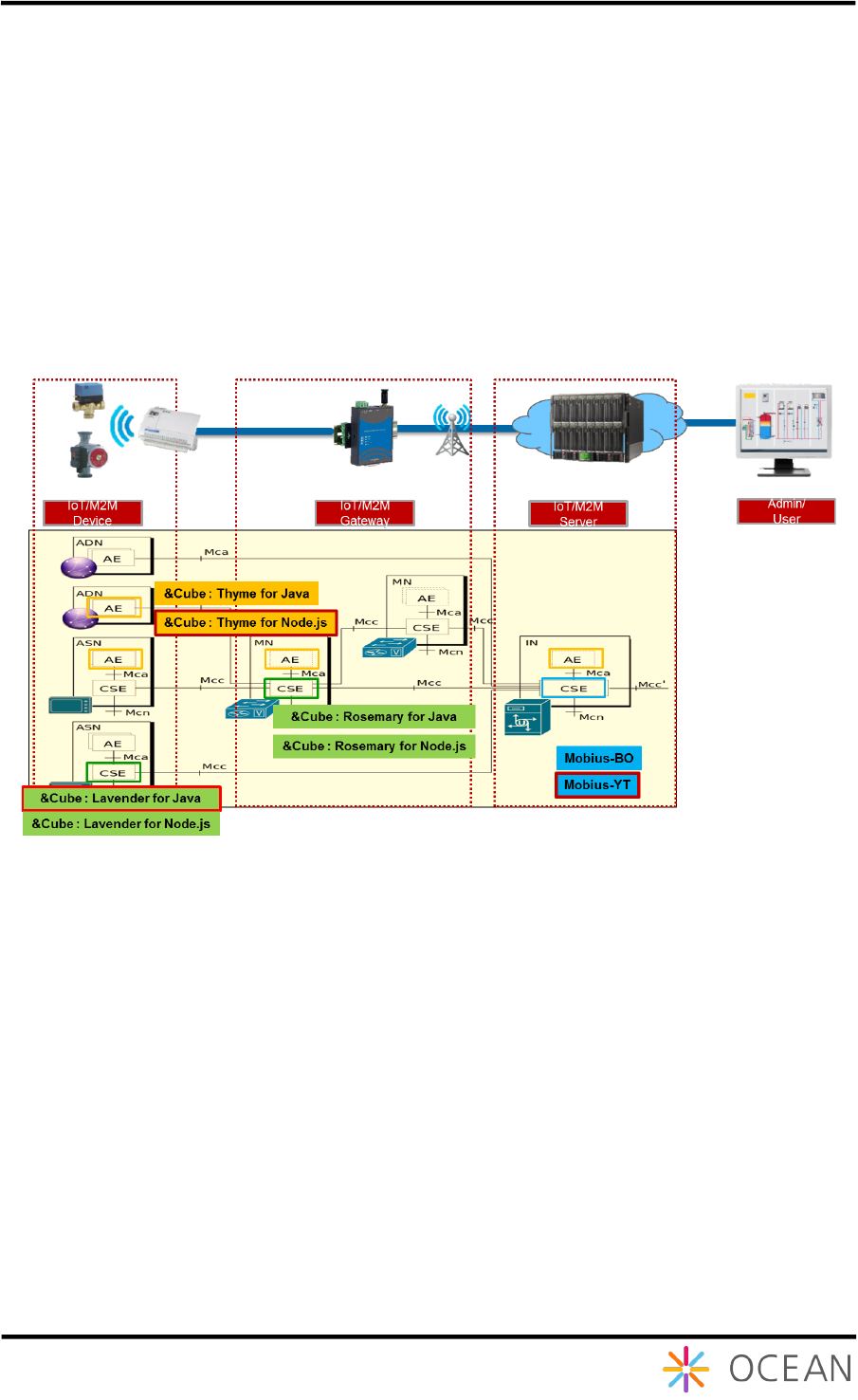
Mobius platform is a oneM2M compliant IoT server platform designed to offer diverse IoT
services and functionalities such as smart devices control and management, and user
management etc. Users can experience the IoT services through user IoT applications. Figure
1 shows the architecture of Mobius platform structured with oneM2M entities and reference
points through which any two entities can communicate with each other.
Figure 1 oneM2M complied Mobius platform architecture
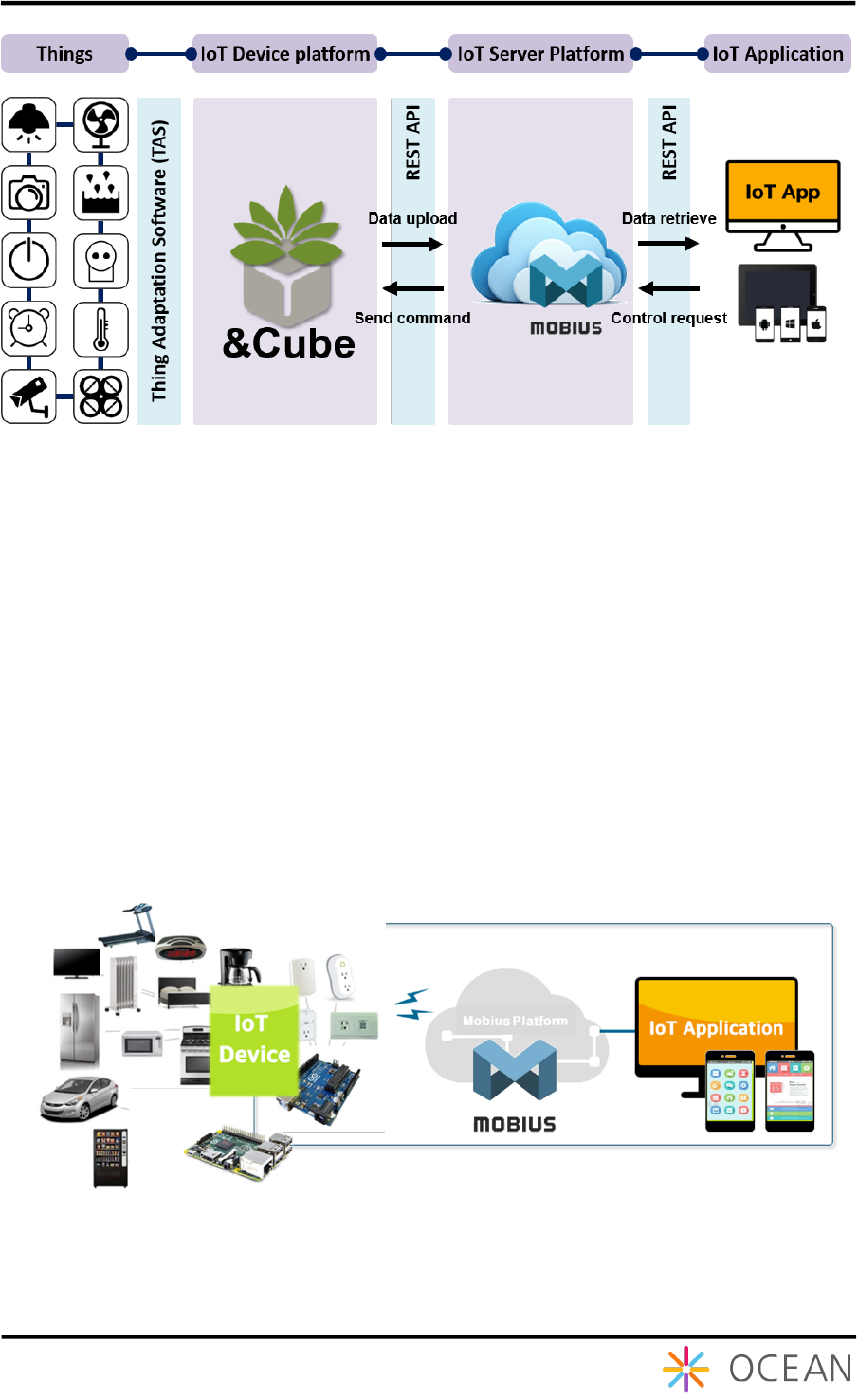
Mobius platform provides a series of REST APIs for protocol HTTP, MQTT, CoAP and
WebSocket to connect IoT devices together and implements interaction between each other
through Mobius as shown as 오류! 참조 원본을 찾을 수 없습니다.. APIs for creation and
retrieval of oneM2M resources are also provided to simplify the procedures of data
management.
Installation Guide Mobius
6
Figure 2 Interconnection between Mobius and IoT devices
1.2. Mobius Platform
1.2.1. Introduction
Mobius is a middleware server platform that connects diverse IoT devices through physical
communication medias and creates virtual representations (oneM2M resources) for each IoT
device to enable the interactions between each other as well as the communication between
devices and IoT applications. In this way, Mobius provides an open environment and APIs for
users to interconnect their own devices together and develop user specific IoT services to
build an IoT ecosystem. 오류! 참조 원본을 찾을 수 없습니다. shows the components of
Mobius platform i.e. IoT devices, Mobius server and IoT applications.
Figure 3 Mobius platform components
The IoT server platform can be implemented using diverse programming languages and the
Mobius server platform is developed using Node JS. In addition, Mobius server platform uses
Installation Guide Mobius
7
Node JS express modules which provides diverse modules for developers including HTTP,
XML etc. instead of Node JS express framework.
The Mobius server platform is compliant to oneM2M standards and supports HTTP, CoAP,
MQTT and WebSocket bindings specified in oneM2M standards. The Mobius server platform
implements oneM2M Infrastructure Node Common Services Entity (IN-CSE) with structured
resource architectures and provides IoT services through RESTful APIs. The Mobius server
platform uses MySQL DBMS for resources storage.
1.2.2. Mobius Platform Functionalities
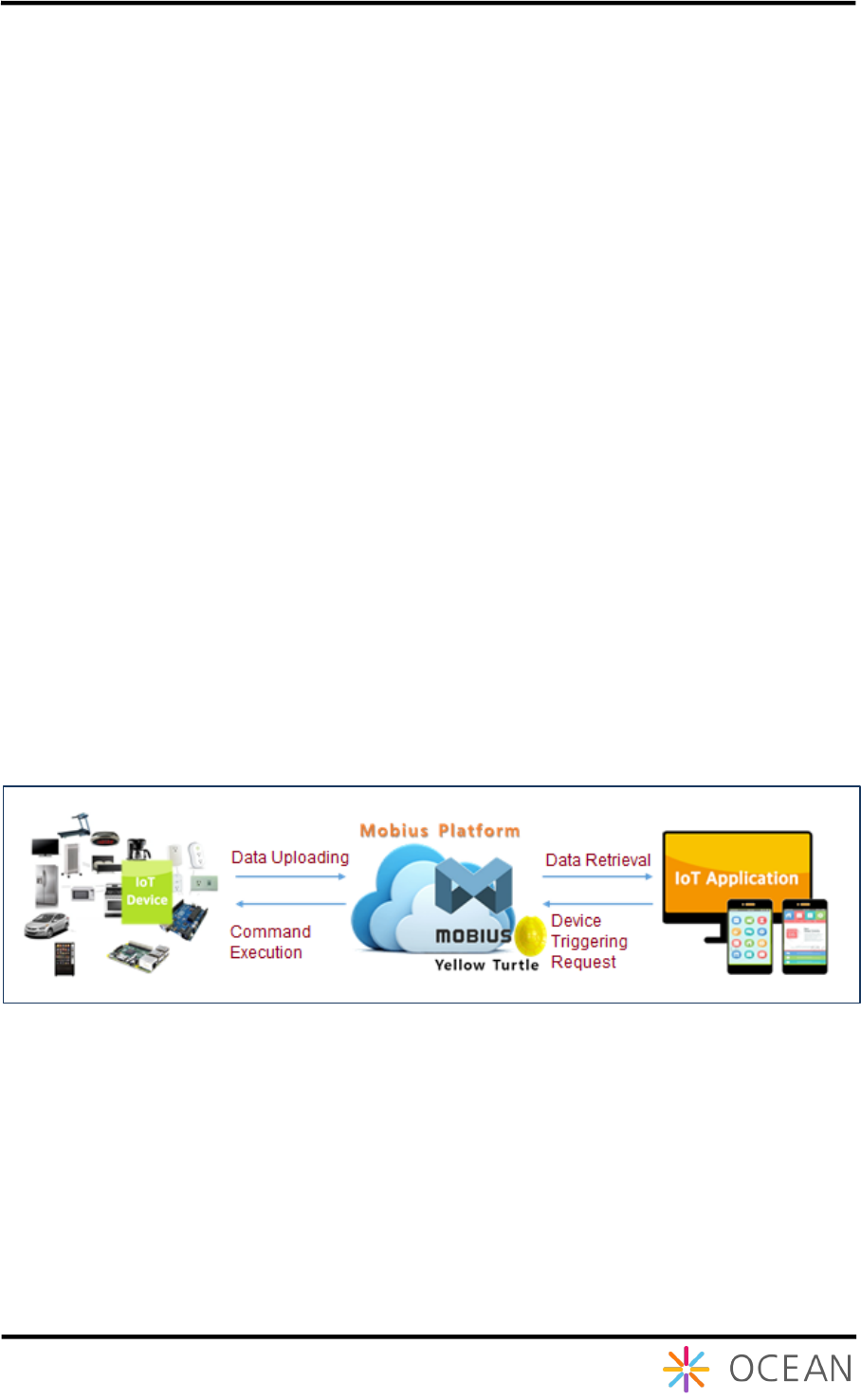
Mobius Platform works as the middle bridge to enable the communications and interactions
between IoT devices and IoT applications as following:
① The Mobius server accepts the uploaded data from authenticated IoT devices and
stores the data into the MySQL DB;
② The authenticated IoT applications can retrieve the data stored in Mobius server using
Mobius open APIs for monitoring purpose;
③ The authenticated IoT applications are able to control remotely IoT devices that have
already registered with Mobius server by sending control commands included in
<contentInstance> resource. The Mobius server then executes control commands to
the target devices.
The call flows as shown as Figure 4 indicates the communications and interactions among
devices, IoT applications and Mobius server.
Figure 4 Mobius interaction with IoT devices and applications
1.2.3. Mobius Platform Components
Mobius server consists of HTTP, CoAP, MQTT, WebSocket server and MySQL DBMS while
IoT applications implement HTTP, CoAP and/or MQTT clients in order to communicate with
Mobius server.
Installation Guide Mobius
8
Figure 5 Mobius platform components
1.2.4. Mobius Platform S/W Architecture
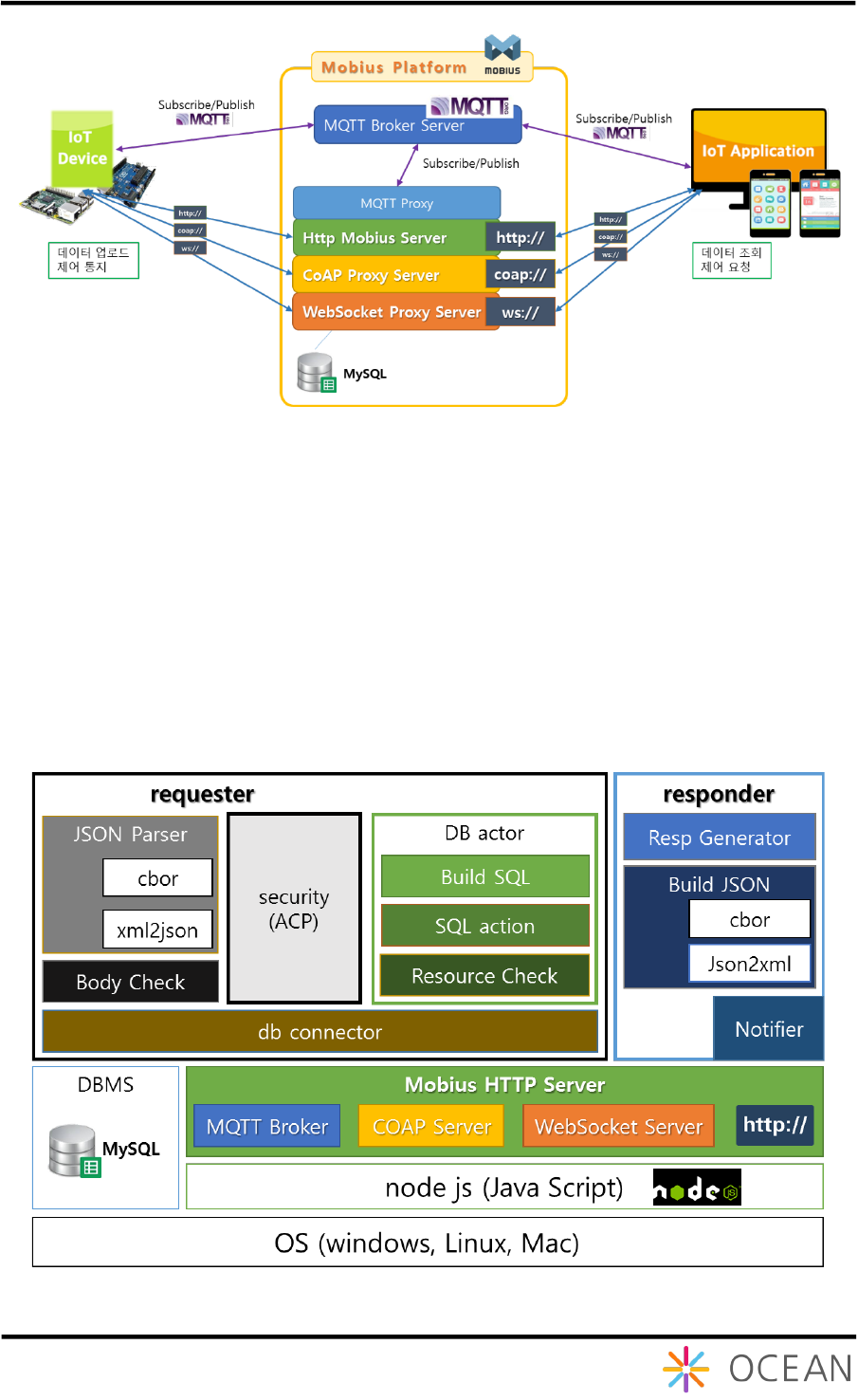
For protocol binding support, Mobius has MQTT broker, CoAP server, WebSocket server that
is bound to HTTP server internally. For example, MQTT protocol binding is supported by
implementing MQTT to HTTP proxy. CoAP and WebSocket are designed in the same way.
Mainly it consists of requester and responder. The requester contains the DB access
component. Every HTTP request is go through requester component, parser, actor and then
create SQL query to data access (e.g. retrieval, discovery) with DB connector. When it gets
access result, the responder creates the response in XML, JSON or CBOR serialization.
Figure 6 Mobius platform S/W architecture
Installation Guide Mobius
9
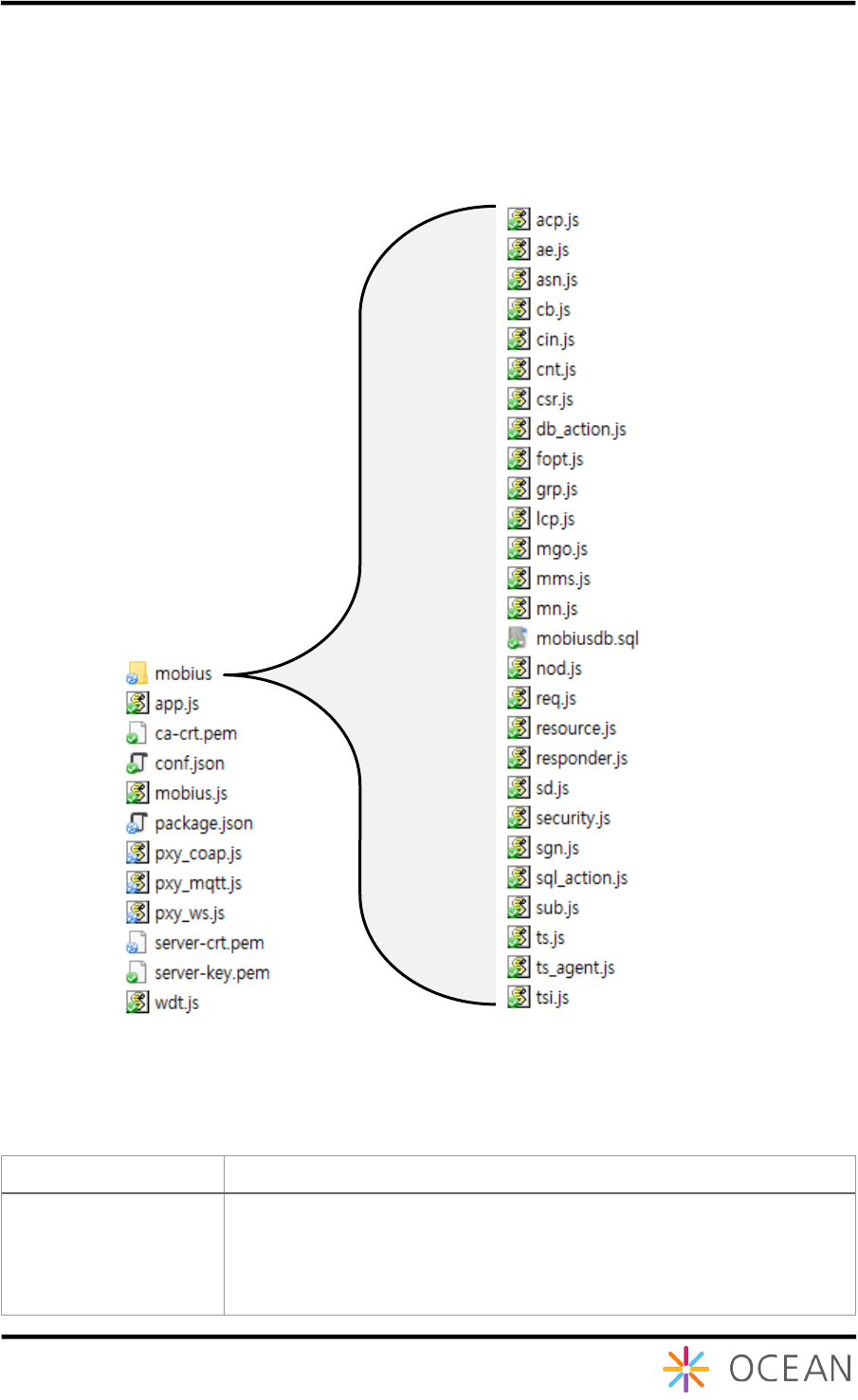
1.2.5. Mobius Platform Source Code Directory
The figure below shows the Mobius Node JS source directory. For the detailed functions and
roles for each Node JS file, please refer to the Table 1.
.
Figure 7 Mobius Node JS source code directory
Table 1 Function Reference Table for Node JS Files
Source File
Role and Function
mobius.js
This file initiates Mobius server and helps loading main Node JS
files.
It also contains configuration parameters for Mobius server such as
defaultbodytype indicating the serialization, usecsetype indicating
CSE type (either IN-CSE, MN-CSE or ASN-CSE), usecsebase

Installation Guide Mobius
10
indicating CSEBase name, usecseid indicating CSEID, usedbhost
indicating the host address, and usedbpass indicating the
password for MySQL etc. Users can modify those configuration
parameters.
app.js
This file acts as role of flow router and it is the main code running
Mobius server.
① It handles initial processing of received packets.
② It initiates HTTP server with ‘listening’ mode to wait for
HTTP requests target to the Mobius HTTP server.
③ It handles the parsing of URL of packets and evaluate the
correctness of the request body resulted of parsing. It then
sends the request to resource.js to continue the processing
if the request is valid one, otherwise throws exceptions.
This file also implements the server clustering algorithms to
improve the performance of HTTP server.
mobius/resource.js
It is core file to process the CREATE, RETRIEVE, UPDATE,
DELETE, NOTIFY and DISCOVERY operations for oneM2M
resource primitives.
This file undertakes the processing of parsed request URI and
request body received from app.js according to corresponding
operation. It converts the data into a format to process the data and
connect to mysql database.
The mysql database is initialized and handled by db_action.js and
sql_action.js module.
mobius/responder.js
It is responsible for handling the response process.
It receives processing results from app.js and resource.js modules
and generates responses from the processing results following
format requested by originator either XML or JSON serialization.
mobius/db_action.js
This file contains parameters used to connect and access to the
database and parameters for returning response results from the
database.
mobius/sql_action.js
This file contains functions to receive data and parameters required
for a series of database operations and functions to call
db_action.js module to return data from database.
mobius/sgn.js
This module file is responsible for checking the existence of
<subscription> child resource under the requested target resource.
If it exists, the module checks the event type and retrieves the field
value of attribute notificationUril. Then it generates and sends a
notification message to the address indicated by field value of
attribute notificationUril.
mobius/security.js
This file contains functions to check the access privileges of
originators for a requested resource when the resource applies with
<accessControlPolicy> resource.
The originator ID is abstracted from request header field of X-M2M-
Origin. The process checks the access right of current originator ID
to a target resource and responds with ACESS_DENIED error
when the originator ID has no privileges to access to the resource.
mobius/fopt.js
This file contains function to handle operations target to
<fanOutPoint> virtual resource of a <group> resource.
It transmits operation request to all group members contained in
<group> resource and aggregates responses from all group
members into an aggregated response.

Installation Guide Mobius
11
mobius/ts_agent.js
This file contains functions to manage <timeSeriesInstance>
resource. It monitors the mssing data in the <timeSeriesInstance>
resource and then stores the missing data.
pxymqtt.js
This file contains functions implementing mqtt proxying function to
handle mqtt protocol messages with http protocol module as
following procedures:
① It creates a oneM2M mqtt topic with configuration
information of Mobius server and then subscribe to the
topic to receive mqtt requests targeted to this topic later;
② Whenever receiving mqtt protocol messages, it
generates and sends a http request wrapping mqtt
request message to Mobius server and waits for http
response from Mobius server. It then abstracts http
response and generates a mqtt response message
correspondingly.
③ It responds with mqtt protocol message.
pxy_coap.js
This file contains functions implementing coap proxying function
to handle coap protocol messages with http protocol module.
pxy_ws.js
This file contains functions implementing websocket proxying
function to handle websocket protocol messages with http
protocol module.
mobius/acp.js
It contains functions to parse accessControlPolicy request. The
accessControlPolicy resource is used to manage the access
control privileges to resources that apply with access control
policy
mobius/ae.js
It contains functions to parse AE request
mobius/cb.js
It contains functions to parse CSEBase request. The CSEBase
resource contains configuration information of Mobius server
mobius/cin.js
It contains functions to parse contentInstance request
mobius/cnt.js
It contains functions to parse container request
mobius/csr.js
It contains functions to parse remoteCSE request
mobius/grp.js
It contains functions to parse group request
mobius/lcp.js
It contains functions to parse locationPolicy request
mobius/mms.js
It contains functions to parse multimediaSession request
mobius/mn.js
It contains functions to register this CSE to the other CSE.
mobius/sd.js
It contains functions to parse semanticDescriptor request
mobius/sub.js
It contains functions to parse subscription request.
mobius/ts.js
It contains functions to parse timeSeries request.
mobius/tsi.js
It contains functions to parse timeSeriesInstance request.
2. Mobius Server Platform Installation
Installation Guide Mobius
12
2.1. Introduction
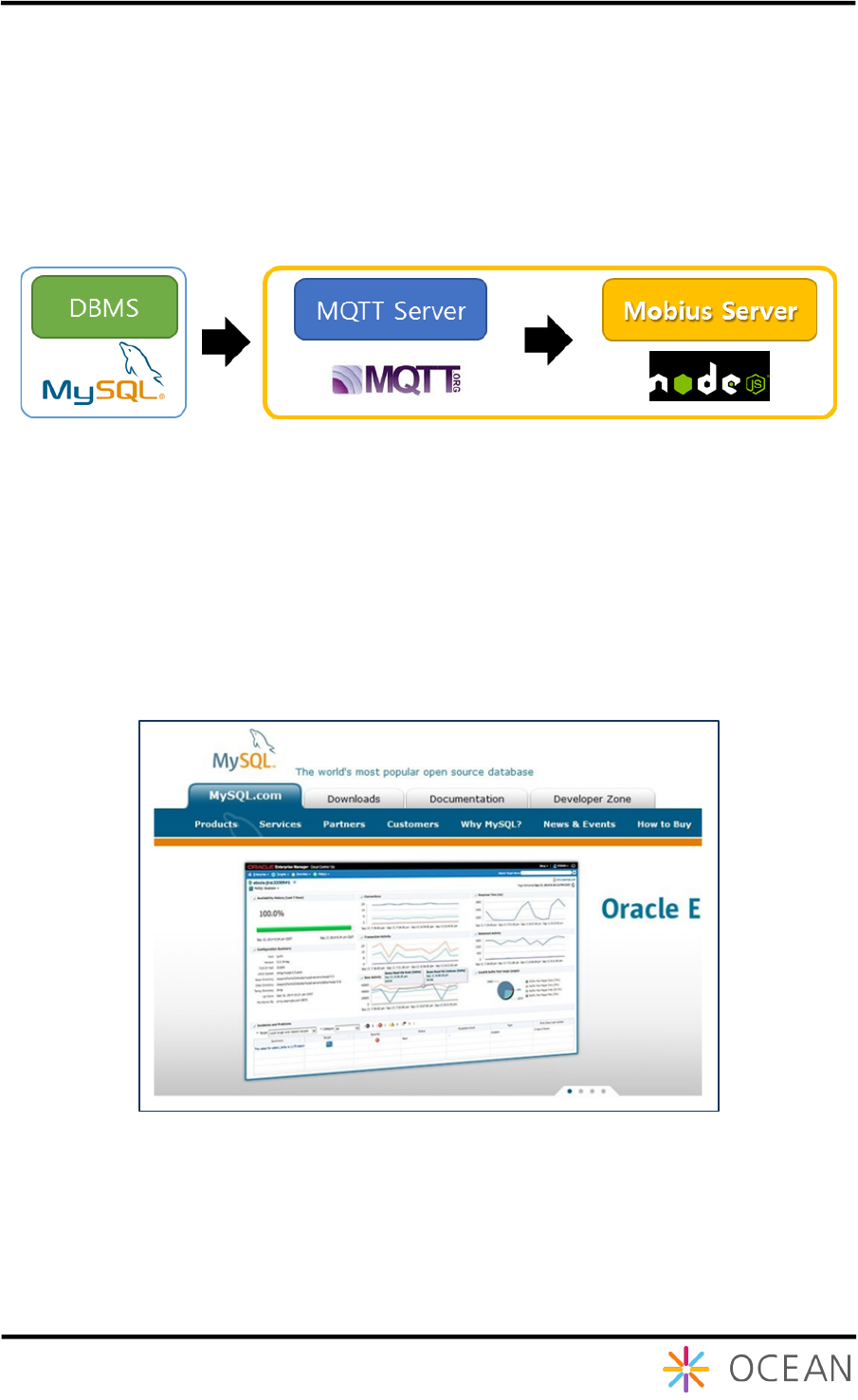
Mobius Yellow Turtle server platform deploys MySQL DBMS as a database so MySQL is
required to be installed as a basic and then MQTT server and Mobius server have to install
one by one. Note that it is unnecessary to install MQTT server if MQTT protocol and MQTT
related functions are not supported.
Figure 7 Mobius server installation procedures
2.2. Pre-requisites Installation (Linux)
2.2.1. MySQL Installation
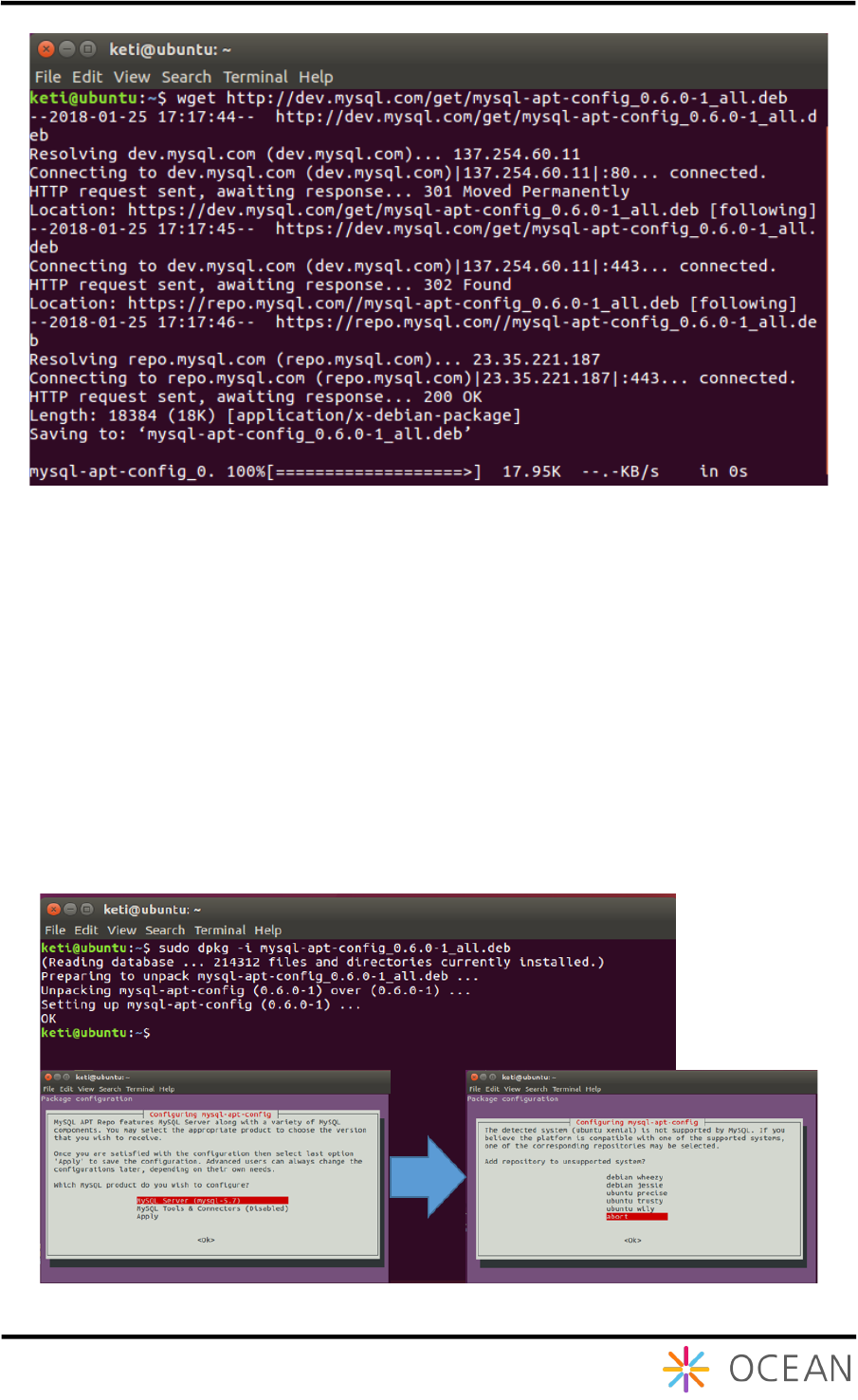
Mobius server platform stores the data uploaded from devices into MySQL database.
MySQL is an open source RDBMS and the installation procedures are introduced as follows:
Figure 8 MySQL Introduction
Installation Guide Mobius
13
Different versions of MySQL are provided for downloading at below link:
http://dev.mysql.com/downloads/mysql.
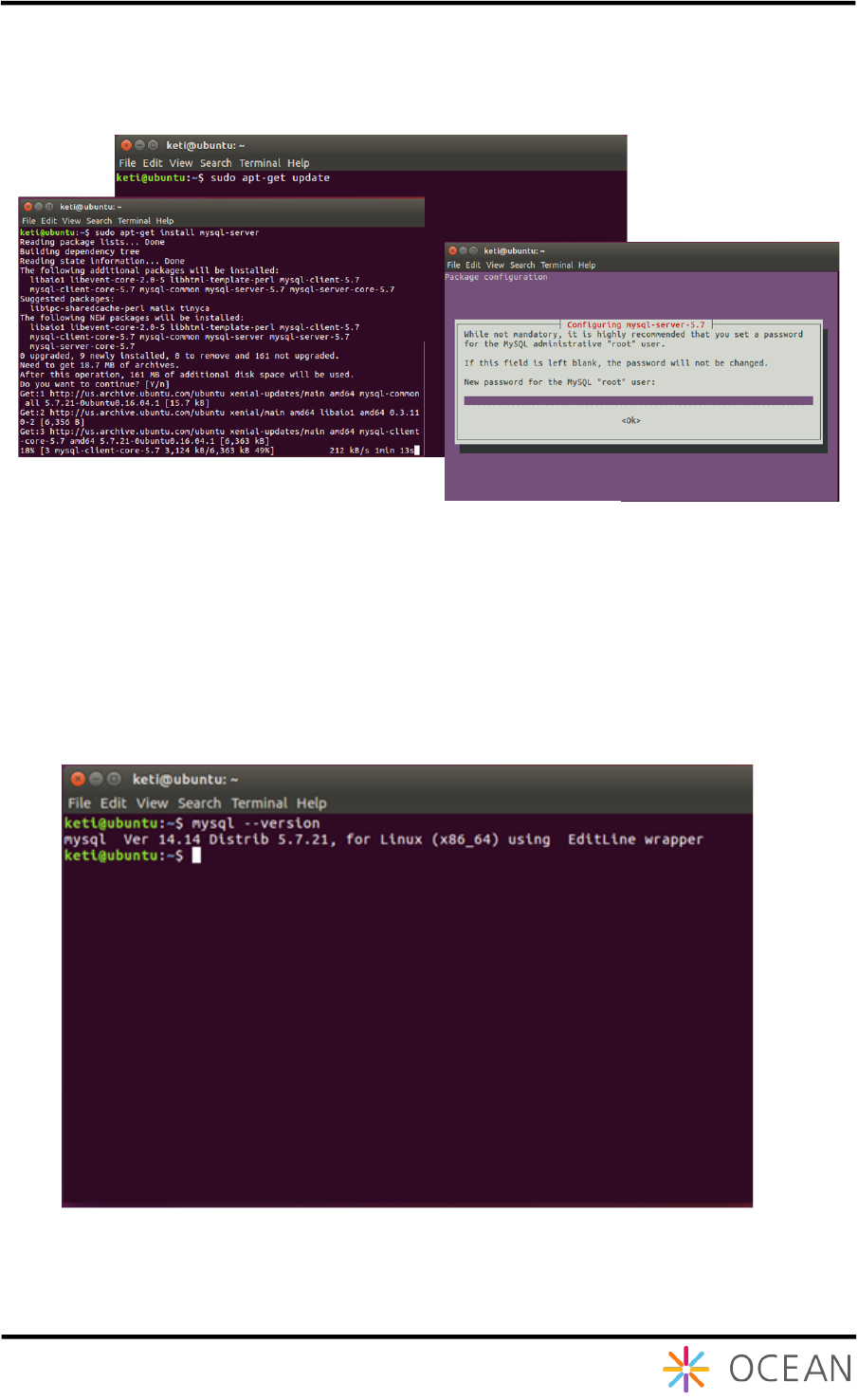
MySQL 5.7 version can be installed with "sudo apt-get install mysql-server"
command because Ubuntu version 16.04 or later is done without installing any additional
package. Version 14.04 of Ubuntu requires that you download the deb file directly from the
server and add it to the package installation list for MySQL 5.7 installation. The download will
proceed through "wget http://dev.mysql.com/get/mysql-apt-config_0.6.0-
1_all.deb".
Figure 10 Download MySQL deb File
Figure 11 Downloaded MySQL deb file Installation
Installation Guide Mobius
14
The downloaded deb file is installed by using "dpkg" command. For the next step, select
MySQL Server (mysql-5.7) in the Select MySQL Version screen, then select Apply to
proceed.
Updating the installation package list can be done by typing "sudo apt-get update"
command. And type "sudo apt-get install mysql-server". The root password will
be displayed when you proceed the installation. This password is necessary for interworking
with Mobius in the future, so you must remember to set the password.
You can check whether the version of MySQL installed is version 5.7 or not by using "mysql
-version" command.
Figure 12 MySQL installation procedures
Figure 13 Check MySQL version
Installation Guide Mobius
15
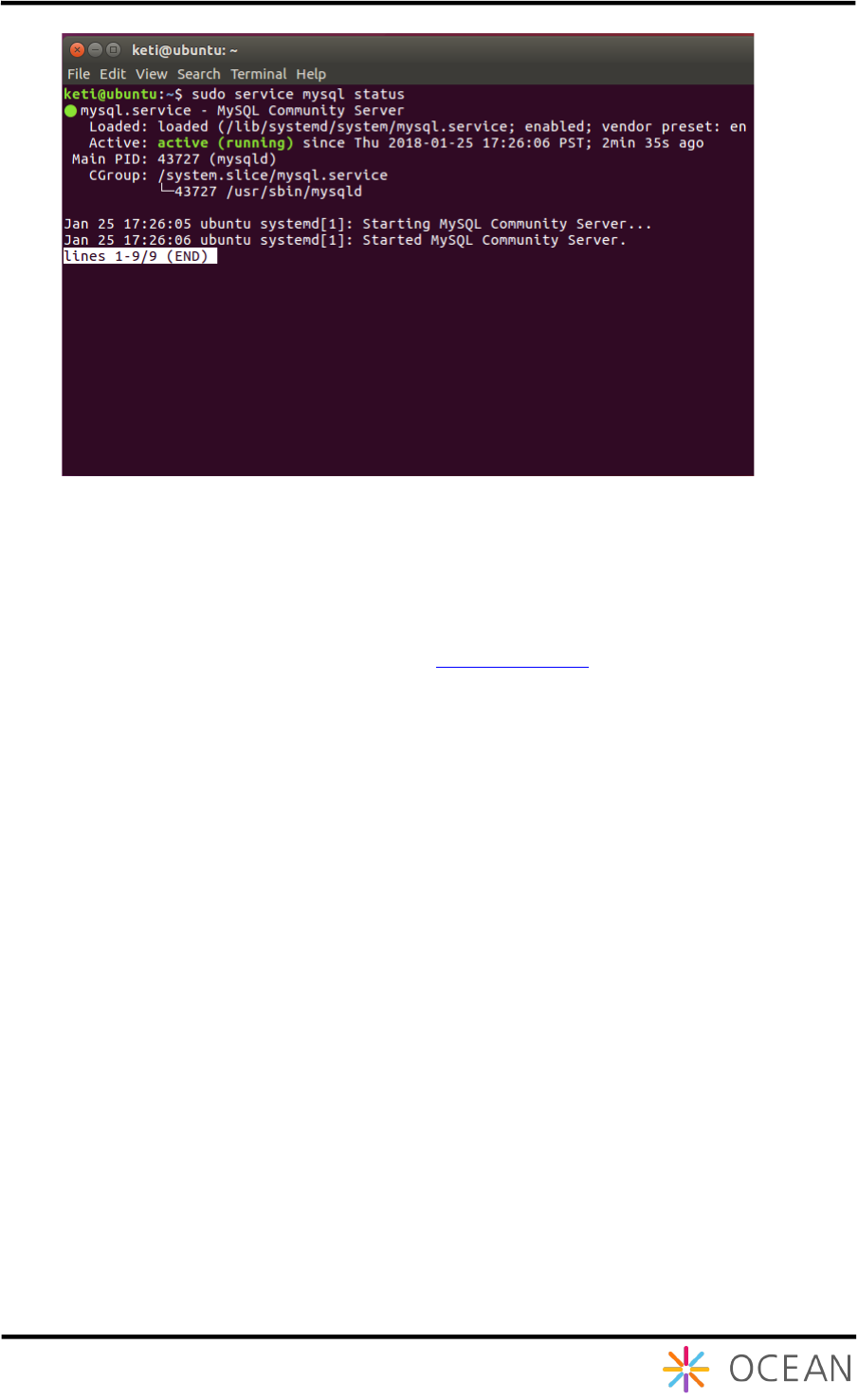
MySQL will run automatically when the installation is complete. However, you can check the
execution of MySQL by typing the command "sudo service mysql status".
By this, we have installed MySQL successfully and then we have to configure the MySQL in
terms of creation of a database for Mobius. In OCEAN alliance website download page, the
MySQL database file can be downloaded to use. How to download and import the file will be
explained later.
Figure 14 Check the execution MySQL

Installation Guide Mobius
16
2.2.2. MQTT Server Installation
Mobius enables IoT devices to communicate with MQTT server through MQTT protocol. To
use this function, an MQTT broker needs to be installed. We recommend using open source
MQTT broker Mosquitto server. Note: MQTT protocol can optionally support, if users are not
implement MQTT functionalities, “installation of MQTT server” step can be ignored. In addition,
the installation process requires installing the version of MQTT supported by Linux.
Figure 16 Mosquitto installation
Figure 15 Mosquitto Introduction
Installation Guide Mobius
17
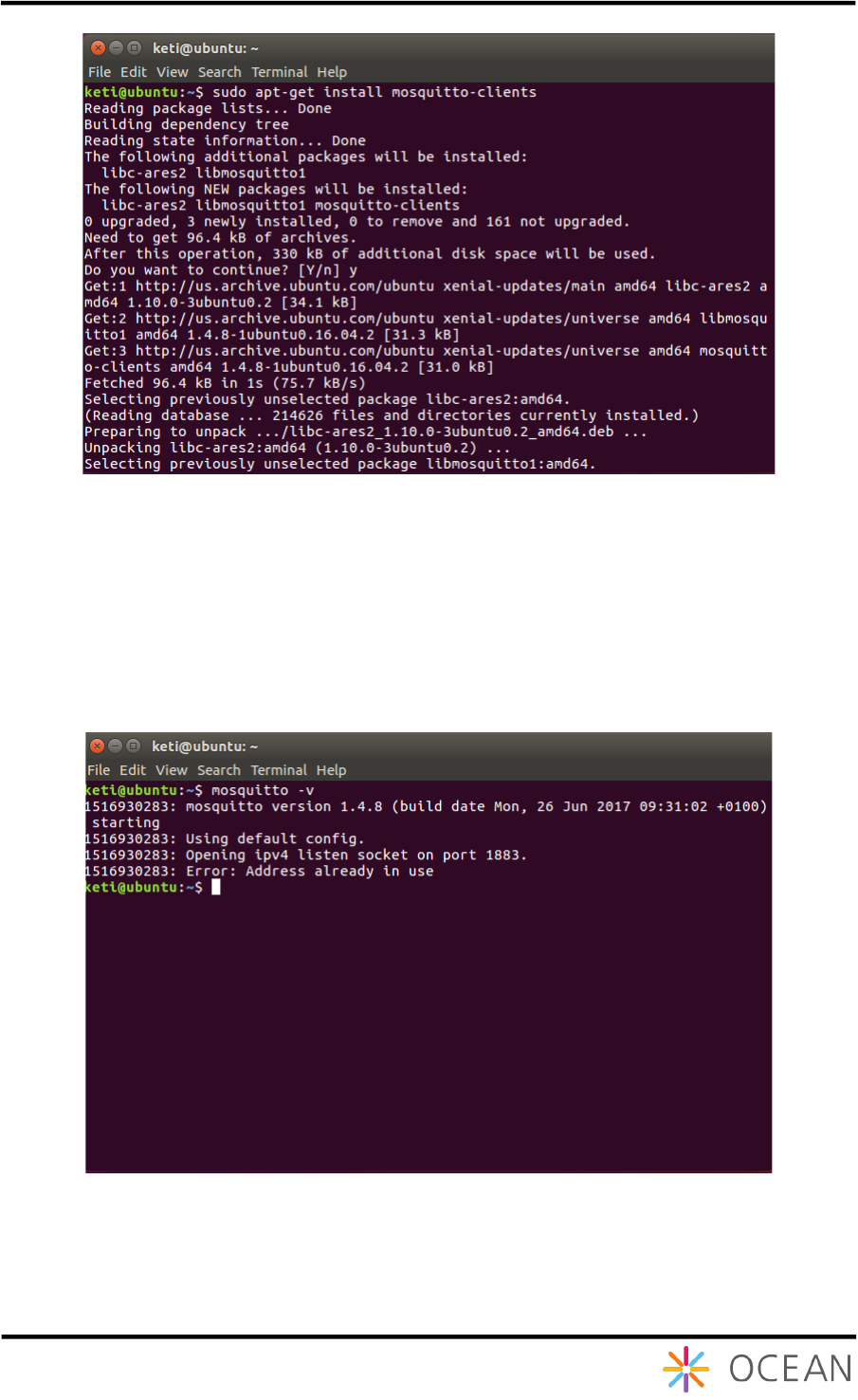
Windows mosquitto can only be downloaded and installed from the homepage, but in Linux,
mosquitto and mosquitto-clients must be installed separately.
It is installed through the command "sudo apt-get install mosquitto" and "sudo
apt-get install mosquitto-clients".
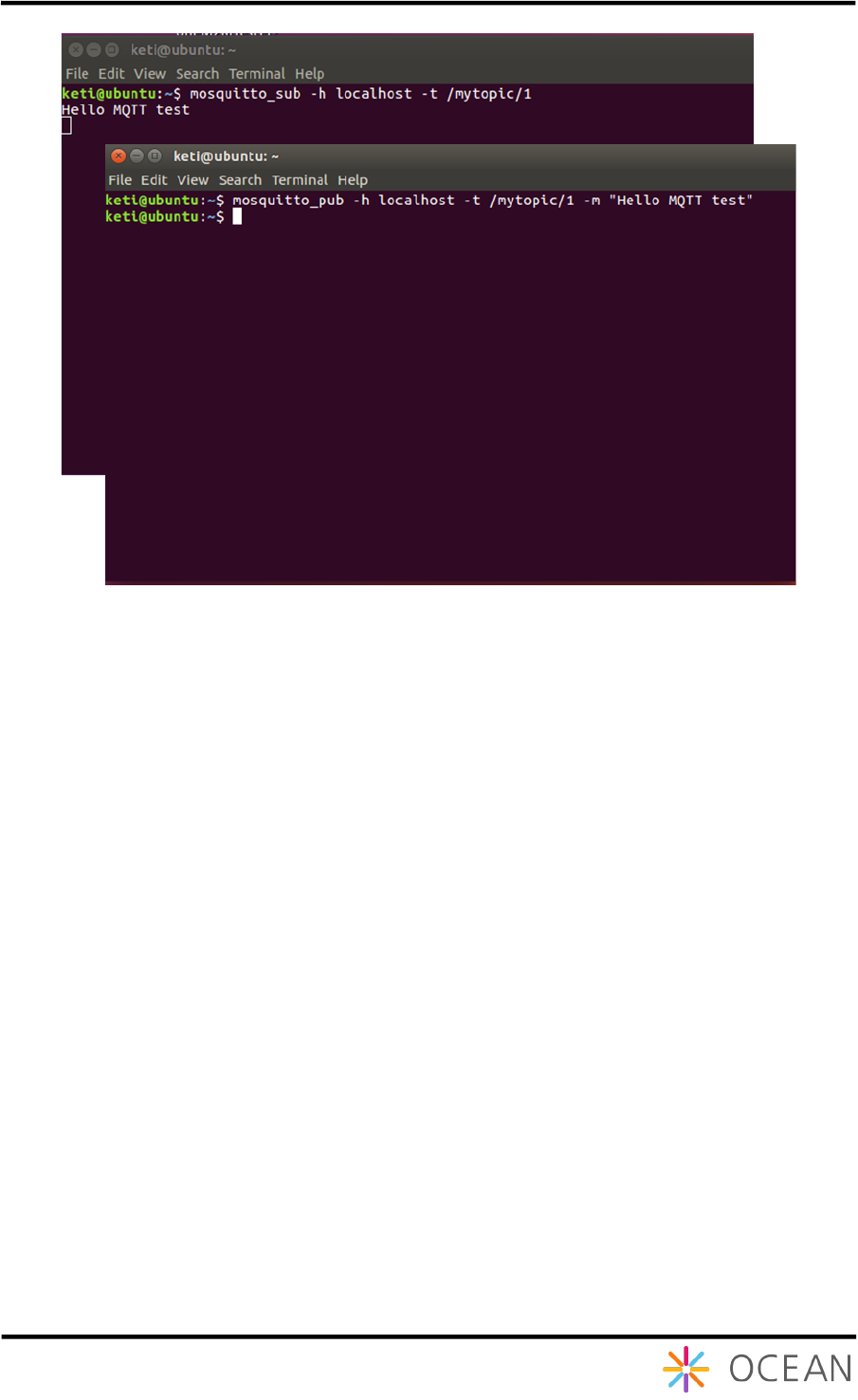
Check the installed version of mosquito through the "mosquitto -v" command.
Figure 17 Mosquitto-clients installation
Figure 18 Check Mosquitto version
Installation Guide Mobius
18
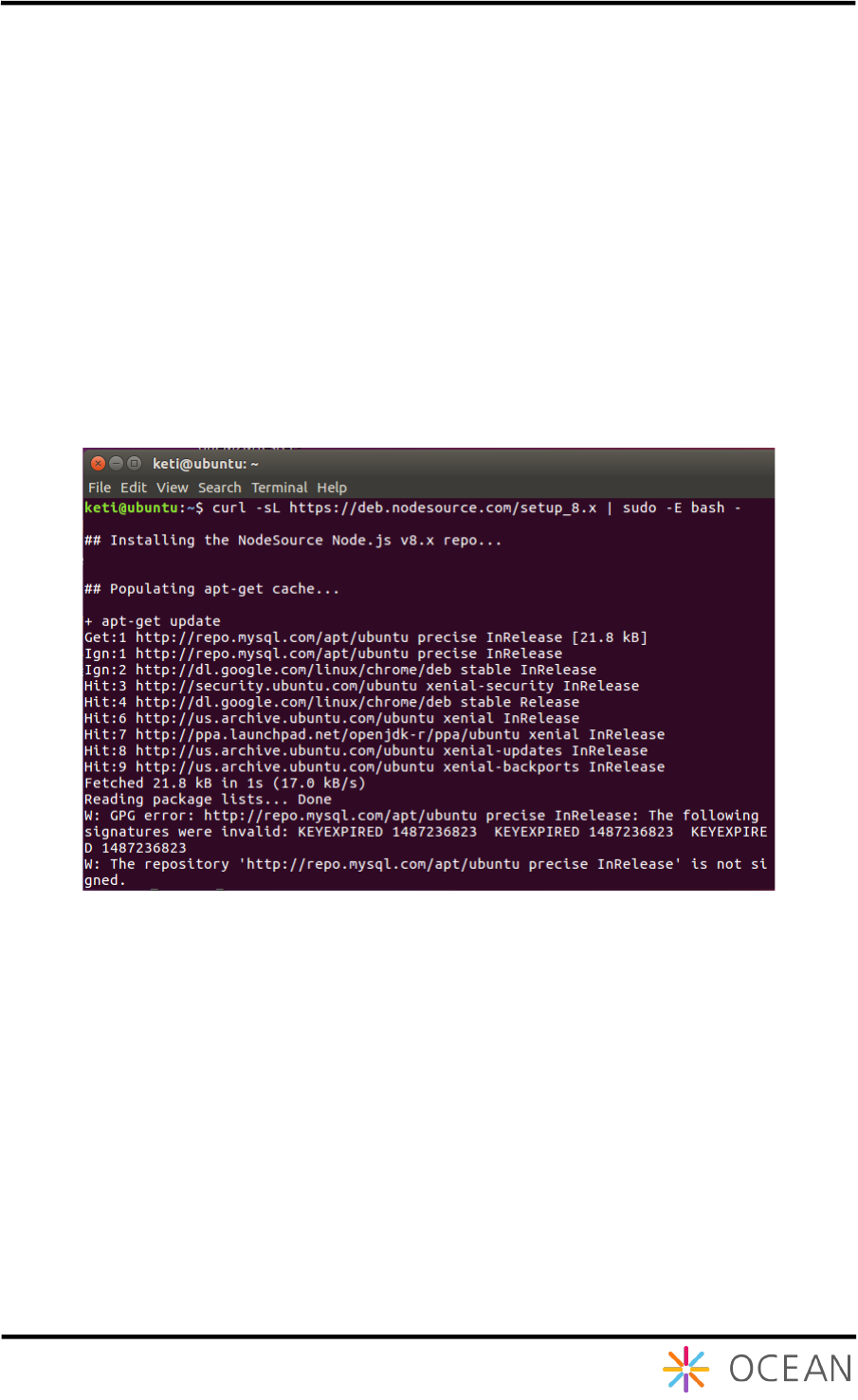
After installed Mosquitto broker, we can test whether the Mosquitto broker works properly or
not as follows:
Step -1: Subscription test
① Open the Term ina l Co mman d and input command as below
mosquitto_sub -h localhost -t /mytopic/1
Step -2: Notification test
② Open the Terminal Command and input command as below
mosquitto_pub -h localhost -t /mytopic/1 -m "Hello MQTT test"
Figure 19 Mosquitto broker test
Installation Guide Mobius
19
2.2.3. Node JS Installation
Node.js is a JavaScript runtime built on Chrome's V8 JavaScript engine. Node.js uses an
event-driven, non-blocking I/O model that makes it lightweight and efficient. In contrast to
multi-thread based servers, node.js operates on a single thread using non-blocking I/O calls
and it allows to support tens of thousands of concurrent connections. With node.js, users don’t
need to worry about the dead-locking of processes because almost no function in node.js
directly performs I/O. So there is no locking problem at all and therefore, scalable systems can
be reasonably developed through node.js.
Node.js was originally written by developer Ryan Dahl in 2009 and distributed as an open
source. Currently a diverse of modules developed from contributors are included such as
covering file system I/O, networking, binary data (buffers), cryptography and data streams.
It is possible to install v6.x version through "sudo apt-get install nodejs" command,
but we will install v8.x version here. Users of Ubuntu OS 16.04 version can proceed as shown
in Figure 21. Since Ubuntu OS14.04 users cannot install Node.js v8.x directly from the
package, the latest v8 LTS provided from the Node source homepage adds the apt repository
through the "curl –sL https://deb.nodesource.con/setup_8.x | sudo -E bash
–" command.
Figure 20 Node source homepage adds the apt repository
Installation Guide Mobius
20
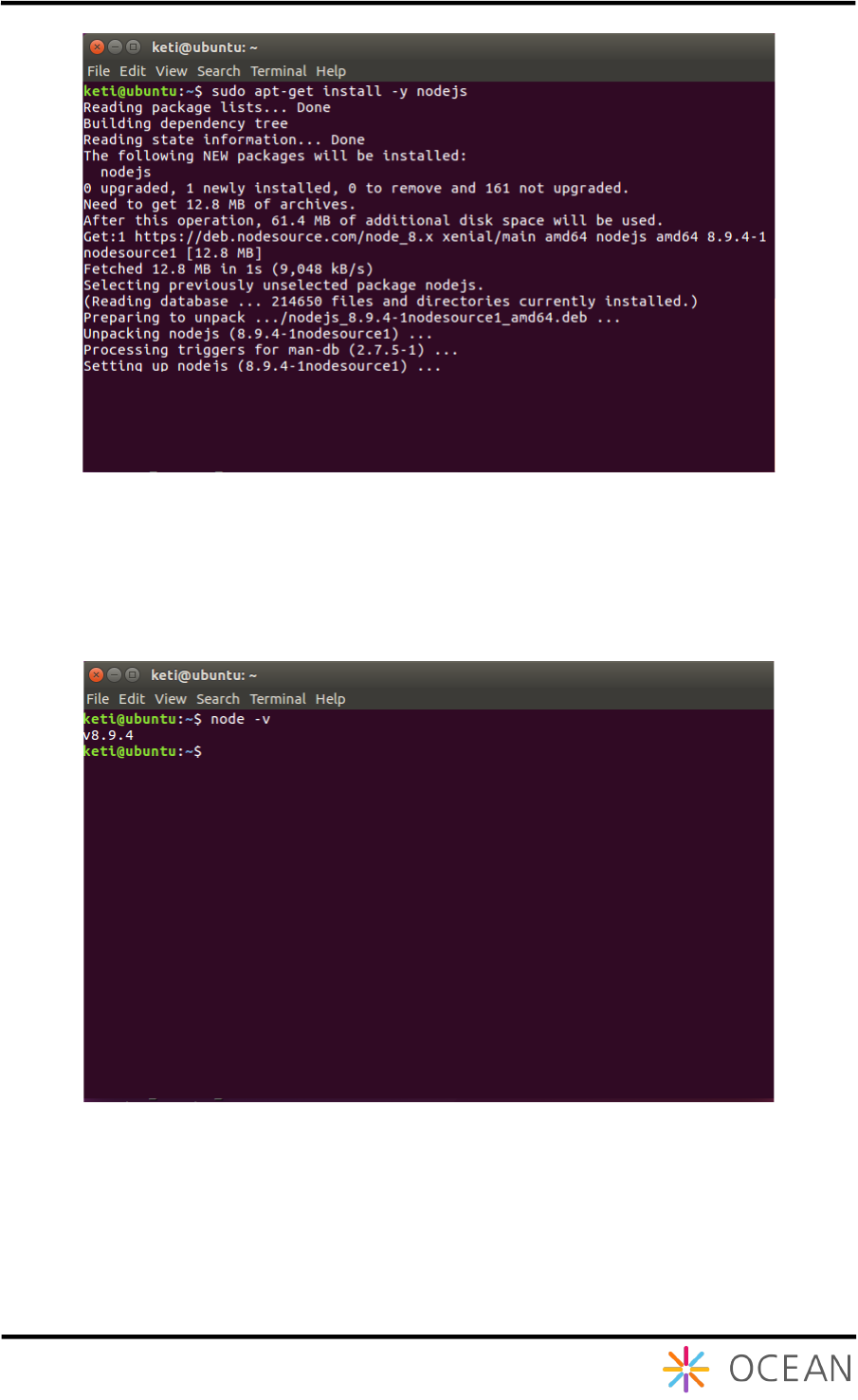
When the apt repository is complete, it is installed via the "sudo apt-get install -y
nodejs" command.
The last version of Node.js installed is checked thought the "node -v" command.
Figure 21 Node js installation
Figure 22 Check Node js version
Installation Guide Mobius
21
2.3. Mobius Installation
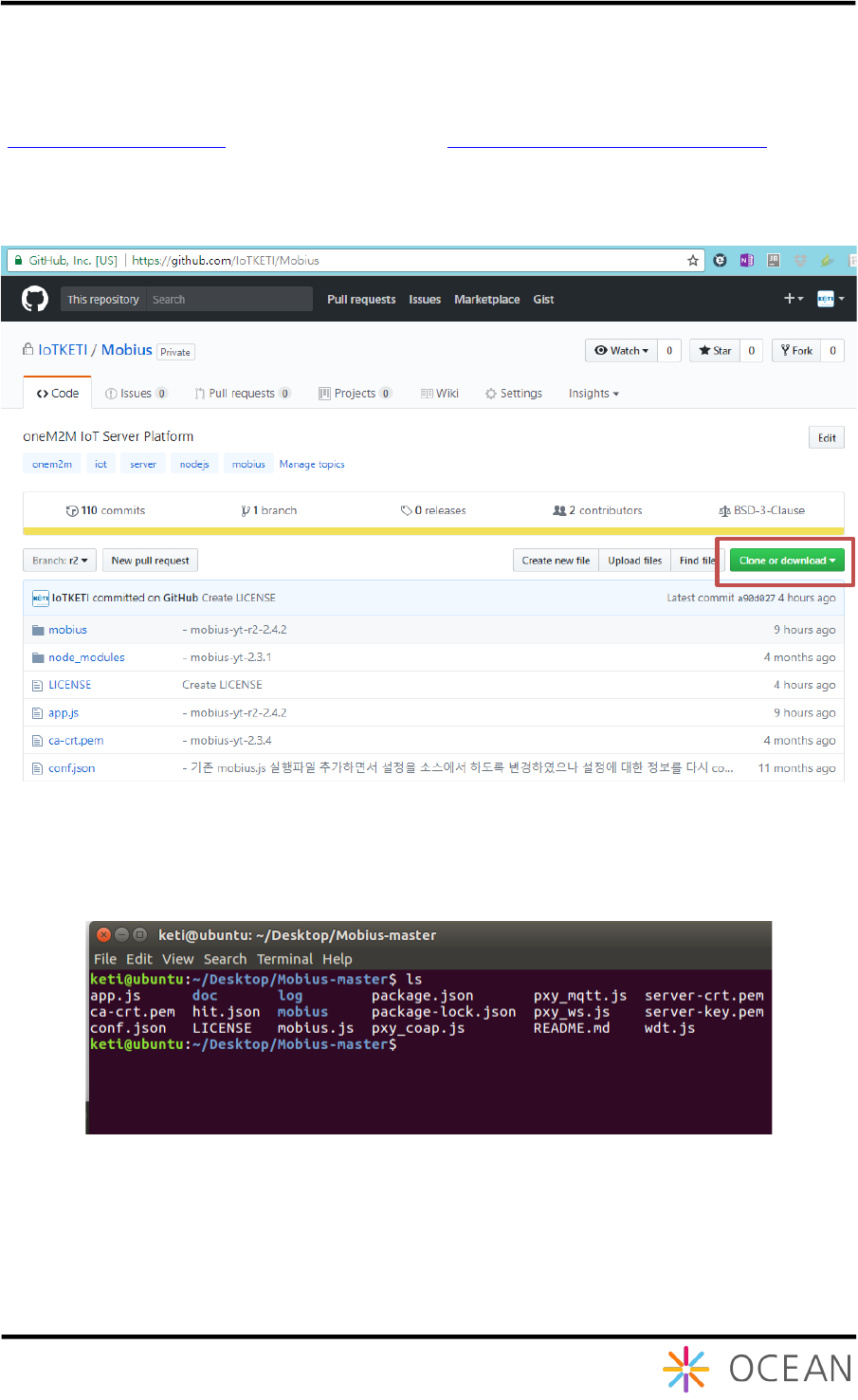
Mobius server platform is distributed with the source code package in OCEAN alliance website
(http://www.iotocean.org) or the Mobius GitHub (https://github.com/IoTKETI/Mobius ).
User can download the zipped package and configure the Mobius server in terms of
communication port and CSE name etc.
Figure 23 Download Mobius from GitHub
After downloading, unzip the package and you will see the included folders and files as Figure
24. The roles of files are introduced in Ta b le 1.
Figure 24 Unzipped Mobius server package files
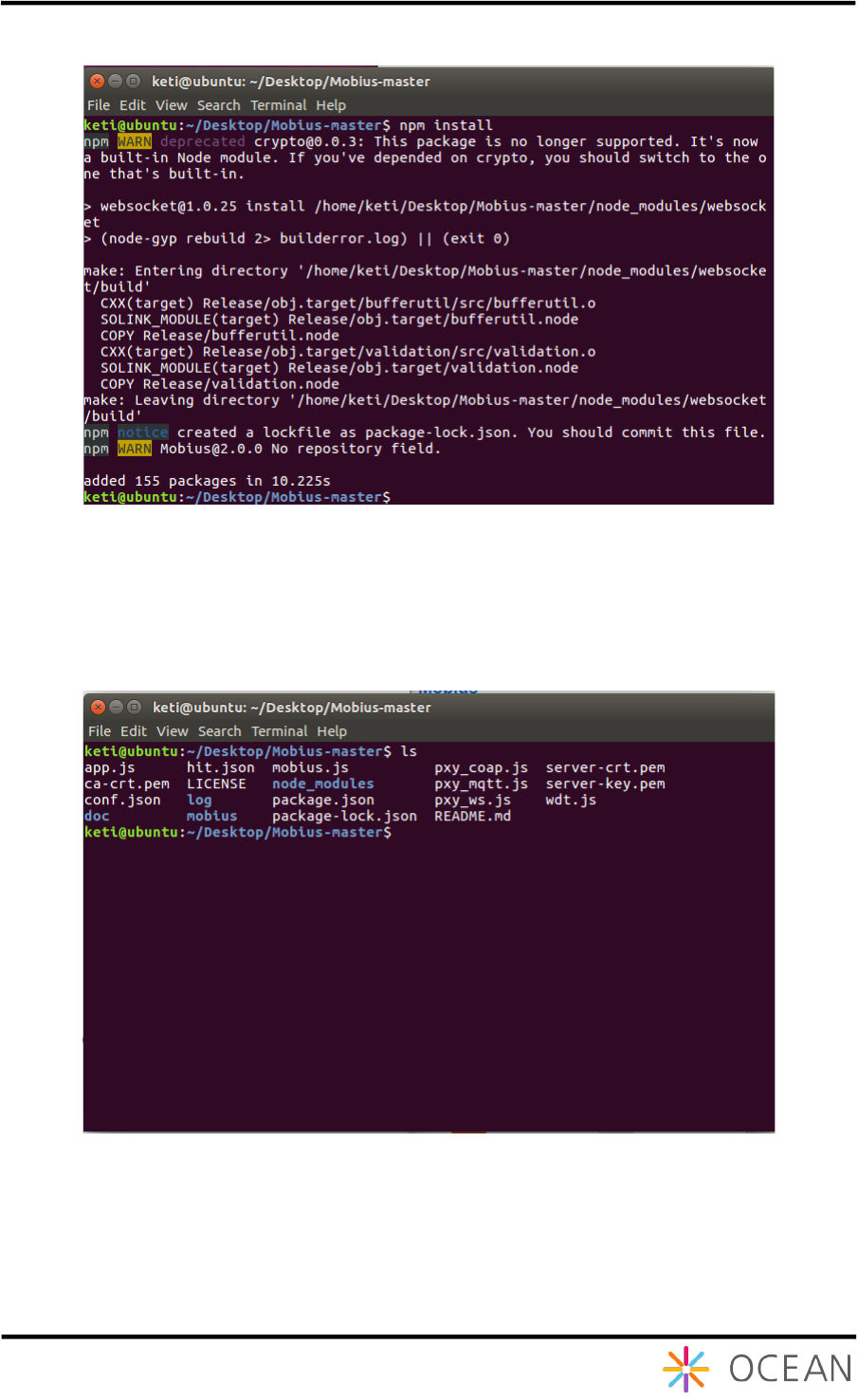
The unzipped node.js files can be directly executed without any additional compiling operation.
But there are several node.js modules which are not yet installed. To install the required
additional node.js modules, open a Linux terminal window and go to the directory where the
unzipped package and run npm install command as shown as Figure 25 Run npm install
command to install additional node.js modules.
Installation Guide Mobius
22
Figure 25 Run npm install command to install additional node.js modules
After running the npm install command, all additional required node.js modules will be
generated and stored in node_modules folder. You can see there is a node_modules folder in
the unzipped Mobius source folder as shown as Figure 26.
Figure 26 A node_modules folder created in unzipped source folder
By this, we have installed all required software and modules to run Mobius server. Users can
run node mobius.js on the command line to activate the Mobius server. The installation of
Mobius server is almost done and only a few configurations are left.
Installation Guide Mobius
23
3. Running Mobius Server
3.1. Runtime Environment Configuration
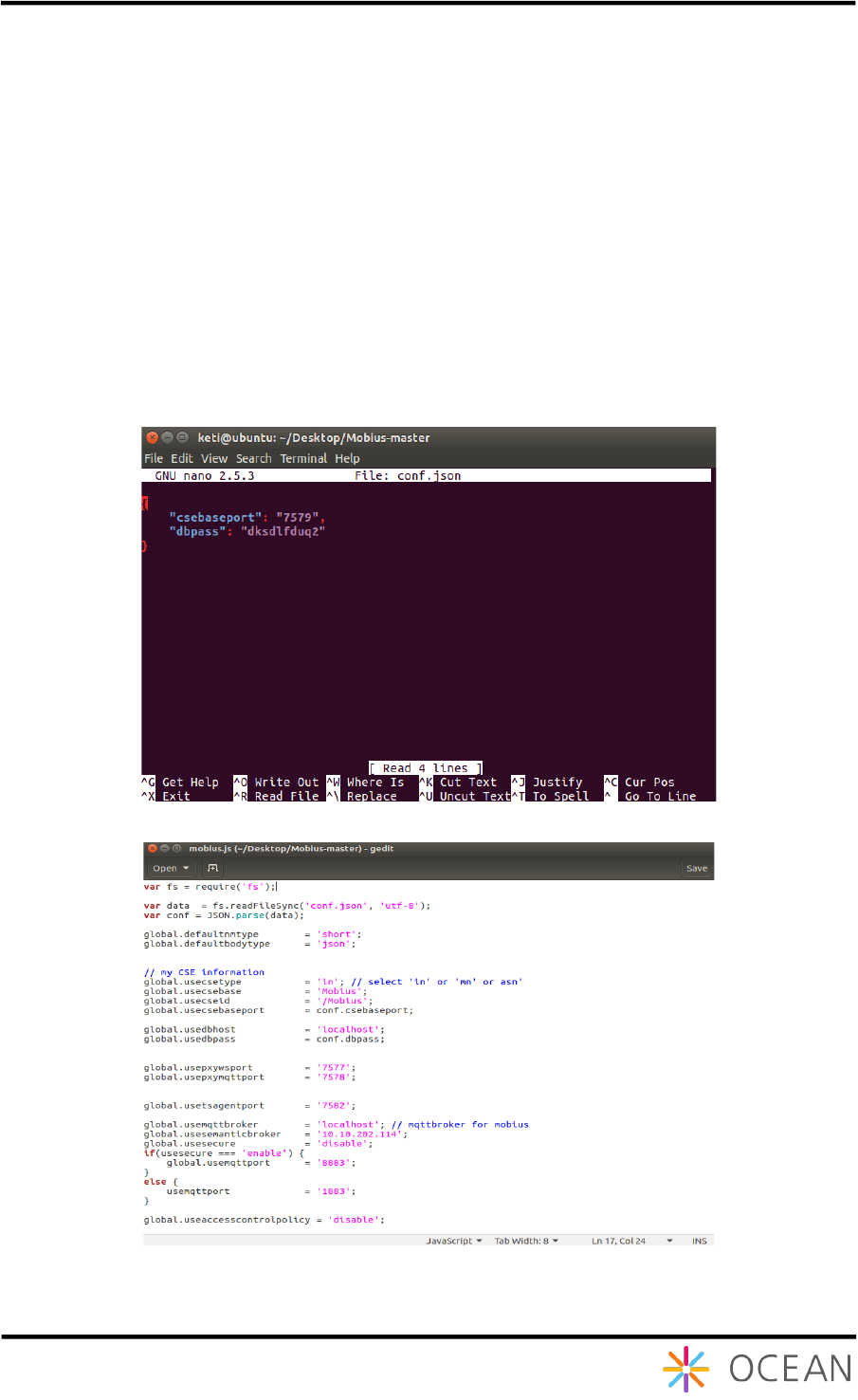
A configuration file conf.json is included in the unzipped folder of Mobius package. User can
customize the communication port csebaseport for CSEBase which is the root of all
resources to be created in the hierarchical structure in Mobius server, and the MySQL
database connection password dbpass as shown in Figure 7. These configurations are
required to guarantee that the Mobius server is accessible from the CSEBase port and MySQL
database with the configured password. In addition, there are configuration data included in
mobius.js module file as shown in Figure .
Figure 27 Mobius-YT server configuration file
Figure 28 Other configuration data in main code file
By this, we have done all installation and configurations for the Mobius server platform.
Installation Guide Mobius
24
3.2. Running Mobius Server
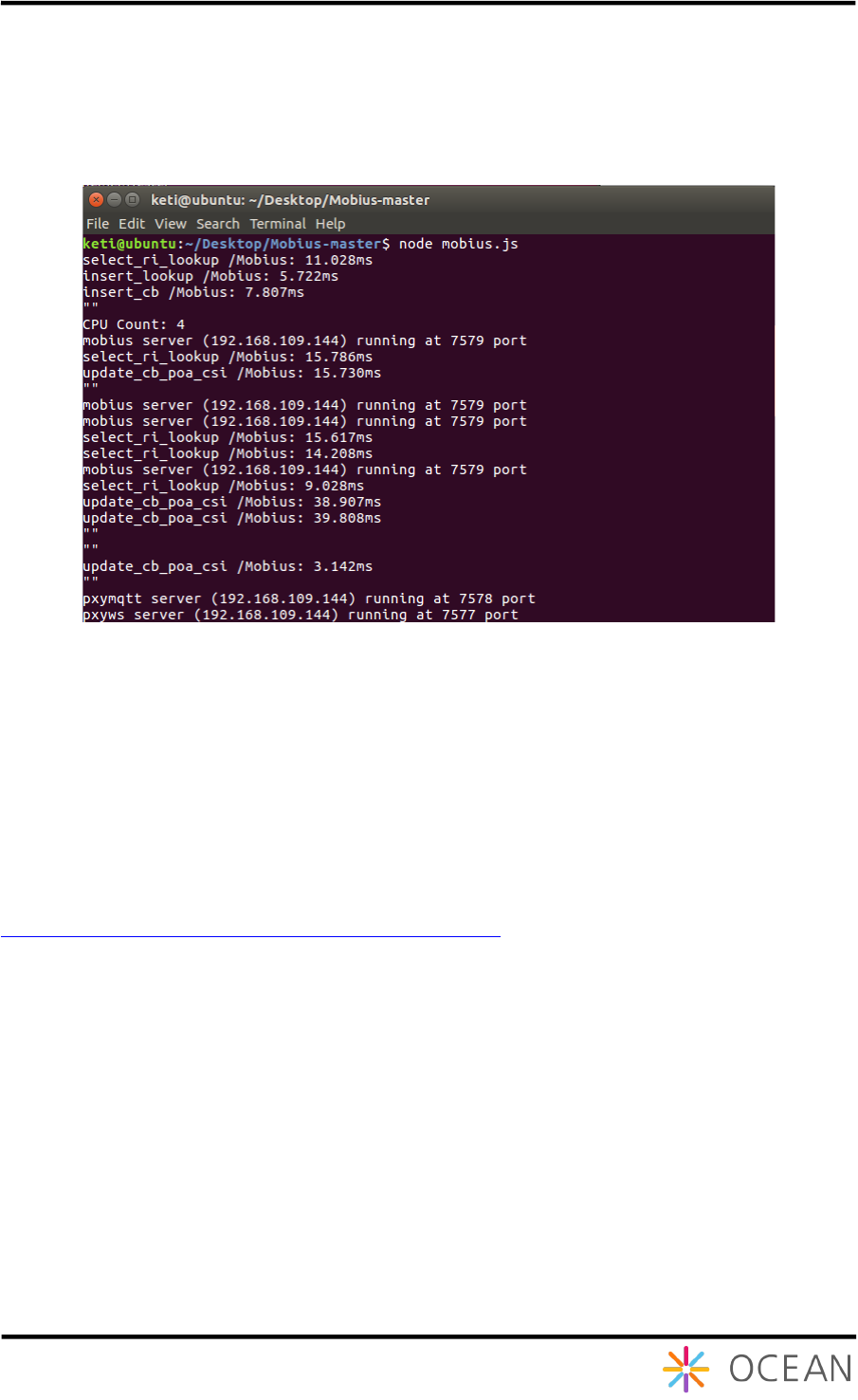
Now users can run node mobius.js command to run Mobius server and it runs as shown in
Figure 29.
Figure 29 Running Mobius server platform
3.3. Test
3.3.1. oneM2MBrowser
Refer to the oneM2MBrowser manual from OCEAN webpage.
http://iotocean.org/archives/module/onem2mbrower
3.3.2. Postman
The Mobius server accepts valid HTTP request in terms of POST, GET, PUT and DELETE
request following oneM2M service primitives. In this session, we provide several examples to
test against the installed Mobius server platform using Postman Rest Client (hereafter short
for Postman). Postman is a Google Chrome extension which you can use to easily test Web
API methods. It can also be used against 3rd party APIs. We use Postman to test Mobius
APIs.
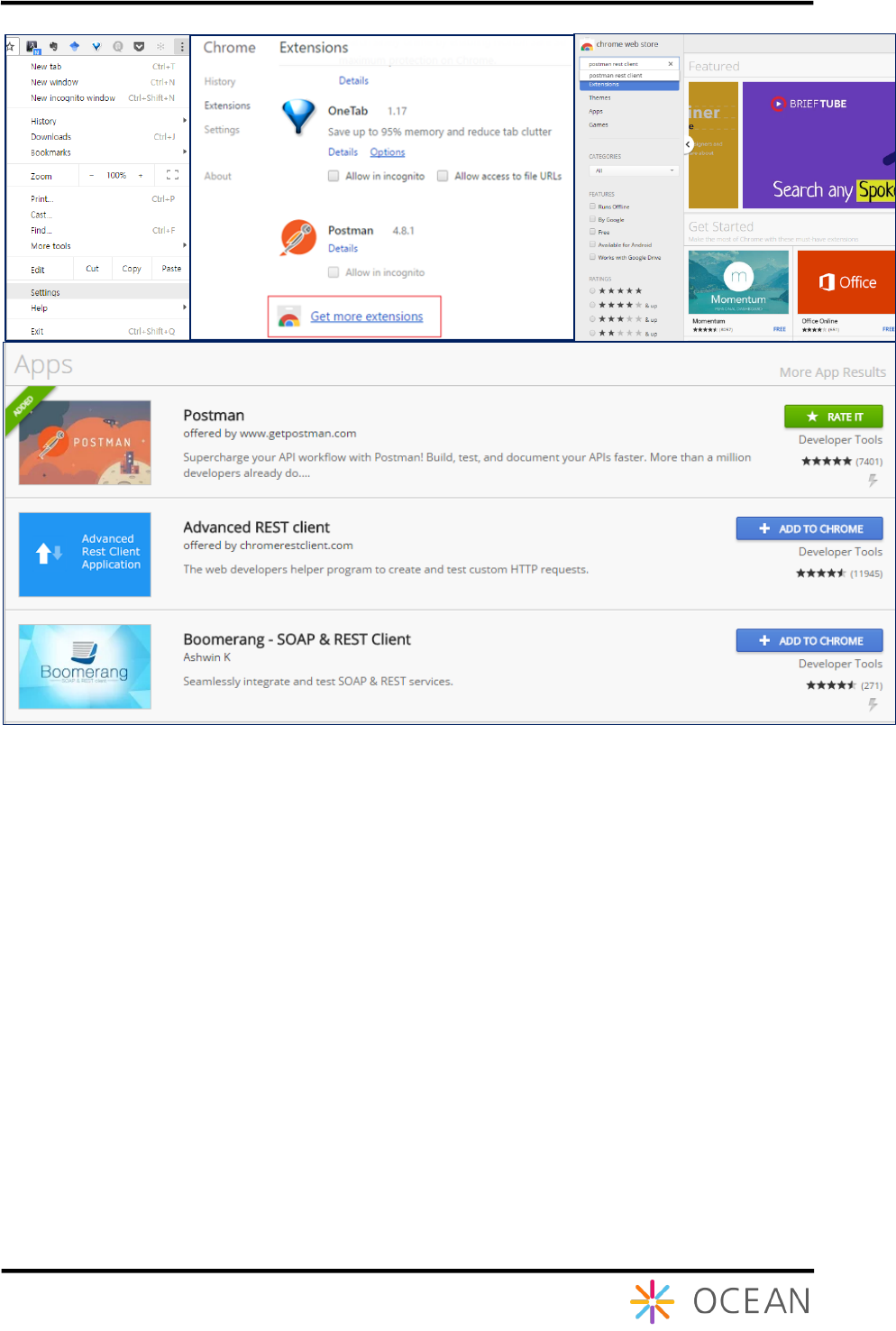
Users can install Postman through Google Chrome web browser. Go to the Chrome Settings
option and it brings you to the Chrome Extension (plugins) page where there is a ‘Get more
extensions’ option through which more extensions can be downloaded as shown as Figure 0.
Installation Guide Mobius
25
Figure 30 Download Postman REST Client
Postman provides an user interface to specify request headers and request body (if any). To
simplify the test of Mobius API, we provide a collection of Postman script written for testing
Mobius API. The Postman script is represented as a json file can be downloaded from OCEAN
or GitHub. After download the Postman script, open the Postman and import the script as
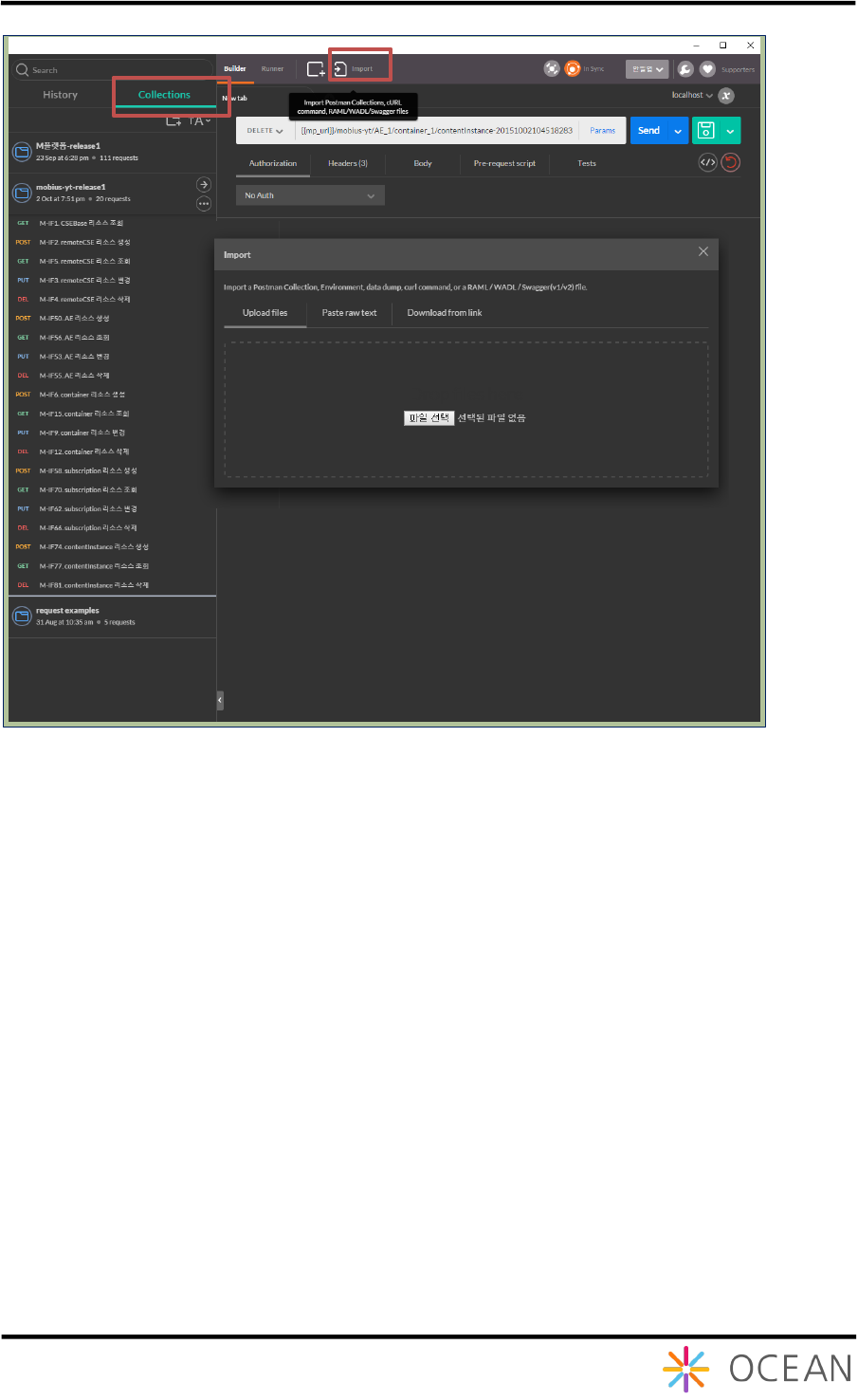
shown as Figure 9.
① In ‘Collections’ view, a group of Postman scripts are listed
② Click ‘Import’ button and
③ browse the downloaded script from the saved directory then the Postman script can
be automatically added into the collections list.
Installation Guide Mobius
26
Figure 91 Import Postman Script
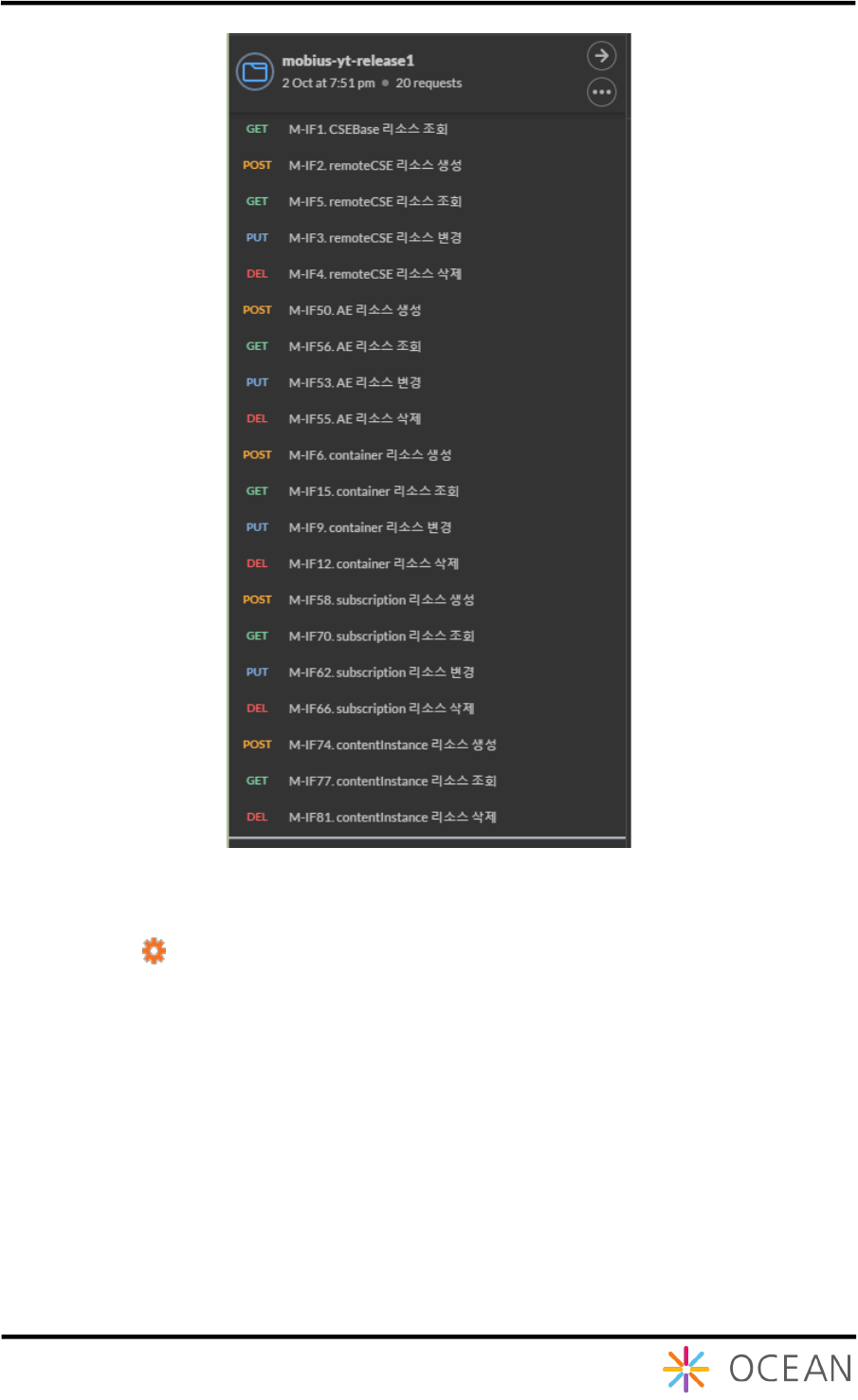
If the Postman script is imported successfully, a new collection will be displayed at the top of
collections list shown as Figure 10. The script is designed to test Mobius-YT API in terms of
oneM2M CREATE, RETRIEVE, UPDATE, and DELETE operations for oneM2M primitives
represented in XML and JSON serializations.
①
②
③
Installation Guide Mobius
27
Figure 10 A list of imported Postman Scripts
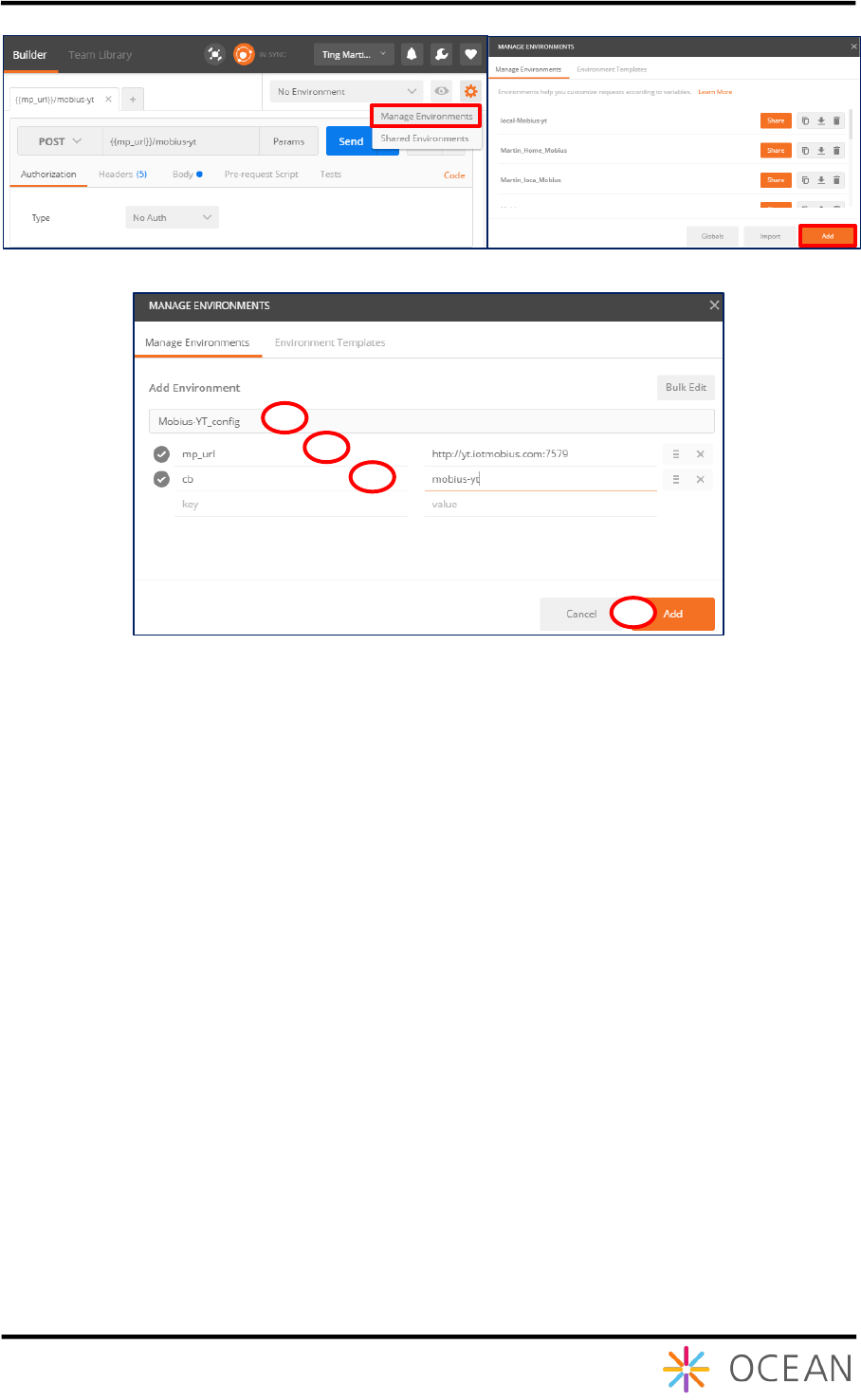
To access to the Mobius-YT server, the access configurations in terms of host and port as well as the
CSEBase name for the Mobius-YT server need to be configured in Postman environment. To this end,
go to the setting and select the ‘Manage Environments’ option in the option list then it pops a window
where lists all existing configured environments as shown as Figure 3. User can edit existing or add a
new environment by clicking ‘Add’ at the right bottom and in the popped window input Mobius server
access configurations in terms of host and CSEBase name as shown as Figure .
① Name the new environment, e.g. Mobius_config
② {{mp_url}}: specify the host and port number of Mobius server
③ {{cb}}: specify CSEBase name of Mobius server
④ Apply the changes
Installation Guide Mobius
28
Figure 33 Manage Postman Environment
Figure 34 Add a new Environment with host and CSEBase information
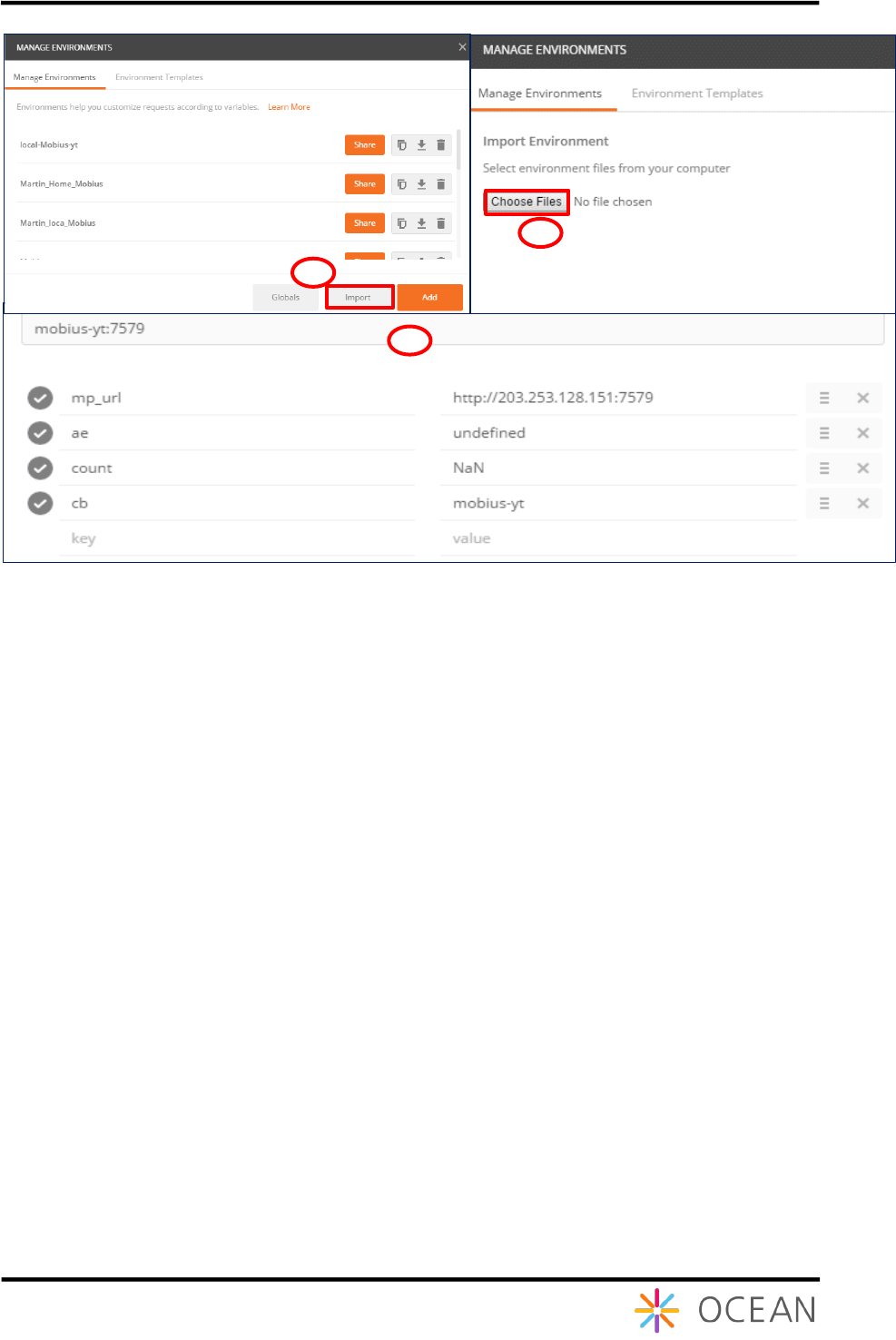
Besides, there is another way to get the Postman environment, i.e. import directly an
environment (POSTMAN Environment Script) that can be downloaded from OCEAN or GitHub.
After downloading the Postman environment script, import into Postman following steps as
shown as Figure 35.
① Click ‘Import’ and then pops up a window to choose files
② Browse the downloaded Postman environment script from the saved directory
③ After imported successfully, you can see a new environment is added in the Manage
Environments list
3
2
1
4
Installation Guide Mobius
29
Figure 35 Import Postman Environment Script
To demonstrate how to use Postman to test Mobius API in case users don’t know how to use
Postman. If you are familiar with Postman, just skip this.
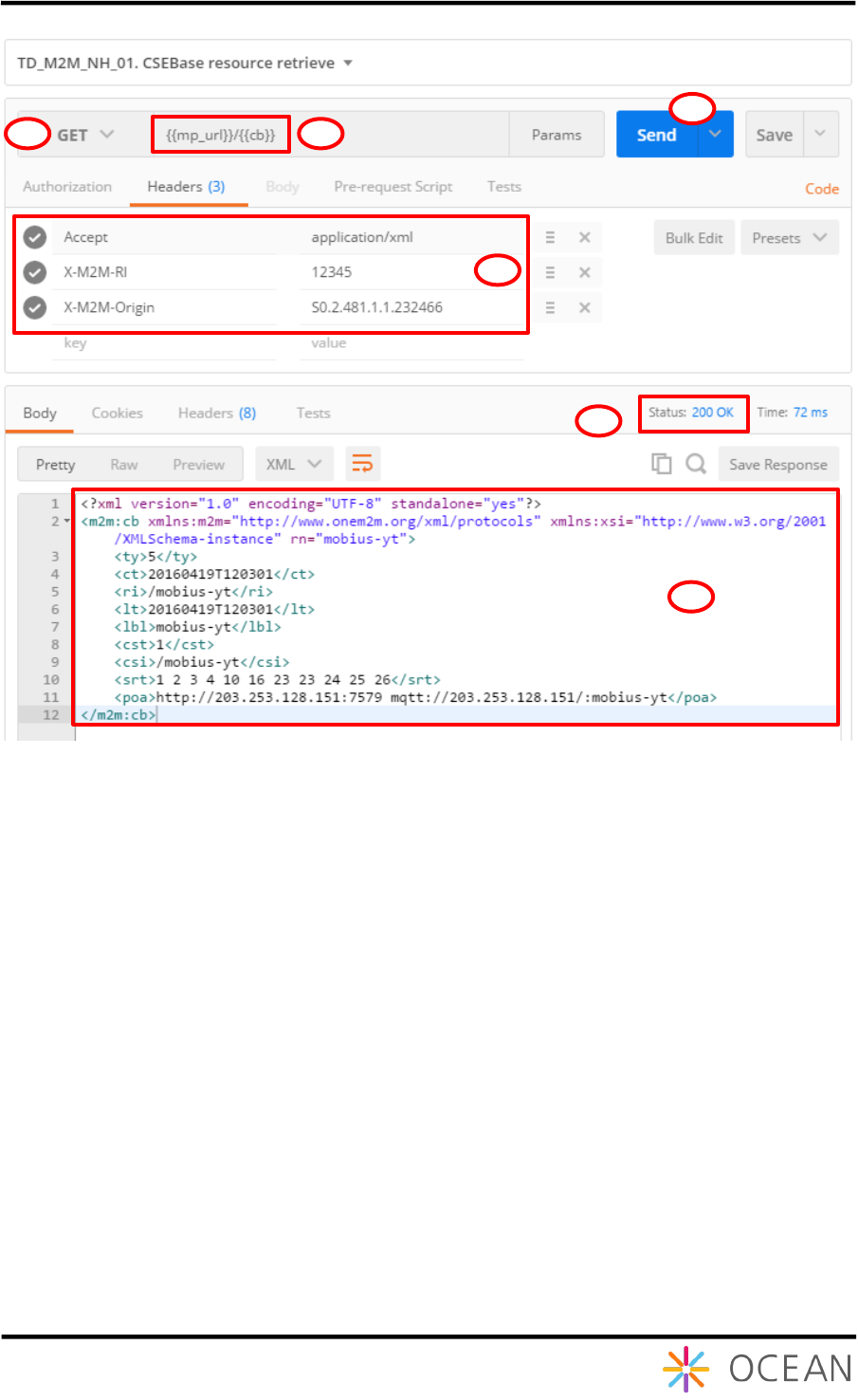
Here we demonstrate CSEBase RETRIEVE request which try to retrieve the CSEBase
information from Mobius server. Mapping to REST request,
① To u se HT TP GE T m eth od
② Specify the Mobius server access URL
③ Specify HTTP Headers (at least mandatory headers)
④ Send request to Mobius server
⑤ Check the response status code: 200 OK indicates request was accepted and
response is returned successfully
⑥ Check the returned CSEBase information
2
1
3
Installation Guide Mobius
30
Figure 36 Demo capture of CSEBase RETRIEVE Test
Users can test other scripts to deep understand the Mobius server API and we recommend to
refer to Mobius REST Reference API User Guide to use and extend Mobius to apply with user-
customized services.
2
1
4
3
5
6
