Instructions
User Manual:
Open the PDF directly: View PDF  .
.
Page Count: 9
Cardiff School of Computer Science and Informa5cs
Coursework Assessment Pro-forma
Module'Code!"#$%%&'"
Module'Title!"()*"+,,-./01234"
Lecturer!"56"7080490":;<06;4"
Assessment'Title!"=3-.3)">92,""
Assessment'Number!"?"
Date'Set!"%@89"A)*6B06C"'&%D"
Submission'Date'and'Time!!*C"D!?&"0E"23"A6.;0CF"''3;"$06/9"'&%D!
Return'Date!"'G89"+,6.-"'&%D"
H9.4"044.I3E)38".4"<2689"G&J"2K"89)"8280-"E06L4"0M0.-0*-)"K26"89.4"E2;B-)N"H9)",)30-8C"K26"
-08)"26"323O4B*E.44.23".4"03"0<06;"2K"P)62"E06L4N""
Q2B6"4B*E.44.23"EB48".3/-B;)"89)"2R/.0-"#2B64)<26L">B*E.44.23"#2M)6"49))8F"<9./9"/03"*)"
K2B3;"9)6)!"
9S,4!TT;2/4N/4N/KN0/NBLT;2<3-20;4T/2B64)<26LT#2M)649))8N,;K"
Submission'Instruc:ons'
You will need to submit your coursework to THREE locations: 1. Learning Central; 2. GitLab;
3. OpenShift.
1. Submission to Learning Central
The following files need to be submitted via Learning Central:
*replace <student number>with your student number WITHOUT the leading 'c'
More specifically:
‣No. 2 "Website files in a single zip file":
✴must be a single .zip archive that includes the complete source code of your
website, with the same structure as needed for deployment on OpenShift server,
including all required assets such as images.
No.
Description
Type
Name
1
Cover sheet"
Compulsory
One PDF (.pdf) file
<student number>*.pdf
2
Website files in a
single zip file
Compulsory
One ZIP (.zip) file
<student number>*_report.pdf
3
Plain README text
file
Compulsory
One .txt file
<student number>*_README.txt
CM1102 - Coursework 3
–1–

‣No. 3 "Plain README text file" must include:
✴your student number and name;
✴e-mail address;
✴URL of your website on OpenShift server;
✴full (40 characters) CHECKSUM of your last commit you performed on your
repository on GitLab. This will be used to check the timestamp of the latest
commit/ changes in your repository. Note: no changes are allowed after the
submission deadline! Non compliance with this requirement, i.e. working on
the coursework after the deadline, may be penalised and may result in an award
of zero marks.
➡Instructions on how to access the checksum of your last commit on
GitLab are found in Appendix A.
✴list of advanced features/ additional functionality you implemented and want to be
marked. Note: if you implemented some feature you consider as "exceptional
attention to security and safety" or "exceptional attention to aesthetics and
information content", please explain why you consider these to be "exceptional"
and why they should attract extra marks.#
2. Submission to GitLab (https://gitlab.cs.cf.ac.uk/)
Share your GitLab repository with Natasha Edwards as follows:
‣Go to: Settings > Members > Select members to invite
‣search for Natasha Edwards (user name: scmne)
‣Choose a role permission: master > Add to project ...#
3. Submission to OpenShift (https://openshift.cs.cf.ac.uk/)
Deploy your website on OpenShift by the deadline specified on the front page.#
Late'or'Non-Submission#
The penalty for late or non-submission is an award of zero marks.
If you have extenuating circumstances that prevent you from submitting on time, you should
follow the School’s Extenuating Circumstances procedure (see the Student Handbook for
more detail - available on Leaning Central).
You are reminded of the need to comply with Cardiff University’s Student Guide to Academic
Integrity. You should also read the School’s electronic coursework submission policy,
available on Leaning Central.
CM1102 - Coursework 3
–2–

CM1102 - Coursework 3
Assignment
INSTRUCTIONS
The aim of this assignment is to construct a
website for an online shop
. The website should allow
the customers to browse through the available goods (or services), view their price and all other
relevant information, allow the customers to add the goods to the shopping basket, and finally view
the basket (display all selected items and their total price) and allow the customer to enter payment
details. It is not required to implement the actual payment mechanism.
Structure of the Website
The website should be organised into at least the following pages:
•
The
front page
should be used to present customers with a brief
gallery
of goods and their
primary characteristics. The front page should:
–Allow the customer to add an item or items to the shopping basket.
–
Allow the customer to view detailed information about an item when they choose to do so
(e.g. by clicking on an item title).
–
Allow the customers to sort the items according to selected criteria (e.g. price, mass, size:
depending on what properties you choose your items to have).
–
Be aesthetically pleasing, e.g. display an attractive banner with the shop title, contact
phone number, lay out the items in a nice tabular form, offer intuitive navigation.
•
Another page should be used to display
detailed information
about a particular item (a ’single
product’ web page). Just like on the front page, the user should be able to add the currently
selected item to the shopping basket.
•
Yet another page should display the contents of the
shopping basket
. The shopping basket
page should:
–Be accessible only to the customer who has placed the goods there.
–Show all the chosen items and their total price.
–Allow the customer to delete an item (or all items) from the shopping basket.
–Be persistent within the session.
•
Another page (
checkout
) should allow the user to enter their credit card payment details, and
confirm the final price to be paid. As the user steps through the fields of the form, help mes-
sages should be displayed explaining what information needs to be entered in each field. There
is
no need
to implement an actual checkout or secure payment mechanism. It is sufficient
to implement only a basic validation for the payment form: when the user fills in the form
incorrectly and attempts to submit it, a helpful error message should be displayed. It is not
necessary to process this form in any other way.
•
Your website should provide the user with a
user account
functionality, which would allow the
user to register, log in and log out. If the user is not able to register, log in or log out, the system
should display helpful error messages to the user.
Advanced Features
The above features allow for a mark of up to 70%. A further 30% is obtainable by providing
additional
functionality or qualities for the website, examples of which are (but are not restricted to):
•Functionality to allow customers to leave reviews relating to particular items.
•A search facility allowing the customers to find items according to various search criteria.
–3–

CM1102 - Coursework 3
•A facility to add a product to the customer’s ’wishlist’.
•A facility to prepare shipping labels.
•A facility to prepare electronic invoices (e.g. as a .pdf file).
•Exceptional attention to security and safety.
•Exceptional attention to aesthetics and information content.
There are endless possibilities here and you are encouraged to think of your own extensions.
Note: 30% is the maximum mark obtainable for any combination of the features in this category.
Goods for Sale
The nature of goods to be “sold” by your online shop is your choice. The site, however, must not
include any content that is likely to be offensive to others. As the minimum, the items in your shop
should have the following properties:
•Name
•Textual description
•Picture
•Price
and any other relevant characteristics.
The items in your shop may be imaginary, but should be plausible in order to illustrate the functionality
of your website. Please populate your databases with at least five nice examples (items) prior to
submission so that the examiners can adequately test the functionality of your shop.
Technologies to be Used
In order to demonstrate your ability to use Flask micro web framework and other various web
technologies introduced in the module, your online shop should use the following:
•
Navigational menus with links to the different parts of the website (e.g. “view basket”, “go to
front page” etc.)
•Lists, which could be used, for example, for menus or to itemise properties of the shop items.
•Tables, which could for instance be used to format the list of available items.
•
CSS style sheets, including an external CSS file to define the appearance of your online shop.
•
Links to external web resources (i.e. via the anchor element), for example to a manufacturer’s
website.
•A MySQL database that maintains the content of the shop.
•
You may also use JavaScript if/ when/ where appropriate, for example to provide feedback
to the customers when they update their shopping basket. (Note: you do not have to use
JavaScript, only if you want to. The same functionality can be implemented in Python/ Flask.)
Important Conditions
•
The software tools and technologies that are to be employed on the website are HTML (HTML5
and XHTML are allowed), CSS, MySQL, JavaScript and Python/ Flask. The use of XML is also
allowed.
•
Use of libraries, APIs, etc. is allowed, however, the final code must be authored by you. If you
use external libraries, APIs, etc. you must provide an explanation of how and where these were
used AND complete references in your code and in a separate file (e.g. README.md).
Note that there should be no need to produce a user guide as it is assumed that the website interface
will be self-explanatory.
–4–

CM1102 - Coursework 3
Criteria for Assessment
Credit will be awarded against the criteria listed in the tables below, with weights attached to each
area of assessment as indicated.
Feedback
Feedback on your coursework will address the assessment criteria.
Feedback for this assessment can be used to improve your skills in professional web development,
and might be useful for other modules, e.g. your Final Year Project - if you decide to do a web-based
project.
Good luck!
–5–
CM1102 - Coursework 3
Appendix A: Checksum of your last commit (on GitLab)
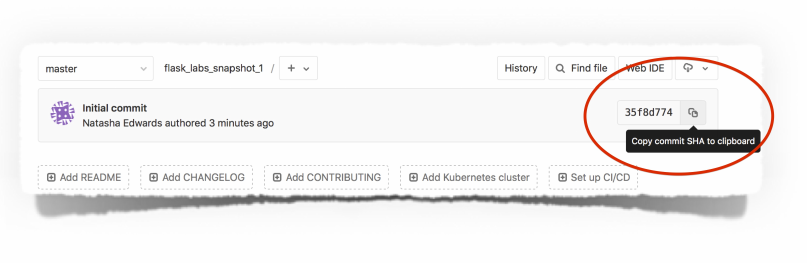
To access the checksum of your last commit, go to the Project’s main page, and click on the button
next to the 8-character text - see Fig. 1. This will copy the full checksum (i.e. 40 characters). Paste
the copied text into your README file.
Figure 1: Accessing checksum of your last commit on GitLab
–6–

ONLINE SHOP COURSEWORK
ASSESSMENT CRITERIA AND MARKS ALLOCATION
Essential functionality
Functionality Max Marks
Public gallery of shop items:
The list of items is displayed to customers:
Item names, prices, and descriptions are shown 3
Item pictures are shown 3
The list of items is generated programmatically
(i.e. pulled from the database, not created manually). 9 (binary)
Mark is binary here: no=0, yes=9.
Customers can sort items according to selected criteria 3
Detailed (Single Product) view:
Customers can choose to view detailed information about an item 3
Customers can add selected items to the basket 3
. . . and appropriate feedback is given to the user upon addition 2 (binary)
Mark is binary here: no=0, yes=2.
Shopping basket:
Shopping basket correctly displays the chosen items 3
The total price is displayed correctly 3
Customers can delete items from the basket 3
. . . and the shopping basket view is then updated to reflect this 3
Basket contents remain persistent within the session 3
Basket contents are only visible to the customer who put them there 3
Checkout (payment form):
Payment form is shown when the user proceeds to checkout 3
Help messages appear as the user steps through the input fields 3
Error messages are shown when the user incorrectly fills in the form 3
Customer Accounts:
Customers can create an account 2 (binary)
Mark is binary here: no=0, yes=2
Customers can log in into their account 2 (binary)
Mark is binary here: no=0, yes=2
Error messages are shown when the user in not able to log in 3
TOTAL FOR ESSENTIAL FUNCTIONALITY 60

Usability and presentation
Ease of navigation (how easy it is to access every page from every other page)
5
Consistency of the design and professionalism in visual presentation 5
TOTAL FOR USABILITY AND PRESENTATION 10
Advanced functionality or exceptional effort (examples)
Functionality to allow visitors to leave reviews relating to particular items (15)
A search facility allowing to find items according to specified search criteria (15)
A facility for customers to create a ’wishlist’ (15)
A facility to prepare shipping labels (5)
A facility to prepare electronic invoices (5)
Exceptional attention to security and safety (up to 10)
Exceptional attention to design and information content (up to 15)
TOTAL FOR ADVANCED FUNCTIONALITY OR EXCEPTIONAL EFFORT 30
MARKING GUIDE
Essential shop functionality
Excellent
(3 marks)
Functionality described in the instructions fully works. There are no detectable bugs. The
system is robust under all circumstances.
Good
(2 marks)
Functionality described in the instructions mostly works. The examiner spots some inconse-
quential bugs that do not substantially affect the operation of the website. The system remains
stable during normal usage, but fails when the examiner deliberately tries to break it.
Poor
(1 mark)
Only partially functioning features. There are obvious bugs that substantially affect the
operation of the website. The system behaves unpredictably during normal usage. Serious
flaws in several functions. Persistent bugs affecting the functionality of the website.
None
(0 marks)
Not implemented or does not work at all.
Usability and presentation
Excellent
(4-5
marks)
•
Navigation is intuitive, consistent and self-explanatory, with clear navigational menus
on all pages providing access to all other parts of the site without breaking the logic of
operation. Navigation is personalised to a particular user (e.g. the website greats the
user by her/ his name).
•
All shopping and basket pages are informative, with professionally presented, logically
and consistently laid out content; effective use of HTML and other ’display’ elements,
with CSS control of styling.
Good
(2-3
marks)
•
Navigation is mostly intuitive, with a few limitations in ease of navigation or with use of
menus and links, e.g. the user may need to re-enter some information once they left a
page and came back.
•
Reasonable presentation of content, although not yet of professional quality. Generally
well laid out using CSS where appropriate but some limitations in overall coherence of
design and use of space on page.
Poor
(1 mark)
•Means of navigation are confusing. Using the shop is a chore.
•
Inconsistent design across website with poor presentation: failure to employ CSS appro-
priately to control presentation. Text is often difficult to read (e.g. poor colour contrast,
obtrusive background patterns, text too small or unnecessarily too big).
None
(0 marks)
•None, absent, not implemented, not applicable.
